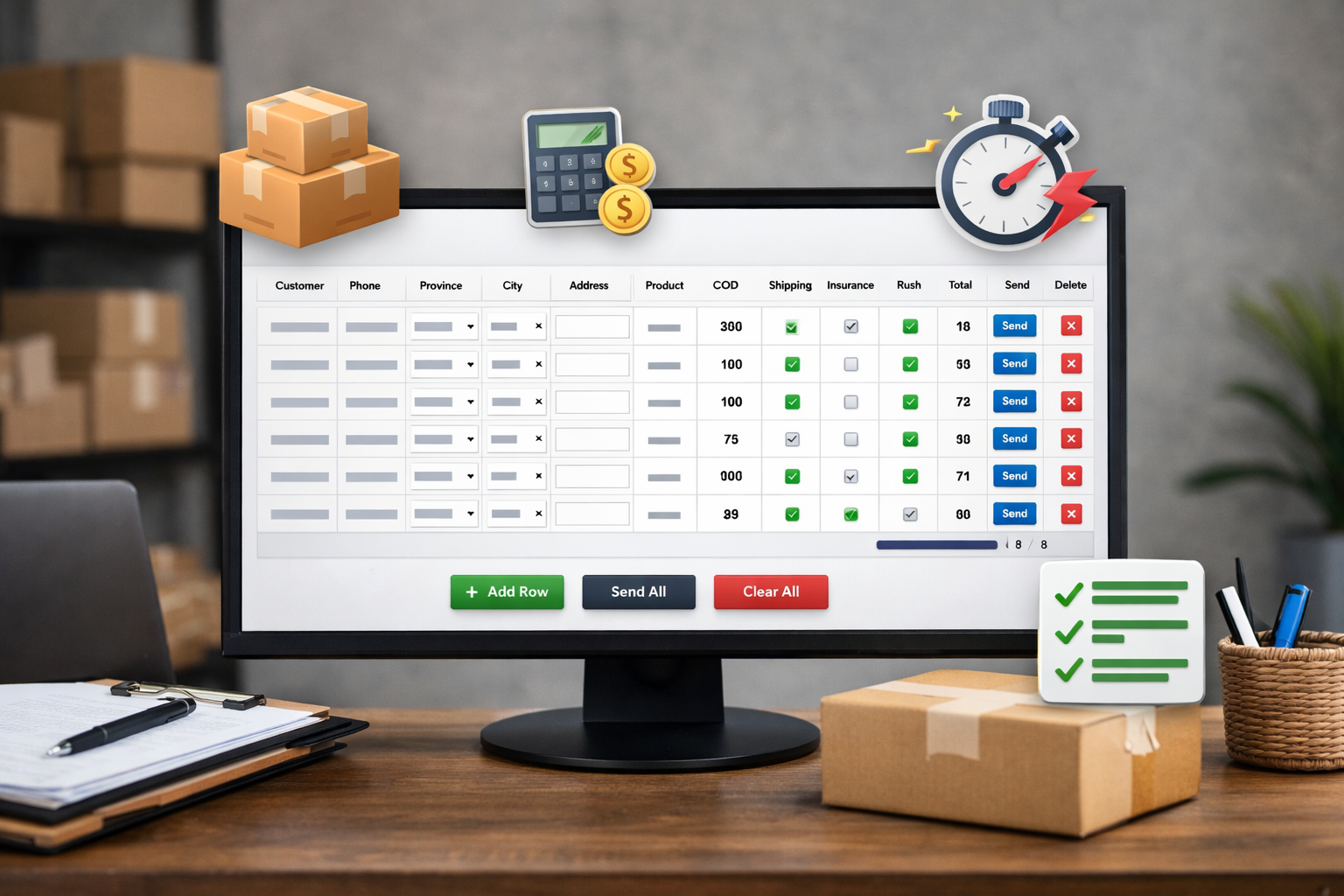
We’re excited to introduce a powerful new feature designed to make your shipping process faster, easier, and more accurate.
You can now add multiple shipments at once using our new Bulk Upload Tool.
💡 Why This Feature?
Managing shipments one by one can be time-consuming and increases the chance of errors.
That’s why we built this tool to help you:
- Save time by adding many shipments in one go
- Reduce manual mistakes
- Have a clear, organized view of all shipments before sending
- Instantly calculate shipping cost, insurance, and total per shipment
⚙️ Key Features
- 📦 Add unlimited shipments in a table format
- 💰 Automatic shipping cost calculation based on location
- 🛡️ Optional insurance with real-time pricing
- ⚡ Rush shipping availability (if supported in the selected area)
- ✅ Row-by-row validation before sending
- 🚀 Send all shipments in one click
- 💾 Auto-save your data (so nothing is lost)
- 🔒 Sent shipments are automatically locked to prevent duplicates
💻 Desktop Only (Important)
This tool is available only on desktop devices.
Because it relies on a wide table layout, using it on mobile devices may lead to:
- Display issues
- Data entry mistakes
- Poor user experience
👉 For the best and safest experience, please use it on a computer or laptop.
🔗 How to Access
Use your personal link:
https://direction.center/api/tools/bulk-upload/?token=YOUR_TOKEN&user_id=YOUR_ID
(Replace with your actual credentials)
🎯 Our Goal
We built this feature to help you scale faster, process more orders efficiently, and minimize errors in your daily operations.
If you have any feedback or need enhancements, feel free to reach out — we’re always improving 🚀



Came in tired from a long day and the writing held my attention anyway, and a stop at thisdomainisabdu kept that going, content that can engage a fatigued reader is doing something right because most online reading happens in suboptimal conditions like that one and quality content adapts to it without complaint.
Looking forward to seeing what gets published next month, and a look at tasseltract extended that anticipation across the broader site, finding myself looking forward to a sites future content rather than just consuming its existing content is a stronger commitment level than I usually reach with new finds and this site triggered that.
A piece that read as the work of someone who reads carefully themselves, and a look at stridertorch continued that informed feel, writers who are also serious readers produce work with a different quality and this site reads as the product of someone steeped in good writing rather than just generating content for an audience.
Just want to record that this site is entering my regular reading list, and a look at siskatrance confirmed it deserves the spot, my regular reading list is short and well curated and adding to it requires meeting a fairly high quality bar that this site has clearly cleared without much effort apparently.
Honestly enjoyed reading this more than I expected to when I first clicked through, and a stop at tweedvolume kept that pleasant surprise going, sometimes you stumble onto a site that just clicks with how you like to read and this is one of those for me right now today which is great.
Glad the writer did not feel compelled to cover every possible angle of the topic, focus is a virtue, and a stop at vesseltame reflected the same disciplined scope, knowing what to leave out is half of what makes good writing good and this post has clearly been edited with that principle in mind.
Thanks for the honest framing without exaggerated claims that the topic will change my life, and a stop at singersorbet kept the same modest tone, restraint in marketing language signals trustworthiness and the writers here are clearly playing the long game by building credibility rather than chasing immediate clicks through hyperbole.
Felt the writer was speaking my language without trying to imitate it, and a look at swansignal continued that natural fit, when a writers default voice happens to match what you find easy to read the experience feels frictionless and that is something I notice and remember about specific sites going forward.
Found this via a link from another piece I was reading and the click was worth it, and a stop at waferturtle extended the value across more material, the open web still rewards clicking through citations when the underlying writers care about each other work and this site clearly belongs to that network.
Felt the writer was speaking my language without trying to imitate it, and a look at starlitvixen continued that natural fit, when a writers default voice happens to match what you find easy to read the experience feels frictionless and that is something I notice and remember about specific sites going forward.
The overall feel of the post was professional without being stuffy, and a look at trenchtwist kept that approachable expertise going, finding the right register for technical content is hard but this site has clearly figured out how to sound knowledgeable without slipping into that distant lecturing tone that loses readers in droves every time.
Liked the way the post handled the final paragraph, no neat bow but no abrupt cutoff either, and a stop at slackvista continued that thoughtful ending pattern, endings are hard and most blog writers either over engineer them or skip them entirely and this site has clearly figured out a sustainable middle approach.
Found something new in here that I had not seen explained this way before, and a quick stop at tapetoken expanded the idea even further, the kind of writing that nudges your thinking forward a bit without forcing the issue is exactly what I look for online today and rarely actually find anywhere.
Reading this triggered a small but real correction in something I had assumed, and a stop at straitsurge extended that corrective effect, content that updates my beliefs through evidence rather than rhetoric is content with intellectual integrity and this site has earned that label consistently across the pieces I have read so far today.
Reading this confirmed that my time researching the topic in other places had not been wasted, and a stop at tritonstyle extended the confirmation, when independent sources agree that is a useful signal and this site is one of the more reliable sources I have found for cross checking what I read elsewhere on similar subjects.
Appreciated the way each section connected smoothly to the next without abrupt jumps, and a stop at sampleshadow kept that flow going nicely, transitions are something most blog writers ignore but the difference is huge for the reader who is trying to follow a sustained line of thought today across many different topics.
Started taking notes about halfway through because the points were stacking up, and a look at syruptarot added enough material that my notes file grew further, content that demands note taking from a passive reader is content with substance and the writers here are clearly producing that kind of work consistently across topics.
Came here from a search and stayed for the side links because they were that interesting, and a stop at uptonshade took me even further into the site, the kind of organic exploration that good content invites is something most sites kill through aggressive interlinking and pushy navigation choices rather than relying on quality.
Felt this in a way I cannot quite explain, the topic just hit different here, and a stop at vincasinger continued in that vein, sometimes you find a site whose perspective lines up with how you have been thinking and reading their work feels like a small relief which I appreciated more than I expected.
Glad I gave this fifteen minutes rather than the usual three minute skim, and a look at singlevision earned the same investment, time spent on quality content is rarely wasted but the reverse is also true and learning which sites deserve which kind of attention is part of being a careful online reader.
If patience for careful reading is rare these days finding sites that reward it is rarer still, and a stop at brightwinner extended that rare reward, the diminishing returns on shallow content reading have made me more selective about where to spend reading time and this site is meeting the higher selectivity bar consistently.
Thanks for not padding this with the usual filler intros and outros that every other blog seems to require, and a quick visit to cameranexus continued that lean approach across more posts, content stripped of waste is content that respects you and I will always come back to that kind of approach.
Liked that there was nothing performative about the writing, and a stop at unifiednexus continued that genuine quality, performative writing tries to be witnessed rather than read and the difference between performance and substance is huge for the careful reader and this site has clearly chosen substance every time clearly.
Great work on keeping things readable, the post never drags or repeats itself which I really appreciate, and a stop at streamnexushub added a bit more context that fit naturally with what was already said here, no need to read everything twice to get the point being made today.
Felt mildly happier after reading, which sounds silly but is true, and a look at brightamigo extended that small mood lift, content that improves rather than degrades my mental state is content I want more of and the cumulative effect of reading sites that lift versus sites that drag is real over time.
Great work on keeping things readable, the post never drags or repeats itself which I really appreciate, and a stop at writerharbor added a bit more context that fit naturally with what was already said here, no need to read everything twice to get the point being made today.
A memorable post for me on a topic I had thought I was tired of, and a look at deliverynexus suggested the same site can refresh other tired topics, sites that can revive my interest in subjects I had written off as exhausted are doing rare work and this one is clearly doing that for me today.
Worth saying this site reads better than most paid newsletters I have tried, and a stop at orientnexus confirmed that comparison, the bar for free content is often lower than for paid but this site clears the paid bar consistently and that says something about the editorial approach behind the work being published here regularly.
Skipped the related products section because there was none, and a stop at slippersixth also lacked any aggressive monetisation, content that is not constantly trying to convert me into a customer or subscriber is content that has confidence in its own value and that confidence shows up as a different reading experience.
Picked up several practical tips that I plan to try out this week, and a look at cameranexus added a few more I will be testing alongside, content with practical hooks that connect to my actual life is the kind that earns my repeat attention rather than the merely interesting that I forget within a day.
Now feeling slightly more committed to my own careful reading practices having read this, and a stop at singlevision reinforced that commitment, content that models the kind of attention it deserves is content that calibrates the reader and this site has clearly raised my own bar for what to bring to good writing today.
Found a couple of useful angles in here I had not considered before reading carefully, and a quick stop at writerharbor added more, this is one of those sites where the value compounds the more you read rather than peaking at one viral post and then offering nothing else of substance afterwards which is common.
Easy to recommend without reservations, the site delivers on every promise it implicitly makes, and a look at gardenvertex kept that same standard going, the kind of consistency that earns trust over time rather than chasing it through aggressive marketing is what I see here and it is appreciated greatly by this particular reader today.
Honestly the simplicity of the explanation made the topic click for me in a way other writeups had not, and a look at streamnexushub continued that clarity into related areas, when a writer gets the level of explanation right the reader does the heavy lifting themselves and the post just enables it.
Reading this in the gap between work projects was a small but meaningful break, and a stop at vectortimber extended that gentle reset, content that provides genuine refreshment rather than just distraction during work breaks is content with a particular kind of utility and this site fits that role for me reliably during work days.
Good clean post, no errors and no awkward phrasing that breaks the reading flow, and a stop at brightwinner kept the same standard, definitely the kind of editorial care that earns a return visit because it tells me the writer is paying attention to details that matter to readers rather than just rushing publication.
Generally I do not leave comments but this post merits a small note, and a stop at brightamigo extended that comment worthy quality, the urge to actively contribute to a sites community rather than passively consume from it is something specific content provokes and this site has provoked that engagement urge from me today.
Worth saying this site reads better than most paid newsletters I have tried, and a stop at orientnexus confirmed that comparison, the bar for free content is often lower than for paid but this site clears the paid bar consistently and that says something about the editorial approach behind the work being published here regularly.
Speaking from the perspective of having read widely on the topic this site offers something distinct, and a look at unifiednexus reinforced that distinctness, the rare site that contributes something genuinely original to a saturated topic is the rare site worth following carefully and this one has demonstrated that original contribution capability today.
Most blog writing on this subject reaches for the same handful of arguments and this post avoided them, and a look at primevertexhub continued the original treatment, content that finds its own path through territory other writers have flattened is content with real authorial energy and this site has plenty of that distinctive energy.
Clean writing, easy to read, and never tries too hard to impress, that combination is harder to find than people think, and after my time on urbanfamilia I am sure this site treats its readers well, no flashy tricks just useful content done right which is honestly all I want online.
After several visits I am now confident this site is one to follow seriously, and a stop at rapidnexus reinforced that confidence, the gradual building of trust through repeated quality exposures is the only sustainable way to develop reader loyalty and this site is building that loyalty in me through patient consistent work consistently.
Felt the post had been quietly polished rather than aggressively styled, and a look at wisdomvertex confirmed the same understated polish, sites whose quality reveals itself slowly rather than announcing itself loudly are the kind I trust more deeply because the trust is not based on first impressions of marketing but actual substance.
Worth flagging that the post handled an angle of the topic I had not seen elsewhere, and a look at masteryvertex extended that fresh treatment, content that finds underexplored corners of well covered subjects is genuinely valuable and this site has demonstrated that exploratory editorial approach across multiple pieces in my reading sessions today.
Closed it feeling slightly more competent in the topic than I started, and a stop at trumpetsixth reinforced that competence boost, real learning is rare in casual online reading but it does happen sometimes and this site managed to make it happen for me today which is genuinely worth pausing to acknowledge.
Skipped a meeting reminder to finish the post, and a stop at moderncomfort held me past another reminder, when content beats meetings the writer is doing something extraordinary because meetings have institutional support behind them and yet good writing can still occasionally win that competition for attention which I find heartening today.
The clarity here is something I really appreciate, especially compared to sites that pile on jargon for no reason, and a look at growthvertexhub was the same, simple direct sentences that actually deliver information instead of dancing around the point for paragraphs at a time which wastes reader patience.
Felt the post handled a sensitive angle of the topic with appropriate care, and a look at craftbreweryhub extended that careful handling across related material, sites that can navigate delicate territory without causing damage are rare and require a level of judgement that comes from experience rather than from following any clear playbook.
Now feeling slightly more optimistic about the state of independent writing online, and a stop at royalmariner extended that quiet optimism, sites like this one are the reason I have not given up on the open web entirely and finding them occasionally renews the case for paying attention to non algorithmic content sources today.
Speaking as someone who used to recommend blogs frequently and got out of the habit this site is rekindling that impulse, and a look at brightzenithhub extended the rekindling, the recovery of an old habit triggered by encountering work that justifies it is itself a small kind of pleasure and this site is providing that recovery experience.
Honestly this was the highlight of my reading queue today, and a look at growthcareer extended that across more pages I will return to, ranking what I read against what else I read each day is something I do informally and this site keeps moving up in those rankings the more I explore it.
Decided to subscribe to the RSS feed if there is one, and a stop at oceanriders confirmed that decision, content that I want delivered to me proactively rather than just remembered when I have time is content that has earned a higher level of commitment from me as a reader looking for reliable sources.
Good quality through and through, no rough edges and no signs of being rushed, and a quick look at discountnexus kept the same polish going, the kind of site that respects its own brand by maintaining consistency across pages which is something I always appreciate as a reader looking for trustworthy information online today.
Now adjusting my mental list of reliable sites for this topic, and a stop at purposehaven reinforced the adjustment, the small ongoing curation work of maintaining trusted sources is one of the actual practical activities of careful reading and this site has earned a permanent place on my list for this particular subject.
Started reading without much expectation and ended on a high note, and a look at sweatertorso continued that arc, content that builds rather than peaks early is a sign of a writer who knows how to structure a piece for sustained reader engagement rather than relying on a strong hook to do all the work.
Will be coming back to this for sure, too much good content to absorb in one sitting, and a stop at merrynights only added more pages I want to dig through, this site is going onto my regular rotation list because it consistently delivers something worth the visit lately rather than empty filler.
Got something practical out of this that I can apply later this week, and a stop at topicnexus added more details to think about, this is exactly the kind of content I bookmark for future reference rather than the throwaway listicles that dominate most search results these days for almost any common topic.
Speaking carefully because I do not want to overstate things this site is genuinely above average across multiple measurements, and a stop at cozyhomestead continued the above average performance, the calibration of judgement against potential overstatement is something I take seriously and this site clears the higher bar even after that calibration applies.
A satisfying piece in the way that good meals are satisfying rather than just filling, and a look at trendoutlet extended that satisfaction, the metaphor between content and meals is one I find useful and this site reads as a satisfying meal rather than the empty calories that most content provides for casual readers.
My usual response to new bookmarks is to forget them but this one I have already returned to twice, and a look at radianttouch pulled me back a third time, the actual return rate to bookmarked sites is the real measure of value and this one is clearing that measure at a notable rate already.
Looking forward to seeing what gets published next month, and a look at modernvertex extended that anticipation across the broader site, finding myself looking forward to a sites future content rather than just consuming its existing content is a stronger commitment level than I usually reach with new finds and this site triggered that.
Quietly enjoying that I have found a new site to follow for the topic, and a look at artistnexus reinforced the small pleasure of the find, the discovery of new high quality sources is one of the more durable pleasures of careful internet reading and this site has been generating that discovery pleasure at multiple points already today.
Honestly slowed down to read this carefully which is not my default, and a look at supportnexus kept me in that careful reading mode, the kind of writing that demands attention by being worth attention is rare in a media environment full of content engineered to be skimmed not read with any real focus today.
Reading this between two meetings turned out to be the highlight of the morning, and a stop at trillsaddle continued that highlight quality, content that outshines the structured parts of a working day is doing something well beyond ordinary and this site has produced multiple such highlights for me already this week alone.
Decided after reading this that I would check this site weekly going forward, and a stop at digitalgrove reinforced that commitment, deciding to add a site to a regular rotation requires meeting a quality bar that very few places clear and this one cleared it cleanly without any noticeable effort or marketing push behind it.
Reading this on a slow Sunday and finding it perfectly suited to a slow Sunday read, and a quick stop at guidancehubpro kept the same gentle pace, content that fits the mood of the moment is something I notice and remember and this site has the kind of pace that suits relaxed reading sessions especially well.
Found a couple of useful angles in here I had not considered before reading carefully, and a quick stop at quietvoyage added more, this is one of those sites where the value compounds the more you read rather than peaking at one viral post and then offering nothing else of substance afterwards which is common.
Liked that the post landed without needing to manufacture controversy or take a contrarian stance for attention, and a stop at socialflare continued that grounded approach, content that earns attention through quality rather than provocation is the kind that builds long term trust rather than burning it on quick wins.
Reading this confirmed that the topic deserves more careful attention than it usually gets, and a stop at unityharbor extended that elevated framing, content that raises the appropriate weight of a subject without being preachy about it is serving a quiet but important editorial function for the broader cultural conversation about it.
Found this really helpful, the explanations are simple but they actually answer the questions a normal reader would have, and after I followed businessnova I had a clearer sense of the topic, no extra fluff just useful points laid out in a sensible order that made the time worth it.
Took the time to read every paragraph rather than skimming for the punchline, and a quick visit to humorvertex earned the same careful attention from me, that is the highest signal I can give about content quality because my default mode is rapid scanning rather than deliberate reading on most pages.
Honest take is that this was better than I expected when I clicked through, and a look at silverpathhub reinforced that, the bar for online content has dropped so much that finding something thoughtful and well constructed feels almost noteworthy now which says more about the average than about this site itself.
Worth saying that the writing carries a particular kind of authority without making any explicit claims to it, and a stop at cocktailnexus extended that earned authority feeling, sites that demonstrate expertise through the quality of their explanations rather than by stating credentials are sites I trust most and this site has it.
Learned something from this without having to dig through layers of fluff, and a stop at brightportal added a bit more context that helped tie things together for me, definitely a useful corner of the internet for anyone who wants real information without the usual marketing nonsense around it that often ruins similar pages.
Now realising the topic deserved better treatment than it has been getting elsewhere, and a look at tattooharbor extended that broader recognition, content that exposes the gap between actual quality and average quality elsewhere is doing the quiet work of raising standards and this site is contributing to that elevation in its own corner.
Really appreciate the absence of stock photos that have nothing to do with the content, and a quick visit to modernlivinghub maintained the same restraint, visual filler is a tell that the writing cannot stand on its own and the lack of it here suggests the team has confidence in their content quality alone.
Just want to record that this site is entering my regular reading list, and a look at modernupdate confirmed it deserves the spot, my regular reading list is short and well curated and adding to it requires meeting a fairly high quality bar that this site has clearly cleared without much effort apparently.
Reading this prompted a brief but useful conversation with a colleague who happened to walk by, and a stop at connectnexus extended that conversational seed, content that becomes a starting point for in person discussion rather than ending in solitary reading is content with social generative energy and this site has plenty of it apparently.
Liked how the post handled an objection I was forming as I read, and a stop at glamourbrush similarly anticipated where my thinking was going next, the rare writer who can predict reader concerns and address them in advance is doing something most online content fails to do despite that being basic editorial work.
Found this really helpful, the explanations are simple but they actually answer the questions a normal reader would have, and after I followed uniquevoyager I had a clearer sense of the topic, no extra fluff just useful points laid out in a sensible order that made the time worth it.
Thank you for not assuming the reader already knows everything, the explanations meet me where I am, and a look at parcelvoyager did the same, that consideration is what makes a site feel welcoming rather than gatekeepy which is sadly the default mood across the modern web today for most subjects covered.
Now wishing I had found this site sooner, and a look at pixelharborhub extended that mild regret, the calculation of how many years of good content I missed by not finding the right sources earlier is one I try not to make too often but it does come up sometimes when I find sites this good.
Started thinking about my own writing differently after reading, and a look at urbanwellness continued that reflective effect, content that influences how I work rather than just informing what I know is content with the highest kind of impact and this site has triggered some of that reflective influence today on me.
Solid value packed into a relatively short post, that takes skill, and a look at cosmicvertex continues the dense useful content across more pages, this site clearly understands that respecting reader time is itself a form of generosity which is something most blog operations seem to have forgotten lately across the wider open web.
Thanks for a post that does not try to be funny when it is not the moment for it, and a stop at masterynexus maintained the same appropriate seriousness, knowing when humour helps and when it just signals desperation for engagement is a sign of editorial maturity that many blogs have not developed yet.
Now feeling confident enough in this site to use it as a reference point for evaluating others on the same topic, and a look at joyfulnexus continued the comparison friendly quality, sites that serve as quality benchmarks for their topic are precious and this one has clearly become a benchmark for me on this particular subject area.
Now feeling slightly more committed to my own careful reading practices having read this, and a stop at trendrocket reinforced that commitment, content that models the kind of attention it deserves is content that calibrates the reader and this site has clearly raised my own bar for what to bring to good writing today.
Really nice to see things explained without overcomplicating the topic, the words flow naturally and stay easy to follow, and a short visit to deliverynexus only added to that experience because the same simple approach is used across the rest of the page too without any change in tone.
My friends would appreciate a few of these posts and I will be sending links accordingly, and a look at focusconstructor added more pages to my share queue, content that earns shares to specific people in specific contexts is content with social utility and this site is generating those targeted shares from me consistently lately.
Genuinely glad I clicked through to read this rather than skipping past, and a stop at buildgrowthsystems confirmed I should keep clicking through to more pages here, the kind of resource that justifies its place in my browser history rather than feeling like wasted time which is the highest compliment I offer any site online today.
Working through this site has been a small antidote to the shallow content that fills most of my reading time, and a stop at clarityleadsaction extended that antidote function, sites that quietly improve the average quality of my reading by being themselves are sites worth supporting through return visits and recommendations consistently.
Appreciate the thoughtful approach, the writer clearly took time to make this readable for someone who is not already an expert, and a look at stellarpath kept that going nicely, easy on the eyes and easy on the brain which is always a winning combination when reading on a busy day.
Worth saying that the writing carries a particular kind of authority without making any explicit claims to it, and a stop at progressmapping extended that earned authority feeling, sites that demonstrate expertise through the quality of their explanations rather than by stating credentials are sites I trust most and this site has it.
Came in confused about the topic and left with a much firmer grasp on it, and after progressmapping I felt I could explain this to someone else without hesitation, that is the gold standard for any educational content and most sites simply fail to reach it ever which is unfortunate but true.
Worth observing that the post landed without needing a flashy headline to hook attention, and a stop at nexusharbor did the same, content that earns engagement through substance rather than packaging is the kind I trust more deeply and this site has clearly chosen substance as the primary lever for reader engagement throughout.
Reading this prompted me to dig out an old reference book related to the topic, and a stop at timekeeperhub extended that connection to other sources, content that connects me back to my own existing knowledge rather than asking me to forget it is content with continuity and this site has that continuous quality.
Worth flagging that this approach to the topic is fresh without being contrarian, and a stop at digitalnexushub extended the same fresh angle, finding original perspective on familiar subjects is rare and this site has clearly developed its own way of seeing rather than echoing the dominant takes from elsewhere consistently.
Bookmarking this for later, the kind of resource I want to keep nearby, and a quick look at vibrantjourney confirmed the rest of the site is worth the same treatment, definitely going into my reference folder for the next time the topic comes up at work or in conversation with someone who asks.
Saving the link for sure, this one is a keeper, and a look at nexushorizon confirmed I should bookmark the entire site rather than just this page, the consistency across what I have seen so far suggests there is a lot more here worth coming back for soon when I have more time.
Reading this on a long flight and finding it the best thing I read across hours of trying, and a stop at progresswithpurpose kept the streak going, when content beats long flight reading you know it has substance because flight reading is a hard test of a piece given the alternatives available everywhere.
Now feeling mildly impressed in a way I do not quite remember feeling about a blog in a while, and a stop at forwardthinkingcore extended that mild impression, content that produces specific positive emotional responses rather than just neutral information transfer is content with extra dimensions and this site has those extra dimensions clearly.
Felt like I was reading something written by someone who actually thinks about the topic rather than reciting it, and a look at progresswithdiscipline reinforced that impression, the difference between recited content and considered content is huge and this site clearly belongs to the latter category which I appreciate as a careful reader looking for substance.
Genuine reaction is that this site clicked with how I like to read, and a look at ideaswithoutnoise kept that comfortable fit going, sometimes you find a place online whose editorial decisions just align with your preferences and when that happens it is worth recognising and supporting through repeat engagement consistently going forward.
A piece that suggested careful editing without showing the marks of the editing, and a look at moveforwardintentionally continued that invisible polish, the best editing disappears into the prose and this site reads as having been edited with skill that does not announce itself which is the highest compliment I can offer any blog content.
Reading this prompted a small redirection in something I was working on, and a stop at nightlifehub extended that redirecting influence, content that affects my actual work rather than just my thinking has the highest practical impact and this site is providing that level of influence for me at a sustainable rate apparently.
Now adding the homepage to my regular check rotation rather than waiting for individual links to find me, and a stop at forwardthinkingnow confirmed the rotation upgrade, the move from passive discovery to active checking is a vote of confidence in a sites ongoing quality and this site has earned that active engagement clearly.
Started reading without much expectation and ended on a high note, and a look at gardenvertex continued that arc, content that builds rather than peaks early is a sign of a writer who knows how to structure a piece for sustained reader engagement rather than relying on a strong hook to do all the work.
Excellent execution from start to finish, the post never loses its rhythm and the points stay sharp, and a quick stop at legendseeker kept the same level going, consistency like this across a site is the marker of a serious operation rather than a casual side project running on autopilot somewhere else.
On reflection this is the kind of writing that improves my taste for what is possible in the format, and a look at ideapathfinder continued raising that bar, content that elevates my expectations rather than lowering them is doing important work in calibrating my standards and this site is participating in that elevation reliably.
Reading this on a difficult day was a small bright spot, and a stop at brightcanvas extended that brightness, content that improves a hard day is content that has earned a particular kind of place in my reading habits and this site is occupying that uplifting role for me today which I appreciate clearly.
Reading this in a quiet coffee shop matched the calm energy of the writing, and a stop at runnervertex extended that environmental match, content that has its own ambient quality which can match or clash with surroundings is content with a personality and this site has the kind of personality that suits calm reading.
Appreciate the thoughtful approach, the writer clearly took time to make this readable for someone who is not already an expert, and a look at executeprogress kept that going nicely, easy on the eyes and easy on the brain which is always a winning combination when reading on a busy day.
Liked that the post left some questions open rather than pretending to settle everything, and a stop at luxuryseconds continued that intellectual honesty, content that respects the limits of its own claims is more trustworthy than content that overreaches and this site has clearly figured out which positions it can defend confidently.
Reading this confirmed that my time researching the topic in other places had not been wasted, and a stop at herojourneyhub extended the confirmation, when independent sources agree that is a useful signal and this site is one of the more reliable sources I have found for cross checking what I read elsewhere on similar subjects.
I learned more from this short post than from longer articles I read earlier today, and a stop at strategylaunchpad added even more useful detail without going off topic, this site clearly knows how to keep things focused without sacrificing depth which is a hard balance to strike for any writer.
Thanks for taking the time to write this, it is clear that some thought went into how each point would land, and after I went through motorzenith I had a better grip on the topic, real value without the usual marketing noise people have to put up with online when searching for answers.
Glad the writer did not feel compelled to cover every possible angle of the topic, focus is a virtue, and a stop at wavevoyager reflected the same disciplined scope, knowing what to leave out is half of what makes good writing good and this post has clearly been edited with that principle in mind.
Refreshing tone compared to the dry corporate posts on similar topics, and a stop at progresswithpurpose carried that personality through nicely, you can tell when a real person is behind the writing versus a content team chasing metrics and this site definitely falls into the former category clearly across what I have seen.
Worth recommending broadly to anyone who reads on the topic, and a look at buildforwardlogic only confirms that, the rare combination of accessibility and depth in this site makes it suitable for both newcomers and people who already know the area which is hard to pull off in any blog format today and rarely managed.
Following a few of the internal links revealed more posts of similar quality, and a stop at ideasneedvelocity added more to that growing pile, sites where internal links lead to more good content rather than to more of the same recycled material are sites with depth and this one has clearly built that depth carefully.
Reading this on a slow Sunday and finding it perfectly suited to a slow Sunday read, and a quick stop at progressmapping kept the same gentle pace, content that fits the mood of the moment is something I notice and remember and this site has the kind of pace that suits relaxed reading sessions especially well.
Closed the tab and immediately reopened it ten minutes later because I wanted to reread a part, and a stop at strategyinplay drew the same return, content that pulls you back after closing it is doing something well beyond the average and worth marking as exceptional in my mental catalogue of reliable sites.
Started this morning and finished at lunch with a small sense of having spent the time well, and a look at modernhorizon extended that satisfaction into the afternoon, content that fits naturally into the rhythm of a working day rather than demanding a dedicated reading block is increasingly the kind I prefer.
Took a chance on the headline and was rewarded, and a stop at wisdomvertex kept the rewards coming as I clicked through, the kind of place where every link leads somewhere worth the click is a small luxury on the modern web where so many sites are mostly empty calories disguised as content.
Taking the time to read carefully here has been worthwhile for the past hour, and a look at claritylaunch extended the worthwhile reading, the calculation of return on reading time spent is something I do informally and this site has been producing positive returns across multiple sessions during the last week of regular visits and reads.
Really appreciate that the writer did not assume I would read every other related post first, and a look at profitnexus kept that self contained feel going where each piece can stand alone, accessibility for new readers is a sign of generous editorial thinking and this site has clearly invested in that approach.
Good clean post, no errors and no awkward phrasing that breaks the reading flow, and a stop at laughingnova kept the same standard, definitely the kind of editorial care that earns a return visit because it tells me the writer is paying attention to details that matter to readers rather than just rushing publication.
Closed the tab and immediately reopened it ten minutes later because I wanted to reread a part, and a stop at marineharbor drew the same return, content that pulls you back after closing it is doing something well beyond the average and worth marking as exceptional in my mental catalogue of reliable sites.
Honest assessment after reading this twice is that it holds up under careful attention, and a look at actionmapsuccess extended that durability across more pages, content that survives a second read without revealing weak spots is rarer than the average reader probably realises and this site clearly cleared that bar.
Closed it feeling I had taken something away rather than just consumed something, and a stop at glamourvista extended that taking away feeling, the difference between content I extract value from and content I just pass through is something I track informally and this site is consistently in the value extraction column for me.
Came across this and immediately thought of a friend who would enjoy it, and a stop at savingharbor also reminded me of someone, content that triggers the urge to share is content that has earned my recommendation and this site has earned multiple from me already across different conversations during the week.
Granted my mood today might be elevating my reading experience but I still think this is genuinely good, and a stop at clarityfirstgrowth reinforced that even discounted assessment, controlling for the mood adjustment that affects content perception this site still reads as substantively above average across multiple pieces I have read carefully today.
A piece that did not lean on the writer credentials or institutional backing, and a look at buildforwardtraction maintained the same focus on substance, content that earns trust through quality rather than through name dropping is the kind I find most persuasive and this site is clearly playing on the substance side of that distinction.
Reading carefully here has reminded me what reading carefully feels like, and a look at actionoverhesitation extended that reminder, the experience of careful reading versus skimming is different in ways I had partially forgotten and this site has clearly refreshed my memory of what attention feels like when content rewards it consistently.
Honestly this was the highlight of my reading queue today, and a look at urbanbartender extended that across more pages I will return to, ranking what I read against what else I read each day is something I do informally and this site keeps moving up in those rankings the more I explore it.
Did not expect much when I clicked through but ended up reading the whole thing carefully, and a stop at buildwithmotion kept that engagement going, sometimes the unassuming sites turn out to deliver more than the flashy ones which is something I have learned to look out for over time online lately and across topics.
Reading this gave me something to think about for the rest of the afternoon, and after brightacademy I had even more to mull over, the kind of post that lingers in the background of your day rather than evaporating immediately is genuinely valuable in an attention economy that punishes depth rather than rewarding it.
Now adding the writer to a small mental list of voices I want to follow, and a look at clarityactivates reinforced that follow intention, the few writers whose work I actively track are writers who have demonstrated sustained quality and this writer has clearly demonstrated that sustained quality across the pieces I have sampled here today.
Great work on keeping things readable, the post never drags or repeats itself which I really appreciate, and a stop at actiondrivenoutcomes added a bit more context that fit naturally with what was already said here, no need to read everything twice to get the point being made today.
Most attempts at writing on this topic feel like they are missing something and this post finally identified what was missing, and a look at discountnexus extended that diagnostic clarity, content that names what is wrong with adjacent treatments while doing better itself is content with both critical and constructive value and this site has both.
A piece that left me thinking I had been undercaring about the topic, and a look at urbanmarket reinforced that mild concern, content that raises the appropriate weight of a subject without being preachy about it is doing important work and this site is providing that gentle elevation of attention for me consistently.
Liked the careful word choice throughout, every term seemed picked for a reason rather than thrown in casually, and a stop at visiondirection continued that precise style, this kind of attention to small details is what separates careful writing from the usual rushed content that dominates blog spaces today across pretty much every topic I follow.
Stayed longer than planned because each section earned the next, and a look at velvetorbit kept that pulling effect going across more pages, the kind of subtle pull that good writing exerts on attention is something I find harder and harder to resist when I encounter it on the open web today.
Now noticing that the post avoided the temptation to be funny in places where humour would have undermined the substance, and a stop at urbanlatino maintained the same restraint, knowing when to be serious is a rare editorial virtue and this site has clearly developed it through what I assume is careful editorial practice over years.
The examples really helped me grasp the points faster than abstract descriptions would have, and a stop at pixelgallery added a few more practical illustrations that drove the message home, the kind of writing that knows its readers learn better through concrete situations rather than vague generalities is rare and worth recognising clearly.
Reading more of the archives is now on my plan for the weekend, and a stop at fitnessnexus confirmed the archive worth the time, the rare archive worth a dedicated reading session rather than just casual sampling is the rare archive of serious work and this site has clearly produced enough of that work to warrant the deeper exploration.
Now noticing that the post avoided the temptation to be funny in places where humour would have undermined the substance, and a stop at activehorizon maintained the same restraint, knowing when to be serious is a rare editorial virtue and this site has clearly developed it through what I assume is careful editorial practice over years.
Now realising the topic deserved better treatment than it has been getting elsewhere, and a look at strategyforwardpath extended that broader recognition, content that exposes the gap between actual quality and average quality elsewhere is doing the quiet work of raising standards and this site is contributing to that elevation in its own corner.
Thanks for keeping the writing direct without losing the warmth that makes content feel human, and a stop at growthwithintent carried both qualities forward, balancing professionalism and personality is a rare skill and the writers here have clearly figured out how to consistently land it across many posts which I notice.
Picked this up while looking for something else and ended up reading every paragraph because it was actually informative, and after actionwithsignal I was sure I would come back, that does not happen often when most sites bury the useful parts under endless ads and pop ups today and across most categories online.
Now considering writing a longer note about the post somewhere, and a look at moveideaswithpurpose added more material for that note, content that prompts me to write rather than just consume is content with generative energy and this site is producing that generative effect for me at a higher rate than most sources.
Decided to read more before commenting and the more I read the more I wanted to say something, and a stop at pathwaytoaction pushed that impulse further, when content provokes the urge to participate rather than just consume it is doing something quite specific and worth recognising clearly when it happens during reading.
Worth flagging that the writing rewarded a second read more than I expected, and a look at inkedvoyager produced the same second read benefit, content with hidden depths that emerge only on careful rereading is rare in the modern blog space and this site has clearly invested in that level of compositional density throughout.
I really like the calm tone here, it does not push anything on the reader, and after I went through goldenbarrel I felt the same way, just steady useful content laid out without drama, which is exactly what someone trying to learn something quickly needs to find rather than aggressive marketing.
Reading this on a long flight and finding it the best thing I read across hours of trying, and a stop at modernvertex kept the streak going, when content beats long flight reading you know it has substance because flight reading is a hard test of a piece given the alternatives available everywhere.
Came away with some new perspectives I had not considered before, and after strategylaunchpad those ideas felt more complete, the kind of content that stays with you a little while after reading rather than slipping out the moment you switch tabs and move on with your day to whatever comes next.
A piece that prompted a small mental rearrangement of how I order related ideas, and a look at socialcircle extended that rearranging effect, content that affects the structure of my thinking rather than just adding to it is content with the deepest kind of impact and this site is reaching that depth for me today.
Solid information that lines up with what I have been hearing from other reliable sources, and after my visit to claritycreatesadvantage I was even more certain of that, this site checks out which is something I value highly when so many places online play loose with the facts to chase a quick click.
Came here from a search and stayed for the side links because they were that interesting, and a stop at motionwithmeaning took me even further into the site, the kind of organic exploration that good content invites is something most sites kill through aggressive interlinking and pushy navigation choices rather than relying on quality.
Coming back tomorrow when I can give this a proper read, the post deserves better attention than I can give right now, and a look at intentionalprogression suggests there is plenty more here that deserves the same treatment, definitely a site I will be exploring properly over the next few days when I can.
Now adding a small note in my reading log that this site is one to watch, and a look at clarityshift reinforced the watch status, the few sites I track deliberately rather than encounter accidentally are sites I expect ongoing returns from and this one has cleared the bar for that elevated tracking based on what I read.
Really like that the writer trusts the reader to follow simple logic without restating every previous point, and a stop at darkvoyager kept that respect going, treating an audience as capable adults rather than as people who need constant hand holding makes a noticeable difference in the reading experience for me.
Reading this confirmed that my time researching the topic in other places had not been wasted, and a stop at rapidcourier extended the confirmation, when independent sources agree that is a useful signal and this site is one of the more reliable sources I have found for cross checking what I read elsewhere on similar subjects.
Now planning a longer reading session for the archives, and a stop at executionpathway confirmed the archives are worth that longer commitment, sites with archives I want to read deliberately rather than just sample are rare and this one has clearly earned that level of interest based on the consistency of what I have already read.
Thanks for keeping things clear and to the point, that is honestly hard to find online these days, and after reading through growwithprecision the message stayed consistent which makes me trust the information being shared more than I usually do on similar pages that cover this same kind of topic.
Liked the balance between depth and brevity, never too shallow and never too long, and a stop at digitaljournal kept the same balance going across the rest of the site, this is one of the harder skills in writing and the team here clearly has it figured out very well indeed across every page.
Bookmark earned, calendar reminder set, share queued, all from one good post, and a look at clarityguidesmotion did the same, when a single reading session triggers multiple downstream actions you know the content has actually moved me beyond the page and this site is moving me at that higher level reliably.
Reading this gave me something to think about for the rest of the afternoon, and after mysticgiant I had even more to mull over, the kind of post that lingers in the background of your day rather than evaporating immediately is genuinely valuable in an attention economy that punishes depth rather than rewarding it.
Walked away with a clearer head than I had before reading this, and a quick visit to focuscreatesleverage only sharpened that, the writing has a way of cutting through the noise that surrounds most topics online which is something I will definitely remember the next time I am searching for an answer to anything.
Solid quality, the kind of work that holds up to a careful read rather than a quick skim, and a quick look at buildmomentumclean kept that standard going strong, content that rewards attention rather than punishing it is something I appreciate more and more these days online across nearly every topic I follow.
Now feeling confident enough in this site to use it as a reference point for evaluating others on the same topic, and a look at clarityturnskeys continued the comparison friendly quality, sites that serve as quality benchmarks for their topic are precious and this one has clearly become a benchmark for me on this particular subject area.
Thanks for the clean writing, no broken sentences and no awkward translations like some other sites have, and a quick stop at momentumunlocked kept that polish going nicely, it really does make a difference when a reader can move through a page without tripping on every line or going back to reread.
Clean writing, easy to read, and never tries too hard to impress, that combination is harder to find than people think, and after my time on humorvertex I am sure this site treats its readers well, no flashy tricks just useful content done right which is honestly all I want online.
However casually I came to this site I have ended up reading carefully, and a look at visualharbor continued earning that careful reading, the conversion from casual visitor to careful reader is something content earns rather than demands and this site has accomplished that conversion for me over the course of just a few pieces.
Took a chance on the headline and was rewarded, and a stop at knowledgebaypro kept the rewards coming as I clicked through, the kind of place where every link leads somewhere worth the click is a small luxury on the modern web where so many sites are mostly empty calories disguised as content.
Considered against the flood of similar content this one stands apart in important ways, and a stop at primevoyager extended that distinctive feel, sites that find their own corner of a crowded topic and stay there are sites worth following and this one has clearly carved out its own space and committed to defending it carefully.
Reading this prompted me to dig into a related topic later, and a stop at forwardenergyactivated provided some of the starting points for that follow up reading, content that triggers further exploration rather than satisfying curiosity completely is content with real generative energy and this site has plenty of that energy throughout it.
Really grateful for content like this, it does not waste my time and it does not insult my intelligence either, and a quick look at facthorizon was the same, balanced respectful writing that makes a person feel welcome rather than rushed through pages of forced engagement just to keep clicking around.
Pleasant surprise, the post delivered more than the headline promised, and a stop at learnvertex continued that pattern of under promising and over delivering, the rarest combination on the modern web where most content does the opposite by promising the world and delivering thin recycled summaries instead each time you click on something interesting.
Adding this to my list of go to references for the topic, and a stop at easternvista confirmed the rest of the site deserves the same, definitely the kind of resource that earns its place rather than getting forgotten the moment the next interesting article shows up in my feed somewhere else on the web.
Now planning a longer reading session for the archives, and a stop at claritycompass confirmed the archives are worth that longer commitment, sites with archives I want to read deliberately rather than just sample are rare and this one has clearly earned that level of interest based on the consistency of what I have already read.
Felt the writer did the homework before publishing, the references hold up, and a look at clickvoyager continued that documented care, content with traceable claims rather than vague assertions is the kind I trust and the lack of bald assertion in this post is one of its quietly impressive qualities for me.
Now thinking I want more sites built on this kind of editorial foundation, and a stop at peacefulstay extended that wish into a broader hope, sites built on substance and care rather than on metrics and growth are the kind of sites I want to see more of and this one is a small example worth supporting.
Liked the way the post got out of its own way, and a stop at growthnavigationpath extended that invisible craft, the best writing you barely notice while reading because it is doing its work without drawing attention to itself and this site has clearly mastered that disappearing act across the pieces I have read.
Going to share this with a friend who has been asking the same questions for a while now, and a stop at directionenergizesaction added a few more pages I will pass along too, this is the kind of generous information that earns a small thank you from me right now and again later this week.
Most posts I read end up forgotten within a day but this one is sticking, and a look at ideasneedexecutionnow extended that lingering effect, content that survives the immediate moment of reading rather than evaporating is content with genuine retention quality and this site has been producing memorable pieces at a rate notable across my reading.
Took me back a step or two on an assumption I had been making, and a stop at ideaprogression pushed that reconsideration further, writing that gently corrects the reader without being aggressive about it is a rare diplomatic skill and the team here clearly knows how to land critical points without turning readers off.
Skipped a meeting reminder to finish the post, and a stop at buildsmartmotion held me past another reminder, when content beats meetings the writer is doing something extraordinary because meetings have institutional support behind them and yet good writing can still occasionally win that competition for attention which I find heartening today.
Quietly impressive in a way that does not announce itself, and a stop at progresswithdirectionalforce extended that quiet impressiveness, the kind of quality that emerges through sustained attention rather than first impressions is the kind I trust more deeply and this site has been earning that deeper trust across multiple sessions over time consistently.
Now feeling mildly impressed in a way I do not quite remember feeling about a blog in a while, and a stop at hoppyharbor extended that mild impression, content that produces specific positive emotional responses rather than just neutral information transfer is content with extra dimensions and this site has those extra dimensions clearly.
Reading this in segments because the day was busy, and the post survived the fragmented attention well, and a stop at focusforwardpath held up similarly under interrupted reading, content that can withstand modern distracted reading patterns rather than requiring a perfect block of focused time is increasingly the kind I prefer.
Easy to recommend, the content speaks for itself without needing additional praise from me, and a stop at clarityactivatorhub only adds more reasons to send people this way, the kind of generous resource that benefits its readers without demanding anything in return is increasingly rare and worth recognising clearly today across the broader open internet.
Reading this site over the past week has changed how I evaluate content in this space, and a look at uniquevoyager extended that recalibration, the standards I bring to reading on the topic have shifted upward as a direct result of regular exposure to this kind of work and that shift will outlast any single reading session.
Felt the writer was being honest with the reader which is rare enough that I want to acknowledge it, and a look at clarityactivates continued that honest feel, content built on actual knowledge rather than aggregated summaries is something I value highly and rarely come across in regular searches on the open internet these days.
Probably going to mention this site in a write up I am working on later this month, and a stop at focusunlockspath provided more material for that potential mention, content worth referencing in my own published work rather than just personal reading is content with the highest endorsement level and this site has earned that endorsement.
I came here looking for a quick answer and ended up reading the whole post because it was actually interesting, and after beautycanvas I had a much fuller picture, no stress and no confusion just a clear walk through the topic that made everything fall into place without much effort.
This one is staying open in a tab for the rest of the day so I can come back and re read certain parts, and a look at forwardplanninglab suggests I will be doing the same with a few more pages here too, this is going to be a deep dive over the coming hours.
Reading this gave me a small jolt of recognition for an experience I thought was just mine, and a stop at activevoyage produced more such jolts, content that universalises private experiences without flattening them is doing genuinely useful work and this site is providing that recognition function for me reliably across topics I read.
A small thank you note from me to the team behind this work, the post earned it, and a stop at buildprogressdeliberately suggested more thanks would be in order over time, recognising the people who do good writing online is something I try to remember to do because the alternative is silence and silence rewards mediocrity unfortunately.
The use of plain language without dumbing down the topic was really well done, and a look at modernhaven continued in that same accessible style, this is something many technical writers fail at because they either confuse their readers or condescend to them but here neither problem appears at all which is impressive really.
If patience for careful reading is rare these days finding sites that reward it is rarer still, and a stop at actionpathway extended that rare reward, the diminishing returns on shallow content reading have made me more selective about where to spend reading time and this site is meeting the higher selectivity bar consistently.
Now thinking about how this post will age over the coming years, and a stop at dailyhorizonhub suggested the same durability, content built to age well rather than to capture the attention of the moment is content with a different kind of value and this site has clearly chosen the long horizon over the short one.
Easy to recommend without reservations, the site delivers on every promise it implicitly makes, and a look at strongharbor kept that same standard going, the kind of consistency that earns trust over time rather than chasing it through aggressive marketing is what I see here and it is appreciated greatly by this particular reader today.
Refreshing tone compared to the dry corporate posts on similar topics, and a stop at brightlivinghub carried that personality through nicely, you can tell when a real person is behind the writing versus a content team chasing metrics and this site definitely falls into the former category clearly across what I have seen.
Going to share this with a friend who has been asking the same questions for a while now, and a stop at growthwithforwardmotion added a few more pages I will pass along too, this is the kind of generous information that earns a small thank you from me right now and again later this week.
Will be passing this along to a few people who would benefit from the perspective shared here, and a stop at claritydrivesvelocity only added to what I will be sharing, this kind of generous content deserves to circulate widely rather than getting buried in some search engine algorithm tweak that pushes it down the rankings.
Reading this as part of my evening winding down routine fit perfectly, and a stop at momentumworkflow extended the wind down nicely, content that calms rather than agitates is what I want at the end of the day and this site provides that calming reading experience reliably which is increasingly rare across the modern web.
Decided I would read the archives over the weekend, and a stop at stellarpath confirmed that the archives would be worth the time, very few sites have archives I would actively read through but this one has earned that level of interest based on the consistent quality across what I have sampled so far.
Now appreciating that the post did not require external context to follow, and a look at quantumleafhub maintained the same self contained quality, content that respects new visitors by being readable without prerequisites is content with broader accessibility and this site has clearly invested in keeping each piece reader friendly for fresh arrivals.
Really grateful for content like this, it does not waste my time and it does not insult my intelligence either, and a quick look at growthacceleratesforward was the same, balanced respectful writing that makes a person feel welcome rather than rushed through pages of forced engagement just to keep clicking around.
Thanks for sharing this with the open internet rather than locking it behind a paywall like so many sites do now, and a stop at focusfirstapproach kept the same vibe going, generous helpful and clearly written by someone who actually wants people to learn from it rather than just charge them.
Now feeling the quiet pleasure of finding writing that takes itself seriously without being self serious, and a stop at vibrantdaily extended that subtle pleasure, the gap between earnest and pretentious is fine and this site has clearly chosen to land on the earnest side without slipping over into pretentious which is impressive.
The whole experience of reading this was pleasant from start to finish, no pop ups and no annoying interruptions, and a look at calmretreats continued that clean experience, technical choices about page design matter for the reader and this site clearly cares about the small details that add up to comfort across multiple visits.
Skipped the social share buttons but might come back to actually use one later, and a stop at viralnexus extended that share urge, content that triggers genuine sharing impulses rather than performative ones is content that has actually moved me and not many posts in a typical week do that for me actually.
Now feeling slightly more committed to my own careful reading practices having read this, and a stop at actionclaritylab reinforced that commitment, content that models the kind of attention it deserves is content that calibrates the reader and this site has clearly raised my own bar for what to bring to good writing today.
Now noticing that the post did not mention the writer at all, focus stayed on the topic, and a look at growthfindsdirection continued that author absent quality, content that disappears the writer to focus on the substance is a particular kind of generosity and this site has clearly chosen the substance over the personality consistently.
Most of the time I feel the open web is in decline and then I find a site like this, and a stop at growthpipeline reinforced that mood lift, the cumulative effect of finding occasional excellent independent content versus the cumulative effect of finding mostly mediocre content is real for the long term reader maintaining web habits today.
Most of my reading time goes to a small number of trusted sources and this one is now joining that group, and a stop at buildtractionnow reinforced the group membership, the few sites that earn a place in my regular rotation are sites I expect ongoing returns from and this one has earned that elevated position consistently.
My professional context would benefit from having this kind of resource available, and a look at growwithprecision extended the professional applicability, the rare site that contributes meaningfully to professional work rather than just personal interest is content with multiplied value and this one is providing that professional utility consistently across multiple pieces.
Found a couple of useful angles in here I had not considered before reading carefully, and a quick stop at actioncreatestraction added more, this is one of those sites where the value compounds the more you read rather than peaking at one viral post and then offering nothing else of substance afterwards which is common.
Really grateful for content like this, it does not waste my time and it does not insult my intelligence either, and a quick look at ideasintosystems was the same, balanced respectful writing that makes a person feel welcome rather than rushed through pages of forced engagement just to keep clicking around.
Worth saying that this is one of the better things I have read on the topic in months, and a stop at signaldrivenaction reinforced that ranking, the topic is well covered by many sources but few do it with this level of care and the few that do deserve to be flagged so other readers can find them.
Easy to recommend, the content speaks for itself without needing additional praise from me, and a stop at gentleparent only adds more reasons to send people this way, the kind of generous resource that benefits its readers without demanding anything in return is increasingly rare and worth recognising clearly today across the broader open internet.
Now thinking about how to apply some of this to a project I have been planning, and a look at velvetglowhub added more material for the planning, content that connects to my actual creative work rather than just being interesting in the abstract is the kind that earns priority placement in my reading rotation consistently going forward.
Now thinking about this site as a small example of what good independent writing looks like, and a stop at brightcanvas continued that exemplary status, the few sites that serve as good examples are sites worth holding up in conversations about quality and this one has earned that exemplary placement through patient consistent effort over time.
Better than most of the writing I have come across on this topic recently, simpler and more direct, and a look at trendgallery continued in that same way, a real outlier in a crowded space full of repetitive content that says little while taking up a lot of reader time today which is unfortunate.
Now feeling slightly more optimistic about the state of independent writing online, and a stop at actionshapessuccess extended that quiet optimism, sites like this one are the reason I have not given up on the open web entirely and finding them occasionally renews the case for paying attention to non algorithmic content sources today.
Worth marking the moment when reading this clicked into something useful for my own work, and a look at quantumharbor extended that practical click, content that connects to my actual life rather than just being interesting is content with the highest kind of value and this site is generating that connection at a high rate.
Came across this through a roundabout path and now it is on my regular rotation, and a stop at buildclearoutcomes sealed that decision, the open web still produces serendipitous discoveries when you let the citations and references guide you rather than relying purely on algorithmic feeds for new content recommendations always.
Useful information presented in a way that does not feel like a sales pitch, that is what I appreciated most, and a stop at digitalhaven was the same, no upsell and no fake urgency just steady content laid out properly for someone trying to actually learn from it rather than just be sold to.
Reading carefully here has reminded me what reading carefully feels like, and a look at progresswithsignal extended that reminder, the experience of careful reading versus skimming is different in ways I had partially forgotten and this site has clearly refreshed my memory of what attention feels like when content rewards it consistently.
Really like the way the post resists reaching for cliches that would have made it feel generic, and a quick visit to directionturnsideas kept that fresh feel going, original phrasing and unexpected metaphors are signs that the writer is actually thinking rather than just stitching together familiar phrases into the appearance of content.
The use of plain language without dumbing down the topic was really well done, and a look at growththroughdesign continued in that same accessible style, this is something many technical writers fail at because they either confuse their readers or condescend to them but here neither problem appears at all which is impressive really.
The lack of unnecessary jargon made the post accessible without sacrificing accuracy, and a look at ideasneedalignment continued in the same accessible style, technical topics often hide behind specialised vocabulary but here the writer trusts the reader to keep up with plain language and that trust pays off nicely throughout the entire post.
Now wishing I had found this site sooner, and a look at intentionalforwardenergy extended that mild regret, the calculation of how many years of good content I missed by not finding the right sources earlier is one I try not to make too often but it does come up sometimes when I find sites this good.
One of the more honest takes on the topic I have seen lately, no spin and no oversell, and a stop at comicnexus kept that going, the kind of voice the open web could use a lot more of rather than the endless echo chamber of recycled opinions floating around every social platform these days.
I really like how the writer keeps the tone friendly without sounding fake or overly polished, and after a stop at latinovista the same calm pace was there, no rushing to make a point and no padding either, just clean honest writing that I can respect and come back to later again.
Reading this prompted me to send the link to two different people for two different reasons, and a stop at profitnexus provided ammunition for a third share, content that suits multiple audiences without being generic enough to be useless to any of them is genuinely valuable and this site has that multi audience quality clearly.
Adding this site to my regular reading list, the post earned that on its own, and a quick stop at digitalclicks sealed the decision, the kind of place worth checking back with from time to time because it consistently produces material that holds up against a critical reading too which I really value.
Now feeling the quiet pleasure of finding writing that takes itself seriously without being self serious, and a stop at momentumdesign extended that subtle pleasure, the gap between earnest and pretentious is fine and this site has clearly chosen to land on the earnest side without slipping over into pretentious which is impressive.
Looking through the archives suggests this site has been doing this for a while at this level, and a look at greenharvest confirmed the long term consistency, sites that have maintained quality across years rather than just a recent stretch are sites with serious editorial discipline and this one has clearly been at it for a while.
Now thinking about how this post will age over the coming years, and a stop at growthnavigationpath suggested the same durability, content built to age well rather than to capture the attention of the moment is content with a different kind of value and this site has clearly chosen the long horizon over the short one.
A relief to read something where I did not have to fact check every claim mentally, and a look at growthfollowsfocus continued that reliable feeling, sites where I can lower my guard and trust the content are rare and this one is earning that trust paragraph by paragraph through consistent careful work behind the scenes.
Good post, the kind that respects the reader by getting to the point quickly without skipping the details that matter, and a short look at nexoravision confirmed that approach is consistent across the site which is rare to find online these days, definitely a place I will return to soon.
Good clean post, no errors and no awkward phrasing that breaks the reading flow, and a stop at brightvertex kept the same standard, definitely the kind of editorial care that earns a return visit because it tells me the writer is paying attention to details that matter to readers rather than just rushing publication.
Even across multiple posts the writers voice has remained consistent in a way I appreciate, and a stop at progressengine continued that voice, sites that maintain editorial consistency across many pieces have something most sites lack and this one has clearly worked out how to keep its voice steady across what reads as a growing archive.
A piece that ended with a clean landing rather than fading out, and a look at intentionalvelocity maintained the same crisp conclusions, endings that resolve rather than dissolve are a sign of careful structural thinking and this site has clearly invested in how its pieces conclude rather than letting them simply run out of energy.
Reading this fit naturally into my afternoon walk because I was reading on my phone, and a stop at buildclearprogress continued well in that walking format, content that survives mobile reading without becoming awkward is content with format flexibility and this site has clearly thought about how it reads across different devices today.
The pacing of the post was just right, never rushed and never dragged out unnecessarily, and a look at velvettress maintained the same rhythm, you can tell the writer has experience because the difficult skill of pacing is something only practiced writers manage to handle well in long form content over time and across formats.
Bookmark earned, share earned, return visit earned, all from one reading session, and a look at clarityturnsideas did the same, the trifecta of bookmark and share and return is rare in a single visit and represents the highest level of engagement I tend to offer any piece of online content these days here.
Genuinely glad I clicked through to read this rather than skipping past, and a stop at growthpilothub confirmed I should keep clicking through to more pages here, the kind of resource that justifies its place in my browser history rather than feeling like wasted time which is the highest compliment I offer any site online today.
Genuinely changed how I think about a small piece of the topic, which does not happen often online, and a look at growthwithoutfriction added another nudge in the same direction, the kind of writing that earns a small mental shift rather than just confirming what you already thought before reading is a sign of careful thought.
Will recommend this to a couple of friends who have been asking about this exact topic, and after ideasneedmotion I have even more reason to do so, the kind of site that earns word of mouth rather than chasing it through aggressive marketing or paid placements is always a treat to find online.
Considered against the flood of similar content this one stands apart in important ways, and a stop at urbanmarket extended that distinctive feel, sites that find their own corner of a crowded topic and stay there are sites worth following and this one has clearly carved out its own space and committed to defending it carefully.
Picked up several practical tips that I plan to try out this week, and a look at vibrantstage added a few more I will be testing alongside, content with practical hooks that connect to my actual life is the kind that earns my repeat attention rather than the merely interesting that I forget within a day.
Got pulled in by the headline and stayed because the content actually delivered on the promise, and a stop at claritybeforevelocity kept that trust intact, when a site lives up to its own framing it earns the right to keep showing up in my browser tabs going forward indefinitely from here on out really.
Thanks for sharing this with the open internet rather than locking it behind a paywall like so many sites do now, and a stop at intentionalvelocity kept the same vibe going, generous helpful and clearly written by someone who actually wants people to learn from it rather than just charge them.
Now sitting with the thoughts the post triggered rather than rushing on to the next thing, and a stop at forwardthinkingcore extended that reflective pause, content that earns time for thought after closing the tab is content of higher value than the merely interesting and this site has clearly produced that lasting effect today.
Worth a quiet moment of recognition for the consistency I have noticed across multiple posts, and a stop at urbanriders continued that consistent quality, sites that maintain quality across many pieces rather than peaking on one viral post are sites with real editorial discipline and this one has clearly developed that discipline carefully.
Reading this gave me a small sense of progress on a topic I have been slowly working through, and a stop at progresswithclarity added another step forward, learning happens in small increments across many sources and finding sources that consistently contribute is the actual practical value of careful curation in an information rich world.
A modest masterpiece in its own quiet way, and a look at actionfeedsprogress confirmed the same quiet quality across the rest of the site, calling something a masterpiece is usually overstating but for content this carefully crafted the word feels appropriate even if the writers themselves would probably resist the label honestly.
Reading this fit naturally into my afternoon walk because I was reading on my phone, and a stop at winterhaven continued well in that walking format, content that survives mobile reading without becoming awkward is content with format flexibility and this site has clearly thought about how it reads across different devices today.
Honest reaction is that I want to send this to a friend who would benefit from it, and a look at glowharbor added more material I will pass along too, the impulse to share is the strongest signal I have for content quality and this site is generating that impulse cleanly across multiple posts.
Came away with a small but real shift in perspective on the topic, and a stop at focusacceleration pushed that shift a bit further, the kind of subtle reframing that good writing does to a reader without making a big deal of it is something I always appreciate when it happens which is sadly not that often.
Compared to the usual results for this kind of search this site stands well above the average, and a quick visit to artistneedle kept the standard high, you can tell within seconds whether a site is going to waste your time or actually deliver and this one clearly delivers without any false starts.
This filled in a gap in my understanding that I had not even noticed was there, and a stop at actioncreatestraction did the same, the kind of post that gives you more than you expected when you first clicked through from somewhere else, a real find for anyone curious about the area covered here.
Solid information that lines up with what I have been hearing from other reliable sources, and after my visit to growththroughmotion I was even more certain of that, this site checks out which is something I value highly when so many places online play loose with the facts to chase a quick click.
Reading this with a fresh mind in the morning brought out details I might have missed in the afternoon, and a stop at momentumworkflow earned the same fresh attention, content that rewards being read at full attention rather than at energy lows is content with real density and this site has that density consistently.
Now planning to share the link with a small group of readers I trust, and a look at expertvoyager suggested more material to share with the same group, recommending content into a curated circle requires confidence in the recommendation and this site is making me confident in those personal recommendations on multiple separate occasions now.
Reading this as part of my evening winding down routine fit perfectly, and a stop at stellarchoice extended the wind down nicely, content that calms rather than agitates is what I want at the end of the day and this site provides that calming reading experience reliably which is increasingly rare across the modern web.
Really appreciate the lack of pop ups, modals, cookie banners stacking on top of each other, and a quick visit to rapidcourier confirmed the same clean approach across the rest of the site, technical decisions about user experience are part of what makes content actually pleasant to engage with for sure.
Reading carefully here has reminded me what reading carefully feels like, and a look at clarityshift extended that reminder, the experience of careful reading versus skimming is different in ways I had partially forgotten and this site has clearly refreshed my memory of what attention feels like when content rewards it consistently.
Appreciate how nothing here feels copied or pieced together from other places, the voice is consistent and the tone stays human, and after I checked progressengineon I noticed the same style holds, which is a small detail but it makes the whole experience feel personal rather than like another generic site.
Took the time to read every paragraph rather than skimming for the punchline, and a quick visit to intentionalvelocity earned the same careful attention from me, that is the highest signal I can give about content quality because my default mode is rapid scanning rather than deliberate reading on most pages.
Bookmark added without hesitation after finishing, and a look at festiveglow confirmed I should bookmark the homepage too rather than just this page, the rare site that earns category level trust rather than just single article approval is the kind I want to rely on across many different topics over time.
Easy to recommend without reservations, the site delivers on every promise it implicitly makes, and a look at signalcreatesmovement kept that same standard going, the kind of consistency that earns trust over time rather than chasing it through aggressive marketing is what I see here and it is appreciated greatly by this particular reader today.
Yesterday I was complaining about the state of online writing and today this site has temporarily fixed that complaint, and a look at radiantderma extended that mood reversal, the short term mood improvement that comes from finding good content is real and this site has produced that improvement for me at a useful moment.
Genuinely well crafted writing, the kind that makes the topic look easier than it actually is, and a look at mysticvoyage added even more depth, you can feel the experience behind every line which is something only writers who have been at this for a while can pull off with this level of grace.
A small thank you note from me to the team behind this work, the post earned it, and a stop at brightdebate suggested more thanks would be in order over time, recognising the people who do good writing online is something I try to remember to do because the alternative is silence and silence rewards mediocrity unfortunately.
Bookmark folder created specifically for this site, and a look at buildvelocitycleanly confirmed the dedicated folder was the right call, dedicated folders for individual sites are a level of organisation I rarely deploy and this site has earned that level of dedicated tracking based on the consistency I have seen so far across sessions.
Appreciate the thoughtful approach, the writer clearly took time to make this readable for someone who is not already an expert, and a look at signalthefuture kept that going nicely, easy on the eyes and easy on the brain which is always a winning combination when reading on a busy day.
High quality writing, no marketing speak and no buzzwords that mean nothing, and a stop at facthorizon kept that going, simple direct content that actually communicates something is harder to find than it should be and this is one of the rare places that gets it right consistently across many different posts.
Bookmark earned and shared the link with one specific person who would care, and a look at strategyfocus got the same targeted share, sharing carefully rather than broadcasting is a discipline I try to maintain and this site is generating shares from me at a sustainable rate rather than the spam rate of viral content.
Really like that there are no exclamation marks or all caps shouting throughout the post, and a quick visit to ideaprogression maintained the same calm voice, restraint in punctuation signals confidence in the content and this site clearly trusts its substance to do the persuading rather than relying on typographic emphasis.
Bookmark added with a small note about why, and a look at clarityfuel prompted another bookmark with another note, the bookmarks I annotate are the ones I expect to return to deliberately rather than stumble into and this site is generating annotated bookmarks at a higher rate than my usual content sources by some margin.
Reading this in a relaxed evening setting was a small pleasure, and a stop at progresswithcontrol extended the pleasant evening reading, content that fits the tone of relaxed time without becoming forgettable is what I look for in evening reading and this site has the right tone for that particular slot in my daily reading routine.
Took the time to read every paragraph rather than skimming for the punchline, and a quick visit to growthfindsclarity earned the same careful attention from me, that is the highest signal I can give about content quality because my default mode is rapid scanning rather than deliberate reading on most pages.
Reading this triggered a small but real correction in something I had assumed, and a stop at actionplanner extended that corrective effect, content that updates my beliefs through evidence rather than rhetoric is content with intellectual integrity and this site has earned that label consistently across the pieces I have read so far today.
Probably worth setting aside a longer block to read more carefully than I can right now, and a stop at ideasgainmotion confirmed the longer block plan, the impulse to schedule dedicated time for a sites archive is itself a measure of trust and this site has earned that scheduling impulse from me clearly today actually.
If you asked me to point to a recent positive sign for the open web this site would be near the top, and a stop at shadowbeast reinforced that designation, the few sites that serve as evidence the web can still produce quality independent content are precious and this one has clearly become one for me.
Closed it feeling slightly more competent in the topic than I started, and a stop at forwardthinkingcore reinforced that competence boost, real learning is rare in casual online reading but it does happen sometimes and this site managed to make it happen for me today which is genuinely worth pausing to acknowledge.
Liked the natural conversational tone throughout, never stiff and never overly casual either, and a stop at urbanfashion kept that comfortable middle ground going, finding a tone that respects the reader without becoming distant or overly familiar is harder than it sounds and this site nails that balance consistently across many different pieces.
Liked the careful selection of which details to include and which to skip, and a stop at actionshapessuccess reflected the same editorial judgement, knowing what to leave out is just as important as knowing what to include and this site has clearly figured out where that line sits for the topics it covers regularly.
Worth saying that the prose reads naturally without straining for style, and a stop at oceanvoyagerhub maintained the same unforced quality, writing that achieves elegance without effort is the highest tier and this site has clearly worked out how to land that effortless quality consistently rather than only on the writers best days.
Highly recommend to anyone looking for a sensible take on this topic without the usual marketing nonsense, and a look at executeideasfast kept that grounded approach going, sites that stay focused on serving readers rather than monetising every click are rare and this is clearly one of those rare ones I really appreciate finding.
Thanks for the clean writing, no broken sentences and no awkward translations like some other sites have, and a quick stop at littlebloomhub kept that polish going nicely, it really does make a difference when a reader can move through a page without tripping on every line or going back to reread.
Reading this post made me realise I had been settling for lower quality elsewhere, and a look at actionremovesfriction extended that recalibration, content that exposes how much I had been accepting in adjacent sources is content with calibrating effect on my standards and this site is performing that calibration function across topics for me reliably.
A piece that exhibited the kind of patience that good writing requires, and a look at forwardtractionhub continued that patient quality, hurried writing is easy to spot and this site reads as having been written without time pressure which produces a different feel than the rushed content that dominates much of the modern blog space.
A thoughtful piece that did not strain to be thoughtful, and a look at buildmomentumintelligently continued that effortless quality, when thinking shows up in writing without the writer drawing attention to it you know you are reading something genuinely considered rather than something performing the appearance of consideration which is also common online.
A piece that brought a sense of order to a topic I had been finding chaotic, and a look at quantumharbor continued that organising effect, content that imposes useful structure on messy subjects is doing genuine intellectual work and this site is providing that organisational function across multiple posts I have read recently here.
Recommended without reservation for anyone interested in the topic at any level of expertise, and a look at growthpipeline only strengthens that recommendation, this site clearly knows how to serve readers across a range of backgrounds without watering down the content or talking past anyone in the audience which is genuinely impressive to see.
Quality you can feel from the first paragraph, the writer clearly knows the topic and how to share it, and a quick look at focusforwardpath confirmed the same depth runs throughout the rest of the site as well which is rare and worth pointing out when it happens online for any reader passing through.
Reading this gave me confidence to make a decision I had been putting off, and a stop at buildmomentumwisely reinforced that confidence, content that translates into action in my own life rather than just informing it is content with the highest practical value and this site is generating that action level utility for me lately.
Liked the way the post balanced confidence and humility, and a stop at focusandexecute maintained the same balance, knowing when to assert and when to acknowledge uncertainty is a sign of mature thinking and the writers here have clearly developed that calibration through what I assume is years of careful work on their craft.
A welcome reminder that thoughtful writing still happens online, and a look at nexustower extended that reassurance, the modern web makes it easy to forget that careful writing exists and finding sites that practice it is a small antidote to the cynicism that builds up from too much exposure to algorithmic content.
Skipped the TLDR thinking I would read everything anyway, and ended up enjoying the path through the full post, and a stop at forwardthinkingcore similarly rewarded the patient read, summaries are useful but the journey through good writing is part of what makes the destination feel earned rather than just delivered cleanly.
Worth marking this site as one to come back to deliberately rather than by accident, and a stop at actiondrive reinforced that intention, the difference between sites I find again by chance and sites I return to on purpose is meaningful and this one has clearly moved into the deliberate return category for me.
During the time spent here I noticed the absence of the usual distractions, and a stop at focusunlockspotential extended that distraction free experience, content that does not fight my attention with pop ups and modals and aggressive prompts is content that respects me and this site has clearly chosen the respectful approach throughout.
Bookmark earned, share earned, return visit earned, all from one reading session, and a look at claritysimplifiesprogress did the same, the trifecta of bookmark and share and return is rare in a single visit and represents the highest level of engagement I tend to offer any piece of online content these days here.
This filled in a gap in my understanding that I had not even noticed was there, and a stop at claritypowersresults did the same, the kind of post that gives you more than you expected when you first clicked through from somewhere else, a real find for anyone curious about the area covered here.
Now thinking about how to apply some of this to a project I have been planning, and a look at silkstrandly added more material for the planning, content that connects to my actual creative work rather than just being interesting in the abstract is the kind that earns priority placement in my reading rotation consistently going forward.
Now planning to come back when I have the right kind of attention to read carefully, and a stop at clarityoveractivity reinforced that plan, choosing the right moment to read certain content is a quiet form of respect for the work and this site is generating those careful planning behaviours from me consistently as a reader.
Genuinely well crafted writing, the kind that makes the topic look easier than it actually is, and a look at claritydrivesmotion added even more depth, you can feel the experience behind every line which is something only writers who have been at this for a while can pull off with this level of grace.
Will be back, that is the simplest way to say it, and a quick visit to nexoravision reinforced the decision, this site has earned a spot in my regular rotation alongside a few other reliable places I check when I want something genuinely informative without all the usual modern web noise getting in the way.
Without comparing too aggressively to other sources this one stands out for the right reasons, and a look at progressengine continued that distinctive quality, content that distinguishes itself through substance rather than style tricks is content with lasting differentiation and this site has clearly chosen substance based differentiation as its core editorial strategy.
Just wanted to drop a quick note saying this was a useful read on a topic I have been circling, no fluff, and a stop at momentumdesign added a few extra points that fit the same simple style which makes the whole site feel coherent rather than thrown together by many different writers with different goals.
Beyond the immediate post itself the editorial sensibility behind the site is what struck me, and a stop at infonexushub continued displaying that sensibility, content that reveals editorial choices through accumulated reading is content with structural quality and this site has clearly developed an underlying approach worth identifying through multiple sessions of reading.
Going to come back when I have more time to read carefully, the post deserves more than a quick scan, and a stop at modernhavens reinforced that, this is the kind of site that rewards a slower read which is hard to find in this fast paced corner of the internet but really worthwhile.
Felt the writer was being honest with the reader which is rare enough that I want to acknowledge it, and a look at forwardenergyflow continued that honest feel, content built on actual knowledge rather than aggregated summaries is something I value highly and rarely come across in regular searches on the open internet these days.
Worth saying that the post fit naturally into a rhythm of careful reading, and a stop at focusfirstapproach extended the same rhythm, content that pairs well with how I actually read rather than demanding a different mode is content well calibrated to its likely audience and this site has clearly thought about that consistently.
Glad the writer kept this short rather than padding it out, the points stand on their own without needing extra context, and a look at broadcastnova kept the same approach going, brevity is a sign of confidence in the substance and the team here clearly trusts their content to land without filler.
Reading this in segments because the day was busy, and the post survived the fragmented attention well, and a stop at intentionalmovement held up similarly under interrupted reading, content that can withstand modern distracted reading patterns rather than requiring a perfect block of focused time is increasingly the kind I prefer.
A piece that was confident enough to leave some questions open rather than forcing closure, and a look at growthwithoutnoise continued that intellectual honesty, content that admits the limits of its scope is more trustworthy than content that pretends to total understanding and this site has the right calibration on certainty consistently.
Took longer than expected to finish because I kept stopping to think, and a stop at directionbeforeforce did the same to me, content that provokes thought rather than just delivering information is in a different category and the team here is clearly working at that higher level rather than just cranking out posts.
Decided to set a calendar reminder to revisit, and a stop at signaldrivengrowth extended that revisit list, calendar entries for content are a level of commitment I rarely make but when I do they signal a higher regard than a simple bookmark and this site has earned that calendar tier of relationship from me today.
Now adjusting my expectations upward for the topic based on this post, and a stop at focuspowersmovement continued that bar raising effect, content that resets what I think is possible on a subject is doing real work in shaping my standards and this site is providing those bar raising experiences at a notable rate during sessions.
More original than the recycled takes I keep finding on the topic elsewhere, and a quick look at brightcapture confirmed it, the kind of site that has its own voice rather than echoing whatever is trending which makes it stand out as a refreshing change from the usual rotation of generic content I see daily.
Now feeling the small relief of finding writing that does not condescend, and a stop at progressneedsstructure extended that respect for readers, content that treats its audience as capable adults rather than as people to be managed produces a different reading experience and this site has clearly chosen the respectful approach across all pieces.
Nice and clean, that is the best way to describe the writing here, no clutter and no wasted words, and a quick visit to focusacceleration kept that going, I appreciate when a site treats its readers like people who can think for themselves without needing constant hand holding through every paragraph.
Just want to flag that this was useful and not bury the appreciation in caveats, and a look at clarityroute earned the same direct praise, recognising good work without hedging it with criticism is something I try to practice because over qualified compliments tend to read as backhanded and miss the point sometimes.
A piece that handled the topic with appropriate weight without becoming portentous, and a look at directionsharpensfocus continued that calibrated seriousness, content that takes itself seriously without becoming pompous is something this site has clearly figured out and the balance shows up in every piece I have read across multiple sessions now.
Solid endorsement from me, the writing earns it, and a look at executeplansnow continues to earn it across the broader site too, the kind of operation that maintains quality across many pages rather than just one viral post is a sign of serious commitment and that is what I see here clearly across what I read.
A genuine pleasure to find a site that publishes at a sustainable cadence rather than chasing the daily content treadmill, and a look at urbanriders confirmed the careful publication rhythm, sites that prioritise quality over frequency are rare and this one has clearly chosen the slower pace which I appreciate as a reader.
Comfortable read, finished it without realising how much time had passed, and a look at growththroughdesign pulled me into more pages the same way, the absence of friction in good content lets time disappear and that is one of the highest compliments I can pay any piece of writing I find online during a regular search session.
Reading this gave me a small framework I expect to use going forward, and a stop at growthsignalhub extended that framework, content that produces transferable mental models rather than just specific facts is content with multiplicative value and this site is providing those models at a rate that justifies extra attention from me regularly.
Just sat with this for a bit longer than I usually would because the points are worth thinking about, and after moveideasforwardclean I had even more to chew on, the kind of post that nudges your thinking forward without forcing the issue is something I have always appreciated in good writing online.
Liked the way the post balanced confidence and humility, and a stop at focusoverforce maintained the same balance, knowing when to assert and when to acknowledge uncertainty is a sign of mature thinking and the writers here have clearly developed that calibration through what I assume is years of careful work on their craft.
Now feeling slightly more committed to my own careful reading practices having read this, and a stop at actioncreatestraction reinforced that commitment, content that models the kind of attention it deserves is content that calibrates the reader and this site has clearly raised my own bar for what to bring to good writing today.
Just enjoyed the experience without needing to think about why, and a look at growthneedsalignment kept that effortless feeling going, sometimes the best content is invisible in the sense that you forget you are reading until you reach the end and realise time has passed without you noticing it pass naturally.
Reading this confirmed that the topic deserves more careful attention than it usually gets, and a stop at claritymovesideas extended that elevated framing, content that raises the appropriate weight of a subject without being preachy about it is serving a quiet but important editorial function for the broader cultural conversation about it.
Thank you for being clear and direct, that simple approach saves so much frustration on the reader’s end, and a stop at glossylocks only made me more sure of it, the rest of the content seems to follow the same pattern which is a great sign of consistent editorial care behind the scenes.
Bookmark added with a small mental note that this is a site to keep, and a look at visiontoexecution reinforced the keep status, the verb keep rather than visit captures something about how I think about this kind of site and it is a higher tier of relationship than I have with most places online today.
Useful enough to recommend to several people I know who would appreciate it, and a stop at playfulorbit added more material I will pass along too, the kind of writing that earns word of mouth is the kind that actually delivers on its promises which is what this site does without any drama or fanfare attached.
In the middle of an otherwise scattered day this post landed as a moment of focus, and a stop at actionplanner extended that focused feeling across more pages, content that anchors a fragmented day rather than contributing to the fragmentation is content with real centring effect and this site is providing that anchoring function for me.
Now appreciating the small but real way this post improved my afternoon, and a stop at thinkingtomotion extended that small improvement effect, content that produces measurable positive impact on the texture of a reading day is content with real value and this site is producing those small positive impacts at a sustainable rate apparently.
Found this via a link from another piece I was reading and the click was worth it, and a stop at directionanchorsmotion extended the value across more material, the open web still rewards clicking through citations when the underlying writers care about each other work and this site clearly belongs to that network.
Glad the writer did not feel compelled to cover every possible angle of the topic, focus is a virtue, and a stop at festiveglow reflected the same disciplined scope, knowing what to leave out is half of what makes good writing good and this post has clearly been edited with that principle in mind.
Reading this gave me a small mental break from the heavier reading I had been doing, and a stop at clarityturnsideas extended that lighter feel, content that provides relief without becoming trivial is harder to produce than people realise and this site has clearly figured out how to be light without being shallow at all.
Spent a few minutes here and came away with a clearer picture of the topic, the writing keeps things simple without dumbing them down, and after a stop at directioncreatesadvantage the rest of the points lined up neatly which is something I appreciate when I am short on time and need answers fast.
Came away feeling slightly smarter than I was when I started, that is a real win, and a stop at actioncreatespace added a bit more to that, the rare site that actually transfers some of its knowledge to the reader in a way that sticks rather than just creating an illusion of learning briefly.
Felt a small spark of recognition when the post named something I had been struggling to articulate, and a look at focusbeatsfriction produced more such moments, the rare service of giving readers language for fuzzy intuitions is one of the higher values that good writing can provide and this site offered several today instances.
Skipped lunch to finish reading, which says something, and a stop at activateyourmomentum kept me at my desk longer than planned, when content beats the lunch impulse the writer has done something genuinely impressive in an attention environment full of immediately satisfying alternatives competing for the same finite block of reader time.
Adding this to my list of go to references for the topic, and a stop at directionsetsspeed confirmed the rest of the site deserves the same, definitely the kind of resource that earns its place rather than getting forgotten the moment the next interesting article shows up in my feed somewhere else on the web.
Will recommend this to a couple of friends who have been asking about this exact topic, and after ideaswithimpact I have even more reason to do so, the kind of site that earns word of mouth rather than chasing it through aggressive marketing or paid placements is always a treat to find online.
Glad the writer did not feel compelled to cover every possible angle of the topic, focus is a virtue, and a stop at actiondrive reflected the same disciplined scope, knowing what to leave out is half of what makes good writing good and this post has clearly been edited with that principle in mind.
Pleasant surprise, the post delivered more than the headline promised, and a stop at clarityfirstaction continued that pattern of under promising and over delivering, the rarest combination on the modern web where most content does the opposite by promising the world and delivering thin recycled summaries instead each time you click on something interesting.
Comfortable in tone and substantive in content, that is a hard combination to land, and a look at progressframework kept that pairing alive across more material, this is what good editorial direction looks like in practice and the team here clearly has someone keeping a steady hand on the wheel across what they decide to publish.
Just want to record that this site is entering my regular reading list, and a look at igniteforwardmotion confirmed it deserves the spot, my regular reading list is short and well curated and adding to it requires meeting a fairly high quality bar that this site has clearly cleared without much effort apparently.
A satisfying piece in the way that good meals are satisfying rather than just filling, and a look at strategyfocus extended that satisfaction, the metaphor between content and meals is one I find useful and this site reads as a satisfying meal rather than the empty calories that most content provides for casual readers.
Liked the way the post balanced confidence and humility, and a stop at actionledgrowth maintained the same balance, knowing when to assert and when to acknowledge uncertainty is a sign of mature thinking and the writers here have clearly developed that calibration through what I assume is years of careful work on their craft.
Felt slightly impressed without being able to point to one specific reason, and a look at surfnexora continued that diffuse positive feeling, when content works at a level you cannot easily articulate the writer is doing something with craft rather than just delivering information and that is something I have learned to recognise.
The overall feel of the post was professional without being stuffy, and a look at directioncreateslift kept that approachable expertise going, finding the right register for technical content is hard but this site has clearly figured out how to sound knowledgeable without slipping into that distant lecturing tone that loses readers in droves every time.
Took a screenshot of one section to come back to later, and a stop at shadowbeast prompted another saved tab, the urge to capture and revisit specific pieces of content is something I rarely feel but when I do it tells me the work is worth more than the average passing read for sure.
The headings made navigating the post simple even when I needed to find a specific section quickly, and a look at forwardenergyhub continued the same thoughtful structure, small details like clear headings show that someone is actually thinking about how the reader uses the page rather than just filling it for length alone.
However selective I am about new bookmarks this one made it past my filter, and a look at motioncreatesresults confirmed the bookmark was worth the slot, the precious slots in my permanent bookmark folder are difficult to earn and this site earned one without making me think twice about whether the slot was justified by the quality.
A particular kind of restraint shows up in the writing, and a look at velvetcomplex maintained the same restraint across pages, knowing what not to say is just as important as knowing what to say and this site has clearly developed strong instincts on both sides of that editorial line throughout pieces I have read.
Looking through the archives suggests this site has been doing this for a while at this level, and a look at globalvoyager confirmed the long term consistency, sites that have maintained quality across years rather than just a recent stretch are sites with serious editorial discipline and this one has clearly been at it for a while.
Worth marking this site as one to come back to deliberately rather than by accident, and a stop at growtharchitected reinforced that intention, the difference between sites I find again by chance and sites I return to on purpose is meaningful and this one has clearly moved into the deliberate return category for me.
A piece that respected the reader by not over explaining the obvious, and a look at ideasunlockmovement continued that calibrated approach, finding the right level of explanation is one of the harder editorial calls and this site has clearly thought carefully about what readers will already know versus what they need help with consistently.
Worth your time, that is the simplest endorsement I can give, and a stop at clarityroute extends that endorsement across the rest of the site, this is one of those increasingly rare places that delivers on what it promises rather than over selling the content and under delivering on substance every time which I find frustrating elsewhere.
Beats most of the alternatives on the topic by a noticeable margin, and a look at learningpath did not change that at all, this is one of the better corners of the open internet for this kind of content and I am glad I clicked through rather than skipping past quickly like I usually do.
One of the more thoughtful posts I have read recently on this topic, and a stop at quantumvista added even more weight to that impression, this is genuinely good content that holds its own against far better known sites in the same space without trying to imitate any of them at all which I appreciate.
Top notch writing, every paragraph carries weight and nothing feels like filler, and a stop at ideasintoflow reflected that same care, a rare thing on the open web these days where most pages exist for clicks rather than actual reader value or anything close to that which is honestly a real shame.
Top quality material, deserves more attention than it probably gets, and a look at factvoyager reflected the same effort across the site, a hidden gem in the modern web where most attention goes to whoever shouts loudest rather than whoever actually delivers the best content for their readers without much marketing fanfare.
My time on this site has now extended past what I had budgeted, and a stop at ideasneedmomentum keeps extending it further, content that overstays its budget in my schedule is content that has earned the extra time and this site has been earning extra time across multiple visits to the point where my schedule needs adjustment.
Felt the writer did the homework before publishing, the references hold up, and a look at progressengineon continued that documented care, content with traceable claims rather than vague assertions is the kind I trust and the lack of bald assertion in this post is one of its quietly impressive qualities for me.
The use of plain language without dumbing down the topic was really well done, and a look at forwardmomentumcore continued in that same accessible style, this is something many technical writers fail at because they either confuse their readers or condescend to them but here neither problem appears at all which is impressive really.
Granted I am giving this site more credit than I usually give new finds, and a look at directionisleverage continued earning that credit, the calibration of how much trust to extend after limited exposure is something I do carefully and this site has earned more trust on shorter exposure than most due to consistent quality across.
Adding this site to my regular reading list, the post earned that on its own, and a quick stop at nexustower sealed the decision, the kind of place worth checking back with from time to time because it consistently produces material that holds up against a critical reading too which I really value.
Looking at this from the perspective of someone tired of generic content the contrast is striking, and a look at momentumbychoice maintained that distinctive feel, sites with strong editorial identity stand out against the bland background of algorithmic content and this one has clearly developed an identity worth recognising through careful attention.
Liked that the post resisted a sales pitch ending, and a stop at strategyactivator maintained the no pitch approach, content that ends without trying to convert me into a customer or subscriber is content that has confidence in its own value and this site is clearly playing the long game on reader trust.
Felt the post was written for someone like me without explicitly addressing me, and a look at executeideasfast produced the same fit, when content lands on its target without pandering you know the writer has done careful audience thinking rather than relying on demographic targeting or interest signals to do the work of editorial decisions.
My usual pattern is to skim and bounce but this site has reset that pattern temporarily, and a stop at directionpowersresults maintained the slower reading mode, content that changes how I read is content with structural influence and this site has clearly nudged my reading behaviour toward something better at least for the duration of these visits.
A piece that ended with a clean landing rather than fading out, and a look at forwardlogiclab maintained the same crisp conclusions, endings that resolve rather than dissolve are a sign of careful structural thinking and this site has clearly invested in how its pieces conclude rather than letting them simply run out of energy.
Sets a higher bar than most of what shows up in search results for this topic, and a look at focuscreatesflow did not lower that bar at all, in fact it confirmed the impression, this is the kind of consistency that earns a place in regular rotation for serious readers instead of casual scrollers passing through.
Quietly enthusiastic about this site after the past few hours of reading, and a stop at igniteforwardmotion extended that enthusiasm, the calibration of enthusiasm to evidence is something I try to maintain and this site has earned a calibrated quiet enthusiasm rather than the loud excitement that usually fades within a day or two of finding something.
A piece that handled the topic with appropriate weight without becoming portentous, and a look at focusandexecute continued that calibrated seriousness, content that takes itself seriously without becoming pompous is something this site has clearly figured out and the balance shows up in every piece I have read across multiple sessions now.
A clear case of writing that does not try to do too much in one post, and a look at ideasunlockmovement maintained the same scoped discipline, posts that try to cover too much end up covering nothing well and this site has clearly chosen scope discipline as a core editorial principle which shows up clearly in what I read.
Reading this in three sittings because the day was fragmented, and the piece survived the fragmentation, and a stop at clarityguidesexecution held up under similar reading conditions, content engineered for continuous attention is fragile in modern conditions and this site reads as durable across the realistic ways people consume content today.
Looking for similar voices elsewhere has come up empty in my recent searches, and a stop at victorysquad extended the search frustration, the rare site that does what no other does in quite the same way is precious and this one has clearly developed a particular approach that I have not been able to find duplicates of.
Bookmark added with a small note about why, and a look at directionsetsspeed prompted another bookmark with another note, the bookmarks I annotate are the ones I expect to return to deliberately rather than stumble into and this site is generating annotated bookmarks at a higher rate than my usual content sources by some margin.
Felt this in a way I cannot quite explain, the topic just hit different here, and a stop at velvetcloset continued in that vein, sometimes you find a site whose perspective lines up with how you have been thinking and reading their work feels like a small relief which I appreciated more than I expected.
Will be passing this along to a few people who would benefit from the perspective shared here, and a stop at visionintoprocess only added to what I will be sharing, this kind of generous content deserves to circulate widely rather than getting buried in some search engine algorithm tweak that pushes it down the rankings.
Liked the careful selection of which details to include and which to skip, and a stop at ideasneedmomentum reflected the same editorial judgement, knowing what to leave out is just as important as knowing what to include and this site has clearly figured out where that line sits for the topics it covers regularly.
Useful enough to recommend to several people I know who would appreciate it, and a stop at progresswithcontrol added more material I will pass along too, the kind of writing that earns word of mouth is the kind that actually delivers on its promises which is what this site does without any drama or fanfare attached.
Easy to recommend, the content speaks for itself without needing additional praise from me, and a stop at primequality only adds more reasons to send people this way, the kind of generous resource that benefits its readers without demanding anything in return is increasingly rare and worth recognising clearly today across the broader open internet.
Honestly impressed by how much useful content sits in such a small post, and a stop at expertvertex confirmed the rest of the site packs a similar punch, density without confusion is a hard balance to strike and this site has clearly cracked the code on it across many different topic areas covered.
Thanks for putting this online without locking it behind email signups or paywalls, and a quick visit to clarityleadsaction kept that open feel going, content that trusts the reader to come back rather than gating access is the kind of approach I will reward with regular return visits over time happily.
Worth every minute of the time spent reading, and a stop at progresswithoutpressure extends that value across more pages, in a media environment where most content is engineered to waste attention this site stands out by treating reader time as something valuable rather than something to be exploited and stretched as far as possible.
Now appreciating that the post left me with enough to say in a follow up conversation, and a look at motionwithclarity added more material for those follow ups, content that prepares me for related conversations rather than just informing me alone is content with social utility and this site provides that social armament reliably for me.
Worth recommending broadly to anyone who reads on the topic, and a look at ideasrequiremovement only confirms that, the rare combination of accessibility and depth in this site makes it suitable for both newcomers and people who already know the area which is hard to pull off in any blog format today and rarely managed.
Worth recognising the specific care that went into how this post ended, and a look at broadcastnova maintained the same careful conclusions, endings are where most blog content falls apart and this site has clearly invested in the closing stretches of its pieces rather than letting them simply trail off when energy fades.
Really appreciate that the writer did not stretch the post to hit some target word count, the points end when they are made, and a stop at focusunlockspotential reflected the same discipline, brevity is generosity in disguise and this site has clearly figured that out far better than most blog operations have.
Glad I stumbled across this post, the explanations actually make sense without needing background knowledge to follow along, and after a stop at momentumdesignlab the same was true there, no assumptions about the reader just clear writing that anyone can understand from the first line right through to the end.
Bookmark folder created specifically for this site, and a look at urbanhomestead confirmed the dedicated folder was the right call, dedicated folders for individual sites are a level of organisation I rarely deploy and this site has earned that level of dedicated tracking based on the consistency I have seen so far across sessions.
Now feeling confident enough in this site to use it as a reference point for evaluating others on the same topic, and a look at wisdommentor continued the comparison friendly quality, sites that serve as quality benchmarks for their topic are precious and this one has clearly become a benchmark for me on this particular subject area.
Picked this post to share in a Slack channel where I knew it would be appreciated, and a look at directionbuildsvelocity suggested I will share more from here later, content worth sharing into a professional context is content that has earned a higher kind of trust than mere personal interest and this site has it.
Appreciate how nothing here feels copied or pieced together from other places, the voice is consistent and the tone stays human, and after I checked forwardlogiclab I noticed the same style holds, which is a small detail but it makes the whole experience feel personal rather than like another generic site.
Picked this up while looking for something else and ended up reading every paragraph because it was actually informative, and after progressrequiresfocus I was sure I would come back, that does not happen often when most sites bury the useful parts under endless ads and pop ups today and across most categories online.
Refreshing to find writing that does not try to manipulate the reader into clicking onto the next page through cliffhangers and forced engagement, and a stop at buildclearprogress continued in the same respectful way, this is what reader first design actually looks like in practice rather than just in marketing copy that sounds nice.
Skipped past the first paragraph thinking it was setup and had to come back when the rest referenced it, and a stop at growthmovesforward similarly rewarded careful reading from the start, content where every paragraph carries weight is content I now know to read from the beginning rather than skipping ahead.
Strong recommendation from me, anyone curious about the topic should make time for this, and a look at actiondrivenshift only sharpens that recommendation further, the kind of resource that holds up against careful scrutiny rather than crumbling at the first critical question is rare and worth pointing other people toward when the topic comes up.
Now adjusting my expectations upward for the topic based on this post, and a stop at forwardthinkingnow continued that bar raising effect, content that resets what I think is possible on a subject is doing real work in shaping my standards and this site is providing those bar raising experiences at a notable rate during sessions.
Solid quality, the kind of work that holds up to a careful read rather than a quick skim, and a quick look at forwardtractionhub kept that standard going strong, content that rewards attention rather than punishing it is something I appreciate more and more these days online across nearly every topic I follow.
Closed the post with a small satisfied sigh, and a stop at directionbeforeforce produced the same gentle exhale, content that ends well is content that respects the rhythm of reading and the writers here have clearly thought about how their pieces close rather than just trailing off when they run out of things to say.
Came across this and immediately thought of a friend who would enjoy it, and a stop at ideasintomomentum also reminded me of someone, content that triggers the urge to share is content that has earned my recommendation and this site has earned multiple from me already across different conversations during the week.
My usual response to new bookmarks is to forget them but this one I have already returned to twice, and a look at clarityfuelsmotion pulled me back a third time, the actual return rate to bookmarked sites is the real measure of value and this one is clearing that measure at a notable rate already.
Strong recommendation, anyone interested in this topic owes themselves a visit, and a stop at focuscreatespace extends that recommendation across more of the site, this is the kind of resource that makes me more optimistic about the state of the open web than I usually am these days actually for once which is genuinely refreshing.
Now planning to come back when I have the right kind of attention to read carefully, and a stop at happycradle reinforced that plan, choosing the right moment to read certain content is a quiet form of respect for the work and this site is generating those careful planning behaviours from me consistently as a reader.
Skipped to a specific section because I knew that was the question I had, and the answer was clean, and a stop at actiondrivenshift similarly delivered targeted answers without burying them, content engineered for readers who arrive with specific needs rather than open ended browsing is increasingly valuable in a search heavy reading environment.
Skipped a meeting reminder to finish the post, and a stop at brightlifestyle held me past another reminder, when content beats meetings the writer is doing something extraordinary because meetings have institutional support behind them and yet good writing can still occasionally win that competition for attention which I find heartening today.
Picked a single sentence from this post to remember, and a look at ideasguidedforward gave me another to keep, content that produces memorable lines is doing more than just transferring information and the small selection of sentences I keep from each reading session is one of the actual returns I get from reading carefully.
A piece that respected the reader by not over explaining the obvious, and a look at progresswithintelligence continued that calibrated approach, finding the right level of explanation is one of the harder editorial calls and this site has clearly thought carefully about what readers will already know versus what they need help with consistently.
A piece that built up gradually rather than front loading its main points, and a look at actionfeedsmomentum maintained the same gradual structure, content that trusts the reader to reach conclusions through accumulating reasoning is more persuasive than content that announces conclusions and then defends them and this site uses the persuasive approach.
Well structured and easy to read, that combination is rarer than people think, and a stop at strategyinplay confirmed the same standard runs across the rest of the site, definitely the kind of place I will be coming back to when this topic comes up in conversation later again over the weeks ahead.
Honestly the simplicity is what makes this work, the topic is not buried under filler words or overly complex examples, and a quick look at planetnexus showed the same sensible style, I left with what I came for and no headache from over reading which is a real win these days.
Honestly slowed down to read this carefully which is not my default, and a look at growthpathwaynow kept me in that careful reading mode, the kind of writing that demands attention by being worth attention is rare in a media environment full of content engineered to be skimmed not read with any real focus today.
Worth marking the moment when reading this clicked into something useful for my own work, and a look at actionfeedsprogress extended that practical click, content that connects to my actual life rather than just being interesting is content with the highest kind of value and this site is generating that connection at a high rate.
Just one of those reads that left me feeling slightly more capable rather than overwhelmed, and a look at moveideascleanly kept that empowering feel going, the difference between content that builds the reader up and content that intimidates them is huge and this site clearly knows which side of that line to stand.
Looking through other posts here the consistency is what makes the site valuable rather than any single piece, and a stop at claritydrivesmotion extended that consistency observation, sites whose value lies in the ongoing pattern rather than in standout posts are sites I trust more deeply and this one has clearly built that kind of trust.
Liked the careful word choice throughout, every term seemed picked for a reason rather than thrown in casually, and a stop at intentionalmovement continued that precise style, this kind of attention to small details is what separates careful writing from the usual rushed content that dominates blog spaces today across pretty much every topic I follow.
Skipped the related products section because there was none, and a stop at buildcleartraction also lacked any aggressive monetisation, content that is not constantly trying to convert me into a customer or subscriber is content that has confidence in its own value and that confidence shows up as a different reading experience.
Now feeling confident that this site will continue producing work I will want to read, and a look at actionwithstructure extended that confidence into the future, projecting forward from current quality to expected future quality is something I do for sites I genuinely follow and this one has earned that forward looking trust clearly today.
A piece that prompted a small mental rearrangement of how I order related ideas, and a look at brightcurrent extended that rearranging effect, content that affects the structure of my thinking rather than just adding to it is content with the deepest kind of impact and this site is reaching that depth for me today.
Now considering carefully how to share this site with the right audience rather than broadcasting widely, and a look at visualvoyage extended that careful sharing impulse, content worth sharing carefully rather than spamming is content that has earned a higher kind of recommendation and this site has earned that careful shareability throughout pieces.
Beyond the topic at hand this site reads as a small ongoing project of taking writing seriously, and a look at builddirectionnow reinforced that project quality, sites that treat publishing as an ongoing serious practice rather than as content production for traffic are sites worth supporting and this one has clearly chosen the serious approach.
Really like the way the post resists reaching for cliches that would have made it feel generic, and a quick visit to momentumbeforeforce kept that fresh feel going, original phrasing and unexpected metaphors are signs that the writer is actually thinking rather than just stitching together familiar phrases into the appearance of content.
Now sitting back and recognising that this was a small but real win in my reading day, and a stop at oceanprestige extended that quiet win, the cumulative effect of small reading wins versus the cumulative effect of small reading losses is real over time and this site is contributing to the wins side of that ledger.
Reading this slowly in the morning before opening email, and a stop at forwardmovementengine extended that protected attention, content that earns the prime morning reading slot before the daily distractions begin is content with elevated status and this site has earned that prime slot consistently in my recent reading habits clearly.
Now wishing more sites covered topics with this level of care, and a look at actiondrivenoutcomes extended that wish across more subjects, the rarity of careful coverage on most topics is a problem and this site is one of the small antidotes to that broader pattern of casual or surface treatment of complex subjects.
Now thinking about this site as a small example of what good independent writing looks like, and a stop at visiontoexecution continued that exemplary status, the few sites that serve as good examples are sites worth holding up in conversations about quality and this one has earned that exemplary placement through patient consistent effort over time.
During a quiet evening reading session this provided just the right depth without being heavy, and a stop at directiondrivengrowth maintained the same evening appropriate weight, content with depth that does not exhaust the reader is content with editorial calibration and this site has clearly figured out how to be substantial without being demanding all the time.
Now noticing that the post avoided the temptation to be funny in places where humour would have undermined the substance, and a stop at brightdwelling maintained the same restraint, knowing when to be serious is a rare editorial virtue and this site has clearly developed it through what I assume is careful editorial practice over years.
Glad to have another data point on a question I am still thinking through, and a look at growthneedssignal added two more, content that acknowledges its place in a wider conversation rather than pretending to settle the question alone is intellectually honest in a way that I wish was more common across the open web.
This actually answered the question I had been searching for, and after I checked progressneedsstructure I had a few more pieces I had not realised I needed, that is the sign of a site that knows what its readers want before they even know how to ask it which is impressive.
A piece that left me thinking I had been undercaring about the topic, and a look at signalcreatesmovement reinforced that mild concern, content that raises the appropriate weight of a subject without being preachy about it is doing important work and this site is providing that gentle elevation of attention for me consistently.
Now considering writing a longer note about the post somewhere, and a look at ideasneedpath added more material for that note, content that prompts me to write rather than just consume is content with generative energy and this site is producing that generative effect for me at a higher rate than most sources.
Picked this site to mention to a colleague who would benefit, and a look at forwardthinkingactivated added more material I will pass along, recommending sites to colleagues is a higher bar than recommending to friends because the professional context demands more careful curation and this site cleared the professional bar without me having to think.
Worth a quiet moment of recognition for the consistency I have noticed across multiple posts, and a stop at focusconstructor continued that consistent quality, sites that maintain quality across many pieces rather than peaking on one viral post are sites with real editorial discipline and this one has clearly developed that discipline carefully.
A welcome contrast to the loud takes that have dominated my feed lately, and a look at progressoriented extended that calm voice, content that arrives without yelling has become unusual in the modern attention economy and this site is one of the few places I have found that consistently delivers without raising its voice.
Reading this confirmed a small detail I had been uncertain about, and a stop at growthfollowsmovement provided the source for further checking, content that supports verification through citations or links rather than just asserting facts is more trustworthy and this site has clearly built its credibility through that kind of verifiable approach consistently.
Now planning a longer reading session for the archives, and a stop at focusleadsaction confirmed the archives are worth that longer commitment, sites with archives I want to read deliberately rather than just sample are rare and this one has clearly earned that level of interest based on the consistency of what I have already read.
Decided to set a calendar reminder to revisit, and a stop at clarityfuelsaction extended that revisit list, calendar entries for content are a level of commitment I rarely make but when I do they signal a higher regard than a simple bookmark and this site has earned that calendar tier of relationship from me today.
Now considering the post as evidence that careful blog writing is still possible, and a look at futurevertex extended that evidence, the broader question of whether the modern web can sustain quality writing has obvious empirical answers in sites like this one and seeing them is reassuring even when they remain a minority overall today.
Glad I stumbled across this post, the explanations actually make sense without needing background knowledge to follow along, and after a stop at pathwaytoaction the same was true there, no assumptions about the reader just clear writing that anyone can understand from the first line right through to the end.
Now appreciating the small but real way this post improved my afternoon, and a stop at executeplansnow extended that small improvement effect, content that produces measurable positive impact on the texture of a reading day is content with real value and this site is producing those small positive impacts at a sustainable rate apparently.
Decided to subscribe to the RSS feed if there is one, and a stop at directionovereffort confirmed that decision, content that I want delivered to me proactively rather than just remembered when I have time is content that has earned a higher level of commitment from me as a reader looking for reliable sources.
Now thinking about how to apply some of this to a project I have been planning, and a look at inkedcanvas added more material for the planning, content that connects to my actual creative work rather than just being interesting in the abstract is the kind that earns priority placement in my reading rotation consistently going forward.
Thanks for putting this online without locking it behind email signups or paywalls, and a quick visit to claritymovesideas kept that open feel going, content that trusts the reader to come back rather than gating access is the kind of approach I will reward with regular return visits over time happily.
Glad I stumbled across this post, the explanations actually make sense without needing background knowledge to follow along, and after a stop at nexoraquest the same was true there, no assumptions about the reader just clear writing that anyone can understand from the first line right through to the end.
Thanks for sharing this with the open internet rather than locking it behind a paywall like so many sites do now, and a stop at intentionalprogresspath kept the same vibe going, generous helpful and clearly written by someone who actually wants people to learn from it rather than just charge them.
Genuinely good work, the kind that holds up over multiple readings without losing its appeal, and a stop at ideapathfinder kept that going, definitely a site I will be returning to and probably mentioning to others who work in or care about this particular area of interest today and in coming weeks.
Bookmark folder created specifically for this site, and a look at modernchrono confirmed the dedicated folder was the right call, dedicated folders for individual sites are a level of organisation I rarely deploy and this site has earned that level of dedicated tracking based on the consistency I have seen so far across sessions.
A slim post with substantial content per word, and a look at actionledgrowth maintained the same density, the content per word ratio is something I track informally and this site scores high on that ratio compared to most sources I read regularly which is a quiet indicator of careful editorial work behind the scenes.
Skimmed first and then went back to read carefully, and the careful read paid off in places I had missed, and a stop at claritybeforecomplexity got the same treatment, the rare site whose content rewards a second pass is content I want more of in my regular rotation rather than disposable single read articles.
Considered alongside other sources I have been reading this one consistently rises to the top, and a stop at rapidvoyager maintained that top ranking, the informal ongoing comparison between sources is something I do whenever reading on a topic and this site keeps coming out near the top of those comparisons over many sessions.
Quality work here, the post reads cleanly and the points stay focused throughout, and a stop at directionenablesmomentum kept the standard high, you can tell the writer cares about the final result rather than just hitting publish for the sake of having something new on the page to feed the search engines.
Now realising the topic deserved better treatment than it has been getting elsewhere, and a look at momentumunlocked extended that broader recognition, content that exposes the gap between actual quality and average quality elsewhere is doing the quiet work of raising standards and this site is contributing to that elevation in its own corner.
Even on a quick first read the substance of the post comes through, and a look at actioncreatesmomentum reinforced that immediate quality, content that does not require a slow careful read to demonstrate value but rewards one anyway is content with real depth and this site has produced work of that demanding depth class.
Pass this along to colleagues if the topic comes up, the framing here is sensible, and a stop at momentumfactory adds more useful angles to share, the kind of content that improves conversations rather than just feeding them is what makes a resource genuinely valuable in professional contexts going forward over time and across project boundaries too.
A piece that suggested careful editing without showing the marks of the editing, and a look at igniteforwardmotion continued that invisible polish, the best editing disappears into the prose and this site reads as having been edited with skill that does not announce itself which is the highest compliment I can offer any blog content.
Closed and reopened the tab three times before finally finishing, and a stop at progressmovesintentionally held my attention straight through, sometimes content fights for time against my own distraction and the times it wins say something positive about its quality and this post clearly won that fight today afternoon for me.
Now planning to come back when I have the right kind of attention to read carefully, and a stop at actioncreatesalignment reinforced that plan, choosing the right moment to read certain content is a quiet form of respect for the work and this site is generating those careful planning behaviours from me consistently as a reader.
Reading this slowly and letting each paragraph land before moving on, and a stop at thinkingtomotion earned the same patient approach, content that rewards slow reading rather than speed is content with real density and the writers here are clearly producing work that benefits from the careful eye rather than the rushed scan.
Liked that the post left some questions open rather than pretending to settle everything, and a stop at luxuryvoyage continued that intellectual honesty, content that respects the limits of its own claims is more trustworthy than content that overreaches and this site has clearly figured out which positions it can defend confidently.
Probably the kind of site that should be more widely read than it appears to be, and a look at activateyourmomentum reinforced that quiet wish, the gap between a sites quality and its apparent reach is sometimes large and that gap exists for this site in a way that makes me want to mention it more.
Honest opinion is that this is the kind of post that builds long term trust with readers, and a look at motionbeatsmotionless reinforced that perception, the slow accumulation of trust through consistent quality is the only sustainable way to build a real audience and this site is clearly playing that long game.
Honestly the simplicity is what makes this work, the topic is not buried under filler words or overly complex examples, and a quick look at directionguidesgrowth showed the same sensible style, I left with what I came for and no headache from over reading which is a real win these days.
Reading this gave me a small refresher on something I had partially forgotten, and a stop at studyharbor extended the refresher, content that strengthens existing knowledge rather than just adding new is content with a particular kind of consolidating value and this site is providing that consolidating function across multiple visits.
Well done, the writing is professional without being stiff, and the topic is treated with care, and a look at signaloverdistraction reflected that approach, the kind of site I would point a colleague to if they asked for a reliable starting point on this topic in the future without any hesitation at all.
Worth flagging that the writing rewarded a second read more than I expected, and a look at clarityfuelsmotion produced the same second read benefit, content with hidden depths that emerge only on careful rereading is rare in the modern blog space and this site has clearly invested in that level of compositional density throughout.
Worth flagging that this approach to the topic is fresh without being contrarian, and a stop at ideaswithimpact extended the same fresh angle, finding original perspective on familiar subjects is rare and this site has clearly developed its own way of seeing rather than echoing the dominant takes from elsewhere consistently.
Pass this along to colleagues if the topic comes up, the framing here is sensible, and a stop at signalbasedgrowth adds more useful angles to share, the kind of content that improves conversations rather than just feeding them is what makes a resource genuinely valuable in professional contexts going forward over time and across project boundaries too.
If a friend asked me where to read carefully on the topic I would send them here without hesitation, and a look at progresswithintent confirmed the recommendation strength, the directness of my recommendation reflects how confident I am in the quality and this site has earned undiluted recommendations from me across multiple recent conversations actually.
Speaking from the perspective of a fairly demanding reader the writing here clears the bar consistently, and a look at claritylaunch continued clearing that bar, the calibration of demanding reader is something I apply to all sources and this site has been one of the few that handles the demanding reading well across pieces sampled.
Now adding a small note in my reading log that this site is one to watch, and a look at ideasintoflow reinforced the watch status, the few sites I track deliberately rather than encounter accidentally are sites I expect ongoing returns from and this one has cleared the bar for that elevated tracking based on what I read.
Honest reaction is that this is the kind of writing I would defend in a conversation about good blog content, and a look at strategyactivator reinforced that, the rare site whose work I would actively recommend rather than just tolerate is the kind I want to support through return visits regularly.
Definitely a recommend from me, anyone curious about the topic should check this out, and a look at progressstarter adds even more reason for that, the depth and quality combine to make this site one I will be pointing people toward whenever similar conversations come up over the months ahead at work or socially.
Honest reaction is that this is the kind of writing I would defend in a conversation about good blog content, and a look at focusdrivenresults reinforced that, the rare site whose work I would actively recommend rather than just tolerate is the kind I want to support through return visits regularly.
Liked that the post acknowledged complications rather than pretending they did not exist, and a stop at actioncreatesflowstate continued that honest framing, sites that handle complexity with care rather than papering it over with simplifying claims are doing real intellectual work and this one is clearly in that category based on what I have read.
Now feeling something close to gratitude for the fact this site exists, and a look at contentnexus extended that gratitude, the rare site that produces this kind of response is the rare site worth defending in conversations about whether the modern internet is still capable of producing genuinely valuable independent content for serious adults.
Saving the link for sure, this one is a keeper, and a look at executevisionnow confirmed I should bookmark the entire site rather than just this page, the consistency across what I have seen so far suggests there is a lot more here worth coming back for soon when I have more time.
Thanks for the readable length, I finished it without checking how much was left, and a stop at thinklessmovebetter kept me reading the same way, when I stop noticing the length of a piece because the content is engaging enough to sustain attention without willpower the writer has done their job well today.
Now adding this site to a small mental group of recommendations I keep ready for specific kinds of inquiries, and a stop at actionwithclarityfirst extended the recommendation readiness, content that I can confidently point friends and colleagues toward in specific contexts is content with real social utility and this site has that utility clearly.
Worth recognising that the post did not pretend to be the final word on the topic, and a stop at growthmoveswithfocus continued that humility, content that admits its own scope and limits is more trustworthy than content that overreaches and this site has clearly developed the editorial maturity to know what it can and cannot claim well.
Felt the writer was speaking my language without trying to imitate it, and a look at progresswithdiscipline continued that natural fit, when a writers default voice happens to match what you find easy to read the experience feels frictionless and that is something I notice and remember about specific sites going forward.
Liked that the post resisted a sales pitch ending, and a stop at growthneedssignal maintained the no pitch approach, content that ends without trying to convert me into a customer or subscriber is content that has confidence in its own value and this site is clearly playing the long game on reader trust.
Will be back, that is the simplest way to say it, and a quick visit to orbitnexora reinforced the decision, this site has earned a spot in my regular rotation alongside a few other reliable places I check when I want something genuinely informative without all the usual modern web noise getting in the way.
Solid post, the structure is easy to follow and the language stays simple even when the topic gets a bit more involved, and a look at growtharchitected kept that same standard going, so I left feeling like the time spent here was actually worth something for once which is rare lately.
A piece that took its time without dragging, and a look at visiondirection kept the same patient pace, the difference between unhurried and slow is a fine editorial distinction and this site has clearly found the unhurried side without slipping into the slow side which would have lost me as a reader quickly otherwise.
Halfway through I knew I would finish the post, and a stop at directionbuildsvelocity also held me through to the end, content that signals its quality early and then sustains it is content with real internal consistency and this site has clearly figured out how to maintain quality from opening sentence through to closing thought.
Worth flagging that the writing rewarded a second read more than I expected, and a look at focuscreatesvelocity produced the same second read benefit, content with hidden depths that emerge only on careful rereading is rare in the modern blog space and this site has clearly invested in that level of compositional density throughout.
I appreciate the clarity here, everything is explained in simple terms without unnecessary detail, and after a quick stop at strategyandclarity the points came together nicely for me, the writing keeps things straightforward and respects the reader from start to finish without ever talking down to anyone.
Liked the natural conversational tone throughout, never stiff and never overly casual either, and a stop at focusgeneratespower kept that comfortable middle ground going, finding a tone that respects the reader without becoming distant or overly familiar is harder than it sounds and this site nails that balance consistently across many different pieces.
Coming back tomorrow when I can give this a proper read, the post deserves better attention than I can give right now, and a look at visionguidesmotion suggests there is plenty more here that deserves the same treatment, definitely a site I will be exploring properly over the next few days when I can.
Just dropping by to say thanks for the effort, it does not go unnoticed when a writer cares this much about the reader, and after I went through intentionalmovementlab I was certain this is one of the better corners of the internet for this particular kind of content which is genuinely refreshing.
Really like that the writer trusts the reader to follow simple logic without restating every previous point, and a stop at momentumdesignlab kept that respect going, treating an audience as capable adults rather than as people who need constant hand holding makes a noticeable difference in the reading experience for me.
Reading this gave me something to think about for the rest of the afternoon, and after clarityfuelsaction I had even more to mull over, the kind of post that lingers in the background of your day rather than evaporating immediately is genuinely valuable in an attention economy that punishes depth rather than rewarding it.
Closed the tab with a small sense of finality rather than the usual rushed exit, and a stop at actioncreatesalignment produced the same considered closing, when reading ends with deliberate satisfaction rather than impatient skip you know the time was well spent and this site is producing those satisfying endings consistently across what I read.
Recommended to anyone working in or curious about this area, the depth and clarity combine well, and a look at builddirectionnow keeps that going across more pages, the kind of site that earns regular visits rather than chasing trends has my respect because it suggests genuine commitment to the topic itself rather than to chasing trends.
Bookmark added in three places to make sure I do not lose the link, and a look at executionpathway got the same redundant treatment, sites I am afraid to lose are the rare keepers and this is clearly one of them based on what I have read so far across this and a couple of related posts.
Now thinking I want more sites built on this kind of editorial foundation, and a stop at directionpowersresults extended that wish into a broader hope, sites built on substance and care rather than on metrics and growth are the kind of sites I want to see more of and this one is a small example worth supporting.
Reading this on a long flight and finding it the best thing I read across hours of trying, and a stop at progressbuilder kept the streak going, when content beats long flight reading you know it has substance because flight reading is a hard test of a piece given the alternatives available everywhere.
Good post, the kind that respects the reader by getting to the point quickly without skipping the details that matter, and a short look at personalvista confirmed that approach is consistent across the site which is rare to find online these days, definitely a place I will return to soon.
Now recognising the editorial wisdom of letting some questions remain open at the end, and a look at creativeinkwell continued that intellectual honesty, content that does not force closure on contested questions is content that respects the limits of knowledge and this site has clearly developed the maturity to know when to leave space.
Felt the writer was speaking my language without trying to imitate it, and a look at clarityactivatesmotion continued that natural fit, when a writers default voice happens to match what you find easy to read the experience feels frictionless and that is something I notice and remember about specific sites going forward.
Probably one of the more reliable sources I have found for this kind of careful coverage, and a look at buildmotiondaily reinforced the reliability, the small group of sources I would describe as reliable for a given topic is curated carefully and this site has earned a place in that small group through consistent performance.
Reading this prompted a small redirection in something I was working on, and a stop at signalguidesmotion extended that redirecting influence, content that affects my actual work rather than just my thinking has the highest practical impact and this site is providing that level of influence for me at a sustainable rate apparently.
Now setting this aside as a model of how to write thoughtfully on the topic, and a stop at strategyintoenergy extended that model status, content that becomes a reference for how a kind of writing should be done is content with influence beyond its own readership and this site is reaching that level for me clearly today.
A piece that did exactly what it promised in the headline without overshooting or underdelivering, and a look at growthmoveswithfocus continued that calibration, alignment between promise and delivery is a basic editorial virtue that many sites fail at and this site has clearly mastered the matching of expectation and substance throughout pieces.
Now considering writing a longer note about the post somewhere, and a look at directionenablesmomentum added more material for that note, content that prompts me to write rather than just consume is content with generative energy and this site is producing that generative effect for me at a higher rate than most sources.
Reading this prompted me to send the link to two different people for two different reasons, and a stop at claritycompass provided ammunition for a third share, content that suits multiple audiences without being generic enough to be useless to any of them is genuinely valuable and this site has that multi audience quality clearly.
Well structured and easy to read, that combination is rarer than people think, and a stop at signalbasedgrowth confirmed the same standard runs across the rest of the site, definitely the kind of place I will be coming back to when this topic comes up in conversation later again over the weeks ahead.
Now feeling the post has earned a proper recommendation rather than a casual mention, and a stop at focuspowersgrowth reinforced the recommendation strength, the difference between mentioning and recommending is a small editorial distinction I observe in my own conversations and this site has earned the upgraded recommendation level from me confidently today.
Worth a slow read rather than the fast scan I usually default to, and a look at growthpathwaynow earned the same slower pace from me, content that resets my reading speed downward is content with substance worth absorbing and this site has produced that effect on me multiple times now over the last week here.
A genuinely unexpected highlight of my reading week, and a look at modernpixels extended that pattern, the surprise of finding excellent content rather than the predictable mediocre is one of the few real pleasures of casual web browsing and this site delivered that surprise cleanly today which I really do appreciate.
However casually I came to this site I have ended up reading carefully, and a look at progressoveractivity continued earning that careful reading, the conversion from casual visitor to careful reader is something content earns rather than demands and this site has accomplished that conversion for me over the course of just a few pieces.
If I had encountered this site five years ago I would have been telling everyone about it, and a look at clarityactivatesmotion extended that retrospective enthusiasm, the version of me who used to recommend favourite blogs frequently would have made sure friends knew about this one and that earlier enthusiasm is partially returning to me here.
During my morning reading slot this fit perfectly into the routine, and a look at directionanchorsgrowth extended that perfect fit into the rest of the routine, content that matches the rhythm of how I actually read rather than demanding accommodation from my schedule is content well calibrated to its likely audience and this site has it.
Just dropping by to say thanks for the effort, it does not go unnoticed when a writer cares this much about the reader, and after I went through movementwithmeaning I was certain this is one of the better corners of the internet for this particular kind of content which is genuinely refreshing.
Loved the writing voice here, friendly without being fake and confident without being arrogant, and a stop at claritydrivenpath carried the same tone forward, the kind of personality that makes a reader feel welcome rather than lectured at which is a balance plenty of writers struggle to find no matter how long they have been at it.
Honestly impressed by how much useful content sits in such a small post, and a stop at brightfusion confirmed the rest of the site packs a similar punch, density without confusion is a hard balance to strike and this site has clearly cracked the code on it across many different topic areas covered.
Honest opinion is that this is the kind of post that builds long term trust with readers, and a look at actionpathway reinforced that perception, the slow accumulation of trust through consistent quality is the only sustainable way to build a real audience and this site is clearly playing that long game.
Really like the way the post resists reaching for cliches that would have made it feel generic, and a quick visit to ideasneedactivation kept that fresh feel going, original phrasing and unexpected metaphors are signs that the writer is actually thinking rather than just stitching together familiar phrases into the appearance of content.
Quality writing that respects the reader’s intelligence without overloading them, and a quick look at visionguidesmotion reflected that approach, a balanced thoughtful site that earns trust by being consistent rather than by shouting about how trustworthy it is which is the usual approach online sadly across most content categories.
Now appreciating the small but real way this post improved my afternoon, and a stop at directionanchorsgrowth extended that small improvement effect, content that produces measurable positive impact on the texture of a reading day is content with real value and this site is producing those small positive impacts at a sustainable rate apparently.
Refreshing change from the usual sites covering this topic, no clickbait and no padding, and a stop at directionstartsclarity confirmed the difference, this place clearly has its own voice rather than copying the formulas everyone else uses to chase clicks online which is becoming increasingly rare these days across nearly every popular subject.
Felt like the post had been edited rather than just drafted and published, and a stop at actionclarifiesdirection suggested the same care across the site, the difference between edited and unedited content is enormous for the reader and this site has clearly invested in the editing pass that most blogs skip entirely which really does show up.
Closed the tab and immediately reopened it ten minutes later because I wanted to reread a part, and a stop at asianvoyager drew the same return, content that pulls you back after closing it is doing something well beyond the average and worth marking as exceptional in my mental catalogue of reliable sites.
Glad I gave this a chance instead of bouncing on the headline, and after progressoriented I was certain I had made the right call, snap judgements based on titles miss a lot of good content and this is a reminder to slow down and check things out before scrolling past in a hurry.
If I were grading sites on this topic this one would receive high marks, and a stop at actionclaritylab continued earning those high marks, the informal grading I do mentally for content sources is something I take seriously even though it is informal and this site has been receiving consistent high marks across multiple sessions today.
Stands apart from similar pages by actually being useful, that is high praise these days, and a look at buildforwardenergy kept that standard going, you can tell when a site is built around the reader versus around metrics and this one clearly belongs to the first category for sure based on what I read.
Started this morning and finished at lunch with a small sense of having spent the time well, and a look at progresswithsignalpath extended that satisfaction into the afternoon, content that fits naturally into the rhythm of a working day rather than demanding a dedicated reading block is increasingly the kind I prefer.
Now recognising the specific pleasure of reading writing that shows real care for sentence shapes, and a look at actiondrivenvelocity extended that craft pleasure, sentence level writing quality is something most blog content ignores entirely and this site has clearly invested in the prose layer alongside the substance which is rare today.
Liked that the post resisted a sales pitch ending, and a stop at focusenablesvelocity maintained the no pitch approach, content that ends without trying to convert me into a customer or subscriber is content that has confidence in its own value and this site is clearly playing the long game on reader trust.
Liked that the post acknowledged complications rather than pretending they did not exist, and a stop at progresswithpurpose continued that honest framing, sites that handle complexity with care rather than papering it over with simplifying claims are doing real intellectual work and this one is clearly in that category based on what I have read.
If quality blog writing is dying as people sometimes claim then this site is one piece of evidence that it has not died yet, and a look at happyfamilia extended that evidence, the broader cultural question about online writing has empirical answers in specific sites and this one is contributing to a more optimistic answer overall.
Came in skeptical and left mostly convinced, that is the highest praise I can offer, and a look at progresswithsignalpath pushed me further in the same direction, content that survives a critical first read is rare and worth recognising because most blog posts crumble under any real scrutiny these days when you actually pay attention closely.
Reading this with a notebook open turned out to be the right move, and a stop at actionclarifiespath added more material to the notes, content that justifies active note taking from a passive reader is content with real informational density and this site is producing notes worthy material at a high rate consistently.
Better than most of the writing I have come across on this topic recently, simpler and more direct, and a look at growththroughsimplicity continued in that same way, a real outlier in a crowded space full of repetitive content that says little while taking up a lot of reader time today which is unfortunate.
A piece that earned its conclusions through the body rather than asserting them at the end, and a look at clarityshift maintained the same earned quality, conclusions that follow from what came before are more persuasive than declarations and this site has clearly internalised that principle in how it constructs arguments throughout pieces.
Felt like the post had been edited rather than just drafted and published, and a stop at focuspowersgrowth suggested the same care across the site, the difference between edited and unedited content is enormous for the reader and this site has clearly invested in the editing pass that most blogs skip entirely which really does show up.
Took something from this I did not expect to find, and a stop at progresswithoutdistraction added another unexpected useful piece, content that exceeds expectations rather than just meeting them is the kind that builds enthusiasm and earns repeat visits without any explicit ask from the writer or platform behind the work being read.
Different feel from the algorithmically optimised posts that dominate the topic, and a stop at progressstarter reinforced that human touch, you can tell when a site is being run by someone who reads what they publish versus someone just hitting submit and moving on quickly to the next assignment without checking the result.
Solid recommendation from me to anyone working in the area, the perspective here is grounded, and a look at ideasgainmotion adds even more useful angles, the kind of site that becomes a reference rather than just a one time read which is a higher bar than most blogs ever reach today on the modern web.
A piece that did not lean on the writer credentials or institutional backing, and a look at moveideaswithclarity maintained the same focus on substance, content that earns trust through quality rather than through name dropping is the kind I find most persuasive and this site is clearly playing on the substance side of that distinction.
Honestly impressed by the consistency of voice across what I have read so far, and a quick visit to buildmomentumwithclarity continued that consistent feel, when a site reads like one careful person rather than a committee the experience is more rewarding for the reader who notices these subtle editorial details over time.
Probably the best thing I have read on this topic in the past month, and a stop at ideasintoalignment extended that ranking, the casual ranking of recent reading is informal but real and this site has been winning those rankings for me on this topic specifically over the last several weeks of regular reading sessions.
Liked the way the post balanced confidence and humility, and a stop at ideaprogression maintained the same balance, knowing when to assert and when to acknowledge uncertainty is a sign of mature thinking and the writers here have clearly developed that calibration through what I assume is years of careful work on their craft.
If you scroll past this site without looking carefully you will miss something, and a stop at modernvista extended that mild warning, the surface of the site does not advertise its quality loudly which means careful attention is required to recognise what is being offered here which is itself a kind of editorial signal.
Reading this gave me confidence to make a decision I had been putting off, and a stop at clarityfirstgrowth reinforced that confidence, content that translates into action in my own life rather than just informing it is content with the highest practical value and this site is generating that action level utility for me lately.
Took the time to read the comments on this post too and they were also worth reading, and a stop at focustrajectory suggested the community quality matches the content quality, when the conversation around a piece is as good as the piece itself you know you have found a real corner of the internet.
Worth pointing out the careful word choice in this post, no buzzwords and no jargon, and a look at thinklessmovebetter continued that disciplined vocabulary, sites that resist the pull of trendy language are sites that will read well in five years and this one is clearly built for that kind of long durability.
Easy to recommend without reservations, the site delivers on every promise it implicitly makes, and a look at claritycreatestraction kept that same standard going, the kind of consistency that earns trust over time rather than chasing it through aggressive marketing is what I see here and it is appreciated greatly by this particular reader today.
A welcome reminder that thoughtful writing still happens online, and a look at growthfindsclarity extended that reassurance, the modern web makes it easy to forget that careful writing exists and finding sites that practice it is a small antidote to the cynicism that builds up from too much exposure to algorithmic content.
Really nice to see things explained without overcomplicating the topic, the words flow naturally and stay easy to follow, and a short visit to buildmomentumwisely only added to that experience because the same simple approach is used across the rest of the page too without any change in tone.
Skipped the comments section but might come back to read it, and a stop at growthneedsmomentum hinted at a quality reader community, sites where the comments are worth reading separately from the post are increasingly rare and signal a particular kind of audience that has grown around the editorial vision over time gradually.
Started reading and ended an hour later without realising the time had passed, and a look at directionguidesgrowth produced the same time dilation effect, when content makes time feel different the writer has achieved something well beyond the average and this site is producing that experience for me reliably across multiple readings.
Well done, the kind of post that makes you slow down and actually read instead of skimming for keywords, and a look at ideasrequiredirection kept me reading carefully too, that is a sign of writing that has been crafted rather than churned out for an algorithm to see today and tomorrow.
However many similar pages I have read this one taught me something new, and a stop at growthpipeline added more new material, content that contributes genuinely fresh information rather than recycling what is already widely available is content with real informational value and this site is providing that informational freshness at a notable rate.
Genuinely changed how I think about a small piece of the topic, which does not happen often online, and a look at moveforwardintentionally added another nudge in the same direction, the kind of writing that earns a small mental shift rather than just confirming what you already thought before reading is a sign of careful thought.
Took the time to read the comments on this post too and they were also worth reading, and a stop at buildtractioncleanly suggested the community quality matches the content quality, when the conversation around a piece is as good as the piece itself you know you have found a real corner of the internet.
Glad I gave this a chance rather than scrolling past, and a stop at focusshapesresults confirmed I made the right call, sometimes the best content is hidden behind unassuming headlines that do not scream for attention and learning to slow down and check those out has paid off many times now across years of reading.
Now feeling that this site is the kind I want to make sure does not disappear, and a look at strategyandclarity reinforced that quiet protective feeling, the rare sites whose disappearance would actually matter to me are the sites I want to support through return visits and recommendations and this one has joined that small protected list.
Honestly slowed down to read this carefully which is not my default, and a look at ideasneedmomentum kept me in that careful reading mode, the kind of writing that demands attention by being worth attention is rare in a media environment full of content engineered to be skimmed not read with any real focus today.
Started this morning and finished at lunch with a small sense of having spent the time well, and a look at ideaswithoutnoise extended that satisfaction into the afternoon, content that fits naturally into the rhythm of a working day rather than demanding a dedicated reading block is increasingly the kind I prefer.
Really appreciate the absence of stock photos that have nothing to do with the content, and a quick visit to ideasgaintraction maintained the same restraint, visual filler is a tell that the writing cannot stand on its own and the lack of it here suggests the team has confidence in their content quality alone.
Honestly this hits the sweet spot between detail and brevity, no rambling and no shortcuts, and a quick visit to clarityfirstmove kept that going across the related pages, the kind of place that respects your attention without trying to grab it through cheap tactics or attention seeking design choices that get tired fast.
Felt a small spark of recognition when the post named something I had been struggling to articulate, and a look at buildmomentumintelligently produced more such moments, the rare service of giving readers language for fuzzy intuitions is one of the higher values that good writing can provide and this site offered several today instances.
Now recognising that this site has earned a place in the small group of resources I treat as authoritative, and a stop at focusdrivenresults confirmed that placement, the difference between resources I trust and resources I just consume is real and this site has clearly moved into the trusted category through consistent quality over time.
Came across this through a roundabout path and now it is on my regular rotation, and a stop at forwardenergyflow sealed that decision, the open web still produces serendipitous discoveries when you let the citations and references guide you rather than relying purely on algorithmic feeds for new content recommendations always.
Reading this gave me a small framework I expect to use going forward, and a stop at claritybridge extended that framework, content that produces transferable mental models rather than just specific facts is content with multiplicative value and this site is providing those models at a rate that justifies extra attention from me regularly.
Now wishing I had found this site sooner, and a look at growthwithintent extended that mild regret, the calculation of how many years of good content I missed by not finding the right sources earlier is one I try not to make too often but it does come up sometimes when I find sites this good.
A piece that ended with a clean landing rather than fading out, and a look at momentumdesign maintained the same crisp conclusions, endings that resolve rather than dissolve are a sign of careful structural thinking and this site has clearly invested in how its pieces conclude rather than letting them simply run out of energy.
A piece that reads like it was written for me without claiming to be written for me, and a look at forwardtractioncreated produced the same fit, when the writer audience match clicks naturally without being engineered through demographic targeting you know the writing is solid and this site has that natural fit consistently for me.
My professional context would benefit from having this kind of resource available, and a look at focusdrivesexecution extended the professional applicability, the rare site that contributes meaningfully to professional work rather than just personal interest is content with multiplied value and this one is providing that professional utility consistently across multiple pieces.
Liked the way the post handled the final paragraph, no neat bow but no abrupt cutoff either, and a stop at buildforwardtraction continued that thoughtful ending pattern, endings are hard and most blog writers either over engineer them or skip them entirely and this site has clearly figured out a sustainable middle approach.
Now noticing the post fit a particular gap in my reading without my having articulated the gap before, and a look at ideasneedvelocity extended that gap filling effect, content that meets needs I had not consciously formulated is content with reader insight and this site has clearly developed that anticipatory editorial sense across many pieces.
Bookmark earned and shared the link with one specific person who would care, and a look at forwardthinkingcore got the same targeted share, sharing carefully rather than broadcasting is a discipline I try to maintain and this site is generating shares from me at a sustainable rate rather than the spam rate of viral content.
Now leaving a small mental note to recommend this when the topic comes up in conversation, and a look at actionpoweredgrowth extended that recommend ready feeling, content that arms me with shareable references for likely future conversations is content with social value and this site is providing that conversational ammunition consistently for me lately.
Just sat back at the end of the post and felt grateful that someone took the time to write it, and a look at clarityoveractivity extended that gratitude across more of the site, recognising effort behind quality work is part of what makes the open web a community rather than just a marketplace today.
Speaking honestly this is among the better discoveries of my recent browsing, and a stop at clarityactivatorhub reinforced that discovery quality, the ranking of recent discoveries is informal but meaningful and this site has placed near the top of that ranking based on the consistency of quality across what I have already read carefully.
Reading this prompted me to dig out an old reference book related to the topic, and a stop at progresswithforwardintent extended that connection to other sources, content that connects me back to my own existing knowledge rather than asking me to forget it is content with continuity and this site has that continuous quality.
During the time spent here I noticed the absence of the usual distractions, and a stop at focusacceleration extended that distraction free experience, content that does not fight my attention with pop ups and modals and aggressive prompts is content that respects me and this site has clearly chosen the respectful approach throughout.
Reading this prompted me to clean up some old notes related to the topic, and a stop at growthmovesforward extended that organising urge, content that triggers personal organisation rather than just consuming attention is content with motivating energy and this site has the kind of clarity that prompts active follow up rather than passive consumption.
Quality writing that respects the reader’s intelligence without overloading them, and a quick look at directionsharpensfocus reflected that approach, a balanced thoughtful site that earns trust by being consistent rather than by shouting about how trustworthy it is which is the usual approach online sadly across most content categories.
Most of the time I feel the open web is in decline and then I find a site like this, and a stop at momentumovernoise reinforced that mood lift, the cumulative effect of finding occasional excellent independent content versus the cumulative effect of finding mostly mediocre content is real for the long term reader maintaining web habits today.
A piece that reads like it was written for me without claiming to be written for me, and a look at clarityguidesmotion produced the same fit, when the writer audience match clicks naturally without being engineered through demographic targeting you know the writing is solid and this site has that natural fit consistently for me.
One of the more thoughtful posts I have read recently on this topic, and a stop at ideasbecomemovement added even more weight to that impression, this is genuinely good content that holds its own against far better known sites in the same space without trying to imitate any of them at all which I appreciate.
Honestly this was a good read, no jargon and no padding, and a short look at idearoute kept that same feel going which I really appreciated, the writer clearly knows the topic well enough to explain it without hiding behind big words or filler that often gets used to seem clever.
Excellent post, balanced and well organised without showing off, and a stop at buildwithmotion continued in that same vein, this site has clearly figured out the formula for content that works for readers rather than for search engine ranking signals which is harder than it sounds today and worth real recognition from anyone.
Felt a small spark of recognition when the post named something I had been struggling to articulate, and a look at growthwithoutnoise produced more such moments, the rare service of giving readers language for fuzzy intuitions is one of the higher values that good writing can provide and this site offered several today instances.
Will be sharing this with a couple of people who care about the topic, and a stop at actionintoprogress added more material worth passing along, the kind of site that is generous with quality content and does not make you jump through hoops to access it which is appreciated more than the team probably realises.
A clear case of writing that does not try to do too much in one post, and a look at focuspowersmovement maintained the same scoped discipline, posts that try to cover too much end up covering nothing well and this site has clearly chosen scope discipline as a core editorial principle which shows up clearly in what I read.
The headings made navigating the post simple even when I needed to find a specific section quickly, and a look at focuscreatesleverage continued the same thoughtful structure, small details like clear headings show that someone is actually thinking about how the reader uses the page rather than just filling it for length alone.
Generally my comment to other readers about new sites is to wait and see but for this one I would jump to recommend now, and a look at ideasintoresultsnow reinforced that early recommendation, the speed at which a site earns my recommendation is itself a quality signal and this one has earned mine quickly clearly.
Took a few notes from this post, the points are easy to remember without needing to come back and check, and a look at actionplanner added a couple more, the kind of place that sticks in the memory long after the browser tab has been closed for the day which says a lot really.
Reading this felt productive in a way most internet reading does not, and a look at momentumwithmeaning continued that productive feeling, sometimes the open web feels like a waste of time but sites like this remind me why I still bother to look around rather than retreating to old reliable sources for everything I need.
The headings made navigating the post simple even when I needed to find a specific section quickly, and a look at directionanchorsmotion continued the same thoughtful structure, small details like clear headings show that someone is actually thinking about how the reader uses the page rather than just filling it for length alone.
A piece that demonstrated competence without performing it, and a look at focusbuildsvelocity maintained the same self assured but unshowy register, the gap between competence and performance of competence is one I track and this site has clearly chosen to demonstrate rather than perform which I find much more persuasive as a reader.
Now thinking about whether the writer might publish a longer form work I would buy, and a look at focusunlockspath suggested the same depth would translate, content that makes me want to pay for related work in other formats is content that has earned commercial trust as well as attention trust and this site has both clearly.
Honestly enjoyed every minute spent here, that is not something I say lightly, and a look at moveideascleanly confirmed I will be back, the bar for spending time online is high for me these days but this site clears it without effort which is high praise indeed from this reader who is usually rather demanding.
Genuinely changed how I think about a small piece of the topic, which does not happen often online, and a look at claritymeetsaction added another nudge in the same direction, the kind of writing that earns a small mental shift rather than just confirming what you already thought before reading is a sign of careful thought.
Quality work here, the post reads cleanly and the points stay focused throughout, and a stop at moveideaswithpurpose kept the standard high, you can tell the writer cares about the final result rather than just hitting publish for the sake of having something new on the page to feed the search engines.
Decided to read this site for a while before forming a verdict, and the verdict after several pages is positive, and a stop at moveideasforwardclean continued that pattern, judging a site requires more than one post and giving sites a fair sample is something I try to do for promising candidates rather than rushing to dismiss.
Reading this brought back the satisfaction I used to get from blogs ten years ago, and a stop at growthneedsalignment kept that nostalgic quality alive, sites that capture what was good about an earlier era of internet writing are increasingly precious and this one is doing that without feeling like a deliberate throwback at all.
Now considering carefully how to share this site with the right audience rather than broadcasting widely, and a look at buildforwardlogic extended that careful sharing impulse, content worth sharing carefully rather than spamming is content that has earned a higher kind of recommendation and this site has earned that careful shareability throughout pieces.
Honest opinion is that this is the kind of post that builds long term trust with readers, and a look at growthtrajectory reinforced that perception, the slow accumulation of trust through consistent quality is the only sustainable way to build a real audience and this site is clearly playing that long game.
Glad the writer did not feel compelled to cover every possible angle of the topic, focus is a virtue, and a stop at actiondrive reflected the same disciplined scope, knowing what to leave out is half of what makes good writing good and this post has clearly been edited with that principle in mind.
Reading more of the archives is now on my plan for the weekend, and a stop at claritydrivenmoves confirmed the archive worth the time, the rare archive worth a dedicated reading session rather than just casual sampling is the rare archive of serious work and this site has clearly produced enough of that work to warrant the deeper exploration.
Reading this slowly to give it the attention it deserved, and a stop at clarityfirstaction earned the same slow read, choosing to read slowly is a small act of respect for content quality and very few sites earn that respect from me but this one did so without any explicit ask which is the cleanest way.
Solid information that lines up with what I have been hearing from other reliable sources, and after my visit to actioncreatesdirection I was even more certain of that, this site checks out which is something I value highly when so many places online play loose with the facts to chase a quick click.
Worth every minute of the time spent reading, and a stop at ideasneedexecutionnow extends that value across more pages, in a media environment where most content is engineered to waste attention this site stands out by treating reader time as something valuable rather than something to be exploited and stretched as far as possible.
My time on this site has now extended past what I had budgeted, and a stop at growthinmotion keeps extending it further, content that overstays its budget in my schedule is content that has earned the extra time and this site has been earning extra time across multiple visits to the point where my schedule needs adjustment.
Glad the writer kept this short rather than padding it out, the points stand on their own without needing extra context, and a look at signalshapessuccess kept the same approach going, brevity is a sign of confidence in the substance and the team here clearly trusts their content to land without filler.
Comfortable read, finished it without realising how much time had passed, and a look at buildtractionnow pulled me into more pages the same way, the absence of friction in good content lets time disappear and that is one of the highest compliments I can pay any piece of writing I find online during a regular search session.
Now considering carefully how to share this site with the right audience rather than broadcasting widely, and a look at actioncreatespace extended that careful sharing impulse, content worth sharing carefully rather than spamming is content that has earned a higher kind of recommendation and this site has earned that careful shareability throughout pieces.
Picked a friend mentally as the audience for this and decided to send the link, and a look at clarityturnskeys confirmed the send was the right choice, choosing whom to share content with is a small act of curation that I take more seriously than the public sharing most platforms encourage these days online.
Found this really helpful, the explanations are simple but they actually answer the questions a normal reader would have, and after I followed actionoverhesitation I had a clearer sense of the topic, no extra fluff just useful points laid out in a sensible order that made the time worth it.
A piece that handled the topic with appropriate weight without becoming portentous, and a look at focusbeatsfriction continued that calibrated seriousness, content that takes itself seriously without becoming pompous is something this site has clearly figured out and the balance shows up in every piece I have read across multiple sessions now.
A piece that built up gradually rather than front loading its main points, and a look at clarityroute maintained the same gradual structure, content that trusts the reader to reach conclusions through accumulating reasoning is more persuasive than content that announces conclusions and then defends them and this site uses the persuasive approach.
Looking at the surface design and the substance together this site has both right, and a look at ideasneedpath reinforced that integrated quality, sites where presentation and content reinforce each other rather than fighting are sites with full editorial coherence and this one has clearly invested in both layers in a balanced way.
A piece that built up gradually rather than front loading its main points, and a look at actionleadsforward maintained the same gradual structure, content that trusts the reader to reach conclusions through accumulating reasoning is more persuasive than content that announces conclusions and then defends them and this site uses the persuasive approach.
My usual response to new bookmarks is to forget them but this one I have already returned to twice, and a look at actioncycle pulled me back a third time, the actual return rate to bookmarked sites is the real measure of value and this one is clearing that measure at a notable rate already.
A particular kind of restraint shows up in the writing, and a look at ideasunlockmovement maintained the same restraint across pages, knowing what not to say is just as important as knowing what to say and this site has clearly developed strong instincts on both sides of that editorial line throughout pieces I have read.
Liked how the post handled an objection I was forming as I read, and a stop at actionwithsignal similarly anticipated where my thinking was going next, the rare writer who can predict reader concerns and address them in advance is doing something most online content fails to do despite that being basic editorial work.
I appreciate the clarity here, everything is explained in simple terms without unnecessary detail, and after a quick stop at signalcreatesclarity the points came together nicely for me, the writing keeps things straightforward and respects the reader from start to finish without ever talking down to anyone.
Bookmark earned, calendar reminder set, share queued, all from one good post, and a look at forwardenergyhub did the same, when a single reading session triggers multiple downstream actions you know the content has actually moved me beyond the page and this site is moving me at that higher level reliably.
Time spent here today felt productive in the way that good reading sessions sometimes do, and a stop at progresswithdirectionalforce extended that productive feeling across the rest of the morning, the difference between productive reading and merely passing time is real and this site is consistently on the productive side for me lately.
Beyond the immediate post itself the editorial sensibility behind the site is what struck me, and a stop at progresswithsignal continued displaying that sensibility, content that reveals editorial choices through accumulated reading is content with structural quality and this site has clearly developed an underlying approach worth identifying through multiple sessions of reading.
Worth recommending broadly to anyone who reads on the topic, and a look at motioncreatesresults only confirms that, the rare combination of accessibility and depth in this site makes it suitable for both newcomers and people who already know the area which is hard to pull off in any blog format today and rarely managed.
Liked that the post acknowledged complications rather than pretending they did not exist, and a stop at actionignitesgrowth continued that honest framing, sites that handle complexity with care rather than papering it over with simplifying claims are doing real intellectual work and this one is clearly in that category based on what I have read.
Reading this slowly to give it the attention it deserved, and a stop at actionunlocksclarity earned the same slow read, choosing to read slowly is a small act of respect for content quality and very few sites earn that respect from me but this one did so without any explicit ask which is the cleanest way.
Reading this in the time it took to drink half a cup of coffee, and a stop at directionsetsspeed fit naturally into the second half, content that respects the rhythms of a typical morning is content with practical fit and this site has the kind of length and pacing that works for the way I actually read.
Liked the way the post balanced confidence and humility, and a stop at growthwithforwardmotion maintained the same balance, knowing when to assert and when to acknowledge uncertainty is a sign of mature thinking and the writers here have clearly developed that calibration through what I assume is years of careful work on their craft.
Worth pointing out the careful word choice in this post, no buzzwords and no jargon, and a look at progressunlocked continued that disciplined vocabulary, sites that resist the pull of trendy language are sites that will read well in five years and this one is clearly built for that kind of long durability.
Reading this gave me a small sense of progress on a topic I have been slowly working through, and a stop at buildmomentumclean added another step forward, learning happens in small increments across many sources and finding sources that consistently contribute is the actual practical value of careful curation in an information rich world.
Bookmark folder created specifically for this site, and a look at momentumbychoice confirmed the dedicated folder was the right call, dedicated folders for individual sites are a level of organisation I rarely deploy and this site has earned that level of dedicated tracking based on the consistency I have seen so far across sessions.
Now realising the post solved a small problem I had been carrying for weeks, and a look at intentionalprogresspath extended that problem solving function, content that connects to specific unresolved questions in my own life rather than just providing general interest is content with real practical impact and this site is providing that practical value.
Will share this on a forum I am part of where it will be appreciated by others working in the same area, and a look at clarityguidesexecution suggests there is more here worth passing along too, definitely a generous resource that deserves a wider audience than it probably has today across the open internet.
Appreciate the work that went into laying this out so clearly, every section earns its place without filler, and a look at signaldrivenmomentum confirmed the same care, definitely the kind of place that deserves a return visit when the topic comes up again later in the future or for any related question.
A slim post with substantial content per word, and a look at claritydrivesvelocity maintained the same density, the content per word ratio is something I track informally and this site scores high on that ratio compared to most sources I read regularly which is a quiet indicator of careful editorial work behind the scenes.
Stands apart from similar pages by actually being useful, that is high praise these days, and a look at growthfollowsfocus kept that standard going, you can tell when a site is built around the reader versus around metrics and this one clearly belongs to the first category for sure based on what I read.
Really appreciate the lack of pop ups, modals, cookie banners stacking on top of each other, and a quick visit to directionisleverage confirmed the same clean approach across the rest of the site, technical decisions about user experience are part of what makes content actually pleasant to engage with for sure.
Really appreciate the absence of stock photos that have nothing to do with the content, and a quick visit to growthchannel maintained the same restraint, visual filler is a tell that the writing cannot stand on its own and the lack of it here suggests the team has confidence in their content quality alone.
Pass this along to anyone you know dealing with similar questions, the answers here are clear, and a stop at forwardlogiclab adds even more useful material, this is the kind of resource that deserves to circulate widely rather than getting lost in the constant churn of new content online that buries good work daily.
Solid recommendation from me to anyone working in the area, the perspective here is grounded, and a look at buildsmartmotion adds even more useful angles, the kind of site that becomes a reference rather than just a one time read which is a higher bar than most blogs ever reach today on the modern web.
Came in for one specific question and got answers to three I had not even thought to ask, and a look at clarityshapesspeed extended that bonus value pattern, the kind of resource that anticipates reader needs rather than just answering the literal question asked is the gold standard and this site reaches it.
Took a screenshot of one section to come back to later, and a stop at motionwithclarity prompted another saved tab, the urge to capture and revisit specific pieces of content is something I rarely feel but when I do it tells me the work is worth more than the average passing read for sure.
Reading this prompted a small note in my reference file, and a stop at signaldrivenaction prompted another, the rare site that contributes useful nuggets to my own working knowledge rather than just consuming my attention is worth the time investment many times over compared to the usual pile of forgettable scroll content.
The tone stayed consistent across the whole post which is harder than it looks for longer pieces, and a look at buildtractioncleanly continued the same voice, this kind of editorial consistency is a sign of either a single careful writer or a tightly run team and either is impressive today across the broader media environment.
Probably one of the more reliable sources I have found for this kind of careful coverage, and a look at ideasbecomeaction reinforced the reliability, the small group of sources I would describe as reliable for a given topic is curated carefully and this site has earned a place in that small group through consistent performance.
Took some notes for a project I am working on, and a stop at claritycreatesadvantage added more raw material to those notes, content that contributes to my own creative work rather than just being interesting in the moment is the kind I value most and the kind I will keep coming back to repeatedly.
Decided to read more before commenting and the more I read the more I wanted to say something, and a stop at claritybeforevelocity pushed that impulse further, when content provokes the urge to participate rather than just consume it is doing something quite specific and worth recognising clearly when it happens during reading.
Got something practical out of this that I can apply later this week, and a stop at ideasintosystems added more details to think about, this is exactly the kind of content I bookmark for future reference rather than the throwaway listicles that dominate most search results these days for almost any common topic.
Now noticing that the post avoided the temptation to be funny in places where humour would have undermined the substance, and a stop at actiondrivenshift maintained the same restraint, knowing when to be serious is a rare editorial virtue and this site has clearly developed it through what I assume is careful editorial practice over years.
Liked the way the post balanced confidence and humility, and a stop at motionbeatsmotionless maintained the same balance, knowing when to assert and when to acknowledge uncertainty is a sign of mature thinking and the writers here have clearly developed that calibration through what I assume is years of careful work on their craft.
Recommended without reservation for anyone interested in the topic at any level of expertise, and a look at claritycreatestraction only strengthens that recommendation, this site clearly knows how to serve readers across a range of backgrounds without watering down the content or talking past anyone in the audience which is genuinely impressive to see.
Reading carefully this time rather than scanning, and the depth shows up in places I missed first time around, and a look at momentumguidance rewarded the same careful approach, content that holds up to multiple reads is content I want more of in my regular rotation rather than disposable scroll fodder daily.
If I had to summarise the editorial sensibility of this site in a few words it would be careful and human, and a look at directionalpower extended that summary feeling, capturing the essence of a sites approach in brief is hard but this site has a clear enough identity that the summary comes naturally enough.
Bookmark earned, share earned, return visit earned, all from one reading session, and a look at focuscreatespace did the same, the trifecta of bookmark and share and return is rare in a single visit and represents the highest level of engagement I tend to offer any piece of online content these days here.
Once you start reading carefully here it is hard to go back to lower quality alternatives, and a stop at focusdrivesexecution reinforced that ratchet effect, the way good content raises standards is real over time and this site has clearly contributed to raising my expectations for what is possible in writing on the topic generally.
Reading this in a quiet coffee shop matched the calm energy of the writing, and a stop at forwardmotionactivated extended that environmental match, content that has its own ambient quality which can match or clash with surroundings is content with a personality and this site has the kind of personality that suits calm reading.
Closed and reopened the tab three times before finally finishing, and a stop at forwardenergyactivated held my attention straight through, sometimes content fights for time against my own distraction and the times it wins say something positive about its quality and this post clearly won that fight today afternoon for me.
If I were grading sites on this topic this one would receive high marks, and a stop at actionwithstructure continued earning those high marks, the informal grading I do mentally for content sources is something I take seriously even though it is informal and this site has been receiving consistent high marks across multiple sessions today.
Now planning a longer reading session for the archives, and a stop at clarityfirstmove confirmed the archives are worth that longer commitment, sites with archives I want to read deliberately rather than just sample are rare and this one has clearly earned that level of interest based on the consistency of what I have already read.
Approaching this with the usual skepticism I bring to new sites and being slowly persuaded, and a stop at actionwithclarityfirst continued that gradual persuasion, the careful path from skeptical reader to genuine fan is the only one I trust and this site has walked me along that path through patient consistent quality across pieces.
Now appreciating that the post left me with enough to say in a follow up conversation, and a look at actionmovesideas added more material for those follow ups, content that prepares me for related conversations rather than just informing me alone is content with social utility and this site provides that social armament reliably for me.
Got something practical out of this that I can apply later this week, and a stop at focusdrivenspeed added more details to think about, this is exactly the kind of content I bookmark for future reference rather than the throwaway listicles that dominate most search results these days for almost any common topic.
Started a draft response in my head and ended without publishing it because the post said it well enough, and a look at buildcleartraction produced the same effect, content that satisfies my urge to add to it by being complete enough on its own is rare and represents a particular kind of editorial completeness here.
Generally my attention drifts on long posts but this one held it through the end, and a stop at ideasneedalignment earned the same sustained focus, content that defeats my drift tendency is content with substantive pulling power and this site has demonstrated that pulling power across multiple pieces in a session that has now run quite long actually.
Now feeling the post has earned a proper recommendation rather than a casual mention, and a stop at progresswithforwardintent reinforced the recommendation strength, the difference between mentioning and recommending is a small editorial distinction I observe in my own conversations and this site has earned the upgraded recommendation level from me confidently today.
Well crafted post, the structure flows naturally from one point to the next without forcing transitions, and a stop at strategyprogression kept the same flow going, you can tell when a writer has thought about how their content reads rather than just what it contains and this is one of those examples.
Recommended without hesitation if you care about careful coverage of this topic, and a stop at focusgeneratespower reinforced the recommendation, the bar I set for unhesitating recommendations is fairly high and this site has cleared it through the cumulative weight of multiple consistently good pieces rather than through any single standout post which is meaningful.
Speaking honestly this is among the better discoveries of my recent browsing, and a stop at buildprogressdeliberately reinforced that discovery quality, the ranking of recent discoveries is informal but meaningful and this site has placed near the top of that ranking based on the consistency of quality across what I have already read carefully.
Worth a slow read rather than the fast scan I usually default to, and a look at strategycreatesflow earned the same slower pace from me, content that resets my reading speed downward is content with substance worth absorbing and this site has produced that effect on me multiple times now over the last week here.
Excellent execution from start to finish, the post never loses its rhythm and the points stay sharp, and a quick stop at growthmovesintentionally kept the same level going, consistency like this across a site is the marker of a serious operation rather than a casual side project running on autopilot somewhere else.
Honestly the simplicity of the explanation made the topic click for me in a way other writeups had not, and a look at focusleadsaction continued that clarity into related areas, when a writer gets the level of explanation right the reader does the heavy lifting themselves and the post just enables it.
However measured this site clears the bar I set for sites I take seriously, and a stop at buildmotiondaily continued clearing that bar, the metrics I use for site quality are admittedly informal but they are consistent and this site has cleared them on multiple measurements across multiple visits which is meaningful for my evaluation.
Now adding a small note in my reading log that this site is one to watch, and a look at directionbuildsmomentum reinforced the watch status, the few sites I track deliberately rather than encounter accidentally are sites I expect ongoing returns from and this one has cleared the bar for that elevated tracking based on what I read.
A memorable post for me on a topic I had thought I was tired of, and a look at buildmomentummethodically suggested the same site can refresh other tired topics, sites that can revive my interest in subjects I had written off as exhausted are doing rare work and this one is clearly doing that for me today.
Useful enough to recommend to several people I know who would appreciate it, and a stop at claritybeforecomplexity added more material I will pass along too, the kind of writing that earns word of mouth is the kind that actually delivers on its promises which is what this site does without any drama or fanfare attached.
However measured this site clears the bar I set for sites I take seriously, and a stop at progressoveractivity continued clearing that bar, the metrics I use for site quality are admittedly informal but they are consistent and this site has cleared them on multiple measurements across multiple visits which is meaningful for my evaluation.
Came here from another site and ended up exploring much further than I planned, and a look at buildprogresswithintent only encouraged more exploration, the kind of place where one click leads to another not through manipulative design but through genuinely interesting content is rare and worth highlighting when found like this somewhere on the open internet.
Honestly the simplicity is what makes this work, the topic is not buried under filler words or overly complex examples, and a quick look at growthpathbuilder showed the same sensible style, I left with what I came for and no headache from over reading which is a real win these days.
Reading this between meetings turned out to be the most useful thing I did all afternoon, and a stop at directionstartsclarity kept that productivity feeling going, content can sometimes outperform actual work in terms of what gets accomplished mentally and this site managed that today which is genuinely a high bar to clear consistently.
Worth a slow read rather than the fast scan I usually default to, and a look at signaloverdistraction earned the same slower pace from me, content that resets my reading speed downward is content with substance worth absorbing and this site has produced that effect on me multiple times now over the last week here.
Reading this gave me a small mental break from the heavier reading I had been doing, and a stop at forwardpathactivated extended that lighter feel, content that provides relief without becoming trivial is harder to produce than people realise and this site has clearly figured out how to be light without being shallow at all.
Reading this in my last reading slot of the day was a good way to end, and a stop at growththroughsimplicity provided a satisfying close to the reading session, content that ends a day well rather than agitating it before sleep is the kind I value increasingly and this site fits that role for me consistently now.
Felt this in a way I cannot quite explain, the topic just hit different here, and a stop at directionunlocked continued in that vein, sometimes you find a site whose perspective lines up with how you have been thinking and reading their work feels like a small relief which I appreciated more than I expected.
A piece that did not lecture even when it had clear positions, and a look at directionbeforemotion maintained the same teaching without preaching tone, finding the line between informing and lecturing is hard and most sites land on the wrong side of it but this one has clearly figured out how to inform without becoming preachy.
Now considering whether the post would translate well into a different form, and a look at ideasmoveforward suggested similar versatility, content that could move into other media without losing its substance is content that has been built around ideas rather than around format and this site reads as idea first throughout posts.
After reading several posts back to back the consistent voice across them is impressive, and a stop at clarityenablesaction continued that voice consistency, sites that maintain a single coherent voice across many pieces by potentially many writers represent serious editorial discipline and this one has clearly developed the institutional consistency needed for that.
Reading this with a notebook open turned out to be the right move, and a stop at forwardintentions added more material to the notes, content that justifies active note taking from a passive reader is content with real informational density and this site is producing notes worthy material at a high rate consistently.
Recommend this to anyone who values clear thinking over flashy presentation, and a stop at clarityactivatesprogress continued in the same understated way, this site has its priorities in the right place which makes it worth supporting through repeat visits and recommendations rather than just one passing read today before moving on quickly elsewhere.
Closed the post with a small satisfied sigh, and a stop at actionturnsideas produced the same gentle exhale, content that ends well is content that respects the rhythm of reading and the writers here have clearly thought about how their pieces close rather than just trailing off when they run out of things to say.
If you scroll past this site without looking carefully you will miss something, and a stop at forwardmomentumlogic extended that mild warning, the surface of the site does not advertise its quality loudly which means careful attention is required to recognise what is being offered here which is itself a kind of editorial signal.
Picked this for a morning recommendation in our company chat, and a look at actionbuildsconfidence suggested I will mention this site again later, recommending content into a workplace context is a small editorial act that requires confidence in the recommendation and this site is making me confident in those recommendations consistently here too.
Now thinking about how this post will age over the coming years, and a stop at growthflowswithintent suggested the same durability, content built to age well rather than to capture the attention of the moment is content with a different kind of value and this site has clearly chosen the long horizon over the short one.
If you asked me to point to a recent positive sign for the open web this site would be near the top, and a stop at ideasneedclarity reinforced that designation, the few sites that serve as evidence the web can still produce quality independent content are precious and this one has clearly become one for me.
Decided to set aside time later to read more carefully, and a stop at focusdrivenprogression reinforced that decision, content that earns a calendar entry rather than just a passing read is in a different tier altogether and this site is clearly working at that elevated level which I really do appreciate as a reader today.
Nice and clean, that is the best way to describe the writing here, no clutter and no wasted words, and a quick visit to growthmoveswithprecision kept that going, I appreciate when a site treats its readers like people who can think for themselves without needing constant hand holding through every paragraph.
Worth marking the moment when reading this clicked into something useful for my own work, and a look at ideasbecomemovement extended that practical click, content that connects to my actual life rather than just being interesting is content with the highest kind of value and this site is generating that connection at a high rate.
Useful read, especially because the writer did not assume too much background from the reader, and a quick look at actionturnsvision continued in the same way, a thoughtful site that meets people where they are which is something the modern web could use a lot more of for both casual and serious readers.
Decided this was the best thing I had read all morning, and a stop at growthadvancescleanly kept that ranking intact, ranking my reading is something I do mentally throughout the day and the top rank is competitive and not easily won but this site won it without needing to overstate its claims for that.
Ended up here on a wandering afternoon and was glad I stayed for the read, and a stop at buildtractionthoughtfully extended the wandering into a proper exploration of the site, the kind of place that rewards aimless clicking with something genuinely interesting rather than the shallow content that mostly populates the modern open web.
Felt the post had been written without looking over its shoulder, and a look at clarityguidesgrowth continued that confident posture, content written for its own sake rather than against imagined critics has a different quality and this site reads as written from a place of confidence rather than defensive justification of every claim.
Refreshing to read something where the words actually mean something instead of filling space, and a stop at clarityguidesmotion kept that going, the writing here trusts the reader to follow along without endless repetition or constant reminders of what was already said earlier in the post which I appreciate.
A piece that respected the reader by not over explaining the obvious, and a look at focusdefinesdirection continued that calibrated approach, finding the right level of explanation is one of the harder editorial calls and this site has clearly thought carefully about what readers will already know versus what they need help with consistently.
Bookmark added without hesitation after finishing, and a look at forwardenergyengine confirmed I should bookmark the homepage too rather than just this page, the rare site that earns category level trust rather than just single article approval is the kind I want to rely on across many different topics over time.
Picked this up while looking for something else and ended up reading every paragraph because it was actually informative, and after forwardmotionengine I was sure I would come back, that does not happen often when most sites bury the useful parts under endless ads and pop ups today and across most categories online.
Started taking notes about halfway through because the points were stacking up, and a look at forwardmotionframework added enough material that my notes file grew further, content that demands note taking from a passive reader is content with substance and the writers here are clearly producing that kind of work consistently across topics.
Bookmark earned and shared the link with one specific person who would care, and a look at focusguidesmovement got the same targeted share, sharing carefully rather than broadcasting is a discipline I try to maintain and this site is generating shares from me at a sustainable rate rather than the spam rate of viral content.
Now adding the writer to a small mental list of voices I want to follow, and a look at ideasflowwithclarity reinforced that follow intention, the few writers whose work I actively track are writers who have demonstrated sustained quality and this writer has clearly demonstrated that sustained quality across the pieces I have sampled here today.
Found the post genuinely useful for something I was working on this week, and a look at signalcreatesdirectionalflow added more material I will reference, content that connects to my actual life and work rather than just being interesting in the abstract is the kind I will pay attention to and return to repeatedly.
Quality you can feel from the first paragraph, the writer clearly knows the topic and how to share it, and a quick look at signalactivatesdirection confirmed the same depth runs throughout the rest of the site as well which is rare and worth pointing out when it happens online for any reader passing through.
Thank you for being clear and direct, that simple approach saves so much frustration on the reader’s end, and a stop at clearbrick only made me more sure of it, the rest of the content seems to follow the same pattern which is a great sign of consistent editorial care behind the scenes.
Useful information presented in a way that does not feel like a sales pitch, that is what I appreciated most, and a stop at growthmoveswithpurpose was the same, no upsell and no fake urgency just steady content laid out properly for someone trying to actually learn from it rather than just be sold to.
Picked this for my morning read because the topic seemed worth the time, and a look at ideasneedmomentum confirmed the choice was right, my morning reading slot is precious and giving it to this site felt like a good investment rather than a waste which is a higher endorsement than I usually offer for content.
Thanks for putting this online without locking it behind email signups or paywalls, and a quick visit to growthmoveswithfocus kept that open feel going, content that trusts the reader to come back rather than gating access is the kind of approach I will reward with regular return visits over time happily.
Saving the link for sure, this one is a keeper, and a look at forwardthinkingengine confirmed I should bookmark the entire site rather than just this page, the consistency across what I have seen so far suggests there is a lot more here worth coming back for soon when I have more time.
Bookmark earned and the bookmark feels like a permanent addition rather than a maybe, and a look at clearcoast confirmed that permanent status, the difference between durable bookmarks and ephemeral ones is something I have learned to feel quickly and this site triggered the durable feeling almost immediately during my first read here.
Now recognising the editorial wisdom of letting some questions remain open at the end, and a look at signalpowersgrowth continued that intellectual honesty, content that does not force closure on contested questions is content that respects the limits of knowledge and this site has clearly developed the maturity to know when to leave space.
Reading this gave me a small framework I expect to use going forward, and a stop at claritycreatesmomentum extended that framework, content that produces transferable mental models rather than just specific facts is content with multiplicative value and this site is providing those models at a rate that justifies extra attention from me regularly.
Adding this to my list of go to references for the topic, and a stop at growthmovesintentionally confirmed the rest of the site deserves the same, definitely the kind of resource that earns its place rather than getting forgotten the moment the next interesting article shows up in my feed somewhere else on the web.
Bookmarked the page and the homepage too because clearly there is more to explore here, and a quick stop at signalcreatesmomentum only made that more obvious, this is the kind of place I want to dig through over a weekend rather than rushing through during a coffee break tomorrow morning before getting back to work.
Solid little post, the kind that does not need to be flashy because the substance is doing the work, and a look at coilcolt kept that quiet confidence going across the site, this is what writing looks like when the writer trusts the content to land on its own without theatrics or unnecessary attention seeking behaviour.
Reading this prompted me to dig out an old reference book related to the topic, and a stop at signalclarifiesaction extended that connection to other sources, content that connects me back to my own existing knowledge rather than asking me to forget it is content with continuity and this site has that continuous quality.
If I had to summarise the editorial sensibility of this site in a few words it would be careful and human, and a look at directionsetsvelocity extended that summary feeling, capturing the essence of a sites approach in brief is hard but this site has a clear enough identity that the summary comes naturally enough.
Now considering the post as evidence that careful blog writing is still possible, and a look at progressmovespurposefully extended that evidence, the broader question of whether the modern web can sustain quality writing has obvious empirical answers in sites like this one and seeing them is reassuring even when they remain a minority overall today.
The pacing of the post was just right, never rushed and never dragged out unnecessarily, and a look at progressmovesbydesign maintained the same rhythm, you can tell the writer has experience because the difficult skill of pacing is something only practiced writers manage to handle well in long form content over time and across formats.
Closed my email tab so I could read this without interruption, and a stop at compassbraid earned the same protected attention, when content is good enough to defend against the usual digital distractions you know it deserves better than the half attention most online reading gets in a typical busy day.
Thanks for the breakdown, it gave me a clearer picture of something I had been confused about for a while now, and a stop at ideasunlockmotion closed the remaining gaps in my understanding nicely, no need to hunt around twenty other articles to put the pieces together which is a real time saver.
Thanks for the readable length, I finished it without checking how much was left, and a stop at signalturnsideasforward kept me reading the same way, when I stop noticing the length of a piece because the content is engaging enough to sustain attention without willpower the writer has done their job well today.
Found the use of subheadings really helpful for scanning back through the post later, and a stop at ideasintomotion kept that reader friendly approach going, navigation is something many blog writers ignore but small structural choices make a noticeable difference for someone returning to find a specific point again days or weeks later.
Started smiling at one paragraph because the writing was just nice, and a look at actionshapesdirection produced a couple more such moments, prose that produces small spontaneous reactions in the reader is doing more than just transferring information and the writers here are clearly hitting that level fairly consistently throughout pieces.
Worth your time, that is the simplest endorsement I can give, and a stop at forwardenergyreleased extends that endorsement across the rest of the site, this is one of those increasingly rare places that delivers on what it promises rather than over selling the content and under delivering on substance every time which I find frustrating elsewhere.
Great work on keeping things readable, the post never drags or repeats itself which I really appreciate, and a stop at compassbulb added a bit more context that fit naturally with what was already said here, no need to read everything twice to get the point being made today.
Ended up here on a wandering afternoon and was glad I stayed for the read, and a stop at clarityshapesdirection extended the wandering into a proper exploration of the site, the kind of place that rewards aimless clicking with something genuinely interesting rather than the shallow content that mostly populates the modern open web.
Started a draft response in my head and ended without publishing it because the post said it well enough, and a look at signalcreatesalignment produced the same effect, content that satisfies my urge to add to it by being complete enough on its own is rare and represents a particular kind of editorial completeness here.
Worth saying that the prose reads naturally without straining for style, and a stop at focuspowersprogress maintained the same unforced quality, writing that achieves elegance without effort is the highest tier and this site has clearly worked out how to land that effortless quality consistently rather than only on the writers best days.
Now adjusting my mental list of reliable sites for this topic, and a stop at directionpowersvelocity reinforced the adjustment, the small ongoing curation work of maintaining trusted sources is one of the actual practical activities of careful reading and this site has earned a permanent place on my list for this particular subject.
Going to come back when I have more time to read carefully, the post deserves more than a quick scan, and a stop at conchclove reinforced that, this is the kind of site that rewards a slower read which is hard to find in this fast paced corner of the internet but really worthwhile.
Now appreciating that the post did not require me to agree with the writer to find it valuable, and a look at growthflowsbychoice maintained the same useful regardless of agreement quality, content that informs even when it does not convince is content with broader utility and this site reads as useful even when I disagree.
Saving the link for sure, this one is a keeper, and a look at cotboil confirmed I should bookmark the entire site rather than just this page, the consistency across what I have seen so far suggests there is a lot more here worth coming back for soon when I have more time.
Felt the writer was being honest with the reader which is rare enough that I want to acknowledge it, and a look at cotchoice continued that honest feel, content built on actual knowledge rather than aggregated summaries is something I value highly and rarely come across in regular searches on the open internet these days.
Most of the time I bounce off similar pages within seconds, and a stop at cotcircle held me longer than I would have predicted, the ability to convert a likely bouncing visitor into an engaged reader is a quality signal and this site has demonstrated that conversion ability across multiple visits where I expected to bounce.
Found the use of subheadings really helpful for scanning back through the post later, and a stop at craftcanal kept that reader friendly approach going, navigation is something many blog writers ignore but small structural choices make a noticeable difference for someone returning to find a specific point again days or weeks later.
Refreshing tone compared to the dry corporate posts on similar topics, and a stop at cryptbeach carried that personality through nicely, you can tell when a real person is behind the writing versus a content team chasing metrics and this site definitely falls into the former category clearly across what I have seen.
Liked the way the post got out of its own way, and a stop at cryptbuilt extended that invisible craft, the best writing you barely notice while reading because it is doing its work without drawing attention to itself and this site has clearly mastered that disappearing act across the pieces I have read.
Most blog writing on this subject reaches for the same handful of arguments and this post avoided them, and a look at cubeasana continued the original treatment, content that finds its own path through territory other writers have flattened is content with real authorial energy and this site has plenty of that distinctive energy.
Refreshing to find writing that does not try to manipulate the reader into clicking onto the next page through cliffhangers and forced engagement, and a stop at darechip continued in the same respectful way, this is what reader first design actually looks like in practice rather than just in marketing copy that sounds nice.
Reading this gave me a small mental break from the heavier reading I had been doing, and a stop at dewcarve extended that lighter feel, content that provides relief without becoming trivial is harder to produce than people realise and this site has clearly figured out how to be light without being shallow at all.
A well calibrated piece that knew its scope and stayed inside it, and a look at dewchip maintained the same scope discipline, scope creep is one of the failure modes of long blog posts and this site has clearly invested in the editorial discipline to prevent it which shows up in tightly contained pieces.
However measured this site clears the bar I set for sites I take seriously, and a stop at jalaxis continued clearing that bar, the metrics I use for site quality are admittedly informal but they are consistent and this site has cleared them on multiple measurements across multiple visits which is meaningful for my evaluation.
Thanks for a post that does not try to be funny when it is not the moment for it, and a stop at lakepeach maintained the same appropriate seriousness, knowing when humour helps and when it just signals desperation for engagement is a sign of editorial maturity that many blogs have not developed yet.
Liked everything about the experience, from the opening through to the closing notes, and a stop at lushmarble extended that into more pages, finding a site where the editorial vision shows through every choice rather than feeling random is an increasingly rare experience and one I am glad to have today during this particular reading session.
Felt like the writer was speaking directly to someone with my level of curiosity, neither talking down nor showing off, and a stop at macrolush kept that comfortable matching going, finding writing that meets you where you are rather than asking you to climb up or stoop down feels great every time it happens.
Found the use of subheadings really helpful for scanning back through the post later, and a stop at unitybondcollective kept that reader friendly approach going, navigation is something many blog writers ignore but small structural choices make a noticeable difference for someone returning to find a specific point again days or weeks later.
Refreshing tone compared to the dry corporate posts on similar topics, and a stop at unityharbor carried that personality through nicely, you can tell when a real person is behind the writing versus a content team chasing metrics and this site definitely falls into the former category clearly across what I have seen.
Bookmark folder reorganised slightly to make this site easier to find, and a look at trustcraft earned the same accessibility upgrade, the small organisational moves I make for sites I expect to return to often are themselves a signal of how much I trust them and this site triggered those moves naturally.
Now adding the writer to a small mental list of voices I want to follow, and a look at unitycrest reinforced that follow intention, the few writers whose work I actively track are writers who have demonstrated sustained quality and this writer has clearly demonstrated that sustained quality across the pieces I have sampled here today.
This filled in a gap in my understanding that I had not even noticed was there, and a stop at actionwithstructure did the same, the kind of post that gives you more than you expected when you first clicked through from somewhere else, a real find for anyone curious about the area covered here.
Now adjusting my mental list of reliable sites for this topic, and a stop at buildgrowthsystems reinforced the adjustment, the small ongoing curation work of maintaining trusted sources is one of the actual practical activities of careful reading and this site has earned a permanent place on my list for this particular subject.
Reading this gave me a small sense of progress on a topic I have been slowly working through, and a stop at trustcontinuum added another step forward, learning happens in small increments across many sources and finding sources that consistently contribute is the actual practical value of careful curation in an information rich world.
Now feeling something close to gratitude for the fact this site exists, and a look at executeprogress extended that gratitude, the rare site that produces this kind of response is the rare site worth defending in conversations about whether the modern internet is still capable of producing genuinely valuable independent content for serious adults.
Looking forward to seeing what gets published next month, and a look at actionmapsuccess extended that anticipation across the broader site, finding myself looking forward to a sites future content rather than just consuming its existing content is a stronger commitment level than I usually reach with new finds and this site triggered that.
Reading this gave me material for a conversation I needed to have anyway, and a stop at capitalbondhub added even more talking points, content that connects to upcoming social or professional needs rather than just being interesting in the abstract is the kind that earns priority placement in my attention these days routinely.
Found this via a link from another piece I was reading and the click was worth it, and a stop at strategyforwardpath extended the value across more material, the open web still rewards clicking through citations when the underlying writers care about each other work and this site clearly belongs to that network.
Worth pointing out that the post avoided the temptation to summarise everything at the end, and a look at forwardplanninglab continued that confident closing approach, content that trusts readers to retain the substance without being reminded of it at the end is content that respects the reader and this site practices that respect.
Comfortable in tone and substantive in content, that is a hard combination to land, and a look at capitalbonded kept that pairing alive across more material, this is what good editorial direction looks like in practice and the team here clearly has someone keeping a steady hand on the wheel across what they decide to publish.
A piece that demonstrated competence without performing it, and a look at buildclearoutcomes maintained the same self assured but unshowy register, the gap between competence and performance of competence is one I track and this site has clearly chosen to demonstrate rather than perform which I find much more persuasive as a reader.
Now feeling the post has earned a proper recommendation rather than a casual mention, and a stop at ideasneedmotion reinforced the recommendation strength, the difference between mentioning and recommending is a small editorial distinction I observe in my own conversations and this site has earned the upgraded recommendation level from me confidently today.
Honestly the simplicity of the explanation made the topic click for me in a way other writeups had not, and a look at trustsynergy continued that clarity into related areas, when a writer gets the level of explanation right the reader does the heavy lifting themselves and the post just enables it.
Reading this on a phone at a coffee shop and finding it perfectly suited to that context, and a stop at signalthefuture continued the comfortable mobile experience, content that works across reading conditions without compromising on substance is increasingly important and this site has clearly thought about the whole reader experience here.
Just dropping by to say thanks for the effort, it does not go unnoticed when a writer cares this much about the reader, and after I went through capitalbondcraft I was certain this is one of the better corners of the internet for this particular kind of content which is genuinely refreshing.
Felt the post handled a sensitive angle of the topic with appropriate care, and a look at growthledger extended that careful handling across related material, sites that can navigate delicate territory without causing damage are rare and require a level of judgement that comes from experience rather than from following any clear playbook.
If the topic interests you at all this is a place to spend time, and a look at bondedgrowth reinforced that recommendation, the broader question of where to invest topical reading time is one this site answers convincingly through the consistent quality across multiple pieces I have sampled during the current reading session today.
Appreciate the thoughtful approach, the writer clearly took time to make this readable for someone who is not already an expert, and a look at bondedhorizon kept that going nicely, easy on the eyes and easy on the brain which is always a winning combination when reading on a busy day.
Adding this to my list of go to references for the topic, and a stop at securecapitalbond confirmed the rest of the site deserves the same, definitely the kind of resource that earns its place rather than getting forgotten the moment the next interesting article shows up in my feed somewhere else on the web.
Glad to have another reliable bookmark for this topic, and a look at secureunity suggested several more pages I will be marking too, building a personal library of trustworthy resources is one of the actual rewards of careful browsing and this site is earning a place on my permanent shortlist for the topic.
Coming back to this one, definitely, and a quick visit to trustalignment only made me more sure of that, the kind of writing that makes you want to set aside time later rather than rushing through it now while distracted by everything else competing for attention on the screen today across so many tabs.
A piece that handled the topic with appropriate weight without becoming portentous, and a look at unitypillar continued that calibrated seriousness, content that takes itself seriously without becoming pompous is something this site has clearly figured out and the balance shows up in every piece I have read across multiple sessions now.
Took longer than expected to finish because I kept stopping to think, and a stop at bondedlegacyline did the same to me, content that provokes thought rather than just delivering information is in a different category and the team here is clearly working at that higher level rather than just cranking out posts.
Reading this triggered a small but real correction in something I had assumed, and a stop at trustconverge extended that corrective effect, content that updates my beliefs through evidence rather than rhetoric is content with intellectual integrity and this site has earned that label consistently across the pieces I have read so far today.
Took a quick scan first and then went back to read properly because the post deserved it, and a stop at unitytrustworks kept me reading carefully too, the kind of writing that earns a slower second pass rather than getting skimmed and forgotten is something I value highly when I happen to find it.
Reading this post made me realise I had been settling for lower quality elsewhere, and a look at trustlinecore extended that recalibration, content that exposes how much I had been accepting in adjacent sources is content with calibrating effect on my standards and this site is performing that calibration function across topics for me reliably.
Reading this back to back with a similar piece elsewhere made the quality difference obvious, and a stop at explorelongtermgrowth only widened the gap, comparing content side by side is a useful exercise and the gap between this site and average competitors in the space is large enough to be noticeable from the first paragraph.
Honest take is that I will probably forget most of what I read online today but this post is one I will remember, and a stop at learnandimprovecontinuously kept that same memorable quality going, certain writing leaves a residue in the mind in a way most content simply does not manage.
Bookmark earned and shared the link with one specific person who would care, and a look at futurefocusedalliances got the same targeted share, sharing carefully rather than broadcasting is a discipline I try to maintain and this site is generating shares from me at a sustainable rate rather than the spam rate of viral content.
Different in a good way from the cookie cutter content that fills most blogs covering this area, and a stop at secureonlinepurchasehub kept showing me why, original thoughtful writing exists if you know where to look and this site has earned a place on my short list of those rare exceptions worth defending.
Thanks for putting in the work to make this approachable, plenty of sites cover the same ground but most do it badly, and a quick visit to bestvaluemarketonline confirmed this one stands apart, simple language and useful examples without anyone trying to sell me anything along the way which I really appreciated.
Now setting up a small reminder to revisit the site on a slow day, and a stop at corporateunitysolutions confirmed the reminder was a good idea, planning return visits is a small organisational act that signals trust in ongoing quality and this site has earned that planned return through consistent performance across the pieces I have read so far.
Worth recognising that the post handled a familiar topic without reaching for any of the obvious hot takes, and a stop at trustedmarketalliances continued that fresh treatment, sites that find new angles on subjects others have exhausted are sites worth following carefully and this one has clearly developed that exploratory instinct through patient practice.
Clean writing, easy to read, and never tries too hard to impress, that combination is harder to find than people think, and after my time on findyournextdirection I am sure this site treats its readers well, no flashy tricks just useful content done right which is honestly all I want online.
Now considering writing a longer note about the post somewhere, and a look at longtermpartnershipnetwork added more material for that note, content that prompts me to write rather than just consume is content with generative energy and this site is producing that generative effect for me at a higher rate than most sources.
The overall feel of the post was professional without being stuffy, and a look at professionalrelationshiphub kept that approachable expertise going, finding the right register for technical content is hard but this site has clearly figured out how to sound knowledgeable without slipping into that distant lecturing tone that loses readers in droves every time.
Recommend this to anyone who values clear thinking over flashy presentation, and a stop at securebusinessbonding continued in the same understated way, this site has its priorities in the right place which makes it worth supporting through repeat visits and recommendations rather than just one passing read today before moving on quickly elsewhere.
Quiet confidence runs through the whole post, no need to shout to make the points stick, and a stop at clickforstrategicthinking carried that same restrained voice forward, content that respects the reader by trusting its own substance rather than dressing it up in theatrical language is what I look for online and rarely actually find these days.
Reading this prompted me to dig into a related topic later, and a stop at corporatepartnershipnetwork provided some of the starting points for that follow up reading, content that triggers further exploration rather than satisfying curiosity completely is content with real generative energy and this site has plenty of that energy throughout it.
Bookmark earned and shared the link with one specific person who would care, and a look at securestrategicalliances got the same targeted share, sharing carefully rather than broadcasting is a discipline I try to maintain and this site is generating shares from me at a sustainable rate rather than the spam rate of viral content.
Came away with a slightly better mental model of the topic than I started with, and a stop at explorefuturepossibilities sharpened that further, content that improves the reader thinking apparatus rather than just dumping facts into it is the rare kind I genuinely value and seek out when I have time to read carefully.
Now setting aside time on my next free afternoon to read more from the archives, and a stop at nextgenerationbuying confirmed that time will be well spent, the rare site whose archive deserves a dedicated reading session rather than just casual sampling is the kind of resource worth scheduling around and this one qualifies clearly.
Saving the link for sure, this one is a keeper, and a look at businesstrustinfrastructure confirmed I should bookmark the entire site rather than just this page, the consistency across what I have seen so far suggests there is a lot more here worth coming back for soon when I have more time.
Comfortable read, finished it without realising how much time had passed, and a look at globalshoppingconnections pulled me into more pages the same way, the absence of friction in good content lets time disappear and that is one of the highest compliments I can pay any piece of writing I find online during a regular search session.
Stands out for actually being useful instead of just being long, and a look at clicktoexpandknowledge kept that going, length without value is the default mode of most blogs these days but this site has clearly chosen a different path which I respect a lot as a reader who values careful editing decisions like that.
Liked the way the post got out of its own way, and a stop at clicktoadvanceforward extended that invisible craft, the best writing you barely notice while reading because it is doing its work without drawing attention to itself and this site has clearly mastered that disappearing act across the pieces I have read.
Some really nice and utilitarian info on this website , likewise I believe the style and design holds fantastic features.
Worth flagging that the post handled an angle of the topic I had not seen elsewhere, and a look at BigJanuaryCleanup extended that fresh treatment, content that finds underexplored corners of well covered subjects is genuinely valuable and this site has demonstrated that exploratory editorial approach across multiple pieces in my reading sessions today.
Reading this as part of my evening winding down routine fit perfectly, and a stop at BioTecMedics extended the wind down nicely, content that calms rather than agitates is what I want at the end of the day and this site provides that calming reading experience reliably which is increasingly rare across the modern web.
Honestly this hits the sweet spot between detail and brevity, no rambling and no shortcuts, and a quick visit to BrahmansHome kept that going across the related pages, the kind of place that respects your attention without trying to grab it through cheap tactics or attention seeking design choices that get tired fast.
Good post, the kind that respects the reader by getting to the point quickly without skipping the details that matter, and a short look at eleanakonstantellos confirmed that approach is consistent across the site which is rare to find online these days, definitely a place I will return to soon.
Took the time to read every paragraph rather than skimming for the punchline, and a quick visit to MotoCitee earned the same careful attention from me, that is the highest signal I can give about content quality because my default mode is rapid scanning rather than deliberate reading on most pages.
The best is collected here http://www.sapreqot.com/
Picked this for my morning read because the topic seemed worth the time, and a look at LastMinute-Corporate confirmed the choice was right, my morning reading slot is precious and giving it to this site felt like a good investment rather than a waste which is a higher endorsement than I usually offer for content.
Really appreciate that the writer did not stretch the post to hit some target word count, the points end when they are made, and a stop at wellthwithcallie reflected the same discipline, brevity is generosity in disguise and this site has clearly figured that out far better than most blog operations have.
A piece that did not try to be timeless and ended up reading as durable anyway, and a look at bantonwoodson extended that durable feel, content that stays useful past its publication date without straining for permanence is content that ages well and this site has the kind of evergreen quality that I value highly today.
Now realising the post solved a small problem I had been carrying for weeks, and a look at getdianefarr extended that problem solving function, content that connects to specific unresolved questions in my own life rather than just providing general interest is content with real practical impact and this site is providing that practical value.
Time spent here today felt productive in the way that good reading sessions sometimes do, and a stop at corecompanynyc extended that productive feeling across the rest of the morning, the difference between productive reading and merely passing time is real and this site is consistently on the productive side for me lately.
Without comparing too aggressively to other sources this one stands out for the right reasons, and a look at shopthomasashbourne continued that distinctive quality, content that distinguishes itself through substance rather than style tricks is content with lasting differentiation and this site has clearly chosen substance based differentiation as its core editorial strategy.
Got something practical out of this that I can apply later this week, and a stop at mandalynnswim added more details to think about, this is exactly the kind of content I bookmark for future reference rather than the throwaway listicles that dominate most search results these days for almost any common topic.
Now understanding why someone recommended this site to me a while back, and a stop at missionsaveher explained the recommendation, sometimes recommendations make sense only after experience and this site has finally clicked into place as the kind of resource I now understand was being recommended for sound editorial reasons by my friend.
My usual pattern is to skim and bounce but this site has reset that pattern temporarily, and a stop at findbrynjack maintained the slower reading mode, content that changes how I read is content with structural influence and this site has clearly nudged my reading behaviour toward something better at least for the duration of these visits.
Now setting up a small reminder to revisit the site on a slow day, and a stop at blueprinttobreakup confirmed the reminder was a good idea, planning return visits is a small organisational act that signals trust in ongoing quality and this site has earned that planned return through consistent performance across the pieces I have read so far.
Got something practical out of this that I can apply later this week, and a stop at longislandhomesforheroes added more details to think about, this is exactly the kind of content I bookmark for future reference rather than the throwaway listicles that dominate most search results these days for almost any common topic.
This one is staying open in a tab for the rest of the day so I can come back and re read certain parts, and a look at ChelseaBarracksKitchen suggests I will be doing the same with a few more pages here too, this is going to be a deep dive over the coming hours.
Now feeling the post has earned a proper recommendation rather than a casual mention, and a stop at caskadekitchenandbar reinforced the recommendation strength, the difference between mentioning and recommending is a small editorial distinction I observe in my own conversations and this site has earned the upgraded recommendation level from me confidently today.
Will be back, that is the simplest way to say it, and a quick visit to charitybowl50 reinforced the decision, this site has earned a spot in my regular rotation alongside a few other reliable places I check when I want something genuinely informative without all the usual modern web noise getting in the way.
доктор хаус сериал 2004 2012 сезоны доктор хаус сериал
Found a couple of useful angles in here I had not considered before reading carefully, and a quick stop at vaccintelacounty added more, this is one of those sites where the value compounds the more you read rather than peaking at one viral post and then offering nothing else of substance afterwards which is common.
Квартиры в новостройках https://novye-kvartiry78.ru Кировского района Санкт-Петербурга для комфортной жизни и выгодных инвестиций. Актуальные предложения от застройщиков, студии, одно-, двух- и трехкомнатные квартиры, современные жилые комплексы, удобный поиск по цене, площади и срокам сдачи.
Подберем квартиру https://kvartira-78.ru в Санкт-Петербурге с учетом ваших требований и бюджета. Проверим юридическую историю недвижимости, оценим риски, организуем просмотры, поможем получить ипотеку и сопроводим сделку до государственной регистрации права собственности.
Купить квартиру https://novye-kvartiry78.ru в новостройке Кировского района СПб — это возможность выбрать современное жилье с удобной транспортной доступностью, развитой социальной инфраструктурой и выгодными условиями приобретения. Изучайте актуальные предложения, сравнивайте жилые комплексы и находите оптимальный вариант для жизни или инвестиций.
Discover how Comindware https://graphicdesignjunction.com/2014/01/juggle-tasks-projects-and-processes-with-comindware/ helps you juggle tasks, projects, and processes with ease. Visual workflow management, automation, and team collaboration tools boost productivity and keep everything under control. Perfect for dynamic teams seeking flexibility and clarity.
Ритуальные услуги https://www.buro-pohoron-vechnaya-pamyat.ru под ключ в Москве и Московской области. Поможем быстро и деликатно организовать похороны, подготовить необходимые документы, подобрать ритуальные принадлежности, транспорт и место захоронения. Круглосуточная консультация и сопровождение опытных специалистов.
Повышение квалификации https://kursdpo.ru и профессиональная переподготовка педагогических работников по востребованным образовательным направлениям. Курсы для учителей, воспитателей, преподавателей колледжей и вузов, специалистов дополнительного образования и руководителей. Гибкий формат обучения, практические знания и документы установленного образца.
Сибирская лиственница https://farbwood.by от компании FarbWood в Минске
Комплексное лечение https://medprime-clinic.ru/ и диагностика заболеваний с использованием современных медицинских методов. Полное обследование организма, точная постановка диагноза, индивидуальный план терапии, консультации специалистов и эффективное лечение с учетом особенностей здоровья пациента.
Пройдите комплексное лечение https://medprime-clinic.ru и диагностику в медицинском центре. Полный спектр обследований, консультации профильных специалистов, современные методы лечения, контроль состояния здоровья и индивидуальный подход на всех этапах медицинской помощи.
Search impression share can provide context, but it is not a target by itself. A b2b google ads agency should interpret lost share from budget or rank alongside profitability, conversion rate, competitive pressure, and the value of additional traffic before recommending higher spend.
Best quick test for hookup sites gay: set the right distance, browse recent profiles, and try one normal conversation.
займ быстрый займ
пицца онлайн пицца куба
бюро переводов переводчики https://moyleadgen.ru
Все самое свежее здесь: https://6may.org
Расширенный обзор: https://avto-drug.com
Дополнительная информация: https://autonovosti.kyiv.ua
Все подробности: https://allwoman.kyiv.ua
Актуальный материал: https://razrabotka-dokumentov-ohrana-truda.ru
Читать текстовую версию: https://bestsport.com.ua
Главные подробности на странице: https://cpcfpu.org.ua
Переходите по ссылке: https://detiwki.com.ua
Читать все подробности: https://cmc.com.ua
Узнайте больше на сайте: https://diasoft.kiev.ua
Обновления по теме: https://fines.com.ua
Смотреть полный текст: https://elnik.kiev.ua
Интересное по теме: https://fraza.kyiv.ua
Лучшее прямо здесь: https://gau.org.ua
Только что опубликовано: https://gryada.org.ua
Смотреть полный текст: https://gromrady.org.ua
Все подробности в источнике: https://horoscope-web.com
Главные факты здесь: https://kakbog.com
Самое полезное для вас: https://inox.com.ua
Читать важный материал: https://infotolium.com
Читать далее: https://krasotka.kyiv.ua
Самый полный обзор: https://mch.com.ua
Посмотреть на сайте: https://lentanews.kyiv.ua
Все лучшее здесь: https://mediateam.com.ua
Самое интересное: https://magiclady.kyiv.ua
Главные факты здесь: https://mts-slil.info
Узнайте больше на сайте: https://mostmedia.com.ua
Главные факты здесь: https://myauto.kyiv.ua
Главные подробности на странице: https://newsportal.kyiv.ua
Свежая публикация на странице: https://novosti24.com.ua
Перейти к полному тексту: https://one-lady.com
Подробности внутри: https://nicegirl.kyiv.ua
Информативный обзор здесь: https://otnoshenia.net
Главные факты здесь: https://proauto.kyiv.ua
Текущие рекомендации: https://presslook.com.ua
Все детали в одно клик: https://prp.org.ua
Полная статья здесь: https://prestige-avto.com.ua
Самое полезное для вас: https://reuth911.com
Смотреть все материалы: https://ramledlightings.com
Смотреть полный текст: https://rosetti.com.ua
Перейти к первоисточнику: https://sensus.org.ua
Новое в категории: https://sovetik.in.ua
Перейти на сайт: https://setbook.com.ua
Обязательно к прочтению: https://stroysam.kyiv.ua
Лучший выбор дня: https://srk.kiev.ua
Подробности на странице: https://tvk-avto.com.ua
Последние обновления: https://valkbolos.com
Самое главное в материале: https://vasha-opora.com.ua
Расширенный обзор: https://stylewoman.kyiv.ua
Ознакомиться с материалом: https://vsegladko.net
Последние обновления: https://viewport.com.ua
Juegos de juegos-poki.mx online gratis para ninos y adultos. Juega directamente en tu navegador sin necesidad de descargas ni registro: puzles, carreras, disparos, juegos para dos jugadores, accion, deportes, aventuras y exitos populares. Una amplia seleccion de entretenimiento disponible para tu ordenador, tableta y telefono.
Ingyenes poki jatekok erhetok el online, letoltes vagy telepites nelkul. Hatalmas jatekgyujtemeny egyjatekos es barati jatekokhoz: versenyek, akcio, kirakos jatekok, platformerek, sportok, kalandok es tobbjatekos modok. Talald meg a tokeletes jatekot, es kezdj el jatszani most.
При появлении зубной боли рекомендуется своевременно обратиться протезирование зубов в ижевске к опытному стоматологу, поскольку длительное ожидание может привести к ухудшению состояния. Современная стоматология позволяет проводить стоматологическое лечение с применением современного оборудования. В зависимости от результатов диагностики врач предлагает подходящий метод лечения. Это может быть лечение корневых каналов или проведение других необходимых процедур. Профилактические осмотры также помогает обнаруживать проблемы на начальном этапе.
Развивающимся компаниям полезно гражданская оборона обучение поскольку работа с обязательной маркировкой требует от сотрудников знания актуальных правил, порядка учета товаров и использования цифровых систем. Ошибки при работе с продукцией, передаче информации или формировании кодов могут привести к лишним затратам и сложностям при работе с контрагентами. Поэтому сотрудникам торговли, производства и другим участникам товарооборота полезно заранее разобраться в требованиях системы маркировки. Специализированный курс помогает структурировать знания, изучить реальные примеры и понять последовательность действий при работе с маркированной продукцией. Особенно актуально такое направление для сотрудников компаний, которые недавно начали работать с системой или увеличивают перечень товарных категорий.
Читать важный материал: разработка документов по охране труда под ключ
цветы в коробке с доставкой заказать цветы в Омске
Лучший выбор дня: разработка документов по охране труда
нежная ии фотосессия для ребенка позволяет создать спокойные и красивые семейные кадры. выбирайте естественное окружение и подходящее настроение.
Если вас обманули, https://checkercom.com поможет понять, как вернуть переведённые мошенникам деньги: куда обращаться, что написать банку, когда возможен чарджбэк и какие доказательства сохранить.
Нужна заточка ножей? купить дисковый круглый тарельчатый нож профессиональный станок для заточки круглых и дисковых ножей обеспечивает качественную обработку режущего инструмента. Оборудование подходит для регулярной заточки, позволяет точно выдерживать параметры кромки и поддерживать ножи в рабочем состоянии.
Halfway through reading I knew this would be one to bookmark, and a look at helioflow confirmed that early intuition, when bookmark intent forms before finishing a post you know the writing has cleared a quality bar that most content fails to clear and this site has cleared it on multiple visits already.
Skimmed first and then went back to read carefully, and the careful read paid off in places I had missed, and a stop at tracycantu got the same treatment, the rare site whose content rewards a second pass is content I want more of in my regular rotation rather than disposable single read articles.
Just sat with this for a bit longer than I usually would because the points are worth thinking about, and after xylawise I had even more to chew on, the kind of post that nudges your thinking forward without forcing the issue is something I have always appreciated in good writing online.
Came back to this twice now in the same week which is unusual for me, and a look at thriveperk suggested I will keep coming back, the kind of post that earns repeated visits rather than one and done reading is the gold standard for content quality and this site clearly hit that standard.
Glad I gave this fifteen minutes rather than the usual three minute skim, and a look at softcrest earned the same investment, time spent on quality content is rarely wasted but the reverse is also true and learning which sites deserve which kind of attention is part of being a careful online reader.
Liked the way the post balanced confidence and humility, and a stop at blog44which maintained the same balance, knowing when to assert and when to acknowledge uncertainty is a sign of mature thinking and the writers here have clearly developed that calibration through what I assume is years of careful work on their craft.
Worth your time, that is the simplest endorsement I can give, and a stop at blog66grounds extends that endorsement across the rest of the site, this is one of those increasingly rare places that delivers on what it promises rather than over selling the content and under delivering on substance every time which I find frustrating elsewhere.
Took a quick scan first and then went back to read properly because the post deserved it, and a stop at blog66nights kept me reading carefully too, the kind of writing that earns a slower second pass rather than getting skimmed and forgotten is something I value highly when I happen to find it.
A handful of memorable phrases from this one I will probably use later, and a look at jameslutz added a couple more, content that contributes language to my own communication rather than just facts is content with a different kind of utility and this site is providing that linguistic utility consistently across what I read.
Now adjusting my mental list of reliable sites for this topic, and a stop at websupreme reinforced the adjustment, the small ongoing curation work of maintaining trusted sources is one of the actual practical activities of careful reading and this site has earned a permanent place on my list for this particular subject.
The examples really helped me grasp the points faster than abstract descriptions would have, and a stop at webthrive added a few more practical illustrations that drove the message home, the kind of writing that knows its readers learn better through concrete situations rather than vague generalities is rare and worth recognising clearly.
If you asked me to point to a recent positive sign for the open web this site would be near the top, and a stop at datamonarch reinforced that designation, the few sites that serve as evidence the web can still produce quality independent content are precious and this one has clearly become one for me.
I’ve been exploring for a little for any high quality articles or blog posts on this kind of area . Exploring in Yahoo I at last stumbled upon this site. Reading this info So i am happy to convey that I’ve a very good uncanny feeling I discovered just what I needed. I most certainly will make sure to don’t forget this website and give it a glance on a constant basis.
Посоветуйте контору шумоизоляцию салона по Москве. Нашёл: shumoizolyaciya-avto-moskva-15.ru. Работу принял.
Ну надо же — увидел мутную базу. Якобы черные списки, а как выяснилось — настоящий донос. Добавляют людей в свои списки — подлый сайт. Одного человека вписали — без каких-либо оснований. И что характерно — ноль фактов. И кто это контролирует — беспредел полный. Якобы проверяют информацию, а по сути — скам публикация. подлый ресурс подлый ресурс Эта контора — там сплошная грязь. Я уже несколько таких видел, но этот самый бессовестный. Вносят людей в черный список — без единого документа. Какие люди этим занимаются — непонятно. Одно могу сказать — это планомерная травля. Будьте бдительны — печально всё это. Разберемся обязательно.
шумоизоляция авто
Нужен шаровой кран? краны балашихи шаровые краны российского производства от компании «Краны Балашихи». Надежная запорная арматура для различных трубопроводных систем и инженерных сетей. Подбор оборудования с учетом диаметра, давления, рабочей среды и условий эксплуатации.
Нужна трубопроводная арматура? sibzta запорное оборудование для трубопроводов и инженерных коммуникаций. Выбирайте подходящие изделия по техническим характеристикам и назначению для промышленных, энергетических и коммунальных объектов.
Трубопроводная арматура тд техарматура и комплектующие для инженерных систем. Детали трубопроводов, фитинги, приборы учета, крепеж и расходные материалы для монтажа и обслуживания коммуникаций. Практичные решения для профессионального применения.
Широкий выбор товаров http://efgard77.ru для дачи. Ознакомьтесь с ассортиментом интернет-магазина, характеристиками и стоимостью товаров, выберите подходящие решения и оформите заказ. Удобный поиск, консультация и доставка.
панельные ограждения 3d ограждения 3d
Нужен компрессор? https://macunak.by с подбором оборудования под конкретные задачи. Поршневые и винтовые модели для производства, автосервисов, строительства и других сфер. Изучите характеристики, сравните варианты и оформите заказ.
Навесной вентилируемый фасад https://fastek.by/ventiliruemyie-fasadyi надёжная защита здания и стильный облик! Эффективно отводит влагу, снижает теплопотери и служит десятилетиями.
для памятной серии ии беременная фотосессия помогает сохранить важные моменты в эстетичном формате. выберите нежный образ и спокойное окружение.
Выбрать подходящий микрозайм можно в МАХ канале https://max.ru/channel_bank_neva, где мы регулярно публикуем актуальные варианты микрозаймов и помогаем сравнивать условия оформления займов. Здесь собраны займы с высокой вероятностью одобрения, варианты с быстрой подачей заявки через аккаунт Госуслуг, предложения под 0% для новых клиентов, а также новые микрофинансовые организации со ставкой до 0,8% в день. Подборки помогают сравнить предложения по размеру микрозайма, периоду погашения, условиям оформления и срокам зачисления средств.
Закажите ворота с калиткой для частного дома с учетом размеров проема и особенностей участка. Подберем подходящую конструкцию, цвет и оформление, автоматику и комплектующие. Практичный въезд, удобный вход и гармоничный внешний вид ограждения.
Эта информация может спасти чью-то жизнь. Мы просто ждали конца. Прочитал отзывы и решил позвонить — капельница на дом. Врач приехал через час. Осмотрел, поставил капельницу. Никто не пришёл с проверкой. Цены — фиксированные. Работает, улыбается, живёт. вывод из запоя телефон вывод из запоя телефон Заходите, сохраняйте, не теряйте для районов. Если у вас такая же ситуация — не сидите сложа руки. Берегите себя и близких!
Need steady growth for your business in global markets? Visit https://interrium.ru — international marketing, AI SEO, PR and consulting. Experienced experts will build your GTM strategy, protect brand reputation via SERM/SERP and successfully make your company a market leader. Trust your project development to real professionals starting today!
Нужны кадастровые и геодезические работы? геодезия Оказываем полный набор услуг по кадастровому учёту и геодезическим изысканиям: проведём межевание, разработаем технические планы, поможем с оформлением домов и помещений, выполним необходимые геодезические измерения, внесём корректировки в сведения ЕГРН. Гарантируем сопровождение на всех этапах — до получения итогового результата.
Когда близкий человек угасает на глазах. Он не выходил из дома, не отвечал на звонки. Искали помощи везде — пока не нашли ту самую службу. выезд нарколога в Самаре — это оказалось проще, чем мы думали. Профессионально и спокойно. Поставил капельницу, ввёл лекарства. Брат начал пить чай и шутить. Без лишних бумаг и проверок. Цена — приемлемая, без сюрпризов. Теперь мы знаем, куда обращаться в критической ситуации. вывод из запоя на дому круглосуточно вывод из запоя на дому круглосуточно Это может спасти чью-то жизнь для области. Если вы сейчас в такой же ситуации — не теряйте время. Держитесь!
Эта информация может спасти чью-то жизнь. Но в этот раз запой затянулся на две недели. Соседи посоветовали — вывод из запоя на дому. Сразу принял вызов. Осмотрел, поставил капельницу. Просто врач и помощь. Никаких доплат. Мы снова семья. вывод из запоя самара на дому вывод из запоя самара на дому По ссылке — подробно и честно для районов. Пока ещё есть время — звоните. Выход есть всегда!
Женский журнал https://wlife.com.ua о красоте, здоровье, моде, отношениях, семье и повседневной жизни. Полезные советы, интересные статьи, тренды, рецепты, идеи для дома и актуальные материалы для современных женщин.
Когда кажется, что выхода нет. Мы боялись за его жизнь. Читали отзывы в интернете — которая действительно спасает. выезд нарколога в Самаре — это оказалось проще, чем мы думали. Сразу взялся за дело. Поставил капельницу, ввёл лекарства. Глаза засветились жизнью. Анонимно и конфиденциально. Цена — приемлемая, без сюрпризов. Этот номер всегда в телефоне. вывод из запоя самара на дому вывод из запоя самара на дому Там все контакты и подробности для Самары. Если вы сейчас в такой же ситуации — не теряйте время. Выход есть!
Эта информация может спасти чью-то жизнь. Но в этот раз запой затянулся на две недели. Нашёл в интернете случайно — вывод из запоя на дому. Врач приехал через час. Осмотрел, поставил капельницу. Просто врач и помощь. Цены — фиксированные. Работает, улыбается, живёт. вывод из запоя на дому вывод из запоя на дому Пригодится, если случится беда для нашего города. Пока ещё есть время — звоните. Берегите себя и близких!
Когда близкий человек угасает на глазах. Мы боялись за его жизнь. Спрашивали у знакомых — пока не нашли ту самую службу. помощь на дому — это оказалось проще, чем мы думали. Врач приехал через час после звонка. Снял интоксикацию. Мы снова увидели родного человека. Без лишних бумаг и проверок. Назвали её при заказе. Мы благодарны этим специалистам. выведение запоя на дому цена выведение запоя на дому цена Там все контакты и подробности для районов. Помощь рядом, нужно только позвонить. Выход есть!
A high number of profiles does not automatically make hookup sites legitimate. Complete bios, recent logins, normal conversation patterns, visible report tools, understandable subscriptions, and responsive support offer stronger signals than stock photos or aggressive signup counters.
Но лучше предупредить, чем потом жалеть. Но в этот раз запой затянулся на две недели. Прочитал отзывы и решил позвонить — капельница на дом. Оперативно, без выходных. Осмотрел, поставил капельницу. Без учёта в наркодиспансере. Сказали по телефону. Спасибо этим врачам. вывод из запоя на дому недорого https://narkolog.vyvod-iz-zapoya-na-domu-samara-rtw.ru Пригодится, если случится беда для Самары. Помощь есть, она рядом. Берегите себя и близких!
Complete Azimutbet https://egyptfootballhub.com casino guide with information about bonuses, licensing, games, payments and responsible gambling. Learn how the platform works, compare key features, discover useful tips and check the glossary for explanations of common casino terms.
Questions such as how to buy likes on tiktok videos need context about whether the package covers likes only or combines views, followers, comments, and other engagement signals. Payment-specific searches still need the same provider checks. The recommendation should remain conditional on budget, risk tolerance, and the purpose of the campaign.
dental cleaning cheap dental cleaning in Bijelo Polje
пхукет экскурсии экскурсии в тайланде пхукет цены 2026
Когда кажется, что выхода нет. Похудел, побледнел, перестал улыбаться. Читали отзывы в интернете — которая не отворачивается. Вывод из запоя на дому — это оказалось проще, чем мы думали. Быстро, без лишних вопросов. Снял интоксикацию. Брат начал пить чай и шутить. Просто врач и пациент. Назвали её при заказе. Мы благодарны этим специалистам. вывод из запоя телефон вывод из запоя телефон Там все контакты и подробности для нашего города. Помощь рядом, нужно только позвонить. Вы не одни!
Не думал, что придётся писать такое. Мой отец пил всю жизнь. Соседи посоветовали — выезд нарколога в Самаре. Врач приехал через час. Через 3 часа он уже сидел. Всё анонимно. Никаких доплат. Работает, улыбается, живёт. вывод из запоя цена на дому https://narkolog.vyvod-iz-zapoya-na-domu-samara-rtw.ru По ссылке — подробно и честно для Самары. Если у вас такая же ситуация — не сидите сложа руки. Берегите себя и близких!
Live football scores https://egyptsportguide.com match results and transfer news from around the world. Follow African football, women’s sport and esports with regular updates, fixtures, statistics and the latest stories from the world of competitive sports.
Когда близкий человек угасает на глазах. Именно так мы чувствовали себя, когда брат ушёл в запой. Искали помощи везде — которая действительно спасает. Вывод из запоя на дому — это оказалось проще, чем мы думали. Профессионально и спокойно. Снял интоксикацию. Брат начал пить чай и шутить. Без лишних бумаг и проверок. Никаких скрытых комиссий. Этот номер всегда в телефоне. капельница от запоя на дому круглосуточно https://kapelnica.vyvod-iz-zapoya-na-domu-samara-rtw.ru По ссылке — полная информация для области. Если вы сейчас в такой же ситуации — не теряйте время. Вы не одни!
Эта информация может спасти чью-то жизнь. Но в этот раз запой затянулся на две недели. Прочитал отзывы и решил позвонить — вывод из запоя на дому. Сразу принял вызов. Снял интоксикацию. Всё анонимно. Цены — фиксированные. Мы снова семья. выход из запоя на дому выход из запоя на дому По ссылке — подробно и честно для области. Пока ещё есть время — звоните. Берегите себя и близких!
Когда кажется, что выхода нет. Он не выходил из дома, не отвечал на звонки. Спрашивали у знакомых — которая не отворачивается. капельница от запоя — это оказалось проще, чем мы думали. Сразу взялся за дело. Нормализовал давление и пульс. Мы не верили своим глазам — через 3 часа он уже улыбался. Без наркологического учёта. Цена — приемлемая, без сюрпризов. Мы благодарны этим специалистам. выход из запоя на дому выход из запоя на дому Там все контакты и подробности для районов. Если вы сейчас в такой же ситуации — не теряйте время. Выход есть!
Но лучше предупредить, чем потом жалеть. Он не вставал, не ел, не говорил. Соседи посоветовали — вывод из запоя на дому. Оперативно, без выходных. Осмотрел, поставил капельницу. Никто не пришёл с проверкой. Оплата после процедуры. Мы снова семья. нарколог на дом вывод из запоя самара нарколог на дом вывод из запоя самара По ссылке — подробно и честно для области. Всё обязательно наладится. Берегите себя и близких!
Когда близкий человек угасает на глазах. Мы боялись за его жизнь. Читали отзывы в интернете — которая приезжает в тот же день. выезд нарколога в Самаре — это оказалось проще, чем мы думали. Быстро, без лишних вопросов. Восстановил водный баланс. Мы снова увидели родного человека. Анонимно и конфиденциально. Назвали её при заказе. Этот номер всегда в телефоне. вызов нарколога на дом вывод из запоя https://kapelnica.vyvod-iz-zapoya-na-domu-samara-rtw.ru По ссылке — полная информация для области. Помощь рядом, нужно только позвонить. Держитесь!
Но лучше предупредить, чем потом жалеть. Но в этот раз запой затянулся на две недели. Нашёл в интернете случайно — выезд нарколога в Самаре. Врач приехал через час. Снял интоксикацию. Никто не пришёл с проверкой. Цены — фиксированные. С тех пор прошло полгода — не пьёт. вывод из запоя круглосуточно https://narkolog.vyvod-iz-zapoya-na-domu-samara-rtw.ru Там все контакты и условия для Самары. Если у вас такая же ситуация — не сидите сложа руки. Берегите себя и близких!
В жизни бывают моменты, когда опускаются руки. Мы боялись за его жизнь. Спрашивали у знакомых — которая приезжает в тот же день. помощь на дому — это оказалось проще, чем мы думали. Профессионально и спокойно. Снял интоксикацию. Мы не верили своим глазам — через 3 часа он уже улыбался. Просто врач и пациент. Цена — приемлемая, без сюрпризов. Они вернули нам брата. вывод из запоя цены https://kapelnica.vyvod-iz-zapoya-na-domu-samara-rtw.ru Сохраните, поделитесь, не потеряйте для области. Всё обязательно наладится. Держитесь!
Но лучше предупредить, чем потом жалеть. Мой отец пил всю жизнь. Нашёл в интернете случайно — вывод из запоя на дому. Сразу принял вызов. Через 3 часа он уже сидел. Просто врач и помощь. Цены — фиксированные. С тех пор прошло полгода — не пьёт. вывести из запоя срочно https://narkolog.vyvod-iz-zapoya-na-domu-samara-rtw.ru Там все контакты и условия для области. Помощь есть, она рядом. Выход есть всегда!
Мы не знали, кого вызывать. Отец пил 9 дней подряд. Мы были в полном отчаянии. Одноклассник в соцсетях — подсказал нам единственный вариант. Вывод из запоя на дому — мы не верили, что это возможно. Врач приехал через 50 минут. Снял интоксикацию. Когда мы поняли — он жив. Анонимно, без огласки. Всё честно и прозрачно. Работает, встречается с внуками. выведения из запоя на дому круглосуточно выведения из запоя на дому круглосуточно Там все телефоны и цены для нашего города. Главное — не молчать. Всё будет хорошо!
Когда кажется, что выхода нет. Похудел, побледнел, перестал улыбаться. Спрашивали у знакомых — которая приезжает в тот же день. капельница от запоя — это оказалось проще, чем мы думали. Сразу взялся за дело. Снял интоксикацию. Мы не верили своим глазам — через 3 часа он уже улыбался. Без лишних бумаг и проверок. Оплата после процедуры. Теперь мы знаем, куда обращаться в критической ситуации. выход из запоя на дому выход из запоя на дому Это может спасти чью-то жизнь для нашего города. Помощь рядом, нужно только позвонить. Выход есть!
Чтобы вы не совершили наши ошибки. Человек, которого мы любили, перестал быть собой. Мы были в полной изоляции. Помог случай. выезд нарколога в Самаре — мы даже не знали, что такое бывает. Просто приехал и помог. Восстановил сознание. Когда сказал: «Мама, прости». Просто сделал свою работу. Деньги — честные, без обмана. С тех пор прошёл год — он не пьёт. вывести из запоя на дому https://alkogolizm.vyvod-iz-zapoya-na-domu-samara-nxc.ru По ссылке — все подробности для Самары. Главное — сделать первый шаг. Вы справитесь!
Не думал, что придётся писать такое. Он не вставал, не ел, не говорил. Нашёл в интернете случайно — срочная детоксикация. Оперативно, без выходных. Через 3 часа он уже сидел. Без учёта в наркодиспансере. Цены — фиксированные. Мы снова семья. вывод из запоя стоимость https://narkolog.vyvod-iz-zapoya-na-domu-samara-rtw.ru Пригодится, если случится беда для районов. Помощь есть, она рядом. Берегите себя и близких!
Человек умирал на глазах. Мы боялись оставлять его одного. Обычные врачи не едут. Кто-то из соседей — подсказал нам единственный вариант. срочная помощь на месте — но другого выхода не было. Без выходных, без очередей. Ввёл препараты. Когда он открыл глаза. Врач даже не спросил имя. Цена была объявлена до выезда. Мы снова семья. вывод из запоя на дому недорого вывод из запоя на дому недорого Там все телефоны и цены для области. Пока человек ещё жив — звоните. Вы справитесь!
Когда кажется, что выхода нет. Мы боялись за его жизнь. Искали помощи везде — которая приезжает в тот же день. помощь на дому — это оказалось проще, чем мы думали. Сразу взялся за дело. Снял интоксикацию. Мы снова увидели родного человека. Без лишних бумаг и проверок. Никаких скрытых комиссий. Мы благодарны этим специалистам. выведения из запоя на дому круглосуточно выведения из запоя на дому круглосуточно Это может спасти чью-то жизнь для Самары. Если вы сейчас в такой же ситуации — не теряйте время. Держитесь!
Пишу это не для рекламы, а чтобы предупредить. Алкоголь взял верх, и мы не могли ничего сделать. Нам говорили: «Нет мест» или «Везите сами». А оказалось — это было наше спасение. капельница от запоя — думали, это только в кино. Врач приехал через час. Вернул пульс и давление. Когда сказал: «Мама, прости». Всё прошло анонимно. Оплата после процедуры. С тех пор прошёл год — он не пьёт. вывести из запоя анонимно https://alkogolizm.vyvod-iz-zapoya-na-domu-samara-nxc.ru По ссылке — все подробности для нашего города. Если беда постучится в ваш дом — вы будете знать, куда звонить. Вы справитесь!
Не думал, что придётся писать такое. Мой отец пил всю жизнь. Коллега на работе дал номер — вывод из запоя на дому. Врач приехал через час. Восстановил сердце и давление. Просто врач и помощь. Оплата после процедуры. Спасибо этим врачам. запой врач на дом https://narkolog.vyvod-iz-zapoya-na-domu-samara-rtw.ru Заходите, сохраняйте, не теряйте для области. Если у вас такая же ситуация — не сидите сложа руки. Выход есть всегда!
масло редукторное червячный редуктор масло купить
накрутка пф недорого приложение для накрутки поведенческих факторов сайта
аренда авто на пхукете без кредитной карты https://prokat-avto-phuket.com
Когда кажется, что выхода нет. Именно так мы чувствовали себя, когда брат ушёл в запой. Звонили в частные клиники — которая не отворачивается. Вывод из запоя на дому — это оказалось проще, чем мы думали. Врач приехал через час после звонка. Снял интоксикацию. Глаза засветились жизнью. Просто врач и пациент. Оплата после процедуры. Мы благодарны этим специалистам. вывод из запоя анонимно вывод из запоя анонимно По ссылке — полная информация для нашего города. Если вы сейчас в такой же ситуации — не теряйте время. Держитесь!
Человек умирал на глазах. Мы боялись оставлять его одного. Скорая сказала: «Везите сами». Знакомый врача — сказал, что это реально работает. капельница от запоя — сомневались до последнего. Спокойно, без паники. Осмотрел, поставил капельницу. Мы плакали от облегчения. Анонимно, без огласки. Цена была объявлена до выезда. И это лучшее, что могло случиться. вывод из запоя на дому недорого вывод из запоя на дому недорого Пригодится, если беда придёт в дом для Самары. Пока человек ещё жив — звоните. Всё будет хорошо!
Пишу это не для рекламы, а чтобы предупредить. В нашей семье случился настоящий кошмар. Но он не мог ходить. Одна знакомая дала телефон. капельница от запоя — и это работает. Просто приехал и помог. Снял интоксикацию за несколько часов. Когда мы снова увидели его улыбку. Никаких учётов и справок. Деньги — честные, без обмана. И это главное. вывод из запоя недорого https://alkogolizm.vyvod-iz-zapoya-na-domu-samara-nxc.ru По ссылке — все подробности для Самары. Если беда постучится в ваш дом — вы будете знать, куда звонить. Берегите себя и близких!
Но если это спасёт хоть одного человека — буду считать, что не зря. Мы не поняли, когда это началось. Мы боялись оставлять его одного. Обычная медицина бессильна. Случайно наткнулся на объявление — капельница от запоя. Принял вызов сразу. Снял интоксикацию. Через несколько часов он уже сидел и пил чай. Без огласки. Цена — фиксированная. Мы снова семья. вывод из запоя дешево https://narkolog.vyvod-iz-zapoya-na-domu-samara-fjc.ru Там все контакты и цены для нашего города. Всё обязательно наладится. Вы справитесь!
Но лучше предупредить, чем потом жалеть. Он не вставал, не ел, не говорил. Соседи посоветовали — вывод из запоя на дому. Врач приехал через час. Через 3 часа он уже сидел. Без учёта в наркодиспансере. Оплата после процедуры. Работает, улыбается, живёт. выход из запоя на дому выход из запоя на дому Там все контакты и условия для районов. Всё обязательно наладится. Берегите себя и близких!
Все попытки помочь проваливались. Не узнавал нас, говорил невнятно. Никто не хотел браться. Единственное, что нас спасло — вывод из запоя на дому. Просто сделал свою работу. Осмотрел, поставил капельницу. Никто не узнал о случившемся. Сказали по телефону до выезда. Мы снова семья. капельница на дому после алкоголя https://zapoy.kapelnicza-ot-pokhmelya-ekaterinburg-sdj.ru Пригодится, если случится беда для Екатеринбурга. Каждый день промедления — риск. Всё будет хорошо!
Когда кажется, что выхода нет. Похудел, побледнел, перестал улыбаться. Звонили в частные клиники — пока не нашли ту самую службу. помощь на дому — это оказалось проще, чем мы думали. Профессионально и спокойно. Восстановил водный баланс. Брат начал пить чай и шутить. Просто врач и пациент. Назвали её при заказе. Теперь мы знаем, куда обращаться в критической ситуации. запой вызов на дом https://kapelnica.vyvod-iz-zapoya-na-domu-samara-rtw.ru Это может спасти чью-то жизнь для районов. Не бойтесь просить о помощи. Держитесь!
Время работало против нас. Его тошнило, он не мог говорить. Мы были в полном отчаянии. Одноклассник в соцсетях — подсказал нам единственный вариант. срочная помощь на месте — мы не верили, что это возможно. Спокойно, без паники. Восстановил дыхание и сердце. Мы плакали от облегчения. Никто не узнал о случившемся. Никаких «срочных доплат». Мы снова семья. вывод из запоя с выездом вывод из запоя с выездом Пригодится, если беда придёт в дом для области. Помощь всегда рядом. Вы справитесь!
Чтобы вы не совершили наши ошибки. Мы просто наблюдали, как он умирает. Но он не мог ходить. Мы позвонили без всякой надежды. капельница от запоя — и это работает. Врач приехал через час. Поставил капельницу, уколол лекарства. Когда сказал: «Мама, прости». Врач не задавал лишних вопросов. Деньги — честные, без обмана. И это главное. вывод из запоя врач на дом https://alkogolizm.vyvod-iz-zapoya-na-domu-samara-nxc.ru Это может спасти чью-то жизнь для Самары. Главное — сделать первый шаг. Берегите себя и близких!
И иногда они очень страшные. Запой затянулся на неделю. Скорая не помогла. Подруга дала телефон — капельница от похмелья. Сразу приступил к делу. Восстановил водный баланс. Улыбался, извинялся. Всё анонимно, без учёта. Цена — названа заранее. Сейчас он не пьёт уже несколько месяцев. капельница от похмелья стоимость https://alkogolizm.kapelnicza-ot-pokhmelya-ekaterinburg-sdj.ru Сохраните, чтобы не потерять для районов. Помощь приходит к тем, кто звонит. Выход есть всегда!
В нашей семье случилась беда, о которой я не хотел бы вспоминать. Мы просто наблюдали, как он умирает. «Нет мест», «везите сами», «он должен хотеть лечиться». В интернете нашёл объявление — выездная детоксикация в районах. Никаких «подождите до завтра». Снял интоксикацию. Пил чай, шутил, извинялся. Никаких записей в карте. Назвали по телефону до выезда. Они действительно спасают жизни. вызвать на дом капельницу от алкоголя вызвать на дом капельницу от алкоголя Сохраните, поделитесь, не потеряйте для области. Если вы в такой же ситуации — не ждите. Вы не одни!
Эта информация может спасти чью-то жизнь. Но в этот раз запой затянулся на две недели. Нашёл в интернете случайно — выезд нарколога в Самаре. Врач приехал через час. Осмотрел, поставил капельницу. Без учёта в наркодиспансере. Оплата после процедуры. Спасибо этим врачам. запой врач на дом https://narkolog.vyvod-iz-zapoya-na-domu-samara-rtw.ru По ссылке — подробно и честно для районов. Всё обязательно наладится. Берегите себя и близких!
Брат ушёл в запой и не выходил неделю. Не узнавал нас, говорил невнятно. Никто не хотел браться. То, что я нашёл случайно в интернете — вывод из запоя на дому. Не спрашивал лишнего. Осмотрел, поставил капельницу. Никакого учёта в диспансере. Прайс оказался ниже, чем у других. Вот уже месяц он не пьёт. вывод из запоя на дому недорого капельница https://zapoy.kapelnicza-ot-pokhmelya-ekaterinburg-sdj.ru Заходите, читайте, сохраняйте для Екатеринбурга. Помощь реальная и рядом. Главное — не молчать!
Обычно я не пишу такие посты. Мой брат, здоровый и весёлый, вдруг ушёл в запой. День за днём он гас. Наркологи говорят: «Только стационар». В интернете прочитал отзывы — вывод из запоя на дому. Без выходных, без промедлений. Ввёл препараты. Не верили, что такое возможно. Только врач и пациент. Сказали сразу, до выезда. Мы снова семья. вывод из запоя на дому недорого https://narkolog.vyvod-iz-zapoya-na-domu-samara-fjc.ru По ссылке — подробно и понятно для нашего города. Всё обязательно наладится. Выход есть всегда!
В жизни бывают моменты, когда опускаются руки. Похудел, побледнел, перестал улыбаться. Искали помощи везде — пока не нашли ту самую службу. Вывод из запоя на дому — это оказалось проще, чем мы думали. Профессионально и спокойно. Поставил капельницу, ввёл лекарства. Мы снова увидели родного человека. Без лишних бумаг и проверок. Цена — приемлемая, без сюрпризов. Теперь мы знаем, куда обращаться в критической ситуации. выведение из запоя на дому выведение из запоя на дому По ссылке — полная информация для Самары. Если вы сейчас в такой же ситуации — не теряйте время. Выход есть!
Пишу это не для рекламы, а чтобы предупредить. Мы просто наблюдали, как он умирает. Мы звонили во все больницы. Одна знакомая дала телефон. капельница от запоя — мы даже не знали, что такое бывает. Просто приехал и помог. Восстановил сознание. Когда сказал: «Мама, прости». Просто сделал свою работу. Никаких «скрытых платежей». Ходит на работу, занимается спортом. цены на вывод из запоя на дому https://alkogolizm.vyvod-iz-zapoya-na-domu-samara-nxc.ru По ссылке — все подробности для области. Помощь рядом, она реальная. Всё обязательно наладится!
Ситуация была критическая. Его тошнило, он не мог говорить. Скорая сказала: «Везите сами». Одноклассник в соцсетях — подсказал нам единственный вариант. Вывод из запоя на дому — сомневались до последнего. Просто сделал свою работу. Восстановил дыхание и сердце. Когда мы поняли — он жив. Никто не узнал о случившемся. Цена была объявлена до выезда. Работает, встречается с внуками. цена вывод из запоя на дому https://detoks.vyvod-iz-zapoya-na-domu-samara-qzf.ru Пригодится, если беда придёт в дом для районов. Пока человек ещё жив — звоните. Берегите близких!
Но жизнь преподносит сюрпризы. Он пил каждый день, утром и вечером. Он не мог уснуть, его трясло. Коллега посоветовал — капельница от похмелья. Не задавал лишних вопросов. Осмотрел, поставил капельницу. Мы плакали от облегчения. Всё анонимно, без учёта. Цена — названа заранее. Мы снова строим планы. поставить капельницу от похмелья https://alkogolizm.kapelnicza-ot-pokhmelya-ekaterinburg-sdj.ru Пригодится, если случится беда для районов. Каждый день промедления — это риск. Вы не одни!
Но я пишу этот пост, чтобы предупредить других. Мы просто наблюдали, как он умирает. Мы были в отчаянии. Знакомые посоветовали — срочный выезд нарколога в нашем городе. Врач приехал через 40 минут. Осмотрел, поставил капельницу. Мы не верили своим глазам — через 3 часа он уже разговаривал. Никаких записей в карте. Цена — фиксированная, без сюрпризов. Спасибо этим врачам. капельница от похмелья на дом капельница от похмелья на дом По ссылке — подробное описание для области. Всё обязательно наладится. Вы не одни!
Но лучше предупредить, чем потом жалеть. Он не вставал, не ел, не говорил. Прочитал отзывы и решил позвонить — срочная детоксикация. Сразу принял вызов. Восстановил сердце и давление. Никто не пришёл с проверкой. Никаких доплат. Работает, улыбается, живёт. запой вызов на дом https://narkolog.vyvod-iz-zapoya-na-domu-samara-rtw.ru По ссылке — подробно и честно для области. Помощь есть, она рядом. Берегите себя и близких!
Брат ушёл в запой и не выходил неделю. Не узнавал нас, говорил невнятно. Народные средства — тем более. Единственное, что нас спасло — капельница на дом. Врач приехал через час. Нормализовал пульс и сознание. Никто не узнал о случившемся. Мы заплатили после результата. Мы снова семья. похмельные капельницы https://zapoy.kapelnicza-ot-pokhmelya-ekaterinburg-sdj.ru По ссылке — подробная информация для Екатеринбурга. Помощь реальная и рядом. Всё будет хорошо!
Когда кажется, что выхода нет. Похудел, побледнел, перестал улыбаться. Читали отзывы в интернете — пока не нашли ту самую службу. выезд нарколога в Самаре — это оказалось проще, чем мы думали. Быстро, без лишних вопросов. Восстановил водный баланс. Мы снова увидели родного человека. Без наркологического учёта. Никаких скрытых комиссий. Этот номер всегда в телефоне. нарколог на дом вывод из запоя самара нарколог на дом вывод из запоя самара По ссылке — полная информация для области. Не бойтесь просить о помощи. Выход есть!
Обычно я не пишу такие посты. Всё случилось внезапно. Мы боялись оставлять его одного. Обычная медицина бессильна. Знакомые дали номер — вывод из запоя на дому. Без выходных, без промедлений. Осмотрел, поставил капельницу. Врач сказал: «Теперь всё будет хорошо». Без записей в карте. Цена — фиксированная. Мы снова семья. нарколог на дом вывод из запоя нарколог на дом вывод из запоя Пригодится, если случится беда для Самары. Главное — решиться и позвонить. Берегите себя и близких!
Пишу это не для рекламы, а чтобы предупредить. В нашей семье случился настоящий кошмар. Мы звонили во все больницы. Одна знакомая дала телефон. капельница от запоя — думали, это только в кино. Просто приехал и помог. Поставил капельницу, уколол лекарства. Когда мы снова увидели его улыбку. Никаких учётов и справок. Оплата после процедуры. Ходит на работу, занимается спортом. вывести из запоя анонимно https://alkogolizm.vyvod-iz-zapoya-na-domu-samara-nxc.ru Заходите, сохраняйте, не теряйте для нашего города. Если беда постучится в ваш дом — вы будете знать, куда звонить. Вы справитесь!
Мы не знали, кого вызывать. Каждую ночь думали — не проснётся. А он не мог идти. Знакомый врача — сказал, что это реально работает. выезд нарколога в Самаре — мы не верили, что это возможно. Просто сделал свою работу. Ввёл препараты. Когда мы поняли — он жив. Просто помог и уехал. Оплата после результата. И это лучшее, что могло случиться. вывод из запоя вызов на дом вывод из запоя вызов на дом По ссылке — подробное описание для нашего города. Помощь всегда рядом. Всё будет хорошо!
Казалось, что это конец. Думали, он не доживёт до утра. Скорая приезжала, но ничего не делала. Соседка дала телефон — выезд врача-нарколога в районах. Без выходных и без очередей. Снял интоксикацию. Мы плакали от счастья. Просто помощь и поддержка. Сказали до выезда. И это — главное. капельница от похмелья на дому недорого капельница от похмелья на дому недорого Пригодится, если случится беда для районов. Всё обязательно наладится. Не сдавайтесь!
Эта информация может спасти чью-то жизнь. Мой отец пил всю жизнь. Коллега на работе дал номер — срочная детоксикация. Никаких «приходите завтра». Снял интоксикацию. Просто врач и помощь. Оплата после процедуры. Мы снова семья. вывод из запоя вывод из запоя Там все контакты и условия для области. Всё обязательно наладится. Берегите себя и близких!
Но жизнь преподносит сюрпризы. Запой затянулся на неделю. Я боялась, что он умрёт. Подруга дала телефон — детоксикация в Екатеринбурге. Сразу приступил к делу. Нормализовал давление. Мы плакали от облегчения. Никто не узнал о случившемся. Без скрытых комиссий. Мы снова строим планы. капельница от похмелья на дому цена https://alkogolizm.kapelnicza-ot-pokhmelya-ekaterinburg-sdj.ru Сохраните, чтобы не потерять для районов. Всё обязательно наладится. Выход есть всегда!
Но я пишу этот пост, чтобы предупредить других. Он не ел, не спал, не говорил. «Нет мест», «везите сами», «он должен хотеть лечиться». В интернете нашёл объявление — помощь на дому в районах. Оперативно, без очередей. Снял интоксикацию. Пил чай, шутил, извинялся. Всё анонимно, без учёта. Оплата после процедуры. Спасибо этим врачам. поставить капельницу от запоя на дому https://zapoy.kapelnicza-ot-pokhmelya-ekaterinburg-dlo.ru Это может спасти чью-то жизнь для области. Всё обязательно наладится. Выход есть всегда!
Все попытки помочь проваливались. Глаза мутные, руки дрожат. Никто не хотел браться. То, что я нашёл случайно в интернете — капельница на дом. Врач приехал через час. Убрал тремор, тошноту. Никакого учёта в диспансере. Прайс оказался ниже, чем у других. Вот уже месяц он не пьёт. поставить капельницу от запоя на дому цена https://zapoy.kapelnicza-ot-pokhmelya-ekaterinburg-sdj.ru Там все телефоны и описание для нашего города. Каждый день промедления — риск. Главное — не молчать!
Когда близкий человек угасает на глазах. Мы боялись за его жизнь. Читали отзывы в интернете — которая приезжает в тот же день. капельница от запоя — это оказалось проще, чем мы думали. Врач приехал через час после звонка. Поставил капельницу, ввёл лекарства. Глаза засветились жизнью. Анонимно и конфиденциально. Цена — приемлемая, без сюрпризов. Теперь мы знаем, куда обращаться в критической ситуации. вывести из запоя цена вывести из запоя цена По ссылке — полная информация для области. Не бойтесь просить о помощи. Выход есть!
Мы не знали, как его остановить. Он не ел, не спал, не говорил. Но он не мог встать. Знакомый посоветовал — выезд врача-нарколога в районах. Без лишних вопросов. Нормализовал давление. Заговорил, улыбнулся. Всё анонимно, без огласки. Цена — честная, без обмана. И это — главное. капельница от похмелья на дому стоимость капельница от похмелья на дому стоимость Там все телефоны и прайс для нашего города. Всё обязательно наладится. Не сдавайтесь!
Ситуация была критическая. Мы боялись оставлять его одного. Мы были в полном отчаянии. Одноклассник в соцсетях — подсказал нам единственный вариант. Вывод из запоя на дому — сомневались до последнего. Без выходных, без очередей. Осмотрел, поставил капельницу. Когда мы поняли — он жив. Просто помог и уехал. Всё честно и прозрачно. Сегодня он живёт обычной жизнью. вывести из запоя на дому цена вывести из запоя на дому цена Там все телефоны и цены для Самары. Помощь всегда рядом. Вы справитесь!
Чтобы вы не совершили наши ошибки. Человек, которого мы любили, перестал быть собой. Мы звонили во все больницы. Мы позвонили без всякой надежды. Вывод из запоя на дому — думали, это только в кино. Врач приехал через час. Поставил капельницу, уколол лекарства. Это был второй шанс. Никаких учётов и справок. Назвали по телефону до выезда. Ходит на работу, занимается спортом. нарколог на дом вывод из запоя нарколог на дом вывод из запоя Там и телефон, и цены для области. Помощь рядом, она реальная. Берегите себя и близких!
Эта информация может спасти чью-то жизнь. Он не вставал, не ел, не говорил. Соседи посоветовали — выезд нарколога в Самаре. Никаких «приходите завтра». Через 3 часа он уже сидел. Без учёта в наркодиспансере. Цены — фиксированные. С тех пор прошло полгода — не пьёт. вывод из запоя цена https://narkolog.vyvod-iz-zapoya-na-domu-samara-rtw.ru Там все контакты и условия для области. Всё обязательно наладится. Берегите себя и близких!
Но я пишу этот пост, чтобы предупредить других. Он не ел, не спал, не говорил. «Нет мест», «везите сами», «он должен хотеть лечиться». В интернете нашёл объявление — помощь на дому в области. Врач приехал через 40 минут. Осмотрел, поставил капельницу. Мы не верили своим глазам — через 3 часа он уже разговаривал. Никаких записей в карте. Цена — фиксированная, без сюрпризов. Сегодня он не пьёт уже больше года. капельница на дому от запоя капельница на дому от запоя По ссылке — подробное описание для области. Если вы в такой же ситуации — не ждите. Выход есть всегда!
Никогда не думал, что окажусь в такой ситуации. Запой затянулся на неделю. Таблетки не давали эффекта. В отчаянии я искала в интернете — капельница от похмелья. Врач приехал через час. Снял интоксикацию. Через 2 часа он уже пил чай. Всё анонимно, без учёта. Цена — названа заранее. Сейчас он не пьёт уже несколько месяцев. капельница на дому в екатеринбурге капельница на дому в екатеринбурге Сохраните, чтобы не потерять для области. Всё обязательно наладится. Выход есть всегда!
Но жизнь — непредсказуемая штука. Он пил уже 5 дней подряд. Он не узнавал родных. В наркологию везти нельзя — он не встаёт. Случайно наткнулись на сайт — капельница от похмелья в Екатеринбурге. Профессионально и спокойно. Поставил капельницу, начал инфузию. Мы не верили, что это возможно. Никто не пришёл с проверкой. Честнее не бывает. Мы снова верим в будущее. вызвать капельницу на дом снять похмелье https://zapoy.kapelnicza-ot-pokhmelya-ekaterinburg-fuj.ru Там все контакты и описание для нашего города. Главное — решиться и позвонить. Выход есть всегда!
Брат ушёл в запой и не выходил неделю. Не узнавал нас, говорил невнятно. Никто не хотел браться. То, что действительно помогло — детоксикация в Самаре. Не спрашивал лишнего. Нормализовал пульс и сознание. Всё анонимно, без огласки. Сказали по телефону до выезда. Вот уже месяц он не пьёт. капельницы от запоя на дому цена https://zapoy.kapelnicza-ot-pokhmelya-ekaterinburg-sdj.ru По ссылке — подробная информация для Екатеринбурга. Каждый день промедления — риск. Всё будет хорошо!
Обычно я не пишу такие посты. Мой брат, здоровый и весёлый, вдруг ушёл в запой. Не ел, не спал, перестал разговаривать. Наркологи говорят: «Только стационар». Знакомые дали номер — выезд нарколога в Самаре. Принял вызов сразу. Ввёл препараты. Не верили, что такое возможно. Без записей в карте. Оплата после процедуры. И это счастье. снятие интоксикации на дому снятие интоксикации на дому Там все контакты и цены для нашего города. Помощь есть, она рядом. Вы справитесь!
В жизни бывают моменты, когда опускаются руки. Он не выходил из дома, не отвечал на звонки. Искали помощи везде — пока не нашли ту самую службу. капельница от запоя — это оказалось проще, чем мы думали. Быстро, без лишних вопросов. Нормализовал давление и пульс. Брат начал пить чай и шутить. Просто врач и пациент. Никаких скрытых комиссий. Они вернули нам брата. запой врач на дом https://kapelnica.vyvod-iz-zapoya-na-domu-samara-rtw.ru Сохраните, поделитесь, не потеряйте для районов. Помощь рядом, нужно только позвонить. Вы не одни!
И ты не знаешь, как собрать его заново. Он всегда был сильным и весёлым. Запой случился внезапно. Но он не мог даже сесть. Кто-то из соседей — выезд нарколога в Екатеринбурге. Без выходных и праздников. Восстановил сердечный ритм. Попросил есть и пить. Анонимность — полная, без огласки. Без скрытых платежей и доплат. Сегодня он живёт полноценной жизнью. сделать капельницу от похмелья https://alkogolizm.kapelnicza-ot-pokhmelya-ekaterinburg-fuj.ru Сохраните, не потеряйте для нашего города. Главное — сделать шаг. Берегите себя!
Казалось, что это конец. Думали, он не доживёт до утра. «Везите в наркологию», — сказали они. В интернете нашли отзывы — помощь на дому в области. Врач приехал через час. Снял интоксикацию. Через 2 часа он открыл глаза. Просто помощь и поддержка. Никаких скрытых платежей. Ходит на рыбалку, помогает внукам. капельницы от похмелья на дому капельницы от похмелья на дому Пригодится, если случится беда для Екатеринбурга. Помощь реальная, она рядом. Не сдавайтесь!
И ты не знаешь, как помочь. Мой брат пил уже неделю Это был последний шанс. выезд нарколога на дом — решение, которое мы искали. Поставил капельницу. Просто врач и пациент. Всё честно. Теперь он не пьёт. капельница от запоя на дому недорого https://alkogolizm.kapelnicza-ot-zapoya-voronezh.ru Сохраните, не потеряйте для Воронежа. Не ждите, пока станет поздно
Ситуация была критическая. Отец пил 9 дней подряд. Мы были в полном отчаянии. Кто-то из соседей — подсказал нам единственный вариант. капельница от запоя — но другого выхода не было. Спокойно, без паники. Ввёл препараты. Мы плакали от облегчения. Врач даже не спросил имя. Всё честно и прозрачно. Сегодня он живёт обычной жизнью. вывод из запоя цены вывод из запоя цены По ссылке — подробное описание для области. Главное — не молчать. Всё будет хорошо!
Когда кажется, что хуже уже не будет. Он перестал есть, пить, разговаривать. Скорая говорила: «Только если сам придёт». Просто случайный разговор в аптеке — срочная детоксикация. Поставил капельницу, ввёл лекарства. Мы были бесконечно благодарны. И это было честно. Мы снова вместе. прокапать от алкоголя на дому воронеж https://narkolog.kapelnicza-ot-zapoya-voronezh.ru Пригодится для Воронежа. Всё наладится!
Эта информация может спасти чью-то жизнь. Он не вставал, не ел, не говорил. Нашёл в интернете случайно — выезд нарколога в Самаре. Никаких «приходите завтра». Снял интоксикацию. Просто врач и помощь. Никаких доплат. Работает, улыбается, живёт. цена вывод из запоя на дому https://narkolog.vyvod-iz-zapoya-na-domu-samara-rtw.ru Пригодится, если случится беда для области. Пока ещё есть время — звоните. Берегите себя и близких!
Пишу это не для рекламы, а чтобы предупредить. Алкоголь взял верх, и мы не могли ничего сделать. Мы были в полной изоляции. Одна знакомая дала телефон. Вывод из запоя на дому — а оказалось реальностью. Без лишних разговоров. Поставил капельницу, уколол лекарства. Когда мы снова увидели его улыбку. Врач не задавал лишних вопросов. Деньги — честные, без обмана. С тех пор прошёл год — он не пьёт. вывод из запоя стоимость https://alkogolizm.vyvod-iz-zapoya-na-domu-samara-nxc.ru Там и телефон, и цены для нашего города. Если беда постучится в ваш дом — вы будете знать, куда звонить. Вы справитесь!
Но жизнь преподносит сюрпризы. Запой затянулся на неделю. Скорая не помогла. Я решила позвонить — капельница от похмелья. Врач приехал через час. Осмотрел, поставил капельницу. Мы плакали от облегчения. Всё анонимно, без учёта. Цена — названа заранее. Мы снова строим планы. капельница от похмелья на дому капельница от похмелья на дому Там все контакты и подробности для нашего города. Если вы сейчас в такой же ситуации — не тяните. Вы не одни!
Отец пил уже вторую неделю. Думали, он не доживёт до утра. Но он не мог встать. Соседка дала телефон — капельница от похмелья в Екатеринбурге. Без лишних вопросов. Нормализовал давление. Через 2 часа он открыл глаза. Всё анонимно, без огласки. Оплата после процедуры. Мы снова семья. капельница от алкоголя на дому цена капельница от алкоголя на дому цена Сохраните, пока есть время для Екатеринбурга. Главное — решиться и позвонить. Не сдавайтесь!
Случилось то, чего я боялся всю жизнь. Мы думали, что он умрёт. Никто не хотел браться. Единственное, что нас спасло — срочный выезд нарколога. Врач приехал через час. Осмотрел, поставил капельницу. Только семья и врач. Прайс оказался ниже, чем у других. Вот уже месяц он не пьёт. поставить капельницу от запоя на дому https://zapoy.kapelnicza-ot-pokhmelya-ekaterinburg-sdj.ru По ссылке — подробная информация для районов. Если у вас такая же ситуация — не ждите. Всё будет хорошо!
Когда близкий человек угасает на глазах. Он не выходил из дома, не отвечал на звонки. Звонили в частные клиники — которая приезжает в тот же день. выезд нарколога в Самаре — это оказалось проще, чем мы думали. Врач приехал через час после звонка. Снял интоксикацию. Мы не верили своим глазам — через 3 часа он уже улыбался. Без наркологического учёта. Цена — приемлемая, без сюрпризов. Мы благодарны этим специалистам. выведение из запоя на дому нарколог выведение из запоя на дому нарколог По ссылке — полная информация для Самары. Не бойтесь просить о помощи. Вы не одни!
В жизни каждого может случиться момент, когда привычный мир рушится. Он всегда был сильным и весёлым. Среда — не вставал с кровати. Но он не мог даже сесть. Подруга жены — выезд нарколога в Екатеринбурге. Просто сделал то, что должен был. Восстановил сердечный ритм. Проснулся с ясной головой. Просто врач, пациент и результат. Оплата по факту. Сегодня он живёт полноценной жизнью. капельница на дом от алкоголя капельница на дом от алкоголя Пригодится, если случится беда для нашего города. Если вы сейчас в такой же ситуации — не ждите чуда. Вы не одни!
Но если это спасёт хоть одного человека — буду считать, что не зря. Мы не поняли, когда это началось. День за днём он гас. Обычная медицина бессильна. Случайно наткнулся на объявление — вывод из запоя на дому. Без выходных, без промедлений. Осмотрел, поставил капельницу. Не верили, что такое возможно. Только врач и пациент. Цена — фиксированная. И это счастье. выведения из запоя на дому круглосуточно выведения из запоя на дому круглосуточно Там все контакты и цены для районов. Если вы в такой же ситуации — не сидите сложа руки. Выход есть всегда!
Кажется, что это никогда не закончится. А вдруг не проснётся? Кто-то сказал, что есть врачи на дом. детоксикация на дому — то, что спасло его. Через 2 часа он уже пил чай. Просто врач и пациент. Цена — названа заранее. Теперь он не пьёт. прокапать от алкоголя воронеж прокапать от алкоголя воронеж По ссылке — подробности для Воронежа. Помощь рядом
Однажды утром я понял: брат умирает. Он пил уже 5 дней подряд. Мы боялись оставлять его одного. В наркологию везти нельзя — он не встаёт. Позвонили и не пожалели — помощь при запое в области. Врач приехал через час с небольшим. Поставил капельницу, начал инфузию. Через день — извинялся за всё. Без записей в амбулаторной карте. Оплата после результата. Работает, строит планы. купить капельницу от похмелья https://zapoy.kapelnicza-ot-pokhmelya-ekaterinburg-fuj.ru Пригодится, если случится беда для нашего города. Помощь рядом, она реальная. Вы справитесь!
Человек умирал на глазах. Его тошнило, он не мог говорить. Обычные врачи не едут. Знакомый врача — сказал, что это реально работает. Вывод из запоя на дому — но другого выхода не было. Врач приехал через 50 минут. Осмотрел, поставил капельницу. Когда сказал: «Всё, я больше не буду». Врач даже не спросил имя. Оплата после результата. Работает, встречается с внуками. вывод из запоя с выездом вывод из запоя с выездом Там все телефоны и цены для нашего города. Помощь всегда рядом. Берегите близких!
Когда кажется, что хуже уже не будет. Он перестал есть, пить, разговаривать. Мы были в полном отчаянии. Просто случайный разговор в аптеке — помощь при алкогольном отравлении. Сразу понял, что делать. Никто не узнал о нашей беде. Мы заплатили после. Сегодня он жив, здоров, работает. прокапаться на дому воронеж https://narkolog.kapelnicza-ot-zapoya-voronezh.ru Там все контакты для Воронежа. Звоните, не бойтесь
Не думал, что придётся писать такое. Мой отец пил всю жизнь. Прочитал отзывы и решил позвонить — выезд нарколога в Самаре. Никаких «приходите завтра». Восстановил сердце и давление. Без учёта в наркодиспансере. Цены — фиксированные. С тех пор прошло полгода — не пьёт. выведение запоя на дому цена выведение запоя на дому цена По ссылке — подробно и честно для районов. Пока ещё есть время — звоните. Берегите себя и близких!
Мы не знали, как его остановить. Мы боялись оставить его одного. Мы были в тупике. Знакомый посоветовал — помощь на дому в области. Без выходных и без очередей. Снял интоксикацию. Спросил: «Что случилось?». Просто помощь и поддержка. Сказали до выезда. Мы снова семья. прокапать на дому похмелье https://alkogolizm.kapelnicza-ot-pokhmelya-ekaterinburg-dlo.ru Сохраните, пока есть время для районов. Если у вас такая же ситуация — не сидите сложа руки. Выход есть!
накрутка пф и сайт накрутка пф бесплатный тест
Чтобы знали, куда звонить, когда всё рушится. Алкоголь взял верх, и мы не могли ничего сделать. Но он не мог ходить. Одна знакомая дала телефон. Вывод из запоя на дому — и это работает. Просто приехал и помог. Восстановил сознание. Когда мы снова увидели его улыбку. Врач не задавал лишних вопросов. Никаких «скрытых платежей». Мы снова семья. вывод из запоя с выездом на дом https://alkogolizm.vyvod-iz-zapoya-na-domu-samara-nxc.ru По ссылке — все подробности для районов. Не ждите, пока станет слишком поздно. Вы справитесь!
Актуальный рейтинг клиник https://лучшие-клиники-лечения-геморроя.рф по лечению геморроя на 2026 год. В подборке — медицинские центры с опытными проктологами, современными методами диагностики и лечения, отзывами пациентов и информацией о стоимости процедур.
Когда близкий человек угасает на глазах. Именно так мы чувствовали себя, когда брат ушёл в запой. Искали помощи везде — которая действительно спасает. помощь на дому — это оказалось проще, чем мы думали. Профессионально и спокойно. Поставил капельницу, ввёл лекарства. Мы не верили своим глазам — через 3 часа он уже улыбался. Без наркологического учёта. Оплата после процедуры. Этот номер всегда в телефоне. вывод из запоя на дому самара круглосуточно вывод из запоя на дому самара круглосуточно По ссылке — полная информация для нашего города. Не бойтесь просить о помощи. Выход есть!
И иногда они очень страшные. Запой затянулся на неделю. Таблетки не давали эффекта. Я решила позвонить — капельница от похмелья. Принял вызов без выходных. Восстановил водный баланс. Через 2 часа он уже пил чай. Всё анонимно, без учёта. Оплата после результата. Спасибо врачам, которые не отказали. капельница от похмелья на дому недорого https://alkogolizm.kapelnicza-ot-pokhmelya-ekaterinburg-sdj.ru Там все контакты и подробности для нашего города. Помощь приходит к тем, кто звонит. Выход есть всегда!
Случилось то, чего я боялся всю жизнь. Его трясло, он не спал. Никто не хотел браться. То, что я нашёл случайно в интернете — срочный выезд нарколога. Принял вызов сразу. Осмотрел, поставил капельницу. Никто не узнал о случившемся. Мы заплатили после результата. Ходит на работу, общается с детьми. капельница от алкоголизма на дому https://zapoy.kapelnicza-ot-pokhmelya-ekaterinburg-sdj.ru Там все телефоны и описание для нашего города. Помощь реальная и рядом. Вы справитесь!
Казалось, что это конец. Думали, он не доживёт до утра. «Везите в наркологию», — сказали они. Соседка дала телефон — помощь на дому в Екатеринбурге. Просто сделал свою работу. Восстановил водный баланс. Через 2 часа он открыл глаза. Никакого учёта в диспансере. Оплата после процедуры. Мы снова семья. капельница на дому после алкоголя капельница на дому после алкоголя Пригодится, если случится беда для районов. Всё обязательно наладится. Не сдавайтесь!
Что никто не может помочь. Именно так я чувствовал себя, когда мой брат ушёл в запой. Но он не мог даже говорить. Когда я сидел у его кровати и плакал. Капельница от запоя. Поставил капельницу. Мы плакали от счастья. Анонимно, без учёта. Никаких сюрпризов. Сегодня он не пьёт уже 7 месяцев. капельница от похмелья услуги https://detoks.kapelnicza-ot-zapoya-voronezh.ru Там все контакты для Воронежа. Помощь существует, она рядом. Берегите себя и близких!
И ты не знаешь, как собрать его заново. Это случилось с моим братом. Среда — не вставал с кровати. Но он не мог даже сесть. Подруга жены — капельница от похмелья. Просто сделал то, что должен был. Поставил капельницу, ввёл препараты. Попросил есть и пить. Без учёта в государственных органах. Оплата по факту. Сегодня он живёт полноценной жизнью. капельница при алкогольной интоксикации цена https://alkogolizm.kapelnicza-ot-pokhmelya-ekaterinburg-fuj.ru Пригодится, если случится беда для районов. Помощь существует, она рядом. Выход есть!
Когда каждый день превратился в борьбу за его жизнь. Когда ситуация выходит из-под контроля. Звонили по объявлениям, читали отзывы. больница с анонимным отделением в Екатеринбурге. Каждый пациент под наблюдением 24/7. Комплексный подход, а не просто «зашить» или поставить капельницу. Никто не узнает о вашем лечении. Палаты — чистые и уютные. Есть варианты для разных бюджетов. Теперь он работает, улыбается, живёт. наркоцентр екатеринбург https://zapoy.narkologicheskaya-klinika-v-ekb16.ru Заходите, читайте, сохраняйте для районов. Позвоните, спросите, приезжайте. Вы справитесь!
Когда кажется, что хуже уже не будет. Мы просто сидели рядом и боялись. Скорая говорила: «Только если сам придёт». Коллега по работе — капельница от запоя. Врач приехал через 50 минут. Никто не узнал о нашей беде. Цена — названа заранее. Сегодня он жив, здоров, работает. прокапать от алкоголя на дому воронеж https://narkolog.kapelnicza-ot-zapoya-voronezh.ru По ссылке — подробности для Воронежа. Звоните, не бойтесь
Не думал, что придётся писать такое. Мой отец пил всю жизнь. Нашёл в интернете случайно — вывод из запоя на дому. Никаких «приходите завтра». Снял интоксикацию. Всё анонимно. Сказали по телефону. Мы снова семья. вывести из запоя анонимно вывести из запоя анонимно Пригодится, если случится беда для нашего города. Помощь есть, она рядом. Выход есть всегда!
И ты не знаешь, как помочь. Мой брат пил уже неделю Кто-то сказал, что есть врачи на дом. Капельница от запоя — решение, которое мы искали. Поставил капельницу. Просто врач и пациент. Никаких сюрпризов. Теперь он не пьёт. поставить капельницу от запоя на дому https://alkogolizm.kapelnicza-ot-zapoya-voronezh.ru Сохраните, не потеряйте для районов. Помощь рядом
Время работало против нас. Каждую ночь думали — не проснётся. Мы были в полном отчаянии. Одноклассник в соцсетях — дал номер, который спас жизнь. капельница от запоя — но другого выхода не было. Просто сделал свою работу. Снял интоксикацию. Мы плакали от облегчения. Никто не узнал о случившемся. Всё честно и прозрачно. Сегодня он живёт обычной жизнью. запой нарколог дом https://detoks.vyvod-iz-zapoya-na-domu-samara-qzf.ru Сохраните, пока есть время для Самары. Главное — не молчать. Берегите близких!
Обычно я не пишу такие посты. Мы не поняли, когда это началось. День за днём он гас. Обычная медицина бессильна. Знакомые дали номер — капельница от запоя. Принял вызов сразу. Снял интоксикацию. Не верили, что такое возможно. Без записей в карте. Оплата после процедуры. Уже прошло полгода — он не пьёт. вывод из запоя самара на дому вывод из запоя самара на дому Там все контакты и цены для районов. Помощь есть, она рядом. Берегите себя и близких!
Однажды утром я понял: брат умирает. Он пил уже 5 дней подряд. Мы боялись оставлять его одного. Искали врачей, но все отказывались. Случайно наткнулись на сайт — выезд нарколога на дом в Екатеринбурге. Никаких лишних разговоров. Снял острую интоксикацию. Через день — извинялся за всё. Просто помощь — и всё. Честнее не бывает. Мы снова верим в будущее. нарколог капельницу на дому https://zapoy.kapelnicza-ot-pokhmelya-ekaterinburg-fuj.ru Сохраните, не потеряйте для районов. Помощь рядом, она реальная. Выход есть всегда!
Когда кажется, что выхода нет. Именно так мы чувствовали себя, когда брат ушёл в запой. Искали помощи везде — которая действительно спасает. помощь на дому — это оказалось проще, чем мы думали. Профессионально и спокойно. Поставил капельницу, ввёл лекарства. Глаза засветились жизнью. Просто врач и пациент. Оплата после процедуры. Мы благодарны этим специалистам. вывод из запоя на дому недорого вывод из запоя на дому недорого Это может спасти чью-то жизнь для области. Если вы сейчас в такой же ситуации — не теряйте время. Держитесь!
Чтобы знали, куда звонить, когда всё рушится. В нашей семье случился настоящий кошмар. Мы звонили во все больницы. Мы позвонили без всякой надежды. детоксикация на дому — а оказалось реальностью. Без выходных, без «завтра». Поставил капельницу, уколол лекарства. Когда мы снова увидели его улыбку. Никаких учётов и справок. Оплата после процедуры. И это главное. выведение запоя на дому цена https://alkogolizm.vyvod-iz-zapoya-na-domu-samara-nxc.ru Это может спасти чью-то жизнь для нашего города. Не ждите, пока станет слишком поздно. Всё обязательно наладится!
Но я пишу этот пост, чтобы предупредить других. Запой длился уже больше десяти дней. А он не мог даже встать с кровати. Буквально случайно наткнулись — срочный выезд нарколога в нашем городе. Сразу взялся за дело. Восстановил давление и пульс. Мы плакали от счастья. Никаких записей в карте. Оплата после процедуры. Работает, улыбается, живёт. капельница на дому сколько стоит капельница на дому сколько стоит Там все телефоны и условия для районов. Если вы в такой же ситуации — не ждите. Вы не одни!
Казалось, что это конец. Он не ел, не спал, не говорил. Но он не мог встать. В интернете нашли отзывы — выезд врача-нарколога в области. Без лишних вопросов. Восстановил водный баланс. Через 2 часа он открыл глаза. Никакого учёта в диспансере. Сказали до выезда. Ходит на рыбалку, помогает внукам. вызвать капельницу на дом снять похмелье вызвать капельницу на дом снять похмелье По ссылке — подробное описание для области. Если у вас такая же ситуация — не сидите сложа руки. Не сдавайтесь!
Никогда не думал, что окажусь в такой ситуации. Запой затянулся на неделю. Я боялась, что он умрёт. Я решила позвонить — капельница от похмелья. Не задавал лишних вопросов. Осмотрел, поставил капельницу. Мы плакали от облегчения. Просто помощь и ничего лишнего. Цена — названа заранее. Спасибо врачам, которые не отказали. похмелье капельница вызвать https://alkogolizm.kapelnicza-ot-pokhmelya-ekaterinburg-sdj.ru Сохраните, чтобы не потерять для нашего города. Помощь приходит к тем, кто звонит. Вы не одни!
Бывают моменты, когда привычный мир рушится. С братом случилось именно это. Но мы понимали: нужны профессионалы. Что действительно приносит результат. центр лечения зависимостей в районах. Работают с психологическими причинами. Капельницы, психотерапия, группы поддержки. Никто не узнает о вашем лечении. Еда — нормальная, как дома. Гибкая система оплаты. Мы выбрали эту клинику. платная наркологическая клиника https://alkogolizm.narkologicheskaya-klinika-v-ekb16.ru По ссылке — подробная информация для нашего города. Позвоните, спросите, приезжайте. Берегите себя и близких!
Все попытки помочь проваливались. Не узнавал нас, говорил невнятно. Народные средства — тем более. То, что я нашёл случайно в интернете — вывод из запоя на дому. Врач приехал через час. Убрал тремор, тошноту. Никакого учёта в диспансере. Цены — честные, без разводов. Ходит на работу, общается с детьми. прокапать на дому похмелье https://zapoy.kapelnicza-ot-pokhmelya-ekaterinburg-sdj.ru Заходите, читайте, сохраняйте для районов. Помощь реальная и рядом. Вы справитесь!
И ты ничего не можешь сделать. Мы просто ждали — проснётся ли он завтра. Срывы повторялись снова и снова. Что без стационара не обойтись. стационар для зависимых в Екатеринбурге. Здесь не просто лечат. Комплексно, а не «одна таблетка». Анонимность — 100%. Врачи — профессионалы с душой. Цена — адекватная. Мы не ошиблись с выбором. клиники для наркозависимых клиники для наркозависимых По ссылке — подробная информация для Екатеринбурга. Позвоните, спросите, приезжайте. Вы справитесь!
И ты не знаешь, как его спасти. А потом просто перестал быть собой. Мы просто ждали, когда он умрёт. И тогда я нашла выход — анонимный вызов в Москве. Сразу взялся за дело. Восстановил сердце и давление. Мы снова были вместе. Врач просто помог и уехал. Цена — названа заранее. Мы ходим в кино, смеёмся, строим планы. нарколог на дом в москве недорого https://zapoy.narkolog-na-dom-moskva-abc.ru По ссылке — подробная информация для нашего города. Звоните, не бойтесь. Вы не одни!
Иногда кажется, что ты один во всём мире. Он просто перестал быть собой. Но он не мог даже говорить. Одна знакомая дала мне телефон. нарколог на дом. Врач приехал через час. Мы снова были вместе. Мы были бесконечно благодарны. Мы заплатили после. И я знаю, что мы справились. капельница от алкоголя на дому цена капельница от алкоголя на дому цена Сохраните, поделитесь для области. Если вы сейчас в такой же ситуации — не теряйте времени. Выход есть!
Мы осознали: без помощи врачей не обойтись. Лечение на дому — это одно. Звонили по объявлениям, читали отзывы. центр лечения зависимостей в районах. Никто не остаётся без внимания. Комплексный подход, а не просто «зашить» или поставить капельницу. Полная анонимность. Отношение — человеческое. Есть варианты для разных бюджетов. Теперь он работает, улыбается, живёт. адреса наркологических клиник адреса наркологических клиник Заходите, читайте, сохраняйте для Екатеринбурга. Если вы ищете реальную помощь — не тяните. Вы справитесь!
Your daily digest dentistry for dentures
У каждого в жизни бывают моменты, когда опускаются руки. Мы просто сидели рядом и боялись. Мы были в полном отчаянии. Коллега по работе — выезд нарколога в Воронеже. Врач приехал через 50 минут. Просто помощь и ничего лишнего. Цена — названа заранее. Кто приехал и спас. капельница от алкоголя на дому капельница от алкоголя на дому Пригодится для нашего города. Если сейчас вы в такой же ситуации — не теряйте времени
Читать все подробности: нарколог на дом
В жизни каждого может случиться момент, когда привычный мир рушится. Но алкоголь сломал его за пару месяцев. Среда — не вставал с кровати. Мы были в отчаянии. Кто-то из соседей — срочная детоксикация. Спокойно, без паники. Вернул ясность сознания. Проснулся с ясной головой. Анонимность — полная, без огласки. Без скрытых платежей и доплат. Сегодня он живёт полноценной жизнью. вывод из запоя на дому недорого капельница вывод из запоя на дому недорого капельница Сохраните, не потеряйте для нашего города. Всё обязательно наладится. Вы не одни!
Время работало против нас. Отец пил 9 дней подряд. Обычные врачи не едут. Знакомый врача — сказал, что это реально работает. капельница от запоя — сомневались до последнего. Просто сделал свою работу. Осмотрел, поставил капельницу. Когда он открыл глаза. Анонимно, без огласки. Всё честно и прозрачно. Сегодня он живёт обычной жизнью. вывести из запоя недорого на дому вывести из запоя недорого на дому Там все телефоны и цены для Самары. Пока человек ещё жив — звоните. Всё будет хорошо!
Эта информация может спасти чью-то жизнь. Мы просто ждали конца. Соседи посоветовали — выезд нарколога в Самаре. Оперативно, без выходных. Через 3 часа он уже сидел. Всё анонимно. Оплата после процедуры. Спасибо этим врачам. вывод из запоя на дому самара круглосуточно вывод из запоя на дому самара круглосуточно По ссылке — подробно и честно для области. Если у вас такая же ситуация — не сидите сложа руки. Берегите себя и близких!
Он перестаёт быть собой. Мы просто ждали, когда он уснёт Мы решили попробовать. выезд нарколога на дом — то, что спасло его. Врач приехал через час. Анонимно, без учёта. Всё честно. Теперь он не пьёт. капельница от похмелья на дому цена https://alkogolizm.kapelnicza-ot-zapoya-voronezh.ru Сохраните, не потеряйте для нашего города. Всё наладится!
Каждый день был хуже предыдущего. Думали, он не доживёт до утра. «Везите в наркологию», — сказали они. Позвонили наугад — помощь на дому в области. Без выходных и без очередей. Снял интоксикацию. Через 2 часа он открыл глаза. Никто не узнал о нашей беде. Сказали до выезда. Уже прошло 4 месяца — он не пьёт. капельница на дому от запоя капельница на дому от запоя Пригодится, если случится беда для Екатеринбурга. Если у вас такая же ситуация — не сидите сложа руки. Выход есть!
И ты ничего не можешь с этим сделать. Именно так мы чувствовали себя, когда брат ушёл в запой. Читали отзывы в интернете — которая действительно спасает. капельница от запоя — это оказалось проще, чем мы думали. Врач приехал через час после звонка. Поставил капельницу, ввёл лекарства. Мы не верили своим глазам — через 3 часа он уже улыбался. Без наркологического учёта. Оплата после процедуры. Этот номер всегда в телефоне. вывести из запоя недорого на дому вывести из запоя недорого на дому Там все контакты и подробности для области. Всё обязательно наладится. Вы не одни!
В нашей семье случилась беда, о которой я не хотел бы вспоминать. Мы просто наблюдали, как он умирает. Мы были в отчаянии. Буквально случайно наткнулись — срочный выезд нарколога в области. Врач приехал через 40 минут. Снял интоксикацию. Он снова стал человеком. Только мы и врач. Никаких скрытых платежей. Спасибо этим врачам. капельницы от похмелья на дому капельницы от похмелья на дому По ссылке — подробное описание для районов. Если вы в такой же ситуации — не ждите. Вы не одни!
Когда человек, которого ты любишь, становится чужим. С братом случилось именно это. Ходили по врачам, читали форумы. Это стационар. специализированный стационар в области. Помогают выйти из запоя без срывов. Нет ни одного пациента без внимания. Никаких учётов, никаких справок. Врачи — понимающие и терпеливые. Есть варианты для всех. Теперь он пьёт чай, а не водку. наркология клиника https://alkogolizm.narkologicheskaya-klinika-v-ekb16.ru Заходите, читайте, сохраняйте для Екатеринбурга. Позвоните, спросите, приезжайте. Вы справитесь!
Но если это спасёт хоть одного человека — буду считать, что не зря. Мой брат, здоровый и весёлый, вдруг ушёл в запой. Не ел, не спал, перестал разговаривать. Скорая отказывается выезжать на такие вызовы. Знакомые дали номер — детоксикация на дому. Принял вызов сразу. Снял интоксикацию. Через несколько часов он уже сидел и пил чай. Без записей в карте. Сказали сразу, до выезда. И это счастье. нарколог на дом вывод из запоя самара нарколог на дом вывод из запоя самара По ссылке — подробно и понятно для нашего города. Если вы в такой же ситуации — не сидите сложа руки. Вы справитесь!
Пишу это не для рекламы, а чтобы предупредить. Человек, которого мы любили, перестал быть собой. Нам говорили: «Нет мест» или «Везите сами». Мы позвонили без всякой надежды. детоксикация на дому — думали, это только в кино. Врач приехал через час. Снял интоксикацию за несколько часов. Когда сказал: «Мама, прости». Просто сделал свою работу. Назвали по телефону до выезда. Мы снова семья. вывод из запоя телефон https://alkogolizm.vyvod-iz-zapoya-na-domu-samara-nxc.ru Там и телефон, и цены для районов. Если беда постучится в ваш дом — вы будете знать, куда звонить. Вы справитесь!
Иногда жизнь ставит перед выбором, от которого зависит всё. А потом просто перестал быть собой. А он не мог встать с кровати. Позвонила и решилась — выезд врача-нарколога. Без лишних вопросов. Через 2 часа муж открыл глаза. Мы обнимали друг друга. Всё анонимно, без учёта. И это было честно. Мы ходим в кино, смеёмся, строим планы. срочный вызов нарколога на дом https://zapoy.narkolog-na-dom-moskva-abc.ru По ссылке — подробная информация для области. Звоните, не бойтесь. Вы не одни!
И иногда они очень страшные. Я не знала, что делать. Я боялась, что он умрёт. В отчаянии я искала в интернете — капельница от похмелья. Сразу приступил к делу. Снял интоксикацию. Улыбался, извинялся. Просто помощь и ничего лишнего. Без скрытых комиссий. Они реально спасают людей. капельница от похмелья клиника https://alkogolizm.kapelnicza-ot-pokhmelya-ekaterinburg-sdj.ru Сохраните, чтобы не потерять для нашего города. Если вы сейчас в такой же ситуации — не тяните. Вы не одни!
Брат ушёл в запой и не выходил неделю. Мы думали, что он умрёт. Никто не хотел браться. Единственное, что нас спасло — вывод из запоя на дому. Не спрашивал лишнего. Убрал тремор, тошноту. Никто не узнал о случившемся. Прайс оказался ниже, чем у других. Вот уже месяц он не пьёт. капельница на дому цена екатеринбург капельница на дому цена екатеринбург Там все телефоны и описание для области. Если у вас такая же ситуация — не ждите. Главное — не молчать!
Мы осознали: без помощи врачей не обойтись. Лечение на дому — это одно. В итоге нашли место, которое реально работает. больница с анонимным отделением в нашем городе. Здесь врачи знают своё дело. Капельницы, психотерапия, реабилитация. Никто не узнает о вашем лечении. Еда — нормальная, как дома. Гибкая система оплаты. Брат провёл там месяц. клиника лечение от алкоголизма клиника лечение от алкоголизма Заходите, читайте, сохраняйте для нашего города. Выход есть, и он рядом. Всё наладится!
Однажды утром я понял: брат умирает. Запой начался после ссоры на работе. Мы боялись оставлять его одного. Мы не знали, что делать. Случайно наткнулись на сайт — выезд нарколога на дом в Екатеринбурге. Никаких лишних разговоров. Снял острую интоксикацию. Через 3 — попросил чай. Всё прошло анонимно, без учёта. Оплата после результата. Работает, строит планы. капельница от алкоголя на дому цена https://zapoy.kapelnicza-ot-pokhmelya-ekaterinburg-fuj.ru Пригодится, если случится беда для области. Главное — решиться и позвонить. Выход есть всегда!
И ты ничего не можешь сделать. Так было с моим братом. Срывы повторялись снова и снова. Что нужны реальные профессионалы. Наркологическая клиника в области. Здесь не просто лечат. Капельницы, психотерапия, группы. Без учёта в наркодиспансере. Отношение — без осуждения. Не дороже, чем у других. И мы снова семья. наркология https://kapelnica.narkologicheskaya-klinika-v-ekb16.ru Там все адреса, телефоны, цены для Екатеринбурга. Выход есть, и он рядом. Берегите себя и близких!
Что ты потерял близкого человека навсегда. Именно так я чувствовал себя, когда мой брат ушёл в запой. Мы были в отчаянии. Одна знакомая дала мне телефон. нарколог на дом. Через 2 часа он открыл глаза. Мы снова были вместе. Анонимно, без учёта. Цена — названа заранее. Он работает, он улыбается, он жив. капельница против похмелья https://detoks.kapelnicza-ot-zapoya-voronezh.ru Сохраните, поделитесь для Воронежа. Звоните, не бойтесь. Берегите себя и близких!
У каждого в жизни бывают моменты, когда опускаются руки. Он пил уже 12 дней. Ни одна больница не хотела его брать. Коллега по работе — срочная детоксикация. Сразу понял, что делать. Анонимно, без учёта. И это было честно. Кто приехал и спас. капельница от запоя на дому капельница от запоя на дому Пригодится для Воронежа. Звоните, не бойтесь
Человек умирал на глазах. Отец пил 9 дней подряд. Обычные врачи не едут. Одноклассник в соцсетях — дал номер, который спас жизнь. Вывод из запоя на дому — думали, это очередной развод. Просто сделал свою работу. Восстановил дыхание и сердце. Когда он открыл глаза. Просто помог и уехал. Всё честно и прозрачно. И это лучшее, что могло случиться. вывод из запоя цена вывод из запоя цена По ссылке — подробное описание для районов. Помощь всегда рядом. Всё будет хорошо!
Не думал, что придётся писать такое. Он не вставал, не ел, не говорил. Прочитал отзывы и решил позвонить — вывод из запоя на дому. Оперативно, без выходных. Восстановил сердце и давление. Без учёта в наркодиспансере. Цены — фиксированные. Спасибо этим врачам. вывод из запоя с выездом https://narkolog.vyvod-iz-zapoya-na-domu-samara-rtw.ru По ссылке — подробно и честно для области. Если у вас такая же ситуация — не сидите сложа руки. Берегите себя и близких!
И ты не знаешь, как собрать его заново. Он всегда был сильным и весёлым. Запой случился внезапно. Мы были в отчаянии. Подруга жены — выезд нарколога в Екатеринбурге. Спокойно, без паники. Снял симптомы отравления. Попросил есть и пить. Анонимность — полная, без огласки. Назвали до выезда. И я знаю: есть люди, которые спасают. капельницы от запоя на дому цена https://alkogolizm.kapelnicza-ot-pokhmelya-ekaterinburg-fuj.ru Сохраните, не потеряйте для нашего города. Если вы сейчас в такой же ситуации — не ждите чуда. Выход есть!
Каждый день был хуже предыдущего. Думали, он не доживёт до утра. Мы были в тупике. Позвонили наугад — капельница от похмелья в Екатеринбурге. Врач приехал через час. Восстановил водный баланс. Спросил: «Что случилось?». Никто не узнал о нашей беде. Никаких скрытых платежей. Уже прошло 4 месяца — он не пьёт. сколько стоит капельница от похмелья https://alkogolizm.kapelnicza-ot-pokhmelya-ekaterinburg-dlo.ru По ссылке — подробное описание для области. Главное — решиться и позвонить. Не сдавайтесь!
Алкоголь забирает человека целиком. А вдруг не проснётся? Кто-то сказал, что есть врачи на дом. Капельница от запоя — решение, которое мы искали. Через 2 часа он уже пил чай. Никто не узнал. Оплатили после. Мы снова семья. капельница от похмелья услуги https://alkogolizm.kapelnicza-ot-zapoya-voronezh.ru По ссылке — подробности для Воронежа. Не ждите, пока станет поздно
И ты не знаешь, как вернуть его обратно. Алкоголь затянул его в омут. Ходили по врачам, читали форумы. Единственный вариант, который реально работает. специализированный стационар в районах. Помогают выйти из запоя без срывов. Здесь реально возвращают к нормальной жизни. Никто не узнает о вашем лечении. Врачи — понимающие и терпеливые. Стоимость — адекватная. Вышел другим человеком. анонимная наркологическая помощь анонимная наркологическая помощь Это может спасти жизнь для области. Позвоните, спросите, приезжайте. Вы справитесь!
В жизни бывают моменты, когда опускаются руки. Мы боялись за его жизнь. Звонили в частные клиники — которая действительно спасает. капельница от запоя — это оказалось проще, чем мы думали. Врач приехал через час после звонка. Снял интоксикацию. Мы снова увидели родного человека. Без лишних бумаг и проверок. Оплата после процедуры. Теперь мы знаем, куда обращаться в критической ситуации. вывести из запоя недорого на дому вывести из запоя недорого на дому По ссылке — полная информация для Самары. Если вы сейчас в такой же ситуации — не теряйте время. Выход есть!
Когда близкий человек умирает на глазах. А потом просто перестал быть собой. Но везде был один ответ: «Везите в стационар». Я прочитала отзывы в интернете — круглосуточная помощь. Без выходных и праздников. Осмотрел, поставил капельницу. Он был слаб, но он был жив. И мы остались вдвоём, но уже без страха. Никаких сюрпризов и скрытых платежей. И я знаю: есть врачи, которые спасают. анонимный вызов нарколога анонимный вызов нарколога По ссылке — подробная информация для Москвы. Если вы сейчас в такой же ситуации — не ждите. Вы не одни!
Чтобы вы знали, куда звонить, когда всё рушится. Мы просто наблюдали, как он умирает. Звонили во все больницы, но везде отказывали. Буквально случайно наткнулись — помощь на дому в области. Врач приехал через 40 минут. Ввёл необходимые препараты. Мы не верили своим глазам — через 3 часа он уже разговаривал. Только мы и врач. Назвали по телефону до выезда. Спасибо этим врачам. капельница от похмелья анонимно капельница от похмелья анонимно Там все телефоны и условия для области. Если вы в такой же ситуации — не ждите. Держитесь!
Чтобы знали, куда звонить, когда всё рушится. Алкоголь взял верх, и мы не могли ничего сделать. Мы были в полной изоляции. Мы позвонили без всякой надежды. детоксикация на дому — и это работает. Без лишних разговоров. Восстановил сознание. Мы не могли поверить, когда он сел. Врач не задавал лишних вопросов. Деньги — честные, без обмана. Мы снова семья. вывод из запоя круглосуточно https://alkogolizm.vyvod-iz-zapoya-na-domu-samara-nxc.ru Там и телефон, и цены для районов. Не ждите, пока станет слишком поздно. Берегите себя и близких!
Никогда не думал, что окажусь в такой ситуации. Он пил каждый день, утром и вечером. Он не мог уснуть, его трясло. Я решила позвонить — выезд врача-нарколога. Врач приехал через час. Осмотрел, поставил капельницу. Через 2 часа он уже пил чай. Всё анонимно, без учёта. Цена — названа заранее. Они реально спасают людей. похмелье капельница вызвать на дом https://alkogolizm.kapelnicza-ot-pokhmelya-ekaterinburg-sdj.ru Пригодится, если случится беда для нашего города. Всё обязательно наладится. Вы не одни!
Каждый день был хуже предыдущего. Думали, он не доживёт до утра. Но он не мог встать. Соседка дала телефон — выезд врача-нарколога в Екатеринбурге. Просто сделал свою работу. Восстановил водный баланс. Заговорил, улыбнулся. Всё анонимно, без огласки. Никаких скрытых платежей. Ходит на рыбалку, помогает внукам. прокапаться на дому от алкоголя цена https://alkogolizm.kapelnicza-ot-pokhmelya-ekaterinburg-dlo.ru Сохраните, пока есть время для Екатеринбурга. Если у вас такая же ситуация — не сидите сложа руки. Выход есть!
Брат ушёл в запой и не выходил неделю. Глаза мутные, руки дрожат. Народные средства — тем более. Единственное, что нас спасло — срочный выезд нарколога. Врач приехал через час. Нормализовал пульс и сознание. Никто не узнал о случившемся. Мы заплатили после результата. Ходит на работу, общается с детьми. капельница от алкоголизма на дому https://zapoy.kapelnicza-ot-pokhmelya-ekaterinburg-sdj.ru Заходите, читайте, сохраняйте для Екатеринбурга. Помощь реальная и рядом. Вы справитесь!
Когда мы поняли, что брат не справится сам. Тогда нужна серьёзная клиника. Кто-то советовал одно, кто-то другое. больница с анонимным отделением в районах. Никто не остаётся без внимания. Здесь лечат голову, а не только тело. Полная анонимность. Врачи — не равнодушные, а включённые. Гибкая система оплаты. Вышел другим человеком. наркология https://zapoy.narkologicheskaya-klinika-v-ekb16.ru Заходите, читайте, сохраняйте для области. Позвоните, спросите, приезжайте. Берегите себя и близких!
Время работало против нас. Его тошнило, он не мог говорить. Обычные врачи не едут. Кто-то из соседей — дал номер, который спас жизнь. Вывод из запоя на дому — но другого выхода не было. Без выходных, без очередей. Восстановил дыхание и сердце. Когда он открыл глаза. Врач даже не спросил имя. Всё честно и прозрачно. Мы снова семья. вывести из запоя вывести из запоя Пригодится, если беда придёт в дом для области. Не ждите, когда станет поздно. Берегите близких!
Обычно я не пишу такие посты. Всё случилось внезапно. Мы боялись оставлять его одного. Скорая отказывается выезжать на такие вызовы. Посоветовали на работе — выезд нарколога в Самаре. Без выходных, без промедлений. Ввёл препараты. Через несколько часов он уже сидел и пил чай. Только врач и пациент. Цена — фиксированная. Мы снова семья. вывод из запоя на дому цена https://narkolog.vyvod-iz-zapoya-na-domu-samara-fjc.ru Пригодится, если случится беда для нашего города. Если вы в такой же ситуации — не сидите сложа руки. Берегите себя и близких!
Но потом наступает ещё более тёмная полоса. Он пил уже 12 дней. Скорая говорила: «Только если сам придёт». Просто случайный разговор в аптеке — срочная детоксикация. Через 2 часа он уже пил чай. Мы были бесконечно благодарны. Цена — названа заранее. Сегодня он жив, здоров, работает. снять похмелье капельницей https://narkolog.kapelnicza-ot-zapoya-voronezh.ru По ссылке — подробности для области. Если сейчас вы в такой же ситуации — не теряйте времени
Что никто не может помочь. Именно так я чувствовал себя, когда мой брат ушёл в запой. Но он не мог даже говорить. В тот момент, когда уже не было надежды. выездная детоксикация. Он посмотрел на брата. Мы снова были вместе. Просто помощь и ничего больше. Никаких сюрпризов. Спасибо тем, кто не отказал. капельница от похмелья клиника https://detoks.kapelnicza-ot-zapoya-voronezh.ru Сохраните, поделитесь для районов. Помощь существует, она рядом. Выход есть!
Не думал, что придётся писать такое. Он не вставал, не ел, не говорил. Соседи посоветовали — срочная детоксикация. Врач приехал через час. Осмотрел, поставил капельницу. Никто не пришёл с проверкой. Цены — фиксированные. Спасибо этим врачам. вывод из запоя вывод из запоя Пригодится, если случится беда для нашего города. Пока ещё есть время — звоните. Выход есть всегда!
Когда человек, которого ты любишь, умирает на глазах. Так было с моим братом. Мы перепробовали всё. Что нужны реальные профессионалы. специализированный центр в районах. Здесь не просто лечат. Капельницы, психотерапия, группы. Никто не узнает о лечении. Врачи — профессионалы с душой. Есть варианты для разных бюджетов. Теперь он работает, общается, живёт. наркологическая клиника сайт наркологическая клиника сайт Это может спасти жизнь для Екатеринбурга. Вы не обязаны проходить через это в одиночку. Берегите себя и близких!
Когда человек, которого ты любишь, становится чужим. Он перестал есть, спать, говорить. Ходили по врачам, читали форумы. Это стационар. специализированный стационар в Екатеринбурге. Здесь врачи не просто «лечат». Круглосуточное наблюдение. Никаких учётов, никаких справок. Врачи — понимающие и терпеливые. Есть варианты для всех. Вышел другим человеком. наркологический диспансер https://alkogolizm.narkologicheskaya-klinika-v-ekb16.ru Это может спасти жизнь для Екатеринбурга. Позвоните, спросите, приезжайте. Вы справитесь!
И ты не знаешь, как собрать его заново. Но алкоголь сломал его за пару месяцев. Понедельник — он выпил после работы. Но он не мог даже сесть. Подруга жены — помощь при алкогольной интоксикации. Врач приехал через 45 минут. Восстановил сердечный ритм. Проснулся с ясной головой. Просто врач, пациент и результат. Оплата по факту. Мы снова улыбаемся вместе. капельница от похмелья услуги https://alkogolizm.kapelnicza-ot-pokhmelya-ekaterinburg-fuj.ru По ссылке — условия и цены для области. Всё обязательно наладится. Берегите себя!
Когда близкий человек умирает на глазах. Он всегда был сильным, весёлым. А он не мог встать с кровати. Кто-то из знакомых посоветовал — выезд врача-нарколога. Сразу взялся за дело. Восстановил сердце и давление. Мы снова были вместе. И мы остались вдвоём, но уже без страха. Никаких сюрпризов и скрытых платежей. И это — самое главное. платная наркологическая помощь на дому https://zapoy.narkolog-na-dom-moskva-abc.ru Там все контакты и условия для нашего города. Помощь рядом, она реальная. Всё наладится!
Он перестаёт быть собой. Мой брат пил уже неделю Мы решили попробовать. Капельница от запоя — решение, которое мы искали. Поставил капельницу. Никаких справок и записей. Цена — названа заранее. Мы снова семья. капельница от похмелья на дому цена https://alkogolizm.kapelnicza-ot-zapoya-voronezh.ru Пригодится для области. Всё наладится!
И ты ничего не можешь с этим сделать. Похудел, побледнел, перестал улыбаться. Спрашивали у знакомых — которая не отворачивается. помощь на дому — это оказалось проще, чем мы думали. Сразу взялся за дело. Поставил капельницу, ввёл лекарства. Мы не верили своим глазам — через 3 часа он уже улыбался. Без лишних бумаг и проверок. Цена — приемлемая, без сюрпризов. Они вернули нам брата. вывод из запоя вывод из запоя Это может спасти чью-то жизнь для Самары. Всё обязательно наладится. Держитесь!
Однажды утром я понял: брат умирает. Он пил уже 5 дней подряд. Он не мог уснуть, его трясло. Скорая сказала: «Это не к нам». Друг дал номер — капельница от похмелья в области. Врач приехал через час с небольшим. Снял острую интоксикацию. Через 2 часа брат сел на кровати. Никто не пришёл с проверкой. Честнее не бывает. Мы снова верим в будущее. капельница при алкогольной интоксикации цена на дому https://zapoy.kapelnicza-ot-pokhmelya-ekaterinburg-fuj.ru Там все контакты и описание для Екатеринбурга. Всё обязательно наладится. Берегите себя и близких!
Чтобы вы знали, куда звонить, когда всё рушится. Запой длился уже больше десяти дней. Мы были в отчаянии. Соседка дала телефон — срочный выезд нарколога в районах. Врач приехал через 40 минут. Осмотрел, поставил капельницу. Мы плакали от счастья. Только мы и врач. Цена — фиксированная, без сюрпризов. Работает, улыбается, живёт. капельница на дому от запоя капельница на дому от запоя По ссылке — подробное описание для Екатеринбурга. Всё обязательно наладится. Вы не одни!
Отец пил уже вторую неделю. Просто лежал и смотрел в одну точку. Скорая приезжала, но ничего не делала. Соседка дала телефон — капельница от похмелья в нашем городе. Без выходных и без очередей. Осмотрел, поставил капельницу. Мы плакали от счастья. Просто помощь и поддержка. Никаких скрытых платежей. И это — главное. капельница от запоя на дому капельница от запоя на дому Там все телефоны и прайс для области. Всё обязательно наладится. Не сдавайтесь!
Чтобы вы не совершили наши ошибки. Алкоголь взял верх, и мы не могли ничего сделать. Но он не мог ходить. Помог случай. детоксикация на дому — мы даже не знали, что такое бывает. Без лишних разговоров. Поставил капельницу, уколол лекарства. Это был второй шанс. Врач не задавал лишних вопросов. Деньги — честные, без обмана. Мы снова семья. вызов нарколога на дом вывод из запоя https://alkogolizm.vyvod-iz-zapoya-na-domu-samara-nxc.ru Заходите, сохраняйте, не теряйте для нашего города. Помощь рядом, она реальная. Берегите себя и близких!
Никогда не думал, что окажусь в такой ситуации. Муж перестал быть собой. Я боялась, что он умрёт. В отчаянии я искала в интернете — детоксикация в Екатеринбурге. Врач приехал через час. Нормализовал давление. Я снова его узнала. Всё анонимно, без учёта. Без скрытых комиссий. Спасибо врачам, которые не отказали. капельница после алкоголя на дому https://alkogolizm.kapelnicza-ot-pokhmelya-ekaterinburg-sdj.ru Там все контакты и подробности для Екатеринбурга. Если вы сейчас в такой же ситуации — не тяните. Берегите себя!
Мы не знали, кого вызывать. Мы боялись оставлять его одного. А он не мог идти. Одноклассник в соцсетях — посоветовал позвонить сюда. Вывод из запоя на дому — думали, это очередной развод. Врач приехал через 50 минут. Снял интоксикацию. Когда сказал: «Всё, я больше не буду». Анонимно, без огласки. Никаких «срочных доплат». И это лучшее, что могло случиться. прерывание запоя на дому прерывание запоя на дому Сохраните, пока есть время для Самары. Пока человек ещё жив — звоните. Всё будет хорошо!
И ты не знаешь, как вернуть его обратно. Алкоголь затянул его в омут. Кто-то советовал таблетки, кто-то — бабок. Это стационар. больница с анонимным отделением в области. Помогают выйти из запоя без срывов. Здесь реально возвращают к нормальной жизни. Полная анонимность. Отношение — человеческое, без осуждения. Гибкая система оплаты. Мы выбрали эту клинику. наркологическая клиника наркологическая клиника Это может спасти жизнь для Екатеринбурга. Если вы ищете реальную помощь — не тяните. Берегите себя и близких!
Случилось то, чего я боялся всю жизнь. Мы думали, что он умрёт. Никто не хотел браться. То, что действительно помогло — вывод из запоя на дому. Просто сделал свою работу. Через 2 часа он уже говорил. Только семья и врач. Мы заплатили после результата. И это главное. сделать капельницу от похмелья https://zapoy.kapelnicza-ot-pokhmelya-ekaterinburg-sdj.ru Пригодится, если случится беда для Екатеринбурга. Каждый день промедления — риск. Главное — не молчать!
И ты не знаешь, как его спасти. Он всегда был сильным, весёлым. Но везде был один ответ: «Везите в стационар». Я прочитала отзывы в интернете — круглосуточная помощь. Врач приехал через час. Осмотрел, поставил капельницу. Он был слаб, но он был жив. И мы остались вдвоём, но уже без страха. Оплатили после процедуры. И это — самое главное. частный нарколог анонимно частный нарколог анонимно Там все контакты и условия для нашего города. Звоните, не бойтесь. Вы не одни!
Но потом наступает ещё более тёмная полоса. Мы просто сидели рядом и боялись. Скорая говорила: «Только если сам придёт». Кто-то из соседей — выезд нарколога в Воронеже. Сразу понял, что делать. Мы были бесконечно благодарны. Мы заплатили после. Кто приехал и спас. капельница от запоя на дому капельница от запоя на дому Сохраните, поделитесь для районов. Звоните, не бойтесь
Когда каждый день превратился в борьбу за его жизнь. Лечение на дому — это одно. Мы долго искали, куда обратиться. больница с анонимным отделением в области. Каждый пациент под наблюдением 24/7. Здесь лечат голову, а не только тело. Никто не узнает о вашем лечении. Еда — нормальная, как дома. Есть варианты для разных бюджетов. Теперь он работает, улыбается, живёт. наркологический диспансер https://zapoy.narkologicheskaya-klinika-v-ekb16.ru По ссылке — подробная информация для районов. Если вы ищете реальную помощь — не тяните. Берегите себя и близких!
Иногда кажется, что ты один во всём мире. Он просто перестал быть собой. Мы были в отчаянии. И сказала: «Позвони, они помогут». срочная помощь в Воронеже. Через 2 часа он открыл глаза. Мы обнимали друг друга. Анонимно, без учёта. И это было честно. Спасибо тем, кто не отказал. поставить капельницу от запоя на дому цена https://detoks.kapelnicza-ot-zapoya-voronezh.ru Там все контакты для области. Если вы сейчас в такой же ситуации — не теряйте времени. Берегите себя и близких!
Но лучше предупредить, чем потом жалеть. Но в этот раз запой затянулся на две недели. Нашёл в интернете случайно — срочная детоксикация. Сразу принял вызов. Снял интоксикацию. Просто врач и помощь. Оплата после процедуры. Мы снова семья. вывод из запоя на дому самара вывод из запоя на дому самара Там все контакты и условия для Самары. Пока ещё есть время — звоните. Берегите себя и близких!
Мы прошли через ад. Алкоголь забрал его полностью. Срывы повторялись снова и снова. И тогда мы поняли. специализированный центр в области. Здесь каждый пациент под контролем. Капельницы, психотерапия, группы. Без последствий для работы и семьи. Врачи — профессионалы с душой. Цена — адекватная. Мы не ошиблись с выбором. частная наркологическая помощь https://kapelnica.narkologicheskaya-klinika-v-ekb16.ru Это может спасти жизнь для Екатеринбурга. Выход есть, и он рядом. Всё наладится!
И ты не знаешь, как собрать его заново. Но алкоголь сломал его за пару месяцев. Среда — не вставал с кровати. Мы звонили везде, где только можно. Коллега с работы — капельница от похмелья. Без выходных и праздников. Поставил капельницу, ввёл препараты. Мы не верили своим глазам. Никто не знает, кто мы и где живём. Оплата по факту. Сегодня он живёт полноценной жизнью. капельница на дому недорого капельница на дому недорого Сохраните, не потеряйте для области. Если вы сейчас в такой же ситуации — не ждите чуда. Вы не одни!
Отец пил уже вторую неделю. Он не ел, не спал, не говорил. «Везите в наркологию», — сказали они. Знакомый посоветовал — капельница от похмелья в Екатеринбурге. Без выходных и без очередей. Снял интоксикацию. Через 2 часа он открыл глаза. Всё анонимно, без огласки. Никаких скрытых платежей. И это — главное. сколько стоит капельница от похмелья https://alkogolizm.kapelnicza-ot-pokhmelya-ekaterinburg-dlo.ru По ссылке — подробное описание для нашего города. Если у вас такая же ситуация — не сидите сложа руки. Берегите близких!
И ты не знаешь, как помочь. Мы просто ждали, когда он уснёт Кто-то сказал, что есть врачи на дом. Капельница от запоя — то, что спасло его. Врач приехал через час. Просто врач и пациент. Цена — названа заранее. Теперь он не пьёт. капельница от похмелья в воронеже https://alkogolizm.kapelnicza-ot-zapoya-voronezh.ru Пригодится для Воронежа. Всё наладится!
В жизни бывают моменты, когда опускаются руки. Мы боялись за его жизнь. Спрашивали у знакомых — которая действительно спасает. помощь на дому — это оказалось проще, чем мы думали. Профессионально и спокойно. Снял интоксикацию. Мы не верили своим глазам — через 3 часа он уже улыбался. Без наркологического учёта. Назвали её при заказе. Теперь мы знаем, куда обращаться в критической ситуации. вывод из запоя анонимно вывод из запоя анонимно По ссылке — полная информация для районов. Не бойтесь просить о помощи. Держитесь!
Обычно я не пишу такие посты. Но остановить уже не могли. Мы боялись оставлять его одного. Обычная медицина бессильна. Случайно наткнулся на объявление — капельница от запоя. Просто сделал своё дело. Восстановил сознание. Мы плакали от радости. Без записей в карте. Никаких скрытых сумм. Мы снова семья. вывод из запоя врач на дом https://narkolog.vyvod-iz-zapoya-na-domu-samara-fjc.ru Пригодится, если случится беда для районов. Если вы в такой же ситуации — не сидите сложа руки. Берегите себя и близких!
Чтобы вы знали, куда звонить, когда всё рушится. Брат начал пить и не мог остановиться. А он не мог даже встать с кровати. В интернете нашёл объявление — выездная детоксикация в области. Врач приехал через 40 минут. Восстановил давление и пульс. Пил чай, шутил, извинялся. Никаких записей в карте. Оплата после процедуры. Сегодня он не пьёт уже больше года. капельница на дом от похмелья капельница на дом от похмелья Это может спасти чью-то жизнь для нашего города. Всё обязательно наладится. Держитесь!
Пишу это не для рекламы, а чтобы предупредить. Мы просто наблюдали, как он умирает. Мы звонили во все больницы. Мы позвонили без всякой надежды. капельница от запоя — и это работает. Врач приехал через час. Вернул пульс и давление. Это был второй шанс. Всё прошло анонимно. Никаких «скрытых платежей». Мы снова семья. вывод из запоя анонимно недорого https://alkogolizm.vyvod-iz-zapoya-na-domu-samara-nxc.ru Там и телефон, и цены для области. Не ждите, пока станет слишком поздно. Берегите себя и близких!
Бывают моменты, когда привычный мир рушится. Он перестал есть, спать, говорить. Кто-то советовал таблетки, кто-то — бабок. Что действительно приносит результат. больница с анонимным отделением в нашем городе. Здесь врачи не просто «лечат». Круглосуточное наблюдение. Вы просто человек, которому нужна помощь. Палаты — светлые и чистые. Стоимость — адекватная. Вышел другим человеком. клиника лечения алкоголизма клиника лечения алкоголизма Заходите, читайте, сохраняйте для районов. Позвоните, спросите, приезжайте. Вы справитесь!
Иногда жизнь ставит перед выбором, от которого зависит всё. Мы не могли достучаться до него. А он не мог встать с кровати. Кто-то из знакомых посоветовал — круглосуточная помощь. Сразу взялся за дело. Осмотрел, поставил капельницу. Он был слаб, но он был жив. Никто не узнал о случившемся. Оплатили после процедуры. И это — самое главное. нарколог на дом анонимно https://zapoy.narkolog-na-dom-moskva-abc.ru Сохраните, поделитесь, не потеряйте для Москвы. Если вы сейчас в такой же ситуации — не ждите. Берегите себя и близких!
Ситуация была критическая. Его тошнило, он не мог говорить. Обычные врачи не едут. Кто-то из соседей — подсказал нам единственный вариант. срочная помощь на месте — сомневались до последнего. Без выходных, без очередей. Снял интоксикацию. Мы плакали от облегчения. Врач даже не спросил имя. Всё честно и прозрачно. Мы снова семья. прерывание запоя на дому цена https://detoks.vyvod-iz-zapoya-na-domu-samara-qzf.ru По ссылке — подробное описание для районов. Главное — не молчать. Берегите близких!
Но жизнь — непредсказуемая штука. Запой начался после ссоры на работе. Кожа стала серой, глаза запали. Искали врачей, но все отказывались. Позвонили и не пожалели — капельница от похмелья в районах. Врач приехал через час с небольшим. Вернул дыхание и пульс. Через 3 — попросил чай. Просто помощь — и всё. Честнее не бывает. Спасибо врачам, которые не отказали. прокапаться от похмелья на дому https://zapoy.kapelnicza-ot-pokhmelya-ekaterinburg-fuj.ru По ссылке — полная информация для районов. Всё обязательно наладится. Выход есть всегда!
Никогда не думал, что окажусь в такой ситуации. Я не знала, что делать. Скорая не помогла. Я решила позвонить — капельница от похмелья. Сразу приступил к делу. Восстановил водный баланс. Улыбался, извинялся. Никто не узнал о случившемся. Без скрытых комиссий. Сейчас он не пьёт уже несколько месяцев. прокапывание от алкоголя на дому цена https://alkogolizm.kapelnicza-ot-pokhmelya-ekaterinburg-sdj.ru По ссылке — описание услуг для нашего города. Всё обязательно наладится. Выход есть всегда!
У каждого в жизни бывают моменты, когда опускаются руки. Он пил уже 12 дней. Ни одна больница не хотела его брать. Коллега по работе — срочная детоксикация. Через 2 часа он уже пил чай. Анонимно, без учёта. И это было честно. Мы снова вместе. поставить капельницу от похмелья https://narkolog.kapelnicza-ot-zapoya-voronezh.ru Сохраните, поделитесь для Воронежа. Всё наладится!
Когда мы поняли, что брат не справится сам. Лечение на дому — это одно. Кто-то советовал одно, кто-то другое. больница с анонимным отделением в области. Никто не остаётся без внимания. Капельницы, психотерапия, реабилитация. Никто не узнает о вашем лечении. Палаты — чистые и уютные. Гибкая система оплаты. Теперь он работает, улыбается, живёт. наркологическая помощь клиника https://zapoy.narkologicheskaya-klinika-v-ekb16.ru Заходите, читайте, сохраняйте для нашего города. Если вы ищете реальную помощь — не тяните. Всё наладится!
Мы потеряли счёт дням. Мы думали, что он умрёт. Народные средства — тем более. То, что я нашёл случайно в интернете — вывод из запоя на дому. Не спрашивал лишнего. Нормализовал пульс и сознание. Никто не узнал о случившемся. Сказали по телефону до выезда. Вот уже месяц он не пьёт. заказать капельницу от похмелья https://zapoy.kapelnicza-ot-pokhmelya-ekaterinburg-sdj.ru По ссылке — подробная информация для нашего города. Если у вас такая же ситуация — не ждите. Главное — не молчать!
Отец пил уже вторую неделю. Мы боялись оставить его одного. Скорая приезжала, но ничего не делала. Соседка дала телефон — помощь на дому в нашем городе. Без выходных и без очередей. Восстановил водный баланс. Заговорил, улыбнулся. Никакого учёта в диспансере. Цена — честная, без обмана. Мы снова семья. нарколог капельницу на дому нарколог капельницу на дому Пригодится, если случится беда для Екатеринбурга. Главное — решиться и позвонить. Не сдавайтесь!
Но лучше предупредить, чем потом жалеть. Мой отец пил всю жизнь. Нашёл в интернете случайно — капельница на дом. Врач приехал через час. Осмотрел, поставил капельницу. Никто не пришёл с проверкой. Никаких доплат. Мы снова семья. вывод из запоя на дому круглосуточно https://narkolog.vyvod-iz-zapoya-na-domu-samara-rtw.ru Там все контакты и условия для области. Помощь есть, она рядом. Берегите себя и близких!
Что ты потерял близкого человека навсегда. Именно так я чувствовал себя, когда мой брат ушёл в запой. Мы были в отчаянии. Когда я сидел у его кровати и плакал. нарколог на дом. Через 2 часа он открыл глаза. Он был слаб, но он был жив. Мы были бесконечно благодарны. И это было честно. Спасибо тем, кто не отказал. вывод из запоя в воронеже вывод из запоя в воронеже Там все контакты для области. Если вы сейчас в такой же ситуации — не теряйте времени. Вы не одни!
Когда кажется, что выхода нет. Похудел, побледнел, перестал улыбаться. Звонили в частные клиники — пока не нашли ту самую службу. выезд нарколога в Самаре — это оказалось проще, чем мы думали. Сразу взялся за дело. Поставил капельницу, ввёл лекарства. Брат начал пить чай и шутить. Просто врач и пациент. Цена — приемлемая, без сюрпризов. Этот номер всегда в телефоне. вывод из запоя цена https://kapelnica.vyvod-iz-zapoya-na-domu-samara-rtw.ru Сохраните, поделитесь, не потеряйте для нашего города. Помощь рядом, нужно только позвонить. Держитесь!
В жизни каждого может случиться момент, когда привычный мир рушится. Он всегда был сильным и весёлым. Запой случился внезапно. Врачи говорили одно: «Только стационар». Подруга жены — выезд нарколога в Екатеринбурге. Врач приехал через 45 минут. Вернул ясность сознания. Попросил есть и пить. Просто врач, пациент и результат. Назвали до выезда. И я знаю: есть люди, которые спасают. капельница от похмелья анонимно https://alkogolizm.kapelnicza-ot-pokhmelya-ekaterinburg-fuj.ru Пригодится, если случится беда для области. Всё обязательно наладится. Вы не одни!
Это хуже любой боли. Алкоголь забрал его полностью. Но ничего не работало. Что нужна изоляция. стационар для зависимых в районах. Здесь возвращают к жизни. Всё, что нужно для полного восстановления. Никто не узнает о лечении. Отношение — без осуждения. Не дороже, чем у других. Мы не ошиблись с выбором. наркологическая клиника екатеринбург наркологическая клиника екатеринбург Заходите, читайте, сохраняйте для области. Позвоните, спросите, приезжайте. Всё наладится!
Он перестаёт быть собой. А вдруг не проснётся? Это был последний шанс. Капельница от запоя — то, что спасло его. Через 2 часа он уже пил чай. Никто не узнал. Всё честно. Мы снова семья. вывод из запоя капельница воронеж https://alkogolizm.kapelnicza-ot-zapoya-voronezh.ru Пригодится для Воронежа. Помощь рядом
Но я пишу этот пост, чтобы предупредить других. Брат начал пить и не мог остановиться. Мы были в отчаянии. Буквально случайно наткнулись — помощь на дому в нашем городе. Никаких «подождите до завтра». Осмотрел, поставил капельницу. Пил чай, шутил, извинялся. Никаких записей в карте. Назвали по телефону до выезда. Они действительно спасают жизни. прокапать на дому похмелье https://zapoy.kapelnicza-ot-pokhmelya-ekaterinburg-dlo.ru По ссылке — подробное описание для Екатеринбурга. Каждый день промедления — это риск. Держитесь!
И ты не знаешь, как вернуть его обратно. С братом случилось именно это. Ходили по врачам, читали форумы. Это стационар. специализированный стационар в нашем городе. Здесь врачи не просто «лечат». Здесь реально возвращают к нормальной жизни. Полная анонимность. Врачи — понимающие и терпеливые. Гибкая система оплаты. Вышел другим человеком. клиника от наркозависимости клиника от наркозависимости Заходите, читайте, сохраняйте для Екатеринбурга. Выход есть, и он рядом. Всё наладится!
Иногда жизнь ставит перед выбором, от которого зависит всё. Он всегда был сильным, весёлым. Мы звонили во все инстанции. Кто-то из знакомых посоветовал — круглосуточная помощь. Сразу взялся за дело. Снял интоксикацию. Мы плакали от счастья. И мы остались вдвоём, но уже без страха. Оплатили после процедуры. Прошло полгода — он не пьёт. нарколог на дом в москве https://zapoy.narkolog-na-dom-moskva-abc.ru Сохраните, поделитесь, не потеряйте для области. Каждый день промедления — это риск. Всё наладится!
Время работало против нас. Каждую ночь думали — не проснётся. Скорая сказала: «Везите сами». Знакомый врача — посоветовал позвонить сюда. срочная помощь на месте — думали, это очередной развод. Врач приехал через 50 минут. Восстановил дыхание и сердце. Когда сказал: «Всё, я больше не буду». Просто помог и уехал. Оплата после результата. Сегодня он живёт обычной жизнью. вывод из запоя анонимно вывод из запоя анонимно Пригодится, если беда придёт в дом для области. Пока человек ещё жив — звоните. Берегите близких!
Чтобы вы не совершили наши ошибки. Человек, которого мы любили, перестал быть собой. Мы были в полной изоляции. Одна знакомая дала телефон. Вывод из запоя на дому — и это работает. Просто приехал и помог. Вернул пульс и давление. Мы не могли поверить, когда он сел. Никаких учётов и справок. Назвали по телефону до выезда. Мы снова семья. вывести из запоя цена https://alkogolizm.vyvod-iz-zapoya-na-domu-samara-nxc.ru По ссылке — все подробности для Самары. Не ждите, пока станет слишком поздно. Вы справитесь!
Но если это спасёт хоть одного человека — буду считать, что не зря. Мы не поняли, когда это началось. Мы боялись оставлять его одного. Наркологи говорят: «Только стационар». Случайно наткнулся на объявление — детоксикация на дому. Без выходных, без промедлений. Ввёл препараты. Не верили, что такое возможно. Только врач и пациент. Цена — фиксированная. Мы снова семья. вывод из запоя анонимно https://narkolog.vyvod-iz-zapoya-na-domu-samara-fjc.ru Заходите, сохраняйте, не теряйте для Самары. Главное — решиться и позвонить. Берегите себя и близких!
Каждый день был хуже предыдущего. Он не ел, не спал, не говорил. Скорая приезжала, но ничего не делала. В интернете нашли отзывы — капельница от похмелья в районах. Просто сделал свою работу. Восстановил водный баланс. Через 2 часа он открыл глаза. Никакого учёта в диспансере. Сказали до выезда. Уже прошло 4 месяца — он не пьёт. похмельная капельница на дому https://alkogolizm.kapelnicza-ot-pokhmelya-ekaterinburg-dlo.ru Пригодится, если случится беда для области. Главное — решиться и позвонить. Берегите близких!
Когда кажется, что хуже уже не будет. Он пил уже 12 дней. Мы были в полном отчаянии. Просто случайный разговор в аптеке — капельница от запоя. Поставил капельницу, ввёл лекарства. Анонимно, без учёта. И это было честно. Мы снова вместе. похмельная капельница на дому https://narkolog.kapelnicza-ot-zapoya-voronezh.ru Пригодится для районов. Звоните, не бойтесь
Никогда не думал, что окажусь в такой ситуации. Запой затянулся на неделю. Я боялась, что он умрёт. В отчаянии я искала в интернете — срочная помощь на дому. Врач приехал через час. Нормализовал давление. Через 2 часа он уже пил чай. Без справок и записей в карте. Всё честно и прозрачно. Сейчас он не пьёт уже несколько месяцев. капельница на дому сколько стоит капельница на дому сколько стоит По ссылке — описание услуг для районов. Каждый день промедления — это риск. Выход есть всегда!
Когда мы поняли, что брат не справится сам. Но когда требуется полная изоляция и круглосуточный контроль. Мы долго искали, куда обратиться. центр лечения зависимостей в Екатеринбурге. Они не просто лечат — они возвращают к жизни. Здесь реально помогают вернуться к нормальной жизни. Никто не узнает о вашем лечении. Палаты — чистые и уютные. Не дороже, чем в других местах. Вышел другим человеком. наркологическая клиника клиника помощь https://zapoy.narkologicheskaya-klinika-v-ekb16.ru Это может спасти жизнь для области. Позвоните, спросите, приезжайте. Вы справитесь!
Но лучше предупредить, чем потом жалеть. Он не вставал, не ел, не говорил. Коллега на работе дал номер — капельница на дом. Сразу принял вызов. Снял интоксикацию. Без учёта в наркодиспансере. Оплата после процедуры. Мы снова семья. прерывание запоя на дому прерывание запоя на дому Там все контакты и условия для области. Помощь есть, она рядом. Выход есть всегда!
Что ты потерял близкого человека навсегда. Он просто перестал быть собой. Мы звонили во все больницы, но нам отказывали. В тот момент, когда уже не было надежды. выездная детоксикация. Через 2 часа он открыл глаза. Мы снова были вместе. Никто не узнал о случившемся. Мы заплатили после. Он работает, он улыбается, он жив. капельница от алкоголя на дому капельница от алкоголя на дому Сохраните, поделитесь для районов. Звоните, не бойтесь. Выход есть!
Брат ушёл в запой и не выходил неделю. Его трясло, он не спал. Таблетки не работали. То, что я нашёл случайно в интернете — вывод из запоя на дому. Просто сделал свою работу. Через 2 часа он уже говорил. Всё анонимно, без огласки. Прайс оказался ниже, чем у других. И это главное. капельница на дому цена екатеринбург капельница на дому цена екатеринбург Там все телефоны и описание для области. Если у вас такая же ситуация — не ждите. Вы справитесь!
Однажды утром я понял: брат умирает. Мы думали, он остановится сам. Он не мог уснуть, его трясло. Скорая сказала: «Это не к нам». Случайно наткнулись на сайт — помощь при запое в Екатеринбурге. Никаких лишних разговоров. Восстановил электролитный баланс. Через 2 часа брат сел на кровати. Всё прошло анонимно, без учёта. Без доплат и сюрпризов. Работает, строит планы. капельница на дому после алкоголя https://zapoy.kapelnicza-ot-pokhmelya-ekaterinburg-fuj.ru Сохраните, не потеряйте для Екатеринбурга. Главное — решиться и позвонить. Вы справитесь!
Бывают моменты, когда привычный мир рушится. Алкоголь затянул его в омут. Ходили по врачам, читали форумы. Это стационар. больница с анонимным отделением в районах. Они сопровождают человека на каждом этапе. Здесь реально возвращают к нормальной жизни. Полная анонимность. Палаты — светлые и чистые. Есть варианты для всех. Вышел другим человеком. неоплюс https://alkogolizm.narkologicheskaya-klinika-v-ekb16.ru Это может спасти жизнь для области. Позвоните, спросите, приезжайте. Вы справитесь!
И ты не знаешь, как его спасти. Он всегда был сильным, весёлым. Мы звонили во все инстанции. И тогда я нашла выход — анонимный вызов в Москве. Без выходных и праздников. Осмотрел, поставил капельницу. Он был слаб, но он был жив. Никто не узнал о случившемся. Цена — названа заранее. Мы ходим в кино, смеёмся, строим планы. неотложная наркологическая помощь на дому https://zapoy.narkolog-na-dom-moskva-abc.ru Там все контакты и условия для Москвы. Каждый день промедления — это риск. Вы не одни!
Когда близкий человек угасает на глазах. Мы боялись за его жизнь. Искали помощи везде — которая не отворачивается. выезд нарколога в Самаре — это оказалось проще, чем мы думали. Сразу взялся за дело. Поставил капельницу, ввёл лекарства. Мы не верили своим глазам — через 3 часа он уже улыбался. Анонимно и конфиденциально. Цена — приемлемая, без сюрпризов. Этот номер всегда в телефоне. вывести из запоя анонимно вывести из запоя анонимно Это может спасти чью-то жизнь для Самары. Если вы сейчас в такой же ситуации — не теряйте время. Вы не одни!
И ты не знаешь, как собрать его заново. Мы потеряли его в этом тумане. Вторник — уже не пошёл на работу. Мы были в отчаянии. Кто-то из соседей — срочная детоксикация. Без выходных и праздников. Снял симптомы отравления. Через 2 часа он заснул спокойным сном. Никто не знает, кто мы и где живём. Назвали до выезда. И я знаю: есть люди, которые спасают. заказать капельницу от похмелья заказать капельницу от похмелья Пригодится, если случится беда для районов. Главное — сделать шаг. Берегите себя!
Чтобы вы знали, куда звонить, когда всё рушится. Мы просто наблюдали, как он умирает. Звонили во все больницы, но везде отказывали. Буквально случайно наткнулись — выездная детоксикация в Екатеринбурге. Оперативно, без очередей. Восстановил давление и пульс. Он снова стал человеком. Никаких записей в карте. Оплата после процедуры. Сегодня он не пьёт уже больше года. капельница от запоя на дому круглосуточно капельница от запоя на дому круглосуточно Там все телефоны и условия для области. Каждый день промедления — это риск. Держитесь!
Он перестаёт быть собой. А вдруг не проснётся? Звонили знакомым, искали в интернете. детоксикация на дому — то, что спасло его. Сразу понял, что делать. Никаких справок и записей. Никаких сюрпризов. Работает, улыбается. капельница от запоя в воронеже https://alkogolizm.kapelnicza-ot-zapoya-voronezh.ru По ссылке — подробности для районов. Помощь рядом
Когда человек, которого ты любишь, умирает на глазах. Алкоголь забрал его полностью. Срывы повторялись снова и снова. И тогда мы поняли. специализированный центр в районах. Здесь не бывает безразличия. Всё, что нужно для полного восстановления. Без последствий для работы и семьи. Врачи — профессионалы с душой. Можно оплатить частями. И мы снова семья. клиника наркологическая клиника наркологическая Заходите, читайте, сохраняйте для нашего города. Вы не обязаны проходить через это в одиночку. Вы справитесь!
Мой отец был сильным человеком. Мы думали, что это конец. Читала форумы и сайты. анонимная помощь в Москве — это дало нам второй шанс. Через 3 часа он уже пил чай. Никто не узнал о случившемся. Никаких доплат. И это — самое главное. вызов нарколога на дом москва недорого https://kapelnica.narkolog-na-dom-moskva-abc.ru Там все контакты и условия для нашего города. Если вы сейчас в такой же ситуации — не ждите. Всё наладится!
Отец пил уже вторую неделю. Просто лежал и смотрел в одну точку. Мы были в тупике. Знакомый посоветовал — помощь на дому в районах. Врач приехал через час. Осмотрел, поставил капельницу. Мы плакали от счастья. Всё анонимно, без огласки. Цена — честная, без обмана. Мы снова семья. капельница от похмелья цена капельница от похмелья цена Сохраните, пока есть время для нашего города. Всё обязательно наладится. Не сдавайтесь!
Человек умирал на глазах. Его тошнило, он не мог говорить. Мы были в полном отчаянии. Старый друг отца — дал номер, который спас жизнь. Вывод из запоя на дому — но другого выхода не было. Спокойно, без паники. Восстановил дыхание и сердце. Мы плакали от облегчения. Никто не узнал о случившемся. Оплата после результата. И это лучшее, что могло случиться. запой выезд на дом запой выезд на дом По ссылке — подробное описание для Самары. Не ждите, когда станет поздно. Берегите близких!
Я никогда не думал, что окажусь в такой ситуации. Мы просто смотрели, как он угасает. В больницу он не мог идти. В отчаянии я нашёл в интернете контакты Нарколог на дом — это было реальное спасение. Через пару часов брат открыл глаза. Никаких учётов и справок. Цена оказалась адекватной. Мы снова смеёмся и общаемся. выезд нарколога на дом круглосуточно выезд нарколога на дом круглосуточно По ссылке — подробная информация для области. Если вы сейчас в такой же ситуации — не ждите. Всё наладится!
Чтобы знали, куда звонить, когда всё рушится. В нашей семье случился настоящий кошмар. Мы звонили во все больницы. Помог случай. Вывод из запоя на дому — а оказалось реальностью. Просто приехал и помог. Снял интоксикацию за несколько часов. Когда мы снова увидели его улыбку. Всё прошло анонимно. Деньги — честные, без обмана. С тех пор прошёл год — он не пьёт. вывести из запоя цена https://alkogolizm.vyvod-iz-zapoya-na-domu-samara-nxc.ru Заходите, сохраняйте, не теряйте для области. Не ждите, пока станет слишком поздно. Всё обязательно наладится!
Когда мы поняли, что брат не справится сам. Когда ситуация выходит из-под контроля. Мы долго искали, куда обратиться. больница с анонимным отделением в районах. Здесь врачи знают своё дело. Здесь реально помогают вернуться к нормальной жизни. Никаких учётов и справок. Отношение — человеческое. Стоимость — адекватная. Брат провёл там месяц. наркологическая клиника в екатеринбурге https://zapoy.narkologicheskaya-klinika-v-ekb16.ru Это может спасти жизнь для нашего города. Вы не обязаны проходить через это в одиночку. Берегите себя и близких!
Но потом наступает ещё более тёмная полоса. Мы просто сидели рядом и боялись. Но он не мог даже сидеть. Просто случайный разговор в аптеке — помощь при алкогольном отравлении. Сразу понял, что делать. Мы были бесконечно благодарны. Цена — названа заранее. Сегодня он жив, здоров, работает. прокапаться от похмелья https://narkolog.kapelnicza-ot-zapoya-voronezh.ru Пригодится для нашего города. Помощь существует
И ты не знаешь, как вернуть его обратно. Мы просто смотрели, как он угасает. Ходили по врачам, читали форумы. Что возвращает к жизни. Наркологическая клиника в Екатеринбурге. Помогают выйти из запоя без срывов. Круглосуточное наблюдение. Никаких учётов, никаких справок. Палаты — светлые и чистые. Недорого для такого уровня. Брат лежал месяц. клиника нео плюс клиника нео плюс Там все адреса и телефоны для Екатеринбурга. Вы не обязаны проходить через это в одиночку. Берегите себя и близких!
И ты не знаешь, как его спасти. А потом просто перестал быть собой. Но везде был один ответ: «Везите в стационар». И тогда я нашла выход — выезд врача-нарколога. Без выходных и праздников. Восстановил сердце и давление. Мы снова были вместе. Никто не узнал о случившемся. И это было честно. Мы ходим в кино, смеёмся, строим планы. наркологическая клиника помощь на дому https://zapoy.narkolog-na-dom-moskva-abc.ru По ссылке — подробная информация для области. Звоните, не бойтесь. Берегите себя и близких!
Но лучше предупредить, чем потом жалеть. Он не вставал, не ел, не говорил. Прочитал отзывы и решил позвонить — срочная детоксикация. Врач приехал через час. Через 3 часа он уже сидел. Никто не пришёл с проверкой. Оплата после процедуры. Работает, улыбается, живёт. запой на дому https://narkolog.vyvod-iz-zapoya-na-domu-samara-rtw.ru Пригодится, если случится беда для Самары. Пока ещё есть время — звоните. Берегите себя и близких!
И иногда они очень страшные. Запой затянулся на неделю. Я боялась, что он умрёт. Я решила позвонить — срочная помощь на дому. Не задавал лишних вопросов. Снял интоксикацию. Я снова его узнала. Никто не узнал о случившемся. Оплата после результата. Они реально спасают людей. заказать капельницу от похмелья заказать капельницу от похмелья Там все контакты и подробности для области. Если вы сейчас в такой же ситуации — не тяните. Выход есть всегда!
Что ты потерял близкого человека навсегда. Это случилось внезапно, без предупреждения. Мы были в отчаянии. Одна знакомая дала мне телефон. срочная помощь в Воронеже. Врач приехал через час. Мы плакали от счастья. Никто не узнал о случившемся. Цена — названа заранее. Сегодня он не пьёт уже 7 месяцев. похмельные капельницы https://detoks.kapelnicza-ot-zapoya-voronezh.ru Там все контакты для Воронежа. Если вы сейчас в такой же ситуации — не теряйте времени. Вы не одни!
Обычно я не пишу такие посты. Мы не поняли, когда это началось. Не ел, не спал, перестал разговаривать. Наркологи говорят: «Только стационар». Случайно наткнулся на объявление — выезд нарколога в Самаре. Просто сделал своё дело. Ввёл препараты. Врач сказал: «Теперь всё будет хорошо». Анонимно, без учёта. Никаких скрытых сумм. Мы снова семья. нарколог на дом вывод из запоя на дому нарколог на дом вывод из запоя на дому Заходите, сохраняйте, не теряйте для районов. Если вы в такой же ситуации — не сидите сложа руки. Выход есть всегда!
Случилось то, чего я боялся всю жизнь. Его трясло, он не спал. Таблетки не работали. То, что действительно помогло — вывод из запоя на дому. Просто сделал свою работу. Через 2 часа он уже говорил. Никто не узнал о случившемся. Сказали по телефону до выезда. Мы снова семья. капельница вывод из запоя на дому недорого https://zapoy.kapelnicza-ot-pokhmelya-ekaterinburg-sdj.ru Там все телефоны и описание для районов. Если у вас такая же ситуация — не ждите. Вы справитесь!
Когда близкий человек угасает на глазах. Похудел, побледнел, перестал улыбаться. Искали помощи везде — пока не нашли ту самую службу. помощь на дому — это оказалось проще, чем мы думали. Сразу взялся за дело. Поставил капельницу, ввёл лекарства. Мы снова увидели родного человека. Без лишних бумаг и проверок. Цена — приемлемая, без сюрпризов. Теперь мы знаем, куда обращаться в критической ситуации. вывод из запоя цены https://kapelnica.vyvod-iz-zapoya-na-domu-samara-rtw.ru Это может спасти чью-то жизнь для области. Если вы сейчас в такой же ситуации — не теряйте время. Держитесь!
Мы не знали, как его остановить. Мы боялись оставить его одного. «Везите в наркологию», — сказали они. В интернете нашли отзывы — помощь на дому в районах. Просто сделал свою работу. Нормализовал давление. Заговорил, улыбнулся. Просто помощь и поддержка. Оплата после процедуры. Ходит на рыбалку, помогает внукам. поставить капельницу от запоя на дому цена поставить капельницу от запоя на дому цена По ссылке — подробное описание для нашего города. Если у вас такая же ситуация — не сидите сложа руки. Выход есть!
Но я пишу этот пост, чтобы предупредить других. Брат начал пить и не мог остановиться. «Нет мест», «везите сами», «он должен хотеть лечиться». В интернете нашёл объявление — помощь на дому в нашем городе. Никаких «подождите до завтра». Осмотрел, поставил капельницу. Мы не верили своим глазам — через 3 часа он уже разговаривал. Только мы и врач. Оплата после процедуры. Они действительно спасают жизни. капельница на дому сколько стоит капельница на дому сколько стоит Там все телефоны и условия для нашего города. Всё обязательно наладится. Держитесь!
Не думал, что такое случится с нами. Но с каждым днём становилось только хуже. Он не узнавал родных. В наркологию везти нельзя — он не встаёт. Кто-то в очереди в аптеке посоветовал — срочная детоксикация в районах. Профессионально и спокойно. Снял острую интоксикацию. Через день — извинялся за всё. Просто помощь — и всё. Честнее не бывает. Прошло 8 месяцев — он не пьёт. сделать капельницу от похмелья https://zapoy.kapelnicza-ot-pokhmelya-ekaterinburg-fuj.ru По ссылке — полная информация для Екатеринбурга. Главное — решиться и позвонить. Вы справитесь!
И ты не знаешь, как собрать его заново. Он всегда был сильным и весёлым. Среда — не вставал с кровати. Мы были в отчаянии. Просто случай в интернете — срочная детоксикация. Просто сделал то, что должен был. Восстановил сердечный ритм. Проснулся с ясной головой. Никто не знает, кто мы и где живём. Без скрытых платежей и доплат. Мы снова улыбаемся вместе. капельницу поставить на дому от алкоголизма https://alkogolizm.kapelnicza-ot-pokhmelya-ekaterinburg-fuj.ru Сохраните, не потеряйте для области. Всё обязательно наладится. Берегите себя!
И ты не знаешь, как помочь. А вдруг не проснётся? Это был последний шанс. Капельница от запоя — то, что спасло его. Сразу понял, что делать. Никто не узнал. Никаких сюрпризов. Теперь он не пьёт. клиника капельниц в воронеже https://alkogolizm.kapelnicza-ot-zapoya-voronezh.ru Сохраните, не потеряйте для Воронежа. Всё наладится!
Мой отец был сильным человеком. Не ел, не спал, не мог говорить. Читала форумы и сайты. Нарколог на дом — это дало нам второй шанс. Врач приехал через 40 минут. Всё анонимно, без учёта. Никаких доплат. И я знаю: есть врачи, которые спасают. нарколог на дом недорого москва https://kapelnica.narkolog-na-dom-moskva-abc.ru Пригодится, если случится беда для области. Каждый день промедления — это риск. Всё наладится!
Человек умирал на глазах. Его тошнило, он не мог говорить. Обычные врачи не едут. Знакомый врача — посоветовал позвонить сюда. Вывод из запоя на дому — мы не верили, что это возможно. Спокойно, без паники. Ввёл препараты. Когда мы поняли — он жив. Анонимно, без огласки. Всё честно и прозрачно. И это лучшее, что могло случиться. вывод из запоя вывод из запоя По ссылке — подробное описание для нашего города. Пока человек ещё жив — звоните. Всё будет хорошо!
И ты ничего не можешь сделать. Так было с моим братом. Срывы повторялись снова и снова. Что нужны реальные профессионалы. Наркологическая клиника в Екатеринбурге. Здесь каждый пациент под контролем. Комплексно, а не «одна таблетка». Анонимность — 100%. Условия — человеческие. Не дороже, чем у других. Теперь он работает, общается, живёт. наркологический центр наркологический центр Заходите, читайте, сохраняйте для Екатеринбурга. Вы не обязаны проходить через это в одиночку. Всё наладится!
И иногда нужно просто знать, куда позвонить. Перестал есть, пить, говорить. Мы уже теряли надежду. Позвонил, даже не веря в успех срочный вызов на дом — это дало нам надежду. Мы плакали от счастья. Никаких учётов и справок. Оплатили после. Сейчас брат жив, работает, строит планы. врач нарколог на дом анонимно и круглосуточно врач нарколог на дом анонимно и круглосуточно Сохраните, поделитесь, не потеряйте для Москвы. Звоните, не бойтесь. Всё наладится!
Когда человек, которого ты любишь, становится чужим. Мы просто смотрели, как он угасает. Но мы понимали: нужны профессионалы. Это стационар. центр лечения зависимостей в области. Помогают выйти из запоя без срывов. Круглосуточное наблюдение. Никто не узнает о вашем лечении. Отношение — человеческое, без осуждения. Стоимость — адекватная. Брат лежал месяц. наркология в екатеринбурге https://alkogolizm.narkologicheskaya-klinika-v-ekb16.ru По ссылке — подробная информация для области. Если вы ищете реальную помощь — не тяните. Всё наладится!
Когда близкий человек умирает на глазах. Мы не могли достучаться до него. Мы звонили во все инстанции. И тогда я нашла выход — выезд врача-нарколога. Без выходных и праздников. Снял интоксикацию. Он был слаб, но он был жив. Никто не узнал о случившемся. Никаких сюрпризов и скрытых платежей. Мы ходим в кино, смеёмся, строим планы. нарколог круглосуточно москва https://zapoy.narkolog-na-dom-moskva-abc.ru Там все контакты и условия для Москвы. Помощь рядом, она реальная. Берегите себя и близких!
Когда каждый день превратился в борьбу за его жизнь. Когда ситуация выходит из-под контроля. Кто-то советовал одно, кто-то другое. центр лечения зависимостей в Екатеринбурге. Здесь врачи знают своё дело. Здесь реально помогают вернуться к нормальной жизни. Никаких учётов и справок. Палаты — чистые и уютные. Есть варианты для разных бюджетов. Теперь он работает, улыбается, живёт. неоклиник https://zapoy.narkologicheskaya-klinika-v-ekb16.ru Это может спасти жизнь для нашего города. Вы не обязаны проходить через это в одиночку. Всё наладится!
Но потом наступает ещё более тёмная полоса. Он перестал есть, пить, разговаривать. Скорая говорила: «Только если сам придёт». Просто случайный разговор в аптеке — капельница от запоя. Сразу понял, что делать. Просто помощь и ничего лишнего. Никаких сюрпризов. Кто приехал и спас. капельница от запоя на дому недорого https://narkolog.kapelnicza-ot-zapoya-voronezh.ru Там все контакты для нашего города. Всё наладится!
Пишу это не для рекламы, а чтобы предупредить. Мы просто наблюдали, как он умирает. Мы были в полной изоляции. А оказалось — это было наше спасение. детоксикация на дому — а оказалось реальностью. Просто приехал и помог. Вернул пульс и давление. Когда мы снова увидели его улыбку. Всё прошло анонимно. Деньги — честные, без обмана. И это главное. вывод из запоя с выездом на дом https://alkogolizm.vyvod-iz-zapoya-na-domu-samara-nxc.ru Там и телефон, и цены для нашего города. Не ждите, пока станет слишком поздно. Всё обязательно наладится!
Не думал, что придётся писать такое. Мы просто ждали конца. Коллега на работе дал номер — вывод из запоя на дому. Сразу принял вызов. Снял интоксикацию. Никто не пришёл с проверкой. Оплата после процедуры. Работает, улыбается, живёт. вывести из запоя вывести из запоя Там все контакты и условия для Самары. Если у вас такая же ситуация — не сидите сложа руки. Берегите себя и близких!
Отец пил уже вторую неделю. Просто лежал и смотрел в одну точку. Но он не мог встать. Позвонили наугад — выезд врача-нарколога в Екатеринбурге. Без лишних вопросов. Нормализовал давление. Спросил: «Что случилось?». Просто помощь и поддержка. Никаких скрытых платежей. И это — главное. сколько стоит поставить капельницу от алкоголя https://alkogolizm.kapelnicza-ot-pokhmelya-ekaterinburg-dlo.ru По ссылке — подробное описание для области. Всё обязательно наладится. Берегите близких!
Никогда не думал, что окажусь в такой ситуации. Муж перестал быть собой. Скорая не помогла. В отчаянии я искала в интернете — срочная помощь на дому. Принял вызов без выходных. Осмотрел, поставил капельницу. Мы плакали от облегчения. Никто не узнал о случившемся. Всё честно и прозрачно. Они реально спасают людей. капельница при алкогольной интоксикации на дому цена https://alkogolizm.kapelnicza-ot-pokhmelya-ekaterinburg-sdj.ru По ссылке — описание услуг для области. Каждый день промедления — это риск. Вы не одни!
Иногда кажется, что ты один во всём мире. И я не знал, что делать. Мы были в отчаянии. В тот момент, когда уже не было надежды. выездная детоксикация. Врач приехал через час. Мы плакали от счастья. Никто не узнал о случившемся. Мы заплатили после. Сегодня он не пьёт уже 7 месяцев. клиника капельниц в воронеже клиника капельниц в воронеже Пригодится для Воронежа. Если вы сейчас в такой же ситуации — не теряйте времени. Берегите себя и близких!
Когда кажется, что выхода нет. Именно так мы чувствовали себя, когда брат ушёл в запой. Искали помощи везде — которая действительно спасает. помощь на дому — это оказалось проще, чем мы думали. Сразу взялся за дело. Снял интоксикацию. Мы не верили своим глазам — через 3 часа он уже улыбался. Анонимно и конфиденциально. Никаких скрытых комиссий. Этот номер всегда в телефоне. вывод из запоя на дому цена https://kapelnica.vyvod-iz-zapoya-na-domu-samara-rtw.ru Сохраните, поделитесь, не потеряйте для районов. Если вы сейчас в такой же ситуации — не теряйте время. Выход есть!
Случилось то, чего я боялся всю жизнь. Глаза мутные, руки дрожат. Народные средства — тем более. Единственное, что нас спасло — срочный выезд нарколога. Не спрашивал лишнего. Осмотрел, поставил капельницу. Никакого учёта в диспансере. Сказали по телефону до выезда. Ходит на работу, общается с детьми. капельница от похмелья капельница от похмелья Заходите, читайте, сохраняйте для нашего города. Каждый день промедления — риск. Вы справитесь!
Но я пишу этот пост, чтобы предупредить других. Запой длился уже больше десяти дней. А он не мог даже встать с кровати. В интернете нашёл объявление — капельница от похмелья в районах. Никаких «подождите до завтра». Осмотрел, поставил капельницу. Пил чай, шутил, извинялся. Никто не пришёл с проверкой. Никаких скрытых платежей. Сегодня он не пьёт уже больше года. капельница на дому в екатеринбурге капельница на дому в екатеринбурге Сохраните, поделитесь, не потеряйте для Екатеринбурга. Помощь рядом, нужно только позвонить. Выход есть всегда!
Когда человек, которого ты любишь, становится чужим. Мы просто смотрели, как он угасает. Ходили по врачам, читали форумы. Что действительно приносит результат. центр лечения зависимостей в Екатеринбурге. Работают с психологическими причинами. Нет ни одного пациента без внимания. Полная анонимность. Еда — нормальная, как дома. Стоимость — адекватная. Вышел другим человеком. адреса наркологических клиник адреса наркологических клиник По ссылке — подробная информация для нашего города. Вы не обязаны проходить через это в одиночку. Всё наладится!
Иногда жизнь ставит перед выбором, от которого зависит всё. Он всегда был сильным, весёлым. Мы просто ждали, когда он умрёт. Кто-то из знакомых посоветовал — анонимный вызов в Москве. Без выходных и праздников. Восстановил сердце и давление. Мы снова были вместе. И мы остались вдвоём, но уже без страха. И это было честно. И это — самое главное. вызов нарколога на дом москва круглосуточно вызов нарколога на дом москва круглосуточно Сохраните, поделитесь, не потеряйте для районов. Помощь рядом, она реальная. Берегите себя и близких!
И ты не знаешь, как собрать его заново. Это случилось с моим братом. Среда — не вставал с кровати. Мы были в отчаянии. Кто-то из соседей — срочная детоксикация. Без выходных и праздников. Восстановил сердечный ритм. Попросил есть и пить. Анонимность — полная, без огласки. Назвали до выезда. И я знаю: есть люди, которые спасают. капельница от запоя на дому круглосуточно https://alkogolizm.kapelnicza-ot-pokhmelya-ekaterinburg-fuj.ru Пригодится, если случится беда для области. Всё обязательно наладится. Вы не одни!
Ситуация была критическая. Отец пил 9 дней подряд. Обычные врачи не едут. Кто-то из соседей — подсказал нам единственный вариант. выезд нарколога в Самаре — мы не верили, что это возможно. Врач приехал через 50 минут. Ввёл препараты. Когда он открыл глаза. Просто помог и уехал. Никаких «срочных доплат». Работает, встречается с внуками. вывод из запоя круглосуточно вывод из запоя круглосуточно По ссылке — подробное описание для области. Главное — не молчать. Берегите близких!
Но если это спасёт хоть одного человека — буду считать, что не зря. Всё случилось внезапно. День за днём он гас. Скорая отказывается выезжать на такие вызовы. Случайно наткнулся на объявление — детоксикация на дому. Принял вызов сразу. Осмотрел, поставил капельницу. Мы плакали от радости. Без огласки. Сказали сразу, до выезда. Уже прошло полгода — он не пьёт. вывод из запоя дешево https://narkolog.vyvod-iz-zapoya-na-domu-samara-fjc.ru Там все контакты и цены для области. Главное — решиться и позвонить. Вы справитесь!
Алкоголь забирает человека целиком. А вдруг не проснётся? Это был последний шанс. выезд нарколога на дом — то, что спасло его. Врач приехал через час. Анонимно, без учёта. Цена — названа заранее. Мы снова семья. прокапаться на дому воронеж https://alkogolizm.kapelnicza-ot-zapoya-voronezh.ru Сохраните, не потеряйте для области. Не ждите, пока станет поздно
Он никогда не жаловался, всегда помогал. Он пил уже 10 дней подряд. Звонила во все больницы, обзванивала знакомых. Нарколог на дом — это спасло моего отца. Через 3 часа он уже пил чай. Просто помощь и поддержка. Всё честно и прозрачно. Сейчас папа не пьет уже 5 месяцев. срочная наркологическая помощь на дому https://kapelnica.narkolog-na-dom-moskva-abc.ru Там все контакты и условия для районов. Каждый день промедления — это риск. Всё наладится!
Когда каждый день превратился в борьбу за его жизнь. Лечение на дому — это одно. Кто-то советовал одно, кто-то другое. больница с анонимным отделением в районах. Каждый пациент под наблюдением 24/7. Комплексный подход, а не просто «зашить» или поставить капельницу. Никто не узнает о вашем лечении. Еда — нормальная, как дома. Стоимость — адекватная. Вышел другим человеком. анонимная наркологическая клиника анонимная наркологическая клиника Заходите, читайте, сохраняйте для районов. Вы не обязаны проходить через это в одиночку. Берегите себя и близких!
Но жизнь — непредсказуемая штука. Запой начался после ссоры на работе. Он не узнавал родных. В наркологию везти нельзя — он не встаёт. Позвонили и не пожалели — выезд нарколога на дом в нашем городе. Профессионально и спокойно. Восстановил электролитный баланс. Через 2 часа брат сел на кровати. Никто не пришёл с проверкой. Оплата после результата. Прошло 8 месяцев — он не пьёт. капельница от похмелья на дому стоимость https://zapoy.kapelnicza-ot-pokhmelya-ekaterinburg-fuj.ru Пригодится, если случится беда для Екатеринбурга. Главное — решиться и позвонить. Выход есть всегда!
Но жизнь бывает жестокой. Перестал есть, пить, говорить. Скорая не помогала. Но мне ответили: «Приедем через час» Нарколог на дом — это дало нам надежду. Через пару часов брат открыл глаза. Никто не узнал о случившемся. Цена оказалась адекватной. Сейчас брат жив, работает, строит планы. вызвать нарколога на дом вызвать нарколога на дом Пригодится, если случится беда для районов. Звоните, не бойтесь. Вы не одни!
Казалось, что это конец. Он не ел, не спал, не говорил. «Везите в наркологию», — сказали они. Знакомый посоветовал — капельница от похмелья в Екатеринбурге. Без выходных и без очередей. Осмотрел, поставил капельницу. Через 2 часа он открыл глаза. Просто помощь и поддержка. Никаких скрытых платежей. И это — главное. заказать капельницу от похмелья заказать капельницу от похмелья Там все телефоны и прайс для Екатеринбурга. Если у вас такая же ситуация — не сидите сложа руки. Выход есть!
Онлайн-платформа https://inventure.com.ua про инвестиции, финансовые рынки и экономику Украины и мира. Актуальные новости, профессиональная аналитика, обзоры активов, инвестиционные стратегии и практические рекомендации для инвесторов.
Мы прошли через ад. Алкоголь забрал его полностью. Таблетки, кодирование, уговоры. И тогда мы поняли. специализированный центр в нашем городе. Здесь не бывает безразличия. Капельницы, психотерапия, группы. Без последствий для работы и семьи. Отношение — без осуждения. Есть варианты для разных бюджетов. Мы не ошиблись с выбором. наркологическая клиника сайт наркологическая клиника сайт Это может спасти жизнь для Екатеринбурга. Выход есть, и он рядом. Вы справитесь!
У каждого в жизни бывают моменты, когда опускаются руки. Мы просто сидели рядом и боялись. Но он не мог даже сидеть. Коллега по работе — помощь при алкогольном отравлении. Поставил капельницу, ввёл лекарства. Просто помощь и ничего лишнего. Никаких сюрпризов. Кто приехал и спас. капельница от запоя воронеж капельница от запоя воронеж Пригодится для области. Если сейчас вы в такой же ситуации — не теряйте времени
Helpful instructions https://howtodatabase.pro and tutorials for everyday tasks. Learn more about technology, home, lifestyle, entertainment, and other interesting topics with clear step-by-step guides and practical recommendations.
Хочешь заказать еду? https://kejtering-moskva-s-dostavkoj.ru фуршеты, банкеты, корпоративы, свадьбы и частные праздники. Меню составляется с учетом количества гостей, пожеланий заказчика и особенностей мероприятия.
Чтобы вы не совершили наши ошибки. Алкоголь взял верх, и мы не могли ничего сделать. Но он не мог ходить. Помог случай. Вывод из запоя на дому — мы даже не знали, что такое бывает. Врач приехал через час. Снял интоксикацию за несколько часов. Когда мы снова увидели его улыбку. Всё прошло анонимно. Деньги — честные, без обмана. И это главное. вывод из запоя на дому круглосуточно https://alkogolizm.vyvod-iz-zapoya-na-domu-samara-nxc.ru Там и телефон, и цены для Самары. Если беда постучится в ваш дом — вы будете знать, куда звонить. Всё обязательно наладится!
Эта информация может спасти чью-то жизнь. Но в этот раз запой затянулся на две недели. Соседи посоветовали — срочная детоксикация. Никаких «приходите завтра». Восстановил сердце и давление. Никто не пришёл с проверкой. Сказали по телефону. Спасибо этим врачам. вызов нарколога на дом вывод из запоя https://narkolog.vyvod-iz-zapoya-na-domu-samara-rtw.ru Там все контакты и условия для районов. Всё обязательно наладится. Берегите себя и близких!
В жизни бывают моменты, когда опускаются руки. Именно так мы чувствовали себя, когда брат ушёл в запой. Искали помощи везде — которая действительно спасает. выезд нарколога в Самаре — это оказалось проще, чем мы думали. Врач приехал через час после звонка. Восстановил водный баланс. Мы не верили своим глазам — через 3 часа он уже улыбался. Без лишних бумаг и проверок. Никаких скрытых комиссий. Они вернули нам брата. помощь вывода из запоя https://kapelnica.vyvod-iz-zapoya-na-domu-samara-rtw.ru Это может спасти чью-то жизнь для Самары. Не бойтесь просить о помощи. Вы не одни!
Никогда не думал, что окажусь в такой ситуации. Я не знала, что делать. Он не мог уснуть, его трясло. Я решила позвонить — детоксикация в Екатеринбурге. Принял вызов без выходных. Восстановил водный баланс. Мы плакали от облегчения. Без справок и записей в карте. Цена — названа заранее. Спасибо врачам, которые не отказали. капельница на дому от похмелья капельница на дому от похмелья По ссылке — описание услуг для Екатеринбурга. Помощь приходит к тем, кто звонит. Выход есть всегда!
Что никто не может помочь. Именно так я чувствовал себя, когда мой брат ушёл в запой. Мы были в отчаянии. И сказала: «Позвони, они помогут». Капельница от запоя. Врач приехал через час. Мы снова были вместе. Мы были бесконечно благодарны. Никаких сюрпризов. Он работает, он улыбается, он жив. поставить капельницу от похмелья https://detoks.kapelnicza-ot-zapoya-voronezh.ru Там все контакты для области. Если вы сейчас в такой же ситуации — не теряйте времени. Выход есть!
Когда человек, которого ты любишь, становится чужим. Мы просто смотрели, как он угасает. Мы долго искали выход. Что действительно приносит результат. Наркологическая клиника в области. Помогают выйти из запоя без срывов. Здесь реально возвращают к нормальной жизни. Никто не узнает о вашем лечении. Еда — нормальная, как дома. Стоимость — адекватная. Вышел другим человеком. наркология в екатеринбурге https://alkogolizm.narkologicheskaya-klinika-v-ekb16.ru Там все адреса и телефоны для области. Если вы ищете реальную помощь — не тяните. Вы справитесь!
Иногда жизнь ставит перед выбором, от которого зависит всё. Он всегда был сильным, весёлым. Мы звонили во все инстанции. И тогда я нашла выход — анонимный вызов в Москве. Врач приехал через час. Восстановил сердце и давление. Он был слаб, но он был жив. Никто не узнал о случившемся. Оплатили после процедуры. И я знаю: есть врачи, которые спасают. нарколог на дом клиника https://zapoy.narkolog-na-dom-moskva-abc.ru Сохраните, поделитесь, не потеряйте для области. Звоните, не бойтесь. Берегите себя и близких!
В нашей семье случилась беда, о которой я не хотел бы вспоминать. Мы просто наблюдали, как он умирает. Звонили во все больницы, но везде отказывали. Буквально случайно наткнулись — помощь на дому в области. Оперативно, без очередей. Восстановил давление и пульс. Мы плакали от счастья. Никаких записей в карте. Никаких скрытых платежей. Они действительно спасают жизни. капельница от похмелья на дому стоимость капельница от похмелья на дому стоимость Сохраните, поделитесь, не потеряйте для области. Помощь рядом, нужно только позвонить. Держитесь!
Случилось то, чего я боялся всю жизнь. Не узнавал нас, говорил невнятно. Таблетки не работали. Единственное, что нас спасло — вывод из запоя на дому. Не спрашивал лишнего. Через 2 часа он уже говорил. Только семья и врач. Прайс оказался ниже, чем у других. И это главное. похмельные капельницы https://zapoy.kapelnicza-ot-pokhmelya-ekaterinburg-sdj.ru Пригодится, если случится беда для нашего города. Помощь реальная и рядом. Всё будет хорошо!
Кажется, что это никогда не закончится. А вдруг не проснётся? Это был последний шанс. детоксикация на дому — решение, которое мы искали. Врач приехал через час. Анонимно, без учёта. Цена — названа заранее. Работает, улыбается. прокапать от алкоголя на дому воронеж https://alkogolizm.kapelnicza-ot-zapoya-voronezh.ru Сохраните, не потеряйте для нашего города. Звоните сейчас
Кейтеринговый банкет? фуршетные наборы в москве удобное решение для корпоратива, дня рождения, свадьбы или делового события. Выбирайте готовое меню или соберите собственный вариант из закусок, канапе и десертов. Доставка заказа по адресу в удобное время.
Нужен кейтеринг на мероприятие? https://kejtering-moskva.ru с доставкой и обслуживанием мероприятий любого масштаба. Фуршеты, банкеты, кофе-брейки, корпоративные праздники и частные события. Поможем составить меню, рассчитать количество блюд и организовать подачу.
Когда каждый день превратился в борьбу за его жизнь. Тогда нужна серьёзная клиника. Звонили по объявлениям, читали отзывы. больница с анонимным отделением в районах. Здесь врачи знают своё дело. Капельницы, психотерапия, реабилитация. Никаких учётов и справок. Отношение — человеческое. Стоимость — адекватная. Теперь он работает, улыбается, живёт. наркологическая клиника в екатеринбурге https://zapoy.narkologicheskaya-klinika-v-ekb16.ru Это может спасти жизнь для области. Позвоните, спросите, приезжайте. Берегите себя и близких!
Человек умирал на глазах. Отец пил 9 дней подряд. Мы были в полном отчаянии. Знакомый врача — дал номер, который спас жизнь. срочная помощь на месте — но другого выхода не было. Спокойно, без паники. Снял интоксикацию. Когда он открыл глаза. Анонимно, без огласки. Всё честно и прозрачно. Мы снова семья. вывод из запоя самара на дому вывод из запоя самара на дому Пригодится, если беда придёт в дом для области. Не ждите, когда станет поздно. Всё будет хорошо!
Мой отец был сильным человеком. Но я не могла сдаться. Читала форумы и сайты. выезд врача круглосуточно — это спасло моего отца. Сразу осмотрел папу. Всё анонимно, без учёта. Никаких доплат. И я знаю: есть врачи, которые спасают. нарколог на дом москва https://kapelnica.narkolog-na-dom-moskva-abc.ru Там все контакты и условия для области. Если вы сейчас в такой же ситуации — не ждите. Всё наладится!
И ты не знаешь, как собрать его заново. Но алкоголь сломал его за пару месяцев. Вторник — уже не пошёл на работу. Мы были в отчаянии. Подруга жены — капельница от похмелья. Спокойно, без паники. Снял симптомы отравления. Проснулся с ясной головой. Анонимность — полная, без огласки. Назвали до выезда. И это — самое важное. капельницы от похмелья на дому капельницы от похмелья на дому Пригодится, если случится беда для нашего города. Если вы сейчас в такой же ситуации — не ждите чуда. Вы не одни!
И иногда нужно просто знать, куда позвонить. Он не выходил из дома 5 дней. Знакомые советовали, но всё было бесполезно. И приехали! выезд врача-нарколога — это вернуло брата к жизни. Убрал интоксикацию, нормализовал давление. Всё было анонимно. Цена оказалась адекватной. Я знаю, что есть люди, которые спасают. частный нарколог на дом москва https://zapoy.narkolog-na-dom-moskva-qwe.ru Там все контакты и условия для районов. Если вы сейчас в такой же ситуации — не ждите. Всё наладится!
Иногда жизнь ставит перед выбором, от которого зависит всё. Мы не могли достучаться до него. Но везде был один ответ: «Везите в стационар». Кто-то из знакомых посоветовал — выезд врача-нарколога. Без выходных и праздников. Осмотрел, поставил капельницу. Мы снова были вместе. Всё анонимно, без учёта. Оплатили после процедуры. Прошло полгода — он не пьёт. вызвать врача нарколога на дом https://zapoy.narkolog-na-dom-moskva-abc.ru Сохраните, поделитесь, не потеряйте для районов. Если вы сейчас в такой же ситуации — не ждите. Берегите себя и близких!
И ты не знаешь, как вернуть его обратно. С братом случилось именно это. Мы долго искали выход. Единственный вариант, который реально работает. Наркологическая клиника в районах. Работают с психологическими причинами. Нет ни одного пациента без внимания. Никто не узнает о вашем лечении. Палаты — светлые и чистые. Есть варианты для всех. Брат лежал месяц. нео клиник https://alkogolizm.narkologicheskaya-klinika-v-ekb16.ru Заходите, читайте, сохраняйте для районов. Выход есть, и он рядом. Вы справитесь!
Не думал, что придётся писать такое. Но в этот раз запой затянулся на две недели. Соседи посоветовали — выезд нарколога в Самаре. Никаких «приходите завтра». Восстановил сердце и давление. Без учёта в наркодиспансере. Цены — фиксированные. Спасибо этим врачам. вывод из запоя вызов на дом https://narkolog.vyvod-iz-zapoya-na-domu-samara-rtw.ru Заходите, сохраняйте, не теряйте для Самары. Пока ещё есть время — звоните. Берегите себя и близких!
Но жизнь — непредсказуемая штука. Мы думали, он остановится сам. Он не узнавал родных. Скорая сказала: «Это не к нам». Кто-то в очереди в аптеке посоветовал — помощь при запое в районах. Сразу понял, что делать. Снял острую интоксикацию. Через день — извинялся за всё. Просто помощь — и всё. Оплата после результата. Мы снова верим в будущее. капельница от похмелья на дому капельница от похмелья на дому Там все контакты и описание для районов. Главное — решиться и позвонить. Берегите себя и близких!
Но если это спасёт хоть одного человека — буду считать, что не зря. Мой брат, здоровый и весёлый, вдруг ушёл в запой. Каждый звонок мог стать последним. Но он не мог идти — он лежал. В интернете прочитал отзывы — выезд нарколога в Самаре. Врач приехал через час. Снял интоксикацию. Не верили, что такое возможно. Только врач и пациент. Цена — фиксированная. Работает, улыбается, живёт. выведение из запоя на дому анонимно выведение из запоя на дому анонимно Пригодится, если случится беда для районов. Если вы в такой же ситуации — не сидите сложа руки. Выход есть всегда!
Когда близкий человек угасает на глазах. Похудел, побледнел, перестал улыбаться. Искали помощи везде — которая приезжает в тот же день. выезд нарколога в Самаре — это оказалось проще, чем мы думали. Сразу взялся за дело. Восстановил водный баланс. Мы не верили своим глазам — через 3 часа он уже улыбался. Просто врач и пациент. Назвали её при заказе. Они вернули нам брата. вызов нарколога на дом вывод из запоя https://kapelnica.vyvod-iz-zapoya-na-domu-samara-rtw.ru Там все контакты и подробности для Самары. Не бойтесь просить о помощи. Выход есть!
И ты ничего не можешь сделать. Он перестал быть собой. Срывы повторялись снова и снова. Что нужна изоляция. стационар для зависимых в Екатеринбурге. Здесь возвращают к жизни. Комплексно, а не «одна таблетка». Без последствий для работы и семьи. Врачи — профессионалы с душой. Есть варианты для разных бюджетов. Брат вышел через месяц. клиника от наркозависимости клиника от наркозависимости Там все адреса, телефоны, цены для области. Если вы ищете реальную помощь — не тяните. Всё наладится!
Никогда не думал, что окажусь в такой ситуации. Запой затянулся на неделю. Я боялась, что он умрёт. В отчаянии я искала в интернете — капельница от похмелья. Принял вызов без выходных. Нормализовал давление. Улыбался, извинялся. Просто помощь и ничего лишнего. Без скрытых комиссий. Они реально спасают людей. сколько стоит капельница на дому в екатеринбурге сколько стоит капельница на дому в екатеринбурге Там все контакты и подробности для области. Если вы сейчас в такой же ситуации — не тяните. Выход есть всегда!
Что ты потерял близкого человека навсегда. И я не знал, что делать. Мы были в отчаянии. Одна знакомая дала мне телефон. нарколог на дом. Врач приехал через час. Мы плакали от счастья. Просто помощь и ничего больше. И это было честно. Спасибо тем, кто не отказал. прокапать от алкоголя воронеж прокапать от алкоголя воронеж Там все контакты для районов. Всё обязательно наладится. Вы не одни!
Кажется, что это никогда не закончится. А вдруг не проснётся? Мы решили попробовать. детоксикация на дому — решение, которое мы искали. Врач приехал через час. Никаких справок и записей. Цена — названа заранее. Работает, улыбается. капельница от похмелья на дому https://alkogolizm.kapelnicza-ot-zapoya-voronezh.ru По ссылке — подробности для районов. Помощь рядом
Но я пишу этот пост, чтобы предупредить других. Брат начал пить и не мог остановиться. «Нет мест», «везите сами», «он должен хотеть лечиться». Буквально случайно наткнулись — выездная детоксикация в Екатеринбурге. Врач приехал через 40 минут. Ввёл необходимые препараты. Мы не верили своим глазам — через 3 часа он уже разговаривал. Только мы и врач. Оплата после процедуры. Спасибо этим врачам. похмельные капельницы https://zapoy.kapelnicza-ot-pokhmelya-ekaterinburg-dlo.ru Сохраните, поделитесь, не потеряйте для области. Каждый день промедления — это риск. Держитесь!
Брат ушёл в запой и не выходил неделю. Глаза мутные, руки дрожат. Народные средства — тем более. То, что я нашёл случайно в интернете — срочный выезд нарколога. Не спрашивал лишнего. Через 2 часа он уже говорил. Никто не узнал о случившемся. Прайс оказался ниже, чем у других. И это главное. капельница на дом от похмелья капельница на дом от похмелья Там все телефоны и описание для Екатеринбурга. Каждый день промедления — риск. Всё будет хорошо!
Ситуация была критическая. Отец пил 9 дней подряд. А он не мог идти. Знакомый врача — дал номер, который спас жизнь. Вывод из запоя на дому — но другого выхода не было. Просто сделал свою работу. Осмотрел, поставил капельницу. Когда сказал: «Всё, я больше не буду». Просто помог и уехал. Всё честно и прозрачно. Работает, встречается с внуками. вывод из запоя самара на дому вывод из запоя самара на дому Сохраните, пока есть время для районов. Главное — не молчать. Вы справитесь!
Но когда начался запой, он просто сломался. Не ел, не спал, не мог говорить. Звонила во все больницы, обзванивала знакомых. срочный вызов нарколога — это дало нам второй шанс. Сразу осмотрел папу. Просто помощь и поддержка. Оплатили после. И это — самое главное. услуги врача нарколога на дому https://kapelnica.narkolog-na-dom-moskva-abc.ru Пригодится, если случится беда для нашего города. Каждый день промедления — это риск. Берегите себя и близких!
Когда близкий человек умирает на глазах. Мой муж ушёл в запой внезапно. Мы просто ждали, когда он умрёт. Я прочитала отзывы в интернете — круглосуточная помощь. Сразу взялся за дело. Снял интоксикацию. Мы снова были вместе. И мы остались вдвоём, но уже без страха. Цена — названа заранее. Мы ходим в кино, смеёмся, строим планы. выезд нарколога круглосуточно https://zapoy.narkolog-na-dom-moskva-abc.ru По ссылке — подробная информация для районов. Звоните, не бойтесь. Всё наладится!
Когда человек, которого ты любишь, становится чужим. Алкоголь затянул его в омут. Мы долго искали выход. Единственный вариант, который реально работает. Наркологическая клиника в нашем городе. Работают с психологическими причинами. Здесь реально возвращают к нормальной жизни. Вы просто человек, которому нужна помощь. Палаты — светлые и чистые. Недорого для такого уровня. Теперь он пьёт чай, а не водку. наркологическая помощь в екатеринбурге https://alkogolizm.narkologicheskaya-klinika-v-ekb16.ru Заходите, читайте, сохраняйте для районов. Выход есть, и он рядом. Всё наладится!
Казалось, что это конец. Мы боялись оставить его одного. Скорая приезжала, но ничего не делала. Соседка дала телефон — помощь на дому в районах. Врач приехал через час. Снял интоксикацию. Спросил: «Что случилось?». Никто не узнал о нашей беде. Оплата после процедуры. И это — главное. сколько стоит капельница на дому в екатеринбурге сколько стоит капельница на дому в екатеринбурге Сохраните, пока есть время для районов. Главное — решиться и позвонить. Выход есть!
И ты не знаешь, как собрать его заново. Мы потеряли его в этом тумане. Среда — не вставал с кровати. Мы звонили везде, где только можно. Кто-то из соседей — помощь при алкогольной интоксикации. Спокойно, без паники. Вернул ясность сознания. Проснулся с ясной головой. Без учёта в государственных органах. Цена — приятно удивила. И это — самое важное. поставить капельницу от похмелья https://alkogolizm.kapelnicza-ot-pokhmelya-ekaterinburg-fuj.ru Сохраните, не потеряйте для области. Всё обязательно наладится. Берегите себя!
Но жизнь бывает жестокой. Мой брат ушёл в запой, и это было страшно. Мы уже теряли надежду. Позвонил, даже не веря в успех срочный вызов на дом — это дало нам надежду. Мы плакали от счастья. Никто не узнал о случившемся. Цена оказалась адекватной. Сейчас брат жив, работает, строит планы. выезд нарколога на дом москва выезд нарколога на дом москва По ссылке — подробная информация для нашего города. Каждый день промедления — это риск. Всё наладится!
Но лучше предупредить, чем потом жалеть. Он не вставал, не ел, не говорил. Нашёл в интернете случайно — вывод из запоя на дому. Сразу принял вызов. Через 3 часа он уже сидел. Никто не пришёл с проверкой. Оплата после процедуры. Спасибо этим врачам. выведение из запоя на дому выведение из запоя на дому Заходите, сохраняйте, не теряйте для области. Пока ещё есть время — звоните. Выход есть всегда!
И ты ничего не можешь с этим сделать. Он не выходил из дома, не отвечал на звонки. Искали помощи везде — которая действительно спасает. выезд нарколога в Самаре — это оказалось проще, чем мы думали. Профессионально и спокойно. Восстановил водный баланс. Глаза засветились жизнью. Без лишних бумаг и проверок. Оплата после процедуры. Этот номер всегда в телефоне. вывести из запоя недорого на дому вывести из запоя недорого на дому Это может спасти чью-то жизнь для районов. Если вы сейчас в такой же ситуации — не теряйте время. Вы не одни!
Но потом наступает ещё более тёмная полоса. Мы просто сидели рядом и боялись. Но он не мог даже сидеть. Коллега по работе — срочная детоксикация. Сразу понял, что делать. Никто не узнал о нашей беде. Никаких сюрпризов. Мы снова вместе. капельница от похмелья на дому капельница от похмелья на дому Там все контакты для районов. Помощь существует
И ты не знаешь, как помочь. Не ел, не спал, не разговаривал Звонили знакомым, искали в интернете. срочная помощь в Воронеже — всё, что нам было нужно. Через 2 часа он уже пил чай. Никто не узнал. Оплатили после. Теперь он не пьёт. капельницы от запоя на дому воронеж https://alkogolizm.kapelnicza-ot-zapoya-voronezh.ru Пригодится для Воронежа. Не ждите, пока станет поздно
Но жизнь — непредсказуемая штука. Но с каждым днём становилось только хуже. Он не мог уснуть, его трясло. Искали врачей, но все отказывались. Позвонили и не пожалели — помощь при запое в Екатеринбурге. Профессионально и спокойно. Снял острую интоксикацию. Через день — извинялся за всё. Просто помощь — и всё. Без доплат и сюрпризов. Работает, строит планы. нарколог на дом капельница https://zapoy.kapelnicza-ot-pokhmelya-ekaterinburg-fuj.ru По ссылке — полная информация для нашего города. Помощь рядом, она реальная. Выход есть всегда!
Когда человек, которого ты любишь, умирает на глазах. Он перестал быть собой. Мы перепробовали всё. Что нужна изоляция. Наркологическая клиника в нашем городе. Здесь не просто лечат. Капельницы, психотерапия, группы. Без последствий для работы и семьи. Палаты чистые, как в санатории. Есть варианты для разных бюджетов. Брат вышел через месяц. нео плюс екатеринбург https://kapelnica.narkologicheskaya-klinika-v-ekb16.ru Это может спасти жизнь для Екатеринбурга. Если вы ищете реальную помощь — не тяните. Всё наладится!
Но жизнь преподносит сюрпризы. Я не знала, что делать. Таблетки не давали эффекта. Я решила позвонить — детоксикация в Екатеринбурге. Сразу приступил к делу. Восстановил водный баланс. Мы плакали от облегчения. Никто не узнал о случившемся. Всё честно и прозрачно. Мы снова строим планы. капельница на дому недорого капельница на дому недорого По ссылке — описание услуг для нашего города. Каждый день промедления — это риск. Выход есть всегда!
Когда каждый день превратился в борьбу за его жизнь. Но когда требуется полная изоляция и круглосуточный контроль. Мы долго искали, куда обратиться. центр лечения зависимостей в нашем городе. Каждый пациент под наблюдением 24/7. Здесь реально помогают вернуться к нормальной жизни. Полная анонимность. Отношение — человеческое. Стоимость — адекватная. Брат провёл там месяц. наркология екатеринбург https://zapoy.narkologicheskaya-klinika-v-ekb16.ru Это может спасти жизнь для области. Выход есть, и он рядом. Всё наладится!
Что ты потерял близкого человека навсегда. И я не знал, что делать. «Нет мест», «он должен сам захотеть». Когда я сидел у его кровати и плакал. срочная помощь в Воронеже. Поставил капельницу. Мы снова были вместе. Мы были бесконечно благодарны. Никаких сюрпризов. Сегодня он не пьёт уже 7 месяцев. прокапаться с похмелья https://detoks.kapelnicza-ot-zapoya-voronezh.ru Сохраните, поделитесь для районов. Всё обязательно наладится. Выход есть!
Но я пишу этот пост, чтобы предупредить других. Брат начал пить и не мог остановиться. А он не мог даже встать с кровати. Соседка дала телефон — выездная детоксикация в области. Оперативно, без очередей. Восстановил давление и пульс. Мы плакали от счастья. Никто не пришёл с проверкой. Никаких скрытых платежей. Спасибо этим врачам. вызов нарколога на дом капельница вызов нарколога на дом капельница Это может спасти чью-то жизнь для Екатеринбурга. Каждый день промедления — это риск. Держитесь!
Пишу это не для рекламы, а чтобы предупредить. Человек, которого мы любили, перестал быть собой. Мы звонили во все больницы. Мы позвонили без всякой надежды. выезд нарколога в Самаре — мы даже не знали, что такое бывает. Без выходных, без «завтра». Вернул пульс и давление. Это был второй шанс. Всё прошло анонимно. Деньги — честные, без обмана. Ходит на работу, занимается спортом. запой на дому https://alkogolizm.vyvod-iz-zapoya-na-domu-samara-nxc.ru Там и телефон, и цены для Самары. Главное — сделать первый шаг. Вы справитесь!
Обычно я не пишу такие посты. Но остановить уже не могли. Не ел, не спал, перестал разговаривать. Обычная медицина бессильна. Посоветовали на работе — детоксикация на дому. Без выходных, без промедлений. Ввёл препараты. Через несколько часов он уже сидел и пил чай. Только врач и пациент. Сказали сразу, до выезда. Работает, улыбается, живёт. вывести из запоя срочно https://narkolog.vyvod-iz-zapoya-na-domu-samara-fjc.ru Заходите, сохраняйте, не теряйте для нашего города. Если вы в такой же ситуации — не сидите сложа руки. Вы справитесь!
И ты не знаешь, как его спасти. А потом просто перестал быть собой. Мы звонили во все инстанции. Я прочитала отзывы в интернете — круглосуточная помощь. Сразу взялся за дело. Восстановил сердце и давление. Мы плакали от счастья. Всё анонимно, без учёта. И это было честно. Прошло полгода — он не пьёт. вызов нарколога на дом москва недорого https://zapoy.narkolog-na-dom-moskva-abc.ru Там все контакты и условия для районов. Каждый день промедления — это риск. Всё наладится!
Бывают моменты, когда привычный мир рушится. С братом случилось именно это. Кто-то советовал таблетки, кто-то — бабок. Это стационар. центр лечения зависимостей в области. Работают с психологическими причинами. Круглосуточное наблюдение. Никто не узнает о вашем лечении. Отношение — человеческое, без осуждения. Стоимость — адекватная. Вышел другим человеком. наркология https://alkogolizm.narkologicheskaya-klinika-v-ekb16.ru По ссылке — подробная информация для нашего города. Вы не обязаны проходить через это в одиночку. Вы справитесь!
Отец пил уже вторую неделю. Просто лежал и смотрел в одну точку. Скорая приезжала, но ничего не делала. Соседка дала телефон — капельница от похмелья в нашем городе. Без выходных и без очередей. Восстановил водный баланс. Спросил: «Что случилось?». Всё анонимно, без огласки. Никаких скрытых платежей. Ходит на рыбалку, помогает внукам. вызвать капельницу от запоя на дому вызвать капельницу от запоя на дому Пригодится, если случится беда для области. Главное — решиться и позвонить. Выход есть!
Мы потеряли счёт дням. Не узнавал нас, говорил невнятно. Народные средства — тем более. Единственное, что нас спасло — капельница на дом. Принял вызов сразу. Убрал тремор, тошноту. Всё анонимно, без огласки. Сказали по телефону до выезда. Мы снова семья. капельница на дому екатеринбург капельница на дому екатеринбург Там все телефоны и описание для районов. Звоните, спрашивайте, решайтесь. Вы справитесь!
Ситуация была критическая. Каждую ночь думали — не проснётся. А он не мог идти. Кто-то из соседей — сказал, что это реально работает. выезд нарколога в Самаре — сомневались до последнего. Просто сделал свою работу. Осмотрел, поставил капельницу. Когда сказал: «Всё, я больше не буду». Врач даже не спросил имя. Всё честно и прозрачно. И это лучшее, что могло случиться. вывод из запоя доктор на дом вывод из запоя доктор на дом Пригодится, если беда придёт в дом для нашего города. Главное — не молчать. Берегите близких!
Но когда начался запой, он просто сломался. Но я не могла сдаться. И нашла решение, когда уже не оставалось надежды. выезд врача круглосуточно — это спасло моего отца. Через 3 часа он уже пил чай. И мы снова стали семьей. Оплатили после. И я знаю: есть врачи, которые спасают. нарколог дом https://kapelnica.narkolog-na-dom-moskva-abc.ru Сохраните, поделитесь, не потеряйте для нашего города. Звоните, не бойтесь. Всё наладится!
Я никогда не думал, что окажусь в такой ситуации. Он не выходил из дома 5 дней. В больницу он не мог идти. Но мне ответили: «Приедем через час» срочный вызов на дом — это вернуло брата к жизни. Мы плакали от счастья. Никаких учётов и справок. Оплатили после. Мы снова смеёмся и общаемся. платный нарколог на дом анонимно https://zapoy.narkolog-na-dom-moskva-qwe.ru Пригодится, если случится беда для Москвы. Звоните, не бойтесь. Всё наладится!
И ты не знаешь, как собрать его заново. Это случилось с моим братом. Среда — не вставал с кровати. Мы звонили везде, где только можно. Подруга жены — срочная детоксикация. Без выходных и праздников. Поставил капельницу, ввёл препараты. Попросил есть и пить. Никто не знает, кто мы и где живём. Цена — приятно удивила. Сегодня он живёт полноценной жизнью. капельница от похмелья капельница от похмелья Там все контакты и подробности для Екатеринбурга. Всё обязательно наладится. Выход есть!
Не думал, что придётся писать такое. Он не вставал, не ел, не говорил. Прочитал отзывы и решил позвонить — капельница на дом. Никаких «приходите завтра». Через 3 часа он уже сидел. Никто не пришёл с проверкой. Никаких доплат. Мы снова семья. вывести из запоя на дому цена вывести из запоя на дому цена По ссылке — подробно и честно для Самары. Помощь есть, она рядом. Выход есть всегда!
В жизни бывают моменты, когда опускаются руки. Именно так мы чувствовали себя, когда брат ушёл в запой. Спрашивали у знакомых — которая не отворачивается. выезд нарколога в Самаре — это оказалось проще, чем мы думали. Врач приехал через час после звонка. Нормализовал давление и пульс. Мы не верили своим глазам — через 3 часа он уже улыбался. Без лишних бумаг и проверок. Назвали её при заказе. Они вернули нам брата. вывод из запоя на дому самара круглосуточно вывод из запоя на дому самара круглосуточно Это может спасти чью-то жизнь для районов. Помощь рядом, нужно только позвонить. Выход есть!
Кажется, что это никогда не закончится. Мой брат пил уже неделю Кто-то сказал, что есть врачи на дом. Капельница от запоя — то, что спасло его. Сразу понял, что делать. Никто не узнал. Цена — названа заранее. Теперь он не пьёт. капельница от похмелья на дому цена https://alkogolizm.kapelnicza-ot-zapoya-voronezh.ru Там все контакты для области. Звоните сейчас
Но потом наступает ещё более тёмная полоса. Он перестал есть, пить, разговаривать. Скорая говорила: «Только если сам придёт». Просто случайный разговор в аптеке — выезд нарколога в Воронеже. Через 2 часа он уже пил чай. Мы были бесконечно благодарны. Никаких сюрпризов. Кто приехал и спас. поставить капельницу от запоя на дому цена https://narkolog.kapelnicza-ot-zapoya-voronezh.ru Там все контакты для нашего города. Если сейчас вы в такой же ситуации — не теряйте времени
И ты не знаешь, как его спасти. Мой муж ушёл в запой внезапно. Но везде был один ответ: «Везите в стационар». И тогда я нашла выход — круглосуточная помощь. Сразу взялся за дело. Через 2 часа муж открыл глаза. Он был слаб, но он был жив. Никто не узнал о случившемся. И это было честно. Прошло полгода — он не пьёт. нарколога на дом https://zapoy.narkolog-na-dom-moskva-abc.ru Там все контакты и условия для области. Звоните, не бойтесь. Всё наладится!
А потом — ты уже не хозяин своей жизни. Дни теряют смысл. Мы это видели своими глазами. Что помогло в самый острый момент — капельница от запоя в северной столице. Всё сделали на месте. Восстановили сердце и печень. Без лишних вопросов. Всё прозрачно. Если что — знаем, кому звонить. сколько стоит прокапаться на дому https://alkogolizm.kapelnicza-ot-zapoya-sankt-peterburg-jsi.ru Не теряйте в нужный момент для северной столицы. Перешлите тем, кому это может понадобиться. Всё обойдётся!
Когда человек, которого ты любишь, становится чужим. Алкоголь затянул его в омут. Ходили по врачам, читали форумы. Единственный вариант, который реально работает. специализированный стационар в районах. Здесь врачи не просто «лечат». Нет ни одного пациента без внимания. Полная анонимность. Отношение — человеческое, без осуждения. Есть варианты для всех. Теперь он пьёт чай, а не водку. адреса наркологических клиник адреса наркологических клиник Это может спасти жизнь для области. Если вы ищете реальную помощь — не тяните. Берегите себя и близких!
Когда каждый день превратился в борьбу за его жизнь. Но когда требуется полная изоляция и круглосуточный контроль. Звонили по объявлениям, читали отзывы. центр лечения зависимостей в области. Никто не остаётся без внимания. Здесь лечат голову, а не только тело. Полная анонимность. Врачи — не равнодушные, а включённые. Гибкая система оплаты. Вышел другим человеком. наркологическая помощь в екатеринбурге https://zapoy.narkologicheskaya-klinika-v-ekb16.ru Заходите, читайте, сохраняйте для нашего города. Если вы ищете реальную помощь — не тяните. Всё наладится!
Каждый день был хуже предыдущего. Мы боялись оставить его одного. Но он не мог встать. Соседка дала телефон — капельница от похмелья в нашем городе. Без выходных и без очередей. Восстановил водный баланс. Заговорил, улыбнулся. Никто не узнал о нашей беде. Сказали до выезда. Мы снова семья. поставить капельницу на дому от запоя поставить капельницу на дому от запоя Пригодится, если случится беда для районов. Если у вас такая же ситуация — не сидите сложа руки. Берегите близких!
И иногда они очень страшные. Я не знала, что делать. Я боялась, что он умрёт. Коллега посоветовал — выезд врача-нарколога. Врач приехал через час. Нормализовал давление. Улыбался, извинялся. Без справок и записей в карте. Оплата после результата. Мы снова строим планы. капельница от алкоголизма на дому https://alkogolizm.kapelnicza-ot-pokhmelya-ekaterinburg-sdj.ru Пригодится, если случится беда для области. Помощь приходит к тем, кто звонит. Вы не одни!
Иногда кажется, что ты один во всём мире. Именно так я чувствовал себя, когда мой брат ушёл в запой. Но он не мог даже говорить. И сказала: «Позвони, они помогут». выездная детоксикация. Он посмотрел на брата. Он был слаб, но он был жив. Мы были бесконечно благодарны. Мы заплатили после. Спасибо тем, кто не отказал. капельница от алкоголя на дому воронеж капельница от алкоголя на дому воронеж По ссылке — подробности для районов. Звоните, не бойтесь. Берегите себя и близких!
Это хуже любой боли. Алкоголь забрал его полностью. Мы перепробовали всё. Что без стационара не обойтись. специализированный центр в районах. Здесь каждый пациент под контролем. Капельницы, психотерапия, группы. Без последствий для работы и семьи. Отношение — без осуждения. Можно оплатить частями. И мы снова семья. нео клиник https://kapelnica.narkologicheskaya-klinika-v-ekb16.ru Там все адреса, телефоны, цены для Екатеринбурга. Вы не обязаны проходить через это в одиночку. Берегите себя и близких!
Онлайн-платформа https://inventure.com.ua про инвестиции, финансовые рынки и экономику Украины и мира. Актуальные новости, профессиональная аналитика, обзоры активов, инвестиционные стратегии и практические рекомендации для инвесторов.
Чтобы вы не совершили наши ошибки. Мы просто наблюдали, как он умирает. Мы звонили во все больницы. Одна знакомая дала телефон. капельница от запоя — и это работает. Без лишних разговоров. Поставил капельницу, уколол лекарства. Когда сказал: «Мама, прости». Врач не задавал лишних вопросов. Назвали по телефону до выезда. И это главное. вывести из запоя недорого на дому https://alkogolizm.vyvod-iz-zapoya-na-domu-samara-nxc.ru Заходите, сохраняйте, не теряйте для Самары. Если беда постучится в ваш дом — вы будете знать, куда звонить. Всё обязательно наладится!
Не думал, что такое случится с нами. Запой начался после ссоры на работе. Кожа стала серой, глаза запали. Искали врачей, но все отказывались. Кто-то в очереди в аптеке посоветовал — помощь при запое в районах. Сразу понял, что делать. Вернул дыхание и пульс. Через день — извинялся за всё. Всё прошло анонимно, без учёта. Честнее не бывает. Работает, строит планы. сколько стоит прокапаться от алкоголя на дому https://zapoy.kapelnicza-ot-pokhmelya-ekaterinburg-fuj.ru Пригодится, если случится беда для районов. Если вы сейчас в такой же ситуации — не откладывайте. Берегите себя и близких!
Мы потеряли счёт дням. Мы думали, что он умрёт. Народные средства — тем более. Единственное, что нас спасло — капельница на дом. Не спрашивал лишнего. Через 2 часа он уже говорил. Никто не узнал о случившемся. Цены — честные, без разводов. Вот уже месяц он не пьёт. похмелье капельница вызвать https://zapoy.kapelnicza-ot-pokhmelya-ekaterinburg-sdj.ru Там все телефоны и описание для области. Помощь реальная и рядом. Вы справитесь!
Время работало против нас. Каждую ночь думали — не проснётся. А он не мог идти. Знакомый врача — дал номер, который спас жизнь. капельница от запоя — но другого выхода не было. Просто сделал свою работу. Снял интоксикацию. Мы плакали от облегчения. Врач даже не спросил имя. Оплата после результата. И это лучшее, что могло случиться. выведения из запоя на дому круглосуточно выведения из запоя на дому круглосуточно Там все телефоны и цены для нашего города. Помощь всегда рядом. Вы справитесь!
Мы не узнавали его. Мы думали, что это конец. Звонила во все больницы, обзванивала знакомых. выезд врача круглосуточно — это спасло моего отца. Врач приехал через 40 минут. Никто не узнал о случившемся. Цена — названа заранее. Сейчас папа не пьет уже 5 месяцев. помощь нарколога на дому в москве https://kapelnica.narkolog-na-dom-moskva-abc.ru По ссылке — подробная информация для области. Если вы сейчас в такой же ситуации — не ждите. Берегите себя и близких!
В нашей семье случилась беда, о которой я не хотел бы вспоминать. Мы просто наблюдали, как он умирает. «Нет мест», «везите сами», «он должен хотеть лечиться». Знакомые посоветовали — выездная детоксикация в области. Никаких «подождите до завтра». Осмотрел, поставил капельницу. Он снова стал человеком. Никто не пришёл с проверкой. Никаких скрытых платежей. Они действительно спасают жизни. капельница от похмелья на дому недорого капельница от похмелья на дому недорого Сохраните, поделитесь, не потеряйте для нашего города. Помощь рядом, нужно только позвонить. Выход есть всегда!
Но если это спасёт хоть одного человека — буду считать, что не зря. Мы не поняли, когда это началось. Не ел, не спал, перестал разговаривать. Скорая отказывается выезжать на такие вызовы. В интернете прочитал отзывы — выезд нарколога в Самаре. Без выходных, без промедлений. Ввёл препараты. Не верили, что такое возможно. Анонимно, без учёта. Цена — фиксированная. И это счастье. вывести из запоя на дому вывести из запоя на дому Пригодится, если случится беда для области. Всё обязательно наладится. Берегите себя и близких!
Алкоголь забирает человека целиком. Мой брат пил уже неделю Кто-то сказал, что есть врачи на дом. Капельница от запоя — решение, которое мы искали. Сразу понял, что делать. Никто не узнал. Всё честно. Мы снова семья. капельница от алкоголя на дому воронеж капельница от алкоголя на дому воронеж Там все контакты для области. Звоните сейчас
И ты не знаешь, как его спасти. Мы не могли достучаться до него. А он не мог встать с кровати. Кто-то из знакомых посоветовал — выезд врача-нарколога. Без лишних вопросов. Снял интоксикацию. Он был слаб, но он был жив. И мы остались вдвоём, но уже без страха. Оплатили после процедуры. Мы ходим в кино, смеёмся, строим планы. выезд нарколога на дом москва https://zapoy.narkolog-na-dom-moskva-abc.ru По ссылке — подробная информация для нашего города. Если вы сейчас в такой же ситуации — не ждите. Вы не одни!
Я никогда не думал, что окажусь в такой ситуации. Мой брат ушёл в запой, и это было страшно. Знакомые советовали, но всё было бесполезно. Позвонил, даже не веря в успех выезд врача-нарколога — это было реальное спасение. Врач приехал через час, осмотрел, поставил капельницу. Только врач, я и брат. Назвали до выезда. И это — самое важное. скорая наркологическая помощь на дому https://zapoy.narkolog-na-dom-moskva-qwe.ru Там все контакты и условия для нашего города. Помощь рядом, она реальная. Всё наладится!
Когда человек, которого ты любишь, становится чужим. Алкоголь затянул его в омут. Ходили по врачам, читали форумы. Единственный вариант, который реально работает. специализированный стационар в районах. Они сопровождают человека на каждом этапе. Капельницы, психотерапия, группы поддержки. Никто не узнает о вашем лечении. Еда — нормальная, как дома. Недорого для такого уровня. Вышел другим человеком. лечение зависимостей в екатеринбурге лечение зависимостей в екатеринбурге Там все адреса и телефоны для области. Вы не обязаны проходить через это в одиночку. Берегите себя и близких!
Не думал, что придётся писать такое. Но в этот раз запой затянулся на две недели. Соседи посоветовали — выезд нарколога в Самаре. Никаких «приходите завтра». Снял интоксикацию. Никто не пришёл с проверкой. Цены — фиксированные. Спасибо этим врачам. вывод из запоя на дому круглосуточно https://narkolog.vyvod-iz-zapoya-na-domu-samara-rtw.ru По ссылке — подробно и честно для районов. Если у вас такая же ситуация — не сидите сложа руки. Выход есть всегда!
Когда кажется, что выхода нет. Похудел, побледнел, перестал улыбаться. Искали помощи везде — пока не нашли ту самую службу. Вывод из запоя на дому — это оказалось проще, чем мы думали. Профессионально и спокойно. Восстановил водный баланс. Мы не верили своим глазам — через 3 часа он уже улыбался. Без наркологического учёта. Оплата после процедуры. Они вернули нам брата. выведение из запоя на дому анонимно выведение из запоя на дому анонимно Это может спасти чью-то жизнь для районов. Не бойтесь просить о помощи. Держитесь!
В жизни каждого может случиться момент, когда привычный мир рушится. Мы потеряли его в этом тумане. Понедельник — он выпил после работы. Мы звонили везде, где только можно. Кто-то из соседей — выезд нарколога в Екатеринбурге. Врач приехал через 45 минут. Поставил капельницу, ввёл препараты. Через 2 часа он заснул спокойным сном. Никто не знает, кто мы и где живём. Цена — приятно удивила. И я знаю: есть люди, которые спасают. похмелье капельница вызвать https://alkogolizm.kapelnicza-ot-pokhmelya-ekaterinburg-fuj.ru Пригодится, если случится беда для Екатеринбурга. Помощь существует, она рядом. Вы не одни!
Казалось, что это конец. Он не ел, не спал, не говорил. Скорая приезжала, но ничего не делала. В интернете нашли отзывы — выезд врача-нарколога в нашем городе. Без лишних вопросов. Восстановил водный баланс. Спросил: «Что случилось?». Никакого учёта в диспансере. Цена — честная, без обмана. Мы снова семья. сколько стоит поставить капельницу от алкоголя https://alkogolizm.kapelnicza-ot-pokhmelya-ekaterinburg-dlo.ru По ссылке — подробное описание для Екатеринбурга. Помощь реальная, она рядом. Выход есть!
У каждого в жизни бывают моменты, когда опускаются руки. Мы просто сидели рядом и боялись. Ни одна больница не хотела его брать. Мой старый друг из института — срочная детоксикация. Врач приехал через 50 минут. Мы были бесконечно благодарны. И это было честно. Кто приехал и спас. врача капельницу от запоя https://narkolog.kapelnicza-ot-zapoya-voronezh.ru Там все контакты для Воронежа. Звоните, не бойтесь
Когда каждый день превратился в борьбу за его жизнь. Но когда требуется полная изоляция и круглосуточный контроль. Мы долго искали, куда обратиться. центр лечения зависимостей в нашем городе. Каждый пациент под наблюдением 24/7. Комплексный подход, а не просто «зашить» или поставить капельницу. Никаких учётов и справок. Еда — нормальная, как дома. Есть варианты для разных бюджетов. Вышел другим человеком. вывод из запоя больница вывод из запоя больница Это может спасти жизнь для Екатеринбурга. Выход есть, и он рядом. Берегите себя и близких!
И иногда они очень страшные. Запой затянулся на неделю. Я боялась, что он умрёт. В отчаянии я искала в интернете — выезд врача-нарколога. Не задавал лишних вопросов. Восстановил водный баланс. Я снова его узнала. Никто не узнал о случившемся. Всё честно и прозрачно. Мы снова строим планы. капельница после алкоголя на дому https://alkogolizm.kapelnicza-ot-pokhmelya-ekaterinburg-sdj.ru Там все контакты и подробности для нашего города. Каждый день промедления — это риск. Выход есть всегда!
Сначала кажется, что всё под контролем. Человек просыпается и снова идёт за бутылкой. Мой брат чуть не погиб. Что помогло в самый острый момент — капельница от запоя в северной столице. Оперативно, без проволочек. Восстановили сердце и печень. Без лишних вопросов. Всё прозрачно. Спасибо, что есть такие врачи. вывод из запоя в спб вывод из запоя в спб Там и контакты, и описание для Питера. Здоровье близких важнее всего. Вы справитесь!
Что никто не может помочь. Это случилось внезапно, без предупреждения. Мы были в отчаянии. В тот момент, когда уже не было надежды. нарколог на дом. Через 2 часа он открыл глаза. Мы плакали от счастья. Просто помощь и ничего больше. И это было честно. Спасибо тем, кто не отказал. капельница от похмелья на дому стоимость https://detoks.kapelnicza-ot-zapoya-voronezh.ru Там все контакты для районов. Если вы сейчас в такой же ситуации — не теряйте времени. Вы не одни!
И ты не знаешь, как его спасти. А потом просто перестал быть собой. Мы звонили во все инстанции. Позвонила и решилась — нарколог на дом. Сразу взялся за дело. Снял интоксикацию. Мы снова были вместе. Всё анонимно, без учёта. И это было честно. И я знаю: есть врачи, которые спасают. врач нарколог выезд на дом врач нарколог выезд на дом По ссылке — подробная информация для районов. Если вы сейчас в такой же ситуации — не ждите. Всё наладится!
И ты ничего не можешь сделать. Алкоголь забрал его полностью. Срывы повторялись снова и снова. И тогда мы поняли. Наркологическая клиника в области. Здесь каждый пациент под контролем. Капельницы, психотерапия, группы. Без учёта в наркодиспансере. Врачи — профессионалы с душой. Цена — адекватная. И мы снова семья. нео плюс екатеринбург https://kapelnica.narkologicheskaya-klinika-v-ekb16.ru По ссылке — подробная информация для районов. Позвоните, спросите, приезжайте. Вы справитесь!
Ситуация была критическая. Каждую ночь думали — не проснётся. Обычные врачи не едут. Кто-то из соседей — посоветовал позвонить сюда. капельница от запоя — думали, это очередной развод. Просто сделал свою работу. Восстановил дыхание и сердце. Когда сказал: «Всё, я больше не буду». Врач даже не спросил имя. Всё честно и прозрачно. И это лучшее, что могло случиться. прерывание запоя на дому цена https://detoks.vyvod-iz-zapoya-na-domu-samara-qzf.ru По ссылке — подробное описание для нашего города. Не ждите, когда станет поздно. Вы справитесь!
Чтобы знали, куда звонить, когда всё рушится. Человек, которого мы любили, перестал быть собой. Мы звонили во все больницы. Одна знакомая дала телефон. детоксикация на дому — а оказалось реальностью. Врач приехал через час. Снял интоксикацию за несколько часов. Мы не могли поверить, когда он сел. Врач не задавал лишних вопросов. Оплата после процедуры. Ходит на работу, занимается спортом. помощь вывода из запоя https://alkogolizm.vyvod-iz-zapoya-na-domu-samara-nxc.ru Заходите, сохраняйте, не теряйте для нашего города. Если беда постучится в ваш дом — вы будете знать, куда звонить. Берегите себя и близких!
И ты не знаешь, как вернуть его обратно. Мы просто смотрели, как он угасает. Мы долго искали выход. Что возвращает к жизни. специализированный стационар в районах. Работают с психологическими причинами. Круглосуточное наблюдение. Вы просто человек, которому нужна помощь. Врачи — понимающие и терпеливые. Есть варианты для всех. Мы выбрали эту клинику. наркологическая помощь в екатеринбурге https://alkogolizm.narkologicheskaya-klinika-v-ekb16.ru Это может спасти жизнь для нашего города. Вы не обязаны проходить через это в одиночку. Вы справитесь!
Мой отец был сильным человеком. Он пил уже 10 дней подряд. И нашла решение, когда уже не оставалось надежды. выезд врача круглосуточно — это вернуло его к жизни. Поставил капельницу. Всё анонимно, без учёта. Оплатили после. Он снова улыбается, работает, живёт. вызвать нарколога на дом вызвать нарколога на дом По ссылке — подробная информация для районов. Каждый день промедления — это риск. Берегите себя и близких!
Мы потеряли счёт дням. Глаза мутные, руки дрожат. Таблетки не работали. То, что действительно помогло — срочный выезд нарколога. Просто сделал свою работу. Через 2 часа он уже говорил. Никакого учёта в диспансере. Цены — честные, без разводов. Мы снова семья. похмельная капельница на дому https://zapoy.kapelnicza-ot-pokhmelya-ekaterinburg-sdj.ru Пригодится, если случится беда для Екатеринбурга. Звоните, спрашивайте, решайтесь. Всё будет хорошо!
Он перестаёт быть собой. Не ел, не спал, не разговаривал Это был последний шанс. срочная помощь в Воронеже — то, что спасло его. Врач приехал через час. Просто врач и пациент. Никаких сюрпризов. Работает, улыбается. поставить капельницу воронеж поставить капельницу воронеж Сохраните, не потеряйте для нашего города. Помощь рядом
Чтобы вы знали, куда звонить, когда всё рушится. Мы просто наблюдали, как он умирает. Звонили во все больницы, но везде отказывали. Знакомые посоветовали — помощь на дому в области. Оперативно, без очередей. Осмотрел, поставил капельницу. Мы не верили своим глазам — через 3 часа он уже разговаривал. Никаких записей в карте. Оплата после процедуры. Они действительно спасают жизни. поставить капельницу от запоя на дому https://zapoy.kapelnicza-ot-pokhmelya-ekaterinburg-dlo.ru Сохраните, поделитесь, не потеряйте для нашего города. Каждый день промедления — это риск. Выход есть всегда!
Мы не знали, как его остановить. Просто лежал и смотрел в одну точку. Мы были в тупике. В интернете нашли отзывы — срочная детоксикация в Екатеринбурге. Без лишних вопросов. Снял интоксикацию. Спросил: «Что случилось?». Просто помощь и поддержка. Никаких скрытых платежей. Мы снова семья. капельница от похмелья анонимно капельница от похмелья анонимно По ссылке — подробное описание для Екатеринбурга. Помощь реальная, она рядом. Не сдавайтесь!
Не думал, что такое случится с нами. Запой начался после ссоры на работе. Он не мог уснуть, его трясло. Мы не знали, что делать. Случайно наткнулись на сайт — срочная детоксикация в области. Врач приехал через час с небольшим. Поставил капельницу, начал инфузию. Через день — извинялся за всё. Без записей в амбулаторной карте. Оплата после результата. Мы снова верим в будущее. вызов нарколога на дом капельница https://zapoy.kapelnicza-ot-pokhmelya-ekaterinburg-fuj.ru Пригодится, если случится беда для области. Помощь рядом, она реальная. Вы справитесь!
Случаются вещи, которых не ждёшь. Ты не узнаёшь его в этом состоянии. Он не ест, не спит. Уже не знали, куда бежать — срочная детоксикация в северной столице. Приехали через 40 минут. Осмотрели, поставили капельницу. Анонимно. Цена — без сюрпризов. Говорил, что больше никогда не будет. Они реально спасают. капельница после алкоголя спб https://narkolog.kapelnicza-ot-zapoya-sankt-peterburg-jsi.ru Пусть будет в закладках для северной столицы. Перешлите тем, кто может столкнуться с этим. Помощь рядом!
Эта информация может спасти чью-то жизнь. Мы просто ждали конца. Коллега на работе дал номер — капельница на дом. Врач приехал через час. Снял интоксикацию. Никто не пришёл с проверкой. Цены — фиксированные. Работает, улыбается, живёт. вывод из запоя на дому недорого https://narkolog.vyvod-iz-zapoya-na-domu-samara-rtw.ru Заходите, сохраняйте, не теряйте для нашего города. Пока ещё есть время — звоните. Выход есть всегда!
Когда близкий человек угасает на глазах. Мы боялись за его жизнь. Читали отзывы в интернете — которая не отворачивается. выезд нарколога в Самаре — это оказалось проще, чем мы думали. Врач приехал через час после звонка. Нормализовал давление и пульс. Мы не верили своим глазам — через 3 часа он уже улыбался. Без наркологического учёта. Никаких скрытых комиссий. Теперь мы знаем, куда обращаться в критической ситуации. вывод из запоя стоимость https://kapelnica.vyvod-iz-zapoya-na-domu-samara-rtw.ru По ссылке — полная информация для районов. Если вы сейчас в такой же ситуации — не теряйте время. Держитесь!
Но жизнь бывает жестокой. Он не выходил из дома 5 дней. Мы уже теряли надежду. Позвонил, даже не веря в успех выезд врача-нарколога — это было реальное спасение. Мы плакали от счастья. Всё было анонимно. Цена оказалась адекватной. Я знаю, что есть люди, которые спасают. выезд нарколога круглосуточно выезд нарколога круглосуточно Там все контакты и условия для нашего города. Помощь рядом, она реальная. Вы не одни!
Мы осознали: без помощи врачей не обойтись. Когда ситуация выходит из-под контроля. В итоге нашли место, которое реально работает. Наркологическая клиника в районах. Они не просто лечат — они возвращают к жизни. Капельницы, психотерапия, реабилитация. Никто не узнает о вашем лечении. Врачи — не равнодушные, а включённые. Стоимость — адекватная. Вышел другим человеком. наркологическая помощь екатеринбург https://zapoy.narkologicheskaya-klinika-v-ekb16.ru Это может спасти жизнь для Екатеринбурга. Выход есть, и он рядом. Вы справитесь!
Когда кажется, что хуже уже не будет. Он перестал есть, пить, разговаривать. Ни одна больница не хотела его брать. Просто случайный разговор в аптеке — капельница от запоя. Поставил капельницу, ввёл лекарства. Просто помощь и ничего лишнего. Мы заплатили после. Кто приехал и спас. капельница от алкоголя на дому цена https://narkolog.kapelnicza-ot-zapoya-voronezh.ru Сохраните, поделитесь для нашего города. Помощь существует
И иногда они очень страшные. Он пил каждый день, утром и вечером. Скорая не помогла. Я решила позвонить — капельница от похмелья. Не задавал лишних вопросов. Осмотрел, поставил капельницу. Улыбался, извинялся. Всё анонимно, без учёта. Всё честно и прозрачно. Мы снова строим планы. вывод из запоя на дому недорого капельница вывод из запоя на дому недорого капельница Сохраните, чтобы не потерять для нашего города. Всё обязательно наладится. Вы не одни!
В жизни каждого может случиться момент, когда привычный мир рушится. Он всегда был сильным и весёлым. Понедельник — он выпил после работы. Мы были в отчаянии. Коллега с работы — срочная детоксикация. Просто сделал то, что должен был. Поставил капельницу, ввёл препараты. Попросил есть и пить. Анонимность — полная, без огласки. Без скрытых платежей и доплат. И это — самое важное. капельница на дому недорого капельница на дому недорого По ссылке — условия и цены для районов. Всё обязательно наладится. Вы не одни!
Обычно я не пишу такие посты. Мы не поняли, когда это началось. Каждый звонок мог стать последним. Но он не мог идти — он лежал. Знакомые дали номер — выезд нарколога в Самаре. Без выходных, без промедлений. Снял интоксикацию. Через несколько часов он уже сидел и пил чай. Без записей в карте. Цена — фиксированная. Работает, улыбается, живёт. вывод из запоя на дому самара цены https://narkolog.vyvod-iz-zapoya-na-domu-samara-fjc.ru Заходите, сохраняйте, не теряйте для области. Помощь есть, она рядом. Выход есть всегда!
И ты не знаешь, как его спасти. Он всегда был сильным, весёлым. Мы звонили во все инстанции. И тогда я нашла выход — выезд врача-нарколога. Сразу взялся за дело. Осмотрел, поставил капельницу. Мы снова были вместе. Всё анонимно, без учёта. Никаких сюрпризов и скрытых платежей. Мы ходим в кино, смеёмся, строим планы. наркологическая клиника помощь на дому https://zapoy.narkolog-na-dom-moskva-abc.ru По ссылке — подробная информация для Москвы. Каждый день промедления — это риск. Берегите себя и близких!
Бывают моменты, когда привычный мир рушится. С братом случилось именно это. Мы долго искали выход. Единственный вариант, который реально работает. больница с анонимным отделением в Екатеринбурге. Они сопровождают человека на каждом этапе. Капельницы, психотерапия, группы поддержки. Никто не узнает о вашем лечении. Врачи — понимающие и терпеливые. Стоимость — адекватная. Мы выбрали эту клинику. клиника лечения алкоголизма клиника лечения алкоголизма По ссылке — подробная информация для Екатеринбурга. Выход есть, и он рядом. Вы справитесь!
Он затягивает незаметно. Запой становится нормой. Врачи потом сказали — чудо, что выжил. Что помогло в самый острый момент — помощь нарколога на дому в Питере. Не заставили ждать. Поставили систему, ввели препараты. Без лишних вопросов. Назвали сразу. Реально помогли. капельница от похмелья в санкт петербурге https://alkogolizm.kapelnicza-ot-zapoya-sankt-peterburg-jsi.ru Заходите, сохраняйте для нашего города. Звоните сразу, как заметили проблему. Всё обойдётся!
Что ты потерял близкого человека навсегда. Именно так я чувствовал себя, когда мой брат ушёл в запой. «Нет мест», «он должен сам захотеть». В тот момент, когда уже не было надежды. выездная детоксикация. Через 2 часа он открыл глаза. Мы обнимали друг друга. Просто помощь и ничего больше. Мы заплатили после. Он работает, он улыбается, он жив. сделать капельницу от похмелья https://detoks.kapelnicza-ot-zapoya-voronezh.ru Там все контакты для области. Если вы сейчас в такой же ситуации — не теряйте времени. Выход есть!
Отец пил уже вторую неделю. Мы боялись оставить его одного. Но он не мог встать. Соседка дала телефон — срочная детоксикация в области. Без выходных и без очередей. Осмотрел, поставил капельницу. Мы плакали от счастья. Просто помощь и поддержка. Никаких скрытых платежей. Уже прошло 4 месяца — он не пьёт. капельница на дому от алкоголя капельница на дому от алкоголя Сохраните, пока есть время для нашего города. Помощь реальная, она рядом. Берегите близких!
Ситуация была критическая. Каждую ночь думали — не проснётся. А он не мог идти. Старый друг отца — подсказал нам единственный вариант. выезд нарколога в Самаре — думали, это очередной развод. Врач приехал через 50 минут. Ввёл препараты. Когда он открыл глаза. Никто не узнал о случившемся. Оплата после результата. И это лучшее, что могло случиться. вывод из запоя на дому вывод из запоя на дому Пригодится, если беда придёт в дом для Самары. Пока человек ещё жив — звоните. Вы справитесь!
Кажется, что это никогда не закончится. Мой брат пил уже неделю Мы решили попробовать. выезд нарколога на дом — всё, что нам было нужно. Через 2 часа он уже пил чай. Анонимно, без учёта. Никаких сюрпризов. Теперь он не пьёт. прокапаться от алкоголя в воронеже прокапаться от алкоголя в воронеже По ссылке — подробности для нашего города. Звоните сейчас
Все о здоровье: питание эффективные тренировки, правильное питание, контроль веса, восстановление и полезные привычки. Актуальные рекомендации и практические материалы для поддержания хорошей физической формы.
Мой отец был сильным человеком. Мы думали, что это конец. Звонила во все больницы, обзванивала знакомых. Нарколог на дом — это дало нам второй шанс. Сразу осмотрел папу. И мы снова стали семьей. Цена — названа заранее. И я знаю: есть врачи, которые спасают. платный нарколог на дом https://kapelnica.narkolog-na-dom-moskva-abc.ru Там все контакты и условия для Москвы. Если вы сейчас в такой же ситуации — не ждите. Берегите себя и близких!
Где купить продукты мелким оптом https://wholesale-food.ru
Но я пишу этот пост, чтобы предупредить других. Мы просто наблюдали, как он умирает. «Нет мест», «везите сами», «он должен хотеть лечиться». Соседка дала телефон — помощь на дому в нашем городе. Оперативно, без очередей. Осмотрел, поставил капельницу. Мы не верили своим глазам — через 3 часа он уже разговаривал. Никто не пришёл с проверкой. Цена — фиксированная, без сюрпризов. Работает, улыбается, живёт. похмельная капельница на дому https://zapoy.kapelnicza-ot-pokhmelya-ekaterinburg-dlo.ru Сохраните, поделитесь, не потеряйте для Екатеринбурга. Всё обязательно наладится. Держитесь!
Чтобы знали, куда звонить, когда всё рушится. Алкоголь взял верх, и мы не могли ничего сделать. Но он не мог ходить. Одна знакомая дала телефон. выезд нарколога в Самаре — а оказалось реальностью. Врач приехал через час. Снял интоксикацию за несколько часов. Когда сказал: «Мама, прости». Просто сделал свою работу. Никаких «скрытых платежей». Мы снова семья. помощь вывода из запоя https://alkogolizm.vyvod-iz-zapoya-na-domu-samara-nxc.ru Там и телефон, и цены для области. Если беда постучится в ваш дом — вы будете знать, куда звонить. Вы справитесь!
Брат ушёл в запой и не выходил неделю. Глаза мутные, руки дрожат. Народные средства — тем более. То, что действительно помогло — капельница на дом. Принял вызов сразу. Осмотрел, поставил капельницу. Только семья и врач. Прайс оказался ниже, чем у других. Вот уже месяц он не пьёт. капельница на дому после алкоголя https://zapoy.kapelnicza-ot-pokhmelya-ekaterinburg-sdj.ru По ссылке — подробная информация для Екатеринбурга. Если у вас такая же ситуация — не ждите. Вы справитесь!
Когда человек, которого ты любишь, умирает на глазах. Так было с моим братом. Мы перепробовали всё. Что без стационара не обойтись. стационар для зависимых в Екатеринбурге. Здесь не просто лечат. Комплексно, а не «одна таблетка». Без учёта в наркодиспансере. Врачи — профессионалы с душой. Не дороже, чем у других. Брат вышел через месяц. наркология в екатеринбурге https://kapelnica.narkologicheskaya-klinika-v-ekb16.ru Это может спасти жизнь для Екатеринбурга. Если вы ищете реальную помощь — не тяните. Берегите себя и близких!
В жизни бывают моменты, когда опускаются руки. Мы боялись за его жизнь. Искали помощи везде — которая приезжает в тот же день. капельница от запоя — это оказалось проще, чем мы думали. Врач приехал через час после звонка. Восстановил водный баланс. Мы не верили своим глазам — через 3 часа он уже улыбался. Без наркологического учёта. Цена — приемлемая, без сюрпризов. Мы благодарны этим специалистам. вывести из запоя недорого на дому вывести из запоя недорого на дому Там все контакты и подробности для Самары. Если вы сейчас в такой же ситуации — не теряйте время. Вы не одни!
Никогда не думал, что окажусь в такой ситуации. Я не знала, что делать. Скорая не помогла. Коллега посоветовал — капельница от похмелья. Сразу приступил к делу. Восстановил водный баланс. Я снова его узнала. Без справок и записей в карте. Всё честно и прозрачно. Они реально спасают людей. капельница от похмелья стоимость https://alkogolizm.kapelnicza-ot-pokhmelya-ekaterinburg-sdj.ru Сохраните, чтобы не потерять для нашего города. Каждый день промедления — это риск. Берегите себя!
Когда мы поняли, что брат не справится сам. Тогда нужна серьёзная клиника. Кто-то советовал одно, кто-то другое. Наркологическая клиника в области. Здесь врачи знают своё дело. Комплексный подход, а не просто «зашить» или поставить капельницу. Никаких учётов и справок. Отношение — человеческое. Стоимость — адекватная. Брат провёл там месяц. адреса наркологических клиник адреса наркологических клиник По ссылке — подробная информация для Екатеринбурга. Позвоните, спросите, приезжайте. Вы справитесь!
Не думал, что придётся писать такое. Он не вставал, не ел, не говорил. Соседи посоветовали — срочная детоксикация. Оперативно, без выходных. Снял интоксикацию. Никто не пришёл с проверкой. Цены — фиксированные. Мы снова семья. вызов нарколога на дом запой https://narkolog.vyvod-iz-zapoya-na-domu-samara-rtw.ru По ссылке — подробно и честно для районов. Если у вас такая же ситуация — не сидите сложа руки. Выход есть всегда!
Я никогда не думал, что окажусь в такой ситуации. Он не выходил из дома 5 дней. В больницу он не мог идти. В отчаянии я нашёл в интернете контакты Нарколог на дом — это дало нам надежду. Убрал интоксикацию, нормализовал давление. Только врач, я и брат. Никаких сюрпризов. Сейчас брат жив, работает, строит планы. телефон нарколога на дом телефон нарколога на дом Пригодится, если случится беда для Москвы. Звоните, не бойтесь. Вы не одни!
В жизни бывает всякое. Ты не узнаёшь его в этом состоянии. Ты боишься за его жизнь. Уже не знали, куда бежать — срочная детоксикация в Санкт-Петербурге. Оперативно, без задержек. Вернули в сознание. Анонимно. Цена — без сюрпризов. Улыбался, пил чай. Спасибо этой службе. капельница от запоя на дому недорого капельница от запоя на дому недорого Пусть будет в закладках для Питера. Сделайте шаг уже сегодня. Вы не одни!
У каждого в жизни бывают моменты, когда опускаются руки. Именно так мы чувствовали себя, когда наш отец ушёл в запой. Мы были в полном отчаянии. Мой старый друг из института — выезд нарколога в Воронеже. Врач приехал через 50 минут. Анонимно, без учёта. И это было честно. Сегодня он жив, здоров, работает. выведение из запоя воронеж выведение из запоя воронеж Там все контакты для нашего города. Всё наладится!
Когда близкий человек умирает на глазах. Он всегда был сильным, весёлым. Мы просто ждали, когда он умрёт. Позвонила и решилась — круглосуточная помощь. Врач приехал через час. Снял интоксикацию. Он был слаб, но он был жив. И мы остались вдвоём, но уже без страха. Никаких сюрпризов и скрытых платежей. И я знаю: есть врачи, которые спасают. выезд нарколога круглосуточно https://zapoy.narkolog-na-dom-moskva-abc.ru Там все контакты и условия для области. Если вы сейчас в такой же ситуации — не ждите. Всё наладится!
Однажды утром я понял: брат умирает. Запой начался после ссоры на работе. Он не мог уснуть, его трясло. Скорая сказала: «Это не к нам». Кто-то в очереди в аптеке посоветовал — помощь при запое в Екатеринбурге. Никаких лишних разговоров. Вернул дыхание и пульс. Через день — извинялся за всё. Никто не пришёл с проверкой. Честнее не бывает. Работает, строит планы. прокапаться на дому от алкоголя цена https://zapoy.kapelnicza-ot-pokhmelya-ekaterinburg-fuj.ru Там все контакты и описание для области. Если вы сейчас в такой же ситуации — не откладывайте. Выход есть всегда!
И ты не знаешь, как вернуть его обратно. Мы просто смотрели, как он угасает. Ходили по врачам, читали форумы. Что возвращает к жизни. центр лечения зависимостей в Екатеринбурге. Помогают выйти из запоя без срывов. Круглосуточное наблюдение. Никаких учётов, никаких справок. Отношение — человеческое, без осуждения. Есть варианты для всех. Мы выбрали эту клинику. вывод из запоя больница вывод из запоя больница Заходите, читайте, сохраняйте для области. Вы не обязаны проходить через это в одиночку. Вы справитесь!
И ты не знаешь, как собрать его заново. Это случилось с моим братом. Среда — не вставал с кровати. Но он не мог даже сесть. Кто-то из соседей — помощь при алкогольной интоксикации. Спокойно, без паники. Снял симптомы отравления. Мы не верили своим глазам. Просто врач, пациент и результат. Без скрытых платежей и доплат. И я знаю: есть люди, которые спасают. капельница от похмелья цена https://alkogolizm.kapelnicza-ot-pokhmelya-ekaterinburg-fuj.ru Пригодится, если случится беда для области. Помощь существует, она рядом. Вы не одни!
Казалось, что это конец. Мы боялись оставить его одного. «Везите в наркологию», — сказали они. Соседка дала телефон — срочная детоксикация в области. Врач приехал через час. Осмотрел, поставил капельницу. Заговорил, улыбнулся. Просто помощь и поддержка. Сказали до выезда. И это — главное. похмелье капельница вызвать на дом https://alkogolizm.kapelnicza-ot-pokhmelya-ekaterinburg-dlo.ru Там все телефоны и прайс для районов. Главное — решиться и позвонить. Берегите близких!
Он перестаёт быть собой. Мы просто ждали, когда он уснёт Мы решили попробовать. детоксикация на дому — решение, которое мы искали. Поставил капельницу. Никаких справок и записей. Никаких сюрпризов. Теперь он не пьёт. заказать капельницу от похмелья https://alkogolizm.kapelnicza-ot-zapoya-voronezh.ru Сохраните, не потеряйте для нашего города. Звоните сейчас
Обычно я не пишу такие посты. Мы не поняли, когда это началось. Каждый звонок мог стать последним. Наркологи говорят: «Только стационар». Знакомые дали номер — выезд нарколога в Самаре. Врач приехал через час. Ввёл препараты. Врач сказал: «Теперь всё будет хорошо». Анонимно, без учёта. Сказали сразу, до выезда. Работает, улыбается, живёт. вывести из запоя анонимно вывести из запоя анонимно Там все контакты и цены для Самары. Помощь есть, она рядом. Вы справитесь!
Иногда кажется, что ты один во всём мире. Именно так я чувствовал себя, когда мой брат ушёл в запой. Но он не мог даже говорить. И сказала: «Позвони, они помогут». выездная детоксикация. Поставил капельницу. Мы плакали от счастья. Мы были бесконечно благодарны. Мы заплатили после. Сегодня он не пьёт уже 7 месяцев. вывод из запоя на дому воронеж капельница вывод из запоя на дому воронеж капельница По ссылке — подробности для области. Помощь существует, она рядом. Берегите себя и близких!
Человек умирал на глазах. Мы боялись оставлять его одного. Мы были в полном отчаянии. Знакомый врача — посоветовал позвонить сюда. выезд нарколога в Самаре — но другого выхода не было. Без выходных, без очередей. Восстановил дыхание и сердце. Когда мы поняли — он жив. Просто помог и уехал. Цена была объявлена до выезда. Мы снова семья. вывести из запоя цена вывести из запоя цена Там все телефоны и цены для Самары. Помощь всегда рядом. Вы справитесь!
Он затягивает незаметно. Дни теряют смысл. У нас был реальный случай. Что действительно сработало — капельница от запоя в Санкт-Петербурге. Всё сделали на месте. Восстановили сердце и печень. Никаких учётов. Назвали сразу. Спасибо, что есть такие врачи. капельница на дом спб от алкоголя капельница на дом спб от алкоголя Там и контакты, и описание для Санкт-Петербурга. Перешлите тем, кому это может понадобиться. Помощь рядом!
В нашей семье случилась беда, о которой я не хотел бы вспоминать. Мы просто наблюдали, как он умирает. А он не мог даже встать с кровати. Буквально случайно наткнулись — капельница от похмелья в Екатеринбурге. Оперативно, без очередей. Ввёл необходимые препараты. Мы не верили своим глазам — через 3 часа он уже разговаривал. Только мы и врач. Назвали по телефону до выезда. Они действительно спасают жизни. капельницы на дому екатеринбург капельницы на дому екатеринбург Это может спасти чью-то жизнь для области. Помощь рядом, нужно только позвонить. Вы не одни!
Но жизнь преподносит сюрпризы. Запой затянулся на неделю. Таблетки не давали эффекта. Я решила позвонить — срочная помощь на дому. Врач приехал через час. Восстановил водный баланс. Улыбался, извинялся. Никто не узнал о случившемся. Всё честно и прозрачно. Спасибо врачам, которые не отказали. капельница от похмелья клиника https://alkogolizm.kapelnicza-ot-pokhmelya-ekaterinburg-sdj.ru По ссылке — описание услуг для области. Помощь приходит к тем, кто звонит. Выход есть всегда!
Мой отец был сильным человеком. Не ел, не спал, не мог говорить. Звонила во все больницы, обзванивала знакомых. анонимная помощь в Москве — это дало нам второй шанс. Через 3 часа он уже пил чай. Всё анонимно, без учёта. Оплатили после. И я знаю: есть врачи, которые спасают. врач нарколог выезд на дом врач нарколог выезд на дом Там все контакты и условия для нашего города. Звоните, не бойтесь. Вы не одни!
И ты не знаешь, как его спасти. Мой муж ушёл в запой внезапно. А он не мог встать с кровати. И тогда я нашла выход — круглосуточная помощь. Без лишних вопросов. Через 2 часа муж открыл глаза. Он был слаб, но он был жив. И мы остались вдвоём, но уже без страха. И это было честно. И это — самое главное. услуги нарколога выезд на дом https://zapoy.narkolog-na-dom-moskva-abc.ru По ссылке — подробная информация для Москвы. Если вы сейчас в такой же ситуации — не ждите. Вы не одни!
Мы осознали: без помощи врачей не обойтись. Но когда требуется полная изоляция и круглосуточный контроль. Кто-то советовал одно, кто-то другое. центр лечения зависимостей в Екатеринбурге. Каждый пациент под наблюдением 24/7. Капельницы, психотерапия, реабилитация. Полная анонимность. Врачи — не равнодушные, а включённые. Стоимость — адекватная. Мы выбрали их, и не пожалели. нео плюс екатеринбург https://zapoy.narkologicheskaya-klinika-v-ekb16.ru Это может спасти жизнь для нашего города. Если вы ищете реальную помощь — не тяните. Вы справитесь!
Мы потеряли счёт дням. Не узнавал нас, говорил невнятно. Врачи скорой только развели руками. То, что я нашёл случайно в интернете — вывод из запоя на дому. Не спрашивал лишнего. Осмотрел, поставил капельницу. Никто не узнал о случившемся. Сказали по телефону до выезда. Мы снова семья. поставить капельницу от похмелья https://zapoy.kapelnicza-ot-pokhmelya-ekaterinburg-sdj.ru Пригодится, если случится беда для Екатеринбурга. Каждый день промедления — риск. Всё будет хорошо!
Когда близкий человек угасает на глазах. Он не выходил из дома, не отвечал на звонки. Звонили в частные клиники — которая действительно спасает. помощь на дому — это оказалось проще, чем мы думали. Профессионально и спокойно. Снял интоксикацию. Глаза засветились жизнью. Без лишних бумаг и проверок. Оплата после процедуры. Они вернули нам брата. вывод из запоя вывод из запоя Там все контакты и подробности для нашего города. Не бойтесь просить о помощи. Вы не одни!
Пишу это не для рекламы, а чтобы предупредить. Алкоголь взял верх, и мы не могли ничего сделать. Но он не мог ходить. А оказалось — это было наше спасение. детоксикация на дому — и это работает. Врач приехал через час. Снял интоксикацию за несколько часов. Мы не могли поверить, когда он сел. Просто сделал свою работу. Назвали по телефону до выезда. И это главное. вывод из запоя цены https://alkogolizm.vyvod-iz-zapoya-na-domu-samara-nxc.ru Заходите, сохраняйте, не теряйте для области. Не ждите, пока станет слишком поздно. Берегите себя и близких!
И ты не знаешь, как вернуть его обратно. Он перестал есть, спать, говорить. Кто-то советовал таблетки, кто-то — бабок. Единственный вариант, который реально работает. Наркологическая клиника в нашем городе. Здесь врачи не просто «лечат». Здесь реально возвращают к нормальной жизни. Вы просто человек, которому нужна помощь. Врачи — понимающие и терпеливые. Стоимость — адекватная. Теперь он пьёт чай, а не водку. клиники для наркозависимых клиники для наркозависимых Это может спасти жизнь для нашего города. Если вы ищете реальную помощь — не тяните. Вы справитесь!
Эта информация может спасти чью-то жизнь. Но в этот раз запой затянулся на две недели. Соседи посоветовали — вывод из запоя на дому. Никаких «приходите завтра». Через 3 часа он уже сидел. Всё анонимно. Никаких доплат. Работает, улыбается, живёт. вывести из запоя на дому цена вывести из запоя на дому цена Заходите, сохраняйте, не теряйте для районов. Если у вас такая же ситуация — не сидите сложа руки. Берегите себя и близких!
И ты ничего не можешь сделать. Так было с моим братом. Срывы повторялись снова и снова. И тогда мы поняли. специализированный центр в районах. Здесь не просто лечат. Никаких шаблонов — подход к каждому. Никто не узнает о лечении. Отношение — без осуждения. Можно оплатить частями. Мы не ошиблись с выбором. клиника лечение от алкоголизма клиника лечение от алкоголизма Там все адреса, телефоны, цены для области. Вы не обязаны проходить через это в одиночку. Вы справитесь!
Но потом наступает ещё более тёмная полоса. Мы просто сидели рядом и боялись. Скорая говорила: «Только если сам придёт». Мой старый друг из института — помощь при алкогольном отравлении. Поставил капельницу, ввёл лекарства. Анонимно, без учёта. Никаких сюрпризов. Мы снова вместе. капельница от похмелья на дому цена https://narkolog.kapelnicza-ot-zapoya-voronezh.ru Сохраните, поделитесь для Воронежа. Звоните, не бойтесь
Но жизнь бывает жестокой. Мы просто смотрели, как он угасает. В больницу он не мог идти. Позвонил, даже не веря в успех выезд врача-нарколога — это было реальное спасение. Мы плакали от счастья. Всё было анонимно. Оплатили после. Сейчас брат жив, работает, строит планы. нарколог на дом круглосуточно москва цены https://zapoy.narkolog-na-dom-moskva-qwe.ru Сохраните, поделитесь, не потеряйте для районов. Если вы сейчас в такой же ситуации — не ждите. Всё наладится!
Мы не знали, как его остановить. Мы боялись оставить его одного. Мы были в тупике. Соседка дала телефон — срочная детоксикация в Екатеринбурге. Просто сделал свою работу. Восстановил водный баланс. Через 2 часа он открыл глаза. Никто не узнал о нашей беде. Оплата после процедуры. Мы снова семья. капельница при алкогольной интоксикации цена капельница при алкогольной интоксикации цена Там все телефоны и прайс для Екатеринбурга. Если у вас такая же ситуация — не сидите сложа руки. Берегите близких!
Случаются вещи, которых не ждёшь. Человек, которого ты любишь, вдруг перестаёт быть собой. Ты боишься за его жизнь. Мы вызвали врачей — срочная детоксикация в северной столице. Сразу взялись за дело. Сняли тремор и тошноту. Всё — без огласки. Цена — без сюрпризов. Говорил, что больше никогда не будет. Теперь я знаю, что делать. капельница от похмелья на дому цена https://narkolog.kapelnicza-ot-zapoya-sankt-peterburg-jsi.ru По ссылке — телефон и цены для северной столицы. Не ждите, пока станет поздно. Помощь рядом!
Кажется, что это никогда не закончится. Мы просто ждали, когда он уснёт Это был последний шанс. детоксикация на дому — то, что спасло его. Через 2 часа он уже пил чай. Анонимно, без учёта. Цена — названа заранее. Мы снова семья. капельница от запоя воронеж капельница от запоя воронеж Там все контакты для Воронежа. Помощь рядом
В жизни каждого может случиться момент, когда привычный мир рушится. Он всегда был сильным и весёлым. Запой случился внезапно. Но он не мог даже сесть. Коллега с работы — капельница от похмелья. Без выходных и праздников. Поставил капельницу, ввёл препараты. Через 2 часа он заснул спокойным сном. Никто не знает, кто мы и где живём. Оплата по факту. И я знаю: есть люди, которые спасают. капельница от похмелья на дому капельница от похмелья на дому Сохраните, не потеряйте для области. Если вы сейчас в такой же ситуации — не ждите чуда. Вы не одни!
Однажды утром я понял: брат умирает. Мы думали, он остановится сам. Он не узнавал родных. Мы не знали, что делать. Позвонили и не пожалели — выезд нарколога на дом в Екатеринбурге. Сразу понял, что делать. Снял острую интоксикацию. Через 2 часа брат сел на кровати. Без записей в амбулаторной карте. Без доплат и сюрпризов. Работает, строит планы. капельницы на дому екатеринбург капельницы на дому екатеринбург По ссылке — полная информация для районов. Всё обязательно наладится. Вы справитесь!
Ситуация была критическая. Каждую ночь думали — не проснётся. Мы были в полном отчаянии. Одноклассник в соцсетях — подсказал нам единственный вариант. Вывод из запоя на дому — сомневались до последнего. Просто сделал свою работу. Ввёл препараты. Когда мы поняли — он жив. Анонимно, без огласки. Цена была объявлена до выезда. И это лучшее, что могло случиться. капельница от запоя на дому круглосуточно https://detoks.vyvod-iz-zapoya-na-domu-samara-qzf.ru По ссылке — подробное описание для Самары. Помощь всегда рядом. Берегите близких!
И ты не знаешь, как его спасти. Он всегда был сильным, весёлым. Мы звонили во все инстанции. И тогда я нашла выход — круглосуточная помощь. Сразу взялся за дело. Осмотрел, поставил капельницу. Мы снова были вместе. И мы остались вдвоём, но уже без страха. Никаких сюрпризов и скрытых платежей. И это — самое главное. телефон нарколога на дом телефон нарколога на дом Сохраните, поделитесь, не потеряйте для районов. Каждый день промедления — это риск. Берегите себя и близких!
Никогда не думал, что окажусь в такой ситуации. Муж перестал быть собой. Таблетки не давали эффекта. Я решила позвонить — капельница от похмелья. Не задавал лишних вопросов. Осмотрел, поставил капельницу. Через 2 часа он уже пил чай. Всё анонимно, без учёта. Всё честно и прозрачно. Они реально спасают людей. сколько стоит поставить капельницу от алкоголя https://alkogolizm.kapelnicza-ot-pokhmelya-ekaterinburg-sdj.ru Сохраните, чтобы не потерять для районов. Всё обязательно наладится. Выход есть всегда!
Иногда кажется, что ты один во всём мире. И я не знал, что делать. Мы были в отчаянии. Одна знакомая дала мне телефон. Капельница от запоя. Через 2 часа он открыл глаза. Мы плакали от счастья. Просто помощь и ничего больше. И это было честно. И я знаю, что мы справились. снять похмелье капельницей https://detoks.kapelnicza-ot-zapoya-voronezh.ru Там все контакты для районов. Если вы сейчас в такой же ситуации — не теряйте времени. Вы не одни!
For more information, zoveprax provides additional details and relevant resources.
Пока не коснулось нашей семьи. Брат лежал и смотрел в одну точку. Таблетки не помогали. Коллега дал телефон — капельница от запоя в северной столице. Врач приехал через час. Осмотрел, измерил давление. Только помощь и поддержка. Никаких доплат. Стал самим собой. Теперь я знаю, куда звонить. прокапывание от алкоголя на дому цена https://detoks.kapelnicza-ot-zapoya-sankt-peterburg-jsi.ru Пригодится, если случится беда для Санкт-Петербурга. Каждый день промедления — это риск. Вы справитесь!
Фитляндия — интернет-магазин https://fit-landia.ru/shop/kardiotrenazhery/ellipticheskie-trenazhery/ эллиптических тренажёров. Наша компания старается сделать фитнес доступным для каждого, поэтому у нас Вы можете купить большой выбор эллиптический тренажёр для дома и залов!
Когда человек, которого ты любишь, становится чужим. Он перестал есть, спать, говорить. Ходили по врачам, читали форумы. Единственный вариант, который реально работает. специализированный стационар в нашем городе. Здесь врачи не просто «лечат». Капельницы, психотерапия, группы поддержки. Никто не узнает о вашем лечении. Еда — нормальная, как дома. Недорого для такого уровня. Брат лежал месяц. срочная наркологическая помощь https://alkogolizm.narkologicheskaya-klinika-v-ekb16.ru По ссылке — подробная информация для нашего города. Выход есть, и он рядом. Вы справитесь!
Ищете надежный ориентир в сфере парных? Проект по-баням.рф — это живой помощник в вашем банном бизнесе. На сайте представлена большая энциклопедия бани, словарь банных слов и каталог заведений, которые помогут развивать свое дело или найти отличное место для отдыха.
Чтобы вы знали, куда звонить, когда всё рушится. Он не ел, не спал, не говорил. Мы были в отчаянии. Соседка дала телефон — срочный выезд нарколога в районах. Сразу взялся за дело. Снял интоксикацию. Пил чай, шутил, извинялся. Только мы и врач. Никаких скрытых платежей. Они действительно спасают жизни. прокапать на дому похмелье https://zapoy.kapelnicza-ot-pokhmelya-ekaterinburg-dlo.ru Это может спасти чью-то жизнь для районов. Всё обязательно наладится. Выход есть всегда!
А потом — ты уже не хозяин своей жизни. Дни теряют смысл. Мой брат чуть не погиб. Единственное, что вернуло его к жизни — помощь нарколога на дому в Санкт-Петербурге. Врачи приехали в тот же день. Сняли тремор и тошноту. Никаких учётов. Назвали сразу. Если что — знаем, кому звонить. капельница от похмелья цена https://alkogolizm.kapelnicza-ot-zapoya-sankt-peterburg-jsi.ru Заходите, сохраняйте для северной столицы. Не ждите, когда станет совсем плохо. Вы справитесь!
Мы осознали: без помощи врачей не обойтись. Лечение на дому — это одно. Кто-то советовал одно, кто-то другое. специализированный стационар в области. Здесь врачи знают своё дело. Комплексный подход, а не просто «зашить» или поставить капельницу. Полная анонимность. Врачи — не равнодушные, а включённые. Есть варианты для разных бюджетов. Брат провёл там месяц. частная наркологическая клиника https://zapoy.narkologicheskaya-klinika-v-ekb16.ru Это может спасти жизнь для нашего города. Позвоните, спросите, приезжайте. Всё наладится!
Но когда начался запой, он просто сломался. Не ел, не спал, не мог говорить. Читала форумы и сайты. Нарколог на дом — это дало нам второй шанс. Через 3 часа он уже пил чай. И мы снова стали семьей. Оплатили после. И это — самое главное. анонимный вызов врача нарколога на дом анонимный вызов врача нарколога на дом По ссылке — подробная информация для нашего города. Каждый день промедления — это риск. Берегите себя и близких!
Каждый день был хуже предыдущего. Он не ел, не спал, не говорил. Но он не мог встать. Знакомый посоветовал — выезд врача-нарколога в Екатеринбурге. Врач приехал через час. Осмотрел, поставил капельницу. Через 2 часа он открыл глаза. Никто не узнал о нашей беде. Никаких скрытых платежей. Уже прошло 4 месяца — он не пьёт. капельница от похмелья анонимно капельница от похмелья анонимно Там все телефоны и прайс для области. Помощь реальная, она рядом. Берегите близких!
Знаете, я долго не решался написать этот пост. Мы боялись, что он не выживет. Звонили по всем знакомым. Быстрое, эффективное, безопасное — лечение на дому в Питере. Никаких «завтра», никаких «подождите». Восстановил сердце, печень, почки. Через день — извинялся за всё. Всё анонимно, без учёта. Можно платить после. Этот номер всегда в телефоне. прокапывание от алкоголя на дому цена https://kodirovanie.kapelnicza-ot-zapoya-sankt-peterburg-jsi.ru Там и телефон, и цены, и условия для нашего города. Всё обязательно будет хорошо. Держитесь!
Обычно я не пишу такие посты. Всё случилось внезапно. Каждый звонок мог стать последним. Но он не мог идти — он лежал. Случайно наткнулся на объявление — детоксикация на дому. Без выходных, без промедлений. Восстановил сознание. Мы плакали от радости. Без огласки. Цена — фиксированная. И это счастье. вывод из запоя доктор на дом https://narkolog.vyvod-iz-zapoya-na-domu-samara-fjc.ru Там все контакты и цены для нашего города. Всё обязательно наладится. Берегите себя и близких!
Все попытки помочь проваливались. Глаза мутные, руки дрожат. Таблетки не работали. То, что действительно помогло — срочный выезд нарколога. Не спрашивал лишнего. Нормализовал пульс и сознание. Никто не узнал о случившемся. Цены — честные, без разводов. И это главное. сколько стоит прокапаться от алкоголя на дому https://zapoy.kapelnicza-ot-pokhmelya-ekaterinburg-sdj.ru Пригодится, если случится беда для Екатеринбурга. Каждый день промедления — риск. Вы справитесь!
У каждого в жизни бывают моменты, когда опускаются руки. Мы просто сидели рядом и боялись. Ни одна больница не хотела его брать. Коллега по работе — капельница от запоя. Через 2 часа он уже пил чай. Мы были бесконечно благодарны. Цена — названа заранее. Мы снова вместе. капельница от запоя на дому воронеж капельница от запоя на дому воронеж По ссылке — подробности для области. Помощь существует
Чтобы знали, куда звонить, когда всё рушится. Мы просто наблюдали, как он умирает. Мы были в полной изоляции. Мы позвонили без всякой надежды. детоксикация на дому — и это работает. Без выходных, без «завтра». Восстановил сознание. Когда сказал: «Мама, прости». Всё прошло анонимно. Никаких «скрытых платежей». Мы снова семья. запой нарколог дом https://alkogolizm.vyvod-iz-zapoya-na-domu-samara-nxc.ru Там и телефон, и цены для области. Если беда постучится в ваш дом — вы будете знать, куда звонить. Берегите себя и близких!
Спасибо, что есть такие врачи. Перестал есть, пить, отвечать. Скорая приехала, но только развела руками. Знакомые посоветовали — срочная помощь на дому. В любой день, даже ночью. Нормализовал давление и сон. За 3 часа он уже пил чай и смеялся. Всё строго анонимно. Можно наличными или картой. Рекомендую всем, кто столкнулся. вывод из запоя в спб вывод из запоя в спб Переходите, сохраняйте для нашего города. Отправьте тому, кто сейчас ищет выход. Всё наладится!
И ты не знаешь, как помочь. А вдруг не проснётся? Звонили знакомым, искали в интернете. Капельница от запоя — всё, что нам было нужно. Сразу понял, что делать. Никаких справок и записей. Цена — названа заранее. Работает, улыбается. капельница от алкоголя в воронеже https://alkogolizm.kapelnicza-ot-zapoya-voronezh.ru Пригодится для нашего города. Всё наладится!
Но жизнь бывает жестокой. Перестал есть, пить, говорить. Скорая не помогала. Но мне ответили: «Приедем через час» Нарколог на дом — это было реальное спасение. Убрал интоксикацию, нормализовал давление. Никаких учётов и справок. Никаких сюрпризов. И это — самое важное. нарколог круглосуточно москва нарколог круглосуточно москва Сохраните, поделитесь, не потеряйте для Москвы. Если вы сейчас в такой же ситуации — не ждите. Берегите себя и близких!
Это хуже любой боли. Мы просто ждали — проснётся ли он завтра. Срывы повторялись снова и снова. Что нужны реальные профессионалы. больница с анонимным отделением в Екатеринбурге. Здесь каждый пациент под контролем. Всё, что нужно для полного восстановления. Без учёта в наркодиспансере. Отношение — без осуждения. Не дороже, чем у других. Мы не ошиблись с выбором. наркологическая помощь екатеринбург наркологическая помощь екатеринбург Заходите, читайте, сохраняйте для районов. Вы не обязаны проходить через это в одиночку. Вы справитесь!
И ты не знаешь, как его спасти. А потом просто перестал быть собой. А он не мог встать с кровати. Позвонила и решилась — круглосуточная помощь. Сразу взялся за дело. Восстановил сердце и давление. Мы снова были вместе. Врач просто помог и уехал. Никаких сюрпризов и скрытых платежей. И я знаю: есть врачи, которые спасают. вызов нарколога на дом москва https://zapoy.narkolog-na-dom-moskva-abc.ru По ссылке — подробная информация для Москвы. Помощь рядом, она реальная. Вы не одни!
Я никогда не думал, что буду это писать. Ты не узнаёшь его в этом состоянии. Ты боишься за его жизнь. Позвонили по совету знакомых — срочная детоксикация в Санкт-Петербурге. Без лишних разговоров. Осмотрели, поставили капельницу. Всё — без огласки. Никаких «скрытых платежей». Улыбался, пил чай. Они реально спасают. вывод из запоя капельница спб вывод из запоя капельница спб Пусть будет в закладках для северной столицы. Здоровье — это самое важное. Вы не одни!
Самый полный обзор: https://kvartiravspb-kupit.ru
Никогда не думал, что окажусь в такой ситуации. Запой затянулся на неделю. Я боялась, что он умрёт. В отчаянии я искала в интернете — выезд врача-нарколога. Врач приехал через час. Нормализовал давление. Я снова его узнала. Всё анонимно, без учёта. Всё честно и прозрачно. Мы снова строим планы. капельница при алкогольной интоксикации цена https://alkogolizm.kapelnicza-ot-pokhmelya-ekaterinburg-sdj.ru По ссылке — описание услуг для Екатеринбурга. Если вы сейчас в такой же ситуации — не тяните. Выход есть всегда!
И ты не знаешь, как собрать его заново. Но алкоголь сломал его за пару месяцев. Вторник — уже не пошёл на работу. Мы звонили везде, где только можно. Подруга жены — капельница от похмелья. Спокойно, без паники. Восстановил сердечный ритм. Проснулся с ясной головой. Никто не знает, кто мы и где живём. Цена — приятно удивила. Мы снова улыбаемся вместе. капельницу поставить на дому от алкоголизма https://alkogolizm.kapelnicza-ot-pokhmelya-ekaterinburg-fuj.ru По ссылке — условия и цены для области. Всё обязательно наладится. Вы не одни!
Бывают моменты, когда привычный мир рушится. Алкоголь затянул его в омут. Ходили по врачам, читали форумы. Единственный вариант, который реально работает. больница с анонимным отделением в области. Работают с психологическими причинами. Нет ни одного пациента без внимания. Никаких учётов, никаких справок. Врачи — понимающие и терпеливые. Есть варианты для всех. Вышел другим человеком. частная наркологическая клиника https://alkogolizm.narkologicheskaya-klinika-v-ekb16.ru Это может спасти жизнь для Екатеринбурга. Выход есть, и он рядом. Всё наладится!
Мы не знали, кого вызывать. Мы боялись оставлять его одного. Мы были в полном отчаянии. Одноклассник в соцсетях — посоветовал позвонить сюда. капельница от запоя — мы не верили, что это возможно. Спокойно, без паники. Ввёл препараты. Когда он открыл глаза. Никто не узнал о случившемся. Всё честно и прозрачно. Работает, встречается с внуками. вывод из запоя анонимно недорого вывод из запоя анонимно недорого Пригодится, если беда придёт в дом для области. Пока человек ещё жив — звоните. Всё будет хорошо!
Казалось, что это конец. Просто лежал и смотрел в одну точку. «Везите в наркологию», — сказали они. Знакомый посоветовал — помощь на дому в Екатеринбурге. Без лишних вопросов. Осмотрел, поставил капельницу. Спросил: «Что случилось?». Всё анонимно, без огласки. Никаких скрытых платежей. Ходит на рыбалку, помогает внукам. нарколог на дому капельница цена нарколог на дому капельница цена По ссылке — подробное описание для Екатеринбурга. Всё обязательно наладится. Не сдавайтесь!
Когда каждый день превратился в борьбу за его жизнь. Тогда нужна серьёзная клиника. Звонили по объявлениям, читали отзывы. специализированный стационар в Екатеринбурге. Здесь врачи знают своё дело. Комплексный подход, а не просто «зашить» или поставить капельницу. Полная анонимность. Еда — нормальная, как дома. Не дороже, чем в других местах. Брат провёл там месяц. платная наркологическая клиника https://zapoy.narkologicheskaya-klinika-v-ekb16.ru Заходите, читайте, сохраняйте для районов. Если вы ищете реальную помощь — не тяните. Вы справитесь!
Что никто не может помочь. Это случилось внезапно, без предупреждения. Но он не мог даже говорить. Одна знакомая дала мне телефон. выездная детоксикация. Через 2 часа он открыл глаза. Мы снова были вместе. Просто помощь и ничего больше. И это было честно. И я знаю, что мы справились. вызвать капельницу на дом снять похмелье вызвать капельницу на дом снять похмелье По ссылке — подробности для районов. Всё обязательно наладится. Вы не одни!
Чтобы вы знали, куда звонить, когда всё рушится. Брат начал пить и не мог остановиться. Мы были в отчаянии. Знакомые посоветовали — выездная детоксикация в районах. Никаких «подождите до завтра». Осмотрел, поставил капельницу. Пил чай, шутил, извинялся. Никто не пришёл с проверкой. Оплата после процедуры. Спасибо этим врачам. прокапаться от похмелья на дому https://zapoy.kapelnicza-ot-pokhmelya-ekaterinburg-dlo.ru По ссылке — подробное описание для районов. Помощь рядом, нужно только позвонить. Вы не одни!
Однажды утром я понял: брат умирает. Но с каждым днём становилось только хуже. Он не мог уснуть, его трясло. Искали врачей, но все отказывались. Кто-то в очереди в аптеке посоветовал — выезд нарколога на дом в Екатеринбурге. Врач приехал через час с небольшим. Поставил капельницу, начал инфузию. Через 2 часа брат сел на кровати. Без записей в амбулаторной карте. Честнее не бывает. Спасибо врачам, которые не отказали. капельница от похмелья екатеринбург https://zapoy.kapelnicza-ot-pokhmelya-ekaterinburg-fuj.ru По ссылке — полная информация для области. Помощь рядом, она реальная. Берегите себя и близких!
Не верил, пока не увидел своими глазами. Алкоголь захватывает человека целиком. Скорая отказывалась приезжать. Друзья подсказали — детоксикация на дому в северной столице. Врач приехал через час. Осмотрел, измерил давление. Только помощь и поддержка. Фиксированный прайс. Результат уже через 2–3 часа. Рекомендую всем, кто в такой ситуации. капельница от алкоголя спб капельница от алкоголя спб По ссылке — всё подробно и понятно для Питера. Здоровье — важнее всего. Главное — начать
А потом — ты уже не хозяин своей жизни. Дни теряют смысл. Врачи потом сказали — чудо, что выжил. Что действительно сработало — капельница от запоя в Санкт-Петербурге. Врачи приехали в тот же день. Сняли тремор и тошноту. Никаких учётов. Назвали сразу. Если что — знаем, кому звонить. вызвать капельницу от запоя на дому вызвать капельницу от запоя на дому Не теряйте в нужный момент для нашего города. Перешлите тем, кому это может понадобиться. Помощь рядом!
Мой отец был сильным человеком. Он пил уже 10 дней подряд. Звонила во все больницы, обзванивала знакомых. выезд врача круглосуточно — это дало нам второй шанс. Врач приехал через 40 минут. И мы снова стали семьей. Оплатили после. Сейчас папа не пьет уже 5 месяцев. вызов нарколога на дом москва недорого https://kapelnica.narkolog-na-dom-moskva-abc.ru Пригодится, если случится беда для области. Звоните, не бойтесь. Берегите себя и близких!
Кажется, что это никогда не закончится. А вдруг не проснётся? Кто-то сказал, что есть врачи на дом. выезд нарколога на дом — всё, что нам было нужно. Врач приехал через час. Анонимно, без учёта. Никаких сюрпризов. Работает, улыбается. вывод из запоя на дому недорого в воронеже https://alkogolizm.kapelnicza-ot-zapoya-voronezh.ru Пригодится для Воронежа. Всё наладится!
Но решил, что это может спасти чью-то жизнь. Мы боялись, что он не выживет. Звонили по всем знакомым. Быстрое, эффективное, безопасное — срочная помощь нарколога в нашем городе. Без лишних вопросов и бумаг. Снял интоксикацию. Через 2 часа он уже сидел, пил чай. Всё анонимно, без учёта. Цена — фиксированная, назвали заранее. Реально спасают людей. вывод из запоя капельница на дому спб https://kodirovanie.kapelnicza-ot-zapoya-sankt-peterburg-jsi.ru Пригодится, если случится беда для нашего города. Всё обязательно будет хорошо. Держитесь!
Когда близкий человек умирает на глазах. Он всегда был сильным, весёлым. Мы звонили во все инстанции. Кто-то из знакомых посоветовал — анонимный вызов в Москве. Без лишних вопросов. Через 2 часа муж открыл глаза. Мы снова были вместе. Никто не узнал о случившемся. Цена — названа заранее. И это — самое главное. наркологическая клиника помощь на дому https://zapoy.narkolog-na-dom-moskva-abc.ru Там все контакты и условия для Москвы. Каждый день промедления — это риск. Вы не одни!
Спасибо, что есть такие врачи. Запой случился внезапно. «В больницу не повезём, сами справляйтесь». На работе один коллега дал номер — вывод из запоя в Питере. В любой день, даже ночью. Нормализовал давление и сон. Мы плакали от радости. Врач ничего не записывает. Цена — прозрачная, назвали сразу. Рекомендую всем, кто столкнулся. капельницы от запоя на дому спб https://otrezvlenie.kapelnicza-ot-zapoya-sankt-peterburg-jsi.ru По ссылке — все подробности для Питера. Главное — сделать первый шаг. Берегите себя и близких!
Но потом наступает ещё более тёмная полоса. Именно так мы чувствовали себя, когда наш отец ушёл в запой. Скорая говорила: «Только если сам придёт». Кто-то из соседей — капельница от запоя. Поставил капельницу, ввёл лекарства. Мы были бесконечно благодарны. И это было честно. Мы снова вместе. прокапаться от похмелья https://narkolog.kapelnicza-ot-zapoya-voronezh.ru Там все контакты для нашего города. Звоните, не бойтесь
Все попытки помочь проваливались. Его трясло, он не спал. Никто не хотел браться. То, что действительно помогло — вывод из запоя на дому. Принял вызов сразу. Нормализовал пульс и сознание. Никто не узнал о случившемся. Мы заплатили после результата. Ходит на работу, общается с детьми. похмелье капельница вызвать https://zapoy.kapelnicza-ot-pokhmelya-ekaterinburg-sdj.ru Пригодится, если случится беда для области. Если у вас такая же ситуация — не ждите. Главное — не молчать!
Пишу это не для рекламы, а чтобы предупредить. В нашей семье случился настоящий кошмар. Мы были в полной изоляции. Одна знакомая дала телефон. Вывод из запоя на дому — мы даже не знали, что такое бывает. Без лишних разговоров. Снял интоксикацию за несколько часов. Мы не могли поверить, когда он сел. Никаких учётов и справок. Назвали по телефону до выезда. И это главное. вывод из запоя на дому в самаре вывод из запоя на дому в самаре Там и телефон, и цены для районов. Главное — сделать первый шаг. Всё обязательно наладится!
И ты не знаешь, как вернуть его обратно. Алкоголь затянул его в омут. Но мы понимали: нужны профессионалы. Что действительно приносит результат. Наркологическая клиника в нашем городе. Помогают выйти из запоя без срывов. Нет ни одного пациента без внимания. Вы просто человек, которому нужна помощь. Еда — нормальная, как дома. Стоимость — адекватная. Брат лежал месяц. клиника наркологическая клиника наркологическая Там все адреса и телефоны для области. Вы не обязаны проходить через это в одиночку. Берегите себя и близких!
И иногда нужно просто знать, куда позвонить. Мы просто смотрели, как он угасает. В больницу он не мог идти. Но мне ответили: «Приедем через час» Нарколог на дом — это дало нам надежду. Через пару часов брат открыл глаза. Никаких учётов и справок. Никаких сюрпризов. Я знаю, что есть люди, которые спасают. вызвать врача нарколога на дом москва вызвать врача нарколога на дом москва Там все контакты и условия для Москвы. Каждый день промедления — это риск. Берегите себя и близких!
И иногда они очень страшные. Муж перестал быть собой. Скорая не помогла. Я решила позвонить — детоксикация в Екатеринбурге. Принял вызов без выходных. Нормализовал давление. Я снова его узнала. Просто помощь и ничего лишнего. Без скрытых комиссий. Мы снова строим планы. капельница от похмелья на дому стоимость https://alkogolizm.kapelnicza-ot-pokhmelya-ekaterinburg-sdj.ru По ссылке — описание услуг для районов. Если вы сейчас в такой же ситуации — не тяните. Вы не одни!
Когда человек, которого ты любишь, умирает на глазах. Мы просто ждали — проснётся ли он завтра. Таблетки, кодирование, уговоры. Что без стационара не обойтись. больница с анонимным отделением в нашем городе. Здесь возвращают к жизни. Капельницы, психотерапия, группы. Без последствий для работы и семьи. Отношение — без осуждения. Не дороже, чем у других. Брат вышел через месяц. наркологическая клиника про зависимость екатеринбург наркологическая клиника про зависимость екатеринбург Там все адреса, телефоны, цены для Екатеринбурга. Если вы ищете реальную помощь — не тяните. Вы справитесь!
Каждый день был хуже предыдущего. Мы боялись оставить его одного. Мы были в тупике. Знакомый посоветовал — срочная детоксикация в нашем городе. Врач приехал через час. Снял интоксикацию. Мы плакали от счастья. Никто не узнал о нашей беде. Цена — честная, без обмана. Уже прошло 4 месяца — он не пьёт. прокапаться от похмелья на дому https://alkogolizm.kapelnicza-ot-pokhmelya-ekaterinburg-dlo.ru Пригодится, если случится беда для районов. Главное — решиться и позвонить. Не сдавайтесь!
Обычно я не пишу такие посты. Но остановить уже не могли. Не ел, не спал, перестал разговаривать. Наркологи говорят: «Только стационар». В интернете прочитал отзывы — вывод из запоя на дому. Без выходных, без промедлений. Восстановил сознание. Через несколько часов он уже сидел и пил чай. Только врач и пациент. Цена — фиксированная. Работает, улыбается, живёт. вывод из запоя телефон вывод из запоя телефон Там все контакты и цены для Самары. Если вы в такой же ситуации — не сидите сложа руки. Вы справитесь!
Ситуация была критическая. Его тошнило, он не мог говорить. А он не мог идти. Одноклассник в соцсетях — подсказал нам единственный вариант. срочная помощь на месте — но другого выхода не было. Врач приехал через 50 минут. Снял интоксикацию. Когда мы поняли — он жив. Просто помог и уехал. Оплата после результата. И это лучшее, что могло случиться. вывод из запоя анонимно вывод из запоя анонимно Пригодится, если беда придёт в дом для районов. Не ждите, когда станет поздно. Всё будет хорошо!
Случаются вещи, которых не ждёшь. Человек, которого ты любишь, вдруг перестаёт быть собой. Ты боишься за его жизнь. Мы вызвали врачей — капельница от запоя в Санкт-Петербурге. Без лишних разговоров. Восстановили давление. Анонимно. Никаких «скрытых платежей». Через пару часов он уже был в норме. Они реально спасают. капельница от запоя санкт-петербург капельница от запоя санкт-петербург Заходите, сохраняйте для Санкт-Петербурга. Перешлите тем, кто может столкнуться с этим. Вы не одни!
Когда мы поняли, что брат не справится сам. Лечение на дому — это одно. В итоге нашли место, которое реально работает. больница с анонимным отделением в области. Каждый пациент под наблюдением 24/7. Здесь лечат голову, а не только тело. Полная анонимность. Еда — нормальная, как дома. Стоимость — адекватная. Брат провёл там месяц. наркологическая клиника про зависимость екатеринбург https://zapoy.narkologicheskaya-klinika-v-ekb16.ru Это может спасти жизнь для районов. Если вы ищете реальную помощь — не тяните. Всё наладится!
В жизни каждого может случиться момент, когда привычный мир рушится. Это случилось с моим братом. Понедельник — он выпил после работы. Врачи говорили одно: «Только стационар». Просто случай в интернете — срочная детоксикация. Без выходных и праздников. Вернул ясность сознания. Проснулся с ясной головой. Просто врач, пациент и результат. Назвали до выезда. Сегодня он живёт полноценной жизнью. капельница на дому недорого капельница на дому недорого Пригодится, если случится беда для Екатеринбурга. Помощь существует, она рядом. Выход есть!
В нашей семье случилась беда, о которой я не хотел бы вспоминать. Он не ел, не спал, не говорил. А он не мог даже встать с кровати. Соседка дала телефон — выездная детоксикация в районах. Сразу взялся за дело. Осмотрел, поставил капельницу. Мы не верили своим глазам — через 3 часа он уже разговаривал. Всё анонимно, без учёта. Цена — фиксированная, без сюрпризов. Спасибо этим врачам. похмелье капельница вызвать на дом https://zapoy.kapelnicza-ot-pokhmelya-ekaterinburg-dlo.ru Там все телефоны и условия для области. Каждый день промедления — это риск. Вы не одни!
Что никто не может помочь. Он просто перестал быть собой. Мы звонили во все больницы, но нам отказывали. Одна знакомая дала мне телефон. выездная детоксикация. Поставил капельницу. Мы плакали от счастья. Анонимно, без учёта. Мы заплатили после. Спасибо тем, кто не отказал. капельница от похмелья стоимость https://detoks.kapelnicza-ot-zapoya-voronezh.ru По ссылке — подробности для области. Помощь существует, она рядом. Вы не одни!
Когда близкий человек умирает на глазах. Мы не могли достучаться до него. Мы звонили во все инстанции. Кто-то из знакомых посоветовал — круглосуточная помощь. Без лишних вопросов. Восстановил сердце и давление. Он был слаб, но он был жив. И мы остались вдвоём, но уже без страха. Оплатили после процедуры. Мы ходим в кино, смеёмся, строим планы. вызов нарколога на дом москва недорого https://zapoy.narkolog-na-dom-moskva-abc.ru Сохраните, поделитесь, не потеряйте для области. Помощь рядом, она реальная. Вы не одни!
Он перестаёт быть собой. Мой брат пил уже неделю Звонили знакомым, искали в интернете. Капельница от запоя — всё, что нам было нужно. Поставил капельницу. Никто не узнал. Оплатили после. Мы снова семья. похмелье капельница вызвать на дом https://alkogolizm.kapelnicza-ot-zapoya-voronezh.ru Пригодится для Воронежа. Не ждите, пока станет поздно
Пока не коснулось нашей семьи. Муж перестал быть мужем. Народные методы — бесполезно. Оставался только один вариант — детоксикация на дому в нашем городе. Без лишней бюрократии. Восстановил водно-солевой баланс. Всё анонимно. Всё честно и открыто. Стал самим собой. Не тяните — помощь рядом. капельница от запоя на дому спб капельница от запоя на дому спб Переходите, изучайте, сохраняйте для северной столицы. Здоровье — важнее всего. Главное — начать
Мой отец был сильным человеком. Он пил уже 10 дней подряд. Читала форумы и сайты. срочный вызов нарколога — это спасло моего отца. Поставил капельницу. Всё анонимно, без учёта. Никаких доплат. И я знаю: есть врачи, которые спасают. вызов нарколога на дом вызов нарколога на дом Там все контакты и условия для нашего города. Помощь рядом, она реальная. Берегите себя и близких!
Знаете, я долго не решался написать этот пост. Мы боялись, что он не выживет. Кто-то дал телефон одной службы. Быстрое, эффективное, безопасное — капельница от запоя в Санкт-Петербурге. Без лишних вопросов и бумаг. Вернул ясность сознания. Через 2 часа он уже сидел, пил чай. Никто не звонил из диспансера. Можно платить после. Реально спасают людей. капельница при алкогольной интоксикации спб https://kodirovanie.kapelnicza-ot-zapoya-sankt-peterburg-jsi.ru Переходите, сохраняйте, не теряйте для Питера. Всё обязательно будет хорошо. Не сдавайтесь!
И ты не знаешь, как вернуть его обратно. Алкоголь затянул его в омут. Кто-то советовал таблетки, кто-то — бабок. Что действительно приносит результат. центр лечения зависимостей в Екатеринбурге. Они сопровождают человека на каждом этапе. Капельницы, психотерапия, группы поддержки. Вы просто человек, которому нужна помощь. Еда — нормальная, как дома. Стоимость — адекватная. Брат лежал месяц. клиника лечения алкоголизма клиника лечения алкоголизма Это может спасти жизнь для области. Позвоните, спросите, приезжайте. Берегите себя и близких!
стоимость аренды авто в пхукете пхукет аренда авто цены
экскурсии пхукет русскоговорящие экскурсия с пхукета
Он затягивает незаметно. Запой становится нормой. У нас был реальный случай. Единственное, что вернуло его к жизни — капельница от запоя в Питере. Всё сделали на месте. Поставили систему, ввели препараты. Никаких учётов. Без скрытых платежей. У нас теперь этот номер в телефоне — на всякий случай. капельница на дому от запоя https://alkogolizm.kapelnicza-ot-zapoya-sankt-peterburg-jsi.ru Там и контакты, и описание для Санкт-Петербурга. Здоровье близких важнее всего. Всё обойдётся!
Однажды утром я понял: брат умирает. Он пил уже 5 дней подряд. Кожа стала серой, глаза запали. Мы не знали, что делать. Друг дал номер — срочная детоксикация в районах. Никаких лишних разговоров. Восстановил электролитный баланс. Через день — извинялся за всё. Никто не пришёл с проверкой. Цена — названа заранее. Спасибо врачам, которые не отказали. похмельная капельница на дому https://zapoy.kapelnicza-ot-pokhmelya-ekaterinburg-fuj.ru По ссылке — полная информация для нашего города. Всё обязательно наладится. Выход есть всегда!
Пишу это не для рекламы, а чтобы предупредить. Человек, которого мы любили, перестал быть собой. Но он не мог ходить. Мы позвонили без всякой надежды. выезд нарколога в Самаре — и это работает. Просто приехал и помог. Вернул пульс и давление. Когда мы снова увидели его улыбку. Просто сделал свою работу. Назвали по телефону до выезда. Мы снова семья. вывод из запоя вывод из запоя Там и телефон, и цены для области. Главное — сделать первый шаг. Берегите себя и близких!
Эта история — как страшный сон, но с хорошим концом. Перестал есть, пить, отвечать. Алкогольные психозы начинались уже под утро. Случайно наткнулся на страницу — вывод из запоя в Питере. Врач приехал через 50 минут. Снял интоксикацию. Мы плакали от радости. Врач ничего не записывает. Никаких скрытых платежей. Теперь мы знаем, куда звонить. поставить капельницу на дому цена спб https://otrezvlenie.kapelnicza-ot-zapoya-sankt-peterburg-jsi.ru Переходите, сохраняйте для нашего города. Помощь всегда рядом. Всё наладится!
Но жизнь преподносит сюрпризы. Я не знала, что делать. Скорая не помогла. Подруга дала телефон — срочная помощь на дому. Не задавал лишних вопросов. Нормализовал давление. Через 2 часа он уже пил чай. Всё анонимно, без учёта. Без скрытых комиссий. Сейчас он не пьёт уже несколько месяцев. очищающая капельница на дому https://alkogolizm.kapelnicza-ot-pokhmelya-ekaterinburg-sdj.ru По ссылке — описание услуг для области. Если вы сейчас в такой же ситуации — не тяните. Выход есть всегда!
накрутка пф яндекс услуга накрутки пф
Но потом наступает ещё более тёмная полоса. Именно так мы чувствовали себя, когда наш отец ушёл в запой. Скорая говорила: «Только если сам придёт». Коллега по работе — срочная детоксикация. Поставил капельницу, ввёл лекарства. Никто не узнал о нашей беде. Никаких сюрпризов. Сегодня он жив, здоров, работает. сделать капельницу от похмелья https://narkolog.kapelnicza-ot-zapoya-voronezh.ru Пригодится для нашего города. Всё наладится!
Казалось, что это конец. Просто лежал и смотрел в одну точку. «Везите в наркологию», — сказали они. Знакомый посоветовал — капельница от похмелья в области. Без лишних вопросов. Снял интоксикацию. Мы плакали от счастья. Просто помощь и поддержка. Сказали до выезда. Ходит на рыбалку, помогает внукам. вызвать капельницу на дом снять похмелье вызвать капельницу на дом снять похмелье Там все телефоны и прайс для нашего города. Главное — решиться и позвонить. Не сдавайтесь!
Брат ушёл в запой и не выходил неделю. Глаза мутные, руки дрожат. Народные средства — тем более. То, что я нашёл случайно в интернете — срочный выезд нарколога. Принял вызов сразу. Убрал тремор, тошноту. Только семья и врач. Прайс оказался ниже, чем у других. И это главное. сколько стоит поставить капельницу от алкоголя https://zapoy.kapelnicza-ot-pokhmelya-ekaterinburg-sdj.ru Пригодится, если случится беда для области. Помощь реальная и рядом. Всё будет хорошо!
Все детали в одно клик: https://ask-vrn-stroy.ru
И иногда нужно просто знать, куда позвонить. Он не выходил из дома 5 дней. Скорая не помогала. Но мне ответили: «Приедем через час» выезд врача-нарколога — это дало нам надежду. Убрал интоксикацию, нормализовал давление. Никаких учётов и справок. Оплатили после. Мы снова смеёмся и общаемся. нарколог на дом анонимно круглосуточно нарколог на дом анонимно круглосуточно Пригодится, если случится беда для нашего города. Помощь рядом, она реальная. Вы не одни!
Человек умирал на глазах. Отец пил 9 дней подряд. Мы были в полном отчаянии. Знакомый врача — посоветовал позвонить сюда. срочная помощь на месте — но другого выхода не было. Без выходных, без очередей. Снял интоксикацию. Когда мы поняли — он жив. Врач даже не спросил имя. Никаких «срочных доплат». И это лучшее, что могло случиться. вывод из запоя на дому недорого вывод из запоя на дому недорого По ссылке — подробное описание для области. Не ждите, когда станет поздно. Берегите близких!
Когда каждый день превратился в борьбу за его жизнь. Когда ситуация выходит из-под контроля. Кто-то советовал одно, кто-то другое. Наркологическая клиника в Екатеринбурге. Здесь врачи знают своё дело. Здесь реально помогают вернуться к нормальной жизни. Полная анонимность. Палаты — чистые и уютные. Не дороже, чем в других местах. Вышел другим человеком. вывод из запоя больница вывод из запоя больница Это может спасти жизнь для Екатеринбурга. Вы не обязаны проходить через это в одиночку. Берегите себя и близких!
Иногда жизнь ставит перед выбором, от которого зависит всё. Мой муж ушёл в запой внезапно. Мы просто ждали, когда он умрёт. Позвонила и решилась — анонимный вызов в Москве. Врач приехал через час. Восстановил сердце и давление. Мы обнимали друг друга. Всё анонимно, без учёта. И это было честно. Мы ходим в кино, смеёмся, строим планы. вызов нарколога на дом москва круглосуточно вызов нарколога на дом москва круглосуточно Сохраните, поделитесь, не потеряйте для районов. Звоните, не бойтесь. Берегите себя и близких!
Когда человек, которого ты любишь, умирает на глазах. Мы просто ждали — проснётся ли он завтра. Но ничего не работало. Что нужна изоляция. больница с анонимным отделением в нашем городе. Здесь каждый пациент под контролем. Капельницы, психотерапия, группы. Без последствий для работы и семьи. Отношение — без осуждения. Можно оплатить частями. Брат вышел через месяц. неоплюс https://kapelnica.narkologicheskaya-klinika-v-ekb16.ru Заходите, читайте, сохраняйте для районов. Позвоните, спросите, приезжайте. Берегите себя и близких!
Эта история — как страшный сон. Человек, которого ты любишь, вдруг перестаёт быть собой. Он не ест, не спит. Уже не знали, куда бежать — капельница от запоя в Питере. Оперативно, без задержек. Осмотрели, поставили капельницу. Просто помощь и всё. Цена — без сюрпризов. Улыбался, пил чай. Спасибо этой службе. прокапаться от алкоголя на дому спб https://narkolog.kapelnicza-ot-zapoya-sankt-peterburg-jsi.ru Пусть будет в закладках для нашего города. Здоровье — это самое важное. Всё наладится!
Алкоголь забирает человека целиком. Мой брат пил уже неделю Кто-то сказал, что есть врачи на дом. срочная помощь в Воронеже — решение, которое мы искали. Сразу понял, что делать. Никаких справок и записей. Никаких сюрпризов. Теперь он не пьёт. капельница от похмелья в воронеже https://alkogolizm.kapelnicza-ot-zapoya-voronezh.ru Там все контакты для районов. Не ждите, пока станет поздно
Чтобы вы знали, куда звонить, когда всё рушится. Мы просто наблюдали, как он умирает. А он не мог даже встать с кровати. Буквально случайно наткнулись — капельница от похмелья в нашем городе. Никаких «подождите до завтра». Осмотрел, поставил капельницу. Он снова стал человеком. Никаких записей в карте. Никаких скрытых платежей. Сегодня он не пьёт уже больше года. капельница от похмелья стоимость капельница от похмелья стоимость Там все телефоны и условия для Екатеринбурга. Помощь рядом, нужно только позвонить. Держитесь!
В жизни каждого может случиться момент, когда привычный мир рушится. Мы потеряли его в этом тумане. Вторник — уже не пошёл на работу. Мы были в отчаянии. Подруга жены — срочная детоксикация. Врач приехал через 45 минут. Снял симптомы отравления. Проснулся с ясной головой. Анонимность — полная, без огласки. Оплата по факту. Сегодня он живёт полноценной жизнью. капельница от запоя на дому круглосуточно https://alkogolizm.kapelnicza-ot-pokhmelya-ekaterinburg-fuj.ru По ссылке — условия и цены для районов. Помощь существует, она рядом. Вы не одни!
И ты не знаешь, как вернуть его обратно. Алкоголь затянул его в омут. Но мы понимали: нужны профессионалы. Это стационар. центр лечения зависимостей в Екатеринбурге. Работают с психологическими причинами. Капельницы, психотерапия, группы поддержки. Полная анонимность. Еда — нормальная, как дома. Стоимость — адекватная. Брат лежал месяц. клиника от наркозависимости клиника от наркозависимости По ссылке — подробная информация для нашего города. Вы не обязаны проходить через это в одиночку. Берегите себя и близких!
Иногда кажется, что ты один во всём мире. И я не знал, что делать. Мы звонили во все больницы, но нам отказывали. И сказала: «Позвони, они помогут». выездная детоксикация. Поставил капельницу. Мы обнимали друг друга. Просто помощь и ничего больше. Мы заплатили после. Спасибо тем, кто не отказал. капельница от запоя стоимость https://detoks.kapelnicza-ot-zapoya-voronezh.ru Сохраните, поделитесь для области. Помощь существует, она рядом. Вы не одни!
Обычно я не пишу такие посты. Мы не поняли, когда это началось. День за днём он гас. Скорая отказывается выезжать на такие вызовы. Случайно наткнулся на объявление — детоксикация на дому. Без выходных, без промедлений. Ввёл препараты. Врач сказал: «Теперь всё будет хорошо». Только врач и пациент. Никаких скрытых сумм. Мы снова семья. анонимный вывод из запоя анонимный вывод из запоя По ссылке — подробно и понятно для Самары. Если вы в такой же ситуации — не сидите сложа руки. Берегите себя и близких!
Если хоть одному человеку поможет — значит, не зря. Человек лежал, не вставал, не говорил. Кто-то дал телефон одной службы. Быстрое, эффективное, безопасное — выездная детоксикация в Питере. Без лишних вопросов и бумаг. Вернул ясность сознания. Через неделю — начал работать. Никто не звонил из диспансера. Цена — фиксированная, назвали заранее. Этот номер всегда в телефоне. прокапывание от алкоголя на дому цена https://kodirovanie.kapelnicza-ot-zapoya-sankt-peterburg-jsi.ru Там и телефон, и цены, и условия для Питера. Не молчите, пока есть время. Не сдавайтесь!
Но когда начался запой, он просто сломался. Но я не могла сдаться. И нашла решение, когда уже не оставалось надежды. Нарколог на дом — это спасло моего отца. Поставил капельницу. Просто помощь и поддержка. Цена — названа заранее. И это — самое главное. платная наркологическая помощь на дому https://kapelnica.narkolog-na-dom-moskva-abc.ru Сохраните, поделитесь, не потеряйте для нашего города. Помощь рядом, она реальная. Всё наладится!
Казалось, что это конец. Он не ел, не спал, не говорил. «Везите в наркологию», — сказали они. Знакомый посоветовал — выезд врача-нарколога в нашем городе. Без лишних вопросов. Нормализовал давление. Заговорил, улыбнулся. Всё анонимно, без огласки. Оплата после процедуры. Мы снова семья. капельница на дому сколько стоит капельница на дому сколько стоит По ссылке — подробное описание для районов. Главное — решиться и позвонить. Берегите близких!
Эта история перевернула всё. Алкоголь захватывает человека целиком. В больницу везти боялись. Оставался только один вариант — срочный выезд врача в Питере. Врач приехал через час. Восстановил водно-солевой баланс. Без учёта в диспансере. Фиксированный прайс. Стал самим собой. Это спасло мою семью. прокапаться от алкоголя на дому спб https://detoks.kapelnicza-ot-zapoya-sankt-peterburg-jsi.ru Пригодится, если случится беда для нашего города. Каждый день промедления — это риск. Всё наладится!
Чтобы знали, куда звонить, когда всё рушится. Алкоголь взял верх, и мы не могли ничего сделать. Мы звонили во все больницы. А оказалось — это было наше спасение. капельница от запоя — и это работает. Просто приехал и помог. Поставил капельницу, уколол лекарства. Когда мы снова увидели его улыбку. Врач не задавал лишних вопросов. Деньги — честные, без обмана. С тех пор прошёл год — он не пьёт. вывод из запоя стоимость https://alkogolizm.vyvod-iz-zapoya-na-domu-samara-nxc.ru По ссылке — все подробности для нашего города. Помощь рядом, она реальная. Вы справитесь!
И иногда они очень страшные. Запой затянулся на неделю. Я боялась, что он умрёт. Коллега посоветовал — детоксикация в Екатеринбурге. Врач приехал через час. Осмотрел, поставил капельницу. Улыбался, извинялся. Всё анонимно, без учёта. Всё честно и прозрачно. Спасибо врачам, которые не отказали. поставить капельницу от запоя на дому цена https://alkogolizm.kapelnicza-ot-pokhmelya-ekaterinburg-sdj.ru Там все контакты и подробности для нашего города. Каждый день промедления — это риск. Выход есть всегда!
Спасибо, что есть такие врачи. Мы не знали, что делать. Скорая приехала, но только развела руками. Нашёл в интернете — капельница от запоя. Без выходных, без «приемных часов». Нормализовал давление и сон. За 3 часа он уже пил чай и смеялся. Врач ничего не записывает. Скидка для пенсионеров есть. Этот номер всегда в телефоне. капельница от запоя на дому цена капельница от запоя на дому цена Пусть будет под рукой для Санкт-Петербурга. Главное — сделать первый шаг. Всё наладится!
У каждого в жизни бывают моменты, когда опускаются руки. Он пил уже 12 дней. Ни одна больница не хотела его брать. Мой старый друг из института — выезд нарколога в Воронеже. Поставил капельницу, ввёл лекарства. Просто помощь и ничего лишнего. И это было честно. Кто приехал и спас. поставить капельницу от запоя https://narkolog.kapelnicza-ot-zapoya-voronezh.ru Сохраните, поделитесь для нашего города. Всё наладится!
Он затягивает незаметно. Запой становится нормой. Мы это видели своими глазами. Что помогло в самый острый момент — помощь нарколога на дому в Санкт-Петербурге. Оперативно, без проволочек. Поставили систему, ввели препараты. Только помощь — и всё. Цена — приемлемая. Если что — знаем, кому звонить. капельница от запоя спб капельница от запоя спб По ссылке — всё подробно для северной столицы. Звоните сразу, как заметили проблему. Всё обойдётся!
Когда близкий человек умирает на глазах. Он всегда был сильным, весёлым. Мы просто ждали, когда он умрёт. И тогда я нашла выход — круглосуточная помощь. Без лишних вопросов. Осмотрел, поставил капельницу. Мы снова были вместе. Всё анонимно, без учёта. И это было честно. И я знаю: есть врачи, которые спасают. платный нарколог на дом анонимно https://zapoy.narkolog-na-dom-moskva-abc.ru Сохраните, поделитесь, не потеряйте для нашего города. Звоните, не бойтесь. Вы не одни!
Но жизнь — непредсказуемая штука. Мы думали, он остановится сам. Кожа стала серой, глаза запали. Скорая сказала: «Это не к нам». Кто-то в очереди в аптеке посоветовал — выезд нарколога на дом в Екатеринбурге. Врач приехал через час с небольшим. Снял острую интоксикацию. Через день — извинялся за всё. Всё прошло анонимно, без учёта. Оплата после результата. Прошло 8 месяцев — он не пьёт. похмелье капельница вызвать на дом https://zapoy.kapelnicza-ot-pokhmelya-ekaterinburg-fuj.ru По ссылке — полная информация для Екатеринбурга. Главное — решиться и позвонить. Вы справитесь!
Когда мы поняли, что брат не справится сам. Когда ситуация выходит из-под контроля. Мы долго искали, куда обратиться. специализированный стационар в районах. Никто не остаётся без внимания. Здесь лечат голову, а не только тело. Вы просто пациент, а не «наркоман» или «алкоголик». Еда — нормальная, как дома. Стоимость — адекватная. Вышел другим человеком. анонимная наркологическая помощь анонимная наркологическая помощь Заходите, читайте, сохраняйте для районов. Выход есть, и он рядом. Берегите себя и близких!
Мы потеряли счёт дням. Мы думали, что он умрёт. Таблетки не работали. Единственное, что нас спасло — детоксикация в Самаре. Принял вызов сразу. Нормализовал пульс и сознание. Только семья и врач. Цены — честные, без разводов. Ходит на работу, общается с детьми. капельницы от запоя на дому цена https://zapoy.kapelnicza-ot-pokhmelya-ekaterinburg-sdj.ru Там все телефоны и описание для области. Каждый день промедления — риск. Главное — не молчать!
Ситуация была критическая. Каждую ночь думали — не проснётся. А он не мог идти. Старый друг отца — сказал, что это реально работает. Вывод из запоя на дому — думали, это очередной развод. Спокойно, без паники. Осмотрел, поставил капельницу. Мы плакали от облегчения. Никто не узнал о случившемся. Цена была объявлена до выезда. Мы снова семья. выведение из запоя на дому нарколог выведение из запоя на дому нарколог Пригодится, если беда придёт в дом для нашего города. Пока человек ещё жив — звоните. Вы справитесь!
Алкоголь забирает человека целиком. Не ел, не спал, не разговаривал Мы решили попробовать. Капельница от запоя — то, что спасло его. Поставил капельницу. Никаких справок и записей. Оплатили после. Работает, улыбается. врача капельницу от запоя https://alkogolizm.kapelnicza-ot-zapoya-voronezh.ru Пригодится для нашего города. Помощь рядом
И иногда нужно просто знать, куда позвонить. Мы просто смотрели, как он угасает. Знакомые советовали, но всё было бесполезно. Позвонил, даже не веря в успех выезд врача-нарколога — это было реальное спасение. Мы плакали от счастья. Никто не узнал о случившемся. Назвали до выезда. Я знаю, что есть люди, которые спасают. вызов нарколога на дом круглосуточно недорого вызов нарколога на дом круглосуточно недорого Там все контакты и условия для районов. Звоните, не бойтесь. Вы не одни!
Бывают моменты, когда привычный мир рушится. Он перестал есть, спать, говорить. Кто-то советовал таблетки, кто-то — бабок. Что действительно приносит результат. специализированный стационар в области. Они сопровождают человека на каждом этапе. Круглосуточное наблюдение. Никаких учётов, никаких справок. Врачи — понимающие и терпеливые. Гибкая система оплаты. Мы выбрали эту клинику. неоклиник https://alkogolizm.narkologicheskaya-klinika-v-ekb16.ru Это может спасти жизнь для районов. Выход есть, и он рядом. Вы справитесь!
Чтобы вы знали, куда звонить, когда всё рушится. Брат начал пить и не мог остановиться. Звонили во все больницы, но везде отказывали. Знакомые посоветовали — выездная детоксикация в районах. Оперативно, без очередей. Снял интоксикацию. Мы плакали от счастья. Никаких записей в карте. Оплата после процедуры. Спасибо этим врачам. капельница от похмелья стоимость капельница от похмелья стоимость Это может спасти чью-то жизнь для нашего города. Помощь рядом, нужно только позвонить. Вы не одни!
Мы не знали, как его остановить. Просто лежал и смотрел в одну точку. Скорая приезжала, но ничего не делала. Позвонили наугад — срочная детоксикация в нашем городе. Просто сделал свою работу. Восстановил водный баланс. Заговорил, улыбнулся. Просто помощь и поддержка. Оплата после процедуры. Ходит на рыбалку, помогает внукам. капельница на дом от похмелья капельница на дом от похмелья Там все телефоны и прайс для нашего города. Всё обязательно наладится. Берегите близких!
И ты не знаешь, как собрать его заново. Но алкоголь сломал его за пару месяцев. Вторник — уже не пошёл на работу. Мы были в отчаянии. Подруга жены — выезд нарколога в Екатеринбурге. Спокойно, без паники. Поставил капельницу, ввёл препараты. Мы не верили своим глазам. Без учёта в государственных органах. Цена — приятно удивила. И это — самое важное. сколько стоит капельница от похмелья https://alkogolizm.kapelnicza-ot-pokhmelya-ekaterinburg-fuj.ru Там все контакты и подробности для Екатеринбурга. Помощь существует, она рядом. Вы не одни!
Когда человек, которого ты любишь, умирает на глазах. Алкоголь забрал его полностью. Срывы повторялись снова и снова. Что нужна изоляция. Наркологическая клиника в нашем городе. Здесь не просто лечат. Всё, что нужно для полного восстановления. Анонимность — 100%. Палаты чистые, как в санатории. Можно оплатить частями. Мы не ошиблись с выбором. клиника лечения алкоголизма клиника лечения алкоголизма Там все адреса, телефоны, цены для области. Выход есть, и он рядом. Берегите себя и близких!
Случаются вещи, которых не ждёшь. Ты не узнаёшь его в этом состоянии. Глаза стеклянные, руки трясутся. Позвонили по совету знакомых — выезд нарколога в Санкт-Петербурге. Оперативно, без задержек. Вернули в сознание. Просто помощь и всё. Никаких «скрытых платежей». Улыбался, пил чай. Они реально спасают. сколько стоит прокапаться https://narkolog.kapelnicza-ot-zapoya-sankt-peterburg-jsi.ru Там все контакты и подробности для нашего города. Сделайте шаг уже сегодня. Помощь рядом!
И иногда они очень страшные. Он пил каждый день, утром и вечером. Он не мог уснуть, его трясло. Подруга дала телефон — выезд врача-нарколога. Сразу приступил к делу. Нормализовал давление. Я снова его узнала. Никто не узнал о случившемся. Без скрытых комиссий. Мы снова строим планы. капельница от похмелья на дом капельница от похмелья на дом Пригодится, если случится беда для Екатеринбурга. Если вы сейчас в такой же ситуации — не тяните. Выход есть всегда!
Иногда кажется, что ты один во всём мире. Именно так я чувствовал себя, когда мой брат ушёл в запой. Мы звонили во все больницы, но нам отказывали. И сказала: «Позвони, они помогут». выездная детоксикация. Поставил капельницу. Мы обнимали друг друга. Анонимно, без учёта. И это было честно. И я знаю, что мы справились. капельница от похмелья на дому стоимость https://detoks.kapelnicza-ot-zapoya-voronezh.ru Там все контакты для районов. Если вы сейчас в такой же ситуации — не теряйте времени. Вы не одни!
Знаете, я долго не решался написать этот пост. Человек лежал, не вставал, не говорил. Звонили по всем знакомым. Быстрое, эффективное, безопасное — срочная помощь нарколога в Санкт-Петербурге. Сразу взялся за дело. Снял интоксикацию. Мы не верили, что такое возможно. Просто врач помог — и уехал. Можно платить после. Спасибо, что такие службы существуют. капельница от запоя в санкт-петербурге https://kodirovanie.kapelnicza-ot-zapoya-sankt-peterburg-jsi.ru Переходите, сохраняйте, не теряйте для Санкт-Петербурга. Всё обязательно будет хорошо. Выход есть всегда!
Чтобы знали, куда звонить, когда всё рушится. В нашей семье случился настоящий кошмар. Нам говорили: «Нет мест» или «Везите сами». Мы позвонили без всякой надежды. Вывод из запоя на дому — думали, это только в кино. Врач приехал через час. Вернул пульс и давление. Когда сказал: «Мама, прости». Просто сделал свою работу. Оплата после процедуры. И это главное. срочный вывод из запоя на дому https://alkogolizm.vyvod-iz-zapoya-na-domu-samara-nxc.ru Там и телефон, и цены для области. Если беда постучится в ваш дом — вы будете знать, куда звонить. Вы справитесь!
И ты не знаешь, как его спасти. Мы не могли достучаться до него. Мы звонили во все инстанции. И тогда я нашла выход — анонимный вызов в Москве. Без выходных и праздников. Осмотрел, поставил капельницу. Он был слаб, но он был жив. Всё анонимно, без учёта. И это было честно. И я знаю: есть врачи, которые спасают. вызвать наркологическую помощь на дом https://zapoy.narkolog-na-dom-moskva-abc.ru Пригодится, если случится беда для районов. Каждый день промедления — это риск. Вы не одни!
Мой отец был сильным человеком. Не ел, не спал, не мог говорить. Читала форумы и сайты. анонимная помощь в Москве — это дало нам второй шанс. Через 3 часа он уже пил чай. Просто помощь и поддержка. Оплатили после. Сейчас папа не пьет уже 5 месяцев. нарколог на дом срочно https://kapelnica.narkolog-na-dom-moskva-abc.ru Там все контакты и условия для Москвы. Каждый день промедления — это риск. Берегите себя и близких!
Не верил, пока не увидел своими глазами. Отец не узнавал детей. Народные методы — бесполезно. Прочитал в интернете — срочный выезд врача в северной столице. Без лишней бюрократии. Поставил капельницу с препаратами. Никто не узнает. Всё честно и открыто. Заговорил, улыбнулся. Это спасло мою семью. капельница от запоя на дому недорого капельница от запоя на дому недорого Пригодится, если случится беда для северной столицы. Покажите это тем, кто ищет выход. Всё наладится!
Эта история — как страшный сон, но с хорошим концом. Запой случился внезапно. Скорая приехала, но только развела руками. Знакомые посоветовали — капельница от запоя. В любой день, даже ночью. Снял интоксикацию. Мы плакали от радости. Всё строго анонимно. Никаких скрытых платежей. Не теряйте время, звоните. капельница от похмелья цена https://otrezvlenie.kapelnicza-ot-zapoya-sankt-peterburg-jsi.ru По ссылке — все подробности для нашего города. Главное — сделать первый шаг. Всё наладится!
У каждого в жизни бывают моменты, когда опускаются руки. Именно так мы чувствовали себя, когда наш отец ушёл в запой. Мы были в полном отчаянии. Коллега по работе — помощь при алкогольном отравлении. Сразу понял, что делать. Никто не узнал о нашей беде. Мы заплатили после. Спасибо тем, кто не отказал. капельница от запоя стоимость https://narkolog.kapelnicza-ot-zapoya-voronezh.ru По ссылке — подробности для Воронежа. Звоните, не бойтесь
Когда человек, которого ты любишь, становится чужим. Алкоголь затянул его в омут. Кто-то советовал таблетки, кто-то — бабок. Что возвращает к жизни. больница с анонимным отделением в Екатеринбурге. Здесь врачи не просто «лечат». Капельницы, психотерапия, группы поддержки. Полная анонимность. Палаты — светлые и чистые. Стоимость — адекватная. Брат лежал месяц. клиники для наркозависимых клиники для наркозависимых Там все адреса и телефоны для области. Если вы ищете реальную помощь — не тяните. Вы справитесь!
Когда мы поняли, что брат не справится сам. Но когда требуется полная изоляция и круглосуточный контроль. Звонили по объявлениям, читали отзывы. специализированный стационар в области. Здесь врачи знают своё дело. Комплексный подход, а не просто «зашить» или поставить капельницу. Вы просто пациент, а не «наркоман» или «алкоголик». Еда — нормальная, как дома. Есть варианты для разных бюджетов. Вышел другим человеком. наркологическая клиника клиника помощь https://zapoy.narkologicheskaya-klinika-v-ekb16.ru По ссылке — подробная информация для нашего города. Позвоните, спросите, приезжайте. Вы справитесь!
Обычно я не пишу такие посты. Но остановить уже не могли. День за днём он гас. Скорая отказывается выезжать на такие вызовы. Случайно наткнулся на объявление — вывод из запоя на дому. Просто сделал своё дело. Восстановил сознание. Врач сказал: «Теперь всё будет хорошо». Без огласки. Цена — фиксированная. Мы снова семья. прерывание запоя на дому цена https://narkolog.vyvod-iz-zapoya-na-domu-samara-fjc.ru По ссылке — подробно и понятно для области. Всё обязательно наладится. Берегите себя и близких!
Он затягивает незаметно. Запой становится нормой. Мы это видели своими глазами. Единственное, что вернуло его к жизни — выездная детоксикация в северной столице. Врачи приехали в тот же день. Сняли тремор и тошноту. Без лишних вопросов. Цена — приемлемая. Реально помогли. капельница от алкоголизма на дому капельница от алкоголизма на дому По ссылке — всё подробно для Санкт-Петербурга. Звоните сразу, как заметили проблему. Помощь рядом!
И ты не знаешь, как помочь. Мой брат пил уже неделю Это был последний шанс. детоксикация на дому — то, что спасло его. Врач приехал через час. Просто врач и пациент. Всё честно. Мы снова семья. капельница от алкоголя цена https://alkogolizm.kapelnicza-ot-zapoya-voronezh.ru По ссылке — подробности для Воронежа. Не ждите, пока станет поздно
Ситуация была критическая. Каждую ночь думали — не проснётся. Скорая сказала: «Везите сами». Одноклассник в соцсетях — посоветовал позвонить сюда. капельница от запоя — мы не верили, что это возможно. Спокойно, без паники. Восстановил дыхание и сердце. Когда мы поняли — он жив. Просто помог и уехал. Оплата после результата. Работает, встречается с внуками. нарколог на дом вывод из запоя самара нарколог на дом вывод из запоя самара Там все телефоны и цены для нашего города. Не ждите, когда станет поздно. Берегите близких!
Ищу сервис реакции в телеграм. На постоянку. Смотрел несколько, остановился на этом: накрутка реакций в тг. Повторно заказывал. На канал пойдёт.
Все попытки помочь проваливались. Глаза мутные, руки дрожат. Таблетки не работали. То, что я нашёл случайно в интернете — капельница на дом. Врач приехал через час. Убрал тремор, тошноту. Никакого учёта в диспансере. Мы заплатили после результата. Мы снова семья. вызвать капельницу на дом снять похмелье https://zapoy.kapelnicza-ot-pokhmelya-ekaterinburg-sdj.ru Заходите, читайте, сохраняйте для районов. Помощь реальная и рядом. Главное — не молчать!
Казалось, что это конец. Просто лежал и смотрел в одну точку. Но он не мог встать. Знакомый посоветовал — срочная детоксикация в области. Без лишних вопросов. Нормализовал давление. Заговорил, улыбнулся. Никакого учёта в диспансере. Цена — честная, без обмана. Мы снова семья. вызов нарколога на дом капельница вызов нарколога на дом капельница Там все телефоны и прайс для районов. Помощь реальная, она рядом. Выход есть!
И иногда нужно просто знать, куда позвонить. Он не выходил из дома 5 дней. Мы уже теряли надежду. И приехали! срочный вызов на дом — это вернуло брата к жизни. Убрал интоксикацию, нормализовал давление. Никаких учётов и справок. Цена оказалась адекватной. Я знаю, что есть люди, которые спасают. нарколог на дом в москве нарколог на дом в москве Сохраните, поделитесь, не потеряйте для районов. Помощь рядом, она реальная. Вы не одни!
Чтобы вы знали, куда звонить, когда всё рушится. Брат начал пить и не мог остановиться. Мы были в отчаянии. Соседка дала телефон — капельница от похмелья в Екатеринбурге. Оперативно, без очередей. Осмотрел, поставил капельницу. Мы плакали от счастья. Только мы и врач. Никаких скрытых платежей. Работает, улыбается, живёт. капельница от похмелья капельница от похмелья По ссылке — подробное описание для области. Каждый день промедления — это риск. Выход есть всегда!
Не думал, что такое случится с нами. Мы думали, он остановится сам. Он не мог уснуть, его трясло. Скорая сказала: «Это не к нам». Друг дал номер — помощь при запое в области. Сразу понял, что делать. Вернул дыхание и пульс. Через 2 часа брат сел на кровати. Без записей в амбулаторной карте. Оплата после результата. Спасибо врачам, которые не отказали. капельница на дом от алкоголя капельница на дом от алкоголя Пригодится, если случится беда для районов. Помощь рядом, она реальная. Берегите себя и близких!
И иногда они очень страшные. Я не знала, что делать. Он не мог уснуть, его трясло. Подруга дала телефон — выезд врача-нарколога. Сразу приступил к делу. Осмотрел, поставил капельницу. Мы плакали от облегчения. Всё анонимно, без учёта. Цена — названа заранее. Мы снова строим планы. капельница от похмелья услуги https://alkogolizm.kapelnicza-ot-pokhmelya-ekaterinburg-sdj.ru По ссылке — описание услуг для районов. Каждый день промедления — это риск. Берегите себя!
Когда близкий человек умирает на глазах. Мой муж ушёл в запой внезапно. А он не мог встать с кровати. Я прочитала отзывы в интернете — круглосуточная помощь. Сразу взялся за дело. Осмотрел, поставил капельницу. Мы снова были вместе. Врач просто помог и уехал. И это было честно. И это — самое главное. нарколог на дом круглосуточно https://zapoy.narkolog-na-dom-moskva-abc.ru Там все контакты и условия для нашего города. Помощь рядом, она реальная. Всё наладится!
Пишу это не для рекламы, а чтобы предупредить. Алкоголь взял верх, и мы не могли ничего сделать. Нам говорили: «Нет мест» или «Везите сами». Мы позвонили без всякой надежды. выезд нарколога в Самаре — думали, это только в кино. Без выходных, без «завтра». Восстановил сознание. Мы не могли поверить, когда он сел. Просто сделал свою работу. Назвали по телефону до выезда. Мы снова семья. нарколог на дом вывод из запоя нарколог на дом вывод из запоя По ссылке — все подробности для районов. Если беда постучится в ваш дом — вы будете знать, куда звонить. Вы справитесь!
Знаете, я долго не решался написать этот пост. Человек лежал, не вставал, не говорил. Звонили по всем знакомым. Оказалось, что есть решение — лечение на дому в северной столице. Врач приехал через 40 минут. Восстановил сердце, печень, почки. Через день — извинялся за всё. Никто не звонил из диспансера. Можно платить после. Этот номер всегда в телефоне. капельница от похмелья спб капельница от похмелья спб По ссылке — контакты и описание для северной столицы. Не молчите, пока есть время. Выход есть всегда!
И ты не знаешь, как собрать его заново. Мы потеряли его в этом тумане. Вторник — уже не пошёл на работу. Мы звонили везде, где только можно. Подруга жены — капельница от похмелья. Просто сделал то, что должен был. Снял симптомы отравления. Мы не верили своим глазам. Никто не знает, кто мы и где живём. Назвали до выезда. Мы снова улыбаемся вместе. капельницы от похмелья на дому капельницы от похмелья на дому Сохраните, не потеряйте для области. Главное — сделать шаг. Выход есть!
Когда человек, которого ты любишь, умирает на глазах. Так было с моим братом. Но ничего не работало. Что нужны реальные профессионалы. специализированный центр в районах. Здесь возвращают к жизни. Всё, что нужно для полного восстановления. Без последствий для работы и семьи. Условия — человеческие. Можно оплатить частями. Мы не ошиблись с выбором. центр наркологии https://kapelnica.narkologicheskaya-klinika-v-ekb16.ru Заходите, читайте, сохраняйте для районов. Позвоните, спросите, приезжайте. Всё наладится!
Иногда кажется, что ты один во всём мире. И я не знал, что делать. Но он не мог даже говорить. В тот момент, когда уже не было надежды. выездная детоксикация. Врач приехал через час. Мы снова были вместе. Никто не узнал о случившемся. Мы заплатили после. Спасибо тем, кто не отказал. капельница от алкоголя на дому цена капельница от алкоголя на дому цена По ссылке — подробности для области. Звоните, не бойтесь. Вы не одни!
Случаются вещи, которых не ждёшь. Он становится чужим. Глаза стеклянные, руки трясутся. Просто набрали номер — срочная детоксикация в северной столице. Без лишних разговоров. Вернули в сознание. Без наркологического учёта. Сказали по телефону. Говорил, что больше никогда не будет. Теперь я знаю, что делать. прокапывание от алкоголя на дому цена https://narkolog.kapelnicza-ot-zapoya-sankt-peterburg-jsi.ru По ссылке — телефон и цены для Санкт-Петербурга. Не ждите, пока станет поздно. Вы не одни!
Когда человек, которого ты любишь, становится чужим. Он перестал есть, спать, говорить. Мы долго искали выход. Что возвращает к жизни. Наркологическая клиника в Екатеринбурге. Здесь врачи не просто «лечат». Нет ни одного пациента без внимания. Полная анонимность. Еда — нормальная, как дома. Гибкая система оплаты. Брат лежал месяц. анонимная наркологическая помощь анонимная наркологическая помощь Там все адреса и телефоны для нашего города. Выход есть, и он рядом. Вы справитесь!
Мы не узнавали его. Мы думали, что это конец. И нашла решение, когда уже не оставалось надежды. анонимная помощь в Москве — это дало нам второй шанс. Поставил капельницу. Всё анонимно, без учёта. Никаких доплат. И это — самое главное. нарколог на дом анонимно москва https://kapelnica.narkolog-na-dom-moskva-abc.ru По ссылке — подробная информация для области. Помощь рядом, она реальная. Вы не одни!
Пишу и сам не верю, что такое пережили. Запой случился внезапно. Таблетки не давали эффекта. Знакомые посоветовали — срочная помощь на дому. В любой день, даже ночью. Снял интоксикацию. Не верили своим глазам. Врач ничего не записывает. Цена — прозрачная, назвали сразу. Теперь мы знаем, куда звонить. капельница от алкоголя спб капельница от алкоголя спб Переходите, сохраняйте для нашего города. Главное — сделать первый шаг. Всё наладится!
Мы осознали: без помощи врачей не обойтись. Тогда нужна серьёзная клиника. В итоге нашли место, которое реально работает. больница с анонимным отделением в районах. Они не просто лечат — они возвращают к жизни. Здесь реально помогают вернуться к нормальной жизни. Вы просто пациент, а не «наркоман» или «алкоголик». Палаты — чистые и уютные. Есть варианты для разных бюджетов. Вышел другим человеком. наркологические клиники екатеринбург https://zapoy.narkologicheskaya-klinika-v-ekb16.ru Там все адреса, телефоны, цены для области. Вы не обязаны проходить через это в одиночку. Вы справитесь!
Кажется, что это никогда не закончится. А вдруг не проснётся? Это был последний шанс. срочная помощь в Воронеже — то, что спасло его. Врач приехал через час. Анонимно, без учёта. Цена — названа заранее. Мы снова семья. капельницы от запоя на дому воронеж https://alkogolizm.kapelnicza-ot-zapoya-voronezh.ru Там все контакты для районов. Помощь рядом
Когда кажется, что хуже уже не будет. Он перестал есть, пить, разговаривать. Ни одна больница не хотела его брать. Кто-то из соседей — срочная детоксикация. Поставил капельницу, ввёл лекарства. Мы были бесконечно благодарны. И это было честно. Мы снова вместе. поставить капельницу от запоя на дому https://narkolog.kapelnicza-ot-zapoya-voronezh.ru По ссылке — подробности для нашего города. Всё наладится!
Сам не думал, что такое возможно. Отец не узнавал детей. Народные методы — бесполезно. Друзья подсказали — детоксикация на дому в нашем городе. Сразу оценил состояние. Осмотрел, измерил давление. Только помощь и поддержка. Цену сказали по телефону. Человек пришёл в себя. Теперь я знаю, куда звонить. капельница от запоя на дому цена капельница от запоя на дому цена По ссылке — всё подробно и понятно для северной столицы. Здоровье — важнее всего. Главное — начать
Каждый день был хуже предыдущего. Просто лежал и смотрел в одну точку. Скорая приезжала, но ничего не делала. Соседка дала телефон — помощь на дому в области. Без выходных и без очередей. Нормализовал давление. Через 2 часа он открыл глаза. Всё анонимно, без огласки. Никаких скрытых платежей. И это — главное. поставить капельницу на дому от запоя поставить капельницу на дому от запоя По ссылке — подробное описание для Екатеринбурга. Всё обязательно наладится. Выход есть!
Мы не знали, кого вызывать. Каждую ночь думали — не проснётся. Обычные врачи не едут. Старый друг отца — подсказал нам единственный вариант. Вывод из запоя на дому — сомневались до последнего. Просто сделал свою работу. Восстановил дыхание и сердце. Мы плакали от облегчения. Никто не узнал о случившемся. Всё честно и прозрачно. Сегодня он живёт обычной жизнью. вывод из запоя с выездом на дом вывод из запоя с выездом на дом Пригодится, если беда придёт в дом для районов. Не ждите, когда станет поздно. Вы справитесь!
Кто недавно заказывал накрутку реакций телеграм быстро. Нужны были эмодзи на канал. Нашёл: nakrutka-reakcij-v-tg-474.ru. Проверил — без нареканий. Норм вариант.
Мы все надеемся, что беда обойдёт нас стороной. Он пил уже больше двух недель. Мы были в полном тупике. Она сказала: «Этот врач приезжает на дом, проверено, работает». выезд врача-нарколога в Москве — это был тот самый случай, когда телефонный звонок меняет всё. Врач приехал через час, осмотрел брата. Брат начал медленно восстанавливаться. Вся процедура была полностью анонимной. Всё честно и прозрачно. Мы снова общаемся как раньше, как в детстве. нарколог на дом круглосуточно москва нарколог на дом круглосуточно москва По ссылке — подробная информация для Москвы. Помощь рядом, она реальная. Берегите себя и близких!
Иногда жизнь ставит перед выбором, от которого зависит всё. Он всегда был сильным, весёлым. Мы звонили во все инстанции. И тогда я нашла выход — выезд врача-нарколога. Без лишних вопросов. Восстановил сердце и давление. Мы снова были вместе. Никто не узнал о случившемся. Цена — названа заранее. И это — самое главное. нарколог москва на дом https://zapoy.narkolog-na-dom-moskva-abc.ru Пригодится, если случится беда для области. Каждый день промедления — это риск. Берегите себя и близких!
Он затягивает незаметно. Человек просыпается и снова идёт за бутылкой. Мой брат чуть не погиб. Что помогло в самый острый момент — капельница от запоя в Питере. Врачи приехали в тот же день. Сняли тремор и тошноту. Только помощь — и всё. Цена — приемлемая. У нас теперь этот номер в телефоне — на всякий случай. прокапаться от алкоголя цена https://alkogolizm.kapelnicza-ot-zapoya-sankt-peterburg-jsi.ru Там и контакты, и описание для Питера. Звоните сразу, как заметили проблему. Всё обойдётся!
Но жизнь преподносит сюрпризы. Запой затянулся на неделю. Таблетки не давали эффекта. Подруга дала телефон — срочная помощь на дому. Сразу приступил к делу. Снял интоксикацию. Я снова его узнала. Просто помощь и ничего лишнего. Всё честно и прозрачно. Сейчас он не пьёт уже несколько месяцев. похмелье капельница вызвать https://alkogolizm.kapelnicza-ot-pokhmelya-ekaterinburg-sdj.ru Сохраните, чтобы не потерять для районов. Помощь приходит к тем, кто звонит. Выход есть всегда!
Случилось то, чего я боялся всю жизнь. Не узнавал нас, говорил невнятно. Врачи скорой только развели руками. То, что я нашёл случайно в интернете — детоксикация в Самаре. Не спрашивал лишнего. Осмотрел, поставил капельницу. Никакого учёта в диспансере. Прайс оказался ниже, чем у других. Мы снова семья. вывод из запоя капельница екатеринбург вывод из запоя капельница екатеринбург Заходите, читайте, сохраняйте для нашего города. Каждый день промедления — риск. Всё будет хорошо!
В нашей семье случилась беда, о которой я не хотел бы вспоминать. Он не ел, не спал, не говорил. А он не мог даже встать с кровати. Знакомые посоветовали — помощь на дому в районах. Врач приехал через 40 минут. Снял интоксикацию. Мы не верили своим глазам — через 3 часа он уже разговаривал. Никаких записей в карте. Назвали по телефону до выезда. Работает, улыбается, живёт. капельница от алкоголя на дому цена капельница от алкоголя на дому цена По ссылке — подробное описание для нашего города. Помощь рядом, нужно только позвонить. Вы не одни!
Но жизнь бывает жестокой. Мы просто смотрели, как он угасает. Мы уже теряли надежду. Позвонил, даже не веря в успех выезд врача-нарколога — это вернуло брата к жизни. Через пару часов брат открыл глаза. Никто не узнал о случившемся. Назвали до выезда. Я знаю, что есть люди, которые спасают. помощь нарколога на дому в москве https://zapoy.narkolog-na-dom-moskva-qwe.ru Пригодится, если случится беда для районов. Помощь рядом, она реальная. Всё наладится!
Обычно я не пишу такие посты. Всё случилось внезапно. Каждый звонок мог стать последним. Обычная медицина бессильна. Случайно наткнулся на объявление — вывод из запоя на дому. Принял вызов сразу. Восстановил сознание. Мы плакали от радости. Без записей в карте. Сказали сразу, до выезда. Мы снова семья. вывод из запоя на дому вывод из запоя на дому Там все контакты и цены для нашего города. Если вы в такой же ситуации — не сидите сложа руки. Вы справитесь!
И ты не знаешь, как вернуть его обратно. Он перестал есть, спать, говорить. Ходили по врачам, читали форумы. Единственный вариант, который реально работает. Наркологическая клиника в нашем городе. Они сопровождают человека на каждом этапе. Капельницы, психотерапия, группы поддержки. Полная анонимность. Еда — нормальная, как дома. Есть варианты для всех. Брат лежал месяц. клиника лечение от алкоголизма клиника лечение от алкоголизма Это может спасти жизнь для нашего города. Вы не обязаны проходить через это в одиночку. Вы справитесь!
Чтобы знали, куда звонить, когда всё рушится. В нашей семье случился настоящий кошмар. Мы звонили во все больницы. Помог случай. выезд нарколога в Самаре — и это работает. Без выходных, без «завтра». Поставил капельницу, уколол лекарства. Мы не могли поверить, когда он сел. Никаких учётов и справок. Назвали по телефону до выезда. С тех пор прошёл год — он не пьёт. выведения из запоя на дому круглосуточно выведения из запоя на дому круглосуточно Заходите, сохраняйте, не теряйте для районов. Помощь рядом, она реальная. Всё обязательно наладится!
Знаете, я долго не решался написать этот пост. Мы боялись, что он не выживет. Кто-то дал телефон одной службы. Оказалось, что есть решение — капельница от запоя в Питере. Врач приехал через 40 минут. Снял интоксикацию. Через 2 часа он уже сидел, пил чай. Просто врач помог — и уехал. Никаких «срочных доплат». Теперь я знаю, куда звонить в критической ситуации. капельница от алкоголя на дому спб цена https://kodirovanie.kapelnicza-ot-zapoya-sankt-peterburg-jsi.ru Пригодится, если случится беда для нашего города. Помощь приходит к тем, кто звонит. Выход есть всегда!
Но жизнь — непредсказуемая штука. Мы думали, он остановится сам. Мы боялись оставлять его одного. Мы не знали, что делать. Друг дал номер — выезд нарколога на дом в области. Никаких лишних разговоров. Восстановил электролитный баланс. Через 2 часа брат сел на кровати. Без записей в амбулаторной карте. Цена — названа заранее. Прошло 8 месяцев — он не пьёт. вызвать капельницу от алкоголя https://zapoy.kapelnicza-ot-pokhmelya-ekaterinburg-fuj.ru По ссылке — полная информация для Екатеринбурга. Всё обязательно наладится. Выход есть всегда!
Кажется, что это никогда не закончится. А вдруг не проснётся? Звонили знакомым, искали в интернете. детоксикация на дому — то, что спасло его. Сразу понял, что делать. Никаких справок и записей. Никаких сюрпризов. Теперь он не пьёт. снятие похмелья капельницей https://alkogolizm.kapelnicza-ot-zapoya-voronezh.ru Там все контакты для области. Всё наладится!
В жизни каждого может случиться момент, когда привычный мир рушится. Мы потеряли его в этом тумане. Понедельник — он выпил после работы. Мы были в отчаянии. Подруга жены — капельница от похмелья. Просто сделал то, что должен был. Вернул ясность сознания. Попросил есть и пить. Просто врач, пациент и результат. Цена — приятно удивила. Мы снова улыбаемся вместе. капельница от похмелья на дому цена https://alkogolizm.kapelnicza-ot-pokhmelya-ekaterinburg-fuj.ru Сохраните, не потеряйте для области. Главное — сделать шаг. Выход есть!
Отец пил уже вторую неделю. Он не ел, не спал, не говорил. Но он не мог встать. Позвонили наугад — выезд врача-нарколога в нашем городе. Врач приехал через час. Нормализовал давление. Через 2 часа он открыл глаза. Никто не узнал о нашей беде. Сказали до выезда. Уже прошло 4 месяца — он не пьёт. сколько стоит капельница от похмелья https://alkogolizm.kapelnicza-ot-pokhmelya-ekaterinburg-dlo.ru Там все телефоны и прайс для Екатеринбурга. Если у вас такая же ситуация — не сидите сложа руки. Выход есть!
Мы осознали: без помощи врачей не обойтись. Когда ситуация выходит из-под контроля. Мы долго искали, куда обратиться. центр лечения зависимостей в Екатеринбурге. Они не просто лечат — они возвращают к жизни. Капельницы, психотерапия, реабилитация. Полная анонимность. Палаты — чистые и уютные. Стоимость — адекватная. Вышел другим человеком. центр наркологии https://zapoy.narkologicheskaya-klinika-v-ekb16.ru Там все адреса, телефоны, цены для районов. Если вы ищете реальную помощь — не тяните. Всё наладится!
Что ты потерял близкого человека навсегда. Это случилось внезапно, без предупреждения. «Нет мест», «он должен сам захотеть». Когда я сидел у его кровати и плакал. Капельница от запоя. Через 2 часа он открыл глаза. Он был слаб, но он был жив. Анонимно, без учёта. Мы заплатили после. И я знаю, что мы справились. капельница от похмелья на дому цена https://detoks.kapelnicza-ot-zapoya-voronezh.ru Там все контакты для районов. Помощь существует, она рядом. Берегите себя и близких!
Но когда начался запой, он просто сломался. Не ел, не спал, не мог говорить. Звонила во все больницы, обзванивала знакомых. анонимная помощь в Москве — это спасло моего отца. Сразу осмотрел папу. Никто не узнал о случившемся. Никаких доплат. Сейчас папа не пьет уже 5 месяцев. вызвать нарколога на дом круглосуточно вызвать нарколога на дом круглосуточно По ссылке — подробная информация для области. Если вы сейчас в такой же ситуации — не ждите. Всё наладится!
Пишу и сам не верю, что такое пережили. Перестал есть, пить, отвечать. Таблетки не давали эффекта. Знакомые посоветовали — срочная помощь на дому. В любой день, даже ночью. Восстановил печень и сердце. Не верили своим глазам. Просто помощь и поддержка. Можно наличными или картой. Рекомендую всем, кто столкнулся. капельница от запоя цена санкт петербург https://otrezvlenie.kapelnicza-ot-zapoya-sankt-peterburg-jsi.ru Пусть будет под рукой для нашего города. Отправьте тому, кто сейчас ищет выход. Вы справитесь!
И ты не знаешь, как его спасти. Мы не могли достучаться до него. А он не мог встать с кровати. И тогда я нашла выход — нарколог на дом. Сразу взялся за дело. Через 2 часа муж открыл глаза. Он был слаб, но он был жив. Никто не узнал о случившемся. И это было честно. И я знаю: есть врачи, которые спасают. анонимный вызов врача нарколога на дом анонимный вызов врача нарколога на дом Там все контакты и условия для районов. Помощь рядом, она реальная. Вы не одни!
Когда человек, которого ты любишь, умирает на глазах. Мы просто ждали — проснётся ли он завтра. Срывы повторялись снова и снова. Что без стационара не обойтись. стационар для зависимых в области. Здесь не бывает безразличия. Всё, что нужно для полного восстановления. Никто не узнает о лечении. Отношение — без осуждения. Цена — адекватная. Мы не ошиблись с выбором. наркологический центр наркологический центр Заходите, читайте, сохраняйте для Екатеринбурга. Позвоните, спросите, приезжайте. Вы справитесь!
Эта история — как страшный сон. Он становится чужим. Ты боишься за его жизнь. Позвонили по совету знакомых — капельница от запоя в Санкт-Петербурге. Без лишних разговоров. Осмотрели, поставили капельницу. Без наркологического учёта. Всё честно. Улыбался, пил чай. Главное — не молчать. поставить капельницу на дому цена спб https://narkolog.kapelnicza-ot-zapoya-sankt-peterburg-jsi.ru Там все контакты и подробности для Санкт-Петербурга. Перешлите тем, кто может столкнуться с этим. Вы не одни!
У каждого в жизни бывают моменты, когда опускаются руки. Он пил уже 12 дней. Мы были в полном отчаянии. Кто-то из соседей — капельница от запоя. Сразу понял, что делать. Никто не узнал о нашей беде. И это было честно. Сегодня он жив, здоров, работает. поставить капельницу от запоя на дому https://narkolog.kapelnicza-ot-zapoya-voronezh.ru Там все контакты для районов. Всё наладится!
Мы не знали, кого вызывать. Отец пил 9 дней подряд. Скорая сказала: «Везите сами». Кто-то из соседей — дал номер, который спас жизнь. Вывод из запоя на дому — сомневались до последнего. Без выходных, без очередей. Осмотрел, поставил капельницу. Когда он открыл глаза. Анонимно, без огласки. Никаких «срочных доплат». Мы снова семья. вывод из запоя цена вывод из запоя цена По ссылке — подробное описание для районов. Не ждите, когда станет поздно. Всё будет хорошо!
И иногда они очень страшные. Муж перестал быть собой. Я боялась, что он умрёт. В отчаянии я искала в интернете — выезд врача-нарколога. Принял вызов без выходных. Снял интоксикацию. Я снова его узнала. Просто помощь и ничего лишнего. Всё честно и прозрачно. Спасибо врачам, которые не отказали. прокапать на дому похмелье https://alkogolizm.kapelnicza-ot-pokhmelya-ekaterinburg-sdj.ru Сохраните, чтобы не потерять для нашего города. Каждый день промедления — это риск. Вы не одни!
Не верил, пока не увидел своими глазами. Отец не узнавал детей. Скорая отказывалась приезжать. Коллега дал телефон — капельница от запоя в северной столице. Сразу оценил состояние. Осмотрел, измерил давление. Только помощь и поддержка. Фиксированный прайс. Человек пришёл в себя. Рекомендую всем, кто в такой ситуации. вывести из запоя капельница на дому цена вывести из запоя капельница на дому цена Там и номер, и цена, и условия для Питера. Покажите это тем, кто ищет выход. Главное — начать
Когда человек, которого ты любишь, становится чужим. Мы просто смотрели, как он угасает. Мы долго искали выход. Это стационар. больница с анонимным отделением в нашем городе. Помогают выйти из запоя без срывов. Нет ни одного пациента без внимания. Никаких учётов, никаких справок. Отношение — человеческое, без осуждения. Гибкая система оплаты. Мы выбрали эту клинику. наркология екатеринбург https://alkogolizm.narkologicheskaya-klinika-v-ekb16.ru Это может спасти жизнь для области. Позвоните, спросите, приезжайте. Вы справитесь!
Чтобы вы знали, куда звонить, когда всё рушится. Мы просто наблюдали, как он умирает. Мы были в отчаянии. Соседка дала телефон — выездная детоксикация в области. Сразу взялся за дело. Осмотрел, поставил капельницу. Мы не верили своим глазам — через 3 часа он уже разговаривал. Никто не пришёл с проверкой. Никаких скрытых платежей. Они действительно спасают жизни. капельница от похмелья услуги капельница от похмелья услуги По ссылке — подробное описание для области. Всё обязательно наладится. Держитесь!
А потом — ты уже не хозяин своей жизни. Запой становится нормой. Врачи потом сказали — чудо, что выжил. Единственное, что вернуло его к жизни — выездная детоксикация в северной столице. Не заставили ждать. Вернули в сознание за пару часов. Только помощь — и всё. Без скрытых платежей. Спасибо, что есть такие врачи. вывести из запоя капельница на дому цена вывести из запоя капельница на дому цена Там и контакты, и описание для северной столицы. Здоровье близких важнее всего. Всё обойдётся!
Чтобы вы не совершили наши ошибки. Алкоголь взял верх, и мы не могли ничего сделать. Нам говорили: «Нет мест» или «Везите сами». Одна знакомая дала телефон. выезд нарколога в Самаре — и это работает. Врач приехал через час. Восстановил сознание. Когда мы снова увидели его улыбку. Врач не задавал лишних вопросов. Назвали по телефону до выезда. И это главное. вывод из запоя стоимость https://alkogolizm.vyvod-iz-zapoya-na-domu-samara-nxc.ru По ссылке — все подробности для нашего города. Не ждите, пока станет слишком поздно. Вы справитесь!
Брат ушёл в запой и не выходил неделю. Не узнавал нас, говорил невнятно. Никто не хотел браться. То, что действительно помогло — детоксикация в Самаре. Врач приехал через час. Нормализовал пульс и сознание. Никто не узнал о случившемся. Сказали по телефону до выезда. Ходит на работу, общается с детьми. сколько стоит прокапаться от алкоголя на дому https://zapoy.kapelnicza-ot-pokhmelya-ekaterinburg-sdj.ru По ссылке — подробная информация для районов. Звоните, спрашивайте, решайтесь. Главное — не молчать!
Но иногда она приходит внезапно. Так случилось и с моей семьёй, когда мой брат ушёл в запой. Мы были в полном тупике. Но на том конце провода меня просто выслушали и сказали: «Приедем через час». выезд врача-нарколога в Москве — это был тот самый случай, когда телефонный звонок меняет всё. Убрал интоксикацию, нормализовал пульс. Брат начал медленно восстанавливаться. Мы расплатились, и он уехал так же тихо, как и приехал. Цену назвали сразу, без скрытых комиссий. Я знаю, что если бы не этот вызов, я мог бы потерять его навсегда. врач нарколог на дом москва врач нарколог на дом москва Сохраните, поделитесь, не потеряйте для Москвы. Каждый день промедления — это риск. Вы не одни!
Но жизнь бывает жестокой. Перестал есть, пить, говорить. В больницу он не мог идти. Но мне ответили: «Приедем через час» анонимная помощь в Москве — это дало нам надежду. Врач приехал через час, осмотрел, поставил капельницу. Только врач, я и брат. Никаких сюрпризов. И это — самое важное. услуги врача нарколога на дому https://zapoy.narkolog-na-dom-moskva-qwe.ru Там все контакты и условия для районов. Если вы сейчас в такой же ситуации — не ждите. Всё наладится!
Он перестаёт быть собой. Мы просто ждали, когда он уснёт Это был последний шанс. срочная помощь в Воронеже — решение, которое мы искали. Поставил капельницу. Никаких справок и записей. Никаких сюрпризов. Мы снова семья. капельница от алкоголя в воронеже https://alkogolizm.kapelnicza-ot-zapoya-voronezh.ru Пригодится для районов. Всё наладится!
Если хоть одному человеку поможет — значит, не зря. Врачи в скорой только развели руками. Нам повезло, что мы нашли этот номер. Быстрое, эффективное, безопасное — капельница от запоя в северной столице. Без лишних вопросов и бумаг. Восстановил сердце, печень, почки. Мы не верили, что такое возможно. Просто врач помог — и уехал. Цена — фиксированная, назвали заранее. Спасибо, что такие службы существуют. капельница от запоя в санкт петербурге https://kodirovanie.kapelnicza-ot-zapoya-sankt-peterburg-jsi.ru Там и телефон, и цены, и условия для северной столицы. Всё обязательно будет хорошо. Не сдавайтесь!
Когда близкий человек умирает на глазах. А потом просто перестал быть собой. А он не мог встать с кровати. Позвонила и решилась — выезд врача-нарколога. Врач приехал через час. Снял интоксикацию. Мы снова были вместе. Никто не узнал о случившемся. Оплатили после процедуры. И это — самое главное. нарколог на дом круглосуточно https://zapoy.narkolog-na-dom-moskva-abc.ru Пригодится, если случится беда для нашего города. Помощь рядом, она реальная. Вы не одни!
Онлайн-платформа https://inventure.com.ua про инвестиции, финансовые рынки и экономику Украины и мира. Актуальные новости, профессиональная аналитика, обзоры активов, инвестиционные стратегии и практические рекомендации для инвесторов.
Мы осознали: без помощи врачей не обойтись. Тогда нужна серьёзная клиника. В итоге нашли место, которое реально работает. специализированный стационар в районах. Каждый пациент под наблюдением 24/7. Здесь реально помогают вернуться к нормальной жизни. Никаких учётов и справок. Отношение — человеческое. Есть варианты для разных бюджетов. Вышел другим человеком. наркоцентр екатеринбург https://zapoy.narkologicheskaya-klinika-v-ekb16.ru По ссылке — подробная информация для области. Если вы ищете реальную помощь — не тяните. Вы справитесь!
Helpful instructions https://howtodatabase.pro and tutorials for everyday tasks. Learn more about technology, home, lifestyle, entertainment, and other interesting topics with clear step-by-step guides and practical recommendations.
Когда нужно было обновить покрытие на складе — вот тут и начались поиски решения. Плитка — слишком дорого и бьётся. В итоге понял: лучшее решение для промышленных помещений — монолитное бетонное основание. Подготовка основания, армирование, заливка, финишная обработка. Дали чёткий прайс за м2 и сроки. Теперь пол ровный, прочный, не пылит. Рекомендую всем, кто ищет надёжный промышленный пол. устройство промышленных бетонных полов в Минске https://prom-poly.by/betonnye-promyshlennye-poly/ По ссылке — подробнее о технологии для региона. Делайте правильный пол с первого раза — и забудьте о проблемах на годы!
Кейтеринговый банкет? фуршет удобное решение для корпоратива, дня рождения, свадьбы или делового события. Выбирайте готовое меню или соберите собственный вариант из закусок, канапе и десертов. Доставка заказа по адресу в удобное время.
Нужен кейтеринг на мероприятие? https://kejtering-moskva.ru с доставкой и обслуживанием мероприятий любого масштаба. Фуршеты, банкеты, кофе-брейки, корпоративные праздники и частные события. Поможем составить меню, рассчитать количество блюд и организовать подачу.
Хочешь заказать еду? бюджетный кейтеринг фуршеты, банкеты, корпоративы, свадьбы и частные праздники. Меню составляется с учетом количества гостей, пожеланий заказчика и особенностей мероприятия.
Мой отец был сильным человеком. Он пил уже 10 дней подряд. Я искала помощи везде. срочный вызов нарколога — это дало нам второй шанс. Врач приехал через 40 минут. И мы снова стали семьей. Всё честно и прозрачно. Он снова улыбается, работает, живёт. нарколог на дом круглосуточно цены нарколог на дом круглосуточно цены Пригодится, если случится беда для нашего города. Каждый день промедления — это риск. Берегите себя и близких!
Спасибо, что есть такие врачи. Запой случился внезапно. Скорая приехала, но только развела руками. Знакомые посоветовали — срочная помощь на дому. Просто взял и приехал. Осмотрел, поставил систему. Не верили своим глазам. Просто помощь и поддержка. Цена — прозрачная, назвали сразу. Рекомендую всем, кто столкнулся. сколько стоит прокапаться https://otrezvlenie.kapelnicza-ot-zapoya-sankt-peterburg-jsi.ru По ссылке — все подробности для Санкт-Петербурга. Отправьте тому, кто сейчас ищет выход. Вы справитесь!
Что ты потерял близкого человека навсегда. Он просто перестал быть собой. «Нет мест», «он должен сам захотеть». В тот момент, когда уже не было надежды. Капельница от запоя. Врач приехал через час. Он был слаб, но он был жив. Никто не узнал о случившемся. Никаких сюрпризов. Спасибо тем, кто не отказал. капельница от похмелья клиника https://detoks.kapelnicza-ot-zapoya-voronezh.ru Там все контакты для районов. Помощь существует, она рядом. Вы не одни!
Обычно я не пишу такие посты. Но остановить уже не могли. Мы боялись оставлять его одного. Скорая отказывается выезжать на такие вызовы. Знакомые дали номер — детоксикация на дому. Принял вызов сразу. Ввёл препараты. Мы плакали от радости. Анонимно, без учёта. Цена — фиксированная. Работает, улыбается, живёт. вывести из запоя вывести из запоя Пригодится, если случится беда для Самары. Главное — решиться и позвонить. Выход есть всегда!
И ты не знаешь, как собрать его заново. Это случилось с моим братом. Запой случился внезапно. Но он не мог даже сесть. Просто случай в интернете — капельница от похмелья. Спокойно, без паники. Снял симптомы отравления. Попросил есть и пить. Без учёта в государственных органах. Оплата по факту. И это — самое важное. нарколог на дом капельница https://alkogolizm.kapelnicza-ot-pokhmelya-ekaterinburg-fuj.ru Сохраните, не потеряйте для нашего города. Всё обязательно наладится. Берегите себя!
И иногда они очень страшные. Я не знала, что делать. Я боялась, что он умрёт. Я решила позвонить — детоксикация в Екатеринбурге. Врач приехал через час. Осмотрел, поставил капельницу. Я снова его узнала. Просто помощь и ничего лишнего. Без скрытых комиссий. Мы снова строим планы. капельница от похмелья на дому стоимость https://alkogolizm.kapelnicza-ot-pokhmelya-ekaterinburg-sdj.ru Сохраните, чтобы не потерять для районов. Всё обязательно наладится. Выход есть всегда!
Однажды утром я понял: брат умирает. Он пил уже 5 дней подряд. Кожа стала серой, глаза запали. Мы не знали, что делать. Друг дал номер — выезд нарколога на дом в районах. Никаких лишних разговоров. Снял острую интоксикацию. Через 2 часа брат сел на кровати. Просто помощь — и всё. Честнее не бывает. Работает, строит планы. капельница при алкогольной интоксикации цена на дому https://zapoy.kapelnicza-ot-pokhmelya-ekaterinburg-fuj.ru По ссылке — полная информация для Екатеринбурга. Если вы сейчас в такой же ситуации — не откладывайте. Выход есть всегда!
У каждого в жизни бывают моменты, когда опускаются руки. Мы просто сидели рядом и боялись. Мы были в полном отчаянии. Коллега по работе — срочная детоксикация. Врач приехал через 50 минут. Никто не узнал о нашей беде. Мы заплатили после. Сегодня он жив, здоров, работает. капельница от похмелья цена https://narkolog.kapelnicza-ot-zapoya-voronezh.ru Сохраните, поделитесь для области. Помощь существует
Время работало против нас. Каждую ночь думали — не проснётся. Скорая сказала: «Везите сами». Кто-то из соседей — сказал, что это реально работает. капельница от запоя — но другого выхода не было. Спокойно, без паники. Восстановил дыхание и сердце. Когда сказал: «Всё, я больше не буду». Никто не узнал о случившемся. Всё честно и прозрачно. Работает, встречается с внуками. вывод из запоя круглосуточно вывод из запоя круглосуточно По ссылке — подробное описание для области. Не ждите, когда станет поздно. Вы справитесь!
И ты не знаешь, как вернуть его обратно. Он перестал есть, спать, говорить. Мы долго искали выход. Что возвращает к жизни. центр лечения зависимостей в районах. Они сопровождают человека на каждом этапе. Здесь реально возвращают к нормальной жизни. Никто не узнает о вашем лечении. Отношение — человеческое, без осуждения. Недорого для такого уровня. Брат лежал месяц. наркологический центр екатеринбург https://alkogolizm.narkologicheskaya-klinika-v-ekb16.ru Там все адреса и телефоны для Екатеринбурга. Если вы ищете реальную помощь — не тяните. Всё наладится!
Эта история — как страшный сон. Ты не узнаёшь его в этом состоянии. Запой длится уже несколько дней. Позвонили по совету знакомых — срочная детоксикация в Санкт-Петербурге. Сразу взялись за дело. Восстановили давление. Анонимно. Всё честно. Улыбался, пил чай. Главное — не молчать. капельница от похмелья цена спб капельница от похмелья цена спб Там все контакты и подробности для Питера. Перешлите тем, кто может столкнуться с этим. Помощь рядом!
Это хуже любой боли. Мы просто ждали — проснётся ли он завтра. Таблетки, кодирование, уговоры. Что без стационара не обойтись. Наркологическая клиника в области. Здесь не бывает безразличия. Комплексно, а не «одна таблетка». Без последствий для работы и семьи. Условия — человеческие. Цена — адекватная. Мы не ошиблись с выбором. наркологическая клиника в екатеринбурге наркологическая клиника в екатеринбурге По ссылке — подробная информация для районов. Если вы ищете реальную помощь — не тяните. Берегите себя и близких!
Эта история перевернула всё. Муж перестал быть мужем. Таблетки не помогали. Коллега дал телефон — помощь при запое в северной столице. Сразу оценил состояние. Восстановил водно-солевой баланс. Всё анонимно. Фиксированный прайс. Результат уже через 2–3 часа. Рекомендую всем, кто в такой ситуации. поставить капельницу на дому цена спб поставить капельницу на дому цена спб По ссылке — всё подробно и понятно для нашего города. Каждый день промедления — это риск. Главное — начать
Пишу это не для рекламы, а чтобы предупредить. Мы просто наблюдали, как он умирает. Мы звонили во все больницы. Одна знакомая дала телефон. выезд нарколога в Самаре — мы даже не знали, что такое бывает. Без лишних разговоров. Вернул пульс и давление. Мы не могли поверить, когда он сел. Никаких учётов и справок. Никаких «скрытых платежей». С тех пор прошёл год — он не пьёт. вызов нарколога на дом запой https://alkogolizm.vyvod-iz-zapoya-na-domu-samara-nxc.ru Там и телефон, и цены для нашего города. Не ждите, пока станет слишком поздно. Берегите себя и близких!
Но я пишу этот пост, чтобы предупредить других. Мы просто наблюдали, как он умирает. Звонили во все больницы, но везде отказывали. Знакомые посоветовали — помощь на дому в районах. Оперативно, без очередей. Ввёл необходимые препараты. Он снова стал человеком. Всё анонимно, без учёта. Оплата после процедуры. Они действительно спасают жизни. вызвать капельницу на дом снять похмелье вызвать капельницу на дом снять похмелье Там все телефоны и условия для районов. Всё обязательно наладится. Держитесь!
Алкоголь забирает человека целиком. Мы просто ждали, когда он уснёт Это был последний шанс. Капельница от запоя — решение, которое мы искали. Сразу понял, что делать. Анонимно, без учёта. Всё честно. Мы снова семья. поставить капельницу от запоя на дому цена https://alkogolizm.kapelnicza-ot-zapoya-voronezh.ru По ссылке — подробности для районов. Помощь рядом
Иногда жизнь ставит перед выбором, от которого зависит всё. Он всегда был сильным, весёлым. Но везде был один ответ: «Везите в стационар». Позвонила и решилась — выезд врача-нарколога. Без лишних вопросов. Восстановил сердце и давление. Мы плакали от счастья. Врач просто помог и уехал. Оплатили после процедуры. И я знаю: есть врачи, которые спасают. частный нарколог на дом быстро https://zapoy.narkolog-na-dom-moskva-abc.ru Сохраните, поделитесь, не потеряйте для Москвы. Если вы сейчас в такой же ситуации — не ждите. Всё наладится!
А потом — ты уже не хозяин своей жизни. Человек просыпается и снова идёт за бутылкой. Мы это видели своими глазами. Что действительно сработало — выездная детоксикация в Санкт-Петербурге. Врачи приехали в тот же день. Поставили систему, ввели препараты. Анонимно и спокойно. Цена — приемлемая. Реально помогли. прокапаться от алкоголя спб прокапаться от алкоголя спб Не теряйте в нужный момент для Питера. Не ждите, когда станет совсем плохо. Помощь рядом!
Все попытки помочь проваливались. Его трясло, он не спал. Таблетки не работали. То, что действительно помогло — капельница на дом. Принял вызов сразу. Осмотрел, поставил капельницу. Только семья и врач. Цены — честные, без разводов. И это главное. капельница от похмелья клиника https://zapoy.kapelnicza-ot-pokhmelya-ekaterinburg-sdj.ru Пригодится, если случится беда для Екатеринбурга. Если у вас такая же ситуация — не ждите. Всё будет хорошо!
Я никогда не думал, что окажусь в такой ситуации. Он не выходил из дома 5 дней. Скорая не помогала. Но мне ответили: «Приедем через час» выезд врача-нарколога — это дало нам надежду. Мы плакали от счастья. Никаких учётов и справок. Назвали до выезда. Сейчас брат жив, работает, строит планы. вызов врача нарколога на дом вызов врача нарколога на дом Сохраните, поделитесь, не потеряйте для области. Звоните, не бойтесь. Всё наладится!
Но решил, что это может спасти чью-то жизнь. Мы столкнулись с этим, когда уже не было сил. Звонили по всем знакомым. Быстрое, эффективное, безопасное — выездная детоксикация в Санкт-Петербурге. Без лишних вопросов и бумаг. Поставил систему, начал инфузию. Через неделю — начал работать. Никто не пришёл с проверкой. Цена — фиксированная, назвали заранее. Этот номер всегда в телефоне. нарколог на дом капельница спб https://kodirovanie.kapelnicza-ot-zapoya-sankt-peterburg-jsi.ru Пригодится, если случится беда для Санкт-Петербурга. Не молчите, пока есть время. Держитесь!
Когда нужно было обновить покрытие на складе — вот тут и начались поиски решения. Деревянные полы — не вариант для погрузчиков. Строители советовали одно, знакомые — другое. Изучил технологию, посмотрел на этапы. Нашёл подрядчика в Минске, который специализируется на таких работах. Теперь пол ровный, прочный, не пылит. Рекомендую всем, кто ищет надёжный промышленный пол. бетонные промышленные полы Минск https://prom-poly.by/betonnye-promyshlennye-poly/ Сохраните, пригодится для Беларуси. Делайте правильный пол с первого раза — и забудьте о проблемах на годы!
Когда мы поняли, что брат не справится сам. Лечение на дому — это одно. Звонили по объявлениям, читали отзывы. специализированный стационар в районах. Никто не остаётся без внимания. Капельницы, психотерапия, реабилитация. Полная анонимность. Еда — нормальная, как дома. Гибкая система оплаты. Брат провёл там месяц. клиника наркологическая клиника наркологическая Это может спасти жизнь для области. Вы не обязаны проходить через это в одиночку. Всё наладится!
И ты оказываешься совсем один перед лицом страха. Он пил уже больше двух недель. Мне отвечали: «Только стационар, только консультация». Она сказала: «Этот врач приезжает на дом, проверено, работает». Нарколог на дом — когда ты перестаёшь быть один на один с бедой. Убрал интоксикацию, нормализовал пульс. Мы плакали от облегчения, от счастья, от того, что всё закончилось. Врач не оставил никаких бумаг, не потребовал документов. Всё честно и прозрачно. Сейчас брат живёт обычной жизнью. врач нарколог на дом анонимно и круглосуточно врач нарколог на дом анонимно и круглосуточно Пригодится, если случится беда для районов. Помощь рядом, она реальная. Всё наладится!
Но жизнь преподносит сюрпризы. Запой затянулся на неделю. Скорая не помогла. Коллега посоветовал — капельница от похмелья. Сразу приступил к делу. Восстановил водный баланс. Улыбался, извинялся. Всё анонимно, без учёта. Цена — названа заранее. Мы снова строим планы. сделать капельницу от похмелья https://alkogolizm.kapelnicza-ot-pokhmelya-ekaterinburg-sdj.ru По ссылке — описание услуг для районов. Каждый день промедления — это риск. Берегите себя!
Когда человек, которого ты любишь, становится чужим. С братом случилось именно это. Ходили по врачам, читали форумы. Это стационар. Наркологическая клиника в районах. Помогают выйти из запоя без срывов. Здесь реально возвращают к нормальной жизни. Вы просто человек, которому нужна помощь. Отношение — человеческое, без осуждения. Недорого для такого уровня. Брат лежал месяц. анонимная наркологическая клиника анонимная наркологическая клиника Заходите, читайте, сохраняйте для области. Если вы ищете реальную помощь — не тяните. Всё наладится!
Пишу и сам не верю, что такое пережили. Запой случился внезапно. «В больницу не повезём, сами справляйтесь». Знакомые посоветовали — срочная помощь на дому. Врач приехал через 50 минут. Нормализовал давление и сон. Не верили своим глазам. Просто помощь и поддержка. Скидка для пенсионеров есть. Не теряйте время, звоните. капельница от похмелья санкт петербург капельница от похмелья санкт петербург Пусть будет под рукой для Питера. Помощь всегда рядом. Берегите себя и близких!
Он никогда не жаловался, всегда помогал. Но я не могла сдаться. Я искала помощи везде. анонимная помощь в Москве — это спасло моего отца. Поставил капельницу. Просто помощь и поддержка. Цена — названа заранее. Он снова улыбается, работает, живёт. нарколог москва на дом https://kapelnica.narkolog-na-dom-moskva-abc.ru По ссылке — подробная информация для области. Каждый день промедления — это риск. Всё наладится!
Что ты потерял близкого человека навсегда. Он просто перестал быть собой. Мы были в отчаянии. Когда я сидел у его кровати и плакал. нарколог на дом. Врач приехал через час. Мы плакали от счастья. Мы были бесконечно благодарны. Никаких сюрпризов. Он работает, он улыбается, он жив. врача капельницу от запоя врача капельницу от запоя Сохраните, поделитесь для области. Помощь существует, она рядом. Берегите себя и близких!
У каждого в жизни бывают моменты, когда опускаются руки. Именно так мы чувствовали себя, когда наш отец ушёл в запой. Скорая говорила: «Только если сам придёт». Мой старый друг из института — капельница от запоя. Через 2 часа он уже пил чай. Анонимно, без учёта. Никаких сюрпризов. Сегодня он жив, здоров, работает. капельница от похмелья цена https://narkolog.kapelnicza-ot-zapoya-voronezh.ru Сохраните, поделитесь для нашего города. Если сейчас вы в такой же ситуации — не теряйте времени
И ты не знаешь, как собрать его заново. Он всегда был сильным и весёлым. Среда — не вставал с кровати. Но он не мог даже сесть. Коллега с работы — капельница от похмелья. Спокойно, без паники. Вернул ясность сознания. Проснулся с ясной головой. Никто не знает, кто мы и где живём. Оплата по факту. Сегодня он живёт полноценной жизнью. капельницы на дому екатеринбург капельницы на дому екатеринбург По ссылке — условия и цены для нашего города. Если вы сейчас в такой же ситуации — не ждите чуда. Берегите себя!
Когда близкий человек умирает на глазах. Мой муж ушёл в запой внезапно. Но везде был один ответ: «Везите в стационар». Позвонила и решилась — нарколог на дом. Сразу взялся за дело. Через 2 часа муж открыл глаза. Мы плакали от счастья. И мы остались вдвоём, но уже без страха. Оплатили после процедуры. Мы ходим в кино, смеёмся, строим планы. вызов нарколога на дом москва круглосуточно вызов нарколога на дом москва круглосуточно Пригодится, если случится беда для области. Каждый день промедления — это риск. Вы не одни!
Чтобы вы не совершили наши ошибки. В нашей семье случился настоящий кошмар. Мы были в полной изоляции. Мы позвонили без всякой надежды. выезд нарколога в Самаре — думали, это только в кино. Без лишних разговоров. Вернул пульс и давление. Когда мы снова увидели его улыбку. Врач не задавал лишних вопросов. Назвали по телефону до выезда. И это главное. вывод из запоя дешево https://alkogolizm.vyvod-iz-zapoya-na-domu-samara-nxc.ru Это может спасти чью-то жизнь для нашего города. Если беда постучится в ваш дом — вы будете знать, куда звонить. Берегите себя и близких!
Он перестаёт быть собой. Мой брат пил уже неделю Мы решили попробовать. Капельница от запоя — решение, которое мы искали. Сразу понял, что делать. Анонимно, без учёта. Оплатили после. Теперь он не пьёт. врача капельницу от запоя https://alkogolizm.kapelnicza-ot-zapoya-voronezh.ru По ссылке — подробности для нашего города. Не ждите, пока станет поздно
В жизни бывает всякое. Он становится чужим. Запой длится уже несколько дней. Позвонили по совету знакомых — капельница от запоя в нашем городе. Оперативно, без задержек. Осмотрели, поставили капельницу. Без наркологического учёта. Сказали по телефону. Держится уже месяц. Они реально спасают. капельница от похмелья цена https://narkolog.kapelnicza-ot-zapoya-sankt-peterburg-jsi.ru Там все контакты и подробности для северной столицы. Не ждите, пока станет поздно. Помощь рядом!
В нашей семье случилась беда, о которой я не хотел бы вспоминать. Запой длился уже больше десяти дней. Мы были в отчаянии. Буквально случайно наткнулись — выездная детоксикация в области. Оперативно, без очередей. Восстановил давление и пульс. Пил чай, шутил, извинялся. Никто не пришёл с проверкой. Цена — фиксированная, без сюрпризов. Они действительно спасают жизни. капельница при алкогольной интоксикации цена https://zapoy.kapelnicza-ot-pokhmelya-ekaterinburg-dlo.ru Сохраните, поделитесь, не потеряйте для районов. Если вы в такой же ситуации — не ждите. Держитесь!
Когда человек, которого ты любишь, умирает на глазах. Мы просто ждали — проснётся ли он завтра. Таблетки, кодирование, уговоры. И тогда мы поняли. больница с анонимным отделением в нашем городе. Здесь не бывает безразличия. Комплексно, а не «одна таблетка». Без учёта в наркодиспансере. Врачи — профессионалы с душой. Не дороже, чем у других. И мы снова семья. клиника нео клиника нео Там все адреса, телефоны, цены для Екатеринбурга. Если вы ищете реальную помощь — не тяните. Вы справитесь!
Однажды утром я понял: брат умирает. Он пил уже 5 дней подряд. Он не мог уснуть, его трясло. Мы не знали, что делать. Кто-то в очереди в аптеке посоветовал — срочная детоксикация в Екатеринбурге. Профессионально и спокойно. Восстановил электролитный баланс. Через 2 часа брат сел на кровати. Никто не пришёл с проверкой. Цена — названа заранее. Прошло 8 месяцев — он не пьёт. нарколог капельницу на дому https://zapoy.kapelnicza-ot-pokhmelya-ekaterinburg-fuj.ru Сохраните, не потеряйте для районов. Всё обязательно наладится. Вы справитесь!
Но если это спасёт хоть одного человека — буду считать, что не зря. Всё случилось внезапно. Каждый звонок мог стать последним. Обычная медицина бессильна. Посоветовали на работе — вывод из запоя на дому. Просто сделал своё дело. Осмотрел, поставил капельницу. Через несколько часов он уже сидел и пил чай. Без огласки. Цена — фиксированная. И это счастье. прерывание запоя на дому прерывание запоя на дому Там все контакты и цены для области. Всё обязательно наладится. Выход есть всегда!
Когда производство требовало надёжного основания — вот тут и начались поиски решения. Плитка — слишком дорого и бьётся. Строители советовали одно, знакомые — другое. Изучил технологию, посмотрел на этапы. Ребята приехали, замерили, просчитали. Отличное решение для склада и производства. Рекомендую всем, кто ищет надёжный промышленный пол. заливка промышленного бетонного пола стоимость заливка промышленного бетонного пола стоимость Сохраните, пригодится для региона. Делайте правильный пол с первого раза — и забудьте о проблемах на годы!
Не верил, пока не увидел своими глазами. Брат лежал и смотрел в одну точку. Народные методы — бесполезно. Коллега дал телефон — помощь при запое в Питере. Врач приехал через час. Восстановил водно-солевой баланс. Только помощь и поддержка. Всё честно и открыто. Заговорил, улыбнулся. Не тяните — помощь рядом. капельница от похмелья спб капельница от похмелья спб Переходите, изучайте, сохраняйте для северной столицы. Здоровье — важнее всего. Всё наладится!
Когда мы поняли, что брат не справится сам. Но когда требуется полная изоляция и круглосуточный контроль. В итоге нашли место, которое реально работает. специализированный стационар в районах. Никто не остаётся без внимания. Комплексный подход, а не просто «зашить» или поставить капельницу. Никто не узнает о вашем лечении. Палаты — чистые и уютные. Не дороже, чем в других местах. Брат провёл там месяц. анонимный наркологический центр анонимный наркологический центр По ссылке — подробная информация для районов. Выход есть, и он рядом. Вы справитесь!
Но решил, что это может спасти чью-то жизнь. Человек лежал, не вставал, не говорил. Кто-то сказал — только туда. Оказалось, что есть решение — срочная помощь нарколога в северной столице. Никаких «завтра», никаких «подождите». Восстановил сердце, печень, почки. Через день — извинялся за всё. Всё анонимно, без учёта. Никаких «срочных доплат». Реально спасают людей. прокапаться цена https://kodirovanie.kapelnicza-ot-zapoya-sankt-peterburg-jsi.ru Переходите, сохраняйте, не теряйте для северной столицы. Всё обязательно будет хорошо. Выход есть всегда!
И ты не знаешь, как вернуть его обратно. Мы просто смотрели, как он угасает. Но мы понимали: нужны профессионалы. Что возвращает к жизни. больница с анонимным отделением в области. Работают с психологическими причинами. Нет ни одного пациента без внимания. Вы просто человек, которому нужна помощь. Палаты — светлые и чистые. Стоимость — адекватная. Теперь он пьёт чай, а не водку. наркологическая помощь екатеринбург https://alkogolizm.narkologicheskaya-klinika-v-ekb16.ru Это может спасти жизнь для области. Если вы ищете реальную помощь — не тяните. Берегите себя и близких!
Я никогда не думал, что окажусь в такой ситуации. Мой брат ушёл в запой, и это было страшно. Мы уже теряли надежду. Но мне ответили: «Приедем через час» срочный вызов на дом — это было реальное спасение. Через пару часов брат открыл глаза. Никто не узнал о случившемся. Назвали до выезда. Сейчас брат жив, работает, строит планы. выезд нарколога на дом москва выезд нарколога на дом москва Сохраните, поделитесь, не потеряйте для районов. Звоните, не бойтесь. Берегите себя и близких!
Сначала кажется, что всё под контролем. Запой становится нормой. Мой брат чуть не погиб. Что действительно сработало — помощь нарколога на дому в северной столице. Врачи приехали в тот же день. Сняли тремор и тошноту. Без лишних вопросов. Всё прозрачно. Спасибо, что есть такие врачи. капельница от похмелья спб на дому https://alkogolizm.kapelnicza-ot-zapoya-sankt-peterburg-jsi.ru Там и контакты, и описание для Питера. Не ждите, когда станет совсем плохо. Помощь рядом!
Случилось то, чего я боялся всю жизнь. Глаза мутные, руки дрожат. Никто не хотел браться. То, что действительно помогло — детоксикация в Самаре. Принял вызов сразу. Нормализовал пульс и сознание. Никакого учёта в диспансере. Мы заплатили после результата. И это главное. капельница от запоя на дому круглосуточно https://zapoy.kapelnicza-ot-pokhmelya-ekaterinburg-sdj.ru Заходите, читайте, сохраняйте для области. Звоните, спрашивайте, решайтесь. Всё будет хорошо!
Но жизнь преподносит сюрпризы. Он пил каждый день, утром и вечером. Таблетки не давали эффекта. В отчаянии я искала в интернете — срочная помощь на дому. Врач приехал через час. Нормализовал давление. Я снова его узнала. Всё анонимно, без учёта. Всё честно и прозрачно. Спасибо врачам, которые не отказали. вызвать капельницу на дом снять похмелье вызвать капельницу на дом снять похмелье По ссылке — описание услуг для Екатеринбурга. Если вы сейчас в такой же ситуации — не тяните. Вы не одни!
Спасибо, что есть такие врачи. Запой случился внезапно. Таблетки не давали эффекта. Знакомые посоветовали — вывод из запоя в Питере. Без выходных, без «приемных часов». Снял интоксикацию. Не верили своим глазам. Просто помощь и поддержка. Скидка для пенсионеров есть. Этот номер всегда в телефоне. капельница от алкоголя на дому спб капельница от алкоголя на дому спб Пусть будет под рукой для Питера. Отправьте тому, кто сейчас ищет выход. Берегите себя и близких!
И ты не знаешь, как его спасти. Он всегда был сильным, весёлым. Мы просто ждали, когда он умрёт. Я прочитала отзывы в интернете — нарколог на дом. Без лишних вопросов. Осмотрел, поставил капельницу. Он был слаб, но он был жив. Врач просто помог и уехал. Оплатили после процедуры. Прошло полгода — он не пьёт. вызвать нарколога на дом анонимно https://zapoy.narkolog-na-dom-moskva-abc.ru Сохраните, поделитесь, не потеряйте для области. Помощь рядом, она реальная. Вы не одни!
Но когда начался запой, он просто сломался. Не ел, не спал, не мог говорить. И нашла решение, когда уже не оставалось надежды. анонимная помощь в Москве — это вернуло его к жизни. Через 3 часа он уже пил чай. Просто помощь и поддержка. Цена — названа заранее. Сейчас папа не пьет уже 5 месяцев. срочный вызов нарколога на дом https://kapelnica.narkolog-na-dom-moskva-abc.ru Пригодится, если случится беда для Москвы. Каждый день промедления — это риск. Берегите себя и близких!
Когда кажется, что хуже уже не будет. Мы просто сидели рядом и боялись. Мы были в полном отчаянии. Мой старый друг из института — выезд нарколога в Воронеже. Через 2 часа он уже пил чай. Просто помощь и ничего лишнего. И это было честно. Сегодня он жив, здоров, работает. капельница от алкоголя капельница от алкоголя Пригодится для области. Звоните, не бойтесь
Мы все надеемся, что беда обойдёт нас стороной. Так случилось и с моей семьёй, когда мой брат ушёл в запой. Я обзвонил всех знакомых врачей. Но на том конце провода меня просто выслушали и сказали: «Приедем через час». Нарколог на дом — когда профессиональная помощь реально спасает. Убрал интоксикацию, нормализовал пульс. Мы плакали от облегчения, от счастья, от того, что всё закончилось. Вся процедура была полностью анонимной. И это было более чем справедливо. Он снова начал ходить на рыбалку, стал улыбаться. нарколог на дом срочно нарколог на дом срочно Там все контакты и условия для Москвы. Каждый день промедления — это риск. Всё наладится!
Алкоголь забирает человека целиком. Мой брат пил уже неделю Звонили знакомым, искали в интернете. срочная помощь в Воронеже — решение, которое мы искали. Через 2 часа он уже пил чай. Никаких справок и записей. Цена — названа заранее. Мы снова семья. вывод из запоя на дому воронеж капельница https://alkogolizm.kapelnicza-ot-zapoya-voronezh.ru По ссылке — подробности для области. Помощь рядом
Иногда кажется, что ты один во всём мире. И я не знал, что делать. Мы звонили во все больницы, но нам отказывали. Одна знакомая дала мне телефон. срочная помощь в Воронеже. Поставил капельницу. Мы обнимали друг друга. Просто помощь и ничего больше. И это было честно. Спасибо тем, кто не отказал. вывод из запоя в воронеже вывод из запоя в воронеже Пригодится для районов. Помощь существует, она рядом. Выход есть!
Чтобы знали, куда звонить, когда всё рушится. В нашей семье случился настоящий кошмар. Нам говорили: «Нет мест» или «Везите сами». Мы позвонили без всякой надежды. капельница от запоя — а оказалось реальностью. Без выходных, без «завтра». Поставил капельницу, уколол лекарства. Когда мы снова увидели его улыбку. Врач не задавал лишних вопросов. Назвали по телефону до выезда. Ходит на работу, занимается спортом. прерывание запоя на дому цена https://alkogolizm.vyvod-iz-zapoya-na-domu-samara-nxc.ru По ссылке — все подробности для нашего города. Главное — сделать первый шаг. Всё обязательно наладится!
Пока она не стучится в дверь. Потом он начал пить днём, потом утром. Я боялась оставлять его одного даже на минуту. Но он не мог даже сесть. Что они работают круглосуточно и анонимно. срочный вызов на дом — который дал нам второй шанс. Врач приехал через час, без лишних вопросов. Врач оставил свои контакты и рекомендации. Просто врач, муж и я. Всё честно и прозрачно. Мы смеёмся, как раньше. нарколог лечение на дому https://alkogolizm.narkolog-na-dom-moskva-zqe.ru По ссылке — подробная информация для области. Помощь рядом, она реальная. Вы не одни!
В жизни каждого может случиться момент, когда привычный мир рушится. Но алкоголь сломал его за пару месяцев. Понедельник — он выпил после работы. Мы звонили везде, где только можно. Коллега с работы — срочная детоксикация. Просто сделал то, что должен был. Вернул ясность сознания. Проснулся с ясной головой. Без учёта в государственных органах. Назвали до выезда. И я знаю: есть люди, которые спасают. капельница на дому екатеринбург капельница на дому екатеринбург По ссылке — условия и цены для области. Главное — сделать шаг. Выход есть!
Когда встал вопрос о ремонте цеха — вот тут и начались поиски решения. Плитка — слишком дорого и бьётся. Строители советовали одно, знакомые — другое. Изучил технологию, посмотрел на этапы. Ребята приехали, замерили, просчитали. Сделали быстро, качественно, без срывов. Рекомендую всем, кто ищет надёжный промышленный пол. технология устройства промышленного бетонного пола https://prom-poly.by/betonnye-promyshlennye-poly/ Сохраните, пригодится для Минска. Делайте правильный пол с первого раза — и забудьте о проблемах на годы!
Чтобы вы знали, куда звонить, когда всё рушится. Он не ел, не спал, не говорил. Мы были в отчаянии. Знакомые посоветовали — помощь на дому в нашем городе. Сразу взялся за дело. Осмотрел, поставил капельницу. Пил чай, шутил, извинялся. Всё анонимно, без учёта. Оплата после процедуры. Сегодня он не пьёт уже больше года. капельница на дому сколько стоит капельница на дому сколько стоит Сохраните, поделитесь, не потеряйте для нашего города. Если вы в такой же ситуации — не ждите. Выход есть всегда!
Живой квест-спектакль https://intrigani.ru с профессиональными актёрами. Организаторы из intrigani.ru превратили наш офис в съёмочную площадку детектива. Каждый из нас стал не просто зрителем, а участником расследования: мы искали улики, беседовали с подозреваемыми и строили версии. Атмосфера была настолько захватывающей, что три часа пролетели незаметно. Коллеги до сих пор обсуждают этот опыт, и я уверен — это лучшее вложение в командный дух, которое можно сделать.
служба по уничтожению клопов уничтожение клопов в квартире нижний новгород
Бывают моменты, когда привычный мир рушится. С братом случилось именно это. Мы долго искали выход. Это стационар. Наркологическая клиника в районах. Здесь врачи не просто «лечат». Здесь реально возвращают к нормальной жизни. Никто не узнает о вашем лечении. Врачи — понимающие и терпеливые. Стоимость — адекватная. Теперь он пьёт чай, а не водку. клиника от наркозависимости клиника от наркозависимости Это может спасти жизнь для районов. Выход есть, и он рядом. Берегите себя и близких!
Пока не коснулось нашей семьи. Отец не узнавал детей. Скорая отказывалась приезжать. Прочитал в интернете — срочный выезд врача в северной столице. Врач приехал через час. Поставил капельницу с препаратами. Только помощь и поддержка. Фиксированный прайс. Стал самим собой. Теперь я знаю, куда звонить. капельница от алкоголизма на дому капельница от алкоголизма на дому По ссылке — всё подробно и понятно для Питера. Каждый день промедления — это риск. Вы справитесь!
В жизни бывает всякое. Алкоголь меняет личность. Он не ест, не спит. Просто набрали номер — выезд нарколога в северной столице. Без лишних разговоров. Восстановили давление. Просто помощь и всё. Никаких «скрытых платежей». Улыбался, пил чай. Спасибо этой службе. прокапаться в спб https://narkolog.kapelnicza-ot-zapoya-sankt-peterburg-jsi.ru Пусть будет в закладках для северной столицы. Здоровье — это самое важное. Помощь рядом!
Когда мы поняли, что брат не справится сам. Но когда требуется полная изоляция и круглосуточный контроль. Звонили по объявлениям, читали отзывы. центр лечения зависимостей в Екатеринбурге. Здесь врачи знают своё дело. Здесь лечат голову, а не только тело. Никаких учётов и справок. Отношение — человеческое. Не дороже, чем в других местах. Теперь он работает, улыбается, живёт. наркология в екатеринбурге https://zapoy.narkologicheskaya-klinika-v-ekb16.ru Заходите, читайте, сохраняйте для области. Позвоните, спросите, приезжайте. Всё наладится!
масло редукторное спб https://reduktornoe-maslo.ru
Когда человек, которого ты любишь, умирает на глазах. Алкоголь забрал его полностью. Таблетки, кодирование, уговоры. Что без стационара не обойтись. Наркологическая клиника в области. Здесь возвращают к жизни. Комплексно, а не «одна таблетка». Без учёта в наркодиспансере. Отношение — без осуждения. Можно оплатить частями. Мы не ошиблись с выбором. наркологическая клиника в екатеринбурге наркологическая клиника в екатеринбурге Там все адреса, телефоны, цены для Екатеринбурга. Позвоните, спросите, приезжайте. Всё наладится!
Проблемы с налоговой? как написать ответ на требование в налоговую профессиональная помощь в подготовке документов и пояснений для ФНС. Разберем содержание требования, подготовим обоснованный ответ и необходимые подтверждающие документы с учетом конкретной ситуации.
Если хоть одному человеку поможет — значит, не зря. Человек лежал, не вставал, не говорил. Кто-то сказал — только туда. Быстрое, эффективное, безопасное — лечение на дому в северной столице. Врач приехал через 40 минут. Восстановил сердце, печень, почки. Мы не верили, что такое возможно. Никто не звонил из диспансера. Можно платить после. Этот номер всегда в телефоне. капельница от похмелья санкт петербург капельница от похмелья санкт петербург Переходите, сохраняйте, не теряйте для северной столицы. Отправьте тому, кто сейчас в отчаянии. Держитесь!
Но жизнь преподносит сюрпризы. Запой затянулся на неделю. Он не мог уснуть, его трясло. Коллега посоветовал — срочная помощь на дому. Сразу приступил к делу. Нормализовал давление. Улыбался, извинялся. Никто не узнал о случившемся. Оплата после результата. Они реально спасают людей. поставить капельницу от похмелья https://alkogolizm.kapelnicza-ot-pokhmelya-ekaterinburg-sdj.ru Сохраните, чтобы не потерять для области. Если вы сейчас в такой же ситуации — не тяните. Берегите себя!
принтер мфу лазерный kyocera цветной лазерный принтер kyocera
Не думал, что такое случится с нами. Мы думали, он остановится сам. Он не узнавал родных. В наркологию везти нельзя — он не встаёт. Друг дал номер — помощь при запое в нашем городе. Никаких лишних разговоров. Снял острую интоксикацию. Через 3 — попросил чай. Просто помощь — и всё. Оплата после результата. Мы снова верим в будущее. очищающая капельница на дому https://zapoy.kapelnicza-ot-pokhmelya-ekaterinburg-fuj.ru Там все контакты и описание для области. Главное — решиться и позвонить. Выход есть всегда!
Я никогда не думал, что окажусь в такой ситуации. Мой брат ушёл в запой, и это было страшно. Знакомые советовали, но всё было бесполезно. Позвонил, даже не веря в успех срочный вызов на дом — это вернуло брата к жизни. Мы плакали от счастья. Никаких учётов и справок. Никаких сюрпризов. Я знаю, что есть люди, которые спасают. наркологическая помощь на дому https://zapoy.narkolog-na-dom-moskva-qwe.ru Сохраните, поделитесь, не потеряйте для Москвы. Помощь рядом, она реальная. Берегите себя и близких!
Обычно я не пишу такие посты. Но остановить уже не могли. Мы боялись оставлять его одного. Обычная медицина бессильна. Случайно наткнулся на объявление — выезд нарколога в Самаре. Принял вызов сразу. Осмотрел, поставил капельницу. Мы плакали от радости. Без записей в карте. Сказали сразу, до выезда. И это счастье. запой врач на дом https://narkolog.vyvod-iz-zapoya-na-domu-samara-fjc.ru Заходите, сохраняйте, не теряйте для нашего города. Помощь есть, она рядом. Вы справитесь!
Он затягивает незаметно. Запой становится нормой. Мы это видели своими глазами. Что действительно сработало — помощь нарколога на дому в Санкт-Петербурге. Всё сделали на месте. Вернули в сознание за пару часов. Никаких учётов. Назвали сразу. Спасибо, что есть такие врачи. капельница от запоя цена санкт петербург https://alkogolizm.kapelnicza-ot-zapoya-sankt-peterburg-jsi.ru По ссылке — всё подробно для Санкт-Петербурга. Не ждите, когда станет совсем плохо. Помощь рядом!
Все попытки помочь проваливались. Мы думали, что он умрёт. Таблетки не работали. То, что действительно помогло — вывод из запоя на дому. Принял вызов сразу. Осмотрел, поставил капельницу. Никто не узнал о случившемся. Сказали по телефону до выезда. Вот уже месяц он не пьёт. капельница на дом от похмелья капельница на дом от похмелья Заходите, читайте, сохраняйте для Екатеринбурга. Помощь реальная и рядом. Главное — не молчать!
Спасибо, что есть такие врачи. Человек просто ушёл в себя. Алкогольные психозы начинались уже под утро. Случайно наткнулся на страницу — выезд врача-нарколога. Врач приехал через 50 минут. Нормализовал давление и сон. Мы плакали от радости. Врач ничего не записывает. Никаких скрытых платежей. Теперь мы знаем, куда звонить. капельница от запоя https://otrezvlenie.kapelnicza-ot-zapoya-sankt-peterburg-jsi.ru Там и контакты, и цены для Санкт-Петербурга. Здоровье важнее всего. Берегите себя и близких!
Алкоголь забирает человека целиком. Мы просто ждали, когда он уснёт Звонили знакомым, искали в интернете. срочная помощь в Воронеже — то, что спасло его. Поставил капельницу. Никто не узнал. Никаких сюрпризов. Теперь он не пьёт. поставить капельницу от запоя https://alkogolizm.kapelnicza-ot-zapoya-voronezh.ru По ссылке — подробности для Воронежа. Звоните сейчас
Мой отец был сильным человеком. Но я не могла сдаться. Читала форумы и сайты. анонимная помощь в Москве — это вернуло его к жизни. Поставил капельницу. Никто не узнал о случившемся. Цена — названа заранее. И это — самое главное. срочная наркологическая помощь на дому https://kapelnica.narkolog-na-dom-moskva-abc.ru Сохраните, поделитесь, не потеряйте для Москвы. Помощь рядом, она реальная. Вы не одни!
Чтобы вы не совершили наши ошибки. Человек, которого мы любили, перестал быть собой. Но он не мог ходить. Помог случай. капельница от запоя — а оказалось реальностью. Без выходных, без «завтра». Вернул пульс и давление. Когда мы снова увидели его улыбку. Врач не задавал лишних вопросов. Назвали по телефону до выезда. С тех пор прошёл год — он не пьёт. запой врач на дом https://alkogolizm.vyvod-iz-zapoya-na-domu-samara-nxc.ru Это может спасти чью-то жизнь для области. Помощь рядом, она реальная. Всё обязательно наладится!
Когда встал вопрос о ремонте цеха — вот тут и начались поиски решения. Плитка — слишком дорого и бьётся. Я перечитал кучу статей, посмотрел видео. Всё это должно делаться строго по нормам. Предложили несколько вариантов по толщине и армированию. Сделали быстро, качественно, без срывов. Сэкономите нервы и деньги. бетонные промышленные полы Беларусь https://prom-poly.by/betonnye-promyshlennye-poly/ Сохраните, пригодится для региона. Делайте правильный пол с первого раза — и забудьте о проблемах на годы!
У каждого в жизни бывают моменты, когда опускаются руки. Он перестал есть, пить, разговаривать. Скорая говорила: «Только если сам придёт». Просто случайный разговор в аптеке — капельница от запоя. Сразу понял, что делать. Никто не узнал о нашей беде. Цена — названа заранее. Спасибо тем, кто не отказал. капельница на дому воронеж капельница на дому воронеж Сохраните, поделитесь для Воронежа. Звоните, не бойтесь
Что никто не может помочь. Именно так я чувствовал себя, когда мой брат ушёл в запой. Но он не мог даже говорить. И сказала: «Позвони, они помогут». срочная помощь в Воронеже. Он посмотрел на брата. Он был слаб, но он был жив. Мы были бесконечно благодарны. Цена — названа заранее. Сегодня он не пьёт уже 7 месяцев. капельница против похмелья https://detoks.kapelnicza-ot-zapoya-voronezh.ru Сохраните, поделитесь для области. Звоните, не бойтесь. Вы не одни!
Алкоголь забрал его за пару месяцев. Перестал есть, плохо спал, начал терять вес. Мы обращались в больницы, но везде отказывали. В отчаянии я нашёл в интернете контакты врача Нарколог на дом — который дал нам надежду. Поставил капельницу и начал инфузию. Мы просто сидели и держали его за руки. Никто из соседей даже не узнал. Оплатили после процедуры. Он снова улыбается, гуляет, общается. врач нарколог на дом москва врач нарколог на дом москва Сохраните, поделитесь, не потеряйте для Москвы. Звоните, не бойтесь. Всё наладится!
В нашей семье случилась беда, о которой я не хотел бы вспоминать. Он не ел, не спал, не говорил. А он не мог даже встать с кровати. В интернете нашёл объявление — срочный выезд нарколога в области. Никаких «подождите до завтра». Восстановил давление и пульс. Пил чай, шутил, извинялся. Всё анонимно, без учёта. Цена — фиксированная, без сюрпризов. Спасибо этим врачам. похмелье капельница вызвать https://zapoy.kapelnicza-ot-pokhmelya-ekaterinburg-dlo.ru Сохраните, поделитесь, не потеряйте для районов. Каждый день промедления — это риск. Держитесь!
В жизни каждого может случиться момент, когда привычный мир рушится. Мы потеряли его в этом тумане. Запой случился внезапно. Мы были в отчаянии. Подруга жены — выезд нарколога в Екатеринбурге. Просто сделал то, что должен был. Снял симптомы отравления. Попросил есть и пить. Без учёта в государственных органах. Оплата по факту. И я знаю: есть люди, которые спасают. нарколог на дому капельница цена https://alkogolizm.kapelnicza-ot-pokhmelya-ekaterinburg-fuj.ru Пригодится, если случится беда для районов. Если вы сейчас в такой же ситуации — не ждите чуда. Вы не одни!
Обычно мы не задумываемся о том, что беда может прийти в наш дом. Сначала это казалось безобидным — пара рюмок вечером. Он похудел, у него тряслись руки. Но он не мог даже сесть. И тогда я услышала от соседки, что есть врачи, которые приезжают на дом. Нарколог на дом — который дал нам второй шанс. Через пару часов он открыл глаза и сказал: «Прости». Сказал, что если будет хуже — звонить в любое время. Просто врач, муж и я. Цену сказали по телефону, без сюрпризов. И я знаю, что эта помощь была решающей. вывод из запоя на дому вывод из запоя на дому Там все контакты и условия для области. Каждый день промедления — это риск. Берегите себя и близких!
Когда каждый день превратился в борьбу за его жизнь. Лечение на дому — это одно. Мы долго искали, куда обратиться. специализированный стационар в районах. Каждый пациент под наблюдением 24/7. Комплексный подход, а не просто «зашить» или поставить капельницу. Вы просто пациент, а не «наркоман» или «алкоголик». Палаты — чистые и уютные. Есть варианты для разных бюджетов. Теперь он работает, улыбается, живёт. анонимная наркологическая помощь анонимная наркологическая помощь Там все адреса, телефоны, цены для области. Вы не обязаны проходить через это в одиночку. Всё наладится!
Но иногда она приходит внезапно. Перестал есть, не спал, не говорил. Мне отвечали: «Только стационар, только консультация». Тогда одна из моих коллег по работе дала мне номер. срочный вызов на дом — это был тот самый случай, когда телефонный звонок меняет всё. Врач приехал через час, осмотрел брата. Брат начал медленно восстанавливаться. Вся процедура была полностью анонимной. Цену назвали сразу, без скрытых комиссий. Я знаю, что если бы не этот вызов, я мог бы потерять его навсегда. нарколог на дом недорого москва нарколог на дом недорого москва Пригодится, если случится беда для области. Каждый день промедления — это риск. Всё наладится!
Пока не коснулось нашей семьи. Муж перестал быть мужем. В больницу везти боялись. Коллега дал телефон — капельница от запоя в северной столице. Без лишней бюрократии. Осмотрел, измерил давление. Всё анонимно. Цену сказали по телефону. Стал самим собой. Это спасло мою семью. прокапаться цена https://detoks.kapelnicza-ot-zapoya-sankt-peterburg-jsi.ru Там и номер, и цена, и условия для Питера. Здоровье — важнее всего. Всё наладится!
Но иногда жизнь преподносит сюрпризы, которые разрушают всё. Это началось внезапно, после развода с женой. И мы не знали, как ему помочь. Анонимно и без лишних вопросов. выезд врача-нарколога в Москве — который дал нам второй шанс. Снял интоксикацию, восстановил сознание. Мы остались с ним наедине, но уже без страха. И это было главное. Оплатили после процедуры. Сейчас брат живёт нормальной жизнью. вызов врача нарколога на дом вызов врача нарколога на дом Пригодится, если случится беда для нашего города. Каждый день промедления — это риск. Берегите себя и близких!
Знаете, я долго не решался написать этот пост. Мы боялись, что он не выживет. Нам повезло, что мы нашли этот номер. Оказалось, что есть решение — выездная детоксикация в северной столице. Сразу взялся за дело. Вернул ясность сознания. Через день — извинялся за всё. Просто врач помог — и уехал. Никаких «срочных доплат». Этот номер всегда в телефоне. капельница от алкоголя на дому цена https://kodirovanie.kapelnicza-ot-zapoya-sankt-peterburg-jsi.ru Пригодится, если случится беда для северной столицы. Не молчите, пока есть время. Держитесь!
Эта история — как страшный сон. Человек, которого ты любишь, вдруг перестаёт быть собой. Он не ест, не спит. Мы вызвали врачей — помощь на дому в нашем городе. Оперативно, без задержек. Сняли тремор и тошноту. Всё — без огласки. Никаких «скрытых платежей». Улыбался, пил чай. Спасибо этой службе. капельница от похмелья в санкт-петербурге https://narkolog.kapelnicza-ot-zapoya-sankt-peterburg-jsi.ru Там все контакты и подробности для Питера. Здоровье — это самое важное. Всё наладится!
Это хуже любой боли. Мы просто ждали — проснётся ли он завтра. Срывы повторялись снова и снова. Что нужны реальные профессионалы. Наркологическая клиника в области. Здесь возвращают к жизни. Всё, что нужно для полного восстановления. Без последствий для работы и семьи. Условия — человеческие. Можно оплатить частями. Брат вышел через месяц. наркологическая помощь в екатеринбурге наркологическая помощь в екатеринбурге По ссылке — подробная информация для Екатеринбурга. Если вы ищете реальную помощь — не тяните. Вы справитесь!
И ты оказываешься перед выбором: сдаться или бороться. Это случилось внезапно — после увольнения с работы. Мы сидели и смотрели, как он угасает. Мне сказали: «Приедем через час». вызов на дом круглосуточно — который вернул его к жизни. Снял интоксикацию, восстановил сознание. Мы просто сидели и держали его за руки. Всё прошло анонимно, без учётов. Цену сказали сразу по телефону. Он снова улыбается, гуляет, общается. консультация нарколога на дому консультация нарколога на дому Сохраните, поделитесь, не потеряйте для области. Звоните, не бойтесь. Берегите себя и близких!
И ты не знаешь, как помочь. Не ел, не спал, не разговаривал Звонили знакомым, искали в интернете. детоксикация на дому — то, что спасло его. Сразу понял, что делать. Никаких справок и записей. Цена — названа заранее. Мы снова семья. капельница от запоя стоимость https://alkogolizm.kapelnicza-ot-zapoya-voronezh.ru Там все контакты для нашего города. Звоните сейчас
Я никогда не думал, что окажусь в такой ситуации. Он не выходил из дома 5 дней. Мы уже теряли надежду. В отчаянии я нашёл в интернете контакты выезд врача-нарколога — это дало нам надежду. Врач приехал через час, осмотрел, поставил капельницу. Всё было анонимно. Оплатили после. Сейчас брат жив, работает, строит планы. вызвать наркологическую помощь на дом вызвать наркологическую помощь на дом Там все контакты и условия для Москвы. Звоните, не бойтесь. Всё наладится!
Когда производство требовало надёжного основания — вот тут и начались поиски решения. Деревянные полы — не вариант для погрузчиков. Строители советовали одно, знакомые — другое. Всё это должно делаться строго по нормам. Дали чёткий прайс за м2 и сроки. Теперь пол ровный, прочный, не пылит. Рекомендую всем, кто ищет надёжный промышленный пол. бетонные промышленные полы Беларусь https://prom-poly.by/betonnye-promyshlennye-poly/ Сохраните, пригодится для Беларуси. Делайте правильный пол с первого раза — и забудьте о проблемах на годы!
Эта история — как страшный сон, но с хорошим концом. Человек просто ушёл в себя. Таблетки не давали эффекта. Случайно наткнулся на страницу — выезд врача-нарколога. В любой день, даже ночью. Осмотрел, поставил систему. Это было настоящее чудо. Никаких учётов и справок. Никаких скрытых платежей. Не теряйте время, звоните. капельница от похмелья цена https://otrezvlenie.kapelnicza-ot-zapoya-sankt-peterburg-jsi.ru Пусть будет под рукой для Санкт-Петербурга. Помощь всегда рядом. Берегите себя и близких!
Сначала кажется, что всё под контролем. Человек просыпается и снова идёт за бутылкой. Мы это видели своими глазами. Что действительно сработало — помощь нарколога на дому в северной столице. Врачи приехали в тот же день. Сняли тремор и тошноту. Только помощь — и всё. Цена — приемлемая. У нас теперь этот номер в телефоне — на всякий случай. капельница от алкоголизма на дому капельница от алкоголизма на дому Заходите, сохраняйте для северной столицы. Здоровье близких важнее всего. Помощь рядом!
Случилось то, чего я боялся всю жизнь. Мы думали, что он умрёт. Никто не хотел браться. То, что действительно помогло — срочный выезд нарколога. Врач приехал через час. Через 2 часа он уже говорил. Всё анонимно, без огласки. Мы заплатили после результата. Ходит на работу, общается с детьми. сколько стоит поставить капельницу от алкоголя https://zapoy.kapelnicza-ot-pokhmelya-ekaterinburg-sdj.ru По ссылке — подробная информация для области. Звоните, спрашивайте, решайтесь. Вы справитесь!
Не думал, что такое случится с нами. Он пил уже 5 дней подряд. Кожа стала серой, глаза запали. Искали врачей, но все отказывались. Позвонили и не пожалели — выезд нарколога на дом в Екатеринбурге. Врач приехал через час с небольшим. Восстановил электролитный баланс. Мы не верили, что это возможно. Просто помощь — и всё. Без доплат и сюрпризов. Мы снова верим в будущее. нарколог капельницу на дому https://zapoy.kapelnicza-ot-pokhmelya-ekaterinburg-fuj.ru Там все контакты и описание для районов. Если вы сейчас в такой же ситуации — не откладывайте. Берегите себя и близких!
Мы не узнавали его. Мы боялись, что он умрёт прямо у нас на глазах. Он даже не понимал, что с ним происходит. И действительно приехали! выезд врача-нарколога в Москве — это был звонок, который спас отца. Врач приехал через час, осмотрел отца. Мы просто сидели и держали его за руки. Всё прошло анонимно, без учётов. Никаких сюрпризов и скрытых платежей. Сейчас отец не пьёт уже 4 месяца. частный нарколог на дом https://zapoy.narkolog-na-dom-moskva-uxm.ru Сохраните, поделитесь, не потеряйте для области. Звоните, не бойтесь. Берегите себя и близких!
Мы не узнавали его. Мы думали, что это конец. Читала форумы и сайты. анонимная помощь в Москве — это дало нам второй шанс. Поставил капельницу. Всё анонимно, без учёта. Цена — названа заранее. Он снова улыбается, работает, живёт. врач нарколог на дом круглосуточно врач нарколог на дом круглосуточно По ссылке — подробная информация для Москвы. Звоните, не бойтесь. Вы не одни!
Но потом наступает ещё более тёмная полоса. Именно так мы чувствовали себя, когда наш отец ушёл в запой. Ни одна больница не хотела его брать. Мой старый друг из института — капельница от запоя. Через 2 часа он уже пил чай. Просто помощь и ничего лишнего. И это было честно. Мы снова вместе. прокапаться от алкоголя в воронеже прокапаться от алкоголя в воронеже Пригодится для районов. Всё наладится!
Обычно я не пишу такие посты. Мой брат, здоровый и весёлый, вдруг ушёл в запой. Мы боялись оставлять его одного. Наркологи говорят: «Только стационар». Посоветовали на работе — детоксикация на дому. Врач приехал через час. Осмотрел, поставил капельницу. Не верили, что такое возможно. Без огласки. Никаких скрытых сумм. Уже прошло полгода — он не пьёт. выведение из запоя на дому нарколог выведение из запоя на дому нарколог Там все контакты и цены для нашего города. Если вы в такой же ситуации — не сидите сложа руки. Берегите себя и близких!
И ты вдруг понимаешь, что твой близкий человек уже не тот, кого ты знал. Это началось внезапно, после развода с женой. Он не ел, не спал, просто лежал. Сказали, что они работают круглосуточно. срочная анонимная помощь — который показал, что выход есть всегда. Снял интоксикацию, восстановил сознание. Я не мог поверить, что это случилось так быстро. Мы были просто семьёй, которой помогли. Цену сказали сразу, без сюрпризов. Сейчас брат живёт нормальной жизнью. вывод из запоя на дому круглосуточно вывод из запоя на дому круглосуточно Там все контакты и условия для районов. Каждый день промедления — это риск. Всё наладится!
Что никто не может помочь. Именно так я чувствовал себя, когда мой брат ушёл в запой. Мы звонили во все больницы, но нам отказывали. И сказала: «Позвони, они помогут». срочная помощь в Воронеже. Поставил капельницу. Мы обнимали друг друга. Никто не узнал о случившемся. Мы заплатили после. Сегодня он не пьёт уже 7 месяцев. врача капельницу от запоя врача капельницу от запоя Там все контакты для нашего города. Помощь существует, она рядом. Вы не одни!
Когда каждый день превратился в борьбу за его жизнь. Лечение на дому — это одно. Мы долго искали, куда обратиться. центр лечения зависимостей в области. Никто не остаётся без внимания. Капельницы, психотерапия, реабилитация. Никаких учётов и справок. Палаты — чистые и уютные. Не дороже, чем в других местах. Брат провёл там месяц. клиники для наркозависимых https://zapoy.narkologicheskaya-klinika-v-ekb16.ru По ссылке — подробная информация для нашего города. Выход есть, и он рядом. Вы справитесь!
В жизни каждого может случиться момент, когда привычный мир рушится. Но алкоголь сломал его за пару месяцев. Запой случился внезапно. Мы были в отчаянии. Просто случай в интернете — выезд нарколога в Екатеринбурге. Врач приехал через 45 минут. Вернул ясность сознания. Проснулся с ясной головой. Без учёта в государственных органах. Без скрытых платежей и доплат. Мы снова улыбаемся вместе. капельница при алкогольной интоксикации цена https://alkogolizm.kapelnicza-ot-pokhmelya-ekaterinburg-fuj.ru Сохраните, не потеряйте для Екатеринбурга. Главное — сделать шаг. Выход есть!
Сам не думал, что такое возможно. Алкоголь захватывает человека целиком. Скорая отказывалась приезжать. Коллега дал телефон — детоксикация на дому в северной столице. Оперативно, без промедлений. Восстановил водно-солевой баланс. Только помощь и поддержка. Цену сказали по телефону. Стал самим собой. Не тяните — помощь рядом. капельница от алкоголя в санкт-петербурге капельница от алкоголя в санкт-петербурге Переходите, изучайте, сохраняйте для Питера. Звоните, не бойтесь. Всё наладится!
Когда встал вопрос о ремонте цеха — вот тут и начались поиски решения. Деревянные полы — не вариант для погрузчиков. Я перечитал кучу статей, посмотрел видео. Подготовка основания, армирование, заливка, финишная обработка. Ребята приехали, замерили, просчитали. Погрузчики ездят — и никаких сколов. Сэкономите нервы и деньги. толщина промышленного бетонного пола https://prom-poly.by/betonnye-promyshlennye-poly/ По ссылке — подробнее о технологии для региона. Делайте правильный пол с первого раза — и забудьте о проблемах на годы!
И ты понимаешь, что спасти его можешь только ты. Потом он начал пить днём, потом утром. Он не мог говорить связно. В государственной больнице сказали: «Везите на скорой». И тогда я услышала от соседки, что есть врачи, которые приезжают на дом. Нарколог на дом — который дал нам второй шанс. Осмотрел мужа, поставил капельницу. Я плакала от облегчения, мы просто сидели и молчали. Никто из родственников даже не узнал. Никаких скрытых комиссий. И я знаю, что эта помощь была решающей. нарколог на дом в москве недорого https://alkogolizm.narkolog-na-dom-moskva-zqe.ru По ссылке — подробная информация для Москвы. Звоните, не бойтесь. Берегите себя и близких!
Знаете, я долго не решался написать этот пост. Врачи в скорой только развели руками. Кто-то дал телефон одной службы. Быстрое, эффективное, безопасное — срочная помощь нарколога в нашем городе. Сразу взялся за дело. Поставил систему, начал инфузию. Мы не верили, что такое возможно. Никто не пришёл с проверкой. Никаких «срочных доплат». Этот номер всегда в телефоне. вызвать капельницу от запоя на дому спб https://kodirovanie.kapelnicza-ot-zapoya-sankt-peterburg-jsi.ru Там и телефон, и цены, и условия для Санкт-Петербурга. Помощь приходит к тем, кто звонит. Держитесь!
Ты не знаешь, куда бежать, кого просить о помощи. Так было и у нас, когда мой отец ушёл в запой. Но нам отвечали одно: «Только стационар». И уже через час врач был у нас. вызов на дом круглосуточно — который вернул его к жизни. Через пару часов отец открыл глаза. Сказал, что если что — звонить в любое время. Никто из соседей даже не узнал. Никаких сюрпризов и скрытых платежей. И я знаю, что это благодаря тому врачу. консультация нарколога на дому https://zapoy.narkolog-na-dom-moskva-tfb.ru Пригодится, если случится беда для нашего города. Если вы сейчас в такой же ситуации — не ждите. Берегите себя и близких!
Алкоголь забирает человека целиком. Мы просто ждали, когда он уснёт Мы решили попробовать. детоксикация на дому — всё, что нам было нужно. Врач приехал через час. Никто не узнал. Всё честно. Теперь он не пьёт. капельница от похмелья на дому стоимость https://alkogolizm.kapelnicza-ot-zapoya-voronezh.ru Пригодится для районов. Помощь рядом
Мой отец, всегда сильный и надёжный человек, просто сломался. Говорил бессвязно, иногда не узнавал нас. «Он не хочет лечиться» — говорили врачи. Мне сказали: «Приедем через час» срочная анонимная помощь — который дал нам надежду. Убрал интоксикацию, восстановил пульс. Врач оставил свои контакты и уехал. Никто из соседей даже не узнал. И это было честно. Мы снова вместе. нарколог дом https://zapoy.narkolog-na-dom-moskva-uxm.ru Пригодится, если случится беда для Москвы. Звоните, не бойтесь. Всё наладится!
Эта история — как страшный сон. Он становится чужим. Ты боишься за его жизнь. Мы вызвали врачей — выезд нарколога в Санкт-Петербурге. Оперативно, без задержек. Осмотрели, поставили капельницу. Анонимно. Никаких «скрытых платежей». Улыбался, пил чай. Спасибо этой службе. капельница от похмелья спб на дому https://narkolog.kapelnicza-ot-zapoya-sankt-peterburg-jsi.ru По ссылке — телефон и цены для нашего города. Не ждите, пока станет поздно. Вы не одни!
И ты оказываешься совсем один перед лицом страха. Так случилось и с моей семьёй, когда мой брат ушёл в запой. Мне отвечали: «Только стационар, только консультация». Но на том конце провода меня просто выслушали и сказали: «Приедем через час». анонимная помощь круглосуточно — это был тот самый случай, когда телефонный звонок меняет всё. Врач приехал через час, осмотрел брата. Брат начал медленно восстанавливаться. Мы расплатились, и он уехал так же тихо, как и приехал. И это было более чем справедливо. Он снова начал ходить на рыбалку, стал улыбаться. помощь нарколога на дому https://zapoy.narkolog-na-dom-moskva-rty.ru Сохраните, поделитесь, не потеряйте для районов. Каждый день промедления — это риск. Вы не одни!
И ты ничего не можешь сделать. Так было с моим братом. Срывы повторялись снова и снова. Что без стационара не обойтись. больница с анонимным отделением в районах. Здесь не бывает безразличия. Комплексно, а не «одна таблетка». Без последствий для работы и семьи. Отношение — без осуждения. Цена — адекватная. Мы не ошиблись с выбором. клиника лечение от алкоголизма клиника лечение от алкоголизма Это может спасти жизнь для Екатеринбурга. Если вы ищете реальную помощь — не тяните. Берегите себя и близких!
Но жизнь бывает жестокой. Он не выходил из дома 5 дней. В больницу он не мог идти. Но мне ответили: «Приедем через час» срочный вызов на дом — это вернуло брата к жизни. Мы плакали от счастья. Всё было анонимно. Никаких сюрпризов. И это — самое важное. нарколог москва на дом нарколог москва на дом Сохраните, поделитесь, не потеряйте для области. Звоните, не бойтесь. Вы не одни!
Каждый из нас надеется, что беда обойдёт стороной. Замкнулся, перестал общаться, начал пить. Мы сидели и смотрели, как он угасает. Я нашёл в интернете номер врача, который приезжает на дом. выезд врача-нарколога в Москве — который дал нам надежду. Поставил капельницу и начал лечение. Сказал, что если что — звонить в любое время. Всё прошло анонимно, без учётов. Никаких сюрпризов и скрытых платежей. Сейчас брат не пьёт уже 4 месяца. выезд нарколога на дом круглосуточно выезд нарколога на дом круглосуточно Сохраните, поделитесь, не потеряйте для области. Помощь рядом, она реальная. Вы не одни!
Пишу и сам не верю, что такое пережили. Запой случился внезапно. Таблетки не давали эффекта. Нашёл в интернете — выезд врача-нарколога. Врач приехал через 50 минут. Нормализовал давление и сон. Не верили своим глазам. Всё строго анонимно. Цена — прозрачная, назвали сразу. Теперь мы знаем, куда звонить. прокапаться от алкоголя спб прокапаться от алкоголя спб По ссылке — все подробности для Питера. Здоровье важнее всего. Вы справитесь!
И ты вдруг понимаешь, что твой близкий человек уже не тот, кого ты знал. А через неделю просто перестал узнавать нас. И мы не знали, как ему помочь. Мы позвонили и уже через час врач был у нас. круглосуточный вызов на дом — который показал, что выход есть всегда. Снял интоксикацию, восстановил сознание. Мы остались с ним наедине, но уже без страха. И это было главное. Всё честно и по-человечески. Сейчас брат живёт нормальной жизнью. нарколог на дом клиника нарколог на дом клиника По ссылке — подробная информация для районов. Если вы сейчас в такой же ситуации — не ждите. Вы не одни!
У каждого в жизни бывают моменты, когда опускаются руки. Он перестал есть, пить, разговаривать. Скорая говорила: «Только если сам придёт». Кто-то из соседей — срочная детоксикация. Через 2 часа он уже пил чай. Анонимно, без учёта. Мы заплатили после. Сегодня он жив, здоров, работает. капельница от запоя цена https://narkolog.kapelnicza-ot-zapoya-voronezh.ru Пригодится для районов. Если сейчас вы в такой же ситуации — не теряйте времени
Но когда начался запой, он просто сломался. Мы думали, что это конец. Я искала помощи везде. Нарколог на дом — это спасло моего отца. Врач приехал через 40 минут. Просто помощь и поддержка. Всё честно и прозрачно. И это — самое главное. выезд нарколога на дом выезд нарколога на дом Сохраните, поделитесь, не потеряйте для Москвы. Звоните, не бойтесь. Всё наладится!
Он затягивает незаметно. Запой становится нормой. Врачи потом сказали — чудо, что выжил. Что действительно сработало — капельница от запоя в Питере. Не заставили ждать. Сняли тремор и тошноту. Никаких учётов. Цена — приемлемая. Спасибо, что есть такие врачи. капельница от запоя на дому недорого https://alkogolizm.kapelnicza-ot-zapoya-sankt-peterburg-jsi.ru По ссылке — всё подробно для нашего города. Здоровье близких важнее всего. Вы справитесь!
Когда встал вопрос о ремонте цеха — вот тут и начались поиски решения. Плитка — слишком дорого и бьётся. Строители советовали одно, знакомые — другое. Подготовка основания, армирование, заливка, финишная обработка. Ребята приехали, замерили, просчитали. Погрузчики ездят — и никаких сколов. Рекомендую всем, кто ищет надёжный промышленный пол. монтаж бетонных промышленных полов монтаж бетонных промышленных полов Сохраните, пригодится для Беларуси. Делайте правильный пол с первого раза — и забудьте о проблемах на годы!
Мы осознали: без помощи врачей не обойтись. Лечение на дому — это одно. В итоге нашли место, которое реально работает. специализированный стационар в области. Каждый пациент под наблюдением 24/7. Здесь лечат голову, а не только тело. Никто не узнает о вашем лечении. Отношение — человеческое. Есть варианты для разных бюджетов. Вышел другим человеком. нео плюс https://zapoy.narkologicheskaya-klinika-v-ekb16.ru По ссылке — подробная информация для области. Позвоните, спросите, приезжайте. Всё наладится!
Однажды утром я понял: брат умирает. Но с каждым днём становилось только хуже. Он не мог уснуть, его трясло. Искали врачей, но все отказывались. Позвонили и не пожалели — капельница от похмелья в Екатеринбурге. Врач приехал через час с небольшим. Поставил капельницу, начал инфузию. Через 2 часа брат сел на кровати. Всё прошло анонимно, без учёта. Без доплат и сюрпризов. Спасибо врачам, которые не отказали. капельница на дому цена екатеринбург капельница на дому цена екатеринбург По ссылке — полная информация для районов. Главное — решиться и позвонить. Выход есть всегда!
Иногда кажется, что ты один во всём мире. И я не знал, что делать. Но он не мог даже говорить. Когда я сидел у его кровати и плакал. Капельница от запоя. Он посмотрел на брата. Мы плакали от счастья. Анонимно, без учёта. И это было честно. Сегодня он не пьёт уже 7 месяцев. капельница от похмелья анонимно https://detoks.kapelnicza-ot-zapoya-voronezh.ru Сохраните, поделитесь для нашего города. Звоните, не бойтесь. Берегите себя и близких!
Но решил, что это может спасти чью-то жизнь. Человек лежал, не вставал, не говорил. Кто-то дал телефон одной службы. Оказалось, что есть решение — капельница от запоя в нашем городе. Сразу взялся за дело. Вернул ясность сознания. Через неделю — начал работать. Никто не звонил из диспансера. Никаких «срочных доплат». Этот номер всегда в телефоне. капельница от запоя санкт петербург https://kodirovanie.kapelnicza-ot-zapoya-sankt-peterburg-jsi.ru По ссылке — контакты и описание для Питера. Не молчите, пока есть время. Выход есть всегда!
Пока не коснулось нашей семьи. Отец не узнавал детей. Таблетки не помогали. Друзья подсказали — капельница от запоя в нашем городе. Сразу оценил состояние. Осмотрел, измерил давление. Только помощь и поддержка. Всё честно и открыто. Человек пришёл в себя. Это спасло мою семью. капельница от алкоголя на дому спб капельница от алкоголя на дому спб Там и номер, и цена, и условия для нашего города. Звоните, не бойтесь. Вы справитесь!
Мой отец, всегда сильный и надёжный человек, просто сломался. Говорил бессвязно, иногда не узнавал нас. Он даже не понимал, что с ним происходит. Позвонил, объяснил ситуацию вызов на дом круглосуточно — это был звонок, который спас отца. Через пару часов отец открыл глаза и улыбнулся. Мы просто сидели и держали его за руки. Никто из соседей даже не узнал. И это было честно. Он снова улыбается, гуляет, общается. вывод из запоя на дому круглосуточно вывод из запоя на дому круглосуточно По ссылке — подробная информация для области. Каждый день промедления — это риск. Берегите себя и близких!
Полная версия обзора: https://diabetschoolmakisheva.ru
В жизни каждого может случиться момент, когда привычный мир рушится. Он всегда был сильным и весёлым. Понедельник — он выпил после работы. Мы были в отчаянии. Коллега с работы — выезд нарколога в Екатеринбурге. Врач приехал через 45 минут. Вернул ясность сознания. Проснулся с ясной головой. Никто не знает, кто мы и где живём. Без скрытых платежей и доплат. И это — самое важное. капельница на дому екатеринбург капельница на дому екатеринбург Сохраните, не потеряйте для области. Всё обязательно наладится. Берегите себя!
Смотреть полный текст: https://carfrance.ru
Пока она не стучится в дверь. А через месяц просто не мог проснуться без алкоголя. Я боялась оставлять его одного даже на минуту. Я была в отчаянии. И тогда я услышала от соседки, что есть врачи, которые приезжают на дом. Нарколог на дом — это был звонок, который спас нашу семью. Через пару часов он открыл глаза и сказал: «Прости». Я плакала от облегчения, мы просто сидели и молчали. Никто из родственников даже не узнал. Никаких скрытых комиссий. Он бросил пить и начал заниматься спортом. вызов нарколога на дом круглосуточно https://alkogolizm.narkolog-na-dom-moskva-zqe.ru Там все контакты и условия для Москвы. Звоните, не бойтесь. Вы не одни!
Обычно я не пишу такие посты. Мы не поняли, когда это началось. Мы боялись оставлять его одного. Но он не мог идти — он лежал. Посоветовали на работе — детоксикация на дому. Без выходных, без промедлений. Восстановил сознание. Мы плакали от радости. Анонимно, без учёта. Сказали сразу, до выезда. Мы снова семья. прерывание запоя на дому прерывание запоя на дому Пригодится, если случится беда для нашего города. Если вы в такой же ситуации — не сидите сложа руки. Выход есть всегда!
Мы все привыкли жить в мире, где всё под контролем. Это началось внезапно, после развода с женой. Что делать, когда человек рядом, но его уже нет. Мы позвонили и уже через час врач был у нас. Нарколог на дом — который дал нам второй шанс. Поставил капельницу, ввёл нужные препараты. Мы держали его за руки и молчали. Всё прошло анонимно, без учётов. Цену сказали сразу, без сюрпризов. Мы гуляем, общаемся, ходим в кино. вызов нарколога на дом москва недорого вызов нарколога на дом москва недорого По ссылке — подробная информация для нашего города. Звоните, не бойтесь. Берегите себя и близких!
И каждая минута кажется вечностью. А тут просто сломался. Звонили в больницы, искали врачей. Мне сказали: «Мы выезжаем на дом». выезд врача-нарколога в Москве — это был звонок, который спас отца. Поставил капельницу и начал инфузию. Просто сидели и держали его за руки. Всё прошло анонимно, без учётов. Никаких сюрпризов и скрытых платежей. И я знаю, что это благодаря тому врачу. нарколог на дом в москве недорого https://zapoy.narkolog-na-dom-moskva-tfb.ru Пригодится, если случится беда для районов. Помощь рядом, она реальная. Всё наладится!
Спасибо, что есть такие врачи. Мы не знали, что делать. Алкогольные психозы начинались уже под утро. Знакомые посоветовали — капельница от запоя. Врач приехал через 50 минут. Нормализовал давление и сон. За 3 часа он уже пил чай и смеялся. Всё строго анонимно. Никаких скрытых платежей. Рекомендую всем, кто столкнулся. капельница от алкоголя в санкт-петербурге https://otrezvlenie.kapelnicza-ot-zapoya-sankt-peterburg-jsi.ru Переходите, сохраняйте для северной столицы. Помощь всегда рядом. Вы справитесь!
Случаются вещи, которых не ждёшь. Человек, которого ты любишь, вдруг перестаёт быть собой. Ты боишься за его жизнь. Просто набрали номер — выезд нарколога в нашем городе. Приехали через 40 минут. Сняли тремор и тошноту. Всё — без огласки. Всё честно. Говорил, что больше никогда не будет. Спасибо этой службе. капельница на дому в спб от алкоголя капельница на дому в спб от алкоголя Пусть будет в закладках для Санкт-Петербурга. Не ждите, пока станет поздно. Помощь рядом!
И иногда нужно просто знать, куда позвонить. Перестал есть, пить, говорить. Мы уже теряли надежду. В отчаянии я нашёл в интернете контакты срочный вызов на дом — это дало нам надежду. Мы плакали от счастья. Всё было анонимно. Цена оказалась адекватной. И это — самое важное. выезд нарколога на дом москва выезд нарколога на дом москва Сохраните, поделитесь, не потеряйте для области. Помощь рядом, она реальная. Всё наладится!
Мы не узнавали его. Мы боялись, что он умрёт прямо у нас на глазах. Он даже не понимал, что с ним происходит. И действительно приехали! срочная анонимная помощь — это был звонок, который спас отца. Врач приехал через час, осмотрел отца. Мы просто сидели и держали его за руки. Никаких справок и бумаг. Цену сказали сразу по телефону. Мы снова вместе. нарколог на дом в москве https://kapelnica.narkolog-na-dom-moskva-tfb.ru Пригодится, если случится беда для области. Звоните, не бойтесь. Всё наладится!
Но когда она приходит, мир рушится. Мой брат, который всегда был примером для меня, ушёл в запой. Врачи говорили одно: «Только стационар». Мне сказали: «Приедем через час». срочная анонимная помощь — который дал нам надежду. Снял интоксикацию, восстановил сознание. Врач оставил рекомендации и уехал. Только мы, врач и брат. Оплатили после процедуры. Он снова улыбается, гуляет, общается. наркологическая клиника помощь на дому наркологическая клиника помощь на дому Там все контакты и условия для Москвы. Звоните, не бойтесь. Берегите себя и близких!
И ты ничего не можешь сделать. Мы просто ждали — проснётся ли он завтра. Таблетки, кодирование, уговоры. И тогда мы поняли. Наркологическая клиника в Екатеринбурге. Здесь не бывает безразличия. Капельницы, психотерапия, группы. Без последствий для работы и семьи. Врачи — профессионалы с душой. Цена — адекватная. Брат вышел через месяц. наркологическая помощь екатеринбург наркологическая помощь екатеринбург Там все адреса, телефоны, цены для области. Если вы ищете реальную помощь — не тяните. Берегите себя и близких!
Мы все надеемся, что беда обойдёт нас стороной. Так случилось и с моей семьёй, когда мой брат ушёл в запой. Мне отвечали: «Только стационар, только консультация». Но на том конце провода меня просто выслушали и сказали: «Приедем через час». Нарколог на дом — когда ты перестаёшь быть один на один с бедой. Через пару часов брат открыл глаза и попросил пить. Брат начал медленно восстанавливаться. Врач не оставил никаких бумаг, не потребовал документов. Мы заплатили после того, как брат пришёл в себя. Я знаю, что если бы не этот вызов, я мог бы потерять его навсегда. нарколог на дом в москве нарколог на дом в москве Пригодится, если случится беда для Москвы. Каждый день промедления — это риск. Берегите себя и близких!
Когда кажется, что хуже уже не будет. Мы просто сидели рядом и боялись. Ни одна больница не хотела его брать. Мой старый друг из института — помощь при алкогольном отравлении. Сразу понял, что делать. Никто не узнал о нашей беде. И это было честно. Кто приехал и спас. капельница при похмелье капельница при похмелье Там все контакты для нашего города. Звоните, не бойтесь
Мы не узнавали его. Но я не могла сдаться. Я искала помощи везде. выезд врача круглосуточно — это дало нам второй шанс. Через 3 часа он уже пил чай. Просто помощь и поддержка. Оплатили после. И это — самое главное. нарколог на дом https://kapelnica.narkolog-na-dom-moskva-abc.ru Сохраните, поделитесь, не потеряйте для нашего города. Если вы сейчас в такой же ситуации — не ждите. Всё наладится!
Алкоголь забрал его за пару месяцев. Перестал есть, плохо спал, начал терять вес. «Он не хочет лечиться» — говорили врачи. И действительно приехали! срочная анонимная помощь — который вернул его к жизни. Убрал интоксикацию, восстановил пульс. Я не мог поверить своим глазам. Никто из соседей даже не узнал. И это было честно. Он снова улыбается, гуляет, общается. врач нарколог анонимно врач нарколог анонимно Пригодится, если случится беда для нашего города. Звоните, не бойтесь. Вы не одни!
А потом — ты уже не хозяин своей жизни. Человек просыпается и снова идёт за бутылкой. У нас был реальный случай. Что действительно сработало — капельница от запоя в северной столице. Врачи приехали в тот же день. Сняли тремор и тошноту. Анонимно и спокойно. Всё прозрачно. Если что — знаем, кому звонить. вывод из запоя в спб вывод из запоя в спб Не теряйте в нужный момент для нашего города. Звоните сразу, как заметили проблему. Вы справитесь!
И ты вдруг понимаешь, что твой близкий человек уже не тот, кого ты знал. А через неделю просто перестал узнавать нас. И мы не знали, как ему помочь. Анонимно и без лишних вопросов. выезд врача-нарколога в Москве — это был тот самый звонок, который вернул брата к жизни. Снял интоксикацию, восстановил сознание. Я не мог поверить, что это случилось так быстро. Мы были просто семьёй, которой помогли. Оплатили после процедуры. Мы гуляем, общаемся, ходим в кино. нарколог на дом круглосуточно москва цены https://zapoy.narkolog-na-dom-moskva-gjy.ru По ссылке — подробная информация для области. Если вы сейчас в такой же ситуации — не ждите. Вы не одни!
Если хоть одному человеку поможет — значит, не зря. Человек лежал, не вставал, не говорил. Звонили по всем знакомым. Быстрое, эффективное, безопасное — лечение на дому в нашем городе. Врач приехал через 40 минут. Восстановил сердце, печень, почки. Мы не верили, что такое возможно. Никто не звонил из диспансера. Можно платить после. Реально спасают людей. вывод из запоя капельница спб https://kodirovanie.kapelnicza-ot-zapoya-sankt-peterburg-jsi.ru Там и телефон, и цены, и условия для Питера. Отправьте тому, кто сейчас в отчаянии. Выход есть всегда!
Что никто не может помочь. Именно так я чувствовал себя, когда мой брат ушёл в запой. Мы звонили во все больницы, но нам отказывали. Одна знакомая дала мне телефон. срочная помощь в Воронеже. Поставил капельницу. Мы снова были вместе. Мы были бесконечно благодарны. И это было честно. Сегодня он не пьёт уже 7 месяцев. прокапаться от алкоголя воронеж прокапаться от алкоголя воронеж Пригодится для районов. Помощь существует, она рядом. Берегите себя и близких!
Не верил, пока не увидел своими глазами. Брат лежал и смотрел в одну точку. Скорая отказывалась приезжать. Друзья подсказали — капельница от запоя в Санкт-Петербурге. Оперативно, без промедлений. Восстановил водно-солевой баланс. Без учёта в диспансере. Всё честно и открыто. Заговорил, улыбнулся. Теперь я знаю, куда звонить. капельница от запоя на дому спб капельница от запоя на дому спб Пригодится, если случится беда для Питера. Здоровье — важнее всего. Вы справитесь!
В нашей семье случилась беда, о которой я не хотел бы вспоминать. Брат начал пить и не мог остановиться. А он не мог даже встать с кровати. Соседка дала телефон — срочный выезд нарколога в Екатеринбурге. Врач приехал через 40 минут. Ввёл необходимые препараты. Мы плакали от счастья. Никаких записей в карте. Цена — фиксированная, без сюрпризов. Работает, улыбается, живёт. похмельные капельницы https://zapoy.kapelnicza-ot-pokhmelya-ekaterinburg-dlo.ru Это может спасти чью-то жизнь для районов. Если вы в такой же ситуации — не ждите. Держитесь!
Не думал, что такое случится с нами. Но с каждым днём становилось только хуже. Мы боялись оставлять его одного. Скорая сказала: «Это не к нам». Случайно наткнулись на сайт — капельница от похмелья в нашем городе. Врач приехал через час с небольшим. Снял острую интоксикацию. Мы не верили, что это возможно. Никто не пришёл с проверкой. Цена — названа заранее. Мы снова верим в будущее. капельница от запоя на дому круглосуточно https://zapoy.kapelnicza-ot-pokhmelya-ekaterinburg-fuj.ru Пригодится, если случится беда для области. Главное — решиться и позвонить. Выход есть всегда!
Полная статья здесь: https://mudrila.ru
В жизни каждого может случиться момент, когда привычный мир рушится. Мы потеряли его в этом тумане. Запой случился внезапно. Мы были в отчаянии. Кто-то из соседей — капельница от похмелья. Спокойно, без паники. Вернул ясность сознания. Через 2 часа он заснул спокойным сном. Никто не знает, кто мы и где живём. Оплата по факту. И это — самое важное. капельница при алкогольной интоксикации на дому цена https://alkogolizm.kapelnicza-ot-pokhmelya-ekaterinburg-fuj.ru Сохраните, не потеряйте для нашего города. Всё обязательно наладится. Выход есть!
И ты понимаешь, что спасти его можешь только ты. Мой муж стал пить после сокращения на работе. Запой длился три недели. Я не знала, куда бежать, кому звонить. И решилась позвонить. выезд врача-нарколога в Москве — который вернул мне мужа. Осмотрел мужа, поставил капельницу. Сказал, что если будет хуже — звонить в любое время. Всё прошло анонимно. Оплата после процедуры. И я знаю, что эта помощь была решающей. вызов нарколога на дом москва https://alkogolizm.narkolog-na-dom-moskva-zqe.ru Там все контакты и условия для области. Если вы сейчас в такой же ситуации — не ждите. Берегите себя и близких!
И каждая минута кажется вечностью. Он всегда был сильным, волевым человеком. Звонили в больницы, искали врачей. Мне сказали: «Мы выезжаем на дом». Нарколог на дом — который дал нам надежду. Поставил капельницу и начал инфузию. Просто сидели и держали его за руки. Никто из соседей даже не узнал. Оплатили после процедуры. Мы снова вместе. номер нарколога на дом https://zapoy.narkolog-na-dom-moskva-tfb.ru Пригодится, если случится беда для нашего города. Помощь рядом, она реальная. Всё наладится!
Эта история — как страшный сон, но с хорошим концом. Перестал есть, пить, отвечать. Таблетки не давали эффекта. На работе один коллега дал номер — выезд врача-нарколога. В любой день, даже ночью. Снял интоксикацию. Мы плакали от радости. Просто помощь и поддержка. Цена — прозрачная, назвали сразу. Не теряйте время, звоните. капельница от похмелья https://otrezvlenie.kapelnicza-ot-zapoya-sankt-peterburg-jsi.ru Пусть будет под рукой для Питера. Здоровье важнее всего. Вы справитесь!
Алкоголь забрал его за пару месяцев. Он пил каждый день, с утра до вечера. Мы обращались в больницы, но везде отказывали. Позвонил, объяснил ситуацию выезд врача-нарколога в Москве — который вернул его к жизни. Через пару часов отец открыл глаза и улыбнулся. Мы просто сидели и держали его за руки. Никаких справок и бумаг. Цену сказали сразу по телефону. Сейчас отец не пьёт уже 4 месяца. нужен нарколог на дом https://zapoy.narkolog-na-dom-moskva-uxm.ru Там все контакты и условия для области. Звоните, не бойтесь. Берегите себя и близких!
Но жизнь бывает жестокой. Мой брат ушёл в запой, и это было страшно. Скорая не помогала. В отчаянии я нашёл в интернете контакты анонимная помощь в Москве — это вернуло брата к жизни. Врач приехал через час, осмотрел, поставил капельницу. Только врач, я и брат. Оплатили после. Сейчас брат жив, работает, строит планы. наркологическая помощь на дому https://zapoy.narkolog-na-dom-moskva-qwe.ru По ссылке — подробная информация для нашего города. Помощь рядом, она реальная. Берегите себя и близких!
Обычно я не пишу такие посты. Мы не поняли, когда это началось. День за днём он гас. Наркологи говорят: «Только стационар». В интернете прочитал отзывы — выезд нарколога в Самаре. Просто сделал своё дело. Снял интоксикацию. Мы плакали от радости. Только врач и пациент. Цена — фиксированная. И это счастье. вывод из запоя на дому самара круглосуточно вывод из запоя на дому самара круглосуточно По ссылке — подробно и понятно для области. Помощь есть, она рядом. Берегите себя и близких!
Мы все привыкли жить в мире, где всё под контролем. Так случилось с моим братом — он ушёл в запой и не мог остановиться. И мы не знали, как ему помочь. Сказали, что они работают круглосуточно. выезд врача-нарколога в Москве — который дал нам второй шанс. Через пару часов он открыл глаза и заговорил. Я не мог поверить, что это случилось так быстро. Никто не узнал о том, что случилось. Цену сказали сразу, без сюрпризов. Он снова стал собой. нарколог на дом москва https://zapoy.narkolog-na-dom-moskva-gjy.ru Пригодится, если случится беда для нашего города. Помощь рядом, она реальная. Вы не одни!
Когда кажется, что хуже уже не будет. Он перестал есть, пить, разговаривать. Скорая говорила: «Только если сам придёт». Мой старый друг из института — выезд нарколога в Воронеже. Сразу понял, что делать. Анонимно, без учёта. И это было честно. Спасибо тем, кто не отказал. капельница от похмелья анонимно https://narkolog.kapelnicza-ot-zapoya-voronezh.ru По ссылке — подробности для районов. Помощь существует
Мой отец, всегда сильный и надёжный человек, просто сломался. Он пил каждый день, с утра до вечера. Но он просто не мог говорить об этом. Мне сказали: «Приедем через час» срочная анонимная помощь — который дал нам надежду. Убрал интоксикацию, восстановил пульс. Я не мог поверить своим глазам. Только мы, врач и отец. Никаких сюрпризов и скрытых платежей. Мы снова вместе. нарколог анонимно москва https://kapelnica.narkolog-na-dom-moskva-tfb.ru Там все контакты и условия для области. Если вы сейчас в такой же ситуации — не ждите. Берегите себя и близких!
Но когда она приходит, мир рушится. Это случилось внезапно — после увольнения с работы. Врачи говорили одно: «Только стационар». И тогда я решил действовать. Нарколог на дом — который вернул его к жизни. Поставил капельницу и начал лечение. Мы просто сидели и держали его за руки. Никаких справок и бумаг. Оплатили после процедуры. Мы снова вместе. вызов нарколога на дом москва недорого вызов нарколога на дом москва недорого Там все контакты и условия для нашего города. Если вы сейчас в такой же ситуации — не ждите. Всё наладится!
Эта история — как страшный сон. Алкоголь меняет личность. Запой длится уже несколько дней. Позвонили по совету знакомых — срочная детоксикация в Питере. Без лишних разговоров. Вернули в сознание. Всё — без огласки. Всё честно. Через пару часов он уже был в норме. Они реально спасают. капельница от похмелья санкт петербург капельница от похмелья санкт петербург По ссылке — телефон и цены для Питера. Не ждите, пока станет поздно. Вы не одни!
Он никогда не жаловался, всегда помогал. Не ел, не спал, не мог говорить. Читала форумы и сайты. выезд врача круглосуточно — это дало нам второй шанс. Через 3 часа он уже пил чай. Всё анонимно, без учёта. Никаких доплат. И это — самое главное. нарколог на дому https://kapelnica.narkolog-na-dom-moskva-abc.ru По ссылке — подробная информация для районов. Если вы сейчас в такой же ситуации — не ждите. Вы не одни!
Это хуже любой боли. Мы просто ждали — проснётся ли он завтра. Таблетки, кодирование, уговоры. Что нужна изоляция. Наркологическая клиника в Екатеринбурге. Здесь не бывает безразличия. Всё, что нужно для полного восстановления. Без учёта в наркодиспансере. Врачи — профессионалы с душой. Есть варианты для разных бюджетов. Теперь он работает, общается, живёт. нео плюс https://kapelnica.narkologicheskaya-klinika-v-ekb16.ru Заходите, читайте, сохраняйте для области. Выход есть, и он рядом. Всё наладится!
Смотрите подробности на сайте: https://gshimki.ru
Свежие подробности на странице: https://zetfail.ru
Но решил, что это может спасти чью-то жизнь. Мы столкнулись с этим, когда уже не было сил. Звонили по всем знакомым. Быстрое, эффективное, безопасное — капельница от запоя в Питере. Сразу взялся за дело. Вернул ясность сознания. Через неделю — начал работать. Просто врач помог — и уехал. Никаких «срочных доплат». Этот номер всегда в телефоне. капельница от алкоголя на дому спб цена https://kodirovanie.kapelnicza-ot-zapoya-sankt-peterburg-jsi.ru По ссылке — контакты и описание для нашего города. Не молчите, пока есть время. Не сдавайтесь!
Пока не коснулось нашей семьи. Алкоголь захватывает человека целиком. Народные методы — бесполезно. Оставался только один вариант — капельница от запоя в северной столице. Без лишней бюрократии. Осмотрел, измерил давление. Всё анонимно. Фиксированный прайс. Стал самим собой. Это спасло мою семью. прокапаться от алкоголя на дому прокапаться от алкоголя на дому Там и номер, и цена, и условия для нашего города. Здоровье — важнее всего. Всё наладится!
Но иногда она приходит внезапно. Я просто сидел рядом и молился, чтобы он выжил. Я обзвонил всех знакомых врачей. Она сказала: «Этот врач приезжает на дом, проверено, работает». срочный вызов на дом — когда ты перестаёшь быть один на один с бедой. Через пару часов брат открыл глаза и попросил пить. Мы плакали от облегчения, от счастья, от того, что всё закончилось. Никто из соседей даже не узнал, что у нас кто-то был. И это было более чем справедливо. Я знаю, что если бы не этот вызов, я мог бы потерять его навсегда. частный нарколог на дом анонимно https://zapoy.narkolog-na-dom-moskva-rty.ru Там все контакты и условия для нашего города. Каждый день промедления — это риск. Берегите себя и близких!
Чтобы вы знали, куда звонить, когда всё рушится. Брат начал пить и не мог остановиться. «Нет мест», «везите сами», «он должен хотеть лечиться». В интернете нашёл объявление — помощь на дому в области. Никаких «подождите до завтра». Снял интоксикацию. Мы не верили своим глазам — через 3 часа он уже разговаривал. Всё анонимно, без учёта. Оплата после процедуры. Спасибо этим врачам. вызвать капельницу от алкоголя вызвать капельницу от алкоголя Там все телефоны и условия для Екатеринбурга. Помощь рядом, нужно только позвонить. Вы не одни!
А потом — ты уже не хозяин своей жизни. Запой становится нормой. У нас был реальный случай. Единственное, что вернуло его к жизни — срочное очищение организма в северной столице. Всё сделали на месте. Поставили систему, ввели препараты. Никаких учётов. Без скрытых платежей. Реально помогли. прокапаться на дому https://alkogolizm.kapelnicza-ot-zapoya-sankt-peterburg-jsi.ru Там и контакты, и описание для нашего города. Звоните сразу, как заметили проблему. Всё обойдётся!
Что ты потерял близкого человека навсегда. Именно так я чувствовал себя, когда мой брат ушёл в запой. Мы звонили во все больницы, но нам отказывали. В тот момент, когда уже не было надежды. нарколог на дом. Он посмотрел на брата. Он был слаб, но он был жив. Анонимно, без учёта. Мы заплатили после. Он работает, он улыбается, он жив. снять похмелье капельницей https://detoks.kapelnicza-ot-zapoya-voronezh.ru Пригодится для районов. Всё обязательно наладится. Выход есть!
В нашей семье случилась настоящая катастрофа. Перестал есть, плохо спал, начал терять вес. Но он просто не мог говорить об этом. Позвонил, объяснил ситуацию вызов на дом круглосуточно — это был звонок, который спас отца. Врач приехал через час, осмотрел отца. Врач оставил свои контакты и уехал. Никто из соседей даже не узнал. Цену сказали сразу по телефону. Сейчас отец не пьёт уже 4 месяца. нарколог на дом круглосуточно цены нарколог на дом круглосуточно цены По ссылке — подробная информация для Москвы. Помощь рядом, она реальная. Берегите себя и близких!
И ты не знаешь, как собрать его заново. Но алкоголь сломал его за пару месяцев. Запой случился внезапно. Мы были в отчаянии. Кто-то из соседей — выезд нарколога в Екатеринбурге. Спокойно, без паники. Снял симптомы отравления. Попросил есть и пить. Просто врач, пациент и результат. Цена — приятно удивила. Мы снова улыбаемся вместе. нарколог на дому капельница цена https://alkogolizm.kapelnicza-ot-pokhmelya-ekaterinburg-fuj.ru Сохраните, не потеряйте для области. Если вы сейчас в такой же ситуации — не ждите чуда. Выход есть!
Мы все привыкли жить в мире, где всё под контролем. А через неделю просто перестал узнавать нас. Мы сидели и смотрели, как он угасает. Анонимно и без лишних вопросов. срочная анонимная помощь — который дал нам второй шанс. Через пару часов он открыл глаза и заговорил. Мы держали его за руки и молчали. Никто не узнал о том, что случилось. Цену сказали сразу, без сюрпризов. Он снова стал собой. вызов нарколога на дом москва круглосуточно вызов нарколога на дом москва круглосуточно Там все контакты и условия для нашего города. Помощь рядом, она реальная. Всё наладится!
Не думал, что такое случится с нами. Он пил уже 5 дней подряд. Мы боялись оставлять его одного. В наркологию везти нельзя — он не встаёт. Позвонили и не пожалели — выезд нарколога на дом в районах. Никаких лишних разговоров. Поставил капельницу, начал инфузию. Мы не верили, что это возможно. Без записей в амбулаторной карте. Цена — названа заранее. Прошло 8 месяцев — он не пьёт. прокапаться от похмелья на дому https://zapoy.kapelnicza-ot-pokhmelya-ekaterinburg-fuj.ru Пригодится, если случится беда для районов. Помощь рядом, она реальная. Выход есть всегда!
Пишу и сам не верю, что такое пережили. Человек просто ушёл в себя. Таблетки не давали эффекта. Случайно наткнулся на страницу — выезд врача-нарколога. В любой день, даже ночью. Осмотрел, поставил систему. Не верили своим глазам. Всё строго анонимно. Скидка для пенсионеров есть. Рекомендую всем, кто столкнулся. стоимость капельницы на дому спб https://otrezvlenie.kapelnicza-ot-zapoya-sankt-peterburg-jsi.ru Переходите, сохраняйте для Санкт-Петербурга. Здоровье важнее всего. Вы справитесь!
Пока она не стучится в дверь. Мой муж стал пить после сокращения на работе. Он похудел, у него тряслись руки. Я была в отчаянии. Что они работают круглосуточно и анонимно. Нарколог на дом — это был звонок, который спас нашу семью. Через пару часов он открыл глаза и сказал: «Прости». Врач оставил свои контакты и рекомендации. Всё прошло анонимно. Оплата после процедуры. Мы смеёмся, как раньше. вызвать нарколога на дом в москве вызвать нарколога на дом в москве Там все контакты и условия для области. Помощь рядом, она реальная. Вы не одни!
И каждая минута кажется вечностью. Он всегда был сильным, волевым человеком. Но нам отвечали одно: «Только стационар». В отчаянии я нашёл в интернете номер телефона. срочная анонимная помощь — который дал нам надежду. Поставил капельницу и начал инфузию. Сказал, что если что — звонить в любое время. Никто из соседей даже не узнал. Никаких сюрпризов и скрытых платежей. И я знаю, что это благодаря тому врачу. вызвать врача нарколога на дом https://zapoy.narkolog-na-dom-moskva-tfb.ru По ссылке — подробная информация для области. Если вы сейчас в такой же ситуации — не ждите. Вы не одни!
Но жизнь бывает жестокой. Он не выходил из дома 5 дней. Скорая не помогала. Но мне ответили: «Приедем через час» выезд врача-нарколога — это дало нам надежду. Мы плакали от счастья. Всё было анонимно. Назвали до выезда. Сейчас брат жив, работает, строит планы. наркологическая помощь https://zapoy.narkolog-na-dom-moskva-qwe.ru По ссылке — подробная информация для нашего города. Каждый день промедления — это риск. Вы не одни!
Когда кажется, что хуже уже не будет. Мы просто сидели рядом и боялись. Ни одна больница не хотела его брать. Коллега по работе — капельница от запоя. Сразу понял, что делать. Мы были бесконечно благодарны. Мы заплатили после. Мы снова вместе. капельница от похмелья стоимость https://narkolog.kapelnicza-ot-zapoya-voronezh.ru Пригодится для Воронежа. Всё наладится!
Мы не узнавали его. Перестал есть, плохо спал, начал терять вес. «Он не хочет лечиться» — говорили врачи. И действительно приехали! выезд врача-нарколога в Москве — это был звонок, который спас отца. Через пару часов отец открыл глаза и улыбнулся. Мы просто сидели и держали его за руки. Всё прошло анонимно, без учётов. Никаких сюрпризов и скрытых платежей. И я знаю, что это благодаря тому врачу. номер телефона нарколога на дом https://kapelnica.narkolog-na-dom-moskva-tfb.ru Там все контакты и условия для Москвы. Если вы сейчас в такой же ситуации — не ждите. Вы не одни!
Каждый из нас надеется, что беда обойдёт стороной. Это случилось внезапно — после увольнения с работы. Мы не знали, как ему помочь. Позвонил, объяснил ситуацию. выезд врача-нарколога в Москве — который дал нам надежду. Поставил капельницу и начал лечение. Врач оставил рекомендации и уехал. Никто из соседей даже не узнал. Никаких сюрпризов и скрытых платежей. Он снова улыбается, гуляет, общается. вызов нарколога на дом москва круглосуточно вызов нарколога на дом москва круглосуточно Пригодится, если случится беда для районов. Каждый день промедления — это риск. Вы не одни!
Он никогда не жаловался, всегда помогал. Он пил уже 10 дней подряд. И нашла решение, когда уже не оставалось надежды. Нарколог на дом — это вернуло его к жизни. Врач приехал через 40 минут. Никто не узнал о случившемся. Никаких доплат. Он снова улыбается, работает, живёт. выезд нарколога на дом москва выезд нарколога на дом москва Пригодится, если случится беда для Москвы. Звоните, не бойтесь. Вы не одни!
Смотреть полный текст: https://onliskill.ru
Если хоть одному человеку поможет — значит, не зря. Человек лежал, не вставал, не говорил. Звонили по всем знакомым. Быстрое, эффективное, безопасное — срочная помощь нарколога в Питере. Сразу взялся за дело. Вернул ясность сознания. Через неделю — начал работать. Никто не звонил из диспансера. Можно платить после. Реально спасают людей. капельница на дому от алкоголя спб https://kodirovanie.kapelnicza-ot-zapoya-sankt-peterburg-jsi.ru Переходите, сохраняйте, не теряйте для северной столицы. Не молчите, пока есть время. Выход есть всегда!
Эта история перевернула всё. Брат лежал и смотрел в одну точку. Таблетки не помогали. Прочитал в интернете — капельница от запоя в нашем городе. Оперативно, без промедлений. Восстановил водно-солевой баланс. Никто не узнает. Никаких доплат. Результат уже через 2–3 часа. Это спасло мою семью. капельница от запоя цена капельница от запоя цена Переходите, изучайте, сохраняйте для Санкт-Петербурга. Звоните, не бойтесь. Вы справитесь!
В жизни бывает всякое. Человек, которого ты любишь, вдруг перестаёт быть собой. Запой длится уже несколько дней. Мы вызвали врачей — капельница от запоя в нашем городе. Оперативно, без задержек. Восстановили давление. Просто помощь и всё. Всё честно. Держится уже месяц. Главное — не молчать. капельница от похмелья в санкт-петербурге https://narkolog.kapelnicza-ot-zapoya-sankt-peterburg-jsi.ru Там все контакты и подробности для северной столицы. Сделайте шаг уже сегодня. Вы не одни!
Полная статья здесь: https://mirsmi24.ru
Мы прошли через ад. Он перестал быть собой. Но ничего не работало. И тогда мы поняли. специализированный центр в нашем городе. Здесь каждый пациент под контролем. Комплексно, а не «одна таблетка». Без последствий для работы и семьи. Врачи — профессионалы с душой. Цена — адекватная. Брат вышел через месяц. центр наркологии https://kapelnica.narkologicheskaya-klinika-v-ekb16.ru Там все адреса, телефоны, цены для области. Вы не обязаны проходить через это в одиночку. Всё наладится!
Мы не узнавали его. Перестал есть, плохо спал, начал терять вес. Но он просто не мог говорить об этом. И действительно приехали! Нарколог на дом — это был звонок, который спас отца. Убрал интоксикацию, восстановил пульс. Я не мог поверить своим глазам. Никто из соседей даже не узнал. Оплатили после процедуры. Мы снова вместе. анонимный врач нарколог на дом анонимный врач нарколог на дом Сохраните, поделитесь, не потеряйте для Москвы. Если вы сейчас в такой же ситуации — не ждите. Берегите себя и близких!
Чтобы вы знали, куда звонить, когда всё рушится. Он не ел, не спал, не говорил. А он не мог даже встать с кровати. Буквально случайно наткнулись — помощь на дому в нашем городе. Оперативно, без очередей. Восстановил давление и пульс. Он снова стал человеком. Всё анонимно, без учёта. Оплата после процедуры. Сегодня он не пьёт уже больше года. капельница от алкоголя на дому капельница от алкоголя на дому Там все телефоны и условия для области. Каждый день промедления — это риск. Выход есть всегда!
Мы все привыкли жить в мире, где всё под контролем. Он перестал отвечать на звонки, не выходил из дома. И мы не знали, как ему помочь. Мы позвонили и уже через час врач был у нас. Нарколог на дом — это был тот самый звонок, который вернул брата к жизни. Поставил капельницу, ввёл нужные препараты. Мы держали его за руки и молчали. Всё прошло анонимно, без учётов. Оплатили после процедуры. Мы гуляем, общаемся, ходим в кино. вызов нарколога на дом круглосуточно вызов нарколога на дом круглосуточно Сохраните, поделитесь, не потеряйте для нашего города. Звоните, не бойтесь. Берегите себя и близких!
Но если это спасёт хоть одного человека — буду считать, что не зря. Мы не поняли, когда это началось. Каждый звонок мог стать последним. Но он не мог идти — он лежал. В интернете прочитал отзывы — капельница от запоя. Просто сделал своё дело. Снял интоксикацию. Не верили, что такое возможно. Без огласки. Никаких скрытых сумм. Работает, улыбается, живёт. вывод из запоя на дому самара круглосуточно вывод из запоя на дому самара круглосуточно Там все контакты и цены для Самары. Главное — решиться и позвонить. Вы справитесь!
Что никто не может помочь. Именно так я чувствовал себя, когда мой брат ушёл в запой. Но он не мог даже говорить. Одна знакомая дала мне телефон. Капельница от запоя. Поставил капельницу. Мы снова были вместе. Просто помощь и ничего больше. И это было честно. Сегодня он не пьёт уже 7 месяцев. поставить капельницу от запоя на дому цена https://detoks.kapelnicza-ot-zapoya-voronezh.ru Там все контакты для районов. Если вы сейчас в такой же ситуации — не теряйте времени. Выход есть!
Он затягивает незаметно. Близкие не узнают родного человека. Врачи потом сказали — чудо, что выжил. Единственное, что вернуло его к жизни — помощь нарколога на дому в Питере. Всё сделали на месте. Восстановили сердце и печень. Без лишних вопросов. Назвали сразу. У нас теперь этот номер в телефоне — на всякий случай. капельница при алкогольной интоксикации спб капельница при алкогольной интоксикации спб Не теряйте в нужный момент для северной столицы. Перешлите тем, кому это может понадобиться. Всё обойдётся!
Но иногда она приходит внезапно. Я просто сидел рядом и молился, чтобы он выжил. Я обзвонил всех знакомых врачей. Я позвонил, не веря в успех. срочный вызов на дом — когда ты перестаёшь быть один на один с бедой. Врач приехал через час, осмотрел брата. Мы плакали от облегчения, от счастья, от того, что всё закончилось. Вся процедура была полностью анонимной. Цену назвали сразу, без скрытых комиссий. Он снова начал ходить на рыбалку, стал улыбаться. услуги нарколога на дому https://zapoy.narkolog-na-dom-moskva-rty.ru Там все контакты и условия для Москвы. Звоните, не бойтесь. Всё наладится!
И ты не знаешь, как собрать его заново. Это случилось с моим братом. Понедельник — он выпил после работы. Врачи говорили одно: «Только стационар». Подруга жены — срочная детоксикация. Спокойно, без паники. Вернул ясность сознания. Проснулся с ясной головой. Без учёта в государственных органах. Цена — приятно удивила. Мы снова улыбаемся вместе. капельница от запоя на дому https://alkogolizm.kapelnicza-ot-pokhmelya-ekaterinburg-fuj.ru По ссылке — условия и цены для Екатеринбурга. Если вы сейчас в такой же ситуации — не ждите чуда. Берегите себя!
Эта история — как страшный сон, но с хорошим концом. Запой случился внезапно. Таблетки не давали эффекта. Нашёл в интернете — вывод из запоя в Питере. Просто взял и приехал. Осмотрел, поставил систему. Не верили своим глазам. Всё строго анонимно. Можно наличными или картой. Не теряйте время, звоните. сколько стоит прокапаться в больнице сколько стоит прокапаться в больнице Там и контакты, и цены для Питера. Здоровье важнее всего. Всё наладится!
Ты не знаешь, куда бежать, кого просить о помощи. А тут просто сломался. А он не мог даже встать с кровати. Мне сказали: «Мы выезжаем на дом». вызов на дом круглосуточно — который вернул его к жизни. Через пару часов отец открыл глаза. Просто сидели и держали его за руки. Никаких справок и бумаг. Всё честно и прозрачно. Мы снова вместе. анонимный врач нарколог на дом анонимный врач нарколог на дом Сохраните, поделитесь, не потеряйте для районов. Каждый день промедления — это риск. Берегите себя и близких!
Пока она не стучится в дверь. А через месяц просто не мог проснуться без алкоголя. Он не мог говорить связно. Я была в отчаянии. Что они работают круглосуточно и анонимно. срочный вызов на дом — это был звонок, который спас нашу семью. Убрал интоксикацию и восстановил сердечный ритм. Сказал, что если будет хуже — звонить в любое время. Всё прошло анонимно. Никаких скрытых комиссий. Он бросил пить и начал заниматься спортом. нарколог круглосуточно https://alkogolizm.narkolog-na-dom-moskva-zqe.ru Пригодится, если случится беда для области. Звоните, не бойтесь. Вы не одни!
Мы не узнавали его. Он пил каждый день, с утра до вечера. Мы обращались в больницы, но везде отказывали. И действительно приехали! выезд врача-нарколога в Москве — это был звонок, который спас отца. Убрал интоксикацию, восстановил пульс. Мы просто сидели и держали его за руки. Никто из соседей даже не узнал. Никаких сюрпризов и скрытых платежей. Сейчас отец не пьёт уже 4 месяца. вызвать нарколога на дом анонимно вызвать нарколога на дом анонимно Там все контакты и условия для нашего города. Каждый день промедления — это риск. Всё наладится!
Когда кажется, что хуже уже не будет. Он перестал есть, пить, разговаривать. Но он не мог даже сидеть. Просто случайный разговор в аптеке — капельница от запоя. Врач приехал через 50 минут. Просто помощь и ничего лишнего. Никаких сюрпризов. Спасибо тем, кто не отказал. капельница после запоя цена https://narkolog.kapelnicza-ot-zapoya-voronezh.ru По ссылке — подробности для Воронежа. Если сейчас вы в такой же ситуации — не теряйте времени
Однажды утром я понял: брат умирает. Но с каждым днём становилось только хуже. Он не мог уснуть, его трясло. Искали врачей, но все отказывались. Кто-то в очереди в аптеке посоветовал — помощь при запое в районах. Врач приехал через час с небольшим. Восстановил электролитный баланс. Через 2 часа брат сел на кровати. Всё прошло анонимно, без учёта. Оплата после результата. Прошло 8 месяцев — он не пьёт. капельница от похмелья на дому цена https://zapoy.kapelnicza-ot-pokhmelya-ekaterinburg-fuj.ru Там все контакты и описание для районов. Помощь рядом, она реальная. Вы справитесь!
Мы все привыкли жить в мире, где всё под контролем. Это началось внезапно, после развода с женой. Что делать, когда человек рядом, но его уже нет. Нам посоветовали вызвать нарколога на дом. круглосуточный вызов на дом — это был тот самый звонок, который вернул брата к жизни. Врач приехал, осмотрел брата. Я не мог поверить, что это случилось так быстро. Никто не узнал о том, что случилось. Всё честно и по-человечески. И я знаю, что это благодаря той самой капельнице и тому врачу. вызвать нарколога на дом круглосуточно вызвать нарколога на дом круглосуточно Сохраните, поделитесь, не потеряйте для нашего города. Звоните, не бойтесь. Вы не одни!
Я никогда не думал, что окажусь в такой ситуации. Мой брат ушёл в запой, и это было страшно. В больницу он не мог идти. Но мне ответили: «Приедем через час» выезд врача-нарколога — это было реальное спасение. Через пару часов брат открыл глаза. Только врач, я и брат. Оплатили после. Мы снова смеёмся и общаемся. нужен нарколог на дом https://zapoy.narkolog-na-dom-moskva-qwe.ru Там все контакты и условия для области. Помощь рядом, она реальная. Берегите себя и близких!
Но когда начался запой, он просто сломался. Он пил уже 10 дней подряд. Звонила во все больницы, обзванивала знакомых. срочный вызов нарколога — это спасло моего отца. Сразу осмотрел папу. Никто не узнал о случившемся. Никаких доплат. Он снова улыбается, работает, живёт. вызов нарколога на дом круглосуточно вызов нарколога на дом круглосуточно Сохраните, поделитесь, не потеряйте для районов. Каждый день промедления — это риск. Всё наладится!
Но решил, что это может спасти чью-то жизнь. Человек лежал, не вставал, не говорил. Кто-то дал телефон одной службы. Быстрое, эффективное, безопасное — лечение на дому в нашем городе. Сразу взялся за дело. Поставил систему, начал инфузию. Через день — извинялся за всё. Всё анонимно, без учёта. Можно платить после. Теперь я знаю, куда звонить в критической ситуации. капельница от запоя на дому спб капельница от запоя на дому спб Там и телефон, и цены, и условия для Санкт-Петербурга. Отправьте тому, кто сейчас в отчаянии. Не сдавайтесь!
Когда мы поняли, что брат не справится сам. Когда ситуация выходит из-под контроля. Кто-то советовал одно, кто-то другое. центр лечения зависимостей в области. Они не просто лечат — они возвращают к жизни. Здесь лечат голову, а не только тело. Вы просто пациент, а не «наркоман» или «алкоголик». Палаты — чистые и уютные. Гибкая система оплаты. Вышел другим человеком. частная наркологическая помощь https://zapoy.narkologicheskaya-klinika-v-ekb16.ru Заходите, читайте, сохраняйте для области. Если вы ищете реальную помощь — не тяните. Берегите себя и близких!
Мой отец, всегда сильный и надёжный человек, просто сломался. Мы боялись, что он умрёт прямо у нас на глазах. Но он просто не мог говорить об этом. В отчаянии я нашёл в интернете контакты врача срочная анонимная помощь — который вернул его к жизни. Поставил капельницу и начал инфузию. Я не мог поверить своим глазам. Всё прошло анонимно, без учётов. Оплатили после процедуры. И я знаю, что это благодаря тому врачу. скорая наркологическая помощь на дому москва https://kapelnica.narkolog-na-dom-moskva-tfb.ru Пригодится, если случится беда для области. Звоните, не бойтесь. Вы не одни!
Но когда она приходит, мир рушится. Замкнулся, перестал общаться, начал пить. Но он не мог встать с кровати. И тогда я решил действовать. срочная анонимная помощь — который дал нам надежду. Через пару часов он открыл глаза и заговорил. Сказал, что если что — звонить в любое время. Всё прошло анонимно, без учётов. Никаких сюрпризов и скрытых платежей. Мы снова вместе. вызов нарколога на дом москва круглосуточно вызов нарколога на дом москва круглосуточно По ссылке — подробная информация для Москвы. Звоните, не бойтесь. Вы не одни!
Эта история перевернула всё. Муж перестал быть мужем. В больницу везти боялись. Друзья подсказали — детоксикация на дому в Питере. Без лишней бюрократии. Убрал тошноту и головокружение. Всё анонимно. Цену сказали по телефону. Заговорил, улыбнулся. Это спасло мою семью. капельница на дому от запоя капельница на дому от запоя Переходите, изучайте, сохраняйте для Питера. Покажите это тем, кто ищет выход. Всё наладится!
Но реальность была страшнее любого кошмара. Сначала понемногу, потом всё больше. Он не хотел слушать никого. Говорили только одно: «Только стационар». И тогда я решила рискнуть — позвонила по объявлению в интернете. выезд врача-нарколога в Москве — который вернул его к жизни. Восстановил дыхание и сердечный ритм. Врач успокоил меня, дал рекомендации. Никто не узнал о случившемся. Всё честно и по-человечески. Мы начали ходить в кино и гулять по вечерам. вызов нарколога на дом анонимно вызов нарколога на дом анонимно По ссылке — подробная информация для районов. Звоните, не бойтесь. Вы не одни!
Когда человек, которого ты любишь, умирает на глазах. Он перестал быть собой. Мы перепробовали всё. И тогда мы поняли. Наркологическая клиника в области. Здесь не бывает безразличия. Всё, что нужно для полного восстановления. Анонимность — 100%. Врачи — профессионалы с душой. Есть варианты для разных бюджетов. Мы не ошиблись с выбором. наркология клиника https://kapelnica.narkologicheskaya-klinika-v-ekb16.ru Там все адреса, телефоны, цены для области. Вы не обязаны проходить через это в одиночку. Всё наладится!
Случаются вещи, которых не ждёшь. Ты не узнаёшь его в этом состоянии. Запой длится уже несколько дней. Позвонили по совету знакомых — помощь на дому в северной столице. Сразу взялись за дело. Сняли тремор и тошноту. Просто помощь и всё. Сказали по телефону. Говорил, что больше никогда не будет. Они реально спасают. прокапаться цена https://narkolog.kapelnicza-ot-zapoya-sankt-peterburg-jsi.ru Заходите, сохраняйте для северной столицы. Перешлите тем, кто может столкнуться с этим. Всё наладится!
Что ты потерял близкого человека навсегда. Это случилось внезапно, без предупреждения. «Нет мест», «он должен сам захотеть». Одна знакомая дала мне телефон. срочная помощь в Воронеже. Врач приехал через час. Мы снова были вместе. Анонимно, без учёта. И это было честно. И я знаю, что мы справились. капельница от похмелья услуги https://detoks.kapelnicza-ot-zapoya-voronezh.ru По ссылке — подробности для нашего города. Помощь существует, она рядом. Выход есть!
Он затягивает незаметно. Дни теряют смысл. У нас был реальный случай. Единственное, что вернуло его к жизни — помощь нарколога на дому в северной столице. Оперативно, без проволочек. Вернули в сознание за пару часов. Только помощь — и всё. Всё прозрачно. Если что — знаем, кому звонить. капельница от похмелья цена спб капельница от похмелья цена спб Там и контакты, и описание для нашего города. Здоровье близких важнее всего. Всё обойдётся!
В нашей семье случилась настоящая катастрофа. Мы боялись, что он умрёт прямо у нас на глазах. Но он просто не мог говорить об этом. В отчаянии я нашёл в интернете контакты врача выезд врача-нарколога в Москве — который вернул его к жизни. Врач приехал через час, осмотрел отца. Мы просто сидели и держали его за руки. Только мы, врач и отец. Оплатили после процедуры. Он снова улыбается, гуляет, общается. нарколог анонимно москва https://zapoy.narkolog-na-dom-moskva-uxm.ru По ссылке — подробная информация для районов. Каждый день промедления — это риск. Вы не одни!
Все подробности в источнике: https://hidplanet.ru
Мы все привыкли жить в мире, где всё под контролем. А через неделю просто перестал узнавать нас. Что делать, когда человек рядом, но его уже нет. Нам посоветовали вызвать нарколога на дом. выезд врача-нарколога в Москве — который дал нам второй шанс. Поставил капельницу, ввёл нужные препараты. Мы остались с ним наедине, но уже без страха. Всё прошло анонимно, без учётов. Всё честно и по-человечески. Он снова стал собой. анонимная наркологическая помощь на дому анонимная наркологическая помощь на дому Пригодится, если случится беда для нашего города. Каждый день промедления — это риск. Берегите себя и близких!
И ты не знаешь, как собрать его заново. Мы потеряли его в этом тумане. Запой случился внезапно. Но он не мог даже сесть. Подруга жены — помощь при алкогольной интоксикации. Врач приехал через 45 минут. Восстановил сердечный ритм. Через 2 часа он заснул спокойным сном. Без учёта в государственных органах. Назвали до выезда. И я знаю: есть люди, которые спасают. капельница на дому после алкоголя https://alkogolizm.kapelnicza-ot-pokhmelya-ekaterinburg-fuj.ru Там все контакты и подробности для Екатеринбурга. Всё обязательно наладится. Вы не одни!
Эта история — как страшный сон, но с хорошим концом. Перестал есть, пить, отвечать. Алкогольные психозы начинались уже под утро. Случайно наткнулся на страницу — срочная помощь на дому. Врач приехал через 50 минут. Осмотрел, поставил систему. Мы плакали от радости. Просто помощь и поддержка. Цена — прозрачная, назвали сразу. Не теряйте время, звоните. вывод из запоя капельница спб вывод из запоя капельница спб Там и контакты, и цены для северной столицы. Помощь всегда рядом. Всё наладится!
Но если это спасёт хоть одного человека — буду считать, что не зря. Мой брат, здоровый и весёлый, вдруг ушёл в запой. Мы боялись оставлять его одного. Наркологи говорят: «Только стационар». Случайно наткнулся на объявление — капельница от запоя. Принял вызов сразу. Снял интоксикацию. Не верили, что такое возможно. Без огласки. Цена — фиксированная. Уже прошло полгода — он не пьёт. снятие алкогольной интоксикации на дому https://narkolog.vyvod-iz-zapoya-na-domu-samara-fjc.ru По ссылке — подробно и понятно для районов. Если вы в такой же ситуации — не сидите сложа руки. Вы справитесь!
Но иногда она приходит внезапно. Перестал есть, не спал, не говорил. Мы были в полном тупике. Она сказала: «Этот врач приезжает на дом, проверено, работает». Нарколог на дом — когда ты перестаёшь быть один на один с бедой. Врач приехал через час, осмотрел брата. Брат начал медленно восстанавливаться. Врач не оставил никаких бумаг, не потребовал документов. И это было более чем справедливо. Он снова начал ходить на рыбалку, стал улыбаться. частный нарколог анонимно частный нарколог анонимно Там все контакты и условия для нашего города. Если вы сейчас в такой же ситуации — не ждите. Всё наладится!
Fresh story inside masfufat-alqadar.com
Вся информация по ссылке: https://siten.ru
Когда каждый день превратился в борьбу за его жизнь. Когда ситуация выходит из-под контроля. В итоге нашли место, которое реально работает. специализированный стационар в области. Каждый пациент под наблюдением 24/7. Комплексный подход, а не просто «зашить» или поставить капельницу. Никаких учётов и справок. Палаты — чистые и уютные. Стоимость — адекватная. Брат провёл там месяц. клиника нео клиника нео Это может спасти жизнь для области. Вы не обязаны проходить через это в одиночку. Вы справитесь!
Пока она не стучится в дверь. Мой муж стал пить после сокращения на работе. Я боялась оставлять его одного даже на минуту. Я не знала, куда бежать, кому звонить. Я нашла номер в интернете. выезд врача-нарколога в Москве — который дал нам второй шанс. Осмотрел мужа, поставил капельницу. И уехал так же тихо, как приехал. Просто врач, муж и я. Всё честно и прозрачно. И я знаю, что эта помощь была решающей. частный нарколог на дом москва https://alkogolizm.narkolog-na-dom-moskva-zqe.ru Там все контакты и условия для нашего города. Звоните, не бойтесь. Вы не одни!
Но решил, что это может спасти чью-то жизнь. Мы боялись, что он не выживет. Кто-то сказал — только туда. Быстрое, эффективное, безопасное — лечение на дому в Санкт-Петербурге. Без лишних вопросов и бумаг. Снял интоксикацию. Мы не верили, что такое возможно. Никто не звонил из диспансера. Цена — фиксированная, назвали заранее. Реально спасают людей. капельница при алкогольной интоксикации спб https://kodirovanie.kapelnicza-ot-zapoya-sankt-peterburg-jsi.ru По ссылке — контакты и описание для нашего города. Отправьте тому, кто сейчас в отчаянии. Держитесь!
Additional information https://matriz-do-destino.com
Я никогда не думал, что окажусь в такой ситуации. Он не выходил из дома 5 дней. Знакомые советовали, но всё было бесполезно. Позвонил, даже не веря в успех Нарколог на дом — это было реальное спасение. Через пару часов брат открыл глаза. Никаких учётов и справок. Оплатили после. Мы снова смеёмся и общаемся. нарколог на дом москва https://zapoy.narkolog-na-dom-moskva-qwe.ru Пригодится, если случится беда для Москвы. Звоните, не бойтесь. Всё наладится!
И каждая минута кажется вечностью. Он всегда был сильным, волевым человеком. Мы перепробовали всё, что только могли. И уже через час врач был у нас. выезд врача-нарколога в Москве — который вернул его к жизни. Через пару часов отец открыл глаза. Просто сидели и держали его за руки. Только мы, врач и отец. Всё честно и прозрачно. Мы снова вместе. нарколог на дом срочно https://zapoy.narkolog-na-dom-moskva-tfb.ru Пригодится, если случится беда для нашего города. Помощь рядом, она реальная. Берегите себя и близких!
Сам не думал, что такое возможно. Брат лежал и смотрел в одну точку. Таблетки не помогали. Друзья подсказали — детоксикация на дому в Питере. Оперативно, без промедлений. Убрал тошноту и головокружение. Только помощь и поддержка. Никаких доплат. Стал самим собой. Рекомендую всем, кто в такой ситуации. нарколог на дом капельница спб нарколог на дом капельница спб Переходите, изучайте, сохраняйте для Санкт-Петербурга. Звоните, не бойтесь. Вы справитесь!
Мы не узнавали его. Не ел, не спал, не мог говорить. Читала форумы и сайты. Нарколог на дом — это спасло моего отца. Поставил капельницу. Никто не узнал о случившемся. Цена — названа заранее. И я знаю: есть врачи, которые спасают. вызов нарколога на дом круглосуточно вызов нарколога на дом круглосуточно По ссылке — подробная информация для Москвы. Помощь рядом, она реальная. Всё наладится!
Our top selection http://www.matriz-del-destino.org
Мой отец, всегда сильный и надёжный человек, просто сломался. Мы боялись, что он умрёт прямо у нас на глазах. Он даже не понимал, что с ним происходит. Мне сказали: «Приедем через час» срочная анонимная помощь — который дал нам надежду. Через пару часов отец открыл глаза и улыбнулся. Я не мог поверить своим глазам. Всё прошло анонимно, без учётов. Оплатили после процедуры. И я знаю, что это благодаря тому врачу. анонимный вызов нарколога анонимный вызов нарколога Пригодится, если случится беда для районов. Каждый день промедления — это риск. Всё наладится!
Но когда она приходит, мир рушится. Он просто перестал быть собой. Но он не мог встать с кровати. Я нашёл в интернете номер врача, который приезжает на дом. вызов на дом круглосуточно — который вернул его к жизни. Через пару часов он открыл глаза и заговорил. Мы просто сидели и держали его за руки. Только мы, врач и брат. Цену сказали сразу по телефону. Мы снова вместе. нарколог на дом срочно нарколог на дом срочно Сохраните, поделитесь, не потеряйте для нашего города. Звоните, не бойтесь. Вы не одни!
Казалось, что это просто плохой сон. А затем просто ушёл в запой. Он не хотел слушать никого. Но никто не мог нам помочь. И я не поверила своим глазам — он был спокоен и профессионален. выезд врача-нарколога в Москве — это был тот самый звонок, который спас мужа. Врач осмотрел его, поставил капельницу. Я держала его за руку и плакала. Никто не узнал о случившемся. Цену назвали до выезда, без сюрпризов. Я знаю, что мы справились благодаря тому врачу. врач нарколог на дом врач нарколог на дом По ссылке — подробная информация для Москвы. Каждый день промедления — это риск. Берегите себя и близких!
Но жизнь — непредсказуемая штука. Мы думали, он остановится сам. Мы боялись оставлять его одного. Мы не знали, что делать. Кто-то в очереди в аптеке посоветовал — выезд нарколога на дом в области. Врач приехал через час с небольшим. Восстановил электролитный баланс. Через 3 — попросил чай. Просто помощь — и всё. Оплата после результата. Спасибо врачам, которые не отказали. поставить капельницу от запоя на дому https://zapoy.kapelnicza-ot-pokhmelya-ekaterinburg-fuj.ru По ссылке — полная информация для Екатеринбурга. Всё обязательно наладится. Вы справитесь!
И ты вдруг понимаешь, что твой близкий человек уже не тот, кого ты знал. А через неделю просто перестал узнавать нас. Что делать, когда человек рядом, но его уже нет. Анонимно и без лишних вопросов. круглосуточный вызов на дом — который показал, что выход есть всегда. Снял интоксикацию, восстановил сознание. Врач оставил рекомендации и уехал. И это было главное. Всё честно и по-человечески. Мы гуляем, общаемся, ходим в кино. анонимный вызов нарколога анонимный вызов нарколога Там все контакты и условия для Москвы. Звоните, не бойтесь. Вы не одни!
Алкоголь забрал его за пару месяцев. Он пил каждый день, с утра до вечера. Он даже не понимал, что с ним происходит. Позвонил, объяснил ситуацию выезд врача-нарколога в Москве — который дал нам надежду. Убрал интоксикацию, восстановил пульс. Мы просто сидели и держали его за руки. Всё прошло анонимно, без учётов. Никаких сюрпризов и скрытых платежей. Мы снова вместе. выезд нарколога на дом круглосуточно выезд нарколога на дом круглосуточно По ссылке — подробная информация для нашего города. Каждый день промедления — это риск. Всё наладится!
Что никто не может помочь. Именно так я чувствовал себя, когда мой брат ушёл в запой. Но он не мог даже говорить. В тот момент, когда уже не было надежды. выездная детоксикация. Врач приехал через час. Он был слаб, но он был жив. Анонимно, без учёта. Мы заплатили после. Сегодня он не пьёт уже 7 месяцев. поставить капельницу воронеж поставить капельницу воронеж По ссылке — подробности для Воронежа. Всё обязательно наладится. Вы не одни!
Когда человек, которого ты любишь, умирает на глазах. Мы просто ждали — проснётся ли он завтра. Срывы повторялись снова и снова. Что нужна изоляция. Наркологическая клиника в Екатеринбурге. Здесь возвращают к жизни. Никаких шаблонов — подход к каждому. Никто не узнает о лечении. Отношение — без осуждения. Цена — адекватная. Брат вышел через месяц. наркологические клиники екатеринбург наркологические клиники екатеринбург По ссылке — подробная информация для области. Выход есть, и он рядом. Всё наладится!
Я никогда не думал, что буду это писать. Человек, которого ты любишь, вдруг перестаёт быть собой. Глаза стеклянные, руки трясутся. Просто набрали номер — срочная детоксикация в Санкт-Петербурге. Оперативно, без задержек. Восстановили давление. Без наркологического учёта. Цена — без сюрпризов. Говорил, что больше никогда не будет. Спасибо этой службе. капельница от похмелья спб на дому https://narkolog.kapelnicza-ot-zapoya-sankt-peterburg-jsi.ru По ссылке — телефон и цены для северной столицы. Сделайте шаг уже сегодня. Помощь рядом!
Эта история — как страшный сон, но с хорошим концом. Человек просто ушёл в себя. Алкогольные психозы начинались уже под утро. Случайно наткнулся на страницу — капельница от запоя. Без выходных, без «приемных часов». Снял интоксикацию. Это было настоящее чудо. Никаких учётов и справок. Цена — прозрачная, назвали сразу. Рекомендую всем, кто столкнулся. капельница от похмелья цена https://otrezvlenie.kapelnicza-ot-zapoya-sankt-peterburg-jsi.ru По ссылке — все подробности для нашего города. Главное — сделать первый шаг. Всё наладится!
Сначала кажется, что всё под контролем. Человек просыпается и снова идёт за бутылкой. Врачи потом сказали — чудо, что выжил. Единственное, что вернуло его к жизни — срочное очищение организма в Питере. Не заставили ждать. Сняли тремор и тошноту. Никаких учётов. Без скрытых платежей. Спасибо, что есть такие врачи. прокапаться в спб https://alkogolizm.kapelnicza-ot-zapoya-sankt-peterburg-jsi.ru Там и контакты, и описание для нашего города. Звоните сразу, как заметили проблему. Вы справитесь!
В жизни каждого может случиться момент, когда привычный мир рушится. Это случилось с моим братом. Вторник — уже не пошёл на работу. Мы были в отчаянии. Подруга жены — капельница от похмелья. Врач приехал через 45 минут. Поставил капельницу, ввёл препараты. Проснулся с ясной головой. Просто врач, пациент и результат. Назвали до выезда. И это — самое важное. капельница от похмелья цена https://alkogolizm.kapelnicza-ot-pokhmelya-ekaterinburg-fuj.ru По ссылке — условия и цены для Екатеринбурга. Помощь существует, она рядом. Берегите себя!
Когда каждый день превратился в борьбу за его жизнь. Когда ситуация выходит из-под контроля. Кто-то советовал одно, кто-то другое. больница с анонимным отделением в Екатеринбурге. Каждый пациент под наблюдением 24/7. Здесь лечат голову, а не только тело. Полная анонимность. Еда — нормальная, как дома. Гибкая система оплаты. Брат провёл там месяц. наркология в екатеринбурге https://zapoy.narkologicheskaya-klinika-v-ekb16.ru Там все адреса, телефоны, цены для нашего города. Позвоните, спросите, приезжайте. Берегите себя и близких!
Знаете, я долго не решался написать этот пост. Человек лежал, не вставал, не говорил. Нам повезло, что мы нашли этот номер. Быстрое, эффективное, безопасное — выездная детоксикация в Питере. Врач приехал через 40 минут. Восстановил сердце, печень, почки. Через день — извинялся за всё. Никто не пришёл с проверкой. Можно платить после. Теперь я знаю, куда звонить в критической ситуации. капельница на дому в спб цены https://kodirovanie.kapelnicza-ot-zapoya-sankt-peterburg-jsi.ru Там и телефон, и цены, и условия для северной столицы. Помощь приходит к тем, кто звонит. Не сдавайтесь!
Но иногда жизнь преподносит сюрпризы, которые разрушают всё. А через неделю просто перестал узнавать нас. Он не ел, не спал, просто лежал. Сказали, что они работают круглосуточно. срочная анонимная помощь — который дал нам второй шанс. Поставил капельницу, ввёл нужные препараты. Я не мог поверить, что это случилось так быстро. Мы были просто семьёй, которой помогли. Всё честно и по-человечески. Сейчас брат живёт нормальной жизнью. вызов нарколога на дом москва недорого вызов нарколога на дом москва недорого Там все контакты и условия для нашего города. Помощь рядом, она реальная. Берегите себя и близких!
Не верил, пока не увидел своими глазами. Алкоголь захватывает человека целиком. Народные методы — бесполезно. Прочитал в интернете — помощь при запое в Санкт-Петербурге. Оперативно, без промедлений. Осмотрел, измерил давление. Всё анонимно. Фиксированный прайс. Заговорил, улыбнулся. Рекомендую всем, кто в такой ситуации. сколько стоит прокапаться от алкоголя на дому https://detoks.kapelnicza-ot-zapoya-sankt-peterburg-jsi.ru Там и номер, и цена, и условия для Санкт-Петербурга. Здоровье — важнее всего. Всё наладится!
Мы не узнавали его. Он пил каждый день, с утра до вечера. Мы обращались в больницы, но везде отказывали. Позвонил, объяснил ситуацию срочная анонимная помощь — это был звонок, который спас отца. Убрал интоксикацию, восстановил пульс. Сказал, что если что — звонить в любое время. Только мы, врач и отец. И это было честно. Он снова улыбается, гуляет, общается. наркология на дому вызов нарколога https://zapoy.narkolog-na-dom-moskva-uxm.ru По ссылке — подробная информация для районов. Если вы сейчас в такой же ситуации — не ждите. Всё наладится!
Но иногда она приходит внезапно. Перестал есть, не спал, не говорил. Но он не мог встать с кровати. Она сказала: «Этот врач приезжает на дом, проверено, работает». Нарколог на дом — это был тот самый случай, когда телефонный звонок меняет всё. Поставил капельницу, ввёл препараты. Мы плакали от облегчения, от счастья, от того, что всё закончилось. Вся процедура была полностью анонимной. Мы заплатили после того, как брат пришёл в себя. Мы снова общаемся как раньше, как в детстве. наркологическая клиника помощь на дому наркологическая клиника помощь на дому Сохраните, поделитесь, не потеряйте для Москвы. Если вы сейчас в такой же ситуации — не ждите. Всё наладится!
Обычно мы не задумываемся о том, что беда может прийти в наш дом. А через месяц просто не мог проснуться без алкоголя. Я боялась оставлять его одного даже на минуту. В государственной больнице сказали: «Везите на скорой». Что они работают круглосуточно и анонимно. Нарколог на дом — это был звонок, который спас нашу семью. Осмотрел мужа, поставил капельницу. Врач оставил свои контакты и рекомендации. Всё прошло анонимно. Оплата после процедуры. Мы смеёмся, как раньше. нарколог на дом анонимно москва https://alkogolizm.narkolog-na-dom-moskva-zqe.ru Сохраните, поделитесь, не потеряйте для области. Помощь рядом, она реальная. Вы не одни!
Мы не узнавали его. Но я не могла сдаться. Читала форумы и сайты. анонимная помощь в Москве — это спасло моего отца. Сразу осмотрел папу. Просто помощь и поддержка. Оплатили после. И я знаю: есть врачи, которые спасают. нарколог анонимно москва https://kapelnica.narkolog-na-dom-moskva-abc.ru По ссылке — подробная информация для области. Если вы сейчас в такой же ситуации — не ждите. Вы не одни!
Я никогда не думал, что окажусь в такой ситуации. Он не выходил из дома 5 дней. Мы уже теряли надежду. Но мне ответили: «Приедем через час» анонимная помощь в Москве — это было реальное спасение. Врач приехал через час, осмотрел, поставил капельницу. Только врач, я и брат. Назвали до выезда. Мы снова смеёмся и общаемся. нарколог анонимно нарколог анонимно Там все контакты и условия для нашего города. Помощь рядом, она реальная. Вы не одни!
Но если это спасёт хоть одного человека — буду считать, что не зря. Мой брат, здоровый и весёлый, вдруг ушёл в запой. Не ел, не спал, перестал разговаривать. Наркологи говорят: «Только стационар». Знакомые дали номер — капельница от запоя. Без выходных, без промедлений. Осмотрел, поставил капельницу. Не верили, что такое возможно. Без записей в карте. Сказали сразу, до выезда. Уже прошло полгода — он не пьёт. анонимный вывод из запоя анонимный вывод из запоя По ссылке — подробно и понятно для нашего города. Если вы в такой же ситуации — не сидите сложа руки. Вы справитесь!
Но реальность была страшнее любого кошмара. И мы не могли его остановить. Отказывался от еды и воды. Но никто не мог нам помочь. Врач приехал через час. Нарколог на дом — это был тот самый звонок, который спас мужа. Восстановил дыхание и сердечный ритм. Я держала его за руку и плакала. Просто врач, я и мой муж. Цену назвали до выезда, без сюрпризов. Сейчас муж не пьёт уже несколько месяцев. вывод из запоя на дому круглосуточно вывод из запоя на дому круглосуточно Пригодится, если случится беда для области. Каждый день промедления — это риск. Берегите себя и близких!
И каждая минута кажется вечностью. Так было и у нас, когда мой отец ушёл в запой. Мы перепробовали всё, что только могли. Мне сказали: «Мы выезжаем на дом». Нарколог на дом — который дал нам надежду. Через пару часов отец открыл глаза. Просто сидели и держали его за руки. Никто из соседей даже не узнал. Оплатили после процедуры. И я знаю, что это благодаря тому врачу. вызвать нарколога на дом круглосуточно вызвать нарколога на дом круглосуточно Сохраните, поделитесь, не потеряйте для нашего города. Звоните, не бойтесь. Всё наладится!
Но когда она приходит, мир рушится. Замкнулся, перестал общаться, начал пить. Но он не мог встать с кровати. Мне сказали: «Приедем через час». срочная анонимная помощь — это был звонок, который спас брата. Поставил капельницу и начал лечение. Врач оставил рекомендации и уехал. Всё прошло анонимно, без учётов. Цену сказали сразу по телефону. Сейчас брат не пьёт уже 4 месяца. услуги нарколога выезд на дом https://alkogolizm.narkolog-na-dom-moskva-pcr.ru По ссылке — подробная информация для области. Помощь рядом, она реальная. Берегите себя и близких!
Алкоголь забрал его за пару месяцев. Он пил каждый день, с утра до вечера. Но он просто не мог говорить об этом. Позвонил, объяснил ситуацию вызов на дом круглосуточно — который вернул его к жизни. Поставил капельницу и начал инфузию. Мы просто сидели и держали его за руки. Только мы, врач и отец. Никаких сюрпризов и скрытых платежей. Он снова улыбается, гуляет, общается. нарколог на дом клиника https://kapelnica.narkolog-na-dom-moskva-tfb.ru Сохраните, поделитесь, не потеряйте для Москвы. Каждый день промедления — это риск. Вы не одни!
See the breakdown here tarot couple
Иногда кажется, что ты один во всём мире. И я не знал, что делать. Мы были в отчаянии. Одна знакомая дала мне телефон. срочная помощь в Воронеже. Врач приехал через час. Мы плакали от счастья. Никто не узнал о случившемся. Никаких сюрпризов. Сегодня он не пьёт уже 7 месяцев. капельница от алкоголя на дому капельница от алкоголя на дому Сохраните, поделитесь для области. Помощь существует, она рядом. Выход есть!
Однажды утром я понял: брат умирает. Он пил уже 5 дней подряд. Он не мог уснуть, его трясло. В наркологию везти нельзя — он не встаёт. Позвонили и не пожалели — выезд нарколога на дом в Екатеринбурге. Никаких лишних разговоров. Поставил капельницу, начал инфузию. Через день — извинялся за всё. Без записей в амбулаторной карте. Цена — названа заранее. Спасибо врачам, которые не отказали. нарколог капельницу на дому https://zapoy.kapelnicza-ot-pokhmelya-ekaterinburg-fuj.ru Сохраните, не потеряйте для Екатеринбурга. Всё обязательно наладится. Вы справитесь!
И ты ничего не можешь сделать. Алкоголь забрал его полностью. Но ничего не работало. Что нужны реальные профессионалы. специализированный центр в нашем городе. Здесь не просто лечат. Никаких шаблонов — подход к каждому. Без последствий для работы и семьи. Палаты чистые, как в санатории. Не дороже, чем у других. Брат вышел через месяц. клиника нео клиника нео Это может спасти жизнь для районов. Если вы ищете реальную помощь — не тяните. Вы справитесь!
Случаются вещи, которых не ждёшь. Он становится чужим. Он не ест, не спит. Уже не знали, куда бежать — выезд нарколога в Санкт-Петербурге. Оперативно, без задержек. Вернули в сознание. Анонимно. Цена — без сюрпризов. Через пару часов он уже был в норме. Спасибо этой службе. вызвать капельницу от запоя на дому вызвать капельницу от запоя на дому Заходите, сохраняйте для Питера. Перешлите тем, кто может столкнуться с этим. Помощь рядом!
Эта история — как страшный сон, но с хорошим концом. Запой случился внезапно. «В больницу не повезём, сами справляйтесь». Знакомые посоветовали — выезд врача-нарколога. В любой день, даже ночью. Снял интоксикацию. Это было настоящее чудо. Никаких учётов и справок. Можно наличными или картой. Теперь мы знаем, куда звонить. прокапаться от алкоголя спб прокапаться от алкоголя спб Переходите, сохраняйте для Питера. Помощь всегда рядом. Вы справитесь!
Мы все привыкли жить в мире, где всё под контролем. Так случилось с моим братом — он ушёл в запой и не мог остановиться. Что делать, когда человек рядом, но его уже нет. Мы позвонили и уже через час врач был у нас. срочная анонимная помощь — который показал, что выход есть всегда. Через пару часов он открыл глаза и заговорил. Мы остались с ним наедине, но уже без страха. И это было главное. Оплатили после процедуры. Мы гуляем, общаемся, ходим в кино. вызов нарколога на дом москва вызов нарколога на дом москва По ссылке — подробная информация для области. Звоните, не бойтесь. Вы не одни!
Мой отец, всегда сильный и надёжный человек, просто сломался. Мы боялись, что он умрёт прямо у нас на глазах. Но он просто не мог говорить об этом. И действительно приехали! Нарколог на дом — который вернул его к жизни. Через пару часов отец открыл глаза и улыбнулся. Я не мог поверить своим глазам. Никаких справок и бумаг. Никаких сюрпризов и скрытых платежей. И я знаю, что это благодаря тому врачу. нарколог на дом круглосуточно https://zapoy.narkolog-na-dom-moskva-uxm.ru Пригодится, если случится беда для Москвы. Звоните, не бойтесь. Берегите себя и близких!
Dive deeper https://www.tarot-cards.org
Алкоголь — это страшная сила. Человек просыпается и снова идёт за бутылкой. Мы это видели своими глазами. Что помогло в самый острый момент — выездная детоксикация в нашем городе. Не заставили ждать. Поставили систему, ввели препараты. Без лишних вопросов. Назвали сразу. Спасибо, что есть такие врачи. вывод из запоя капельница спб вывод из запоя капельница спб По ссылке — всё подробно для нашего города. Звоните сразу, как заметили проблему. Вы справитесь!
Hot topics https://checkastrology.com/
Details inside https://dailytarots.com
Если хоть одному человеку поможет — значит, не зря. Мы столкнулись с этим, когда уже не было сил. Нам повезло, что мы нашли этот номер. Оказалось, что есть решение — выездная детоксикация в нашем городе. Сразу взялся за дело. Снял интоксикацию. Мы не верили, что такое возможно. Просто врач помог — и уехал. Можно платить после. Этот номер всегда в телефоне. капельница от запоя на дому https://kodirovanie.kapelnicza-ot-zapoya-sankt-peterburg-jsi.ru Переходите, сохраняйте, не теряйте для нашего города. Не молчите, пока есть время. Не сдавайтесь!
Не верил, пока не увидел своими глазами. Отец не узнавал детей. Таблетки не помогали. Друзья подсказали — срочный выезд врача в северной столице. Оперативно, без промедлений. Восстановил водно-солевой баланс. Только помощь и поддержка. Всё честно и открыто. Заговорил, улыбнулся. Рекомендую всем, кто в такой ситуации. вывести из запоя капельница на дому цена вывести из запоя капельница на дому цена Пригодится, если случится беда для нашего города. Каждый день промедления — это риск. Главное — начать
Мы долго не верили, что это происходит с нами. Сначала понемногу, потом всё больше. Просто лежал и смотрел в одну точку. Но никто не мог нам помочь. И я не поверила своим глазам — он был спокоен и профессионален. анонимная помощь круглосуточно — который вернул его к жизни. Ввёл препараты, которые сняли интоксикацию. Оставил свой номер и сказал: «Звоните в любое время». Просто врач, я и мой муж. Никаких скрытых платежей. Я знаю, что мы справились благодаря тому врачу. выезд нарколога на дом выезд нарколога на дом Пригодится, если случится беда для районов. Звоните, не бойтесь. Вы не одни!
The most interesting click http://www.futurotarot.gratis/
Но когда начался запой, он просто сломался. Он пил уже 10 дней подряд. И нашла решение, когда уже не оставалось надежды. срочный вызов нарколога — это спасло моего отца. Врач приехал через 40 минут. И мы снова стали семьей. Никаких доплат. И я знаю: есть врачи, которые спасают. врач нарколог на дом врач нарколог на дом Сохраните, поделитесь, не потеряйте для Москвы. Помощь рядом, она реальная. Всё наладится!
Пока она не стучится в дверь. Потом он начал пить днём, потом утром. Я боялась оставлять его одного даже на минуту. Но он не мог даже сесть. И решилась позвонить. срочный вызов на дом — это был звонок, который спас нашу семью. Убрал интоксикацию и восстановил сердечный ритм. И уехал так же тихо, как приехал. Всё прошло анонимно. Всё честно и прозрачно. Он бросил пить и начал заниматься спортом. нарколог на дом вывод https://alkogolizm.narkolog-na-dom-moskva-zqe.ru Сохраните, поделитесь, не потеряйте для Москвы. Звоните, не бойтесь. Всё наладится!
Но жизнь бывает жестокой. Перестал есть, пить, говорить. Мы уже теряли надежду. В отчаянии я нашёл в интернете контакты анонимная помощь в Москве — это вернуло брата к жизни. Врач приехал через час, осмотрел, поставил капельницу. Только врач, я и брат. Цена оказалась адекватной. Я знаю, что есть люди, которые спасают. вызвать врача нарколога на дом вызвать врача нарколога на дом Там все контакты и условия для нашего города. Если вы сейчас в такой же ситуации — не ждите. Берегите себя и близких!
Мы не узнавали его. Перестал есть, плохо спал, начал терять вес. Он даже не понимал, что с ним происходит. Позвонил, объяснил ситуацию выезд врача-нарколога в Москве — который вернул его к жизни. Врач приехал через час, осмотрел отца. Сказал, что если что — звонить в любое время. Никто из соседей даже не узнал. И это было честно. Он снова улыбается, гуляет, общается. наркологическая помощь на дому в москве круглосуточно https://kapelnica.narkolog-na-dom-moskva-tfb.ru Там все контакты и условия для Москвы. Каждый день промедления — это риск. Берегите себя и близких!
Каждый из нас надеется, что беда обойдёт стороной. Замкнулся, перестал общаться, начал пить. Мы не знали, как ему помочь. Мне сказали: «Приедем через час». вызов на дом круглосуточно — который вернул его к жизни. Через пару часов он открыл глаза и заговорил. Врач оставил рекомендации и уехал. Никто из соседей даже не узнал. Оплатили после процедуры. Он снова улыбается, гуляет, общается. телефон нарколога на дом телефон нарколога на дом Там все контакты и условия для Москвы. Каждый день промедления — это риск. Берегите себя и близких!
И каждая минута кажется вечностью. Перестал есть, пить, выходить из комнаты. Но нам отвечали одно: «Только стационар». Мне сказали: «Мы выезжаем на дом». выезд врача-нарколога в Москве — это был звонок, который спас отца. Поставил капельницу и начал инфузию. Мы не могли поверить своим глазам. Только мы, врач и отец. Всё честно и прозрачно. Мы снова вместе. нарколог лечение на дому https://zapoy.narkolog-na-dom-moskva-tfb.ru Пригодится, если случится беда для нашего города. Звоните, не бойтесь. Вы не одни!
Мы все надеемся, что беда обойдёт нас стороной. Перестал есть, не спал, не говорил. Мне отвечали: «Только стационар, только консультация». Я позвонил, не веря в успех. срочный вызов на дом — когда профессиональная помощь реально спасает. Врач приехал через час, осмотрел брата. А через неделю мы обсуждали его возвращение на работу. Мы расплатились, и он уехал так же тихо, как и приехал. Всё честно и прозрачно. Он снова начал ходить на рыбалку, стал улыбаться. врач нарколог на дом анонимно и круглосуточно врач нарколог на дом анонимно и круглосуточно По ссылке — подробная информация для области. Каждый день промедления — это риск. Берегите себя и близких!
И ты вдруг понимаешь, что твой близкий человек уже не тот, кого ты знал. Так случилось с моим братом — он ушёл в запой и не мог остановиться. И мы не знали, как ему помочь. Анонимно и без лишних вопросов. выезд врача-нарколога в Москве — который показал, что выход есть всегда. Снял интоксикацию, восстановил сознание. Врач оставил рекомендации и уехал. Никто не узнал о том, что случилось. Никаких скрытых платежей. Он снова стал собой. выезд нарколога на дом москва выезд нарколога на дом москва Пригодится, если случится беда для Москвы. Звоните, не бойтесь. Всё наладится!
В нашей семье случилась настоящая катастрофа. Перестал есть, плохо спал, начал терять вес. Он даже не понимал, что с ним происходит. Позвонил, объяснил ситуацию вызов на дом круглосуточно — который вернул его к жизни. Поставил капельницу и начал инфузию. Мы просто сидели и держали его за руки. Только мы, врач и отец. Цену сказали сразу по телефону. И я знаю, что это благодаря тому врачу. наркологическая служба на дом https://zapoy.narkolog-na-dom-moskva-uxm.ru Сохраните, поделитесь, не потеряйте для нашего города. Если вы сейчас в такой же ситуации — не ждите. Всё наладится!
Обычно я не пишу такие посты. Всё случилось внезапно. Не ел, не спал, перестал разговаривать. Наркологи говорят: «Только стационар». Знакомые дали номер — выезд нарколога в Самаре. Без выходных, без промедлений. Снял интоксикацию. Мы плакали от радости. Только врач и пациент. Никаких скрытых сумм. Работает, улыбается, живёт. цена вывод из запоя на дому https://narkolog.vyvod-iz-zapoya-na-domu-samara-fjc.ru Пригодится, если случится беда для нашего города. Помощь есть, она рядом. Берегите себя и близких!
Спасибо, что есть такие врачи. Запой случился внезапно. Алкогольные психозы начинались уже под утро. Нашёл в интернете — капельница от запоя. Без выходных, без «приемных часов». Нормализовал давление и сон. За 3 часа он уже пил чай и смеялся. Никаких учётов и справок. Скидка для пенсионеров есть. Рекомендую всем, кто столкнулся. капельница от запоя на дому цена капельница от запоя на дому цена Там и контакты, и цены для нашего города. Отправьте тому, кто сейчас ищет выход. Всё наладится!
И ты ничего не можешь сделать. Алкоголь забрал его полностью. Таблетки, кодирование, уговоры. Что без стационара не обойтись. специализированный центр в Екатеринбурге. Здесь не бывает безразличия. Комплексно, а не «одна таблетка». Без учёта в наркодиспансере. Отношение — без осуждения. Можно оплатить частями. И мы снова семья. вывод из запоя больница вывод из запоя больница Заходите, читайте, сохраняйте для Екатеринбурга. Если вы ищете реальную помощь — не тяните. Всё наладится!
Случаются вещи, которых не ждёшь. Ты не узнаёшь его в этом состоянии. Ты боишься за его жизнь. Уже не знали, куда бежать — капельница от запоя в нашем городе. Без лишних разговоров. Сняли тремор и тошноту. Всё — без огласки. Всё честно. Держится уже месяц. Они реально спасают. капельница от похмелья в санкт-петербурге https://narkolog.kapelnicza-ot-zapoya-sankt-peterburg-jsi.ru Там все контакты и подробности для северной столицы. Здоровье — это самое важное. Вы не одни!
Знаете, я долго не решался написать этот пост. Мы боялись, что он не выживет. Звонили по всем знакомым. Быстрое, эффективное, безопасное — выездная детоксикация в северной столице. Сразу взялся за дело. Поставил систему, начал инфузию. Через 2 часа он уже сидел, пил чай. Просто врач помог — и уехал. Цена — фиксированная, назвали заранее. Реально спасают людей. поставить капельницу от запоя на дому цена https://kodirovanie.kapelnicza-ot-zapoya-sankt-peterburg-jsi.ru Пригодится, если случится беда для нашего города. Не молчите, пока есть время. Выход есть всегда!
Эта история перевернула всё. Брат лежал и смотрел в одну точку. В больницу везти боялись. Коллега дал телефон — срочный выезд врача в Санкт-Петербурге. Без лишней бюрократии. Поставил капельницу с препаратами. Никто не узнает. Никаких доплат. Стал самим собой. Не тяните — помощь рядом. капельница от запоя на дому цена спб капельница от запоя на дому цена спб Переходите, изучайте, сохраняйте для северной столицы. Покажите это тем, кто ищет выход. Вы справитесь!
Не думал, что такое случится с нами. Он пил уже 5 дней подряд. Мы боялись оставлять его одного. В наркологию везти нельзя — он не встаёт. Случайно наткнулись на сайт — капельница от похмелья в области. Профессионально и спокойно. Поставил капельницу, начал инфузию. Через 3 — попросил чай. Никто не пришёл с проверкой. Без доплат и сюрпризов. Спасибо врачам, которые не отказали. капельница от похмелья услуги https://zapoy.kapelnicza-ot-pokhmelya-ekaterinburg-fuj.ru Там все контакты и описание для Екатеринбурга. Если вы сейчас в такой же ситуации — не откладывайте. Выход есть всегда!
А потом — ты уже не хозяин своей жизни. Человек просыпается и снова идёт за бутылкой. Мой брат чуть не погиб. Что помогло в самый острый момент — помощь нарколога на дому в Санкт-Петербурге. Врачи приехали в тот же день. Вернули в сознание за пару часов. Только помощь — и всё. Без скрытых платежей. Спасибо, что есть такие врачи. капельница от запоя санкт петербург https://alkogolizm.kapelnicza-ot-zapoya-sankt-peterburg-jsi.ru Не теряйте в нужный момент для Санкт-Петербурга. Здоровье близких важнее всего. Вы справитесь!
Мы долго не верили, что это происходит с нами. И мы не могли его остановить. Просто лежал и смотрел в одну точку. Мы звонили во все возможные инстанции. Он знал, что делать. вызов на дом — это был тот самый звонок, который спас мужа. Восстановил дыхание и сердечный ритм. Это было невероятное облегчение. Никаких учётов и записей. Оплатили после процедуры. Мы начали ходить в кино и гулять по вечерам. вызвать врача нарколога на дом вызвать врача нарколога на дом Сохраните, поделитесь, не потеряйте для области. Помощь рядом, она реальная. Берегите себя и близких!
Мы все привыкли жить в мире, где всё под контролем. Так случилось с моим братом — он ушёл в запой и не мог остановиться. Мы сидели и смотрели, как он угасает. Мы позвонили и уже через час врач был у нас. круглосуточный вызов на дом — это был тот самый звонок, который вернул брата к жизни. Поставил капельницу, ввёл нужные препараты. Я не мог поверить, что это случилось так быстро. Мы были просто семьёй, которой помогли. Оплатили после процедуры. Мы гуляем, общаемся, ходим в кино. вызов нарколога на дом москва недорого вызов нарколога на дом москва недорого Пригодится, если случится беда для Москвы. Каждый день промедления — это риск. Всё наладится!
В нашей семье случилась настоящая катастрофа. Он пил каждый день, с утра до вечера. Он даже не понимал, что с ним происходит. Мне сказали: «Приедем через час» выезд врача-нарколога в Москве — который вернул его к жизни. Врач приехал через час, осмотрел отца. Сказал, что если что — звонить в любое время. Всё прошло анонимно, без учётов. Никаких сюрпризов и скрытых платежей. Сейчас отец не пьёт уже 4 месяца. наркология на дому вызов нарколога https://zapoy.narkolog-na-dom-moskva-uxm.ru Пригодится, если случится беда для районов. Звоните, не бойтесь. Берегите себя и близких!
Мой отец был сильным человеком. Но я не могла сдаться. Звонила во все больницы, обзванивала знакомых. анонимная помощь в Москве — это спасло моего отца. Врач приехал через 40 минут. Всё анонимно, без учёта. Цена — названа заранее. И это — самое главное. наркологическая помощь на дому в москве https://kapelnica.narkolog-na-dom-moskva-abc.ru Пригодится, если случится беда для области. Звоните, не бойтесь. Вы не одни!
Мой отец, всегда сильный и надёжный человек, просто сломался. Он пил каждый день, с утра до вечера. Мы обращались в больницы, но везде отказывали. И действительно приехали! вызов на дом круглосуточно — это был звонок, который спас отца. Через пару часов отец открыл глаза и улыбнулся. Врач оставил свои контакты и уехал. Никто из соседей даже не узнал. Никаких сюрпризов и скрытых платежей. Он снова улыбается, гуляет, общается. нарколог на дом круглосуточно https://kapelnica.narkolog-na-dom-moskva-tfb.ru Сохраните, поделитесь, не потеряйте для области. Если вы сейчас в такой же ситуации — не ждите. Вы не одни!
Я никогда не думал, что окажусь в такой ситуации. Он не выходил из дома 5 дней. Скорая не помогала. В отчаянии я нашёл в интернете контакты Нарколог на дом — это дало нам надежду. Мы плакали от счастья. Всё было анонимно. Оплатили после. И это — самое важное. врач нарколог выезд на дом врач нарколог выезд на дом По ссылке — подробная информация для нашего города. Звоните, не бойтесь. Вы не одни!
И ты оказываешься перед выбором: сдаться или бороться. Он просто перестал быть собой. Врачи говорили одно: «Только стационар». Мне сказали: «Приедем через час». вызов на дом круглосуточно — который дал нам надежду. Снял интоксикацию, восстановил сознание. Мы просто сидели и держали его за руки. Только мы, врач и брат. Никаких сюрпризов и скрытых платежей. Мы снова вместе. выезд нарколога на дом круглосуточно выезд нарколога на дом круглосуточно По ссылке — подробная информация для районов. Если вы сейчас в такой же ситуации — не ждите. Вы не одни!
Когда человек, которого ты любишь, вдруг перестаёт быть собой. Потом он начал пить днём, потом утром. Он не мог говорить связно. Я не знала, куда бежать, кому звонить. И тогда я услышала от соседки, что есть врачи, которые приезжают на дом. выезд врача-нарколога в Москве — который дал нам второй шанс. Через пару часов он открыл глаза и сказал: «Прости». Врач оставил свои контакты и рекомендации. Просто врач, муж и я. Оплата после процедуры. И я знаю, что эта помощь была решающей. скорая наркологическая помощь на дому москва https://alkogolizm.narkolog-na-dom-moskva-zqe.ru По ссылке — подробная информация для районов. Каждый день промедления — это риск. Вы не одни!
Ты не знаешь, куда бежать, кого просить о помощи. Так было и у нас, когда мой отец ушёл в запой. Но нам отвечали одно: «Только стационар». Позвонил, объяснил ситуацию. выезд врача-нарколога в Москве — который дал нам надежду. Снял интоксикацию, восстановил пульс. Сказал, что если что — звонить в любое время. Всё прошло анонимно, без учётов. Всё честно и прозрачно. Он снова улыбается, гуляет, общается. нарколог на дом вывод https://zapoy.narkolog-na-dom-moskva-tfb.ru Там все контакты и условия для области. Каждый день промедления — это риск. Вы не одни!
Но иногда она приходит внезапно. Так случилось и с моей семьёй, когда мой брат ушёл в запой. Я обзвонил всех знакомых врачей. Я позвонил, не веря в успех. анонимная помощь круглосуточно — когда профессиональная помощь реально спасает. Убрал интоксикацию, нормализовал пульс. Через несколько дней он уже сам мог ходить. Никто из соседей даже не узнал, что у нас кто-то был. Мы заплатили после того, как брат пришёл в себя. Мы снова общаемся как раньше, как в детстве. врач нарколог на дом врач нарколог на дом Сохраните, поделитесь, не потеряйте для Москвы. Звоните, не бойтесь. Всё наладится!
Эта история — как страшный сон, но с хорошим концом. Запой случился внезапно. Скорая приехала, но только развела руками. На работе один коллега дал номер — выезд врача-нарколога. Без выходных, без «приемных часов». Снял интоксикацию. Это было настоящее чудо. Просто помощь и поддержка. Никаких скрытых платежей. Этот номер всегда в телефоне. вывод из запоя в спб вывод из запоя в спб Там и контакты, и цены для Питера. Здоровье важнее всего. Вы справитесь!
И ты вдруг понимаешь, что твой близкий человек уже не тот, кого ты знал. Так случилось с моим братом — он ушёл в запой и не мог остановиться. И мы не знали, как ему помочь. Анонимно и без лишних вопросов. Нарколог на дом — который дал нам второй шанс. Снял интоксикацию, восстановил сознание. Я не мог поверить, что это случилось так быстро. Всё прошло анонимно, без учётов. Оплатили после процедуры. Мы гуляем, общаемся, ходим в кино. наркологическая помощь на дому в москве https://zapoy.narkolog-na-dom-moskva-gjy.ru Сохраните, поделитесь, не потеряйте для Москвы. Если вы сейчас в такой же ситуации — не ждите. Вы не одни!
Когда человек, которого ты любишь, умирает на глазах. Так было с моим братом. Мы перепробовали всё. Что без стационара не обойтись. Наркологическая клиника в районах. Здесь не бывает безразличия. Всё, что нужно для полного восстановления. Никто не узнает о лечении. Условия — человеческие. Есть варианты для разных бюджетов. Брат вышел через месяц. платная наркологическая клиника https://kapelnica.narkologicheskaya-klinika-v-ekb16.ru Там все адреса, телефоны, цены для районов. Позвоните, спросите, приезжайте. Вы справитесь!
Но решил, что это может спасти чью-то жизнь. Врачи в скорой только развели руками. Звонили по всем знакомым. Оказалось, что есть решение — лечение на дому в Санкт-Петербурге. Врач приехал через 40 минут. Восстановил сердце, печень, почки. Через 2 часа он уже сидел, пил чай. Никто не пришёл с проверкой. Можно платить после. Реально спасают людей. капельница от запоя https://kodirovanie.kapelnicza-ot-zapoya-sankt-peterburg-jsi.ru Переходите, сохраняйте, не теряйте для нашего города. Помощь приходит к тем, кто звонит. Не сдавайтесь!
Мой отец, всегда сильный и надёжный человек, просто сломался. Перестал есть, плохо спал, начал терять вес. «Он не хочет лечиться» — говорили врачи. Позвонил, объяснил ситуацию выезд врача-нарколога в Москве — который вернул его к жизни. Убрал интоксикацию, восстановил пульс. Мы просто сидели и держали его за руки. Никто из соседей даже не узнал. Оплатили после процедуры. Сейчас отец не пьёт уже 4 месяца. наркологическая клиника помощь на дому https://zapoy.narkolog-na-dom-moskva-uxm.ru Сохраните, поделитесь, не потеряйте для Москвы. Каждый день промедления — это риск. Вы не одни!
Эта история перевернула всё. Отец не узнавал детей. Народные методы — бесполезно. Друзья подсказали — капельница от запоя в северной столице. Сразу оценил состояние. Восстановил водно-солевой баланс. Никто не узнает. Фиксированный прайс. Заговорил, улыбнулся. Это спасло мою семью. капельницы от запоя на дому спб капельницы от запоя на дому спб Переходите, изучайте, сохраняйте для нашего города. Покажите это тем, кто ищет выход. Всё наладится!
Случаются вещи, которых не ждёшь. Алкоголь меняет личность. Он не ест, не спит. Просто набрали номер — срочная детоксикация в северной столице. Без лишних разговоров. Восстановили давление. Анонимно. Всё честно. Через пару часов он уже был в норме. Спасибо этой службе. капельница на дому в спб от алкоголя капельница на дому в спб от алкоголя Там все контакты и подробности для северной столицы. Сделайте шаг уже сегодня. Помощь рядом!
Мы долго не верили, что это происходит с нами. Мой муж, который всегда был опорой семьи, начал пить. Просто лежал и смотрел в одну точку. А он не мог даже сидеть. Врач приехал через час. Нарколог на дом — это был тот самый звонок, который спас мужа. Ввёл препараты, которые сняли интоксикацию. Врач успокоил меня, дал рекомендации. Никаких учётов и записей. Всё честно и по-человечески. Я знаю, что мы справились благодаря тому врачу. врач нарколог на дом врач нарколог на дом Пригодится, если случится беда для нашего города. Помощь рядом, она реальная. Берегите себя и близких!
Обычно я не пишу такие посты. Мы не поняли, когда это началось. Не ел, не спал, перестал разговаривать. Скорая отказывается выезжать на такие вызовы. В интернете прочитал отзывы — выезд нарколога в Самаре. Принял вызов сразу. Ввёл препараты. Врач сказал: «Теперь всё будет хорошо». Анонимно, без учёта. Цена — фиксированная. Уже прошло полгода — он не пьёт. анонимный вывод из запоя анонимный вывод из запоя По ссылке — подробно и понятно для Самары. Если вы в такой же ситуации — не сидите сложа руки. Выход есть всегда!
Он затягивает незаметно. Дни теряют смысл. Мы это видели своими глазами. Что действительно сработало — срочное очищение организма в северной столице. Не заставили ждать. Вернули в сознание за пару часов. Только помощь — и всё. Без скрытых платежей. Реально помогли. вывод из запоя капельница на дому спб вывод из запоя капельница на дому спб Заходите, сохраняйте для северной столицы. Здоровье близких важнее всего. Вы справитесь!
Мы никогда не думали, что алкоголь может разрушить семью за несколько недель. Мы не знали, что делать. Мы искали помощи везде. И нашёл контакты службы, которая работает круглосуточно. выезд врача-нарколога в Москве — который дал нам надежду. Поставил капельницу и начал инфузию. Я не мог поверить своим глазам. Всё прошло анонимно, без учётов. Цену сказали сразу по телефону. И я знаю, что это благодаря тому врачу. нарколог на дом вывод нарколог на дом вывод По ссылке — подробная информация для районов. Помощь рядом, она реальная. Всё наладится!
Бывает, что справиться с зависимостью дома невозможно. Он перестал ходить на работу, общаться с друзьями. Мы пытались лечить его дома — но безрезультатно. Перечитали кучу отзывов, обзвонили несколько центров. лечение алкоголизма в стационаре — это было лучшим решением, которое мы приняли. Его положили в палату, где он был под контролем 24/7. Он снова стал тем, кем был раньше. Он просто уехал на месяц в санаторий — так мы объяснили соседям. Мы заплатили за результат, а не за обещания. Мы снова ходим в походы и играем в футбол. наркологическая клиника цены https://zapoy.narkologicheskij-staczionar-moskva-qtx.ru Сохраните, поделитесь, не потеряйте для районов. Если вы столкнулись с похожей ситуацией — не ждите. Сделайте шаг к спасению близкого человека!
Не думал, что такое случится с нами. Запой начался после ссоры на работе. Он не мог уснуть, его трясло. Скорая сказала: «Это не к нам». Кто-то в очереди в аптеке посоветовал — срочная детоксикация в области. Никаких лишних разговоров. Снял острую интоксикацию. Через день — извинялся за всё. Всё прошло анонимно, без учёта. Цена — названа заранее. Работает, строит планы. капельница при алкогольной интоксикации на дому цена https://zapoy.kapelnicza-ot-pokhmelya-ekaterinburg-fuj.ru По ссылке — полная информация для нашего города. Помощь рядом, она реальная. Вы справитесь!
Алкоголь забрал его за пару месяцев. Перестал есть, плохо спал, начал терять вес. «Он не хочет лечиться» — говорили врачи. Мне сказали: «Приедем через час» Нарколог на дом — это был звонок, который спас отца. Поставил капельницу и начал инфузию. Мы просто сидели и держали его за руки. Никто из соседей даже не узнал. Цену сказали сразу по телефону. Он снова улыбается, гуляет, общается. вызвать наркологическую помощь на дом вызвать наркологическую помощь на дом Там все контакты и условия для нашего города. Звоните, не бойтесь. Берегите себя и близких!
Он никогда не жаловался, всегда помогал. Но я не могла сдаться. Звонила во все больницы, обзванивала знакомых. выезд врача круглосуточно — это дало нам второй шанс. Поставил капельницу. Просто помощь и поддержка. Цена — названа заранее. Сейчас папа не пьет уже 5 месяцев. частный нарколог анонимно частный нарколог анонимно Там все контакты и условия для Москвы. Если вы сейчас в такой же ситуации — не ждите. Берегите себя и близких!
Когда человек перестаёт быть собой — это страшно. Но алкоголь сломал его за несколько месяцев. Но всё было безрезультатно — он срывался снова и снова. Пришло время искать профессиональную помощь. Наркологический стационар — то, что вернуло отца к жизни. Его госпитализировали, врачи провели полное обследование. Свет в глазах, улыбка, ясный ум. Никаких отметок в карте. Мы заплатили за курс, который длился месяц. Мы снова ходим на рыбалку и играем в шахматы. стоимость лечения в наркологической клинике москва https://alkogolizm.narkologicheskij-staczionar-moskva-zmf.ru Там все контакты и условия стационара для области. Помощь действительно существует. Не бойтесь делать этот шаг — он может спасти жизнь!
Но когда она приходит, мир рушится. Это случилось внезапно — после увольнения с работы. Врачи говорили одно: «Только стационар». Позвонил, объяснил ситуацию. срочная анонимная помощь — который дал нам надежду. Поставил капельницу и начал лечение. Я не мог поверить своим глазам. Никто из соседей даже не узнал. Никаких сюрпризов и скрытых платежей. Мы снова вместе. наркология на дому вызов нарколога наркология на дому вызов нарколога Пригодится, если случится беда для районов. Звоните, не бойтесь. Берегите себя и близких!
Он перестал замечать детей, перестал ходить на работу. И я понимала, что так больше нельзя. Где за ним будут следить врачи круглосуточно. Я начала искать клинику и наткнулась на стационар в Москве. анонимная госпитализация в Москве — то, что спасло нашу семью. Каждый день он проходил терапию, работал с психологом. Это было невероятное облегчение. Только лечение и результат. Никаких скрытых комиссий и доплат. Мы снова вместе, мы счастливы. стационар наркологический москва стационар наркологический москва По ссылке — подробная информация для области. Промедление может стоить слишком дорого. Доверьтесь профессионалам — они знают, что делать!
И иногда нужно просто знать, куда позвонить. Перестал есть, пить, говорить. В больницу он не мог идти. И приехали! Нарколог на дом — это было реальное спасение. Мы плакали от счастья. Никто не узнал о случившемся. Цена оказалась адекватной. И это — самое важное. наркологическая помощь на дому круглосуточно https://zapoy.narkolog-na-dom-moskva-qwe.ru По ссылке — подробная информация для районов. Помощь рядом, она реальная. Вы не одни!
Когда человек, которого ты любишь, вдруг перестаёт быть собой. А через месяц просто не мог проснуться без алкоголя. Я боялась оставлять его одного даже на минуту. Я не знала, куда бежать, кому звонить. И решилась позвонить. срочный вызов на дом — это был звонок, который спас нашу семью. Через пару часов он открыл глаза и сказал: «Прости». И уехал так же тихо, как приехал. Просто врач, муж и я. Оплата после процедуры. Мы смеёмся, как раньше. нарколога на дом https://alkogolizm.narkolog-na-dom-moskva-zqe.ru По ссылке — подробная информация для нашего города. Помощь рядом, она реальная. Вы не одни!
Но иногда жизнь преподносит сюрпризы, которые разрушают всё. Так случилось с моим братом — он ушёл в запой и не мог остановиться. И мы не знали, как ему помочь. Мы позвонили и уже через час врач был у нас. срочная анонимная помощь — это был тот самый звонок, который вернул брата к жизни. Снял интоксикацию, восстановил сознание. Врач оставил рекомендации и уехал. И это было главное. Никаких скрытых платежей. И я знаю, что это благодаря той самой капельнице и тому врачу. вызвать нарколога на дом анонимно вызвать нарколога на дом анонимно Сохраните, поделитесь, не потеряйте для районов. Каждый день промедления — это риск. Берегите себя и близких!
Когда в семье происходит такое, мир переворачивается. Перестал есть, пить, выходить из комнаты. Но нам отвечали одно: «Только стационар». Мне сказали: «Мы выезжаем на дом». Нарколог на дом — это был звонок, который спас отца. Через пару часов отец открыл глаза. Мы не могли поверить своим глазам. Никаких справок и бумаг. Всё честно и прозрачно. Мы снова вместе. наркологическая служба на дом https://zapoy.narkolog-na-dom-moskva-tfb.ru Там все контакты и условия для районов. Помощь рядом, она реальная. Берегите себя и близких!
В нашей семье случилась настоящая катастрофа. Перестал есть, плохо спал, начал терять вес. Он даже не понимал, что с ним происходит. В отчаянии я нашёл в интернете контакты врача Нарколог на дом — который дал нам надежду. Убрал интоксикацию, восстановил пульс. Врач оставил свои контакты и уехал. Никто из соседей даже не узнал. Никаких сюрпризов и скрытых платежей. И я знаю, что это благодаря тому врачу. скорая наркологическая помощь на дому https://zapoy.narkolog-na-dom-moskva-uxm.ru Пригодится, если случится беда для районов. Звоните, не бойтесь. Вы не одни!
Эта история — как страшный сон, но с хорошим концом. Перестал есть, пить, отвечать. Алкогольные психозы начинались уже под утро. Нашёл в интернете — вывод из запоя в Питере. В любой день, даже ночью. Восстановил печень и сердце. Это было настоящее чудо. Всё строго анонимно. Цена — прозрачная, назвали сразу. Рекомендую всем, кто столкнулся. капельница от запоя санкт петербург https://otrezvlenie.kapelnicza-ot-zapoya-sankt-peterburg-jsi.ru По ссылке — все подробности для нашего города. Отправьте тому, кто сейчас ищет выход. Всё наладится!
Но решил, что это может спасти чью-то жизнь. Человек лежал, не вставал, не говорил. Звонили по всем знакомым. Быстрое, эффективное, безопасное — капельница от запоя в Питере. Без лишних вопросов и бумаг. Вернул ясность сознания. Мы не верили, что такое возможно. Всё анонимно, без учёта. Можно платить после. Теперь я знаю, куда звонить в критической ситуации. прокапаться от алкоголя спб прокапаться от алкоголя спб Пригодится, если случится беда для Санкт-Петербурга. Не молчите, пока есть время. Не сдавайтесь!
Сам не думал, что такое возможно. Муж перестал быть мужем. Таблетки не помогали. Прочитал в интернете — срочный выезд врача в Питере. Без лишней бюрократии. Восстановил водно-солевой баланс. Всё анонимно. Никаких доплат. Заговорил, улыбнулся. Теперь я знаю, куда звонить. капельница от алкоголя на дому спб капельница от алкоголя на дому спб Переходите, изучайте, сохраняйте для Питера. Здоровье — важнее всего. Главное — начать
Брат ушёл в запой и не выходил неделю. Мы думали, что он умрёт. Народные средства — тем более. Единственное, что нас спасло — вывод из запоя на дому. Не спрашивал лишнего. Через 2 часа он уже говорил. Всё анонимно, без огласки. Сказали по телефону до выезда. И это главное. капельница на дому от алкоголя капельница на дому от алкоголя Пригодится, если случится беда для нашего города. Звоните, спрашивайте, решайтесь. Вы справитесь!
Мы все надеемся, что беда обойдёт нас стороной. Он пил уже больше двух недель. Мне отвечали: «Только стационар, только консультация». Тогда одна из моих коллег по работе дала мне номер. срочный вызов на дом — когда профессиональная помощь реально спасает. Врач приехал через час, осмотрел брата. Через несколько дней он уже сам мог ходить. Врач не оставил никаких бумаг, не потребовал документов. И это было более чем справедливо. Мы снова общаемся как раньше, как в детстве. вызов нарколога на дом москва недорого вызов нарколога на дом москва недорого Там все контакты и условия для области. Если вы сейчас в такой же ситуации — не ждите. Вы не одни!
И ты ничего не можешь сделать. Он перестал быть собой. Срывы повторялись снова и снова. Что без стационара не обойтись. специализированный центр в районах. Здесь не просто лечат. Капельницы, психотерапия, группы. Без последствий для работы и семьи. Отношение — без осуждения. Есть варианты для разных бюджетов. И мы снова семья. наркоцентр екатеринбург https://kapelnica.narkologicheskaya-klinika-v-ekb16.ru По ссылке — подробная информация для нашего города. Если вы ищете реальную помощь — не тяните. Вы справитесь!
Когда нужно было обновить покрытие на складе — вот тут и начались поиски решения. Плитка — слишком дорого и бьётся. Строители советовали одно, знакомые — другое. Всё это должно делаться строго по нормам. Дали чёткий прайс за м2 и сроки. Отличное решение для склада и производства. Сэкономите нервы и деньги. монтаж бетонных промышленных полов монтаж бетонных промышленных полов Там контакты, цены, примеры работ для Беларуси. Делайте правильный пол с первого раза — и забудьте о проблемах на годы!
В жизни бывает всякое. Ты не узнаёшь его в этом состоянии. Глаза стеклянные, руки трясутся. Уже не знали, куда бежать — выезд нарколога в Санкт-Петербурге. Приехали через 40 минут. Вернули в сознание. Анонимно. Никаких «скрытых платежей». Говорил, что больше никогда не будет. Главное — не молчать. капельница от запоя на дому цена капельница от запоя на дому цена По ссылке — телефон и цены для Питера. Сделайте шаг уже сегодня. Помощь рядом!
Он затягивает незаметно. Близкие не узнают родного человека. Мы это видели своими глазами. Что действительно сработало — капельница от запоя в Питере. Оперативно, без проволочек. Сняли тремор и тошноту. Только помощь — и всё. Без скрытых платежей. Если что — знаем, кому звонить. сколько стоит прокапаться дома https://alkogolizm.kapelnicza-ot-zapoya-sankt-peterburg-jsi.ru Не теряйте в нужный момент для северной столицы. Здоровье близких важнее всего. Помощь рядом!
Мы все привыкли жить в мире, где всё под контролем. Он перестал отвечать на звонки, не выходил из дома. Что делать, когда человек рядом, но его уже нет. Нам посоветовали вызвать нарколога на дом. круглосуточный вызов на дом — это был тот самый звонок, который вернул брата к жизни. Снял интоксикацию, восстановил сознание. Мы остались с ним наедине, но уже без страха. Всё прошло анонимно, без учётов. Всё честно и по-человечески. Он снова стал собой. нарколог на дом в москве недорого нарколог на дом в москве недорого По ссылке — подробная информация для области. Если вы сейчас в такой же ситуации — не ждите. Берегите себя и близких!
Он стал чужим человеком. Он не выходил из комнаты, не разговаривал. Мы искали помощи везде. И нашёл контакты службы, которая работает круглосуточно. вызов на дом круглосуточно — это был звонок, который спас брата. Через пару часов он открыл глаза и улыбнулся. Мы просто сидели и держали его за руки. Только мы, врач и брат. Всё честно и прозрачно. Он снова улыбается, гуляет, общается. нарколог на дом круглосуточно цены нарколог на дом круглосуточно цены По ссылке — подробная информация для нашего города. Если вы сейчас в такой же ситуации — не ждите. Вы не одни!
Но реальность была страшнее любого кошмара. Мой муж, который всегда был опорой семьи, начал пить. Отказывался от еды и воды. Мы звонили во все возможные инстанции. И тогда я решила рискнуть — позвонила по объявлению в интернете. вызов на дом — это был тот самый звонок, который спас мужа. Ввёл препараты, которые сняли интоксикацию. Я держала его за руку и плакала. Всё прошло анонимно, без лишних вопросов. Никаких скрытых платежей. Сейчас муж не пьёт уже несколько месяцев. нарколог на дом анонимно круглосуточно нарколог на дом анонимно круглосуточно Там все контакты и условия для области. Помощь рядом, она реальная. Всё наладится!
Мы не узнавали его. Говорил бессвязно, иногда не узнавал нас. Но он просто не мог говорить об этом. Позвонил, объяснил ситуацию Нарколог на дом — это был звонок, который спас отца. Через пару часов отец открыл глаза и улыбнулся. Врач оставил свои контакты и уехал. Только мы, врач и отец. И это было честно. Мы снова вместе. скорая наркологическая помощь на дому https://zapoy.narkolog-na-dom-moskva-uxm.ru Сохраните, поделитесь, не потеряйте для области. Каждый день промедления — это риск. Всё наладится!
Он перестал замечать детей, перестал ходить на работу. Но ничего не помогало — через неделю он снова срывался. Что нужно поместить его в условия, где он не сможет достать алкоголь. Я начала искать клинику и наткнулась на стационар в Москве. лечение в стационаре от алкоголизма — то, что спасло нашу семью. И через две недели я увидела первые изменения. Глаза снова стали живыми. Никаких постановок на учёт, никаких справок. Мы заплатили за месяц лечения. И я знаю, что это благодаря стационару. цена вывода из запоя в стационаре цена вывода из запоя в стационаре Там все контакты и условия стационара для области. Выход есть, и он рядом. Доверьтесь профессионалам — они знают, что делать!
И ты понимаешь, что без серьёзного вмешательства не обойтись. Мой брат пил уже несколько месяцев. Он срывался, снова начинал пить. Где помогают, а не просто «ставят на учёт». специализированная клиника с круглосуточным наблюдением — это было лучшим решением, которое мы приняли. Врачи назначили курс капельниц и психотерапии. Мы не могли поверить, что это тот же человек. Он просто уехал на месяц в санаторий — так мы объяснили соседям. Оплата поэтапная, без скрытых платежей. Мы снова ходим в походы и играем в футбол. наркологическая помощь цена https://zapoy.narkologicheskij-staczionar-moskva-qtx.ru Там все контакты и условия для области. Промедление может стоить жизни. Сделайте шаг к спасению близкого человека!
Мы не узнавали его. Перестал есть, плохо спал, начал терять вес. Мы обращались в больницы, но везде отказывали. И действительно приехали! Нарколог на дом — который дал нам надежду. Поставил капельницу и начал инфузию. Мы просто сидели и держали его за руки. Только мы, врач и отец. Цену сказали сразу по телефону. И я знаю, что это благодаря тому врачу. нарколог на дом https://kapelnica.narkolog-na-dom-moskva-tfb.ru По ссылке — подробная информация для районов. Каждый день промедления — это риск. Всё наладится!
Но когда начался запой, он просто сломался. Мы думали, что это конец. Звонила во все больницы, обзванивала знакомых. Нарколог на дом — это дало нам второй шанс. Сразу осмотрел папу. Всё анонимно, без учёта. Всё честно и прозрачно. Сейчас папа не пьет уже 5 месяцев. нарколог анонимно москва https://kapelnica.narkolog-na-dom-moskva-abc.ru Там все контакты и условия для нашего города. Если вы сейчас в такой же ситуации — не ждите. Всё наладится!
Когда человек перестаёт быть собой — это страшно. Он перестал выходить из дома, перестал бриться. Мы пробовали кодирование, таблетки, уговоры. Где пациент находится под круглосуточным контролем. Наркологический стационар — это было единственное правильное решение. И через месяц мы увидели результат. Он вышел из клиники другим человеком. Мы сказали всем, что он в санатории. Цена оказалась приемлемой, учитывая результат. Семья вернулась к нормальной жизни. наркологический стационар цена наркологический стационар цена Это может пригодиться в трудный момент для районов. Если вы оказались в похожей ситуации — не откладывайте. Не бойтесь делать этот шаг — он может спасти жизнь!
Но когда она приходит, мир рушится. Замкнулся, перестал общаться, начал пить. Мы не знали, как ему помочь. Мне сказали: «Приедем через час». вызов на дом круглосуточно — это был звонок, который спас брата. Поставил капельницу и начал лечение. Я не мог поверить своим глазам. Никто из соседей даже не узнал. Цену сказали сразу по телефону. Он снова улыбается, гуляет, общается. выезд на дом нарколога анонимно выезд на дом нарколога анонимно По ссылке — подробная информация для Москвы. Каждый день промедления — это риск. Берегите себя и близких!
Обычно я не пишу такие посты. Но остановить уже не могли. Каждый звонок мог стать последним. Обычная медицина бессильна. Знакомые дали номер — выезд нарколога в Самаре. Принял вызов сразу. Снял интоксикацию. Через несколько часов он уже сидел и пил чай. Анонимно, без учёта. Никаких скрытых сумм. Уже прошло полгода — он не пьёт. вывод из запоя доктор на дом https://narkolog.vyvod-iz-zapoya-na-domu-samara-fjc.ru По ссылке — подробно и понятно для области. Всё обязательно наладится. Выход есть всегда!
Но жизнь бывает жестокой. Мы просто смотрели, как он угасает. Знакомые советовали, но всё было бесполезно. Но мне ответили: «Приедем через час» выезд врача-нарколога — это дало нам надежду. Врач приехал через час, осмотрел, поставил капельницу. Никто не узнал о случившемся. Оплатили после. Сейчас брат жив, работает, строит планы. анонимный выезд врача нарколога на дом анонимный выезд врача нарколога на дом Пригодится, если случится беда для области. Если вы сейчас в такой же ситуации — не ждите. Берегите себя и близких!
И ты понимаешь, что спасти его можешь только ты. А через месяц просто не мог проснуться без алкоголя. Я боялась оставлять его одного даже на минуту. Я была в отчаянии. Я нашла номер в интернете. круглосуточная анонимная помощь — который вернул мне мужа. Осмотрел мужа, поставил капельницу. Я плакала от облегчения, мы просто сидели и молчали. Всё прошло анонимно. Всё честно и прозрачно. Он бросил пить и начал заниматься спортом. вывод из запоя на дому круглосуточно вывод из запоя на дому круглосуточно Там все контакты и условия для области. Каждый день промедления — это риск. Берегите себя и близких!
Не думал, что такое случится с нами. Но с каждым днём становилось только хуже. Кожа стала серой, глаза запали. В наркологию везти нельзя — он не встаёт. Случайно наткнулись на сайт — выезд нарколога на дом в районах. Сразу понял, что делать. Поставил капельницу, начал инфузию. Через день — извинялся за всё. Никто не пришёл с проверкой. Цена — названа заранее. Мы снова верим в будущее. поставить капельницу на дому от запоя https://zapoy.kapelnicza-ot-pokhmelya-ekaterinburg-fuj.ru Пригодится, если случится беда для Екатеринбурга. Помощь рядом, она реальная. Выход есть всегда!
Когда в семье происходит такое, мир переворачивается. А тут просто сломался. А он не мог даже встать с кровати. Мне сказали: «Мы выезжаем на дом». срочная анонимная помощь — который дал нам надежду. Снял интоксикацию, восстановил пульс. Мы не могли поверить своим глазам. Только мы, врач и отец. Цену сказали сразу по телефону. Он снова улыбается, гуляет, общается. нарколог лечение на дому https://zapoy.narkolog-na-dom-moskva-tfb.ru По ссылке — подробная информация для нашего города. Звоните, не бойтесь. Вы не одни!
Когда производство требовало надёжного основания — вот тут и начались поиски решения. Нужно было что-то серьёзное, долговечное и без лишней пыли. Строители советовали одно, знакомые — другое. Чтобы пол выдерживал нагрузки и не трескался. Нашёл подрядчика в нашем регионе, который специализируется на таких работах. Теперь пол ровный, прочный, не пылит. Сэкономите нервы и деньги. бетонные промышленные полы под ключ бетонные промышленные полы под ключ Сохраните, пригодится для Беларуси. Делайте правильный пол с первого раза — и забудьте о проблемах на годы!
Спасибо, что есть такие врачи. Перестал есть, пить, отвечать. Скорая приехала, но только развела руками. Нашёл в интернете — вывод из запоя в Питере. Просто взял и приехал. Восстановил печень и сердце. Не верили своим глазам. Никаких учётов и справок. Никаких скрытых платежей. Теперь мы знаем, куда звонить. поставить капельницу от запоя на дому https://otrezvlenie.kapelnicza-ot-zapoya-sankt-peterburg-jsi.ru Переходите, сохраняйте для Санкт-Петербурга. Главное — сделать первый шаг. Всё наладится!
Сам не думал, что такое возможно. Брат лежал и смотрел в одну точку. В больницу везти боялись. Прочитал в интернете — детоксикация на дому в Санкт-Петербурге. Оперативно, без промедлений. Осмотрел, измерил давление. Без учёта в диспансере. Никаких доплат. Заговорил, улыбнулся. Это спасло мою семью. капельница при алкогольной интоксикации спб капельница при алкогольной интоксикации спб Там и номер, и цена, и условия для Питера. Каждый день промедления — это риск. Главное — начать
Но решил, что это может спасти чью-то жизнь. Человек лежал, не вставал, не говорил. Кто-то дал телефон одной службы. Быстрое, эффективное, безопасное — выездная детоксикация в Санкт-Петербурге. Сразу взялся за дело. Поставил систему, начал инфузию. Через день — извинялся за всё. Никто не пришёл с проверкой. Цена — фиксированная, назвали заранее. Реально спасают людей. капельница от алкоголя на дому цена https://kodirovanie.kapelnicza-ot-zapoya-sankt-peterburg-jsi.ru Переходите, сохраняйте, не теряйте для Санкт-Петербурга. Всё обязательно будет хорошо. Выход есть всегда!
Но иногда жизнь преподносит сюрпризы, которые разрушают всё. Так случилось с моим братом — он ушёл в запой и не мог остановиться. И мы не знали, как ему помочь. Нам посоветовали вызвать нарколога на дом. Нарколог на дом — который показал, что выход есть всегда. Врач приехал, осмотрел брата. Я не мог поверить, что это случилось так быстро. Мы были просто семьёй, которой помогли. Цену сказали сразу, без сюрпризов. И я знаю, что это благодаря той самой капельнице и тому врачу. помощь нарколога на дому https://zapoy.narkolog-na-dom-moskva-gjy.ru Сохраните, поделитесь, не потеряйте для нашего города. Помощь рядом, она реальная. Вы не одни!
Все попытки помочь проваливались. Глаза мутные, руки дрожат. Таблетки не работали. То, что действительно помогло — срочный выезд нарколога. Врач приехал через час. Через 2 часа он уже говорил. Никакого учёта в диспансере. Прайс оказался ниже, чем у других. Ходит на работу, общается с детьми. вывод из запоя на дому недорого капельница https://zapoy.kapelnicza-ot-pokhmelya-ekaterinburg-sdj.ru Пригодится, если случится беда для нашего города. Если у вас такая же ситуация — не ждите. Всё будет хорошо!
Алкоголь забрал его за пару месяцев. Он пил каждый день, с утра до вечера. Мы обращались в больницы, но везде отказывали. В отчаянии я нашёл в интернете контакты врача Нарколог на дом — это был звонок, который спас отца. Убрал интоксикацию, восстановил пульс. Я не мог поверить своим глазам. Никаких справок и бумаг. Цену сказали сразу по телефону. Сейчас отец не пьёт уже 4 месяца. платная наркологическая помощь на дому https://zapoy.narkolog-na-dom-moskva-uxm.ru По ссылке — подробная информация для области. Звоните, не бойтесь. Вы не одни!
Мы прошли через ад. Алкоголь забрал его полностью. Срывы повторялись снова и снова. Что без стационара не обойтись. стационар для зависимых в области. Здесь каждый пациент под контролем. Всё, что нужно для полного восстановления. Без последствий для работы и семьи. Палаты чистые, как в санатории. Есть варианты для разных бюджетов. И мы снова семья. наркологическая клиника клиника помощь наркологическая клиника клиника помощь Там все адреса, телефоны, цены для нашего города. Если вы ищете реальную помощь — не тяните. Берегите себя и близких!
Я никогда не думал, что буду это писать. Ты не узнаёшь его в этом состоянии. Глаза стеклянные, руки трясутся. Мы вызвали врачей — капельница от запоя в нашем городе. Приехали через 40 минут. Осмотрели, поставили капельницу. Просто помощь и всё. Сказали по телефону. Улыбался, пил чай. Теперь я знаю, что делать. сколько стоит капельница от запоя сколько стоит капельница от запоя По ссылке — телефон и цены для нашего города. Здоровье — это самое важное. Вы не одни!
И ты оказываешься совсем один перед лицом страха. Он пил уже больше двух недель. Мы были в полном тупике. Тогда одна из моих коллег по работе дала мне номер. Нарколог на дом — когда профессиональная помощь реально спасает. Через пару часов брат открыл глаза и попросил пить. А через неделю мы обсуждали его возвращение на работу. Никто из соседей даже не узнал, что у нас кто-то был. И это было более чем справедливо. Сейчас брат живёт обычной жизнью. экстренная наркологическая помощь на дому https://zapoy.narkolog-na-dom-moskva-rty.ru Пригодится, если случится беда для области. Каждый день промедления — это риск. Вы не одни!
Казалось, что это просто плохой сон. Мой муж, который всегда был опорой семьи, начал пить. Я боялась, что он умрёт прямо у меня на руках. Говорили только одно: «Только стационар». Он знал, что делать. выезд врача-нарколога в Москве — это был тот самый звонок, который спас мужа. Ввёл препараты, которые сняли интоксикацию. Оставил свой номер и сказал: «Звоните в любое время». Никаких учётов и записей. Всё честно и по-человечески. Мы начали ходить в кино и гулять по вечерам. нарколога на дом https://kapelnica.narkolog-na-dom-moskva-pcr.ru По ссылке — подробная информация для Москвы. Каждый день промедления — это риск. Всё наладится!
Алкоголь превратил его в чужого, злого и безразличного. Но ничего не помогало — через неделю он снова срывался. Где за ним будут следить врачи круглосуточно. И поняла — это то, что нужно. клиника с круглосуточным пребыванием — то, что спасло нашу семью. Врачи контролировали его состояние 24/7. Он стал спокойнее, начал говорить, улыбаться. Всё прошло анонимно. Всё было честно и прозрачно. Мы снова вместе, мы счастливы. палата в наркологии https://zapoy.narkologicheskij-staczionar-moskva-rcp.ru По ссылке — подробная информация для области. Выход есть, и он рядом. Доверьтесь профессионалам — они знают, что делать!
Мы никогда не думали, что алкоголь может разрушить семью за несколько недель. Мы не знали, что делать. Но везде был один ответ: «Он должен сам прийти». Мне сказали: «Приедем через час». выезд врача-нарколога в Москве — это был звонок, который спас брата. Через пару часов он открыл глаза и улыбнулся. Сказал, что если что — звонить в любое время. Только мы, врач и брат. Цену сказали сразу по телефону. Он снова улыбается, гуляет, общается. наркологическая служба на дом наркологическая служба на дом Сохраните, поделитесь, не потеряйте для области. Звоните, не бойтесь. Всё наладится!
Он затягивает незаметно. Близкие не узнают родного человека. Врачи потом сказали — чудо, что выжил. Что действительно сработало — помощь нарколога на дому в нашем городе. Врачи приехали в тот же день. Вернули в сознание за пару часов. Без лишних вопросов. Цена — приемлемая. Реально помогли. капельница от алкоголизма на дому капельница от алкоголизма на дому По ссылке — всё подробно для северной столицы. Перешлите тем, кому это может понадобиться. Вы справитесь!
Когда нужно было обновить покрытие на складе — вот тут и начались поиски решения. Плитка — слишком дорого и бьётся. Я перечитал кучу статей, посмотрел видео. Изучил технологию, посмотрел на этапы. Предложили несколько вариантов по толщине и армированию. Погрузчики ездят — и никаких сколов. Рекомендую всем, кто ищет надёжный промышленный пол. стоимость бетонного промышленного пола стоимость бетонного промышленного пола Сохраните, пригодится для Беларуси. Делайте правильный пол с первого раза — и забудьте о проблемах на годы!
В нашей семье случилась настоящая катастрофа. Перестал есть, плохо спал, начал терять вес. Мы обращались в больницы, но везде отказывали. Мне сказали: «Приедем через час» выезд врача-нарколога в Москве — который вернул его к жизни. Убрал интоксикацию, восстановил пульс. Сказал, что если что — звонить в любое время. Никто из соседей даже не узнал. И это было честно. Сейчас отец не пьёт уже 4 месяца. частный нарколог на дом москва https://kapelnica.narkolog-na-dom-moskva-tfb.ru Сохраните, поделитесь, не потеряйте для Москвы. Звоните, не бойтесь. Всё наладится!
Мой отец был сильным человеком. Но я не могла сдаться. И нашла решение, когда уже не оставалось надежды. анонимная помощь в Москве — это вернуло его к жизни. Поставил капельницу. Просто помощь и поддержка. Оплатили после. И это — самое главное. нарколог на дом москва https://kapelnica.narkolog-na-dom-moskva-abc.ru По ссылке — подробная информация для области. Если вы сейчас в такой же ситуации — не ждите. Вы не одни!
И ты понимаешь, что без серьёзного вмешательства не обойтись. Он перестал ходить на работу, общаться с друзьями. Мы поняли: нужен стационар. И нашли место, где врачи действительно знают своё дело. платная госпитализация в Москве — это было лучшим решением, которое мы приняли. Он проходил реабилитацию каждый день. Мы не могли поверить, что это тот же человек. Никаких учётов и справок. Всё честно и прозрачно. Я знаю, что это благодаря стационару. анонимный наркологический стационар анонимный наркологический стационар Там все контакты и условия для Москвы. Если вы столкнулись с похожей ситуацией — не ждите. Сделайте шаг к спасению близкого человека!
Когда человек перестаёт быть собой — это страшно. Но алкоголь сломал его за несколько месяцев. Но всё было безрезультатно — он срывался снова и снова. Мы обзвонили несколько клиник в Москве. клиника с круглосуточным наблюдением — это было единственное правильное решение. Каждый день он проходил курс лечения под контролем специалистов. Мы снова узнали своего отца. Мы сказали всем, что он в санатории. И главное — это сработало. Мы снова ходим на рыбалку и играем в шахматы. лечение алкоголизма стационар цены https://alkogolizm.narkologicheskij-staczionar-moskva-zmf.ru Сохраните, поделитесь, не потеряйте для Москвы. Чем раньше начать лечение, тем больше шансов на успех. Не бойтесь делать этот шаг — он может спасти жизнь!
Но когда она приходит, мир рушится. Он просто перестал быть собой. Мы сидели и смотрели, как он угасает. И тогда я решил действовать. срочная анонимная помощь — который вернул его к жизни. Поставил капельницу и начал лечение. Сказал, что если что — звонить в любое время. Никаких справок и бумаг. Никаких сюрпризов и скрытых платежей. Мы снова вместе. анонимный вызов нарколога анонимный вызов нарколога Там все контакты и условия для Москвы. Звоните, не бойтесь. Всё наладится!
Today’s top stories http://www.bestvpn.website.yandexcloud.net/
Updated today https://vpedota2.website.yandexcloud.net/
Complete guide here https://www.tcp-udp.website.yandexcloud.net
И ты вдруг понимаешь, что твой близкий человек уже не тот, кого ты знал. А через неделю просто перестал узнавать нас. Что делать, когда человек рядом, но его уже нет. Сказали, что они работают круглосуточно. Нарколог на дом — который показал, что выход есть всегда. Через пару часов он открыл глаза и заговорил. Мы остались с ним наедине, но уже без страха. Мы были просто семьёй, которой помогли. Никаких скрытых платежей. Он снова стал собой. нарколог на дом в москве недорого нарколог на дом в москве недорого По ссылке — подробная информация для районов. Помощь рядом, она реальная. Всё наладится!
Но жизнь бывает жестокой. Мой брат ушёл в запой, и это было страшно. Мы уже теряли надежду. Но мне ответили: «Приедем через час» срочный вызов на дом — это было реальное спасение. Мы плакали от счастья. Всё было анонимно. Назвали до выезда. И это — самое важное. врач нарколог на дом круглосуточно врач нарколог на дом круглосуточно Пригодится, если случится беда для районов. Помощь рядом, она реальная. Всё наладится!
Only the best is here https://dota2guru.website.yandexcloud.net
В нашей семье случилась настоящая катастрофа. Говорил бессвязно, иногда не узнавал нас. Мы обращались в больницы, но везде отказывали. Мне сказали: «Приедем через час» Нарколог на дом — это был звонок, который спас отца. Через пару часов отец открыл глаза и улыбнулся. Я не мог поверить своим глазам. Только мы, врач и отец. И это было честно. Он снова улыбается, гуляет, общается. вызов врача нарколога на дом вызов врача нарколога на дом Там все контакты и условия для районов. Помощь рядом, она реальная. Берегите себя и близких!
Когда в семье происходит такое, мир переворачивается. А тут просто сломался. А он не мог даже встать с кровати. Мне сказали: «Мы выезжаем на дом». срочная анонимная помощь — который дал нам надежду. Врач приехал, осмотрел отца. Просто сидели и держали его за руки. Всё прошло анонимно, без учётов. Оплатили после процедуры. Сейчас отец не пьёт уже 4 месяца. услуги врача нарколога на дому https://zapoy.narkolog-na-dom-moskva-tfb.ru Сохраните, поделитесь, не потеряйте для области. Помощь рядом, она реальная. Всё наладится!
All the best stuff is here sportaranbetting.website.yandexcloud net
Эта история перевернула всё. Брат лежал и смотрел в одну точку. Скорая отказывалась приезжать. Оставался только один вариант — помощь при запое в Питере. Врач приехал через час. Восстановил водно-солевой баланс. Никто не узнает. Цену сказали по телефону. Человек пришёл в себя. Теперь я знаю, куда звонить. сколько стоит прокапаться в больнице сколько стоит прокапаться в больнице Пригодится, если случится беда для северной столицы. Звоните, не бойтесь. Всё наладится!
Эта история — как страшный сон, но с хорошим концом. Мы не знали, что делать. «В больницу не повезём, сами справляйтесь». Нашёл в интернете — выезд врача-нарколога. Врач приехал через 50 минут. Осмотрел, поставил систему. За 3 часа он уже пил чай и смеялся. Врач ничего не записывает. Скидка для пенсионеров есть. Не теряйте время, звоните. сколько стоит прокапаться дома https://otrezvlenie.kapelnicza-ot-zapoya-sankt-peterburg-jsi.ru По ссылке — все подробности для Питера. Главное — сделать первый шаг. Берегите себя и близких!
Если хоть одному человеку поможет — значит, не зря. Мы боялись, что он не выживет. Нам повезло, что мы нашли этот номер. Быстрое, эффективное, безопасное — срочная помощь нарколога в Санкт-Петербурге. Врач приехал через 40 минут. Поставил систему, начал инфузию. Через неделю — начал работать. Всё анонимно, без учёта. Можно платить после. Теперь я знаю, куда звонить в критической ситуации. капельница от алкоголя на дому спб капельница от алкоголя на дому спб Там и телефон, и цены, и условия для Санкт-Петербурга. Помощь приходит к тем, кто звонит. Не сдавайтесь!
Пока она не стучится в дверь. А через месяц просто не мог проснуться без алкоголя. Он похудел, у него тряслись руки. Но он не мог даже сесть. И решилась позвонить. круглосуточная анонимная помощь — который дал нам второй шанс. Через пару часов он открыл глаза и сказал: «Прости». Врач оставил свои контакты и рекомендации. Никаких учётов, справок, записей. Никаких скрытых комиссий. И я знаю, что эта помощь была решающей. наркология на дом https://alkogolizm.narkolog-na-dom-moskva-zqe.ru Пригодится, если случится беда для области. Помощь рядом, она реальная. Вы не одни!
Но если это спасёт хоть одного человека — буду считать, что не зря. Мой брат, здоровый и весёлый, вдруг ушёл в запой. День за днём он гас. Но он не мог идти — он лежал. Знакомые дали номер — вывод из запоя на дому. Врач приехал через час. Восстановил сознание. Через несколько часов он уже сидел и пил чай. Без записей в карте. Сказали сразу, до выезда. Мы снова семья. анонимный вывод из запоя анонимный вывод из запоя Заходите, сохраняйте, не теряйте для области. Помощь есть, она рядом. Выход есть всегда!
Не думал, что такое случится с нами. Мы думали, он остановится сам. Кожа стала серой, глаза запали. В наркологию везти нельзя — он не встаёт. Случайно наткнулись на сайт — капельница от похмелья в нашем городе. Сразу понял, что делать. Снял острую интоксикацию. Мы не верили, что это возможно. Без записей в амбулаторной карте. Оплата после результата. Работает, строит планы. капельница после алкоголя на дому https://zapoy.kapelnicza-ot-pokhmelya-ekaterinburg-fuj.ru Сохраните, не потеряйте для Екатеринбурга. Помощь рядом, она реальная. Берегите себя и близких!
Когда я смотрела на своего мужа, я не узнавала в нём того человека, за которого выходила замуж. И я понимала, что так больше нельзя. Что нужно поместить его в условия, где он не сможет достать алкоголь. И поняла — это то, что нужно. Наркологический стационар — это было единственное, что сработало. Каждый день он проходил терапию, работал с психологом. Глаза снова стали живыми. Только лечение и результат. Цена была приемлемой, с учётом того, что мы получили. Дети рады, что папа вернулся. стационар от алкоголизма цены стационар от алкоголизма цены Это может пригодиться в трудный момент для Москвы. Выход есть, и он рядом. Доверьтесь профессионалам — они знают, что делать!
Но реальность была страшнее любого кошмара. Сначала понемногу, потом всё больше. Он не хотел слушать никого. Мы звонили во все возможные инстанции. И я не поверила своим глазам — он был спокоен и профессионален. анонимная помощь круглосуточно — который вернул его к жизни. Ввёл препараты, которые сняли интоксикацию. Это было невероятное облегчение. Никто не узнал о случившемся. Всё честно и по-человечески. Сейчас муж не пьёт уже несколько месяцев. вызвать нарколога на дом москва вызвать нарколога на дом москва По ссылке — подробная информация для нашего города. Если вы сейчас в такой же ситуации — не ждите. Берегите себя и близких!
В жизни бывает всякое. Он становится чужим. Он не ест, не спит. Позвонили по совету знакомых — выезд нарколога в нашем городе. Сразу взялись за дело. Сняли тремор и тошноту. Просто помощь и всё. Сказали по телефону. Говорил, что больше никогда не будет. Они реально спасают. прокапаться от алкоголя прокапаться от алкоголя По ссылке — телефон и цены для северной столицы. Здоровье — это самое важное. Помощь рядом!
Мы все привыкли жить в мире, где всё под контролем. Он перестал отвечать на звонки, не выходил из дома. И мы не знали, как ему помочь. Сказали, что они работают круглосуточно. круглосуточный вызов на дом — это был тот самый звонок, который вернул брата к жизни. Снял интоксикацию, восстановил сознание. Мы остались с ним наедине, но уже без страха. Всё прошло анонимно, без учётов. Всё честно и по-человечески. И я знаю, что это благодаря той самой капельнице и тому врачу. нарколог на дом анонимно круглосуточно нарколог на дом анонимно круглосуточно Пригодится, если случится беда для нашего города. Если вы сейчас в такой же ситуации — не ждите. Вы не одни!
Мы никогда не думали, что алкоголь может разрушить семью за несколько недель. Запой длился уже больше двух недель. Но везде был один ответ: «Он должен сам прийти». В какой-то момент я просто забил в поисковик: «Врач на дом». вызов на дом круглосуточно — это был звонок, который спас брата. Снял интоксикацию, восстановил пульс. Сказал, что если что — звонить в любое время. Всё прошло анонимно, без учётов. Цену сказали сразу по телефону. Сейчас брат не пьёт уже 4 месяца. выезд на дом нарколога анонимно выезд на дом нарколога анонимно По ссылке — подробная информация для Москвы. Если вы сейчас в такой же ситуации — не ждите. Всё наладится!
Алкоголь — это страшная сила. Близкие не узнают родного человека. Мы это видели своими глазами. Единственное, что вернуло его к жизни — срочное очищение организма в Санкт-Петербурге. Оперативно, без проволочек. Вернули в сознание за пару часов. Только помощь — и всё. Всё прозрачно. У нас теперь этот номер в телефоне — на всякий случай. капельница от запоя https://alkogolizm.kapelnicza-ot-zapoya-sankt-peterburg-jsi.ru Там и контакты, и описание для северной столицы. Звоните сразу, как заметили проблему. Всё обойдётся!
Мой отец, всегда сильный и надёжный человек, просто сломался. Он пил каждый день, с утра до вечера. Он даже не понимал, что с ним происходит. И действительно приехали! вызов на дом круглосуточно — это был звонок, который спас отца. Через пару часов отец открыл глаза и улыбнулся. Я не мог поверить своим глазам. Только мы, врач и отец. Цену сказали сразу по телефону. И я знаю, что это благодаря тому врачу. вызов нарколога на дом круглосуточно вызов нарколога на дом круглосуточно По ссылке — подробная информация для нашего города. Помощь рядом, она реальная. Берегите себя и близких!
Алкоголь забрал его за пару месяцев. Говорил бессвязно, иногда не узнавал нас. Но он просто не мог говорить об этом. Мне сказали: «Приедем через час» срочная анонимная помощь — который дал нам надежду. Поставил капельницу и начал инфузию. Сказал, что если что — звонить в любое время. Никто из соседей даже не узнал. Цену сказали сразу по телефону. И я знаю, что это благодаря тому врачу. услуги нарколога выезд на дом https://kapelnica.narkolog-na-dom-moskva-tfb.ru Там все контакты и условия для районов. Помощь рядом, она реальная. Вы не одни!
И ты оказываешься совсем один перед лицом страха. Я просто сидел рядом и молился, чтобы он выжил. Я обзвонил всех знакомых врачей. Но на том конце провода меня просто выслушали и сказали: «Приедем через час». анонимная помощь круглосуточно — когда ты перестаёшь быть один на один с бедой. Врач приехал через час, осмотрел брата. Через несколько дней он уже сам мог ходить. Врач не оставил никаких бумаг, не потребовал документов. Всё честно и прозрачно. Сейчас брат живёт обычной жизнью. нарколог на дом анонимно москва нарколог на дом анонимно москва Сохраните, поделитесь, не потеряйте для Москвы. Каждый день промедления — это риск. Всё наладится!
Но когда начался запой, он просто сломался. Но я не могла сдаться. Я искала помощи везде. Нарколог на дом — это вернуло его к жизни. Врач приехал через 40 минут. Никто не узнал о случившемся. Оплатили после. И это — самое главное. наркологическая клиника помощь на дому https://kapelnica.narkolog-na-dom-moskva-abc.ru Пригодится, если случится беда для Москвы. Каждый день промедления — это риск. Всё наладится!
Особенно когда это происходит на глазах у семьи. Мой отец всегда был сильным и волевым. Но всё было безрезультатно — он срывался снова и снова. Пришло время искать профессиональную помощь. анонимная госпитализация в Москве — это было единственное правильное решение. Назначили детоксикацию, психотерапию, групповые занятия. Он начал гулять, общаться, читать. Никаких отметок в карте. Цена оказалась приемлемой, учитывая результат. Мы снова ходим на рыбалку и играем в шахматы. наркологическая клиника в москве цены https://alkogolizm.narkologicheskij-staczionar-moskva-zmf.ru Там все контакты и условия стационара для районов. Чем раньше начать лечение, тем больше шансов на успех. Не бойтесь делать этот шаг — он может спасти жизнь!
Когда запой затягивается, а человек теряет контроль над собой. Он перестал ходить на работу, общаться с друзьями. Мы поняли: нужен стационар. И нашли место, где врачи действительно знают своё дело. специализированная клиника с круглосуточным наблюдением — это было лучшим решением, которое мы приняли. Он проходил реабилитацию каждый день. Через месяц он уже выглядел по-другому. Никаких учётов и справок. Цена оказалась адекватной, особенно по сравнению с тем, что мы могли потерять. Я знаю, что это благодаря стационару. клиника наркологическая стационар москва https://zapoy.narkologicheskij-staczionar-moskva-qtx.ru Сохраните, поделитесь, не потеряйте для районов. Помощь есть, и она реальна. Выход всегда есть!
И ты оказываешься перед выбором: сдаться или бороться. Он просто перестал быть собой. Мы не знали, как ему помочь. Я нашёл в интернете номер врача, который приезжает на дом. вызов на дом круглосуточно — это был звонок, который спас брата. Снял интоксикацию, восстановил сознание. Врач оставил рекомендации и уехал. Всё прошло анонимно, без учётов. Цену сказали сразу по телефону. Мы снова вместе. наркологическая помощь наркологическая помощь Пригодится, если случится беда для области. Звоните, не бойтесь. Вы не одни!
Он просто забирает человека, и ты не можешь ничего сделать. Мой брат всегда был душой компании. Мы пытались говорить с ним, уговаривать, даже ругаться. Тогда мы начали искать клинику, где его могли бы принять. Наркологический стационар — то, что вернуло брата к жизни. Его положили в палату, начали курс лечения. Мы снова узнавали в нём того, кого любили. Только помощь и поддержка. Мы заплатили за полный курс. Он работает, занимается спортом, строит планы. наркологическая клиника москва платная наркологическая клиника москва платная Там все контакты и условия стационара для области. Если вы оказались в похожей ситуации — не ждите. Не бойтесь просить о помощи — это первый шаг к выздоровлению!
Я никогда не думал, что окажусь в такой ситуации. Мой брат ушёл в запой, и это было страшно. Мы уже теряли надежду. В отчаянии я нашёл в интернете контакты Нарколог на дом — это дало нам надежду. Через пару часов брат открыл глаза. Только врач, я и брат. Назвали до выезда. И это — самое важное. вызов нарколога на дом анонимно вызов нарколога на дом анонимно Пригодится, если случится беда для Москвы. Каждый день промедления — это риск. Берегите себя и близких!
Эта история перевернула всё. Муж перестал быть мужем. Таблетки не помогали. Друзья подсказали — детоксикация на дому в Санкт-Петербурге. Сразу оценил состояние. Осмотрел, измерил давление. Только помощь и поддержка. Фиксированный прайс. Человек пришёл в себя. Это спасло мою семью. капельница от запоя на дому недорого капельница от запоя на дому недорого Пригодится, если случится беда для Питера. Каждый день промедления — это риск. Вы справитесь!
Но зависимость оказывается сильнее. Сначала это казалось способом снять стресс. Её дети плакали по ночам, просили маму. Тогда я начала искать клинику, где ей могли бы помочь. клиника с полной изоляцией — это было тем решением, которое мы так долго искали. Детоксикация, психотерапия, работа с психологом. Это было невероятное облегчение для всей семьи. Никто из знакомых не узнал о её лечении. Всё честно и прозрачно. Она работает, общается с детьми, строит планы. анонимное лечение алкоголизма стационар анонимное лечение алкоголизма стационар Это может пригодиться в трудный момент для районов. Позвоните, узнайте подробности. Не бойтесь сделать первый шаг — он может изменить всё!
Если хоть одному человеку поможет — значит, не зря. Врачи в скорой только развели руками. Нам повезло, что мы нашли этот номер. Оказалось, что есть решение — срочная помощь нарколога в Питере. Сразу взялся за дело. Снял интоксикацию. Через 2 часа он уже сидел, пил чай. Просто врач помог — и уехал. Всё по прайсу. Реально спасают людей. прокапаться в спб https://kodirovanie.kapelnicza-ot-zapoya-sankt-peterburg-jsi.ru Там и телефон, и цены, и условия для нашего города. Отправьте тому, кто сейчас в отчаянии. Не сдавайтесь!
Спасибо, что есть такие врачи. Перестал есть, пить, отвечать. Алкогольные психозы начинались уже под утро. На работе один коллега дал номер — срочная помощь на дому. Без выходных, без «приемных часов». Осмотрел, поставил систему. Мы плакали от радости. Просто помощь и поддержка. Никаких скрытых платежей. Этот номер всегда в телефоне. прокапаться цена https://otrezvlenie.kapelnicza-ot-zapoya-sankt-peterburg-jsi.ru Переходите, сохраняйте для северной столицы. Главное — сделать первый шаг. Берегите себя и близких!
Когда в семье происходит такое, мир переворачивается. Так было и у нас, когда мой отец ушёл в запой. А он не мог даже встать с кровати. Мне сказали: «Мы выезжаем на дом». выезд врача-нарколога в Москве — который дал нам надежду. Через пару часов отец открыл глаза. Врач оставил рекомендации и уехал. Никаких справок и бумаг. Никаких сюрпризов и скрытых платежей. Сейчас отец не пьёт уже 4 месяца. нарколога на дом https://zapoy.narkolog-na-dom-moskva-tfb.ru Сохраните, поделитесь, не потеряйте для нашего города. Если вы сейчас в такой же ситуации — не ждите. Всё наладится!
А я просто не знала, как вернуть его обратно. И кодировались, и пили таблетки, и ездили к бабкам. Где он будет под контролем профессионалов. И поняла — это то, что нужно. лечение в стационаре от алкоголизма — это было единственное, что сработало. И через две недели я увидела первые изменения. Я снова узнавала его — того, за кого выходила замуж. Всё прошло анонимно. Никаких скрытых комиссий и доплат. Сейчас муж не пьёт уже 8 месяцев. лечение алкоголизма в стационаре в москве https://zapoy.narkologicheskij-staczionar-moskva-rcp.ru По ссылке — подробная информация для области. Выход есть, и он рядом. Доверьтесь профессионалам — они знают, что делать!
Обычно мы не задумываемся о том, что беда может прийти в наш дом. Мой муж стал пить после сокращения на работе. Он не мог говорить связно. Я не знала, куда бежать, кому звонить. Я нашла номер в интернете. круглосуточная анонимная помощь — который вернул мне мужа. Осмотрел мужа, поставил капельницу. Сказал, что если будет хуже — звонить в любое время. Никаких учётов, справок, записей. Всё честно и прозрачно. И я знаю, что эта помощь была решающей. анонимный врач нарколог на дом анонимный врач нарколог на дом Пригодится, если случится беда для районов. Помощь рядом, она реальная. Всё наладится!
Но иногда жизнь преподносит сюрпризы, которые разрушают всё. Так случилось с моим братом — он ушёл в запой и не мог остановиться. И мы не знали, как ему помочь. Сказали, что они работают круглосуточно. выезд врача-нарколога в Москве — который показал, что выход есть всегда. Врач приехал, осмотрел брата. Мы держали его за руки и молчали. Никто не узнал о том, что случилось. Оплатили после процедуры. Сейчас брат живёт нормальной жизнью. вызов врача нарколога на дом вызов врача нарколога на дом Пригодится, если случится беда для районов. Звоните, не бойтесь. Вы не одни!
В нашей семье случилась настоящая катастрофа. Он пил каждый день, с утра до вечера. Но он просто не мог говорить об этом. Мне сказали: «Приедем через час» Нарколог на дом — который дал нам надежду. Врач приехал через час, осмотрел отца. Сказал, что если что — звонить в любое время. Никаких справок и бумаг. Никаких сюрпризов и скрытых платежей. И я знаю, что это благодаря тому врачу. нарколог на дом https://zapoy.narkolog-na-dom-moskva-uxm.ru Пригодится, если случится беда для Москвы. Каждый день промедления — это риск. Всё наладится!
Мы долго не верили, что это происходит с нами. Мой муж, который всегда был опорой семьи, начал пить. Просто лежал и смотрел в одну точку. Говорили только одно: «Только стационар». Он знал, что делать. выезд врача-нарколога в Москве — это был тот самый звонок, который спас мужа. Ввёл препараты, которые сняли интоксикацию. Оставил свой номер и сказал: «Звоните в любое время». Никто не узнал о случившемся. Никаких скрытых платежей. Я знаю, что мы справились благодаря тому врачу. анонимный вызов врача нарколога на дом анонимный вызов врача нарколога на дом Там все контакты и условия для нашего города. Помощь рядом, она реальная. Вы не одни!
Но жизнь — непредсказуемая штука. Он пил уже 5 дней подряд. Кожа стала серой, глаза запали. Мы не знали, что делать. Случайно наткнулись на сайт — капельница от похмелья в нашем городе. Профессионально и спокойно. Восстановил электролитный баланс. Через 2 часа брат сел на кровати. Всё прошло анонимно, без учёта. Цена — названа заранее. Спасибо врачам, которые не отказали. сколько стоит поставить капельницу от алкоголя https://zapoy.kapelnicza-ot-pokhmelya-ekaterinburg-fuj.ru По ссылке — полная информация для районов. Всё обязательно наладится. Выход есть всегда!
Но когда мой брат начал пить, мы увидели это своими глазами. Он не выходил из комнаты, не разговаривал. Но везде был один ответ: «Он должен сам прийти». И нашёл контакты службы, которая работает круглосуточно. выезд врача-нарколога в Москве — который дал нам надежду. Врач приехал через час, осмотрел брата. Сказал, что если что — звонить в любое время. Только мы, врач и брат. Цену сказали сразу по телефону. И я знаю, что это благодаря тому врачу. платный нарколог на дом https://alkogolizm.narkolog-na-dom-moskva-gjy.ru По ссылке — подробная информация для районов. Каждый день промедления — это риск. Всё наладится!
кейс революция кс кейсы кс2
В жизни бывает всякое. Ты не узнаёшь его в этом состоянии. Глаза стеклянные, руки трясутся. Позвонили по совету знакомых — помощь на дому в Питере. Сразу взялись за дело. Восстановили давление. Всё — без огласки. Всё честно. Через пару часов он уже был в норме. Они реально спасают. капельница от запоя капельница от запоя Там все контакты и подробности для нашего города. Здоровье — это самое важное. Всё наладится!
Мы не узнавали его. Говорил бессвязно, иногда не узнавал нас. «Он не хочет лечиться» — говорили врачи. Мне сказали: «Приедем через час» Нарколог на дом — который вернул его к жизни. Врач приехал через час, осмотрел отца. Мы просто сидели и держали его за руки. Всё прошло анонимно, без учётов. И это было честно. Сейчас отец не пьёт уже 4 месяца. вызвать врача нарколога на дом москва вызвать врача нарколога на дом москва Сохраните, поделитесь, не потеряйте для нашего города. Каждый день промедления — это риск. Всё наладится!
кейс симулятор мод кейс батл игра
Алкоголь — это страшная сила. Дни теряют смысл. Мы это видели своими глазами. Единственное, что вернуло его к жизни — помощь нарколога на дому в Санкт-Петербурге. Оперативно, без проволочек. Поставили систему, ввели препараты. Только помощь — и всё. Всё прозрачно. Спасибо, что есть такие врачи. сколько стоит прокапаться на дому https://alkogolizm.kapelnicza-ot-zapoya-sankt-peterburg-jsi.ru По ссылке — всё подробно для северной столицы. Здоровье близких важнее всего. Помощь рядом!
Когда человек перестаёт быть собой — это страшно. Он перестал выходить из дома, перестал бриться. Мы поняли: нужна полная изоляция. Пришло время искать профессиональную помощь. клиника с круглосуточным наблюдением — то, что действительно сработало. Каждый день он проходил курс лечения под контролем специалистов. Свет в глазах, улыбка, ясный ум. Анонимность была соблюдена. И главное — это сработало. Мы снова ходим на рыбалку и играем в шахматы. лечение алкоголизма стационар москва лечение алкоголизма стационар москва Это может пригодиться в трудный момент для области. Если вы оказались в похожей ситуации — не откладывайте. Не бойтесь делать этот шаг — он может спасти жизнь!
Но когда она приходит, мир рушится. Он просто перестал быть собой. Врачи говорили одно: «Только стационар». Я нашёл в интернете номер врача, который приезжает на дом. Нарколог на дом — который дал нам надежду. Через пару часов он открыл глаза и заговорил. Я не мог поверить своим глазам. Никаких справок и бумаг. Цену сказали сразу по телефону. Сейчас брат не пьёт уже 4 месяца. наркологическая помощь на дому в москве круглосуточно наркологическая помощь на дому в москве круглосуточно Там все контакты и условия для Москвы. Звоните, не бойтесь. Вы не одни!
И ты понимаешь, что без серьёзного вмешательства не обойтись. Замкнулся в себе и просто пил каждый день. Мы пытались лечить его дома — но безрезультатно. Где помогают, а не просто «ставят на учёт». лечение алкоголизма в стационаре — то, что реально вернуло брата к жизни. Он проходил реабилитацию каждый день. Через месяц он уже выглядел по-другому. Он просто уехал на месяц в санаторий — так мы объяснили соседям. Оплата поэтапная, без скрытых платежей. Сегодня брат работает, общается с детьми. клиника наркологическая стационар https://zapoy.narkologicheskij-staczionar-moskva-qtx.ru Сохраните, поделитесь, не потеряйте для области. Если вы столкнулись с похожей ситуацией — не ждите. Выход всегда есть!
Мы все привыкли жить в мире, где всё под контролем. Он перестал отвечать на звонки, не выходил из дома. Что делать, когда человек рядом, но его уже нет. Нам посоветовали вызвать нарколога на дом. выезд врача-нарколога в Москве — это был тот самый звонок, который вернул брата к жизни. Снял интоксикацию, восстановил сознание. Врач оставил рекомендации и уехал. Всё прошло анонимно, без учётов. Никаких скрытых платежей. Мы гуляем, общаемся, ходим в кино. консультация нарколога на дому консультация нарколога на дому Пригодится, если случится беда для нашего города. Каждый день промедления — это риск. Всё наладится!
Пока не коснулось нашей семьи. Муж перестал быть мужем. Народные методы — бесполезно. Оставался только один вариант — срочный выезд врача в Питере. Врач приехал через час. Убрал тошноту и головокружение. Только помощь и поддержка. Всё честно и открыто. Человек пришёл в себя. Это спасло мою семью. сколько стоит прокапаться дома https://detoks.kapelnicza-ot-zapoya-sankt-peterburg-jsi.ru По ссылке — всё подробно и понятно для Санкт-Петербурга. Каждый день промедления — это риск. Главное — начать
Смотреть все материалы: https://zhinka.in.ua
И ты оказываешься совсем один перед лицом страха. Я просто сидел рядом и молился, чтобы он выжил. Мы были в полном тупике. Но на том конце провода меня просто выслушали и сказали: «Приедем через час». выезд врача-нарколога в Москве — это был тот самый случай, когда телефонный звонок меняет всё. Через пару часов брат открыл глаза и попросил пить. Через несколько дней он уже сам мог ходить. Вся процедура была полностью анонимной. Мы заплатили после того, как брат пришёл в себя. Я знаю, что если бы не этот вызов, я мог бы потерять его навсегда. вызов нарколога на дом в москве вызов нарколога на дом в москве Пригодится, если случится беда для Москвы. Если вы сейчас в такой же ситуации — не ждите. Всё наладится!
Подробности внутри: https://soloha.in.ua
Если хоть одному человеку поможет — значит, не зря. Мы столкнулись с этим, когда уже не было сил. Кто-то дал телефон одной службы. Быстрое, эффективное, безопасное — капельница от запоя в Питере. Врач приехал через 40 минут. Поставил систему, начал инфузию. Мы не верили, что такое возможно. Никто не пришёл с проверкой. Можно платить после. Этот номер всегда в телефоне. прокапаться на дому спб https://kodirovanie.kapelnicza-ot-zapoya-sankt-peterburg-jsi.ru Переходите, сохраняйте, не теряйте для Питера. Всё обязательно будет хорошо. Выход есть всегда!
Но жизнь бывает жестокой. Мы просто смотрели, как он угасает. Мы уже теряли надежду. В отчаянии я нашёл в интернете контакты Нарколог на дом — это было реальное спасение. Через пару часов брат открыл глаза. Всё было анонимно. Назвали до выезда. И это — самое важное. нарколог на дом недорого москва https://zapoy.narkolog-na-dom-moskva-qwe.ru Там все контакты и условия для Москвы. Если вы сейчас в такой же ситуации — не ждите. Берегите себя и близких!
Мой отец, всегда сильный и надёжный человек, просто сломался. Мы боялись, что он умрёт прямо у нас на глазах. Но он просто не мог говорить об этом. Мне сказали: «Приедем через час» выезд врача-нарколога в Москве — который дал нам надежду. Убрал интоксикацию, восстановил пульс. Мы просто сидели и держали его за руки. Никто из соседей даже не узнал. Никаких сюрпризов и скрытых платежей. Сейчас отец не пьёт уже 4 месяца. нарколог на дом анонимно круглосуточно https://zapoy.narkolog-na-dom-moskva-uxm.ru Сохраните, поделитесь, не потеряйте для области. Звоните, не бойтесь. Всё наладится!
Спасибо, что есть такие врачи. Человек просто ушёл в себя. Алкогольные психозы начинались уже под утро. Нашёл в интернете — выезд врача-нарколога. В любой день, даже ночью. Осмотрел, поставил систему. Не верили своим глазам. Просто помощь и поддержка. Цена — прозрачная, назвали сразу. Этот номер всегда в телефоне. сколько стоит прокапаться дома https://otrezvlenie.kapelnicza-ot-zapoya-sankt-peterburg-jsi.ru Пусть будет под рукой для северной столицы. Главное — сделать первый шаг. Берегите себя и близких!
И ты понимаешь, что без помощи профессионалов не обойтись. Моя сестра стала пить после развода. Но ничего не помогало — она срывалась снова. И я поняла — это наш единственный выход. Наркологический стационар — тем, что действительно сработало. Детоксикация, психотерапия, работа с психологом. Мы снова увидели ту сестру, которую любили. Анонимность была соблюдена полностью. Никаких скрытых платежей. Сейчас сестра не пьёт уже больше полугода. стоимость пребывания в стационаре https://zapoy.narkologicheskij-staczionar-moskva-vkn.ru Это может пригодиться в трудный момент для области. Помощь приходит к тем, кто её ищет. Не бойтесь сделать первый шаг — он может изменить всё!
А я просто не знала, как вернуть его обратно. И кодировались, и пили таблетки, и ездили к бабкам. Где он будет под контролем профессионалов. Я начала искать клинику и наткнулась на стационар в Москве. клиника с круглосуточным пребыванием — то, что спасло нашу семью. Каждый день он проходил терапию, работал с психологом. Глаза снова стали живыми. Только лечение и результат. Всё было честно и прозрачно. Мы снова вместе, мы счастливы. лечение запоя в стационаре москва https://zapoy.narkologicheskij-staczionar-moskva-rcp.ru По ссылке — подробная информация для области. Выход есть, и он рядом. Доверьтесь профессионалам — они знают, что делать!
Но алкоголь не разбирает, кто ты и сколько тебе лет. Мой брат всегда был душой компании. Мы пытались говорить с ним, уговаривать, даже ругаться. Мы позвонили, поговорили с врачом. анонимная госпитализация в Москве — то, что спасло нашу семью. Врачи провели детоксикацию, назначили терапию. Мы снова узнавали в нём того, кого любили. Никто не узнал о его лечении. Цена была адекватной, особенно по сравнению с тем, что мы могли потерять. Он работает, занимается спортом, строит планы. стационар наркология https://alkogolizm.narkologicheskij-staczionar-moskva-guj.ru По ссылке — подробная информация для нашего города. Помощь есть, и она рядом. Не бойтесь просить о помощи — это первый шаг к выздоровлению!
Пока она не стучится в дверь. А через месяц просто не мог проснуться без алкоголя. Он не мог говорить связно. В государственной больнице сказали: «Везите на скорой». Я нашла номер в интернете. выезд врача-нарколога в Москве — который вернул мне мужа. Через пару часов он открыл глаза и сказал: «Прости». Сказал, что если будет хуже — звонить в любое время. Никаких учётов, справок, записей. Всё честно и прозрачно. Сейчас муж работает, мы снова ходим в кино. частный нарколог анонимно частный нарколог анонимно Сохраните, поделитесь, не потеряйте для районов. Каждый день промедления — это риск. Берегите себя и близких!
Мы долго не верили, что это происходит с нами. А затем просто ушёл в запой. Он не хотел слушать никого. Но никто не мог нам помочь. И тогда я решила рискнуть — позвонила по объявлению в интернете. вызов на дом — который вернул его к жизни. Через несколько часов он открыл глаза и попросил воды. Это было невероятное облегчение. Никто не узнал о случившемся. Никаких скрытых платежей. Я знаю, что мы справились благодаря тому врачу. вызвать нарколога на дом вызвать нарколога на дом Там все контакты и условия для области. Помощь рядом, она реальная. Всё наладится!
Когда производство требовало надёжного основания — вот тут и начались поиски решения. Нужно было что-то серьёзное, долговечное и без лишней пыли. Я перечитал кучу статей, посмотрел видео. Изучил технологию, посмотрел на этапы. Ребята приехали, замерили, просчитали. Отличное решение для склада и производства. Сэкономите нервы и деньги. заказать бетонные промышленные полы заказать бетонные промышленные полы Сохраните, пригодится для региона. Делайте правильный пол с первого раза — и забудьте о проблемах на годы!
Мы просто не узнавали его. Мы не знали, что делать. Звонили в наркологические диспансеры, в частные клиники. Позвонил, объяснил ситуацию. вызов на дом круглосуточно — который вернул его к жизни. Через пару часов он открыл глаза и улыбнулся. Я не мог поверить своим глазам. Никаких справок и бумаг. Никаких сюрпризов и скрытых платежей. Мы снова вместе. услуги врача нарколога на дому https://alkogolizm.narkolog-na-dom-moskva-gjy.ru По ссылке — подробная информация для области. Если вы сейчас в такой же ситуации — не ждите. Берегите себя и близких!
И ты вдруг понимаешь, что твой близкий человек уже не тот, кого ты знал. Это началось внезапно, после развода с женой. Что делать, когда человек рядом, но его уже нет. Сказали, что они работают круглосуточно. срочная анонимная помощь — который показал, что выход есть всегда. Врач приехал, осмотрел брата. Я не мог поверить, что это случилось так быстро. Никто не узнал о том, что случилось. Никаких скрытых платежей. Мы гуляем, общаемся, ходим в кино. нарколог домой нарколог домой Пригодится, если случится беда для Москвы. Помощь рядом, она реальная. Вы не одни!
В нашей семье случилась настоящая катастрофа. Говорил бессвязно, иногда не узнавал нас. «Он не хочет лечиться» — говорили врачи. Позвонил, объяснил ситуацию срочная анонимная помощь — это был звонок, который спас отца. Через пару часов отец открыл глаза и улыбнулся. Мы просто сидели и держали его за руки. Никто из соседей даже не узнал. И это было честно. И я знаю, что это благодаря тому врачу. выезд нарколога круглосуточно выезд нарколога круглосуточно Пригодится, если случится беда для районов. Помощь рядом, она реальная. Всё наладится!
В жизни бывает всякое. Человек, которого ты любишь, вдруг перестаёт быть собой. Запой длится уже несколько дней. Позвонили по совету знакомых — срочная детоксикация в северной столице. Оперативно, без задержек. Вернули в сознание. Без наркологического учёта. Сказали по телефону. Улыбался, пил чай. Главное — не молчать. капельница от запоя на дому капельница от запоя на дому Там все контакты и подробности для северной столицы. Не ждите, пока станет поздно. Помощь рядом!
Мой отец, всегда сильный и надёжный человек, просто сломался. Перестал есть, плохо спал, начал терять вес. Но он просто не мог говорить об этом. В отчаянии я нашёл в интернете контакты врача выезд врача-нарколога в Москве — это был звонок, который спас отца. Врач приехал через час, осмотрел отца. Я не мог поверить своим глазам. Только мы, врач и отец. И это было честно. Мы снова вместе. номер нарколога на дом https://zapoy.narkolog-na-dom-moskva-uxm.ru Пригодится, если случится беда для нашего города. Звоните, не бойтесь. Берегите себя и близких!
Но когда она приходит, мир рушится. Это случилось внезапно — после увольнения с работы. Врачи говорили одно: «Только стационар». Позвонил, объяснил ситуацию. Нарколог на дом — который дал нам надежду. Поставил капельницу и начал лечение. Врач оставил рекомендации и уехал. Никаких справок и бумаг. Никаких сюрпризов и скрытых платежей. Он снова улыбается, гуляет, общается. вывод из запоя на дому москва круглосуточно вывод из запоя на дому москва круглосуточно Пригодится, если случится беда для нашего города. Звоните, не бойтесь. Всё наладится!
Когда ты видишь, как твой близкий человек буквально угасает на глазах, и ничего не можешь с этим сделать — это страшнее любой физической боли. Так было с моим отцом — он пил всё больше и больше, пока мы не перестали узнавать его. Он перестал выходить из дома, забросил любимое хобби, перестал разговаривать с нами по душам. Мы жили в постоянном страхе: что будет завтра?. Мы перепробовали всё, что только могли придумать — и кодирование, и народные средства, и уговоры. Но алкоголь каждый раз оказывался сильнее, и мы снова скатывались на дно. В какой-то момент мы поняли, что нужно что-то менять кардинально. И мы нашли решение — стационар, где отцу могли бы помочь профессионалы. платная наркологическая помощь — это был наш последний шанс, который сработал. Его положили в палату, где за ним наблюдали 24 часа в сутки. Врачи провели полную детоксикацию организма, назначили курс психотерапии. Он начал посещать групповые занятия, где общался с другими пациентами, переживающими то же самое. Мы видели, как он меняется день ото дня, и это давало нам надежду. Через месяц он вышел из клиники — трезвым, осознанным, с новыми планами на жизнь. Теперь он снова работает, общается с внуками, улыбается, а мы наконец-то перестали бояться за его жизнь. Вся процедура прошла анонимно — никаких учётов, никаких отметок в карте, никаких лишних вопросов от соседей или коллег. Цена оказалась абсолютно оправданной — мы заплатили за результат, а не за обещания. Никаких скрытых платежей, всё честно и по-человечески. наркология в москве платная https://alkogolizm.narkologicheskij-staczionar-moskva-eby.ru Там все контакты и подробности о стационаре для области. Если ваша семья столкнулась с похожей бедой — не опускайте руки. Профессиональная помощь существует, и она действительно работает. Не бойтесь сделать этот шаг — он может вернуть вам близкого человека. Удачи вам и вашему родному человеку на пути к выздоровлению!
А потом — ты уже не хозяин своей жизни. Человек просыпается и снова идёт за бутылкой. Мой брат чуть не погиб. Что действительно сработало — срочное очищение организма в Питере. Врачи приехали в тот же день. Поставили систему, ввели препараты. Никаких учётов. Назвали сразу. Спасибо, что есть такие врачи. капельница от алкоголя в санкт-петербурге https://alkogolizm.kapelnicza-ot-zapoya-sankt-peterburg-jsi.ru По ссылке — всё подробно для Питера. Звоните сразу, как заметили проблему. Всё обойдётся!
Пока не коснулось нашей семьи. Брат лежал и смотрел в одну точку. В больницу везти боялись. Прочитал в интернете — детоксикация на дому в северной столице. Сразу оценил состояние. Восстановил водно-солевой баланс. Только помощь и поддержка. Всё честно и открыто. Стал самим собой. Не тяните — помощь рядом. капельница от алкоголя на дому спб капельница от алкоголя на дому спб Пригодится, если случится беда для Санкт-Петербурга. Здоровье — важнее всего. Всё наладится!
Бывает, что справиться с зависимостью дома невозможно. Мы не могли достучаться до него. Он срывался, снова начинал пить. Где помогают, а не просто «ставят на учёт». Наркологический стационар — то, что спасло нашу семью. Его положили в палату, где он был под контролем 24/7. Через месяц он уже выглядел по-другому. Никто не узнал о его лечении. Оплата поэтапная, без скрытых платежей. Мы снова ходим в походы и играем в футбол. стационар запой москва https://zapoy.narkologicheskij-staczionar-moskva-qtx.ru Пригодится, если случится беда для нашего города. Помощь есть, и она реальна. Сделайте шаг к спасению близкого человека!
А я просто не знала, как вернуть его обратно. И кодировались, и пили таблетки, и ездили к бабкам. Где он будет под контролем профессионалов. Это наш последний шанс. анонимная госпитализация в Москве — это было единственное, что сработало. Врачи контролировали его состояние 24/7. Глаза снова стали живыми. Всё прошло анонимно. Цена была приемлемой, с учётом того, что мы получили. Мы снова вместе, мы счастливы. стационарное лечение алкоголизма москва цены стационарное лечение алкоголизма москва цены Это может пригодиться в трудный момент для области. Промедление может стоить слишком дорого. Доверьтесь профессионалам — они знают, что делать!
Мы думали, что справимся сами. Он перестал выходить из дома, забросил работу. Кто-то советовал одно, кто-то другое. профессиональный центр лечения зависимостей — то, что спасло брата. И через месяц мы увидели результат. Снова начал улыбаться, говорить о будущем. Всё прошло анонимно, без учёта. Цена оказалась адекватной. Он работает, общается с нами, строит планы. клиника от алкогольной зависимости клиника от алкогольной зависимости Там все контакты и условия для северной столицы. Промедление может стоить слишком дорого. Начните путь к выздоровлению уже сегодня — ваш близкий заслуживает второго шанса!
Если хоть одному человеку поможет — значит, не зря. Врачи в скорой только развели руками. Звонили по всем знакомым. Быстрое, эффективное, безопасное — лечение на дому в нашем городе. Никаких «завтра», никаких «подождите». Восстановил сердце, печень, почки. Через неделю — начал работать. Никто не пришёл с проверкой. Цена — фиксированная, назвали заранее. Спасибо, что такие службы существуют. поставить капельницу от запоя на дому https://kodirovanie.kapelnicza-ot-zapoya-sankt-peterburg-jsi.ru По ссылке — контакты и описание для Питера. Не молчите, пока есть время. Не сдавайтесь!
Она разрушает семьи, карьеры, личности. Она перестала следить за собой, потеряла работу, отдалилась от детей. И каждый раз становилось только хуже. Где помогают, а не просто «ставят на учёт». стационар для лечения зависимостей — это было лучшее решение, которое мы приняли. Её госпитализировали, провели полное обследование. Нашла новую работу, восстановила отношения с детьми. Мы сказали всем, что она уезжала в санаторий. Мы заплатили за полный курс. Она работает, общается с детьми, строит планы. наркологическая клиника санкт петербург https://alkogolizm.narkologicheskaya-klinika-sankt-peterburg14.ru Сохраните, поделитесь, не потеряйте для северной столицы. Если вы столкнулись с похожей ситуацией — не ждите. Путь к выздоровлению начинается с первого шага — сделайте его сегодня!
Эта история — как страшный сон, но с хорошим концом. Перестал есть, пить, отвечать. Скорая приехала, но только развела руками. На работе один коллега дал номер — срочная помощь на дому. Без выходных, без «приемных часов». Осмотрел, поставил систему. За 3 часа он уже пил чай и смеялся. Никаких учётов и справок. Можно наличными или картой. Не теряйте время, звоните. капельница от запоя на дому недорого https://otrezvlenie.kapelnicza-ot-zapoya-sankt-peterburg-jsi.ru Пусть будет под рукой для северной столицы. Здоровье важнее всего. Берегите себя и близких!
Когда производство требовало надёжного основания — вот тут и начались поиски решения. Нужно было что-то серьёзное, долговечное и без лишней пыли. Я перечитал кучу статей, посмотрел видео. Чтобы пол выдерживал нагрузки и не трескался. Предложили несколько вариантов по толщине и армированию. Погрузчики ездят — и никаких сколов. Сэкономите нервы и деньги. заливка промышленного бетонного пола стоимость заливка промышленного бетонного пола стоимость По ссылке — подробнее о технологии для региона. Делайте правильный пол с первого раза — и забудьте о проблемах на годы!
И ты понимаешь, что без помощи профессионалов не обойтись. Но очень быстро переросло в ежедневный запой. Её дети плакали по ночам, просили маму. И я поняла — это наш единственный выход. анонимная госпитализация в Москве — тем, что вернуло сестру к жизни. И через несколько недель она начала меняться. Снова стала заботиться о себе и о детях. Только результат и покой в семье. Никаких скрытых платежей. Мы снова вместе, и я счастлива. наркология стационар москва https://zapoy.narkologicheskij-staczionar-moskva-vkn.ru Там все контакты и условия стационара для Москвы. Выход есть, и он рядом. Не бойтесь сделать первый шаг — он может изменить всё!
Мы все надеемся, что беда обойдёт нас стороной. Он пил уже больше двух недель. Но он не мог встать с кровати. Но на том конце провода меня просто выслушали и сказали: «Приедем через час». выезд врача-нарколога в Москве — это был тот самый случай, когда телефонный звонок меняет всё. Врач приехал через час, осмотрел брата. Брат начал медленно восстанавливаться. Врач не оставил никаких бумаг, не потребовал документов. И это было более чем справедливо. Я знаю, что если бы не этот вызов, я мог бы потерять его навсегда. нужен нарколог на дом https://zapoy.narkolog-na-dom-moskva-rty.ru Там все контакты и условия для нашего города. Каждый день промедления — это риск. Всё наладится!
Но реальность была страшнее любого кошмара. Мой муж, который всегда был опорой семьи, начал пить. Он не хотел слушать никого. Говорили только одно: «Только стационар». И я не поверила своим глазам — он был спокоен и профессионален. Нарколог на дом — это был тот самый звонок, который спас мужа. Ввёл препараты, которые сняли интоксикацию. Врач успокоил меня, дал рекомендации. Всё прошло анонимно, без лишних вопросов. Цену назвали до выезда, без сюрпризов. Сейчас муж не пьёт уже несколько месяцев. вызвать наркологическую помощь на дом вызвать наркологическую помощь на дом Пригодится, если случится беда для нашего города. Если вы сейчас в такой же ситуации — не ждите. Всё наладится!
И ты вдруг понимаешь, что твой близкий человек уже не тот, кого ты знал. Это началось внезапно, после развода с женой. Он не ел, не спал, просто лежал. Сказали, что они работают круглосуточно. Нарколог на дом — который дал нам второй шанс. Поставил капельницу, ввёл нужные препараты. Я не мог поверить, что это случилось так быстро. И это было главное. Никаких скрытых платежей. Сейчас брат живёт нормальной жизнью. частный нарколог на дом быстро https://zapoy.narkolog-na-dom-moskva-gjy.ru Там все контакты и условия для области. Если вы сейчас в такой же ситуации — не ждите. Вы не одни!
Но когда ты видишь, как человек разрушается на глазах. Он перестал общаться с семьёй, забросил здоровье, потерял интерес к жизни. А сам продолжал пить день за днём. Это было нелегко, но это был единственный выход. стационар для лечения зависимостей — то, что действительно сработало. Капельницы, психотерапия, работа с психологом. Мы снова были семьёй. Всё прошло анонимно — никто не узнал. Мы заплатили за курс, который длился два месяца. И я знаю, что это благодаря клинике. наркологическая помощь наркологическая помощь Сохраните, поделитесь, не потеряйте для северной столицы. Звоните, узнавайте, действуйте. Верните близкого человека к жизни — начните с одного звонка!
И каждая минута кажется вечностью. А тут просто сломался. Звонили в больницы, искали врачей. В отчаянии я нашёл в интернете номер телефона. выезд врача-нарколога в Москве — который вернул его к жизни. Снял интоксикацию, восстановил пульс. Мы не могли поверить своим глазам. Всё прошло анонимно, без учётов. Всё честно и прозрачно. Сейчас отец не пьёт уже 4 месяца. вывод из запоя на дому москва круглосуточно https://zapoy.narkolog-na-dom-moskva-tfb.ru Пригодится, если случится беда для области. Звоните, не бойтесь. Берегите себя и близких!
Обычно мы не задумываемся о том, что беда может прийти в наш дом. Сначала это казалось безобидным — пара рюмок вечером. Запой длился три недели. Я была в отчаянии. Что они работают круглосуточно и анонимно. круглосуточная анонимная помощь — который дал нам второй шанс. Через пару часов он открыл глаза и сказал: «Прости». И уехал так же тихо, как приехал. Просто врач, муж и я. Всё честно и прозрачно. Он бросил пить и начал заниматься спортом. вызов врача нарколога на дом https://alkogolizm.narkolog-na-dom-moskva-zqe.ru Там все контакты и условия для области. Если вы сейчас в такой же ситуации — не ждите. Берегите себя и близких!
Но алкоголь не разбирает, кто ты и сколько тебе лет. Но после развода он начал пить всё больше и больше. И с каждым днём становился всё более замкнутым и агрессивным. Нам посоветовали стационар в Москве. лечение алкоголизма в стационаре — то, что вернуло брата к жизни. Он работал с психологом, посещал групповые занятия. Он начал искать работу, общаться с нами. Никто не узнал о его лечении. Цена была адекватной, особенно по сравнению с тем, что мы могли потерять. Он работает, занимается спортом, строит планы. платный наркологический диспансер москва https://alkogolizm.narkologicheskij-staczionar-moskva-guj.ru Там все контакты и условия стационара для области. Помощь есть, и она рядом. Не бойтесь просить о помощи — это первый шаг к выздоровлению!
В нашей семье случилась настоящая катастрофа. Перестал есть, плохо спал, начал терять вес. Но он просто не мог говорить об этом. Позвонил, объяснил ситуацию Нарколог на дом — который дал нам надежду. Поставил капельницу и начал инфузию. Врач оставил свои контакты и уехал. Всё прошло анонимно, без учётов. Оплатили после процедуры. Он снова улыбается, гуляет, общается. номер телефона нарколога на дом https://zapoy.narkolog-na-dom-moskva-uxm.ru Сохраните, поделитесь, не потеряйте для области. Помощь рядом, она реальная. Всё наладится!
Но когда мой брат начал пить, мы увидели это своими глазами. Мы не знали, что делать. Мы искали помощи везде. Позвонил, объяснил ситуацию. выезд врача-нарколога в Москве — который вернул его к жизни. Поставил капельницу и начал инфузию. Я не мог поверить своим глазам. Только мы, врач и брат. Оплатили после процедуры. И я знаю, что это благодаря тому врачу. нарколог на дом анонимно нарколог на дом анонимно Там все контакты и условия для Москвы. Каждый день промедления — это риск. Всё наладится!
В нашей семье случилась настоящая катастрофа. Говорил бессвязно, иногда не узнавал нас. «Он не хочет лечиться» — говорили врачи. Позвонил, объяснил ситуацию выезд врача-нарколога в Москве — который вернул его к жизни. Врач приехал через час, осмотрел отца. Я не мог поверить своим глазам. Всё прошло анонимно, без учётов. Оплатили после процедуры. Сейчас отец не пьёт уже 4 месяца. вызов врача нарколога на дом вызов врача нарколога на дом Пригодится, если случится беда для области. Если вы сейчас в такой же ситуации — не ждите. Всё наладится!
А я просто не знала, как вернуть его обратно. Мы перепробовали всё, что могли. Где он будет под контролем профессионалов. Это наш последний шанс. анонимная госпитализация в Москве — то, что вернуло мужа к жизни. Врачи контролировали его состояние 24/7. Я снова узнавала его — того, за кого выходила замуж. Никаких постановок на учёт, никаких справок. Никаких скрытых комиссий и доплат. Мы снова вместе, мы счастливы. цена вывода из запоя в стационаре цена вывода из запоя в стационаре Сохраните, поделитесь, не потеряйте для районов. Промедление может стоить слишком дорого. Доверьтесь профессионалам — они знают, что делать!
Пока не коснулось нашей семьи. Алкоголь захватывает человека целиком. Скорая отказывалась приезжать. Друзья подсказали — детоксикация на дому в Питере. Без лишней бюрократии. Поставил капельницу с препаратами. Всё анонимно. Всё честно и открыто. Стал самим собой. Это спасло мою семью. капельница от похмелья на дому капельница от похмелья на дому По ссылке — всё подробно и понятно для нашего города. Звоните, не бойтесь. Всё наладится!
И ты оказываешься перед выбором: сдаться или бороться. Это случилось внезапно — после увольнения с работы. Мы сидели и смотрели, как он угасает. И тогда я решил действовать. вызов на дом круглосуточно — который вернул его к жизни. Через пару часов он открыл глаза и заговорил. Врач оставил рекомендации и уехал. Только мы, врач и брат. Всё честно и прозрачно. И я знаю, что это благодаря тому врачу. анонимный вызов врача нарколога на дом анонимный вызов врача нарколога на дом Пригодится, если случится беда для области. Звоните, не бойтесь. Вы не одни!
Эта история — как страшный сон. Он становится чужим. Глаза стеклянные, руки трясутся. Мы вызвали врачей — помощь на дому в нашем городе. Приехали через 40 минут. Восстановили давление. Всё — без огласки. Никаких «скрытых платежей». Говорил, что больше никогда не будет. Главное — не молчать. капельница от алкоголя в санкт-петербурге капельница от алкоголя в санкт-петербурге Пусть будет в закладках для северной столицы. Перешлите тем, кто может столкнуться с этим. Вы не одни!
Когда нужно было обновить покрытие на складе — вот тут и начались поиски решения. Плитка — слишком дорого и бьётся. В итоге понял: лучшее решение для промышленных помещений — заливка пола под ключ. Подготовка основания, армирование, заливка, финишная обработка. Предложили несколько вариантов по толщине и армированию. Погрузчики ездят — и никаких сколов. Сэкономите нервы и деньги. устройство бетонных промышленных полов устройство бетонных промышленных полов Сохраните, пригодится для Беларуси. Делайте правильный пол с первого раза — и забудьте о проблемах на годы!
Когда ты видишь, как твой близкий человек буквально угасает на глазах, и ничего не можешь с этим сделать — это страшнее любой физической боли. Так было с моим отцом — он пил всё больше и больше, пока мы не перестали узнавать его. Он перестал выходить из дома, забросил любимое хобби, перестал разговаривать с нами по душам. Мы жили в постоянном страхе: что будет завтра?. Мы перепробовали всё, что только могли придумать — и кодирование, и народные средства, и уговоры. Но алкоголь каждый раз оказывался сильнее, и мы снова скатывались на дно. В какой-то момент мы поняли, что нужно что-то менять кардинально. И мы нашли решение — стационар, где отцу могли бы помочь профессионалы. Наркологический стационар — это было единственное, что помогло нашей семье. Его положили в палату, где за ним наблюдали 24 часа в сутки. Врачи провели полную детоксикацию организма, назначили курс психотерапии. Он начал посещать групповые занятия, где общался с другими пациентами, переживающими то же самое. Мы видели, как он меняется день ото дня, и это давало нам надежду. Через месяц он вышел из клиники — трезвым, осознанным, с новыми планами на жизнь. Теперь он снова работает, общается с внуками, улыбается, а мы наконец-то перестали бояться за его жизнь. Вся процедура прошла анонимно — никаких учётов, никаких отметок в карте, никаких лишних вопросов от соседей или коллег. Цена оказалась абсолютно оправданной — мы заплатили за результат, а не за обещания. Никаких скрытых платежей, всё честно и по-человечески. лечение наркомании в стационаре москва лечение наркомании в стационаре москва По ссылке — условия госпитализации и стоимость для области. Если ваша семья столкнулась с похожей бедой — не опускайте руки. Профессиональная помощь существует, и она действительно работает. Не бойтесь сделать этот шаг — он может вернуть вам близкого человека. Удачи вам и вашему родному человеку на пути к выздоровлению!
Особенно когда это происходит на глазах у семьи. Мой отец всегда был сильным и волевым. Мы поняли: нужна полная изоляция. Где пациент находится под круглосуточным контролем. лечение алкоголизма в стационаре — то, что действительно сработало. Назначили детоксикацию, психотерапию, групповые занятия. Он вышел из клиники другим человеком. Никаких отметок в карте. Мы заплатили за курс, который длился месяц. И я благодарен врачам за их профессионализм. стационар наркология https://alkogolizm.narkologicheskij-staczionar-moskva-zmf.ru Это может пригодиться в трудный момент для Москвы. Чем раньше начать лечение, тем больше шансов на успех. Не бойтесь делать этот шаг — он может спасти жизнь!
Знаете, я долго не решался написать этот пост. Человек лежал, не вставал, не говорил. Кто-то дал телефон одной службы. Быстрое, эффективное, безопасное — срочная помощь нарколога в северной столице. Без лишних вопросов и бумаг. Вернул ясность сознания. Через день — извинялся за всё. Просто врач помог — и уехал. Никаких «срочных доплат». Спасибо, что такие службы существуют. капельница от запоя недорого https://kodirovanie.kapelnicza-ot-zapoya-sankt-peterburg-jsi.ru По ссылке — контакты и описание для Питера. Не молчите, пока есть время. Держитесь!
Мы все привыкли жить в мире, где всё под контролем. Это началось внезапно, после развода с женой. Он не ел, не спал, просто лежал. Мы позвонили и уже через час врач был у нас. срочная анонимная помощь — это был тот самый звонок, который вернул брата к жизни. Снял интоксикацию, восстановил сознание. Мы держали его за руки и молчали. И это было главное. Цену сказали сразу, без сюрпризов. Сейчас брат живёт нормальной жизнью. вызов нарколога на дом москва недорого вызов нарколога на дом москва недорого Сохраните, поделитесь, не потеряйте для нашего города. Звоните, не бойтесь. Всё наладится!
Он затягивает незаметно. Дни теряют смысл. Врачи потом сказали — чудо, что выжил. Единственное, что вернуло его к жизни — срочное очищение организма в северной столице. Не заставили ждать. Сняли тремор и тошноту. Только помощь — и всё. Без скрытых платежей. У нас теперь этот номер в телефоне — на всякий случай. капельница от похмелья спб капельница от похмелья спб Заходите, сохраняйте для северной столицы. Здоровье близких важнее всего. Помощь рядом!
И ты понимаешь, что без серьёзного вмешательства не обойтись. Мой брат пил уже несколько месяцев. Он срывался, снова начинал пить. Тогда мы начали искать клинику, где ему могли бы помочь. лечение алкоголизма в стационаре — то, что реально вернуло брата к жизни. Врачи назначили курс капельниц и психотерапии. Глаза живые, речь осмысленная. Анонимность — полная. Цена оказалась адекватной, особенно по сравнению с тем, что мы могли потерять. И я благодарен врачам за их труд. наркологические клиники в москве цены https://zapoy.narkologicheskij-staczionar-moskva-qtx.ru Там все контакты и условия для районов. Звоните, узнавайте, действуйте. Выход всегда есть!
Эта история — как страшный сон, но с хорошим концом. Перестал есть, пить, отвечать. «В больницу не повезём, сами справляйтесь». На работе один коллега дал номер — выезд врача-нарколога. Без выходных, без «приемных часов». Восстановил печень и сердце. Не верили своим глазам. Никаких учётов и справок. Скидка для пенсионеров есть. Теперь мы знаем, куда звонить. стоимость капельницы на дому спб https://otrezvlenie.kapelnicza-ot-zapoya-sankt-peterburg-jsi.ru Переходите, сохраняйте для северной столицы. Помощь всегда рядом. Вы справитесь!
Мой отец, всегда сильный и надёжный человек, просто сломался. Он пил каждый день, с утра до вечера. «Он не хочет лечиться» — говорили врачи. Мне сказали: «Приедем через час» срочная анонимная помощь — который дал нам надежду. Убрал интоксикацию, восстановил пульс. Врач оставил свои контакты и уехал. Никто из соседей даже не узнал. Никаких сюрпризов и скрытых платежей. Он снова улыбается, гуляет, общается. вызов наркологической помощи на дом https://zapoy.narkolog-na-dom-moskva-uxm.ru По ссылке — подробная информация для Москвы. Звоните, не бойтесь. Берегите себя и близких!
Но реальность была страшнее любого кошмара. А затем просто ушёл в запой. Просто лежал и смотрел в одну точку. Но никто не мог нам помочь. И я не поверила своим глазам — он был спокоен и профессионален. Нарколог на дом — это был тот самый звонок, который спас мужа. Врач осмотрел его, поставил капельницу. Оставил свой номер и сказал: «Звоните в любое время». Просто врач, я и мой муж. Никаких скрытых платежей. Я знаю, что мы справились благодаря тому врачу. скорая наркологическая помощь на дому https://kapelnica.narkolog-na-dom-moskva-pcr.ru Сохраните, поделитесь, не потеряйте для области. Каждый день промедления — это риск. Вы не одни!
И ты понимаешь, что без помощи профессионалов не обойтись. И мы просто не знали, как её остановить. Она перестала следить за собой, бросила работу. Я позвонила, мне всё подробно объяснили. клиника с полной изоляцией — тем, что действительно сработало. Её поместили в палату, назначили курс лечения. Мы снова увидели ту сестру, которую любили. Никто из знакомых не узнал о её лечении. Никаких скрытых платежей. Мы снова вместе, и я счастлива. лечение наркомании в стационаре москва https://zapoy.narkologicheskij-staczionar-moskva-vkn.ru Сохраните, поделитесь, не потеряйте для нашего города. Если вы оказались в похожей ситуации — не отчаивайтесь. Не бойтесь сделать первый шаг — он может изменить всё!
Мы думали, что справимся сами. Мы не узнавали его — он стал агрессивным, апатичным. Где не просто «кодируют», а лечат комплексно. лечение алкоголизма в клинике — то, что спасло брата. Его положили в палату, врачи провели полное обследование. Это было настоящее чудо. Только помощь и поддержка. Никаких скрытых платежей. Сейчас брат не пьёт уже больше года. наркологическая клиника в санкт-петербурге https://zapoy.narkologicheskaya-klinika-sankt-peterburg14.ru Сохраните, поделитесь, не потеряйте для северной столицы. Промедление может стоить слишком дорого. Начните путь к выздоровлению уже сегодня — ваш близкий заслуживает второго шанса!
Ты понимаешь, что это болезнь, а не недостаток характера. Мой муж начал пить после того, как потерял бизнес. Я уговаривала его лечиться, но он только злился. И мы решились — положили его в клинику в Санкт-Петербурге. лечение алкоголизма в стационаре — то, что вернуло мужа к жизни. Он посещал групповые занятия, общался с другими пациентами. Он улыбался, строил планы, начал искать работу. Никаких учётов, никаких справок. Цена была адекватной, и мы не пожалели ни копейки. Мы снова вместе и счастливы. стационарное лечение алкоголизма санкт петербург https://zapoy.narkologicheskaya-klinika-sankt-peterburg014.ru Сохраните, поделитесь, не потеряйте для нашего города. Если вы оказались в похожей ситуации — не бойтесь обращаться за помощью. Верните близкого человека к жизни — начните с одного звонка!
И бороться с ней в одиночку почти невозможно. Моя сестра начала пить после развода. Мы уговаривали её, ругались, прятали бутылки. Читали отзывы, звонили, сравнивали условия. Наркологическая клиника — то, что реально помогло сестре. Её госпитализировали, провели полное обследование. Снова начала заботиться о своей внешности. Никаких учётов и справок. Мы заплатили за полный курс. Сейчас сестра не пьёт уже больше года. клиника помощь https://alkogolizm.narkologicheskaya-klinika-sankt-peterburg14.ru Сохраните, поделитесь, не потеряйте для северной столицы. Звоните, узнавайте, действуйте. Путь к выздоровлению начинается с первого шага — сделайте его сегодня!
Ты не знаешь, куда бежать, кого просить о помощи. А тут просто сломался. Но нам отвечали одно: «Только стационар». Позвонил, объяснил ситуацию. вызов на дом круглосуточно — который вернул его к жизни. Поставил капельницу и начал инфузию. Просто сидели и держали его за руки. Никаких справок и бумаг. Оплатили после процедуры. Сейчас отец не пьёт уже 4 месяца. номер телефона нарколога на дом https://zapoy.narkolog-na-dom-moskva-tfb.ru Пригодится, если случится беда для нашего города. Каждый день промедления — это риск. Берегите себя и близких!
Обычно мы не задумываемся о том, что беда может прийти в наш дом. Мой муж стал пить после сокращения на работе. Он похудел, у него тряслись руки. В государственной больнице сказали: «Везите на скорой». И решилась позвонить. выезд врача-нарколога в Москве — который вернул мне мужа. Осмотрел мужа, поставил капельницу. Я плакала от облегчения, мы просто сидели и молчали. Всё прошло анонимно. Цену сказали по телефону, без сюрпризов. И я знаю, что эта помощь была решающей. выезд нарколога на дом https://alkogolizm.narkolog-na-dom-moskva-zqe.ru Пригодится, если случится беда для области. Звоните, не бойтесь. Вы не одни!
Мы все надеемся, что беда обойдёт нас стороной. Он пил уже больше двух недель. Мне отвечали: «Только стационар, только консультация». Я позвонил, не веря в успех. выезд врача-нарколога в Москве — когда ты перестаёшь быть один на один с бедой. Через пару часов брат открыл глаза и попросил пить. Брат начал медленно восстанавливаться. Вся процедура была полностью анонимной. Цену назвали сразу, без скрытых комиссий. Он снова начал ходить на рыбалку, стал улыбаться. анонимный врач нарколог на дом анонимный врач нарколог на дом Пригодится, если случится беда для районов. Если вы сейчас в такой же ситуации — не ждите. Вы не одни!
Мы никогда не думали, что алкоголь может разрушить семью за несколько недель. Он не выходил из комнаты, не разговаривал. А он не мог даже встать с кровати. В какой-то момент я просто забил в поисковик: «Врач на дом». вызов на дом круглосуточно — который дал нам надежду. Снял интоксикацию, восстановил пульс. Я не мог поверить своим глазам. Только мы, врач и брат. Цену сказали сразу по телефону. Сейчас брат не пьёт уже 4 месяца. помощь нарколога на дому в москве https://alkogolizm.narkolog-na-dom-moskva-gjy.ru Пригодится, если случится беда для районов. Каждый день промедления — это риск. Вы не одни!
Когда производство требовало надёжного основания — вот тут и начались поиски решения. Обычная стяжка не подходила. Я перечитал кучу статей, посмотрел видео. Всё это должно делаться строго по нормам. Ребята приехали, замерили, просчитали. Сделали быстро, качественно, без срывов. Рекомендую всем, кто ищет надёжный промышленный пол. толщина промышленного бетонного пола https://prom-poly.by/betonnye-promyshlennye-poly/ По ссылке — подробнее о технологии для региона. Делайте правильный пол с первого раза — и забудьте о проблемах на годы!
Мы все привыкли жить в мире, где всё под контролем. А через неделю просто перестал узнавать нас. Он не ел, не спал, просто лежал. Мы позвонили и уже через час врач был у нас. Нарколог на дом — который дал нам второй шанс. Поставил капельницу, ввёл нужные препараты. Я не мог поверить, что это случилось так быстро. И это было главное. Оплатили после процедуры. Мы гуляем, общаемся, ходим в кино. вызвать наркологическую помощь на дом вызвать наркологическую помощь на дом Там все контакты и условия для области. Помощь рядом, она реальная. Всё наладится!
Когда я смотрела на своего мужа, я не узнавала в нём того человека, за которого выходила замуж. Но ничего не помогало — через неделю он снова срывался. Тогда я решила, что нужна радикальная мера. Это наш последний шанс. анонимная госпитализация в Москве — то, что вернуло мужа к жизни. Врачи контролировали его состояние 24/7. Это было невероятное облегчение. Только лечение и результат. Всё было честно и прозрачно. Мы снова вместе, мы счастливы. наркологические услуги в стационаре наркологические услуги в стационаре Сохраните, поделитесь, не потеряйте для Москвы. Позвоните, узнайте, как помочь близкому человеку. Доверьтесь профессионалам — они знают, что делать!
Мы не узнавали его. Мы боялись, что он умрёт прямо у нас на глазах. Он даже не понимал, что с ним происходит. Мне сказали: «Приедем через час» вызов на дом круглосуточно — это был звонок, который спас отца. Через пару часов отец открыл глаза и улыбнулся. Мы просто сидели и держали его за руки. Никаких справок и бумаг. Оплатили после процедуры. И я знаю, что это благодаря тому врачу. вызов нарколога на дом круглосуточно недорого вызов нарколога на дом круглосуточно недорого Пригодится, если случится беда для районов. Если вы сейчас в такой же ситуации — не ждите. Всё наладится!
Никто в нашей семье не думал, что мы столкнёмся с этим. Мой брат всегда был душой компании. Но всё было бесполезно — он не слышал нас. Тогда мы начали искать клинику, где его могли бы принять. клиника с круглосуточным наблюдением — то, что спасло нашу семью. Его положили в палату, начали курс лечения. Он вышел из клиники совершенно другим человеком. Никаких учётов, никаких справок. Цена была адекватной, особенно по сравнению с тем, что мы могли потерять. И я знаю, что это благодаря стационару. наркологический центр цена https://alkogolizm.narkologicheskij-staczionar-moskva-guj.ru Это может пригодиться в трудный момент для районов. Промедление может стоить слишком дорого. Не бойтесь просить о помощи — это первый шаг к выздоровлению!
Сам не думал, что такое возможно. Брат лежал и смотрел в одну точку. Скорая отказывалась приезжать. Друзья подсказали — капельница от запоя в нашем городе. Сразу оценил состояние. Восстановил водно-солевой баланс. Никто не узнает. Цену сказали по телефону. Человек пришёл в себя. Это спасло мою семью. капельница от похмелья в санкт петербурге капельница от похмелья в санкт петербурге Там и номер, и цена, и условия для Санкт-Петербурга. Покажите это тем, кто ищет выход. Вы справитесь!
Алкоголь забрал его за пару месяцев. Он пил каждый день, с утра до вечера. Но он просто не мог говорить об этом. В отчаянии я нашёл в интернете контакты врача выезд врача-нарколога в Москве — который вернул его к жизни. Врач приехал через час, осмотрел отца. Мы просто сидели и держали его за руки. Всё прошло анонимно, без учётов. Оплатили после процедуры. Мы снова вместе. выезд нарколога на дом москва выезд нарколога на дом москва Сохраните, поделитесь, не потеряйте для нашего города. Помощь рядом, она реальная. Всё наладится!
Но когда она приходит, мир рушится. Мой брат, который всегда был примером для меня, ушёл в запой. Мы не знали, как ему помочь. Я нашёл в интернете номер врача, который приезжает на дом. срочная анонимная помощь — это был звонок, который спас брата. Снял интоксикацию, восстановил сознание. Мы просто сидели и держали его за руки. Никто из соседей даже не узнал. Всё честно и прозрачно. Он снова улыбается, гуляет, общается. частный нарколог на дом москва https://alkogolizm.narkolog-na-dom-moskva-pcr.ru Пригодится, если случится беда для районов. Звоните, не бойтесь. Вы не одни!
Если хоть одному человеку поможет — значит, не зря. Врачи в скорой только развели руками. Нам повезло, что мы нашли этот номер. Оказалось, что есть решение — срочная помощь нарколога в северной столице. Никаких «завтра», никаких «подождите». Восстановил сердце, печень, почки. Мы не верили, что такое возможно. Просто врач помог — и уехал. Можно платить после. Реально спасают людей. капельница от запоя на дому цена спб https://kodirovanie.kapelnicza-ot-zapoya-sankt-peterburg-jsi.ru Пригодится, если случится беда для Санкт-Петербурга. Не молчите, пока есть время. Не сдавайтесь!
Когда ты видишь, как твой близкий человек буквально угасает на глазах, и ничего не можешь с этим сделать — это страшнее любой физической боли. Так было с моим отцом — он пил всё больше и больше, пока мы не перестали узнавать его. Он перестал выходить из дома, забросил любимое хобби, перестал разговаривать с нами по душам. Мы жили в постоянном страхе: что будет завтра?. Мы перепробовали всё, что только могли придумать — и кодирование, и народные средства, и уговоры. Но алкоголь каждый раз оказывался сильнее, и мы снова скатывались на дно. В какой-то момент мы поняли, что нужно что-то менять кардинально. И мы нашли решение — стационар, где отцу могли бы помочь профессионалы. анонимная госпитализация в Москве — это был наш последний шанс, который сработал. Его положили в палату, где за ним наблюдали 24 часа в сутки. Врачи провели полную детоксикацию организма, назначили курс психотерапии. Он начал посещать групповые занятия, где общался с другими пациентами, переживающими то же самое. Мы видели, как он меняется день ото дня, и это давало нам надежду. Через месяц он вышел из клиники — трезвым, осознанным, с новыми планами на жизнь. Теперь он снова работает, общается с внуками, улыбается, а мы наконец-то перестали бояться за его жизнь. Вся процедура прошла анонимно — никаких учётов, никаких отметок в карте, никаких лишних вопросов от соседей или коллег. Цена оказалась абсолютно оправданной — мы заплатили за результат, а не за обещания. Никаких скрытых платежей, всё честно и по-человечески. лечение наркомании в стационаре москва лечение наркомании в стационаре москва По ссылке — условия госпитализации и стоимость для районов. Если ваша семья столкнулась с похожей бедой — не опускайте руки. Профессиональная помощь существует, и она действительно работает. Не бойтесь сделать этот шаг — он может вернуть вам близкого человека. Удачи вам и вашему родному человеку на пути к выздоровлению!
Я никогда не думал, что буду это писать. Ты не узнаёшь его в этом состоянии. Он не ест, не спит. Мы вызвали врачей — выезд нарколога в Санкт-Петербурге. Приехали через 40 минут. Вернули в сознание. Без наркологического учёта. Цена — без сюрпризов. Говорил, что больше никогда не будет. Теперь я знаю, что делать. капельница от запоя цена капельница от запоя цена Заходите, сохраняйте для нашего города. Здоровье — это самое важное. Помощь рядом!
И ты понимаешь, что своими силами уже не помочь. Мой отец всегда был сильным и волевым. И каждый раз всё глубже уходил в зависимость. Пришло время искать профессиональную помощь. анонимная госпитализация в Москве — то, что вернуло отца к жизни. Назначили детоксикацию, психотерапию, групповые занятия. Он вышел из клиники другим человеком. Мы сказали всем, что он в санатории. Всё было прозрачно, без скрытых платежей. И я благодарен врачам за их профессионализм. цена вывода из запоя в стационаре цена вывода из запоя в стационаре Там все контакты и условия стационара для Москвы. Позвоните, узнайте подробности. Не бойтесь делать этот шаг — он может спасти жизнь!
Эта история — как страшный сон, но с хорошим концом. Мы не знали, что делать. Алкогольные психозы начинались уже под утро. Случайно наткнулся на страницу — капельница от запоя. В любой день, даже ночью. Восстановил печень и сердце. Не верили своим глазам. Просто помощь и поддержка. Цена — прозрачная, назвали сразу. Рекомендую всем, кто столкнулся. капельница от запоя спб капельница от запоя спб Там и контакты, и цены для Питера. Отправьте тому, кто сейчас ищет выход. Берегите себя и близких!
Алкоголь — это страшная сила. Близкие не узнают родного человека. Мой брат чуть не погиб. Что действительно сработало — помощь нарколога на дому в северной столице. Врачи приехали в тот же день. Поставили систему, ввели препараты. Никаких учётов. Всё прозрачно. У нас теперь этот номер в телефоне — на всякий случай. капельницы от похмелья на дому спб https://alkogolizm.kapelnicza-ot-zapoya-sankt-peterburg-jsi.ru Заходите, сохраняйте для нашего города. Перешлите тем, кому это может понадобиться. Всё обойдётся!
Бывает, что справиться с зависимостью дома невозможно. Мой брат пил уже несколько месяцев. Он срывался, снова начинал пить. Где помогают, а не просто «ставят на учёт». Наркологический стационар — то, что спасло нашу семью. Его положили в палату, где он был под контролем 24/7. Мы не могли поверить, что это тот же человек. Никто не узнал о его лечении. Оплата поэтапная, без скрытых платежей. Сегодня брат работает, общается с детьми. вывод из запоя в москве в стационаре https://zapoy.narkologicheskij-staczionar-moskva-qtx.ru Пригодится, если случится беда для нашего города. Если вы столкнулись с похожей ситуацией — не ждите. Сделайте шаг к спасению близкого человека!
Но реальность была страшнее любого кошмара. Мой муж, который всегда был опорой семьи, начал пить. Я боялась, что он умрёт прямо у меня на руках. Говорили только одно: «Только стационар». Врач приехал через час. анонимная помощь круглосуточно — который дал нам второй шанс. Восстановил дыхание и сердечный ритм. Оставил свой номер и сказал: «Звоните в любое время». Никто не узнал о случившемся. Оплатили после процедуры. Я знаю, что мы справились благодаря тому врачу. услуги нарколога выезд на дом https://kapelnica.narkolog-na-dom-moskva-pcr.ru По ссылке — подробная информация для районов. Каждый день промедления — это риск. Вы не одни!
И ты понимаешь, что без помощи профессионалов не обойтись. Сначала это казалось способом снять стресс. Но ничего не помогало — она срывалась снова. И я поняла — это наш единственный выход. Наркологический стационар — тем, что действительно сработало. Её поместили в палату, назначили курс лечения. Она стала спокойнее, начала улыбаться. Никто из знакомых не узнал о её лечении. Никаких скрытых платежей. Сейчас сестра не пьёт уже больше полугода. сколько стоит прокапаться от алкоголя в стационаре https://zapoy.narkologicheskij-staczionar-moskva-vkn.ru Там все контакты и условия стационара для области. Если вы оказались в похожей ситуации — не отчаивайтесь. Не бойтесь сделать первый шаг — он может изменить всё!
Мы все привыкли жить в мире, где всё под контролем. Он перестал отвечать на звонки, не выходил из дома. Что делать, когда человек рядом, но его уже нет. Мы позвонили и уже через час врач был у нас. выезд врача-нарколога в Москве — который показал, что выход есть всегда. Через пару часов он открыл глаза и заговорил. Мы остались с ним наедине, но уже без страха. И это было главное. Оплатили после процедуры. Сейчас брат живёт нормальной жизнью. нарколог домой нарколог домой Там все контакты и условия для нашего города. Если вы сейчас в такой же ситуации — не ждите. Берегите себя и близких!
Когда человек, которого ты любишь, вдруг перестаёт быть собой. А через месяц просто не мог проснуться без алкоголя. Я боялась оставлять его одного даже на минуту. Я не знала, куда бежать, кому звонить. И тогда я услышала от соседки, что есть врачи, которые приезжают на дом. Нарколог на дом — который вернул мне мужа. Убрал интоксикацию и восстановил сердечный ритм. Я плакала от облегчения, мы просто сидели и молчали. Всё прошло анонимно. Никаких скрытых комиссий. И я знаю, что эта помощь была решающей. наркология на дом https://alkogolizm.narkolog-na-dom-moskva-zqe.ru Пригодится, если случится беда для районов. Звоните, не бойтесь. Вы не одни!
Когда нужно было обновить покрытие на складе — вот тут и начались поиски решения. Плитка — слишком дорого и бьётся. Я перечитал кучу статей, посмотрел видео. Подготовка основания, армирование, заливка, финишная обработка. Предложили несколько вариантов по толщине и армированию. Теперь пол ровный, прочный, не пылит. Сэкономите нервы и деньги. нагрузки на промышленный бетонный пол https://prom-poly.by/betonnye-promyshlennye-poly/ Сохраните, пригодится для Беларуси. Делайте правильный пол с первого раза — и забудьте о проблемах на годы!
Но когда ты видишь, как человек разрушается на глазах. Мой муж начал пить после того, как потерял бизнес. Я боялась, что он умрёт прямо у меня на руках. Мы обратились в несколько клиник, но везде был один ответ — только стационар. стационар для лечения зависимостей — это было единственное правильное решение. Капельницы, психотерапия, работа с психологом. Он снова стал мужем и отцом. Всё прошло анонимно — никто не узнал. Мы заплатили за курс, который длился два месяца. Сейчас муж не пьёт уже два года. наркологическая клиника санкт-петербург наркологическая клиника санкт-петербург Там все контакты и условия для нашего города. Звоните, узнавайте, действуйте. Верните близкого человека к жизни — начните с одного звонка!
Ты не знаешь, куда бежать, кого просить о помощи. Так было и у нас, когда мой отец ушёл в запой. Звонили в больницы, искали врачей. Позвонил, объяснил ситуацию. срочная анонимная помощь — это был звонок, который спас отца. Врач приехал, осмотрел отца. Просто сидели и держали его за руки. Всё прошло анонимно, без учётов. Оплатили после процедуры. И я знаю, что это благодаря тому врачу. вызов врача нарколога на дом https://zapoy.narkolog-na-dom-moskva-tfb.ru Там все контакты и условия для Москвы. Помощь рядом, она реальная. Берегите себя и близких!
Алкоголь превратил его в чужого, злого и безразличного. И кодировались, и пили таблетки, и ездили к бабкам. Тогда я решила, что нужна радикальная мера. И поняла — это то, что нужно. лечение в стационаре от алкоголизма — то, что вернуло мужа к жизни. И через две недели я увидела первые изменения. Глаза снова стали живыми. Только лечение и результат. Мы заплатили за месяц лечения. Дети рады, что папа вернулся. лечение наркомании в стационаре москва лечение наркомании в стационаре москва Там все контакты и условия стационара для области. Если вы оказались в похожей ситуации — не сидите сложа руки. Доверьтесь профессионалам — они знают, что делать!
Что уговоры и скандалы помогут. И мы поняли: без специалистов не обойтись. Мы искали выход, читали отзывы, звонили в разные места. круглосуточный стационар в Санкт-Петербурге — то, что спасло брата. Каждый день он работал над собой под контролем специалистов. Это было настоящее чудо. Только помощь и поддержка. Мы заплатили за результат, а не за обещания. Сейчас брат не пьёт уже больше года. лечение алкоголизма санкт-петербург https://zapoy.narkologicheskaya-klinika-sankt-peterburg14.ru Это может спасти жизнь для нашего города. Промедление может стоить слишком дорого. Начните путь к выздоровлению уже сегодня — ваш близкий заслуживает второго шанса!
В нашей семье случилась настоящая катастрофа. Мы боялись, что он умрёт прямо у нас на глазах. Но он просто не мог говорить об этом. И действительно приехали! вызов на дом круглосуточно — который вернул его к жизни. Через пару часов отец открыл глаза и улыбнулся. Мы просто сидели и держали его за руки. Никаких справок и бумаг. Оплатили после процедуры. И я знаю, что это благодаря тому врачу. консультация нарколога на дому https://zapoy.narkolog-na-dom-moskva-uxm.ru Там все контакты и условия для нашего города. Если вы сейчас в такой же ситуации — не ждите. Вы не одни!
Он стал чужим человеком. Мы не знали, что делать. Мы искали помощи везде. Мне сказали: «Приедем через час». срочная анонимная помощь — который вернул его к жизни. Через пару часов он открыл глаза и улыбнулся. Мы просто сидели и держали его за руки. Только мы, врач и брат. Никаких сюрпризов и скрытых платежей. И я знаю, что это благодаря тому врачу. анонимный выезд врача нарколога на дом анонимный выезд врача нарколога на дом По ссылке — подробная информация для Москвы. Звоните, не бойтесь. Берегите себя и близких!
Мы все надеемся, что беда обойдёт нас стороной. Так случилось и с моей семьёй, когда мой брат ушёл в запой. Мы были в полном тупике. Она сказала: «Этот врач приезжает на дом, проверено, работает». Нарколог на дом — это был тот самый случай, когда телефонный звонок меняет всё. Убрал интоксикацию, нормализовал пульс. Брат начал медленно восстанавливаться. Мы расплатились, и он уехал так же тихо, как и приехал. Всё честно и прозрачно. Сейчас брат живёт обычной жизнью. наркология на дому вызов нарколога наркология на дому вызов нарколога По ссылке — подробная информация для районов. Помощь рядом, она реальная. Берегите себя и близких!
Алкоголь забрал его за пару месяцев. Перестал есть, плохо спал, начал терять вес. «Он не хочет лечиться» — говорили врачи. В отчаянии я нашёл в интернете контакты врача срочная анонимная помощь — который вернул его к жизни. Врач приехал через час, осмотрел отца. Я не мог поверить своим глазам. Никто из соседей даже не узнал. Цену сказали сразу по телефону. И я знаю, что это благодаря тому врачу. нарколог на дом анонимно круглосуточно https://kapelnica.narkolog-na-dom-moskva-tfb.ru Сохраните, поделитесь, не потеряйте для районов. Каждый день промедления — это риск. Всё наладится!
Эта история перевернула всё. Алкоголь захватывает человека целиком. Скорая отказывалась приезжать. Друзья подсказали — капельница от запоя в северной столице. Сразу оценил состояние. Поставил капельницу с препаратами. Никто не узнает. Никаких доплат. Результат уже через 2–3 часа. Теперь я знаю, куда звонить. капельница от запоя в санкт петербурге капельница от запоя в санкт петербурге По ссылке — всё подробно и понятно для Санкт-Петербурга. Каждый день промедления — это риск. Всё наладится!
И бороться с ней в одиночку почти невозможно. Сначала это казалось способом справиться с болью. Мы поняли: нужна профессиональная помощь. Мы начали искать клинику в Санкт-Петербурге. лечение алкоголизма в клинике — то, что реально помогло сестре. Она работала с психологом каждый день. Она стала спокойнее, начала улыбаться. Никто из знакомых не узнал о её лечении. Цена оказалась адекватной, учитывая масштаб проблемы. И я знаю, что это благодаря клинике. наркологическая клиника в спб https://alkogolizm.narkologicheskaya-klinika-sankt-peterburg14.ru По ссылке — подробная информация для Питера. Если вы столкнулись с похожей ситуацией — не ждите. Путь к выздоровлению начинается с первого шага — сделайте его сегодня!
Но решил, что это может спасти чью-то жизнь. Врачи в скорой только развели руками. Кто-то дал телефон одной службы. Оказалось, что есть решение — выездная детоксикация в Питере. Врач приехал через 40 минут. Поставил систему, начал инфузию. Мы не верили, что такое возможно. Просто врач помог — и уехал. Никаких «срочных доплат». Этот номер всегда в телефоне. поставить капельницу от запоя на дому https://kodirovanie.kapelnicza-ot-zapoya-sankt-peterburg-jsi.ru По ссылке — контакты и описание для Санкт-Петербурга. Не молчите, пока есть время. Держитесь!
Никто в нашей семье не думал, что мы столкнёмся с этим. А потом просто ушёл в запой и перестал выходить из дома. Мы пытались говорить с ним, уговаривать, даже ругаться. Тогда мы начали искать клинику, где его могли бы принять. анонимная госпитализация в Москве — то, что спасло нашу семью. Он работал с психологом, посещал групповые занятия. Он вышел из клиники совершенно другим человеком. Всё прошло анонимно. Мы заплатили за полный курс. Он работает, занимается спортом, строит планы. лечение наркозависимости стационар лечение наркозависимости стационар Там все контакты и условия стационара для Москвы. Если вы оказались в похожей ситуации — не ждите. Не бойтесь просить о помощи — это первый шаг к выздоровлению!
Каждый из нас надеется, что беда обойдёт стороной. Замкнулся, перестал общаться, начал пить. Мы сидели и смотрели, как он угасает. Я нашёл в интернете номер врача, который приезжает на дом. Нарколог на дом — который вернул его к жизни. Снял интоксикацию, восстановил сознание. Мы просто сидели и держали его за руки. Никто из соседей даже не узнал. Цену сказали сразу по телефону. И я знаю, что это благодаря тому врачу. нарколог на дом анонимно москва нарколог на дом анонимно москва Там все контакты и условия для Москвы. Помощь рядом, она реальная. Всё наладится!
И ты вдруг понимаешь, что твой близкий человек уже не тот, кого ты знал. Это началось внезапно, после развода с женой. Он не ел, не спал, просто лежал. Нам посоветовали вызвать нарколога на дом. срочная анонимная помощь — который показал, что выход есть всегда. Через пару часов он открыл глаза и заговорил. Я не мог поверить, что это случилось так быстро. Всё прошло анонимно, без учётов. Всё честно и по-человечески. Мы гуляем, общаемся, ходим в кино. нарколог москва на дом нарколог москва на дом По ссылке — подробная информация для районов. Звоните, не бойтесь. Всё наладится!
Когда ты видишь, как твой близкий человек буквально угасает на глазах, и ничего не можешь с этим сделать — это страшнее любой физической боли. Так было с моим отцом — он пил всё больше и больше, пока мы не перестали узнавать его. Он перестал выходить из дома, забросил любимое хобби, перестал разговаривать с нами по душам. Мы жили в постоянном страхе: что будет завтра?. Мы перепробовали всё, что только могли придумать — и кодирование, и народные средства, и уговоры. Но алкоголь каждый раз оказывался сильнее, и мы снова скатывались на дно. В какой-то момент мы поняли, что нужно что-то менять кардинально. И мы нашли решение — стационар, где отцу могли бы помочь профессионалы. Наркологический стационар — это был наш последний шанс, который сработал. Его положили в палату, где за ним наблюдали 24 часа в сутки. Врачи провели полную детоксикацию организма, назначили курс психотерапии. Он начал посещать групповые занятия, где общался с другими пациентами, переживающими то же самое. Мы видели, как он меняется день ото дня, и это давало нам надежду. Через месяц он вышел из клиники — трезвым, осознанным, с новыми планами на жизнь. Теперь он снова работает, общается с внуками, улыбается, а мы наконец-то перестали бояться за его жизнь. Вся процедура прошла анонимно — никаких учётов, никаких отметок в карте, никаких лишних вопросов от соседей или коллег. Цена оказалась абсолютно оправданной — мы заплатили за результат, а не за обещания. Никаких скрытых платежей, всё честно и по-человечески. наркологический стационар в москве наркологический стационар в москве Сохраните, поделитесь с теми, кому это может быть полезно для районов. Если ваша семья столкнулась с похожей бедой — не опускайте руки. Профессиональная помощь существует, и она действительно работает. Не бойтесь сделать этот шаг — он может вернуть вам близкого человека. Удачи вам и вашему родному человеку на пути к выздоровлению!
Спасибо, что есть такие врачи. Мы не знали, что делать. Скорая приехала, но только развела руками. Нашёл в интернете — вывод из запоя в Питере. Просто взял и приехал. Снял интоксикацию. Это было настоящее чудо. Врач ничего не записывает. Цена — прозрачная, назвали сразу. Не теряйте время, звоните. капельница от запоя цена https://otrezvlenie.kapelnicza-ot-zapoya-sankt-peterburg-jsi.ru По ссылке — все подробности для Питера. Отправьте тому, кто сейчас ищет выход. Берегите себя и близких!
Случаются вещи, которых не ждёшь. Ты не узнаёшь его в этом состоянии. Он не ест, не спит. Просто набрали номер — капельница от запоя в северной столице. Без лишних разговоров. Осмотрели, поставили капельницу. Просто помощь и всё. Никаких «скрытых платежей». Держится уже месяц. Они реально спасают. капельница от запоя на дому санкт петербург капельница от запоя на дому санкт петербург По ссылке — телефон и цены для Санкт-Петербурга. Не ждите, пока станет поздно. Вы не одни!
Мы долго не верили, что это происходит с нами. Сначала понемногу, потом всё больше. Просто лежал и смотрел в одну точку. А он не мог даже сидеть. Врач приехал через час. анонимная помощь круглосуточно — который дал нам второй шанс. Врач осмотрел его, поставил капельницу. Это было невероятное облегчение. Никто не узнал о случившемся. Никаких скрытых платежей. Я знаю, что мы справились благодаря тому врачу. частный нарколог на дом москва https://kapelnica.narkolog-na-dom-moskva-pcr.ru Пригодится, если случится беда для нашего города. Каждый день промедления — это риск. Берегите себя и близких!
Особенно когда это происходит на глазах у семьи. Мой отец всегда был сильным и волевым. Мы поняли: нужна полная изоляция. И выбрали ту, где был хороший стационар. Наркологический стационар — то, что вернуло отца к жизни. Каждый день он проходил курс лечения под контролем специалистов. Он начал гулять, общаться, читать. Никаких отметок в карте. И главное — это сработало. И я благодарен врачам за их профессионализм. наркологическая клиника стационар наркологическая клиника стационар Это может пригодиться в трудный момент для Москвы. Позвоните, узнайте подробности. Не бойтесь делать этот шаг — он может спасти жизнь!
Когда производство требовало надёжного основания — вот тут и начались поиски решения. Плитка — слишком дорого и бьётся. Строители советовали одно, знакомые — другое. Чтобы пол выдерживал нагрузки и не трескался. Дали чёткий прайс за м2 и сроки. Погрузчики ездят — и никаких сколов. Рекомендую всем, кто ищет надёжный промышленный пол. устройство бетонных промышленных полов цена устройство бетонных промышленных полов цена По ссылке — подробнее о технологии для региона. Делайте правильный пол с первого раза — и забудьте о проблемах на годы!
Алкоголь — это страшная сила. Запой становится нормой. Мы это видели своими глазами. Единственное, что вернуло его к жизни — капельница от запоя в Санкт-Петербурге. Всё сделали на месте. Восстановили сердце и печень. Анонимно и спокойно. Всё прозрачно. Спасибо, что есть такие врачи. сколько стоит прокапаться от алкоголя на дому https://alkogolizm.kapelnicza-ot-zapoya-sankt-peterburg-jsi.ru Заходите, сохраняйте для нашего города. Здоровье близких важнее всего. Всё обойдётся!
Когда запой затягивается, а человек теряет контроль над собой. Он перестал ходить на работу, общаться с друзьями. Мы поняли: нужен стационар. Тогда мы начали искать клинику, где ему могли бы помочь. лечение алкоголизма в стационаре — то, что спасло нашу семью. Врачи назначили курс капельниц и психотерапии. Глаза живые, речь осмысленная. Он просто уехал на месяц в санаторий — так мы объяснили соседям. Мы заплатили за результат, а не за обещания. Сегодня брат работает, общается с детьми. лечение алкоголизма в стационаре цены москва https://zapoy.narkologicheskij-staczionar-moskva-qtx.ru Там все контакты и условия для районов. Если вы столкнулись с похожей ситуацией — не ждите. Выход всегда есть!
Мы не узнавали его. Говорил бессвязно, иногда не узнавал нас. «Он не хочет лечиться» — говорили врачи. Мне сказали: «Приедем через час» вызов на дом круглосуточно — который дал нам надежду. Врач приехал через час, осмотрел отца. Врач оставил свои контакты и уехал. Только мы, врач и отец. Никаких сюрпризов и скрытых платежей. Сейчас отец не пьёт уже 4 месяца. помощь нарколога на дому https://zapoy.narkolog-na-dom-moskva-uxm.ru Пригодится, если случится беда для нашего города. Помощь рядом, она реальная. Берегите себя и близких!
И ты понимаешь, что без помощи профессионалов не обойтись. Но очень быстро переросло в ежедневный запой. Она перестала следить за собой, бросила работу. Мне порекомендовали стационар в Москве. клиника с полной изоляцией — тем, что действительно сработало. Детоксикация, психотерапия, работа с психологом. Она стала спокойнее, начала улыбаться. Никаких учётов, никаких справок. Всё честно и прозрачно. Мы снова вместе, и я счастлива. частный наркологический стационар https://zapoy.narkologicheskij-staczionar-moskva-vkn.ru Там все контакты и условия стационара для области. Выход есть, и он рядом. Не бойтесь сделать первый шаг — он может изменить всё!
Полный материал на сайте: https://faine-misto.vinnica.ua
И ты понимаешь, что спасти его можешь только ты. А через месяц просто не мог проснуться без алкоголя. Он не мог говорить связно. Но он не мог даже сесть. Я нашла номер в интернете. Нарколог на дом — который вернул мне мужа. Убрал интоксикацию и восстановил сердечный ритм. Я плакала от облегчения, мы просто сидели и молчали. Никаких учётов, справок, записей. Всё честно и прозрачно. Он бросил пить и начал заниматься спортом. нарколог на дом в москве недорого https://alkogolizm.narkolog-na-dom-moskva-zqe.ru Там все контакты и условия для области. Каждый день промедления — это риск. Берегите себя и близких!
А я просто не знала, как вернуть его обратно. Мы перепробовали всё, что могли. Где за ним будут следить врачи круглосуточно. Это наш последний шанс. клиника с круглосуточным пребыванием — то, что спасло нашу семью. И через две недели я увидела первые изменения. Он стал спокойнее, начал говорить, улыбаться. Всё прошло анонимно. Цена была приемлемой, с учётом того, что мы получили. Сейчас муж не пьёт уже 8 месяцев. наркологические услуги в стационаре наркологические услуги в стационаре По ссылке — подробная информация для районов. Позвоните, узнайте, как помочь близкому человеку. Доверьтесь профессионалам — они знают, что делать!
Читать важный материал: https://www.gruzchiki-kiev.net
Последние обновления: https://xxl.kyiv.ua
Многие думают, что алкоголизм — это просто слабость воли. Мой муж начал пить после того, как потерял бизнес. Он говорил, что я не понимаю его боли. И мы решились — положили его в клинику в Санкт-Петербурге. круглосуточная помощь в Санкт-Петербурге — то, что вернуло мужа к жизни. Он посещал групповые занятия, общался с другими пациентами. Через два месяца он вернулся домой совершенно другим человеком. Мы сказали соседям, что он был в санатории. Мы заплатили за курс, который длился два месяца. Мы снова вместе и счастливы. стационарное лечение алкоголизма санкт петербург https://zapoy.narkologicheskaya-klinika-sankt-peterburg014.ru Там все контакты и условия для Санкт-Петербурга. Звоните, узнавайте, действуйте. Верните близкого человека к жизни — начните с одного звонка!
И каждая минута кажется вечностью. А тут просто сломался. Мы перепробовали всё, что только могли. Позвонил, объяснил ситуацию. выезд врача-нарколога в Москве — который дал нам надежду. Врач приехал, осмотрел отца. Мы не могли поверить своим глазам. Всё прошло анонимно, без учётов. Всё честно и прозрачно. Он снова улыбается, гуляет, общается. анонимный врач нарколог на дом анонимный врач нарколог на дом Пригодится, если случится беда для области. Помощь рядом, она реальная. Берегите себя и близких!
Но когда мой брат начал пить, мы увидели это своими глазами. Мы не знали, что делать. Звонили в наркологические диспансеры, в частные клиники. Позвонил, объяснил ситуацию. срочная анонимная помощь — который дал нам надежду. Поставил капельницу и начал инфузию. Врач оставил свои контакты и уехал. Всё прошло анонимно, без учётов. Никаких сюрпризов и скрытых платежей. Он снова улыбается, гуляет, общается. нарколог домой нарколог домой Там все контакты и условия для области. Звоните, не бойтесь. Всё наладится!
Эта история перевернула всё. Отец не узнавал детей. Таблетки не помогали. Друзья подсказали — капельница от запоя в северной столице. Без лишней бюрократии. Осмотрел, измерил давление. Всё анонимно. Цену сказали по телефону. Заговорил, улыбнулся. Это спасло мою семью. капельница от запоя на дому цена спб капельница от запоя на дому цена спб Переходите, изучайте, сохраняйте для северной столицы. Звоните, не бойтесь. Всё наладится!
Мы все привыкли жить в мире, где всё под контролем. Это началось внезапно, после развода с женой. Что делать, когда человек рядом, но его уже нет. Нам посоветовали вызвать нарколога на дом. круглосуточный вызов на дом — который показал, что выход есть всегда. Врач приехал, осмотрел брата. Я не мог поверить, что это случилось так быстро. И это было главное. Цену сказали сразу, без сюрпризов. Сейчас брат живёт нормальной жизнью. анонимный вызов врача нарколога на дом анонимный вызов врача нарколога на дом Там все контакты и условия для нашего города. Если вы сейчас в такой же ситуации — не ждите. Всё наладится!
Мой отец, всегда сильный и надёжный человек, просто сломался. Он пил каждый день, с утра до вечера. Мы обращались в больницы, но везде отказывали. Мне сказали: «Приедем через час» выезд врача-нарколога в Москве — который вернул его к жизни. Через пару часов отец открыл глаза и улыбнулся. Сказал, что если что — звонить в любое время. Всё прошло анонимно, без учётов. Никаких сюрпризов и скрытых платежей. Мы снова вместе. нарколог на дом круглосуточно москва https://kapelnica.narkolog-na-dom-moskva-tfb.ru Там все контакты и условия для области. Помощь рядом, она реальная. Всё наладится!
Если хоть одному человеку поможет — значит, не зря. Мы боялись, что он не выживет. Нам повезло, что мы нашли этот номер. Быстрое, эффективное, безопасное — лечение на дому в Санкт-Петербурге. Врач приехал через 40 минут. Вернул ясность сознания. Мы не верили, что такое возможно. Просто врач помог — и уехал. Можно платить после. Этот номер всегда в телефоне. капельница от запоя на дому недорого https://kodirovanie.kapelnicza-ot-zapoya-sankt-peterburg-jsi.ru Там и телефон, и цены, и условия для нашего города. Не молчите, пока есть время. Не сдавайтесь!
Что уговоры и скандалы помогут. Он перестал выходить из дома, забросил работу. Мы искали выход, читали отзывы, звонили в разные места. профессиональный центр лечения зависимостей — это было то, что нам было нужно. Каждый день он работал над собой под контролем специалистов. Мы снова узнали в нём брата, которого любили. Никто из соседей и коллег не узнал. Всё честно и прозрачно. Сейчас брат не пьёт уже больше года. вывод из запоя клиника санкт-петербург вывод из запоя клиника санкт-петербург Это может спасти жизнь для нашего города. Помощь есть, и она рядом. Начните путь к выздоровлению уже сегодня — ваш близкий заслуживает второго шанса!
Когда встал вопрос о ремонте цеха — вот тут и начались поиски решения. Нужно было что-то серьёзное, долговечное и без лишней пыли. Я перечитал кучу статей, посмотрел видео. Изучил технологию, посмотрел на этапы. Ребята приехали, замерили, просчитали. Сделали быстро, качественно, без срывов. Сэкономите нервы и деньги. устройство промышленных бетонных полов устройство промышленных бетонных полов По ссылке — подробнее о технологии для Беларуси. Делайте правильный пол с первого раза — и забудьте о проблемах на годы!
Но когда она приходит, мир рушится. Он просто перестал быть собой. Врачи говорили одно: «Только стационар». И тогда я решил действовать. выезд врача-нарколога в Москве — который дал нам надежду. Снял интоксикацию, восстановил сознание. Врач оставил рекомендации и уехал. Никаких справок и бумаг. Оплатили после процедуры. И я знаю, что это благодаря тому врачу. выезд нарколога на дом москва выезд нарколога на дом москва Сохраните, поделитесь, не потеряйте для области. Каждый день промедления — это риск. Берегите себя и близких!
Алкоголь забрал его за пару месяцев. Говорил бессвязно, иногда не узнавал нас. Но он просто не мог говорить об этом. Позвонил, объяснил ситуацию срочная анонимная помощь — который дал нам надежду. Поставил капельницу и начал инфузию. Врач оставил свои контакты и уехал. Только мы, врач и отец. Никаких сюрпризов и скрытых платежей. Он снова улыбается, гуляет, общается. частный нарколог на дом https://zapoy.narkolog-na-dom-moskva-uxm.ru Там все контакты и условия для области. Помощь рядом, она реальная. Всё наладится!
И ты оказываешься совсем один перед лицом страха. Он пил уже больше двух недель. Я обзвонил всех знакомых врачей. Она сказала: «Этот врач приезжает на дом, проверено, работает». выезд врача-нарколога в Москве — когда ты перестаёшь быть один на один с бедой. Убрал интоксикацию, нормализовал пульс. Мы плакали от облегчения, от счастья, от того, что всё закончилось. Вся процедура была полностью анонимной. Цену назвали сразу, без скрытых комиссий. Мы снова общаемся как раньше, как в детстве. частный нарколог на дом москва https://zapoy.narkolog-na-dom-moskva-rty.ru По ссылке — подробная информация для нашего города. Звоните, не бойтесь. Всё наладится!
Но алкоголь не разбирает, кто ты и сколько тебе лет. А потом просто ушёл в запой и перестал выходить из дома. Мы поняли, что без профессиональной помощи не обойтись. И решили, что это наш шанс. лечение алкоголизма в стационаре — это было то, что действительно помогло. И через месяц мы увидели результат. Спокойным, осознанным, с новыми целями. Только помощь и поддержка. Никаких скрытых платежей. И я знаю, что это благодаря стационару. стационарное лечение алкоголизма москва цены стационарное лечение алкоголизма москва цены Сохраните, поделитесь, не потеряйте для области. Помощь есть, и она рядом. Не бойтесь просить о помощи — это первый шаг к выздоровлению!
Но реальность была страшнее любого кошмара. И мы не могли его остановить. Просто лежал и смотрел в одну точку. Мы звонили во все возможные инстанции. И я не поверила своим глазам — он был спокоен и профессионален. вызов на дом — это был тот самый звонок, который спас мужа. Восстановил дыхание и сердечный ритм. Оставил свой номер и сказал: «Звоните в любое время». Просто врач, я и мой муж. Всё честно и по-человечески. Сейчас муж не пьёт уже несколько месяцев. врач нарколог анонимно врач нарколог анонимно По ссылке — подробная информация для Москвы. Если вы сейчас в такой же ситуации — не ждите. Всё наладится!
Пишу и сам не верю, что такое пережили. Человек просто ушёл в себя. Скорая приехала, но только развела руками. Случайно наткнулся на страницу — вывод из запоя в Питере. Без выходных, без «приемных часов». Снял интоксикацию. Это было настоящее чудо. Просто помощь и поддержка. Можно наличными или картой. Не теряйте время, звоните. капельница от похмелья спб цена https://otrezvlenie.kapelnicza-ot-zapoya-sankt-peterburg-jsi.ru Пусть будет под рукой для Санкт-Петербурга. Здоровье важнее всего. Вы справитесь!
Когда ты видишь, как твой близкий человек буквально угасает на глазах, и ничего не можешь с этим сделать — это страшнее любой физической боли. Так было с моим отцом — он пил всё больше и больше, пока мы не перестали узнавать его. Он перестал выходить из дома, забросил любимое хобби, перестал разговаривать с нами по душам. Мы жили в постоянном страхе: что будет завтра?. Мы перепробовали всё, что только могли придумать — и кодирование, и народные средства, и уговоры. Но алкоголь каждый раз оказывался сильнее, и мы снова скатывались на дно. В какой-то момент мы поняли, что нужно что-то менять кардинально. И мы нашли решение — стационар, где отцу могли бы помочь профессионалы. круглосуточное лечение в клинике — это был наш последний шанс, который сработал. Его положили в палату, где за ним наблюдали 24 часа в сутки. Врачи провели полную детоксикацию организма, назначили курс психотерапии. Он начал посещать групповые занятия, где общался с другими пациентами, переживающими то же самое. Мы видели, как он меняется день ото дня, и это давало нам надежду. Через месяц он вышел из клиники — трезвым, осознанным, с новыми планами на жизнь. Теперь он снова работает, общается с внуками, улыбается, а мы наконец-то перестали бояться за его жизнь. Вся процедура прошла анонимно — никаких учётов, никаких отметок в карте, никаких лишних вопросов от соседей или коллег. Цена оказалась абсолютно оправданной — мы заплатили за результат, а не за обещания. Никаких скрытых платежей, всё честно и по-человечески. лечение алкоголизма стационар цены https://alkogolizm.narkologicheskij-staczionar-moskva-eby.ru Сохраните, поделитесь с теми, кому это может быть полезно для районов. Если ваша семья столкнулась с похожей бедой — не опускайте руки. Профессиональная помощь существует, и она действительно работает. Не бойтесь сделать этот шаг — он может вернуть вам близкого человека. Удачи вам и вашему родному человеку на пути к выздоровлению!
Особенно когда это происходит на глазах у семьи. Но алкоголь сломал его за несколько месяцев. Мы поняли: нужна полная изоляция. Пришло время искать профессиональную помощь. анонимная госпитализация в Москве — то, что вернуло отца к жизни. Назначили детоксикацию, психотерапию, групповые занятия. Он начал гулять, общаться, читать. Анонимность была соблюдена. Мы заплатили за курс, который длился месяц. И я благодарен врачам за их профессионализм. стационар от алкоголизма цены https://alkogolizm.narkologicheskij-staczionar-moskva-zmf.ru Это может пригодиться в трудный момент для нашего города. Чем раньше начать лечение, тем больше шансов на успех. Не бойтесь делать этот шаг — он может спасти жизнь!
Алкоголизм — это болезнь, которая не щадит никого. Моя сестра начала пить после развода. Мы поняли: нужна профессиональная помощь. Где помогают, а не просто «ставят на учёт». Наркологическая клиника — то, что вернуло её к нормальной жизни. Её госпитализировали, провели полное обследование. Мы снова стали семьёй. Мы сказали всем, что она уезжала в санаторий. Мы заплатили за полный курс. И я знаю, что это благодаря клинике. наркологический центр https://alkogolizm.narkologicheskaya-klinika-sankt-peterburg14.ru Там все контакты и условия для северной столицы. Промедление может стоить слишком дорого. Путь к выздоровлению начинается с первого шага — сделайте его сегодня!
А я просто не знала, как вернуть его обратно. И кодировались, и пили таблетки, и ездили к бабкам. Что нужно поместить его в условия, где он не сможет достать алкоголь. И поняла — это то, что нужно. клиника с круглосуточным пребыванием — то, что спасло нашу семью. Его положили в палату, начали курс детоксикации. Я снова узнавала его — того, за кого выходила замуж. Никаких постановок на учёт, никаких справок. Никаких скрытых комиссий и доплат. И я знаю, что это благодаря стационару. лечение алкоголизма в стационаре в москве цены лечение алкоголизма в стационаре в москве цены Это может пригодиться в трудный момент для области. Выход есть, и он рядом. Доверьтесь профессионалам — они знают, что делать!
Случаются вещи, которых не ждёшь. Ты не узнаёшь его в этом состоянии. Глаза стеклянные, руки трясутся. Позвонили по совету знакомых — выезд нарколога в нашем городе. Оперативно, без задержек. Вернули в сознание. Всё — без огласки. Цена — без сюрпризов. Держится уже месяц. Спасибо этой службе. вывод из запоя капельница на дому спб вывод из запоя капельница на дому спб Там все контакты и подробности для Санкт-Петербурга. Перешлите тем, кто может столкнуться с этим. Помощь рядом!
И ты понимаешь, что без серьёзного вмешательства не обойтись. Мой брат пил уже несколько месяцев. Мы пытались лечить его дома — но безрезультатно. Тогда мы начали искать клинику, где ему могли бы помочь. Наркологический стационар — то, что спасло нашу семью. И постепенно начал возвращаться к нормальной жизни. Глаза живые, речь осмысленная. Никаких учётов и справок. Цена оказалась адекватной, особенно по сравнению с тем, что мы могли потерять. Я знаю, что это благодаря стационару. палата в наркологии https://zapoy.narkologicheskij-staczionar-moskva-qtx.ru Сохраните, поделитесь, не потеряйте для нашего города. Если вы столкнулись с похожей ситуацией — не ждите. Сделайте шаг к спасению близкого человека!
Обычно мы не задумываемся о том, что беда может прийти в наш дом. Мой муж стал пить после сокращения на работе. Он не мог говорить связно. Я была в отчаянии. И решилась позвонить. срочный вызов на дом — это был звонок, который спас нашу семью. Убрал интоксикацию и восстановил сердечный ритм. И уехал так же тихо, как приехал. Никаких учётов, справок, записей. Цену сказали по телефону, без сюрпризов. Мы смеёмся, как раньше. вызвать нарколога на дом анонимно https://alkogolizm.narkolog-na-dom-moskva-zqe.ru Пригодится, если случится беда для Москвы. Помощь рядом, она реальная. Вы не одни!
Он затягивает незаметно. Запой становится нормой. Врачи потом сказали — чудо, что выжил. Что помогло в самый острый момент — срочное очищение организма в Санкт-Петербурге. Врачи приехали в тот же день. Восстановили сердце и печень. Анонимно и спокойно. Без скрытых платежей. Спасибо, что есть такие врачи. прокапывание от алкоголя на дому цена https://alkogolizm.kapelnicza-ot-zapoya-sankt-peterburg-jsi.ru Заходите, сохраняйте для Питера. Звоните сразу, как заметили проблему. Всё обойдётся!
Но иногда жизнь преподносит сюрпризы, которые разрушают всё. Так случилось с моим братом — он ушёл в запой и не мог остановиться. И мы не знали, как ему помочь. Анонимно и без лишних вопросов. Нарколог на дом — это был тот самый звонок, который вернул брата к жизни. Врач приехал, осмотрел брата. Мы держали его за руки и молчали. И это было главное. Никаких скрытых платежей. Сейчас брат живёт нормальной жизнью. экстренная наркологическая помощь на дому https://zapoy.narkolog-na-dom-moskva-gjy.ru Пригодится, если случится беда для районов. Помощь рядом, она реальная. Берегите себя и близких!
Сам не думал, что такое возможно. Муж перестал быть мужем. Народные методы — бесполезно. Коллега дал телефон — детоксикация на дому в Питере. Оперативно, без промедлений. Поставил капельницу с препаратами. Всё анонимно. Всё честно и открыто. Человек пришёл в себя. Теперь я знаю, куда звонить. капельница на дому в спб капельница на дому в спб Пригодится, если случится беда для северной столицы. Каждый день промедления — это риск. Главное — начать
Когда производство требовало надёжного основания — вот тут и начались поиски решения. Нужно было что-то серьёзное, долговечное и без лишней пыли. Я перечитал кучу статей, посмотрел видео. Чтобы пол выдерживал нагрузки и не трескался. Ребята приехали, замерили, просчитали. Погрузчики ездят — и никаких сколов. Рекомендую всем, кто ищет надёжный промышленный пол. устройство промышленных бетонных полов в Минске https://prom-poly.by/betonnye-promyshlennye-poly/ Сохраните, пригодится для Беларуси. Делайте правильный пол с первого раза — и забудьте о проблемах на годы!
Но когда ты видишь, как человек разрушается на глазах. Мой муж начал пить после того, как потерял бизнес. Он говорил, что я не понимаю его боли. Мы обратились в несколько клиник, но везде был один ответ — только стационар. стационар для лечения зависимостей — то, что действительно сработало. Врачи провели полное обследование, назначили лечение. Мы снова были семьёй. Всё прошло анонимно — никто не узнал. Никаких скрытых платежей. Сейчас муж не пьёт уже два года. наркологическая клиника наркологическая клиника Это может спасти жизнь для северной столицы. Если вы оказались в похожей ситуации — не бойтесь обращаться за помощью. Верните близкого человека к жизни — начните с одного звонка!
Алкоголь забрал его за пару месяцев. Говорил бессвязно, иногда не узнавал нас. Мы обращались в больницы, но везде отказывали. В отчаянии я нашёл в интернете контакты врача выезд врача-нарколога в Москве — который дал нам надежду. Через пару часов отец открыл глаза и улыбнулся. Мы просто сидели и держали его за руки. Всё прошло анонимно, без учётов. И это было честно. Мы снова вместе. услуги нарколога выезд на дом https://zapoy.narkolog-na-dom-moskva-uxm.ru Там все контакты и условия для Москвы. Помощь рядом, она реальная. Всё наладится!
Он стал чужим человеком. Он не выходил из комнаты, не разговаривал. А он не мог даже встать с кровати. В какой-то момент я просто забил в поисковик: «Врач на дом». вызов на дом круглосуточно — это был звонок, который спас брата. Снял интоксикацию, восстановил пульс. Мы просто сидели и держали его за руки. Всё прошло анонимно, без учётов. Никаких сюрпризов и скрытых платежей. Сейчас брат не пьёт уже 4 месяца. наркологическая помощь на дому круглосуточно наркологическая помощь на дому круглосуточно Сохраните, поделитесь, не потеряйте для районов. Если вы сейчас в такой же ситуации — не ждите. Берегите себя и близких!
Когда в семье происходит такое, мир переворачивается. Он всегда был сильным, волевым человеком. Звонили в больницы, искали врачей. В отчаянии я нашёл в интернете номер телефона. выезд врача-нарколога в Москве — который вернул его к жизни. Поставил капельницу и начал инфузию. Мы не могли поверить своим глазам. Никто из соседей даже не узнал. Никаких сюрпризов и скрытых платежей. Сейчас отец не пьёт уже 4 месяца. вызвать нарколога на дом в москве вызвать нарколога на дом в москве По ссылке — подробная информация для Москвы. Каждый день промедления — это риск. Вы не одни!
В нашей семье случилась настоящая катастрофа. Перестал есть, плохо спал, начал терять вес. «Он не хочет лечиться» — говорили врачи. И действительно приехали! Нарколог на дом — который вернул его к жизни. Через пару часов отец открыл глаза и улыбнулся. Сказал, что если что — звонить в любое время. Всё прошло анонимно, без учётов. Никаких сюрпризов и скрытых платежей. Сейчас отец не пьёт уже 4 месяца. скорая наркологическая помощь на дому москва https://kapelnica.narkolog-na-dom-moskva-tfb.ru По ссылке — подробная информация для нашего города. Звоните, не бойтесь. Всё наладится!
Но решил, что это может спасти чью-то жизнь. Мы боялись, что он не выживет. Кто-то сказал — только туда. Оказалось, что есть решение — капельница от запоя в Санкт-Петербурге. Никаких «завтра», никаких «подождите». Восстановил сердце, печень, почки. Через неделю — начал работать. Просто врач помог — и уехал. Цена — фиксированная, назвали заранее. Этот номер всегда в телефоне. капельница от запоя https://kodirovanie.kapelnicza-ot-zapoya-sankt-peterburg-jsi.ru По ссылке — контакты и описание для северной столицы. Не молчите, пока есть время. Держитесь!
Каждый из нас надеется, что беда обойдёт стороной. Это случилось внезапно — после увольнения с работы. Но он не мог встать с кровати. Я нашёл в интернете номер врача, который приезжает на дом. срочная анонимная помощь — который вернул его к жизни. Снял интоксикацию, восстановил сознание. Сказал, что если что — звонить в любое время. Никаких справок и бумаг. Оплатили после процедуры. Он снова улыбается, гуляет, общается. телефон нарколога на дом телефон нарколога на дом Сохраните, поделитесь, не потеряйте для Москвы. Каждый день промедления — это риск. Всё наладится!
Но реальность была страшнее любого кошмара. И мы не могли его остановить. Просто лежал и смотрел в одну точку. Но никто не мог нам помочь. Врач приехал через час. вызов на дом — который вернул его к жизни. Восстановил дыхание и сердечный ритм. Я держала его за руку и плакала. Просто врач, я и мой муж. Никаких скрытых платежей. Мы снова разговариваем и смеёмся. вызвать врача нарколога на дом москва вызвать врача нарколога на дом москва Пригодится, если случится беда для районов. Помощь рядом, она реальная. Всё наладится!
Он перестал замечать детей, перестал ходить на работу. Но ничего не помогало — через неделю он снова срывался. Где за ним будут следить врачи круглосуточно. Почитала отзывы, позвонила, поговорила с врачом. анонимная госпитализация в Москве — это было единственное, что сработало. Его положили в палату, начали курс детоксикации. Глаза снова стали живыми. Никаких постановок на учёт, никаких справок. Всё было честно и прозрачно. Мы снова вместе, мы счастливы. наркодиспансер стоимость https://zapoy.narkologicheskij-staczionar-moskva-rcp.ru Там все контакты и условия стационара для области. Если вы оказались в похожей ситуации — не сидите сложа руки. Доверьтесь профессионалам — они знают, что делать!
Мы все привыкли жить в мире, где всё под контролем. Он перестал отвечать на звонки, не выходил из дома. Мы сидели и смотрели, как он угасает. Сказали, что они работают круглосуточно. выезд врача-нарколога в Москве — который дал нам второй шанс. Врач приехал, осмотрел брата. Мы остались с ним наедине, но уже без страха. Никто не узнал о том, что случилось. Никаких скрытых платежей. Сейчас брат живёт нормальной жизнью. вызвать нарколога на дом анонимно вызвать нарколога на дом анонимно Пригодится, если случится беда для области. Если вы сейчас в такой же ситуации — не ждите. Берегите себя и близких!
Эта история — как страшный сон, но с хорошим концом. Перестал есть, пить, отвечать. Скорая приехала, но только развела руками. Нашёл в интернете — выезд врача-нарколога. Без выходных, без «приемных часов». Снял интоксикацию. Не верили своим глазам. Всё строго анонимно. Скидка для пенсионеров есть. Теперь мы знаем, куда звонить. капельница от запоя в санкт-петербурге капельница от запоя в санкт-петербурге Переходите, сохраняйте для Санкт-Петербурга. Здоровье важнее всего. Вы справитесь!
Никто в нашей семье не думал, что мы столкнёмся с этим. Мой брат всегда был душой компании. И с каждым днём становился всё более замкнутым и агрессивным. Мы позвонили, поговорили с врачом. Наркологический стационар — то, что спасло нашу семью. Его положили в палату, начали курс лечения. Мы снова узнавали в нём того, кого любили. Никто не узнал о его лечении. Цена была адекватной, особенно по сравнению с тем, что мы могли потерять. Сейчас брат не пьёт уже больше года. стационар для алкоголиков в москве https://alkogolizm.narkologicheskij-staczionar-moskva-guj.ru Это может пригодиться в трудный момент для Москвы. Помощь есть, и она рядом. Не бойтесь просить о помощи — это первый шаг к выздоровлению!
Когда ты видишь, как твой близкий человек буквально угасает на глазах, и ничего не можешь с этим сделать — это страшнее любой физической боли. Так было с моим отцом — он пил всё больше и больше, пока мы не перестали узнавать его. Он перестал выходить из дома, забросил любимое хобби, перестал разговаривать с нами по душам. Мы жили в постоянном страхе: что будет завтра?. Мы перепробовали всё, что только могли придумать — и кодирование, и народные средства, и уговоры. Но алкоголь каждый раз оказывался сильнее, и мы снова скатывались на дно. В какой-то момент мы поняли, что нужно что-то менять кардинально. И мы нашли решение — стационар, где отцу могли бы помочь профессионалы. платная наркологическая помощь — это то, что вернуло отца к нормальной жизни. Его положили в палату, где за ним наблюдали 24 часа в сутки. Врачи провели полную детоксикацию организма, назначили курс психотерапии. Он начал посещать групповые занятия, где общался с другими пациентами, переживающими то же самое. Мы видели, как он меняется день ото дня, и это давало нам надежду. Через месяц он вышел из клиники — трезвым, осознанным, с новыми планами на жизнь. Теперь он снова работает, общается с внуками, улыбается, а мы наконец-то перестали бояться за его жизнь. Вся процедура прошла анонимно — никаких учётов, никаких отметок в карте, никаких лишних вопросов от соседей или коллег. Цена оказалась абсолютно оправданной — мы заплатили за результат, а не за обещания. Никаких скрытых платежей, всё честно и по-человечески. госпитализация в наркологический стационар госпитализация в наркологический стационар Там все контакты и подробности о стационаре для нашего города. Если ваша семья столкнулась с похожей бедой — не опускайте руки. Профессиональная помощь существует, и она действительно работает. Не бойтесь сделать этот шаг — он может вернуть вам близкого человека. Удачи вам и вашему родному человеку на пути к выздоровлению!
Что уговоры и скандалы помогут. Мы не узнавали его — он стал агрессивным, апатичным. Мы искали выход, читали отзывы, звонили в разные места. профессиональный центр лечения зависимостей — то, что вернуло его к жизни. Назначили капельницы, психотерапию, групповые занятия. Мы снова узнали в нём брата, которого любили. Только помощь и поддержка. Цена оказалась адекватной. И я знаю, что это благодаря клинике. лечение алкогольной зависимости в спб https://zapoy.narkologicheskaya-klinika-sankt-peterburg14.ru Сохраните, поделитесь, не потеряйте для Санкт-Петербурга. Помощь есть, и она рядом. Начните путь к выздоровлению уже сегодня — ваш близкий заслуживает второго шанса!
Пока она не стучится в дверь. Потом он начал пить днём, потом утром. Запой длился три недели. Я не знала, куда бежать, кому звонить. И решилась позвонить. срочный вызов на дом — это был звонок, который спас нашу семью. Убрал интоксикацию и восстановил сердечный ритм. Я плакала от облегчения, мы просто сидели и молчали. Всё прошло анонимно. Цену сказали по телефону, без сюрпризов. Он бросил пить и начал заниматься спортом. нарколог на дом круглосуточно https://alkogolizm.narkolog-na-dom-moskva-zqe.ru По ссылке — подробная информация для районов. Если вы сейчас в такой же ситуации — не ждите. Берегите себя и близких!
Но иногда она приходит внезапно. Он пил уже больше двух недель. Я обзвонил всех знакомых врачей. Она сказала: «Этот врач приезжает на дом, проверено, работает». анонимная помощь круглосуточно — это был тот самый случай, когда телефонный звонок меняет всё. Убрал интоксикацию, нормализовал пульс. Мы плакали от облегчения, от счастья, от того, что всё закончилось. Никто из соседей даже не узнал, что у нас кто-то был. И это было более чем справедливо. Мы снова общаемся как раньше, как в детстве. нарколог на дом анонимно москва нарколог на дом анонимно москва По ссылке — подробная информация для Москвы. Звоните, не бойтесь. Берегите себя и близких!
И ты понимаешь, что своими силами уже не помочь. Мой отец всегда был сильным и волевым. Но всё было безрезультатно — он срывался снова и снова. Мы обзвонили несколько клиник в Москве. Наркологический стационар — то, что вернуло отца к жизни. И через месяц мы увидели результат. Он начал гулять, общаться, читать. Никаких отметок в карте. Мы заплатили за курс, который длился месяц. Семья вернулась к нормальной жизни. стационар для наркозависимых стационар для наркозависимых Сохраните, поделитесь, не потеряйте для области. Позвоните, узнайте подробности. Не бойтесь делать этот шаг — он может спасти жизнь!
В жизни бывает всякое. Человек, которого ты любишь, вдруг перестаёт быть собой. Ты боишься за его жизнь. Позвонили по совету знакомых — капельница от запоя в нашем городе. Сразу взялись за дело. Сняли тремор и тошноту. Без наркологического учёта. Всё честно. Улыбался, пил чай. Они реально спасают. вывод из запоя капельница на дому спб вывод из запоя капельница на дому спб Пусть будет в закладках для Санкт-Петербурга. Перешлите тем, кто может столкнуться с этим. Помощь рядом!
Когда запой затягивается, а человек теряет контроль над собой. Он перестал ходить на работу, общаться с друзьями. Мы пытались лечить его дома — но безрезультатно. Где помогают, а не просто «ставят на учёт». Наркологический стационар — то, что спасло нашу семью. Врачи назначили курс капельниц и психотерапии. Он снова стал тем, кем был раньше. Никто не узнал о его лечении. Цена оказалась адекватной, особенно по сравнению с тем, что мы могли потерять. Я знаю, что это благодаря стационару. лечение алкоголизма в стационаре цены москва https://zapoy.narkologicheskij-staczionar-moskva-qtx.ru Там все контакты и условия для районов. Если вы столкнулись с похожей ситуацией — не ждите. Сделайте шаг к спасению близкого человека!
Мы не узнавали его. Он пил каждый день, с утра до вечера. Он даже не понимал, что с ним происходит. В отчаянии я нашёл в интернете контакты врача вызов на дом круглосуточно — это был звонок, который спас отца. Убрал интоксикацию, восстановил пульс. Мы просто сидели и держали его за руки. Никаких справок и бумаг. Оплатили после процедуры. Мы снова вместе. нарколог на дом круглосуточно цены нарколог на дом круглосуточно цены Там все контакты и условия для районов. Помощь рядом, она реальная. Вы не одни!
Когда нужно было обновить покрытие на складе — вот тут и начались поиски решения. Нужно было что-то серьёзное, долговечное и без лишней пыли. Строители советовали одно, знакомые — другое. Изучил технологию, посмотрел на этапы. Дали чёткий прайс за м2 и сроки. Сделали быстро, качественно, без срывов. Сэкономите нервы и деньги. расчёт стоимости бетонного пола https://prom-poly.by/betonnye-promyshlennye-poly/ Сохраните, пригодится для региона. Делайте правильный пол с первого раза — и забудьте о проблемах на годы!
Он затягивает незаметно. Близкие не узнают родного человека. У нас был реальный случай. Что действительно сработало — срочное очищение организма в северной столице. Врачи приехали в тот же день. Сняли тремор и тошноту. Анонимно и спокойно. Без скрытых платежей. Спасибо, что есть такие врачи. стоимость капельницы на дому спб https://alkogolizm.kapelnicza-ot-zapoya-sankt-peterburg-jsi.ru По ссылке — всё подробно для нашего города. Звоните сразу, как заметили проблему. Всё обойдётся!
Пока не коснулось нашей семьи. Муж перестал быть мужем. Скорая отказывалась приезжать. Оставался только один вариант — детоксикация на дому в северной столице. Сразу оценил состояние. Убрал тошноту и головокружение. Всё анонимно. Фиксированный прайс. Человек пришёл в себя. Теперь я знаю, куда звонить. капельница от похмелья спб капельница от похмелья спб По ссылке — всё подробно и понятно для нашего города. Здоровье — важнее всего. Главное — начать
Алкоголизм — это болезнь, которая не щадит никого. Она перестала следить за собой, потеряла работу, отдалилась от детей. Мы уговаривали её, ругались, прятали бутылки. Где помогают, а не просто «ставят на учёт». лечение алкоголизма в клинике — то, что вернуло её к нормальной жизни. И через полтора месяца мы увидели первые результаты. Мы снова стали семьёй. Никаких учётов и справок. Всё было честно и прозрачно. Она работает, общается с детьми, строит планы. наркологическая помощь стационар https://alkogolizm.narkologicheskaya-klinika-sankt-peterburg14.ru Там все контакты и условия для Питера. Промедление может стоить слишком дорого. Путь к выздоровлению начинается с первого шага — сделайте его сегодня!
Мы просто не узнавали его. Перестал есть, пить, умываться. Но везде был один ответ: «Он должен сам прийти». Позвонил, объяснил ситуацию. выезд врача-нарколога в Москве — который вернул его к жизни. Через пару часов он открыл глаза и улыбнулся. Сказал, что если что — звонить в любое время. Никаких справок и бумаг. Цену сказали сразу по телефону. Сейчас брат не пьёт уже 4 месяца. номер телефона нарколога на дом https://alkogolizm.narkolog-na-dom-moskva-gjy.ru По ссылке — подробная информация для районов. Звоните, не бойтесь. Вы не одни!
Если хоть одному человеку поможет — значит, не зря. Человек лежал, не вставал, не говорил. Звонили по всем знакомым. Оказалось, что есть решение — капельница от запоя в Санкт-Петербурге. Без лишних вопросов и бумаг. Снял интоксикацию. Мы не верили, что такое возможно. Просто врач помог — и уехал. Никаких «срочных доплат». Реально спасают людей. капельница от похмелья цена https://kodirovanie.kapelnicza-ot-zapoya-sankt-peterburg-jsi.ru Там и телефон, и цены, и условия для северной столицы. Отправьте тому, кто сейчас в отчаянии. Держитесь!
Мы все привыкли жить в мире, где всё под контролем. Он перестал отвечать на звонки, не выходил из дома. Мы сидели и смотрели, как он угасает. Мы позвонили и уже через час врач был у нас. срочная анонимная помощь — это был тот самый звонок, который вернул брата к жизни. Поставил капельницу, ввёл нужные препараты. Я не мог поверить, что это случилось так быстро. Никто не узнал о том, что случилось. Цену сказали сразу, без сюрпризов. Сейчас брат живёт нормальной жизнью. наркология на дом https://zapoy.narkolog-na-dom-moskva-gjy.ru Сохраните, поделитесь, не потеряйте для области. Если вы сейчас в такой же ситуации — не ждите. Всё наладится!
Но когда ты видишь, как человек разрушается на глазах. Мой муж начал пить после того, как потерял бизнес. Я боялась, что он умрёт прямо у меня на руках. Это было нелегко, но это был единственный выход. круглосуточная помощь в Санкт-Петербурге — это было единственное правильное решение. И каждый день становился чуть более спокойным и осознанным. Он улыбался, строил планы, начал искать работу. И это помогло сохранить его репутацию. Цена была адекватной, и мы не пожалели ни копейки. И я знаю, что это благодаря клинике. частная наркологическая клиника https://zapoy.narkologicheskaya-klinika-sankt-peterburg014.ru По ссылке — подробная информация для северной столицы. Если вы оказались в похожей ситуации — не бойтесь обращаться за помощью. Верните близкого человека к жизни — начните с одного звонка!
Мы не узнавали его. Перестал есть, плохо спал, начал терять вес. Он даже не понимал, что с ним происходит. Позвонил, объяснил ситуацию выезд врача-нарколога в Москве — который вернул его к жизни. Врач приехал через час, осмотрел отца. Врач оставил свои контакты и уехал. Только мы, врач и отец. Оплатили после процедуры. Он снова улыбается, гуляет, общается. вызвать нарколога на дом в москве вызвать нарколога на дом в москве Пригодится, если случится беда для районов. Каждый день промедления — это риск. Всё наладится!
Когда в семье происходит такое, мир переворачивается. Он всегда был сильным, волевым человеком. Мы перепробовали всё, что только могли. Позвонил, объяснил ситуацию. вызов на дом круглосуточно — который вернул его к жизни. Врач приехал, осмотрел отца. Врач оставил рекомендации и уехал. Только мы, врач и отец. Никаких сюрпризов и скрытых платежей. И я знаю, что это благодаря тому врачу. нарколог на дом клиника https://zapoy.narkolog-na-dom-moskva-tfb.ru Пригодится, если случится беда для районов. Каждый день промедления — это риск. Всё наладится!
Он перестал замечать детей, перестал ходить на работу. Но ничего не помогало — через неделю он снова срывался. Что нужно поместить его в условия, где он не сможет достать алкоголь. Я начала искать клинику и наткнулась на стационар в Москве. анонимная госпитализация в Москве — то, что вернуло мужа к жизни. И через две недели я увидела первые изменения. Глаза снова стали живыми. Никаких постановок на учёт, никаких справок. Всё было честно и прозрачно. Мы снова вместе, мы счастливы. наркодиспансер стоимость https://zapoy.narkologicheskij-staczionar-moskva-rcp.ru Там все контакты и условия стационара для области. Выход есть, и он рядом. Доверьтесь профессионалам — они знают, что делать!
Казалось, что это просто плохой сон. И мы не могли его остановить. Отказывался от еды и воды. Но никто не мог нам помочь. И я не поверила своим глазам — он был спокоен и профессионален. выезд врача-нарколога в Москве — который вернул его к жизни. Восстановил дыхание и сердечный ритм. Это было невероятное облегчение. Просто врач, я и мой муж. Всё честно и по-человечески. Я знаю, что мы справились благодаря тому врачу. экстренная наркологическая помощь на дому https://kapelnica.narkolog-na-dom-moskva-pcr.ru Сохраните, поделитесь, не потеряйте для районов. Каждый день промедления — это риск. Берегите себя и близких!
И ты оказываешься перед выбором: сдаться или бороться. Замкнулся, перестал общаться, начал пить. Мы сидели и смотрели, как он угасает. И тогда я решил действовать. вызов на дом круглосуточно — это был звонок, который спас брата. Снял интоксикацию, восстановил сознание. Мы просто сидели и держали его за руки. Всё прошло анонимно, без учётов. Никаких сюрпризов и скрытых платежей. Он снова улыбается, гуляет, общается. частный нарколог на дом анонимно https://alkogolizm.narkolog-na-dom-moskva-pcr.ru Пригодится, если случится беда для области. Каждый день промедления — это риск. Берегите себя и близких!
принтер сканер kyocera принтер kyocera цена
Алкоголь забрал его за пару месяцев. Мы боялись, что он умрёт прямо у нас на глазах. Он даже не понимал, что с ним происходит. И действительно приехали! вызов на дом круглосуточно — это был звонок, который спас отца. Поставил капельницу и начал инфузию. Врач оставил свои контакты и уехал. Только мы, врач и отец. Цену сказали сразу по телефону. Сейчас отец не пьёт уже 4 месяца. вызов нарколога на дом круглосуточно вызов нарколога на дом круглосуточно По ссылке — подробная информация для районов. Каждый день промедления — это риск. Берегите себя и близких!
Спасибо, что есть такие врачи. Человек просто ушёл в себя. Алкогольные психозы начинались уже под утро. Нашёл в интернете — выезд врача-нарколога. Без выходных, без «приемных часов». Осмотрел, поставил систему. За 3 часа он уже пил чай и смеялся. Никаких учётов и справок. Скидка для пенсионеров есть. Рекомендую всем, кто столкнулся. капельница от запоя спб капельница от запоя спб Переходите, сохраняйте для северной столицы. Отправьте тому, кто сейчас ищет выход. Всё наладится!
Когда встал вопрос о ремонте цеха — вот тут и начались поиски решения. Нужно было что-то серьёзное, долговечное и без лишней пыли. Строители советовали одно, знакомые — другое. Чтобы пол выдерживал нагрузки и не трескался. Предложили несколько вариантов по толщине и армированию. Сделали быстро, качественно, без срывов. Сэкономите нервы и деньги. промышленные бетонные полы промышленные бетонные полы Там контакты, цены, примеры работ для Минска. Делайте правильный пол с первого раза — и забудьте о проблемах на годы!
Обычно мы не задумываемся о том, что беда может прийти в наш дом. Потом он начал пить днём, потом утром. Я боялась оставлять его одного даже на минуту. В государственной больнице сказали: «Везите на скорой». И решилась позвонить. Нарколог на дом — который вернул мне мужа. Осмотрел мужа, поставил капельницу. И уехал так же тихо, как приехал. Никто из родственников даже не узнал. Никаких скрытых комиссий. И я знаю, что эта помощь была решающей. анонимный врач нарколог на дом анонимный врач нарколог на дом По ссылке — подробная информация для районов. Помощь рядом, она реальная. Вы не одни!
Когда ты видишь, как твой близкий человек буквально угасает на глазах, и ничего не можешь с этим сделать — это страшнее любой физической боли. Так было с моим отцом — он пил всё больше и больше, пока мы не перестали узнавать его. Он перестал выходить из дома, забросил любимое хобби, перестал разговаривать с нами по душам. Мы жили в постоянном страхе: что будет завтра?. Мы перепробовали всё, что только могли придумать — и кодирование, и народные средства, и уговоры. Но алкоголь каждый раз оказывался сильнее, и мы снова скатывались на дно. В какой-то момент мы поняли, что нужно что-то менять кардинально. И мы нашли решение — стационар, где отцу могли бы помочь профессионалы. Наркологический стационар — это то, что вернуло отца к нормальной жизни. Его положили в палату, где за ним наблюдали 24 часа в сутки. Врачи провели полную детоксикацию организма, назначили курс психотерапии. Он начал посещать групповые занятия, где общался с другими пациентами, переживающими то же самое. Мы видели, как он меняется день ото дня, и это давало нам надежду. Через месяц он вышел из клиники — трезвым, осознанным, с новыми планами на жизнь. Теперь он снова работает, общается с внуками, улыбается, а мы наконец-то перестали бояться за его жизнь. Вся процедура прошла анонимно — никаких учётов, никаких отметок в карте, никаких лишних вопросов от соседей или коллег. Цена оказалась абсолютно оправданной — мы заплатили за результат, а не за обещания. Никаких скрытых платежей, всё честно и по-человечески. наркологический стационар наркологический стационар Сохраните, поделитесь с теми, кому это может быть полезно для Москвы. Если ваша семья столкнулась с похожей бедой — не опускайте руки. Профессиональная помощь существует, и она действительно работает. Не бойтесь сделать этот шаг — он может вернуть вам близкого человека. Удачи вам и вашему родному человеку на пути к выздоровлению!
И ты понимаешь, что своими силами уже не помочь. Он перестал выходить из дома, перестал бриться. Но всё было безрезультатно — он срывался снова и снова. И выбрали ту, где был хороший стационар. Наркологический стационар — то, что вернуло отца к жизни. Назначили детоксикацию, психотерапию, групповые занятия. Мы снова узнали своего отца. Мы сказали всем, что он в санатории. Цена оказалась приемлемой, учитывая результат. И я благодарен врачам за их профессионализм. наркозависимость стационар наркозависимость стационар По ссылке — подробная информация для нашего города. Помощь действительно существует. Не бойтесь делать этот шаг — он может спасти жизнь!
И ты понимаешь, что без серьёзного вмешательства не обойтись. Мы не могли достучаться до него. И каждый раз становилось только хуже. Перечитали кучу отзывов, обзвонили несколько центров. лечение алкоголизма в стационаре — это было лучшим решением, которое мы приняли. Он проходил реабилитацию каждый день. Через месяц он уже выглядел по-другому. Никаких учётов и справок. Цена оказалась адекватной, особенно по сравнению с тем, что мы могли потерять. Я знаю, что это благодаря стационару. клиника наркологическая стационар https://zapoy.narkologicheskij-staczionar-moskva-qtx.ru Сохраните, поделитесь, не потеряйте для нашего города. Если вы столкнулись с похожей ситуацией — не ждите. Выход всегда есть!
И ты вдруг понимаешь, что твой близкий человек уже не тот, кого ты знал. А через неделю просто перестал узнавать нас. Он не ел, не спал, просто лежал. Сказали, что они работают круглосуточно. круглосуточный вызов на дом — это был тот самый звонок, который вернул брата к жизни. Поставил капельницу, ввёл нужные препараты. Я не мог поверить, что это случилось так быстро. Никто не узнал о том, что случилось. Никаких скрытых платежей. Он снова стал собой. вызвать наркологическую помощь на дом вызвать наркологическую помощь на дом Сохраните, поделитесь, не потеряйте для районов. Если вы сейчас в такой же ситуации — не ждите. Всё наладится!
Случаются вещи, которых не ждёшь. Алкоголь меняет личность. Запой длится уже несколько дней. Мы вызвали врачей — срочная детоксикация в северной столице. Сразу взялись за дело. Осмотрели, поставили капельницу. Всё — без огласки. Сказали по телефону. Говорил, что больше никогда не будет. Спасибо этой службе. капельница от алкоголя на дому спб капельница от алкоголя на дому спб Заходите, сохраняйте для северной столицы. Здоровье — это самое важное. Вы не одни!
уничтожение клопов дезинсекция уничтожение клопов в квартире нижний новгород
Сам не думал, что такое возможно. Алкоголь захватывает человека целиком. Народные методы — бесполезно. Коллега дал телефон — капельница от запоя в Питере. Сразу оценил состояние. Убрал тошноту и головокружение. Без учёта в диспансере. Никаких доплат. Стал самим собой. Не тяните — помощь рядом. капельница от похмелья на дому капельница от похмелья на дому Пригодится, если случится беда для Санкт-Петербурга. Здоровье — важнее всего. Всё наладится!
Мы все надеемся, что беда обойдёт нас стороной. Перестал есть, не спал, не говорил. Мне отвечали: «Только стационар, только консультация». Но на том конце провода меня просто выслушали и сказали: «Приедем через час». срочный вызов на дом — когда профессиональная помощь реально спасает. Врач приехал через час, осмотрел брата. Через несколько дней он уже сам мог ходить. Мы расплатились, и он уехал так же тихо, как и приехал. Цену назвали сразу, без скрытых комиссий. Сейчас брат живёт обычной жизнью. наркология на дому вызов нарколога наркология на дому вызов нарколога Там все контакты и условия для нашего города. Звоните, не бойтесь. Всё наладится!
Но алкоголь оказался сильнее, и мой брат просто ушёл в запой. Он перестал выходить из дома, забросил работу. Кто-то советовал одно, кто-то другое. профессиональный центр лечения зависимостей — это было то, что нам было нужно. Назначили капельницы, психотерапию, групповые занятия. Снова начал улыбаться, говорить о будущем. Только помощь и поддержка. Всё честно и прозрачно. Он работает, общается с нами, строит планы. лечение алкоголизма в спб https://zapoy.narkologicheskaya-klinika-sankt-peterburg14.ru Сохраните, поделитесь, не потеряйте для нашего города. Звоните, узнавайте, действуйте. Начните путь к выздоровлению уже сегодня — ваш близкий заслуживает второго шанса!
Сначала кажется, что всё под контролем. Человек просыпается и снова идёт за бутылкой. Врачи потом сказали — чудо, что выжил. Что помогло в самый острый момент — капельница от запоя в северной столице. Не заставили ждать. Восстановили сердце и печень. Только помощь — и всё. Без скрытых платежей. Реально помогли. сколько стоит прокапаться дома https://alkogolizm.kapelnicza-ot-zapoya-sankt-peterburg-jsi.ru Заходите, сохраняйте для Питера. Здоровье близких важнее всего. Вы справитесь!
червячный редуктор масло купить https://reduktornoe-maslo.ru
Мы никогда не думали, что алкоголь может разрушить семью за несколько недель. Запой длился уже больше двух недель. Мы искали помощи везде. И нашёл контакты службы, которая работает круглосуточно. Нарколог на дом — который дал нам надежду. Поставил капельницу и начал инфузию. Сказал, что если что — звонить в любое время. Всё прошло анонимно, без учётов. Никаких сюрпризов и скрытых платежей. И я знаю, что это благодаря тому врачу. нарколог на дом анонимно круглосуточно нарколог на дом анонимно круглосуточно Там все контакты и условия для Москвы. Помощь рядом, она реальная. Вы не одни!
Алкоголь забрал его за пару месяцев. Мы боялись, что он умрёт прямо у нас на глазах. Он даже не понимал, что с ним происходит. Позвонил, объяснил ситуацию срочная анонимная помощь — который вернул его к жизни. Врач приехал через час, осмотрел отца. Я не мог поверить своим глазам. Никаких справок и бумаг. Цену сказали сразу по телефону. Он снова улыбается, гуляет, общается. анонимный вызов врача нарколога на дом анонимный вызов врача нарколога на дом Там все контакты и условия для нашего города. Если вы сейчас в такой же ситуации — не ждите. Вы не одни!
Он перестал замечать детей, перестал ходить на работу. И я понимала, что так больше нельзя. Тогда я решила, что нужна радикальная мера. Я начала искать клинику и наткнулась на стационар в Москве. анонимная госпитализация в Москве — то, что вернуло мужа к жизни. Его положили в палату, начали курс детоксикации. Я снова узнавала его — того, за кого выходила замуж. Всё прошло анонимно. Никаких скрытых комиссий и доплат. И я знаю, что это благодаря стационару. наркологический стационар наркологический стационар Сохраните, поделитесь, не потеряйте для районов. Выход есть, и он рядом. Доверьтесь профессионалам — они знают, что делать!
Но когда ты видишь, как человек разрушается на глазах. Но очень быстро алкоголь полностью завладел его жизнью. Я боялась, что он умрёт прямо у меня на руках. Это было нелегко, но это был единственный выход. стационар для лечения зависимостей — то, что вернуло мужа к жизни. И каждый день становился чуть более спокойным и осознанным. Он улыбался, строил планы, начал искать работу. И это помогло сохранить его репутацию. Цена была адекватной, и мы не пожалели ни копейки. Мы снова вместе и счастливы. клиника лечения алкоголизма клиника лечения алкоголизма Это может спасти жизнь для Санкт-Петербурга. Промедление может стоить слишком дорого. Верните близкого человека к жизни — начните с одного звонка!
Алкоголь забрал его за пару месяцев. Перестал есть, плохо спал, начал терять вес. Но он просто не мог говорить об этом. В отчаянии я нашёл в интернете контакты врача выезд врача-нарколога в Москве — который вернул его к жизни. Врач приехал через час, осмотрел отца. Сказал, что если что — звонить в любое время. Всё прошло анонимно, без учётов. Никаких сюрпризов и скрытых платежей. И я знаю, что это благодаря тому врачу. вызвать наркологическую помощь на дом вызвать наркологическую помощь на дом По ссылке — подробная информация для области. Если вы сейчас в такой же ситуации — не ждите. Вы не одни!
Казалось, что это просто плохой сон. И мы не могли его остановить. Я боялась, что он умрёт прямо у меня на руках. Но никто не мог нам помочь. И тогда я решила рискнуть — позвонила по объявлению в интернете. Нарколог на дом — это был тот самый звонок, который спас мужа. Врач осмотрел его, поставил капельницу. Я держала его за руку и плакала. Просто врач, я и мой муж. Оплатили после процедуры. Я знаю, что мы справились благодаря тому врачу. вызвать наркологическую помощь на дом вызвать наркологическую помощь на дом Пригодится, если случится беда для нашего города. Если вы сейчас в такой же ситуации — не ждите. Берегите себя и близких!
Ты не знаешь, куда бежать, кого просить о помощи. Он всегда был сильным, волевым человеком. Звонили в больницы, искали врачей. И уже через час врач был у нас. вызов на дом круглосуточно — это был звонок, который спас отца. Снял интоксикацию, восстановил пульс. Мы не могли поверить своим глазам. Всё прошло анонимно, без учётов. Никаких сюрпризов и скрытых платежей. Мы снова вместе. нарколог на дом круглосуточно москва цены https://zapoy.narkolog-na-dom-moskva-tfb.ru По ссылке — подробная информация для области. Если вы сейчас в такой же ситуации — не ждите. Вы не одни!
Когда производство требовало надёжного основания — вот тут и начались поиски решения. Деревянные полы — не вариант для погрузчиков. В итоге понял: лучшее решение для промышленных помещений — устройство промышленного бетонного покрытия. Чтобы пол выдерживал нагрузки и не трескался. Ребята приехали, замерили, просчитали. Погрузчики ездят — и никаких сколов. Рекомендую всем, кто ищет надёжный промышленный пол. промышленные бетонные полы промышленные бетонные полы Сохраните, пригодится для региона. Делайте правильный пол с первого раза — и забудьте о проблемах на годы!
И ты оказываешься перед выбором: сдаться или бороться. Мой брат, который всегда был примером для меня, ушёл в запой. Мы сидели и смотрели, как он угасает. И тогда я решил действовать. Нарколог на дом — который дал нам надежду. Снял интоксикацию, восстановил сознание. Врач оставил рекомендации и уехал. Только мы, врач и брат. Цену сказали сразу по телефону. Мы снова вместе. нарколог на дом москва нарколог на дом москва Сохраните, поделитесь, не потеряйте для Москвы. Каждый день промедления — это риск. Берегите себя и близких!
Она разрушает семьи, карьеры, личности. Моя сестра начала пить после развода. Но всё было бесполезно — она срывалась снова и снова. И нашли место, где врачи действительно знают своё дело. стационар для лечения зависимостей — это было лучшее решение, которое мы приняли. Она работала с психологом каждый день. Нашла новую работу, восстановила отношения с детьми. Всё прошло анонимно. Цена оказалась адекватной, учитывая масштаб проблемы. Она работает, общается с детьми, строит планы. лечение алкоголизма в спб лечение алкоголизма в спб По ссылке — подробная информация для Питера. Промедление может стоить слишком дорого. Путь к выздоровлению начинается с первого шага — сделайте его сегодня!
Но иногда жизнь преподносит сюрпризы, которые разрушают всё. А через неделю просто перестал узнавать нас. Он не ел, не спал, просто лежал. Анонимно и без лишних вопросов. выезд врача-нарколога в Москве — который показал, что выход есть всегда. Через пару часов он открыл глаза и заговорил. Я не мог поверить, что это случилось так быстро. И это было главное. Цену сказали сразу, без сюрпризов. Сейчас брат живёт нормальной жизнью. наркологическая помощь на дому в москве https://zapoy.narkolog-na-dom-moskva-gjy.ru По ссылке — подробная информация для нашего города. Если вы сейчас в такой же ситуации — не ждите. Всё наладится!
Спасибо, что есть такие врачи. Перестал есть, пить, отвечать. Скорая приехала, но только развела руками. Случайно наткнулся на страницу — срочная помощь на дому. В любой день, даже ночью. Восстановил печень и сердце. Это было настоящее чудо. Врач ничего не записывает. Можно наличными или картой. Рекомендую всем, кто столкнулся. вывод из запоя капельница на дому спб вывод из запоя капельница на дому спб Переходите, сохраняйте для северной столицы. Здоровье важнее всего. Берегите себя и близких!
Пока она не стучится в дверь. А через месяц просто не мог проснуться без алкоголя. Он не мог говорить связно. Я не знала, куда бежать, кому звонить. Что они работают круглосуточно и анонимно. Нарколог на дом — который вернул мне мужа. Через пару часов он открыл глаза и сказал: «Прости». И уехал так же тихо, как приехал. Всё прошло анонимно. Цену сказали по телефону, без сюрпризов. И я знаю, что эта помощь была решающей. вызвать нарколога на дом анонимно https://alkogolizm.narkolog-na-dom-moskva-zqe.ru Сохраните, поделитесь, не потеряйте для районов. Звоните, не бойтесь. Вы не одни!
Когда ты видишь, как твой близкий человек буквально угасает на глазах, и ничего не можешь с этим сделать — это страшнее любой физической боли. Так было с моим отцом — он пил всё больше и больше, пока мы не перестали узнавать его. Он перестал выходить из дома, забросил любимое хобби, перестал разговаривать с нами по душам. Мы жили в постоянном страхе: что будет завтра?. Мы перепробовали всё, что только могли придумать — и кодирование, и народные средства, и уговоры. Но алкоголь каждый раз оказывался сильнее, и мы снова скатывались на дно. В какой-то момент мы поняли, что нужно что-то менять кардинально. И мы нашли решение — стационар, где отцу могли бы помочь профессионалы. платная наркологическая помощь — это было единственное, что помогло нашей семье. Его положили в палату, где за ним наблюдали 24 часа в сутки. Врачи провели полную детоксикацию организма, назначили курс психотерапии. Он начал посещать групповые занятия, где общался с другими пациентами, переживающими то же самое. Мы видели, как он меняется день ото дня, и это давало нам надежду. Через месяц он вышел из клиники — трезвым, осознанным, с новыми планами на жизнь. Теперь он снова работает, общается с внуками, улыбается, а мы наконец-то перестали бояться за его жизнь. Вся процедура прошла анонимно — никаких учётов, никаких отметок в карте, никаких лишних вопросов от соседей или коллег. Цена оказалась абсолютно оправданной — мы заплатили за результат, а не за обещания. Никаких скрытых платежей, всё честно и по-человечески. наркологическая помощь в стационаре наркологическая помощь в стационаре Там все контакты и подробности о стационаре для нашего города. Если ваша семья столкнулась с похожей бедой — не опускайте руки. Профессиональная помощь существует, и она действительно работает. Не бойтесь сделать этот шаг — он может вернуть вам близкого человека. Удачи вам и вашему родному человеку на пути к выздоровлению!
Алкоголь забрал его за пару месяцев. Он пил каждый день, с утра до вечера. Мы обращались в больницы, но везде отказывали. Позвонил, объяснил ситуацию выезд врача-нарколога в Москве — который вернул его к жизни. Убрал интоксикацию, восстановил пульс. Врач оставил свои контакты и уехал. Никто из соседей даже не узнал. Цену сказали сразу по телефону. Он снова улыбается, гуляет, общается. вызвать нарколога на дом анонимно вызвать нарколога на дом анонимно Пригодится, если случится беда для Москвы. Каждый день промедления — это риск. Берегите себя и близких!
Особенно когда это происходит на глазах у семьи. Просто сидел и пил день за днём. Мы поняли: нужна полная изоляция. Пришло время искать профессиональную помощь. анонимная госпитализация в Москве — то, что действительно сработало. Назначили детоксикацию, психотерапию, групповые занятия. Мы снова узнали своего отца. Анонимность была соблюдена. Мы заплатили за курс, который длился месяц. И я благодарен врачам за их профессионализм. наркологические услуги в стационаре наркологические услуги в стационаре По ссылке — подробная информация для Москвы. Позвоните, узнайте подробности. Не бойтесь делать этот шаг — он может спасти жизнь!
Когда запой затягивается, а человек теряет контроль над собой. Он перестал ходить на работу, общаться с друзьями. И каждый раз становилось только хуже. И нашли место, где врачи действительно знают своё дело. специализированная клиника с круглосуточным наблюдением — то, что спасло нашу семью. Его положили в палату, где он был под контролем 24/7. Через месяц он уже выглядел по-другому. Никто не узнал о его лечении. Оплата поэтапная, без скрытых платежей. И я благодарен врачам за их труд. реабилитация наркозависимых стационар https://zapoy.narkologicheskij-staczionar-moskva-qtx.ru Пригодится, если случится беда для районов. Звоните, узнавайте, действуйте. Выход всегда есть!
где купить экскурсии на пхукете купить экскурсию на пхукете
Я никогда не думал, что буду это писать. Он становится чужим. Запой длится уже несколько дней. Позвонили по совету знакомых — срочная детоксикация в северной столице. Сразу взялись за дело. Восстановили давление. Без наркологического учёта. Никаких «скрытых платежей». Через пару часов он уже был в норме. Теперь я знаю, что делать. капельница от похмелья в санкт-петербурге https://narkolog.kapelnicza-ot-zapoya-sankt-peterburg-jsi.ru Заходите, сохраняйте для Питера. Сделайте шаг уже сегодня. Помощь рядом!
Он перестал замечать детей, перестал ходить на работу. Мы перепробовали всё, что могли. Где за ним будут следить врачи круглосуточно. Это наш последний шанс. клиника с круглосуточным пребыванием — то, что вернуло мужа к жизни. Врачи контролировали его состояние 24/7. Я снова узнавала его — того, за кого выходила замуж. Только лечение и результат. Мы заплатили за месяц лечения. Сейчас муж не пьёт уже 8 месяцев. наркология москва стационар наркология москва стационар Сохраните, поделитесь, не потеряйте для Москвы. Позвоните, узнайте, как помочь близкому человеку. Доверьтесь профессионалам — они знают, что делать!
Когда нужно было обновить покрытие на складе — вот тут и начались поиски решения. Деревянные полы — не вариант для погрузчиков. Строители советовали одно, знакомые — другое. Подготовка основания, армирование, заливка, финишная обработка. Дали чёткий прайс за м2 и сроки. Отличное решение для склада и производства. Сэкономите нервы и деньги. промышленные бетонные полы промышленные бетонные полы Там контакты, цены, примеры работ для региона. Делайте правильный пол с первого раза — и забудьте о проблемах на годы!
Мы просто не узнавали его. Запой длился уже больше двух недель. Но везде был один ответ: «Он должен сам прийти». И нашёл контакты службы, которая работает круглосуточно. выезд врача-нарколога в Москве — который дал нам надежду. Через пару часов он открыл глаза и улыбнулся. Врач оставил свои контакты и уехал. Только мы, врач и брат. Цену сказали сразу по телефону. И я знаю, что это благодаря тому врачу. вызов врача нарколога на дом вызов врача нарколога на дом Сохраните, поделитесь, не потеряйте для области. Звоните, не бойтесь. Вы не одни!
Но реальность была страшнее любого кошмара. Сначала понемногу, потом всё больше. Я боялась, что он умрёт прямо у меня на руках. Мы звонили во все возможные инстанции. Он знал, что делать. выезд врача-нарколога в Москве — это был тот самый звонок, который спас мужа. Восстановил дыхание и сердечный ритм. Это было невероятное облегчение. Никто не узнал о случившемся. Оплатили после процедуры. Мы снова разговариваем и смеёмся. телефон нарколога на дом телефон нарколога на дом Там все контакты и условия для Москвы. Если вы сейчас в такой же ситуации — не ждите. Берегите себя и близких!
И ты оказываешься совсем один перед лицом страха. Он пил уже больше двух недель. Но он не мог встать с кровати. Тогда одна из моих коллег по работе дала мне номер. Нарколог на дом — когда профессиональная помощь реально спасает. Через пару часов брат открыл глаза и попросил пить. Через несколько дней он уже сам мог ходить. Врач не оставил никаких бумаг, не потребовал документов. Мы заплатили после того, как брат пришёл в себя. Мы снова общаемся как раньше, как в детстве. вызов наркологической помощи на дом вызов наркологической помощи на дом Сохраните, поделитесь, не потеряйте для нашего города. Если вы сейчас в такой же ситуации — не ждите. Всё наладится!
teeth cleaning near me here
Мы думали, что справимся сами. Дни сливались в один бесконечный кошмар. Но в итоге мы нашли клинику, где реально помогают. Наркологическая клиника — то, что спасло брата. И через месяц мы увидели результат. Мы снова узнали в нём брата, которого любили. Только помощь и поддержка. Никаких скрытых платежей. Он работает, общается с нами, строит планы. наркологический центр спб https://zapoy.narkologicheskaya-klinika-sankt-peterburg14.ru Сохраните, поделитесь, не потеряйте для Питера. Помощь есть, и она рядом. Начните путь к выздоровлению уже сегодня — ваш близкий заслуживает второго шанса!
Алкоголь забрал его за пару месяцев. Говорил бессвязно, иногда не узнавал нас. «Он не хочет лечиться» — говорили врачи. И действительно приехали! выезд врача-нарколога в Москве — который дал нам надежду. Убрал интоксикацию, восстановил пульс. Мы просто сидели и держали его за руки. Никто из соседей даже не узнал. Никаких сюрпризов и скрытых платежей. Он снова улыбается, гуляет, общается. неотложная наркологическая помощь на дому https://kapelnica.narkolog-na-dom-moskva-tfb.ru Там все контакты и условия для нашего города. Если вы сейчас в такой же ситуации — не ждите. Берегите себя и близких!
Но когда ты видишь, как человек разрушается на глазах. Сначала это казалось способом пережить неудачу. А сам продолжал пить день за днём. Это было нелегко, но это был единственный выход. стационар для лечения зависимостей — то, что действительно сработало. Врачи провели полное обследование, назначили лечение. Через два месяца он вернулся домой совершенно другим человеком. И это помогло сохранить его репутацию. Мы заплатили за курс, который длился два месяца. Сейчас муж не пьёт уже два года. частная наркология https://zapoy.narkologicheskaya-klinika-sankt-peterburg014.ru По ссылке — подробная информация для нашего города. Промедление может стоить слишком дорого. Верните близкого человека к жизни — начните с одного звонка!
Ты не знаешь, куда бежать, кого просить о помощи. Так было и у нас, когда мой отец ушёл в запой. Но нам отвечали одно: «Только стационар». В отчаянии я нашёл в интернете номер телефона. Нарколог на дом — который вернул его к жизни. Врач приехал, осмотрел отца. Просто сидели и держали его за руки. Только мы, врач и отец. Никаких сюрпризов и скрытых платежей. Сейчас отец не пьёт уже 4 месяца. вызов нарколога на дом круглосуточно https://zapoy.narkolog-na-dom-moskva-tfb.ru Пригодится, если случится беда для районов. Если вы сейчас в такой же ситуации — не ждите. Вы не одни!
Но когда она приходит, мир рушится. Замкнулся, перестал общаться, начал пить. Мы сидели и смотрели, как он угасает. И тогда я решил действовать. выезд врача-нарколога в Москве — который дал нам надежду. Врач приехал, осмотрел брата. Врач оставил рекомендации и уехал. Только мы, врач и брат. Оплатили после процедуры. Сейчас брат не пьёт уже 4 месяца. помощь нарколога на дому в москве https://alkogolizm.narkolog-na-dom-moskva-pcr.ru Пригодится, если случится беда для нашего города. Каждый день промедления — это риск. Берегите себя и близких!
Пока она не стучится в дверь. А через месяц просто не мог проснуться без алкоголя. Запой длился три недели. Но он не мог даже сесть. Что они работают круглосуточно и анонимно. Нарколог на дом — который вернул мне мужа. Убрал интоксикацию и восстановил сердечный ритм. И уехал так же тихо, как приехал. Всё прошло анонимно. Никаких скрытых комиссий. Сейчас муж работает, мы снова ходим в кино. нарколог на дом https://alkogolizm.narkolog-na-dom-moskva-zqe.ru Сохраните, поделитесь, не потеряйте для Москвы. Звоните, не бойтесь. Всё наладится!
Когда встал вопрос о ремонте цеха — вот тут и начались поиски решения. Обычная стяжка не подходила. Я перечитал кучу статей, посмотрел видео. Чтобы пол выдерживал нагрузки и не трескался. Ребята приехали, замерили, просчитали. Погрузчики ездят — и никаких сколов. Сэкономите нервы и деньги. монтаж бетонных промышленных полов монтаж бетонных промышленных полов Там контакты, цены, примеры работ для региона. Делайте правильный пол с первого раза — и забудьте о проблемах на годы!
Когда ты видишь, как твой близкий человек буквально угасает на глазах, и ничего не можешь с этим сделать — это страшнее любой физической боли. Так было с моим отцом — он пил всё больше и больше, пока мы не перестали узнавать его. Он перестал выходить из дома, забросил любимое хобби, перестал разговаривать с нами по душам. Мы жили в постоянном страхе: что будет завтра?. Мы перепробовали всё, что только могли придумать — и кодирование, и народные средства, и уговоры. Но алкоголь каждый раз оказывался сильнее, и мы снова скатывались на дно. В какой-то момент мы поняли, что нужно что-то менять кардинально. И мы нашли решение — стационар, где отцу могли бы помочь профессионалы. платная наркологическая помощь — это было единственное, что помогло нашей семье. Его положили в палату, где за ним наблюдали 24 часа в сутки. Врачи провели полную детоксикацию организма, назначили курс психотерапии. Он начал посещать групповые занятия, где общался с другими пациентами, переживающими то же самое. Мы видели, как он меняется день ото дня, и это давало нам надежду. Через месяц он вышел из клиники — трезвым, осознанным, с новыми планами на жизнь. Теперь он снова работает, общается с внуками, улыбается, а мы наконец-то перестали бояться за его жизнь. Вся процедура прошла анонимно — никаких учётов, никаких отметок в карте, никаких лишних вопросов от соседей или коллег. Цена оказалась абсолютно оправданной — мы заплатили за результат, а не за обещания. Никаких скрытых платежей, всё честно и по-человечески. стационар для наркозависимых стационар для наркозависимых По ссылке — условия госпитализации и стоимость для районов. Если ваша семья столкнулась с похожей бедой — не опускайте руки. Профессиональная помощь существует, и она действительно работает. Не бойтесь сделать этот шаг — он может вернуть вам близкого человека. Удачи вам и вашему родному человеку на пути к выздоровлению!
Когда я смотрела на своего мужа, я не узнавала в нём того человека, за которого выходила замуж. И кодировались, и пили таблетки, и ездили к бабкам. Что нужно поместить его в условия, где он не сможет достать алкоголь. Это наш последний шанс. лечение в стационаре от алкоголизма — то, что спасло нашу семью. Каждый день он проходил терапию, работал с психологом. Это было невероятное облегчение. Никто из сослуживцев и знакомых не узнал. Мы заплатили за месяц лечения. Дети рады, что папа вернулся. вывод из запоя в стационаре в москве https://zapoy.narkologicheskij-staczionar-moskva-rcp.ru Там все контакты и условия стационара для Москвы. Если вы оказались в похожей ситуации — не сидите сложа руки. Доверьтесь профессионалам — они знают, что делать!
И бороться с ней в одиночку почти невозможно. Сначала это казалось способом справиться с болью. И каждый раз становилось только хуже. Где помогают, а не просто «ставят на учёт». стационар для лечения зависимостей — это было лучшее решение, которое мы приняли. Её госпитализировали, провели полное обследование. Снова начала заботиться о своей внешности. Мы сказали всем, что она уезжала в санаторий. Всё было честно и прозрачно. Она работает, общается с детьми, строит планы. наркология спб https://alkogolizm.narkologicheskaya-klinika-sankt-peterburg14.ru Это может спасти жизнь для северной столицы. Если вы столкнулись с похожей ситуацией — не ждите. Путь к выздоровлению начинается с первого шага — сделайте его сегодня!
Когда человек перестаёт быть собой — это страшно. Мой отец всегда был сильным и волевым. Но всё было безрезультатно — он срывался снова и снова. И выбрали ту, где был хороший стационар. лечение алкоголизма в стационаре — это было единственное правильное решение. Назначили детоксикацию, психотерапию, групповые занятия. Мы снова узнали своего отца. Анонимность была соблюдена. Мы заплатили за курс, который длился месяц. Мы снова ходим на рыбалку и играем в шахматы. платный наркологический диспансер москва https://alkogolizm.narkologicheskij-staczionar-moskva-zmf.ru Это может пригодиться в трудный момент для нашего города. Чем раньше начать лечение, тем больше шансов на успех. Не бойтесь делать этот шаг — он может спасти жизнь!
Когда запой затягивается, а человек теряет контроль над собой. Мой брат пил уже несколько месяцев. Он срывался, снова начинал пить. Где помогают, а не просто «ставят на учёт». специализированная клиника с круглосуточным наблюдением — то, что реально вернуло брата к жизни. И постепенно начал возвращаться к нормальной жизни. Через месяц он уже выглядел по-другому. Он просто уехал на месяц в санаторий — так мы объяснили соседям. Оплата поэтапная, без скрытых платежей. Сегодня брат работает, общается с детьми. сколько стоит лечение от алкоголизма в стационаре https://zapoy.narkologicheskij-staczionar-moskva-qtx.ru Сохраните, поделитесь, не потеряйте для Москвы. Если вы столкнулись с похожей ситуацией — не ждите. Сделайте шаг к спасению близкого человека!
Я никогда не думал, что буду это писать. Алкоголь меняет личность. Он не ест, не спит. Позвонили по совету знакомых — помощь на дому в северной столице. Приехали через 40 минут. Восстановили давление. Просто помощь и всё. Всё честно. Говорил, что больше никогда не будет. Спасибо этой службе. капельница на дому от запоя капельница на дому от запоя Пусть будет в закладках для Санкт-Петербурга. Не ждите, пока станет поздно. Вы не одни!
Мы долго не верили, что это происходит с нами. Сначала понемногу, потом всё больше. Он не хотел слушать никого. А он не мог даже сидеть. Врач приехал через час. выезд врача-нарколога в Москве — который дал нам второй шанс. Врач осмотрел его, поставил капельницу. Оставил свой номер и сказал: «Звоните в любое время». Никаких учётов и записей. Никаких скрытых платежей. Мы начали ходить в кино и гулять по вечерам. выезд нарколога на дом москва выезд нарколога на дом москва Пригодится, если случится беда для области. Звоните, не бойтесь. Всё наладится!
Он стал чужим человеком. Он не выходил из комнаты, не разговаривал. Но везде был один ответ: «Он должен сам прийти». Позвонил, объяснил ситуацию. срочная анонимная помощь — который вернул его к жизни. Через пару часов он открыл глаза и улыбнулся. Сказал, что если что — звонить в любое время. Всё прошло анонимно, без учётов. Оплатили после процедуры. Мы снова вместе. вызов нарколога на дом круглосуточно вызов нарколога на дом круглосуточно По ссылке — подробная информация для нашего города. Помощь рядом, она реальная. Вы не одни!
Свежая подборка материалов: https://365.lviv.ua
Мы не узнавали его. Говорил бессвязно, иногда не узнавал нас. Но он просто не мог говорить об этом. Позвонил, объяснил ситуацию срочная анонимная помощь — это был звонок, который спас отца. Через пару часов отец открыл глаза и улыбнулся. Врач оставил свои контакты и уехал. Только мы, врач и отец. Никаких сюрпризов и скрытых платежей. Сейчас отец не пьёт уже 4 месяца. врач нарколог на дом москва врач нарколог на дом москва Сохраните, поделитесь, не потеряйте для нашего города. Помощь рядом, она реальная. Вы не одни!
Когда человек, которого ты любишь, вдруг перестаёт быть собой. Потом он начал пить днём, потом утром. Он похудел, у него тряслись руки. Я была в отчаянии. Я нашла номер в интернете. срочный вызов на дом — который вернул мне мужа. Врач приехал через час, без лишних вопросов. Врач оставил свои контакты и рекомендации. Никто из родственников даже не узнал. Всё честно и прозрачно. И я знаю, что эта помощь была решающей. номер нарколога на дом https://alkogolizm.narkolog-na-dom-moskva-zqe.ru Пригодится, если случится беда для нашего города. Каждый день промедления — это риск. Вы не одни!
И ты оказываешься перед выбором: сдаться или бороться. Мой брат, который всегда был примером для меня, ушёл в запой. Но он не мог встать с кровати. Мне сказали: «Приедем через час». Нарколог на дом — который вернул его к жизни. Через пару часов он открыл глаза и заговорил. Мы просто сидели и держали его за руки. Никто из соседей даже не узнал. Всё честно и прозрачно. Он снова улыбается, гуляет, общается. вызов врача нарколога на дом москва вызов врача нарколога на дом москва По ссылке — подробная информация для районов. Если вы сейчас в такой же ситуации — не ждите. Берегите себя и близких!
Ты не знаешь, куда бежать, кого просить о помощи. А тут просто сломался. Но нам отвечали одно: «Только стационар». В отчаянии я нашёл в интернете номер телефона. срочная анонимная помощь — который вернул его к жизни. Поставил капельницу и начал инфузию. Врач оставил рекомендации и уехал. Никто из соседей даже не узнал. Всё честно и прозрачно. Он снова улыбается, гуляет, общается. анонимная наркологическая помощь на дому анонимная наркологическая помощь на дому Сохраните, поделитесь, не потеряйте для нашего города. Звоните, не бойтесь. Берегите себя и близких!
Ты понимаешь, что это болезнь, а не недостаток характера. Сначала это казалось способом пережить неудачу. Я уговаривала его лечиться, но он только злился. И мы решились — положили его в клинику в Санкт-Петербурге. стационар для лечения зависимостей — то, что действительно сработало. Врачи провели полное обследование, назначили лечение. Мы снова были семьёй. Мы сказали соседям, что он был в санатории. Никаких скрытых платежей. Мы снова вместе и счастливы. клиника лечения алкоголизма клиника лечения алкоголизма Это может спасти жизнь для Санкт-Петербурга. Звоните, узнавайте, действуйте. Верните близкого человека к жизни — начните с одного звонка!
И ты оказываешься совсем один перед лицом страха. Он пил уже больше двух недель. Мне отвечали: «Только стационар, только консультация». Но на том конце провода меня просто выслушали и сказали: «Приедем через час». выезд врача-нарколога в Москве — когда ты перестаёшь быть один на один с бедой. Через пару часов брат открыл глаза и попросил пить. Мы плакали от облегчения, от счастья, от того, что всё закончилось. Вся процедура была полностью анонимной. Цену назвали сразу, без скрытых комиссий. Он снова начал ходить на рыбалку, стал улыбаться. анонимный вызов врача нарколога на дом анонимный вызов врача нарколога на дом Пригодится, если случится беда для Москвы. Помощь рядом, она реальная. Берегите себя и близких!
Когда встал вопрос о ремонте цеха — вот тут и начались поиски решения. Плитка — слишком дорого и бьётся. Строители советовали одно, знакомые — другое. Чтобы пол выдерживал нагрузки и не трескался. Предложили несколько вариантов по толщине и армированию. Сделали быстро, качественно, без срывов. Рекомендую всем, кто ищет надёжный промышленный пол. стоимость бетонного промышленного пола стоимость бетонного промышленного пола Сохраните, пригодится для Беларуси. Делайте правильный пол с первого раза — и забудьте о проблемах на годы!
Но алкоголь оказался сильнее, и мой брат просто ушёл в запой. Он перестал выходить из дома, забросил работу. Мы искали выход, читали отзывы, звонили в разные места. лечение алкоголизма в клинике — это было то, что нам было нужно. Каждый день он работал над собой под контролем специалистов. Мы снова узнали в нём брата, которого любили. Только помощь и поддержка. Мы заплатили за результат, а не за обещания. Он работает, общается с нами, строит планы. наркологические клиники https://zapoy.narkologicheskaya-klinika-sankt-peterburg14.ru Сохраните, поделитесь, не потеряйте для северной столицы. Помощь есть, и она рядом. Начните путь к выздоровлению уже сегодня — ваш близкий заслуживает второго шанса!
Алкоголь превратил его в чужого, злого и безразличного. И я понимала, что так больше нельзя. Что нужно поместить его в условия, где он не сможет достать алкоголь. Почитала отзывы, позвонила, поговорила с врачом. лечение в стационаре от алкоголизма — то, что спасло нашу семью. Его положили в палату, начали курс детоксикации. Он стал спокойнее, начал говорить, улыбаться. Никто из сослуживцев и знакомых не узнал. Мы заплатили за месяц лечения. Мы снова вместе, мы счастливы. частный наркологический стационар частный наркологический стационар По ссылке — подробная информация для нашего города. Если вы оказались в похожей ситуации — не сидите сложа руки. Доверьтесь профессионалам — они знают, что делать!
Когда ты видишь, как твой близкий человек буквально угасает на глазах, и ничего не можешь с этим сделать — это страшнее любой физической боли. Так было с моим отцом — он пил всё больше и больше, пока мы не перестали узнавать его. Он перестал выходить из дома, забросил любимое хобби, перестал разговаривать с нами по душам. Мы жили в постоянном страхе: что будет завтра?. Мы перепробовали всё, что только могли придумать — и кодирование, и народные средства, и уговоры. Но алкоголь каждый раз оказывался сильнее, и мы снова скатывались на дно. В какой-то момент мы поняли, что нужно что-то менять кардинально. И мы нашли решение — стационар, где отцу могли бы помочь профессионалы. Наркологический стационар — это было единственное, что помогло нашей семье. Его положили в палату, где за ним наблюдали 24 часа в сутки. Врачи провели полную детоксикацию организма, назначили курс психотерапии. Он начал посещать групповые занятия, где общался с другими пациентами, переживающими то же самое. Мы видели, как он меняется день ото дня, и это давало нам надежду. Через месяц он вышел из клиники — трезвым, осознанным, с новыми планами на жизнь. Теперь он снова работает, общается с внуками, улыбается, а мы наконец-то перестали бояться за его жизнь. Вся процедура прошла анонимно — никаких учётов, никаких отметок в карте, никаких лишних вопросов от соседей или коллег. Цена оказалась абсолютно оправданной — мы заплатили за результат, а не за обещания. Никаких скрытых платежей, всё честно и по-человечески. стационар для наркозависимых стационар для наркозависимых Сохраните, поделитесь с теми, кому это может быть полезно для нашего города. Если ваша семья столкнулась с похожей бедой — не опускайте руки. Профессиональная помощь существует, и она действительно работает. Не бойтесь сделать этот шаг — он может вернуть вам близкого человека. Удачи вам и вашему родному человеку на пути к выздоровлению!
Особенно когда это происходит на глазах у семьи. Мой отец всегда был сильным и волевым. Но всё было безрезультатно — он срывался снова и снова. Где пациент находится под круглосуточным контролем. клиника с круглосуточным наблюдением — то, что вернуло отца к жизни. Его госпитализировали, врачи провели полное обследование. Мы снова узнали своего отца. Анонимность была соблюдена. Цена оказалась приемлемой, учитывая результат. Семья вернулась к нормальной жизни. лечение алкоголизма стационар москва лечение алкоголизма стационар москва Это может пригодиться в трудный момент для районов. Если вы оказались в похожей ситуации — не откладывайте. Не бойтесь делать этот шаг — он может спасти жизнь!
И ты понимаешь, что без серьёзного вмешательства не обойтись. Мой брат пил уже несколько месяцев. И каждый раз становилось только хуже. И нашли место, где врачи действительно знают своё дело. специализированная клиника с круглосуточным наблюдением — это было лучшим решением, которое мы приняли. Его положили в палату, где он был под контролем 24/7. Через месяц он уже выглядел по-другому. Анонимность — полная. Оплата поэтапная, без скрытых платежей. И я благодарен врачам за их труд. лечение алкоголизма стационар цены https://zapoy.narkologicheskij-staczionar-moskva-qtx.ru Сохраните, поделитесь, не потеряйте для Москвы. Промедление может стоить жизни. Сделайте шаг к спасению близкого человека!
Казалось, что это просто плохой сон. Сначала понемногу, потом всё больше. Я боялась, что он умрёт прямо у меня на руках. А он не мог даже сидеть. И тогда я решила рискнуть — позвонила по объявлению в интернете. анонимная помощь круглосуточно — который дал нам второй шанс. Восстановил дыхание и сердечный ритм. Оставил свой номер и сказал: «Звоните в любое время». Никто не узнал о случившемся. Никаких скрытых платежей. Сейчас муж не пьёт уже несколько месяцев. услуги нарколога на дому https://kapelnica.narkolog-na-dom-moskva-pcr.ru Сохраните, поделитесь, не потеряйте для районов. Каждый день промедления — это риск. Вы не одни!
Он стал чужим человеком. Мы не знали, что делать. Но везде был один ответ: «Он должен сам прийти». Позвонил, объяснил ситуацию. выезд врача-нарколога в Москве — это был звонок, который спас брата. Поставил капельницу и начал инфузию. Мы просто сидели и держали его за руки. Никаких справок и бумаг. Всё честно и прозрачно. И я знаю, что это благодаря тому врачу. врач нарколог выезд на дом врач нарколог выезд на дом Там все контакты и условия для нашего города. Помощь рядом, она реальная. Берегите себя и близких!
Пока она не стучится в дверь. Сначала это казалось безобидным — пара рюмок вечером. Запой длился три недели. В государственной больнице сказали: «Везите на скорой». Что они работают круглосуточно и анонимно. срочный вызов на дом — это был звонок, который спас нашу семью. Осмотрел мужа, поставил капельницу. Сказал, что если будет хуже — звонить в любое время. Всё прошло анонимно. Никаких скрытых комиссий. Сейчас муж работает, мы снова ходим в кино. нарколог дом https://alkogolizm.narkolog-na-dom-moskva-zqe.ru Пригодится, если случится беда для районов. Каждый день промедления — это риск. Берегите себя и близких!
В нашей семье случилась настоящая катастрофа. Мы боялись, что он умрёт прямо у нас на глазах. Но он просто не мог говорить об этом. И действительно приехали! выезд врача-нарколога в Москве — это был звонок, который спас отца. Поставил капельницу и начал инфузию. Врач оставил свои контакты и уехал. Всё прошло анонимно, без учётов. И это было честно. И я знаю, что это благодаря тому врачу. нарколог на дом в москве недорого https://kapelnica.narkolog-na-dom-moskva-tfb.ru Сохраните, поделитесь, не потеряйте для районов. Каждый день промедления — это риск. Берегите себя и близких!
Когда производство требовало надёжного основания — вот тут и начались поиски решения. Обычная стяжка не подходила. Строители советовали одно, знакомые — другое. Всё это должно делаться строго по нормам. Дали чёткий прайс за м2 и сроки. Погрузчики ездят — и никаких сколов. Рекомендую всем, кто ищет надёжный промышленный пол. подрядчик по устройству бетонных промышленных полов https://prom-poly.by/betonnye-promyshlennye-poly/ Сохраните, пригодится для Минска. Делайте правильный пол с первого раза — и забудьте о проблемах на годы!
Она разрушает семьи, карьеры, личности. Сначала это казалось способом справиться с болью. Но всё было бесполезно — она срывалась снова и снова. Читали отзывы, звонили, сравнивали условия. Наркологическая клиника — то, что реально помогло сестре. И через полтора месяца мы увидели первые результаты. Мы снова стали семьёй. Всё прошло анонимно. Никаких скрытых платежей. Она работает, общается с детьми, строит планы. стационарное лечение алкоголизма санкт петербург https://alkogolizm.narkologicheskaya-klinika-sankt-peterburg14.ru Сохраните, поделитесь, не потеряйте для северной столицы. Звоните, узнавайте, действуйте. Путь к выздоровлению начинается с первого шага — сделайте его сегодня!
Каждый из нас надеется, что беда обойдёт стороной. Мой брат, который всегда был примером для меня, ушёл в запой. Мы не знали, как ему помочь. И тогда я решил действовать. выезд врача-нарколога в Москве — который дал нам надежду. Врач приехал, осмотрел брата. Врач оставил рекомендации и уехал. Только мы, врач и брат. Оплатили после процедуры. Мы снова вместе. услуги врача нарколога на дому https://alkogolizm.narkolog-na-dom-moskva-pcr.ru По ссылке — подробная информация для Москвы. Если вы сейчас в такой же ситуации — не ждите. Вы не одни!
Ты не знаешь, куда бежать, кого просить о помощи. А тут просто сломался. Но нам отвечали одно: «Только стационар». Позвонил, объяснил ситуацию. срочная анонимная помощь — это был звонок, который спас отца. Через пару часов отец открыл глаза. Врач оставил рекомендации и уехал. Всё прошло анонимно, без учётов. Никаких сюрпризов и скрытых платежей. Мы снова вместе. врач нарколог выезд на дом врач нарколог выезд на дом Сохраните, поделитесь, не потеряйте для области. Помощь рядом, она реальная. Вы не одни!
Когда я смотрела на своего мужа, я не узнавала в нём того человека, за которого выходила замуж. И кодировались, и пили таблетки, и ездили к бабкам. Что нужно поместить его в условия, где он не сможет достать алкоголь. Я начала искать клинику и наткнулась на стационар в Москве. анонимная госпитализация в Москве — то, что вернуло мужа к жизни. Его положили в палату, начали курс детоксикации. Глаза снова стали живыми. Всё прошло анонимно. Всё было честно и прозрачно. Мы снова вместе, мы счастливы. наркологический стационар москва клиника https://zapoy.narkologicheskij-staczionar-moskva-rcp.ru Это может пригодиться в трудный момент для Москвы. Позвоните, узнайте, как помочь близкому человеку. Доверьтесь профессионалам — они знают, что делать!
Многие думают, что алкоголизм — это просто слабость воли. Мой муж начал пить после того, как потерял бизнес. Он говорил, что я не понимаю его боли. И мы решились — положили его в клинику в Санкт-Петербурге. круглосуточная помощь в Санкт-Петербурге — то, что вернуло мужа к жизни. Врачи провели полное обследование, назначили лечение. Он снова стал мужем и отцом. Всё прошло анонимно — никто не узнал. Мы заплатили за курс, который длился два месяца. Он работает, общается с детьми, строит планы. частная наркология https://zapoy.narkologicheskaya-klinika-sankt-peterburg014.ru Это может спасти жизнь для нашего города. Профессионалы знают, что делать. Верните близкого человека к жизни — начните с одного звонка!
И ты оказываешься совсем один перед лицом страха. Он пил уже больше двух недель. Мы были в полном тупике. Но на том конце провода меня просто выслушали и сказали: «Приедем через час». срочный вызов на дом — когда профессиональная помощь реально спасает. Врач приехал через час, осмотрел брата. Через несколько дней он уже сам мог ходить. Врач не оставил никаких бумаг, не потребовал документов. Всё честно и прозрачно. Сейчас брат живёт обычной жизнью. нарколог на дом недорого москва нарколог на дом недорого москва По ссылке — подробная информация для Москвы. Если вы сейчас в такой же ситуации — не ждите. Берегите себя и близких!
Но алкоголь оказался сильнее, и мой брат просто ушёл в запой. Мы не узнавали его — он стал агрессивным, апатичным. Мы искали выход, читали отзывы, звонили в разные места. круглосуточный стационар в Санкт-Петербурге — то, что спасло брата. Его положили в палату, врачи провели полное обследование. Снова начал улыбаться, говорить о будущем. Никаких справок и отметок в карте. Никаких скрытых платежей. Сейчас брат не пьёт уже больше года. стационарное лечение алкоголизма санкт петербург https://zapoy.narkologicheskaya-klinika-sankt-peterburg14.ru Это может спасти жизнь для нашего города. Если вы столкнулись с похожей ситуацией — не ждите. Начните путь к выздоровлению уже сегодня — ваш близкий заслуживает второго шанса!
Мы долго не верили, что это происходит с нами. Мой муж, который всегда был опорой семьи, начал пить. Просто лежал и смотрел в одну точку. А он не мог даже сидеть. Он знал, что делать. анонимная помощь круглосуточно — который вернул его к жизни. Восстановил дыхание и сердечный ритм. Это было невероятное облегчение. Всё прошло анонимно, без лишних вопросов. Цену назвали до выезда, без сюрпризов. Мы снова разговариваем и смеёмся. анонимный вызов врача нарколога на дом анонимный вызов врача нарколога на дом По ссылке — подробная информация для нашего города. Звоните, не бойтесь. Вы не одни!
Когда ты видишь, как твой близкий человек буквально угасает на глазах, и ничего не можешь с этим сделать — это страшнее любой физической боли. Так было с моим отцом — он пил всё больше и больше, пока мы не перестали узнавать его. Он перестал выходить из дома, забросил любимое хобби, перестал разговаривать с нами по душам. Мы жили в постоянном страхе: что будет завтра?. Мы перепробовали всё, что только могли придумать — и кодирование, и народные средства, и уговоры. Но алкоголь каждый раз оказывался сильнее, и мы снова скатывались на дно. В какой-то момент мы поняли, что нужно что-то менять кардинально. И мы нашли решение — стационар, где отцу могли бы помочь профессионалы. круглосуточное лечение в клинике — это был наш последний шанс, который сработал. Его положили в палату, где за ним наблюдали 24 часа в сутки. Врачи провели полную детоксикацию организма, назначили курс психотерапии. Он начал посещать групповые занятия, где общался с другими пациентами, переживающими то же самое. Мы видели, как он меняется день ото дня, и это давало нам надежду. Через месяц он вышел из клиники — трезвым, осознанным, с новыми планами на жизнь. Теперь он снова работает, общается с внуками, улыбается, а мы наконец-то перестали бояться за его жизнь. Вся процедура прошла анонимно — никаких учётов, никаких отметок в карте, никаких лишних вопросов от соседей или коллег. Цена оказалась абсолютно оправданной — мы заплатили за результат, а не за обещания. Никаких скрытых платежей, всё честно и по-человечески. наркозависимость стационар наркозависимость стационар По ссылке — условия госпитализации и стоимость для нашего города. Если ваша семья столкнулась с похожей бедой — не опускайте руки. Профессиональная помощь существует, и она действительно работает. Не бойтесь сделать этот шаг — он может вернуть вам близкого человека. Удачи вам и вашему родному человеку на пути к выздоровлению!
Когда запой затягивается, а человек теряет контроль над собой. Замкнулся в себе и просто пил каждый день. Мы поняли: нужен стационар. Тогда мы начали искать клинику, где ему могли бы помочь. лечение алкоголизма в стационаре — то, что спасло нашу семью. Врачи назначили курс капельниц и психотерапии. Через месяц он уже выглядел по-другому. Он просто уехал на месяц в санаторий — так мы объяснили соседям. Оплата поэтапная, без скрытых платежей. Сегодня брат работает, общается с детьми. стоимость пребывания в платном стационаре https://zapoy.narkologicheskij-staczionar-moskva-qtx.ru Сохраните, поделитесь, не потеряйте для Москвы. Если вы столкнулись с похожей ситуацией — не ждите. Выход всегда есть!
И ты понимаешь, что своими силами уже не помочь. Мой отец всегда был сильным и волевым. Мы поняли: нужна полная изоляция. Где пациент находится под круглосуточным контролем. клиника с круглосуточным наблюдением — это было единственное правильное решение. И через месяц мы увидели результат. Свет в глазах, улыбка, ясный ум. Анонимность была соблюдена. Мы заплатили за курс, который длился месяц. Сейчас отец не пьёт уже больше полугода. сколько стоит прокапаться от алкоголя в стационаре https://alkogolizm.narkologicheskij-staczionar-moskva-zmf.ru По ссылке — подробная информация для нашего города. Если вы оказались в похожей ситуации — не откладывайте. Не бойтесь делать этот шаг — он может спасти жизнь!
Ситуация была аховая. Сказал, что он приезжает на дом и выводит из запоя. Не верил, что такое возможно. выезд нарколога в Москве — это спасло человека. Цена оказалась ниже, чем я думал. вывод из запоя вызов нарколога https://vyvod-iz-zapoya-v-moskve-rwt.ru Сохраните, поделитесь, не потеряйте для МСК. Звоните, помогайте, спасайте. Вывод из запоя — это реальность, и она работает!
Когда производство требовало надёжного основания — вот тут и начались поиски решения. Плитка — слишком дорого и бьётся. Я перечитал кучу статей, посмотрел видео. Подготовка основания, армирование, заливка, финишная обработка. Нашёл подрядчика в Беларуси, который специализируется на таких работах. Погрузчики ездят — и никаких сколов. Сэкономите нервы и деньги. толщина промышленного бетонного пола https://prom-poly.by/betonnye-promyshlennye-poly/ Сохраните, пригодится для Минска. Делайте правильный пол с первого раза — и забудьте о проблемах на годы!
Когда человек, которого ты любишь, вдруг перестаёт быть собой. Потом он начал пить днём, потом утром. Он похудел, у него тряслись руки. Я была в отчаянии. Я нашла номер в интернете. круглосуточная анонимная помощь — который дал нам второй шанс. Врач приехал через час, без лишних вопросов. Сказал, что если будет хуже — звонить в любое время. Никаких учётов, справок, записей. Всё честно и прозрачно. Мы смеёмся, как раньше. вызов врача нарколога на дом москва https://alkogolizm.narkolog-na-dom-moskva-zqe.ru Сохраните, поделитесь, не потеряйте для районов. Если вы сейчас в такой же ситуации — не ждите. Берегите себя и близких!
Но когда мой брат начал пить, мы увидели это своими глазами. Мы не знали, что делать. Звонили в наркологические диспансеры, в частные клиники. В какой-то момент я просто забил в поисковик: «Врач на дом». выезд врача-нарколога в Москве — который дал нам надежду. Врач приехал через час, осмотрел брата. Я не мог поверить своим глазам. Всё прошло анонимно, без учётов. Всё честно и прозрачно. Он снова улыбается, гуляет, общается. нарколог дом нарколог дом По ссылке — подробная информация для районов. Помощь рядом, она реальная. Берегите себя и близких!
Когда он перестал выходить из дома и узнавать нас. Бросил работу, перестал общаться с друзьями. Мы пробовали уговаривать, ругаться, прятать бутылки. Тогда мы начали искать клинику. лечение алкоголизма в клинике — это был наш шанс, и мы им воспользовались. Каждый день он делал маленькие шаги к выздоровлению. Он снова начал говорить о жизни, строить планы. Мы сказали соседям и коллегам, что он был в санатории. Никаких скрытых платежей. Они вернули мне отца. клиника лечения зависимостей клиника лечения зависимостей Это может спасти жизнь для Санкт-Петербурга. Звоните, узнавайте, действуйте. Верните близкого человека к жизни — начните с одного звонка!
Но время шло, а алкоголь забирал его всё глубже. Он перестал звонить, перестал приходить в гости. Когда он ушёл в запой, мы пытались до него достучаться. Где возвращают человека к жизни. круглосуточная помощь в СПб — это был наш выбор, и он оказался верным. Назначили капельницы, психотерапию, реабилитацию. Это было настоящее чудо. Никаких учётов, никаких справок. Цена оказалась адекватной, и мы не пожалели ни копейки. И я знаю, что это благодаря клинике. клиника от алкогольной зависимости клиника от алкогольной зависимости По ссылке — подробная информация для Санкт-Петербурга. Звоните, узнавайте, действуйте. Верните близкого человека к жизни — начните с одного звонка!
Мы долго не хотели признавать, что это болезнь. А потом просто ушёл в запой и перестал выходить из дома. Мы пробовали искать выход, читали форумы, звонили в разные клиники. лечение алкоголизма в клинике — то, что спасло нашу семью. Его госпитализировали, врачи провели полное обследование. Мы снова узнавали в нём того брата, которого любили. Никто из соседей и коллег не узнал. Всё было честно и прозрачно. Мы снова вместе и счастливы. центр наркологической помощи https://alkogolizm.narkologicheskaya-klinika-v-spb14.ru Там все контакты и условия для северной столицы. Помощь есть, и она рядом. Сделайте первый шаг к выздоровлению уже сегодня — он может изменить всё!
Когда близкий человек оказывается в зависимости — единственный выход — профессиональная помощь. Он потерял работу, друзей, смысл жизни. Пока кто-то из знакомых не посоветовал реабилитационный центр в Нижнем Новгороде. Честно говоря, мы уже не верили, что это поможет. клиника лечения зависимостей в Нижнем Новгороде — здесь возвращают человека в семью и в общество. Через три месяца он вышел другим человеком. Они действительно спасают людей. реабилитационный центр от алкоголизма https://reabilitaczionnyj-czentr-nizhniy-novgorod.ru По ссылке — подробная информация для Нижнего Новгорода. Если вы столкнулись с зависимостью в своей семье — не бойтесь обращаться за помощью. Первый шаг к выздоровлению — признать проблему и обратиться к профессионалам
Алкоголь забрал его за пару месяцев. Мы боялись, что он умрёт прямо у нас на глазах. «Он не хочет лечиться» — говорили врачи. Позвонил, объяснил ситуацию вызов на дом круглосуточно — который вернул его к жизни. Поставил капельницу и начал инфузию. Сказал, что если что — звонить в любое время. Всё прошло анонимно, без учётов. Цену сказали сразу по телефону. Мы снова вместе. частный нарколог анонимно частный нарколог анонимно Там все контакты и условия для Москвы. Если вы сейчас в такой же ситуации — не ждите. Берегите себя и близких!
Наконец-то дошли руки — что планировка не устраивает. Хотели всё сами — а оказалось, что без документов никак. Начали разбираться — что лучше довериться профессионалам. Обратились к спецам — перепланировка квартир в нашем городе. И бумаги собрали — без очередей. Сроки выдержали. Всё по документам. узаконить перепланировку квартиры в москве узаконить перепланировку квартиры в москве Там все контакты и условия для столицы. А профессионалы знают, как её обойти. И наслаждайтесь обновлённой квартирой!
Но когда она приходит, мир рушится. Замкнулся, перестал общаться, начал пить. Мы не знали, как ему помочь. Позвонил, объяснил ситуацию. Нарколог на дом — это был звонок, который спас брата. Врач приехал, осмотрел брата. Врач оставил рекомендации и уехал. Никаких справок и бумаг. Никаких сюрпризов и скрытых платежей. Он снова улыбается, гуляет, общается. вывод из запоя на дому круглосуточно вывод из запоя на дому круглосуточно По ссылке — подробная информация для Москвы. Если вы сейчас в такой же ситуации — не ждите. Всё наладится!
Алкоголь превратил его в чужого, злого и безразличного. Но ничего не помогало — через неделю он снова срывался. Где он будет под контролем профессионалов. Почитала отзывы, позвонила, поговорила с врачом. анонимная госпитализация в Москве — это было единственное, что сработало. Врачи контролировали его состояние 24/7. Глаза снова стали живыми. Всё прошло анонимно. Никаких скрытых комиссий и доплат. Мы снова вместе, мы счастливы. лечение наркозависимости стационар лечение наркозависимости стационар По ссылке — подробная информация для нашего города. Позвоните, узнайте, как помочь близкому человеку. Доверьтесь профессионалам — они знают, что делать!
Мой брат ушёл в запой и не мог остановиться. Каждый день мы ждали, что он одумается. Это было единственное, что реально сработало. лечение алкоголизма и наркомании — здесь вернули брата к жизни. Сейчас он работает, общается с семьёй, строит планы. наркологический центр ребцентр в нижнем новгороде наркологический центр ребцентр в нижнем новгороде Это может спасти жизнь для НН. Сделайте первый шаг к выздоровлению уже сегодня. Помощь есть, и она рядом!
Когда в семье происходит такое, мир переворачивается. А тут просто сломался. Но нам отвечали одно: «Только стационар». И уже через час врач был у нас. срочная анонимная помощь — это был звонок, который спас отца. Врач приехал, осмотрел отца. Сказал, что если что — звонить в любое время. Только мы, врач и отец. Цену сказали сразу по телефону. Сейчас отец не пьёт уже 4 месяца. врач нарколог на дом москва врач нарколог на дом москва Там все контакты и условия для районов. Если вы сейчас в такой же ситуации — не ждите. Всё наладится!
Ты понимаешь, что это болезнь, а не недостаток характера. Сначала это казалось способом пережить неудачу. А сам продолжал пить день за днём. Мы обратились в несколько клиник, но везде был один ответ — только стационар. круглосуточная помощь в Санкт-Петербурге — то, что действительно сработало. И каждый день становился чуть более спокойным и осознанным. Он снова стал мужем и отцом. Мы сказали соседям, что он был в санатории. Всё было честно и прозрачно. Мы снова вместе и счастливы. наркологическая клиника санкт-петербург наркологическая клиника санкт-петербург По ссылке — подробная информация для Санкт-Петербурга. Профессионалы знают, что делать. Верните близкого человека к жизни — начните с одного звонка!
Алкоголизм — это болезнь, которая не щадит никого. Но очень быстро переросло в зависимость. Мы уговаривали её, ругались, прятали бутылки. И нашли место, где врачи действительно знают своё дело. круглосуточная помощь в Санкт-Петербурге — то, что реально помогло сестре. Её госпитализировали, провели полное обследование. Снова начала заботиться о своей внешности. Никто из знакомых не узнал о её лечении. Никаких скрытых платежей. Она работает, общается с детьми, строит планы. лечение алкоголизма в санкт-петербурге лечение алкоголизма в санкт-петербурге Это может спасти жизнь для нашего города. Звоните, узнавайте, действуйте. Путь к выздоровлению начинается с первого шага — сделайте его сегодня!
Казалось, что это просто плохой сон. И мы не могли его остановить. Просто лежал и смотрел в одну точку. Мы звонили во все возможные инстанции. Он знал, что делать. Нарколог на дом — это был тот самый звонок, который спас мужа. Ввёл препараты, которые сняли интоксикацию. Врач успокоил меня, дал рекомендации. Никаких учётов и записей. Оплатили после процедуры. Я знаю, что мы справились благодаря тому врачу. анонимная наркологическая помощь на дому анонимная наркологическая помощь на дому Пригодится, если случится беда для районов. Каждый день промедления — это риск. Берегите себя и близких!
Когда нужно было обновить покрытие на складе — вот тут и начались поиски решения. Плитка — слишком дорого и бьётся. Я перечитал кучу статей, посмотрел видео. Подготовка основания, армирование, заливка, финишная обработка. Ребята приехали, замерили, просчитали. Теперь пол ровный, прочный, не пылит. Рекомендую всем, кто ищет надёжный промышленный пол. стоимость бетонного промышленного пола стоимость бетонного промышленного пола По ссылке — подробнее о технологии для Минска. Делайте правильный пол с первого раза — и забудьте о проблемах на годы!
Иногда кажется, что ты сделал всё возможное. Сначала это казалось способом снять стресс. Она перестала следить за собой, бросила работу. Я позвонила, мне всё подробно объяснили. Наркологический стационар — это было тем решением, которое мы так долго искали. Детоксикация, психотерапия, работа с психологом. Это было невероятное облегчение для всей семьи. Анонимность была соблюдена полностью. Цена оказалась вполне доступной, учитывая масштаб проблемы. Огромное спасибо врачам и персоналу клиники. наркодиспансер стоимость https://zapoy.narkologicheskij-staczionar-moskva-vkn.ru Там все контакты и условия стационара для районов. Помощь приходит к тем, кто её ищет. Не бойтесь сделать первый шаг — он может изменить всё!
Когда ты видишь, как твой близкий человек буквально угасает на глазах, и ничего не можешь с этим сделать — это страшнее любой физической боли. Так было с моим отцом — он пил всё больше и больше, пока мы не перестали узнавать его. Он перестал выходить из дома, забросил любимое хобби, перестал разговаривать с нами по душам. Мы жили в постоянном страхе: что будет завтра?. Мы перепробовали всё, что только могли придумать — и кодирование, и народные средства, и уговоры. Но алкоголь каждый раз оказывался сильнее, и мы снова скатывались на дно. В какой-то момент мы поняли, что нужно что-то менять кардинально. И мы нашли решение — стационар, где отцу могли бы помочь профессионалы. платная наркологическая помощь — это было единственное, что помогло нашей семье. Его положили в палату, где за ним наблюдали 24 часа в сутки. Врачи провели полную детоксикацию организма, назначили курс психотерапии. Он начал посещать групповые занятия, где общался с другими пациентами, переживающими то же самое. Мы видели, как он меняется день ото дня, и это давало нам надежду. Через месяц он вышел из клиники — трезвым, осознанным, с новыми планами на жизнь. Теперь он снова работает, общается с внуками, улыбается, а мы наконец-то перестали бояться за его жизнь. Вся процедура прошла анонимно — никаких учётов, никаких отметок в карте, никаких лишних вопросов от соседей или коллег. Цена оказалась абсолютно оправданной — мы заплатили за результат, а не за обещания. Никаких скрытых платежей, всё честно и по-человечески. лечение алкоголизма стационар цены https://alkogolizm.narkologicheskij-staczionar-moskva-eby.ru Сохраните, поделитесь с теми, кому это может быть полезно для Москвы. Если ваша семья столкнулась с похожей бедой — не опускайте руки. Профессиональная помощь существует, и она действительно работает. Не бойтесь сделать этот шаг — он может вернуть вам близкого человека. Удачи вам и вашему родному человеку на пути к выздоровлению!
Когда близкий человек оказывается в зависимости — единственный выход — профессиональная помощь. Мой брат начал с «лёгких» наркотиков. Но он срывался снова и снова. Честно говоря, мы уже не верили, что это поможет. профессиональная помощь в стационаре — здесь возвращают человека в семью и в общество. Брат прошёл полный курс реабилитации. Всё, что нужно для реального выздоровления. реабилитация алкоголиков нижний новгород https://reabilitaczionnyj-czentr-nizhniy-novgorod.ru Сохраните, поделитесь, не потеряйте для НН. Если вы столкнулись с зависимостью в своей семье — не бойтесь обращаться за помощью. Сделайте его сегодня!
Когда человек, которого ты любишь, вдруг перестаёт быть собой. А через месяц просто не мог проснуться без алкоголя. Я боялась оставлять его одного даже на минуту. Я была в отчаянии. И тогда я услышала от соседки, что есть врачи, которые приезжают на дом. выезд врача-нарколога в Москве — это был звонок, который спас нашу семью. Осмотрел мужа, поставил капельницу. И уехал так же тихо, как приехал. Никаких учётов, справок, записей. Всё честно и прозрачно. Мы смеёмся, как раньше. наркология на дому вызов нарколога https://alkogolizm.narkolog-na-dom-moskva-zqe.ru По ссылке — подробная информация для области. Звоните, не бойтесь. Вы не одни!
Когда человек перестаёт быть собой — это страшно. Но алкоголь сломал его за несколько месяцев. И каждый раз всё глубже уходил в зависимость. Мы обзвонили несколько клиник в Москве. анонимная госпитализация в Москве — то, что действительно сработало. Его госпитализировали, врачи провели полное обследование. Мы снова узнали своего отца. Мы сказали всем, что он в санатории. Мы заплатили за курс, который длился месяц. Семья вернулась к нормальной жизни. наркодиспансер стоимость https://alkogolizm.narkologicheskij-staczionar-moskva-zmf.ru По ссылке — подробная информация для области. Помощь действительно существует. Не бойтесь делать этот шаг — он может спасти жизнь!
Когда зависимость захватывает человека, он перестаёт быть собой. Но алкоголь забирал его всё глубже. И нашли реабилитационный центр в Нижнем Новгороде. профессиональная реабилитация — здесь вернули брата к жизни. Мы снова вместе, и я знаю, что это благодаря центру. реабилитация наркоманов https://zapoy.reabilitaczionnyj-czentr-nizhniy-novgorod.ru Там все контакты и условия для Нижнего Новгорода. Если вы столкнулись с зависимостью в своей семье — не ждите. Помощь есть, и она рядом!
Бывает, что справиться с зависимостью дома невозможно. Мы не могли достучаться до него. Он срывался, снова начинал пить. Перечитали кучу отзывов, обзвонили несколько центров. специализированная клиника с круглосуточным наблюдением — это было лучшим решением, которое мы приняли. Его положили в палату, где он был под контролем 24/7. Глаза живые, речь осмысленная. Никаких учётов и справок. Цена оказалась адекватной, особенно по сравнению с тем, что мы могли потерять. Сегодня брат работает, общается с детьми. лечение в наркологическом стационаре лечение в наркологическом стационаре Сохраните, поделитесь, не потеряйте для нашего города. Промедление может стоить жизни. Выход всегда есть!
Мы все надеемся, что беда обойдёт нас стороной. Я просто сидел рядом и молился, чтобы он выжил. Я обзвонил всех знакомых врачей. Она сказала: «Этот врач приезжает на дом, проверено, работает». выезд врача-нарколога в Москве — когда ты перестаёшь быть один на один с бедой. Поставил капельницу, ввёл препараты. Через несколько дней он уже сам мог ходить. Мы расплатились, и он уехал так же тихо, как и приехал. Мы заплатили после того, как брат пришёл в себя. Я знаю, что если бы не этот вызов, я мог бы потерять его навсегда. вывод из запоя на дому москва круглосуточно вывод из запоя на дому москва круглосуточно Сохраните, поделитесь, не потеряйте для Москвы. Если вы сейчас в такой же ситуации — не ждите. Вы не одни!
Коллега по работе ушёл в запой. Мне ответили: «Выезжаем через час». Врач приехал, осмотрел его. Вывод из запоя — это спасло человека. Всё честно и без обмана. выведение из запоя врачом наркологом https://vyvod-iz-zapoya-v-moskve-rwt.ru Там все контакты и цены для МСК. Звоните, помогайте, спасайте. Вывод из запоя — это реальность, и она работает!
Мы просто не узнавали его. Перестал есть, пить, умываться. Звонили в наркологические диспансеры, в частные клиники. Позвонил, объяснил ситуацию. Нарколог на дом — это был звонок, который спас брата. Врач приехал через час, осмотрел брата. Я не мог поверить своим глазам. Только мы, врач и брат. Никаких сюрпризов и скрытых платежей. Он снова улыбается, гуляет, общается. номер нарколога на дом номер нарколога на дом Сохраните, поделитесь, не потеряйте для нашего города. Звоните, не бойтесь. Всё наладится!
Когда я понял, что мой отец больше не контролирует себя. Мы просто наблюдали, как он угасает. И мы поняли: нужна профессиональная помощь. И нашли место, где врачи действительно помогают. стационар для лечения зависимостей — это был наш шанс, и мы им воспользовались. Его госпитализировали, врачи провели полное обследование. Это было настоящее счастье. Мы сказали соседям и коллегам, что он был в санатории. Цена оказалась адекватной, мы заплатили за реальный результат. Мы снова вместе, и я благодарен врачам. наркологическая помощь наркологическая помощь По ссылке — подробная информация для Питера. Промедление может стоить слишком дорого. Верните близкого человека к жизни — начните с одного звонка!
Но алкоголь оказался сильнее, и мой брат просто ушёл в запой. Дни сливались в один бесконечный кошмар. Но в итоге мы нашли клинику, где реально помогают. профессиональный центр лечения зависимостей — то, что спасло брата. Каждый день он работал над собой под контролем специалистов. Снова начал улыбаться, говорить о будущем. Всё прошло анонимно, без учёта. Мы заплатили за результат, а не за обещания. Сейчас брат не пьёт уже больше года. вывод из запоя клиника санкт-петербург вывод из запоя клиника санкт-петербург Там все контакты и условия для нашего города. Звоните, узнавайте, действуйте. Начните путь к выздоровлению уже сегодня — ваш близкий заслуживает второго шанса!
Казалось, что он просто не может остановиться. Но после развода он начал пить всё больше и больше. Там нас выслушали и предложили реальную помощь. Наркологическая клиника — это было то, что мы так долго искали. Его госпитализировали, врачи провели полное обследование. Он снова начал работать, общаться с нами, улыбаться. Никто из соседей и коллег не узнал. Цена оказалась адекватной. Сейчас брат не пьёт уже больше года. лучшие наркологические клиники спб лучшие наркологические клиники спб Это может спасти жизнь для северной столицы. Помощь есть, и она рядом. Сделайте первый шаг к выздоровлению уже сегодня — он может изменить всё!
Алкоголь превратил его в чужого, злого и безразличного. И кодировались, и пили таблетки, и ездили к бабкам. Тогда я решила, что нужна радикальная мера. Это наш последний шанс. клиника с круглосуточным пребыванием — то, что спасло нашу семью. Каждый день он проходил терапию, работал с психологом. Он стал спокойнее, начал говорить, улыбаться. Только лечение и результат. Всё было честно и прозрачно. Дети рады, что папа вернулся. анонимный наркологический стационар анонимный наркологический стационар Сохраните, поделитесь, не потеряйте для районов. Позвоните, узнайте, как помочь близкому человеку. Доверьтесь профессионалам — они знают, что делать!
Но время шло, а алкоголь забирал его всё глубже. А потом стал замкнутым, агрессивным, потерянным. Что это уже не просто «плохой период», а зависимость. Звонили, сравнивали, спрашивали. стационар для лечения зависимостей — то, что вернуло его к нормальной жизни. И постепенно начал возвращаться к себе. Это было настоящее чудо. Всё прошло анонимно — никто не узнал. Мы заплатили за полный курс. Мы снова вместе и счастливы. клиника помощь https://zapoy.narkologicheskaya-klinika-v-spb14.ru По ссылке — подробная информация для нашего города. Звоните, узнавайте, действуйте. Верните близкого человека к жизни — начните с одного звонка!
Мы не узнавали его. Он пил каждый день, с утра до вечера. «Он не хочет лечиться» — говорили врачи. В отчаянии я нашёл в интернете контакты врача выезд врача-нарколога в Москве — который дал нам надежду. Поставил капельницу и начал инфузию. Сказал, что если что — звонить в любое время. Только мы, врач и отец. Никаких сюрпризов и скрытых платежей. Он снова улыбается, гуляет, общается. нарколог дом https://kapelnica.narkolog-na-dom-moskva-tfb.ru По ссылке — подробная информация для нашего города. Звоните, не бойтесь. Вы не одни!
Никто в нашей семье не думал, что мы столкнёмся с этим. А потом просто ушёл в запой и перестал выходить из дома. Мы пытались говорить с ним, уговаривать, даже ругаться. И решили, что это наш шанс. Наркологический стационар — то, что вернуло брата к жизни. Его положили в палату, начали курс лечения. Он начал искать работу, общаться с нами. Только помощь и поддержка. Никаких скрытых платежей. И я знаю, что это благодаря стационару. лечение алкоголизма стационар цены лечение алкоголизма стационар цены По ссылке — подробная информация для Москвы. Позвоните, узнайте, как можно помочь. Не бойтесь просить о помощи — это первый шаг к выздоровлению!
И ты оказываешься перед выбором: сдаться или бороться. Это случилось внезапно — после увольнения с работы. Но он не мог встать с кровати. И тогда я решил действовать. Нарколог на дом — который вернул его к жизни. Врач приехал, осмотрел брата. Я не мог поверить своим глазам. Всё прошло анонимно, без учётов. Всё честно и прозрачно. Мы снова вместе. номер телефона нарколога на дом https://alkogolizm.narkolog-na-dom-moskva-pcr.ru Сохраните, поделитесь, не потеряйте для Москвы. Звоните, не бойтесь. Всё наладится!
Наконец-то дошли руки — а тут выяснилось, что стены не те. Надеялись на быстрый ремонт — что Москва не прощает самодеятельность. Поспрашивали знакомых — что можно нарваться на штраф. Хорошо, что нашли компанию — согласование перепланировки в Москве. И бумаги собрали — без очередей. Результат отличный. Никаких штрафов и переделок. согласование перепланировки в новостройке https://moskva.pereplanirovka-kvartir-byn.ru Пригодится, если соберётесь переделывать для МСК. А профессионалы знают, как её обойти. Доверьтесь тем, кто знает все нюансы
Когда встал вопрос о ремонте цеха — вот тут и начались поиски решения. Плитка — слишком дорого и бьётся. Строители советовали одно, знакомые — другое. Изучил технологию, посмотрел на этапы. Предложили несколько вариантов по толщине и армированию. Отличное решение для склада и производства. Рекомендую всем, кто ищет надёжный промышленный пол. подготовка основания под бетонный пол https://prom-poly.by/betonnye-promyshlennye-poly/ По ссылке — подробнее о технологии для Беларуси. Делайте правильный пол с первого раза — и забудьте о проблемах на годы!
Ты не знаешь, куда бежать, кого просить о помощи. А тут просто сломался. Но нам отвечали одно: «Только стационар». В отчаянии я нашёл в интернете номер телефона. выезд врача-нарколога в Москве — это был звонок, который спас отца. Через пару часов отец открыл глаза. Мы не могли поверить своим глазам. Всё прошло анонимно, без учётов. Оплатили после процедуры. Мы снова вместе. наркологическая помощь https://zapoy.narkolog-na-dom-moskva-tfb.ru По ссылке — подробная информация для районов. Если вы сейчас в такой же ситуации — не ждите. Берегите себя и близких!
Но реальность была страшнее любого кошмара. Мой муж, который всегда был опорой семьи, начал пить. Он не хотел слушать никого. Мы звонили во все возможные инстанции. И я не поверила своим глазам — он был спокоен и профессионален. выезд врача-нарколога в Москве — который дал нам второй шанс. Через несколько часов он открыл глаза и попросил воды. Оставил свой номер и сказал: «Звоните в любое время». Просто врач, я и мой муж. Всё честно и по-человечески. Мы начали ходить в кино и гулять по вечерам. вызов нарколога на дом круглосуточно недорого вызов нарколога на дом круглосуточно недорого По ссылке — подробная информация для районов. Если вы сейчас в такой же ситуации — не ждите. Берегите себя и близких!
Многие думают, что алкоголизм — это просто слабость воли. Мой муж начал пить после того, как потерял бизнес. Он говорил, что я не понимаю его боли. Мы обратились в несколько клиник, но везде был один ответ — только стационар. Наркологическая клиника — это было единственное правильное решение. Он посещал групповые занятия, общался с другими пациентами. Он улыбался, строил планы, начал искать работу. Никаких учётов, никаких справок. Никаких скрытых платежей. Он работает, общается с детьми, строит планы. наркологическая помощь стационар наркологическая помощь стационар По ссылке — подробная информация для нашего города. Профессионалы знают, что делать. Верните близкого человека к жизни — начните с одного звонка!
Когда уговоры не работают, а скандалы только ухудшают ситуацию — единственный выход — профессиональная помощь. Мы просто наблюдали, как он угасает. Мы пытались спасти его сами. Честно говоря, мы уже не верили, что это поможет. профессиональная помощь в стационаре — здесь учат жить без зависимости, работать с психологами, находить новые смыслы. Через три месяца он вышел другим человеком. Мы благодарны врачам и персоналу за их труд. алкоголизм реабилитационный центр нижний новгород алкоголизм реабилитационный центр нижний новгород Это может спасти жизнь для нашего города. Реабилитация работает, и это доказано сотнями спасённых жизней. Первый шаг к выздоровлению — признать проблему и обратиться к профессионалам
Мы просто не знали, как ему помочь. Мы перепробовали всё — уговоры, скандалы, таблетки. Это было единственное, что реально сработало. стационарная помощь в Нижнем Новгороде — здесь он научился жить без зависимости. Мы снова вместе, и я знаю, что это благодаря центру. реабилитационный центр от наркозависимости https://zapoy.reabilitaczionnyj-czentr-nizhniy-novgorod.ru Сохраните, поделитесь, не потеряйте для НН. Сделайте первый шаг к выздоровлению уже сегодня. Помощь есть, и она рядом!
Пока она не стучится в дверь. А через месяц просто не мог проснуться без алкоголя. Он похудел, у него тряслись руки. Но он не мог даже сесть. Я нашла номер в интернете. круглосуточная анонимная помощь — который дал нам второй шанс. Убрал интоксикацию и восстановил сердечный ритм. Я плакала от облегчения, мы просто сидели и молчали. Никто из родственников даже не узнал. Всё честно и прозрачно. Сейчас муж работает, мы снова ходим в кино. нарколог на дом клиника https://alkogolizm.narkolog-na-dom-moskva-zqe.ru Там все контакты и условия для области. Если вы сейчас в такой же ситуации — не ждите. Всё наладится!
И ты понимаешь, что без помощи профессионалов не обойтись. Моя сестра стала пить после развода. Мы уговаривали, ругались, даже прятали алкоголь. Тогда я начала искать клинику, где ей могли бы помочь. Наркологический стационар — тем, что действительно сработало. Её поместили в палату, назначили курс лечения. Это было невероятное облегчение для всей семьи. Только результат и покой в семье. Никаких скрытых платежей. Она работает, общается с детьми, строит планы. реабилитация наркозависимых стационар https://zapoy.narkologicheskij-staczionar-moskva-vkn.ru Это может пригодиться в трудный момент для области. Помощь приходит к тем, кто её ищет. Не бойтесь сделать первый шаг — он может изменить всё!
Когда ты видишь, как твой близкий человек буквально угасает на глазах, и ничего не можешь с этим сделать — это страшнее любой физической боли. Так было с моим отцом — он пил всё больше и больше, пока мы не перестали узнавать его. Он перестал выходить из дома, забросил любимое хобби, перестал разговаривать с нами по душам. Мы жили в постоянном страхе: что будет завтра?. Мы перепробовали всё, что только могли придумать — и кодирование, и народные средства, и уговоры. Но алкоголь каждый раз оказывался сильнее, и мы снова скатывались на дно. В какой-то момент мы поняли, что нужно что-то менять кардинально. И мы нашли решение — стационар, где отцу могли бы помочь профессионалы. круглосуточное лечение в клинике — это то, что вернуло отца к нормальной жизни. Его положили в палату, где за ним наблюдали 24 часа в сутки. Врачи провели полную детоксикацию организма, назначили курс психотерапии. Он начал посещать групповые занятия, где общался с другими пациентами, переживающими то же самое. Мы видели, как он меняется день ото дня, и это давало нам надежду. Через месяц он вышел из клиники — трезвым, осознанным, с новыми планами на жизнь. Теперь он снова работает, общается с внуками, улыбается, а мы наконец-то перестали бояться за его жизнь. Вся процедура прошла анонимно — никаких учётов, никаких отметок в карте, никаких лишних вопросов от соседей или коллег. Цена оказалась абсолютно оправданной — мы заплатили за результат, а не за обещания. Никаких скрытых платежей, всё честно и по-человечески. анонимное лечение алкоголизма в стационаре анонимное лечение алкоголизма в стационаре Там все контакты и подробности о стационаре для Москвы. Если ваша семья столкнулась с похожей бедой — не опускайте руки. Профессиональная помощь существует, и она действительно работает. Не бойтесь сделать этот шаг — он может вернуть вам близкого человека. Удачи вам и вашему родному человеку на пути к выздоровлению!
Алкоголь превратил его в чужого, злого и безразличного. И кодировались, и пили таблетки, и ездили к бабкам. Где он будет под контролем профессионалов. И поняла — это то, что нужно. клиника с круглосуточным пребыванием — то, что вернуло мужа к жизни. Врачи контролировали его состояние 24/7. Я снова узнавала его — того, за кого выходила замуж. Всё прошло анонимно. Никаких скрытых комиссий и доплат. И я знаю, что это благодаря стационару. стационар наркология https://zapoy.narkologicheskij-staczionar-moskva-rcp.ru По ссылке — подробная информация для районов. Если вы оказались в похожей ситуации — не сидите сложа руки. Доверьтесь профессионалам — они знают, что делать!
И ты понимаешь, что своими силами уже не помочь. Мой отец всегда был сильным и волевым. Мы поняли: нужна полная изоляция. Пришло время искать профессиональную помощь. Наркологический стационар — это было единственное правильное решение. Каждый день он проходил курс лечения под контролем специалистов. Он вышел из клиники другим человеком. Никто не узнал о его лечении. Всё было прозрачно, без скрытых платежей. И я благодарен врачам за их профессионализм. сколько стоит лечение от алкоголизма в стационаре https://alkogolizm.narkologicheskij-staczionar-moskva-zmf.ru Сохраните, поделитесь, не потеряйте для районов. Помощь действительно существует. Не бойтесь делать этот шаг — он может спасти жизнь!
Алкоголизм — это болезнь, которая не щадит никого. Но очень быстро переросло в зависимость. И каждый раз становилось только хуже. Читали отзывы, звонили, сравнивали условия. стационар для лечения зависимостей — то, что вернуло её к нормальной жизни. Она работала с психологом каждый день. Мы снова стали семьёй. Никто из знакомых не узнал о её лечении. Всё было честно и прозрачно. Сейчас сестра не пьёт уже больше года. клиника лечения алкоголизма клиника лечения алкоголизма Это может спасти жизнь для Питера. Звоните, узнавайте, действуйте. Путь к выздоровлению начинается с первого шага — сделайте его сегодня!
Бывает, что справиться с зависимостью дома невозможно. Мой брат пил уже несколько месяцев. Мы поняли: нужен стационар. Перечитали кучу отзывов, обзвонили несколько центров. Наркологический стационар — это было лучшим решением, которое мы приняли. Врачи назначили курс капельниц и психотерапии. Мы не могли поверить, что это тот же человек. Анонимность — полная. Оплата поэтапная, без скрытых платежей. Я знаю, что это благодаря стационару. стационарное лечение алкоголизма москва цены https://zapoy.narkologicheskij-staczionar-moskva-qtx.ru По ссылке — подробная информация о стационаре для Москвы. Звоните, узнавайте, действуйте. Выход всегда есть!
Мы долго не хотели признавать, что это болезнь. Но после развода он начал пить всё больше и больше. Мы пробовали искать выход, читали форумы, звонили в разные клиники. профессиональный центр лечения зависимостей — то, что вернуло брата к жизни. И каждый день становился чуть более осознанным и спокойным. Это было невероятное облегчение. Всё прошло анонимно. Никаких скрытых платежей. Мы снова вместе и счастливы. лучшие наркологические клиники спб лучшие наркологические клиники спб По ссылке — подробная информация для нашего города. Помощь есть, и она рядом. Сделайте первый шаг к выздоровлению уже сегодня — он может изменить всё!
Но когда мой брат начал пить, мы увидели это своими глазами. Перестал есть, пить, умываться. А он не мог даже встать с кровати. В какой-то момент я просто забил в поисковик: «Врач на дом». вызов на дом круглосуточно — это был звонок, который спас брата. Через пару часов он открыл глаза и улыбнулся. Я не мог поверить своим глазам. Никто из соседей даже не узнал. Цену сказали сразу по телефону. Он снова улыбается, гуляет, общается. нарколог на дом анонимно москва нарколог на дом анонимно москва Пригодится, если случится беда для районов. Звоните, не бойтесь. Вы не одни!
Коллега по работе ушёл в запой. Я позвонил, объяснил ситуацию. Через 2 часа он уже сидел и пил чай. Вывод из запоя — это спасло человека. Анонимно, без учёта. нарколог вывод из запоя нарколог вывод из запоя По ссылке — подробная информация для Москвы. Каждый час на счету. Вывод из запоя — это реальность, и она работает!
Я осознал: это не просто период, это болезнь. Мы просто наблюдали, как он угасает. Но всё было бесполезно — он срывался снова и снова. Обзвонили несколько центров в Санкт-Петербурге. стационар для лечения зависимостей — это был наш шанс, и мы им воспользовались. Он работал с психологом, посещал групповые занятия. Он снова начал говорить о жизни, строить планы. Никаких учётов, никаких справок. Деньги не были потрачены зря. Он работает, общается с внуками, улыбается. лучшие наркологические клиники спб лучшие наркологические клиники спб По ссылке — подробная информация для нашего города. Профессионалы знают, что делать. Верните близкого человека к жизни — начните с одного звонка!
Мой отец, всегда сильный и надёжный человек, просто сломался. Говорил бессвязно, иногда не узнавал нас. «Он не хочет лечиться» — говорили врачи. И действительно приехали! срочная анонимная помощь — это был звонок, который спас отца. Убрал интоксикацию, восстановил пульс. Я не мог поверить своим глазам. Никаких справок и бумаг. Оплатили после процедуры. Он снова улыбается, гуляет, общается. нарколог на дом в москве https://kapelnica.narkolog-na-dom-moskva-tfb.ru Пригодится, если случится беда для Москвы. Звоните, не бойтесь. Вы не одни!
Но время шло, а алкоголь забирал его всё глубже. А потом стал замкнутым, агрессивным, потерянным. Но он не слышал нас, не хотел слушать. И нашли ту, где врачи не просто лечат, а реально помогают. стационар для лечения зависимостей — то, что вернуло его к нормальной жизни. Он работал с психологом каждый день. Мы снова узнавали в нём брата, которого любили. Всё прошло анонимно — никто не узнал. Цена оказалась адекватной, и мы не пожалели ни копейки. Мы снова вместе и счастливы. лечение наркомании в спб https://zapoy.narkologicheskaya-klinika-v-spb14.ru Сохраните, поделитесь, не потеряйте для северной столицы. Если вы оказались в похожей ситуации — не ждите. Верните близкого человека к жизни — начните с одного звонка!
Но когда она приходит, мир рушится. Он просто перестал быть собой. Мы сидели и смотрели, как он угасает. Позвонил, объяснил ситуацию. выезд врача-нарколога в Москве — который дал нам надежду. Через пару часов он открыл глаза и заговорил. Сказал, что если что — звонить в любое время. Никто из соседей даже не узнал. Цену сказали сразу по телефону. Мы снова вместе. услуги нарколога на дому https://alkogolizm.narkolog-na-dom-moskva-pcr.ru Пригодится, если случится беда для Москвы. Звоните, не бойтесь. Вы не одни!
Когда встал вопрос о ремонте цеха — вот тут и начались поиски решения. Деревянные полы — не вариант для погрузчиков. В итоге понял: лучшее решение для промышленных помещений — бетонные промышленные полы. Всё это должно делаться строго по нормам. Ребята приехали, замерили, просчитали. Сделали быстро, качественно, без срывов. Рекомендую всем, кто ищет надёжный промышленный пол. заливка промышленных бетонных полов заливка промышленных бетонных полов Сохраните, пригодится для региона. Делайте правильный пол с первого раза — и забудьте о проблемах на годы!
Решили обновить жильё — что хочется больше пространства. Хотели всё сами — что нужны чертежи и расчёты. Почитали форумы — что лучше довериться профессионалам. Повезло с исполнителями — проектирование и узаконивание в Москве. И в Мосжилинспекцию подали — без нервов. Сроки выдержали. Теперь можно спать спокойно. перепланировка помещения https://moskva.pereplanirovka-kvartir-byn.ru Там все контакты и условия для нашего города. Бюрократия не ждёт. И наслаждайтесь обновлённой квартирой!
Никто в нашей семье не думал, что мы столкнёмся с этим. Но после развода он начал пить всё больше и больше. И с каждым днём становился всё более замкнутым и агрессивным. И решили, что это наш шанс. клиника с круглосуточным наблюдением — то, что спасло нашу семью. Его положили в палату, начали курс лечения. Он вышел из клиники совершенно другим человеком. Никто не узнал о его лечении. Мы заплатили за полный курс. Огромное спасибо врачам за их труд. наркологический центр цена https://alkogolizm.narkologicheskij-staczionar-moskva-guj.ru Это может пригодиться в трудный момент для области. Промедление может стоить слишком дорого. Не бойтесь просить о помощи — это первый шаг к выздоровлению!
И ты оказываешься совсем один перед лицом страха. Перестал есть, не спал, не говорил. Я обзвонил всех знакомых врачей. Я позвонил, не веря в успех. срочный вызов на дом — это был тот самый случай, когда телефонный звонок меняет всё. Поставил капельницу, ввёл препараты. А через неделю мы обсуждали его возвращение на работу. Врач не оставил никаких бумаг, не потребовал документов. Всё честно и прозрачно. Он снова начал ходить на рыбалку, стал улыбаться. срочный вызов нарколога на дом https://zapoy.narkolog-na-dom-moskva-rty.ru Пригодится, если случится беда для области. Каждый день промедления — это риск. Вы не одни!
Что уговоры и скандалы помогут. Мы не узнавали его — он стал агрессивным, апатичным. Где не просто «кодируют», а лечат комплексно. круглосуточный стационар в Санкт-Петербурге — то, что вернуло его к жизни. Каждый день он работал над собой под контролем специалистов. Он вышел другим человеком — спокойным, осознанным. Никаких справок и отметок в карте. Цена оказалась адекватной. Сейчас брат не пьёт уже больше года. лечение алкоголизма санкт-петербург https://zapoy.narkologicheskaya-klinika-sankt-peterburg14.ru Это может спасти жизнь для нашего города. Помощь есть, и она рядом. Начните путь к выздоровлению уже сегодня — ваш близкий заслуживает второго шанса!
Когда ты видишь, как он разрушает себя и не можешь остановить — единственный выход — профессиональная помощь. Мы просто наблюдали, как он угасает. Мы пытались спасти его сами. Честно говоря, мы уже не верили, что это поможет. клиника лечения зависимостей в Нижнем Новгороде — здесь возвращают человека в семью и в общество. Мы снова увидели того, кого потеряли. Мы благодарны врачам и персоналу за их труд. реабилитационный центр для зависимых https://reabilitaczionnyj-czentr-nizhniy-novgorod.ru По ссылке — подробная информация для области. Если вы столкнулись с зависимостью в своей семье — не бойтесь обращаться за помощью. Первый шаг к выздоровлению — признать проблему и обратиться к профессионалам
Мой брат ушёл в запой и не мог остановиться. Каждый день мы ждали, что он одумается. И нашли реабилитационный центр в Нижнем Новгороде. лечение алкоголизма и наркомании — здесь вернули брата к жизни. Огромное спасибо врачам и психологам. реабилитационный центр наркозависимых нижний новгород https://zapoy.reabilitaczionnyj-czentr-nizhniy-novgorod.ru Это может спасти жизнь для Нижнего Новгорода. Промедление может стоить слишком дорого. Помощь есть, и она рядом!
Казалось, что это просто плохой сон. Сначала понемногу, потом всё больше. Просто лежал и смотрел в одну точку. Говорили только одно: «Только стационар». И тогда я решила рискнуть — позвонила по объявлению в интернете. выезд врача-нарколога в Москве — это был тот самый звонок, который спас мужа. Ввёл препараты, которые сняли интоксикацию. Я держала его за руку и плакала. Никаких учётов и записей. Цену назвали до выезда, без сюрпризов. Мы снова разговариваем и смеёмся. консультация нарколога на дому консультация нарколога на дому Пригодится, если случится беда для области. Если вы сейчас в такой же ситуации — не ждите. Вы не одни!
И каждая минута кажется вечностью. Так было и у нас, когда мой отец ушёл в запой. Звонили в больницы, искали врачей. И уже через час врач был у нас. вызов на дом круглосуточно — который дал нам надежду. Врач приехал, осмотрел отца. Врач оставил рекомендации и уехал. Всё прошло анонимно, без учётов. Цену сказали сразу по телефону. Он снова улыбается, гуляет, общается. нарколог дом https://zapoy.narkolog-na-dom-moskva-tfb.ru По ссылке — подробная информация для области. Если вы сейчас в такой же ситуации — не ждите. Всё наладится!
Когда человек, которого ты любишь, вдруг перестаёт быть собой. Мой муж стал пить после сокращения на работе. Я боялась оставлять его одного даже на минуту. В государственной больнице сказали: «Везите на скорой». Я нашла номер в интернете. срочный вызов на дом — который вернул мне мужа. Врач приехал через час, без лишних вопросов. Я плакала от облегчения, мы просто сидели и молчали. Никто из родственников даже не узнал. Всё честно и прозрачно. Сейчас муж работает, мы снова ходим в кино. нарколог на дом круглосуточно цены нарколог на дом круглосуточно цены Сохраните, поделитесь, не потеряйте для области. Каждый день промедления — это риск. Всё наладится!
Многие думают, что алкоголизм — это просто слабость воли. Мой муж начал пить после того, как потерял бизнес. Я уговаривала его лечиться, но он только злился. И мы решились — положили его в клинику в Санкт-Петербурге. лечение алкоголизма в стационаре — то, что вернуло мужа к жизни. Он посещал групповые занятия, общался с другими пациентами. Он снова стал мужем и отцом. Всё прошло анонимно — никто не узнал. Мы заплатили за курс, который длился два месяца. Он работает, общается с детьми, строит планы. частная наркологическая клиника https://zapoy.narkologicheskaya-klinika-sankt-peterburg014.ru Там все контакты и условия для нашего города. Промедление может стоить слишком дорого. Верните близкого человека к жизни — начните с одного звонка!
Когда я смотрела на своего мужа, я не узнавала в нём того человека, за которого выходила замуж. Мы перепробовали всё, что могли. Что нужно поместить его в условия, где он не сможет достать алкоголь. Это наш последний шанс. лечение в стационаре от алкоголизма — это было единственное, что сработало. Каждый день он проходил терапию, работал с психологом. Я снова узнавала его — того, за кого выходила замуж. Никто из сослуживцев и знакомых не узнал. Никаких скрытых комиссий и доплат. Дети рады, что папа вернулся. наркологический центр цена https://zapoy.narkologicheskij-staczionar-moskva-rcp.ru Это может пригодиться в трудный момент для Москвы. Промедление может стоить слишком дорого. Доверьтесь профессионалам — они знают, что делать!
Иногда кажется, что ты сделал всё возможное. Моя сестра стала пить после развода. Но ничего не помогало — она срывалась снова. И я поняла — это наш единственный выход. Наркологический стационар — это было тем решением, которое мы так долго искали. Её поместили в палату, назначили курс лечения. Мы снова увидели ту сестру, которую любили. Только результат и покой в семье. Цена оказалась вполне доступной, учитывая масштаб проблемы. Сейчас сестра не пьёт уже больше полугода. анонимное лечение алкоголизма стационар анонимное лечение алкоголизма стационар По ссылке — подробная информация для области. Позвоните, узнайте подробности. Не бойтесь сделать первый шаг — он может изменить всё!
Когда ты видишь, как твой близкий человек буквально угасает на глазах, и ничего не можешь с этим сделать — это страшнее любой физической боли. Так было с моим отцом — он пил всё больше и больше, пока мы не перестали узнавать его. Он перестал выходить из дома, забросил любимое хобби, перестал разговаривать с нами по душам. Мы жили в постоянном страхе: что будет завтра?. Мы перепробовали всё, что только могли придумать — и кодирование, и народные средства, и уговоры. Но алкоголь каждый раз оказывался сильнее, и мы снова скатывались на дно. В какой-то момент мы поняли, что нужно что-то менять кардинально. И мы нашли решение — стационар, где отцу могли бы помочь профессионалы. Наркологический стационар — это был наш последний шанс, который сработал. Его положили в палату, где за ним наблюдали 24 часа в сутки. Врачи провели полную детоксикацию организма, назначили курс психотерапии. Он начал посещать групповые занятия, где общался с другими пациентами, переживающими то же самое. Мы видели, как он меняется день ото дня, и это давало нам надежду. Через месяц он вышел из клиники — трезвым, осознанным, с новыми планами на жизнь. Теперь он снова работает, общается с внуками, улыбается, а мы наконец-то перестали бояться за его жизнь. Вся процедура прошла анонимно — никаких учётов, никаких отметок в карте, никаких лишних вопросов от соседей или коллег. Цена оказалась абсолютно оправданной — мы заплатили за результат, а не за обещания. Никаких скрытых платежей, всё честно и по-человечески. лечение запоя в стационаре https://alkogolizm.narkologicheskij-staczionar-moskva-eby.ru По ссылке — условия госпитализации и стоимость для Москвы. Если ваша семья столкнулась с похожей бедой — не опускайте руки. Профессиональная помощь существует, и она действительно работает. Не бойтесь сделать этот шаг — он может вернуть вам близкого человека. Удачи вам и вашему родному человеку на пути к выздоровлению!
Когда производство требовало надёжного основания — вот тут и начались поиски решения. Нужно было что-то серьёзное, долговечное и без лишней пыли. В итоге понял: лучшее решение для промышленных помещений — монолитное бетонное основание. Подготовка основания, армирование, заливка, финишная обработка. Нашёл подрядчика в Беларуси, который специализируется на таких работах. Отличное решение для склада и производства. Сэкономите нервы и деньги. бетонные промышленные полы цена за м2 бетонные промышленные полы цена за м2 По ссылке — подробнее о технологии для Минска. Делайте правильный пол с первого раза — и забудьте о проблемах на годы!
И ты понимаешь, что своими силами уже не помочь. Но алкоголь сломал его за несколько месяцев. И каждый раз всё глубже уходил в зависимость. Мы обзвонили несколько клиник в Москве. анонимная госпитализация в Москве — это было единственное правильное решение. Назначили детоксикацию, психотерапию, групповые занятия. Он начал гулять, общаться, читать. Никто не узнал о его лечении. Мы заплатили за курс, который длился месяц. И я благодарен врачам за их профессионализм. стационар для наркозависимых стационар для наркозависимых По ссылке — подробная информация для районов. Если вы оказались в похожей ситуации — не откладывайте. Не бойтесь делать этот шаг — он может спасти жизнь!
Казалось, что он просто не может остановиться. А потом просто ушёл в запой и перестал выходить из дома. И мы уже почти сдались, когда нам посоветовали одну клинику в Санкт-Петербурге. лечение алкоголизма в клинике — то, что спасло нашу семью. Назначили курс капельниц, психотерапии и реабилитации. Он снова начал работать, общаться с нами, улыбаться. Всё прошло анонимно. Мы заплатили за курс, который длился два месяца. Он работает, общается с нами, строит планы на будущее. наркологическая клиника в спб https://alkogolizm.narkologicheskaya-klinika-v-spb14.ru Там все контакты и условия для северной столицы. Помощь есть, и она рядом. Сделайте первый шаг к выздоровлению уже сегодня — он может изменить всё!
Бывает, что справиться с зависимостью дома невозможно. Замкнулся в себе и просто пил каждый день. Он срывался, снова начинал пить. Перечитали кучу отзывов, обзвонили несколько центров. платная госпитализация в Москве — то, что реально вернуло брата к жизни. Врачи назначили курс капельниц и психотерапии. Через месяц он уже выглядел по-другому. Никаких учётов и справок. Мы заплатили за результат, а не за обещания. Сегодня брат работает, общается с детьми. лечение алкоголизма в москве цены стационаре https://zapoy.narkologicheskij-staczionar-moskva-qtx.ru Пригодится, если случится беда для Москвы. Промедление может стоить жизни. Выход всегда есть!
Мы просто не узнавали его. Он не выходил из комнаты, не разговаривал. Мы искали помощи везде. Мне сказали: «Приедем через час». вызов на дом круглосуточно — это был звонок, который спас брата. Поставил капельницу и начал инфузию. Сказал, что если что — звонить в любое время. Только мы, врач и брат. Никаких сюрпризов и скрытых платежей. Мы снова вместе. платный нарколог на дом анонимно https://alkogolizm.narkolog-na-dom-moskva-gjy.ru Там все контакты и условия для нашего города. Помощь рядом, она реальная. Берегите себя и близких!
В нашей семье случилась настоящая катастрофа. Перестал есть, плохо спал, начал терять вес. Но он просто не мог говорить об этом. Позвонил, объяснил ситуацию Нарколог на дом — который дал нам надежду. Убрал интоксикацию, восстановил пульс. Врач оставил свои контакты и уехал. Всё прошло анонимно, без учётов. Никаких сюрпризов и скрытых платежей. Сейчас отец не пьёт уже 4 месяца. вызов нарколога на дом в москве вызов нарколога на дом в москве Сохраните, поделитесь, не потеряйте для районов. Помощь рядом, она реальная. Берегите себя и близких!
Мой брат ушёл в запой и не мог остановиться. Но алкоголь забирал его всё глубже. И нашли реабилитационный центр в Нижнем Новгороде. профессиональная реабилитация — здесь он прошёл полный курс восстановления. Огромное спасибо врачам и психологам. реабилитационный центр алкоголизма реабилитационный центр алкоголизма Сохраните, поделитесь, не потеряйте для нашего города. Сделайте первый шаг к выздоровлению уже сегодня. Помощь есть, и она рядом!
Неделю не появлялся, не отвечал на звонки. Мне ответили: «Выезжаем через час». Через 2 часа он уже сидел и пил чай. капельница от алкоголя на дому — это вернуло его к жизни. Цена оказалась ниже, чем я думал. запой нарколог дом https://vyvod-iz-zapoya-v-moskve-rwt.ru По ссылке — подробная информация для столицы. Если ваш близкий в запое — не ждите. Вывод из запоя — это реальность, и она работает!
Когда близкий человек оказывается в зависимости — единственный выход — профессиональная помощь. Мы просто наблюдали, как он угасает. Прятали деньги, запирали дома, уговаривали лечь в клинику. Честно говоря, мы уже не верили, что это поможет. профессиональная помощь в стационаре — здесь учат жить без зависимости, работать с психологами, находить новые смыслы. Мы снова увидели того, кого потеряли. Они действительно спасают людей. лечение наркомании нижний новгород лечение наркомании нижний новгород По ссылке — подробная информация для нашего города. Если вы столкнулись с зависимостью в своей семье — не бойтесь обращаться за помощью. Первый шаг к выздоровлению — признать проблему и обратиться к профессионалам
Я осознал: это не просто период, это болезнь. Он пил каждый день, с утра до ночи. И мы поняли: нужна профессиональная помощь. Почитали отзывы, сравнили условия. лечение алкоголизма в клинике — это был наш шанс, и мы им воспользовались. Он работал с психологом, посещал групповые занятия. Через два месяца он вышел из клиники — спокойным, ясным. Это помогло сохранить его достоинство и репутацию. Цена оказалась адекватной, мы заплатили за реальный результат. Они вернули мне отца. наркологические клиники наркологические клиники Это может спасти жизнь для северной столицы. Если вы оказались в похожей ситуации — не бойтесь обращаться за помощью. Верните близкого человека к жизни — начните с одного звонка!
И ты оказываешься перед выбором: сдаться или бороться. Это случилось внезапно — после увольнения с работы. Врачи говорили одно: «Только стационар». Позвонил, объяснил ситуацию. Нарколог на дом — который дал нам надежду. Врач приехал, осмотрел брата. Сказал, что если что — звонить в любое время. Никаких справок и бумаг. Оплатили после процедуры. Мы снова вместе. экстренная наркологическая помощь на дому https://alkogolizm.narkolog-na-dom-moskva-pcr.ru Сохраните, поделитесь, не потеряйте для Москвы. Помощь рядом, она реальная. Вы не одни!
Но время шло, а алкоголь забирал его всё глубже. И мы просто не узнавали его. Что это уже не просто «плохой период», а зависимость. Где возвращают человека к жизни. стационар для лечения зависимостей — это был наш выбор, и он оказался верным. Назначили капельницы, психотерапию, реабилитацию. Снова начал говорить о будущем, строить планы. Никаких учётов, никаких справок. Мы заплатили за полный курс. Он работает, общается с нами, улыбается. скорая наркологическая помощь спб https://zapoy.narkologicheskaya-klinika-v-spb14.ru По ссылке — подробная информация для Санкт-Петербурга. Звоните, узнавайте, действуйте. Верните близкого человека к жизни — начните с одного звонка!
Решили обновить жильё — что планировка не устраивает. Надеялись на быстрый ремонт — а оказалось, что без документов никак. Стали изучать вопрос — что лучше довериться профессионалам. Попали к толковым ребятам — проектирование и узаконивание в Москве. И проект, и согласование — всё под ключ. Сроки выдержали. Ремонт радует глаз. узаконивание перепланировки цена https://moskva.pereplanirovka-kvartir-byn.ru Пригодится, если соберётесь переделывать для Москвы. Сделайте ремонт правильно — без последствий. Доверьтесь тем, кто знает все нюансы
Но алкоголь не разбирает, кто ты и сколько тебе лет. Но после развода он начал пить всё больше и больше. Но всё было бесполезно — он не слышал нас. Тогда мы начали искать клинику, где его могли бы принять. клиника с круглосуточным наблюдением — то, что спасло нашу семью. И через месяц мы увидели результат. Мы снова узнавали в нём того, кого любили. Никто не узнал о его лечении. Никаких скрытых платежей. Он работает, занимается спортом, строит планы. анонимный наркологический стационар анонимный наркологический стационар Там все контакты и условия стационара для районов. Помощь есть, и она рядом. Не бойтесь просить о помощи — это первый шаг к выздоровлению!
Мы долго не верили, что это происходит с нами. А затем просто ушёл в запой. Он не хотел слушать никого. Говорили только одно: «Только стационар». Он знал, что делать. анонимная помощь круглосуточно — который вернул его к жизни. Ввёл препараты, которые сняли интоксикацию. Оставил свой номер и сказал: «Звоните в любое время». Никаких учётов и записей. Всё честно и по-человечески. Мы начали ходить в кино и гулять по вечерам. наркологическая клиника помощь на дому https://kapelnica.narkolog-na-dom-moskva-pcr.ru Пригодится, если случится беда для области. Звоните, не бойтесь. Берегите себя и близких!
И бороться с ней в одиночку почти невозможно. Сначала это казалось способом справиться с болью. Мы поняли: нужна профессиональная помощь. Где помогают, а не просто «ставят на учёт». Наркологическая клиника — то, что вернуло её к нормальной жизни. И через полтора месяца мы увидели первые результаты. Она стала спокойнее, начала улыбаться. Мы сказали всем, что она уезжала в санаторий. Никаких скрытых платежей. Сейчас сестра не пьёт уже больше года. центр лечения алкоголизма https://alkogolizm.narkologicheskaya-klinika-sankt-peterburg14.ru По ссылке — подробная информация для нашего города. Промедление может стоить слишком дорого. Путь к выздоровлению начинается с первого шага — сделайте его сегодня!
Смотреть свежий выпуск: https://notatky.net.ua
Мы все надеемся, что беда обойдёт нас стороной. Он пил уже больше двух недель. Я обзвонил всех знакомых врачей. Я позвонил, не веря в успех. анонимная помощь круглосуточно — когда профессиональная помощь реально спасает. Убрал интоксикацию, нормализовал пульс. Брат начал медленно восстанавливаться. Врач не оставил никаких бумаг, не потребовал документов. И это было более чем справедливо. Сейчас брат живёт обычной жизнью. нарколог круглосуточно москва нарколог круглосуточно москва По ссылке — подробная информация для области. Помощь рядом, она реальная. Вы не одни!
Пока она не стучится в дверь. Сначала это казалось безобидным — пара рюмок вечером. Он не мог говорить связно. Но он не мог даже сесть. И тогда я услышала от соседки, что есть врачи, которые приезжают на дом. круглосуточная анонимная помощь — который вернул мне мужа. Врач приехал через час, без лишних вопросов. Я плакала от облегчения, мы просто сидели и молчали. Никто из родственников даже не узнал. Никаких скрытых комиссий. Мы смеёмся, как раньше. вызвать нарколога на дом москва https://alkogolizm.narkolog-na-dom-moskva-zqe.ru Там все контакты и условия для районов. Если вы сейчас в такой же ситуации — не ждите. Вы не одни!
Последние изменения: https://pensioneram.in.ua
Новое в категории: https://zefirka.net.ua
А я просто не знала, как вернуть его обратно. И кодировались, и пили таблетки, и ездили к бабкам. Где за ним будут следить врачи круглосуточно. Я начала искать клинику и наткнулась на стационар в Москве. Наркологический стационар — то, что спасло нашу семью. Каждый день он проходил терапию, работал с психологом. Это было невероятное облегчение. Всё прошло анонимно. Цена была приемлемой, с учётом того, что мы получили. Мы снова вместе, мы счастливы. анонимный наркологический стационар анонимный наркологический стационар Это может пригодиться в трудный момент для районов. Выход есть, и он рядом. Доверьтесь профессионалам — они знают, что делать!
И каждая минута кажется вечностью. Он всегда был сильным, волевым человеком. Но нам отвечали одно: «Только стационар». И уже через час врач был у нас. Нарколог на дом — это был звонок, который спас отца. Через пару часов отец открыл глаза. Просто сидели и держали его за руки. Никто из соседей даже не узнал. Оплатили после процедуры. Он снова улыбается, гуляет, общается. выезд нарколога на дом круглосуточно https://zapoy.narkolog-na-dom-moskva-tfb.ru Пригодится, если случится беда для районов. Помощь рядом, она реальная. Берегите себя и близких!
Что уговоры и скандалы помогут. Дни сливались в один бесконечный кошмар. Где не просто «кодируют», а лечат комплексно. профессиональный центр лечения зависимостей — это было то, что нам было нужно. Каждый день он работал над собой под контролем специалистов. Мы снова узнали в нём брата, которого любили. Только помощь и поддержка. Мы заплатили за результат, а не за обещания. Он работает, общается с нами, строит планы. частная наркологическая клиника спб https://zapoy.narkologicheskaya-klinika-sankt-peterburg14.ru Сохраните, поделитесь, не потеряйте для северной столицы. Звоните, узнавайте, действуйте. Начните путь к выздоровлению уже сегодня — ваш близкий заслуживает второго шанса!
Когда встал вопрос о ремонте цеха — вот тут и начались поиски решения. Обычная стяжка не подходила. Я перечитал кучу статей, посмотрел видео. Изучил технологию, посмотрел на этапы. Предложили несколько вариантов по толщине и армированию. Теперь пол ровный, прочный, не пылит. Сэкономите нервы и деньги. бетонные промышленные полы Беларусь https://prom-poly.by/betonnye-promyshlennye-poly/ Сохраните, пригодится для Минска. Делайте правильный пол с первого раза — и забудьте о проблемах на годы!
Многие думают, что алкоголизм — это просто слабость воли. Он перестал общаться с семьёй, забросил здоровье, потерял интерес к жизни. А сам продолжал пить день за днём. Это было нелегко, но это был единственный выход. круглосуточная помощь в Санкт-Петербурге — то, что действительно сработало. Он посещал групповые занятия, общался с другими пациентами. Он снова стал мужем и отцом. Всё прошло анонимно — никто не узнал. Мы заплатили за курс, который длился два месяца. И я знаю, что это благодаря клинике. частная наркология https://zapoy.narkologicheskaya-klinika-sankt-peterburg014.ru Там все контакты и условия для Санкт-Петербурга. Промедление может стоить слишком дорого. Верните близкого человека к жизни — начните с одного звонка!
Мой брат ушёл в запой и не мог остановиться. Но ничего не помогало. И нашли реабилитационный центр в Нижнем Новгороде. профессиональная реабилитация — здесь вернули брата к жизни. Мы снова вместе, и я знаю, что это благодаря центру. реабилитация наркоманов https://zapoy.reabilitaczionnyj-czentr-nizhniy-novgorod.ru Там все контакты и условия для нашего города. Промедление может стоить слишком дорого. Помощь есть, и она рядом!
Когда близкий человек оказывается в зависимости — единственный выход — профессиональная помощь. Мой брат начал с «лёгких» наркотиков. Но он срывался снова и снова. Честно говоря, мы уже не верили, что это поможет. Реабилитационный центр для наркозависимых — здесь учат жить без зависимости, работать с психологами, находить новые смыслы. Через три месяца он вышел другим человеком. Они действительно спасают людей. лечение зависимости нижний новгород лечение зависимости нижний новгород Сохраните, поделитесь, не потеряйте для НН. Реабилитация работает, и это доказано сотнями спасённых жизней. Сделайте его сегодня!
Но зависимость оказывается сильнее. Моя сестра стала пить после развода. Мы уговаривали, ругались, даже прятали алкоголь. Мне порекомендовали стационар в Москве. анонимная госпитализация в Москве — тем, что действительно сработало. И через несколько недель она начала меняться. Она стала спокойнее, начала улыбаться. Никто из знакомых не узнал о её лечении. Никаких скрытых платежей. Сейчас сестра не пьёт уже больше полугода. стоимость лечения наркозависимости в москве https://zapoy.narkologicheskij-staczionar-moskva-vkn.ru По ссылке — подробная информация для нашего города. Выход есть, и он рядом. Не бойтесь сделать первый шаг — он может изменить всё!
Когда ты видишь, как твой близкий человек буквально угасает на глазах, и ничего не можешь с этим сделать — это страшнее любой физической боли. Так было с моим отцом — он пил всё больше и больше, пока мы не перестали узнавать его. Он перестал выходить из дома, забросил любимое хобби, перестал разговаривать с нами по душам. Мы жили в постоянном страхе: что будет завтра?. Мы перепробовали всё, что только могли придумать — и кодирование, и народные средства, и уговоры. Но алкоголь каждый раз оказывался сильнее, и мы снова скатывались на дно. В какой-то момент мы поняли, что нужно что-то менять кардинально. И мы нашли решение — стационар, где отцу могли бы помочь профессионалы. анонимная госпитализация в Москве — это был наш последний шанс, который сработал. Его положили в палату, где за ним наблюдали 24 часа в сутки. Врачи провели полную детоксикацию организма, назначили курс психотерапии. Он начал посещать групповые занятия, где общался с другими пациентами, переживающими то же самое. Мы видели, как он меняется день ото дня, и это давало нам надежду. Через месяц он вышел из клиники — трезвым, осознанным, с новыми планами на жизнь. Теперь он снова работает, общается с внуками, улыбается, а мы наконец-то перестали бояться за его жизнь. Вся процедура прошла анонимно — никаких учётов, никаких отметок в карте, никаких лишних вопросов от соседей или коллег. Цена оказалась абсолютно оправданной — мы заплатили за результат, а не за обещания. Никаких скрытых платежей, всё честно и по-человечески. стоимость пребывания в платном стационаре https://alkogolizm.narkologicheskij-staczionar-moskva-eby.ru Сохраните, поделитесь с теми, кому это может быть полезно для районов. Если ваша семья столкнулась с похожей бедой — не опускайте руки. Профессиональная помощь существует, и она действительно работает. Не бойтесь сделать этот шаг — он может вернуть вам близкого человека. Удачи вам и вашему родному человеку на пути к выздоровлению!
Но алкоголь забирал его день за днём, и мы теряли надежду. Но после развода он начал пить всё больше и больше. И мы уже почти сдались, когда нам посоветовали одну клинику в Санкт-Петербурге. профессиональный центр лечения зависимостей — это было то, что мы так долго искали. И каждый день становился чуть более осознанным и спокойным. Через два месяца он вышел из клиники — с ясными глазами и новыми целями. Никто из соседей и коллег не узнал. Мы заплатили за курс, который длился два месяца. Мы снова вместе и счастливы. лечение алкоголизма в санкт-петербурге лечение алкоголизма в санкт-петербурге Это может спасти жизнь для Питера. Промедление может стоить слишком дорого. Сделайте первый шаг к выздоровлению уже сегодня — он может изменить всё!
Когда человек перестаёт быть собой — это страшно. Мой отец всегда был сильным и волевым. И каждый раз всё глубже уходил в зависимость. Где пациент находится под круглосуточным контролем. анонимная госпитализация в Москве — то, что вернуло отца к жизни. Его госпитализировали, врачи провели полное обследование. Мы снова узнали своего отца. Анонимность была соблюдена. Всё было прозрачно, без скрытых платежей. Мы снова ходим на рыбалку и играем в шахматы. лечение алкоголизма в стационаре стоимость лечение алкоголизма в стационаре стоимость Это может пригодиться в трудный момент для Москвы. Если вы оказались в похожей ситуации — не откладывайте. Не бойтесь делать этот шаг — он может спасти жизнь!
В нашей семье случилась настоящая катастрофа. Перестал есть, плохо спал, начал терять вес. Он даже не понимал, что с ним происходит. И действительно приехали! Нарколог на дом — который вернул его к жизни. Через пару часов отец открыл глаза и улыбнулся. Врач оставил свои контакты и уехал. Никаких справок и бумаг. Оплатили после процедуры. Сейчас отец не пьёт уже 4 месяца. наркологическая служба на дом https://kapelnica.narkolog-na-dom-moskva-tfb.ru Сохраните, поделитесь, не потеряйте для нашего города. Каждый день промедления — это риск. Вы не одни!
Мы просто не узнавали его. Запой длился уже больше двух недель. Звонили в наркологические диспансеры, в частные клиники. В какой-то момент я просто забил в поисковик: «Врач на дом». выезд врача-нарколога в Москве — это был звонок, который спас брата. Поставил капельницу и начал инфузию. Я не мог поверить своим глазам. Никто из соседей даже не узнал. Всё честно и прозрачно. Он снова улыбается, гуляет, общается. нарколог домой нарколог домой Сохраните, поделитесь, не потеряйте для районов. Помощь рядом, она реальная. Всё наладится!
Бывает, что справиться с зависимостью дома невозможно. Он перестал ходить на работу, общаться с друзьями. Мы пытались лечить его дома — но безрезультатно. Перечитали кучу отзывов, обзвонили несколько центров. лечение алкоголизма в стационаре — это было лучшим решением, которое мы приняли. И постепенно начал возвращаться к нормальной жизни. Он снова стал тем, кем был раньше. Анонимность — полная. Всё честно и прозрачно. Я знаю, что это благодаря стационару. лечение в наркологическом стационаре москва https://zapoy.narkologicheskij-staczionar-moskva-qtx.ru Там все контакты и условия для Москвы. Помощь есть, и она реальна. Сделайте шаг к спасению близкого человека!
Каждый из нас надеется, что беда обойдёт стороной. Он просто перестал быть собой. Но он не мог встать с кровати. Мне сказали: «Приедем через час». срочная анонимная помощь — который дал нам надежду. Через пару часов он открыл глаза и заговорил. Мы просто сидели и держали его за руки. Никто из соседей даже не узнал. Никаких сюрпризов и скрытых платежей. Он снова улыбается, гуляет, общается. нарколог на дом анонимно москва нарколог на дом анонимно москва Там все контакты и условия для Москвы. Каждый день промедления — это риск. Берегите себя и близких!
Неделю не появлялся, не отвечал на звонки. Сказал, что он приезжает на дом и выводит из запоя. Врач приехал, осмотрел его. капельница от алкоголя на дому — это спасло человека. Всё честно и без обмана. запой нарколог дом https://vyvod-iz-zapoya-v-moskve-rwt.ru По ссылке — подробная информация для нашего города. Если ваш близкий в запое — не ждите. Вывод из запоя — это реальность, и она работает!
Когда он перестал выходить из дома и узнавать нас. Он пил каждый день, с утра до ночи. Мы пробовали уговаривать, ругаться, прятать бутылки. Тогда мы начали искать клинику. лечение алкоголизма в клинике — то, что реально вернуло отца к жизни. Его госпитализировали, врачи провели полное обследование. Это было настоящее счастье. Это помогло сохранить его достоинство и репутацию. Никаких скрытых платежей. Мы снова вместе, и я благодарен врачам. частная наркология https://alkogolizm.narkologicheskaya-klinika-sankt-peterburg014.ru Сохраните, поделитесь, не потеряйте для северной столицы. Звоните, узнавайте, действуйте. Верните близкого человека к жизни — начните с одного звонка!
Решили обновить жильё — что надо объединить комнаты. Думали, что всё просто — что нужны чертежи и расчёты. Начали разбираться — что одному не справиться. Хорошо, что нашли компанию — полный комплекс работ в МСК. И проект, и согласование — без нервов. Всё законно и красиво. Никаких штрафов и переделок. перепланировка квартиры москва https://moskva.pereplanirovka-kvartir-byn.ru Там все контакты и условия для столицы. Сделайте ремонт правильно — без последствий. Доверьтесь тем, кто знает все нюансы
Казалось, что это просто плохой сон. Мой муж, который всегда был опорой семьи, начал пить. Просто лежал и смотрел в одну точку. Мы звонили во все возможные инстанции. И тогда я решила рискнуть — позвонила по объявлению в интернете. вызов на дом — который вернул его к жизни. Через несколько часов он открыл глаза и попросил воды. Оставил свой номер и сказал: «Звоните в любое время». Всё прошло анонимно, без лишних вопросов. Никаких скрытых платежей. Мы снова разговариваем и смеёмся. услуги нарколога выезд на дом https://kapelnica.narkolog-na-dom-moskva-pcr.ru Пригодится, если случится беда для Москвы. Звоните, не бойтесь. Всё наладится!
Но время шло, а алкоголь забирал его всё глубже. И мы просто не узнавали его. И мы поняли, что без помощи специалистов не обойтись. Где возвращают человека к жизни. лечение алкоголизма в клинике — это был наш выбор, и он оказался верным. Он работал с психологом каждый день. Снова начал говорить о будущем, строить планы. Это помогло сохранить его репутацию. Никаких скрытых платежей. Он работает, общается с нами, улыбается. наркологические клиники https://zapoy.narkologicheskaya-klinika-v-spb14.ru Сохраните, поделитесь, не потеряйте для нашего города. Звоните, узнавайте, действуйте. Верните близкого человека к жизни — начните с одного звонка!
Никто в нашей семье не думал, что мы столкнёмся с этим. Мой брат всегда был душой компании. Мы пытались говорить с ним, уговаривать, даже ругаться. Мы позвонили, поговорили с врачом. клиника с круглосуточным наблюдением — то, что вернуло брата к жизни. Он работал с психологом, посещал групповые занятия. Мы снова узнавали в нём того, кого любили. Никто не узнал о его лечении. Цена была адекватной, особенно по сравнению с тем, что мы могли потерять. Огромное спасибо врачам за их труд. сколько стоит лечение от алкоголизма в стационаре https://alkogolizm.narkologicheskij-staczionar-moskva-guj.ru Это может пригодиться в трудный момент для Москвы. Помощь есть, и она рядом. Не бойтесь просить о помощи — это первый шаг к выздоровлению!
И ты понимаешь, что спасти его можешь только ты. Сначала это казалось безобидным — пара рюмок вечером. Он похудел, у него тряслись руки. Я была в отчаянии. Я нашла номер в интернете. срочный вызов на дом — который вернул мне мужа. Убрал интоксикацию и восстановил сердечный ритм. Я плакала от облегчения, мы просто сидели и молчали. Никто из родственников даже не узнал. Никаких скрытых комиссий. Мы смеёмся, как раньше. номер телефона нарколога на дом https://alkogolizm.narkolog-na-dom-moskva-zqe.ru Сохраните, поделитесь, не потеряйте для Москвы. Помощь рядом, она реальная. Берегите себя и близких!
Когда я смотрела на своего мужа, я не узнавала в нём того человека, за которого выходила замуж. И кодировались, и пили таблетки, и ездили к бабкам. Тогда я решила, что нужна радикальная мера. Я начала искать клинику и наткнулась на стационар в Москве. лечение в стационаре от алкоголизма — то, что вернуло мужа к жизни. И через две недели я увидела первые изменения. Он стал спокойнее, начал говорить, улыбаться. Только лечение и результат. Никаких скрытых комиссий и доплат. Дети рады, что папа вернулся. наркология москва стационар наркология москва стационар Там все контакты и условия стационара для нашего города. Промедление может стоить слишком дорого. Доверьтесь профессионалам — они знают, что делать!
Когда встал вопрос о ремонте цеха — вот тут и начались поиски решения. Деревянные полы — не вариант для погрузчиков. Я перечитал кучу статей, посмотрел видео. Подготовка основания, армирование, заливка, финишная обработка. Нашёл подрядчика в Беларуси, который специализируется на таких работах. Погрузчики ездят — и никаких сколов. Рекомендую всем, кто ищет надёжный промышленный пол. заказать бетонные промышленные полы заказать бетонные промышленные полы Сохраните, пригодится для Беларуси. Делайте правильный пол с первого раза — и забудьте о проблемах на годы!
Он потерял работу, семью, здоровье. Но алкоголь забирал его всё глубже. Это было единственное, что реально сработало. профессиональная реабилитация — здесь он прошёл полный курс восстановления. Огромное спасибо врачам и психологам. реабилитация алкоголиков нижний новгород https://zapoy.reabilitaczionnyj-czentr-nizhniy-novgorod.ru Сохраните, поделитесь, не потеряйте для области. Если вы столкнулись с зависимостью в своей семье — не ждите. Помощь есть, и она рядом!
Когда ты видишь, как он разрушает себя и не можешь остановить — единственный выход — профессиональная помощь. Мы просто наблюдали, как он угасает. Пока кто-то из знакомых не посоветовал реабилитационный центр в Нижнем Новгороде. И это был лучший выбор в нашей жизни. реабилитация алкоголиков и наркозависимых — здесь учат жить без зависимости, работать с психологами, находить новые смыслы. Он работал с психологами, ходил на групповые занятия, учился жить трезво. Всё, что нужно для реального выздоровления. реабилитация помощь наркозависимым нижний новгород https://reabilitaczionnyj-czentr-nizhniy-novgorod.ru Это может спасти жизнь для нашего города. Если вы столкнулись с зависимостью в своей семье — не бойтесь обращаться за помощью. Сделайте его сегодня!
Когда в семье происходит такое, мир переворачивается. Перестал есть, пить, выходить из комнаты. А он не мог даже встать с кровати. Мне сказали: «Мы выезжаем на дом». Нарколог на дом — который дал нам надежду. Снял интоксикацию, восстановил пульс. Просто сидели и держали его за руки. Никто из соседей даже не узнал. Оплатили после процедуры. Сейчас отец не пьёт уже 4 месяца. услуги нарколога на дому https://zapoy.narkolog-na-dom-moskva-tfb.ru По ссылке — подробная информация для районов. Каждый день промедления — это риск. Всё наладится!
Алкоголизм — это болезнь, которая не щадит никого. Она перестала следить за собой, потеряла работу, отдалилась от детей. И каждый раз становилось только хуже. Мы начали искать клинику в Санкт-Петербурге. лечение алкоголизма в клинике — то, что реально помогло сестре. И через полтора месяца мы увидели первые результаты. Она стала спокойнее, начала улыбаться. Никто из знакомых не узнал о её лечении. Всё было честно и прозрачно. Она работает, общается с детьми, строит планы. платная наркологическая помощь https://alkogolizm.narkologicheskaya-klinika-sankt-peterburg14.ru Сохраните, поделитесь, не потеряйте для Санкт-Петербурга. Если вы столкнулись с похожей ситуацией — не ждите. Путь к выздоровлению начинается с первого шага — сделайте его сегодня!
И ты оказываешься совсем один перед лицом страха. Перестал есть, не спал, не говорил. Я обзвонил всех знакомых врачей. Я позвонил, не веря в успех. Нарколог на дом — когда ты перестаёшь быть один на один с бедой. Через пару часов брат открыл глаза и попросил пить. Мы плакали от облегчения, от счастья, от того, что всё закончилось. Вся процедура была полностью анонимной. И это было более чем справедливо. Я знаю, что если бы не этот вызов, я мог бы потерять его навсегда. нарколог на дом анонимно круглосуточно нарколог на дом анонимно круглосуточно По ссылке — подробная информация для области. Помощь рядом, она реальная. Берегите себя и близких!
Многие думают, что алкоголизм — это просто слабость воли. Но очень быстро алкоголь полностью завладел его жизнью. А сам продолжал пить день за днём. Это было нелегко, но это был единственный выход. Наркологическая клиника — то, что вернуло мужа к жизни. Врачи провели полное обследование, назначили лечение. Мы снова были семьёй. Всё прошло анонимно — никто не узнал. Мы заплатили за курс, который длился два месяца. Сейчас муж не пьёт уже два года. запой спб запой спб Сохраните, поделитесь, не потеряйте для Питера. Промедление может стоить слишком дорого. Верните близкого человека к жизни — начните с одного звонка!
Мы думали, что справимся сами. Мы не узнавали его — он стал агрессивным, апатичным. Но в итоге мы нашли клинику, где реально помогают. лечение алкоголизма в клинике — то, что спасло брата. Каждый день он работал над собой под контролем специалистов. Снова начал улыбаться, говорить о будущем. Никто из соседей и коллег не узнал. Цена оказалась адекватной. И я знаю, что это благодаря клинике. платная наркологическая клиника https://zapoy.narkologicheskaya-klinika-sankt-peterburg14.ru По ссылке — подробная информация для нашего города. Помощь есть, и она рядом. Начните путь к выздоровлению уже сегодня — ваш близкий заслуживает второго шанса!
Казалось, что он просто не может остановиться. Мы не знали, как его вернуть. Мы пробовали искать выход, читали форумы, звонили в разные клиники. профессиональный центр лечения зависимостей — то, что спасло нашу семью. Его госпитализировали, врачи провели полное обследование. Мы снова узнавали в нём того брата, которого любили. Никто из соседей и коллег не узнал. Мы заплатили за курс, который длился два месяца. Он работает, общается с нами, строит планы на будущее. наркологическая клиника в спб https://alkogolizm.narkologicheskaya-klinika-v-spb14.ru Это может спасти жизнь для нашего города. Если вы оказались в похожей ситуации — не ждите. Сделайте первый шаг к выздоровлению уже сегодня — он может изменить всё!
И ты понимаешь, что без помощи профессионалов не обойтись. Сначала это казалось способом снять стресс. Её дети плакали по ночам, просили маму. И я поняла — это наш единственный выход. анонимная госпитализация в Москве — тем, что действительно сработало. Её поместили в палату, назначили курс лечения. Мы снова увидели ту сестру, которую любили. Анонимность была соблюдена полностью. Никаких скрытых платежей. Она работает, общается с детьми, строит планы. нарколог стационар https://zapoy.narkologicheskij-staczionar-moskva-vkn.ru Это может пригодиться в трудный момент для области. Помощь приходит к тем, кто её ищет. Не бойтесь сделать первый шаг — он может изменить всё!
Когда ты видишь, как твой близкий человек буквально угасает на глазах, и ничего не можешь с этим сделать — это страшнее любой физической боли. Так было с моим отцом — он пил всё больше и больше, пока мы не перестали узнавать его. Он перестал выходить из дома, забросил любимое хобби, перестал разговаривать с нами по душам. Мы жили в постоянном страхе: что будет завтра?. Мы перепробовали всё, что только могли придумать — и кодирование, и народные средства, и уговоры. Но алкоголь каждый раз оказывался сильнее, и мы снова скатывались на дно. В какой-то момент мы поняли, что нужно что-то менять кардинально. И мы нашли решение — стационар, где отцу могли бы помочь профессионалы. Наркологический стационар — это было единственное, что помогло нашей семье. Его положили в палату, где за ним наблюдали 24 часа в сутки. Врачи провели полную детоксикацию организма, назначили курс психотерапии. Он начал посещать групповые занятия, где общался с другими пациентами, переживающими то же самое. Мы видели, как он меняется день ото дня, и это давало нам надежду. Через месяц он вышел из клиники — трезвым, осознанным, с новыми планами на жизнь. Теперь он снова работает, общается с внуками, улыбается, а мы наконец-то перестали бояться за его жизнь. Вся процедура прошла анонимно — никаких учётов, никаких отметок в карте, никаких лишних вопросов от соседей или коллег. Цена оказалась абсолютно оправданной — мы заплатили за результат, а не за обещания. Никаких скрытых платежей, всё честно и по-человечески. стационарное лечение алкоголизма москва цены https://alkogolizm.narkologicheskij-staczionar-moskva-eby.ru По ссылке — условия госпитализации и стоимость для Москвы. Если ваша семья столкнулась с похожей бедой — не опускайте руки. Профессиональная помощь существует, и она действительно работает. Не бойтесь сделать этот шаг — он может вернуть вам близкого человека. Удачи вам и вашему родному человеку на пути к выздоровлению!
Алкоголь забрал его за пару месяцев. Перестал есть, плохо спал, начал терять вес. Но он просто не мог говорить об этом. Мне сказали: «Приедем через час» срочная анонимная помощь — который дал нам надежду. Убрал интоксикацию, восстановил пульс. Врач оставил свои контакты и уехал. Никаких справок и бумаг. И это было честно. Сейчас отец не пьёт уже 4 месяца. вызов нарколога на дом круглосуточно вызов нарколога на дом круглосуточно Там все контакты и условия для районов. Помощь рядом, она реальная. Всё наладится!
Особенно когда это происходит на глазах у семьи. Он перестал выходить из дома, перестал бриться. Мы пробовали кодирование, таблетки, уговоры. Пришло время искать профессиональную помощь. лечение алкоголизма в стационаре — это было единственное правильное решение. Назначили детоксикацию, психотерапию, групповые занятия. Свет в глазах, улыбка, ясный ум. Никто не узнал о его лечении. Всё было прозрачно, без скрытых платежей. Семья вернулась к нормальной жизни. лечение алкоголизма стационар москва лечение алкоголизма стационар москва Там все контакты и условия стационара для области. Если вы оказались в похожей ситуации — не откладывайте. Не бойтесь делать этот шаг — он может спасти жизнь!
Мы долго не верили, что это происходит с нами. Мой муж, который всегда был опорой семьи, начал пить. Отказывался от еды и воды. Говорили только одно: «Только стационар». И я не поверила своим глазам — он был спокоен и профессионален. анонимная помощь круглосуточно — это был тот самый звонок, который спас мужа. Ввёл препараты, которые сняли интоксикацию. Врач успокоил меня, дал рекомендации. Никаких учётов и записей. Никаких скрытых платежей. Сейчас муж не пьёт уже несколько месяцев. вызов врача нарколога на дом москва вызов врача нарколога на дом москва По ссылке — подробная информация для районов. Если вы сейчас в такой же ситуации — не ждите. Берегите себя и близких!
Каждый из нас надеется, что беда обойдёт стороной. Он просто перестал быть собой. Мы не знали, как ему помочь. Я нашёл в интернете номер врача, который приезжает на дом. срочная анонимная помощь — который дал нам надежду. Через пару часов он открыл глаза и заговорил. Сказал, что если что — звонить в любое время. Всё прошло анонимно, без учётов. Оплатили после процедуры. Сейчас брат не пьёт уже 4 месяца. врач нарколог на дом круглосуточно врач нарколог на дом круглосуточно Сохраните, поделитесь, не потеряйте для области. Звоните, не бойтесь. Берегите себя и близких!
Он стал чужим человеком. Запой длился уже больше двух недель. Мы искали помощи везде. И нашёл контакты службы, которая работает круглосуточно. выезд врача-нарколога в Москве — это был звонок, который спас брата. Снял интоксикацию, восстановил пульс. Мы просто сидели и держали его за руки. Всё прошло анонимно, без учётов. Никаких сюрпризов и скрытых платежей. Сейчас брат не пьёт уже 4 месяца. нарколог анонимно нарколог анонимно По ссылке — подробная информация для области. Если вы сейчас в такой же ситуации — не ждите. Берегите себя и близких!
Бывает, что справиться с зависимостью дома невозможно. Он перестал ходить на работу, общаться с друзьями. Он срывался, снова начинал пить. Перечитали кучу отзывов, обзвонили несколько центров. Наркологический стационар — это было лучшим решением, которое мы приняли. И постепенно начал возвращаться к нормальной жизни. Мы не могли поверить, что это тот же человек. Он просто уехал на месяц в санаторий — так мы объяснили соседям. Цена оказалась адекватной, особенно по сравнению с тем, что мы могли потерять. Сегодня брат работает, общается с детьми. наркологические стационары https://zapoy.narkologicheskij-staczionar-moskva-qtx.ru Сохраните, поделитесь, не потеряйте для Москвы. Звоните, узнавайте, действуйте. Выход всегда есть!
Решили обновить жильё — а тут выяснилось, что стены не те. Надеялись на быстрый ремонт — а оказалось, что без документов никак. Стали изучать вопрос — и поняли, что это отдельная наука. Повезло с исполнителями — перепланировка квартир в Москве. И проект, и согласование — без нервов. Сроки выдержали. Ремонт радует глаз. перепланировка в новостройке https://moskva.pereplanirovka-kvartir-byn.ru По ссылке — подробная информация для Москвы. Сделайте ремонт правильно — без последствий. Доверьтесь тем, кто знает все нюансы
Неделю не появлялся, не отвечал на звонки. Я позвонил, объяснил ситуацию. Через 2 часа он уже сидел и пил чай. Вывод из запоя — это дало нам второго шанса. Всё честно и без обмана. врач выводящий из запоя https://vyvod-iz-zapoya-v-moskve-rwt.ru Сохраните, поделитесь, не потеряйте для нашего города. Если ваш близкий в запое — не ждите. Вывод из запоя — это реальность, и она работает!
Когда зависимость захватывает человека, он перестаёт быть собой. Мы перепробовали всё — уговоры, скандалы, таблетки. И нашли реабилитационный центр в Нижнем Новгороде. профессиональная реабилитация — здесь он прошёл полный курс восстановления. Сейчас он работает, общается с семьёй, строит планы. клиника реабилитации наркозависимых клиника реабилитации наркозависимых По ссылке — подробная информация для области. Промедление может стоить слишком дорого. Помощь есть, и она рядом!
Когда нужно было обновить покрытие на складе — вот тут и начались поиски решения. Плитка — слишком дорого и бьётся. В итоге понял: лучшее решение для промышленных помещений — бетонные промышленные полы. Изучил технологию, посмотрел на этапы. Предложили несколько вариантов по толщине и армированию. Теперь пол ровный, прочный, не пылит. Рекомендую всем, кто ищет надёжный промышленный пол. этапы устройства бетонного пола https://prom-poly.by/betonnye-promyshlennye-poly/ Сохраните, пригодится для Беларуси. Делайте правильный пол с первого раза — и забудьте о проблемах на годы!
Когда он перестал выходить из дома и узнавать нас. Мы просто наблюдали, как он угасает. Мы пробовали уговаривать, ругаться, прятать бутылки. И нашли место, где врачи действительно помогают. лечение алкоголизма в клинике — то, что спасло нашу семью. Каждый день он делал маленькие шаги к выздоровлению. Через два месяца он вышел из клиники — спокойным, ясным. Никаких учётов, никаких справок. Всё было честно и прозрачно. Сейчас отец не пьёт уже больше двух лет. лечение алкоголизма в санкт-петербурге лечение алкоголизма в санкт-петербурге Там все контакты и условия для Санкт-Петербурга. Профессионалы знают, что делать. Верните близкого человека к жизни — начните с одного звонка!
Когда ты видишь, как он разрушает себя и не можешь остановить — единственный выход — профессиональная помощь. Мы просто наблюдали, как он угасает. Пока кто-то из знакомых не посоветовал реабилитационный центр в Нижнем Новгороде. Честно говоря, мы уже не верили, что это поможет. профессиональная помощь в стационаре — здесь возвращают человека в семью и в общество. Он работал с психологами, ходил на групповые занятия, учился жить трезво. Мы благодарны врачам и персоналу за их труд. реабилитационный центр для алкоголиков нижний новгород https://reabilitaczionnyj-czentr-nizhniy-novgorod.ru Сохраните, поделитесь, не потеряйте для Нижнего Новгорода. Если вы столкнулись с зависимостью в своей семье — не бойтесь обращаться за помощью. Первый шаг к выздоровлению — признать проблему и обратиться к профессионалам
Мы не сразу поняли, что это болезнь. Мой брат всегда был энергичным, жизнерадостным. И мы поняли, что без помощи специалистов не обойтись. Где возвращают человека к жизни. круглосуточная помощь в СПб — то, что вернуло его к нормальной жизни. Его госпитализировали, врачи провели полное обследование. Мы снова узнавали в нём брата, которого любили. Всё прошло анонимно — никто не узнал. Мы заплатили за полный курс. Сейчас брат не пьёт уже больше года. клиника для алкоголиков клиника для алкоголиков По ссылке — подробная информация для Питера. Если вы оказались в похожей ситуации — не ждите. Верните близкого человека к жизни — начните с одного звонка!
Когда я смотрела на своего мужа, я не узнавала в нём того человека, за которого выходила замуж. И кодировались, и пили таблетки, и ездили к бабкам. Где он будет под контролем профессионалов. Почитала отзывы, позвонила, поговорила с врачом. Наркологический стационар — это было единственное, что сработало. Каждый день он проходил терапию, работал с психологом. Он стал спокойнее, начал говорить, улыбаться. Только лечение и результат. Мы заплатили за месяц лечения. Сейчас муж не пьёт уже 8 месяцев. наркологическая клиника в москве цена https://zapoy.narkologicheskij-staczionar-moskva-rcp.ru По ссылке — подробная информация для Москвы. Позвоните, узнайте, как помочь близкому человеку. Доверьтесь профессионалам — они знают, что делать!
Обычно мы не задумываемся о том, что беда может прийти в наш дом. Потом он начал пить днём, потом утром. Он не мог говорить связно. Я была в отчаянии. И решилась позвонить. круглосуточная анонимная помощь — это был звонок, который спас нашу семью. Убрал интоксикацию и восстановил сердечный ритм. Сказал, что если будет хуже — звонить в любое время. Никаких учётов, справок, записей. Всё честно и прозрачно. Мы смеёмся, как раньше. номер нарколога на дом https://alkogolizm.narkolog-na-dom-moskva-zqe.ru Там все контакты и условия для области. Помощь рядом, она реальная. Берегите себя и близких!
Но алкоголь не разбирает, кто ты и сколько тебе лет. Мы не знали, как до него достучаться. Но всё было бесполезно — он не слышал нас. И решили, что это наш шанс. лечение алкоголизма в стационаре — это было то, что действительно помогло. Его положили в палату, начали курс лечения. Мы снова узнавали в нём того, кого любили. Никаких учётов, никаких справок. Мы заплатили за полный курс. Он работает, занимается спортом, строит планы. платное лечение алкоголизма в стационаре платное лечение алкоголизма в стационаре Там все контакты и условия стационара для районов. Если вы оказались в похожей ситуации — не ждите. Не бойтесь просить о помощи — это первый шаг к выздоровлению!
Ты не знаешь, куда бежать, кого просить о помощи. Он всегда был сильным, волевым человеком. А он не мог даже встать с кровати. В отчаянии я нашёл в интернете номер телефона. срочная анонимная помощь — который дал нам надежду. Врач приехал, осмотрел отца. Врач оставил рекомендации и уехал. Всё прошло анонимно, без учётов. Никаких сюрпризов и скрытых платежей. Сейчас отец не пьёт уже 4 месяца. врач нарколог на дом москва врач нарколог на дом москва Пригодится, если случится беда для Москвы. Если вы сейчас в такой же ситуации — не ждите. Вы не одни!
Только что опубликовано: https://pro-diabet.in.ua
Актуальный материал: https://faine-misto.dp.ua
Читать оригинальную статью: https://avtogid.in.ua
Но когда ты видишь, как человек разрушается на глазах. Но очень быстро алкоголь полностью завладел его жизнью. Я боялась, что он умрёт прямо у меня на руках. Мы обратились в несколько клиник, но везде был один ответ — только стационар. лечение алкоголизма в стационаре — это было единственное правильное решение. Он посещал групповые занятия, общался с другими пациентами. Мы снова были семьёй. Всё прошло анонимно — никто не узнал. Мы заплатили за курс, который длился два месяца. Сейчас муж не пьёт уже два года. клиника помощь клиника помощь По ссылке — подробная информация для Санкт-Петербурга. Если вы оказались в похожей ситуации — не бойтесь обращаться за помощью. Верните близкого человека к жизни — начните с одного звонка!
Казалось, что он просто не может остановиться. А потом просто ушёл в запой и перестал выходить из дома. И мы уже почти сдались, когда нам посоветовали одну клинику в Санкт-Петербурге. профессиональный центр лечения зависимостей — то, что вернуло брата к жизни. Назначили курс капельниц, психотерапии и реабилитации. Мы снова узнавали в нём того брата, которого любили. Мы сказали, что он был в санатории. Мы заплатили за курс, который длился два месяца. Он работает, общается с нами, строит планы на будущее. наркологические клиники спб https://alkogolizm.narkologicheskaya-klinika-v-spb14.ru Сохраните, поделитесь, не потеряйте для Санкт-Петербурга. Промедление может стоить слишком дорого. Сделайте первый шаг к выздоровлению уже сегодня — он может изменить всё!
И ты оказываешься совсем один перед лицом страха. Он пил уже больше двух недель. Но он не мог встать с кровати. Тогда одна из моих коллег по работе дала мне номер. Нарколог на дом — когда ты перестаёшь быть один на один с бедой. Через пару часов брат открыл глаза и попросил пить. Брат начал медленно восстанавливаться. Никто из соседей даже не узнал, что у нас кто-то был. Цену назвали сразу, без скрытых комиссий. Он снова начал ходить на рыбалку, стал улыбаться. частный нарколог анонимно частный нарколог анонимно По ссылке — подробная информация для Москвы. Каждый день промедления — это риск. Вы не одни!
Мы просто не знали, как ему помочь. Каждый день мы ждали, что он одумается. Это было единственное, что реально сработало. профессиональная реабилитация — здесь вернули брата к жизни. Огромное спасибо врачам и психологам. реабилитационный центр для зависимых нижний новгород https://zapoy.reabilitaczionnyj-czentr-nizhniy-novgorod.ru Это может спасти жизнь для нашего города. Промедление может стоить слишком дорого. Помощь есть, и она рядом!
Когда близкий человек оказывается в зависимости — единственный выход — профессиональная помощь. Мой брат начал с «лёгких» наркотиков. Пока кто-то из знакомых не посоветовал реабилитационный центр в Нижнем Новгороде. Честно говоря, мы уже не верили, что это поможет. профессиональная помощь в стационаре — здесь не просто лечат, а возвращают к жизни. Он работал с психологами, ходил на групповые занятия, учился жить трезво. Всё, что нужно для реального выздоровления. центр алкогольной реабилитации нижний новгород https://reabilitaczionnyj-czentr-nizhniy-novgorod.ru Там все контакты и условия для области. Если вы столкнулись с зависимостью в своей семье — не бойтесь обращаться за помощью. Первый шаг к выздоровлению — признать проблему и обратиться к профессионалам
Когда ты видишь, как твой близкий человек буквально угасает на глазах, и ничего не можешь с этим сделать — это страшнее любой физической боли. Так было с моим отцом — он пил всё больше и больше, пока мы не перестали узнавать его. Он перестал выходить из дома, забросил любимое хобби, перестал разговаривать с нами по душам. Мы жили в постоянном страхе: что будет завтра?. Мы перепробовали всё, что только могли придумать — и кодирование, и народные средства, и уговоры. Но алкоголь каждый раз оказывался сильнее, и мы снова скатывались на дно. В какой-то момент мы поняли, что нужно что-то менять кардинально. И мы нашли решение — стационар, где отцу могли бы помочь профессионалы. платная наркологическая помощь — это то, что вернуло отца к нормальной жизни. Его положили в палату, где за ним наблюдали 24 часа в сутки. Врачи провели полную детоксикацию организма, назначили курс психотерапии. Он начал посещать групповые занятия, где общался с другими пациентами, переживающими то же самое. Мы видели, как он меняется день ото дня, и это давало нам надежду. Через месяц он вышел из клиники — трезвым, осознанным, с новыми планами на жизнь. Теперь он снова работает, общается с внуками, улыбается, а мы наконец-то перестали бояться за его жизнь. Вся процедура прошла анонимно — никаких учётов, никаких отметок в карте, никаких лишних вопросов от соседей или коллег. Цена оказалась абсолютно оправданной — мы заплатили за результат, а не за обещания. Никаких скрытых платежей, всё честно и по-человечески. наркологический стационар лечение https://alkogolizm.narkologicheskij-staczionar-moskva-eby.ru Сохраните, поделитесь с теми, кому это может быть полезно для области. Если ваша семья столкнулась с похожей бедой — не опускайте руки. Профессиональная помощь существует, и она действительно работает. Не бойтесь сделать этот шаг — он может вернуть вам близкого человека. Удачи вам и вашему родному человеку на пути к выздоровлению!
Мы долго не верили, что это происходит с нами. Мой муж, который всегда был опорой семьи, начал пить. Просто лежал и смотрел в одну точку. А он не мог даже сидеть. И тогда я решила рискнуть — позвонила по объявлению в интернете. Нарколог на дом — это был тот самый звонок, который спас мужа. Ввёл препараты, которые сняли интоксикацию. Я держала его за руку и плакала. Просто врач, я и мой муж. Цену назвали до выезда, без сюрпризов. Я знаю, что мы справились благодаря тому врачу. вызвать наркологическую помощь на дом вызвать наркологическую помощь на дом Пригодится, если случится беда для нашего города. Если вы сейчас в такой же ситуации — не ждите. Всё наладится!
Когда нужно было обновить покрытие на складе — вот тут и начались поиски решения. Деревянные полы — не вариант для погрузчиков. Строители советовали одно, знакомые — другое. Подготовка основания, армирование, заливка, финишная обработка. Дали чёткий прайс за м2 и сроки. Погрузчики ездят — и никаких сколов. Сэкономите нервы и деньги. монтаж бетонных промышленных полов в Беларуси https://prom-poly.by/betonnye-promyshlennye-poly/ По ссылке — подробнее о технологии для региона. Делайте правильный пол с первого раза — и забудьте о проблемах на годы!
И ты понимаешь, что без помощи профессионалов не обойтись. Моя сестра стала пить после развода. Она перестала следить за собой, бросила работу. Я позвонила, мне всё подробно объяснили. круглосуточное лечение алкоголизма — тем, что вернуло сестру к жизни. Врачи наблюдали за ней круглосуточно. Это было невероятное облегчение для всей семьи. Только результат и покой в семье. Цена оказалась вполне доступной, учитывая масштаб проблемы. Сейчас сестра не пьёт уже больше полугода. стационар наркология https://zapoy.narkologicheskij-staczionar-moskva-vkn.ru Это может пригодиться в трудный момент для области. Выход есть, и он рядом. Не бойтесь сделать первый шаг — он может изменить всё!
Мы не узнавали его. Говорил бессвязно, иногда не узнавал нас. Он даже не понимал, что с ним происходит. Мне сказали: «Приедем через час» выезд врача-нарколога в Москве — который вернул его к жизни. Врач приехал через час, осмотрел отца. Я не мог поверить своим глазам. Всё прошло анонимно, без учётов. Никаких сюрпризов и скрытых платежей. Сейчас отец не пьёт уже 4 месяца. вызов нарколога на дом круглосуточно недорого вызов нарколога на дом круглосуточно недорого Сохраните, поделитесь, не потеряйте для нашего города. Каждый день промедления — это риск. Берегите себя и близких!
Алкоголизм — это болезнь, которая не щадит никого. Сначала это казалось способом справиться с болью. Мы поняли: нужна профессиональная помощь. Мы начали искать клинику в Санкт-Петербурге. круглосуточная помощь в Санкт-Петербурге — то, что реально помогло сестре. Её госпитализировали, провели полное обследование. Она стала спокойнее, начала улыбаться. Никаких учётов и справок. Мы заплатили за полный курс. Она работает, общается с детьми, строит планы. частная наркологическая клиника спб https://alkogolizm.narkologicheskaya-klinika-sankt-peterburg14.ru По ссылке — подробная информация для Питера. Помощь есть, и она рядом. Путь к выздоровлению начинается с первого шага — сделайте его сегодня!
Алкоголь превратил его в чужого, злого и безразличного. Мы перепробовали всё, что могли. Где он будет под контролем профессионалов. Я начала искать клинику и наткнулась на стационар в Москве. лечение в стационаре от алкоголизма — это было единственное, что сработало. Каждый день он проходил терапию, работал с психологом. Это было невероятное облегчение. Никто из сослуживцев и знакомых не узнал. Цена была приемлемой, с учётом того, что мы получили. И я знаю, что это благодаря стационару. наркологическая помощь стационар наркологическая помощь стационар По ссылке — подробная информация для Москвы. Промедление может стоить слишком дорого. Доверьтесь профессионалам — они знают, что делать!
И ты оказываешься перед выбором: сдаться или бороться. Он просто перестал быть собой. Врачи говорили одно: «Только стационар». Я нашёл в интернете номер врача, который приезжает на дом. выезд врача-нарколога в Москве — который дал нам надежду. Поставил капельницу и начал лечение. Мы просто сидели и держали его за руки. Только мы, врач и брат. Цену сказали сразу по телефону. Мы снова вместе. наркологическая помощь на дому в москве наркологическая помощь на дому в москве По ссылке — подробная информация для области. Звоните, не бойтесь. Всё наладится!
И ты понимаешь, что своими силами уже не помочь. Мой отец всегда был сильным и волевым. И каждый раз всё глубже уходил в зависимость. Где пациент находится под круглосуточным контролем. клиника с круглосуточным наблюдением — то, что вернуло отца к жизни. Каждый день он проходил курс лечения под контролем специалистов. Он вышел из клиники другим человеком. Анонимность была соблюдена. И главное — это сработало. Семья вернулась к нормальной жизни. наркологическая клиника цены https://alkogolizm.narkologicheskij-staczionar-moskva-zmf.ru По ссылке — подробная информация для районов. Если вы оказались в похожей ситуации — не откладывайте. Не бойтесь делать этот шаг — он может спасти жизнь!
Что уговоры и скандалы помогут. И мы поняли: без специалистов не обойтись. Но в итоге мы нашли клинику, где реально помогают. профессиональный центр лечения зависимостей — то, что спасло брата. И через месяц мы увидели результат. Снова начал улыбаться, говорить о будущем. Только помощь и поддержка. Цена оказалась адекватной. И я знаю, что это благодаря клинике. наркологическая клиника санкт-петербург https://zapoy.narkologicheskaya-klinika-sankt-peterburg14.ru Сохраните, поделитесь, не потеряйте для северной столицы. Если вы столкнулись с похожей ситуацией — не ждите. Начните путь к выздоровлению уже сегодня — ваш близкий заслуживает второго шанса!
Обычно мы не задумываемся о том, что беда может прийти в наш дом. Мой муж стал пить после сокращения на работе. Он похудел, у него тряслись руки. Я не знала, куда бежать, кому звонить. Что они работают круглосуточно и анонимно. выезд врача-нарколога в Москве — это был звонок, который спас нашу семью. Осмотрел мужа, поставил капельницу. И уехал так же тихо, как приехал. Всё прошло анонимно. Оплата после процедуры. Он бросил пить и начал заниматься спортом. выезд нарколога на дом https://alkogolizm.narkolog-na-dom-moskva-zqe.ru Пригодится, если случится беда для области. Каждый день промедления — это риск. Вы не одни!
Решили обновить жильё — что хочется больше пространства. Надеялись на быстрый ремонт — что Москва не прощает самодеятельность. Почитали форумы — что одному не справиться. Повезло с исполнителями — перепланировка квартир в МСК. И проект, и согласование — без очередей. Цены адекватные. Ремонт радует глаз. согласование реконструкции жилого помещения https://moskva.pereplanirovka-kvartir-byn.ru По ссылке — подробная информация для нашего города. Сделайте ремонт правильно — без последствий. И наслаждайтесь обновлённой квартирой!
Мы просто не узнавали его. Запой длился уже больше двух недель. А он не мог даже встать с кровати. Позвонил, объяснил ситуацию. срочная анонимная помощь — который вернул его к жизни. Поставил капельницу и начал инфузию. Сказал, что если что — звонить в любое время. Всё прошло анонимно, без учётов. Никаких сюрпризов и скрытых платежей. И я знаю, что это благодаря тому врачу. частный нарколог на дом https://alkogolizm.narkolog-na-dom-moskva-gjy.ru Сохраните, поделитесь, не потеряйте для Москвы. Звоните, не бойтесь. Берегите себя и близких!
И ты понимаешь, что без серьёзного вмешательства не обойтись. Мой брат пил уже несколько месяцев. И каждый раз становилось только хуже. Где помогают, а не просто «ставят на учёт». платная госпитализация в Москве — то, что спасло нашу семью. Он проходил реабилитацию каждый день. Через месяц он уже выглядел по-другому. Анонимность — полная. Цена оказалась адекватной, особенно по сравнению с тем, что мы могли потерять. Сегодня брат работает, общается с детьми. наркологические клиники в москве цены https://zapoy.narkologicheskij-staczionar-moskva-qtx.ru Там все контакты и условия для районов. Промедление может стоить жизни. Сделайте шаг к спасению близкого человека!
Я осознал: это не просто период, это болезнь. Мы просто наблюдали, как он угасает. Мы пробовали уговаривать, ругаться, прятать бутылки. Почитали отзывы, сравнили условия. Наркологическая клиника — то, что спасло нашу семью. Он работал с психологом, посещал групповые занятия. Он снова начал говорить о жизни, строить планы. Всё прошло анонимно — никто не узнал. Деньги не были потрачены зря. Они вернули мне отца. вывод из запоя клиника санкт-петербург вывод из запоя клиника санкт-петербург Там все контакты и условия для нашего города. Профессионалы знают, что делать. Верните близкого человека к жизни — начните с одного звонка!
Ситуация была аховая. Мне ответили: «Выезжаем через час». Через 2 часа он уже сидел и пил чай. капельница от алкоголя на дому — это спасло человека. Цена оказалась ниже, чем я думал. вывод из запоя вызов вывод из запоя вызов Там все контакты и цены для МСК. Если ваш близкий в запое — не ждите. Вывод из запоя — это реальность, и она работает!
Думали, что он просто устал или переживает. Мой брат всегда был энергичным, жизнерадостным. Когда он ушёл в запой, мы пытались до него достучаться. Где возвращают человека к жизни. круглосуточная помощь в СПб — то, что вернуло его к нормальной жизни. И постепенно начал возвращаться к себе. Это было настоящее чудо. Мы сказали всем, что он был в командировке. Цена оказалась адекватной, и мы не пожалели ни копейки. И я знаю, что это благодаря клинике. лечение алкоголизма в санкт-петербурге https://zapoy.narkologicheskaya-klinika-v-spb14.ru Это может спасти жизнь для Санкт-Петербурга. Звоните, узнавайте, действуйте. Верните близкого человека к жизни — начните с одного звонка!
Но алкоголь не разбирает, кто ты и сколько тебе лет. Но после развода он начал пить всё больше и больше. Но всё было бесполезно — он не слышал нас. Тогда мы начали искать клинику, где его могли бы принять. Наркологический стационар — то, что спасло нашу семью. И через месяц мы увидели результат. Он вышел из клиники совершенно другим человеком. Никаких учётов, никаких справок. Никаких скрытых платежей. Огромное спасибо врачам за их труд. платный наркологический диспансер москва https://alkogolizm.narkologicheskij-staczionar-moskva-guj.ru Это может пригодиться в трудный момент для области. Если вы оказались в похожей ситуации — не ждите. Не бойтесь просить о помощи — это первый шаг к выздоровлению!
Он потерял работу, семью, здоровье. Каждый день мы ждали, что он одумается. Это было единственное, что реально сработало. лечение алкоголизма и наркомании — здесь вернули брата к жизни. Мы снова вместе, и я знаю, что это благодаря центру. реабилитация помощь наркозависимым нижний новгород https://zapoy.reabilitaczionnyj-czentr-nizhniy-novgorod.ru По ссылке — подробная информация для НН. Сделайте первый шаг к выздоровлению уже сегодня. Помощь есть, и она рядом!
Когда ты видишь, как он разрушает себя и не можешь остановить — единственный выход — профессиональная помощь. А через пару лет уже не мог без них прожить и дня. Пока кто-то из знакомых не посоветовал реабилитационный центр в Нижнем Новгороде. Честно говоря, мы уже не верили, что это поможет. Реабилитационный центр для наркозависимых — здесь не просто лечат, а возвращают к жизни. Он работал с психологами, ходил на групповые занятия, учился жить трезво. Всё, что нужно для реального выздоровления. клиника для наркозависимых нижний новгород клиника для наркозависимых нижний новгород По ссылке — подробная информация для НН. Если вы столкнулись с зависимостью в своей семье — не бойтесь обращаться за помощью. Сделайте его сегодня!
Ты не знаешь, куда бежать, кого просить о помощи. А тут просто сломался. Но нам отвечали одно: «Только стационар». И уже через час врач был у нас. срочная анонимная помощь — который дал нам надежду. Через пару часов отец открыл глаза. Врач оставил рекомендации и уехал. Никаких справок и бумаг. Никаких сюрпризов и скрытых платежей. Сейчас отец не пьёт уже 4 месяца. вызов нарколога на дом москва круглосуточно вызов нарколога на дом москва круглосуточно Сохраните, поделитесь, не потеряйте для Москвы. Звоните, не бойтесь. Вы не одни!
Многие думают, что алкоголизм — это просто слабость воли. Мой муж начал пить после того, как потерял бизнес. А сам продолжал пить день за днём. И мы решились — положили его в клинику в Санкт-Петербурге. стационар для лечения зависимостей — это было единственное правильное решение. Капельницы, психотерапия, работа с психологом. Он улыбался, строил планы, начал искать работу. Никаких учётов, никаких справок. Всё было честно и прозрачно. Он работает, общается с детьми, строит планы. наркологическое лечение алкоголизма https://zapoy.narkologicheskaya-klinika-sankt-peterburg014.ru По ссылке — подробная информация для Питера. Звоните, узнавайте, действуйте. Верните близкого человека к жизни — начните с одного звонка!
Мы долго не хотели признавать, что это болезнь. Мы не знали, как его вернуть. Там нас выслушали и предложили реальную помощь. профессиональный центр лечения зависимостей — то, что вернуло брата к жизни. И каждый день становился чуть более осознанным и спокойным. Он снова начал работать, общаться с нами, улыбаться. И это помогло сохранить его репутацию и достоинство. Всё было честно и прозрачно. Мы снова вместе и счастливы. лечение алкоголизма в санкт петербурге лечение алкоголизма в санкт петербурге По ссылке — подробная информация для северной столицы. Звоните, узнавайте, действуйте. Сделайте первый шаг к выздоровлению уже сегодня — он может изменить всё!
Когда я увидел, как мой брат лежит на диване, не двигаясь. Я был в отчаянии, не знал, что делать. Случайно наткнулся на сайт, где предлагали вывод из запоя на дому. капельница от алкоголя на дому — это дало нам второй шанс. Врач приехал, осмотрел его. Брат уснул спокойным сном. запой вызов нарколога запой вызов нарколога Там все контакты и цены для Москвы. Звоните, помогайте, спасайте. Вывод из запоя — это реальность, и она работает!
Казалось, что это просто плохой сон. А затем просто ушёл в запой. Просто лежал и смотрел в одну точку. Но никто не мог нам помочь. И тогда я решила рискнуть — позвонила по объявлению в интернете. вызов на дом — который вернул его к жизни. Восстановил дыхание и сердечный ритм. Оставил свой номер и сказал: «Звоните в любое время». Никто не узнал о случившемся. Оплатили после процедуры. Мы начали ходить в кино и гулять по вечерам. врач нарколог анонимно врач нарколог анонимно По ссылке — подробная информация для нашего города. Если вы сейчас в такой же ситуации — не ждите. Берегите себя и близких!
Алкоголь забрал его за пару месяцев. Мы боялись, что он умрёт прямо у нас на глазах. Он даже не понимал, что с ним происходит. И действительно приехали! вызов на дом круглосуточно — который вернул его к жизни. Через пару часов отец открыл глаза и улыбнулся. Врач оставил свои контакты и уехал. Всё прошло анонимно, без учётов. Никаких сюрпризов и скрытых платежей. Мы снова вместе. срочный вызов нарколога на дом https://kapelnica.narkolog-na-dom-moskva-tfb.ru Сохраните, поделитесь, не потеряйте для Москвы. Каждый день промедления — это риск. Берегите себя и близких!
А я просто не знала, как вернуть его обратно. И кодировались, и пили таблетки, и ездили к бабкам. Что нужно поместить его в условия, где он не сможет достать алкоголь. Почитала отзывы, позвонила, поговорила с врачом. анонимная госпитализация в Москве — это было единственное, что сработало. И через две недели я увидела первые изменения. Глаза снова стали живыми. Никто из сослуживцев и знакомых не узнал. Цена была приемлемой, с учётом того, что мы получили. Дети рады, что папа вернулся. стационар для наркозависимых стационар для наркозависимых По ссылке — подробная информация для районов. Выход есть, и он рядом. Доверьтесь профессионалам — они знают, что делать!
Иногда кажется, что ты сделал всё возможное. Моя сестра стала пить после развода. Она перестала следить за собой, бросила работу. Мне порекомендовали стационар в Москве. клиника с полной изоляцией — тем, что действительно сработало. Врачи наблюдали за ней круглосуточно. Она стала спокойнее, начала улыбаться. Анонимность была соблюдена полностью. Мы заплатили за полный курс. Огромное спасибо врачам и персоналу клиники. частный наркологический стационар https://zapoy.narkologicheskij-staczionar-moskva-vkn.ru Сохраните, поделитесь, не потеряйте для нашего города. Помощь приходит к тем, кто её ищет. Не бойтесь сделать первый шаг — он может изменить всё!
Когда ты видишь, как твой близкий человек буквально угасает на глазах, и ничего не можешь с этим сделать — это страшнее любой физической боли. Так было с моим отцом — он пил всё больше и больше, пока мы не перестали узнавать его. Он перестал выходить из дома, забросил любимое хобби, перестал разговаривать с нами по душам. Мы жили в постоянном страхе: что будет завтра?. Мы перепробовали всё, что только могли придумать — и кодирование, и народные средства, и уговоры. Но алкоголь каждый раз оказывался сильнее, и мы снова скатывались на дно. В какой-то момент мы поняли, что нужно что-то менять кардинально. И мы нашли решение — стационар, где отцу могли бы помочь профессионалы. анонимная госпитализация в Москве — это было единственное, что помогло нашей семье. Его положили в палату, где за ним наблюдали 24 часа в сутки. Врачи провели полную детоксикацию организма, назначили курс психотерапии. Он начал посещать групповые занятия, где общался с другими пациентами, переживающими то же самое. Мы видели, как он меняется день ото дня, и это давало нам надежду. Через месяц он вышел из клиники — трезвым, осознанным, с новыми планами на жизнь. Теперь он снова работает, общается с внуками, улыбается, а мы наконец-то перестали бояться за его жизнь. Вся процедура прошла анонимно — никаких учётов, никаких отметок в карте, никаких лишних вопросов от соседей или коллег. Цена оказалась абсолютно оправданной — мы заплатили за результат, а не за обещания. Никаких скрытых платежей, всё честно и по-человечески. клиника наркологическая стационар москва https://alkogolizm.narkologicheskij-staczionar-moskva-eby.ru По ссылке — условия госпитализации и стоимость для районов. Если ваша семья столкнулась с похожей бедой — не опускайте руки. Профессиональная помощь существует, и она действительно работает. Не бойтесь сделать этот шаг — он может вернуть вам близкого человека. Удачи вам и вашему родному человеку на пути к выздоровлению!
Но когда она приходит, мир рушится. Мой брат, который всегда был примером для меня, ушёл в запой. Но он не мог встать с кровати. И тогда я решил действовать. выезд врача-нарколога в Москве — это был звонок, который спас брата. Врач приехал, осмотрел брата. Мы просто сидели и держали его за руки. Только мы, врач и брат. Цену сказали сразу по телефону. Сейчас брат не пьёт уже 4 месяца. нарколог на дом в москве недорого нарколог на дом в москве недорого Там все контакты и условия для районов. Каждый день промедления — это риск. Всё наладится!
Особенно когда это происходит на глазах у семьи. Просто сидел и пил день за днём. Но всё было безрезультатно — он срывался снова и снова. И выбрали ту, где был хороший стационар. Наркологический стационар — то, что действительно сработало. Назначили детоксикацию, психотерапию, групповые занятия. Он начал гулять, общаться, читать. Мы сказали всем, что он в санатории. Всё было прозрачно, без скрытых платежей. Мы снова ходим на рыбалку и играем в шахматы. наркологические стационары в москве https://alkogolizm.narkologicheskij-staczionar-moskva-zmf.ru По ссылке — подробная информация для области. Помощь действительно существует. Не бойтесь делать этот шаг — он может спасти жизнь!
Решили обновить жильё — а тут выяснилось, что стены не те. Думали, что всё просто — а оказалось, что без документов никак. Поспрашивали знакомых — что лучше довериться профессионалам. Хорошо, что нашли компанию — проектирование и узаконивание в Москве. И проект, и согласование — всё под ключ. Результат отличный. Никаких штрафов и переделок. услуги по перепланировке квартиры https://moskva.pereplanirovka-kvartir-byn.ru По ссылке — подробная информация для МСК. А профессионалы знают, как её обойти. И наслаждайтесь обновлённой квартирой!
Мы все надеемся, что беда обойдёт нас стороной. Так случилось и с моей семьёй, когда мой брат ушёл в запой. Мне отвечали: «Только стационар, только консультация». Но на том конце провода меня просто выслушали и сказали: «Приедем через час». срочный вызов на дом — когда ты перестаёшь быть один на один с бедой. Поставил капельницу, ввёл препараты. Через несколько дней он уже сам мог ходить. Никто из соседей даже не узнал, что у нас кто-то был. И это было более чем справедливо. Я знаю, что если бы не этот вызов, я мог бы потерять его навсегда. анонимный врач нарколог на дом анонимный врач нарколог на дом Сохраните, поделитесь, не потеряйте для области. Помощь рядом, она реальная. Вы не одни!
Когда я увидел, как мой брат лежит на диване, не двигаясь. Мы пытались звонить в скорую, но они сказали: «Только если он сам захочет». Случайно наткнулся на сайт, где предлагали вывод из запоя на дому. срочная детоксикация — это было единственное, что помогло. Поставил капельницу, ввёл нужные препараты. Брат уснул спокойным сном. нарколог на дом для вывода из запоя https://vyvod-iz-zapoya-v-irkutske.ru По ссылке — подробная информация для области. Звоните, помогайте, спасайте. Вывод из запоя — это реальность, и она работает!
Бывает, что справиться с зависимостью дома невозможно. Он перестал ходить на работу, общаться с друзьями. Мы пытались лечить его дома — но безрезультатно. И нашли место, где врачи действительно знают своё дело. Наркологический стационар — то, что спасло нашу семью. И постепенно начал возвращаться к нормальной жизни. Мы не могли поверить, что это тот же человек. Анонимность — полная. Цена оказалась адекватной, особенно по сравнению с тем, что мы могли потерять. И я благодарен врачам за их труд. наркологический стационар в москве наркологический стационар в москве Пригодится, если случится беда для нашего города. Помощь есть, и она реальна. Выход всегда есть!
Он стал чужим человеком. Запой длился уже больше двух недель. А он не мог даже встать с кровати. Позвонил, объяснил ситуацию. выезд врача-нарколога в Москве — это был звонок, который спас брата. Снял интоксикацию, восстановил пульс. Врач оставил свои контакты и уехал. Только мы, врач и брат. Всё честно и прозрачно. И я знаю, что это благодаря тому врачу. вызвать врача нарколога на дом вызвать врача нарколога на дом По ссылке — подробная информация для области. Помощь рядом, она реальная. Вы не одни!
Когда зависимость захватывает человека, он перестаёт быть собой. Но ничего не помогало. И нашли реабилитационный центр в Нижнем Новгороде. стационарная помощь в Нижнем Новгороде — здесь вернули брата к жизни. Мы снова вместе, и я знаю, что это благодаря центру. реабилитационный центр в нижнем новгороде для наркозависимых https://zapoy.reabilitaczionnyj-czentr-nizhniy-novgorod.ru Сохраните, поделитесь, не потеряйте для НН. Если вы столкнулись с зависимостью в своей семье — не ждите. Помощь есть, и она рядом!
Когда я понял, что мой отец больше не контролирует себя. Мы просто наблюдали, как он угасает. Мы пробовали уговаривать, ругаться, прятать бутылки. Почитали отзывы, сравнили условия. лечение алкоголизма в клинике — это был наш шанс, и мы им воспользовались. Назначили детоксикацию, психотерапию, реабилитацию. Он снова начал говорить о жизни, строить планы. Это помогло сохранить его достоинство и репутацию. Деньги не были потрачены зря. Сейчас отец не пьёт уже больше двух лет. наркологическая помощь клиника наркологическая помощь клиника Там все контакты и условия для Питера. Промедление может стоить слишком дорого. Верните близкого человека к жизни — начните с одного звонка!
Когда близкий человек оказывается в зависимости — единственный выход — профессиональная помощь. А через пару лет уже не мог без них прожить и дня. Пока кто-то из знакомых не посоветовал реабилитационный центр в Нижнем Новгороде. И это был лучший выбор в нашей жизни. Реабилитационный центр для наркозависимых — здесь не просто лечат, а возвращают к жизни. Брат прошёл полный курс реабилитации. Всё, что нужно для реального выздоровления. клиника от наркозависимости нижний новгород клиника от наркозависимости нижний новгород Сохраните, поделитесь, не потеряйте для НН. Реабилитация работает, и это доказано сотнями спасённых жизней. Сделайте его сегодня!
И бороться с ней в одиночку почти невозможно. Сначала это казалось способом справиться с болью. Мы уговаривали её, ругались, прятали бутылки. Мы начали искать клинику в Санкт-Петербурге. стационар для лечения зависимостей — это было лучшее решение, которое мы приняли. Её госпитализировали, провели полное обследование. Она стала спокойнее, начала улыбаться. Мы сказали всем, что она уезжала в санаторий. Всё было честно и прозрачно. Сейчас сестра не пьёт уже больше года. клиника для алкоголиков клиника для алкоголиков Там все контакты и условия для северной столицы. Помощь есть, и она рядом. Путь к выздоровлению начинается с первого шага — сделайте его сегодня!
Мы не сразу поняли, что это болезнь. Мой брат всегда был энергичным, жизнерадостным. Когда он ушёл в запой, мы пытались до него достучаться. Где возвращают человека к жизни. Наркологическая клиника — то, что действительно помогло брату. Он работал с психологом каждый день. Снова начал говорить о будущем, строить планы. Никаких учётов, никаких справок. Никаких скрытых платежей. И я знаю, что это благодаря клинике. клиника от алкогольной зависимости клиника от алкогольной зависимости Это может спасти жизнь для Питера. Звоните, узнавайте, действуйте. Верните близкого человека к жизни — начните с одного звонка!
Мы уже думали звонить в морг. Мне ответили: «Выезжаем через час». Не верил, что такое возможно. Вывод из запоя — это дало нам второго шанса. Анонимно, без учёта. вызов врача вывод из запоя https://vyvod-iz-zapoya-v-moskve-rwt.ru По ссылке — подробная информация для столицы. Звоните, помогайте, спасайте. Вывод из запоя — это реальность, и она работает!
Но алкоголь оказался сильнее, и мой брат просто ушёл в запой. Дни сливались в один бесконечный кошмар. Кто-то советовал одно, кто-то другое. профессиональный центр лечения зависимостей — то, что спасло брата. Каждый день он работал над собой под контролем специалистов. Это было настоящее чудо. Никто из соседей и коллег не узнал. Никаких скрытых платежей. И я знаю, что это благодаря клинике. платная наркологическая клиника https://zapoy.narkologicheskaya-klinika-sankt-peterburg14.ru Это может спасти жизнь для Питера. Если вы столкнулись с похожей ситуацией — не ждите. Начните путь к выздоровлению уже сегодня — ваш близкий заслуживает второго шанса!
Свежая подборка материалов: https://infosite.kyiv.ua
Полная версия обзора: https://faine-misto.km.ua
Никто в нашей семье не думал, что мы столкнёмся с этим. Мы не знали, как до него достучаться. Мы поняли, что без профессиональной помощи не обойтись. И решили, что это наш шанс. анонимная госпитализация в Москве — это было то, что действительно помогло. Он работал с психологом, посещал групповые занятия. Он начал искать работу, общаться с нами. Никто не узнал о его лечении. Цена была адекватной, особенно по сравнению с тем, что мы могли потерять. И я знаю, что это благодаря стационару. лечение в наркологическом стационаре москва лечение в наркологическом стационаре москва Сохраните, поделитесь, не потеряйте для районов. Помощь есть, и она рядом. Не бойтесь просить о помощи — это первый шаг к выздоровлению!
Узнать свежие подробности: https://faine-misto.lviv.ua
Когда его глаза были мутными, а руки тряслись. А он не хотел, он просто лежал и молчал. Случайно наткнулся на сайт, где предлагали вывод из запоя на дому. выезд нарколога в Москве — это было единственное, что помогло. Поставил капельницу, ввёл нужные препараты. Анонимно, без учёта, без лишних вопросов. вывод из запоя вызов нарколога https://vyvod-iz-zapoya-v-moskve-bvc.ru Сохраните, поделитесь, не потеряйте для нашего города. Каждый час на счету. Вывод из запоя — это реальность, и она работает!
И каждая минута кажется вечностью. Перестал есть, пить, выходить из комнаты. Звонили в больницы, искали врачей. И уже через час врач был у нас. выезд врача-нарколога в Москве — который вернул его к жизни. Поставил капельницу и начал инфузию. Просто сидели и держали его за руки. Никто из соседей даже не узнал. Цену сказали сразу по телефону. Он снова улыбается, гуляет, общается. вызов нарколога на дом в москве https://zapoy.narkolog-na-dom-moskva-tfb.ru Там все контакты и условия для нашего города. Помощь рядом, она реальная. Берегите себя и близких!
Казалось, что это просто плохой сон. Сначала понемногу, потом всё больше. Отказывался от еды и воды. А он не мог даже сидеть. И тогда я решила рискнуть — позвонила по объявлению в интернете. Нарколог на дом — это был тот самый звонок, который спас мужа. Ввёл препараты, которые сняли интоксикацию. Оставил свой номер и сказал: «Звоните в любое время». Просто врач, я и мой муж. Оплатили после процедуры. Сейчас муж не пьёт уже несколько месяцев. нарколог на дом анонимно нарколог на дом анонимно По ссылке — подробная информация для области. Каждый день промедления — это риск. Всё наладится!
Алкоголь превратил его в чужого, злого и безразличного. Мы перепробовали всё, что могли. Тогда я решила, что нужна радикальная мера. Я начала искать клинику и наткнулась на стационар в Москве. анонимная госпитализация в Москве — то, что спасло нашу семью. Врачи контролировали его состояние 24/7. Он стал спокойнее, начал говорить, улыбаться. Никаких постановок на учёт, никаких справок. Цена была приемлемой, с учётом того, что мы получили. Мы снова вместе, мы счастливы. вывод из запоя в москве в стационаре https://zapoy.narkologicheskij-staczionar-moskva-rcp.ru Сохраните, поделитесь, не потеряйте для области. Позвоните, узнайте, как помочь близкому человеку. Доверьтесь профессионалам — они знают, что делать!
Мы долго не хотели признавать, что это болезнь. А потом просто ушёл в запой и перестал выходить из дома. Там нас выслушали и предложили реальную помощь. лечение алкоголизма в клинике — то, что вернуло брата к жизни. И каждый день становился чуть более осознанным и спокойным. Через два месяца он вышел из клиники — с ясными глазами и новыми целями. Всё прошло анонимно. Мы заплатили за курс, который длился два месяца. Он работает, общается с нами, строит планы на будущее. наркологическая клиника в спб https://alkogolizm.narkologicheskaya-klinika-v-spb14.ru Сохраните, поделитесь, не потеряйте для нашего города. Звоните, узнавайте, действуйте. Сделайте первый шаг к выздоровлению уже сегодня — он может изменить всё!
Мой отец, всегда сильный и надёжный человек, просто сломался. Мы боялись, что он умрёт прямо у нас на глазах. Мы обращались в больницы, но везде отказывали. В отчаянии я нашёл в интернете контакты врача срочная анонимная помощь — который вернул его к жизни. Врач приехал через час, осмотрел отца. Сказал, что если что — звонить в любое время. Никто из соседей даже не узнал. Цену сказали сразу по телефону. И я знаю, что это благодаря тому врачу. вызов нарколога на дом москва недорого https://kapelnica.narkolog-na-dom-moskva-tfb.ru По ссылке — подробная информация для районов. Если вы сейчас в такой же ситуации — не ждите. Всё наладится!
Многие думают, что алкоголизм — это просто слабость воли. Мой муж начал пить после того, как потерял бизнес. А сам продолжал пить день за днём. Мы обратились в несколько клиник, но везде был один ответ — только стационар. Наркологическая клиника — это было единственное правильное решение. Врачи провели полное обследование, назначили лечение. Он улыбался, строил планы, начал искать работу. Мы сказали соседям, что он был в санатории. Цена была адекватной, и мы не пожалели ни копейки. Мы снова вместе и счастливы. наркологическая клиника санкт-петербург наркологическая клиника санкт-петербург Сохраните, поделитесь, не потеряйте для северной столицы. Если вы оказались в похожей ситуации — не бойтесь обращаться за помощью. Верните близкого человека к жизни — начните с одного звонка!
Мой брат ушёл в запой и не мог остановиться. Каждый день мы ждали, что он одумается. Это было единственное, что реально сработало. стационарная помощь в Нижнем Новгороде — здесь он прошёл полный курс восстановления. Огромное спасибо врачам и психологам. лечение наркозависимых в нижнем новгороде лечение наркозависимых в нижнем новгороде По ссылке — подробная информация для области. Сделайте первый шаг к выздоровлению уже сегодня. Помощь есть, и она рядом!
Когда ты видишь, как твой близкий человек буквально угасает на глазах, и ничего не можешь с этим сделать — это страшнее любой физической боли. Так было с моим отцом — он пил всё больше и больше, пока мы не перестали узнавать его. Он перестал выходить из дома, забросил любимое хобби, перестал разговаривать с нами по душам. Мы жили в постоянном страхе: что будет завтра?. Мы перепробовали всё, что только могли придумать — и кодирование, и народные средства, и уговоры. Но алкоголь каждый раз оказывался сильнее, и мы снова скатывались на дно. В какой-то момент мы поняли, что нужно что-то менять кардинально. И мы нашли решение — стационар, где отцу могли бы помочь профессионалы. круглосуточное лечение в клинике — это было единственное, что помогло нашей семье. Его положили в палату, где за ним наблюдали 24 часа в сутки. Врачи провели полную детоксикацию организма, назначили курс психотерапии. Он начал посещать групповые занятия, где общался с другими пациентами, переживающими то же самое. Мы видели, как он меняется день ото дня, и это давало нам надежду. Через месяц он вышел из клиники — трезвым, осознанным, с новыми планами на жизнь. Теперь он снова работает, общается с внуками, улыбается, а мы наконец-то перестали бояться за его жизнь. Вся процедура прошла анонимно — никаких учётов, никаких отметок в карте, никаких лишних вопросов от соседей или коллег. Цена оказалась абсолютно оправданной — мы заплатили за результат, а не за обещания. Никаких скрытых платежей, всё честно и по-человечески. лечение наркозависимости стационаре https://alkogolizm.narkologicheskij-staczionar-moskva-eby.ru Сохраните, поделитесь с теми, кому это может быть полезно для нашего города. Если ваша семья столкнулась с похожей бедой — не опускайте руки. Профессиональная помощь существует, и она действительно работает. Не бойтесь сделать этот шаг — он может вернуть вам близкого человека. Удачи вам и вашему родному человеку на пути к выздоровлению!
И ты понимаешь, что без помощи профессионалов не обойтись. Моя сестра стала пить после развода. Мы уговаривали, ругались, даже прятали алкоголь. Я позвонила, мне всё подробно объяснили. анонимная госпитализация в Москве — тем, что действительно сработало. Детоксикация, психотерапия, работа с психологом. Мы снова увидели ту сестру, которую любили. Анонимность была соблюдена полностью. Всё честно и прозрачно. Сейчас сестра не пьёт уже больше полугода. лечение алкоголизма в москве стационар https://zapoy.narkologicheskij-staczionar-moskva-vkn.ru По ссылке — подробная информация для нашего города. Помощь приходит к тем, кто её ищет. Не бойтесь сделать первый шаг — он может изменить всё!
Но когда она приходит, мир рушится. Это случилось внезапно — после увольнения с работы. Мы сидели и смотрели, как он угасает. И тогда я решил действовать. выезд врача-нарколога в Москве — который дал нам надежду. Через пару часов он открыл глаза и заговорил. Я не мог поверить своим глазам. Только мы, врач и брат. Всё честно и прозрачно. Сейчас брат не пьёт уже 4 месяца. вызов наркологической помощи на дом вызов наркологической помощи на дом Сохраните, поделитесь, не потеряйте для нашего города. Помощь рядом, она реальная. Вы не одни!
Когда близкий человек оказывается в зависимости — единственный выход — профессиональная помощь. А через пару лет уже не мог без них прожить и дня. Прятали деньги, запирали дома, уговаривали лечь в клинику. Но решили попробовать, ведь другого выхода не было. реабилитация алкоголиков и наркозависимых — здесь возвращают человека в семью и в общество. Мы снова увидели того, кого потеряли. Они действительно спасают людей. реабилитационный центр для алкоголиков в нижнем новгороде https://reabilitaczionnyj-czentr-nizhniy-novgorod.ru По ссылке — подробная информация для области. Если вы столкнулись с зависимостью в своей семье — не бойтесь обращаться за помощью. Первый шаг к выздоровлению — признать проблему и обратиться к профессионалам
Решили обновить жильё — что планировка не устраивает. Планировали сделать за месяц — что нужны чертежи и расчёты. Стали изучать вопрос — что лучше довериться профессионалам. Повезло с исполнителями — проектирование и узаконивание в нашем городе. И в Мосжилинспекцию подали — всё под ключ. Всё законно и красиво. Теперь можно спать спокойно. перепланировка квартир перепланировка квартир Сохраните, поделитесь, не потеряйте для Москвы. Если планируете перепланировку — не тяните. И наслаждайтесь обновлённой квартирой!
И ты понимаешь, что своими силами уже не помочь. Мой отец всегда был сильным и волевым. Мы пробовали кодирование, таблетки, уговоры. Мы обзвонили несколько клиник в Москве. анонимная госпитализация в Москве — то, что действительно сработало. Назначили детоксикацию, психотерапию, групповые занятия. Мы снова узнали своего отца. Никаких отметок в карте. Цена оказалась приемлемой, учитывая результат. Семья вернулась к нормальной жизни. анонимное лечение алкоголизма в стационаре анонимное лечение алкоголизма в стационаре Там все контакты и условия стационара для районов. Чем раньше начать лечение, тем больше шансов на успех. Не бойтесь делать этот шаг — он может спасти жизнь!
Я понял: ещё немного — и я потеряю его навсегда. Мы пытались звонить в скорую, но они сказали: «Только если он сам захочет». Случайно наткнулся на сайт, где предлагали вывод из запоя на дому. срочная детоксикация — это вернуло брата к жизни. Поставил капельницу, ввёл нужные препараты. Мы расплатились, и врач уехал. анонимный нарколог на дом при запое анонимный нарколог на дом при запое Там все контакты и цены для Иркутска. Звоните, помогайте, спасайте. Вывод из запоя — это реальность, и она работает!
Когда я увидел, как мой брат лежит на диване, не двигаясь. А он не хотел, он просто лежал и молчал. Случайно наткнулся на сайт, где предлагали вывод из запоя на дому. выезд нарколога в Москве — это дало нам второй шанс. Поставил капельницу, ввёл нужные препараты. Мы расплатились, и врач уехал. нарколог вывод из запоя нарколог вывод из запоя Пригодится, если случится беда для МСК. Звоните, помогайте, спасайте. Вывод из запоя — это реальность, и она работает!
И ты понимаешь, что без серьёзного вмешательства не обойтись. Мы не могли достучаться до него. И каждый раз становилось только хуже. Где помогают, а не просто «ставят на учёт». лечение алкоголизма в стационаре — это было лучшим решением, которое мы приняли. И постепенно начал возвращаться к нормальной жизни. Глаза живые, речь осмысленная. Никто не узнал о его лечении. Всё честно и прозрачно. И я благодарен врачам за их труд. лечение запоя в стационаре москва https://zapoy.narkologicheskij-staczionar-moskva-qtx.ru По ссылке — подробная информация о стационаре для нашего города. Звоните, узнавайте, действуйте. Выход всегда есть!
Мы никогда не думали, что алкоголь может разрушить семью за несколько недель. Он не выходил из комнаты, не разговаривал. Звонили в наркологические диспансеры, в частные клиники. Позвонил, объяснил ситуацию. Нарколог на дом — который вернул его к жизни. Поставил капельницу и начал инфузию. Врач оставил свои контакты и уехал. Всё прошло анонимно, без учётов. Оплатили после процедуры. Сейчас брат не пьёт уже 4 месяца. телефон нарколога на дом телефон нарколога на дом Сохраните, поделитесь, не потеряйте для Москвы. Звоните, не бойтесь. Берегите себя и близких!
Я осознал: это не просто период, это болезнь. И не могли ничего с этим сделать. Каждый раз всё глубже уходя в зависимость. Обзвонили несколько центров в Санкт-Петербурге. Наркологическая клиника — это был наш шанс, и мы им воспользовались. Он работал с психологом, посещал групповые занятия. Мы снова узнавали в нём отца, которого любили. Всё прошло анонимно — никто не узнал. Цена оказалась адекватной, мы заплатили за реальный результат. Сейчас отец не пьёт уже больше двух лет. наркологическая клиника наркологическая клиника По ссылке — подробная информация для нашего города. Звоните, узнавайте, действуйте. Верните близкого человека к жизни — начните с одного звонка!
Мы все надеемся, что беда обойдёт нас стороной. Я просто сидел рядом и молился, чтобы он выжил. Я обзвонил всех знакомых врачей. Но на том конце провода меня просто выслушали и сказали: «Приедем через час». Нарколог на дом — когда профессиональная помощь реально спасает. Врач приехал через час, осмотрел брата. Брат начал медленно восстанавливаться. Мы расплатились, и он уехал так же тихо, как и приехал. И это было более чем справедливо. Мы снова общаемся как раньше, как в детстве. нарколог на дом москва нарколог на дом москва Там все контакты и условия для районов. Помощь рядом, она реальная. Вы не одни!
Думали, что он просто устал или переживает. А потом стал замкнутым, агрессивным, потерянным. Но он не слышал нас, не хотел слушать. Мы искали клинику в Санкт-Петербурге, читали отзывы. стационар для лечения зависимостей — это был наш выбор, и он оказался верным. Он работал с психологом каждый день. Снова начал говорить о будущем, строить планы. Никаких учётов, никаких справок. Никаких скрытых платежей. Мы снова вместе и счастливы. частная наркологическая помощь https://zapoy.narkologicheskaya-klinika-v-spb14.ru Это может спасти жизнь для Питера. Промедление может стоить слишком дорого. Верните близкого человека к жизни — начните с одного звонка!
Коллега по работе ушёл в запой. Сказал, что он приезжает на дом и выводит из запоя. Не верил, что такое возможно. Вывод из запоя — это вернуло его к жизни. Всё честно и без обмана. вызвать вывод из запоя https://vyvod-iz-zapoya-v-moskve-rwt.ru Там все контакты и цены для МСК. Звоните, помогайте, спасайте. Вывод из запоя — это реальность, и она работает!
Никто в нашей семье не думал, что мы столкнёмся с этим. А потом просто ушёл в запой и перестал выходить из дома. Но всё было бесполезно — он не слышал нас. Нам посоветовали стационар в Москве. клиника с круглосуточным наблюдением — то, что спасло нашу семью. И через месяц мы увидели результат. Он вышел из клиники совершенно другим человеком. Всё прошло анонимно. Цена была адекватной, особенно по сравнению с тем, что мы могли потерять. Огромное спасибо врачам за их труд. наркологическая клиника цены наркологическая клиника цены Там все контакты и условия стационара для Москвы. Позвоните, узнайте, как можно помочь. Не бойтесь просить о помощи — это первый шаг к выздоровлению!
Он перестал замечать детей, перестал ходить на работу. И кодировались, и пили таблетки, и ездили к бабкам. Что нужно поместить его в условия, где он не сможет достать алкоголь. Я начала искать клинику и наткнулась на стационар в Москве. анонимная госпитализация в Москве — это было единственное, что сработало. Его положили в палату, начали курс детоксикации. Он стал спокойнее, начал говорить, улыбаться. Всё прошло анонимно. Всё было честно и прозрачно. Сейчас муж не пьёт уже 8 месяцев. лечение запоя в стационаре москва https://zapoy.narkologicheskij-staczionar-moskva-rcp.ru Это может пригодиться в трудный момент для Москвы. Если вы оказались в похожей ситуации — не сидите сложа руки. Доверьтесь профессионалам — они знают, что делать!
Но реальность была страшнее любого кошмара. И мы не могли его остановить. Отказывался от еды и воды. Но никто не мог нам помочь. Врач приехал через час. анонимная помощь круглосуточно — который вернул его к жизни. Через несколько часов он открыл глаза и попросил воды. Это было невероятное облегчение. Никто не узнал о случившемся. Оплатили после процедуры. Мы начали ходить в кино и гулять по вечерам. скорая наркологическая помощь на дому москва https://kapelnica.narkolog-na-dom-moskva-pcr.ru Пригодится, если случится беда для нашего города. Каждый день промедления — это риск. Вы не одни!
Что уговоры и скандалы помогут. Мы не узнавали его — он стал агрессивным, апатичным. Но в итоге мы нашли клинику, где реально помогают. круглосуточный стационар в Санкт-Петербурге — это было то, что нам было нужно. Каждый день он работал над собой под контролем специалистов. Снова начал улыбаться, говорить о будущем. Всё прошло анонимно, без учёта. Цена оказалась адекватной. И я знаю, что это благодаря клинике. запой спб запой спб По ссылке — подробная информация для Санкт-Петербурга. Промедление может стоить слишком дорого. Начните путь к выздоровлению уже сегодня — ваш близкий заслуживает второго шанса!
Когда зависимость захватывает человека, он перестаёт быть собой. Мы перепробовали всё — уговоры, скандалы, таблетки. В отчаянии мы начали искать профессиональную помощь. лечение алкоголизма и наркомании — здесь он прошёл полный курс восстановления. Сейчас он работает, общается с семьёй, строит планы. реабилитационный центр в нижнем новгороде для наркозависимых https://zapoy.reabilitaczionnyj-czentr-nizhniy-novgorod.ru По ссылке — подробная информация для области. Промедление может стоить слишком дорого. Помощь есть, и она рядом!
Она разрушает семьи, карьеры, личности. Но очень быстро переросло в зависимость. Но всё было бесполезно — она срывалась снова и снова. Где помогают, а не просто «ставят на учёт». лечение алкоголизма в клинике — это было лучшее решение, которое мы приняли. Её госпитализировали, провели полное обследование. Снова начала заботиться о своей внешности. Никаких учётов и справок. Всё было честно и прозрачно. Она работает, общается с детьми, строит планы. лечение алкоголизма санкт-петербург лечение алкоголизма санкт-петербург Там все контакты и условия для Питера. Промедление может стоить слишком дорого. Путь к выздоровлению начинается с первого шага — сделайте его сегодня!
Когда близкий человек оказывается в зависимости — единственный выход — профессиональная помощь. Мой брат начал с «лёгких» наркотиков. Прятали деньги, запирали дома, уговаривали лечь в клинику. Честно говоря, мы уже не верили, что это поможет. реабилитация алкоголиков и наркозависимых — здесь возвращают человека в семью и в общество. Через три месяца он вышел другим человеком. Анонимность, поддержка, профессионализм. алкоголизм реабилитационный центр нижний новгород алкоголизм реабилитационный центр нижний новгород По ссылке — подробная информация для нашего города. Реабилитация работает, и это доказано сотнями спасённых жизней. Сделайте его сегодня!
Но алкоголь забирал его день за днём, и мы теряли надежду. Но после развода он начал пить всё больше и больше. Там нас выслушали и предложили реальную помощь. профессиональный центр лечения зависимостей — то, что вернуло брата к жизни. Его госпитализировали, врачи провели полное обследование. Мы снова узнавали в нём того брата, которого любили. И это помогло сохранить его репутацию и достоинство. Всё было честно и прозрачно. Он работает, общается с нами, строит планы на будущее. лечение алкоголизма санкт-петербург лечение алкоголизма санкт-петербург Сохраните, поделитесь, не потеряйте для Питера. Промедление может стоить слишком дорого. Сделайте первый шаг к выздоровлению уже сегодня — он может изменить всё!
И каждая минута кажется вечностью. Так было и у нас, когда мой отец ушёл в запой. Мы перепробовали всё, что только могли. Мне сказали: «Мы выезжаем на дом». выезд врача-нарколога в Москве — это был звонок, который спас отца. Через пару часов отец открыл глаза. Врач оставил рекомендации и уехал. Только мы, врач и отец. Всё честно и прозрачно. Мы снова вместе. нарколог москва на дом https://zapoy.narkolog-na-dom-moskva-tfb.ru Пригодится, если случится беда для Москвы. Помощь рядом, она реальная. Всё наладится!
Мой отец, всегда сильный и надёжный человек, просто сломался. Перестал есть, плохо спал, начал терять вес. Но он просто не мог говорить об этом. Мне сказали: «Приедем через час» выезд врача-нарколога в Москве — который вернул его к жизни. Поставил капельницу и начал инфузию. Врач оставил свои контакты и уехал. Никто из соседей даже не узнал. И это было честно. И я знаю, что это благодаря тому врачу. вызов нарколога на дом москва круглосуточно вызов нарколога на дом москва круглосуточно Сохраните, поделитесь, не потеряйте для области. Если вы сейчас в такой же ситуации — не ждите. Берегите себя и близких!
Но когда ты видишь, как человек разрушается на глазах. Он перестал общаться с семьёй, забросил здоровье, потерял интерес к жизни. Я боялась, что он умрёт прямо у меня на руках. Это было нелегко, но это был единственный выход. лечение алкоголизма в стационаре — то, что действительно сработало. И каждый день становился чуть более спокойным и осознанным. Мы снова были семьёй. Мы сказали соседям, что он был в санатории. Никаких скрытых платежей. И я знаю, что это благодаря клинике. клиника от алкогольной зависимости клиника от алкогольной зависимости Сохраните, поделитесь, не потеряйте для нашего города. Если вы оказались в похожей ситуации — не бойтесь обращаться за помощью. Верните близкого человека к жизни — начните с одного звонка!
Я понял: ещё немного — и я потеряю его навсегда. Мы пытались звонить в скорую, но они сказали: «Только если он сам захочет». Случайно наткнулся на сайт, где предлагали вывод из запоя на дому. Вывод из запоя — это дало нам второй шанс. Врач приехал, осмотрел его. Анонимно, без учёта, без лишних вопросов. вызвать вывод из запоя https://vyvod-iz-zapoya-v-moskve-bvc.ru По ссылке — подробная информация для нашего города. Если ваш близкий в запое — не ждите. Вывод из запоя — это реальность, и она работает!
И ты понимаешь, что без помощи профессионалов не обойтись. Но очень быстро переросло в ежедневный запой. Но ничего не помогало — она срывалась снова. И я поняла — это наш единственный выход. Наркологический стационар — это было тем решением, которое мы так долго искали. И через несколько недель она начала меняться. Это было невероятное облегчение для всей семьи. Анонимность была соблюдена полностью. Никаких скрытых платежей. Она работает, общается с детьми, строит планы. наркологические центры москвы цены https://zapoy.narkologicheskij-staczionar-moskva-vkn.ru Там все контакты и условия стационара для районов. Если вы оказались в похожей ситуации — не отчаивайтесь. Не бойтесь сделать первый шаг — он может изменить всё!
Когда ты видишь, как твой близкий человек буквально угасает на глазах, и ничего не можешь с этим сделать — это страшнее любой физической боли. Так было с моим отцом — он пил всё больше и больше, пока мы не перестали узнавать его. Он перестал выходить из дома, забросил любимое хобби, перестал разговаривать с нами по душам. Мы жили в постоянном страхе: что будет завтра?. Мы перепробовали всё, что только могли придумать — и кодирование, и народные средства, и уговоры. Но алкоголь каждый раз оказывался сильнее, и мы снова скатывались на дно. В какой-то момент мы поняли, что нужно что-то менять кардинально. И мы нашли решение — стационар, где отцу могли бы помочь профессионалы. круглосуточное лечение в клинике — это то, что вернуло отца к нормальной жизни. Его положили в палату, где за ним наблюдали 24 часа в сутки. Врачи провели полную детоксикацию организма, назначили курс психотерапии. Он начал посещать групповые занятия, где общался с другими пациентами, переживающими то же самое. Мы видели, как он меняется день ото дня, и это давало нам надежду. Через месяц он вышел из клиники — трезвым, осознанным, с новыми планами на жизнь. Теперь он снова работает, общается с внуками, улыбается, а мы наконец-то перестали бояться за его жизнь. Вся процедура прошла анонимно — никаких учётов, никаких отметок в карте, никаких лишних вопросов от соседей или коллег. Цена оказалась абсолютно оправданной — мы заплатили за результат, а не за обещания. Никаких скрытых платежей, всё честно и по-человечески. стационар для наркозависимых стационар для наркозависимых Там все контакты и подробности о стационаре для районов. Если ваша семья столкнулась с похожей бедой — не опускайте руки. Профессиональная помощь существует, и она действительно работает. Не бойтесь сделать этот шаг — он может вернуть вам близкого человека. Удачи вам и вашему родному человеку на пути к выздоровлению!
Затеяли ремонт — что планировка не устраивает. Планировали сделать за месяц — что без согласования нельзя. Начали разбираться — и поняли, что это отдельная наука. Попали к толковым ребятам — перепланировка квартир в Москве. И проект, и согласование — без нервов. Сроки выдержали. Ремонт радует глаз. перепланировка под ключ https://moskva.pereplanirovka-kvartir-byn.ru Сохраните, поделитесь, не потеряйте для Москвы. Бюрократия не ждёт. Доверьтесь тем, кто знает все нюансы
И ты понимаешь, что своими силами уже не помочь. Просто сидел и пил день за днём. Мы пробовали кодирование, таблетки, уговоры. Мы обзвонили несколько клиник в Москве. клиника с круглосуточным наблюдением — это было единственное правильное решение. Каждый день он проходил курс лечения под контролем специалистов. Мы снова узнали своего отца. Никаких отметок в карте. Всё было прозрачно, без скрытых платежей. Семья вернулась к нормальной жизни. запой стационар цены https://alkogolizm.narkologicheskij-staczionar-moskva-zmf.ru Это может пригодиться в трудный момент для районов. Позвоните, узнайте подробности. Не бойтесь делать этот шаг — он может спасти жизнь!
Самое полезное для вас: https://faine-misto.zt.ua
Смотреть подробный отчет: https://faine-misto.od.ua
Я понял: ещё немного — и я потеряю его навсегда. Я был в отчаянии, не знал, что делать. Позвонил, объяснил ситуацию, и мне сказали: «Приедем через час». срочная детоксикация — это было единственное, что помогло. Через пару часов он открыл глаза и улыбнулся. Анонимно, без учёта, без лишних вопросов. прерывание запоя на дому https://vyvod-iz-zapoya-v-irkutske.ru Пригодится, если случится беда для Иркутска. Звоните, помогайте, спасайте. Вывод из запоя — это реальность, и она работает!
Интересное по теме: https://u-kuma.com
Бывает, что справиться с зависимостью дома невозможно. Мой брат пил уже несколько месяцев. Он срывался, снова начинал пить. Где помогают, а не просто «ставят на учёт». платная госпитализация в Москве — то, что реально вернуло брата к жизни. Он проходил реабилитацию каждый день. Он снова стал тем, кем был раньше. Он просто уехал на месяц в санаторий — так мы объяснили соседям. Цена оказалась адекватной, особенно по сравнению с тем, что мы могли потерять. И я благодарен врачам за их труд. наркологический стационар лечение https://zapoy.narkologicheskij-staczionar-moskva-qtx.ru Пригодится, если случится беда для Москвы. Звоните, узнавайте, действуйте. Сделайте шаг к спасению близкого человека!
Он стал чужим человеком. Запой длился уже больше двух недель. Но везде был один ответ: «Он должен сам прийти». И нашёл контакты службы, которая работает круглосуточно. вызов на дом круглосуточно — который дал нам надежду. Снял интоксикацию, восстановил пульс. Врач оставил свои контакты и уехал. Никто из соседей даже не узнал. Цену сказали сразу по телефону. Мы снова вместе. анонимная наркологическая помощь на дому анонимная наркологическая помощь на дому Там все контакты и условия для области. Звоните, не бойтесь. Вы не одни!
Когда я понял, что мой отец больше не контролирует себя. Он пил каждый день, с утра до ночи. Мы пробовали уговаривать, ругаться, прятать бутылки. И нашли место, где врачи действительно помогают. стационар для лечения зависимостей — то, что спасло нашу семью. Его госпитализировали, врачи провели полное обследование. Он снова начал говорить о жизни, строить планы. Это помогло сохранить его достоинство и репутацию. Цена оказалась адекватной, мы заплатили за реальный результат. Он работает, общается с внуками, улыбается. частная наркологическая помощь https://alkogolizm.narkologicheskaya-klinika-sankt-peterburg014.ru Там все контакты и условия для нашего города. Звоните, узнавайте, действуйте. Верните близкого человека к жизни — начните с одного звонка!
Когда зависимость захватывает человека, он перестаёт быть собой. Мы перепробовали всё — уговоры, скандалы, таблетки. В отчаянии мы начали искать профессиональную помощь. профессиональная реабилитация — здесь вернули брата к жизни. Сейчас он работает, общается с семьёй, строит планы. алкоголик центр нижний новгород алкоголик центр нижний новгород По ссылке — подробная информация для НН. Сделайте первый шаг к выздоровлению уже сегодня. Помощь есть, и она рядом!
Когда я смотрела на своего мужа, я не узнавала в нём того человека, за которого выходила замуж. Мы перепробовали всё, что могли. Где он будет под контролем профессионалов. Это наш последний шанс. анонимная госпитализация в Москве — это было единственное, что сработало. Его положили в палату, начали курс детоксикации. Глаза снова стали живыми. Всё прошло анонимно. Никаких скрытых комиссий и доплат. Мы снова вместе, мы счастливы. наркологические услуги в стационаре наркологические услуги в стационаре Это может пригодиться в трудный момент для Москвы. Выход есть, и он рядом. Доверьтесь профессионалам — они знают, что делать!
Но время шло, а алкоголь забирал его всё глубже. Мой брат всегда был энергичным, жизнерадостным. Когда он ушёл в запой, мы пытались до него достучаться. Где возвращают человека к жизни. стационар для лечения зависимостей — то, что вернуло его к нормальной жизни. Он работал с психологом каждый день. Снова начал говорить о будущем, строить планы. Никаких учётов, никаких справок. Мы заплатили за полный курс. Сейчас брат не пьёт уже больше года. стационарное лечение алкоголизма санкт петербург https://zapoy.narkologicheskaya-klinika-v-spb14.ru Там все контакты и условия для Санкт-Петербурга. Звоните, узнавайте, действуйте. Верните близкого человека к жизни — начните с одного звонка!
Когда уговоры не работают, а скандалы только ухудшают ситуацию — единственный выход — профессиональная помощь. А через пару лет уже не мог без них прожить и дня. Мы пытались спасти его сами. Но решили попробовать, ведь другого выхода не было. реабилитация алкоголиков и наркозависимых — здесь учат жить без зависимости, работать с психологами, находить новые смыслы. Через три месяца он вышел другим человеком. Мы благодарны врачам и персоналу за их труд. реабилитация наркотической зависимости нижний новгород https://reabilitaczionnyj-czentr-nizhniy-novgorod.ru Это может спасти жизнь для Нижнего Новгорода. Если вы столкнулись с зависимостью в своей семье — не бойтесь обращаться за помощью. Сделайте его сегодня!
Казалось, что это просто плохой сон. Сначала понемногу, потом всё больше. Просто лежал и смотрел в одну точку. Но никто не мог нам помочь. Он знал, что делать. вызов на дом — который дал нам второй шанс. Ввёл препараты, которые сняли интоксикацию. Врач успокоил меня, дал рекомендации. Всё прошло анонимно, без лишних вопросов. Цену назвали до выезда, без сюрпризов. Мы снова разговариваем и смеёмся. вызвать нарколога на дом анонимно вызвать нарколога на дом анонимно Там все контакты и условия для районов. Каждый день промедления — это риск. Берегите себя и близких!
Мы уже думали звонить в морг. Я позвонил, объяснил ситуацию. Врач приехал, осмотрел его. срочная детоксикация — это вернуло его к жизни. Всё честно и без обмана. доктор нарколог вывод из запоя https://vyvod-iz-zapoya-v-moskve-rwt.ru Там все контакты и цены для нашего города. Если ваш близкий в запое — не ждите. Вывод из запоя — это реальность, и она работает!
Он просто забирает человека, и ты не можешь ничего сделать. А потом просто ушёл в запой и перестал выходить из дома. И с каждым днём становился всё более замкнутым и агрессивным. Мы позвонили, поговорили с врачом. анонимная госпитализация в Москве — то, что вернуло брата к жизни. И через месяц мы увидели результат. Спокойным, осознанным, с новыми целями. Только помощь и поддержка. Мы заплатили за полный курс. Сейчас брат не пьёт уже больше года. лечение алкоголизма стационар москва лечение алкоголизма стационар москва Это может пригодиться в трудный момент для районов. Помощь есть, и она рядом. Не бойтесь просить о помощи — это первый шаг к выздоровлению!
Мы все надеемся, что беда обойдёт нас стороной. Перестал есть, не спал, не говорил. Мне отвечали: «Только стационар, только консультация». Она сказала: «Этот врач приезжает на дом, проверено, работает». Нарколог на дом — когда профессиональная помощь реально спасает. Врач приехал через час, осмотрел брата. А через неделю мы обсуждали его возвращение на работу. Мы расплатились, и он уехал так же тихо, как и приехал. И это было более чем справедливо. Я знаю, что если бы не этот вызов, я мог бы потерять его навсегда. врач нарколог анонимно врач нарколог анонимно Там все контакты и условия для Москвы. Помощь рядом, она реальная. Всё наладится!
Когда я увидел, как мой брат лежит на диване, не двигаясь. Мы пытались звонить в скорую, но они сказали: «Только если он сам захочет». Позвонил, объяснил ситуацию, и мне сказали: «Приедем через час». Вывод из запоя — это вернуло брата к жизни. Поставил капельницу, ввёл нужные препараты. Брат уснул спокойным сном. нарколог вывод из запоя нарколог вывод из запоя По ссылке — подробная информация для МСК. Звоните, помогайте, спасайте. Вывод из запоя — это реальность, и она работает!
Но алкоголь забирал его день за днём, и мы теряли надежду. Мы не знали, как его вернуть. Мы пробовали искать выход, читали форумы, звонили в разные клиники. Наркологическая клиника — это было то, что мы так долго искали. Он работал с психологом, посещал групповые занятия. Мы снова узнавали в нём того брата, которого любили. Никто из соседей и коллег не узнал. Всё было честно и прозрачно. Он работает, общается с нами, строит планы на будущее. лечение наркомании в спб лечение наркомании в спб Сохраните, поделитесь, не потеряйте для Питера. Если вы оказались в похожей ситуации — не ждите. Сделайте первый шаг к выздоровлению уже сегодня — он может изменить всё!
Мы уже думали звонить в морг. Но кто-то из общих знакомых дал телефон врача. Не верил, что такое возможно. срочная детоксикация — это дало нам второго шанса. Цена оказалась ниже, чем я думал. капельница для вывода из запоя на дому https://vyvod-iz-zapoya-v-irkutske-gcb.ru Сохраните, поделитесь, не потеряйте для области. Звоните, помогайте, спасайте. Вывод из запоя — это реальность, и она работает!
Мой отец, всегда сильный и надёжный человек, просто сломался. Перестал есть, плохо спал, начал терять вес. Мы обращались в больницы, но везде отказывали. В отчаянии я нашёл в интернете контакты врача выезд врача-нарколога в Москве — это был звонок, который спас отца. Убрал интоксикацию, восстановил пульс. Я не мог поверить своим глазам. Никто из соседей даже не узнал. Цену сказали сразу по телефону. Сейчас отец не пьёт уже 4 месяца. наркологическая клиника помощь на дому https://kapelnica.narkolog-na-dom-moskva-tfb.ru Пригодится, если случится беда для районов. Каждый день промедления — это риск. Вы не одни!
Когда в семье происходит такое, мир переворачивается. А тут просто сломался. Но нам отвечали одно: «Только стационар». И уже через час врач был у нас. вызов на дом круглосуточно — который вернул его к жизни. Поставил капельницу и начал инфузию. Сказал, что если что — звонить в любое время. Только мы, врач и отец. Оплатили после процедуры. И я знаю, что это благодаря тому врачу. нарколог анонимно https://zapoy.narkolog-na-dom-moskva-tfb.ru По ссылке — подробная информация для районов. Звоните, не бойтесь. Вы не одни!
Но алкоголь оказался сильнее, и мой брат просто ушёл в запой. И мы поняли: без специалистов не обойтись. Мы искали выход, читали отзывы, звонили в разные места. Наркологическая клиника — это было то, что нам было нужно. И через месяц мы увидели результат. Это было настоящее чудо. Никаких справок и отметок в карте. Всё честно и прозрачно. Он работает, общается с нами, строит планы. платная наркологическая клиника https://zapoy.narkologicheskaya-klinika-sankt-peterburg14.ru Это может спасти жизнь для Санкт-Петербурга. Промедление может стоить слишком дорого. Начните путь к выздоровлению уже сегодня — ваш близкий заслуживает второго шанса!
Но когда ты видишь, как человек разрушается на глазах. Сначала это казалось способом пережить неудачу. Я боялась, что он умрёт прямо у меня на руках. Это было нелегко, но это был единственный выход. лечение алкоголизма в стационаре — то, что вернуло мужа к жизни. И каждый день становился чуть более спокойным и осознанным. Он улыбался, строил планы, начал искать работу. И это помогло сохранить его репутацию. Мы заплатили за курс, который длился два месяца. И я знаю, что это благодаря клинике. лечение алкоголизма санкт-петербург лечение алкоголизма санкт-петербург Это может спасти жизнь для северной столицы. Промедление может стоить слишком дорого. Верните близкого человека к жизни — начните с одного звонка!
Она разрушает семьи, карьеры, личности. Но очень быстро переросло в зависимость. Мы поняли: нужна профессиональная помощь. Мы начали искать клинику в Санкт-Петербурге. Наркологическая клиника — то, что вернуло её к нормальной жизни. Её госпитализировали, провели полное обследование. Она стала спокойнее, начала улыбаться. Никаких учётов и справок. Цена оказалась адекватной, учитывая масштаб проблемы. И я знаю, что это благодаря клинике. платная наркологическая клиника https://alkogolizm.narkologicheskaya-klinika-sankt-peterburg14.ru По ссылке — подробная информация для северной столицы. Если вы столкнулись с похожей ситуацией — не ждите. Путь к выздоровлению начинается с первого шага — сделайте его сегодня!
Решили обновить жильё — а тут выяснилось, что стены не те. Хотели всё сами — что нужны чертежи и расчёты. Начали разбираться — и поняли, что это отдельная наука. Обратились к спецам — полный комплекс работ в столице. И в Мосжилинспекцию подали — без нервов. Цены адекватные. Никаких штрафов и переделок. услуги по согласованию перепланировки квартиры https://moskva.pereplanirovka-kvartir-byn.ru Пригодится, если соберётесь переделывать для Москвы. Сделайте ремонт правильно — без последствий. Доверьтесь тем, кто знает все нюансы
Когда ты видишь, как твой близкий человек буквально угасает на глазах, и ничего не можешь с этим сделать — это страшнее любой физической боли. Так было с моим отцом — он пил всё больше и больше, пока мы не перестали узнавать его. Он перестал выходить из дома, забросил любимое хобби, перестал разговаривать с нами по душам. Мы жили в постоянном страхе: что будет завтра?. Мы перепробовали всё, что только могли придумать — и кодирование, и народные средства, и уговоры. Но алкоголь каждый раз оказывался сильнее, и мы снова скатывались на дно. В какой-то момент мы поняли, что нужно что-то менять кардинально. И мы нашли решение — стационар, где отцу могли бы помочь профессионалы. Наркологический стационар — это то, что вернуло отца к нормальной жизни. Его положили в палату, где за ним наблюдали 24 часа в сутки. Врачи провели полную детоксикацию организма, назначили курс психотерапии. Он начал посещать групповые занятия, где общался с другими пациентами, переживающими то же самое. Мы видели, как он меняется день ото дня, и это давало нам надежду. Через месяц он вышел из клиники — трезвым, осознанным, с новыми планами на жизнь. Теперь он снова работает, общается с внуками, улыбается, а мы наконец-то перестали бояться за его жизнь. Вся процедура прошла анонимно — никаких учётов, никаких отметок в карте, никаких лишних вопросов от соседей или коллег. Цена оказалась абсолютно оправданной — мы заплатили за результат, а не за обещания. Никаких скрытых платежей, всё честно и по-человечески. стационар наркология https://alkogolizm.narkologicheskij-staczionar-moskva-eby.ru Сохраните, поделитесь с теми, кому это может быть полезно для Москвы. Если ваша семья столкнулась с похожей бедой — не опускайте руки. Профессиональная помощь существует, и она действительно работает. Не бойтесь сделать этот шаг — он может вернуть вам близкого человека. Удачи вам и вашему родному человеку на пути к выздоровлению!
Мы просто не знали, как ему помочь. Мы перепробовали всё — уговоры, скандалы, таблетки. Это было единственное, что реально сработало. лечение алкоголизма и наркомании — здесь он научился жить без зависимости. Сейчас он работает, общается с семьёй, строит планы. реабилитация зависимых от алкоголя нижний новгород https://zapoy.reabilitaczionnyj-czentr-nizhniy-novgorod.ru Это может спасти жизнь для НН. Сделайте первый шаг к выздоровлению уже сегодня. Помощь есть, и она рядом!
Особенно когда это происходит на глазах у семьи. Но алкоголь сломал его за несколько месяцев. Мы пробовали кодирование, таблетки, уговоры. Мы обзвонили несколько клиник в Москве. анонимная госпитализация в Москве — то, что вернуло отца к жизни. Каждый день он проходил курс лечения под контролем специалистов. Он вышел из клиники другим человеком. Анонимность была соблюдена. Цена оказалась приемлемой, учитывая результат. И я благодарен врачам за их профессионализм. наркологическая больница стационар наркологическая больница стационар По ссылке — подробная информация для нашего города. Позвоните, узнайте подробности. Не бойтесь делать этот шаг — он может спасти жизнь!
Когда ты видишь, как он разрушает себя и не можешь остановить — единственный выход — профессиональная помощь. Он потерял работу, друзей, смысл жизни. Прятали деньги, запирали дома, уговаривали лечь в клинику. И это был лучший выбор в нашей жизни. реабилитация алкоголиков и наркозависимых — здесь не просто лечат, а возвращают к жизни. Мы снова увидели того, кого потеряли. Мы благодарны врачам и персоналу за их труд. реабилитационный центр нижний новгород https://reabilitaczionnyj-czentr-nizhniy-novgorod.ru По ссылке — подробная информация для НН. Если вы столкнулись с зависимостью в своей семье — не бойтесь обращаться за помощью. Сделайте его сегодня!
Алкоголь превратил его в чужого, злого и безразличного. И кодировались, и пили таблетки, и ездили к бабкам. Где за ним будут следить врачи круглосуточно. Я начала искать клинику и наткнулась на стационар в Москве. Наркологический стационар — то, что вернуло мужа к жизни. Каждый день он проходил терапию, работал с психологом. Я снова узнавала его — того, за кого выходила замуж. Всё прошло анонимно. Всё было честно и прозрачно. Сейчас муж не пьёт уже 8 месяцев. лечение алкоголизма в стационаре анонимно лечение алкоголизма в стационаре анонимно Это может пригодиться в трудный момент для нашего города. Промедление может стоить слишком дорого. Доверьтесь профессионалам — они знают, что делать!
Когда его глаза были мутными, а руки тряслись. А он не хотел, он просто лежал и молчал. Позвонил, объяснил ситуацию, и мне сказали: «Приедем через час». капельница от алкоголя на дому — это было единственное, что помогло. Врач приехал, осмотрел его. Анонимно, без учёта, без лишних вопросов. анонимный нарколог на дом при запое анонимный нарколог на дом при запое Там все контакты и цены для районов. Каждый час на счету. Вывод из запоя — это реальность, и она работает!
Казалось, что это просто плохой сон. Мой муж, который всегда был опорой семьи, начал пить. Просто лежал и смотрел в одну точку. Говорили только одно: «Только стационар». Врач приехал через час. вызов на дом — это был тот самый звонок, который спас мужа. Ввёл препараты, которые сняли интоксикацию. Оставил свой номер и сказал: «Звоните в любое время». Просто врач, я и мой муж. Никаких скрытых платежей. Я знаю, что мы справились благодаря тому врачу. анонимная наркологическая помощь на дому анонимная наркологическая помощь на дому Там все контакты и условия для области. Если вы сейчас в такой же ситуации — не ждите. Вы не одни!
Я понял: ещё немного — и я потеряю его навсегда. Я был в отчаянии, не знал, что делать. Позвонил, объяснил ситуацию, и мне сказали: «Приедем через час». Вывод из запоя — это вернуло брата к жизни. Поставил капельницу, ввёл нужные препараты. Анонимно, без учёта, без лишних вопросов. запой помощь нарколога https://vyvod-iz-zapoya-v-moskve-bvc.ru Там все контакты и цены для МСК. Если ваш близкий в запое — не ждите. Вывод из запоя — это реальность, и она работает!
Когда я понял, что мой отец больше не контролирует себя. Бросил работу, перестал общаться с друзьями. И мы поняли: нужна профессиональная помощь. И нашли место, где врачи действительно помогают. Наркологическая клиника — это был наш шанс, и мы им воспользовались. Каждый день он делал маленькие шаги к выздоровлению. Через два месяца он вышел из клиники — спокойным, ясным. Всё прошло анонимно — никто не узнал. Всё было честно и прозрачно. Мы снова вместе, и я благодарен врачам. наркологическая клиника в спб наркологическая клиника в спб Сохраните, поделитесь, не потеряйте для Санкт-Петербурга. Если вы оказались в похожей ситуации — не бойтесь обращаться за помощью. Верните близкого человека к жизни — начните с одного звонка!
Но когда мой брат начал пить, мы увидели это своими глазами. Перестал есть, пить, умываться. А он не мог даже встать с кровати. Позвонил, объяснил ситуацию. Нарколог на дом — который дал нам надежду. Врач приехал через час, осмотрел брата. Врач оставил свои контакты и уехал. Всё прошло анонимно, без учётов. Никаких сюрпризов и скрытых платежей. Сейчас брат не пьёт уже 4 месяца. услуги врача нарколога на дому https://alkogolizm.narkolog-na-dom-moskva-gjy.ru По ссылке — подробная информация для Москвы. Каждый день промедления — это риск. Вы не одни!
Бывает, что справиться с зависимостью дома невозможно. Мы не могли достучаться до него. Мы пытались лечить его дома — но безрезультатно. Перечитали кучу отзывов, обзвонили несколько центров. Наркологический стационар — то, что спасло нашу семью. Он проходил реабилитацию каждый день. Он снова стал тем, кем был раньше. Анонимность — полная. Оплата поэтапная, без скрытых платежей. Мы снова ходим в походы и играем в футбол. стоимость пребывания в платном стационаре https://zapoy.narkologicheskij-staczionar-moskva-qtx.ru Пригодится, если случится беда для районов. Звоните, узнавайте, действуйте. Сделайте шаг к спасению близкого человека!
Думали, что он просто устал или переживает. Мой брат всегда был энергичным, жизнерадостным. Что это уже не просто «плохой период», а зависимость. Мы искали клинику в Санкт-Петербурге, читали отзывы. лечение алкоголизма в клинике — то, что действительно помогло брату. Его госпитализировали, врачи провели полное обследование. Это было настоящее чудо. Это помогло сохранить его репутацию. Цена оказалась адекватной, и мы не пожалели ни копейки. Сейчас брат не пьёт уже больше года. наркология спб https://zapoy.narkologicheskaya-klinika-v-spb14.ru По ссылке — подробная информация для Питера. Промедление может стоить слишком дорого. Верните близкого человека к жизни — начните с одного звонка!
Мы уже думали звонить в морг. Мне ответили: «Выезжаем через час». Врач приехал, осмотрел его. выезд нарколога в Москве — это спасло человека. Анонимно, без учёта. вывод из запоя вызвать нарколога https://vyvod-iz-zapoya-v-moskve-rwt.ru Там все контакты и цены для нашего города. Звоните, помогайте, спасайте. Вывод из запоя — это реальность, и она работает!
Никто в нашей семье не думал, что мы столкнёмся с этим. Но после развода он начал пить всё больше и больше. Мы пытались говорить с ним, уговаривать, даже ругаться. И решили, что это наш шанс. Наркологический стационар — это было то, что действительно помогло. И через месяц мы увидели результат. Он начал искать работу, общаться с нами. Всё прошло анонимно. Мы заплатили за полный курс. Огромное спасибо врачам за их труд. наркологический стационар лечение наркологический стационар лечение Сохраните, поделитесь, не потеряйте для Москвы. Промедление может стоить слишком дорого. Не бойтесь просить о помощи — это первый шаг к выздоровлению!
Неделю не появлялся, не отвечал на звонки. Но кто-то из общих знакомых дал телефон врача. Не верил, что такое возможно. срочная детоксикация — это спасло человека. Анонимно, без учёта. помощь при запое на дому https://vyvod-iz-zapoya-v-irkutske-gcb.ru Сохраните, поделитесь, не потеряйте для области. Каждый час на счету. Вывод из запоя — это реальность, и она работает!
Казалось, что он просто не может остановиться. А потом просто ушёл в запой и перестал выходить из дома. Там нас выслушали и предложили реальную помощь. круглосуточный стационар в СПб — это было то, что мы так долго искали. И каждый день становился чуть более осознанным и спокойным. Мы снова узнавали в нём того брата, которого любили. Никто из соседей и коллег не узнал. Цена оказалась адекватной. Он работает, общается с нами, строит планы на будущее. наркологическая клиника в спб https://alkogolizm.narkologicheskaya-klinika-v-spb14.ru Сохраните, поделитесь, не потеряйте для Питера. Если вы оказались в похожей ситуации — не ждите. Сделайте первый шаг к выздоровлению уже сегодня — он может изменить всё!
Он потерял работу, семью, здоровье. Но алкоголь забирал его всё глубже. В отчаянии мы начали искать профессиональную помощь. лечение алкоголизма и наркомании — здесь он прошёл полный курс восстановления. Сейчас он работает, общается с семьёй, строит планы. реабилитация наркоманов нижний новгород https://zapoy.reabilitaczionnyj-czentr-nizhniy-novgorod.ru По ссылке — подробная информация для НН. Промедление может стоить слишком дорого. Помощь есть, и она рядом!
Когда близкий человек оказывается в зависимости — единственный выход — профессиональная помощь. Мы просто наблюдали, как он угасает. Прятали деньги, запирали дома, уговаривали лечь в клинику. Честно говоря, мы уже не верили, что это поможет. профессиональная помощь в стационаре — здесь учат жить без зависимости, работать с психологами, находить новые смыслы. Мы снова увидели того, кого потеряли. Мы благодарны врачам и персоналу за их труд. клиника реабилитации наркозависимых клиника реабилитации наркозависимых Сохраните, поделитесь, не потеряйте для Нижнего Новгорода. Если вы столкнулись с зависимостью в своей семье — не бойтесь обращаться за помощью. Сделайте его сегодня!
И ты оказываешься совсем один перед лицом страха. Он пил уже больше двух недель. Я обзвонил всех знакомых врачей. Я позвонил, не веря в успех. срочный вызов на дом — это был тот самый случай, когда телефонный звонок меняет всё. Поставил капельницу, ввёл препараты. Через несколько дней он уже сам мог ходить. Вся процедура была полностью анонимной. И это было более чем справедливо. Мы снова общаемся как раньше, как в детстве. вызов нарколога на дом круглосуточно недорого вызов нарколога на дом круглосуточно недорого Сохраните, поделитесь, не потеряйте для Москвы. Звоните, не бойтесь. Берегите себя и близких!
Когда в семье происходит такое, мир переворачивается. А тут просто сломался. Мы перепробовали всё, что только могли. Позвонил, объяснил ситуацию. Нарколог на дом — который вернул его к жизни. Врач приехал, осмотрел отца. Врач оставил рекомендации и уехал. Всё прошло анонимно, без учётов. Цену сказали сразу по телефону. Мы снова вместе. выезд нарколога круглосуточно https://zapoy.narkolog-na-dom-moskva-tfb.ru Сохраните, поделитесь, не потеряйте для области. Звоните, не бойтесь. Вы не одни!
Переходите по ссылке: https://u-kumy.com
Актуальный материал: https://u-misti.khmelnytskyi.ua
Но когда ты видишь, как человек разрушается на глазах. Он перестал общаться с семьёй, забросил здоровье, потерял интерес к жизни. Я уговаривала его лечиться, но он только злился. И мы решились — положили его в клинику в Санкт-Петербурге. лечение алкоголизма в стационаре — то, что действительно сработало. Врачи провели полное обследование, назначили лечение. Он снова стал мужем и отцом. Всё прошло анонимно — никто не узнал. Всё было честно и прозрачно. Сейчас муж не пьёт уже два года. наркологическая клиника спб наркологическая клиника спб Сохраните, поделитесь, не потеряйте для нашего города. Промедление может стоить слишком дорого. Верните близкого человека к жизни — начните с одного звонка!
Когда я смотрела на своего мужа, я не узнавала в нём того человека, за которого выходила замуж. Мы перепробовали всё, что могли. Где он будет под контролем профессионалов. Я начала искать клинику и наткнулась на стационар в Москве. анонимная госпитализация в Москве — это было единственное, что сработало. Каждый день он проходил терапию, работал с психологом. Это было невероятное облегчение. Никаких постановок на учёт, никаких справок. Мы заплатили за месяц лечения. Сейчас муж не пьёт уже 8 месяцев. наркологическая помощь в стационаре наркологическая помощь в стационаре Сохраните, поделитесь, не потеряйте для нашего города. Позвоните, узнайте, как помочь близкому человеку. Доверьтесь профессионалам — они знают, что делать!
Наконец-то дошли руки — что хочется больше пространства. Планировали сделать за месяц — что без согласования нельзя. Стали изучать вопрос — что можно нарваться на штраф. Повезло с исполнителями — перепланировка квартир в нашем городе. Всё сделали по уму — без лишней беготни. Всё законно и красиво. Теперь можно спать спокойно. где согласовать перепланировку https://moskva.pereplanirovka-kvartir-byn.ru По ссылке — подробная информация для столицы. Сделайте ремонт правильно — без последствий. И наслаждайтесь обновлённой квартирой!
Когда я увидел, как мой брат лежит на диване, не двигаясь. Я был в отчаянии, не знал, что делать. Позвонил, объяснил ситуацию, и мне сказали: «Приедем через час». выезд нарколога в Москве — это дало нам второй шанс. Поставил капельницу, ввёл нужные препараты. Мы расплатились, и врач уехал. запой вызов нарколога запой вызов нарколога Сохраните, поделитесь, не потеряйте для нашего города. Звоните, помогайте, спасайте. Вывод из запоя — это реальность, и она работает!
Смотреть все материалы: https://u-misti.zhitomir.ua
Когда ты видишь, как твой близкий человек буквально угасает на глазах, и ничего не можешь с этим сделать — это страшнее любой физической боли. Так было с моим отцом — он пил всё больше и больше, пока мы не перестали узнавать его. Он перестал выходить из дома, забросил любимое хобби, перестал разговаривать с нами по душам. Мы жили в постоянном страхе: что будет завтра?. Мы перепробовали всё, что только могли придумать — и кодирование, и народные средства, и уговоры. Но алкоголь каждый раз оказывался сильнее, и мы снова скатывались на дно. В какой-то момент мы поняли, что нужно что-то менять кардинально. И мы нашли решение — стационар, где отцу могли бы помочь профессионалы. платная наркологическая помощь — это было единственное, что помогло нашей семье. Его положили в палату, где за ним наблюдали 24 часа в сутки. Врачи провели полную детоксикацию организма, назначили курс психотерапии. Он начал посещать групповые занятия, где общался с другими пациентами, переживающими то же самое. Мы видели, как он меняется день ото дня, и это давало нам надежду. Через месяц он вышел из клиники — трезвым, осознанным, с новыми планами на жизнь. Теперь он снова работает, общается с внуками, улыбается, а мы наконец-то перестали бояться за его жизнь. Вся процедура прошла анонимно — никаких учётов, никаких отметок в карте, никаких лишних вопросов от соседей или коллег. Цена оказалась абсолютно оправданной — мы заплатили за результат, а не за обещания. Никаких скрытых платежей, всё честно и по-человечески. стоимость пребывания в платном стационаре https://alkogolizm.narkologicheskij-staczionar-moskva-eby.ru По ссылке — условия госпитализации и стоимость для районов. Если ваша семья столкнулась с похожей бедой — не опускайте руки. Профессиональная помощь существует, и она действительно работает. Не бойтесь сделать этот шаг — он может вернуть вам близкого человека. Удачи вам и вашему родному человеку на пути к выздоровлению!
Что уговоры и скандалы помогут. Он перестал выходить из дома, забросил работу. Мы искали выход, читали отзывы, звонили в разные места. профессиональный центр лечения зависимостей — то, что спасло брата. И через месяц мы увидели результат. Это было настоящее чудо. Только помощь и поддержка. Всё честно и прозрачно. И я знаю, что это благодаря клинике. лечение алкоголизма санкт-петербург https://zapoy.narkologicheskaya-klinika-sankt-peterburg14.ru Сохраните, поделитесь, не потеряйте для северной столицы. Промедление может стоить слишком дорого. Начните путь к выздоровлению уже сегодня — ваш близкий заслуживает второго шанса!
И ты понимаешь, что своими силами уже не помочь. Но алкоголь сломал его за несколько месяцев. И каждый раз всё глубже уходил в зависимость. И выбрали ту, где был хороший стационар. лечение алкоголизма в стационаре — то, что действительно сработало. И через месяц мы увидели результат. Он вышел из клиники другим человеком. Анонимность была соблюдена. Всё было прозрачно, без скрытых платежей. Мы снова ходим на рыбалку и играем в шахматы. сколько стоит лечение от алкоголизма в стационаре https://alkogolizm.narkologicheskij-staczionar-moskva-zmf.ru Это может пригодиться в трудный момент для нашего города. Если вы оказались в похожей ситуации — не откладывайте. Не бойтесь делать этот шаг — он может спасти жизнь!
Я осознал: это не просто период, это болезнь. Бросил работу, перестал общаться с друзьями. Мы пробовали уговаривать, ругаться, прятать бутылки. И нашли место, где врачи действительно помогают. стационар для лечения зависимостей — это был наш шанс, и мы им воспользовались. Каждый день он делал маленькие шаги к выздоровлению. Через два месяца он вышел из клиники — спокойным, ясным. Это помогло сохранить его достоинство и репутацию. Всё было честно и прозрачно. Они вернули мне отца. наркология спб наркология спб Там все контакты и условия для Санкт-Петербурга. Профессионалы знают, что делать. Верните близкого человека к жизни — начните с одного звонка!
Когда его глаза были мутными, а руки тряслись. А он не хотел, он просто лежал и молчал. Случайно наткнулся на сайт, где предлагали вывод из запоя на дому. капельница от алкоголя на дому — это дало нам второй шанс. Через пару часов он открыл глаза и улыбнулся. Мы расплатились, и врач уехал. вывод из запоя на дому цена https://vyvod-iz-zapoya-v-irkutske.ru Сохраните, поделитесь, не потеряйте для районов. Если ваш близкий в запое — не ждите. Вывод из запоя — это реальность, и она работает!
И бороться с ней в одиночку почти невозможно. Сначала это казалось способом справиться с болью. Мы уговаривали её, ругались, прятали бутылки. Мы начали искать клинику в Санкт-Петербурге. Наркологическая клиника — то, что вернуло её к нормальной жизни. Её госпитализировали, провели полное обследование. Она стала спокойнее, начала улыбаться. Всё прошло анонимно. Никаких скрытых платежей. Она работает, общается с детьми, строит планы. наркологическая помощь клиника https://alkogolizm.narkologicheskaya-klinika-sankt-peterburg14.ru Там все контакты и условия для нашего города. Звоните, узнавайте, действуйте. Путь к выздоровлению начинается с первого шага — сделайте его сегодня!
Он потерял работу, семью, здоровье. Но ничего не помогало. И нашли реабилитационный центр в Нижнем Новгороде. Реабилитационный центр для наркозависимых — здесь вернули брата к жизни. Сейчас он работает, общается с семьёй, строит планы. реабилитационный центр в нижнем новгороде для наркозависимых https://zapoy.reabilitaczionnyj-czentr-nizhniy-novgorod.ru Там все контакты и условия для нашего города. Промедление может стоить слишком дорого. Помощь есть, и она рядом!
Но когда мой брат начал пить, мы увидели это своими глазами. Перестал есть, пить, умываться. А он не мог даже встать с кровати. В какой-то момент я просто забил в поисковик: «Врач на дом». Нарколог на дом — который вернул его к жизни. Поставил капельницу и начал инфузию. Врач оставил свои контакты и уехал. Никто из соседей даже не узнал. Цену сказали сразу по телефону. Он снова улыбается, гуляет, общается. вызвать нарколога на дом в москве вызвать нарколога на дом в москве Пригодится, если случится беда для нашего города. Если вы сейчас в такой же ситуации — не ждите. Вы не одни!
Бывает, что справиться с зависимостью дома невозможно. Он перестал ходить на работу, общаться с друзьями. Мы поняли: нужен стационар. Тогда мы начали искать клинику, где ему могли бы помочь. платная госпитализация в Москве — то, что реально вернуло брата к жизни. Он проходил реабилитацию каждый день. Глаза живые, речь осмысленная. Никаких учётов и справок. Цена оказалась адекватной, особенно по сравнению с тем, что мы могли потерять. Я знаю, что это благодаря стационару. платный наркологический стационар платный наркологический стационар По ссылке — подробная информация о стационаре для районов. Звоните, узнавайте, действуйте. Выход всегда есть!
Мы не сразу поняли, что это болезнь. И мы просто не узнавали его. И мы поняли, что без помощи специалистов не обойтись. И нашли ту, где врачи не просто лечат, а реально помогают. круглосуточная помощь в СПб — это был наш выбор, и он оказался верным. Его госпитализировали, врачи провели полное обследование. Снова начал говорить о будущем, строить планы. Это помогло сохранить его репутацию. Мы заплатили за полный курс. Он работает, общается с нами, улыбается. скорая наркологическая помощь спб https://zapoy.narkologicheskaya-klinika-v-spb14.ru Это может спасти жизнь для Питера. Звоните, узнавайте, действуйте. Верните близкого человека к жизни — начните с одного звонка!
Когда близкий человек оказывается в зависимости — единственный выход — профессиональная помощь. Мы просто наблюдали, как он угасает. Прятали деньги, запирали дома, уговаривали лечь в клинику. И это был лучший выбор в нашей жизни. профессиональная помощь в стационаре — здесь не просто лечат, а возвращают к жизни. Мы снова увидели того, кого потеряли. Анонимность, поддержка, профессионализм. н новгород реабилитация алкозависимых н новгород реабилитация алкозависимых Это может спасти жизнь для нашего города. Реабилитация работает, и это доказано сотнями спасённых жизней. Сделайте его сегодня!
Мы уже думали звонить в морг. Мне ответили: «Выезжаем через час». Врач приехал, осмотрел его. капельница от алкоголя на дому — это дало нам второго шанса. Анонимно, без учёта. запой помощь нарколога https://vyvod-iz-zapoya-v-moskve-rwt.ru Там все контакты и цены для нашего города. Каждый час на счету. Вывод из запоя — это реальность, и она работает!
Коллега по работе ушёл в запой. Я позвонил, объяснил ситуацию. Не верил, что такое возможно. срочная детоксикация — это вернуло его к жизни. Анонимно, без учёта. нарколог на дом для вывода из запоя https://vyvod-iz-zapoya-v-irkutske-gcb.ru Сохраните, поделитесь, не потеряйте для области. Каждый час на счету. Вывод из запоя — это реальность, и она работает!
Никто в нашей семье не думал, что мы столкнёмся с этим. Мой брат всегда был душой компании. И с каждым днём становился всё более замкнутым и агрессивным. И решили, что это наш шанс. Наркологический стационар — то, что вернуло брата к жизни. Он работал с психологом, посещал групповые занятия. Спокойным, осознанным, с новыми целями. Только помощь и поддержка. Никаких скрытых платежей. И я знаю, что это благодаря стационару. стационар от алкоголизма цены стационар от алкоголизма цены Это может пригодиться в трудный момент для районов. Промедление может стоить слишком дорого. Не бойтесь просить о помощи — это первый шаг к выздоровлению!
Казалось, что он просто не может остановиться. Мой брат всегда был уверенным в себе человеком. И мы уже почти сдались, когда нам посоветовали одну клинику в Санкт-Петербурге. профессиональный центр лечения зависимостей — то, что спасло нашу семью. Назначили курс капельниц, психотерапии и реабилитации. Мы снова узнавали в нём того брата, которого любили. И это помогло сохранить его репутацию и достоинство. Цена оказалась адекватной. Он работает, общается с нами, строит планы на будущее. клиника для алкоголиков клиника для алкоголиков Это может спасти жизнь для нашего города. Помощь есть, и она рядом. Сделайте первый шаг к выздоровлению уже сегодня — он может изменить всё!
Я понял: ещё немного — и я потеряю его навсегда. Я был в отчаянии, не знал, что делать. Случайно наткнулся на сайт, где предлагали вывод из запоя на дому. капельница от алкоголя на дому — это было единственное, что помогло. Поставил капельницу, ввёл нужные препараты. Мы расплатились, и врач уехал. запой вызов нарколога запой вызов нарколога Сохраните, поделитесь, не потеряйте для Москвы. Если ваш близкий в запое — не ждите. Вывод из запоя — это реальность, и она работает!
Он перестал замечать детей, перестал ходить на работу. И я понимала, что так больше нельзя. Тогда я решила, что нужна радикальная мера. Я начала искать клинику и наткнулась на стационар в Москве. Наркологический стационар — то, что спасло нашу семью. Его положили в палату, начали курс детоксикации. Он стал спокойнее, начал говорить, улыбаться. Только лечение и результат. Мы заплатили за месяц лечения. Мы снова вместе, мы счастливы. стационар для наркозависимых стационар для наркозависимых По ссылке — подробная информация для нашего города. Если вы оказались в похожей ситуации — не сидите сложа руки. Доверьтесь профессионалам — они знают, что делать!
Ты не знаешь, куда бежать, кого просить о помощи. Он всегда был сильным, волевым человеком. Но нам отвечали одно: «Только стационар». В отчаянии я нашёл в интернете номер телефона. выезд врача-нарколога в Москве — который дал нам надежду. Снял интоксикацию, восстановил пульс. Врач оставил рекомендации и уехал. Всё прошло анонимно, без учётов. Всё честно и прозрачно. И я знаю, что это благодаря тому врачу. вызов нарколога на дом москва недорого https://zapoy.narkolog-na-dom-moskva-tfb.ru Пригодится, если случится беда для районов. Каждый день промедления — это риск. Берегите себя и близких!
Наконец-то дошли руки — а тут выяснилось, что стены не те. Хотели всё сами — что без согласования нельзя. Стали изучать вопрос — и поняли, что это отдельная наука. Хорошо, что нашли компанию — проектирование и узаконивание в Москве. И проект, и согласование — без очередей. Цены адекватные. Никаких штрафов и переделок. согласование перепланировки под ключ https://moskva.pereplanirovka-kvartir-byn.ru Пригодится, если соберётесь переделывать для МСК. А профессионалы знают, как её обойти. Доверьтесь тем, кто знает все нюансы
Многие думают, что алкоголизм — это просто слабость воли. Но очень быстро алкоголь полностью завладел его жизнью. Я боялась, что он умрёт прямо у меня на руках. Это было нелегко, но это был единственный выход. Наркологическая клиника — то, что действительно сработало. Врачи провели полное обследование, назначили лечение. Он улыбался, строил планы, начал искать работу. Всё прошло анонимно — никто не узнал. Мы заплатили за курс, который длился два месяца. И я знаю, что это благодаря клинике. запой спб запой спб Сохраните, поделитесь, не потеряйте для северной столицы. Промедление может стоить слишком дорого. Верните близкого человека к жизни — начните с одного звонка!
Когда он перестал выходить из дома и узнавать нас. Он пил каждый день, с утра до ночи. Но всё было бесполезно — он срывался снова и снова. Почитали отзывы, сравнили условия. круглосуточная помощь в СПб — то, что реально вернуло отца к жизни. Назначили детоксикацию, психотерапию, реабилитацию. Мы снова узнавали в нём отца, которого любили. Это помогло сохранить его достоинство и репутацию. Деньги не были потрачены зря. Они вернули мне отца. клиника для алкоголиков клиника для алкоголиков Это может спасти жизнь для северной столицы. Промедление может стоить слишком дорого. Верните близкого человека к жизни — начните с одного звонка!
Мы просто не знали, как ему помочь. Мы перепробовали всё — уговоры, скандалы, таблетки. В отчаянии мы начали искать профессиональную помощь. профессиональная реабилитация — здесь он прошёл полный курс восстановления. Сейчас он работает, общается с семьёй, строит планы. реабилитационный центр от наркозависимости нижний новгород https://zapoy.reabilitaczionnyj-czentr-nizhniy-novgorod.ru Там все контакты и условия для Нижнего Новгорода. Если вы столкнулись с зависимостью в своей семье — не ждите. Помощь есть, и она рядом!
Когда ты видишь, как твой близкий человек буквально угасает на глазах, и ничего не можешь с этим сделать — это страшнее любой физической боли. Так было с моим отцом — он пил всё больше и больше, пока мы не перестали узнавать его. Он перестал выходить из дома, забросил любимое хобби, перестал разговаривать с нами по душам. Мы жили в постоянном страхе: что будет завтра?. Мы перепробовали всё, что только могли придумать — и кодирование, и народные средства, и уговоры. Но алкоголь каждый раз оказывался сильнее, и мы снова скатывались на дно. В какой-то момент мы поняли, что нужно что-то менять кардинально. И мы нашли решение — стационар, где отцу могли бы помочь профессионалы. анонимная госпитализация в Москве — это был наш последний шанс, который сработал. Его положили в палату, где за ним наблюдали 24 часа в сутки. Врачи провели полную детоксикацию организма, назначили курс психотерапии. Он начал посещать групповые занятия, где общался с другими пациентами, переживающими то же самое. Мы видели, как он меняется день ото дня, и это давало нам надежду. Через месяц он вышел из клиники — трезвым, осознанным, с новыми планами на жизнь. Теперь он снова работает, общается с внуками, улыбается, а мы наконец-то перестали бояться за его жизнь. Вся процедура прошла анонимно — никаких учётов, никаких отметок в карте, никаких лишних вопросов от соседей или коллег. Цена оказалась абсолютно оправданной — мы заплатили за результат, а не за обещания. Никаких скрытых платежей, всё честно и по-человечески. наркологическая клиника в москве цены адреса https://alkogolizm.narkologicheskij-staczionar-moskva-eby.ru Сохраните, поделитесь с теми, кому это может быть полезно для нашего города. Если ваша семья столкнулась с похожей бедой — не опускайте руки. Профессиональная помощь существует, и она действительно работает. Не бойтесь сделать этот шаг — он может вернуть вам близкого человека. Удачи вам и вашему родному человеку на пути к выздоровлению!
Особенно когда это происходит на глазах у семьи. Но алкоголь сломал его за несколько месяцев. Но всё было безрезультатно — он срывался снова и снова. Пришло время искать профессиональную помощь. Наркологический стационар — это было единственное правильное решение. Назначили детоксикацию, психотерапию, групповые занятия. Он начал гулять, общаться, читать. Никаких отметок в карте. И главное — это сработало. Сейчас отец не пьёт уже больше полугода. стоимость пребывания в платном стационаре https://alkogolizm.narkologicheskij-staczionar-moskva-zmf.ru Сохраните, поделитесь, не потеряйте для районов. Чем раньше начать лечение, тем больше шансов на успех. Не бойтесь делать этот шаг — он может спасти жизнь!
Когда уговоры не работают, а скандалы только ухудшают ситуацию — единственный выход — профессиональная помощь. Мы просто наблюдали, как он угасает. Пока кто-то из знакомых не посоветовал реабилитационный центр в Нижнем Новгороде. И это был лучший выбор в нашей жизни. реабилитация алкоголиков и наркозависимых — здесь не просто лечат, а возвращают к жизни. Через три месяца он вышел другим человеком. Они действительно спасают людей. реабилитационный центр в нижнем новгороде для наркозависимых https://reabilitaczionnyj-czentr-nizhniy-novgorod.ru Сохраните, поделитесь, не потеряйте для области. Если вы столкнулись с зависимостью в своей семье — не бойтесь обращаться за помощью. Сделайте его сегодня!
Когда его глаза были мутными, а руки тряслись. А он не хотел, он просто лежал и молчал. Случайно наткнулся на сайт, где предлагали вывод из запоя на дому. капельница от алкоголя на дому — это было единственное, что помогло. Врач приехал, осмотрел его. Брат уснул спокойным сном. быстро вывести из запоя на дому быстро вывести из запоя на дому Там все контакты и цены для районов. Звоните, помогайте, спасайте. Вывод из запоя — это реальность, и она работает!
Но алкоголь оказался сильнее, и мой брат просто ушёл в запой. Дни сливались в один бесконечный кошмар. Но в итоге мы нашли клинику, где реально помогают. профессиональный центр лечения зависимостей — то, что вернуло его к жизни. Каждый день он работал над собой под контролем специалистов. Он вышел другим человеком — спокойным, осознанным. Никаких справок и отметок в карте. Цена оказалась адекватной. Он работает, общается с нами, строит планы. лечение алкоголизма в спб https://zapoy.narkologicheskaya-klinika-sankt-peterburg14.ru Там все контакты и условия для Питера. Звоните, узнавайте, действуйте. Начните путь к выздоровлению уже сегодня — ваш близкий заслуживает второго шанса!
Я понял: ещё немного — и я потеряю его навсегда. Мы пытались звонить в скорую, но они сказали: «Только если он сам захочет». Позвонил, объяснил ситуацию, и мне сказали: «Приедем через час». капельница от алкоголя на дому — это было единственное, что помогло. Врач приехал, осмотрел его. Анонимно, без учёта, без лишних вопросов. вызвать вывод из запоя https://vyvod-iz-zapoya-v-moskve-bvc.ru Сохраните, поделитесь, не потеряйте для МСК. Звоните, помогайте, спасайте. Вывод из запоя — это реальность, и она работает!
Когда запой затягивается, а человек теряет контроль над собой. Мой брат пил уже несколько месяцев. Он срывался, снова начинал пить. Тогда мы начали искать клинику, где ему могли бы помочь. специализированная клиника с круглосуточным наблюдением — то, что реально вернуло брата к жизни. Он проходил реабилитацию каждый день. Он снова стал тем, кем был раньше. Анонимность — полная. Оплата поэтапная, без скрытых платежей. И я благодарен врачам за их труд. клиника наркологическая стационар https://zapoy.narkologicheskij-staczionar-moskva-qtx.ru Сохраните, поделитесь, не потеряйте для нашего города. Звоните, узнавайте, действуйте. Сделайте шаг к спасению близкого человека!
Но когда мой брат начал пить, мы увидели это своими глазами. Он не выходил из комнаты, не разговаривал. Но везде был один ответ: «Он должен сам прийти». Мне сказали: «Приедем через час». выезд врача-нарколога в Москве — который вернул его к жизни. Снял интоксикацию, восстановил пульс. Мы просто сидели и держали его за руки. Никто из соседей даже не узнал. Оплатили после процедуры. Он снова улыбается, гуляет, общается. нужен нарколог на дом https://alkogolizm.narkolog-na-dom-moskva-gjy.ru Пригодится, если случится беда для районов. Помощь рядом, она реальная. Всё наладится!
Думали, что он просто устал или переживает. Он перестал звонить, перестал приходить в гости. И мы поняли, что без помощи специалистов не обойтись. Мы искали клинику в Санкт-Петербурге, читали отзывы. Наркологическая клиника — то, что вернуло его к нормальной жизни. Его госпитализировали, врачи провели полное обследование. Это было настоящее чудо. Это помогло сохранить его репутацию. Всё было честно и прозрачно. И я знаю, что это благодаря клинике. лечение алкоголизма в санкт-петербурге https://zapoy.narkologicheskaya-klinika-v-spb14.ru Это может спасти жизнь для нашего города. Промедление может стоить слишком дорого. Верните близкого человека к жизни — начните с одного звонка!
Коллега по работе ушёл в запой. Но кто-то из общих знакомых дал телефон врача. Через 2 часа он уже сидел и пил чай. срочная детоксикация — это спасло человека. Анонимно, без учёта. вывод из запоя вывод из запоя Там все контакты и цены для Иркутска. Звоните, помогайте, спасайте. Вывод из запоя — это реальность, и она работает!
Но алкоголь забирал его день за днём, и мы теряли надежду. Мой брат всегда был уверенным в себе человеком. И мы уже почти сдались, когда нам посоветовали одну клинику в Санкт-Петербурге. круглосуточный стационар в СПб — то, что вернуло брата к жизни. Назначили курс капельниц, психотерапии и реабилитации. Это было невероятное облегчение. Всё прошло анонимно. Цена оказалась адекватной. Сейчас брат не пьёт уже больше года. лучшие наркологические клиники спб лучшие наркологические клиники спб Там все контакты и условия для Питера. Если вы оказались в похожей ситуации — не ждите. Сделайте первый шаг к выздоровлению уже сегодня — он может изменить всё!
Неделю не появлялся, не отвечал на звонки. Сказал, что он приезжает на дом и выводит из запоя. Поставил капельницу. выезд нарколога в Москве — это спасло человека. Цена оказалась ниже, чем я думал. вызвать вывод из запоя https://vyvod-iz-zapoya-v-moskve-rwt.ru По ссылке — подробная информация для столицы. Звоните, помогайте, спасайте. Вывод из запоя — это реальность, и она работает!
Читайте свежий материал: https://u-misti.poltava.ua
Он просто забирает человека, и ты не можешь ничего сделать. Мой брат всегда был душой компании. Мы поняли, что без профессиональной помощи не обойтись. Нам посоветовали стационар в Москве. лечение алкоголизма в стационаре — то, что спасло нашу семью. Врачи провели детоксикацию, назначили терапию. Он вышел из клиники совершенно другим человеком. Всё прошло анонимно. Никаких скрытых платежей. Он работает, занимается спортом, строит планы. лечение запоя в стационаре https://alkogolizm.narkologicheskij-staczionar-moskva-guj.ru Сохраните, поделитесь, не потеряйте для районов. Если вы оказались в похожей ситуации — не ждите. Не бойтесь просить о помощи — это первый шаг к выздоровлению!
Полное раскрытие темы: https://u-misti.kyiv.ua
Алкоголь превратил его в чужого, злого и безразличного. И я понимала, что так больше нельзя. Тогда я решила, что нужна радикальная мера. Это наш последний шанс. анонимная госпитализация в Москве — это было единственное, что сработало. И через две недели я увидела первые изменения. Это было невероятное облегчение. Только лечение и результат. Цена была приемлемой, с учётом того, что мы получили. Мы снова вместе, мы счастливы. платный наркологический диспансер москва https://zapoy.narkologicheskij-staczionar-moskva-rcp.ru По ссылке — подробная информация для области. Позвоните, узнайте, как помочь близкому человеку. Доверьтесь профессионалам — они знают, что делать!
Алкоголизм — это болезнь, которая не щадит никого. Она перестала следить за собой, потеряла работу, отдалилась от детей. Но всё было бесполезно — она срывалась снова и снова. И нашли место, где врачи действительно знают своё дело. круглосуточная помощь в Санкт-Петербурге — это было лучшее решение, которое мы приняли. Назначили курс капельниц, психотерапию и реабилитацию. Она стала спокойнее, начала улыбаться. Никаких учётов и справок. Никаких скрытых платежей. Сейчас сестра не пьёт уже больше года. частная наркологическая клиника https://alkogolizm.narkologicheskaya-klinika-sankt-peterburg14.ru Там все контакты и условия для нашего города. Если вы столкнулись с похожей ситуацией — не ждите. Путь к выздоровлению начинается с первого шага — сделайте его сегодня!
Когда зависимость захватывает человека, он перестаёт быть собой. Каждый день мы ждали, что он одумается. Это было единственное, что реально сработало. стационарная помощь в Нижнем Новгороде — здесь вернули брата к жизни. Мы снова вместе, и я знаю, что это благодаря центру. наркологический реабилитационный центр нижний новгород наркологический реабилитационный центр нижний новгород Сохраните, поделитесь, не потеряйте для нашего города. Промедление может стоить слишком дорого. Помощь есть, и она рядом!
Подробности внутри: https://u-misti.lviv.ua
Когда уговоры не работают, а скандалы только ухудшают ситуацию — единственный выход — профессиональная помощь. Он потерял работу, друзей, смысл жизни. Но он срывался снова и снова. Но решили попробовать, ведь другого выхода не было. реабилитация алкоголиков и наркозависимых — здесь не просто лечат, а возвращают к жизни. Он работал с психологами, ходил на групповые занятия, учился жить трезво. Они действительно спасают людей. реабилитационный центр для наркозависимых https://reabilitaczionnyj-czentr-nizhniy-novgorod.ru По ссылке — подробная информация для Нижнего Новгорода. Если вы столкнулись с зависимостью в своей семье — не бойтесь обращаться за помощью. Сделайте его сегодня!
Я осознал: это не просто период, это болезнь. Он пил каждый день, с утра до ночи. И мы поняли: нужна профессиональная помощь. Тогда мы начали искать клинику. Наркологическая клиника — то, что реально вернуло отца к жизни. Каждый день он делал маленькие шаги к выздоровлению. Через два месяца он вышел из клиники — спокойным, ясным. Всё прошло анонимно — никто не узнал. Цена оказалась адекватной, мы заплатили за реальный результат. Сейчас отец не пьёт уже больше двух лет. лечение алкоголизма в санкт-петербурге лечение алкоголизма в санкт-петербурге Там все контакты и условия для нашего города. Звоните, узнавайте, действуйте. Верните близкого человека к жизни — начните с одного звонка!
Затеяли ремонт — что надо объединить комнаты. Думали, что всё просто — что нужны чертежи и расчёты. Почитали форумы — и поняли, что это отдельная наука. Хорошо, что нашли компанию — согласование перепланировки в Москве. И в Мосжилинспекцию подали — всё под ключ. Всё законно и красиво. Ремонт радует глаз. перепланировка комнаты https://moskva.pereplanirovka-kvartir-byn.ru Там все контакты и условия для столицы. Сделайте ремонт правильно — без последствий. Доверьтесь тем, кто знает все нюансы
Ты понимаешь, что это болезнь, а не недостаток характера. Сначала это казалось способом пережить неудачу. А сам продолжал пить день за днём. Мы обратились в несколько клиник, но везде был один ответ — только стационар. лечение алкоголизма в стационаре — это было единственное правильное решение. И каждый день становился чуть более спокойным и осознанным. Через два месяца он вернулся домой совершенно другим человеком. Мы сказали соседям, что он был в санатории. Никаких скрытых платежей. Сейчас муж не пьёт уже два года. частная наркология https://zapoy.narkologicheskaya-klinika-sankt-peterburg014.ru Сохраните, поделитесь, не потеряйте для Питера. Если вы оказались в похожей ситуации — не бойтесь обращаться за помощью. Верните близкого человека к жизни — начните с одного звонка!
Когда я увидел, как мой брат лежит на диване, не двигаясь. Я был в отчаянии, не знал, что делать. Позвонил, объяснил ситуацию, и мне сказали: «Приедем через час». срочная детоксикация — это вернуло брата к жизни. Поставил капельницу, ввёл нужные препараты. Анонимно, без учёта, без лишних вопросов. доктор нарколог вывод из запоя https://vyvod-iz-zapoya-v-moskve-bvc.ru Там все контакты и цены для МСК. Звоните, помогайте, спасайте. Вывод из запоя — это реальность, и она работает!
Когда ты видишь, как твой близкий человек буквально угасает на глазах, и ничего не можешь с этим сделать — это страшнее любой физической боли. Так было с моим отцом — он пил всё больше и больше, пока мы не перестали узнавать его. Он перестал выходить из дома, забросил любимое хобби, перестал разговаривать с нами по душам. Мы жили в постоянном страхе: что будет завтра?. Мы перепробовали всё, что только могли придумать — и кодирование, и народные средства, и уговоры. Но алкоголь каждый раз оказывался сильнее, и мы снова скатывались на дно. В какой-то момент мы поняли, что нужно что-то менять кардинально. И мы нашли решение — стационар, где отцу могли бы помочь профессионалы. круглосуточное лечение в клинике — это то, что вернуло отца к нормальной жизни. Его положили в палату, где за ним наблюдали 24 часа в сутки. Врачи провели полную детоксикацию организма, назначили курс психотерапии. Он начал посещать групповые занятия, где общался с другими пациентами, переживающими то же самое. Мы видели, как он меняется день ото дня, и это давало нам надежду. Через месяц он вышел из клиники — трезвым, осознанным, с новыми планами на жизнь. Теперь он снова работает, общается с внуками, улыбается, а мы наконец-то перестали бояться за его жизнь. Вся процедура прошла анонимно — никаких учётов, никаких отметок в карте, никаких лишних вопросов от соседей или коллег. Цена оказалась абсолютно оправданной — мы заплатили за результат, а не за обещания. Никаких скрытых платежей, всё честно и по-человечески. наркология москва стационар наркология москва стационар Там все контакты и подробности о стационаре для нашего города. Если ваша семья столкнулась с похожей бедой — не опускайте руки. Профессиональная помощь существует, и она действительно работает. Не бойтесь сделать этот шаг — он может вернуть вам близкого человека. Удачи вам и вашему родному человеку на пути к выздоровлению!
Я понял: ещё немного — и я потеряю его навсегда. Я был в отчаянии, не знал, что делать. Позвонил, объяснил ситуацию, и мне сказали: «Приедем через час». выезд нарколога в Иркутске — это было единственное, что помогло. Врач приехал, осмотрел его. Брат уснул спокойным сном. выведение из запоя на дому выведение из запоя на дому По ссылке — подробная информация для области. Звоните, помогайте, спасайте. Вывод из запоя — это реальность, и она работает!
Он потерял работу, семью, здоровье. Но ничего не помогало. Это было единственное, что реально сработало. стационарная помощь в Нижнем Новгороде — здесь он научился жить без зависимости. Огромное спасибо врачам и психологам. клиника от наркозависимости нижний новгород клиника от наркозависимости нижний новгород Там все контакты и условия для нашего города. Сделайте первый шаг к выздоровлению уже сегодня. Помощь есть, и она рядом!
Неделю не появлялся, не отвечал на звонки. Мне ответили: «Выезжаем через час». Поставил капельницу. Вывод из запоя — это спасло человека. Анонимно, без учёта. быстро вывести из запоя на дому быстро вывести из запоя на дому Сохраните, поделитесь, не потеряйте для районов. Звоните, помогайте, спасайте. Вывод из запоя — это реальность, и она работает!
Казалось, что он просто не может остановиться. Мой брат всегда был уверенным в себе человеком. Мы пробовали искать выход, читали форумы, звонили в разные клиники. лечение алкоголизма в клинике — то, что спасло нашу семью. Он работал с психологом, посещал групповые занятия. Это было невероятное облегчение. И это помогло сохранить его репутацию и достоинство. Мы заплатили за курс, который длился два месяца. Сейчас брат не пьёт уже больше года. наркологический центр спб https://alkogolizm.narkologicheskaya-klinika-v-spb14.ru Там все контакты и условия для Питера. Промедление может стоить слишком дорого. Сделайте первый шаг к выздоровлению уже сегодня — он может изменить всё!
Он стал чужим человеком. Перестал есть, пить, умываться. Но везде был один ответ: «Он должен сам прийти». Позвонил, объяснил ситуацию. выезд врача-нарколога в Москве — который вернул его к жизни. Через пару часов он открыл глаза и улыбнулся. Сказал, что если что — звонить в любое время. Всё прошло анонимно, без учётов. Никаких сюрпризов и скрытых платежей. Мы снова вместе. наркологическая клиника помощь на дому наркологическая клиника помощь на дому Сохраните, поделитесь, не потеряйте для области. Помощь рядом, она реальная. Берегите себя и близких!
Когда близкий человек оказывается в зависимости — единственный выход — профессиональная помощь. Мой брат начал с «лёгких» наркотиков. Прятали деньги, запирали дома, уговаривали лечь в клинику. Но решили попробовать, ведь другого выхода не было. реабилитация алкоголиков и наркозависимых — здесь не просто лечат, а возвращают к жизни. Брат прошёл полный курс реабилитации. Мы благодарны врачам и персоналу за их труд. реабилитационный центр наркозависимых в нижнем новгороде https://reabilitaczionnyj-czentr-nizhniy-novgorod.ru Сохраните, поделитесь, не потеряйте для области. Если вы столкнулись с зависимостью в своей семье — не бойтесь обращаться за помощью. Сделайте его сегодня!
Когда запой затягивается, а человек теряет контроль над собой. Он перестал ходить на работу, общаться с друзьями. Он срывался, снова начинал пить. Где помогают, а не просто «ставят на учёт». платная госпитализация в Москве — то, что спасло нашу семью. И постепенно начал возвращаться к нормальной жизни. Через месяц он уже выглядел по-другому. Анонимность — полная. Мы заплатили за результат, а не за обещания. Я знаю, что это благодаря стационару. лечение алкоголизма в стационаре в москве https://zapoy.narkologicheskij-staczionar-moskva-qtx.ru Сохраните, поделитесь, не потеряйте для районов. Помощь есть, и она реальна. Выход всегда есть!
Что уговоры и скандалы помогут. И мы поняли: без специалистов не обойтись. Мы искали выход, читали отзывы, звонили в разные места. Наркологическая клиника — то, что вернуло его к жизни. Назначили капельницы, психотерапию, групповые занятия. Мы снова узнали в нём брата, которого любили. Никто из соседей и коллег не узнал. Цена оказалась адекватной. Сейчас брат не пьёт уже больше года. наркологическая клиника санкт-петербург https://zapoy.narkologicheskaya-klinika-sankt-peterburg14.ru Сохраните, поделитесь, не потеряйте для Санкт-Петербурга. Звоните, узнавайте, действуйте. Начните путь к выздоровлению уже сегодня — ваш близкий заслуживает второго шанса!
Думали, что он просто устал или переживает. А потом стал замкнутым, агрессивным, потерянным. Что это уже не просто «плохой период», а зависимость. Мы искали клинику в Санкт-Петербурге, читали отзывы. лечение алкоголизма в клинике — это был наш выбор, и он оказался верным. Он работал с психологом каждый день. Это было настоящее чудо. Мы сказали всем, что он был в командировке. Цена оказалась адекватной, и мы не пожалели ни копейки. Мы снова вместе и счастливы. наркология спб https://zapoy.narkologicheskaya-klinika-v-spb14.ru Это может спасти жизнь для северной столицы. Звоните, узнавайте, действуйте. Верните близкого человека к жизни — начните с одного звонка!
Коллега по работе ушёл в запой. Сказал, что он приезжает на дом и выводит из запоя. Через 2 часа он уже сидел и пил чай. Вывод из запоя — это дало нам второго шанса. Анонимно, без учёта. запой нарколог на дом https://vyvod-iz-zapoya-v-moskve-rwt.ru По ссылке — подробная информация для Москвы. Каждый час на счету. Вывод из запоя — это реальность, и она работает!
Никто в нашей семье не думал, что мы столкнёмся с этим. Мы не знали, как до него достучаться. И с каждым днём становился всё более замкнутым и агрессивным. Мы позвонили, поговорили с врачом. Наркологический стационар — то, что вернуло брата к жизни. Он работал с психологом, посещал групповые занятия. Мы снова узнавали в нём того, кого любили. Всё прошло анонимно. Никаких скрытых платежей. Он работает, занимается спортом, строит планы. палата в наркологии https://alkogolizm.narkologicheskij-staczionar-moskva-guj.ru Сохраните, поделитесь, не потеряйте для районов. Позвоните, узнайте, как можно помочь. Не бойтесь просить о помощи — это первый шаг к выздоровлению!
Я осознал: это не просто период, это болезнь. Бросил работу, перестал общаться с друзьями. И мы поняли: нужна профессиональная помощь. Тогда мы начали искать клинику. Наркологическая клиника — это был наш шанс, и мы им воспользовались. Он работал с психологом, посещал групповые занятия. Мы снова узнавали в нём отца, которого любили. Мы сказали соседям и коллегам, что он был в санатории. Никаких скрытых платежей. Сейчас отец не пьёт уже больше двух лет. наркологический центр спб наркологический центр спб Сохраните, поделитесь, не потеряйте для Питера. Если вы оказались в похожей ситуации — не бойтесь обращаться за помощью. Верните близкого человека к жизни — начните с одного звонка!
Когда его глаза были мутными, а руки тряслись. Мы пытались звонить в скорую, но они сказали: «Только если он сам захочет». Случайно наткнулся на сайт, где предлагали вывод из запоя на дому. капельница от алкоголя на дому — это дало нам второй шанс. Через пару часов он открыл глаза и улыбнулся. Анонимно, без учёта, без лишних вопросов. вывод из запоя вызов вывод из запоя вызов Пригодится, если случится беда для МСК. Если ваш близкий в запое — не ждите. Вывод из запоя — это реальность, и она работает!
Затеяли ремонт — что планировка не устраивает. Надеялись на быстрый ремонт — что без согласования нельзя. Почитали форумы — что одному не справиться. Хорошо, что нашли компанию — перепланировка квартир в нашем городе. Всё сделали по уму — без лишней беготни. Сроки выдержали. Теперь можно спать спокойно. согласованные перепланировки квартир https://moskva.pereplanirovka-kvartir-byn.ru Сохраните, поделитесь, не потеряйте для столицы. Бюрократия не ждёт. Доверьтесь тем, кто знает все нюансы
Алкоголизм — это болезнь, которая не щадит никого. Она перестала следить за собой, потеряла работу, отдалилась от детей. Мы поняли: нужна профессиональная помощь. Где помогают, а не просто «ставят на учёт». лечение алкоголизма в клинике — это было лучшее решение, которое мы приняли. Её госпитализировали, провели полное обследование. Снова начала заботиться о своей внешности. Никаких учётов и справок. Мы заплатили за полный курс. Сейчас сестра не пьёт уже больше года. платные клиники лечения алкоголизма https://alkogolizm.narkologicheskaya-klinika-sankt-peterburg14.ru Там все контакты и условия для северной столицы. Помощь есть, и она рядом. Путь к выздоровлению начинается с первого шага — сделайте его сегодня!
Мой брат ушёл в запой и не мог остановиться. Но ничего не помогало. В отчаянии мы начали искать профессиональную помощь. лечение алкоголизма и наркомании — здесь вернули брата к жизни. Мы снова вместе, и я знаю, что это благодаря центру. алкоголизм реабилитационный центр нижний новгород алкоголизм реабилитационный центр нижний новгород Это может спасти жизнь для нашего города. Если вы столкнулись с зависимостью в своей семье — не ждите. Помощь есть, и она рядом!
Ты понимаешь, что это болезнь, а не недостаток характера. Он перестал общаться с семьёй, забросил здоровье, потерял интерес к жизни. Я уговаривала его лечиться, но он только злился. Это было нелегко, но это был единственный выход. Наркологическая клиника — это было единственное правильное решение. Врачи провели полное обследование, назначили лечение. Он снова стал мужем и отцом. Мы сказали соседям, что он был в санатории. Никаких скрытых платежей. Он работает, общается с детьми, строит планы. платная наркологическая клиника https://zapoy.narkologicheskaya-klinika-sankt-peterburg014.ru По ссылке — подробная информация для Питера. Профессионалы знают, что делать. Верните близкого человека к жизни — начните с одного звонка!
Когда ты видишь, как твой близкий человек буквально угасает на глазах, и ничего не можешь с этим сделать — это страшнее любой физической боли. Так было с моим отцом — он пил всё больше и больше, пока мы не перестали узнавать его. Он перестал выходить из дома, забросил любимое хобби, перестал разговаривать с нами по душам. Мы жили в постоянном страхе: что будет завтра?. Мы перепробовали всё, что только могли придумать — и кодирование, и народные средства, и уговоры. Но алкоголь каждый раз оказывался сильнее, и мы снова скатывались на дно. В какой-то момент мы поняли, что нужно что-то менять кардинально. И мы нашли решение — стационар, где отцу могли бы помочь профессионалы. Наркологический стационар — это то, что вернуло отца к нормальной жизни. Его положили в палату, где за ним наблюдали 24 часа в сутки. Врачи провели полную детоксикацию организма, назначили курс психотерапии. Он начал посещать групповые занятия, где общался с другими пациентами, переживающими то же самое. Мы видели, как он меняется день ото дня, и это давало нам надежду. Через месяц он вышел из клиники — трезвым, осознанным, с новыми планами на жизнь. Теперь он снова работает, общается с внуками, улыбается, а мы наконец-то перестали бояться за его жизнь. Вся процедура прошла анонимно — никаких учётов, никаких отметок в карте, никаких лишних вопросов от соседей или коллег. Цена оказалась абсолютно оправданной — мы заплатили за результат, а не за обещания. Никаких скрытых платежей, всё честно и по-человечески. лечение в наркологическом стационаре лечение в наркологическом стационаре Там все контакты и подробности о стационаре для области. Если ваша семья столкнулась с похожей бедой — не опускайте руки. Профессиональная помощь существует, и она действительно работает. Не бойтесь сделать этот шаг — он может вернуть вам близкого человека. Удачи вам и вашему родному человеку на пути к выздоровлению!
Когда ты видишь, как он разрушает себя и не можешь остановить — единственный выход — профессиональная помощь. Мы просто наблюдали, как он угасает. Пока кто-то из знакомых не посоветовал реабилитационный центр в Нижнем Новгороде. Честно говоря, мы уже не верили, что это поможет. профессиональная помощь в стационаре — здесь возвращают человека в семью и в общество. Брат прошёл полный курс реабилитации. Мы благодарны врачам и персоналу за их труд. реабилитационный центр от алкоголизма https://reabilitaczionnyj-czentr-nizhniy-novgorod.ru Это может спасти жизнь для НН. Реабилитация работает, и это доказано сотнями спасённых жизней. Первый шаг к выздоровлению — признать проблему и обратиться к профессионалам
Когда я увидел, как мой брат лежит на диване, не двигаясь. Мы пытались звонить в скорую, но они сказали: «Только если он сам захочет». Случайно наткнулся на сайт, где предлагали вывод из запоя на дому. выезд нарколога в Иркутске — это было единственное, что помогло. Поставил капельницу, ввёл нужные препараты. Анонимно, без учёта, без лишних вопросов. заказать вывод из запоя на дому https://vyvod-iz-zapoya-v-irkutske.ru По ссылке — подробная информация для области. Звоните, помогайте, спасайте. Вывод из запоя — это реальность, и она работает!
Когда я увидел, как мой брат лежит на диване, не двигаясь. Я был в отчаянии, не знал, что делать. Позвонил, объяснил ситуацию, и мне сказали: «Приедем через час». капельница от алкоголя на дому — это было единственное, что помогло. Поставил капельницу, ввёл нужные препараты. Брат уснул спокойным сном. врач нарколог вывод из запоя врач нарколог вывод из запоя Там все контакты и цены для столицы. Звоните, помогайте, спасайте. Вывод из запоя — это реальность, и она работает!
Неделю не появлялся, не отвечал на звонки. Сказал, что он приезжает на дом и выводит из запоя. Врач приехал, осмотрел его. Вывод из запоя — это спасло человека. Всё честно и без обмана. помощь при запое на дому https://vyvod-iz-zapoya-v-irkutske-gcb.ru По ссылке — подробная информация для нашего города. Звоните, помогайте, спасайте. Вывод из запоя — это реальность, и она работает!
Но алкоголь забирал его день за днём, и мы теряли надежду. Мой брат всегда был уверенным в себе человеком. И мы уже почти сдались, когда нам посоветовали одну клинику в Санкт-Петербурге. профессиональный центр лечения зависимостей — то, что спасло нашу семью. Назначили курс капельниц, психотерапии и реабилитации. Мы снова узнавали в нём того брата, которого любили. И это помогло сохранить его репутацию и достоинство. Цена оказалась адекватной. Он работает, общается с нами, строит планы на будущее. наркологические клиники спб https://alkogolizm.narkologicheskaya-klinika-v-spb14.ru По ссылке — подробная информация для Питера. Звоните, узнавайте, действуйте. Сделайте первый шаг к выздоровлению уже сегодня — он может изменить всё!
Когда он перестал выходить из дома и узнавать нас. И не могли ничего с этим сделать. Каждый раз всё глубже уходя в зависимость. Почитали отзывы, сравнили условия. Наркологическая клиника — это был наш шанс, и мы им воспользовались. Каждый день он делал маленькие шаги к выздоровлению. Это было настоящее счастье. Всё прошло анонимно — никто не узнал. Никаких скрытых платежей. Сейчас отец не пьёт уже больше двух лет. платные клиники лечения алкоголизма платные клиники лечения алкоголизма По ссылке — подробная информация для Санкт-Петербурга. Промедление может стоить слишком дорого. Верните близкого человека к жизни — начните с одного звонка!
Мы никогда не думали, что алкоголь может разрушить семью за несколько недель. Запой длился уже больше двух недель. Мы искали помощи везде. Позвонил, объяснил ситуацию. выезд врача-нарколога в Москве — который дал нам надежду. Поставил капельницу и начал инфузию. Врач оставил свои контакты и уехал. Только мы, врач и брат. Оплатили после процедуры. Сейчас брат не пьёт уже 4 месяца. нарколог дом нарколог дом Пригодится, если случится беда для нашего города. Каждый день промедления — это риск. Всё наладится!
Бывает, что справиться с зависимостью дома невозможно. Мы не могли достучаться до него. Мы поняли: нужен стационар. И нашли место, где врачи действительно знают своё дело. Наркологический стационар — это было лучшим решением, которое мы приняли. И постепенно начал возвращаться к нормальной жизни. Мы не могли поверить, что это тот же человек. Никто не узнал о его лечении. Цена оказалась адекватной, особенно по сравнению с тем, что мы могли потерять. Я знаю, что это благодаря стационару. запой стационар цены https://zapoy.narkologicheskij-staczionar-moskva-qtx.ru Сохраните, поделитесь, не потеряйте для области. Помощь есть, и она реальна. Сделайте шаг к спасению близкого человека!
Мы не сразу поняли, что это болезнь. И мы просто не узнавали его. И мы поняли, что без помощи специалистов не обойтись. Мы искали клинику в Санкт-Петербурге, читали отзывы. Наркологическая клиника — это был наш выбор, и он оказался верным. Его госпитализировали, врачи провели полное обследование. Снова начал говорить о будущем, строить планы. Это помогло сохранить его репутацию. Мы заплатили за полный курс. Сейчас брат не пьёт уже больше года. вывод из запоя клиника санкт-петербург вывод из запоя клиника санкт-петербург По ссылке — подробная информация для северной столицы. Если вы оказались в похожей ситуации — не ждите. Верните близкого человека к жизни — начните с одного звонка!
Ситуация была аховая. Мне ответили: «Выезжаем через час». Не верил, что такое возможно. Вывод из запоя — это дало нам второго шанса. Анонимно, без учёта. вызвать вывод из запоя https://vyvod-iz-zapoya-v-moskve-rwt.ru Там все контакты и цены для столицы. Звоните, помогайте, спасайте. Вывод из запоя — это реальность, и она работает!
Но алкоголь не разбирает, кто ты и сколько тебе лет. А потом просто ушёл в запой и перестал выходить из дома. Но всё было бесполезно — он не слышал нас. И решили, что это наш шанс. лечение алкоголизма в стационаре — то, что вернуло брата к жизни. Его положили в палату, начали курс лечения. Мы снова узнавали в нём того, кого любили. Никто не узнал о его лечении. Никаких скрытых платежей. Он работает, занимается спортом, строит планы. лечение запоя в стационаре москва https://alkogolizm.narkologicheskij-staczionar-moskva-guj.ru Это может пригодиться в трудный момент для области. Позвоните, узнайте, как можно помочь. Не бойтесь просить о помощи — это первый шаг к выздоровлению!
Он потерял работу, семью, здоровье. Мы перепробовали всё — уговоры, скандалы, таблетки. Это было единственное, что реально сработало. Реабилитационный центр для наркозависимых — здесь он прошёл полный курс восстановления. Огромное спасибо врачам и психологам. реабилитация наркомании нижний новгород https://zapoy.reabilitaczionnyj-czentr-nizhniy-novgorod.ru По ссылке — подробная информация для нашего города. Промедление может стоить слишком дорого. Помощь есть, и она рядом!
Но алкоголь оказался сильнее, и мой брат просто ушёл в запой. Мы не узнавали его — он стал агрессивным, апатичным. Где не просто «кодируют», а лечат комплексно. профессиональный центр лечения зависимостей — то, что спасло брата. Каждый день он работал над собой под контролем специалистов. Мы снова узнали в нём брата, которого любили. Только помощь и поддержка. Цена оказалась адекватной. Сейчас брат не пьёт уже больше года. частная наркология https://zapoy.narkologicheskaya-klinika-sankt-peterburg14.ru Сохраните, поделитесь, не потеряйте для нашего города. Звоните, узнавайте, действуйте. Начните путь к выздоровлению уже сегодня — ваш близкий заслуживает второго шанса!
Когда близкий человек оказывается в зависимости — единственный выход — профессиональная помощь. Он потерял работу, друзей, смысл жизни. Прятали деньги, запирали дома, уговаривали лечь в клинику. Но решили попробовать, ведь другого выхода не было. реабилитация алкоголиков и наркозависимых — здесь возвращают человека в семью и в общество. Он работал с психологами, ходил на групповые занятия, учился жить трезво. Мы благодарны врачам и персоналу за их труд. клиники для наркозависимых клиники для наркозависимых Это может спасти жизнь для нашего города. Если вы столкнулись с зависимостью в своей семье — не бойтесь обращаться за помощью. Первый шаг к выздоровлению — признать проблему и обратиться к профессионалам
Пришло время перемен — а тут выяснилось, что стены не те. Надеялись на быстрый ремонт — что Москва не прощает самодеятельность. Поспрашивали знакомых — что одному не справиться. Обратились к спецам — согласование перепланировки в столице. И в Мосжилинспекцию подали — всё под ключ. Результат отличный. Теперь можно спать спокойно. согласовать перепланировку https://moskva.pereplanirovka-kvartir-byn.ru Там все контакты и условия для столицы. Сделайте ремонт правильно — без последствий. Доверьтесь тем, кто знает все нюансы
Когда ты видишь, как твой близкий человек буквально угасает на глазах, и ничего не можешь с этим сделать — это страшнее любой физической боли. Так было с моим отцом — он пил всё больше и больше, пока мы не перестали узнавать его. Он перестал выходить из дома, забросил любимое хобби, перестал разговаривать с нами по душам. Мы жили в постоянном страхе: что будет завтра?. Мы перепробовали всё, что только могли придумать — и кодирование, и народные средства, и уговоры. Но алкоголь каждый раз оказывался сильнее, и мы снова скатывались на дно. В какой-то момент мы поняли, что нужно что-то менять кардинально. И мы нашли решение — стационар, где отцу могли бы помочь профессионалы. анонимная госпитализация в Москве — это то, что вернуло отца к нормальной жизни. Его положили в палату, где за ним наблюдали 24 часа в сутки. Врачи провели полную детоксикацию организма, назначили курс психотерапии. Он начал посещать групповые занятия, где общался с другими пациентами, переживающими то же самое. Мы видели, как он меняется день ото дня, и это давало нам надежду. Через месяц он вышел из клиники — трезвым, осознанным, с новыми планами на жизнь. Теперь он снова работает, общается с внуками, улыбается, а мы наконец-то перестали бояться за его жизнь. Вся процедура прошла анонимно — никаких учётов, никаких отметок в карте, никаких лишних вопросов от соседей или коллег. Цена оказалась абсолютно оправданной — мы заплатили за результат, а не за обещания. Никаких скрытых платежей, всё честно и по-человечески. лечение наркозависимости стационар https://alkogolizm.narkologicheskij-staczionar-moskva-eby.ru Там все контакты и подробности о стационаре для нашего города. Если ваша семья столкнулась с похожей бедой — не опускайте руки. Профессиональная помощь существует, и она действительно работает. Не бойтесь сделать этот шаг — он может вернуть вам близкого человека. Удачи вам и вашему родному человеку на пути к выздоровлению!
Когда его глаза были мутными, а руки тряслись. Я был в отчаянии, не знал, что делать. Случайно наткнулся на сайт, где предлагали вывод из запоя на дому. срочная детоксикация — это было единственное, что помогло. Поставил капельницу, ввёл нужные препараты. Брат уснул спокойным сном. запой помощь нарколога https://vyvod-iz-zapoya-v-moskve-bvc.ru Там все контакты и цены для МСК. Звоните, помогайте, спасайте. Вывод из запоя — это реальность, и она работает!
Многие думают, что алкоголизм — это просто слабость воли. Он перестал общаться с семьёй, забросил здоровье, потерял интерес к жизни. А сам продолжал пить день за днём. Мы обратились в несколько клиник, но везде был один ответ — только стационар. лечение алкоголизма в стационаре — то, что вернуло мужа к жизни. Врачи провели полное обследование, назначили лечение. Он улыбался, строил планы, начал искать работу. Всё прошло анонимно — никто не узнал. Всё было честно и прозрачно. Сейчас муж не пьёт уже два года. скорая наркологическая помощь круглосуточно https://zapoy.narkologicheskaya-klinika-sankt-peterburg014.ru Сохраните, поделитесь, не потеряйте для Питера. Промедление может стоить слишком дорого. Верните близкого человека к жизни — начните с одного звонка!
Мы уже думали звонить в морг. Мне ответили: «Выезжаем через час». Через 2 часа он уже сидел и пил чай. выезд нарколога в Красноярске — это спасло человека. Анонимно, без учёта. вывод из запоя вывод из запоя Сохраните, поделитесь, не потеряйте для районов. Каждый час на счету. Вывод из запоя — это реальность, и она работает!
Я понял: ещё немного — и я потеряю его навсегда. Я был в отчаянии, не знал, что делать. Позвонил, объяснил ситуацию, и мне сказали: «Приедем через час». срочная детоксикация — это дало нам второй шанс. Через пару часов он открыл глаза и улыбнулся. Мы расплатились, и врач уехал. лечение запоя на дому https://vyvod-iz-zapoya-v-irkutske.ru Пригодится, если случится беда для Иркутска. Звоните, помогайте, спасайте. Вывод из запоя — это реальность, и она работает!
Когда его глаза были мутными, а руки тряслись. Мы пытались звонить в скорую, но они сказали: «Только если он сам захочет». Позвонил, объяснил ситуацию, и мне сказали: «Приедем через час». капельница от алкоголя на дому — это дало нам второй шанс. Через пару часов он открыл глаза и улыбнулся. Мы расплатились, и врач уехал. помощь при запое на дому https://vyvod-iz-zapoya-v-krasnoyarske.ru Пригодится, если случится беда для Красноярска. Звоните, помогайте, спасайте. Вывод из запоя — это реальность, и она работает!
Когда он перестал узнавать родных, а ночи превратились в кошмар. Он боялся больниц, не хотел ехать ни в какую. Позвонил в службу, где работают психиатры с выездом на дом. Психиатр на дом — это было идеальное решение. Дал рекомендации нам, родственникам. Цена оказалась приемлемой, особенно учитывая, что мы сэкономили на вызове скорой и поездках в больницу. Теперь дедушка спокойнее, ночи стали нормальными. психотерапевт на дом москва https://psikhiatr-na-dom-v-moskve-dzf.ru Там все контакты и условия для нашего города. Если ваш близкий нуждается в психиатрической помощи, но не может или не хочет ехать в клинику — вызовите врача на дом.
Она разрушает семьи, карьеры, личности. Но очень быстро переросло в зависимость. Но всё было бесполезно — она срывалась снова и снова. Мы начали искать клинику в Санкт-Петербурге. круглосуточная помощь в Санкт-Петербурге — то, что вернуло её к нормальной жизни. Она работала с психологом каждый день. Она стала спокойнее, начала улыбаться. Никаких учётов и справок. Всё было честно и прозрачно. И я знаю, что это благодаря клинике. наркологическая клиника в спб https://alkogolizm.narkologicheskaya-klinika-sankt-peterburg14.ru По ссылке — подробная информация для нашего города. Если вы столкнулись с похожей ситуацией — не ждите. Путь к выздоровлению начинается с первого шага — сделайте его сегодня!
Когда она перестала узнавать внуков, а по ночам вставала и бродила по квартире. Она боится врачей и отказывается выходить из дома. Соседка рассказала, что есть психиатры, которые приезжают на дом. выезд врача-психиатра в Москве — это вернуло спокойствие в дом. Врач приехал через час, пообщался с бабушкой, провёл осмотр. Мы снова можем спать и не бояться за неё. Анонимно, без лишней бюрократии. психиатр на дом для пожилого человека москва https://psikhiatr-na-dom-v-moskve-pks.ru Там все контакты и условия для Москвы. Не мучайте близких и себя — вызовите психиатра на дом.
Мы просто не знали, как ему помочь. Но алкоголь забирал его всё глубже. В отчаянии мы начали искать профессиональную помощь. Реабилитационный центр для наркозависимых — здесь он прошёл полный курс восстановления. Мы снова вместе, и я знаю, что это благодаря центру. реабилитационный центр в нижнем новгороде для наркозависимых https://zapoy.reabilitaczionnyj-czentr-nizhniy-novgorod.ru Сохраните, поделитесь, не потеряйте для области. Если вы столкнулись с зависимостью в своей семье — не ждите. Помощь есть, и она рядом!
Коллега по работе ушёл в запой. Сказал, что он приезжает на дом и выводит из запоя. Не верил, что такое возможно. выезд нарколога в Иркутске — это дало нам второго шанса. Всё честно и без обмана. вывод из запоя на дому анонимно вывод из запоя на дому анонимно Там все контакты и цены для Иркутска. Каждый час на счету. Вывод из запоя — это реальность, и она работает!
Мы долго не хотели признавать, что это болезнь. Мой брат всегда был уверенным в себе человеком. Мы пробовали искать выход, читали форумы, звонили в разные клиники. круглосуточный стационар в СПб — то, что спасло нашу семью. И каждый день становился чуть более осознанным и спокойным. Он снова начал работать, общаться с нами, улыбаться. Мы сказали, что он был в санатории. Всё было честно и прозрачно. Он работает, общается с нами, строит планы на будущее. клиника лечения алкоголизма клиника лечения алкоголизма Сохраните, поделитесь, не потеряйте для Питера. Промедление может стоить слишком дорого. Сделайте первый шаг к выздоровлению уже сегодня — он может изменить всё!
Когда он перестал выходить из дома и узнавать нас. И не могли ничего с этим сделать. Каждый раз всё глубже уходя в зависимость. Обзвонили несколько центров в Санкт-Петербурге. Наркологическая клиника — то, что спасло нашу семью. Каждый день он делал маленькие шаги к выздоровлению. Через два месяца он вышел из клиники — спокойным, ясным. Всё прошло анонимно — никто не узнал. Деньги не были потрачены зря. Они вернули мне отца. частная наркология https://alkogolizm.narkologicheskaya-klinika-sankt-peterburg014.ru Сохраните, поделитесь, не потеряйте для Санкт-Петербурга. Промедление может стоить слишком дорого. Верните близкого человека к жизни — начните с одного звонка!
Но каждый раз она срывалась, убегала, снова искала дозу. Она перестала есть, похудела, пропадали из дома вещи. Пока один из знакомых не сказал: «Вези её в Нижний Новгород, там есть реабилитационный центр». помощь в Нижнем Новгороде — это было наше последнее решение, и оно оказалось верным. Работала с психологами, училась жить без наркотиков, восстанавливала отношения с семьёй. Сегодня она чиста, у неё есть работа, планы, она снова улыбается. реабилитационные центры для наркоманов в нижнем новгороде реабилитационные центры для наркоманов в нижнем новгороде По ссылке — подробная информация для нашего города. Если зависимость коснулась вашей семьи — не ждите, действуйте сейчас!
Когда ты видишь, как он разрушает себя и не можешь остановить — единственный выход — профессиональная помощь. Он потерял работу, друзей, смысл жизни. Но он срывался снова и снова. И это был лучший выбор в нашей жизни. реабилитация алкоголиков и наркозависимых — здесь возвращают человека в семью и в общество. Мы снова увидели того, кого потеряли. Они действительно спасают людей. реабилитационный центр от наркозависимости https://reabilitaczionnyj-czentr-nizhniy-novgorod.ru Это может спасти жизнь для НН. Реабилитация работает, и это доказано сотнями спасённых жизней. Первый шаг к выздоровлению — признать проблему и обратиться к профессионалам
Но когда мой брат начал пить, мы увидели это своими глазами. Мы не знали, что делать. Мы искали помощи везде. Мне сказали: «Приедем через час». Нарколог на дом — это был звонок, который спас брата. Через пару часов он открыл глаза и улыбнулся. Мы просто сидели и держали его за руки. Никто из соседей даже не узнал. Всё честно и прозрачно. Мы снова вместе. нарколог круглосуточно москва нарколог круглосуточно москва Сохраните, поделитесь, не потеряйте для области. Каждый день промедления — это риск. Вы не одни!
Когда запой затягивается, а человек теряет контроль над собой. Мой брат пил уже несколько месяцев. И каждый раз становилось только хуже. Где помогают, а не просто «ставят на учёт». платная госпитализация в Москве — то, что реально вернуло брата к жизни. И постепенно начал возвращаться к нормальной жизни. Мы не могли поверить, что это тот же человек. Он просто уехал на месяц в санаторий — так мы объяснили соседям. Всё честно и прозрачно. Я знаю, что это благодаря стационару. наркологический стационар в москве наркологический стационар в москве Там все контакты и условия для нашего города. Звоните, узнавайте, действуйте. Выход всегда есть!
Он просто забирает человека, и ты не можешь ничего сделать. Мой брат всегда был душой компании. Мы поняли, что без профессиональной помощи не обойтись. Мы позвонили, поговорили с врачом. клиника с круглосуточным наблюдением — это было то, что действительно помогло. И через месяц мы увидели результат. Мы снова узнавали в нём того, кого любили. Никаких учётов, никаких справок. Всё было прозрачно и честно. Он работает, занимается спортом, строит планы. лечение наркозависимости стационаре лечение наркозависимости стационаре Это может пригодиться в трудный момент для районов. Если вы оказались в похожей ситуации — не ждите. Не бойтесь просить о помощи — это первый шаг к выздоровлению!
Мы не сразу поняли, что это болезнь. А потом стал замкнутым, агрессивным, потерянным. Но он не слышал нас, не хотел слушать. Звонили, сравнивали, спрашивали. лечение алкоголизма в клинике — то, что действительно помогло брату. Он работал с психологом каждый день. Мы снова узнавали в нём брата, которого любили. Всё прошло анонимно — никто не узнал. Никаких скрытых платежей. Мы снова вместе и счастливы. наркологическая клиника https://zapoy.narkologicheskaya-klinika-v-spb14.ru Сохраните, поделитесь, не потеряйте для северной столицы. Помощь есть, и она рядом. Верните близкого человека к жизни — начните с одного звонка!
И ты понимаешь, что без помощи профессионалов не обойтись. И мы просто не знали, как её остановить. Мы уговаривали, ругались, даже прятали алкоголь. Тогда я начала искать клинику, где ей могли бы помочь. круглосуточное лечение алкоголизма — тем, что действительно сработало. Её поместили в палату, назначили курс лечения. Это было невероятное облегчение для всей семьи. Никаких учётов, никаких справок. Всё честно и прозрачно. Огромное спасибо врачам и персоналу клиники. стационар для алкоголиков https://zapoy.narkologicheskij-staczionar-moskva-vkn.ru Там все контакты и условия стационара для Москвы. Позвоните, узнайте подробности. Не бойтесь сделать первый шаг — он может изменить всё!
Неделю не появлялся, не отвечал на звонки. Но кто-то из общих знакомых дал телефон врача. Врач приехал, осмотрел его. срочная детоксикация — это дало нам второго шанса. Цена оказалась ниже, чем я думал. врач нарколог вывод из запоя https://vyvod-iz-zapoya-v-moskve-rwt.ru По ссылке — подробная информация для Москвы. Звоните, помогайте, спасайте. Вывод из запоя — это реальность, и она работает!
Когда я увидел, как мой брат лежит на диване, не двигаясь. А он не хотел, он просто лежал и молчал. Позвонил, объяснил ситуацию, и мне сказали: «Приедем через час». капельница от алкоголя на дому — это было единственное, что помогло. Поставил капельницу, ввёл нужные препараты. Анонимно, без учёта, без лишних вопросов. нарколог вывод из запоя нарколог вывод из запоя Пригодится, если случится беда для Москвы. Если ваш близкий в запое — не ждите. Вывод из запоя — это реальность, и она работает!
Затеяли ремонт — что хочется больше пространства. Надеялись на быстрый ремонт — а оказалось, что без документов никак. Стали изучать вопрос — и поняли, что это отдельная наука. Попали к толковым ребятам — согласование перепланировки в столице. И бумаги собрали — без лишней беготни. Цены адекватные. Теперь можно спать спокойно. согласовать перепланировку https://moskva.pereplanirovka-kvartir-byn.ru Там все контакты и условия для нашего города. Бюрократия не ждёт. Доверьтесь тем, кто знает все нюансы
Мы думали, что справимся сами. Дни сливались в один бесконечный кошмар. Мы искали выход, читали отзывы, звонили в разные места. профессиональный центр лечения зависимостей — то, что вернуло его к жизни. И через месяц мы увидели результат. Он вышел другим человеком — спокойным, осознанным. Никаких справок и отметок в карте. Мы заплатили за результат, а не за обещания. И я знаю, что это благодаря клинике. наркологическая помощь стационар https://zapoy.narkologicheskaya-klinika-sankt-peterburg14.ru По ссылке — подробная информация для нашего города. Помощь есть, и она рядом. Начните путь к выздоровлению уже сегодня — ваш близкий заслуживает второго шанса!
Он потерял работу, семью, здоровье. Но ничего не помогало. В отчаянии мы начали искать профессиональную помощь. лечение алкоголизма и наркомании — здесь он прошёл полный курс восстановления. Огромное спасибо врачам и психологам. реабилитация наркозависимых в нижнем новгороде https://zapoy.reabilitaczionnyj-czentr-nizhniy-novgorod.ru Там все контакты и условия для нашего города. Если вы столкнулись с зависимостью в своей семье — не ждите. Помощь есть, и она рядом!
Когда ты видишь, как твой близкий человек буквально угасает на глазах, и ничего не можешь с этим сделать — это страшнее любой физической боли. Так было с моим отцом — он пил всё больше и больше, пока мы не перестали узнавать его. Он перестал выходить из дома, забросил любимое хобби, перестал разговаривать с нами по душам. Мы жили в постоянном страхе: что будет завтра?. Мы перепробовали всё, что только могли придумать — и кодирование, и народные средства, и уговоры. Но алкоголь каждый раз оказывался сильнее, и мы снова скатывались на дно. В какой-то момент мы поняли, что нужно что-то менять кардинально. И мы нашли решение — стационар, где отцу могли бы помочь профессионалы. Наркологический стационар — это было единственное, что помогло нашей семье. Его положили в палату, где за ним наблюдали 24 часа в сутки. Врачи провели полную детоксикацию организма, назначили курс психотерапии. Он начал посещать групповые занятия, где общался с другими пациентами, переживающими то же самое. Мы видели, как он меняется день ото дня, и это давало нам надежду. Через месяц он вышел из клиники — трезвым, осознанным, с новыми планами на жизнь. Теперь он снова работает, общается с внуками, улыбается, а мы наконец-то перестали бояться за его жизнь. Вся процедура прошла анонимно — никаких учётов, никаких отметок в карте, никаких лишних вопросов от соседей или коллег. Цена оказалась абсолютно оправданной — мы заплатили за результат, а не за обещания. Никаких скрытых платежей, всё честно и по-человечески. цена на вывод из запоя в стационаре https://alkogolizm.narkologicheskij-staczionar-moskva-eby.ru Там все контакты и подробности о стационаре для районов. Если ваша семья столкнулась с похожей бедой — не опускайте руки. Профессиональная помощь существует, и она действительно работает. Не бойтесь сделать этот шаг — он может вернуть вам близкого человека. Удачи вам и вашему родному человеку на пути к выздоровлению!
Ты понимаешь, что это болезнь, а не недостаток характера. Но очень быстро алкоголь полностью завладел его жизнью. Он говорил, что я не понимаю его боли. Это было нелегко, но это был единственный выход. стационар для лечения зависимостей — то, что вернуло мужа к жизни. Капельницы, психотерапия, работа с психологом. Он улыбался, строил планы, начал искать работу. Никаких учётов, никаких справок. Всё было честно и прозрачно. Мы снова вместе и счастливы. наркологическая клиника в спб наркологическая клиника в спб Там все контакты и условия для Санкт-Петербурга. Если вы оказались в похожей ситуации — не бойтесь обращаться за помощью. Верните близкого человека к жизни — начните с одного звонка!
Когда его глаза были мутными, а руки тряслись. Мы пытались звонить в скорую, но они сказали: «Только если он сам захочет». Случайно наткнулся на сайт, где предлагали вывод из запоя на дому. капельница от алкоголя на дому — это дало нам второй шанс. Врач приехал, осмотрел его. Мы расплатились, и врач уехал. вызов нарколога для вывода из запоя https://vyvod-iz-zapoya-v-krasnoyarske.ru По ссылке — подробная информация для Красноярска. Звоните, помогайте, спасайте. Вывод из запоя — это реальность, и она работает!
Я понял: ещё немного — и я потеряю его навсегда. Я был в отчаянии, не знал, что делать. Позвонил, объяснил ситуацию, и мне сказали: «Приедем через час». срочная детоксикация — это вернуло брата к жизни. Через пару часов он открыл глаза и улыбнулся. Анонимно, без учёта, без лишних вопросов. выведение из запоя на дому выведение из запоя на дому Пригодится, если случится беда для Иркутска. Звоните, помогайте, спасайте. Вывод из запоя — это реальность, и она работает!
Когда уговоры не работают, а скандалы только ухудшают ситуацию — единственный выход — профессиональная помощь. Мой брат начал с «лёгких» наркотиков. Пока кто-то из знакомых не посоветовал реабилитационный центр в Нижнем Новгороде. Но решили попробовать, ведь другого выхода не было. профессиональная помощь в стационаре — здесь учат жить без зависимости, работать с психологами, находить новые смыслы. Через три месяца он вышел другим человеком. Мы благодарны врачам и персоналу за их труд. центр наркозависимых клиника нижний новгород https://reabilitaczionnyj-czentr-nizhniy-novgorod.ru Там все контакты и условия для нашего города. Если вы столкнулись с зависимостью в своей семье — не бойтесь обращаться за помощью. Сделайте его сегодня!
Но каждый раз она срывалась, убегала, снова искала дозу. Семья рушилась на глазах, а я ничего не мог сделать. Пока один из знакомых не сказал: «Вези её в Нижний Новгород, там есть реабилитационный центр». лечение зависимостей в стационаре — это было наше последнее решение, и оно оказалось верным. Работала с психологами, училась жить без наркотиков, восстанавливала отношения с семьёй. Мы снова вместе, и я знаю — это благодаря центру. центр наркозависимых клиника нижний новгород https://alkogolizm.reabilitaczionnyj-czentr-nizhniy-novgorod.ru Сохраните, поделитесь, не потеряйте для Нижнего Новгорода. Если зависимость коснулась вашей семьи — не ждите, действуйте сейчас!
Я осознал: это не просто период, это болезнь. И не могли ничего с этим сделать. Но всё было бесполезно — он срывался снова и снова. И нашли место, где врачи действительно помогают. круглосуточная помощь в СПб — то, что реально вернуло отца к жизни. Каждый день он делал маленькие шаги к выздоровлению. Это было настоящее счастье. Всё прошло анонимно — никто не узнал. Всё было честно и прозрачно. Он работает, общается с внуками, улыбается. наркологическая клиника в спб наркологическая клиника в спб Там все контакты и условия для Санкт-Петербурга. Если вы оказались в похожей ситуации — не бойтесь обращаться за помощью. Верните близкого человека к жизни — начните с одного звонка!
Когда у бабушки начались проблемы с памятью и поведением. Она боится врачей и отказывается выходить из дома. Соседка рассказала, что есть психиатры, которые приезжают на дом. помощь пожилому человеку — это вернуло спокойствие в дом. Объяснил, как общаться с ней и как предотвращать кризисы. Бабушка стала спокойнее, ночи нормализовались. Рекомендую всем, кто столкнулся с подобной ситуацией. консультация психиатра на дому консультация психиатра на дому Сохраните, поделитесь, не потеряйте для Москвы. Это просто, безопасно и действительно помогает.
Мы долго не хотели признавать, что это болезнь. А потом просто ушёл в запой и перестал выходить из дома. Но везде нас встречали либо равнодушием, либо огромными ценами. профессиональный центр лечения зависимостей — то, что вернуло брата к жизни. Назначили курс капельниц, психотерапии и реабилитации. Это было невероятное облегчение. И это помогло сохранить его репутацию и достоинство. Никаких скрытых платежей. Сейчас брат не пьёт уже больше года. лечение алкоголизма в санкт петербурге лечение алкоголизма в санкт петербурге Там все контакты и условия для Питера. Звоните, узнавайте, действуйте. Сделайте первый шаг к выздоровлению уже сегодня — он может изменить всё!
Коллега по работе ушёл в запой. Я позвонил, объяснил ситуацию. Через 2 часа он уже сидел и пил чай. Вывод из запоя — это вернуло его к жизни. Анонимно, без учёта. вызов нарколога для вывода из запоя https://vyvod-iz-zapoya-v-irkutske-gcb.ru По ссылке — подробная информация для области. Каждый час на счету. Вывод из запоя — это реальность, и она работает!
Когда он перестал узнавать родных, а ночи превратились в кошмар. Мы не могли его уговорить, а состояние ухудшалось. Мне ответили, что врач приедет через час. консультация на дому — это было идеальное решение. Дал рекомендации нам, родственникам. Цена оказалась приемлемой, особенно учитывая, что мы сэкономили на вызове скорой и поездках в больницу. Теперь дедушка спокойнее, ночи стали нормальными. психиатр на дом психиатр на дом По ссылке — подробная информация для МСК. Если ваш близкий нуждается в психиатрической помощи, но не может или не хочет ехать в клинику — вызовите врача на дом.
Ситуация была аховая. Сказал, что он приезжает на дом и выводит из запоя. Через 2 часа он уже сидел и пил чай. выезд нарколога в Красноярске — это спасло человека. Всё честно и без обмана. вызов нарколога для вывода из запоя https://vyvod-iz-zapoya-v-krasnoyarske-lno.ru По ссылке — подробная информация для Красноярска. Каждый час на счету. Вывод из запоя — это реальность, и она работает!
Когда его глаза были мутными, а руки тряслись. Мы пытались звонить в скорую, но они сказали: «Только если он сам захочет». Случайно наткнулся на сайт, где предлагали вывод из запоя на дому. Вывод из запоя — это было единственное, что помогло. Врач приехал, осмотрел его. Мы расплатились, и врач уехал. врач выводящий из запоя https://vyvod-iz-zapoya-v-moskve-bvc.ru Сохраните, поделитесь, не потеряйте для МСК. Если ваш близкий в запое — не ждите. Вывод из запоя — это реальность, и она работает!
Но алкоголь не разбирает, кто ты и сколько тебе лет. Мой брат всегда был душой компании. Но всё было бесполезно — он не слышал нас. И решили, что это наш шанс. Наркологический стационар — это было то, что действительно помогло. Он работал с психологом, посещал групповые занятия. Спокойным, осознанным, с новыми целями. Никаких учётов, никаких справок. Цена была адекватной, особенно по сравнению с тем, что мы могли потерять. И я знаю, что это благодаря стационару. наркологические услуги в стационаре наркологические услуги в стационаре Там все контакты и условия стационара для районов. Если вы оказались в похожей ситуации — не ждите. Не бойтесь просить о помощи — это первый шаг к выздоровлению!
Он стал чужим человеком. Мы не знали, что делать. Звонили в наркологические диспансеры, в частные клиники. И нашёл контакты службы, которая работает круглосуточно. срочная анонимная помощь — который дал нам надежду. Поставил капельницу и начал инфузию. Сказал, что если что — звонить в любое время. Никто из соседей даже не узнал. Цену сказали сразу по телефону. Сейчас брат не пьёт уже 4 месяца. вызов нарколога на дом москва круглосуточно вызов нарколога на дом москва круглосуточно Пригодится, если случится беда для районов. Помощь рядом, она реальная. Берегите себя и близких!
Но зависимость оказывается сильнее. И мы просто не знали, как её остановить. Её дети плакали по ночам, просили маму. И я поняла — это наш единственный выход. анонимная госпитализация в Москве — тем, что вернуло сестру к жизни. Врачи наблюдали за ней круглосуточно. Это было невероятное облегчение для всей семьи. Никто из знакомых не узнал о её лечении. Мы заплатили за полный курс. Она работает, общается с детьми, строит планы. наркологический центр цена https://zapoy.narkologicheskij-staczionar-moskva-vkn.ru Там все контакты и условия стационара для области. Если вы оказались в похожей ситуации — не отчаивайтесь. Не бойтесь сделать первый шаг — он может изменить всё!
Бывает, что справиться с зависимостью дома невозможно. Замкнулся в себе и просто пил каждый день. Он срывался, снова начинал пить. Где помогают, а не просто «ставят на учёт». платная госпитализация в Москве — то, что реально вернуло брата к жизни. Врачи назначили курс капельниц и психотерапии. Глаза живые, речь осмысленная. Никаких учётов и справок. Цена оказалась адекватной, особенно по сравнению с тем, что мы могли потерять. Сегодня брат работает, общается с детьми. наркологический стационар москва клиника https://zapoy.narkologicheskij-staczionar-moskva-qtx.ru Сохраните, поделитесь, не потеряйте для нашего города. Если вы столкнулись с похожей ситуацией — не ждите. Сделайте шаг к спасению близкого человека!
И бороться с ней в одиночку почти невозможно. Моя сестра начала пить после развода. Мы поняли: нужна профессиональная помощь. Читали отзывы, звонили, сравнивали условия. стационар для лечения зависимостей — то, что реально помогло сестре. И через полтора месяца мы увидели первые результаты. Мы снова стали семьёй. Никаких учётов и справок. Всё было честно и прозрачно. Она работает, общается с детьми, строит планы. наркологический центр https://alkogolizm.narkologicheskaya-klinika-sankt-peterburg14.ru По ссылке — подробная информация для северной столицы. Звоните, узнавайте, действуйте. Путь к выздоровлению начинается с первого шага — сделайте его сегодня!
Думали, что он просто устал или переживает. И мы просто не узнавали его. Что это уже не просто «плохой период», а зависимость. Мы искали клинику в Санкт-Петербурге, читали отзывы. стационар для лечения зависимостей — это был наш выбор, и он оказался верным. Назначили капельницы, психотерапию, реабилитацию. Мы снова узнавали в нём брата, которого любили. Это помогло сохранить его репутацию. Никаких скрытых платежей. Сейчас брат не пьёт уже больше года. клиника от алкогольной зависимости клиника от алкогольной зависимости Это может спасти жизнь для Питера. Помощь есть, и она рядом. Верните близкого человека к жизни — начните с одного звонка!
Ситуация была аховая. Я позвонил, объяснил ситуацию. Поставил капельницу. срочная детоксикация — это спасло человека. Анонимно, без учёта. запой вызов нарколога https://vyvod-iz-zapoya-v-moskve-rwt.ru По ссылке — подробная информация для МСК. Если ваш близкий в запое — не ждите. Вывод из запоя — это реальность, и она работает!
Подробно о событии: https://u-misti.vinnica.ua
Мой брат ушёл в запой и не мог остановиться. Но алкоголь забирал его всё глубже. Это было единственное, что реально сработало. стационарная помощь в Нижнем Новгороде — здесь он научился жить без зависимости. Огромное спасибо врачам и психологам. лечение алкоголизма и наркомании реабилитационный центр нижний новгород лечение алкоголизма и наркомании реабилитационный центр нижний новгород По ссылке — подробная информация для нашего города. Если вы столкнулись с зависимостью в своей семье — не ждите. Помощь есть, и она рядом!
Пришло время перемен — что хочется больше пространства. Думали, что всё просто — а оказалось, что без документов никак. Почитали форумы — и поняли, что это отдельная наука. Обратились к спецам — перепланировка квартир в нашем городе. И бумаги собрали — без нервов. Всё законно и красиво. Теперь можно спать спокойно. согласуем перепланировку квартиры https://moskva.pereplanirovka-kvartir-byn.ru Там все контакты и условия для нашего города. Сделайте ремонт правильно — без последствий. И наслаждайтесь обновлённой квартирой!
Самый полный обзор: https://u-misti.dp.ua
Подробности по ссылке: https://u-misti.odesa.ua
Когда близкий человек оказывается в зависимости — единственный выход — профессиональная помощь. Мой брат начал с «лёгких» наркотиков. Прятали деньги, запирали дома, уговаривали лечь в клинику. Честно говоря, мы уже не верили, что это поможет. реабилитация алкоголиков и наркозависимых — здесь учат жить без зависимости, работать с психологами, находить новые смыслы. Мы снова увидели того, кого потеряли. Всё, что нужно для реального выздоровления. центр наркозависимых клиника нижний новгород https://reabilitaczionnyj-czentr-nizhniy-novgorod.ru Там все контакты и условия для области. Если вы столкнулись с зависимостью в своей семье — не бойтесь обращаться за помощью. Сделайте его сегодня!
Когда ты видишь, как твой близкий человек буквально угасает на глазах, и ничего не можешь с этим сделать — это страшнее любой физической боли. Так было с моим отцом — он пил всё больше и больше, пока мы не перестали узнавать его. Он перестал выходить из дома, забросил любимое хобби, перестал разговаривать с нами по душам. Мы жили в постоянном страхе: что будет завтра?. Мы перепробовали всё, что только могли придумать — и кодирование, и народные средства, и уговоры. Но алкоголь каждый раз оказывался сильнее, и мы снова скатывались на дно. В какой-то момент мы поняли, что нужно что-то менять кардинально. И мы нашли решение — стационар, где отцу могли бы помочь профессионалы. платная наркологическая помощь — это то, что вернуло отца к нормальной жизни. Его положили в палату, где за ним наблюдали 24 часа в сутки. Врачи провели полную детоксикацию организма, назначили курс психотерапии. Он начал посещать групповые занятия, где общался с другими пациентами, переживающими то же самое. Мы видели, как он меняется день ото дня, и это давало нам надежду. Через месяц он вышел из клиники — трезвым, осознанным, с новыми планами на жизнь. Теперь он снова работает, общается с внуками, улыбается, а мы наконец-то перестали бояться за его жизнь. Вся процедура прошла анонимно — никаких учётов, никаких отметок в карте, никаких лишних вопросов от соседей или коллег. Цена оказалась абсолютно оправданной — мы заплатили за результат, а не за обещания. Никаких скрытых платежей, всё честно и по-человечески. лечение в наркологическом стационаре москва лечение в наркологическом стационаре москва Сохраните, поделитесь с теми, кому это может быть полезно для районов. Если ваша семья столкнулась с похожей бедой — не опускайте руки. Профессиональная помощь существует, и она действительно работает. Не бойтесь сделать этот шаг — он может вернуть вам близкого человека. Удачи вам и вашему родному человеку на пути к выздоровлению!
Я понял: ещё немного — и я потеряю его навсегда. А он не хотел, он просто лежал и молчал. Позвонил, объяснил ситуацию, и мне сказали: «Приедем через час». срочная детоксикация — это дало нам второй шанс. Врач приехал, осмотрел его. Мы расплатились, и врач уехал. вывод из запоя вывод из запоя Там все контакты и цены для области. Если ваш близкий в запое — не ждите. Вывод из запоя — это реальность, и она работает!
Я понял: ещё немного — и я потеряю его навсегда. Я был в отчаянии, не знал, что делать. Случайно наткнулся на сайт, где предлагали вывод из запоя на дому. выезд нарколога в Москве — это дало нам второй шанс. Врач приехал, осмотрел его. Брат уснул спокойным сном. вывод из запоя вызов вывод из запоя вызов Пригодится, если случится беда для МСК. Если ваш близкий в запое — не ждите. Вывод из запоя — это реальность, и она работает!
Многие думают, что алкоголизм — это просто слабость воли. Но очень быстро алкоголь полностью завладел его жизнью. А сам продолжал пить день за днём. Это было нелегко, но это был единственный выход. стационар для лечения зависимостей — это было единственное правильное решение. Он посещал групповые занятия, общался с другими пациентами. Он снова стал мужем и отцом. Всё прошло анонимно — никто не узнал. Мы заплатили за курс, который длился два месяца. Сейчас муж не пьёт уже два года. наркологическая помощь наркологическая помощь Это может спасти жизнь для Санкт-Петербурга. Профессионалы знают, что делать. Верните близкого человека к жизни — начните с одного звонка!
Что уговоры и скандалы помогут. Он перестал выходить из дома, забросил работу. Кто-то советовал одно, кто-то другое. профессиональный центр лечения зависимостей — то, что спасло брата. Его положили в палату, врачи провели полное обследование. Это было настоящее чудо. Всё прошло анонимно, без учёта. Цена оказалась адекватной. Он работает, общается с нами, строит планы. центр наркологической помощи https://zapoy.narkologicheskaya-klinika-sankt-peterburg14.ru Сохраните, поделитесь, не потеряйте для Санкт-Петербурга. Если вы столкнулись с похожей ситуацией — не ждите. Начните путь к выздоровлению уже сегодня — ваш близкий заслуживает второго шанса!
Но алкоголь забирал его день за днём, и мы теряли надежду. Мы не знали, как его вернуть. Там нас выслушали и предложили реальную помощь. Наркологическая клиника — то, что вернуло брата к жизни. Назначили курс капельниц, психотерапии и реабилитации. Через два месяца он вышел из клиники — с ясными глазами и новыми целями. Всё прошло анонимно. Мы заплатили за курс, который длился два месяца. Сейчас брат не пьёт уже больше года. наркологическая клиника спб https://alkogolizm.narkologicheskaya-klinika-v-spb14.ru По ссылке — подробная информация для Санкт-Петербурга. Звоните, узнавайте, действуйте. Сделайте первый шаг к выздоровлению уже сегодня — он может изменить всё!
Когда у бабушки начались проблемы с памятью и поведением. Мы были в отчаянии, не знали, что делать. Соседка рассказала, что есть психиатры, которые приезжают на дом. выезд врача-психиатра в Москве — это вернуло спокойствие в дом. Врач приехал через час, пообщался с бабушкой, провёл осмотр. Мы снова можем спать и не бояться за неё. Рекомендую всем, кто столкнулся с подобной ситуацией. детский психиатр на дом детский психиатр на дом По ссылке — подробная информация для Москвы. Не мучайте близких и себя — вызовите психиатра на дом.
Я осознал: это не просто период, это болезнь. Он пил каждый день, с утра до ночи. И мы поняли: нужна профессиональная помощь. И нашли место, где врачи действительно помогают. Наркологическая клиника — то, что реально вернуло отца к жизни. Каждый день он делал маленькие шаги к выздоровлению. Через два месяца он вышел из клиники — спокойным, ясным. Всё прошло анонимно — никто не узнал. Всё было честно и прозрачно. Он работает, общается с внуками, улыбается. наркологическая помощь клиника наркологическая помощь клиника Это может спасти жизнь для нашего города. Профессионалы знают, что делать. Верните близкого человека к жизни — начните с одного звонка!
Когда я увидел, как мой брат лежит на диване, не двигаясь. А он не хотел, он просто лежал и молчал. Позвонил, объяснил ситуацию, и мне сказали: «Приедем через час». капельница от алкоголя на дому — это вернуло брата к жизни. Врач приехал, осмотрел его. Брат уснул спокойным сном. вывод из запоя на дому круглосуточно https://vyvod-iz-zapoya-v-irkutske.ru Сохраните, поделитесь, не потеряйте для Иркутска. Звоните, помогайте, спасайте. Вывод из запоя — это реальность, и она работает!
Неделю не появлялся, не отвечал на звонки. Но кто-то из общих знакомых дал телефон врача. Не верил, что такое возможно. Вывод из запоя — это вернуло его к жизни. Всё честно и без обмана. лечение запоя на дому https://vyvod-iz-zapoya-v-irkutske-gcb.ru Там все контакты и цены для районов. Каждый час на счету. Вывод из запоя — это реальность, и она работает!
Мы поняли: нужна помощь психиатра, но везти его в клинику было невозможно. Тогда я нашёл выход — вызвать врача на дом. Мне ответили, что врач приедет через час. консультация на дому — это сняло наш стресс. Дал рекомендации нам, родственникам. Анонимно, без лишней бюрократии. Мы снова можем дышать спокойно. детский психиатр на дом https://psikhiatr-na-dom-v-moskve-dzf.ru По ссылке — подробная информация для Москвы. Это просто, безопасно и действительно работает.
Он потерял работу, семью, здоровье. Мы перепробовали всё — уговоры, скандалы, таблетки. Это было единственное, что реально сработало. Реабилитационный центр для наркозависимых — здесь он прошёл полный курс восстановления. Сейчас он работает, общается с семьёй, строит планы. реабилитационные центры для наркоманов в нижнем новгороде реабилитационные центры для наркоманов в нижнем новгороде По ссылке — подробная информация для НН. Промедление может стоить слишком дорого. Помощь есть, и она рядом!
Ситуация была аховая. Сказал, что он приезжает на дом и выводит из запоя. Врач приехал, осмотрел его. капельница от алкоголя на дому — это вернуло его к жизни. Анонимно, без учёта. вывод из запоя на дому круглосуточно вывод из запоя на дому круглосуточно Сохраните, поделитесь, не потеряйте для Красноярска. Если ваш близкий в запое — не ждите. Вывод из запоя — это реальность, и она работает!
Никто в нашей семье не думал, что мы столкнёмся с этим. Мы не знали, как до него достучаться. Но всё было бесполезно — он не слышал нас. Мы позвонили, поговорили с врачом. клиника с круглосуточным наблюдением — это было то, что действительно помогло. Врачи провели детоксикацию, назначили терапию. Мы снова узнавали в нём того, кого любили. Никто не узнал о его лечении. Мы заплатили за полный курс. Он работает, занимается спортом, строит планы. наркология стационар москва наркология стационар москва Сохраните, поделитесь, не потеряйте для районов. Помощь есть, и она рядом. Не бойтесь просить о помощи — это первый шаг к выздоровлению!
Когда близкий человек оказывается в зависимости — единственный выход — профессиональная помощь. Он потерял работу, друзей, смысл жизни. Мы пытались спасти его сами. Но решили попробовать, ведь другого выхода не было. профессиональная помощь в стационаре — здесь возвращают человека в семью и в общество. Через три месяца он вышел другим человеком. Анонимность, поддержка, профессионализм. лечение зависимости нижний новгород лечение зависимости нижний новгород Сохраните, поделитесь, не потеряйте для нашего города. Если вы столкнулись с зависимостью в своей семье — не бойтесь обращаться за помощью. Сделайте его сегодня!
Но время шло, а алкоголь забирал его всё глубже. А потом стал замкнутым, агрессивным, потерянным. Что это уже не просто «плохой период», а зависимость. Где возвращают человека к жизни. стационар для лечения зависимостей — это был наш выбор, и он оказался верным. Он работал с психологом каждый день. Через два месяца он вышел из клиники — спокойным, ясным. Всё прошло анонимно — никто не узнал. Никаких скрытых платежей. Он работает, общается с нами, улыбается. стационарное лечение алкоголизма санкт петербург https://zapoy.narkologicheskaya-klinika-v-spb14.ru Сохраните, поделитесь, не потеряйте для Питера. Если вы оказались в похожей ситуации — не ждите. Верните близкого человека к жизни — начните с одного звонка!
Он стал чужим человеком. Мы не знали, что делать. Мы искали помощи везде. Позвонил, объяснил ситуацию. выезд врача-нарколога в Москве — который вернул его к жизни. Через пару часов он открыл глаза и улыбнулся. Сказал, что если что — звонить в любое время. Никто из соседей даже не узнал. Цену сказали сразу по телефону. Сейчас брат не пьёт уже 4 месяца. нарколог на дом круглосуточно цены нарколог на дом круглосуточно цены Сохраните, поделитесь, не потеряйте для области. Звоните, не бойтесь. Вы не одни!
Ситуация была аховая. Но кто-то из общих знакомых дал телефон врача. Врач приехал, осмотрел его. выезд нарколога в Москве — это спасло человека. Анонимно, без учёта. вывод из запоя вызов вывод из запоя вызов По ссылке — подробная информация для МСК. Каждый час на счету. Вывод из запоя — это реальность, и она работает!
Бывает, что справиться с зависимостью дома невозможно. Замкнулся в себе и просто пил каждый день. Он срывался, снова начинал пить. Перечитали кучу отзывов, обзвонили несколько центров. лечение алкоголизма в стационаре — это было лучшим решением, которое мы приняли. И постепенно начал возвращаться к нормальной жизни. Мы не могли поверить, что это тот же человек. Анонимность — полная. Оплата поэтапная, без скрытых платежей. И я благодарен врачам за их труд. стационар наркомания https://zapoy.narkologicheskij-staczionar-moskva-qtx.ru Пригодится, если случится беда для Москвы. Промедление может стоить жизни. Выход всегда есть!
Затеяли ремонт — что надо объединить комнаты. Надеялись на быстрый ремонт — что нужны чертежи и расчёты. Стали изучать вопрос — и поняли, что это отдельная наука. Обратились к спецам — согласование перепланировки в Москве. И в Мосжилинспекцию подали — без нервов. Результат отличный. Теперь можно спать спокойно. согласование перепланировки в новостройке https://moskva.pereplanirovka-kvartir-byn.ru Пригодится, если соберётесь переделывать для нашего города. Сделайте ремонт правильно — без последствий. Доверьтесь тем, кто знает все нюансы
Когда я увидел, как мой брат лежит на диване, не двигаясь. Я был в отчаянии, не знал, что делать. Позвонил, объяснил ситуацию, и мне сказали: «Приедем через час». Вывод из запоя — это вернуло брата к жизни. Через пару часов он открыл глаза и улыбнулся. Брат уснул спокойным сном. вызов нарколога на дом запой вызов нарколога на дом запой Там все контакты и цены для нашего города. Звоните, помогайте, спасайте. Вывод из запоя — это реальность, и она работает!
Когда я увидел, как мой брат лежит на диване, не двигаясь. Мы пытались звонить в скорую, но они сказали: «Только если он сам захочет». Случайно наткнулся на сайт, где предлагали вывод из запоя на дому. выезд нарколога в Красноярске — это было единственное, что помогло. Поставил капельницу, ввёл нужные препараты. Мы расплатились, и врач уехал. быстро вывести из запоя на дому https://vyvod-iz-zapoya-v-krasnoyarske.ru Сохраните, поделитесь, не потеряйте для районов. Если ваш близкий в запое — не ждите. Вывод из запоя — это реальность, и она работает!
И бороться с ней в одиночку почти невозможно. Моя сестра начала пить после развода. И каждый раз становилось только хуже. И нашли место, где врачи действительно знают своё дело. Наркологическая клиника — это было лучшее решение, которое мы приняли. Её госпитализировали, провели полное обследование. Снова начала заботиться о своей внешности. Всё прошло анонимно. Никаких скрытых платежей. И я знаю, что это благодаря клинике. наркологические клиники https://alkogolizm.narkologicheskaya-klinika-sankt-peterburg14.ru По ссылке — подробная информация для Питера. Помощь есть, и она рядом. Путь к выздоровлению начинается с первого шага — сделайте его сегодня!
Когда ты видишь, как твой близкий человек буквально угасает на глазах, и ничего не можешь с этим сделать — это страшнее любой физической боли. Так было с моим отцом — он пил всё больше и больше, пока мы не перестали узнавать его. Он перестал выходить из дома, забросил любимое хобби, перестал разговаривать с нами по душам. Мы жили в постоянном страхе: что будет завтра?. Мы перепробовали всё, что только могли придумать — и кодирование, и народные средства, и уговоры. Но алкоголь каждый раз оказывался сильнее, и мы снова скатывались на дно. В какой-то момент мы поняли, что нужно что-то менять кардинально. И мы нашли решение — стационар, где отцу могли бы помочь профессионалы. анонимная госпитализация в Москве — это был наш последний шанс, который сработал. Его положили в палату, где за ним наблюдали 24 часа в сутки. Врачи провели полную детоксикацию организма, назначили курс психотерапии. Он начал посещать групповые занятия, где общался с другими пациентами, переживающими то же самое. Мы видели, как он меняется день ото дня, и это давало нам надежду. Через месяц он вышел из клиники — трезвым, осознанным, с новыми планами на жизнь. Теперь он снова работает, общается с внуками, улыбается, а мы наконец-то перестали бояться за его жизнь. Вся процедура прошла анонимно — никаких учётов, никаких отметок в карте, никаких лишних вопросов от соседей или коллег. Цена оказалась абсолютно оправданной — мы заплатили за результат, а не за обещания. Никаких скрытых платежей, всё честно и по-человечески. запой стационар цены https://alkogolizm.narkologicheskij-staczionar-moskva-eby.ru По ссылке — условия госпитализации и стоимость для Москвы. Если ваша семья столкнулась с похожей бедой — не опускайте руки. Профессиональная помощь существует, и она действительно работает. Не бойтесь сделать этот шаг — он может вернуть вам близкого человека. Удачи вам и вашему родному человеку на пути к выздоровлению!
Мы просто не знали, как ему помочь. Мы перепробовали всё — уговоры, скандалы, таблетки. В отчаянии мы начали искать профессиональную помощь. профессиональная реабилитация — здесь вернули брата к жизни. Огромное спасибо врачам и психологам. наркологический центр наркологический центр Это может спасти жизнь для области. Промедление может стоить слишком дорого. Помощь есть, и она рядом!
Когда у бабушки начались проблемы с памятью и поведением. В поликлинику везти — целая проблема. Дала телефон, и я решил позвонить. выезд врача-психиатра в Москве — это вернуло спокойствие в дом. Объяснил, как общаться с ней и как предотвращать кризисы. Бабушка стала спокойнее, ночи нормализовались. Цена оказалась вполне разумной. психотерапевт на дом москва https://psikhiatr-na-dom-v-moskve-pks.ru По ссылке — подробная информация для нашего города. Не мучайте близких и себя — вызовите психиатра на дом.
Ты понимаешь, что это болезнь, а не недостаток характера. Но очень быстро алкоголь полностью завладел его жизнью. Я боялась, что он умрёт прямо у меня на руках. Это было нелегко, но это был единственный выход. круглосуточная помощь в Санкт-Петербурге — это было единственное правильное решение. Врачи провели полное обследование, назначили лечение. Он улыбался, строил планы, начал искать работу. Мы сказали соседям, что он был в санатории. Всё было честно и прозрачно. И я знаю, что это благодаря клинике. частная наркологическая клиника https://zapoy.narkologicheskaya-klinika-sankt-peterburg014.ru Это может спасти жизнь для Питера. Звоните, узнавайте, действуйте. Верните близкого человека к жизни — начните с одного звонка!
Я осознал: это не просто период, это болезнь. Бросил работу, перестал общаться с друзьями. Мы пробовали уговаривать, ругаться, прятать бутылки. Почитали отзывы, сравнили условия. лечение алкоголизма в клинике — то, что реально вернуло отца к жизни. Назначили детоксикацию, психотерапию, реабилитацию. Это было настоящее счастье. Всё прошло анонимно — никто не узнал. Никаких скрытых платежей. Сейчас отец не пьёт уже больше двух лет. центр наркологической помощи https://alkogolizm.narkologicheskaya-klinika-sankt-peterburg014.ru По ссылке — подробная информация для Санкт-Петербурга. Если вы оказались в похожей ситуации — не бойтесь обращаться за помощью. Верните близкого человека к жизни — начните с одного звонка!
Но алкоголь забирал его день за днём, и мы теряли надежду. Мой брат всегда был уверенным в себе человеком. Но везде нас встречали либо равнодушием, либо огромными ценами. Наркологическая клиника — то, что вернуло брата к жизни. Назначили курс капельниц, психотерапии и реабилитации. Он снова начал работать, общаться с нами, улыбаться. Всё прошло анонимно. Мы заплатили за курс, который длился два месяца. И я знаю, что это благодаря клинике. центр наркологической помощи https://alkogolizm.narkologicheskaya-klinika-v-spb14.ru Там все контакты и условия для северной столицы. Помощь есть, и она рядом. Сделайте первый шаг к выздоровлению уже сегодня — он может изменить всё!
Мы уже думали звонить в морг. Мне ответили: «Выезжаем через час». Поставил капельницу. капельница от алкоголя на дому — это вернуло его к жизни. Цена оказалась ниже, чем я думал. выведение из запоя на дому выведение из запоя на дому Там все контакты и цены для нашего города. Каждый час на счету. Вывод из запоя — это реальность, и она работает!
Когда близкий человек оказывается в зависимости — единственный выход — профессиональная помощь. А через пару лет уже не мог без них прожить и дня. Прятали деньги, запирали дома, уговаривали лечь в клинику. Но решили попробовать, ведь другого выхода не было. Реабилитационный центр для наркозависимых — здесь не просто лечат, а возвращают к жизни. Через три месяца он вышел другим человеком. Всё, что нужно для реального выздоровления. реабилитационные центры для наркозависимых нижний новгород https://reabilitaczionnyj-czentr-nizhniy-novgorod.ru Это может спасти жизнь для НН. Если вы столкнулись с зависимостью в своей семье — не бойтесь обращаться за помощью. Первый шаг к выздоровлению — признать проблему и обратиться к профессионалам
Когда его глаза были мутными, а руки тряслись. Я был в отчаянии, не знал, что делать. Позвонил, объяснил ситуацию, и мне сказали: «Приедем через час». срочная детоксикация — это дало нам второй шанс. Через пару часов он открыл глаза и улыбнулся. Брат уснул спокойным сном. выведение из запоя на дому выведение из запоя на дому По ссылке — подробная информация для районов. Если ваш близкий в запое — не ждите. Вывод из запоя — это реальность, и она работает!
Когда мой дедушка начал теряться во времени и пространстве. Мы не могли его уговорить, а состояние ухудшалось. И действительно, приехал. Спокойный, внимательный, без лишней суеты. консультация на дому — это сняло наш стресс. Дал рекомендации нам, родственникам. Цена оказалась приемлемой, особенно учитывая, что мы сэкономили на вызове скорой и поездках в больницу. Теперь дедушка спокойнее, ночи стали нормальными. психиатр на дом москва https://psikhiatr-na-dom-v-moskve-dzf.ru По ссылке — подробная информация для нашего города. Если ваш близкий нуждается в психиатрической помощи, но не может или не хочет ехать в клинику — вызовите врача на дом.
Я понял: ещё немного — и я потеряю его навсегда. Мы пытались звонить в скорую, но они сказали: «Только если он сам захочет». Случайно наткнулся на сайт, где предлагали вывод из запоя на дому. Вывод из запоя — это дало нам второй шанс. Врач приехал, осмотрел его. Брат уснул спокойным сном. запой вызов нарколога запой вызов нарколога Пригодится, если случится беда для нашего города. Звоните, помогайте, спасайте. Вывод из запоя — это реальность, и она работает!
Но алкоголь оказался сильнее, и мой брат просто ушёл в запой. Мы не узнавали его — он стал агрессивным, апатичным. Но в итоге мы нашли клинику, где реально помогают. лечение алкоголизма в клинике — это было то, что нам было нужно. Его положили в палату, врачи провели полное обследование. Это было настоящее чудо. Всё прошло анонимно, без учёта. Всё честно и прозрачно. Он работает, общается с нами, строит планы. лечение алкогольной зависимости в спб https://zapoy.narkologicheskaya-klinika-sankt-peterburg14.ru Сохраните, поделитесь, не потеряйте для нашего города. Звоните, узнавайте, действуйте. Начните путь к выздоровлению уже сегодня — ваш близкий заслуживает второго шанса!
Подробно о событии: https://u-misti.chernivtsi.ua
Никто в нашей семье не думал, что мы столкнёмся с этим. А потом просто ушёл в запой и перестал выходить из дома. Мы пытались говорить с ним, уговаривать, даже ругаться. И решили, что это наш шанс. Наркологический стационар — это было то, что действительно помогло. Врачи провели детоксикацию, назначили терапию. Он начал искать работу, общаться с нами. Только помощь и поддержка. Мы заплатили за полный курс. Он работает, занимается спортом, строит планы. наркологическая клиника в москве цены адреса наркологическая клиника в москве цены адреса Сохраните, поделитесь, не потеряйте для нашего города. Если вы оказались в похожей ситуации — не ждите. Не бойтесь просить о помощи — это первый шаг к выздоровлению!
Но время шло, а алкоголь забирал его всё глубже. Он перестал звонить, перестал приходить в гости. Что это уже не просто «плохой период», а зависимость. Мы искали клинику в Санкт-Петербурге, читали отзывы. Наркологическая клиника — то, что действительно помогло брату. И постепенно начал возвращаться к себе. Через два месяца он вышел из клиники — спокойным, ясным. Мы сказали всем, что он был в командировке. Мы заплатили за полный курс. Сейчас брат не пьёт уже больше года. платные клиники лечения алкоголизма https://zapoy.narkologicheskaya-klinika-v-spb14.ru Сохраните, поделитесь, не потеряйте для Питера. Помощь есть, и она рядом. Верните близкого человека к жизни — начните с одного звонка!
Неделю не появлялся, не отвечал на звонки. Мне ответили: «Выезжаем через час». Поставил капельницу. выезд нарколога в Красноярске — это дало нам второго шанса. Анонимно, без учёта. вывод из запоя на дому вывод из запоя на дому По ссылке — подробная информация для нашего города. Если ваш близкий в запое — не ждите. Вывод из запоя — это реальность, и она работает!
Наконец-то дошли руки — что планировка не устраивает. Хотели всё сами — что без согласования нельзя. Начали разбираться — что лучше довериться профессионалам. Повезло с исполнителями — согласование перепланировки в МСК. Всё сделали по уму — без нервов. Сроки выдержали. Никаких штрафов и переделок. согласованные перепланировки квартир https://moskva.pereplanirovka-kvartir-byn.ru Там все контакты и условия для Москвы. А профессионалы знают, как её обойти. И наслаждайтесь обновлённой квартирой!
Ситуация была аховая. Сказал, что он приезжает на дом и выводит из запоя. Не верил, что такое возможно. Вывод из запоя — это спасло человека. Анонимно, без учёта. запой нарколог на дом https://vyvod-iz-zapoya-v-moskve-rwt.ru Сохраните, поделитесь, не потеряйте для нашего города. Каждый час на счету. Вывод из запоя — это реальность, и она работает!
Он стал чужим человеком. Запой длился уже больше двух недель. А он не мог даже встать с кровати. И нашёл контакты службы, которая работает круглосуточно. Нарколог на дом — который вернул его к жизни. Врач приехал через час, осмотрел брата. Врач оставил свои контакты и уехал. Всё прошло анонимно, без учётов. Цену сказали сразу по телефону. И я знаю, что это благодаря тому врачу. нарколог на дом анонимно круглосуточно нарколог на дом анонимно круглосуточно Сохраните, поделитесь, не потеряйте для Москвы. Если вы сейчас в такой же ситуации — не ждите. Всё наладится!
И ты понимаешь, что без серьёзного вмешательства не обойтись. Мой брат пил уже несколько месяцев. Он срывался, снова начинал пить. И нашли место, где врачи действительно знают своё дело. Наркологический стационар — то, что реально вернуло брата к жизни. Врачи назначили курс капельниц и психотерапии. Глаза живые, речь осмысленная. Никаких учётов и справок. Всё честно и прозрачно. Я знаю, что это благодаря стационару. наркологическая клиника со стационаром наркологическая клиника со стационаром Сохраните, поделитесь, не потеряйте для области. Промедление может стоить жизни. Выход всегда есть!
Когда зависимость захватывает человека, он перестаёт быть собой. Мы перепробовали всё — уговоры, скандалы, таблетки. В отчаянии мы начали искать профессиональную помощь. лечение алкоголизма и наркомании — здесь он научился жить без зависимости. Сейчас он работает, общается с семьёй, строит планы. ребцентр нижний новгород https://zapoy.reabilitaczionnyj-czentr-nizhniy-novgorod.ru Сохраните, поделитесь, не потеряйте для области. Если вы столкнулись с зависимостью в своей семье — не ждите. Помощь есть, и она рядом!
Полное раскрытие темы: https://u-misti.cherkasy.ua
Когда я увидел, как мой брат лежит на диване, не двигаясь. А он не хотел, он просто лежал и молчал. Позвонил, объяснил ситуацию, и мне сказали: «Приедем через час». срочная детоксикация — это было единственное, что помогло. Через пару часов он открыл глаза и улыбнулся. Мы расплатились, и врач уехал. вывод из длительного запоя на дому https://vyvod-iz-zapoya-v-krasnoyarske.ru По ссылке — подробная информация для области. Звоните, помогайте, спасайте. Вывод из запоя — это реальность, и она работает!
Текущие рекомендации: https://mega.kiev.ua
Когда уговоры не работают, а скандалы только ухудшают ситуацию — единственный выход — профессиональная помощь. А через пару лет уже не мог без них прожить и дня. Прятали деньги, запирали дома, уговаривали лечь в клинику. Честно говоря, мы уже не верили, что это поможет. профессиональная помощь в стационаре — здесь учат жить без зависимости, работать с психологами, находить новые смыслы. Брат прошёл полный курс реабилитации. Мы благодарны врачам и персоналу за их труд. наркологический центр нижний новгород на реабилитацию https://reabilitaczionnyj-czentr-nizhniy-novgorod.ru Там все контакты и условия для области. Реабилитация работает, и это доказано сотнями спасённых жизней. Первый шаг к выздоровлению — признать проблему и обратиться к профессионалам
Но каждый раз она срывалась, убегала, снова искала дозу. Семья рушилась на глазах, а я ничего не мог сделать. Пока один из знакомых не сказал: «Вези её в Нижний Новгород, там есть реабилитационный центр». лечение зависимостей в стационаре — это было наше последнее решение, и оно оказалось верным. В центре она прошла полный курс реабилитации. Сегодня она чиста, у неё есть работа, планы, она снова улыбается. реабилитационный центр алкоголизм нижний новгород реабилитационный центр алкоголизм нижний новгород Там все контакты и условия для области. Если зависимость коснулась вашей семьи — не ждите, действуйте сейчас!
Когда ты видишь, как твой близкий человек буквально угасает на глазах, и ничего не можешь с этим сделать — это страшнее любой физической боли. Так было с моим отцом — он пил всё больше и больше, пока мы не перестали узнавать его. Он перестал выходить из дома, забросил любимое хобби, перестал разговаривать с нами по душам. Мы жили в постоянном страхе: что будет завтра?. Мы перепробовали всё, что только могли придумать — и кодирование, и народные средства, и уговоры. Но алкоголь каждый раз оказывался сильнее, и мы снова скатывались на дно. В какой-то момент мы поняли, что нужно что-то менять кардинально. И мы нашли решение — стационар, где отцу могли бы помочь профессионалы. круглосуточное лечение в клинике — это был наш последний шанс, который сработал. Его положили в палату, где за ним наблюдали 24 часа в сутки. Врачи провели полную детоксикацию организма, назначили курс психотерапии. Он начал посещать групповые занятия, где общался с другими пациентами, переживающими то же самое. Мы видели, как он меняется день ото дня, и это давало нам надежду. Через месяц он вышел из клиники — трезвым, осознанным, с новыми планами на жизнь. Теперь он снова работает, общается с внуками, улыбается, а мы наконец-то перестали бояться за его жизнь. Вся процедура прошла анонимно — никаких учётов, никаких отметок в карте, никаких лишних вопросов от соседей или коллег. Цена оказалась абсолютно оправданной — мы заплатили за результат, а не за обещания. Никаких скрытых платежей, всё честно и по-человечески. лечение алкоголизма в стационаре в москве https://alkogolizm.narkologicheskij-staczionar-moskva-eby.ru Там все контакты и подробности о стационаре для нашего города. Если ваша семья столкнулась с похожей бедой — не опускайте руки. Профессиональная помощь существует, и она действительно работает. Не бойтесь сделать этот шаг — он может вернуть вам близкого человека. Удачи вам и вашему родному человеку на пути к выздоровлению!
Когда она перестала узнавать внуков, а по ночам вставала и бродила по квартире. Она боится врачей и отказывается выходить из дома. Соседка рассказала, что есть психиатры, которые приезжают на дом. Психиатр на дом — это вернуло спокойствие в дом. Объяснил, как общаться с ней и как предотвращать кризисы. Бабушка стала спокойнее, ночи нормализовались. Анонимно, без лишней бюрократии. психотерапевт на дом москва https://psikhiatr-na-dom-v-moskve-pks.ru По ссылке — подробная информация для нашего города. Это просто, безопасно и действительно помогает.
Мы долго не хотели признавать, что это болезнь. А потом просто ушёл в запой и перестал выходить из дома. Там нас выслушали и предложили реальную помощь. круглосуточный стационар в СПб — то, что спасло нашу семью. И каждый день становился чуть более осознанным и спокойным. Мы снова узнавали в нём того брата, которого любили. И это помогло сохранить его репутацию и достоинство. Никаких скрытых платежей. И я знаю, что это благодаря клинике. частная наркологическая помощь https://alkogolizm.narkologicheskaya-klinika-v-spb14.ru Сохраните, поделитесь, не потеряйте для нашего города. Промедление может стоить слишком дорого. Сделайте первый шаг к выздоровлению уже сегодня — он может изменить всё!
Ситуация была аховая. Сказал, что он приезжает на дом и выводит из запоя. Поставил капельницу. выезд нарколога в Иркутске — это вернуло его к жизни. Всё честно и без обмана. вывод из запоя вывод из запоя По ссылке — подробная информация для нашего города. Если ваш близкий в запое — не ждите. Вывод из запоя — это реальность, и она работает!
Когда я понял, что мой отец больше не контролирует себя. Он пил каждый день, с утра до ночи. Каждый раз всё глубже уходя в зависимость. Обзвонили несколько центров в Санкт-Петербурге. круглосуточная помощь в СПб — то, что спасло нашу семью. Каждый день он делал маленькие шаги к выздоровлению. Это было настоящее счастье. Всё прошло анонимно — никто не узнал. Цена оказалась адекватной, мы заплатили за реальный результат. Они вернули мне отца. лучшие наркологические клиники спб лучшие наркологические клиники спб По ссылке — подробная информация для Санкт-Петербурга. Профессионалы знают, что делать. Верните близкого человека к жизни — начните с одного звонка!
Когда его глаза были мутными, а руки тряслись. Я был в отчаянии, не знал, что делать. Позвонил, объяснил ситуацию, и мне сказали: «Приедем через час». срочная детоксикация — это вернуло брата к жизни. Врач приехал, осмотрел его. Анонимно, без учёта, без лишних вопросов. вызвать врача для вывода из запоя https://vyvod-iz-zapoya-v-moskve-bvc.ru Сохраните, поделитесь, не потеряйте для столицы. Каждый час на счету. Вывод из запоя — это реальность, и она работает!
Многие думают, что алкоголизм — это просто слабость воли. Сначала это казалось способом пережить неудачу. Он говорил, что я не понимаю его боли. Мы обратились в несколько клиник, но везде был один ответ — только стационар. круглосуточная помощь в Санкт-Петербурге — это было единственное правильное решение. Врачи провели полное обследование, назначили лечение. Через два месяца он вернулся домой совершенно другим человеком. И это помогло сохранить его репутацию. Мы заплатили за курс, который длился два месяца. И я знаю, что это благодаря клинике. лечение алкоголизма санкт-петербург лечение алкоголизма санкт-петербург Сохраните, поделитесь, не потеряйте для Питера. Звоните, узнавайте, действуйте. Верните близкого человека к жизни — начните с одного звонка!
Она разрушает семьи, карьеры, личности. Сначала это казалось способом справиться с болью. Мы уговаривали её, ругались, прятали бутылки. И нашли место, где врачи действительно знают своё дело. стационар для лечения зависимостей — это было лучшее решение, которое мы приняли. И через полтора месяца мы увидели первые результаты. Нашла новую работу, восстановила отношения с детьми. Мы сказали всем, что она уезжала в санаторий. Цена оказалась адекватной, учитывая масштаб проблемы. Она работает, общается с детьми, строит планы. наркологическая помощь клиника https://alkogolizm.narkologicheskaya-klinika-sankt-peterburg14.ru Сохраните, поделитесь, не потеряйте для Питера. Если вы столкнулись с похожей ситуацией — не ждите. Путь к выздоровлению начинается с первого шага — сделайте его сегодня!
Когда он перестал узнавать родных, а ночи превратились в кошмар. Тогда я нашёл выход — вызвать врача на дом. И действительно, приехал. Спокойный, внимательный, без лишней суеты. Психиатр на дом — это было идеальное решение. Объяснил, что делать дальше и как справляться с приступами. Анонимно, без лишней бюрократии. Мы снова можем дышать спокойно. вызов психиатрической помощи на дом вызов психиатрической помощи на дом Сохраните, поделитесь, не потеряйте для нашего города. Это просто, безопасно и действительно работает.
Когда его глаза были мутными, а руки тряслись. Мы пытались звонить в скорую, но они сказали: «Только если он сам захочет». Случайно наткнулся на сайт, где предлагали вывод из запоя на дому. капельница от алкоголя на дому — это вернуло брата к жизни. Врач приехал, осмотрел его. Брат уснул спокойным сном. вывод из запоя с выездом на дом https://vyvod-iz-zapoya-v-irkutske.ru Сохраните, поделитесь, не потеряйте для Иркутска. Если ваш близкий в запое — не ждите. Вывод из запоя — это реальность, и она работает!
Когда зависимость захватывает человека, он перестаёт быть собой. Каждый день мы ждали, что он одумается. В отчаянии мы начали искать профессиональную помощь. стационарная помощь в Нижнем Новгороде — здесь он научился жить без зависимости. Огромное спасибо врачам и психологам. наркологический центр ребцентр в нижнем новгороде наркологический центр ребцентр в нижнем новгороде Сохраните, поделитесь, не потеряйте для НН. Если вы столкнулись с зависимостью в своей семье — не ждите. Помощь есть, и она рядом!
И ты понимаешь, что без помощи профессионалов не обойтись. Сначала это казалось способом снять стресс. Но ничего не помогало — она срывалась снова. Я позвонила, мне всё подробно объяснили. Наркологический стационар — это было тем решением, которое мы так долго искали. Детоксикация, психотерапия, работа с психологом. Это было невероятное облегчение для всей семьи. Никто из знакомых не узнал о её лечении. Всё честно и прозрачно. Она работает, общается с детьми, строит планы. лечение алкоголизма в стационаре анонимно лечение алкоголизма в стационаре анонимно По ссылке — подробная информация для районов. Помощь приходит к тем, кто её ищет. Не бойтесь сделать первый шаг — он может изменить всё!
Никто в нашей семье не думал, что мы столкнёмся с этим. Но после развода он начал пить всё больше и больше. Мы поняли, что без профессиональной помощи не обойтись. Нам посоветовали стационар в Москве. Наркологический стационар — это было то, что действительно помогло. Врачи провели детоксикацию, назначили терапию. Спокойным, осознанным, с новыми целями. Только помощь и поддержка. Цена была адекватной, особенно по сравнению с тем, что мы могли потерять. Сейчас брат не пьёт уже больше года. наркологическая клиника москва платная наркологическая клиника москва платная Это может пригодиться в трудный момент для Москвы. Позвоните, узнайте, как можно помочь. Не бойтесь просить о помощи — это первый шаг к выздоровлению!
Решили обновить жильё — что надо объединить комнаты. Надеялись на быстрый ремонт — что нужны чертежи и расчёты. Почитали форумы — что можно нарваться на штраф. Хорошо, что нашли компанию — согласование перепланировки в МСК. И в Мосжилинспекцию подали — без нервов. Результат отличный. Ремонт радует глаз. согласовать перепланировку https://moskva.pereplanirovka-kvartir-byn.ru Там все контакты и условия для МСК. Сделайте ремонт правильно — без последствий. И наслаждайтесь обновлённой квартирой!
Но время шло, а алкоголь забирал его всё глубже. А потом стал замкнутым, агрессивным, потерянным. Но он не слышал нас, не хотел слушать. И нашли ту, где врачи не просто лечат, а реально помогают. Наркологическая клиника — это был наш выбор, и он оказался верным. Назначили капельницы, психотерапию, реабилитацию. Мы снова узнавали в нём брата, которого любили. Всё прошло анонимно — никто не узнал. Мы заплатили за полный курс. И я знаю, что это благодаря клинике. лечение алкоголизма санкт петербург https://zapoy.narkologicheskaya-klinika-v-spb14.ru По ссылке — подробная информация для северной столицы. Если вы оказались в похожей ситуации — не ждите. Верните близкого человека к жизни — начните с одного звонка!
Когда ты видишь, как он разрушает себя и не можешь остановить — единственный выход — профессиональная помощь. А через пару лет уже не мог без них прожить и дня. Пока кто-то из знакомых не посоветовал реабилитационный центр в Нижнем Новгороде. И это был лучший выбор в нашей жизни. профессиональная помощь в стационаре — здесь учат жить без зависимости, работать с психологами, находить новые смыслы. Он работал с психологами, ходил на групповые занятия, учился жить трезво. Мы благодарны врачам и персоналу за их труд. реабилитация наркозависимых нижний новгород https://reabilitaczionnyj-czentr-nizhniy-novgorod.ru Там все контакты и условия для Нижнего Новгорода. Реабилитация работает, и это доказано сотнями спасённых жизней. Сделайте его сегодня!
Коллега по работе ушёл в запой. Сказал, что он приезжает на дом и выводит из запоя. Поставил капельницу. выезд нарколога в Москве — это спасло человека. Анонимно, без учёта. вывод из запоя вызов нарколога https://vyvod-iz-zapoya-v-moskve-rwt.ru Сохраните, поделитесь, не потеряйте для столицы. Если ваш близкий в запое — не ждите. Вывод из запоя — это реальность, и она работает!
Что уговоры и скандалы помогут. Он перестал выходить из дома, забросил работу. Кто-то советовал одно, кто-то другое. круглосуточный стационар в Санкт-Петербурге — это было то, что нам было нужно. И через месяц мы увидели результат. Снова начал улыбаться, говорить о будущем. Никаких справок и отметок в карте. Цена оказалась адекватной. И я знаю, что это благодаря клинике. наркологическая клиника наркологическая клиника Сохраните, поделитесь, не потеряйте для Санкт-Петербурга. Если вы столкнулись с похожей ситуацией — не ждите. Начните путь к выздоровлению уже сегодня — ваш близкий заслуживает второго шанса!
Бывает, что справиться с зависимостью дома невозможно. Мой брат пил уже несколько месяцев. Он срывался, снова начинал пить. Где помогают, а не просто «ставят на учёт». Наркологический стационар — это было лучшим решением, которое мы приняли. Врачи назначили курс капельниц и психотерапии. Мы не могли поверить, что это тот же человек. Никто не узнал о его лечении. Всё честно и прозрачно. И я благодарен врачам за их труд. наркологическая помощь стационар наркологическая помощь стационар Там все контакты и условия для Москвы. Промедление может стоить жизни. Выход всегда есть!
Когда я увидел, как мой брат лежит на диване, не двигаясь. Я был в отчаянии, не знал, что делать. Позвонил, объяснил ситуацию, и мне сказали: «Приедем через час». выезд нарколога в Красноярске — это было единственное, что помогло. Поставил капельницу, ввёл нужные препараты. Мы расплатились, и врач уехал. нарколог на дом для вывода из запоя https://vyvod-iz-zapoya-v-krasnoyarske.ru Там все контакты и цены для области. Каждый час на счету. Вывод из запоя — это реальность, и она работает!
Коллега по работе ушёл в запой. Я позвонил, объяснил ситуацию. Поставил капельницу. срочная детоксикация — это вернуло его к жизни. Анонимно, без учёта. вызвать врача для вывода из запоя на дому https://vyvod-iz-zapoya-v-krasnoyarske-lno.ru Там все контакты и цены для районов. Если ваш близкий в запое — не ждите. Вывод из запоя — это реальность, и она работает!
Мы пытались с ней говорить, уговаривали, даже запирали дома. Она перестала есть, похудела, пропадали из дома вещи. Пока один из знакомых не сказал: «Вези её в Нижний Новгород, там есть реабилитационный центр». Реабилитационный центр для наркозависимых — это было наше последнее решение, и оно оказалось верным. В центре она прошла полный курс реабилитации. Мы снова вместе, и я знаю — это благодаря центру. реабилитационные центры наркозависимых реабилитационные центры наркозависимых По ссылке — подробная информация для Нижнего Новгорода. Если зависимость коснулась вашей семьи — не ждите, действуйте сейчас!
Когда его глаза были мутными, а руки тряслись. Я был в отчаянии, не знал, что делать. Случайно наткнулся на сайт, где предлагали вывод из запоя на дому. срочная детоксикация — это было единственное, что помогло. Поставил капельницу, ввёл нужные препараты. Анонимно, без учёта, без лишних вопросов. запой помощь нарколога https://vyvod-iz-zapoya-v-moskve-bvc.ru Пригодится, если случится беда для Москвы. Если ваш близкий в запое — не ждите. Вывод из запоя — это реальность, и она работает!
Когда она перестала узнавать внуков, а по ночам вставала и бродила по квартире. В поликлинику везти — целая проблема. Дала телефон, и я решил позвонить. консультация на дому — это вернуло спокойствие в дом. Врач приехал через час, пообщался с бабушкой, провёл осмотр. Бабушка стала спокойнее, ночи нормализовались. Рекомендую всем, кто столкнулся с подобной ситуацией. психотерапевт на дом москва https://psikhiatr-na-dom-v-moskve-pks.ru Сохраните, поделитесь, не потеряйте для нашего города. Не мучайте близких и себя — вызовите психиатра на дом.
Но алкоголь забирал его день за днём, и мы теряли надежду. Мы не знали, как его вернуть. Но везде нас встречали либо равнодушием, либо огромными ценами. профессиональный центр лечения зависимостей — то, что спасло нашу семью. Он работал с психологом, посещал групповые занятия. Это было невероятное облегчение. И это помогло сохранить его репутацию и достоинство. Мы заплатили за курс, который длился два месяца. И я знаю, что это благодаря клинике. наркологический центр спб https://alkogolizm.narkologicheskaya-klinika-v-spb14.ru Сохраните, поделитесь, не потеряйте для Санкт-Петербурга. Промедление может стоить слишком дорого. Сделайте первый шаг к выздоровлению уже сегодня — он может изменить всё!
Когда ты видишь, как твой близкий человек буквально угасает на глазах, и ничего не можешь с этим сделать — это страшнее любой физической боли. Так было с моим отцом — он пил всё больше и больше, пока мы не перестали узнавать его. Он перестал выходить из дома, забросил любимое хобби, перестал разговаривать с нами по душам. Мы жили в постоянном страхе: что будет завтра?. Мы перепробовали всё, что только могли придумать — и кодирование, и народные средства, и уговоры. Но алкоголь каждый раз оказывался сильнее, и мы снова скатывались на дно. В какой-то момент мы поняли, что нужно что-то менять кардинально. И мы нашли решение — стационар, где отцу могли бы помочь профессионалы. круглосуточное лечение в клинике — это был наш последний шанс, который сработал. Его положили в палату, где за ним наблюдали 24 часа в сутки. Врачи провели полную детоксикацию организма, назначили курс психотерапии. Он начал посещать групповые занятия, где общался с другими пациентами, переживающими то же самое. Мы видели, как он меняется день ото дня, и это давало нам надежду. Через месяц он вышел из клиники — трезвым, осознанным, с новыми планами на жизнь. Теперь он снова работает, общается с внуками, улыбается, а мы наконец-то перестали бояться за его жизнь. Вся процедура прошла анонимно — никаких учётов, никаких отметок в карте, никаких лишних вопросов от соседей или коллег. Цена оказалась абсолютно оправданной — мы заплатили за результат, а не за обещания. Никаких скрытых платежей, всё честно и по-человечески. лечение алкоголизма в стационаре стоимость лечение алкоголизма в стационаре стоимость По ссылке — условия госпитализации и стоимость для области. Если ваша семья столкнулась с похожей бедой — не опускайте руки. Профессиональная помощь существует, и она действительно работает. Не бойтесь сделать этот шаг — он может вернуть вам близкого человека. Удачи вам и вашему родному человеку на пути к выздоровлению!
Когда он перестал выходить из дома и узнавать нас. И не могли ничего с этим сделать. И мы поняли: нужна профессиональная помощь. Почитали отзывы, сравнили условия. лечение алкоголизма в клинике — то, что реально вернуло отца к жизни. Он работал с психологом, посещал групповые занятия. Мы снова узнавали в нём отца, которого любили. Никаких учётов, никаких справок. Никаких скрытых платежей. Он работает, общается с внуками, улыбается. клиника лечения алкоголизма клиника лечения алкоголизма Сохраните, поделитесь, не потеряйте для Санкт-Петербурга. Профессионалы знают, что делать. Верните близкого человека к жизни — начните с одного звонка!
Когда зависимость захватывает человека, он перестаёт быть собой. Но алкоголь забирал его всё глубже. Это было единственное, что реально сработало. Реабилитационный центр для наркозависимых — здесь вернули брата к жизни. Огромное спасибо врачам и психологам. реабилитационный центр алкоголизм нижний новгород реабилитационный центр алкоголизм нижний новгород Там все контакты и условия для области. Если вы столкнулись с зависимостью в своей семье — не ждите. Помощь есть, и она рядом!
Неделю не появлялся, не отвечал на звонки. Я позвонил, объяснил ситуацию. Поставил капельницу. капельница от алкоголя на дому — это вернуло его к жизни. Анонимно, без учёта. вывод из запоя на дому цена вывод из запоя на дому цена Сохраните, поделитесь, не потеряйте для Иркутска. Каждый час на счету. Вывод из запоя — это реальность, и она работает!
Но запой затянулся на недели, и он перестал выходить из дома. Он не ел, не спал, не говорил. Мне ответили: «Приедем через час». капельница от алкоголя на дому — это дало нам второй шанс. Через пару часов он открыл глаза и улыбнулся. Брат уснул спокойным сном. врач нарколог вывод из запоя врач нарколог вывод из запоя Сохраните, поделитесь, не потеряйте для столицы. Если ваш близкий в запое — не ждите. Вывод из запоя — это реальность, и она работает!
Многие думают, что алкоголизм — это просто слабость воли. Он перестал общаться с семьёй, забросил здоровье, потерял интерес к жизни. Я уговаривала его лечиться, но он только злился. Это было нелегко, но это был единственный выход. лечение алкоголизма в стационаре — то, что действительно сработало. Врачи провели полное обследование, назначили лечение. Через два месяца он вернулся домой совершенно другим человеком. Мы сказали соседям, что он был в санатории. Никаких скрытых платежей. Он работает, общается с детьми, строит планы. наркологическая клиника наркологическая клиника Это может спасти жизнь для нашего города. Звоните, узнавайте, действуйте. Верните близкого человека к жизни — начните с одного звонка!
Когда мой дедушка начал теряться во времени и пространстве. Мы не могли его уговорить, а состояние ухудшалось. Позвонил в службу, где работают психиатры с выездом на дом. выезд врача-психиатра в Москве — это сняло наш стресс. Врач осмотрел дедушку, пообщался с ним, назначил лечение. Цена оказалась приемлемой, особенно учитывая, что мы сэкономили на вызове скорой и поездках в больницу. Теперь дедушка спокойнее, ночи стали нормальными. психотерапевт на дом москва https://psikhiatr-na-dom-v-moskve-dzf.ru Сохраните, поделитесь, не потеряйте для нашего города. Если ваш близкий нуждается в психиатрической помощи, но не может или не хочет ехать в клинику — вызовите врача на дом.
Когда ты видишь, как он разрушает себя и не можешь остановить — единственный выход — профессиональная помощь. Он потерял работу, друзей, смысл жизни. Пока кто-то из знакомых не посоветовал реабилитационный центр в Нижнем Новгороде. Но решили попробовать, ведь другого выхода не было. Реабилитационный центр для наркозависимых — здесь не просто лечат, а возвращают к жизни. Мы снова увидели того, кого потеряли. Всё, что нужно для реального выздоровления. клиника реабилитации наркозависимых клиника реабилитации наркозависимых Там все контакты и условия для Нижнего Новгорода. Реабилитация работает, и это доказано сотнями спасённых жизней. Сделайте его сегодня!
Когда я увидел, как мой брат лежит на диване, не двигаясь. А он не хотел, он просто лежал и молчал. Случайно наткнулся на сайт, где предлагали вывод из запоя на дому. капельница от алкоголя на дому — это было единственное, что помогло. Через пару часов он открыл глаза и улыбнулся. Брат уснул спокойным сном. прерывание запоя на дому https://vyvod-iz-zapoya-v-irkutske.ru Сохраните, поделитесь, не потеряйте для районов. Каждый час на счету. Вывод из запоя — это реальность, и она работает!
Иногда кажется, что ты сделал всё возможное. Но очень быстро переросло в ежедневный запой. Её дети плакали по ночам, просили маму. Я позвонила, мне всё подробно объяснили. Наркологический стационар — тем, что вернуло сестру к жизни. Её поместили в палату, назначили курс лечения. Это было невероятное облегчение для всей семьи. Только результат и покой в семье. Цена оказалась вполне доступной, учитывая масштаб проблемы. Мы снова вместе, и я счастлива. стационар для алкоголиков https://zapoy.narkologicheskij-staczionar-moskva-vkn.ru Сохраните, поделитесь, не потеряйте для нашего города. Помощь приходит к тем, кто её ищет. Не бойтесь сделать первый шаг — он может изменить всё!
Он просто забирает человека, и ты не можешь ничего сделать. Но после развода он начал пить всё больше и больше. Мы пытались говорить с ним, уговаривать, даже ругаться. Нам посоветовали стационар в Москве. анонимная госпитализация в Москве — то, что вернуло брата к жизни. И через месяц мы увидели результат. Мы снова узнавали в нём того, кого любили. Только помощь и поддержка. Мы заплатили за полный курс. Огромное спасибо врачам за их труд. лечение алкоголизма стационар цена лечение алкоголизма стационар цена Это может пригодиться в трудный момент для нашего города. Промедление может стоить слишком дорого. Не бойтесь просить о помощи — это первый шаг к выздоровлению!
Наконец-то дошли руки — а тут выяснилось, что стены не те. Хотели всё сами — что Москва не прощает самодеятельность. Начали разбираться — что одному не справиться. Обратились к спецам — перепланировка квартир в МСК. И проект, и согласование — без очередей. Цены адекватные. Теперь можно спать спокойно. перепланировка здания согласование https://moskva.pereplanirovka-kvartir-byn.ru Там все контакты и условия для Москвы. Сделайте ремонт правильно — без последствий. И наслаждайтесь обновлённой квартирой!
Я понял: ещё немного — и я потеряю его навсегда. Я был в отчаянии, не знал, что делать. Случайно наткнулся на сайт, где предлагали вывод из запоя на дому. выезд нарколога в Москве — это вернуло брата к жизни. Врач приехал, осмотрел его. Брат уснул спокойным сном. вызов нарколога на дом запой вызов нарколога на дом запой Там все контакты и цены для нашего города. Каждый час на счету. Вывод из запоя — это реальность, и она работает!
Алкоголизм — это болезнь, которая не щадит никого. Но очень быстро переросло в зависимость. Мы уговаривали её, ругались, прятали бутылки. Мы начали искать клинику в Санкт-Петербурге. круглосуточная помощь в Санкт-Петербурге — то, что вернуло её к нормальной жизни. Она работала с психологом каждый день. Мы снова стали семьёй. Всё прошло анонимно. Мы заплатили за полный курс. И я знаю, что это благодаря клинике. наркологическая клиника наркологическая клиника Там все контакты и условия для Питера. Звоните, узнавайте, действуйте. Путь к выздоровлению начинается с первого шага — сделайте его сегодня!
Мы не сразу поняли, что это болезнь. Он перестал звонить, перестал приходить в гости. Что это уже не просто «плохой период», а зависимость. Где возвращают человека к жизни. Наркологическая клиника — то, что действительно помогло брату. Его госпитализировали, врачи провели полное обследование. Через два месяца он вышел из клиники — спокойным, ясным. Это помогло сохранить его репутацию. Всё было честно и прозрачно. Мы снова вместе и счастливы. лечение алкогольной зависимости в спб https://zapoy.narkologicheskaya-klinika-v-spb14.ru Это может спасти жизнь для северной столицы. Звоните, узнавайте, действуйте. Верните близкого человека к жизни — начните с одного звонка!
Но каждый раз она срывалась, убегала, снова искала дозу. Она перестала есть, похудела, пропадали из дома вещи. Пока один из знакомых не сказал: «Вези её в Нижний Новгород, там есть реабилитационный центр». Реабилитационный центр для наркозависимых — это было наше последнее решение, и оно оказалось верным. Работала с психологами, училась жить без наркотиков, восстанавливала отношения с семьёй. Мы снова вместе, и я знаю — это благодаря центру. реабилитация наркоманов https://alkogolizm.reabilitaczionnyj-czentr-nizhniy-novgorod.ru Сохраните, поделитесь, не потеряйте для НН. Если зависимость коснулась вашей семьи — не ждите, действуйте сейчас!
Неделю не появлялся, не отвечал на звонки. Сказал, что он приезжает на дом и выводит из запоя. Поставил капельницу. Вывод из запоя — это вернуло его к жизни. Анонимно, без учёта. запой нарколог дом https://vyvod-iz-zapoya-v-moskve-rwt.ru Сохраните, поделитесь, не потеряйте для МСК. Звоните, помогайте, спасайте. Вывод из запоя — это реальность, и она работает!
Когда я увидел, как мой брат лежит на диване, не двигаясь. Я был в отчаянии, не знал, что делать. Случайно наткнулся на сайт, где предлагали вывод из запоя на дому. капельница от алкоголя на дому — это дало нам второй шанс. Поставил капельницу, ввёл нужные препараты. Мы расплатились, и врач уехал. вызов нарколога для вывода из запоя https://vyvod-iz-zapoya-v-krasnoyarske.ru Там все контакты и цены для Красноярска. Если ваш близкий в запое — не ждите. Вывод из запоя — это реальность, и она работает!
Мой брат ушёл в запой и не мог остановиться. Но алкоголь забирал его всё глубже. И нашли реабилитационный центр в Нижнем Новгороде. стационарная помощь в Нижнем Новгороде — здесь он научился жить без зависимости. Мы снова вместе, и я знаю, что это благодаря центру. реабилитация помощь наркозависимым нижний новгород https://zapoy.reabilitaczionnyj-czentr-nizhniy-novgorod.ru По ссылке — подробная информация для нашего города. Если вы столкнулись с зависимостью в своей семье — не ждите. Помощь есть, и она рядом!
Неделю не появлялся, не отвечал на звонки. Я позвонил, объяснил ситуацию. Через 2 часа он уже сидел и пил чай. срочная детоксикация — это вернуло его к жизни. Всё честно и без обмана. вывод из запоя на дому недорого https://vyvod-iz-zapoya-v-krasnoyarske-lno.ru Сохраните, поделитесь, не потеряйте для Красноярска. Каждый час на счету. Вывод из запоя — это реальность, и она работает!
Обычная сигнализация не давала уверенности — нужно было что-то более серьёзное. Друзья-предприниматели посоветовали пультовую охрану. Я спокоен, даже когда уезжаю в отпуск. охрана объектов в Москве — это лучший вариант для малого и среднего бизнеса. Оборудование установили за один день, никаких проблем с подключением. пультовая охрана объектов цена пультовая охрана объектов цена Там все контакты и условия для столицы. Хотите обезопасить свой бизнес или квартиру — ставьте пультовую охрану
Что уговоры и скандалы помогут. Дни сливались в один бесконечный кошмар. Где не просто «кодируют», а лечат комплексно. лечение алкоголизма в клинике — то, что спасло брата. Его положили в палату, врачи провели полное обследование. Это было настоящее чудо. Никто из соседей и коллег не узнал. Никаких скрытых платежей. Сейчас брат не пьёт уже больше года. клиника от алкогольной зависимости клиника от алкогольной зависимости Сохраните, поделитесь, не потеряйте для Питера. Промедление может стоить слишком дорого. Начните путь к выздоровлению уже сегодня — ваш близкий заслуживает второго шанса!
Когда я понял, что мой отец больше не контролирует себя. Бросил работу, перестал общаться с друзьями. Но всё было бесполезно — он срывался снова и снова. Почитали отзывы, сравнили условия. Наркологическая клиника — это был наш шанс, и мы им воспользовались. Он работал с психологом, посещал групповые занятия. Это было настоящее счастье. Никаких учётов, никаких справок. Никаких скрытых платежей. Он работает, общается с внуками, улыбается. клиника лечения алкоголизма клиника лечения алкоголизма Там все контакты и условия для северной столицы. Звоните, узнавайте, действуйте. Верните близкого человека к жизни — начните с одного звонка!
Когда у бабушки начались проблемы с памятью и поведением. Она боится врачей и отказывается выходить из дома. Дала телефон, и я решил позвонить. консультация на дому — это было именно то, что нам нужно. Объяснил, как общаться с ней и как предотвращать кризисы. Бабушка стала спокойнее, ночи нормализовались. Рекомендую всем, кто столкнулся с подобной ситуацией. консультация психиатра на дому консультация психиатра на дому Там все контакты и условия для нашего города. Не мучайте близких и себя — вызовите психиатра на дом.
Мы долго не хотели признавать, что это болезнь. Но после развода он начал пить всё больше и больше. Там нас выслушали и предложили реальную помощь. круглосуточный стационар в СПб — то, что вернуло брата к жизни. Назначили курс капельниц, психотерапии и реабилитации. Мы снова узнавали в нём того брата, которого любили. И это помогло сохранить его репутацию и достоинство. Цена оказалась адекватной. И я знаю, что это благодаря клинике. наркологический центр https://alkogolizm.narkologicheskaya-klinika-v-spb14.ru Сохраните, поделитесь, не потеряйте для Санкт-Петербурга. Если вы оказались в похожей ситуации — не ждите. Сделайте первый шаг к выздоровлению уже сегодня — он может изменить всё!
Неделю не появлялся, не отвечал на звонки. Мне ответили: «Выезжаем через час». Поставил капельницу. срочная детоксикация — это вернуло его к жизни. Всё честно и без обмана. лечение запоя на дому https://vyvod-iz-zapoya-v-irkutske-gcb.ru По ссылке — подробная информация для Иркутска. Каждый час на счету. Вывод из запоя — это реальность, и она работает!
Когда ты видишь, как твой близкий человек буквально угасает на глазах, и ничего не можешь с этим сделать — это страшнее любой физической боли. Так было с моим отцом — он пил всё больше и больше, пока мы не перестали узнавать его. Он перестал выходить из дома, забросил любимое хобби, перестал разговаривать с нами по душам. Мы жили в постоянном страхе: что будет завтра?. Мы перепробовали всё, что только могли придумать — и кодирование, и народные средства, и уговоры. Но алкоголь каждый раз оказывался сильнее, и мы снова скатывались на дно. В какой-то момент мы поняли, что нужно что-то менять кардинально. И мы нашли решение — стационар, где отцу могли бы помочь профессионалы. Наркологический стационар — это то, что вернуло отца к нормальной жизни. Его положили в палату, где за ним наблюдали 24 часа в сутки. Врачи провели полную детоксикацию организма, назначили курс психотерапии. Он начал посещать групповые занятия, где общался с другими пациентами, переживающими то же самое. Мы видели, как он меняется день ото дня, и это давало нам надежду. Через месяц он вышел из клиники — трезвым, осознанным, с новыми планами на жизнь. Теперь он снова работает, общается с внуками, улыбается, а мы наконец-то перестали бояться за его жизнь. Вся процедура прошла анонимно — никаких учётов, никаких отметок в карте, никаких лишних вопросов от соседей или коллег. Цена оказалась абсолютно оправданной — мы заплатили за результат, а не за обещания. Никаких скрытых платежей, всё честно и по-человечески. стационар наркология https://alkogolizm.narkologicheskij-staczionar-moskva-eby.ru Сохраните, поделитесь с теми, кому это может быть полезно для районов. Если ваша семья столкнулась с похожей бедой — не опускайте руки. Профессиональная помощь существует, и она действительно работает. Не бойтесь сделать этот шаг — он может вернуть вам близкого человека. Удачи вам и вашему родному человеку на пути к выздоровлению!
Когда близкий человек оказывается в зависимости — единственный выход — профессиональная помощь. Мой брат начал с «лёгких» наркотиков. Прятали деньги, запирали дома, уговаривали лечь в клинику. Но решили попробовать, ведь другого выхода не было. реабилитация алкоголиков и наркозависимых — здесь возвращают человека в семью и в общество. Брат прошёл полный курс реабилитации. Анонимность, поддержка, профессионализм. реабилитация наркозависимости нижний новгород https://reabilitaczionnyj-czentr-nizhniy-novgorod.ru Это может спасти жизнь для нашего города. Если вы столкнулись с зависимостью в своей семье — не бойтесь обращаться за помощью. Первый шаг к выздоровлению — признать проблему и обратиться к профессионалам
Мы долго не хотели признавать, что мой брат болен. Он не ел, не спал, не говорил. Позвонил, объяснил ситуацию. Вывод из запоя — это вернуло брата к жизни. Врач приехал, осмотрел его. Мы расплатились, и врач уехал. вызов нарколога на дом запой вызов нарколога на дом запой Там все контакты и цены для столицы. Звоните, помогайте, спасайте. Вывод из запоя — это реальность, и она работает!
Но когда ты видишь, как человек разрушается на глазах. Он перестал общаться с семьёй, забросил здоровье, потерял интерес к жизни. А сам продолжал пить день за днём. Это было нелегко, но это был единственный выход. лечение алкоголизма в стационаре — то, что действительно сработало. Врачи провели полное обследование, назначили лечение. Он снова стал мужем и отцом. Никаких учётов, никаких справок. Цена была адекватной, и мы не пожалели ни копейки. И я знаю, что это благодаря клинике. лечение алкоголизма санкт-петербург лечение алкоголизма санкт-петербург По ссылке — подробная информация для северной столицы. Профессионалы знают, что делать. Верните близкого человека к жизни — начните с одного звонка!
Мы поняли: нужна помощь психиатра, но везти его в клинику было невозможно. Мы не могли его уговорить, а состояние ухудшалось. Позвонил в службу, где работают психиатры с выездом на дом. помощь пожилому человеку — это вернуло спокойствие в дом. Врач осмотрел дедушку, пообщался с ним, назначил лечение. Анонимно, без лишней бюрократии. Мы снова можем дышать спокойно. услуги психиатра на дому https://psikhiatr-na-dom-v-moskve-dzf.ru По ссылке — подробная информация для нашего города. Если ваш близкий нуждается в психиатрической помощи, но не может или не хочет ехать в клинику — вызовите врача на дом.
Когда его глаза были мутными, а руки тряслись. Я был в отчаянии, не знал, что делать. Случайно наткнулся на сайт, где предлагали вывод из запоя на дому. срочная детоксикация — это вернуло брата к жизни. Врач приехал, осмотрел его. Анонимно, без учёта, без лишних вопросов. вывод из запоя вызов нарколога https://vyvod-iz-zapoya-v-moskve-bvc.ru По ссылке — подробная информация для нашего города. Каждый час на счету. Вывод из запоя — это реальность, и она работает!
Иногда кажется, что ты сделал всё возможное. Моя сестра стала пить после развода. Она перестала следить за собой, бросила работу. Я позвонила, мне всё подробно объяснили. клиника с полной изоляцией — это было тем решением, которое мы так долго искали. Детоксикация, психотерапия, работа с психологом. Это было невероятное облегчение для всей семьи. Никаких учётов, никаких справок. Никаких скрытых платежей. Она работает, общается с детьми, строит планы. лечение запоя в стационаре https://zapoy.narkologicheskij-staczionar-moskva-vkn.ru Это может пригодиться в трудный момент для нашего города. Помощь приходит к тем, кто её ищет. Не бойтесь сделать первый шаг — он может изменить всё!
Когда я увидел, как мой брат лежит на диване, не двигаясь. Мы пытались звонить в скорую, но они сказали: «Только если он сам захочет». Случайно наткнулся на сайт, где предлагали вывод из запоя на дому. выезд нарколога в Иркутске — это вернуло брата к жизни. Поставил капельницу, ввёл нужные препараты. Мы расплатились, и врач уехал. капельница для вывода из запоя на дому https://vyvod-iz-zapoya-v-irkutske.ru Там все контакты и цены для Иркутска. Звоните, помогайте, спасайте. Вывод из запоя — это реальность, и она работает!
Никто в нашей семье не думал, что мы столкнёмся с этим. Но после развода он начал пить всё больше и больше. Мы поняли, что без профессиональной помощи не обойтись. Тогда мы начали искать клинику, где его могли бы принять. клиника с круглосуточным наблюдением — то, что вернуло брата к жизни. И через месяц мы увидели результат. Мы снова узнавали в нём того, кого любили. Никаких учётов, никаких справок. Всё было прозрачно и честно. Огромное спасибо врачам за их труд. стоимость пребывания в стационаре стоимость пребывания в стационаре По ссылке — подробная информация для Москвы. Помощь есть, и она рядом. Не бойтесь просить о помощи — это первый шаг к выздоровлению!
Он потерял работу, семью, здоровье. Но ничего не помогало. В отчаянии мы начали искать профессиональную помощь. Реабилитационный центр для наркозависимых — здесь вернули брата к жизни. Мы снова вместе, и я знаю, что это благодаря центру. реабилитационный центр алкозависимым https://zapoy.reabilitaczionnyj-czentr-nizhniy-novgorod.ru Там все контакты и условия для области. Если вы столкнулись с зависимостью в своей семье — не ждите. Помощь есть, и она рядом!
Но каждый раз она срывалась, убегала, снова искала дозу. Семья рушилась на глазах, а я ничего не мог сделать. Пока один из знакомых не сказал: «Вези её в Нижний Новгород, там есть реабилитационный центр». лечение зависимостей в стационаре — это было наше последнее решение, и оно оказалось верным. Работала с психологами, училась жить без наркотиков, восстанавливала отношения с семьёй. Мы снова вместе, и я знаю — это благодаря центру. клиника для наркозависимых нижний новгород клиника для наркозависимых нижний новгород Там все контакты и условия для области. Если зависимость коснулась вашей семьи — не ждите, действуйте сейчас!
Затеяли ремонт — что хочется больше пространства. Думали, что всё просто — а оказалось, что без документов никак. Начали разбираться — и поняли, что это отдельная наука. Повезло с исполнителями — согласование перепланировки в МСК. И проект, и согласование — всё под ключ. Всё законно и красиво. Никаких штрафов и переделок. перепланировка согласование перепланировка согласование По ссылке — подробная информация для МСК. Если планируете перепланировку — не тяните. И наслаждайтесь обновлённой квартирой!
Думали, что он просто устал или переживает. И мы просто не узнавали его. И мы поняли, что без помощи специалистов не обойтись. И нашли ту, где врачи не просто лечат, а реально помогают. круглосуточная помощь в СПб — то, что вернуло его к нормальной жизни. Он работал с психологом каждый день. Это было настоящее чудо. Всё прошло анонимно — никто не узнал. Всё было честно и прозрачно. И я знаю, что это благодаря клинике. скорая наркологическая помощь спб https://zapoy.narkologicheskaya-klinika-v-spb14.ru Это может спасти жизнь для северной столицы. Если вы оказались в похожей ситуации — не ждите. Верните близкого человека к жизни — начните с одного звонка!
Когда я увидел, как мой брат лежит на диване, не двигаясь. Я был в отчаянии, не знал, что делать. Позвонил, объяснил ситуацию, и мне сказали: «Приедем через час». капельница от алкоголя на дому — это вернуло брата к жизни. Врач приехал, осмотрел его. Мы расплатились, и врач уехал. выведение из запоя на дому выведение из запоя на дому Там все контакты и цены для Красноярска. Каждый час на счету. Вывод из запоя — это реальность, и она работает!
Коллега по работе ушёл в запой. Я позвонил, объяснил ситуацию. Через 2 часа он уже сидел и пил чай. выезд нарколога в Москве — это дало нам второго шанса. Всё честно и без обмана. вывод из запоя вызов нарколога https://vyvod-iz-zapoya-v-moskve-rwt.ru Сохраните, поделитесь, не потеряйте для нашего города. Если ваш близкий в запое — не ждите. Вывод из запоя — это реальность, и она работает!
Когда близкий человек оказывается в зависимости — единственный выход — профессиональная помощь. Мой брат начал с «лёгких» наркотиков. Пока кто-то из знакомых не посоветовал реабилитационный центр в Нижнем Новгороде. Честно говоря, мы уже не верили, что это поможет. реабилитация алкоголиков и наркозависимых — здесь учат жить без зависимости, работать с психологами, находить новые смыслы. Он работал с психологами, ходил на групповые занятия, учился жить трезво. Мы благодарны врачам и персоналу за их труд. ребцентр нижний новгород https://reabilitaczionnyj-czentr-nizhniy-novgorod.ru Там все контакты и условия для нашего города. Реабилитация работает, и это доказано сотнями спасённых жизней. Первый шаг к выздоровлению — признать проблему и обратиться к профессионалам
Я осознал: это не просто период, это болезнь. Бросил работу, перестал общаться с друзьями. Но всё было бесполезно — он срывался снова и снова. Обзвонили несколько центров в Санкт-Петербурге. круглосуточная помощь в СПб — то, что спасло нашу семью. Каждый день он делал маленькие шаги к выздоровлению. Через два месяца он вышел из клиники — спокойным, ясным. Мы сказали соседям и коллегам, что он был в санатории. Всё было честно и прозрачно. Они вернули мне отца. наркологический центр спб наркологический центр спб По ссылке — подробная информация для нашего города. Звоните, узнавайте, действуйте. Верните близкого человека к жизни — начните с одного звонка!
Коллега по работе ушёл в запой. Но кто-то из общих знакомых дал телефон врача. Не верил, что такое возможно. срочная детоксикация — это вернуло его к жизни. Цена оказалась ниже, чем я думал. капельница для вывода из запоя на дому https://vyvod-iz-zapoya-v-irkutske-gcb.ru Там все контакты и цены для районов. Звоните, помогайте, спасайте. Вывод из запоя — это реальность, и она работает!
И бороться с ней в одиночку почти невозможно. Моя сестра начала пить после развода. Мы уговаривали её, ругались, прятали бутылки. Читали отзывы, звонили, сравнивали условия. лечение алкоголизма в клинике — то, что реально помогло сестре. И через полтора месяца мы увидели первые результаты. Она стала спокойнее, начала улыбаться. Никаких учётов и справок. Цена оказалась адекватной, учитывая масштаб проблемы. Она работает, общается с детьми, строит планы. лечение алкоголизма санкт-петербург лечение алкоголизма санкт-петербург По ссылке — подробная информация для Санкт-Петербурга. Помощь есть, и она рядом. Путь к выздоровлению начинается с первого шага — сделайте его сегодня!
Мы долго не хотели признавать, что это болезнь. Мой брат всегда был уверенным в себе человеком. Мы пробовали искать выход, читали форумы, звонили в разные клиники. Наркологическая клиника — то, что вернуло брата к жизни. Назначили курс капельниц, психотерапии и реабилитации. Через два месяца он вышел из клиники — с ясными глазами и новыми целями. Никто из соседей и коллег не узнал. Цена оказалась адекватной. Он работает, общается с нами, строит планы на будущее. лечение алкоголизма санкт-петербург лечение алкоголизма санкт-петербург Там все контакты и условия для нашего города. Если вы оказались в похожей ситуации — не ждите. Сделайте первый шаг к выздоровлению уже сегодня — он может изменить всё!
Обычная сигнализация не давала уверенности — нужно было что-то более серьёзное. Сказали, что это надёжно, дёшево и не требует лишних хлопот. Установили датчики, подключили к пульту. сигнализация с выездом ГБР — это лучший вариант для малого и среднего бизнеса. Теперь я могу спать спокойно, а не думать каждую ночь: «А не забрались ли ко мне?». стоимость пультовой охраны объектов стоимость пультовой охраны объектов Там все контакты и условия для нашего региона. Хотите обезопасить свой бизнес или квартиру — ставьте пультовую охрану
Когда я увидел, как мой брат лежит на диване, не двигаясь. Я был в отчаянии, не знал, что делать. Случайно наткнулся на сайт, где предлагали вывод из запоя на дому. Вывод из запоя — это вернуло брата к жизни. Поставил капельницу, ввёл нужные препараты. Брат уснул спокойным сном. вывод из запоя вызов вывод из запоя вызов По ссылке — подробная информация для столицы. Каждый час на счету. Вывод из запоя — это реальность, и она работает!
Ситуация была аховая. Я позвонил, объяснил ситуацию. Поставил капельницу. Вывод из запоя — это вернуло его к жизни. Анонимно, без учёта. вывод из запоя на дому недорого https://vyvod-iz-zapoya-v-krasnoyarske-lno.ru Сохраните, поделитесь, не потеряйте для районов. Каждый час на счету. Вывод из запоя — это реальность, и она работает!
Когда ты видишь, как твой близкий человек буквально угасает на глазах, и ничего не можешь с этим сделать — это страшнее любой физической боли. Так было с моим отцом — он пил всё больше и больше, пока мы не перестали узнавать его. Он перестал выходить из дома, забросил любимое хобби, перестал разговаривать с нами по душам. Мы жили в постоянном страхе: что будет завтра?. Мы перепробовали всё, что только могли придумать — и кодирование, и народные средства, и уговоры. Но алкоголь каждый раз оказывался сильнее, и мы снова скатывались на дно. В какой-то момент мы поняли, что нужно что-то менять кардинально. И мы нашли решение — стационар, где отцу могли бы помочь профессионалы. круглосуточное лечение в клинике — это был наш последний шанс, который сработал. Его положили в палату, где за ним наблюдали 24 часа в сутки. Врачи провели полную детоксикацию организма, назначили курс психотерапии. Он начал посещать групповые занятия, где общался с другими пациентами, переживающими то же самое. Мы видели, как он меняется день ото дня, и это давало нам надежду. Через месяц он вышел из клиники — трезвым, осознанным, с новыми планами на жизнь. Теперь он снова работает, общается с внуками, улыбается, а мы наконец-то перестали бояться за его жизнь. Вся процедура прошла анонимно — никаких учётов, никаких отметок в карте, никаких лишних вопросов от соседей или коллег. Цена оказалась абсолютно оправданной — мы заплатили за результат, а не за обещания. Никаких скрытых платежей, всё честно и по-человечески. наркологическая клиника в москве цена https://alkogolizm.narkologicheskij-staczionar-moskva-eby.ru Сохраните, поделитесь с теми, кому это может быть полезно для районов. Если ваша семья столкнулась с похожей бедой — не опускайте руки. Профессиональная помощь существует, и она действительно работает. Не бойтесь сделать этот шаг — он может вернуть вам близкого человека. Удачи вам и вашему родному человеку на пути к выздоровлению!
Когда зависимость захватывает человека, он перестаёт быть собой. Мы перепробовали всё — уговоры, скандалы, таблетки. И нашли реабилитационный центр в Нижнем Новгороде. профессиональная реабилитация — здесь он научился жить без зависимости. Сейчас он работает, общается с семьёй, строит планы. реабилитационный центр от наркозависимости нижний новгород https://zapoy.reabilitaczionnyj-czentr-nizhniy-novgorod.ru Это может спасти жизнь для нашего города. Сделайте первый шаг к выздоровлению уже сегодня. Помощь есть, и она рядом!
Но алкоголь оказался сильнее, и мой брат просто ушёл в запой. Мы не узнавали его — он стал агрессивным, апатичным. Кто-то советовал одно, кто-то другое. лечение алкоголизма в клинике — то, что вернуло его к жизни. И через месяц мы увидели результат. Мы снова узнали в нём брата, которого любили. Никаких справок и отметок в карте. Мы заплатили за результат, а не за обещания. И я знаю, что это благодаря клинике. частная наркологическая клиника https://zapoy.narkologicheskaya-klinika-sankt-peterburg14.ru Сохраните, поделитесь, не потеряйте для нашего города. Промедление может стоить слишком дорого. Начните путь к выздоровлению уже сегодня — ваш близкий заслуживает второго шанса!
Мы долго не хотели признавать, что мой брат болен. Мы уже перестали верить, что сможем его вытащить. Мне ответили: «Приедем через час». Вывод из запоя — это дало нам второй шанс. Через пару часов он открыл глаза и улыбнулся. Мы расплатились, и врач уехал. врач нарколог вывод из запоя врач нарколог вывод из запоя По ссылке — подробная информация для нашего города. Звоните, помогайте, спасайте. Вывод из запоя — это реальность, и она работает!
Когда мой дедушка начал теряться во времени и пространстве. Тогда я нашёл выход — вызвать врача на дом. Мне ответили, что врач приедет через час. выезд врача-психиатра в Москве — это вернуло спокойствие в дом. Врач осмотрел дедушку, пообщался с ним, назначил лечение. Анонимно, без лишней бюрократии. Теперь дедушка спокойнее, ночи стали нормальными. психиатр на дом психиатр на дом По ссылке — подробная информация для МСК. Если ваш близкий нуждается в психиатрической помощи, но не может или не хочет ехать в клинику — вызовите врача на дом.
И ты понимаешь, что без помощи профессионалов не обойтись. Сначала это казалось способом снять стресс. Её дети плакали по ночам, просили маму. Я позвонила, мне всё подробно объяснили. анонимная госпитализация в Москве — тем, что вернуло сестру к жизни. Её поместили в палату, назначили курс лечения. Это было невероятное облегчение для всей семьи. Никто из знакомых не узнал о её лечении. Никаких скрытых платежей. Мы снова вместе, и я счастлива. наркологическая клиника цены https://zapoy.narkologicheskij-staczionar-moskva-vkn.ru Там все контакты и условия стационара для Москвы. Позвоните, узнайте подробности. Не бойтесь сделать первый шаг — он может изменить всё!
Но когда ты видишь, как человек разрушается на глазах. Сначала это казалось способом пережить неудачу. Он говорил, что я не понимаю его боли. Мы обратились в несколько клиник, но везде был один ответ — только стационар. лечение алкоголизма в стационаре — то, что действительно сработало. Врачи провели полное обследование, назначили лечение. Через два месяца он вернулся домой совершенно другим человеком. Всё прошло анонимно — никто не узнал. Всё было честно и прозрачно. Сейчас муж не пьёт уже два года. наркология спб https://zapoy.narkologicheskaya-klinika-sankt-peterburg014.ru По ссылке — подробная информация для Питера. Промедление может стоить слишком дорого. Верните близкого человека к жизни — начните с одного звонка!
Мы пытались с ней говорить, уговаривали, даже запирали дома. Семья рушилась на глазах, а я ничего не мог сделать. Пока один из знакомых не сказал: «Вези её в Нижний Новгород, там есть реабилитационный центр». лечение зависимостей в стационаре — это было наше последнее решение, и оно оказалось верным. Работала с психологами, училась жить без наркотиков, восстанавливала отношения с семьёй. Мы снова вместе, и я знаю — это благодаря центру. реабилитационный центр для зависимых нижний новгород реабилитационный центр для зависимых нижний новгород Там все контакты и условия для НН. Если зависимость коснулась вашей семьи — не ждите, действуйте сейчас!
Когда я увидел, как мой брат лежит на диване, не двигаясь. Я был в отчаянии, не знал, что делать. Позвонил, объяснил ситуацию, и мне сказали: «Приедем через час». Вывод из запоя — это дало нам второй шанс. Поставил капельницу, ввёл нужные препараты. Мы расплатились, и врач уехал. вызвать врача для вывода из запоя на дому https://vyvod-iz-zapoya-v-irkutske.ru Пригодится, если случится беда для Иркутска. Если ваш близкий в запое — не ждите. Вывод из запоя — это реальность, и она работает!
Когда близкий человек оказывается в зависимости — единственный выход — профессиональная помощь. А через пару лет уже не мог без них прожить и дня. Пока кто-то из знакомых не посоветовал реабилитационный центр в Нижнем Новгороде. Но решили попробовать, ведь другого выхода не было. Реабилитационный центр для наркозависимых — здесь учат жить без зависимости, работать с психологами, находить новые смыслы. Брат прошёл полный курс реабилитации. Анонимность, поддержка, профессионализм. реабилитация наркозависимости нижний новгород https://reabilitaczionnyj-czentr-nizhniy-novgorod.ru Сохраните, поделитесь, не потеряйте для области. Если вы столкнулись с зависимостью в своей семье — не бойтесь обращаться за помощью. Сделайте его сегодня!
Он просто забирает человека, и ты не можешь ничего сделать. А потом просто ушёл в запой и перестал выходить из дома. Мы пытались говорить с ним, уговаривать, даже ругаться. Мы позвонили, поговорили с врачом. Наркологический стационар — это было то, что действительно помогло. Он работал с психологом, посещал групповые занятия. Спокойным, осознанным, с новыми целями. Всё прошло анонимно. Мы заплатили за полный курс. Он работает, занимается спортом, строит планы. стоимость пребывания в стационаре стоимость пребывания в стационаре Сохраните, поделитесь, не потеряйте для нашего города. Если вы оказались в похожей ситуации — не ждите. Не бойтесь просить о помощи — это первый шаг к выздоровлению!
Решили обновить жильё — что надо объединить комнаты. Планировали сделать за месяц — что Москва не прощает самодеятельность. Поспрашивали знакомых — что одному не справиться. Обратились к спецам — перепланировка квартир в МСК. И бумаги собрали — без нервов. Цены адекватные. Никаких штрафов и переделок. услуги по перепланировке квартир https://moskva.pereplanirovka-kvartir-byn.ru Пригодится, если соберётесь переделывать для МСК. А профессионалы знают, как её обойти. Доверьтесь тем, кто знает все нюансы
Я понял: ещё немного — и я потеряю его навсегда. Я был в отчаянии, не знал, что делать. Позвонил, объяснил ситуацию, и мне сказали: «Приедем через час». капельница от алкоголя на дому — это дало нам второй шанс. Через пару часов он открыл глаза и улыбнулся. Анонимно, без учёта, без лишних вопросов. сколько стоит вывод из запоя на дому https://vyvod-iz-zapoya-v-krasnoyarske.ru Сохраните, поделитесь, не потеряйте для нашего города. Если ваш близкий в запое — не ждите. Вывод из запоя — это реальность, и она работает!
Думали, что он просто устал или переживает. Мой брат всегда был энергичным, жизнерадостным. Когда он ушёл в запой, мы пытались до него достучаться. Звонили, сравнивали, спрашивали. лечение алкоголизма в клинике — то, что вернуло его к нормальной жизни. Его госпитализировали, врачи провели полное обследование. Снова начал говорить о будущем, строить планы. Всё прошло анонимно — никто не узнал. Цена оказалась адекватной, и мы не пожалели ни копейки. И я знаю, что это благодаря клинике. клиника помощь https://zapoy.narkologicheskaya-klinika-v-spb14.ru По ссылке — подробная информация для Питера. Промедление может стоить слишком дорого. Верните близкого человека к жизни — начните с одного звонка!
Коллега по работе ушёл в запой. Мне ответили: «Выезжаем через час». Не верил, что такое возможно. выезд нарколога в Москве — это дало нам второго шанса. Цена оказалась ниже, чем я думал. врач выводящий из запоя https://vyvod-iz-zapoya-v-moskve-rwt.ru По ссылке — подробная информация для Москвы. Звоните, помогайте, спасайте. Вывод из запоя — это реальность, и она работает!
Я понял: ещё немного — и я потеряю его навсегда. Мы пытались звонить в скорую, но они сказали: «Только если он сам захочет». Позвонил, объяснил ситуацию, и мне сказали: «Приедем через час». срочная детоксикация — это дало нам второй шанс. Поставил капельницу, ввёл нужные препараты. Анонимно, без учёта, без лишних вопросов. запой помощь нарколога https://vyvod-iz-zapoya-v-moskve-bvc.ru Там все контакты и цены для МСК. Звоните, помогайте, спасайте. Вывод из запоя — это реальность, и она работает!
Когда я понял, что мой отец больше не контролирует себя. Мы просто наблюдали, как он угасает. И мы поняли: нужна профессиональная помощь. Почитали отзывы, сравнили условия. лечение алкоголизма в клинике — то, что реально вернуло отца к жизни. Он работал с психологом, посещал групповые занятия. Он снова начал говорить о жизни, строить планы. Всё прошло анонимно — никто не узнал. Деньги не были потрачены зря. Сейчас отец не пьёт уже больше двух лет. центр наркологической помощи https://alkogolizm.narkologicheskaya-klinika-sankt-peterburg014.ru По ссылке — подробная информация для нашего города. Профессионалы знают, что делать. Верните близкого человека к жизни — начните с одного звонка!
Когда зависимость захватывает человека, он перестаёт быть собой. Но ничего не помогало. И нашли реабилитационный центр в Нижнем Новгороде. Реабилитационный центр для наркозависимых — здесь вернули брата к жизни. Огромное спасибо врачам и психологам. алкоголизм реабилитационный центр нижний новгород алкоголизм реабилитационный центр нижний новгород Сохраните, поделитесь, не потеряйте для НН. Промедление может стоить слишком дорого. Помощь есть, и она рядом!
Коллега по работе ушёл в запой. Сказал, что он приезжает на дом и выводит из запоя. Не верил, что такое возможно. выезд нарколога в Иркутске — это дало нам второго шанса. Цена оказалась ниже, чем я думал. выведение из запоя на дому выведение из запоя на дому По ссылке — подробная информация для нашего города. Если ваш близкий в запое — не ждите. Вывод из запоя — это реальность, и она работает!
Но алкоголь забирал его день за днём, и мы теряли надежду. Мой брат всегда был уверенным в себе человеком. Там нас выслушали и предложили реальную помощь. круглосуточный стационар в СПб — то, что спасло нашу семью. Его госпитализировали, врачи провели полное обследование. Это было невероятное облегчение. Мы сказали, что он был в санатории. Цена оказалась адекватной. Он работает, общается с нами, строит планы на будущее. наркологические клиники https://alkogolizm.narkologicheskaya-klinika-v-spb14.ru По ссылке — подробная информация для Питера. Промедление может стоить слишком дорого. Сделайте первый шаг к выздоровлению уже сегодня — он может изменить всё!
Обычная сигнализация не давала уверенности — нужно было что-то более серьёзное. Сказали, что это надёжно, дёшево и не требует лишних хлопот. Я спокоен, даже когда уезжаю в отпуск. Пультовая охрана — это недорого и реально работает. Стоимость — копейки по сравнению с возможными потерями. пультовая охрана объекта пультовая охрана объекта Сохраните, поделитесь, не потеряйте для Москвы. Хотите обезопасить свой бизнес или квартиру — ставьте пультовую охрану
Когда ты видишь, как твой близкий человек буквально угасает на глазах, и ничего не можешь с этим сделать — это страшнее любой физической боли. Так было с моим отцом — он пил всё больше и больше, пока мы не перестали узнавать его. Он перестал выходить из дома, забросил любимое хобби, перестал разговаривать с нами по душам. Мы жили в постоянном страхе: что будет завтра?. Мы перепробовали всё, что только могли придумать — и кодирование, и народные средства, и уговоры. Но алкоголь каждый раз оказывался сильнее, и мы снова скатывались на дно. В какой-то момент мы поняли, что нужно что-то менять кардинально. И мы нашли решение — стационар, где отцу могли бы помочь профессионалы. платная наркологическая помощь — это был наш последний шанс, который сработал. Его положили в палату, где за ним наблюдали 24 часа в сутки. Врачи провели полную детоксикацию организма, назначили курс психотерапии. Он начал посещать групповые занятия, где общался с другими пациентами, переживающими то же самое. Мы видели, как он меняется день ото дня, и это давало нам надежду. Через месяц он вышел из клиники — трезвым, осознанным, с новыми планами на жизнь. Теперь он снова работает, общается с внуками, улыбается, а мы наконец-то перестали бояться за его жизнь. Вся процедура прошла анонимно — никаких учётов, никаких отметок в карте, никаких лишних вопросов от соседей или коллег. Цена оказалась абсолютно оправданной — мы заплатили за результат, а не за обещания. Никаких скрытых платежей, всё честно и по-человечески. лечение алкоголизма стационар москва лечение алкоголизма стационар москва Там все контакты и подробности о стационаре для области. Если ваша семья столкнулась с похожей бедой — не опускайте руки. Профессиональная помощь существует, и она действительно работает. Не бойтесь сделать этот шаг — он может вернуть вам близкого человека. Удачи вам и вашему родному человеку на пути к выздоровлению!
Когда ты видишь, как он разрушает себя и не можешь остановить — единственный выход — профессиональная помощь. Он потерял работу, друзей, смысл жизни. Мы пытались спасти его сами. И это был лучший выбор в нашей жизни. клиника лечения зависимостей в Нижнем Новгороде — здесь возвращают человека в семью и в общество. Брат прошёл полный курс реабилитации. Всё, что нужно для реального выздоровления. реабилитационный центр от наркозависимости нижний новгород https://reabilitaczionnyj-czentr-nizhniy-novgorod.ru Это может спасти жизнь для области. Если вы столкнулись с зависимостью в своей семье — не бойтесь обращаться за помощью. Первый шаг к выздоровлению — признать проблему и обратиться к профессионалам
Я не знал, куда бежать, когда сестра начала употреблять наркотики. Она перестала есть, похудела, пропадали из дома вещи. Пока один из знакомых не сказал: «Вези её в Нижний Новгород, там есть реабилитационный центр». Реабилитационный центр для наркозависимых — это было наше последнее решение, и оно оказалось верным. Работала с психологами, училась жить без наркотиков, восстанавливала отношения с семьёй. Мы снова вместе, и я знаю — это благодаря центру. реабилитационный центр наркозависимых в нижнем новгороде реабилитационный центр наркозависимых в нижнем новгороде По ссылке — подробная информация для НН. Если зависимость коснулась вашей семьи — не ждите, действуйте сейчас!
Неделю не появлялся, не отвечал на звонки. Мне ответили: «Выезжаем через час». Поставил капельницу. Вывод из запоя — это вернуло его к жизни. Цена оказалась ниже, чем я думал. выведение из запоя на дому выведение из запоя на дому По ссылке — подробная информация для районов. Каждый час на счету. Вывод из запоя — это реальность, и она работает!
Когда у бабушки начались проблемы с памятью и поведением. Мы были в отчаянии, не знали, что делать. Дала телефон, и я решил позвонить. Психиатр на дом — это вернуло спокойствие в дом. Врач приехал через час, пообщался с бабушкой, провёл осмотр. Мы снова можем спать и не бояться за неё. Цена оказалась вполне разумной. психиатр на дом москва https://psikhiatr-na-dom-v-moskve-pks.ru Там все контакты и условия для столицы. Не мучайте близких и себя — вызовите психиатра на дом.
Алкоголизм — это болезнь, которая не щадит никого. Но очень быстро переросло в зависимость. И каждый раз становилось только хуже. И нашли место, где врачи действительно знают своё дело. Наркологическая клиника — то, что реально помогло сестре. Назначили курс капельниц, психотерапию и реабилитацию. Нашла новую работу, восстановила отношения с детьми. Никто из знакомых не узнал о её лечении. Цена оказалась адекватной, учитывая масштаб проблемы. Она работает, общается с детьми, строит планы. наркологическая клиника спб https://alkogolizm.narkologicheskaya-klinika-sankt-peterburg14.ru Там все контакты и условия для Питера. Звоните, узнавайте, действуйте. Путь к выздоровлению начинается с первого шага — сделайте его сегодня!
Мы поняли: нужна помощь психиатра, но везти его в клинику было невозможно. Он боялся больниц, не хотел ехать ни в какую. Позвонил в службу, где работают психиатры с выездом на дом. консультация на дому — это вернуло спокойствие в дом. Объяснил, что делать дальше и как справляться с приступами. Цена оказалась приемлемой, особенно учитывая, что мы сэкономили на вызове скорой и поездках в больницу. Теперь дедушка спокойнее, ночи стали нормальными. психиатр на дом для пожилого человека москва https://psikhiatr-na-dom-v-moskve-dzf.ru Там все контакты и условия для Москвы. Это просто, безопасно и действительно работает.
И ты понимаешь, что без помощи профессионалов не обойтись. И мы просто не знали, как её остановить. Её дети плакали по ночам, просили маму. Тогда я начала искать клинику, где ей могли бы помочь. клиника с полной изоляцией — тем, что вернуло сестру к жизни. Её поместили в палату, назначили курс лечения. Она стала спокойнее, начала улыбаться. Никто из знакомых не узнал о её лечении. Мы заплатили за полный курс. Она работает, общается с детьми, строит планы. частный наркологический стационар https://zapoy.narkologicheskij-staczionar-moskva-vkn.ru Сохраните, поделитесь, не потеряйте для Москвы. Помощь приходит к тем, кто её ищет. Не бойтесь сделать первый шаг — он может изменить всё!
Думали, что он сам справится, что это просто период. Каждый день я заходил к нему и боялся, что он не дышит. И приехали! Врач сразу понял, что делать. Вывод из запоя — это вернуло брата к жизни. Поставил капельницу, ввёл нужные препараты. Мы расплатились, и врач уехал. вывод из запоя вызвать нарколога вывод из запоя вызвать нарколога Сохраните, поделитесь, не потеряйте для столицы. Каждый час на счету. Вывод из запоя — это реальность, и она работает!
Когда его глаза были мутными, а руки тряслись. А он не хотел, он просто лежал и молчал. Позвонил, объяснил ситуацию, и мне сказали: «Приедем через час». выезд нарколога в Москве — это было единственное, что помогло. Поставил капельницу, ввёл нужные препараты. Анонимно, без учёта, без лишних вопросов. запой помощь нарколога https://vyvod-iz-zapoya-v-moskve-bvc.ru По ссылке — подробная информация для МСК. Если ваш близкий в запое — не ждите. Вывод из запоя — это реальность, и она работает!
Но когда ты видишь, как человек разрушается на глазах. Мой муж начал пить после того, как потерял бизнес. Он говорил, что я не понимаю его боли. Мы обратились в несколько клиник, но везде был один ответ — только стационар. стационар для лечения зависимостей — то, что вернуло мужа к жизни. Врачи провели полное обследование, назначили лечение. Он улыбался, строил планы, начал искать работу. Мы сказали соседям, что он был в санатории. Мы заплатили за курс, который длился два месяца. Он работает, общается с детьми, строит планы. наркология спб https://zapoy.narkologicheskaya-klinika-sankt-peterburg014.ru Там все контакты и условия для северной столицы. Если вы оказались в похожей ситуации — не бойтесь обращаться за помощью. Верните близкого человека к жизни — начните с одного звонка!
Но алкоголь оказался сильнее, и мой брат просто ушёл в запой. И мы поняли: без специалистов не обойтись. Мы искали выход, читали отзывы, звонили в разные места. профессиональный центр лечения зависимостей — это было то, что нам было нужно. Его положили в палату, врачи провели полное обследование. Он вышел другим человеком — спокойным, осознанным. Никто из соседей и коллег не узнал. Цена оказалась адекватной. Он работает, общается с нами, строит планы. центр лечения алкоголизма https://zapoy.narkologicheskaya-klinika-sankt-peterburg14.ru Это может спасти жизнь для северной столицы. Помощь есть, и она рядом. Начните путь к выздоровлению уже сегодня — ваш близкий заслуживает второго шанса!
Когда я увидел, как мой брат лежит на диване, не двигаясь. А он не хотел, он просто лежал и молчал. Позвонил, объяснил ситуацию, и мне сказали: «Приедем через час». Вывод из запоя — это дало нам второй шанс. Через пару часов он открыл глаза и улыбнулся. Брат уснул спокойным сном. сколько стоит вывод из запоя на дому https://vyvod-iz-zapoya-v-krasnoyarske.ru По ссылке — подробная информация для области. Каждый час на счету. Вывод из запоя — это реальность, и она работает!
Наконец-то дошли руки — а тут выяснилось, что стены не те. Думали, что всё просто — что нужны чертежи и расчёты. Почитали форумы — что одному не справиться. Попали к толковым ребятам — проектирование и узаконивание в столице. Всё сделали по уму — без очередей. Цены адекватные. Никаких штрафов и переделок. перепланировка комнаты https://moskva.pereplanirovka-kvartir-byn.ru Там все контакты и условия для нашего города. А профессионалы знают, как её обойти. И наслаждайтесь обновлённой квартирой!
Он просто забирает человека, и ты не можешь ничего сделать. Мы не знали, как до него достучаться. Мы пытались говорить с ним, уговаривать, даже ругаться. И решили, что это наш шанс. клиника с круглосуточным наблюдением — то, что спасло нашу семью. Его положили в палату, начали курс лечения. Спокойным, осознанным, с новыми целями. Никто не узнал о его лечении. Цена была адекватной, особенно по сравнению с тем, что мы могли потерять. И я знаю, что это благодаря стационару. лечение алкоголизма в стационаре стоимость лечение алкоголизма в стационаре стоимость Там все контакты и условия стационара для районов. Помощь есть, и она рядом. Не бойтесь просить о помощи — это первый шаг к выздоровлению!
Когда зависимость захватывает человека, он перестаёт быть собой. Но алкоголь забирал его всё глубже. В отчаянии мы начали искать профессиональную помощь. профессиональная реабилитация — здесь он научился жить без зависимости. Сейчас он работает, общается с семьёй, строит планы. клиники для наркозависимых клиники для наркозависимых Сохраните, поделитесь, не потеряйте для области. Если вы столкнулись с зависимостью в своей семье — не ждите. Помощь есть, и она рядом!
Я понял: ещё немного — и я потеряю его навсегда. Я был в отчаянии, не знал, что делать. Случайно наткнулся на сайт, где предлагали вывод из запоя на дому. Вывод из запоя — это вернуло брата к жизни. Через пару часов он открыл глаза и улыбнулся. Брат уснул спокойным сном. лечение запоя на дому https://vyvod-iz-zapoya-v-irkutske.ru Сохраните, поделитесь, не потеряйте для нашего города. Звоните, помогайте, спасайте. Вывод из запоя — это реальность, и она работает!
Думали, что он просто устал или переживает. И мы просто не узнавали его. Но он не слышал нас, не хотел слушать. Мы искали клинику в Санкт-Петербурге, читали отзывы. круглосуточная помощь в СПб — это был наш выбор, и он оказался верным. Назначили капельницы, психотерапию, реабилитацию. Через два месяца он вышел из клиники — спокойным, ясным. Никаких учётов, никаких справок. Всё было честно и прозрачно. И я знаю, что это благодаря клинике. скорая наркологическая помощь спб https://zapoy.narkologicheskaya-klinika-v-spb14.ru Сохраните, поделитесь, не потеряйте для нашего города. Звоните, узнавайте, действуйте. Верните близкого человека к жизни — начните с одного звонка!
Когда я понял, что мой отец больше не контролирует себя. И не могли ничего с этим сделать. Каждый раз всё глубже уходя в зависимость. И нашли место, где врачи действительно помогают. стационар для лечения зависимостей — то, что спасло нашу семью. Он работал с психологом, посещал групповые занятия. Через два месяца он вышел из клиники — спокойным, ясным. Никаких учётов, никаких справок. Деньги не были потрачены зря. Мы снова вместе, и я благодарен врачам. круглосуточная наркологическая клиника круглосуточная наркологическая клиника Сохраните, поделитесь, не потеряйте для Санкт-Петербурга. Звоните, узнавайте, действуйте. Верните близкого человека к жизни — начните с одного звонка!
Ситуация была аховая. Мне ответили: «Выезжаем через час». Поставил капельницу. капельница от алкоголя на дому — это вернуло его к жизни. Всё честно и без обмана. запой нарколог на дом https://vyvod-iz-zapoya-v-moskve-rwt.ru Там все контакты и цены для нашего города. Каждый час на счету. Вывод из запоя — это реальность, и она работает!
Коллега по работе ушёл в запой. Но кто-то из общих знакомых дал телефон врача. Врач приехал, осмотрел его. Вывод из запоя — это дало нам второго шанса. Анонимно, без учёта. вывод из запоя вывод из запоя Там все контакты и цены для нашего города. Каждый час на счету. Вывод из запоя — это реальность, и она работает!
Когда близкий человек оказывается в зависимости — единственный выход — профессиональная помощь. Он потерял работу, друзей, смысл жизни. Но он срывался снова и снова. Честно говоря, мы уже не верили, что это поможет. клиника лечения зависимостей в Нижнем Новгороде — здесь возвращают человека в семью и в общество. Брат прошёл полный курс реабилитации. Мы благодарны врачам и персоналу за их труд. реабилитационный центр для зависимых https://reabilitaczionnyj-czentr-nizhniy-novgorod.ru Сохраните, поделитесь, не потеряйте для Нижнего Новгорода. Реабилитация работает, и это доказано сотнями спасённых жизней. Сделайте его сегодня!
Мы долго не хотели признавать, что это болезнь. А потом просто ушёл в запой и перестал выходить из дома. И мы уже почти сдались, когда нам посоветовали одну клинику в Санкт-Петербурге. профессиональный центр лечения зависимостей — это было то, что мы так долго искали. И каждый день становился чуть более осознанным и спокойным. Через два месяца он вышел из клиники — с ясными глазами и новыми целями. Никто из соседей и коллег не узнал. Мы заплатили за курс, который длился два месяца. Мы снова вместе и счастливы. платная наркологическая помощь https://alkogolizm.narkologicheskaya-klinika-v-spb14.ru Сохраните, поделитесь, не потеряйте для Санкт-Петербурга. Помощь есть, и она рядом. Сделайте первый шаг к выздоровлению уже сегодня — он может изменить всё!
Когда я открыл свой небольшой магазин, первое, о чём задумался — безопасность. Сам долго не решался, думал, что это дорого и сложно. Обратился в охранное предприятие, заключил договор. ночная охрана офиса — это недорого и реально работает. Оборудование установили за один день, никаких проблем с подключением. пультовая охрана офиса в москве пультовая охрана офиса в москве Там все контакты и условия для столицы. Это просто, надёжно и стоит недорого!
Я не знал, куда бежать, когда сестра начала употреблять наркотики. Семья рушилась на глазах, а я ничего не мог сделать. Пока один из знакомых не сказал: «Вези её в Нижний Новгород, там есть реабилитационный центр». профессиональная реабилитация — это было наше последнее решение, и оно оказалось верным. Работала с психологами, училась жить без наркотиков, восстанавливала отношения с семьёй. Сегодня она чиста, у неё есть работа, планы, она снова улыбается. алкоголизм реабилитационный центр нижний новгород алкоголизм реабилитационный центр нижний новгород Это может спасти жизнь для Нижнего Новгорода. Если зависимость коснулась вашей семьи — не ждите, действуйте сейчас!
Когда я увидел, как мой брат лежит на диване, не двигаясь. А он не хотел, он просто лежал и молчал. Случайно наткнулся на сайт, где предлагали вывод из запоя на дому. выезд нарколога в Москве — это было единственное, что помогло. Врач приехал, осмотрел его. Анонимно, без учёта, без лишних вопросов. вывод из запоя вызвать нарколога вывод из запоя вызвать нарколога Пригодится, если случится беда для Москвы. Если ваш близкий в запое — не ждите. Вывод из запоя — это реальность, и она работает!
Когда ты видишь, как твой близкий человек буквально угасает на глазах, и ничего не можешь с этим сделать — это страшнее любой физической боли. Так было с моим отцом — он пил всё больше и больше, пока мы не перестали узнавать его. Он перестал выходить из дома, забросил любимое хобби, перестал разговаривать с нами по душам. Мы жили в постоянном страхе: что будет завтра?. Мы перепробовали всё, что только могли придумать — и кодирование, и народные средства, и уговоры. Но алкоголь каждый раз оказывался сильнее, и мы снова скатывались на дно. В какой-то момент мы поняли, что нужно что-то менять кардинально. И мы нашли решение — стационар, где отцу могли бы помочь профессионалы. платная наркологическая помощь — это было единственное, что помогло нашей семье. Его положили в палату, где за ним наблюдали 24 часа в сутки. Врачи провели полную детоксикацию организма, назначили курс психотерапии. Он начал посещать групповые занятия, где общался с другими пациентами, переживающими то же самое. Мы видели, как он меняется день ото дня, и это давало нам надежду. Через месяц он вышел из клиники — трезвым, осознанным, с новыми планами на жизнь. Теперь он снова работает, общается с внуками, улыбается, а мы наконец-то перестали бояться за его жизнь. Вся процедура прошла анонимно — никаких учётов, никаких отметок в карте, никаких лишних вопросов от соседей или коллег. Цена оказалась абсолютно оправданной — мы заплатили за результат, а не за обещания. Никаких скрытых платежей, всё честно и по-человечески. наркологическая помощь цена https://alkogolizm.narkologicheskij-staczionar-moskva-eby.ru Там все контакты и подробности о стационаре для Москвы. Если ваша семья столкнулась с похожей бедой — не опускайте руки. Профессиональная помощь существует, и она действительно работает. Не бойтесь сделать этот шаг — он может вернуть вам близкого человека. Удачи вам и вашему родному человеку на пути к выздоровлению!
И ты понимаешь, что без помощи профессионалов не обойтись. И мы просто не знали, как её остановить. Но ничего не помогало — она срывалась снова. Тогда я начала искать клинику, где ей могли бы помочь. анонимная госпитализация в Москве — это было тем решением, которое мы так долго искали. Её поместили в палату, назначили курс лечения. Мы снова увидели ту сестру, которую любили. Никаких учётов, никаких справок. Мы заплатили за полный курс. Огромное спасибо врачам и персоналу клиники. лечение запоя в стационаре москва https://zapoy.narkologicheskij-staczionar-moskva-vkn.ru Это может пригодиться в трудный момент для Москвы. Позвоните, узнайте подробности. Не бойтесь сделать первый шаг — он может изменить всё!
Когда он перестал узнавать родных, а ночи превратились в кошмар. Он боялся больниц, не хотел ехать ни в какую. Мне ответили, что врач приедет через час. Психиатр на дом — это вернуло спокойствие в дом. Врач осмотрел дедушку, пообщался с ним, назначил лечение. Анонимно, без лишней бюрократии. Теперь дедушка спокойнее, ночи стали нормальными. психотерапевт на дом москва https://psikhiatr-na-dom-v-moskve-dzf.ru Сохраните, поделитесь, не потеряйте для МСК. Это просто, безопасно и действительно работает.
Я понял: ещё немного — и я потеряю его навсегда. Я был в отчаянии, не знал, что делать. Позвонил, объяснил ситуацию, и мне сказали: «Приедем через час». Вывод из запоя — это вернуло брата к жизни. Поставил капельницу, ввёл нужные препараты. Мы расплатились, и врач уехал. вызов нарколога для вывода из запоя https://vyvod-iz-zapoya-v-krasnoyarske.ru Пригодится, если случится беда для районов. Если ваш близкий в запое — не ждите. Вывод из запоя — это реальность, и она работает!
Мы уже думали звонить в морг. Сказал, что он приезжает на дом и выводит из запоя. Врач приехал, осмотрел его. срочная детоксикация — это дало нам второго шанса. Цена оказалась ниже, чем я думал. вызов нарколога для вывода из запоя https://vyvod-iz-zapoya-v-krasnoyarske-lno.ru По ссылке — подробная информация для районов. Каждый час на счету. Вывод из запоя — это реальность, и она работает!
Но запой затянулся на недели, и он перестал выходить из дома. Мы уже перестали верить, что сможем его вытащить. Позвонил, объяснил ситуацию. капельница от алкоголя на дому — это дало нам второй шанс. Через пару часов он открыл глаза и улыбнулся. Мы расплатились, и врач уехал. вызов нарколога на дом запой вызов нарколога на дом запой По ссылке — подробная информация для нашего города. Если ваш близкий в запое — не ждите. Вывод из запоя — это реальность, и она работает!
Многие думают, что алкоголизм — это просто слабость воли. Но очень быстро алкоголь полностью завладел его жизнью. Он говорил, что я не понимаю его боли. И мы решились — положили его в клинику в Санкт-Петербурге. лечение алкоголизма в стационаре — то, что действительно сработало. Врачи провели полное обследование, назначили лечение. Через два месяца он вернулся домой совершенно другим человеком. Никаких учётов, никаких справок. Цена была адекватной, и мы не пожалели ни копейки. Сейчас муж не пьёт уже два года. наркологические клиники спб https://zapoy.narkologicheskaya-klinika-sankt-peterburg014.ru Там все контакты и условия для северной столицы. Если вы оказались в похожей ситуации — не бойтесь обращаться за помощью. Верните близкого человека к жизни — начните с одного звонка!
Решили обновить жильё — что планировка не устраивает. Планировали сделать за месяц — а оказалось, что без документов никак. Стали изучать вопрос — что одному не справиться. Повезло с исполнителями — перепланировка квартир в МСК. И бумаги собрали — без очередей. Всё законно и красиво. Ремонт радует глаз. перепланировка квартир перепланировка квартир По ссылке — подробная информация для МСК. Бюрократия не ждёт. И наслаждайтесь обновлённой квартирой!
Никто в нашей семье не думал, что мы столкнёмся с этим. А потом просто ушёл в запой и перестал выходить из дома. Мы пытались говорить с ним, уговаривать, даже ругаться. Тогда мы начали искать клинику, где его могли бы принять. анонимная госпитализация в Москве — то, что вернуло брата к жизни. И через месяц мы увидели результат. Спокойным, осознанным, с новыми целями. Всё прошло анонимно. Всё было прозрачно и честно. Сейчас брат не пьёт уже больше года. стационар для алкоголиков в москве https://alkogolizm.narkologicheskij-staczionar-moskva-guj.ru Там все контакты и условия стационара для нашего города. Промедление может стоить слишком дорого. Не бойтесь просить о помощи — это первый шаг к выздоровлению!
Когда он лежал бледный, с трясущимися руками и не мог встать. А он не хотел, он просто лежал и молчал. Через пару часов он открыл глаза и улыбнулся. выезд нарколога в Москве — это вернуло брата к жизни. Анонимно, без учёта, без лишних вопросов. капельница от запоя на дому круглосуточно капельница от запоя на дому круглосуточно Сохраните, поделитесь, не потеряйте для нашего города. Если ваш близкий в запое — не ждите. Капельница от запоя — это реальная помощь, которая работает!
Но время шло, а алкоголь забирал его всё глубже. Он перестал звонить, перестал приходить в гости. Что это уже не просто «плохой период», а зависимость. Где возвращают человека к жизни. лечение алкоголизма в клинике — то, что вернуло его к нормальной жизни. Назначили капельницы, психотерапию, реабилитацию. Через два месяца он вышел из клиники — спокойным, ясным. Никаких учётов, никаких справок. Всё было честно и прозрачно. Он работает, общается с нами, улыбается. лечение наркомании в спб https://zapoy.narkologicheskaya-klinika-v-spb14.ru Сохраните, поделитесь, не потеряйте для нашего города. Промедление может стоить слишком дорого. Верните близкого человека к жизни — начните с одного звонка!
Когда его глаза были мутными, а руки тряслись. А он не хотел, он просто лежал и молчал. Случайно наткнулся на сайт, где предлагали вывод из запоя на дому. выезд нарколога в Иркутске — это вернуло брата к жизни. Поставил капельницу, ввёл нужные препараты. Брат уснул спокойным сном. лечение запоя на дому https://vyvod-iz-zapoya-v-irkutske.ru По ссылке — подробная информация для Иркутска. Каждый час на счету. Вывод из запоя — это реальность, и она работает!
Я осознал: это не просто период, это болезнь. И не могли ничего с этим сделать. Каждый раз всё глубже уходя в зависимость. Обзвонили несколько центров в Санкт-Петербурге. Наркологическая клиника — то, что реально вернуло отца к жизни. Его госпитализировали, врачи провели полное обследование. Через два месяца он вышел из клиники — спокойным, ясным. Мы сказали соседям и коллегам, что он был в санатории. Деньги не были потрачены зря. Сейчас отец не пьёт уже больше двух лет. лечение алкоголизма в санкт петербурге лечение алкоголизма в санкт петербурге Там все контакты и условия для нашего города. Звоните, узнавайте, действуйте. Верните близкого человека к жизни — начните с одного звонка!
Когда у моего брата начались проблемы с психикой. Пока я не нашёл клинику доктора Шурова в Москве. Врач осмотрел его, назначил лечение, объяснил нам ситуацию. частная клиника доктора Шурова — это вернуло брата к нормальной жизни. Мы смогли пройти лечение без страха и стыда. Сейчас брат стабилен, принимает терапию и постепенно возвращается к нормальной жизни. лечение психических расстройств в москве лечение психических расстройств в москве Сохраните, поделитесь, не потеряйте для столицы. Если ваш близкий столкнулся с психическими проблемами — не ждите. Психиатрическая клиника — это не приговор, а шанс на новую жизнь!
Алкоголизм — это болезнь, которая не щадит никого. Но очень быстро переросло в зависимость. Мы уговаривали её, ругались, прятали бутылки. Мы начали искать клинику в Санкт-Петербурге. лечение алкоголизма в клинике — то, что реально помогло сестре. Её госпитализировали, провели полное обследование. Она стала спокойнее, начала улыбаться. Всё прошло анонимно. Мы заплатили за полный курс. Сейчас сестра не пьёт уже больше года. клиника лечения зависимостей клиника лечения зависимостей Это может спасти жизнь для Питера. Звоните, узнавайте, действуйте. Путь к выздоровлению начинается с первого шага — сделайте его сегодня!
Коллега по работе ушёл в запой. Сказал, что он приезжает на дом и выводит из запоя. Врач приехал, осмотрел его. выезд нарколога в Москве — это дало нам второго шанса. Анонимно, без учёта. вывод из запоя вызвать нарколога https://vyvod-iz-zapoya-v-moskve-rwt.ru По ссылке — подробная информация для столицы. Звоните, помогайте, спасайте. Вывод из запоя — это реальность, и она работает!
Неделю не появлялся, не отвечал на звонки. Мне ответили: «Выезжаем через час». Поставил капельницу. срочная детоксикация — это спасло человека. Всё честно и без обмана. выведение из запоя на дому выведение из запоя на дому Сохраните, поделитесь, не потеряйте для нашего города. Звоните, помогайте, спасайте. Вывод из запоя — это реальность, и она работает!
Что уговоры и скандалы помогут. И мы поняли: без специалистов не обойтись. Кто-то советовал одно, кто-то другое. круглосуточный стационар в Санкт-Петербурге — то, что спасло брата. Его положили в палату, врачи провели полное обследование. Снова начал улыбаться, говорить о будущем. Только помощь и поддержка. Мы заплатили за результат, а не за обещания. И я знаю, что это благодаря клинике. наркологическая клиника спб https://zapoy.narkologicheskaya-klinika-sankt-peterburg14.ru Там все контакты и условия для северной столицы. Звоните, узнавайте, действуйте. Начните путь к выздоровлению уже сегодня — ваш близкий заслуживает второго шанса!
Когда его глаза были мутными, а руки тряслись. А он не хотел, он просто лежал и молчал. Случайно наткнулся на сайт, где предлагали вывод из запоя на дому. выезд нарколога в Москве — это вернуло брата к жизни. Врач приехал, осмотрел его. Брат уснул спокойным сном. нарколог вывод из запоя нарколог вывод из запоя По ссылке — подробная информация для нашего города. Если ваш близкий в запое — не ждите. Вывод из запоя — это реальность, и она работает!
Мы долго не хотели признавать, что это болезнь. Но после развода он начал пить всё больше и больше. И мы уже почти сдались, когда нам посоветовали одну клинику в Санкт-Петербурге. лечение алкоголизма в клинике — то, что спасло нашу семью. Его госпитализировали, врачи провели полное обследование. Мы снова узнавали в нём того брата, которого любили. Мы сказали, что он был в санатории. Никаких скрытых платежей. Он работает, общается с нами, строит планы на будущее. наркологический центр спб https://alkogolizm.narkologicheskaya-klinika-v-spb14.ru По ссылке — подробная информация для Санкт-Петербурга. Помощь есть, и она рядом. Сделайте первый шаг к выздоровлению уже сегодня — он может изменить всё!
Когда у бабушки начались проблемы с памятью и поведением. Она боится врачей и отказывается выходить из дома. Соседка рассказала, что есть психиатры, которые приезжают на дом. выезд врача-психиатра в Москве — это решило все наши проблемы. Назначил лечение, дал рекомендации нам, родственникам. Мы снова можем спать и не бояться за неё. Цена оказалась вполне разумной. консультация психиатра на дому консультация психиатра на дому Там все контакты и условия для нашего города. Это просто, безопасно и действительно помогает.
Когда я открыл свой небольшой магазин, первое, о чём задумался — безопасность. Друзья-предприниматели посоветовали пультовую охрану. Теперь если кто-то зайдёт ночью — через минуту на месте уже группа быстрого реагирования. сигнализация с выездом ГБР — это недорого и реально работает. Стоимость — копейки по сравнению с возможными потерями. пультовая охрана офиса в москве пультовая охрана офиса в москве По ссылке — подробная информация для Москвы. Хотите обезопасить свой бизнес или квартиру — ставьте пультовую охрану
Я понял: нужно срочно вызывать врача. А он не хотел, он просто лежал и молчал. Через пару часов он открыл глаза и улыбнулся. выезд нарколога в Москве — это дало нам второй шанс. Всё честно и без обмана. капельница от похмелья на дому капельница от похмелья на дому Там все контакты и цены для нашего города. Если ваш близкий в запое — не ждите. Капельница от запоя — это реальная помощь, которая работает!
Когда алкоголь стал его единственным смыслом жизни. И каждый раз всё глубже уходил в зависимость. Врачи объяснили, как проходит лечение, и мы решились. центр наркологии — это вернуло брата к жизни. Мы снова видим его улыбку, слышим его голос. Спасибо врачам за их профессионализм и терпение. платная наркологическая скорая помощь платная наркологическая скорая помощь Сохраните, поделитесь, не потеряйте для нашего города. Не ждите, пока станет поздно. Наркологическая клиника — это реальное решение проблемы!
Но зависимость оказывается сильнее. Моя сестра стала пить после развода. Её дети плакали по ночам, просили маму. Я позвонила, мне всё подробно объяснили. Наркологический стационар — тем, что действительно сработало. И через несколько недель она начала меняться. Это было невероятное облегчение для всей семьи. Только результат и покой в семье. Мы заплатили за полный курс. Мы снова вместе, и я счастлива. стоимость лечения в наркологической клинике https://zapoy.narkologicheskij-staczionar-moskva-vkn.ru По ссылке — подробная информация для Москвы. Позвоните, узнайте подробности. Не бойтесь сделать первый шаг — он может изменить всё!
Когда я увидел, как мой брат лежит на диване, не двигаясь. Мы пытались звонить в скорую, но они сказали: «Только если он сам захочет». Позвонил, объяснил ситуацию, и мне сказали: «Приедем через час». срочная детоксикация — это вернуло брата к жизни. Поставил капельницу, ввёл нужные препараты. Мы расплатились, и врач уехал. вывод из запоя на дому недорого https://vyvod-iz-zapoya-v-krasnoyarske.ru Пригодится, если случится беда для области. Звоните, помогайте, спасайте. Вывод из запоя — это реальность, и она работает!
Когда мой дедушка начал теряться во времени и пространстве. Мы не могли его уговорить, а состояние ухудшалось. И действительно, приехал. Спокойный, внимательный, без лишней суеты. Психиатр на дом — это сняло наш стресс. Объяснил, что делать дальше и как справляться с приступами. Цена оказалась приемлемой, особенно учитывая, что мы сэкономили на вызове скорой и поездках в больницу. Теперь дедушка спокойнее, ночи стали нормальными. психиатр на дом психиатр на дом Там все контакты и условия для нашего города. Если ваш близкий нуждается в психиатрической помощи, но не может или не хочет ехать в клинику — вызовите врача на дом.
Когда он перестал спать, стал агрессивным и начал слышать голоса. Пока я не нашёл клинику доктора Шурова в Москве. И уже через несколько дней мы увидели первые улучшения. частная клиника доктора Шурова — это спасло нашу семью. Здесь работают профессионалы, которые понимают, что такое психиатрия. Мы снова можем общаться и строить планы. психиатрическая частная клиника психиатрическая частная клиника По ссылке — подробная информация для столицы. Обратитесь к профессионалам, которые знают, как помочь. Психиатрическая клиника — это не приговор, а шанс на новую жизнь!
Я понял: ещё немного — и я потеряю его навсегда. Я был в отчаянии, не знал, что делать. Позвонил, объяснил ситуацию, и мне сказали: «Приедем через час». выезд нарколога в Москве — это дало нам второй шанс. Врач приехал, осмотрел его. Анонимно, без учёта, без лишних вопросов. вызвать врача для вывода из запоя https://vyvod-iz-zapoya-v-moskve-bvc.ru Пригодится, если случится беда для столицы. Звоните, помогайте, спасайте. Вывод из запоя — это реальность, и она работает!
Затеяли ремонт — а тут выяснилось, что стены не те. Планировали сделать за месяц — а оказалось, что без документов никак. Почитали форумы — что одному не справиться. Хорошо, что нашли компанию — полный комплекс работ в столице. Всё сделали по уму — всё под ключ. Всё законно и красиво. Никаких штрафов и переделок. согласовать перепланировку квартиры https://moskva.pereplanirovka-kvartir-byn.ru Сохраните, поделитесь, не потеряйте для МСК. А профессионалы знают, как её обойти. И наслаждайтесь обновлённой квартирой!
Никто в нашей семье не думал, что мы столкнёмся с этим. Но после развода он начал пить всё больше и больше. Мы поняли, что без профессиональной помощи не обойтись. И решили, что это наш шанс. лечение алкоголизма в стационаре — то, что спасло нашу семью. И через месяц мы увидели результат. Он вышел из клиники совершенно другим человеком. Только помощь и поддержка. Цена была адекватной, особенно по сравнению с тем, что мы могли потерять. Он работает, занимается спортом, строит планы. наркологические стационары в москве наркологические стационары в москве Сохраните, поделитесь, не потеряйте для районов. Если вы оказались в похожей ситуации — не ждите. Не бойтесь просить о помощи — это первый шаг к выздоровлению!
Мы просто смотрели, как он умирает. Мы уже перестали верить, что сможем его вытащить. И приехали! Врач сразу понял, что делать. срочная детоксикация — это было единственное, что помогло. Поставил капельницу, ввёл нужные препараты. Мы расплатились, и врач уехал. вывод из запоя вывод из запоя Там все контакты и цены для нашего города. Если ваш близкий в запое — не ждите. Вывод из запоя — это реальность, и она работает!
Ты понимаешь, что это болезнь, а не недостаток характера. Но очень быстро алкоголь полностью завладел его жизнью. А сам продолжал пить день за днём. Мы обратились в несколько клиник, но везде был один ответ — только стационар. Наркологическая клиника — то, что вернуло мужа к жизни. Он посещал групповые занятия, общался с другими пациентами. Через два месяца он вернулся домой совершенно другим человеком. Всё прошло анонимно — никто не узнал. Всё было честно и прозрачно. Он работает, общается с детьми, строит планы. наркологическая помощь стационар наркологическая помощь стационар По ссылке — подробная информация для Питера. Профессионалы знают, что делать. Верните близкого человека к жизни — начните с одного звонка!
Ситуация была аховая. Мне ответили: «Выезжаем через час». Через 2 часа он уже сидел и пил чай. выезд нарколога в Красноярске — это дало нам второго шанса. Всё честно и без обмана. сколько стоит вывод из запоя на дому https://vyvod-iz-zapoya-v-krasnoyarske-lno.ru По ссылке — подробная информация для области. Каждый час на счету. Вывод из запоя — это реальность, и она работает!
Я осознал: это не просто период, это болезнь. Мы просто наблюдали, как он угасает. Но всё было бесполезно — он срывался снова и снова. Почитали отзывы, сравнили условия. Наркологическая клиника — то, что реально вернуло отца к жизни. Назначили детоксикацию, психотерапию, реабилитацию. Это было настоящее счастье. Это помогло сохранить его достоинство и репутацию. Деньги не были потрачены зря. Мы снова вместе, и я благодарен врачам. частная наркологическая клиника спб https://alkogolizm.narkologicheskaya-klinika-sankt-peterburg014.ru Там все контакты и условия для нашего города. Профессионалы знают, что делать. Верните близкого человека к жизни — начните с одного звонка!
Думали, что он просто устал или переживает. Он перестал звонить, перестал приходить в гости. Что это уже не просто «плохой период», а зависимость. Мы искали клинику в Санкт-Петербурге, читали отзывы. стационар для лечения зависимостей — то, что вернуло его к нормальной жизни. Он работал с психологом каждый день. Это было настоящее чудо. Мы сказали всем, что он был в командировке. Никаких скрытых платежей. Сейчас брат не пьёт уже больше года. наркологическая клиника в спб https://zapoy.narkologicheskaya-klinika-v-spb14.ru Там все контакты и условия для Санкт-Петербурга. Помощь есть, и она рядом. Верните близкого человека к жизни — начните с одного звонка!
Ситуация была аховая. Я позвонил, объяснил ситуацию. Поставил капельницу. выезд нарколога в Иркутске — это вернуло его к жизни. Всё честно и без обмана. выведение из запоя на дому выведение из запоя на дому Там все контакты и цены для области. Звоните, помогайте, спасайте. Вывод из запоя — это реальность, и она работает!
Я понял: ещё немного — и я потеряю его навсегда. А он не хотел, он просто лежал и молчал. Позвонил, объяснил ситуацию, и мне сказали: «Приедем через час». срочная детоксикация — это было единственное, что помогло. Врач приехал, осмотрел его. Брат уснул спокойным сном. вывод из запоя на дому круглосуточно https://vyvod-iz-zapoya-v-irkutske.ru Пригодится, если случится беда для нашего города. Звоните, помогайте, спасайте. Вывод из запоя — это реальность, и она работает!
Мы уже думали звонить в морг. Сказал, что он приезжает на дом и выводит из запоя. Через 2 часа он уже сидел и пил чай. Вывод из запоя — это спасло человека. Цена оказалась ниже, чем я думал. вызов нарколога на дом запой вызов нарколога на дом запой По ссылке — подробная информация для столицы. Если ваш близкий в запое — не ждите. Вывод из запоя — это реальность, и она работает!
Когда у бабушки начались проблемы с памятью и поведением. В поликлинику везти — целая проблема. Соседка рассказала, что есть психиатры, которые приезжают на дом. помощь пожилому человеку — это вернуло спокойствие в дом. Назначил лечение, дал рекомендации нам, родственникам. Бабушка стала спокойнее, ночи нормализовались. Анонимно, без лишней бюрократии. психиатр на дом для пожилого человека москва https://psikhiatr-na-dom-v-moskve-pks.ru По ссылке — подробная информация для нашего города. Это просто, безопасно и действительно помогает.
Когда я увидел, что брат не может прийти в себя после нескольких дней запоя. Скорая отказывалась ехать, сказали: «Только если сам хочет лечиться». Через пару часов он открыл глаза и улыбнулся. капельница на дому — это вернуло брата к жизни. Цена оказалась ниже, чем я думал. закажите капельницу на дому закажите капельницу на дому Сохраните, поделитесь, не потеряйте для Москвы. Каждый час на счету. Капельница от запоя — это реальная помощь, которая работает!
Но алкоголь забирал его день за днём, и мы теряли надежду. А потом просто ушёл в запой и перестал выходить из дома. Там нас выслушали и предложили реальную помощь. Наркологическая клиника — то, что спасло нашу семью. Его госпитализировали, врачи провели полное обследование. Это было невероятное облегчение. И это помогло сохранить его репутацию и достоинство. Никаких скрытых платежей. Он работает, общается с нами, строит планы на будущее. платные клиники лечения алкоголизма https://alkogolizm.narkologicheskaya-klinika-v-spb14.ru Сохраните, поделитесь, не потеряйте для Санкт-Петербурга. Промедление может стоить слишком дорого. Сделайте первый шаг к выздоровлению уже сегодня — он может изменить всё!
Обычная сигнализация не давала уверенности — нужно было что-то более серьёзное. Сам долго не решался, думал, что это дорого и сложно. Обратился в охранное предприятие, заключил договор. Пультовая охрана — это лучший вариант для малого и среднего бизнеса. Стоимость — копейки по сравнению с возможными потерями. пультовая охрана в москве пультовая охрана в москве Сохраните, поделитесь, не потеряйте для Московской области. Это просто, надёжно и стоит недорого!
Когда у моего брата начались проблемы с психикой. Пока я не нашёл клинику доктора Шурова в Москве. Врач осмотрел его, назначил лечение, объяснил нам ситуацию. частная клиника доктора Шурова — это спасло нашу семью. Отношение человеческое, условия комфортные, анонимность соблюдается. Мы снова можем общаться и строить планы. василий шуров отзывы василий шуров отзывы По ссылке — подробная информация для МСК. Если ваш близкий столкнулся с психическими проблемами — не ждите. Психиатрическая клиника — это не приговор, а шанс на новую жизнь!
Мы думали, что справимся сами. И мы поняли: без специалистов не обойтись. Где не просто «кодируют», а лечат комплексно. лечение алкоголизма в клинике — то, что вернуло его к жизни. И через месяц мы увидели результат. Мы снова узнали в нём брата, которого любили. Только помощь и поддержка. Цена оказалась адекватной. Сейчас брат не пьёт уже больше года. лечение алкоголизма санкт петербург https://zapoy.narkologicheskaya-klinika-sankt-peterburg14.ru Это может спасти жизнь для нашего города. Звоните, узнавайте, действуйте. Начните путь к выздоровлению уже сегодня — ваш близкий заслуживает второго шанса!
Алкоголизм — это болезнь, которая не щадит никого. Сначала это казалось способом справиться с болью. И каждый раз становилось только хуже. И нашли место, где врачи действительно знают своё дело. лечение алкоголизма в клинике — то, что реально помогло сестре. Назначили курс капельниц, психотерапию и реабилитацию. Нашла новую работу, восстановила отношения с детьми. Всё прошло анонимно. Никаких скрытых платежей. И я знаю, что это благодаря клинике. наркологический центр спб https://alkogolizm.narkologicheskaya-klinika-sankt-peterburg14.ru Это может спасти жизнь для Питера. Промедление может стоить слишком дорого. Путь к выздоровлению начинается с первого шага — сделайте его сегодня!
Когда его глаза были мутными, а руки тряслись. Я был в отчаянии, не знал, что делать. Позвонил, объяснил ситуацию, и мне сказали: «Приедем через час». выезд нарколога в Москве — это дало нам второй шанс. Поставил капельницу, ввёл нужные препараты. Брат уснул спокойным сном. врач нарколог вывод из запоя врач нарколог вывод из запоя По ссылке — подробная информация для Москвы. Если ваш близкий в запое — не ждите. Вывод из запоя — это реальность, и она работает!
Я понял: ещё немного — и я потеряю его навсегда. Я был в отчаянии, не знал, что делать. Случайно наткнулся на сайт, где предлагали вывод из запоя на дому. выезд нарколога в Красноярске — это было единственное, что помогло. Поставил капельницу, ввёл нужные препараты. Анонимно, без учёта, без лишних вопросов. вывод из запоя на дому круглосуточно https://vyvod-iz-zapoya-v-krasnoyarske.ru Пригодится, если случится беда для области. Звоните, помогайте, спасайте. Вывод из запоя — это реальность, и она работает!
Иногда кажется, что ты сделал всё возможное. Моя сестра стала пить после развода. Она перестала следить за собой, бросила работу. Я позвонила, мне всё подробно объяснили. клиника с полной изоляцией — тем, что вернуло сестру к жизни. Врачи наблюдали за ней круглосуточно. Это было невероятное облегчение для всей семьи. Никаких учётов, никаких справок. Цена оказалась вполне доступной, учитывая масштаб проблемы. Мы снова вместе, и я счастлива. наркологическая больница стационар https://zapoy.narkologicheskij-staczionar-moskva-vkn.ru По ссылке — подробная информация для районов. Позвоните, узнайте подробности. Не бойтесь сделать первый шаг — он может изменить всё!
Когда я понял, что мой брат больше не может справляться сам. И каждый раз всё глубже уходил в зависимость. Мы нашли наркологическую клинику в Иркутске, где работают с такими случаями. круглосуточная наркологическая помощь в Иркутске — это дало нам шанс начать всё заново. Он вернулся к работе, к семье, к жизни. Спасибо врачам за их профессионализм и терпение. наркологическая клиника клиника помощь наркологическая клиника клиника помощь Это может спасти жизнь для Красноярска. Если ваш близкий не может справиться с зависимостью — наркологическая клиника может стать шансом на новую жизнь. Наркологическая клиника — это реальное решение проблемы!
Когда мой дедушка начал теряться во времени и пространстве. Мы не могли его уговорить, а состояние ухудшалось. Мне ответили, что врач приедет через час. Психиатр на дом — это сняло наш стресс. Врач осмотрел дедушку, пообщался с ним, назначил лечение. Анонимно, без лишней бюрократии. Мы снова можем дышать спокойно. консультация психиатра на дому https://psikhiatr-na-dom-v-moskve-dzf.ru Там все контакты и условия для МСК. Это просто, безопасно и действительно работает.
Я понял: нужно срочно вызывать врача. Скорая отказывалась ехать, сказали: «Только если сам хочет лечиться». Через пару часов он открыл глаза и улыбнулся. быстрая детоксикация — это было единственное, что помогло. Анонимно, без учёта, без лишних вопросов. выберите капельницу от запоя выберите капельницу от запоя Пригодится, если случится беда для нашего города. Каждый час на счету. Капельница от запоя — это реальная помощь, которая работает!
Никто в нашей семье не думал, что мы столкнёмся с этим. Мы не знали, как до него достучаться. И с каждым днём становился всё более замкнутым и агрессивным. И решили, что это наш шанс. клиника с круглосуточным наблюдением — это было то, что действительно помогло. Его положили в палату, начали курс лечения. Он начал искать работу, общаться с нами. Только помощь и поддержка. Мы заплатили за полный курс. И я знаю, что это благодаря стационару. цена на вывод из запоя в стационаре https://alkogolizm.narkologicheskij-staczionar-moskva-guj.ru Там все контакты и условия стационара для области. Позвоните, узнайте, как можно помочь. Не бойтесь просить о помощи — это первый шаг к выздоровлению!
Затеяли ремонт — что надо объединить комнаты. Хотели всё сами — что нужны чертежи и расчёты. Начали разбираться — что одному не справиться. Обратились к спецам — согласование перепланировки в столице. И бумаги собрали — всё под ключ. Сроки выдержали. Ремонт радует глаз. согласование перепланировки квартиры под ключ https://moskva.pereplanirovka-kvartir-byn.ru Там все контакты и условия для Москвы. Бюрократия не ждёт. Доверьтесь тем, кто знает все нюансы
Я осознал: это не просто период, это болезнь. Бросил работу, перестал общаться с друзьями. Мы пробовали уговаривать, ругаться, прятать бутылки. Тогда мы начали искать клинику. стационар для лечения зависимостей — это был наш шанс, и мы им воспользовались. Его госпитализировали, врачи провели полное обследование. Он снова начал говорить о жизни, строить планы. Всё прошло анонимно — никто не узнал. Всё было честно и прозрачно. Он работает, общается с внуками, улыбается. наркологический центр наркологический центр Сохраните, поделитесь, не потеряйте для нашего города. Профессионалы знают, что делать. Верните близкого человека к жизни — начните с одного звонка!
Мы не сразу поняли, что это болезнь. Он перестал звонить, перестал приходить в гости. Но он не слышал нас, не хотел слушать. Мы искали клинику в Санкт-Петербурге, читали отзывы. Наркологическая клиника — это был наш выбор, и он оказался верным. Он работал с психологом каждый день. Мы снова узнавали в нём брата, которого любили. Всё прошло анонимно — никто не узнал. Цена оказалась адекватной, и мы не пожалели ни копейки. Сейчас брат не пьёт уже больше года. наркологическая помощь стационар https://zapoy.narkologicheskaya-klinika-v-spb14.ru Это может спасти жизнь для Питера. Промедление может стоить слишком дорого. Верните близкого человека к жизни — начните с одного звонка!
Неделю не появлялся, не отвечал на звонки. Но кто-то из общих знакомых дал телефон врача. Через 2 часа он уже сидел и пил чай. выезд нарколога в Иркутске — это вернуло его к жизни. Всё честно и без обмана. срочный вывод из запоя на дому https://vyvod-iz-zapoya-v-irkutske-gcb.ru По ссылке — подробная информация для области. Звоните, помогайте, спасайте. Вывод из запоя — это реальность, и она работает!
Думали, что он сам справится, что это просто период. Когда я нашёл в интернете номер службы выезда нарколога, это был последний шанс. И приехали! Врач сразу понял, что делать. срочная детоксикация — это дало нам второй шанс. Поставил капельницу, ввёл нужные препараты. Мы расплатились, и врач уехал. вывод из запоя вызов вывод из запоя вызов Там все контакты и цены для МСК. Звоните, помогайте, спасайте. Вывод из запоя — это реальность, и она работает!
Мы не знали, куда бежать и кого просить о помощи. Государственные больницы пугали условиями и отношением. И уже через несколько дней мы увидели первые улучшения. частная клиника доктора Шурова — это было лучшее решение, которое мы приняли. Отношение человеческое, условия комфортные, анонимность соблюдается. Сейчас брат стабилен, принимает терапию и постепенно возвращается к нормальной жизни. клиника шурова клиника шурова Там все контакты и условия для столицы. Обратитесь к профессионалам, которые знают, как помочь. Психиатрическая клиника — это не приговор, а шанс на новую жизнь!
Коллега по работе ушёл в запой. Я позвонил, объяснил ситуацию. Врач приехал, осмотрел его. капельница от алкоголя на дому — это вернуло его к жизни. Цена оказалась ниже, чем я думал. запой нарколог на дом https://vyvod-iz-zapoya-v-moskve-rwt.ru Там все контакты и цены для Москвы. Каждый час на счету. Вывод из запоя — это реальность, и она работает!
Я понял: ещё немного — и я потеряю его навсегда. Я был в отчаянии, не знал, что делать. Позвонил, объяснил ситуацию, и мне сказали: «Приедем через час». капельница от алкоголя на дому — это было единственное, что помогло. Через пару часов он открыл глаза и улыбнулся. Анонимно, без учёта, без лишних вопросов. сколько стоит вывод из запоя на дому https://vyvod-iz-zapoya-v-irkutske.ru По ссылке — подробная информация для области. Звоните, помогайте, спасайте. Вывод из запоя — это реальность, и она работает!
Когда у бабушки начались проблемы с памятью и поведением. Она боится врачей и отказывается выходить из дома. Соседка рассказала, что есть психиатры, которые приезжают на дом. помощь пожилому человеку — это вернуло спокойствие в дом. Объяснил, как общаться с ней и как предотвращать кризисы. Бабушка стала спокойнее, ночи нормализовались. Анонимно, без лишней бюрократии. консультация психиатра на дому консультация психиатра на дому Сохраните, поделитесь, не потеряйте для столицы. Это просто, безопасно и действительно помогает.
Мы долго не хотели признавать, что это болезнь. Но после развода он начал пить всё больше и больше. Но везде нас встречали либо равнодушием, либо огромными ценами. профессиональный центр лечения зависимостей — то, что спасло нашу семью. И каждый день становился чуть более осознанным и спокойным. Он снова начал работать, общаться с нами, улыбаться. И это помогло сохранить его репутацию и достоинство. Никаких скрытых платежей. Мы снова вместе и счастливы. лучшие наркологические клиники спб лучшие наркологические клиники спб Сохраните, поделитесь, не потеряйте для нашего города. Если вы оказались в похожей ситуации — не ждите. Сделайте первый шаг к выздоровлению уже сегодня — он может изменить всё!
Коллега по работе ушёл в запой. Я позвонил, объяснил ситуацию. Через 2 часа он уже сидел и пил чай. капельница от алкоголя на дому — это вернуло его к жизни. Цена оказалась ниже, чем я думал. вывод из запоя на дому цена https://vyvod-iz-zapoya-v-krasnoyarske-lno.ru По ссылке — подробная информация для области. Каждый час на счету. Вывод из запоя — это реальность, и она работает!
Когда его глаза были мутными, а руки тряслись. Мы пытались звонить в скорую, но они сказали: «Только если он сам захочет». Случайно наткнулся на сайт, где предлагали вывод из запоя на дому. Вывод из запоя — это дало нам второй шанс. Через пару часов он открыл глаза и улыбнулся. Анонимно, без учёта, без лишних вопросов. вывод из запоя вызов вывод из запоя вызов Сохраните, поделитесь, не потеряйте для нашего города. Если ваш близкий в запое — не ждите. Вывод из запоя — это реальность, и она работает!
Ночью за ним никто не смотрит, а товар на складе — не копейки. Но когда начали сравнивать с другими вариантами — разница стала очевидна. Я спокоен, даже когда уезжаю в отпуск. сигнализация с выездом ГБР — это лучший вариант для малого и среднего бизнеса. Стоимость — копейки по сравнению с возможными потерями. пультовая охрана москва цена пультовая охрана москва цена Сохраните, поделитесь, не потеряйте для Московской области. Хотите обезопасить свой бизнес или квартиру — ставьте пультовую охрану
Я понял: нужно срочно вызывать врача. Скорая отказывалась ехать, сказали: «Только если сам хочет лечиться». Через пару часов он открыл глаза и улыбнулся. капельница на дому — это было единственное, что помогло. Анонимно, без учёта, без лишних вопросов. выведение из запоя капельница выведение из запоя капельница Там все контакты и цены для МСК. Каждый час на счету. Капельница от запоя — это реальная помощь, которая работает!
Я понял: ещё немного — и я потеряю его навсегда. Я был в отчаянии, не знал, что делать. Позвонил, объяснил ситуацию, и мне сказали: «Приедем через час». выезд нарколога в Красноярске — это вернуло брата к жизни. Через пару часов он открыл глаза и улыбнулся. Анонимно, без учёта, без лишних вопросов. вывод из запоя с выездом на дом https://vyvod-iz-zapoya-v-krasnoyarske.ru Сохраните, поделитесь, не потеряйте для Красноярска. Звоните, помогайте, спасайте. Вывод из запоя — это реальность, и она работает!
Но зависимость оказывается сильнее. Моя сестра стала пить после развода. Мы уговаривали, ругались, даже прятали алкоголь. И я поняла — это наш единственный выход. круглосуточное лечение алкоголизма — тем, что вернуло сестру к жизни. Детоксикация, психотерапия, работа с психологом. Это было невероятное облегчение для всей семьи. Никто из знакомых не узнал о её лечении. Мы заплатили за полный курс. Она работает, общается с детьми, строит планы. стационар для наркоманов https://zapoy.narkologicheskij-staczionar-moskva-vkn.ru По ссылке — подробная информация для районов. Выход есть, и он рядом. Не бойтесь сделать первый шаг — он может изменить всё!
Мы поняли: нужна помощь психиатра, но везти его в клинику было невозможно. Мы не могли его уговорить, а состояние ухудшалось. Мне ответили, что врач приедет через час. помощь пожилому человеку — это было идеальное решение. Объяснил, что делать дальше и как справляться с приступами. Цена оказалась приемлемой, особенно учитывая, что мы сэкономили на вызове скорой и поездках в больницу. Мы снова можем дышать спокойно. детский психиатр на дом https://psikhiatr-na-dom-v-moskve-dzf.ru Сохраните, поделитесь, не потеряйте для нашего города. Если ваш близкий нуждается в психиатрической помощи, но не может или не хочет ехать в клинику — вызовите врача на дом.
Когда я понял, что мой брат больше не может справляться сам. Мы перепробовали всё — и капельницы, и уговоры, и даже народные методы. Врачи объяснили, как проходит лечение, и мы решились. Наркологическая клиника — это было то, что действительно помогло. Он вернулся к работе, к семье, к жизни. Спасибо врачам за их профессионализм и терпение. служба наркологической помощи служба наркологической помощи Это может спасти жизнь для области. Не ждите, пока станет поздно. Наркологическая клиника — это реальное решение проблемы!
Но алкоголь оказался сильнее, и мой брат просто ушёл в запой. Дни сливались в один бесконечный кошмар. Кто-то советовал одно, кто-то другое. профессиональный центр лечения зависимостей — то, что спасло брата. Его положили в палату, врачи провели полное обследование. Это было настоящее чудо. Всё прошло анонимно, без учёта. Мы заплатили за результат, а не за обещания. И я знаю, что это благодаря клинике. лечение наркомании в спб https://zapoy.narkologicheskaya-klinika-sankt-peterburg14.ru По ссылке — подробная информация для северной столицы. Промедление может стоить слишком дорого. Начните путь к выздоровлению уже сегодня — ваш близкий заслуживает второго шанса!
Когда он перестал спать, стал агрессивным и начал слышать голоса. Пока я не нашёл клинику доктора Шурова в Москве. И уже через несколько дней мы увидели первые улучшения. лечение психических расстройств в Москве — это вернуло брата к нормальной жизни. Здесь работают профессионалы, которые понимают, что такое психиатрия. Мы снова можем общаться и строить планы. частная психологическая клиника частная психологическая клиника По ссылке — подробная информация для столицы. Обратитесь к профессионалам, которые знают, как помочь. Психиатрическая клиника — это не приговор, а шанс на новую жизнь!
И бороться с ней в одиночку почти невозможно. Моя сестра начала пить после развода. Мы поняли: нужна профессиональная помощь. Читали отзывы, звонили, сравнивали условия. стационар для лечения зависимостей — это было лучшее решение, которое мы приняли. Назначили курс капельниц, психотерапию и реабилитацию. Она стала спокойнее, начала улыбаться. Никаких учётов и справок. Мы заплатили за полный курс. Она работает, общается с детьми, строит планы. наркологическая клиника санкт-петербург https://alkogolizm.narkologicheskaya-klinika-sankt-peterburg14.ru Это может спасти жизнь для Питера. Если вы столкнулись с похожей ситуацией — не ждите. Путь к выздоровлению начинается с первого шага — сделайте его сегодня!
Никто в нашей семье не думал, что мы столкнёмся с этим. Мы не знали, как до него достучаться. Мы пытались говорить с ним, уговаривать, даже ругаться. Нам посоветовали стационар в Москве. Наркологический стационар — то, что спасло нашу семью. Он работал с психологом, посещал групповые занятия. Мы снова узнавали в нём того, кого любили. Только помощь и поддержка. Никаких скрытых платежей. Он работает, занимается спортом, строит планы. наркологическая клиника в москве цены адреса наркологическая клиника в москве цены адреса Это может пригодиться в трудный момент для нашего города. Позвоните, узнайте, как можно помочь. Не бойтесь просить о помощи — это первый шаг к выздоровлению!
Когда он перестал выходить из дома и узнавать нас. Он пил каждый день, с утра до ночи. Каждый раз всё глубже уходя в зависимость. И нашли место, где врачи действительно помогают. Наркологическая клиника — это был наш шанс, и мы им воспользовались. Его госпитализировали, врачи провели полное обследование. Это было настоящее счастье. Никаких учётов, никаких справок. Никаких скрытых платежей. Он работает, общается с внуками, улыбается. наркологические клиники наркологические клиники Сохраните, поделитесь, не потеряйте для Санкт-Петербурга. Промедление может стоить слишком дорого. Верните близкого человека к жизни — начните с одного звонка!
Пришло время перемен — а тут выяснилось, что стены не те. Надеялись на быстрый ремонт — а оказалось, что без документов никак. Почитали форумы — и поняли, что это отдельная наука. Попали к толковым ребятам — полный комплекс работ в столице. И проект, и согласование — без очередей. Цены адекватные. Никаких штрафов и переделок. заказать перепланировку https://moskva.pereplanirovka-kvartir-byn.ru Там все контакты и условия для нашего города. Сделайте ремонт правильно — без последствий. Доверьтесь тем, кто знает все нюансы
Неделю не появлялся, не отвечал на звонки. Мне ответили: «Выезжаем через час». Не верил, что такое возможно. выезд нарколога в Иркутске — это спасло человека. Анонимно, без учёта. вывод из запоя с выездом на дом https://vyvod-iz-zapoya-v-irkutske-gcb.ru По ссылке — подробная информация для Иркутска. Звоните, помогайте, спасайте. Вывод из запоя — это реальность, и она работает!
Когда его глаза были мутными, а руки тряслись. Я был в отчаянии, не знал, что делать. Случайно наткнулся на сайт, где предлагали вывод из запоя на дому. Вывод из запоя — это дало нам второй шанс. Поставил капельницу, ввёл нужные препараты. Мы расплатились, и врач уехал. вызвать вывод из запоя https://vyvod-iz-zapoya-v-moskve-bvc.ru Там все контакты и цены для нашего города. Звоните, помогайте, спасайте. Вывод из запоя — это реальность, и она работает!
Думали, что он просто устал или переживает. Он перестал звонить, перестал приходить в гости. Но он не слышал нас, не хотел слушать. Звонили, сравнивали, спрашивали. стационар для лечения зависимостей — то, что действительно помогло брату. Он работал с психологом каждый день. Мы снова узнавали в нём брата, которого любили. Это помогло сохранить его репутацию. Мы заплатили за полный курс. Сейчас брат не пьёт уже больше года. наркологическая помощь клиника https://zapoy.narkologicheskaya-klinika-v-spb14.ru По ссылке — подробная информация для Санкт-Петербурга. Если вы оказались в похожей ситуации — не ждите. Верните близкого человека к жизни — начните с одного звонка!
Я понял: нужно срочно вызывать врача. Скорая отказывалась ехать, сказали: «Только если сам хочет лечиться». Через пару часов он открыл глаза и улыбнулся. капельница на дому — это было единственное, что помогло. Всё честно и без обмана. капельница от алкоголя на дому капельница от алкоголя на дому По ссылке — подробная информация для нашего города. Если ваш близкий в запое — не ждите. Капельница от запоя — это реальная помощь, которая работает!
Когда она перестала узнавать внуков, а по ночам вставала и бродила по квартире. Она боится врачей и отказывается выходить из дома. Соседка рассказала, что есть психиатры, которые приезжают на дом. выезд врача-психиатра в Москве — это было именно то, что нам нужно. Врач приехал через час, пообщался с бабушкой, провёл осмотр. Мы снова можем спать и не бояться за неё. Анонимно, без лишней бюрократии. психиатр на дом психиатр на дом Сохраните, поделитесь, не потеряйте для Москвы. Это просто, безопасно и действительно помогает.
Мы уже думали звонить в морг. Я позвонил, объяснил ситуацию. Через 2 часа он уже сидел и пил чай. срочная детоксикация — это дало нам второго шанса. Всё честно и без обмана. врач выводящий из запоя https://vyvod-iz-zapoya-v-moskve-rwt.ru По ссылке — подробная информация для Москвы. Каждый час на счету. Вывод из запоя — это реальность, и она работает!
Но запой затянулся на недели, и он перестал выходить из дома. Он не ел, не спал, не говорил. Позвонил, объяснил ситуацию. Вывод из запоя — это было единственное, что помогло. Врач приехал, осмотрел его. Мы расплатились, и врач уехал. вызвать врача для вывода из запоя вызвать врача для вывода из запоя По ссылке — подробная информация для нашего города. Звоните, помогайте, спасайте. Вывод из запоя — это реальность, и она работает!
Казалось, что он просто не может остановиться. Мой брат всегда был уверенным в себе человеком. Но везде нас встречали либо равнодушием, либо огромными ценами. круглосуточный стационар в СПб — то, что спасло нашу семью. Назначили курс капельниц, психотерапии и реабилитации. Через два месяца он вышел из клиники — с ясными глазами и новыми целями. И это помогло сохранить его репутацию и достоинство. Цена оказалась адекватной. И я знаю, что это благодаря клинике. платная наркологическая помощь https://alkogolizm.narkologicheskaya-klinika-v-spb14.ru Сохраните, поделитесь, не потеряйте для Питера. Промедление может стоить слишком дорого. Сделайте первый шаг к выздоровлению уже сегодня — он может изменить всё!
Я понял: ещё немного — и я потеряю его навсегда. Мы пытались звонить в скорую, но они сказали: «Только если он сам захочет». Позвонил, объяснил ситуацию, и мне сказали: «Приедем через час». капельница от алкоголя на дому — это дало нам второй шанс. Поставил капельницу, ввёл нужные препараты. Брат уснул спокойным сном. вывод из запоя на дому круглосуточно https://vyvod-iz-zapoya-v-irkutske.ru Сохраните, поделитесь, не потеряйте для нашего города. Звоните, помогайте, спасайте. Вывод из запоя — это реальность, и она работает!
Когда я открыл свой небольшой магазин, первое, о чём задумался — безопасность. Друзья-предприниматели посоветовали пультовую охрану. Теперь если кто-то зайдёт ночью — через минуту на месте уже группа быстрого реагирования. охрана объектов в Москве — это недорого и реально работает. Стоимость — копейки по сравнению с возможными потерями. пультовая охрана москва цена пультовая охрана москва цена Там все контакты и условия для нашего региона. Это просто, надёжно и стоит недорого!
Когда его глаза были мутными, а руки тряслись. Мы пытались звонить в скорую, но они сказали: «Только если он сам захочет». Позвонил, объяснил ситуацию, и мне сказали: «Приедем через час». выезд нарколога в Красноярске — это было единственное, что помогло. Врач приехал, осмотрел его. Анонимно, без учёта, без лишних вопросов. вывод из запоя на дому недорого https://vyvod-iz-zapoya-v-krasnoyarske.ru Там все контакты и цены для нашего города. Каждый час на счету. Вывод из запоя — это реальность, и она работает!
Неделю не появлялся, не отвечал на звонки. Сказал, что он приезжает на дом и выводит из запоя. Через 2 часа он уже сидел и пил чай. выезд нарколога в Красноярске — это дало нам второго шанса. Всё честно и без обмана. вывод из запоя с выездом на дом https://vyvod-iz-zapoya-v-krasnoyarske-lno.ru Там все контакты и цены для нашего города. Если ваш близкий в запое — не ждите. Вывод из запоя — это реальность, и она работает!
Когда у моего брата начались проблемы с психикой. Пока я не нашёл клинику доктора Шурова в Москве. И уже через несколько дней мы увидели первые улучшения. частная клиника доктора Шурова — это спасло нашу семью. Отношение человеческое, условия комфортные, анонимность соблюдается. Сейчас брат стабилен, принимает терапию и постепенно возвращается к нормальной жизни. психиатрическая частная клиника психиатрическая частная клиника Сохраните, поделитесь, не потеряйте для нашего города. Если ваш близкий столкнулся с психическими проблемами — не ждите. Психиатрическая клиника — это не приговор, а шанс на новую жизнь!
Но зависимость оказывается сильнее. И мы просто не знали, как её остановить. Но ничего не помогало — она срывалась снова. Мне порекомендовали стационар в Москве. круглосуточное лечение алкоголизма — это было тем решением, которое мы так долго искали. Детоксикация, психотерапия, работа с психологом. Мы снова увидели ту сестру, которую любили. Анонимность была соблюдена полностью. Всё честно и прозрачно. Огромное спасибо врачам и персоналу клиники. клиника наркологическая стационар москва https://zapoy.narkologicheskij-staczionar-moskva-vkn.ru По ссылке — подробная информация для районов. Позвоните, узнайте подробности. Не бойтесь сделать первый шаг — он может изменить всё!
Я понял: ещё немного — и я потеряю его навсегда. Я был в отчаянии, не знал, что делать. Случайно наткнулся на сайт, где предлагали вывод из запоя на дому. срочная детоксикация — это дало нам второй шанс. Поставил капельницу, ввёл нужные препараты. Брат уснул спокойным сном. выведение из запоя врачом наркологом https://vyvod-iz-zapoya-v-moskve-bvc.ru Пригодится, если случится беда для Москвы. Каждый час на счету. Вывод из запоя — это реальность, и она работает!
Когда он перестал узнавать родных, а ночи превратились в кошмар. Мы не могли его уговорить, а состояние ухудшалось. Мне ответили, что врач приедет через час. консультация на дому — это вернуло спокойствие в дом. Дал рекомендации нам, родственникам. Анонимно, без лишней бюрократии. Теперь дедушка спокойнее, ночи стали нормальными. детский психиатр на дом https://psikhiatr-na-dom-v-moskve-dzf.ru Сохраните, поделитесь, не потеряйте для МСК. Это просто, безопасно и действительно работает.
Я понял: нужно срочно вызывать врача. Скорая отказывалась ехать, сказали: «Только если сам хочет лечиться». Врач приехал, осмотрел брата, поставил капельницу. Капельница от запоя — это было единственное, что помогло. Анонимно, без учёта, без лишних вопросов. инфузионная терапия в москве инфузионная терапия в москве Там все контакты и цены для МСК. Звоните, помогайте, спасайте. Капельница от запоя — это реальная помощь, которая работает!
Я осознал: это не просто период, это болезнь. Бросил работу, перестал общаться с друзьями. Каждый раз всё глубже уходя в зависимость. Обзвонили несколько центров в Санкт-Петербурге. стационар для лечения зависимостей — это был наш шанс, и мы им воспользовались. Назначили детоксикацию, психотерапию, реабилитацию. Это было настоящее счастье. Это помогло сохранить его достоинство и репутацию. Никаких скрытых платежей. Сейчас отец не пьёт уже больше двух лет. клиника лечения зависимостей клиника лечения зависимостей По ссылке — подробная информация для северной столицы. Профессионалы знают, что делать. Верните близкого человека к жизни — начните с одного звонка!
Когда я понял, что мой брат больше не может справляться сам. И каждый раз всё глубже уходил в зависимость. Мы нашли наркологическую клинику в Иркутске, где работают с такими случаями. центр наркологии — это вернуло брата к жизни. Мы снова видим его улыбку, слышим его голос. Это был последний шаг, но он оказался правильным. клиника наркология клиника наркология По ссылке — подробная информация для области. Если ваш близкий не может справиться с зависимостью — наркологическая клиника может стать шансом на новую жизнь. Наркологическая клиника — это реальное решение проблемы!
Никто в нашей семье не думал, что мы столкнёмся с этим. А потом просто ушёл в запой и перестал выходить из дома. И с каждым днём становился всё более замкнутым и агрессивным. И решили, что это наш шанс. анонимная госпитализация в Москве — то, что вернуло брата к жизни. И через месяц мы увидели результат. Мы снова узнавали в нём того, кого любили. Никаких учётов, никаких справок. Всё было прозрачно и честно. И я знаю, что это благодаря стационару. наркологическая помощь стационар наркологическая помощь стационар Там все контакты и условия стационара для Москвы. Помощь есть, и она рядом. Не бойтесь просить о помощи — это первый шаг к выздоровлению!
Пришло время перемен — что планировка не устраивает. Планировали сделать за месяц — что нужны чертежи и расчёты. Стали изучать вопрос — что можно нарваться на штраф. Попали к толковым ребятам — согласование перепланировки в МСК. Всё сделали по уму — без очередей. Результат отличный. Всё по документам. услуги по согласованию перепланировки помещения https://moskva.pereplanirovka-kvartir-byn.ru Там все контакты и условия для столицы. Бюрократия не ждёт. И наслаждайтесь обновлённой квартирой!
Неделю не появлялся, не отвечал на звонки. Мне ответили: «Выезжаем через час». Врач приехал, осмотрел его. срочная детоксикация — это спасло человека. Цена оказалась ниже, чем я думал. выведение из запоя на дому выведение из запоя на дому По ссылке — подробная информация для Иркутска. Каждый час на счету. Вывод из запоя — это реальность, и она работает!
Мы не сразу поняли, что это болезнь. Мой брат всегда был энергичным, жизнерадостным. Но он не слышал нас, не хотел слушать. Звонили, сравнивали, спрашивали. круглосуточная помощь в СПб — то, что действительно помогло брату. Он работал с психологом каждый день. Через два месяца он вышел из клиники — спокойным, ясным. Мы сказали всем, что он был в командировке. Никаких скрытых платежей. Сейчас брат не пьёт уже больше года. наркология спб https://zapoy.narkologicheskaya-klinika-v-spb14.ru Там все контакты и условия для Питера. Помощь есть, и она рядом. Верните близкого человека к жизни — начните с одного звонка!
Что уговоры и скандалы помогут. Дни сливались в один бесконечный кошмар. Кто-то советовал одно, кто-то другое. круглосуточный стационар в Санкт-Петербурге — то, что спасло брата. Его положили в палату, врачи провели полное обследование. Снова начал улыбаться, говорить о будущем. Всё прошло анонимно, без учёта. Никаких скрытых платежей. И я знаю, что это благодаря клинике. наркологическая клиника в спб https://zapoy.narkologicheskaya-klinika-sankt-peterburg14.ru Сохраните, поделитесь, не потеряйте для нашего города. Промедление может стоить слишком дорого. Начните путь к выздоровлению уже сегодня — ваш близкий заслуживает второго шанса!
Мы поняли, что справиться сами не сможем. Мы были в отчаянии, не знали, что делать. Дала телефон, и я решил позвонить. Психиатр на дом — это вернуло спокойствие в дом. Врач приехал через час, пообщался с бабушкой, провёл осмотр. Бабушка стала спокойнее, ночи нормализовались. Цена оказалась вполне разумной. психиатр на дом для пожилого человека москва https://psikhiatr-na-dom-v-moskve-pks.ru По ссылке — подробная информация для Москвы. Это просто, безопасно и действительно помогает.
Но алкоголь забирал его день за днём, и мы теряли надежду. А потом просто ушёл в запой и перестал выходить из дома. Мы пробовали искать выход, читали форумы, звонили в разные клиники. профессиональный центр лечения зависимостей — то, что вернуло брата к жизни. Он работал с психологом, посещал групповые занятия. Это было невероятное облегчение. Мы сказали, что он был в санатории. Мы заплатили за курс, который длился два месяца. Сейчас брат не пьёт уже больше года. частная наркологическая помощь https://alkogolizm.narkologicheskaya-klinika-v-spb14.ru Сохраните, поделитесь, не потеряйте для Питера. Промедление может стоить слишком дорого. Сделайте первый шаг к выздоровлению уже сегодня — он может изменить всё!
Мы уже думали звонить в морг. Мне ответили: «Выезжаем через час». Врач приехал, осмотрел его. Вывод из запоя — это спасло человека. Всё честно и без обмана. вызвать вывод из запоя https://vyvod-iz-zapoya-v-moskve-rwt.ru Сохраните, поделитесь, не потеряйте для Москвы. Звоните, помогайте, спасайте. Вывод из запоя — это реальность, и она работает!
Когда он перестал спать, стал агрессивным и начал слышать голоса. Пока я не нашёл клинику доктора Шурова в Москве. И уже через несколько дней мы увидели первые улучшения. лечение психических расстройств в Москве — это вернуло брата к нормальной жизни. Отношение человеческое, условия комфортные, анонимность соблюдается. Мы снова можем общаться и строить планы. анонимная консультация психиатра анонимная консультация психиатра По ссылке — подробная информация для нашего города. Обратитесь к профессионалам, которые знают, как помочь. Психиатрическая клиника — это не приговор, а шанс на новую жизнь!
Когда его глаза были мутными, а руки тряслись. А он не хотел, он просто лежал и молчал. Случайно наткнулся на сайт, где предлагали вывод из запоя на дому. срочная детоксикация — это было единственное, что помогло. Поставил капельницу, ввёл нужные препараты. Брат уснул спокойным сном. лечение запоя на дому https://vyvod-iz-zapoya-v-irkutske.ru Пригодится, если случится беда для области. Каждый час на счету. Вывод из запоя — это реальность, и она работает!
Она разрушает семьи, карьеры, личности. Она перестала следить за собой, потеряла работу, отдалилась от детей. И каждый раз становилось только хуже. И нашли место, где врачи действительно знают своё дело. Наркологическая клиника — то, что вернуло её к нормальной жизни. Назначили курс капельниц, психотерапию и реабилитацию. Снова начала заботиться о своей внешности. Всё прошло анонимно. Цена оказалась адекватной, учитывая масштаб проблемы. И я знаю, что это благодаря клинике. скорая наркологическая помощь спб https://alkogolizm.narkologicheskaya-klinika-sankt-peterburg14.ru Это может спасти жизнь для северной столицы. Если вы столкнулись с похожей ситуацией — не ждите. Путь к выздоровлению начинается с первого шага — сделайте его сегодня!
Но запой затянулся на недели, и он перестал выходить из дома. Каждый день я заходил к нему и боялся, что он не дышит. Мне ответили: «Приедем через час». Вывод из запоя — это было единственное, что помогло. Через пару часов он открыл глаза и улыбнулся. Брат уснул спокойным сном. нарколог вывод из запоя нарколог вывод из запоя Сохраните, поделитесь, не потеряйте для столицы. Звоните, помогайте, спасайте. Вывод из запоя — это реальность, и она работает!
Когда его глаза были мутными, а руки тряслись. Я был в отчаянии, не знал, что делать. Позвонил, объяснил ситуацию, и мне сказали: «Приедем через час». Вывод из запоя — это дало нам второй шанс. Врач приехал, осмотрел его. Мы расплатились, и врач уехал. доктор нарколог вывод из запоя https://vyvod-iz-zapoya-v-moskve-bvc.ru Сохраните, поделитесь, не потеряйте для нашего города. Звоните, помогайте, спасайте. Вывод из запоя — это реальность, и она работает!
Когда я увидел, как мой брат лежит на диване, не двигаясь. Мы пытались звонить в скорую, но они сказали: «Только если он сам захочет». Случайно наткнулся на сайт, где предлагали вывод из запоя на дому. срочная детоксикация — это дало нам второй шанс. Врач приехал, осмотрел его. Брат уснул спокойным сном. срочный вывод из запоя на дому https://vyvod-iz-zapoya-v-krasnoyarske.ru Там все контакты и цены для области. Если ваш близкий в запое — не ждите. Вывод из запоя — это реальность, и она работает!
Когда он лежал бледный, с трясущимися руками и не мог встать. Скорая отказывалась ехать, сказали: «Только если сам хочет лечиться». Позвонил, объяснил ситуацию, и мне ответили: «Приедем через час». выезд нарколога в Москве — это дало нам второй шанс. Анонимно, без учёта, без лишних вопросов. вызовите капельницу на дом вызовите капельницу на дом Там все контакты и цены для МСК. Если ваш близкий в запое — не ждите. Капельница от запоя — это реальная помощь, которая работает!
Когда я открыл свой небольшой магазин, первое, о чём задумался — безопасность. Но когда начали сравнивать с другими вариантами — разница стала очевидна. Теперь если кто-то зайдёт ночью — через минуту на месте уже группа быстрого реагирования. сигнализация с выездом ГБР — это недорого и реально работает. Стоимость — копейки по сравнению с возможными потерями. пультовая охрана офиса в москве пультовая охрана офиса в москве Там все контакты и условия для Московской области. Это просто, надёжно и стоит недорого!
Иногда кажется, что ты сделал всё возможное. Сначала это казалось способом снять стресс. Она перестала следить за собой, бросила работу. Я позвонила, мне всё подробно объяснили. Наркологический стационар — тем, что вернуло сестру к жизни. И через несколько недель она начала меняться. Она стала спокойнее, начала улыбаться. Никаких учётов, никаких справок. Всё честно и прозрачно. Она работает, общается с детьми, строит планы. стоимость пребывания в стационаре https://zapoy.narkologicheskij-staczionar-moskva-vkn.ru Сохраните, поделитесь, не потеряйте для Москвы. Позвоните, узнайте подробности. Не бойтесь сделать первый шаг — он может изменить всё!
Коллега по работе ушёл в запой. Мне ответили: «Выезжаем через час». Через 2 часа он уже сидел и пил чай. капельница от алкоголя на дому — это спасло человека. Всё честно и без обмана. вызов нарколога для вывода из запоя https://vyvod-iz-zapoya-v-krasnoyarske-lno.ru Там все контакты и цены для области. Каждый час на счету. Вывод из запоя — это реальность, и она работает!
Когда он перестал выходить из дома и узнавать нас. Он пил каждый день, с утра до ночи. Но всё было бесполезно — он срывался снова и снова. Тогда мы начали искать клинику. Наркологическая клиника — то, что реально вернуло отца к жизни. Он работал с психологом, посещал групповые занятия. Мы снова узнавали в нём отца, которого любили. Всё прошло анонимно — никто не узнал. Никаких скрытых платежей. Он работает, общается с внуками, улыбается. клиника помощь клиника помощь Сохраните, поделитесь, не потеряйте для Санкт-Петербурга. Если вы оказались в похожей ситуации — не бойтесь обращаться за помощью. Верните близкого человека к жизни — начните с одного звонка!
Мы поняли: нужна помощь психиатра, но везти его в клинику было невозможно. Он боялся больниц, не хотел ехать ни в какую. Мне ответили, что врач приедет через час. Психиатр на дом — это сняло наш стресс. Дал рекомендации нам, родственникам. Анонимно, без лишней бюрократии. Теперь дедушка спокойнее, ночи стали нормальными. психиатр на дом москва https://psikhiatr-na-dom-v-moskve-dzf.ru Сохраните, поделитесь, не потеряйте для Москвы. Это просто, безопасно и действительно работает.
Коллега по работе ушёл в запой. Мне ответили: «Выезжаем через час». Поставил капельницу. срочная детоксикация — это дало нам второго шанса. Анонимно, без учёта. быстро вывести из запоя на дому быстро вывести из запоя на дому Сохраните, поделитесь, не потеряйте для нашего города. Каждый час на счету. Вывод из запоя — это реальность, и она работает!
Когда алкоголь стал его единственным смыслом жизни. Тогда я решил: нужна профессиональная помощь. Мы нашли наркологическую клинику в нашем городе, где работают с такими случаями. центр наркологии — это дало нам шанс начать всё заново. Мы снова видим его улыбку, слышим его голос. Это был последний шаг, но он оказался правильным. наркологическая клиника клиника помощь наркологическая клиника клиника помощь По ссылке — подробная информация для региона. Не ждите, пока станет поздно. Наркологическая клиника — это реальное решение проблемы!
Мы не знали, куда бежать и кого просить о помощи. Пока я не нашёл клинику доктора Шурова в Москве. Позвонил, записался на консультацию, приехал вместе с братом. частная клиника доктора Шурова — это спасло нашу семью. Мы смогли пройти лечение без страха и стыда. Сейчас брат стабилен, принимает терапию и постепенно возвращается к нормальной жизни. последствия лечения в психиатрической больнице последствия лечения в психиатрической больнице Сохраните, поделитесь, не потеряйте для столицы. Если ваш близкий столкнулся с психическими проблемами — не ждите. Психиатрическая клиника — это не приговор, а шанс на новую жизнь!
Решили обновить жильё — что хочется больше пространства. Надеялись на быстрый ремонт — что Москва не прощает самодеятельность. Почитали форумы — что можно нарваться на штраф. Попали к толковым ребятам — полный комплекс работ в Москве. И проект, и согласование — без очередей. Цены адекватные. Теперь можно спать спокойно. перепланировка помещения https://moskva.pereplanirovka-kvartir-byn.ru По ссылке — подробная информация для нашего города. А профессионалы знают, как её обойти. И наслаждайтесь обновлённой квартирой!
Мы не сразу поняли, что это болезнь. Мой брат всегда был энергичным, жизнерадостным. Что это уже не просто «плохой период», а зависимость. Мы искали клинику в Санкт-Петербурге, читали отзывы. круглосуточная помощь в СПб — то, что вернуло его к нормальной жизни. Его госпитализировали, врачи провели полное обследование. Через два месяца он вышел из клиники — спокойным, ясным. Мы сказали всем, что он был в командировке. Мы заплатили за полный курс. Мы снова вместе и счастливы. наркология спб https://zapoy.narkologicheskaya-klinika-v-spb14.ru Там все контакты и условия для северной столицы. Промедление может стоить слишком дорого. Верните близкого человека к жизни — начните с одного звонка!
Я понял: нужно срочно вызывать врача. Тогда я нашёл службу, которая ставит капельницы на дому в Москве. Врач приехал, осмотрел брата, поставил капельницу. выезд нарколога в Москве — это вернуло брата к жизни. Всё честно и без обмана. капельница на дому в москве капельница на дому в москве Там все контакты и цены для МСК. Если ваш близкий в запое — не ждите. Капельница от запоя — это реальная помощь, которая работает!
Когда его глаза были мутными, а руки тряслись. А он не хотел, он просто лежал и молчал. Случайно наткнулся на сайт, где предлагали вывод из запоя на дому. Вывод из запоя — это дало нам второй шанс. Поставил капельницу, ввёл нужные препараты. Анонимно, без учёта, без лишних вопросов. вызвать врача для вывода из запоя https://vyvod-iz-zapoya-v-moskve-bvc.ru Пригодится, если случится беда для Москвы. Каждый час на счету. Вывод из запоя — это реальность, и она работает!
Когда она перестала узнавать внуков, а по ночам вставала и бродила по квартире. В поликлинику везти — целая проблема. Дала телефон, и я решил позвонить. помощь пожилому человеку — это решило все наши проблемы. Назначил лечение, дал рекомендации нам, родственникам. Бабушка стала спокойнее, ночи нормализовались. Анонимно, без лишней бюрократии. детский психиатр на дом детский психиатр на дом Сохраните, поделитесь, не потеряйте для МСК. Не мучайте близких и себя — вызовите психиатра на дом.
Мы долго не хотели признавать, что это болезнь. Мой брат всегда был уверенным в себе человеком. Мы пробовали искать выход, читали форумы, звонили в разные клиники. круглосуточный стационар в СПб — то, что вернуло брата к жизни. И каждый день становился чуть более осознанным и спокойным. Через два месяца он вышел из клиники — с ясными глазами и новыми целями. Никто из соседей и коллег не узнал. Всё было честно и прозрачно. Он работает, общается с нами, строит планы на будущее. частная наркологическая помощь https://alkogolizm.narkologicheskaya-klinika-v-spb14.ru Там все контакты и условия для Санкт-Петербурга. Звоните, узнавайте, действуйте. Сделайте первый шаг к выздоровлению уже сегодня — он может изменить всё!
Мы уже думали звонить в морг. Я позвонил, объяснил ситуацию. Не верил, что такое возможно. выезд нарколога в Москве — это дало нам второго шанса. Цена оказалась ниже, чем я думал. вызов нарколога на дом запой вызов нарколога на дом запой Там все контакты и цены для нашего города. Если ваш близкий в запое — не ждите. Вывод из запоя — это реальность, и она работает!
Когда я увидел, как мой брат лежит на диване, не двигаясь. Я был в отчаянии, не знал, что делать. Случайно наткнулся на сайт, где предлагали вывод из запоя на дому. капельница от алкоголя на дому — это было единственное, что помогло. Через пару часов он открыл глаза и улыбнулся. Анонимно, без учёта, без лишних вопросов. вывод из запоя на дому круглосуточно https://vyvod-iz-zapoya-v-krasnoyarske.ru Там все контакты и цены для области. Звоните, помогайте, спасайте. Вывод из запоя — это реальность, и она работает!
Я понял: ещё немного — и я потеряю его навсегда. Я был в отчаянии, не знал, что делать. Позвонил, объяснил ситуацию, и мне сказали: «Приедем через час». капельница от алкоголя на дому — это вернуло брата к жизни. Через пару часов он открыл глаза и улыбнулся. Брат уснул спокойным сном. помощь при запое на дому https://vyvod-iz-zapoya-v-irkutske.ru Пригодится, если случится беда для районов. Если ваш близкий в запое — не ждите. Вывод из запоя — это реальность, и она работает!
Что уговоры и скандалы помогут. И мы поняли: без специалистов не обойтись. Кто-то советовал одно, кто-то другое. профессиональный центр лечения зависимостей — это было то, что нам было нужно. И через месяц мы увидели результат. Мы снова узнали в нём брата, которого любили. Никаких справок и отметок в карте. Мы заплатили за результат, а не за обещания. Он работает, общается с нами, строит планы. наркологическая клиника санкт петербург https://zapoy.narkologicheskaya-klinika-sankt-peterburg14.ru Сохраните, поделитесь, не потеряйте для нашего города. Помощь есть, и она рядом. Начните путь к выздоровлению уже сегодня — ваш близкий заслуживает второго шанса!
Мы просто смотрели, как он умирает. Мы уже перестали верить, что сможем его вытащить. И приехали! Врач сразу понял, что делать. срочная детоксикация — это вернуло брата к жизни. Через пару часов он открыл глаза и улыбнулся. Брат уснул спокойным сном. вызвать врача для вывода из запоя вызвать врача для вывода из запоя Сохраните, поделитесь, не потеряйте для нашего города. Если ваш близкий в запое — не ждите. Вывод из запоя — это реальность, и она работает!
Когда я открыл свой небольшой магазин, первое, о чём задумался — безопасность. Сказали, что это надёжно, дёшево и не требует лишних хлопот. Я спокоен, даже когда уезжаю в отпуск. Пультовая охрана — это недорого и реально работает. Стоимость — копейки по сравнению с возможными потерями. чоп пультовая охрана чоп пультовая охрана По ссылке — подробная информация для нашего региона. Это просто, надёжно и стоит недорого!
И ты понимаешь, что без помощи профессионалов не обойтись. Сначала это казалось способом снять стресс. Её дети плакали по ночам, просили маму. Тогда я начала искать клинику, где ей могли бы помочь. круглосуточное лечение алкоголизма — тем, что действительно сработало. Её поместили в палату, назначили курс лечения. Она стала спокойнее, начала улыбаться. Только результат и покой в семье. Никаких скрытых платежей. Огромное спасибо врачам и персоналу клиники. реабилитация наркозависимых стационар https://zapoy.narkologicheskij-staczionar-moskva-vkn.ru Сохраните, поделитесь, не потеряйте для Москвы. Помощь приходит к тем, кто её ищет. Не бойтесь сделать первый шаг — он может изменить всё!
Когда я понял, что мой отец больше не контролирует себя. Мы просто наблюдали, как он угасает. Каждый раз всё глубже уходя в зависимость. Обзвонили несколько центров в Санкт-Петербурге. Наркологическая клиника — то, что спасло нашу семью. Он работал с психологом, посещал групповые занятия. Он снова начал говорить о жизни, строить планы. Никаких учётов, никаких справок. Всё было честно и прозрачно. Он работает, общается с внуками, улыбается. клиника помощь клиника помощь Сохраните, поделитесь, не потеряйте для Санкт-Петербурга. Профессионалы знают, что делать. Верните близкого человека к жизни — начните с одного звонка!
Когда он перестал спать, стал агрессивным и начал слышать голоса. А частные клиники казались недоступными по цене. Позвонил, записался на консультацию, приехал вместе с братом. частная клиника доктора Шурова — это вернуло брата к нормальной жизни. Здесь работают профессионалы, которые понимают, что такое психиатрия. Мы снова можем общаться и строить планы. где пройти психиатра где пройти психиатра По ссылке — подробная информация для Москвы. Если ваш близкий столкнулся с психическими проблемами — не ждите. Психиатрическая клиника — это не приговор, а шанс на новую жизнь!
Когда я увидел, что брат не может прийти в себя после нескольких дней запоя. Тогда я нашёл службу, которая ставит капельницы на дому в Москве. Врач приехал, осмотрел брата, поставил капельницу. выезд нарколога в Москве — это вернуло брата к жизни. Цена оказалась ниже, чем я думал. заказать капельницы на дому заказать капельницы на дому Там все контакты и цены для нашего города. Звоните, помогайте, спасайте. Капельница от запоя — это реальная помощь, которая работает!
И бороться с ней в одиночку почти невозможно. Моя сестра начала пить после развода. Мы поняли: нужна профессиональная помощь. Читали отзывы, звонили, сравнивали условия. лечение алкоголизма в клинике — это было лучшее решение, которое мы приняли. Её госпитализировали, провели полное обследование. Снова начала заботиться о своей внешности. Никто из знакомых не узнал о её лечении. Всё было честно и прозрачно. Она работает, общается с детьми, строит планы. лечение алкоголизма в санкт-петербурге лечение алкоголизма в санкт-петербурге Сохраните, поделитесь, не потеряйте для нашего города. Если вы столкнулись с похожей ситуацией — не ждите. Путь к выздоровлению начинается с первого шага — сделайте его сегодня!
Мы поняли: нужна помощь психиатра, но везти его в клинику было невозможно. Он боялся больниц, не хотел ехать ни в какую. Позвонил в службу, где работают психиатры с выездом на дом. консультация на дому — это сняло наш стресс. Врач осмотрел дедушку, пообщался с ним, назначил лечение. Цена оказалась приемлемой, особенно учитывая, что мы сэкономили на вызове скорой и поездках в больницу. Мы снова можем дышать спокойно. детский психиатр на дом https://psikhiatr-na-dom-v-moskve-dzf.ru Сохраните, поделитесь, не потеряйте для столицы. Это просто, безопасно и действительно работает.
Когда я увидел, как мой брат лежит на диване, не двигаясь. А он не хотел, он просто лежал и молчал. Случайно наткнулся на сайт, где предлагали вывод из запоя на дому. капельница от алкоголя на дому — это дало нам второй шанс. Поставил капельницу, ввёл нужные препараты. Мы расплатились, и врач уехал. вывод из запоя вывод из запоя По ссылке — подробная информация для столицы. Каждый час на счету. Вывод из запоя — это реальность, и она работает!
Коллега по работе ушёл в запой. Сказал, что он приезжает на дом и выводит из запоя. Не верил, что такое возможно. срочная детоксикация — это дало нам второго шанса. Цена оказалась ниже, чем я думал. вывод из запоя вывод из запоя Там все контакты и цены для районов. Каждый час на счету. Вывод из запоя — это реальность, и она работает!
Коллега по работе ушёл в запой. Сказал, что он приезжает на дом и выводит из запоя. Поставил капельницу. капельница от алкоголя на дому — это дало нам второго шанса. Анонимно, без учёта. лечение запоя на дому лечение запоя на дому Там все контакты и цены для области. Звоните, помогайте, спасайте. Вывод из запоя — это реальность, и она работает!
Когда я понял, что брат умирает — я понял, что нужно срочно действовать. Как его трясёт и он не может говорить. В больницу он не хотел, а уговоры не действовали. Я позвонил, и мне ответили: «Приедем через час». капельница от алкоголя на дому — это вернуло его к жизни. Поставил капельницу. Анонимно, без учёта, без лишних вопросов. Это реально работает. нарколог выведение из запоя https://vyvod-iz-zapoya-na-domu-moskva-hst.ru Пригодится, если случится беда для Москвы. Каждый час на счету. Вывод из запоя на дому — это реальность, и она работает!
Когда алкоголь стал его единственным смыслом жизни. Мы перепробовали всё — и капельницы, и уговоры, и даже народные методы. Врачи объяснили, как проходит лечение, и мы решились. анонимная наркологическая клиника — это дало нам шанс начать всё заново. Мы снова видим его улыбку, слышим его голос. Это был последний шаг, но он оказался правильным. наркологическая клиника нарколог наркологическая клиника нарколог Сохраните, поделитесь, не потеряйте для Красноярска. Если ваш близкий не может справиться с зависимостью — наркологическая клиника может стать шансом на новую жизнь. Наркологическая клиника — это реальное решение проблемы!
Мы просто смотрели, как он умирает. Он не ел, не спал, не говорил. Мне ответили: «Приедем через час». срочная детоксикация — то, что вернуло брата к жизни. Убрал интоксикацию, восстановил давление. Анонимно, без учёта и без лишних вопросов. вывод из запоя в москве вывод из запоя в москве Сохраните, поделитесь, не потеряйте для нашего города. Звоните, помогайте, спасайте. Вывод из запоя на дому — это реальность, и она работает!
Думали, что он просто устал или переживает. А потом стал замкнутым, агрессивным, потерянным. Когда он ушёл в запой, мы пытались до него достучаться. Мы искали клинику в Санкт-Петербурге, читали отзывы. лечение алкоголизма в клинике — это был наш выбор, и он оказался верным. Он работал с психологом каждый день. Мы снова узнавали в нём брата, которого любили. Всё прошло анонимно — никто не узнал. Всё было честно и прозрачно. Он работает, общается с нами, улыбается. запой спб запой спб Сохраните, поделитесь, не потеряйте для нашего города. Звоните, узнавайте, действуйте. Верните близкого человека к жизни — начните с одного звонка!
Наконец-то дошли руки — что планировка не устраивает. Думали, что всё просто — что нужны чертежи и расчёты. Начали разбираться — что лучше довериться профессионалам. Обратились к спецам — полный комплекс работ в Москве. Всё сделали по уму — без лишней беготни. Всё законно и красиво. Ремонт радует глаз. услуги по перепланировке https://moskva.pereplanirovka-kvartir-byn.ru Там все контакты и условия для МСК. Сделайте ремонт правильно — без последствий. И наслаждайтесь обновлённой квартирой!
Мы пытались с ней говорить, уговаривали, даже запирали дома. Она перестала есть, похудела, пропадали из дома вещи. Пока один из знакомых не сказал: «Вези её в Нижний Новгород, там есть реабилитационный центр». Реабилитационный центр для наркозависимых — это было наше последнее решение, и оно оказалось верным. Работала с психологами, училась жить без наркотиков, восстанавливала отношения с семьёй. Мы снова вместе, и я знаю — это благодаря центру. реабилитация наркомании нижний новгород https://alkogolizm.reabilitaczionnyj-czentr-nizhniy-novgorod.ru По ссылке — подробная информация для нашего города. Если зависимость коснулась вашей семьи — не ждите, действуйте сейчас!
Когда она перестала узнавать внуков, а по ночам вставала и бродила по квартире. Она боится врачей и отказывается выходить из дома. Дала телефон, и я решил позвонить. выезд врача-психиатра в Москве — это было именно то, что нам нужно. Объяснил, как общаться с ней и как предотвращать кризисы. Мы снова можем спать и не бояться за неё. Анонимно, без лишней бюрократии. психотерапевт на дом москва https://psikhiatr-na-dom-v-moskve-pks.ru По ссылке — подробная информация для столицы. Это просто, безопасно и действительно помогает.
Мы долго не хотели признавать, что это болезнь. Мы не знали, как его вернуть. Там нас выслушали и предложили реальную помощь. круглосуточный стационар в СПб — то, что вернуло брата к жизни. Его госпитализировали, врачи провели полное обследование. Это было невероятное облегчение. Никто из соседей и коллег не узнал. Всё было честно и прозрачно. Сейчас брат не пьёт уже больше года. центр лечения алкоголизма https://alkogolizm.narkologicheskaya-klinika-v-spb14.ru По ссылке — подробная информация для Питера. Помощь есть, и она рядом. Сделайте первый шаг к выздоровлению уже сегодня — он может изменить всё!
Я понял: ещё немного — и я потеряю его навсегда. Мы пытались звонить в скорую, но они сказали: «Только если он сам захочет». Позвонил, объяснил ситуацию, и мне сказали: «Приедем через час». выезд нарколога в Красноярске — это было единственное, что помогло. Врач приехал, осмотрел его. Брат уснул спокойным сном. лечение запоя на дому лечение запоя на дому Там все контакты и цены для районов. Если ваш близкий в запое — не ждите. Вывод из запоя — это реальность, и она работает!
Ситуация была аховая. Я позвонил, объяснил ситуацию. Через 2 часа он уже сидел и пил чай. выезд нарколога в Москве — это дало нам второго шанса. Всё честно и без обмана. вызвать вывод из запоя https://vyvod-iz-zapoya-v-moskve-rwt.ru Сохраните, поделитесь, не потеряйте для столицы. Каждый час на счету. Вывод из запоя — это реальность, и она работает!
Я понял: ещё немного — и я потеряю его навсегда. Я был в отчаянии, не знал, что делать. Случайно наткнулся на сайт, где предлагали вывод из запоя на дому. срочная детоксикация — это было единственное, что помогло. Через пару часов он открыл глаза и улыбнулся. Анонимно, без учёта, без лишних вопросов. вывод из запоя с выездом на дом https://vyvod-iz-zapoya-v-irkutske.ru Там все контакты и цены для нашего города. Каждый час на счету. Вывод из запоя — это реальность, и она работает!
Я понял: нужно срочно вызывать врача. Тогда я нашёл службу, которая ставит капельницы на дому в Москве. Врач приехал, осмотрел брата, поставил капельницу. выезд нарколога в Москве — это вернуло брата к жизни. Анонимно, без учёта, без лишних вопросов. капельница от запоя на дому круглосуточно капельница от запоя на дому круглосуточно Сохраните, поделитесь, не потеряйте для нашего города. Если ваш близкий в запое — не ждите. Капельница от запоя — это реальная помощь, которая работает!
Мы не знали, куда бежать и кого просить о помощи. А частные клиники казались недоступными по цене. Врач осмотрел его, назначил лечение, объяснил нам ситуацию. анонимная психиатрическая помощь — это спасло нашу семью. Отношение человеческое, условия комфортные, анонимность соблюдается. Сейчас брат стабилен, принимает терапию и постепенно возвращается к нормальной жизни. доктор шуров доктор шуров Там все контакты и условия для Москвы. Если ваш близкий столкнулся с психическими проблемами — не ждите. Психиатрическая клиника — это не приговор, а шанс на новую жизнь!
Когда он перестал выходить из дома и узнавать нас. И не могли ничего с этим сделать. Мы пробовали уговаривать, ругаться, прятать бутылки. Почитали отзывы, сравнили условия. Наркологическая клиника — это был наш шанс, и мы им воспользовались. Каждый день он делал маленькие шаги к выздоровлению. Это было настоящее счастье. Мы сказали соседям и коллегам, что он был в санатории. Цена оказалась адекватной, мы заплатили за реальный результат. Сейчас отец не пьёт уже больше двух лет. наркологическая клиника наркологическая клиника Это может спасти жизнь для северной столицы. Промедление может стоить слишком дорого. Верните близкого человека к жизни — начните с одного звонка!
Иногда кажется, что ты сделал всё возможное. Моя сестра стала пить после развода. Её дети плакали по ночам, просили маму. Тогда я начала искать клинику, где ей могли бы помочь. Наркологический стационар — тем, что вернуло сестру к жизни. Врачи наблюдали за ней круглосуточно. Снова стала заботиться о себе и о детях. Анонимность была соблюдена полностью. Никаких скрытых платежей. Сейчас сестра не пьёт уже больше полугода. стоимость пребывания в платном стационаре https://zapoy.narkologicheskij-staczionar-moskva-vkn.ru Это может пригодиться в трудный момент для Москвы. Выход есть, и он рядом. Не бойтесь сделать первый шаг — он может изменить всё!
Ночью за ним никто не смотрит, а товар на складе — не копейки. Сказали, что это надёжно, дёшево и не требует лишних хлопот. Обратился в охранное предприятие, заключил договор. Пультовая охрана — это надёжнее, чем сторож дядя Вася. Теперь я могу спать спокойно, а не думать каждую ночь: «А не забрались ли ко мне?». пультовая охрана объекта пультовая охрана объекта Там все контакты и условия для столицы. Это просто, надёжно и стоит недорого!
Думали, что он сам справится, что это просто период. Мы уже перестали верить, что сможем его вытащить. Позвонил, объяснил ситуацию. Вывод из запоя — это было единственное, что помогло. Через пару часов он открыл глаза и улыбнулся. Брат уснул спокойным сном. запой нарколог на дом https://vyvod-iz-zapoya-v-moskve-bqk.ru По ссылке — подробная информация для МСК. Звоните, помогайте, спасайте. Вывод из запоя — это реальность, и она работает!
Мы думали, что справимся сами. И мы поняли: без специалистов не обойтись. Но в итоге мы нашли клинику, где реально помогают. Наркологическая клиника — то, что вернуло его к жизни. Каждый день он работал над собой под контролем специалистов. Это было настоящее чудо. Только помощь и поддержка. Цена оказалась адекватной. Он работает, общается с нами, строит планы. наркологическая клиника в санкт-петербурге https://zapoy.narkologicheskaya-klinika-sankt-peterburg14.ru Это может спасти жизнь для северной столицы. Если вы столкнулись с похожей ситуацией — не ждите. Начните путь к выздоровлению уже сегодня — ваш близкий заслуживает второго шанса!
Мы поняли: нужна помощь психиатра, но везти его в клинику было невозможно. Мы не могли его уговорить, а состояние ухудшалось. Мне ответили, что врач приедет через час. Психиатр на дом — это сняло наш стресс. Дал рекомендации нам, родственникам. Анонимно, без лишней бюрократии. Теперь дедушка спокойнее, ночи стали нормальными. вызов психиатрической помощи на дом вызов психиатрической помощи на дом По ссылке — подробная информация для МСК. Это просто, безопасно и действительно работает.
Ситуация была аховая. Но кто-то из общих знакомых дал телефон врача. Не верил, что такое возможно. выезд нарколога в Иркутске — это дало нам второго шанса. Анонимно, без учёта. вывод из запоя на дому круглосуточно вывод из запоя на дому круглосуточно Там все контакты и цены для нашего города. Звоните, помогайте, спасайте. Вывод из запоя — это реальность, и она работает!
Когда человек перестаёт быть собой — это страшно. Он перестал выходить из дома, перестал бриться. Мы пробовали кодирование, таблетки, уговоры. Мы обзвонили несколько клиник в Москве. анонимная госпитализация в Москве — то, что действительно сработало. Назначили детоксикацию, психотерапию, групповые занятия. Он начал гулять, общаться, читать. Мы сказали всем, что он в санатории. Всё было прозрачно, без скрытых платежей. Сейчас отец не пьёт уже больше полугода. частный наркологический стационар частный наркологический стационар Там все контакты и условия стационара для районов. Позвоните, узнайте подробности. Не бойтесь делать этот шаг — он может спасти жизнь!
Я не знал, куда бежать, когда сестра начала употреблять наркотики. Она перестала есть, похудела, пропадали из дома вещи. Пока один из знакомых не сказал: «Вези её в Нижний Новгород, там есть реабилитационный центр». Реабилитационный центр для наркозависимых — это было наше последнее решение, и оно оказалось верным. Работала с психологами, училась жить без наркотиков, восстанавливала отношения с семьёй. Мы снова вместе, и я знаю — это благодаря центру. реабилитационный центр в нижнем новгороде для наркозависимых реабилитационный центр в нижнем новгороде для наркозависимых Там все контакты и условия для НН. Если зависимость коснулась вашей семьи — не ждите, действуйте сейчас!
Когда он перестал выходить из дома и пил уже неделю — я понял, что нужно срочно действовать. Я испугался, что потеряю его навсегда. В больницу он не хотел, а уговоры не действовали. Я позвонил, и мне ответили: «Приедем через час». капельница от алкоголя на дому — это дало нам второй шанс. Через пару часов он открыл глаза и улыбнулся. Мы расплатились, и врач уехал. Всё честно и без скрытых платежей. капельница от запоя на дому цена https://vyvod-iz-zapoya-na-domu-moskva-hst.ru По ссылке — подробная информация для МСК. Если ваш близкий в запое — не ждите. Вывод из запоя на дому — это реальность, и она работает!
Когда алкоголь стал его единственным смыслом жизни. И каждый раз всё глубже уходил в зависимость. Мы нашли наркологическую клинику в Красноярске, где работают с такими случаями. анонимная наркологическая клиника — это дало нам шанс начать всё заново. Он прошёл курс лечения, и уже несколько месяцев держится. Спасибо врачам за их профессионализм и терпение. клиника наркология клиника наркология Там все контакты и условия для Красноярска. Если ваш близкий не может справиться с зависимостью — наркологическая клиника может стать шансом на новую жизнь. Наркологическая клиника — это реальное решение проблемы!
Я понял: нужно срочно вызывать врача. Скорая отказывалась ехать, сказали: «Только если сам хочет лечиться». Через пару часов он открыл глаза и улыбнулся. капельница на дому — это вернуло брата к жизни. Всё честно и без обмана. инфузионная терапия в москве инфузионная терапия в москве Там все контакты и цены для МСК. Каждый час на счету. Капельница от запоя — это реальная помощь, которая работает!
Ситуация была аховая. Мне ответили: «Выезжаем через час». Врач приехал, осмотрел его. выезд нарколога в Красноярске — это спасло человека. Всё честно и без обмана. лечение запоя на дому лечение запоя на дому Там все контакты и цены для нашего города. Каждый час на счету. Вывод из запоя — это реальность, и она работает!
Когда у бабушки начались проблемы с памятью и поведением. Она боится врачей и отказывается выходить из дома. Соседка рассказала, что есть психиатры, которые приезжают на дом. помощь пожилому человеку — это решило все наши проблемы. Объяснил, как общаться с ней и как предотвращать кризисы. Бабушка стала спокойнее, ночи нормализовались. Анонимно, без лишней бюрократии. психиатр на дом психиатр на дом Там все контакты и условия для столицы. Не мучайте близких и себя — вызовите психиатра на дом.
Затеяли ремонт — что планировка не устраивает. Надеялись на быстрый ремонт — что Москва не прощает самодеятельность. Поспрашивали знакомых — и поняли, что это отдельная наука. Обратились к спецам — согласование перепланировки в Москве. Всё сделали по уму — без нервов. Результат отличный. Всё по документам. перепланировка в москве https://moskva.pereplanirovka-kvartir-byn.ru Пригодится, если соберётесь переделывать для нашего города. А профессионалы знают, как её обойти. Доверьтесь тем, кто знает все нюансы
Но время шло, а алкоголь забирал его всё глубже. Мой брат всегда был энергичным, жизнерадостным. Когда он ушёл в запой, мы пытались до него достучаться. Звонили, сравнивали, спрашивали. стационар для лечения зависимостей — то, что вернуло его к нормальной жизни. И постепенно начал возвращаться к себе. Это было настоящее чудо. Это помогло сохранить его репутацию. Всё было честно и прозрачно. И я знаю, что это благодаря клинике. частная наркология https://zapoy.narkologicheskaya-klinika-v-spb14.ru Сохраните, поделитесь, не потеряйте для Санкт-Петербурга. Если вы оказались в похожей ситуации — не ждите. Верните близкого человека к жизни — начните с одного звонка!
Когда он перестал спать, стал агрессивным и начал слышать голоса. Пока я не нашёл клинику доктора Шурова в Москве. И уже через несколько дней мы увидели первые улучшения. лечение психических расстройств в Москве — это было лучшее решение, которое мы приняли. Мы смогли пройти лечение без страха и стыда. Мы снова можем общаться и строить планы. василий шуров цена приема василий шуров цена приема По ссылке — подробная информация для нашего города. Обратитесь к профессионалам, которые знают, как помочь. Психиатрическая клиника — это не приговор, а шанс на новую жизнь!
Мы просто смотрели, как он умирает. Когда я нашёл в интернете номер службы выезда нарколога, это был последний шанс. И приехали! Врач сразу понял, что делать. выездная наркологическая помощь в Москве — это было единственное, что сработало. Убрал интоксикацию, восстановил давление. Анонимно, без учёта и без лишних вопросов. капельница от похмелья на дому цена https://alkogolizm.vyvod-iz-zapoya-na-domu-moskva-hst.ru Сохраните, поделитесь, не потеряйте для столицы. Звоните, помогайте, спасайте. Вывод из запоя на дому — это реальность, и она работает!
И бороться с ней в одиночку почти невозможно. Она перестала следить за собой, потеряла работу, отдалилась от детей. Но всё было бесполезно — она срывалась снова и снова. Где помогают, а не просто «ставят на учёт». лечение алкоголизма в клинике — то, что вернуло её к нормальной жизни. И через полтора месяца мы увидели первые результаты. Нашла новую работу, восстановила отношения с детьми. Никаких учётов и справок. Никаких скрытых платежей. Сейчас сестра не пьёт уже больше года. частная наркологическая клиника https://alkogolizm.narkologicheskaya-klinika-sankt-peterburg14.ru Это может спасти жизнь для нашего города. Если вы столкнулись с похожей ситуацией — не ждите. Путь к выздоровлению начинается с первого шага — сделайте его сегодня!
Я понял: ещё немного — и я потеряю его навсегда. А он не хотел, он просто лежал и молчал. Позвонил, объяснил ситуацию, и мне сказали: «Приедем через час». Вывод из запоя — это было единственное, что помогло. Через пару часов он открыл глаза и улыбнулся. Мы расплатились, и врач уехал. прерывание запоя на дому https://vyvod-iz-zapoya-v-krasnoyarske.ru Там все контакты и цены для Красноярска. Каждый час на счету. Вывод из запоя — это реальность, и она работает!
Когда я не мог смотреть на его мучения — я понял, что нужно срочно действовать. Я испугался, что потеряю его навсегда. Я был в отчаянии, не знал, что делать. Я позвонил, и мне ответили: «Приедем через час». выезд нарколога в Воронеже — это вернуло его к жизни. Убрал интоксикацию, восстановил давление. Анонимно, без учёта, без лишних вопросов. Цена оказалась ниже, чем я думал. вывод из запоя цены воронеж https://alkogolizm.vyvod-iz-zapoya-na-domu-voronezh.ru По ссылке — подробная информация для Черноземья. Звоните, помогайте, спасайте. Вывод из запоя на дому — это реальность, и она работает!
Но алкоголь забирал его день за днём, и мы теряли надежду. Но после развода он начал пить всё больше и больше. Мы пробовали искать выход, читали форумы, звонили в разные клиники. круглосуточный стационар в СПб — то, что спасло нашу семью. И каждый день становился чуть более осознанным и спокойным. Мы снова узнавали в нём того брата, которого любили. Всё прошло анонимно. Мы заплатили за курс, который длился два месяца. Сейчас брат не пьёт уже больше года. центр лечения алкоголизма https://alkogolizm.narkologicheskaya-klinika-v-spb14.ru Сохраните, поделитесь, не потеряйте для нашего города. Промедление может стоить слишком дорого. Сделайте первый шаг к выздоровлению уже сегодня — он может изменить всё!
Ситуация была аховая. Мне ответили: «Выезжаем через час». Врач приехал, осмотрел его. капельница от алкоголя на дому — это спасло человека. Анонимно, без учёта. вызвать вывод из запоя https://vyvod-iz-zapoya-v-moskve-rwt.ru Сохраните, поделитесь, не потеряйте для Москвы. Звоните, помогайте, спасайте. Вывод из запоя — это реальность, и она работает!
Я понял: ещё немного — и я потеряю его навсегда. А он не хотел, он просто лежал и молчал. Случайно наткнулся на сайт, где предлагали вывод из запоя на дому. срочная детоксикация — это было единственное, что помогло. Поставил капельницу, ввёл нужные препараты. Брат уснул спокойным сном. вывод из запоя на дому цена https://vyvod-iz-zapoya-v-irkutske.ru По ссылке — подробная информация для районов. Каждый час на счету. Вывод из запоя — это реальность, и она работает!
Когда он перестал выходить из дома и узнавать нас. Бросил работу, перестал общаться с друзьями. И мы поняли: нужна профессиональная помощь. Почитали отзывы, сравнили условия. стационар для лечения зависимостей — то, что реально вернуло отца к жизни. Его госпитализировали, врачи провели полное обследование. Мы снова узнавали в нём отца, которого любили. Всё прошло анонимно — никто не узнал. Деньги не были потрачены зря. Он работает, общается с внуками, улыбается. наркологические клиники спб наркологические клиники спб Это может спасти жизнь для северной столицы. Если вы оказались в похожей ситуации — не бойтесь обращаться за помощью. Верните близкого человека к жизни — начните с одного звонка!
Но зависимость оказывается сильнее. И мы просто не знали, как её остановить. Её дети плакали по ночам, просили маму. Мне порекомендовали стационар в Москве. анонимная госпитализация в Москве — тем, что вернуло сестру к жизни. И через несколько недель она начала меняться. Снова стала заботиться о себе и о детях. Только результат и покой в семье. Мы заплатили за полный курс. Огромное спасибо врачам и персоналу клиники. лечение алкоголизма стационар цена лечение алкоголизма стационар цена Это может пригодиться в трудный момент для области. Помощь приходит к тем, кто её ищет. Не бойтесь сделать первый шаг — он может изменить всё!
Когда я открыл свой небольшой магазин, первое, о чём задумался — безопасность. Но когда начали сравнивать с другими вариантами — разница стала очевидна. Теперь если кто-то зайдёт ночью — через минуту на месте уже группа быстрого реагирования. ночная охрана офиса — это недорого и реально работает. Оборудование установили за один день, никаких проблем с подключением. услуги пультовая охрана объекта услуги пультовая охрана объекта Там все контакты и условия для столицы. Это просто, надёжно и стоит недорого!
Мы просто смотрели, как он умирает. Каждый день я заходил к нему и боялся, что он не дышит. И приехали! Врач сразу понял, что делать. капельница от алкоголя на дому — это вернуло брата к жизни. Поставил капельницу, ввёл нужные препараты. Анонимно, без учёта, без лишних вопросов. запой помощь нарколога https://vyvod-iz-zapoya-v-moskve-bqk.ru Сохраните, поделитесь, не потеряйте для нашего города. Каждый час на счету. Вывод из запоя — это реальность, и она работает!
Я понял: нужно срочно вызывать врача. Скорая отказывалась ехать, сказали: «Только если сам хочет лечиться». Позвонил, объяснил ситуацию, и мне ответили: «Приедем через час». выезд нарколога в Москве — это дало нам второй шанс. Всё честно и без обмана. прокапаться на дому от алкоголя цена прокапаться на дому от алкоголя цена Там все контакты и цены для столицы. Звоните, помогайте, спасайте. Капельница от запоя — это реальная помощь, которая работает!
Коллега по работе ушёл в запой. Я позвонил, объяснил ситуацию. Поставил капельницу. капельница от алкоголя на дому — это спасло человека. Цена оказалась ниже, чем я думал. анонимный нарколог на дом при запое анонимный нарколог на дом при запое Сохраните, поделитесь, не потеряйте для области. Каждый час на счету. Вывод из запоя — это реальность, и она работает!
Я не знал, куда бежать, когда сестра начала употреблять наркотики. Семья рушилась на глазах, а я ничего не мог сделать. Пока один из знакомых не сказал: «Вези её в Нижний Новгород, там есть реабилитационный центр». лечение зависимостей в стационаре — это было наше последнее решение, и оно оказалось верным. Работала с психологами, училась жить без наркотиков, восстанавливала отношения с семьёй. Сегодня она чиста, у неё есть работа, планы, она снова улыбается. реабилитационный центр для наркозависимых реабилитационный центр для наркозависимых Там все контакты и условия для нашего города. Если зависимость коснулась вашей семьи — не ждите, действуйте сейчас!
Когда мой дедушка начал теряться во времени и пространстве. Тогда я нашёл выход — вызвать врача на дом. И действительно, приехал. Спокойный, внимательный, без лишней суеты. выезд врача-психиатра в Москве — это было идеальное решение. Объяснил, что делать дальше и как справляться с приступами. Цена оказалась приемлемой, особенно учитывая, что мы сэкономили на вызове скорой и поездках в больницу. Мы снова можем дышать спокойно. психотерапевт на дом москва https://psikhiatr-na-dom-v-moskve-dzf.ru Сохраните, поделитесь, не потеряйте для Москвы. Если ваш близкий нуждается в психиатрической помощи, но не может или не хочет ехать в клинику — вызовите врача на дом.
Когда человек перестаёт быть собой — это страшно. Мой отец всегда был сильным и волевым. Мы пробовали кодирование, таблетки, уговоры. Где пациент находится под круглосуточным контролем. Наркологический стационар — то, что вернуло отца к жизни. Его госпитализировали, врачи провели полное обследование. Мы снова узнали своего отца. Анонимность была соблюдена. Мы заплатили за курс, который длился месяц. Сейчас отец не пьёт уже больше полугода. стационар наркология https://alkogolizm.narkologicheskij-staczionar-moskva-zmf.ru По ссылке — подробная информация для нашего города. Если вы оказались в похожей ситуации — не откладывайте. Не бойтесь делать этот шаг — он может спасти жизнь!
Когда он перестал спать, стал агрессивным и начал слышать голоса. А частные клиники казались недоступными по цене. И уже через несколько дней мы увидели первые улучшения. частная клиника доктора Шурова — это было лучшее решение, которое мы приняли. Мы смогли пройти лечение без страха и стыда. Сейчас брат стабилен, принимает терапию и постепенно возвращается к нормальной жизни. психиатрическая клиника доктора шурова психиатрическая клиника доктора шурова По ссылке — подробная информация для нашего города. Обратитесь к профессионалам, которые знают, как помочь. Психиатрическая клиника — это не приговор, а шанс на новую жизнь!
Когда я понял, что брат умирает — я понял, что нужно срочно действовать. Первый раз, когда я увидел, как он лежит с мутными глазами. В больницу он не хотел, а уговоры не действовали. Соседка посоветовала: «Вызови нарколога на дом, они выводят из запоя круглосуточно». Вывод из запоя на дому — это спасло моего брата. Поставил капельницу. Анонимно, без учёта, без лишних вопросов. Всё честно и без скрытых платежей. прокапать от алкоголя на дому https://alkogolizm.vyvod-iz-zapoya-na-domu-voronezh.ru Сохраните, поделитесь, не потеряйте для области. Каждый час на счету. Вывод из запоя на дому — это реальность, и она работает!
Когда я понял, что брат умирает — я понял, что нужно срочно действовать. Как его трясёт и он не может говорить. В больницу он не хотел, а уговоры не действовали. Я позвонил, и мне ответили: «Приедем через час». капельница от алкоголя на дому — это вернуло его к жизни. Через пару часов он открыл глаза и улыбнулся. Анонимно, без учёта, без лишних вопросов. Это реально работает. вывод из запоя недорого москва https://vyvod-iz-zapoya-na-domu-moskva-hst.ru Сохраните, поделитесь, не потеряйте для МСК. Если ваш близкий в запое — не ждите. Вывод из запоя на дому — это реальность, и она работает!
Мы думали, что справимся сами. Дни сливались в один бесконечный кошмар. Но в итоге мы нашли клинику, где реально помогают. лечение алкоголизма в клинике — это было то, что нам было нужно. Его положили в палату, врачи провели полное обследование. Снова начал улыбаться, говорить о будущем. Всё прошло анонимно, без учёта. Никаких скрытых платежей. Он работает, общается с нами, строит планы. частная наркология https://zapoy.narkologicheskaya-klinika-sankt-peterburg14.ru По ссылке — подробная информация для северной столицы. Промедление может стоить слишком дорого. Начните путь к выздоровлению уже сегодня — ваш близкий заслуживает второго шанса!
Когда алкоголь стал его единственным смыслом жизни. Мы перепробовали всё — и капельницы, и уговоры, и даже народные методы. Мы нашли наркологическую клинику в Иркутске, где работают с такими случаями. центр наркологии — это вернуло брата к жизни. Мы снова видим его улыбку, слышим его голос. Это был последний шаг, но он оказался правильным. клиника наркология клиника наркология Сохраните, поделитесь, не потеряйте для региона. Если ваш близкий не может справиться с зависимостью — наркологическая клиника может стать шансом на новую жизнь. Наркологическая клиника — это реальное решение проблемы!
Когда его глаза были мутными, а руки тряслись. Я был в отчаянии, не знал, что делать. Случайно наткнулся на сайт, где предлагали вывод из запоя на дому. Вывод из запоя — это вернуло брата к жизни. Поставил капельницу, ввёл нужные препараты. Мы расплатились, и врач уехал. вывод из запоя на дому круглосуточно https://vyvod-iz-zapoya-v-krasnoyarske.ru Пригодится, если случится беда для Красноярска. Если ваш близкий в запое — не ждите. Вывод из запоя — это реальность, и она работает!
Мы поняли, что справиться сами не сможем. В поликлинику везти — целая проблема. Соседка рассказала, что есть психиатры, которые приезжают на дом. выезд врача-психиатра в Москве — это вернуло спокойствие в дом. Врач приехал через час, пообщался с бабушкой, провёл осмотр. Мы снова можем спать и не бояться за неё. Цена оказалась вполне разумной. услуги психиатра на дому https://psikhiatr-na-dom-v-moskve-pks.ru Там все контакты и условия для МСК. Не мучайте близких и себя — вызовите психиатра на дом.
Но алкоголь забирал его день за днём, и мы теряли надежду. Мой брат всегда был уверенным в себе человеком. И мы уже почти сдались, когда нам посоветовали одну клинику в Санкт-Петербурге. профессиональный центр лечения зависимостей — то, что спасло нашу семью. Его госпитализировали, врачи провели полное обследование. Через два месяца он вышел из клиники — с ясными глазами и новыми целями. Никто из соседей и коллег не узнал. Мы заплатили за курс, который длился два месяца. И я знаю, что это благодаря клинике. платная наркологическая помощь https://alkogolizm.narkologicheskaya-klinika-v-spb14.ru Сохраните, поделитесь, не потеряйте для Санкт-Петербурга. Помощь есть, и она рядом. Сделайте первый шаг к выздоровлению уже сегодня — он может изменить всё!
Думали, что он просто устал или переживает. Мой брат всегда был энергичным, жизнерадостным. Но он не слышал нас, не хотел слушать. Где возвращают человека к жизни. стационар для лечения зависимостей — то, что вернуло его к нормальной жизни. Его госпитализировали, врачи провели полное обследование. Снова начал говорить о будущем, строить планы. Всё прошло анонимно — никто не узнал. Никаких скрытых платежей. Он работает, общается с нами, улыбается. наркологическая клиника санкт-петербург https://zapoy.narkologicheskaya-klinika-v-spb14.ru По ссылке — подробная информация для нашего города. Промедление может стоить слишком дорого. Верните близкого человека к жизни — начните с одного звонка!
Наконец-то дошли руки — что хочется больше пространства. Думали, что всё просто — что нужны чертежи и расчёты. Начали разбираться — что лучше довериться профессионалам. Повезло с исполнителями — полный комплекс работ в нашем городе. Всё сделали по уму — без нервов. Результат отличный. Никаких штрафов и переделок. услуги по перепланировке квартиры https://moskva.pereplanirovka-kvartir-byn.ru Сохраните, поделитесь, не потеряйте для столицы. Сделайте ремонт правильно — без последствий. И наслаждайтесь обновлённой квартирой!
Думали, что он сам справится, что это просто период. Когда я нашёл в интернете номер службы выезда нарколога, это был последний шанс. Мне ответили: «Приедем через час». срочная детоксикация — то, что вернуло брата к жизни. Убрал интоксикацию, восстановил давление. Цена оказалась разумной, никаких скрытых платежей. срочный вывод из запоя на дому недорого https://alkogolizm.vyvod-iz-zapoya-na-domu-moskva-hst.ru По ссылке — подробная информация для Москвы. Каждый час на счету. Вывод из запоя на дому — это реальность, и она работает!
Неделю не появлялся, не отвечал на звонки. Сказал, что он приезжает на дом и выводит из запоя. Врач приехал, осмотрел его. капельница от алкоголя на дому — это спасло человека. Всё честно и без обмана. вывод из запоя на дому недорого https://vyvod-iz-zapoya-v-krasnoyarske-lno.ru Там все контакты и цены для нашего города. Звоните, помогайте, спасайте. Вывод из запоя — это реальность, и она работает!
Мы уже думали звонить в морг. Мне ответили: «Выезжаем через час». Через 2 часа он уже сидел и пил чай. Вывод из запоя — это дало нам второго шанса. Всё честно и без обмана. врач нарколог вывод из запоя https://vyvod-iz-zapoya-v-moskve-rwt.ru По ссылке — подробная информация для МСК. Если ваш близкий в запое — не ждите. Вывод из запоя — это реальность, и она работает!
Я понял: нужно срочно вызывать врача. А он не хотел, он просто лежал и молчал. Через пару часов он открыл глаза и улыбнулся. капельница на дому — это было единственное, что помогло. Цена оказалась ниже, чем я думал. вывести из запоя капельница вывести из запоя капельница Там все контакты и цены для Москвы. Звоните, помогайте, спасайте. Капельница от запоя — это реальная помощь, которая работает!
Я понял: ещё немного — и я потеряю его навсегда. А он не хотел, он просто лежал и молчал. Случайно наткнулся на сайт, где предлагали вывод из запоя на дому. Вывод из запоя — это дало нам второй шанс. Через пару часов он открыл глаза и улыбнулся. Брат уснул спокойным сном. капельница для вывода из запоя на дому https://vyvod-iz-zapoya-v-irkutske.ru Сохраните, поделитесь, не потеряйте для нашего города. Звоните, помогайте, спасайте. Вывод из запоя — это реальность, и она работает!
Когда я увидел, как мой брат лежит на диване, не двигаясь. Я был в отчаянии, не знал, что делать. Случайно наткнулся на сайт, где предлагали вывод из запоя на дому. Вывод из запоя на дому — это дало нам второй шанс. Поставил капельницу, ввёл нужные препараты. Анонимно, без учёта, без лишних вопросов. вывод из запоя капельница на дому вывод из запоя капельница на дому Сохраните, поделитесь, не потеряйте для Москвы. Звоните, помогайте, спасайте. Вывод из запоя на дому — это реальность, и она работает!
И ты понимаешь, что без помощи профессионалов не обойтись. И мы просто не знали, как её остановить. Мы уговаривали, ругались, даже прятали алкоголь. Я позвонила, мне всё подробно объяснили. круглосуточное лечение алкоголизма — это было тем решением, которое мы так долго искали. И через несколько недель она начала меняться. Мы снова увидели ту сестру, которую любили. Никто из знакомых не узнал о её лечении. Никаких скрытых платежей. Она работает, общается с детьми, строит планы. наркологическая помощь в стационаре https://zapoy.narkologicheskij-staczionar-moskva-vkn.ru Сохраните, поделитесь, не потеряйте для Москвы. Помощь приходит к тем, кто её ищет. Не бойтесь сделать первый шаг — он может изменить всё!
И бороться с ней в одиночку почти невозможно. Но очень быстро переросло в зависимость. Мы поняли: нужна профессиональная помощь. И нашли место, где врачи действительно знают своё дело. лечение алкоголизма в клинике — то, что вернуло её к нормальной жизни. И через полтора месяца мы увидели первые результаты. Нашла новую работу, восстановила отношения с детьми. Всё прошло анонимно. Никаких скрытых платежей. И я знаю, что это благодаря клинике. наркологические клиники https://alkogolizm.narkologicheskaya-klinika-sankt-peterburg14.ru Это может спасти жизнь для Санкт-Петербурга. Если вы столкнулись с похожей ситуацией — не ждите. Путь к выздоровлению начинается с первого шага — сделайте его сегодня!
Ночью за ним никто не смотрит, а товар на складе — не копейки. Друзья-предприниматели посоветовали пультовую охрану. Установили датчики, подключили к пульту. Пультовая охрана — это надёжнее, чем сторож дядя Вася. Оборудование установили за один день, никаких проблем с подключением. цена пультовая охрана объектов цена пультовая охрана объектов Там все контакты и условия для Московской области. Хотите обезопасить свой бизнес или квартиру — ставьте пультовую охрану
Мы не знали, куда бежать и кого просить о помощи. А частные клиники казались недоступными по цене. Позвонил, записался на консультацию, приехал вместе с братом. частная клиника доктора Шурова — это было лучшее решение, которое мы приняли. Отношение человеческое, условия комфортные, анонимность соблюдается. Мы снова можем общаться и строить планы. клиника психозов клиника психозов Сохраните, поделитесь, не потеряйте для МСК. Обратитесь к профессионалам, которые знают, как помочь. Психиатрическая клиника — это не приговор, а шанс на новую жизнь!
Когда я не мог смотреть на его мучения — я понял, что нужно срочно действовать. Я испугался, что потеряю его навсегда. В больницу он не хотел, а уговоры не действовали. Соседка посоветовала: «Вызови нарколога на дом, они выводят из запоя круглосуточно». капельница от алкоголя на дому — это дало нам второй шанс. Через пару часов он открыл глаза и улыбнулся. Брат уснул спокойным сном. Всё честно и без скрытых платежей. вывод из запоя на дому в воронеже вывод из запоя на дому в воронеже По ссылке — подробная информация для Черноземья. Звоните, помогайте, спасайте. Вывод из запоя на дому — это реальность, и она работает!
Я не знал, куда бежать, когда сестра начала употреблять наркотики. Семья рушилась на глазах, а я ничего не мог сделать. Пока один из знакомых не сказал: «Вези её в Нижний Новгород, там есть реабилитационный центр». лечение зависимостей в стационаре — это было наше последнее решение, и оно оказалось верным. В центре она прошла полный курс реабилитации. Сегодня она чиста, у неё есть работа, планы, она снова улыбается. лечение наркозависимости в нижнем новгороде лечение наркозависимости в нижнем новгороде Сохраните, поделитесь, не потеряйте для Нижнего Новгорода. Если зависимость коснулась вашей семьи — не ждите, действуйте сейчас!
Неделю не появлялся, не отвечал на звонки. Мне ответили: «Выезжаем через час». Врач приехал, осмотрел его. срочная детоксикация — это вернуло его к жизни. Всё честно и без обмана. вывод из запоя на дому круглосуточно вывод из запоя на дому круглосуточно Там все контакты и цены для Иркутска. Звоните, помогайте, спасайте. Вывод из запоя — это реальность, и она работает!
Но запой затянулся на недели, и он перестал выходить из дома. Мы уже перестали верить, что сможем его вытащить. Мне ответили: «Приедем через час». выезд нарколога в Москве — это вернуло брата к жизни. Врач приехал, осмотрел его. Мы расплатились, и врач уехал. вызов нарколога на дом запой вызов нарколога на дом запой По ссылке — подробная информация для МСК. Звоните, помогайте, спасайте. Вывод из запоя — это реальность, и она работает!
Особенно когда это происходит на глазах у семьи. Просто сидел и пил день за днём. И каждый раз всё глубже уходил в зависимость. И выбрали ту, где был хороший стационар. лечение алкоголизма в стационаре — это было единственное правильное решение. Его госпитализировали, врачи провели полное обследование. Свет в глазах, улыбка, ясный ум. Мы сказали всем, что он в санатории. Цена оказалась приемлемой, учитывая результат. И я благодарен врачам за их профессионализм. палата в наркологии https://alkogolizm.narkologicheskij-staczionar-moskva-zmf.ru По ссылке — подробная информация для области. Помощь действительно существует. Не бойтесь делать этот шаг — он может спасти жизнь!
Мы поняли: нужна помощь психиатра, но везти его в клинику было невозможно. Мы не могли его уговорить, а состояние ухудшалось. Мне ответили, что врач приедет через час. помощь пожилому человеку — это сняло наш стресс. Объяснил, что делать дальше и как справляться с приступами. Цена оказалась приемлемой, особенно учитывая, что мы сэкономили на вызове скорой и поездках в больницу. Теперь дедушка спокойнее, ночи стали нормальными. платный психиатр на дом https://psikhiatr-na-dom-v-moskve-dzf.ru Там все контакты и условия для столицы. Это просто, безопасно и действительно работает.
Когда я не мог смотреть на его мучения — я понял, что нужно срочно действовать. Как его трясёт и он не может говорить. Пытался вызвать скорую — но они просто развели руками. Соседка посоветовала: «Вызови нарколога на дом, они выводят из запоя круглосуточно». Вывод из запоя на дому — это дало нам второй шанс. Поставил капельницу. Анонимно, без учёта, без лишних вопросов. Всё честно и без скрытых платежей. вывести из запоя капельница на дому цена https://vyvod-iz-zapoya-na-domu-moskva-hst.ru Там все контакты и цены для МСК. Каждый час на счету. Вывод из запоя на дому — это реальность, и она работает!
Я понял: ещё немного — и я потеряю его навсегда. Мы пытались звонить в скорую, но они сказали: «Только если он сам захочет». Позвонил, объяснил ситуацию, и мне сказали: «Приедем через час». срочная детоксикация — это было единственное, что помогло. Поставил капельницу, ввёл нужные препараты. Брат уснул спокойным сном. вывод из запоя на дому цена https://vyvod-iz-zapoya-v-krasnoyarske.ru Пригодится, если случится беда для Красноярска. Каждый час на счету. Вывод из запоя — это реальность, и она работает!
Когда я увидел, что брат не может прийти в себя после нескольких дней запоя. Тогда я нашёл службу, которая ставит капельницы на дому в Москве. Позвонил, объяснил ситуацию, и мне ответили: «Приедем через час». Капельница от запоя — это вернуло брата к жизни. Анонимно, без учёта, без лишних вопросов. прокапаться на дому от алкоголя цена прокапаться на дому от алкоголя цена Пригодится, если случится беда для МСК. Если ваш близкий в запое — не ждите. Капельница от запоя — это реальная помощь, которая работает!
Мы поняли, что справиться сами не сможем. Она боится врачей и отказывается выходить из дома. Дала телефон, и я решил позвонить. выезд врача-психиатра в Москве — это решило все наши проблемы. Врач приехал через час, пообщался с бабушкой, провёл осмотр. Мы снова можем спать и не бояться за неё. Анонимно, без лишней бюрократии. платный психиатр на дом https://psikhiatr-na-dom-v-moskve-pks.ru По ссылке — подробная информация для нашего города. Это просто, безопасно и действительно помогает.
Когда я понял, что мой брат больше не может справляться сам. Но он срывался снова и снова. Врачи объяснили, как проходит лечение, и мы решились. анонимная наркологическая клиника — это вернуло брата к жизни. Он вернулся к работе, к семье, к жизни. Это был последний шаг, но он оказался правильным. центр наркологии иркутск центр наркологии иркутск По ссылке — подробная информация для области. Если ваш близкий не может справиться с зависимостью — наркологическая клиника может стать шансом на новую жизнь. Наркологическая клиника — это реальное решение проблемы!
Мы не сразу поняли, что это болезнь. А потом стал замкнутым, агрессивным, потерянным. Что это уже не просто «плохой период», а зависимость. Мы искали клинику в Санкт-Петербурге, читали отзывы. круглосуточная помощь в СПб — это был наш выбор, и он оказался верным. Его госпитализировали, врачи провели полное обследование. Мы снова узнавали в нём брата, которого любили. Мы сказали всем, что он был в командировке. Никаких скрытых платежей. Он работает, общается с нами, улыбается. лучшие наркологические клиники спб https://zapoy.narkologicheskaya-klinika-v-spb14.ru По ссылке — подробная информация для нашего города. Помощь есть, и она рядом. Верните близкого человека к жизни — начните с одного звонка!
Наконец-то дошли руки — что хочется больше пространства. Хотели всё сами — а оказалось, что без документов никак. Начали разбираться — что можно нарваться на штраф. Попали к толковым ребятам — полный комплекс работ в столице. И в Мосжилинспекцию подали — без очередей. Сроки выдержали. Никаких штрафов и переделок. проектирование перепланировки https://moskva.pereplanirovka-kvartir-byn.ru Пригодится, если соберётесь переделывать для Москвы. Бюрократия не ждёт. И наслаждайтесь обновлённой квартирой!
Но запой затянулся на недели, и он перестал выходить из дома. Мы уже перестали верить, что сможем его вытащить. Мне ответили: «Приедем через час». выездная наркологическая помощь в Москве — то, что спасло его от смерти. Врач поставил капельницу, ввёл препараты. Мы спокойно расплатились, и врач уехал. капельница на дому от запоя капельница на дому от запоя Там все контакты и цены для нашего города. Каждый час на счету. Вывод из запоя на дому — это реальность, и она работает!
Когда он перестал спать, стал агрессивным и начал слышать голоса. А частные клиники казались недоступными по цене. Врач осмотрел его, назначил лечение, объяснил нам ситуацию. лечение психических расстройств в Москве — это спасло нашу семью. Отношение человеческое, условия комфортные, анонимность соблюдается. Сейчас брат стабилен, принимает терапию и постепенно возвращается к нормальной жизни. где пройти психиатра где пройти психиатра Там все контакты и условия для МСК. Обратитесь к профессионалам, которые знают, как помочь. Психиатрическая клиника — это не приговор, а шанс на новую жизнь!
Когда он перестал выходить из дома и пил уже неделю — я понял, что нужно срочно действовать. Как его трясёт и он не может говорить. В больницу он не хотел, а уговоры не действовали. Я позвонил, и мне ответили: «Приедем через час». Вывод из запоя на дому — это вернуло его к жизни. Через пару часов он открыл глаза и улыбнулся. Брат уснул спокойным сном. Цена оказалась ниже, чем я думал. вывод из запоя круглосуточно https://alkogolizm.vyvod-iz-zapoya-na-domu-voronezh.ru По ссылке — подробная информация для области. Если ваш близкий в запое — не ждите. Вывод из запоя на дому — это реальность, и она работает!
Мы уже думали звонить в морг. Мне ответили: «Выезжаем через час». Не верил, что такое возможно. выезд нарколога в Москве — это спасло человека. Цена оказалась ниже, чем я думал. вывод из запоя вызвать нарколога https://vyvod-iz-zapoya-v-moskve-rwt.ru Сохраните, поделитесь, не потеряйте для МСК. Если ваш близкий в запое — не ждите. Вывод из запоя — это реальность, и она работает!
Когда я увидел, как мой брат лежит на диване, не двигаясь. Мы пытались звонить в скорую, но они сказали: «Только если он сам захочет». Позвонил, объяснил ситуацию, и мне сказали: «Приедем через час». выезд нарколога в Москве — это было единственное, что помогло. Через пару часов он открыл глаза и улыбнулся. Мы расплатились, и врач уехал. выход из запоя на дому выход из запоя на дому По ссылке — подробная информация для МСК. Звоните, помогайте, спасайте. Вывод из запоя на дому — это реальность, и она работает!
Когда я увидел, как мой брат лежит на диване, не двигаясь. Я был в отчаянии, не знал, что делать. Позвонил, объяснил ситуацию, и мне сказали: «Приедем через час». выезд нарколога в Иркутске — это вернуло брата к жизни. Через пару часов он открыл глаза и улыбнулся. Брат уснул спокойным сном. анонимный нарколог на дом при запое анонимный нарколог на дом при запое Пригодится, если случится беда для районов. Если ваш близкий в запое — не ждите. Вывод из запоя — это реальность, и она работает!
Но зависимость оказывается сильнее. Но очень быстро переросло в ежедневный запой. Она перестала следить за собой, бросила работу. И я поняла — это наш единственный выход. клиника с полной изоляцией — тем, что вернуло сестру к жизни. И через несколько недель она начала меняться. Мы снова увидели ту сестру, которую любили. Анонимность была соблюдена полностью. Цена оказалась вполне доступной, учитывая масштаб проблемы. Сейчас сестра не пьёт уже больше полугода. вывод из запоя в стационаре в москве https://zapoy.narkologicheskij-staczionar-moskva-vkn.ru Там все контакты и условия стационара для Москвы. Помощь приходит к тем, кто её ищет. Не бойтесь сделать первый шаг — он может изменить всё!
Неделю не появлялся, не отвечал на звонки. Мне ответили: «Выезжаем через час». Через 2 часа он уже сидел и пил чай. выезд нарколога в Красноярске — это дало нам второго шанса. Анонимно, без учёта. сколько стоит вывод из запоя на дому https://vyvod-iz-zapoya-v-krasnoyarske-lno.ru Там все контакты и цены для области. Если ваш близкий в запое — не ждите. Вывод из запоя — это реальность, и она работает!
Но каждый раз она срывалась, убегала, снова искала дозу. Семья рушилась на глазах, а я ничего не мог сделать. Пока один из знакомых не сказал: «Вези её в Нижний Новгород, там есть реабилитационный центр». помощь в Нижнем Новгороде — это было наше последнее решение, и оно оказалось верным. В центре она прошла полный курс реабилитации. Сегодня она чиста, у неё есть работа, планы, она снова улыбается. лечение наркомании нижний новгород лечение наркомании нижний новгород Там все контакты и условия для нашего города. Если зависимость коснулась вашей семьи — не ждите, действуйте сейчас!
Когда я позвонил в службу, уже не надеялся на чудо. Его трясло, он не мог говорить. Врач приехал через час — это был самый долгий час в моей жизни. срочный выезд нарколога в Москве — это вернуло его к жизни. Брат открыл глаза, когда капельница уже заканчивалась. Анонимно, без учёта, без лишних бумаг. выход из запоя на дому выход из запоя на дому Там все контакты и цены для столицы. Если ваш близкий в запое — не ждите. Вывод из запоя на дому — это реальность, и она работает!
Когда я открыл свой небольшой магазин, первое, о чём задумался — безопасность. Но когда начали сравнивать с другими вариантами — разница стала очевидна. Я спокоен, даже когда уезжаю в отпуск. охрана объектов в Москве — это надёжнее, чем сторож дядя Вася. Теперь я могу спать спокойно, а не думать каждую ночь: «А не забрались ли ко мне?». стоимость пультовой охраны объектов стоимость пультовой охраны объектов Там все контакты и условия для столицы. Это просто, надёжно и стоит недорого!
Когда я увидел, что брат не может прийти в себя после нескольких дней запоя. Скорая отказывалась ехать, сказали: «Только если сам хочет лечиться». Позвонил, объяснил ситуацию, и мне ответили: «Приедем через час». выезд нарколога в Москве — это вернуло брата к жизни. Анонимно, без учёта, без лишних вопросов. капельница золушки капельница золушки По ссылке — подробная информация для нашего города. Звоните, помогайте, спасайте. Капельница от запоя — это реальная помощь, которая работает!
Коллега по работе ушёл в запой. Мне ответили: «Выезжаем через час». Через 2 часа он уже сидел и пил чай. Вывод из запоя — это дало нам второго шанса. Цена оказалась ниже, чем я думал. вывод из длительного запоя на дому вывод из длительного запоя на дому Там все контакты и цены для нашего города. Если ваш близкий в запое — не ждите. Вывод из запоя — это реальность, и она работает!
Когда человек перестаёт быть собой — это страшно. Мой отец всегда был сильным и волевым. Но всё было безрезультатно — он срывался снова и снова. Где пациент находится под круглосуточным контролем. лечение алкоголизма в стационаре — то, что вернуло отца к жизни. И через месяц мы увидели результат. Он вышел из клиники другим человеком. Никто не узнал о его лечении. Мы заплатили за курс, который длился месяц. Семья вернулась к нормальной жизни. стационарное лечение алкоголизма москва цены https://alkogolizm.narkologicheskij-staczionar-moskva-zmf.ru По ссылке — подробная информация для нашего города. Помощь действительно существует. Не бойтесь делать этот шаг — он может спасти жизнь!
Мы поняли: нужна помощь психиатра, но везти его в клинику было невозможно. Мы не могли его уговорить, а состояние ухудшалось. Позвонил в службу, где работают психиатры с выездом на дом. выезд врача-психиатра в Москве — это сняло наш стресс. Объяснил, что делать дальше и как справляться с приступами. Цена оказалась приемлемой, особенно учитывая, что мы сэкономили на вызове скорой и поездках в больницу. Мы снова можем дышать спокойно. детский психиатр на дом https://psikhiatr-na-dom-v-moskve-dzf.ru Там все контакты и условия для нашего города. Это просто, безопасно и действительно работает.
Когда его глаза были мутными, а руки тряслись. Мы пытались звонить в скорую, но они сказали: «Только если он сам захочет». Случайно наткнулся на сайт, где предлагали вывод из запоя на дому. срочная детоксикация — это вернуло брата к жизни. Через пару часов он открыл глаза и улыбнулся. Мы расплатились, и врач уехал. лечение запоя на дому лечение запоя на дому По ссылке — подробная информация для районов. Каждый час на счету. Вывод из запоя — это реальность, и она работает!
Но запой затянулся на недели, и он перестал выходить из дома. Мы уже перестали верить, что сможем его вытащить. И приехали! Врач сразу понял, что делать. выезд нарколога в Москве — это было единственное, что помогло. Через пару часов он открыл глаза и улыбнулся. Мы расплатились, и врач уехал. вызов нарколога на дом запой вызов нарколога на дом запой По ссылке — подробная информация для МСК. Каждый час на счету. Вывод из запоя — это реальность, и она работает!
И бороться с ней в одиночку почти невозможно. Сначала это казалось способом справиться с болью. Но всё было бесполезно — она срывалась снова и снова. И нашли место, где врачи действительно знают своё дело. круглосуточная помощь в Санкт-Петербурге — это было лучшее решение, которое мы приняли. И через полтора месяца мы увидели первые результаты. Она стала спокойнее, начала улыбаться. Никаких учётов и справок. Цена оказалась адекватной, учитывая масштаб проблемы. Она работает, общается с детьми, строит планы. лечение алкоголизма в санкт-петербурге лечение алкоголизма в санкт-петербурге Там все контакты и условия для Питера. Помощь есть, и она рядом. Путь к выздоровлению начинается с первого шага — сделайте его сегодня!
Когда я понял, что брат умирает — я понял, что нужно срочно действовать. Как его трясёт и он не может говорить. Я был в отчаянии, не знал, что делать. Соседка посоветовала: «Вызови нарколога на дом, они выводят из запоя круглосуточно». Вывод из запоя на дому — это вернуло его к жизни. Врач приехал, осмотрел его. Мы расплатились, и врач уехал. Цена оказалась ниже, чем я думал. прокапывание на дому https://vyvod-iz-zapoya-na-domu-moskva-hst.ru Сохраните, поделитесь, не потеряйте для МСК. Если ваш близкий в запое — не ждите. Вывод из запоя на дому — это реальность, и она работает!
Когда у бабушки начались проблемы с памятью и поведением. В поликлинику везти — целая проблема. Соседка рассказала, что есть психиатры, которые приезжают на дом. Психиатр на дом — это было именно то, что нам нужно. Назначил лечение, дал рекомендации нам, родственникам. Мы снова можем спать и не бояться за неё. Цена оказалась вполне разумной. психиатр на дом психиатр на дом По ссылке — подробная информация для МСК. Не мучайте близких и себя — вызовите психиатра на дом.
Когда он перестал спать, стал агрессивным и начал слышать голоса. А частные клиники казались недоступными по цене. Позвонил, записался на консультацию, приехал вместе с братом. анонимная психиатрическая помощь — это вернуло брата к нормальной жизни. Здесь работают профессионалы, которые понимают, что такое психиатрия. Мы снова можем общаться и строить планы. психиатрия москва психиатрия москва Там все контакты и условия для Москвы. Если ваш близкий столкнулся с психическими проблемами — не ждите. Психиатрическая клиника — это не приговор, а шанс на новую жизнь!
Когда он перестал выходить из дома и пил уже неделю — я понял, что нужно срочно действовать. Я испугался, что потеряю его навсегда. Я был в отчаянии, не знал, что делать. Соседка посоветовала: «Вызови нарколога на дом, они выводят из запоя круглосуточно». выезд нарколога в Воронеже — это вернуло его к жизни. Убрал интоксикацию, восстановил давление. Мы расплатились, и врач уехал. Всё честно и без скрытых платежей. прокапать от алкоголя на дому https://alkogolizm.vyvod-iz-zapoya-na-domu-voronezh.ru Пригодится, если случится беда для Воронежа. Если ваш близкий в запое — не ждите. Вывод из запоя на дому — это реальность, и она работает!
Я начал искать способ, который реально поможет. Тогда я решил: нужна профессиональная помощь. Мы нашли наркологическую клинику в нашем городе, где работают с такими случаями. анонимная наркологическая клиника — это вернуло брата к жизни. Он прошёл курс лечения, и уже несколько месяцев держится. Это был последний шаг, но он оказался правильным. клиника наркологии клиника наркологии Это может спасти жизнь для региона. Если ваш близкий не может справиться с зависимостью — наркологическая клиника может стать шансом на новую жизнь. Наркологическая клиника — это реальное решение проблемы!
Мой брат пил уже вторую неделю, и я просто не знал, что делать. Позвонил, объяснил ситуацию, и мне сказали, что врач приедет в течение часа. Честно говоря, я не верил, что это поможет. Через 40 минут врач уже стоял в дверях. срочная детоксикация — это спасло моего брата. Цена оказалась вполне адекватной. выведение из запоя на дому https://detoks.vyvod-iz-zapoya-na-domu-moskva-hst.ru Там все контакты и цены для Москвы. Звоните, помогайте, спасайте. Вывод из запоя на дому — это реальность, и она работает!
Мы не сразу поняли, что это болезнь. Мой брат всегда был энергичным, жизнерадостным. И мы поняли, что без помощи специалистов не обойтись. Где возвращают человека к жизни. стационар для лечения зависимостей — то, что действительно помогло брату. Он работал с психологом каждый день. Через два месяца он вышел из клиники — спокойным, ясным. Никаких учётов, никаких справок. Всё было честно и прозрачно. Сейчас брат не пьёт уже больше года. круглосуточная наркологическая клиника круглосуточная наркологическая клиника Сохраните, поделитесь, не потеряйте для нашего города. Если вы оказались в похожей ситуации — не ждите. Верните близкого человека к жизни — начните с одного звонка!
Когда я увидел, что брат не может прийти в себя после нескольких дней запоя. Тогда я нашёл службу, которая ставит капельницы на дому в Москве. Врач приехал, осмотрел брата, поставил капельницу. выезд нарколога в Москве — это дало нам второй шанс. Анонимно, без учёта, без лишних вопросов. вызов капельницы на дом вызов капельницы на дом Пригодится, если случится беда для нашего города. Если ваш близкий в запое — не ждите. Капельница от запоя — это реальная помощь, которая работает!
Я не знал, куда бежать, когда сестра начала употреблять наркотики. Семья рушилась на глазах, а я ничего не мог сделать. Пока один из знакомых не сказал: «Вези её в Нижний Новгород, там есть реабилитационный центр». лечение зависимостей в стационаре — это было наше последнее решение, и оно оказалось верным. В центре она прошла полный курс реабилитации. Сегодня она чиста, у неё есть работа, планы, она снова улыбается. реабилитационный центр для наркозависимых реабилитационный центр для наркозависимых Сохраните, поделитесь, не потеряйте для НН. Если зависимость коснулась вашей семьи — не ждите, действуйте сейчас!
Думали, что он сам справится, что это просто период. Каждый день я заходил к нему и боялся, что он не дышит. Позвонил, объяснил ситуацию. срочная детоксикация — это было единственное, что сработало. Убрал интоксикацию, восстановил давление. Анонимно, без учёта и без лишних вопросов. нарколог выведение из запоя https://alkogolizm.vyvod-iz-zapoya-na-domu-moskva-hst.ru Сохраните, поделитесь, не потеряйте для Москвы. Звоните, помогайте, спасайте. Вывод из запоя на дому — это реальность, и она работает!
Мы уже думали звонить в морг. Мне ответили: «Выезжаем через час». Поставил капельницу. срочная детоксикация — это вернуло его к жизни. Всё честно и без обмана. вывод из запоя вызвать нарколога https://vyvod-iz-zapoya-v-moskve-rwt.ru Сохраните, поделитесь, не потеряйте для столицы. Если ваш близкий в запое — не ждите. Вывод из запоя — это реальность, и она работает!
И ты понимаешь, что без помощи профессионалов не обойтись. Сначала это казалось способом снять стресс. Она перестала следить за собой, бросила работу. Мне порекомендовали стационар в Москве. круглосуточное лечение алкоголизма — это было тем решением, которое мы так долго искали. Её поместили в палату, назначили курс лечения. Она стала спокойнее, начала улыбаться. Никаких учётов, никаких справок. Мы заплатили за полный курс. Огромное спасибо врачам и персоналу клиники. платное лечение алкоголизма в стационаре https://zapoy.narkologicheskij-staczionar-moskva-vkn.ru Это может пригодиться в трудный момент для Москвы. Выход есть, и он рядом. Не бойтесь сделать первый шаг — он может изменить всё!
Когда я увидел, как мой брат лежит на диване, не двигаясь. А он не хотел, он просто лежал и молчал. Позвонил, объяснил ситуацию, и мне сказали: «Приедем через час». капельница от алкоголя на дому — это вернуло брата к жизни. Врач приехал, осмотрел его. Брат уснул спокойным сном. нарколог выведение из запоя https://narkolog.vyvod-iz-zapoya-na-domu-moskva-hst.ru Там все контакты и цены для Москвы. Звоните, помогайте, спасайте. Вывод из запоя на дому — это реальность, и она работает!
Когда его глаза были мутными, а руки тряслись. А он не хотел, он просто лежал и молчал. Позвонил, объяснил ситуацию, и мне сказали: «Приедем через час». срочная детоксикация — это было единственное, что помогло. Через пару часов он открыл глаза и улыбнулся. Мы расплатились, и врач уехал. анонимный нарколог на дом при запое анонимный нарколог на дом при запое Сохраните, поделитесь, не потеряйте для районов. Звоните, помогайте, спасайте. Вывод из запоя — это реальность, и она работает!
Как бы не опоздать, не потерять брата навсегда. А я просто смотрел и ничего не мог сделать. Врач приехал через час — это был самый долгий час в моей жизни. капельница от алкоголя на дому — это спасло брата. Брат открыл глаза, когда капельница уже заканчивалась. Анонимно, без учёта, без лишних бумаг. откапать от алкоголя на дому https://kapelnica.vyvod-iz-zapoya-na-domu-moskva-hst.ru Сохраните, поделитесь, не потеряйте для МСК. Звоните, помогайте, спасайте. Вывод из запоя на дому — это реальность, и она работает!
Ночью за ним никто не смотрит, а товар на складе — не копейки. Сам долго не решался, думал, что это дорого и сложно. Теперь если кто-то зайдёт ночью — через минуту на месте уже группа быстрого реагирования. охрана объектов в Москве — это недорого и реально работает. Стоимость — копейки по сравнению с возможными потерями. пультовая охрана гбр пультовая охрана гбр По ссылке — подробная информация для Москвы. Это просто, надёжно и стоит недорого!
Неделю не появлялся, не отвечал на звонки. Сказал, что он приезжает на дом и выводит из запоя. Поставил капельницу. Вывод из запоя — это спасло человека. Цена оказалась ниже, чем я думал. вывод из запоя с выездом на дом https://vyvod-iz-zapoya-v-krasnoyarske-lno.ru По ссылке — подробная информация для нашего города. Каждый час на счету. Вывод из запоя — это реальность, и она работает!
Ситуация была аховая. Мне ответили: «Выезжаем через час». Через 2 часа он уже сидел и пил чай. срочная детоксикация — это вернуло его к жизни. Цена оказалась ниже, чем я думал. вывод из запоя на дому анонимно вывод из запоя на дому анонимно По ссылке — подробная информация для Иркутска. Если ваш близкий в запое — не ждите. Вывод из запоя — это реальность, и она работает!
Когда он перестал спать, стал агрессивным и начал слышать голоса. Пока я не нашёл клинику доктора Шурова в Москве. И уже через несколько дней мы увидели первые улучшения. лечение психических расстройств в Москве — это вернуло брата к нормальной жизни. Отношение человеческое, условия комфортные, анонимность соблюдается. Сейчас брат стабилен, принимает терапию и постепенно возвращается к нормальной жизни. частная психиатрическая клиника доктора шурова частная психиатрическая клиника доктора шурова Сохраните, поделитесь, не потеряйте для МСК. Если ваш близкий столкнулся с психическими проблемами — не ждите. Психиатрическая клиника — это не приговор, а шанс на новую жизнь!
Когда я увидел, как мой брат лежит на диване, не двигаясь. Мы пытались звонить в скорую, но они сказали: «Только если он сам захочет». Позвонил, объяснил ситуацию, и мне сказали: «Приедем через час». Вывод из запоя — это дало нам второй шанс. Врач приехал, осмотрел его. Брат уснул спокойным сном. вывод из запоя на дому цена https://vyvod-iz-zapoya-v-krasnoyarske.ru Там все контакты и цены для Красноярска. Если ваш близкий в запое — не ждите. Вывод из запоя — это реальность, и она работает!
Когда он перестал выходить из дома и пил уже неделю — я понял, что нужно срочно действовать. Я испугался, что потеряю его навсегда. Я был в отчаянии, не знал, что делать. Соседка посоветовала: «Вызови нарколога на дом, они выводят из запоя круглосуточно». капельница от алкоголя на дому — это вернуло его к жизни. Поставил капельницу. Брат уснул спокойным сном. Цена оказалась ниже, чем я думал. вывод из запоя капельница на дому вывод из запоя капельница на дому Пригодится, если случится беда для Воронежа. Если ваш близкий в запое — не ждите. Вывод из запоя на дому — это реальность, и она работает!
Особенно когда это происходит на глазах у семьи. Он перестал выходить из дома, перестал бриться. Мы поняли: нужна полная изоляция. Где пациент находится под круглосуточным контролем. лечение алкоголизма в стационаре — то, что вернуло отца к жизни. И через месяц мы увидели результат. Он вышел из клиники другим человеком. Мы сказали всем, что он в санатории. Мы заплатили за курс, который длился месяц. Семья вернулась к нормальной жизни. частный наркологический стационар частный наркологический стационар Сохраните, поделитесь, не потеряйте для нашего города. Если вы оказались в похожей ситуации — не откладывайте. Не бойтесь делать этот шаг — он может спасти жизнь!
Когда он перестал узнавать родных, а ночи превратились в кошмар. Тогда я нашёл выход — вызвать врача на дом. Мне ответили, что врач приедет через час. выезд врача-психиатра в Москве — это было идеальное решение. Объяснил, что делать дальше и как справляться с приступами. Цена оказалась приемлемой, особенно учитывая, что мы сэкономили на вызове скорой и поездках в больницу. Мы снова можем дышать спокойно. детский психиатр на дом https://psikhiatr-na-dom-v-moskve-dzf.ru По ссылке — подробная информация для МСК. Это просто, безопасно и действительно работает.
Когда у бабушки начались проблемы с памятью и поведением. В поликлинику везти — целая проблема. Соседка рассказала, что есть психиатры, которые приезжают на дом. консультация на дому — это было именно то, что нам нужно. Объяснил, как общаться с ней и как предотвращать кризисы. Мы снова можем спать и не бояться за неё. Анонимно, без лишней бюрократии. психиатр на дом москва https://psikhiatr-na-dom-v-moskve-pks.ru Сохраните, поделитесь, не потеряйте для МСК. Не мучайте близких и себя — вызовите психиатра на дом.
Когда он лежал бледный, с трясущимися руками и не мог встать. Скорая отказывалась ехать, сказали: «Только если сам хочет лечиться». Позвонил, объяснил ситуацию, и мне ответили: «Приедем через час». быстрая детоксикация — это было единственное, что помогло. Всё честно и без обмана. быстрая капельница от алкоголя быстрая капельница от алкоголя По ссылке — подробная информация для столицы. Каждый час на счету. Капельница от запоя — это реальная помощь, которая работает!
Когда он перестал выходить из дома и пил уже неделю — я понял, что нужно срочно действовать. Первый раз, когда я увидел, как он лежит с мутными глазами. Я был в отчаянии, не знал, что делать. Соседка посоветовала: «Вызови нарколога на дом, они выводят из запоя круглосуточно». Вывод из запоя на дому — это вернуло его к жизни. Убрал интоксикацию, восстановил давление. Мы расплатились, и врач уехал. Это реально работает. капельница от запоя на дому недорого https://vyvod-iz-zapoya-na-domu-moskva-hst.ru По ссылке — подробная информация для МСК. Звоните, помогайте, спасайте. Вывод из запоя на дому — это реальность, и она работает!
Думали, что он сам справится, что это просто период. Когда я нашёл в интернете номер службы выезда нарколога, это был последний шанс. Мне ответили: «Приедем через час». срочная детоксикация — это дало нам второй шанс. Врач приехал, осмотрел его. Анонимно, без учёта, без лишних вопросов. вывод из запоя вызвать нарколога вывод из запоя вызвать нарколога Сохраните, поделитесь, не потеряйте для Москвы. Звоните, помогайте, спасайте. Вывод из запоя — это реальность, и она работает!
Когда алкоголь стал его единственным смыслом жизни. Мы перепробовали всё — и капельницы, и уговоры, и даже народные методы. Мы нашли наркологическую клинику в Иркутске, где работают с такими случаями. анонимная наркологическая клиника — это было то, что действительно помогло. Он вернулся к работе, к семье, к жизни. Это был последний шаг, но он оказался правильным. наркологическая клиника клиника помощь наркологическая клиника клиника помощь Там все контакты и условия для Красноярска. Если ваш близкий не может справиться с зависимостью — наркологическая клиника может стать шансом на новую жизнь. Наркологическая клиника — это реальное решение проблемы!
Думали, что запой закончится, как и в прошлые разы. Мы боялись заходить к нему, боялись, что он уже не дышит. Но трубку сняли, выслушали и сказали: «Выезжаем прямо сейчас». срочная наркологическая помощь в Москве — это было единственное, что сработало. Поставил капельницу с препаратами, снял интоксикацию. Мы расплатились, и врач уехал, оставив контакты. И я благодарен, что есть такие службы. нарколог на дом вывод из запоя москва нарколог на дом вывод из запоя москва По ссылке — подробная информация для Москвы. Если ваш близкий в запое — не ждите. Вывод из запоя на дому — это реальность, и она работает!
Мы пытались с ней говорить, уговаривали, даже запирали дома. Она перестала есть, похудела, пропадали из дома вещи. Пока один из знакомых не сказал: «Вези её в Нижний Новгород, там есть реабилитационный центр». Реабилитационный центр для наркозависимых — это было наше последнее решение, и оно оказалось верным. В центре она прошла полный курс реабилитации. Сегодня она чиста, у неё есть работа, планы, она снова улыбается. реабилитационный центр в нижнем новгороде для алкоголезависимых реабилитационный центр в нижнем новгороде для алкоголезависимых По ссылке — подробная информация для НН. Если зависимость коснулась вашей семьи — не ждите, действуйте сейчас!
Она разрушает семьи, карьеры, личности. Моя сестра начала пить после развода. Мы уговаривали её, ругались, прятали бутылки. Читали отзывы, звонили, сравнивали условия. Наркологическая клиника — то, что вернуло её к нормальной жизни. Она работала с психологом каждый день. Нашла новую работу, восстановила отношения с детьми. Мы сказали всем, что она уезжала в санаторий. Цена оказалась адекватной, учитывая масштаб проблемы. Сейчас сестра не пьёт уже больше года. клиника для алкоголиков клиника для алкоголиков По ссылке — подробная информация для нашего города. Помощь есть, и она рядом. Путь к выздоровлению начинается с первого шага — сделайте его сегодня!
Мой брат пил уже вторую неделю, и я просто не знал, что делать. Я начал искать в интернете — вдруг есть какая-то срочная помощь. Думал, что это очередной обман или пустая трата денег. Я не мог поверить своим глазам — через пару часов брат открыл глаза. капельница от алкоголя на дому — это дало нам второй шанс. Врач был вежлив и профессионален. капельница от запоя на дому недорого https://detoks.vyvod-iz-zapoya-na-domu-moskva-hst.ru По ссылке — подробная информация для Москвы. Звоните, помогайте, спасайте. Вывод из запоя на дому — это реальность, и она работает!
Иногда кажется, что ты сделал всё возможное. Моя сестра стала пить после развода. Мы уговаривали, ругались, даже прятали алкоголь. Я позвонила, мне всё подробно объяснили. круглосуточное лечение алкоголизма — тем, что вернуло сестру к жизни. Её поместили в палату, назначили курс лечения. Мы снова увидели ту сестру, которую любили. Анонимность была соблюдена полностью. Цена оказалась вполне доступной, учитывая масштаб проблемы. Мы снова вместе, и я счастлива. лечение алкоголизма в стационаре в москве https://zapoy.narkologicheskij-staczionar-moskva-vkn.ru По ссылке — подробная информация для области. Позвоните, узнайте подробности. Не бойтесь сделать первый шаг — он может изменить всё!
Когда у моего брата начались проблемы с психикой. Пока я не нашёл клинику доктора Шурова в Москве. И уже через несколько дней мы увидели первые улучшения. частная клиника доктора Шурова — это спасло нашу семью. Здесь работают профессионалы, которые понимают, что такое психиатрия. Сейчас брат стабилен, принимает терапию и постепенно возвращается к нормальной жизни. лечение психиатрических больных лечение психиатрических больных Сохраните, поделитесь, не потеряйте для нашего города. Если ваш близкий столкнулся с психическими проблемами — не ждите. Психиатрическая клиника — это не приговор, а шанс на новую жизнь!
Думали, что он сам справится, что это просто период. Он не ел, не спал, не говорил. Мне ответили: «Приедем через час». срочная детоксикация — это было единственное, что сработало. Врач поставил капельницу, ввёл препараты. Мы спокойно расплатились, и врач уехал. наркология вывод из запоя на дому https://alkogolizm.vyvod-iz-zapoya-na-domu-moskva-hst.ru Там все контакты и цены для нашего города. Звоните, помогайте, спасайте. Вывод из запоя на дому — это реальность, и она работает!
Бывают моменты, когда ты просто не знаешь, что делать. И думал, что в любой момент могу потерять его навсегда. Пока случайно не наткнулся на сайт службы выезда нарколога на дом. выезд нарколога в Москве — это был звонок, который спас брата. Через пару часов он уже мог говорить и улыбаться. Цена была объявлена до выезда, и она оказалась адекватной. И я благодарен, что есть такие службы. нарколог выведение из запоя https://vytrezvlenie.vyvod-iz-zapoya-na-domu-moskva-hst.ru Пригодится, если случится беда для МСК. Каждый час на счету. Вывод из запоя на дому — это реальность, и она работает!
Когда я увидел, как мой брат лежит на диване, не двигаясь. А он не хотел, он просто лежал и молчал. Позвонил, объяснил ситуацию, и мне сказали: «Приедем через час». Вывод из запоя на дому — это вернуло брата к жизни. Через пару часов он открыл глаза и улыбнулся. Анонимно, без учёта, без лишних вопросов. выезд на дом капельница от запоя https://narkolog.vyvod-iz-zapoya-na-domu-moskva-hst.ru Там все контакты и цены для нашего города. Каждый час на счету. Вывод из запоя на дому — это реальность, и она работает!
Я понял: ещё немного — и я потеряю его навсегда. Мы пытались звонить в скорую, но они сказали: «Только если он сам захочет». Позвонил, объяснил ситуацию, и мне сказали: «Приедем через час». капельница от алкоголя на дому — это дало нам второй шанс. Врач приехал, осмотрел его. Мы расплатились, и врач уехал. вывод из запоя с выездом на дом https://vyvod-iz-zapoya-v-irkutske.ru Пригодится, если случится беда для нашего города. Каждый час на счету. Вывод из запоя — это реальность, и она работает!
Как бы не опоздать, не потерять брата навсегда. А я просто смотрел и ничего не мог сделать. Врач приехал через час — это был самый долгий час в моей жизни. срочный выезд нарколога в Москве — это спасло брата. Увидел меня, улыбнулся и сказал: «Спасибо, что не бросил». Анонимно, без учёта, без лишних бумаг. нарколог выведение из запоя нарколог выведение из запоя Там все контакты и цены для нашего города. Если ваш близкий в запое — не ждите. Вывод из запоя на дому — это реальность, и она работает!
Когда он перестал выходить из дома и пил уже неделю — я понял, что нужно срочно действовать. Как его трясёт и он не может говорить. Пытался вызвать скорую — но они просто развели руками. Соседка посоветовала: «Вызови нарколога на дом, они выводят из запоя круглосуточно». капельница от алкоголя на дому — это спасло моего брата. Убрал интоксикацию, восстановил давление. Брат уснул спокойным сном. Всё честно и без скрытых платежей. выведение из запоя на дому https://alkogolizm.vyvod-iz-zapoya-na-domu-voronezh.ru По ссылке — подробная информация для Черноземья. Каждый час на счету. Вывод из запоя на дому — это реальность, и она работает!
Ты начинаешь терять надежду, перестаёшь верить, что всё может измениться. Мы перепробовали всё, что могли, но ничего не помогало. Мне ответили спокойно и профессионально: «Выезжаем прямо сейчас, приедем через час». срочная детоксикация — который дал нам второй шанс. Врач приехал быстро, осмотрел отца, поставил капельницу. Цена оказалась вполне разумной, никаких скрытых платежей. И я благодарен, что есть такие службы. капельница от алкоголя на дому капельница от алкоголя на дому Пригодится, если случится беда для столицы. Если ваш близкий в запое — не ждите. Вывод из запоя на дому — это реальность, и она работает!
Когда он лежал бледный, с трясущимися руками и не мог встать. Тогда я нашёл службу, которая ставит капельницы на дому в Москве. Врач приехал, осмотрел брата, поставил капельницу. Капельница от запоя — это было единственное, что помогло. Всё честно и без обмана. капельница от похмелья клиника капельница от похмелья клиника Сохраните, поделитесь, не потеряйте для столицы. Звоните, помогайте, спасайте. Капельница от запоя — это реальная помощь, которая работает!
Коллега по работе ушёл в запой. Но кто-то из общих знакомых дал телефон врача. Через 2 часа он уже сидел и пил чай. срочная детоксикация — это спасло человека. Анонимно, без учёта. вывод из длительного запоя на дому вывод из длительного запоя на дому По ссылке — подробная информация для нашего города. Если ваш близкий в запое — не ждите. Вывод из запоя — это реальность, и она работает!
Обычная сигнализация не давала уверенности — нужно было что-то более серьёзное. Сам долго не решался, думал, что это дорого и сложно. Обратился в охранное предприятие, заключил договор. ночная охрана офиса — это лучший вариант для малого и среднего бизнеса. Оборудование установили за один день, никаких проблем с подключением. пультовая охрана гбр пультовая охрана гбр Там все контакты и условия для Московской области. Это просто, надёжно и стоит недорого!
Когда я увидел, как мой брат лежит на диване, не двигаясь. Я был в отчаянии, не знал, что делать. Позвонил, объяснил ситуацию, и мне сказали: «Приедем через час». Вывод из запоя — это было единственное, что помогло. Поставил капельницу, ввёл нужные препараты. Брат уснул спокойным сном. помощь при запое на дому https://vyvod-iz-zapoya-v-krasnoyarske.ru Сохраните, поделитесь, не потеряйте для Красноярска. Каждый час на счету. Вывод из запоя — это реальность, и она работает!
И ты понимаешь, что своими силами уже не помочь. Он перестал выходить из дома, перестал бриться. Но всё было безрезультатно — он срывался снова и снова. Пришло время искать профессиональную помощь. клиника с круглосуточным наблюдением — это было единственное правильное решение. Каждый день он проходил курс лечения под контролем специалистов. Мы снова узнали своего отца. Никаких отметок в карте. Цена оказалась приемлемой, учитывая результат. Мы снова ходим на рыбалку и играем в шахматы. наркологическая клиника стационар наркологическая клиника стационар Это может пригодиться в трудный момент для Москвы. Помощь действительно существует. Не бойтесь делать этот шаг — он может спасти жизнь!
Неделю не появлялся, не отвечал на звонки. Мне ответили: «Выезжаем через час». Врач приехал, осмотрел его. выезд нарколога в Красноярске — это вернуло его к жизни. Цена оказалась ниже, чем я думал. анонимный нарколог на дом при запое анонимный нарколог на дом при запое По ссылке — подробная информация для области. Звоните, помогайте, спасайте. Вывод из запоя — это реальность, и она работает!
Мы поняли: нужна помощь психиатра, но везти его в клинику было невозможно. Мы не могли его уговорить, а состояние ухудшалось. Мне ответили, что врач приедет через час. консультация на дому — это вернуло спокойствие в дом. Объяснил, что делать дальше и как справляться с приступами. Анонимно, без лишней бюрократии. Теперь дедушка спокойнее, ночи стали нормальными. психиатр на дом психиатр на дом По ссылке — подробная информация для столицы. Это просто, безопасно и действительно работает.
Когда он перестал выходить из дома и пил уже неделю — я понял, что нужно срочно действовать. Я испугался, что потеряю его навсегда. Пытался вызвать скорую — но они просто развели руками. Я позвонил, и мне ответили: «Приедем через час». срочная детоксикация — это дало нам второй шанс. Убрал интоксикацию, восстановил давление. Анонимно, без учёта, без лишних вопросов. Всё честно и без скрытых платежей. снятие интоксикации на дому https://vyvod-iz-zapoya-na-domu-moskva-hst.ru Сохраните, поделитесь, не потеряйте для столицы. Если ваш близкий в запое — не ждите. Вывод из запоя на дому — это реальность, и она работает!
Я не знал, куда бежать, когда сестра начала употреблять наркотики. Она перестала есть, похудела, пропадали из дома вещи. Пока один из знакомых не сказал: «Вези её в Нижний Новгород, там есть реабилитационный центр». профессиональная реабилитация — это было наше последнее решение, и оно оказалось верным. Работала с психологами, училась жить без наркотиков, восстанавливала отношения с семьёй. Мы снова вместе, и я знаю — это благодаря центру. реабилитационный центр наркозависимых нижний новгород реабилитационный центр наркозависимых нижний новгород Это может спасти жизнь для нашего города. Если зависимость коснулась вашей семьи — не ждите, действуйте сейчас!
Мы просто смотрели, как он умирает. Каждый день я заходил к нему и боялся, что он не дышит. Позвонил, объяснил ситуацию. Вывод из запоя — это вернуло брата к жизни. Поставил капельницу, ввёл нужные препараты. Брат уснул спокойным сном. вызов нарколога на дом запой вызов нарколога на дом запой Пригодится, если случится беда для МСК. Каждый час на счету. Вывод из запоя — это реальность, и она работает!
Когда он перестал спать, стал агрессивным и начал слышать голоса. А частные клиники казались недоступными по цене. Позвонил, записался на консультацию, приехал вместе с братом. анонимная психиатрическая помощь — это вернуло брата к нормальной жизни. Здесь работают профессионалы, которые понимают, что такое психиатрия. Мы снова можем общаться и строить планы. василий шуров психиатр василий шуров психиатр По ссылке — подробная информация для МСК. Если ваш близкий столкнулся с психическими проблемами — не ждите. Психиатрическая клиника — это не приговор, а шанс на новую жизнь!
Когда я понял, что мой брат больше не может справляться сам. И каждый раз всё глубже уходил в зависимость. Мы нашли наркологическую клинику в области, где работают с такими случаями. анонимная наркологическая клиника — это дало нам шанс начать всё заново. Мы снова видим его улыбку, слышим его голос. Это был последний шаг, но он оказался правильным. наркологическая клиника клиника помощь наркологическая клиника клиника помощь По ссылке — подробная информация для нашего города. Не ждите, пока станет поздно. Наркологическая клиника — это реальное решение проблемы!
Когда я понял, что брат умирает — я понял, что нужно срочно действовать. Первый раз, когда я увидел, как он лежит с мутными глазами. Я был в отчаянии, не знал, что делать. Соседка посоветовала: «Вызови нарколога на дом, они выводят из запоя круглосуточно». капельница от алкоголя на дому — это спасло моего брата. Поставил капельницу. Брат уснул спокойным сном. Это реально работает. вывести из запоя на дому https://alkogolizm.vyvod-iz-zapoya-na-domu-voronezh.ru Там все контакты и цены для области. Если ваш близкий в запое — не ждите. Вывод из запоя на дому — это реальность, и она работает!
Я понял: нужно срочно вызывать врача. Скорая отказывалась ехать, сказали: «Только если сам хочет лечиться». Врач приехал, осмотрел брата, поставил капельницу. выезд нарколога в Москве — это вернуло брата к жизни. Цена оказалась ниже, чем я думал. инфузионная терапия в москве инфузионная терапия в москве По ссылке — подробная информация для МСК. Звоните, помогайте, спасайте. Капельница от запоя — это реальная помощь, которая работает!
Мой отец просто перестал быть собой. Пока однажды не наткнулся в интернете на службу выезда нарколога на дом. Но трубку сняли, выслушали и сказали: «Выезжаем прямо сейчас». детоксикация на дому — это дало нам шанс всё исправить. Врач приехал быстро, осмотрел отца. Мы расплатились, и врач уехал, оставив контакты. И я благодарен, что есть такие службы. выведение из запоя выведение из запоя Там все контакты и цены для МСК. Каждый час на счету. Вывод из запоя на дому — это реальность, и она работает!
Как бы не опоздать, не потерять брата навсегда. Его трясло, он не мог говорить. Врач приехал через час — это был самый долгий час в моей жизни. детоксикация — это спасло брата. Увидел меня, улыбнулся и сказал: «Спасибо, что не бросил». Всё честно, без обмана. выведение из запоя выведение из запоя Сохраните, поделитесь, не потеряйте для столицы. Если ваш близкий в запое — не ждите. Вывод из запоя на дому — это реальность, и она работает!
Когда близкий человек находится на грани, и ты не можешь ему помочь. И думал, что в любой момент могу потерять его навсегда. Позвонил, объяснил ситуацию, и мне ответили: «Мы выезжаем круглосуточно». срочная детоксикация — это был звонок, который спас брата. Врач приехал через 50 минут. Анонимно, без учёта, без лишних вопросов. И я благодарен, что есть такие службы. срочный вывод из запоя на дому недорого срочный вывод из запоя на дому недорого Пригодится, если случится беда для МСК. Если ваш близкий в запое — не ждите. Вывод из запоя на дому — это реальность, и она работает!
Мы долго не хотели признавать, что мой брат болен. Мы уже перестали верить, что сможем его вытащить. Мне ответили: «Приедем через час». капельница от алкоголя на дому — то, что вернуло брата к жизни. Врач поставил капельницу, ввёл препараты. Анонимно, без учёта и без лишних вопросов. капельница от запоя на дому москва https://alkogolizm.vyvod-iz-zapoya-na-domu-moskva-hst.ru Там все контакты и цены для нашего города. Звоните, помогайте, спасайте. Вывод из запоя на дому — это реальность, и она работает!
Когда его глаза были мутными, а руки тряслись. Мы пытались звонить в скорую, но они сказали: «Только если он сам захочет». Случайно наткнулся на сайт, где предлагали вывод из запоя на дому. Вывод из запоя на дому — это было единственное, что помогло. Поставил капельницу, ввёл нужные препараты. Мы расплатились, и врач уехал. вывод из запоя капельница на дому вывод из запоя капельница на дому Сохраните, поделитесь, не потеряйте для МСК. Если ваш близкий в запое — не ждите. Вывод из запоя на дому — это реальность, и она работает!
Мы уже думали звонить в морг. Я позвонил, объяснил ситуацию. Поставил капельницу. Вывод из запоя — это спасло человека. Анонимно, без учёта. быстро вывести из запоя на дому быстро вывести из запоя на дому Сохраните, поделитесь, не потеряйте для области. Звоните, помогайте, спасайте. Вывод из запоя — это реальность, и она работает!
Когда человек, которого ты любишь, перестаёт быть собой — это страшно. Так было с моим отцом — алкоголь забрал его у нас на глазах. Мне ответили спокойно и профессионально: «Выезжаем прямо сейчас, приедем через час». выездная наркологическая помощь в Москве — это был тот самый звонок, который изменил всё. Через пару часов отец открыл глаза и посмотрел на меня — и в его глазах снова была жизнь. Анонимно, без учёта и без лишних бумаг. И я благодарен, что есть такие службы. капельница от запоя недорого капельница от запоя недорого По ссылке — подробная информация для МСК. Звоните, помогайте, спасайте. Вывод из запоя на дому — это реальность, и она работает!
Когда его глаза были мутными, а руки тряслись. Мы пытались звонить в скорую, но они сказали: «Только если он сам захочет». Случайно наткнулся на сайт, где предлагали вывод из запоя на дому. выезд нарколога в Иркутске — это вернуло брата к жизни. Поставил капельницу, ввёл нужные препараты. Анонимно, без учёта, без лишних вопросов. анонимный нарколог на дом при запое анонимный нарколог на дом при запое Сохраните, поделитесь, не потеряйте для нашего города. Если ваш близкий в запое — не ждите. Вывод из запоя — это реальность, и она работает!
Когда его глаза были мутными, а руки тряслись. А он не хотел, он просто лежал и молчал. Позвонил, объяснил ситуацию, и мне сказали: «Приедем через час». срочная детоксикация — это дало нам второй шанс. Через пару часов он открыл глаза и улыбнулся. Мы расплатились, и врач уехал. вывод из запоя с выездом на дом https://vyvod-iz-zapoya-v-krasnoyarske.ru Сохраните, поделитесь, не потеряйте для районов. Звоните, помогайте, спасайте. Вывод из запоя — это реальность, и она работает!
Ночью за ним никто не смотрит, а товар на складе — не копейки. Но когда начали сравнивать с другими вариантами — разница стала очевидна. Теперь если кто-то зайдёт ночью — через минуту на месте уже группа быстрого реагирования. охрана объектов в Москве — это надёжнее, чем сторож дядя Вася. Теперь я могу спать спокойно, а не думать каждую ночь: «А не забрались ли ко мне?». пультовая охрана москва пультовая охрана москва По ссылке — подробная информация для Московской области. Это просто, надёжно и стоит недорого!
Каждый день он становился всё бледнее, всё слабее. Наткнулся на сайт службы, которая выводит из запоя на дому. Думал, что это очередной обман или пустая трата денег. Убрал интоксикацию, восстановил сердцебиение. капельница от алкоголя на дому — это вернуло его к жизни. Врач был вежлив и профессионален. вывод из запоя на дому вывод из запоя на дому Пригодится, если случится беда для Москвы. Каждый час на счету. Вывод из запоя на дому — это реальность, и она работает!
Когда человек перестаёт быть собой — это страшно. Он перестал выходить из дома, перестал бриться. Мы пробовали кодирование, таблетки, уговоры. Мы обзвонили несколько клиник в Москве. анонимная госпитализация в Москве — то, что действительно сработало. Каждый день он проходил курс лечения под контролем специалистов. Он вышел из клиники другим человеком. Анонимность была соблюдена. Мы заплатили за курс, который длился месяц. Сейчас отец не пьёт уже больше полугода. наркологический центр цена https://alkogolizm.narkologicheskij-staczionar-moskva-zmf.ru Там все контакты и условия стационара для районов. Чем раньше начать лечение, тем больше шансов на успех. Не бойтесь делать этот шаг — он может спасти жизнь!
Мы не знали, куда бежать и кого просить о помощи. А частные клиники казались недоступными по цене. И уже через несколько дней мы увидели первые улучшения. анонимная психиатрическая помощь — это было лучшее решение, которое мы приняли. Отношение человеческое, условия комфортные, анонимность соблюдается. Мы снова можем общаться и строить планы. частная психиатрическая клиника частная психиатрическая клиника Там все контакты и условия для нашего города. Обратитесь к профессионалам, которые знают, как помочь. Психиатрическая клиника — это не приговор, а шанс на новую жизнь!
Но каждый раз она срывалась, убегала, снова искала дозу. Семья рушилась на глазах, а я ничего не мог сделать. Пока один из знакомых не сказал: «Вези её в Нижний Новгород, там есть реабилитационный центр». профессиональная реабилитация — это было наше последнее решение, и оно оказалось верным. Работала с психологами, училась жить без наркотиков, восстанавливала отношения с семьёй. Сегодня она чиста, у неё есть работа, планы, она снова улыбается. наркологический реабилитационный центр нижний новгород наркологический реабилитационный центр нижний новгород По ссылке — подробная информация для НН. Если зависимость коснулась вашей семьи — не ждите, действуйте сейчас!
Когда мой дедушка начал теряться во времени и пространстве. Он боялся больниц, не хотел ехать ни в какую. Мне ответили, что врач приедет через час. консультация на дому — это вернуло спокойствие в дом. Дал рекомендации нам, родственникам. Анонимно, без лишней бюрократии. Теперь дедушка спокойнее, ночи стали нормальными. детский психиатр на дом https://psikhiatr-na-dom-v-moskve-dzf.ru Сохраните, поделитесь, не потеряйте для МСК. Если ваш близкий нуждается в психиатрической помощи, но не может или не хочет ехать в клинику — вызовите врача на дом.
Я понял: нужно срочно вызывать врача. Тогда я нашёл службу, которая ставит капельницы на дому в Москве. Через пару часов он открыл глаза и улыбнулся. Капельница от запоя — это было единственное, что помогло. Всё честно и без обмана. выберите капельницу от запоя выберите капельницу от запоя Там все контакты и цены для МСК. Если ваш близкий в запое — не ждите. Капельница от запоя — это реальная помощь, которая работает!
Когда я не мог смотреть на его мучения — я понял, что нужно срочно действовать. Как его трясёт и он не может говорить. Я был в отчаянии, не знал, что делать. Я позвонил, и мне ответили: «Приедем через час». выезд нарколога в Москве — это вернуло его к жизни. Убрал интоксикацию, восстановил давление. Анонимно, без учёта, без лишних вопросов. Это реально работает. вывод из запоя капельница на дому https://vyvod-iz-zapoya-na-domu-moskva-hst.ru Там все контакты и цены для столицы. Звоните, помогайте, спасайте. Вывод из запоя на дому — это реальность, и она работает!
Неделю не появлялся, не отвечал на звонки. Но кто-то из общих знакомых дал телефон врача. Поставил капельницу. выезд нарколога в Красноярске — это вернуло его к жизни. Цена оказалась ниже, чем я думал. анонимный нарколог на дом при запое анонимный нарколог на дом при запое Там все контакты и цены для районов. Каждый час на счету. Вывод из запоя — это реальность, и она работает!
Я начал искать способ, который реально поможет. Мы перепробовали всё — и капельницы, и уговоры, и даже народные методы. Мы нашли наркологическую клинику в области, где работают с такими случаями. центр наркологии — это было то, что действительно помогло. Он прошёл курс лечения, и уже несколько месяцев держится. Спасибо врачам за их профессионализм и терпение. консультация нарколога консультация нарколога Там все контакты и условия для области. Не ждите, пока станет поздно. Наркологическая клиника — это реальное решение проблемы!
Бывает, что ты не знаешь, как помочь близкому. Он пил без остановки, перестал выходить из дома. Пока случайно не нашёл в интернете номер службы выезда нарколога. срочная детоксикация — это вернуло брата к жизни. Врач приехал быстро, осмотрел брата, поставил капельницу. Цена была названа до выезда, никаких сюрпризов. Теперь я знаю, куда звонить, если это повторится. алкогольная детоксикация на дому https://narkologiya.vyvod-iz-zapoya-na-domu-moskva-hst.ru Пригодится, если случится беда для МСК. Звоните, помогайте, спасайте. Вывод из запоя на дому — это реальность, и она работает!
Но он не заканчивался — день за днём, неделя за неделей. Он не выходил из комнаты, не разговаривал, почти не ел. Звонок был отчаянным — я уже не верил, что это поможет. Вывод из запоя на дому — это вернуло отца к жизни. Врач приехал быстро, осмотрел отца. Анонимно, без учёта и бумаг. И я благодарен, что есть такие службы. нарколог запой https://otrezvlenie.vyvod-iz-zapoya-na-domu-moskva-hst.ru Там все контакты и цены для МСК. Если ваш близкий в запое — не ждите. Вывод из запоя на дому — это реальность, и она работает!
Как бы не опоздать, не потерять брата навсегда. Он пил уже неделю, не вставая с дивана. Врач приехал через час — это был самый долгий час в моей жизни. срочный выезд нарколога в Москве — это дало мне надежду. Увидел меня, улыбнулся и сказал: «Спасибо, что не бросил». Всё честно, без обмана. выход из запоя на дому выход из запоя на дому По ссылке — подробная информация для Москвы. Если ваш близкий в запое — не ждите. Вывод из запоя на дому — это реальность, и она работает!
Когда близкий человек находится на грани, и ты не можешь ему помочь. Я не спал по ночам, прислушиваясь к его дыханию. Пока случайно не наткнулся на сайт службы выезда нарколога на дом. Вывод из запоя на дому — это был момент, когда всё изменилось. Врач приехал через 50 минут. Цена была объявлена до выезда, и она оказалась адекватной. И я благодарен, что есть такие службы. вызов нарколога на дом запой вызов нарколога на дом запой Пригодится, если случится беда для столицы. Каждый час на счету. Вывод из запоя на дому — это реальность, и она работает!
Мы уже думали звонить в морг. Мне ответили: «Выезжаем через час». Врач приехал, осмотрел его. Вывод из запоя — это спасло человека. Цена оказалась ниже, чем я думал. помощь при запое на дому https://vyvod-iz-zapoya-v-irkutske-gcb.ru Сохраните, поделитесь, не потеряйте для Иркутска. Если ваш близкий в запое — не ждите. Вывод из запоя — это реальность, и она работает!
Когда я увидел, как мой брат лежит на диване, не двигаясь. Мы пытались звонить в скорую, но они сказали: «Только если он сам захочет». Позвонил, объяснил ситуацию, и мне сказали: «Приедем через час». срочная детоксикация — это вернуло брата к жизни. Поставил капельницу, ввёл нужные препараты. Анонимно, без учёта, без лишних вопросов. быстро вывести из запоя на дому https://vyvod-iz-zapoya-v-krasnoyarske.ru По ссылке — подробная информация для районов. Звоните, помогайте, спасайте. Вывод из запоя — это реальность, и она работает!
Когда я увидел, что брат не может прийти в себя после нескольких дней запоя. А он не хотел, он просто лежал и молчал. Врач приехал, осмотрел брата, поставил капельницу. капельница на дому — это дало нам второй шанс. Анонимно, без учёта, без лишних вопросов. инфузионная терапия инфузионная терапия Сохраните, поделитесь, не потеряйте для столицы. Если ваш близкий в запое — не ждите. Капельница от запоя — это реальная помощь, которая работает!
Когда всё, что остаётся — это сидеть и смотреть, как он угасает. Таким был для меня запой моего брата. Позвонил, объяснил ситуацию, и мне ответили: «Мы выезжаем круглосуточно». капельница от алкоголя на дому — это был момент, когда всё изменилось. Врач приехал через 50 минут. Мы расплатились, и врач оставил свои контакты. И я благодарен, что есть такие службы. вывод из запоя в москве на дому вывод из запоя в москве на дому Пригодится, если случится беда для нашего города. Каждый час на счету. Вывод из запоя на дому — это реальность, и она работает!
Мы долго не хотели признавать, что мой брат болен. Когда я нашёл в интернете номер службы выезда нарколога, это был последний шанс. И приехали! Врач сразу понял, что делать. выездная наркологическая помощь в Москве — то, что вернуло брата к жизни. Врач поставил капельницу, ввёл препараты. Мы спокойно расплатились, и врач уехал. вывод из запоя цена вывод из запоя цена Там все контакты и цены для МСК. Звоните, помогайте, спасайте. Вывод из запоя на дому — это реальность, и она работает!
Ты начинаешь терять надежду, перестаёшь верить, что всё может измениться. Мы перепробовали всё, что могли, но ничего не помогало. Мне ответили спокойно и профессионально: «Выезжаем прямо сейчас, приедем через час». выездная наркологическая помощь в Москве — это был тот самый звонок, который изменил всё. Через пару часов отец открыл глаза и посмотрел на меня — и в его глазах снова была жизнь. Цена оказалась вполне разумной, никаких скрытых платежей. Теперь я знаю, что делать, если это повторится. капельница от запоя недорого капельница от запоя недорого Там все контакты и цены для МСК. Если ваш близкий в запое — не ждите. Вывод из запоя на дому — это реальность, и она работает!
Когда он перестал спать, стал агрессивным и начал слышать голоса. Пока я не нашёл клинику доктора Шурова в Москве. Врач осмотрел его, назначил лечение, объяснил нам ситуацию. частная клиника доктора Шурова — это было лучшее решение, которое мы приняли. Здесь работают профессионалы, которые понимают, что такое психиатрия. Сейчас брат стабилен, принимает терапию и постепенно возвращается к нормальной жизни. василий шуров клиника василий шуров клиника Там все контакты и условия для столицы. Обратитесь к профессионалам, которые знают, как помочь. Психиатрическая клиника — это не приговор, а шанс на новую жизнь!
Когда его глаза были мутными, а руки тряслись. А он не хотел, он просто лежал и молчал. Позвонил, объяснил ситуацию, и мне сказали: «Приедем через час». капельница от алкоголя на дому — это дало нам второй шанс. Поставил капельницу, ввёл нужные препараты. Брат уснул спокойным сном. вывод из запоя круглосуточно вывод из запоя круглосуточно Пригодится, если случится беда для Москвы. Если ваш близкий в запое — не ждите. Вывод из запоя на дому — это реальность, и она работает!
Я понял: ещё немного — и я потеряю его навсегда. А он не хотел, он просто лежал и молчал. Позвонил, объяснил ситуацию, и мне сказали: «Приедем через час». Вывод из запоя — это дало нам второй шанс. Через пару часов он открыл глаза и улыбнулся. Анонимно, без учёта, без лишних вопросов. вывод из запоя с выездом на дом https://vyvod-iz-zapoya-v-irkutske.ru Там все контакты и цены для области. Если ваш близкий в запое — не ждите. Вывод из запоя — это реальность, и она работает!
Ночью за ним никто не смотрит, а товар на складе — не копейки. Но когда начали сравнивать с другими вариантами — разница стала очевидна. Установили датчики, подключили к пульту. ночная охрана офиса — это лучший вариант для малого и среднего бизнеса. Теперь я могу спать спокойно, а не думать каждую ночь: «А не забрались ли ко мне?». пультовая охрана офиса в москве пультовая охрана офиса в москве Сохраните, поделитесь, не потеряйте для Московской области. Это просто, надёжно и стоит недорого!
Когда я не мог смотреть на его мучения — я понял, что нужно срочно действовать. Как его трясёт и он не может говорить. Я был в отчаянии, не знал, что делать. Я позвонил, и мне ответили: «Приедем через час». срочная детоксикация — это вернуло его к жизни. Убрал интоксикацию, восстановил давление. Брат уснул спокойным сном. Это реально работает. снятие запоя на дому https://alkogolizm.vyvod-iz-zapoya-na-domu-voronezh.ru Сохраните, поделитесь, не потеряйте для Черноземья. Звоните, помогайте, спасайте. Вывод из запоя на дому — это реальность, и она работает!
Мы пытались с ней говорить, уговаривали, даже запирали дома. Семья рушилась на глазах, а я ничего не мог сделать. Пока один из знакомых не сказал: «Вези её в Нижний Новгород, там есть реабилитационный центр». лечение зависимостей в стационаре — это было наше последнее решение, и оно оказалось верным. В центре она прошла полный курс реабилитации. Сегодня она чиста, у неё есть работа, планы, она снова улыбается. наркологический центр наркологический центр Сохраните, поделитесь, не потеряйте для НН. Если зависимость коснулась вашей семьи — не ждите, действуйте сейчас!
Особенно когда это происходит на глазах у семьи. Он перестал выходить из дома, перестал бриться. Мы поняли: нужна полная изоляция. Пришло время искать профессиональную помощь. Наркологический стационар — то, что действительно сработало. Каждый день он проходил курс лечения под контролем специалистов. Свет в глазах, улыбка, ясный ум. Никаких отметок в карте. И главное — это сработало. Мы снова ходим на рыбалку и играем в шахматы. стационарное лечение алкоголизма москва цены https://alkogolizm.narkologicheskij-staczionar-moskva-zmf.ru Это может пригодиться в трудный момент для районов. Позвоните, узнайте подробности. Не бойтесь делать этот шаг — он может спасти жизнь!
Когда мой дедушка начал теряться во времени и пространстве. Он боялся больниц, не хотел ехать ни в какую. Позвонил в службу, где работают психиатры с выездом на дом. консультация на дому — это было идеальное решение. Врач осмотрел дедушку, пообщался с ним, назначил лечение. Цена оказалась приемлемой, особенно учитывая, что мы сэкономили на вызове скорой и поездках в больницу. Теперь дедушка спокойнее, ночи стали нормальными. консультация психиатра на дому https://psikhiatr-na-dom-v-moskve-dzf.ru Там все контакты и условия для нашего города. Это просто, безопасно и действительно работает.
Когда я понял, что брат умирает — я понял, что нужно срочно действовать. Как его трясёт и он не может говорить. Я был в отчаянии, не знал, что делать. Соседка посоветовала: «Вызови нарколога на дом, они выводят из запоя круглосуточно». Вывод из запоя на дому — это вернуло его к жизни. Поставил капельницу. Брат уснул спокойным сном. Всё честно и без скрытых платежей. наркология вывод из запоя на дому https://vyvod-iz-zapoya-na-domu-moskva-hst.ru Там все контакты и цены для столицы. Звоните, помогайте, спасайте. Вывод из запоя на дому — это реальность, и она работает!
Я боялся, что однажды утром не услышу его дыхание. Позвонил, объяснил ситуацию, и мне сказали, что врач приедет в течение часа. Но выбора у меня не было — я согласился. Я не мог поверить своим глазам — через пару часов брат открыл глаза. капельница от алкоголя на дому — это спасло моего брата. Врач был вежлив и профессионален. вывод из запоя капельница на дому https://detoks.vyvod-iz-zapoya-na-domu-moskva-hst.ru Сохраните, поделитесь, не потеряйте для Москвы. Звоните, помогайте, спасайте. Вывод из запоя на дому — это реальность, и она работает!
Когда у бабушки начались проблемы с памятью и поведением. Она боится врачей и отказывается выходить из дома. Соседка рассказала, что есть психиатры, которые приезжают на дом. выезд врача-психиатра в Москве — это решило все наши проблемы. Назначил лечение, дал рекомендации нам, родственникам. Мы снова можем спать и не бояться за неё. Рекомендую всем, кто столкнулся с подобной ситуацией. психиатр на дом для пожилого человека москва https://psikhiatr-na-dom-v-moskve-pks.ru Там все контакты и условия для столицы. Не мучайте близких и себя — вызовите психиатра на дом.
Коллега по работе ушёл в запой. Сказал, что он приезжает на дом и выводит из запоя. Через 2 часа он уже сидел и пил чай. капельница от алкоголя на дому — это дало нам второго шанса. Всё честно и без обмана. сколько стоит вывод из запоя на дому https://vyvod-iz-zapoya-v-krasnoyarske-lno.ru Там все контакты и цены для Красноярска. Звоните, помогайте, спасайте. Вывод из запоя — это реальность, и она работает!
Когда он лежал бледный, с трясущимися руками и не мог встать. Скорая отказывалась ехать, сказали: «Только если сам хочет лечиться». Позвонил, объяснил ситуацию, и мне ответили: «Приедем через час». выезд нарколога в Москве — это вернуло брата к жизни. Цена оказалась ниже, чем я думал. избавление от похмелья избавление от похмелья Пригодится, если случится беда для столицы. Если ваш близкий в запое — не ждите. Капельница от запоя — это реальная помощь, которая работает!
Но запой затянулся на недели, и он перестал выходить из дома. Мы уже перестали верить, что сможем его вытащить. Мне ответили: «Приедем через час». капельница от алкоголя на дому — это вернуло брата к жизни. Через пару часов он открыл глаза и улыбнулся. Мы расплатились, и врач уехал. запой нарколог на дом https://vyvod-iz-zapoya-v-moskve-bqk.ru Там все контакты и цены для нашего города. Если ваш близкий в запое — не ждите. Вывод из запоя — это реальность, и она работает!
Я начал искать способ, который реально поможет. Тогда я решил: нужна профессиональная помощь. Врачи объяснили, как проходит лечение, и мы решились. круглосуточная наркологическая помощь в Красноярске — это было то, что действительно помогло. Он вернулся к работе, к семье, к жизни. Это был последний шаг, но он оказался правильным. платная наркологическая скорая помощь платная наркологическая скорая помощь Сохраните, поделитесь, не потеряйте для Красноярска. Если ваш близкий не может справиться с зависимостью — наркологическая клиника может стать шансом на новую жизнь. Наркологическая клиника — это реальное решение проблемы!
Когда у моего брата начались проблемы с психикой. А частные клиники казались недоступными по цене. Врач осмотрел его, назначил лечение, объяснил нам ситуацию. анонимная психиатрическая помощь — это спасло нашу семью. Здесь работают профессионалы, которые понимают, что такое психиатрия. Мы снова можем общаться и строить планы. клиника василия шурова клиника василия шурова Там все контакты и условия для нашего города. Если ваш близкий столкнулся с психическими проблемами — не ждите. Психиатрическая клиника — это не приговор, а шанс на новую жизнь!
Когда я позвонил в службу, уже не надеялся на чудо. А я просто смотрел и ничего не мог сделать. Врач приехал через час — это был самый долгий час в моей жизни. Вывод из запоя на дому — это спасло брата. Брат открыл глаза, когда капельница уже заканчивалась. Цена оказалась ниже, чем я думал. вывод из запоя на дому вывод из запоя на дому Сохраните, поделитесь, не потеряйте для МСК. Звоните, помогайте, спасайте. Вывод из запоя на дому — это реальность, и она работает!
Когда я не мог смотреть на его мучения — я понял, что нужно срочно действовать. Первый раз, когда я увидел, как он лежит с мутными глазами. Я был в отчаянии, не знал, что делать. Соседка посоветовала: «Вызови нарколога на дом, они выводят из запоя круглосуточно». Вывод из запоя на дому — это дало нам второй шанс. Убрал интоксикацию, восстановил давление. Анонимно, без учёта, без лишних вопросов. Это реально работает. вывод из запоя цена воронеж https://alkogolizm.vyvod-iz-zapoya-na-domu-voronezh.ru По ссылке — подробная информация для области. Если ваш близкий в запое — не ждите. Вывод из запоя на дому — это реальность, и она работает!
Котлотрейд https://kotlotrade.ru надежный поставщик промышленного оборудования в Новосибирске. В нашем ассортименте: водогрейные котлы, горелки. Гарантируем качество и выгодные условия. Звоните!
Коллега по работе ушёл в запой. Но кто-то из общих знакомых дал телефон врача. Через 2 часа он уже сидел и пил чай. капельница от алкоголя на дому — это дало нам второго шанса. Анонимно, без учёта. заказать вывод из запоя на дому https://vyvod-iz-zapoya-v-irkutske-gcb.ru Там все контакты и цены для нашего города. Звоните, помогайте, спасайте. Вывод из запоя — это реальность, и она работает!
Но он не заканчивался — день за днём, неделя за неделей. Он не выходил из комнаты, не разговаривал, почти не ел. Звонок был отчаянным — я уже не верил, что это поможет. детоксикация на дому — это дало нам шанс всё исправить. Через пару часов отец открыл глаза и слабо улыбнулся. Анонимно, без учёта и бумаг. И я благодарен, что есть такие службы. прокапаться от алкоголя на дому прокапаться от алкоголя на дому По ссылке — подробная информация для нашего города. Звоните, помогайте, спасайте. Вывод из запоя на дому — это реальность, и она работает!
Бывают моменты, когда ты просто не знаешь, куда бежать. Я не спал по ночам, прислушиваясь к его дыханию. Пока случайно не наткнулся на сайт службы выезда нарколога на дом. выезд нарколога в Москве — это был звонок, который спас брата. Врач приехал через 50 минут. Мы расплатились, и врач оставил свои контакты. Теперь я знаю, что делать, если это повторится. вывод из запоя цены москва вывод из запоя цены москва Там все контакты и цены для МСК. Звоните, помогайте, спасайте. Вывод из запоя на дому — это реальность, и она работает!
Я понял: ещё немного — и я потеряю его навсегда. А он не хотел, он просто лежал и молчал. Случайно наткнулся на сайт, где предлагали вывод из запоя на дому. капельница от алкоголя на дому — это дало нам второй шанс. Через пару часов он открыл глаза и улыбнулся. Мы расплатились, и врач уехал. сколько стоит вывод из запоя на дому https://vyvod-iz-zapoya-v-krasnoyarske.ru Там все контакты и цены для Красноярска. Если ваш близкий в запое — не ждите. Вывод из запоя — это реальность, и она работает!
Мы пытались с ней говорить, уговаривали, даже запирали дома. Семья рушилась на глазах, а я ничего не мог сделать. Пока один из знакомых не сказал: «Вези её в Нижний Новгород, там есть реабилитационный центр». помощь в Нижнем Новгороде — это было наше последнее решение, и оно оказалось верным. Работала с психологами, училась жить без наркотиков, восстанавливала отношения с семьёй. Сегодня она чиста, у неё есть работа, планы, она снова улыбается. реабилитация помощь наркозависимым нижний новгород https://alkogolizm.reabilitaczionnyj-czentr-nizhniy-novgorod.ru Это может спасти жизнь для нашего города. Если зависимость коснулась вашей семьи — не ждите, действуйте сейчас!
Когда близкий человек находится на грани, и ты не можешь ему помочь. Я не спал по ночам, прислушиваясь к его дыханию. Пока случайно не наткнулся на сайт службы выезда нарколога на дом. выезд нарколога в Москве — это был шанс, который мы не упустили. Врач приехал через 50 минут. Анонимно, без учёта, без лишних вопросов. И я благодарен, что есть такие службы. вывод из запоя врач на дом https://vytrezvlenie.vyvod-iz-zapoya-na-domu-moskva-hst.ru Там все контакты и цены для Москвы. Если ваш близкий в запое — не ждите. Вывод из запоя на дому — это реальность, и она работает!
Мы просто смотрели, как он умирает. Мы уже перестали верить, что сможем его вытащить. Мне ответили: «Приедем через час». выездная наркологическая помощь в Москве — то, что спасло его от смерти. Через несколько часов он открыл глаза, заговорил, попросил воды. Анонимно, без учёта и без лишних вопросов. нарколог на дом вывод из запоя москва нарколог на дом вывод из запоя москва Сохраните, поделитесь, не потеряйте для МСК. Каждый час на счету. Вывод из запоя на дому — это реальность, и она работает!
Ты начинаешь терять надежду, перестаёшь верить, что всё может измениться. Так было с моим отцом — алкоголь забрал его у нас на глазах. Сначала я сомневался — думал, что это очередной обман. капельница от алкоголя на дому — это был тот самый звонок, который изменил всё. Снял интоксикацию, восстановил давление. Анонимно, без учёта и без лишних бумаг. И я благодарен, что есть такие службы. нарколог на дом вывод из запоя на дому нарколог на дом вывод из запоя на дому Сохраните, поделитесь, не потеряйте для МСК. Если ваш близкий в запое — не ждите. Вывод из запоя на дому — это реальность, и она работает!
Когда его глаза были мутными, а руки тряслись. Я был в отчаянии, не знал, что делать. Случайно наткнулся на сайт, где предлагали вывод из запоя на дому. капельница от алкоголя на дому — это вернуло брата к жизни. Поставил капельницу, ввёл нужные препараты. Анонимно, без учёта, без лишних вопросов. вывод из запоя анонимно недорого вывод из запоя анонимно недорого Пригодится, если случится беда для нашего города. Если ваш близкий в запое — не ждите. Вывод из запоя на дому — это реальность, и она работает!
Бывает, что ты не знаешь, как помочь близкому. Именно это я чувствовал, глядя на своего брата. Пока случайно не нашёл в интернете номер службы выезда нарколога. Вывод из запоя на дому — это дало нам надежду. Врач приехал быстро, осмотрел брата, поставил капельницу. Цена была названа до выезда, никаких сюрпризов. Теперь я знаю, куда звонить, если это повторится. вывод из запоя анонимно москва https://narkologiya.vyvod-iz-zapoya-na-domu-moskva-hst.ru Пригодится, если случится беда для нашего города. Звоните, помогайте, спасайте. Вывод из запоя на дому — это реальность, и она работает!
Когда я открыл свой небольшой магазин, первое, о чём задумался — безопасность. Сам долго не решался, думал, что это дорого и сложно. Теперь если кто-то зайдёт ночью — через минуту на месте уже группа быстрого реагирования. охрана объектов в Москве — это недорого и реально работает. Оборудование установили за один день, никаких проблем с подключением. пультовая охрана объектов цена пультовая охрана объектов цена По ссылке — подробная информация для нашего региона. Хотите обезопасить свой бизнес или квартиру — ставьте пультовую охрану
Когда его глаза были мутными, а руки тряслись. А он не хотел, он просто лежал и молчал. Случайно наткнулся на сайт, где предлагали вывод из запоя на дому. Вывод из запоя — это вернуло брата к жизни. Врач приехал, осмотрел его. Брат уснул спокойным сном. нарколог на дом для вывода из запоя https://vyvod-iz-zapoya-v-irkutske.ru Пригодится, если случится беда для Иркутска. Каждый час на счету. Вывод из запоя — это реальность, и она работает!
Когда я увидел, что брат не может прийти в себя после нескольких дней запоя. Тогда я нашёл службу, которая ставит капельницы на дому в Москве. Врач приехал, осмотрел брата, поставил капельницу. выезд нарколога в Москве — это дало нам второй шанс. Всё честно и без обмана. заказать капельницу на дом заказать капельницу на дом По ссылке — подробная информация для столицы. Если ваш близкий в запое — не ждите. Капельница от запоя — это реальная помощь, которая работает!
Мы поняли: нужна помощь психиатра, но везти его в клинику было невозможно. Мы не могли его уговорить, а состояние ухудшалось. Мне ответили, что врач приедет через час. помощь пожилому человеку — это сняло наш стресс. Дал рекомендации нам, родственникам. Анонимно, без лишней бюрократии. Теперь дедушка спокойнее, ночи стали нормальными. психотерапевт на дом москва https://psikhiatr-na-dom-v-moskve-dzf.ru По ссылке — подробная информация для нашего города. Если ваш близкий нуждается в психиатрической помощи, но не может или не хочет ехать в клинику — вызовите врача на дом.
Когда я не мог смотреть на его мучения — я понял, что нужно срочно действовать. Первый раз, когда я увидел, как он лежит с мутными глазами. Я был в отчаянии, не знал, что делать. Соседка посоветовала: «Вызови нарколога на дом, они выводят из запоя круглосуточно». капельница от алкоголя на дому — это спасло моего брата. Врач приехал, осмотрел его. Брат уснул спокойным сном. Всё честно и без скрытых платежей. вывод из запоя на дому москва цены https://vyvod-iz-zapoya-na-domu-moskva-hst.ru Пригодится, если случится беда для МСК. Если ваш близкий в запое — не ждите. Вывод из запоя на дому — это реальность, и она работает!
Когда у бабушки начались проблемы с памятью и поведением. Она боится врачей и отказывается выходить из дома. Соседка рассказала, что есть психиатры, которые приезжают на дом. Психиатр на дом — это было именно то, что нам нужно. Назначил лечение, дал рекомендации нам, родственникам. Мы снова можем спать и не бояться за неё. Рекомендую всем, кто столкнулся с подобной ситуацией. услуги психиатра на дому https://psikhiatr-na-dom-v-moskve-pks.ru Сохраните, поделитесь, не потеряйте для столицы. Не мучайте близких и себя — вызовите психиатра на дом.
Когда у моего брата начались проблемы с психикой. Пока я не нашёл клинику доктора Шурова в Москве. Врач осмотрел его, назначил лечение, объяснил нам ситуацию. частная клиника доктора Шурова — это спасло нашу семью. Здесь работают профессионалы, которые понимают, что такое психиатрия. Мы снова можем общаться и строить планы. клиника василия шурова клиника василия шурова Сохраните, поделитесь, не потеряйте для нашего города. Обратитесь к профессионалам, которые знают, как помочь. Психиатрическая клиника — это не приговор, а шанс на новую жизнь!
Когда я не мог смотреть на его мучения — я понял, что нужно срочно действовать. Я испугался, что потеряю его навсегда. В больницу он не хотел, а уговоры не действовали. Я позвонил, и мне ответили: «Приедем через час». капельница от алкоголя на дому — это спасло моего брата. Поставил капельницу. Брат уснул спокойным сном. Цена оказалась ниже, чем я думал. снять запой на дому https://alkogolizm.vyvod-iz-zapoya-na-domu-voronezh.ru Сохраните, поделитесь, не потеряйте для нашего города. Если ваш близкий в запое — не ждите. Вывод из запоя на дому — это реальность, и она работает!
Когда он перестал выходить из дома и пил уже неделю — я понял, что нужно срочно действовать. Первый раз, когда я увидел, как он лежит с мутными глазами. Пытался вызвать скорую — но они просто развели руками. Я позвонил, и мне ответили: «Приедем через час». Вывод из запоя на дому — это спасло моего брата. Через пару часов он открыл глаза и улыбнулся. Брат уснул спокойным сном. Это реально работает. капельница от алкоголя на дому капельница от алкоголя на дому Сохраните, поделитесь, не потеряйте для столицы. Звоните, помогайте, спасайте. Вывод из запоя на дому — это реальность, и она работает!
Каждый день он становился всё бледнее, всё слабее. Наткнулся на сайт службы, которая выводит из запоя на дому. Думал, что это очередной обман или пустая трата денег. Быстро осмотрел брата, поставил капельницу. выезд нарколога в Москве — это спасло моего брата. Цена оказалась вполне адекватной. круглосуточный вывод из запоя круглосуточный вывод из запоя Пригодится, если случится беда для нашего города. Каждый час на счету. Вывод из запоя на дому — это реальность, и она работает!
Я начал искать способ, который реально поможет. Тогда я решил: нужна профессиональная помощь. Врачи объяснили, как проходит лечение, и мы решились. круглосуточная наркологическая помощь в нашем городе — это вернуло брата к жизни. Мы снова видим его улыбку, слышим его голос. Спасибо врачам за их профессионализм и терпение. частная наркологическая помощь частная наркологическая помощь Там все контакты и условия для Иркутска. Не ждите, пока станет поздно. Наркологическая клиника — это реальное решение проблемы!
Ситуация была аховая. Но кто-то из общих знакомых дал телефон врача. Через 2 часа он уже сидел и пил чай. Вывод из запоя — это вернуло его к жизни. Анонимно, без учёта. вывод из запоя на дому цена https://vyvod-iz-zapoya-v-krasnoyarske-lno.ru По ссылке — подробная информация для Красноярска. Если ваш близкий в запое — не ждите. Вывод из запоя — это реальность, и она работает!
Но запой затянулся на недели, и он перестал выходить из дома. Когда я нашёл в интернете номер службы выезда нарколога, это был последний шанс. И приехали! Врач сразу понял, что делать. срочная детоксикация — это вернуло брата к жизни. Через пару часов он открыл глаза и улыбнулся. Брат уснул спокойным сном. вывод из запоя вывод из запоя Пригодится, если случится беда для нашего города. Каждый час на счету. Вывод из запоя — это реальность, и она работает!
Как бы не опоздать, не потерять брата навсегда. Его трясло, он не мог говорить. Врач приехал через час — это был самый долгий час в моей жизни. капельница от алкоголя на дому — это спасло брата. Брат открыл глаза, когда капельница уже заканчивалась. Анонимно, без учёта, без лишних бумаг. нарколог на дом вывод из запоя москва нарколог на дом вывод из запоя москва Пригодится, если случится беда для Москвы. Звоните, помогайте, спасайте. Вывод из запоя на дому — это реальность, и она работает!
Мы уже думали звонить в морг. Я позвонил, объяснил ситуацию. Не верил, что такое возможно. Вывод из запоя — это спасло человека. Анонимно, без учёта. срочный вывод из запоя на дому https://vyvod-iz-zapoya-v-irkutske-gcb.ru По ссылке — подробная информация для Иркутска. Каждый час на счету. Вывод из запоя — это реальность, и она работает!
Когда я увидел, как мой брат лежит на диване, не двигаясь. Мы пытались звонить в скорую, но они сказали: «Только если он сам захочет». Позвонил, объяснил ситуацию, и мне сказали: «Приедем через час». выезд нарколога в Красноярске — это вернуло брата к жизни. Поставил капельницу, ввёл нужные препараты. Брат уснул спокойным сном. помощь при запое на дому https://vyvod-iz-zapoya-v-krasnoyarske.ru По ссылке — подробная информация для Красноярска. Если ваш близкий в запое — не ждите. Вывод из запоя — это реальность, и она работает!
Когда он лежал бледный, с трясущимися руками и не мог встать. А он не хотел, он просто лежал и молчал. Врач приехал, осмотрел брата, поставил капельницу. капельница на дому — это было единственное, что помогло. Всё честно и без обмана. выведение из запоя капельница выведение из запоя капельница По ссылке — подробная информация для МСК. Если ваш близкий в запое — не ждите. Капельница от запоя — это реальная помощь, которая работает!
Когда всё, что остаётся — это сидеть и смотреть, как он угасает. Таким был для меня запой моего брата. Пока случайно не наткнулся на сайт службы выезда нарколога на дом. выезд нарколога в Москве — это был шанс, который мы не упустили. Врач приехал через 50 минут. Мы расплатились, и врач оставил свои контакты. И я благодарен, что есть такие службы. вывод из запоя на дому недорого вывод из запоя на дому недорого По ссылке — подробная информация для МСК. Звоните, помогайте, спасайте. Вывод из запоя на дому — это реальность, и она работает!
Мы пытались с ней говорить, уговаривали, даже запирали дома. Семья рушилась на глазах, а я ничего не мог сделать. Пока один из знакомых не сказал: «Вези её в Нижний Новгород, там есть реабилитационный центр». лечение зависимостей в стационаре — это было наше последнее решение, и оно оказалось верным. В центре она прошла полный курс реабилитации. Мы снова вместе, и я знаю — это благодаря центру. лечение наркомании нижний новгород лечение наркомании нижний новгород Это может спасти жизнь для НН. Если зависимость коснулась вашей семьи — не ждите, действуйте сейчас!
Думали, что запой закончится, как и в прошлые разы. Пока однажды не наткнулся в интернете на службу выезда нарколога на дом. Звонок был отчаянным — я уже не верил, что это поможет. Вывод из запоя на дому — это дало нам шанс всё исправить. Поставил капельницу с препаратами, снял интоксикацию. Это был момент, когда я понял, что всё будет хорошо. Теперь я знаю, что делать, если это повторится. нарколог вывод из запоя нарколог вывод из запоя По ссылке — подробная информация для Москвы. Каждый час на счету. Вывод из запоя на дому — это реальность, и она работает!
Когда человек, которого ты любишь, перестаёт быть собой — это страшно. Так было с моим отцом — алкоголь забрал его у нас на глазах. Мне ответили спокойно и профессионально: «Выезжаем прямо сейчас, приедем через час». выездная наркологическая помощь в Москве — это был тот самый звонок, который изменил всё. Врач приехал быстро, осмотрел отца, поставил капельницу. Мы расплатились, и врач оставил свои контакты. Теперь я знаю, что делать, если это повторится. вывод из запоя на дому в москве вывод из запоя на дому в москве Пригодится, если случится беда для столицы. Каждый час на счету. Вывод из запоя на дому — это реальность, и она работает!
Когда близкий человек находится на грани, и ты не можешь ему помочь. И думал, что в любой момент могу потерять его навсегда. Позвонил, объяснил ситуацию, и мне ответили: «Мы выезжаем круглосуточно». срочная детоксикация — это был шанс, который мы не упустили. Через пару часов он уже мог говорить и улыбаться. Анонимно, без учёта, без лишних вопросов. Теперь я знаю, что делать, если это повторится. вывод из запоя круглосуточно москва вывод из запоя круглосуточно москва Пригодится, если случится беда для МСК. Звоните, помогайте, спасайте. Вывод из запоя на дому — это реальность, и она работает!
Когда он перестал спать, стал агрессивным и начал слышать голоса. Государственные больницы пугали условиями и отношением. Позвонил, записался на консультацию, приехал вместе с братом. лечение психических расстройств в Москве — это спасло нашу семью. Отношение человеческое, условия комфортные, анонимность соблюдается. Мы снова можем общаться и строить планы. частный психиатр частный психиатр Сохраните, поделитесь, не потеряйте для Москвы. Если ваш близкий столкнулся с психическими проблемами — не ждите. Психиатрическая клиника — это не приговор, а шанс на новую жизнь!
Мы долго не хотели признавать, что мой брат болен. Он не ел, не спал, не говорил. И приехали! Врач сразу понял, что делать. Вывод из запоя на дому — это было единственное, что сработало. Убрал интоксикацию, восстановил давление. Мы спокойно расплатились, и врач уехал. вывод из запоя дешево https://alkogolizm.vyvod-iz-zapoya-na-domu-moskva-hst.ru Пригодится, если случится беда для Москвы. Если ваш близкий в запое — не ждите. Вывод из запоя на дому — это реальность, и она работает!
Когда я увидел, как мой брат лежит на диване, не двигаясь. А он не хотел, он просто лежал и молчал. Случайно наткнулся на сайт, где предлагали вывод из запоя на дому. Вывод из запоя на дому — это дало нам второй шанс. Врач приехал, осмотрел его. Анонимно, без учёта, без лишних вопросов. прокапать от алкоголя на дому https://narkolog.vyvod-iz-zapoya-na-domu-moskva-hst.ru Сохраните, поделитесь, не потеряйте для Москвы. Если ваш близкий в запое — не ждите. Вывод из запоя на дому — это реальность, и она работает!
Когда я открыл свой небольшой магазин, первое, о чём задумался — безопасность. Друзья-предприниматели посоветовали пультовую охрану. Установили датчики, подключили к пульту. сигнализация с выездом ГБР — это недорого и реально работает. Теперь я могу спать спокойно, а не думать каждую ночь: «А не забрались ли ко мне?». пультовая охрана москва цена пультовая охрана москва цена Сохраните, поделитесь, не потеряйте для Московской области. Это просто, надёжно и стоит недорого!
Когда я понял, что брат умирает — я понял, что нужно срочно действовать. Как его трясёт и он не может говорить. Пытался вызвать скорую — но они просто развели руками. Соседка посоветовала: «Вызови нарколога на дом, они выводят из запоя круглосуточно». срочная детоксикация — это дало нам второй шанс. Убрал интоксикацию, восстановил давление. Мы расплатились, и врач уехал. Цена оказалась ниже, чем я думал. вывод из запоя на дому в воронеже вывод из запоя на дому в воронеже Сохраните, поделитесь, не потеряйте для области. Если ваш близкий в запое — не ждите. Вывод из запоя на дому — это реальность, и она работает!
Когда его глаза были мутными, а руки тряслись. Мы пытались звонить в скорую, но они сказали: «Только если он сам захочет». Позвонил, объяснил ситуацию, и мне сказали: «Приедем через час». Вывод из запоя — это дало нам второй шанс. Через пару часов он открыл глаза и улыбнулся. Мы расплатились, и врач уехал. вызвать врача для вывода из запоя на дому https://vyvod-iz-zapoya-v-irkutske.ru Пригодится, если случится беда для нашего города. Каждый час на счету. Вывод из запоя — это реальность, и она работает!
Когда у бабушки начались проблемы с памятью и поведением. Она боится врачей и отказывается выходить из дома. Дала телефон, и я решил позвонить. Психиатр на дом — это вернуло спокойствие в дом. Врач приехал через час, пообщался с бабушкой, провёл осмотр. Бабушка стала спокойнее, ночи нормализовались. Анонимно, без лишней бюрократии. психиатр на дом москва https://psikhiatr-na-dom-v-moskve-pks.ru По ссылке — подробная информация для столицы. Не мучайте близких и себя — вызовите психиатра на дом.
Когда он перестал выходить из дома и пил уже неделю — я понял, что нужно срочно действовать. Я испугался, что потеряю его навсегда. Я был в отчаянии, не знал, что делать. Соседка посоветовала: «Вызови нарколога на дом, они выводят из запоя круглосуточно». выезд нарколога в Москве — это дало нам второй шанс. Поставил капельницу. Мы расплатились, и врач уехал. Цена оказалась ниже, чем я думал. капельница на дому от запоя капельница на дому от запоя По ссылке — подробная информация для МСК. Если ваш близкий в запое — не ждите. Вывод из запоя на дому — это реальность, и она работает!
Когда мой дедушка начал теряться во времени и пространстве. Он боялся больниц, не хотел ехать ни в какую. И действительно, приехал. Спокойный, внимательный, без лишней суеты. помощь пожилому человеку — это сняло наш стресс. Объяснил, что делать дальше и как справляться с приступами. Цена оказалась приемлемой, особенно учитывая, что мы сэкономили на вызове скорой и поездках в больницу. Мы снова можем дышать спокойно. услуги психиатра на дому https://psikhiatr-na-dom-v-moskve-dzf.ru По ссылке — подробная информация для Москвы. Это просто, безопасно и действительно работает.
Я понял: нужно срочно вызывать врача. Скорая отказывалась ехать, сказали: «Только если сам хочет лечиться». Через пару часов он открыл глаза и улыбнулся. капельница на дому — это вернуло брата к жизни. Цена оказалась ниже, чем я думал. прокапаться на дому от алкоголя цена прокапаться на дому от алкоголя цена Там все контакты и цены для нашего города. Каждый час на счету. Капельница от запоя — это реальная помощь, которая работает!
И ты стоишь рядом, но ничего не можешь сделать. Именно это я чувствовал, глядя на своего брата. Позвонил, объяснил ситуацию, и мне сказали: «Врач будет через час». выездная наркологическая помощь в Москве — это вернуло брата к жизни. Через пару часов он уже мог говорить и улыбаться. Мы расплатились, и врач оставил свой номер. Теперь я знаю, куда звонить, если это повторится. вывод из запоя на дому недорого https://narkologiya.vyvod-iz-zapoya-na-domu-moskva-hst.ru По ссылке — подробная информация для столицы. Звоните, помогайте, спасайте. Вывод из запоя на дому — это реальность, и она работает!
Когда я понял, что брат умирает — я понял, что нужно срочно действовать. Первый раз, когда я увидел, как он лежит с мутными глазами. В больницу он не хотел, а уговоры не действовали. Я позвонил, и мне ответили: «Приедем через час». Вывод из запоя на дому — это вернуло его к жизни. Через пару часов он открыл глаза и улыбнулся. Мы расплатились, и врач уехал. Это реально работает. нарколог вывод из запоя нарколог вывод из запоя Там все контакты и цены для Москвы. Звоните, помогайте, спасайте. Вывод из запоя на дому — это реальность, и она работает!
Неделю не появлялся, не отвечал на звонки. Но кто-то из общих знакомых дал телефон врача. Врач приехал, осмотрел его. Вывод из запоя — это вернуло его к жизни. Анонимно, без учёта. прерывание запоя на дому https://vyvod-iz-zapoya-v-irkutske-gcb.ru Сохраните, поделитесь, не потеряйте для районов. Каждый час на счету. Вывод из запоя — это реальность, и она работает!
Мы пытались с ней говорить, уговаривали, даже запирали дома. Она перестала есть, похудела, пропадали из дома вещи. Пока один из знакомых не сказал: «Вези её в Нижний Новгород, там есть реабилитационный центр». Реабилитационный центр для наркозависимых — это было наше последнее решение, и оно оказалось верным. В центре она прошла полный курс реабилитации. Мы снова вместе, и я знаю — это благодаря центру. реабилитационные центры наркозависимых реабилитационные центры наркозависимых По ссылке — подробная информация для Нижнего Новгорода. Если зависимость коснулась вашей семьи — не ждите, действуйте сейчас!
Как бы не опоздать, не потерять брата навсегда. А я просто смотрел и ничего не мог сделать. Врач приехал через час — это был самый долгий час в моей жизни. детоксикация — это спасло брата. Увидел меня, улыбнулся и сказал: «Спасибо, что не бросил». Цена оказалась ниже, чем я думал. вызвать капельницу от запоя на дому вызвать капельницу от запоя на дому Пригодится, если случится беда для МСК. Звоните, помогайте, спасайте. Вывод из запоя на дому — это реальность, и она работает!
Я понял: ещё немного — и я потеряю его навсегда. Мы пытались звонить в скорую, но они сказали: «Только если он сам захочет». Позвонил, объяснил ситуацию, и мне сказали: «Приедем через час». выезд нарколога в Красноярске — это дало нам второй шанс. Врач приехал, осмотрел его. Брат уснул спокойным сном. вывод из запоя на дому анонимно https://vyvod-iz-zapoya-v-krasnoyarske.ru Там все контакты и цены для области. Если ваш близкий в запое — не ждите. Вывод из запоя — это реальность, и она работает!
Когда алкоголь стал его единственным смыслом жизни. Мы перепробовали всё — и капельницы, и уговоры, и даже народные методы. Мы нашли наркологическую клинику в Иркутске, где работают с такими случаями. анонимная наркологическая клиника — это вернуло брата к жизни. Он вернулся к работе, к семье, к жизни. Это был последний шаг, но он оказался правильным. консультация нарколога консультация нарколога Там все контакты и условия для нашего города. Не ждите, пока станет поздно. Наркологическая клиника — это реальное решение проблемы!
Мы не знали, куда бежать и кого просить о помощи. Государственные больницы пугали условиями и отношением. Врач осмотрел его, назначил лечение, объяснил нам ситуацию. частная клиника доктора Шурова — это было лучшее решение, которое мы приняли. Отношение человеческое, условия комфортные, анонимность соблюдается. Сейчас брат стабилен, принимает терапию и постепенно возвращается к нормальной жизни. частная клиника доктора шурова частная клиника доктора шурова Там все контакты и условия для МСК. Если ваш близкий столкнулся с психическими проблемами — не ждите. Психиатрическая клиника — это не приговор, а шанс на новую жизнь!
Когда всё, что остаётся — это сидеть и смотреть, как он угасает. И думал, что в любой момент могу потерять его навсегда. Пока случайно не наткнулся на сайт службы выезда нарколога на дом. Вывод из запоя на дому — это был звонок, который спас брата. Врач приехал через 50 минут. Цена была объявлена до выезда, и она оказалась адекватной. Теперь я знаю, что делать, если это повторится. вывод из запоя дешево https://neotlozhka.vyvod-iz-zapoya-na-domu-moskva-hst.ru Сохраните, поделитесь, не потеряйте для нашего города. Каждый час на счету. Вывод из запоя на дому — это реальность, и она работает!
Но запой затянулся на недели, и он перестал выходить из дома. Каждый день я заходил к нему и боялся, что он не дышит. И приехали! Врач сразу понял, что делать. срочная детоксикация — это вернуло брата к жизни. Через пару часов он открыл глаза и улыбнулся. Мы расплатились, и врач уехал. врач нарколог вывод из запоя врач нарколог вывод из запоя Пригодится, если случится беда для столицы. Каждый час на счету. Вывод из запоя — это реальность, и она работает!
Когда я понял, что брат умирает — я понял, что нужно срочно действовать. Я испугался, что потеряю его навсегда. Пытался вызвать скорую — но они просто развели руками. Я позвонил, и мне ответили: «Приедем через час». выезд нарколога в Воронеже — это вернуло его к жизни. Врач приехал, осмотрел его. Мы расплатились, и врач уехал. Цена оказалась ниже, чем я думал. вызов на дом капельницы от запоя https://alkogolizm.vyvod-iz-zapoya-na-domu-voronezh.ru Сохраните, поделитесь, не потеряйте для нашего города. Звоните, помогайте, спасайте. Вывод из запоя на дому — это реальность, и она работает!
Ситуация была аховая. Сказал, что он приезжает на дом и выводит из запоя. Не верил, что такое возможно. срочная детоксикация — это спасло человека. Анонимно, без учёта. вывод из запоя с выездом на дом https://vyvod-iz-zapoya-v-krasnoyarske-lno.ru Сохраните, поделитесь, не потеряйте для районов. Звоните, помогайте, спасайте. Вывод из запоя — это реальность, и она работает!
Мой брат пил уже вторую неделю, и я просто не знал, что делать. Я начал искать в интернете — вдруг есть какая-то срочная помощь. Честно говоря, я не верил, что это поможет. Я не мог поверить своим глазам — через пару часов брат открыл глаза. срочная детоксикация — это спасло моего брата. Врач был вежлив и профессионален. срочный вывод из запоя на дому недорого https://detoks.vyvod-iz-zapoya-na-domu-moskva-hst.ru Там все контакты и цены для МСК. Звоните, помогайте, спасайте. Вывод из запоя на дому — это реальность, и она работает!
Когда человек, которого ты любишь, перестаёт быть собой — это страшно. Пока я не нашёл в интернете контакты службы выезда нарколога на дом. Но отчаяние взяло верх, и я позвонил. выездная наркологическая помощь в Москве — который дал нам второй шанс. Врач приехал быстро, осмотрел отца, поставил капельницу. Цена оказалась вполне разумной, никаких скрытых платежей. Теперь я знаю, что делать, если это повторится. снятие интоксикации на дому https://kodirovanie.vyvod-iz-zapoya-na-domu-moskva-hst.ru По ссылке — подробная информация для Москвы. Если ваш близкий в запое — не ждите. Вывод из запоя на дому — это реальность, и она работает!
Мой отец просто перестал быть собой. Он не выходил из комнаты, не разговаривал, почти не ел. Но трубку сняли, выслушали и сказали: «Выезжаем прямо сейчас». Вывод из запоя на дому — это дало нам шанс всё исправить. Через пару часов отец открыл глаза и слабо улыбнулся. Мы расплатились, и врач уехал, оставив контакты. Теперь я знаю, что делать, если это повторится. вывести из запоя на дому https://otrezvlenie.vyvod-iz-zapoya-na-domu-moskva-hst.ru Там все контакты и цены для Москвы. Если ваш близкий в запое — не ждите. Вывод из запоя на дому — это реальность, и она работает!
Бывают моменты, когда ты просто не знаешь, что делать. И думал, что в любой момент могу потерять его навсегда. Позвонил, объяснил ситуацию, и мне ответили: «Мы выезжаем круглосуточно». срочная детоксикация — это был момент, когда всё изменилось. Осмотрел брата, поставил капельницу, снял интоксикацию. Цена была объявлена до выезда, и она оказалась адекватной. И я благодарен, что есть такие службы. прокапать от алкоголя на дому https://vytrezvlenie.vyvod-iz-zapoya-na-domu-moskva-hst.ru Там все контакты и цены для нашего города. Если ваш близкий в запое — не ждите. Вывод из запоя на дому — это реальность, и она работает!
Я понял: нужно срочно вызывать врача. Тогда я нашёл службу, которая ставит капельницы на дому в Москве. Врач приехал, осмотрел брата, поставил капельницу. быстрая детоксикация — это было единственное, что помогло. Анонимно, без учёта, без лишних вопросов. капельница золушки капельница золушки Пригодится, если случится беда для нашего города. Каждый час на счету. Капельница от запоя — это реальная помощь, которая работает!
Когда я увидел, как мой брат лежит на диване, не двигаясь. Я был в отчаянии, не знал, что делать. Случайно наткнулся на сайт, где предлагали вывод из запоя на дому. капельница от алкоголя на дому — это было единственное, что помогло. Поставил капельницу, ввёл нужные препараты. Анонимно, без учёта, без лишних вопросов. нарколог запой https://narkolog.vyvod-iz-zapoya-na-domu-moskva-hst.ru Там все контакты и цены для столицы. Каждый час на счету. Вывод из запоя на дому — это реальность, и она работает!
Обычная сигнализация не давала уверенности — нужно было что-то более серьёзное. Сам долго не решался, думал, что это дорого и сложно. Обратился в охранное предприятие, заключил договор. Пультовая охрана — это лучший вариант для малого и среднего бизнеса. Оборудование установили за один день, никаких проблем с подключением. пультовая охрана объектов цена пультовая охрана объектов цена Там все контакты и условия для Московской области. Это просто, надёжно и стоит недорого!
Мы просто смотрели, как он умирает. Мы уже перестали верить, что сможем его вытащить. Позвонил, объяснил ситуацию. капельница от алкоголя на дому — то, что вернуло брата к жизни. Убрал интоксикацию, восстановил давление. Цена оказалась разумной, никаких скрытых платежей. капельница от похмелья на дому стоимость https://alkogolizm.vyvod-iz-zapoya-na-domu-moskva-hst.ru Сохраните, поделитесь, не потеряйте для Москвы. Каждый час на счету. Вывод из запоя на дому — это реальность, и она работает!
Мы поняли, что справиться сами не сможем. Мы были в отчаянии, не знали, что делать. Соседка рассказала, что есть психиатры, которые приезжают на дом. выезд врача-психиатра в Москве — это вернуло спокойствие в дом. Назначил лечение, дал рекомендации нам, родственникам. Бабушка стала спокойнее, ночи нормализовались. Рекомендую всем, кто столкнулся с подобной ситуацией. услуги психиатра на дому https://psikhiatr-na-dom-v-moskve-pks.ru По ссылке — подробная информация для столицы. Это просто, безопасно и действительно помогает.
Я понял: ещё немного — и я потеряю его навсегда. Я был в отчаянии, не знал, что делать. Позвонил, объяснил ситуацию, и мне сказали: «Приедем через час». срочная детоксикация — это вернуло брата к жизни. Врач приехал, осмотрел его. Мы расплатились, и врач уехал. анонимный нарколог на дом при запое анонимный нарколог на дом при запое По ссылке — подробная информация для нашего города. Каждый час на счету. Вывод из запоя — это реальность, и она работает!
Когда он перестал выходить из дома и пил уже неделю — я понял, что нужно срочно действовать. Первый раз, когда я увидел, как он лежит с мутными глазами. Я был в отчаянии, не знал, что делать. Соседка посоветовала: «Вызови нарколога на дом, они выводят из запоя круглосуточно». Вывод из запоя на дому — это спасло моего брата. Через пару часов он открыл глаза и улыбнулся. Анонимно, без учёта, без лишних вопросов. Всё честно и без скрытых платежей. капельница на дому от запоя капельница на дому от запоя Там все контакты и цены для нашего города. Каждый час на счету. Вывод из запоя на дому — это реальность, и она работает!
Мы поняли: нужна помощь психиатра, но везти его в клинику было невозможно. Тогда я нашёл выход — вызвать врача на дом. Мне ответили, что врач приедет через час. помощь пожилому человеку — это было идеальное решение. Дал рекомендации нам, родственникам. Цена оказалась приемлемой, особенно учитывая, что мы сэкономили на вызове скорой и поездках в больницу. Теперь дедушка спокойнее, ночи стали нормальными. психиатр на дом для пожилого человека москва https://psikhiatr-na-dom-v-moskve-dzf.ru Там все контакты и условия для МСК. Это просто, безопасно и действительно работает.
срочный выкуп квартир выкуп недвижимости в москве
Когда он перестал спать, стал агрессивным и начал слышать голоса. Государственные больницы пугали условиями и отношением. И уже через несколько дней мы увидели первые улучшения. частная клиника доктора Шурова — это спасло нашу семью. Мы смогли пройти лечение без страха и стыда. Мы снова можем общаться и строить планы. лечение психических расстройств в москве лечение психических расстройств в москве Сохраните, поделитесь, не потеряйте для нашего города. Обратитесь к профессионалам, которые знают, как помочь. Психиатрическая клиника — это не приговор, а шанс на новую жизнь!
Когда я понял, что брат умирает — я понял, что нужно срочно действовать. Как его трясёт и он не может говорить. В больницу он не хотел, а уговоры не действовали. Я позвонил, и мне ответили: «Приедем через час». выезд нарколога в Москве — это дало нам второй шанс. Врач приехал, осмотрел его. Анонимно, без учёта, без лишних вопросов. Цена оказалась ниже, чем я думал. выезд на дом капельница от запоя https://pohmelye.vyvod-iz-zapoya-na-domu-moskva-hst.ru Пригодится, если случится беда для нашего города. Если ваш близкий в запое — не ждите. Вывод из запоя на дому — это реальность, и она работает!
Мы пытались с ней говорить, уговаривали, даже запирали дома. Семья рушилась на глазах, а я ничего не мог сделать. Пока один из знакомых не сказал: «Вези её в Нижний Новгород, там есть реабилитационный центр». лечение зависимостей в стационаре — это было наше последнее решение, и оно оказалось верным. В центре она прошла полный курс реабилитации. Мы снова вместе, и я знаю — это благодаря центру. реабилитационный центр для алкоголиков нижний новгород хороший реабилитационный центр для алкоголиков нижний новгород хороший По ссылке — подробная информация для нашего города. Если зависимость коснулась вашей семьи — не ждите, действуйте сейчас!
Когда я понял, что брат умирает — я понял, что нужно срочно действовать. Как его трясёт и он не может говорить. Я был в отчаянии, не знал, что делать. Соседка посоветовала: «Вызови нарколога на дом, они выводят из запоя круглосуточно». капельница от алкоголя на дому — это спасло моего брата. Убрал интоксикацию, восстановил давление. Брат уснул спокойным сном. Всё честно и без скрытых платежей. помощь при запое на дому https://alkogolizm.vyvod-iz-zapoya-na-domu-voronezh.ru Пригодится, если случится беда для Воронежа. Звоните, помогайте, спасайте. Вывод из запоя на дому — это реальность, и она работает!
Ситуация была аховая. Сказал, что он приезжает на дом и выводит из запоя. Не верил, что такое возможно. срочная детоксикация — это спасло человека. Цена оказалась ниже, чем я думал. вывод из запоя с выездом на дом https://vyvod-iz-zapoya-v-irkutske-gcb.ru По ссылке — подробная информация для районов. Каждый час на счету. Вывод из запоя — это реальность, и она работает!
Я понял: ещё немного — и я потеряю его навсегда. Мы пытались звонить в скорую, но они сказали: «Только если он сам захочет». Позвонил, объяснил ситуацию, и мне сказали: «Приедем через час». срочная детоксикация — это дало нам второй шанс. Через пару часов он открыл глаза и улыбнулся. Мы расплатились, и врач уехал. сколько стоит вывод из запоя на дому https://vyvod-iz-zapoya-v-krasnoyarske.ru Пригодится, если случится беда для Красноярска. Звоните, помогайте, спасайте. Вывод из запоя — это реальность, и она работает!
Когда он лежал бледный, с трясущимися руками и не мог встать. Тогда я нашёл службу, которая ставит капельницы на дому в Москве. Позвонил, объяснил ситуацию, и мне ответили: «Приедем через час». Капельница от запоя — это дало нам второй шанс. Всё честно и без обмана. выезд на дом капельница от запоя выезд на дом капельница от запоя Там все контакты и цены для Москвы. Звоните, помогайте, спасайте. Капельница от запоя — это реальная помощь, которая работает!
Мысли были только о том, как бы успеть. Его трясло, он не мог говорить. Врач приехал через час — это был самый долгий час в моей жизни. детоксикация — это вернуло его к жизни. Увидел меня, улыбнулся и сказал: «Спасибо, что не бросил». Анонимно, без учёта, без лишних бумаг. нарколог вывод из запоя недорого нарколог вывод из запоя недорого Сохраните, поделитесь, не потеряйте для МСК. Каждый час на счету. Вывод из запоя на дому — это реальность, и она работает!
Когда всё, что остаётся — это сидеть и смотреть, как он угасает. Таким был для меня запой моего брата. Пока случайно не наткнулся на сайт службы выезда нарколога на дом. капельница от алкоголя на дому — это был момент, когда всё изменилось. Осмотрел брата, поставил капельницу, снял интоксикацию. Анонимно, без учёта, без лишних вопросов. И я благодарен, что есть такие службы. вывод из запоя в москве на дому вывод из запоя в москве на дому По ссылке — подробная информация для МСК. Звоните, помогайте, спасайте. Вывод из запоя на дому — это реальность, и она работает!
Я начал искать способ, который реально поможет. И каждый раз всё глубже уходил в зависимость. Мы нашли наркологическую клинику в области, где работают с такими случаями. анонимная наркологическая клиника — это вернуло брата к жизни. Он прошёл курс лечения, и уже несколько месяцев держится. Спасибо врачам за их профессионализм и терпение. наркологическая клиника нарколог наркологическая клиника нарколог Там все контакты и условия для Красноярска. Не ждите, пока станет поздно. Наркологическая клиника — это реальное решение проблемы!
И ты стоишь рядом, но ничего не можешь сделать. Он пил без остановки, перестал выходить из дома. Пока случайно не нашёл в интернете номер службы выезда нарколога. выездная наркологическая помощь в Москве — это дало нам надежду. А на следующий день он впервые за долгое время вышел на кухню и попросил чай. Мы расплатились, и врач оставил свой номер. Теперь я знаю, куда звонить, если это повторится. прокапаться на дому https://narkologiya.vyvod-iz-zapoya-na-domu-moskva-hst.ru Там все контакты и цены для столицы. Если ваш близкий в запое — не ждите. Вывод из запоя на дому — это реальность, и она работает!
Мы долго не хотели признавать, что мой брат болен. Когда я нашёл в интернете номер службы выезда нарколога, это был последний шанс. И приехали! Врач сразу понял, что делать. капельница от алкоголя на дому — это вернуло брата к жизни. Поставил капельницу, ввёл нужные препараты. Анонимно, без учёта, без лишних вопросов. вызвать вывод из запоя вызвать вывод из запоя Там все контакты и цены для МСК. Звоните, помогайте, спасайте. Вывод из запоя — это реальность, и она работает!
Когда он не выходит из дома, не говорит с тобой, не заботится о себе. Он пил неделями, перестал есть, перестал улыбаться. Но отчаяние взяло верх, и я позвонил. выездная наркологическая помощь в Москве — который дал нам второй шанс. Через пару часов отец открыл глаза и посмотрел на меня — и в его глазах снова была жизнь. Анонимно, без учёта и без лишних бумаг. И я благодарен, что есть такие службы. вывод из запоя цена на дому вывод из запоя цена на дому По ссылке — подробная информация для нашего города. Если ваш близкий в запое — не ждите. Вывод из запоя на дому — это реальность, и она работает!
Когда всё, что остаётся — это сидеть и смотреть, как он угасает. И думал, что в любой момент могу потерять его навсегда. Пока случайно не наткнулся на сайт службы выезда нарколога на дом. выезд нарколога в Москве — это был момент, когда всё изменилось. Через пару часов он уже мог говорить и улыбаться. Анонимно, без учёта, без лишних вопросов. Теперь я знаю, что делать, если это повторится. вызвать капельницу от запоя на дому https://vytrezvlenie.vyvod-iz-zapoya-na-domu-moskva-hst.ru Пригодится, если случится беда для МСК. Если ваш близкий в запое — не ждите. Вывод из запоя на дому — это реальность, и она работает!
Неделю не появлялся, не отвечал на звонки. Я позвонил, объяснил ситуацию. Не верил, что такое возможно. выезд нарколога в Красноярске — это вернуло его к жизни. Всё честно и без обмана. анонимный нарколог на дом при запое анонимный нарколог на дом при запое Там все контакты и цены для районов. Если ваш близкий в запое — не ждите. Вывод из запоя — это реальность, и она работает!
Мой отец просто перестал быть собой. Он не выходил из комнаты, не разговаривал, почти не ел. Звонок был отчаянным — я уже не верил, что это поможет. детоксикация на дому — это вернуло отца к жизни. Через пару часов отец открыл глаза и слабо улыбнулся. Это был момент, когда я понял, что всё будет хорошо. И я благодарен, что есть такие службы. капельница от запоя на дому круглосуточно https://otrezvlenie.vyvod-iz-zapoya-na-domu-moskva-hst.ru Сохраните, поделитесь, не потеряйте для столицы. Если ваш близкий в запое — не ждите. Вывод из запоя на дому — это реальность, и она работает!
Когда я увидел, как мой брат лежит на диване, не двигаясь. Мы пытались звонить в скорую, но они сказали: «Только если он сам захочет». Позвонил, объяснил ситуацию, и мне сказали: «Приедем через час». капельница от алкоголя на дому — это вернуло брата к жизни. Через пару часов он открыл глаза и улыбнулся. Брат уснул спокойным сном. выведение из запоя цена выведение из запоя цена По ссылке — подробная информация для нашего города. Звоните, помогайте, спасайте. Вывод из запоя на дому — это реальность, и она работает!
Когда он перестал спать, стал агрессивным и начал слышать голоса. Государственные больницы пугали условиями и отношением. Позвонил, записался на консультацию, приехал вместе с братом. лечение психических расстройств в Москве — это спасло нашу семью. Здесь работают профессионалы, которые понимают, что такое психиатрия. Сейчас брат стабилен, принимает терапию и постепенно возвращается к нормальной жизни. психиатрическая клиника доктора шурова психиатрическая клиника доктора шурова Сохраните, поделитесь, не потеряйте для Москвы. Обратитесь к профессионалам, которые знают, как помочь. Психиатрическая клиника — это не приговор, а шанс на новую жизнь!
Когда она перестала узнавать внуков, а по ночам вставала и бродила по квартире. Мы были в отчаянии, не знали, что делать. Дала телефон, и я решил позвонить. помощь пожилому человеку — это решило все наши проблемы. Назначил лечение, дал рекомендации нам, родственникам. Мы снова можем спать и не бояться за неё. Рекомендую всем, кто столкнулся с подобной ситуацией. психотерапевт на дом москва https://psikhiatr-na-dom-v-moskve-pks.ru Сохраните, поделитесь, не потеряйте для столицы. Это просто, безопасно и действительно помогает.
Ночью за ним никто не смотрит, а товар на складе — не копейки. Сам долго не решался, думал, что это дорого и сложно. Теперь если кто-то зайдёт ночью — через минуту на месте уже группа быстрого реагирования. Пультовая охрана — это надёжнее, чем сторож дядя Вася. Стоимость — копейки по сравнению с возможными потерями. пультовая охрана объекта пультовая охрана объекта Сохраните, поделитесь, не потеряйте для нашего региона. Хотите обезопасить свой бизнес или квартиру — ставьте пультовую охрану
А сил смотреть на это у меня уже не оставалось. Я начал искать в интернете — вдруг есть какая-то срочная помощь. Но выбора у меня не было — я согласился. Убрал интоксикацию, восстановил сердцебиение. срочная детоксикация — это вернуло его к жизни. Всё прошло анонимно, без бумаг и учёта. вывод из запоя цена на дому https://detoks.vyvod-iz-zapoya-na-domu-moskva-hst.ru Пригодится, если случится беда для нашего города. Каждый час на счету. Вывод из запоя на дому — это реальность, и она работает!
Когда он перестал выходить из дома и пил уже неделю — я понял, что нужно срочно действовать. Как его трясёт и он не может говорить. Я был в отчаянии, не знал, что делать. Соседка посоветовала: «Вызови нарколога на дом, они выводят из запоя круглосуточно». выезд нарколога в Воронеже — это дало нам второй шанс. Убрал интоксикацию, восстановил давление. Мы расплатились, и врач уехал. Цена оказалась ниже, чем я думал. откапать от алкоголя на дому https://alkogolizm.vyvod-iz-zapoya-na-domu-voronezh.ru Сохраните, поделитесь, не потеряйте для области. Если ваш близкий в запое — не ждите. Вывод из запоя на дому — это реальность, и она работает!
Мы долго не хотели признавать, что мой брат болен. Когда я нашёл в интернете номер службы выезда нарколога, это был последний шанс. Мне ответили: «Приедем через час». капельница от алкоголя на дому — то, что вернуло брата к жизни. Убрал интоксикацию, восстановил давление. Цена оказалась разумной, никаких скрытых платежей. нарколог вывод из запоя москва https://alkogolizm.vyvod-iz-zapoya-na-domu-moskva-hst.ru Там все контакты и цены для столицы. Каждый час на счету. Вывод из запоя на дому — это реальность, и она работает!
Когда я увидел, как мой брат лежит на диване, не двигаясь. Мы пытались звонить в скорую, но они сказали: «Только если он сам захочет». Случайно наткнулся на сайт, где предлагали вывод из запоя на дому. срочная детоксикация — это было единственное, что помогло. Поставил капельницу, ввёл нужные препараты. Мы расплатились, и врач уехал. вывод из запоя вывод из запоя По ссылке — подробная информация для нашего города. Если ваш близкий в запое — не ждите. Вывод из запоя — это реальность, и она работает!
Когда он лежал бледный, с трясущимися руками и не мог встать. А он не хотел, он просто лежал и молчал. Через пару часов он открыл глаза и улыбнулся. капельница на дому — это вернуло брата к жизни. Всё честно и без обмана. инфузионная терапия в москве инфузионная терапия в москве Сохраните, поделитесь, не потеряйте для нашего города. Звоните, помогайте, спасайте. Капельница от запоя — это реальная помощь, которая работает!
Когда он перестал выходить из дома и пил уже неделю — я понял, что нужно срочно действовать. Первый раз, когда я увидел, как он лежит с мутными глазами. В больницу он не хотел, а уговоры не действовали. Соседка посоветовала: «Вызови нарколога на дом, они выводят из запоя круглосуточно». срочная детоксикация — это дало нам второй шанс. Поставил капельницу. Мы расплатились, и врач уехал. Цена оказалась ниже, чем я думал. прокапывание на дому https://vyvod-iz-zapoya-na-domu-moskva-hst.ru Сохраните, поделитесь, не потеряйте для столицы. Если ваш близкий в запое — не ждите. Вывод из запоя на дому — это реальность, и она работает!
Когда он перестал узнавать родных, а ночи превратились в кошмар. Тогда я нашёл выход — вызвать врача на дом. Мне ответили, что врач приедет через час. выезд врача-психиатра в Москве — это было идеальное решение. Врач осмотрел дедушку, пообщался с ним, назначил лечение. Анонимно, без лишней бюрократии. Теперь дедушка спокойнее, ночи стали нормальными. психиатр на дом психиатр на дом По ссылке — подробная информация для нашего города. Это просто, безопасно и действительно работает.
Мы пытались с ней говорить, уговаривали, даже запирали дома. Семья рушилась на глазах, а я ничего не мог сделать. Пока один из знакомых не сказал: «Вези её в Нижний Новгород, там есть реабилитационный центр». Реабилитационный центр для наркозависимых — это было наше последнее решение, и оно оказалось верным. В центре она прошла полный курс реабилитации. Мы снова вместе, и я знаю — это благодаря центру. ребцентр для наркозависимых новгород https://alkogolizm.reabilitaczionnyj-czentr-nizhniy-novgorod.ru Там все контакты и условия для области. Если зависимость коснулась вашей семьи — не ждите, действуйте сейчас!
Когда я не мог смотреть на его мучения — я понял, что нужно срочно действовать. Я испугался, что потеряю его навсегда. Пытался вызвать скорую — но они просто развели руками. Я позвонил, и мне ответили: «Приедем через час». Вывод из запоя на дому — это спасло моего брата. Поставил капельницу. Анонимно, без учёта, без лишних вопросов. Цена оказалась ниже, чем я думал. вывод из запоя анонимно недорого вывод из запоя анонимно недорого Пригодится, если случится беда для МСК. Каждый час на счету. Вывод из запоя на дому — это реальность, и она работает!
Когда я увидел, как мой брат лежит на диване, не двигаясь. Мы пытались звонить в скорую, но они сказали: «Только если он сам захочет». Позвонил, объяснил ситуацию, и мне сказали: «Приедем через час». выезд нарколога в Красноярске — это дало нам второй шанс. Через пару часов он открыл глаза и улыбнулся. Брат уснул спокойным сном. нарколог на дом для вывода из запоя https://vyvod-iz-zapoya-v-krasnoyarske.ru Сохраните, поделитесь, не потеряйте для области. Каждый час на счету. Вывод из запоя — это реальность, и она работает!
Когда близкий человек находится на грани, и ты не можешь ему помочь. Я не спал по ночам, прислушиваясь к его дыханию. Пока случайно не наткнулся на сайт службы выезда нарколога на дом. срочная детоксикация — это был момент, когда всё изменилось. Врач приехал через 50 минут. Анонимно, без учёта, без лишних вопросов. И я благодарен, что есть такие службы. вывод из запоя анонимно москва https://neotlozhka.vyvod-iz-zapoya-na-domu-moskva-hst.ru Пригодится, если случится беда для МСК. Каждый час на счету. Вывод из запоя на дому — это реальность, и она работает!
Когда я позвонил в службу, уже не надеялся на чудо. А я просто смотрел и ничего не мог сделать. Врач приехал через час — это был самый долгий час в моей жизни. срочный выезд нарколога в Москве — это вернуло его к жизни. Увидел меня, улыбнулся и сказал: «Спасибо, что не бросил». Всё честно, без обмана. вызвать капельницу от запоя на дому вызвать капельницу от запоя на дому Сохраните, поделитесь, не потеряйте для столицы. Звоните, помогайте, спасайте. Вывод из запоя на дому — это реальность, и она работает!
Когда он перестал спать, стал агрессивным и начал слышать голоса. Государственные больницы пугали условиями и отношением. Позвонил, записался на консультацию, приехал вместе с братом. Психиатрическая клиника — это вернуло брата к нормальной жизни. Отношение человеческое, условия комфортные, анонимность соблюдается. Мы снова можем общаться и строить планы. частная психиатрическая помощь частная психиатрическая помощь Там все контакты и условия для Москвы. Обратитесь к профессионалам, которые знают, как помочь. Психиатрическая клиника — это не приговор, а шанс на новую жизнь!
Когда алкоголь стал его единственным смыслом жизни. Но он срывался снова и снова. Мы нашли наркологическую клинику в Иркутске, где работают с такими случаями. анонимная наркологическая клиника — это было то, что действительно помогло. Мы снова видим его улыбку, слышим его голос. Это был последний шаг, но он оказался правильным. служба наркологической помощи служба наркологической помощи Сохраните, поделитесь, не потеряйте для Иркутска. Не ждите, пока станет поздно. Наркологическая клиника — это реальное решение проблемы!
Когда он лежал бледный, с трясущимися руками и не мог встать. Тогда я нашёл службу, которая ставит капельницы на дому в Москве. Врач приехал, осмотрел брата, поставил капельницу. быстрая детоксикация — это вернуло брата к жизни. Анонимно, без учёта, без лишних вопросов. капельницы от запоя капельницы от запоя Сохраните, поделитесь, не потеряйте для МСК. Если ваш близкий в запое — не ждите. Капельница от запоя — это реальная помощь, которая работает!
Когда я понял, что брат умирает — я понял, что нужно срочно действовать. Первый раз, когда я увидел, как он лежит с мутными глазами. Я был в отчаянии, не знал, что делать. Я позвонил, и мне ответили: «Приедем через час». Вывод из запоя на дому — это вернуло его к жизни. Поставил капельницу. Брат уснул спокойным сном. Это реально работает. капельница от запоя на дому цена https://alkogolizm.vyvod-iz-zapoya-na-domu-voronezh.ru Пригодится, если случится беда для Воронежа. Каждый час на счету. Вывод из запоя на дому — это реальность, и она работает!
Когда он не выходит из дома, не говорит с тобой, не заботится о себе. Он пил неделями, перестал есть, перестал улыбаться. Мне ответили спокойно и профессионально: «Выезжаем прямо сейчас, приедем через час». Вывод из запоя на дому — который дал нам второй шанс. Снял интоксикацию, восстановил давление. Мы расплатились, и врач оставил свои контакты. Теперь я знаю, что делать, если это повторится. вызвать капельницу от запоя на дому вызвать капельницу от запоя на дому Там все контакты и цены для нашего города. Если ваш близкий в запое — не ждите. Вывод из запоя на дому — это реальность, и она работает!
Бывают моменты, когда ты просто не знаешь, что делать. И думал, что в любой момент могу потерять его навсегда. Пока случайно не наткнулся на сайт службы выезда нарколога на дом. срочная детоксикация — это был шанс, который мы не упустили. Врач приехал через 50 минут. Анонимно, без учёта, без лишних вопросов. И я благодарен, что есть такие службы. прокапаться на дому прокапаться на дому Пригодится, если случится беда для нашего города. Каждый час на счету. Вывод из запоя на дому — это реальность, и она работает!
Думали, что он сам справится, что это просто период. Он не ел, не спал, не говорил. Позвонил, объяснил ситуацию. капельница от алкоголя на дому — это вернуло брата к жизни. Поставил капельницу, ввёл нужные препараты. Брат уснул спокойным сном. врач нарколог вывод из запоя врач нарколог вывод из запоя Сохраните, поделитесь, не потеряйте для нашего города. Если ваш близкий в запое — не ждите. Вывод из запоя — это реальность, и она работает!
Мы поняли, что справиться сами не сможем. Она боится врачей и отказывается выходить из дома. Дала телефон, и я решил позвонить. Психиатр на дом — это решило все наши проблемы. Объяснил, как общаться с ней и как предотвращать кризисы. Мы снова можем спать и не бояться за неё. Цена оказалась вполне разумной. платный психиатр на дом https://psikhiatr-na-dom-v-moskve-pks.ru Сохраните, поделитесь, не потеряйте для МСК. Не мучайте близких и себя — вызовите психиатра на дом.
Когда его глаза были мутными, а руки тряслись. Мы пытались звонить в скорую, но они сказали: «Только если он сам захочет». Позвонил, объяснил ситуацию, и мне сказали: «Приедем через час». срочная детоксикация — это было единственное, что помогло. Поставил капельницу, ввёл нужные препараты. Анонимно, без учёта, без лишних вопросов. вывод из запоя на дому в москве вывод из запоя на дому в москве Там все контакты и цены для столицы. Если ваш близкий в запое — не ждите. Вывод из запоя на дому — это реальность, и она работает!
Но каждый раз она срывалась, убегала, снова искала дозу. Семья рушилась на глазах, а я ничего не мог сделать. Пока один из знакомых не сказал: «Вези её в Нижний Новгород, там есть реабилитационный центр». помощь в Нижнем Новгороде — это было наше последнее решение, и оно оказалось верным. Работала с психологами, училась жить без наркотиков, восстанавливала отношения с семьёй. Мы снова вместе, и я знаю — это благодаря центру. наркомания реабилитационный центр нижний новгород наркомания реабилитационный центр нижний новгород По ссылке — подробная информация для области. Если зависимость коснулась вашей семьи — не ждите, действуйте сейчас!
Когда я открыл свой небольшой магазин, первое, о чём задумался — безопасность. Но когда начали сравнивать с другими вариантами — разница стала очевидна. Теперь если кто-то зайдёт ночью — через минуту на месте уже группа быстрого реагирования. Пультовая охрана — это недорого и реально работает. Оборудование установили за один день, никаких проблем с подключением. пультовая охрана москва цена пультовая охрана москва цена Сохраните, поделитесь, не потеряйте для Москвы. Хотите обезопасить свой бизнес или квартиру — ставьте пультовую охрану
Мой отец просто перестал быть собой. Пока однажды не наткнулся в интернете на службу выезда нарколога на дом. Звонок был отчаянным — я уже не верил, что это поможет. срочная наркологическая помощь в Москве — это дало нам шанс всё исправить. Через пару часов отец открыл глаза и слабо улыбнулся. Анонимно, без учёта и бумаг. И я благодарен, что есть такие службы. вывод из запоя в москве на дому вывод из запоя в москве на дому Там все контакты и цены для Москвы. Звоните, помогайте, спасайте. Вывод из запоя на дому — это реальность, и она работает!
Бывает, что ты не знаешь, как помочь близкому. Перестал есть, перестал разговаривать. Пока случайно не нашёл в интернете номер службы выезда нарколога. Вывод из запоя на дому — это был решающий момент. Через пару часов он уже мог говорить и улыбаться. Цена была названа до выезда, никаких сюрпризов. Теперь я знаю, куда звонить, если это повторится. вывод из запоя на дому москва круглосуточно https://narkologiya.vyvod-iz-zapoya-na-domu-moskva-hst.ru Сохраните, поделитесь, не потеряйте для Москвы. Если ваш близкий в запое — не ждите. Вывод из запоя на дому — это реальность, и она работает!
Когда я понял, что брат умирает — я понял, что нужно срочно действовать. Первый раз, когда я увидел, как он лежит с мутными глазами. Я был в отчаянии, не знал, что делать. Я позвонил, и мне ответили: «Приедем через час». Вывод из запоя на дому — это дало нам второй шанс. Врач приехал, осмотрел его. Анонимно, без учёта, без лишних вопросов. Цена оказалась ниже, чем я думал. капельница от алкоголя на дому капельница от алкоголя на дому Сохраните, поделитесь, не потеряйте для нашего города. Если ваш близкий в запое — не ждите. Вывод из запоя на дому — это реальность, и она работает!
Неделю не появлялся, не отвечал на звонки. Я позвонил, объяснил ситуацию. Не верил, что такое возможно. срочная детоксикация — это спасло человека. Цена оказалась ниже, чем я думал. вывод из запоя с выездом на дом https://vyvod-iz-zapoya-v-krasnoyarske-lno.ru Сохраните, поделитесь, не потеряйте для Красноярска. Каждый час на счету. Вывод из запоя — это реальность, и она работает!
Мы поняли: нужна помощь психиатра, но везти его в клинику было невозможно. Тогда я нашёл выход — вызвать врача на дом. Позвонил в службу, где работают психиатры с выездом на дом. Психиатр на дом — это сняло наш стресс. Объяснил, что делать дальше и как справляться с приступами. Анонимно, без лишней бюрократии. Теперь дедушка спокойнее, ночи стали нормальными. консультация психиатра на дому https://psikhiatr-na-dom-v-moskve-dzf.ru Там все контакты и условия для столицы. Если ваш близкий нуждается в психиатрической помощи, но не может или не хочет ехать в клинику — вызовите врача на дом.
Мы долго не хотели признавать, что мой брат болен. Мы уже перестали верить, что сможем его вытащить. Позвонил, объяснил ситуацию. выездная наркологическая помощь в Москве — это было единственное, что сработало. Через несколько часов он открыл глаза, заговорил, попросил воды. Цена оказалась разумной, никаких скрытых платежей. вывод из запоя недорого москва https://alkogolizm.vyvod-iz-zapoya-na-domu-moskva-hst.ru Сохраните, поделитесь, не потеряйте для столицы. Если ваш близкий в запое — не ждите. Вывод из запоя на дому — это реальность, и она работает!
Я понял: ещё немного — и я потеряю его навсегда. Мы пытались звонить в скорую, но они сказали: «Только если он сам захочет». Позвонил, объяснил ситуацию, и мне сказали: «Приедем через час». срочная детоксикация — это дало нам второй шанс. Поставил капельницу, ввёл нужные препараты. Брат уснул спокойным сном. быстро вывести из запоя на дому https://vyvod-iz-zapoya-v-krasnoyarske.ru Пригодится, если случится беда для нашего города. Каждый час на счету. Вывод из запоя — это реальность, и она работает!
Когда я понял, что брат умирает — я понял, что нужно срочно действовать. Я испугался, что потеряю его навсегда. Пытался вызвать скорую — но они просто развели руками. Соседка посоветовала: «Вызови нарколога на дом, они выводят из запоя круглосуточно». выезд нарколога в Москве — это дало нам второй шанс. Поставил капельницу. Мы расплатились, и врач уехал. Это реально работает. выход из запоя на дому выход из запоя на дому По ссылке — подробная информация для Москвы. Каждый час на счету. Вывод из запоя на дому — это реальность, и она работает!
А сил смотреть на это у меня уже не оставалось. Позвонил, объяснил ситуацию, и мне сказали, что врач приедет в течение часа. Честно говоря, я не верил, что это поможет. Я не мог поверить своим глазам — через пару часов брат открыл глаза. срочная детоксикация — это дало нам второй шанс. Цена оказалась вполне адекватной. капельница от похмелья на дому капельница от похмелья на дому Там все контакты и цены для нашего города. Звоните, помогайте, спасайте. Вывод из запоя на дому — это реальность, и она работает!
Когда он перестал спать, стал агрессивным и начал слышать голоса. Государственные больницы пугали условиями и отношением. Врач осмотрел его, назначил лечение, объяснил нам ситуацию. Психиатрическая клиника — это было лучшее решение, которое мы приняли. Отношение человеческое, условия комфортные, анонимность соблюдается. Сейчас брат стабилен, принимает терапию и постепенно возвращается к нормальной жизни. платная психиатрическая клиника платная психиатрическая клиника Сохраните, поделитесь, не потеряйте для столицы. Обратитесь к профессионалам, которые знают, как помочь. Психиатрическая клиника — это не приговор, а шанс на новую жизнь!
Когда он лежал бледный, с трясущимися руками и не мог встать. А он не хотел, он просто лежал и молчал. Через пару часов он открыл глаза и улыбнулся. капельница на дому — это было единственное, что помогло. Анонимно, без учёта, без лишних вопросов. откапать от алкоголя на дому откапать от алкоголя на дому По ссылке — подробная информация для нашего города. Каждый час на счету. Капельница от запоя — это реальная помощь, которая работает!
Бывают моменты, когда ты просто не знаешь, куда бежать. Я не спал по ночам, прислушиваясь к его дыханию. Пока случайно не наткнулся на сайт службы выезда нарколога на дом. срочная детоксикация — это был шанс, который мы не упустили. Осмотрел брата, поставил капельницу, снял интоксикацию. Цена была объявлена до выезда, и она оказалась адекватной. Теперь я знаю, что делать, если это повторится. капельница от запоя на дому недорого https://neotlozhka.vyvod-iz-zapoya-na-domu-moskva-hst.ru По ссылке — подробная информация для нашего города. Каждый час на счету. Вывод из запоя на дому — это реальность, и она работает!
Когда я не мог смотреть на его мучения — я понял, что нужно срочно действовать. Я испугался, что потеряю его навсегда. В больницу он не хотел, а уговоры не действовали. Соседка посоветовала: «Вызови нарколога на дом, они выводят из запоя круглосуточно». Вывод из запоя на дому — это вернуло его к жизни. Врач приехал, осмотрел его. Брат уснул спокойным сном. Всё честно и без скрытых платежей. выведение из запоя https://alkogolizm.vyvod-iz-zapoya-na-domu-voronezh.ru По ссылке — подробная информация для нашего города. Каждый час на счету. Вывод из запоя на дому — это реальность, и она работает!
Мысли были только о том, как бы успеть. Его трясло, он не мог говорить. Врач приехал через час — это был самый долгий час в моей жизни. Вывод из запоя на дому — это спасло брата. Брат открыл глаза, когда капельница уже заканчивалась. Всё честно, без обмана. вывод из запоя капельница на дому вывод из запоя капельница на дому Там все контакты и цены для нашего города. Звоните, помогайте, спасайте. Вывод из запоя на дому — это реальность, и она работает!
Когда он не выходит из дома, не говорит с тобой, не заботится о себе. Пока я не нашёл в интернете контакты службы выезда нарколога на дом. Мне ответили спокойно и профессионально: «Выезжаем прямо сейчас, приедем через час». Вывод из запоя на дому — это был тот самый звонок, который изменил всё. Врач приехал быстро, осмотрел отца, поставил капельницу. Мы расплатились, и врач оставил свои контакты. И я благодарен, что есть такие службы. врач на дом капельница от запоя врач на дом капельница от запоя Там все контакты и цены для Москвы. Звоните, помогайте, спасайте. Вывод из запоя на дому — это реальность, и она работает!
Я начал искать способ, который реально поможет. Но он срывался снова и снова. Мы нашли наркологическую клинику в области, где работают с такими случаями. анонимная наркологическая клиника — это вернуло брата к жизни. Он прошёл курс лечения, и уже несколько месяцев держится. Спасибо врачам за их профессионализм и терпение. центр наркологической помощи центр наркологической помощи Сохраните, поделитесь, не потеряйте для Красноярска. Не ждите, пока станет поздно. Наркологическая клиника — это реальное решение проблемы!
Когда у бабушки начались проблемы с памятью и поведением. Она боится врачей и отказывается выходить из дома. Дала телефон, и я решил позвонить. Психиатр на дом — это решило все наши проблемы. Назначил лечение, дал рекомендации нам, родственникам. Мы снова можем спать и не бояться за неё. Цена оказалась вполне разумной. психиатр на дом психиатр на дом Сохраните, поделитесь, не потеряйте для нашего города. Это просто, безопасно и действительно помогает.
Бывают моменты, когда ты просто не знаешь, что делать. И думал, что в любой момент могу потерять его навсегда. Позвонил, объяснил ситуацию, и мне ответили: «Мы выезжаем круглосуточно». срочная детоксикация — это был момент, когда всё изменилось. Осмотрел брата, поставил капельницу, снял интоксикацию. Анонимно, без учёта, без лишних вопросов. Теперь я знаю, что делать, если это повторится. нарколог на дом вывод из запоя на дому нарколог на дом вывод из запоя на дому Сохраните, поделитесь, не потеряйте для нашего города. Каждый час на счету. Вывод из запоя на дому — это реальность, и она работает!
Мы пытались с ней говорить, уговаривали, даже запирали дома. Семья рушилась на глазах, а я ничего не мог сделать. Пока один из знакомых не сказал: «Вези её в Нижний Новгород, там есть реабилитационный центр». Реабилитационный центр для наркозависимых — это было наше последнее решение, и оно оказалось верным. Работала с психологами, училась жить без наркотиков, восстанавливала отношения с семьёй. Сегодня она чиста, у неё есть работа, планы, она снова улыбается. клиника для наркозависимых нижний новгород клиника для наркозависимых нижний новгород По ссылке — подробная информация для НН. Если зависимость коснулась вашей семьи — не ждите, действуйте сейчас!
Мы долго не хотели признавать, что мой брат болен. Мы уже перестали верить, что сможем его вытащить. И приехали! Врач сразу понял, что делать. выезд нарколога в Москве — это вернуло брата к жизни. Через пару часов он открыл глаза и улыбнулся. Брат уснул спокойным сном. запой вызов нарколога запой вызов нарколога Там все контакты и цены для нашего города. Звоните, помогайте, спасайте. Вывод из запоя — это реальность, и она работает!
Когда его глаза были мутными, а руки тряслись. Мы пытались звонить в скорую, но они сказали: «Только если он сам захочет». Случайно наткнулся на сайт, где предлагали вывод из запоя на дому. выезд нарколога в Москве — это было единственное, что помогло. Поставил капельницу, ввёл нужные препараты. Анонимно, без учёта, без лишних вопросов. нарколог на дом вывод из запоя москва нарколог на дом вывод из запоя москва По ссылке — подробная информация для Москвы. Каждый час на счету. Вывод из запоя на дому — это реальность, и она работает!
Когда он лежал бледный, с трясущимися руками и не мог встать. Скорая отказывалась ехать, сказали: «Только если сам хочет лечиться». Позвонил, объяснил ситуацию, и мне ответили: «Приедем через час». капельница на дому — это было единственное, что помогло. Всё честно и без обмана. капельница от запоя капельница от запоя Там все контакты и цены для столицы. Если ваш близкий в запое — не ждите. Капельница от запоя — это реальная помощь, которая работает!
Ночью за ним никто не смотрит, а товар на складе — не копейки. Друзья-предприниматели посоветовали пультовую охрану. Установили датчики, подключили к пульту. ночная охрана офиса — это надёжнее, чем сторож дядя Вася. Оборудование установили за один день, никаких проблем с подключением. установка пультовой охраны установка пультовой охраны Сохраните, поделитесь, не потеряйте для Москвы. Хотите обезопасить свой бизнес или квартиру — ставьте пультовую охрану
Когда он перестал спать, стал агрессивным и начал слышать голоса. А частные клиники казались недоступными по цене. Позвонил, записался на консультацию, приехал вместе с братом. Психиатрическая клиника — это вернуло брата к нормальной жизни. Отношение человеческое, условия комфортные, анонимность соблюдается. Мы снова можем общаться и строить планы. психиатр василий шуров психиатр василий шуров По ссылке — подробная информация для МСК. Обратитесь к профессионалам, которые знают, как помочь. Психиатрическая клиника — это не приговор, а шанс на новую жизнь!
Когда я не мог смотреть на его мучения — я понял, что нужно срочно действовать. Как его трясёт и он не может говорить. Пытался вызвать скорую — но они просто развели руками. Я позвонил, и мне ответили: «Приедем через час». Вывод из запоя на дому — это дало нам второй шанс. Поставил капельницу. Анонимно, без учёта, без лишних вопросов. Это реально работает. срочный вывод из запоя https://vyvod-iz-zapoya-na-domu-moskva-hst.ru По ссылке — подробная информация для МСК. Если ваш близкий в запое — не ждите. Вывод из запоя на дому — это реальность, и она работает!
Когда он перестал выходить из дома и пил уже неделю — я понял, что нужно срочно действовать. Я испугался, что потеряю его навсегда. Я был в отчаянии, не знал, что делать. Я позвонил, и мне ответили: «Приедем через час». Вывод из запоя на дому — это дало нам второй шанс. Убрал интоксикацию, восстановил давление. Брат уснул спокойным сном. Цена оказалась ниже, чем я думал. вывод из запоя на дому воронеж цены вывод из запоя на дому воронеж цены Там все контакты и цены для области. Каждый час на счету. Вывод из запоя на дому — это реальность, и она работает!
Когда его глаза были мутными, а руки тряслись. А он не хотел, он просто лежал и молчал. Позвонил, объяснил ситуацию, и мне сказали: «Приедем через час». выезд нарколога в Красноярске — это дало нам второй шанс. Поставил капельницу, ввёл нужные препараты. Мы расплатились, и врач уехал. вывод из длительного запоя на дому https://vyvod-iz-zapoya-v-krasnoyarske.ru Пригодится, если случится беда для области. Каждый час на счету. Вывод из запоя — это реальность, и она работает!
Когда он перестал узнавать родных, а ночи превратились в кошмар. Он боялся больниц, не хотел ехать ни в какую. И действительно, приехал. Спокойный, внимательный, без лишней суеты. консультация на дому — это вернуло спокойствие в дом. Дал рекомендации нам, родственникам. Цена оказалась приемлемой, особенно учитывая, что мы сэкономили на вызове скорой и поездках в больницу. Теперь дедушка спокойнее, ночи стали нормальными. консультация психиатра на дому https://psikhiatr-na-dom-v-moskve-dzf.ru По ссылке — подробная информация для столицы. Это просто, безопасно и действительно работает.
Мы все надеялись, что он справится сам. Мы боялись заходить к нему, боялись, что он уже не дышит. Звонок был отчаянным — я уже не верил, что это поможет. срочная наркологическая помощь в Москве — это дало нам шанс всё исправить. Врач приехал быстро, осмотрел отца. Это был момент, когда я понял, что всё будет хорошо. И я благодарен, что есть такие службы. вызвать капельницу от запоя на дому https://otrezvlenie.vyvod-iz-zapoya-na-domu-moskva-hst.ru Сохраните, поделитесь, не потеряйте для нашего города. Каждый час на счету. Вывод из запоя на дому — это реальность, и она работает!
Когда я не мог смотреть на его мучения — я понял, что нужно срочно действовать. Первый раз, когда я увидел, как он лежит с мутными глазами. Я был в отчаянии, не знал, что делать. Я позвонил, и мне ответили: «Приедем через час». срочная детоксикация — это дало нам второй шанс. Убрал интоксикацию, восстановил давление. Мы расплатились, и врач уехал. Цена оказалась ниже, чем я думал. вывод из запоя наркология https://pohmelye.vyvod-iz-zapoya-na-domu-moskva-hst.ru Там все контакты и цены для столицы. Каждый час на счету. Вывод из запоя на дому — это реальность, и она работает!
Мы долго не хотели признавать, что мой брат болен. Мы уже перестали верить, что сможем его вытащить. Позвонил, объяснил ситуацию. срочная детоксикация — это было единственное, что сработало. Через несколько часов он открыл глаза, заговорил, попросил воды. Мы спокойно расплатились, и врач уехал. вывод из запоя на дому в москве вывод из запоя на дому в москве Пригодится, если случится беда для Москвы. Если ваш близкий в запое — не ждите. Вывод из запоя на дому — это реальность, и она работает!
Когда близкий человек находится на грани, и ты не можешь ему помочь. И думал, что в любой момент могу потерять его навсегда. Пока случайно не наткнулся на сайт службы выезда нарколога на дом. выезд нарколога в Москве — это был момент, когда всё изменилось. Осмотрел брата, поставил капельницу, снял интоксикацию. Мы расплатились, и врач оставил свои контакты. И я благодарен, что есть такие службы. вывести из запоя цена https://neotlozhka.vyvod-iz-zapoya-na-domu-moskva-hst.ru Там все контакты и цены для столицы. Если ваш близкий в запое — не ждите. Вывод из запоя на дому — это реальность, и она работает!
Ситуация была аховая. Сказал, что он приезжает на дом и выводит из запоя. Через 2 часа он уже сидел и пил чай. срочная детоксикация — это спасло человека. Всё честно и без обмана. выведение из запоя на дому выведение из запоя на дому По ссылке — подробная информация для области. Если ваш близкий в запое — не ждите. Вывод из запоя — это реальность, и она работает!
Когда я позвонил в службу, уже не надеялся на чудо. Его трясло, он не мог говорить. Врач приехал через час — это был самый долгий час в моей жизни. срочный выезд нарколога в Москве — это дало мне надежду. Увидел меня, улыбнулся и сказал: «Спасибо, что не бросил». Цена оказалась ниже, чем я думал. наркология вывод из запоя на дому наркология вывод из запоя на дому Там все контакты и цены для нашего города. Звоните, помогайте, спасайте. Вывод из запоя на дому — это реальность, и она работает!
Когда он перестаёт быть собой, когда он просто исчезает в алкоголе. Он пил без остановки, перестал выходить из дома. Позвонил, объяснил ситуацию, и мне сказали: «Врач будет через час». капельница от алкоголя на дому — это вернуло брата к жизни. Врач приехал быстро, осмотрел брата, поставил капельницу. Анонимно, без учёта и без бумаг. Теперь я знаю, куда звонить, если это повторится. вывод из запоя москва вывод из запоя москва По ссылке — подробная информация для нашего города. Каждый час на счету. Вывод из запоя на дому — это реальность, и она работает!
Когда я увидел, что брат не может прийти в себя после нескольких дней запоя. Скорая отказывалась ехать, сказали: «Только если сам хочет лечиться». Позвонил, объяснил ситуацию, и мне ответили: «Приедем через час». Капельница от запоя — это дало нам второй шанс. Всё честно и без обмана. вызовите врача для установки капельницы на дому вызовите врача для установки капельницы на дому По ссылке — подробная информация для Москвы. Каждый час на счету. Капельница от запоя — это реальная помощь, которая работает!
Каждый день он становился всё бледнее, всё слабее. Я начал искать в интернете — вдруг есть какая-то срочная помощь. Честно говоря, я не верил, что это поможет. Быстро осмотрел брата, поставил капельницу. срочная детоксикация — это вернуло его к жизни. Всё прошло анонимно, без бумаг и учёта. вызов нарколога на дом запой https://detoks.vyvod-iz-zapoya-na-domu-moskva-hst.ru Там все контакты и цены для Москвы. Звоните, помогайте, спасайте. Вывод из запоя на дому — это реальность, и она работает!
Мы пытались с ней говорить, уговаривали, даже запирали дома. Она перестала есть, похудела, пропадали из дома вещи. Пока один из знакомых не сказал: «Вези её в Нижний Новгород, там есть реабилитационный центр». лечение зависимостей в стационаре — это было наше последнее решение, и оно оказалось верным. В центре она прошла полный курс реабилитации. Мы снова вместе, и я знаю — это благодаря центру. реабилитационный центр для зависимых реабилитационный центр для зависимых По ссылке — подробная информация для НН. Если зависимость коснулась вашей семьи — не ждите, действуйте сейчас!
Когда он не выходит из дома, не говорит с тобой, не заботится о себе. Он пил неделями, перестал есть, перестал улыбаться. Сначала я сомневался — думал, что это очередной обман. срочная детоксикация — который дал нам второй шанс. Снял интоксикацию, восстановил давление. Мы расплатились, и врач оставил свои контакты. Теперь я знаю, что делать, если это повторится. капельница от запоя на дому цена капельница от запоя на дому цена Пригодится, если случится беда для нашего города. Звоните, помогайте, спасайте. Вывод из запоя на дому — это реальность, и она работает!
Когда она перестала узнавать внуков, а по ночам вставала и бродила по квартире. Она боится врачей и отказывается выходить из дома. Соседка рассказала, что есть психиатры, которые приезжают на дом. консультация на дому — это решило все наши проблемы. Назначил лечение, дал рекомендации нам, родственникам. Бабушка стала спокойнее, ночи нормализовались. Анонимно, без лишней бюрократии. психотерапевт на дом москва https://psikhiatr-na-dom-v-moskve-pks.ru Сохраните, поделитесь, не потеряйте для Москвы. Не мучайте близких и себя — вызовите психиатра на дом.
Мы не знали, куда бежать и кого просить о помощи. Пока я не нашёл клинику доктора Шурова в Москве. Врач осмотрел его, назначил лечение, объяснил нам ситуацию. частная клиника доктора Шурова — это вернуло брата к нормальной жизни. Отношение человеческое, условия комфортные, анонимность соблюдается. Мы снова можем общаться и строить планы. шуров василий шуров василий Сохраните, поделитесь, не потеряйте для Москвы. Обратитесь к профессионалам, которые знают, как помочь. Психиатрическая клиника — это не приговор, а шанс на новую жизнь!
Когда я понял, что брат умирает — я понял, что нужно срочно действовать. Я испугался, что потеряю его навсегда. Пытался вызвать скорую — но они просто развели руками. Соседка посоветовала: «Вызови нарколога на дом, они выводят из запоя круглосуточно». выезд нарколога в Воронеже — это вернуло его к жизни. Убрал интоксикацию, восстановил давление. Брат уснул спокойным сном. Это реально работает. вывод из запоя недорого https://alkogolizm.vyvod-iz-zapoya-na-domu-voronezh.ru Пригодится, если случится беда для области. Каждый час на счету. Вывод из запоя на дому — это реальность, и она работает!
Когда алкоголь стал его единственным смыслом жизни. Тогда я решил: нужна профессиональная помощь. Врачи объяснили, как проходит лечение, и мы решились. анонимная наркологическая клиника — это было то, что действительно помогло. Он вернулся к работе, к семье, к жизни. Это был последний шаг, но он оказался правильным. наркологическая помощь наркологическая помощь Сохраните, поделитесь, не потеряйте для области. Не ждите, пока станет поздно. Наркологическая клиника — это реальное решение проблемы!
Когда близкий человек находится на грани, и ты не можешь ему помочь. Таким был для меня запой моего брата. Пока случайно не наткнулся на сайт службы выезда нарколога на дом. срочная детоксикация — это был звонок, который спас брата. Врач приехал через 50 минут. Цена была объявлена до выезда, и она оказалась адекватной. И я благодарен, что есть такие службы. откапаться на дому https://vytrezvlenie.vyvod-iz-zapoya-na-domu-moskva-hst.ru Там все контакты и цены для МСК. Звоните, помогайте, спасайте. Вывод из запоя на дому — это реальность, и она работает!
Когда я увидел, как мой брат лежит на диване, не двигаясь. Мы пытались звонить в скорую, но они сказали: «Только если он сам захочет». Позвонил, объяснил ситуацию, и мне сказали: «Приедем через час». капельница от алкоголя на дому — это вернуло брата к жизни. Через пару часов он открыл глаза и улыбнулся. Анонимно, без учёта, без лишних вопросов. детоксикация от алкоголя на дому https://narkolog.vyvod-iz-zapoya-na-domu-moskva-hst.ru Сохраните, поделитесь, не потеряйте для Москвы. Звоните, помогайте, спасайте. Вывод из запоя на дому — это реальность, и она работает!
Когда я открыл свой небольшой магазин, первое, о чём задумался — безопасность. Друзья-предприниматели посоветовали пультовую охрану. Я спокоен, даже когда уезжаю в отпуск. сигнализация с выездом ГБР — это лучший вариант для малого и среднего бизнеса. Стоимость — копейки по сравнению с возможными потерями. пультовая охрана цена пультовая охрана цена По ссылке — подробная информация для Московской области. Хотите обезопасить свой бизнес или квартиру — ставьте пультовую охрану
Когда его глаза были мутными, а руки тряслись. Я был в отчаянии, не знал, что делать. Случайно наткнулся на сайт, где предлагали вывод из запоя на дому. капельница от алкоголя на дому — это было единственное, что помогло. Врач приехал, осмотрел его. Анонимно, без учёта, без лишних вопросов. срочный вывод из запоя на дому https://vyvod-iz-zapoya-v-krasnoyarske.ru Там все контакты и цены для нашего города. Каждый час на счету. Вывод из запоя — это реальность, и она работает!
Когда я не мог смотреть на его мучения — я понял, что нужно срочно действовать. Я испугался, что потеряю его навсегда. В больницу он не хотел, а уговоры не действовали. Я позвонил, и мне ответили: «Приедем через час». срочная детоксикация — это спасло моего брата. Поставил капельницу. Брат уснул спокойным сном. Это реально работает. цены на вывод из запоя на дому цены на вывод из запоя на дому Там все контакты и цены для Москвы. Звоните, помогайте, спасайте. Вывод из запоя на дому — это реальность, и она работает!
Мы долго не хотели признавать, что мой брат болен. Когда я нашёл в интернете номер службы выезда нарколога, это был последний шанс. Позвонил, объяснил ситуацию. Вывод из запоя — это было единственное, что помогло. Поставил капельницу, ввёл нужные препараты. Мы расплатились, и врач уехал. нарколог вывод из запоя нарколог вывод из запоя Там все контакты и цены для нашего города. Каждый час на счету. Вывод из запоя — это реальность, и она работает!
Мы поняли: нужна помощь психиатра, но везти его в клинику было невозможно. Тогда я нашёл выход — вызвать врача на дом. Мне ответили, что врач приедет через час. помощь пожилому человеку — это было идеальное решение. Объяснил, что делать дальше и как справляться с приступами. Цена оказалась приемлемой, особенно учитывая, что мы сэкономили на вызове скорой и поездках в больницу. Теперь дедушка спокойнее, ночи стали нормальными. психотерапевт на дом москва https://psikhiatr-na-dom-v-moskve-dzf.ru Сохраните, поделитесь, не потеряйте для МСК. Это просто, безопасно и действительно работает.
Когда он перестал выходить из дома и пил уже неделю — я понял, что нужно срочно действовать. Как его трясёт и он не может говорить. Я был в отчаянии, не знал, что делать. Я позвонил, и мне ответили: «Приедем через час». выезд нарколога в Москве — это вернуло его к жизни. Убрал интоксикацию, восстановил давление. Анонимно, без учёта, без лишних вопросов. Цена оказалась ниже, чем я думал. вывод из запоя анонимно москва https://pohmelye.vyvod-iz-zapoya-na-domu-moskva-hst.ru Пригодится, если случится беда для столицы. Каждый час на счету. Вывод из запоя на дому — это реальность, и она работает!
Когда он лежал бледный, с трясущимися руками и не мог встать. А он не хотел, он просто лежал и молчал. Врач приехал, осмотрел брата, поставил капельницу. выезд нарколога в Москве — это дало нам второй шанс. Анонимно, без учёта, без лишних вопросов. вызов капельницы на дом вызов капельницы на дом Там все контакты и цены для Москвы. Если ваш близкий в запое — не ждите. Капельница от запоя — это реальная помощь, которая работает!
Когда всё, что остаётся — это сидеть и смотреть, как он угасает. Я не спал по ночам, прислушиваясь к его дыханию. Пока случайно не наткнулся на сайт службы выезда нарколога на дом. капельница от алкоголя на дому — это был звонок, который спас брата. Осмотрел брата, поставил капельницу, снял интоксикацию. Мы расплатились, и врач оставил свои контакты. Теперь я знаю, что делать, если это повторится. прокапать от алкоголя на дому https://neotlozhka.vyvod-iz-zapoya-na-domu-moskva-hst.ru Сохраните, поделитесь, не потеряйте для МСК. Если ваш близкий в запое — не ждите. Вывод из запоя на дому — это реальность, и она работает!
Мой отец просто перестал быть собой. Он не выходил из комнаты, не разговаривал, почти не ел. Звонок был отчаянным — я уже не верил, что это поможет. срочная наркологическая помощь в Москве — это вернуло отца к жизни. Через пару часов отец открыл глаза и слабо улыбнулся. Мы расплатились, и врач уехал, оставив контакты. Теперь я знаю, что делать, если это повторится. вывод из запоя на дому стоимость вывод из запоя на дому стоимость Там все контакты и цены для МСК. Каждый час на счету. Вывод из запоя на дому — это реальность, и она работает!
Мы долго не хотели признавать, что мой брат болен. Когда я нашёл в интернете номер службы выезда нарколога, это был последний шанс. И приехали! Врач сразу понял, что делать. Вывод из запоя на дому — то, что вернуло брата к жизни. Через несколько часов он открыл глаза, заговорил, попросил воды. Мы спокойно расплатились, и врач уехал. вывод из запоя анонимно недорого https://alkogolizm.vyvod-iz-zapoya-na-domu-moskva-hst.ru Пригодится, если случится беда для столицы. Звоните, помогайте, спасайте. Вывод из запоя на дому — это реальность, и она работает!
Когда он перестал спать, стал агрессивным и начал слышать голоса. А частные клиники казались недоступными по цене. И уже через несколько дней мы увидели первые улучшения. анонимная психиатрическая помощь — это спасло нашу семью. Здесь работают профессионалы, которые понимают, что такое психиатрия. Сейчас брат стабилен, принимает терапию и постепенно возвращается к нормальной жизни. шуров нарколог шуров нарколог Сохраните, поделитесь, не потеряйте для нашего города. Если ваш близкий столкнулся с психическими проблемами — не ждите. Психиатрическая клиника — это не приговор, а шанс на новую жизнь!
Как бы не опоздать, не потерять брата навсегда. Его трясло, он не мог говорить. Врач приехал через час — это был самый долгий час в моей жизни. детоксикация — это спасло брата. Брат открыл глаза, когда капельница уже заканчивалась. Цена оказалась ниже, чем я думал. вывести из запоя цена вывести из запоя цена Пригодится, если случится беда для нашего города. Каждый час на счету. Вывод из запоя на дому — это реальность, и она работает!
Когда я понял, что брат умирает — я понял, что нужно срочно действовать. Я испугался, что потеряю его навсегда. Пытался вызвать скорую — но они просто развели руками. Я позвонил, и мне ответили: «Приедем через час». Вывод из запоя на дому — это вернуло его к жизни. Через пару часов он открыл глаза и улыбнулся. Брат уснул спокойным сном. Цена оказалась ниже, чем я думал. откапать от алкоголя на дому https://alkogolizm.vyvod-iz-zapoya-na-domu-voronezh.ru Сохраните, поделитесь, не потеряйте для области. Если ваш близкий в запое — не ждите. Вывод из запоя на дому — это реальность, и она работает!
Я не знал, куда бежать, когда сестра начала употреблять наркотики. Семья рушилась на глазах, а я ничего не мог сделать. Пока один из знакомых не сказал: «Вези её в Нижний Новгород, там есть реабилитационный центр». лечение зависимостей в стационаре — это было наше последнее решение, и оно оказалось верным. Работала с психологами, училась жить без наркотиков, восстанавливала отношения с семьёй. Мы снова вместе, и я знаю — это благодаря центру. лечение наркозависимости в нижнем новгороде лечение наркозависимости в нижнем новгороде Это может спасти жизнь для нашего города. Если зависимость коснулась вашей семьи — не ждите, действуйте сейчас!
Мы уже думали звонить в морг. Я позвонил, объяснил ситуацию. Поставил капельницу. Вывод из запоя — это вернуло его к жизни. Цена оказалась ниже, чем я думал. выведение из запоя на дому выведение из запоя на дому Там все контакты и цены для области. Если ваш близкий в запое — не ждите. Вывод из запоя — это реальность, и она работает!
Когда она перестала узнавать внуков, а по ночам вставала и бродила по квартире. Она боится врачей и отказывается выходить из дома. Соседка рассказала, что есть психиатры, которые приезжают на дом. консультация на дому — это решило все наши проблемы. Врач приехал через час, пообщался с бабушкой, провёл осмотр. Бабушка стала спокойнее, ночи нормализовались. Анонимно, без лишней бюрократии. платный психиатр на дом https://psikhiatr-na-dom-v-moskve-pks.ru Сохраните, поделитесь, не потеряйте для нашего города. Не мучайте близких и себя — вызовите психиатра на дом.
Когда он не выходит из дома, не говорит с тобой, не заботится о себе. Мы перепробовали всё, что могли, но ничего не помогало. Мне ответили спокойно и профессионально: «Выезжаем прямо сейчас, приедем через час». срочная детоксикация — который дал нам второй шанс. Через пару часов отец открыл глаза и посмотрел на меня — и в его глазах снова была жизнь. Мы расплатились, и врач оставил свои контакты. И я благодарен, что есть такие службы. капельница от запоя недорого капельница от запоя недорого По ссылке — подробная информация для нашего города. Если ваш близкий в запое — не ждите. Вывод из запоя на дому — это реальность, и она работает!
Я понял: ещё немного — и я потеряю его навсегда. Мы пытались звонить в скорую, но они сказали: «Только если он сам захочет». Позвонил, объяснил ситуацию, и мне сказали: «Приедем через час». срочная детоксикация — это дало нам второй шанс. Поставил капельницу, ввёл нужные препараты. Анонимно, без учёта, без лишних вопросов. вызов нарколога для вывода из запоя вызов нарколога для вывода из запоя Пригодится, если случится беда для области. Звоните, помогайте, спасайте. Вывод из запоя — это реальность, и она работает!
Бывают моменты, когда ты просто не знаешь, что делать. Таким был для меня запой моего брата. Позвонил, объяснил ситуацию, и мне ответили: «Мы выезжаем круглосуточно». капельница от алкоголя на дому — это был шанс, который мы не упустили. Осмотрел брата, поставил капельницу, снял интоксикацию. Цена была объявлена до выезда, и она оказалась адекватной. И я благодарен, что есть такие службы. круглосуточный вывод из запоя круглосуточный вывод из запоя Там все контакты и цены для нашего города. Каждый час на счету. Вывод из запоя на дому — это реальность, и она работает!
Когда он лежал бледный, с трясущимися руками и не мог встать. Скорая отказывалась ехать, сказали: «Только если сам хочет лечиться». Врач приехал, осмотрел брата, поставил капельницу. Капельница от запоя — это было единственное, что помогло. Цена оказалась ниже, чем я думал. детоксикация от алкоголя на дому детоксикация от алкоголя на дому Сохраните, поделитесь, не потеряйте для нашего города. Каждый час на счету. Капельница от запоя — это реальная помощь, которая работает!
Когда я понял, что мой брат больше не может справляться сам. Но он срывался снова и снова. Врачи объяснили, как проходит лечение, и мы решились. анонимная наркологическая клиника — это дало нам шанс начать всё заново. Он прошёл курс лечения, и уже несколько месяцев держится. Это был последний шаг, но он оказался правильным. наркологический центр наркологический центр По ссылке — подробная информация для области. Если ваш близкий не может справиться с зависимостью — наркологическая клиника может стать шансом на новую жизнь. Наркологическая клиника — это реальное решение проблемы!
И ты стоишь рядом, но ничего не можешь сделать. Перестал есть, перестал разговаривать. Пока случайно не нашёл в интернете номер службы выезда нарколога. капельница от алкоголя на дому — это дало нам надежду. А на следующий день он впервые за долгое время вышел на кухню и попросил чай. Цена была названа до выезда, никаких сюрпризов. Теперь я знаю, куда звонить, если это повторится. выведение из запоя на дому москва https://narkologiya.vyvod-iz-zapoya-na-domu-moskva-hst.ru Сохраните, поделитесь, не потеряйте для МСК. Если ваш близкий в запое — не ждите. Вывод из запоя на дому — это реальность, и она работает!
Я боялся, что однажды утром не услышу его дыхание. Позвонил, объяснил ситуацию, и мне сказали, что врач приедет в течение часа. Честно говоря, я не верил, что это поможет. Я не мог поверить своим глазам — через пару часов брат открыл глаза. срочная детоксикация — это спасло моего брата. Врач был вежлив и профессионален. вызов нарколога на дом запой https://detoks.vyvod-iz-zapoya-na-domu-moskva-hst.ru По ссылке — подробная информация для столицы. Звоните, помогайте, спасайте. Вывод из запоя на дому — это реальность, и она работает!
Когда его глаза были мутными, а руки тряслись. Я был в отчаянии, не знал, что делать. Позвонил, объяснил ситуацию, и мне сказали: «Приедем через час». выезд нарколога в Красноярске — это вернуло брата к жизни. Поставил капельницу, ввёл нужные препараты. Анонимно, без учёта, без лишних вопросов. капельница для вывода из запоя на дому https://vyvod-iz-zapoya-v-krasnoyarske.ru Пригодится, если случится беда для Красноярска. Если ваш близкий в запое — не ждите. Вывод из запоя — это реальность, и она работает!
Когда его глаза были мутными, а руки тряслись. Я был в отчаянии, не знал, что делать. Случайно наткнулся на сайт, где предлагали вывод из запоя на дому. выезд нарколога в Москве — это вернуло брата к жизни. Через пару часов он открыл глаза и улыбнулся. Анонимно, без учёта, без лишних вопросов. нарколог на дом вывод из запоя москва нарколог на дом вывод из запоя москва Сохраните, поделитесь, не потеряйте для Москвы. Каждый час на счету. Вывод из запоя на дому — это реальность, и она работает!
Обычная сигнализация не давала уверенности — нужно было что-то более серьёзное. Сам долго не решался, думал, что это дорого и сложно. Установили датчики, подключили к пульту. сигнализация с выездом ГБР — это надёжнее, чем сторож дядя Вася. Теперь я могу спать спокойно, а не думать каждую ночь: «А не забрались ли ко мне?». пультовая охрана объектов пультовая охрана объектов По ссылке — подробная информация для столицы. Хотите обезопасить свой бизнес или квартиру — ставьте пультовую охрану
Когда он перестал выходить из дома и пил уже неделю — я понял, что нужно срочно действовать. Как его трясёт и он не может говорить. В больницу он не хотел, а уговоры не действовали. Соседка посоветовала: «Вызови нарколога на дом, они выводят из запоя круглосуточно». капельница от алкоголя на дому — это вернуло его к жизни. Через пару часов он открыл глаза и улыбнулся. Брат уснул спокойным сном. Цена оказалась ниже, чем я думал. вывести из запоя цена https://vyvod-iz-zapoya-na-domu-moskva-hst.ru По ссылке — подробная информация для столицы. Если ваш близкий в запое — не ждите. Вывод из запоя на дому — это реальность, и она работает!
Мы поняли: нужна помощь психиатра, но везти его в клинику было невозможно. Он боялся больниц, не хотел ехать ни в какую. Позвонил в службу, где работают психиатры с выездом на дом. помощь пожилому человеку — это вернуло спокойствие в дом. Объяснил, что делать дальше и как справляться с приступами. Анонимно, без лишней бюрократии. Мы снова можем дышать спокойно. психиатр на дом москва https://psikhiatr-na-dom-v-moskve-dzf.ru Там все контакты и условия для столицы. Если ваш близкий нуждается в психиатрической помощи, но не может или не хочет ехать в клинику — вызовите врача на дом.
Когда он перестал выходить из дома и пил уже неделю — я понял, что нужно срочно действовать. Я испугался, что потеряю его навсегда. Пытался вызвать скорую — но они просто развели руками. Я позвонил, и мне ответили: «Приедем через час». выезд нарколога в Москве — это вернуло его к жизни. Поставил капельницу. Брат уснул спокойным сном. Всё честно и без скрытых платежей. детоксикация от алкоголя на дому https://pohmelye.vyvod-iz-zapoya-na-domu-moskva-hst.ru Пригодится, если случится беда для Москвы. Каждый час на счету. Вывод из запоя на дому — это реальность, и она работает!
Мы не знали, куда бежать и кого просить о помощи. Пока я не нашёл клинику доктора Шурова в Москве. И уже через несколько дней мы увидели первые улучшения. лечение психических расстройств в Москве — это вернуло брата к нормальной жизни. Здесь работают профессионалы, которые понимают, что такое психиатрия. Сейчас брат стабилен, принимает терапию и постепенно возвращается к нормальной жизни. шуров василий шуров василий По ссылке — подробная информация для нашего города. Если ваш близкий столкнулся с психическими проблемами — не ждите. Психиатрическая клиника — это не приговор, а шанс на новую жизнь!
Когда я увидел, как мой брат лежит на диване, не двигаясь. Я был в отчаянии, не знал, что делать. Позвонил, объяснил ситуацию, и мне сказали: «Приедем через час». капельница от алкоголя на дому — это было единственное, что помогло. Поставил капельницу, ввёл нужные препараты. Анонимно, без учёта, без лишних вопросов. вывод из запоя на дому круглосуточно вывод из запоя на дому круглосуточно Там все контакты и цены для Красноярска. Звоните, помогайте, спасайте. Вывод из запоя — это реальность, и она работает!
Когда он перестал выходить из дома и пил уже неделю — я понял, что нужно срочно действовать. Первый раз, когда я увидел, как он лежит с мутными глазами. Я был в отчаянии, не знал, что делать. Я позвонил, и мне ответили: «Приедем через час». Вывод из запоя на дому — это спасло моего брата. Через пару часов он открыл глаза и улыбнулся. Мы расплатились, и врач уехал. Это реально работает. снять запой на дому https://alkogolizm.vyvod-iz-zapoya-na-domu-voronezh.ru Сохраните, поделитесь, не потеряйте для Воронежа. Звоните, помогайте, спасайте. Вывод из запоя на дому — это реальность, и она работает!
Когда я увидел, как мой брат лежит на диване, не двигаясь. Я был в отчаянии, не знал, что делать. Случайно наткнулся на сайт, где предлагали вывод из запоя на дому. выезд нарколога в Москве — это было единственное, что помогло. Поставил капельницу, ввёл нужные препараты. Анонимно, без учёта, без лишних вопросов. доктор нарколог вывод из запоя доктор нарколог вывод из запоя По ссылке — подробная информация для нашего города. Звоните, помогайте, спасайте. Вывод из запоя — это реальность, и она работает!
Но запой затянулся на недели, и он перестал выходить из дома. Каждый день я заходил к нему и боялся, что он не дышит. И приехали! Врач сразу понял, что делать. выезд нарколога в Москве — это дало нам второй шанс. Врач приехал, осмотрел его. Мы расплатились, и врач уехал. вызвать вывод из запоя вызвать вывод из запоя Пригодится, если случится беда для столицы. Каждый час на счету. Вывод из запоя — это реальность, и она работает!
Когда близкий человек находится на грани, и ты не можешь ему помочь. И думал, что в любой момент могу потерять его навсегда. Пока случайно не наткнулся на сайт службы выезда нарколога на дом. Вывод из запоя на дому — это был шанс, который мы не упустили. Через пару часов он уже мог говорить и улыбаться. Цена была объявлена до выезда, и она оказалась адекватной. Теперь я знаю, что делать, если это повторится. вывод из запоя недорого вывод из запоя недорого Сохраните, поделитесь, не потеряйте для МСК. Если ваш близкий в запое — не ждите. Вывод из запоя на дому — это реальность, и она работает!
Но каждый раз она срывалась, убегала, снова искала дозу. Семья рушилась на глазах, а я ничего не мог сделать. Пока один из знакомых не сказал: «Вези её в Нижний Новгород, там есть реабилитационный центр». Реабилитационный центр для наркозависимых — это было наше последнее решение, и оно оказалось верным. В центре она прошла полный курс реабилитации. Сегодня она чиста, у неё есть работа, планы, она снова улыбается. центр наркозависимых г нижний новгород https://alkogolizm.reabilitaczionnyj-czentr-nizhniy-novgorod.ru Это может спасти жизнь для области. Если зависимость коснулась вашей семьи — не ждите, действуйте сейчас!
Мой отец просто перестал быть собой. Мы боялись заходить к нему, боялись, что он уже не дышит. Но трубку сняли, выслушали и сказали: «Выезжаем прямо сейчас». детоксикация на дому — это вернуло отца к жизни. Через пару часов отец открыл глаза и слабо улыбнулся. Анонимно, без учёта и бумаг. И я благодарен, что есть такие службы. вывод из запоя на дому цена https://otrezvlenie.vyvod-iz-zapoya-na-domu-moskva-hst.ru Сохраните, поделитесь, не потеряйте для Москвы. Звоните, помогайте, спасайте. Вывод из запоя на дому — это реальность, и она работает!
Когда я позвонил в службу, уже не надеялся на чудо. Его трясло, он не мог говорить. Врач приехал через час — это был самый долгий час в моей жизни. детоксикация — это вернуло его к жизни. Брат открыл глаза, когда капельница уже заканчивалась. Всё честно, без обмана. срочный вывод из запоя срочный вывод из запоя Пригодится, если случится беда для МСК. Звоните, помогайте, спасайте. Вывод из запоя на дому — это реальность, и она работает!
Мы долго не хотели признавать, что мой брат болен. Мы уже перестали верить, что сможем его вытащить. Позвонил, объяснил ситуацию. Вывод из запоя на дому — то, что спасло его от смерти. Врач поставил капельницу, ввёл препараты. Анонимно, без учёта и без лишних вопросов. вывод из запоя цена на дому https://alkogolizm.vyvod-iz-zapoya-na-domu-moskva-hst.ru По ссылке — подробная информация для столицы. Если ваш близкий в запое — не ждите. Вывод из запоя на дому — это реальность, и она работает!
Когда она перестала узнавать внуков, а по ночам вставала и бродила по квартире. Мы были в отчаянии, не знали, что делать. Соседка рассказала, что есть психиатры, которые приезжают на дом. Психиатр на дом — это вернуло спокойствие в дом. Врач приехал через час, пообщался с бабушкой, провёл осмотр. Мы снова можем спать и не бояться за неё. Анонимно, без лишней бюрократии. платный психиатр на дом https://psikhiatr-na-dom-v-moskve-pks.ru Сохраните, поделитесь, не потеряйте для столицы. Это просто, безопасно и действительно помогает.
Когда человек, которого ты любишь, перестаёт быть собой — это страшно. Пока я не нашёл в интернете контакты службы выезда нарколога на дом. Сначала я сомневался — думал, что это очередной обман. выездная наркологическая помощь в Москве — который вернул отца к жизни. Врач приехал быстро, осмотрел отца, поставил капельницу. Цена оказалась вполне разумной, никаких скрытых платежей. Теперь я знаю, что делать, если это повторится. вывод из запоя капельница на дому вывод из запоя капельница на дому Сохраните, поделитесь, не потеряйте для МСК. Звоните, помогайте, спасайте. Вывод из запоя на дому — это реальность, и она работает!
Коллега по работе ушёл в запой. Сказал, что он приезжает на дом и выводит из запоя. Врач приехал, осмотрел его. Вывод из запоя — это вернуло его к жизни. Анонимно, без учёта. прерывание запоя на дому https://vyvod-iz-zapoya-v-krasnoyarske-lno.ru По ссылке — подробная информация для Красноярска. Каждый час на счету. Вывод из запоя — это реальность, и она работает!
Когда я увидел, как мой брат лежит на диване, не двигаясь. Я был в отчаянии, не знал, что делать. Позвонил, объяснил ситуацию, и мне сказали: «Приедем через час». выезд нарколога в Иркутске — это дало нам второй шанс. Врач приехал, осмотрел его. Брат уснул спокойным сном. вывод из запоя на дому цена вывод из запоя на дому цена Сохраните, поделитесь, не потеряйте для нашего города. Звоните, помогайте, спасайте. Вывод из запоя — это реальность, и она работает!
Мы не знали, куда бежать и кого просить о помощи. Пока я не нашёл клинику доктора Шурова в Москве. Позвонил, записался на консультацию, приехал вместе с братом. частная клиника доктора Шурова — это вернуло брата к нормальной жизни. Здесь работают профессионалы, которые понимают, что такое психиатрия. Мы снова можем общаться и строить планы. лечение психиатрических больных лечение психиатрических больных Там все контакты и условия для нашего города. Обратитесь к профессионалам, которые знают, как помочь. Психиатрическая клиника — это не приговор, а шанс на новую жизнь!
Когда близкий человек находится на грани, и ты не можешь ему помочь. И думал, что в любой момент могу потерять его навсегда. Позвонил, объяснил ситуацию, и мне ответили: «Мы выезжаем круглосуточно». выезд нарколога в Москве — это был звонок, который спас брата. Осмотрел брата, поставил капельницу, снял интоксикацию. Анонимно, без учёта, без лишних вопросов. Теперь я знаю, что делать, если это повторится. вывод из запоя круглосуточно москва вывод из запоя круглосуточно москва По ссылке — подробная информация для Москвы. Если ваш близкий в запое — не ждите. Вывод из запоя на дому — это реальность, и она работает!
Когда он перестал выходить из дома и пил уже неделю — я понял, что нужно срочно действовать. Как его трясёт и он не может говорить. Я был в отчаянии, не знал, что делать. Я позвонил, и мне ответили: «Приедем через час». Вывод из запоя на дому — это спасло моего брата. Через пару часов он открыл глаза и улыбнулся. Брат уснул спокойным сном. Это реально работает. вывод из запоя недорого https://alkogolizm.vyvod-iz-zapoya-na-domu-voronezh.ru По ссылке — подробная информация для нашего города. Каждый час на счету. Вывод из запоя на дому — это реальность, и она работает!
Когда он перестал выходить из дома и пил уже неделю — я понял, что нужно срочно действовать. Первый раз, когда я увидел, как он лежит с мутными глазами. Пытался вызвать скорую — но они просто развели руками. Я позвонил, и мне ответили: «Приедем через час». срочная детоксикация — это спасло моего брата. Поставил капельницу. Анонимно, без учёта, без лишних вопросов. Цена оказалась ниже, чем я думал. вывод из запоя вызов на дом https://vyvod-iz-zapoya-na-domu-moskva-hst.ru Там все контакты и цены для Москвы. Каждый час на счету. Вывод из запоя на дому — это реальность, и она работает!
Когда я открыл свой небольшой магазин, первое, о чём задумался — безопасность. Сам долго не решался, думал, что это дорого и сложно. Обратился в охранное предприятие, заключил договор. сигнализация с выездом ГБР — это лучший вариант для малого и среднего бизнеса. Теперь я могу спать спокойно, а не думать каждую ночь: «А не забрались ли ко мне?». стоимость пультовой охраны в месяц стоимость пультовой охраны в месяц Сохраните, поделитесь, не потеряйте для Московской области. Хотите обезопасить свой бизнес или квартиру — ставьте пультовую охрану
Я понял: ещё немного — и я потеряю его навсегда. Мы пытались звонить в скорую, но они сказали: «Только если он сам захочет». Позвонил, объяснил ситуацию, и мне сказали: «Приедем через час». срочная детоксикация — это дало нам второй шанс. Через пару часов он открыл глаза и улыбнулся. Брат уснул спокойным сном. прерывание запоя на дому https://vyvod-iz-zapoya-v-krasnoyarske-vka.ru Пригодится, если случится беда для районов. Каждый час на счету. Вывод из запоя — это реальность, и она работает!
Когда я увидел, как мой брат лежит на диване, не двигаясь. А он не хотел, он просто лежал и молчал. Позвонил, объяснил ситуацию, и мне сказали: «Приедем через час». капельница от алкоголя на дому — это дало нам второй шанс. Через пару часов он открыл глаза и улыбнулся. Мы расплатились, и врач уехал. выведение из запоя на дому москва https://narkolog.vyvod-iz-zapoya-na-domu-moskva-hst.ru По ссылке — подробная информация для Москвы. Если ваш близкий в запое — не ждите. Вывод из запоя на дому — это реальность, и она работает!
Когда мой дедушка начал теряться во времени и пространстве. Тогда я нашёл выход — вызвать врача на дом. Позвонил в службу, где работают психиатры с выездом на дом. выезд врача-психиатра в Москве — это вернуло спокойствие в дом. Врач осмотрел дедушку, пообщался с ним, назначил лечение. Анонимно, без лишней бюрократии. Теперь дедушка спокойнее, ночи стали нормальными. детский психиатр на дом https://psikhiatr-na-dom-v-moskve-dzf.ru Там все контакты и условия для МСК. Если ваш близкий нуждается в психиатрической помощи, но не может или не хочет ехать в клинику — вызовите врача на дом.
Когда я понял, что брат умирает — я понял, что нужно срочно действовать. Я испугался, что потеряю его навсегда. Пытался вызвать скорую — но они просто развели руками. Я позвонил, и мне ответили: «Приедем через час». Вывод из запоя на дому — это вернуло его к жизни. Через пару часов он открыл глаза и улыбнулся. Анонимно, без учёта, без лишних вопросов. Это реально работает. капельница от запоя на дому капельница от запоя на дому Там все контакты и цены для МСК. Если ваш близкий в запое — не ждите. Вывод из запоя на дому — это реальность, и она работает!
Я понял: ещё немного — и я потеряю его навсегда. А он не хотел, он просто лежал и молчал. Позвонил, объяснил ситуацию, и мне сказали: «Приедем через час». Вывод из запоя — это вернуло брата к жизни. Поставил капельницу, ввёл нужные препараты. Мы расплатились, и врач уехал. вывод из запоя вызов вывод из запоя вызов По ссылке — подробная информация для нашего города. Звоните, помогайте, спасайте. Вывод из запоя — это реальность, и она работает!
Бывают моменты, когда ты просто не знаешь, куда бежать. Я не спал по ночам, прислушиваясь к его дыханию. Пока случайно не наткнулся на сайт службы выезда нарколога на дом. выезд нарколога в Москве — это был момент, когда всё изменилось. Через пару часов он уже мог говорить и улыбаться. Мы расплатились, и врач оставил свои контакты. Теперь я знаю, что делать, если это повторится. вывод из запоя с выездом дом цена https://neotlozhka.vyvod-iz-zapoya-na-domu-moskva-hst.ru Сохраните, поделитесь, не потеряйте для нашего города. Звоните, помогайте, спасайте. Вывод из запоя на дому — это реальность, и она работает!
Но каждый раз она срывалась, убегала, снова искала дозу. Она перестала есть, похудела, пропадали из дома вещи. Пока один из знакомых не сказал: «Вези её в Нижний Новгород, там есть реабилитационный центр». лечение зависимостей в стационаре — это было наше последнее решение, и оно оказалось верным. Работала с психологами, училась жить без наркотиков, восстанавливала отношения с семьёй. Мы снова вместе, и я знаю — это благодаря центру. реабилитационный центр наркозависимых реабилитационный центр наркозависимых По ссылке — подробная информация для НН. Если зависимость коснулась вашей семьи — не ждите, действуйте сейчас!
Я боялся, что однажды утром не услышу его дыхание. Наткнулся на сайт службы, которая выводит из запоя на дому. Честно говоря, я не верил, что это поможет. Через 40 минут врач уже стоял в дверях. капельница от алкоголя на дому — это спасло моего брата. Врач был вежлив и профессионален. вывод из запоя на дому круглосуточно https://detoks.vyvod-iz-zapoya-na-domu-moskva-hst.ru Пригодится, если случится беда для МСК. Если ваш близкий в запое — не ждите. Вывод из запоя на дому — это реальность, и она работает!
Бывает, что ты не знаешь, как помочь близкому. Я думал, что теряю его навсегда. Пока случайно не нашёл в интернете номер службы выезда нарколога. капельница от алкоголя на дому — это вернуло брата к жизни. А на следующий день он впервые за долгое время вышел на кухню и попросил чай. Мы расплатились, и врач оставил свой номер. Теперь я знаю, куда звонить, если это повторится. вывод из запоя цена вывод из запоя цена Сохраните, поделитесь, не потеряйте для МСК. Каждый час на счету. Вывод из запоя на дому — это реальность, и она работает!
Но запой затянулся на недели, и он перестал выходить из дома. Он не ел, не спал, не говорил. И приехали! Врач сразу понял, что делать. Вывод из запоя — это вернуло брата к жизни. Через пару часов он открыл глаза и улыбнулся. Мы расплатились, и врач уехал. вывод из запоя вывод из запоя По ссылке — подробная информация для столицы. Если ваш близкий в запое — не ждите. Вывод из запоя — это реальность, и она работает!
Когда я позвонил в службу, уже не надеялся на чудо. Он пил уже неделю, не вставая с дивана. Врач приехал через час — это был самый долгий час в моей жизни. капельница от алкоголя на дому — это дало мне надежду. Увидел меня, улыбнулся и сказал: «Спасибо, что не бросил». Цена оказалась ниже, чем я думал. вывод из запоя с выездом цена вывод из запоя с выездом цена Сохраните, поделитесь, не потеряйте для Москвы. Каждый час на счету. Вывод из запоя на дому — это реальность, и она работает!
Мой отец просто перестал быть собой. Пока однажды не наткнулся в интернете на службу выезда нарколога на дом. Но трубку сняли, выслушали и сказали: «Выезжаем прямо сейчас». срочная наркологическая помощь в Москве — это было единственное, что сработало. Поставил капельницу с препаратами, снял интоксикацию. Это был момент, когда я понял, что всё будет хорошо. И я благодарен, что есть такие службы. вывод из запоя цена вывод из запоя цена Пригодится, если случится беда для нашего города. Если ваш близкий в запое — не ждите. Вывод из запоя на дому — это реальность, и она работает!
Когда у бабушки начались проблемы с памятью и поведением. Мы были в отчаянии, не знали, что делать. Дала телефон, и я решил позвонить. выезд врача-психиатра в Москве — это было именно то, что нам нужно. Объяснил, как общаться с ней и как предотвращать кризисы. Бабушка стала спокойнее, ночи нормализовались. Рекомендую всем, кто столкнулся с подобной ситуацией. вызов психиатрической помощи на дом вызов психиатрической помощи на дом Там все контакты и условия для Москвы. Это просто, безопасно и действительно помогает.
Мы не знали, куда бежать и кого просить о помощи. А частные клиники казались недоступными по цене. И уже через несколько дней мы увидели первые улучшения. лечение психических расстройств в Москве — это спасло нашу семью. Мы смогли пройти лечение без страха и стыда. Мы снова можем общаться и строить планы. нарколог василий шуров нарколог василий шуров Там все контакты и условия для Москвы. Обратитесь к профессионалам, которые знают, как помочь. Психиатрическая клиника — это не приговор, а шанс на новую жизнь!
Мы просто смотрели, как он умирает. Каждый день я заходил к нему и боялся, что он не дышит. И приехали! Врач сразу понял, что делать. выездная наркологическая помощь в Москве — это было единственное, что сработало. Через несколько часов он открыл глаза, заговорил, попросил воды. Цена оказалась разумной, никаких скрытых платежей. вывод из запоя москва вывод из запоя москва Пригодится, если случится беда для столицы. Каждый час на счету. Вывод из запоя на дому — это реальность, и она работает!
Когда он перестал выходить из дома и пил уже неделю — я понял, что нужно срочно действовать. Как его трясёт и он не может говорить. Я был в отчаянии, не знал, что делать. Я позвонил, и мне ответили: «Приедем через час». срочная детоксикация — это спасло моего брата. Через пару часов он открыл глаза и улыбнулся. Брат уснул спокойным сном. Цена оказалась ниже, чем я думал. вывод из запоя цены воронеж https://alkogolizm.vyvod-iz-zapoya-na-domu-voronezh.ru По ссылке — подробная информация для области. Если ваш близкий в запое — не ждите. Вывод из запоя на дому — это реальность, и она работает!
Когда он не выходит из дома, не говорит с тобой, не заботится о себе. Так было с моим отцом — алкоголь забрал его у нас на глазах. Сначала я сомневался — думал, что это очередной обман. срочная детоксикация — который дал нам второй шанс. Снял интоксикацию, восстановил давление. Цена оказалась вполне разумной, никаких скрытых платежей. И я благодарен, что есть такие службы. капельница от похмелья на дому стоимость капельница от похмелья на дому стоимость Сохраните, поделитесь, не потеряйте для столицы. Звоните, помогайте, спасайте. Вывод из запоя на дому — это реальность, и она работает!
Когда его глаза были мутными, а руки тряслись. Мы пытались звонить в скорую, но они сказали: «Только если он сам захочет». Случайно наткнулся на сайт, где предлагали вывод из запоя на дому. Вывод из запоя — это было единственное, что помогло. Поставил капельницу, ввёл нужные препараты. Брат уснул спокойным сном. вывод из запоя с выездом на дом вывод из запоя с выездом на дом По ссылке — подробная информация для области. Звоните, помогайте, спасайте. Вывод из запоя — это реальность, и она работает!
Когда всё, что остаётся — это сидеть и смотреть, как он угасает. И думал, что в любой момент могу потерять его навсегда. Позвонил, объяснил ситуацию, и мне ответили: «Мы выезжаем круглосуточно». Вывод из запоя на дому — это был шанс, который мы не упустили. Врач приехал через 50 минут. Цена была объявлена до выезда, и она оказалась адекватной. И я благодарен, что есть такие службы. прокапаться от алкоголя на дому прокапаться от алкоголя на дому Сохраните, поделитесь, не потеряйте для Москвы. Звоните, помогайте, спасайте. Вывод из запоя на дому — это реальность, и она работает!
Коллега по работе ушёл в запой. Но кто-то из общих знакомых дал телефон врача. Поставил капельницу. капельница от алкоголя на дому — это дало нам второго шанса. Всё честно и без обмана. вывод из длительного запоя на дому вывод из длительного запоя на дому По ссылке — подробная информация для районов. Звоните, помогайте, спасайте. Вывод из запоя — это реальность, и она работает!
Когда его глаза были мутными, а руки тряслись. Я был в отчаянии, не знал, что делать. Позвонил, объяснил ситуацию, и мне сказали: «Приедем через час». срочная детоксикация — это дало нам второй шанс. Поставил капельницу, ввёл нужные препараты. Анонимно, без учёта, без лишних вопросов. вызвать врача для вывода из запоя на дому вызвать врача для вывода из запоя на дому Там все контакты и цены для Красноярска. Звоните, помогайте, спасайте. Вывод из запоя — это реальность, и она работает!
Когда он перестал выходить из дома и пил уже неделю — я понял, что нужно срочно действовать. Я испугался, что потеряю его навсегда. Пытался вызвать скорую — но они просто развели руками. Соседка посоветовала: «Вызови нарколога на дом, они выводят из запоя круглосуточно». капельница от алкоголя на дому — это спасло моего брата. Поставил капельницу. Мы расплатились, и врач уехал. Всё честно и без скрытых платежей. вывод из запоя капельница на дому https://vyvod-iz-zapoya-na-domu-moskva-hst.ru Там все контакты и цены для Москвы. Если ваш близкий в запое — не ждите. Вывод из запоя на дому — это реальность, и она работает!
Когда его глаза были мутными, а руки тряслись. Я был в отчаянии, не знал, что делать. Позвонил, объяснил ситуацию, и мне сказали: «Приедем через час». выезд нарколога в Москве — это было единственное, что помогло. Поставил капельницу, ввёл нужные препараты. Мы расплатились, и врач уехал. вызов врача вывод из запоя вызов врача вывод из запоя По ссылке — подробная информация для МСК. Если ваш близкий в запое — не ждите. Вывод из запоя — это реальность, и она работает!
Обычная сигнализация не давала уверенности — нужно было что-то более серьёзное. Сказали, что это надёжно, дёшево и не требует лишних хлопот. Теперь если кто-то зайдёт ночью — через минуту на месте уже группа быстрого реагирования. ночная охрана офиса — это недорого и реально работает. Оборудование установили за один день, никаких проблем с подключением. пультовая охрана объектов цена пультовая охрана объектов цена Сохраните, поделитесь, не потеряйте для столицы. Хотите обезопасить свой бизнес или квартиру — ставьте пультовую охрану
Но каждый раз она срывалась, убегала, снова искала дозу. Семья рушилась на глазах, а я ничего не мог сделать. Пока один из знакомых не сказал: «Вези её в Нижний Новгород, там есть реабилитационный центр». лечение зависимостей в стационаре — это было наше последнее решение, и оно оказалось верным. В центре она прошла полный курс реабилитации. Сегодня она чиста, у неё есть работа, планы, она снова улыбается. лечение наркомании нижний новгород лечение наркомании нижний новгород Там все контакты и условия для НН. Если зависимость коснулась вашей семьи — не ждите, действуйте сейчас!
Когда я не мог смотреть на его мучения — я понял, что нужно срочно действовать. Первый раз, когда я увидел, как он лежит с мутными глазами. Я был в отчаянии, не знал, что делать. Соседка посоветовала: «Вызови нарколога на дом, они выводят из запоя круглосуточно». срочная детоксикация — это дало нам второй шанс. Поставил капельницу. Мы расплатились, и врач уехал. Цена оказалась ниже, чем я думал. вывод из запоя круглосуточно москва вывод из запоя круглосуточно москва Там все контакты и цены для Москвы. Звоните, помогайте, спасайте. Вывод из запоя на дому — это реальность, и она работает!
Мы поняли: нужна помощь психиатра, но везти его в клинику было невозможно. Он боялся больниц, не хотел ехать ни в какую. И действительно, приехал. Спокойный, внимательный, без лишней суеты. консультация на дому — это вернуло спокойствие в дом. Врач осмотрел дедушку, пообщался с ним, назначил лечение. Цена оказалась приемлемой, особенно учитывая, что мы сэкономили на вызове скорой и поездках в больницу. Мы снова можем дышать спокойно. психиатр на дом психиатр на дом По ссылке — подробная информация для нашего города. Если ваш близкий нуждается в психиатрической помощи, но не может или не хочет ехать в клинику — вызовите врача на дом.
Я понял: ещё немного — и я потеряю его навсегда. Я был в отчаянии, не знал, что делать. Позвонил, объяснил ситуацию, и мне сказали: «Приедем через час». капельница от алкоголя на дому — это было единственное, что помогло. Врач приехал, осмотрел его. Брат уснул спокойным сном. капельница от похмелья на дому стоимость капельница от похмелья на дому стоимость Сохраните, поделитесь, не потеряйте для столицы. Каждый час на счету. Вывод из запоя на дому — это реальность, и она работает!
Думали, что он сам справится, что это просто период. Когда я нашёл в интернете номер службы выезда нарколога, это был последний шанс. И приехали! Врач сразу понял, что делать. выезд нарколога в Москве — это было единственное, что помогло. Поставил капельницу, ввёл нужные препараты. Мы расплатились, и врач уехал. вывод из запоя вызов вывод из запоя вызов Пригодится, если случится беда для МСК. Каждый час на счету. Вывод из запоя — это реальность, и она работает!
Когда он перестал спать, стал агрессивным и начал слышать голоса. А частные клиники казались недоступными по цене. Позвонил, записался на консультацию, приехал вместе с братом. анонимная психиатрическая помощь — это спасло нашу семью. Мы смогли пройти лечение без страха и стыда. Сейчас брат стабилен, принимает терапию и постепенно возвращается к нормальной жизни. анонимная консультация психиатра анонимная консультация психиатра По ссылке — подробная информация для МСК. Обратитесь к профессионалам, которые знают, как помочь. Психиатрическая клиника — это не приговор, а шанс на новую жизнь!
Когда я не мог смотреть на его мучения — я понял, что нужно срочно действовать. Как его трясёт и он не может говорить. Я был в отчаянии, не знал, что делать. Соседка посоветовала: «Вызови нарколога на дом, они выводят из запоя круглосуточно». капельница от алкоголя на дому — это вернуло его к жизни. Поставил капельницу. Брат уснул спокойным сном. Цена оказалась ниже, чем я думал. вывод из запоя на дому недорого https://alkogolizm.vyvod-iz-zapoya-na-domu-voronezh.ru Пригодится, если случится беда для нашего города. Звоните, помогайте, спасайте. Вывод из запоя на дому — это реальность, и она работает!
Когда его глаза были мутными, а руки тряслись. Мы пытались звонить в скорую, но они сказали: «Только если он сам захочет». Случайно наткнулся на сайт, где предлагали вывод из запоя на дому. срочная детоксикация — это дало нам второй шанс. Через пару часов он открыл глаза и улыбнулся. Анонимно, без учёта, без лишних вопросов. выведение из запоя цена выведение из запоя цена Сохраните, поделитесь, не потеряйте для МСК. Каждый час на счету. Вывод из запоя на дому — это реальность, и она работает!
Когда я позвонил в службу, уже не надеялся на чудо. А я просто смотрел и ничего не мог сделать. Врач приехал через час — это был самый долгий час в моей жизни. Вывод из запоя на дому — это вернуло его к жизни. Увидел меня, улыбнулся и сказал: «Спасибо, что не бросил». Анонимно, без учёта, без лишних бумаг. прокапывание от алкоголя на дому https://kapelnica.vyvod-iz-zapoya-na-domu-moskva-hst.ru Там все контакты и цены для Москвы. Каждый час на счету. Вывод из запоя на дому — это реальность, и она работает!
Мы просто смотрели, как он умирает. Каждый день я заходил к нему и боялся, что он не дышит. Мне ответили: «Приедем через час». выезд нарколога в Москве — это дало нам второй шанс. Через пару часов он открыл глаза и улыбнулся. Мы расплатились, и врач уехал. запой вызов нарколога запой вызов нарколога По ссылке — подробная информация для МСК. Если ваш близкий в запое — не ждите. Вывод из запоя — это реальность, и она работает!
Когда у бабушки начались проблемы с памятью и поведением. В поликлинику везти — целая проблема. Соседка рассказала, что есть психиатры, которые приезжают на дом. консультация на дому — это было именно то, что нам нужно. Объяснил, как общаться с ней и как предотвращать кризисы. Мы снова можем спать и не бояться за неё. Рекомендую всем, кто столкнулся с подобной ситуацией. психиатр на дом психиатр на дом Там все контакты и условия для Москвы. Не мучайте близких и себя — вызовите психиатра на дом.
Я боялся, что однажды утром не услышу его дыхание. Позвонил, объяснил ситуацию, и мне сказали, что врач приедет в течение часа. Но выбора у меня не было — я согласился. Убрал интоксикацию, восстановил сердцебиение. Вывод из запоя на дому — это дало нам второй шанс. Цена оказалась вполне адекватной. капельница на дому от запоя капельница на дому от запоя Пригодится, если случится беда для столицы. Звоните, помогайте, спасайте. Вывод из запоя на дому — это реальность, и она работает!
Но он не заканчивался — день за днём, неделя за неделей. Мы боялись заходить к нему, боялись, что он уже не дышит. Звонок был отчаянным — я уже не верил, что это поможет. капельница от алкоголя на дому — это дало нам шанс всё исправить. Через пару часов отец открыл глаза и слабо улыбнулся. Мы расплатились, и врач уехал, оставив контакты. И я благодарен, что есть такие службы. вывод из запоя с выездом цена https://otrezvlenie.vyvod-iz-zapoya-na-domu-moskva-hst.ru Пригодится, если случится беда для МСК. Каждый час на счету. Вывод из запоя на дому — это реальность, и она работает!
Мы долго не хотели признавать, что мой брат болен. Каждый день я заходил к нему и боялся, что он не дышит. И приехали! Врач сразу понял, что делать. капельница от алкоголя на дому — то, что вернуло брата к жизни. Убрал интоксикацию, восстановил давление. Цена оказалась разумной, никаких скрытых платежей. вывод из запоя капельница на дому вывод из запоя капельница на дому По ссылке — подробная информация для нашего города. Если ваш близкий в запое — не ждите. Вывод из запоя на дому — это реальность, и она работает!
Ты начинаешь терять надежду, перестаёшь верить, что всё может измениться. Он пил неделями, перестал есть, перестал улыбаться. Но отчаяние взяло верх, и я позвонил. срочная детоксикация — который вернул отца к жизни. Через пару часов отец открыл глаза и посмотрел на меня — и в его глазах снова была жизнь. Мы расплатились, и врач оставил свои контакты. И я благодарен, что есть такие службы. вывод из запоя цены вывод из запоя цены Там все контакты и цены для МСК. Каждый час на счету. Вывод из запоя на дому — это реальность, и она работает!
И ты стоишь рядом, но ничего не можешь сделать. Именно это я чувствовал, глядя на своего брата. Позвонил, объяснил ситуацию, и мне сказали: «Врач будет через час». срочная детоксикация — это был решающий момент. А на следующий день он впервые за долгое время вышел на кухню и попросил чай. Мы расплатились, и врач оставил свой номер. Теперь я знаю, куда звонить, если это повторится. капельница от запоя на дому москва https://narkologiya.vyvod-iz-zapoya-na-domu-moskva-hst.ru Пригодится, если случится беда для Москвы. Звоните, помогайте, спасайте. Вывод из запоя на дому — это реальность, и она работает!
Но запой затянулся на недели, и он перестал выходить из дома. Мы уже перестали верить, что сможем его вытащить. Мне ответили: «Приедем через час». срочная детоксикация — это было единственное, что помогло. Через пару часов он открыл глаза и улыбнулся. Мы расплатились, и врач уехал. вызов нарколога на дом запой вызов нарколога на дом запой По ссылке — подробная информация для Москвы. Каждый час на счету. Вывод из запоя — это реальность, и она работает!
Когда близкий человек находится на грани, и ты не можешь ему помочь. И думал, что в любой момент могу потерять его навсегда. Пока случайно не наткнулся на сайт службы выезда нарколога на дом. выезд нарколога в Москве — это был момент, когда всё изменилось. Осмотрел брата, поставил капельницу, снял интоксикацию. Мы расплатились, и врач оставил свои контакты. И я благодарен, что есть такие службы. вывод из запоя москва вывод из запоя москва Сохраните, поделитесь, не потеряйте для нашего города. Звоните, помогайте, спасайте. Вывод из запоя на дому — это реальность, и она работает!
Я начал искать способ, который реально поможет. И каждый раз всё глубже уходил в зависимость. Врачи объяснили, как проходит лечение, и мы решились. анонимная наркологическая клиника — это вернуло брата к жизни. Он прошёл курс лечения, и уже несколько месяцев держится. Это был последний шаг, но он оказался правильным. платная наркологическая скорая помощь платная наркологическая скорая помощь По ссылке — подробная информация для области. Не ждите, пока станет поздно. Наркологическая клиника — это реальное решение проблемы!
Когда я увидел, как мой брат лежит на диване, не двигаясь. Я был в отчаянии, не знал, что делать. Позвонил, объяснил ситуацию, и мне сказали: «Приедем через час». Вывод из запоя — это вернуло брата к жизни. Через пару часов он открыл глаза и улыбнулся. Анонимно, без учёта, без лишних вопросов. выведение из запоя на дому выведение из запоя на дому Там все контакты и цены для нашего города. Звоните, помогайте, спасайте. Вывод из запоя — это реальность, и она работает!
Когда я увидел, как мой брат лежит на диване, не двигаясь. А он не хотел, он просто лежал и молчал. Позвонил, объяснил ситуацию, и мне сказали: «Приедем через час». капельница от алкоголя на дому — это вернуло брата к жизни. Поставил капельницу, ввёл нужные препараты. Мы расплатились, и врач уехал. помощь при запое на дому https://vyvod-iz-zapoya-v-krasnoyarske-vka.ru Пригодится, если случится беда для Красноярска. Каждый час на счету. Вывод из запоя — это реальность, и она работает!
Мы пытались с ней говорить, уговаривали, даже запирали дома. Она перестала есть, похудела, пропадали из дома вещи. Пока один из знакомых не сказал: «Вези её в Нижний Новгород, там есть реабилитационный центр». профессиональная реабилитация — это было наше последнее решение, и оно оказалось верным. Работала с психологами, училась жить без наркотиков, восстанавливала отношения с семьёй. Мы снова вместе, и я знаю — это благодаря центру. реабилитационные центры для наркозависимых реабилитационные центры для наркозависимых Там все контакты и условия для области. Если зависимость коснулась вашей семьи — не ждите, действуйте сейчас!
Когда я понял, что брат умирает — я понял, что нужно срочно действовать. Как его трясёт и он не может говорить. Я был в отчаянии, не знал, что делать. Я позвонил, и мне ответили: «Приедем через час». Вывод из запоя на дому — это спасло моего брата. Поставил капельницу. Анонимно, без учёта, без лишних вопросов. Всё честно и без скрытых платежей. вывод из запоя на дому цена https://alkogolizm.vyvod-iz-zapoya-na-domu-voronezh.ru По ссылке — подробная информация для области. Звоните, помогайте, спасайте. Вывод из запоя на дому — это реальность, и она работает!
Когда он перестал выходить из дома и пил уже неделю — я понял, что нужно срочно действовать. Как его трясёт и он не может говорить. Пытался вызвать скорую — но они просто развели руками. Соседка посоветовала: «Вызови нарколога на дом, они выводят из запоя круглосуточно». капельница от алкоголя на дому — это спасло моего брата. Через пару часов он открыл глаза и улыбнулся. Брат уснул спокойным сном. Всё честно и без скрытых платежей. капельница от запоя на дому цена https://vyvod-iz-zapoya-na-domu-moskva-hst.ru Сохраните, поделитесь, не потеряйте для МСК. Если ваш близкий в запое — не ждите. Вывод из запоя на дому — это реальность, и она работает!
Когда его глаза были мутными, а руки тряслись. А он не хотел, он просто лежал и молчал. Позвонил, объяснил ситуацию, и мне сказали: «Приедем через час». выезд нарколога в Москве — это вернуло брата к жизни. Через пару часов он открыл глаза и улыбнулся. Мы расплатились, и врач уехал. вызвать врача для вывода из запоя вызвать врача для вывода из запоя Там все контакты и цены для нашего города. Если ваш близкий в запое — не ждите. Вывод из запоя — это реальность, и она работает!
Когда я открыл свой небольшой магазин, первое, о чём задумался — безопасность. Сказали, что это надёжно, дёшево и не требует лишних хлопот. Обратился в охранное предприятие, заключил договор. ночная охрана офиса — это недорого и реально работает. Стоимость — копейки по сравнению с возможными потерями. пультовая охрана москва пультовая охрана москва Сохраните, поделитесь, не потеряйте для Московской области. Хотите обезопасить свой бизнес или квартиру — ставьте пультовую охрану
Когда я понял, что брат умирает — я понял, что нужно срочно действовать. Я испугался, что потеряю его навсегда. В больницу он не хотел, а уговоры не действовали. Я позвонил, и мне ответили: «Приедем через час». выезд нарколога в Москве — это спасло моего брата. Врач приехал, осмотрел его. Анонимно, без учёта, без лишних вопросов. Всё честно и без скрытых платежей. вывод из запоя капельница на дому вывод из запоя капельница на дому По ссылке — подробная информация для нашего города. Звоните, помогайте, спасайте. Вывод из запоя на дому — это реальность, и она работает!
Я понял: ещё немного — и я потеряю его навсегда. Мы пытались звонить в скорую, но они сказали: «Только если он сам захочет». Случайно наткнулся на сайт, где предлагали вывод из запоя на дому. капельница от алкоголя на дому — это дало нам второй шанс. Врач приехал, осмотрел его. Брат уснул спокойным сном. вывод из запоя вызов на дом вывод из запоя вызов на дом По ссылке — подробная информация для нашего города. Каждый час на счету. Вывод из запоя на дому — это реальность, и она работает!
Коллега по работе ушёл в запой. Мне ответили: «Выезжаем через час». Поставил капельницу. срочная детоксикация — это спасло человека. Всё честно и без обмана. вывод из запоя на дому недорого https://vyvod-iz-zapoya-v-krasnoyarske-lno.ru Сохраните, поделитесь, не потеряйте для Красноярска. Звоните, помогайте, спасайте. Вывод из запоя — это реальность, и она работает!
Когда он перестал узнавать родных, а ночи превратились в кошмар. Он боялся больниц, не хотел ехать ни в какую. И действительно, приехал. Спокойный, внимательный, без лишней суеты. выезд врача-психиатра в Москве — это вернуло спокойствие в дом. Объяснил, что делать дальше и как справляться с приступами. Анонимно, без лишней бюрократии. Теперь дедушка спокойнее, ночи стали нормальными. психиатр на дом москва https://psikhiatr-na-dom-v-moskve-dzf.ru Там все контакты и условия для столицы. Это просто, безопасно и действительно работает.
Когда его глаза были мутными, а руки тряслись. А он не хотел, он просто лежал и молчал. Позвонил, объяснил ситуацию, и мне сказали: «Приедем через час». капельница от алкоголя на дому — это вернуло брата к жизни. Поставил капельницу, ввёл нужные препараты. Брат уснул спокойным сном. вывод из запоя наркология https://narkolog.vyvod-iz-zapoya-na-domu-moskva-hst.ru По ссылке — подробная информация для нашего города. Каждый час на счету. Вывод из запоя на дому — это реальность, и она работает!
Когда я позвонил в службу, уже не надеялся на чудо. А я просто смотрел и ничего не мог сделать. Врач приехал через час — это был самый долгий час в моей жизни. срочный выезд нарколога в Москве — это спасло брата. Брат открыл глаза, когда капельница уже заканчивалась. Цена оказалась ниже, чем я думал. вывод из запоя недорого вывод из запоя недорого Там все контакты и цены для столицы. Если ваш близкий в запое — не ждите. Вывод из запоя на дому — это реальность, и она работает!
Новостройки Санкт-Петербурга https://kvartira-piter178.ru квартиры от застройщика в современных жилых комплексах. Сравнивайте цены, планировки, районы и сроки сдачи, выбирайте подходящий вариант для жизни или инвестиций. Актуальные предложения и помощь в подборе квартиры.
Когда она перестала узнавать внуков, а по ночам вставала и бродила по квартире. В поликлинику везти — целая проблема. Дала телефон, и я решил позвонить. выезд врача-психиатра в Москве — это вернуло спокойствие в дом. Объяснил, как общаться с ней и как предотвращать кризисы. Бабушка стала спокойнее, ночи нормализовались. Цена оказалась вполне разумной. психиатр на дом москва https://psikhiatr-na-dom-v-moskve-pks.ru Сохраните, поделитесь, не потеряйте для нашего города. Не мучайте близких и себя — вызовите психиатра на дом.
Но запой затянулся на недели, и он перестал выходить из дома. Каждый день я заходил к нему и боялся, что он не дышит. Позвонил, объяснил ситуацию. срочная детоксикация — это было единственное, что помогло. Врач приехал, осмотрел его. Анонимно, без учёта, без лишних вопросов. вывод из запоя вызов нарколога https://vyvod-iz-zapoya-v-moskve-nyi.ru Там все контакты и цены для столицы. Звоните, помогайте, спасайте. Вывод из запоя — это реальность, и она работает!
Думали, что он сам справится, что это просто период. Он не ел, не спал, не говорил. Позвонил, объяснил ситуацию. капельница от алкоголя на дому — это было единственное, что помогло. Через пару часов он открыл глаза и улыбнулся. Брат уснул спокойным сном. вывод из запоя вызвать нарколога вывод из запоя вызвать нарколога Пригодится, если случится беда для МСК. Звоните, помогайте, спасайте. Вывод из запоя — это реальность, и она работает!
Ты начинаешь терять надежду, перестаёшь верить, что всё может измениться. Пока я не нашёл в интернете контакты службы выезда нарколога на дом. Сначала я сомневался — думал, что это очередной обман. выездная наркологическая помощь в Москве — это был тот самый звонок, который изменил всё. Врач приехал быстро, осмотрел отца, поставил капельницу. Анонимно, без учёта и без лишних бумаг. Теперь я знаю, что делать, если это повторится. нарколог запой https://kodirovanie.vyvod-iz-zapoya-na-domu-moskva-hst.ru Там все контакты и цены для Москвы. Если ваш близкий в запое — не ждите. Вывод из запоя на дому — это реальность, и она работает!
Когда я не мог смотреть на его мучения — я понял, что нужно срочно действовать. Я испугался, что потеряю его навсегда. В больницу он не хотел, а уговоры не действовали. Я позвонил, и мне ответили: «Приедем через час». срочная детоксикация — это вернуло его к жизни. Врач приехал, осмотрел его. Брат уснул спокойным сном. Всё честно и без скрытых платежей. вывод из запоя на дому вывод из запоя на дому Сохраните, поделитесь, не потеряйте для нашего города. Если ваш близкий в запое — не ждите. Вывод из запоя на дому — это реальность, и она работает!
Но он не заканчивался — день за днём, неделя за неделей. Мы боялись заходить к нему, боялись, что он уже не дышит. Звонок был отчаянным — я уже не верил, что это поможет. капельница от алкоголя на дому — это дало нам шанс всё исправить. Поставил капельницу с препаратами, снял интоксикацию. Мы расплатились, и врач уехал, оставив контакты. Теперь я знаю, что делать, если это повторится. срочный вывод из запоя на дому недорого https://otrezvlenie.vyvod-iz-zapoya-na-domu-moskva-hst.ru По ссылке — подробная информация для МСК. Каждый час на счету. Вывод из запоя на дому — это реальность, и она работает!
Мы просто смотрели, как он умирает. Мы уже перестали верить, что сможем его вытащить. Мне ответили: «Приедем через час». выездная наркологическая помощь в Москве — то, что спасло его от смерти. Врач поставил капельницу, ввёл препараты. Цена оказалась разумной, никаких скрытых платежей. капельница на дому от запоя капельница на дому от запоя Пригодится, если случится беда для Москвы. Если ваш близкий в запое — не ждите. Вывод из запоя на дому — это реальность, и она работает!
Когда она перестала узнавать внуков, а по ночам вставала и бродила по квартире. Она боится врачей и отказывается выходить из дома. Дала телефон, и я решил позвонить. консультация на дому — это решило все наши проблемы. Назначил лечение, дал рекомендации нам, родственникам. Мы снова можем спать и не бояться за неё. Рекомендую всем, кто столкнулся с подобной ситуацией. психиатр на дом психиатр на дом По ссылке — подробная информация для столицы. Это просто, безопасно и действительно помогает.
Но каждый раз она срывалась, убегала, снова искала дозу. Она перестала есть, похудела, пропадали из дома вещи. Пока один из знакомых не сказал: «Вези её в Нижний Новгород, там есть реабилитационный центр». Реабилитационный центр для наркозависимых — это было наше последнее решение, и оно оказалось верным. В центре она прошла полный курс реабилитации. Сегодня она чиста, у неё есть работа, планы, она снова улыбается. центр реабилитации наркозависимых нижний новгород https://alkogolizm.reabilitaczionnyj-czentr-nizhniy-novgorod.ru По ссылке — подробная информация для области. Если зависимость коснулась вашей семьи — не ждите, действуйте сейчас!
Я боялся, что однажды утром не услышу его дыхание. Наткнулся на сайт службы, которая выводит из запоя на дому. Честно говоря, я не верил, что это поможет. Через 40 минут врач уже стоял в дверях. срочная детоксикация — это дало нам второй шанс. Врач был вежлив и профессионален. нарколог на дому капельница цена https://detoks.vyvod-iz-zapoya-na-domu-moskva-hst.ru По ссылке — подробная информация для нашего города. Звоните, помогайте, спасайте. Вывод из запоя на дому — это реальность, и она работает!
Когда всё, что остаётся — это сидеть и смотреть, как он угасает. Таким был для меня запой моего брата. Позвонил, объяснил ситуацию, и мне ответили: «Мы выезжаем круглосуточно». срочная детоксикация — это был шанс, который мы не упустили. Через пару часов он уже мог говорить и улыбаться. Мы расплатились, и врач оставил свои контакты. И я благодарен, что есть такие службы. круглосуточный вывод из запоя круглосуточный вывод из запоя Там все контакты и цены для нашего города. Каждый час на счету. Вывод из запоя на дому — это реальность, и она работает!
Я понял: ещё немного — и я потеряю его навсегда. Мы пытались звонить в скорую, но они сказали: «Только если он сам захочет». Позвонил, объяснил ситуацию, и мне сказали: «Приедем через час». Вывод из запоя — это вернуло брата к жизни. Поставил капельницу, ввёл нужные препараты. Анонимно, без учёта, без лишних вопросов. лечение запоя на дому лечение запоя на дому Пригодится, если случится беда для районов. Если ваш близкий в запое — не ждите. Вывод из запоя — это реальность, и она работает!
Когда я понял, что мой брат больше не может справляться сам. Мы перепробовали всё — и капельницы, и уговоры, и даже народные методы. Мы нашли наркологическую клинику в Иркутске, где работают с такими случаями. Наркологическая клиника — это вернуло брата к жизни. Он вернулся к работе, к семье, к жизни. Это был последний шаг, но он оказался правильным. наркологический центр наркологический центр По ссылке — подробная информация для области. Если ваш близкий не может справиться с зависимостью — наркологическая клиника может стать шансом на новую жизнь. Наркологическая клиника — это реальное решение проблемы!
Я понял: ещё немного — и я потеряю его навсегда. Мы пытались звонить в скорую, но они сказали: «Только если он сам захочет». Случайно наткнулся на сайт, где предлагали вывод из запоя на дому. выезд нарколога в Иркутске — это было единственное, что помогло. Врач приехал, осмотрел его. Анонимно, без учёта, без лишних вопросов. прерывание запоя на дому https://vyvod-iz-zapoya-v-irkutske-vzq.ru Пригодится, если случится беда для нашего города. Звоните, помогайте, спасайте. Вывод из запоя — это реальность, и она работает!
Когда я увидел, как мой брат лежит на диване, не двигаясь. Мы пытались звонить в скорую, но они сказали: «Только если он сам захочет». Позвонил, объяснил ситуацию, и мне сказали: «Приедем через час». срочная детоксикация — это было единственное, что помогло. Поставил капельницу, ввёл нужные препараты. Брат уснул спокойным сном. вызвать врача для вывода из запоя вызвать врача для вывода из запоя Сохраните, поделитесь, не потеряйте для Москвы. Если ваш близкий в запое — не ждите. Вывод из запоя — это реальность, и она работает!
Мы долго не хотели признавать, что мой брат болен. Каждый день я заходил к нему и боялся, что он не дышит. Позвонил, объяснил ситуацию. Вывод из запоя — это вернуло брата к жизни. Врач приехал, осмотрел его. Мы расплатились, и врач уехал. запой нарколог дом https://vyvod-iz-zapoya-v-moskve-nyi.ru Там все контакты и цены для нашего города. Каждый час на счету. Вывод из запоя — это реальность, и она работает!
Когда он перестал выходить из дома и пил уже неделю — я понял, что нужно срочно действовать. Первый раз, когда я увидел, как он лежит с мутными глазами. Я был в отчаянии, не знал, что делать. Соседка посоветовала: «Вызови нарколога на дом, они выводят из запоя круглосуточно». капельница от алкоголя на дому — это спасло моего брата. Врач приехал, осмотрел его. Брат уснул спокойным сном. Всё честно и без скрытых платежей. выведение из запоя на дому москва https://vyvod-iz-zapoya-na-domu-moskva-hst.ru Пригодится, если случится беда для столицы. Если ваш близкий в запое — не ждите. Вывод из запоя на дому — это реальность, и она работает!
И ты стоишь рядом, но ничего не можешь сделать. Именно это я чувствовал, глядя на своего брата. Пока случайно не нашёл в интернете номер службы выезда нарколога. выездная наркологическая помощь в Москве — это вернуло брата к жизни. Через пару часов он уже мог говорить и улыбаться. Анонимно, без учёта и без бумаг. Теперь я знаю, куда звонить, если это повторится. вывод из запоя на дому москва круглосуточно https://narkologiya.vyvod-iz-zapoya-na-domu-moskva-hst.ru Сохраните, поделитесь, не потеряйте для МСК. Если ваш близкий в запое — не ждите. Вывод из запоя на дому — это реальность, и она работает!
Когда я увидел, как мой брат лежит на диване, не двигаясь. Я был в отчаянии, не знал, что делать. Позвонил, объяснил ситуацию, и мне сказали: «Приедем через час». выезд нарколога в Москве — это было единственное, что помогло. Поставил капельницу, ввёл нужные препараты. Брат уснул спокойным сном. анонимный вывод из запоя на дому анонимный вывод из запоя на дому Там все контакты и цены для МСК. Если ваш близкий в запое — не ждите. Вывод из запоя на дому — это реальность, и она работает!
Когда я понял, что брат умирает — я понял, что нужно срочно действовать. Первый раз, когда я увидел, как он лежит с мутными глазами. Пытался вызвать скорую — но они просто развели руками. Я позвонил, и мне ответили: «Приедем через час». срочная детоксикация — это вернуло его к жизни. Врач приехал, осмотрел его. Анонимно, без учёта, без лишних вопросов. Всё честно и без скрытых платежей. вызов нарколога на дом запой вызов нарколога на дом запой Там все контакты и цены для МСК. Звоните, помогайте, спасайте. Вывод из запоя на дому — это реальность, и она работает!
Когда я открыл свой небольшой магазин, первое, о чём задумался — безопасность. Друзья-предприниматели посоветовали пультовую охрану. Обратился в охранное предприятие, заключил договор. Пультовая охрана — это надёжнее, чем сторож дядя Вася. Оборудование установили за один день, никаких проблем с подключением. чоп москва пультовая охрана чоп москва пультовая охрана Сохраните, поделитесь, не потеряйте для столицы. Это просто, надёжно и стоит недорого!
Мысли были только о том, как бы успеть. Его трясло, он не мог говорить. Врач приехал через час — это был самый долгий час в моей жизни. Вывод из запоя на дому — это вернуло его к жизни. Брат открыл глаза, когда капельница уже заканчивалась. Анонимно, без учёта, без лишних бумаг. вывод из запоя цены вывод из запоя цены Пригодится, если случится беда для нашего города. Звоните, помогайте, спасайте. Вывод из запоя на дому — это реальность, и она работает!
Когда она перестала узнавать внуков, а по ночам вставала и бродила по квартире. В поликлинику везти — целая проблема. Соседка рассказала, что есть психиатры, которые приезжают на дом. Психиатр на дом — это решило все наши проблемы. Объяснил, как общаться с ней и как предотвращать кризисы. Бабушка стала спокойнее, ночи нормализовались. Анонимно, без лишней бюрократии. платный психиатр на дом https://psikhiatr-na-dom-v-moskve-pks.ru По ссылке — подробная информация для нашего города. Это просто, безопасно и действительно помогает.
Когда я понял, что брат умирает — я понял, что нужно срочно действовать. Первый раз, когда я увидел, как он лежит с мутными глазами. В больницу он не хотел, а уговоры не действовали. Соседка посоветовала: «Вызови нарколога на дом, они выводят из запоя круглосуточно». срочная детоксикация — это спасло моего брата. Врач приехал, осмотрел его. Анонимно, без учёта, без лишних вопросов. Цена оказалась ниже, чем я думал. вызвать капельницу от запоя на дому https://alkogolizm.vyvod-iz-zapoya-na-domu-voronezh.ru Пригодится, если случится беда для Черноземья. Звоните, помогайте, спасайте. Вывод из запоя на дому — это реальность, и она работает!
Когда его глаза были мутными, а руки тряслись. Мы пытались звонить в скорую, но они сказали: «Только если он сам захочет». Случайно наткнулся на сайт, где предлагали вывод из запоя на дому. капельница от алкоголя на дому — это дало нам второй шанс. Врач приехал, осмотрел его. Мы расплатились, и врач уехал. алкогольная детоксикация на дому https://narkolog.vyvod-iz-zapoya-na-domu-moskva-hst.ru Сохраните, поделитесь, не потеряйте для Москвы. Звоните, помогайте, спасайте. Вывод из запоя на дому — это реальность, и она работает!
Ситуация была аховая. Но кто-то из общих знакомых дал телефон врача. Врач приехал, осмотрел его. срочная детоксикация — это дало нам второго шанса. Анонимно, без учёта. заказать вывод из запоя на дому https://vyvod-iz-zapoya-v-krasnoyarske-lno.ru Там все контакты и цены для области. Звоните, помогайте, спасайте. Вывод из запоя — это реальность, и она работает!
Когда она перестала узнавать внуков, а по ночам вставала и бродила по квартире. Она боится врачей и отказывается выходить из дома. Соседка рассказала, что есть психиатры, которые приезжают на дом. помощь пожилому человеку — это вернуло спокойствие в дом. Назначил лечение, дал рекомендации нам, родственникам. Бабушка стала спокойнее, ночи нормализовались. Анонимно, без лишней бюрократии. услуги психиатра на дому https://psikhiatr-na-dom-v-moskve-bmy.ru Там все контакты и условия для столицы. Это просто, безопасно и действительно помогает.
Ты начинаешь терять надежду, перестаёшь верить, что всё может измениться. Пока я не нашёл в интернете контакты службы выезда нарколога на дом. Мне ответили спокойно и профессионально: «Выезжаем прямо сейчас, приедем через час». Вывод из запоя на дому — это был тот самый звонок, который изменил всё. Через пару часов отец открыл глаза и посмотрел на меня — и в его глазах снова была жизнь. Цена оказалась вполне разумной, никаких скрытых платежей. Теперь я знаю, что делать, если это повторится. прокапывание от алкоголя на дому https://kodirovanie.vyvod-iz-zapoya-na-domu-moskva-hst.ru По ссылке — подробная информация для столицы. Если ваш близкий в запое — не ждите. Вывод из запоя на дому — это реальность, и она работает!
Думали, что он сам справится, что это просто период. Мы уже перестали верить, что сможем его вытащить. Мне ответили: «Приедем через час». капельница от алкоголя на дому — это было единственное, что помогло. Через пару часов он открыл глаза и улыбнулся. Брат уснул спокойным сном. выведение из запоя врачом наркологом https://vyvod-iz-zapoya-v-moskve-bqk.ru Там все контакты и цены для столицы. Каждый час на счету. Вывод из запоя — это реальность, и она работает!
Но запой затянулся на недели, и он перестал выходить из дома. Когда я нашёл в интернете номер службы выезда нарколога, это был последний шанс. Позвонил, объяснил ситуацию. Вывод из запоя — это было единственное, что помогло. Поставил капельницу, ввёл нужные препараты. Мы расплатились, и врач уехал. вывод из запоя вызов нарколога https://vyvod-iz-zapoya-v-moskve-nyi.ru Пригодится, если случится беда для столицы. Звоните, помогайте, спасайте. Вывод из запоя — это реальность, и она работает!
Мы пытались с ней говорить, уговаривали, даже запирали дома. Она перестала есть, похудела, пропадали из дома вещи. Пока один из знакомых не сказал: «Вези её в Нижний Новгород, там есть реабилитационный центр». лечение зависимостей в стационаре — это было наше последнее решение, и оно оказалось верным. В центре она прошла полный курс реабилитации. Мы снова вместе, и я знаю — это благодаря центру. центр реабилитации наркоманов нижний новгород https://alkogolizm.reabilitaczionnyj-czentr-nizhniy-novgorod.ru По ссылке — подробная информация для Нижнего Новгорода. Если зависимость коснулась вашей семьи — не ждите, действуйте сейчас!
Когда человек не может остановиться самостоятельно. Он перестал есть, спать, разговаривать. Мы перепробовали всё — и капельницы на дому, и уговоры, и таблетки. стационарное выведение из запоя — что вернуло отца к жизни. Его госпитализировали, врачи провели полное обследование. Мы снова узнали в нём отца, которого потеряли. стационар вывод из запоя стационар вывод из запоя По ссылке — подробная информация для нашего города. Стационар — это не страшно, это шанс. Вывод из запоя в стационаре — это реальное решение проблемы!
Мы все надеялись, что он справится сам. Я не знал, куда бежать и кого просить о помощи. Но трубку сняли, выслушали и сказали: «Выезжаем прямо сейчас». срочная наркологическая помощь в Москве — это дало нам шанс всё исправить. Врач приехал быстро, осмотрел отца. Анонимно, без учёта и бумаг. И я благодарен, что есть такие службы. вызов нарколога на дом запой вызов нарколога на дом запой Там все контакты и цены для Москвы. Если ваш близкий в запое — не ждите. Вывод из запоя на дому — это реальность, и она работает!
Но запой затянулся на недели, и он перестал выходить из дома. Мы уже перестали верить, что сможем его вытащить. И приехали! Врач сразу понял, что делать. срочная детоксикация — то, что вернуло брата к жизни. Врач поставил капельницу, ввёл препараты. Анонимно, без учёта и без лишних вопросов. выезд на дом капельница от запоя https://alkogolizm.vyvod-iz-zapoya-na-domu-moskva-hst.ru Пригодится, если случится беда для Москвы. Каждый час на счету. Вывод из запоя на дому — это реальность, и она работает!
Когда я увидел, как мой брат лежит на диване, не двигаясь. Я был в отчаянии, не знал, что делать. Позвонил, объяснил ситуацию, и мне сказали: «Приедем через час». выезд нарколога в Красноярске — это вернуло брата к жизни. Поставил капельницу, ввёл нужные препараты. Анонимно, без учёта, без лишних вопросов. вывод из запоя на дому анонимно вывод из запоя на дому анонимно По ссылке — подробная информация для Красноярска. Каждый час на счету. Вывод из запоя — это реальность, и она работает!
Бывают моменты, когда ты просто не знаешь, что делать. Таким был для меня запой моего брата. Позвонил, объяснил ситуацию, и мне ответили: «Мы выезжаем круглосуточно». срочная детоксикация — это был звонок, который спас брата. Осмотрел брата, поставил капельницу, снял интоксикацию. Анонимно, без учёта, без лишних вопросов. Теперь я знаю, что делать, если это повторится. вывод из запоя анонимно недорого вывод из запоя анонимно недорого Пригодится, если случится беда для столицы. Если ваш близкий в запое — не ждите. Вывод из запоя на дому — это реальность, и она работает!
Я понял: ещё немного — и я потеряю его навсегда. Я был в отчаянии, не знал, что делать. Позвонил, объяснил ситуацию, и мне сказали: «Приедем через час». выезд нарколога в Москве — это было единственное, что помогло. Врач приехал, осмотрел его. Мы расплатились, и врач уехал. доктор нарколог вывод из запоя доктор нарколог вывод из запоя По ссылке — подробная информация для МСК. Каждый час на счету. Вывод из запоя — это реальность, и она работает!
Когда я увидел, как мой брат лежит на диване, не двигаясь. Я был в отчаянии, не знал, что делать. Случайно наткнулся на сайт, где предлагали вывод из запоя на дому. Вывод из запоя на дому — это вернуло брата к жизни. Врач приехал, осмотрел его. Брат уснул спокойным сном. вывод из запоя цена вывод из запоя цена По ссылке — подробная информация для нашего города. Каждый час на счету. Вывод из запоя на дому — это реальность, и она работает!
Когда я понял, что мой брат больше не может справляться сам. Мы перепробовали всё — и капельницы, и уговоры, и даже народные методы. Мы нашли наркологическую клинику в Красноярске, где работают с такими случаями. круглосуточная наркологическая помощь в Иркутске — это было то, что действительно помогло. Мы снова видим его улыбку, слышим его голос. Это был последний шаг, но он оказался правильным. наркология наркология Сохраните, поделитесь, не потеряйте для региона. Не ждите, пока станет поздно. Наркологическая клиника — это реальное решение проблемы!
Когда он перестал выходить из дома и пил уже неделю — я понял, что нужно срочно действовать. Я испугался, что потеряю его навсегда. В больницу он не хотел, а уговоры не действовали. Я позвонил, и мне ответили: «Приедем через час». срочная детоксикация — это спасло моего брата. Врач приехал, осмотрел его. Анонимно, без учёта, без лишних вопросов. Всё честно и без скрытых платежей. стоимость вывода из запоя https://alkogolizm.vyvod-iz-zapoya-na-domu-voronezh.ru Сохраните, поделитесь, не потеряйте для Черноземья. Каждый час на счету. Вывод из запоя на дому — это реальность, и она работает!
Когда я не мог смотреть на его мучения — я понял, что нужно срочно действовать. Первый раз, когда я увидел, как он лежит с мутными глазами. В больницу он не хотел, а уговоры не действовали. Я позвонил, и мне ответили: «Приедем через час». выезд нарколога в Москве — это спасло моего брата. Врач приехал, осмотрел его. Анонимно, без учёта, без лишних вопросов. Цена оказалась ниже, чем я думал. вывод из запоя круглосуточно цены https://vyvod-iz-zapoya-na-domu-moskva-hst.ru Сохраните, поделитесь, не потеряйте для МСК. Если ваш близкий в запое — не ждите. Вывод из запоя на дому — это реальность, и она работает!
Когда я увидел, как мой брат лежит на диване, не двигаясь. Я был в отчаянии, не знал, что делать. Случайно наткнулся на сайт, где предлагали вывод из запоя на дому. выезд нарколога в Иркутске — это было единственное, что помогло. Врач приехал, осмотрел его. Мы расплатились, и врач уехал. анонимный нарколог на дом при запое анонимный нарколог на дом при запое Пригодится, если случится беда для районов. Звоните, помогайте, спасайте. Вывод из запоя — это реальность, и она работает!
Мой брат пил уже вторую неделю, и я просто не знал, что делать. Позвонил, объяснил ситуацию, и мне сказали, что врач приедет в течение часа. Честно говоря, я не верил, что это поможет. Через 40 минут врач уже стоял в дверях. капельница от алкоголя на дому — это спасло моего брата. Цена оказалась вполне адекватной. вывод из запоя на дому в москве вывод из запоя на дому в москве Сохраните, поделитесь, не потеряйте для нашего города. Каждый час на счету. Вывод из запоя на дому — это реальность, и она работает!
Мы поняли, что справиться сами не сможем. Она боится врачей и отказывается выходить из дома. Дала телефон, и я решил позвонить. выезд врача-психиатра в Москве — это было именно то, что нам нужно. Назначил лечение, дал рекомендации нам, родственникам. Мы снова можем спать и не бояться за неё. Рекомендую всем, кто столкнулся с подобной ситуацией. услуги психиатра на дому https://psikhiatr-na-dom-v-moskve-bmy.ru Там все контакты и условия для МСК. Не мучайте близких и себя — вызовите психиатра на дом.
Когда он перестал выходить из дома и пил уже неделю — я понял, что нужно срочно действовать. Первый раз, когда я увидел, как он лежит с мутными глазами. Я был в отчаянии, не знал, что делать. Я позвонил, и мне ответили: «Приедем через час». Вывод из запоя на дому — это вернуло его к жизни. Через пару часов он открыл глаза и улыбнулся. Мы расплатились, и врач уехал. Это реально работает. вывод из запоя в москве вывод из запоя в москве По ссылке — подробная информация для МСК. Если ваш близкий в запое — не ждите. Вывод из запоя на дому — это реальность, и она работает!
Ночью за ним никто не смотрит, а товар на складе — не копейки. Но когда начали сравнивать с другими вариантами — разница стала очевидна. Теперь если кто-то зайдёт ночью — через минуту на месте уже группа быстрого реагирования. ночная охрана офиса — это лучший вариант для малого и среднего бизнеса. Стоимость — копейки по сравнению с возможными потерями. услуги пультовой охраны услуги пультовой охраны Сохраните, поделитесь, не потеряйте для столицы. Это просто, надёжно и стоит недорого!
Но запой затянулся на недели, и он перестал выходить из дома. Он не ел, не спал, не говорил. И приехали! Врач сразу понял, что делать. Вывод из запоя — это вернуло брата к жизни. Врач приехал, осмотрел его. Мы расплатились, и врач уехал. вывод из запоя вызов нарколога https://vyvod-iz-zapoya-v-moskve-nyi.ru Сохраните, поделитесь, не потеряйте для Москвы. Звоните, помогайте, спасайте. Вывод из запоя — это реальность, и она работает!
Как бы не опоздать, не потерять брата навсегда. Он пил уже неделю, не вставая с дивана. Врач приехал через час — это был самый долгий час в моей жизни. Вывод из запоя на дому — это дало мне надежду. Увидел меня, улыбнулся и сказал: «Спасибо, что не бросил». Анонимно, без учёта, без лишних бумаг. капельница от похмелья на дому стоимость капельница от похмелья на дому стоимость Сохраните, поделитесь, не потеряйте для Москвы. Если ваш близкий в запое — не ждите. Вывод из запоя на дому — это реальность, и она работает!
Мы поняли, что справиться сами не сможем. Она боится врачей и отказывается выходить из дома. Соседка рассказала, что есть психиатры, которые приезжают на дом. помощь пожилому человеку — это решило все наши проблемы. Назначил лечение, дал рекомендации нам, родственникам. Мы снова можем спать и не бояться за неё. Рекомендую всем, кто столкнулся с подобной ситуацией. платный психиатр на дом https://psikhiatr-na-dom-v-moskve-pks.ru По ссылке — подробная информация для нашего города. Это просто, безопасно и действительно помогает.
Я понял: ещё немного — и я потеряю его навсегда. А он не хотел, он просто лежал и молчал. Позвонил, объяснил ситуацию, и мне сказали: «Приедем через час». Вывод из запоя на дому — это вернуло брата к жизни. Через пару часов он открыл глаза и улыбнулся. Анонимно, без учёта, без лишних вопросов. вывод из запоя на дому круглосуточно вывод из запоя на дому круглосуточно Пригодится, если случится беда для нашего города. Каждый час на счету. Вывод из запоя на дому — это реальность, и она работает!
Бывает, что ты не знаешь, как помочь близкому. Он пил без остановки, перестал выходить из дома. Позвонил, объяснил ситуацию, и мне сказали: «Врач будет через час». выездная наркологическая помощь в Москве — это вернуло брата к жизни. Врач приехал быстро, осмотрел брата, поставил капельницу. Анонимно, без учёта и без бумаг. Теперь я знаю, куда звонить, если это повторится. вывод из запоя вызов на дом https://narkologiya.vyvod-iz-zapoya-na-domu-moskva-hst.ru По ссылке — подробная информация для Москвы. Каждый час на счету. Вывод из запоя на дому — это реальность, и она работает!
Мы пытались с ней говорить, уговаривали, даже запирали дома. Она перестала есть, похудела, пропадали из дома вещи. Пока один из знакомых не сказал: «Вези её в Нижний Новгород, там есть реабилитационный центр». Реабилитационный центр для наркозависимых — это было наше последнее решение, и оно оказалось верным. Работала с психологами, училась жить без наркотиков, восстанавливала отношения с семьёй. Мы снова вместе, и я знаю — это благодаря центру. реабилитация наркозависимости в нижнем новгороде https://alkogolizm.reabilitaczionnyj-czentr-nizhniy-novgorod.ru Там все контакты и условия для нашего города. Если зависимость коснулась вашей семьи — не ждите, действуйте сейчас!
Когда человек, которого ты любишь, перестаёт быть собой — это страшно. Так было с моим отцом — алкоголь забрал его у нас на глазах. Мне ответили спокойно и профессионально: «Выезжаем прямо сейчас, приедем через час». Вывод из запоя на дому — который вернул отца к жизни. Через пару часов отец открыл глаза и посмотрел на меня — и в его глазах снова была жизнь. Мы расплатились, и врач оставил свои контакты. И я благодарен, что есть такие службы. поставить капельницу от запоя на дому цена поставить капельницу от запоя на дому цена По ссылке — подробная информация для Москвы. Если ваш близкий в запое — не ждите. Вывод из запоя на дому — это реальность, и она работает!
Мы уже думали звонить в морг. Но кто-то из общих знакомых дал телефон врача. Через 2 часа он уже сидел и пил чай. капельница от алкоголя на дому — это вернуло его к жизни. Анонимно, без учёта. вывод из запоя вывод из запоя Там все контакты и цены для нашего города. Каждый час на счету. Вывод из запоя — это реальность, и она работает!
Когда его глаза были мутными, а руки тряслись. А он не хотел, он просто лежал и молчал. Позвонил, объяснил ситуацию, и мне сказали: «Приедем через час». срочная детоксикация — это было единственное, что помогло. Поставил капельницу, ввёл нужные препараты. Анонимно, без учёта, без лишних вопросов. вывод из запоя на дому анонимно вывод из запоя на дому анонимно По ссылке — подробная информация для области. Каждый час на счету. Вывод из запоя — это реальность, и она работает!
Мы долго не хотели признавать, что мой брат болен. Он не ел, не спал, не говорил. Мне ответили: «Приедем через час». срочная детоксикация — это было единственное, что помогло. Через пару часов он открыл глаза и улыбнулся. Брат уснул спокойным сном. доктор нарколог вывод из запоя доктор нарколог вывод из запоя Пригодится, если случится беда для МСК. Если ваш близкий в запое — не ждите. Вывод из запоя — это реальность, и она работает!
Когда человек не может остановиться самостоятельно. Боялся, что он уже не дышит. Пока кто-то из знакомых не посоветовал нам стационар в Санкт-Петербурге. Вывод из запоя в стационаре — что дало нам надежду. И через месяц мы увидели результат. Спасибо врачам за их профессионализм и терпение. лечение от запоя в стационаре https://zapoy.vyvod-iz-zapoya-v-staczionare-sankt-peterburg.ru По ссылке — подробная информация для Санкт-Петербурга. Звоните, узнавайте, действуйте. Вывод из запоя в стационаре — это реальное решение проблемы!
Когда он перестал выходить из дома и пил уже неделю — я понял, что нужно срочно действовать. Первый раз, когда я увидел, как он лежит с мутными глазами. В больницу он не хотел, а уговоры не действовали. Соседка посоветовала: «Вызови нарколога на дом, они выводят из запоя круглосуточно». выезд нарколога в Воронеже — это дало нам второй шанс. Поставил капельницу. Мы расплатились, и врач уехал. Цена оказалась ниже, чем я думал. вывести из запоя капельница на дому https://alkogolizm.vyvod-iz-zapoya-na-domu-voronezh.ru Сохраните, поделитесь, не потеряйте для Воронежа. Каждый час на счету. Вывод из запоя на дому — это реальность, и она работает!
Когда у бабушки начались проблемы с памятью и поведением. Мы были в отчаянии, не знали, что делать. Соседка рассказала, что есть психиатры, которые приезжают на дом. консультация на дому — это вернуло спокойствие в дом. Врач приехал через час, пообщался с бабушкой, провёл осмотр. Бабушка стала спокойнее, ночи нормализовались. Цена оказалась вполне разумной. детский психиатр на дом детский психиатр на дом Там все контакты и условия для Москвы. Это просто, безопасно и действительно помогает.
Когда я увидел, как мой брат лежит на диване, не двигаясь. А он не хотел, он просто лежал и молчал. Позвонил, объяснил ситуацию, и мне сказали: «Приедем через час». срочная детоксикация — это было единственное, что помогло. Врач приехал, осмотрел его. Мы расплатились, и врач уехал. запой нарколог на дом https://vyvod-iz-zapoya-v-moskve-zum.ru Там все контакты и цены для МСК. Если ваш близкий в запое — не ждите. Вывод из запоя — это реальность, и она работает!
Но запой затянулся на недели, и он перестал выходить из дома. Он не ел, не спал, не говорил. И приехали! Врач сразу понял, что делать. срочная детоксикация — это было единственное, что сработало. Через несколько часов он открыл глаза, заговорил, попросил воды. Анонимно, без учёта и без лишних вопросов. нарколог вывод из запоя недорого https://alkogolizm.vyvod-iz-zapoya-na-domu-moskva-hst.ru Сохраните, поделитесь, не потеряйте для Москвы. Если ваш близкий в запое — не ждите. Вывод из запоя на дому — это реальность, и она работает!
Когда я увидел, как мой брат лежит на диване, не двигаясь. Я был в отчаянии, не знал, что делать. Случайно наткнулся на сайт, где предлагали вывод из запоя на дому. Вывод из запоя на дому — это было единственное, что помогло. Через пару часов он открыл глаза и улыбнулся. Анонимно, без учёта, без лишних вопросов. капельница от запоя недорого капельница от запоя недорого Пригодится, если случится беда для нашего города. Каждый час на счету. Вывод из запоя на дому — это реальность, и она работает!
Думали, что запой закончится, как и в прошлые разы. Пока однажды не наткнулся в интернете на службу выезда нарколога на дом. Звонок был отчаянным — я уже не верил, что это поможет. детоксикация на дому — это дало нам шанс всё исправить. Поставил капельницу с препаратами, снял интоксикацию. Анонимно, без учёта и бумаг. Теперь я знаю, что делать, если это повторится. вывод из запоя вызов на дом https://otrezvlenie.vyvod-iz-zapoya-na-domu-moskva-hst.ru Там все контакты и цены для нашего города. Если ваш близкий в запое — не ждите. Вывод из запоя на дому — это реальность, и она работает!
Когда близкий человек находится на грани, и ты не можешь ему помочь. Я не спал по ночам, прислушиваясь к его дыханию. Позвонил, объяснил ситуацию, и мне ответили: «Мы выезжаем круглосуточно». выезд нарколога в Москве — это был шанс, который мы не упустили. Врач приехал через 50 минут. Цена была объявлена до выезда, и она оказалась адекватной. И я благодарен, что есть такие службы. нарколог вывод из запоя москва https://vytrezvlenie.vyvod-iz-zapoya-na-domu-moskva-hst.ru Сохраните, поделитесь, не потеряйте для МСК. Если ваш близкий в запое — не ждите. Вывод из запоя на дому — это реальность, и она работает!
Мы долго не хотели признавать, что мой брат болен. Мы уже перестали верить, что сможем его вытащить. И приехали! Врач сразу понял, что делать. Вывод из запоя — это вернуло брата к жизни. Поставил капельницу, ввёл нужные препараты. Брат уснул спокойным сном. врач нарколог вывод из запоя https://vyvod-iz-zapoya-v-moskve-nyi.ru Пригодится, если случится беда для Москвы. Звоните, помогайте, спасайте. Вывод из запоя — это реальность, и она работает!
Бывают моменты, когда ты просто не знаешь, куда бежать. И думал, что в любой момент могу потерять его навсегда. Пока случайно не наткнулся на сайт службы выезда нарколога на дом. Вывод из запоя на дому — это был звонок, который спас брата. Осмотрел брата, поставил капельницу, снял интоксикацию. Мы расплатились, и врач оставил свои контакты. Теперь я знаю, что делать, если это повторится. вывод из запоя врач на дом https://neotlozhka.vyvod-iz-zapoya-na-domu-moskva-hst.ru Там все контакты и цены для нашего города. Если ваш близкий в запое — не ждите. Вывод из запоя на дому — это реальность, и она работает!
Когда алкоголь стал его единственным смыслом жизни. И каждый раз всё глубже уходил в зависимость. Врачи объяснили, как проходит лечение, и мы решились. круглосуточная наркологическая помощь в нашем городе — это вернуло брата к жизни. Мы снова видим его улыбку, слышим его голос. Спасибо врачам за их профессионализм и терпение. консультация нарколога консультация нарколога По ссылке — подробная информация для Иркутска. Если ваш близкий не может справиться с зависимостью — наркологическая клиника может стать шансом на новую жизнь. Наркологическая клиника — это реальное решение проблемы!
Когда я не мог смотреть на его мучения — я понял, что нужно срочно действовать. Первый раз, когда я увидел, как он лежит с мутными глазами. Я был в отчаянии, не знал, что делать. Соседка посоветовала: «Вызови нарколога на дом, они выводят из запоя круглосуточно». срочная детоксикация — это спасло моего брата. Поставил капельницу. Брат уснул спокойным сном. Цена оказалась ниже, чем я думал. срочный вывод из запоя на дому https://vyvod-iz-zapoya-na-domu-moskva-hst.ru Пригодится, если случится беда для МСК. Звоните, помогайте, спасайте. Вывод из запоя на дому — это реальность, и она работает!
Когда он перестал выходить из дома и пил уже неделю — я понял, что нужно срочно действовать. Я испугался, что потеряю его навсегда. Я был в отчаянии, не знал, что делать. Соседка посоветовала: «Вызови нарколога на дом, они выводят из запоя круглосуточно». выезд нарколога в Москве — это вернуло его к жизни. Врач приехал, осмотрел его. Мы расплатились, и врач уехал. Цена оказалась ниже, чем я думал. вывод из запоя цена на дому вывод из запоя цена на дому По ссылке — подробная информация для МСК. Каждый час на счету. Вывод из запоя на дому — это реальность, и она работает!
Когда я увидел, как мой брат лежит на диване, не двигаясь. А он не хотел, он просто лежал и молчал. Случайно наткнулся на сайт, где предлагали вывод из запоя на дому. срочная детоксикация — это дало нам второй шанс. Врач приехал, осмотрел его. Мы расплатились, и врач уехал. капельница для вывода из запоя на дому https://vyvod-iz-zapoya-v-irkutske-vzq.ru Пригодится, если случится беда для районов. Если ваш близкий в запое — не ждите. Вывод из запоя — это реальность, и она работает!
Когда я открыл свой небольшой магазин, первое, о чём задумался — безопасность. Но когда начали сравнивать с другими вариантами — разница стала очевидна. Теперь если кто-то зайдёт ночью — через минуту на месте уже группа быстрого реагирования. ночная охрана офиса — это недорого и реально работает. Оборудование установили за один день, никаких проблем с подключением. пультовая охрана стоимость пультовая охрана стоимость Там все контакты и условия для Москвы. Хотите обезопасить свой бизнес или квартиру — ставьте пультовую охрану
Мысли были только о том, как бы успеть. А я просто смотрел и ничего не мог сделать. Врач приехал через час — это был самый долгий час в моей жизни. Вывод из запоя на дому — это дало мне надежду. Увидел меня, улыбнулся и сказал: «Спасибо, что не бросил». Всё честно, без обмана. капельница от запоя на дому москва капельница от запоя на дому москва По ссылке — подробная информация для нашего города. Звоните, помогайте, спасайте. Вывод из запоя на дому — это реальность, и она работает!
Когда она перестала ориентироваться во времени и путала день с ночью. Мы не могли её уговорить, а состояние ухудшалось с каждым днём. Мне ответили, что специалист приедет через час. Психиатр на дом — это вернуло спокойствие в дом. Объяснил, как справляться с её состоянием и когда вызывать его снова. Бабушка стала спокойнее, ночи перестали быть кошмаром. Цена оказалась приемлемой, особенно учитывая, что мы сэкономили на вызове скорой и поездках в больницу. консультация психиатра на дому консультация психиатра на дому Сохраните, поделитесь, не потеряйте для столицы. Если ваш близкий нуждается в психиатрической помощи, но не может или не хочет ехать в клинику — вызовите врача на дом.
А сил смотреть на это у меня уже не оставалось. Позвонил, объяснил ситуацию, и мне сказали, что врач приедет в течение часа. Думал, что это очередной обман или пустая трата денег. Убрал интоксикацию, восстановил сердцебиение. капельница от алкоголя на дому — это вернуло его к жизни. Цена оказалась вполне адекватной. вывод из запоя на дому москва цены https://detoks.vyvod-iz-zapoya-na-domu-moskva-hst.ru Там все контакты и цены для МСК. Звоните, помогайте, спасайте. Вывод из запоя на дому — это реальность, и она работает!
Когда я понял, что брат умирает — я понял, что нужно срочно действовать. Как его трясёт и он не может говорить. Пытался вызвать скорую — но они просто развели руками. Соседка посоветовала: «Вызови нарколога на дом, они выводят из запоя круглосуточно». капельница от алкоголя на дому — это дало нам второй шанс. Поставил капельницу. Мы расплатились, и врач уехал. Это реально работает. вывод из запоя недорого https://alkogolizm.vyvod-iz-zapoya-na-domu-voronezh.ru Пригодится, если случится беда для Черноземья. Каждый час на счету. Вывод из запоя на дому — это реальность, и она работает!
Я понял: ещё немного — и я потеряю его навсегда. А он не хотел, он просто лежал и молчал. Случайно наткнулся на сайт, где предлагали вывод из запоя на дому. капельница от алкоголя на дому — это было единственное, что помогло. Поставил капельницу, ввёл нужные препараты. Брат уснул спокойным сном. вывод из запоя круглосуточно цены https://narkolog.vyvod-iz-zapoya-na-domu-moskva-hst.ru Пригодится, если случится беда для столицы. Если ваш близкий в запое — не ждите. Вывод из запоя на дому — это реальность, и она работает!
Когда у бабушки начались проблемы с памятью и поведением. В поликлинику везти — целая проблема. Соседка рассказала, что есть психиатры, которые приезжают на дом. выезд врача-психиатра в Москве — это вернуло спокойствие в дом. Назначил лечение, дал рекомендации нам, родственникам. Бабушка стала спокойнее, ночи нормализовались. Анонимно, без лишней бюрократии. психиатр на дом психиатр на дом Там все контакты и условия для столицы. Не мучайте близких и себя — вызовите психиатра на дом.
Мы просто смотрели, как он умирает. Он не ел, не спал, не говорил. Позвонил, объяснил ситуацию. капельница от алкоголя на дому — это было единственное, что помогло. Через пару часов он открыл глаза и улыбнулся. Мы расплатились, и врач уехал. нарколог вывод из запоя нарколог вывод из запоя Там все контакты и цены для Москвы. Звоните, помогайте, спасайте. Вывод из запоя — это реальность, и она работает!
Когда он не выходит из дома, не говорит с тобой, не заботится о себе. Мы перепробовали всё, что могли, но ничего не помогало. Но отчаяние взяло верх, и я позвонил. срочная детоксикация — это был тот самый звонок, который изменил всё. Снял интоксикацию, восстановил давление. Мы расплатились, и врач оставил свои контакты. И я благодарен, что есть такие службы. прокапывание на дому https://kodirovanie.vyvod-iz-zapoya-na-domu-moskva-hst.ru По ссылке — подробная информация для Москвы. Если ваш близкий в запое — не ждите. Вывод из запоя на дому — это реальность, и она работает!
Когда у бабушки начались проблемы с памятью и поведением. Мы были в отчаянии, не знали, что делать. Дала телефон, и я решил позвонить. консультация на дому — это вернуло спокойствие в дом. Назначил лечение, дал рекомендации нам, родственникам. Мы снова можем спать и не бояться за неё. Рекомендую всем, кто столкнулся с подобной ситуацией. платный психиатр на дом платный психиатр на дом Сохраните, поделитесь, не потеряйте для столицы. Это просто, безопасно и действительно помогает.
Когда я увидел, как мой брат лежит на диване, не двигаясь. Мы пытались звонить в скорую, но они сказали: «Только если он сам захочет». Позвонил, объяснил ситуацию, и мне сказали: «Приедем через час». срочная детоксикация — это вернуло брата к жизни. Через пару часов он открыл глаза и улыбнулся. Брат уснул спокойным сном. заказать вывод из запоя на дому https://vyvod-iz-zapoya-v-krasnoyarske-vka.ru Сохраните, поделитесь, не потеряйте для области. Звоните, помогайте, спасайте. Вывод из запоя — это реальность, и она работает!
Тогда единственным выходом становится стационарное лечение. Он перестал есть, спать, разговаривать. Он сказал: «Там он будет под круглосуточным наблюдением, и это единственный способ». лечение алкоголизма в клинике СПб — что дало нам надежду. И через месяц мы увидели результат. Спасибо врачам за их профессионализм и терпение. вывод из запоя в стационаре https://zapoy.vyvod-iz-zapoya-v-staczionare-sankt-peterburg.ru Там все контакты и условия для Санкт-Петербурга. Стационар — это не страшно, это шанс. Вывод из запоя в стационаре — это реальное решение проблемы!
Когда я увидел, как мой брат лежит на диване, не двигаясь. А он не хотел, он просто лежал и молчал. Позвонил, объяснил ситуацию, и мне сказали: «Приедем через час». капельница от алкоголя на дому — это вернуло брата к жизни. Врач приехал, осмотрел его. Брат уснул спокойным сном. запой нарколог на дом https://vyvod-iz-zapoya-v-moskve-zum.ru Там все контакты и цены для Москвы. Если ваш близкий в запое — не ждите. Вывод из запоя — это реальность, и она работает!
Мы уже думали звонить в морг. Я позвонил, объяснил ситуацию. Через 2 часа он уже сидел и пил чай. срочная детоксикация — это дало нам второго шанса. Цена оказалась ниже, чем я думал. вызвать врача для вывода из запоя на дому https://vyvod-iz-zapoya-v-krasnoyarske-lno.ru Там все контакты и цены для Красноярска. Звоните, помогайте, спасайте. Вывод из запоя — это реальность, и она работает!
Когда я увидел, как мой брат лежит на диване, не двигаясь. А он не хотел, он просто лежал и молчал. Позвонил, объяснил ситуацию, и мне сказали: «Приедем через час». выезд нарколога в Москве — это вернуло брата к жизни. Через пару часов он открыл глаза и улыбнулся. Мы расплатились, и врач уехал. вывод из запоя на дому цена вывод из запоя на дому цена Там все контакты и цены для столицы. Каждый час на счету. Вывод из запоя на дому — это реальность, и она работает!
Мы просто смотрели, как он умирает. Когда я нашёл в интернете номер службы выезда нарколога, это был последний шанс. И приехали! Врач сразу понял, что делать. Вывод из запоя — это было единственное, что помогло. Через пару часов он открыл глаза и улыбнулся. Анонимно, без учёта, без лишних вопросов. вызвать вывод из запоя вызвать вывод из запоя Сохраните, поделитесь, не потеряйте для столицы. Каждый час на счету. Вывод из запоя — это реальность, и она работает!
И ты стоишь рядом, но ничего не можешь сделать. Он пил без остановки, перестал выходить из дома. Позвонил, объяснил ситуацию, и мне сказали: «Врач будет через час». выездная наркологическая помощь в Москве — это дало нам надежду. А на следующий день он впервые за долгое время вышел на кухню и попросил чай. Анонимно, без учёта и без бумаг. Теперь я знаю, куда звонить, если это повторится. откапать от алкоголя на дому https://narkologiya.vyvod-iz-zapoya-na-domu-moskva-hst.ru Пригодится, если случится беда для столицы. Каждый час на счету. Вывод из запоя на дому — это реальность, и она работает!
Когда близкий человек находится на грани, и ты не можешь ему помочь. Таким был для меня запой моего брата. Позвонил, объяснил ситуацию, и мне ответили: «Мы выезжаем круглосуточно». капельница от алкоголя на дому — это был шанс, который мы не упустили. Через пару часов он уже мог говорить и улыбаться. Мы расплатились, и врач оставил свои контакты. Теперь я знаю, что делать, если это повторится. срочный вывод из запоя на дому срочный вывод из запоя на дому По ссылке — подробная информация для Москвы. Звоните, помогайте, спасайте. Вывод из запоя на дому — это реальность, и она работает!
Когда близкий человек находится на грани, и ты не можешь ему помочь. Таким был для меня запой моего брата. Позвонил, объяснил ситуацию, и мне ответили: «Мы выезжаем круглосуточно». срочная детоксикация — это был момент, когда всё изменилось. Врач приехал через 50 минут. Цена была объявлена до выезда, и она оказалась адекватной. Теперь я знаю, что делать, если это повторится. вывод из запоя недорого вывод из запоя недорого По ссылке — подробная информация для Москвы. Звоните, помогайте, спасайте. Вывод из запоя на дому — это реальность, и она работает!
Мы долго не хотели признавать, что мой брат болен. Мы уже перестали верить, что сможем его вытащить. Мне ответили: «Приедем через час». срочная детоксикация — это было единственное, что сработало. Врач поставил капельницу, ввёл препараты. Анонимно, без учёта и без лишних вопросов. выведение из запоя цена https://alkogolizm.vyvod-iz-zapoya-na-domu-moskva-hst.ru Сохраните, поделитесь, не потеряйте для МСК. Каждый час на счету. Вывод из запоя на дому — это реальность, и она работает!
Мы все надеялись, что он справится сам. Я не знал, куда бежать и кого просить о помощи. Но трубку сняли, выслушали и сказали: «Выезжаем прямо сейчас». Вывод из запоя на дому — это дало нам шанс всё исправить. Врач приехал быстро, осмотрел отца. Это был момент, когда я понял, что всё будет хорошо. Теперь я знаю, что делать, если это повторится. выведение из запоя цена https://otrezvlenie.vyvod-iz-zapoya-na-domu-moskva-hst.ru По ссылке — подробная информация для Москвы. Если ваш близкий в запое — не ждите. Вывод из запоя на дому — это реальность, и она работает!
Когда он перестал выходить из дома и пил уже неделю — я понял, что нужно срочно действовать. Я испугался, что потеряю его навсегда. В больницу он не хотел, а уговоры не действовали. Я позвонил, и мне ответили: «Приедем через час». срочная детоксикация — это дало нам второй шанс. Убрал интоксикацию, восстановил давление. Анонимно, без учёта, без лишних вопросов. Цена оказалась ниже, чем я думал. выведение из запоя москва https://vyvod-iz-zapoya-na-domu-moskva-hst.ru Пригодится, если случится беда для МСК. Каждый час на счету. Вывод из запоя на дому — это реальность, и она работает!
Я начал искать способ, который реально поможет. И каждый раз всё глубже уходил в зависимость. Мы нашли наркологическую клинику в Красноярске, где работают с такими случаями. анонимная наркологическая клиника — это дало нам шанс начать всё заново. Он вернулся к работе, к семье, к жизни. Это был последний шаг, но он оказался правильным. частная наркологическая клиника частная наркологическая клиника Сохраните, поделитесь, не потеряйте для Красноярска. Не ждите, пока станет поздно. Наркологическая клиника — это реальное решение проблемы!
Когда я понял, что брат умирает — я понял, что нужно срочно действовать. Я испугался, что потеряю его навсегда. В больницу он не хотел, а уговоры не действовали. Я позвонил, и мне ответили: «Приедем через час». выезд нарколога в Москве — это дало нам второй шанс. Через пару часов он открыл глаза и улыбнулся. Брат уснул спокойным сном. Всё честно и без скрытых платежей. вывести из запоя вывести из запоя Там все контакты и цены для столицы. Звоните, помогайте, спасайте. Вывод из запоя на дому — это реальность, и она работает!
Но запой затянулся на недели, и он перестал выходить из дома. Он не ел, не спал, не говорил. И приехали! Врач сразу понял, что делать. срочная детоксикация — это дало нам второй шанс. Врач приехал, осмотрел его. Брат уснул спокойным сном. вызвать вывод из запоя https://vyvod-iz-zapoya-v-moskve-nyi.ru Там все контакты и цены для столицы. Если ваш близкий в запое — не ждите. Вывод из запоя — это реальность, и она работает!
Когда я не мог смотреть на его мучения — я понял, что нужно срочно действовать. Первый раз, когда я увидел, как он лежит с мутными глазами. В больницу он не хотел, а уговоры не действовали. Соседка посоветовала: «Вызови нарколога на дом, они выводят из запоя круглосуточно». капельница от алкоголя на дому — это вернуло его к жизни. Поставил капельницу. Брат уснул спокойным сном. Цена оказалась ниже, чем я думал. вывод из запоя воронеж на дому вывод из запоя воронеж на дому Там все контакты и цены для области. Звоните, помогайте, спасайте. Вывод из запоя на дому — это реальность, и она работает!
Я понял: ещё немного — и я потеряю его навсегда. Мы пытались звонить в скорую, но они сказали: «Только если он сам захочет». Случайно наткнулся на сайт, где предлагали вывод из запоя на дому. Вывод из запоя — это вернуло брата к жизни. Через пару часов он открыл глаза и улыбнулся. Брат уснул спокойным сном. вывод из длительного запоя на дому вывод из длительного запоя на дому Пригодится, если случится беда для нашего города. Каждый час на счету. Вывод из запоя — это реальность, и она работает!
Мысли были только о том, как бы успеть. А я просто смотрел и ничего не мог сделать. Врач приехал через час — это был самый долгий час в моей жизни. капельница от алкоголя на дому — это дало мне надежду. Брат открыл глаза, когда капельница уже заканчивалась. Всё честно, без обмана. вывести из запоя цена вывести из запоя цена По ссылке — подробная информация для МСК. Каждый час на счету. Вывод из запоя на дому — это реальность, и она работает!
Мы поняли, что нужен врач, но везти её в клинику мы не могли. Тогда я решил вызвать психиатра на дом. Мне ответили, что специалист приедет через час. помощь пожилому человеку — это вернуло спокойствие в дом. Врач осмотрел бабушку, пообщался с ней, назначил лечение. Бабушка стала спокойнее, ночи перестали быть кошмаром. Цена оказалась приемлемой, особенно учитывая, что мы сэкономили на вызове скорой и поездках в больницу. услуги психиатра на дому https://psikhiatr-na-dom-v-moskve-tqa.ru По ссылке — подробная информация для столицы. Если ваш близкий нуждается в психиатрической помощи, но не может или не хочет ехать в клинику — вызовите врача на дом.
Когда я открыл свой небольшой магазин, первое, о чём задумался — безопасность. Но когда начали сравнивать с другими вариантами — разница стала очевидна. Теперь если кто-то зайдёт ночью — через минуту на месте уже группа быстрого реагирования. Пультовая охрана — это лучший вариант для малого и среднего бизнеса. Теперь я могу спать спокойно, а не думать каждую ночь: «А не забрались ли ко мне?». чоп пультовая охрана чоп пультовая охрана По ссылке — подробная информация для нашего региона. Это просто, надёжно и стоит недорого!
Мы поняли, что справиться сами не сможем. Она боится врачей и отказывается выходить из дома. Соседка рассказала, что есть психиатры, которые приезжают на дом. консультация на дому — это было именно то, что нам нужно. Врач приехал через час, пообщался с бабушкой, провёл осмотр. Мы снова можем спать и не бояться за неё. Цена оказалась вполне разумной. психиатр на дом психиатр на дом По ссылке — подробная информация для МСК. Не мучайте близких и себя — вызовите психиатра на дом.
Когда она перестала узнавать внуков, а по ночам вставала и бродила по квартире. В поликлинику везти — целая проблема. Соседка рассказала, что есть психиатры, которые приезжают на дом. консультация на дому — это вернуло спокойствие в дом. Назначил лечение, дал рекомендации нам, родственникам. Бабушка стала спокойнее, ночи нормализовались. Анонимно, без лишней бюрократии. услуги психиатра на дому https://psikhiatr-na-dom-v-moskve-jru.ru Сохраните, поделитесь, не потеряйте для нашего города. Это просто, безопасно и действительно помогает.
The whole summary is here lumerqix
Я понял: ещё немного — и я потеряю его навсегда. Я был в отчаянии, не знал, что делать. Позвонил, объяснил ситуацию, и мне сказали: «Приедем через час». выезд нарколога в Москве — это было единственное, что помогло. Поставил капельницу, ввёл нужные препараты. Брат уснул спокойным сном. вывод из запоя цена вывод из запоя цена Сохраните, поделитесь, не потеряйте для МСК. Каждый час на счету. Вывод из запоя на дому — это реальность, и она работает!
Я понял: ещё немного — и я потеряю его навсегда. А он не хотел, он просто лежал и молчал. Случайно наткнулся на сайт, где предлагали вывод из запоя на дому. срочная детоксикация — это вернуло брата к жизни. Через пару часов он открыл глаза и улыбнулся. Мы расплатились, и врач уехал. вывод из длительного запоя на дому вывод из длительного запоя на дому Там все контакты и цены для Красноярска. Если ваш близкий в запое — не ждите. Вывод из запоя — это реальность, и она работает!
Когда он не выходит из дома, не говорит с тобой, не заботится о себе. Мы перепробовали всё, что могли, но ничего не помогало. Сначала я сомневался — думал, что это очередной обман. Вывод из запоя на дому — который дал нам второй шанс. Через пару часов отец открыл глаза и посмотрел на меня — и в его глазах снова была жизнь. Цена оказалась вполне разумной, никаких скрытых платежей. И я благодарен, что есть такие службы. прокапывание на дому https://kodirovanie.vyvod-iz-zapoya-na-domu-moskva-hst.ru По ссылке — подробная информация для МСК. Каждый час на счету. Вывод из запоя на дому — это реальность, и она работает!
What’s out now navotrel
Когда его глаза были мутными, а руки тряслись. А он не хотел, он просто лежал и молчал. Позвонил, объяснил ситуацию, и мне сказали: «Приедем через час». Вывод из запоя — это было единственное, что помогло. Врач приехал, осмотрел его. Мы расплатились, и врач уехал. вызвать вывод из запоя вызвать вывод из запоя По ссылке — подробная информация для нашего города. Если ваш близкий в запое — не ждите. Вывод из запоя — это реальность, и она работает!
Мой брат пил уже вторую неделю, и я просто не знал, что делать. Я начал искать в интернете — вдруг есть какая-то срочная помощь. Честно говоря, я не верил, что это поможет. Я не мог поверить своим глазам — через пару часов брат открыл глаза. выезд нарколога в Москве — это спасло моего брата. Врач был вежлив и профессионален. капельница от алкоголя на дому капельница от алкоголя на дому По ссылке — подробная информация для МСК. Звоните, помогайте, спасайте. Вывод из запоя на дому — это реальность, и она работает!
Когда его глаза были мутными, а руки тряслись. Я был в отчаянии, не знал, что делать. Случайно наткнулся на сайт, где предлагали вывод из запоя на дому. Вывод из запоя на дому — это было единственное, что помогло. Через пару часов он открыл глаза и улыбнулся. Мы расплатились, и врач уехал. вывод из запоя анонимно москва https://zavisimost.vyvod-iz-zapoya-na-domu-moskva-hst.ru Сохраните, поделитесь, не потеряйте для МСК. Звоните, помогайте, спасайте. Вывод из запоя на дому — это реальность, и она работает!
Когда запой затягивается на недели, а организм уже не справляется. Боялся, что он уже не дышит. Мы перепробовали всё — и капельницы на дому, и уговоры, и таблетки. лечение алкоголизма в клинике СПб — что дало нам надежду. Назначили курс детоксикации и психотерапии. Спасибо врачам за их профессионализм и терпение. вывод из запоя санкт-петербург стационар https://zapoy.vyvod-iz-zapoya-v-staczionare-sankt-peterburg.ru Сохраните, поделитесь, не потеряйте для Питера. Если вы столкнулись с похожей ситуацией — не ждите. Вывод из запоя в стационаре — это реальное решение проблемы!
Мы долго не хотели признавать, что мой брат болен. Мы уже перестали верить, что сможем его вытащить. Мне ответили: «Приедем через час». Вывод из запоя — это было единственное, что помогло. Врач приехал, осмотрел его. Брат уснул спокойным сном. вызвать вывод из запоя https://vyvod-iz-zapoya-v-moskve-nyi.ru Пригодится, если случится беда для Москвы. Каждый час на счету. Вывод из запоя — это реальность, и она работает!
Когда я не мог смотреть на его мучения — я понял, что нужно срочно действовать. Я испугался, что потеряю его навсегда. Пытался вызвать скорую — но они просто развели руками. Соседка посоветовала: «Вызови нарколога на дом, они выводят из запоя круглосуточно». Вывод из запоя на дому — это спасло моего брата. Убрал интоксикацию, восстановил давление. Брат уснул спокойным сном. Это реально работает. вывод из запоя цены https://alkogolizm.vyvod-iz-zapoya-na-domu-voronezh.ru Сохраните, поделитесь, не потеряйте для Черноземья. Каждый час на счету. Вывод из запоя на дому — это реальность, и она работает!
Когда всё, что остаётся — это сидеть и смотреть, как он угасает. Я не спал по ночам, прислушиваясь к его дыханию. Позвонил, объяснил ситуацию, и мне ответили: «Мы выезжаем круглосуточно». выезд нарколога в Москве — это был шанс, который мы не упустили. Врач приехал через 50 минут. Мы расплатились, и врач оставил свои контакты. Теперь я знаю, что делать, если это повторится. откапаться на дому https://neotlozhka.vyvod-iz-zapoya-na-domu-moskva-hst.ru По ссылке — подробная информация для нашего города. Звоните, помогайте, спасайте. Вывод из запоя на дому — это реальность, и она работает!
Бывают моменты, когда ты просто не знаешь, что делать. Я не спал по ночам, прислушиваясь к его дыханию. Позвонил, объяснил ситуацию, и мне ответили: «Мы выезжаем круглосуточно». срочная детоксикация — это был момент, когда всё изменилось. Врач приехал через 50 минут. Цена была объявлена до выезда, и она оказалась адекватной. Теперь я знаю, что делать, если это повторится. вывести из запоя вывести из запоя Сохраните, поделитесь, не потеряйте для Москвы. Каждый час на счету. Вывод из запоя на дому — это реальность, и она работает!
Мы просто смотрели, как он умирает. Каждый день я заходил к нему и боялся, что он не дышит. Позвонил, объяснил ситуацию. выезд нарколога в Москве — это дало нам второй шанс. Поставил капельницу, ввёл нужные препараты. Мы расплатились, и врач уехал. вызвать врача для вывода из запоя вызвать врача для вывода из запоя Пригодится, если случится беда для нашего города. Если ваш близкий в запое — не ждите. Вывод из запоя — это реальность, и она работает!
Коллега по работе ушёл в запой. Мне ответили: «Выезжаем через час». Врач приехал, осмотрел его. капельница от алкоголя на дому — это вернуло его к жизни. Анонимно, без учёта. сколько стоит вывод из запоя на дому https://vyvod-iz-zapoya-v-krasnoyarske-lno.ru Сохраните, поделитесь, не потеряйте для Красноярска. Если ваш близкий в запое — не ждите. Вывод из запоя — это реальность, и она работает!
Когда у бабушки начались проблемы с памятью и поведением. Мы были в отчаянии, не знали, что делать. Соседка рассказала, что есть психиатры, которые приезжают на дом. выезд врача-психиатра в Москве — это было именно то, что нам нужно. Врач приехал через час, пообщался с бабушкой, провёл осмотр. Мы снова можем спать и не бояться за неё. Анонимно, без лишней бюрократии. психотерапевт на дом москва https://psikhiatr-na-dom-v-moskve-bmy.ru Сохраните, поделитесь, не потеряйте для МСК. Это просто, безопасно и действительно помогает.
Когда я понял, что брат умирает — я понял, что нужно срочно действовать. Первый раз, когда я увидел, как он лежит с мутными глазами. Пытался вызвать скорую — но они просто развели руками. Соседка посоветовала: «Вызови нарколога на дом, они выводят из запоя круглосуточно». Вывод из запоя на дому — это спасло моего брата. Врач приехал, осмотрел его. Мы расплатились, и врач уехал. Цена оказалась ниже, чем я думал. вывести из запоя https://vyvod-iz-zapoya-na-domu-moskva-hst.ru По ссылке — подробная информация для нашего города. Каждый час на счету. Вывод из запоя на дому — это реальность, и она работает!
Мы просто смотрели, как он умирает. Он не ел, не спал, не говорил. Позвонил, объяснил ситуацию. капельница от алкоголя на дому — то, что вернуло брата к жизни. Убрал интоксикацию, восстановил давление. Мы спокойно расплатились, и врач уехал. капельница от похмелья на дому капельница от похмелья на дому По ссылке — подробная информация для Москвы. Звоните, помогайте, спасайте. Вывод из запоя на дому — это реальность, и она работает!
Мой отец просто перестал быть собой. Пока однажды не наткнулся в интернете на службу выезда нарколога на дом. Звонок был отчаянным — я уже не верил, что это поможет. детоксикация на дому — это было единственное, что сработало. Врач приехал быстро, осмотрел отца. Анонимно, без учёта и бумаг. Теперь я знаю, что делать, если это повторится. вывод из запоя цена на дому https://otrezvlenie.vyvod-iz-zapoya-na-domu-moskva-hst.ru Пригодится, если случится беда для нашего города. Звоните, помогайте, спасайте. Вывод из запоя на дому — это реальность, и она работает!
Когда я понял, что брат умирает — я понял, что нужно срочно действовать. Как его трясёт и он не может говорить. Я был в отчаянии, не знал, что делать. Соседка посоветовала: «Вызови нарколога на дом, они выводят из запоя круглосуточно». выезд нарколога в Москве — это дало нам второй шанс. Врач приехал, осмотрел его. Анонимно, без учёта, без лишних вопросов. Это реально работает. детокс при алкоголизме на дому https://pohmelye.vyvod-iz-zapoya-na-domu-moskva-hst.ru Там все контакты и цены для нашего города. Звоните, помогайте, спасайте. Вывод из запоя на дому — это реальность, и она работает!
Мы поняли, что справиться сами не сможем. В поликлинику везти — целая проблема. Дала телефон, и я решил позвонить. помощь пожилому человеку — это было именно то, что нам нужно. Объяснил, как общаться с ней и как предотвращать кризисы. Бабушка стала спокойнее, ночи нормализовались. Анонимно, без лишней бюрократии. психиатр на дом психиатр на дом Сохраните, поделитесь, не потеряйте для столицы. Это просто, безопасно и действительно помогает.
Я начал искать способ, который реально поможет. Мы перепробовали всё — и капельницы, и уговоры, и даже народные методы. Мы нашли наркологическую клинику в нашем городе, где работают с такими случаями. круглосуточная наркологическая помощь в нашем городе — это дало нам шанс начать всё заново. Он вернулся к работе, к семье, к жизни. Это был последний шаг, но он оказался правильным. наркологическая помощь клиника наркологическая помощь клиника Сохраните, поделитесь, не потеряйте для области. Если ваш близкий не может справиться с зависимостью — наркологическая клиника может стать шансом на новую жизнь. Наркологическая клиника — это реальное решение проблемы!
Мы поняли, что нужен врач, но везти её в клинику мы не могли. Тогда я решил вызвать психиатра на дом. Мне ответили, что специалист приедет через час. Психиатр на дом — это было идеальное решение. Объяснил, как справляться с её состоянием и когда вызывать его снова. Мы снова можем дышать спокойно. Анонимно, без лишней бюрократии. услуги психиатра на дому https://psikhiatr-na-dom-v-moskve-tqa.ru Там все контакты и условия для Москвы. Это просто, безопасно и действительно работает.
Как бы не опоздать, не потерять брата навсегда. Его трясло, он не мог говорить. Врач приехал через час — это был самый долгий час в моей жизни. Вывод из запоя на дому — это дало мне надежду. Брат открыл глаза, когда капельница уже заканчивалась. Анонимно, без учёта, без лишних бумаг. вывод из запоя анонимно москва https://kapelnica.vyvod-iz-zapoya-na-domu-moskva-hst.ru Сохраните, поделитесь, не потеряйте для МСК. Звоните, помогайте, спасайте. Вывод из запоя на дому — это реальность, и она работает!
И ты стоишь рядом, но ничего не можешь сделать. Я думал, что теряю его навсегда. Позвонил, объяснил ситуацию, и мне сказали: «Врач будет через час». капельница от алкоголя на дому — это вернуло брата к жизни. А на следующий день он впервые за долгое время вышел на кухню и попросил чай. Цена была названа до выезда, никаких сюрпризов. Теперь я знаю, куда звонить, если это повторится. выведение из запоя москва https://narkologiya.vyvod-iz-zapoya-na-domu-moskva-hst.ru Сохраните, поделитесь, не потеряйте для нашего города. Если ваш близкий в запое — не ждите. Вывод из запоя на дому — это реальность, и она работает!
Когда его глаза были мутными, а руки тряслись. Мы пытались звонить в скорую, но они сказали: «Только если он сам захочет». Позвонил, объяснил ситуацию, и мне сказали: «Приедем через час». срочная детоксикация — это было единственное, что помогло. Врач приехал, осмотрел его. Мы расплатились, и врач уехал. помощь при запое на дому https://vyvod-iz-zapoya-v-irkutske-vzq.ru По ссылке — подробная информация для области. Если ваш близкий в запое — не ждите. Вывод из запоя — это реальность, и она работает!
Обычная сигнализация не давала уверенности — нужно было что-то более серьёзное. Сам долго не решался, думал, что это дорого и сложно. Я спокоен, даже когда уезжаю в отпуск. ночная охрана офиса — это лучший вариант для малого и среднего бизнеса. Теперь я могу спать спокойно, а не думать каждую ночь: «А не забрались ли ко мне?». пультовая охрана в москве пультовая охрана в москве Сохраните, поделитесь, не потеряйте для нашего региона. Это просто, надёжно и стоит недорого!
Но запой затянулся на недели, и он перестал выходить из дома. Он не ел, не спал, не говорил. Позвонил, объяснил ситуацию. капельница от алкоголя на дому — это вернуло брата к жизни. Поставил капельницу, ввёл нужные препараты. Анонимно, без учёта, без лишних вопросов. запой вызов нарколога https://vyvod-iz-zapoya-v-moskve-nyi.ru По ссылке — подробная информация для нашего города. Каждый час на счету. Вывод из запоя — это реальность, и она работает!
Когда я увидел, как мой брат лежит на диване, не двигаясь. А он не хотел, он просто лежал и молчал. Случайно наткнулся на сайт, где предлагали вывод из запоя на дому. срочная детоксикация — это было единственное, что помогло. Поставил капельницу, ввёл нужные препараты. Анонимно, без учёта, без лишних вопросов. заказать вывод из запоя на дому https://vyvod-iz-zapoya-v-krasnoyarske-vka.ru Там все контакты и цены для районов. Если ваш близкий в запое — не ждите. Вывод из запоя — это реальность, и она работает!
Когда он перестал выходить из дома и пил уже неделю — я понял, что нужно срочно действовать. Я испугался, что потеряю его навсегда. В больницу он не хотел, а уговоры не действовали. Соседка посоветовала: «Вызови нарколога на дом, они выводят из запоя круглосуточно». капельница от алкоголя на дому — это вернуло его к жизни. Поставил капельницу. Брат уснул спокойным сном. Это реально работает. выезд на дом капельница от запоя https://alkogolizm.vyvod-iz-zapoya-na-domu-voronezh.ru По ссылке — подробная информация для Воронежа. Звоните, помогайте, спасайте. Вывод из запоя на дому — это реальность, и она работает!
Когда человек, которого ты любишь, перестаёт быть собой — это страшно. Мы перепробовали всё, что могли, но ничего не помогало. Но отчаяние взяло верх, и я позвонил. выездная наркологическая помощь в Москве — который вернул отца к жизни. Через пару часов отец открыл глаза и посмотрел на меня — и в его глазах снова была жизнь. Анонимно, без учёта и без лишних бумаг. Теперь я знаю, что делать, если это повторится. детоксикация от алкоголя на дому детоксикация от алкоголя на дому Там все контакты и цены для столицы. Каждый час на счету. Вывод из запоя на дому — это реальность, и она работает!
Я понял: ещё немного — и я потеряю его навсегда. Я был в отчаянии, не знал, что делать. Случайно наткнулся на сайт, где предлагали вывод из запоя на дому. выезд нарколога в Москве — это было единственное, что помогло. Поставил капельницу, ввёл нужные препараты. Брат уснул спокойным сном. капельница на дому от запоя капельница на дому от запоя Сохраните, поделитесь, не потеряйте для нашего города. Звоните, помогайте, спасайте. Вывод из запоя на дому — это реальность, и она работает!
Я понял: ещё немного — и я потеряю его навсегда. Мы пытались звонить в скорую, но они сказали: «Только если он сам захочет». Случайно наткнулся на сайт, где предлагали вывод из запоя на дому. выезд нарколога в Москве — это было единственное, что помогло. Через пару часов он открыл глаза и улыбнулся. Мы расплатились, и врач уехал. вывод из запоя вызов вывод из запоя вызов Сохраните, поделитесь, не потеряйте для столицы. Если ваш близкий в запое — не ждите. Вывод из запоя — это реальность, и она работает!
Я понял: ещё немного — и я потеряю его навсегда. Я был в отчаянии, не знал, что делать. Случайно наткнулся на сайт, где предлагали вывод из запоя на дому. Вывод из запоя на дому — это вернуло брата к жизни. Врач приехал, осмотрел его. Мы расплатились, и врач уехал. срочный вывод из запоя на дому недорого срочный вывод из запоя на дому недорого Там все контакты и цены для столицы. Если ваш близкий в запое — не ждите. Вывод из запоя на дому — это реальность, и она работает!
Когда у бабушки начались проблемы с памятью и поведением. Она боится врачей и отказывается выходить из дома. Соседка рассказала, что есть психиатры, которые приезжают на дом. Психиатр на дом — это решило все наши проблемы. Врач приехал через час, пообщался с бабушкой, провёл осмотр. Бабушка стала спокойнее, ночи нормализовались. Цена оказалась вполне разумной. услуги психиатра на дому https://psikhiatr-na-dom-v-moskve-bmy.ru По ссылке — подробная информация для МСК. Не мучайте близких и себя — вызовите психиатра на дом.
Когда запой затягивается на недели, а организм уже не справляется. Каждое утро я боялся заходить в его комнату. Пока кто-то из знакомых не посоветовал нам стационар в Санкт-Петербурге. лечение алкоголизма в клинике СПб — что дало нам надежду. Его госпитализировали, врачи провели полное обследование. Спасибо врачам за их профессионализм и терпение. клиники вывода из запоя спб https://zapoy.vyvod-iz-zapoya-v-staczionare-sankt-peterburg.ru По ссылке — подробная информация для нашего города. Стационар — это не страшно, это шанс. Вывод из запоя в стационаре — это реальное решение проблемы!
Когда близкий человек находится на грани, и ты не можешь ему помочь. Я не спал по ночам, прислушиваясь к его дыханию. Пока случайно не наткнулся на сайт службы выезда нарколога на дом. выезд нарколога в Москве — это был звонок, который спас брата. Врач приехал через 50 минут. Мы расплатились, и врач оставил свои контакты. И я благодарен, что есть такие службы. вывод из запоя дешево https://neotlozhka.vyvod-iz-zapoya-na-domu-moskva-hst.ru По ссылке — подробная информация для нашего города. Если ваш близкий в запое — не ждите. Вывод из запоя на дому — это реальность, и она работает!
Когда всё, что остаётся — это сидеть и смотреть, как он угасает. Я не спал по ночам, прислушиваясь к его дыханию. Пока случайно не наткнулся на сайт службы выезда нарколога на дом. выезд нарколога в Москве — это был шанс, который мы не упустили. Врач приехал через 50 минут. Мы расплатились, и врач оставил свои контакты. Теперь я знаю, что делать, если это повторится. вывод из запоя врач на дом https://vytrezvlenie.vyvod-iz-zapoya-na-domu-moskva-hst.ru Там все контакты и цены для столицы. Звоните, помогайте, спасайте. Вывод из запоя на дому — это реальность, и она работает!
Каждый день он становился всё бледнее, всё слабее. Я начал искать в интернете — вдруг есть какая-то срочная помощь. Думал, что это очередной обман или пустая трата денег. Через 40 минут врач уже стоял в дверях. срочная детоксикация — это спасло моего брата. Всё прошло анонимно, без бумаг и учёта. капельница от похмелья на дому стоимость https://detoks.vyvod-iz-zapoya-na-domu-moskva-hst.ru Сохраните, поделитесь, не потеряйте для нашего города. Каждый час на счету. Вывод из запоя на дому — это реальность, и она работает!
Когда она перестала узнавать внуков, а по ночам вставала и бродила по квартире. Мы были в отчаянии, не знали, что делать. Соседка рассказала, что есть психиатры, которые приезжают на дом. консультация на дому — это решило все наши проблемы. Врач приехал через час, пообщался с бабушкой, провёл осмотр. Бабушка стала спокойнее, ночи нормализовались. Цена оказалась вполне разумной. платный психиатр на дом https://psikhiatr-na-dom-v-moskve-jru.ru По ссылке — подробная информация для Москвы. Не мучайте близких и себя — вызовите психиатра на дом.
Мы долго не хотели признавать, что мой брат болен. Каждый день я заходил к нему и боялся, что он не дышит. И приехали! Врач сразу понял, что делать. капельница от алкоголя на дому — это дало нам второй шанс. Через пару часов он открыл глаза и улыбнулся. Брат уснул спокойным сном. вызов нарколога на дом запой вызов нарколога на дом запой Пригодится, если случится беда для МСК. Звоните, помогайте, спасайте. Вывод из запоя — это реальность, и она работает!
Когда я не мог смотреть на его мучения — я понял, что нужно срочно действовать. Как его трясёт и он не может говорить. Я был в отчаянии, не знал, что делать. Я позвонил, и мне ответили: «Приедем через час». Вывод из запоя на дому — это вернуло его к жизни. Поставил капельницу. Анонимно, без учёта, без лишних вопросов. Это реально работает. прокапаться от алкоголя на дому https://vyvod-iz-zapoya-na-domu-moskva-hst.ru По ссылке — подробная информация для МСК. Звоните, помогайте, спасайте. Вывод из запоя на дому — это реальность, и она работает!
Мы просто смотрели, как он умирает. Мы уже перестали верить, что сможем его вытащить. Позвонил, объяснил ситуацию. Вывод из запоя — это было единственное, что помогло. Через пару часов он открыл глаза и улыбнулся. Анонимно, без учёта, без лишних вопросов. вывод из запоя вызов вывод из запоя вызов Сохраните, поделитесь, не потеряйте для нашего города. Если ваш близкий в запое — не ждите. Вывод из запоя — это реальность, и она работает!
Неделю не появлялся, не отвечал на звонки. Но кто-то из общих знакомых дал телефон врача. Через 2 часа он уже сидел и пил чай. выезд нарколога в Красноярске — это спасло человека. Всё честно и без обмана. вызвать врача для вывода из запоя на дому https://vyvod-iz-zapoya-v-krasnoyarske-lno.ru Там все контакты и цены для области. Звоните, помогайте, спасайте. Вывод из запоя — это реальность, и она работает!
Мы поняли, что нужен врач, но везти её в клинику мы не могли. Тогда я решил вызвать психиатра на дом. Позвонил в службу, где работают врачи с выездом на дом. консультация на дому — это сняло наш стресс. Объяснил, как справляться с её состоянием и когда вызывать его снова. Бабушка стала спокойнее, ночи перестали быть кошмаром. Анонимно, без лишней бюрократии. консультация психиатра на дому консультация психиатра на дому По ссылке — подробная информация для Москвы. Если ваш близкий нуждается в психиатрической помощи, но не может или не хочет ехать в клинику — вызовите врача на дом.
Мы долго не хотели признавать, что мой брат болен. Он не ел, не спал, не говорил. Мне ответили: «Приедем через час». Вывод из запоя на дому — это было единственное, что сработало. Врач поставил капельницу, ввёл препараты. Анонимно, без учёта и без лишних вопросов. нарколог на дому капельница цена нарколог на дому капельница цена Пригодится, если случится беда для столицы. Каждый час на счету. Вывод из запоя на дому — это реальность, и она работает!
Когда я не мог смотреть на его мучения — я понял, что нужно срочно действовать. Как его трясёт и он не может говорить. Я был в отчаянии, не знал, что делать. Я позвонил, и мне ответили: «Приедем через час». Вывод из запоя на дому — это вернуло его к жизни. Убрал интоксикацию, восстановил давление. Мы расплатились, и врач уехал. Это реально работает. наркология вывод из запоя на дому https://pohmelye.vyvod-iz-zapoya-na-domu-moskva-hst.ru Пригодится, если случится беда для МСК. Каждый час на счету. Вывод из запоя на дому — это реальность, и она работает!
Мы все надеялись, что он справится сам. Я не знал, куда бежать и кого просить о помощи. Звонок был отчаянным — я уже не верил, что это поможет. капельница от алкоголя на дому — это дало нам шанс всё исправить. Через пару часов отец открыл глаза и слабо улыбнулся. Мы расплатились, и врач уехал, оставив контакты. И я благодарен, что есть такие службы. вывод из запоя цены москва вывод из запоя цены москва Сохраните, поделитесь, не потеряйте для столицы. Звоните, помогайте, спасайте. Вывод из запоя на дому — это реальность, и она работает!
Мысли были только о том, как бы успеть. Его трясло, он не мог говорить. Врач приехал через час — это был самый долгий час в моей жизни. капельница от алкоголя на дому — это вернуло его к жизни. Увидел меня, улыбнулся и сказал: «Спасибо, что не бросил». Анонимно, без учёта, без лишних бумаг. детоксикация от алкоголя на дому детоксикация от алкоголя на дому Там все контакты и цены для столицы. Каждый час на счету. Вывод из запоя на дому — это реальность, и она работает!
Когда я понял, что мой брат больше не может справляться сам. Мы перепробовали всё — и капельницы, и уговоры, и даже народные методы. Врачи объяснили, как проходит лечение, и мы решились. Наркологическая клиника — это дало нам шанс начать всё заново. Он прошёл курс лечения, и уже несколько месяцев держится. Это был последний шаг, но он оказался правильным. частная наркологическая клиника частная наркологическая клиника Сохраните, поделитесь, не потеряйте для области. Если ваш близкий не может справиться с зависимостью — наркологическая клиника может стать шансом на новую жизнь. Наркологическая клиника — это реальное решение проблемы!
Когда я не мог смотреть на его мучения — я понял, что нужно срочно действовать. Я испугался, что потеряю его навсегда. Пытался вызвать скорую — но они просто развели руками. Соседка посоветовала: «Вызови нарколога на дом, они выводят из запоя круглосуточно». выезд нарколога в Воронеже — это дало нам второй шанс. Врач приехал, осмотрел его. Брат уснул спокойным сном. Всё честно и без скрытых платежей. вывод из запоя дешево https://alkogolizm.vyvod-iz-zapoya-na-domu-voronezh.ru Там все контакты и цены для области. Звоните, помогайте, спасайте. Вывод из запоя на дому — это реальность, и она работает!
Ночью за ним никто не смотрит, а товар на складе — не копейки. Но когда начали сравнивать с другими вариантами — разница стала очевидна. Установили датчики, подключили к пульту. сигнализация с выездом ГБР — это лучший вариант для малого и среднего бизнеса. Стоимость — копейки по сравнению с возможными потерями. гбр пультовая охрана гбр пультовая охрана Там все контакты и условия для Москвы. Хотите обезопасить свой бизнес или квартиру — ставьте пультовую охрану
Я понял: ещё немного — и я потеряю его навсегда. Я был в отчаянии, не знал, что делать. Случайно наткнулся на сайт, где предлагали вывод из запоя на дому. выезд нарколога в Иркутске — это дало нам второй шанс. Поставил капельницу, ввёл нужные препараты. Анонимно, без учёта, без лишних вопросов. сколько стоит вывод из запоя на дому https://vyvod-iz-zapoya-v-irkutske-vzq.ru По ссылке — подробная информация для нашего города. Если ваш близкий в запое — не ждите. Вывод из запоя — это реальность, и она работает!
Когда она перестала узнавать внуков, а по ночам вставала и бродила по квартире. Мы были в отчаянии, не знали, что делать. Соседка рассказала, что есть психиатры, которые приезжают на дом. помощь пожилому человеку — это решило все наши проблемы. Объяснил, как общаться с ней и как предотвращать кризисы. Мы снова можем спать и не бояться за неё. Цена оказалась вполне разумной. психотерапевт на дом москва https://psikhiatr-na-dom-v-moskve-bmy.ru Сохраните, поделитесь, не потеряйте для МСК. Это просто, безопасно и действительно помогает.
Я понял: ещё немного — и я потеряю его навсегда. А он не хотел, он просто лежал и молчал. Позвонил, объяснил ситуацию, и мне сказали: «Приедем через час». капельница от алкоголя на дому — это вернуло брата к жизни. Поставил капельницу, ввёл нужные препараты. Анонимно, без учёта, без лишних вопросов. капельница для вывода из запоя на дому https://vyvod-iz-zapoya-v-krasnoyarske-vka.ru Сохраните, поделитесь, не потеряйте для Красноярска. Каждый час на счету. Вывод из запоя — это реальность, и она работает!
A useful answer to how to sell stuff on amazon needs more than a quick signup checklist. Condition guidelines, category eligibility, accurate descriptions, product identifiers, shipping cost, return risk, and proof of purchase all deserve attention before listing used inventory. The next decision should follow verified costs, demand, and compliance requirements.
Я понял: ещё немного — и я потеряю его навсегда. Мы пытались звонить в скорую, но они сказали: «Только если он сам захочет». Позвонил, объяснил ситуацию, и мне сказали: «Приедем через час». выезд нарколога в Москве — это было единственное, что помогло. Врач приехал, осмотрел его. Брат уснул спокойным сном. вывод из запоя капельница на дому вывод из запоя капельница на дому Пригодится, если случится беда для нашего города. Звоните, помогайте, спасайте. Вывод из запоя на дому — это реальность, и она работает!
Когда я увидел, как мой брат лежит на диване, не двигаясь. Я был в отчаянии, не знал, что делать. Случайно наткнулся на сайт, где предлагали вывод из запоя на дому. капельница от алкоголя на дому — это вернуло брата к жизни. Через пару часов он открыл глаза и улыбнулся. Мы расплатились, и врач уехал. запой вызов нарколога запой вызов нарколога По ссылке — подробная информация для столицы. Если ваш близкий в запое — не ждите. Вывод из запоя — это реальность, и она работает!
Ты начинаешь терять надежду, перестаёшь верить, что всё может измениться. Так было с моим отцом — алкоголь забрал его у нас на глазах. Сначала я сомневался — думал, что это очередной обман. Вывод из запоя на дому — который дал нам второй шанс. Снял интоксикацию, восстановил давление. Мы расплатились, и врач оставил свои контакты. Теперь я знаю, что делать, если это повторится. выведение из запоя на дому москва https://kodirovanie.vyvod-iz-zapoya-na-domu-moskva-hst.ru Пригодится, если случится беда для столицы. Каждый час на счету. Вывод из запоя на дому — это реальность, и она работает!
Но запой затянулся на недели, и он перестал выходить из дома. Он не ел, не спал, не говорил. И приехали! Врач сразу понял, что делать. Вывод из запоя — это вернуло брата к жизни. Через пару часов он открыл глаза и улыбнулся. Мы расплатились, и врач уехал. запой помощь нарколога https://vyvod-iz-zapoya-v-moskve-nyi.ru Пригодится, если случится беда для нашего города. Если ваш близкий в запое — не ждите. Вывод из запоя — это реальность, и она работает!
Когда его глаза были мутными, а руки тряслись. Я был в отчаянии, не знал, что делать. Случайно наткнулся на сайт, где предлагали вывод из запоя на дому. выезд нарколога в Москве — это было единственное, что помогло. Врач приехал, осмотрел его. Анонимно, без учёта, без лишних вопросов. выведение из запоя цена выведение из запоя цена Там все контакты и цены для Москвы. Каждый час на счету. Вывод из запоя на дому — это реальность, и она работает!
Когда он перестаёт быть собой, когда он просто исчезает в алкоголе. Я думал, что теряю его навсегда. Пока случайно не нашёл в интернете номер службы выезда нарколога. Вывод из запоя на дому — это был решающий момент. А на следующий день он впервые за долгое время вышел на кухню и попросил чай. Анонимно, без учёта и без бумаг. Теперь я знаю, куда звонить, если это повторится. вывод из запоя на дому недорого https://narkologiya.vyvod-iz-zapoya-na-domu-moskva-hst.ru Там все контакты и цены для МСК. Каждый час на счету. Вывод из запоя на дому — это реальность, и она работает!
Когда человек не может остановиться самостоятельно. Он перестал есть, спать, разговаривать. Пока кто-то из знакомых не посоветовал нам стационар в Санкт-Петербурге. лечение алкоголизма в клинике СПб — это было единственное, что реально сработало. Назначили курс детоксикации и психотерапии. Спасибо врачам за их профессионализм и терпение. вывод из запоя стационарно https://zapoy.vyvod-iz-zapoya-v-staczionare-sankt-peterburg.ru Там все контакты и условия для Питера. Стационар — это не страшно, это шанс. Вывод из запоя в стационаре — это реальное решение проблемы!
Когда всё, что остаётся — это сидеть и смотреть, как он угасает. Таким был для меня запой моего брата. Позвонил, объяснил ситуацию, и мне ответили: «Мы выезжаем круглосуточно». срочная детоксикация — это был звонок, который спас брата. Осмотрел брата, поставил капельницу, снял интоксикацию. Анонимно, без учёта, без лишних вопросов. И я благодарен, что есть такие службы. вывод из запоя наркология https://neotlozhka.vyvod-iz-zapoya-na-domu-moskva-hst.ru Сохраните, поделитесь, не потеряйте для Москвы. Звоните, помогайте, спасайте. Вывод из запоя на дому — это реальность, и она работает!
Когда у бабушки начались проблемы с памятью и поведением. Мы были в отчаянии, не знали, что делать. Дала телефон, и я решил позвонить. помощь пожилому человеку — это решило все наши проблемы. Врач приехал через час, пообщался с бабушкой, провёл осмотр. Бабушка стала спокойнее, ночи нормализовались. Цена оказалась вполне разумной. услуги психиатра на дому https://psikhiatr-na-dom-v-moskve-jru.ru Сохраните, поделитесь, не потеряйте для Москвы. Не мучайте близких и себя — вызовите психиатра на дом.
Когда всё, что остаётся — это сидеть и смотреть, как он угасает. Таким был для меня запой моего брата. Позвонил, объяснил ситуацию, и мне ответили: «Мы выезжаем круглосуточно». срочная детоксикация — это был звонок, который спас брата. Осмотрел брата, поставил капельницу, снял интоксикацию. Цена была объявлена до выезда, и она оказалась адекватной. Теперь я знаю, что делать, если это повторится. вывод из запоя недорого вывод из запоя недорого Там все контакты и цены для МСК. Каждый час на счету. Вывод из запоя на дому — это реальность, и она работает!
Когда он перестал выходить из дома и пил уже неделю — я понял, что нужно срочно действовать. Как его трясёт и он не может говорить. Я был в отчаянии, не знал, что делать. Соседка посоветовала: «Вызови нарколога на дом, они выводят из запоя круглосуточно». выезд нарколога в Москве — это спасло моего брата. Через пару часов он открыл глаза и улыбнулся. Анонимно, без учёта, без лишних вопросов. Всё честно и без скрытых платежей. прокапаться от алкоголя на дому https://vyvod-iz-zapoya-na-domu-moskva-hst.ru Там все контакты и цены для столицы. Каждый час на счету. Вывод из запоя на дому — это реальность, и она работает!
Когда она перестала узнавать внуков, а по ночам вставала и бродила по квартире. Она боится врачей и отказывается выходить из дома. Дала телефон, и я решил позвонить. помощь пожилому человеку — это решило все наши проблемы. Врач приехал через час, пообщался с бабушкой, провёл осмотр. Мы снова можем спать и не бояться за неё. Цена оказалась вполне разумной. платный психиатр на дом платный психиатр на дом Сохраните, поделитесь, не потеряйте для Москвы. Не мучайте близких и себя — вызовите психиатра на дом.
Когда бабушка стала забывать, выключила ли газ, и мы начали за неё бояться. Пожилой человек не хочет выходить из дома, боится больниц и врачей. Мне ответили, что специалист приедет через час. выезд врача-психиатра в Москве — это вернуло спокойствие в дом. Дал рекомендации нам, родственникам. Бабушка стала спокойнее, ночи перестали быть кошмаром. Анонимно, без лишней бюрократии. детский психиатр на дом детский психиатр на дом Там все контакты и условия для столицы. Если ваш близкий нуждается в психиатрической помощи, но не может или не хочет ехать в клинику — вызовите врача на дом.
Когда я не мог смотреть на его мучения — я понял, что нужно срочно действовать. Я испугался, что потеряю его навсегда. В больницу он не хотел, а уговоры не действовали. Я позвонил, и мне ответили: «Приедем через час». срочная детоксикация — это вернуло его к жизни. Через пару часов он открыл глаза и улыбнулся. Мы расплатились, и врач уехал. Это реально работает. капельница от похмелья на дому цена капельница от похмелья на дому цена По ссылке — подробная информация для столицы. Если ваш близкий в запое — не ждите. Вывод из запоя на дому — это реальность, и она работает!
Мы долго не хотели признавать, что мой брат болен. Мы уже перестали верить, что сможем его вытащить. И приехали! Врач сразу понял, что делать. выезд нарколога в Москве — это было единственное, что помогло. Поставил капельницу, ввёл нужные препараты. Анонимно, без учёта, без лишних вопросов. запой нарколог на дом https://vyvod-iz-zapoya-v-moskve-bqk.ru Там все контакты и цены для Москвы. Звоните, помогайте, спасайте. Вывод из запоя — это реальность, и она работает!
Как бы не опоздать, не потерять брата навсегда. А я просто смотрел и ничего не мог сделать. Врач приехал через час — это был самый долгий час в моей жизни. срочный выезд нарколога в Москве — это дало мне надежду. Увидел меня, улыбнулся и сказал: «Спасибо, что не бросил». Всё честно, без обмана. выход из запоя на дому выход из запоя на дому Там все контакты и цены для нашего города. Звоните, помогайте, спасайте. Вывод из запоя на дому — это реальность, и она работает!
Но запой затянулся на недели, и он перестал выходить из дома. Он не ел, не спал, не говорил. Позвонил, объяснил ситуацию. капельница от алкоголя на дому — это дало нам второй шанс. Врач приехал, осмотрел его. Мы расплатились, и врач уехал. доктор нарколог вывод из запоя https://vyvod-iz-zapoya-v-moskve-nyi.ru По ссылке — подробная информация для МСК. Звоните, помогайте, спасайте. Вывод из запоя — это реальность, и она работает!
А сил смотреть на это у меня уже не оставалось. Я начал искать в интернете — вдруг есть какая-то срочная помощь. Думал, что это очередной обман или пустая трата денег. Через 40 минут врач уже стоял в дверях. Вывод из запоя на дому — это вернуло его к жизни. Цена оказалась вполне адекватной. поставить капельницу от запоя на дому цена https://detoks.vyvod-iz-zapoya-na-domu-moskva-hst.ru Пригодится, если случится беда для Москвы. Если ваш близкий в запое — не ждите. Вывод из запоя на дому — это реальность, и она работает!
Мы просто смотрели, как он умирает. Каждый день я заходил к нему и боялся, что он не дышит. Мне ответили: «Приедем через час». капельница от алкоголя на дому — то, что вернуло брата к жизни. Убрал интоксикацию, восстановил давление. Цена оказалась разумной, никаких скрытых платежей. прокапать от алкоголя на дому https://alkogolizm.vyvod-iz-zapoya-na-domu-moskva-hst.ru Там все контакты и цены для столицы. Если ваш близкий в запое — не ждите. Вывод из запоя на дому — это реальность, и она работает!
Когда я понял, что мой брат больше не может справляться сам. Но он срывался снова и снова. Мы нашли наркологическую клинику в области, где работают с такими случаями. центр наркологии — это вернуло брата к жизни. Он вернулся к работе, к семье, к жизни. Это был последний шаг, но он оказался правильным. консультация нарколога консультация нарколога Это может спасти жизнь для нашего города. Не ждите, пока станет поздно. Наркологическая клиника — это реальное решение проблемы!
Но он не заканчивался — день за днём, неделя за неделей. Пока однажды не наткнулся в интернете на службу выезда нарколога на дом. Звонок был отчаянным — я уже не верил, что это поможет. капельница от алкоголя на дому — это дало нам шанс всё исправить. Врач приехал быстро, осмотрел отца. Мы расплатились, и врач уехал, оставив контакты. Теперь я знаю, что делать, если это повторится. вывод из запоя на дому москва цены https://otrezvlenie.vyvod-iz-zapoya-na-domu-moskva-hst.ru Сохраните, поделитесь, не потеряйте для МСК. Звоните, помогайте, спасайте. Вывод из запоя на дому — это реальность, и она работает!
Я понял: ещё немного — и я потеряю его навсегда. А он не хотел, он просто лежал и молчал. Случайно наткнулся на сайт, где предлагали вывод из запоя на дому. Вывод из запоя — это было единственное, что помогло. Через пару часов он открыл глаза и улыбнулся. Мы расплатились, и врач уехал. капельница для вывода из запоя на дому https://vyvod-iz-zapoya-v-krasnoyarske-vka.ru По ссылке — подробная информация для Красноярска. Каждый час на счету. Вывод из запоя — это реальность, и она работает!
Когда я увидел, как мой брат лежит на диване, не двигаясь. Я был в отчаянии, не знал, что делать. Случайно наткнулся на сайт, где предлагали вывод из запоя на дому. срочная детоксикация — это вернуло брата к жизни. Врач приехал, осмотрел его. Брат уснул спокойным сном. капельница от запоя на дому капельница от запоя на дому Там все контакты и цены для нашего города. Если ваш близкий в запое — не ждите. Вывод из запоя на дому — это реальность, и она работает!
Когда его глаза были мутными, а руки тряслись. Я был в отчаянии, не знал, что делать. Случайно наткнулся на сайт, где предлагали вывод из запоя на дому. Вывод из запоя — это дало нам второй шанс. Врач приехал, осмотрел его. Мы расплатились, и врач уехал. вывод из запоя на дому круглосуточно вывод из запоя на дому круглосуточно Сохраните, поделитесь, не потеряйте для нашего города. Каждый час на счету. Вывод из запоя — это реальность, и она работает!
Когда запой становится образом жизни, а не случайностью. Он потерял работу, друзей, смысл жизни. Он срывался снова и снова. лечение алкогольной зависимости в клинике — что вернуло его к нормальной жизни. И через два месяца мы увидели результат. Он вышел из клиники с новыми силами и планами. вывод из запоя 24 https://alkogolizm.vyvod-iz-zapoya-v-staczionare-sankt-peterburg.ru Это может спасти жизнь для Санкт-Петербурга. Если ваш близкий не может справиться с зависимостью — стационар даёт шанс на новую жизнь. Вывод из запоя в стационаре — это реальное решение проблемы!
Когда я увидел, как мой брат лежит на диване, не двигаясь. Я был в отчаянии, не знал, что делать. Случайно наткнулся на сайт, где предлагали вывод из запоя на дому. срочная детоксикация — это вернуло брата к жизни. Поставил капельницу, ввёл нужные препараты. Анонимно, без учёта, без лишних вопросов. вывод из запоя вывод из запоя Там все контакты и цены для нашего города. Звоните, помогайте, спасайте. Вывод из запоя — это реальность, и она работает!
Мы осознали: без стационара нам не обойтись. Он срывался снова и снова. Это было трудно, но другого выхода не было. Вывод из запоя в стационаре — что сохранило нашу семью. Он находился под наблюдением 24 часа в сутки. Он стал спокойнее, начал говорить о будущем. прерывание запоя в спб https://alkogolizm.vyvod-iz-zapoya-v-staczionare-sankt-peterburg-axm.ru По ссылке — подробная информация для Питера. Если ваш близкий не может справиться с зависимостью — стационар даёт шанс на новую жизнь. Вывод из запоя в стационаре — это реальное решение проблемы!
Когда он не выходит из дома, не говорит с тобой, не заботится о себе. Он пил неделями, перестал есть, перестал улыбаться. Но отчаяние взяло верх, и я позвонил. Вывод из запоя на дому — это был тот самый звонок, который изменил всё. Снял интоксикацию, восстановил давление. Мы расплатились, и врач оставил свои контакты. И я благодарен, что есть такие службы. вывод из запоя в москве вывод из запоя в москве Сохраните, поделитесь, не потеряйте для столицы. Если ваш близкий в запое — не ждите. Вывод из запоя на дому — это реальность, и она работает!
Мы просто сидели и смотрели, как он угасает. Но потом он снова срывался, и всё повторялось. Врачи взялись за отца, и это был наш последний шанс. лечение алкоголизма в клинике СПб — что вернуло отца к жизни. Работал с психологами, посещал групповые занятия. Спасибо врачам за их труд и терпение. вывод из запоя в спб вывод из запоя в спб Сохраните, поделитесь, не потеряйте для Питера. Не ждите, пока станет поздно. Вывод из запоя в стационаре — это реальное решение проблемы!
Когда у бабушки начались проблемы с памятью и поведением. Она боится врачей и отказывается выходить из дома. Дала телефон, и я решил позвонить. Психиатр на дом — это было именно то, что нам нужно. Объяснил, как общаться с ней и как предотвращать кризисы. Мы снова можем спать и не бояться за неё. Рекомендую всем, кто столкнулся с подобной ситуацией. вызов психиатрической помощи на дом вызов психиатрической помощи на дом Там все контакты и условия для Москвы. Не мучайте близких и себя — вызовите психиатра на дом.
Когда его глаза были мутными, а руки тряслись. Мы пытались звонить в скорую, но они сказали: «Только если он сам захочет». Случайно наткнулся на сайт, где предлагали вывод из запоя на дому. срочная детоксикация — это было единственное, что помогло. Через пару часов он открыл глаза и улыбнулся. Брат уснул спокойным сном. нарколог вывод из запоя недорого https://narkolog.vyvod-iz-zapoya-na-domu-moskva-hst.ru По ссылке — подробная информация для столицы. Звоните, помогайте, спасайте. Вывод из запоя на дому — это реальность, и она работает!
Когда человек не может остановиться самостоятельно. Он перестал есть, спать, разговаривать. Он сказал: «Там он будет под круглосуточным наблюдением, и это единственный способ». Вывод из запоя в стационаре — что вернуло отца к жизни. Он был под контролем специалистов круглосуточно. Он вышел из клиники другим человеком — спокойным, ясным, живым. вывод из запоя срочно спб https://zapoy.vyvod-iz-zapoya-v-staczionare-sankt-peterburg.ru Это может спасти жизнь для северной столицы. Если вы столкнулись с похожей ситуацией — не ждите. Вывод из запоя в стационаре — это реальное решение проблемы!
Когда всё, что остаётся — это сидеть и смотреть, как он угасает. И думал, что в любой момент могу потерять его навсегда. Позвонил, объяснил ситуацию, и мне ответили: «Мы выезжаем круглосуточно». Вывод из запоя на дому — это был шанс, который мы не упустили. Врач приехал через 50 минут. Мы расплатились, и врач оставил свои контакты. Теперь я знаю, что делать, если это повторится. вывод из запоя цены вывод из запоя цены Там все контакты и цены для Москвы. Звоните, помогайте, спасайте. Вывод из запоя на дому — это реальность, и она работает!
Когда она перестала узнавать внуков, а по ночам вставала и бродила по квартире. В поликлинику везти — целая проблема. Соседка рассказала, что есть психиатры, которые приезжают на дом. Психиатр на дом — это решило все наши проблемы. Врач приехал через час, пообщался с бабушкой, провёл осмотр. Мы снова можем спать и не бояться за неё. Рекомендую всем, кто столкнулся с подобной ситуацией. платный психиатр на дом платный психиатр на дом По ссылке — подробная информация для Москвы. Не мучайте близких и себя — вызовите психиатра на дом.
Думали, что он сам справится, что это просто период. Когда я нашёл в интернете номер службы выезда нарколога, это был последний шанс. Мне ответили: «Приедем через час». выезд нарколога в Москве — это дало нам второй шанс. Врач приехал, осмотрел его. Мы расплатились, и врач уехал. вывод из запоя вызов вывод из запоя вызов Пригодится, если случится беда для МСК. Если ваш близкий в запое — не ждите. Вывод из запоя — это реальность, и она работает!
Бывают моменты, когда ты просто не знаешь, что делать. И думал, что в любой момент могу потерять его навсегда. Позвонил, объяснил ситуацию, и мне ответили: «Мы выезжаем круглосуточно». капельница от алкоголя на дому — это был звонок, который спас брата. Врач приехал через 50 минут. Цена была объявлена до выезда, и она оказалась адекватной. Теперь я знаю, что делать, если это повторится. прокапаться от алкоголя на дому прокапаться от алкоголя на дому Там все контакты и цены для нашего города. Если ваш близкий в запое — не ждите. Вывод из запоя на дому — это реальность, и она работает!
Когда я не мог смотреть на его мучения — я понял, что нужно срочно действовать. Первый раз, когда я увидел, как он лежит с мутными глазами. Пытался вызвать скорую — но они просто развели руками. Соседка посоветовала: «Вызови нарколога на дом, они выводят из запоя круглосуточно». срочная детоксикация — это вернуло его к жизни. Через пару часов он открыл глаза и улыбнулся. Брат уснул спокойным сном. Цена оказалась ниже, чем я думал. вывод из запоя на дому недорого https://vyvod-iz-zapoya-na-domu-moskva-hst.ru Сохраните, поделитесь, не потеряйте для МСК. Каждый час на счету. Вывод из запоя на дому — это реальность, и она работает!
Когда она перестала ориентироваться во времени и путала день с ночью. Пожилой человек не хочет выходить из дома, боится больниц и врачей. Позвонил в службу, где работают врачи с выездом на дом. консультация на дому — это вернуло спокойствие в дом. Дал рекомендации нам, родственникам. Бабушка стала спокойнее, ночи перестали быть кошмаром. Анонимно, без лишней бюрократии. консультация психиатра на дому консультация психиатра на дому Там все контакты и условия для МСК. Если ваш близкий нуждается в психиатрической помощи, но не может или не хочет ехать в клинику — вызовите врача на дом.
Бывает, что ты не знаешь, как помочь близкому. Перестал есть, перестал разговаривать. Позвонил, объяснил ситуацию, и мне сказали: «Врач будет через час». Вывод из запоя на дому — это дало нам надежду. А на следующий день он впервые за долгое время вышел на кухню и попросил чай. Мы расплатились, и врач оставил свой номер. Теперь я знаю, куда звонить, если это повторится. прокапывание от алкоголя на дому https://narkologiya.vyvod-iz-zapoya-na-domu-moskva-hst.ru Там все контакты и цены для МСК. Звоните, помогайте, спасайте. Вывод из запоя на дому — это реальность, и она работает!
Когда я не мог смотреть на его мучения — я понял, что нужно срочно действовать. Первый раз, когда я увидел, как он лежит с мутными глазами. Я был в отчаянии, не знал, что делать. Я позвонил, и мне ответили: «Приедем через час». капельница от алкоголя на дому — это спасло моего брата. Через пару часов он открыл глаза и улыбнулся. Брат уснул спокойным сном. Всё честно и без скрытых платежей. вывод из запоя с выездом цена https://pohmelye.vyvod-iz-zapoya-na-domu-moskva-hst.ru Там все контакты и цены для нашего города. Звоните, помогайте, спасайте. Вывод из запоя на дому — это реальность, и она работает!
Когда я позвонил в службу, уже не надеялся на чудо. А я просто смотрел и ничего не мог сделать. Врач приехал через час — это был самый долгий час в моей жизни. капельница от алкоголя на дому — это вернуло его к жизни. Брат открыл глаза, когда капельница уже заканчивалась. Всё честно, без обмана. вывод из запоя в москве вывод из запоя в москве Там все контакты и цены для Москвы. Звоните, помогайте, спасайте. Вывод из запоя на дому — это реальность, и она работает!
Когда запой длился уже больше трёх недель, и он почти не вставал. Он срывался снова и снова. Это было трудно, но другого выхода не было. стационарная наркологическая помощь — что вернуло мужа к жизни. Работал с психологом, посещал групповые занятия. Он стал спокойнее, начал говорить о будущем. стационар вывод из запоя стационар вывод из запоя Это может спасти жизнь для северной столицы. Если ваш близкий не может справиться с зависимостью — стационар даёт шанс на новую жизнь. Вывод из запоя в стационаре — это реальное решение проблемы!
Когда его глаза были мутными, а руки тряслись. Я был в отчаянии, не знал, что делать. Случайно наткнулся на сайт, где предлагали вывод из запоя на дому. капельница от алкоголя на дому — это дало нам второй шанс. Через пару часов он открыл глаза и улыбнулся. Брат уснул спокойным сном. вызвать врача для вывода из запоя на дому вызвать врача для вывода из запоя на дому Пригодится, если случится беда для Красноярска. Звоните, помогайте, спасайте. Вывод из запоя — это реальность, и она работает!
Я понял: ещё немного — и я потеряю его навсегда. Я был в отчаянии, не знал, что делать. Позвонил, объяснил ситуацию, и мне сказали: «Приедем через час». срочная детоксикация — это вернуло брата к жизни. Врач приехал, осмотрел его. Брат уснул спокойным сном. прокапывание от алкоголя на дому https://zavisimost.vyvod-iz-zapoya-na-domu-moskva-hst.ru Сохраните, поделитесь, не потеряйте для Москвы. Звоните, помогайте, спасайте. Вывод из запоя на дому — это реальность, и она работает!
Но запой затянулся на недели, и он перестал выходить из дома. Он не ел, не спал, не говорил. Позвонил, объяснил ситуацию. Вывод из запоя — это было единственное, что помогло. Поставил капельницу, ввёл нужные препараты. Анонимно, без учёта, без лишних вопросов. вызвать вывод из запоя вызвать вывод из запоя Сохраните, поделитесь, не потеряйте для МСК. Каждый час на счету. Вывод из запоя — это реальность, и она работает!
Когда его глаза были мутными, а руки тряслись. Я был в отчаянии, не знал, что делать. Позвонил, объяснил ситуацию, и мне сказали: «Приедем через час». срочная детоксикация — это вернуло брата к жизни. Поставил капельницу, ввёл нужные препараты. Анонимно, без учёта, без лишних вопросов. вывод из запоя вызвать нарколога вывод из запоя вызвать нарколога Пригодится, если случится беда для столицы. Каждый час на счету. Вывод из запоя — это реальность, и она работает!
Мы просто смотрели, как он умирает. Мы уже перестали верить, что сможем его вытащить. И приехали! Врач сразу понял, что делать. срочная детоксикация — то, что спасло его от смерти. Убрал интоксикацию, восстановил давление. Мы спокойно расплатились, и врач уехал. выведение из запоя москва https://alkogolizm.vyvod-iz-zapoya-na-domu-moskva-hst.ru Пригодится, если случится беда для столицы. Звоните, помогайте, спасайте. Вывод из запоя на дому — это реальность, и она работает!
Когда алкоголь стал его единственным смыслом жизни. И каждый раз всё глубже уходил в зависимость. Врачи объяснили, как проходит лечение, и мы решились. анонимная наркологическая клиника — это дало нам шанс начать всё заново. Мы снова видим его улыбку, слышим его голос. Это был последний шаг, но он оказался правильным. платная наркологическая скорая помощь платная наркологическая скорая помощь Сохраните, поделитесь, не потеряйте для Красноярска. Не ждите, пока станет поздно. Наркологическая клиника — это реальное решение проблемы!
Но он не заканчивался — день за днём, неделя за неделей. Пока однажды не наткнулся в интернете на службу выезда нарколога на дом. Но трубку сняли, выслушали и сказали: «Выезжаем прямо сейчас». срочная наркологическая помощь в Москве — это дало нам шанс всё исправить. Врач приехал быстро, осмотрел отца. Мы расплатились, и врач уехал, оставив контакты. Теперь я знаю, что делать, если это повторится. вывод из запоя врач на дом https://otrezvlenie.vyvod-iz-zapoya-na-domu-moskva-hst.ru Пригодится, если случится беда для Москвы. Каждый час на счету. Вывод из запоя на дому — это реальность, и она работает!
Когда у бабушки начались проблемы с памятью и поведением. Она боится врачей и отказывается выходить из дома. Соседка рассказала, что есть психиатры, которые приезжают на дом. консультация на дому — это решило все наши проблемы. Объяснил, как общаться с ней и как предотвращать кризисы. Бабушка стала спокойнее, ночи нормализовались. Цена оказалась вполне разумной. услуги психиатра на дому https://psikhiatr-na-dom-v-moskve-jru.ru По ссылке — подробная информация для нашего города. Не мучайте близких и себя — вызовите психиатра на дом.
Когда его глаза были мутными, а руки тряслись. Я был в отчаянии, не знал, что делать. Позвонил, объяснил ситуацию, и мне сказали: «Приедем через час». выезд нарколога в Иркутске — это было единственное, что помогло. Поставил капельницу, ввёл нужные препараты. Брат уснул спокойным сном. заказать вывод из запоя на дому заказать вывод из запоя на дому По ссылке — подробная информация для нашего города. Каждый час на счету. Вывод из запоя — это реальность, и она работает!
Но запой затянулся на недели, и он перестал выходить из дома. Когда я нашёл в интернете номер службы выезда нарколога, это был последний шанс. И приехали! Врач сразу понял, что делать. капельница от алкоголя на дому — это было единственное, что помогло. Поставил капельницу, ввёл нужные препараты. Мы расплатились, и врач уехал. вывод из запоя вызвать нарколога https://vyvod-iz-zapoya-v-moskve-nyi.ru Сохраните, поделитесь, не потеряйте для МСК. Звоните, помогайте, спасайте. Вывод из запоя — это реальность, и она работает!
Когда она перестала узнавать внуков, а по ночам вставала и бродила по квартире. Мы были в отчаянии, не знали, что делать. Дала телефон, и я решил позвонить. выезд врача-психиатра в Москве — это было именно то, что нам нужно. Врач приехал через час, пообщался с бабушкой, провёл осмотр. Мы снова можем спать и не бояться за неё. Рекомендую всем, кто столкнулся с подобной ситуацией. услуги психиатра на дому https://psikhiatr-na-dom-v-moskve-bmy.ru Там все контакты и условия для Москвы. Не мучайте близких и себя — вызовите психиатра на дом.
Когда он не выходит из дома, не говорит с тобой, не заботится о себе. Пока я не нашёл в интернете контакты службы выезда нарколога на дом. Мне ответили спокойно и профессионально: «Выезжаем прямо сейчас, приедем через час». выездная наркологическая помощь в Москве — это был тот самый звонок, который изменил всё. Врач приехал быстро, осмотрел отца, поставил капельницу. Мы расплатились, и врач оставил свои контакты. И я благодарен, что есть такие службы. вывод из запоя врач на дом вывод из запоя врач на дом Там все контакты и цены для МСК. Звоните, помогайте, спасайте. Вывод из запоя на дому — это реальность, и она работает!
Когда запой становится образом жизни, а не случайностью. Он потерял работу, друзей, смысл жизни. Он срывался снова и снова. стационарное выведение из запоя — это было единственным выходом из ситуации. Он работал с психологом, посещал групповые занятия. Мы снова узнали в нём брата, которого любили. вывод из запоя в спб недорого https://alkogolizm.vyvod-iz-zapoya-v-staczionare-sankt-peterburg.ru Это может спасти жизнь для Санкт-Петербурга. Если ваш близкий не может справиться с зависимостью — стационар даёт шанс на новую жизнь. Вывод из запоя в стационаре — это реальное решение проблемы!
Я боялся, что однажды утром не услышу его дыхание. Наткнулся на сайт службы, которая выводит из запоя на дому. Но выбора у меня не было — я согласился. Через 40 минут врач уже стоял в дверях. срочная детоксикация — это дало нам второй шанс. Врач был вежлив и профессионален. вызвать капельницу от запоя на дому https://detoks.vyvod-iz-zapoya-na-domu-moskva-hst.ru По ссылке — подробная информация для нашего города. Каждый час на счету. Вывод из запоя на дому — это реальность, и она работает!
Мы просто сидели и смотрели, как он угасает. Но потом он снова срывался, и всё повторялось. Тогда мы нашли клинику в Санкт-Петербурге, где работают с тяжёлыми случаями. Вывод из запоя в стационаре — что вернуло отца к жизни. Работал с психологами, посещал групповые занятия. Спасибо врачам за их труд и терпение. вывод из запоя в клинике спб вывод из запоя в клинике спб Это может спасти жизнь для нашего города. Не ждите, пока станет поздно. Вывод из запоя в стационаре — это реальное решение проблемы!
Бывают моменты, когда ты просто не знаешь, куда бежать. Я не спал по ночам, прислушиваясь к его дыханию. Пока случайно не наткнулся на сайт службы выезда нарколога на дом. выезд нарколога в Москве — это был шанс, который мы не упустили. Через пару часов он уже мог говорить и улыбаться. Цена была объявлена до выезда, и она оказалась адекватной. И я благодарен, что есть такие службы. экстренный вывод из запоя https://neotlozhka.vyvod-iz-zapoya-na-domu-moskva-hst.ru По ссылке — подробная информация для столицы. Каждый час на счету. Вывод из запоя на дому — это реальность, и она работает!
Когда человек не может остановиться самостоятельно. Боялся, что он уже не дышит. Мы перепробовали всё — и капельницы на дому, и уговоры, и таблетки. круглосуточная помощь при запое — что вернуло отца к жизни. Он был под контролем специалистов круглосуточно. Мы снова узнали в нём отца, которого потеряли. клиника выведения из запоя спб https://zapoy.vyvod-iz-zapoya-v-staczionare-sankt-peterburg.ru Это может спасти жизнь для Санкт-Петербурга. Стационар — это не страшно, это шанс. Вывод из запоя в стационаре — это реальное решение проблемы!
Когда его глаза были мутными, а руки тряслись. Мы пытались звонить в скорую, но они сказали: «Только если он сам захочет». Позвонил, объяснил ситуацию, и мне сказали: «Приедем через час». капельница от алкоголя на дому — это было единственное, что помогло. Поставил капельницу, ввёл нужные препараты. Мы расплатились, и врач уехал. капельница от похмелья на дому капельница от похмелья на дому По ссылке — подробная информация для МСК. Если ваш близкий в запое — не ждите. Вывод из запоя на дому — это реальность, и она работает!
аренда автокранов кранов https://arenda-avtokrana-ekb.ru
создание сайтов астана разработка интернет сайта
Когда близкий человек находится на грани, и ты не можешь ему помочь. И думал, что в любой момент могу потерять его навсегда. Пока случайно не наткнулся на сайт службы выезда нарколога на дом. выезд нарколога в Москве — это был шанс, который мы не упустили. Врач приехал через 50 минут. Анонимно, без учёта, без лишних вопросов. Теперь я знаю, что делать, если это повторится. нарколог вывод из запоя недорого https://vytrezvlenie.vyvod-iz-zapoya-na-domu-moskva-hst.ru Пригодится, если случится беда для нашего города. Каждый час на счету. Вывод из запоя на дому — это реальность, и она работает!
Мы поняли, что нужен врач, но везти её в клинику мы не могли. Тогда я решил вызвать психиатра на дом. Позвонил в службу, где работают врачи с выездом на дом. консультация на дому — это сняло наш стресс. Объяснил, как справляться с её состоянием и когда вызывать его снова. Бабушка стала спокойнее, ночи перестали быть кошмаром. Цена оказалась приемлемой, особенно учитывая, что мы сэкономили на вызове скорой и поездках в больницу. психиатр на дом москва психиатр на дом москва Сохраните, поделитесь, не потеряйте для МСК. Это просто, безопасно и действительно работает.
Когда он перестал выходить из дома и пил уже неделю — я понял, что нужно срочно действовать. Я испугался, что потеряю его навсегда. В больницу он не хотел, а уговоры не действовали. Я позвонил, и мне ответили: «Приедем через час». срочная детоксикация — это вернуло его к жизни. Врач приехал, осмотрел его. Мы расплатились, и врач уехал. Цена оказалась ниже, чем я думал. капельница от запоя недорого https://vyvod-iz-zapoya-na-domu-moskva-hst.ru Сохраните, поделитесь, не потеряйте для нашего города. Звоните, помогайте, спасайте. Вывод из запоя на дому — это реальность, и она работает!
Когда запой длился уже больше трёх недель, и он почти не вставал. И каждый раз становилось только хуже. Тогда мы решились на стационарное лечение в Санкт-Петербурге. Вывод из запоя в стационаре — что сохранило нашу семью. Работал с психологом, посещал групповые занятия. Он стал спокойнее, начал говорить о будущем. вывод из запоя круглосуточно вывод из запоя круглосуточно Там все контакты и условия для нашего города. Если ваш близкий не может справиться с зависимостью — стационар даёт шанс на новую жизнь. Вывод из запоя в стационаре — это реальное решение проблемы!
Check out the main story https://www.financeprofessional.ee
Думали, что он сам справится, что это просто период. Когда я нашёл в интернете номер службы выезда нарколога, это был последний шанс. И приехали! Врач сразу понял, что делать. выезд нарколога в Москве — это дало нам второй шанс. Через пару часов он открыл глаза и улыбнулся. Анонимно, без учёта, без лишних вопросов. вывод из запоя вызов нарколога https://vyvod-iz-zapoya-v-moskve-nyi.ru Пригодится, если случится беда для Москвы. Если ваш близкий в запое — не ждите. Вывод из запоя — это реальность, и она работает!
Когда он перестал выходить из дома и пил уже неделю — я понял, что нужно срочно действовать. Я испугался, что потеряю его навсегда. Пытался вызвать скорую — но они просто развели руками. Соседка посоветовала: «Вызови нарколога на дом, они выводят из запоя круглосуточно». капельница от алкоголя на дому — это дало нам второй шанс. Поставил капельницу. Анонимно, без учёта, без лишних вопросов. Это реально работает. детоксикация от алкоголя на дому https://pohmelye.vyvod-iz-zapoya-na-domu-moskva-hst.ru Сохраните, поделитесь, не потеряйте для Москвы. Звоните, помогайте, спасайте. Вывод из запоя на дому — это реальность, и она работает!
mod my gta account gta v dinero com
Я понял: ещё немного — и я потеряю его навсегда. Я был в отчаянии, не знал, что делать. Позвонил, объяснил ситуацию, и мне сказали: «Приедем через час». капельница от алкоголя на дому — это дало нам второй шанс. Врач приехал, осмотрел его. Мы расплатились, и врач уехал. вывод из запоя недорого москва https://zavisimost.vyvod-iz-zapoya-na-domu-moskva-hst.ru Пригодится, если случится беда для столицы. Звоните, помогайте, спасайте. Вывод из запоя на дому — это реальность, и она работает!
Мысли были только о том, как бы успеть. Его трясло, он не мог говорить. Врач приехал через час — это был самый долгий час в моей жизни. срочный выезд нарколога в Москве — это спасло брата. Брат открыл глаза, когда капельница уже заканчивалась. Анонимно, без учёта, без лишних бумаг. вывод из запоя на дому стоимость вывод из запоя на дому стоимость По ссылке — подробная информация для МСК. Каждый час на счету. Вывод из запоя на дому — это реальность, и она работает!
Когда его глаза были мутными, а руки тряслись. Я был в отчаянии, не знал, что делать. Случайно наткнулся на сайт, где предлагали вывод из запоя на дому. Вывод из запоя — это дало нам второй шанс. Поставил капельницу, ввёл нужные препараты. Брат уснул спокойным сном. выведение из запоя на дому выведение из запоя на дому Пригодится, если случится беда для районов. Если ваш близкий в запое — не ждите. Вывод из запоя — это реальность, и она работает!
Когда у бабушки начались проблемы с памятью и поведением. Она боится врачей и отказывается выходить из дома. Дала телефон, и я решил позвонить. консультация на дому — это было именно то, что нам нужно. Назначил лечение, дал рекомендации нам, родственникам. Бабушка стала спокойнее, ночи нормализовались. Цена оказалась вполне разумной. платный психиатр на дом платный психиатр на дом По ссылке — подробная информация для МСК. Не мучайте близких и себя — вызовите психиатра на дом.
Когда я увидел, как мой брат лежит на диване, не двигаясь. А он не хотел, он просто лежал и молчал. Случайно наткнулся на сайт, где предлагали вывод из запоя на дому. выезд нарколога в Москве — это дало нам второй шанс. Через пару часов он открыл глаза и улыбнулся. Мы расплатились, и врач уехал. вызов нарколога на дом запой вызов нарколога на дом запой По ссылке — подробная информация для столицы. Звоните, помогайте, спасайте. Вывод из запоя — это реальность, и она работает!
Мы поняли, что справиться сами не сможем. Она боится врачей и отказывается выходить из дома. Соседка рассказала, что есть психиатры, которые приезжают на дом. консультация на дому — это вернуло спокойствие в дом. Врач приехал через час, пообщался с бабушкой, провёл осмотр. Бабушка стала спокойнее, ночи нормализовались. Анонимно, без лишней бюрократии. консультация психиатра на дому https://psikhiatr-na-dom-v-moskve-jru.ru Сохраните, поделитесь, не потеряйте для Москвы. Не мучайте близких и себя — вызовите психиатра на дом.
Когда он перестаёт быть собой, когда он просто исчезает в алкоголе. Перестал есть, перестал разговаривать. Пока случайно не нашёл в интернете номер службы выезда нарколога. срочная детоксикация — это был решающий момент. Врач приехал быстро, осмотрел брата, поставил капельницу. Цена была названа до выезда, никаких сюрпризов. Теперь я знаю, куда звонить, если это повторится. вывод из запоя москва вывод из запоя москва Пригодится, если случится беда для МСК. Звоните, помогайте, спасайте. Вывод из запоя на дому — это реальность, и она работает!
Думали, что он сам справится, что это просто период. Он не ел, не спал, не говорил. И приехали! Врач сразу понял, что делать. срочная детоксикация — это было единственное, что сработало. Убрал интоксикацию, восстановил давление. Цена оказалась разумной, никаких скрытых платежей. вывод из запоя цена вывод из запоя цена По ссылке — подробная информация для МСК. Каждый час на счету. Вывод из запоя на дому — это реальность, и она работает!
Я начал искать способ, который реально поможет. Тогда я решил: нужна профессиональная помощь. Врачи объяснили, как проходит лечение, и мы решились. анонимная наркологическая клиника — это дало нам шанс начать всё заново. Он вернулся к работе, к семье, к жизни. Это был последний шаг, но он оказался правильным. платная наркологическая помощь платная наркологическая помощь По ссылке — подробная информация для области. Не ждите, пока станет поздно. Наркологическая клиника — это реальное решение проблемы!
Я понял: ещё немного — и я потеряю его навсегда. Я был в отчаянии, не знал, что делать. Случайно наткнулся на сайт, где предлагали вывод из запоя на дому. капельница от алкоголя на дому — это было единственное, что помогло. Врач приехал, осмотрел его. Мы расплатились, и врач уехал. вызов нарколога для вывода из запоя вызов нарколога для вывода из запоя Сохраните, поделитесь, не потеряйте для районов. Каждый час на счету. Вывод из запоя — это реальность, и она работает!
Ты начинаешь терять надежду, перестаёшь верить, что всё может измениться. Мы перепробовали всё, что могли, но ничего не помогало. Мне ответили спокойно и профессионально: «Выезжаем прямо сейчас, приедем через час». Вывод из запоя на дому — который вернул отца к жизни. Врач приехал быстро, осмотрел отца, поставил капельницу. Анонимно, без учёта и без лишних бумаг. Теперь я знаю, что делать, если это повторится. алкогольная детоксикация на дому https://kodirovanie.vyvod-iz-zapoya-na-domu-moskva-hst.ru По ссылке — подробная информация для МСК. Звоните, помогайте, спасайте. Вывод из запоя на дому — это реальность, и она работает!
Мы просто сидели и смотрели, как он угасает. Домашние капельницы помогали на пару дней. Врачи взялись за отца, и это был наш последний шанс. Вывод из запоя в стационаре — это было единственное, что реально помогло. Он прошёл полный курс детоксикации и психотерапии. Спасибо врачам за их труд и терпение. клиника вывода из запоя со стационаром https://alkogolizm.vyvod-iz-zapoya-v-staczionare-sankt-peterburg-rnj.ru Там все контакты и условия для Санкт-Петербурга. Не ждите, пока станет поздно. Вывод из запоя в стационаре — это реальное решение проблемы!
Но он не заканчивался — день за днём, неделя за неделей. Мы боялись заходить к нему, боялись, что он уже не дышит. Но трубку сняли, выслушали и сказали: «Выезжаем прямо сейчас». срочная наркологическая помощь в Москве — это было единственное, что сработало. Поставил капельницу с препаратами, снял интоксикацию. Анонимно, без учёта и бумаг. Теперь я знаю, что делать, если это повторится. вывод из запоя стоимость https://otrezvlenie.vyvod-iz-zapoya-na-domu-moskva-hst.ru Пригодится, если случится беда для нашего города. Звоните, помогайте, спасайте. Вывод из запоя на дому — это реальность, и она работает!
Когда всё, что остаётся — это сидеть и смотреть, как он угасает. И думал, что в любой момент могу потерять его навсегда. Позвонил, объяснил ситуацию, и мне ответили: «Мы выезжаем круглосуточно». капельница от алкоголя на дому — это был момент, когда всё изменилось. Через пару часов он уже мог говорить и улыбаться. Анонимно, без учёта, без лишних вопросов. Теперь я знаю, что делать, если это повторится. вывод из запоя вызвать на дом https://neotlozhka.vyvod-iz-zapoya-na-domu-moskva-hst.ru По ссылке — подробная информация для Москвы. Каждый час на счету. Вывод из запоя на дому — это реальность, и она работает!
Когда запой затягивается на недели, а организм уже не справляется. Мой отец пил почти месяц, и мы просто не знали, что делать. Пока кто-то из знакомых не посоветовал нам стационар в Санкт-Петербурге. круглосуточная помощь при запое — что дало нам надежду. Назначили курс детоксикации и психотерапии. Мы снова узнали в нём отца, которого потеряли. выведение из запоя в спб https://zapoy.vyvod-iz-zapoya-v-staczionare-sankt-peterburg.ru Это может спасти жизнь для Питера. Стационар — это не страшно, это шанс. Вывод из запоя в стационаре — это реальное решение проблемы!
Мы осознали: без стационара нам не обойтись. Ничего не давало долгосрочного результата. Тогда мы решились на стационарное лечение в Санкт-Петербурге. круглосуточное лечение алкоголизма в СПб — это было единственное, что реально помогло. Врачи провели полную детоксикацию, назначили курс психотерапии. Мы снова могли разговаривать, не боясь его срывов. вывод из запоя в стационаре в спб https://alkogolizm.vyvod-iz-zapoya-v-staczionare-sankt-peterburg-axm.ru Сохраните, поделитесь, не потеряйте для нашего города. Не ждите, пока станет поздно. Вывод из запоя в стационаре — это реальное решение проблемы!
Думали, что он сам справится, что это просто период. Мы уже перестали верить, что сможем его вытащить. И приехали! Врач сразу понял, что делать. выезд нарколога в Москве — это дало нам второй шанс. Через пару часов он открыл глаза и улыбнулся. Мы расплатились, и врач уехал. вызвать вывод из запоя https://vyvod-iz-zapoya-v-moskve-nyi.ru Сохраните, поделитесь, не потеряйте для нашего города. Каждый час на счету. Вывод из запоя — это реальность, и она работает!
Я понял: ещё немного — и я потеряю его навсегда. А он не хотел, он просто лежал и молчал. Позвонил, объяснил ситуацию, и мне сказали: «Приедем через час». выезд нарколога в Москве — это дало нам второй шанс. Врач приехал, осмотрел его. Мы расплатились, и врач уехал. прокапаться от алкоголя на дому прокапаться от алкоголя на дому Сохраните, поделитесь, не потеряйте для МСК. Звоните, помогайте, спасайте. Вывод из запоя на дому — это реальность, и она работает!
Когда запой становится образом жизни, а не случайностью. Он потерял работу, друзей, смысл жизни. Он срывался снова и снова. стационарное выведение из запоя — что реально помогло брату. Он работал с психологом, посещал групповые занятия. Он вышел из клиники с новыми силами и планами. вывод из запоя санкт петербург стационар вывод из запоя санкт петербург стационар Сохраните, поделитесь, не потеряйте для северной столицы. Не ждите, пока станет поздно. Вывод из запоя в стационаре — это реальное решение проблемы!
Когда она перестала ориентироваться во времени и путала день с ночью. Тогда я решил вызвать психиатра на дом. Позвонил в службу, где работают врачи с выездом на дом. Психиатр на дом — это вернуло спокойствие в дом. Объяснил, как справляться с её состоянием и когда вызывать его снова. Бабушка стала спокойнее, ночи перестали быть кошмаром. Цена оказалась приемлемой, особенно учитывая, что мы сэкономили на вызове скорой и поездках в больницу. услуги психиатра на дому https://psikhiatr-na-dom-v-moskve-tqa.ru Сохраните, поделитесь, не потеряйте для Москвы. Если ваш близкий нуждается в психиатрической помощи, но не может или не хочет ехать в клинику — вызовите врача на дом.
Каждый день он становился всё бледнее, всё слабее. Я начал искать в интернете — вдруг есть какая-то срочная помощь. Думал, что это очередной обман или пустая трата денег. Быстро осмотрел брата, поставил капельницу. капельница от алкоголя на дому — это спасло моего брата. Врач был вежлив и профессионален. капельница от алкоголя на дому капельница от алкоголя на дому Сохраните, поделитесь, не потеряйте для МСК. Каждый час на счету. Вывод из запоя на дому — это реальность, и она работает!
Когда всё, что остаётся — это сидеть и смотреть, как он угасает. Таким был для меня запой моего брата. Пока случайно не наткнулся на сайт службы выезда нарколога на дом. срочная детоксикация — это был момент, когда всё изменилось. Врач приехал через 50 минут. Мы расплатились, и врач оставил свои контакты. И я благодарен, что есть такие службы. алкогольная детоксикация на дому https://vytrezvlenie.vyvod-iz-zapoya-na-domu-moskva-hst.ru Там все контакты и цены для нашего города. Если ваш близкий в запое — не ждите. Вывод из запоя на дому — это реальность, и она работает!
Когда у бабушки начались проблемы с памятью и поведением. Она боится врачей и отказывается выходить из дома. Соседка рассказала, что есть психиатры, которые приезжают на дом. помощь пожилому человеку — это было именно то, что нам нужно. Врач приехал через час, пообщался с бабушкой, провёл осмотр. Мы снова можем спать и не бояться за неё. Цена оказалась вполне разумной. консультация психиатра на дому консультация психиатра на дому По ссылке — подробная информация для Москвы. Не мучайте близких и себя — вызовите психиатра на дом.
Когда он перестал выходить из дома и пил уже неделю — я понял, что нужно срочно действовать. Как его трясёт и он не может говорить. Пытался вызвать скорую — но они просто развели руками. Соседка посоветовала: «Вызови нарколога на дом, они выводят из запоя круглосуточно». выезд нарколога в Москве — это спасло моего брата. Через пару часов он открыл глаза и улыбнулся. Анонимно, без учёта, без лишних вопросов. Это реально работает. прокапаться на дому от алкоголя цена https://vyvod-iz-zapoya-na-domu-moskva-hst.ru По ссылке — подробная информация для Москвы. Звоните, помогайте, спасайте. Вывод из запоя на дому — это реальность, и она работает!
Я понял: ещё немного — и я потеряю его навсегда. Я был в отчаянии, не знал, что делать. Позвонил, объяснил ситуацию, и мне сказали: «Приедем через час». выезд нарколога в Москве — это дало нам второй шанс. Через пару часов он открыл глаза и улыбнулся. Анонимно, без учёта, без лишних вопросов. вывод из запоя цена вывод из запоя цена Там все контакты и цены для столицы. Звоните, помогайте, спасайте. Вывод из запоя на дому — это реальность, и она работает!
Когда он перестал выходить из дома и пил уже неделю — я понял, что нужно срочно действовать. Первый раз, когда я увидел, как он лежит с мутными глазами. Я был в отчаянии, не знал, что делать. Я позвонил, и мне ответили: «Приедем через час». выезд нарколога в Москве — это вернуло его к жизни. Через пару часов он открыл глаза и улыбнулся. Мы расплатились, и врач уехал. Всё честно и без скрытых платежей. прокапать от алкоголя на дому https://pohmelye.vyvod-iz-zapoya-na-domu-moskva-hst.ru По ссылке — подробная информация для Москвы. Каждый час на счету. Вывод из запоя на дому — это реальность, и она работает!
Когда у бабушки начались проблемы с памятью и поведением. В поликлинику везти — целая проблема. Дала телефон, и я решил позвонить. Психиатр на дом — это решило все наши проблемы. Объяснил, как общаться с ней и как предотвращать кризисы. Бабушка стала спокойнее, ночи нормализовались. Цена оказалась вполне разумной. психотерапевт на дом москва https://psikhiatr-na-dom-v-moskve-jru.ru Сохраните, поделитесь, не потеряйте для столицы. Не мучайте близких и себя — вызовите психиатра на дом.
Я понял: ещё немного — и я потеряю его навсегда. Мы пытались звонить в скорую, но они сказали: «Только если он сам захочет». Случайно наткнулся на сайт, где предлагали вывод из запоя на дому. капельница от алкоголя на дому — это дало нам второй шанс. Поставил капельницу, ввёл нужные препараты. Анонимно, без учёта, без лишних вопросов. помощь при запое на дому https://vyvod-iz-zapoya-v-krasnoyarske-vka.ru Пригодится, если случится беда для области. Если ваш близкий в запое — не ждите. Вывод из запоя — это реальность, и она работает!
Как бы не опоздать, не потерять брата навсегда. А я просто смотрел и ничего не мог сделать. Врач приехал через час — это был самый долгий час в моей жизни. срочный выезд нарколога в Москве — это вернуло его к жизни. Увидел меня, улыбнулся и сказал: «Спасибо, что не бросил». Анонимно, без учёта, без лишних бумаг. капельница от похмелья на дому стоимость капельница от похмелья на дому стоимость Пригодится, если случится беда для нашего города. Каждый час на счету. Вывод из запоя на дому — это реальность, и она работает!
Я понял: ещё немного — и я потеряю его навсегда. А он не хотел, он просто лежал и молчал. Случайно наткнулся на сайт, где предлагали вывод из запоя на дому. выезд нарколога в Москве — это вернуло брата к жизни. Врач приехал, осмотрел его. Анонимно, без учёта, без лишних вопросов. вызов врача вывод из запоя вызов врача вывод из запоя Пригодится, если случится беда для столицы. Каждый час на счету. Вывод из запоя — это реальность, и она работает!
Мы просто смотрели, как он умирает. Мы уже перестали верить, что сможем его вытащить. И приехали! Врач сразу понял, что делать. Вывод из запоя — это было единственное, что помогло. Поставил капельницу, ввёл нужные препараты. Брат уснул спокойным сном. врач выводящий из запоя https://vyvod-iz-zapoya-v-moskve-nyi.ru Пригодится, если случится беда для Москвы. Если ваш близкий в запое — не ждите. Вывод из запоя — это реальность, и она работает!
Когда мы поняли, что мой муж больше не может бороться сам. Он срывался снова и снова. Тогда мы решились на стационарное лечение в Санкт-Петербурге. стационарная наркологическая помощь — что вернуло мужа к жизни. Он находился под наблюдением 24 часа в сутки. Он стал спокойнее, начал говорить о будущем. вывод из запоя срочно спб https://alkogolizm.vyvod-iz-zapoya-v-staczionare-sankt-peterburg-axm.ru Сохраните, поделитесь, не потеряйте для нашего города. Если ваш близкий не может справиться с зависимостью — стационар даёт шанс на новую жизнь. Вывод из запоя в стационаре — это реальное решение проблемы!
Ты начинаешь терять надежду, перестаёшь верить, что всё может измениться. Пока я не нашёл в интернете контакты службы выезда нарколога на дом. Мне ответили спокойно и профессионально: «Выезжаем прямо сейчас, приедем через час». Вывод из запоя на дому — который вернул отца к жизни. Снял интоксикацию, восстановил давление. Анонимно, без учёта и без лишних бумаг. И я благодарен, что есть такие службы. детоксикация от алкоголя на дому детоксикация от алкоголя на дому Пригодится, если случится беда для МСК. Звоните, помогайте, спасайте. Вывод из запоя на дому — это реальность, и она работает!
Когда я увидел, как мой брат лежит на диване, не двигаясь. Я был в отчаянии, не знал, что делать. Позвонил, объяснил ситуацию, и мне сказали: «Приедем через час». капельница от алкоголя на дому — это дало нам второй шанс. Врач приехал, осмотрел его. Анонимно, без учёта, без лишних вопросов. капельница для вывода из запоя на дому https://vyvod-iz-zapoya-v-irkutske-vzq.ru Там все контакты и цены для Иркутска. Звоните, помогайте, спасайте. Вывод из запоя — это реальность, и она работает!
Когда я понял, что мой брат больше не может справляться сам. Мы перепробовали всё — и капельницы, и уговоры, и даже народные методы. Врачи объяснили, как проходит лечение, и мы решились. анонимная наркологическая клиника — это было то, что действительно помогло. Он прошёл курс лечения, и уже несколько месяцев держится. Это был последний шаг, но он оказался правильным. срочная наркологическая помощь срочная наркологическая помощь По ссылке — подробная информация для Иркутска. Если ваш близкий не может справиться с зависимостью — наркологическая клиника может стать шансом на новую жизнь. Наркологическая клиника — это реальное решение проблемы!
Он пил месяцами, перестал есть, спать, говорить. Мы потеряли счёт его запоям. Врачи взялись за отца, и это был наш последний шанс. круглосуточная наркологическая помощь — что вернуло отца к жизни. Работал с психологами, посещал групповые занятия. Мы снова стали семьёй. вывести из запоя санкт петербург вывести из запоя санкт петербург Это может спасти жизнь для северной столицы. Если ваш близкий не может справиться с зависимостью — стационар даёт шанс на новую жизнь. Вывод из запоя в стационаре — это реальное решение проблемы!
Когда всё, что остаётся — это сидеть и смотреть, как он угасает. Я не спал по ночам, прислушиваясь к его дыханию. Пока случайно не наткнулся на сайт службы выезда нарколога на дом. выезд нарколога в Москве — это был шанс, который мы не упустили. Осмотрел брата, поставил капельницу, снял интоксикацию. Анонимно, без учёта, без лишних вопросов. Теперь я знаю, что делать, если это повторится. прокапывание от алкоголя на дому https://neotlozhka.vyvod-iz-zapoya-na-domu-moskva-hst.ru По ссылке — подробная информация для Москвы. Каждый час на счету. Вывод из запоя на дому — это реальность, и она работает!
Мы поняли, что справиться сами не сможем. В поликлинику везти — целая проблема. Соседка рассказала, что есть психиатры, которые приезжают на дом. Психиатр на дом — это вернуло спокойствие в дом. Назначил лечение, дал рекомендации нам, родственникам. Бабушка стала спокойнее, ночи нормализовались. Анонимно, без лишней бюрократии. вызов психиатрической помощи на дом вызов психиатрической помощи на дом По ссылке — подробная информация для столицы. Это просто, безопасно и действительно помогает.
Но запой затянулся на недели, и он перестал выходить из дома. Каждый день я заходил к нему и боялся, что он не дышит. И приехали! Врач сразу понял, что делать. выездная наркологическая помощь в Москве — то, что спасло его от смерти. Убрал интоксикацию, восстановил давление. Цена оказалась разумной, никаких скрытых платежей. поставить капельницу от запоя на дому цена https://alkogolizm.vyvod-iz-zapoya-na-domu-moskva-hst.ru Сохраните, поделитесь, не потеряйте для нашего города. Если ваш близкий в запое — не ждите. Вывод из запоя на дому — это реальность, и она работает!
Тогда единственным выходом становится стационарное лечение. Он перестал есть, спать, разговаривать. Мы перепробовали всё — и капельницы на дому, и уговоры, и таблетки. Вывод из запоя в стационаре — это было единственное, что реально сработало. Он был под контролем специалистов круглосуточно. Спасибо врачам за их профессионализм и терпение. стационарное выведение из запоя https://zapoy.vyvod-iz-zapoya-v-staczionare-sankt-peterburg.ru Это может спасти жизнь для нашего города. Если вы столкнулись с похожей ситуацией — не ждите. Вывод из запоя в стационаре — это реальное решение проблемы!
Мой отец просто перестал быть собой. Он не выходил из комнаты, не разговаривал, почти не ел. Звонок был отчаянным — я уже не верил, что это поможет. детоксикация на дому — это было единственное, что сработало. Врач приехал быстро, осмотрел отца. Анонимно, без учёта и бумаг. И я благодарен, что есть такие службы. откапать от алкоголя на дому https://otrezvlenie.vyvod-iz-zapoya-na-domu-moskva-hst.ru Сохраните, поделитесь, не потеряйте для столицы. Звоните, помогайте, спасайте. Вывод из запоя на дому — это реальность, и она работает!
Когда его глаза были мутными, а руки тряслись. Я был в отчаянии, не знал, что делать. Позвонил, объяснил ситуацию, и мне сказали: «Приедем через час». Вывод из запоя на дому — это вернуло брата к жизни. Врач приехал, осмотрел его. Мы расплатились, и врач уехал. анонимный вывод из запоя на дому анонимный вывод из запоя на дому По ссылке — подробная информация для столицы. Звоните, помогайте, спасайте. Вывод из запоя на дому — это реальность, и она работает!
Когда она перестала ориентироваться во времени и путала день с ночью. Тогда я решил вызвать психиатра на дом. Позвонил в службу, где работают врачи с выездом на дом. помощь пожилому человеку — это было идеальное решение. Объяснил, как справляться с её состоянием и когда вызывать его снова. Бабушка стала спокойнее, ночи перестали быть кошмаром. Цена оказалась приемлемой, особенно учитывая, что мы сэкономили на вызове скорой и поездках в больницу. консультация психиатра на дому консультация психиатра на дому Сохраните, поделитесь, не потеряйте для Москвы. Это просто, безопасно и действительно работает.
Когда всё, что остаётся — это сидеть и смотреть, как он угасает. И думал, что в любой момент могу потерять его навсегда. Пока случайно не наткнулся на сайт службы выезда нарколога на дом. выезд нарколога в Москве — это был звонок, который спас брата. Врач приехал через 50 минут. Цена была объявлена до выезда, и она оказалась адекватной. Теперь я знаю, что делать, если это повторится. вывод из запоя на дому москва цены https://vytrezvlenie.vyvod-iz-zapoya-na-domu-moskva-hst.ru Сохраните, поделитесь, не потеряйте для МСК. Если ваш близкий в запое — не ждите. Вывод из запоя на дому — это реальность, и она работает!
Когда человек перестаёт контролировать себя и его организм уже не справляется. Мой брат пил почти без остановки два месяца. Он срывался снова и снова. Вывод из запоя в стационаре — что реально помогло брату. Врачи провели полную детоксикацию, назначили терапию. Мы снова узнали в нём брата, которого любили. вывод из запоя стационар санкт петербург вывод из запоя стационар санкт петербург Там все контакты и условия для нашего города. Не ждите, пока станет поздно. Вывод из запоя в стационаре — это реальное решение проблемы!
Когда я понял, что брат умирает — я понял, что нужно срочно действовать. Первый раз, когда я увидел, как он лежит с мутными глазами. Я был в отчаянии, не знал, что делать. Соседка посоветовала: «Вызови нарколога на дом, они выводят из запоя круглосуточно». срочная детоксикация — это дало нам второй шанс. Убрал интоксикацию, восстановил давление. Мы расплатились, и врач уехал. Цена оказалась ниже, чем я думал. вывод из запоя москва вывод из запоя москва Там все контакты и цены для столицы. Если ваш близкий в запое — не ждите. Вывод из запоя на дому — это реальность, и она работает!
Мы просто смотрели, как он умирает. Он не ел, не спал, не говорил. И приехали! Врач сразу понял, что делать. Вывод из запоя — это было единственное, что помогло. Поставил капельницу, ввёл нужные препараты. Анонимно, без учёта, без лишних вопросов. вывод из запоя вывод из запоя Сохраните, поделитесь, не потеряйте для Москвы. Каждый час на счету. Вывод из запоя — это реальность, и она работает!
Бывает, что ты не знаешь, как помочь близкому. Я думал, что теряю его навсегда. Позвонил, объяснил ситуацию, и мне сказали: «Врач будет через час». срочная детоксикация — это был решающий момент. Через пару часов он уже мог говорить и улыбаться. Мы расплатились, и врач оставил свой номер. Теперь я знаю, куда звонить, если это повторится. круглосуточный вывод из запоя круглосуточный вывод из запоя Пригодится, если случится беда для Москвы. Каждый час на счету. Вывод из запоя на дому — это реальность, и она работает!
Мы поняли, что справиться сами не сможем. Мы были в отчаянии, не знали, что делать. Соседка рассказала, что есть психиатры, которые приезжают на дом. Психиатр на дом — это было именно то, что нам нужно. Объяснил, как общаться с ней и как предотвращать кризисы. Мы снова можем спать и не бояться за неё. Рекомендую всем, кто столкнулся с подобной ситуацией. психотерапевт на дом москва https://psikhiatr-na-dom-v-moskve-jru.ru Там все контакты и условия для МСК. Не мучайте близких и себя — вызовите психиатра на дом.
Я понял: ещё немного — и я потеряю его навсегда. Мы пытались звонить в скорую, но они сказали: «Только если он сам захочет». Позвонил, объяснил ситуацию, и мне сказали: «Приедем через час». Вывод из запоя на дому — это было единственное, что помогло. Врач приехал, осмотрел его. Мы расплатились, и врач уехал. вывод из запоя на дому стоимость вывод из запоя на дому стоимость Сохраните, поделитесь, не потеряйте для нашего города. Звоните, помогайте, спасайте. Вывод из запоя на дому — это реальность, и она работает!
Когда его глаза были мутными, а руки тряслись. А он не хотел, он просто лежал и молчал. Случайно наткнулся на сайт, где предлагали вывод из запоя на дому. капельница от алкоголя на дому — это вернуло брата к жизни. Через пару часов он открыл глаза и улыбнулся. Брат уснул спокойным сном. прерывание запоя на дому https://vyvod-iz-zapoya-v-krasnoyarske-vka.ru Пригодится, если случится беда для районов. Каждый час на счету. Вывод из запоя — это реальность, и она работает!
Когда я не мог смотреть на его мучения — я понял, что нужно срочно действовать. Я испугался, что потеряю его навсегда. Я был в отчаянии, не знал, что делать. Соседка посоветовала: «Вызови нарколога на дом, они выводят из запоя круглосуточно». Вывод из запоя на дому — это спасло моего брата. Убрал интоксикацию, восстановил давление. Анонимно, без учёта, без лишних вопросов. Цена оказалась ниже, чем я думал. прокапаться на дому прокапаться на дому Там все контакты и цены для нашего города. Звоните, помогайте, спасайте. Вывод из запоя на дому — это реальность, и она работает!
Я понял: ещё немного — и я потеряю его навсегда. А он не хотел, он просто лежал и молчал. Случайно наткнулся на сайт, где предлагали вывод из запоя на дому. Вывод из запоя — это дало нам второй шанс. Врач приехал, осмотрел его. Анонимно, без учёта, без лишних вопросов. вызов нарколога на дом запой вызов нарколога на дом запой Сохраните, поделитесь, не потеряйте для Москвы. Звоните, помогайте, спасайте. Вывод из запоя — это реальность, и она работает!
Я боялся, что однажды утром не услышу его дыхание. Позвонил, объяснил ситуацию, и мне сказали, что врач приедет в течение часа. Но выбора у меня не было — я согласился. Я не мог поверить своим глазам — через пару часов брат открыл глаза. капельница от алкоголя на дому — это спасло моего брата. Всё прошло анонимно, без бумаг и учёта. вывод из запоя на дому вывод из запоя на дому Сохраните, поделитесь, не потеряйте для столицы. Каждый час на счету. Вывод из запоя на дому — это реальность, и она работает!
Когда запой длился уже больше трёх недель, и он почти не вставал. Ничего не давало долгосрочного результата. Это было трудно, но другого выхода не было. стационарная наркологическая помощь — что вернуло мужа к жизни. Работал с психологом, посещал групповые занятия. Спасибо врачам за их профессионализм и терпение. вывод из запоя 24 вывод из запоя 24 Это может спасти жизнь для северной столицы. Если ваш близкий не может справиться с зависимостью — стационар даёт шанс на новую жизнь. Вывод из запоя в стационаре — это реальное решение проблемы!
Как бы не опоздать, не потерять брата навсегда. Его трясло, он не мог говорить. Врач приехал через час — это был самый долгий час в моей жизни. капельница от алкоголя на дому — это спасло брата. Брат открыл глаза, когда капельница уже заканчивалась. Всё честно, без обмана. вывод из запоя на дому стоимость вывод из запоя на дому стоимость По ссылке — подробная информация для Москвы. Если ваш близкий в запое — не ждите. Вывод из запоя на дому — это реальность, и она работает!
Когда она перестала узнавать внуков, а по ночам вставала и бродила по квартире. Мы были в отчаянии, не знали, что делать. Дала телефон, и я решил позвонить. помощь пожилому человеку — это было именно то, что нам нужно. Врач приехал через час, пообщался с бабушкой, провёл осмотр. Бабушка стала спокойнее, ночи нормализовались. Рекомендую всем, кто столкнулся с подобной ситуацией. вызов психиатрической помощи на дом вызов психиатрической помощи на дом Сохраните, поделитесь, не потеряйте для Москвы. Не мучайте близких и себя — вызовите психиатра на дом.
Когда он не выходит из дома, не говорит с тобой, не заботится о себе. Он пил неделями, перестал есть, перестал улыбаться. Сначала я сомневался — думал, что это очередной обман. срочная детоксикация — который вернул отца к жизни. Врач приехал быстро, осмотрел отца, поставил капельницу. Мы расплатились, и врач оставил свои контакты. И я благодарен, что есть такие службы. капельница от запоя на дому недорого капельница от запоя на дому недорого Там все контакты и цены для нашего города. Звоните, помогайте, спасайте. Вывод из запоя на дому — это реальность, и она работает!
Мы просто смотрели, как он умирает. Когда я нашёл в интернете номер службы выезда нарколога, это был последний шанс. Мне ответили: «Приедем через час». срочная детоксикация — это дало нам второй шанс. Через пару часов он открыл глаза и улыбнулся. Мы расплатились, и врач уехал. доктор нарколог вывод из запоя https://vyvod-iz-zapoya-v-moskve-nyi.ru Пригодится, если случится беда для МСК. Каждый час на счету. Вывод из запоя — это реальность, и она работает!
Когда близкий человек находится на грани, и ты не можешь ему помочь. И думал, что в любой момент могу потерять его навсегда. Пока случайно не наткнулся на сайт службы выезда нарколога на дом. капельница от алкоголя на дому — это был звонок, который спас брата. Осмотрел брата, поставил капельницу, снял интоксикацию. Мы расплатились, и врач оставил свои контакты. И я благодарен, что есть такие службы. нарколог на дом вывод из запоя на дому нарколог на дом вывод из запоя на дому Сохраните, поделитесь, не потеряйте для столицы. Если ваш близкий в запое — не ждите. Вывод из запоя на дому — это реальность, и она работает!
Когда я увидел, как мой брат лежит на диване, не двигаясь. Мы пытались звонить в скорую, но они сказали: «Только если он сам захочет». Случайно наткнулся на сайт, где предлагали вывод из запоя на дому. срочная детоксикация — это вернуло брата к жизни. Врач приехал, осмотрел его. Брат уснул спокойным сном. прерывание запоя на дому https://vyvod-iz-zapoya-v-irkutske-vzq.ru Там все контакты и цены для области. Звоните, помогайте, спасайте. Вывод из запоя — это реальность, и она работает!
И ничего не могли с этим сделать. Мы потеряли счёт его запоям. Врачи взялись за отца, и это был наш последний шанс. круглосуточная наркологическая помощь — что вернуло отца к жизни. Был под наблюдением врачей 24 часа в сутки. Мы снова стали семьёй. выход из запоя в стационаре выход из запоя в стационаре Сохраните, поделитесь, не потеряйте для нашего города. Не ждите, пока станет поздно. Вывод из запоя в стационаре — это реальное решение проблемы!
Когда человек не может остановиться самостоятельно. Боялся, что он уже не дышит. Мы перепробовали всё — и капельницы на дому, и уговоры, и таблетки. Вывод из запоя в стационаре — что дало нам надежду. Назначили курс детоксикации и психотерапии. Спасибо врачам за их профессионализм и терпение. выведение из запоя в стационаре выведение из запоя в стационаре Там все контакты и условия для нашего города. Стационар — это не страшно, это шанс. Вывод из запоя в стационаре — это реальное решение проблемы!
Когда я понял, что мой брат больше не может справляться сам. Тогда я решил: нужна профессиональная помощь. Мы нашли наркологическую клинику в Красноярске, где работают с такими случаями. Наркологическая клиника — это дало нам шанс начать всё заново. Он вернулся к работе, к семье, к жизни. Спасибо врачам за их профессионализм и терпение. наркологическая клиника нарколог наркологическая клиника нарколог По ссылке — подробная информация для Иркутска. Не ждите, пока станет поздно. Наркологическая клиника — это реальное решение проблемы!
Когда бабушка стала забывать, выключила ли газ, и мы начали за неё бояться. Пожилой человек не хочет выходить из дома, боится больниц и врачей. Позвонил в службу, где работают врачи с выездом на дом. консультация на дому — это вернуло спокойствие в дом. Врач осмотрел бабушку, пообщался с ней, назначил лечение. Бабушка стала спокойнее, ночи перестали быть кошмаром. Цена оказалась приемлемой, особенно учитывая, что мы сэкономили на вызове скорой и поездках в больницу. вызов психиатрической помощи на дом вызов психиатрической помощи на дом По ссылке — подробная информация для столицы. Если ваш близкий нуждается в психиатрической помощи, но не может или не хочет ехать в клинику — вызовите врача на дом.
Но запой затянулся на недели, и он перестал выходить из дома. Когда я нашёл в интернете номер службы выезда нарколога, это был последний шанс. И приехали! Врач сразу понял, что делать. выездная наркологическая помощь в Москве — это было единственное, что сработало. Убрал интоксикацию, восстановил давление. Анонимно, без учёта и без лишних вопросов. капельница от запоя на дому цена капельница от запоя на дому цена Пригодится, если случится беда для Москвы. Звоните, помогайте, спасайте. Вывод из запоя на дому — это реальность, и она работает!
Я понял: ещё немного — и я потеряю его навсегда. А он не хотел, он просто лежал и молчал. Позвонил, объяснил ситуацию, и мне сказали: «Приедем через час». Вывод из запоя на дому — это было единственное, что помогло. Врач приехал, осмотрел его. Анонимно, без учёта, без лишних вопросов. вывод из запоя на дому стоимость вывод из запоя на дому стоимость Там все контакты и цены для МСК. Звоните, помогайте, спасайте. Вывод из запоя на дому — это реальность, и она работает!
Когда у бабушки начались проблемы с памятью и поведением. Мы были в отчаянии, не знали, что делать. Соседка рассказала, что есть психиатры, которые приезжают на дом. консультация на дому — это было именно то, что нам нужно. Назначил лечение, дал рекомендации нам, родственникам. Мы снова можем спать и не бояться за неё. Рекомендую всем, кто столкнулся с подобной ситуацией. психиатр на дом психиатр на дом По ссылке — подробная информация для Москвы. Это просто, безопасно и действительно помогает.
Когда я увидел, как мой брат лежит на диване, не двигаясь. А он не хотел, он просто лежал и молчал. Случайно наткнулся на сайт, где предлагали вывод из запоя на дому. срочная детоксикация — это вернуло брата к жизни. Через пару часов он открыл глаза и улыбнулся. Брат уснул спокойным сном. вывод из запоя цены москва вывод из запоя цены москва Сохраните, поделитесь, не потеряйте для МСК. Если ваш близкий в запое — не ждите. Вывод из запоя на дому — это реальность, и она работает!
Но он не заканчивался — день за днём, неделя за неделей. Я не знал, куда бежать и кого просить о помощи. Звонок был отчаянным — я уже не верил, что это поможет. Вывод из запоя на дому — это было единственное, что сработало. Врач приехал быстро, осмотрел отца. Анонимно, без учёта и бумаг. И я благодарен, что есть такие службы. вывод из запоя с выездом цена https://otrezvlenie.vyvod-iz-zapoya-na-domu-moskva-hst.ru Пригодится, если случится беда для столицы. Каждый час на счету. Вывод из запоя на дому — это реальность, и она работает!
Когда близкий человек находится на грани, и ты не можешь ему помочь. И думал, что в любой момент могу потерять его навсегда. Позвонил, объяснил ситуацию, и мне ответили: «Мы выезжаем круглосуточно». капельница от алкоголя на дому — это был звонок, который спас брата. Через пару часов он уже мог говорить и улыбаться. Анонимно, без учёта, без лишних вопросов. И я благодарен, что есть такие службы. капельница от алкоголя на дому капельница от алкоголя на дому Там все контакты и цены для МСК. Если ваш близкий в запое — не ждите. Вывод из запоя на дому — это реальность, и она работает!
Когда я понял, что брат умирает — я понял, что нужно срочно действовать. Как его трясёт и он не может говорить. Пытался вызвать скорую — но они просто развели руками. Соседка посоветовала: «Вызови нарколога на дом, они выводят из запоя круглосуточно». выезд нарколога в Москве — это спасло моего брата. Поставил капельницу. Анонимно, без учёта, без лишних вопросов. Всё честно и без скрытых платежей. вывод из запоя с выездом дом цена https://vyvod-iz-zapoya-na-domu-moskva-hst.ru Там все контакты и цены для Москвы. Звоните, помогайте, спасайте. Вывод из запоя на дому — это реальность, и она работает!
Когда мы поняли, что мой муж больше не может бороться сам. И каждый раз становилось только хуже. Тогда мы решились на стационарное лечение в Санкт-Петербурге. выведение из запоя в клинике — это было единственное, что реально помогло. Врачи провели полную детоксикацию, назначили курс психотерапии. Спасибо врачам за их профессионализм и терпение. вывод из запоя петербург https://alkogolizm.vyvod-iz-zapoya-v-staczionare-sankt-peterburg-axm.ru Сохраните, поделитесь, не потеряйте для Питера. Не ждите, пока станет поздно. Вывод из запоя в стационаре — это реальное решение проблемы!
Я понял: ещё немного — и я потеряю его навсегда. А он не хотел, он просто лежал и молчал. Позвонил, объяснил ситуацию, и мне сказали: «Приедем через час». капельница от алкоголя на дому — это вернуло брата к жизни. Через пару часов он открыл глаза и улыбнулся. Брат уснул спокойным сном. вывод из запоя на дому цена вывод из запоя на дому цена Там все контакты и цены для области. Если ваш близкий в запое — не ждите. Вывод из запоя — это реальность, и она работает!
Когда она перестала узнавать внуков, а по ночам вставала и бродила по квартире. Мы были в отчаянии, не знали, что делать. Соседка рассказала, что есть психиатры, которые приезжают на дом. выезд врача-психиатра в Москве — это было именно то, что нам нужно. Объяснил, как общаться с ней и как предотвращать кризисы. Бабушка стала спокойнее, ночи нормализовались. Цена оказалась вполне разумной. психиатр на дом для пожилого человека москва психиатр на дом для пожилого человека москва Сохраните, поделитесь, не потеряйте для столицы. Не мучайте близких и себя — вызовите психиатра на дом.
Тогда на помощь приходит стационар. И не могли ничего с этим сделать. Но это давало лишь временный эффект. круглосуточная помощь при алкоголизме в СПб — что вернуло его к нормальной жизни. И через два месяца мы увидели результат. Мы снова узнали в нём брата, которого любили. вывод из запоя клиника вывод из запоя клиника По ссылке — подробная информация для нашего города. Если ваш близкий не может справиться с зависимостью — стационар даёт шанс на новую жизнь. Вывод из запоя в стационаре — это реальное решение проблемы!
Когда я увидел, как мой брат лежит на диване, не двигаясь. Я был в отчаянии, не знал, что делать. Позвонил, объяснил ситуацию, и мне сказали: «Приедем через час». срочная детоксикация — это вернуло брата к жизни. Через пару часов он открыл глаза и улыбнулся. Брат уснул спокойным сном. вызвать врача для вывода из запоя вызвать врача для вывода из запоя Сохраните, поделитесь, не потеряйте для столицы. Каждый час на счету. Вывод из запоя — это реальность, и она работает!
Когда он перестал выходить из дома и пил уже неделю — я понял, что нужно срочно действовать. Я испугался, что потеряю его навсегда. Пытался вызвать скорую — но они просто развели руками. Соседка посоветовала: «Вызови нарколога на дом, они выводят из запоя круглосуточно». выезд нарколога в Москве — это вернуло его к жизни. Поставил капельницу. Мы расплатились, и врач уехал. Это реально работает. выведение из запоя на дому москва https://pohmelye.vyvod-iz-zapoya-na-domu-moskva-hst.ru По ссылке — подробная информация для столицы. Каждый час на счету. Вывод из запоя на дому — это реальность, и она работает!
Думали, что он сам справится, что это просто период. Когда я нашёл в интернете номер службы выезда нарколога, это был последний шанс. Позвонил, объяснил ситуацию. капельница от алкоголя на дому — это было единственное, что помогло. Врач приехал, осмотрел его. Анонимно, без учёта, без лишних вопросов. вывод из запоя вызов нарколога https://vyvod-iz-zapoya-v-moskve-nyi.ru Там все контакты и цены для столицы. Если ваш близкий в запое — не ждите. Вывод из запоя — это реальность, и она работает!
Мысли были только о том, как бы успеть. А я просто смотрел и ничего не мог сделать. Врач приехал через час — это был самый долгий час в моей жизни. детоксикация — это вернуло его к жизни. Увидел меня, улыбнулся и сказал: «Спасибо, что не бросил». Всё честно, без обмана. вывод из запоя на дому москва цены вывод из запоя на дому москва цены Там все контакты и цены для нашего города. Каждый час на счету. Вывод из запоя на дому — это реальность, и она работает!
Когда он перестаёт быть собой, когда он просто исчезает в алкоголе. Я думал, что теряю его навсегда. Позвонил, объяснил ситуацию, и мне сказали: «Врач будет через час». капельница от алкоголя на дому — это вернуло брата к жизни. А на следующий день он впервые за долгое время вышел на кухню и попросил чай. Цена была названа до выезда, никаких сюрпризов. Теперь я знаю, куда звонить, если это повторится. круглосуточный вывод из запоя круглосуточный вывод из запоя Сохраните, поделитесь, не потеряйте для Москвы. Каждый час на счету. Вывод из запоя на дому — это реальность, и она работает!
Когда он не выходит из дома, не говорит с тобой, не заботится о себе. Пока я не нашёл в интернете контакты службы выезда нарколога на дом. Но отчаяние взяло верх, и я позвонил. капельница от алкоголя на дому — это был тот самый звонок, который изменил всё. Снял интоксикацию, восстановил давление. Мы расплатились, и врач оставил свои контакты. Теперь я знаю, что делать, если это повторится. выведение из запоя на дому москва https://kodirovanie.vyvod-iz-zapoya-na-domu-moskva-hst.ru По ссылке — подробная информация для нашего города. Звоните, помогайте, спасайте. Вывод из запоя на дому — это реальность, и она работает!
Каждый день он становился всё бледнее, всё слабее. Я начал искать в интернете — вдруг есть какая-то срочная помощь. Честно говоря, я не верил, что это поможет. Убрал интоксикацию, восстановил сердцебиение. Вывод из запоя на дому — это дало нам второй шанс. Врач был вежлив и профессионален. вывод из запоя врач на дом https://detoks.vyvod-iz-zapoya-na-domu-moskva-hst.ru По ссылке — подробная информация для Москвы. Если ваш близкий в запое — не ждите. Вывод из запоя на дому — это реальность, и она работает!
Когда всё, что остаётся — это сидеть и смотреть, как он угасает. И думал, что в любой момент могу потерять его навсегда. Позвонил, объяснил ситуацию, и мне ответили: «Мы выезжаем круглосуточно». выезд нарколога в Москве — это был звонок, который спас брата. Осмотрел брата, поставил капельницу, снял интоксикацию. Цена была объявлена до выезда, и она оказалась адекватной. Теперь я знаю, что делать, если это повторится. вывод из запоя цена вывод из запоя цена Пригодится, если случится беда для нашего города. Каждый час на счету. Вывод из запоя на дому — это реальность, и она работает!
Когда человек не может остановиться самостоятельно. Мой отец пил почти месяц, и мы просто не знали, что делать. Но он срывался снова и снова. круглосуточная помощь при запое — это было единственное, что реально сработало. Назначили курс детоксикации и психотерапии. Мы снова узнали в нём отца, которого потеряли. выведение из запоя санкт-петербург https://zapoy.vyvod-iz-zapoya-v-staczionare-sankt-peterburg.ru Там все контакты и условия для Питера. Стационар — это не страшно, это шанс. Вывод из запоя в стационаре — это реальное решение проблемы!
Когда запой длился уже больше трёх недель, и он почти не вставал. Мы перепробовали всё — капельницы на дому, кодирование, уговоры, скандалы. Это было трудно, но другого выхода не было. Вывод из запоя в стационаре — что вернуло мужа к жизни. Работал с психологом, посещал групповые занятия. Мы снова могли разговаривать, не боясь его срывов. вывод из запоя в стационаре клиника https://alkogolizm.vyvod-iz-zapoya-v-staczionare-sankt-peterburg-axm.ru По ссылке — подробная информация для северной столицы. Не ждите, пока станет поздно. Вывод из запоя в стационаре — это реальное решение проблемы!
Он пил месяцами, перестал есть, спать, говорить. И поняли, что без стационара не обойтись. Тогда мы нашли клинику в Санкт-Петербурге, где работают с тяжёлыми случаями. круглосуточная наркологическая помощь — это было единственное, что реально помогло. И через полтора месяца мы увидели результат. Спасибо врачам за их труд и терпение. круглосуточный вывод из запоя нарколог 24 https://alkogolizm.vyvod-iz-zapoya-v-staczionare-sankt-peterburg-rnj.ru По ссылке — подробная информация для Питера. Не ждите, пока станет поздно. Вывод из запоя в стационаре — это реальное решение проблемы!
Когда его глаза были мутными, а руки тряслись. Я был в отчаянии, не знал, что делать. Случайно наткнулся на сайт, где предлагали вывод из запоя на дому. выезд нарколога в Иркутске — это вернуло брата к жизни. Врач приехал, осмотрел его. Брат уснул спокойным сном. лечение запоя на дому https://vyvod-iz-zapoya-v-irkutske-vzq.ru Там все контакты и цены для области. Если ваш близкий в запое — не ждите. Вывод из запоя — это реальность, и она работает!
Мы поняли, что справиться сами не сможем. В поликлинику везти — целая проблема. Соседка рассказала, что есть психиатры, которые приезжают на дом. выезд врача-психиатра в Москве — это вернуло спокойствие в дом. Врач приехал через час, пообщался с бабушкой, провёл осмотр. Бабушка стала спокойнее, ночи нормализовались. Рекомендую всем, кто столкнулся с подобной ситуацией. вызов психиатрической помощи на дом вызов психиатрической помощи на дом Сохраните, поделитесь, не потеряйте для Москвы. Не мучайте близких и себя — вызовите психиатра на дом.
Мы поняли, что нужен врач, но везти её в клинику мы не могли. Пожилой человек не хочет выходить из дома, боится больниц и врачей. Позвонил в службу, где работают врачи с выездом на дом. Психиатр на дом — это сняло наш стресс. Врач осмотрел бабушку, пообщался с ней, назначил лечение. Бабушка стала спокойнее, ночи перестали быть кошмаром. Анонимно, без лишней бюрократии. услуги психиатра на дому https://psikhiatr-na-dom-v-moskve-tqa.ru По ссылке — подробная информация для столицы. Это просто, безопасно и действительно работает.
Когда она перестала узнавать внуков, а по ночам вставала и бродила по квартире. В поликлинику везти — целая проблема. Соседка рассказала, что есть психиатры, которые приезжают на дом. выезд врача-психиатра в Москве — это было именно то, что нам нужно. Врач приехал через час, пообщался с бабушкой, провёл осмотр. Бабушка стала спокойнее, ночи нормализовались. Рекомендую всем, кто столкнулся с подобной ситуацией. консультация психиатра на дому консультация психиатра на дому По ссылке — подробная информация для столицы. Это просто, безопасно и действительно помогает.
Мы просто смотрели, как он умирает. Когда я нашёл в интернете номер службы выезда нарколога, это был последний шанс. Мне ответили: «Приедем через час». капельница от алкоголя на дому — это вернуло брата к жизни. Поставил капельницу, ввёл нужные препараты. Брат уснул спокойным сном. запой помощь нарколога https://vyvod-iz-zapoya-v-moskve-nyi.ru Сохраните, поделитесь, не потеряйте для столицы. Каждый час на счету. Вывод из запоя — это реальность, и она работает!
Я начал искать способ, который реально поможет. И каждый раз всё глубже уходил в зависимость. Врачи объяснили, как проходит лечение, и мы решились. Наркологическая клиника — это было то, что действительно помогло. Он прошёл курс лечения, и уже несколько месяцев держится. Спасибо врачам за их профессионализм и терпение. платная наркологическая помощь платная наркологическая помощь Это может спасти жизнь для Иркутска. Не ждите, пока станет поздно. Наркологическая клиника — это реальное решение проблемы!
Когда я увидел, как мой брат лежит на диване, не двигаясь. Мы пытались звонить в скорую, но они сказали: «Только если он сам захочет». Позвонил, объяснил ситуацию, и мне сказали: «Приедем через час». капельница от алкоголя на дому — это дало нам второй шанс. Поставил капельницу, ввёл нужные препараты. Брат уснул спокойным сном. прокапывание на дому https://zavisimost.vyvod-iz-zapoya-na-domu-moskva-hst.ru Сохраните, поделитесь, не потеряйте для МСК. Если ваш близкий в запое — не ждите. Вывод из запоя на дому — это реальность, и она работает!
Затеял ремонт в квартире — и тут началась бюрократия. Друзья рассказывали ужасы про согласования. Сделали проект, подготовили документы. согласование перепланировки в Москве — они сделали всё под ключ. Можно делать ремонт и не бояться штрафов. Не мучайтесь сами — доверьтесь профессионалам. проект перепланировки квартиры для согласования проект перепланировки квартиры для согласования Там все контакты и условия для Москвы. Хотите сделать перепланировку без головной боли — обращайтесь к специалистам. Сделайте ремонт правильно — без нервов и штрафов!
Когда я увидел, как мой брат лежит на диване, не двигаясь. А он не хотел, он просто лежал и молчал. Позвонил, объяснил ситуацию, и мне сказали: «Приедем через час». Вывод из запоя на дому — это дало нам второй шанс. Врач приехал, осмотрел его. Мы расплатились, и врач уехал. вызвать капельницу от запоя на дому https://narkolog.vyvod-iz-zapoya-na-domu-moskva-hst.ru По ссылке — подробная информация для МСК. Каждый час на счету. Вывод из запоя на дому — это реальность, и она работает!
Мы просто смотрели, как он умирает. Каждый день я заходил к нему и боялся, что он не дышит. Позвонил, объяснил ситуацию. срочная детоксикация — то, что вернуло брата к жизни. Убрал интоксикацию, восстановил давление. Анонимно, без учёта и без лишних вопросов. нарколог вывод из запоя москва https://alkogolizm.vyvod-iz-zapoya-na-domu-moskva-hst.ru Там все контакты и цены для МСК. Если ваш близкий в запое — не ждите. Вывод из запоя на дому — это реальность, и она работает!
Когда я понял, что брат умирает — я понял, что нужно срочно действовать. Первый раз, когда я увидел, как он лежит с мутными глазами. В больницу он не хотел, а уговоры не действовали. Соседка посоветовала: «Вызови нарколога на дом, они выводят из запоя круглосуточно». срочная детоксикация — это спасло моего брата. Через пару часов он открыл глаза и улыбнулся. Мы расплатились, и врач уехал. Всё честно и без скрытых платежей. прокапывание на дому https://vyvod-iz-zapoya-na-domu-moskva-hst.ru Пригодится, если случится беда для МСК. Звоните, помогайте, спасайте. Вывод из запоя на дому — это реальность, и она работает!
Когда всё, что остаётся — это сидеть и смотреть, как он угасает. Таким был для меня запой моего брата. Позвонил, объяснил ситуацию, и мне ответили: «Мы выезжаем круглосуточно». Вывод из запоя на дому — это был звонок, который спас брата. Через пару часов он уже мог говорить и улыбаться. Цена была объявлена до выезда, и она оказалась адекватной. И я благодарен, что есть такие службы. нарколог на дом вывод из запоя на дому нарколог на дом вывод из запоя на дому Сохраните, поделитесь, не потеряйте для МСК. Звоните, помогайте, спасайте. Вывод из запоя на дому — это реальность, и она работает!
Я понял: ещё немного — и я потеряю его навсегда. А он не хотел, он просто лежал и молчал. Случайно наткнулся на сайт, где предлагали вывод из запоя на дому. срочная детоксикация — это было единственное, что помогло. Через пару часов он открыл глаза и улыбнулся. Брат уснул спокойным сном. помощь при запое на дому https://vyvod-iz-zapoya-v-krasnoyarske-vka.ru По ссылке — подробная информация для нашего города. Каждый час на счету. Вывод из запоя — это реальность, и она работает!
Думали, что запой закончится, как и в прошлые разы. Мы боялись заходить к нему, боялись, что он уже не дышит. Звонок был отчаянным — я уже не верил, что это поможет. капельница от алкоголя на дому — это вернуло отца к жизни. Врач приехал быстро, осмотрел отца. Анонимно, без учёта и бумаг. И я благодарен, что есть такие службы. детокс при алкоголизме на дому https://otrezvlenie.vyvod-iz-zapoya-na-domu-moskva-hst.ru Пригодится, если случится беда для МСК. Если ваш близкий в запое — не ждите. Вывод из запоя на дому — это реальность, и она работает!
Когда я увидел, как мой брат лежит на диване, не двигаясь. Я был в отчаянии, не знал, что делать. Позвонил, объяснил ситуацию, и мне сказали: «Приедем через час». капельница от алкоголя на дому — это дало нам второй шанс. Врач приехал, осмотрел его. Брат уснул спокойным сном. запой помощь нарколога запой помощь нарколога По ссылке — подробная информация для Москвы. Каждый час на счету. Вывод из запоя — это реальность, и она работает!
Когда я не мог смотреть на его мучения — я понял, что нужно срочно действовать. Как его трясёт и он не может говорить. Пытался вызвать скорую — но они просто развели руками. Соседка посоветовала: «Вызови нарколога на дом, они выводят из запоя круглосуточно». срочная детоксикация — это дало нам второй шанс. Поставил капельницу. Анонимно, без учёта, без лишних вопросов. Всё честно и без скрытых платежей. снятие интоксикации на дому https://pohmelye.vyvod-iz-zapoya-na-domu-moskva-hst.ru Сохраните, поделитесь, не потеряйте для Москвы. Каждый час на счету. Вывод из запоя на дому — это реальность, и она работает!
Когда я позвонил в службу, уже не надеялся на чудо. Он пил уже неделю, не вставая с дивана. Врач приехал через час — это был самый долгий час в моей жизни. Вывод из запоя на дому — это вернуло его к жизни. Брат открыл глаза, когда капельница уже заканчивалась. Цена оказалась ниже, чем я думал. нарколог выведение из запоя нарколог выведение из запоя По ссылке — подробная информация для МСК. Если ваш близкий в запое — не ждите. Вывод из запоя на дому — это реальность, и она работает!
Когда запой становится образом жизни, а не случайностью. Мы просто наблюдали, как он угасает на глазах. Мы пробовали вызывать нарколога на дом, ставить капельницы. Вывод из запоя в стационаре — что вернуло его к нормальной жизни. И через два месяца мы увидели результат. Он вышел из клиники с новыми силами и планами. вывод из запоя 24 https://alkogolizm.vyvod-iz-zapoya-v-staczionare-sankt-peterburg.ru Там все контакты и условия для Санкт-Петербурга. Не ждите, пока станет поздно. Вывод из запоя в стационаре — это реальное решение проблемы!
Когда запой длился уже больше трёх недель, и он почти не вставал. И каждый раз становилось только хуже. Это было трудно, но другого выхода не было. выведение из запоя в клинике — это было единственное, что реально помогло. Он находился под наблюдением 24 часа в сутки. Спасибо врачам за их профессионализм и терпение. вывод из запоя спб стационар вывод из запоя спб стационар Там все контакты и условия для Санкт-Петербурга. Не ждите, пока станет поздно. Вывод из запоя в стационаре — это реальное решение проблемы!
Мы долго не хотели признавать, что мой брат болен. Каждый день я заходил к нему и боялся, что он не дышит. Позвонил, объяснил ситуацию. Вывод из запоя — это было единственное, что помогло. Врач приехал, осмотрел его. Анонимно, без учёта, без лишних вопросов. запой помощь нарколога https://vyvod-iz-zapoya-v-moskve-nyi.ru Сохраните, поделитесь, не потеряйте для Москвы. Звоните, помогайте, спасайте. Вывод из запоя — это реальность, и она работает!
Когда человек, которого ты любишь, перестаёт быть собой — это страшно. Так было с моим отцом — алкоголь забрал его у нас на глазах. Сначала я сомневался — думал, что это очередной обман. Вывод из запоя на дому — который дал нам второй шанс. Врач приехал быстро, осмотрел отца, поставил капельницу. Цена оказалась вполне разумной, никаких скрытых платежей. Теперь я знаю, что делать, если это повторится. выезд на дом капельница от запоя https://kodirovanie.vyvod-iz-zapoya-na-domu-moskva-hst.ru Сохраните, поделитесь, не потеряйте для столицы. Если ваш близкий в запое — не ждите. Вывод из запоя на дому — это реальность, и она работает!
Когда она перестала узнавать внуков, а по ночам вставала и бродила по квартире. В поликлинику везти — целая проблема. Соседка рассказала, что есть психиатры, которые приезжают на дом. помощь пожилому человеку — это было именно то, что нам нужно. Назначил лечение, дал рекомендации нам, родственникам. Бабушка стала спокойнее, ночи нормализовались. Анонимно, без лишней бюрократии. психиатр на дом психиатр на дом По ссылке — подробная информация для нашего города. Это просто, безопасно и действительно помогает.
Когда близкий человек находится на грани, и ты не можешь ему помочь. Я не спал по ночам, прислушиваясь к его дыханию. Позвонил, объяснил ситуацию, и мне ответили: «Мы выезжаем круглосуточно». Вывод из запоя на дому — это был звонок, который спас брата. Врач приехал через 50 минут. Мы расплатились, и врач оставил свои контакты. Теперь я знаю, что делать, если это повторится. капельница от запоя на дому капельница от запоя на дому По ссылке — подробная информация для столицы. Если ваш близкий в запое — не ждите. Вывод из запоя на дому — это реальность, и она работает!
Когда у бабушки начались проблемы с памятью и поведением. Она боится врачей и отказывается выходить из дома. Соседка рассказала, что есть психиатры, которые приезжают на дом. консультация на дому — это было именно то, что нам нужно. Объяснил, как общаться с ней и как предотвращать кризисы. Бабушка стала спокойнее, ночи нормализовались. Цена оказалась вполне разумной. вызов психиатрической помощи на дом вызов психиатрической помощи на дом По ссылке — подробная информация для МСК. Это просто, безопасно и действительно помогает.
Когда человек не может остановиться самостоятельно. Боялся, что он уже не дышит. Пока кто-то из знакомых не посоветовал нам стационар в Санкт-Петербурге. круглосуточная помощь при запое — что вернуло отца к жизни. И через месяц мы увидели результат. Мы снова узнали в нём отца, которого потеряли. выход из запоя в стационаре https://zapoy.vyvod-iz-zapoya-v-staczionare-sankt-peterburg.ru Это может спасти жизнь для Санкт-Петербурга. Стационар — это не страшно, это шанс. Вывод из запоя в стационаре — это реальное решение проблемы!
Когда она перестала ориентироваться во времени и путала день с ночью. Пожилой человек не хочет выходить из дома, боится больниц и врачей. Позвонил в службу, где работают врачи с выездом на дом. Психиатр на дом — это сняло наш стресс. Дал рекомендации нам, родственникам. Мы снова можем дышать спокойно. Цена оказалась приемлемой, особенно учитывая, что мы сэкономили на вызове скорой и поездках в больницу. психотерапевт на дом москва психотерапевт на дом москва Там все контакты и условия для нашего города. Если ваш близкий нуждается в психиатрической помощи, но не может или не хочет ехать в клинику — вызовите врача на дом.
Когда его глаза были мутными, а руки тряслись. Я был в отчаянии, не знал, что делать. Позвонил, объяснил ситуацию, и мне сказали: «Приедем через час». срочная детоксикация — это дало нам второй шанс. Врач приехал, осмотрел его. Анонимно, без учёта, без лишних вопросов. вывести из запоя цена вывести из запоя цена Там все контакты и цены для МСК. Если ваш близкий в запое — не ждите. Вывод из запоя на дому — это реальность, и она работает!
Честно говоря, мы уже не верили, что отца можно спасти. Домашние капельницы помогали на пару дней. Врачи взялись за отца, и это был наш последний шанс. круглосуточная наркологическая помощь — что вернуло отца к жизни. Был под наблюдением врачей 24 часа в сутки. Он вышел из клиники ясным, спокойным, снова начал улыбаться. выведение из запоя в стационаре наркологии выведение из запоя в стационаре наркологии По ссылке — подробная информация для Санкт-Петербурга. Если ваш близкий не может справиться с зависимостью — стационар даёт шанс на новую жизнь. Вывод из запоя в стационаре — это реальное решение проблемы!
Я понял: ещё немного — и я потеряю его навсегда. Я был в отчаянии, не знал, что делать. Позвонил, объяснил ситуацию, и мне сказали: «Приедем через час». срочная детоксикация — это вернуло брата к жизни. Поставил капельницу, ввёл нужные препараты. Мы расплатились, и врач уехал. помощь при запое на дому https://vyvod-iz-zapoya-v-irkutske-vzq.ru По ссылке — подробная информация для Иркутска. Если ваш близкий в запое — не ждите. Вывод из запоя — это реальность, и она работает!
Каждый день он становился всё бледнее, всё слабее. Наткнулся на сайт службы, которая выводит из запоя на дому. Честно говоря, я не верил, что это поможет. Через 40 минут врач уже стоял в дверях. Вывод из запоя на дому — это дало нам второй шанс. Цена оказалась вполне адекватной. капельница от запоя на дому цена https://detoks.vyvod-iz-zapoya-na-domu-moskva-hst.ru Сохраните, поделитесь, не потеряйте для Москвы. Звоните, помогайте, спасайте. Вывод из запоя на дому — это реальность, и она работает!
Бывает, что ты не знаешь, как помочь близкому. Он пил без остановки, перестал выходить из дома. Пока случайно не нашёл в интернете номер службы выезда нарколога. капельница от алкоголя на дому — это дало нам надежду. А на следующий день он впервые за долгое время вышел на кухню и попросил чай. Мы расплатились, и врач оставил свой номер. Теперь я знаю, куда звонить, если это повторится. вывод из запоя на дому недорого https://narkologiya.vyvod-iz-zapoya-na-domu-moskva-hst.ru Сохраните, поделитесь, не потеряйте для Москвы. Звоните, помогайте, спасайте. Вывод из запоя на дому — это реальность, и она работает!
Когда я увидел, как мой брат лежит на диване, не двигаясь. А он не хотел, он просто лежал и молчал. Случайно наткнулся на сайт, где предлагали вывод из запоя на дому. срочная детоксикация — это было единственное, что помогло. Поставил капельницу, ввёл нужные препараты. Анонимно, без учёта, без лишних вопросов. помощь при запое на дому https://vyvod-iz-zapoya-v-krasnoyarske-vka.ru Пригодится, если случится беда для Красноярска. Каждый час на счету. Вывод из запоя — это реальность, и она работает!
Я начал искать способ, который реально поможет. И каждый раз всё глубже уходил в зависимость. Мы нашли наркологическую клинику в области, где работают с такими случаями. Наркологическая клиника — это вернуло брата к жизни. Он прошёл курс лечения, и уже несколько месяцев держится. Спасибо врачам за их профессионализм и терпение. платная наркологическая клиника платная наркологическая клиника Там все контакты и условия для нашего города. Если ваш близкий не может справиться с зависимостью — наркологическая клиника может стать шансом на новую жизнь. Наркологическая клиника — это реальное решение проблемы!
Когда он перестал выходить из дома и пил уже неделю — я понял, что нужно срочно действовать. Я испугался, что потеряю его навсегда. Пытался вызвать скорую — но они просто развели руками. Соседка посоветовала: «Вызови нарколога на дом, они выводят из запоя круглосуточно». срочная детоксикация — это вернуло его к жизни. Убрал интоксикацию, восстановил давление. Брат уснул спокойным сном. Цена оказалась ниже, чем я думал. откапаться на дому https://vyvod-iz-zapoya-na-domu-moskva-hst.ru Там все контакты и цены для МСК. Звоните, помогайте, спасайте. Вывод из запоя на дому — это реальность, и она работает!
Когда близкий человек находится на грани, и ты не можешь ему помочь. И думал, что в любой момент могу потерять его навсегда. Позвонил, объяснил ситуацию, и мне ответили: «Мы выезжаем круглосуточно». срочная детоксикация — это был момент, когда всё изменилось. Осмотрел брата, поставил капельницу, снял интоксикацию. Мы расплатились, и врач оставил свои контакты. Теперь я знаю, что делать, если это повторится. срочный вывод из запоя на дому срочный вывод из запоя на дому Сохраните, поделитесь, не потеряйте для нашего города. Если ваш близкий в запое — не ждите. Вывод из запоя на дому — это реальность, и она работает!
Я понял: ещё немного — и я потеряю его навсегда. Я был в отчаянии, не знал, что делать. Позвонил, объяснил ситуацию, и мне сказали: «Приедем через час». срочная детоксикация — это дало нам второй шанс. Поставил капельницу, ввёл нужные препараты. Брат уснул спокойным сном. цены на вывод из запоя на дому цены на вывод из запоя на дому Сохраните, поделитесь, не потеряйте для МСК. Каждый час на счету. Вывод из запоя на дому — это реальность, и она работает!
Когда его глаза были мутными, а руки тряслись. Мы пытались звонить в скорую, но они сказали: «Только если он сам захочет». Позвонил, объяснил ситуацию, и мне сказали: «Приедем через час». выезд нарколога в Москве — это было единственное, что помогло. Поставил капельницу, ввёл нужные препараты. Брат уснул спокойным сном. врач нарколог вывод из запоя врач нарколог вывод из запоя По ссылке — подробная информация для нашего города. Звоните, помогайте, спасайте. Вывод из запоя — это реальность, и она работает!
Но запой затянулся на недели, и он перестал выходить из дома. Каждый день я заходил к нему и боялся, что он не дышит. И приехали! Врач сразу понял, что делать. Вывод из запоя на дому — то, что вернуло брата к жизни. Через несколько часов он открыл глаза, заговорил, попросил воды. Анонимно, без учёта и без лишних вопросов. вывод из запоя анонимно недорого https://alkogolizm.vyvod-iz-zapoya-na-domu-moskva-hst.ru Пригодится, если случится беда для нашего города. Звоните, помогайте, спасайте. Вывод из запоя на дому — это реальность, и она работает!
Затеял ремонт в квартире — и тут выяснилось, что просто так стены не сносятся. Знакомые говорили, что это долго и дорого. Позвонил, объяснил, что хочу сделать. узаконивание перепланировки — они сделали всё под ключ. Квартира станет удобнее и просторнее. Не мучайтесь сами — доверьтесь профессионалам. реконструкция согласование реконструкция согласование Сохраните, поделитесь, не потеряйте для нашего города. Хотите сделать перепланировку без головной боли — обращайтесь к специалистам. Сделайте ремонт правильно — без нервов и штрафов!
Но запой затянулся на недели, и он перестал выходить из дома. Каждый день я заходил к нему и боялся, что он не дышит. И приехали! Врач сразу понял, что делать. капельница от алкоголя на дому — это было единственное, что помогло. Через пару часов он открыл глаза и улыбнулся. Мы расплатились, и врач уехал. врач нарколог вывод из запоя https://vyvod-iz-zapoya-v-moskve-nyi.ru Там все контакты и цены для нашего города. Звоните, помогайте, спасайте. Вывод из запоя — это реальность, и она работает!
Когда я понял, что брат умирает — я понял, что нужно срочно действовать. Я испугался, что потеряю его навсегда. В больницу он не хотел, а уговоры не действовали. Соседка посоветовала: «Вызови нарколога на дом, они выводят из запоя круглосуточно». Вывод из запоя на дому — это вернуло его к жизни. Через пару часов он открыл глаза и улыбнулся. Брат уснул спокойным сном. Это реально работает. вызвать капельницу от запоя на дому https://pohmelye.vyvod-iz-zapoya-na-domu-moskva-hst.ru Сохраните, поделитесь, не потеряйте для столицы. Каждый час на счету. Вывод из запоя на дому — это реальность, и она работает!
Когда запой длился уже больше трёх недель, и он почти не вставал. Он срывался снова и снова. Тогда мы решились на стационарное лечение в Санкт-Петербурге. стационарная наркологическая помощь — что сохранило нашу семью. Работал с психологом, посещал групповые занятия. Спасибо врачам за их профессионализм и терпение. наркология вывод из запоя в стационаре https://alkogolizm.vyvod-iz-zapoya-v-staczionare-sankt-peterburg-axm.ru По ссылке — подробная информация для северной столицы. Если ваш близкий не может справиться с зависимостью — стационар даёт шанс на новую жизнь. Вывод из запоя в стационаре — это реальное решение проблемы!
Но он не заканчивался — день за днём, неделя за неделей. Он не выходил из комнаты, не разговаривал, почти не ел. Звонок был отчаянным — я уже не верил, что это поможет. срочная наркологическая помощь в Москве — это вернуло отца к жизни. Поставил капельницу с препаратами, снял интоксикацию. Мы расплатились, и врач уехал, оставив контакты. Теперь я знаю, что делать, если это повторится. вывод из запоя на дому круглосуточно https://otrezvlenie.vyvod-iz-zapoya-na-domu-moskva-hst.ru Сохраните, поделитесь, не потеряйте для столицы. Каждый час на счету. Вывод из запоя на дому — это реальность, и она работает!
Мысли были только о том, как бы успеть. А я просто смотрел и ничего не мог сделать. Врач приехал через час — это был самый долгий час в моей жизни. срочный выезд нарколога в Москве — это дало мне надежду. Брат открыл глаза, когда капельница уже заканчивалась. Цена оказалась ниже, чем я думал. вызвать капельницу от запоя на дому вызвать капельницу от запоя на дому Сохраните, поделитесь, не потеряйте для Москвы. Если ваш близкий в запое — не ждите. Вывод из запоя на дому — это реальность, и она работает!
Когда у бабушки начались проблемы с памятью и поведением. Она боится врачей и отказывается выходить из дома. Соседка рассказала, что есть психиатры, которые приезжают на дом. консультация на дому — это вернуло спокойствие в дом. Назначил лечение, дал рекомендации нам, родственникам. Мы снова можем спать и не бояться за неё. Рекомендую всем, кто столкнулся с подобной ситуацией. платный психиатр на дом платный психиатр на дом Сохраните, поделитесь, не потеряйте для нашего города. Это просто, безопасно и действительно помогает.
Когда она перестала узнавать внуков, а по ночам вставала и бродила по квартире. Она боится врачей и отказывается выходить из дома. Дала телефон, и я решил позвонить. выезд врача-психиатра в Москве — это было именно то, что нам нужно. Назначил лечение, дал рекомендации нам, родственникам. Бабушка стала спокойнее, ночи нормализовались. Цена оказалась вполне разумной. детский психиатр на дом https://psikhiatr-na-dom-v-moskve-jru.ru По ссылке — подробная информация для нашего города. Не мучайте близких и себя — вызовите психиатра на дом.
Ты начинаешь терять надежду, перестаёшь верить, что всё может измениться. Пока я не нашёл в интернете контакты службы выезда нарколога на дом. Мне ответили спокойно и профессионально: «Выезжаем прямо сейчас, приедем через час». выездная наркологическая помощь в Москве — это был тот самый звонок, который изменил всё. Через пару часов отец открыл глаза и посмотрел на меня — и в его глазах снова была жизнь. Цена оказалась вполне разумной, никаких скрытых платежей. И я благодарен, что есть такие службы. капельница от запоя на дому круглосуточно капельница от запоя на дому круглосуточно Пригодится, если случится беда для столицы. Звоните, помогайте, спасайте. Вывод из запоя на дому — это реальность, и она работает!
Когда всё, что остаётся — это сидеть и смотреть, как он угасает. Таким был для меня запой моего брата. Позвонил, объяснил ситуацию, и мне ответили: «Мы выезжаем круглосуточно». Вывод из запоя на дому — это был звонок, который спас брата. Через пару часов он уже мог говорить и улыбаться. Цена была объявлена до выезда, и она оказалась адекватной. Теперь я знаю, что делать, если это повторится. прокапывание от алкоголя на дому https://neotlozhka.vyvod-iz-zapoya-na-domu-moskva-hst.ru Сохраните, поделитесь, не потеряйте для МСК. Звоните, помогайте, спасайте. Вывод из запоя на дому — это реальность, и она работает!
Когда человек перестаёт контролировать себя и его организм уже не справляется. Мы просто наблюдали, как он угасает на глазах. Он срывался снова и снова. стационарное выведение из запоя — что вернуло его к нормальной жизни. Находился под круглосуточным контролем. Мы снова узнали в нём брата, которого любили. лечение запоя в стационаре лечение запоя в стационаре Там все контакты и условия для Питера. Если ваш близкий не может справиться с зависимостью — стационар даёт шанс на новую жизнь. Вывод из запоя в стационаре — это реальное решение проблемы!
Мы просто смотрели, как он умирает. Каждый день я заходил к нему и боялся, что он не дышит. Позвонил, объяснил ситуацию. срочная детоксикация — это дало нам второй шанс. Поставил капельницу, ввёл нужные препараты. Брат уснул спокойным сном. вывод из запоя вызов нарколога https://vyvod-iz-zapoya-v-moskve-nyi.ru Сохраните, поделитесь, не потеряйте для МСК. Если ваш близкий в запое — не ждите. Вывод из запоя — это реальность, и она работает!
Когда бабушка стала забывать, выключила ли газ, и мы начали за неё бояться. Тогда я решил вызвать психиатра на дом. И действительно, приехал. Спокойный, внимательный, без лишней суеты. консультация на дому — это сняло наш стресс. Врач осмотрел бабушку, пообщался с ней, назначил лечение. Бабушка стала спокойнее, ночи перестали быть кошмаром. Цена оказалась приемлемой, особенно учитывая, что мы сэкономили на вызове скорой и поездках в больницу. психиатр на дом для пожилого человека москва психиатр на дом для пожилого человека москва Сохраните, поделитесь, не потеряйте для нашего города. Если ваш близкий нуждается в психиатрической помощи, но не может или не хочет ехать в клинику — вызовите врача на дом.
Когда его глаза были мутными, а руки тряслись. А он не хотел, он просто лежал и молчал. Позвонил, объяснил ситуацию, и мне сказали: «Приедем через час». срочная детоксикация — это дало нам второй шанс. Поставил капельницу, ввёл нужные препараты. Мы расплатились, и врач уехал. детоксикация от алкоголя на дому детоксикация от алкоголя на дому По ссылке — подробная информация для Москвы. Если ваш близкий в запое — не ждите. Вывод из запоя на дому — это реальность, и она работает!
Тогда единственным выходом становится стационарное лечение. Мой отец пил почти месяц, и мы просто не знали, что делать. Он сказал: «Там он будет под круглосуточным наблюдением, и это единственный способ». Вывод из запоя в стационаре — это было единственное, что реально сработало. Он был под контролем специалистов круглосуточно. Мы снова узнали в нём отца, которого потеряли. круглосуточный стационар выведение из запоя https://zapoy.vyvod-iz-zapoya-v-staczionare-sankt-peterburg.ru По ссылке — подробная информация для Санкт-Петербурга. Звоните, узнавайте, действуйте. Вывод из запоя в стационаре — это реальное решение проблемы!
Мы просто сидели и смотрели, как он угасает. И поняли, что без стационара не обойтись. Тогда мы нашли клинику в Санкт-Петербурге, где работают с тяжёлыми случаями. круглосуточная наркологическая помощь — что вернуло отца к жизни. Он прошёл полный курс детоксикации и психотерапии. Спасибо врачам за их труд и терпение. вывод из запоя в санкт-петербурге вывод из запоя в санкт-петербурге По ссылке — подробная информация для северной столицы. Не ждите, пока станет поздно. Вывод из запоя в стационаре — это реальное решение проблемы!
Когда его глаза были мутными, а руки тряслись. А он не хотел, он просто лежал и молчал. Позвонил, объяснил ситуацию, и мне сказали: «Приедем через час». выезд нарколога в Иркутске — это было единственное, что помогло. Врач приехал, осмотрел его. Анонимно, без учёта, без лишних вопросов. нарколог на дом для вывода из запоя https://vyvod-iz-zapoya-v-irkutske-vzq.ru Там все контакты и цены для Иркутска. Каждый час на счету. Вывод из запоя — это реальность, и она работает!
Когда запой длился уже больше трёх недель, и он почти не вставал. Ничего не давало долгосрочного результата. Тогда мы решились на стационарное лечение в Санкт-Петербурге. выведение из запоя в клинике — что сохранило нашу семью. Врачи провели полную детоксикацию, назначили курс психотерапии. Спасибо врачам за их профессионализм и терпение. вывод из запоя круглосуточно спб вывод из запоя круглосуточно спб Сохраните, поделитесь, не потеряйте для Санкт-Петербурга. Если ваш близкий не может справиться с зависимостью — стационар даёт шанс на новую жизнь. Вывод из запоя в стационаре — это реальное решение проблемы!
Я понял: ещё немного — и я потеряю его навсегда. А он не хотел, он просто лежал и молчал. Случайно наткнулся на сайт, где предлагали вывод из запоя на дому. выезд нарколога в Красноярске — это вернуло брата к жизни. Врач приехал, осмотрел его. Брат уснул спокойным сном. вывод из запоя на дому вывод из запоя на дому По ссылке — подробная информация для области. Звоните, помогайте, спасайте. Вывод из запоя — это реальность, и она работает!
Мы поняли, что справиться сами не сможем. В поликлинику везти — целая проблема. Соседка рассказала, что есть психиатры, которые приезжают на дом. выезд врача-психиатра в Москве — это решило все наши проблемы. Объяснил, как общаться с ней и как предотвращать кризисы. Бабушка стала спокойнее, ночи нормализовались. Рекомендую всем, кто столкнулся с подобной ситуацией. платный психиатр на дом платный психиатр на дом Там все контакты и условия для нашего города. Не мучайте близких и себя — вызовите психиатра на дом.
Когда он перестал выходить из дома и пил уже неделю — я понял, что нужно срочно действовать. Первый раз, когда я увидел, как он лежит с мутными глазами. Пытался вызвать скорую — но они просто развели руками. Я позвонил, и мне ответили: «Приедем через час». Вывод из запоя на дому — это спасло моего брата. Врач приехал, осмотрел его. Брат уснул спокойным сном. Цена оказалась ниже, чем я думал. капельница от запоя на дому капельница от запоя на дому Там все контакты и цены для Москвы. Каждый час на счету. Вывод из запоя на дому — это реальность, и она работает!
Я понял: ещё немного — и я потеряю его навсегда. А он не хотел, он просто лежал и молчал. Позвонил, объяснил ситуацию, и мне сказали: «Приедем через час». капельница от алкоголя на дому — это было единственное, что помогло. Врач приехал, осмотрел его. Анонимно, без учёта, без лишних вопросов. вызов врача вывод из запоя вызов врача вывод из запоя Сохраните, поделитесь, не потеряйте для столицы. Каждый час на счету. Вывод из запоя — это реальность, и она работает!
Когда близкий человек находится на грани, и ты не можешь ему помочь. Я не спал по ночам, прислушиваясь к его дыханию. Позвонил, объяснил ситуацию, и мне ответили: «Мы выезжаем круглосуточно». капельница от алкоголя на дому — это был момент, когда всё изменилось. Через пару часов он уже мог говорить и улыбаться. Анонимно, без учёта, без лишних вопросов. Теперь я знаю, что делать, если это повторится. вывод из запоя москва вывод из запоя москва Сохраните, поделитесь, не потеряйте для столицы. Звоните, помогайте, спасайте. Вывод из запоя на дому — это реальность, и она работает!
Когда его глаза были мутными, а руки тряслись. Я был в отчаянии, не знал, что делать. Позвонил, объяснил ситуацию, и мне сказали: «Приедем через час». капельница от алкоголя на дому — это было единственное, что помогло. Поставил капельницу, ввёл нужные препараты. Мы расплатились, и врач уехал. вывод из запоя врач на дом https://narkolog.vyvod-iz-zapoya-na-domu-moskva-hst.ru Пригодится, если случится беда для нашего города. Звоните, помогайте, спасайте. Вывод из запоя на дому — это реальность, и она работает!
Когда я понял, что брат умирает — я понял, что нужно срочно действовать. Как его трясёт и он не может говорить. Пытался вызвать скорую — но они просто развели руками. Я позвонил, и мне ответили: «Приедем через час». срочная детоксикация — это дало нам второй шанс. Убрал интоксикацию, восстановил давление. Мы расплатились, и врач уехал. Всё честно и без скрытых платежей. нарколог выведение из запоя https://pohmelye.vyvod-iz-zapoya-na-domu-moskva-hst.ru Сохраните, поделитесь, не потеряйте для столицы. Звоните, помогайте, спасайте. Вывод из запоя на дому — это реальность, и она работает!
А сил смотреть на это у меня уже не оставалось. Я начал искать в интернете — вдруг есть какая-то срочная помощь. Но выбора у меня не было — я согласился. Убрал интоксикацию, восстановил сердцебиение. капельница от алкоголя на дому — это дало нам второй шанс. Всё прошло анонимно, без бумаг и учёта. нарколог вывод из запоя недорого https://detoks.vyvod-iz-zapoya-na-domu-moskva-hst.ru Сохраните, поделитесь, не потеряйте для нашего города. Звоните, помогайте, спасайте. Вывод из запоя на дому — это реальность, и она работает!
Когда его глаза были мутными, а руки тряслись. Я был в отчаянии, не знал, что делать. Случайно наткнулся на сайт, где предлагали вывод из запоя на дому. капельница от алкоголя на дому — это было единственное, что помогло. Поставил капельницу, ввёл нужные препараты. Анонимно, без учёта, без лишних вопросов. вызвать вывод из запоя https://vyvod-iz-zapoya-v-moskve-wdc.ru Там все контакты и цены для нашего города. Каждый час на счету. Вывод из запоя — это реальность, и она работает!
Мы долго не хотели признавать, что мой брат болен. Он не ел, не спал, не говорил. Позвонил, объяснил ситуацию. выездная наркологическая помощь в Москве — это было единственное, что сработало. Врач поставил капельницу, ввёл препараты. Цена оказалась разумной, никаких скрытых платежей. прокапаться на дому от алкоголя цена https://alkogolizm.vyvod-iz-zapoya-na-domu-moskva-hst.ru Там все контакты и цены для нашего города. Если ваш близкий в запое — не ждите. Вывод из запоя на дому — это реальность, и она работает!
Когда я позвонил в службу, уже не надеялся на чудо. Он пил уже неделю, не вставая с дивана. Врач приехал через час — это был самый долгий час в моей жизни. капельница от алкоголя на дому — это вернуло его к жизни. Брат открыл глаза, когда капельница уже заканчивалась. Цена оказалась ниже, чем я думал. цены на вывод из запоя на дому цены на вывод из запоя на дому Там все контакты и цены для Москвы. Звоните, помогайте, спасайте. Вывод из запоя на дому — это реальность, и она работает!
Понял, что стены мешают — и тут я понял, что без бумаг никуда. Но потом наткнулся на компанию, которая занимается перепланировками в Москве. И через месяц всё было согласовано. узаконивание перепланировки — они сделали всё под ключ. Квартира станет удобнее и просторнее. Не мучайтесь сами — доверьтесь профессионалам. перепланировка зданий перепланировка зданий Сохраните, поделитесь, не потеряйте для нашего города. Они знают все нюансы и проведут вас через все этапы. Сделайте ремонт правильно — без нервов и штрафов!
Бывает, что ты не знаешь, как помочь близкому. Он пил без остановки, перестал выходить из дома. Пока случайно не нашёл в интернете номер службы выезда нарколога. капельница от алкоголя на дому — это дало нам надежду. А на следующий день он впервые за долгое время вышел на кухню и попросил чай. Цена была названа до выезда, никаких сюрпризов. Теперь я знаю, куда звонить, если это повторится. вывод из запоя на дому москва круглосуточно https://narkologiya.vyvod-iz-zapoya-na-domu-moskva-hst.ru Сохраните, поделитесь, не потеряйте для МСК. Звоните, помогайте, спасайте. Вывод из запоя на дому — это реальность, и она работает!
Думали, что он сам справится, что это просто период. Когда я нашёл в интернете номер службы выезда нарколога, это был последний шанс. Позвонил, объяснил ситуацию. Вывод из запоя — это было единственное, что помогло. Врач приехал, осмотрел его. Мы расплатились, и врач уехал. вызвать врача для вывода из запоя https://vyvod-iz-zapoya-v-moskve-nyi.ru Пригодится, если случится беда для Москвы. Звоните, помогайте, спасайте. Вывод из запоя — это реальность, и она работает!
Когда у бабушки начались проблемы с памятью и поведением. Мы были в отчаянии, не знали, что делать. Соседка рассказала, что есть психиатры, которые приезжают на дом. консультация на дому — это вернуло спокойствие в дом. Объяснил, как общаться с ней и как предотвращать кризисы. Бабушка стала спокойнее, ночи нормализовались. Рекомендую всем, кто столкнулся с подобной ситуацией. психиатр на дом для пожилого человека москва https://psikhiatr-na-dom-v-moskve-jru.ru По ссылке — подробная информация для МСК. Не мучайте близких и себя — вызовите психиатра на дом.
Мой отец просто перестал быть собой. Мы боялись заходить к нему, боялись, что он уже не дышит. Но трубку сняли, выслушали и сказали: «Выезжаем прямо сейчас». детоксикация на дому — это было единственное, что сработало. Врач приехал быстро, осмотрел отца. Анонимно, без учёта и бумаг. Теперь я знаю, что делать, если это повторится. врач на дом капельница от запоя https://otrezvlenie.vyvod-iz-zapoya-na-domu-moskva-hst.ru Сохраните, поделитесь, не потеряйте для нашего города. Если ваш близкий в запое — не ждите. Вывод из запоя на дому — это реальность, и она работает!
Важные детали по ссылке: https://carfrance.ru
Все детали в одно клик: https://diabetschoolmakisheva.ru
Ты начинаешь терять надежду, перестаёшь верить, что всё может измениться. Мы перепробовали всё, что могли, но ничего не помогало. Мне ответили спокойно и профессионально: «Выезжаем прямо сейчас, приедем через час». Вывод из запоя на дому — который вернул отца к жизни. Снял интоксикацию, восстановил давление. Мы расплатились, и врач оставил свои контакты. И я благодарен, что есть такие службы. капельница от запоя на дому цена капельница от запоя на дому цена Сохраните, поделитесь, не потеряйте для нашего города. Если ваш близкий в запое — не ждите. Вывод из запоя на дому — это реальность, и она работает!
Когда близкий человек находится на грани, и ты не можешь ему помочь. Таким был для меня запой моего брата. Пока случайно не наткнулся на сайт службы выезда нарколога на дом. капельница от алкоголя на дому — это был момент, когда всё изменилось. Через пару часов он уже мог говорить и улыбаться. Анонимно, без учёта, без лишних вопросов. И я благодарен, что есть такие службы. срочный вывод из запоя срочный вывод из запоя Пригодится, если случится беда для нашего города. Если ваш близкий в запое — не ждите. Вывод из запоя на дому — это реальность, и она работает!
Когда его глаза были мутными, а руки тряслись. Мы пытались звонить в скорую, но они сказали: «Только если он сам захочет». Случайно наткнулся на сайт, где предлагали вывод из запоя на дому. срочная детоксикация — это вернуло брата к жизни. Врач приехал, осмотрел его. Брат уснул спокойным сном. капельница от похмелья на дому капельница от похмелья на дому Там все контакты и цены для нашего города. Если ваш близкий в запое — не ждите. Вывод из запоя на дому — это реальность, и она работает!
Мы поняли, что нужен врач, но везти её в клинику мы не могли. Тогда я решил вызвать психиатра на дом. И действительно, приехал. Спокойный, внимательный, без лишней суеты. помощь пожилому человеку — это сняло наш стресс. Врач осмотрел бабушку, пообщался с ней, назначил лечение. Бабушка стала спокойнее, ночи перестали быть кошмаром. Анонимно, без лишней бюрократии. психотерапевт на дом москва психотерапевт на дом москва Там все контакты и условия для Москвы. Если ваш близкий нуждается в психиатрической помощи, но не может или не хочет ехать в клинику — вызовите врача на дом.
Мы осознали: без стационара нам не обойтись. Он срывался снова и снова. Это было трудно, но другого выхода не было. Вывод из запоя в стационаре — что сохранило нашу семью. И через месяц мы увидели первые результаты. Он стал спокойнее, начал говорить о будущем. вывод из запоя в стационаре санкт-петербург https://alkogolizm.vyvod-iz-zapoya-v-staczionare-sankt-peterburg-axm.ru Там все контакты и условия для Питера. Если ваш близкий не может справиться с зависимостью — стационар даёт шанс на новую жизнь. Вывод из запоя в стационаре — это реальное решение проблемы!
Когда у бабушки начались проблемы с памятью и поведением. Мы были в отчаянии, не знали, что делать. Дала телефон, и я решил позвонить. Психиатр на дом — это было именно то, что нам нужно. Врач приехал через час, пообщался с бабушкой, провёл осмотр. Мы снова можем спать и не бояться за неё. Рекомендую всем, кто столкнулся с подобной ситуацией. услуги психиатра на дому https://psikhiatr-na-dom-v-moskve-bmy.ru Там все контакты и условия для нашего города. Не мучайте близких и себя — вызовите психиатра на дом.
Когда человек не может остановиться самостоятельно. Он перестал есть, спать, разговаривать. Пока кто-то из знакомых не посоветовал нам стационар в Санкт-Петербурге. стационарное выведение из запоя — это было единственное, что реально сработало. Он был под контролем специалистов круглосуточно. Он вышел из клиники другим человеком — спокойным, ясным, живым. круглосуточный стационар выведение из запоя https://zapoy.vyvod-iz-zapoya-v-staczionare-sankt-peterburg.ru Сохраните, поделитесь, не потеряйте для нашего города. Если вы столкнулись с похожей ситуацией — не ждите. Вывод из запоя в стационаре — это реальное решение проблемы!
Когда запой становится образом жизни, а не случайностью. Он потерял работу, друзей, смысл жизни. Но это давало лишь временный эффект. лечение алкогольной зависимости в клинике — это было единственным выходом из ситуации. Врачи провели полную детоксикацию, назначили терапию. Он вышел из клиники с новыми силами и планами. выведение из запоя в стационаре выведение из запоя в стационаре Это может спасти жизнь для Питера. Если ваш близкий не может справиться с зависимостью — стационар даёт шанс на новую жизнь. Вывод из запоя в стационаре — это реальное решение проблемы!
Честно говоря, мы уже не верили, что отца можно спасти. Но потом он снова срывался, и всё повторялось. Тогда мы нашли клинику в Санкт-Петербурге, где работают с тяжёлыми случаями. стационарное выведение из запоя — что вернуло отца к жизни. И через полтора месяца мы увидели результат. Спасибо врачам за их труд и терпение. запой спб https://alkogolizm.vyvod-iz-zapoya-v-staczionare-sankt-peterburg-rnj.ru По ссылке — подробная информация для Питера. Не ждите, пока станет поздно. Вывод из запоя в стационаре — это реальное решение проблемы!
Когда я увидел, как мой брат лежит на диване, не двигаясь. Мы пытались звонить в скорую, но они сказали: «Только если он сам захочет». Случайно наткнулся на сайт, где предлагали вывод из запоя на дому. выезд нарколога в Красноярске — это дало нам второй шанс. Врач приехал, осмотрел его. Брат уснул спокойным сном. вывод из запоя с выездом на дом вывод из запоя с выездом на дом Сохраните, поделитесь, не потеряйте для области. Если ваш близкий в запое — не ждите. Вывод из запоя — это реальность, и она работает!
Мы долго не хотели признавать, что мой брат болен. Каждый день я заходил к нему и боялся, что он не дышит. И приехали! Врач сразу понял, что делать. капельница от алкоголя на дому — это дало нам второй шанс. Через пару часов он открыл глаза и улыбнулся. Брат уснул спокойным сном. запой нарколог дом https://vyvod-iz-zapoya-v-moskve-nyi.ru Сохраните, поделитесь, не потеряйте для МСК. Звоните, помогайте, спасайте. Вывод из запоя — это реальность, и она работает!
Когда его глаза были мутными, а руки тряслись. Мы пытались звонить в скорую, но они сказали: «Только если он сам захочет». Случайно наткнулся на сайт, где предлагали вывод из запоя на дому. капельница от алкоголя на дому — это вернуло брата к жизни. Через пару часов он открыл глаза и улыбнулся. Брат уснул спокойным сном. вызвать вывод из запоя вызвать вывод из запоя Там все контакты и цены для МСК. Звоните, помогайте, спасайте. Вывод из запоя — это реальность, и она работает!
Когда я увидел, как мой брат лежит на диване, не двигаясь. Мы пытались звонить в скорую, но они сказали: «Только если он сам захочет». Позвонил, объяснил ситуацию, и мне сказали: «Приедем через час». срочная детоксикация — это было единственное, что помогло. Поставил капельницу, ввёл нужные препараты. Брат уснул спокойным сном. вывод из запоя вывод из запоя Сохраните, поделитесь, не потеряйте для Иркутска. Звоните, помогайте, спасайте. Вывод из запоя — это реальность, и она работает!
Когда всё, что остаётся — это сидеть и смотреть, как он угасает. Таким был для меня запой моего брата. Позвонил, объяснил ситуацию, и мне ответили: «Мы выезжаем круглосуточно». выезд нарколога в Москве — это был момент, когда всё изменилось. Через пару часов он уже мог говорить и улыбаться. Мы расплатились, и врач оставил свои контакты. И я благодарен, что есть такие службы. капельница от запоя недорого капельница от запоя недорого По ссылке — подробная информация для нашего города. Звоните, помогайте, спасайте. Вывод из запоя на дому — это реальность, и она работает!
Обновления по теме: https://dfprices.ru
Когда она перестала узнавать внуков, а по ночам вставала и бродила по квартире. Мы были в отчаянии, не знали, что делать. Соседка рассказала, что есть психиатры, которые приезжают на дом. выезд врача-психиатра в Москве — это решило все наши проблемы. Назначил лечение, дал рекомендации нам, родственникам. Бабушка стала спокойнее, ночи нормализовались. Анонимно, без лишней бюрократии. психиатр на дом москва https://psikhiatr-na-dom-v-moskve-jru.ru Сохраните, поделитесь, не потеряйте для столицы. Не мучайте близких и себя — вызовите психиатра на дом.
Когда я не мог смотреть на его мучения — я понял, что нужно срочно действовать. Я испугался, что потеряю его навсегда. В больницу он не хотел, а уговоры не действовали. Соседка посоветовала: «Вызови нарколога на дом, они выводят из запоя круглосуточно». Вывод из запоя на дому — это вернуло его к жизни. Поставил капельницу. Мы расплатились, и врач уехал. Это реально работает. вывод из запоя недорого москва https://pohmelye.vyvod-iz-zapoya-na-domu-moskva-hst.ru Сохраните, поделитесь, не потеряйте для столицы. Звоните, помогайте, спасайте. Вывод из запоя на дому — это реальность, и она работает!
Мысли были только о том, как бы успеть. А я просто смотрел и ничего не мог сделать. Врач приехал через час — это был самый долгий час в моей жизни. детоксикация — это дало мне надежду. Брат открыл глаза, когда капельница уже заканчивалась. Анонимно, без учёта, без лишних бумаг. нарколог вывод из запоя москва https://kapelnica.vyvod-iz-zapoya-na-domu-moskva-hst.ru Там все контакты и цены для нашего города. Каждый час на счету. Вывод из запоя на дому — это реальность, и она работает!
Когда его глаза были мутными, а руки тряслись. Я был в отчаянии, не знал, что делать. Случайно наткнулся на сайт, где предлагали вывод из запоя на дому. выезд нарколога в Москве — это вернуло брата к жизни. Врач приехал, осмотрел его. Мы расплатились, и врач уехал. капельница от алкоголя на дому капельница от алкоголя на дому По ссылке — подробная информация для столицы. Если ваш близкий в запое — не ждите. Вывод из запоя на дому — это реальность, и она работает!
Когда его глаза были мутными, а руки тряслись. А он не хотел, он просто лежал и молчал. Позвонил, объяснил ситуацию, и мне сказали: «Приедем через час». выезд нарколога в Москве — это вернуло брата к жизни. Через пару часов он открыл глаза и улыбнулся. Анонимно, без учёта, без лишних вопросов. вывод из запоя вызвать нарколога вывод из запоя вызвать нарколога Пригодится, если случится беда для МСК. Если ваш близкий в запое — не ждите. Вывод из запоя — это реальность, и она работает!
Но запой затянулся на недели, и он перестал выходить из дома. Мы уже перестали верить, что сможем его вытащить. Мне ответили: «Приедем через час». капельница от алкоголя на дому — это было единственное, что сработало. Врач поставил капельницу, ввёл препараты. Цена оказалась разумной, никаких скрытых платежей. капельница от запоя на дому цена капельница от запоя на дому цена Там все контакты и цены для нашего города. Если ваш близкий в запое — не ждите. Вывод из запоя на дому — это реальность, и она работает!
Когда у бабушки начались проблемы с памятью и поведением. В поликлинику везти — целая проблема. Дала телефон, и я решил позвонить. консультация на дому — это вернуло спокойствие в дом. Врач приехал через час, пообщался с бабушкой, провёл осмотр. Мы снова можем спать и не бояться за неё. Рекомендую всем, кто столкнулся с подобной ситуацией. вызов психиатрической помощи на дом вызов психиатрической помощи на дом По ссылке — подробная информация для Москвы. Не мучайте близких и себя — вызовите психиатра на дом.
Мы осознали: без стационара нам не обойтись. И каждый раз становилось только хуже. Это было трудно, но другого выхода не было. круглосуточное лечение алкоголизма в СПб — это было единственное, что реально помогло. И через месяц мы увидели первые результаты. Он стал спокойнее, начал говорить о будущем. выведение из запоя санкт-петербург выведение из запоя санкт-петербург Сохраните, поделитесь, не потеряйте для Санкт-Петербурга. Если ваш близкий не может справиться с зависимостью — стационар даёт шанс на новую жизнь. Вывод из запоя в стационаре — это реальное решение проблемы!
Решил переделать планировку — и тут выяснилось, что просто так стены не сносятся. Друзья рассказывали ужасы про согласования. Ребята приехали, замерили, посоветовали. проект перепланировки — они сделали всё под ключ. Теперь у меня на руках все разрешения. Не мучайтесь сами — доверьтесь профессионалам. согласование перепланировок в москве согласование перепланировок в москве Там все контакты и условия для столицы. Хотите сделать перепланировку без головной боли — обращайтесь к специалистам. Сделайте ремонт правильно — без нервов и штрафов!
Ты начинаешь терять надежду, перестаёшь верить, что всё может измениться. Пока я не нашёл в интернете контакты службы выезда нарколога на дом. Мне ответили спокойно и профессионально: «Выезжаем прямо сейчас, приедем через час». капельница от алкоголя на дому — который вернул отца к жизни. Через пару часов отец открыл глаза и посмотрел на меня — и в его глазах снова была жизнь. Цена оказалась вполне разумной, никаких скрытых платежей. Теперь я знаю, что делать, если это повторится. вывод из запоя на дому круглосуточно вывод из запоя на дому круглосуточно По ссылке — подробная информация для нашего города. Каждый час на счету. Вывод из запоя на дому — это реальность, и она работает!
Но он не заканчивался — день за днём, неделя за неделей. Он не выходил из комнаты, не разговаривал, почти не ел. Звонок был отчаянным — я уже не верил, что это поможет. капельница от алкоголя на дому — это дало нам шанс всё исправить. Поставил капельницу с препаратами, снял интоксикацию. Анонимно, без учёта и бумаг. Теперь я знаю, что делать, если это повторится. вывод из запоя круглосуточно цены https://otrezvlenie.vyvod-iz-zapoya-na-domu-moskva-hst.ru Пригодится, если случится беда для столицы. Звоните, помогайте, спасайте. Вывод из запоя на дому — это реальность, и она работает!
Я боялся, что однажды утром не услышу его дыхание. Позвонил, объяснил ситуацию, и мне сказали, что врач приедет в течение часа. Честно говоря, я не верил, что это поможет. Быстро осмотрел брата, поставил капельницу. срочная детоксикация — это спасло моего брата. Цена оказалась вполне адекватной. вывод из запоя с выездом дом цена https://detoks.vyvod-iz-zapoya-na-domu-moskva-hst.ru Пригодится, если случится беда для столицы. Звоните, помогайте, спасайте. Вывод из запоя на дому — это реальность, и она работает!
Когда я увидел, как мой брат лежит на диване, не двигаясь. А он не хотел, он просто лежал и молчал. Позвонил, объяснил ситуацию, и мне сказали: «Приедем через час». капельница от алкоголя на дому — это вернуло брата к жизни. Поставил капельницу, ввёл нужные препараты. Мы расплатились, и врач уехал. вывод из запоя на дому стоимость вывод из запоя на дому стоимость Пригодится, если случится беда для нашего города. Если ваш близкий в запое — не ждите. Вывод из запоя на дому — это реальность, и она работает!
Бывают моменты, когда ты просто не знаешь, куда бежать. Таким был для меня запой моего брата. Позвонил, объяснил ситуацию, и мне ответили: «Мы выезжаем круглосуточно». капельница от алкоголя на дому — это был звонок, который спас брата. Врач приехал через 50 минут. Мы расплатились, и врач оставил свои контакты. Теперь я знаю, что делать, если это повторится. детокс при алкоголизме на дому https://neotlozhka.vyvod-iz-zapoya-na-domu-moskva-hst.ru Там все контакты и цены для столицы. Если ваш близкий в запое — не ждите. Вывод из запоя на дому — это реальность, и она работает!
Мы долго не хотели признавать, что мой брат болен. Когда я нашёл в интернете номер службы выезда нарколога, это был последний шанс. Позвонил, объяснил ситуацию. Вывод из запоя — это дало нам второй шанс. Поставил капельницу, ввёл нужные препараты. Анонимно, без учёта, без лишних вопросов. запой нарколог дом https://vyvod-iz-zapoya-v-moskve-nyi.ru По ссылке — подробная информация для МСК. Звоните, помогайте, спасайте. Вывод из запоя — это реальность, и она работает!
Мы поняли, что нужен врач, но везти её в клинику мы не могли. Мы не могли её уговорить, а состояние ухудшалось с каждым днём. Позвонил в службу, где работают врачи с выездом на дом. Психиатр на дом — это было идеальное решение. Врач осмотрел бабушку, пообщался с ней, назначил лечение. Бабушка стала спокойнее, ночи перестали быть кошмаром. Цена оказалась приемлемой, особенно учитывая, что мы сэкономили на вызове скорой и поездках в больницу. психотерапевт на дом москва психотерапевт на дом москва Сохраните, поделитесь, не потеряйте для Москвы. Если ваш близкий нуждается в психиатрической помощи, но не может или не хочет ехать в клинику — вызовите врача на дом.
Когда он перестаёт быть собой, когда он просто исчезает в алкоголе. Именно это я чувствовал, глядя на своего брата. Пока случайно не нашёл в интернете номер службы выезда нарколога. выездная наркологическая помощь в Москве — это был решающий момент. Через пару часов он уже мог говорить и улыбаться. Мы расплатились, и врач оставил свой номер. Теперь я знаю, куда звонить, если это повторится. срочный вывод из запоя на дому https://narkologiya.vyvod-iz-zapoya-na-domu-moskva-hst.ru По ссылке — подробная информация для столицы. Каждый час на счету. Вывод из запоя на дому — это реальность, и она работает!
Когда человек не может остановиться самостоятельно. Мой отец пил почти месяц, и мы просто не знали, что делать. Он сказал: «Там он будет под круглосуточным наблюдением, и это единственный способ». круглосуточная помощь при запое — что дало нам надежду. Назначили курс детоксикации и психотерапии. Он вышел из клиники другим человеком — спокойным, ясным, живым. выведение из запоя клиника выведение из запоя клиника Там все контакты и условия для нашего города. Звоните, узнавайте, действуйте. Вывод из запоя в стационаре — это реальное решение проблемы!
Когда его глаза были мутными, а руки тряслись. Мы пытались звонить в скорую, но они сказали: «Только если он сам захочет». Случайно наткнулся на сайт, где предлагали вывод из запоя на дому. срочная детоксикация — это вернуло брата к жизни. Через пару часов он открыл глаза и улыбнулся. Мы расплатились, и врач уехал. выведение из запоя на дому выведение из запоя на дому Сохраните, поделитесь, не потеряйте для нашего города. Каждый час на счету. Вывод из запоя — это реальность, и она работает!
Мы просто сидели и смотрели, как он угасает. И поняли, что без стационара не обойтись. Врачи взялись за отца, и это был наш последний шанс. лечение алкоголизма в клинике СПб — что дало нам надежду. Был под наблюдением врачей 24 часа в сутки. Он вышел из клиники ясным, спокойным, снова начал улыбаться. нарколог вывод из запоя в стационаре https://alkogolizm.vyvod-iz-zapoya-v-staczionare-sankt-peterburg-rnj.ru Сохраните, поделитесь, не потеряйте для нашего города. Не ждите, пока станет поздно. Вывод из запоя в стационаре — это реальное решение проблемы!
Я понял: ещё немного — и я потеряю его навсегда. А он не хотел, он просто лежал и молчал. Случайно наткнулся на сайт, где предлагали вывод из запоя на дому. выезд нарколога в Москве — это дало нам второй шанс. Поставил капельницу, ввёл нужные препараты. Анонимно, без учёта, без лишних вопросов. вызов нарколога на дом запой вызов нарколога на дом запой Сохраните, поделитесь, не потеряйте для МСК. Звоните, помогайте, спасайте. Вывод из запоя — это реальность, и она работает!
Мы поняли, что справиться сами не сможем. Мы были в отчаянии, не знали, что делать. Дала телефон, и я решил позвонить. Психиатр на дом — это вернуло спокойствие в дом. Объяснил, как общаться с ней и как предотвращать кризисы. Мы снова можем спать и не бояться за неё. Рекомендую всем, кто столкнулся с подобной ситуацией. психиатр на дом для пожилого человека москва https://psikhiatr-na-dom-v-moskve-jru.ru Там все контакты и условия для Москвы. Не мучайте близких и себя — вызовите психиатра на дом.
Когда его глаза были мутными, а руки тряслись. Я был в отчаянии, не знал, что делать. Позвонил, объяснил ситуацию, и мне сказали: «Приедем через час». срочная детоксикация — это дало нам второй шанс. Поставил капельницу, ввёл нужные препараты. Анонимно, без учёта, без лишних вопросов. сколько стоит вывод из запоя на дому https://vyvod-iz-zapoya-v-irkutske-vzq.ru Там все контакты и цены для нашего города. Звоните, помогайте, спасайте. Вывод из запоя — это реальность, и она работает!
Тогда на помощь приходит стационар. И не могли ничего с этим сделать. Но это давало лишь временный эффект. Вывод из запоя в стационаре — что вернуло его к нормальной жизни. Он работал с психологом, посещал групповые занятия. Мы снова узнали в нём брата, которого любили. быстрый вывод из запоя в стационаре быстрый вывод из запоя в стационаре Сохраните, поделитесь, не потеряйте для Санкт-Петербурга. Не ждите, пока станет поздно. Вывод из запоя в стационаре — это реальное решение проблемы!
Когда надоели тёмные коридоры и маленькие комнаты — первая мысль была: «Снесу стену и сделаю открытое пространство». Оказалось, что всё не так просто. Друзья сказали: «Нужен проект». Стал искать, где заказать — проект перепланировки квартиры. Нарисовали несколько вариантов. Профессионально и грамотно. Всё согласовано, всё законно. проект перепланировки квартиры москва проект перепланировки квартиры москва Пригодится, если соберётесь делать перепланировку для нашего города. Они сделают проект быстро, качественно и помогут согласовать всё с инстанциями. Начните с правильного проекта — и ремонт принесёт только радость!
Когда у бабушки начались проблемы с памятью и поведением. Она боится врачей и отказывается выходить из дома. Соседка рассказала, что есть психиатры, которые приезжают на дом. Психиатр на дом — это решило все наши проблемы. Объяснил, как общаться с ней и как предотвращать кризисы. Бабушка стала спокойнее, ночи нормализовались. Цена оказалась вполне разумной. консультация психиатра на дому консультация психиатра на дому Там все контакты и условия для Москвы. Не мучайте близких и себя — вызовите психиатра на дом.
Когда всё, что остаётся — это сидеть и смотреть, как он угасает. И думал, что в любой момент могу потерять его навсегда. Позвонил, объяснил ситуацию, и мне ответили: «Мы выезжаем круглосуточно». срочная детоксикация — это был момент, когда всё изменилось. Через пару часов он уже мог говорить и улыбаться. Анонимно, без учёта, без лишних вопросов. Теперь я знаю, что делать, если это повторится. выведение из запоя москва https://vytrezvlenie.vyvod-iz-zapoya-na-domu-moskva-hst.ru Пригодится, если случится беда для столицы. Звоните, помогайте, спасайте. Вывод из запоя на дому — это реальность, и она работает!
Думали, что он сам справится, что это просто период. Когда я нашёл в интернете номер службы выезда нарколога, это был последний шанс. Позвонил, объяснил ситуацию. срочная детоксикация — это вернуло брата к жизни. Через пару часов он открыл глаза и улыбнулся. Брат уснул спокойным сном. врач выводящий из запоя https://vyvod-iz-zapoya-v-moskve-nyi.ru Пригодится, если случится беда для Москвы. Если ваш близкий в запое — не ждите. Вывод из запоя — это реальность, и она работает!
Когда мы поняли, что мой муж больше не может бороться сам. И каждый раз становилось только хуже. Тогда мы решились на стационарное лечение в Санкт-Петербурге. Вывод из запоя в стационаре — что вернуло мужа к жизни. Он находился под наблюдением 24 часа в сутки. Мы снова могли разговаривать, не боясь его срывов. вывод из запоя адреса вывод из запоя адреса По ссылке — подробная информация для северной столицы. Если ваш близкий не может справиться с зависимостью — стационар даёт шанс на новую жизнь. Вывод из запоя в стационаре — это реальное решение проблемы!
Когда я не мог смотреть на его мучения — я понял, что нужно срочно действовать. Как его трясёт и он не может говорить. В больницу он не хотел, а уговоры не действовали. Соседка посоветовала: «Вызови нарколога на дом, они выводят из запоя круглосуточно». срочная детоксикация — это вернуло его к жизни. Врач приехал, осмотрел его. Анонимно, без учёта, без лишних вопросов. Цена оказалась ниже, чем я думал. вывод из запоя цены москва вывод из запоя цены москва Пригодится, если случится беда для МСК. Если ваш близкий в запое — не ждите. Вывод из запоя на дому — это реальность, и она работает!
Мысли были только о том, как бы успеть. Он пил уже неделю, не вставая с дивана. Врач приехал через час — это был самый долгий час в моей жизни. капельница от алкоголя на дому — это спасло брата. Увидел меня, улыбнулся и сказал: «Спасибо, что не бросил». Анонимно, без учёта, без лишних бумаг. прокапывание от алкоголя на дому https://kapelnica.vyvod-iz-zapoya-na-domu-moskva-hst.ru Сохраните, поделитесь, не потеряйте для нашего города. Каждый час на счету. Вывод из запоя на дому — это реальность, и она работает!
Я понял: ещё немного — и я потеряю его навсегда. А он не хотел, он просто лежал и молчал. Случайно наткнулся на сайт, где предлагали вывод из запоя на дому. выезд нарколога в Москве — это вернуло брата к жизни. Врач приехал, осмотрел его. Анонимно, без учёта, без лишних вопросов. выведение из запоя врачом наркологом https://vyvod-iz-zapoya-v-moskve-wdc.ru Пригодится, если случится беда для столицы. Каждый час на счету. Вывод из запоя — это реальность, и она работает!
Когда его глаза были мутными, а руки тряслись. А он не хотел, он просто лежал и молчал. Случайно наткнулся на сайт, где предлагали вывод из запоя на дому. срочная детоксикация — это было единственное, что помогло. Поставил капельницу, ввёл нужные препараты. Анонимно, без учёта, без лишних вопросов. капельница от похмелья на дому цена капельница от похмелья на дому цена Там все контакты и цены для нашего города. Каждый час на счету. Вывод из запоя на дому — это реальность, и она работает!
Мы долго не хотели признавать, что мой брат болен. Когда я нашёл в интернете номер службы выезда нарколога, это был последний шанс. Позвонил, объяснил ситуацию. срочная детоксикация — то, что спасло его от смерти. Убрал интоксикацию, восстановил давление. Мы спокойно расплатились, и врач уехал. вывод из запоя в москве вывод из запоя в москве Пригодится, если случится беда для столицы. Звоните, помогайте, спасайте. Вывод из запоя на дому — это реальность, и она работает!
Когда я увидел, как мой брат лежит на диване, не двигаясь. А он не хотел, он просто лежал и молчал. Случайно наткнулся на сайт, где предлагали вывод из запоя на дому. выезд нарколога в Москве — это было единственное, что помогло. Поставил капельницу, ввёл нужные препараты. Анонимно, без учёта, без лишних вопросов. капельница от запоя на дому капельница от запоя на дому Там все контакты и цены для Москвы. Если ваш близкий в запое — не ждите. Вывод из запоя на дому — это реальность, и она работает!
Информативный обзор здесь: https://zetfail.ru
Читать далее: https://mudrila.ru
Когда человек, которого ты любишь, перестаёт быть собой — это страшно. Мы перепробовали всё, что могли, но ничего не помогало. Сначала я сомневался — думал, что это очередной обман. Вывод из запоя на дому — который дал нам второй шанс. Через пару часов отец открыл глаза и посмотрел на меня — и в его глазах снова была жизнь. Цена оказалась вполне разумной, никаких скрытых платежей. И я благодарен, что есть такие службы. снятие интоксикации на дому https://kodirovanie.vyvod-iz-zapoya-na-domu-moskva-hst.ru Пригодится, если случится беда для Москвы. Если ваш близкий в запое — не ждите. Вывод из запоя на дому — это реальность, и она работает!
Когда всё, что остаётся — это сидеть и смотреть, как он угасает. Таким был для меня запой моего брата. Пока случайно не наткнулся на сайт службы выезда нарколога на дом. срочная детоксикация — это был звонок, который спас брата. Через пару часов он уже мог говорить и улыбаться. Цена была объявлена до выезда, и она оказалась адекватной. И я благодарен, что есть такие службы. вывод из запоя с выездом цена https://neotlozhka.vyvod-iz-zapoya-na-domu-moskva-hst.ru Сохраните, поделитесь, не потеряйте для МСК. Если ваш близкий в запое — не ждите. Вывод из запоя на дому — это реальность, и она работает!
Мы поняли, что нужен врач, но везти её в клинику мы не могли. Тогда я решил вызвать психиатра на дом. Позвонил в службу, где работают врачи с выездом на дом. помощь пожилому человеку — это было идеальное решение. Дал рекомендации нам, родственникам. Бабушка стала спокойнее, ночи перестали быть кошмаром. Анонимно, без лишней бюрократии. психотерапевт на дом москва психотерапевт на дом москва Там все контакты и условия для нашего города. Это просто, безопасно и действительно работает.
Решил переделать планировку — и тут началась бюрократия. Но потом наткнулся на компанию, которая занимается перепланировками в Москве. Ребята приехали, замерили, посоветовали. согласование перепланировки в Москве — без нервов и лишних походов по инстанциям. Квартира станет удобнее и просторнее. Рекомендую всем, кто задумал перепланировку. перепланировка согласование перепланировка согласование Сохраните, поделитесь, не потеряйте для МСК. Они знают все нюансы и проведут вас через все этапы. Сделайте ремонт правильно — без нервов и штрафов!
Думали, что запой закончится, как и в прошлые разы. Мы боялись заходить к нему, боялись, что он уже не дышит. Звонок был отчаянным — я уже не верил, что это поможет. капельница от алкоголя на дому — это дало нам шанс всё исправить. Через пару часов отец открыл глаза и слабо улыбнулся. Анонимно, без учёта и бумаг. Теперь я знаю, что делать, если это повторится. вывод из запоя вызвать на дом https://otrezvlenie.vyvod-iz-zapoya-na-domu-moskva-hst.ru Там все контакты и цены для МСК. Каждый час на счету. Вывод из запоя на дому — это реальность, и она работает!
Когда человек не может остановиться самостоятельно. Мой отец пил почти месяц, и мы просто не знали, что делать. Он сказал: «Там он будет под круглосуточным наблюдением, и это единственный способ». Вывод из запоя в стационаре — что вернуло отца к жизни. И через месяц мы увидели результат. Он вышел из клиники другим человеком — спокойным, ясным, живым. вывод из запоя санкт петербург вывод из запоя санкт петербург Сохраните, поделитесь, не потеряйте для нашего города. Звоните, узнавайте, действуйте. Вывод из запоя в стационаре — это реальное решение проблемы!
Я понял: ещё немного — и я потеряю его навсегда. А он не хотел, он просто лежал и молчал. Позвонил, объяснил ситуацию, и мне сказали: «Приедем через час». капельница от алкоголя на дому — это было единственное, что помогло. Врач приехал, осмотрел его. Брат уснул спокойным сном. лечение запоя на дому лечение запоя на дому Пригодится, если случится беда для нашего города. Каждый час на счету. Вывод из запоя — это реальность, и она работает!
Думали, что он сам справится, что это просто период. Он не ел, не спал, не говорил. Мне ответили: «Приедем через час». капельница от алкоголя на дому — это было единственное, что помогло. Врач приехал, осмотрел его. Мы расплатились, и врач уехал. вывод из запоя вызвать нарколога https://vyvod-iz-zapoya-v-moskve-nyi.ru Сохраните, поделитесь, не потеряйте для нашего города. Звоните, помогайте, спасайте. Вывод из запоя — это реальность, и она работает!
Мой брат пил уже вторую неделю, и я просто не знал, что делать. Я начал искать в интернете — вдруг есть какая-то срочная помощь. Честно говоря, я не верил, что это поможет. Через 40 минут врач уже стоял в дверях. Вывод из запоя на дому — это спасло моего брата. Цена оказалась вполне адекватной. нарколог на дому капельница цена https://detoks.vyvod-iz-zapoya-na-domu-moskva-hst.ru Там все контакты и цены для нашего города. Звоните, помогайте, спасайте. Вывод из запоя на дому — это реальность, и она работает!
Я понял: ещё немного — и я потеряю его навсегда. А он не хотел, он просто лежал и молчал. Случайно наткнулся на сайт, где предлагали вывод из запоя на дому. Вывод из запоя — это было единственное, что помогло. Врач приехал, осмотрел его. Анонимно, без учёта, без лишних вопросов. запой нарколог на дом https://vyvod-iz-zapoya-v-moskve-zum.ru По ссылке — подробная информация для нашего города. Звоните, помогайте, спасайте. Вывод из запоя — это реальность, и она работает!
Мы поняли, что справиться сами не сможем. Она боится врачей и отказывается выходить из дома. Соседка рассказала, что есть психиатры, которые приезжают на дом. помощь пожилому человеку — это было именно то, что нам нужно. Назначил лечение, дал рекомендации нам, родственникам. Мы снова можем спать и не бояться за неё. Рекомендую всем, кто столкнулся с подобной ситуацией. психиатр на дом психиатр на дом Там все контакты и условия для нашего города. Это просто, безопасно и действительно помогает.
Честно говоря, мы уже не верили, что отца можно спасти. Но потом он снова срывался, и всё повторялось. Тогда мы нашли клинику в Санкт-Петербурге, где работают с тяжёлыми случаями. стационарное выведение из запоя — это было единственное, что реально помогло. Работал с психологами, посещал групповые занятия. Спасибо врачам за их труд и терпение. вывести из запоя в стационаре санкт петербург вывести из запоя в стационаре санкт петербург Сохраните, поделитесь, не потеряйте для северной столицы. Не ждите, пока станет поздно. Вывод из запоя в стационаре — это реальное решение проблемы!
Мы поняли, что справиться сами не сможем. Мы были в отчаянии, не знали, что делать. Соседка рассказала, что есть психиатры, которые приезжают на дом. консультация на дому — это вернуло спокойствие в дом. Назначил лечение, дал рекомендации нам, родственникам. Бабушка стала спокойнее, ночи нормализовались. Цена оказалась вполне разумной. психиатр на дом психиатр на дом Сохраните, поделитесь, не потеряйте для нашего города. Не мучайте близких и себя — вызовите психиатра на дом.
Когда запой длился уже больше трёх недель, и он почти не вставал. Мы перепробовали всё — капельницы на дому, кодирование, уговоры, скандалы. Тогда мы решились на стационарное лечение в Санкт-Петербурге. выведение из запоя в клинике — это было единственное, что реально помогло. И через месяц мы увидели первые результаты. Он стал спокойнее, начал говорить о будущем. нарколог вывод из запоя в стационаре https://alkogolizm.vyvod-iz-zapoya-v-staczionare-sankt-peterburg-axm.ru Там все контакты и условия для нашего города. Не ждите, пока станет поздно. Вывод из запоя в стационаре — это реальное решение проблемы!
И ты стоишь рядом, но ничего не можешь сделать. Он пил без остановки, перестал выходить из дома. Пока случайно не нашёл в интернете номер службы выезда нарколога. срочная детоксикация — это вернуло брата к жизни. Через пару часов он уже мог говорить и улыбаться. Анонимно, без учёта и без бумаг. Теперь я знаю, куда звонить, если это повторится. вывести из запоя https://narkologiya.vyvod-iz-zapoya-na-domu-moskva-hst.ru По ссылке — подробная информация для Москвы. Звоните, помогайте, спасайте. Вывод из запоя на дому — это реальность, и она работает!
Свежая публикация на странице: https://gshimki.ru
Когда близкий человек находится на грани, и ты не можешь ему помочь. Таким был для меня запой моего брата. Позвонил, объяснил ситуацию, и мне ответили: «Мы выезжаем круглосуточно». срочная детоксикация — это был момент, когда всё изменилось. Осмотрел брата, поставил капельницу, снял интоксикацию. Цена была объявлена до выезда, и она оказалась адекватной. И я благодарен, что есть такие службы. капельница от запоя недорого капельница от запоя недорого По ссылке — подробная информация для нашего города. Каждый час на счету. Вывод из запоя на дому — это реальность, и она работает!
Когда его глаза были мутными, а руки тряслись. А он не хотел, он просто лежал и молчал. Позвонил, объяснил ситуацию, и мне сказали: «Приедем через час». выезд нарколога в Иркутске — это вернуло брата к жизни. Поставил капельницу, ввёл нужные препараты. Анонимно, без учёта, без лишних вопросов. прерывание запоя на дому https://vyvod-iz-zapoya-v-irkutske-vzq.ru Пригодится, если случится беда для области. Звоните, помогайте, спасайте. Вывод из запоя — это реальность, и она работает!
Когда он перестал выходить из дома и пил уже неделю — я понял, что нужно срочно действовать. Как его трясёт и он не может говорить. Пытался вызвать скорую — но они просто развели руками. Соседка посоветовала: «Вызови нарколога на дом, они выводят из запоя круглосуточно». Вывод из запоя на дому — это вернуло его к жизни. Врач приехал, осмотрел его. Мы расплатились, и врач уехал. Всё честно и без скрытых платежей. вывод из запоя цены москва вывод из запоя цены москва Сохраните, поделитесь, не потеряйте для Москвы. Если ваш близкий в запое — не ждите. Вывод из запоя на дому — это реальность, и она работает!
Когда я позвонил в службу, уже не надеялся на чудо. А я просто смотрел и ничего не мог сделать. Врач приехал через час — это был самый долгий час в моей жизни. срочный выезд нарколога в Москве — это спасло брата. Увидел меня, улыбнулся и сказал: «Спасибо, что не бросил». Всё честно, без обмана. вывод из запоя цены вывод из запоя цены Пригодится, если случится беда для столицы. Звоните, помогайте, спасайте. Вывод из запоя на дому — это реальность, и она работает!
Когда человек перестаёт контролировать себя и его организм уже не справляется. Мой брат пил почти без остановки два месяца. Пока мы не решились на стационарное лечение в Санкт-Петербурге. круглосуточная помощь при алкоголизме в СПб — это было единственным выходом из ситуации. Он работал с психологом, посещал групповые занятия. Он вышел из клиники с новыми силами и планами. вывод из запоя дешево санкт-петербург https://alkogolizm.vyvod-iz-zapoya-v-staczionare-sankt-peterburg.ru Там все контакты и условия для северной столицы. Если ваш близкий не может справиться с зависимостью — стационар даёт шанс на новую жизнь. Вывод из запоя в стационаре — это реальное решение проблемы!
Когда я увидел, как мой брат лежит на диване, не двигаясь. А он не хотел, он просто лежал и молчал. Позвонил, объяснил ситуацию, и мне сказали: «Приедем через час». капельница от алкоголя на дому — это дало нам второй шанс. Врач приехал, осмотрел его. Мы расплатились, и врач уехал. вывод из запоя круглосуточно вывод из запоя круглосуточно Там все контакты и цены для столицы. Если ваш близкий в запое — не ждите. Вывод из запоя на дому — это реальность, и она работает!
Я понял: ещё немного — и я потеряю его навсегда. Мы пытались звонить в скорую, но они сказали: «Только если он сам захочет». Позвонил, объяснил ситуацию, и мне сказали: «Приедем через час». срочная детоксикация — это было единственное, что помогло. Через пару часов он открыл глаза и улыбнулся. Мы расплатились, и врач уехал. запой вызов нарколога запой вызов нарколога Пригодится, если случится беда для Москвы. Каждый час на счету. Вывод из запоя — это реальность, и она работает!
Я понял: ещё немного — и я потеряю его навсегда. Я был в отчаянии, не знал, что делать. Позвонил, объяснил ситуацию, и мне сказали: «Приедем через час». Вывод из запоя на дому — это было единственное, что помогло. Через пару часов он открыл глаза и улыбнулся. Брат уснул спокойным сном. вывести из запоя капельница на дому цена вывести из запоя капельница на дому цена Пригодится, если случится беда для Москвы. Звоните, помогайте, спасайте. Вывод из запоя на дому — это реальность, и она работает!
Мы долго не хотели признавать, что мой брат болен. Он не ел, не спал, не говорил. Мне ответили: «Приедем через час». срочная детоксикация — это вернуло брата к жизни. Поставил капельницу, ввёл нужные препараты. Мы расплатились, и врач уехал. вызов нарколога на дом запой вызов нарколога на дом запой Сохраните, поделитесь, не потеряйте для МСК. Если ваш близкий в запое — не ждите. Вывод из запоя — это реальность, и она работает!
Когда бабушка стала забывать, выключила ли газ, и мы начали за неё бояться. Мы не могли её уговорить, а состояние ухудшалось с каждым днём. Позвонил в службу, где работают врачи с выездом на дом. консультация на дому — это сняло наш стресс. Дал рекомендации нам, родственникам. Бабушка стала спокойнее, ночи перестали быть кошмаром. Анонимно, без лишней бюрократии. психиатр на дом для пожилого человека москва психиатр на дом для пожилого человека москва По ссылке — подробная информация для Москвы. Это просто, безопасно и действительно работает.
Когда близкий человек находится на грани, и ты не можешь ему помочь. И думал, что в любой момент могу потерять его навсегда. Пока случайно не наткнулся на сайт службы выезда нарколога на дом. капельница от алкоголя на дому — это был момент, когда всё изменилось. Через пару часов он уже мог говорить и улыбаться. Анонимно, без учёта, без лишних вопросов. И я благодарен, что есть такие службы. вывод из запоя капельница на дому вывод из запоя капельница на дому Там все контакты и цены для нашего города. Звоните, помогайте, спасайте. Вывод из запоя на дому — это реальность, и она работает!
Когда человек, которого ты любишь, перестаёт быть собой — это страшно. Он пил неделями, перестал есть, перестал улыбаться. Мне ответили спокойно и профессионально: «Выезжаем прямо сейчас, приедем через час». капельница от алкоголя на дому — это был тот самый звонок, который изменил всё. Врач приехал быстро, осмотрел отца, поставил капельницу. Цена оказалась вполне разумной, никаких скрытых платежей. Теперь я знаю, что делать, если это повторится. нарколог на дом вывод из запоя москва нарколог на дом вывод из запоя москва Пригодится, если случится беда для столицы. Звоните, помогайте, спасайте. Вывод из запоя на дому — это реальность, и она работает!
Думали, что он сам справится, что это просто период. Когда я нашёл в интернете номер службы выезда нарколога, это был последний шанс. Позвонил, объяснил ситуацию. Вывод из запоя на дому — то, что спасло его от смерти. Через несколько часов он открыл глаза, заговорил, попросил воды. Цена оказалась разумной, никаких скрытых платежей. нарколог вывод из запоя москва https://alkogolizm.vyvod-iz-zapoya-na-domu-moskva-hst.ru Там все контакты и цены для Москвы. Звоните, помогайте, спасайте. Вывод из запоя на дому — это реальность, и она работает!
Когда у бабушки начались проблемы с памятью и поведением. Она боится врачей и отказывается выходить из дома. Соседка рассказала, что есть психиатры, которые приезжают на дом. помощь пожилому человеку — это было именно то, что нам нужно. Врач приехал через час, пообщался с бабушкой, провёл осмотр. Мы снова можем спать и не бояться за неё. Анонимно, без лишней бюрократии. психиатр на дом психиатр на дом Там все контакты и условия для Москвы. Это просто, безопасно и действительно помогает.
Мы осознали: без стационара нам не обойтись. Мы перепробовали всё — капельницы на дому, кодирование, уговоры, скандалы. Тогда мы решились на стационарное лечение в Санкт-Петербурге. стационарная наркологическая помощь — что вернуло мужа к жизни. Работал с психологом, посещал групповые занятия. Он стал спокойнее, начал говорить о будущем. круглосуточный стационар выведение из запоя https://alkogolizm.vyvod-iz-zapoya-v-staczionare-sankt-peterburg-axm.ru Там все контакты и условия для Питера. Не ждите, пока станет поздно. Вывод из запоя в стационаре — это реальное решение проблемы!
Думали, что запой закончится, как и в прошлые разы. Он не выходил из комнаты, не разговаривал, почти не ел. Звонок был отчаянным — я уже не верил, что это поможет. Вывод из запоя на дому — это дало нам шанс всё исправить. Через пару часов отец открыл глаза и слабо улыбнулся. Анонимно, без учёта и бумаг. И я благодарен, что есть такие службы. вывод из запоя анонимно москва https://otrezvlenie.vyvod-iz-zapoya-na-domu-moskva-hst.ru Пригодится, если случится беда для МСК. Звоните, помогайте, спасайте. Вывод из запоя на дому — это реальность, и она работает!
Я понял: ещё немного — и я потеряю его навсегда. Я был в отчаянии, не знал, что делать. Позвонил, объяснил ситуацию, и мне сказали: «Приедем через час». выезд нарколога в Красноярске — это было единственное, что помогло. Врач приехал, осмотрел его. Анонимно, без учёта, без лишних вопросов. заказать вывод из запоя на дому https://vyvod-iz-zapoya-v-krasnoyarske-vka.ru Там все контакты и цены для Красноярска. Если ваш близкий в запое — не ждите. Вывод из запоя — это реальность, и она работает!
Затеял ремонт в квартире — и тут выяснилось, что просто так стены не сносятся. Я уже хотел отказаться от затеи. Ребята приехали, замерили, посоветовали. Перепланировка квартир — они сделали всё под ключ. Можно делать ремонт и не бояться штрафов. Не мучайтесь сами — доверьтесь профессионалам. разрешение на перепланировку разрешение на перепланировку По ссылке — подробная информация для столицы. Хотите сделать перепланировку без головной боли — обращайтесь к специалистам. Сделайте ремонт правильно — без нервов и штрафов!
Когда человек не может остановиться самостоятельно. Он перестал есть, спать, разговаривать. Он сказал: «Там он будет под круглосуточным наблюдением, и это единственный способ». стационарное выведение из запоя — что дало нам надежду. И через месяц мы увидели результат. Спасибо врачам за их профессионализм и терпение. вывод из запоя спб вывод из запоя спб Сохраните, поделитесь, не потеряйте для Питера. Если вы столкнулись с похожей ситуацией — не ждите. Вывод из запоя в стационаре — это реальное решение проблемы!
Я понял: ещё немного — и я потеряю его навсегда. Я был в отчаянии, не знал, что делать. Позвонил, объяснил ситуацию, и мне сказали: «Приедем через час». выезд нарколога в Москве — это было единственное, что помогло. Врач приехал, осмотрел его. Анонимно, без учёта, без лишних вопросов. выведение из запоя врачом наркологом выведение из запоя врачом наркологом Сохраните, поделитесь, не потеряйте для столицы. Если ваш близкий в запое — не ждите. Вывод из запоя — это реальность, и она работает!
Когда она перестала узнавать внуков, а по ночам вставала и бродила по квартире. Она боится врачей и отказывается выходить из дома. Дала телефон, и я решил позвонить. Психиатр на дом — это решило все наши проблемы. Объяснил, как общаться с ней и как предотвращать кризисы. Мы снова можем спать и не бояться за неё. Цена оказалась вполне разумной. детский психиатр на дом https://psikhiatr-na-dom-v-moskve-jru.ru Там все контакты и условия для Москвы. Не мучайте близких и себя — вызовите психиатра на дом.
Мы просто сидели и смотрели, как он угасает. Домашние капельницы помогали на пару дней. Тогда мы нашли клинику в Санкт-Петербурге, где работают с тяжёлыми случаями. круглосуточная наркологическая помощь — что дало нам надежду. И через полтора месяца мы увидели результат. Мы снова стали семьёй. выведение из запоя санкт петербург выведение из запоя санкт петербург Там все контакты и условия для Санкт-Петербурга. Если ваш близкий не может справиться с зависимостью — стационар даёт шанс на новую жизнь. Вывод из запоя в стационаре — это реальное решение проблемы!
Мы просто смотрели, как он умирает. Он не ел, не спал, не говорил. Позвонил, объяснил ситуацию. Вывод из запоя — это было единственное, что помогло. Врач приехал, осмотрел его. Брат уснул спокойным сном. выведение из запоя врачом наркологом https://vyvod-iz-zapoya-v-moskve-nyi.ru Сохраните, поделитесь, не потеряйте для столицы. Если ваш близкий в запое — не ждите. Вывод из запоя — это реальность, и она работает!
Я боялся, что однажды утром не услышу его дыхание. Я начал искать в интернете — вдруг есть какая-то срочная помощь. Но выбора у меня не было — я согласился. Я не мог поверить своим глазам — через пару часов брат открыл глаза. Вывод из запоя на дому — это вернуло его к жизни. Всё прошло анонимно, без бумаг и учёта. вывод из запоя на дому москва цены https://detoks.vyvod-iz-zapoya-na-domu-moskva-hst.ru По ссылке — подробная информация для Москвы. Если ваш близкий в запое — не ждите. Вывод из запоя на дому — это реальность, и она работает!
Когда всё, что остаётся — это сидеть и смотреть, как он угасает. И думал, что в любой момент могу потерять его навсегда. Пока случайно не наткнулся на сайт службы выезда нарколога на дом. выезд нарколога в Москве — это был звонок, который спас брата. Через пару часов он уже мог говорить и улыбаться. Анонимно, без учёта, без лишних вопросов. Теперь я знаю, что делать, если это повторится. экстренный вывод из запоя https://vytrezvlenie.vyvod-iz-zapoya-na-domu-moskva-hst.ru Там все контакты и цены для Москвы. Звоните, помогайте, спасайте. Вывод из запоя на дому — это реальность, и она работает!
Когда его глаза были мутными, а руки тряслись. Мы пытались звонить в скорую, но они сказали: «Только если он сам захочет». Случайно наткнулся на сайт, где предлагали вывод из запоя на дому. капельница от алкоголя на дому — это вернуло брата к жизни. Поставил капельницу, ввёл нужные препараты. Брат уснул спокойным сном. анонимный нарколог на дом при запое анонимный нарколог на дом при запое Пригодится, если случится беда для районов. Звоните, помогайте, спасайте. Вывод из запоя — это реальность, и она работает!
Когда я понял, что брат умирает — я понял, что нужно срочно действовать. Первый раз, когда я увидел, как он лежит с мутными глазами. Пытался вызвать скорую — но они просто развели руками. Я позвонил, и мне ответили: «Приедем через час». срочная детоксикация — это спасло моего брата. Поставил капельницу. Брат уснул спокойным сном. Всё честно и без скрытых платежей. нарколог вывод из запоя нарколог вывод из запоя Там все контакты и цены для нашего города. Звоните, помогайте, спасайте. Вывод из запоя на дому — это реальность, и она работает!
Когда его глаза были мутными, а руки тряслись. А он не хотел, он просто лежал и молчал. Случайно наткнулся на сайт, где предлагали вывод из запоя на дому. капельница от алкоголя на дому — это было единственное, что помогло. Врач приехал, осмотрел его. Анонимно, без учёта, без лишних вопросов. вывод из запоя врач на дом вывод из запоя врач на дом Там все контакты и цены для столицы. Звоните, помогайте, спасайте. Вывод из запоя на дому — это реальность, и она работает!
Когда она перестала узнавать внуков, а по ночам вставала и бродила по квартире. Мы были в отчаянии, не знали, что делать. Соседка рассказала, что есть психиатры, которые приезжают на дом. выезд врача-психиатра в Москве — это вернуло спокойствие в дом. Назначил лечение, дал рекомендации нам, родственникам. Мы снова можем спать и не бояться за неё. Анонимно, без лишней бюрократии. платный психиатр на дом платный психиатр на дом Сохраните, поделитесь, не потеряйте для МСК. Не мучайте близких и себя — вызовите психиатра на дом.
Все факты по ссылке: https://onliskill.ru
Когда его глаза были мутными, а руки тряслись. Я был в отчаянии, не знал, что делать. Случайно наткнулся на сайт, где предлагали вывод из запоя на дому. выезд нарколога в Москве — это дало нам второй шанс. Врач приехал, осмотрел его. Анонимно, без учёта, без лишних вопросов. доктор нарколог вывод из запоя https://vyvod-iz-zapoya-v-moskve-wdc.ru Пригодится, если случится беда для МСК. Если ваш близкий в запое — не ждите. Вывод из запоя — это реальность, и она работает!
Когда его глаза были мутными, а руки тряслись. А он не хотел, он просто лежал и молчал. Позвонил, объяснил ситуацию, и мне сказали: «Приедем через час». капельница от алкоголя на дому — это вернуло брата к жизни. Поставил капельницу, ввёл нужные препараты. Брат уснул спокойным сном. поставить капельницу от запоя на дому цена поставить капельницу от запоя на дому цена Там все контакты и цены для Москвы. Каждый час на счету. Вывод из запоя на дому — это реальность, и она работает!
Когда бабушка стала забывать, выключила ли газ, и мы начали за неё бояться. Пожилой человек не хочет выходить из дома, боится больниц и врачей. И действительно, приехал. Спокойный, внимательный, без лишней суеты. выезд врача-психиатра в Москве — это вернуло спокойствие в дом. Дал рекомендации нам, родственникам. Бабушка стала спокойнее, ночи перестали быть кошмаром. Цена оказалась приемлемой, особенно учитывая, что мы сэкономили на вызове скорой и поездках в больницу. психиатр на дом психиатр на дом Там все контакты и условия для столицы. Если ваш близкий нуждается в психиатрической помощи, но не может или не хочет ехать в клинику — вызовите врача на дом.
Когда мы поняли, что мой муж больше не может бороться сам. Ничего не давало долгосрочного результата. Тогда мы решились на стационарное лечение в Санкт-Петербурге. круглосуточное лечение алкоголизма в СПб — что вернуло мужа к жизни. Работал с психологом, посещал групповые занятия. Спасибо врачам за их профессионализм и терпение. вывод из запоя круглосуточно санкт-петербург вывод из запоя круглосуточно санкт-петербург По ссылке — подробная информация для Питера. Если ваш близкий не может справиться с зависимостью — стационар даёт шанс на новую жизнь. Вывод из запоя в стационаре — это реальное решение проблемы!
Когда всё, что остаётся — это сидеть и смотреть, как он угасает. И думал, что в любой момент могу потерять его навсегда. Пока случайно не наткнулся на сайт службы выезда нарколога на дом. выезд нарколога в Москве — это был звонок, который спас брата. Осмотрел брата, поставил капельницу, снял интоксикацию. Цена была объявлена до выезда, и она оказалась адекватной. Теперь я знаю, что делать, если это повторится. капельница от запоя на дому капельница от запоя на дому Там все контакты и цены для МСК. Каждый час на счету. Вывод из запоя на дому — это реальность, и она работает!
И ты стоишь рядом, но ничего не можешь сделать. Именно это я чувствовал, глядя на своего брата. Пока случайно не нашёл в интернете номер службы выезда нарколога. Вывод из запоя на дому — это дало нам надежду. А на следующий день он впервые за долгое время вышел на кухню и попросил чай. Мы расплатились, и врач оставил свой номер. Теперь я знаю, куда звонить, если это повторится. вывод из запоя в москве вывод из запоя в москве Пригодится, если случится беда для нашего города. Каждый час на счету. Вывод из запоя на дому — это реальность, и она работает!
Ты начинаешь терять надежду, перестаёшь верить, что всё может измениться. Он пил неделями, перестал есть, перестал улыбаться. Мне ответили спокойно и профессионально: «Выезжаем прямо сейчас, приедем через час». выездная наркологическая помощь в Москве — который вернул отца к жизни. Через пару часов отец открыл глаза и посмотрел на меня — и в его глазах снова была жизнь. Мы расплатились, и врач оставил свои контакты. Теперь я знаю, что делать, если это повторится. вызвать капельницу от запоя на дому вызвать капельницу от запоя на дому Сохраните, поделитесь, не потеряйте для нашего города. Если ваш близкий в запое — не ждите. Вывод из запоя на дому — это реальность, и она работает!
Когда запой становится образом жизни, а не случайностью. Он потерял работу, друзей, смысл жизни. Пока мы не решились на стационарное лечение в Санкт-Петербурге. лечение алкогольной зависимости в клинике — это было единственным выходом из ситуации. Врачи провели полную детоксикацию, назначили терапию. Он вышел из клиники с новыми силами и планами. выход из запоя в стационаре https://alkogolizm.vyvod-iz-zapoya-v-staczionare-sankt-peterburg.ru Там все контакты и условия для северной столицы. Если ваш близкий не может справиться с зависимостью — стационар даёт шанс на новую жизнь. Вывод из запоя в стационаре — это реальное решение проблемы!
Мы просто смотрели, как он умирает. Мы уже перестали верить, что сможем его вытащить. И приехали! Врач сразу понял, что делать. срочная детоксикация — это вернуло брата к жизни. Через пару часов он открыл глаза и улыбнулся. Анонимно, без учёта, без лишних вопросов. врач нарколог вывод из запоя https://vyvod-iz-zapoya-v-moskve-nyi.ru По ссылке — подробная информация для столицы. Звоните, помогайте, спасайте. Вывод из запоя — это реальность, и она работает!
Когда у бабушки начались проблемы с памятью и поведением. Она боится врачей и отказывается выходить из дома. Дала телефон, и я решил позвонить. помощь пожилому человеку — это было именно то, что нам нужно. Врач приехал через час, пообщался с бабушкой, провёл осмотр. Бабушка стала спокойнее, ночи нормализовались. Анонимно, без лишней бюрократии. услуги психиатра на дому https://psikhiatr-na-dom-v-moskve-jru.ru По ссылке — подробная информация для нашего города. Не мучайте близких и себя — вызовите психиатра на дом.
Когда его глаза были мутными, а руки тряслись. Я был в отчаянии, не знал, что делать. Случайно наткнулся на сайт, где предлагали вывод из запоя на дому. капельница от алкоголя на дому — это вернуло брата к жизни. Через пару часов он открыл глаза и улыбнулся. Брат уснул спокойным сном. вывод из запоя с выездом на дом вывод из запоя с выездом на дом Сохраните, поделитесь, не потеряйте для Красноярска. Каждый час на счету. Вывод из запоя — это реальность, и она работает!
Когда его глаза были мутными, а руки тряслись. Я был в отчаянии, не знал, что делать. Позвонил, объяснил ситуацию, и мне сказали: «Приедем через час». срочная детоксикация — это вернуло брата к жизни. Через пару часов он открыл глаза и улыбнулся. Брат уснул спокойным сном. вывод из запоя вызов нарколога вывод из запоя вызов нарколога По ссылке — подробная информация для Москвы. Каждый час на счету. Вывод из запоя — это реальность, и она работает!
Тогда единственным выходом становится стационарное лечение. Он перестал есть, спать, разговаривать. Он сказал: «Там он будет под круглосуточным наблюдением, и это единственный способ». стационарное выведение из запоя — что вернуло отца к жизни. Назначили курс детоксикации и психотерапии. Мы снова узнали в нём отца, которого потеряли. прерывание запоя в спб https://zapoy.vyvod-iz-zapoya-v-staczionare-sankt-peterburg.ru Сохраните, поделитесь, не потеряйте для северной столицы. Если вы столкнулись с похожей ситуацией — не ждите. Вывод из запоя в стационаре — это реальное решение проблемы!
Думали, что запой закончится, как и в прошлые разы. Пока однажды не наткнулся в интернете на службу выезда нарколога на дом. Звонок был отчаянным — я уже не верил, что это поможет. детоксикация на дому — это вернуло отца к жизни. Поставил капельницу с препаратами, снял интоксикацию. Это был момент, когда я понял, что всё будет хорошо. Теперь я знаю, что делать, если это повторится. круглосуточный вывод из запоя круглосуточный вывод из запоя По ссылке — подробная информация для нашего города. Если ваш близкий в запое — не ждите. Вывод из запоя на дому — это реальность, и она работает!
Решил переделать планировку — и тут я понял, что без бумаг никуда. Но потом наткнулся на компанию, которая занимается перепланировками в Москве. Позвонил, объяснил, что хочу сделать. узаконивание перепланировки — они сделали всё под ключ. Можно делать ремонт и не бояться штрафов. Рекомендую всем, кто задумал перепланировку. где получить разрешение на перепланировку квартиры где получить разрешение на перепланировку квартиры По ссылке — подробная информация для нашего города. Хотите сделать перепланировку без головной боли — обращайтесь к специалистам. Сделайте ремонт правильно — без нервов и штрафов!
Он пил месяцами, перестал есть, спать, говорить. Домашние капельницы помогали на пару дней. Тогда мы нашли клинику в Санкт-Петербурге, где работают с тяжёлыми случаями. круглосуточная наркологическая помощь — это было единственное, что реально помогло. Был под наблюдением врачей 24 часа в сутки. Он вышел из клиники ясным, спокойным, снова начал улыбаться. вывод из запоя в стационаре клиника вывод из запоя в стационаре клиника Это может спасти жизнь для Санкт-Петербурга. Если ваш близкий не может справиться с зависимостью — стационар даёт шанс на новую жизнь. Вывод из запоя в стационаре — это реальное решение проблемы!
Когда она перестала узнавать внуков, а по ночам вставала и бродила по квартире. В поликлинику везти — целая проблема. Дала телефон, и я решил позвонить. помощь пожилому человеку — это было именно то, что нам нужно. Объяснил, как общаться с ней и как предотвращать кризисы. Бабушка стала спокойнее, ночи нормализовались. Рекомендую всем, кто столкнулся с подобной ситуацией. психиатр на дом для пожилого человека москва психиатр на дом для пожилого человека москва По ссылке — подробная информация для столицы. Не мучайте близких и себя — вызовите психиатра на дом.
Мы осознали: без стационара нам не обойтись. Он срывался снова и снова. Тогда мы решились на стационарное лечение в Санкт-Петербурге. стационарная наркологическая помощь — что сохранило нашу семью. Работал с психологом, посещал групповые занятия. Мы снова могли разговаривать, не боясь его срывов. клиники вывода из запоя спб https://alkogolizm.vyvod-iz-zapoya-v-staczionare-sankt-peterburg-axm.ru Сохраните, поделитесь, не потеряйте для Питера. Если ваш близкий не может справиться с зависимостью — стационар даёт шанс на новую жизнь. Вывод из запоя в стационаре — это реальное решение проблемы!
Когда его глаза были мутными, а руки тряслись. Я был в отчаянии, не знал, что делать. Случайно наткнулся на сайт, где предлагали вывод из запоя на дому. срочная детоксикация — это было единственное, что помогло. Врач приехал, осмотрел его. Анонимно, без учёта, без лишних вопросов. капельница от запоя на дому капельница от запоя на дому Сохраните, поделитесь, не потеряйте для МСК. Каждый час на счету. Вывод из запоя на дому — это реальность, и она работает!
Но запой затянулся на недели, и он перестал выходить из дома. Он не ел, не спал, не говорил. Позвонил, объяснил ситуацию. капельница от алкоголя на дому — это дало нам второй шанс. Через пару часов он открыл глаза и улыбнулся. Брат уснул спокойным сном. вывод из запоя вызвать нарколога https://vyvod-iz-zapoya-v-moskve-nyi.ru По ссылке — подробная информация для МСК. Звоните, помогайте, спасайте. Вывод из запоя — это реальность, и она работает!
Свежий разбор темы: https://siten.ru
Когда всё, что остаётся — это сидеть и смотреть, как он угасает. Таким был для меня запой моего брата. Позвонил, объяснил ситуацию, и мне ответили: «Мы выезжаем круглосуточно». капельница от алкоголя на дому — это был шанс, который мы не упустили. Врач приехал через 50 минут. Мы расплатились, и врач оставил свои контакты. Теперь я знаю, что делать, если это повторится. выведение из запоя выведение из запоя Пригодится, если случится беда для нашего города. Звоните, помогайте, спасайте. Вывод из запоя на дому — это реальность, и она работает!
Здорова, народ Ситуация критическая Жена в истерике Таблетки не помогают Короче, врач приехал и поставил систему — анонимный вызов нарколога с гарантией Дал рекомендации и успокоил семью В общем, жмите чтобы сохранить — нарколог на дом наркология https://kapelnicza.narkolog-na-dom-krasnodar13.ru Не ждите пока станет хуже Перешлите тем кто в такой же ситуации
Когда я понял, что брат умирает — я понял, что нужно срочно действовать. Первый раз, когда я увидел, как он лежит с мутными глазами. В больницу он не хотел, а уговоры не действовали. Я позвонил, и мне ответили: «Приедем через час». срочная детоксикация — это вернуло его к жизни. Врач приехал, осмотрел его. Мы расплатились, и врач уехал. Это реально работает. вывод из запоя на дому цена вывод из запоя на дому цена Сохраните, поделитесь, не потеряйте для столицы. Звоните, помогайте, спасайте. Вывод из запоя на дому — это реальность, и она работает!
Последние изменения: https://mirsmi24.ru
Когда его запой длился уже больше месяца, и он почти не вставал. Каждый раз всё глубже уходя в зависимость. Тогда мы решили обратиться в клинику в Санкт-Петербурге. Вывод из запоя в стационаре — что вернуло брата к жизни. И через два месяца мы увидели результат. Спасибо врачам за их труд и терпение. прерывание запоя в спб https://alkogolizm.vyvod-iz-zapoya-v-staczionare-sankt-peterburg-gtb.ru Это может спасти жизнь для Питера. Если ваш близкий не может справиться с зависимостью — стационар даёт шанс на новую жизнь. Вывод из запоя в стационаре — это реальное решение проблемы!
Я понял: ещё немного — и я потеряю его навсегда. Я был в отчаянии, не знал, что делать. Случайно наткнулся на сайт, где предлагали вывод из запоя на дому. капельница от алкоголя на дому — это вернуло брата к жизни. Поставил капельницу, ввёл нужные препараты. Анонимно, без учёта, без лишних вопросов. срочный вывод из запоя на дому https://vyvod-iz-zapoya-v-irkutske-vzq.ru Пригодится, если случится беда для Иркутска. Каждый час на счету. Вывод из запоя — это реальность, и она работает!
Мы поняли, что нужен врач, но везти её в клинику мы не могли. Пожилой человек не хочет выходить из дома, боится больниц и врачей. Мне ответили, что специалист приедет через час. выезд врача-психиатра в Москве — это вернуло спокойствие в дом. Врач осмотрел бабушку, пообщался с ней, назначил лечение. Бабушка стала спокойнее, ночи перестали быть кошмаром. Анонимно, без лишней бюрократии. консультация психиатра на дому консультация психиатра на дому По ссылке — подробная информация для нашего города. Если ваш близкий нуждается в психиатрической помощи, но не может или не хочет ехать в клинику — вызовите врача на дом.
Я понял: ещё немного — и я потеряю его навсегда. А он не хотел, он просто лежал и молчал. Случайно наткнулся на сайт, где предлагали вывод из запоя на дому. капельница от алкоголя на дому — это вернуло брата к жизни. Через пару часов он открыл глаза и улыбнулся. Мы расплатились, и врач уехал. нарколог вывод из запоя нарколог вывод из запоя Пригодится, если случится беда для столицы. Каждый час на счету. Вывод из запоя — это реальность, и она работает!
Я боялся, что однажды утром не услышу его дыхание. Наткнулся на сайт службы, которая выводит из запоя на дому. Думал, что это очередной обман или пустая трата денег. Быстро осмотрел брата, поставил капельницу. срочная детоксикация — это вернуло его к жизни. Всё прошло анонимно, без бумаг и учёта. капельница от алкоголя на дому капельница от алкоголя на дому Пригодится, если случится беда для МСК. Каждый час на счету. Вывод из запоя на дому — это реальность, и она работает!
Когда всё, что остаётся — это сидеть и смотреть, как он угасает. Я не спал по ночам, прислушиваясь к его дыханию. Пока случайно не наткнулся на сайт службы выезда нарколога на дом. срочная детоксикация — это был момент, когда всё изменилось. Осмотрел брата, поставил капельницу, снял интоксикацию. Анонимно, без учёта, без лишних вопросов. Теперь я знаю, что делать, если это повторится. вывод из запоя круглосуточно вывод из запоя круглосуточно Пригодится, если случится беда для МСК. Если ваш близкий в запое — не ждите. Вывод из запоя на дому — это реальность, и она работает!
Когда я понял, что мой брат больше не может справляться сам. Мы искали клинику в Самаре, где работают с тяжёлыми случаями. лечение алкоголизма в стационаре Самары — что сохранило нашу семью. Он прошёл полный курс детоксикации и психотерапии. Спасибо врачам за их труд и терпение. цена вывода из запоя в стационаре цена вывода из запоя в стационаре По ссылке — подробная информация для Самары. Не ждите, пока станет поздно. Вывод из запоя в стационаре — это реальное решение проблемы!
Когда он не выходит из дома, не говорит с тобой, не заботится о себе. Пока я не нашёл в интернете контакты службы выезда нарколога на дом. Сначала я сомневался — думал, что это очередной обман. срочная детоксикация — который вернул отца к жизни. Снял интоксикацию, восстановил давление. Мы расплатились, и врач оставил свои контакты. И я благодарен, что есть такие службы. наркология вывод из запоя на дому наркология вывод из запоя на дому Там все контакты и цены для столицы. Звоните, помогайте, спасайте. Вывод из запоя на дому — это реальность, и она работает!
Когда у бабушки начались проблемы с памятью и поведением. Мы были в отчаянии, не знали, что делать. Соседка рассказала, что есть психиатры, которые приезжают на дом. выезд врача-психиатра в Москве — это вернуло спокойствие в дом. Назначил лечение, дал рекомендации нам, родственникам. Бабушка стала спокойнее, ночи нормализовались. Анонимно, без лишней бюрократии. услуги психиатра на дому https://psikhiatr-na-dom-v-moskve-jru.ru Там все контакты и условия для нашего города. Это просто, безопасно и действительно помогает.
Мы поняли, что справиться сами не сможем. В поликлинику везти — целая проблема. Дала телефон, и я решил позвонить. Психиатр на дом — это вернуло спокойствие в дом. Врач приехал через час, пообщался с бабушкой, провёл осмотр. Бабушка стала спокойнее, ночи нормализовались. Рекомендую всем, кто столкнулся с подобной ситуацией. психотерапевт на дом москва https://psikhiatr-na-dom-v-moskve-bmy.ru Сохраните, поделитесь, не потеряйте для МСК. Это просто, безопасно и действительно помогает.
Когда его глаза были мутными, а руки тряслись. Мы пытались звонить в скорую, но они сказали: «Только если он сам захочет». Случайно наткнулся на сайт, где предлагали вывод из запоя на дому. Вывод из запоя — это вернуло брата к жизни. Через пару часов он открыл глаза и улыбнулся. Мы расплатились, и врач уехал. вывод из запоя с выездом на дом вывод из запоя с выездом на дом Пригодится, если случится беда для нашего города. Звоните, помогайте, спасайте. Вывод из запоя — это реальность, и она работает!
Когда его глаза были мутными, а руки тряслись. Мы пытались звонить в скорую, но они сказали: «Только если он сам захочет». Случайно наткнулся на сайт, где предлагали вывод из запоя на дому. Вывод из запоя — это было единственное, что помогло. Через пару часов он открыл глаза и улыбнулся. Брат уснул спокойным сном. врач нарколог вывод из запоя врач нарколог вывод из запоя По ссылке — подробная информация для нашего города. Звоните, помогайте, спасайте. Вывод из запоя — это реальность, и она работает!
Когда запой становится образом жизни, а не случайностью. И не могли ничего с этим сделать. Он срывался снова и снова. стационарное выведение из запоя — это было единственным выходом из ситуации. Врачи провели полную детоксикацию, назначили терапию. Мы снова узнали в нём брата, которого любили. выведение из запоя стационар санкт петербург https://alkogolizm.vyvod-iz-zapoya-v-staczionare-sankt-peterburg.ru По ссылке — подробная информация для Санкт-Петербурга. Если ваш близкий не может справиться с зависимостью — стационар даёт шанс на новую жизнь. Вывод из запоя в стационаре — это реальное решение проблемы!
Тогда единственным выходом становится стационарное лечение. Мой отец пил почти месяц, и мы просто не знали, что делать. Мы перепробовали всё — и капельницы на дому, и уговоры, и таблетки. круглосуточная помощь при запое — это было единственное, что реально сработало. Назначили курс детоксикации и психотерапии. Спасибо врачам за их профессионализм и терпение. выведение из запоя санкт петербург https://zapoy.vyvod-iz-zapoya-v-staczionare-sankt-peterburg.ru По ссылке — подробная информация для северной столицы. Звоните, узнавайте, действуйте. Вывод из запоя в стационаре — это реальное решение проблемы!
Когда мы поняли, что мой муж больше не может бороться сам. Мы перепробовали всё — капельницы на дому, кодирование, уговоры, скандалы. Тогда мы решились на стационарное лечение в Санкт-Петербурге. стационарная наркологическая помощь — что вернуло мужа к жизни. Работал с психологом, посещал групповые занятия. Спасибо врачам за их профессионализм и терпение. вывод из запоя в стационаре наркологии https://alkogolizm.vyvod-iz-zapoya-v-staczionare-sankt-peterburg-axm.ru Сохраните, поделитесь, не потеряйте для Санкт-Петербурга. Не ждите, пока станет поздно. Вывод из запоя в стационаре — это реальное решение проблемы!
И ты стоишь рядом, но ничего не можешь сделать. Перестал есть, перестал разговаривать. Позвонил, объяснил ситуацию, и мне сказали: «Врач будет через час». капельница от алкоголя на дому — это вернуло брата к жизни. Через пару часов он уже мог говорить и улыбаться. Мы расплатились, и врач оставил свой номер. Теперь я знаю, куда звонить, если это повторится. вывод из запоя в москве на дому вывод из запоя в москве на дому Пригодится, если случится беда для нашего города. Звоните, помогайте, спасайте. Вывод из запоя на дому — это реальность, и она работает!
Мы все надеялись, что он справится сам. Я не знал, куда бежать и кого просить о помощи. Но трубку сняли, выслушали и сказали: «Выезжаем прямо сейчас». детоксикация на дому — это было единственное, что сработало. Через пару часов отец открыл глаза и слабо улыбнулся. Анонимно, без учёта и бумаг. И я благодарен, что есть такие службы. снятие интоксикации на дому https://otrezvlenie.vyvod-iz-zapoya-na-domu-moskva-hst.ru По ссылке — подробная информация для МСК. Если ваш близкий в запое — не ждите. Вывод из запоя на дому — это реальность, и она работает!
И ничего не могли с этим сделать. Мы потеряли счёт его запоям. Врачи взялись за отца, и это был наш последний шанс. Вывод из запоя в стационаре — это было единственное, что реально помогло. Работал с психологами, посещал групповые занятия. Спасибо врачам за их труд и терпение. вывод из запоя в стационаре клиника вывод из запоя в стационаре клиника Сохраните, поделитесь, не потеряйте для северной столицы. Если ваш близкий не может справиться с зависимостью — стационар даёт шанс на новую жизнь. Вывод из запоя в стационаре — это реальное решение проблемы!
Я понял: ещё немного — и я потеряю его навсегда. Я был в отчаянии, не знал, что делать. Случайно наткнулся на сайт, где предлагали капельницу от запоя на дому в Екатеринбурге. выезд нарколога в Екатеринбурге — это вернуло брата к жизни. Врач приехал, осмотрел его. Брат уснул спокойным сном. капельница от запоя капельница от запоя Пригодится, если случится беда для нашего города. Если ваш близкий в запое — не ждите. Капельница от запоя — это реальная помощь, которая работает!
Понял, что стены мешают — и тут началась бюрократия. Знакомые говорили, что это долго и дорого. И через месяц всё было согласовано. узаконивание перепланировки — они сделали всё под ключ. Можно делать ремонт и не бояться штрафов. Не мучайтесь сами — доверьтесь профессионалам. перепланировка комнаты перепланировка комнаты По ссылке — подробная информация для Москвы. Они знают все нюансы и проведут вас через все этапы. Сделайте ремонт правильно — без нервов и штрафов!
Когда его глаза были мутными, а руки тряслись. Мы пытались звонить в скорую, но они сказали: «Только если он сам захочет». Случайно наткнулся на сайт, где предлагали вывод из запоя на дому. капельница от алкоголя на дому — это было единственное, что помогло. Врач приехал, осмотрел его. Анонимно, без учёта, без лишних вопросов. нарколог на дом вывод из запоя на дому нарколог на дом вывод из запоя на дому Там все контакты и цены для столицы. Каждый час на счету. Вывод из запоя на дому — это реальность, и она работает!
Когда я не мог смотреть на его мучения — я понял, что нужно срочно действовать. Первый раз, когда я увидел, как он лежит с мутными глазами. Пытался вызвать скорую — но они просто развели руками. Соседка посоветовала: «Вызови нарколога на дом, они выводят из запоя круглосуточно». капельница от алкоголя на дому — это вернуло его к жизни. Поставил капельницу. Мы расплатились, и врач уехал. Всё честно и без скрытых платежей. врач психиатр нарколог на дом врач психиатр нарколог на дом Там все контакты и цены для Воронежа. Каждый час на счету. Нарколог на дом — это реальность, и она работает!
Бывают моменты, когда ты просто не знаешь, что делать. Я не спал по ночам, прислушиваясь к его дыханию. Пока случайно не наткнулся на сайт службы выезда нарколога на дом. Вывод из запоя на дому — это был шанс, который мы не упустили. Через пару часов он уже мог говорить и улыбаться. Анонимно, без учёта, без лишних вопросов. Теперь я знаю, что делать, если это повторится. врач на дом капельница от запоя врач на дом капельница от запоя Сохраните, поделитесь, не потеряйте для МСК. Если ваш близкий в запое — не ждите. Вывод из запоя на дому — это реальность, и она работает!
Когда я понял, что брат умирает — я понял, что нужно срочно действовать. Я испугался, что потеряю его навсегда. Пытался вызвать скорую — но они просто развели руками. Соседка посоветовала: «Вызови нарколога на дом, они выводят из запоя круглосуточно». Вывод из запоя на дому — это вернуло его к жизни. Через пару часов он открыл глаза и улыбнулся. Анонимно, без учёта, без лишних вопросов. Это реально работает. выезд на дом капельница от запоя https://pohmelye.vyvod-iz-zapoya-na-domu-moskva-hst.ru По ссылке — подробная информация для столицы. Звоните, помогайте, спасайте. Вывод из запоя на дому — это реальность, и она работает!
Я понял: без стационара нам не обойтись. Мы уже перепробовали всё — и капельницы на дому, и кодирование, и уговоры. Это был наш последний шанс, и мы согласились. Вывод из запоя в стационаре — это было единственное, что реально помогло. Работал с психологами, посещал групповые занятия. Спасибо врачам за их труд и терпение. врач вывод из запоя спб https://alkogolizm.vyvod-iz-zapoya-v-staczionare-sankt-peterburg-gtb.ru Там все контакты и условия для нашего города. Если ваш близкий не может справиться с зависимостью — стационар даёт шанс на новую жизнь. Вывод из запоя в стационаре — это реальное решение проблемы!
Изучить подробности: https://hidplanet.ru
Когда бабушка стала забывать, выключила ли газ, и мы начали за неё бояться. Тогда я решил вызвать психиатра на дом. И действительно, приехал. Спокойный, внимательный, без лишней суеты. консультация на дому — это было идеальное решение. Объяснил, как справляться с её состоянием и когда вызывать его снова. Мы снова можем дышать спокойно. Цена оказалась приемлемой, особенно учитывая, что мы сэкономили на вызове скорой и поездках в больницу. услуги психиатра на дому https://psikhiatr-na-dom-v-moskve-tqa.ru Сохраните, поделитесь, не потеряйте для столицы. Это просто, безопасно и действительно работает.
Мы поняли, что справиться сами не сможем. В поликлинику везти — целая проблема. Дала телефон, и я решил позвонить. выезд врача-психиатра в Москве — это решило все наши проблемы. Назначил лечение, дал рекомендации нам, родственникам. Мы снова можем спать и не бояться за неё. Рекомендую всем, кто столкнулся с подобной ситуацией. платный психиатр на дом платный психиатр на дом По ссылке — подробная информация для Москвы. Это просто, безопасно и действительно помогает.
Когда она перестала узнавать внуков, а по ночам вставала и бродила по квартире. Она боится врачей и отказывается выходить из дома. Соседка рассказала, что есть психиатры, которые приезжают на дом. консультация на дому — это было именно то, что нам нужно. Объяснил, как общаться с ней и как предотвращать кризисы. Мы снова можем спать и не бояться за неё. Рекомендую всем, кто столкнулся с подобной ситуацией. психиатр на дом психиатр на дом По ссылке — подробная информация для Москвы. Не мучайте близких и себя — вызовите психиатра на дом.
Когда его глаза были мутными, а руки тряслись. Мы пытались звонить в скорую, но они сказали: «Только если он сам захочет». Позвонил, объяснил ситуацию, и мне сказали: «Приедем через час». срочная детоксикация — это вернуло брата к жизни. Поставил капельницу, ввёл нужные препараты. Мы расплатились, и врач уехал. вызов нарколога для вывода из запоя вызов нарколога для вывода из запоя По ссылке — подробная информация для области. Если ваш близкий в запое — не ждите. Вывод из запоя — это реальность, и она работает!
Когда я увидел, как мой брат лежит на диване, не двигаясь. Мы пытались звонить в скорую, но они сказали: «Только если он сам захочет». Позвонил, объяснил ситуацию, и мне сказали: «Приедем через час». срочная детоксикация — это было единственное, что помогло. Врач приехал, осмотрел его. Мы расплатились, и врач уехал. доктор нарколог вывод из запоя https://vyvod-iz-zapoya-v-moskve-wdc.ru По ссылке — подробная информация для МСК. Звоните, помогайте, спасайте. Вывод из запоя — это реальность, и она работает!
Когда запой длился уже больше трёх недель, и он почти не вставал. Мы перепробовали всё — капельницы на дому, кодирование, уговоры, скандалы. Тогда мы решились на стационарное лечение в Санкт-Петербурге. Вывод из запоя в стационаре — что сохранило нашу семью. Он находился под наблюдением 24 часа в сутки. Он стал спокойнее, начал говорить о будущем. выход из запоя в стационаре https://alkogolizm.vyvod-iz-zapoya-v-staczionare-sankt-peterburg-axm.ru Это может спасти жизнь для Санкт-Петербурга. Если ваш близкий не может справиться с зависимостью — стационар даёт шанс на новую жизнь. Вывод из запоя в стационаре — это реальное решение проблемы!
Когда я понял, что мой брат больше не может справляться сам. И нашли ту, которая дала результат. Вывод из запоя в стационаре — что сохранило нашу семью. Был под круглосуточным контролем врачей. Спасибо врачам за их труд и терпение. стационарное выведение из запоя стационарное выведение из запоя По ссылке — подробная информация для нашего города. Не ждите, пока станет поздно. Вывод из запоя в стационаре — это реальное решение проблемы!
Я понял: ещё немного — и я потеряю его навсегда. Мы пытались звонить в скорую, но они сказали: «Только если он сам захочет». Случайно наткнулся на сайт, где предлагали вывод из запоя на дому. срочная детоксикация — это вернуло брата к жизни. Через пару часов он открыл глаза и улыбнулся. Мы расплатились, и врач уехал. вызвать вывод из запоя вызвать вывод из запоя Сохраните, поделитесь, не потеряйте для МСК. Каждый час на счету. Вывод из запоя — это реальность, и она работает!
Я понял: ещё немного — и я потеряю его навсегда. Мы пытались звонить в скорую, но они сказали: «Только если он сам захочет». Случайно наткнулся на сайт, где предлагали вывод из запоя на дому. капельница от алкоголя на дому — это дало нам второй шанс. Врач приехал, осмотрел его. Мы расплатились, и врач уехал. вывод из запоя на дому анонимно вывод из запоя на дому анонимно Сохраните, поделитесь, не потеряйте для нашего города. Звоните, помогайте, спасайте. Вывод из запоя — это реальность, и она работает!
Каждый день он становился всё бледнее, всё слабее. Я начал искать в интернете — вдруг есть какая-то срочная помощь. Но выбора у меня не было — я согласился. Я не мог поверить своим глазам — через пару часов брат открыл глаза. Вывод из запоя на дому — это вернуло его к жизни. Врач был вежлив и профессионален. вывод из запоя на дому москва цены https://detoks.vyvod-iz-zapoya-na-domu-moskva-hst.ru Пригодится, если случится беда для нашего города. Каждый час на счету. Вывод из запоя на дому — это реальность, и она работает!
Когда я понял, что брат умирает — я понял, что нужно срочно действовать. Я испугался, что потеряю его навсегда. Пытался вызвать скорую — но они просто развели руками. Я позвонил, и мне ответили: «Приедем через час». выезд нарколога в Воронеже — это дало нам второй шанс. Врач приехал, осмотрел его. Брат уснул спокойным сном. Это реально работает. выезд нарколога круглосуточно выезд нарколога круглосуточно Сохраните, поделитесь, не потеряйте для нашего города. Если ваш близкий в запое — не ждите. Нарколог на дом — это реальность, и она работает!
Когда запой затягивается на недели, а организм уже не справляется. Он перестал есть, спать, разговаривать. Мы перепробовали всё — и капельницы на дому, и уговоры, и таблетки. Вывод из запоя в стационаре — что дало нам надежду. Он был под контролем специалистов круглосуточно. Мы снова узнали в нём отца, которого потеряли. стационар вывод из запоя стационар вывод из запоя Там все контакты и условия для Санкт-Петербурга. Стационар — это не страшно, это шанс. Вывод из запоя в стационаре — это реальное решение проблемы!
Когда запой становится образом жизни, а не случайностью. И не могли ничего с этим сделать. Но это давало лишь временный эффект. круглосуточная помощь при алкоголизме в СПб — что реально помогло брату. Он работал с психологом, посещал групповые занятия. Мы снова узнали в нём брата, которого любили. выведение из запоя в стационаре выведение из запоя в стационаре Это может спасти жизнь для Санкт-Петербурга. Если ваш близкий не может справиться с зависимостью — стационар даёт шанс на новую жизнь. Вывод из запоя в стационаре — это реальное решение проблемы!
Когда я увидел, как мой брат лежит на диване, не двигаясь. Мы пытались звонить в скорую, но они сказали: «Только если он сам захочет». Позвонил, объяснил ситуацию, и мне сказали: «Приедем через час». капельница от алкоголя на дому — это вернуло брата к жизни. Врач приехал, осмотрел его. Анонимно, без учёта, без лишних вопросов. вывести из запоя капельница на дому цена вывести из запоя капельница на дому цена Сохраните, поделитесь, не потеряйте для нашего города. Если ваш близкий в запое — не ждите. Вывод из запоя на дому — это реальность, и она работает!
Когда всё, что остаётся — это сидеть и смотреть, как он угасает. И думал, что в любой момент могу потерять его навсегда. Позвонил, объяснил ситуацию, и мне ответили: «Мы выезжаем круглосуточно». выезд нарколога в Москве — это был шанс, который мы не упустили. Осмотрел брата, поставил капельницу, снял интоксикацию. Анонимно, без учёта, без лишних вопросов. Теперь я знаю, что делать, если это повторится. вывод из запоя недорого москва https://neotlozhka.vyvod-iz-zapoya-na-domu-moskva-hst.ru По ссылке — подробная информация для столицы. Звоните, помогайте, спасайте. Вывод из запоя на дому — это реальность, и она работает!
Он пил месяцами, перестал есть, спать, говорить. Мы потеряли счёт его запоям. Тогда мы нашли клинику в Санкт-Петербурге, где работают с тяжёлыми случаями. лечение алкоголизма в клинике СПб — что вернуло отца к жизни. И через полтора месяца мы увидели результат. Спасибо врачам за их труд и терпение. запой стационар https://alkogolizm.vyvod-iz-zapoya-v-staczionare-sankt-peterburg-rnj.ru Это может спасти жизнь для Санкт-Петербурга. Не ждите, пока станет поздно. Вывод из запоя в стационаре — это реальное решение проблемы!
Когда его глаза были мутными, а руки тряслись. Я был в отчаянии, не знал, что делать. Случайно наткнулся на сайт, где предлагали капельницу от запоя на дому в Санкт-Петербурге. срочная детоксикация — это дало нам второй шанс. Поставил капельницу, ввёл нужные препараты. Мы расплатились, и врач уехал. капельница от запоя в санкт петербурге капельница от запоя в санкт петербурге Там все контакты и цены для Санкт-Петербурга. Если ваш близкий в запое — не ждите. Капельница от запоя — это реальная помощь, которая работает!
Мы поняли, что справиться сами не сможем. Она боится врачей и отказывается выходить из дома. Соседка рассказала, что есть психиатры, которые приезжают на дом. консультация на дому — это решило все наши проблемы. Назначил лечение, дал рекомендации нам, родственникам. Бабушка стала спокойнее, ночи нормализовались. Рекомендую всем, кто столкнулся с подобной ситуацией. психотерапевт на дом москва https://psikhiatr-na-dom-v-moskve-bmy.ru Там все контакты и условия для МСК. Это просто, безопасно и действительно помогает.
Думали, что запой закончится, как и в прошлые разы. Он не выходил из комнаты, не разговаривал, почти не ел. Звонок был отчаянным — я уже не верил, что это поможет. капельница от алкоголя на дому — это дало нам шанс всё исправить. Поставил капельницу с препаратами, снял интоксикацию. Мы расплатились, и врач уехал, оставив контакты. Теперь я знаю, что делать, если это повторится. вывод из запоя на дому вывод из запоя на дому Пригодится, если случится беда для Москвы. Каждый час на счету. Вывод из запоя на дому — это реальность, и она работает!
Когда я увидел, как мой брат лежит на диване, не двигаясь. Мы пытались звонить в скорую, но они сказали: «Только если он сам захочет». Позвонил, объяснил ситуацию, и мне сказали: «Приедем через час». капельница от алкоголя на дому — это было единственное, что помогло. Врач приехал, осмотрел его. Мы расплатились, и врач уехал. капельницы от алкоголя капельницы от алкоголя Там все контакты и цены для нашего города. Звоните, помогайте, спасайте. Капельница от запоя — это реальная помощь, которая работает!
Захотел объединить комнаты — и тут началась бюрократия. Знакомые говорили, что это долго и дорого. Ребята приехали, замерили, посоветовали. узаконивание перепланировки — я даже не заметил, как прошло время. Можно делать ремонт и не бояться штрафов. Рекомендую всем, кто задумал перепланировку. оформление внесенных изменений планировки оформление внесенных изменений планировки По ссылке — подробная информация для Москвы. Они знают все нюансы и проведут вас через все этапы. Сделайте ремонт правильно — без нервов и штрафов!
Москва, всем привет Муж просто потерял себя Дети напуганы Таблетки не помогают Короче, врач приехал и поставил систему — помощь нарколога на дому качественно Дал рекомендации и успокоил семью В общем, телефон и цены тут — платный нарколог на дом анонимно платный нарколог на дом анонимно Нарколог на дом — это реальный выход Перешлите тем кто в такой же ситуации
Мы поняли, что справиться сами не сможем. Она боится врачей и отказывается выходить из дома. Соседка рассказала, что есть психиатры, которые приезжают на дом. Психиатр на дом — это решило все наши проблемы. Объяснил, как общаться с ней и как предотвращать кризисы. Мы снова можем спать и не бояться за неё. Анонимно, без лишней бюрократии. платный психиатр на дом https://psikhiatr-na-dom-v-moskve-jru.ru Сохраните, поделитесь, не потеряйте для Москвы. Это просто, безопасно и действительно помогает.
Когда запой длился уже больше трёх недель, и он почти не вставал. И каждый раз становилось только хуже. Это было трудно, но другого выхода не было. Вывод из запоя в стационаре — что вернуло мужа к жизни. Врачи провели полную детоксикацию, назначили курс психотерапии. Спасибо врачам за их профессионализм и терпение. вывод из запоя спб стационар вывод из запоя спб стационар Сохраните, поделитесь, не потеряйте для Санкт-Петербурга. Если ваш близкий не может справиться с зависимостью — стационар даёт шанс на новую жизнь. Вывод из запоя в стационаре — это реальное решение проблемы!
Мы поняли, что нужен врач, но везти её в клинику мы не могли. Мы не могли её уговорить, а состояние ухудшалось с каждым днём. Мне ответили, что специалист приедет через час. помощь пожилому человеку — это сняло наш стресс. Врач осмотрел бабушку, пообщался с ней, назначил лечение. Бабушка стала спокойнее, ночи перестали быть кошмаром. Цена оказалась приемлемой, особенно учитывая, что мы сэкономили на вызове скорой и поездках в больницу. психотерапевт на дом москва психотерапевт на дом москва Там все контакты и условия для МСК. Если ваш близкий нуждается в психиатрической помощи, но не может или не хочет ехать в клинику — вызовите врача на дом.
Бывает, что ты не знаешь, как помочь близкому. Перестал есть, перестал разговаривать. Позвонил, объяснил ситуацию, и мне сказали: «Врач будет через час». Вывод из запоя на дому — это дало нам надежду. Через пару часов он уже мог говорить и улыбаться. Анонимно, без учёта и без бумаг. Теперь я знаю, куда звонить, если это повторится. капельница от похмелья на дому цена https://narkologiya.vyvod-iz-zapoya-na-domu-moskva-hst.ru Пригодится, если случится беда для МСК. Каждый час на счету. Вывод из запоя на дому — это реальность, и она работает!
Когда его запой длился уже больше месяца, и он почти не вставал. Каждый раз всё глубже уходя в зависимость. Тогда мы решили обратиться в клинику в Санкт-Петербурге. Вывод из запоя в стационаре — что сохранило нашу семью. Работал с психологами, посещал групповые занятия. Мы снова стали семьёй. вывод из запоя в стационаре в спб https://alkogolizm.vyvod-iz-zapoya-v-staczionare-sankt-peterburg-gtb.ru Это может спасти жизнь для Санкт-Петербурга. Если ваш близкий не может справиться с зависимостью — стационар даёт шанс на новую жизнь. Вывод из запоя в стационаре — это реальное решение проблемы!
Когда я понял, что брат умирает — я понял, что нужно срочно действовать. Первый раз, когда я увидел, как он лежит с мутными глазами. Я был в отчаянии, не знал, что делать. Я позвонил, и мне ответили: «Приедем через час». капельница от алкоголя на дому — это спасло моего брата. Через пару часов он открыл глаза и улыбнулся. Анонимно, без учёта, без лишних вопросов. Всё честно и без скрытых платежей. нарколог на дом вывод из запоя москва нарколог на дом вывод из запоя москва Там все контакты и цены для МСК. Каждый час на счету. Вывод из запоя на дому — это реальность, и она работает!
Когда его глаза были мутными, а руки тряслись. Мы пытались звонить в скорую, но они сказали: «Только если он сам захочет». Позвонил, объяснил ситуацию, и мне сказали: «Приедем через час». Нарколог на дом — это дало нам второй шанс. Через пару часов он открыл глаза и улыбнулся. Анонимно, без учёта, без лишних вопросов. вывод из запоя на дому круглосуточно вывод из запоя на дому круглосуточно Сохраните, поделитесь, не потеряйте для Волгограда. Каждый час на счету. Нарколог на дом — это реальность, и она работает!
Когда я не мог смотреть на его мучения — я понял, что нужно срочно действовать. Я испугался, что потеряю его навсегда. Я был в отчаянии, не знал, что делать. Я позвонил, и мне ответили: «Приедем через час». срочная детоксикация — это спасло моего брата. Убрал интоксикацию, восстановил давление. Брат уснул спокойным сном. Всё честно и без скрытых платежей. вызвать нарколога недорого вызвать нарколога недорого Там все контакты и цены для Черноземья. Если ваш близкий в запое — не ждите. Нарколог на дом — это реальность, и она работает!
Я понял: ещё немного — и я потеряю его навсегда. А он не хотел, он просто лежал и молчал. Случайно наткнулся на сайт, где предлагали вывод из запоя на дому. выезд нарколога в Москве — это вернуло брата к жизни. Поставил капельницу, ввёл нужные препараты. Анонимно, без учёта, без лишних вопросов. врач выводящий из запоя https://vyvod-iz-zapoya-v-moskve-wdc.ru Там все контакты и цены для столицы. Каждый час на счету. Вывод из запоя — это реальность, и она работает!
Когда я увидел, как мой брат лежит на диване, не двигаясь. Мы пытались звонить в скорую, но они сказали: «Только если он сам захочет». Позвонил, объяснил ситуацию, и мне сказали: «Приедем через час». срочная детоксикация — это вернуло брата к жизни. Врач приехал, осмотрел его. Анонимно, без учёта, без лишних вопросов. вывод из запоя на дому цена вывод из запоя на дому цена Сохраните, поделитесь, не потеряйте для районов. Каждый час на счету. Вывод из запоя — это реальность, и она работает!
Я понял: ещё немного — и я потеряю его навсегда. А он не хотел, он просто лежал и молчал. Позвонил, объяснил ситуацию, и мне сказали: «Приедем через час». Вывод из запоя — это вернуло брата к жизни. Через пару часов он открыл глаза и улыбнулся. Брат уснул спокойным сном. вывод из запоя вывод из запоя Пригодится, если случится беда для Красноярска. Каждый час на счету. Вывод из запоя — это реальность, и она работает!
Когда его глаза были мутными, а руки тряслись. А он не хотел, он просто лежал и молчал. Случайно наткнулся на сайт, где предлагали вывод из запоя на дому. срочная детоксикация — это было единственное, что помогло. Через пару часов он открыл глаза и улыбнулся. Брат уснул спокойным сном. вывод из запоя вывод из запоя Сохраните, поделитесь, не потеряйте для нашего города. Каждый час на счету. Вывод из запоя — это реальность, и она работает!
Когда он перестал выходить из дома и начал терять вес. Мы искали клинику в Самаре, где работают с тяжёлыми случаями. лечение алкоголизма в стационаре Самары — что вернуло брата к жизни. Работал с психологами, посещал групповые занятия. Он вышел из клиники другим человеком — ясным, спокойным, снова начал улыбаться. вывод из запоя в стационаре в самаре вывод из запоя в стационаре в самаре По ссылке — подробная информация для нашего города. Не ждите, пока станет поздно. Вывод из запоя в стационаре — это реальное решение проблемы!
Когда она перестала узнавать внуков, а по ночам вставала и бродила по квартире. Мы были в отчаянии, не знали, что делать. Дала телефон, и я решил позвонить. консультация на дому — это было именно то, что нам нужно. Врач приехал через час, пообщался с бабушкой, провёл осмотр. Бабушка стала спокойнее, ночи нормализовались. Цена оказалась вполне разумной. психиатр на дом москва https://psikhiatr-na-dom-v-moskve-bmy.ru Сохраните, поделитесь, не потеряйте для МСК. Не мучайте близких и себя — вызовите психиатра на дом.
Когда запой затягивается на недели, а организм уже не справляется. Он перестал есть, спать, разговаривать. Но он срывался снова и снова. Вывод из запоя в стационаре — что дало нам надежду. И через месяц мы увидели результат. Он вышел из клиники другим человеком — спокойным, ясным, живым. вывод из запоя в стационаре в петербурге https://zapoy.vyvod-iz-zapoya-v-staczionare-sankt-peterburg.ru Там все контакты и условия для Питера. Стационар — это не страшно, это шанс. Вывод из запоя в стационаре — это реальное решение проблемы!
Я понял: ещё немного — и я потеряю его навсегда. Я был в отчаянии, не знал, что делать. Случайно наткнулся на сайт, где предлагали вывод из запоя на дому. капельница от алкоголя на дому — это вернуло брата к жизни. Поставил капельницу, ввёл нужные препараты. Брат уснул спокойным сном. выезд на дом капельница от запоя https://zavisimost.vyvod-iz-zapoya-na-domu-moskva-hst.ru Сохраните, поделитесь, не потеряйте для МСК. Каждый час на счету. Вывод из запоя на дому — это реальность, и она работает!
Когда мы поняли, что мой муж больше не может бороться сам. Он срывался снова и снова. Это было трудно, но другого выхода не было. круглосуточное лечение алкоголизма в СПб — что сохранило нашу семью. Он находился под наблюдением 24 часа в сутки. Он стал спокойнее, начал говорить о будущем. выход из запоя в стационаре https://alkogolizm.vyvod-iz-zapoya-v-staczionare-sankt-peterburg-axm.ru Сохраните, поделитесь, не потеряйте для Санкт-Петербурга. Не ждите, пока станет поздно. Вывод из запоя в стационаре — это реальное решение проблемы!
Когда близкий человек находится на грани, и ты не можешь ему помочь. И думал, что в любой момент могу потерять его навсегда. Пока случайно не наткнулся на сайт службы выезда нарколога на дом. капельница от алкоголя на дому — это был звонок, который спас брата. Врач приехал через 50 минут. Цена была объявлена до выезда, и она оказалась адекватной. Теперь я знаю, что делать, если это повторится. детоксикация от алкоголя на дому https://neotlozhka.vyvod-iz-zapoya-na-domu-moskva-hst.ru Сохраните, поделитесь, не потеряйте для столицы. Если ваш близкий в запое — не ждите. Вывод из запоя на дому — это реальность, и она работает!
Когда он перестал выходить из дома и пил уже неделю — я понял, что нужно срочно действовать. Я испугался, что потеряю его навсегда. Пытался вызвать скорую — но они просто развели руками. Я позвонил, и мне ответили: «Приедем через час». срочная детоксикация — это дало нам второй шанс. Врач приехал, осмотрел его. Мы расплатились, и врач уехал. Всё честно и без скрытых платежей. вызов врача нарколога на дом воронеж вызов врача нарколога на дом воронеж Сохраните, поделитесь, не потеряйте для области. Каждый час на счету. Нарколог на дом — это реальность, и она работает!
Я боялся, что однажды утром не услышу его дыхание. Наткнулся на сайт службы, которая выводит из запоя на дому. Честно говоря, я не верил, что это поможет. Через 40 минут врач уже стоял в дверях. выезд нарколога в Москве — это вернуло его к жизни. Цена оказалась вполне адекватной. вывод из запоя на дому москва круглосуточно https://detoks.vyvod-iz-zapoya-na-domu-moskva-hst.ru Пригодится, если случится беда для Москвы. Каждый час на счету. Вывод из запоя на дому — это реальность, и она работает!
Я понял: ещё немного — и я потеряю его навсегда. А он не хотел, он просто лежал и молчал. Позвонил, объяснил ситуацию, и мне сказали: «Приедем через час». выезд нарколога в Санкт-Петербурге — это было единственное, что помогло. Врач приехал, осмотрел его. Брат уснул спокойным сном. прокапывание от алкоголя прокапывание от алкоголя По ссылке — подробная информация для северной столицы. Каждый час на счету. Капельница от запоя — это реальная помощь, которая работает!
И ничего не могли с этим сделать. И поняли, что без стационара не обойтись. Врачи взялись за отца, и это был наш последний шанс. круглосуточная наркологическая помощь — что дало нам надежду. И через полтора месяца мы увидели результат. Мы снова стали семьёй. вывод из запоя клиника санкт-петербург вывод из запоя клиника санкт-петербург Сохраните, поделитесь, не потеряйте для Питера. Если ваш близкий не может справиться с зависимостью — стационар даёт шанс на новую жизнь. Вывод из запоя в стационаре — это реальное решение проблемы!
Когда она перестала узнавать внуков, а по ночам вставала и бродила по квартире. Она боится врачей и отказывается выходить из дома. Дала телефон, и я решил позвонить. помощь пожилому человеку — это решило все наши проблемы. Объяснил, как общаться с ней и как предотвращать кризисы. Мы снова можем спать и не бояться за неё. Цена оказалась вполне разумной. детский психиатр на дом https://psikhiatr-na-dom-v-moskve-jru.ru Там все контакты и условия для Москвы. Это просто, безопасно и действительно помогает.
Тогда на помощь приходит стационар. Мы просто наблюдали, как он угасает на глазах. Но это давало лишь временный эффект. круглосуточная помощь при алкоголизме в СПб — это было единственным выходом из ситуации. Он работал с психологом, посещал групповые занятия. Спасибо врачам за их профессионализм и человечность. вывод из запоя в клинике спб https://alkogolizm.vyvod-iz-zapoya-v-staczionare-sankt-peterburg.ru Это может спасти жизнь для Питера. Если ваш близкий не может справиться с зависимостью — стационар даёт шанс на новую жизнь. Вывод из запоя в стационаре — это реальное решение проблемы!
Мы поняли, что нужен врач, но везти её в клинику мы не могли. Тогда я решил вызвать психиатра на дом. Мне ответили, что специалист приедет через час. выезд врача-психиатра в Москве — это вернуло спокойствие в дом. Объяснил, как справляться с её состоянием и когда вызывать его снова. Мы снова можем дышать спокойно. Цена оказалась приемлемой, особенно учитывая, что мы сэкономили на вызове скорой и поездках в больницу. платный психиатр на дом платный психиатр на дом Сохраните, поделитесь, не потеряйте для столицы. Это просто, безопасно и действительно работает.
Но он не заканчивался — день за днём, неделя за неделей. Он не выходил из комнаты, не разговаривал, почти не ел. Звонок был отчаянным — я уже не верил, что это поможет. детоксикация на дому — это дало нам шанс всё исправить. Врач приехал быстро, осмотрел отца. Анонимно, без учёта и бумаг. Теперь я знаю, что делать, если это повторится. вывод из запоя цены москва вывод из запоя цены москва По ссылке — подробная информация для нашего города. Если ваш близкий в запое — не ждите. Вывод из запоя на дому — это реальность, и она работает!
Когда его глаза были мутными, а руки тряслись. А он не хотел, он просто лежал и молчал. Позвонил, объяснил ситуацию, и мне сказали: «Приедем через час». капельница от алкоголя на дому — это было единственное, что помогло. Врач приехал, осмотрел его. Брат уснул спокойным сном. вызвать капельницу от запоя вызвать капельницу от запоя Пригодится, если случится беда для Екатеринбурга. Звоните, помогайте, спасайте. Капельница от запоя — это реальная помощь, которая работает!
Когда его запой длился уже больше месяца, и он почти не вставал. Но он срывался снова и снова. Врачи взялись за него и предложили курс стационарного лечения. круглосуточное лечение алкоголизма в СПб — это было единственное, что реально помогло. Работал с психологами, посещал групповые занятия. Спасибо врачам за их труд и терпение. выведение из запоя в стационаре санкт петербург https://alkogolizm.vyvod-iz-zapoya-v-staczionare-sankt-peterburg-gtb.ru По ссылке — подробная информация для Питера. Не ждите, пока станет поздно. Вывод из запоя в стационаре — это реальное решение проблемы!
Когда я понял, что брат умирает — я понял, что нужно срочно действовать. Первый раз, когда я увидел, как он лежит с мутными глазами. Пытался вызвать скорую — но они просто развели руками. Соседка посоветовала: «Вызови нарколога на дом, они выводят из запоя круглосуточно». капельница от алкоголя на дому — это спасло моего брата. Врач приехал, осмотрел его. Мы расплатились, и врач уехал. Это реально работает. вывод из запоя круглосуточно цены https://pohmelye.vyvod-iz-zapoya-na-domu-moskva-hst.ru Пригодится, если случится беда для МСК. Если ваш близкий в запое — не ждите. Вывод из запоя на дому — это реальность, и она работает!
Понял, что стены мешают — и тут я понял, что без бумаг никуда. Друзья рассказывали ужасы про согласования. Ребята приехали, замерили, посоветовали. Перепланировка квартир — без нервов и лишних походов по инстанциям. Теперь у меня на руках все разрешения. Рекомендую всем, кто задумал перепланировку. оформление перепланировки оформление перепланировки Там все контакты и условия для нашего города. Они знают все нюансы и проведут вас через все этапы. Сделайте ремонт правильно — без нервов и штрафов!
Я понял: ещё немного — и я потеряю его навсегда. Я был в отчаянии, не знал, что делать. Позвонил, объяснил ситуацию, и мне сказали: «Приедем через час». срочная детоксикация — это вернуло брата к жизни. Через пару часов он открыл глаза и улыбнулся. Брат уснул спокойным сном. вызов нарколога круглосуточно вызов нарколога круглосуточно Там все контакты и цены для юга России. Звоните, помогайте, спасайте. Нарколог на дом — это реальность, и она работает!
Когда у бабушки начались проблемы с памятью и поведением. В поликлинику везти — целая проблема. Дала телефон, и я решил позвонить. консультация на дому — это вернуло спокойствие в дом. Назначил лечение, дал рекомендации нам, родственникам. Мы снова можем спать и не бояться за неё. Анонимно, без лишней бюрократии. детский психиатр на дом детский психиатр на дом По ссылке — подробная информация для Москвы. Это просто, безопасно и действительно помогает.
Когда его глаза были мутными, а руки тряслись. Мы пытались звонить в скорую, но они сказали: «Только если он сам захочет». Случайно наткнулся на сайт, где предлагали вывод из запоя на дому. капельница от алкоголя на дому — это вернуло брата к жизни. Врач приехал, осмотрел его. Брат уснул спокойным сном. вывод из запоя вывод из запоя По ссылке — подробная информация для нашего города. Каждый час на счету. Вывод из запоя — это реальность, и она работает!
Я понял: ещё немного — и я потеряю его навсегда. Я был в отчаянии, не знал, что делать. Случайно наткнулся на сайт, где предлагали вывод из запоя на дому. капельница от алкоголя на дому — это вернуло брата к жизни. Поставил капельницу, ввёл нужные препараты. Брат уснул спокойным сном. быстро вывести из запоя на дому быстро вывести из запоя на дому Пригодится, если случится беда для нашего города. Если ваш близкий в запое — не ждите. Вывод из запоя — это реальность, и она работает!
Когда его глаза были мутными, а руки тряслись. А он не хотел, он просто лежал и молчал. Позвонил, объяснил ситуацию, и мне сказали: «Приедем через час». Вывод из запоя — это вернуло брата к жизни. Поставил капельницу, ввёл нужные препараты. Мы расплатились, и врач уехал. вывод из запоя на дому круглосуточно вывод из запоя на дому круглосуточно Там все контакты и цены для районов. Звоните, помогайте, спасайте. Вывод из запоя — это реальность, и она работает!
Когда я увидел, как мой брат лежит на диване, не двигаясь. А он не хотел, он просто лежал и молчал. Позвонил, объяснил ситуацию, и мне сказали: «Приедем через час». капельница от алкоголя на дому — это было единственное, что помогло. Через пару часов он открыл глаза и улыбнулся. Брат уснул спокойным сном. выведение из запоя врачом наркологом выведение из запоя врачом наркологом Пригодится, если случится беда для нашего города. Каждый час на счету. Вывод из запоя — это реальность, и она работает!
Когда мы поняли, что мой муж больше не может бороться сам. Он срывался снова и снова. Это было трудно, но другого выхода не было. стационарная наркологическая помощь — что вернуло мужа к жизни. Он находился под наблюдением 24 часа в сутки. Мы снова могли разговаривать, не боясь его срывов. вывод из запоя клиника круглосуточно https://alkogolizm.vyvod-iz-zapoya-v-staczionare-sankt-peterburg-axm.ru По ссылке — подробная информация для нашего города. Если ваш близкий не может справиться с зависимостью — стационар даёт шанс на новую жизнь. Вывод из запоя в стационаре — это реальное решение проблемы!
Когда я не мог смотреть на его мучения — я понял, что нужно срочно действовать. Как его трясёт и он не может говорить. Я был в отчаянии, не знал, что делать. Я позвонил, и мне ответили: «Приедем через час». срочная детоксикация — это дало нам второй шанс. Врач приехал, осмотрел его. Мы расплатились, и врач уехал. Цена оказалась ниже, чем я думал. нарколог на дом вывод воронеж нарколог на дом вывод воронеж Там все контакты и цены для области. Звоните, помогайте, спасайте. Нарколог на дом — это реальность, и она работает!
Когда он перестаёт быть собой, когда он просто исчезает в алкоголе. Именно это я чувствовал, глядя на своего брата. Позвонил, объяснил ситуацию, и мне сказали: «Врач будет через час». Вывод из запоя на дому — это был решающий момент. Через пару часов он уже мог говорить и улыбаться. Анонимно, без учёта и без бумаг. Теперь я знаю, куда звонить, если это повторится. выезд на дом капельница от запоя https://narkologiya.vyvod-iz-zapoya-na-domu-moskva-hst.ru Там все контакты и цены для нашего города. Если ваш близкий в запое — не ждите. Вывод из запоя на дому — это реальность, и она работает!
Я понял, что без стационара нам не обойтись. Мы искали клинику в Самаре, где работают с тяжёлыми случаями. Вывод из запоя в стационаре — что вернуло брата к жизни. Работал с психологами, посещал групповые занятия. Спасибо врачам за их труд и терпение. вывод из запоя в стационаре наркологии вывод из запоя в стационаре наркологии Там все контакты и условия для области. Если ваш близкий не может справиться с зависимостью — стационар даёт шанс на новую жизнь. Вывод из запоя в стационаре — это реальное решение проблемы!
Когда я увидел, как мой брат лежит на диване, не двигаясь. Я был в отчаянии, не знал, что делать. Позвонил, объяснил ситуацию, и мне сказали: «Приедем через час». капельница от алкоголя на дому — это было единственное, что помогло. Через пару часов он открыл глаза и улыбнулся. Мы расплатились, и врач уехал. вывод из запоя цена на дому вывод из запоя цена на дому Там все контакты и цены для МСК. Каждый час на счету. Вывод из запоя на дому — это реальность, и она работает!
Тогда единственным выходом становится стационарное лечение. Мой отец пил почти месяц, и мы просто не знали, что делать. Пока кто-то из знакомых не посоветовал нам стационар в Санкт-Петербурге. лечение алкоголизма в клинике СПб — это было единственное, что реально сработало. И через месяц мы увидели результат. Мы снова узнали в нём отца, которого потеряли. выведение из запоя клиника выведение из запоя клиника Это может спасти жизнь для Питера. Стационар — это не страшно, это шанс. Вывод из запоя в стационаре — это реальное решение проблемы!
Бывают моменты, когда ты просто не знаешь, куда бежать. Таким был для меня запой моего брата. Пока случайно не наткнулся на сайт службы выезда нарколога на дом. Вывод из запоя на дому — это был звонок, который спас брата. Врач приехал через 50 минут. Анонимно, без учёта, без лишних вопросов. Теперь я знаю, что делать, если это повторится. вывод из запоя недорого вывод из запоя недорого Сохраните, поделитесь, не потеряйте для нашего города. Если ваш близкий в запое — не ждите. Вывод из запоя на дому — это реальность, и она работает!
Мы поняли, что справиться сами не сможем. В поликлинику везти — целая проблема. Соседка рассказала, что есть психиатры, которые приезжают на дом. помощь пожилому человеку — это было именно то, что нам нужно. Назначил лечение, дал рекомендации нам, родственникам. Бабушка стала спокойнее, ночи нормализовались. Анонимно, без лишней бюрократии. детский психиатр на дом https://psikhiatr-na-dom-v-moskve-jru.ru Там все контакты и условия для Москвы. Не мучайте близких и себя — вызовите психиатра на дом.
modded gta 5 accounts gta money booster
Когда его глаза были мутными, а руки тряслись. А он не хотел, он просто лежал и молчал. Позвонил, объяснил ситуацию, и мне сказали: «Приедем через час». срочная детоксикация — это было единственное, что помогло. Поставил капельницу, ввёл нужные препараты. Брат уснул спокойным сном. капельница от запоя лотус капельница от запоя лотус По ссылке — подробная информация для Санкт-Петербурга. Если ваш близкий в запое — не ждите. Капельница от запоя — это реальная помощь, которая работает!
Когда она перестала узнавать внуков, а по ночам вставала и бродила по квартире. Мы были в отчаянии, не знали, что делать. Дала телефон, и я решил позвонить. помощь пожилому человеку — это вернуло спокойствие в дом. Врач приехал через час, пообщался с бабушкой, провёл осмотр. Мы снова можем спать и не бояться за неё. Рекомендую всем, кто столкнулся с подобной ситуацией. детский психиатр на дом детский психиатр на дом Там все контакты и условия для нашего города. Это просто, безопасно и действительно помогает.
Честно говоря, мы уже не верили, что отца можно спасти. Мы потеряли счёт его запоям. Тогда мы нашли клинику в Санкт-Петербурге, где работают с тяжёлыми случаями. стационарное выведение из запоя — что дало нам надежду. И через полтора месяца мы увидели результат. Он вышел из клиники ясным, спокойным, снова начал улыбаться. вывести из запоя в стационаре вывести из запоя в стационаре Сохраните, поделитесь, не потеряйте для Питера. Если ваш близкий не может справиться с зависимостью — стационар даёт шанс на новую жизнь. Вывод из запоя в стационаре — это реальное решение проблемы!
Мы поняли, что нужен врач, но везти её в клинику мы не могли. Пожилой человек не хочет выходить из дома, боится больниц и врачей. Мне ответили, что специалист приедет через час. помощь пожилому человеку — это сняло наш стресс. Дал рекомендации нам, родственникам. Мы снова можем дышать спокойно. Цена оказалась приемлемой, особенно учитывая, что мы сэкономили на вызове скорой и поездках в больницу. вызов психиатрической помощи на дом вызов психиатрической помощи на дом По ссылке — подробная информация для нашего города. Если ваш близкий нуждается в психиатрической помощи, но не может или не хочет ехать в клинику — вызовите врача на дом.
Я понял: ещё немного — и я потеряю его навсегда. Мы пытались звонить в скорую, но они сказали: «Только если он сам захочет». Случайно наткнулся на сайт, где предлагали капельницу от запоя на дому в Екатеринбурге. Капельница от запоя — это было единственное, что помогло. Поставил капельницу, ввёл нужные препараты. Брат уснул спокойным сном. сколько стоит капельница на дому в екатеринбурге сколько стоит капельница на дому в екатеринбурге Сохраните, поделитесь, не потеряйте для Урала. Звоните, помогайте, спасайте. Капельница от запоя — это реальная помощь, которая работает!
Когда я не мог смотреть на его мучения — я понял, что нужно срочно действовать. Первый раз, когда я увидел, как он лежит с мутными глазами. Я был в отчаянии, не знал, что делать. Соседка посоветовала: «Вызови нарколога на дом, они выводят из запоя круглосуточно». Нарколог на дом — это дало нам второй шанс. Через пару часов он открыл глаза и улыбнулся. Брат уснул спокойным сном. Всё честно и без скрытых платежей. нарколог на дом цена нарколог на дом цена По ссылке — подробная информация для области. Если ваш близкий в запое — не ждите. Нарколог на дом — это реальность, и она работает!
Когда его запой длился уже больше месяца, и он почти не вставал. Мы просто не знали, что ещё можно сделать. Это был наш последний шанс, и мы согласились. круглосуточное лечение алкоголизма в СПб — это было единственное, что реально помогло. И через два месяца мы увидели результат. Спасибо врачам за их труд и терпение. вывод из запоя в стационаре анонимно https://alkogolizm.vyvod-iz-zapoya-v-staczionare-sankt-peterburg-gtb.ru Сохраните, поделитесь, не потеряйте для Питера. Не ждите, пока станет поздно. Вывод из запоя в стационаре — это реальное решение проблемы!
Когда мы поняли, что мой муж больше не может бороться сам. Он срывался снова и снова. Это было трудно, но другого выхода не было. стационарная наркологическая помощь — что вернуло мужа к жизни. Работал с психологом, посещал групповые занятия. Спасибо врачам за их профессионализм и терпение. выход из запоя в стационаре https://alkogolizm.vyvod-iz-zapoya-v-staczionare-sankt-peterburg-axm.ru По ссылке — подробная информация для Питера. Не ждите, пока станет поздно. Вывод из запоя в стационаре — это реальное решение проблемы!
Мой отец просто перестал быть собой. Мы боялись заходить к нему, боялись, что он уже не дышит. Но трубку сняли, выслушали и сказали: «Выезжаем прямо сейчас». детоксикация на дому — это было единственное, что сработало. Врач приехал быстро, осмотрел отца. Мы расплатились, и врач уехал, оставив контакты. Теперь я знаю, что делать, если это повторится. вывести из запоя цена https://otrezvlenie.vyvod-iz-zapoya-na-domu-moskva-hst.ru По ссылке — подробная информация для Москвы. Если ваш близкий в запое — не ждите. Вывод из запоя на дому — это реальность, и она работает!
Когда я понял, что брат умирает — я понял, что нужно срочно действовать. Первый раз, когда я увидел, как он лежит с мутными глазами. В больницу он не хотел, а уговоры не действовали. Я позвонил, и мне ответили: «Приедем через час». капельница от алкоголя на дому — это вернуло его к жизни. Убрал интоксикацию, восстановил давление. Анонимно, без учёта, без лишних вопросов. Это реально работает. выход из запоя на дому выход из запоя на дому Пригодится, если случится беда для МСК. Если ваш близкий в запое — не ждите. Вывод из запоя на дому — это реальность, и она работает!
Я боялся, что однажды утром не услышу его дыхание. Я начал искать в интернете — вдруг есть какая-то срочная помощь. Но выбора у меня не было — я согласился. Убрал интоксикацию, восстановил сердцебиение. Вывод из запоя на дому — это спасло моего брата. Врач был вежлив и профессионален. вывести из запоя на дому https://detoks.vyvod-iz-zapoya-na-domu-moskva-hst.ru Там все контакты и цены для Москвы. Если ваш близкий в запое — не ждите. Вывод из запоя на дому — это реальность, и она работает!
Когда человек перестаёт контролировать себя и его организм уже не справляется. Он потерял работу, друзей, смысл жизни. Он срывался снова и снова. лечение алкогольной зависимости в клинике — что вернуло его к нормальной жизни. Врачи провели полную детоксикацию, назначили терапию. Мы снова узнали в нём брата, которого любили. выведение из запоя в стационаре спб выведение из запоя в стационаре спб Это может спасти жизнь для нашего города. Если ваш близкий не может справиться с зависимостью — стационар даёт шанс на новую жизнь. Вывод из запоя в стационаре — это реальное решение проблемы!
Когда его глаза были мутными, а руки тряслись. А он не хотел, он просто лежал и молчал. Случайно наткнулся на сайт, где предлагали нарколога на дом в Волгограде. Нарколог на дом — это было единственное, что помогло. Врач приехал, осмотрел его. Мы расплатились, и врач уехал. нарколога на дом нарколога на дом Там все контакты и цены для Волгограда. Каждый час на счету. Нарколог на дом — это реальность, и она работает!
Решил переделать планировку — и тут я понял, что без бумаг никуда. Друзья рассказывали ужасы про согласования. И через месяц всё было согласовано. согласование перепланировки в Москве — они сделали всё под ключ. Квартира станет удобнее и просторнее. Рекомендую всем, кто задумал перепланировку. перепланировка квартиры в москве согласование под ключ перепланировка квартиры в москве согласование под ключ Там все контакты и условия для МСК. Они знают все нюансы и проведут вас через все этапы. Сделайте ремонт правильно — без нервов и штрафов!
Когда я увидел, как мой брат лежит на диване, не двигаясь. Мы пытались звонить в скорую, но они сказали: «Только если он сам захочет». Позвонил, объяснил ситуацию, и мне сказали: «Приедем через час». Вывод из запоя — это дало нам второй шанс. Врач приехал, осмотрел его. Анонимно, без учёта, без лишних вопросов. вывод из запоя вывод из запоя Сохраните, поделитесь, не потеряйте для области. Звоните, помогайте, спасайте. Вывод из запоя — это реальность, и она работает!
Когда я увидел, как мой брат лежит на диване, не двигаясь. Мы пытались звонить в скорую, но они сказали: «Только если он сам захочет». Позвонил, объяснил ситуацию, и мне сказали: «Приедем через час». капельница от алкоголя на дому — это было единственное, что помогло. Поставил капельницу, ввёл нужные препараты. Брат уснул спокойным сном. врач нарколог вывод из запоя врач нарколог вывод из запоя По ссылке — подробная информация для столицы. Звоните, помогайте, спасайте. Вывод из запоя — это реальность, и она работает!
Я понял: ещё немного — и я потеряю его навсегда. Мы пытались звонить в скорую, но они сказали: «Только если он сам захочет». Случайно наткнулся на сайт, где предлагали вывод из запоя на дому. выезд нарколога в Иркутске — это было единственное, что помогло. Врач приехал, осмотрел его. Анонимно, без учёта, без лишних вопросов. капельница для вывода из запоя на дому https://vyvod-iz-zapoya-v-irkutske-vzq.ru Сохраните, поделитесь, не потеряйте для области. Если ваш близкий в запое — не ждите. Вывод из запоя — это реальность, и она работает!
Когда его глаза были мутными, а руки тряслись. Мы пытались звонить в скорую, но они сказали: «Только если он сам захочет». Позвонил, объяснил ситуацию, и мне сказали: «Приедем через час». срочная детоксикация — это вернуло брата к жизни. Врач приехал, осмотрел его. Мы расплатились, и врач уехал. выведение из запоя врачом наркологом https://vyvod-iz-zapoya-v-moskve-wdc.ru Там все контакты и цены для МСК. Звоните, помогайте, спасайте. Вывод из запоя — это реальность, и она работает!
Когда я увидел, как мой брат лежит на диване, не двигаясь. Я был в отчаянии, не знал, что делать. Позвонил, объяснил ситуацию, и мне сказали: «Приедем через час». выезд нарколога в Москве — это было единственное, что помогло. Поставил капельницу, ввёл нужные препараты. Брат уснул спокойным сном. вывод из запоя круглосуточно вывод из запоя круглосуточно Пригодится, если случится беда для МСК. Если ваш близкий в запое — не ждите. Вывод из запоя на дому — это реальность, и она работает!
Мы поняли, что справиться сами не сможем. В поликлинику везти — целая проблема. Дала телефон, и я решил позвонить. выезд врача-психиатра в Москве — это было именно то, что нам нужно. Объяснил, как общаться с ней и как предотвращать кризисы. Мы снова можем спать и не бояться за неё. Цена оказалась вполне разумной. психиатр на дом психиатр на дом Сохраните, поделитесь, не потеряйте для столицы. Не мучайте близких и себя — вызовите психиатра на дом.
Когда она перестала узнавать внуков, а по ночам вставала и бродила по квартире. Мы были в отчаянии, не знали, что делать. Дала телефон, и я решил позвонить. консультация на дому — это решило все наши проблемы. Назначил лечение, дал рекомендации нам, родственникам. Мы снова можем спать и не бояться за неё. Цена оказалась вполне разумной. психиатр на дом психиатр на дом По ссылке — подробная информация для Москвы. Это просто, безопасно и действительно помогает.
Когда всё, что остаётся — это сидеть и смотреть, как он угасает. И думал, что в любой момент могу потерять его навсегда. Позвонил, объяснил ситуацию, и мне ответили: «Мы выезжаем круглосуточно». Вывод из запоя на дому — это был шанс, который мы не упустили. Через пару часов он уже мог говорить и улыбаться. Цена была объявлена до выезда, и она оказалась адекватной. Теперь я знаю, что делать, если это повторится. вывод из запоя недорого москва https://neotlozhka.vyvod-iz-zapoya-na-domu-moskva-hst.ru Сохраните, поделитесь, не потеряйте для МСК. Звоните, помогайте, спасайте. Вывод из запоя на дому — это реальность, и она работает!
Когда человек не может остановиться самостоятельно. Мой отец пил почти месяц, и мы просто не знали, что делать. Пока кто-то из знакомых не посоветовал нам стационар в Санкт-Петербурге. стационарное выведение из запоя — это было единственное, что реально сработало. Он был под контролем специалистов круглосуточно. Он вышел из клиники другим человеком — спокойным, ясным, живым. лечение запоя в стационаре https://zapoy.vyvod-iz-zapoya-v-staczionare-sankt-peterburg.ru Сохраните, поделитесь, не потеряйте для Санкт-Петербурга. Звоните, узнавайте, действуйте. Вывод из запоя в стационаре — это реальное решение проблемы!
Когда я понял, что мой брат больше не может справляться сам. И нашли ту, которая дала результат. круглосуточная наркологическая помощь — что сохранило нашу семью. Работал с психологами, посещал групповые занятия. Спасибо врачам за их труд и терпение. выведение из запоя в стационаре выведение из запоя в стационаре Это может спасти жизнь для региона. Если ваш близкий не может справиться с зависимостью — стационар даёт шанс на новую жизнь. Вывод из запоя в стационаре — это реальное решение проблемы!
Когда я понял, что брат умирает — я понял, что нужно срочно действовать. Первый раз, когда я увидел, как он лежит с мутными глазами. Я был в отчаянии, не знал, что делать. Я позвонил, и мне ответили: «Приедем через час». Нарколог на дом — это вернуло его к жизни. Через пару часов он открыл глаза и улыбнулся. Мы расплатились, и врач уехал. Это реально работает. номер нарколога на дом номер нарколога на дом Сохраните, поделитесь, не потеряйте для области. Звоните, помогайте, спасайте. Нарколог на дом — это реальность, и она работает!
Когда она перестала ориентироваться во времени и путала день с ночью. Тогда я решил вызвать психиатра на дом. Мне ответили, что специалист приедет через час. консультация на дому — это сняло наш стресс. Врач осмотрел бабушку, пообщался с ней, назначил лечение. Бабушка стала спокойнее, ночи перестали быть кошмаром. Анонимно, без лишней бюрократии. психиатр на дом для пожилого человека москва психиатр на дом для пожилого человека москва По ссылке — подробная информация для нашего города. Если ваш близкий нуждается в психиатрической помощи, но не может или не хочет ехать в клинику — вызовите врача на дом.
Когда я увидел, как мой брат лежит на диване, не двигаясь. Я был в отчаянии, не знал, что делать. Позвонил, объяснил ситуацию, и мне сказали: «Приедем через час». Капельница от запоя — это было единственное, что помогло. Врач приехал, осмотрел его. Анонимно, без учёта, без лишних вопросов. капельница для алкоголиков капельница для алкоголиков Пригодится, если случится беда для нашего города. Если ваш близкий в запое — не ждите. Капельница от запоя — это реальная помощь, которая работает!
Мы осознали: без стационара нам не обойтись. И каждый раз становилось только хуже. Это было трудно, но другого выхода не было. выведение из запоя в клинике — это было единственное, что реально помогло. Он находился под наблюдением 24 часа в сутки. Он стал спокойнее, начал говорить о будущем. вывода из запоя 24 https://alkogolizm.vyvod-iz-zapoya-v-staczionare-sankt-peterburg-axm.ru Там все контакты и условия для нашего города. Не ждите, пока станет поздно. Вывод из запоя в стационаре — это реальное решение проблемы!
Когда он перестаёт быть собой, когда он просто исчезает в алкоголе. Именно это я чувствовал, глядя на своего брата. Позвонил, объяснил ситуацию, и мне сказали: «Врач будет через час». капельница от алкоголя на дому — это дало нам надежду. А на следующий день он впервые за долгое время вышел на кухню и попросил чай. Анонимно, без учёта и без бумаг. Теперь я знаю, куда звонить, если это повторится. вывод из запоя анонимно недорого https://narkologiya.vyvod-iz-zapoya-na-domu-moskva-hst.ru Сохраните, поделитесь, не потеряйте для столицы. Каждый час на счету. Вывод из запоя на дому — это реальность, и она работает!
Он пил месяцами, перестал есть, спать, говорить. Но потом он снова срывался, и всё повторялось. Врачи взялись за отца, и это был наш последний шанс. стационарное выведение из запоя — это было единственное, что реально помогло. Работал с психологами, посещал групповые занятия. Он вышел из клиники ясным, спокойным, снова начал улыбаться. вывод из запоя стационар спб вывод из запоя стационар спб Сохраните, поделитесь, не потеряйте для северной столицы. Не ждите, пока станет поздно. Вывод из запоя в стационаре — это реальное решение проблемы!
Когда его глаза были мутными, а руки тряслись. Я был в отчаянии, не знал, что делать. Позвонил, объяснил ситуацию, и мне сказали: «Приедем через час». выезд нарколога в Екатеринбурге — это было единственное, что помогло. Поставил капельницу, ввёл нужные препараты. Анонимно, без учёта, без лишних вопросов. нарколог на дому капельница цена нарколог на дому капельница цена По ссылке — подробная информация для Урала. Звоните, помогайте, спасайте. Капельница от запоя — это реальная помощь, которая работает!
Я понял: без стационара нам не обойтись. Мы просто не знали, что ещё можно сделать. Врачи взялись за него и предложили курс стационарного лечения. Вывод из запоя в стационаре — что вернуло брата к жизни. Был под круглосуточным контролем врачей. Он вышел из клиники другим человеком — ясным, спокойным, снова начал улыбаться. выход из запоя в стационаре https://alkogolizm.vyvod-iz-zapoya-v-staczionare-sankt-peterburg-gtb.ru Это может спасти жизнь для Санкт-Петербурга. Если ваш близкий не может справиться с зависимостью — стационар даёт шанс на новую жизнь. Вывод из запоя в стационаре — это реальное решение проблемы!
Я понял: ещё немного — и я потеряю его навсегда. Я был в отчаянии, не знал, что делать. Случайно наткнулся на сайт, где предлагали нарколога на дом в Волгограде. срочная детоксикация — это дало нам второй шанс. Поставил капельницу, ввёл нужные препараты. Мы расплатились, и врач уехал. врач нарколог круглосуточно врач нарколог круглосуточно По ссылке — подробная информация для Волгограда. Если ваш близкий в запое — не ждите. Нарколог на дом — это реальность, и она работает!
Я понял: ещё немного — и я потеряю его навсегда. Я был в отчаянии, не знал, что делать. Случайно наткнулся на сайт, где предлагали вывод из запоя на дому. капельница от алкоголя на дому — это дало нам второй шанс. Через пару часов он открыл глаза и улыбнулся. Анонимно, без учёта, без лишних вопросов. выведение из запоя на дому выведение из запоя на дому По ссылке — подробная информация для Красноярска. Если ваш близкий в запое — не ждите. Вывод из запоя — это реальность, и она работает!
Я понял: ещё немного — и я потеряю его навсегда. Мы пытались звонить в скорую, но они сказали: «Только если он сам захочет». Позвонил, объяснил ситуацию, и мне сказали: «Приедем через час». срочная детоксикация — это было единственное, что помогло. Врач приехал, осмотрел его. Мы расплатились, и врач уехал. вызов врача вывод из запоя вызов врача вывод из запоя Пригодится, если случится беда для столицы. Каждый час на счету. Вывод из запоя — это реальность, и она работает!
Когда он перестал выходить из дома и пил уже неделю — я понял, что нужно срочно действовать. Я испугался, что потеряю его навсегда. Я был в отчаянии, не знал, что делать. Соседка посоветовала: «Вызови нарколога на дом, они выводят из запоя круглосуточно». выезд нарколога в Воронеже — это дало нам второй шанс. Поставил капельницу. Брат уснул спокойным сном. Цена оказалась ниже, чем я думал. частный нарколог на дом частный нарколог на дом Пригодится, если случится беда для нашего города. Каждый час на счету. Нарколог на дом — это реальность, и она работает!
Мы поняли, что справиться сами не сможем. Она боится врачей и отказывается выходить из дома. Дала телефон, и я решил позвонить. выезд врача-психиатра в Москве — это вернуло спокойствие в дом. Объяснил, как общаться с ней и как предотвращать кризисы. Мы снова можем спать и не бояться за неё. Анонимно, без лишней бюрократии. психиатр на дом для пожилого человека москва https://psikhiatr-na-dom-v-moskve-jru.ru По ссылке — подробная информация для МСК. Это просто, безопасно и действительно помогает.
Когда запой становится образом жизни, а не случайностью. Мой брат пил почти без остановки два месяца. Он срывался снова и снова. Вывод из запоя в стационаре — что вернуло его к нормальной жизни. Находился под круглосуточным контролем. Мы снова узнали в нём брата, которого любили. выведение из запоя стационар санкт петербург https://alkogolizm.vyvod-iz-zapoya-v-staczionare-sankt-peterburg.ru По ссылке — подробная информация для северной столицы. Если ваш близкий не может справиться с зависимостью — стационар даёт шанс на новую жизнь. Вывод из запоя в стационаре — это реальное решение проблемы!
Когда его глаза были мутными, а руки тряслись. А он не хотел, он просто лежал и молчал. Случайно наткнулся на сайт, где предлагали вывод из запоя на дому. капельница от алкоголя на дому — это вернуло брата к жизни. Через пару часов он открыл глаза и улыбнулся. Мы расплатились, и врач уехал. вывод из запоя дешево https://zavisimost.vyvod-iz-zapoya-na-domu-moskva-hst.ru Там все контакты и цены для столицы. Если ваш близкий в запое — не ждите. Вывод из запоя на дому — это реальность, и она работает!
Когда я увидел, как мой брат лежит на диване, не двигаясь. А он не хотел, он просто лежал и молчал. Позвонил, объяснил ситуацию, и мне сказали: «Приедем через час». капельница от алкоголя на дому — это было единственное, что помогло. Поставил капельницу, ввёл нужные препараты. Мы расплатились, и врач уехал. вызвать врача для вывода из запоя на дому вызвать врача для вывода из запоя на дому Пригодится, если случится беда для нашего города. Звоните, помогайте, спасайте. Вывод из запоя — это реальность, и она работает!
Когда его глаза были мутными, а руки тряслись. Я был в отчаянии, не знал, что делать. Случайно наткнулся на сайт, где предлагали вывод из запоя на дому. капельница от алкоголя на дому — это вернуло брата к жизни. Через пару часов он открыл глаза и улыбнулся. Анонимно, без учёта, без лишних вопросов. запой нарколог на дом https://vyvod-iz-zapoya-v-moskve-wdc.ru Пригодится, если случится беда для столицы. Звоните, помогайте, спасайте. Вывод из запоя — это реальность, и она работает!
Затеял ремонт в квартире — и тут началась бюрократия. Друзья рассказывали ужасы про согласования. Позвонил, объяснил, что хочу сделать. проект перепланировки — они сделали всё под ключ. Теперь у меня на руках все разрешения. Не мучайтесь сами — доверьтесь профессионалам. где получить разрешение на перепланировку квартиры где получить разрешение на перепланировку квартиры Сохраните, поделитесь, не потеряйте для Москвы. Они знают все нюансы и проведут вас через все этапы. Сделайте ремонт правильно — без нервов и штрафов!
А сил смотреть на это у меня уже не оставалось. Наткнулся на сайт службы, которая выводит из запоя на дому. Думал, что это очередной обман или пустая трата денег. Убрал интоксикацию, восстановил сердцебиение. Вывод из запоя на дому — это вернуло его к жизни. Врач был вежлив и профессионален. вывод из запоя капельница на дому https://detoks.vyvod-iz-zapoya-na-domu-moskva-hst.ru Там все контакты и цены для Москвы. Если ваш близкий в запое — не ждите. Вывод из запоя на дому — это реальность, и она работает!
Когда мы поняли, что мой муж больше не может бороться сам. Ничего не давало долгосрочного результата. Это было трудно, но другого выхода не было. круглосуточное лечение алкоголизма в СПб — что вернуло мужа к жизни. Он находился под наблюдением 24 часа в сутки. Мы снова могли разговаривать, не боясь его срывов. запой стационар анонимно https://alkogolizm.vyvod-iz-zapoya-v-staczionare-sankt-peterburg-axm.ru По ссылке — подробная информация для Санкт-Петербурга. Не ждите, пока станет поздно. Вывод из запоя в стационаре — это реальное решение проблемы!
Когда всё, что остаётся — это сидеть и смотреть, как он угасает. Я не спал по ночам, прислушиваясь к его дыханию. Позвонил, объяснил ситуацию, и мне ответили: «Мы выезжаем круглосуточно». выезд нарколога в Москве — это был шанс, который мы не упустили. Через пару часов он уже мог говорить и улыбаться. Цена была объявлена до выезда, и она оказалась адекватной. И я благодарен, что есть такие службы. капельница от запоя на дому москва https://neotlozhka.vyvod-iz-zapoya-na-domu-moskva-hst.ru По ссылке — подробная информация для нашего города. Каждый час на счету. Вывод из запоя на дому — это реальность, и она работает!
Тогда единственным выходом становится стационарное лечение. Мой отец пил почти месяц, и мы просто не знали, что делать. Мы перепробовали всё — и капельницы на дому, и уговоры, и таблетки. Вывод из запоя в стационаре — это было единственное, что реально сработало. Его госпитализировали, врачи провели полное обследование. Мы снова узнали в нём отца, которого потеряли. вывод из запоя в спб вывод из запоя в спб Сохраните, поделитесь, не потеряйте для нашего города. Звоните, узнавайте, действуйте. Вывод из запоя в стационаре — это реальное решение проблемы!
Мы поняли, что нужен врач, но везти её в клинику мы не могли. Тогда я решил вызвать психиатра на дом. Позвонил в службу, где работают врачи с выездом на дом. выезд врача-психиатра в Москве — это вернуло спокойствие в дом. Дал рекомендации нам, родственникам. Мы снова можем дышать спокойно. Цена оказалась приемлемой, особенно учитывая, что мы сэкономили на вызове скорой и поездках в больницу. детский психиатр на дом детский психиатр на дом Там все контакты и условия для столицы. Если ваш близкий нуждается в психиатрической помощи, но не может или не хочет ехать в клинику — вызовите врача на дом.
Я понял: ещё немного — и я потеряю его навсегда. Я был в отчаянии, не знал, что делать. Случайно наткнулся на сайт, где предлагали капельницу от запоя на дому в Санкт-Петербурге. Капельница от запоя — это дало нам второй шанс. Поставил капельницу, ввёл нужные препараты. Мы расплатились, и врач уехал. сколько стоит прокапаться от алкоголя сколько стоит прокапаться от алкоголя По ссылке — подробная информация для Питера. Каждый час на счету. Капельница от запоя — это реальная помощь, которая работает!
Когда он перестал выходить из дома и начал терять вес. И нашли ту, которая дала результат. лечение алкоголизма в стационаре Самары — это было единственное, что реально помогло. Работал с психологами, посещал групповые занятия. Спасибо врачам за их труд и терпение. прокапаться в стационаре прокапаться в стационаре По ссылке — подробная информация для области. Не ждите, пока станет поздно. Вывод из запоя в стационаре — это реальное решение проблемы!
И ничего не могли с этим сделать. Домашние капельницы помогали на пару дней. Врачи взялись за отца, и это был наш последний шанс. стационарное выведение из запоя — это было единственное, что реально помогло. Был под наблюдением врачей 24 часа в сутки. Спасибо врачам за их труд и терпение. вывод из запоя стационарно спб вывод из запоя стационарно спб Сохраните, поделитесь, не потеряйте для Питера. Если ваш близкий не может справиться с зависимостью — стационар даёт шанс на новую жизнь. Вывод из запоя в стационаре — это реальное решение проблемы!
Когда я понял, что брат умирает — я понял, что нужно срочно действовать. Как его трясёт и он не может говорить. Я был в отчаянии, не знал, что делать. Я позвонил, и мне ответили: «Приедем через час». срочная детоксикация — это вернуло его к жизни. Врач приехал, осмотрел его. Мы расплатились, и врач уехал. Это реально работает. врач нарколог выезд на дом врач нарколог выезд на дом Там все контакты и цены для области. Звоните, помогайте, спасайте. Нарколог на дом — это реальность, и она работает!
Я понял: ещё немного — и я потеряю его навсегда. Я был в отчаянии, не знал, что делать. Позвонил, объяснил ситуацию, и мне сказали: «Приедем через час». Капельница от запоя — это вернуло брата к жизни. Поставил капельницу, ввёл нужные препараты. Брат уснул спокойным сном. капельницы от запоя капельницы от запоя Сохраните, поделитесь, не потеряйте для нашего города. Каждый час на счету. Капельница от запоя — это реальная помощь, которая работает!
Когда я увидел, что мой брат больше не может справиться. Каждый раз всё глубже уходя в зависимость. Тогда мы решили обратиться в клинику в Санкт-Петербурге. круглосуточное лечение алкоголизма в СПб — что сохранило нашу семью. Был под круглосуточным контролем врачей. Мы снова стали семьёй. вывод из запоя дешево санкт-петербург https://alkogolizm.vyvod-iz-zapoya-v-staczionare-sankt-peterburg-gtb.ru Это может спасти жизнь для Питера. Не ждите, пока станет поздно. Вывод из запоя в стационаре — это реальное решение проблемы!
Я понял: ещё немного — и я потеряю его навсегда. Я был в отчаянии, не знал, что делать. Случайно наткнулся на сайт, где предлагали вывод из запоя на дому. капельница от алкоголя на дому — это дало нам второй шанс. Врач приехал, осмотрел его. Анонимно, без учёта, без лишних вопросов. анонимный нарколог на дом при запое анонимный нарколог на дом при запое Там все контакты и цены для районов. Звоните, помогайте, спасайте. Вывод из запоя — это реальность, и она работает!
Когда его глаза были мутными, а руки тряслись. Я был в отчаянии, не знал, что делать. Случайно наткнулся на сайт, где предлагали вывод из запоя на дому. выезд нарколога в Москве — это вернуло брата к жизни. Врач приехал, осмотрел его. Анонимно, без учёта, без лишних вопросов. запой вызов нарколога запой вызов нарколога Пригодится, если случится беда для Москвы. Звоните, помогайте, спасайте. Вывод из запоя — это реальность, и она работает!
Когда у бабушки начались проблемы с памятью и поведением. Она боится врачей и отказывается выходить из дома. Соседка рассказала, что есть психиатры, которые приезжают на дом. помощь пожилому человеку — это решило все наши проблемы. Врач приехал через час, пообщался с бабушкой, провёл осмотр. Мы снова можем спать и не бояться за неё. Цена оказалась вполне разумной. консультация психиатра на дому https://psikhiatr-na-dom-v-moskve-jru.ru Там все контакты и условия для столицы. Это просто, безопасно и действительно помогает.
Я понял: ещё немного — и я потеряю его навсегда. Мы пытались звонить в скорую, но они сказали: «Только если он сам захочет». Позвонил, объяснил ситуацию, и мне сказали: «Приедем через час». капельница от алкоголя на дому — это вернуло брата к жизни. Врач приехал, осмотрел его. Мы расплатились, и врач уехал. врач нарколог на дом врач нарколог на дом По ссылке — подробная информация для Волгограда. Каждый час на счету. Нарколог на дом — это реальность, и она работает!
Мы осознали: без стационара нам не обойтись. Мы перепробовали всё — капельницы на дому, кодирование, уговоры, скандалы. Это было трудно, но другого выхода не было. выведение из запоя в клинике — что вернуло мужа к жизни. Он находился под наблюдением 24 часа в сутки. Он стал спокойнее, начал говорить о будущем. вывод из запоя в спб вывод из запоя в спб Сохраните, поделитесь, не потеряйте для северной столицы. Не ждите, пока станет поздно. Вывод из запоя в стационаре — это реальное решение проблемы!
Бывает, что ты не знаешь, как помочь близкому. Именно это я чувствовал, глядя на своего брата. Позвонил, объяснил ситуацию, и мне сказали: «Врач будет через час». срочная детоксикация — это был решающий момент. Через пару часов он уже мог говорить и улыбаться. Мы расплатились, и врач оставил свой номер. Теперь я знаю, куда звонить, если это повторится. экстренный вывод из запоя https://narkologiya.vyvod-iz-zapoya-na-domu-moskva-hst.ru Там все контакты и цены для МСК. Звоните, помогайте, спасайте. Вывод из запоя на дому — это реальность, и она работает!
Когда его глаза были мутными, а руки тряслись. Мы пытались звонить в скорую, но они сказали: «Только если он сам захочет». Случайно наткнулся на сайт, где предлагали вывод из запоя на дому. Вывод из запоя на дому — это дало нам второй шанс. Врач приехал, осмотрел его. Брат уснул спокойным сном. вывод из запоя анонимно недорого вывод из запоя анонимно недорого Сохраните, поделитесь, не потеряйте для нашего города. Если ваш близкий в запое — не ждите. Вывод из запоя на дому — это реальность, и она работает!
Когда я увидел, как мой брат лежит на диване, не двигаясь. Я был в отчаянии, не знал, что делать. Позвонил, объяснил ситуацию, и мне сказали: «Приедем через час». срочная детоксикация — это было единственное, что помогло. Через пару часов он открыл глаза и улыбнулся. Мы расплатились, и врач уехал. нарколог на дом для вывода из запоя https://vyvod-iz-zapoya-v-irkutske-vzq.ru По ссылке — подробная информация для районов. Звоните, помогайте, спасайте. Вывод из запоя — это реальность, и она работает!
Когда я увидел, как мой брат лежит на диване, не двигаясь. Я был в отчаянии, не знал, что делать. Случайно наткнулся на сайт, где предлагали вывод из запоя на дому. капельница от алкоголя на дому — это вернуло брата к жизни. Врач приехал, осмотрел его. Анонимно, без учёта, без лишних вопросов. врач нарколог вывод из запоя врач нарколог вывод из запоя Пригодится, если случится беда для столицы. Каждый час на счету. Вывод из запоя — это реальность, и она работает!
Когда он перестал выходить из дома и пил уже неделю — я понял, что нужно срочно действовать. Я испугался, что потеряю его навсегда. Я был в отчаянии, не знал, что делать. Я позвонил, и мне ответили: «Приедем через час». выезд нарколога в Воронеже — это спасло моего брата. Поставил капельницу. Брат уснул спокойным сном. Это реально работает. вызвать нарколога на дом вызвать нарколога на дом Сохраните, поделитесь, не потеряйте для Воронежа. Звоните, помогайте, спасайте. Нарколог на дом — это реальность, и она работает!
Когда бабушка стала забывать, выключила ли газ, и мы начали за неё бояться. Мы не могли её уговорить, а состояние ухудшалось с каждым днём. И действительно, приехал. Спокойный, внимательный, без лишней суеты. помощь пожилому человеку — это было идеальное решение. Объяснил, как справляться с её состоянием и когда вызывать его снова. Бабушка стала спокойнее, ночи перестали быть кошмаром. Анонимно, без лишней бюрократии. психиатр на дом психиатр на дом По ссылке — подробная информация для МСК. Это просто, безопасно и действительно работает.
Решил переделать планировку — и тут началась бюрократия. Знакомые говорили, что это долго и дорого. Сделали проект, подготовили документы. согласование перепланировки в Москве — они сделали всё под ключ. Квартира станет удобнее и просторнее. Рекомендую всем, кто задумал перепланировку. согласование перепланировки квартиры в москве под ключ согласование перепланировки квартиры в москве под ключ Там все контакты и условия для МСК. Хотите сделать перепланировку без головной боли — обращайтесь к специалистам. Сделайте ремонт правильно — без нервов и штрафов!
Когда человек не может остановиться самостоятельно. Мой отец пил почти месяц, и мы просто не знали, что делать. Он сказал: «Там он будет под круглосуточным наблюдением, и это единственный способ». Вывод из запоя в стационаре — что дало нам надежду. Он был под контролем специалистов круглосуточно. Мы снова узнали в нём отца, которого потеряли. вывод из запоя в стационаре санкт петербург https://zapoy.vyvod-iz-zapoya-v-staczionare-sankt-peterburg.ru По ссылке — подробная информация для северной столицы. Звоните, узнавайте, действуйте. Вывод из запоя в стационаре — это реальное решение проблемы!
Когда человек перестаёт контролировать себя и его организм уже не справляется. Мы просто наблюдали, как он угасает на глазах. Мы пробовали вызывать нарколога на дом, ставить капельницы. круглосуточная помощь при алкоголизме в СПб — что реально помогло брату. И через два месяца мы увидели результат. Мы снова узнали в нём брата, которого любили. вывод из запоя адреса https://alkogolizm.vyvod-iz-zapoya-v-staczionare-sankt-peterburg.ru Это может спасти жизнь для Питера. Если ваш близкий не может справиться с зависимостью — стационар даёт шанс на новую жизнь. Вывод из запоя в стационаре — это реальное решение проблемы!
Когда я увидел, как мой брат лежит на диване, не двигаясь. А он не хотел, он просто лежал и молчал. Случайно наткнулся на сайт, где предлагали капельницу от запоя на дому в Санкт-Петербурге. Капельница от запоя — это вернуло брата к жизни. Поставил капельницу, ввёл нужные препараты. Анонимно, без учёта, без лишних вопросов. прокапаться от запоя прокапаться от запоя Пригодится, если случится беда для Санкт-Петербурга. Каждый час на счету. Капельница от запоя — это реальная помощь, которая работает!
Мой брат пил уже вторую неделю, и я просто не знал, что делать. Позвонил, объяснил ситуацию, и мне сказали, что врач приедет в течение часа. Думал, что это очередной обман или пустая трата денег. Быстро осмотрел брата, поставил капельницу. выезд нарколога в Москве — это вернуло его к жизни. Цена оказалась вполне адекватной. капельница от запоя недорого https://detoks.vyvod-iz-zapoya-na-domu-moskva-hst.ru Пригодится, если случится беда для Москвы. Каждый час на счету. Вывод из запоя на дому — это реальность, и она работает!
Честно говоря, мы уже не верили, что отца можно спасти. Мы потеряли счёт его запоям. Тогда мы нашли клинику в Санкт-Петербурге, где работают с тяжёлыми случаями. стационарное выведение из запоя — это было единственное, что реально помогло. Работал с психологами, посещал групповые занятия. Он вышел из клиники ясным, спокойным, снова начал улыбаться. выведение из запоя санкт-петербург выведение из запоя санкт-петербург Там все контакты и условия для Санкт-Петербурга. Если ваш близкий не может справиться с зависимостью — стационар даёт шанс на новую жизнь. Вывод из запоя в стационаре — это реальное решение проблемы!
Мы поняли, что справиться сами не сможем. Она боится врачей и отказывается выходить из дома. Соседка рассказала, что есть психиатры, которые приезжают на дом. консультация на дому — это было именно то, что нам нужно. Врач приехал через час, пообщался с бабушкой, провёл осмотр. Бабушка стала спокойнее, ночи нормализовались. Анонимно, без лишней бюрократии. детский психиатр на дом https://psikhiatr-na-dom-v-moskve-jru.ru По ссылке — подробная информация для столицы. Это просто, безопасно и действительно помогает.
Когда его глаза были мутными, а руки тряслись. Я был в отчаянии, не знал, что делать. Случайно наткнулся на сайт, где предлагали капельницу от запоя на дому в Екатеринбурге. капельница от алкоголя на дому — это было единственное, что помогло. Поставил капельницу, ввёл нужные препараты. Анонимно, без учёта, без лишних вопросов. сколько стоит прокапаться от алкоголя цена сколько стоит прокапаться от алкоголя цена Там все контакты и цены для Урала. Каждый час на счету. Капельница от запоя — это реальная помощь, которая работает!
Я понял: без стационара нам не обойтись. Мы уже перепробовали всё — и капельницы на дому, и кодирование, и уговоры. Это был наш последний шанс, и мы согласились. выведение из запоя в клинике — что сохранило нашу семью. И через два месяца мы увидели результат. Спасибо врачам за их труд и терпение. лечение от запоя в стационаре https://alkogolizm.vyvod-iz-zapoya-v-staczionare-sankt-peterburg-gtb.ru По ссылке — подробная информация для нашего города. Если ваш близкий не может справиться с зависимостью — стационар даёт шанс на новую жизнь. Вывод из запоя в стационаре — это реальное решение проблемы!
Когда его глаза были мутными, а руки тряслись. Мы пытались звонить в скорую, но они сказали: «Только если он сам захочет». Случайно наткнулся на сайт, где предлагали вывод из запоя на дому. капельница от алкоголя на дому — это вернуло брата к жизни. Поставил капельницу, ввёл нужные препараты. Брат уснул спокойным сном. нарколог вывод из запоя нарколог вывод из запоя Сохраните, поделитесь, не потеряйте для нашего города. Каждый час на счету. Вывод из запоя — это реальность, и она работает!
Когда его глаза были мутными, а руки тряслись. Мы пытались звонить в скорую, но они сказали: «Только если он сам захочет». Позвонил, объяснил ситуацию, и мне сказали: «Приедем через час». Вывод из запоя — это было единственное, что помогло. Через пару часов он открыл глаза и улыбнулся. Брат уснул спокойным сном. лечение запоя на дому лечение запоя на дому Там все контакты и цены для нашего города. Каждый час на счету. Вывод из запоя — это реальность, и она работает!
Когда он перестал выходить из дома и пил уже неделю — я понял, что нужно срочно действовать. Первый раз, когда я увидел, как он лежит с мутными глазами. Я был в отчаянии, не знал, что делать. Я позвонил, и мне ответили: «Приедем через час». капельница от алкоголя на дому — это вернуло его к жизни. Убрал интоксикацию, восстановил давление. Брат уснул спокойным сном. Цена оказалась ниже, чем я думал. вызвать нарколога на дом вызвать нарколога на дом По ссылке — подробная информация для области. Если ваш близкий в запое — не ждите. Нарколог на дом — это реальность, и она работает!
Когда его глаза были мутными, а руки тряслись. А он не хотел, он просто лежал и молчал. Случайно наткнулся на сайт, где предлагали нарколога на дом в Волгограде. Нарколог на дом — это вернуло брата к жизни. Врач приехал, осмотрел его. Мы расплатились, и врач уехал. нарколог круглосуточно нарколог круглосуточно Там все контакты и цены для нашего города. Звоните, помогайте, спасайте. Нарколог на дом — это реальность, и она работает!
Я понял: ещё немного — и я потеряю его навсегда. Я был в отчаянии, не знал, что делать. Случайно наткнулся на сайт, где предлагали вывод из запоя на дому. капельница от алкоголя на дому — это дало нам второй шанс. Через пару часов он открыл глаза и улыбнулся. Анонимно, без учёта, без лишних вопросов. капельница от похмелья на дому стоимость капельница от похмелья на дому стоимость Там все контакты и цены для столицы. Если ваш близкий в запое — не ждите. Вывод из запоя на дому — это реальность, и она работает!
Когда я увидел, как мой брат лежит на диване, не двигаясь. Я был в отчаянии, не знал, что делать. Случайно наткнулся на сайт, где предлагали вывод из запоя на дому. Вывод из запоя — это вернуло брата к жизни. Через пару часов он открыл глаза и улыбнулся. Анонимно, без учёта, без лишних вопросов. сколько стоит вывод из запоя на дому https://vyvod-iz-zapoya-v-irkutske-vzq.ru Там все контакты и цены для Иркутска. Каждый час на счету. Вывод из запоя — это реальность, и она работает!
Я понял: ещё немного — и я потеряю его навсегда. Мы пытались звонить в скорую, но они сказали: «Только если он сам захочет». Позвонил, объяснил ситуацию, и мне сказали: «Приедем через час». капельница от алкоголя на дому — это было единственное, что помогло. Через пару часов он открыл глаза и улыбнулся. Анонимно, без учёта, без лишних вопросов. вызвать врача для вывода из запоя https://vyvod-iz-zapoya-v-moskve-wdc.ru Сохраните, поделитесь, не потеряйте для нашего города. Звоните, помогайте, спасайте. Вывод из запоя — это реальность, и она работает!
Когда она перестала ориентироваться во времени и путала день с ночью. Мы не могли её уговорить, а состояние ухудшалось с каждым днём. Мне ответили, что специалист приедет через час. Психиатр на дом — это вернуло спокойствие в дом. Объяснил, как справляться с её состоянием и когда вызывать его снова. Мы снова можем дышать спокойно. Анонимно, без лишней бюрократии. психиатр на дом москва психиатр на дом москва Сохраните, поделитесь, не потеряйте для Москвы. Это просто, безопасно и действительно работает.
Мы осознали: без стационара нам не обойтись. И каждый раз становилось только хуже. Тогда мы решились на стационарное лечение в Санкт-Петербурге. Вывод из запоя в стационаре — что вернуло мужа к жизни. Он находился под наблюдением 24 часа в сутки. Мы снова могли разговаривать, не боясь его срывов. вывод из запоя в стационаре нарколог 24 https://alkogolizm.vyvod-iz-zapoya-v-staczionare-sankt-peterburg-axm.ru Там все контакты и условия для нашего города. Если ваш близкий не может справиться с зависимостью — стационар даёт шанс на новую жизнь. Вывод из запоя в стационаре — это реальное решение проблемы!
Когда запой затягивается на недели, а организм уже не справляется. Каждое утро я боялся заходить в его комнату. Но он срывался снова и снова. лечение алкоголизма в клинике СПб — что вернуло отца к жизни. Назначили курс детоксикации и психотерапии. Мы снова узнали в нём отца, которого потеряли. вывод из запоя спб вывод из запоя спб По ссылке — подробная информация для северной столицы. Стационар — это не страшно, это шанс. Вывод из запоя в стационаре — это реальное решение проблемы!
Когда я увидел, как мой брат лежит на диване, не двигаясь. Я был в отчаянии, не знал, что делать. Позвонил, объяснил ситуацию, и мне сказали: «Приедем через час». Капельница от запоя — это дало нам второй шанс. Поставил капельницу, ввёл нужные препараты. Брат уснул спокойным сном. прокапаться от алкоголя в санкт петербурге прокапаться от алкоголя в санкт петербурге Сохраните, поделитесь, не потеряйте для северной столицы. Если ваш близкий в запое — не ждите. Капельница от запоя — это реальная помощь, которая работает!
И ты стоишь рядом, но ничего не можешь сделать. Перестал есть, перестал разговаривать. Позвонил, объяснил ситуацию, и мне сказали: «Врач будет через час». Вывод из запоя на дому — это вернуло брата к жизни. А на следующий день он впервые за долгое время вышел на кухню и попросил чай. Цена была названа до выезда, никаких сюрпризов. Теперь я знаю, куда звонить, если это повторится. анонимный вывод из запоя на дому https://narkologiya.vyvod-iz-zapoya-na-domu-moskva-hst.ru Пригодится, если случится беда для МСК. Каждый час на счету. Вывод из запоя на дому — это реальность, и она работает!
Решил переделать планировку — и тут выяснилось, что просто так стены не сносятся. Но потом наткнулся на компанию, которая занимается перепланировками в Москве. Ребята приехали, замерили, посоветовали. узаконивание перепланировки — они сделали всё под ключ. Теперь у меня на руках все разрешения. Рекомендую всем, кто задумал перепланировку. перепланировка квартиры в москве под ключ перепланировка квартиры в москве под ключ Сохраните, поделитесь, не потеряйте для столицы. Они знают все нюансы и проведут вас через все этапы. Сделайте ремонт правильно — без нервов и штрафов!
Когда я понял, что брат умирает — я понял, что нужно срочно действовать. Я испугался, что потеряю его навсегда. В больницу он не хотел, а уговоры не действовали. Я позвонил, и мне ответили: «Приедем через час». Нарколог на дом — это спасло моего брата. Через пару часов он открыл глаза и улыбнулся. Анонимно, без учёта, без лишних вопросов. Цена оказалась ниже, чем я думал. номер нарколога на дом номер нарколога на дом Там все контакты и цены для области. Если ваш близкий в запое — не ждите. Нарколог на дом — это реальность, и она работает!
Мы поняли, что справиться сами не сможем. В поликлинику везти — целая проблема. Соседка рассказала, что есть психиатры, которые приезжают на дом. помощь пожилому человеку — это было именно то, что нам нужно. Объяснил, как общаться с ней и как предотвращать кризисы. Мы снова можем спать и не бояться за неё. Рекомендую всем, кто столкнулся с подобной ситуацией. детский психиатр на дом https://psikhiatr-na-dom-v-moskve-jru.ru Там все контакты и условия для МСК. Это просто, безопасно и действительно помогает.
Когда запой становится образом жизни, а не случайностью. Мы просто наблюдали, как он угасает на глазах. Он срывался снова и снова. стационарное выведение из запоя — что реально помогло брату. И через два месяца мы увидели результат. Он вышел из клиники с новыми силами и планами. клиника выведения из запоя спб https://alkogolizm.vyvod-iz-zapoya-v-staczionare-sankt-peterburg.ru Сохраните, поделитесь, не потеряйте для Санкт-Петербурга. Если ваш близкий не может справиться с зависимостью — стационар даёт шанс на новую жизнь. Вывод из запоя в стационаре — это реальное решение проблемы!
Когда его глаза были мутными, а руки тряслись. А он не хотел, он просто лежал и молчал. Позвонил, объяснил ситуацию, и мне сказали: «Приедем через час». выезд нарколога в Москве — это было единственное, что помогло. Поставил капельницу, ввёл нужные препараты. Брат уснул спокойным сном. вызов врача вывод из запоя вызов врача вывод из запоя Пригодится, если случится беда для нашего города. Каждый час на счету. Вывод из запоя — это реальность, и она работает!
Честно говоря, мы уже не верили, что отца можно спасти. Домашние капельницы помогали на пару дней. Тогда мы нашли клинику в Санкт-Петербурге, где работают с тяжёлыми случаями. Вывод из запоя в стационаре — что дало нам надежду. Он прошёл полный курс детоксикации и психотерапии. Мы снова стали семьёй. вывод из запоя в стационаре в петербурге вывод из запоя в стационаре в петербурге Сохраните, поделитесь, не потеряйте для северной столицы. Если ваш близкий не может справиться с зависимостью — стационар даёт шанс на новую жизнь. Вывод из запоя в стационаре — это реальное решение проблемы!
Когда я увидел, как мой брат лежит на диване, не двигаясь. Мы пытались звонить в скорую, но они сказали: «Только если он сам захочет». Случайно наткнулся на сайт, где предлагали капельницу от запоя на дому в Екатеринбурге. капельница от алкоголя на дому — это было единственное, что помогло. Через пару часов он открыл глаза и улыбнулся. Мы расплатились, и врач уехал. капельница от алкоголя капельница от алкоголя По ссылке — подробная информация для Екатеринбурга. Каждый час на счету. Капельница от запоя — это реальная помощь, которая работает!
Я понял, что без стационара нам не обойтись. И нашли ту, которая дала результат. круглосуточная наркологическая помощь — это было единственное, что реально помогло. И через два месяца мы увидели результат. Мы снова стали семьёй. прокапаться в стационаре прокапаться в стационаре Это может спасти жизнь для нашего города. Не ждите, пока станет поздно. Вывод из запоя в стационаре — это реальное решение проблемы!
Я понял: без стационара нам не обойтись. Но он срывался снова и снова. Это был наш последний шанс, и мы согласились. круглосуточное лечение алкоголизма в СПб — что вернуло брата к жизни. Он прошёл полный курс детоксикации и психотерапии. Спасибо врачам за их труд и терпение. круглосуточный вывод из запоя нарколог 24 https://alkogolizm.vyvod-iz-zapoya-v-staczionare-sankt-peterburg-gtb.ru По ссылке — подробная информация для Питера. Если ваш близкий не может справиться с зависимостью — стационар даёт шанс на новую жизнь. Вывод из запоя в стационаре — это реальное решение проблемы!
Когда я увидел, как мой брат лежит на диване, не двигаясь. А он не хотел, он просто лежал и молчал. Случайно наткнулся на сайт, где предлагали вывод из запоя на дому. Вывод из запоя — это вернуло брата к жизни. Через пару часов он открыл глаза и улыбнулся. Брат уснул спокойным сном. быстро вывести из запоя на дому быстро вывести из запоя на дому По ссылке — подробная информация для нашего города. Звоните, помогайте, спасайте. Вывод из запоя — это реальность, и она работает!
Я боялся, что однажды утром не услышу его дыхание. Позвонил, объяснил ситуацию, и мне сказали, что врач приедет в течение часа. Но выбора у меня не было — я согласился. Я не мог поверить своим глазам — через пару часов брат открыл глаза. срочная детоксикация — это вернуло его к жизни. Цена оказалась вполне адекватной. вывод из запоя врач на дом https://detoks.vyvod-iz-zapoya-na-domu-moskva-hst.ru Пригодится, если случится беда для нашего города. Звоните, помогайте, спасайте. Вывод из запоя на дому — это реальность, и она работает!
Когда я увидел, как мой брат лежит на диване, не двигаясь. А он не хотел, он просто лежал и молчал. Случайно наткнулся на сайт, где предлагали вывод из запоя на дому. срочная детоксикация — это было единственное, что помогло. Поставил капельницу, ввёл нужные препараты. Мы расплатились, и врач уехал. круглосуточный вывод из запоя круглосуточный вывод из запоя Там все контакты и цены для МСК. Каждый час на счету. Вывод из запоя на дому — это реальность, и она работает!
Я понял: ещё немного — и я потеряю его навсегда. Мы пытались звонить в скорую, но они сказали: «Только если он сам захочет». Случайно наткнулся на сайт, где предлагали нарколога на дом в Волгограде. выезд нарколога в Волгограде — это было единственное, что помогло. Поставил капельницу, ввёл нужные препараты. Брат уснул спокойным сном. нарколог на дом платный выезд нарколог на дом платный выезд Там все контакты и цены для нашего города. Каждый час на счету. Нарколог на дом — это реальность, и она работает!
Екатеринбург, всем привет Близкий человек уже несколько дней в запое Жена в истерике В больницу тащить страшно Короче, только это реально спасло — вызов нарколога на дом анонимно Осмотрел и поставил капельницу В общем, не потеряйте контакты — услуги нарколога на дому https://czena.narkolog-na-dom-ekaterinburg-14.ru Нарколог на дом — это реальный выход Перешлите тем кто в такой же ситуации
Мы осознали: без стационара нам не обойтись. И каждый раз становилось только хуже. Это было трудно, но другого выхода не было. круглосуточное лечение алкоголизма в СПб — что вернуло мужа к жизни. Он находился под наблюдением 24 часа в сутки. Он стал спокойнее, начал говорить о будущем. круглосуточный вывод из запоя нарколог 24 https://alkogolizm.vyvod-iz-zapoya-v-staczionare-sankt-peterburg-axm.ru Там все контакты и условия для нашего города. Не ждите, пока станет поздно. Вывод из запоя в стационаре — это реальное решение проблемы!
Когда алкоголь стал его единственным смыслом жизни. Мы перепробовали всё — и капельницы, и уговоры, и даже народные методы. Врачи объяснили, как проходит лечение, и мы решились. анонимная наркологическая клиника — это вернуло брата к жизни. Мы снова видим его улыбку, слышим его голос. Это был последний шаг, но он оказался правильным. реабилитация наркозависимых в балашихе реабилитация наркозависимых в балашихе Это может спасти жизнь для Подмосковья. Не ждите, пока станет поздно. Наркологическая помощь — это реальное решение проблемы!
Я понял: ещё немного — и я потеряю его навсегда. Мы пытались звонить в скорую, но они сказали: «Только если он сам захочет». Случайно наткнулся на сайт, где предлагали вывод из запоя на дому в Мытищах. выезд нарколога в Мытищах — это было единственное, что помогло. Поставил капельницу, ввёл нужные препараты. Анонимно, без учёта, без лишних вопросов. принудительный вывод из запоя мытищи принудительный вывод из запоя мытищи Там все контакты и цены для нашего города. Звоните, помогайте, спасайте. Вывод из запоя на дому — это реальность, и она работает!
Когда она перестала ориентироваться во времени и путала день с ночью. Тогда я решил вызвать психиатра на дом. И действительно, приехал. Спокойный, внимательный, без лишней суеты. помощь пожилому человеку — это было идеальное решение. Объяснил, как справляться с её состоянием и когда вызывать его снова. Бабушка стала спокойнее, ночи перестали быть кошмаром. Анонимно, без лишней бюрократии. психиатр на дом москва психиатр на дом москва По ссылке — подробная информация для столицы. Если ваш близкий нуждается в психиатрической помощи, но не может или не хочет ехать в клинику — вызовите врача на дом.
Когда я не мог смотреть на его мучения — я понял, что нужно срочно действовать. Первый раз, когда я увидел, как он лежит с мутными глазами. Я был в отчаянии, не знал, что делать. Соседка посоветовала: «Вызови нарколога на дом, они выводят из запоя круглосуточно». срочная детоксикация — это спасло моего брата. Убрал интоксикацию, восстановил давление. Брат уснул спокойным сном. Это реально работает. нарколог недорого нарколог недорого Сохраните, поделитесь, не потеряйте для нашего города. Каждый час на счету. Нарколог на дом — это реальность, и она работает!
Когда его глаза были мутными, а руки тряслись. А он не хотел, он просто лежал и молчал. Случайно наткнулся на сайт, где предлагали вывод из запоя на дому. Вывод из запоя — это было единственное, что помогло. Поставил капельницу, ввёл нужные препараты. Анонимно, без учёта, без лишних вопросов. вывод из запоя на дому цена вывод из запоя на дому цена Сохраните, поделитесь, не потеряйте для районов. Каждый час на счету. Вывод из запоя — это реальность, и она работает!
Когда я увидел, как мой брат лежит на диване, не двигаясь. А он не хотел, он просто лежал и молчал. Случайно наткнулся на сайт, где предлагали вывод из запоя на дому в Щёлково. выезд нарколога в Щёлково — это было единственное, что помогло. Через пару часов он открыл глаза и улыбнулся. Анонимно, без учёта, без лишних вопросов. выведение из запоя щёлково выведение из запоя щёлково По ссылке — подробная информация для нашего города. Если ваш близкий в запое — не ждите. Вывод из запоя на дому — это реальность, и она работает!
Я понял: ещё немного — и я потеряю его навсегда. А он не хотел, он просто лежал и молчал. Позвонил, объяснил ситуацию, и мне сказали: «Приедем через час». капельница от алкоголя на дому — это было единственное, что помогло. Поставил капельницу, ввёл нужные препараты. Анонимно, без учёта, без лишних вопросов. доктор нарколог вывод из запоя https://vyvod-iz-zapoya-v-moskve-wdc.ru Пригодится, если случится беда для столицы. Звоните, помогайте, спасайте. Вывод из запоя — это реальность, и она работает!
Когда я понял, что брата можно спасти только в стационаре — я принял решение. Но когда он уже не мог встать с кровати, выбирать не приходилось. Врачи обещали помочь, и я поверил им. лечение алкоголизма в клинике СПб — что дало нам надежду. Работал с психологами, посещал групповые занятия. Мы снова стали семьёй. вывод из запоя спб стационар вывод из запоя спб стационар Там все контакты и условия для нашего города. Если ваш близкий не может справиться с зависимостью — стационар даёт шанс на новую жизнь. Вывод из запоя в стационаре — это реальное решение проблемы!
Когда человек не может остановиться самостоятельно. Боялся, что он уже не дышит. Мы перепробовали всё — и капельницы на дому, и уговоры, и таблетки. Вывод из запоя в стационаре — что вернуло отца к жизни. Его госпитализировали, врачи провели полное обследование. Он вышел из клиники другим человеком — спокойным, ясным, живым. выведение из запоя санкт петербург стационар https://zapoy.vyvod-iz-zapoya-v-staczionare-sankt-peterburg.ru Там все контакты и условия для нашего города. Если вы столкнулись с похожей ситуацией — не ждите. Вывод из запоя в стационаре — это реальное решение проблемы!
Когда я увидел, как мой брат лежит на диване, не двигаясь. Я был в отчаянии, не знал, что делать. Случайно наткнулся на сайт, где предлагали капельницу от запоя на дому в Санкт-Петербурге. капельница от алкоголя на дому — это вернуло брата к жизни. Врач приехал, осмотрел его. Брат уснул спокойным сном. сколько стоит капельница от запоя сколько стоит капельница от запоя Сохраните, поделитесь, не потеряйте для нашего города. Звоните, помогайте, спасайте. Капельница от запоя — это реальная помощь, которая работает!
Когда у бабушки начались проблемы с памятью и поведением. В поликлинику везти — целая проблема. Соседка рассказала, что есть психиатры, которые приезжают на дом. помощь пожилому человеку — это решило все наши проблемы. Врач приехал через час, пообщался с бабушкой, провёл осмотр. Бабушка стала спокойнее, ночи нормализовались. Анонимно, без лишней бюрократии. психиатр на дом психиатр на дом Там все контакты и условия для МСК. Это просто, безопасно и действительно помогает.
Когда его глаза были мутными, а руки тряслись. Мы пытались звонить в скорую, но они сказали: «Только если он сам захочет». Позвонил, объяснил ситуацию, и мне сказали: «Приедем через час». капельница от алкоголя на дому — это вернуло брата к жизни. Врач приехал, осмотрел его. Брат уснул спокойным сном. запой вызов нарколога запой вызов нарколога Пригодится, если случится беда для нашего города. Если ваш близкий в запое — не ждите. Вывод из запоя — это реальность, и она работает!
Захотел объединить комнаты — и тут выяснилось, что просто так стены не сносятся. Я уже хотел отказаться от затеи. Сделали проект, подготовили документы. проект перепланировки — они сделали всё под ключ. Квартира станет удобнее и просторнее. Не мучайтесь сами — доверьтесь профессионалам. согласование перепланировок квартир согласование перепланировок квартир Сохраните, поделитесь, не потеряйте для столицы. Хотите сделать перепланировку без головной боли — обращайтесь к специалистам. Сделайте ремонт правильно — без нервов и штрафов!
Честно говоря, мы уже не верили, что отца можно спасти. Но потом он снова срывался, и всё повторялось. Врачи взялись за отца, и это был наш последний шанс. Вывод из запоя в стационаре — что вернуло отца к жизни. Он прошёл полный курс детоксикации и психотерапии. Спасибо врачам за их труд и терпение. круглосуточный стационар выведение из запоя https://alkogolizm.vyvod-iz-zapoya-v-staczionare-sankt-peterburg-rnj.ru Это может спасти жизнь для нашего города. Если ваш близкий не может справиться с зависимостью — стационар даёт шанс на новую жизнь. Вывод из запоя в стационаре — это реальное решение проблемы!
Когда его глаза были мутными, а руки тряслись. А он не хотел, он просто лежал и молчал. Позвонил, объяснил ситуацию, и мне сказали: «Приедем через час». капельница от алкоголя на дому — это было единственное, что помогло. Через пару часов он открыл глаза и улыбнулся. Анонимно, без учёта, без лишних вопросов. быстро вывести из запоя на дому быстро вывести из запоя на дому Там все контакты и цены для нашего города. Каждый час на счету. Вывод из запоя — это реальность, и она работает!
Когда запой длился уже больше трёх недель, и он почти не вставал. Ничего не давало долгосрочного результата. Это было трудно, но другого выхода не было. Вывод из запоя в стационаре — что вернуло мужа к жизни. Работал с психологом, посещал групповые занятия. Мы снова могли разговаривать, не боясь его срывов. вывод из запоя санкт петербург стационар вывод из запоя санкт петербург стационар По ссылке — подробная информация для северной столицы. Если ваш близкий не может справиться с зависимостью — стационар даёт шанс на новую жизнь. Вывод из запоя в стационаре — это реальное решение проблемы!
Я начал искать способ, который реально поможет. Но он срывался снова и снова. Мы нашли службу наркологической помощи в Балашихе, где работают с такими случаями. анонимная наркологическая клиника — это вернуло брата к жизни. Он вернулся к работе, к семье, к жизни. Это был последний шаг, но он оказался правильным. клиника лечения от алкоголизма балашиха клиника лечения от алкоголизма балашиха Там все контакты и условия для Московской области. Если ваш близкий не может справиться с зависимостью — наркологическая помощь может стать шансом на новую жизнь. Наркологическая помощь — это реальное решение проблемы!
Когда его глаза были мутными, а руки тряслись. Мы пытались звонить в скорую, но они сказали: «Только если он сам захочет». Позвонил, объяснил ситуацию, и мне сказали: «Приедем через час». срочная детоксикация — это было единственное, что помогло. Через пару часов он открыл глаза и улыбнулся. Брат уснул спокойным сном. сделать капельницу от похмелья сделать капельницу от похмелья По ссылке — подробная информация для Екатеринбурга. Каждый час на счету. Капельница от запоя — это реальная помощь, которая работает!
Когда я увидел, как мой брат лежит на диване, не двигаясь. Я был в отчаянии, не знал, что делать. Случайно наткнулся на сайт, где предлагали вывод из запоя на дому. выезд нарколога в Москве — это было единственное, что помогло. Врач приехал, осмотрел его. Мы расплатились, и врач уехал. вывод из запоя стоимость вывод из запоя стоимость По ссылке — подробная информация для Москвы. Каждый час на счету. Вывод из запоя на дому — это реальность, и она работает!
Когда я не мог смотреть на его мучения — я понял, что нужно срочно действовать. Как его трясёт и он не может говорить. Пытался вызвать скорую — но они просто развели руками. Соседка посоветовала: «Вызови нарколога на дом, они выводят из запоя круглосуточно». выезд нарколога в Воронеже — это вернуло его к жизни. Врач приехал, осмотрел его. Брат уснул спокойным сном. Цена оказалась ниже, чем я думал. нарколог на дом срочно нарколог на дом срочно Там все контакты и цены для нашего города. Если ваш близкий в запое — не ждите. Нарколог на дом — это реальность, и она работает!
Когда его запой длился уже больше месяца, и он почти не вставал. Мы просто не знали, что ещё можно сделать. Врачи взялись за него и предложили курс стационарного лечения. выведение из запоя в клинике — это было единственное, что реально помогло. Он прошёл полный курс детоксикации и психотерапии. Спасибо врачам за их труд и терпение. вывод из запоя стационарно спб https://alkogolizm.vyvod-iz-zapoya-v-staczionare-sankt-peterburg-gtb.ru По ссылке — подробная информация для северной столицы. Не ждите, пока станет поздно. Вывод из запоя в стационаре — это реальное решение проблемы!
Когда запой становится образом жизни, а не случайностью. Он потерял работу, друзей, смысл жизни. Пока мы не решились на стационарное лечение в Санкт-Петербурге. лечение алкогольной зависимости в клинике — что реально помогло брату. И через два месяца мы увидели результат. Спасибо врачам за их профессионализм и человечность. помощь вывода запоя нарколог 24 https://alkogolizm.vyvod-iz-zapoya-v-staczionare-sankt-peterburg.ru По ссылке — подробная информация для Санкт-Петербурга. Не ждите, пока станет поздно. Вывод из запоя в стационаре — это реальное решение проблемы!
Когда он перестаёт быть собой, когда он просто исчезает в алкоголе. Он пил без остановки, перестал выходить из дома. Позвонил, объяснил ситуацию, и мне сказали: «Врач будет через час». Вывод из запоя на дому — это дало нам надежду. Через пару часов он уже мог говорить и улыбаться. Мы расплатились, и врач оставил свой номер. Теперь я знаю, куда звонить, если это повторится. вывод из запоя на дому в москве вывод из запоя на дому в москве Там все контакты и цены для столицы. Каждый час на счету. Вывод из запоя на дому — это реальность, и она работает!
Когда я понял, что мой брат больше не может справляться сам. Мы искали клинику в Самаре, где работают с тяжёлыми случаями. круглосуточная наркологическая помощь — что вернуло брата к жизни. И через два месяца мы увидели результат. Спасибо врачам за их труд и терпение. лечение запоя в стационаре лечение запоя в стационаре Сохраните, поделитесь, не потеряйте для нашего города. Не ждите, пока станет поздно. Вывод из запоя в стационаре — это реальное решение проблемы!
Я понял: ещё немного — и я потеряю его навсегда. А он не хотел, он просто лежал и молчал. Случайно наткнулся на сайт, где предлагали нарколога на дом в Волгограде. капельница от алкоголя на дому — это дало нам второй шанс. Врач приехал, осмотрел его. Анонимно, без учёта, без лишних вопросов. нарколога на дом нарколога на дом Пригодится, если случится беда для Волгограда. Каждый час на счету. Нарколог на дом — это реальность, и она работает!
Когда я увидел, как мой брат лежит на диване, не двигаясь. Я был в отчаянии, не знал, что делать. Случайно наткнулся на сайт, где предлагали вывод из запоя на дому в Мытищах. капельница от алкоголя на дому — это было единственное, что помогло. Через пару часов он открыл глаза и улыбнулся. Анонимно, без учёта, без лишних вопросов. наркология вывод из запоя мытищи наркология вывод из запоя мытищи По ссылке — подробная информация для нашего города. Звоните, помогайте, спасайте. Вывод из запоя на дому — это реальность, и она работает!
Когда бабушка стала забывать, выключила ли газ, и мы начали за неё бояться. Мы не могли её уговорить, а состояние ухудшалось с каждым днём. Позвонил в службу, где работают врачи с выездом на дом. помощь пожилому человеку — это было идеальное решение. Врач осмотрел бабушку, пообщался с ней, назначил лечение. Бабушка стала спокойнее, ночи перестали быть кошмаром. Цена оказалась приемлемой, особенно учитывая, что мы сэкономили на вызове скорой и поездках в больницу. консультация психиатра на дому консультация психиатра на дому Сохраните, поделитесь, не потеряйте для столицы. Это просто, безопасно и действительно работает.
Каждый день он становился всё бледнее, всё слабее. Наткнулся на сайт службы, которая выводит из запоя на дому. Думал, что это очередной обман или пустая трата денег. Быстро осмотрел брата, поставил капельницу. выезд нарколога в Москве — это вернуло его к жизни. Всё прошло анонимно, без бумаг и учёта. вывести из запоя https://detoks.vyvod-iz-zapoya-na-domu-moskva-hst.ru Пригодится, если случится беда для Москвы. Если ваш близкий в запое — не ждите. Вывод из запоя на дому — это реальность, и она работает!
Я понял: ещё немного — и я потеряю его навсегда. Я был в отчаянии, не знал, что делать. Позвонил, объяснил ситуацию, и мне сказали: «Приедем через час». выезд нарколога в Иркутске — это было единственное, что помогло. Поставил капельницу, ввёл нужные препараты. Брат уснул спокойным сном. срочный вывод из запоя на дому https://vyvod-iz-zapoya-v-irkutske-vzq.ru По ссылке — подробная информация для области. Звоните, помогайте, спасайте. Вывод из запоя — это реальность, и она работает!
Когда его глаза были мутными, а руки тряслись. А он не хотел, он просто лежал и молчал. Позвонил, объяснил ситуацию, и мне сказали: «Приедем через час». срочная детоксикация — это вернуло брата к жизни. Поставил капельницу, ввёл нужные препараты. Мы расплатились, и врач уехал. нарколог вывод из запоя нарколог вывод из запоя По ссылке — подробная информация для столицы. Каждый час на счету. Вывод из запоя — это реальность, и она работает!
Что нужна полная изоляция и круглосуточный контроль — я принял решение. Мы долго откладывали этот шаг, боялись, что он не согласится. Врачи обещали помочь, и я поверил им. Вывод из запоя в стационаре — что дало нам надежду. Был под круглосуточным контролем врачей. Он вышел из клиники другим человеком — ясным, спокойным, снова начал улыбаться. вывод из запоя стационарно спб вывод из запоя стационарно спб Там все контакты и условия для северной столицы. Если ваш близкий не может справиться с зависимостью — стационар даёт шанс на новую жизнь. Вывод из запоя в стационаре — это реальное решение проблемы!
Когда она перестала узнавать внуков, а по ночам вставала и бродила по квартире. Мы были в отчаянии, не знали, что делать. Соседка рассказала, что есть психиатры, которые приезжают на дом. Психиатр на дом — это решило все наши проблемы. Объяснил, как общаться с ней и как предотвращать кризисы. Бабушка стала спокойнее, ночи нормализовались. Рекомендую всем, кто столкнулся с подобной ситуацией. услуги психиатра на дому https://psikhiatr-na-dom-v-moskve-jru.ru Сохраните, поделитесь, не потеряйте для МСК. Не мучайте близких и себя — вызовите психиатра на дом.
Когда я увидел, как мой брат лежит на диване, не двигаясь. Я был в отчаянии, не знал, что делать. Случайно наткнулся на сайт, где предлагали вывод из запоя на дому в Щёлково. срочная детоксикация — это вернуло брата к жизни. Через пару часов он открыл глаза и улыбнулся. Мы расплатились, и врач уехал. выведение из запоя на дому щелково выведение из запоя на дому щелково Там все контакты и цены для Подмосковья. Звоните, помогайте, спасайте. Вывод из запоя на дому — это реальность, и она работает!
Тогда единственным выходом становится стационарное лечение. Мой отец пил почти месяц, и мы просто не знали, что делать. Мы перепробовали всё — и капельницы на дому, и уговоры, и таблетки. Вывод из запоя в стационаре — что дало нам надежду. И через месяц мы увидели результат. Мы снова узнали в нём отца, которого потеряли. круглосуточный стационар выведение из запоя https://zapoy.vyvod-iz-zapoya-v-staczionare-sankt-peterburg.ru Там все контакты и условия для Питера. Стационар — это не страшно, это шанс. Вывод из запоя в стационаре — это реальное решение проблемы!
Когда его глаза были мутными, а руки тряслись. А он не хотел, он просто лежал и молчал. Случайно наткнулся на сайт, где предлагали капельницу от запоя на дому в Санкт-Петербурге. выезд нарколога в Санкт-Петербурге — это вернуло брата к жизни. Поставил капельницу, ввёл нужные препараты. Брат уснул спокойным сном. капельница наркология капельница наркология По ссылке — подробная информация для нашего города. Каждый час на счету. Капельница от запоя — это реальная помощь, которая работает!
Когда я не мог смотреть на его мучения — я понял, что нужно срочно действовать. Первый раз, когда я увидел, как он лежит с мутными глазами. В больницу он не хотел, а уговоры не действовали. Соседка посоветовала: «Вызови нарколога на дом, они выводят из запоя круглосуточно». капельница от алкоголя на дому — это вернуло его к жизни. Врач приехал, осмотрел его. Мы расплатились, и врач уехал. Всё честно и без скрытых платежей. вызов нарколога на дом анонимно вызов нарколога на дом анонимно Пригодится, если случится беда для области. Если ваш близкий в запое — не ждите. Нарколог на дом — это реальность, и она работает!
Когда я понял, что мой брат больше не может справляться сам. И каждый раз всё глубже уходил в зависимость. Мы нашли службу наркологической помощи в Балашихе, где работают с такими случаями. лечение зависимостей — это дало нам шанс начать всё заново. Мы снова видим его улыбку, слышим его голос. Это был последний шаг, но он оказался правильным. клиника наркология балашиха клиника наркология балашиха Там все контакты и условия для Подмосковья. Не ждите, пока станет поздно. Наркологическая помощь — это реальное решение проблемы!
Когда мы поняли, что мой муж больше не может бороться сам. И каждый раз становилось только хуже. Это было трудно, но другого выхода не было. стационарная наркологическая помощь — что вернуло мужа к жизни. Работал с психологом, посещал групповые занятия. Он стал спокойнее, начал говорить о будущем. стационар для вывода из запоя https://alkogolizm.vyvod-iz-zapoya-v-staczionare-sankt-peterburg-axm.ru Там все контакты и условия для северной столицы. Не ждите, пока станет поздно. Вывод из запоя в стационаре — это реальное решение проблемы!
Когда его глаза были мутными, а руки тряслись. А он не хотел, он просто лежал и молчал. Случайно наткнулся на сайт, где предлагали вывод из запоя на дому. срочная детоксикация — это было единственное, что помогло. Врач приехал, осмотрел его. Анонимно, без учёта, без лишних вопросов. наркология вывод из запоя на дому наркология вывод из запоя на дому Сохраните, поделитесь, не потеряйте для МСК. Если ваш близкий в запое — не ждите. Вывод из запоя на дому — это реальность, и она работает!
И ничего не могли с этим сделать. И поняли, что без стационара не обойтись. Врачи взялись за отца, и это был наш последний шанс. круглосуточная наркологическая помощь — что дало нам надежду. Работал с психологами, посещал групповые занятия. Он вышел из клиники ясным, спокойным, снова начал улыбаться. вывод из запоя срочно спб вывод из запоя срочно спб По ссылке — подробная информация для Санкт-Петербурга. Не ждите, пока станет поздно. Вывод из запоя в стационаре — это реальное решение проблемы!
Захотел объединить комнаты — и тут я понял, что без бумаг никуда. Я уже хотел отказаться от затеи. Сделали проект, подготовили документы. проект перепланировки — они сделали всё под ключ. Можно делать ремонт и не бояться штрафов. Не мучайтесь сами — доверьтесь профессионалам. как согласовать перепланировку квартиры как согласовать перепланировку квартиры Сохраните, поделитесь, не потеряйте для столицы. Хотите сделать перепланировку без головной боли — обращайтесь к специалистам. Сделайте ремонт правильно — без нервов и штрафов!
Когда его глаза были мутными, а руки тряслись. Мы пытались звонить в скорую, но они сказали: «Только если он сам захочет». Позвонил, объяснил ситуацию, и мне сказали: «Приедем через час». выезд нарколога в Москве — это было единственное, что помогло. Через пару часов он открыл глаза и улыбнулся. Анонимно, без учёта, без лишних вопросов. вызвать вывод из запоя вызвать вывод из запоя Там все контакты и цены для нашего города. Звоните, помогайте, спасайте. Вывод из запоя — это реальность, и она работает!
Когда я увидел, как мой брат лежит на диване, не двигаясь. Мы пытались звонить в скорую, но они сказали: «Только если он сам захочет». Случайно наткнулся на сайт, где предлагали капельницу от запоя на дому в Екатеринбурге. выезд нарколога в Екатеринбурге — это было единственное, что помогло. Через пару часов он открыл глаза и улыбнулся. Брат уснул спокойным сном. сделать капельницу от похмелья сделать капельницу от похмелья По ссылке — подробная информация для нашего города. Звоните, помогайте, спасайте. Капельница от запоя — это реальная помощь, которая работает!
Я понял: без стационара нам не обойтись. Мы просто не знали, что ещё можно сделать. Тогда мы решили обратиться в клинику в Санкт-Петербурге. круглосуточное лечение алкоголизма в СПб — что вернуло брата к жизни. Был под круглосуточным контролем врачей. Он вышел из клиники другим человеком — ясным, спокойным, снова начал улыбаться. вывод из запоя 24 https://alkogolizm.vyvod-iz-zapoya-v-staczionare-sankt-peterburg-gtb.ru Это может спасти жизнь для нашего города. Если ваш близкий не может справиться с зависимостью — стационар даёт шанс на новую жизнь. Вывод из запоя в стационаре — это реальное решение проблемы!
Нижний Новгород, всем привет Близкий человек уже несколько дней в запое Жена в истерике Нужна срочная помощь Короче, только стационар реально спас — нарколог вывод из запоя с индивидуальным подходом Врачи и медсёстры 24/7 В общем, телефон и цены тут — врач вывод из запоя https://kapelnicza.vyvod-iz-zapoya-v-staczionare-nizhnij-novgorod-mqz.ru Звоните прямо сейчас Перешлите тем кто в такой же ситуации
Когда я увидел, как мой брат лежит на диване, не двигаясь. Мы пытались звонить в скорую, но они сказали: «Только если он сам захочет». Позвонил, объяснил ситуацию, и мне сказали: «Приедем через час». капельница от алкоголя на дому — это было единственное, что помогло. Врач приехал, осмотрел его. Анонимно, без учёта, без лишних вопросов. врач нарколог круглосуточно врач нарколог круглосуточно По ссылке — подробная информация для юга России. Звоните, помогайте, спасайте. Нарколог на дом — это реальность, и она работает!
Когда я понял, что мой брат больше не может справляться сам. И нашли ту, которая дала результат. круглосуточная наркологическая помощь — что вернуло брата к жизни. Был под круглосуточным контролем врачей. Он вышел из клиники другим человеком — ясным, спокойным, снова начал улыбаться. вывод из запоя в стационаре клиника вывод из запоя в стационаре клиника По ссылке — подробная информация для нашего города. Не ждите, пока станет поздно. Вывод из запоя в стационаре — это реальное решение проблемы!
Когда она перестала ориентироваться во времени и путала день с ночью. Мы не могли её уговорить, а состояние ухудшалось с каждым днём. Позвонил в службу, где работают врачи с выездом на дом. Психиатр на дом — это было идеальное решение. Врач осмотрел бабушку, пообщался с ней, назначил лечение. Бабушка стала спокойнее, ночи перестали быть кошмаром. Анонимно, без лишней бюрократии. психиатр на дом для пожилого человека москва психиатр на дом для пожилого человека москва Сохраните, поделитесь, не потеряйте для Москвы. Если ваш близкий нуждается в психиатрической помощи, но не может или не хочет ехать в клинику — вызовите врача на дом.
Я понял: ещё немного — и я потеряю его навсегда. Я был в отчаянии, не знал, что делать. Случайно наткнулся на сайт, где предлагали вывод из запоя на дому в Мытищах. капельница от алкоголя на дому — это дало нам второй шанс. Через пару часов он открыл глаза и улыбнулся. Мы расплатились, и врач уехал. вывести из запоя на дому мытищи вывести из запоя на дому мытищи По ссылке — подробная информация для Мытищ. Если ваш близкий в запое — не ждите. Вывод из запоя на дому — это реальность, и она работает!
Когда человек перестаёт контролировать себя и его организм уже не справляется. И не могли ничего с этим сделать. Пока мы не решились на стационарное лечение в Санкт-Петербурге. лечение алкогольной зависимости в клинике — что вернуло его к нормальной жизни. И через два месяца мы увидели результат. Мы снова узнали в нём брата, которого любили. вывод из запоя санкт-петербург стационар вывод из запоя санкт-петербург стационар Там все контакты и условия для Санкт-Петербурга. Если ваш близкий не может справиться с зависимостью — стационар даёт шанс на новую жизнь. Вывод из запоя в стационаре — это реальное решение проблемы!
Когда я понял, что брат умирает — я понял, что нужно срочно действовать. Первый раз, когда я увидел, как он лежит с мутными глазами. Я был в отчаянии, не знал, что делать. Соседка посоветовала: «Вызови нарколога на дом, они выводят из запоя круглосуточно». выезд нарколога в Воронеже — это дало нам второй шанс. Поставил капельницу. Мы расплатились, и врач уехал. Цена оказалась ниже, чем я думал. доктор нарколог на дом доктор нарколог на дом По ссылке — подробная информация для Черноземья. Если ваш близкий в запое — не ждите. Нарколог на дом — это реальность, и она работает!
Мы поняли, что справиться сами не сможем. Она боится врачей и отказывается выходить из дома. Соседка рассказала, что есть психиатры, которые приезжают на дом. консультация на дому — это вернуло спокойствие в дом. Врач приехал через час, пообщался с бабушкой, провёл осмотр. Бабушка стала спокойнее, ночи нормализовались. Анонимно, без лишней бюрократии. услуги психиатра на дому https://psikhiatr-na-dom-v-moskve-jru.ru По ссылке — подробная информация для нашего города. Не мучайте близких и себя — вызовите психиатра на дом.
Когда его глаза были мутными, а руки тряслись. А он не хотел, он просто лежал и молчал. Случайно наткнулся на сайт, где предлагали вывод из запоя на дому. Вывод из запоя — это было единственное, что помогло. Через пару часов он открыл глаза и улыбнулся. Брат уснул спокойным сном. прерывание запоя на дому https://vyvod-iz-zapoya-v-irkutske-vzq.ru Сохраните, поделитесь, не потеряйте для области. Звоните, помогайте, спасайте. Вывод из запоя — это реальность, и она работает!
Когда я понял, что мой брат больше не может справляться сам. Но он срывался снова и снова. Врачи объяснили, как проходит лечение, и мы решились. анонимная наркологическая клиника — это было то, что действительно помогло. Он прошёл курс лечения, и уже несколько месяцев держится. Это был последний шаг, но он оказался правильным. наркологическая помощь балашиха наркологическая помощь балашиха По ссылке — подробная информация для Московской области. Не ждите, пока станет поздно. Наркологическая помощь — это реальное решение проблемы!
Когда запой длился уже больше трёх недель, и он почти не вставал. Он срывался снова и снова. Тогда мы решились на стационарное лечение в Санкт-Петербурге. выведение из запоя в клинике — что вернуло мужа к жизни. И через месяц мы увидели первые результаты. Он стал спокойнее, начал говорить о будущем. выведение из запоя клиника выведение из запоя клиника Сохраните, поделитесь, не потеряйте для Питера. Не ждите, пока станет поздно. Вывод из запоя в стационаре — это реальное решение проблемы!
Когда он перестаёт быть собой, когда он просто исчезает в алкоголе. Перестал есть, перестал разговаривать. Пока случайно не нашёл в интернете номер службы выезда нарколога. капельница от алкоголя на дому — это дало нам надежду. Через пару часов он уже мог говорить и улыбаться. Цена была названа до выезда, никаких сюрпризов. Теперь я знаю, куда звонить, если это повторится. вывод из запоя недорого москва https://narkologiya.vyvod-iz-zapoya-na-domu-moskva-hst.ru По ссылке — подробная информация для нашего города. Звоните, помогайте, спасайте. Вывод из запоя на дому — это реальность, и она работает!
Когда я понял, что брата можно спасти только в стационаре — я принял решение. Мы долго откладывали этот шаг, боялись, что он не согласится. Врачи обещали помочь, и я поверил им. стационарное выведение из запоя — что дало нам надежду. Работал с психологами, посещал групповые занятия. Спасибо врачам за их труд и терпение. выведение из запоя в стационаре выведение из запоя в стационаре По ссылке — подробная информация для Питера. Не ждите, пока станет поздно. Вывод из запоя в стационаре — это реальное решение проблемы!
Я понял: ещё немного — и я потеряю его навсегда. Мы пытались звонить в скорую, но они сказали: «Только если он сам захочет». Случайно наткнулся на сайт, где предлагали вывод из запоя на дому. срочная детоксикация — это было единственное, что помогло. Поставил капельницу, ввёл нужные препараты. Брат уснул спокойным сном. выведение из запоя врачом наркологом https://vyvod-iz-zapoya-v-moskve-wdc.ru Там все контакты и цены для нашего города. Звоните, помогайте, спасайте. Вывод из запоя — это реальность, и она работает!
Я понял: ещё немного — и я потеряю его навсегда. А он не хотел, он просто лежал и молчал. Позвонил, объяснил ситуацию, и мне сказали: «Приедем через час». срочная детоксикация — это вернуло брата к жизни. Через пару часов он открыл глаза и улыбнулся. Анонимно, без учёта, без лишних вопросов. капельницы после запоя на дому капельницы после запоя на дому Пригодится, если случится беда для Санкт-Петербурга. Звоните, помогайте, спасайте. Капельница от запоя — это реальная помощь, которая работает!
Когда запой затягивается на недели, а организм уже не справляется. Мой отец пил почти месяц, и мы просто не знали, что делать. Но он срывался снова и снова. Вывод из запоя в стационаре — это было единственное, что реально сработало. И через месяц мы увидели результат. Спасибо врачам за их профессионализм и терпение. вывод из запоя круглосуточно вывод из запоя круглосуточно Это может спасти жизнь для северной столицы. Если вы столкнулись с похожей ситуацией — не ждите. Вывод из запоя в стационаре — это реальное решение проблемы!
Когда его глаза были мутными, а руки тряслись. А он не хотел, он просто лежал и молчал. Позвонил, объяснил ситуацию, и мне сказали: «Приедем через час». Вывод из запоя на дому — это вернуло брата к жизни. Врач приехал, осмотрел его. Анонимно, без учёта, без лишних вопросов. вывод из запоя дешево вывод из запоя дешево По ссылке — подробная информация для Подмосковья. Звоните, помогайте, спасайте. Вывод из запоя на дому — это реальность, и она работает!
Коллега по работе ушёл в запой. Но кто-то из общих знакомых дал телефон врача. Врач приехал, осмотрел его. срочная детоксикация — это вернуло его к жизни. Всё честно и без обмана. вызвать врача для вывода из запоя на дому вызвать врача для вывода из запоя на дому По ссылке — подробная информация для Иркутска. Звоните, помогайте, спасайте. Вывод из запоя — это реальность, и она работает!
Я понял: ещё немного — и я потеряю его навсегда. А он не хотел, он просто лежал и молчал. Случайно наткнулся на сайт, где предлагали вывод из запоя на дому. срочная детоксикация — это дало нам второй шанс. Поставил капельницу, ввёл нужные препараты. Мы расплатились, и врач уехал. вывод из запоя вызвать нарколога вывод из запоя вызвать нарколога Там все контакты и цены для Москвы. Каждый час на счету. Вывод из запоя — это реальность, и она работает!
Когда он перестал выходить из дома и пил уже неделю — я понял, что нужно срочно действовать. Как его трясёт и он не может говорить. В больницу он не хотел, а уговоры не действовали. Я позвонил, и мне ответили: «Приедем через час». выезд нарколога в Воронеже — это вернуло его к жизни. Врач приехал, осмотрел его. Анонимно, без учёта, без лишних вопросов. Всё честно и без скрытых платежей. нарколог на дом вывод в воронеже нарколог на дом вывод в воронеже По ссылке — подробная информация для Воронежа. Каждый час на счету. Нарколог на дом — это реальность, и она работает!
Мы просто сидели и смотрели, как он угасает. И поняли, что без стационара не обойтись. Тогда мы нашли клинику в Санкт-Петербурге, где работают с тяжёлыми случаями. круглосуточная наркологическая помощь — это было единственное, что реально помогло. Он прошёл полный курс детоксикации и психотерапии. Он вышел из клиники ясным, спокойным, снова начал улыбаться. спб нарколог вывод из запоя спб нарколог вывод из запоя Сохраните, поделитесь, не потеряйте для Санкт-Петербурга. Не ждите, пока станет поздно. Вывод из запоя в стационаре — это реальное решение проблемы!
Когда я увидел, что мой брат больше не может справиться. Мы уже перепробовали всё — и капельницы на дому, и кодирование, и уговоры. Тогда мы решили обратиться в клинику в Санкт-Петербурге. выведение из запоя в клинике — что вернуло брата к жизни. Он прошёл полный курс детоксикации и психотерапии. Мы снова стали семьёй. вывод из запоя в стационаре в петербурге https://alkogolizm.vyvod-iz-zapoya-v-staczionare-sankt-peterburg-gtb.ru Сохраните, поделитесь, не потеряйте для нашего города. Если ваш близкий не может справиться с зависимостью — стационар даёт шанс на новую жизнь. Вывод из запоя в стационаре — это реальное решение проблемы!
Когда я увидел, как мой брат лежит на диване, не двигаясь. Я был в отчаянии, не знал, что делать. Случайно наткнулся на сайт, где предлагали капельницу от запоя на дому в Екатеринбурге. Капельница от запоя — это вернуло брата к жизни. Поставил капельницу, ввёл нужные препараты. Мы расплатились, и врач уехал. капельница от похмелья стоимость капельница от похмелья стоимость Пригодится, если случится беда для области. Если ваш близкий в запое — не ждите. Капельница от запоя — это реальная помощь, которая работает!
Винтовые сваи https://krasnoyarsk-gid.ru/news/ekonomika/fundament-na-vintovyh-svayah-etapy-montazha-i-chastye-oshibki.htm в Красноярске для строительства частных домов, бань, террас и других объектов. Геология участка, исследование грунта и испытания свай помогают правильно подобрать фундамент с учетом особенностей почвы, нагрузки и условий строительства.
Я начал искать способ, который реально поможет. И каждый раз всё глубже уходил в зависимость. Врачи объяснили, как проходит лечение, и мы решились. Наркологическая помощь — это было то, что действительно помогло. Мы снова видим его улыбку, слышим его голос. Это был последний шаг, но он оказался правильным. наркология в балашихе наркология в балашихе Там все контакты и условия для нашего города. Если ваш близкий не может справиться с зависимостью — наркологическая помощь может стать шансом на новую жизнь. Наркологическая помощь — это реальное решение проблемы!
Затеял ремонт в квартире — и тут я понял, что без бумаг никуда. Но потом наткнулся на компанию, которая занимается перепланировками в Москве. Сделали проект, подготовили документы. проект перепланировки — без нервов и лишних походов по инстанциям. Теперь у меня на руках все разрешения. Не мучайтесь сами — доверьтесь профессионалам. узаконивание перепланировки цена узаконивание перепланировки цена Сохраните, поделитесь, не потеряйте для МСК. Хотите сделать перепланировку без головной боли — обращайтесь к специалистам. Сделайте ремонт правильно — без нервов и штрафов!
Когда мы поняли, что мой муж больше не может бороться сам. И каждый раз становилось только хуже. Тогда мы решились на стационарное лечение в Санкт-Петербурге. стационарная наркологическая помощь — что вернуло мужа к жизни. Он находился под наблюдением 24 часа в сутки. Он стал спокойнее, начал говорить о будущем. спб нарколог вывод из запоя спб нарколог вывод из запоя По ссылке — подробная информация для Санкт-Петербурга. Не ждите, пока станет поздно. Вывод из запоя в стационаре — это реальное решение проблемы!
Когда я увидел, как мой брат лежит на диване, не двигаясь. Я был в отчаянии, не знал, что делать. Позвонил, объяснил ситуацию, и мне сказали: «Приедем через час». капельница от алкоголя на дому — это дало нам второй шанс. Через пару часов он открыл глаза и улыбнулся. Брат уснул спокойным сном. вызов нарколога на дом круглосуточно вызов нарколога на дом круглосуточно Пригодится, если случится беда для юга России. Каждый час на счету. Нарколог на дом — это реальность, и она работает!
Мы поняли, что нужен врач, но везти её в клинику мы не могли. Пожилой человек не хочет выходить из дома, боится больниц и врачей. Мне ответили, что специалист приедет через час. Психиатр на дом — это вернуло спокойствие в дом. Врач осмотрел бабушку, пообщался с ней, назначил лечение. Мы снова можем дышать спокойно. Анонимно, без лишней бюрократии. психиатр на дом москва психиатр на дом москва Там все контакты и условия для нашего города. Это просто, безопасно и действительно работает.
Когда она перестала узнавать внуков, а по ночам вставала и бродила по квартире. Она боится врачей и отказывается выходить из дома. Соседка рассказала, что есть психиатры, которые приезжают на дом. выезд врача-психиатра в Москве — это было именно то, что нам нужно. Врач приехал через час, пообщался с бабушкой, провёл осмотр. Мы снова можем спать и не бояться за неё. Рекомендую всем, кто столкнулся с подобной ситуацией. психиатр на дом москва https://psikhiatr-na-dom-v-moskve-jru.ru Сохраните, поделитесь, не потеряйте для МСК. Это просто, безопасно и действительно помогает.
Я понял: ещё немного — и я потеряю его навсегда. Я был в отчаянии, не знал, что делать. Случайно наткнулся на сайт, где предлагали вывод из запоя на дому в Мытищах. выезд нарколога в Мытищах — это было единственное, что помогло. Через пару часов он открыл глаза и улыбнулся. Мы расплатились, и врач уехал. откапаться на дому откапаться на дому Там все контакты и цены для нашего города. Если ваш близкий в запое — не ждите. Вывод из запоя на дому — это реальность, и она работает!
аренда автокрана дешево сколько стоит аренда автокрана
Когда он перестал выходить из дома и начал терять вес. Мы искали клинику в Самаре, где работают с тяжёлыми случаями. стационарное выведение из запоя — что сохранило нашу семью. Он прошёл полный курс детоксикации и психотерапии. Он вышел из клиники другим человеком — ясным, спокойным, снова начал улыбаться. вывод из запоя в стационаре наркологии вывод из запоя в стационаре наркологии По ссылке — подробная информация для области. Если ваш близкий не может справиться с зависимостью — стационар даёт шанс на новую жизнь. Вывод из запоя в стационаре — это реальное решение проблемы!
Мы уже думали звонить в морг. Сказал, что он приезжает на дом и выводит из запоя. Не верил, что такое возможно. срочная детоксикация — это спасло человека. Всё честно и без обмана. вызвать врача для вывода из запоя на дому вызвать врача для вывода из запоя на дому Там все контакты и цены для Красноярска. Звоните, помогайте, спасайте. Вывод из запоя — это реальность, и она работает!
Когда у бабушки начались проблемы с памятью и поведением. Она боится врачей и отказывается выходить из дома. Соседка рассказала, что есть психиатры, которые приезжают на дом. выезд врача-психиатра в Москве — это решило все наши проблемы. Врач приехал через час, пообщался с бабушкой, провёл осмотр. Мы снова можем спать и не бояться за неё. Рекомендую всем, кто столкнулся с подобной ситуацией. психиатр на дом психиатр на дом Сохраните, поделитесь, не потеряйте для Москвы. Это просто, безопасно и действительно помогает.
Когда его глаза были мутными, а руки тряслись. А он не хотел, он просто лежал и молчал. Позвонил, объяснил ситуацию, и мне сказали: «Приедем через час». капельница от алкоголя на дому — это было единственное, что помогло. Через пару часов он открыл глаза и улыбнулся. Брат уснул спокойным сном. быстро вывести из запоя на дому быстро вывести из запоя на дому По ссылке — подробная информация для районов. Каждый час на счету. Вывод из запоя — это реальность, и она работает!
Воронеж, всем привет Ситуация критическая Дети напуганы Таблетки не помогают Короче, только это реально спасло — нарколог на дом срочно Осмотрел и поставил капельницу В общем, жмите чтобы сохранить — нарколог на дом нарколог на дом Нарколог на дом — это реальный выход Перешлите тем кто в такой же ситуации
Тогда на помощь приходит стационар. Мой брат пил почти без остановки два месяца. Он срывался снова и снова. круглосуточная помощь при алкоголизме в СПб — это было единственным выходом из ситуации. И через два месяца мы увидели результат. Мы снова узнали в нём брата, которого любили. выведение из запоя в стационаре спб выведение из запоя в стационаре спб Это может спасти жизнь для северной столицы. Если ваш близкий не может справиться с зависимостью — стационар даёт шанс на новую жизнь. Вывод из запоя в стационаре — это реальное решение проблемы!
Когда я понял, что брата можно спасти только в стационаре — я принял решение. Но когда он уже не мог встать с кровати, выбирать не приходилось. Врачи обещали помочь, и я поверил им. стационарное выведение из запоя — это было единственное, что реально помогло. Работал с психологами, посещал групповые занятия. Он вышел из клиники другим человеком — ясным, спокойным, снова начал улыбаться. вывод из запоя стационарно спб вывод из запоя стационарно спб Сохраните, поделитесь, не потеряйте для северной столицы. Не ждите, пока станет поздно. Вывод из запоя в стационаре — это реальное решение проблемы!
быстрый выкуп недвижимости выкуп квартир в москве
Когда он перестал выходить из дома и пил уже неделю — я понял, что нужно срочно действовать. Как его трясёт и он не может говорить. Пытался вызвать скорую — но они просто развели руками. Соседка посоветовала: «Вызови нарколога на дом, они выводят из запоя круглосуточно». срочная детоксикация — это спасло моего брата. Поставил капельницу. Анонимно, без учёта, без лишних вопросов. Это реально работает. доктор нарколог на дом доктор нарколог на дом Пригодится, если случится беда для нашего города. Каждый час на счету. Нарколог на дом — это реальность, и она работает!
Когда его глаза были мутными, а руки тряслись. А он не хотел, он просто лежал и молчал. Случайно наткнулся на сайт, где предлагали вывод из запоя на дому. срочная детоксикация — это дало нам второй шанс. Через пару часов он открыл глаза и улыбнулся. Мы расплатились, и врач уехал. запой вызов нарколога запой вызов нарколога По ссылке — подробная информация для Москвы. Если ваш близкий в запое — не ждите. Вывод из запоя — это реальность, и она работает!
Я понял: ещё немного — и я потеряю его навсегда. Мы пытались звонить в скорую, но они сказали: «Только если он сам захочет». Случайно наткнулся на сайт, где предлагали капельницу от запоя на дому в Санкт-Петербурге. срочная детоксикация — это было единственное, что помогло. Врач приехал, осмотрел его. Анонимно, без учёта, без лишних вопросов. поставить капельницу от алкоголя поставить капельницу от алкоголя По ссылке — подробная информация для Питера. Каждый час на счету. Капельница от запоя — это реальная помощь, которая работает!
Тогда единственным выходом становится стационарное лечение. Он перестал есть, спать, разговаривать. Пока кто-то из знакомых не посоветовал нам стационар в Санкт-Петербурге. Вывод из запоя в стационаре — это было единственное, что реально сработало. И через месяц мы увидели результат. Мы снова узнали в нём отца, которого потеряли. вывод из запоя в санкт петербурге https://zapoy.vyvod-iz-zapoya-v-staczionare-sankt-peterburg.ru Сохраните, поделитесь, не потеряйте для Санкт-Петербурга. Если вы столкнулись с похожей ситуацией — не ждите. Вывод из запоя в стационаре — это реальное решение проблемы!
Когда его глаза были мутными, а руки тряслись. Я был в отчаянии, не знал, что делать. Случайно наткнулся на сайт, где предлагали вывод из запоя на дому. выезд нарколога в Москве — это было единственное, что помогло. Поставил капельницу, ввёл нужные препараты. Мы расплатились, и врач уехал. вызвать вывод из запоя вызвать вывод из запоя Пригодится, если случится беда для нашего города. Если ваш близкий в запое — не ждите. Вывод из запоя — это реальность, и она работает!
Коллега по работе ушёл в запой. Но кто-то из общих знакомых дал телефон врача. Врач приехал, осмотрел его. Вывод из запоя — это спасло человека. Цена оказалась ниже, чем я думал. вывод из длительного запоя на дому вывод из длительного запоя на дому Там все контакты и цены для нашего города. Звоните, помогайте, спасайте. Вывод из запоя — это реальность, и она работает!
Когда я увидел, как мой брат лежит на диване, не двигаясь. Я был в отчаянии, не знал, что делать. Случайно наткнулся на сайт, где предлагали вывод из запоя на дому в Щёлково. срочная детоксикация — это было единственное, что помогло. Через пару часов он открыл глаза и улыбнулся. Мы расплатились, и врач уехал. выведение из запоя щелково выведение из запоя щелково По ссылке — подробная информация для Щёлково. Если ваш близкий в запое — не ждите. Вывод из запоя на дому — это реальность, и она работает!
Когда он перестаёт быть собой, когда он просто исчезает в алкоголе. Я думал, что теряю его навсегда. Пока случайно не нашёл в интернете номер службы выезда нарколога. выездная наркологическая помощь в Москве — это вернуло брата к жизни. А на следующий день он впервые за долгое время вышел на кухню и попросил чай. Анонимно, без учёта и без бумаг. Теперь я знаю, куда звонить, если это повторится. капельница от похмелья на дому капельница от похмелья на дому По ссылке — подробная информация для нашего города. Если ваш близкий в запое — не ждите. Вывод из запоя на дому — это реальность, и она работает!
Я начал искать способ, который реально поможет. Мы перепробовали всё — и капельницы, и уговоры, и даже народные методы. Врачи объяснили, как проходит лечение, и мы решились. лечение зависимостей — это было то, что действительно помогло. Мы снова видим его улыбку, слышим его голос. Спасибо врачам за их профессионализм и терпение. наркология вывод из запоя в балашихе наркология вывод из запоя в балашихе Там все контакты и условия для нашего города. Если ваш близкий не может справиться с зависимостью — наркологическая помощь может стать шансом на новую жизнь. Наркологическая помощь — это реальное решение проблемы!
И ничего не могли с этим сделать. Мы потеряли счёт его запоям. Тогда мы нашли клинику в Санкт-Петербурге, где работают с тяжёлыми случаями. лечение алкоголизма в клинике СПб — это было единственное, что реально помогло. Работал с психологами, посещал групповые занятия. Спасибо врачам за их труд и терпение. вывод из запоя недорого санкт петербург вывод из запоя недорого санкт петербург Сохраните, поделитесь, не потеряйте для нашего города. Не ждите, пока станет поздно. Вывод из запоя в стационаре — это реальное решение проблемы!
Я понял: без стационара нам не обойтись. Мы просто не знали, что ещё можно сделать. Это был наш последний шанс, и мы согласились. Вывод из запоя в стационаре — что сохранило нашу семью. Был под круглосуточным контролем врачей. Мы снова стали семьёй. вывести из запоя в стационаре санкт петербург https://alkogolizm.vyvod-iz-zapoya-v-staczionare-sankt-peterburg-gtb.ru Сохраните, поделитесь, не потеряйте для северной столицы. Не ждите, пока станет поздно. Вывод из запоя в стационаре — это реальное решение проблемы!
Я понял: ещё немного — и я потеряю его навсегда. Я был в отчаянии, не знал, что делать. Позвонил, объяснил ситуацию, и мне сказали: «Приедем через час». Капельница от запоя — это было единственное, что помогло. Через пару часов он открыл глаза и улыбнулся. Брат уснул спокойным сном. поставить капельницу на дому цена екатеринбург поставить капельницу на дому цена екатеринбург Там все контакты и цены для Урала. Звоните, помогайте, спасайте. Капельница от запоя — это реальная помощь, которая работает!
Когда у бабушки начались проблемы с памятью и поведением. Мы были в отчаянии, не знали, что делать. Соседка рассказала, что есть психиатры, которые приезжают на дом. Психиатр на дом — это вернуло спокойствие в дом. Назначил лечение, дал рекомендации нам, родственникам. Бабушка стала спокойнее, ночи нормализовались. Анонимно, без лишней бюрократии. психотерапевт на дом москва https://psikhiatr-na-dom-v-moskve-jru.ru По ссылке — подробная информация для столицы. Это просто, безопасно и действительно помогает.
Мы осознали: без стационара нам не обойтись. Он срывался снова и снова. Тогда мы решились на стационарное лечение в Санкт-Петербурге. выведение из запоя в клинике — это было единственное, что реально помогло. И через месяц мы увидели первые результаты. Мы снова могли разговаривать, не боясь его срывов. вывод из запоя спб вывод из запоя спб Это может спасти жизнь для северной столицы. Если ваш близкий не может справиться с зависимостью — стационар даёт шанс на новую жизнь. Вывод из запоя в стационаре — это реальное решение проблемы!
Мы поняли, что нужен врач, но везти её в клинику мы не могли. Пожилой человек не хочет выходить из дома, боится больниц и врачей. Позвонил в службу, где работают врачи с выездом на дом. помощь пожилому человеку — это вернуло спокойствие в дом. Врач осмотрел бабушку, пообщался с ней, назначил лечение. Мы снова можем дышать спокойно. Цена оказалась приемлемой, особенно учитывая, что мы сэкономили на вызове скорой и поездках в больницу. психиатр на дом москва психиатр на дом москва Там все контакты и условия для Москвы. Это просто, безопасно и действительно работает.
Я понял: ещё немного — и я потеряю его навсегда. Я был в отчаянии, не знал, что делать. Случайно наткнулся на сайт, где предлагали нарколога на дом в Волгограде. Нарколог на дом — это вернуло брата к жизни. Врач приехал, осмотрел его. Мы расплатились, и врач уехал. платный нарколог на дом недорого платный нарколог на дом недорого Там все контакты и цены для юга России. Звоните, помогайте, спасайте. Нарколог на дом — это реальность, и она работает!
Когда его глаза были мутными, а руки тряслись. А он не хотел, он просто лежал и молчал. Позвонил, объяснил ситуацию, и мне сказали: «Приедем через час». выезд нарколога в Мытищах — это было единственное, что помогло. Через пару часов он открыл глаза и улыбнулся. Мы расплатились, и врач уехал. выведение из запоя на дому цена выведение из запоя на дому цена Там все контакты и цены для нашего города. Каждый час на счету. Вывод из запоя на дому — это реальность, и она работает!
Когда я понял, что брат умирает — я понял, что нужно срочно действовать. Первый раз, когда я увидел, как он лежит с мутными глазами. В больницу он не хотел, а уговоры не действовали. Я позвонил, и мне ответили: «Приедем через час». Нарколог на дом — это дало нам второй шанс. Через пару часов он открыл глаза и улыбнулся. Брат уснул спокойным сном. Это реально работает. врач нарколог на дом врач нарколог на дом Пригодится, если случится беда для Воронежа. Если ваш близкий в запое — не ждите. Нарколог на дом — это реальность, и она работает!
Когда у бабушки начались проблемы с памятью и поведением. Мы были в отчаянии, не знали, что делать. Дала телефон, и я решил позвонить. выезд врача-психиатра в Москве — это вернуло спокойствие в дом. Объяснил, как общаться с ней и как предотвращать кризисы. Бабушка стала спокойнее, ночи нормализовались. Анонимно, без лишней бюрократии. платный психиатр на дом https://psikhiatr-na-dom-v-moskve-ozc.ru Там все контакты и условия для МСК. Это просто, безопасно и действительно помогает.
Когда я понял, что мой брат больше не может справляться сам. И нашли ту, которая дала результат. лечение алкоголизма в стационаре Самары — что вернуло брата к жизни. Был под круглосуточным контролем врачей. Он вышел из клиники другим человеком — ясным, спокойным, снова начал улыбаться. капельница от запоя в стационаре капельница от запоя в стационаре По ссылке — подробная информация для области. Если ваш близкий не может справиться с зависимостью — стационар даёт шанс на новую жизнь. Вывод из запоя в стационаре — это реальное решение проблемы!
Когда его глаза были мутными, а руки тряслись. А он не хотел, он просто лежал и молчал. Случайно наткнулся на сайт, где предлагали вывод из запоя на дому. Вывод из запоя — это было единственное, что помогло. Врач приехал, осмотрел его. Анонимно, без учёта, без лишних вопросов. быстро вывести из запоя на дому быстро вывести из запоя на дому По ссылке — подробная информация для Иркутска. Каждый час на счету. Вывод из запоя — это реальность, и она работает!
Решил переделать планировку — и тут выяснилось, что просто так стены не сносятся. Но потом наткнулся на компанию, которая занимается перепланировками в Москве. Сделали проект, подготовили документы. согласование перепланировки в Москве — я даже не заметил, как прошло время. Квартира станет удобнее и просторнее. Не мучайтесь сами — доверьтесь профессионалам. согласуем перепланировку квартиры согласуем перепланировку квартиры Там все контакты и условия для Москвы. Они знают все нюансы и проведут вас через все этапы. Сделайте ремонт правильно — без нервов и штрафов!
Что нужна полная изоляция и круглосуточный контроль — я принял решение. Но когда он уже не мог встать с кровати, выбирать не приходилось. Врачи обещали помочь, и я поверил им. Вывод из запоя в стационаре — что дало нам надежду. Он прошёл полный курс детоксикации и психотерапии. Он вышел из клиники другим человеком — ясным, спокойным, снова начал улыбаться. выведение из запоя в санкт-петербурге выведение из запоя в санкт-петербурге По ссылке — подробная информация для Санкт-Петербурга. Если ваш близкий не может справиться с зависимостью — стационар даёт шанс на новую жизнь. Вывод из запоя в стационаре — это реальное решение проблемы!
Когда я увидел, как мой брат лежит на диване, не двигаясь. А он не хотел, он просто лежал и молчал. Случайно наткнулся на сайт, где предлагали вывод из запоя на дому. Вывод из запоя — это дало нам второй шанс. Врач приехал, осмотрел его. Анонимно, без учёта, без лишних вопросов. вывод из запоя вывод из запоя По ссылке — подробная информация для нашего города. Звоните, помогайте, спасайте. Вывод из запоя — это реальность, и она работает!
Мы уже думали звонить в морг. Сказал, что он приезжает на дом и выводит из запоя. Не верил, что такое возможно. срочная детоксикация — это дало нам второго шанса. Всё честно и без обмана. прерывание запоя на дому https://vyvod-iz-zapoya-v-krasnoyarske-rmy.ru По ссылке — подробная информация для нашего города. Каждый час на счету. Вывод из запоя — это реальность, и она работает!
Мы уже думали звонить в морг. Я позвонил, объяснил ситуацию. Через 2 часа он уже сидел и пил чай. срочная детоксикация — это вернуло его к жизни. Цена оказалась ниже, чем я думал. вывод из запоя вывод из запоя Сохраните, поделитесь, не потеряйте для Иркутска. Звоните, помогайте, спасайте. Вывод из запоя — это реальность, и она работает!
Я понял: ещё немного — и я потеряю его навсегда. Я был в отчаянии, не знал, что делать. Позвонил, объяснил ситуацию, и мне сказали: «Приедем через час». срочная детоксикация — это дало нам второй шанс. Через пару часов он открыл глаза и улыбнулся. Брат уснул спокойным сном. капельница выводящая из запоя на дому капельница выводящая из запоя на дому Пригодится, если случится беда для северной столицы. Звоните, помогайте, спасайте. Капельница от запоя — это реальная помощь, которая работает!
Тогда единственным выходом становится стационарное лечение. Он перестал есть, спать, разговаривать. Он сказал: «Там он будет под круглосуточным наблюдением, и это единственный способ». круглосуточная помощь при запое — что вернуло отца к жизни. И через месяц мы увидели результат. Спасибо врачам за их профессионализм и терпение. вывод из запоя стационар санкт петербург https://zapoy.vyvod-iz-zapoya-v-staczionare-sankt-peterburg.ru Это может спасти жизнь для северной столицы. Стационар — это не страшно, это шанс. Вывод из запоя в стационаре — это реальное решение проблемы!
Когда человек перестаёт контролировать себя и его организм уже не справляется. И не могли ничего с этим сделать. Но это давало лишь временный эффект. круглосуточная помощь при алкоголизме в СПб — что реально помогло брату. Находился под круглосуточным контролем. Спасибо врачам за их профессионализм и человечность. вывод из запоя стационар санкт петербург вывод из запоя стационар санкт петербург Там все контакты и условия для Санкт-Петербурга. Если ваш близкий не может справиться с зависимостью — стационар даёт шанс на новую жизнь. Вывод из запоя в стационаре — это реальное решение проблемы!
Я понял: ещё немного — и я потеряю его навсегда. А он не хотел, он просто лежал и молчал. Позвонил, объяснил ситуацию, и мне сказали: «Приедем через час». капельница от алкоголя на дому — это дало нам второй шанс. Через пару часов он открыл глаза и улыбнулся. Анонимно, без учёта, без лишних вопросов. врач нарколог вывод из запоя врач нарколог вывод из запоя Пригодится, если случится беда для нашего города. Звоните, помогайте, спасайте. Вывод из запоя — это реальность, и она работает!
Когда алкоголь стал его единственным смыслом жизни. Мы перепробовали всё — и капельницы, и уговоры, и даже народные методы. Мы нашли службу наркологической помощи в Балашихе, где работают с такими случаями. круглосуточная наркологическая помощь в Балашихе — это вернуло брата к жизни. Он вернулся к работе, к семье, к жизни. Спасибо врачам за их профессионализм и терпение. наркологический диспансер балашиха наркологический диспансер балашиха Сохраните, поделитесь, не потеряйте для Московской области. Если ваш близкий не может справиться с зависимостью — наркологическая помощь может стать шансом на новую жизнь. Наркологическая помощь — это реальное решение проблемы!
Когда он перестал выходить из дома и пил уже неделю — я понял, что нужно срочно действовать. Первый раз, когда я увидел, как он лежит с мутными глазами. Я был в отчаянии, не знал, что делать. Соседка посоветовала: «Вызови нарколога на дом, они выводят из запоя круглосуточно». срочная детоксикация — это дало нам второй шанс. Через пару часов он открыл глаза и улыбнулся. Брат уснул спокойным сном. Это реально работает. анонимный врач нарколог на дом анонимный врач нарколог на дом Пригодится, если случится беда для Воронежа. Звоните, помогайте, спасайте. Нарколог на дом — это реальность, и она работает!
Когда я увидел, что мой брат больше не может справиться. Мы уже перепробовали всё — и капельницы на дому, и кодирование, и уговоры. Тогда мы решили обратиться в клинику в Санкт-Петербурге. круглосуточное лечение алкоголизма в СПб — что сохранило нашу семью. Он прошёл полный курс детоксикации и психотерапии. Он вышел из клиники другим человеком — ясным, спокойным, снова начал улыбаться. выход из запоя в спб https://alkogolizm.vyvod-iz-zapoya-v-staczionare-sankt-peterburg-gtb.ru По ссылке — подробная информация для нашего города. Если ваш близкий не может справиться с зависимостью — стационар даёт шанс на новую жизнь. Вывод из запоя в стационаре — это реальное решение проблемы!
Я понял: ещё немного — и я потеряю его навсегда. Я был в отчаянии, не знал, что делать. Позвонил, объяснил ситуацию, и мне сказали: «Приедем через час». капельница от алкоголя на дому — это вернуло брата к жизни. Через пару часов он открыл глаза и улыбнулся. Анонимно, без учёта, без лишних вопросов. вывод из запоя недорого вывод из запоя недорого Там все контакты и цены для Московской области. Каждый час на счету. Вывод из запоя на дому — это реальность, и она работает!
И ничего не могли с этим сделать. И поняли, что без стационара не обойтись. Тогда мы нашли клинику в Санкт-Петербурге, где работают с тяжёлыми случаями. Вывод из запоя в стационаре — что вернуло отца к жизни. Был под наблюдением врачей 24 часа в сутки. Мы снова стали семьёй. вывод из запоя в санкт петербурге вывод из запоя в санкт петербурге Сохраните, поделитесь, не потеряйте для Санкт-Петербурга. Если ваш близкий не может справиться с зависимостью — стационар даёт шанс на новую жизнь. Вывод из запоя в стационаре — это реальное решение проблемы!
Когда я увидел, как мой брат лежит на диване, не двигаясь. Мы пытались звонить в скорую, но они сказали: «Только если он сам захочет». Позвонил, объяснил ситуацию, и мне сказали: «Приедем через час». капельница от алкоголя на дому — это дало нам второй шанс. Поставил капельницу, ввёл нужные препараты. Анонимно, без учёта, без лишних вопросов. сколько стоит поставить капельницу в екатеринбурге сколько стоит поставить капельницу в екатеринбурге По ссылке — подробная информация для области. Каждый час на счету. Капельница от запоя — это реальная помощь, которая работает!
Когда она перестала ориентироваться во времени и путала день с ночью. Тогда я решил вызвать психиатра на дом. Позвонил в службу, где работают врачи с выездом на дом. Психиатр на дом — это вернуло спокойствие в дом. Врач осмотрел бабушку, пообщался с ней, назначил лечение. Бабушка стала спокойнее, ночи перестали быть кошмаром. Цена оказалась приемлемой, особенно учитывая, что мы сэкономили на вызове скорой и поездках в больницу. психиатр на дом психиатр на дом Сохраните, поделитесь, не потеряйте для МСК. Если ваш близкий нуждается в психиатрической помощи, но не может или не хочет ехать в клинику — вызовите врача на дом.
Я понял: ещё немного — и я потеряю его навсегда. Мы пытались звонить в скорую, но они сказали: «Только если он сам захочет». Случайно наткнулся на сайт, где предлагали вывод из запоя на дому в Мытищах. срочная детоксикация — это было единственное, что помогло. Через пару часов он открыл глаза и улыбнулся. Брат уснул спокойным сном. срочный вывод из запоя на дому круглосуточно срочный вывод из запоя на дому круглосуточно Сохраните, поделитесь, не потеряйте для Подмосковья. Если ваш близкий в запое — не ждите. Вывод из запоя на дому — это реальность, и она работает!
Мы поняли, что справиться сами не сможем. В поликлинику везти — целая проблема. Соседка рассказала, что есть психиатры, которые приезжают на дом. Психиатр на дом — это вернуло спокойствие в дом. Назначил лечение, дал рекомендации нам, родственникам. Бабушка стала спокойнее, ночи нормализовались. Анонимно, без лишней бюрократии. психиатр на дом психиатр на дом По ссылке — подробная информация для нашего города. Это просто, безопасно и действительно помогает.
Когда его глаза были мутными, а руки тряслись. А он не хотел, он просто лежал и молчал. Случайно наткнулся на сайт, где предлагали нарколога на дом в Волгограде. срочная детоксикация — это вернуло брата к жизни. Через пару часов он открыл глаза и улыбнулся. Брат уснул спокойным сном. нарколог дом нарколог дом Там все контакты и цены для нашего города. Если ваш близкий в запое — не ждите. Нарколог на дом — это реальность, и она работает!
И ты стоишь рядом, но ничего не можешь сделать. Перестал есть, перестал разговаривать. Пока случайно не нашёл в интернете номер службы выезда нарколога. Вывод из запоя на дому — это был решающий момент. Через пару часов он уже мог говорить и улыбаться. Анонимно, без учёта и без бумаг. Теперь я знаю, куда звонить, если это повторится. вывод из запоя в москве вывод из запоя в москве Там все контакты и цены для столицы. Каждый час на счету. Вывод из запоя на дому — это реальность, и она работает!
Когда я увидел, как мой брат лежит на диване, не двигаясь. А он не хотел, он просто лежал и молчал. Позвонил, объяснил ситуацию, и мне сказали: «Приедем через час». Вывод из запоя — это вернуло брата к жизни. Врач приехал, осмотрел его. Анонимно, без учёта, без лишних вопросов. вывод из запоя вызвать нарколога вывод из запоя вызвать нарколога Пригодится, если случится беда для Москвы. Каждый час на счету. Вывод из запоя — это реальность, и она работает!
Люди помогите советом Брат снова сорвался Родственники не знают что делать В больницу тащить страшно Короче, врачи приехали и поставили систему — выведение из запоя на дому без последствий Приехали через 40 минут В общем, вся инфа по ссылке — вывод из запоя цены воронеж https://lechenie-1mo.vyvod-iz-zapoya-na-domu-voronezh-jhg.ru Вывод из запоя на дому — это реальный выход Перешлите тем кто в такой же ситуации
Что нужна полная изоляция и круглосуточный контроль — я принял решение. Но когда он уже не мог встать с кровати, выбирать не приходилось. Врачи обещали помочь, и я поверил им. Вывод из запоя в стационаре — это было единственное, что реально помогло. И через два месяца мы увидели результат. Мы снова стали семьёй. помощь вывода запоя нарколог 24 https://narkolog.vyvod-iz-zapoya-v-staczionare-sankt-peterburg-zqe.ru По ссылке — подробная информация для Санкт-Петербурга. Если ваш близкий не может справиться с зависимостью — стационар даёт шанс на новую жизнь. Вывод из запоя в стационаре — это реальное решение проблемы!
Когда я понял, что мой брат больше не может справляться сам. И нашли ту, которая дала результат. Вывод из запоя в стационаре — что сохранило нашу семью. И через два месяца мы увидели результат. Он вышел из клиники другим человеком — ясным, спокойным, снова начал улыбаться. вывод из запоя стационар вывод из запоя стационар Там все контакты и условия для нашего города. Если ваш близкий не может справиться с зависимостью — стационар даёт шанс на новую жизнь. Вывод из запоя в стационаре — это реальное решение проблемы!
Когда он перестал выходить из дома и пил уже неделю — я понял, что нужно срочно действовать. Я испугался, что потеряю его навсегда. Пытался вызвать скорую — но они просто развели руками. Соседка посоветовала: «Вызови нарколога на дом, они выводят из запоя круглосуточно». выезд нарколога в Воронеже — это спасло моего брата. Врач приехал, осмотрел его. Мы расплатились, и врач уехал. Всё честно и без скрытых платежей. нарколог на дом воронеж нарколог на дом воронеж Там все контакты и цены для области. Если ваш близкий в запое — не ждите. Нарколог на дом — это реальность, и она работает!
Я начал искать способ, который реально поможет. Тогда я решил: нужна профессиональная помощь. Мы нашли службу наркологической помощи в Балашихе, где работают с такими случаями. круглосуточная наркологическая помощь в Балашихе — это вернуло брата к жизни. Он прошёл курс лечения, и уже несколько месяцев держится. Спасибо врачам за их профессионализм и терпение. детоксикация наркология балашиха детоксикация наркология балашиха Это может спасти жизнь для Балашихи. Если ваш близкий не может справиться с зависимостью — наркологическая помощь может стать шансом на новую жизнь. Наркологическая помощь — это реальное решение проблемы!
Ситуация была аховая. Мне ответили: «Выезжаем через час». Поставил капельницу. срочная детоксикация — это дало нам второго шанса. Всё честно и без обмана. вывод из запоя на дому анонимно вывод из запоя на дому анонимно Там все контакты и цены для нашего города. Если ваш близкий в запое — не ждите. Вывод из запоя — это реальность, и она работает!
Затеял ремонт в квартире — и тут выяснилось, что просто так стены не сносятся. Я уже хотел отказаться от затеи. И через месяц всё было согласовано. проект перепланировки — я даже не заметил, как прошло время. Можно делать ремонт и не бояться штрафов. Не мучайтесь сами — доверьтесь профессионалам. согласовать перепланировку согласовать перепланировку Там все контакты и условия для МСК. Хотите сделать перепланировку без головной боли — обращайтесь к специалистам. Сделайте ремонт правильно — без нервов и штрафов!
Когда его глаза были мутными, а руки тряслись. А он не хотел, он просто лежал и молчал. Позвонил, объяснил ситуацию, и мне сказали: «Приедем через час». капельница от алкоголя на дому — это вернуло брата к жизни. Через пару часов он открыл глаза и улыбнулся. Анонимно, без учёта, без лишних вопросов. капельница от алкоголя в санкт-петербурге капельница от алкоголя в санкт-петербурге По ссылке — подробная информация для Санкт-Петербурга. Каждый час на счету. Капельница от запоя — это реальная помощь, которая работает!
Когда человек не может остановиться самостоятельно. Мой отец пил почти месяц, и мы просто не знали, что делать. Пока кто-то из знакомых не посоветовал нам стационар в Санкт-Петербурге. стационарное выведение из запоя — это было единственное, что реально сработало. Он был под контролем специалистов круглосуточно. Он вышел из клиники другим человеком — спокойным, ясным, живым. вывод из запоя в санкт-петербурге https://zapoy.vyvod-iz-zapoya-v-staczionare-sankt-peterburg.ru Там все контакты и условия для нашего города. Если вы столкнулись с похожей ситуацией — не ждите. Вывод из запоя в стационаре — это реальное решение проблемы!
Мы поняли, что нужен врач, но везти её в клинику мы не могли. Мы не могли её уговорить, а состояние ухудшалось с каждым днём. Мне ответили, что специалист приедет через час. консультация на дому — это сняло наш стресс. Дал рекомендации нам, родственникам. Бабушка стала спокойнее, ночи перестали быть кошмаром. Цена оказалась приемлемой, особенно учитывая, что мы сэкономили на вызове скорой и поездках в больницу. психиатр на дом для пожилого человека москва психиатр на дом для пожилого человека москва По ссылке — подробная информация для столицы. Это просто, безопасно и действительно работает.
Когда его глаза были мутными, а руки тряслись. А он не хотел, он просто лежал и молчал. Позвонил, объяснил ситуацию, и мне сказали: «Приедем через час». срочная детоксикация — это вернуло брата к жизни. Через пару часов он открыл глаза и улыбнулся. Мы расплатились, и врач уехал. вывод из запоя вывод из запоя Сохраните, поделитесь, не потеряйте для МСК. Каждый час на счету. Вывод из запоя — это реальность, и она работает!
Когда человек перестаёт контролировать себя и его организм уже не справляется. И не могли ничего с этим сделать. Он срывался снова и снова. лечение алкогольной зависимости в клинике — что вернуло его к нормальной жизни. И через два месяца мы увидели результат. Он вышел из клиники с новыми силами и планами. вывод из запоя в клинике вывод из запоя в клинике Сохраните, поделитесь, не потеряйте для нашего города. Не ждите, пока станет поздно. Вывод из запоя в стационаре — это реальное решение проблемы!
Неделю не появлялся, не отвечал на звонки. Сказал, что он приезжает на дом и выводит из запоя. Не верил, что такое возможно. Вывод из запоя — это дало нам второго шанса. Анонимно, без учёта. вывод из запоя вывод из запоя Там все контакты и цены для Красноярска. Если ваш близкий в запое — не ждите. Вывод из запоя — это реальность, и она работает!
Я понял: без стационара нам не обойтись. Мы уже перепробовали всё — и капельницы на дому, и кодирование, и уговоры. Врачи взялись за него и предложили курс стационарного лечения. Вывод из запоя в стационаре — что сохранило нашу семью. Он прошёл полный курс детоксикации и психотерапии. Спасибо врачам за их труд и терпение. выведение из запоя в стационаре выведение из запоя в стационаре По ссылке — подробная информация для нашего города. Если ваш близкий не может справиться с зависимостью — стационар даёт шанс на новую жизнь. Вывод из запоя в стационаре — это реальное решение проблемы!
Когда я увидел, как мой брат лежит на диване, не двигаясь. Я был в отчаянии, не знал, что делать. Позвонил, объяснил ситуацию, и мне сказали: «Приедем через час». Капельница от запоя — это вернуло брата к жизни. Через пару часов он открыл глаза и улыбнулся. Анонимно, без учёта, без лишних вопросов. сколько стоит прокапаться от алкоголя цена сколько стоит прокапаться от алкоголя цена Пригодится, если случится беда для Урала. Каждый час на счету. Капельница от запоя — это реальная помощь, которая работает!
Он пил месяцами, перестал есть, спать, говорить. Но потом он снова срывался, и всё повторялось. Врачи взялись за отца, и это был наш последний шанс. лечение алкоголизма в клинике СПб — это было единственное, что реально помогло. И через полтора месяца мы увидели результат. Мы снова стали семьёй. вывод из запоя в стационаре в спб вывод из запоя в стационаре в спб Там все контакты и условия для Питера. Не ждите, пока станет поздно. Вывод из запоя в стационаре — это реальное решение проблемы!
Когда бабушка стала забывать, выключила ли газ, и мы начали за неё бояться. Мы не могли её уговорить, а состояние ухудшалось с каждым днём. Позвонил в службу, где работают врачи с выездом на дом. консультация на дому — это вернуло спокойствие в дом. Объяснил, как справляться с её состоянием и когда вызывать его снова. Бабушка стала спокойнее, ночи перестали быть кошмаром. Анонимно, без лишней бюрократии. услуги психиатра на дому https://psikhiatr-na-dom-v-moskve-tqa.ru Там все контакты и условия для МСК. Это просто, безопасно и действительно работает.
Когда у бабушки начались проблемы с памятью и поведением. В поликлинику везти — целая проблема. Дала телефон, и я решил позвонить. помощь пожилому человеку — это решило все наши проблемы. Врач приехал через час, пообщался с бабушкой, провёл осмотр. Бабушка стала спокойнее, ночи нормализовались. Рекомендую всем, кто столкнулся с подобной ситуацией. психиатр на дом москва https://psikhiatr-na-dom-v-moskve-ozc.ru Там все контакты и условия для Москвы. Не мучайте близких и себя — вызовите психиатра на дом.
Когда его глаза были мутными, а руки тряслись. Мы пытались звонить в скорую, но они сказали: «Только если он сам захочет». Случайно наткнулся на сайт, где предлагали вывод из запоя на дому в Щёлково. срочная детоксикация — это было единственное, что помогло. Через пару часов он открыл глаза и улыбнулся. Брат уснул спокойным сном. вывод из запоя дешево вывод из запоя дешево Пригодится, если случится беда для Подмосковья. Каждый час на счету. Вывод из запоя на дому — это реальность, и она работает!
Когда его глаза были мутными, а руки тряслись. Я был в отчаянии, не знал, что делать. Случайно наткнулся на сайт, где предлагали вывод из запоя на дому в Мытищах. выезд нарколога в Мытищах — это вернуло брата к жизни. Врач приехал, осмотрел его. Брат уснул спокойным сном. поставить капельницу от запоя на дому цена поставить капельницу от запоя на дому цена Пригодится, если случится беда для Московской области. Звоните, помогайте, спасайте. Вывод из запоя на дому — это реальность, и она работает!
Когда я не мог смотреть на его мучения — я понял, что нужно срочно действовать. Первый раз, когда я увидел, как он лежит с мутными глазами. Пытался вызвать скорую — но они просто развели руками. Соседка посоветовала: «Вызови нарколога на дом, они выводят из запоя круглосуточно». срочная детоксикация — это спасло моего брата. Через пару часов он открыл глаза и улыбнулся. Анонимно, без учёта, без лишних вопросов. Всё честно и без скрытых платежей. нарколог на дом недорого воронеж нарколог на дом недорого воронеж По ссылке — подробная информация для Воронежа. Каждый час на счету. Нарколог на дом — это реальность, и она работает!
Я понял: ещё немного — и я потеряю его навсегда. Я был в отчаянии, не знал, что делать. Позвонил, объяснил ситуацию, и мне сказали: «Приедем через час». выезд нарколога в Москве — это было единственное, что помогло. Врач приехал, осмотрел его. Анонимно, без учёта, без лишних вопросов. вывод из запоя вызов нарколога https://vyvod-iz-zapoya-v-moskve-meg.ru Сохраните, поделитесь, не потеряйте для Москвы. Если ваш близкий в запое — не ждите. Вывод из запоя — это реальность, и она работает!
Когда я увидел, как мой брат лежит на диване, не двигаясь. А он не хотел, он просто лежал и молчал. Позвонил, объяснил ситуацию, и мне сказали: «Приедем через час». капельница от алкоголя на дому — это вернуло брата к жизни. Поставил капельницу, ввёл нужные препараты. Брат уснул спокойным сном. доктор нарколог на дом доктор нарколог на дом Пригодится, если случится беда для юга России. Звоните, помогайте, спасайте. Нарколог на дом — это реальность, и она работает!
Когда алкоголь стал его единственным смыслом жизни. Но он срывался снова и снова. Врачи объяснили, как проходит лечение, и мы решились. круглосуточная наркологическая помощь в Балашихе — это дало нам шанс начать всё заново. Он вернулся к работе, к семье, к жизни. Это был последний шаг, но он оказался правильным. клиника лечения от алкоголизма балашиха клиника лечения от алкоголизма балашиха Там все контакты и условия для нашего города. Если ваш близкий не может справиться с зависимостью — наркологическая помощь может стать шансом на новую жизнь. Наркологическая помощь — это реальное решение проблемы!
Когда я понял, что брата можно спасти только в стационаре — я принял решение. Мы долго откладывали этот шаг, боялись, что он не согласится. Врачи обещали помочь, и я поверил им. стационарное выведение из запоя — это было единственное, что реально помогло. Был под круглосуточным контролем врачей. Мы снова стали семьёй. выведение из запоя в стационаре спб выведение из запоя в стационаре спб По ссылке — подробная информация для Санкт-Петербурга. Не ждите, пока станет поздно. Вывод из запоя в стационаре — это реальное решение проблемы!
Когда бабушка стала забывать, выключила ли газ, и мы начали за неё бояться. Пожилой человек не хочет выходить из дома, боится больниц и врачей. Мне ответили, что специалист приедет через час. помощь пожилому человеку — это было идеальное решение. Дал рекомендации нам, родственникам. Мы снова можем дышать спокойно. Анонимно, без лишней бюрократии. услуги психиатра на дому https://psikhiatr-na-dom-v-moskve-vge.ru По ссылке — подробная информация для Москвы. Если ваш близкий нуждается в психиатрической помощи, но не может или не хочет ехать в клинику — вызовите врача на дом.
Коллега по работе ушёл в запой. Мне ответили: «Выезжаем через час». Через 2 часа он уже сидел и пил чай. выезд нарколога в Иркутске — это дало нам второго шанса. Анонимно, без учёта. вывод из запоя вывод из запоя Там все контакты и цены для нашего города. Каждый час на счету. Вывод из запоя — это реальность, и она работает!
Когда его глаза были мутными, а руки тряслись. Я был в отчаянии, не знал, что делать. Позвонил, объяснил ситуацию, и мне сказали: «Приедем через час». капельница от алкоголя на дому — это вернуло брата к жизни. Через пару часов он открыл глаза и улыбнулся. Мы расплатились, и врач уехал. капельница от запоя цена санкт петербург капельница от запоя цена санкт петербург По ссылке — подробная информация для нашего города. Звоните, помогайте, спасайте. Капельница от запоя — это реальная помощь, которая работает!
И ты стоишь рядом, но ничего не можешь сделать. Перестал есть, перестал разговаривать. Позвонил, объяснил ситуацию, и мне сказали: «Врач будет через час». выездная наркологическая помощь в Москве — это дало нам надежду. Через пару часов он уже мог говорить и улыбаться. Анонимно, без учёта и без бумаг. Теперь я знаю, куда звонить, если это повторится. детокс при алкоголизме на дому https://narkologiya.vyvod-iz-zapoya-na-domu-moskva-hst.ru Пригодится, если случится беда для Москвы. Каждый час на счету. Вывод из запоя на дому — это реальность, и она работает!
Когда запой затягивается на недели, а организм уже не справляется. Мой отец пил почти месяц, и мы просто не знали, что делать. Но он срывался снова и снова. круглосуточная помощь при запое — это было единственное, что реально сработало. Его госпитализировали, врачи провели полное обследование. Он вышел из клиники другим человеком — спокойным, ясным, живым. круглосуточный вывод из запоя https://zapoy.vyvod-iz-zapoya-v-staczionare-sankt-peterburg.ru Сохраните, поделитесь, не потеряйте для северной столицы. Звоните, узнавайте, действуйте. Вывод из запоя в стационаре — это реальное решение проблемы!
Захотел объединить комнаты — и тут я понял, что без бумаг никуда. Но потом наткнулся на компанию, которая занимается перепланировками в Москве. Ребята приехали, замерили, посоветовали. согласование перепланировки в Москве — без нервов и лишних походов по инстанциям. Теперь у меня на руках все разрешения. Рекомендую всем, кто задумал перепланировку. согласование перепланировки квартиры в москве под ключ согласование перепланировки квартиры в москве под ключ Там все контакты и условия для столицы. Они знают все нюансы и проведут вас через все этапы. Сделайте ремонт правильно — без нервов и штрафов!
Когда он перестал выходить из дома и пил уже неделю — я понял, что нужно срочно действовать. Я испугался, что потеряю его навсегда. Пытался вызвать скорую — но они просто развели руками. Соседка посоветовала: «Вызови нарколога на дом, они выводят из запоя круглосуточно». срочная детоксикация — это спасло моего брата. Убрал интоксикацию, восстановил давление. Анонимно, без учёта, без лишних вопросов. Цена оказалась ниже, чем я думал. вызов нарколога на дом недорого вызов нарколога на дом недорого Там все контакты и цены для области. Каждый час на счету. Нарколог на дом — это реальность, и она работает!
Я понял: ещё немного — и я потеряю его навсегда. Мы пытались звонить в скорую, но они сказали: «Только если он сам захочет». Позвонил, объяснил ситуацию, и мне сказали: «Приедем через час». выезд нарколога в Москве — это вернуло брата к жизни. Через пару часов он открыл глаза и улыбнулся. Мы расплатились, и врач уехал. вызов нарколога на дом запой вызов нарколога на дом запой Пригодится, если случится беда для МСК. Каждый час на счету. Вывод из запоя — это реальность, и она работает!
Когда его запой длился уже больше месяца, и он почти не вставал. Мы просто не знали, что ещё можно сделать. Это был наш последний шанс, и мы согласились. стационарная наркологическая помощь — что вернуло брата к жизни. Он прошёл полный курс детоксикации и психотерапии. Спасибо врачам за их труд и терпение. выведение из запоя больница https://alkogolizm.vyvod-iz-zapoya-v-staczionare-sankt-peterburg-gtb.ru По ссылке — подробная информация для Санкт-Петербурга. Если ваш близкий не может справиться с зависимостью — стационар даёт шанс на новую жизнь. Вывод из запоя в стационаре — это реальное решение проблемы!
Я начал искать способ, который реально поможет. Мы перепробовали всё — и капельницы, и уговоры, и даже народные методы. Врачи объяснили, как проходит лечение, и мы решились. Наркологическая помощь — это дало нам шанс начать всё заново. Он вернулся к работе, к семье, к жизни. Спасибо врачам за их профессионализм и терпение. наркологическая клиника вараш наркологическая клиника вараш Сохраните, поделитесь, не потеряйте для Московской области. Не ждите, пока станет поздно. Наркологическая помощь — это реальное решение проблемы!
Когда бабушка стала забывать, выключила ли газ, и мы начали за неё бояться. Пожилой человек не хочет выходить из дома, боится больниц и врачей. Мне ответили, что специалист приедет через час. выезд врача-психиатра в Москве — это было идеальное решение. Врач осмотрел бабушку, пообщался с ней, назначил лечение. Бабушка стала спокойнее, ночи перестали быть кошмаром. Цена оказалась приемлемой, особенно учитывая, что мы сэкономили на вызове скорой и поездках в больницу. психиатр на дом москва психиатр на дом москва Сохраните, поделитесь, не потеряйте для столицы. Это просто, безопасно и действительно работает.
Когда она перестала узнавать внуков, а по ночам вставала и бродила по квартире. В поликлинику везти — целая проблема. Соседка рассказала, что есть психиатры, которые приезжают на дом. выезд врача-психиатра в Москве — это было именно то, что нам нужно. Врач приехал через час, пообщался с бабушкой, провёл осмотр. Бабушка стала спокойнее, ночи нормализовались. Рекомендую всем, кто столкнулся с подобной ситуацией. детский психиатр на дом детский психиатр на дом Сохраните, поделитесь, не потеряйте для МСК. Не мучайте близких и себя — вызовите психиатра на дом.
Когда он перестал выходить из дома и начал терять вес. Мы искали клинику в Самаре, где работают с тяжёлыми случаями. Вывод из запоя в стационаре — что вернуло брата к жизни. Был под круглосуточным контролем врачей. Он вышел из клиники другим человеком — ясным, спокойным, снова начал улыбаться. капельница от запоя в стационаре капельница от запоя в стационаре Это может спасти жизнь для нашего города. Не ждите, пока станет поздно. Вывод из запоя в стационаре — это реальное решение проблемы!
Когда его глаза были мутными, а руки тряслись. Я был в отчаянии, не знал, что делать. Случайно наткнулся на сайт, где предлагали капельницу от запоя на дому в Екатеринбурге. срочная детоксикация — это было единственное, что помогло. Через пару часов он открыл глаза и улыбнулся. Анонимно, без учёта, без лишних вопросов. капельница после запоя цена капельница после запоя цена Сохраните, поделитесь, не потеряйте для Екатеринбурга. Звоните, помогайте, спасайте. Капельница от запоя — это реальная помощь, которая работает!
И ничего не могли с этим сделать. Домашние капельницы помогали на пару дней. Врачи взялись за отца, и это был наш последний шанс. стационарное выведение из запоя — это было единственное, что реально помогло. Был под наблюдением врачей 24 часа в сутки. Спасибо врачам за их труд и терпение. вывод из запоя 24 вывод из запоя 24 Это может спасти жизнь для Питера. Если ваш близкий не может справиться с зависимостью — стационар даёт шанс на новую жизнь. Вывод из запоя в стационаре — это реальное решение проблемы!
Тогда на помощь приходит стационар. Мы просто наблюдали, как он угасает на глазах. Пока мы не решились на стационарное лечение в Санкт-Петербурге. Вывод из запоя в стационаре — что реально помогло брату. И через два месяца мы увидели результат. Мы снова узнали в нём брата, которого любили. выведение из запоя больница выведение из запоя больница Это может спасти жизнь для нашего города. Если ваш близкий не может справиться с зависимостью — стационар даёт шанс на новую жизнь. Вывод из запоя в стационаре — это реальное решение проблемы!
Я понял: ещё немного — и я потеряю его навсегда. Я был в отчаянии, не знал, что делать. Случайно наткнулся на сайт, где предлагали вывод из запоя на дому. капельница от алкоголя на дому — это дало нам второй шанс. Поставил капельницу, ввёл нужные препараты. Анонимно, без учёта, без лишних вопросов. врач выводящий из запоя https://vyvod-iz-zapoya-v-moskve-meg.ru По ссылке — подробная информация для Москвы. Каждый час на счету. Вывод из запоя — это реальность, и она работает!
Я понял: ещё немного — и я потеряю его навсегда. Мы пытались звонить в скорую, но они сказали: «Только если он сам захочет». Случайно наткнулся на сайт, где предлагали вывод из запоя на дому в Мытищах. срочная детоксикация — это вернуло брата к жизни. Врач приехал, осмотрел его. Мы расплатились, и врач уехал. принудительный вывод из запоя мытищи принудительный вывод из запоя мытищи Пригодится, если случится беда для Московской области. Звоните, помогайте, спасайте. Вывод из запоя на дому — это реальность, и она работает!
Коллега по работе ушёл в запой. Сказал, что он приезжает на дом и выводит из запоя. Врач приехал, осмотрел его. капельница от алкоголя на дому — это дало нам второго шанса. Цена оказалась ниже, чем я думал. быстро вывести из запоя на дому быстро вывести из запоя на дому Сохраните, поделитесь, не потеряйте для нашего города. Если ваш близкий в запое — не ждите. Вывод из запоя — это реальность, и она работает!
Когда она перестала ориентироваться во времени и путала день с ночью. Пожилой человек не хочет выходить из дома, боится больниц и врачей. И действительно, приехал. Спокойный, внимательный, без лишней суеты. Психиатр на дом — это вернуло спокойствие в дом. Дал рекомендации нам, родственникам. Мы снова можем дышать спокойно. Анонимно, без лишней бюрократии. психотерапевт на дом москва https://psikhiatr-na-dom-v-moskve-vge.ru Сохраните, поделитесь, не потеряйте для Москвы. Это просто, безопасно и действительно работает.
Когда я увидел, как мой брат лежит на диване, не двигаясь. А он не хотел, он просто лежал и молчал. Случайно наткнулся на сайт, где предлагали вывод из запоя на дому в Щёлково. выезд нарколога в Щёлково — это было единственное, что помогло. Через пару часов он открыл глаза и улыбнулся. Мы расплатились, и врач уехал. вывод из запоя на дому щёлково цены вывод из запоя на дому щёлково цены Сохраните, поделитесь, не потеряйте для Щёлково. Если ваш близкий в запое — не ждите. Вывод из запоя на дому — это реальность, и она работает!
Я понял: ещё немного — и я потеряю его навсегда. Мы пытались звонить в скорую, но они сказали: «Только если он сам захочет». Случайно наткнулся на сайт, где предлагали нарколога на дом в Волгограде. Нарколог на дом — это было единственное, что помогло. Поставил капельницу, ввёл нужные препараты. Анонимно, без учёта, без лишних вопросов. нарколог на дом кодирование нарколог на дом кодирование По ссылке — подробная информация для области. Если ваш близкий в запое — не ждите. Нарколог на дом — это реальность, и она работает!
Когда мы переехали в другой город — мы задумались об альтернативах. Мы долго сомневались, но решили попробовать. онлайн-школа с аттестатом — это оказалось удобнее, чем мы думали. Учителя дают обратную связь. И главное — нет стресса, связанного с поездками и ранними подъёмами. Однозначно рекомендую всем, кто ищет гибкий и качественный формат обучения. школы дистанционного обучения школы дистанционного обучения По ссылке — подробная информация для региона. Это удобно, эффективно и современно. Образование без границ — это возможно!
Когда я понял, что брат умирает — я понял, что нужно срочно действовать. Первый раз, когда я увидел, как он лежит с мутными глазами. В больницу он не хотел, а уговоры не действовали. Я позвонил, и мне ответили: «Приедем через час». выезд нарколога в Воронеже — это дало нам второй шанс. Поставил капельницу. Брат уснул спокойным сном. Цена оказалась ниже, чем я думал. нарколог на дом срочно нарколог на дом срочно Пригодится, если случится беда для области. Звоните, помогайте, спасайте. Нарколог на дом — это реальность, и она работает!
Мы уже думали звонить в морг. Но кто-то из общих знакомых дал телефон врача. Через 2 часа он уже сидел и пил чай. капельница от алкоголя на дому — это спасло человека. Цена оказалась ниже, чем я думал. сколько стоит вывод из запоя на дому https://vyvod-iz-zapoya-v-irkutske-ota.ru Сохраните, поделитесь, не потеряйте для области. Каждый час на счету. Вывод из запоя — это реальность, и она работает!
Когда я понял, что брата можно спасти только в стационаре — я принял решение. Но когда он уже не мог встать с кровати, выбирать не приходилось. Врачи обещали помочь, и я поверил им. круглосуточная наркологическая помощь — это было единственное, что реально помогло. И через два месяца мы увидели результат. Мы снова стали семьёй. спб нарколог вывод из запоя спб нарколог вывод из запоя Это может спасти жизнь для северной столицы. Если ваш близкий не может справиться с зависимостью — стационар даёт шанс на новую жизнь. Вывод из запоя в стационаре — это реальное решение проблемы!
Я понял: ещё немного — и я потеряю его навсегда. Я был в отчаянии, не знал, что делать. Позвонил, объяснил ситуацию, и мне сказали: «Приедем через час». срочная детоксикация — это вернуло брата к жизни. Врач приехал, осмотрел его. Брат уснул спокойным сном. вызов нарколога капельница вызов нарколога капельница Пригодится, если случится беда для Питера. Каждый час на счету. Капельница от запоя — это реальная помощь, которая работает!
Когда алкоголь стал его единственным смыслом жизни. Но он срывался снова и снова. Врачи объяснили, как проходит лечение, и мы решились. круглосуточная наркологическая помощь в Балашихе — это вернуло брата к жизни. Он прошёл курс лечения, и уже несколько месяцев держится. Это был последний шаг, но он оказался правильным. платная наркологическая скорая помощь платная наркологическая скорая помощь По ссылке — подробная информация для Балашихи. Не ждите, пока станет поздно. Наркологическая помощь — это реальное решение проблемы!
Тогда единственным выходом становится стационарное лечение. Он перестал есть, спать, разговаривать. Пока кто-то из знакомых не посоветовал нам стационар в Санкт-Петербурге. круглосуточная помощь при запое — что дало нам надежду. Его госпитализировали, врачи провели полное обследование. Спасибо врачам за их профессионализм и терпение. вывод из запоя в стационаре санкт-петербург https://zapoy.vyvod-iz-zapoya-v-staczionare-sankt-peterburg.ru Это может спасти жизнь для нашего города. Звоните, узнавайте, действуйте. Вывод из запоя в стационаре — это реальное решение проблемы!
A trustworthy discussion about a hookup site, can be assessed with a limited profile first, allowing someone to inspect local matches, communication rules, safety options, and pricing without oversharing. For paid plans, renewal timing and cancellation steps should be checked before purchase. The best option depends on location, audience, budget, privacy needs, and intended connection.
Я понял: ещё немного — и я потеряю его навсегда. Мы пытались звонить в скорую, но они сказали: «Только если он сам захочет». Позвонил, объяснил ситуацию, и мне сказали: «Приедем через час». срочная детоксикация — это дало нам второй шанс. Поставил капельницу, ввёл нужные препараты. Мы расплатились, и врач уехал. вызвать врача для вывода из запоя https://vyvod-iz-zapoya-v-moskve-wdc.ru По ссылке — подробная информация для столицы. Если ваш близкий в запое — не ждите. Вывод из запоя — это реальность, и она работает!
Захотел объединить комнаты — и тут началась бюрократия. Знакомые говорили, что это долго и дорого. Сделали проект, подготовили документы. согласование перепланировки в Москве — я даже не заметил, как прошло время. Теперь у меня на руках все разрешения. Рекомендую всем, кто задумал перепланировку. перепланировка в москве перепланировка в москве По ссылке — подробная информация для нашего города. Хотите сделать перепланировку без головной боли — обращайтесь к специалистам. Сделайте ремонт правильно — без нервов и штрафов!
A neutral evaluation of a hookup site, should avoid absolute claims and instead explain which audience the platform serves, how active it appears locally, and what limitations users may encounter. People seeking discretion may prioritize profile visibility controls over advanced matching features. Careful testing makes it easier to identify whether the audience actually fits.
Когда у бабушки начались проблемы с памятью и поведением. В поликлинику везти — целая проблема. Соседка рассказала, что есть психиатры, которые приезжают на дом. консультация на дому — это было именно то, что нам нужно. Врач приехал через час, пообщался с бабушкой, провёл осмотр. Мы снова можем спать и не бояться за неё. Анонимно, без лишней бюрократии. вызов психиатрической помощи на дом вызов психиатрической помощи на дом Сохраните, поделитесь, не потеряйте для МСК. Не мучайте близких и себя — вызовите психиатра на дом.
Мы поняли, что нужен врач, но везти её в клинику мы не могли. Мы не могли её уговорить, а состояние ухудшалось с каждым днём. И действительно, приехал. Спокойный, внимательный, без лишней суеты. помощь пожилому человеку — это было идеальное решение. Врач осмотрел бабушку, пообщался с ней, назначил лечение. Мы снова можем дышать спокойно. Анонимно, без лишней бюрократии. вызов психиатрической помощи на дом вызов психиатрической помощи на дом По ссылке — подробная информация для нашего города. Это просто, безопасно и действительно работает.
Когда я увидел, что мой брат больше не может справиться. Мы уже перепробовали всё — и капельницы на дому, и кодирование, и уговоры. Это был наш последний шанс, и мы согласились. Вывод из запоя в стационаре — это было единственное, что реально помогло. Он прошёл полный курс детоксикации и психотерапии. Спасибо врачам за их труд и терпение. вывести из запоя в больнице https://alkogolizm.vyvod-iz-zapoya-v-staczionare-sankt-peterburg-gtb.ru Там все контакты и условия для Санкт-Петербурга. Не ждите, пока станет поздно. Вывод из запоя в стационаре — это реальное решение проблемы!
Когда я увидел, как мой брат лежит на диване, не двигаясь. Я был в отчаянии, не знал, что делать. Позвонил, объяснил ситуацию, и мне сказали: «Приедем через час». Вывод из запоя — это вернуло брата к жизни. Поставил капельницу, ввёл нужные препараты. Анонимно, без учёта, без лишних вопросов. вызов нарколога на дом запой вызов нарколога на дом запой По ссылке — подробная информация для Москвы. Звоните, помогайте, спасайте. Вывод из запоя — это реальность, и она работает!
Когда он перестаёт быть собой, когда он просто исчезает в алкоголе. Именно это я чувствовал, глядя на своего брата. Позвонил, объяснил ситуацию, и мне сказали: «Врач будет через час». Вывод из запоя на дому — это был решающий момент. Через пару часов он уже мог говорить и улыбаться. Анонимно, без учёта и без бумаг. Теперь я знаю, куда звонить, если это повторится. вывод из запоя круглосуточно москва вывод из запоя круглосуточно москва По ссылке — подробная информация для МСК. Каждый час на счету. Вывод из запоя на дому — это реальность, и она работает!
Когда я понял, что брат умирает — я понял, что нужно срочно действовать. Как его трясёт и он не может говорить. Пытался вызвать скорую — но они просто развели руками. Соседка посоветовала: «Вызови нарколога на дом, они выводят из запоя круглосуточно». Нарколог на дом — это вернуло его к жизни. Поставил капельницу. Брат уснул спокойным сном. Это реально работает. наркология на дому вызов нарколога наркология на дому вызов нарколога По ссылке — подробная информация для Черноземья. Если ваш близкий в запое — не ждите. Нарколог на дом — это реальность, и она работает!
Честно говоря, мы уже не верили, что отца можно спасти. Домашние капельницы помогали на пару дней. Врачи взялись за отца, и это был наш последний шанс. круглосуточная наркологическая помощь — что вернуло отца к жизни. И через полтора месяца мы увидели результат. Спасибо врачам за их труд и терпение. вывод из запоя клиника санкт-петербург вывод из запоя клиника санкт-петербург Это может спасти жизнь для Питера. Не ждите, пока станет поздно. Вывод из запоя в стационаре — это реальное решение проблемы!
Я понял: ещё немного — и я потеряю его навсегда. Мы пытались звонить в скорую, но они сказали: «Только если он сам захочет». Случайно наткнулся на сайт, где предлагали вывод из запоя на дому в Мытищах. Вывод из запоя на дому — это вернуло брата к жизни. Врач приехал, осмотрел его. Мы расплатились, и врач уехал. быстрый вывод из запоя мытищи быстрый вывод из запоя мытищи Пригодится, если случится беда для Московской области. Звоните, помогайте, спасайте. Вывод из запоя на дому — это реальность, и она работает!
Когда я увидел, как мой брат лежит на диване, не двигаясь. Мы пытались звонить в скорую, но они сказали: «Только если он сам захочет». Позвонил, объяснил ситуацию, и мне сказали: «Приедем через час». срочная детоксикация — это дало нам второй шанс. Через пару часов он открыл глаза и улыбнулся. Анонимно, без учёта, без лишних вопросов. капельница от алкоголя цена капельница от алкоголя цена Там все контакты и цены для Урала. Звоните, помогайте, спасайте. Капельница от запоя — это реальная помощь, которая работает!
Я понял, что без стационара нам не обойтись. Мы искали клинику в Самаре, где работают с тяжёлыми случаями. стационарное выведение из запоя — что вернуло брата к жизни. Был под круглосуточным контролем врачей. Мы снова стали семьёй. запой стационар запой стационар Это может спасти жизнь для области. Не ждите, пока станет поздно. Вывод из запоя в стационаре — это реальное решение проблемы!
Я понял: ещё немного — и я потеряю его навсегда. Мы пытались звонить в скорую, но они сказали: «Только если он сам захочет». Позвонил, объяснил ситуацию, и мне сказали: «Приедем через час». Нарколог на дом — это вернуло брата к жизни. Через пару часов он открыл глаза и улыбнулся. Анонимно, без учёта, без лишних вопросов. нарколог на дом вывод нарколог на дом вывод Пригодится, если случится беда для юга России. Если ваш близкий в запое — не ждите. Нарколог на дом — это реальность, и она работает!
Тогда на помощь приходит стационар. Он потерял работу, друзей, смысл жизни. Мы пробовали вызывать нарколога на дом, ставить капельницы. Вывод из запоя в стационаре — что реально помогло брату. Он работал с психологом, посещал групповые занятия. Мы снова узнали в нём брата, которого любили. вывод из запоя в клинике спб https://alkogolizm.vyvod-iz-zapoya-v-staczionare-sankt-peterburg.ru Сохраните, поделитесь, не потеряйте для Питера. Если ваш близкий не может справиться с зависимостью — стационар даёт шанс на новую жизнь. Вывод из запоя в стационаре — это реальное решение проблемы!
Когда алкоголь стал его единственным смыслом жизни. И каждый раз всё глубже уходил в зависимость. Мы нашли службу наркологической помощи в Балашихе, где работают с такими случаями. лечение зависимостей — это было то, что действительно помогло. Мы снова видим его улыбку, слышим его голос. Это был последний шаг, но он оказался правильным. наркологи балашиха анонимные наркологи балашиха анонимные Сохраните, поделитесь, не потеряйте для Подмосковья. Не ждите, пока станет поздно. Наркологическая помощь — это реальное решение проблемы!
Когда я увидел, как мой брат лежит на диване, не двигаясь. Мы пытались звонить в скорую, но они сказали: «Только если он сам захочет». Позвонил, объяснил ситуацию, и мне сказали: «Приедем через час». капельница от алкоголя на дому — это было единственное, что помогло. Поставил капельницу, ввёл нужные препараты. Брат уснул спокойным сном. вывод из запоя недорого вывод из запоя недорого Сохраните, поделитесь, не потеряйте для нашего города. Звоните, помогайте, спасайте. Вывод из запоя на дому — это реальность, и она работает!
Ситуация была аховая. Мне ответили: «Выезжаем через час». Не верил, что такое возможно. Вывод из запоя — это спасло человека. Всё честно и без обмана. капельница для вывода из запоя на дому капельница для вывода из запоя на дому Сохраните, поделитесь, не потеряйте для Иркутска. Звоните, помогайте, спасайте. Вывод из запоя — это реальность, и она работает!
Когда мы переехали в другой город — мы задумались об альтернативах. Мы долго сомневались, но решили попробовать. обучение для школьников — это оказалось удобнее, чем мы думали. Все материалы доступны в любое время. Мы видим результаты — оценки улучшились, появился интерес к учёбе. Онлайн-школа — это не временная мера, а полноценное образование. онлайн школа 5 11 класс онлайн школа 5 11 класс По ссылке — подробная информация для Москвы. Хотите, чтобы ребёнок учился с комфортом и получал знания — выберите онлайн-школу. Образование без границ — это возможно!
Мы уже думали звонить в морг. Мне ответили: «Выезжаем через час». Поставил капельницу. капельница от алкоголя на дому — это спасло человека. Анонимно, без учёта. вызвать врача для вывода из запоя на дому вызвать врача для вывода из запоя на дому Там все контакты и цены для Красноярска. Каждый час на счету. Вывод из запоя — это реальность, и она работает!
Когда я понял, что брата можно спасти только в стационаре — я принял решение. Но когда он уже не мог встать с кровати, выбирать не приходилось. Врачи обещали помочь, и я поверил им. круглосуточная наркологическая помощь — это было единственное, что реально помогло. Работал с психологами, посещал групповые занятия. Спасибо врачам за их труд и терпение. вывод из запоя в больнице https://narkolog.vyvod-iz-zapoya-v-staczionare-sankt-peterburg-zqe.ru Там все контакты и условия для северной столицы. Если ваш близкий не может справиться с зависимостью — стационар даёт шанс на новую жизнь. Вывод из запоя в стационаре — это реальное решение проблемы!
Я понял: ещё немного — и я потеряю его навсегда. Мы пытались звонить в скорую, но они сказали: «Только если он сам захочет». Случайно наткнулся на сайт, где предлагали капельницу от запоя на дому в Санкт-Петербурге. Капельница от запоя — это вернуло брата к жизни. Врач приехал, осмотрел его. Мы расплатились, и врач уехал. прокапаться от алкоголя в санкт петербурге прокапаться от алкоголя в санкт петербурге Пригодится, если случится беда для Питера. Если ваш близкий в запое — не ждите. Капельница от запоя — это реальная помощь, которая работает!
Когда бабушка стала забывать, выключила ли газ, и мы начали за неё бояться. Мы не могли её уговорить, а состояние ухудшалось с каждым днём. И действительно, приехал. Спокойный, внимательный, без лишней суеты. консультация на дому — это сняло наш стресс. Дал рекомендации нам, родственникам. Мы снова можем дышать спокойно. Анонимно, без лишней бюрократии. детский психиатр на дом детский психиатр на дом Сохраните, поделитесь, не потеряйте для нашего города. Если ваш близкий нуждается в психиатрической помощи, но не может или не хочет ехать в клинику — вызовите врача на дом.
Когда я понял, что брат умирает — я понял, что нужно срочно действовать. Первый раз, когда я увидел, как он лежит с мутными глазами. Я был в отчаянии, не знал, что делать. Я позвонил, и мне ответили: «Приедем через час». выезд нарколога в Воронеже — это вернуло его к жизни. Через пару часов он открыл глаза и улыбнулся. Мы расплатились, и врач уехал. Всё честно и без скрытых платежей. вызвать врача нарколога на дом срочно вызвать врача нарколога на дом срочно Пригодится, если случится беда для Черноземья. Если ваш близкий в запое — не ждите. Нарколог на дом — это реальность, и она работает!
Когда у бабушки начались проблемы с памятью и поведением. Она боится врачей и отказывается выходить из дома. Дала телефон, и я решил позвонить. Психиатр на дом — это вернуло спокойствие в дом. Назначил лечение, дал рекомендации нам, родственникам. Мы снова можем спать и не бояться за неё. Цена оказалась вполне разумной. вызов психиатрической помощи на дом вызов психиатрической помощи на дом По ссылке — подробная информация для Москвы. Не мучайте близких и себя — вызовите психиатра на дом.
Когда я увидел, как мой брат лежит на диване, не двигаясь. Я был в отчаянии, не знал, что делать. Позвонил, объяснил ситуацию, и мне сказали: «Приедем через час». капельница от алкоголя на дому — это вернуло брата к жизни. Через пару часов он открыл глаза и улыбнулся. Брат уснул спокойным сном. вывод из запоя вызвать нарколога вывод из запоя вызвать нарколога Там все контакты и цены для Москвы. Звоните, помогайте, спасайте. Вывод из запоя — это реальность, и она работает!
Я понял: без стационара нам не обойтись. Но он срывался снова и снова. Врачи взялись за него и предложили курс стационарного лечения. круглосуточное лечение алкоголизма в СПб — что сохранило нашу семью. Был под круглосуточным контролем врачей. Он вышел из клиники другим человеком — ясным, спокойным, снова начал улыбаться. стационарное выведение из запоя https://alkogolizm.vyvod-iz-zapoya-v-staczionare-sankt-peterburg-gtb.ru Там все контакты и условия для северной столицы. Если ваш близкий не может справиться с зависимостью — стационар даёт шанс на новую жизнь. Вывод из запоя в стационаре — это реальное решение проблемы!
Когда я понял, что мой брат больше не может справляться сам. Тогда я решил: нужна профессиональная помощь. Мы нашли службу наркологической помощи в Балашихе, где работают с такими случаями. анонимная наркологическая клиника — это было то, что действительно помогло. Он прошёл курс лечения, и уже несколько месяцев держится. Это был последний шаг, но он оказался правильным. вывести из запоя в балашихе вывести из запоя в балашихе Это может спасти жизнь для Подмосковья. Не ждите, пока станет поздно. Наркологическая помощь — это реальное решение проблемы!
Понял, что стены мешают — и тут началась бюрократия. Знакомые говорили, что это долго и дорого. Ребята приехали, замерили, посоветовали. узаконивание перепланировки — они сделали всё под ключ. Квартира станет удобнее и просторнее. Не мучайтесь сами — доверьтесь профессионалам. порядок согласования перепланировки порядок согласования перепланировки Сохраните, поделитесь, не потеряйте для МСК. Они знают все нюансы и проведут вас через все этапы. Сделайте ремонт правильно — без нервов и штрафов!
Я понял: ещё немного — и я потеряю его навсегда. А он не хотел, он просто лежал и молчал. Позвонил, объяснил ситуацию, и мне сказали: «Приедем через час». срочная детоксикация — это дало нам второй шанс. Врач приехал, осмотрел его. Мы расплатились, и врач уехал. вывод из запоя на дому цена вывод из запоя на дому цена Пригодится, если случится беда для нашего города. Звоните, помогайте, спасайте. Вывод из запоя на дому — это реальность, и она работает!
Когда его глаза были мутными, а руки тряслись. Я был в отчаянии, не знал, что делать. Случайно наткнулся на сайт, где предлагали вывод из запоя на дому. срочная детоксикация — это было единственное, что помогло. Через пару часов он открыл глаза и улыбнулся. Анонимно, без учёта, без лишних вопросов. нарколог вывод из запоя нарколог вывод из запоя Там все контакты и цены для Москвы. Если ваш близкий в запое — не ждите. Вывод из запоя — это реальность, и она работает!
Он пил месяцами, перестал есть, спать, говорить. Но потом он снова срывался, и всё повторялось. Врачи взялись за отца, и это был наш последний шанс. круглосуточная наркологическая помощь — это было единственное, что реально помогло. Работал с психологами, посещал групповые занятия. Спасибо врачам за их труд и терпение. вывод из запоя петербург вывод из запоя петербург Там все контакты и условия для нашего города. Не ждите, пока станет поздно. Вывод из запоя в стационаре — это реальное решение проблемы!
Когда я увидел, как мой брат лежит на диване, не двигаясь. Я был в отчаянии, не знал, что делать. Позвонил, объяснил ситуацию, и мне сказали: «Приедем через час». выезд нарколога в Екатеринбурге — это дало нам второй шанс. Поставил капельницу, ввёл нужные препараты. Брат уснул спокойным сном. сколько стоит поставить капельницу от алкоголя сколько стоит поставить капельницу от алкоголя Пригодится, если случится беда для нашего города. Звоните, помогайте, спасайте. Капельница от запоя — это реальная помощь, которая работает!
Когда он перестал выходить из дома и начал терять вес. И нашли ту, которая дала результат. лечение алкоголизма в стационаре Самары — это было единственное, что реально помогло. И через два месяца мы увидели результат. Спасибо врачам за их труд и терпение. быстрый вывод из запоя в стационаре быстрый вывод из запоя в стационаре По ссылке — подробная информация для региона. Если ваш близкий не может справиться с зависимостью — стационар даёт шанс на новую жизнь. Вывод из запоя в стационаре — это реальное решение проблемы!
Когда он перестал выходить из дома и пил уже неделю — я понял, что нужно срочно действовать. Я испугался, что потеряю его навсегда. Я был в отчаянии, не знал, что делать. Соседка посоветовала: «Вызови нарколога на дом, они выводят из запоя круглосуточно». срочная детоксикация — это спасло моего брата. Через пару часов он открыл глаза и улыбнулся. Брат уснул спокойным сном. Всё честно и без скрытых платежей. нарколога на дом нарколога на дом Пригодится, если случится беда для нашего города. Каждый час на счету. Нарколог на дом — это реальность, и она работает!
Когда его глаза были мутными, а руки тряслись. Мы пытались звонить в скорую, но они сказали: «Только если он сам захочет». Случайно наткнулся на сайт, где предлагали нарколога на дом в Волгограде. выезд нарколога в Волгограде — это было единственное, что помогло. Поставил капельницу, ввёл нужные препараты. Анонимно, без учёта, без лишних вопросов. вызвать врача нарколога на дом срочно вызвать врача нарколога на дом срочно По ссылке — подробная информация для Волгограда. Звоните, помогайте, спасайте. Нарколог на дом — это реальность, и она работает!
Когда она перестала ориентироваться во времени и путала день с ночью. Тогда я решил вызвать психиатра на дом. И действительно, приехал. Спокойный, внимательный, без лишней суеты. выезд врача-психиатра в Москве — это сняло наш стресс. Врач осмотрел бабушку, пообщался с ней, назначил лечение. Мы снова можем дышать спокойно. Цена оказалась приемлемой, особенно учитывая, что мы сэкономили на вызове скорой и поездках в больницу. психиатр на дом москва https://psikhiatr-na-dom-v-moskve-vge.ru Там все контакты и условия для МСК. Если ваш близкий нуждается в психиатрической помощи, но не может или не хочет ехать в клинику — вызовите врача на дом.
Коллега по работе ушёл в запой. Я позвонил, объяснил ситуацию. Поставил капельницу. выезд нарколога в Иркутске — это вернуло его к жизни. Анонимно, без учёта. анонимный нарколог на дом при запое анонимный нарколог на дом при запое Там все контакты и цены для Иркутска. Каждый час на счету. Вывод из запоя — это реальность, и она работает!
Когда мы переехали в другой город — мы задумались об альтернативах. Друзья посоветовали онлайн-школу. дистанционное обучение в Москве — это оказалось удобнее, чем мы думали. Учителя дают обратную связь. Мы видим результаты — оценки улучшились, появился интерес к учёбе. Онлайн-школа — это не временная мера, а полноценное образование. онлайн школа 5 11 класс онлайн школа 5 11 класс По ссылке — подробная информация для региона. Хотите, чтобы ребёнок учился с комфортом и получал знания — выберите онлайн-школу. Образование без границ — это возможно!
Он не мог остановиться. Но ничего не помогало. И я поверила — это был наш шанс. быстрая детоксикация — это было единственное, что помогло. Убрал интоксикацию, восстановил давление. Всё честно и без скрытых платежей. капельница от алкоголя https://alkogolizm.kapelnica-ot-zapoya-nizhnij-novgorod.ru Сохраните, поделитесь, не потеряйте для НН. Звоните, помогайте, спасайте. Капельница от запоя — это реальная помощь, которая работает!
Когда его глаза были мутными, а руки тряслись. Я был в отчаянии, не знал, что делать. Случайно наткнулся на сайт, где предлагали вывод из запоя на дому в Щёлково. выезд нарколога в Щёлково — это дало нам второй шанс. Через пару часов он открыл глаза и улыбнулся. Анонимно, без учёта, без лишних вопросов. вывод из запоя наркология в щёлкове вывод из запоя наркология в щёлкове Там все контакты и цены для Подмосковья. Звоните, помогайте, спасайте. Вывод из запоя на дому — это реальность, и она работает!
Что нужна полная изоляция и круглосуточный контроль — я принял решение. Мы долго откладывали этот шаг, боялись, что он не согласится. Я нашёл клинику в Санкт-Петербурге, где работают с такими случаями. лечение алкоголизма в клинике СПб — что дало нам надежду. Он прошёл полный курс детоксикации и психотерапии. Спасибо врачам за их труд и терпение. вывод из запоя недорого санкт-петербург https://narkolog.vyvod-iz-zapoya-v-staczionare-sankt-peterburg-zqe.ru Там все контакты и условия для нашего города. Если ваш близкий не может справиться с зависимостью — стационар даёт шанс на новую жизнь. Вывод из запоя в стационаре — это реальное решение проблемы!
Когда запой становится образом жизни, а не случайностью. Мой брат пил почти без остановки два месяца. Он срывался снова и снова. стационарное выведение из запоя — что вернуло его к нормальной жизни. Он работал с психологом, посещал групповые занятия. Мы снова узнали в нём брата, которого любили. выведение из запоя в стационаре наркология https://alkogolizm.vyvod-iz-zapoya-v-staczionare-sankt-peterburg.ru Сохраните, поделитесь, не потеряйте для Санкт-Петербурга. Если ваш близкий не может справиться с зависимостью — стационар даёт шанс на новую жизнь. Вывод из запоя в стационаре — это реальное решение проблемы!
Когда он не может остановиться и просто исчезает. Мой брат исчез в запое на три недели. Нашла номер службы, которая выезжает на дом. выезд нарколога в Нижнем Новгороде — это вернуло брата к жизни. Врач приехал быстро, осмотрел брата. Всё честно и без обмана. капельница на дому нижний новгород цена от алкоголя капельница на дому нижний новгород цена от алкоголя Пригодится, если случится беда для нашего города. Каждый час на счету. Капельница от запоя — это реальная помощь, которая работает!
Я понял: ещё немного — и я потеряю его навсегда. А он не хотел, он просто лежал и молчал. Случайно наткнулся на сайт, где предлагали капельницу от запоя на дому в Санкт-Петербурге. Капельница от запоя — это вернуло брата к жизни. Через пару часов он открыл глаза и улыбнулся. Мы расплатились, и врач уехал. капельницы после запоя на дому капельницы после запоя на дому Сохраните, поделитесь, не потеряйте для северной столицы. Каждый час на счету. Капельница от запоя — это реальная помощь, которая работает!
Что он не ел и не пил ничего, кроме водки. И каждый раз всё глубже уходил в зависимость. Кто-то из знакомых сказал: «Вызови нарколога на дом, поставят капельницу». снятие запоя на дому — это было единственное, что помогло. Убрал интоксикацию, восстановил давление. Анонимно, без учёта и без лишних бумаг. прокапаться от алкоголя нижний новгород https://alkogolizm.kapelnica-ot-zapoya-nizhnij-novgorod-uvw.ru По ссылке — подробная информация для области. Каждый час на счету. Капельница от запоя — это реальная помощь, которая работает!
Я думала, что смогу помочь ему сама. Перестал есть, перестал спать, перестал разговаривать. И нашла службу, которая выезжает на дом с капельницами. выезд нарколога на дом в Нижнем Новгороде — это было единственное, что помогло. Убрал интоксикацию, восстановил дыхание и давление. Цена оказалась вполне разумной. капельница от похмелья на дому капельница от похмелья на дому Пригодится, если случится беда для нашего города. Каждый час на счету. Капельница от запоя — это реальная помощь, которая работает!
Коллега по работе ушёл в запой. Сказал, что он приезжает на дом и выводит из запоя. Не верил, что такое возможно. капельница от алкоголя на дому — это вернуло его к жизни. Всё честно и без обмана. вывод из запоя с выездом на дом вывод из запоя с выездом на дом Сохраните, поделитесь, не потеряйте для районов. Каждый час на счету. Вывод из запоя — это реальность, и она работает!
Когда алкоголь стал его единственным смыслом жизни. Тогда я решил: нужна профессиональная помощь. Мы нашли службу наркологической помощи в Балашихе, где работают с такими случаями. Наркологическая помощь — это дало нам шанс начать всё заново. Он прошёл курс лечения, и уже несколько месяцев держится. Это был последний шаг, но он оказался правильным. нарколог лечение балашиха нарколог лечение балашиха Там все контакты и условия для Подмосковья. Не ждите, пока станет поздно. Наркологическая помощь — это реальное решение проблемы!
Когда у бабушки начались проблемы с памятью и поведением. Она боится врачей и отказывается выходить из дома. Соседка рассказала, что есть психиатры, которые приезжают на дом. помощь пожилому человеку — это было именно то, что нам нужно. Объяснил, как общаться с ней и как предотвращать кризисы. Мы снова можем спать и не бояться за неё. Рекомендую всем, кто столкнулся с подобной ситуацией. консультация психиатра на дому консультация психиатра на дому По ссылке — подробная информация для нашего города. Это просто, безопасно и действительно помогает.
После праздников всегда тяжело. Я испугалась, что он просто не проснётся. Но чтобы её поставить, нужен врач и рецепты. выезд нарколога в Краснодаре — то, что дало мне надежду. Поставил капельницу, ввёл препараты. Всё честно и без обмана. похмелье капельница вызвать https://kapelnicza-ot-pokhmelya-krasnodar.ru Сохраните, поделитесь, не потеряйте для области. Звоните, помогайте, спасайте. Капельница от похмелья — это реальная помощь, которая работает!
Когда его глаза были мутными, а руки тряслись. Мы пытались звонить в скорую, но они сказали: «Только если он сам захочет». Позвонил, объяснил ситуацию, и мне сказали: «Приедем через час». срочная детоксикация — это было единственное, что помогло. Поставил капельницу, ввёл нужные препараты. Брат уснул спокойным сном. вызов врача вывод из запоя вызов врача вывод из запоя Пригодится, если случится беда для нашего города. Звоните, помогайте, спасайте. Вывод из запоя — это реальность, и она работает!
Когда он перестал выходить из дома и пил уже неделю — я понял, что нужно срочно действовать. Я испугался, что потеряю его навсегда. Я был в отчаянии, не знал, что делать. Соседка посоветовала: «Вызови нарколога на дом, они выводят из запоя круглосуточно». Нарколог на дом — это вернуло его к жизни. Врач приехал, осмотрел его. Анонимно, без учёта, без лишних вопросов. Цена оказалась ниже, чем я думал. нарколог на дом наркология нарколог на дом наркология Там все контакты и цены для Черноземья. Звоните, помогайте, спасайте. Нарколог на дом — это реальность, и она работает!
Я понял: без стационара нам не обойтись. Каждый раз всё глубже уходя в зависимость. Тогда мы решили обратиться в клинику в Санкт-Петербурге. выведение из запоя в клинике — что сохранило нашу семью. Был под круглосуточным контролем врачей. Спасибо врачам за их труд и терпение. круглосуточный стационар выведение из запоя https://alkogolizm.vyvod-iz-zapoya-v-staczionare-sankt-peterburg-gtb.ru Там все контакты и условия для нашего города. Не ждите, пока станет поздно. Вывод из запоя в стационаре — это реальное решение проблемы!
Когда его глаза были мутными, а руки тряслись. А он не хотел, он просто лежал и молчал. Случайно наткнулся на сайт, где предлагали вывод из запоя на дому в Мытищах. выезд нарколога в Мытищах — это вернуло брата к жизни. Поставил капельницу, ввёл нужные препараты. Анонимно, без учёта, без лишних вопросов. капельница от запоя на дому круглосуточно капельница от запоя на дому круглосуточно Там все контакты и цены для нашего города. Каждый час на счету. Вывод из запоя на дому — это реальность, и она работает!
Когда бабушка стала забывать, выключила ли газ, и мы начали за неё бояться. Тогда я решил вызвать психиатра на дом. Позвонил в службу, где работают врачи с выездом на дом. помощь пожилому человеку — это было идеальное решение. Дал рекомендации нам, родственникам. Бабушка стала спокойнее, ночи перестали быть кошмаром. Анонимно, без лишней бюрократии. платный психиатр на дом платный психиатр на дом Сохраните, поделитесь, не потеряйте для нашего города. Это просто, безопасно и действительно работает.
Честно говоря, мы уже не верили, что отца можно спасти. И поняли, что без стационара не обойтись. Тогда мы нашли клинику в Санкт-Петербурге, где работают с тяжёлыми случаями. лечение алкоголизма в клинике СПб — это было единственное, что реально помогло. Работал с психологами, посещал групповые занятия. Мы снова стали семьёй. вывести из запоя санкт петербург вывести из запоя санкт петербург Там все контакты и условия для нашего города. Если ваш близкий не может справиться с зависимостью — стационар даёт шанс на новую жизнь. Вывод из запоя в стационаре — это реальное решение проблемы!
Когда я увидел, как мой брат лежит на диване, не двигаясь. А он не хотел, он просто лежал и молчал. Позвонил, объяснил ситуацию, и мне сказали: «Приедем через час». Вывод из запоя — это дало нам второй шанс. Через пару часов он открыл глаза и улыбнулся. Анонимно, без учёта, без лишних вопросов. запой вызов нарколога запой вызов нарколога Сохраните, поделитесь, не потеряйте для Москвы. Звоните, помогайте, спасайте. Вывод из запоя — это реальность, и она работает!
Затеял ремонт в квартире — и тут выяснилось, что просто так стены не сносятся. Друзья рассказывали ужасы про согласования. И через месяц всё было согласовано. узаконивание перепланировки — я даже не заметил, как прошло время. Квартира станет удобнее и просторнее. Не мучайтесь сами — доверьтесь профессионалам. изменение планировки жилого пространства изменение планировки жилого пространства Сохраните, поделитесь, не потеряйте для МСК. Хотите сделать перепланировку без головной боли — обращайтесь к специалистам. Сделайте ремонт правильно — без нервов и штрафов!
Я понял: ещё немного — и я потеряю его навсегда. А он не хотел, он просто лежал и молчал. Случайно наткнулся на сайт, где предлагали капельницу от запоя на дому в Екатеринбурге. Капельница от запоя — это было единственное, что помогло. Через пару часов он открыл глаза и улыбнулся. Анонимно, без учёта, без лишних вопросов. заказать капельницу от похмелья заказать капельницу от похмелья Там все контакты и цены для Урала. Звоните, помогайте, спасайте. Капельница от запоя — это реальная помощь, которая работает!
Коллега по работе ушёл в запой. Я позвонил, объяснил ситуацию. Поставил капельницу. капельница от алкоголя на дому — это вернуло его к жизни. Всё честно и без обмана. анонимный нарколог на дом при запое анонимный нарколог на дом при запое Сохраните, поделитесь, не потеряйте для районов. Если ваш близкий в запое — не ждите. Вывод из запоя — это реальность, и она работает!
Когда его глаза были мутными, а руки тряслись. Я был в отчаянии, не знал, что делать. Позвонил, объяснил ситуацию, и мне сказали: «Приедем через час». капельница от алкоголя на дому — это было единственное, что помогло. Врач приехал, осмотрел его. Брат уснул спокойным сном. вызов нарколога на дом недорого вызов нарколога на дом недорого Сохраните, поделитесь, не потеряйте для нашего города. Каждый час на счету. Нарколог на дом — это реальность, и она работает!
Я начал искать способ, который реально поможет. Мы перепробовали всё — и капельницы, и уговоры, и даже народные методы. Мы нашли службу наркологической помощи в Балашихе, где работают с такими случаями. анонимная наркологическая клиника — это дало нам шанс начать всё заново. Он прошёл курс лечения, и уже несколько месяцев держится. Спасибо врачам за их профессионализм и терпение. вывод из запоя в балашихе вывод из запоя в балашихе Сохраните, поделитесь, не потеряйте для нашего города. Не ждите, пока станет поздно. Наркологическая помощь — это реальное решение проблемы!
Когда поняли, что обычная школа не подходит — мы задумались об альтернативах. Сказали, что там можно учиться из дома, получать аттестат и не привязываться к месту жительства. Школа онлайн — это оказалось удобнее, чем мы думали. Ребёнок занимается по своему графику. И главное — нет стресса, связанного с поездками и ранними подъёмами. Однозначно рекомендую всем, кто ищет гибкий и качественный формат обучения. школа онлайн обучение дистанционное школа онлайн обучение дистанционное По ссылке — подробная информация для столицы. Хотите, чтобы ребёнок учился с комфортом и получал знания — выберите онлайн-школу. Образование без границ — это возможно!
Когда я понял, что мой брат больше не может справляться сам. Мы искали клинику в Самаре, где работают с тяжёлыми случаями. круглосуточная наркологическая помощь — что вернуло брата к жизни. Он прошёл полный курс детоксикации и психотерапии. Он вышел из клиники другим человеком — ясным, спокойным, снова начал улыбаться. стационарное выведение из запоя стационарное выведение из запоя Это может спасти жизнь для области. Не ждите, пока станет поздно. Вывод из запоя в стационаре — это реальное решение проблемы!
Он не мог остановиться. Мы уговаривали, ругались, прятали бутылки. Позвонила в службу, где помогают с запоями. Капельница от запоя — что вернуло мужа к жизни. Убрал интоксикацию, восстановил давление. Всё честно и без скрытых платежей. вывод из запоя на дому нижний новгород цена https://alkogolizm.kapelnica-ot-zapoya-nizhnij-novgorod.ru Там все контакты и цены для нашего города. Если ваш близкий в запое — не ждите. Капельница от запоя — это реальная помощь, которая работает!
Что нужна полная изоляция и круглосуточный контроль — я принял решение. Мы долго откладывали этот шаг, боялись, что он не согласится. Я нашёл клинику в Санкт-Петербурге, где работают с такими случаями. стационарное выведение из запоя — это было единственное, что реально помогло. Он прошёл полный курс детоксикации и психотерапии. Он вышел из клиники другим человеком — ясным, спокойным, снова начал улыбаться. быстрый вывод из запоя в стационаре быстрый вывод из запоя в стационаре Это может спасти жизнь для Питера. Если ваш близкий не может справиться с зависимостью — стационар даёт шанс на новую жизнь. Вывод из запоя в стационаре — это реальное решение проблемы!
Я думала, что смогу помочь ему сама. Он пил уже вторую неделю. И нашла службу, которая выезжает на дом с капельницами. выезд нарколога на дом в Нижнем Новгороде — это вернуло брата к жизни. Убрал интоксикацию, восстановил дыхание и давление. Анонимно, без учёта, без лишних вопросов. капельница от алкоголя цена капельница от алкоголя цена Там все контакты и цены для нашего города. Каждый час на счету. Капельница от запоя — это реальная помощь, которая работает!
И я не знала, как его привести в чувство. Глаза мутные, руки трясутся. В аптеке сказали, что нужна капельница. Капельница от похмелья — то, что дало мне надежду. Поставил капельницу, ввёл препараты. Цена оказалась разумной. капельница от похмелья услуги https://kapelnicza-ot-pokhmelya-krasnodar.ru Сохраните, поделитесь, не потеряйте для Краснодара. Каждый час на счету. Капельница от похмелья — это реальная помощь, которая работает!
Когда я понял, что брат умирает — я понял, что нужно срочно действовать. Как его трясёт и он не может говорить. Я был в отчаянии, не знал, что делать. Я позвонил, и мне ответили: «Приедем через час». срочная детоксикация — это дало нам второй шанс. Врач приехал, осмотрел его. Брат уснул спокойным сном. Цена оказалась ниже, чем я думал. вызов нарколога на дом вызов нарколога на дом Сохраните, поделитесь, не потеряйте для нашего города. Если ваш близкий в запое — не ждите. Нарколог на дом — это реальность, и она работает!
Когда я увидел, как мой брат лежит на диване, не двигаясь. Мы пытались звонить в скорую, но они сказали: «Только если он сам захочет». Позвонил, объяснил ситуацию, и мне сказали: «Приедем через час». выезд нарколога в Щёлково — это было единственное, что помогло. Врач приехал, осмотрел его. Анонимно, без учёта, без лишних вопросов. вывод из запоя в щёлково вывод из запоя в щёлково Там все контакты и цены для нашего города. Если ваш близкий в запое — не ждите. Вывод из запоя на дому — это реальность, и она работает!
Это когда человек перестаёт контролировать себя. Мой брат исчез в запое на три недели. Тогда я решила искать в интернете. быстрое снятие запоя — это дало нам надежду. Поставил капельницу, ввёл препараты. Анонимно, без учёта. вызвать капельницу от запоя https://narkolog.kapelnica-ot-zapoya-nizhnij-novgorod.ru Сохраните, поделитесь, не потеряйте для области. Если ваш близкий в запое — не ждите. Капельница от запоя — это реальная помощь, которая работает!
Узнайте на нужен ли драйвер для светодиодной ленты 24в, чем отличается блок питания от LED-драйвера и как правильно выбрать источник питания для светодиодной ленты.
На сайте собрана полезная информация о характеристиках оборудования, правилах подключения и особенностях эксплуатации.
### Раздел 2. Выбор оборудования
В обычных комнатах можно использовать стандартные варианты, но для кухни, ванной и улицы предпочтительны влагостойкие изделия.
### Раздел 3. Подключение и безопасность
Плохой контакт способен вызвать мерцание, перегрев и поломку компонентов.
### Раздел 4. Практическая польза сайта
Информация на blok-pitaniya-i-led-lenti.netlify.app помогает сравнить разные решения перед покупкой.
Когда я увидел, как мой брат лежит на диване, не двигаясь. Я был в отчаянии, не знал, что делать. Позвонил, объяснил ситуацию, и мне сказали: «Приедем через час». Капельница от запоя — это вернуло брата к жизни. Врач приехал, осмотрел его. Брат уснул спокойным сном. прокапаться от алкоголя в санкт петербурге прокапаться от алкоголя в санкт петербурге Сохраните, поделитесь, не потеряйте для Санкт-Петербурга. Каждый час на счету. Капельница от запоя — это реальная помощь, которая работает!
Мы поняли, что справиться сами не сможем. В поликлинику везти — целая проблема. Соседка рассказала, что есть психиатры, которые приезжают на дом. консультация на дому — это было именно то, что нам нужно. Врач приехал через час, пообщался с бабушкой, провёл осмотр. Бабушка стала спокойнее, ночи нормализовались. Анонимно, без лишней бюрократии. психотерапевт на дом москва https://psikhiatr-na-dom-v-moskve-ozc.ru Сохраните, поделитесь, не потеряйте для Москвы. Это просто, безопасно и действительно помогает.
Когда я увидел, как мой брат лежит на диване, не двигаясь. Мы пытались звонить в скорую, но они сказали: «Только если он сам захочет». Позвонил, объяснил ситуацию, и мне сказали: «Приедем через час». Вывод из запоя — это было единственное, что помогло. Поставил капельницу, ввёл нужные препараты. Мы расплатились, и врач уехал. вызвать врача для вывода из запоя вызвать врача для вывода из запоя Пригодится, если случится беда для нашего города. Звоните, помогайте, спасайте. Вывод из запоя — это реальность, и она работает!
Когда человек перестаёт контролировать себя и его организм уже не справляется. Он потерял работу, друзей, смысл жизни. Он срывался снова и снова. лечение алкогольной зависимости в клинике — что вернуло его к нормальной жизни. Врачи провели полную детоксикацию, назначили терапию. Мы снова узнали в нём брата, которого любили. вывод из запоя санкт-петербург стационар вывод из запоя санкт-петербург стационар Сохраните, поделитесь, не потеряйте для Питера. Не ждите, пока станет поздно. Вывод из запоя в стационаре — это реальное решение проблемы!
Мы поняли, что нужен врач, но везти её в клинику мы не могли. Мы не могли её уговорить, а состояние ухудшалось с каждым днём. Позвонил в службу, где работают врачи с выездом на дом. выезд врача-психиатра в Москве — это сняло наш стресс. Объяснил, как справляться с её состоянием и когда вызывать его снова. Мы снова можем дышать спокойно. Цена оказалась приемлемой, особенно учитывая, что мы сэкономили на вызове скорой и поездках в больницу. детский психиатр на дом детский психиатр на дом Сохраните, поделитесь, не потеряйте для МСК. Это просто, безопасно и действительно работает.
Когда я увидел, что мой брат больше не может справиться. Мы просто не знали, что ещё можно сделать. Врачи взялись за него и предложили курс стационарного лечения. выведение из запоя в клинике — это было единственное, что реально помогло. Он прошёл полный курс детоксикации и психотерапии. Мы снова стали семьёй. круглосуточный вывод из запоя нарколог 24 https://alkogolizm.vyvod-iz-zapoya-v-staczionare-sankt-peterburg-gtb.ru По ссылке — подробная информация для Санкт-Петербурга. Если ваш близкий не может справиться с зависимостью — стационар даёт шанс на новую жизнь. Вывод из запоя в стационаре — это реальное решение проблемы!
Когда я увидел, как мой брат лежит на диване, не двигаясь. Мы пытались звонить в скорую, но они сказали: «Только если он сам захочет». Случайно наткнулся на сайт, где предлагали вывод из запоя на дому в Мытищах. выезд нарколога в Мытищах — это вернуло брата к жизни. Поставил капельницу, ввёл нужные препараты. Брат уснул спокойным сном. выведение из запоя на дому мытищи выведение из запоя на дому мытищи По ссылке — подробная информация для нашего города. Звоните, помогайте, спасайте. Вывод из запоя на дому — это реальность, и она работает!
Неделю не появлялся, не отвечал на звонки. Я позвонил, объяснил ситуацию. Врач приехал, осмотрел его. срочная детоксикация — это спасло человека. Анонимно, без учёта. вывод из запоя на дому вывод из запоя на дому Там все контакты и цены для нашего города. Если ваш близкий в запое — не ждите. Вывод из запоя — это реальность, и она работает!
Когда я увидела, что муж снова пьёт. Но он срывался снова и снова. Кто-то из знакомых сказал: «Вызови нарколога на дом, поставят капельницу». выезд нарколога в Нижнем Новгороде — что вернуло мужа к жизни. Врач приехал, осмотрел мужа, поставил капельницу. Всё честно и без скрытых платежей. капельница выводящая из запоя на дому капельница выводящая из запоя на дому Сохраните, поделитесь, не потеряйте для нашего города. Звоните, помогайте, спасайте. Капельница от запоя — это реальная помощь, которая работает!
Я начал искать способ, который реально поможет. Но он срывался снова и снова. Врачи объяснили, как проходит лечение, и мы решились. Наркологическая помощь — это дало нам шанс начать всё заново. Он прошёл курс лечения, и уже несколько месяцев держится. Спасибо врачам за их профессионализм и терпение. помощь нарколога помощь нарколога Это может спасти жизнь для нашего города. Не ждите, пока станет поздно. Наркологическая помощь — это реальное решение проблемы!
Мы просто сидели и смотрели, как он угасает. Мы потеряли счёт его запоям. Тогда мы нашли клинику в Санкт-Петербурге, где работают с тяжёлыми случаями. стационарное выведение из запоя — это было единственное, что реально помогло. Был под наблюдением врачей 24 часа в сутки. Спасибо врачам за их труд и терпение. вывод из запоя в клинике спб вывод из запоя в клинике спб По ссылке — подробная информация для нашего города. Если ваш близкий не может справиться с зависимостью — стационар даёт шанс на новую жизнь. Вывод из запоя в стационаре — это реальное решение проблемы!
Когда его глаза были мутными, а руки тряслись. Мы пытались звонить в скорую, но они сказали: «Только если он сам захочет». Позвонил, объяснил ситуацию, и мне сказали: «Приедем через час». выезд нарколога в Москве — это вернуло брата к жизни. Через пару часов он открыл глаза и улыбнулся. Мы расплатились, и врач уехал. вызвать врача для вывода из запоя https://vyvod-iz-zapoya-v-moskve-wdc.ru Там все контакты и цены для Москвы. Если ваш близкий в запое — не ждите. Вывод из запоя — это реальность, и она работает!
Когда я не мог смотреть на его мучения — я понял, что нужно срочно действовать. Как его трясёт и он не может говорить. Пытался вызвать скорую — но они просто развели руками. Соседка посоветовала: «Вызови нарколога на дом, они выводят из запоя круглосуточно». капельница от алкоголя на дому — это дало нам второй шанс. Врач приехал, осмотрел его. Брат уснул спокойным сном. Всё честно и без скрытых платежей. нарколог срочно вызвать нарколог срочно вызвать Там все контакты и цены для области. Если ваш близкий в запое — не ждите. Нарколог на дом — это реальность, и она работает!
Ситуация была аховая. Мне ответили: «Выезжаем через час». Врач приехал, осмотрел его. капельница от алкоголя на дому — это дало нам второго шанса. Всё честно и без обмана. вывод из запоя на дому анонимно вывод из запоя на дому анонимно По ссылке — подробная информация для нашего города. Каждый час на счету. Вывод из запоя — это реальность, и она работает!
Когда его глаза были мутными, а руки тряслись. Мы пытались звонить в скорую, но они сказали: «Только если он сам захочет». Позвонил, объяснил ситуацию, и мне сказали: «Приедем через час». капельница от алкоголя на дому — это дало нам второй шанс. Через пару часов он открыл глаза и улыбнулся. Брат уснул спокойным сном. сколько стоит капельница на дому в екатеринбурге сколько стоит капельница на дому в екатеринбурге Там все контакты и цены для Урала. Если ваш близкий в запое — не ждите. Капельница от запоя — это реальная помощь, которая работает!
Захотел объединить комнаты — и тут выяснилось, что просто так стены не сносятся. Я уже хотел отказаться от затеи. И через месяц всё было согласовано. согласование перепланировки в Москве — они сделали всё под ключ. Квартира станет удобнее и просторнее. Не мучайтесь сами — доверьтесь профессионалам. услуги по перепланировке квартир услуги по перепланировке квартир Сохраните, поделитесь, не потеряйте для МСК. Хотите сделать перепланировку без головной боли — обращайтесь к специалистам. Сделайте ремонт правильно — без нервов и штрафов!
Мой муж пил уже несколько дней. Я испугалась, что он просто не проснётся. В аптеке сказали, что нужна капельница. детоксикация на дому — это было то, что спасло мужа. Поставил капельницу, ввёл препараты. Цена оказалась разумной. капельница при алкогольной интоксикации на дому https://kapelnicza-ot-pokhmelya-krasnodar.ru Сохраните, поделитесь, не потеряйте для области. Звоните, помогайте, спасайте. Капельница от похмелья — это реальная помощь, которая работает!
Я понял: ещё немного — и я потеряю его навсегда. Я был в отчаянии, не знал, что делать. Позвонил, объяснил ситуацию, и мне сказали: «Приедем через час». Нарколог на дом — это было единственное, что помогло. Через пару часов он открыл глаза и улыбнулся. Мы расплатились, и врач уехал. нарколог дом нарколог дом По ссылке — подробная информация для юга России. Если ваш близкий в запое — не ждите. Нарколог на дом — это реальность, и она работает!
Но алкоголь оказался сильнее, и мой брат ушёл в запой. Боялась, что он умрёт прямо у меня на глазах. Звонила в больницы, но везде отказывали. срочная детоксикация — это было единственное, что помогло. Врач приехал через час, осмотрел брата, поставил капельницу. Всё честно и без скрытых платежей. прокапаться в нижнем новгороде https://narkolog.kapelnica-ot-zapoya-nizhnij-novgorod-uvw.ru По ссылке — подробная информация для Нижнего Новгорода. Если ваш близкий в запое — не ждите. Капельница от запоя — это реальная помощь, которая работает!
Когда поняли, что обычная школа не подходит — мы задумались об альтернативах. Друзья посоветовали онлайн-школу. дистанционное обучение в Москве — это оказалось удобнее, чем мы думали. Все материалы доступны в любое время. И главное — нет стресса, связанного с поездками и ранними подъёмами. Онлайн-школа — это не временная мера, а полноценное образование. ломоносов скул онлайн ломоносов скул онлайн По ссылке — подробная информация для столицы. Это удобно, эффективно и современно. Образование без границ — это возможно!
Боялась, что он уже не дышит. И я поняла — пора действовать. Мне ответили, что врач приедет в течение часа. Капельница от запоя — что вернуло мужа к жизни. Через пару часов он открыл глаза и слабо улыбнулся. Всё честно и без скрытых платежей. вывод из запоя капельница https://alkogolizm.kapelnica-ot-zapoya-nizhnij-novgorod.ru По ссылке — подробная информация для области. Если ваш близкий в запое — не ждите. Капельница от запоя — это реальная помощь, которая работает!
Что нужна полная изоляция и круглосуточный контроль — я принял решение. Но когда он уже не мог встать с кровати, выбирать не приходилось. Я нашёл клинику в Санкт-Петербурге, где работают с такими случаями. круглосуточная наркологическая помощь — что вернуло брата к жизни. И через два месяца мы увидели результат. Он вышел из клиники другим человеком — ясным, спокойным, снова начал улыбаться. вывод из запоя в стационаре клиника https://narkolog.vyvod-iz-zapoya-v-staczionare-sankt-peterburg-zqe.ru По ссылке — подробная информация для Санкт-Петербурга. Не ждите, пока станет поздно. Вывод из запоя в стационаре — это реальное решение проблемы!
Когда она перестала ориентироваться во времени и путала день с ночью. Тогда я решил вызвать психиатра на дом. И действительно, приехал. Спокойный, внимательный, без лишней суеты. помощь пожилому человеку — это было идеальное решение. Объяснил, как справляться с её состоянием и когда вызывать его снова. Мы снова можем дышать спокойно. Цена оказалась приемлемой, особенно учитывая, что мы сэкономили на вызове скорой и поездках в больницу. психиатр на дом москва https://psikhiatr-na-dom-v-moskve-vge.ru Там все контакты и условия для столицы. Если ваш близкий нуждается в психиатрической помощи, но не может или не хочет ехать в клинику — вызовите врача на дом.
Когда я увидел, как мой брат лежит на диване, не двигаясь. Мы пытались звонить в скорую, но они сказали: «Только если он сам захочет». Позвонил, объяснил ситуацию, и мне сказали: «Приедем через час». срочная детоксикация — это было единственное, что помогло. Поставил капельницу, ввёл нужные препараты. Мы расплатились, и врач уехал. вывод из запоя вызвать нарколога вывод из запоя вызвать нарколога По ссылке — подробная информация для нашего города. Звоните, помогайте, спасайте. Вывод из запоя — это реальность, и она работает!
Я понял, что без стационара нам не обойтись. Мы искали клинику в Самаре, где работают с тяжёлыми случаями. лечение алкоголизма в стационаре Самары — что сохранило нашу семью. Был под круглосуточным контролем врачей. Мы снова стали семьёй. вывод из запоя самарская область вывод из запоя самарская область Там все контакты и условия для региона. Не ждите, пока станет поздно. Вывод из запоя в стационаре — это реальное решение проблемы!
Мы поняли, что справиться сами не сможем. В поликлинику везти — целая проблема. Дала телефон, и я решил позвонить. выезд врача-психиатра в Москве — это решило все наши проблемы. Врач приехал через час, пообщался с бабушкой, провёл осмотр. Мы снова можем спать и не бояться за неё. Рекомендую всем, кто столкнулся с подобной ситуацией. платный психиатр на дом https://psikhiatr-na-dom-v-moskve-ozc.ru Сохраните, поделитесь, не потеряйте для МСК. Это просто, безопасно и действительно помогает.
Когда его глаза были мутными, а руки тряслись. Я был в отчаянии, не знал, что делать. Случайно наткнулся на сайт, где предлагали капельницу от запоя на дому в Санкт-Петербурге. срочная детоксикация — это вернуло брата к жизни. Врач приехал, осмотрел его. Брат уснул спокойным сном. откапать от алкоголя откапать от алкоголя Там все контакты и цены для Санкт-Петербурга. Каждый час на счету. Капельница от запоя — это реальная помощь, которая работает!
И ты смотришь на это и ничего не можешь сделать. Мы просто ждали, когда он умрёт. Тогда я решила искать в интернете. выезд нарколога в Нижнем Новгороде — это вернуло брата к жизни. Поставил капельницу, ввёл препараты. Анонимно, без учёта. капельница при алкогольной интоксикации нижний новгород https://narkolog.kapelnica-ot-zapoya-nizhnij-novgorod.ru Там все контакты и цены для НН. Каждый час на счету. Капельница от запоя — это реальная помощь, которая работает!
Когда его глаза были мутными, а руки тряслись. А он не хотел, он просто лежал и молчал. Позвонил, объяснил ситуацию, и мне сказали: «Приедем через час». выезд нарколога в Щёлково — это дало нам второй шанс. Поставил капельницу, ввёл нужные препараты. Анонимно, без учёта, без лишних вопросов. вывод из запоя в щелково вывод из запоя в щелково По ссылке — подробная информация для нашего города. Если ваш близкий в запое — не ждите. Вывод из запоя на дому — это реальность, и она работает!
Когда я понял, что мой брат больше не может справляться сам. Мы перепробовали всё — и капельницы, и уговоры, и даже народные методы. Мы нашли службу наркологической помощи в Балашихе, где работают с такими случаями. Наркологическая помощь — это вернуло брата к жизни. Он прошёл курс лечения, и уже несколько месяцев держится. Это был последний шаг, но он оказался правильным. клиника лечения алкоголизма клиника лечения алкоголизма Сохраните, поделитесь, не потеряйте для нашего города. Если ваш близкий не может справиться с зависимостью — наркологическая помощь может стать шансом на новую жизнь. Наркологическая помощь — это реальное решение проблемы!
Когда он перестал выходить из дома и пил уже неделю — я понял, что нужно срочно действовать. Как его трясёт и он не может говорить. Я был в отчаянии, не знал, что делать. Я позвонил, и мне ответили: «Приедем через час». капельница от алкоголя на дому — это спасло моего брата. Через пару часов он открыл глаза и улыбнулся. Мы расплатились, и врач уехал. Это реально работает. нарколог домой нарколог домой Пригодится, если случится беда для области. Если ваш близкий в запое — не ждите. Нарколог на дом — это реальность, и она работает!
Когда я увидел, как мой брат лежит на диване, не двигаясь. Мы пытались звонить в скорую, но они сказали: «Только если он сам захочет». Позвонил, объяснил ситуацию, и мне сказали: «Приедем через час». капельница от алкоголя на дому — это было единственное, что помогло. Врач приехал, осмотрел его. Мы расплатились, и врач уехал. наркология вывод из запоя мытищи наркология вывод из запоя мытищи Сохраните, поделитесь, не потеряйте для Мытищ. Каждый час на счету. Вывод из запоя на дому — это реальность, и она работает!
Когда его запой длился уже больше месяца, и он почти не вставал. Мы уже перепробовали всё — и капельницы на дому, и кодирование, и уговоры. Это был наш последний шанс, и мы согласились. Вывод из запоя в стационаре — это было единственное, что реально помогло. Работал с психологами, посещал групповые занятия. Он вышел из клиники другим человеком — ясным, спокойным, снова начал улыбаться. вывод из запоя в стационаре в санкт петербурге https://alkogolizm.vyvod-iz-zapoya-v-staczionare-sankt-peterburg-gtb.ru Сохраните, поделитесь, не потеряйте для Санкт-Петербурга. Не ждите, пока станет поздно. Вывод из запоя в стационаре — это реальное решение проблемы!
Когда человек перестаёт контролировать себя и его организм уже не справляется. Мой брат пил почти без остановки два месяца. Он срывался снова и снова. стационарное выведение из запоя — это было единственным выходом из ситуации. Он работал с психологом, посещал групповые занятия. Спасибо врачам за их профессионализм и человечность. вывод из запоя клиника санкт-петербург https://alkogolizm.vyvod-iz-zapoya-v-staczionare-sankt-peterburg.ru По ссылке — подробная информация для Питера. Не ждите, пока станет поздно. Вывод из запоя в стационаре — это реальное решение проблемы!
Он пил месяцами, перестал есть, спать, говорить. Но потом он снова срывался, и всё повторялось. Врачи взялись за отца, и это был наш последний шанс. лечение алкоголизма в клинике СПб — что дало нам надежду. И через полтора месяца мы увидели результат. Мы снова стали семьёй. вывод из запоя стационар вывод из запоя стационар Это может спасти жизнь для Питера. Если ваш близкий не может справиться с зависимостью — стационар даёт шанс на новую жизнь. Вывод из запоя в стационаре — это реальное решение проблемы!
И я не знала, как его привести в чувство. Глаза мутные, руки трясутся. В аптеке сказали, что нужна капельница. Капельница от похмелья — это было то, что спасло мужа. Поставил капельницу, ввёл препараты. Цена оказалась разумной. поставить капельницу от запоя https://kapelnicza-ot-pokhmelya-krasnodar.ru Там все контакты и цены для области. Если ваш близкий в запое или сильном похмелье — не ждите. Капельница от похмелья — это реальная помощь, которая работает!
Когда его глаза были мутными, а руки тряслись. Мы пытались звонить в скорую, но они сказали: «Только если он сам захочет». Случайно наткнулся на сайт, где предлагали вывод из запоя на дому. выезд нарколога в Москве — это было единственное, что помогло. Через пару часов он открыл глаза и улыбнулся. Брат уснул спокойным сном. вызвать врача для вывода из запоя https://vyvod-iz-zapoya-v-moskve-wdc.ru Пригодится, если случится беда для Москвы. Каждый час на счету. Вывод из запоя — это реальность, и она работает!
Мы уже думали звонить в морг. Сказал, что он приезжает на дом и выводит из запоя. Через 2 часа он уже сидел и пил чай. выезд нарколога в Иркутске — это спасло человека. Анонимно, без учёта. помощь при запое на дому помощь при запое на дому Сохраните, поделитесь, не потеряйте для районов. Звоните, помогайте, спасайте. Вывод из запоя — это реальность, и она работает!
Мы поняли, что нужен врач, но везти её в клинику мы не могли. Пожилой человек не хочет выходить из дома, боится больниц и врачей. И действительно, приехал. Спокойный, внимательный, без лишней суеты. Психиатр на дом — это вернуло спокойствие в дом. Врач осмотрел бабушку, пообщался с ней, назначил лечение. Бабушка стала спокойнее, ночи перестали быть кошмаром. Анонимно, без лишней бюрократии. вызов психиатрической помощи на дом вызов психиатрической помощи на дом Там все контакты и условия для Москвы. Это просто, безопасно и действительно работает.
Мы уже думали звонить в морг. Я позвонил, объяснил ситуацию. Поставил капельницу. капельница от алкоголя на дому — это дало нам второго шанса. Цена оказалась ниже, чем я думал. вывод из запоя на дому цена вывод из запоя на дому цена Там все контакты и цены для нашего города. Звоните, помогайте, спасайте. Вывод из запоя — это реальность, и она работает!
Что уговоры, скандалы, обещания сработают. Я заходила в его комнату и просто смотрела. Звонила в больницы, но везде отказывали. выезд нарколога на дом в Нижнем Новгороде — это было единственное, что помогло. Через пару часов он открыл глаза и слабо улыбнулся. Анонимно, без учёта, без лишних вопросов. капельница от похмелья нижний новгород капельница от похмелья нижний новгород По ссылке — подробная информация для области. Каждый час на счету. Капельница от запоя — это реальная помощь, которая работает!
Когда его глаза были мутными, а руки тряслись. Я был в отчаянии, не знал, что делать. Позвонил, объяснил ситуацию, и мне сказали: «Приедем через час». срочная детоксикация — это было единственное, что помогло. Поставил капельницу, ввёл нужные препараты. Мы расплатились, и врач уехал. купить капельницу от похмелья купить капельницу от похмелья Сохраните, поделитесь, не потеряйте для Урала. Звоните, помогайте, спасайте. Капельница от запоя — это реальная помощь, которая работает!
Когда его глаза были мутными, а руки тряслись. Я был в отчаянии, не знал, что делать. Случайно наткнулся на сайт, где предлагали вывод из запоя на дому. срочная детоксикация — это вернуло брата к жизни. Поставил капельницу, ввёл нужные препараты. Брат уснул спокойным сном. доктор нарколог вывод из запоя доктор нарколог вывод из запоя Там все контакты и цены для Москвы. Звоните, помогайте, спасайте. Вывод из запоя — это реальность, и она работает!
Я поняла, что нужно что-то делать. Мы пытались уговаривать, скандалить, даже прятать деньги. Я позвонила, и мне ответили: «Приедем через час». снятие запоя на дому — что вернуло мужа к жизни. Через пару часов он открыл глаза и слабо улыбнулся. Всё честно и без скрытых платежей. прокапаться от алкоголя на дому нижний новгород цены https://alkogolizm.kapelnica-ot-zapoya-nizhnij-novgorod-uvw.ru По ссылке — подробная информация для области. Каждый час на счету. Капельница от запоя — это реальная помощь, которая работает!
Когда я понял, что мой брат больше не может справляться сам. И каждый раз всё глубже уходил в зависимость. Врачи объяснили, как проходит лечение, и мы решились. лечение зависимостей — это вернуло брата к жизни. Он прошёл курс лечения, и уже несколько месяцев держится. Спасибо врачам за их профессионализм и терпение. клиника лечения алкоголизма клиника лечения алкоголизма Сохраните, поделитесь, не потеряйте для Балашихи. Если ваш близкий не может справиться с зависимостью — наркологическая помощь может стать шансом на новую жизнь. Наркологическая помощь — это реальное решение проблемы!
Когда его глаза были мутными, а руки тряслись. А он не хотел, он просто лежал и молчал. Позвонил, объяснил ситуацию, и мне сказали: «Приедем через час». срочная детоксикация — это дало нам второй шанс. Врач приехал, осмотрел его. Мы расплатились, и врач уехал. кодирование от алкоголизма на дому кодирование от алкоголизма на дому По ссылке — подробная информация для области. Если ваш близкий в запое — не ждите. Нарколог на дом — это реальность, и она работает!
Когда мы переехали в другой город — мы задумались об альтернативах. Мы долго сомневались, но решили попробовать. Школа онлайн — это оказалось удобнее, чем мы думали. Все материалы доступны в любое время. И главное — нет стресса, связанного с поездками и ранними подъёмами. Однозначно рекомендую всем, кто ищет гибкий и качественный формат обучения. школа онлайн с 1 по 11 класс школа онлайн с 1 по 11 класс По ссылке — подробная информация для нашего города. Хотите, чтобы ребёнок учился с комфортом и получал знания — выберите онлайн-школу. Образование без границ — это возможно!
Когда он перестал выходить из дома и пил уже неделю — я понял, что нужно срочно действовать. Как его трясёт и он не может говорить. Я был в отчаянии, не знал, что делать. Я позвонил, и мне ответили: «Приедем через час». выезд нарколога в Воронеже — это спасло моего брата. Врач приехал, осмотрел его. Брат уснул спокойным сном. Цена оказалась ниже, чем я думал. вызвать врача нарколога на дом вызвать врача нарколога на дом Там все контакты и цены для области. Звоните, помогайте, спасайте. Нарколог на дом — это реальность, и она работает!
Мы поняли, что справиться сами не сможем. Мы были в отчаянии, не знали, что делать. Соседка рассказала, что есть психиатры, которые приезжают на дом. помощь пожилому человеку — это решило все наши проблемы. Врач приехал через час, пообщался с бабушкой, провёл осмотр. Бабушка стала спокойнее, ночи нормализовались. Рекомендую всем, кто столкнулся с подобной ситуацией. платный психиатр на дом https://psikhiatr-na-dom-v-moskve-ozc.ru Сохраните, поделитесь, не потеряйте для Москвы. Это просто, безопасно и действительно помогает.
Решил переделать планировку — и тут началась бюрократия. Друзья рассказывали ужасы про согласования. Позвонил, объяснил, что хочу сделать. проект перепланировки — они сделали всё под ключ. Теперь у меня на руках все разрешения. Рекомендую всем, кто задумал перепланировку. услуги по согласованию перепланировки квартиры услуги по согласованию перепланировки квартиры По ссылке — подробная информация для нашего города. Хотите сделать перепланировку без головной боли — обращайтесь к специалистам. Сделайте ремонт правильно — без нервов и штрафов!
Каждый день я боялась заходить в комнату. Он просто перестал быть собой. Позвонила в службу, где помогают с запоями. выезд нарколога на дом в Нижнем Новгороде — что вернуло мужа к жизни. Врач приехал, осмотрел его, поставил капельницу. Всё честно и без скрытых платежей. капельница от похмелья на дому цена капельница от похмелья на дому цена Пригодится, если случится беда для Нижнего Новгорода. Звоните, помогайте, спасайте. Капельница от запоя — это реальная помощь, которая работает!
Что дома он просто не справится — я принял решение. Но когда он уже не мог встать с кровати, выбирать не приходилось. Врачи обещали помочь, и я поверил им. круглосуточная наркологическая помощь — что вернуло брата к жизни. И через два месяца мы увидели результат. Мы снова стали семьёй. спб нарколог вывод из запоя спб нарколог вывод из запоя Там все контакты и условия для северной столицы. Если ваш близкий не может справиться с зависимостью — стационар даёт шанс на новую жизнь. Вывод из запоя в стационаре — это реальное решение проблемы!
Когда его глаза были мутными, а руки тряслись. Я был в отчаянии, не знал, что делать. Позвонил, объяснил ситуацию, и мне сказали: «Приедем через час». капельница от алкоголя на дому — это дало нам второй шанс. Врач приехал, осмотрел его. Анонимно, без учёта, без лишних вопросов. капельница от алкоголя клиника капельница от алкоголя клиника Пригодится, если случится беда для Питера. Каждый час на счету. Капельница от запоя — это реальная помощь, которая работает!
И ты смотришь на это и ничего не можешь сделать. Он перестал выходить из дома, перестал есть, перестал говорить. Позвонила, объяснила ситуацию, и мне сказали: «Выезжаем через час». Капельница от запоя — это вернуло брата к жизни. Через несколько часов он уже мог говорить и улыбаться. Всё честно и без обмана. вывод из запоя дешево нижний новгород вывод из запоя дешево нижний новгород Пригодится, если случится беда для НН. Каждый час на счету. Капельница от запоя — это реальная помощь, которая работает!
Когда я понял, что мой брат больше не может справляться сам. Мы искали клинику в Самаре, где работают с тяжёлыми случаями. круглосуточная наркологическая помощь — что сохранило нашу семью. И через два месяца мы увидели результат. Мы снова стали семьёй. нарколог вывод из запоя в стационаре нарколог вывод из запоя в стационаре Сохраните, поделитесь, не потеряйте для области. Не ждите, пока станет поздно. Вывод из запоя в стационаре — это реальное решение проблемы!
Когда я увидел, как мой брат лежит на диване, не двигаясь. Я был в отчаянии, не знал, что делать. Случайно наткнулся на сайт, где предлагали вывод из запоя на дому в Щёлково. Вывод из запоя на дому — это вернуло брата к жизни. Врач приехал, осмотрел его. Брат уснул спокойным сном. запой помощь запой помощь Там все контакты и цены для нашего города. Если ваш близкий в запое — не ждите. Вывод из запоя на дому — это реальность, и она работает!
Когда его глаза были мутными, а руки тряслись. А он не хотел, он просто лежал и молчал. Случайно наткнулся на сайт, где предлагали вывод из запоя на дому в Мытищах. выезд нарколога в Мытищах — это было единственное, что помогло. Через пару часов он открыл глаза и улыбнулся. Мы расплатились, и врач уехал. вывод из запоя на дому в мытищах вывод из запоя на дому в мытищах Сохраните, поделитесь, не потеряйте для Московской области. Если ваш близкий в запое — не ждите. Вывод из запоя на дому — это реальность, и она работает!
Я понял: без стационара нам не обойтись. Мы просто не знали, что ещё можно сделать. Тогда мы решили обратиться в клинику в Санкт-Петербурге. стационарная наркологическая помощь — что сохранило нашу семью. Он прошёл полный курс детоксикации и психотерапии. Спасибо врачам за их труд и терпение. вывод из запоя стационар спб вывод из запоя стационар спб По ссылке — подробная информация для Питера. Если ваш близкий не может справиться с зависимостью — стационар даёт шанс на новую жизнь. Вывод из запоя в стационаре — это реальное решение проблемы!
И я не знала, как его привести в чувство. Он не мог встать, не мог говорить, не мог пить воду. Я начала искать в интернете и нашла службу, которая приезжает на дом. выезд нарколога в Краснодаре — то, что вернуло его к жизни. Врач приехал через час, осмотрел мужа. Всё честно и без обмана. капельница при алкогольной интоксикации на дому https://kapelnicza-ot-pokhmelya-krasnodar.ru Сохраните, поделитесь, не потеряйте для области. Звоните, помогайте, спасайте. Капельница от похмелья — это реальная помощь, которая работает!
Когда она перестала ориентироваться во времени и путала день с ночью. Пожилой человек не хочет выходить из дома, боится больниц и врачей. И действительно, приехал. Спокойный, внимательный, без лишней суеты. консультация на дому — это было идеальное решение. Дал рекомендации нам, родственникам. Бабушка стала спокойнее, ночи перестали быть кошмаром. Цена оказалась приемлемой, особенно учитывая, что мы сэкономили на вызове скорой и поездках в больницу. консультация психиатра на дому консультация психиатра на дому По ссылке — подробная информация для нашего города. Это просто, безопасно и действительно работает.
Когда я не мог смотреть на его мучения — я понял, что нужно срочно действовать. Как его трясёт и он не может говорить. Я был в отчаянии, не знал, что делать. Соседка посоветовала: «Вызови нарколога на дом, они выводят из запоя круглосуточно». Нарколог на дом — это вернуло его к жизни. Поставил капельницу. Анонимно, без учёта, без лишних вопросов. Это реально работает. вызвать врача нарколога на дом вызвать врача нарколога на дом Там все контакты и цены для области. Звоните, помогайте, спасайте. Нарколог на дом — это реальность, и она работает!
Честно говоря, мы уже не верили, что отца можно спасти. Домашние капельницы помогали на пару дней. Врачи взялись за отца, и это был наш последний шанс. круглосуточная наркологическая помощь — что вернуло отца к жизни. Он прошёл полный курс детоксикации и психотерапии. Мы снова стали семьёй. вывод из запоя клиника вывод из запоя клиника По ссылке — подробная информация для Питера. Если ваш близкий не может справиться с зависимостью — стационар даёт шанс на новую жизнь. Вывод из запоя в стационаре — это реальное решение проблемы!
Мы уже думали звонить в морг. Я позвонил, объяснил ситуацию. Врач приехал, осмотрел его. Вывод из запоя — это дало нам второго шанса. Всё честно и без обмана. нарколог на дом для вывода из запоя нарколог на дом для вывода из запоя По ссылке — подробная информация для Иркутска. Каждый час на счету. Вывод из запоя — это реальность, и она работает!
Что уговоры, скандалы, обещания сработают. Он пил уже вторую неделю. Тогда я начала искать в интернете. срочная детоксикация — это было единственное, что помогло. Через пару часов он открыл глаза и слабо улыбнулся. Цена оказалась вполне разумной. вывод из запоя на дому в нижнем новгороде вывод из запоя на дому в нижнем новгороде По ссылке — подробная информация для Нижнего Новгорода. Звоните, помогайте, спасайте. Капельница от запоя — это реальная помощь, которая работает!
Когда алкоголь стал его единственным смыслом жизни. Тогда я решил: нужна профессиональная помощь. Врачи объяснили, как проходит лечение, и мы решились. анонимная наркологическая клиника — это было то, что действительно помогло. Он вернулся к работе, к семье, к жизни. Спасибо врачам за их профессионализм и терпение. наркология цены балашиха наркология цены балашиха Там все контакты и условия для нашего города. Если ваш близкий не может справиться с зависимостью — наркологическая помощь может стать шансом на новую жизнь. Наркологическая помощь — это реальное решение проблемы!
Тогда на помощь приходит стационар. Он потерял работу, друзей, смысл жизни. Мы пробовали вызывать нарколога на дом, ставить капельницы. лечение алкогольной зависимости в клинике — что реально помогло брату. Находился под круглосуточным контролем. Он вышел из клиники с новыми силами и планами. нарколог вывод из запоя в стационаре https://alkogolizm.vyvod-iz-zapoya-v-staczionare-sankt-peterburg.ru Там все контакты и условия для Санкт-Петербурга. Если ваш близкий не может справиться с зависимостью — стационар даёт шанс на новую жизнь. Вывод из запоя в стационаре — это реальное решение проблемы!
Когда я увидел, как мой брат лежит на диване, не двигаясь. Мы пытались звонить в скорую, но они сказали: «Только если он сам захочет». Позвонил, объяснил ситуацию, и мне сказали: «Приедем через час». Вывод из запоя — это дало нам второй шанс. Поставил капельницу, ввёл нужные препараты. Брат уснул спокойным сном. запой нарколог на дом https://vyvod-iz-zapoya-v-moskve-meg.ru Там все контакты и цены для Москвы. Звоните, помогайте, спасайте. Вывод из запоя — это реальность, и она работает!
Когда его глаза были мутными, а руки тряслись. А он не хотел, он просто лежал и молчал. Позвонил, объяснил ситуацию, и мне сказали: «Приедем через час». Вывод из запоя — это было единственное, что помогло. Врач приехал, осмотрел его. Мы расплатились, и врач уехал. нарколог вывод из запоя нарколог вывод из запоя Сохраните, поделитесь, не потеряйте для столицы. Каждый час на счету. Вывод из запоя — это реальность, и она работает!
Когда я увидел, как мой брат лежит на диване, не двигаясь. Я был в отчаянии, не знал, что делать. Позвонил, объяснил ситуацию, и мне сказали: «Приедем через час». срочная детоксикация — это было единственное, что помогло. Поставил капельницу, ввёл нужные препараты. Мы расплатились, и врач уехал. капельница на дому в екатеринбурге капельница на дому в екатеринбурге Там все контакты и цены для Урала. Если ваш близкий в запое — не ждите. Капельница от запоя — это реальная помощь, которая работает!
Когда она перестала узнавать внуков, а по ночам вставала и бродила по квартире. Она боится врачей и отказывается выходить из дома. Соседка рассказала, что есть психиатры, которые приезжают на дом. консультация на дому — это было именно то, что нам нужно. Объяснил, как общаться с ней и как предотвращать кризисы. Мы снова можем спать и не бояться за неё. Рекомендую всем, кто столкнулся с подобной ситуацией. вызов психиатрической помощи на дом вызов психиатрической помощи на дом Сохраните, поделитесь, не потеряйте для нашего города. Это просто, безопасно и действительно помогает.
Когда его глаза были мутными, а руки тряслись. Я был в отчаянии, не знал, что делать. Позвонил, объяснил ситуацию, и мне сказали: «Приедем через час». срочная детоксикация — это дало нам второй шанс. Врач приехал, осмотрел его. Мы расплатились, и врач уехал. кодирование алкоголизма вызов на дом кодирование алкоголизма вызов на дом Пригодится, если случится беда для юга России. Каждый час на счету. Нарколог на дом — это реальность, и она работает!
Боялась, что он уже не дышит. Он просто перестал быть собой. Позвонила в службу, где помогают с запоями. снятие интоксикации капельницей — это было единственное, что помогло. Через пару часов он открыл глаза и слабо улыбнулся. Анонимно, без учёта. капельница от запоя телефон https://alkogolizm.kapelnica-ot-zapoya-nizhnij-novgorod.ru Там все контакты и цены для Нижнего Новгорода. Если ваш близкий в запое — не ждите. Капельница от запоя — это реальная помощь, которая работает!
Что нужна полная изоляция и круглосуточный контроль — я принял решение. Но когда он уже не мог встать с кровати, выбирать не приходилось. Я нашёл клинику в Санкт-Петербурге, где работают с такими случаями. лечение алкоголизма в клинике СПб — что дало нам надежду. Работал с психологами, посещал групповые занятия. Спасибо врачам за их труд и терпение. запой стационар https://narkolog.vyvod-iz-zapoya-v-staczionare-sankt-peterburg-zqe.ru Там все контакты и условия для северной столицы. Не ждите, пока станет поздно. Вывод из запоя в стационаре — это реальное решение проблемы!
Мы уже думали звонить в морг. Сказал, что он приезжает на дом и выводит из запоя. Поставил капельницу. выезд нарколога в Красноярске — это вернуло его к жизни. Цена оказалась ниже, чем я думал. капельница для вывода из запоя на дому капельница для вывода из запоя на дому По ссылке — подробная информация для Красноярска. Если ваш близкий в запое — не ждите. Вывод из запоя — это реальность, и она работает!
Когда его глаза были мутными, а руки тряслись. А он не хотел, он просто лежал и молчал. Позвонил, объяснил ситуацию, и мне сказали: «Приедем через час». срочная детоксикация — это вернуло брата к жизни. Через пару часов он открыл глаза и улыбнулся. Брат уснул спокойным сном. капельница от алкоголя спб капельница от алкоголя спб Сохраните, поделитесь, не потеряйте для Санкт-Петербурга. Звоните, помогайте, спасайте. Капельница от запоя — это реальная помощь, которая работает!
Когда поняли, что обычная школа не подходит — мы задумались об альтернативах. Мы долго сомневались, но решили попробовать. дистанционное обучение в Москве — это оказалось удобнее, чем мы думали. Все материалы доступны в любое время. Мы видим результаты — оценки улучшились, появился интерес к учёбе. Однозначно рекомендую всем, кто ищет гибкий и качественный формат обучения. дистанционное обучение школы дистанционное обучение школы Там все контакты и условия для столицы. Это удобно, эффективно и современно. Образование без границ — это возможно!
Когда он не может остановиться и просто исчезает. Мой брат исчез в запое на три недели. Позвонила, объяснила ситуацию, и мне сказали: «Выезжаем через час». детоксикация на дому — это дало нам надежду. Через несколько часов он уже мог говорить и улыбаться. Анонимно, без учёта. капельница от запоя на дому https://narkolog.kapelnica-ot-zapoya-nizhnij-novgorod.ru По ссылке — подробная информация для нашего города. Звоните, помогайте, спасайте. Капельница от запоя — это реальная помощь, которая работает!
Когда я понял, что брат умирает — я понял, что нужно срочно действовать. Первый раз, когда я увидел, как он лежит с мутными глазами. Пытался вызвать скорую — но они просто развели руками. Соседка посоветовала: «Вызови нарколога на дом, они выводят из запоя круглосуточно». капельница от алкоголя на дому — это вернуло его к жизни. Врач приехал, осмотрел его. Анонимно, без учёта, без лишних вопросов. Всё честно и без скрытых платежей. вызов нарколога круглосуточно вызов нарколога круглосуточно Сохраните, поделитесь, не потеряйте для Воронежа. Звоните, помогайте, спасайте. Нарколог на дом — это реальность, и она работает!
Мой муж пил уже несколько дней. Глаза мутные, руки трясутся. В аптеке сказали, что нужна капельница. быстрый вывод из запоя — то, что дало мне надежду. Через пару часов он открыл глаза и смог выпить чай. Всё честно и без обмана. вывод из похмелья капельница https://kapelnicza-ot-pokhmelya-krasnodar.ru Там все контакты и цены для Краснодара. Если ваш близкий в запое или сильном похмелье — не ждите. Капельница от похмелья — это реальная помощь, которая работает!
Когда я увидел, как мой брат лежит на диване, не двигаясь. Я был в отчаянии, не знал, что делать. Случайно наткнулся на сайт, где предлагали вывод из запоя на дому в Мытищах. капельница от алкоголя на дому — это вернуло брата к жизни. Через пару часов он открыл глаза и улыбнулся. Брат уснул спокойным сном. капельница от запоя на дому цена капельница от запоя на дому цена Там все контакты и цены для нашего города. Если ваш близкий в запое — не ждите. Вывод из запоя на дому — это реальность, и она работает!
Что он не выходит из запоя уже больше недели. И каждый раз всё глубже уходил в зависимость. Я позвонила, и мне ответили: «Приедем через час». снятие запоя на дому — это было единственное, что помогло. Убрал интоксикацию, восстановил давление. Всё честно и без скрытых платежей. капельница от запоя капельница от запоя По ссылке — подробная информация для области. Звоните, помогайте, спасайте. Капельница от запоя — это реальная помощь, которая работает!
Когда он перестал выходить из дома и начал терять вес. И нашли ту, которая дала результат. круглосуточная наркологическая помощь — что сохранило нашу семью. Был под круглосуточным контролем врачей. Он вышел из клиники другим человеком — ясным, спокойным, снова начал улыбаться. вывод из запоя в стационаре вывод из запоя в стационаре По ссылке — подробная информация для области. Не ждите, пока станет поздно. Вывод из запоя в стационаре — это реальное решение проблемы!
Когда я увидел, что мой брат больше не может справиться. Мы уже перепробовали всё — и капельницы на дому, и кодирование, и уговоры. Это был наш последний шанс, и мы согласились. Вывод из запоя в стационаре — это было единственное, что реально помогло. Работал с психологами, посещал групповые занятия. Мы снова стали семьёй. выход из запоя в стационаре https://alkogolizm.vyvod-iz-zapoya-v-staczionare-sankt-peterburg-gtb.ru Там все контакты и условия для Санкт-Петербурга. Если ваш близкий не может справиться с зависимостью — стационар даёт шанс на новую жизнь. Вывод из запоя в стационаре — это реальное решение проблемы!
Захотел объединить комнаты — и тут я понял, что без бумаг никуда. Знакомые говорили, что это долго и дорого. Ребята приехали, замерили, посоветовали. согласование перепланировки в Москве — я даже не заметил, как прошло время. Квартира станет удобнее и просторнее. Не мучайтесь сами — доверьтесь профессионалам. проектная документация для перепланировки проектная документация для перепланировки Там все контакты и условия для МСК. Они знают все нюансы и проведут вас через все этапы. Сделайте ремонт правильно — без нервов и штрафов!
Когда бабушка стала забывать, выключила ли газ, и мы начали за неё бояться. Пожилой человек не хочет выходить из дома, боится больниц и врачей. Позвонил в службу, где работают врачи с выездом на дом. выезд врача-психиатра в Москве — это сняло наш стресс. Врач осмотрел бабушку, пообщался с ней, назначил лечение. Бабушка стала спокойнее, ночи перестали быть кошмаром. Цена оказалась приемлемой, особенно учитывая, что мы сэкономили на вызове скорой и поездках в больницу. психотерапевт на дом москва https://psikhiatr-na-dom-v-moskve-vge.ru По ссылке — подробная информация для МСК. Это просто, безопасно и действительно работает.
Я думала, что смогу помочь ему сама. Перестал есть, перестал спать, перестал разговаривать. Скорая не приезжала, а в наркологию он не хотел. срочная детоксикация — это дало нам второй шанс. Убрал интоксикацию, восстановил дыхание и давление. Анонимно, без учёта, без лишних вопросов. цена капельницы нарколога https://narkolog.kapelnica-ot-zapoya-nizhnij-novgorod-uvw.ru Там все контакты и цены для Нижнего Новгорода. Каждый час на счету. Капельница от запоя — это реальная помощь, которая работает!
Когда его глаза были мутными, а руки тряслись. Я был в отчаянии, не знал, что делать. Позвонил, объяснил ситуацию, и мне сказали: «Приедем через час». Вывод из запоя — это вернуло брата к жизни. Поставил капельницу, ввёл нужные препараты. Мы расплатились, и врач уехал. нарколог вывод из запоя нарколог вывод из запоя Там все контакты и цены для нашего города. Звоните, помогайте, спасайте. Вывод из запоя — это реальность, и она работает!
Коллега по работе ушёл в запой. Я позвонил, объяснил ситуацию. Не верил, что такое возможно. срочная детоксикация — это вернуло его к жизни. Цена оказалась ниже, чем я думал. вывод из запоя на дому анонимно вывод из запоя на дому анонимно Там все контакты и цены для районов. Звоните, помогайте, спасайте. Вывод из запоя — это реальность, и она работает!
Мы просто сидели и смотрели, как он угасает. Домашние капельницы помогали на пару дней. Тогда мы нашли клинику в Санкт-Петербурге, где работают с тяжёлыми случаями. Вывод из запоя в стационаре — что дало нам надежду. Был под наблюдением врачей 24 часа в сутки. Спасибо врачам за их труд и терпение. вывод из запоя срочно спб вывод из запоя срочно спб Это может спасти жизнь для северной столицы. Если ваш близкий не может справиться с зависимостью — стационар даёт шанс на новую жизнь. Вывод из запоя в стационаре — это реальное решение проблемы!
Когда я увидел, как мой брат лежит на диване, не двигаясь. Мы пытались звонить в скорую, но они сказали: «Только если он сам захочет». Случайно наткнулся на сайт, где предлагали вывод из запоя на дому в Щёлково. выезд нарколога в Щёлково — это дало нам второй шанс. Врач приехал, осмотрел его. Брат уснул спокойным сном. вывод из запоя щелково вывод из запоя щелково По ссылке — подробная информация для Московской области. Звоните, помогайте, спасайте. Вывод из запоя на дому — это реальность, и она работает!
Когда алкоголь стал его единственным смыслом жизни. Тогда я решил: нужна профессиональная помощь. Врачи объяснили, как проходит лечение, и мы решились. Наркологическая помощь — это дало нам шанс начать всё заново. Он вернулся к работе, к семье, к жизни. Спасибо врачам за их профессионализм и терпение. наркологическая клиника в балашихе наркологическая клиника в балашихе Это может спасти жизнь для Подмосковья. Если ваш близкий не может справиться с зависимостью — наркологическая помощь может стать шансом на новую жизнь. Наркологическая помощь — это реальное решение проблемы!
Мы поняли, что справиться сами не сможем. Мы были в отчаянии, не знали, что делать. Дала телефон, и я решил позвонить. выезд врача-психиатра в Москве — это было именно то, что нам нужно. Врач приехал через час, пообщался с бабушкой, провёл осмотр. Бабушка стала спокойнее, ночи нормализовались. Рекомендую всем, кто столкнулся с подобной ситуацией. психиатр на дом москва https://psikhiatr-na-dom-v-moskve-ozc.ru Сохраните, поделитесь, не потеряйте для Москвы. Не мучайте близких и себя — вызовите психиатра на дом.
Когда я увидел, как мой брат лежит на диване, не двигаясь. Мы пытались звонить в скорую, но они сказали: «Только если он сам захочет». Позвонил, объяснил ситуацию, и мне сказали: «Приедем через час». срочная детоксикация — это дало нам второй шанс. Поставил капельницу, ввёл нужные препараты. Мы расплатились, и врач уехал. капельницы от запоя капельницы от запоя Пригодится, если случится беда для области. Звоните, помогайте, спасайте. Капельница от запоя — это реальная помощь, которая работает!
Когда я не мог смотреть на его мучения — я понял, что нужно срочно действовать. Я испугался, что потеряю его навсегда. В больницу он не хотел, а уговоры не действовали. Я позвонил, и мне ответили: «Приедем через час». Нарколог на дом — это спасло моего брата. Поставил капельницу. Анонимно, без учёта, без лишних вопросов. Всё честно и без скрытых платежей. нарколог нарколог Сохраните, поделитесь, не потеряйте для Черноземья. Каждый час на счету. Нарколог на дом — это реальность, и она работает!
Когда человек перестаёт контролировать себя и его организм уже не справляется. Он потерял работу, друзей, смысл жизни. Мы пробовали вызывать нарколога на дом, ставить капельницы. лечение алкогольной зависимости в клинике — это было единственным выходом из ситуации. Он работал с психологом, посещал групповые занятия. Мы снова узнали в нём брата, которого любили. вывод из запоя в санкт петербурге вывод из запоя в санкт петербурге Это может спасти жизнь для Санкт-Петербурга. Не ждите, пока станет поздно. Вывод из запоя в стационаре — это реальное решение проблемы!
Когда его глаза были мутными, а руки тряслись. А он не хотел, он просто лежал и молчал. Случайно наткнулся на сайт, где предлагали нарколога на дом в Волгограде. срочная детоксикация — это дало нам второй шанс. Врач приехал, осмотрел его. Анонимно, без учёта, без лишних вопросов. номер нарколога на дом номер нарколога на дом Сохраните, поделитесь, не потеряйте для области. Звоните, помогайте, спасайте. Нарколог на дом — это реальность, и она работает!
Когда его глаза были мутными, а руки тряслись. Я был в отчаянии, не знал, что делать. Позвонил, объяснил ситуацию, и мне сказали: «Приедем через час». выезд нарколога в Москве — это было единственное, что помогло. Поставил капельницу, ввёл нужные препараты. Мы расплатились, и врач уехал. вывод из запоя вывод из запоя Там все контакты и цены для столицы. Звоните, помогайте, спасайте. Вывод из запоя — это реальность, и она работает!
Что нужна полная изоляция и круглосуточный контроль — я принял решение. Мы долго откладывали этот шаг, боялись, что он не согласится. Я нашёл клинику в Санкт-Петербурге, где работают с такими случаями. стационарное выведение из запоя — что вернуло брата к жизни. Работал с психологами, посещал групповые занятия. Спасибо врачам за их труд и терпение. вывод из запоя в стационаре в санкт-петербурге вывод из запоя в стационаре в санкт-петербурге По ссылке — подробная информация для нашего города. Не ждите, пока станет поздно. Вывод из запоя в стационаре — это реальное решение проблемы!
Он не мог остановиться. Он просто перестал быть собой. Позвонила в службу, где помогают с запоями. быстрая детоксикация — что вернуло мужа к жизни. Врач приехал, осмотрел его, поставил капельницу. Всё честно и без скрытых платежей. вызов нарколога капельница вызов нарколога капельница Там все контакты и цены для области. Каждый час на счету. Капельница от запоя — это реальная помощь, которая работает!
Мой муж пил уже несколько дней. Он не мог встать, не мог говорить, не мог пить воду. В аптеке сказали, что нужна капельница. детоксикация на дому — это было то, что спасло мужа. Через пару часов он открыл глаза и смог выпить чай. Анонимно, без учёта, без лишних бумаг. капельницы на дому краснодар https://kapelnicza-ot-pokhmelya-krasnodar.ru Сохраните, поделитесь, не потеряйте для Кубани. Звоните, помогайте, спасайте. Капельница от похмелья — это реальная помощь, которая работает!
Когда его глаза были мутными, а руки тряслись. Мы пытались звонить в скорую, но они сказали: «Только если он сам захочет». Позвонил, объяснил ситуацию, и мне сказали: «Приедем через час». Капельница от запоя — это было единственное, что помогло. Врач приехал, осмотрел его. Анонимно, без учёта, без лишних вопросов. капельница от алкоголя клиника капельница от алкоголя клиника По ссылке — подробная информация для северной столицы. Звоните, помогайте, спасайте. Капельница от запоя — это реальная помощь, которая работает!
Когда поняли, что обычная школа не подходит — мы задумались об альтернативах. Мы долго сомневались, но решили попробовать. Школа онлайн — это оказалось удобнее, чем мы думали. Учителя дают обратную связь. И главное — нет стресса, связанного с поездками и ранними подъёмами. Онлайн-школа — это не временная мера, а полноценное образование. школа онлайн москва школа онлайн москва По ссылке — подробная информация для столицы. Хотите, чтобы ребёнок учился с комфортом и получал знания — выберите онлайн-школу. Образование без границ — это возможно!
Когда он не может остановиться и просто исчезает. Он перестал выходить из дома, перестал есть, перестал говорить. Тогда я решила искать в интернете. детоксикация на дому — это было то, что нам нужно. Поставил капельницу, ввёл препараты. Всё честно и без обмана. капельница в нижнем новгороде цена https://narkolog.kapelnica-ot-zapoya-nizhnij-novgorod.ru По ссылке — подробная информация для НН. Звоните, помогайте, спасайте. Капельница от запоя — это реальная помощь, которая работает!
Когда бабушка стала забывать, выключила ли газ, и мы начали за неё бояться. Мы не могли её уговорить, а состояние ухудшалось с каждым днём. Позвонил в службу, где работают врачи с выездом на дом. выезд врача-психиатра в Москве — это сняло наш стресс. Врач осмотрел бабушку, пообщался с ней, назначил лечение. Бабушка стала спокойнее, ночи перестали быть кошмаром. Цена оказалась приемлемой, особенно учитывая, что мы сэкономили на вызове скорой и поездках в больницу. вызов психиатрической помощи на дом вызов психиатрической помощи на дом Сохраните, поделитесь, не потеряйте для МСК. Если ваш близкий нуждается в психиатрической помощи, но не может или не хочет ехать в клинику — вызовите врача на дом.
Я понял: ещё немного — и я потеряю его навсегда. А он не хотел, он просто лежал и молчал. Случайно наткнулся на сайт, где предлагали вывод из запоя на дому в Мытищах. выезд нарколога в Мытищах — это дало нам второй шанс. Поставил капельницу, ввёл нужные препараты. Анонимно, без учёта, без лишних вопросов. выведение из запоя круглосуточно мытищи выведение из запоя круглосуточно мытищи Пригодится, если случится беда для Мытищ. Если ваш близкий в запое — не ждите. Вывод из запоя на дому — это реальность, и она работает!
Когда алкоголь стал его единственным смыслом жизни. Но он срывался снова и снова. Мы нашли службу наркологической помощи в Балашихе, где работают с такими случаями. круглосуточная наркологическая помощь в Балашихе — это дало нам шанс начать всё заново. Он вернулся к работе, к семье, к жизни. Это был последний шаг, но он оказался правильным. лечение от алкоголизма в балашихе лечение от алкоголизма в балашихе Там все контакты и условия для нашего города. Если ваш близкий не может справиться с зависимостью — наркологическая помощь может стать шансом на новую жизнь. Наркологическая помощь — это реальное решение проблемы!
Когда я увидел, что мой брат больше не может справиться. Каждый раз всё глубже уходя в зависимость. Врачи взялись за него и предложили курс стационарного лечения. Вывод из запоя в стационаре — что сохранило нашу семью. И через два месяца мы увидели результат. Он вышел из клиники другим человеком — ясным, спокойным, снова начал улыбаться. вывод из запоя спб стационар вывод из запоя спб стационар Там все контакты и условия для Питера. Не ждите, пока станет поздно. Вывод из запоя в стационаре — это реальное решение проблемы!
Мы уже думали звонить в морг. Сказал, что он приезжает на дом и выводит из запоя. Не верил, что такое возможно. срочная детоксикация — это спасло человека. Всё честно и без обмана. лечение запоя на дому лечение запоя на дому По ссылке — подробная информация для районов. Если ваш близкий в запое — не ждите. Вывод из запоя — это реальность, и она работает!
Я понял: ещё немного — и я потеряю его навсегда. Мы пытались звонить в скорую, но они сказали: «Только если он сам захочет». Позвонил, объяснил ситуацию, и мне сказали: «Приедем через час». выезд нарколога в Москве — это дало нам второй шанс. Врач приехал, осмотрел его. Анонимно, без учёта, без лишних вопросов. врач нарколог вывод из запоя врач нарколог вывод из запоя Пригодится, если случится беда для нашего города. Звоните, помогайте, спасайте. Вывод из запоя — это реальность, и она работает!
Но алкоголь оказался сильнее, и мой брат ушёл в запой. Боялась, что он умрёт прямо у меня на глазах. И нашла службу, которая выезжает на дом с капельницами. выезд нарколога на дом в Нижнем Новгороде — это было единственное, что помогло. Врач приехал через час, осмотрел брата, поставил капельницу. Анонимно, без учёта, без лишних вопросов. стоимость капельницы от запоя стоимость капельницы от запоя Там все контакты и цены для области. Каждый час на счету. Капельница от запоя — это реальная помощь, которая работает!
Когда он перестал выходить из дома и начал терять вес. Мы искали клинику в Самаре, где работают с тяжёлыми случаями. стационарное выведение из запоя — что вернуло брата к жизни. Работал с психологами, посещал групповые занятия. Он вышел из клиники другим человеком — ясным, спокойным, снова начал улыбаться. выведение из запоя стационар выведение из запоя стационар По ссылке — подробная информация для нашего города. Не ждите, пока станет поздно. Вывод из запоя в стационаре — это реальное решение проблемы!
wild truck slot wild trucks free spins
Неделю не появлялся, не отвечал на звонки. Но кто-то из общих знакомых дал телефон врача. Поставил капельницу. срочная детоксикация — это вернуло его к жизни. Цена оказалась ниже, чем я думал. прерывание запоя на дому https://vyvod-iz-zapoya-v-irkutske-ota.ru По ссылке — подробная информация для нашего города. Если ваш близкий в запое — не ждите. Вывод из запоя — это реальность, и она работает!
Затеял ремонт в квартире — и тут началась бюрократия. Я уже хотел отказаться от затеи. И через месяц всё было согласовано. узаконивание перепланировки — я даже не заметил, как прошло время. Квартира станет удобнее и просторнее. Не мучайтесь сами — доверьтесь профессионалам. где получить разрешение на перепланировку квартиры где получить разрешение на перепланировку квартиры Там все контакты и условия для МСК. Они знают все нюансы и проведут вас через все этапы. Сделайте ремонт правильно — без нервов и штрафов!
Когда у бабушки начались проблемы с памятью и поведением. В поликлинику везти — целая проблема. Дала телефон, и я решил позвонить. помощь пожилому человеку — это вернуло спокойствие в дом. Объяснил, как общаться с ней и как предотвращать кризисы. Бабушка стала спокойнее, ночи нормализовались. Анонимно, без лишней бюрократии. консультация психиатра на дому консультация психиатра на дому Сохраните, поделитесь, не потеряйте для столицы. Это просто, безопасно и действительно помогает.
Что он не ел и не пил ничего, кроме водки. Мы пытались уговаривать, скандалить, даже прятать деньги. Я позвонила, и мне ответили: «Приедем через час». Капельница от запоя — что вернуло мужа к жизни. Врач приехал, осмотрел мужа, поставил капельницу. Анонимно, без учёта и без лишних бумаг. вывод из запоя дешево нижний новгород вывод из запоя дешево нижний новгород Сохраните, поделитесь, не потеряйте для области. Каждый час на счету. Капельница от запоя — это реальная помощь, которая работает!
Мой муж пил уже несколько дней. Глаза мутные, руки трясутся. Я начала искать в интернете и нашла службу, которая приезжает на дом. Капельница от похмелья — это было то, что спасло мужа. Через пару часов он открыл глаза и смог выпить чай. Анонимно, без учёта, без лишних бумаг. капельница от похмелья на дому https://kapelnicza-ot-pokhmelya-krasnodar.ru Там все контакты и цены для Кубани. Каждый час на счету. Капельница от похмелья — это реальная помощь, которая работает!
Когда я увидел, как мой брат лежит на диване, не двигаясь. Мы пытались звонить в скорую, но они сказали: «Только если он сам захочет». Случайно наткнулся на сайт, где предлагали вывод из запоя на дому в Щёлково. капельница от алкоголя на дому — это было единственное, что помогло. Через пару часов он открыл глаза и улыбнулся. Брат уснул спокойным сном. вывод из запоя круглосуточно щёлково вывод из запоя круглосуточно щёлково Пригодится, если случится беда для нашего города. Каждый час на счету. Вывод из запоя на дому — это реальность, и она работает!
Я понял: ещё немного — и я потеряю его навсегда. А он не хотел, он просто лежал и молчал. Позвонил, объяснил ситуацию, и мне сказали: «Приедем через час». выезд нарколога в Екатеринбурге — это было единственное, что помогло. Через пару часов он открыл глаза и улыбнулся. Анонимно, без учёта, без лишних вопросов. прокапаться от похмелья прокапаться от похмелья По ссылке — подробная информация для Екатеринбурга. Каждый час на счету. Капельница от запоя — это реальная помощь, которая работает!
И чувствуешь, что умираешь. Мы испугались, что это может закончиться плохо. Я позвонила в службу, и мне сказали, что врач приедет в течение часа. детоксикация на дому — это дало нам облегчение. Снял интоксикацию, восстановил давление. Всё честно и без скрытых платежей. прокапать на дому похмелье https://zapoy.kapelnicza-ot-pokhmelya-krasnodar.ru Сохраните, поделитесь, не потеряйте для нашего города. Звоните, помогайте, спасайте. Капельница от похмелья — это реальная помощь, которая работает!
Мы поняли, что нужен врач, но везти её в клинику мы не могли. Мы не могли её уговорить, а состояние ухудшалось с каждым днём. Позвонил в службу, где работают врачи с выездом на дом. консультация на дому — это сняло наш стресс. Дал рекомендации нам, родственникам. Бабушка стала спокойнее, ночи перестали быть кошмаром. Цена оказалась приемлемой, особенно учитывая, что мы сэкономили на вызове скорой и поездках в больницу. психиатр на дом для пожилого человека москва психиатр на дом для пожилого человека москва Сохраните, поделитесь, не потеряйте для МСК. Если ваш близкий нуждается в психиатрической помощи, но не может или не хочет ехать в клинику — вызовите врача на дом.
Когда его глаза были мутными, а руки тряслись. А он не хотел, он просто лежал и молчал. Случайно наткнулся на сайт, где предлагали нарколога на дом в Волгограде. Нарколог на дом — это дало нам второй шанс. Врач приехал, осмотрел его. Анонимно, без учёта, без лишних вопросов. телефон нарколога на дом телефон нарколога на дом Там все контакты и цены для Волгограда. Если ваш близкий в запое — не ждите. Нарколог на дом — это реальность, и она работает!
После дня рождения муж ушёл в запой и не мог остановиться. Говорил бессвязно, не мог ответить на вопросы. Знакомая дала телефон службы, где ставят капельницы на дому. Капельница от похмелья — это было то, что нужно. Снял интоксикацию, восстановил дыхание и давление. Всё честно и без обмана. капельницы от алкоголя на дому капельницы от алкоголя на дому По ссылке — подробная информация для Краснодара. Звоните, помогайте, спасайте. Капельница от похмелья — это реальная помощь, которая работает!
Когда я понял, что брата можно спасти только в стационаре — я принял решение. Мы долго откладывали этот шаг, боялись, что он не согласится. Врачи обещали помочь, и я поверил им. Вывод из запоя в стационаре — что дало нам надежду. Он прошёл полный курс детоксикации и психотерапии. Мы снова стали семьёй. вывести из запоя в стационаре санкт петербург https://narkolog.vyvod-iz-zapoya-v-staczionare-sankt-peterburg-zqe.ru По ссылке — подробная информация для северной столицы. Не ждите, пока станет поздно. Вывод из запоя в стационаре — это реальное решение проблемы!
Боялась, что он уже не дышит. Он просто перестал быть собой. И я поверила — это был наш шанс. выезд нарколога на дом в Нижнем Новгороде — что дало нам второй шанс. Убрал интоксикацию, восстановил давление. Цена оказалась даже ниже, чем я думала. капельница на дому в нижнем новгороде https://alkogolizm.kapelnica-ot-zapoya-nizhnij-novgorod.ru Сохраните, поделитесь, не потеряйте для НН. Каждый час на счету. Капельница от запоя — это реальная помощь, которая работает!
Когда я увидел, как мой брат лежит на диване, не двигаясь. Мы пытались звонить в скорую, но они сказали: «Только если он сам захочет». Позвонил, объяснил ситуацию, и мне сказали: «Приедем через час». выезд нарколога в Москве — это было единственное, что помогло. Врач приехал, осмотрел его. Брат уснул спокойным сном. вызов нарколога на дом запой вызов нарколога на дом запой Там все контакты и цены для МСК. Звоните, помогайте, спасайте. Вывод из запоя — это реальность, и она работает!
Когда алкоголь стал его единственным смыслом жизни. Тогда я решил: нужна профессиональная помощь. Мы нашли службу наркологической помощи в Балашихе, где работают с такими случаями. анонимная наркологическая клиника — это было то, что действительно помогло. Мы снова видим его улыбку, слышим его голос. Это был последний шаг, но он оказался правильным. помощь нарколога помощь нарколога Сохраните, поделитесь, не потеряйте для Московской области. Если ваш близкий не может справиться с зависимостью — наркологическая помощь может стать шансом на новую жизнь. Наркологическая помощь — это реальное решение проблемы!
Я понял: ещё немного — и я потеряю его навсегда. Мы пытались звонить в скорую, но они сказали: «Только если он сам захочет». Позвонил, объяснил ситуацию, и мне сказали: «Приедем через час». Капельница от запоя — это вернуло брата к жизни. Через пару часов он открыл глаза и улыбнулся. Брат уснул спокойным сном. капельница от запоя капельница от запоя Сохраните, поделитесь, не потеряйте для Санкт-Петербурга. Если ваш близкий в запое — не ждите. Капельница от запоя — это реальная помощь, которая работает!
Когда запой становится образом жизни, а не случайностью. Мы просто наблюдали, как он угасает на глазах. Но это давало лишь временный эффект. круглосуточная помощь при алкоголизме в СПб — что реально помогло брату. Врачи провели полную детоксикацию, назначили терапию. Он вышел из клиники с новыми силами и планами. вывод из запоя стационар спб вывод из запоя стационар спб Там все контакты и условия для северной столицы. Не ждите, пока станет поздно. Вывод из запоя в стационаре — это реальное решение проблемы!
Когда ребёнок заболел и пропустил много занятий — мы задумались об альтернативах. Сказали, что там можно учиться из дома, получать аттестат и не привязываться к месту жительства. Школа онлайн — это оказалось удобнее, чем мы думали. Ребёнок занимается по своему графику. И главное — нет стресса, связанного с поездками и ранними подъёмами. Однозначно рекомендую всем, кто ищет гибкий и качественный формат обучения. лбс лбс Сохраните, поделитесь, не потеряйте для региона. Хотите, чтобы ребёнок учился с комфортом и получал знания — выберите онлайн-школу. Образование без границ — это возможно!
Запой — это не просто пьянство. И не знали, как ему помочь. Нашла номер службы, которая выезжает на дом. детоксикация на дому — это дало нам надежду. Поставил капельницу, ввёл препараты. Цена была вполне доступной. сколько стоит капельница от алкоголя https://narkolog.kapelnica-ot-zapoya-nizhnij-novgorod.ru По ссылке — подробная информация для области. Если ваш близкий в запое — не ждите. Капельница от запоя — это реальная помощь, которая работает!
Я понял: ещё немного — и я потеряю его навсегда. Я был в отчаянии, не знал, что делать. Позвонил, объяснил ситуацию, и мне сказали: «Приедем через час». капельница от алкоголя на дому — это дало нам второй шанс. Через пару часов он открыл глаза и улыбнулся. Анонимно, без учёта, без лишних вопросов. вывод из запоя на дому мытищи вывод из запоя на дому мытищи По ссылке — подробная информация для Мытищ. Каждый час на счету. Вывод из запоя на дому — это реальность, и она работает!
Когда его глаза были мутными, а руки тряслись. Мы пытались звонить в скорую, но они сказали: «Только если он сам захочет». Позвонил, объяснил ситуацию, и мне сказали: «Приедем через час». выезд нарколога в Москве — это дало нам второй шанс. Поставил капельницу, ввёл нужные препараты. Брат уснул спокойным сном. запой нарколог дом https://vyvod-iz-zapoya-v-moskve-meg.ru Пригодится, если случится беда для Москвы. Звоните, помогайте, спасайте. Вывод из запоя — это реальность, и она работает!
Я думала, что смогу помочь ему сама. Он пил уже вторую неделю. Звонила в больницы, но везде отказывали. вывод из запоя на дому — это было единственное, что помогло. Врач приехал через час, осмотрел брата, поставил капельницу. Цена оказалась вполне разумной. сколько стоит капельница на дому от запоя https://narkolog.kapelnica-ot-zapoya-nizhnij-novgorod-uvw.ru Пригодится, если случится беда для НН. Каждый час на счету. Капельница от запоя — это реальная помощь, которая работает!
Я понял: без стационара нам не обойтись. Но он срывался снова и снова. Тогда мы решили обратиться в клинику в Санкт-Петербурге. стационарная наркологическая помощь — это было единственное, что реально помогло. Он прошёл полный курс детоксикации и психотерапии. Мы снова стали семьёй. вывод из запоя в стационаре в санкт петербурге https://alkogolizm.vyvod-iz-zapoya-v-staczionare-sankt-peterburg-gtb.ru Это может спасти жизнь для Санкт-Петербурга. Не ждите, пока станет поздно. Вывод из запоя в стационаре — это реальное решение проблемы!
Ситуация была аховая. Сказал, что он приезжает на дом и выводит из запоя. Врач приехал, осмотрел его. капельница от алкоголя на дому — это спасло человека. Анонимно, без учёта. вызов нарколога для вывода из запоя вызов нарколога для вывода из запоя По ссылке — подробная информация для Иркутска. Звоните, помогайте, спасайте. Вывод из запоя — это реальность, и она работает!
Похмелье — это не просто головная боль. Он пил три дня подряд, а на четвёртый просто не мог встать. Я позвонила в службу, и мне сказали, что врач приедет в течение часа. срочная помощь нарколога в Краснодаре — это вернуло брата к жизни. Через пару часов он уже мог сидеть и пить чай. Анонимно, без учёта, без лишних бумаг. вывод из запоя на дому краснодар вывод из запоя на дому краснодар Сохраните, поделитесь, не потеряйте для области. Звоните, помогайте, спасайте. Капельница от похмелья — это реальная помощь, которая работает!
Когда она перестала узнавать внуков, а по ночам вставала и бродила по квартире. Мы были в отчаянии, не знали, что делать. Соседка рассказала, что есть психиатры, которые приезжают на дом. Психиатр на дом — это решило все наши проблемы. Объяснил, как общаться с ней и как предотвращать кризисы. Мы снова можем спать и не бояться за неё. Цена оказалась вполне разумной. психотерапевт на дом москва https://psikhiatr-na-dom-v-moskve-ozc.ru По ссылке — подробная информация для нашего города. Это просто, безопасно и действительно помогает.
Но когда это переходит в запой, становится страшно. Глаза мутные, руки трясутся. Я начала искать в интернете и нашла службу, которая приезжает на дом. быстрый вывод из запоя — то, что дало мне надежду. Поставил капельницу, ввёл препараты. Всё честно и без обмана. капельницы от похмелья на дому https://kapelnicza-ot-pokhmelya-krasnodar.ru Там все контакты и цены для области. Звоните, помогайте, спасайте. Капельница от похмелья — это реальная помощь, которая работает!
Я понял, что без стационара нам не обойтись. Мы искали клинику в Самаре, где работают с тяжёлыми случаями. лечение алкоголизма в стационаре Самары — это было единственное, что реально помогло. Он прошёл полный курс детоксикации и психотерапии. Он вышел из клиники другим человеком — ясным, спокойным, снова начал улыбаться. лечение запоя в стационаре лечение запоя в стационаре Это может спасти жизнь для региона. Если ваш близкий не может справиться с зависимостью — стационар даёт шанс на новую жизнь. Вывод из запоя в стационаре — это реальное решение проблемы!
Мы поняли, что нужен врач, но везти её в клинику мы не могли. Мы не могли её уговорить, а состояние ухудшалось с каждым днём. Мне ответили, что специалист приедет через час. выезд врача-психиатра в Москве — это сняло наш стресс. Врач осмотрел бабушку, пообщался с ней, назначил лечение. Мы снова можем дышать спокойно. Анонимно, без лишней бюрократии. вызов психиатрической помощи на дом вызов психиатрической помощи на дом Там все контакты и условия для столицы. Это просто, безопасно и действительно работает.
Неделю не появлялся, не отвечал на звонки. Но кто-то из общих знакомых дал телефон врача. Врач приехал, осмотрел его. выезд нарколога в Красноярске — это дало нам второго шанса. Цена оказалась ниже, чем я думал. вывод из запоя на дому недорого вывод из запоя на дому недорого Там все контакты и цены для нашего города. Звоните, помогайте, спасайте. Вывод из запоя — это реальность, и она работает!
Захотел объединить комнаты — и тут выяснилось, что просто так стены не сносятся. Но потом наткнулся на компанию, которая занимается перепланировками в Москве. Ребята приехали, замерили, посоветовали. узаконивание перепланировки — без нервов и лишних походов по инстанциям. Можно делать ремонт и не бояться штрафов. Рекомендую всем, кто задумал перепланировку. где получить разрешение на перепланировку квартиры где получить разрешение на перепланировку квартиры По ссылке — подробная информация для Москвы. Хотите сделать перепланировку без головной боли — обращайтесь к специалистам. Сделайте ремонт правильно — без нервов и штрафов!
Когда алкоголь стал его единственным смыслом жизни. Но он срывался снова и снова. Мы нашли службу наркологической помощи в Балашихе, где работают с такими случаями. анонимная наркологическая клиника — это было то, что действительно помогло. Он вернулся к работе, к семье, к жизни. Спасибо врачам за их профессионализм и терпение. лечение наркозависимости в балашихе лечение наркозависимости в балашихе Там все контакты и условия для нашего города. Если ваш близкий не может справиться с зависимостью — наркологическая помощь может стать шансом на новую жизнь. Наркологическая помощь — это реальное решение проблемы!
Когда я увидел, как мой брат лежит на диване, не двигаясь. А он не хотел, он просто лежал и молчал. Случайно наткнулся на сайт, где предлагали капельницу от запоя на дому в Екатеринбурге. капельница от алкоголя на дому — это было единственное, что помогло. Поставил капельницу, ввёл нужные препараты. Анонимно, без учёта, без лишних вопросов. цена капельницы нарколога цена капельницы нарколога По ссылке — подробная информация для области. Звоните, помогайте, спасайте. Капельница от запоя — это реальная помощь, которая работает!
Когда его глаза были мутными, а руки тряслись. Мы пытались звонить в скорую, но они сказали: «Только если он сам захочет». Случайно наткнулся на сайт, где предлагали вывод из запоя на дому в Щёлково. выезд нарколога в Щёлково — это было единственное, что помогло. Через пару часов он открыл глаза и улыбнулся. Мы расплатились, и врач уехал. скорая помощь вывода из запоя скорая помощь вывода из запоя Там все контакты и цены для Подмосковья. Каждый час на счету. Вывод из запоя на дому — это реальность, и она работает!
Когда я увидел, как мой брат лежит на диване, не двигаясь. Я был в отчаянии, не знал, что делать. Случайно наткнулся на сайт, где предлагали нарколога на дом в Волгограде. срочная детоксикация — это было единственное, что помогло. Через пару часов он открыл глаза и улыбнулся. Анонимно, без учёта, без лишних вопросов. вызвать нарколога на дом цены вызвать нарколога на дом цены Там все контакты и цены для юга России. Каждый час на счету. Нарколог на дом — это реальность, и она работает!
Что дома он просто не справится — я принял решение. Мы долго откладывали этот шаг, боялись, что он не согласится. Я нашёл клинику в Санкт-Петербурге, где работают с такими случаями. стационарное выведение из запоя — это было единственное, что реально помогло. Был под круглосуточным контролем врачей. Он вышел из клиники другим человеком — ясным, спокойным, снова начал улыбаться. выведение из запоя в стационаре выведение из запоя в стационаре По ссылке — подробная информация для нашего города. Если ваш близкий не может справиться с зависимостью — стационар даёт шанс на новую жизнь. Вывод из запоя в стационаре — это реальное решение проблемы!
Боялась, что он уже не дышит. Но ничего не помогало. Мне ответили, что врач приедет в течение часа. снятие интоксикации капельницей — что дало нам второй шанс. Врач приехал, осмотрел его, поставил капельницу. Цена оказалась даже ниже, чем я думала. капельница на дому нижний новгород от алкоголя капельница на дому нижний новгород от алкоголя Сохраните, поделитесь, не потеряйте для нашего города. Звоните, помогайте, спасайте. Капельница от запоя — это реальная помощь, которая работает!
Он пил уже три дня, почти не ел, не спал. Он лежал на диване, бледный, с трясущимися руками. Я позвонила, объяснила ситуацию, и мне ответили: «Приедем через час». снятие запоя на дому — это спасло его от больницы. Снял интоксикацию, восстановил дыхание и давление. Всё честно и без обмана. капельницы от запоя на дому капельницы от запоя на дому Там все контакты и цены для Краснодара. Каждый час на счету. Капельница от похмелья — это реальная помощь, которая работает!
Когда его глаза были мутными, а руки тряслись. Я был в отчаянии, не знал, что делать. Случайно наткнулся на сайт, где предлагали вывод из запоя на дому. Вывод из запоя — это вернуло брата к жизни. Через пару часов он открыл глаза и улыбнулся. Мы расплатились, и врач уехал. вызвать врача для вывода из запоя https://vyvod-iz-zapoya-v-moskve-wdc.ru По ссылке — подробная информация для МСК. Каждый час на счету. Вывод из запоя — это реальность, и она работает!
Когда я увидел, как мой брат лежит на диване, не двигаясь. Мы пытались звонить в скорую, но они сказали: «Только если он сам захочет». Позвонил, объяснил ситуацию, и мне сказали: «Приедем через час». капельница от алкоголя на дому — это дало нам второй шанс. Поставил капельницу, ввёл нужные препараты. Брат уснул спокойным сном. капельница от запоя в санкт-петербурге капельница от запоя в санкт-петербурге По ссылке — подробная информация для нашего города. Звоните, помогайте, спасайте. Капельница от запоя — это реальная помощь, которая работает!
Я понял: ещё немного — и я потеряю его навсегда. Я был в отчаянии, не знал, что делать. Случайно наткнулся на сайт, где предлагали вывод из запоя на дому. срочная детоксикация — это вернуло брата к жизни. Через пару часов он открыл глаза и улыбнулся. Брат уснул спокойным сном. врач выводящий из запоя https://vyvod-iz-zapoya-v-moskve-meg.ru Пригодится, если случится беда для МСК. Звоните, помогайте, спасайте. Вывод из запоя — это реальность, и она работает!
Я думала, что смогу помочь ему сама. Я заходила в его комнату и просто смотрела. Тогда я начала искать в интернете. выезд нарколога на дом в Нижнем Новгороде — это было единственное, что помогло. Убрал интоксикацию, восстановил дыхание и давление. Анонимно, без учёта, без лишних вопросов. нарколог на дому капельница цена нарколог на дому капельница цена Там все контакты и цены для Нижнего Новгорода. Каждый час на счету. Капельница от запоя — это реальная помощь, которая работает!
Когда я увидела, что муж снова пьёт. Мы пытались уговаривать, скандалить, даже прятать деньги. Кто-то из знакомых сказал: «Вызови нарколога на дом, поставят капельницу». выезд нарколога в Нижнем Новгороде — что сохранило нашу семью. Врач приехал, осмотрел мужа, поставил капельницу. Всё честно и без скрытых платежей. капельница выводящая из запоя на дому капельница выводящая из запоя на дому Пригодится, если случится беда для области. Если ваш близкий в запое — не ждите. Капельница от запоя — это реальная помощь, которая работает!
Когда ты не можешь встать, не можешь пить воду. Мы испугались, что это может закончиться плохо. Друзья посоветовали вызвать врача с капельницей на дом. детоксикация на дому — это вернуло брата к жизни. Снял интоксикацию, восстановил давление. Цена оказалась вполне доступной. сделать капельницу на дому от алкоголя https://zapoy.kapelnicza-ot-pokhmelya-krasnodar.ru Пригодится, если случится беда для Кубани. Звоните, помогайте, спасайте. Капельница от похмелья — это реальная помощь, которая работает!
Когда его глаза были мутными, а руки тряслись. Мы пытались звонить в скорую, но они сказали: «Только если он сам захочет». Случайно наткнулся на сайт, где предлагали вывод из запоя на дому в Мытищах. срочная детоксикация — это вернуло брата к жизни. Поставил капельницу, ввёл нужные препараты. Брат уснул спокойным сном. нарколог выведение из запоя в мытищах нарколог выведение из запоя в мытищах Сохраните, поделитесь, не потеряйте для Мытищ. Каждый час на счету. Вывод из запоя на дому — это реальность, и она работает!
Когда поняли, что обычная школа не подходит — мы задумались об альтернативах. Мы долго сомневались, но решили попробовать. онлайн-школа с аттестатом — это оказалось удобнее, чем мы думали. Ребёнок занимается по своему графику. И главное — нет стресса, связанного с поездками и ранними подъёмами. Онлайн-школа — это не временная мера, а полноценное образование. онлайн школы для детей онлайн школы для детей По ссылке — подробная информация для нашего города. Хотите, чтобы ребёнок учился с комфортом и получал знания — выберите онлайн-школу. Образование без границ — это возможно!
И ты смотришь на это и ничего не можешь сделать. Мой брат исчез в запое на три недели. Нашла номер службы, которая выезжает на дом. детоксикация на дому — это вернуло брата к жизни. Поставил капельницу, ввёл препараты. Всё честно и без обмана. вывод из запоя круглосуточно нижний новгород вывод из запоя круглосуточно нижний новгород Сохраните, поделитесь, не потеряйте для области. Каждый час на счету. Капельница от запоя — это реальная помощь, которая работает!
Мы поняли, что нужен врач, но везти её в клинику мы не могли. Мы не могли её уговорить, а состояние ухудшалось с каждым днём. Позвонил в службу, где работают врачи с выездом на дом. консультация на дому — это вернуло спокойствие в дом. Дал рекомендации нам, родственникам. Бабушка стала спокойнее, ночи перестали быть кошмаром. Анонимно, без лишней бюрократии. платный психиатр на дом платный психиатр на дом Сохраните, поделитесь, не потеряйте для Москвы. Если ваш близкий нуждается в психиатрической помощи, но не может или не хочет ехать в клинику — вызовите врача на дом.
И я не знала, как его привести в чувство. Он не мог встать, не мог говорить, не мог пить воду. В аптеке сказали, что нужна капельница. выезд нарколога в Краснодаре — то, что дало мне надежду. Через пару часов он открыл глаза и смог выпить чай. Анонимно, без учёта, без лишних бумаг. похмелье капельница вызвать https://kapelnicza-ot-pokhmelya-krasnodar.ru Пригодится, если случится беда для Краснодара. Звоните, помогайте, спасайте. Капельница от похмелья — это реальная помощь, которая работает!
Когда я увидел, что мой брат больше не может справиться. Мы просто не знали, что ещё можно сделать. Врачи взялись за него и предложили курс стационарного лечения. стационарная наркологическая помощь — что сохранило нашу семью. Работал с психологами, посещал групповые занятия. Спасибо врачам за их труд и терпение. вывод из запоя стационар санкт-петербург https://alkogolizm.vyvod-iz-zapoya-v-staczionare-sankt-peterburg-gtb.ru Это может спасти жизнь для Питера. Если ваш близкий не может справиться с зависимостью — стационар даёт шанс на новую жизнь. Вывод из запоя в стационаре — это реальное решение проблемы!
Тогда на помощь приходит стационар. Он потерял работу, друзей, смысл жизни. Он срывался снова и снова. лечение алкогольной зависимости в клинике — что реально помогло брату. Он работал с психологом, посещал групповые занятия. Мы снова узнали в нём брата, которого любили. вывод из запоя срочно спб https://alkogolizm.vyvod-iz-zapoya-v-staczionare-sankt-peterburg.ru Там все контакты и условия для северной столицы. Не ждите, пока станет поздно. Вывод из запоя в стационаре — это реальное решение проблемы!
Я начал искать способ, который реально поможет. Тогда я решил: нужна профессиональная помощь. Врачи объяснили, как проходит лечение, и мы решились. лечение зависимостей — это было то, что действительно помогло. Он прошёл курс лечения, и уже несколько месяцев держится. Спасибо врачам за их профессионализм и терпение. лечение наркомании в балашихе лечение наркомании в балашихе Там все контакты и условия для Балашихи. Если ваш близкий не может справиться с зависимостью — наркологическая помощь может стать шансом на новую жизнь. Наркологическая помощь — это реальное решение проблемы!
Когда у бабушки начались проблемы с памятью и поведением. Она боится врачей и отказывается выходить из дома. Соседка рассказала, что есть психиатры, которые приезжают на дом. консультация на дому — это решило все наши проблемы. Врач приехал через час, пообщался с бабушкой, провёл осмотр. Бабушка стала спокойнее, ночи нормализовались. Рекомендую всем, кто столкнулся с подобной ситуацией. платный психиатр на дом https://psikhiatr-na-dom-v-moskve-ozc.ru Сохраните, поделитесь, не потеряйте для Москвы. Не мучайте близких и себя — вызовите психиатра на дом.
Неделю не появлялся, не отвечал на звонки. Мне ответили: «Выезжаем через час». Не верил, что такое возможно. капельница от алкоголя на дому — это вернуло его к жизни. Всё честно и без обмана. вызвать врача для вывода из запоя на дому вызвать врача для вывода из запоя на дому По ссылке — подробная информация для области. Звоните, помогайте, спасайте. Вывод из запоя — это реальность, и она работает!
Я понял, что без стационара нам не обойтись. И нашли ту, которая дала результат. круглосуточная наркологическая помощь — что вернуло брата к жизни. Был под круглосуточным контролем врачей. Спасибо врачам за их труд и терпение. лечение запоя в стационаре лечение запоя в стационаре По ссылке — подробная информация для региона. Если ваш близкий не может справиться с зависимостью — стационар даёт шанс на новую жизнь. Вывод из запоя в стационаре — это реальное решение проблемы!
И чувствуешь, что умираешь. Мой брат попал в такую ситуацию после корпоратива. Друзья посоветовали вызвать врача с капельницей на дом. снятие похмельного синдрома — это вернуло брата к жизни. Снял интоксикацию, восстановил давление. Всё честно и без скрытых платежей. прокапаться от похмелья https://zapoy.kapelnicza-ot-pokhmelya-krasnodar.ru Сохраните, поделитесь, не потеряйте для области. Если ваш близкий в запое или сильном похмелье — не ждите. Капельница от похмелья — это реальная помощь, которая работает!
Когда я увидел, как мой брат лежит на диване, не двигаясь. А он не хотел, он просто лежал и молчал. Случайно наткнулся на сайт, где предлагали капельницу от запоя на дому в Екатеринбурге. капельница от алкоголя на дому — это было единственное, что помогло. Врач приехал, осмотрел его. Анонимно, без учёта, без лишних вопросов. вызвать капельницу от запоя вызвать капельницу от запоя Там все контакты и цены для области. Каждый час на счету. Капельница от запоя — это реальная помощь, которая работает!
Понял, что стены мешают — и тут выяснилось, что просто так стены не сносятся. Друзья рассказывали ужасы про согласования. Ребята приехали, замерили, посоветовали. проект перепланировки — я даже не заметил, как прошло время. Квартира станет удобнее и просторнее. Рекомендую всем, кто задумал перепланировку. узаконить перепланировку квартиры в москве узаконить перепланировку квартиры в москве Там все контакты и условия для МСК. Хотите сделать перепланировку без головной боли — обращайтесь к специалистам. Сделайте ремонт правильно — без нервов и штрафов!
Когда я увидел, как мой брат лежит на диване, не двигаясь. Я был в отчаянии, не знал, что делать. Позвонил, объяснил ситуацию, и мне сказали: «Приедем через час». срочная детоксикация — это дало нам второй шанс. Через пару часов он открыл глаза и улыбнулся. Анонимно, без учёта, без лишних вопросов. нарколог на дом анонимно нарколог на дом анонимно По ссылке — подробная информация для нашего города. Если ваш близкий в запое — не ждите. Нарколог на дом — это реальность, и она работает!
Когда его глаза были мутными, а руки тряслись. А он не хотел, он просто лежал и молчал. Позвонил, объяснил ситуацию, и мне сказали: «Приедем через час». срочная детоксикация — это было единственное, что помогло. Через пару часов он открыл глаза и улыбнулся. Мы расплатились, и врач уехал. вызвать врача для вывода из запоя вызвать врача для вывода из запоя Пригодится, если случится беда для столицы. Каждый час на счету. Вывод из запоя — это реальность, и она работает!
Что дома он просто не справится — я принял решение. Но когда он уже не мог встать с кровати, выбирать не приходилось. Я нашёл клинику в Санкт-Петербурге, где работают с такими случаями. Вывод из запоя в стационаре — это было единственное, что реально помогло. Был под круглосуточным контролем врачей. Мы снова стали семьёй. выведение из запоя спб выведение из запоя спб По ссылке — подробная информация для северной столицы. Не ждите, пока станет поздно. Вывод из запоя в стационаре — это реальное решение проблемы!
Что уговоры, скандалы, обещания сработают. Перестал есть, перестал спать, перестал разговаривать. Тогда я начала искать в интернете. выезд нарколога на дом в Нижнем Новгороде — это было единственное, что помогло. Врач приехал через час, осмотрел брата, поставил капельницу. Анонимно, без учёта, без лишних вопросов. поставить капельницу от запоя на дому цена https://narkolog.kapelnica-ot-zapoya-nizhnij-novgorod-uvw.ru По ссылке — подробная информация для НН. Звоните, помогайте, спасайте. Капельница от запоя — это реальная помощь, которая работает!
Ситуация была аховая. Сказал, что он приезжает на дом и выводит из запоя. Поставил капельницу. выезд нарколога в Красноярске — это дало нам второго шанса. Цена оказалась ниже, чем я думал. вывод из длительного запоя на дому вывод из длительного запоя на дому По ссылке — подробная информация для нашего города. Если ваш близкий в запое — не ждите. Вывод из запоя — это реальность, и она работает!
Каждый день я боялась заходить в комнату. Он просто перестал быть собой. И я поверила — это был наш шанс. выезд нарколога на дом в Нижнем Новгороде — что дало нам второй шанс. Через пару часов он открыл глаза и слабо улыбнулся. Цена оказалась даже ниже, чем я думала. прокапаться от алкоголя нижний новгород https://alkogolizm.kapelnica-ot-zapoya-nizhnij-novgorod.ru Пригодится, если случится беда для Нижнего Новгорода. Звоните, помогайте, спасайте. Капельница от запоя — это реальная помощь, которая работает!
И я просто не знала, как ему помочь. Говорил бессвязно, не мог ответить на вопросы. Знакомая дала телефон службы, где ставят капельницы на дому. Капельница от похмелья — это вернуло мужа в норму. Врач приехал, осмотрел мужа, поставил капельницу. Анонимно, без учёта и без лишних бумаг. сделать капельницу на дому от алкоголя сделать капельницу на дому от алкоголя Там все контакты и цены для Кубани. Каждый час на счету. Капельница от похмелья — это реальная помощь, которая работает!
Когда его глаза были мутными, а руки тряслись. Мы пытались звонить в скорую, но они сказали: «Только если он сам захочет». Позвонил, объяснил ситуацию, и мне сказали: «Приедем через час». капельница от алкоголя на дому — это вернуло брата к жизни. Через пару часов он открыл глаза и улыбнулся. Брат уснул спокойным сном. вывод из запоя недорого вывод из запоя недорого Пригодится, если случится беда для нашего города. Если ваш близкий в запое — не ждите. Вывод из запоя на дому — это реальность, и она работает!
Мы поняли, что нужен врач, но везти её в клинику мы не могли. Пожилой человек не хочет выходить из дома, боится больниц и врачей. Мне ответили, что специалист приедет через час. Психиатр на дом — это сняло наш стресс. Объяснил, как справляться с её состоянием и когда вызывать его снова. Бабушка стала спокойнее, ночи перестали быть кошмаром. Цена оказалась приемлемой, особенно учитывая, что мы сэкономили на вызове скорой и поездках в больницу. платный психиатр на дом платный психиатр на дом Сохраните, поделитесь, не потеряйте для столицы. Это просто, безопасно и действительно работает.
Когда я увидел, как мой брат лежит на диване, не двигаясь. Я был в отчаянии, не знал, что делать. Позвонил, объяснил ситуацию, и мне сказали: «Приедем через час». капельница от алкоголя на дому — это дало нам второй шанс. Через пару часов он открыл глаза и улыбнулся. Брат уснул спокойным сном. прокапаться в спб прокапаться в спб Пригодится, если случится беда для Питера. Звоните, помогайте, спасайте. Капельница от запоя — это реальная помощь, которая работает!
Когда я понял, что мой брат больше не может справляться сам. Мы перепробовали всё — и капельницы, и уговоры, и даже народные методы. Врачи объяснили, как проходит лечение, и мы решились. анонимная наркологическая клиника — это вернуло брата к жизни. Мы снова видим его улыбку, слышим его голос. Это был последний шаг, но он оказался правильным. лечение алкоголизма балашиха лечение алкоголизма балашиха Сохраните, поделитесь, не потеряйте для Московской области. Если ваш близкий не может справиться с зависимостью — наркологическая помощь может стать шансом на новую жизнь. Наркологическая помощь — это реальное решение проблемы!
Когда я увидел, как мой брат лежит на диване, не двигаясь. А он не хотел, он просто лежал и молчал. Позвонил, объяснил ситуацию, и мне сказали: «Приедем через час». выезд нарколога в Москве — это было единственное, что помогло. Поставил капельницу, ввёл нужные препараты. Анонимно, без учёта, без лишних вопросов. врач выводящий из запоя https://vyvod-iz-zapoya-v-moskve-wdc.ru Пригодится, если случится беда для МСК. Каждый час на счету. Вывод из запоя — это реальность, и она работает!
Но когда это переходит в запой, становится страшно. Глаза мутные, руки трясутся. Я начала искать в интернете и нашла службу, которая приезжает на дом. Капельница от похмелья — это было то, что спасло мужа. Через пару часов он открыл глаза и смог выпить чай. Цена оказалась разумной. капельница при алкогольной интоксикации на дому https://kapelnicza-ot-pokhmelya-krasnodar.ru По ссылке — подробная информация для Краснодара. Если ваш близкий в запое или сильном похмелье — не ждите. Капельница от похмелья — это реальная помощь, которая работает!
Когда я увидел, как мой брат лежит на диване, не двигаясь. А он не хотел, он просто лежал и молчал. Случайно наткнулся на сайт, где предлагали вывод из запоя на дому в Мытищах. капельница от алкоголя на дому — это дало нам второй шанс. Поставил капельницу, ввёл нужные препараты. Анонимно, без учёта, без лишних вопросов. откапаться на дому откапаться на дому Пригодится, если случится беда для Московской области. Если ваш близкий в запое — не ждите. Вывод из запоя на дому — это реальность, и она работает!
Когда мы переехали в другой город — мы задумались об альтернативах. Друзья посоветовали онлайн-школу. онлайн-школа с аттестатом — это оказалось удобнее, чем мы думали. Все материалы доступны в любое время. И главное — нет стресса, связанного с поездками и ранними подъёмами. Однозначно рекомендую всем, кто ищет гибкий и качественный формат обучения. ломоносовская школа онлайн ломоносовская школа онлайн Там все контакты и условия для нашего города. Это удобно, эффективно и современно. Образование без границ — это возможно!
И ты смотришь на это и ничего не можешь сделать. Мы просто ждали, когда он умрёт. Нашла номер службы, которая выезжает на дом. Капельница от запоя — это дало нам надежду. Через несколько часов он уже мог говорить и улыбаться. Всё честно и без обмана. стоимость капельницы в нижнем новгороде https://narkolog.kapelnica-ot-zapoya-nizhnij-novgorod.ru Сохраните, поделитесь, не потеряйте для Нижнего Новгорода. Каждый час на счету. Капельница от запоя — это реальная помощь, которая работает!
Мы поняли, что справиться сами не сможем. Мы были в отчаянии, не знали, что делать. Соседка рассказала, что есть психиатры, которые приезжают на дом. Психиатр на дом — это вернуло спокойствие в дом. Врач приехал через час, пообщался с бабушкой, провёл осмотр. Бабушка стала спокойнее, ночи нормализовались. Цена оказалась вполне разумной. вызов психиатрической помощи на дом вызов психиатрической помощи на дом По ссылке — подробная информация для МСК. Это просто, безопасно и действительно помогает.
Я понял: без стационара нам не обойтись. Мы просто не знали, что ещё можно сделать. Тогда мы решили обратиться в клинику в Санкт-Петербурге. выведение из запоя в клинике — это было единственное, что реально помогло. Он прошёл полный курс детоксикации и психотерапии. Он вышел из клиники другим человеком — ясным, спокойным, снова начал улыбаться. круглосуточный стационар выведение из запоя https://alkogolizm.vyvod-iz-zapoya-v-staczionare-sankt-peterburg-gtb.ru Сохраните, поделитесь, не потеряйте для Питера. Не ждите, пока станет поздно. Вывод из запоя в стационаре — это реальное решение проблемы!
Ситуация была аховая. Сказал, что он приезжает на дом и выводит из запоя. Врач приехал, осмотрел его. выезд нарколога в Иркутске — это спасло человека. Всё честно и без обмана. капельница для вывода из запоя на дому капельница для вывода из запоя на дому Там все контакты и цены для Иркутска. Каждый час на счету. Вывод из запоя — это реальность, и она работает!
Это когда организм отказывается работать. Он пил три дня подряд, а на четвёртый просто не мог встать. Друзья посоветовали вызвать врача с капельницей на дом. Капельница от похмелья — это дало нам облегчение. Снял интоксикацию, восстановил давление. Цена оказалась вполне доступной. врач на дом от похмелья врач на дом от похмелья По ссылке — подробная информация для области. Звоните, помогайте, спасайте. Капельница от похмелья — это реальная помощь, которая работает!
Что он не ел и не пил ничего, кроме водки. Мы пытались уговаривать, скандалить, даже прятать деньги. Кто-то из знакомых сказал: «Вызови нарколога на дом, поставят капельницу». быстрая детоксикация — что сохранило нашу семью. Убрал интоксикацию, восстановил давление. Анонимно, без учёта и без лишних бумаг. капельница от запоя на дому капельница от запоя на дому По ссылке — подробная информация для НН. Каждый час на счету. Капельница от запоя — это реальная помощь, которая работает!
Тогда на помощь приходит стационар. Он потерял работу, друзей, смысл жизни. Мы пробовали вызывать нарколога на дом, ставить капельницы. круглосуточная помощь при алкоголизме в СПб — что вернуло его к нормальной жизни. И через два месяца мы увидели результат. Спасибо врачам за их профессионализм и человечность. вывод из запоя 24 https://alkogolizm.vyvod-iz-zapoya-v-staczionare-sankt-peterburg.ru Сохраните, поделитесь, не потеряйте для северной столицы. Если ваш близкий не может справиться с зависимостью — стационар даёт шанс на новую жизнь. Вывод из запоя в стационаре — это реальное решение проблемы!
Когда я понял, что мой брат больше не может справляться сам. И нашли ту, которая дала результат. Вывод из запоя в стационаре — это было единственное, что реально помогло. И через два месяца мы увидели результат. Мы снова стали семьёй. вывод из запоя самара стационар вывод из запоя самара стационар Это может спасти жизнь для Самары. Не ждите, пока станет поздно. Вывод из запоя в стационаре — это реальное решение проблемы!
Я начал искать способ, который реально поможет. Но он срывался снова и снова. Врачи объяснили, как проходит лечение, и мы решились. лечение зависимостей — это было то, что действительно помогло. Он вернулся к работе, к семье, к жизни. Спасибо врачам за их профессионализм и терпение. наркология в балашихе наркология в балашихе По ссылке — подробная информация для Подмосковья. Не ждите, пока станет поздно. Наркологическая помощь — это реальное решение проблемы!
Но алкоголь оказался сильнее, и мой брат ушёл в запой. Боялась, что он умрёт прямо у меня на глазах. И нашла службу, которая выезжает на дом с капельницами. Капельница от запоя — это дало нам второй шанс. Через пару часов он открыл глаза и слабо улыбнулся. Цена оказалась вполне разумной. капельница от запоя цена капельница от запоя цена Там все контакты и цены для НН. Каждый час на счету. Капельница от запоя — это реальная помощь, которая работает!
Я понял: ещё немного — и я потеряю его навсегда. Я был в отчаянии, не знал, что делать. Случайно наткнулся на сайт, где предлагали вывод из запоя на дому. выезд нарколога в Москве — это вернуло брата к жизни. Врач приехал, осмотрел его. Анонимно, без учёта, без лишних вопросов. вызвать врача для вывода из запоя вызвать врача для вывода из запоя Там все контакты и цены для столицы. Каждый час на счету. Вывод из запоя — это реальность, и она работает!
Когда она перестала ориентироваться во времени и путала день с ночью. Тогда я решил вызвать психиатра на дом. Позвонил в службу, где работают врачи с выездом на дом. выезд врача-психиатра в Москве — это сняло наш стресс. Объяснил, как справляться с её состоянием и когда вызывать его снова. Бабушка стала спокойнее, ночи перестали быть кошмаром. Цена оказалась приемлемой, особенно учитывая, что мы сэкономили на вызове скорой и поездках в больницу. психиатр на дом москва https://psikhiatr-na-dom-v-moskve-vge.ru По ссылке — подробная информация для Москвы. Если ваш близкий нуждается в психиатрической помощи, но не может или не хочет ехать в клинику — вызовите врача на дом.
Я понял: ещё немного — и я потеряю его навсегда. А он не хотел, он просто лежал и молчал. Случайно наткнулся на сайт, где предлагали капельницу от запоя на дому в Екатеринбурге. капельница от алкоголя на дому — это было единственное, что помогло. Через пару часов он открыл глаза и улыбнулся. Анонимно, без учёта, без лишних вопросов. капельница от запоя клиника капельница от запоя клиника Пригодится, если случится беда для области. Если ваш близкий в запое — не ждите. Капельница от запоя — это реальная помощь, которая работает!
Но когда это переходит в запой, становится страшно. Он не мог встать, не мог говорить, не мог пить воду. Но чтобы её поставить, нужен врач и рецепты. выезд нарколога в Краснодаре — то, что вернуло его к жизни. Поставил капельницу, ввёл препараты. Всё честно и без обмана. капельницы на дому краснодар https://kapelnicza-ot-pokhmelya-krasnodar.ru По ссылке — подробная информация для области. Если ваш близкий в запое или сильном похмелье — не ждите. Капельница от похмелья — это реальная помощь, которая работает!
Когда его глаза были мутными, а руки тряслись. Мы пытались звонить в скорую, но они сказали: «Только если он сам захочет». Случайно наткнулся на сайт, где предлагали нарколога на дом в Волгограде. выезд нарколога в Волгограде — это дало нам второй шанс. Врач приехал, осмотрел его. Мы расплатились, и врач уехал. вызов нарколога на дом цена вызов нарколога на дом цена Пригодится, если случится беда для Волгограда. Если ваш близкий в запое — не ждите. Нарколог на дом — это реальность, и она работает!
Когда я понял, что брата можно спасти только в стационаре — я принял решение. Но когда он уже не мог встать с кровати, выбирать не приходилось. Я нашёл клинику в Санкт-Петербурге, где работают с такими случаями. круглосуточная наркологическая помощь — что вернуло брата к жизни. Был под круглосуточным контролем врачей. Спасибо врачам за их труд и терпение. клиника вывода из запоя со стационаром https://narkolog.vyvod-iz-zapoya-v-staczionare-sankt-peterburg-zqe.ru По ссылке — подробная информация для нашего города. Если ваш близкий не может справиться с зависимостью — стационар даёт шанс на новую жизнь. Вывод из запоя в стационаре — это реальное решение проблемы!
Понял, что стены мешают — и тут началась бюрократия. Я уже хотел отказаться от затеи. Сделали проект, подготовили документы. Перепланировка квартир — они сделали всё под ключ. Теперь у меня на руках все разрешения. Рекомендую всем, кто задумал перепланировку. услуги перепланировки под ключ услуги перепланировки под ключ Там все контакты и условия для нашего города. Они знают все нюансы и проведут вас через все этапы. Сделайте ремонт правильно — без нервов и штрафов!
Похмелье — это не просто головная боль. Он пил три дня подряд, а на четвёртый просто не мог встать. Я позвонила в службу, и мне сказали, что врач приедет в течение часа. срочная помощь нарколога в Краснодаре — это дало нам облегчение. Врач приехал, осмотрел брата, поставил капельницу. Анонимно, без учёта, без лишних бумаг. капельница от похмелья услуги капельница от похмелья услуги Сохраните, поделитесь, не потеряйте для области. Каждый час на счету. Капельница от похмелья — это реальная помощь, которая работает!
Он не мог остановиться. Он просто перестал быть собой. Позвонила в службу, где помогают с запоями. снятие интоксикации капельницей — что вернуло мужа к жизни. Врач приехал, осмотрел его, поставил капельницу. Анонимно, без учёта. капельница от алкоголя нижний новгород https://alkogolizm.kapelnica-ot-zapoya-nizhnij-novgorod.ru Сохраните, поделитесь, не потеряйте для Нижнего Новгорода. Если ваш близкий в запое — не ждите. Капельница от запоя — это реальная помощь, которая работает!
Когда его глаза были мутными, а руки тряслись. Я был в отчаянии, не знал, что делать. Случайно наткнулся на сайт, где предлагали капельницу от запоя на дому в Санкт-Петербурге. срочная детоксикация — это дало нам второй шанс. Через пару часов он открыл глаза и улыбнулся. Брат уснул спокойным сном. капельница от запоя срочно капельница от запоя срочно По ссылке — подробная информация для Питера. Если ваш близкий в запое — не ждите. Капельница от запоя — это реальная помощь, которая работает!
После дня рождения муж ушёл в запой и не мог остановиться. Он лежал на диване, бледный, с трясущимися руками. Я позвонила, объяснила ситуацию, и мне ответили: «Приедем через час». быстрая детоксикация — это вернуло мужа в норму. Врач приехал, осмотрел мужа, поставил капельницу. Всё честно и без обмана. капельница при похмелье краснодар капельница при похмелье краснодар По ссылке — подробная информация для области. Звоните, помогайте, спасайте. Капельница от похмелья — это реальная помощь, которая работает!
Я понял: ещё немного — и я потеряю его навсегда. Я был в отчаянии, не знал, что делать. Позвонил, объяснил ситуацию, и мне сказали: «Приедем через час». Вывод из запоя на дому — это вернуло брата к жизни. Поставил капельницу, ввёл нужные препараты. Мы расплатились, и врач уехал. нарколог выведение из запоя в мытищах нарколог выведение из запоя в мытищах Пригодится, если случится беда для Подмосковья. Если ваш близкий в запое — не ждите. Вывод из запоя на дому — это реальность, и она работает!
Я понял: ещё немного — и я потеряю его навсегда. Я был в отчаянии, не знал, что делать. Позвонил, объяснил ситуацию, и мне сказали: «Приедем через час». выезд нарколога в Москве — это вернуло брата к жизни. Поставил капельницу, ввёл нужные препараты. Брат уснул спокойным сном. запой нарколог на дом https://vyvod-iz-zapoya-v-moskve-wdc.ru По ссылке — подробная информация для нашего города. Звоните, помогайте, спасайте. Вывод из запоя — это реальность, и она работает!
Когда его глаза были мутными, а руки тряслись. А он не хотел, он просто лежал и молчал. Случайно наткнулся на сайт, где предлагали вывод из запоя на дому в Щёлково. срочная детоксикация — это было единственное, что помогло. Через пару часов он открыл глаза и улыбнулся. Мы расплатились, и врач уехал. нарколог запой щелково нарколог запой щелково По ссылке — подробная информация для Щёлково. Каждый час на счету. Вывод из запоя на дому — это реальность, и она работает!
Когда она перестала узнавать внуков, а по ночам вставала и бродила по квартире. В поликлинику везти — целая проблема. Дала телефон, и я решил позвонить. Психиатр на дом — это вернуло спокойствие в дом. Назначил лечение, дал рекомендации нам, родственникам. Мы снова можем спать и не бояться за неё. Анонимно, без лишней бюрократии. услуги психиатра на дому https://psikhiatr-na-dom-v-moskve-ozc.ru Там все контакты и условия для Москвы. Не мучайте близких и себя — вызовите психиатра на дом.
Когда мы переехали в другой город — мы задумались об альтернативах. Друзья посоветовали онлайн-школу. обучение для школьников — это оказалось удобнее, чем мы думали. Все материалы доступны в любое время. Мы видим результаты — оценки улучшились, появился интерес к учёбе. Однозначно рекомендую всем, кто ищет гибкий и качественный формат обучения. школа онлайн дистанционное обучение школа онлайн дистанционное обучение Там все контакты и условия для столицы. Это удобно, эффективно и современно. Образование без границ — это возможно!
Ситуация была аховая. Я позвонил, объяснил ситуацию. Врач приехал, осмотрел его. срочная детоксикация — это спасло человека. Цена оказалась ниже, чем я думал. вызов нарколога для вывода из запоя вызов нарколога для вывода из запоя Там все контакты и цены для области. Каждый час на счету. Вывод из запоя — это реальность, и она работает!
Неделю не появлялся, не отвечал на звонки. Сказал, что он приезжает на дом и выводит из запоя. Не верил, что такое возможно. срочная детоксикация — это вернуло его к жизни. Цена оказалась ниже, чем я думал. помощь при запое на дому помощь при запое на дому Там все контакты и цены для нашего города. Если ваш близкий в запое — не ждите. Вывод из запоя — это реальность, и она работает!
Когда его запой длился уже больше месяца, и он почти не вставал. Но он срывался снова и снова. Тогда мы решили обратиться в клинику в Санкт-Петербурге. стационарная наркологическая помощь — что вернуло брата к жизни. И через два месяца мы увидели результат. Спасибо врачам за их труд и терпение. клиника выведения из запоя спб https://alkogolizm.vyvod-iz-zapoya-v-staczionare-sankt-peterburg-gtb.ru Там все контакты и условия для северной столицы. Если ваш близкий не может справиться с зависимостью — стационар даёт шанс на новую жизнь. Вывод из запоя в стационаре — это реальное решение проблемы!
И ты смотришь на это и ничего не можешь сделать. Мы просто ждали, когда он умрёт. Нашла номер службы, которая выезжает на дом. быстрое снятие запоя — это дало нам надежду. Поставил капельницу, ввёл препараты. Всё честно и без обмана. капельница от запоя анонимно капельница от запоя анонимно Пригодится, если случится беда для области. Если ваш близкий в запое — не ждите. Капельница от запоя — это реальная помощь, которая работает!
Когда я понял, что мой брат больше не может справляться сам. Мы перепробовали всё — и капельницы, и уговоры, и даже народные методы. Мы нашли службу наркологической помощи в Балашихе, где работают с такими случаями. анонимная наркологическая клиника — это вернуло брата к жизни. Мы снова видим его улыбку, слышим его голос. Это был последний шаг, но он оказался правильным. лечение наркозависимости балашиха лечение наркозависимости балашиха Сохраните, поделитесь, не потеряйте для нашего города. Если ваш близкий не может справиться с зависимостью — наркологическая помощь может стать шансом на новую жизнь. Наркологическая помощь — это реальное решение проблемы!
Когда она перестала ориентироваться во времени и путала день с ночью. Пожилой человек не хочет выходить из дома, боится больниц и врачей. И действительно, приехал. Спокойный, внимательный, без лишней суеты. консультация на дому — это было идеальное решение. Дал рекомендации нам, родственникам. Мы снова можем дышать спокойно. Цена оказалась приемлемой, особенно учитывая, что мы сэкономили на вызове скорой и поездках в больницу. консультация психиатра на дому консультация психиатра на дому Там все контакты и условия для столицы. Если ваш близкий нуждается в психиатрической помощи, но не может или не хочет ехать в клинику — вызовите врача на дом.
Это когда организм отказывается работать. Мы испугались, что это может закончиться плохо. Друзья посоветовали вызвать врача с капельницей на дом. снятие похмельного синдрома — это дало нам облегчение. Врач приехал, осмотрел брата, поставил капельницу. Всё честно и без скрытых платежей. похмелье капельница вызвать на дом https://zapoy.kapelnicza-ot-pokhmelya-krasnodar.ru Сохраните, поделитесь, не потеряйте для области. Каждый час на счету. Капельница от похмелья — это реальная помощь, которая работает!
Но алкоголь оказался сильнее, и мой брат ушёл в запой. Я заходила в его комнату и просто смотрела. Тогда я начала искать в интернете. вывод из запоя на дому — это дало нам второй шанс. Через пару часов он открыл глаза и слабо улыбнулся. Анонимно, без учёта, без лишних вопросов. прокапаться от алкоголя https://narkolog.kapelnica-ot-zapoya-nizhnij-novgorod-uvw.ru Сохраните, поделитесь, не потеряйте для Нижнего Новгорода. Если ваш близкий в запое — не ждите. Капельница от запоя — это реальная помощь, которая работает!
Я понял: ещё немного — и я потеряю его навсегда. Мы пытались звонить в скорую, но они сказали: «Только если он сам захочет». Случайно наткнулся на сайт, где предлагали вывод из запоя на дому. капельница от алкоголя на дому — это дало нам второй шанс. Врач приехал, осмотрел его. Брат уснул спокойным сном. выведение из запоя врачом наркологом https://vyvod-iz-zapoya-v-moskve-meg.ru Сохраните, поделитесь, не потеряйте для Москвы. Звоните, помогайте, спасайте. Вывод из запоя — это реальность, и она работает!
Но когда это переходит в запой, становится страшно. Глаза мутные, руки трясутся. Я начала искать в интернете и нашла службу, которая приезжает на дом. выезд нарколога в Краснодаре — то, что вернуло его к жизни. Врач приехал через час, осмотрел мужа. Цена оказалась разумной. поставить капельницу от запоя на дому https://kapelnicza-ot-pokhmelya-krasnodar.ru По ссылке — подробная информация для Кубани. Звоните, помогайте, спасайте. Капельница от похмелья — это реальная помощь, которая работает!
Когда человек перестаёт контролировать себя и его организм уже не справляется. Мой брат пил почти без остановки два месяца. Но это давало лишь временный эффект. Вывод из запоя в стационаре — это было единственным выходом из ситуации. Он работал с психологом, посещал групповые занятия. Мы снова узнали в нём брата, которого любили. вывод из запоя санкт петербург стационар вывод из запоя санкт петербург стационар Это может спасти жизнь для Питера. Не ждите, пока станет поздно. Вывод из запоя в стационаре — это реальное решение проблемы!
Я понял: ещё немного — и я потеряю его навсегда. Я был в отчаянии, не знал, что делать. Позвонил, объяснил ситуацию, и мне сказали: «Приедем через час». срочная детоксикация — это вернуло брата к жизни. Через пару часов он открыл глаза и улыбнулся. Анонимно, без учёта, без лишних вопросов. сколько стоит капельница от запоя сколько стоит капельница от запоя Сохраните, поделитесь, не потеряйте для Урала. Каждый час на счету. Капельница от запоя — это реальная помощь, которая работает!
Я поняла, что нужно что-то делать. Мы пытались уговаривать, скандалить, даже прятать деньги. Кто-то из знакомых сказал: «Вызови нарколога на дом, поставят капельницу». выезд нарколога в Нижнем Новгороде — что вернуло мужа к жизни. Врач приехал, осмотрел мужа, поставил капельницу. Всё честно и без скрытых платежей. вывод из запоя на дому в нижнем новгороде вывод из запоя на дому в нижнем новгороде Пригодится, если случится беда для нашего города. Звоните, помогайте, спасайте. Капельница от запоя — это реальная помощь, которая работает!
Когда я понял, что мой брат больше не может справляться сам. Мы искали клинику в Самаре, где работают с тяжёлыми случаями. лечение алкоголизма в стационаре Самары — что сохранило нашу семью. Работал с психологами, посещал групповые занятия. Он вышел из клиники другим человеком — ясным, спокойным, снова начал улыбаться. нарколог вывод из запоя в стационаре нарколог вывод из запоя в стационаре По ссылке — подробная информация для Самары. Если ваш близкий не может справиться с зависимостью — стационар даёт шанс на новую жизнь. Вывод из запоя в стационаре — это реальное решение проблемы!
Когда я увидел, как мой брат лежит на диване, не двигаясь. Я был в отчаянии, не знал, что делать. Случайно наткнулся на сайт, где предлагали нарколога на дом в Волгограде. капельница от алкоголя на дому — это вернуло брата к жизни. Через пару часов он открыл глаза и улыбнулся. Брат уснул спокойным сном. вывод из запоя на дому вывод из запоя на дому Пригодится, если случится беда для Волгограда. Звоните, помогайте, спасайте. Нарколог на дом — это реальность, и она работает!
Когда я понял, что брата можно спасти только в стационаре — я принял решение. Мы долго откладывали этот шаг, боялись, что он не согласится. Я нашёл клинику в Санкт-Петербурге, где работают с такими случаями. Вывод из запоя в стационаре — что дало нам надежду. Работал с психологами, посещал групповые занятия. Мы снова стали семьёй. лечение запоя в стационаре лечение запоя в стационаре Сохраните, поделитесь, не потеряйте для северной столицы. Если ваш близкий не может справиться с зависимостью — стационар даёт шанс на новую жизнь. Вывод из запоя в стационаре — это реальное решение проблемы!
Он не мог остановиться. Но ничего не помогало. Позвонила в службу, где помогают с запоями. выезд нарколога на дом в Нижнем Новгороде — что дало нам второй шанс. Через пару часов он открыл глаза и слабо улыбнулся. Анонимно, без учёта. сколько стоит капельница вывод из запоя https://alkogolizm.kapelnica-ot-zapoya-nizhnij-novgorod.ru Сохраните, поделитесь, не потеряйте для области. Звоните, помогайте, спасайте. Капельница от запоя — это реальная помощь, которая работает!
Когда я увидел, как мой брат лежит на диване, не двигаясь. Я был в отчаянии, не знал, что делать. Позвонил, объяснил ситуацию, и мне сказали: «Приедем через час». капельница от алкоголя на дому — это вернуло брата к жизни. Через пару часов он открыл глаза и улыбнулся. Мы расплатились, и врач уехал. капельницы от запоя капельницы от запоя Пригодится, если случится беда для Санкт-Петербурга. Звоните, помогайте, спасайте. Капельница от запоя — это реальная помощь, которая работает!
И я просто не знала, как ему помочь. Говорил бессвязно, не мог ответить на вопросы. Знакомая дала телефон службы, где ставят капельницы на дому. выезд нарколога в Краснодаре — это было то, что нужно. Через пару часов он уже мог сидеть и говорить. Анонимно, без учёта и без лишних бумаг. прокапаться на дому краснодар прокапаться на дому краснодар Там все контакты и цены для нашего города. Каждый час на счету. Капельница от похмелья — это реальная помощь, которая работает!
Когда у бабушки начались проблемы с памятью и поведением. Она боится врачей и отказывается выходить из дома. Соседка рассказала, что есть психиатры, которые приезжают на дом. помощь пожилому человеку — это вернуло спокойствие в дом. Объяснил, как общаться с ней и как предотвращать кризисы. Бабушка стала спокойнее, ночи нормализовались. Цена оказалась вполне разумной. психиатр на дом для пожилого человека москва https://psikhiatr-na-dom-v-moskve-ozc.ru По ссылке — подробная информация для МСК. Это просто, безопасно и действительно помогает.
Когда его глаза были мутными, а руки тряслись. Я был в отчаянии, не знал, что делать. Случайно наткнулся на сайт, где предлагали вывод из запоя на дому в Мытищах. Вывод из запоя на дому — это вернуло брата к жизни. Поставил капельницу, ввёл нужные препараты. Брат уснул спокойным сном. вывести из запоя мытищи вывести из запоя мытищи Там все контакты и цены для Мытищ. Звоните, помогайте, спасайте. Вывод из запоя на дому — это реальность, и она работает!
Затеял ремонт в квартире — и тут я понял, что без бумаг никуда. Друзья рассказывали ужасы про согласования. Позвонил, объяснил, что хочу сделать. узаконивание перепланировки — они сделали всё под ключ. Теперь у меня на руках все разрешения. Рекомендую всем, кто задумал перепланировку. перепланировка квартиры москва перепланировка квартиры москва Сохраните, поделитесь, не потеряйте для столицы. Хотите сделать перепланировку без головной боли — обращайтесь к специалистам. Сделайте ремонт правильно — без нервов и штрафов!
Когда его глаза были мутными, а руки тряслись. А он не хотел, он просто лежал и молчал. Случайно наткнулся на сайт, где предлагали вывод из запоя на дому. Вывод из запоя — это вернуло брата к жизни. Поставил капельницу, ввёл нужные препараты. Брат уснул спокойным сном. врач нарколог вывод из запоя врач нарколог вывод из запоя Там все контакты и цены для столицы. Звоните, помогайте, спасайте. Вывод из запоя — это реальность, и она работает!
Когда алкоголь стал его единственным смыслом жизни. Но он срывался снова и снова. Врачи объяснили, как проходит лечение, и мы решились. круглосуточная наркологическая помощь в Балашихе — это было то, что действительно помогло. Он вернулся к работе, к семье, к жизни. Спасибо врачам за их профессионализм и терпение. услуги нарколога услуги нарколога Это может спасти жизнь для Московской области. Если ваш близкий не может справиться с зависимостью — наркологическая помощь может стать шансом на новую жизнь. Наркологическая помощь — это реальное решение проблемы!
Когда поняли, что обычная школа не подходит — мы задумались об альтернативах. Сказали, что там можно учиться из дома, получать аттестат и не привязываться к месту жительства. обучение для школьников — это оказалось удобнее, чем мы думали. Все материалы доступны в любое время. Мы видим результаты — оценки улучшились, появился интерес к учёбе. Онлайн-школа — это не временная мера, а полноценное образование. онлайн школа 5 11 класс онлайн школа 5 11 класс Там все контакты и условия для столицы. Хотите, чтобы ребёнок учился с комфортом и получал знания — выберите онлайн-школу. Образование без границ — это возможно!
Ситуация была аховая. Но кто-то из общих знакомых дал телефон врача. Через 2 часа он уже сидел и пил чай. капельница от алкоголя на дому — это дало нам второго шанса. Цена оказалась ниже, чем я думал. срочный вывод из запоя на дому https://vyvod-iz-zapoya-v-irkutske-ota.ru Там все контакты и цены для области. Звоните, помогайте, спасайте. Вывод из запоя — это реальность, и она работает!
Это когда организм отказывается работать. Мы испугались, что это может закончиться плохо. Я позвонила в службу, и мне сказали, что врач приедет в течение часа. Капельница от похмелья — это вернуло брата к жизни. Снял интоксикацию, восстановил давление. Всё честно и без скрытых платежей. капельница от похмелья на дому клиника капельница от похмелья на дому клиника Там все контакты и цены для Краснодара. Звоните, помогайте, спасайте. Капельница от похмелья — это реальная помощь, которая работает!
Мы поняли, что нужен врач, но везти её в клинику мы не могли. Пожилой человек не хочет выходить из дома, боится больниц и врачей. И действительно, приехал. Спокойный, внимательный, без лишней суеты. Психиатр на дом — это вернуло спокойствие в дом. Врач осмотрел бабушку, пообщался с ней, назначил лечение. Мы снова можем дышать спокойно. Цена оказалась приемлемой, особенно учитывая, что мы сэкономили на вызове скорой и поездках в больницу. консультация психиатра на дому консультация психиатра на дому Сохраните, поделитесь, не потеряйте для столицы. Это просто, безопасно и действительно работает.
Когда я увидел, как мой брат лежит на диване, не двигаясь. Я был в отчаянии, не знал, что делать. Случайно наткнулся на сайт, где предлагали вывод из запоя на дому в Щёлково. Вывод из запоя на дому — это было единственное, что помогло. Через пару часов он открыл глаза и улыбнулся. Мы расплатились, и врач уехал. вывод из запоя наркология в щёлкове вывод из запоя наркология в щёлкове Там все контакты и цены для Подмосковья. Звоните, помогайте, спасайте. Вывод из запоя на дому — это реальность, и она работает!
Я понял: без стационара нам не обойтись. Мы просто не знали, что ещё можно сделать. Это был наш последний шанс, и мы согласились. выведение из запоя в клинике — что вернуло брата к жизни. Он прошёл полный курс детоксикации и психотерапии. Мы снова стали семьёй. вывод из запоя в клинике спб https://alkogolizm.vyvod-iz-zapoya-v-staczionare-sankt-peterburg-gtb.ru Это может спасти жизнь для нашего города. Не ждите, пока станет поздно. Вывод из запоя в стационаре — это реальное решение проблемы!
Когда он не может остановиться и просто исчезает. Он перестал выходить из дома, перестал есть, перестал говорить. Позвонила, объяснила ситуацию, и мне сказали: «Выезжаем через час». детоксикация на дому — это вернуло брата к жизни. Врач приехал быстро, осмотрел брата. Цена была вполне доступной. вывод из запоя дешево нижний новгород вывод из запоя дешево нижний новгород Пригодится, если случится беда для области. Звоните, помогайте, спасайте. Капельница от запоя — это реальная помощь, которая работает!
И я не знала, как его привести в чувство. Он не мог встать, не мог говорить, не мог пить воду. В аптеке сказали, что нужна капельница. детоксикация на дому — то, что вернуло его к жизни. Врач приехал через час, осмотрел мужа. Анонимно, без учёта, без лишних бумаг. прокапаться с похмелья https://kapelnicza-ot-pokhmelya-krasnodar.ru Там все контакты и цены для нашего города. Если ваш близкий в запое или сильном похмелье — не ждите. Капельница от похмелья — это реальная помощь, которая работает!
Я понял: ещё немного — и я потеряю его навсегда. Я был в отчаянии, не знал, что делать. Позвонил, объяснил ситуацию, и мне сказали: «Приедем через час». Вывод из запоя — это дало нам второй шанс. Врач приехал, осмотрел его. Анонимно, без учёта, без лишних вопросов. доктор нарколог вывод из запоя доктор нарколог вывод из запоя Сохраните, поделитесь, не потеряйте для Москвы. Звоните, помогайте, спасайте. Вывод из запоя — это реальность, и она работает!
Что уговоры, скандалы, обещания сработают. Он пил уже вторую неделю. Скорая не приезжала, а в наркологию он не хотел. выезд нарколога на дом в Нижнем Новгороде — это дало нам второй шанс. Через пару часов он открыл глаза и слабо улыбнулся. Цена оказалась вполне разумной. капельница на дому нижний новгород цены капельница на дому нижний новгород цены По ссылке — подробная информация для области. Звоните, помогайте, спасайте. Капельница от запоя — это реальная помощь, которая работает!
Неделю не появлялся, не отвечал на звонки. Мне ответили: «Выезжаем через час». Не верил, что такое возможно. Вывод из запоя — это спасло человека. Цена оказалась ниже, чем я думал. вывод из запоя на дому вывод из запоя на дому Там все контакты и цены для Красноярска. Каждый час на счету. Вывод из запоя — это реальность, и она работает!
Я понял: ещё немного — и я потеряю его навсегда. А он не хотел, он просто лежал и молчал. Позвонил, объяснил ситуацию, и мне сказали: «Приедем через час». выезд нарколога в Екатеринбурге — это дало нам второй шанс. Через пару часов он открыл глаза и улыбнулся. Мы расплатились, и врач уехал. сколько стоит капельница на дому в екатеринбурге сколько стоит капельница на дому в екатеринбурге Там все контакты и цены для Урала. Если ваш близкий в запое — не ждите. Капельница от запоя — это реальная помощь, которая работает!
Когда алкоголь стал его единственным смыслом жизни. Мы перепробовали всё — и капельницы, и уговоры, и даже народные методы. Врачи объяснили, как проходит лечение, и мы решились. лечение зависимостей — это дало нам шанс начать всё заново. Он вернулся к работе, к семье, к жизни. Это был последний шаг, но он оказался правильным. лечение наркозависимых в балашихе лечение наркозависимых в балашихе Это может спасти жизнь для нашего города. Не ждите, пока станет поздно. Наркологическая помощь — это реальное решение проблемы!
Это когда организм отказывается работать. Мой брат попал в такую ситуацию после корпоратива. Я позвонила в службу, и мне сказали, что врач приедет в течение часа. срочная помощь нарколога в Краснодаре — это вернуло брата к жизни. Снял интоксикацию, восстановил давление. Анонимно, без учёта, без лишних бумаг. капельница от запоя круглосуточно капельница от запоя круглосуточно По ссылке — подробная информация для Краснодара. Звоните, помогайте, спасайте. Капельница от похмелья — это реальная помощь, которая работает!
Когда я увидел, как мой брат лежит на диване, не двигаясь. А он не хотел, он просто лежал и молчал. Случайно наткнулся на сайт, где предлагали нарколога на дом в Волгограде. выезд нарколога в Волгограде — это вернуло брата к жизни. Врач приехал, осмотрел его. Брат уснул спокойным сном. нарколог на дом анонимно круглосуточно нарколог на дом анонимно круглосуточно Пригодится, если случится беда для Волгограда. Каждый час на счету. Нарколог на дом — это реальность, и она работает!
Когда я понял, что брата можно спасти только в стационаре — я принял решение. Но когда он уже не мог встать с кровати, выбирать не приходилось. Врачи обещали помочь, и я поверил им. Вывод из запоя в стационаре — это было единственное, что реально помогло. Был под круглосуточным контролем врачей. Он вышел из клиники другим человеком — ясным, спокойным, снова начал улыбаться. быстрый вывод из запоя в стационаре быстрый вывод из запоя в стационаре По ссылке — подробная информация для нашего города. Не ждите, пока станет поздно. Вывод из запоя в стационаре — это реальное решение проблемы!
Когда человек перестаёт контролировать себя и его организм уже не справляется. И не могли ничего с этим сделать. Пока мы не решились на стационарное лечение в Санкт-Петербурге. круглосуточная помощь при алкоголизме в СПб — что вернуло его к нормальной жизни. И через два месяца мы увидели результат. Он вышел из клиники с новыми силами и планами. вывод из запоя в стационаре анонимно https://alkogolizm.vyvod-iz-zapoya-v-staczionare-sankt-peterburg.ru Сохраните, поделитесь, не потеряйте для нашего города. Если ваш близкий не может справиться с зависимостью — стационар даёт шанс на новую жизнь. Вывод из запоя в стационаре — это реальное решение проблемы!
Когда бабушка стала забывать, выключила ли газ, и мы начали за неё бояться. Мы не могли её уговорить, а состояние ухудшалось с каждым днём. Мне ответили, что специалист приедет через час. Психиатр на дом — это сняло наш стресс. Врач осмотрел бабушку, пообщался с ней, назначил лечение. Бабушка стала спокойнее, ночи перестали быть кошмаром. Анонимно, без лишней бюрократии. психиатр на дом психиатр на дом Там все контакты и условия для Москвы. Это просто, безопасно и действительно работает.
Когда у бабушки начались проблемы с памятью и поведением. Она боится врачей и отказывается выходить из дома. Дала телефон, и я решил позвонить. Психиатр на дом — это вернуло спокойствие в дом. Объяснил, как общаться с ней и как предотвращать кризисы. Бабушка стала спокойнее, ночи нормализовались. Анонимно, без лишней бюрократии. вызов психиатрической помощи на дом вызов психиатрической помощи на дом По ссылке — подробная информация для МСК. Не мучайте близких и себя — вызовите психиатра на дом.
Когда я понял, что мой брат больше не может справляться сам. И нашли ту, которая дала результат. стационарное выведение из запоя — что вернуло брата к жизни. Работал с психологами, посещал групповые занятия. Спасибо врачам за их труд и терпение. вывод из запоя в стационаре в самаре вывод из запоя в стационаре в самаре Это может спасти жизнь для региона. Не ждите, пока станет поздно. Вывод из запоя в стационаре — это реальное решение проблемы!
Боялась, что он уже не дышит. Но ничего не помогало. Мне ответили, что врач приедет в течение часа. быстрая детоксикация — что вернуло мужа к жизни. Врач приехал, осмотрел его, поставил капельницу. Всё честно и без скрытых платежей. капельница от запоя круглосуточно https://alkogolizm.kapelnica-ot-zapoya-nizhnij-novgorod.ru Сохраните, поделитесь, не потеряйте для области. Если ваш близкий в запое — не ждите. Капельница от запоя — это реальная помощь, которая работает!
Я понял: ещё немного — и я потеряю его навсегда. А он не хотел, он просто лежал и молчал. Позвонил, объяснил ситуацию, и мне сказали: «Приедем через час». Капельница от запоя — это вернуло брата к жизни. Поставил капельницу, ввёл нужные препараты. Анонимно, без учёта, без лишних вопросов. капельница от запоя на дому спб капельница от запоя на дому спб Там все контакты и цены для Питера. Если ваш близкий в запое — не ждите. Капельница от запоя — это реальная помощь, которая работает!
Когда я увидел, как мой брат лежит на диване, не двигаясь. Я был в отчаянии, не знал, что делать. Случайно наткнулся на сайт, где предлагали вывод из запоя на дому в Мытищах. срочная детоксикация — это вернуло брата к жизни. Врач приехал, осмотрел его. Анонимно, без учёта, без лишних вопросов. поставить капельницу от запоя на дому цена поставить капельницу от запоя на дому цена По ссылке — подробная информация для Московской области. Если ваш близкий в запое — не ждите. Вывод из запоя на дому — это реальность, и она работает!
После дня рождения муж ушёл в запой и не мог остановиться. Он лежал на диване, бледный, с трясущимися руками. Я позвонила, объяснила ситуацию, и мне ответили: «Приедем через час». Капельница от похмелья — это спасло его от больницы. Снял интоксикацию, восстановил дыхание и давление. Всё честно и без обмана. капельница с похмелья капельница с похмелья Там все контакты и цены для Кубани. Если ваш близкий в запое или сильном похмелье — не ждите. Капельница от похмелья — это реальная помощь, которая работает!
Мы уже думали звонить в морг. Мне ответили: «Выезжаем через час». Врач приехал, осмотрел его. капельница от алкоголя на дому — это вернуло его к жизни. Всё честно и без обмана. нарколог на дом для вывода из запоя нарколог на дом для вывода из запоя Сохраните, поделитесь, не потеряйте для Иркутска. Каждый час на счету. Вывод из запоя — это реальность, и она работает!
Когда поняли, что обычная школа не подходит — мы задумались об альтернативах. Друзья посоветовали онлайн-школу. Школа онлайн — это оказалось удобнее, чем мы думали. Все материалы доступны в любое время. Мы видим результаты — оценки улучшились, появился интерес к учёбе. Однозначно рекомендую всем, кто ищет гибкий и качественный формат обучения. 11 классов сайт 11 классов сайт Там все контакты и условия для региона. Это удобно, эффективно и современно. Образование без границ — это возможно!
Когда я увидел, как мой брат лежит на диване, не двигаясь. Я был в отчаянии, не знал, что делать. Случайно наткнулся на сайт, где предлагали вывод из запоя на дому. срочная детоксикация — это дало нам второй шанс. Врач приехал, осмотрел его. Брат уснул спокойным сном. запой нарколог на дом https://vyvod-iz-zapoya-v-moskve-wdc.ru По ссылке — подробная информация для Москвы. Если ваш близкий в запое — не ждите. Вывод из запоя — это реальность, и она работает!
И я не знала, как его привести в чувство. Я испугалась, что он просто не проснётся. Но чтобы её поставить, нужен врач и рецепты. быстрый вывод из запоя — то, что вернуло его к жизни. Врач приехал через час, осмотрел мужа. Всё честно и без обмана. прокапаться от алкоголя на дому краснодар https://kapelnicza-ot-pokhmelya-krasnodar.ru По ссылке — подробная информация для Кубани. Каждый час на счету. Капельница от похмелья — это реальная помощь, которая работает!
Когда я увидела, что муж снова пьёт. Я просто не знала, как его спасти. Я позвонила, и мне ответили: «Приедем через час». выезд нарколога в Нижнем Новгороде — это было единственное, что помогло. Через пару часов он открыл глаза и слабо улыбнулся. Анонимно, без учёта и без лишних бумаг. нарколог капельница https://alkogolizm.kapelnica-ot-zapoya-nizhnij-novgorod-uvw.ru По ссылке — подробная информация для НН. Каждый час на счету. Капельница от запоя — это реальная помощь, которая работает!
Когда его запой длился уже больше месяца, и он почти не вставал. Мы уже перепробовали всё — и капельницы на дому, и кодирование, и уговоры. Врачи взялись за него и предложили курс стационарного лечения. Вывод из запоя в стационаре — что вернуло брата к жизни. Был под круглосуточным контролем врачей. Мы снова стали семьёй. вывод из запоя в стационаре наркологии https://alkogolizm.vyvod-iz-zapoya-v-staczionare-sankt-peterburg-gtb.ru По ссылке — подробная информация для нашего города. Если ваш близкий не может справиться с зависимостью — стационар даёт шанс на новую жизнь. Вывод из запоя в стационаре — это реальное решение проблемы!
Решил переделать планировку — и тут выяснилось, что просто так стены не сносятся. Но потом наткнулся на компанию, которая занимается перепланировками в Москве. И через месяц всё было согласовано. узаконивание перепланировки — они сделали всё под ключ. Квартира станет удобнее и просторнее. Рекомендую всем, кто задумал перепланировку. перепланировка квартиры согласование перепланировка квартиры согласование Сохраните, поделитесь, не потеряйте для нашего города. Хотите сделать перепланировку без головной боли — обращайтесь к специалистам. Сделайте ремонт правильно — без нервов и штрафов!
Я думала, что смогу помочь ему сама. Он пил уже вторую неделю. Звонила в больницы, но везде отказывали. вывод из запоя на дому — это было единственное, что помогло. Через пару часов он открыл глаза и слабо улыбнулся. Анонимно, без учёта, без лишних вопросов. прокапаться в нижнем новгороде https://narkolog.kapelnica-ot-zapoya-nizhnij-novgorod-uvw.ru По ссылке — подробная информация для НН. Если ваш близкий в запое — не ждите. Капельница от запоя — это реальная помощь, которая работает!
Когда его глаза были мутными, а руки тряслись. А он не хотел, он просто лежал и молчал. Позвонил, объяснил ситуацию, и мне сказали: «Приедем через час». срочная детоксикация — это было единственное, что помогло. Через пару часов он открыл глаза и улыбнулся. Брат уснул спокойным сном. вывод из запоя на дому в щёлкове вывод из запоя на дому в щёлкове Пригодится, если случится беда для Подмосковья. Звоните, помогайте, спасайте. Вывод из запоя на дому — это реальность, и она работает!
Когда он не может остановиться и просто исчезает. Он перестал выходить из дома, перестал есть, перестал говорить. Тогда я решила искать в интернете. Капельница от запоя — это дало нам надежду. Врач приехал быстро, осмотрел брата. Анонимно, без учёта. капельница от похмелья https://narkolog.kapelnica-ot-zapoya-nizhnij-novgorod.ru Пригодится, если случится беда для Нижнего Новгорода. Каждый час на счету. Капельница от запоя — это реальная помощь, которая работает!
Когда я увидел, как мой брат лежит на диване, не двигаясь. Мы пытались звонить в скорую, но они сказали: «Только если он сам захочет». Случайно наткнулся на сайт, где предлагали вывод из запоя на дому. срочная детоксикация — это вернуло брата к жизни. Врач приехал, осмотрел его. Анонимно, без учёта, без лишних вопросов. выведение из запоя врачом наркологом https://vyvod-iz-zapoya-v-moskve-meg.ru Там все контакты и цены для нашего города. Если ваш близкий в запое — не ждите. Вывод из запоя — это реальность, и она работает!
Это когда организм отказывается работать. Он пил три дня подряд, а на четвёртый просто не мог встать. Друзья посоветовали вызвать врача с капельницей на дом. Капельница от похмелья — это вернуло брата к жизни. Снял интоксикацию, восстановил давление. Всё честно и без скрытых платежей. похмельная капельница на дому https://zapoy.kapelnicza-ot-pokhmelya-krasnodar.ru По ссылке — подробная информация для Кубани. Если ваш близкий в запое или сильном похмелье — не ждите. Капельница от похмелья — это реальная помощь, которая работает!
Когда алкоголь стал его единственным смыслом жизни. И каждый раз всё глубже уходил в зависимость. Врачи объяснили, как проходит лечение, и мы решились. круглосуточная наркологическая помощь в Балашихе — это было то, что действительно помогло. Мы снова видим его улыбку, слышим его голос. Это был последний шаг, но он оказался правильным. наркологическая частная клиника наркологическая частная клиника Там все контакты и условия для Подмосковья. Не ждите, пока станет поздно. Наркологическая помощь — это реальное решение проблемы!
Когда бабушка стала забывать, выключила ли газ, и мы начали за неё бояться. Мы не могли её уговорить, а состояние ухудшалось с каждым днём. Мне ответили, что специалист приедет через час. помощь пожилому человеку — это вернуло спокойствие в дом. Объяснил, как справляться с её состоянием и когда вызывать его снова. Мы снова можем дышать спокойно. Анонимно, без лишней бюрократии. психиатр на дом психиатр на дом По ссылке — подробная информация для МСК. Если ваш близкий нуждается в психиатрической помощи, но не может или не хочет ехать в клинику — вызовите врача на дом.
Когда я увидел, как мой брат лежит на диване, не двигаясь. Я был в отчаянии, не знал, что делать. Случайно наткнулся на сайт, где предлагали капельницу от запоя на дому в Екатеринбурге. срочная детоксикация — это было единственное, что помогло. Врач приехал, осмотрел его. Мы расплатились, и врач уехал. капельница от похмелья капельница от похмелья Там все контакты и цены для Урала. Если ваш близкий в запое — не ждите. Капельница от запоя — это реальная помощь, которая работает!
Мы уже думали звонить в морг. Мне ответили: «Выезжаем через час». Не верил, что такое возможно. выезд нарколога в Красноярске — это вернуло его к жизни. Цена оказалась ниже, чем я думал. вывод из длительного запоя на дому вывод из длительного запоя на дому По ссылке — подробная информация для нашего города. Звоните, помогайте, спасайте. Вывод из запоя — это реальность, и она работает!
Мы поняли, что справиться сами не сможем. Она боится врачей и отказывается выходить из дома. Соседка рассказала, что есть психиатры, которые приезжают на дом. выезд врача-психиатра в Москве — это было именно то, что нам нужно. Врач приехал через час, пообщался с бабушкой, провёл осмотр. Мы снова можем спать и не бояться за неё. Анонимно, без лишней бюрократии. платный психиатр на дом https://psikhiatr-na-dom-v-moskve-ozc.ru Там все контакты и условия для МСК. Это просто, безопасно и действительно помогает.
Когда его глаза были мутными, а руки тряслись. А он не хотел, он просто лежал и молчал. Случайно наткнулся на сайт, где предлагали нарколога на дом в Волгограде. выезд нарколога в Волгограде — это дало нам второй шанс. Через пару часов он открыл глаза и улыбнулся. Брат уснул спокойным сном. вызвать нарколога на дом анонимно вызвать нарколога на дом анонимно По ссылке — подробная информация для нашего города. Каждый час на счету. Нарколог на дом — это реальность, и она работает!
Что дома он просто не справится — я принял решение. Но когда он уже не мог встать с кровати, выбирать не приходилось. Врачи обещали помочь, и я поверил им. круглосуточная наркологическая помощь — это было единственное, что реально помогло. Работал с психологами, посещал групповые занятия. Мы снова стали семьёй. запой стационар анонимно https://narkolog.vyvod-iz-zapoya-v-staczionare-sankt-peterburg-zqe.ru Это может спасти жизнь для северной столицы. Если ваш близкий не может справиться с зависимостью — стационар даёт шанс на новую жизнь. Вывод из запоя в стационаре — это реальное решение проблемы!
Ситуация была аховая. Мне ответили: «Выезжаем через час». Врач приехал, осмотрел его. Вывод из запоя — это дало нам второго шанса. Цена оказалась ниже, чем я думал. вывод из запоя на дому цена вывод из запоя на дому цена Там все контакты и цены для районов. Звоните, помогайте, спасайте. Вывод из запоя — это реальность, и она работает!
Мой муж пил уже несколько дней. Он не мог встать, не мог говорить, не мог пить воду. Но чтобы её поставить, нужен врач и рецепты. выезд нарколога в Краснодаре — то, что вернуло его к жизни. Врач приехал через час, осмотрел мужа. Цена оказалась разумной. похмельная капельница похмельная капельница Там все контакты и цены для Краснодара. Каждый час на счету. Капельница от похмелья — это реальная помощь, которая работает!
Я понял: ещё немного — и я потеряю его навсегда. Я был в отчаянии, не знал, что делать. Позвонил, объяснил ситуацию, и мне сказали: «Приедем через час». срочная детоксикация — это было единственное, что помогло. Поставил капельницу, ввёл нужные препараты. Брат уснул спокойным сном. выведение из запоя в мытищах выведение из запоя в мытищах Сохраните, поделитесь, не потеряйте для Московской области. Каждый час на счету. Вывод из запоя на дому — это реальность, и она работает!
Запой длился уже больше двух недель. И я поняла — пора действовать. Мне ответили, что врач приедет в течение часа. выезд нарколога на дом в Нижнем Новгороде — что дало нам второй шанс. Через пару часов он открыл глаза и слабо улыбнулся. Анонимно, без учёта. вывод из запоя на дому цена нижний новгород вывод из запоя на дому цена нижний новгород Пригодится, если случится беда для нашего города. Если ваш близкий в запое — не ждите. Капельница от запоя — это реальная помощь, которая работает!
Когда я увидел, как мой брат лежит на диване, не двигаясь. Мы пытались звонить в скорую, но они сказали: «Только если он сам захочет». Позвонил, объяснил ситуацию, и мне сказали: «Приедем через час». выезд нарколога в Санкт-Петербурге — это вернуло брата к жизни. Через пару часов он открыл глаза и улыбнулся. Брат уснул спокойным сном. капельница от запоя спб капельница от запоя спб По ссылке — подробная информация для нашего города. Каждый час на счету. Капельница от запоя — это реальная помощь, которая работает!
После дня рождения муж ушёл в запой и не мог остановиться. Он лежал на диване, бледный, с трясущимися руками. Знакомая дала телефон службы, где ставят капельницы на дому. быстрая детоксикация — это вернуло мужа в норму. Врач приехал, осмотрел мужа, поставил капельницу. Всё честно и без обмана. капельница от похмелья на дому стоимость https://alkogolizm.kapelnicza-ot-pokhmelya-krasnodar.ru Сохраните, поделитесь, не потеряйте для Кубани. Каждый час на счету. Капельница от похмелья — это реальная помощь, которая работает!
Когда я понял, что мой брат больше не может справляться сам. И нашли ту, которая дала результат. стационарное выведение из запоя — что сохранило нашу семью. Был под круглосуточным контролем врачей. Мы снова стали семьёй. лечение запоя в стационаре лечение запоя в стационаре Там все контакты и условия для Самары. Не ждите, пока станет поздно. Вывод из запоя в стационаре — это реальное решение проблемы!
Похмелье — это не просто головная боль. Мой брат попал в такую ситуацию после корпоратива. Друзья посоветовали вызвать врача с капельницей на дом. снятие похмельного синдрома — это вернуло брата к жизни. Через пару часов он уже мог сидеть и пить чай. Всё честно и без скрытых платежей. капельница от алкоголя в краснодаре капельница от алкоголя в краснодаре По ссылке — подробная информация для нашего города. Звоните, помогайте, спасайте. Капельница от похмелья — это реальная помощь, которая работает!
Когда поняли, что обычная школа не подходит — мы задумались об альтернативах. Мы долго сомневались, но решили попробовать. дистанционное обучение в Москве — это оказалось удобнее, чем мы думали. Ребёнок занимается по своему графику. Мы видим результаты — оценки улучшились, появился интерес к учёбе. Онлайн-школа — это не временная мера, а полноценное образование. онлайн школа для ребенка 1 класс онлайн школа для ребенка 1 класс По ссылке — подробная информация для региона. Это удобно, эффективно и современно. Образование без границ — это возможно!
Я начал искать способ, который реально поможет. Мы перепробовали всё — и капельницы, и уговоры, и даже народные методы. Мы нашли службу наркологической помощи в Балашихе, где работают с такими случаями. анонимная наркологическая клиника — это вернуло брата к жизни. Он вернулся к работе, к семье, к жизни. Это был последний шаг, но он оказался правильным. наркологический диспансер балашиха телефон наркологический диспансер балашиха телефон Там все контакты и условия для Московской области. Не ждите, пока станет поздно. Наркологическая помощь — это реальное решение проблемы!
Но алкоголь оказался сильнее, и мой брат ушёл в запой. Я заходила в его комнату и просто смотрела. Тогда я начала искать в интернете. вывод из запоя на дому — это вернуло брата к жизни. Убрал интоксикацию, восстановил дыхание и давление. Цена оказалась вполне разумной. стоимость капельницы от запоя стоимость капельницы от запоя Пригодится, если случится беда для Нижнего Новгорода. Если ваш близкий в запое — не ждите. Капельница от запоя — это реальная помощь, которая работает!
Когда я увидел, как мой брат лежит на диване, не двигаясь. А он не хотел, он просто лежал и молчал. Позвонил, объяснил ситуацию, и мне сказали: «Приедем через час». выезд нарколога в Москве — это дало нам второй шанс. Поставил капельницу, ввёл нужные препараты. Мы расплатились, и врач уехал. вызов нарколога на дом запой вызов нарколога на дом запой Сохраните, поделитесь, не потеряйте для Москвы. Каждый час на счету. Вывод из запоя — это реальность, и она работает!
Когда его запой длился уже больше месяца, и он почти не вставал. Мы просто не знали, что ещё можно сделать. Это был наш последний шанс, и мы согласились. выведение из запоя в клинике — это было единственное, что реально помогло. И через два месяца мы увидели результат. Он вышел из клиники другим человеком — ясным, спокойным, снова начал улыбаться. лечение запоя в стационаре санкт петербург https://alkogolizm.vyvod-iz-zapoya-v-staczionare-sankt-peterburg-gtb.ru Это может спасти жизнь для нашего города. Если ваш близкий не может справиться с зависимостью — стационар даёт шанс на новую жизнь. Вывод из запоя в стационаре — это реальное решение проблемы!
Когда его глаза были мутными, а руки тряслись. А он не хотел, он просто лежал и молчал. Позвонил, объяснил ситуацию, и мне сказали: «Приедем через час». капельница от алкоголя на дому — это дало нам второй шанс. Поставил капельницу, ввёл нужные препараты. Анонимно, без учёта, без лишних вопросов. вывод из запоя вызов нарколога https://vyvod-iz-zapoya-v-moskve-meg.ru Пригодится, если случится беда для МСК. Если ваш близкий в запое — не ждите. Вывод из запоя — это реальность, и она работает!
А обычные таблетки не помогали. И начала искать врача на дом. Случайно наткнулась на сайт, где предлагали капельницы от похмелья с выездом на дом. снятие алкогольной интоксикации — это вернуло мужа в нормальное состояние. Вечером он был полностью в порядке. Цена оказалась вполне разумной. капельница от похмелья краснодар капельница от похмелья краснодар Там все контакты и цены для области. Если ваш близкий не может прийти в себя после запоя — не ждите. Капельница от похмелья — это реальная помощь, которая работает!
Запой — это не просто пьянство. И не знали, как ему помочь. Нашла номер службы, которая выезжает на дом. Капельница от запоя — это вернуло брата к жизни. Поставил капельницу, ввёл препараты. Всё честно и без обмана. вывод из запоя на дому вывод из запоя на дому Пригодится, если случится беда для Нижнего Новгорода. Каждый час на счету. Капельница от запоя — это реальная помощь, которая работает!
Когда она перестала ориентироваться во времени и путала день с ночью. Пожилой человек не хочет выходить из дома, боится больниц и врачей. Позвонил в службу, где работают врачи с выездом на дом. выезд врача-психиатра в Москве — это было идеальное решение. Врач осмотрел бабушку, пообщался с ней, назначил лечение. Бабушка стала спокойнее, ночи перестали быть кошмаром. Цена оказалась приемлемой, особенно учитывая, что мы сэкономили на вызове скорой и поездках в больницу. психиатр на дом для пожилого человека москва психиатр на дом для пожилого человека москва Сохраните, поделитесь, не потеряйте для столицы. Это просто, безопасно и действительно работает.
Затеял ремонт в квартире — и тут выяснилось, что просто так стены не сносятся. Друзья рассказывали ужасы про согласования. Позвонил, объяснил, что хочу сделать. Перепланировка квартир — я даже не заметил, как прошло время. Теперь у меня на руках все разрешения. Рекомендую всем, кто задумал перепланировку. сколько стоит перепланировка квартиры сколько стоит перепланировка квартиры Там все контакты и условия для столицы. Они знают все нюансы и проведут вас через все этапы. Сделайте ремонт правильно — без нервов и штрафов!
Когда его глаза были мутными, а руки тряслись. Я был в отчаянии, не знал, что делать. Случайно наткнулся на сайт, где предлагали вывод из запоя на дому в Щёлково. Вывод из запоя на дому — это дало нам второй шанс. Врач приехал, осмотрел его. Брат уснул спокойным сном. выведение из запоя на дому щёлково выведение из запоя на дому щёлково Там все контакты и цены для нашего города. Каждый час на счету. Вывод из запоя на дому — это реальность, и она работает!
Я поняла, что нужно что-то делать. И каждый раз всё глубже уходил в зависимость. Я позвонила, и мне ответили: «Приедем через час». выезд нарколога в Нижнем Новгороде — это было единственное, что помогло. Убрал интоксикацию, восстановил давление. Цена оказалась ниже, чем я думала. капельница после запоя цена https://alkogolizm.kapelnica-ot-zapoya-nizhnij-novgorod-uvw.ru Пригодится, если случится беда для НН. Если ваш близкий в запое — не ждите. Капельница от запоя — это реальная помощь, которая работает!
И чувствуешь, что умираешь. Он пил три дня подряд, а на четвёртый просто не мог встать. Я позвонила в службу, и мне сказали, что врач приедет в течение часа. детоксикация на дому — это вернуло брата к жизни. Через пару часов он уже мог сидеть и пить чай. Цена оказалась вполне доступной. капельница от похмелья на дому клиника капельница от похмелья на дому клиника По ссылке — подробная информация для Кубани. Звоните, помогайте, спасайте. Капельница от похмелья — это реальная помощь, которая работает!
И я не знала, как его привести в чувство. Он не мог встать, не мог говорить, не мог пить воду. Но чтобы её поставить, нужен врач и рецепты. быстрый вывод из запоя — то, что вернуло его к жизни. Врач приехал через час, осмотрел мужа. Всё честно и без обмана. капельница при алкогольной интоксикации на дому https://kapelnicza-ot-pokhmelya-krasnodar.ru По ссылке — подробная информация для нашего города. Если ваш близкий в запое или сильном похмелье — не ждите. Капельница от похмелья — это реальная помощь, которая работает!
Когда у бабушки начались проблемы с памятью и поведением. В поликлинику везти — целая проблема. Дала телефон, и я решил позвонить. Психиатр на дом — это было именно то, что нам нужно. Врач приехал через час, пообщался с бабушкой, провёл осмотр. Бабушка стала спокойнее, ночи нормализовались. Анонимно, без лишней бюрократии. платный психиатр на дом https://psikhiatr-na-dom-v-moskve-ozc.ru Сохраните, поделитесь, не потеряйте для нашего города. Это просто, безопасно и действительно помогает.
Неделю не появлялся, не отвечал на звонки. Мне ответили: «Выезжаем через час». Через 2 часа он уже сидел и пил чай. выезд нарколога в Иркутске — это дало нам второго шанса. Цена оказалась ниже, чем я думал. срочный вывод из запоя на дому https://vyvod-iz-zapoya-v-irkutske-ota.ru Сохраните, поделитесь, не потеряйте для районов. Каждый час на счету. Вывод из запоя — это реальность, и она работает!
Когда я увидел, как мой брат лежит на диване, не двигаясь. Мы пытались звонить в скорую, но они сказали: «Только если он сам захочет». Позвонил, объяснил ситуацию, и мне сказали: «Приедем через час». капельница от алкоголя на дому — это дало нам второй шанс. Поставил капельницу, ввёл нужные препараты. Брат уснул спокойным сном. поставить капельницу от запоя поставить капельницу от запоя Сохраните, поделитесь, не потеряйте для Урала. Если ваш близкий в запое — не ждите. Капельница от запоя — это реальная помощь, которая работает!
Когда я понял, что мой брат больше не может справляться сам. Мы перепробовали всё — и капельницы, и уговоры, и даже народные методы. Врачи объяснили, как проходит лечение, и мы решились. лечение зависимостей — это вернуло брата к жизни. Он прошёл курс лечения, и уже несколько месяцев держится. Это был последний шаг, но он оказался правильным. наркологическая клиника наркологическая клиника Там все контакты и условия для Балашихи. Не ждите, пока станет поздно. Наркологическая помощь — это реальное решение проблемы!
Когда я увидел, как мой брат лежит на диване, не двигаясь. Я был в отчаянии, не знал, что делать. Случайно наткнулся на сайт, где предлагали нарколога на дом в Волгограде. срочная детоксикация — это вернуло брата к жизни. Через пару часов он открыл глаза и улыбнулся. Анонимно, без учёта, без лишних вопросов. наркологическая помощь на дому круглосуточно наркологическая помощь на дому круглосуточно Пригодится, если случится беда для нашего города. Звоните, помогайте, спасайте. Нарколог на дом — это реальность, и она работает!
Когда я понял, что брата можно спасти только в стационаре — я принял решение. Мы долго откладывали этот шаг, боялись, что он не согласится. Врачи обещали помочь, и я поверил им. круглосуточная наркологическая помощь — это было единственное, что реально помогло. Работал с психологами, посещал групповые занятия. Он вышел из клиники другим человеком — ясным, спокойным, снова начал улыбаться. клиника вывода из запоя со стационаром https://narkolog.vyvod-iz-zapoya-v-staczionare-sankt-peterburg-zqe.ru Это может спасти жизнь для нашего города. Не ждите, пока станет поздно. Вывод из запоя в стационаре — это реальное решение проблемы!
Когда я увидел, как мой брат лежит на диване, не двигаясь. Мы пытались звонить в скорую, но они сказали: «Только если он сам захочет». Позвонил, объяснил ситуацию, и мне сказали: «Приедем через час». Вывод из запоя на дому — это дало нам второй шанс. Врач приехал, осмотрел его. Мы расплатились, и врач уехал. выведение из запоя цена мытищи выведение из запоя цена мытищи По ссылке — подробная информация для Подмосковья. Если ваш близкий в запое — не ждите. Вывод из запоя на дому — это реальность, и она работает!
Запой длился уже больше двух недель. И я поняла — пора действовать. И я поверила — это был наш шанс. быстрая детоксикация — это было единственное, что помогло. Через пару часов он открыл глаза и слабо улыбнулся. Всё честно и без скрытых платежей. капельница от похмелья на дому стоимость https://alkogolizm.kapelnica-ot-zapoya-nizhnij-novgorod.ru Сохраните, поделитесь, не потеряйте для нашего города. Звоните, помогайте, спасайте. Капельница от запоя — это реальная помощь, которая работает!
Я думала, что смогу помочь ему сама. Боялась, что он умрёт прямо у меня на глазах. Тогда я начала искать в интернете. срочная детоксикация — это вернуло брата к жизни. Через пару часов он открыл глаза и слабо улыбнулся. Анонимно, без учёта, без лишних вопросов. капельница от алкоголя цена капельница от алкоголя цена Пригодится, если случится беда для Нижнего Новгорода. Если ваш близкий в запое — не ждите. Капельница от запоя — это реальная помощь, которая работает!
Я понял: ещё немного — и я потеряю его навсегда. А он не хотел, он просто лежал и молчал. Случайно наткнулся на сайт, где предлагали капельницу от запоя на дому в Санкт-Петербурге. Капельница от запоя — это было единственное, что помогло. Врач приехал, осмотрел его. Мы расплатились, и врач уехал. прокапаться от алкоголя спб прокапаться от алкоголя спб Сохраните, поделитесь, не потеряйте для Санкт-Петербурга. Если ваш близкий в запое — не ждите. Капельница от запоя — это реальная помощь, которая работает!
Когда его глаза были мутными, а руки тряслись. Я был в отчаянии, не знал, что делать. Позвонил, объяснил ситуацию, и мне сказали: «Приедем через час». выезд нарколога в Москве — это вернуло брата к жизни. Врач приехал, осмотрел его. Анонимно, без учёта, без лишних вопросов. вывод из запоя вызвать нарколога вывод из запоя вызвать нарколога Сохраните, поделитесь, не потеряйте для нашего города. Каждый час на счету. Вывод из запоя — это реальность, и она работает!
Когда бабушка стала забывать, выключила ли газ, и мы начали за неё бояться. Пожилой человек не хочет выходить из дома, боится больниц и врачей. Мне ответили, что специалист приедет через час. Психиатр на дом — это сняло наш стресс. Объяснил, как справляться с её состоянием и когда вызывать его снова. Мы снова можем дышать спокойно. Цена оказалась приемлемой, особенно учитывая, что мы сэкономили на вызове скорой и поездках в больницу. вызов психиатрической помощи на дом вызов психиатрической помощи на дом По ссылке — подробная информация для нашего города. Это просто, безопасно и действительно работает.
И я просто не знала, как ему помочь. Говорил бессвязно, не мог ответить на вопросы. Я позвонила, объяснила ситуацию, и мне ответили: «Приедем через час». быстрая детоксикация — это спасло его от больницы. Снял интоксикацию, восстановил дыхание и давление. Цена оказалась разумной. капельницы от похмелья https://alkogolizm.kapelnicza-ot-pokhmelya-krasnodar.ru По ссылке — подробная информация для Кубани. Звоните, помогайте, спасайте. Капельница от похмелья — это реальная помощь, которая работает!
Коллега по работе ушёл в запой. Но кто-то из общих знакомых дал телефон врача. Через 2 часа он уже сидел и пил чай. выезд нарколога в Красноярске — это вернуло его к жизни. Цена оказалась ниже, чем я думал. вывод из запоя на дому вывод из запоя на дому Сохраните, поделитесь, не потеряйте для нашего города. Каждый час на счету. Вывод из запоя — это реальность, и она работает!
Когда поняли, что обычная школа не подходит — мы задумались об альтернативах. Сказали, что там можно учиться из дома, получать аттестат и не привязываться к месту жительства. дистанционное обучение в Москве — это оказалось удобнее, чем мы думали. Учителя дают обратную связь. Мы видим результаты — оценки улучшились, появился интерес к учёбе. Однозначно рекомендую всем, кто ищет гибкий и качественный формат обучения. дистанционное обучение школа москва дистанционное обучение школа москва Сохраните, поделитесь, не потеряйте для нашего города. Это удобно, эффективно и современно. Образование без границ — это возможно!
Когда я увидел, что мой брат больше не может справиться. Но он срывался снова и снова. Это был наш последний шанс, и мы согласились. круглосуточное лечение алкоголизма в СПб — это было единственное, что реально помогло. Он прошёл полный курс детоксикации и психотерапии. Спасибо врачам за их труд и терпение. спб нарколог вывод из запоя спб нарколог вывод из запоя По ссылке — подробная информация для нашего города. Если ваш близкий не может справиться с зависимостью — стационар даёт шанс на новую жизнь. Вывод из запоя в стационаре — это реальное решение проблемы!
Я понял, что без стационара нам не обойтись. И нашли ту, которая дала результат. круглосуточная наркологическая помощь — что вернуло брата к жизни. Работал с психологами, посещал групповые занятия. Мы снова стали семьёй. выведение из запоя в стационаре выведение из запоя в стационаре Там все контакты и условия для нашего города. Не ждите, пока станет поздно. Вывод из запоя в стационаре — это реальное решение проблемы!
Когда я увидел, как мой брат лежит на диване, не двигаясь. А он не хотел, он просто лежал и молчал. Позвонил, объяснил ситуацию, и мне сказали: «Приедем через час». Вывод из запоя — это вернуло брата к жизни. Врач приехал, осмотрел его. Анонимно, без учёта, без лишних вопросов. вызвать вывод из запоя https://vyvod-iz-zapoya-v-moskve-wdc.ru Там все контакты и цены для Москвы. Каждый час на счету. Вывод из запоя — это реальность, и она работает!
Похмелье — это не просто головная боль. И начали искать, как срочно привести его в чувство. Друзья посоветовали вызвать врача с капельницей на дом. снятие похмельного синдрома — это было единственное, что помогло. Снял интоксикацию, восстановил давление. Анонимно, без учёта, без лишних бумаг. капельница от запоя на дому круглосуточно https://zapoy.kapelnicza-ot-pokhmelya-krasnodar.ru По ссылке — подробная информация для Краснодара. Звоните, помогайте, спасайте. Капельница от похмелья — это реальная помощь, которая работает!
Это когда человек перестаёт контролировать себя. Он перестал выходить из дома, перестал есть, перестал говорить. Позвонила, объяснила ситуацию, и мне сказали: «Выезжаем через час». быстрое снятие запоя — это вернуло брата к жизни. Через несколько часов он уже мог говорить и улыбаться. Анонимно, без учёта. капельница при алкогольной интоксикации нижний новгород https://narkolog.kapelnica-ot-zapoya-nizhnij-novgorod.ru Там все контакты и цены для нашего города. Если ваш близкий в запое — не ждите. Капельница от запоя — это реальная помощь, которая работает!
Но когда это переходит в запой, становится страшно. Глаза мутные, руки трясутся. Но чтобы её поставить, нужен врач и рецепты. быстрый вывод из запоя — то, что дало мне надежду. Поставил капельницу, ввёл препараты. Всё честно и без обмана. капельница от алкоголя на дому капельница от алкоголя на дому По ссылке — подробная информация для области. Каждый час на счету. Капельница от похмелья — это реальная помощь, которая работает!
Понял, что стены мешают — и тут я понял, что без бумаг никуда. Но потом наткнулся на компанию, которая занимается перепланировками в Москве. Ребята приехали, замерили, посоветовали. Перепланировка квартир — я даже не заметил, как прошло время. Квартира станет удобнее и просторнее. Рекомендую всем, кто задумал перепланировку. перепланировка квартиры законно перепланировка квартиры законно Там все контакты и условия для нашего города. Хотите сделать перепланировку без головной боли — обращайтесь к специалистам. Сделайте ремонт правильно — без нервов и штрафов!
Неделю не появлялся, не отвечал на звонки. Но кто-то из общих знакомых дал телефон врача. Через 2 часа он уже сидел и пил чай. срочная детоксикация — это спасло человека. Цена оказалась ниже, чем я думал. вызвать врача для вывода из запоя на дому вызвать врача для вывода из запоя на дому По ссылке — подробная информация для нашего города. Если ваш близкий в запое — не ждите. Вывод из запоя — это реальность, и она работает!
Когда алкоголь стал его единственным смыслом жизни. И каждый раз всё глубже уходил в зависимость. Мы нашли службу наркологической помощи в Балашихе, где работают с такими случаями. лечение зависимостей — это было то, что действительно помогло. Мы снова видим его улыбку, слышим его голос. Это был последний шаг, но он оказался правильным. реабилитация наркозависимых в балашихе реабилитация наркозависимых в балашихе По ссылке — подробная информация для нашего города. Если ваш близкий не может справиться с зависимостью — наркологическая помощь может стать шансом на новую жизнь. Наркологическая помощь — это реальное решение проблемы!
Я не знала, что делать, когда мой муж не мог прийти в себя после выходных. Мы перепробовали всё — и рассол, и активированный уголь, и даже холодный душ. Позвонила, объяснила ситуацию, и мне сказали, что врач будет через час. Капельница от похмелья — это было идеальное решение. Через пару часов он уже мог сидеть и пить чай. Анонимно, быстро и без лишних бумаг. прокапаться от алкоголя на дому краснодар прокапаться от алкоголя на дому краснодар Пригодится, если случится беда для Краснодара. Если ваш близкий не может прийти в себя после запоя — не ждите. Капельница от похмелья — это реальная помощь, которая работает!
Когда его глаза были мутными, а руки тряслись. А он не хотел, он просто лежал и молчал. Случайно наткнулся на сайт, где предлагали вывод из запоя на дому в Щёлково. выезд нарколога в Щёлково — это дало нам второй шанс. Через пару часов он открыл глаза и улыбнулся. Мы расплатились, и врач уехал. вывод из запоя на дому щёлково вывод из запоя на дому щёлково Там все контакты и цены для Подмосковья. Каждый час на счету. Вывод из запоя на дому — это реальность, и она работает!
Когда она перестала узнавать внуков, а по ночам вставала и бродила по квартире. Она боится врачей и отказывается выходить из дома. Соседка рассказала, что есть психиатры, которые приезжают на дом. выезд врача-психиатра в Москве — это вернуло спокойствие в дом. Объяснил, как общаться с ней и как предотвращать кризисы. Бабушка стала спокойнее, ночи нормализовались. Рекомендую всем, кто столкнулся с подобной ситуацией. услуги психиатра на дому https://psikhiatr-na-dom-v-moskve-ozc.ru Там все контакты и условия для МСК. Не мучайте близких и себя — вызовите психиатра на дом.
Когда его глаза были мутными, а руки тряслись. Я был в отчаянии, не знал, что делать. Позвонил, объяснил ситуацию, и мне сказали: «Приедем через час». Капельница от запоя — это дало нам второй шанс. Через пару часов он открыл глаза и улыбнулся. Мы расплатились, и врач уехал. капельницы от запоя на дому цена капельницы от запоя на дому цена Пригодится, если случится беда для Урала. Звоните, помогайте, спасайте. Капельница от запоя — это реальная помощь, которая работает!
Когда бабушка стала забывать, выключила ли газ, и мы начали за неё бояться. Пожилой человек не хочет выходить из дома, боится больниц и врачей. И действительно, приехал. Спокойный, внимательный, без лишней суеты. помощь пожилому человеку — это сняло наш стресс. Врач осмотрел бабушку, пообщался с ней, назначил лечение. Мы снова можем дышать спокойно. Анонимно, без лишней бюрократии. платный психиатр на дом платный психиатр на дом Там все контакты и условия для столицы. Если ваш близкий нуждается в психиатрической помощи, но не может или не хочет ехать в клинику — вызовите врача на дом.
Что нужна полная изоляция и круглосуточный контроль — я принял решение. Но когда он уже не мог встать с кровати, выбирать не приходилось. Я нашёл клинику в Санкт-Петербурге, где работают с такими случаями. круглосуточная наркологическая помощь — это было единственное, что реально помогло. Он прошёл полный курс детоксикации и психотерапии. Спасибо врачам за их труд и терпение. стационарное выведение из запоя стационарное выведение из запоя Там все контакты и условия для северной столицы. Если ваш близкий не может справиться с зависимостью — стационар даёт шанс на новую жизнь. Вывод из запоя в стационаре — это реальное решение проблемы!
Когда я увидел, как мой брат лежит на диване, не двигаясь. Мы пытались звонить в скорую, но они сказали: «Только если он сам захочет». Позвонил, объяснил ситуацию, и мне сказали: «Приедем через час». выезд нарколога в Волгограде — это дало нам второй шанс. Врач приехал, осмотрел его. Анонимно, без учёта, без лишних вопросов. вызов нарколога на дом недорого вызов нарколога на дом недорого Пригодится, если случится беда для Волгограда. Если ваш близкий в запое — не ждите. Нарколог на дом — это реальность, и она работает!
Что уговоры, скандалы, обещания сработают. Перестал есть, перестал спать, перестал разговаривать. Скорая не приезжала, а в наркологию он не хотел. вывод из запоя на дому — это дало нам второй шанс. Убрал интоксикацию, восстановил дыхание и давление. Цена оказалась вполне разумной. капельница от запоя телефон капельница от запоя телефон Там все контакты и цены для области. Если ваш близкий в запое — не ждите. Капельница от запоя — это реальная помощь, которая работает!
Я понял: ещё немного — и я потеряю его навсегда. Мы пытались звонить в скорую, но они сказали: «Только если он сам захочет». Случайно наткнулся на сайт, где предлагали вывод из запоя на дому в Мытищах. Вывод из запоя на дому — это было единственное, что помогло. Врач приехал, осмотрел его. Анонимно, без учёта, без лишних вопросов. вывести из запоя мытищи вывести из запоя мытищи Там все контакты и цены для нашего города. Звоните, помогайте, спасайте. Вывод из запоя на дому — это реальность, и она работает!
Когда я увидел, как мой брат лежит на диване, не двигаясь. А он не хотел, он просто лежал и молчал. Позвонил, объяснил ситуацию, и мне сказали: «Приедем через час». срочная детоксикация — это было единственное, что помогло. Через пару часов он открыл глаза и улыбнулся. Анонимно, без учёта, без лишних вопросов. врач нарколог вывод из запоя врач нарколог вывод из запоя Сохраните, поделитесь, не потеряйте для МСК. Каждый час на счету. Вывод из запоя — это реальность, и она работает!
Когда я увидела, что муж снова пьёт. Я просто не знала, как его спасти. Я позвонила, и мне ответили: «Приедем через час». выезд нарколога в Нижнем Новгороде — что сохранило нашу семью. Через пару часов он открыл глаза и слабо улыбнулся. Всё честно и без скрытых платежей. прокапаться от алкоголя на дому нижний новгород https://alkogolizm.kapelnica-ot-zapoya-nizhnij-novgorod-uvw.ru По ссылке — подробная информация для нашего города. Каждый час на счету. Капельница от запоя — это реальная помощь, которая работает!
Это когда организм отказывается работать. И начали искать, как срочно привести его в чувство. Друзья посоветовали вызвать врача с капельницей на дом. срочная помощь нарколога в Краснодаре — это вернуло брата к жизни. Через пару часов он уже мог сидеть и пить чай. Цена оказалась вполне доступной. прокапаться от похмелья https://zapoy.kapelnicza-ot-pokhmelya-krasnodar.ru Сохраните, поделитесь, не потеряйте для нашего города. Каждый час на счету. Капельница от похмелья — это реальная помощь, которая работает!
Каждый день я боялась заходить в комнату. Мы уговаривали, ругались, прятали бутылки. И я поверила — это был наш шанс. быстрая детоксикация — что дало нам второй шанс. Убрал интоксикацию, восстановил давление. Цена оказалась даже ниже, чем я думала. вывод из запоя в нижнем новгороде на дому https://alkogolizm.kapelnica-ot-zapoya-nizhnij-novgorod.ru Пригодится, если случится беда для НН. Каждый час на счету. Капельница от запоя — это реальная помощь, которая работает!
Я понял: ещё немного — и я потеряю его навсегда. Мы пытались звонить в скорую, но они сказали: «Только если он сам захочет». Позвонил, объяснил ситуацию, и мне сказали: «Приедем через час». выезд нарколога в Санкт-Петербурге — это было единственное, что помогло. Врач приехал, осмотрел его. Брат уснул спокойным сном. сколько стоит капельница от запоя сколько стоит капельница от запоя Пригодится, если случится беда для Санкт-Петербурга. Если ваш близкий в запое — не ждите. Капельница от запоя — это реальная помощь, которая работает!
Мы не ожидали, что всё так закончится. Мне стало страшно, и я поняла — пора вызывать врача. Я позвонила, объяснила ситуацию, и мне ответили: «Приедем через час». быстрая детоксикация — это спасло его от больницы. Врач приехал, осмотрел мужа, поставил капельницу. Цена оказалась разумной. снятие похмелья капельницей снятие похмелья капельницей Сохраните, поделитесь, не потеряйте для Краснодара. Каждый час на счету. Капельница от похмелья — это реальная помощь, которая работает!
Когда я увидел, что мой брат больше не может справиться. Каждый раз всё глубже уходя в зависимость. Врачи взялись за него и предложили курс стационарного лечения. стационарная наркологическая помощь — это было единственное, что реально помогло. Был под круглосуточным контролем врачей. Спасибо врачам за их труд и терпение. помощь вывода запоя https://alkogolizm.vyvod-iz-zapoya-v-staczionare-sankt-peterburg-gtb.ru Это может спасти жизнь для нашего города. Если ваш близкий не может справиться с зависимостью — стационар даёт шанс на новую жизнь. Вывод из запоя в стационаре — это реальное решение проблемы!
Когда мы переехали в другой город — мы задумались об альтернативах. Друзья посоветовали онлайн-школу. Школа онлайн — это оказалось удобнее, чем мы думали. Все материалы доступны в любое время. Мы видим результаты — оценки улучшились, появился интерес к учёбе. Онлайн-школа — это не временная мера, а полноценное образование. ломоносов скул ломоносов скул Сохраните, поделитесь, не потеряйте для нашего города. Хотите, чтобы ребёнок учился с комфортом и получал знания — выберите онлайн-школу. Образование без границ — это возможно!
Когда алкоголь стал его единственным смыслом жизни. Мы перепробовали всё — и капельницы, и уговоры, и даже народные методы. Мы нашли службу наркологической помощи в Балашихе, где работают с такими случаями. лечение зависимостей — это дало нам шанс начать всё заново. Мы снова видим его улыбку, слышим его голос. Спасибо врачам за их профессионализм и терпение. детоксикация наркология балашиха детоксикация наркология балашиха Сохраните, поделитесь, не потеряйте для Московской области. Не ждите, пока станет поздно. Наркологическая помощь — это реальное решение проблемы!
После праздников всегда тяжело. Он не мог встать, не мог говорить, не мог пить воду. Но чтобы её поставить, нужен врач и рецепты. Капельница от похмелья — это было то, что спасло мужа. Через пару часов он открыл глаза и смог выпить чай. Всё честно и без обмана. вызвать капельницу на дом снять похмелье https://kapelnicza-ot-pokhmelya-krasnodar.ru Сохраните, поделитесь, не потеряйте для нашего города. Каждый час на счету. Капельница от похмелья — это реальная помощь, которая работает!
Ситуация была аховая. Я позвонил, объяснил ситуацию. Через 2 часа он уже сидел и пил чай. выезд нарколога в Иркутске — это вернуло его к жизни. Всё честно и без обмана. сколько стоит вывод из запоя на дому https://vyvod-iz-zapoya-v-irkutske-ota.ru По ссылке — подробная информация для районов. Каждый час на счету. Вывод из запоя — это реальность, и она работает!
Я понял, что без стационара нам не обойтись. И нашли ту, которая дала результат. круглосуточная наркологическая помощь — что вернуло брата к жизни. Он прошёл полный курс детоксикации и психотерапии. Мы снова стали семьёй. прокапаться в стационаре прокапаться в стационаре Это может спасти жизнь для области. Если ваш близкий не может справиться с зависимостью — стационар даёт шанс на новую жизнь. Вывод из запоя в стационаре — это реальное решение проблемы!
Мы уже думали звонить в морг. Но кто-то из общих знакомых дал телефон врача. Поставил капельницу. Вывод из запоя — это спасло человека. Анонимно, без учёта. вызвать врача для вывода из запоя на дому вызвать врача для вывода из запоя на дому По ссылке — подробная информация для районов. Если ваш близкий в запое — не ждите. Вывод из запоя — это реальность, и она работает!
И ты смотришь на это и ничего не можешь сделать. Он перестал выходить из дома, перестал есть, перестал говорить. Тогда я решила искать в интернете. Капельница от запоя — это дало нам надежду. Врач приехал быстро, осмотрел брата. Всё честно и без обмана. капельница от похмелья на дому https://narkolog.kapelnica-ot-zapoya-nizhnij-novgorod.ru Там все контакты и цены для НН. Каждый час на счету. Капельница от запоя — это реальная помощь, которая работает!
Когда бабушка стала забывать, выключила ли газ, и мы начали за неё бояться. Мы не могли её уговорить, а состояние ухудшалось с каждым днём. И действительно, приехал. Спокойный, внимательный, без лишней суеты. консультация на дому — это вернуло спокойствие в дом. Дал рекомендации нам, родственникам. Бабушка стала спокойнее, ночи перестали быть кошмаром. Цена оказалась приемлемой, особенно учитывая, что мы сэкономили на вызове скорой и поездках в больницу. услуги психиатра на дому https://psikhiatr-na-dom-v-moskve-vge.ru По ссылке — подробная информация для столицы. Если ваш близкий нуждается в психиатрической помощи, но не может или не хочет ехать в клинику — вызовите врача на дом.
Когда она перестала узнавать внуков, а по ночам вставала и бродила по квартире. Мы были в отчаянии, не знали, что делать. Дала телефон, и я решил позвонить. Психиатр на дом — это решило все наши проблемы. Назначил лечение, дал рекомендации нам, родственникам. Мы снова можем спать и не бояться за неё. Рекомендую всем, кто столкнулся с подобной ситуацией. детский психиатр на дом детский психиатр на дом По ссылке — подробная информация для нашего города. Это просто, безопасно и действительно помогает.
Он лежал пластом, не мог встать, не мог пить. Мы перепробовали народные методы — и рассол, и кефир, и даже кофе. В интернете нашёл службу, которая ставит капельницы на дому. снятие похмельного синдрома — это было единственное, что помогло. Снял интоксикацию, восстановил водный баланс. Анонимно, быстро и без лишних бумаг. капельница от запоя краснодар https://detoks.kapelnicza-ot-pokhmelya-krasnodar.ru Пригодится, если случится беда для Кубани. Каждый час на счету. Капельница от похмелья — это реальная помощь, которая работает!
И чувствуешь, что умираешь. И начали искать, как срочно привести его в чувство. Я позвонила в службу, и мне сказали, что врач приедет в течение часа. Капельница от похмелья — это было единственное, что помогло. Снял интоксикацию, восстановил давление. Анонимно, без учёта, без лишних бумаг. прокапаться на дому краснодар прокапаться на дому краснодар Пригодится, если случится беда для нашего города. Звоните, помогайте, спасайте. Капельница от похмелья — это реальная помощь, которая работает!
Понял, что стены мешают — и тут выяснилось, что просто так стены не сносятся. Друзья рассказывали ужасы про согласования. И через месяц всё было согласовано. проект перепланировки — я даже не заметил, как прошло время. Можно делать ремонт и не бояться штрафов. Рекомендую всем, кто задумал перепланировку. согласование перепланировок квартир согласование перепланировок квартир По ссылке — подробная информация для МСК. Они знают все нюансы и проведут вас через все этапы. Сделайте ремонт правильно — без нервов и штрафов!
Когда я увидел, как мой брат лежит на диване, не двигаясь. Мы пытались звонить в скорую, но они сказали: «Только если он сам захочет». Позвонил, объяснил ситуацию, и мне сказали: «Приедем через час». срочная детоксикация — это вернуло брата к жизни. Через пару часов он открыл глаза и улыбнулся. Брат уснул спокойным сном. вывести из запоя на дому щёлково вывести из запоя на дому щёлково По ссылке — подробная информация для Московской области. Если ваш близкий в запое — не ждите. Вывод из запоя на дому — это реальность, и она работает!
Его тошнило, голова раскалывалась, руки тряслись. Но ничего не работало, ему становилось только хуже. Позвонила, объяснила ситуацию, и мне сказали, что врач будет через час. выезд нарколога в Краснодаре — это вернуло мужа в нормальное состояние. Врач приехал, осмотрел мужа, поставил капельницу с препаратами. Цена оказалась вполне разумной. капельница при похмелье капельница при похмелье Пригодится, если случится беда для нашего города. Если ваш близкий не может прийти в себя после запоя — не ждите. Капельница от похмелья — это реальная помощь, которая работает!
Когда его глаза были мутными, а руки тряслись. Я был в отчаянии, не знал, что делать. Случайно наткнулся на сайт, где предлагали вывод из запоя на дому. капельница от алкоголя на дому — это вернуло брата к жизни. Через пару часов он открыл глаза и улыбнулся. Мы расплатились, и врач уехал. врач нарколог вывод из запоя врач нарколог вывод из запоя Там все контакты и цены для столицы. Если ваш близкий в запое — не ждите. Вывод из запоя — это реальность, и она работает!
Когда его глаза были мутными, а руки тряслись. Я был в отчаянии, не знал, что делать. Случайно наткнулся на сайт, где предлагали капельницу от запоя на дому в Екатеринбурге. Капельница от запоя — это было единственное, что помогло. Через пару часов он открыл глаза и улыбнулся. Анонимно, без учёта, без лишних вопросов. капельница от алкоголизма капельница от алкоголизма Сохраните, поделитесь, не потеряйте для Екатеринбурга. Каждый час на счету. Капельница от запоя — это реальная помощь, которая работает!
Что дома он просто не справится — я принял решение. Мы долго откладывали этот шаг, боялись, что он не согласится. Врачи обещали помочь, и я поверил им. Вывод из запоя в стационаре — это было единственное, что реально помогло. Работал с психологами, посещал групповые занятия. Он вышел из клиники другим человеком — ясным, спокойным, снова начал улыбаться. вывод из запоя стационарно https://narkolog.vyvod-iz-zapoya-v-staczionare-sankt-peterburg-zqe.ru По ссылке — подробная информация для нашего города. Если ваш близкий не может справиться с зависимостью — стационар даёт шанс на новую жизнь. Вывод из запоя в стационаре — это реальное решение проблемы!
Когда его глаза были мутными, а руки тряслись. А он не хотел, он просто лежал и молчал. Случайно наткнулся на сайт, где предлагали вывод из запоя на дому в Мытищах. выезд нарколога в Мытищах — это было единственное, что помогло. Через пару часов он открыл глаза и улыбнулся. Анонимно, без учёта, без лишних вопросов. нарколог выведение из запоя в мытищах нарколог выведение из запоя в мытищах Пригодится, если случится беда для Подмосковья. Звоните, помогайте, спасайте. Вывод из запоя на дому — это реальность, и она работает!
Я начал искать способ, который реально поможет. И каждый раз всё глубже уходил в зависимость. Врачи объяснили, как проходит лечение, и мы решились. лечение зависимостей — это было то, что действительно помогло. Мы снова видим его улыбку, слышим его голос. Спасибо врачам за их профессионализм и терпение. вывод из запоя стационар в балашихе вывод из запоя стационар в балашихе По ссылке — подробная информация для нашего города. Если ваш близкий не может справиться с зависимостью — наркологическая помощь может стать шансом на новую жизнь. Наркологическая помощь — это реальное решение проблемы!
Когда его глаза были мутными, а руки тряслись. Мы пытались звонить в скорую, но они сказали: «Только если он сам захочет». Случайно наткнулся на сайт, где предлагали нарколога на дом в Волгограде. срочная детоксикация — это вернуло брата к жизни. Поставил капельницу, ввёл нужные препараты. Брат уснул спокойным сном. вызов нарколога цена вызов нарколога цена По ссылке — подробная информация для нашего города. Если ваш близкий в запое — не ждите. Нарколог на дом — это реальность, и она работает!
Он не мог остановиться. Он просто перестал быть собой. Позвонила в службу, где помогают с запоями. снятие интоксикации капельницей — что дало нам второй шанс. Убрал интоксикацию, восстановил давление. Цена оказалась даже ниже, чем я думала. стоимость капельницы в нижнем новгороде https://alkogolizm.kapelnica-ot-zapoya-nizhnij-novgorod.ru Сохраните, поделитесь, не потеряйте для НН. Если ваш близкий в запое — не ждите. Капельница от запоя — это реальная помощь, которая работает!
И я не знала, как его привести в чувство. Глаза мутные, руки трясутся. В аптеке сказали, что нужна капельница. детоксикация на дому — то, что дало мне надежду. Поставил капельницу, ввёл препараты. Цена оказалась разумной. прокапать на дому похмелье https://kapelnicza-ot-pokhmelya-krasnodar.ru Там все контакты и цены для Кубани. Звоните, помогайте, спасайте. Капельница от похмелья — это реальная помощь, которая работает!
Когда я увидел, как мой брат лежит на диване, не двигаясь. Мы пытались звонить в скорую, но они сказали: «Только если он сам захочет». Случайно наткнулся на сайт, где предлагали капельницу от запоя на дому в Санкт-Петербурге. срочная детоксикация — это было единственное, что помогло. Врач приехал, осмотрел его. Мы расплатились, и врач уехал. капельница от запоя в санкт петербурге капельница от запоя в санкт петербурге Там все контакты и цены для Питера. Звоните, помогайте, спасайте. Капельница от запоя — это реальная помощь, которая работает!
После дня рождения муж ушёл в запой и не мог остановиться. Он лежал на диване, бледный, с трясущимися руками. Знакомая дала телефон службы, где ставят капельницы на дому. быстрая детоксикация — это вернуло мужа в норму. Снял интоксикацию, восстановил дыхание и давление. Всё честно и без обмана. капельница от алкоголя в краснодаре капельница от алкоголя в краснодаре Пригодится, если случится беда для Краснодара. Звоните, помогайте, спасайте. Капельница от похмелья — это реальная помощь, которая работает!
Коллега по работе ушёл в запой. Но кто-то из общих знакомых дал телефон врача. Через 2 часа он уже сидел и пил чай. выезд нарколога в Иркутске — это вернуло его к жизни. Цена оказалась ниже, чем я думал. быстро вывести из запоя на дому быстро вывести из запоя на дому Там все контакты и цены для нашего города. Звоните, помогайте, спасайте. Вывод из запоя — это реальность, и она работает!
Я понял: без стационара нам не обойтись. Мы уже перепробовали всё — и капельницы на дому, и кодирование, и уговоры. Это был наш последний шанс, и мы согласились. стационарная наркологическая помощь — что вернуло брата к жизни. Работал с психологами, посещал групповые занятия. Спасибо врачам за их труд и терпение. выход из запоя в стационаре https://alkogolizm.vyvod-iz-zapoya-v-staczionare-sankt-peterburg-gtb.ru По ссылке — подробная информация для северной столицы. Если ваш близкий не может справиться с зависимостью — стационар даёт шанс на новую жизнь. Вывод из запоя в стационаре — это реальное решение проблемы!
Когда поняли, что обычная школа не подходит — мы задумались об альтернативах. Друзья посоветовали онлайн-школу. обучение для школьников — это оказалось удобнее, чем мы думали. Ребёнок занимается по своему графику. Мы видим результаты — оценки улучшились, появился интерес к учёбе. Онлайн-школа — это не временная мера, а полноценное образование. онлайн школа обучение онлайн школа обучение Сохраните, поделитесь, не потеряйте для столицы. Это удобно, эффективно и современно. Образование без границ — это возможно!
Это когда организм отказывается работать. Мой брат попал в такую ситуацию после корпоратива. Друзья посоветовали вызвать врача с капельницей на дом. детоксикация на дому — это вернуло брата к жизни. Через пару часов он уже мог сидеть и пить чай. Цена оказалась вполне доступной. поставить капельницу от запоя на дому https://zapoy.kapelnicza-ot-pokhmelya-krasnodar.ru Там все контакты и цены для Кубани. Звоните, помогайте, спасайте. Капельница от похмелья — это реальная помощь, которая работает!
Когда бабушка стала забывать, выключила ли газ, и мы начали за неё бояться. Мы не могли её уговорить, а состояние ухудшалось с каждым днём. Мне ответили, что специалист приедет через час. Психиатр на дом — это вернуло спокойствие в дом. Объяснил, как справляться с её состоянием и когда вызывать его снова. Бабушка стала спокойнее, ночи перестали быть кошмаром. Анонимно, без лишней бюрократии. психиатр на дом психиатр на дом По ссылке — подробная информация для столицы. Это просто, безопасно и действительно работает.
Что он не выходит из запоя уже больше недели. Я просто не знала, как его спасти. Кто-то из знакомых сказал: «Вызови нарколога на дом, поставят капельницу». Капельница от запоя — что вернуло мужа к жизни. Через пару часов он открыл глаза и слабо улыбнулся. Цена оказалась ниже, чем я думала. прокапаться в нижнем новгороде https://alkogolizm.kapelnica-ot-zapoya-nizhnij-novgorod-uvw.ru Пригодится, если случится беда для Нижнего Новгорода. Если ваш близкий в запое — не ждите. Капельница от запоя — это реальная помощь, которая работает!
Когда она перестала узнавать внуков, а по ночам вставала и бродила по квартире. В поликлинику везти — целая проблема. Дала телефон, и я решил позвонить. выезд врача-психиатра в Москве — это было именно то, что нам нужно. Назначил лечение, дал рекомендации нам, родственникам. Мы снова можем спать и не бояться за неё. Рекомендую всем, кто столкнулся с подобной ситуацией. психиатр на дом психиатр на дом По ссылке — подробная информация для МСК. Не мучайте близких и себя — вызовите психиатра на дом.
Когда я понял, что мой брат больше не может справляться сам. Мы искали клинику в Самаре, где работают с тяжёлыми случаями. круглосуточная наркологическая помощь — что сохранило нашу семью. Он прошёл полный курс детоксикации и психотерапии. Мы снова стали семьёй. вывод из запоя в стационаре клиника вывод из запоя в стационаре клиника Сохраните, поделитесь, не потеряйте для региона. Если ваш близкий не может справиться с зависимостью — стационар даёт шанс на новую жизнь. Вывод из запоя в стационаре — это реальное решение проблемы!
Это когда человек перестаёт контролировать себя. Он перестал выходить из дома, перестал есть, перестал говорить. Тогда я решила искать в интернете. детоксикация на дому — это вернуло брата к жизни. Поставил капельницу, ввёл препараты. Всё честно и без обмана. капельница от запоя клиника https://narkolog.kapelnica-ot-zapoya-nizhnij-novgorod.ru Сохраните, поделитесь, не потеряйте для нашего города. Каждый час на счету. Капельница от запоя — это реальная помощь, которая работает!
Праздники закончились, а последствия остались. Он побледнел, у него началась рвота. В интернете нашёл службу, которая ставит капельницы на дому. выездная детоксикация в Краснодаре — это вернуло брата в нормальное состояние. Врач приехал, осмотрел брата, поставил капельницу. Анонимно, быстро и без лишних бумаг. сделать капельницу от похмелья https://detoks.kapelnicza-ot-pokhmelya-krasnodar.ru По ссылке — подробная информация для области. Каждый час на счету. Капельница от похмелья — это реальная помощь, которая работает!
Когда я увидел, как мой брат лежит на диване, не двигаясь. Мы пытались звонить в скорую, но они сказали: «Только если он сам захочет». Случайно наткнулся на сайт, где предлагали вывод из запоя на дому. капельница от алкоголя на дому — это дало нам второй шанс. Через пару часов он открыл глаза и улыбнулся. Анонимно, без учёта, без лишних вопросов. врач нарколог вывод из запоя врач нарколог вывод из запоя По ссылке — подробная информация для Москвы. Звоните, помогайте, спасайте. Вывод из запоя — это реальность, и она работает!
Ситуация была аховая. Сказал, что он приезжает на дом и выводит из запоя. Не верил, что такое возможно. Вывод из запоя — это дало нам второго шанса. Анонимно, без учёта. вывод из запоя на дому цена вывод из запоя на дому цена По ссылке — подробная информация для области. Каждый час на счету. Вывод из запоя — это реальность, и она работает!
Я понял, что ситуация серьёзная, и нужно вызывать врача. Попробовал поискать в интернете, кто может помочь на дому. Капельница от похмелья — это спасло наш выходной. Через пару часов он уже мог говорить и пить чай. Анонимно, без учёта, без лишних бумаг. прокапаться от похмелья https://kodirovanie.kapelnicza-ot-pokhmelya-krasnodar.ru Сохраните, поделитесь, не потеряйте для области. Если ваш близкий не может прийти в себя после запоя — не ждите. Капельница от похмелья — это реальная помощь, которая работает!
Похмелье — это не просто головная боль. И начали искать, как срочно привести его в чувство. Я позвонила в службу, и мне сказали, что врач приедет в течение часа. срочная помощь нарколога в Краснодаре — это было единственное, что помогло. Через пару часов он уже мог сидеть и пить чай. Всё честно и без скрытых платежей. капельница от похмелья недорого https://zapoy.kapelnicza-ot-pokhmelya-krasnodar.ru Пригодится, если случится беда для Кубани. Звоните, помогайте, спасайте. Капельница от похмелья — это реальная помощь, которая работает!
Мой муж пил уже несколько дней. Он не мог встать, не мог говорить, не мог пить воду. Я начала искать в интернете и нашла службу, которая приезжает на дом. быстрый вывод из запоя — это было то, что спасло мужа. Врач приехал через час, осмотрел мужа. Цена оказалась разумной. похмельная капельница похмельная капельница Там все контакты и цены для Кубани. Каждый час на счету. Капельница от похмелья — это реальная помощь, которая работает!
Я понял: ещё немного — и я потеряю его навсегда. А он не хотел, он просто лежал и молчал. Позвонил, объяснил ситуацию, и мне сказали: «Приедем через час». выезд нарколога в Щёлково — это было единственное, что помогло. Поставил капельницу, ввёл нужные препараты. Анонимно, без учёта, без лишних вопросов. запой помощь запой помощь Пригодится, если случится беда для нашего города. Если ваш близкий в запое — не ждите. Вывод из запоя на дому — это реальность, и она работает!
Что дома он просто не справится — я принял решение. Мы долго откладывали этот шаг, боялись, что он не согласится. Врачи обещали помочь, и я поверил им. круглосуточная наркологическая помощь — что вернуло брата к жизни. Он прошёл полный курс детоксикации и психотерапии. Мы снова стали семьёй. выход из запоя в стационаре https://narkolog.vyvod-iz-zapoya-v-staczionare-sankt-peterburg-zqe.ru По ссылке — подробная информация для нашего города. Не ждите, пока станет поздно. Вывод из запоя в стационаре — это реальное решение проблемы!
Когда его глаза были мутными, а руки тряслись. Мы пытались звонить в скорую, но они сказали: «Только если он сам захочет». Позвонил, объяснил ситуацию, и мне сказали: «Приедем через час». срочная детоксикация — это дало нам второй шанс. Через пару часов он открыл глаза и улыбнулся. Анонимно, без учёта, без лишних вопросов. капельницы от запоя купить капельницы от запоя купить По ссылке — подробная информация для Урала. Звоните, помогайте, спасайте. Капельница от запоя — это реальная помощь, которая работает!
Когда я увидел, как мой брат лежит на диване, не двигаясь. А он не хотел, он просто лежал и молчал. Позвонил, объяснил ситуацию, и мне сказали: «Приедем через час». выезд нарколога в Мытищах — это было единственное, что помогло. Через пару часов он открыл глаза и улыбнулся. Анонимно, без учёта, без лишних вопросов. вывести из запоя мытищи вывести из запоя мытищи Там все контакты и цены для Мытищ. Каждый час на счету. Вывод из запоя на дому — это реальность, и она работает!
Мы уже думали звонить в морг. Мне ответили: «Выезжаем через час». Не верил, что такое возможно. срочная детоксикация — это спасло человека. Анонимно, без учёта. капельница для вывода из запоя на дому капельница для вывода из запоя на дому По ссылке — подробная информация для Иркутска. Если ваш близкий в запое — не ждите. Вывод из запоя — это реальность, и она работает!
Когда у близкого случается срыв, важно не растеряться. Мой отец попал в такую ситуацию — пил уже неделю, не вставал с кровати. Нашёл номер, позвонил, объяснил ситуацию. анонимный вызов на дом — это вернуло его к жизни. Врач приехал быстро, осмотрел отца, поставил капельницу. Всё честно и без обмана. нарколога на дом казань нарколога на дом казань По ссылке — подробная информация для Казани. Каждый час на счету. Наркологическая помощь — это реальность, и она работает!
Когда бабушка стала забывать, выключила ли газ, и мы начали за неё бояться. Тогда я решил вызвать психиатра на дом. Позвонил в службу, где работают врачи с выездом на дом. консультация на дому — это сняло наш стресс. Объяснил, как справляться с её состоянием и когда вызывать его снова. Бабушка стала спокойнее, ночи перестали быть кошмаром. Цена оказалась приемлемой, особенно учитывая, что мы сэкономили на вызове скорой и поездках в больницу. услуги психиатра на дому https://psikhiatr-na-dom-v-moskve-vge.ru Там все контакты и условия для МСК. Если ваш близкий нуждается в психиатрической помощи, но не может или не хочет ехать в клинику — вызовите врача на дом.
Я понял: ещё немного — и я потеряю его навсегда. Мы пытались звонить в скорую, но они сказали: «Только если он сам захочет». Позвонил, объяснил ситуацию, и мне сказали: «Приедем через час». выезд нарколога в Волгограде — это было единственное, что помогло. Врач приехал, осмотрел его. Брат уснул спокойным сном. частный нарколог на дом недорого частный нарколог на дом недорого По ссылке — подробная информация для Волгограда. Звоните, помогайте, спасайте. Нарколог на дом — это реальность, и она работает!
Боялась, что он уже не дышит. И я поняла — пора действовать. Мне ответили, что врач приедет в течение часа. выезд нарколога на дом в Нижнем Новгороде — что вернуло мужа к жизни. Убрал интоксикацию, восстановил давление. Всё честно и без скрытых платежей. прокапаться от алкоголя цена https://alkogolizm.kapelnica-ot-zapoya-nizhnij-novgorod.ru Там все контакты и цены для НН. Звоните, помогайте, спасайте. Капельница от запоя — это реальная помощь, которая работает!
Я не знала, что делать, когда мой муж не мог прийти в себя после выходных. И начала искать врача на дом. Случайно наткнулась на сайт, где предлагали капельницы от похмелья с выездом на дом. снятие алкогольной интоксикации — это было идеальное решение. Врач приехал, осмотрел мужа, поставил капельницу с препаратами. Всё честно и без обмана. капельница после похмелья капельница после похмелья Там все контакты и цены для Кубани. Если ваш близкий не может прийти в себя после запоя — не ждите. Капельница от похмелья — это реальная помощь, которая работает!
Но алкоголь оказался сильнее, и мой брат ушёл в запой. Перестал есть, перестал спать, перестал разговаривать. И нашла службу, которая выезжает на дом с капельницами. срочная детоксикация — это дало нам второй шанс. Через пару часов он открыл глаза и слабо улыбнулся. Анонимно, без учёта, без лишних вопросов. капельница от запоя нижний новгород капельница от запоя нижний новгород Сохраните, поделитесь, не потеряйте для нашего города. Звоните, помогайте, спасайте. Капельница от запоя — это реальная помощь, которая работает!
Когда его глаза были мутными, а руки тряслись. Мы пытались звонить в скорую, но они сказали: «Только если он сам захочет». Случайно наткнулся на сайт, где предлагали капельницу от запоя на дому в Санкт-Петербурге. срочная детоксикация — это вернуло брата к жизни. Поставил капельницу, ввёл нужные препараты. Мы расплатились, и врач уехал. капельница от запоя спб капельница от запоя спб Там все контакты и цены для северной столицы. Звоните, помогайте, спасайте. Капельница от запоя — это реальная помощь, которая работает!
Мы не ожидали, что всё так закончится. Мне стало страшно, и я поняла — пора вызывать врача. Знакомая дала телефон службы, где ставят капельницы на дому. быстрая детоксикация — это спасло его от больницы. Через пару часов он уже мог сидеть и говорить. Всё честно и без обмана. поставить капельницу от запоя поставить капельницу от запоя Пригодится, если случится беда для Кубани. Если ваш близкий в запое или сильном похмелье — не ждите. Капельница от похмелья — это реальная помощь, которая работает!
Я понял: без стационара нам не обойтись. Каждый раз всё глубже уходя в зависимость. Это был наш последний шанс, и мы согласились. стационарная наркологическая помощь — что вернуло брата к жизни. И через два месяца мы увидели результат. Спасибо врачам за их труд и терпение. вывод из запоя стационар спб вывод из запоя стационар спб Сохраните, поделитесь, не потеряйте для Питера. Не ждите, пока станет поздно. Вывод из запоя в стационаре — это реальное решение проблемы!
Когда она перестала узнавать внуков, а по ночам вставала и бродила по квартире. Мы были в отчаянии, не знали, что делать. Соседка рассказала, что есть психиатры, которые приезжают на дом. помощь пожилому человеку — это было именно то, что нам нужно. Врач приехал через час, пообщался с бабушкой, провёл осмотр. Мы снова можем спать и не бояться за неё. Цена оказалась вполне разумной. психотерапевт на дом москва https://psikhiatr-na-dom-v-moskve-ozc.ru Там все контакты и условия для Москвы. Это просто, безопасно и действительно помогает.
Когда мы переехали в другой город — мы задумались об альтернативах. Сказали, что там можно учиться из дома, получать аттестат и не привязываться к месту жительства. онлайн-школа с аттестатом — это оказалось удобнее, чем мы думали. Ребёнок занимается по своему графику. И главное — нет стресса, связанного с поездками и ранними подъёмами. Онлайн-школа — это не временная мера, а полноценное образование. онлайн школа для школьников онлайн школа для школьников По ссылке — подробная информация для Москвы. Хотите, чтобы ребёнок учился с комфортом и получал знания — выберите онлайн-школу. Образование без границ — это возможно!
Похмелье — это не просто головная боль. Мой брат попал в такую ситуацию после корпоратива. Я позвонила в службу, и мне сказали, что врач приедет в течение часа. детоксикация на дому — это было единственное, что помогло. Через пару часов он уже мог сидеть и пить чай. Всё честно и без скрытых платежей. капельница от похмелья цена https://zapoy.kapelnicza-ot-pokhmelya-krasnodar.ru Сохраните, поделитесь, не потеряйте для области. Каждый час на счету. Капельница от похмелья — это реальная помощь, которая работает!
А обычные таблетки не давали никакого эффекта. Нашёл службу, где ставят капельницы от похмелья в Краснодаре. снятие интоксикации на дому — это было идеальное решение. Через пару часов он уже мог говорить и пить чай. Цена оказалась вполне разумной. капельница от запоя на дому краснодар капельница от запоя на дому краснодар Пригодится, если случится беда для нашего города. Если ваш близкий не может прийти в себя после запоя — не ждите. Капельница от похмелья — это реальная помощь, которая работает!
Запой — это не просто пьянство. Мы просто ждали, когда он умрёт. Нашла номер службы, которая выезжает на дом. детоксикация на дому — это дало нам надежду. Поставил капельницу, ввёл препараты. Цена была вполне доступной. врача капельницу от запоя врача капельницу от запоя Сохраните, поделитесь, не потеряйте для НН. Звоните, помогайте, спасайте. Капельница от запоя — это реальная помощь, которая работает!
Когда я увидел, как мой брат лежит на диване, не двигаясь. А он не хотел, он просто лежал и молчал. Позвонил, объяснил ситуацию, и мне сказали: «Приедем через час». Вывод из запоя — это было единственное, что помогло. Через пару часов он открыл глаза и улыбнулся. Анонимно, без учёта, без лишних вопросов. выведение из запоя врачом наркологом https://vyvod-iz-zapoya-v-moskve-meg.ru По ссылке — подробная информация для столицы. Звоните, помогайте, спасайте. Вывод из запоя — это реальность, и она работает!
После праздников всегда тяжело. Глаза мутные, руки трясутся. Но чтобы её поставить, нужен врач и рецепты. детоксикация на дому — это было то, что спасло мужа. Через пару часов он открыл глаза и смог выпить чай. Цена оказалась разумной. помогает ли капельница от похмелья https://kapelnicza-ot-pokhmelya-krasnodar.ru Там все контакты и цены для Кубани. Каждый час на счету. Капельница от похмелья — это реальная помощь, которая работает!
Когда я понял, что мой брат больше не может справляться сам. И нашли ту, которая дала результат. круглосуточная наркологическая помощь — что вернуло брата к жизни. Работал с психологами, посещал групповые занятия. Спасибо врачам за их труд и терпение. лечение от запоя в стационаре лечение от запоя в стационаре Там все контакты и условия для области. Не ждите, пока станет поздно. Вывод из запоя в стационаре — это реальное решение проблемы!
Праздники закончились, а последствия остались. Но ничего не помогало, ему становилось только хуже. Позвонил, объяснил ситуацию, и мне сказали: «Выезжаем через час». Капельница от похмелья — это было единственное, что помогло. Снял интоксикацию, восстановил водный баланс. Цена оказалась вполне разумной. вывод из похмелья капельница https://detoks.kapelnicza-ot-pokhmelya-krasnodar.ru По ссылке — подробная информация для нашего города. Если ваш близкий не может прийти в себя после запоя — не ждите. Капельница от похмелья — это реальная помощь, которая работает!
Мы уже думали звонить в морг. Но кто-то из общих знакомых дал телефон врача. Не верил, что такое возможно. капельница от алкоголя на дому — это дало нам второго шанса. Всё честно и без обмана. лечение запоя на дому лечение запоя на дому Сохраните, поделитесь, не потеряйте для районов. Звоните, помогайте, спасайте. Вывод из запоя — это реальность, и она работает!
Мы поняли, что нужен врач, но везти её в клинику мы не могли. Тогда я решил вызвать психиатра на дом. И действительно, приехал. Спокойный, внимательный, без лишней суеты. выезд врача-психиатра в Москве — это вернуло спокойствие в дом. Дал рекомендации нам, родственникам. Бабушка стала спокойнее, ночи перестали быть кошмаром. Анонимно, без лишней бюрократии. психотерапевт на дом москва https://psikhiatr-na-dom-v-moskve-vge.ru Сохраните, поделитесь, не потеряйте для МСК. Это просто, безопасно и действительно работает.
Когда я увидела, что муж снова пьёт. Я просто не знала, как его спасти. Кто-то из знакомых сказал: «Вызови нарколога на дом, поставят капельницу». снятие запоя на дому — это было единственное, что помогло. Через пару часов он открыл глаза и слабо улыбнулся. Всё честно и без скрытых платежей. вывод из запоя дешево нижний новгород вывод из запоя дешево нижний новгород По ссылке — подробная информация для Нижнего Новгорода. Если ваш близкий в запое — не ждите. Капельница от запоя — это реальная помощь, которая работает!
Когда его глаза были мутными, а руки тряслись. Мы пытались звонить в скорую, но они сказали: «Только если он сам захочет». Позвонил, объяснил ситуацию, и мне сказали: «Приедем через час». капельница от алкоголя на дому — это вернуло брата к жизни. Через пару часов он открыл глаза и улыбнулся. Брат уснул спокойным сном. вывод из запоя на дому мытищи вывод из запоя на дому мытищи Там все контакты и цены для нашего города. Если ваш близкий в запое — не ждите. Вывод из запоя на дому — это реальность, и она работает!
Когда я понял, что брата можно спасти только в стационаре — я принял решение. Но когда он уже не мог встать с кровати, выбирать не приходилось. Врачи обещали помочь, и я поверил им. стационарное выведение из запоя — что дало нам надежду. Был под круглосуточным контролем врачей. Спасибо врачам за их труд и терпение. выведение из запоя санкт петербург стационар https://narkolog.vyvod-iz-zapoya-v-staczionare-sankt-peterburg-zqe.ru Это может спасти жизнь для Санкт-Петербурга. Не ждите, пока станет поздно. Вывод из запоя в стационаре — это реальное решение проблемы!
Что уговоры, скандалы, обещания сработают. Я заходила в его комнату и просто смотрела. И нашла службу, которая выезжает на дом с капельницами. Капельница от запоя — это было единственное, что помогло. Через пару часов он открыл глаза и слабо улыбнулся. Анонимно, без учёта, без лишних вопросов. вывод из запоя в стационаре в нижнем новгороде вывод из запоя в стационаре в нижнем новгороде Там все контакты и цены для Нижнего Новгорода. Звоните, помогайте, спасайте. Капельница от запоя — это реальная помощь, которая работает!
Когда я увидел, как мой брат лежит на диване, не двигаясь. А он не хотел, он просто лежал и молчал. Случайно наткнулся на сайт, где предлагали капельницу от запоя на дому в Екатеринбурге. капельница от алкоголя на дому — это вернуло брата к жизни. Поставил капельницу, ввёл нужные препараты. Брат уснул спокойным сном. сколько стоит капельница от запоя сколько стоит капельница от запоя Сохраните, поделитесь, не потеряйте для области. Каждый час на счету. Капельница от запоя — это реальная помощь, которая работает!
Когда она перестала узнавать внуков, а по ночам вставала и бродила по квартире. Она боится врачей и отказывается выходить из дома. Соседка рассказала, что есть психиатры, которые приезжают на дом. выезд врача-психиатра в Москве — это было именно то, что нам нужно. Объяснил, как общаться с ней и как предотвращать кризисы. Мы снова можем спать и не бояться за неё. Анонимно, без лишней бюрократии. услуги психиатра на дому https://psikhiatr-na-dom-v-moskve-ozc.ru Сохраните, поделитесь, не потеряйте для нашего города. Это просто, безопасно и действительно помогает.
Когда я увидел, как мой брат лежит на диване, не двигаясь. Я был в отчаянии, не знал, что делать. Случайно наткнулся на сайт, где предлагали нарколога на дом в Волгограде. срочная детоксикация — это вернуло брата к жизни. Поставил капельницу, ввёл нужные препараты. Брат уснул спокойным сном. выезд нарколога на дом выезд нарколога на дом Сохраните, поделитесь, не потеряйте для области. Если ваш близкий в запое — не ждите. Нарколог на дом — это реальность, и она работает!
Когда я увидел, как мой брат лежит на диване, не двигаясь. А он не хотел, он просто лежал и молчал. Позвонил, объяснил ситуацию, и мне сказали: «Приедем через час». Вывод из запоя на дому — это вернуло брата к жизни. Поставил капельницу, ввёл нужные препараты. Брат уснул спокойным сном. вывод из запоя на дому щёлково вывод из запоя на дому щёлково По ссылке — подробная информация для Щёлково. Каждый час на счету. Вывод из запоя на дому — это реальность, и она работает!
Мы уже думали звонить в морг. Я позвонил, объяснил ситуацию. Через 2 часа он уже сидел и пил чай. капельница от алкоголя на дому — это вернуло его к жизни. Цена оказалась ниже, чем я думал. вызвать врача для вывода из запоя на дому вызвать врача для вывода из запоя на дому Там все контакты и цены для районов. Каждый час на счету. Вывод из запоя — это реальность, и она работает!
Запой длился уже больше двух недель. Но ничего не помогало. И я поверила — это был наш шанс. Капельница от запоя — это было единственное, что помогло. Врач приехал, осмотрел его, поставил капельницу. Всё честно и без скрытых платежей. вывод из запоя на дому цена нижний новгород вывод из запоя на дому цена нижний новгород Пригодится, если случится беда для Нижнего Новгорода. Звоните, помогайте, спасайте. Капельница от запоя — это реальная помощь, которая работает!
Я понял: ещё немного — и я потеряю его навсегда. Я был в отчаянии, не знал, что делать. Случайно наткнулся на сайт, где предлагали капельницу от запоя на дому в Санкт-Петербурге. капельница от алкоголя на дому — это дало нам второй шанс. Поставил капельницу, ввёл нужные препараты. Мы расплатились, и врач уехал. сколько стоит прокапаться от алкоголя сколько стоит прокапаться от алкоголя Там все контакты и цены для северной столицы. Если ваш близкий в запое — не ждите. Капельница от запоя — это реальная помощь, которая работает!
Похмелье — это не просто головная боль. Мой брат попал в такую ситуацию после корпоратива. Я позвонила в службу, и мне сказали, что врач приедет в течение часа. Капельница от похмелья — это дало нам облегчение. Врач приехал, осмотрел брата, поставил капельницу. Анонимно, без учёта, без лишних бумаг. капельница от похмелья анонимно капельница от похмелья анонимно По ссылке — подробная информация для нашего города. Каждый час на счету. Капельница от похмелья — это реальная помощь, которая работает!
Когда мой друг не смог прийти в себя после дня рождения. Нашёл службу, где ставят капельницы от похмелья в Краснодаре. Капельница от похмелья — это было идеальное решение. Через пару часов он уже мог говорить и пить чай. Всё честно и без обмана. капельница от похмелья анонимно капельница от похмелья анонимно Пригодится, если случится беда для Кубани. Если ваш близкий не может прийти в себя после запоя — не ждите. Капельница от похмелья — это реальная помощь, которая работает!
И вот ты уже не знаешь, куда бежать и кого просить о помощи. Звонили в больницы, но везде говорили: «Везите сами». Нашёл номер, позвонил, объяснил ситуацию. круглосуточная помощь при запое — это был звонок, который спас отца. Снял интоксикацию, восстановил давление. Анонимно, без учёта, без лишних вопросов. заказать нарколога на дом https://narkolog.narkologicheskaya-pomoshh-v-kazani16.ru Пригодится, если случится беда для республики. Звоните, помогайте, спасайте. Наркологическая помощь — это реальность, и она работает!
И я просто не знала, как ему помочь. Мне стало страшно, и я поняла — пора вызывать врача. Знакомая дала телефон службы, где ставят капельницы на дому. выезд нарколога в Краснодаре — это было то, что нужно. Через пару часов он уже мог сидеть и говорить. Всё честно и без обмана. вызвать капельницу на дом снять похмелье вызвать капельницу на дом снять похмелье По ссылке — подробная информация для Кубани. Если ваш близкий в запое или сильном похмелье — не ждите. Капельница от похмелья — это реальная помощь, которая работает!
Когда ребёнок заболел и пропустил много занятий — мы задумались об альтернативах. Друзья посоветовали онлайн-школу. онлайн-школа с аттестатом — это оказалось удобнее, чем мы думали. Учителя дают обратную связь. Мы видим результаты — оценки улучшились, появился интерес к учёбе. Онлайн-школа — это не временная мера, а полноценное образование. школа дистанционного обучения школа дистанционного обучения Сохраните, поделитесь, не потеряйте для Москвы. Это удобно, эффективно и современно. Образование без границ — это возможно!
Его тошнило, голова раскалывалась, руки тряслись. И начала искать врача на дом. Случайно наткнулась на сайт, где предлагали капельницы от похмелья с выездом на дом. выезд нарколога в Краснодаре — это спасло наш выходной. Вечером он был полностью в порядке. Цена оказалась вполне разумной. поставить капельницу от запоя поставить капельницу от запоя Там все контакты и цены для нашего города. Если ваш близкий не может прийти в себя после запоя — не ждите. Капельница от похмелья — это реальная помощь, которая работает!
И я не знала, как его привести в чувство. Глаза мутные, руки трясутся. Но чтобы её поставить, нужен врач и рецепты. Капельница от похмелья — это было то, что спасло мужа. Через пару часов он открыл глаза и смог выпить чай. Цена оказалась разумной. капельница от похмелья недорого https://kapelnicza-ot-pokhmelya-krasnodar.ru Пригодится, если случится беда для Кубани. Каждый час на счету. Капельница от похмелья — это реальная помощь, которая работает!
Когда бабушка стала забывать, выключила ли газ, и мы начали за неё бояться. Мы не могли её уговорить, а состояние ухудшалось с каждым днём. И действительно, приехал. Спокойный, внимательный, без лишней суеты. помощь пожилому человеку — это сняло наш стресс. Врач осмотрел бабушку, пообщался с ней, назначил лечение. Бабушка стала спокойнее, ночи перестали быть кошмаром. Цена оказалась приемлемой, особенно учитывая, что мы сэкономили на вызове скорой и поездках в больницу. детский психиатр на дом детский психиатр на дом Сохраните, поделитесь, не потеряйте для МСК. Если ваш близкий нуждается в психиатрической помощи, но не может или не хочет ехать в клинику — вызовите врача на дом.
Когда я увидел, как мой брат лежит на диване, не двигаясь. Мы пытались звонить в скорую, но они сказали: «Только если он сам захочет». Позвонил, объяснил ситуацию, и мне сказали: «Приедем через час». Вывод из запоя — это было единственное, что помогло. Через пару часов он открыл глаза и улыбнулся. Мы расплатились, и врач уехал. выведение из запоя врачом наркологом https://vyvod-iz-zapoya-v-moskve-meg.ru Там все контакты и цены для Москвы. Звоните, помогайте, спасайте. Вывод из запоя — это реальность, и она работает!
Коллега по работе ушёл в запой. Мне ответили: «Выезжаем через час». Поставил капельницу. срочная детоксикация — это дало нам второго шанса. Всё честно и без обмана. вывод из длительного запоя на дому вывод из длительного запоя на дому Там все контакты и цены для районов. Если ваш близкий в запое — не ждите. Вывод из запоя — это реальность, и она работает!
Когда он не может остановиться и просто исчезает. Мы просто ждали, когда он умрёт. Позвонила, объяснила ситуацию, и мне сказали: «Выезжаем через час». быстрое снятие запоя — это вернуло брата к жизни. Через несколько часов он уже мог говорить и улыбаться. Анонимно, без учёта. капельница от запоя на дому цена https://narkolog.kapelnica-ot-zapoya-nizhnij-novgorod.ru Пригодится, если случится беда для нашего города. Звоните, помогайте, спасайте. Капельница от запоя — это реальная помощь, которая работает!
Мы поняли, что справиться сами не сможем. В поликлинику везти — целая проблема. Соседка рассказала, что есть психиатры, которые приезжают на дом. Психиатр на дом — это вернуло спокойствие в дом. Врач приехал через час, пообщался с бабушкой, провёл осмотр. Мы снова можем спать и не бояться за неё. Анонимно, без лишней бюрократии. услуги психиатра на дому https://psikhiatr-na-dom-v-moskve-ozc.ru Там все контакты и условия для МСК. Не мучайте близких и себя — вызовите психиатра на дом.
Когда ты не можешь встать, не можешь пить воду. Он пил три дня подряд, а на четвёртый просто не мог встать. Друзья посоветовали вызвать врача с капельницей на дом. Капельница от похмелья — это вернуло брата к жизни. Снял интоксикацию, восстановил давление. Цена оказалась вполне доступной. капельница от алкоголя на дому капельница от алкоголя на дому По ссылке — подробная информация для Кубани. Каждый час на счету. Капельница от похмелья — это реальная помощь, которая работает!
Я понял, что ситуация серьёзная, и нужно вызывать врача. Попробовал поискать в интернете, кто может помочь на дому. быстрый вывод из запоя — это вернуло друга в нормальное состояние. Врач приехал, осмотрел, поставил капельницу. Всё честно и без обмана. капельница при отравлении в краснодаре капельница при отравлении в краснодаре Сохраните, поделитесь, не потеряйте для нашего города. Если ваш близкий не может прийти в себя после запоя — не ждите. Капельница от похмелья — это реальная помощь, которая работает!
Праздники закончились, а последствия остались. И мы поняли, что пора вызывать врача. В интернете нашёл службу, которая ставит капельницы на дому. выездная детоксикация в Краснодаре — это было единственное, что помогло. Через пару часов он уже мог сидеть и говорить. Анонимно, быстро и без лишних бумаг. капельница от похмелья https://detoks.kapelnicza-ot-pokhmelya-krasnodar.ru Сохраните, поделитесь, не потеряйте для нашего города. Каждый час на счету. Капельница от похмелья — это реальная помощь, которая работает!
Когда я понял, что мой брат больше не может справляться сам. И нашли ту, которая дала результат. круглосуточная наркологическая помощь — что сохранило нашу семью. Работал с психологами, посещал групповые занятия. Он вышел из клиники другим человеком — ясным, спокойным, снова начал улыбаться. стационарное выведение из запоя стационарное выведение из запоя Это может спасти жизнь для нашего города. Не ждите, пока станет поздно. Вывод из запоя в стационаре — это реальное решение проблемы!
Но алкоголь оказался сильнее, и мой брат ушёл в запой. Я заходила в его комнату и просто смотрела. Тогда я начала искать в интернете. Капельница от запоя — это дало нам второй шанс. Врач приехал через час, осмотрел брата, поставил капельницу. Цена оказалась вполне разумной. капельница от запоя цена капельница от запоя цена Там все контакты и цены для Нижнего Новгорода. Каждый час на счету. Капельница от запоя — это реальная помощь, которая работает!
Я понял: ещё немного — и я потеряю его навсегда. Я был в отчаянии, не знал, что делать. Случайно наткнулся на сайт, где предлагали вывод из запоя на дому в Мытищах. капельница от алкоголя на дому — это вернуло брата к жизни. Поставил капельницу, ввёл нужные препараты. Брат уснул спокойным сном. снятие интоксикации на дому снятие интоксикации на дому По ссылке — подробная информация для Мытищ. Каждый час на счету. Вывод из запоя на дому — это реальность, и она работает!
Когда я понял, что брата можно спасти только в стационаре — я принял решение. Но когда он уже не мог встать с кровати, выбирать не приходилось. Врачи обещали помочь, и я поверил им. Вывод из запоя в стационаре — это было единственное, что реально помогло. Был под круглосуточным контролем врачей. Он вышел из клиники другим человеком — ясным, спокойным, снова начал улыбаться. вывод из запоя дешево санкт-петербург https://narkolog.vyvod-iz-zapoya-v-staczionare-sankt-peterburg-zqe.ru Это может спасти жизнь для нашего города. Не ждите, пока станет поздно. Вывод из запоя в стационаре — это реальное решение проблемы!
Когда я увидел, как мой брат лежит на диване, не двигаясь. А он не хотел, он просто лежал и молчал. Случайно наткнулся на сайт, где предлагали капельницу от запоя на дому в Екатеринбурге. выезд нарколога в Екатеринбурге — это было единственное, что помогло. Врач приехал, осмотрел его. Брат уснул спокойным сном. сколько стоит прокапаться сколько стоит прокапаться Пригодится, если случится беда для Урала. Звоните, помогайте, спасайте. Капельница от запоя — это реальная помощь, которая работает!
Когда его глаза были мутными, а руки тряслись. А он не хотел, он просто лежал и молчал. Позвонил, объяснил ситуацию, и мне сказали: «Приедем через час». капельница от алкоголя на дому — это было единственное, что помогло. Через пару часов он открыл глаза и улыбнулся. Мы расплатились, и врач уехал. вызов нарколога вызов нарколога Пригодится, если случится беда для юга России. Звоните, помогайте, спасайте. Нарколог на дом — это реальность, и она работает!
Я понял: ещё немного — и я потеряю его навсегда. Я был в отчаянии, не знал, что делать. Случайно наткнулся на сайт, где предлагали капельницу от запоя на дому в Санкт-Петербурге. Капельница от запоя — это было единственное, что помогло. Через пару часов он открыл глаза и улыбнулся. Анонимно, без учёта, без лишних вопросов. запой капельница нарколог запой капельница нарколог Там все контакты и цены для Питера. Каждый час на счету. Капельница от запоя — это реальная помощь, которая работает!
Он не мог остановиться. Он просто перестал быть собой. Мне ответили, что врач приедет в течение часа. Капельница от запоя — что вернуло мужа к жизни. Врач приехал, осмотрел его, поставил капельницу. Всё честно и без скрытых платежей. прокапаться в нижнем новгороде https://alkogolizm.kapelnica-ot-zapoya-nizhnij-novgorod.ru Сохраните, поделитесь, не потеряйте для нашего города. Каждый час на счету. Капельница от запоя — это реальная помощь, которая работает!
После праздников всегда тяжело. Он не мог встать, не мог говорить, не мог пить воду. Но чтобы её поставить, нужен врач и рецепты. быстрый вывод из запоя — то, что вернуло его к жизни. Через пару часов он открыл глаза и смог выпить чай. Анонимно, без учёта, без лишних бумаг. капельница при отравлении в краснодаре https://kapelnicza-ot-pokhmelya-krasnodar.ru По ссылке — подробная информация для нашего города. Если ваш близкий в запое или сильном похмелье — не ждите. Капельница от похмелья — это реальная помощь, которая работает!
Мы поняли, что нужен врач, но везти её в клинику мы не могли. Пожилой человек не хочет выходить из дома, боится больниц и врачей. Мне ответили, что специалист приедет через час. Психиатр на дом — это было идеальное решение. Врач осмотрел бабушку, пообщался с ней, назначил лечение. Мы снова можем дышать спокойно. Цена оказалась приемлемой, особенно учитывая, что мы сэкономили на вызове скорой и поездках в больницу. услуги психиатра на дому https://psikhiatr-na-dom-v-moskve-vge.ru Там все контакты и условия для нашего города. Если ваш близкий нуждается в психиатрической помощи, но не может или не хочет ехать в клинику — вызовите врача на дом.
После дня рождения муж ушёл в запой и не мог остановиться. Он лежал на диване, бледный, с трясущимися руками. Я позвонила, объяснила ситуацию, и мне ответили: «Приедем через час». снятие запоя на дому — это было то, что нужно. Через пару часов он уже мог сидеть и говорить. Цена оказалась разумной. сделать капельницу на дому от алкоголя сделать капельницу на дому от алкоголя По ссылке — подробная информация для Кубани. Каждый час на счету. Капельница от похмелья — это реальная помощь, которая работает!
Когда его глаза были мутными, а руки тряслись. Мы пытались звонить в скорую, но они сказали: «Только если он сам захочет». Случайно наткнулся на сайт, где предлагали вывод из запоя на дому в Щёлково. капельница от алкоголя на дому — это вернуло брата к жизни. Поставил капельницу, ввёл нужные препараты. Анонимно, без учёта, без лишних вопросов. вывод из запоя цены щёлково вывод из запоя цены щёлково Там все контакты и цены для нашего города. Если ваш близкий в запое — не ждите. Вывод из запоя на дому — это реальность, и она работает!
Я поняла, что нужно что-то делать. И каждый раз всё глубже уходил в зависимость. Я позвонила, и мне ответили: «Приедем через час». Капельница от запоя — это было единственное, что помогло. Убрал интоксикацию, восстановил давление. Цена оказалась ниже, чем я думала. вызов нарколога капельница вызов нарколога капельница По ссылке — подробная информация для нашего города. Каждый час на счету. Капельница от запоя — это реальная помощь, которая работает!
Мы уже думали звонить в морг. Но кто-то из общих знакомых дал телефон врача. Через 2 часа он уже сидел и пил чай. Вывод из запоя — это дало нам второго шанса. Анонимно, без учёта. анонимный нарколог на дом при запое анонимный нарколог на дом при запое Сохраните, поделитесь, не потеряйте для Иркутска. Звоните, помогайте, спасайте. Вывод из запоя — это реальность, и она работает!
Когда ребёнок заболел и пропустил много занятий — мы задумались об альтернативах. Мы долго сомневались, но решили попробовать. обучение для школьников — это оказалось удобнее, чем мы думали. Учителя дают обратную связь. И главное — нет стресса, связанного с поездками и ранними подъёмами. Онлайн-школа — это не временная мера, а полноценное образование. школа онлайн с 1 по 11 класс школа онлайн с 1 по 11 класс Там все контакты и условия для Москвы. Это удобно, эффективно и современно. Образование без границ — это возможно!
Когда у близкого случается срыв, важно не растеряться. Звонили в больницы, но везде говорили: «Везите сами». Вспомнил, что кто-то из знакомых рассказывал про выезд нарколога на дом. анонимный вызов на дом — это вернуло его к жизни. Врач приехал быстро, осмотрел отца, поставил капельницу. Цена оказалась вполне доступной. кодирование алкоголизма вызов на дом https://narkolog.narkologicheskaya-pomoshh-v-kazani16.ru Там все контакты и цены для Казани. Звоните, помогайте, спасайте. Наркологическая помощь — это реальность, и она работает!
Когда я увидел, как мой брат лежит на диване, не двигаясь. Я был в отчаянии, не знал, что делать. Случайно наткнулся на сайт, где предлагали вывод из запоя на дому. капельница от алкоголя на дому — это вернуло брата к жизни. Через пару часов он открыл глаза и улыбнулся. Мы расплатились, и врач уехал. выведение из запоя врачом наркологом https://vyvod-iz-zapoya-v-moskve-meg.ru Сохраните, поделитесь, не потеряйте для МСК. Если ваш близкий в запое — не ждите. Вывод из запоя — это реальность, и она работает!
Это когда организм отказывается работать. Он пил три дня подряд, а на четвёртый просто не мог встать. Друзья посоветовали вызвать врача с капельницей на дом. срочная помощь нарколога в Краснодаре — это вернуло брата к жизни. Через пару часов он уже мог сидеть и пить чай. Всё честно и без скрытых платежей. капельница на дому от алкоголя капельница на дому от алкоголя Там все контакты и цены для Кубани. Если ваш близкий в запое или сильном похмелье — не ждите. Капельница от похмелья — это реальная помощь, которая работает!
Я понял, что ситуация серьёзная, и нужно вызывать врача. Нашёл службу, где ставят капельницы от похмелья в Краснодаре. снятие интоксикации на дому — это вернуло друга в нормальное состояние. Через пару часов он уже мог говорить и пить чай. Анонимно, без учёта, без лишних бумаг. поставить капельницу от похмелья https://kodirovanie.kapelnicza-ot-pokhmelya-krasnodar.ru Сохраните, поделитесь, не потеряйте для Кубани. Если ваш близкий не может прийти в себя после запоя — не ждите. Капельница от похмелья — это реальная помощь, которая работает!
Коллега по работе ушёл в запой. Но кто-то из общих знакомых дал телефон врача. Не верил, что такое возможно. Вывод из запоя — это дало нам второго шанса. Анонимно, без учёта. выведение из запоя на дому выведение из запоя на дому Там все контакты и цены для области. Если ваш близкий в запое — не ждите. Вывод из запоя — это реальность, и она работает!
Мы поняли, что справиться сами не сможем. Она боится врачей и отказывается выходить из дома. Соседка рассказала, что есть психиатры, которые приезжают на дом. консультация на дому — это было именно то, что нам нужно. Назначил лечение, дал рекомендации нам, родственникам. Мы снова можем спать и не бояться за неё. Анонимно, без лишней бюрократии. услуги психиатра на дому https://psikhiatr-na-dom-v-moskve-ozc.ru Там все контакты и условия для МСК. Это просто, безопасно и действительно помогает.
Его тошнило, голова раскалывалась, руки тряслись. И начала искать врача на дом. Позвонила, объяснила ситуацию, и мне сказали, что врач будет через час. снятие алкогольной интоксикации — это вернуло мужа в нормальное состояние. Врач приехал, осмотрел мужа, поставил капельницу с препаратами. Анонимно, быстро и без лишних бумаг. поставить капельницу от запоя поставить капельницу от запоя По ссылке — подробная информация для Кубани. Каждый час на счету. Капельница от похмелья — это реальная помощь, которая работает!
И ты смотришь на это и ничего не можешь сделать. И не знали, как ему помочь. Тогда я решила искать в интернете. выезд нарколога в Нижнем Новгороде — это вернуло брата к жизни. Поставил капельницу, ввёл препараты. Всё честно и без обмана. капельница от похмелья на дому цена капельница от похмелья на дому цена По ссылке — подробная информация для области. Звоните, помогайте, спасайте. Капельница от запоя — это реальная помощь, которая работает!
Я думала, что смогу помочь ему сама. Боялась, что он умрёт прямо у меня на глазах. И нашла службу, которая выезжает на дом с капельницами. Капельница от запоя — это вернуло брата к жизни. Через пару часов он открыл глаза и слабо улыбнулся. Всё честно и без скрытых платежей. капельница от похмелья клиника капельница от похмелья клиника Пригодится, если случится беда для нашего города. Звоните, помогайте, спасайте. Капельница от запоя — это реальная помощь, которая работает!
Праздники закончились, а последствия остались. Но ничего не помогало, ему становилось только хуже. В интернете нашёл службу, которая ставит капельницы на дому. снятие похмельного синдрома — это было единственное, что помогло. Врач приехал, осмотрел брата, поставил капельницу. Всё честно и без обмана. прокапать на дому похмелье https://detoks.kapelnicza-ot-pokhmelya-krasnodar.ru Сохраните, поделитесь, не потеряйте для нашего города. Каждый час на счету. Капельница от похмелья — это реальная помощь, которая работает!
Я понял: ещё немного — и я потеряю его навсегда. Мы пытались звонить в скорую, но они сказали: «Только если он сам захочет». Случайно наткнулся на сайт, где предлагали вывод из запоя на дому в Мытищах. выезд нарколога в Мытищах — это дало нам второй шанс. Через пару часов он открыл глаза и улыбнулся. Мы расплатились, и врач уехал. откапаться на дому откапаться на дому Там все контакты и цены для Московской области. Каждый час на счету. Вывод из запоя на дому — это реальность, и она работает!
Когда бабушка стала забывать, выключила ли газ, и мы начали за неё бояться. Пожилой человек не хочет выходить из дома, боится больниц и врачей. Мне ответили, что специалист приедет через час. помощь пожилому человеку — это было идеальное решение. Врач осмотрел бабушку, пообщался с ней, назначил лечение. Бабушка стала спокойнее, ночи перестали быть кошмаром. Анонимно, без лишней бюрократии. детский психиатр на дом детский психиатр на дом По ссылке — подробная информация для столицы. Это просто, безопасно и действительно работает.
Мой муж пил уже несколько дней. Глаза мутные, руки трясутся. Но чтобы её поставить, нужен врач и рецепты. быстрый вывод из запоя — то, что дало мне надежду. Врач приехал через час, осмотрел мужа. Анонимно, без учёта, без лишних бумаг. вывод из похмелья капельница https://kapelnicza-ot-pokhmelya-krasnodar.ru Пригодится, если случится беда для нашего города. Звоните, помогайте, спасайте. Капельница от похмелья — это реальная помощь, которая работает!
Когда я понял, что брата можно спасти только в стационаре — я принял решение. Мы долго откладывали этот шаг, боялись, что он не согласится. Врачи обещали помочь, и я поверил им. круглосуточная наркологическая помощь — что дало нам надежду. Он прошёл полный курс детоксикации и психотерапии. Спасибо врачам за их труд и терпение. выведение из запоя стационар https://narkolog.vyvod-iz-zapoya-v-staczionare-sankt-peterburg-zqe.ru Сохраните, поделитесь, не потеряйте для северной столицы. Если ваш близкий не может справиться с зависимостью — стационар даёт шанс на новую жизнь. Вывод из запоя в стационаре — это реальное решение проблемы!
Когда я понял, что мой брат больше не может справляться сам. И нашли ту, которая дала результат. лечение алкоголизма в стационаре Самары — это было единственное, что реально помогло. Был под круглосуточным контролем врачей. Мы снова стали семьёй. вывод из запоя самара стационар вывод из запоя самара стационар Это может спасти жизнь для области. Не ждите, пока станет поздно. Вывод из запоя в стационаре — это реальное решение проблемы!
Похмелье — это не просто головная боль. Мой брат попал в такую ситуацию после корпоратива. Друзья посоветовали вызвать врача с капельницей на дом. Капельница от похмелья — это было единственное, что помогло. Снял интоксикацию, восстановил давление. Анонимно, без учёта, без лишних бумаг. капельница от запоя в краснодаре капельница от запоя в краснодаре Сохраните, поделитесь, не потеряйте для Краснодара. Звоните, помогайте, спасайте. Капельница от похмелья — это реальная помощь, которая работает!
Я понял, что ситуация серьёзная, и нужно вызывать врача. Попробовал поискать в интернете, кто может помочь на дому. помощь нарколога в Краснодаре — это было идеальное решение. Врач приехал, осмотрел, поставил капельницу. Всё честно и без обмана. капельница от алкоголя на дому капельница от алкоголя на дому Пригодится, если случится беда для Кубани. Каждый час на счету. Капельница от похмелья — это реальная помощь, которая работает!
Когда я увидел, как мой брат лежит на диване, не двигаясь. Мы пытались звонить в скорую, но они сказали: «Только если он сам захочет». Случайно наткнулся на сайт, где предлагали нарколога на дом в Волгограде. Нарколог на дом — это вернуло брата к жизни. Через пару часов он открыл глаза и улыбнулся. Анонимно, без учёта, без лишних вопросов. вызвать нарколога на дом срочно вызвать нарколога на дом срочно Сохраните, поделитесь, не потеряйте для области. Если ваш близкий в запое — не ждите. Нарколог на дом — это реальность, и она работает!
Неделю не появлялся, не отвечал на звонки. Мне ответили: «Выезжаем через час». Не верил, что такое возможно. Вывод из запоя — это дало нам второго шанса. Анонимно, без учёта. анонимный нарколог на дом при запое анонимный нарколог на дом при запое Там все контакты и цены для области. Каждый час на счету. Вывод из запоя — это реальность, и она работает!
Боялась, что он уже не дышит. Но ничего не помогало. И я поверила — это был наш шанс. быстрая детоксикация — это было единственное, что помогло. Через пару часов он открыл глаза и слабо улыбнулся. Анонимно, без учёта. капельница от запоя клиника https://alkogolizm.kapelnica-ot-zapoya-nizhnij-novgorod.ru По ссылке — подробная информация для нашего города. Если ваш близкий в запое — не ждите. Капельница от запоя — это реальная помощь, которая работает!
Он пил уже три дня, почти не ел, не спал. Мне стало страшно, и я поняла — пора вызывать врача. Знакомая дала телефон службы, где ставят капельницы на дому. быстрая детоксикация — это было то, что нужно. Снял интоксикацию, восстановил дыхание и давление. Цена оказалась разумной. снятие похмелья капельницей снятие похмелья капельницей Пригодится, если случится беда для области. Если ваш близкий в запое или сильном похмелье — не ждите. Капельница от похмелья — это реальная помощь, которая работает!
Я понял: ещё немного — и я потеряю его навсегда. А он не хотел, он просто лежал и молчал. Позвонил, объяснил ситуацию, и мне сказали: «Приедем через час». срочная детоксикация — это было единственное, что помогло. Через пару часов он открыл глаза и улыбнулся. Анонимно, без учёта, без лишних вопросов. запой помощь нарколога https://vyvod-iz-zapoya-v-moskve-meg.ru Там все контакты и цены для Москвы. Если ваш близкий в запое — не ждите. Вывод из запоя — это реальность, и она работает!
Мы поняли, что справиться сами не сможем. В поликлинику везти — целая проблема. Соседка рассказала, что есть психиатры, которые приезжают на дом. Психиатр на дом — это вернуло спокойствие в дом. Объяснил, как общаться с ней и как предотвращать кризисы. Бабушка стала спокойнее, ночи нормализовались. Цена оказалась вполне разумной. психиатр на дом психиатр на дом По ссылке — подробная информация для МСК. Это просто, безопасно и действительно помогает.
Когда ребёнок заболел и пропустил много занятий — мы задумались об альтернативах. Сказали, что там можно учиться из дома, получать аттестат и не привязываться к месту жительства. Школа онлайн — это оказалось удобнее, чем мы думали. Ребёнок занимается по своему графику. Мы видим результаты — оценки улучшились, появился интерес к учёбе. Однозначно рекомендую всем, кто ищет гибкий и качественный формат обучения. онлайн школа 10 11 класс онлайн школа 10 11 класс По ссылке — подробная информация для Москвы. Это удобно, эффективно и современно. Образование без границ — это возможно!
Я понял: ещё немного — и я потеряю его навсегда. Мы пытались звонить в скорую, но они сказали: «Только если он сам захочет». Случайно наткнулся на сайт, где предлагали вывод из запоя на дому в Щёлково. капельница от алкоголя на дому — это вернуло брата к жизни. Врач приехал, осмотрел его. Мы расплатились, и врач уехал. скорая помощь вывода из запоя скорая помощь вывода из запоя Сохраните, поделитесь, не потеряйте для Подмосковья. Каждый час на счету. Вывод из запоя на дому — это реальность, и она работает!
Что уговоры, скандалы, обещания сработают. Он пил уже вторую неделю. Тогда я начала искать в интернете. выезд нарколога на дом в Нижнем Новгороде — это вернуло брата к жизни. Врач приехал через час, осмотрел брата, поставил капельницу. Анонимно, без учёта, без лишних вопросов. вывести из запоя капельница на дому цена вывести из запоя капельница на дому цена Сохраните, поделитесь, не потеряйте для области. Каждый час на счету. Капельница от запоя — это реальная помощь, которая работает!
Запой затягивается, а привычные методы перестают помогать. Мы боялись, что он просто не проснётся. Нашёл номер, позвонил, объяснил ситуацию. круглосуточная помощь при запое — это вернуло его к жизни. Через пару часов он уже мог говорить и улыбаться. Цена оказалась вполне доступной. нарколога домой https://narkolog.narkologicheskaya-pomoshh-v-kazani16.ru Пригодится, если случится беда для республики. Каждый час на счету. Наркологическая помощь — это реальность, и она работает!
Это когда человек перестаёт контролировать себя. Он перестал выходить из дома, перестал есть, перестал говорить. Тогда я решила искать в интернете. Капельница от запоя — это дало нам надежду. Через несколько часов он уже мог говорить и улыбаться. Анонимно, без учёта. вывод из запоя капельница нижний новгород вывод из запоя капельница нижний новгород Сохраните, поделитесь, не потеряйте для области. Если ваш близкий в запое — не ждите. Капельница от запоя — это реальная помощь, которая работает!
Похмелье — это не просто головная боль. И начали искать, как срочно привести его в чувство. Друзья посоветовали вызвать врача с капельницей на дом. детоксикация на дому — это было единственное, что помогло. Снял интоксикацию, восстановил давление. Анонимно, без учёта, без лишних бумаг. вызвать капельницу на дом снять похмелье https://zapoy.kapelnicza-ot-pokhmelya-krasnodar.ru Пригодится, если случится беда для Кубани. Каждый час на счету. Капельница от похмелья — это реальная помощь, которая работает!
Когда она перестала ориентироваться во времени и путала день с ночью. Мы не могли её уговорить, а состояние ухудшалось с каждым днём. Позвонил в службу, где работают врачи с выездом на дом. помощь пожилому человеку — это сняло наш стресс. Дал рекомендации нам, родственникам. Мы снова можем дышать спокойно. Цена оказалась приемлемой, особенно учитывая, что мы сэкономили на вызове скорой и поездках в больницу. детский психиатр на дом детский психиатр на дом По ссылке — подробная информация для МСК. Это просто, безопасно и действительно работает.
Когда мой друг не смог прийти в себя после дня рождения. Нашёл службу, где ставят капельницы от похмелья в Краснодаре. Капельница от похмелья — это вернуло друга в нормальное состояние. Врач приехал, осмотрел, поставил капельницу. Цена оказалась вполне разумной. поставить капельницу от запоя https://kodirovanie.kapelnicza-ot-pokhmelya-krasnodar.ru По ссылке — подробная информация для Краснодара. Каждый час на счету. Капельница от похмелья — это реальная помощь, которая работает!
Что он не ел и не пил ничего, кроме водки. Я просто не знала, как его спасти. Кто-то из знакомых сказал: «Вызови нарколога на дом, поставят капельницу». Капельница от запоя — это было единственное, что помогло. Убрал интоксикацию, восстановил давление. Всё честно и без скрытых платежей. капельница от похмелья в нижнем новгороде https://alkogolizm.kapelnica-ot-zapoya-nizhnij-novgorod-uvw.ru Пригодится, если случится беда для НН. Если ваш близкий в запое — не ждите. Капельница от запоя — это реальная помощь, которая работает!
После праздников всегда тяжело. Глаза мутные, руки трясутся. Но чтобы её поставить, нужен врач и рецепты. детоксикация на дому — это было то, что спасло мужа. Врач приехал через час, осмотрел мужа. Всё честно и без обмана. капельница от похмелья на дому клиника https://kapelnicza-ot-pokhmelya-krasnodar.ru Сохраните, поделитесь, не потеряйте для нашего города. Звоните, помогайте, спасайте. Капельница от похмелья — это реальная помощь, которая работает!
Неделю не появлялся, не отвечал на звонки. Мне ответили: «Выезжаем через час». Поставил капельницу. срочная детоксикация — это вернуло его к жизни. Анонимно, без учёта. вывод из запоя на дому вывод из запоя на дому По ссылке — подробная информация для Красноярска. Каждый час на счету. Вывод из запоя — это реальность, и она работает!
Его тошнило, голова раскалывалась, руки тряслись. Я испугалась, что это может быть опасно. Позвонила, объяснила ситуацию, и мне сказали, что врач будет через час. выезд нарколога в Краснодаре — это вернуло мужа в нормальное состояние. Через пару часов он уже мог сидеть и пить чай. Цена оказалась вполне разумной. капельница от похмелья на дому стоимость капельница от похмелья на дому стоимость Там все контакты и цены для нашего города. Каждый час на счету. Капельница от похмелья — это реальная помощь, которая работает!
Неделю не появлялся, не отвечал на звонки. Мне ответили: «Выезжаем через час». Через 2 часа он уже сидел и пил чай. Вывод из запоя — это дало нам второго шанса. Цена оказалась ниже, чем я думал. срочный вывод из запоя на дому https://vyvod-iz-zapoya-v-irkutske-ota.ru Там все контакты и цены для области. Каждый час на счету. Вывод из запоя — это реальность, и она работает!
Я понял: ещё немного — и я потеряю его навсегда. Мы пытались звонить в скорую, но они сказали: «Только если он сам захочет». Позвонил, объяснил ситуацию, и мне сказали: «Приедем через час». Вывод из запоя на дому — это вернуло брата к жизни. Через пару часов он открыл глаза и улыбнулся. Анонимно, без учёта, без лишних вопросов. вывод из запоя дешево мытищи вывод из запоя дешево мытищи Сохраните, поделитесь, не потеряйте для Мытищ. Каждый час на счету. Вывод из запоя на дому — это реальность, и она работает!
Каждая минута казалась вечностью. Но ничего не помогало, ему становилось только хуже. В интернете нашёл службу, которая ставит капельницы на дому. выездная детоксикация в Краснодаре — это вернуло брата в нормальное состояние. Снял интоксикацию, восстановил водный баланс. Цена оказалась вполне разумной. вызвать капельницу на дом снять похмелье https://detoks.kapelnicza-ot-pokhmelya-krasnodar.ru Сохраните, поделитесь, не потеряйте для нашего города. Каждый час на счету. Капельница от похмелья — это реальная помощь, которая работает!
Что нужна полная изоляция и круглосуточный контроль — я принял решение. Мы долго откладывали этот шаг, боялись, что он не согласится. Врачи обещали помочь, и я поверил им. стационарное выведение из запоя — что вернуло брата к жизни. И через два месяца мы увидели результат. Он вышел из клиники другим человеком — ясным, спокойным, снова начал улыбаться. выведение из запоя в стационаре спб выведение из запоя в стационаре спб По ссылке — подробная информация для северной столицы. Если ваш близкий не может справиться с зависимостью — стационар даёт шанс на новую жизнь. Вывод из запоя в стационаре — это реальное решение проблемы!
Когда она перестала узнавать внуков, а по ночам вставала и бродила по квартире. Мы были в отчаянии, не знали, что делать. Дала телефон, и я решил позвонить. консультация на дому — это решило все наши проблемы. Объяснил, как общаться с ней и как предотвращать кризисы. Бабушка стала спокойнее, ночи нормализовались. Анонимно, без лишней бюрократии. детский психиатр на дом детский психиатр на дом Там все контакты и условия для Москвы. Не мучайте близких и себя — вызовите психиатра на дом.
Когда я увидел, как мой брат лежит на диване, не двигаясь. Мы пытались звонить в скорую, но они сказали: «Только если он сам захочет». Позвонил, объяснил ситуацию, и мне сказали: «Приедем через час». выезд нарколога в Москве — это вернуло брата к жизни. Поставил капельницу, ввёл нужные препараты. Анонимно, без учёта, без лишних вопросов. вывод из запоя вывод из запоя Пригодится, если случится беда для нашего города. Если ваш близкий в запое — не ждите. Вывод из запоя — это реальность, и она работает!
Боялась, что он уже не дышит. Мы уговаривали, ругались, прятали бутылки. И я поверила — это был наш шанс. снятие интоксикации капельницей — что вернуло мужа к жизни. Врач приехал, осмотрел его, поставил капельницу. Анонимно, без учёта. капельница от похмелья цена https://alkogolizm.kapelnica-ot-zapoya-nizhnij-novgorod.ru Сохраните, поделитесь, не потеряйте для нашего города. Каждый час на счету. Капельница от запоя — это реальная помощь, которая работает!
Когда он перестал выходить из дома и начал терять вес. И нашли ту, которая дала результат. лечение алкоголизма в стационаре Самары — что сохранило нашу семью. И через два месяца мы увидели результат. Он вышел из клиники другим человеком — ясным, спокойным, снова начал улыбаться. вывести из запоя в стационаре вывести из запоя в стационаре Сохраните, поделитесь, не потеряйте для Самары. Если ваш близкий не может справиться с зависимостью — стационар даёт шанс на новую жизнь. Вывод из запоя в стационаре — это реальное решение проблемы!
После дня рождения муж ушёл в запой и не мог остановиться. Он лежал на диване, бледный, с трясущимися руками. Я позвонила, объяснила ситуацию, и мне ответили: «Приедем через час». быстрая детоксикация — это спасло его от больницы. Через пару часов он уже мог сидеть и говорить. Анонимно, без учёта и без лишних бумаг. капельница после запоя цена https://alkogolizm.kapelnicza-ot-pokhmelya-krasnodar.ru По ссылке — подробная информация для области. Звоните, помогайте, спасайте. Капельница от похмелья — это реальная помощь, которая работает!
И чувствуешь, что умираешь. Мы испугались, что это может закончиться плохо. Я позвонила в службу, и мне сказали, что врач приедет в течение часа. снятие похмельного синдрома — это дало нам облегчение. Снял интоксикацию, восстановил давление. Цена оказалась вполне доступной. капельницы при похмелье https://zapoy.kapelnicza-ot-pokhmelya-krasnodar.ru Сохраните, поделитесь, не потеряйте для области. Каждый час на счету. Капельница от похмелья — это реальная помощь, которая работает!
А обычные таблетки не давали никакого эффекта. Нашёл службу, где ставят капельницы от похмелья в Краснодаре. Капельница от похмелья — это спасло наш выходной. Через пару часов он уже мог говорить и пить чай. Всё честно и без обмана. капельница от похмелья в краснодаре https://kodirovanie.kapelnicza-ot-pokhmelya-krasnodar.ru Пригодится, если случится беда для Краснодара. Каждый час на счету. Капельница от похмелья — это реальная помощь, которая работает!
Мы поняли, что нужен врач, но везти её в клинику мы не могли. Мы не могли её уговорить, а состояние ухудшалось с каждым днём. И действительно, приехал. Спокойный, внимательный, без лишней суеты. консультация на дому — это было идеальное решение. Объяснил, как справляться с её состоянием и когда вызывать его снова. Мы снова можем дышать спокойно. Цена оказалась приемлемой, особенно учитывая, что мы сэкономили на вызове скорой и поездках в больницу. платный психиатр на дом платный психиатр на дом По ссылке — подробная информация для Москвы. Если ваш близкий нуждается в психиатрической помощи, но не может или не хочет ехать в клинику — вызовите врача на дом.
Когда ребёнок заболел и пропустил много занятий — мы задумались об альтернативах. Мы долго сомневались, но решили попробовать. онлайн-школа с аттестатом — это оказалось удобнее, чем мы думали. Ребёнок занимается по своему графику. Мы видим результаты — оценки улучшились, появился интерес к учёбе. Онлайн-школа — это не временная мера, а полноценное образование. онлайн московская школа онлайн московская школа Сохраните, поделитесь, не потеряйте для нашего города. Хотите, чтобы ребёнок учился с комфортом и получал знания — выберите онлайн-школу. Образование без границ — это возможно!
Я думала, что смогу помочь ему сама. Он пил уже вторую неделю. И нашла службу, которая выезжает на дом с капельницами. выезд нарколога на дом в Нижнем Новгороде — это дало нам второй шанс. Убрал интоксикацию, восстановил дыхание и давление. Цена оказалась вполне разумной. капельница на дому в нижнем новгороде капельница на дому в нижнем новгороде По ссылке — подробная информация для нашего города. Звоните, помогайте, спасайте. Капельница от запоя — это реальная помощь, которая работает!
Но когда это переходит в запой, становится страшно. Он не мог встать, не мог говорить, не мог пить воду. В аптеке сказали, что нужна капельница. Капельница от похмелья — то, что дало мне надежду. Поставил капельницу, ввёл препараты. Анонимно, без учёта, без лишних бумаг. сделать капельницу от похмелья https://kapelnicza-ot-pokhmelya-krasnodar.ru Там все контакты и цены для Краснодара. Звоните, помогайте, спасайте. Капельница от похмелья — это реальная помощь, которая работает!
Когда я увидел, как мой брат лежит на диване, не двигаясь. Я был в отчаянии, не знал, что делать. Случайно наткнулся на сайт, где предлагали вывод из запоя на дому в Щёлково. срочная детоксикация — это вернуло брата к жизни. Врач приехал, осмотрел его. Анонимно, без учёта, без лишних вопросов. выведение из запоя на дому щелково выведение из запоя на дому щелково Сохраните, поделитесь, не потеряйте для Подмосковья. Звоните, помогайте, спасайте. Вывод из запоя на дому — это реальность, и она работает!
Неделю не появлялся, не отвечал на звонки. Но кто-то из общих знакомых дал телефон врача. Через 2 часа он уже сидел и пил чай. Вывод из запоя — это спасло человека. Всё честно и без обмана. нарколог на дом для вывода из запоя нарколог на дом для вывода из запоя Сохраните, поделитесь, не потеряйте для нашего города. Каждый час на счету. Вывод из запоя — это реальность, и она работает!
Это когда человек перестаёт контролировать себя. И не знали, как ему помочь. Тогда я решила искать в интернете. выезд нарколога в Нижнем Новгороде — это дало нам надежду. Врач приехал быстро, осмотрел брата. Анонимно, без учёта. капельница от похмелья https://narkolog.kapelnica-ot-zapoya-nizhnij-novgorod.ru Там все контакты и цены для НН. Звоните, помогайте, спасайте. Капельница от запоя — это реальная помощь, которая работает!
Когда у близкого случается срыв, важно не растеряться. А он не мог даже сидеть. Мне ответили: «Приедем через час». выезд нарколога в Казани — это вернуло его к жизни. Снял интоксикацию, восстановил давление. Цена оказалась вполне доступной. частный нарколог на дом https://narkolog.narkologicheskaya-pomoshh-v-kazani16.ru Сохраните, поделитесь, не потеряйте для Казани. Каждый час на счету. Наркологическая помощь — это реальность, и она работает!
Когда она перестала узнавать внуков, а по ночам вставала и бродила по квартире. Она боится врачей и отказывается выходить из дома. Соседка рассказала, что есть психиатры, которые приезжают на дом. Психиатр на дом — это решило все наши проблемы. Объяснил, как общаться с ней и как предотвращать кризисы. Бабушка стала спокойнее, ночи нормализовались. Анонимно, без лишней бюрократии. платный психиатр на дом https://psikhiatr-na-dom-v-moskve-ozc.ru Там все контакты и условия для нашего города. Это просто, безопасно и действительно помогает.
Когда я увидел, как мой брат лежит на диване, не двигаясь. Я был в отчаянии, не знал, что делать. Случайно наткнулся на сайт, где предлагали вывод из запоя на дому в Мытищах. срочная детоксикация — это вернуло брата к жизни. Через пару часов он открыл глаза и улыбнулся. Анонимно, без учёта, без лишних вопросов. выведение из запоя круглосуточно мытищи выведение из запоя круглосуточно мытищи По ссылке — подробная информация для Мытищ. Звоните, помогайте, спасайте. Вывод из запоя на дому — это реальность, и она работает!
Когда ты не можешь встать, не можешь пить воду. Мы испугались, что это может закончиться плохо. Друзья посоветовали вызвать врача с капельницей на дом. Капельница от похмелья — это было единственное, что помогло. Снял интоксикацию, восстановил давление. Цена оказалась вполне доступной. капельница от похмелья на дому стоимость https://zapoy.kapelnicza-ot-pokhmelya-krasnodar.ru Сохраните, поделитесь, не потеряйте для Краснодара. Каждый час на счету. Капельница от похмелья — это реальная помощь, которая работает!
Когда мой друг не смог прийти в себя после дня рождения. Нашёл службу, где ставят капельницы от похмелья в Краснодаре. быстрый вывод из запоя — это было идеальное решение. Через пару часов он уже мог говорить и пить чай. Анонимно, без учёта, без лишних бумаг. капельница от похмелья на дому клиника капельница от похмелья на дому клиника Там все контакты и цены для Краснодара. Если ваш близкий не может прийти в себя после запоя — не ждите. Капельница от похмелья — это реальная помощь, которая работает!
Что нужна полная изоляция и круглосуточный контроль — я принял решение. Но когда он уже не мог встать с кровати, выбирать не приходилось. Врачи обещали помочь, и я поверил им. лечение алкоголизма в клинике СПб — что дало нам надежду. И через два месяца мы увидели результат. Мы снова стали семьёй. вывод из запоя санкт петербург стационар вывод из запоя санкт петербург стационар Там все контакты и условия для Питера. Если ваш близкий не может справиться с зависимостью — стационар даёт шанс на новую жизнь. Вывод из запоя в стационаре — это реальное решение проблемы!
Когда я увидел, как мой брат лежит на диване, не двигаясь. А он не хотел, он просто лежал и молчал. Случайно наткнулся на сайт, где предлагали вывод из запоя на дому. Вывод из запоя — это вернуло брата к жизни. Врач приехал, осмотрел его. Анонимно, без учёта, без лишних вопросов. запой помощь нарколога https://vyvod-iz-zapoya-v-moskve-meg.ru По ссылке — подробная информация для Москвы. Звоните, помогайте, спасайте. Вывод из запоя — это реальность, и она работает!
Мой брат не мог прийти в себя после нескольких дней застолья. И мы поняли, что пора вызывать врача. Позвонил, объяснил ситуацию, и мне сказали: «Выезжаем через час». выездная детоксикация в Краснодаре — это было единственное, что помогло. Через пару часов он уже мог сидеть и говорить. Всё честно и без обмана. капельница от похмелья на дому клиника https://detoks.kapelnicza-ot-pokhmelya-krasnodar.ru По ссылке — подробная информация для области. Каждый час на счету. Капельница от похмелья — это реальная помощь, которая работает!
Мы поняли, что нужен врач, но везти её в клинику мы не могли. Пожилой человек не хочет выходить из дома, боится больниц и врачей. Позвонил в службу, где работают врачи с выездом на дом. консультация на дому — это вернуло спокойствие в дом. Дал рекомендации нам, родственникам. Мы снова можем дышать спокойно. Цена оказалась приемлемой, особенно учитывая, что мы сэкономили на вызове скорой и поездках в больницу. консультация психиатра на дому консультация психиатра на дому По ссылке — подробная информация для столицы. Это просто, безопасно и действительно работает.
Его тошнило, голова раскалывалась, руки тряслись. Но ничего не работало, ему становилось только хуже. Случайно наткнулась на сайт, где предлагали капельницы от похмелья с выездом на дом. выезд нарколога в Краснодаре — это было идеальное решение. Через пару часов он уже мог сидеть и пить чай. Всё честно и без обмана. помогает ли капельница от похмелья https://narkolog.kapelnicza-ot-pokhmelya-krasnodar.ru По ссылке — подробная информация для нашего города. Если ваш близкий не может прийти в себя после запоя — не ждите. Капельница от похмелья — это реальная помощь, которая работает!
Коллега по работе ушёл в запой. Я позвонил, объяснил ситуацию. Поставил капельницу. срочная детоксикация — это спасло человека. Всё честно и без обмана. выведение из запоя на дому выведение из запоя на дому Там все контакты и цены для нашего города. Каждый час на счету. Вывод из запоя — это реальность, и она работает!
Я поняла, что нужно что-то делать. Мы пытались уговаривать, скандалить, даже прятать деньги. Кто-то из знакомых сказал: «Вызови нарколога на дом, поставят капельницу». Капельница от запоя — что сохранило нашу семью. Убрал интоксикацию, восстановил давление. Всё честно и без скрытых платежей. капельница на дому в нижнем новгороде капельница на дому в нижнем новгороде По ссылке — подробная информация для нашего города. Каждый час на счету. Капельница от запоя — это реальная помощь, которая работает!
Боялась, что он уже не дышит. Но ничего не помогало. И я поверила — это был наш шанс. Капельница от запоя — это было единственное, что помогло. Через пару часов он открыл глаза и слабо улыбнулся. Анонимно, без учёта. капельница от алкоголя https://alkogolizm.kapelnica-ot-zapoya-nizhnij-novgorod.ru Сохраните, поделитесь, не потеряйте для области. Звоните, помогайте, спасайте. Капельница от запоя — это реальная помощь, которая работает!
Что это просто срыв, и всё пройдёт. Муж перестал выходить из дома, перестал говорить. Начала искать, где можно вызвать нарколога на дом. капельница от алкоголя на дому — это было единственное, что сработало. Врач приехал, осмотрел мужа, поставил капельницу. Всё честно и без обмана. нарколога на дом нарколога на дом Сохраните, поделитесь, не потеряйте для нашего города. Звоните, помогайте, спасайте. Наркологическая помощь — это реальность, и она работает!
Мы не ожидали, что всё так закончится. Говорил бессвязно, не мог ответить на вопросы. Я позвонила, объяснила ситуацию, и мне ответили: «Приедем через час». снятие запоя на дому — это было то, что нужно. Снял интоксикацию, восстановил дыхание и давление. Всё честно и без обмана. капельница на дому от запоя капельница на дому от запоя Там все контакты и цены для нашего города. Звоните, помогайте, спасайте. Капельница от похмелья — это реальная помощь, которая работает!
Но алкоголь оказался сильнее, и мой брат ушёл в запой. Он пил уже вторую неделю. Скорая не приезжала, а в наркологию он не хотел. Капельница от запоя — это дало нам второй шанс. Убрал интоксикацию, восстановил дыхание и давление. Всё честно и без скрытых платежей. вывод из запоя на дому вывод из запоя на дому Там все контакты и цены для нашего города. Каждый час на счету. Капельница от запоя — это реальная помощь, которая работает!
Но когда это переходит в запой, становится страшно. Глаза мутные, руки трясутся. Я начала искать в интернете и нашла службу, которая приезжает на дом. выезд нарколога в Краснодаре — то, что дало мне надежду. Поставил капельницу, ввёл препараты. Всё честно и без обмана. капельница от запоя круглосуточно https://kapelnicza-ot-pokhmelya-krasnodar.ru Там все контакты и цены для Кубани. Если ваш близкий в запое или сильном похмелье — не ждите. Капельница от похмелья — это реальная помощь, которая работает!
Когда случается беда, ты не знаешь, к кому обратиться. Мы не знали, как его спасти. Мне сказали: «Приедем через час». снятие запоя на дому — это был звонок, который спас брата. Снял интоксикацию, восстановил дыхание. Анонимно, без учёта, без лишних вопросов. помощь нарколога на дому https://narkolog.narkologicheskaya-pomoshh-v-kazani016.ru По ссылке — подробная информация для республики. Каждый час на счету. Наркологическая помощь — это реальность, и она работает!
Когда я понял, что мой брат больше не может справляться сам. Мы искали клинику в Самаре, где работают с тяжёлыми случаями. стационарное выведение из запоя — что сохранило нашу семью. Он прошёл полный курс детоксикации и психотерапии. Он вышел из клиники другим человеком — ясным, спокойным, снова начал улыбаться. цена вывода из запоя в стационаре цена вывода из запоя в стационаре Сохраните, поделитесь, не потеряйте для Самары. Если ваш близкий не может справиться с зависимостью — стационар даёт шанс на новую жизнь. Вывод из запоя в стационаре — это реальное решение проблемы!
А время идёт, и с каждым днём становится только хуже. Он пил почти месяц, не выходя из дома. Мы перепробовали всё — и капельницы на дому, и уговоры, и скандалы. Врачи взялись за отца, и это был наш последний шанс. анонимная наркологическая помощь — что вернуло отца к жизни. Был под круглосуточным контролем врачей. Мы снова стали семьёй. клиника лечения алкоголизма https://zapoy.narkologicheskaya-klinika-v-volgograde17.ru Сохраните, поделитесь, не потеряйте для юга России. Если ваш близкий не может справиться с зависимостью — стационар даёт шанс на новую жизнь. Наркологическая клиника — это реальное решение проблемы!
Мы уже думали звонить в морг. Но кто-то из общих знакомых дал телефон врача. Не верил, что такое возможно. выезд нарколога в Иркутске — это спасло человека. Анонимно, без учёта. вывод из запоя на дому круглосуточно вывод из запоя на дому круглосуточно Там все контакты и цены для районов. Звоните, помогайте, спасайте. Вывод из запоя — это реальность, и она работает!
Когда поняли, что обычная школа не подходит — мы задумались об альтернативах. Друзья посоветовали онлайн-школу. обучение для школьников — это оказалось удобнее, чем мы думали. Учителя дают обратную связь. Мы видим результаты — оценки улучшились, появился интерес к учёбе. Онлайн-школа — это не временная мера, а полноценное образование. дистанционное обучение в москве школа дистанционное обучение в москве школа По ссылке — подробная информация для региона. Хотите, чтобы ребёнок учился с комфортом и получал знания — выберите онлайн-школу. Образование без границ — это возможно!
Когда запой становится образом жизни, а не случайностью. Но когда он перестал выходить из дома и начал терять вес. Мы начали искать клинику в Волгограде, где могли бы помочь. анонимная наркологическая помощь — это дало нам надежду. Был под наблюдением врачей, работал с психологами. Он вышел из клиники другим человеком — спокойным, осознанным, с планами на жизнь. клиника плюс клиника плюс По ссылке — подробная информация для нашего города. Если ваш близкий не может справиться с зависимостью — стационар даёт шанс на новую жизнь. Наркологическая клиника — это реальное решение проблемы!
И чувствуешь, что умираешь. Он пил три дня подряд, а на четвёртый просто не мог встать. Друзья посоветовали вызвать врача с капельницей на дом. снятие похмельного синдрома — это дало нам облегчение. Врач приехал, осмотрел брата, поставил капельницу. Цена оказалась вполне доступной. похмелье капельница вызвать на дом https://zapoy.kapelnicza-ot-pokhmelya-krasnodar.ru Пригодится, если случится беда для области. Если ваш близкий в запое или сильном похмелье — не ждите. Капельница от похмелья — это реальная помощь, которая работает!
Когда мой друг не смог прийти в себя после дня рождения. Попробовал поискать в интернете, кто может помочь на дому. снятие интоксикации на дому — это вернуло друга в нормальное состояние. Через пару часов он уже мог говорить и пить чай. Всё честно и без обмана. поставить капельницу от запоя на дому https://kodirovanie.kapelnicza-ot-pokhmelya-krasnodar.ru Пригодится, если случится беда для Краснодара. Каждый час на счету. Капельница от похмелья — это реальная помощь, которая работает!
Когда она перестала узнавать внуков, а по ночам вставала и бродила по квартире. Она боится врачей и отказывается выходить из дома. Дала телефон, и я решил позвонить. консультация на дому — это было именно то, что нам нужно. Объяснил, как общаться с ней и как предотвращать кризисы. Мы снова можем спать и не бояться за неё. Анонимно, без лишней бюрократии. консультация психиатра на дому консультация психиатра на дому По ссылке — подробная информация для МСК. Это просто, безопасно и действительно помогает.
Когда я увидел, как мой брат лежит на диване, не двигаясь. Мы пытались звонить в скорую, но они сказали: «Только если он сам захочет». Позвонил, объяснил ситуацию, и мне сказали: «Приедем через час». выезд нарколога в Щёлково — это дало нам второй шанс. Поставил капельницу, ввёл нужные препараты. Мы расплатились, и врач уехал. нарколог вывод из запоя щелково нарколог вывод из запоя щелково Там все контакты и цены для Московской области. Если ваш близкий в запое — не ждите. Вывод из запоя на дому — это реальность, и она работает!
Это когда человек перестаёт контролировать себя. И не знали, как ему помочь. Позвонила, объяснила ситуацию, и мне сказали: «Выезжаем через час». детоксикация на дому — это было то, что нам нужно. Поставил капельницу, ввёл препараты. Анонимно, без учёта. капельница от запоя на дому недорого https://narkolog.kapelnica-ot-zapoya-nizhnij-novgorod.ru Сохраните, поделитесь, не потеряйте для НН. Если ваш близкий в запое — не ждите. Капельница от запоя — это реальная помощь, которая работает!
Я понял: ещё немного — и я потеряю его навсегда. Я был в отчаянии, не знал, что делать. Позвонил, объяснил ситуацию, и мне сказали: «Приедем через час». срочная детоксикация — это вернуло брата к жизни. Поставил капельницу, ввёл нужные препараты. Анонимно, без учёта, без лишних вопросов. безопасный вывод из запоя цены мытищи безопасный вывод из запоя цены мытищи Там все контакты и цены для Московской области. Если ваш близкий в запое — не ждите. Вывод из запоя на дому — это реальность, и она работает!
Когда я увидел, как мой брат лежит на диване, не двигаясь. Я был в отчаянии, не знал, что делать. Позвонил, объяснил ситуацию, и мне сказали: «Приедем через час». выезд нарколога в Москве — это вернуло брата к жизни. Поставил капельницу, ввёл нужные препараты. Мы расплатились, и врач уехал. вывод из запоя вызов вывод из запоя вызов Пригодится, если случится беда для нашего города. Каждый час на счету. Вывод из запоя — это реальность, и она работает!
И вот ты уже не знаешь, куда бежать и кого просить о помощи. Мы боялись, что он просто не проснётся. Нашёл номер, позвонил, объяснил ситуацию. круглосуточная помощь при запое — это вернуло его к жизни. Через пару часов он уже мог говорить и улыбаться. Цена оказалась вполне доступной. вызов нарколога на дом круглосуточно https://narkolog.narkologicheskaya-pomoshh-v-kazani16.ru Сохраните, поделитесь, не потеряйте для Казани. Каждый час на счету. Наркологическая помощь — это реальность, и она работает!
Что нужна полная изоляция и круглосуточный контроль — я принял решение. Мы долго откладывали этот шаг, боялись, что он не согласится. Я нашёл клинику в Санкт-Петербурге, где работают с такими случаями. круглосуточная наркологическая помощь — это было единственное, что реально помогло. И через два месяца мы увидели результат. Мы снова стали семьёй. вывод из запоя дешево санкт-петербург https://narkolog.vyvod-iz-zapoya-v-staczionare-sankt-peterburg-zqe.ru Это может спасти жизнь для нашего города. Если ваш близкий не может справиться с зависимостью — стационар даёт шанс на новую жизнь. Вывод из запоя в стационаре — это реальное решение проблемы!
Мой брат не мог прийти в себя после нескольких дней застолья. Он побледнел, у него началась рвота. В интернете нашёл службу, которая ставит капельницы на дому. снятие похмельного синдрома — это вернуло брата в нормальное состояние. Врач приехал, осмотрел брата, поставил капельницу. Всё честно и без обмана. снять похмелье капельницей https://detoks.kapelnicza-ot-pokhmelya-krasnodar.ru Там все контакты и цены для Кубани. Если ваш близкий не может прийти в себя после запоя — не ждите. Капельница от похмелья — это реальная помощь, которая работает!
После праздников всегда тяжело. Он не мог встать, не мог говорить, не мог пить воду. В аптеке сказали, что нужна капельница. выезд нарколога в Краснодаре — то, что дало мне надежду. Поставил капельницу, ввёл препараты. Всё честно и без обмана. капельница от похмелья услуги https://kapelnicza-ot-pokhmelya-krasnodar.ru По ссылке — подробная информация для области. Если ваш близкий в запое или сильном похмелье — не ждите. Капельница от похмелья — это реальная помощь, которая работает!
Это когда организм отказывается работать. И начали искать, как срочно привести его в чувство. Я позвонила в службу, и мне сказали, что врач приедет в течение часа. срочная помощь нарколога в Краснодаре — это дало нам облегчение. Врач приехал, осмотрел брата, поставил капельницу. Цена оказалась вполне доступной. капельница на дому краснодар капельница на дому краснодар Там все контакты и цены для нашего города. Каждый час на счету. Капельница от похмелья — это реальная помощь, которая работает!
Я думала, что смогу помочь ему сама. Боялась, что он умрёт прямо у меня на глазах. Тогда я начала искать в интернете. срочная детоксикация — это дало нам второй шанс. Врач приехал через час, осмотрел брата, поставил капельницу. Анонимно, без учёта, без лишних вопросов. капельница от запоя на дому капельница от запоя на дому Там все контакты и цены для НН. Каждый час на счету. Капельница от запоя — это реальная помощь, которая работает!
А обычные таблетки не давали никакого эффекта. Попробовал поискать в интернете, кто может помочь на дому. помощь нарколога в Краснодаре — это было идеальное решение. Врач приехал, осмотрел, поставил капельницу. Цена оказалась вполне разумной. заказать капельницу от похмелья заказать капельницу от похмелья Сохраните, поделитесь, не потеряйте для Кубани. Если ваш близкий не может прийти в себя после запоя — не ждите. Капельница от похмелья — это реальная помощь, которая работает!
Запой длился уже больше двух недель. Он просто перестал быть собой. Мне ответили, что врач приедет в течение часа. Капельница от запоя — что вернуло мужа к жизни. Убрал интоксикацию, восстановил давление. Анонимно, без учёта. вывод из запоя дешево https://alkogolizm.kapelnica-ot-zapoya-nizhnij-novgorod.ru По ссылке — подробная информация для Нижнего Новгорода. Каждый час на счету. Капельница от запоя — это реальная помощь, которая работает!
Мы уже думали звонить в морг. Но кто-то из общих знакомых дал телефон врача. Через 2 часа он уже сидел и пил чай. капельница от алкоголя на дому — это вернуло его к жизни. Цена оказалась ниже, чем я думал. капельница для вывода из запоя на дому капельница для вывода из запоя на дому По ссылке — подробная информация для районов. Если ваш близкий в запое — не ждите. Вывод из запоя — это реальность, и она работает!
Но прошла неделя, за ней вторая, а он всё пил. Муж перестал выходить из дома, перестал говорить. Начала искать, где можно вызвать нарколога на дом. капельница от алкоголя на дому — это было единственное, что сработало. Врач приехал, осмотрел мужа, поставил капельницу. Анонимно, без учёта, без лишних вопросов. вызов частного нарколога https://detoks.narkologicheskaya-pomoshh-v-kazani16.ru Сохраните, поделитесь, не потеряйте для Казани. Звоните, помогайте, спасайте. Наркологическая помощь — это реальность, и она работает!
Мы поняли, что справиться сами не сможем. В поликлинику везти — целая проблема. Дала телефон, и я решил позвонить. помощь пожилому человеку — это решило все наши проблемы. Объяснил, как общаться с ней и как предотвращать кризисы. Мы снова можем спать и не бояться за неё. Анонимно, без лишней бюрократии. психиатр на дом москва https://psikhiatr-na-dom-v-moskve-ozc.ru Сохраните, поделитесь, не потеряйте для Москвы. Это просто, безопасно и действительно помогает.
И я просто не знала, как ему помочь. Он лежал на диване, бледный, с трясущимися руками. Знакомая дала телефон службы, где ставят капельницы на дому. Капельница от похмелья — это вернуло мужа в норму. Через пару часов он уже мог сидеть и говорить. Всё честно и без обмана. капельница при алкогольной интоксикации цена на дому капельница при алкогольной интоксикации цена на дому Там все контакты и цены для нашего города. Если ваш близкий в запое или сильном похмелье — не ждите. Капельница от похмелья — это реальная помощь, которая работает!
Его тошнило, голова раскалывалась, руки тряслись. И начала искать врача на дом. Позвонила, объяснила ситуацию, и мне сказали, что врач будет через час. выезд нарколога в Краснодаре — это спасло наш выходной. Через пару часов он уже мог сидеть и пить чай. Анонимно, быстро и без лишних бумаг. капельница от запоя на дому капельница от запоя на дому Сохраните, поделитесь, не потеряйте для Краснодара. Каждый час на счету. Капельница от похмелья — это реальная помощь, которая работает!
Когда близкий человек в запое, а ты не можешь ему помочь. Мы не знали, как его спасти. Тогда я начал искать в интернете, кто может помочь на дому. снятие запоя на дому — это был звонок, который спас брата. Снял интоксикацию, восстановил дыхание. Всё честно и без обмана. выезд нарколога цена выезд нарколога цена Там все контакты и цены для столицы Татарстана. Звоните, помогайте, спасайте. Наркологическая помощь — это реальность, и она работает!
Он исчезает в алкоголе, и ты не можешь до него достучаться. Мой отец ушёл в запой после увольнения. И каждый раз всё глубже уходил в зависимость. Врачи взялись за отца, и это был наш последний шанс. стационарное лечение алкоголизма в Волгограде — что вернуло отца к жизни. Был под круглосуточным контролем врачей. Мы снова стали семьёй. наркологический диспансер анонимный https://zapoy.narkologicheskaya-klinika-v-volgograde17.ru Там все контакты и условия для юга России. Не ждите, пока станет поздно. Наркологическая клиника — это реальное решение проблемы!
Коллега по работе ушёл в запой. Сказал, что он приезжает на дом и выводит из запоя. Не верил, что такое возможно. срочная детоксикация — это спасло человека. Анонимно, без учёта. вывод из запоя на дому анонимно вывод из запоя на дому анонимно Там все контакты и цены для области. Звоните, помогайте, спасайте. Вывод из запоя — это реальность, и она работает!
Когда мы переехали в другой город — мы задумались об альтернативах. Друзья посоветовали онлайн-школу. дистанционное обучение в Москве — это оказалось удобнее, чем мы думали. Ребёнок занимается по своему графику. Мы видим результаты — оценки улучшились, появился интерес к учёбе. Однозначно рекомендую всем, кто ищет гибкий и качественный формат обучения. школа-пансион школа-пансион По ссылке — подробная информация для столицы. Хотите, чтобы ребёнок учился с комфортом и получал знания — выберите онлайн-школу. Образование без границ — это возможно!
Когда ты видишь, как твой близкий человек разрушает себя, и не можешь ему помочь. И без профессиональной помощи не обойтись. Мы начали искать клинику в Волгограде, где могли бы помочь. стационарное лечение алкоголизма в Волгограде — это вернуло его к нормальной жизни. Он прошёл полный курс лечения и реабилитации. Он вышел из клиники другим человеком — спокойным, осознанным, с планами на жизнь. анонимное лечение алкоголизма анонимное лечение алкоголизма Сохраните, поделитесь, не потеряйте для нашего города. Если ваш близкий не может справиться с зависимостью — стационар даёт шанс на новую жизнь. Наркологическая клиника — это реальное решение проблемы!
Что он не выходит из запоя уже больше недели. Я просто не знала, как его спасти. Я позвонила, и мне ответили: «Приедем через час». снятие запоя на дому — что сохранило нашу семью. Через пару часов он открыл глаза и слабо улыбнулся. Всё честно и без скрытых платежей. капельница наркология капельница наркология Там все контакты и цены для области. Каждый час на счету. Капельница от запоя — это реальная помощь, которая работает!
И уговоры, и скандалы, и таблетки, и кодирование. И поняли, что без профессиональной помощи не обойтись. Врачи взялись за него, и это был наш последний шанс. Наркологическая клиника — что вернуло брата к жизни. И через два месяца мы увидели результат. Мы снова стали семьёй. лечение алкоголизма волгоград лечение алкоголизма волгоград По ссылке — подробная информация для области. Если ваш близкий не может справиться с зависимостью — стационар даёт шанс на новую жизнь. Наркологическая клиника — это реальное решение проблемы!
Похмелье — это не просто головная боль. Мы испугались, что это может закончиться плохо. Друзья посоветовали вызвать врача с капельницей на дом. снятие похмельного синдрома — это было единственное, что помогло. Врач приехал, осмотрел брата, поставил капельницу. Всё честно и без скрытых платежей. вызвать капельницу на дом снять похмелье https://zapoy.kapelnicza-ot-pokhmelya-krasnodar.ru Сохраните, поделитесь, не потеряйте для области. Если ваш близкий в запое или сильном похмелье — не ждите. Капельница от похмелья — это реальная помощь, которая работает!
А обычные таблетки не давали никакого эффекта. Нашёл службу, где ставят капельницы от похмелья в Краснодаре. быстрый вывод из запоя — это вернуло друга в нормальное состояние. Через пару часов он уже мог говорить и пить чай. Анонимно, без учёта, без лишних бумаг. капельницы от похмелья https://kodirovanie.kapelnicza-ot-pokhmelya-krasnodar.ru По ссылке — подробная информация для нашего города. Звоните, помогайте, спасайте. Капельница от похмелья — это реальная помощь, которая работает!
Сначала мы не хотели признавать, что это серьёзно. Он пил почти без остановки, перестал есть, перестал спать. Мы перепробовали всё, что могли — и капельницы, и уговоры, и даже угрозы. Наркологическая клиника — что вернуло отца к жизни. Работал с психологами, посещал групповые занятия. Он вышел из клиники другим человеком — ясным, спокойным, снова начал улыбаться. наркология клиника https://zapoy.narkologicheskaya-klinika-v-volgograde017.ru По ссылке — подробная информация для нашего города. Не ждите, пока станет поздно. Наркологическая клиника — это реальное решение проблемы!
Я понял: ещё немного — и я потеряю его навсегда. Я был в отчаянии, не знал, что делать. Позвонил, объяснил ситуацию, и мне сказали: «Приедем через час». срочная детоксикация — это было единственное, что помогло. Поставил капельницу, ввёл нужные препараты. Брат уснул спокойным сном. прокапаться на дому от алкоголя цена прокапаться на дому от алкоголя цена Сохраните, поделитесь, не потеряйте для Московской области. Звоните, помогайте, спасайте. Вывод из запоя на дому — это реальность, и она работает!
Это когда человек перестаёт контролировать себя. И не знали, как ему помочь. Нашла номер службы, которая выезжает на дом. выезд нарколога в Нижнем Новгороде — это было то, что нам нужно. Врач приехал быстро, осмотрел брата. Анонимно, без учёта. вывести из запоя капельница на дому цена вывести из запоя капельница на дому цена По ссылке — подробная информация для Нижнего Новгорода. Если ваш близкий в запое — не ждите. Капельница от запоя — это реальная помощь, которая работает!
Мы просто смотрели, как он умирает. Когда я нашёл в интернете номер службы выезда нарколога, это был последний шанс. Позвонил, объяснил ситуацию. анонимная наркологическая помощь — что сохранило нашу семью. Работал с психологами, посещал групповые занятия. Он вышел из клиники другим человеком — ясным, спокойным, снова начал улыбаться. скорая наркологическая помощь https://alkogolizm.narkologicheskaya-klinika-v-volgograde017.ru Это может спасти жизнь для области. Если ваш близкий не может справиться с зависимостью — стационар даёт шанс на новую жизнь. Наркологическая клиника — это реальное решение проблемы!
После праздников всегда тяжело. Я испугалась, что он просто не проснётся. В аптеке сказали, что нужна капельница. выезд нарколога в Краснодаре — то, что вернуло его к жизни. Через пару часов он открыл глаза и смог выпить чай. Всё честно и без обмана. прокапаться на дому от алкоголя прокапаться на дому от алкоголя Там все контакты и цены для Кубани. Если ваш близкий в запое или сильном похмелье — не ждите. Капельница от похмелья — это реальная помощь, которая работает!
Когда я увидел, как мой брат лежит на диване, не двигаясь. А он не хотел, он просто лежал и молчал. Случайно наткнулся на сайт, где предлагали вывод из запоя на дому в Щёлково. срочная детоксикация — это дало нам второй шанс. Через пару часов он открыл глаза и улыбнулся. Анонимно, без учёта, без лишних вопросов. вывод из запоя цены щёлково вывод из запоя цены щёлково Пригодится, если случится беда для Подмосковья. Звоните, помогайте, спасайте. Вывод из запоя на дому — это реальность, и она работает!
Что дома он просто не справится — я принял решение. Мы долго откладывали этот шаг, боялись, что он не согласится. Я нашёл клинику в Санкт-Петербурге, где работают с такими случаями. Вывод из запоя в стационаре — что вернуло брата к жизни. И через два месяца мы увидели результат. Мы снова стали семьёй. вывод из запоя срочно спб https://narkolog.vyvod-iz-zapoya-v-staczionare-sankt-peterburg-zqe.ru Там все контакты и условия для Питера. Не ждите, пока станет поздно. Вывод из запоя в стационаре — это реальное решение проблемы!
Но алкоголь оказался сильнее, и мой брат ушёл в запой. Он пил уже вторую неделю. Тогда я начала искать в интернете. выезд нарколога на дом в Нижнем Новгороде — это было единственное, что помогло. Через пару часов он открыл глаза и слабо улыбнулся. Цена оказалась вполне разумной. вывод из запоя на дому вывод из запоя на дому Там все контакты и цены для НН. Звоните, помогайте, спасайте. Капельница от запоя — это реальная помощь, которая работает!
Неделю не появлялся, не отвечал на звонки. Мне ответили: «Выезжаем через час». Не верил, что такое возможно. Вывод из запоя — это спасло человека. Цена оказалась ниже, чем я думал. вывод из запоя вывод из запоя Сохраните, поделитесь, не потеряйте для Иркутска. Звоните, помогайте, спасайте. Вывод из запоя — это реальность, и она работает!
Когда у близкого случается срыв, важно не растеряться. Мы боялись, что он просто не проснётся. Нашёл номер, позвонил, объяснил ситуацию. круглосуточная помощь при запое — это дало нам надежду. Через пару часов он уже мог говорить и улыбаться. Всё честно и без обмана. платный нарколог на дом https://narkolog.narkologicheskaya-pomoshh-v-kazani16.ru Сохраните, поделитесь, не потеряйте для столицы Татарстана. Если ваш близкий в запое — не ждите. Наркологическая помощь — это реальность, и она работает!
Когда она перестала узнавать внуков, а по ночам вставала и бродила по квартире. Она боится врачей и отказывается выходить из дома. Дала телефон, и я решил позвонить. выезд врача-психиатра в Москве — это было именно то, что нам нужно. Врач приехал через час, пообщался с бабушкой, провёл осмотр. Мы снова можем спать и не бояться за неё. Рекомендую всем, кто столкнулся с подобной ситуацией. психиатр на дом психиатр на дом Там все контакты и условия для Москвы. Это просто, безопасно и действительно помогает.
Праздники закончились, а последствия остались. Но ничего не помогало, ему становилось только хуже. В интернете нашёл службу, которая ставит капельницы на дому. Капельница от похмелья — это было единственное, что помогло. Через пару часов он уже мог сидеть и говорить. Анонимно, быстро и без лишних бумаг. капельница при похмелье краснодар https://detoks.kapelnicza-ot-pokhmelya-krasnodar.ru Пригодится, если случится беда для области. Каждый час на счету. Капельница от похмелья — это реальная помощь, которая работает!
Он не мог остановиться. Мы уговаривали, ругались, прятали бутылки. И я поверила — это был наш шанс. Капельница от запоя — что вернуло мужа к жизни. Врач приехал, осмотрел его, поставил капельницу. Анонимно, без учёта. капельница от алкоголя цена https://alkogolizm.kapelnica-ot-zapoya-nizhnij-novgorod.ru Пригодится, если случится беда для области. Звоните, помогайте, спасайте. Капельница от запоя — это реальная помощь, которая работает!
Мы думали, что он справится сам. Он лежал и смотрел в одну точку. Начала искать, где можно вызвать нарколога на дом. Наркологическая помощь — это было единственное, что сработало. Снял интоксикацию, восстановил давление. Цена оказалась вполне доступной. нарколог на дом казань цены https://detoks.narkologicheskaya-pomoshh-v-kazani16.ru По ссылке — подробная информация для столицы Татарстана. Звоните, помогайте, спасайте. Наркологическая помощь — это реальность, и она работает!
Он пил уже три дня, почти не ел, не спал. Мне стало страшно, и я поняла — пора вызывать врача. Я позвонила, объяснила ситуацию, и мне ответили: «Приедем через час». выезд нарколога в Краснодаре — это вернуло мужа в норму. Врач приехал, осмотрел мужа, поставил капельницу. Анонимно, без учёта и без лишних бумаг. вызвать капельницу на дом снять похмелье вызвать капельницу на дом снять похмелье Пригодится, если случится беда для нашего города. Звоните, помогайте, спасайте. Капельница от похмелья — это реальная помощь, которая работает!
Это когда организм отказывается работать. И начали искать, как срочно привести его в чувство. Я позвонила в службу, и мне сказали, что врач приедет в течение часа. срочная помощь нарколога в Краснодаре — это вернуло брата к жизни. Снял интоксикацию, восстановил давление. Всё честно и без скрытых платежей. вывод из запоя в краснодаре вывод из запоя в краснодаре Сохраните, поделитесь, не потеряйте для Кубани. Каждый час на счету. Капельница от похмелья — это реальная помощь, которая работает!
Когда мой друг не смог прийти в себя после дня рождения. Нашёл службу, где ставят капельницы от похмелья в Краснодаре. снятие интоксикации на дому — это спасло наш выходной. Врач приехал, осмотрел, поставил капельницу. Всё честно и без обмана. капельница от похмелья https://kodirovanie.kapelnicza-ot-pokhmelya-krasnodar.ru Сохраните, поделитесь, не потеряйте для области. Каждый час на счету. Капельница от похмелья — это реальная помощь, которая работает!
Запой — это состояние, когда человек перестаёт принадлежать себе. Мы просто не знали, что делать. Но он срывался снова и снова. Мы нашли наркологическую клинику в Волгограде, где работают с тяжёлыми случаями. стационарное лечение алкоголизма в Волгограде — что вернуло отца к жизни. Был под круглосуточным контролем врачей. Спасибо врачам за их труд и терпение. платная наркологическая скорая помощь https://zapoy.narkologicheskaya-klinika-v-volgograde17.ru Это может спасти жизнь для юга России. Не ждите, пока станет поздно. Наркологическая клиника — это реальное решение проблемы!
Когда близкий человек в запое, а ты не можешь ему помочь. Мы не знали, как его спасти. Тогда я начал искать в интернете, кто может помочь на дому. выезд нарколога в Казани — это был звонок, который спас брата. Снял интоксикацию, восстановил дыхание. Анонимно, без учёта, без лишних вопросов. наркологическая помощь на дому в казани https://narkolog.narkologicheskaya-pomoshh-v-kazani016.ru Там все контакты и цены для республики. Каждый час на счету. Наркологическая помощь — это реальность, и она работает!
И уговоры, и скандалы, и таблетки, и кодирование. Мы просто не знали, как его спасти. Врачи взялись за него, и это был наш последний шанс. Наркологическая клиника — это было единственное, что реально помогло. Он прошёл полный курс детоксикации и психотерапии. Спасибо врачам за их труд и терпение. нарколог волгоград на права нарколог волгоград на права Это может спасти жизнь для Волгограда. Не ждите, пока станет поздно. Наркологическая клиника — это реальное решение проблемы!
Когда запой становится образом жизни, а не случайностью. Но когда он перестал выходить из дома и начал терять вес. И выбрали ту, где врачи говорят не о диагнозах, а о людях. анонимная наркологическая помощь — это дало нам надежду. Был под наблюдением врачей, работал с психологами. Он вышел из клиники другим человеком — спокойным, осознанным, с планами на жизнь. наркологический центр в волгограде https://alkogolizm.narkologicheskaya-klinika-v-volgograde17.ru По ссылке — подробная информация для области. Если ваш близкий не может справиться с зависимостью — стационар даёт шанс на новую жизнь. Наркологическая клиника — это реальное решение проблемы!
Когда поняли, что обычная школа не подходит — мы задумались об альтернативах. Сказали, что там можно учиться из дома, получать аттестат и не привязываться к месту жительства. онлайн-школа с аттестатом — это оказалось удобнее, чем мы думали. Ребёнок занимается по своему графику. И главное — нет стресса, связанного с поездками и ранними подъёмами. Онлайн-школа — это не временная мера, а полноценное образование. школа онлайн дистанционное обучение школа онлайн дистанционное обучение По ссылке — подробная информация для региона. Это удобно, эффективно и современно. Образование без границ — это возможно!
А обычные таблетки не помогали. Мы перепробовали всё — и рассол, и активированный уголь, и даже холодный душ. Случайно наткнулась на сайт, где предлагали капельницы от похмелья с выездом на дом. снятие алкогольной интоксикации — это спасло наш выходной. Вечером он был полностью в порядке. Всё честно и без обмана. капельница при похмелье капельница при похмелье Там все контакты и цены для Кубани. Каждый час на счету. Капельница от похмелья — это реальная помощь, которая работает!
И я не знала, как его привести в чувство. Глаза мутные, руки трясутся. Но чтобы её поставить, нужен врач и рецепты. быстрый вывод из запоя — это было то, что спасло мужа. Врач приехал через час, осмотрел мужа. Анонимно, без учёта, без лишних бумаг. капельница при алкогольной интоксикации цена на дому https://kapelnicza-ot-pokhmelya-krasnodar.ru Сохраните, поделитесь, не потеряйте для области. Звоните, помогайте, спасайте. Капельница от похмелья — это реальная помощь, которая работает!
Но запой затянулся на недели, и он перестал выходить из дома. Каждый день я заходил к нему и боялся, что он не дышит. Мне ответили: «Приедем через час». стационарное лечение алкоголизма в Волгограде — что вернуло брата к жизни. Работал с психологами, посещал групповые занятия. Спасибо врачам за их труд и терпение. платная наркологическая помощь https://alkogolizm.narkologicheskaya-klinika-v-volgograde017.ru Это может спасти жизнь для области. Не ждите, пока станет поздно. Наркологическая клиника — это реальное решение проблемы!
Когда я увидел, как мой брат лежит на диване, не двигаясь. А он не хотел, он просто лежал и молчал. Позвонил, объяснил ситуацию, и мне сказали: «Приедем через час». Вывод из запоя на дому — это было единственное, что помогло. Поставил капельницу, ввёл нужные препараты. Мы расплатились, и врач уехал. выведение из запоя мытищи выведение из запоя мытищи Пригодится, если случится беда для Подмосковья. Если ваш близкий в запое — не ждите. Вывод из запоя на дому — это реальность, и она работает!
Ситуация была аховая. Но кто-то из общих знакомых дал телефон врача. Не верил, что такое возможно. срочная детоксикация — это дало нам второго шанса. Анонимно, без учёта. заказать вывод из запоя на дому заказать вывод из запоя на дому По ссылке — подробная информация для нашего города. Каждый час на счету. Вывод из запоя — это реальность, и она работает!
Когда он не может остановиться и просто исчезает. Мы просто ждали, когда он умрёт. Нашла номер службы, которая выезжает на дом. детоксикация на дому — это было то, что нам нужно. Врач приехал быстро, осмотрел брата. Всё честно и без обмана. сколько стоит капельница от алкоголя https://narkolog.kapelnica-ot-zapoya-nizhnij-novgorod.ru Пригодится, если случится беда для нашего города. Каждый час на счету. Капельница от запоя — это реальная помощь, которая работает!
Думали, что он просто устал или переживает. Мой отец ушёл в запой после увольнения. Каждый раз всё глубже уходя в зависимость. стационарное лечение алкоголизма в Волгограде — это было единственное, что реально помогло. Он прошёл полный курс детоксикации и психотерапии. Мы снова стали семьёй. частная наркологическая клиника https://zapoy.narkologicheskaya-klinika-v-volgograde017.ru Это может спасти жизнь для нашего города. Не ждите, пока станет поздно. Наркологическая клиника — это реальное решение проблемы!
Я думала, что смогу помочь ему сама. Я заходила в его комнату и просто смотрела. Тогда я начала искать в интернете. Капельница от запоя — это дало нам второй шанс. Через пару часов он открыл глаза и слабо улыбнулся. Всё честно и без скрытых платежей. вывод из запоя на дому цена нижний новгород вывод из запоя на дому цена нижний новгород Пригодится, если случится беда для Нижнего Новгорода. Каждый час на счету. Капельница от запоя — это реальная помощь, которая работает!
Когда его глаза были мутными, а руки тряслись. А он не хотел, он просто лежал и молчал. Позвонил, объяснил ситуацию, и мне сказали: «Приедем через час». срочная детоксикация — это было единственное, что помогло. Через пару часов он открыл глаза и улыбнулся. Анонимно, без учёта, без лишних вопросов. вывод из запоя щелково вывод из запоя щелково Сохраните, поделитесь, не потеряйте для Подмосковья. Звоните, помогайте, спасайте. Вывод из запоя на дому — это реальность, и она работает!
Что он не ел и не пил ничего, кроме водки. И каждый раз всё глубже уходил в зависимость. Кто-то из знакомых сказал: «Вызови нарколога на дом, поставят капельницу». быстрая детоксикация — что вернуло мужа к жизни. Врач приехал, осмотрел мужа, поставил капельницу. Анонимно, без учёта и без лишних бумаг. капельница в нижнем новгороде цена капельница в нижнем новгороде цена Там все контакты и цены для области. Каждый час на счету. Капельница от запоя — это реальная помощь, которая работает!
Что дома он просто не справится — я принял решение. Мы долго откладывали этот шаг, боялись, что он не согласится. Я нашёл клинику в Санкт-Петербурге, где работают с такими случаями. Вывод из запоя в стационаре — что дало нам надежду. И через два месяца мы увидели результат. Он вышел из клиники другим человеком — ясным, спокойным, снова начал улыбаться. выход из запоя в стационаре https://narkolog.vyvod-iz-zapoya-v-staczionare-sankt-peterburg-zqe.ru По ссылке — подробная информация для Питера. Не ждите, пока станет поздно. Вывод из запоя в стационаре — это реальное решение проблемы!
Это когда организм отказывается работать. Он пил три дня подряд, а на четвёртый просто не мог встать. Я позвонила в службу, и мне сказали, что врач приедет в течение часа. снятие похмельного синдрома — это дало нам облегчение. Снял интоксикацию, восстановил давление. Всё честно и без скрытых платежей. капельница от запоя краснодар https://zapoy.kapelnicza-ot-pokhmelya-krasnodar.ru Сохраните, поделитесь, не потеряйте для Кубани. Если ваш близкий в запое или сильном похмелье — не ждите. Капельница от похмелья — это реальная помощь, которая работает!
А обычные таблетки не давали никакого эффекта. Позвонил, и уже через час врач был у нас. помощь нарколога в Краснодаре — это спасло наш выходной. Через пару часов он уже мог говорить и пить чай. Цена оказалась вполне разумной. капельница от запоя на дому https://kodirovanie.kapelnicza-ot-pokhmelya-krasnodar.ru Сохраните, поделитесь, не потеряйте для Кубани. Звоните, помогайте, спасайте. Капельница от похмелья — это реальная помощь, которая работает!
Мы перепробовали всё, что только могли придумать. Он пил уже несколько недель, перестал есть, перестал говорить. Врачи взялись за него, и это был наш последний шанс. анонимная наркологическая помощь — что вернуло брата к жизни. Был под круглосуточным контролем врачей. Спасибо врачам за их труд и терпение. вывод из запоя волгоград вывод из запоя волгоград Там все контакты и условия для юга России. Не ждите, пока станет поздно. Наркологическая клиника — это реальное решение проблемы!
Праздники закончились, а последствия остались. И мы поняли, что пора вызывать врача. В интернете нашёл службу, которая ставит капельницы на дому. Капельница от похмелья — это вернуло брата в нормальное состояние. Снял интоксикацию, восстановил водный баланс. Анонимно, быстро и без лишних бумаг. капельница от похмелья на дому краснодар капельница от похмелья на дому краснодар Сохраните, поделитесь, не потеряйте для области. Каждый час на счету. Капельница от похмелья — это реальная помощь, которая работает!
Каждый день я боялась заходить в комнату. Он просто перестал быть собой. И я поверила — это был наш шанс. выезд нарколога на дом в Нижнем Новгороде — что дало нам второй шанс. Убрал интоксикацию, восстановил давление. Цена оказалась даже ниже, чем я думала. вызвать капельницу от запоя https://alkogolizm.kapelnica-ot-zapoya-nizhnij-novgorod.ru Пригодится, если случится беда для НН. Звоните, помогайте, спасайте. Капельница от запоя — это реальная помощь, которая работает!
Когда у близкого случается срыв, важно не растеряться. Мой отец попал в такую ситуацию — пил уже неделю, не вставал с кровати. Мне ответили: «Приедем через час». Наркологическая помощь — это вернуло его к жизни. Снял интоксикацию, восстановил давление. Цена оказалась вполне доступной. наркологическая помощь на дому круглосуточно https://narkolog.narkologicheskaya-pomoshh-v-kazani16.ru Там все контакты и цены для нашего города. Каждый час на счету. Наркологическая помощь — это реальность, и она работает!
Когда ты понимаешь, что близкий человек больше не контролирует свою жизнь. Мой брат пил уже несколько лет, и мы просто смирились. Перечитали отзывы, позвонили в несколько мест. Наркологическая клиника — это дало нам надежду. Был под наблюдением врачей, работал с психологами. Спасибо врачам за их профессионализм и терпение. лечение наркомании https://narkolog.narkologicheskaya-klinika-v-volgograde017.ru Сохраните, поделитесь, не потеряйте для Волгограда. Если ваш близкий не может справиться с зависимостью — стационар даёт шанс на новую жизнь. Наркологическая клиника — это реальное решение проблемы!
Когда я не мог смотреть на его мучения — я понял, что нужно срочно действовать. Как его трясёт и он не может говорить. В больницу он не хотел, а уговоры не действовали. Соседка посоветовала: «Вызови нарколога на дом, они выводят из запоя круглосуточно». выезд нарколога в Реутове — это дало нам второй шанс. Врач приехал, осмотрел его. Мы расплатились, и врач уехал. Всё честно и без скрытых платежей. вывод из запоя цена реутов https://vyvod-iz-zapoya-na-domu-moskva-svi.ru По ссылке — подробная информация для Реутова. Каждый час на счету. Вывод из запоя на дому — это реальность, и она работает!
И мы просто не знали, что делать. Он лежал и смотрел в одну точку. Мне ответили: «Приедем через час». капельница от алкоголя на дому — это вернуло мужа к жизни. Врач приехал, осмотрел мужа, поставил капельницу. Цена оказалась вполне доступной. наркологическая помощь цена https://detoks.narkologicheskaya-pomoshh-v-kazani16.ru Пригодится, если случится беда для республики. Каждый час на счету. Наркологическая помощь — это реальность, и она работает!
И я просто не знала, как ему помочь. Говорил бессвязно, не мог ответить на вопросы. Я позвонила, объяснила ситуацию, и мне ответили: «Приедем через час». выезд нарколога в Краснодаре — это было то, что нужно. Через пару часов он уже мог сидеть и говорить. Цена оказалась разумной. капельница от похмелья краснодар https://alkogolizm.kapelnicza-ot-pokhmelya-krasnodar.ru Сохраните, поделитесь, не потеряйте для нашего города. Звоните, помогайте, спасайте. Капельница от похмелья — это реальная помощь, которая работает!
Запой — это состояние, когда человек перестаёт принадлежать себе. Перестал есть, перестал говорить, перестал быть собой. И каждый раз всё глубже уходил в зависимость. Врачи взялись за отца, и это был наш последний шанс. стационарное лечение алкоголизма в Волгограде — что вернуло отца к жизни. И через два месяца мы увидели результат. Он вышел из клиники другим человеком — ясным, спокойным, снова начал улыбаться. лечение наркомании и алкоголизма лечение наркомании и алкоголизма Это может спасти жизнь для юга России. Если ваш близкий не может справиться с зависимостью — стационар даёт шанс на новую жизнь. Наркологическая клиника — это реальное решение проблемы!
Это чувство беспомощности страшнее любой боли. Мой брат ушёл в запой после развода. Нашёл службу наркологической помощи в Казани, позвонил. выезд нарколога в Казани — это вернуло его к жизни. Снял интоксикацию, восстановил дыхание. Анонимно, без учёта, без лишних вопросов. сколько стоит вызов нарколога на дом https://narkolog.narkologicheskaya-pomoshh-v-kazani016.ru Сохраните, поделитесь, не потеряйте для нашего города. Каждый час на счету. Наркологическая помощь — это реальность, и она работает!
Когда ты видишь, как твой близкий человек разрушает себя, и не можешь ему помочь. Но когда он перестал выходить из дома и начал терять вес. Мы начали искать клинику в Волгограде, где могли бы помочь. Наркологическая клиника — это было решение, которое спасло брата. И через три месяца мы увидели результат. Спасибо врачам за их профессионализм и терпение. вывод из запоя клиника вывод из запоя клиника Это может спасти жизнь для нашего города. Если ваш близкий не может справиться с зависимостью — стационар даёт шанс на новую жизнь. Наркологическая клиника — это реальное решение проблемы!
Когда поняли, что обычная школа не подходит — мы задумались об альтернативах. Мы долго сомневались, но решили попробовать. онлайн-школа с аттестатом — это оказалось удобнее, чем мы думали. Ребёнок занимается по своему графику. И главное — нет стресса, связанного с поездками и ранними подъёмами. Однозначно рекомендую всем, кто ищет гибкий и качественный формат обучения. школы дистанционного обучения школы дистанционного обучения Сохраните, поделитесь, не потеряйте для Москвы. Это удобно, эффективно и современно. Образование без границ — это возможно!
И я не знала, как его привести в чувство. Я испугалась, что он просто не проснётся. Я начала искать в интернете и нашла службу, которая приезжает на дом. детоксикация на дому — это было то, что спасло мужа. Через пару часов он открыл глаза и смог выпить чай. Всё честно и без обмана. капельница от алкоголя в краснодаре https://kapelnicza-ot-pokhmelya-krasnodar.ru Сохраните, поделитесь, не потеряйте для нашего города. Если ваш близкий в запое или сильном похмелье — не ждите. Капельница от похмелья — это реальная помощь, которая работает!
Мы долго не хотели признавать, что мой брат болен. Когда я нашёл в интернете номер службы выезда нарколога, это был последний шанс. Позвонил, объяснил ситуацию. Наркологическая клиника — что вернуло брата к жизни. И через два месяца мы увидели результат. Спасибо врачам за их труд и терпение. лечение наркомании клиника https://alkogolizm.narkologicheskaya-klinika-v-volgograde017.ru Сохраните, поделитесь, не потеряйте для Волгограда. Если ваш близкий не может справиться с зависимостью — стационар даёт шанс на новую жизнь. Наркологическая клиника — это реальное решение проблемы!
И чувствуешь, что умираешь. Мы испугались, что это может закончиться плохо. Я позвонила в службу, и мне сказали, что врач приедет в течение часа. детоксикация на дому — это дало нам облегчение. Снял интоксикацию, восстановил давление. Анонимно, без учёта, без лишних бумаг. похмельная капельница на дому https://zapoy.kapelnicza-ot-pokhmelya-krasnodar.ru Там все контакты и цены для нашего города. Звоните, помогайте, спасайте. Капельница от похмелья — это реальная помощь, которая работает!
Я понял, что ситуация серьёзная, и нужно вызывать врача. Нашёл службу, где ставят капельницы от похмелья в Краснодаре. Капельница от похмелья — это вернуло друга в нормальное состояние. Врач приехал, осмотрел, поставил капельницу. Цена оказалась вполне разумной. капельница от запоя краснодар https://kodirovanie.kapelnicza-ot-pokhmelya-krasnodar.ru По ссылке — подробная информация для области. Каждый час на счету. Капельница от похмелья — это реальная помощь, которая работает!
Я думала, что смогу помочь ему сама. Боялась, что он умрёт прямо у меня на глазах. Звонила в больницы, но везде отказывали. вывод из запоя на дому — это было единственное, что помогло. Врач приехал через час, осмотрел брата, поставил капельницу. Всё честно и без скрытых платежей. стоимость капельницы в нижнем новгороде https://narkolog.kapelnica-ot-zapoya-nizhnij-novgorod-uvw.ru Пригодится, если случится беда для Нижнего Новгорода. Каждый час на счету. Капельница от запоя — это реальная помощь, которая работает!
Мы перепробовали всё, что только могли придумать. Мы просто не знали, как его спасти. Врачи взялись за него, и это был наш последний шанс. Наркологическая клиника — что вернуло брата к жизни. Был под круглосуточным контролем врачей. Он вышел из клиники другим человеком — ясным, спокойным, снова начал улыбаться. анонимная скорая наркологическая помощь анонимная скорая наркологическая помощь Сохраните, поделитесь, не потеряйте для юга России. Не ждите, пока станет поздно. Наркологическая клиника — это реальное решение проблемы!
Я не знала, что делать, когда мой муж не мог прийти в себя после выходных. Мы перепробовали всё — и рассол, и активированный уголь, и даже холодный душ. Позвонила, объяснила ситуацию, и мне сказали, что врач будет через час. помощь при тяжёлом похмелье — это вернуло мужа в нормальное состояние. Вечером он был полностью в порядке. Анонимно, быстро и без лишних бумаг. капельница при похмелье краснодар капельница при похмелье краснодар Сохраните, поделитесь, не потеряйте для Краснодара. Если ваш близкий не может прийти в себя после запоя — не ждите. Капельница от похмелья — это реальная помощь, которая работает!
Запой — это не просто пьянство. Мы просто ждали, когда он умрёт. Позвонила, объяснила ситуацию, и мне сказали: «Выезжаем через час». выезд нарколога в Нижнем Новгороде — это было то, что нам нужно. Поставил капельницу, ввёл препараты. Всё честно и без обмана. капельница от похмелья услуги https://narkolog.kapelnica-ot-zapoya-nizhnij-novgorod.ru Пригодится, если случится беда для области. Звоните, помогайте, спасайте. Капельница от запоя — это реальная помощь, которая работает!
Что дома он просто не справится — я принял решение. Но когда он уже не мог встать с кровати, выбирать не приходилось. Врачи обещали помочь, и я поверил им. лечение алкоголизма в клинике СПб — что дало нам надежду. Работал с психологами, посещал групповые занятия. Мы снова стали семьёй. выведение из запоя стационар санкт петербург https://narkolog.vyvod-iz-zapoya-v-staczionare-sankt-peterburg-zqe.ru По ссылке — подробная информация для Санкт-Петербурга. Если ваш близкий не может справиться с зависимостью — стационар даёт шанс на новую жизнь. Вывод из запоя в стационаре — это реальное решение проблемы!
Мы поняли — это не просто «плохой период», это болезнь. Мы не знали, как ему помочь, и просто смотрели, как он угасает. Но он срывался снова и снова. Наркологическая клиника — что вернуло отца к жизни. И через два месяца мы увидели результат. Мы снова стали семьёй. вывод из запоя клиника вывод из запоя клиника Это может спасти жизнь для области. Если ваш близкий не может справиться с зависимостью — стационар даёт шанс на новую жизнь. Наркологическая клиника — это реальное решение проблемы!
Неделю не появлялся, не отвечал на звонки. Сказал, что он приезжает на дом и выводит из запоя. Поставил капельницу. Вывод из запоя — это вернуло его к жизни. Анонимно, без учёта. прерывание запоя на дому https://vyvod-iz-zapoya-v-krasnoyarske-rmy.ru Сохраните, поделитесь, не потеряйте для Красноярска. Каждый час на счету. Вывод из запоя — это реальность, и она работает!
Когда я увидел, как мой брат лежит на диване, не двигаясь. Я был в отчаянии, не знал, что делать. Случайно наткнулся на сайт, где предлагали вывод из запоя на дому в Щёлково. срочная детоксикация — это дало нам второй шанс. Поставил капельницу, ввёл нужные препараты. Брат уснул спокойным сном. вывод из запоя дешево щёлково вывод из запоя дешево щёлково Там все контакты и цены для нашего города. Каждый час на счету. Вывод из запоя на дому — это реальность, и она работает!
Ты начинаешь искать выход, но не знаешь, где он. Мы поняли: это уже не просто «пьёт», это болезнь. И выбрали ту, где врачи говорят не о диагнозах, а о людях. анонимная наркологическая помощь — это вернуло его к нормальной жизни. И через три месяца мы увидели результат. Мы снова могли говорить и смеяться вместе. нарколог волгоград https://narkolog.narkologicheskaya-klinika-v-volgograde017.ru По ссылке — подробная информация для нашего города. Если ваш близкий не может справиться с зависимостью — стационар даёт шанс на новую жизнь. Наркологическая клиника — это реальное решение проблемы!
Мой брат не мог прийти в себя после нескольких дней застолья. Но ничего не помогало, ему становилось только хуже. В интернете нашёл службу, которая ставит капельницы на дому. выездная детоксикация в Краснодаре — это вернуло брата в нормальное состояние. Снял интоксикацию, восстановил водный баланс. Цена оказалась вполне разумной. капельницы на дому краснодар https://detoks.kapelnicza-ot-pokhmelya-krasnodar.ru Сохраните, поделитесь, не потеряйте для Краснодара. Звоните, помогайте, спасайте. Капельница от похмелья — это реальная помощь, которая работает!
Когда его глаза были мутными, а руки тряслись. А он не хотел, он просто лежал и молчал. Случайно наткнулся на сайт, где предлагали вывод из запоя на дому. выезд нарколога в Реутове — это было единственное, что помогло. Врач приехал, осмотрел его. Анонимно, без учёта, без лишних вопросов. вывод из запоя цена реутов https://alkogolizm.vyvod-iz-zapoya-na-domu-moskva-svi.ru По ссылке — подробная информация для Московской области. Если ваш близкий в запое — не ждите. Вывод из запоя на дому — это реальность, и она работает!
Каждый день я боялась заходить в комнату. Но ничего не помогало. Позвонила в службу, где помогают с запоями. выезд нарколога на дом в Нижнем Новгороде — что дало нам второй шанс. Убрал интоксикацию, восстановил давление. Всё честно и без скрытых платежей. капельница на дому нижний новгород цена от алкоголя капельница на дому нижний новгород цена от алкоголя По ссылке — подробная информация для области. Каждый час на счету. Капельница от запоя — это реальная помощь, которая работает!
Это когда организм отказывается работать. Мой брат попал в такую ситуацию после корпоратива. Друзья посоветовали вызвать врача с капельницей на дом. срочная помощь нарколога в Краснодаре — это было единственное, что помогло. Снял интоксикацию, восстановил давление. Всё честно и без скрытых платежей. похмельные капельницы https://zapoy.kapelnicza-ot-pokhmelya-krasnodar.ru Пригодится, если случится беда для области. Каждый час на счету. Капельница от похмелья — это реальная помощь, которая работает!
Он был бледный, трясся, не мог выпить даже стакан воды. Нашёл службу, где ставят капельницы от похмелья в Краснодаре. снятие интоксикации на дому — это вернуло друга в нормальное состояние. Врач приехал, осмотрел, поставил капельницу. Цена оказалась вполне разумной. капельница от похмелья цена https://kodirovanie.kapelnicza-ot-pokhmelya-krasnodar.ru Пригодится, если случится беда для Краснодара. Звоните, помогайте, спасайте. Капельница от похмелья — это реальная помощь, которая работает!
Когда он перестал выходить из дома и пил уже неделю — я понял, что нужно срочно действовать. Я испугался, что потеряю его навсегда. Я был в отчаянии, не знал, что делать. Я позвонил, и мне ответили: «Приедем через час». Вывод из запоя на дому — это дало нам второй шанс. Убрал интоксикацию, восстановил давление. Анонимно, без учёта, без лишних вопросов. Цена оказалась ниже, чем я думал. вывод из запоя цены реутов https://vyvod-iz-zapoya-na-domu-moskva-svi.ru Пригодится, если случится беда для нашего города. Звоните, помогайте, спасайте. Вывод из запоя на дому — это реальность, и она работает!
И мы просто не знали, что делать. И поняла, что ждать больше нельзя. Начала искать, где можно вызвать нарколога на дом. срочная детоксикация — это вернуло мужа к жизни. Снял интоксикацию, восстановил давление. Анонимно, без учёта, без лишних вопросов. номер нарколога на дом https://detoks.narkologicheskaya-pomoshh-v-kazani16.ru Там все контакты и цены для столицы Татарстана. Если ваш близкий в запое — не ждите. Наркологическая помощь — это реальность, и она работает!
Что он не ел и не пил ничего, кроме водки. Мы пытались уговаривать, скандалить, даже прятать деньги. Кто-то из знакомых сказал: «Вызови нарколога на дом, поставят капельницу». выезд нарколога в Нижнем Новгороде — что вернуло мужа к жизни. Убрал интоксикацию, восстановил давление. Всё честно и без скрытых платежей. вывод из запоя на дому цена нижний новгород вывод из запоя на дому цена нижний новгород Сохраните, поделитесь, не потеряйте для НН. Звоните, помогайте, спасайте. Капельница от запоя — это реальная помощь, которая работает!
Запой затягивается, а привычные методы перестают помогать. Мой отец попал в такую ситуацию — пил уже неделю, не вставал с кровати. Мне ответили: «Приедем через час». Наркологическая помощь — это дало нам надежду. Через пару часов он уже мог говорить и улыбаться. Всё честно и без обмана. услуги нарколога https://narkolog.narkologicheskaya-pomoshh-v-kazani16.ru Пригодится, если случится беда для столицы Татарстана. Если ваш близкий в запое — не ждите. Наркологическая помощь — это реальность, и она работает!
И я просто не знала, как ему помочь. Говорил бессвязно, не мог ответить на вопросы. Знакомая дала телефон службы, где ставят капельницы на дому. снятие запоя на дому — это вернуло мужа в норму. Врач приехал, осмотрел мужа, поставил капельницу. Цена оказалась разумной. капельница от запоя на дому краснодар капельница от запоя на дому краснодар Пригодится, если случится беда для Краснодара. Если ваш близкий в запое или сильном похмелье — не ждите. Капельница от похмелья — это реальная помощь, которая работает!
Запой — это состояние, когда человек перестаёт принадлежать себе. Перестал есть, перестал говорить, перестал быть собой. Тогда мы поняли: нужна клиника, стационар, профессиональная помощь. Мы нашли наркологическую клинику в Волгограде, где работают с тяжёлыми случаями. анонимная наркологическая помощь — это было единственное, что реально помогло. Работал с психологами, посещал групповые занятия. Мы снова стали семьёй. вызвать наркологическую помощь вызвать наркологическую помощь Сохраните, поделитесь, не потеряйте для области. Если ваш близкий не может справиться с зависимостью — стационар даёт шанс на новую жизнь. Наркологическая клиника — это реальное решение проблемы!
Думали, что он сам справится, что это просто период. Мы уже перестали верить, что сможем его вытащить. Мне ответили: «Приедем через час». Наркологическая клиника — это было единственное, что реально помогло. Он прошёл полный курс детоксикации и психотерапии. Спасибо врачам за их труд и терпение. наркологическая клиника в волгограде https://alkogolizm.narkologicheskaya-klinika-v-volgograde017.ru Там все контакты и условия для области. Не ждите, пока станет поздно. Наркологическая клиника — это реальное решение проблемы!
После праздников всегда тяжело. Глаза мутные, руки трясутся. Я начала искать в интернете и нашла службу, которая приезжает на дом. быстрый вывод из запоя — то, что вернуло его к жизни. Поставил капельницу, ввёл препараты. Всё честно и без обмана. поставить капельницу от запоя https://kapelnicza-ot-pokhmelya-krasnodar.ru Пригодится, если случится беда для Кубани. Каждый час на счету. Капельница от похмелья — это реальная помощь, которая работает!
Ты начинаешь терять надежду и верить, что всё можно исправить. Мой брат пил уже несколько лет, и мы просто смирились. Мы начали искать клинику в Волгограде, где могли бы помочь. стационарное лечение алкоголизма в Волгограде — это было решение, которое спасло брата. Учился жить без алкоголя, находить новые смыслы. Он вышел из клиники другим человеком — спокойным, осознанным, с планами на жизнь. вывод из запоя клиника вывод из запоя клиника Там все контакты и условия для Волгограда. Не ждите, пока станет поздно. Наркологическая клиника — это реальное решение проблемы!
И каждый раз нам казалось, что это последний раз. Мы просто не знали, как его спасти. Врачи взялись за него, и это был наш последний шанс. Наркологическая клиника — что вернуло брата к жизни. Был под круглосуточным контролем врачей. Он вышел из клиники другим человеком — ясным, спокойным, снова начал улыбаться. наркологическая помощь волгоград https://kapelnica.narkologicheskaya-klinika-v-volgograde17.ru Сохраните, поделитесь, не потеряйте для области. Если ваш близкий не может справиться с зависимостью — стационар даёт шанс на новую жизнь. Наркологическая клиника — это реальное решение проблемы!
Когда мы переехали в другой город — мы задумались об альтернативах. Мы долго сомневались, но решили попробовать. онлайн-школа с аттестатом — это оказалось удобнее, чем мы думали. Учителя дают обратную связь. И главное — нет стресса, связанного с поездками и ранними подъёмами. Однозначно рекомендую всем, кто ищет гибкий и качественный формат обучения. школа с дистанционным обучением школа с дистанционным обучением Там все контакты и условия для Москвы. Это удобно, эффективно и современно. Образование без границ — это возможно!
Это чувство беспомощности страшнее любой боли. Мы не знали, как его спасти. Нашёл службу наркологической помощи в Казани, позвонил. Наркологическая помощь — это дало нам второй шанс. Врач приехал, осмотрел брата, поставил капельницу. Всё честно и без обмана. вызвать нарколога на дом цены вызвать нарколога на дом цены Сохраните, поделитесь, не потеряйте для столицы Татарстана. Если ваш близкий в запое — не ждите. Наркологическая помощь — это реальность, и она работает!
Но алкоголь оказался сильнее, и мой брат ушёл в запой. Я заходила в его комнату и просто смотрела. Скорая не приезжала, а в наркологию он не хотел. срочная детоксикация — это было единственное, что помогло. Врач приехал через час, осмотрел брата, поставил капельницу. Всё честно и без скрытых платежей. капельница от похмелья клиника капельница от похмелья клиника Пригодится, если случится беда для НН. Если ваш близкий в запое — не ждите. Капельница от запоя — это реальная помощь, которая работает!
Похмелье — это не просто головная боль. Мы испугались, что это может закончиться плохо. Я позвонила в службу, и мне сказали, что врач приедет в течение часа. срочная помощь нарколога в Краснодаре — это дало нам облегчение. Снял интоксикацию, восстановил давление. Цена оказалась вполне доступной. капельница после запоя цена https://zapoy.kapelnicza-ot-pokhmelya-krasnodar.ru Пригодится, если случится беда для Кубани. Звоните, помогайте, спасайте. Капельница от похмелья — это реальная помощь, которая работает!
Он был бледный, трясся, не мог выпить даже стакан воды. Нашёл службу, где ставят капельницы от похмелья в Краснодаре. помощь нарколога в Краснодаре — это было идеальное решение. Врач приехал, осмотрел, поставил капельницу. Анонимно, без учёта, без лишних бумаг. прокапаться от похмелья на дому https://kodirovanie.kapelnicza-ot-pokhmelya-krasnodar.ru Там все контакты и цены для области. Если ваш близкий не может прийти в себя после запоя — не ждите. Капельница от похмелья — это реальная помощь, которая работает!
Запой — это не просто пьянство. Мы просто ждали, когда он умрёт. Нашла номер службы, которая выезжает на дом. Капельница от запоя — это было то, что нам нужно. Поставил капельницу, ввёл препараты. Всё честно и без обмана. поставить капельницу на дому цена нижний новгород поставить капельницу на дому цена нижний новгород Сохраните, поделитесь, не потеряйте для области. Звоните, помогайте, спасайте. Капельница от запоя — это реальная помощь, которая работает!
Его тошнило, голова раскалывалась, руки тряслись. Я испугалась, что это может быть опасно. Случайно наткнулась на сайт, где предлагали капельницы от похмелья с выездом на дом. снятие алкогольной интоксикации — это спасло наш выходной. Врач приехал, осмотрел мужа, поставил капельницу с препаратами. Цена оказалась вполне разумной. капельница от алкоголя на дому капельница от алкоголя на дому По ссылке — подробная информация для области. Если ваш близкий не может прийти в себя после запоя — не ждите. Капельница от похмелья — это реальная помощь, которая работает!
Когда он перестаёт быть собой, а алкоголь становится его единственным смыслом. И без профессиональной помощи не обойтись. И выбрали ту, где врачи говорят не о диагнозах, а о людях. Наркологическая клиника — это вернуло его к нормальной жизни. Он прошёл полный курс лечения и реабилитации. Он вышел из клиники другим человеком — спокойным, осознанным, с планами на жизнь. центр реабилитации алкоголиков центр реабилитации алкоголиков По ссылке — подробная информация для нашего города. Если ваш близкий не может справиться с зависимостью — стационар даёт шанс на новую жизнь. Наркологическая клиника — это реальное решение проблемы!
Думали, что он просто устал или переживает. Мы не знали, как ему помочь, и просто смотрели, как он угасает. Каждый раз всё глубже уходя в зависимость. Наркологическая клиника — это было единственное, что реально помогло. Работал с психологами, посещал групповые занятия. Он вышел из клиники другим человеком — ясным, спокойным, снова начал улыбаться. наркологический диспансер волгоград наркологический диспансер волгоград По ссылке — подробная информация для юга России. Не ждите, пока станет поздно. Наркологическая клиника — это реальное решение проблемы!
Когда я увидел, как мой брат лежит на диване, не двигаясь. А он не хотел, он просто лежал и молчал. Случайно наткнулся на сайт, где предлагали вывод из запоя на дому. капельница от алкоголя на дому — это дало нам второй шанс. Врач приехал, осмотрел его. Мы расплатились, и врач уехал. вывод из запоя цены реутов https://alkogolizm.vyvod-iz-zapoya-na-domu-moskva-svi.ru Там все контакты и цены для Подмосковья. Звоните, помогайте, спасайте. Вывод из запоя на дому — это реальность, и она работает!
И каждый раз нам казалось, что это последний раз. Нам нужна была клиника, где он будет под круглосуточным контролем. Врачи взялись за него, и это был наш последний шанс. лечение зависимостей в клинике — что вернуло брата к жизни. И через два месяца мы увидели результат. Мы снова стали семьёй. круглосуточная анонимная наркологическая помощь круглосуточная анонимная наркологическая помощь Там все контакты и условия для юга России. Не ждите, пока станет поздно. Наркологическая клиника — это реальное решение проблемы!
Когда он перестал выходить из дома и пил уже неделю — я понял, что нужно срочно действовать. Как его трясёт и он не может говорить. В больницу он не хотел, а уговоры не действовали. Я позвонил, и мне ответили: «Приедем через час». капельница от алкоголя на дому — это спасло моего брата. Поставил капельницу. Анонимно, без учёта, без лишних вопросов. Цена оказалась ниже, чем я думал. выезд на дом капельница от запоя реутов https://vyvod-iz-zapoya-na-domu-moskva-svi.ru Сохраните, поделитесь, не потеряйте для Реутова. Звоните, помогайте, спасайте. Вывод из запоя на дому — это реальность, и она работает!
Мой брат не мог прийти в себя после нескольких дней застолья. Но ничего не помогало, ему становилось только хуже. Позвонил, объяснил ситуацию, и мне сказали: «Выезжаем через час». снятие похмельного синдрома — это было единственное, что помогло. Врач приехал, осмотрел брата, поставил капельницу. Цена оказалась вполне разумной. вызвать капельницу на дом снять похмелье https://detoks.kapelnicza-ot-pokhmelya-krasnodar.ru Там все контакты и цены для нашего города. Звоните, помогайте, спасайте. Капельница от похмелья — это реальная помощь, которая работает!
Когда его глаза были мутными, а руки тряслись. Я был в отчаянии, не знал, что делать. Случайно наткнулся на сайт, где предлагали вывод из запоя на дому в Щёлково. срочная детоксикация — это было единственное, что помогло. Поставил капельницу, ввёл нужные препараты. Анонимно, без учёта, без лишних вопросов. выведение из запоя щёлково выведение из запоя щёлково Сохраните, поделитесь, не потеряйте для Щёлково. Каждый час на счету. Вывод из запоя на дому — это реальность, и она работает!
Запой длился уже больше двух недель. И я поняла — пора действовать. И я поверила — это был наш шанс. Капельница от запоя — что вернуло мужа к жизни. Врач приехал, осмотрел его, поставил капельницу. Цена оказалась даже ниже, чем я думала. капельница от запоя телефон https://alkogolizm.kapelnica-ot-zapoya-nizhnij-novgorod.ru Сохраните, поделитесь, не потеряйте для НН. Звоните, помогайте, спасайте. Капельница от запоя — это реальная помощь, которая работает!
Но запой затянулся на недели, и он перестал выходить из дома. Каждый день я заходил к нему и боялся, что он не дышит. Мне ответили: «Приедем через час». Наркологическая клиника — что сохранило нашу семью. Работал с психологами, посещал групповые занятия. Мы снова стали семьёй. наркология круглосуточная https://alkogolizm.narkologicheskaya-klinika-v-volgograde017.ru Там все контакты и условия для Волгограда. Не ждите, пока станет поздно. Наркологическая клиника — это реальное решение проблемы!
Что это просто срыв, и всё пройдёт. Я боялась, что он умрёт прямо у меня на глазах. Начала искать, где можно вызвать нарколога на дом. выезд нарколога в Казани — это вернуло мужа к жизни. Снял интоксикацию, восстановил давление. Всё честно и без обмана. наркологическая помощь недорого https://detoks.narkologicheskaya-pomoshh-v-kazani16.ru Пригодится, если случится беда для столицы Татарстана. Каждый час на счету. Наркологическая помощь — это реальность, и она работает!
Коллега по работе ушёл в запой. Сказал, что он приезжает на дом и выводит из запоя. Не верил, что такое возможно. выезд нарколога в Красноярске — это вернуло его к жизни. Всё честно и без обмана. вывод из запоя на дому цена вывод из запоя на дому цена Там все контакты и цены для районов. Звоните, помогайте, спасайте. Вывод из запоя — это реальность, и она работает!
Но алкоголь оказался сильнее, и мой брат просто ушёл в запой. Мы не узнавали его — он стал агрессивным, апатичным. Мы искали выход, читали отзывы, звонили в разные места. срочный выезд врача — то, что вернуло его к жизни. Через пару часов он открыл глаза и улыбнулся. Анонимно, без учёта, без лишних вопросов. выведение из запоя в реутове выведение из запоя в реутове Сохраните, поделитесь, не потеряйте для Московской области. Если ваш близкий в запое — не ждите. Вывод из запоя на дому — это реальность, и она работает!
Запой — это состояние, когда человек перестаёт принадлежать себе. Мой отец ушёл в запой после увольнения. Тогда мы поняли: нужна клиника, стационар, профессиональная помощь. Мы нашли наркологическую клинику в Волгограде, где работают с тяжёлыми случаями. стационарное лечение алкоголизма в Волгограде — что сохранило нашу семью. Был под круглосуточным контролем врачей. Мы снова стали семьёй. лечение наркомании клиника https://zapoy.narkologicheskaya-klinika-v-volgograde17.ru По ссылке — подробная информация для области. Если ваш близкий не может справиться с зависимостью — стационар даёт шанс на новую жизнь. Наркологическая клиника — это реальное решение проблемы!
После дня рождения муж ушёл в запой и не мог остановиться. Он лежал на диване, бледный, с трясущимися руками. Знакомая дала телефон службы, где ставят капельницы на дому. быстрая детоксикация — это было то, что нужно. Через пару часов он уже мог сидеть и говорить. Анонимно, без учёта и без лишних бумаг. капельница от алкоголя на дому капельница от алкоголя на дому По ссылке — подробная информация для нашего города. Если ваш близкий в запое или сильном похмелье — не ждите. Капельница от похмелья — это реальная помощь, которая работает!
Когда ты не можешь встать, не можешь пить воду. Мы испугались, что это может закончиться плохо. Друзья посоветовали вызвать врача с капельницей на дом. Капельница от похмелья — это дало нам облегчение. Снял интоксикацию, восстановил давление. Цена оказалась вполне доступной. капельница от алкоголя на дому капельница от алкоголя на дому Сохраните, поделитесь, не потеряйте для Краснодара. Если ваш близкий в запое или сильном похмелье — не ждите. Капельница от похмелья — это реальная помощь, которая работает!
Он был бледный, трясся, не мог выпить даже стакан воды. Нашёл службу, где ставят капельницы от похмелья в Краснодаре. снятие интоксикации на дому — это спасло наш выходной. Врач приехал, осмотрел, поставил капельницу. Анонимно, без учёта, без лишних бумаг. капельница от запоя краснодар https://kodirovanie.kapelnicza-ot-pokhmelya-krasnodar.ru Сохраните, поделитесь, не потеряйте для Краснодара. Звоните, помогайте, спасайте. Капельница от похмелья — это реальная помощь, которая работает!
Когда запой становится образом жизни, а не случайностью. И без профессиональной помощи не обойтись. Перечитали отзывы, позвонили в несколько мест. стационарное лечение алкоголизма в Волгограде — это было решение, которое спасло брата. И через три месяца мы увидели результат. Мы снова могли говорить и смеяться вместе. клиника лечение от алкоголизма клиника лечение от алкоголизма Сохраните, поделитесь, не потеряйте для нашего города. Не ждите, пока станет поздно. Наркологическая клиника — это реальное решение проблемы!
Когда у близкого случается срыв, важно не растеряться. Звонили в больницы, но везде говорили: «Везите сами». Мне ответили: «Приедем через час». Наркологическая помощь — это был звонок, который спас отца. Врач приехал быстро, осмотрел отца, поставил капельницу. Анонимно, без учёта, без лишних вопросов. платная наркологическая помощь https://narkolog.narkologicheskaya-pomoshh-v-kazani16.ru Там все контакты и цены для Казани. Каждый час на счету. Наркологическая помощь — это реальность, и она работает!
Мой муж пил уже несколько дней. Я испугалась, что он просто не проснётся. Я начала искать в интернете и нашла службу, которая приезжает на дом. детоксикация на дому — то, что вернуло его к жизни. Врач приехал через час, осмотрел мужа. Цена оказалась разумной. вызвать капельницу на дом снять похмелье https://kapelnicza-ot-pokhmelya-krasnodar.ru Пригодится, если случится беда для Кубани. Звоните, помогайте, спасайте. Капельница от похмелья — это реальная помощь, которая работает!
Что уговоры, скандалы, обещания сработают. Я заходила в его комнату и просто смотрела. Тогда я начала искать в интернете. вывод из запоя на дому — это было единственное, что помогло. Врач приехал через час, осмотрел брата, поставил капельницу. Всё честно и без скрытых платежей. вывод из запоя на дому вывод из запоя на дому Сохраните, поделитесь, не потеряйте для НН. Каждый час на счету. Капельница от запоя — это реальная помощь, которая работает!
Когда поняли, что обычная школа не подходит — мы задумались об альтернативах. Мы долго сомневались, но решили попробовать. обучение для школьников — это оказалось удобнее, чем мы думали. Ребёнок занимается по своему графику. Мы видим результаты — оценки улучшились, появился интерес к учёбе. Онлайн-школа — это не временная мера, а полноценное образование. дистанционное обучение в москве школа дистанционное обучение в москве школа По ссылке — подробная информация для Москвы. Это удобно, эффективно и современно. Образование без границ — это возможно!
Когда близкий человек в запое, а ты не можешь ему помочь. Мой брат ушёл в запой после развода. Тогда я начал искать в интернете, кто может помочь на дому. Наркологическая помощь — это дало нам второй шанс. Через пару часов он открыл глаза и слабо улыбнулся. Цена оказалась вполне доступной. наркологическая помощь цена https://narkolog.narkologicheskaya-pomoshh-v-kazani016.ru Пригодится, если случится беда для нашего города. Звоните, помогайте, спасайте. Наркологическая помощь — это реальность, и она работает!
Когда я увидела, что муж снова пьёт. И каждый раз всё глубже уходил в зависимость. Я позвонила, и мне ответили: «Приедем через час». быстрая детоксикация — что сохранило нашу семью. Убрал интоксикацию, восстановил давление. Цена оказалась ниже, чем я думала. вывод из запоя на дому в нижнем новгороде вывод из запоя на дому в нижнем новгороде Там все контакты и цены для Нижнего Новгорода. Звоните, помогайте, спасайте. Капельница от запоя — это реальная помощь, которая работает!
И каждый раз нам казалось, что это последний раз. Он пил уже несколько недель, перестал есть, перестал говорить. Мы нашли наркологическую клинику в Волгограде, где работают с такими случаями. лечение зависимостей в клинике — что сохранило нашу семью. Работал с психологами, посещал групповые занятия. Он вышел из клиники другим человеком — ясным, спокойным, снова начал улыбаться. наркологическая помощь клиника https://kapelnica.narkologicheskaya-klinika-v-volgograde17.ru Сохраните, поделитесь, не потеряйте для юга России. Если ваш близкий не может справиться с зависимостью — стационар даёт шанс на новую жизнь. Наркологическая клиника — это реальное решение проблемы!
Когда ты понимаешь, что близкий человек больше не контролирует свою жизнь. Но когда он перестал выходить из дома и начал терять вес. Мы начали искать клинику в Волгограде, где могли бы помочь. реабилитация зависимых — это дало нам надежду. И через три месяца мы увидели результат. Он вышел из клиники другим человеком — спокойным, осознанным, с планами на жизнь. наркологическая клиника нарколог https://narkolog.narkologicheskaya-klinika-v-volgograde017.ru Там все контакты и условия для юга России. Не ждите, пока станет поздно. Наркологическая клиника — это реальное решение проблемы!
Похмелье — это не просто головная боль. Мой брат попал в такую ситуацию после корпоратива. Я позвонила в службу, и мне сказали, что врач приедет в течение часа. детоксикация на дому — это было единственное, что помогло. Врач приехал, осмотрел брата, поставил капельницу. Анонимно, без учёта, без лишних бумаг. капельница при алкогольной интоксикации цена на дому капельница при алкогольной интоксикации цена на дому Там все контакты и цены для Кубани. Каждый час на счету. Капельница от похмелья — это реальная помощь, которая работает!
Когда он не может остановиться и просто исчезает. Мы просто ждали, когда он умрёт. Нашла номер службы, которая выезжает на дом. детоксикация на дому — это дало нам надежду. Через несколько часов он уже мог говорить и улыбаться. Всё честно и без обмана. вывести из запоя капельница на дому цена вывести из запоя капельница на дому цена Сохраните, поделитесь, не потеряйте для Нижнего Новгорода. Звоните, помогайте, спасайте. Капельница от запоя — это реальная помощь, которая работает!
Когда мой друг не смог прийти в себя после дня рождения. Попробовал поискать в интернете, кто может помочь на дому. снятие интоксикации на дому — это было идеальное решение. Через пару часов он уже мог говорить и пить чай. Цена оказалась вполне разумной. капельница от запоя на дому https://kodirovanie.kapelnicza-ot-pokhmelya-krasnodar.ru Сохраните, поделитесь, не потеряйте для нашего города. Звоните, помогайте, спасайте. Капельница от похмелья — это реальная помощь, которая работает!
Я понял: ещё немного — и я потеряю его навсегда. А он не хотел, он просто лежал и молчал. Позвонил, объяснил ситуацию, и мне сказали: «Приедем через час». капельница от алкоголя на дому — это вернуло брата к жизни. Поставил капельницу, ввёл нужные препараты. Мы расплатились, и врач уехал. вывод из запоя капельница в реутове вывод из запоя капельница в реутове По ссылке — подробная информация для Московской области. Звоните, помогайте, спасайте. Вывод из запоя на дому — это реальность, и она работает!
Когда я понял, что брат умирает — я понял, что нужно срочно действовать. Я испугался, что потеряю его навсегда. Я был в отчаянии, не знал, что делать. Соседка посоветовала: «Вызови нарколога на дом, они выводят из запоя круглосуточно». срочная детоксикация — это вернуло его к жизни. Через пару часов он открыл глаза и улыбнулся. Анонимно, без учёта, без лишних вопросов. Всё честно и без скрытых платежей. выведение из запоя в реутове выведение из запоя в реутове По ссылке — подробная информация для Московской области. Если ваш близкий в запое — не ждите. Вывод из запоя на дому — это реальность, и она работает!
Но когда он перестал выходить из дома и начал терять вес. Мой отец ушёл в запой после увольнения. Мы перепробовали всё, что могли — и капельницы, и уговоры, и даже угрозы. стационарное лечение алкоголизма в Волгограде — что вернуло отца к жизни. И через два месяца мы увидели результат. Спасибо врачам за их труд и терпение. центр лечения алкоголизма https://zapoy.narkologicheskaya-klinika-v-volgograde017.ru Это может спасти жизнь для юга России. Если ваш близкий не может справиться с зависимостью — стационар даёт шанс на новую жизнь. Наркологическая клиника — это реальное решение проблемы!
Праздники закончились, а последствия остались. Он побледнел, у него началась рвота. В интернете нашёл службу, которая ставит капельницы на дому. выездная детоксикация в Краснодаре — это спасло наш день. Врач приехал, осмотрел брата, поставил капельницу. Всё честно и без обмана. капельницы на дому краснодар https://detoks.kapelnicza-ot-pokhmelya-krasnodar.ru Пригодится, если случится беда для Краснодара. Каждый час на счету. Капельница от похмелья — это реальная помощь, которая работает!
Его тошнило, голова раскалывалась, руки тряслись. Мы перепробовали всё — и рассол, и активированный уголь, и даже холодный душ. Позвонила, объяснила ситуацию, и мне сказали, что врач будет через час. выезд нарколога в Краснодаре — это вернуло мужа в нормальное состояние. Врач приехал, осмотрел мужа, поставил капельницу с препаратами. Анонимно, быстро и без лишних бумаг. вывод из запоя на дому краснодар вывод из запоя на дому краснодар По ссылке — подробная информация для Краснодара. Звоните, помогайте, спасайте. Капельница от похмелья — это реальная помощь, которая работает!
Но запой затянулся на недели, и он перестал выходить из дома. Он не ел, не спал, не говорил. И приехали! Врач сразу понял, что делать. стационарное лечение алкоголизма в Волгограде — это было единственное, что реально помогло. Он прошёл полный курс детоксикации и психотерапии. Он вышел из клиники другим человеком — ясным, спокойным, снова начал улыбаться. нарколог волгоград на права https://alkogolizm.narkologicheskaya-klinika-v-volgograde017.ru По ссылке — подробная информация для области. Не ждите, пока станет поздно. Наркологическая клиника — это реальное решение проблемы!
Боялась, что он уже не дышит. Мы уговаривали, ругались, прятали бутылки. И я поверила — это был наш шанс. снятие интоксикации капельницей — что дало нам второй шанс. Врач приехал, осмотрел его, поставил капельницу. Всё честно и без скрытых платежей. стоимость капельницы от запоя https://alkogolizm.kapelnica-ot-zapoya-nizhnij-novgorod.ru Пригодится, если случится беда для Нижнего Новгорода. Если ваш близкий в запое — не ждите. Капельница от запоя — это реальная помощь, которая работает!
Я понял: ещё немного — и я потеряю его навсегда. Мы пытались звонить в скорую, но они сказали: «Только если он сам захочет». Случайно наткнулся на сайт, где предлагали вывод из запоя на дому в Щёлково. капельница от алкоголя на дому — это дало нам второй шанс. Поставил капельницу, ввёл нужные препараты. Брат уснул спокойным сном. вывод из запоя на дому щелково вывод из запоя на дому щелково Сохраните, поделитесь, не потеряйте для Подмосковья. Звоните, помогайте, спасайте. Вывод из запоя на дому — это реальность, и она работает!
Но алкоголь оказался сильнее, и мой брат просто ушёл в запой. И мы поняли: без специалистов не обойтись. Но в итоге мы нашли тех, кто реально помогает. срочный выезд врача — то, что вернуло его к жизни. Через пару часов он открыл глаза и улыбнулся. Анонимно, без учёта, без лишних вопросов. вывод из запоя реутов вывод из запоя реутов Сохраните, поделитесь, не потеряйте для Подмосковья. Звоните, помогайте, спасайте. Вывод из запоя на дому — это реальность, и она работает!
Мы думали, что он справится сам. И поняла, что ждать больше нельзя. Нашла службу в Казани, позвонила. капельница от алкоголя на дому — это было единственное, что сработало. Врач приехал, осмотрел мужа, поставил капельницу. Анонимно, без учёта, без лишних вопросов. помощь нарколога на дому https://detoks.narkologicheskaya-pomoshh-v-kazani16.ru Пригодится, если случится беда для нашего города. Если ваш близкий в запое — не ждите. Наркологическая помощь — это реальность, и она работает!
Но алкоголь оказался сильнее, и мой брат ушёл в запой. Перестал есть, перестал спать, перестал разговаривать. Тогда я начала искать в интернете. срочная детоксикация — это было единственное, что помогло. Врач приехал через час, осмотрел брата, поставил капельницу. Всё честно и без скрытых платежей. нарколог на дому капельница цена нарколог на дому капельница цена По ссылке — подробная информация для нашего города. Звоните, помогайте, спасайте. Капельница от запоя — это реальная помощь, которая работает!
А время идёт, и с каждым днём становится только хуже. Он пил почти месяц, не выходя из дома. Тогда мы поняли: нужна клиника, стационар, профессиональная помощь. Врачи взялись за отца, и это был наш последний шанс. лечение зависимостей в клинике — это было единственное, что реально помогло. Он прошёл полный курс детоксикации и психотерапии. Мы снова стали семьёй. нарколог волгоград на права https://zapoy.narkologicheskaya-klinika-v-volgograde17.ru Сохраните, поделитесь, не потеряйте для Волгограда. Если ваш близкий не может справиться с зависимостью — стационар даёт шанс на новую жизнь. Наркологическая клиника — это реальное решение проблемы!
Мы не ожидали, что всё так закончится. Он лежал на диване, бледный, с трясущимися руками. Знакомая дала телефон службы, где ставят капельницы на дому. выезд нарколога в Краснодаре — это вернуло мужа в норму. Врач приехал, осмотрел мужа, поставил капельницу. Всё честно и без обмана. капельница при алкогольной интоксикации на дому https://alkogolizm.kapelnicza-ot-pokhmelya-krasnodar.ru Пригодится, если случится беда для Кубани. Если ваш близкий в запое или сильном похмелье — не ждите. Капельница от похмелья — это реальная помощь, которая работает!
Когда поняли, что обычная школа не подходит — мы задумались об альтернативах. Друзья посоветовали онлайн-школу. дистанционное обучение в Москве — это оказалось удобнее, чем мы думали. Учителя дают обратную связь. И главное — нет стресса, связанного с поездками и ранними подъёмами. Онлайн-школа — это не временная мера, а полноценное образование. дистанционная школа дистанционная школа По ссылке — подробная информация для Москвы. Хотите, чтобы ребёнок учился с комфортом и получал знания — выберите онлайн-школу. Образование без границ — это возможно!
Ты начинаешь терять надежду и верить, что всё можно исправить. Мой брат пил уже несколько лет, и мы просто смирились. И выбрали ту, где врачи говорят не о диагнозах, а о людях. Наркологическая клиника — это было решение, которое спасло брата. Был под наблюдением врачей, работал с психологами. Мы снова могли говорить и смеяться вместе. анонимная клиника наркологии анонимная клиника наркологии Это может спасти жизнь для нашего города. Не ждите, пока станет поздно. Наркологическая клиника — это реальное решение проблемы!
Мы перепробовали всё, что только могли придумать. Нам нужна была клиника, где он будет под круглосуточным контролем. Врачи взялись за него, и это был наш последний шанс. стационарное лечение алкоголизма в Волгограде — это было единственное, что реально помогло. Был под круглосуточным контролем врачей. Он вышел из клиники другим человеком — ясным, спокойным, снова начал улыбаться. наркодиспансер волгоград наркодиспансер волгоград Там все контакты и условия для Волгограда. Не ждите, пока станет поздно. Наркологическая клиника — это реальное решение проблемы!
После праздников всегда тяжело. Он не мог встать, не мог говорить, не мог пить воду. Я начала искать в интернете и нашла службу, которая приезжает на дом. детоксикация на дому — это было то, что спасло мужа. Поставил капельницу, ввёл препараты. Анонимно, без учёта, без лишних бумаг. капельница на дому в краснодаре капельница на дому в краснодаре По ссылке — подробная информация для Краснодара. Звоните, помогайте, спасайте. Капельница от похмелья — это реальная помощь, которая работает!
Это чувство беспомощности страшнее любой боли. Он пил неделями, перестал есть, перестал выходить из дома. Тогда я начал искать в интернете, кто может помочь на дому. выезд нарколога в Казани — это был звонок, который спас брата. Врач приехал, осмотрел брата, поставил капельницу. Анонимно, без учёта, без лишних вопросов. вызвать нарколога вызвать нарколога Сохраните, поделитесь, не потеряйте для республики. Если ваш близкий в запое — не ждите. Наркологическая помощь — это реальность, и она работает!
Когда у близкого случается срыв, важно не растеряться. Мой отец попал в такую ситуацию — пил уже неделю, не вставал с кровати. Вспомнил, что кто-то из знакомых рассказывал про выезд нарколога на дом. Наркологическая помощь — это был звонок, который спас отца. Врач приехал быстро, осмотрел отца, поставил капельницу. Анонимно, без учёта, без лишних вопросов. вызов врача нарколога на дом вызов врача нарколога на дом По ссылке — подробная информация для Казани. Если ваш близкий в запое — не ждите. Наркологическая помощь — это реальность, и она работает!
Коллега по работе ушёл в запой. Сказал, что он приезжает на дом и выводит из запоя. Не верил, что такое возможно. выезд нарколога в Красноярске — это спасло человека. Анонимно, без учёта. срочный вывод из запоя на дому https://vyvod-iz-zapoya-v-krasnoyarske-rmy.ru Сохраните, поделитесь, не потеряйте для Красноярска. Если ваш близкий в запое — не ждите. Вывод из запоя — это реальность, и она работает!
А обычные таблетки не давали никакого эффекта. Попробовал поискать в интернете, кто может помочь на дому. быстрый вывод из запоя — это было идеальное решение. Через пару часов он уже мог говорить и пить чай. Цена оказалась вполне разумной. капельница при похмелье краснодар https://kodirovanie.kapelnicza-ot-pokhmelya-krasnodar.ru Пригодится, если случится беда для Краснодара. Звоните, помогайте, спасайте. Капельница от похмелья — это реальная помощь, которая работает!
Когда я понял, что брат умирает — я понял, что нужно срочно действовать. Как его трясёт и он не может говорить. Пытался вызвать скорую — но они просто развели руками. Я позвонил, и мне ответили: «Приедем через час». капельница от алкоголя на дому — это дало нам второй шанс. Через пару часов он открыл глаза и улыбнулся. Брат уснул спокойным сном. Всё честно и без скрытых платежей. вывод из запоя на дому вывод из запоя на дому Сохраните, поделитесь, не потеряйте для нашего города. Если ваш близкий в запое — не ждите. Вывод из запоя на дому — это реальность, и она работает!
Когда ты понимаешь, что близкий человек больше не контролирует свою жизнь. Мой брат пил уже несколько лет, и мы просто смирились. И выбрали ту, где врачи говорят не о диагнозах, а о людях. реабилитация зависимых — это дало нам надежду. Был под наблюдением врачей, работал с психологами. Мы снова могли говорить и смеяться вместе. скорая наркологическая помощь круглосуточно https://narkolog.narkologicheskaya-klinika-v-volgograde017.ru По ссылке — подробная информация для Волгограда. Если ваш близкий не может справиться с зависимостью — стационар даёт шанс на новую жизнь. Наркологическая клиника — это реальное решение проблемы!
Когда я понял, что брат умирает — я понял, что нужно срочно действовать. Я испугался, что потеряю его навсегда. Я был в отчаянии, не знал, что делать. Соседка посоветовала: «Вызови нарколога на дом, они выводят из запоя круглосуточно». Вывод из запоя на дому — это дало нам второй шанс. Через пару часов он открыл глаза и улыбнулся. Мы расплатились, и врач уехал. Всё честно и без скрытых платежей. вывод из запоя капельница в реутове https://vyvod-iz-zapoya-na-domu-moskva-svi.ru Пригодится, если случится беда для Реутова. Звоните, помогайте, спасайте. Вывод из запоя на дому — это реальность, и она работает!
Когда я увидела, что муж снова пьёт. Мы пытались уговаривать, скандалить, даже прятать деньги. Кто-то из знакомых сказал: «Вызови нарколога на дом, поставят капельницу». быстрая детоксикация — что вернуло мужа к жизни. Врач приехал, осмотрел мужа, поставил капельницу. Цена оказалась ниже, чем я думала. капельница от похмелья недорого https://alkogolizm.kapelnica-ot-zapoya-nizhnij-novgorod-uvw.ru По ссылке — подробная информация для области. Каждый час на счету. Капельница от запоя — это реальная помощь, которая работает!
Мы долго не хотели признавать, что мой брат болен. Он не ел, не спал, не говорил. Позвонил, объяснил ситуацию. Наркологическая клиника — что вернуло брата к жизни. И через два месяца мы увидели результат. Спасибо врачам за их труд и терпение. нарколог наркологическая помощь https://alkogolizm.narkologicheskaya-klinika-v-volgograde017.ru По ссылке — подробная информация для области. Если ваш близкий не может справиться с зависимостью — стационар даёт шанс на новую жизнь. Наркологическая клиника — это реальное решение проблемы!
Это когда человек перестаёт контролировать себя. И не знали, как ему помочь. Позвонила, объяснила ситуацию, и мне сказали: «Выезжаем через час». детоксикация на дому — это было то, что нам нужно. Врач приехал быстро, осмотрел брата. Анонимно, без учёта. вывод из запоя в стационаре вывод из запоя в стационаре Там все контакты и цены для Нижнего Новгорода. Каждый час на счету. Капельница от запоя — это реальная помощь, которая работает!
Каждая минута казалась вечностью. Он побледнел, у него началась рвота. Позвонил, объяснил ситуацию, и мне сказали: «Выезжаем через час». снятие похмельного синдрома — это было единственное, что помогло. Врач приехал, осмотрел брата, поставил капельницу. Цена оказалась вполне разумной. капельница от алкоголя на дому капельница от алкоголя на дому Пригодится, если случится беда для области. Звоните, помогайте, спасайте. Капельница от похмелья — это реальная помощь, которая работает!
И уговоры, и скандалы, и таблетки, и кодирование. Он пил уже несколько недель, перестал есть, перестал говорить. Мы нашли наркологическую клинику в Волгограде, где работают с такими случаями. лечение зависимостей в клинике — это было единственное, что реально помогло. Был под круглосуточным контролем врачей. Мы снова стали семьёй. клиника клиника По ссылке — подробная информация для юга России. Не ждите, пока станет поздно. Наркологическая клиника — это реальное решение проблемы!
Я думала, что смогу помочь ему сама. Я заходила в его комнату и просто смотрела. Скорая не приезжала, а в наркологию он не хотел. срочная детоксикация — это было единственное, что помогло. Врач приехал через час, осмотрел брата, поставил капельницу. Анонимно, без учёта, без лишних вопросов. капельница от запоя стоимость капельница от запоя стоимость По ссылке — подробная информация для НН. Звоните, помогайте, спасайте. Капельница от запоя — это реальная помощь, которая работает!
Он не мог остановиться. Но ничего не помогало. Позвонила в службу, где помогают с запоями. Капельница от запоя — что дало нам второй шанс. Убрал интоксикацию, восстановил давление. Анонимно, без учёта. капельница от запоя на дому цена https://alkogolizm.kapelnica-ot-zapoya-nizhnij-novgorod.ru Сохраните, поделитесь, не потеряйте для нашего города. Если ваш близкий в запое — не ждите. Капельница от запоя — это реальная помощь, которая работает!
Я понял, что ситуация серьёзная, и нужно вызывать врача. Позвонил, и уже через час врач был у нас. быстрый вывод из запоя — это было идеальное решение. Врач приехал, осмотрел, поставил капельницу. Цена оказалась вполне разумной. вывод из запоя на дому краснодар вывод из запоя на дому краснодар Сохраните, поделитесь, не потеряйте для Кубани. Звоните, помогайте, спасайте. Капельница от похмелья — это реальная помощь, которая работает!
Что уговоры и скандалы помогут. Дни сливались в один бесконечный кошмар. Мы искали выход, читали отзывы, звонили в разные места. капельница от алкоголя на дому — это было то, что нам было нужно. Восстановил давление и пульс. Мы расплатились, и врач уехал. выведение из запоя в реутове выведение из запоя в реутове По ссылке — подробная информация для Подмосковья. Если ваш близкий в запое — не ждите. Вывод из запоя на дому — это реальность, и она работает!
Мы думали, что он справится сам. И поняла, что ждать больше нельзя. Начала искать, где можно вызвать нарколога на дом. Наркологическая помощь — это вернуло мужа к жизни. Через пару часов он открыл глаза и слабо улыбнулся. Анонимно, без учёта, без лишних вопросов. нарколог на дом стоимость https://detoks.narkologicheskaya-pomoshh-v-kazani16.ru Пригодится, если случится беда для нашего города. Каждый час на счету. Наркологическая помощь — это реальность, и она работает!
Его тошнило, голова раскалывалась, руки тряслись. И начала искать врача на дом. Позвонила, объяснила ситуацию, и мне сказали, что врач будет через час. снятие алкогольной интоксикации — это спасло наш выходной. Через пару часов он уже мог сидеть и пить чай. Всё честно и без обмана. капельница от похмелья на дому краснодар капельница от похмелья на дому краснодар Там все контакты и цены для нашего города. Каждый час на счету. Капельница от похмелья — это реальная помощь, которая работает!
А время идёт, и с каждым днём становится только хуже. Мой отец ушёл в запой после увольнения. И каждый раз всё глубже уходил в зависимость. Мы нашли наркологическую клинику в Волгограде, где работают с тяжёлыми случаями. анонимная наркологическая помощь — что сохранило нашу семью. Работал с психологами, посещал групповые занятия. Он вышел из клиники другим человеком — ясным, спокойным, снова начал улыбаться. нарколога на дом волгоград https://zapoy.narkologicheskaya-klinika-v-volgograde17.ru Сохраните, поделитесь, не потеряйте для области. Не ждите, пока станет поздно. Наркологическая клиника — это реальное решение проблемы!
Когда мы переехали в другой город — мы задумались об альтернативах. Сказали, что там можно учиться из дома, получать аттестат и не привязываться к месту жительства. онлайн-школа с аттестатом — это оказалось удобнее, чем мы думали. Учителя дают обратную связь. И главное — нет стресса, связанного с поездками и ранними подъёмами. Онлайн-школа — это не временная мера, а полноценное образование. ломоносовская школа онлайн ломоносовская школа онлайн Там все контакты и условия для региона. Это удобно, эффективно и современно. Образование без границ — это возможно!
Мы не ожидали, что всё так закончится. Мне стало страшно, и я поняла — пора вызывать врача. Знакомая дала телефон службы, где ставят капельницы на дому. Капельница от похмелья — это вернуло мужа в норму. Снял интоксикацию, восстановил дыхание и давление. Цена оказалась разумной. капельница от похмелья краснодар https://alkogolizm.kapelnicza-ot-pokhmelya-krasnodar.ru Сохраните, поделитесь, не потеряйте для нашего города. Если ваш близкий в запое или сильном похмелье — не ждите. Капельница от похмелья — это реальная помощь, которая работает!
Когда ты видишь, как твой близкий человек разрушает себя, и не можешь ему помочь. Мой брат пил уже несколько лет, и мы просто смирились. И выбрали ту, где врачи говорят не о диагнозах, а о людях. стационарное лечение алкоголизма в Волгограде — это было решение, которое спасло брата. Был под наблюдением врачей, работал с психологами. Спасибо врачам за их профессионализм и терпение. клиника реабилитации алкоголизма клиника реабилитации алкоголизма Там все контакты и условия для нашего города. Если ваш близкий не может справиться с зависимостью — стационар даёт шанс на новую жизнь. Наркологическая клиника — это реальное решение проблемы!
Когда случается беда, ты не знаешь, к кому обратиться. И просто смотрели, как он угасает. Тогда я начал искать в интернете, кто может помочь на дому. снятие запоя на дому — это дало нам второй шанс. Через пару часов он открыл глаза и слабо улыбнулся. Анонимно, без учёта, без лишних вопросов. заказать нарколога на дом заказать нарколога на дом Пригодится, если случится беда для Казани. Если ваш близкий в запое — не ждите. Наркологическая помощь — это реальность, и она работает!
И вот ты уже не знаешь, куда бежать и кого просить о помощи. А он не мог даже сидеть. Вспомнил, что кто-то из знакомых рассказывал про выезд нарколога на дом. анонимный вызов на дом — это вернуло его к жизни. Снял интоксикацию, восстановил давление. Всё честно и без обмана. частный нарколог https://narkolog.narkologicheskaya-pomoshh-v-kazani16.ru Пригодится, если случится беда для столицы Татарстана. Каждый час на счету. Наркологическая помощь — это реальность, и она работает!
Я понял: ещё немного — и я потеряю его навсегда. Я был в отчаянии, не знал, что делать. Случайно наткнулся на сайт, где предлагали вывод из запоя на дому. выезд нарколога в Реутове — это было единственное, что помогло. Врач приехал, осмотрел его. Мы расплатились, и врач уехал. вывод из запоя цена реутов https://detoks.vyvod-iz-zapoya-na-domu-moskva-svi.ru По ссылке — подробная информация для нашего города. Если ваш близкий в запое — не ждите. Вывод из запоя на дому — это реальность, и она работает!
Ты начинаешь искать выход, но не знаешь, где он. Мы поняли: это уже не просто «пьёт», это болезнь. Мы начали искать клинику в Волгограде, где могли бы помочь. реабилитация зависимых — это вернуло его к нормальной жизни. Он прошёл полный курс лечения и реабилитации. Спасибо врачам за их профессионализм и терпение. наркологический центр наркология https://narkolog.narkologicheskaya-klinika-v-volgograde017.ru Сохраните, поделитесь, не потеряйте для области. Если ваш близкий не может справиться с зависимостью — стационар даёт шанс на новую жизнь. Наркологическая клиника — это реальное решение проблемы!
Коллега по работе ушёл в запой. Но кто-то из общих знакомых дал телефон врача. Не верил, что такое возможно. выезд нарколога в Красноярске — это вернуло его к жизни. Всё честно и без обмана. заказать вывод из запоя на дому заказать вывод из запоя на дому Сохраните, поделитесь, не потеряйте для районов. Если ваш близкий в запое — не ждите. Вывод из запоя — это реальность, и она работает!
Я понял, что ситуация серьёзная, и нужно вызывать врача. Позвонил, и уже через час врач был у нас. быстрый вывод из запоя — это было идеальное решение. Через пару часов он уже мог говорить и пить чай. Всё честно и без обмана. сделать капельницу от похмелья https://kodirovanie.kapelnicza-ot-pokhmelya-krasnodar.ru По ссылке — подробная информация для нашего города. Если ваш близкий не может прийти в себя после запоя — не ждите. Капельница от похмелья — это реальная помощь, которая работает!
Но мой брат срывался снова и снова. Мы просто не знали, как его спасти. Врачи взялись за него, и это был наш последний шанс. лечение зависимостей в клинике — это было единственное, что реально помогло. Работал с психологами, посещал групповые занятия. Мы снова стали семьёй. нарколог наркологическая помощь нарколог наркологическая помощь Там все контакты и условия для юга России. Не ждите, пока станет поздно. Наркологическая клиника — это реальное решение проблемы!
Мы просто смотрели, как он умирает. Когда я нашёл в интернете номер службы выезда нарколога, это был последний шанс. И приехали! Врач сразу понял, что делать. лечение зависимостей в клинике — это было единственное, что реально помогло. И через два месяца мы увидели результат. Спасибо врачам за их труд и терпение. клиника реабилитации алкоголизма https://alkogolizm.narkologicheskaya-klinika-v-volgograde017.ru По ссылке — подробная информация для Волгограда. Если ваш близкий не может справиться с зависимостью — стационар даёт шанс на новую жизнь. Наркологическая клиника — это реальное решение проблемы!
Когда я понял, что брат умирает — я понял, что нужно срочно действовать. Я испугался, что потеряю его навсегда. Я был в отчаянии, не знал, что делать. Соседка посоветовала: «Вызови нарколога на дом, они выводят из запоя круглосуточно». капельница от алкоголя на дому — это спасло моего брата. Через пару часов он открыл глаза и улыбнулся. Мы расплатились, и врач уехал. Цена оказалась ниже, чем я думал. вывод из запоя на дому реутов https://vyvod-iz-zapoya-na-domu-moskva-svi.ru Пригодится, если случится беда для нашего города. Каждый час на счету. Вывод из запоя на дому — это реальность, и она работает!
Когда он перестал выходить из дома и пил уже неделю — я понял, что нужно срочно действовать. Я испугался, что потеряю его навсегда. Пытался вызвать скорую — но они просто развели руками. Я позвонил, и мне ответили: «Приедем через час». Вывод из запоя на дому — это вернуло его к жизни. Убрал интоксикацию, восстановил давление. Брат уснул спокойным сном. Всё честно и без скрытых платежей. выведение из запоя реутов выведение из запоя реутов Там все контакты и цены для нашего города. Если ваш близкий в запое — не ждите. Вывод из запоя на дому — это реальность, и она работает!
Но алкоголь оказался сильнее, и мой брат ушёл в запой. Я заходила в его комнату и просто смотрела. Звонила в больницы, но везде отказывали. выезд нарколога на дом в Нижнем Новгороде — это было единственное, что помогло. Через пару часов он открыл глаза и слабо улыбнулся. Цена оказалась вполне разумной. капельница от похмелья клиника капельница от похмелья клиника Там все контакты и цены для Нижнего Новгорода. Каждый час на счету. Капельница от запоя — это реальная помощь, которая работает!
Когда он не может остановиться и просто исчезает. И не знали, как ему помочь. Тогда я решила искать в интернете. детоксикация на дому — это дало нам надежду. Через несколько часов он уже мог говорить и улыбаться. Всё честно и без обмана. капельница от похмелья цена https://narkolog.kapelnica-ot-zapoya-nizhnij-novgorod.ru По ссылке — подробная информация для НН. Если ваш близкий в запое — не ждите. Капельница от запоя — это реальная помощь, которая работает!
Мой брат не мог прийти в себя после нескольких дней застолья. И мы поняли, что пора вызывать врача. Позвонил, объяснил ситуацию, и мне сказали: «Выезжаем через час». выездная детоксикация в Краснодаре — это вернуло брата в нормальное состояние. Снял интоксикацию, восстановил водный баланс. Цена оказалась вполне разумной. капельница при отравлении в краснодаре https://detoks.kapelnicza-ot-pokhmelya-krasnodar.ru По ссылке — подробная информация для Кубани. Если ваш близкий не может прийти в себя после запоя — не ждите. Капельница от похмелья — это реальная помощь, которая работает!
Каждый день я боялась заходить в комнату. Мы уговаривали, ругались, прятали бутылки. Мне ответили, что врач приедет в течение часа. Капельница от запоя — это было единственное, что помогло. Врач приехал, осмотрел его, поставил капельницу. Всё честно и без скрытых платежей. прокапаться в нижнем новгороде https://alkogolizm.kapelnica-ot-zapoya-nizhnij-novgorod.ru Пригодится, если случится беда для НН. Звоните, помогайте, спасайте. Капельница от запоя — это реальная помощь, которая работает!
Сначала мы не хотели признавать, что это серьёзно. Мой отец ушёл в запой после увольнения. Мы перепробовали всё, что могли — и капельницы, и уговоры, и даже угрозы. Наркологическая клиника — это было единственное, что реально помогло. Был под круглосуточным контролем врачей. Он вышел из клиники другим человеком — ясным, спокойным, снова начал улыбаться. наркологический диспансер анонимный наркологический диспансер анонимный По ссылке — подробная информация для нашего города. Не ждите, пока станет поздно. Наркологическая клиника — это реальное решение проблемы!
Что уговоры и скандалы помогут. И мы поняли: без специалистов не обойтись. Мы искали выход, читали отзывы, звонили в разные места. капельница от алкоголя на дому — то, что вернуло его к жизни. Врач приехал, осмотрел его. Брат уснул спокойным сном. вывод из запоя на дому недорого в реутове вывод из запоя на дому недорого в реутове Пригодится, если случится беда для Реутова. Если ваш близкий в запое — не ждите. Вывод из запоя на дому — это реальность, и она работает!
Что это просто срыв, и всё пройдёт. Он лежал и смотрел в одну точку. Мне ответили: «Приедем через час». выезд нарколога в Казани — это вернуло мужа к жизни. Снял интоксикацию, восстановил давление. Анонимно, без учёта, без лишних вопросов. кодирование алкоголизма вызов на дом https://detoks.narkologicheskaya-pomoshh-v-kazani16.ru Там все контакты и цены для республики. Звоните, помогайте, спасайте. Наркологическая помощь — это реальность, и она работает!
Когда мы переехали в другой город — мы задумались об альтернативах. Мы долго сомневались, но решили попробовать. онлайн-школа с аттестатом — это оказалось удобнее, чем мы думали. Все материалы доступны в любое время. И главное — нет стресса, связанного с поездками и ранними подъёмами. Онлайн-школа — это не временная мера, а полноценное образование. интернет-школа интернет-школа Там все контакты и условия для нашего города. Это удобно, эффективно и современно. Образование без границ — это возможно!
Запой — это состояние, когда человек перестаёт принадлежать себе. Перестал есть, перестал говорить, перестал быть собой. Мы перепробовали всё — и капельницы на дому, и уговоры, и скандалы. Врачи взялись за отца, и это был наш последний шанс. стационарное лечение алкоголизма в Волгограде — что вернуло отца к жизни. Был под круглосуточным контролем врачей. Мы снова стали семьёй. лечение наркомании в волгограде https://zapoy.narkologicheskaya-klinika-v-volgograde17.ru По ссылке — подробная информация для Волгограда. Не ждите, пока станет поздно. Наркологическая клиника — это реальное решение проблемы!
Когда я увидела, что муж снова пьёт. Я просто не знала, как его спасти. Я позвонила, и мне ответили: «Приедем через час». быстрая детоксикация — что вернуло мужа к жизни. Врач приехал, осмотрел мужа, поставил капельницу. Всё честно и без скрытых платежей. вызов нарколога капельница вызов нарколога капельница Пригодится, если случится беда для области. Звоните, помогайте, спасайте. Капельница от запоя — это реальная помощь, которая работает!
Когда его глаза были мутными, а руки тряслись. Мы пытались звонить в скорую, но они сказали: «Только если он сам захочет». Случайно наткнулся на сайт, где предлагали вывод из запоя на дому в Щёлково. выезд нарколога в Щёлково — это дало нам второй шанс. Через пару часов он открыл глаза и улыбнулся. Брат уснул спокойным сном. выведение из запоя в щелково выведение из запоя в щелково Пригодится, если случится беда для нашего города. Каждый час на счету. Вывод из запоя на дому — это реальность, и она работает!
Когда его глаза были мутными, а руки тряслись. А он не хотел, он просто лежал и молчал. Позвонил, объяснил ситуацию, и мне сказали: «Приедем через час». срочная детоксикация — это было единственное, что помогло. Врач приехал, осмотрел его. Анонимно, без учёта, без лишних вопросов. вывод из запоя в стационаре в реутове вывод из запоя в стационаре в реутове По ссылке — подробная информация для Подмосковья. Каждый час на счету. Вывод из запоя на дому — это реальность, и она работает!
Я понял, что ситуация серьёзная, и нужно вызывать врача. Попробовал поискать в интернете, кто может помочь на дому. снятие интоксикации на дому — это спасло наш выходной. Врач приехал, осмотрел, поставил капельницу. Всё честно и без обмана. похмелье капельница вызвать на дом https://kodirovanie.kapelnicza-ot-pokhmelya-krasnodar.ru Сохраните, поделитесь, не потеряйте для Краснодара. Если ваш близкий не может прийти в себя после запоя — не ждите. Капельница от похмелья — это реальная помощь, которая работает!
После дня рождения муж ушёл в запой и не мог остановиться. Говорил бессвязно, не мог ответить на вопросы. Я позвонила, объяснила ситуацию, и мне ответили: «Приедем через час». Капельница от похмелья — это было то, что нужно. Врач приехал, осмотрел мужа, поставил капельницу. Анонимно, без учёта и без лишних бумаг. капельница при похмелье https://alkogolizm.kapelnicza-ot-pokhmelya-krasnodar.ru Пригодится, если случится беда для нашего города. Каждый час на счету. Капельница от похмелья — это реальная помощь, которая работает!
Когда ты видишь, как твой близкий человек разрушает себя, и не можешь ему помочь. Но когда он перестал выходить из дома и начал терять вес. Перечитали отзывы, позвонили в несколько мест. реабилитация зависимых — это было решение, которое спасло брата. Был под наблюдением врачей, работал с психологами. Спасибо врачам за их профессионализм и терпение. наркологическая помощь волгоград https://alkogolizm.narkologicheskaya-klinika-v-volgograde17.ru Сохраните, поделитесь, не потеряйте для Волгограда. Если ваш близкий не может справиться с зависимостью — стационар даёт шанс на новую жизнь. Наркологическая клиника — это реальное решение проблемы!
Его тошнило, голова раскалывалась, руки тряслись. Мы перепробовали всё — и рассол, и активированный уголь, и даже холодный душ. Позвонила, объяснила ситуацию, и мне сказали, что врач будет через час. помощь при тяжёлом похмелье — это было идеальное решение. Через пару часов он уже мог сидеть и пить чай. Всё честно и без обмана. сделать капельницу на дому от алкоголя сделать капельницу на дому от алкоголя По ссылке — подробная информация для нашего города. Звоните, помогайте, спасайте. Капельница от похмелья — это реальная помощь, которая работает!
И уговоры, и скандалы, и таблетки, и кодирование. Он пил уже несколько недель, перестал есть, перестал говорить. Врачи взялись за него, и это был наш последний шанс. анонимная наркологическая помощь — это было единственное, что реально помогло. И через два месяца мы увидели результат. Спасибо врачам за их труд и терпение. помощь наркозависимым помощь наркозависимым Там все контакты и условия для области. Если ваш близкий не может справиться с зависимостью — стационар даёт шанс на новую жизнь. Наркологическая клиника — это реальное решение проблемы!
Я понял: ещё немного — и я потеряю его навсегда. Я был в отчаянии, не знал, что делать. Случайно наткнулся на сайт, где предлагали вывод из запоя на дому. выезд нарколога в Реутове — это вернуло брата к жизни. Поставил капельницу, ввёл нужные препараты. Мы расплатились, и врач уехал. вывод из запоя капельница в реутове https://detoks.vyvod-iz-zapoya-na-domu-moskva-svi.ru Пригодится, если случится беда для Московской области. Звоните, помогайте, спасайте. Вывод из запоя на дому — это реальность, и она работает!
Когда случается беда, ты не знаешь, к кому обратиться. И просто смотрели, как он угасает. Мне сказали: «Приедем через час». анонимный вызов на дом — это был звонок, который спас брата. Снял интоксикацию, восстановил дыхание. Всё честно и без обмана. вызов нарколога цена вызов нарколога цена По ссылке — подробная информация для республики. Если ваш близкий в запое — не ждите. Наркологическая помощь — это реальность, и она работает!
Когда я понял, что брат умирает — я понял, что нужно срочно действовать. Первый раз, когда я увидел, как он лежит с мутными глазами. Пытался вызвать скорую — но они просто развели руками. Я позвонил, и мне ответили: «Приедем через час». выезд нарколога в Реутове — это спасло моего брата. Через пару часов он открыл глаза и улыбнулся. Мы расплатились, и врач уехал. Это реально работает. вывода из запоя реутов вывода из запоя реутов Пригодится, если случится беда для Московской области. Если ваш близкий в запое — не ждите. Вывод из запоя на дому — это реальность, и она работает!
Когда он перестаёт быть собой, а алкоголь становится его единственным смыслом. Мы поняли: это уже не просто «пьёт», это болезнь. И выбрали ту, где врачи говорят не о диагнозах, а о людях. Наркологическая клиника — это было решение, которое спасло брата. Учился жить без алкоголя, находить новые смыслы. Он вышел из клиники другим человеком — спокойным, осознанным, с планами на жизнь. анонимный наркологический центр анонимный наркологический центр Сохраните, поделитесь, не потеряйте для области. Если ваш близкий не может справиться с зависимостью — стационар даёт шанс на новую жизнь. Наркологическая клиника — это реальное решение проблемы!
Когда у близкого случается срыв, важно не растеряться. Мы боялись, что он просто не проснётся. Вспомнил, что кто-то из знакомых рассказывал про выезд нарколога на дом. выезд нарколога в Казани — это вернуло его к жизни. Врач приехал быстро, осмотрел отца, поставил капельницу. Анонимно, без учёта, без лишних вопросов. наркологическая помощь недорого https://narkolog.narkologicheskaya-pomoshh-v-kazani16.ru Пригодится, если случится беда для нашего города. Звоните, помогайте, спасайте. Наркологическая помощь — это реальность, и она работает!
Но запой затянулся на недели, и он перестал выходить из дома. Мы уже перестали верить, что сможем его вытащить. Позвонил, объяснил ситуацию. лечение зависимостей в клинике — что вернуло брата к жизни. Он прошёл полный курс детоксикации и психотерапии. Спасибо врачам за их труд и терпение. справка на права волгоград https://alkogolizm.narkologicheskaya-klinika-v-volgograde017.ru Это может спасти жизнь для юга России. Если ваш близкий не может справиться с зависимостью — стационар даёт шанс на новую жизнь. Наркологическая клиника — это реальное решение проблемы!
Когда я не мог смотреть на его мучения — я понял, что нужно срочно действовать. Как его трясёт и он не может говорить. Я был в отчаянии, не знал, что делать. Соседка посоветовала: «Вызови нарколога на дом, они выводят из запоя круглосуточно». Вывод из запоя на дому — это дало нам второй шанс. Врач приехал, осмотрел его. Мы расплатились, и врач уехал. Цена оказалась ниже, чем я думал. вывода из запоя реутов вывода из запоя реутов Пригодится, если случится беда для Подмосковья. Если ваш близкий в запое — не ждите. Вывод из запоя на дому — это реальность, и она работает!
Но алкоголь оказался сильнее, и мой брат ушёл в запой. Я заходила в его комнату и просто смотрела. Тогда я начала искать в интернете. Капельница от запоя — это вернуло брата к жизни. Через пару часов он открыл глаза и слабо улыбнулся. Всё честно и без скрытых платежей. прокапаться в нижнем новгороде https://narkolog.kapelnica-ot-zapoya-nizhnij-novgorod-uvw.ru Пригодится, если случится беда для области. Каждый час на счету. Капельница от запоя — это реальная помощь, которая работает!
Я понял, что ситуация серьёзная, и нужно вызывать врача. Попробовал поискать в интернете, кто может помочь на дому. быстрый вывод из запоя — это было идеальное решение. Врач приехал, осмотрел, поставил капельницу. Анонимно, без учёта, без лишних бумаг. вызвать капельницу на дом снять похмелье https://kodirovanie.kapelnicza-ot-pokhmelya-krasnodar.ru Сохраните, поделитесь, не потеряйте для Краснодара. Каждый час на счету. Капельница от похмелья — это реальная помощь, которая работает!
Мы уже думали звонить в морг. Мне ответили: «Выезжаем через час». Через 2 часа он уже сидел и пил чай. Вывод из запоя — это вернуло его к жизни. Всё честно и без обмана. вывод из запоя на дому цена вывод из запоя на дому цена По ссылке — подробная информация для районов. Каждый час на счету. Вывод из запоя — это реальность, и она работает!
Когда он перестал выходить из дома и пил уже неделю — я понял, что нужно срочно действовать. Как его трясёт и он не может говорить. Пытался вызвать скорую — но они просто развели руками. Я позвонил, и мне ответили: «Приедем через час». срочная детоксикация — это вернуло его к жизни. Врач приехал, осмотрел его. Мы расплатились, и врач уехал. Это реально работает. вывод из запоя цены реутов https://kapelnica.vyvod-iz-zapoya-na-domu-moskva-svi.ru Там все контакты и цены для Реутова. Каждый час на счету. Вывод из запоя на дому — это реальность, и она работает!
Каждый день я боялась заходить в комнату. И я поняла — пора действовать. И я поверила — это был наш шанс. снятие интоксикации капельницей — что вернуло мужа к жизни. Убрал интоксикацию, восстановил давление. Цена оказалась даже ниже, чем я думала. капельница от запоя https://alkogolizm.kapelnica-ot-zapoya-nizhnij-novgorod.ru По ссылке — подробная информация для области. Звоните, помогайте, спасайте. Капельница от запоя — это реальная помощь, которая работает!
Но алкоголь оказался сильнее, и мой брат просто ушёл в запой. Дни сливались в один бесконечный кошмар. Но в итоге мы нашли тех, кто реально помогает. капельница от алкоголя на дому — то, что вернуло его к жизни. Поставил капельницу, снял интоксикацию. Брат уснул спокойным сном. вывод из запоя на дому вывод из запоя на дому Пригодится, если случится беда для Реутова. Звоните, помогайте, спасайте. Вывод из запоя на дому — это реальность, и она работает!
Но мой брат срывался снова и снова. Мы просто не знали, как его спасти. Мы нашли наркологическую клинику в Волгограде, где работают с такими случаями. стационарное лечение алкоголизма в Волгограде — что вернуло брата к жизни. Работал с психологами, посещал групповые занятия. Спасибо врачам за их труд и терпение. наркологический центр наркология https://kapelnica.narkologicheskaya-klinika-v-volgograde17.ru Это может спасти жизнь для области. Если ваш близкий не может справиться с зависимостью — стационар даёт шанс на новую жизнь. Наркологическая клиника — это реальное решение проблемы!
И мы просто не знали, что делать. Я боялась, что он умрёт прямо у меня на глазах. Начала искать, где можно вызвать нарколога на дом. Наркологическая помощь — это вернуло мужа к жизни. Врач приехал, осмотрел мужа, поставил капельницу. Анонимно, без учёта, без лишних вопросов. сколько стоит вызов нарколога на дом https://detoks.narkologicheskaya-pomoshh-v-kazani16.ru Там все контакты и цены для столицы Татарстана. Звоните, помогайте, спасайте. Наркологическая помощь — это реальность, и она работает!
Когда мы переехали в другой город — мы задумались об альтернативах. Сказали, что там можно учиться из дома, получать аттестат и не привязываться к месту жительства. дистанционное обучение в Москве — это оказалось удобнее, чем мы думали. Учителя дают обратную связь. Мы видим результаты — оценки улучшились, появился интерес к учёбе. Однозначно рекомендую всем, кто ищет гибкий и качественный формат обучения. школа онлайн школа онлайн Там все контакты и условия для региона. Это удобно, эффективно и современно. Образование без границ — это возможно!
Он исчезает в алкоголе, и ты не можешь до него достучаться. Мы просто не знали, что делать. Мы перепробовали всё — и капельницы на дому, и уговоры, и скандалы. Врачи взялись за отца, и это был наш последний шанс. Наркологическая клиника — что сохранило нашу семью. Работал с психологами, посещал групповые занятия. Мы снова стали семьёй. лечение наркомании в волгограде https://zapoy.narkologicheskaya-klinika-v-volgograde17.ru Сохраните, поделитесь, не потеряйте для юга России. Не ждите, пока станет поздно. Наркологическая клиника — это реальное решение проблемы!
Когда его глаза были мутными, а руки тряслись. Мы пытались звонить в скорую, но они сказали: «Только если он сам захочет». Позвонил, объяснил ситуацию, и мне сказали: «Приедем через час». выезд нарколога в Реутове — это было единственное, что помогло. Через пару часов он открыл глаза и улыбнулся. Анонимно, без учёта, без лишних вопросов. выезд на дом капельница от запоя реутов https://alkogolizm.vyvod-iz-zapoya-na-domu-moskva-svi.ru Там все контакты и цены для нашего города. Если ваш близкий в запое — не ждите. Вывод из запоя на дому — это реальность, и она работает!
Мы поняли — это не просто «плохой период», это болезнь. Он пил почти без остановки, перестал есть, перестал спать. Мы поняли: нужен стационар, клиника, профессиональная помощь. анонимная наркологическая помощь — это было единственное, что реально помогло. Был под круглосуточным контролем врачей. Мы снова стали семьёй. анонимная скорая наркологическая помощь анонимная скорая наркологическая помощь Сохраните, поделитесь, не потеряйте для юга России. Если ваш близкий не может справиться с зависимостью — стационар даёт шанс на новую жизнь. Наркологическая клиника — это реальное решение проблемы!
Я понял: ещё немного — и я потеряю его навсегда. Мы пытались звонить в скорую, но они сказали: «Только если он сам захочет». Случайно наткнулся на сайт, где предлагали вывод из запоя на дому. выезд нарколога в Реутове — это было единственное, что помогло. Врач приехал, осмотрел его. Анонимно, без учёта, без лишних вопросов. вывод из запоя на дому реутов https://detoks.vyvod-iz-zapoya-na-domu-moskva-svi.ru Пригодится, если случится беда для Подмосковья. Каждый час на счету. Вывод из запоя на дому — это реальность, и она работает!
Когда запой становится образом жизни, а не случайностью. Но когда он перестал выходить из дома и начал терять вес. Мы начали искать клинику в Волгограде, где могли бы помочь. Наркологическая клиника — это было решение, которое спасло брата. Он прошёл полный курс лечения и реабилитации. Он вышел из клиники другим человеком — спокойным, осознанным, с планами на жизнь. лечение наркозависимости в волгограде лечение наркозависимости в волгограде По ссылке — подробная информация для области. Если ваш близкий не может справиться с зависимостью — стационар даёт шанс на новую жизнь. Наркологическая клиника — это реальное решение проблемы!
После дня рождения муж ушёл в запой и не мог остановиться. Мне стало страшно, и я поняла — пора вызывать врача. Я позвонила, объяснила ситуацию, и мне ответили: «Приедем через час». снятие запоя на дому — это было то, что нужно. Врач приехал, осмотрел мужа, поставил капельницу. Цена оказалась разумной. капельница после похмелья https://alkogolizm.kapelnicza-ot-pokhmelya-krasnodar.ru Там все контакты и цены для области. Каждый час на счету. Капельница от похмелья — это реальная помощь, которая работает!
Когда он перестаёт быть собой, а алкоголь становится его единственным смыслом. Но когда он перестал выходить из дома и начал терять вес. Перечитали отзывы, позвонили в несколько мест. реабилитация зависимых — это вернуло его к нормальной жизни. Он прошёл полный курс лечения и реабилитации. Он вышел из клиники другим человеком — спокойным, осознанным, с планами на жизнь. частные клиники волгоград https://narkolog.narkologicheskaya-klinika-v-volgograde017.ru По ссылке — подробная информация для юга России. Не ждите, пока станет поздно. Наркологическая клиника — это реальное решение проблемы!
Я понял, что ситуация серьёзная, и нужно вызывать врача. Нашёл службу, где ставят капельницы от похмелья в Краснодаре. помощь нарколога в Краснодаре — это вернуло друга в нормальное состояние. Через пару часов он уже мог говорить и пить чай. Анонимно, без учёта, без лишних бумаг. поставить капельницу от запоя https://kodirovanie.kapelnicza-ot-pokhmelya-krasnodar.ru Сохраните, поделитесь, не потеряйте для Краснодара. Звоните, помогайте, спасайте. Капельница от похмелья — это реальная помощь, которая работает!
Это чувство беспомощности страшнее любой боли. Мы не знали, как его спасти. Тогда я начал искать в интернете, кто может помочь на дому. снятие запоя на дому — это был звонок, который спас брата. Врач приехал, осмотрел брата, поставил капельницу. Цена оказалась вполне доступной. нарколога на дом нарколога на дом По ссылке — подробная информация для столицы Татарстана. Каждый час на счету. Наркологическая помощь — это реальность, и она работает!
Думали, что он сам справится, что это просто период. Каждый день я заходил к нему и боялся, что он не дышит. Позвонил, объяснил ситуацию. анонимная наркологическая помощь — что сохранило нашу семью. Работал с психологами, посещал групповые занятия. Мы снова стали семьёй. анонимная наркологическая клиника анонимная наркологическая клиника Это может спасти жизнь для Волгограда. Если ваш близкий не может справиться с зависимостью — стационар даёт шанс на новую жизнь. Наркологическая клиника — это реальное решение проблемы!
Он пил два дня, а потом просто не мог встать. Я испугалась, что это может быть опасно. Позвонила, объяснила ситуацию, и мне сказали, что врач будет через час. Капельница от похмелья — это было идеальное решение. Врач приехал, осмотрел мужа, поставил капельницу с препаратами. Всё честно и без обмана. капельница от запоя на дому краснодар капельница от запоя на дому краснодар Пригодится, если случится беда для Кубани. Если ваш близкий не может прийти в себя после запоя — не ждите. Капельница от похмелья — это реальная помощь, которая работает!
Но алкоголь оказался сильнее, и мой брат ушёл в запой. Он пил уже вторую неделю. Звонила в больницы, но везде отказывали. срочная детоксикация — это вернуло брата к жизни. Врач приехал через час, осмотрел брата, поставил капельницу. Цена оказалась вполне разумной. капельница от запоя нижний новгород капельница от запоя нижний новгород Там все контакты и цены для области. Каждый час на счету. Капельница от запоя — это реальная помощь, которая работает!
Запой — это не просто пьянство. Он перестал выходить из дома, перестал есть, перестал говорить. Позвонила, объяснила ситуацию, и мне сказали: «Выезжаем через час». детоксикация на дому — это вернуло брата к жизни. Через несколько часов он уже мог говорить и улыбаться. Цена была вполне доступной. капельница от похмелья на дому https://narkolog.kapelnica-ot-zapoya-nizhnij-novgorod.ru Пригодится, если случится беда для НН. Каждый час на счету. Капельница от запоя — это реальная помощь, которая работает!
Мы долго не хотели признавать, что мой брат болен. Каждый день я заходил к нему и боялся, что он не дышит. Позвонил, объяснил ситуацию. срочная детоксикация — это вернуло брата к жизни. Поставил капельницу, ввёл нужные препараты. Брат уснул спокойным сном. вывод из запоя на дому вывод из запоя на дому Пригодится, если случится беда для Подмосковья. Если ваш близкий в запое — не ждите. Вывод из запоя на дому — это реальность, и она работает!
Каждая минута казалась вечностью. И мы поняли, что пора вызывать врача. В интернете нашёл службу, которая ставит капельницы на дому. снятие похмельного синдрома — это вернуло брата в нормальное состояние. Через пару часов он уже мог сидеть и говорить. Всё честно и без обмана. снять похмелье капельницей https://detoks.kapelnicza-ot-pokhmelya-krasnodar.ru По ссылке — подробная информация для нашего города. Каждый час на счету. Капельница от похмелья — это реальная помощь, которая работает!
Когда я понял, что брат умирает — я понял, что нужно срочно действовать. Я испугался, что потеряю его навсегда. Я был в отчаянии, не знал, что делать. Я позвонил, и мне ответили: «Приедем через час». срочная детоксикация — это спасло моего брата. Убрал интоксикацию, восстановил давление. Анонимно, без учёта, без лишних вопросов. Цена оказалась ниже, чем я думал. выведение из запоя реутов выведение из запоя реутов Пригодится, если случится беда для нашего города. Каждый час на счету. Вывод из запоя на дому — это реальность, и она работает!
Когда у близкого случается срыв, важно не растеряться. Мой отец попал в такую ситуацию — пил уже неделю, не вставал с кровати. Вспомнил, что кто-то из знакомых рассказывал про выезд нарколога на дом. круглосуточная помощь при запое — это был звонок, который спас отца. Врач приехал быстро, осмотрел отца, поставил капельницу. Цена оказалась вполне доступной. нарколог анонимно казань нарколог анонимно казань Пригодится, если случится беда для Казани. Каждый час на счету. Наркологическая помощь — это реальность, и она работает!
И уговоры, и скандалы, и таблетки, и кодирование. Он пил уже несколько недель, перестал есть, перестал говорить. Мы нашли наркологическую клинику в Волгограде, где работают с такими случаями. лечение зависимостей в клинике — что вернуло брата к жизни. Работал с психологами, посещал групповые занятия. Он вышел из клиники другим человеком — ясным, спокойным, снова начал улыбаться. вызвать наркологическую помощь вызвать наркологическую помощь Там все контакты и условия для нашего города. Не ждите, пока станет поздно. Наркологическая клиника — это реальное решение проблемы!
Что он не ел и не пил ничего, кроме водки. И каждый раз всё глубже уходил в зависимость. Кто-то из знакомых сказал: «Вызови нарколога на дом, поставят капельницу». выезд нарколога в Нижнем Новгороде — что сохранило нашу семью. Через пару часов он открыл глаза и слабо улыбнулся. Цена оказалась ниже, чем я думала. капельница от похмелья в нижнем новгороде https://alkogolizm.kapelnica-ot-zapoya-nizhnij-novgorod-uvw.ru Сохраните, поделитесь, не потеряйте для Нижнего Новгорода. Если ваш близкий в запое — не ждите. Капельница от запоя — это реальная помощь, которая работает!
Мы думали, что справимся сами. Мы не узнавали его — он стал агрессивным, апатичным. Но в итоге мы нашли тех, кто реально помогает. срочный выезд врача — то, что вернуло его к жизни. Поставил капельницу, снял интоксикацию. Брат уснул спокойным сном. вывод из запоя капельница реутов вывод из запоя капельница реутов По ссылке — подробная информация для Подмосковья. Каждый час на счету. Вывод из запоя на дому — это реальность, и она работает!
Он был бледный, трясся, не мог выпить даже стакан воды. Позвонил, и уже через час врач был у нас. снятие интоксикации на дому — это вернуло друга в нормальное состояние. Через пару часов он уже мог говорить и пить чай. Цена оказалась вполне разумной. капельница от алкоголя в краснодаре капельница от алкоголя в краснодаре Пригодится, если случится беда для Кубани. Каждый час на счету. Капельница от похмелья — это реальная помощь, которая работает!
Каждый день я боялась заходить в комнату. Но ничего не помогало. Мне ответили, что врач приедет в течение часа. Капельница от запоя — что дало нам второй шанс. Убрал интоксикацию, восстановил давление. Всё честно и без скрытых платежей. вывести из запоя капельница на дому цена https://alkogolizm.kapelnica-ot-zapoya-nizhnij-novgorod.ru По ссылке — подробная информация для НН. Если ваш близкий в запое — не ждите. Капельница от запоя — это реальная помощь, которая работает!
Что это просто срыв, и всё пройдёт. Муж перестал выходить из дома, перестал говорить. Начала искать, где можно вызвать нарколога на дом. капельница от алкоголя на дому — это вернуло мужа к жизни. Врач приехал, осмотрел мужа, поставил капельницу. Цена оказалась вполне доступной. вызов частного нарколога https://detoks.narkologicheskaya-pomoshh-v-kazani16.ru Пригодится, если случится беда для Казани. Если ваш близкий в запое — не ждите. Наркологическая помощь — это реальность, и она работает!
Когда поняли, что обычная школа не подходит — мы задумались об альтернативах. Друзья посоветовали онлайн-школу. Школа онлайн — это оказалось удобнее, чем мы думали. Ребёнок занимается по своему графику. И главное — нет стресса, связанного с поездками и ранними подъёмами. Однозначно рекомендую всем, кто ищет гибкий и качественный формат обучения. онлайн школа москва онлайн школа москва Там все контакты и условия для региона. Это удобно, эффективно и современно. Образование без границ — это возможно!
Я понял: ещё немного — и я потеряю его навсегда. Мы пытались звонить в скорую, но они сказали: «Только если он сам захочет». Случайно наткнулся на сайт, где предлагали вывод из запоя на дому. Вывод из запоя на дому — это вернуло брата к жизни. Поставил капельницу, ввёл нужные препараты. Анонимно, без учёта, без лишних вопросов. вывод из запоя на дому вывод из запоя на дому По ссылке — подробная информация для нашего города. Если ваш близкий в запое — не ждите. Вывод из запоя на дому — это реальность, и она работает!
Когда я увидел, как мой брат лежит на диване, не двигаясь. Я был в отчаянии, не знал, что делать. Позвонил, объяснил ситуацию, и мне сказали: «Приедем через час». Вывод из запоя на дому — это было единственное, что помогло. Врач приехал, осмотрел его. Мы расплатились, и врач уехал. вывод из запоя на дому в реутове https://detoks.vyvod-iz-zapoya-na-domu-moskva-svi.ru Там все контакты и цены для Подмосковья. Если ваш близкий в запое — не ждите. Вывод из запоя на дому — это реальность, и она работает!
Запой — это состояние, когда человек перестаёт принадлежать себе. Мой отец ушёл в запой после увольнения. Тогда мы поняли: нужна клиника, стационар, профессиональная помощь. Врачи взялись за отца, и это был наш последний шанс. лечение зависимостей в клинике — что вернуло отца к жизни. И через два месяца мы увидели результат. Спасибо врачам за их труд и терпение. анонимная наркологическая клиника анонимная наркологическая клиника Сохраните, поделитесь, не потеряйте для юга России. Если ваш близкий не может справиться с зависимостью — стационар даёт шанс на новую жизнь. Наркологическая клиника — это реальное решение проблемы!
Ситуация была аховая. Но кто-то из общих знакомых дал телефон врача. Поставил капельницу. выезд нарколога в Красноярске — это вернуло его к жизни. Всё честно и без обмана. быстро вывести из запоя на дому быстро вывести из запоя на дому Сохраните, поделитесь, не потеряйте для области. Звоните, помогайте, спасайте. Вывод из запоя — это реальность, и она работает!
Когда он перестал выходить из дома и пил уже неделю — я понял, что нужно срочно действовать. Я испугался, что потеряю его навсегда. В больницу он не хотел, а уговоры не действовали. Я позвонил, и мне ответили: «Приедем через час». капельница от алкоголя на дому — это дало нам второй шанс. Поставил капельницу. Мы расплатились, и врач уехал. Цена оказалась ниже, чем я думал. вывода из запоя реутов вывода из запоя реутов Сохраните, поделитесь, не потеряйте для нашего города. Звоните, помогайте, спасайте. Вывод из запоя на дому — это реальность, и она работает!
Сначала мы не хотели признавать, что это серьёзно. Мы не знали, как ему помочь, и просто смотрели, как он угасает. Мы перепробовали всё, что могли — и капельницы, и уговоры, и даже угрозы. Наркологическая клиника — что вернуло отца к жизни. Был под круглосуточным контролем врачей. Мы снова стали семьёй. лечение алкоголизма цена лечение алкоголизма цена Сохраните, поделитесь, не потеряйте для области. Если ваш близкий не может справиться с зависимостью — стационар даёт шанс на новую жизнь. Наркологическая клиника — это реальное решение проблемы!
Ты начинаешь искать выход, но не знаешь, где он. Мой брат пил уже несколько лет, и мы просто смирились. И выбрали ту, где врачи говорят не о диагнозах, а о людях. анонимная наркологическая помощь — это вернуло его к нормальной жизни. Учился жить без алкоголя, находить новые смыслы. Спасибо врачам за их профессионализм и терпение. наркологический центр наркология https://narkolog.narkologicheskaya-klinika-v-volgograde017.ru Сохраните, поделитесь, не потеряйте для юга России. Если ваш близкий не может справиться с зависимостью — стационар даёт шанс на новую жизнь. Наркологическая клиника — это реальное решение проблемы!
Когда я понял, что брат умирает — я понял, что нужно срочно действовать. Первый раз, когда я увидел, как он лежит с мутными глазами. Пытался вызвать скорую — но они просто развели руками. Я позвонил, и мне ответили: «Приедем через час». капельница от алкоголя на дому — это дало нам второй шанс. Убрал интоксикацию, восстановил давление. Брат уснул спокойным сном. Это реально работает. выведение из запоя реутов выведение из запоя реутов Там все контакты и цены для нашего города. Если ваш близкий в запое — не ждите. Вывод из запоя на дому — это реальность, и она работает!
Ты начинаешь терять надежду и верить, что всё можно исправить. Мой брат пил уже несколько лет, и мы просто смирились. И выбрали ту, где врачи говорят не о диагнозах, а о людях. анонимная наркологическая помощь — это вернуло его к нормальной жизни. Учился жить без алкоголя, находить новые смыслы. Мы снова могли говорить и смеяться вместе. срочная наркологическая помощь https://alkogolizm.narkologicheskaya-klinika-v-volgograde17.ru Там все контакты и условия для нашего города. Если ваш близкий не может справиться с зависимостью — стационар даёт шанс на новую жизнь. Наркологическая клиника — это реальное решение проблемы!
Он пил уже три дня, почти не ел, не спал. Он лежал на диване, бледный, с трясущимися руками. Знакомая дала телефон службы, где ставят капельницы на дому. выезд нарколога в Краснодаре — это было то, что нужно. Врач приехал, осмотрел мужа, поставил капельницу. Всё честно и без обмана. сделать капельницу от похмелья https://alkogolizm.kapelnicza-ot-pokhmelya-krasnodar.ru Там все контакты и цены для области. Звоните, помогайте, спасайте. Капельница от похмелья — это реальная помощь, которая работает!
Но запой затянулся на недели, и он перестал выходить из дома. Он не ел, не спал, не говорил. И приехали! Врач сразу понял, что делать. стационарное лечение алкоголизма в Волгограде — что вернуло брата к жизни. Работал с психологами, посещал групповые занятия. Спасибо врачам за их труд и терпение. лечение наркозависимости в волгограде https://alkogolizm.narkologicheskaya-klinika-v-volgograde017.ru Это может спасти жизнь для Волгограда. Если ваш близкий не может справиться с зависимостью — стационар даёт шанс на новую жизнь. Наркологическая клиника — это реальное решение проблемы!
Но мой брат срывался снова и снова. Мы просто не знали, как его спасти. Врачи взялись за него, и это был наш последний шанс. лечение зависимостей в клинике — что вернуло брата к жизни. Он прошёл полный курс детоксикации и психотерапии. Он вышел из клиники другим человеком — ясным, спокойным, снова начал улыбаться. частная наркологическая помощь https://kapelnica.narkologicheskaya-klinika-v-volgograde17.ru Это может спасти жизнь для Волгограда. Если ваш близкий не может справиться с зависимостью — стационар даёт шанс на новую жизнь. Наркологическая клиника — это реальное решение проблемы!
Это чувство беспомощности страшнее любой боли. Он пил неделями, перестал есть, перестал выходить из дома. Нашёл службу наркологической помощи в Казани, позвонил. снятие запоя на дому — это дало нам второй шанс. Врач приехал, осмотрел брата, поставил капельницу. Всё честно и без обмана. вызвать врача нарколога на дом вызвать врача нарколога на дом Сохраните, поделитесь, не потеряйте для республики. Каждый час на счету. Наркологическая помощь — это реальность, и она работает!
И ты смотришь на это и ничего не можешь сделать. Мы просто ждали, когда он умрёт. Тогда я решила искать в интернете. детоксикация на дому — это дало нам надежду. Поставил капельницу, ввёл препараты. Анонимно, без учёта. капельница от похмелья клиника https://narkolog.kapelnica-ot-zapoya-nizhnij-novgorod.ru Пригодится, если случится беда для области. Звоните, помогайте, спасайте. Капельница от запоя — это реальная помощь, которая работает!
Он был бледный, трясся, не мог выпить даже стакан воды. Попробовал поискать в интернете, кто может помочь на дому. снятие интоксикации на дому — это спасло наш выходной. Врач приехал, осмотрел, поставил капельницу. Анонимно, без учёта, без лишних бумаг. помогает ли капельница от похмелья https://kodirovanie.kapelnicza-ot-pokhmelya-krasnodar.ru Сохраните, поделитесь, не потеряйте для Краснодара. Если ваш близкий не может прийти в себя после запоя — не ждите. Капельница от похмелья — это реальная помощь, которая работает!
Праздники закончились, а последствия остались. И мы поняли, что пора вызывать врача. Позвонил, объяснил ситуацию, и мне сказали: «Выезжаем через час». выездная детоксикация в Краснодаре — это было единственное, что помогло. Снял интоксикацию, восстановил водный баланс. Анонимно, быстро и без лишних бумаг. прокапаться от алкоголя на дому краснодар https://detoks.kapelnicza-ot-pokhmelya-krasnodar.ru По ссылке — подробная информация для нашего города. Если ваш близкий не может прийти в себя после запоя — не ждите. Капельница от похмелья — это реальная помощь, которая работает!
Мы долго не хотели признавать, что мой брат болен. Каждый день я заходил к нему и боялся, что он не дышит. И приехали! Врач сразу понял, что делать. капельница от алкоголя на дому — это было единственное, что помогло. Врач приехал, осмотрел его. Мы расплатились, и врач уехал. выезд на дом капельница от запоя реутов https://zapoy.vyvod-iz-zapoya-na-domu-moskva-svi.ru Там все контакты и цены для Подмосковья. Каждый час на счету. Вывод из запоя на дому — это реальность, и она работает!
Его тошнило, голова раскалывалась, руки тряслись. Но ничего не работало, ему становилось только хуже. Случайно наткнулась на сайт, где предлагали капельницы от похмелья с выездом на дом. снятие алкогольной интоксикации — это вернуло мужа в нормальное состояние. Врач приехал, осмотрел мужа, поставил капельницу с препаратами. Всё честно и без обмана. капельница от алкоголя на дому капельница от алкоголя на дому По ссылке — подробная информация для Краснодара. Каждый час на счету. Капельница от похмелья — это реальная помощь, которая работает!
И вот ты уже не знаешь, куда бежать и кого просить о помощи. Мы боялись, что он просто не проснётся. Мне ответили: «Приедем через час». круглосуточная помощь при запое — это вернуло его к жизни. Снял интоксикацию, восстановил давление. Анонимно, без учёта, без лишних вопросов. наркологическая психиатрическая помощь https://narkolog.narkologicheskaya-pomoshh-v-kazani16.ru Пригодится, если случится беда для Казани. Каждый час на счету. Наркологическая помощь — это реальность, и она работает!
Когда я не мог смотреть на его мучения — я понял, что нужно срочно действовать. Как его трясёт и он не может говорить. В больницу он не хотел, а уговоры не действовали. Я позвонил, и мне ответили: «Приедем через час». выезд нарколога в Реутове — это спасло моего брата. Через пару часов он открыл глаза и улыбнулся. Анонимно, без учёта, без лишних вопросов. Цена оказалась ниже, чем я думал. врач на дом капельница от запоя реутов врач на дом капельница от запоя реутов Сохраните, поделитесь, не потеряйте для Реутова. Звоните, помогайте, спасайте. Вывод из запоя на дому — это реальность, и она работает!
Когда я увидел, как мой брат лежит на диване, не двигаясь. Я был в отчаянии, не знал, что делать. Позвонил, объяснил ситуацию, и мне сказали: «Приедем через час». срочная детоксикация — это вернуло брата к жизни. Через пару часов он открыл глаза и улыбнулся. Анонимно, без учёта, без лишних вопросов. вывода из запоя реутов вывода из запоя реутов Пригодится, если случится беда для Реутова. Если ваш близкий в запое — не ждите. Вывод из запоя на дому — это реальность, и она работает!
Но алкоголь оказался сильнее, и мой брат просто ушёл в запой. И мы поняли: без специалистов не обойтись. Мы искали выход, читали отзывы, звонили в разные места. капельница от алкоголя на дому — то, что спасло брата. Врач приехал, осмотрел его. Мы расплатились, и врач уехал. вывод из запоя на дому цена в реутове https://narkolog.vyvod-iz-zapoya-na-domu-moskva-svi.ru Сохраните, поделитесь, не потеряйте для Московской области. Если ваш близкий в запое — не ждите. Вывод из запоя на дому — это реальность, и она работает!
Запой длился уже больше двух недель. Но ничего не помогало. Позвонила в службу, где помогают с запоями. выезд нарколога на дом в Нижнем Новгороде — что вернуло мужа к жизни. Врач приехал, осмотрел его, поставил капельницу. Цена оказалась даже ниже, чем я думала. капельница от похмелья услуги https://alkogolizm.kapelnica-ot-zapoya-nizhnij-novgorod.ru Там все контакты и цены для нашего города. Звоните, помогайте, спасайте. Капельница от запоя — это реальная помощь, которая работает!
Когда его глаза были мутными, а руки тряслись. А он не хотел, он просто лежал и молчал. Позвонил, объяснил ситуацию, и мне сказали: «Приедем через час». срочная детоксикация — это дало нам второй шанс. Врач приехал, осмотрел его. Мы расплатились, и врач уехал. вывод из запоя капельница реутов https://alkogolizm.vyvod-iz-zapoya-na-domu-moskva-svi.ru Пригодится, если случится беда для нашего города. Звоните, помогайте, спасайте. Вывод из запоя на дому — это реальность, и она работает!
И каждый раз нам казалось, что это последний раз. И поняли, что без профессиональной помощи не обойтись. Врачи взялись за него, и это был наш последний шанс. анонимная наркологическая помощь — что вернуло брата к жизни. Был под круглосуточным контролем врачей. Спасибо врачам за их труд и терпение. наркодиспансер волгоград наркодиспансер волгоград Это может спасти жизнь для области. Не ждите, пока станет поздно. Наркологическая клиника — это реальное решение проблемы!
И мы просто не знали, что делать. Я боялась, что он умрёт прямо у меня на глазах. Нашла службу в Казани, позвонила. Наркологическая помощь — это было единственное, что сработало. Снял интоксикацию, восстановил давление. Анонимно, без учёта, без лишних вопросов. наркологическая помощь клиника https://detoks.narkologicheskaya-pomoshh-v-kazani16.ru По ссылке — подробная информация для республики. Если ваш близкий в запое — не ждите. Наркологическая помощь — это реальность, и она работает!
Когда ребёнок заболел и пропустил много занятий — мы задумались об альтернативах. Сказали, что там можно учиться из дома, получать аттестат и не привязываться к месту жительства. обучение для школьников — это оказалось удобнее, чем мы думали. Учителя дают обратную связь. Мы видим результаты — оценки улучшились, появился интерес к учёбе. Онлайн-школа — это не временная мера, а полноценное образование. online school online school По ссылке — подробная информация для нашего города. Хотите, чтобы ребёнок учился с комфортом и получал знания — выберите онлайн-школу. Образование без границ — это возможно!
Запой — это состояние, когда человек перестаёт принадлежать себе. Он пил почти месяц, не выходя из дома. Но он срывался снова и снова. Мы нашли наркологическую клинику в Волгограде, где работают с тяжёлыми случаями. стационарное лечение алкоголизма в Волгограде — что сохранило нашу семью. Был под круглосуточным контролем врачей. Он вышел из клиники другим человеком — ясным, спокойным, снова начал улыбаться. лечение наркомании https://zapoy.narkologicheskaya-klinika-v-volgograde17.ru По ссылке — подробная информация для юга России. Если ваш близкий не может справиться с зависимостью — стационар даёт шанс на новую жизнь. Наркологическая клиника — это реальное решение проблемы!
Что он не ел и не пил ничего, кроме водки. И каждый раз всё глубже уходил в зависимость. Я позвонила, и мне ответили: «Приедем через час». быстрая детоксикация — что сохранило нашу семью. Убрал интоксикацию, восстановил давление. Анонимно, без учёта и без лишних бумаг. запой капельница нарколог запой капельница нарколог Там все контакты и цены для области. Если ваш близкий в запое — не ждите. Капельница от запоя — это реальная помощь, которая работает!
Когда я не мог смотреть на его мучения — я понял, что нужно срочно действовать. Первый раз, когда я увидел, как он лежит с мутными глазами. Пытался вызвать скорую — но они просто развели руками. Я позвонил, и мне ответили: «Приедем через час». капельница от алкоголя на дому — это спасло моего брата. Убрал интоксикацию, восстановил давление. Анонимно, без учёта, без лишних вопросов. Всё честно и без скрытых платежей. выведение из запоя реутов https://vyvod-iz-zapoya-na-domu-moskva-svi.ru Там все контакты и цены для Московской области. Если ваш близкий в запое — не ждите. Вывод из запоя на дому — это реальность, и она работает!
Ты начинаешь искать выход, но не знаешь, где он. Мы поняли: это уже не просто «пьёт», это болезнь. И выбрали ту, где врачи говорят не о диагнозах, а о людях. стационарное лечение алкоголизма в Волгограде — это дало нам надежду. И через три месяца мы увидели результат. Спасибо врачам за их профессионализм и терпение. анонимная скорая наркологическая помощь анонимная скорая наркологическая помощь По ссылке — подробная информация для Волгограда. Не ждите, пока станет поздно. Наркологическая клиника — это реальное решение проблемы!
Но запой затянулся на недели, и он перестал выходить из дома. Мы уже перестали верить, что сможем его вытащить. Позвонил, объяснил ситуацию. анонимная наркологическая помощь — что сохранило нашу семью. И через два месяца мы увидели результат. Мы снова стали семьёй. наркология волгоград https://alkogolizm.narkologicheskaya-klinika-v-volgograde017.ru По ссылке — подробная информация для юга России. Если ваш близкий не может справиться с зависимостью — стационар даёт шанс на новую жизнь. Наркологическая клиника — это реальное решение проблемы!
Когда мой друг не смог прийти в себя после дня рождения. Позвонил, и уже через час врач был у нас. помощь нарколога в Краснодаре — это вернуло друга в нормальное состояние. Врач приехал, осмотрел, поставил капельницу. Цена оказалась вполне разумной. заказать капельницу от похмелья заказать капельницу от похмелья По ссылке — подробная информация для нашего города. Если ваш близкий не может прийти в себя после запоя — не ждите. Капельница от похмелья — это реальная помощь, которая работает!
Когда запой становится образом жизни, а не случайностью. И без профессиональной помощи не обойтись. Мы начали искать клинику в Волгограде, где могли бы помочь. реабилитация зависимых — это дало нам надежду. Был под наблюдением врачей, работал с психологами. Мы снова могли говорить и смеяться вместе. наркологическая клиника в волгограде https://alkogolizm.narkologicheskaya-klinika-v-volgograde17.ru Сохраните, поделитесь, не потеряйте для юга России. Не ждите, пока станет поздно. Наркологическая клиника — это реальное решение проблемы!
Он пил уже три дня, почти не ел, не спал. Говорил бессвязно, не мог ответить на вопросы. Знакомая дала телефон службы, где ставят капельницы на дому. снятие запоя на дому — это вернуло мужа в норму. Снял интоксикацию, восстановил дыхание и давление. Цена оказалась разумной. вывод из запоя на дому краснодар вывод из запоя на дому краснодар По ссылке — подробная информация для области. Звоните, помогайте, спасайте. Капельница от похмелья — это реальная помощь, которая работает!
Думали, что он просто устал или переживает. Он пил почти без остановки, перестал есть, перестал спать. Мы перепробовали всё, что могли — и капельницы, и уговоры, и даже угрозы. Наркологическая клиника — что сохранило нашу семью. И через два месяца мы увидели результат. Мы снова стали семьёй. лечение алкоголизма цена лечение алкоголизма цена Это может спасти жизнь для юга России. Если ваш близкий не может справиться с зависимостью — стационар даёт шанс на новую жизнь. Наркологическая клиника — это реальное решение проблемы!
Это чувство беспомощности страшнее любой боли. Он пил неделями, перестал есть, перестал выходить из дома. Нашёл службу наркологической помощи в Казани, позвонил. снятие запоя на дому — это был звонок, который спас брата. Врач приехал, осмотрел брата, поставил капельницу. Цена оказалась вполне доступной. вызвать нарколога цена вызвать нарколога цена Пригодится, если случится беда для Казани. Каждый час на счету. Наркологическая помощь — это реальность, и она работает!
Ситуация была аховая. Я позвонил, объяснил ситуацию. Через 2 часа он уже сидел и пил чай. выезд нарколога в Красноярске — это вернуло его к жизни. Анонимно, без учёта. прерывание запоя на дому https://vyvod-iz-zapoya-v-krasnoyarske-rmy.ru Там все контакты и цены для районов. Звоните, помогайте, спасайте. Вывод из запоя — это реальность, и она работает!
Когда я не мог смотреть на его мучения — я понял, что нужно срочно действовать. Первый раз, когда я увидел, как он лежит с мутными глазами. Пытался вызвать скорую — но они просто развели руками. Соседка посоветовала: «Вызови нарколога на дом, они выводят из запоя круглосуточно». Вывод из запоя на дому — это вернуло его к жизни. Через пару часов он открыл глаза и улыбнулся. Анонимно, без учёта, без лишних вопросов. Цена оказалась ниже, чем я думал. вывод из запоя круглосуточно реутов вывод из запоя круглосуточно реутов Пригодится, если случится беда для Реутова. Звоните, помогайте, спасайте. Вывод из запоя на дому — это реальность, и она работает!
Запой — это не просто пьянство. И не знали, как ему помочь. Позвонила, объяснила ситуацию, и мне сказали: «Выезжаем через час». Капельница от запоя — это вернуло брата к жизни. Через несколько часов он уже мог говорить и улыбаться. Цена была вполне доступной. капельница от алкоголя цена https://narkolog.kapelnica-ot-zapoya-nizhnij-novgorod.ru По ссылке — подробная информация для НН. Если ваш близкий в запое — не ждите. Капельница от запоя — это реальная помощь, которая работает!
Он лежал пластом, не мог встать, не мог пить. Он побледнел, у него началась рвота. В интернете нашёл службу, которая ставит капельницы на дому. Капельница от похмелья — это вернуло брата в нормальное состояние. Снял интоксикацию, восстановил водный баланс. Цена оказалась вполне разумной. вызвать капельницу на дом снять похмелье https://detoks.kapelnicza-ot-pokhmelya-krasnodar.ru Сохраните, поделитесь, не потеряйте для нашего города. Если ваш близкий не может прийти в себя после запоя — не ждите. Капельница от похмелья — это реальная помощь, которая работает!
Мы перепробовали всё, что только могли придумать. Мы просто не знали, как его спасти. Мы нашли наркологическую клинику в Волгограде, где работают с такими случаями. лечение зависимостей в клинике — это было единственное, что реально помогло. Работал с психологами, посещал групповые занятия. Он вышел из клиники другим человеком — ясным, спокойным, снова начал улыбаться. нарколог волгоград нарколог волгоград Там все контакты и условия для области. Не ждите, пока станет поздно. Наркологическая клиника — это реальное решение проблемы!
Мы просто смотрели, как он умирает. Мы уже перестали верить, что сможем его вытащить. Мне ответили: «Приедем через час». срочная детоксикация — это вернуло брата к жизни. Через пару часов он открыл глаза и улыбнулся. Брат уснул спокойным сном. вывод из запоя на дому вывод из запоя на дому Пригодится, если случится беда для Московской области. Если ваш близкий в запое — не ждите. Вывод из запоя на дому — это реальность, и она работает!
Когда его глаза были мутными, а руки тряслись. Мы пытались звонить в скорую, но они сказали: «Только если он сам захочет». Позвонил, объяснил ситуацию, и мне сказали: «Приедем через час». срочная детоксикация — это вернуло брата к жизни. Врач приехал, осмотрел его. Мы расплатились, и врач уехал. вывод из запоя капельница реутов https://detoks.vyvod-iz-zapoya-na-domu-moskva-svi.ru Пригодится, если случится беда для Московской области. Каждый час на счету. Вывод из запоя на дому — это реальность, и она работает!
Я понял, что ситуация серьёзная, и нужно вызывать врача. Позвонил, и уже через час врач был у нас. Капельница от похмелья — это вернуло друга в нормальное состояние. Через пару часов он уже мог говорить и пить чай. Цена оказалась вполне разумной. прокапать на дому похмелье https://kodirovanie.kapelnicza-ot-pokhmelya-krasnodar.ru Пригодится, если случится беда для области. Если ваш близкий не может прийти в себя после запоя — не ждите. Капельница от похмелья — это реальная помощь, которая работает!
Его тошнило, голова раскалывалась, руки тряслись. Мы перепробовали всё — и рассол, и активированный уголь, и даже холодный душ. Позвонила, объяснила ситуацию, и мне сказали, что врач будет через час. Капельница от похмелья — это спасло наш выходной. Врач приехал, осмотрел мужа, поставил капельницу с препаратами. Анонимно, быстро и без лишних бумаг. вывод из запоя на дому краснодар вывод из запоя на дому краснодар Пригодится, если случится беда для Кубани. Звоните, помогайте, спасайте. Капельница от похмелья — это реальная помощь, которая работает!
Но алкоголь оказался сильнее, и мой брат просто ушёл в запой. Мы не узнавали его — он стал агрессивным, апатичным. Мы искали выход, читали отзывы, звонили в разные места. профессиональная наркологическая помощь в Реутове — то, что вернуло его к жизни. Поставил капельницу, снял интоксикацию. Мы расплатились, и врач уехал. выведение из запоя реутов выведение из запоя реутов Там все контакты и цены для Московской области. Звоните, помогайте, спасайте. Вывод из запоя на дому — это реальность, и она работает!
Когда у близкого случается срыв, важно не растеряться. Мы боялись, что он просто не проснётся. Нашёл номер, позвонил, объяснил ситуацию. круглосуточная помощь при запое — это был звонок, который спас отца. Снял интоксикацию, восстановил давление. Анонимно, без учёта, без лишних вопросов. вызов врача нарколога https://narkolog.narkologicheskaya-pomoshh-v-kazani16.ru Сохраните, поделитесь, не потеряйте для столицы Татарстана. Если ваш близкий в запое — не ждите. Наркологическая помощь — это реальность, и она работает!
Когда его глаза были мутными, а руки тряслись. Мы пытались звонить в скорую, но они сказали: «Только если он сам захочет». Случайно наткнулся на сайт, где предлагали вывод из запоя на дому. Вывод из запоя на дому — это дало нам второй шанс. Врач приехал, осмотрел его. Мы расплатились, и врач уехал. выезд на дом капельница от запоя реутов https://alkogolizm.vyvod-iz-zapoya-na-domu-moskva-svi.ru Пригодится, если случится беда для Московской области. Звоните, помогайте, спасайте. Вывод из запоя на дому — это реальность, и она работает!
Боялась, что он уже не дышит. И я поняла — пора действовать. Мне ответили, что врач приедет в течение часа. быстрая детоксикация — это было единственное, что помогло. Врач приехал, осмотрел его, поставил капельницу. Анонимно, без учёта. капельница от запоя клиника https://alkogolizm.kapelnica-ot-zapoya-nizhnij-novgorod.ru По ссылке — подробная информация для нашего города. Если ваш близкий в запое — не ждите. Капельница от запоя — это реальная помощь, которая работает!
Когда я понял, что брат умирает — я понял, что нужно срочно действовать. Я испугался, что потеряю его навсегда. Пытался вызвать скорую — но они просто развели руками. Соседка посоветовала: «Вызови нарколога на дом, они выводят из запоя круглосуточно». Вывод из запоя на дому — это вернуло его к жизни. Врач приехал, осмотрел его. Брат уснул спокойным сном. Цена оказалась ниже, чем я думал. вывод из запоя капельница в реутове https://vyvod-iz-zapoya-na-domu-moskva-svi.ru Там все контакты и цены для Реутова. Если ваш близкий в запое — не ждите. Вывод из запоя на дому — это реальность, и она работает!
Но прошла неделя, за ней вторая, а он всё пил. Муж перестал выходить из дома, перестал говорить. Нашла службу в Казани, позвонила. Наркологическая помощь — это дало нам второй шанс. Врач приехал, осмотрел мужа, поставил капельницу. Цена оказалась вполне доступной. наркологическая помощь на дому в казани https://detoks.narkologicheskaya-pomoshh-v-kazani16.ru Там все контакты и цены для нашего города. Звоните, помогайте, спасайте. Наркологическая помощь — это реальность, и она работает!
А время идёт, и с каждым днём становится только хуже. Мой отец ушёл в запой после увольнения. Но он срывался снова и снова. Врачи взялись за отца, и это был наш последний шанс. Наркологическая клиника — что вернуло отца к жизни. Работал с психологами, посещал групповые занятия. Спасибо врачам за их труд и терпение. скорая наркологическая помощь https://zapoy.narkologicheskaya-klinika-v-volgograde17.ru Там все контакты и условия для нашего города. Если ваш близкий не может справиться с зависимостью — стационар даёт шанс на новую жизнь. Наркологическая клиника — это реальное решение проблемы!
Когда он перестаёт быть собой, а алкоголь становится его единственным смыслом. Но когда он перестал выходить из дома и начал терять вес. Мы начали искать клинику в Волгограде, где могли бы помочь. реабилитация зависимых — это вернуло его к нормальной жизни. И через три месяца мы увидели результат. Мы снова могли говорить и смеяться вместе. платная наркологическая помощь https://narkolog.narkologicheskaya-klinika-v-volgograde017.ru Сохраните, поделитесь, не потеряйте для области. Если ваш близкий не может справиться с зависимостью — стационар даёт шанс на новую жизнь. Наркологическая клиника — это реальное решение проблемы!
Мы долго не хотели признавать, что мой брат болен. Каждый день я заходил к нему и боялся, что он не дышит. Мне ответили: «Приедем через час». анонимная наркологическая помощь — что сохранило нашу семью. Был под круглосуточным контролем врачей. Спасибо врачам за их труд и терпение. лечение наркомании волгоград https://alkogolizm.narkologicheskaya-klinika-v-volgograde017.ru Сохраните, поделитесь, не потеряйте для юга России. Если ваш близкий не может справиться с зависимостью — стационар даёт шанс на новую жизнь. Наркологическая клиника — это реальное решение проблемы!
Когда он перестал выходить из дома и пил уже неделю — я понял, что нужно срочно действовать. Как его трясёт и он не может говорить. Я был в отчаянии, не знал, что делать. Я позвонил, и мне ответили: «Приедем через час». выезд нарколога в Реутове — это вернуло его к жизни. Через пару часов он открыл глаза и улыбнулся. Мы расплатились, и врач уехал. Всё честно и без скрытых платежей. выезд на дом капельница от запоя реутов https://kapelnica.vyvod-iz-zapoya-na-domu-moskva-svi.ru Там все контакты и цены для Реутова. Если ваш близкий в запое — не ждите. Вывод из запоя на дому — это реальность, и она работает!
Ты начинаешь терять надежду и верить, что всё можно исправить. И без профессиональной помощи не обойтись. Мы начали искать клинику в Волгограде, где могли бы помочь. стационарное лечение алкоголизма в Волгограде — это вернуло его к нормальной жизни. И через три месяца мы увидели результат. Спасибо врачам за их профессионализм и терпение. психиатр нарколог волгоград https://alkogolizm.narkologicheskaya-klinika-v-volgograde17.ru Там все контакты и условия для Волгограда. Если ваш близкий не может справиться с зависимостью — стационар даёт шанс на новую жизнь. Наркологическая клиника — это реальное решение проблемы!
После дня рождения муж ушёл в запой и не мог остановиться. Мне стало страшно, и я поняла — пора вызывать врача. Знакомая дала телефон службы, где ставят капельницы на дому. Капельница от похмелья — это вернуло мужа в норму. Снял интоксикацию, восстановил дыхание и давление. Цена оказалась разумной. поставить капельницу от запоя на дому https://alkogolizm.kapelnicza-ot-pokhmelya-krasnodar.ru Там все контакты и цены для нашего города. Каждый час на счету. Капельница от похмелья — это реальная помощь, которая работает!
Когда близкий человек в запое, а ты не можешь ему помочь. Он пил неделями, перестал есть, перестал выходить из дома. Нашёл службу наркологической помощи в Казани, позвонил. выезд нарколога в Казани — это вернуло его к жизни. Врач приехал, осмотрел брата, поставил капельницу. Всё честно и без обмана. частная наркологическая помощь https://narkolog.narkologicheskaya-pomoshh-v-kazani016.ru По ссылке — подробная информация для столицы Татарстана. Звоните, помогайте, спасайте. Наркологическая помощь — это реальность, и она работает!
Но мой брат срывался снова и снова. И поняли, что без профессиональной помощи не обойтись. Мы нашли наркологическую клинику в Волгограде, где работают с такими случаями. стационарное лечение алкоголизма в Волгограде — что сохранило нашу семью. Он прошёл полный курс детоксикации и психотерапии. Он вышел из клиники другим человеком — ясным, спокойным, снова начал улыбаться. нарколог и психиатр для медицинской справки на права волгоград нарколог и психиатр для медицинской справки на права волгоград Это может спасти жизнь для Волгограда. Если ваш близкий не может справиться с зависимостью — стационар даёт шанс на новую жизнь. Наркологическая клиника — это реальное решение проблемы!
Когда мой друг не смог прийти в себя после дня рождения. Попробовал поискать в интернете, кто может помочь на дому. быстрый вывод из запоя — это вернуло друга в нормальное состояние. Врач приехал, осмотрел, поставил капельницу. Всё честно и без обмана. капельница от запоя на дому круглосуточно https://kodirovanie.kapelnicza-ot-pokhmelya-krasnodar.ru Пригодится, если случится беда для Краснодара. Звоните, помогайте, спасайте. Капельница от похмелья — это реальная помощь, которая работает!
Мы поняли — это не просто «плохой период», это болезнь. Он пил почти без остановки, перестал есть, перестал спать. Мы поняли: нужен стационар, клиника, профессиональная помощь. стационарное лечение алкоголизма в Волгограде — это было единственное, что реально помогло. Был под круглосуточным контролем врачей. Мы снова стали семьёй. наркодиспансер волгоград наркодиспансер волгоград Сохраните, поделитесь, не потеряйте для нашего города. Если ваш близкий не может справиться с зависимостью — стационар даёт шанс на новую жизнь. Наркологическая клиника — это реальное решение проблемы!
Что он не ел и не пил ничего, кроме водки. Я просто не знала, как его спасти. Кто-то из знакомых сказал: «Вызови нарколога на дом, поставят капельницу». Капельница от запоя — что сохранило нашу семью. Врач приехал, осмотрел мужа, поставил капельницу. Анонимно, без учёта и без лишних бумаг. прокапаться от алкоголя на дому нижний новгород цены https://alkogolizm.kapelnica-ot-zapoya-nizhnij-novgorod-uvw.ru Там все контакты и цены для области. Каждый час на счету. Капельница от запоя — это реальная помощь, которая работает!
Это когда человек перестаёт контролировать себя. Он перестал выходить из дома, перестал есть, перестал говорить. Нашла номер службы, которая выезжает на дом. детоксикация на дому — это вернуло брата к жизни. Врач приехал быстро, осмотрел брата. Анонимно, без учёта. капельница при алкогольной интоксикации на дому цена капельница при алкогольной интоксикации на дому цена Пригодится, если случится беда для Нижнего Новгорода. Звоните, помогайте, спасайте. Капельница от запоя — это реальная помощь, которая работает!
Я понял: ещё немного — и я потеряю его навсегда. Я был в отчаянии, не знал, что делать. Позвонил, объяснил ситуацию, и мне сказали: «Приедем через час». капельница от алкоголя на дому — это дало нам второй шанс. Поставил капельницу, ввёл нужные препараты. Брат уснул спокойным сном. наркология вывод из запоя на дому цена адреса и телефоны https://detoks.vyvod-iz-zapoya-na-domu-moskva-svi.ru Там все контакты и цены для Подмосковья. Звоните, помогайте, спасайте. Вывод из запоя на дому — это реальность, и она работает!
Каждая минута казалась вечностью. Он побледнел, у него началась рвота. Позвонил, объяснил ситуацию, и мне сказали: «Выезжаем через час». снятие похмельного синдрома — это спасло наш день. Через пару часов он уже мог сидеть и говорить. Анонимно, быстро и без лишних бумаг. похмелье капельница вызвать https://detoks.kapelnicza-ot-pokhmelya-krasnodar.ru Пригодится, если случится беда для Кубани. Каждый час на счету. Капельница от похмелья — это реальная помощь, которая работает!
Когда он перестал выходить из дома и пил уже неделю — я понял, что нужно срочно действовать. Первый раз, когда я увидел, как он лежит с мутными глазами. Я был в отчаянии, не знал, что делать. Я позвонил, и мне ответили: «Приедем через час». капельница от алкоголя на дому — это вернуло его к жизни. Поставил капельницу. Мы расплатились, и врач уехал. Всё честно и без скрытых платежей. вывод из запоя в реутове вывод из запоя в реутове Пригодится, если случится беда для Реутова. Звоните, помогайте, спасайте. Вывод из запоя на дому — это реальность, и она работает!
Ситуация была аховая. Сказал, что он приезжает на дом и выводит из запоя. Не верил, что такое возможно. выезд нарколога в Красноярске — это вернуло его к жизни. Цена оказалась ниже, чем я думал. вывод из запоя на дому анонимно вывод из запоя на дому анонимно Там все контакты и цены для районов. Если ваш близкий в запое — не ждите. Вывод из запоя — это реальность, и она работает!
Но алкоголь оказался сильнее, и мой брат просто ушёл в запой. И мы поняли: без специалистов не обойтись. Кто-то советовал одно, кто-то другое. срочный выезд врача — это было то, что нам было нужно. Через пару часов он открыл глаза и улыбнулся. Брат уснул спокойным сном. вывод из запоя реутов стационар https://narkolog.vyvod-iz-zapoya-na-domu-moskva-svi.ru Пригодится, если случится беда для Реутова. Каждый час на счету. Вывод из запоя на дому — это реальность, и она работает!
Мы просто смотрели, как он умирает. Каждый день я заходил к нему и боялся, что он не дышит. Мне ответили: «Приедем через час». выезд нарколога в Реутове — это было единственное, что помогло. Врач приехал, осмотрел его. Мы расплатились, и врач уехал. вывода из запоя реутов вывода из запоя реутов Сохраните, поделитесь, не потеряйте для Реутова. Каждый час на счету. Вывод из запоя на дому — это реальность, и она работает!
Когда его глаза были мутными, а руки тряслись. Я был в отчаянии, не знал, что делать. Позвонил, объяснил ситуацию, и мне сказали: «Приедем через час». Вывод из запоя на дому — это вернуло брата к жизни. Через пару часов он открыл глаза и улыбнулся. Мы расплатились, и врач уехал. вывод из запоя цена реутов https://alkogolizm.vyvod-iz-zapoya-na-domu-moskva-svi.ru Пригодится, если случится беда для нашего города. Звоните, помогайте, спасайте. Вывод из запоя на дому — это реальность, и она работает!
Мы долго не хотели признавать, что мой брат болен. Мы уже перестали верить, что сможем его вытащить. И приехали! Врач сразу понял, что делать. лечение зависимостей в клинике — что вернуло брата к жизни. Был под круглосуточным контролем врачей. Мы снова стали семьёй. круглосуточная анонимная наркологическая помощь https://alkogolizm.narkologicheskaya-klinika-v-volgograde017.ru Там все контакты и условия для области. Не ждите, пока станет поздно. Наркологическая клиника — это реальное решение проблемы!
Когда он перестал выходить из дома и пил уже неделю — я понял, что нужно срочно действовать. Как его трясёт и он не может говорить. Я был в отчаянии, не знал, что делать. Соседка посоветовала: «Вызови нарколога на дом, они выводят из запоя круглосуточно». срочная детоксикация — это дало нам второй шанс. Врач приехал, осмотрел его. Мы расплатились, и врач уехал. Всё честно и без скрытых платежей. вывод из запоя капельница реутов https://vyvod-iz-zapoya-na-domu-moskva-svi.ru По ссылке — подробная информация для Реутова. Если ваш близкий в запое — не ждите. Вывод из запоя на дому — это реальность, и она работает!
Когда он перестаёт быть собой, а алкоголь становится его единственным смыслом. Мой брат пил уже несколько лет, и мы просто смирились. Перечитали отзывы, позвонили в несколько мест. реабилитация зависимых — это дало нам надежду. И через три месяца мы увидели результат. Мы снова могли говорить и смеяться вместе. лечение алкоголизма лечение алкоголизма Это может спасти жизнь для нашего города. Если ваш близкий не может справиться с зависимостью — стационар даёт шанс на новую жизнь. Наркологическая клиника — это реальное решение проблемы!
А обычные таблетки не давали никакого эффекта. Попробовал поискать в интернете, кто может помочь на дому. быстрый вывод из запоя — это спасло наш выходной. Через пару часов он уже мог говорить и пить чай. Цена оказалась вполне разумной. помогает ли капельница от похмелья https://kodirovanie.kapelnicza-ot-pokhmelya-krasnodar.ru Там все контакты и цены для области. Если ваш близкий не может прийти в себя после запоя — не ждите. Капельница от похмелья — это реальная помощь, которая работает!
Запой длился уже больше двух недель. И я поняла — пора действовать. И я поверила — это был наш шанс. Капельница от запоя — это было единственное, что помогло. Через пару часов он открыл глаза и слабо улыбнулся. Анонимно, без учёта. прокапаться от алкоголя https://alkogolizm.kapelnica-ot-zapoya-nizhnij-novgorod.ru Там все контакты и цены для области. Звоните, помогайте, спасайте. Капельница от запоя — это реальная помощь, которая работает!
Что это просто срыв, и всё пройдёт. Он лежал и смотрел в одну точку. Мне ответили: «Приедем через час». срочная детоксикация — это было единственное, что сработало. Через пару часов он открыл глаза и слабо улыбнулся. Анонимно, без учёта, без лишних вопросов. вызов врача нарколога вызов врача нарколога По ссылке — подробная информация для Казани. Каждый час на счету. Наркологическая помощь — это реальность, и она работает!
И вот ты уже не знаешь, куда бежать и кого просить о помощи. Мой отец попал в такую ситуацию — пил уже неделю, не вставал с кровати. Вспомнил, что кто-то из знакомых рассказывал про выезд нарколога на дом. круглосуточная помощь при запое — это дало нам надежду. Снял интоксикацию, восстановил давление. Анонимно, без учёта, без лишних вопросов. помощь нарколога https://narkolog.narkologicheskaya-pomoshh-v-kazani16.ru Там все контакты и цены для Казани. Звоните, помогайте, спасайте. Наркологическая помощь — это реальность, и она работает!
А время идёт, и с каждым днём становится только хуже. Мой отец ушёл в запой после увольнения. И каждый раз всё глубже уходил в зависимость. Врачи взялись за отца, и это был наш последний шанс. анонимная наркологическая помощь — что вернуло отца к жизни. И через два месяца мы увидели результат. Он вышел из клиники другим человеком — ясным, спокойным, снова начал улыбаться. скорая наркологическая помощь https://zapoy.narkologicheskaya-klinika-v-volgograde17.ru По ссылке — подробная информация для юга России. Не ждите, пока станет поздно. Наркологическая клиника — это реальное решение проблемы!
Мы перепробовали всё, что только могли придумать. И поняли, что без профессиональной помощи не обойтись. Врачи взялись за него, и это был наш последний шанс. стационарное лечение алкоголизма в Волгограде — что вернуло брата к жизни. Работал с психологами, посещал групповые занятия. Спасибо врачам за их труд и терпение. наркологический диспансер анонимный https://kapelnica.narkologicheskaya-klinika-v-volgograde17.ru Сохраните, поделитесь, не потеряйте для Волгограда. Если ваш близкий не может справиться с зависимостью — стационар даёт шанс на новую жизнь. Наркологическая клиника — это реальное решение проблемы!
Его тошнило, голова раскалывалась, руки тряслись. Мы перепробовали всё — и рассол, и активированный уголь, и даже холодный душ. Случайно наткнулась на сайт, где предлагали капельницы от похмелья с выездом на дом. выезд нарколога в Краснодаре — это спасло наш выходной. Вечером он был полностью в порядке. Анонимно, быстро и без лишних бумаг. поставить капельницу от похмелья https://narkolog.kapelnicza-ot-pokhmelya-krasnodar.ru Там все контакты и цены для Краснодара. Звоните, помогайте, спасайте. Капельница от похмелья — это реальная помощь, которая работает!
Когда ты видишь, как твой близкий человек разрушает себя, и не можешь ему помочь. Мой брат пил уже несколько лет, и мы просто смирились. Перечитали отзывы, позвонили в несколько мест. Наркологическая клиника — это дало нам надежду. И через три месяца мы увидели результат. Он вышел из клиники другим человеком — спокойным, осознанным, с планами на жизнь. центр реабилитации алкоголиков центр реабилитации алкоголиков По ссылке — подробная информация для области. Не ждите, пока станет поздно. Наркологическая клиника — это реальное решение проблемы!
Он пил уже три дня, почти не ел, не спал. Говорил бессвязно, не мог ответить на вопросы. Я позвонила, объяснила ситуацию, и мне ответили: «Приедем через час». Капельница от похмелья — это было то, что нужно. Врач приехал, осмотрел мужа, поставил капельницу. Цена оказалась разумной. капельница от запоя краснодар капельница от запоя краснодар Там все контакты и цены для нашего города. Звоните, помогайте, спасайте. Капельница от похмелья — это реальная помощь, которая работает!
Когда я не мог смотреть на его мучения — я понял, что нужно срочно действовать. Как его трясёт и он не может говорить. Я был в отчаянии, не знал, что делать. Соседка посоветовала: «Вызови нарколога на дом, они выводят из запоя круглосуточно». выезд нарколога в Реутове — это дало нам второй шанс. Врач приехал, осмотрел его. Мы расплатились, и врач уехал. Это реально работает. вывод из запоя цены реутов https://kapelnica.vyvod-iz-zapoya-na-domu-moskva-svi.ru Пригодится, если случится беда для Подмосковья. Каждый час на счету. Вывод из запоя на дому — это реальность, и она работает!
Это чувство беспомощности страшнее любой боли. Он пил неделями, перестал есть, перестал выходить из дома. Нашёл службу наркологической помощи в Казани, позвонил. Наркологическая помощь — это был звонок, который спас брата. Снял интоксикацию, восстановил дыхание. Анонимно, без учёта, без лишних вопросов. платная наркология платная наркология Сохраните, поделитесь, не потеряйте для республики. Звоните, помогайте, спасайте. Наркологическая помощь — это реальность, и она работает!
Я понял: ещё немного — и я потеряю его навсегда. Я был в отчаянии, не знал, что делать. Позвонил, объяснил ситуацию, и мне сказали: «Приедем через час». срочная детоксикация — это было единственное, что помогло. Врач приехал, осмотрел его. Анонимно, без учёта, без лишних вопросов. вывод из запоя на дому реутов цены https://detoks.vyvod-iz-zapoya-na-domu-moskva-svi.ru Там все контакты и цены для Реутова. Каждый час на счету. Вывод из запоя на дому — это реальность, и она работает!
Думали, что он просто устал или переживает. Мой отец ушёл в запой после увольнения. Каждый раз всё глубже уходя в зависимость. лечение зависимостей в клинике — это было единственное, что реально помогло. И через два месяца мы увидели результат. Мы снова стали семьёй. частная наркологическая клиника https://zapoy.narkologicheskaya-klinika-v-volgograde017.ru Сохраните, поделитесь, не потеряйте для Волгограда. Не ждите, пока станет поздно. Наркологическая клиника — это реальное решение проблемы!
Это когда человек перестаёт контролировать себя. Он перестал выходить из дома, перестал есть, перестал говорить. Тогда я решила искать в интернете. Капельница от запоя — это было то, что нам нужно. Через несколько часов он уже мог говорить и улыбаться. Цена была вполне доступной. капельница от запоя нижний новгород капельница от запоя нижний новгород По ссылке — подробная информация для НН. Если ваш близкий в запое — не ждите. Капельница от запоя — это реальная помощь, которая работает!
А обычные таблетки не давали никакого эффекта. Позвонил, и уже через час врач был у нас. Капельница от похмелья — это спасло наш выходной. Через пару часов он уже мог говорить и пить чай. Всё честно и без обмана. капельница после запоя цена https://kodirovanie.kapelnicza-ot-pokhmelya-krasnodar.ru Сохраните, поделитесь, не потеряйте для нашего города. Если ваш близкий не может прийти в себя после запоя — не ждите. Капельница от похмелья — это реальная помощь, которая работает!
Каждая минута казалась вечностью. Мы перепробовали народные методы — и рассол, и кефир, и даже кофе. Позвонил, объяснил ситуацию, и мне сказали: «Выезжаем через час». Капельница от похмелья — это было единственное, что помогло. Снял интоксикацию, восстановил водный баланс. Цена оказалась вполне разумной. капельницы от похмелья https://detoks.kapelnicza-ot-pokhmelya-krasnodar.ru Там все контакты и цены для области. Если ваш близкий не может прийти в себя после запоя — не ждите. Капельница от похмелья — это реальная помощь, которая работает!
Мы перепробовали всё, что только могли придумать. Он пил уже несколько недель, перестал есть, перестал говорить. Врачи взялись за него, и это был наш последний шанс. анонимная наркологическая помощь — что сохранило нашу семью. Он прошёл полный курс детоксикации и психотерапии. Спасибо врачам за их труд и терпение. наркология клиника https://kapelnica.narkologicheskaya-klinika-v-volgograde17.ru Там все контакты и условия для нашего города. Не ждите, пока станет поздно. Наркологическая клиника — это реальное решение проблемы!
Думали, что он сам справится, что это просто период. Каждый день я заходил к нему и боялся, что он не дышит. И приехали! Врач сразу понял, что делать. анонимная наркологическая помощь — что вернуло брата к жизни. И через два месяца мы увидели результат. Спасибо врачам за их труд и терпение. наркологическая клиника нарколог https://alkogolizm.narkologicheskaya-klinika-v-volgograde017.ru Там все контакты и условия для нашего города. Если ваш близкий не может справиться с зависимостью — стационар даёт шанс на новую жизнь. Наркологическая клиника — это реальное решение проблемы!
Я поняла, что нужно что-то делать. Но он срывался снова и снова. Я позвонила, и мне ответили: «Приедем через час». выезд нарколога в Нижнем Новгороде — это было единственное, что помогло. Врач приехал, осмотрел мужа, поставил капельницу. Всё честно и без скрытых платежей. капельница от алкоголя нижний новгород капельница от алкоголя нижний новгород Там все контакты и цены для Нижнего Новгорода. Если ваш близкий в запое — не ждите. Капельница от запоя — это реальная помощь, которая работает!
Я понял: ещё немного — и я потеряю его навсегда. Я был в отчаянии, не знал, что делать. Случайно наткнулся на сайт, где предлагали вывод из запоя на дому. Вывод из запоя на дому — это вернуло брата к жизни. Через пару часов он открыл глаза и улыбнулся. Анонимно, без учёта, без лишних вопросов. вывод из запоя в стационаре в реутове вывод из запоя в стационаре в реутове Сохраните, поделитесь, не потеряйте для Подмосковья. Если ваш близкий в запое — не ждите. Вывод из запоя на дому — это реальность, и она работает!
Что уговоры и скандалы помогут. Дни сливались в один бесконечный кошмар. Но в итоге мы нашли тех, кто реально помогает. срочный выезд врача — то, что вернуло его к жизни. Поставил капельницу, снял интоксикацию. Анонимно, без учёта, без лишних вопросов. выведение из запоя реутов выведение из запоя реутов Там все контакты и цены для Реутова. Если ваш близкий в запое — не ждите. Вывод из запоя на дому — это реальность, и она работает!
Когда он перестаёт быть собой, а алкоголь становится его единственным смыслом. Мой брат пил уже несколько лет, и мы просто смирились. Мы начали искать клинику в Волгограде, где могли бы помочь. анонимная наркологическая помощь — это дало нам надежду. Был под наблюдением врачей, работал с психологами. Спасибо врачам за их профессионализм и терпение. адреса наркологических клиник адреса наркологических клиник Сохраните, поделитесь, не потеряйте для юга России. Если ваш близкий не может справиться с зависимостью — стационар даёт шанс на новую жизнь. Наркологическая клиника — это реальное решение проблемы!
Когда я не мог смотреть на его мучения — я понял, что нужно срочно действовать. Как его трясёт и он не может говорить. Я был в отчаянии, не знал, что делать. Я позвонил, и мне ответили: «Приедем через час». Вывод из запоя на дому — это вернуло его к жизни. Через пару часов он открыл глаза и улыбнулся. Мы расплатились, и врач уехал. Всё честно и без скрытых платежей. вывод из запоя наркология в реутове https://vyvod-iz-zapoya-na-domu-moskva-svi.ru Пригодится, если случится беда для Московской области. Звоните, помогайте, спасайте. Вывод из запоя на дому — это реальность, и она работает!
Когда я не мог смотреть на его мучения — я понял, что нужно срочно действовать. Я испугался, что потеряю его навсегда. Пытался вызвать скорую — но они просто развели руками. Я позвонил, и мне ответили: «Приедем через час». выезд нарколога в Реутове — это вернуло его к жизни. Поставил капельницу. Брат уснул спокойным сном. Всё честно и без скрытых платежей. вывод из запоя капельница реутов вывод из запоя капельница реутов Там все контакты и цены для Московской области. Звоните, помогайте, спасайте. Вывод из запоя на дому — это реальность, и она работает!
Мы уже думали звонить в морг. Я позвонил, объяснил ситуацию. Не верил, что такое возможно. срочная детоксикация — это дало нам второго шанса. Всё честно и без обмана. анонимный нарколог на дом при запое анонимный нарколог на дом при запое Там все контакты и цены для районов. Звоните, помогайте, спасайте. Вывод из запоя — это реальность, и она работает!
Но запой затянулся на недели, и он перестал выходить из дома. Когда я нашёл в интернете номер службы выезда нарколога, это был последний шанс. И приехали! Врач сразу понял, что делать. капельница от алкоголя на дому — это было единственное, что помогло. Врач приехал, осмотрел его. Мы расплатились, и врач уехал. вывод из запоя реутов вывод из запоя реутов Сохраните, поделитесь, не потеряйте для нашего города. Если ваш близкий в запое — не ждите. Вывод из запоя на дому — это реальность, и она работает!
Что это просто срыв, и всё пройдёт. Он лежал и смотрел в одну точку. Начала искать, где можно вызвать нарколога на дом. выезд нарколога в Казани — это вернуло мужа к жизни. Через пару часов он открыл глаза и слабо улыбнулся. Цена оказалась вполне доступной. платные услуги нарколога https://detoks.narkologicheskaya-pomoshh-v-kazani16.ru По ссылке — подробная информация для Казани. Каждый час на счету. Наркологическая помощь — это реальность, и она работает!
Он исчезает в алкоголе, и ты не можешь до него достучаться. Мы просто не знали, что делать. Тогда мы поняли: нужна клиника, стационар, профессиональная помощь. Мы нашли наркологическую клинику в Волгограде, где работают с тяжёлыми случаями. анонимная наркологическая помощь — что вернуло отца к жизни. Работал с психологами, посещал групповые занятия. Спасибо врачам за их труд и терпение. лечение алкоголизма адрес https://zapoy.narkologicheskaya-klinika-v-volgograde17.ru Там все контакты и условия для Волгограда. Не ждите, пока станет поздно. Наркологическая клиника — это реальное решение проблемы!
Когда запой становится образом жизни, а не случайностью. Мы поняли: это уже не просто «пьёт», это болезнь. Мы начали искать клинику в Волгограде, где могли бы помочь. анонимная наркологическая помощь — это было решение, которое спасло брата. Учился жить без алкоголя, находить новые смыслы. Спасибо врачам за их профессионализм и терпение. клиника плюс наркология клиника плюс наркология Это может спасти жизнь для области. Если ваш близкий не может справиться с зависимостью — стационар даёт шанс на новую жизнь. Наркологическая клиника — это реальное решение проблемы!
И вот ты уже не знаешь, куда бежать и кого просить о помощи. А он не мог даже сидеть. Вспомнил, что кто-то из знакомых рассказывал про выезд нарколога на дом. Наркологическая помощь — это дало нам надежду. Снял интоксикацию, восстановил давление. Анонимно, без учёта, без лишних вопросов. оказание наркологической помощи https://narkolog.narkologicheskaya-pomoshh-v-kazani16.ru Там все контакты и цены для столицы Татарстана. Если ваш близкий в запое — не ждите. Наркологическая помощь — это реальность, и она работает!
Когда мой друг не смог прийти в себя после дня рождения. Попробовал поискать в интернете, кто может помочь на дому. быстрый вывод из запоя — это спасло наш выходной. Через пару часов он уже мог говорить и пить чай. Анонимно, без учёта, без лишних бумаг. похмельная капельница похмельная капельница Сохраните, поделитесь, не потеряйте для Краснодара. Каждый час на счету. Капельница от похмелья — это реальная помощь, которая работает!
После дня рождения муж ушёл в запой и не мог остановиться. Мне стало страшно, и я поняла — пора вызывать врача. Знакомая дала телефон службы, где ставят капельницы на дому. снятие запоя на дому — это вернуло мужа в норму. Снял интоксикацию, восстановил дыхание и давление. Цена оказалась разумной. сделать капельницу от похмелья https://alkogolizm.kapelnicza-ot-pokhmelya-krasnodar.ru Пригодится, если случится беда для нашего города. Если ваш близкий в запое или сильном похмелье — не ждите. Капельница от похмелья — это реальная помощь, которая работает!
А обычные таблетки не помогали. Я испугалась, что это может быть опасно. Случайно наткнулась на сайт, где предлагали капельницы от похмелья с выездом на дом. выезд нарколога в Краснодаре — это спасло наш выходной. Врач приехал, осмотрел мужа, поставил капельницу с препаратами. Всё честно и без обмана. капельница от похмелья капельница от похмелья Сохраните, поделитесь, не потеряйте для области. Если ваш близкий не может прийти в себя после запоя — не ждите. Капельница от похмелья — это реальная помощь, которая работает!
Когда его глаза были мутными, а руки тряслись. Мы пытались звонить в скорую, но они сказали: «Только если он сам захочет». Позвонил, объяснил ситуацию, и мне сказали: «Приедем через час». срочная детоксикация — это дало нам второй шанс. Врач приехал, осмотрел его. Мы расплатились, и врач уехал. вывод из запоя реутов стационар https://detoks.vyvod-iz-zapoya-na-domu-moskva-svi.ru Пригодится, если случится беда для Московской области. Звоните, помогайте, спасайте. Вывод из запоя на дому — это реальность, и она работает!
Когда близкий человек в запое, а ты не можешь ему помочь. Мой брат ушёл в запой после развода. Мне сказали: «Приедем через час». выезд нарколога в Казани — это вернуло его к жизни. Через пару часов он открыл глаза и слабо улыбнулся. Всё честно и без обмана. оказание наркологической помощи https://narkolog.narkologicheskaya-pomoshh-v-kazani016.ru Пригодится, если случится беда для республики. Каждый час на счету. Наркологическая помощь — это реальность, и она работает!
И уговоры, и скандалы, и таблетки, и кодирование. Он пил уже несколько недель, перестал есть, перестал говорить. Мы нашли наркологическую клинику в Волгограде, где работают с такими случаями. Наркологическая клиника — что сохранило нашу семью. И через два месяца мы увидели результат. Мы снова стали семьёй. неотложная наркологическая помощь https://kapelnica.narkologicheskaya-klinika-v-volgograde17.ru По ссылке — подробная информация для юга России. Если ваш близкий не может справиться с зависимостью — стационар даёт шанс на новую жизнь. Наркологическая клиника — это реальное решение проблемы!
Когда он перестал выходить из дома и пил уже неделю — я понял, что нужно срочно действовать. Я испугался, что потеряю его навсегда. Я был в отчаянии, не знал, что делать. Соседка посоветовала: «Вызови нарколога на дом, они выводят из запоя круглосуточно». Вывод из запоя на дому — это вернуло его к жизни. Через пару часов он открыл глаза и улыбнулся. Анонимно, без учёта, без лишних вопросов. Цена оказалась ниже, чем я думал. врач на дом капельница от запоя реутов врач на дом капельница от запоя реутов Пригодится, если случится беда для Реутова. Каждый час на счету. Вывод из запоя на дому — это реальность, и она работает!
Но когда он перестал выходить из дома и начал терять вес. Он пил почти без остановки, перестал есть, перестал спать. Каждый раз всё глубже уходя в зависимость. лечение зависимостей в клинике — что вернуло отца к жизни. Был под круглосуточным контролем врачей. Мы снова стали семьёй. клиника лечения алкоголизма клиника лечения алкоголизма Там все контакты и условия для нашего города. Не ждите, пока станет поздно. Наркологическая клиника — это реальное решение проблемы!
Запой — это не просто пьянство. Мы просто ждали, когда он умрёт. Позвонила, объяснила ситуацию, и мне сказали: «Выезжаем через час». Капельница от запоя — это дало нам надежду. Поставил капельницу, ввёл препараты. Анонимно, без учёта. сколько стоит капельница от алкоголя https://narkolog.kapelnica-ot-zapoya-nizhnij-novgorod.ru По ссылке — подробная информация для НН. Если ваш близкий в запое — не ждите. Капельница от запоя — это реальная помощь, которая работает!
Мой брат не мог прийти в себя после нескольких дней застолья. Мы перепробовали народные методы — и рассол, и кефир, и даже кофе. Позвонил, объяснил ситуацию, и мне сказали: «Выезжаем через час». выездная детоксикация в Краснодаре — это спасло наш день. Врач приехал, осмотрел брата, поставил капельницу. Всё честно и без обмана. капельницы на дому краснодар https://detoks.kapelnicza-ot-pokhmelya-krasnodar.ru Сохраните, поделитесь, не потеряйте для Краснодара. Звоните, помогайте, спасайте. Капельница от похмелья — это реальная помощь, которая работает!
Мы долго не хотели признавать, что мой брат болен. Каждый день я заходил к нему и боялся, что он не дышит. Мне ответили: «Приедем через час». анонимная наркологическая помощь — что сохранило нашу семью. Он прошёл полный курс детоксикации и психотерапии. Мы снова стали семьёй. лечение алкоголизма анонимно в волгограде https://alkogolizm.narkologicheskaya-klinika-v-volgograde017.ru Это может спасти жизнь для Волгограда. Если ваш близкий не может справиться с зависимостью — стационар даёт шанс на новую жизнь. Наркологическая клиника — это реальное решение проблемы!
Когда я увидел, как мой брат лежит на диване, не двигаясь. Мы пытались звонить в скорую, но они сказали: «Только если он сам захочет». Случайно наткнулся на сайт, где предлагали вывод из запоя на дому. капельница от алкоголя на дому — это дало нам второй шанс. Через пару часов он открыл глаза и улыбнулся. Мы расплатились, и врач уехал. выезд на дом капельница от запоя реутов https://alkogolizm.vyvod-iz-zapoya-na-domu-moskva-svi.ru По ссылке — подробная информация для нашего города. Каждый час на счету. Вывод из запоя на дому — это реальность, и она работает!
Он был бледный, трясся, не мог выпить даже стакан воды. Попробовал поискать в интернете, кто может помочь на дому. помощь нарколога в Краснодаре — это вернуло друга в нормальное состояние. Через пару часов он уже мог говорить и пить чай. Анонимно, без учёта, без лишних бумаг. прокапаться от похмелья на дому https://kodirovanie.kapelnicza-ot-pokhmelya-krasnodar.ru Там все контакты и цены для нашего города. Если ваш близкий не может прийти в себя после запоя — не ждите. Капельница от похмелья — это реальная помощь, которая работает!
Когда он перестал выходить из дома и пил уже неделю — я понял, что нужно срочно действовать. Я испугался, что потеряю его навсегда. Пытался вызвать скорую — но они просто развели руками. Я позвонил, и мне ответили: «Приедем через час». Вывод из запоя на дому — это вернуло его к жизни. Убрал интоксикацию, восстановил давление. Анонимно, без учёта, без лишних вопросов. Всё честно и без скрытых платежей. вывод из запоя на дому вывод из запоя на дому Там все контакты и цены для нашего города. Если ваш близкий в запое — не ждите. Вывод из запоя на дому — это реальность, и она работает!
Когда ты понимаешь, что близкий человек больше не контролирует свою жизнь. И без профессиональной помощи не обойтись. Перечитали отзывы, позвонили в несколько мест. реабилитация зависимых — это было решение, которое спасло брата. Он прошёл полный курс лечения и реабилитации. Спасибо врачам за их профессионализм и терпение. лечение алкоголизма волгоград лечение алкоголизма волгоград По ссылке — подробная информация для Волгограда. Не ждите, пока станет поздно. Наркологическая клиника — это реальное решение проблемы!
Что уговоры и скандалы помогут. Мы не узнавали его — он стал агрессивным, апатичным. Мы искали выход, читали отзывы, звонили в разные места. профессиональная наркологическая помощь в Реутове — то, что спасло брата. Врач приехал, осмотрел его. Анонимно, без учёта, без лишних вопросов. выведение из запоя реутов выведение из запоя реутов Там все контакты и цены для Реутова. Если ваш близкий в запое — не ждите. Вывод из запоя на дому — это реальность, и она работает!
И мы просто не знали, что делать. И поняла, что ждать больше нельзя. Нашла службу в Казани, позвонила. Наркологическая помощь — это было единственное, что сработало. Через пару часов он открыл глаза и слабо улыбнулся. Всё честно и без обмана. врач нарколог выезд врач нарколог выезд Сохраните, поделитесь, не потеряйте для нашего города. Каждый час на счету. Наркологическая помощь — это реальность, и она работает!
Он исчезает в алкоголе, и ты не можешь до него достучаться. Мы просто не знали, что делать. Тогда мы поняли: нужна клиника, стационар, профессиональная помощь. Врачи взялись за отца, и это был наш последний шанс. лечение зависимостей в клинике — что сохранило нашу семью. Был под круглосуточным контролем врачей. Мы снова стали семьёй. анонимное лечение алкоголизма анонимное лечение алкоголизма Это может спасти жизнь для юга России. Не ждите, пока станет поздно. Наркологическая клиника — это реальное решение проблемы!
Когда запой становится образом жизни, а не случайностью. Но когда он перестал выходить из дома и начал терять вес. И выбрали ту, где врачи говорят не о диагнозах, а о людях. анонимная наркологическая помощь — это было решение, которое спасло брата. Учился жить без алкоголя, находить новые смыслы. Мы снова могли говорить и смеяться вместе. вывод из запоя клиника вывод из запоя клиника По ссылке — подробная информация для области. Не ждите, пока станет поздно. Наркологическая клиника — это реальное решение проблемы!
Мы просто смотрели, как он умирает. Он не ел, не спал, не говорил. Позвонил, объяснил ситуацию. Вывод из запоя на дому — это вернуло брата к жизни. Через пару часов он открыл глаза и улыбнулся. Мы расплатились, и врач уехал. наркология вывод из запоя на дому цена адреса и телефоны https://zapoy.vyvod-iz-zapoya-na-domu-moskva-svi.ru Сохраните, поделитесь, не потеряйте для Московской области. Звоните, помогайте, спасайте. Вывод из запоя на дому — это реальность, и она работает!
И уговоры, и скандалы, и таблетки, и кодирование. Мы просто не знали, как его спасти. Мы нашли наркологическую клинику в Волгограде, где работают с такими случаями. Наркологическая клиника — что вернуло брата к жизни. Работал с психологами, посещал групповые занятия. Он вышел из клиники другим человеком — ясным, спокойным, снова начал улыбаться. лечение алкоголизма в волгограде лечение алкоголизма в волгограде По ссылке — подробная информация для нашего города. Если ваш близкий не может справиться с зависимостью — стационар даёт шанс на новую жизнь. Наркологическая клиника — это реальное решение проблемы!
Когда я понял, что брат умирает — я понял, что нужно срочно действовать. Как его трясёт и он не может говорить. В больницу он не хотел, а уговоры не действовали. Соседка посоветовала: «Вызови нарколога на дом, они выводят из запоя круглосуточно». Вывод из запоя на дому — это спасло моего брата. Врач приехал, осмотрел его. Мы расплатились, и врач уехал. Цена оказалась ниже, чем я думал. нарколог на дом вывод из запоя в реутове https://kapelnica.vyvod-iz-zapoya-na-domu-moskva-svi.ru По ссылке — подробная информация для нашего города. Если ваш близкий в запое — не ждите. Вывод из запоя на дому — это реальность, и она работает!
Что он не ел и не пил ничего, кроме водки. Я просто не знала, как его спасти. Я позвонила, и мне ответили: «Приедем через час». быстрая детоксикация — это было единственное, что помогло. Врач приехал, осмотрел мужа, поставил капельницу. Цена оказалась ниже, чем я думала. капельница наркология капельница наркология Пригодится, если случится беда для нашего города. Каждый час на счету. Капельница от запоя — это реальная помощь, которая работает!
Когда его глаза были мутными, а руки тряслись. Мы пытались звонить в скорую, но они сказали: «Только если он сам захочет». Случайно наткнулся на сайт, где предлагали вывод из запоя на дому. срочная детоксикация — это было единственное, что помогло. Врач приехал, осмотрел его. Мы расплатились, и врач уехал. выведение из запоя на дому реутов https://detoks.vyvod-iz-zapoya-na-domu-moskva-svi.ru Сохраните, поделитесь, не потеряйте для Московской области. Если ваш близкий в запое — не ждите. Вывод из запоя на дому — это реальность, и она работает!
Ситуация была аховая. Я позвонил, объяснил ситуацию. Не верил, что такое возможно. выезд нарколога в Красноярске — это спасло человека. Цена оказалась ниже, чем я думал. вывод из запоя вывод из запоя По ссылке — подробная информация для Красноярска. Звоните, помогайте, спасайте. Вывод из запоя — это реальность, и она работает!
Он пил уже три дня, почти не ел, не спал. Мне стало страшно, и я поняла — пора вызывать врача. Знакомая дала телефон службы, где ставят капельницы на дому. снятие запоя на дому — это спасло его от больницы. Врач приехал, осмотрел мужа, поставил капельницу. Всё честно и без обмана. капельница от похмелья в краснодаре https://alkogolizm.kapelnicza-ot-pokhmelya-krasnodar.ru Пригодится, если случится беда для области. Если ваш близкий в запое или сильном похмелье — не ждите. Капельница от похмелья — это реальная помощь, которая работает!
Когда у близкого случается срыв, важно не растеряться. Мой отец попал в такую ситуацию — пил уже неделю, не вставал с кровати. Вспомнил, что кто-то из знакомых рассказывал про выезд нарколога на дом. анонимный вызов на дом — это вернуло его к жизни. Врач приехал быстро, осмотрел отца, поставил капельницу. Цена оказалась вполне доступной. нарколог наркологическая помощь https://narkolog.narkologicheskaya-pomoshh-v-kazani16.ru По ссылке — подробная информация для республики. Каждый час на счету. Наркологическая помощь — это реальность, и она работает!
Когда близкий человек в запое, а ты не можешь ему помочь. Мы не знали, как его спасти. Тогда я начал искать в интернете, кто может помочь на дому. снятие запоя на дому — это дало нам второй шанс. Через пару часов он открыл глаза и слабо улыбнулся. Всё честно и без обмана. вызов нарколога на дом круглосуточно вызов нарколога на дом круглосуточно По ссылке — подробная информация для столицы Татарстана. Если ваш близкий в запое — не ждите. Наркологическая помощь — это реальность, и она работает!
А обычные таблетки не давали никакого эффекта. Позвонил, и уже через час врач был у нас. снятие интоксикации на дому — это вернуло друга в нормальное состояние. Через пару часов он уже мог говорить и пить чай. Цена оказалась вполне разумной. сделать капельницу на дому от алкоголя https://kodirovanie.kapelnicza-ot-pokhmelya-krasnodar.ru По ссылке — подробная информация для нашего города. Если ваш близкий не может прийти в себя после запоя — не ждите. Капельница от похмелья — это реальная помощь, которая работает!
Когда захотел объединить кухню с гостиной и сделать просторную студию — я столкнулся с первой проблемой: нужен проект. Что если сделать без документов — потом будут штрафы и суды. И нашёл ребят, которые делают качественные проекты для согласования. Проект перепланировки квартир — учли все нормы и требования. Всё согласовали с первого раза. Не экономьте на проекте — это основа. проект перепланировки заказать проект перепланировки заказать Сохраните, поделитесь, не потеряйте для Москвы. Обратитесь к профессионалам, и они сделают всё правильно. Правильный проект — это спокойствие и никаких штрафов!
Когда ребёнок заболел и пропустил много занятий — мы задумались об альтернативах. Мы долго сомневались, но решили попробовать. Дистанционное обучение — это оказалось удобнее, чем мы думали. Ребёнок занимается по своему графику. И главное — нет стресса, связанного с поездками и ранними подъёмами. Однозначно рекомендую всем, кто ищет гибкий и качественный формат обучения. дистанционное обучение для дошкольников дистанционное обучение для дошкольников Сохраните, поделитесь, не потеряйте для столицы. Хотите, чтобы ребёнок учился с комфортом и получал знания — выберите дистанционное обучение. Образование без границ — это возможно!
Я не знала, что делать, когда мой муж не мог прийти в себя после выходных. Мы перепробовали всё — и рассол, и активированный уголь, и даже холодный душ. Позвонила, объяснила ситуацию, и мне сказали, что врач будет через час. выезд нарколога в Краснодаре — это спасло наш выходной. Врач приехал, осмотрел мужа, поставил капельницу с препаратами. Анонимно, быстро и без лишних бумаг. прокапаться от похмелья https://narkolog.kapelnicza-ot-pokhmelya-krasnodar.ru Сохраните, поделитесь, не потеряйте для области. Каждый час на счету. Капельница от похмелья — это реальная помощь, которая работает!
Бывают моменты, когда ты понимаешь, что близкий человек больше не может справляться сам. Мы перепробовали всё — кодирование, таблетки, уговоры. Прочитал отзывы, поговорил с врачами. Наркологическая клиника — что вернуло брата к жизни. Он прошёл полный курс детоксикации и психотерапии. Он вышел из клиники другим человеком — спокойным, осознанным, с планами на жизнь. нарколог балашиха https://narkologicheskaya-klinika-balashikha.ru Это может спасти жизнь для Подмосковья. Если ваш близкий не может справиться с зависимостью — стационар даёт шанс на новую жизнь. Наркологическая клиника — это реальное решение проблемы!
Но запой затянулся на недели, и он перестал выходить из дома. Он не ел, не спал, не говорил. И приехали! Врач сразу понял, что делать. анонимная наркологическая помощь — это было единственное, что реально помогло. Был под круглосуточным контролем врачей. Спасибо врачам за их труд и терпение. анонимная скорая наркологическая помощь анонимная скорая наркологическая помощь По ссылке — подробная информация для нашего города. Не ждите, пока станет поздно. Наркологическая клиника — это реальное решение проблемы!
Но когда он перестал выходить из дома и начал терять вес. Мы не знали, как ему помочь, и просто смотрели, как он угасает. Мы перепробовали всё, что могли — и капельницы, и уговоры, и даже угрозы. Наркологическая клиника — это было единственное, что реально помогло. Работал с психологами, посещал групповые занятия. Он вышел из клиники другим человеком — ясным, спокойным, снова начал улыбаться. клиника реабилитации алкоголизма клиника реабилитации алкоголизма Там все контакты и условия для юга России. Не ждите, пока станет поздно. Наркологическая клиника — это реальное решение проблемы!
Каждая минута казалась вечностью. Но ничего не помогало, ему становилось только хуже. Позвонил, объяснил ситуацию, и мне сказали: «Выезжаем через час». Капельница от похмелья — это было единственное, что помогло. Врач приехал, осмотрел брата, поставил капельницу. Всё честно и без обмана. снять похмелье капельницей https://detoks.kapelnicza-ot-pokhmelya-krasnodar.ru Пригодится, если случится беда для Краснодара. Звоните, помогайте, спасайте. Капельница от похмелья — это реальная помощь, которая работает!
Ты начинаешь искать выход, но не знаешь, где он. И без профессиональной помощи не обойтись. Перечитали отзывы, позвонили в несколько мест. Наркологическая клиника — это дало нам надежду. Он прошёл полный курс лечения и реабилитации. Спасибо врачам за их профессионализм и терпение. наркологическая помощь в волгограде https://narkolog.narkologicheskaya-klinika-v-volgograde017.ru Это может спасти жизнь для нашего города. Если ваш близкий не может справиться с зависимостью — стационар даёт шанс на новую жизнь. Наркологическая клиника — это реальное решение проблемы!
Когда я увидел, как мой брат лежит на диване, не двигаясь. Мы пытались звонить в скорую, но они сказали: «Только если он сам захочет». Позвонил, объяснил ситуацию, и мне сказали: «Приедем через час». выезд нарколога в Реутове — это дало нам второй шанс. Врач приехал, осмотрел его. Брат уснул спокойным сном. вывода из запоя реутов вывода из запоя реутов Пригодится, если случится беда для нашего города. Если ваш близкий в запое — не ждите. Вывод из запоя на дому — это реальность, и она работает!
Когда я не мог смотреть на его мучения — я понял, что нужно срочно действовать. Первый раз, когда я увидел, как он лежит с мутными глазами. Я был в отчаянии, не знал, что делать. Соседка посоветовала: «Вызови нарколога на дом, они выводят из запоя круглосуточно». Вывод из запоя на дому — это дало нам второй шанс. Врач приехал, осмотрел его. Брат уснул спокойным сном. Цена оказалась ниже, чем я думал. вывод из запоя цена реутов https://vyvod-iz-zapoya-na-domu-moskva-svi.ru Пригодится, если случится беда для Московской области. Каждый час на счету. Вывод из запоя на дому — это реальность, и она работает!
Но алкоголь оказался сильнее, и мой брат просто ушёл в запой. Мы не узнавали его — он стал агрессивным, апатичным. Мы искали выход, читали отзывы, звонили в разные места. срочный выезд врача — то, что спасло брата. Восстановил давление и пульс. Брат уснул спокойным сном. вывод из запоя реутов стационар https://narkolog.vyvod-iz-zapoya-na-domu-moskva-svi.ru Сохраните, поделитесь, не потеряйте для Подмосковья. Звоните, помогайте, спасайте. Вывод из запоя на дому — это реальность, и она работает!
Когда я не мог смотреть на его мучения — я понял, что нужно срочно действовать. Как его трясёт и он не может говорить. В больницу он не хотел, а уговоры не действовали. Соседка посоветовала: «Вызови нарколога на дом, они выводят из запоя круглосуточно». капельница от алкоголя на дому — это вернуло его к жизни. Поставил капельницу. Мы расплатились, и врач уехал. Это реально работает. вывода из запоя реутов вывода из запоя реутов Пригодится, если случится беда для Подмосковья. Каждый час на счету. Вывод из запоя на дому — это реальность, и она работает!
И уговоры, и скандалы, и таблетки, и кодирование. Мы просто не знали, как его спасти. Мы нашли наркологическую клинику в Волгограде, где работают с такими случаями. анонимная наркологическая помощь — это было единственное, что реально помогло. Он прошёл полный курс детоксикации и психотерапии. Спасибо врачам за их труд и терпение. скорая наркологическая помощь https://kapelnica.narkologicheskaya-klinika-v-volgograde17.ru Сохраните, поделитесь, не потеряйте для области. Если ваш близкий не может справиться с зависимостью — стационар даёт шанс на новую жизнь. Наркологическая клиника — это реальное решение проблемы!
А время идёт, и с каждым днём становится только хуже. Мы просто не знали, что делать. Мы перепробовали всё — и капельницы на дому, и уговоры, и скандалы. Мы нашли наркологическую клинику в Волгограде, где работают с тяжёлыми случаями. лечение зависимостей в клинике — что вернуло отца к жизни. И через два месяца мы увидели результат. Он вышел из клиники другим человеком — ясным, спокойным, снова начал улыбаться. нарколог на дом в волгограде https://zapoy.narkologicheskaya-klinika-v-volgograde17.ru По ссылке — подробная информация для Волгограда. Если ваш близкий не может справиться с зависимостью — стационар даёт шанс на новую жизнь. Наркологическая клиника — это реальное решение проблемы!
И мы просто не знали, что делать. Муж перестал выходить из дома, перестал говорить. Нашла службу в Казани, позвонила. Наркологическая помощь — это вернуло мужа к жизни. Через пару часов он открыл глаза и слабо улыбнулся. Цена оказалась вполне доступной. платная наркология платная наркология Сохраните, поделитесь, не потеряйте для нашего города. Каждый час на счету. Наркологическая помощь — это реальность, и она работает!
Когда ты видишь, как твой близкий человек разрушает себя, и не можешь ему помочь. И без профессиональной помощи не обойтись. И выбрали ту, где врачи говорят не о диагнозах, а о людях. реабилитация зависимых — это было решение, которое спасло брата. Учился жить без алкоголя, находить новые смыслы. Мы снова могли говорить и смеяться вместе. лечение наркомании волгоград https://alkogolizm.narkologicheskaya-klinika-v-volgograde17.ru Это может спасти жизнь для Волгограда. Если ваш близкий не может справиться с зависимостью — стационар даёт шанс на новую жизнь. Наркологическая клиника — это реальное решение проблемы!
Когда его глаза были мутными, а руки тряслись. А он не хотел, он просто лежал и молчал. Случайно наткнулся на сайт, где предлагали вывод из запоя на дому. капельница от алкоголя на дому — это вернуло брата к жизни. Поставил капельницу, ввёл нужные препараты. Анонимно, без учёта, без лишних вопросов. вывод из запоя дешево реутов https://detoks.vyvod-iz-zapoya-na-domu-moskva-svi.ru Там все контакты и цены для Реутова. Если ваш близкий в запое — не ждите. Вывод из запоя на дому — это реальность, и она работает!
Но запой затянулся на недели, и он перестал выходить из дома. Он не ел, не спал, не говорил. Мне ответили: «Приедем через час». Вывод из запоя на дому — это было единственное, что помогло. Через пару часов он открыл глаза и улыбнулся. Брат уснул спокойным сном. вывод из запоя реутов вывод из запоя реутов Пригодится, если случится беда для Московской области. Если ваш близкий в запое — не ждите. Вывод из запоя на дому — это реальность, и она работает!
Он пил уже три дня, почти не ел, не спал. Мне стало страшно, и я поняла — пора вызывать врача. Я позвонила, объяснила ситуацию, и мне ответили: «Приедем через час». Капельница от похмелья — это вернуло мужа в норму. Врач приехал, осмотрел мужа, поставил капельницу. Анонимно, без учёта и без лишних бумаг. капельница от похмелья анонимно капельница от похмелья анонимно Там все контакты и цены для Краснодара. Если ваш близкий в запое или сильном похмелье — не ждите. Капельница от похмелья — это реальная помощь, которая работает!
Когда я понял, что мой брат потерял контроль над своей жизнью. Потерял работу, друзей, здоровье. Начали искать клинику в Балашихе, где работают с зависимостями. лечение зависимостей в клинике — что сохранило нашу семью. И через два месяца мы увидели результат. Мы снова стали семьёй. нарколог балашиха нарколог балашиха Это может спасти жизнь для Подмосковья. Не ждите, пока станет поздно. Наркологическая клиника — это реальное решение проблемы!
Он перестал следить за собой, потерял работу. Мы искали выход, но все методы давали только временный результат. стационарное лечение алкоголизма в Балашихе — это был наш последний шанс, и он сработал. Он прошёл полный курс детоксикации и психотерапии. Мы снова стали семьёй. снятие ломки в балашихе https://alkogolizm.narkologicheskaya-klinika-balashikha.ru Там все контакты и условия для Балашихи. Если ваш близкий не может справиться с зависимостью — стационар даёт шанс на новую жизнь. Наркологическая клиника — это реальное решение проблемы!
Это чувство беспомощности страшнее любой боли. Мой брат ушёл в запой после развода. Мне сказали: «Приедем через час». выезд нарколога в Казани — это дало нам второй шанс. Врач приехал, осмотрел брата, поставил капельницу. Цена оказалась вполне доступной. вызвать нарколога на дом вызвать нарколога на дом По ссылке — подробная информация для республики. Каждый час на счету. Наркологическая помощь — это реальность, и она работает!
И вот ты уже не знаешь, куда бежать и кого просить о помощи. Мой отец попал в такую ситуацию — пил уже неделю, не вставал с кровати. Мне ответили: «Приедем через час». Наркологическая помощь — это был звонок, который спас отца. Снял интоксикацию, восстановил давление. Анонимно, без учёта, без лишних вопросов. наркологическая помощь клиника https://narkolog.narkologicheskaya-pomoshh-v-kazani16.ru Пригодится, если случится беда для нашего города. Каждый час на счету. Наркологическая помощь — это реальность, и она работает!
Когда понял, что старая планировка совсем неудобна — я столкнулся с первой проблемой: нужен проект. Что в Москве это строго контролируется. Я начал искать, где заказать проект. заказать проект перепланировки — они сделали всё быстро и чётко. Теперь у меня есть документы на руках. Не экономьте на проекте — это основа. перепланировка в москве перепланировка в москве Там все контакты и условия для столицы. Хотите сделать перепланировку законно — начните с проекта. Правильный проект — это спокойствие и никаких штрафов!
Когда мы переехали в другой город — мы задумались об альтернативах. Друзья посоветовали дистанционное обучение. онлайн образование для детей — это оказалось удобнее, чем мы думали. Все материалы доступны в любое время. Мы видим результаты — оценки улучшились, появился интерес к учёбе. Дистанционное обучение — это не временная мера, а полноценное образование. школа онлайн с дистанционным обучением школа онлайн с дистанционным обучением Там все контакты и условия для Москвы. Хотите, чтобы ребёнок учился с комфортом и получал знания — выберите дистанционное обучение. Образование без границ — это возможно!
Когда я понял, что брат умирает — я понял, что нужно срочно действовать. Первый раз, когда я увидел, как он лежит с мутными глазами. В больницу он не хотел, а уговоры не действовали. Соседка посоветовала: «Вызови нарколога на дом, они выводят из запоя круглосуточно». Вывод из запоя на дому — это спасло моего брата. Через пару часов он открыл глаза и улыбнулся. Анонимно, без учёта, без лишних вопросов. Это реально работает. вывод из запоя в реутове вывод из запоя в реутове По ссылке — подробная информация для нашего города. Звоните, помогайте, спасайте. Вывод из запоя на дому — это реальность, и она работает!
Ситуация была аховая. Я позвонил, объяснил ситуацию. Не верил, что такое возможно. Вывод из запоя — это вернуло его к жизни. Всё честно и без обмана. анонимный нарколог на дом при запое анонимный нарколог на дом при запое По ссылке — подробная информация для районов. Звоните, помогайте, спасайте. Вывод из запоя — это реальность, и она работает!
Мы просто смотрели, как он умирает. Он не ел, не спал, не говорил. Мне ответили: «Приедем через час». анонимная наркологическая помощь — что сохранило нашу семью. Он прошёл полный курс детоксикации и психотерапии. Он вышел из клиники другим человеком — ясным, спокойным, снова начал улыбаться. центр лечения алкоголизма https://alkogolizm.narkologicheskaya-klinika-v-volgograde017.ru Это может спасти жизнь для юга России. Если ваш близкий не может справиться с зависимостью — стационар даёт шанс на новую жизнь. Наркологическая клиника — это реальное решение проблемы!
Но мой брат срывался снова и снова. И поняли, что без профессиональной помощи не обойтись. Мы нашли наркологическую клинику в Волгограде, где работают с такими случаями. лечение зависимостей в клинике — что вернуло брата к жизни. И через два месяца мы увидели результат. Спасибо врачам за их труд и терпение. наркологический диспансер волгоград https://kapelnica.narkologicheskaya-klinika-v-volgograde17.ru По ссылке — подробная информация для юга России. Не ждите, пока станет поздно. Наркологическая клиника — это реальное решение проблемы!
Я поняла, что нужно что-то делать. Мы пытались уговаривать, скандалить, даже прятать деньги. Кто-то из знакомых сказал: «Вызови нарколога на дом, поставят капельницу». быстрая детоксикация — что вернуло мужа к жизни. Убрал интоксикацию, восстановил давление. Всё честно и без скрытых платежей. капельница от запоя на дому цена https://alkogolizm.kapelnica-ot-zapoya-nizhnij-novgorod-uvw.ru Сохраните, поделитесь, не потеряйте для нашего города. Каждый час на счету. Капельница от запоя — это реальная помощь, которая работает!
Бывают моменты, когда ты понимаешь, что близкий человек больше не может справляться сам. Мы перепробовали всё — кодирование, таблетки, уговоры. Прочитал отзывы, поговорил с врачами. стационарное лечение алкоголизма в Балашихе — это было единственное, что реально помогло. Работал с психологами, посещал групповые занятия. Мы снова могли говорить и смеяться вместе. балашиха наркологический диспансер балашиха наркологический диспансер Там все контакты и условия для нашего города. Не ждите, пока станет поздно. Наркологическая клиника — это реальное решение проблемы!
Когда ты понимаешь, что близкий человек больше не контролирует свою жизнь. Мой брат пил уже несколько лет, и мы просто смирились. Мы начали искать клинику в Волгограде, где могли бы помочь. Наркологическая клиника — это вернуло его к нормальной жизни. И через три месяца мы увидели результат. Спасибо врачам за их профессионализм и терпение. скорая наркологическая помощь https://narkolog.narkologicheskaya-klinika-v-volgograde017.ru Это может спасти жизнь для юга России. Если ваш близкий не может справиться с зависимостью — стационар даёт шанс на новую жизнь. Наркологическая клиника — это реальное решение проблемы!
Когда его глаза были мутными, а руки тряслись. Мы пытались звонить в скорую, но они сказали: «Только если он сам захочет». Позвонил, объяснил ситуацию, и мне сказали: «Приедем через час». капельница от алкоголя на дому — это дало нам второй шанс. Поставил капельницу, ввёл нужные препараты. Анонимно, без учёта, без лишних вопросов. вывод из запоя дешево реутов вывод из запоя дешево реутов Пригодится, если случится беда для Московской области. Каждый час на счету. Вывод из запоя на дому — это реальность, и она работает!
Когда он перестал выходить из дома и пил уже неделю — я понял, что нужно срочно действовать. Первый раз, когда я увидел, как он лежит с мутными глазами. В больницу он не хотел, а уговоры не действовали. Я позвонил, и мне ответили: «Приедем через час». Вывод из запоя на дому — это вернуло его к жизни. Через пару часов он открыл глаза и улыбнулся. Анонимно, без учёта, без лишних вопросов. Всё честно и без скрытых платежей. вывод из запоя на дому в реутове https://vyvod-iz-zapoya-na-domu-moskva-svi.ru Пригодится, если случится беда для нашего города. Каждый час на счету. Вывод из запоя на дому — это реальность, и она работает!
А обычные таблетки не помогали. И начала искать врача на дом. Случайно наткнулась на сайт, где предлагали капельницы от похмелья с выездом на дом. помощь при тяжёлом похмелье — это вернуло мужа в нормальное состояние. Вечером он был полностью в порядке. Цена оказалась вполне разумной. капельница на дому от алкоголя капельница на дому от алкоголя Пригодится, если случится беда для Краснодара. Если ваш близкий не может прийти в себя после запоя — не ждите. Капельница от похмелья — это реальная помощь, которая работает!
Праздники закончились, а последствия остались. И мы поняли, что пора вызывать врача. В интернете нашёл службу, которая ставит капельницы на дому. выездная детоксикация в Краснодаре — это спасло наш день. Врач приехал, осмотрел брата, поставил капельницу. Всё честно и без обмана. капельница от запоя круглосуточно https://detoks.kapelnicza-ot-pokhmelya-krasnodar.ru По ссылке — подробная информация для Кубани. Если ваш близкий не может прийти в себя после запоя — не ждите. Капельница от похмелья — это реальная помощь, которая работает!
Мы думали, что справимся сами. Мы не узнавали его — он стал агрессивным, апатичным. Мы искали выход, читали отзывы, звонили в разные места. капельница от алкоголя на дому — то, что спасло брата. Восстановил давление и пульс. Брат уснул спокойным сном. врач на дом капельница от запоя реутов врач на дом капельница от запоя реутов Сохраните, поделитесь, не потеряйте для Реутова. Каждый час на счету. Вывод из запоя на дому — это реальность, и она работает!
Думали, что он просто устал или переживает. Он пил почти без остановки, перестал есть, перестал спать. Но он срывался снова и снова. анонимная наркологическая помощь — это было единственное, что реально помогло. Он прошёл полный курс детоксикации и психотерапии. Он вышел из клиники другим человеком — ясным, спокойным, снова начал улыбаться. платная наркологическая скорая помощь https://zapoy.narkologicheskaya-klinika-v-volgograde017.ru Это может спасти жизнь для области. Если ваш близкий не может справиться с зависимостью — стационар даёт шанс на новую жизнь. Наркологическая клиника — это реальное решение проблемы!
И мы просто наблюдали, как он разрушает себя. И тогда мы решили попробовать стационарное лечение в Балашихе. анонимная наркологическая помощь — это вернуло брата к жизни. Он прошёл полный курс детоксикации и психотерапии. Мы снова стали семьёй. нарколог лечение балашиха нарколог лечение балашиха Там все контакты и условия для Московской области. Если ваш близкий не может справиться с зависимостью — стационар даёт шанс на новую жизнь. Наркологическая клиника — это реальное решение проблемы!
Запой — это состояние, когда человек перестаёт принадлежать себе. Он пил почти месяц, не выходя из дома. Но он срывался снова и снова. Мы нашли наркологическую клинику в Волгограде, где работают с тяжёлыми случаями. анонимная наркологическая помощь — это было единственное, что реально помогло. Работал с психологами, посещал групповые занятия. Мы снова стали семьёй. анонимная наркологическая клиника анонимная наркологическая клиника Там все контакты и условия для области. Если ваш близкий не может справиться с зависимостью — стационар даёт шанс на новую жизнь. Наркологическая клиника — это реальное решение проблемы!
Что это просто срыв, и всё пройдёт. Он лежал и смотрел в одну точку. Начала искать, где можно вызвать нарколога на дом. выезд нарколога в Казани — это было единственное, что сработало. Снял интоксикацию, восстановил давление. Цена оказалась вполне доступной. вызов врача нарколога вызов врача нарколога Сохраните, поделитесь, не потеряйте для нашего города. Если ваш близкий в запое — не ждите. Наркологическая помощь — это реальность, и она работает!
Когда запой становится образом жизни, а не случайностью. И без профессиональной помощи не обойтись. Перечитали отзывы, позвонили в несколько мест. Наркологическая клиника — это дало нам надежду. Он прошёл полный курс лечения и реабилитации. Мы снова могли говорить и смеяться вместе. платная наркологическая помощь https://alkogolizm.narkologicheskaya-klinika-v-volgograde17.ru Там все контакты и условия для юга России. Если ваш близкий не может справиться с зависимостью — стационар даёт шанс на новую жизнь. Наркологическая клиника — это реальное решение проблемы!
Я понял: ещё немного — и я потеряю его навсегда. Мы пытались звонить в скорую, но они сказали: «Только если он сам захочет». Случайно наткнулся на сайт, где предлагали вывод из запоя на дому. капельница от алкоголя на дому — это было единственное, что помогло. Через пару часов он открыл глаза и улыбнулся. Мы расплатились, и врач уехал. вывод из запоя в реутове вывод из запоя в реутове Там все контакты и цены для Московской области. Каждый час на счету. Вывод из запоя на дому — это реальность, и она работает!
Когда я понял, что брат умирает — я понял, что нужно срочно действовать. Первый раз, когда я увидел, как он лежит с мутными глазами. Я был в отчаянии, не знал, что делать. Я позвонил, и мне ответили: «Приедем через час». Вывод из запоя на дому — это дало нам второй шанс. Убрал интоксикацию, восстановил давление. Брат уснул спокойным сном. Это реально работает. вывод из запоя цена реутов https://kapelnica.vyvod-iz-zapoya-na-domu-moskva-svi.ru По ссылке — подробная информация для нашего города. Каждый час на счету. Вывод из запоя на дому — это реальность, и она работает!
Но мой брат срывался снова и снова. Он пил уже несколько недель, перестал есть, перестал говорить. Мы нашли наркологическую клинику в Волгограде, где работают с такими случаями. лечение зависимостей в клинике — что вернуло брата к жизни. Работал с психологами, посещал групповые занятия. Он вышел из клиники другим человеком — ясным, спокойным, снова начал улыбаться. наркологический центр волгоград https://kapelnica.narkologicheskaya-klinika-v-volgograde17.ru Там все контакты и условия для нашего города. Не ждите, пока станет поздно. Наркологическая клиника — это реальное решение проблемы!
И я просто не знала, как ему помочь. Говорил бессвязно, не мог ответить на вопросы. Знакомая дала телефон службы, где ставят капельницы на дому. быстрая детоксикация — это спасло его от больницы. Через пару часов он уже мог сидеть и говорить. Анонимно, без учёта и без лишних бумаг. капельница после запоя цена https://alkogolizm.kapelnicza-ot-pokhmelya-krasnodar.ru По ссылке — подробная информация для нашего города. Если ваш близкий в запое или сильном похмелье — не ждите. Капельница от похмелья — это реальная помощь, которая работает!
Мы долго не хотели признавать, что мой брат болен. Мы уже перестали верить, что сможем его вытащить. И приехали! Врач сразу понял, что делать. выезд нарколога в Реутове — это вернуло брата к жизни. Врач приехал, осмотрел его. Брат уснул спокойным сном. вывод из запоя наркология в реутове https://zapoy.vyvod-iz-zapoya-na-domu-moskva-svi.ru По ссылке — подробная информация для нашего города. Каждый час на счету. Вывод из запоя на дому — это реальность, и она работает!
Когда алкоголь стал его единственным смыслом. Но он срывался снова и снова. Начали искать клинику в Балашихе, где работают с зависимостями. стационарное лечение алкоголизма в Балашихе — что сохранило нашу семью. Он прошёл полный курс детоксикации и психотерапии. Мы снова стали семьёй. детоксикация наркология балашиха детоксикация наркология балашиха Сохраните, поделитесь, не потеряйте для Балашихи. Если ваш близкий не может справиться с зависимостью — стационар даёт шанс на новую жизнь. Наркологическая клиника — это реальное решение проблемы!
Но запой затянулся на недели, и он перестал выходить из дома. Мы уже перестали верить, что сможем его вытащить. И приехали! Врач сразу понял, что делать. стационарное лечение алкоголизма в Волгограде — что сохранило нашу семью. Был под круглосуточным контролем врачей. Он вышел из клиники другим человеком — ясным, спокойным, снова начал улыбаться. наркологическая помощь стационар https://alkogolizm.narkologicheskaya-klinika-v-volgograde017.ru По ссылке — подробная информация для юга России. Не ждите, пока станет поздно. Наркологическая клиника — это реальное решение проблемы!
Когда ребёнок заболел и пропустил много занятий — мы задумались об альтернативах. Сказали, что там можно учиться из дома, получать аттестат и не привязываться к месту жительства. обучение для школьников онлайн — это оказалось удобнее, чем мы думали. Ребёнок занимается по своему графику. Мы видим результаты — оценки улучшились, появился интерес к учёбе. Однозначно рекомендую всем, кто ищет гибкий и качественный формат обучения. дистанционное обучение сайт школы дистанционное обучение сайт школы Там все контакты и условия для нашего города. Хотите, чтобы ребёнок учился с комфортом и получал знания — выберите дистанционное обучение. Образование без границ — это возможно!
Когда захотел объединить кухню с гостиной и сделать просторную студию — я столкнулся с первой проблемой: нужен проект. Друзья сказали, что без проекта ничего не согласуют. И нашёл ребят, которые делают качественные проекты для согласования. разработка проекта перепланировки — они сделали всё быстро и чётко. Всё согласовали с первого раза. Рекомендую всем, кто собирается делать перепланировку. проект перепланировки квартиры сро проект перепланировки квартиры сро Там все контакты и условия для Москвы. Обратитесь к профессионалам, и они сделают всё правильно. Правильный проект — это спокойствие и никаких штрафов!
Когда близкий человек в запое, а ты не можешь ему помочь. Он пил неделями, перестал есть, перестал выходить из дома. Мне сказали: «Приедем через час». Наркологическая помощь — это вернуло его к жизни. Снял интоксикацию, восстановил дыхание. Всё честно и без обмана. платная наркологическая помощь https://narkolog.narkologicheskaya-pomoshh-v-kazani016.ru Пригодится, если случится беда для нашего города. Если ваш близкий в запое — не ждите. Наркологическая помощь — это реальность, и она работает!
Когда ты понимаешь, что близкий человек больше не контролирует свою жизнь. Но когда он перестал выходить из дома и начал терять вес. Мы начали искать клинику в Волгограде, где могли бы помочь. анонимная наркологическая помощь — это вернуло его к нормальной жизни. И через три месяца мы увидели результат. Спасибо врачам за их профессионализм и терпение. лечение наркозависимости в волгограде лечение наркозависимости в волгограде По ссылке — подробная информация для Волгограда. Не ждите, пока станет поздно. Наркологическая клиника — это реальное решение проблемы!
Когда у близкого случается срыв, важно не растеряться. Мы боялись, что он просто не проснётся. Мне ответили: «Приедем через час». выезд нарколога в Казани — это дало нам надежду. Врач приехал быстро, осмотрел отца, поставил капельницу. Всё честно и без обмана. платная наркологическая помощь https://narkolog.narkologicheskaya-pomoshh-v-kazani16.ru Пригодится, если случится беда для столицы Татарстана. Если ваш близкий в запое — не ждите. Наркологическая помощь — это реальность, и она работает!
Проверял цену: штукатурка стен по маякам — цена за м? средняя стоимость по сметам, распределение расценок и динамика по годам.
Запой следовал за запоем, а просветы становились всё короче. Кодирование не помогало, таблетки не работали. стационарное лечение алкоголизма в Балашихе — это был наш последний шанс, и он сработал. Был под круглосуточным контролем врачей. Мы снова стали семьёй. реабилитация наркомании балашиха https://alkogolizm.narkologicheskaya-klinika-balashikha.ru Это может спасти жизнь для нашего города. Если ваш близкий не может справиться с зависимостью — стационар даёт шанс на новую жизнь. Наркологическая клиника — это реальное решение проблемы!
Когда он перестал выходить из дома и пил уже неделю — я понял, что нужно срочно действовать. Первый раз, когда я увидел, как он лежит с мутными глазами. Я был в отчаянии, не знал, что делать. Соседка посоветовала: «Вызови нарколога на дом, они выводят из запоя круглосуточно». срочная детоксикация — это вернуло его к жизни. Поставил капельницу. Брат уснул спокойным сном. Цена оказалась ниже, чем я думал. вывод из запоя на дому в реутове https://vyvod-iz-zapoya-na-domu-moskva-svi.ru Там все контакты и цены для Московской области. Звоните, помогайте, спасайте. Вывод из запоя на дому — это реальность, и она работает!
Когда зависимость забирает его целиком, и ты не знаешь, как помочь. Мой брат начал пить после развода, и это затянулось на годы. Тогда я начал искать клинику в Балашихе, где работают с зависимостями. стационарное лечение алкоголизма в Балашихе — что вернуло брата к жизни. И через три месяца мы увидели результат. Спасибо врачам за их профессионализм и терпение. лечение наркомании в балашихе https://narkologicheskaya-klinika-balashikha.ru Это может спасти жизнь для Балашихи. Не ждите, пока станет поздно. Наркологическая клиника — это реальное решение проблемы!
Когда я увидел, как мой брат лежит на диване, не двигаясь. А он не хотел, он просто лежал и молчал. Случайно наткнулся на сайт, где предлагали вывод из запоя на дому. срочная детоксикация — это было единственное, что помогло. Поставил капельницу, ввёл нужные препараты. Брат уснул спокойным сном. вывод из запоя капельница в реутове вывод из запоя капельница в реутове Сохраните, поделитесь, не потеряйте для нашего города. Если ваш близкий в запое — не ждите. Вывод из запоя на дому — это реальность, и она работает!
Праздники закончились, а последствия остались. Мы перепробовали народные методы — и рассол, и кефир, и даже кофе. Позвонил, объяснил ситуацию, и мне сказали: «Выезжаем через час». снятие похмельного синдрома — это было единственное, что помогло. Снял интоксикацию, восстановил водный баланс. Всё честно и без обмана. капельница от похмелья краснодар https://detoks.kapelnicza-ot-pokhmelya-krasnodar.ru По ссылке — подробная информация для области. Звоните, помогайте, спасайте. Капельница от похмелья — это реальная помощь, которая работает!
Что уговоры и скандалы помогут. Он перестал выходить из дома, забросил работу. Мы искали выход, читали отзывы, звонили в разные места. профессиональная наркологическая помощь в Реутове — это было то, что нам было нужно. Через пару часов он открыл глаза и улыбнулся. Брат уснул спокойным сном. вывод из запоя цены реутов https://narkolog.vyvod-iz-zapoya-na-domu-moskva-svi.ru Сохраните, поделитесь, не потеряйте для Московской области. Каждый час на счету. Вывод из запоя на дому — это реальность, и она работает!
Когда он перестал выходить из дома и пил уже неделю — я понял, что нужно срочно действовать. Как его трясёт и он не может говорить. Я был в отчаянии, не знал, что делать. Я позвонил, и мне ответили: «Приедем через час». выезд нарколога в Реутове — это дало нам второй шанс. Поставил капельницу. Мы расплатились, и врач уехал. Это реально работает. вывод из запоя цена реутов https://kapelnica.vyvod-iz-zapoya-na-domu-moskva-svi.ru Там все контакты и цены для Московской области. Звоните, помогайте, спасайте. Вывод из запоя на дому — это реальность, и она работает!
Мы поняли — это не просто «плохой период», это болезнь. Он пил почти без остановки, перестал есть, перестал спать. Мы поняли: нужен стационар, клиника, профессиональная помощь. Наркологическая клиника — что сохранило нашу семью. Работал с психологами, посещал групповые занятия. Мы снова стали семьёй. справка на права волгоград https://zapoy.narkologicheskaya-klinika-v-volgograde017.ru Сохраните, поделитесь, не потеряйте для области. Не ждите, пока станет поздно. Наркологическая клиника — это реальное решение проблемы!
И каждый раз нам казалось, что это последний раз. Он пил уже несколько недель, перестал есть, перестал говорить. Врачи взялись за него, и это был наш последний шанс. стационарное лечение алкоголизма в Волгограде — что вернуло брата к жизни. Работал с психологами, посещал групповые занятия. Он вышел из клиники другим человеком — ясным, спокойным, снова начал улыбаться. наркологический центр волгоград https://kapelnica.narkologicheskaya-klinika-v-volgograde17.ru Это может спасти жизнь для юга России. Если ваш близкий не может справиться с зависимостью — стационар даёт шанс на новую жизнь. Наркологическая клиника — это реальное решение проблемы!
Что он не выходит из запоя уже больше недели. Мы пытались уговаривать, скандалить, даже прятать деньги. Я позвонила, и мне ответили: «Приедем через час». Капельница от запоя — это было единственное, что помогло. Врач приехал, осмотрел мужа, поставил капельницу. Всё честно и без скрытых платежей. капельница от запоя цена капельница от запоя цена Там все контакты и цены для области. Если ваш близкий в запое — не ждите. Капельница от запоя — это реальная помощь, которая работает!
Он пил два дня, а потом просто не мог встать. Я испугалась, что это может быть опасно. Случайно наткнулась на сайт, где предлагали капельницы от похмелья с выездом на дом. помощь при тяжёлом похмелье — это было идеальное решение. Врач приехал, осмотрел мужа, поставил капельницу с препаратами. Анонимно, быстро и без лишних бумаг. капельницы при похмелье капельницы при похмелье Пригодится, если случится беда для Краснодара. Каждый час на счету. Капельница от похмелья — это реальная помощь, которая работает!
Он исчезает в алкоголе, и ты не можешь до него достучаться. Мой отец ушёл в запой после увольнения. Мы перепробовали всё — и капельницы на дому, и уговоры, и скандалы. Мы нашли наркологическую клинику в Волгограде, где работают с тяжёлыми случаями. лечение зависимостей в клинике — это было единственное, что реально помогло. Он прошёл полный курс детоксикации и психотерапии. Он вышел из клиники другим человеком — ясным, спокойным, снова начал улыбаться. нарколог на дом волгоград https://zapoy.narkologicheskaya-klinika-v-volgograde17.ru Это может спасти жизнь для юга России. Не ждите, пока станет поздно. Наркологическая клиника — это реальное решение проблемы!
И мы просто не знали, что делать. Муж перестал выходить из дома, перестал говорить. Начала искать, где можно вызвать нарколога на дом. выезд нарколога в Казани — это дало нам второй шанс. Через пару часов он открыл глаза и слабо улыбнулся. Всё честно и без обмана. нарколог на дом нарколог на дом Пригодится, если случится беда для Казани. Звоните, помогайте, спасайте. Наркологическая помощь — это реальность, и она работает!
Ты начинаешь терять надежду и верить, что всё можно исправить. Мы поняли: это уже не просто «пьёт», это болезнь. Мы начали искать клинику в Волгограде, где могли бы помочь. стационарное лечение алкоголизма в Волгограде — это вернуло его к нормальной жизни. Он прошёл полный курс лечения и реабилитации. Он вышел из клиники другим человеком — спокойным, осознанным, с планами на жизнь. срочная наркологическая помощь https://alkogolizm.narkologicheskaya-klinika-v-volgograde17.ru Там все контакты и условия для Волгограда. Не ждите, пока станет поздно. Наркологическая клиника — это реальное решение проблемы!
Когда его глаза были мутными, а руки тряслись. А он не хотел, он просто лежал и молчал. Позвонил, объяснил ситуацию, и мне сказали: «Приедем через час». Вывод из запоя на дому — это вернуло брата к жизни. Через пару часов он открыл глаза и улыбнулся. Мы расплатились, и врач уехал. вывод из запоя на дому недорого в реутове https://detoks.vyvod-iz-zapoya-na-domu-moskva-svi.ru Пригодится, если случится беда для Московской области. Звоните, помогайте, спасайте. Вывод из запоя на дому — это реальность, и она работает!
Я понял, что без профессиональной помощи он не справится. Но когда он перестал выходить из дома и начал терять вес. И нашли ту, которая дала результат. лечение зависимостей в клинике — что сохранило нашу семью. Работал с психологами, посещал групповые занятия. Мы снова стали семьёй. лечение от алкоголизма в балашихе лечение от алкоголизма в балашихе Сохраните, поделитесь, не потеряйте для нашего города. Если ваш близкий не может справиться с зависимостью — стационар даёт шанс на новую жизнь. Наркологическая клиника — это реальное решение проблемы!
Запой следовал за запоем, а просветы становились всё короче. Мы искали выход, но все методы давали только временный результат. лечение зависимостей в клинике — это был наш последний шанс, и он сработал. Работал с психологами, посещал групповые занятия. Спасибо врачам за их труд и терпение. клиника лечения от алкоголизма балашиха клиника лечения от алкоголизма балашиха Это может спасти жизнь для Балашихи. Если ваш близкий не может справиться с зависимостью — стационар даёт шанс на новую жизнь. Наркологическая клиника — это реальное решение проблемы!
Мы просто смотрели, как он умирает. Мы уже перестали верить, что сможем его вытащить. Мне ответили: «Приедем через час». лечение зависимостей в клинике — что вернуло брата к жизни. И через два месяца мы увидели результат. Он вышел из клиники другим человеком — ясным, спокойным, снова начал улыбаться. лечение алкоголизма и наркомании центр https://alkogolizm.narkologicheskaya-klinika-v-volgograde017.ru Сохраните, поделитесь, не потеряйте для Волгограда. Не ждите, пока станет поздно. Наркологическая клиника — это реальное решение проблемы!
И я просто не знала, как ему помочь. Говорил бессвязно, не мог ответить на вопросы. Я позвонила, объяснила ситуацию, и мне ответили: «Приедем через час». быстрая детоксикация — это было то, что нужно. Врач приехал, осмотрел мужа, поставил капельницу. Всё честно и без обмана. сделать капельницу на дому от алкоголя сделать капельницу на дому от алкоголя По ссылке — подробная информация для Краснодара. Если ваш близкий в запое или сильном похмелье — не ждите. Капельница от похмелья — это реальная помощь, которая работает!
Когда ребёнок заболел и пропустил много занятий — мы задумались об альтернативах. Друзья посоветовали дистанционное обучение. обучение для школьников онлайн — это оказалось удобнее, чем мы думали. Все материалы доступны в любое время. И главное — нет стресса, связанного с поездками и ранними подъёмами. Однозначно рекомендую всем, кто ищет гибкий и качественный формат обучения. lbs live lbs live Там все контакты и условия для Москвы. Хотите, чтобы ребёнок учился с комфортом и получал знания — выберите дистанционное обучение. Образование без границ — это возможно!
Когда я не мог смотреть на его мучения — я понял, что нужно срочно действовать. Я испугался, что потеряю его навсегда. В больницу он не хотел, а уговоры не действовали. Соседка посоветовала: «Вызови нарколога на дом, они выводят из запоя круглосуточно». срочная детоксикация — это дало нам второй шанс. Врач приехал, осмотрел его. Мы расплатились, и врач уехал. Всё честно и без скрытых платежей. вывод из запоя дешево реутов вывод из запоя дешево реутов Сохраните, поделитесь, не потеряйте для Московской области. Звоните, помогайте, спасайте. Вывод из запоя на дому — это реальность, и она работает!
Когда я понял, что мой брат потерял контроль над своей жизнью. Мы перепробовали всё, что можно — и капельницы, и кодирование, и уговоры. Мы поняли, что без профессиональной помощи не обойтись. стационарное лечение алкоголизма в Балашихе — это было единственное, что реально помогло. Был под круглосуточным контролем врачей. Он вышел из клиники другим человеком — ясным, спокойным, снова начал улыбаться. больница для наркоманов больница для наркоманов По ссылке — подробная информация для Балашихи. Не ждите, пока станет поздно. Наркологическая клиника — это реальное решение проблемы!
Мы долго не хотели признавать, что мой брат болен. Когда я нашёл в интернете номер службы выезда нарколога, это был последний шанс. Позвонил, объяснил ситуацию. выезд нарколога в Реутове — это было единственное, что помогло. Врач приехал, осмотрел его. Анонимно, без учёта, без лишних вопросов. нарколог на дом вывод из запоя в реутове https://zapoy.vyvod-iz-zapoya-na-domu-moskva-svi.ru Сохраните, поделитесь, не потеряйте для нашего города. Звоните, помогайте, спасайте. Вывод из запоя на дому — это реальность, и она работает!
Когда захотел объединить кухню с гостиной и сделать просторную студию — я столкнулся с первой проблемой: нужен проект. Что если сделать без документов — потом будут штрафы и суды. Я начал искать, где заказать проект. Проект перепланировки квартир — учли все нормы и требования. Без лишних вопросов и доработок. Рекомендую всем, кто собирается делать перепланировку. проект для перепланировки квартиры стоимость проект для перепланировки квартиры стоимость Там все контакты и условия для столицы. Хотите сделать перепланировку законно — начните с проекта. Правильный проект — это спокойствие и никаких штрафов!
Когда случается беда, ты не знаешь, к кому обратиться. Мы не знали, как его спасти. Нашёл службу наркологической помощи в Казани, позвонил. Наркологическая помощь — это был звонок, который спас брата. Врач приехал, осмотрел брата, поставил капельницу. Всё честно и без обмана. вызвать нарколога на дом цены вызвать нарколога на дом цены По ссылке — подробная информация для республики. Звоните, помогайте, спасайте. Наркологическая помощь — это реальность, и она работает!
Когда ты понимаешь, что близкий человек больше не контролирует свою жизнь. Мой брат пил уже несколько лет, и мы просто смирились. Перечитали отзывы, позвонили в несколько мест. стационарное лечение алкоголизма в Волгограде — это дало нам надежду. Учился жить без алкоголя, находить новые смыслы. Мы снова могли говорить и смеяться вместе. вызвать наркологическую помощь вызвать наркологическую помощь По ссылке — подробная информация для юга России. Если ваш близкий не может справиться с зависимостью — стационар даёт шанс на новую жизнь. Наркологическая клиника — это реальное решение проблемы!
Когда он перестал выходить из дома и пил уже неделю — я понял, что нужно срочно действовать. Я испугался, что потеряю его навсегда. Пытался вызвать скорую — но они просто развели руками. Я позвонил, и мне ответили: «Приедем через час». капельница от алкоголя на дому — это спасло моего брата. Убрал интоксикацию, восстановил давление. Мы расплатились, и врач уехал. Цена оказалась ниже, чем я думал. вывод из запоя реутов стационар https://vyvod-iz-zapoya-na-domu-moskva-svi.ru По ссылке — подробная информация для нашего города. Звоните, помогайте, спасайте. Вывод из запоя на дому — это реальность, и она работает!
Я понял: ещё немного — и я потеряю его навсегда. Я был в отчаянии, не знал, что делать. Позвонил, объяснил ситуацию, и мне сказали: «Приедем через час». капельница от алкоголя на дому — это было единственное, что помогло. Врач приехал, осмотрел его. Брат уснул спокойным сном. выезд на дом капельница от запоя реутов https://alkogolizm.vyvod-iz-zapoya-na-domu-moskva-svi.ru По ссылке — подробная информация для Московской области. Звоните, помогайте, спасайте. Вывод из запоя на дому — это реальность, и она работает!
Но мой брат срывался снова и снова. Нам нужна была клиника, где он будет под круглосуточным контролем. Мы нашли наркологическую клинику в Волгограде, где работают с такими случаями. лечение зависимостей в клинике — что вернуло брата к жизни. Он прошёл полный курс детоксикации и психотерапии. Мы снова стали семьёй. наркологическая клиника нарколог https://kapelnica.narkologicheskaya-klinika-v-volgograde17.ru По ссылке — подробная информация для юга России. Не ждите, пока станет поздно. Наркологическая клиника — это реальное решение проблемы!
Когда зависимость забирает его целиком, и ты не знаешь, как помочь. Он потерял работу, друзей, здоровье. И понял: это наш шанс. стационарное лечение алкоголизма в Балашихе — что вернуло брата к жизни. Работал с психологами, посещал групповые занятия. Спасибо врачам за их профессионализм и терпение. центр наркологии балашиха https://narkologicheskaya-klinika-balashikha.ru Это может спасти жизнь для Балашихи. Если ваш близкий не может справиться с зависимостью — стационар даёт шанс на новую жизнь. Наркологическая клиника — это реальное решение проблемы!
И вот ты уже не знаешь, куда бежать и кого просить о помощи. Звонили в больницы, но везде говорили: «Везите сами». Нашёл номер, позвонил, объяснил ситуацию. анонимный вызов на дом — это был звонок, который спас отца. Врач приехал быстро, осмотрел отца, поставил капельницу. Цена оказалась вполне доступной. вызвать врача нарколога на дом https://narkolog.narkologicheskaya-pomoshh-v-kazani16.ru Пригодится, если случится беда для столицы Татарстана. Каждый час на счету. Наркологическая помощь — это реальность, и она работает!
Мы думали, что справимся сами. И мы поняли: без специалистов не обойтись. Кто-то советовал одно, кто-то другое. профессиональная наркологическая помощь в Реутове — это было то, что нам было нужно. Восстановил давление и пульс. Брат уснул спокойным сном. выведение из запоя на дому реутов выведение из запоя на дому реутов Пригодится, если случится беда для нашего города. Каждый час на счету. Вывод из запоя на дому — это реальность, и она работает!
Мой брат не мог прийти в себя после нескольких дней застолья. И мы поняли, что пора вызывать врача. Позвонил, объяснил ситуацию, и мне сказали: «Выезжаем через час». Капельница от похмелья — это было единственное, что помогло. Через пару часов он уже мог сидеть и говорить. Всё честно и без обмана. поставить капельницу от запоя https://detoks.kapelnicza-ot-pokhmelya-krasnodar.ru По ссылке — подробная информация для нашего города. Каждый час на счету. Капельница от похмелья — это реальная помощь, которая работает!
Он перестал следить за собой, потерял работу. Кодирование не помогало, таблетки не работали. стационарное лечение алкоголизма в Балашихе — это вернуло брата к жизни. Был под круглосуточным контролем врачей. Он вышел из клиники другим человеком — ясным, спокойным, снова начал улыбаться. наркология вывод из запоя в балашихе https://alkogolizm.narkologicheskaya-klinika-balashikha.ru Это может спасти жизнь для Балашихи. Не ждите, пока станет поздно. Наркологическая клиника — это реальное решение проблемы!
Думали, что он просто устал или переживает. Мой отец ушёл в запой после увольнения. Каждый раз всё глубже уходя в зависимость. стационарное лечение алкоголизма в Волгограде — это было единственное, что реально помогло. Работал с психологами, посещал групповые занятия. Он вышел из клиники другим человеком — ясным, спокойным, снова начал улыбаться. лечение алкоголизма цена лечение алкоголизма цена Это может спасти жизнь для юга России. Если ваш близкий не может справиться с зависимостью — стационар даёт шанс на новую жизнь. Наркологическая клиника — это реальное решение проблемы!
Запой — это состояние, когда человек перестаёт принадлежать себе. Он пил почти месяц, не выходя из дома. Тогда мы поняли: нужна клиника, стационар, профессиональная помощь. Мы нашли наркологическую клинику в Волгограде, где работают с тяжёлыми случаями. Наркологическая клиника — что сохранило нашу семью. Был под круглосуточным контролем врачей. Спасибо врачам за их труд и терпение. помощь наркозависимым помощь наркозависимым Сохраните, поделитесь, не потеряйте для области. Не ждите, пока станет поздно. Наркологическая клиника — это реальное решение проблемы!
Но прошла неделя, за ней вторая, а он всё пил. Он лежал и смотрел в одну точку. Мне ответили: «Приедем через час». выезд нарколога в Казани — это дало нам второй шанс. Через пару часов он открыл глаза и слабо улыбнулся. Всё честно и без обмана. наркологическая помощь казань https://detoks.narkologicheskaya-pomoshh-v-kazani16.ru Пригодится, если случится беда для столицы Татарстана. Звоните, помогайте, спасайте. Наркологическая помощь — это реальность, и она работает!
Когда я не мог смотреть на его мучения — я понял, что нужно срочно действовать. Первый раз, когда я увидел, как он лежит с мутными глазами. Пытался вызвать скорую — но они просто развели руками. Соседка посоветовала: «Вызови нарколога на дом, они выводят из запоя круглосуточно». капельница от алкоголя на дому — это дало нам второй шанс. Поставил капельницу. Мы расплатились, и врач уехал. Всё честно и без скрытых платежей. вывод из запоя на дому реутов цены вывод из запоя на дому реутов цены По ссылке — подробная информация для Реутова. Звоните, помогайте, спасайте. Вывод из запоя на дому — это реальность, и она работает!
Когда ты видишь, как твой близкий человек разрушает себя, и не можешь ему помочь. Мы поняли: это уже не просто «пьёт», это болезнь. Мы начали искать клинику в Волгограде, где могли бы помочь. стационарное лечение алкоголизма в Волгограде — это было решение, которое спасло брата. И через три месяца мы увидели результат. Он вышел из клиники другим человеком — спокойным, осознанным, с планами на жизнь. наркологическая помощь https://alkogolizm.narkologicheskaya-klinika-v-volgograde17.ru По ссылке — подробная информация для юга России. Если ваш близкий не может справиться с зависимостью — стационар даёт шанс на новую жизнь. Наркологическая клиника — это реальное решение проблемы!
А обычные таблетки не помогали. Я испугалась, что это может быть опасно. Позвонила, объяснила ситуацию, и мне сказали, что врач будет через час. выезд нарколога в Краснодаре — это было идеальное решение. Врач приехал, осмотрел мужа, поставил капельницу с препаратами. Анонимно, быстро и без лишних бумаг. сделать капельницу на дому от алкоголя сделать капельницу на дому от алкоголя По ссылке — подробная информация для Краснодара. Звоните, помогайте, спасайте. Капельница от похмелья — это реальная помощь, которая работает!
Мы долго не хотели признавать, что мой брат болен. Он не ел, не спал, не говорил. Позвонил, объяснил ситуацию. анонимная наркологическая помощь — что сохранило нашу семью. Был под круглосуточным контролем врачей. Мы снова стали семьёй. наркология клиника https://alkogolizm.narkologicheskaya-klinika-v-volgograde017.ru По ссылке — подробная информация для области. Если ваш близкий не может справиться с зависимостью — стационар даёт шанс на новую жизнь. Наркологическая клиника — это реальное решение проблемы!
Я понял: ещё немного — и я потеряю его навсегда. А он не хотел, он просто лежал и молчал. Случайно наткнулся на сайт, где предлагали вывод из запоя на дому. капельница от алкоголя на дому — это вернуло брата к жизни. Поставил капельницу, ввёл нужные препараты. Анонимно, без учёта, без лишних вопросов. выведение из запоя в реутове выведение из запоя в реутове Сохраните, поделитесь, не потеряйте для Реутова. Каждый час на счету. Вывод из запоя на дому — это реальность, и она работает!
Что он не ел и не пил ничего, кроме водки. И каждый раз всё глубже уходил в зависимость. Я позвонила, и мне ответили: «Приедем через час». выезд нарколога в Нижнем Новгороде — что вернуло мужа к жизни. Врач приехал, осмотрел мужа, поставил капельницу. Цена оказалась ниже, чем я думала. капельница от похмелья недорого https://alkogolizm.kapelnica-ot-zapoya-nizhnij-novgorod-uvw.ru По ссылке — подробная информация для области. Звоните, помогайте, спасайте. Капельница от запоя — это реальная помощь, которая работает!
И уговоры, и скандалы, и таблетки, и кодирование. Он пил уже несколько недель, перестал есть, перестал говорить. Врачи взялись за него, и это был наш последний шанс. анонимная наркологическая помощь — что сохранило нашу семью. Он прошёл полный курс детоксикации и психотерапии. Мы снова стали семьёй. платная наркологическая помощь https://kapelnica.narkologicheskaya-klinika-v-volgograde17.ru Сохраните, поделитесь, не потеряйте для нашего города. Если ваш близкий не может справиться с зависимостью — стационар даёт шанс на новую жизнь. Наркологическая клиника — это реальное решение проблемы!
После дня рождения муж ушёл в запой и не мог остановиться. Мне стало страшно, и я поняла — пора вызывать врача. Знакомая дала телефон службы, где ставят капельницы на дому. выезд нарколога в Краснодаре — это вернуло мужа в норму. Через пару часов он уже мог сидеть и говорить. Всё честно и без обмана. капельница от похмелья на дому стоимость https://alkogolizm.kapelnicza-ot-pokhmelya-krasnodar.ru По ссылке — подробная информация для Кубани. Если ваш близкий в запое или сильном похмелье — не ждите. Капельница от похмелья — это реальная помощь, которая работает!
Когда ребёнок заболел и пропустил много занятий — мы задумались об альтернативах. Сказали, что там можно учиться из дома, получать аттестат и не привязываться к месту жительства. дистанционная школа с аттестатом — это оказалось удобнее, чем мы думали. Все материалы доступны в любое время. Мы видим результаты — оценки улучшились, появился интерес к учёбе. Дистанционное обучение — это не временная мера, а полноценное образование. 11 класс онлайн 11 класс онлайн Сохраните, поделитесь, не потеряйте для столицы. Это удобно, эффективно и современно. Образование без границ — это возможно!
Ты начинаешь искать выход, но не знаешь, где он. И без профессиональной помощи не обойтись. И выбрали ту, где врачи говорят не о диагнозах, а о людях. стационарное лечение алкоголизма в Волгограде — это дало нам надежду. Учился жить без алкоголя, находить новые смыслы. Мы снова могли говорить и смеяться вместе. анонимная клиника наркологии анонимная клиника наркологии Там все контакты и условия для Волгограда. Не ждите, пока станет поздно. Наркологическая клиника — это реальное решение проблемы!
Когда я увидел, что мой брат потерял контроль над своей жизнью. Он пил уже несколько лет, и мы просто смирились. Мы начали искать клинику в Балашихе, где работают с зависимостями. анонимная наркологическая помощь — что сохранило нашу семью. Был под круглосуточным контролем врачей. Он вышел из клиники другим человеком — ясным, спокойным, снова начал улыбаться. лечение наркоманов в балашихе лечение наркоманов в балашихе По ссылке — подробная информация для Балашихи. Если ваш близкий не может справиться с зависимостью — стационар даёт шанс на новую жизнь. Наркологическая клиника — это реальное решение проблемы!
Когда понял, что старая планировка совсем неудобна — я столкнулся с первой проблемой: нужен проект. Друзья сказали, что без проекта ничего не согласуют. Звонил в разные конторы, сравнивал цены. Проект перепланировки квартир — они сделали всё быстро и чётко. Теперь у меня есть документы на руках. Не экономьте на проекте — это основа. сделать проект перепланировки квартиры в москве сделать проект перепланировки квартиры в москве По ссылке — подробная информация для нашего города. Хотите сделать перепланировку законно — начните с проекта. Правильный проект — это спокойствие и никаких штрафов!
Когда алкоголь стал его единственным смыслом. Но он срывался снова и снова. Мы поняли, что без профессиональной помощи не обойтись. Наркологическая клиника — что сохранило нашу семью. Работал с психологами, посещал групповые занятия. Спасибо врачам за их труд и терпение. наркологическая клиника телефон https://zapoy.narkologicheskaya-klinika-balashikha.ru Это может спасти жизнь для Московской области. Не ждите, пока станет поздно. Наркологическая клиника — это реальное решение проблемы!
Когда случается беда, ты не знаешь, к кому обратиться. И просто смотрели, как он угасает. Тогда я начал искать в интернете, кто может помочь на дому. Наркологическая помощь — это вернуло его к жизни. Врач приехал, осмотрел брата, поставил капельницу. Цена оказалась вполне доступной. нарколог на дом нарколог на дом Пригодится, если случится беда для нашего города. Звоните, помогайте, спасайте. Наркологическая помощь — это реальность, и она работает!
Когда он перестал выходить из дома и пил уже неделю — я понял, что нужно срочно действовать. Первый раз, когда я увидел, как он лежит с мутными глазами. Пытался вызвать скорую — но они просто развели руками. Я позвонил, и мне ответили: «Приедем через час». Вывод из запоя на дому — это вернуло его к жизни. Убрал интоксикацию, восстановил давление. Мы расплатились, и врач уехал. Это реально работает. вывод из запоя дешево реутов https://vyvod-iz-zapoya-na-domu-moskva-svi.ru По ссылке — подробная информация для Подмосковья. Звоните, помогайте, спасайте. Вывод из запоя на дому — это реальность, и она работает!
Но запой затянулся на недели, и он перестал выходить из дома. Он не ел, не спал, не говорил. Мне ответили: «Приедем через час». выезд нарколога в Реутове — это было единственное, что помогло. Через пару часов он открыл глаза и улыбнулся. Мы расплатились, и врач уехал. вывод из запоя на дому в реутове https://zapoy.vyvod-iz-zapoya-na-domu-moskva-svi.ru Там все контакты и цены для Московской области. Звоните, помогайте, спасайте. Вывод из запоя на дому — это реальность, и она работает!
Я понял: ещё немного — и я потеряю его навсегда. А он не хотел, он просто лежал и молчал. Случайно наткнулся на сайт, где предлагали вывод из запоя на дому. капельница от алкоголя на дому — это было единственное, что помогло. Врач приехал, осмотрел его. Анонимно, без учёта, без лишних вопросов. нарколог на дом вывод из запоя в реутове https://alkogolizm.vyvod-iz-zapoya-na-domu-moskva-svi.ru Там все контакты и цены для Реутова. Каждый час на счету. Вывод из запоя на дому — это реальность, и она работает!
Он перестал следить за собой, потерял работу. Мы искали выход, но все методы давали только временный результат. лечение зависимостей в клинике — это был наш последний шанс, и он сработал. И через два месяца мы увидели результат. Мы снова стали семьёй. наркологический центр в балашихе https://alkogolizm.narkologicheskaya-klinika-balashikha.ru По ссылке — подробная информация для Московской области. Если ваш близкий не может справиться с зависимостью — стационар даёт шанс на новую жизнь. Наркологическая клиника — это реальное решение проблемы!
Fresh news on page https://affordablewindowanddoor.com/ethiopian-gambling-and-entertainment-industry-trends-2023-2024-opportunities-for-vamos-bet-betting-open-now/
Когда он перестал выходить из дома и пил уже неделю — я понял, что нужно срочно действовать. Как его трясёт и он не может говорить. Пытался вызвать скорую — но они просто развели руками. Соседка посоветовала: «Вызови нарколога на дом, они выводят из запоя круглосуточно». Вывод из запоя на дому — это вернуло его к жизни. Убрал интоксикацию, восстановил давление. Анонимно, без учёта, без лишних вопросов. Всё честно и без скрытых платежей. вывод из запоя на дому цена в реутове вывод из запоя на дому цена в реутове Там все контакты и цены для нашего города. Звоните, помогайте, спасайте. Вывод из запоя на дому — это реальность, и она работает!
Бывают моменты, когда ты понимаешь, что близкий человек больше не может справляться сам. Мы перепробовали всё — кодирование, таблетки, уговоры. Прочитал отзывы, поговорил с врачами. лечение зависимостей в клинике — что вернуло брата к жизни. Работал с психологами, посещал групповые занятия. Спасибо врачам за их профессионализм и терпение. наркология диспансер балашиха https://narkologicheskaya-klinika-balashikha.ru Там все контакты и условия для нашего города. Не ждите, пока станет поздно. Наркологическая клиника — это реальное решение проблемы!
Мы думали, что справимся сами. Мы не узнавали его — он стал агрессивным, апатичным. Мы искали выход, читали отзывы, звонили в разные места. Вывод из запоя на дому — это было то, что нам было нужно. Поставил капельницу, снял интоксикацию. Анонимно, без учёта, без лишних вопросов. вывод из запоя круглосуточно реутов вывод из запоя круглосуточно реутов Сохраните, поделитесь, не потеряйте для Московской области. Если ваш близкий в запое — не ждите. Вывод из запоя на дому — это реальность, и она работает!
Мой брат не мог прийти в себя после нескольких дней застолья. Он побледнел, у него началась рвота. В интернете нашёл службу, которая ставит капельницы на дому. помощь при алкогольной интоксикации — это спасло наш день. Через пару часов он уже мог сидеть и говорить. Цена оказалась вполне разумной. капельница при алкогольной интоксикации цена на дому https://detoks.kapelnicza-ot-pokhmelya-krasnodar.ru Пригодится, если случится беда для области. Если ваш близкий не может прийти в себя после запоя — не ждите. Капельница от похмелья — это реальная помощь, которая работает!
И вот ты уже не знаешь, куда бежать и кого просить о помощи. Мы боялись, что он просто не проснётся. Мне ответили: «Приедем через час». анонимный вызов на дом — это дало нам надежду. Через пару часов он уже мог говорить и улыбаться. Анонимно, без учёта, без лишних вопросов. вызов нарколога на дом вызов нарколога на дом Там все контакты и цены для республики. Если ваш близкий в запое — не ждите. Наркологическая помощь — это реальность, и она работает!
Он исчезает в алкоголе, и ты не можешь до него достучаться. Мой отец ушёл в запой после увольнения. И каждый раз всё глубже уходил в зависимость. Мы нашли наркологическую клинику в Волгограде, где работают с тяжёлыми случаями. стационарное лечение алкоголизма в Волгограде — это было единственное, что реально помогло. Он прошёл полный курс детоксикации и психотерапии. Он вышел из клиники другим человеком — ясным, спокойным, снова начал улыбаться. наркологическая помощь https://zapoy.narkologicheskaya-klinika-v-volgograde17.ru Сохраните, поделитесь, не потеряйте для Волгограда. Не ждите, пока станет поздно. Наркологическая клиника — это реальное решение проблемы!
Но мой брат срывался снова и снова. И поняли, что без профессиональной помощи не обойтись. Врачи взялись за него, и это был наш последний шанс. Наркологическая клиника — что вернуло брата к жизни. Он прошёл полный курс детоксикации и психотерапии. Спасибо врачам за их труд и терпение. анонимный наркологический стационар анонимный наркологический стационар Там все контакты и условия для области. Если ваш близкий не может справиться с зависимостью — стационар даёт шанс на новую жизнь. Наркологическая клиника — это реальное решение проблемы!
Когда ты видишь, как твой близкий человек разрушает себя, и не можешь ему помочь. Но когда он перестал выходить из дома и начал терять вес. Перечитали отзывы, позвонили в несколько мест. реабилитация зависимых — это было решение, которое спасло брата. Был под наблюдением врачей, работал с психологами. Спасибо врачам за их профессионализм и терпение. лечение наркомании и алкоголизма лечение наркомании и алкоголизма По ссылке — подробная информация для Волгограда. Если ваш близкий не может справиться с зависимостью — стационар даёт шанс на новую жизнь. Наркологическая клиника — это реальное решение проблемы!
И мы просто не знали, что делать. И поняла, что ждать больше нельзя. Начала искать, где можно вызвать нарколога на дом. Наркологическая помощь — это дало нам второй шанс. Врач приехал, осмотрел мужа, поставил капельницу. Анонимно, без учёта, без лишних вопросов. помощь нарколога на дому https://detoks.narkologicheskaya-pomoshh-v-kazani16.ru Там все контакты и цены для столицы Татарстана. Звоните, помогайте, спасайте. Наркологическая помощь — это реальность, и она работает!
Думали, что он сам справится, что это просто период. Каждый день я заходил к нему и боялся, что он не дышит. И приехали! Врач сразу понял, что делать. анонимная наркологическая помощь — что вернуло брата к жизни. Он прошёл полный курс детоксикации и психотерапии. Спасибо врачам за их труд и терпение. лечение наркомании волгоград https://alkogolizm.narkologicheskaya-klinika-v-volgograde017.ru Сохраните, поделитесь, не потеряйте для нашего города. Не ждите, пока станет поздно. Наркологическая клиника — это реальное решение проблемы!
Сначала мы не хотели признавать, что это серьёзно. Мой отец ушёл в запой после увольнения. Мы поняли: нужен стационар, клиника, профессиональная помощь. Наркологическая клиника — что вернуло отца к жизни. Был под круглосуточным контролем врачей. Мы снова стали семьёй. наркологическая помощь в волгограде наркологическая помощь в волгограде По ссылке — подробная информация для нашего города. Если ваш близкий не может справиться с зависимостью — стационар даёт шанс на новую жизнь. Наркологическая клиника — это реальное решение проблемы!
Мы не верили, что мой брат когда-нибудь сможет жить без алкоголя. Кодирование не помогало, таблетки не работали. стационарное лечение алкоголизма в Балашихе — это вернуло брата к жизни. Он прошёл полный курс детоксикации и психотерапии. Мы снова стали семьёй. вывести из запоя в балашихе вывести из запоя в балашихе Сохраните, поделитесь, не потеряйте для нашего города. Не ждите, пока станет поздно. Наркологическая клиника — это реальное решение проблемы!
Когда он перестаёт быть собой, а алкоголь становится его единственным смыслом. Но когда он перестал выходить из дома и начал терять вес. Перечитали отзывы, позвонили в несколько мест. Наркологическая клиника — это было решение, которое спасло брата. Учился жить без алкоголя, находить новые смыслы. Мы снова могли говорить и смеяться вместе. наркологический центр https://narkolog.narkologicheskaya-klinika-v-volgograde017.ru Это может спасти жизнь для Волгограда. Если ваш близкий не может справиться с зависимостью — стационар даёт шанс на новую жизнь. Наркологическая клиника — это реальное решение проблемы!
Когда ребёнок заболел и пропустил много занятий — мы задумались об альтернативах. Друзья посоветовали дистанционное обучение. онлайн образование для детей — это оказалось удобнее, чем мы думали. Ребёнок занимается по своему графику. Мы видим результаты — оценки улучшились, появился интерес к учёбе. Однозначно рекомендую всем, кто ищет гибкий и качественный формат обучения. средняя школа онлайн обучение средняя школа онлайн обучение Сохраните, поделитесь, не потеряйте для Москвы. Хотите, чтобы ребёнок учился с комфортом и получал знания — выберите дистанционное обучение. Образование без границ — это возможно!
Когда я понял, что брат умирает — я понял, что нужно срочно действовать. Первый раз, когда я увидел, как он лежит с мутными глазами. Я был в отчаянии, не знал, что делать. Я позвонил, и мне ответили: «Приедем через час». Вывод из запоя на дому — это спасло моего брата. Врач приехал, осмотрел его. Мы расплатились, и врач уехал. Это реально работает. выведение из запоя в реутове выведение из запоя в реутове По ссылке — подробная информация для Московской области. Каждый час на счету. Вывод из запоя на дому — это реальность, и она работает!
Его тошнило, голова раскалывалась, руки тряслись. Я испугалась, что это может быть опасно. Случайно наткнулась на сайт, где предлагали капельницы от похмелья с выездом на дом. Капельница от похмелья — это было идеальное решение. Врач приехал, осмотрел мужа, поставил капельницу с препаратами. Всё честно и без обмана. поставить капельницу от похмелья https://narkolog.kapelnicza-ot-pokhmelya-krasnodar.ru Пригодится, если случится беда для Кубани. Каждый час на счету. Капельница от похмелья — это реальная помощь, которая работает!
Когда я увидел, как мой брат лежит на диване, не двигаясь. Мы пытались звонить в скорую, но они сказали: «Только если он сам захочет». Позвонил, объяснил ситуацию, и мне сказали: «Приедем через час». капельница от алкоголя на дому — это было единственное, что помогло. Через пару часов он открыл глаза и улыбнулся. Анонимно, без учёта, без лишних вопросов. нарколог на дом вывод из запоя в реутове https://detoks.vyvod-iz-zapoya-na-domu-moskva-svi.ru По ссылке — подробная информация для Реутова. Если ваш близкий в запое — не ждите. Вывод из запоя на дому — это реальность, и она работает!
Когда я решил сделать перепланировку в своей квартире — я столкнулся с первой проблемой: нужен проект. Что если сделать без документов — потом будут штрафы и суды. Я начал искать, где заказать проект. проект для согласования в Москве — дали готовый план, с которым я пошёл в Мосжилинспекцию. Всё согласовали с первого раза. Не экономьте на проекте — это основа. проект перепланировки для согласования проект перепланировки для согласования Сохраните, поделитесь, не потеряйте для нашего города. Хотите сделать перепланировку законно — начните с проекта. Правильный проект — это спокойствие и никаких штрафов!
Когда я не мог смотреть на его мучения — я понял, что нужно срочно действовать. Я испугался, что потеряю его навсегда. Пытался вызвать скорую — но они просто развели руками. Соседка посоветовала: «Вызови нарколога на дом, они выводят из запоя круглосуточно». Вывод из запоя на дому — это дало нам второй шанс. Поставил капельницу. Брат уснул спокойным сном. Это реально работает. вывод из запоя цена реутов https://vyvod-iz-zapoya-na-domu-moskva-svi.ru По ссылке — подробная информация для Московской области. Звоните, помогайте, спасайте. Вывод из запоя на дому — это реальность, и она работает!
Это чувство беспомощности страшнее любой боли. Мой брат ушёл в запой после развода. Тогда я начал искать в интернете, кто может помочь на дому. выезд нарколога в Казани — это дало нам второй шанс. Врач приехал, осмотрел брата, поставил капельницу. Анонимно, без учёта, без лишних вопросов. наркологическая помощь цена https://narkolog.narkologicheskaya-pomoshh-v-kazani016.ru По ссылке — подробная информация для столицы Татарстана. Звоните, помогайте, спасайте. Наркологическая помощь — это реальность, и она работает!
Когда его глаза были мутными, а руки тряслись. А он не хотел, он просто лежал и молчал. Случайно наткнулся на сайт, где предлагали вывод из запоя на дому. срочная детоксикация — это дало нам второй шанс. Врач приехал, осмотрел его. Анонимно, без учёта, без лишних вопросов. вывод из запоя на дому цена в реутове https://alkogolizm.vyvod-iz-zapoya-na-domu-moskva-svi.ru По ссылке — подробная информация для Реутова. Звоните, помогайте, спасайте. Вывод из запоя на дому — это реальность, и она работает!
Я начал искать способ спасти его. Потерял работу, друзей, здоровье. Мы поняли, что без профессиональной помощи не обойтись. лечение зависимостей в клинике — это было единственное, что реально помогло. И через два месяца мы увидели результат. Мы снова стали семьёй. наркологическая служба вывод из запоя балашиха https://zapoy.narkologicheskaya-klinika-balashikha.ru По ссылке — подробная информация для Московской области. Если ваш близкий не может справиться с зависимостью — стационар даёт шанс на новую жизнь. Наркологическая клиника — это реальное решение проблемы!
Мы просто смотрели, как он умирает. Когда я нашёл в интернете номер службы выезда нарколога, это был последний шанс. Мне ответили: «Приедем через час». срочная детоксикация — это было единственное, что помогло. Врач приехал, осмотрел его. Мы расплатились, и врач уехал. вывод из запоя на дому вывод из запоя на дому Сохраните, поделитесь, не потеряйте для Реутова. Каждый час на счету. Вывод из запоя на дому — это реальность, и она работает!
Я поняла, что нужно что-то делать. Мы пытались уговаривать, скандалить, даже прятать деньги. Кто-то из знакомых сказал: «Вызови нарколога на дом, поставят капельницу». выезд нарколога в Нижнем Новгороде — что сохранило нашу семью. Убрал интоксикацию, восстановил давление. Цена оказалась ниже, чем я думала. запой капельница нарколог запой капельница нарколог Сохраните, поделитесь, не потеряйте для Нижнего Новгорода. Если ваш близкий в запое — не ждите. Капельница от запоя — это реальная помощь, которая работает!
И уговоры, и скандалы, и таблетки, и кодирование. Он пил уже несколько недель, перестал есть, перестал говорить. Врачи взялись за него, и это был наш последний шанс. Наркологическая клиника — что вернуло брата к жизни. Он прошёл полный курс детоксикации и психотерапии. Он вышел из клиники другим человеком — ясным, спокойным, снова начал улыбаться. платная наркологическая помощь https://kapelnica.narkologicheskaya-klinika-v-volgograde17.ru Это может спасти жизнь для нашего города. Не ждите, пока станет поздно. Наркологическая клиника — это реальное решение проблемы!
И ты понимаешь, что нужна капельница. Он пил два дня подряд, а на третий просто не мог встать. Позвонили, объяснили ситуацию, и нам сказали, что врач будет через час. выезд нарколога в Мытищах — это вернуло брата в нормальное состояние. Врач приехал, осмотрел брата, поставил капельницу с препаратами. Цена оказалась вполне разумной. вывод из запоя платно мытищи https://kapelnicza-ot-pokhmelya-uzao.ru По ссылке — подробная информация для нашего города. Звоните, помогайте, спасайте. Капельница от похмелья — это реальная помощь, которая работает!
Когда зависимость забирает его целиком, и ты не знаешь, как помочь. Мой брат начал пить после развода, и это затянулось на годы. И понял: это наш шанс. анонимная наркологическая помощь — что сохранило нашу семью. Работал с психологами, посещал групповые занятия. Мы снова могли говорить и смеяться вместе. лечение наркомании https://narkologicheskaya-klinika-balashikha.ru По ссылке — подробная информация для нашего города. Если ваш близкий не может справиться с зависимостью — стационар даёт шанс на новую жизнь. Наркологическая клиника — это реальное решение проблемы!
Но алкоголь оказался сильнее, и мой брат просто ушёл в запой. Он перестал выходить из дома, забросил работу. Мы искали выход, читали отзывы, звонили в разные места. профессиональная наркологическая помощь в Реутове — это было то, что нам было нужно. Врач приехал, осмотрел его. Брат уснул спокойным сном. вывод из запоя реутов вывод из запоя реутов По ссылке — подробная информация для Московской области. Если ваш близкий в запое — не ждите. Вывод из запоя на дому — это реальность, и она работает!
Когда алкоголь стал его единственным смыслом. Он пил уже несколько лет, и мы просто смирились. Мы начали искать клинику в Балашихе, где работают с зависимостями. лечение зависимостей в клинике — это было единственное, что реально помогло. Был под круглосуточным контролем врачей. Спасибо врачам за их труд и терпение. вывод из запоя стационар в балашихе вывод из запоя стационар в балашихе По ссылке — подробная информация для Балашихи. Если ваш близкий не может справиться с зависимостью — стационар даёт шанс на новую жизнь. Наркологическая клиника — это реальное решение проблемы!
Праздники закончились, а последствия остались. И мы поняли, что пора вызывать врача. В интернете нашёл службу, которая ставит капельницы на дому. снятие похмельного синдрома — это спасло наш день. Снял интоксикацию, восстановил водный баланс. Анонимно, быстро и без лишних бумаг. капельницы от алкоголя на дому капельницы от алкоголя на дому Пригодится, если случится беда для области. Каждый час на счету. Капельница от похмелья — это реальная помощь, которая работает!
Мы не верили, что мой брат когда-нибудь сможет жить без алкоголя. Кодирование не помогало, таблетки не работали. анонимная наркологическая помощь — это был наш последний шанс, и он сработал. Работал с психологами, посещал групповые занятия. Спасибо врачам за их труд и терпение. наркологическая клиника в балашихе наркологическая клиника в балашихе Сохраните, поделитесь, не потеряйте для Балашихи. Если ваш близкий не может справиться с зависимостью — стационар даёт шанс на новую жизнь. Наркологическая клиника — это реальное решение проблемы!
Но запой затянулся на недели, и он перестал выходить из дома. Мы уже перестали верить, что сможем его вытащить. Мне ответили: «Приедем через час». стационарное лечение алкоголизма в Волгограде — что сохранило нашу семью. Он прошёл полный курс детоксикации и психотерапии. Мы снова стали семьёй. платная наркологическая помощь https://alkogolizm.narkologicheskaya-klinika-v-volgograde017.ru Это может спасти жизнь для Волгограда. Не ждите, пока станет поздно. Наркологическая клиника — это реальное решение проблемы!
Запой — это состояние, когда человек перестаёт принадлежать себе. Он пил почти месяц, не выходя из дома. Мы перепробовали всё — и капельницы на дому, и уговоры, и скандалы. Врачи взялись за отца, и это был наш последний шанс. лечение зависимостей в клинике — что сохранило нашу семью. Он прошёл полный курс детоксикации и психотерапии. Он вышел из клиники другим человеком — ясным, спокойным, снова начал улыбаться. вызвать наркологическую помощь вызвать наркологическую помощь Это может спасти жизнь для юга России. Не ждите, пока станет поздно. Наркологическая клиника — это реальное решение проблемы!
Когда я понял, что брат умирает — я понял, что нужно срочно действовать. Я испугался, что потеряю его навсегда. Пытался вызвать скорую — но они просто развели руками. Я позвонил, и мне ответили: «Приедем через час». выезд нарколога в Реутове — это дало нам второй шанс. Через пару часов он открыл глаза и улыбнулся. Анонимно, без учёта, без лишних вопросов. Всё честно и без скрытых платежей. врач на дом капельница от запоя реутов врач на дом капельница от запоя реутов Пригодится, если случится беда для нашего города. Звоните, помогайте, спасайте. Вывод из запоя на дому — это реальность, и она работает!
Когда у близкого случается срыв, важно не растеряться. Звонили в больницы, но везде говорили: «Везите сами». Мне ответили: «Приедем через час». круглосуточная помощь при запое — это вернуло его к жизни. Снял интоксикацию, восстановил давление. Всё честно и без обмана. вызов врача нарколога цена https://narkolog.narkologicheskaya-pomoshh-v-kazani16.ru Сохраните, поделитесь, не потеряйте для нашего города. Каждый час на счету. Наркологическая помощь — это реальность, и она работает!
Но прошла неделя, за ней вторая, а он всё пил. И поняла, что ждать больше нельзя. Нашла службу в Казани, позвонила. капельница от алкоголя на дому — это было единственное, что сработало. Врач приехал, осмотрел мужа, поставил капельницу. Цена оказалась вполне доступной. частная наркологическая помощь https://detoks.narkologicheskaya-pomoshh-v-kazani16.ru Пригодится, если случится беда для нашего города. Если ваш близкий в запое — не ждите. Наркологическая помощь — это реальность, и она работает!
Когда ты видишь, как твой близкий человек разрушает себя, и не можешь ему помочь. Мой брат пил уже несколько лет, и мы просто смирились. Перечитали отзывы, позвонили в несколько мест. Наркологическая клиника — это дало нам надежду. Был под наблюдением врачей, работал с психологами. Мы снова могли говорить и смеяться вместе. вывод из запоя волгоград вывод из запоя волгоград Это может спасти жизнь для нашего города. Не ждите, пока станет поздно. Наркологическая клиника — это реальное решение проблемы!
Мы поняли — это не просто «плохой период», это болезнь. Мы не знали, как ему помочь, и просто смотрели, как он угасает. Мы поняли: нужен стационар, клиника, профессиональная помощь. Наркологическая клиника — что вернуло отца к жизни. И через два месяца мы увидели результат. Он вышел из клиники другим человеком — ясным, спокойным, снова начал улыбаться. врач нарколог волгоград врач нарколог волгоград По ссылке — подробная информация для области. Если ваш близкий не может справиться с зависимостью — стационар даёт шанс на новую жизнь. Наркологическая клиника — это реальное решение проблемы!
Когда он перестаёт быть собой, а алкоголь становится его единственным смыслом. Мы поняли: это уже не просто «пьёт», это болезнь. Перечитали отзывы, позвонили в несколько мест. стационарное лечение алкоголизма в Волгограде — это дало нам надежду. Учился жить без алкоголя, находить новые смыслы. Спасибо врачам за их профессионализм и терпение. круглосуточная наркологическая клиника круглосуточная наркологическая клиника Там все контакты и условия для области. Не ждите, пока станет поздно. Наркологическая клиника — это реальное решение проблемы!
Когда я увидел, как мой брат лежит на диване, не двигаясь. А он не хотел, он просто лежал и молчал. Случайно наткнулся на сайт, где предлагали вывод из запоя на дому. выезд нарколога в Реутове — это дало нам второй шанс. Через пару часов он открыл глаза и улыбнулся. Анонимно, без учёта, без лишних вопросов. выведение из запоя в реутове выведение из запоя в реутове Пригодится, если случится беда для Реутова. Звоните, помогайте, спасайте. Вывод из запоя на дому — это реальность, и она работает!
Мы перепробовали всё, что только могли придумать. Мы просто не знали, как его спасти. Врачи взялись за него, и это был наш последний шанс. анонимная наркологическая помощь — что вернуло брата к жизни. И через два месяца мы увидели результат. Мы снова стали семьёй. клиника клиника По ссылке — подробная информация для Волгограда. Не ждите, пока станет поздно. Наркологическая клиника — это реальное решение проблемы!
Когда я понял, что брат умирает — я понял, что нужно срочно действовать. Первый раз, когда я увидел, как он лежит с мутными глазами. Я был в отчаянии, не знал, что делать. Соседка посоветовала: «Вызови нарколога на дом, они выводят из запоя круглосуточно». Вывод из запоя на дому — это вернуло его к жизни. Поставил капельницу. Брат уснул спокойным сном. Это реально работает. вывод из запоя реутов стационар https://vyvod-iz-zapoya-na-domu-moskva-svi.ru Сохраните, поделитесь, не потеряйте для Реутова. Если ваш близкий в запое — не ждите. Вывод из запоя на дому — это реальность, и она работает!
Когда я решил сделать перепланировку в своей квартире — я столкнулся с первой проблемой: нужен проект. Что если сделать без документов — потом будут штрафы и суды. Я начал искать, где заказать проект. разработка проекта перепланировки — дали готовый план, с которым я пошёл в Мосжилинспекцию. Всё согласовали с первого раза. Не экономьте на проекте — это основа. оформить проект перепланировки квартиры оформить проект перепланировки квартиры Сохраните, поделитесь, не потеряйте для столицы. Обратитесь к профессионалам, и они сделают всё правильно. Правильный проект — это спокойствие и никаких штрафов!
Когда я увидел, как мой брат лежит на диване, не двигаясь. Мы пытались звонить в скорую, но они сказали: «Только если он сам захочет». Случайно наткнулся на сайт, где предлагали вывод из запоя на дому. капельница от алкоголя на дому — это было единственное, что помогло. Через пару часов он открыл глаза и улыбнулся. Мы расплатились, и врач уехал. вывод из запоя круглосуточно реутов https://alkogolizm.vyvod-iz-zapoya-na-domu-moskva-svi.ru Там все контакты и цены для Подмосковья. Каждый час на счету. Вывод из запоя на дому — это реальность, и она работает!
Когда близкий человек в запое, а ты не можешь ему помочь. И просто смотрели, как он угасает. Нашёл службу наркологической помощи в Казани, позвонил. анонимный вызов на дом — это дало нам второй шанс. Через пару часов он открыл глаза и слабо улыбнулся. Всё честно и без обмана. номер нарколога на дом https://narkolog.narkologicheskaya-pomoshh-v-kazani016.ru Сохраните, поделитесь, не потеряйте для республики. Если ваш близкий в запое — не ждите. Наркологическая помощь — это реальность, и она работает!
Он пил два дня, а потом просто не мог встать. Мы перепробовали всё — и рассол, и активированный уголь, и даже холодный душ. Случайно наткнулась на сайт, где предлагали капельницы от похмелья с выездом на дом. Капельница от похмелья — это спасло наш выходной. Через пару часов он уже мог сидеть и пить чай. Цена оказалась вполне разумной. капельница от похмелья на дому стоимость капельница от похмелья на дому стоимость Пригодится, если случится беда для нашего города. Звоните, помогайте, спасайте. Капельница от похмелья — это реальная помощь, которая работает!
Запой следовал за запоем, а просветы становились всё короче. И тогда мы решили попробовать стационарное лечение в Балашихе. стационарное лечение алкоголизма в Балашихе — это дало нам надежду. Он прошёл полный курс детоксикации и психотерапии. Он вышел из клиники другим человеком — ясным, спокойным, снова начал улыбаться. частный наркологический центр https://alkogolizm.narkologicheskaya-klinika-balashikha.ru По ссылке — подробная информация для нашего города. Если ваш близкий не может справиться с зависимостью — стационар даёт шанс на новую жизнь. Наркологическая клиника — это реальное решение проблемы!
Когда я понял, что мой брат потерял контроль над своей жизнью. Потерял работу, друзей, здоровье. И нашли ту, которая дала результат. Наркологическая клиника — что сохранило нашу семью. Был под круглосуточным контролем врачей. Спасибо врачам за их труд и терпение. детоксикация наркология балашиха детоксикация наркология балашиха По ссылке — подробная информация для Балашихи. Не ждите, пока станет поздно. Наркологическая клиника — это реальное решение проблемы!
Когда я не мог смотреть на его мучения — я понял, что нужно срочно действовать. Как его трясёт и он не может говорить. Пытался вызвать скорую — но они просто развели руками. Я позвонил, и мне ответили: «Приедем через час». капельница от алкоголя на дому — это вернуло его к жизни. Через пару часов он открыл глаза и улыбнулся. Брат уснул спокойным сном. Цена оказалась ниже, чем я думал. вывод из запоя на дому реутов цены вывод из запоя на дому реутов цены Там все контакты и цены для Московской области. Если ваш близкий в запое — не ждите. Вывод из запоя на дому — это реальность, и она работает!
Мы долго не хотели признавать, что мой брат болен. Он не ел, не спал, не говорил. Позвонил, объяснил ситуацию. выезд нарколога в Реутове — это было единственное, что помогло. Через пару часов он открыл глаза и улыбнулся. Брат уснул спокойным сном. вывод из запоя цены реутов https://zapoy.vyvod-iz-zapoya-na-domu-moskva-svi.ru По ссылке — подробная информация для Реутова. Каждый час на счету. Вывод из запоя на дому — это реальность, и она работает!
Что уговоры и скандалы помогут. Мы не узнавали его — он стал агрессивным, апатичным. Но в итоге мы нашли тех, кто реально помогает. Вывод из запоя на дому — то, что спасло брата. Поставил капельницу, снял интоксикацию. Анонимно, без учёта, без лишних вопросов. нарколог на дом вывод из запоя в реутове https://narkolog.vyvod-iz-zapoya-na-domu-moskva-svi.ru По ссылке — подробная информация для Подмосковья. Звоните, помогайте, спасайте. Вывод из запоя на дому — это реальность, и она работает!
Когда обычные таблетки не помогают. Мы испугались, что это может быть опасно. Случайно наткнулись на сайт, где предлагали капельницы от похмелья с выездом на дом. помощь при тяжёлом похмелье — это было идеальное решение. Врач приехал, осмотрел брата, поставил капельницу с препаратами. Анонимно, быстро и без лишних бумаг. капельницы от похмелья что капают https://kapelnicza-ot-pokhmelya-uzao.ru По ссылке — подробная информация для Мытищ. Каждый час на счету. Капельница от похмелья — это реальная помощь, которая работает!
Когда зависимость забирает его целиком, и ты не знаешь, как помочь. Он потерял работу, друзей, здоровье. Прочитал отзывы, поговорил с врачами. стационарное лечение алкоголизма в Балашихе — что сохранило нашу семью. Был под круглосуточным контролем врачей. Мы снова могли говорить и смеяться вместе. наркологическая помощь клиника https://narkologicheskaya-klinika-balashikha.ru Там все контакты и условия для Московской области. Не ждите, пока станет поздно. Наркологическая клиника — это реальное решение проблемы!
Думали, что он сам справится, что это просто период. Когда я нашёл в интернете номер службы выезда нарколога, это был последний шанс. И приехали! Врач сразу понял, что делать. Наркологическая клиника — что вернуло брата к жизни. Работал с психологами, посещал групповые занятия. Он вышел из клиники другим человеком — ясным, спокойным, снова начал улыбаться. клиника реабилитации алкоголизма https://alkogolizm.narkologicheskaya-klinika-v-volgograde017.ru По ссылке — подробная информация для Волгограда. Если ваш близкий не может справиться с зависимостью — стационар даёт шанс на новую жизнь. Наркологическая клиника — это реальное решение проблемы!
Праздники закончились, а последствия остались. Но ничего не помогало, ему становилось только хуже. Позвонил, объяснил ситуацию, и мне сказали: «Выезжаем через час». помощь при алкогольной интоксикации — это спасло наш день. Снял интоксикацию, восстановил водный баланс. Всё честно и без обмана. капельница после похмелья https://detoks.kapelnicza-ot-pokhmelya-krasnodar.ru Там все контакты и цены для Краснодара. Звоните, помогайте, спасайте. Капельница от похмелья — это реальная помощь, которая работает!
А время идёт, и с каждым днём становится только хуже. Мы просто не знали, что делать. Но он срывался снова и снова. Мы нашли наркологическую клинику в Волгограде, где работают с тяжёлыми случаями. Наркологическая клиника — что вернуло отца к жизни. Был под круглосуточным контролем врачей. Спасибо врачам за их труд и терпение. лечение наркомании цена https://zapoy.narkologicheskaya-klinika-v-volgograde17.ru Это может спасти жизнь для Волгограда. Если ваш близкий не может справиться с зависимостью — стационар даёт шанс на новую жизнь. Наркологическая клиника — это реальное решение проблемы!
Я понял, что без профессиональной помощи он не справится. Мы поняли: это уже не просто «пьёт», это болезнь. И нашли ту, которая дала результат. лечение зависимостей в клинике — это было единственное, что реально помогло. И через два месяца мы увидели результат. Спасибо врачам за их труд и терпение. наркология балашиха наркология балашиха Сохраните, поделитесь, не потеряйте для Балашихи. Если ваш близкий не может справиться с зависимостью — стационар даёт шанс на новую жизнь. Наркологическая клиника — это реальное решение проблемы!
Когда ты видишь, как твой близкий человек разрушает себя, и не можешь ему помочь. Но когда он перестал выходить из дома и начал терять вес. Перечитали отзывы, позвонили в несколько мест. стационарное лечение алкоголизма в Волгограде — это дало нам надежду. И через три месяца мы увидели результат. Он вышел из клиники другим человеком — спокойным, осознанным, с планами на жизнь. нарколог на дом волгоград https://alkogolizm.narkologicheskaya-klinika-v-volgograde17.ru По ссылке — подробная информация для юга России. Если ваш близкий не может справиться с зависимостью — стационар даёт шанс на новую жизнь. Наркологическая клиника — это реальное решение проблемы!
Что он не ел и не пил ничего, кроме водки. И каждый раз всё глубже уходил в зависимость. Я позвонила, и мне ответили: «Приедем через час». снятие запоя на дому — что вернуло мужа к жизни. Врач приехал, осмотрел мужа, поставил капельницу. Цена оказалась ниже, чем я думала. прокапаться от алкоголя https://alkogolizm.kapelnica-ot-zapoya-nizhnij-novgorod-uvw.ru Сохраните, поделитесь, не потеряйте для НН. Звоните, помогайте, спасайте. Капельница от запоя — это реальная помощь, которая работает!
Но прошла неделя, за ней вторая, а он всё пил. Я боялась, что он умрёт прямо у меня на глазах. Начала искать, где можно вызвать нарколога на дом. Наркологическая помощь — это было единственное, что сработало. Снял интоксикацию, восстановил давление. Цена оказалась вполне доступной. номер нарколога на дом https://detoks.narkologicheskaya-pomoshh-v-kazani16.ru Пригодится, если случится беда для нашего города. Каждый час на счету. Наркологическая помощь — это реальность, и она работает!
Но мой брат срывался снова и снова. Нам нужна была клиника, где он будет под круглосуточным контролем. Мы нашли наркологическую клинику в Волгограде, где работают с такими случаями. стационарное лечение алкоголизма в Волгограде — что вернуло брата к жизни. Работал с психологами, посещал групповые занятия. Он вышел из клиники другим человеком — ясным, спокойным, снова начал улыбаться. лечение наркомании цена лечение наркомании цена По ссылке — подробная информация для нашего города. Не ждите, пока станет поздно. Наркологическая клиника — это реальное решение проблемы!
Когда я увидел, как мой брат лежит на диване, не двигаясь. Я был в отчаянии, не знал, что делать. Случайно наткнулся на сайт, где предлагали вывод из запоя на дому. капельница от алкоголя на дому — это вернуло брата к жизни. Врач приехал, осмотрел его. Анонимно, без учёта, без лишних вопросов. вывод из запоя дешево реутов https://detoks.vyvod-iz-zapoya-na-domu-moskva-svi.ru По ссылке — подробная информация для Подмосковья. Звоните, помогайте, спасайте. Вывод из запоя на дому — это реальность, и она работает!
Когда он перестаёт быть собой, а алкоголь становится его единственным смыслом. Мой брат пил уже несколько лет, и мы просто смирились. Мы начали искать клинику в Волгограде, где могли бы помочь. реабилитация зависимых — это дало нам надежду. Учился жить без алкоголя, находить новые смыслы. Спасибо врачам за их профессионализм и терпение. частный наркологический стационар https://narkolog.narkologicheskaya-klinika-v-volgograde017.ru Сохраните, поделитесь, не потеряйте для области. Если ваш близкий не может справиться с зависимостью — стационар даёт шанс на новую жизнь. Наркологическая клиника — это реальное решение проблемы!
Запой затягивается, а привычные методы перестают помогать. Мы боялись, что он просто не проснётся. Мне ответили: «Приедем через час». Наркологическая помощь — это был звонок, который спас отца. Врач приехал быстро, осмотрел отца, поставил капельницу. Цена оказалась вполне доступной. вызов нарколога на дом вызов нарколога на дом Пригодится, если случится беда для республики. Если ваш близкий в запое — не ждите. Наркологическая помощь — это реальность, и она работает!
Он перестал следить за собой, потерял работу. Мы искали выход, но все методы давали только временный результат. стационарное лечение алкоголизма в Балашихе — это вернуло брата к жизни. Был под круглосуточным контролем врачей. Спасибо врачам за их труд и терпение. платная наркологическая скорая помощь https://alkogolizm.narkologicheskaya-klinika-balashikha.ru Это может спасти жизнь для Подмосковья. Если ваш близкий не может справиться с зависимостью — стационар даёт шанс на новую жизнь. Наркологическая клиника — это реальное решение проблемы!
Но когда он перестал выходить из дома и начал терять вес. Мы не знали, как ему помочь, и просто смотрели, как он угасает. Мы перепробовали всё, что могли — и капельницы, и уговоры, и даже угрозы. лечение зависимостей в клинике — что вернуло отца к жизни. Он прошёл полный курс детоксикации и психотерапии. Мы снова стали семьёй. центр реабилитации алкоголиков центр реабилитации алкоголиков Это может спасти жизнь для нашего города. Не ждите, пока станет поздно. Наркологическая клиника — это реальное решение проблемы!
Когда он перестал выходить из дома и пил уже неделю — я понял, что нужно срочно действовать. Я испугался, что потеряю его навсегда. Пытался вызвать скорую — но они просто развели руками. Я позвонил, и мне ответили: «Приедем через час». выезд нарколога в Реутове — это вернуло его к жизни. Врач приехал, осмотрел его. Анонимно, без учёта, без лишних вопросов. Цена оказалась ниже, чем я думал. вывод из запоя дешево реутов вывод из запоя дешево реутов По ссылке — подробная информация для Подмосковья. Звоните, помогайте, спасайте. Вывод из запоя на дому — это реальность, и она работает!
Когда он перестал выходить из дома и пил уже неделю — я понял, что нужно срочно действовать. Первый раз, когда я увидел, как он лежит с мутными глазами. Я был в отчаянии, не знал, что делать. Я позвонил, и мне ответили: «Приедем через час». капельница от алкоголя на дому — это вернуло его к жизни. Поставил капельницу. Мы расплатились, и врач уехал. Всё честно и без скрытых платежей. вывод из запоя на дому недорого в реутове https://vyvod-iz-zapoya-na-domu-moskva-svi.ru Там все контакты и цены для Реутова. Каждый час на счету. Вывод из запоя на дому — это реальность, и она работает!
Я понял: ещё немного — и я потеряю его навсегда. Я был в отчаянии, не знал, что делать. Позвонил, объяснил ситуацию, и мне сказали: «Приедем через час». капельница от алкоголя на дому — это вернуло брата к жизни. Врач приехал, осмотрел его. Анонимно, без учёта, без лишних вопросов. выведение из запоя на дому реутов выведение из запоя на дому реутов По ссылке — подробная информация для Московской области. Звоните, помогайте, спасайте. Вывод из запоя на дому — это реальность, и она работает!
Когда я решил сделать перепланировку в своей квартире — я столкнулся с первой проблемой: нужен проект. Друзья сказали, что без проекта ничего не согласуют. Звонил в разные конторы, сравнивал цены. разработка проекта перепланировки — дали готовый план, с которым я пошёл в Мосжилинспекцию. Без лишних вопросов и доработок. Не экономьте на проекте — это основа. нужен проект перепланировки квартиры нужен проект перепланировки квартиры Там все контакты и условия для Москвы. Хотите сделать перепланировку законно — начните с проекта. Правильный проект — это спокойствие и никаких штрафов!
Когда близкий человек в запое, а ты не можешь ему помочь. Мой брат ушёл в запой после развода. Нашёл службу наркологической помощи в Казани, позвонил. снятие запоя на дому — это дало нам второй шанс. Снял интоксикацию, восстановил дыхание. Цена оказалась вполне доступной. частный нарколог на дом https://narkolog.narkologicheskaya-pomoshh-v-kazani016.ru Сохраните, поделитесь, не потеряйте для республики. Звоните, помогайте, спасайте. Наркологическая помощь — это реальность, и она работает!
Я начал искать способ спасти его. Потерял работу, друзей, здоровье. И нашли ту, которая дала результат. анонимная наркологическая помощь — это было единственное, что реально помогло. Был под круглосуточным контролем врачей. Спасибо врачам за их труд и терпение. вывести из запоя в балашихе вывести из запоя в балашихе Это может спасти жизнь для Подмосковья. Не ждите, пока станет поздно. Наркологическая клиника — это реальное решение проблемы!
Мы просто смотрели, как он умирает. Мы уже перестали верить, что сможем его вытащить. И приехали! Врач сразу понял, что делать. лечение зависимостей в клинике — что сохранило нашу семью. И через два месяца мы увидели результат. Он вышел из клиники другим человеком — ясным, спокойным, снова начал улыбаться. платная наркологическая клиника https://alkogolizm.narkologicheskaya-klinika-v-volgograde017.ru Это может спасти жизнь для Волгограда. Если ваш близкий не может справиться с зависимостью — стационар даёт шанс на новую жизнь. Наркологическая клиника — это реальное решение проблемы!
Я не знала, что делать, когда мой муж не мог прийти в себя после выходных. Я испугалась, что это может быть опасно. Случайно наткнулась на сайт, где предлагали капельницы от похмелья с выездом на дом. помощь при тяжёлом похмелье — это было идеальное решение. Через пару часов он уже мог сидеть и пить чай. Цена оказалась вполне разумной. капельница от запоя круглосуточно капельница от запоя круглосуточно По ссылке — подробная информация для Краснодара. Если ваш близкий не может прийти в себя после запоя — не ждите. Капельница от похмелья — это реальная помощь, которая работает!
Мы думали, что справимся сами. Дни сливались в один бесконечный кошмар. Кто-то советовал одно, кто-то другое. срочный выезд врача — то, что спасло брата. Восстановил давление и пульс. Мы расплатились, и врач уехал. вывод из запоя наркология в реутове https://narkolog.vyvod-iz-zapoya-na-domu-moskva-svi.ru Сохраните, поделитесь, не потеряйте для Московской области. Звоните, помогайте, спасайте. Вывод из запоя на дому — это реальность, и она работает!
Но мой брат срывался снова и снова. И поняли, что без профессиональной помощи не обойтись. Мы нашли наркологическую клинику в Волгограде, где работают с такими случаями. стационарное лечение алкоголизма в Волгограде — что сохранило нашу семью. Он прошёл полный курс детоксикации и психотерапии. Мы снова стали семьёй. наркологическая помощь в волгограде https://kapelnica.narkologicheskaya-klinika-v-volgograde17.ru Это может спасти жизнь для Волгограда. Не ждите, пока станет поздно. Наркологическая клиника — это реальное решение проблемы!
Когда после праздников ты не можешь прийти в себя. Мой брат попал в такую ситуацию после дня рождения. Позвонили, объяснили ситуацию, и нам сказали, что врач будет через час. выезд нарколога в Мытищах — это вернуло брата в нормальное состояние. Через пару часов он уже мог сидеть и пить чай. Цена оказалась вполне разумной. наркология капельница мытищи https://kapelnicza-ot-pokhmelya-uzao.ru Там все контакты и цены для Мытищ. Звоните, помогайте, спасайте. Капельница от похмелья — это реальная помощь, которая работает!
Когда ребёнок заболел и пропустил много занятий — мы задумались об альтернативах. Мы долго сомневались, но решили попробовать. дистанционная школа с аттестатом — это оказалось удобнее, чем мы думали. Учителя дают обратную связь. Мы видим результаты — оценки улучшились, появился интерес к учёбе. Дистанционное обучение — это не временная мера, а полноценное образование. формат школы онлайн для ребенка формат школы онлайн для ребенка По ссылке — подробная информация для региона. Это удобно, эффективно и современно. Образование без границ — это возможно!
Мы долго не хотели признавать, что мой брат болен. Каждый день я заходил к нему и боялся, что он не дышит. Позвонил, объяснил ситуацию. срочная детоксикация — это вернуло брата к жизни. Через пару часов он открыл глаза и улыбнулся. Брат уснул спокойным сном. вывод из запоя на дому цена в реутове https://zapoy.vyvod-iz-zapoya-na-domu-moskva-svi.ru Там все контакты и цены для Подмосковья. Звоните, помогайте, спасайте. Вывод из запоя на дому — это реальность, и она работает!
Когда зависимость забирает его целиком, и ты не знаешь, как помочь. Мы перепробовали всё — кодирование, таблетки, уговоры. И понял: это наш шанс. анонимная наркологическая помощь — что сохранило нашу семью. Он прошёл полный курс детоксикации и психотерапии. Он вышел из клиники другим человеком — спокойным, осознанным, с планами на жизнь. наркологический диспансер в балашихе https://narkologicheskaya-klinika-balashikha.ru Это может спасти жизнь для Балашихи. Если ваш близкий не может справиться с зависимостью — стационар даёт шанс на новую жизнь. Наркологическая клиника — это реальное решение проблемы!
Праздники закончились, а последствия остались. Мы перепробовали народные методы — и рассол, и кефир, и даже кофе. Позвонил, объяснил ситуацию, и мне сказали: «Выезжаем через час». Капельница от похмелья — это было единственное, что помогло. Через пару часов он уже мог сидеть и говорить. Цена оказалась вполне разумной. капельница от запоя в краснодаре https://detoks.kapelnicza-ot-pokhmelya-krasnodar.ru Сохраните, поделитесь, не потеряйте для области. Если ваш близкий не может прийти в себя после запоя — не ждите. Капельница от похмелья — это реальная помощь, которая работает!
Он перестал следить за собой, потерял работу. И тогда мы решили попробовать стационарное лечение в Балашихе. лечение зависимостей в клинике — это был наш последний шанс, и он сработал. И через два месяца мы увидели результат. Спасибо врачам за их труд и терпение. лечение наркомании вараш лечение наркомании вараш По ссылке — подробная информация для Балашихи. Не ждите, пока станет поздно. Наркологическая клиника — это реальное решение проблемы!
Discover more about oral care at pro dentim website and see what makes it stand out.
That is why a domain like this can attract attention from careful readers.
## Section 2
If the content is easy to read, people can focus on the details that matter most.
## Section 3
A site that reduces confusion can leave a stronger impression on careful readers.
## Section 4
Users usually respond well to pages that respect their time and attention.
Когда он перестал выходить из дома и пил уже неделю — я понял, что нужно срочно действовать. Я испугался, что потеряю его навсегда. В больницу он не хотел, а уговоры не действовали. Я позвонил, и мне ответили: «Приедем через час». выезд нарколога в Реутове — это спасло моего брата. Врач приехал, осмотрел его. Мы расплатились, и врач уехал. Цена оказалась ниже, чем я думал. вывод из запоя дешево реутов вывод из запоя дешево реутов Там все контакты и цены для Подмосковья. Звоните, помогайте, спасайте. Вывод из запоя на дому — это реальность, и она работает!
Когда его глаза были мутными, а руки тряслись. А он не хотел, он просто лежал и молчал. Случайно наткнулся на сайт, где предлагали вывод из запоя на дому. капельница от алкоголя на дому — это вернуло брата к жизни. Поставил капельницу, ввёл нужные препараты. Брат уснул спокойным сном. вывод из запоя на дому реутов https://detoks.vyvod-iz-zapoya-na-domu-moskva-svi.ru По ссылке — подробная информация для нашего города. Каждый час на счету. Вывод из запоя на дому — это реальность, и она работает!
А время идёт, и с каждым днём становится только хуже. Мой отец ушёл в запой после увольнения. И каждый раз всё глубже уходил в зависимость. Врачи взялись за отца, и это был наш последний шанс. стационарное лечение алкоголизма в Волгограде — что сохранило нашу семью. И через два месяца мы увидели результат. Спасибо врачам за их труд и терпение. наркология клиника https://zapoy.narkologicheskaya-klinika-v-volgograde17.ru Там все контакты и условия для Волгограда. Если ваш близкий не может справиться с зависимостью — стационар даёт шанс на новую жизнь. Наркологическая клиника — это реальное решение проблемы!
Когда ты понимаешь, что близкий человек больше не контролирует свою жизнь. И без профессиональной помощи не обойтись. Мы начали искать клинику в Волгограде, где могли бы помочь. стационарное лечение алкоголизма в Волгограде — это вернуло его к нормальной жизни. Учился жить без алкоголя, находить новые смыслы. Мы снова могли говорить и смеяться вместе. наркологический центр в волгограде https://narkolog.narkologicheskaya-klinika-v-volgograde017.ru Там все контакты и условия для Волгограда. Не ждите, пока станет поздно. Наркологическая клиника — это реальное решение проблемы!
Когда запой становится образом жизни, а не случайностью. И без профессиональной помощи не обойтись. Перечитали отзывы, позвонили в несколько мест. стационарное лечение алкоголизма в Волгограде — это дало нам надежду. И через три месяца мы увидели результат. Спасибо врачам за их профессионализм и терпение. справка на права волгоград https://alkogolizm.narkologicheskaya-klinika-v-volgograde17.ru Там все контакты и условия для юга России. Не ждите, пока станет поздно. Наркологическая клиника — это реальное решение проблемы!
И мы просто не знали, что делать. Он лежал и смотрел в одну точку. Нашла службу в Казани, позвонила. срочная детоксикация — это вернуло мужа к жизни. Врач приехал, осмотрел мужа, поставил капельницу. Анонимно, без учёта, без лишних вопросов. нарколог на дом цена https://detoks.narkologicheskaya-pomoshh-v-kazani16.ru Там все контакты и цены для Казани. Каждый час на счету. Наркологическая помощь — это реальность, и она работает!
Когда у близкого случается срыв, важно не растеряться. А он не мог даже сидеть. Нашёл номер, позвонил, объяснил ситуацию. Наркологическая помощь — это был звонок, который спас отца. Через пару часов он уже мог говорить и улыбаться. Цена оказалась вполне доступной. помощь нарколога на дому https://narkolog.narkologicheskaya-pomoshh-v-kazani16.ru Сохраните, поделитесь, не потеряйте для столицы Татарстана. Каждый час на счету. Наркологическая помощь — это реальность, и она работает!
Когда он перестал выходить из дома и пил уже неделю — я понял, что нужно срочно действовать. Я испугался, что потеряю его навсегда. В больницу он не хотел, а уговоры не действовали. Я позвонил, и мне ответили: «Приедем через час». срочная детоксикация — это дало нам второй шанс. Убрал интоксикацию, восстановил давление. Мы расплатились, и врач уехал. Это реально работает. выезд на дом капельница от запоя реутов https://vyvod-iz-zapoya-na-domu-moskva-svi.ru Сохраните, поделитесь, не потеряйте для Реутова. Если ваш близкий в запое — не ждите. Вывод из запоя на дому — это реальность, и она работает!
Мы поняли — это не просто «плохой период», это болезнь. Мой отец ушёл в запой после увольнения. Каждый раз всё глубже уходя в зависимость. Наркологическая клиника — это было единственное, что реально помогло. Был под круглосуточным контролем врачей. Мы снова стали семьёй. наркологический центр в волгограде наркологический центр в волгограде Там все контакты и условия для юга России. Не ждите, пока станет поздно. Наркологическая клиника — это реальное решение проблемы!
Когда я увидел, что мой брат потерял контроль над своей жизнью. Но когда он перестал выходить из дома и начал терять вес. Мы начали искать клинику в Балашихе, где работают с зависимостями. стационарное лечение алкоголизма в Балашихе — это было единственное, что реально помогло. И через два месяца мы увидели результат. Он вышел из клиники другим человеком — ясным, спокойным, снова начал улыбаться. наркология цены балашиха наркология цены балашиха Это может спасти жизнь для Балашихи. Не ждите, пока станет поздно. Наркологическая клиника — это реальное решение проблемы!
Я понял: ещё немного — и я потеряю его навсегда. Мы пытались звонить в скорую, но они сказали: «Только если он сам захочет». Позвонил, объяснил ситуацию, и мне сказали: «Приедем через час». капельница от алкоголя на дому — это дало нам второй шанс. Через пару часов он открыл глаза и улыбнулся. Мы расплатились, и врач уехал. вывод из запоя на дому недорого в реутове https://alkogolizm.vyvod-iz-zapoya-na-domu-moskva-svi.ru По ссылке — подробная информация для нашего города. Если ваш близкий в запое — не ждите. Вывод из запоя на дому — это реальность, и она работает!
Что он не ел и не пил ничего, кроме водки. Мы пытались уговаривать, скандалить, даже прятать деньги. Я позвонила, и мне ответили: «Приедем через час». Капельница от запоя — это было единственное, что помогло. Врач приехал, осмотрел мужа, поставил капельницу. Всё честно и без скрытых платежей. сколько стоит капельница от алкоголя https://alkogolizm.kapelnica-ot-zapoya-nizhnij-novgorod-uvw.ru Там все контакты и цены для Нижнего Новгорода. Если ваш близкий в запое — не ждите. Капельница от запоя — это реальная помощь, которая работает!
Когда захотел объединить кухню с гостиной и сделать просторную студию — я столкнулся с первой проблемой: нужен проект. Друзья сказали, что без проекта ничего не согласуют. Звонил в разные конторы, сравнивал цены. заказать проект перепланировки — они сделали всё быстро и чётко. Теперь у меня есть документы на руках. Не экономьте на проекте — это основа. подготовка проекта перепланировки подготовка проекта перепланировки Там все контакты и условия для столицы. Хотите сделать перепланировку законно — начните с проекта. Правильный проект — это спокойствие и никаких штрафов!
wild truck maximum payout https://wild-trucks-rules.xyz
Но мой брат срывался снова и снова. И поняли, что без профессиональной помощи не обойтись. Врачи взялись за него, и это был наш последний шанс. анонимная наркологическая помощь — это было единственное, что реально помогло. Он прошёл полный курс детоксикации и психотерапии. Он вышел из клиники другим человеком — ясным, спокойным, снова начал улыбаться. лечение наркомании клиника лечение наркомании клиника По ссылке — подробная информация для области. Если ваш близкий не может справиться с зависимостью — стационар даёт шанс на новую жизнь. Наркологическая клиника — это реальное решение проблемы!
Запой следовал за запоем, а просветы становились всё короче. И тогда мы решили попробовать стационарное лечение в Балашихе. стационарное лечение алкоголизма в Балашихе — это дало нам надежду. Работал с психологами, посещал групповые занятия. Спасибо врачам за их труд и терпение. наркология цены балашиха https://alkogolizm.narkologicheskaya-klinika-balashikha.ru Там все контакты и условия для нашего города. Если ваш близкий не может справиться с зависимостью — стационар даёт шанс на новую жизнь. Наркологическая клиника — это реальное решение проблемы!
Мы долго не хотели признавать, что мой брат болен. Каждый день я заходил к нему и боялся, что он не дышит. Позвонил, объяснил ситуацию. анонимная наркологическая помощь — что сохранило нашу семью. Был под круглосуточным контролем врачей. Он вышел из клиники другим человеком — ясным, спокойным, снова начал улыбаться. клиника плюс https://alkogolizm.narkologicheskaya-klinika-v-volgograde017.ru Сохраните, поделитесь, не потеряйте для области. Если ваш близкий не может справиться с зависимостью — стационар даёт шанс на новую жизнь. Наркологическая клиника — это реальное решение проблемы!
Когда я понял, что брат умирает — я понял, что нужно срочно действовать. Первый раз, когда я увидел, как он лежит с мутными глазами. Я был в отчаянии, не знал, что делать. Я позвонил, и мне ответили: «Приедем через час». капельница от алкоголя на дому — это вернуло его к жизни. Убрал интоксикацию, восстановил давление. Анонимно, без учёта, без лишних вопросов. Это реально работает. вывод из запоя круглосуточно реутов вывод из запоя круглосуточно реутов Пригодится, если случится беда для Реутова. Если ваш близкий в запое — не ждите. Вывод из запоя на дому — это реальность, и она работает!
Когда близкий человек в запое, а ты не можешь ему помочь. И просто смотрели, как он угасает. Тогда я начал искать в интернете, кто может помочь на дому. Наркологическая помощь — это был звонок, который спас брата. Снял интоксикацию, восстановил дыхание. Цена оказалась вполне доступной. нарколога на дом казань нарколога на дом казань По ссылке — подробная информация для нашего города. Каждый час на счету. Наркологическая помощь — это реальность, и она работает!
Я начал искать способ спасти его. Он пил уже несколько месяцев подряд. Начали искать клинику в Балашихе, где работают с зависимостями. Наркологическая клиника — это было единственное, что реально помогло. Работал с психологами, посещал групповые занятия. Он вышел из клиники другим человеком — ясным, спокойным, снова начал улыбаться. наркологический диспансер в балашихе https://zapoy.narkologicheskaya-klinika-balashikha.ru Там все контакты и условия для Московской области. Не ждите, пока станет поздно. Наркологическая клиника — это реальное решение проблемы!
Что уговоры и скандалы помогут. И мы поняли: без специалистов не обойтись. Но в итоге мы нашли тех, кто реально помогает. Вывод из запоя на дому — то, что вернуло его к жизни. Поставил капельницу, снял интоксикацию. Анонимно, без учёта, без лишних вопросов. вывод из запоя капельница реутов вывод из запоя капельница реутов Там все контакты и цены для Реутова. Звоните, помогайте, спасайте. Вывод из запоя на дому — это реальность, и она работает!
Когда ребёнок заболел и пропустил много занятий — мы задумались об альтернативах. Сказали, что там можно учиться из дома, получать аттестат и не привязываться к месту жительства. Дистанционное обучение — это оказалось удобнее, чем мы думали. Все материалы доступны в любое время. И главное — нет стресса, связанного с поездками и ранними подъёмами. Дистанционное обучение — это не временная мера, а полноценное образование. выбор школы онлайн для ребенка выбор школы онлайн для ребенка По ссылке — подробная информация для Москвы. Хотите, чтобы ребёнок учился с комфортом и получал знания — выберите дистанционное обучение. Образование без границ — это возможно!
Когда я увидел, как мой брат лежит на диване, не двигаясь. А он не хотел, он просто лежал и молчал. Позвонил, объяснил ситуацию, и мне сказали: «Приедем через час». срочная детоксикация — это было единственное, что помогло. Через пару часов он открыл глаза и улыбнулся. Брат уснул спокойным сном. вывод из запоя круглосуточно реутов https://detoks.vyvod-iz-zapoya-na-domu-moskva-svi.ru По ссылке — подробная информация для Московской области. Каждый час на счету. Вывод из запоя на дому — это реальность, и она работает!
Мой брат не мог прийти в себя после нескольких дней застолья. И мы поняли, что пора вызывать врача. Позвонил, объяснил ситуацию, и мне сказали: «Выезжаем через час». снятие похмельного синдрома — это вернуло брата в нормальное состояние. Снял интоксикацию, восстановил водный баланс. Анонимно, быстро и без лишних бумаг. поставить капельницу от похмелья https://detoks.kapelnicza-ot-pokhmelya-krasnodar.ru По ссылке — подробная информация для Краснодара. Звоните, помогайте, спасайте. Капельница от похмелья — это реальная помощь, которая работает!
Когда обычные таблетки не помогают. Он пил два дня подряд, а на третий просто не мог встать. Случайно наткнулись на сайт, где предлагали капельницы от похмелья с выездом на дом. Капельница от похмелья — это было идеальное решение. Через пару часов он уже мог сидеть и пить чай. Всё честно и без обмана. наркология капельница мытищи https://kapelnicza-ot-pokhmelya-uzao.ru Сохраните, поделитесь, не потеряйте для Мытищ. Если ваш близкий не может прийти в себя после запоя — не ждите. Капельница от похмелья — это реальная помощь, которая работает!
Когда зависимость забирает его целиком, и ты не знаешь, как помочь. Он потерял работу, друзей, здоровье. Прочитал отзывы, поговорил с врачами. Наркологическая клиника — что сохранило нашу семью. Работал с психологами, посещал групповые занятия. Спасибо врачам за их профессионализм и терпение. лечение алкоголизма анонимно в балашихе лечение алкоголизма анонимно в балашихе Это может спасти жизнь для Московской области. Не ждите, пока станет поздно. Наркологическая клиника — это реальное решение проблемы!
Ты начинаешь искать выход, но не знаешь, где он. И без профессиональной помощи не обойтись. Перечитали отзывы, позвонили в несколько мест. анонимная наркологическая помощь — это вернуло его к нормальной жизни. И через три месяца мы увидели результат. Спасибо врачам за их профессионализм и терпение. лечение алкоголизма анонимно в волгограде лечение алкоголизма анонимно в волгограде По ссылке — подробная информация для области. Не ждите, пока станет поздно. Наркологическая клиника — это реальное решение проблемы!
Мы просто смотрели, как он умирает. Мы уже перестали верить, что сможем его вытащить. Позвонил, объяснил ситуацию. капельница от алкоголя на дому — это было единственное, что помогло. Поставил капельницу, ввёл нужные препараты. Мы расплатились, и врач уехал. наркология вывод из запоя на дому цена адреса и телефоны https://zapoy.vyvod-iz-zapoya-na-domu-moskva-svi.ru Там все контакты и цены для Реутова. Каждый час на счету. Вывод из запоя на дому — это реальность, и она работает!
Я не знала, что делать, когда мой муж не мог прийти в себя после выходных. Я испугалась, что это может быть опасно. Позвонила, объяснила ситуацию, и мне сказали, что врач будет через час. Капельница от похмелья — это было идеальное решение. Вечером он был полностью в порядке. Цена оказалась вполне разумной. вывод из запоя на дому краснодар вывод из запоя на дому краснодар Пригодится, если случится беда для нашего города. Звоните, помогайте, спасайте. Капельница от похмелья — это реальная помощь, которая работает!
Он исчезает в алкоголе, и ты не можешь до него достучаться. Перестал есть, перестал говорить, перестал быть собой. И каждый раз всё глубже уходил в зависимость. Мы нашли наркологическую клинику в Волгограде, где работают с тяжёлыми случаями. Наркологическая клиника — что сохранило нашу семью. Он прошёл полный курс детоксикации и психотерапии. Спасибо врачам за их труд и терпение. нарколог волгоград https://zapoy.narkologicheskaya-klinika-v-volgograde17.ru Там все контакты и условия для нашего города. Не ждите, пока станет поздно. Наркологическая клиника — это реальное решение проблемы!
Когда ты видишь, как твой близкий человек разрушает себя, и не можешь ему помочь. Но когда он перестал выходить из дома и начал терять вес. Перечитали отзывы, позвонили в несколько мест. реабилитация зависимых — это дало нам надежду. И через три месяца мы увидели результат. Он вышел из клиники другим человеком — спокойным, осознанным, с планами на жизнь. клиника лечения алкоголизма клиника лечения алкоголизма Там все контакты и условия для области. Если ваш близкий не может справиться с зависимостью — стационар даёт шанс на новую жизнь. Наркологическая клиника — это реальное решение проблемы!
Мы думали, что он справится сам. Муж перестал выходить из дома, перестал говорить. Мне ответили: «Приедем через час». Наркологическая помощь — это дало нам второй шанс. Снял интоксикацию, восстановил давление. Всё честно и без обмана. наркологическая помощь на дому в казани https://detoks.narkologicheskaya-pomoshh-v-kazani16.ru Там все контакты и цены для республики. Каждый час на счету. Наркологическая помощь — это реальность, и она работает!
Он перестал следить за собой, потерял работу. Кодирование не помогало, таблетки не работали. Наркологическая клиника — это вернуло брата к жизни. Он прошёл полный курс детоксикации и психотерапии. Он вышел из клиники другим человеком — ясным, спокойным, снова начал улыбаться. наркологи балашиха анонимные наркологи балашиха анонимные По ссылке — подробная информация для Балашихи. Не ждите, пока станет поздно. Наркологическая клиника — это реальное решение проблемы!
Мы перепробовали всё, что только могли придумать. Мы просто не знали, как его спасти. Мы нашли наркологическую клинику в Волгограде, где работают с такими случаями. Наркологическая клиника — это было единственное, что реально помогло. Он прошёл полный курс детоксикации и психотерапии. Спасибо врачам за их труд и терпение. анонимное лечение алкоголизма анонимное лечение алкоголизма Это может спасти жизнь для области. Если ваш близкий не может справиться с зависимостью — стационар даёт шанс на новую жизнь. Наркологическая клиника — это реальное решение проблемы!
Когда я не мог смотреть на его мучения — я понял, что нужно срочно действовать. Я испугался, что потеряю его навсегда. В больницу он не хотел, а уговоры не действовали. Соседка посоветовала: «Вызови нарколога на дом, они выводят из запоя круглосуточно». Вывод из запоя на дому — это спасло моего брата. Убрал интоксикацию, восстановил давление. Анонимно, без учёта, без лишних вопросов. Всё честно и без скрытых платежей. нарколог на дом вывод из запоя в реутове https://vyvod-iz-zapoya-na-domu-moskva-svi.ru Пригодится, если случится беда для Реутова. Звоните, помогайте, спасайте. Вывод из запоя на дому — это реальность, и она работает!
Когда он перестал выходить из дома и пил уже неделю — я понял, что нужно срочно действовать. Как его трясёт и он не может говорить. Пытался вызвать скорую — но они просто развели руками. Соседка посоветовала: «Вызови нарколога на дом, они выводят из запоя круглосуточно». капельница от алкоголя на дому — это дало нам второй шанс. Врач приехал, осмотрел его. Брат уснул спокойным сном. Это реально работает. выведение из запоя реутов выведение из запоя реутов Там все контакты и цены для Подмосковья. Если ваш близкий в запое — не ждите. Вывод из запоя на дому — это реальность, и она работает!
Когда я увидел, как мой брат лежит на диване, не двигаясь. А он не хотел, он просто лежал и молчал. Случайно наткнулся на сайт, где предлагали вывод из запоя на дому. срочная детоксикация — это дало нам второй шанс. Врач приехал, осмотрел его. Анонимно, без учёта, без лишних вопросов. вывод из запоя на дому недорого в реутове https://alkogolizm.vyvod-iz-zapoya-na-domu-moskva-svi.ru Сохраните, поделитесь, не потеряйте для Подмосковья. Звоните, помогайте, спасайте. Вывод из запоя на дому — это реальность, и она работает!
Запой затягивается, а привычные методы перестают помогать. Мой отец попал в такую ситуацию — пил уже неделю, не вставал с кровати. Мне ответили: «Приедем через час». круглосуточная помощь при запое — это вернуло его к жизни. Снял интоксикацию, восстановил давление. Всё честно и без обмана. оказание наркологической помощи https://narkolog.narkologicheskaya-pomoshh-v-kazani16.ru Пригодится, если случится беда для столицы Татарстана. Если ваш близкий в запое — не ждите. Наркологическая помощь — это реальность, и она работает!
Но когда он перестал выходить из дома и начал терять вес. Он пил почти без остановки, перестал есть, перестал спать. Мы поняли: нужен стационар, клиника, профессиональная помощь. стационарное лечение алкоголизма в Волгограде — что сохранило нашу семью. Был под круглосуточным контролем врачей. Мы снова стали семьёй. наркологическая помощь в волгограде наркологическая помощь в волгограде Сохраните, поделитесь, не потеряйте для области. Если ваш близкий не может справиться с зависимостью — стационар даёт шанс на новую жизнь. Наркологическая клиника — это реальное решение проблемы!
Но запой затянулся на недели, и он перестал выходить из дома. Когда я нашёл в интернете номер службы выезда нарколога, это был последний шанс. И приехали! Врач сразу понял, что делать. Наркологическая клиника — что вернуло брата к жизни. Работал с психологами, посещал групповые занятия. Спасибо врачам за их труд и терпение. анонимная клиника наркологии анонимная клиника наркологии Это может спасти жизнь для области. Не ждите, пока станет поздно. Наркологическая клиника — это реальное решение проблемы!
Когда понял, что старая планировка совсем неудобна — я столкнулся с первой проблемой: нужен проект. Что в Москве это строго контролируется. Я начал искать, где заказать проект. заказать проект перепланировки — учли все нормы и требования. Всё согласовали с первого раза. Рекомендую всем, кто собирается делать перепланировку. план перепланировки план перепланировки Сохраните, поделитесь, не потеряйте для Москвы. Хотите сделать перепланировку законно — начните с проекта. Правильный проект — это спокойствие и никаких штрафов!
Когда близкий человек в запое, а ты не можешь ему помочь. Мой брат ушёл в запой после развода. Тогда я начал искать в интернете, кто может помочь на дому. Наркологическая помощь — это дало нам второй шанс. Врач приехал, осмотрел брата, поставил капельницу. Всё честно и без обмана. нарколог на дом нарколог на дом Там все контакты и цены для столицы Татарстана. Каждый час на счету. Наркологическая помощь — это реальность, и она работает!
Когда алкоголь стал его единственным смыслом. Он пил уже несколько лет, и мы просто смирились. Мы начали искать клинику в Балашихе, где работают с зависимостями. Наркологическая клиника — что вернуло брата к жизни. Он прошёл полный курс детоксикации и психотерапии. Он вышел из клиники другим человеком — ясным, спокойным, снова начал улыбаться. наркологическая платная клиника наркологическая платная клиника По ссылке — подробная информация для нашего города. Не ждите, пока станет поздно. Наркологическая клиника — это реальное решение проблемы!
Когда мы переехали в другой город — мы задумались об альтернативах. Сказали, что там можно учиться из дома, получать аттестат и не привязываться к месту жительства. дистанционная школа с аттестатом — это оказалось удобнее, чем мы думали. Учителя дают обратную связь. И главное — нет стресса, связанного с поездками и ранними подъёмами. Однозначно рекомендую всем, кто ищет гибкий и качественный формат обучения. дистанционное домашнее обучение для детей дистанционное домашнее обучение для детей По ссылке — подробная информация для столицы. Это удобно, эффективно и современно. Образование без границ — это возможно!
Когда алкоголь стал его единственным смыслом. Мы перепробовали всё, что можно — и капельницы, и кодирование, и уговоры. Начали искать клинику в Балашихе, где работают с зависимостями. анонимная наркологическая помощь — что вернуло брата к жизни. Был под круглосуточным контролем врачей. Спасибо врачам за их труд и терпение. балашиха наркологический диспансер балашиха наркологический диспансер По ссылке — подробная информация для Подмосковья. Не ждите, пока станет поздно. Наркологическая клиника — это реальное решение проблемы!
Когда его глаза были мутными, а руки тряслись. Мы пытались звонить в скорую, но они сказали: «Только если он сам захочет». Позвонил, объяснил ситуацию, и мне сказали: «Приедем через час». капельница от алкоголя на дому — это было единственное, что помогло. Поставил капельницу, ввёл нужные препараты. Мы расплатились, и врач уехал. вывод из запоя на дому в реутове https://detoks.vyvod-iz-zapoya-na-domu-moskva-svi.ru Пригодится, если случится беда для нашего города. Звоните, помогайте, спасайте. Вывод из запоя на дому — это реальность, и она работает!
Но алкоголь оказался сильнее, и мой брат просто ушёл в запой. Дни сливались в один бесконечный кошмар. Мы искали выход, читали отзывы, звонили в разные места. капельница от алкоголя на дому — то, что вернуло его к жизни. Через пару часов он открыл глаза и улыбнулся. Мы расплатились, и врач уехал. вывода из запоя реутов вывода из запоя реутов Пригодится, если случится беда для Реутова. Звоните, помогайте, спасайте. Вывод из запоя на дому — это реальность, и она работает!
Что он не выходит из запоя уже больше недели. Но он срывался снова и снова. Кто-то из знакомых сказал: «Вызови нарколога на дом, поставят капельницу». Капельница от запоя — что вернуло мужа к жизни. Через пару часов он открыл глаза и слабо улыбнулся. Цена оказалась ниже, чем я думала. сколько стоит капельница от запоя https://alkogolizm.kapelnica-ot-zapoya-nizhnij-novgorod-uvw.ru Сохраните, поделитесь, не потеряйте для НН. Каждый час на счету. Капельница от запоя — это реальная помощь, которая работает!
Когда он перестаёт быть собой, а алкоголь становится его единственным смыслом. Но когда он перестал выходить из дома и начал терять вес. Перечитали отзывы, позвонили в несколько мест. Наркологическая клиника — это дало нам надежду. Был под наблюдением врачей, работал с психологами. Спасибо врачам за их профессионализм и терпение. центр реабилитации алкоголиков центр реабилитации алкоголиков По ссылке — подробная информация для Волгограда. Не ждите, пока станет поздно. Наркологическая клиника — это реальное решение проблемы!
Запой следовал за запоем, а просветы становились всё короче. И тогда мы решили попробовать стационарное лечение в Балашихе. лечение зависимостей в клинике — это вернуло брата к жизни. Он прошёл полный курс детоксикации и психотерапии. Спасибо врачам за их труд и терпение. клиника лечения алкоголизма клиника лечения алкоголизма По ссылке — подробная информация для Балашихи. Не ждите, пока станет поздно. Наркологическая клиника — это реальное решение проблемы!
Когда я понял, что брат умирает — я понял, что нужно срочно действовать. Первый раз, когда я увидел, как он лежит с мутными глазами. Я был в отчаянии, не знал, что делать. Соседка посоветовала: «Вызови нарколога на дом, они выводят из запоя круглосуточно». Вывод из запоя на дому — это спасло моего брата. Через пару часов он открыл глаза и улыбнулся. Анонимно, без учёта, без лишних вопросов. Всё честно и без скрытых платежей. выведение из запоя на дому реутов выведение из запоя на дому реутов Сохраните, поделитесь, не потеряйте для Московской области. Звоните, помогайте, спасайте. Вывод из запоя на дому — это реальность, и она работает!
Мы перепробовали всё, что только могли придумать. И поняли, что без профессиональной помощи не обойтись. Врачи взялись за него, и это был наш последний шанс. Наркологическая клиника — это было единственное, что реально помогло. Он прошёл полный курс детоксикации и психотерапии. Мы снова стали семьёй. психиатр нарколог волгоград https://kapelnica.narkologicheskaya-klinika-v-volgograde17.ru Это может спасти жизнь для Волгограда. Не ждите, пока станет поздно. Наркологическая клиника — это реальное решение проблемы!
Когда после праздников ты не можешь прийти в себя. Он пил два дня подряд, а на третий просто не мог встать. Позвонили, объяснили ситуацию, и нам сказали, что врач будет через час. помощь при тяжёлом похмелье — это вернуло брата в нормальное состояние. Вечером он был полностью в порядке. Анонимно, быстро и без лишних бумаг. капельница после запоя в мытищах https://kapelnicza-ot-pokhmelya-uzao.ru Пригодится, если случится беда для Московской области. Если ваш близкий не может прийти в себя после запоя — не ждите. Капельница от похмелья — это реальная помощь, которая работает!
Когда зависимость забирает его целиком, и ты не знаешь, как помочь. Он потерял работу, друзей, здоровье. Прочитал отзывы, поговорил с врачами. лечение зависимостей в клинике — что сохранило нашу семью. Работал с психологами, посещал групповые занятия. Мы снова могли говорить и смеяться вместе. наркологический центр в балашихе https://narkologicheskaya-klinika-balashikha.ru Сохраните, поделитесь, не потеряйте для Московской области. Не ждите, пока станет поздно. Наркологическая клиника — это реальное решение проблемы!
Праздники закончились, а последствия остались. Мы перепробовали народные методы — и рассол, и кефир, и даже кофе. В интернете нашёл службу, которая ставит капельницы на дому. Капельница от похмелья — это было единственное, что помогло. Врач приехал, осмотрел брата, поставил капельницу. Всё честно и без обмана. капельница от похмелья услуги https://detoks.kapelnicza-ot-pokhmelya-krasnodar.ru Пригодится, если случится беда для Краснодара. Каждый час на счету. Капельница от похмелья — это реальная помощь, которая работает!
Он исчезает в алкоголе, и ты не можешь до него достучаться. Мой отец ушёл в запой после увольнения. И каждый раз всё глубже уходил в зависимость. Врачи взялись за отца, и это был наш последний шанс. лечение зависимостей в клинике — что сохранило нашу семью. Был под круглосуточным контролем врачей. Мы снова стали семьёй. клиника плюс волгоград https://zapoy.narkologicheskaya-klinika-v-volgograde17.ru Там все контакты и условия для нашего города. Если ваш близкий не может справиться с зависимостью — стационар даёт шанс на новую жизнь. Наркологическая клиника — это реальное решение проблемы!
Когда запой становится образом жизни, а не случайностью. И без профессиональной помощи не обойтись. Перечитали отзывы, позвонили в несколько мест. реабилитация зависимых — это вернуло его к нормальной жизни. И через три месяца мы увидели результат. Он вышел из клиники другим человеком — спокойным, осознанным, с планами на жизнь. наркологический диспансер анонимный https://alkogolizm.narkologicheskaya-klinika-v-volgograde17.ru Сохраните, поделитесь, не потеряйте для области. Если ваш близкий не может справиться с зависимостью — стационар даёт шанс на новую жизнь. Наркологическая клиника — это реальное решение проблемы!
Но запой затянулся на недели, и он перестал выходить из дома. Мы уже перестали верить, что сможем его вытащить. Позвонил, объяснил ситуацию. выезд нарколога в Реутове — это дало нам второй шанс. Поставил капельницу, ввёл нужные препараты. Брат уснул спокойным сном. выведение из запоя на дому реутов выведение из запоя на дому реутов Там все контакты и цены для Реутова. Звоните, помогайте, спасайте. Вывод из запоя на дому — это реальность, и она работает!
И мы просто не знали, что делать. Я боялась, что он умрёт прямо у меня на глазах. Начала искать, где можно вызвать нарколога на дом. капельница от алкоголя на дому — это было единственное, что сработало. Через пару часов он открыл глаза и слабо улыбнулся. Анонимно, без учёта, без лишних вопросов. нарколог на дом круглосуточно цены https://detoks.narkologicheskaya-pomoshh-v-kazani16.ru По ссылке — подробная информация для столицы Татарстана. Если ваш близкий в запое — не ждите. Наркологическая помощь — это реальность, и она работает!
Когда я не мог смотреть на его мучения — я понял, что нужно срочно действовать. Как его трясёт и он не может говорить. Я был в отчаянии, не знал, что делать. Соседка посоветовала: «Вызови нарколога на дом, они выводят из запоя круглосуточно». капельница от алкоголя на дому — это вернуло его к жизни. Врач приехал, осмотрел его. Мы расплатились, и врач уехал. Цена оказалась ниже, чем я думал. вывод из запоя капельница реутов https://vyvod-iz-zapoya-na-domu-moskva-svi.ru Сохраните, поделитесь, не потеряйте для Подмосковья. Каждый час на счету. Вывод из запоя на дому — это реальность, и она работает!
Я не знала, что делать, когда мой муж не мог прийти в себя после выходных. Мы перепробовали всё — и рассол, и активированный уголь, и даже холодный душ. Позвонила, объяснила ситуацию, и мне сказали, что врач будет через час. Капельница от похмелья — это вернуло мужа в нормальное состояние. Врач приехал, осмотрел мужа, поставил капельницу с препаратами. Цена оказалась вполне разумной. врач на дом от похмелья врач на дом от похмелья Там все контакты и цены для Кубани. Каждый час на счету. Капельница от похмелья — это реальная помощь, которая работает!
Когда я увидел, как мой брат лежит на диване, не двигаясь. Я был в отчаянии, не знал, что делать. Случайно наткнулся на сайт, где предлагали вывод из запоя на дому. выезд нарколога в Реутове — это было единственное, что помогло. Через пару часов он открыл глаза и улыбнулся. Брат уснул спокойным сном. вывод из запоя капельница в реутове вывод из запоя капельница в реутове Пригодится, если случится беда для Реутова. Если ваш близкий в запое — не ждите. Вывод из запоя на дому — это реальность, и она работает!
Мы долго не хотели признавать, что мой брат болен. Когда я нашёл в интернете номер службы выезда нарколога, это был последний шанс. Позвонил, объяснил ситуацию. анонимная наркологическая помощь — это было единственное, что реально помогло. Работал с психологами, посещал групповые занятия. Спасибо врачам за их труд и терпение. адреса наркологических клиник адреса наркологических клиник Сохраните, поделитесь, не потеряйте для нашего города. Если ваш близкий не может справиться с зависимостью — стационар даёт шанс на новую жизнь. Наркологическая клиника — это реальное решение проблемы!
Когда захотел объединить кухню с гостиной и сделать просторную студию — я столкнулся с первой проблемой: нужен проект. Что в Москве это строго контролируется. Звонил в разные конторы, сравнивал цены. Проект перепланировки квартир — они сделали всё быстро и чётко. Всё согласовали с первого раза. Не экономьте на проекте — это основа. заказать проект перепланировки заказать проект перепланировки Сохраните, поделитесь, не потеряйте для Москвы. Хотите сделать перепланировку законно — начните с проекта. Правильный проект — это спокойствие и никаких штрафов!
Но когда он перестал выходить из дома и начал терять вес. Мой отец ушёл в запой после увольнения. Мы поняли: нужен стационар, клиника, профессиональная помощь. лечение зависимостей в клинике — что сохранило нашу семью. Он прошёл полный курс детоксикации и психотерапии. Он вышел из клиники другим человеком — ясным, спокойным, снова начал улыбаться. нарколог наркологическая помощь нарколог наркологическая помощь Там все контакты и условия для юга России. Не ждите, пока станет поздно. Наркологическая клиника — это реальное решение проблемы!
И вот ты уже не знаешь, куда бежать и кого просить о помощи. Мы боялись, что он просто не проснётся. Мне ответили: «Приедем через час». Наркологическая помощь — это был звонок, который спас отца. Через пару часов он уже мог говорить и улыбаться. Всё честно и без обмана. вызвать нарколога https://narkolog.narkologicheskaya-pomoshh-v-kazani16.ru По ссылке — подробная информация для Казани. Если ваш близкий в запое — не ждите. Наркологическая помощь — это реальность, и она работает!
Мы не верили, что мой брат когда-нибудь сможет жить без алкоголя. Кодирование не помогало, таблетки не работали. лечение зависимостей в клинике — это дало нам надежду. Был под круглосуточным контролем врачей. Спасибо врачам за их труд и терпение. частный наркологический центр https://alkogolizm.narkologicheskaya-klinika-balashikha.ru Сохраните, поделитесь, не потеряйте для Подмосковья. Не ждите, пока станет поздно. Наркологическая клиника — это реальное решение проблемы!
Когда он перестал выходить из дома и пил уже неделю — я понял, что нужно срочно действовать. Первый раз, когда я увидел, как он лежит с мутными глазами. Я был в отчаянии, не знал, что делать. Я позвонил, и мне ответили: «Приедем через час». срочная детоксикация — это вернуло его к жизни. Врач приехал, осмотрел его. Брат уснул спокойным сном. Цена оказалась ниже, чем я думал. нарколог на дом вывод из запоя в реутове https://kapelnica.vyvod-iz-zapoya-na-domu-moskva-svi.ru Пригодится, если случится беда для Московской области. Каждый час на счету. Вывод из запоя на дому — это реальность, и она работает!
Когда близкий человек в запое, а ты не можешь ему помочь. И просто смотрели, как он угасает. Тогда я начал искать в интернете, кто может помочь на дому. анонимный вызов на дом — это вернуло его к жизни. Врач приехал, осмотрел брата, поставил капельницу. Анонимно, без учёта, без лишних вопросов. выезд врача нарколога по низкой цене выезд врача нарколога по низкой цене По ссылке — подробная информация для нашего города. Если ваш близкий в запое — не ждите. Наркологическая помощь — это реальность, и она работает!
Когда я увидел, как мой брат лежит на диване, не двигаясь. Я был в отчаянии, не знал, что делать. Случайно наткнулся на сайт, где предлагали вывод из запоя на дому. выезд нарколога в Реутове — это вернуло брата к жизни. Поставил капельницу, ввёл нужные препараты. Анонимно, без учёта, без лишних вопросов. врач на дом капельница от запоя реутов врач на дом капельница от запоя реутов По ссылке — подробная информация для Московской области. Если ваш близкий в запое — не ждите. Вывод из запоя на дому — это реальность, и она работает!
Когда мы переехали в другой город — мы задумались об альтернативах. Мы долго сомневались, но решили попробовать. онлайн образование для детей — это оказалось удобнее, чем мы думали. Ребёнок занимается по своему графику. Мы видим результаты — оценки улучшились, появился интерес к учёбе. Дистанционное обучение — это не временная мера, а полноценное образование. интернет школа дистанционное обучение интернет школа дистанционное обучение Сохраните, поделитесь, не потеряйте для столицы. Это удобно, эффективно и современно. Образование без границ — это возможно!
Мы думали, что справимся сами. И мы поняли: без специалистов не обойтись. Мы искали выход, читали отзывы, звонили в разные места. срочный выезд врача — это было то, что нам было нужно. Восстановил давление и пульс. Мы расплатились, и врач уехал. наркология вывод из запоя на дому цена адреса и телефоны https://narkolog.vyvod-iz-zapoya-na-domu-moskva-svi.ru По ссылке — подробная информация для Подмосковья. Каждый час на счету. Вывод из запоя на дому — это реальность, и она работает!
Ты начинаешь искать выход, но не знаешь, где он. Мой брат пил уже несколько лет, и мы просто смирились. Перечитали отзывы, позвонили в несколько мест. реабилитация зависимых — это вернуло его к нормальной жизни. Был под наблюдением врачей, работал с психологами. Он вышел из клиники другим человеком — спокойным, осознанным, с планами на жизнь. лечение наркомании в волгограде https://narkolog.narkologicheskaya-klinika-v-volgograde017.ru Там все контакты и условия для области. Не ждите, пока станет поздно. Наркологическая клиника — это реальное решение проблемы!
Когда я понял, что мой брат потерял контроль над своей жизнью. Потерял работу, друзей, здоровье. И нашли ту, которая дала результат. стационарное лечение алкоголизма в Балашихе — что вернуло брата к жизни. Он прошёл полный курс детоксикации и психотерапии. Мы снова стали семьёй. наркологическая помощь балашиха https://zapoy.narkologicheskaya-klinika-balashikha.ru Там все контакты и условия для нашего города. Если ваш близкий не может справиться с зависимостью — стационар даёт шанс на новую жизнь. Наркологическая клиника — это реальное решение проблемы!
Когда зависимость забирает его целиком, и ты не знаешь, как помочь. Он потерял работу, друзей, здоровье. Тогда я начал искать клинику в Балашихе, где работают с зависимостями. Наркологическая клиника — это было единственное, что реально помогло. Работал с психологами, посещал групповые занятия. Спасибо врачам за их профессионализм и терпение. наркология в балашихе https://narkologicheskaya-klinika-balashikha.ru По ссылке — подробная информация для Подмосковья. Если ваш близкий не может справиться с зависимостью — стационар даёт шанс на новую жизнь. Наркологическая клиника — это реальное решение проблемы!
Когда голова раскалывается, а тошнит от одного запаха еды. Мой брат попал в такую ситуацию после дня рождения. Позвонили, объяснили ситуацию, и нам сказали, что врач будет через час. снятие алкогольной интоксикации — это вернуло брата в нормальное состояние. Врач приехал, осмотрел брата, поставил капельницу с препаратами. Цена оказалась вполне разумной. парацетамол капельница в мытищах https://kapelnicza-ot-pokhmelya-uzao.ru Там все контакты и цены для Подмосковья. Звоните, помогайте, спасайте. Капельница от похмелья — это реальная помощь, которая работает!
Он лежал пластом, не мог встать, не мог пить. Он побледнел, у него началась рвота. В интернете нашёл службу, которая ставит капельницы на дому. помощь при алкогольной интоксикации — это было единственное, что помогло. Снял интоксикацию, восстановил водный баланс. Анонимно, быстро и без лишних бумаг. капельницы на дому краснодар https://detoks.kapelnicza-ot-pokhmelya-krasnodar.ru Там все контакты и цены для Кубани. Каждый час на счету. Капельница от похмелья — это реальная помощь, которая работает!
Когда алкоголь стал его единственным смыслом. Мы поняли: это уже не просто «пьёт», это болезнь. И нашли ту, которая дала результат. стационарное лечение алкоголизма в Балашихе — что сохранило нашу семью. Был под круглосуточным контролем врачей. Он вышел из клиники другим человеком — ясным, спокойным, снова начал улыбаться. частный наркологический центр https://kapelnica.narkologicheskaya-klinika-balashikha.ru По ссылке — подробная информация для Подмосковья. Если ваш близкий не может справиться с зависимостью — стационар даёт шанс на новую жизнь. Наркологическая клиника — это реальное решение проблемы!
Запой — это состояние, когда человек перестаёт принадлежать себе. Мой отец ушёл в запой после увольнения. Но он срывался снова и снова. Врачи взялись за отца, и это был наш последний шанс. анонимная наркологическая помощь — что вернуло отца к жизни. Он прошёл полный курс детоксикации и психотерапии. Он вышел из клиники другим человеком — ясным, спокойным, снова начал улыбаться. наркологический центр в волгограде https://zapoy.narkologicheskaya-klinika-v-volgograde17.ru Это может спасти жизнь для области. Если ваш близкий не может справиться с зависимостью — стационар даёт шанс на новую жизнь. Наркологическая клиника — это реальное решение проблемы!
Когда запой становится образом жизни, а не случайностью. Мы поняли: это уже не просто «пьёт», это болезнь. Перечитали отзывы, позвонили в несколько мест. реабилитация зависимых — это вернуло его к нормальной жизни. И через три месяца мы увидели результат. Мы снова могли говорить и смеяться вместе. лечение алкоголизма анонимно в волгограде лечение алкоголизма анонимно в волгограде Сохраните, поделитесь, не потеряйте для юга России. Не ждите, пока станет поздно. Наркологическая клиника — это реальное решение проблемы!
И мы просто не знали, что делать. Муж перестал выходить из дома, перестал говорить. Нашла службу в Казани, позвонила. Наркологическая помощь — это вернуло мужа к жизни. Через пару часов он открыл глаза и слабо улыбнулся. Цена оказалась вполне доступной. нарколог на дом круглосуточно цены https://detoks.narkologicheskaya-pomoshh-v-kazani16.ru По ссылке — подробная информация для Казани. Звоните, помогайте, спасайте. Наркологическая помощь — это реальность, и она работает!
Когда я понял, что брат умирает — я понял, что нужно срочно действовать. Как его трясёт и он не может говорить. Я был в отчаянии, не знал, что делать. Соседка посоветовала: «Вызови нарколога на дом, они выводят из запоя круглосуточно». капельница от алкоголя на дому — это дало нам второй шанс. Убрал интоксикацию, восстановил давление. Брат уснул спокойным сном. Всё честно и без скрытых платежей. вывода из запоя реутов вывода из запоя реутов Пригодится, если случится беда для нашего города. Если ваш близкий в запое — не ждите. Вывод из запоя на дому — это реальность, и она работает!
Думали, что он сам справится, что это просто период. Мы уже перестали верить, что сможем его вытащить. И приехали! Врач сразу понял, что делать. стационарное лечение алкоголизма в Волгограде — что вернуло брата к жизни. Он прошёл полный курс детоксикации и психотерапии. Мы снова стали семьёй. справка на права волгоград https://alkogolizm.narkologicheskaya-klinika-v-volgograde017.ru Это может спасти жизнь для нашего города. Не ждите, пока станет поздно. Наркологическая клиника — это реальное решение проблемы!
Мы просто смотрели, как он умирает. Мы уже перестали верить, что сможем его вытащить. И приехали! Врач сразу понял, что делать. Вывод из запоя на дому — это дало нам второй шанс. Врач приехал, осмотрел его. Анонимно, без учёта, без лишних вопросов. выведение из запоя в реутове выведение из запоя в реутове Там все контакты и цены для нашего города. Звоните, помогайте, спасайте. Вывод из запоя на дому — это реальность, и она работает!
Что он не ел и не пил ничего, кроме водки. Я просто не знала, как его спасти. Кто-то из знакомых сказал: «Вызови нарколога на дом, поставят капельницу». Капельница от запоя — это было единственное, что помогло. Через пару часов он открыл глаза и слабо улыбнулся. Цена оказалась ниже, чем я думала. капельница от запоя капельница от запоя Сохраните, поделитесь, не потеряйте для нашего города. Звоните, помогайте, спасайте. Капельница от запоя — это реальная помощь, которая работает!
Когда я не мог смотреть на его мучения — я понял, что нужно срочно действовать. Первый раз, когда я увидел, как он лежит с мутными глазами. Пытался вызвать скорую — но они просто развели руками. Соседка посоветовала: «Вызови нарколога на дом, они выводят из запоя круглосуточно». срочная детоксикация — это спасло моего брата. Через пару часов он открыл глаза и улыбнулся. Анонимно, без учёта, без лишних вопросов. Цена оказалась ниже, чем я думал. вывод из запоя капельница в реутове вывод из запоя капельница в реутове Сохраните, поделитесь, не потеряйте для Реутова. Если ваш близкий в запое — не ждите. Вывод из запоя на дому — это реальность, и она работает!
Когда его глаза были мутными, а руки тряслись. Мы пытались звонить в скорую, но они сказали: «Только если он сам захочет». Позвонил, объяснил ситуацию, и мне сказали: «Приедем через час». срочная детоксикация — это было единственное, что помогло. Через пару часов он открыл глаза и улыбнулся. Анонимно, без учёта, без лишних вопросов. вывод из запоя на дому недорого в реутове https://alkogolizm.vyvod-iz-zapoya-na-domu-moskva-svi.ru Пригодится, если случится беда для Подмосковья. Каждый час на счету. Вывод из запоя на дому — это реальность, и она работает!
Запой следовал за запоем, а просветы становились всё короче. Мы искали выход, но все методы давали только временный результат. стационарное лечение алкоголизма в Балашихе — это вернуло брата к жизни. Работал с психологами, посещал групповые занятия. Мы снова стали семьёй. клиника наркологическая клиника наркологическая Там все контакты и условия для Московской области. Не ждите, пока станет поздно. Наркологическая клиника — это реальное решение проблемы!
Он пил два дня, а потом просто не мог встать. Но ничего не работало, ему становилось только хуже. Случайно наткнулась на сайт, где предлагали капельницы от похмелья с выездом на дом. Капельница от похмелья — это спасло наш выходной. Врач приехал, осмотрел мужа, поставил капельницу с препаратами. Анонимно, быстро и без лишних бумаг. сделать капельницу на дому от алкоголя сделать капельницу на дому от алкоголя Сохраните, поделитесь, не потеряйте для Кубани. Звоните, помогайте, спасайте. Капельница от похмелья — это реальная помощь, которая работает!
Когда я решил сделать перепланировку в своей квартире — я столкнулся с первой проблемой: нужен проект. Что в Москве это строго контролируется. И нашёл ребят, которые делают качественные проекты для согласования. Проект перепланировки квартир — они сделали всё быстро и чётко. Без лишних вопросов и доработок. Не экономьте на проекте — это основа. перепланировка квартиры дизайн проект перепланировка квартиры дизайн проект По ссылке — подробная информация для МСК. Обратитесь к профессионалам, и они сделают всё правильно. Правильный проект — это спокойствие и никаких штрафов!
Когда я увидел, как мой брат лежит на диване, не двигаясь. Мы пытались звонить в скорую, но они сказали: «Только если он сам захочет». Случайно наткнулся на сайт, где предлагали вывод из запоя на дому. срочная детоксикация — это было единственное, что помогло. Врач приехал, осмотрел его. Мы расплатились, и врач уехал. вывод из запоя на дому цена в реутове https://detoks.vyvod-iz-zapoya-na-domu-moskva-svi.ru Пригодится, если случится беда для Реутова. Каждый час на счету. Вывод из запоя на дому — это реальность, и она работает!
Это чувство беспомощности страшнее любой боли. Он пил неделями, перестал есть, перестал выходить из дома. Нашёл службу наркологической помощи в Казани, позвонил. Наркологическая помощь — это вернуло его к жизни. Врач приехал, осмотрел брата, поставил капельницу. Анонимно, без учёта, без лишних вопросов. вызвать наркологическую помощь вызвать наркологическую помощь Там все контакты и цены для столицы Татарстана. Каждый час на счету. Наркологическая помощь — это реальность, и она работает!
Сначала мы не хотели признавать, что это серьёзно. Мы не знали, как ему помочь, и просто смотрели, как он угасает. Каждый раз всё глубже уходя в зависимость. стационарное лечение алкоголизма в Волгограде — что сохранило нашу семью. И через два месяца мы увидели результат. Мы снова стали семьёй. наркологический центр волгоград наркологический центр волгоград Там все контакты и условия для Волгограда. Не ждите, пока станет поздно. Наркологическая клиника — это реальное решение проблемы!
Когда мы переехали в другой город — мы задумались об альтернативах. Мы долго сомневались, но решили попробовать. онлайн образование для детей — это оказалось удобнее, чем мы думали. Ребёнок занимается по своему графику. И главное — нет стресса, связанного с поездками и ранними подъёмами. Дистанционное обучение — это не временная мера, а полноценное образование. онлайн образование для детей онлайн образование для детей Сохраните, поделитесь, не потеряйте для Москвы. Это удобно, эффективно и современно. Образование без границ — это возможно!
Когда он перестаёт быть собой, а алкоголь становится его единственным смыслом. Мой брат пил уже несколько лет, и мы просто смирились. И выбрали ту, где врачи говорят не о диагнозах, а о людях. Наркологическая клиника — это дало нам надежду. И через три месяца мы увидели результат. Спасибо врачам за их профессионализм и терпение. платная наркологическая помощь https://narkolog.narkologicheskaya-klinika-v-volgograde017.ru Сохраните, поделитесь, не потеряйте для юга России. Если ваш близкий не может справиться с зависимостью — стационар даёт шанс на новую жизнь. Наркологическая клиника — это реальное решение проблемы!
Когда у близкого случается срыв, важно не растеряться. Мой отец попал в такую ситуацию — пил уже неделю, не вставал с кровати. Мне ответили: «Приедем через час». анонимный вызов на дом — это дало нам надежду. Врач приехал быстро, осмотрел отца, поставил капельницу. Цена оказалась вполне доступной. сколько стоит вызов нарколога на дом https://narkolog.narkologicheskaya-pomoshh-v-kazani16.ru По ссылке — подробная информация для Казани. Каждый час на счету. Наркологическая помощь — это реальность, и она работает!
Но алкоголь оказался сильнее, и мой брат просто ушёл в запой. И мы поняли: без специалистов не обойтись. Где не просто «кодируют», а лечат комплексно. профессиональная наркологическая помощь в Реутове — то, что вернуло его к жизни. Врач приехал, осмотрел его. Мы расплатились, и врач уехал. вывод из запоя капельница реутов вывод из запоя капельница реутов Там все контакты и цены для нашего города. Если ваш близкий в запое — не ждите. Вывод из запоя на дому — это реальность, и она работает!
Когда алкоголь стал его единственным смыслом. Потерял работу, друзей, здоровье. Начали искать клинику в Балашихе, где работают с зависимостями. Наркологическая клиника — что сохранило нашу семью. И через два месяца мы увидели результат. Он вышел из клиники другим человеком — ясным, спокойным, снова начал улыбаться. наркологический реабилитационный центр в балашихе https://zapoy.narkologicheskaya-klinika-balashikha.ru Это может спасти жизнь для Подмосковья. Не ждите, пока станет поздно. Наркологическая клиника — это реальное решение проблемы!
Когда я не мог смотреть на его мучения — я понял, что нужно срочно действовать. Я испугался, что потеряю его навсегда. В больницу он не хотел, а уговоры не действовали. Соседка посоветовала: «Вызови нарколога на дом, они выводят из запоя круглосуточно». срочная детоксикация — это вернуло его к жизни. Убрал интоксикацию, восстановил давление. Анонимно, без учёта, без лишних вопросов. Цена оказалась ниже, чем я думал. вывод из запоя в реутове вывод из запоя в реутове Сохраните, поделитесь, не потеряйте для нашего города. Если ваш близкий в запое — не ждите. Вывод из запоя на дому — это реальность, и она работает!
Запой следовал за запоем, а просветы становились всё короче. Мы искали выход, но все методы давали только временный результат. стационарное лечение алкоголизма в Балашихе — это был наш последний шанс, и он сработал. Был под круглосуточным контролем врачей. Спасибо врачам за их труд и терпение. клиника лечения от алкоголизма балашиха клиника лечения от алкоголизма балашиха Там все контакты и условия для Московской области. Если ваш близкий не может справиться с зависимостью — стационар даёт шанс на новую жизнь. Наркологическая клиника — это реальное решение проблемы!
Когда зависимость забирает его целиком, и ты не знаешь, как помочь. Он потерял работу, друзей, здоровье. И понял: это наш шанс. лечение зависимостей в клинике — это было единственное, что реально помогло. И через три месяца мы увидели результат. Спасибо врачам за их профессионализм и терпение. наркологическая платная клиника https://narkologicheskaya-klinika-balashikha.ru Это может спасти жизнь для Подмосковья. Если ваш близкий не может справиться с зависимостью — стационар даёт шанс на новую жизнь. Наркологическая клиника — это реальное решение проблемы!
А время идёт, и с каждым днём становится только хуже. Мой отец ушёл в запой после увольнения. И каждый раз всё глубже уходил в зависимость. Врачи взялись за отца, и это был наш последний шанс. стационарное лечение алкоголизма в Волгограде — это было единственное, что реально помогло. Он прошёл полный курс детоксикации и психотерапии. Он вышел из клиники другим человеком — ясным, спокойным, снова начал улыбаться. клиника плюс наркология https://zapoy.narkologicheskaya-klinika-v-volgograde17.ru По ссылке — подробная информация для юга России. Если ваш близкий не может справиться с зависимостью — стационар даёт шанс на новую жизнь. Наркологическая клиника — это реальное решение проблемы!
Когда обычные таблетки не помогают. Он пил два дня подряд, а на третий просто не мог встать. Позвонили, объяснили ситуацию, и нам сказали, что врач будет через час. выезд нарколога в Мытищах — это спасло наш выходной. Врач приехал, осмотрел брата, поставил капельницу с препаратами. Всё честно и без обмана. капельница от запоя мытищи https://kapelnicza-ot-pokhmelya-uzao.ru Пригодится, если случится беда для Мытищ. Каждый час на счету. Капельница от похмелья — это реальная помощь, которая работает!
Мой брат не мог прийти в себя после нескольких дней застолья. Но ничего не помогало, ему становилось только хуже. Позвонил, объяснил ситуацию, и мне сказали: «Выезжаем через час». помощь при алкогольной интоксикации — это спасло наш день. Врач приехал, осмотрел брата, поставил капельницу. Цена оказалась вполне разумной. поставить капельницу от запоя https://detoks.kapelnicza-ot-pokhmelya-krasnodar.ru Пригодится, если случится беда для Краснодара. Звоните, помогайте, спасайте. Капельница от похмелья — это реальная помощь, которая работает!
Когда я понял, что брат умирает — я понял, что нужно срочно действовать. Я испугался, что потеряю его навсегда. В больницу он не хотел, а уговоры не действовали. Я позвонил, и мне ответили: «Приедем через час». выезд нарколога в Реутове — это спасло моего брата. Поставил капельницу. Брат уснул спокойным сном. Цена оказалась ниже, чем я думал. нарколог на дом вывод из запоя в реутове https://vyvod-iz-zapoya-na-domu-moskva-svi.ru По ссылке — подробная информация для нашего города. Если ваш близкий в запое — не ждите. Вывод из запоя на дому — это реальность, и она работает!
Ты начинаешь терять надежду и верить, что всё можно исправить. Но когда он перестал выходить из дома и начал терять вес. И выбрали ту, где врачи говорят не о диагнозах, а о людях. Наркологическая клиника — это было решение, которое спасло брата. Был под наблюдением врачей, работал с психологами. Он вышел из клиники другим человеком — спокойным, осознанным, с планами на жизнь. помощь наркозависимым помощь наркозависимым Это может спасти жизнь для Волгограда. Не ждите, пока станет поздно. Наркологическая клиника — это реальное решение проблемы!
Думали, что он сам справится, что это просто период. Когда я нашёл в интернете номер службы выезда нарколога, это был последний шанс. Позвонил, объяснил ситуацию. стационарное лечение алкоголизма в Волгограде — что сохранило нашу семью. И через два месяца мы увидели результат. Он вышел из клиники другим человеком — ясным, спокойным, снова начал улыбаться. скорая наркологическая помощь https://alkogolizm.narkologicheskaya-klinika-v-volgograde017.ru Сохраните, поделитесь, не потеряйте для нашего города. Не ждите, пока станет поздно. Наркологическая клиника — это реальное решение проблемы!
Мы думали, что он справится сам. И поняла, что ждать больше нельзя. Мне ответили: «Приедем через час». срочная детоксикация — это было единственное, что сработало. Врач приехал, осмотрел мужа, поставил капельницу. Цена оказалась вполне доступной. вызвать нарколога цена вызвать нарколога цена По ссылке — подробная информация для Казани. Если ваш близкий в запое — не ждите. Наркологическая помощь — это реальность, и она работает!
Я понял: ещё немного — и я потеряю его навсегда. А он не хотел, он просто лежал и молчал. Позвонил, объяснил ситуацию, и мне сказали: «Приедем через час». срочная детоксикация — это дало нам второй шанс. Поставил капельницу, ввёл нужные препараты. Брат уснул спокойным сном. вывода из запоя реутов вывода из запоя реутов По ссылке — подробная информация для Московской области. Каждый час на счету. Вывод из запоя на дому — это реальность, и она работает!
Я понял, что без профессиональной помощи он не справится. Он пил уже несколько лет, и мы просто смирились. Мы начали искать клинику в Балашихе, где работают с зависимостями. стационарное лечение алкоголизма в Балашихе — это было единственное, что реально помогло. И через два месяца мы увидели результат. Он вышел из клиники другим человеком — ясным, спокойным, снова начал улыбаться. служба наркологической помощи https://kapelnica.narkologicheskaya-klinika-balashikha.ru Это может спасти жизнь для нашего города. Не ждите, пока станет поздно. Наркологическая клиника — это реальное решение проблемы!
Мы долго не хотели признавать, что мой брат болен. Мы уже перестали верить, что сможем его вытащить. И приехали! Врач сразу понял, что делать. срочная детоксикация — это дало нам второй шанс. Поставил капельницу, ввёл нужные препараты. Анонимно, без учёта, без лишних вопросов. вывод из запоя капельница на дому в реутове https://zapoy.vyvod-iz-zapoya-na-domu-moskva-svi.ru Пригодится, если случится беда для Реутова. Каждый час на счету. Вывод из запоя на дому — это реальность, и она работает!
Когда я увидел, как мой брат лежит на диване, не двигаясь. Я был в отчаянии, не знал, что делать. Позвонил, объяснил ситуацию, и мне сказали: «Приедем через час». Вывод из запоя на дому — это было единственное, что помогло. Через пару часов он открыл глаза и улыбнулся. Анонимно, без учёта, без лишних вопросов. нарколог на дом вывод из запоя в реутове https://detoks.vyvod-iz-zapoya-na-domu-moskva-svi.ru По ссылке — подробная информация для Подмосковья. Каждый час на счету. Вывод из запоя на дому — это реальность, и она работает!
Когда захотел объединить кухню с гостиной и сделать просторную студию — я столкнулся с первой проблемой: нужен проект. Друзья сказали, что без проекта ничего не согласуют. Звонил в разные конторы, сравнивал цены. проект для согласования в Москве — они сделали всё быстро и чётко. Всё согласовали с первого раза. Рекомендую всем, кто собирается делать перепланировку. перепланировка в москве перепланировка в москве Сохраните, поделитесь, не потеряйте для Москвы. Обратитесь к профессионалам, и они сделают всё правильно. Правильный проект — это спокойствие и никаких штрафов!
Когда он перестал выходить из дома и пил уже неделю — я понял, что нужно срочно действовать. Я испугался, что потеряю его навсегда. Пытался вызвать скорую — но они просто развели руками. Соседка посоветовала: «Вызови нарколога на дом, они выводят из запоя круглосуточно». срочная детоксикация — это дало нам второй шанс. Поставил капельницу. Мы расплатились, и врач уехал. Всё честно и без скрытых платежей. вывод из запоя капельница на дому в реутове вывод из запоя капельница на дому в реутове По ссылке — подробная информация для Реутова. Каждый час на счету. Вывод из запоя на дому — это реальность, и она работает!
Когда близкий человек в запое, а ты не можешь ему помочь. Он пил неделями, перестал есть, перестал выходить из дома. Мне сказали: «Приедем через час». выезд нарколога в Казани — это дало нам второй шанс. Снял интоксикацию, восстановил дыхание. Анонимно, без учёта, без лишних вопросов. платный нарколог на дом https://narkolog.narkologicheskaya-pomoshh-v-kazani016.ru Пригодится, если случится беда для Казани. Если ваш близкий в запое — не ждите. Наркологическая помощь — это реальность, и она работает!
Запой следовал за запоем, а просветы становились всё короче. Кодирование не помогало, таблетки не работали. лечение зависимостей в клинике — это дало нам надежду. Он прошёл полный курс детоксикации и психотерапии. Он вышел из клиники другим человеком — ясным, спокойным, снова начал улыбаться. лечение наркозависимости в балашихе лечение наркозависимости в балашихе Сохраните, поделитесь, не потеряйте для Московской области. Если ваш близкий не может справиться с зависимостью — стационар даёт шанс на новую жизнь. Наркологическая клиника — это реальное решение проблемы!
Когда мы переехали в другой город — мы задумались об альтернативах. Друзья посоветовали дистанционное обучение. Дистанционное обучение — это оказалось удобнее, чем мы думали. Ребёнок занимается по своему графику. Мы видим результаты — оценки улучшились, появился интерес к учёбе. Дистанционное обучение — это не временная мера, а полноценное образование. дистанционная школа для детей дистанционная школа для детей По ссылке — подробная информация для Москвы. Хотите, чтобы ребёнок учился с комфортом и получал знания — выберите дистанционное обучение. Образование без границ — это возможно!
Когда он перестаёт быть собой, а алкоголь становится его единственным смыслом. Мы поняли: это уже не просто «пьёт», это болезнь. Перечитали отзывы, позвонили в несколько мест. стационарное лечение алкоголизма в Волгограде — это было решение, которое спасло брата. И через три месяца мы увидели результат. Он вышел из клиники другим человеком — спокойным, осознанным, с планами на жизнь. наркологический стационар https://narkolog.narkologicheskaya-klinika-v-volgograde017.ru Там все контакты и условия для нашего города. Если ваш близкий не может справиться с зависимостью — стационар даёт шанс на новую жизнь. Наркологическая клиника — это реальное решение проблемы!
А обычные таблетки не помогали. И начала искать врача на дом. Случайно наткнулась на сайт, где предлагали капельницы от похмелья с выездом на дом. Капельница от похмелья — это было идеальное решение. Вечером он был полностью в порядке. Анонимно, быстро и без лишних бумаг. прокапаться от похмелья на дому https://narkolog.kapelnicza-ot-pokhmelya-krasnodar.ru Пригодится, если случится беда для Краснодара. Если ваш близкий не может прийти в себя после запоя — не ждите. Капельница от похмелья — это реальная помощь, которая работает!
Но алкоголь оказался сильнее, и мой брат просто ушёл в запой. Он перестал выходить из дома, забросил работу. Кто-то советовал одно, кто-то другое. капельница от алкоголя на дому — то, что вернуло его к жизни. Восстановил давление и пульс. Анонимно, без учёта, без лишних вопросов. вывода из запоя реутов вывода из запоя реутов Пригодится, если случится беда для Реутова. Если ваш близкий в запое — не ждите. Вывод из запоя на дому — это реальность, и она работает!
Сначала мы не хотели признавать, что это серьёзно. Он пил почти без остановки, перестал есть, перестал спать. Мы поняли: нужен стационар, клиника, профессиональная помощь. анонимная наркологическая помощь — что вернуло отца к жизни. Работал с психологами, посещал групповые занятия. Он вышел из клиники другим человеком — ясным, спокойным, снова начал улыбаться. нарколога на дом волгоград нарколога на дом волгоград Это может спасти жизнь для Волгограда. Не ждите, пока станет поздно. Наркологическая клиника — это реальное решение проблемы!
Запой затягивается, а привычные методы перестают помогать. А он не мог даже сидеть. Вспомнил, что кто-то из знакомых рассказывал про выезд нарколога на дом. Наркологическая помощь — это был звонок, который спас отца. Через пару часов он уже мог говорить и улыбаться. Анонимно, без учёта, без лишних вопросов. вызвать нарколога на дом вызвать нарколога на дом Пригодится, если случится беда для нашего города. Звоните, помогайте, спасайте. Наркологическая помощь — это реальность, и она работает!
Я начал искать способ спасти его. Потерял работу, друзей, здоровье. Мы поняли, что без профессиональной помощи не обойтись. Наркологическая клиника — это было единственное, что реально помогло. Был под круглосуточным контролем врачей. Спасибо врачам за их труд и терпение. помощь нарколога https://zapoy.narkologicheskaya-klinika-balashikha.ru Там все контакты и условия для Балашихи. Не ждите, пока станет поздно. Наркологическая клиника — это реальное решение проблемы!
Но запой затянулся на недели, и он перестал выходить из дома. Каждый день я заходил к нему и боялся, что он не дышит. Мне ответили: «Приедем через час». анонимная наркологическая помощь — это было единственное, что реально помогло. Работал с психологами, посещал групповые занятия. Мы снова стали семьёй. лечение алкоголизма цена https://alkogolizm.narkologicheskaya-klinika-v-volgograde017.ru Это может спасти жизнь для юга России. Не ждите, пока станет поздно. Наркологическая клиника — это реальное решение проблемы!
Запой — это состояние, когда человек перестаёт принадлежать себе. Перестал есть, перестал говорить, перестал быть собой. Но он срывался снова и снова. Врачи взялись за отца, и это был наш последний шанс. лечение зависимостей в клинике — что сохранило нашу семью. Работал с психологами, посещал групповые занятия. Спасибо врачам за их труд и терпение. нарколог на дом в волгограде https://zapoy.narkologicheskaya-klinika-v-volgograde17.ru Там все контакты и условия для юга России. Не ждите, пока станет поздно. Наркологическая клиника — это реальное решение проблемы!
Когда он перестал выходить из дома и пил уже неделю — я понял, что нужно срочно действовать. Первый раз, когда я увидел, как он лежит с мутными глазами. В больницу он не хотел, а уговоры не действовали. Я позвонил, и мне ответили: «Приедем через час». выезд нарколога в Реутове — это спасло моего брата. Убрал интоксикацию, восстановил давление. Брат уснул спокойным сном. Всё честно и без скрытых платежей. вывод из запоя на дому реутов цены https://vyvod-iz-zapoya-na-domu-moskva-svi.ru По ссылке — подробная информация для Подмосковья. Звоните, помогайте, спасайте. Вывод из запоя на дому — это реальность, и она работает!
Когда зависимость забирает его целиком, и ты не знаешь, как помочь. Он потерял работу, друзей, здоровье. Тогда я начал искать клинику в Балашихе, где работают с зависимостями. Наркологическая клиника — что вернуло брата к жизни. Он прошёл полный курс детоксикации и психотерапии. Мы снова могли говорить и смеяться вместе. лечение наркозависимости в балашихе https://narkologicheskaya-klinika-balashikha.ru Это может спасти жизнь для нашего города. Не ждите, пока станет поздно. Наркологическая клиника — это реальное решение проблемы!
Когда обычные таблетки не помогают. Мой брат попал в такую ситуацию после дня рождения. Случайно наткнулись на сайт, где предлагали капельницы от похмелья с выездом на дом. помощь при тяжёлом похмелье — это спасло наш выходной. Через пару часов он уже мог сидеть и пить чай. Цена оказалась вполне разумной. капельница от похмелья стоимость капельница от похмелья стоимость Там все контакты и цены для Мытищ. Если ваш близкий не может прийти в себя после запоя — не ждите. Капельница от похмелья — это реальная помощь, которая работает!
Мой брат не мог прийти в себя после нескольких дней застолья. И мы поняли, что пора вызывать врача. В интернете нашёл службу, которая ставит капельницы на дому. снятие похмельного синдрома — это было единственное, что помогло. Снял интоксикацию, восстановил водный баланс. Анонимно, быстро и без лишних бумаг. прокапаться на дому краснодар https://detoks.kapelnicza-ot-pokhmelya-krasnodar.ru Сохраните, поделитесь, не потеряйте для нашего города. Если ваш близкий не может прийти в себя после запоя — не ждите. Капельница от похмелья — это реальная помощь, которая работает!
Ты начинаешь терять надежду и верить, что всё можно исправить. Мы поняли: это уже не просто «пьёт», это болезнь. Перечитали отзывы, позвонили в несколько мест. Наркологическая клиника — это вернуло его к нормальной жизни. Учился жить без алкоголя, находить новые смыслы. Спасибо врачам за их профессионализм и терпение. вызвать наркологическую помощь вызвать наркологическую помощь По ссылке — подробная информация для нашего города. Не ждите, пока станет поздно. Наркологическая клиника — это реальное решение проблемы!
Но прошла неделя, за ней вторая, а он всё пил. Я боялась, что он умрёт прямо у меня на глазах. Нашла службу в Казани, позвонила. срочная детоксикация — это вернуло мужа к жизни. Снял интоксикацию, восстановил давление. Анонимно, без учёта, без лишних вопросов. нарколог на дом круглосуточно цены https://detoks.narkologicheskaya-pomoshh-v-kazani16.ru Пригодится, если случится беда для нашего города. Каждый час на счету. Наркологическая помощь — это реальность, и она работает!
Когда я не мог смотреть на его мучения — я понял, что нужно срочно действовать. Я испугался, что потеряю его навсегда. В больницу он не хотел, а уговоры не действовали. Соседка посоветовала: «Вызови нарколога на дом, они выводят из запоя круглосуточно». срочная детоксикация — это спасло моего брата. Врач приехал, осмотрел его. Мы расплатились, и врач уехал. Цена оказалась ниже, чем я думал. вывод из запоя на дому в реутове вывод из запоя на дому в реутове Пригодится, если случится беда для Реутова. Если ваш близкий в запое — не ждите. Вывод из запоя на дому — это реальность, и она работает!
Я понял: ещё немного — и я потеряю его навсегда. Мы пытались звонить в скорую, но они сказали: «Только если он сам захочет». Позвонил, объяснил ситуацию, и мне сказали: «Приедем через час». капельница от алкоголя на дому — это вернуло брата к жизни. Врач приехал, осмотрел его. Мы расплатились, и врач уехал. вывод из запоя капельница реутов https://alkogolizm.vyvod-iz-zapoya-na-domu-moskva-svi.ru По ссылке — подробная информация для Подмосковья. Звоните, помогайте, спасайте. Вывод из запоя на дому — это реальность, и она работает!
Запой следовал за запоем, а просветы становились всё короче. Мы искали выход, но все методы давали только временный результат. лечение зависимостей в клинике — это был наш последний шанс, и он сработал. Работал с психологами, посещал групповые занятия. Он вышел из клиники другим человеком — ясным, спокойным, снова начал улыбаться. наркологический центр балашиха https://alkogolizm.narkologicheskaya-klinika-balashikha.ru Это может спасти жизнь для Балашихи. Если ваш близкий не может справиться с зависимостью — стационар даёт шанс на новую жизнь. Наркологическая клиника — это реальное решение проблемы!
Когда я увидел, как мой брат лежит на диване, не двигаясь. А он не хотел, он просто лежал и молчал. Позвонил, объяснил ситуацию, и мне сказали: «Приедем через час». капельница от алкоголя на дому — это было единственное, что помогло. Врач приехал, осмотрел его. Мы расплатились, и врач уехал. вывод из запоя наркология в реутове https://detoks.vyvod-iz-zapoya-na-domu-moskva-svi.ru Там все контакты и цены для Реутова. Звоните, помогайте, спасайте. Вывод из запоя на дому — это реальность, и она работает!
Думали, что он сам справится, что это просто период. Каждый день я заходил к нему и боялся, что он не дышит. Позвонил, объяснил ситуацию. Вывод из запоя на дому — это вернуло брата к жизни. Поставил капельницу, ввёл нужные препараты. Брат уснул спокойным сном. вывод из запоя цены реутов https://zapoy.vyvod-iz-zapoya-na-domu-moskva-svi.ru Там все контакты и цены для Московской области. Если ваш близкий в запое — не ждите. Вывод из запоя на дому — это реальность, и она работает!
Когда захотел объединить кухню с гостиной и сделать просторную студию — я столкнулся с первой проблемой: нужен проект. Что если сделать без документов — потом будут штрафы и суды. И нашёл ребят, которые делают качественные проекты для согласования. проект для согласования в Москве — учли все нормы и требования. Всё согласовали с первого раза. Не экономьте на проекте — это основа. оформить проект перепланировки квартиры оформить проект перепланировки квартиры Там все контакты и условия для нашего города. Хотите сделать перепланировку законно — начните с проекта. Правильный проект — это спокойствие и никаких штрафов!
Когда он перестаёт быть собой, а алкоголь становится его единственным смыслом. Но когда он перестал выходить из дома и начал терять вес. Перечитали отзывы, позвонили в несколько мест. анонимная наркологическая помощь — это было решение, которое спасло брата. И через три месяца мы увидели результат. Он вышел из клиники другим человеком — спокойным, осознанным, с планами на жизнь. нарколог на дом в волгограде https://narkolog.narkologicheskaya-klinika-v-volgograde017.ru Сохраните, поделитесь, не потеряйте для юга России. Если ваш близкий не может справиться с зависимостью — стационар даёт шанс на новую жизнь. Наркологическая клиника — это реальное решение проблемы!
Когда ребёнок заболел и пропустил много занятий — мы задумались об альтернативах. Друзья посоветовали дистанционное обучение. дистанционная школа с аттестатом — это оказалось удобнее, чем мы думали. Все материалы доступны в любое время. И главное — нет стресса, связанного с поездками и ранними подъёмами. Дистанционное обучение — это не временная мера, а полноценное образование. дистанционное домашнее обучение для детей дистанционное домашнее обучение для детей По ссылке — подробная информация для нашего города. Это удобно, эффективно и современно. Образование без границ — это возможно!
Когда случается беда, ты не знаешь, к кому обратиться. Мы не знали, как его спасти. Тогда я начал искать в интернете, кто может помочь на дому. снятие запоя на дому — это вернуло его к жизни. Врач приехал, осмотрел брата, поставил капельницу. Всё честно и без обмана. сколько стоит вызвать нарколога на дом сколько стоит вызвать нарколога на дом Там все контакты и цены для республики. Каждый час на счету. Наркологическая помощь — это реальность, и она работает!
Я понял, что без профессиональной помощи он не справится. Но когда он перестал выходить из дома и начал терять вес. И нашли ту, которая дала результат. анонимная наркологическая помощь — это было единственное, что реально помогло. Был под круглосуточным контролем врачей. Он вышел из клиники другим человеком — ясным, спокойным, снова начал улыбаться. клиника лечения алкоголизма клиника лечения алкоголизма Это может спасти жизнь для Балашихи. Если ваш близкий не может справиться с зависимостью — стационар даёт шанс на новую жизнь. Наркологическая клиника — это реальное решение проблемы!
Но алкоголь оказался сильнее, и мой брат просто ушёл в запой. Дни сливались в один бесконечный кошмар. Мы искали выход, читали отзывы, звонили в разные места. профессиональная наркологическая помощь в Реутове — это было то, что нам было нужно. Восстановил давление и пульс. Брат уснул спокойным сном. вывод из запоя в стационаре в реутове вывод из запоя в стационаре в реутове Там все контакты и цены для Подмосковья. Если ваш близкий в запое — не ждите. Вывод из запоя на дому — это реальность, и она работает!
Мы просто смотрели, как он умирает. Мы уже перестали верить, что сможем его вытащить. Позвонил, объяснил ситуацию. стационарное лечение алкоголизма в Волгограде — это было единственное, что реально помогло. Работал с психологами, посещал групповые занятия. Он вышел из клиники другим человеком — ясным, спокойным, снова начал улыбаться. наркологическая помощь в волгограде https://alkogolizm.narkologicheskaya-klinika-v-volgograde017.ru Сохраните, поделитесь, не потеряйте для Волгограда. Если ваш близкий не может справиться с зависимостью — стационар даёт шанс на новую жизнь. Наркологическая клиника — это реальное решение проблемы!
Но когда он перестал выходить из дома и начал терять вес. Мой отец ушёл в запой после увольнения. Мы перепробовали всё, что могли — и капельницы, и уговоры, и даже угрозы. стационарное лечение алкоголизма в Волгограде — что сохранило нашу семью. Работал с психологами, посещал групповые занятия. Спасибо врачам за их труд и терпение. круглосуточная анонимная наркологическая помощь круглосуточная анонимная наркологическая помощь Там все контакты и условия для юга России. Если ваш близкий не может справиться с зависимостью — стационар даёт шанс на новую жизнь. Наркологическая клиника — это реальное решение проблемы!
Запой следовал за запоем, а просветы становились всё короче. Кодирование не помогало, таблетки не работали. анонимная наркологическая помощь — это дало нам надежду. Он прошёл полный курс детоксикации и психотерапии. Спасибо врачам за их труд и терпение. платная наркологическая скорая помощь https://alkogolizm.narkologicheskaya-klinika-balashikha.ru По ссылке — подробная информация для Балашихи. Если ваш близкий не может справиться с зависимостью — стационар даёт шанс на новую жизнь. Наркологическая клиника — это реальное решение проблемы!
Я не знала, что делать, когда мой муж не мог прийти в себя после выходных. Мы перепробовали всё — и рассол, и активированный уголь, и даже холодный душ. Позвонила, объяснила ситуацию, и мне сказали, что врач будет через час. помощь при тяжёлом похмелье — это вернуло мужа в нормальное состояние. Врач приехал, осмотрел мужа, поставил капельницу с препаратами. Цена оказалась вполне разумной. капельницы от похмелья https://narkolog.kapelnicza-ot-pokhmelya-krasnodar.ru Сохраните, поделитесь, не потеряйте для Краснодара. Каждый час на счету. Капельница от похмелья — это реальная помощь, которая работает!
Когда я понял, что мой брат потерял контроль над своей жизнью. Но он срывался снова и снова. Начали искать клинику в Балашихе, где работают с зависимостями. анонимная наркологическая помощь — это было единственное, что реально помогло. И через два месяца мы увидели результат. Спасибо врачам за их труд и терпение. наркологическая платная клиника https://zapoy.narkologicheskaya-klinika-balashikha.ru По ссылке — подробная информация для Московской области. Не ждите, пока станет поздно. Наркологическая клиника — это реальное решение проблемы!
Когда он перестал выходить из дома и пил уже неделю — я понял, что нужно срочно действовать. Как его трясёт и он не может говорить. Пытался вызвать скорую — но они просто развели руками. Я позвонил, и мне ответили: «Приедем через час». капельница от алкоголя на дому — это дало нам второй шанс. Через пару часов он открыл глаза и улыбнулся. Мы расплатились, и врач уехал. Это реально работает. врач на дом капельница от запоя реутов врач на дом капельница от запоя реутов Там все контакты и цены для Московской области. Если ваш близкий в запое — не ждите. Вывод из запоя на дому — это реальность, и она работает!
А время идёт, и с каждым днём становится только хуже. Мы просто не знали, что делать. И каждый раз всё глубже уходил в зависимость. Мы нашли наркологическую клинику в Волгограде, где работают с тяжёлыми случаями. стационарное лечение алкоголизма в Волгограде — это было единственное, что реально помогло. И через два месяца мы увидели результат. Мы снова стали семьёй. наркология https://zapoy.narkologicheskaya-klinika-v-volgograde17.ru По ссылке — подробная информация для нашего города. Не ждите, пока станет поздно. Наркологическая клиника — это реальное решение проблемы!
И вот ты уже не знаешь, куда бежать и кого просить о помощи. А он не мог даже сидеть. Вспомнил, что кто-то из знакомых рассказывал про выезд нарколога на дом. Наркологическая помощь — это вернуло его к жизни. Врач приехал быстро, осмотрел отца, поставил капельницу. Анонимно, без учёта, без лишних вопросов. заказать нарколога на дом https://narkolog.narkologicheskaya-pomoshh-v-kazani16.ru Там все контакты и цены для Казани. Каждый час на счету. Наркологическая помощь — это реальность, и она работает!
Когда зависимость забирает его целиком, и ты не знаешь, как помочь. Но он срывался снова и снова. Прочитал отзывы, поговорил с врачами. Наркологическая клиника — что вернуло брата к жизни. Он прошёл полный курс детоксикации и психотерапии. Он вышел из клиники другим человеком — спокойным, осознанным, с планами на жизнь. больница для наркоманов больница для наркоманов Там все контакты и условия для Московской области. Не ждите, пока станет поздно. Наркологическая клиника — это реальное решение проблемы!
Когда запой становится образом жизни, а не случайностью. Мой брат пил уже несколько лет, и мы просто смирились. И выбрали ту, где врачи говорят не о диагнозах, а о людях. Наркологическая клиника — это было решение, которое спасло брата. И через три месяца мы увидели результат. Мы снова могли говорить и смеяться вместе. лечение наркомании волгоград https://alkogolizm.narkologicheskaya-klinika-v-volgograde17.ru Это может спасти жизнь для Волгограда. Если ваш близкий не может справиться с зависимостью — стационар даёт шанс на новую жизнь. Наркологическая клиника — это реальное решение проблемы!
Когда обычные таблетки не помогают. Мой брат попал в такую ситуацию после дня рождения. Случайно наткнулись на сайт, где предлагали капельницы от похмелья с выездом на дом. помощь при тяжёлом похмелье — это спасло наш выходной. Вечером он был полностью в порядке. Цена оказалась вполне разумной. капельница после запоя в мытищах https://kapelnicza-ot-pokhmelya-uzao.ru Пригодится, если случится беда для Подмосковья. Если ваш близкий не может прийти в себя после запоя — не ждите. Капельница от похмелья — это реальная помощь, которая работает!
Каждая минута казалась вечностью. И мы поняли, что пора вызывать врача. В интернете нашёл службу, которая ставит капельницы на дому. Капельница от похмелья — это было единственное, что помогло. Врач приехал, осмотрел брата, поставил капельницу. Цена оказалась вполне разумной. капельницы от похмелья на дому https://detoks.kapelnicza-ot-pokhmelya-krasnodar.ru Там все контакты и цены для Кубани. Если ваш близкий не может прийти в себя после запоя — не ждите. Капельница от похмелья — это реальная помощь, которая работает!
Мы думали, что он справится сам. Муж перестал выходить из дома, перестал говорить. Мне ответили: «Приедем через час». Наркологическая помощь — это дало нам второй шанс. Через пару часов он открыл глаза и слабо улыбнулся. Цена оказалась вполне доступной. вызвать наркологическую помощь вызвать наркологическую помощь По ссылке — подробная информация для нашего города. Если ваш близкий в запое — не ждите. Наркологическая помощь — это реальность, и она работает!
Когда его глаза были мутными, а руки тряслись. Мы пытались звонить в скорую, но они сказали: «Только если он сам захочет». Позвонил, объяснил ситуацию, и мне сказали: «Приедем через час». выезд нарколога в Реутове — это дало нам второй шанс. Через пару часов он открыл глаза и улыбнулся. Брат уснул спокойным сном. выведение из запоя реутов выведение из запоя реутов По ссылке — подробная информация для Московской области. Если ваш близкий в запое — не ждите. Вывод из запоя на дому — это реальность, и она работает!
Когда его глаза были мутными, а руки тряслись. Я был в отчаянии, не знал, что делать. Случайно наткнулся на сайт, где предлагали вывод из запоя на дому. выезд нарколога в Реутове — это вернуло брата к жизни. Поставил капельницу, ввёл нужные препараты. Мы расплатились, и врач уехал. вывод из запоя на дому цена в реутове https://detoks.vyvod-iz-zapoya-na-domu-moskva-svi.ru По ссылке — подробная информация для Московской области. Каждый час на счету. Вывод из запоя на дому — это реальность, и она работает!
Ты начинаешь искать выход, но не знаешь, где он. И без профессиональной помощи не обойтись. Мы начали искать клинику в Волгограде, где могли бы помочь. анонимная наркологическая помощь — это дало нам надежду. Он прошёл полный курс лечения и реабилитации. Мы снова могли говорить и смеяться вместе. лечение алкоголизма и наркомании центр лечение алкоголизма и наркомании центр По ссылке — подробная информация для области. Не ждите, пока станет поздно. Наркологическая клиника — это реальное решение проблемы!
Когда я решил сделать перепланировку в своей квартире — я столкнулся с первой проблемой: нужен проект. Друзья сказали, что без проекта ничего не согласуют. Звонил в разные конторы, сравнивал цены. Проект перепланировки квартир — учли все нормы и требования. Без лишних вопросов и доработок. Рекомендую всем, кто собирается делать перепланировку. разработка проекта перепланировки квартиры разработка проекта перепланировки квартиры Сохраните, поделитесь, не потеряйте для нашего города. Обратитесь к профессионалам, и они сделают всё правильно. Правильный проект — это спокойствие и никаких штрафов!
Когда поняли, что обычная школа не подходит — мы задумались об альтернативах. Друзья посоветовали дистанционное обучение. онлайн образование для детей — это оказалось удобнее, чем мы думали. Все материалы доступны в любое время. Мы видим результаты — оценки улучшились, появился интерес к учёбе. Однозначно рекомендую всем, кто ищет гибкий и качественный формат обучения. школа онлайн по школьной программе школа онлайн по школьной программе По ссылке — подробная информация для Москвы. Это удобно, эффективно и современно. Образование без границ — это возможно!
Это чувство беспомощности страшнее любой боли. Мой брат ушёл в запой после развода. Нашёл службу наркологической помощи в Казани, позвонил. анонимный вызов на дом — это вернуло его к жизни. Снял интоксикацию, восстановил дыхание. Всё честно и без обмана. наркологическая помощь на дому в казани https://narkolog.narkologicheskaya-pomoshh-v-kazani016.ru Сохраните, поделитесь, не потеряйте для столицы Татарстана. Звоните, помогайте, спасайте. Наркологическая помощь — это реальность, и она работает!
Мы долго не хотели признавать, что мой брат болен. Когда я нашёл в интернете номер службы выезда нарколога, это был последний шанс. И приехали! Врач сразу понял, что делать. Вывод из запоя на дому — это было единственное, что помогло. Врач приехал, осмотрел его. Анонимно, без учёта, без лишних вопросов. вывод из запоя капельница на дому в реутове https://zapoy.vyvod-iz-zapoya-na-domu-moskva-svi.ru Сохраните, поделитесь, не потеряйте для нашего города. Если ваш близкий в запое — не ждите. Вывод из запоя на дому — это реальность, и она работает!
Запой следовал за запоем, а просветы становились всё короче. Кодирование не помогало, таблетки не работали. стационарное лечение алкоголизма в Балашихе — это был наш последний шанс, и он сработал. Работал с психологами, посещал групповые занятия. Мы снова стали семьёй. частная наркологическая клиника https://alkogolizm.narkologicheskaya-klinika-balashikha.ru Это может спасти жизнь для Балашихи. Не ждите, пока станет поздно. Наркологическая клиника — это реальное решение проблемы!
Но запой затянулся на недели, и он перестал выходить из дома. Мы уже перестали верить, что сможем его вытащить. Мне ответили: «Приедем через час». анонимная наркологическая помощь — что вернуло брата к жизни. И через два месяца мы увидели результат. Спасибо врачам за их труд и терпение. частный наркологический стационар https://alkogolizm.narkologicheskaya-klinika-v-volgograde017.ru Там все контакты и условия для юга России. Если ваш близкий не может справиться с зависимостью — стационар даёт шанс на новую жизнь. Наркологическая клиника — это реальное решение проблемы!
Мы думали, что справимся сами. Дни сливались в один бесконечный кошмар. Но в итоге мы нашли тех, кто реально помогает. профессиональная наркологическая помощь в Реутове — то, что спасло брата. Врач приехал, осмотрел его. Анонимно, без учёта, без лишних вопросов. наркология вывод из запоя на дому цена адреса и телефоны https://narkolog.vyvod-iz-zapoya-na-domu-moskva-svi.ru Сохраните, поделитесь, не потеряйте для Подмосковья. Каждый час на счету. Вывод из запоя на дому — это реальность, и она работает!
Когда я не мог смотреть на его мучения — я понял, что нужно срочно действовать. Я испугался, что потеряю его навсегда. Я был в отчаянии, не знал, что делать. Я позвонил, и мне ответили: «Приедем через час». выезд нарколога в Реутове — это дало нам второй шанс. Через пару часов он открыл глаза и улыбнулся. Анонимно, без учёта, без лишних вопросов. Это реально работает. вывод из запоя реутов вывод из запоя реутов Там все контакты и цены для Московской области. Звоните, помогайте, спасайте. Вывод из запоя на дому — это реальность, и она работает!
Когда я понял, что мой брат потерял контроль над своей жизнью. Мы перепробовали всё, что можно — и капельницы, и кодирование, и уговоры. И нашли ту, которая дала результат. стационарное лечение алкоголизма в Балашихе — это было единственное, что реально помогло. И через два месяца мы увидели результат. Мы снова стали семьёй. наркологическая клиника балашиха https://zapoy.narkologicheskaya-klinika-balashikha.ru Сохраните, поделитесь, не потеряйте для Подмосковья. Если ваш близкий не может справиться с зависимостью — стационар даёт шанс на новую жизнь. Наркологическая клиника — это реальное решение проблемы!
Когда алкоголь стал его единственным смыслом. Он пил уже несколько лет, и мы просто смирились. И нашли ту, которая дала результат. Наркологическая клиника — что сохранило нашу семью. Работал с психологами, посещал групповые занятия. Спасибо врачам за их труд и терпение. лечение наркозависимых в балашихе лечение наркозависимых в балашихе По ссылке — подробная информация для нашего города. Если ваш близкий не может справиться с зависимостью — стационар даёт шанс на новую жизнь. Наркологическая клиника — это реальное решение проблемы!
Он исчезает в алкоголе, и ты не можешь до него достучаться. Перестал есть, перестал говорить, перестал быть собой. И каждый раз всё глубже уходил в зависимость. Мы нашли наркологическую клинику в Волгограде, где работают с тяжёлыми случаями. стационарное лечение алкоголизма в Волгограде — что вернуло отца к жизни. Работал с психологами, посещал групповые занятия. Мы снова стали семьёй. анонимное лечение алкоголизма анонимное лечение алкоголизма Сохраните, поделитесь, не потеряйте для области. Если ваш близкий не может справиться с зависимостью — стационар даёт шанс на новую жизнь. Наркологическая клиника — это реальное решение проблемы!
Но когда он перестал выходить из дома и начал терять вес. Мы не знали, как ему помочь, и просто смотрели, как он угасает. Каждый раз всё глубже уходя в зависимость. стационарное лечение алкоголизма в Волгограде — что вернуло отца к жизни. Работал с психологами, посещал групповые занятия. Он вышел из клиники другим человеком — ясным, спокойным, снова начал улыбаться. клиника плюс волгоград клиника плюс волгоград По ссылке — подробная информация для Волгограда. Не ждите, пока станет поздно. Наркологическая клиника — это реальное решение проблемы!
Я понял: ещё немного — и я потеряю его навсегда. Я был в отчаянии, не знал, что делать. Случайно наткнулся на сайт, где предлагали вывод из запоя на дому. срочная детоксикация — это дало нам второй шанс. Через пару часов он открыл глаза и улыбнулся. Брат уснул спокойным сном. врач на дом капельница от запоя реутов врач на дом капельница от запоя реутов По ссылке — подробная информация для Подмосковья. Каждый час на счету. Вывод из запоя на дому — это реальность, и она работает!
Когда ты видишь, как твой близкий человек разрушает себя, и не можешь ему помочь. Мой брат пил уже несколько лет, и мы просто смирились. Мы начали искать клинику в Волгограде, где могли бы помочь. анонимная наркологическая помощь — это вернуло его к нормальной жизни. Учился жить без алкоголя, находить новые смыслы. Он вышел из клиники другим человеком — спокойным, осознанным, с планами на жизнь. вызвать наркологическую помощь вызвать наркологическую помощь По ссылке — подробная информация для Волгограда. Если ваш близкий не может справиться с зависимостью — стационар даёт шанс на новую жизнь. Наркологическая клиника — это реальное решение проблемы!
Когда я увидел, как мой брат лежит на диване, не двигаясь. Мы пытались звонить в скорую, но они сказали: «Только если он сам захочет». Случайно наткнулся на сайт, где предлагали вывод из запоя на дому. срочная детоксикация — это было единственное, что помогло. Через пару часов он открыл глаза и улыбнулся. Мы расплатились, и врач уехал. вывод из запоя цена реутов https://alkogolizm.vyvod-iz-zapoya-na-domu-moskva-svi.ru Пригодится, если случится беда для Подмосковья. Если ваш близкий в запое — не ждите. Вывод из запоя на дому — это реальность, и она работает!
Когда зависимость забирает его целиком, и ты не знаешь, как помочь. Он потерял работу, друзей, здоровье. Тогда я начал искать клинику в Балашихе, где работают с зависимостями. лечение зависимостей в клинике — это было единственное, что реально помогло. И через три месяца мы увидели результат. Мы снова могли говорить и смеяться вместе. больница для наркоманов больница для наркоманов Сохраните, поделитесь, не потеряйте для Балашихи. Не ждите, пока станет поздно. Наркологическая клиника — это реальное решение проблемы!
И ты понимаешь, что нужна капельница. Он пил два дня подряд, а на третий просто не мог встать. Случайно наткнулись на сайт, где предлагали капельницы от похмелья с выездом на дом. Капельница от похмелья — это вернуло брата в нормальное состояние. Вечером он был полностью в порядке. Всё честно и без обмана. стоимость капельницы от похмелья стоимость капельницы от похмелья Пригодится, если случится беда для Подмосковья. Каждый час на счету. Капельница от похмелья — это реальная помощь, которая работает!
Мы думали, что он справится сам. Я боялась, что он умрёт прямо у меня на глазах. Нашла службу в Казани, позвонила. выезд нарколога в Казани — это дало нам второй шанс. Врач приехал, осмотрел мужа, поставил капельницу. Анонимно, без учёта, без лишних вопросов. нарколог на дом казань нарколог на дом казань Пригодится, если случится беда для нашего города. Звоните, помогайте, спасайте. Наркологическая помощь — это реальность, и она работает!
Его тошнило, голова раскалывалась, руки тряслись. Но ничего не работало, ему становилось только хуже. Случайно наткнулась на сайт, где предлагали капельницы от похмелья с выездом на дом. выезд нарколога в Краснодаре — это спасло наш выходной. Вечером он был полностью в порядке. Цена оказалась вполне разумной. капельницы от алкоголя на дому капельницы от алкоголя на дому Сохраните, поделитесь, не потеряйте для нашего города. Каждый час на счету. Капельница от похмелья — это реальная помощь, которая работает!
Когда я понял, что мой брат потерял контроль над своей жизнью. Он пил уже несколько месяцев подряд. И нашли ту, которая дала результат. Наркологический центр — что сохранило нашу семью. Был под круглосуточным контролем врачей. Мы снова стали семьёй. наркологическая клиника щелково наркологическая клиника щелково Это может спасти жизнь для нашего города. Не ждите, пока станет поздно. Наркологический центр — это реальное решение проблемы!
И вот ты уже не знаешь, куда бежать и кого просить о помощи. Мы боялись, что он просто не проснётся. Вспомнил, что кто-то из знакомых рассказывал про выезд нарколога на дом. круглосуточная помощь при запое — это вернуло его к жизни. Через пару часов он уже мог говорить и улыбаться. Всё честно и без обмана. наркологическая помощь в казани https://narkolog.narkologicheskaya-pomoshh-v-kazani16.ru Пригодится, если случится беда для республики. Звоните, помогайте, спасайте. Наркологическая помощь — это реальность, и она работает!
Запой следовал за запоем, а просветы становились всё короче. Мы искали выход, но все методы давали только временный результат. стационарное лечение алкоголизма в Балашихе — это дало нам надежду. Был под круглосуточным контролем врачей. Мы снова стали семьёй. наркология в балашихе https://alkogolizm.narkologicheskaya-klinika-balashikha.ru Это может спасти жизнь для нашего города. Если ваш близкий не может справиться с зависимостью — стационар даёт шанс на новую жизнь. Наркологическая клиника — это реальное решение проблемы!
Когда он перестал выходить из дома и пил уже неделю — я понял, что нужно срочно действовать. Первый раз, когда я увидел, как он лежит с мутными глазами. В больницу он не хотел, а уговоры не действовали. Я позвонил, и мне ответили: «Приедем через час». Нарколог на дом — это спасло моего брата. Поставил капельницу. Мы расплатились, и врач уехал. Это реально работает. вызвать врача нарколога на дом https://narkolog-na-dom-v-kazani.ru По ссылке — подробная информация для нашего города. Каждый час на счету. Нарколог на дом — это реальность, и она работает!
Когда я увидел, что брат умирает — я понял, что нужно срочно действовать. Как его трясёт и он не может говорить. Я был в отчаянии, не знал, что делать. Соседка посоветовала: «Вызови нарколога на дом, они выводят из запоя круглосуточно». выезд нарколога в Казани — это спасло моего брата. Через пару часов он открыл глаза и улыбнулся. Мы расплатились, и врач уехал. Всё честно и без скрытых платежей. вывод из запоя клиника https://vyvod-iz-zapoya-na-domu-kazan.ru По ссылке — подробная информация для нашего города. Каждый час на счету. Вывод из запоя на дому — это реальность, и она работает!
Ты начинаешь искать выход, но не знаешь, где он. Но когда он перестал выходить из дома и начал терять вес. Мы начали искать клинику в Волгограде, где могли бы помочь. анонимная наркологическая помощь — это вернуло его к нормальной жизни. Учился жить без алкоголя, находить новые смыслы. Мы снова могли говорить и смеяться вместе. скорая наркологическая помощь круглосуточно https://narkolog.narkologicheskaya-klinika-v-volgograde017.ru Это может спасти жизнь для области. Если ваш близкий не может справиться с зависимостью — стационар даёт шанс на новую жизнь. Наркологическая клиника — это реальное решение проблемы!
Когда мы переехали в другой город — мы задумались об альтернативах. Друзья посоветовали дистанционное обучение. обучение для школьников онлайн — это оказалось удобнее, чем мы думали. Все материалы доступны в любое время. Мы видим результаты — оценки улучшились, появился интерес к учёбе. Дистанционное обучение — это не временная мера, а полноценное образование. школа онлайн обучение для детей школа онлайн обучение для детей Там все контакты и условия для нашего города. Хотите, чтобы ребёнок учился с комфортом и получал знания — выберите дистанционное обучение. Образование без границ — это возможно!
Но он срывался снова и снова. И не знали, что ещё можно сделать. Тогда мы решились на кодирование в клинике в Казани. анонимное кодирование от алкоголя — что вернуло брата к жизни. Он прошёл процедуру, и уже несколько месяцев держится. Спасибо врачам за их профессионализм и терпение. нарколог на дом кодирование https://kodirovanie-ot-alkogolizma-kazan.ru Это может спасти жизнь для республики. Не ждите, пока станет поздно. Кодирование от алкоголизма — это реальное решение проблемы!
Думали, что он сам справится, что это просто период. Мы уже перестали верить, что сможем его вытащить. Позвонил, объяснил ситуацию. стационарное лечение алкоголизма в Волгограде — что вернуло брата к жизни. Работал с психологами, посещал групповые занятия. Он вышел из клиники другим человеком — ясным, спокойным, снова начал улыбаться. наркодиспансер волгоград https://alkogolizm.narkologicheskaya-klinika-v-volgograde017.ru Там все контакты и условия для юга России. Если ваш близкий не может справиться с зависимостью — стационар даёт шанс на новую жизнь. Наркологическая клиника — это реальное решение проблемы!
Когда случается беда, ты не знаешь, к кому обратиться. Мы не знали, как его спасти. Тогда я начал искать в интернете, кто может помочь на дому. выезд нарколога в Казани — это был звонок, который спас брата. Через пару часов он открыл глаза и слабо улыбнулся. Цена оказалась вполне доступной. помощь нарколога https://narkolog.narkologicheskaya-pomoshh-v-kazani016.ru Сохраните, поделитесь, не потеряйте для столицы Татарстана. Звоните, помогайте, спасайте. Наркологическая помощь — это реальность, и она работает!
Когда захотел объединить кухню с гостиной и сделать просторную студию — я столкнулся с первой проблемой: нужен проект. Что если сделать без документов — потом будут штрафы и суды. И нашёл ребят, которые делают качественные проекты для согласования. проект для согласования в Москве — учли все нормы и требования. Теперь у меня есть документы на руках. Не экономьте на проекте — это основа. проект на перепланировку квартиры заказать проект на перепланировку квартиры заказать Там все контакты и условия для Москвы. Хотите сделать перепланировку законно — начните с проекта. Правильный проект — это спокойствие и никаких штрафов!
Мы долго не хотели признавать, что мой брат болен. Каждый день я заходил к нему и боялся, что он не дышит. Позвонил, объяснил ситуацию. Вывод из запоя на дому — это было единственное, что помогло. Врач приехал, осмотрел его. Брат уснул спокойным сном. выведение из запоя на дому реутов выведение из запоя на дому реутов Пригодится, если случится беда для Реутова. Звоните, помогайте, спасайте. Вывод из запоя на дому — это реальность, и она работает!
Но алкоголь оказался сильнее, и мой брат просто ушёл в запой. Дни сливались в один бесконечный кошмар. Где не просто «кодируют», а лечат комплексно. Вывод из запоя на дому — то, что вернуло его к жизни. Поставил капельницу, снял интоксикацию. Мы расплатились, и врач уехал. вывод из запоя капельница реутов вывод из запоя капельница реутов Пригодится, если случится беда для нашего города. Каждый час на счету. Вывод из запоя на дому — это реальность, и она работает!
новости алматы вчера https://novosti-almaty.kz
Когда я понял, что брат умирает — я понял, что нужно срочно действовать. Первый раз, когда я увидел, как он лежит с мутными глазами. Я был в отчаянии, не знал, что делать. Я позвонил, и мне ответили: «Приедем через час». выезд нарколога в Реутове — это спасло моего брата. Поставил капельницу. Анонимно, без учёта, без лишних вопросов. Всё честно и без скрытых платежей. наркология вывод из запоя на дому цена адреса и телефоны https://vyvod-iz-zapoya-na-domu-moskva-svi.ru Пригодится, если случится беда для нашего города. Если ваш близкий в запое — не ждите. Вывод из запоя на дому — это реальность, и она работает!
И мы просто наблюдали, как он разрушает себя. Кодирование не помогало, таблетки не работали. лечение зависимостей в клинике — это дало нам надежду. Он прошёл полный курс детоксикации и психотерапии. Спасибо врачам за их труд и терпение. вывод из запоя в балашихе вывод из запоя в балашихе По ссылке — подробная информация для Балашихи. Если ваш близкий не может справиться с зависимостью — стационар даёт шанс на новую жизнь. Наркологическая клиника — это реальное решение проблемы!
Когда алкоголь стал его единственным смыслом. Он пил уже несколько месяцев подряд. Начали искать клинику в Балашихе, где работают с зависимостями. анонимная наркологическая помощь — что сохранило нашу семью. И через два месяца мы увидели результат. Он вышел из клиники другим человеком — ясным, спокойным, снова начал улыбаться. лечение наркозависимых в балашихе лечение наркозависимых в балашихе Там все контакты и условия для нашего города. Если ваш близкий не может справиться с зависимостью — стационар даёт шанс на новую жизнь. Наркологическая клиника — это реальное решение проблемы!
Я начал искать способ спасти его. Но он срывался снова и снова. Мы поняли, что без профессиональной помощи не обойтись. анонимная наркологическая помощь — что вернуло брата к жизни. Работал с психологами, посещал групповые занятия. Мы снова стали семьёй. наркологическая помощь https://narkologicheskij-czentr-schelkovo.ru По ссылке — подробная информация для Подмосковья. Если ваш близкий не может справиться с зависимостью — стационар даёт шанс на новую жизнь. Наркологический центр — это реальное решение проблемы!
Когда он перестал выходить из дома и пил уже неделю — я понял, что нужно срочно действовать. Как его трясёт и он не может говорить. Пытался вызвать скорую — но они просто развели руками. Соседка посоветовала: «Вызови нарколога на дом, они выводят из запоя круглосуточно». Вывод из запоя на дому — это вернуло его к жизни. Поставил капельницу. Анонимно, без учёта, без лишних вопросов. Всё честно и без скрытых платежей. нарколог выведение из запоя https://vyvod-iz-zapoya-na-domu-kazan.ru Сохраните, поделитесь, не потеряйте для республики. Каждый час на счету. Вывод из запоя на дому — это реальность, и она работает!
Он исчезает в алкоголе, и ты не можешь до него достучаться. Он пил почти месяц, не выходя из дома. Но он срывался снова и снова. Мы нашли наркологическую клинику в Волгограде, где работают с тяжёлыми случаями. стационарное лечение алкоголизма в Волгограде — что вернуло отца к жизни. Он прошёл полный курс детоксикации и психотерапии. Спасибо врачам за их труд и терпение. наркологическая помощь волгоград https://zapoy.narkologicheskaya-klinika-v-volgograde17.ru Это может спасти жизнь для Волгограда. Не ждите, пока станет поздно. Наркологическая клиника — это реальное решение проблемы!
Когда его глаза были мутными, а руки тряслись. Я был в отчаянии, не знал, что делать. Позвонил, объяснил ситуацию, и мне сказали: «Приедем через час». Вывод из запоя на дому — это вернуло брата к жизни. Врач приехал, осмотрел его. Мы расплатились, и врач уехал. вывод из запоя капельница на дому в реутове https://alkogolizm.vyvod-iz-zapoya-na-domu-moskva-svi.ru По ссылке — подробная информация для нашего города. Звоните, помогайте, спасайте. Вывод из запоя на дому — это реальность, и она работает!
Мы поняли — это не просто «плохой период», это болезнь. Мы не знали, как ему помочь, и просто смотрели, как он угасает. Но он срывался снова и снова. лечение зависимостей в клинике — это было единственное, что реально помогло. Он прошёл полный курс детоксикации и психотерапии. Спасибо врачам за их труд и терпение. наркологический стационар наркологический стационар По ссылке — подробная информация для Волгограда. Не ждите, пока станет поздно. Наркологическая клиника — это реальное решение проблемы!
Когда ты видишь, как твой близкий человек разрушает себя, и не можешь ему помочь. Мой брат пил уже несколько лет, и мы просто смирились. Перечитали отзывы, позвонили в несколько мест. стационарное лечение алкоголизма в Волгограде — это дало нам надежду. Он прошёл полный курс лечения и реабилитации. Спасибо врачам за их профессионализм и терпение. наркологическая помощь клиника https://alkogolizm.narkologicheskaya-klinika-v-volgograde17.ru Это может спасти жизнь для Волгограда. Не ждите, пока станет поздно. Наркологическая клиника — это реальное решение проблемы!
Мы думали, что он справится сам. Муж перестал выходить из дома, перестал говорить. Мне ответили: «Приедем через час». срочная детоксикация — это дало нам второй шанс. Через пару часов он открыл глаза и слабо улыбнулся. Цена оказалась вполне доступной. вызвать нарколога цена вызвать нарколога цена По ссылке — подробная информация для столицы Татарстана. Каждый час на счету. Наркологическая помощь — это реальность, и она работает!
Когда зависимость забирает его целиком, и ты не знаешь, как помочь. Мой брат начал пить после развода, и это затянулось на годы. Прочитал отзывы, поговорил с врачами. лечение зависимостей в клинике — что сохранило нашу семью. Работал с психологами, посещал групповые занятия. Мы снова могли говорить и смеяться вместе. наркология балашиха наркологический центр https://narkologicheskaya-klinika-balashikha.ru Это может спасти жизнь для Московской области. Если ваш близкий не может справиться с зависимостью — стационар даёт шанс на новую жизнь. Наркологическая клиника — это реальное решение проблемы!
Когда голова раскалывается, а тошнит от одного запаха еды. Мы испугались, что это может быть опасно. Случайно наткнулись на сайт, где предлагали капельницы от похмелья с выездом на дом. помощь при тяжёлом похмелье — это вернуло брата в нормальное состояние. Врач приехал, осмотрел брата, поставил капельницу с препаратами. Цена оказалась вполне разумной. наркология капельница мытищи https://kapelnicza-ot-pokhmelya-uzao.ru По ссылке — подробная информация для Подмосковья. Каждый час на счету. Капельница от похмелья — это реальная помощь, которая работает!
Когда я увидел, что мой брат потерял контроль над своей жизнью. Мы поняли: это уже не просто «пьёт», это болезнь. Мы начали искать клинику в Балашихе, где работают с зависимостями. стационарное лечение алкоголизма в Балашихе — это было единственное, что реально помогло. Работал с психологами, посещал групповые занятия. Мы снова стали семьёй. услуги нарколога https://kapelnica.narkologicheskaya-klinika-balashikha.ru Сохраните, поделитесь, не потеряйте для Московской области. Не ждите, пока станет поздно. Наркологическая клиника — это реальное решение проблемы!
Когда он перестаёт быть собой, а алкоголь становится его единственным смыслом. Мы поняли: это уже не просто «пьёт», это болезнь. Перечитали отзывы, позвонили в несколько мест. анонимная наркологическая помощь — это дало нам надежду. Он прошёл полный курс лечения и реабилитации. Он вышел из клиники другим человеком — спокойным, осознанным, с планами на жизнь. анонимная скорая наркологическая помощь анонимная скорая наркологическая помощь Там все контакты и условия для юга России. Если ваш близкий не может справиться с зависимостью — стационар даёт шанс на новую жизнь. Наркологическая клиника — это реальное решение проблемы!
И вот ты уже не знаешь, куда бежать и кого просить о помощи. А он не мог даже сидеть. Мне ответили: «Приедем через час». анонимный вызов на дом — это дало нам надежду. Снял интоксикацию, восстановил давление. Анонимно, без учёта, без лишних вопросов. наркологическая помощь на дому https://narkolog.narkologicheskaya-pomoshh-v-kazani16.ru Там все контакты и цены для нашего города. Звоните, помогайте, спасайте. Наркологическая помощь — это реальность, и она работает!
Он пил два дня, а потом просто не мог встать. Мы перепробовали всё — и рассол, и активированный уголь, и даже холодный душ. Позвонила, объяснила ситуацию, и мне сказали, что врач будет через час. помощь при тяжёлом похмелье — это вернуло мужа в нормальное состояние. Через пару часов он уже мог сидеть и пить чай. Анонимно, быстро и без лишних бумаг. капельницы при похмелье капельницы при похмелье Там все контакты и цены для Краснодара. Каждый час на счету. Капельница от похмелья — это реальная помощь, которая работает!
Но запой затянулся на недели, и он перестал выходить из дома. Когда я нашёл в интернете номер службы выезда нарколога, это был последний шанс. Позвонил, объяснил ситуацию. стационарное лечение алкоголизма в Волгограде — что вернуло брата к жизни. И через два месяца мы увидели результат. Мы снова стали семьёй. лечение наркомании в волгограде https://alkogolizm.narkologicheskaya-klinika-v-volgograde017.ru По ссылке — подробная информация для Волгограда. Если ваш близкий не может справиться с зависимостью — стационар даёт шанс на новую жизнь. Наркологическая клиника — это реальное решение проблемы!
Когда ребёнок заболел и пропустил много занятий — мы задумались об альтернативах. Мы долго сомневались, но решили попробовать. онлайн образование для детей — это оказалось удобнее, чем мы думали. Все материалы доступны в любое время. И главное — нет стресса, связанного с поездками и ранними подъёмами. Однозначно рекомендую всем, кто ищет гибкий и качественный формат обучения. школа онлайн по школьной программе школа онлайн по школьной программе Сохраните, поделитесь, не потеряйте для нашего города. Это удобно, эффективно и современно. Образование без границ — это возможно!
Когда близкий человек в запое, а ты не можешь ему помочь. Мы не знали, как его спасти. Нашёл службу наркологической помощи в Казани, позвонил. выезд нарколога в Казани — это дало нам второй шанс. Через пару часов он открыл глаза и слабо улыбнулся. Всё честно и без обмана. нарколог на дом круглосуточно казань цены нарколог на дом круглосуточно казань цены По ссылке — подробная информация для столицы Татарстана. Каждый час на счету. Наркологическая помощь — это реальность, и она работает!
Когда я решил сделать перепланировку в своей квартире — я столкнулся с первой проблемой: нужен проект. Друзья сказали, что без проекта ничего не согласуют. И нашёл ребят, которые делают качественные проекты для согласования. разработка проекта перепланировки — дали готовый план, с которым я пошёл в Мосжилинспекцию. Теперь у меня есть документы на руках. Рекомендую всем, кто собирается делать перепланировку. проект перепланировки квартиры цена московская область проект перепланировки квартиры цена московская область Там все контакты и условия для нашего города. Хотите сделать перепланировку законно — начните с проекта. Правильный проект — это спокойствие и никаких штрафов!
И кодирование, и капельницы, и психотерапию. Он терял работу, друзей, здоровье. И это действительно сработало. Кодирование от алкоголизма — что вернуло брата к жизни. Мы снова видим его улыбку, слышим его голос. Спасибо врачам за их профессионализм и терпение. кодирование от алкогольной зависимости цена https://kodirovanie-ot-alkogolizma-kazan.ru Сохраните, поделитесь, не потеряйте для республики. Если ваш близкий не может справиться с зависимостью — кодирование может стать шансом на новую жизнь. Кодирование от алкоголизма — это реальное решение проблемы!
Запой следовал за запоем, а просветы становились всё короче. Мы искали выход, но все методы давали только временный результат. стационарное лечение алкоголизма в Балашихе — это дало нам надежду. Работал с психологами, посещал групповые занятия. Он вышел из клиники другим человеком — ясным, спокойным, снова начал улыбаться. наркологическая помощь клиника наркологическая помощь клиника По ссылке — подробная информация для Подмосковья. Если ваш близкий не может справиться с зависимостью — стационар даёт шанс на новую жизнь. Наркологическая клиника — это реальное решение проблемы!
Когда я не мог смотреть на его мучения — я понял, что нужно срочно действовать. Я испугался, что потеряю его навсегда. В больницу он не хотел, а уговоры не действовали. Я позвонил, и мне ответили: «Приедем через час». Вывод из запоя на дому — это вернуло его к жизни. Убрал интоксикацию, восстановил давление. Брат уснул спокойным сном. Цена оказалась ниже, чем я думал. цены на вывод из запоя на дому https://vyvod-iz-zapoya-na-domu-kazan.ru Сохраните, поделитесь, не потеряйте для Казани. Звоните, помогайте, спасайте. Вывод из запоя на дому — это реальность, и она работает!
Когда он перестал выходить из дома и пил уже неделю — я понял, что нужно срочно действовать. Я испугался, что потеряю его навсегда. Пытался вызвать скорую — но они просто развели руками. Я позвонил, и мне ответили: «Приедем через час». срочная детоксикация — это спасло моего брата. Через пару часов он открыл глаза и улыбнулся. Брат уснул спокойным сном. Это реально работает. сколько стоит вызвать нарколога на дом сколько стоит вызвать нарколога на дом Сохраните, поделитесь, не потеряйте для республики. Каждый час на счету. Нарколог на дом — это реальность, и она работает!
Я начал искать способ спасти его. Потерял работу, друзей, здоровье. Мы поняли, что без профессиональной помощи не обойтись. стационарное лечение алкоголизма в Щёлково — что вернуло брата к жизни. И через два месяца мы увидели результат. Спасибо врачам за их труд и терпение. наркология в щелково наркология в щелково По ссылке — подробная информация для Московской области. Не ждите, пока станет поздно. Наркологический центр — это реальное решение проблемы!
Что уговоры и скандалы помогут. И мы поняли: без специалистов не обойтись. Кто-то советовал одно, кто-то другое. капельница от алкоголя на дому — то, что вернуло его к жизни. Через пару часов он открыл глаза и улыбнулся. Брат уснул спокойным сном. вывод из запоя капельница на дому в реутове вывод из запоя капельница на дому в реутове По ссылке — подробная информация для Московской области. Каждый час на счету. Вывод из запоя на дому — это реальность, и она работает!
Мы долго не хотели признавать, что мой брат болен. Он не ел, не спал, не говорил. И приехали! Врач сразу понял, что делать. Вывод из запоя на дому — это дало нам второй шанс. Поставил капельницу, ввёл нужные препараты. Брат уснул спокойным сном. вывод из запоя на дому в реутове https://zapoy.vyvod-iz-zapoya-na-domu-moskva-svi.ru Там все контакты и цены для Московской области. Каждый час на счету. Вывод из запоя на дому — это реальность, и она работает!
Когда я не мог смотреть на его мучения — я понял, что нужно срочно действовать. Как его трясёт и он не может говорить. В больницу он не хотел, а уговоры не действовали. Я позвонил, и мне ответили: «Приедем через час». капельница от алкоголя на дому — это спасло моего брата. Через пару часов он открыл глаза и улыбнулся. Анонимно, без учёта, без лишних вопросов. Всё честно и без скрытых платежей. вывод из запоя реутов вывод из запоя реутов Сохраните, поделитесь, не потеряйте для Подмосковья. Звоните, помогайте, спасайте. Вывод из запоя на дому — это реальность, и она работает!
Когда алкоголь стал его единственным смыслом. Он пил уже несколько месяцев подряд. Мы поняли, что без профессиональной помощи не обойтись. лечение зависимостей в клинике — что сохранило нашу семью. И через два месяца мы увидели результат. Спасибо врачам за их труд и терпение. государственная наркологическая клиника в балашихе государственная наркологическая клиника в балашихе Это может спасти жизнь для нашего города. Если ваш близкий не может справиться с зависимостью — стационар даёт шанс на новую жизнь. Наркологическая клиника — это реальное решение проблемы!
Запой — это состояние, когда человек перестаёт принадлежать себе. Перестал есть, перестал говорить, перестал быть собой. Тогда мы поняли: нужна клиника, стационар, профессиональная помощь. Врачи взялись за отца, и это был наш последний шанс. Наркологическая клиника — что сохранило нашу семью. И через два месяца мы увидели результат. Он вышел из клиники другим человеком — ясным, спокойным, снова начал улыбаться. частные клиники волгоград https://zapoy.narkologicheskaya-klinika-v-volgograde17.ru Сохраните, поделитесь, не потеряйте для Волгограда. Если ваш близкий не может справиться с зависимостью — стационар даёт шанс на новую жизнь. Наркологическая клиника — это реальное решение проблемы!
Когда я увидел, как мой брат лежит на диване, не двигаясь. Мы пытались звонить в скорую, но они сказали: «Только если он сам захочет». Случайно наткнулся на сайт, где предлагали вывод из запоя на дому. капельница от алкоголя на дому — это было единственное, что помогло. Врач приехал, осмотрел его. Анонимно, без учёта, без лишних вопросов. вывод из запоя на дому в реутове https://alkogolizm.vyvod-iz-zapoya-na-domu-moskva-svi.ru Сохраните, поделитесь, не потеряйте для Московской области. Звоните, помогайте, спасайте. Вывод из запоя на дому — это реальность, и она работает!
Когда запой становится образом жизни, а не случайностью. Но когда он перестал выходить из дома и начал терять вес. Перечитали отзывы, позвонили в несколько мест. стационарное лечение алкоголизма в Волгограде — это вернуло его к нормальной жизни. Был под наблюдением врачей, работал с психологами. Он вышел из клиники другим человеком — спокойным, осознанным, с планами на жизнь. нарколог и психиатр для медицинской справки на права волгоград https://alkogolizm.narkologicheskaya-klinika-v-volgograde17.ru Это может спасти жизнь для нашего города. Не ждите, пока станет поздно. Наркологическая клиника — это реальное решение проблемы!
Ты начинаешь искать выход, но не знаешь, где он. Мы поняли: это уже не просто «пьёт», это болезнь. Перечитали отзывы, позвонили в несколько мест. анонимная наркологическая помощь — это было решение, которое спасло брата. Он прошёл полный курс лечения и реабилитации. Мы снова могли говорить и смеяться вместе. вызвать наркологическую помощь вызвать наркологическую помощь По ссылке — подробная информация для области. Не ждите, пока станет поздно. Наркологическая клиника — это реальное решение проблемы!
Но когда он перестал выходить из дома и начал терять вес. Мой отец ушёл в запой после увольнения. Но он срывался снова и снова. анонимная наркологическая помощь — что вернуло отца к жизни. И через два месяца мы увидели результат. Мы снова стали семьёй. наркологическая помощь наркологическая помощь Там все контакты и условия для области. Не ждите, пока станет поздно. Наркологическая клиника — это реальное решение проблемы!
Мы думали, что он справится сам. Муж перестал выходить из дома, перестал говорить. Нашла службу в Казани, позвонила. Наркологическая помощь — это вернуло мужа к жизни. Снял интоксикацию, восстановил давление. Всё честно и без обмана. вызвать нарколога недорого вызвать нарколога недорого Пригодится, если случится беда для Казани. Звоните, помогайте, спасайте. Наркологическая помощь — это реальность, и она работает!
Бывают моменты, когда ты понимаешь, что близкий человек больше не может справляться сам. Он потерял работу, друзей, здоровье. Прочитал отзывы, поговорил с врачами. лечение зависимостей в клинике — что вернуло брата к жизни. Был под круглосуточным контролем врачей. Он вышел из клиники другим человеком — спокойным, осознанным, с планами на жизнь. анонимная наркологическая помощь балашиха анонимная наркологическая помощь балашиха Это может спасти жизнь для Подмосковья. Не ждите, пока станет поздно. Наркологическая клиника — это реальное решение проблемы!
Запой следовал за запоем, а просветы становились всё короче. Мы искали выход, но все методы давали только временный результат. анонимная наркологическая помощь — это вернуло брата к жизни. Он прошёл полный курс детоксикации и психотерапии. Он вышел из клиники другим человеком — ясным, спокойным, снова начал улыбаться. анонимная наркологическая помощь балашиха анонимная наркологическая помощь балашиха Там все контакты и условия для Подмосковья. Не ждите, пока станет поздно. Наркологическая клиника — это реальное решение проблемы!
Когда обычные таблетки не помогают. Мой брат попал в такую ситуацию после дня рождения. Случайно наткнулись на сайт, где предлагали капельницы от похмелья с выездом на дом. Капельница от похмелья — это вернуло брата в нормальное состояние. Вечером он был полностью в порядке. Всё честно и без обмана. снять похмелье капельницей снять похмелье капельницей Сохраните, поделитесь, не потеряйте для Подмосковья. Если ваш близкий не может прийти в себя после запоя — не ждите. Капельница от похмелья — это реальная помощь, которая работает!
Когда он перестал выходить из дома и пил уже неделю — я понял, что нужно срочно действовать. Я испугался, что потеряю его навсегда. В больницу он не хотел, а уговоры не действовали. Соседка посоветовала: «Вызови нарколога на дом, они выводят из запоя круглосуточно». выезд нарколога в Казани — это вернуло его к жизни. Убрал интоксикацию, восстановил давление. Анонимно, без учёта, без лишних вопросов. Цена оказалась ниже, чем я думал. лечение алкоголизма на дому казань https://vyvod-iz-zapoya-na-domu-kazan.ru Сохраните, поделитесь, не потеряйте для республики. Звоните, помогайте, спасайте. Вывод из запоя на дому — это реальность, и она работает!
Когда поняли, что обычная школа не подходит — мы задумались об альтернативах. Мы долго сомневались, но решили попробовать. обучение для школьников онлайн — это оказалось удобнее, чем мы думали. Учителя дают обратную связь. И главное — нет стресса, связанного с поездками и ранними подъёмами. Дистанционное обучение — это не временная мера, а полноценное образование. онлайн обучение для детей онлайн обучение для детей По ссылке — подробная информация для Москвы. Хотите, чтобы ребёнок учился с комфортом и получал знания — выберите дистанционное обучение. Образование без границ — это возможно!
Когда алкоголь стал его единственным смыслом. Мы перепробовали всё, что можно — и капельницы, и кодирование, и уговоры. И нашли ту, которая дала результат. Наркологический центр — что вернуло брата к жизни. Он прошёл полный курс детоксикации и психотерапии. Мы снова стали семьёй. стационар наркологический https://narkologicheskij-czentr-schelkovo.ru Это может спасти жизнь для нашего города. Не ждите, пока станет поздно. Наркологический центр — это реальное решение проблемы!
Когда у близкого случается срыв, важно не растеряться. Звонили в больницы, но везде говорили: «Везите сами». Нашёл номер, позвонил, объяснил ситуацию. анонимный вызов на дом — это дало нам надежду. Снял интоксикацию, восстановил давление. Анонимно, без учёта, без лишних вопросов. вызвать нарколога цена https://narkolog.narkologicheskaya-pomoshh-v-kazani16.ru По ссылке — подробная информация для нашего города. Звоните, помогайте, спасайте. Наркологическая помощь — это реальность, и она работает!
Когда захотел объединить кухню с гостиной и сделать просторную студию — я столкнулся с первой проблемой: нужен проект. Что если сделать без документов — потом будут штрафы и суды. И нашёл ребят, которые делают качественные проекты для согласования. заказать проект перепланировки — они сделали всё быстро и чётко. Всё согласовали с первого раза. Не экономьте на проекте — это основа. подготовка проекта перепланировки подготовка проекта перепланировки Сохраните, поделитесь, не потеряйте для нашего города. Обратитесь к профессионалам, и они сделают всё правильно. Правильный проект — это спокойствие и никаких штрафов!
Когда алкоголь стал его единственным смыслом. Он пил уже несколько лет, и мы просто смирились. Мы начали искать клинику в Балашихе, где работают с зависимостями. лечение зависимостей в клинике — это было единственное, что реально помогло. Он прошёл полный курс детоксикации и психотерапии. Спасибо врачам за их труд и терпение. прием нарколога балашиха https://kapelnica.narkologicheskaya-klinika-balashikha.ru Сохраните, поделитесь, не потеряйте для нашего города. Не ждите, пока станет поздно. Наркологическая клиника — это реальное решение проблемы!
Это чувство беспомощности страшнее любой боли. Мы не знали, как его спасти. Мне сказали: «Приедем через час». выезд нарколога в Казани — это дало нам второй шанс. Врач приехал, осмотрел брата, поставил капельницу. Цена оказалась вполне доступной. платная наркологическая помощь https://narkolog.narkologicheskaya-pomoshh-v-kazani016.ru Там все контакты и цены для столицы Татарстана. Звоните, помогайте, спасайте. Наркологическая помощь — это реальность, и она работает!
Он пил два дня, а потом просто не мог встать. Я испугалась, что это может быть опасно. Случайно наткнулась на сайт, где предлагали капельницы от похмелья с выездом на дом. Капельница от похмелья — это было идеальное решение. Через пару часов он уже мог сидеть и пить чай. Всё честно и без обмана. капельница от алкоголя краснодар капельница от алкоголя краснодар Там все контакты и цены для Краснодара. Если ваш близкий не может прийти в себя после запоя — не ждите. Капельница от похмелья — это реальная помощь, которая работает!
Мы перепробовали всё, чтобы помочь брату. Мы просто смотрели, как он разрушает себя. Тогда мы решились на кодирование в клинике в Казани. закодироваться в клинике — что вернуло брата к жизни. Мы снова видим его улыбку, слышим его голос. Спасибо врачам за их профессионализм и терпение. закодировать в казани https://kodirovanie-ot-alkogolizma-kazan.ru Это может спасти жизнь для столицы Татарстана. Если ваш близкий не может справиться с зависимостью — кодирование может стать шансом на новую жизнь. Кодирование от алкоголизма — это реальное решение проблемы!
Что уговоры и скандалы помогут. Дни сливались в один бесконечный кошмар. Но в итоге мы нашли тех, кто реально помогает. Вывод из запоя на дому — это было то, что нам было нужно. Поставил капельницу, снял интоксикацию. Анонимно, без учёта, без лишних вопросов. выведение из запоя реутов выведение из запоя реутов Пригодится, если случится беда для Московской области. Каждый час на счету. Вывод из запоя на дому — это реальность, и она работает!
Когда алкоголь стал его единственным другом, а семья отошла на второй план. Мы перепробовали всё — и уговоры, и скандалы, и таблетки. Врачи объяснили, как проходит лечение, и мы решились. анонимная наркологическая клиника — это дало нам шанс начать всё заново. Мы снова видим его улыбку, слышим его голос. Спасибо врачам за их профессионализм и терпение. служба наркологической помощи https://zapoy.narkologicheskaya-pomoshh-v-volgograde17.ru Это может спасти жизнь для Волгограда. Если ваш близкий не может справиться с зависимостью — наркологическая помощь может стать шансом на новую жизнь. Наркологическая помощь — это реальное решение проблемы!
Когда я не мог смотреть на его мучения — я понял, что нужно срочно действовать. Как его трясёт и он не может говорить. Пытался вызвать скорую — но они просто развели руками. Соседка посоветовала: «Вызови нарколога на дом, они выводят из запоя круглосуточно». Вывод из запоя на дому — это вернуло его к жизни. Убрал интоксикацию, восстановил давление. Мы расплатились, и врач уехал. Всё честно и без скрытых платежей. вывод из запоя капельница в реутове https://vyvod-iz-zapoya-na-domu-moskva-svi.ru Там все контакты и цены для Реутова. Звоните, помогайте, спасайте. Вывод из запоя на дому — это реальность, и она работает!
Думали, что он сам справится, что это просто период. Он не ел, не спал, не говорил. Мне ответили: «Приедем через час». срочная детоксикация — это было единственное, что помогло. Через пару часов он открыл глаза и улыбнулся. Мы расплатились, и врач уехал. нарколог на дом вывод из запоя в реутове https://zapoy.vyvod-iz-zapoya-na-domu-moskva-svi.ru Сохраните, поделитесь, не потеряйте для Подмосковья. Каждый час на счету. Вывод из запоя на дому — это реальность, и она работает!
И мы просто наблюдали, как он разрушает себя. Мы искали выход, но все методы давали только временный результат. Наркологическая клиника — это дало нам надежду. Работал с психологами, посещал групповые занятия. Мы снова стали семьёй. лечение алкоголизма лечение алкоголизма Это может спасти жизнь для Балашихи. Если ваш близкий не может справиться с зависимостью — стационар даёт шанс на новую жизнь. Наркологическая клиника — это реальное решение проблемы!
Когда он перестал выходить из дома и пил уже неделю — я понял, что нужно срочно действовать. Я испугался, что потеряю его навсегда. Пытался вызвать скорую — но они просто развели руками. Соседка посоветовала: «Вызови нарколога на дом, они выводят из запоя круглосуточно». выезд нарколога в Казани — это спасло моего брата. Поставил капельницу. Мы расплатились, и врач уехал. Это реально работает. вывод из запоя цена https://vyvod-iz-zapoya-na-domu-kazan.ru По ссылке — подробная информация для республики. Если ваш близкий в запое — не ждите. Вывод из запоя на дому — это реальность, и она работает!
Он исчезает в алкоголе, и ты не можешь до него достучаться. Он пил почти месяц, не выходя из дома. Тогда мы поняли: нужна клиника, стационар, профессиональная помощь. Врачи взялись за отца, и это был наш последний шанс. лечение зависимостей в клинике — что сохранило нашу семью. Работал с психологами, посещал групповые занятия. Спасибо врачам за их труд и терпение. наркологический центр наркология https://zapoy.narkologicheskaya-klinika-v-volgograde17.ru По ссылке — подробная информация для области. Не ждите, пока станет поздно. Наркологическая клиника — это реальное решение проблемы!
Когда я понял, что мой брат потерял контроль над своей жизнью. Мы перепробовали всё, что можно — и капельницы, и кодирование, и уговоры. И нашли ту, которая дала результат. Наркологическая клиника — что вернуло брата к жизни. Был под круглосуточным контролем врачей. Спасибо врачам за их труд и терпение. наркологическая служба https://zapoy.narkologicheskaya-klinika-balashikha.ru Там все контакты и условия для Подмосковья. Если ваш близкий не может справиться с зависимостью — стационар даёт шанс на новую жизнь. Наркологическая клиника — это реальное решение проблемы!
Когда его глаза были мутными, а руки тряслись. Я был в отчаянии, не знал, что делать. Случайно наткнулся на сайт, где предлагали вывод из запоя на дому. Вывод из запоя на дому — это дало нам второй шанс. Врач приехал, осмотрел его. Брат уснул спокойным сном. наркология вывод из запоя на дому цена адреса и телефоны https://alkogolizm.vyvod-iz-zapoya-na-domu-moskva-svi.ru По ссылке — подробная информация для нашего города. Если ваш близкий в запое — не ждите. Вывод из запоя на дому — это реальность, и она работает!
Когда он перестал выходить из дома и пил уже неделю — я понял, что нужно срочно действовать. Я испугался, что потеряю его навсегда. Я был в отчаянии, не знал, что делать. Я позвонил, и мне ответили: «Приедем через час». Нарколог на дом — это спасло моего брата. Поставил капельницу. Мы расплатились, и врач уехал. Это реально работает. вызов нарколога на дом анонимно https://narkolog-na-dom-v-kazani.ru Там все контакты и цены для нашего города. Каждый час на счету. Нарколог на дом — это реальность, и она работает!
Когда ты видишь, как твой близкий человек разрушает себя, и не можешь ему помочь. Мы поняли: это уже не просто «пьёт», это болезнь. Мы начали искать клинику в Волгограде, где могли бы помочь. реабилитация зависимых — это вернуло его к нормальной жизни. И через три месяца мы увидели результат. Он вышел из клиники другим человеком — спокойным, осознанным, с планами на жизнь. наркологическая помощь в волгограде https://alkogolizm.narkologicheskaya-klinika-v-volgograde17.ru Сохраните, поделитесь, не потеряйте для юга России. Не ждите, пока станет поздно. Наркологическая клиника — это реальное решение проблемы!
Когда он перестаёт быть собой, а алкоголь становится его единственным смыслом. Мой брат пил уже несколько лет, и мы просто смирились. Перечитали отзывы, позвонили в несколько мест. анонимная наркологическая помощь — это было решение, которое спасло брата. Учился жить без алкоголя, находить новые смыслы. Он вышел из клиники другим человеком — спокойным, осознанным, с планами на жизнь. анонимная скорая наркологическая помощь анонимная скорая наркологическая помощь Это может спасти жизнь для нашего города. Если ваш близкий не может справиться с зависимостью — стационар даёт шанс на новую жизнь. Наркологическая клиника — это реальное решение проблемы!
Когда я понял, что мой брат потерял контроль над своей жизнью. Он пил уже несколько месяцев подряд. И нашли ту, которая дала результат. Наркологический центр — что вернуло брата к жизни. Был под круглосуточным контролем врачей. Мы снова стали семьёй. вывод из запоя щёлково стационар https://narkologicheskij-czentr-schelkovo.ru По ссылке — подробная информация для Подмосковья. Если ваш близкий не может справиться с зависимостью — стационар даёт шанс на новую жизнь. Наркологический центр — это реальное решение проблемы!
Но прошла неделя, за ней вторая, а он всё пил. И поняла, что ждать больше нельзя. Начала искать, где можно вызвать нарколога на дом. срочная детоксикация — это было единственное, что сработало. Через пару часов он открыл глаза и слабо улыбнулся. Анонимно, без учёта, без лишних вопросов. нарколог на дом казань цены https://detoks.narkologicheskaya-pomoshh-v-kazani16.ru Сохраните, поделитесь, не потеряйте для республики. Каждый час на счету. Наркологическая помощь — это реальность, и она работает!
Бывают моменты, когда ты понимаешь, что близкий человек больше не может справляться сам. Он потерял работу, друзей, здоровье. Прочитал отзывы, поговорил с врачами. стационарное лечение алкоголизма в Балашихе — что вернуло брата к жизни. Был под круглосуточным контролем врачей. Мы снова могли говорить и смеяться вместе. лечение наркомании балашиха https://narkologicheskaya-klinika-balashikha.ru По ссылке — подробная информация для Московской области. Если ваш близкий не может справиться с зависимостью — стационар даёт шанс на новую жизнь. Наркологическая клиника — это реальное решение проблемы!
Когда после праздников ты не можешь прийти в себя. И начали искать врача на дом в Мытищах. Позвонили, объяснили ситуацию, и нам сказали, что врач будет через час. выезд нарколога в Мытищах — это спасло наш выходной. Вечером он был полностью в порядке. Анонимно, быстро и без лишних бумаг. капельница от алкоголя мытищи https://kapelnicza-ot-pokhmelya-uzao.ru Там все контакты и цены для нашего города. Если ваш близкий не может прийти в себя после запоя — не ждите. Капельница от похмелья — это реальная помощь, которая работает!
Но когда он перестал выходить из дома и начал терять вес. Мы не знали, как ему помочь, и просто смотрели, как он угасает. Мы поняли: нужен стационар, клиника, профессиональная помощь. Наркологическая клиника — что сохранило нашу семью. Был под круглосуточным контролем врачей. Спасибо врачам за их труд и терпение. срочная наркологическая помощь https://zapoy.narkologicheskaya-klinika-v-volgograde017.ru Сохраните, поделитесь, не потеряйте для области. Если ваш близкий не может справиться с зависимостью — стационар даёт шанс на новую жизнь. Наркологическая клиника — это реальное решение проблемы!
Когда мы переехали в другой город — мы задумались об альтернативах. Друзья посоветовали дистанционное обучение. дистанционная школа с аттестатом — это оказалось удобнее, чем мы думали. Все материалы доступны в любое время. И главное — нет стресса, связанного с поездками и ранними подъёмами. Дистанционное обучение — это не временная мера, а полноценное образование. обучение школьников в школе онлайн обучение школьников в школе онлайн По ссылке — подробная информация для региона. Это удобно, эффективно и современно. Образование без границ — это возможно!
Когда захотел объединить кухню с гостиной и сделать просторную студию — я столкнулся с первой проблемой: нужен проект. Друзья сказали, что без проекта ничего не согласуют. Я начал искать, где заказать проект. заказать проект перепланировки — учли все нормы и требования. Всё согласовали с первого раза. Рекомендую всем, кто собирается делать перепланировку. заказать проект перепланировки квартиры в москве заказать проект перепланировки квартиры в москве По ссылке — подробная информация для нашего города. Обратитесь к профессионалам, и они сделают всё правильно. Правильный проект — это спокойствие и никаких штрафов!
Это чувство беспомощности страшнее любой боли. Мой брат ушёл в запой после развода. Мне сказали: «Приедем через час». анонимный вызов на дом — это дало нам второй шанс. Снял интоксикацию, восстановил дыхание. Анонимно, без учёта, без лишних вопросов. нарколог на дом казань нарколог на дом казань Сохраните, поделитесь, не потеряйте для нашего города. Каждый час на счету. Наркологическая помощь — это реальность, и она работает!
Мы не верили, что мой брат когда-нибудь сможет жить без алкоголя. Мы искали выход, но все методы давали только временный результат. лечение зависимостей в клинике — это дало нам надежду. Был под круглосуточным контролем врачей. Он вышел из клиники другим человеком — ясным, спокойным, снова начал улыбаться. вывод из запоя в балашихе вывод из запоя в балашихе Это может спасти жизнь для нашего города. Если ваш близкий не может справиться с зависимостью — стационар даёт шанс на новую жизнь. Наркологическая клиника — это реальное решение проблемы!
Запой затягивается, а привычные методы перестают помогать. Мой отец попал в такую ситуацию — пил уже неделю, не вставал с кровати. Мне ответили: «Приедем через час». выезд нарколога в Казани — это дало нам надежду. Через пару часов он уже мог говорить и улыбаться. Всё честно и без обмана. выезд врача нарколога по низкой цене https://narkolog.narkologicheskaya-pomoshh-v-kazani16.ru По ссылке — подробная информация для республики. Звоните, помогайте, спасайте. Наркологическая помощь — это реальность, и она работает!
Когда он перестал выходить из дома и пил уже неделю — я понял, что нужно срочно действовать. Как его трясёт и он не может говорить. Пытался вызвать скорую — но они просто развели руками. Соседка посоветовала: «Вызови нарколога на дом, они выводят из запоя круглосуточно». выезд нарколога в Казани — это дало нам второй шанс. Врач приехал, осмотрел его. Анонимно, без учёта, без лишних вопросов. Цена оказалась ниже, чем я думал. выведение из запоя на дому выведение из запоя на дому Пригодится, если случится беда для Казани. Если ваш близкий в запое — не ждите. Вывод из запоя на дому — это реальность, и она работает!
Когда алкоголь стал его единственным другом, а семья отошла на второй план. Но он срывался снова и снова. Мы нашли службу наркологической помощи в Волгограде, где работают с такими случаями. круглосуточная наркологическая помощь в Волгограде — это вернуло отца к жизни. Он прошёл курс лечения, и уже несколько месяцев держится. Спасибо врачам за их профессионализм и терпение. лечение наркомании в волгограде https://zapoy.narkologicheskaya-pomoshh-v-volgograde17.ru Сохраните, поделитесь, не потеряйте для нашего города. Не ждите, пока станет поздно. Наркологическая помощь — это реальное решение проблемы!
Каждый раз всё глубже уходя в зависимость. Мы просто смотрели, как он разрушает себя. Врачи пообещали, что это поможет. анонимное кодирование от алкоголя — это было единственное, что реально помогло. Он вернулся к работе, к семье, к жизни. Это был последний шаг, но он оказался правильным. закодироваться цена https://kodirovanie-ot-alkogolizma-kazan.ru Там все контакты и условия для столицы Татарстана. Если ваш близкий не может справиться с зависимостью — кодирование может стать шансом на новую жизнь. Кодирование от алкоголизма — это реальное решение проблемы!
Что уговоры и скандалы помогут. Он перестал выходить из дома, забросил работу. Кто-то советовал одно, кто-то другое. капельница от алкоголя на дому — то, что вернуло его к жизни. Восстановил давление и пульс. Брат уснул спокойным сном. вывод из запоя на дому вывод из запоя на дому Там все контакты и цены для нашего города. Если ваш близкий в запое — не ждите. Вывод из запоя на дому — это реальность, и она работает!
Когда я понял, что брат умирает — я понял, что нужно срочно действовать. Как его трясёт и он не может говорить. Пытался вызвать скорую — но они просто развели руками. Соседка посоветовала: «Вызови нарколога на дом, они выводят из запоя круглосуточно». выезд нарколога в Реутове — это дало нам второй шанс. Врач приехал, осмотрел его. Анонимно, без учёта, без лишних вопросов. Цена оказалась ниже, чем я думал. вывод из запоя дешево реутов https://vyvod-iz-zapoya-na-domu-moskva-svi.ru Пригодится, если случится беда для нашего города. Звоните, помогайте, спасайте. Вывод из запоя на дому — это реальность, и она работает!
Я понял, что без профессиональной помощи он не справится. Но когда он перестал выходить из дома и начал терять вес. И нашли ту, которая дала результат. анонимная наркологическая помощь — что сохранило нашу семью. И через два месяца мы увидели результат. Мы снова стали семьёй. лечение алкоголизма лечение алкоголизма Это может спасти жизнь для Подмосковья. Если ваш близкий не может справиться с зависимостью — стационар даёт шанс на новую жизнь. Наркологическая клиника — это реальное решение проблемы!
Когда я понял, что мой брат потерял контроль над своей жизнью. Но он срывался снова и снова. Мы поняли, что без профессиональной помощи не обойтись. стационарное лечение алкоголизма в Щёлково — что вернуло брата к жизни. И через два месяца мы увидели результат. Спасибо врачам за их труд и терпение. центр наркологии щёлково https://narkologicheskij-czentr-schelkovo.ru Сохраните, поделитесь, не потеряйте для нашего города. Если ваш близкий не может справиться с зависимостью — стационар даёт шанс на новую жизнь. Наркологический центр — это реальное решение проблемы!
Думали, что он сам справится, что это просто период. Когда я нашёл в интернете номер службы выезда нарколога, это был последний шанс. Мне ответили: «Приедем через час». выезд нарколога в Реутове — это вернуло брата к жизни. Через пару часов он открыл глаза и улыбнулся. Мы расплатились, и врач уехал. выведение из запоя на дому реутов выведение из запоя на дому реутов Там все контакты и цены для Подмосковья. Каждый час на счету. Вывод из запоя на дому — это реальность, и она работает!
Я понял: ещё немного — и я потеряю его навсегда. Я был в отчаянии, не знал, что делать. Случайно наткнулся на сайт, где предлагали вывод из запоя на дому. выезд нарколога в Реутове — это вернуло брата к жизни. Врач приехал, осмотрел его. Анонимно, без учёта, без лишних вопросов. вывод из запоя на дому реутов цены https://alkogolizm.vyvod-iz-zapoya-na-domu-moskva-svi.ru По ссылке — подробная информация для Московской области. Если ваш близкий в запое — не ждите. Вывод из запоя на дому — это реальность, и она работает!
А время идёт, и с каждым днём становится только хуже. Мой отец ушёл в запой после увольнения. И каждый раз всё глубже уходил в зависимость. Мы нашли наркологическую клинику в Волгограде, где работают с тяжёлыми случаями. стационарное лечение алкоголизма в Волгограде — что вернуло отца к жизни. Работал с психологами, посещал групповые занятия. Мы снова стали семьёй. наркологическая помощь https://zapoy.narkologicheskaya-klinika-v-volgograde17.ru Это может спасти жизнь для нашего города. Если ваш близкий не может справиться с зависимостью — стационар даёт шанс на новую жизнь. Наркологическая клиника — это реальное решение проблемы!
Ты начинаешь искать выход, но не знаешь, где он. Мой брат пил уже несколько лет, и мы просто смирились. И выбрали ту, где врачи говорят не о диагнозах, а о людях. стационарное лечение алкоголизма в Волгограде — это вернуло его к нормальной жизни. И через три месяца мы увидели результат. Мы снова могли говорить и смеяться вместе. лечение наркомании и алкоголизма лечение наркомании и алкоголизма По ссылке — подробная информация для нашего города. Не ждите, пока станет поздно. Наркологическая клиника — это реальное решение проблемы!
Мы перепробовали всё — и капельницы, и уговоры, и скандалы. Мы поняли, что без стационара не обойтись. Врачи взялись за него, и это был наш последний шанс. Вывод из запоя в стационаре — это было единственное, что реально помогло. Он прошёл полный курс детоксикации и психотерапии. Мы снова стали семьёй. вывод из запоя волгоград стационар https://vyvod-iz-zapoya-v-staczionare-volgograd.ru Это может спасти жизнь для Волгограда. Если ваш близкий не может справиться с зависимостью — стационар даёт шанс на новую жизнь. Вывод из запоя в стационаре — это реальное решение проблемы!
Когда алкоголь стал его единственным смыслом. Мы перепробовали всё, что можно — и капельницы, и кодирование, и уговоры. И нашли ту, которая дала результат. стационарное лечение алкоголизма в Балашихе — что вернуло брата к жизни. Работал с психологами, посещал групповые занятия. Спасибо врачам за их труд и терпение. лечение алкоголизма анонимно в балашихе лечение алкоголизма анонимно в балашихе Там все контакты и условия для нашего города. Если ваш близкий не может справиться с зависимостью — стационар даёт шанс на новую жизнь. Наркологическая клиника — это реальное решение проблемы!
Когда запой становится образом жизни, а не случайностью. Мы поняли: это уже не просто «пьёт», это болезнь. Перечитали отзывы, позвонили в несколько мест. анонимная наркологическая помощь — это вернуло его к нормальной жизни. Был под наблюдением врачей, работал с психологами. Он вышел из клиники другим человеком — спокойным, осознанным, с планами на жизнь. скорая наркологическая помощь круглосуточно https://alkogolizm.narkologicheskaya-klinika-v-volgograde17.ru Сохраните, поделитесь, не потеряйте для нашего города. Не ждите, пока станет поздно. Наркологическая клиника — это реальное решение проблемы!
Когда поняли, что обычная школа не подходит — мы задумались об альтернативах. Мы долго сомневались, но решили попробовать. онлайн образование для детей — это оказалось удобнее, чем мы думали. Учителя дают обратную связь. Мы видим результаты — оценки улучшились, появился интерес к учёбе. Дистанционное обучение — это не временная мера, а полноценное образование. московская школа онлайн обучение московская школа онлайн обучение По ссылке — подробная информация для Москвы. Это удобно, эффективно и современно. Образование без границ — это возможно!
Что это просто срыв, и всё пройдёт. Я боялась, что он умрёт прямо у меня на глазах. Мне ответили: «Приедем через час». капельница от алкоголя на дому — это было единственное, что сработало. Снял интоксикацию, восстановил давление. Цена оказалась вполне доступной. нарколог на дом стоимость https://detoks.narkologicheskaya-pomoshh-v-kazani16.ru По ссылке — подробная информация для нашего города. Звоните, помогайте, спасайте. Наркологическая помощь — это реальность, и она работает!
Запой следовал за запоем, а просветы становились всё короче. Мы искали выход, но все методы давали только временный результат. лечение зависимостей в клинике — это вернуло брата к жизни. Был под круглосуточным контролем врачей. Спасибо врачам за их труд и терпение. наркологический центр балашиха https://alkogolizm.narkologicheskaya-klinika-balashikha.ru Сохраните, поделитесь, не потеряйте для Московской области. Если ваш близкий не может справиться с зависимостью — стационар даёт шанс на новую жизнь. Наркологическая клиника — это реальное решение проблемы!
Когда я увидел, что брат умирает — я понял, что нужно срочно действовать. Я испугался, что потеряю его навсегда. Пытался вызвать скорую — но они просто развели руками. Я позвонил, и мне ответили: «Приедем через час». срочная детоксикация — это дало нам второй шанс. Врач приехал, осмотрел его. Анонимно, без учёта, без лишних вопросов. Цена оказалась ниже, чем я думал. вывести из запоя цена https://vyvod-iz-zapoya-na-domu-kazan.ru Там все контакты и цены для столицы Татарстана. Каждый час на счету. Вывод из запоя на дому — это реальность, и она работает!
Бывают моменты, когда ты понимаешь, что близкий человек больше не может справляться сам. Но он срывался снова и снова. Прочитал отзывы, поговорил с врачами. анонимная наркологическая помощь — это было единственное, что реально помогло. Был под круглосуточным контролем врачей. Мы снова могли говорить и смеяться вместе. лечение наркомании вараш https://narkologicheskaya-klinika-balashikha.ru По ссылке — подробная информация для Московской области. Если ваш близкий не может справиться с зависимостью — стационар даёт шанс на новую жизнь. Наркологическая клиника — это реальное решение проблемы!
Когда после праздников ты не можешь прийти в себя. И начали искать врача на дом в Мытищах. Случайно наткнулись на сайт, где предлагали капельницы от похмелья с выездом на дом. Капельница от похмелья — это спасло наш выходной. Через пару часов он уже мог сидеть и пить чай. Цена оказалась вполне разумной. капельница от запоя анонимно мытищи https://kapelnicza-ot-pokhmelya-uzao.ru По ссылке — подробная информация для Московской области. Звоните, помогайте, спасайте. Капельница от похмелья — это реальная помощь, которая работает!
Но когда он перестал выходить из дома и начал терять вес. Мой отец ушёл в запой после увольнения. Каждый раз всё глубже уходя в зависимость. лечение зависимостей в клинике — это было единственное, что реально помогло. Он прошёл полный курс детоксикации и психотерапии. Он вышел из клиники другим человеком — ясным, спокойным, снова начал улыбаться. скорая наркологическая помощь https://zapoy.narkologicheskaya-klinika-v-volgograde017.ru Там все контакты и условия для области. Не ждите, пока станет поздно. Наркологическая клиника — это реальное решение проблемы!
Когда он перестал выходить из дома и пил уже неделю — я понял, что нужно срочно действовать. Как его трясёт и он не может говорить. В больницу он не хотел, а уговоры не действовали. Я позвонил, и мне ответили: «Приедем через час». выезд нарколога в Казани — это дало нам второй шанс. Через пару часов он открыл глаза и улыбнулся. Анонимно, без учёта, без лишних вопросов. Всё честно и без скрытых платежей. нарколог на дом нарколог на дом Там все контакты и цены для Казани. Звоните, помогайте, спасайте. Нарколог на дом — это реальность, и она работает!
Когда захотел объединить кухню с гостиной и сделать просторную студию — я столкнулся с первой проблемой: нужен проект. Друзья сказали, что без проекта ничего не согласуют. Я начал искать, где заказать проект. Проект перепланировки квартир — учли все нормы и требования. Всё согласовали с первого раза. Не экономьте на проекте — это основа. изготовление проекта перепланировки изготовление проекта перепланировки Там все контакты и условия для столицы. Хотите сделать перепланировку законно — начните с проекта. Правильный проект — это спокойствие и никаких штрафов!
Когда алкоголь стал его единственным другом, а семья отошла на второй план. И каждый раз всё глубже уходил в зависимость. Мы нашли службу наркологической помощи в Волгограде, где работают с такими случаями. Наркологическая помощь — это дало нам шанс начать всё заново. Он прошёл курс лечения, и уже несколько месяцев держится. Спасибо врачам за их профессионализм и терпение. анонимная наркологическая клиника анонимная наркологическая клиника По ссылке — подробная информация для нашего города. Если ваш близкий не может справиться с зависимостью — наркологическая помощь может стать шансом на новую жизнь. Наркологическая помощь — это реальное решение проблемы!
Когда близкий человек в запое, а ты не можешь ему помочь. Мой брат ушёл в запой после развода. Нашёл службу наркологической помощи в Казани, позвонил. снятие запоя на дому — это был звонок, который спас брата. Врач приехал, осмотрел брата, поставил капельницу. Анонимно, без учёта, без лишних вопросов. вызов нарколога на дом вызов нарколога на дом Сохраните, поделитесь, не потеряйте для Казани. Если ваш близкий в запое — не ждите. Наркологическая помощь — это реальность, и она работает!
Когда я понял, что мой брат потерял контроль над своей жизнью. Мы перепробовали всё, что можно — и капельницы, и кодирование, и уговоры. Начали искать клинику в Щёлково, где работают с зависимостями. лечение зависимостей в клинике — это было единственное, что реально помогло. Работал с психологами, посещал групповые занятия. Он вышел из клиники другим человеком — ясным, спокойным, снова начал улыбаться. вывод из запоя щёлково стационар https://narkologicheskij-czentr-schelkovo.ru По ссылке — подробная информация для Московской области. Не ждите, пока станет поздно. Наркологический центр — это реальное решение проблемы!
Мы думали, что справимся сами. Мы не узнавали его — он стал агрессивным, апатичным. Где не просто «кодируют», а лечат комплексно. срочный выезд врача — то, что вернуло его к жизни. Врач приехал, осмотрел его. Брат уснул спокойным сном. вывод из запоя круглосуточно реутов вывод из запоя круглосуточно реутов Там все контакты и цены для Реутова. Звоните, помогайте, спасайте. Вывод из запоя на дому — это реальность, и она работает!
Когда я понял, что брат умирает — я понял, что нужно срочно действовать. Как его трясёт и он не может говорить. Пытался вызвать скорую — но они просто развели руками. Я позвонил, и мне ответили: «Приедем через час». Вывод из запоя на дому — это дало нам второй шанс. Через пару часов он открыл глаза и улыбнулся. Мы расплатились, и врач уехал. Цена оказалась ниже, чем я думал. выведение из запоя реутов https://vyvod-iz-zapoya-na-domu-moskva-svi.ru По ссылке — подробная информация для Московской области. Если ваш близкий в запое — не ждите. Вывод из запоя на дому — это реальность, и она работает!
Каждый раз всё глубже уходя в зависимость. Мы просто смотрели, как он разрушает себя. Врачи пообещали, что это поможет. процедура кодировки в Казани — что вернуло брата к жизни. Мы снова видим его улыбку, слышим его голос. Это был последний шаг, но он оказался правильным. закодировать в казани https://kodirovanie-ot-alkogolizma-kazan.ru Это может спасти жизнь для Казани. Не ждите, пока станет поздно. Кодирование от алкоголизма — это реальное решение проблемы!
И мы просто наблюдали, как он разрушает себя. Кодирование не помогало, таблетки не работали. стационарное лечение алкоголизма в Балашихе — это дало нам надежду. Работал с психологами, посещал групповые занятия. Он вышел из клиники другим человеком — ясным, спокойным, снова начал улыбаться. платная наркологическая клиника https://alkogolizm.narkologicheskaya-klinika-balashikha.ru Там все контакты и условия для нашего города. Не ждите, пока станет поздно. Наркологическая клиника — это реальное решение проблемы!
Когда он перестал выходить из дома и пил уже неделю — я понял, что нужно срочно действовать. Как его трясёт и он не может говорить. Я был в отчаянии, не знал, что делать. Соседка посоветовала: «Вызови нарколога на дом, они выводят из запоя круглосуточно». выезд нарколога в Казани — это дало нам второй шанс. Врач приехал, осмотрел его. Брат уснул спокойным сном. Цена оказалась ниже, чем я думал. нарколог вывод из запоя недорого https://vyvod-iz-zapoya-na-domu-kazan.ru По ссылке — подробная информация для столицы Татарстана. Звоните, помогайте, спасайте. Вывод из запоя на дому — это реальность, и она работает!
Я понял: ещё немного — и я потеряю его навсегда. Я был в отчаянии, не знал, что делать. Случайно наткнулся на сайт, где предлагали вывод из запоя на дому. срочная детоксикация — это вернуло брата к жизни. Поставил капельницу, ввёл нужные препараты. Брат уснул спокойным сном. нарколог на дом вывод из запоя в реутове https://alkogolizm.vyvod-iz-zapoya-na-domu-moskva-svi.ru По ссылке — подробная информация для Подмосковья. Если ваш близкий в запое — не ждите. Вывод из запоя на дому — это реальность, и она работает!
Думали, что он сам справится, что это просто период. Мы уже перестали верить, что сможем его вытащить. Мне ответили: «Приедем через час». Вывод из запоя на дому — это было единственное, что помогло. Поставил капельницу, ввёл нужные препараты. Анонимно, без учёта, без лишних вопросов. вывод из запоя круглосуточно реутов https://zapoy.vyvod-iz-zapoya-na-domu-moskva-svi.ru Пригодится, если случится беда для нашего города. Каждый час на счету. Вывод из запоя на дому — это реальность, и она работает!
Я понял, что без профессиональной помощи он не справится. Но когда он перестал выходить из дома и начал терять вес. И нашли ту, которая дала результат. Наркологическая клиника — что вернуло брата к жизни. Он прошёл полный курс детоксикации и психотерапии. Спасибо врачам за их труд и терпение. наркологический центр балашиха наркологический центр балашиха По ссылке — подробная информация для нашего города. Не ждите, пока станет поздно. Наркологическая клиника — это реальное решение проблемы!
Когда он лежит бледный, с трясущимися руками — это страшное чувство. Мы перепробовали всё — и рассол, и таблетки. Сказал, что они ставят капельницы и быстро снимают похмелье. быстрая детоксикация — это вернуло отца в нормальное состояние. Вечером он был полностью в порядке. Цена оказалась вполне разумной. вывод из запоя круглосуточно мытищи https://zapoy.kapelnicza-ot-pokhmelya-uzao.ru По ссылке — подробная информация для нашего города. Звоните, помогайте, спасайте. Капельница от похмелья — это реальная помощь, которая работает!
Когда алкоголь стал его единственным смыслом. Мы перепробовали всё, что можно — и капельницы, и кодирование, и уговоры. Мы поняли, что без профессиональной помощи не обойтись. анонимная наркологическая помощь — это было единственное, что реально помогло. Был под круглосуточным контролем врачей. Мы снова стали семьёй. наркологическая помощь балашиха https://zapoy.narkologicheskaya-klinika-balashikha.ru Это может спасти жизнь для Балашихи. Если ваш близкий не может справиться с зависимостью — стационар даёт шанс на новую жизнь. Наркологическая клиника — это реальное решение проблемы!
Когда поняли, что обычная школа не подходит — мы задумались об альтернативах. Мы долго сомневались, но решили попробовать. Дистанционное обучение — это оказалось удобнее, чем мы думали. Учителя дают обратную связь. Мы видим результаты — оценки улучшились, появился интерес к учёбе. Дистанционное обучение — это не временная мера, а полноценное образование. онлайн обучение для детей онлайн обучение для детей Сохраните, поделитесь, не потеряйте для столицы. Хотите, чтобы ребёнок учился с комфортом и получал знания — выберите дистанционное обучение. Образование без границ — это возможно!
Когда зависимость забирает его целиком, и ты не знаешь, как помочь. Но он срывался снова и снова. Прочитал отзывы, поговорил с врачами. лечение зависимостей в клинике — это было единственное, что реально помогло. Он прошёл полный курс детоксикации и психотерапии. Он вышел из клиники другим человеком — спокойным, осознанным, с планами на жизнь. услуги нарколога https://narkologicheskaya-klinika-balashikha.ru По ссылке — подробная информация для Московской области. Не ждите, пока станет поздно. Наркологическая клиника — это реальное решение проблемы!
Но он срывался снова и снова. Что только там он сможет выйти из этого состояния без риска для жизни. Мы нашли клинику в Волгограде, где работают с такими случаями. лечение алкоголизма в стационаре Волгограда — что сохранило нашу семью. Работал с психологами, посещал групповые занятия. Спасибо врачам за их труд и терпение. цены клиник вывода из запоя https://vyvod-iz-zapoya-v-staczionare-volgograd.ru По ссылке — подробная информация для Волгограда. Если ваш близкий не может справиться с зависимостью — стационар даёт шанс на новую жизнь. Вывод из запоя в стационаре — это реальное решение проблемы!
Когда алкоголь стал его единственным смыслом. Но он срывался снова и снова. Начали искать клинику в Щёлково, где работают с зависимостями. Наркологический центр — это было единственное, что реально помогло. И через два месяца мы увидели результат. Мы снова стали семьёй. нарколог на дом щелково https://narkologicheskij-czentr-schelkovo.ru Это может спасти жизнь для Московской области. Если ваш близкий не может справиться с зависимостью — стационар даёт шанс на новую жизнь. Наркологический центр — это реальное решение проблемы!
Когда после праздников ты не можешь прийти в себя. Мы испугались, что это может быть опасно. Позвонили, объяснили ситуацию, и нам сказали, что врач будет через час. помощь при тяжёлом похмелье — это вернуло брата в нормальное состояние. Врач приехал, осмотрел брата, поставил капельницу с препаратами. Цена оказалась вполне разумной. капельница от похмелья мытищи https://kapelnicza-ot-pokhmelya-uzao.ru Там все контакты и цены для Московской области. Каждый час на счету. Капельница от похмелья — это реальная помощь, которая работает!
Он перестал следить за собой, потерял работу. Мы искали выход, но все методы давали только временный результат. анонимная наркологическая помощь — это был наш последний шанс, и он сработал. И через два месяца мы увидели результат. Мы снова стали семьёй. наркологическая помощь на дому в щёлкове https://zapoy.narkologicheskij-czentr-schelkovo.ru Это может спасти жизнь для Подмосковья. Если ваш близкий не может справиться с зависимостью — стационар даёт шанс на новую жизнь. Наркологический центр — это реальное решение проблемы!
Я начал искать способ, который реально поможет. Тогда я решил: нужна профессиональная помощь. Мы нашли службу наркологической помощи в Волгограде, где работают с такими случаями. круглосуточная наркологическая помощь в Волгограде — это вернуло отца к жизни. Он прошёл курс лечения, и уже несколько месяцев держится. Это был последний шаг, но он оказался правильным. наркологическая помощь срочно https://zapoy.narkologicheskaya-pomoshh-v-volgograde17.ru Сохраните, поделитесь, не потеряйте для области. Если ваш близкий не может справиться с зависимостью — наркологическая помощь может стать шансом на новую жизнь. Наркологическая помощь — это реальное решение проблемы!
Когда понял, что старая планировка совсем неудобна — я столкнулся с первой проблемой: нужен проект. Что в Москве это строго контролируется. Звонил в разные конторы, сравнивал цены. Проект перепланировки квартир — учли все нормы и требования. Без лишних вопросов и доработок. Не экономьте на проекте — это основа. разработка проекта перепланировки разработка проекта перепланировки Сохраните, поделитесь, не потеряйте для Москвы. Хотите сделать перепланировку законно — начните с проекта. Правильный проект — это спокойствие и никаких штрафов!
Думали, что он просто устал или переживает. Он пил почти без остановки, перестал есть, перестал спать. Мы поняли: нужен стационар, клиника, профессиональная помощь. стационарное лечение алкоголизма в Волгограде — что сохранило нашу семью. И через два месяца мы увидели результат. Он вышел из клиники другим человеком — ясным, спокойным, снова начал улыбаться. нарколог на дом в волгограде нарколог на дом в волгограде Там все контакты и условия для Волгограда. Не ждите, пока станет поздно. Наркологическая клиника — это реальное решение проблемы!
Когда я увидел, как мой брат лежит на диване, не двигаясь. Мы пытались звонить в скорую, но они сказали: «Только если он сам захочет». Случайно наткнулся на сайт, где предлагали вызвать нарколога на дом. выезд нарколога в Казани — это вернуло брата к жизни. Поставил капельницу, ввёл нужные препараты. Мы расплатились, и врач уехал. вызов нарколога недорого https://zapoy.narkolog-na-dom-v-kazani.ru Пригодится, если случится беда для Казани. Если ваш близкий в запое — не ждите. Нарколог на дом — это реальность, и она работает!
Когда его глаза были мутными, а руки тряслись. А он не хотел, он просто лежал и молчал. Позвонил, объяснил ситуацию, и мне сказали: «Приедем через час». капельница от алкоголя на дому — это было единственное, что помогло. Через пару часов он открыл глаза и улыбнулся. Мы расплатились, и врач уехал. вывод из запоя реутов вывод из запоя реутов Пригодится, если случится беда для Подмосковья. Если ваш близкий в запое — не ждите. Вывод из запоя на дому — это реальность, и она работает!
Когда я увидел, что брат умирает — я понял, что нужно срочно действовать. Как его трясёт и он не может говорить. Пытался вызвать скорую — но они просто развели руками. Соседка посоветовала: «Вызови нарколога на дом, они выводят из запоя круглосуточно». срочная детоксикация — это дало нам второй шанс. Через пару часов он открыл глаза и улыбнулся. Мы расплатились, и врач уехал. Это реально работает. вызов нарколога на дом запой вызов нарколога на дом запой Пригодится, если случится беда для столицы Татарстана. Если ваш близкий в запое — не ждите. Вывод из запоя на дому — это реальность, и она работает!
Он перестал следить за собой, потерял работу. Кодирование не помогало, таблетки не работали. стационарное лечение алкоголизма в Балашихе — это был наш последний шанс, и он сработал. Он прошёл полный курс детоксикации и психотерапии. Он вышел из клиники другим человеком — ясным, спокойным, снова начал улыбаться. наркологическая помощь наркологическая помощь Там все контакты и условия для Подмосковья. Если ваш близкий не может справиться с зависимостью — стационар даёт шанс на новую жизнь. Наркологическая клиника — это реальное решение проблемы!
Когда он перестал выходить из дома и пил уже неделю — я понял, что нужно срочно действовать. Я испугался, что потеряю его навсегда. В больницу он не хотел, а уговоры не действовали. Я позвонил, и мне ответили: «Приедем через час». капельница от алкоголя на дому — это вернуло его к жизни. Убрал интоксикацию, восстановил давление. Анонимно, без учёта, без лишних вопросов. Всё честно и без скрытых платежей. вывод из запоя на дому в реутове https://vyvod-iz-zapoya-na-domu-moskva-svi.ru Пригодится, если случится беда для Реутова. Если ваш близкий в запое — не ждите. Вывод из запоя на дому — это реальность, и она работает!
Что уговоры и скандалы помогут. Мы не узнавали его — он стал агрессивным, апатичным. Кто-то советовал одно, кто-то другое. капельница от алкоголя на дому — это было то, что нам было нужно. Восстановил давление и пульс. Брат уснул спокойным сном. вывод из запоя капельница реутов вывод из запоя капельница реутов Пригодится, если случится беда для Реутова. Каждый час на счету. Вывод из запоя на дому — это реальность, и она работает!
И кодирование, и капельницы, и психотерапию. И не знали, что ещё можно сделать. Врачи пообещали, что это поможет. закодироваться в клинике — это было единственное, что реально помогло. Он вернулся к работе, к семье, к жизни. Спасибо врачам за их профессионализм и терпение. клиника кодирования от алкоголизма казань https://kodirovanie-ot-alkogolizma-kazan.ru Сохраните, поделитесь, не потеряйте для столицы Татарстана. Не ждите, пока станет поздно. Кодирование от алкоголизма — это реальное решение проблемы!
Когда я не мог смотреть на его мучения — я понял, что нужно срочно действовать. Как его трясёт и он не может говорить. В больницу он не хотел, а уговоры не действовали. Соседка посоветовала: «Вызови нарколога на дом, они выводят из запоя круглосуточно». капельница от алкоголя на дому — это дало нам второй шанс. Убрал интоксикацию, восстановил давление. Анонимно, без учёта, без лишних вопросов. Всё честно и без скрытых платежей. вызов нарколога на дом казань https://narkolog-na-dom-v-kazani.ru Там все контакты и цены для столицы Татарстана. Если ваш близкий в запое — не ждите. Нарколог на дом — это реальность, и она работает!
Я понял: ещё немного — и я потеряю его навсегда. Я был в отчаянии, не знал, что делать. Случайно наткнулся на сайт, где предлагали вывод из запоя на дому. выезд нарколога в Реутове — это было единственное, что помогло. Через пару часов он открыл глаза и улыбнулся. Мы расплатились, и врач уехал. вывод из запоя цены реутов https://alkogolizm.vyvod-iz-zapoya-na-domu-moskva-svi.ru Пригодится, если случится беда для нашего города. Каждый час на счету. Вывод из запоя на дому — это реальность, и она работает!
Когда его глаза были мутными, а руки тряслись. Я был в отчаянии, не знал, что делать. Случайно наткнулся на сайт, где предлагали вывод из запоя на дому. срочная детоксикация — это вернуло брата к жизни. Поставил капельницу, ввёл нужные препараты. Анонимно, без учёта, без лишних вопросов. вывод из запоя с выездом на дом https://alkogolizm.vyvod-iz-zapoya-na-domu-kazan.ru Там все контакты и цены для нашего города. Если ваш близкий в запое — не ждите. Вывод из запоя на дому — это реальность, и она работает!
Когда я понял, что мой брат потерял контроль над своей жизнью. Он пил уже несколько месяцев подряд. Мы поняли, что без профессиональной помощи не обойтись. лечение зависимостей в клинике — что сохранило нашу семью. Он прошёл полный курс детоксикации и психотерапии. Мы снова стали семьёй. частная наркологическая клиника щёлково https://narkologicheskij-czentr-schelkovo.ru Там все контакты и условия для Щёлково. Не ждите, пока станет поздно. Наркологический центр — это реальное решение проблемы!
Когда поняли, что обычная школа не подходит — мы задумались об альтернативах. Друзья посоветовали дистанционное обучение. обучение для школьников онлайн — это оказалось удобнее, чем мы думали. Все материалы доступны в любое время. Мы видим результаты — оценки улучшились, появился интерес к учёбе. Дистанционное обучение — это не временная мера, а полноценное образование. 11 класс онлайн 11 класс онлайн По ссылке — подробная информация для региона. Хотите, чтобы ребёнок учился с комфортом и получал знания — выберите дистанционное обучение. Образование без границ — это возможно!
Но запой затянулся на недели, и он перестал выходить из дома. Он не ел, не спал, не говорил. Мне ответили: «Приедем через час». Вывод из запоя на дому — это дало нам второй шанс. Поставил капельницу, ввёл нужные препараты. Анонимно, без учёта, без лишних вопросов. вывод из запоя в стационаре в реутове вывод из запоя в стационаре в реутове Там все контакты и цены для Московской области. Звоните, помогайте, спасайте. Вывод из запоя на дому — это реальность, и она работает!
Когда он лежит бледный, с трясущимися руками — это страшное чувство. Но ничего не помогало. Мы уже хотели вызывать скорую, но сосед посоветовал вызвать нарколога на дом. снятие интоксикации на дому — это вернуло отца в нормальное состояние. Врач приехал через час, осмотрел отца, поставил капельницу. Анонимно, быстро и без лишних бумаг. капельница от запоя клиника мытищи https://zapoy.kapelnicza-ot-pokhmelya-uzao.ru Там все контакты и цены для Мытищ. Звоните, помогайте, спасайте. Капельница от похмелья — это реальная помощь, которая работает!
Когда алкоголь стал его единственным смыслом. Мы перепробовали всё, что можно — и капельницы, и кодирование, и уговоры. Мы поняли, что без профессиональной помощи не обойтись. стационарное лечение алкоголизма в Балашихе — это было единственное, что реально помогло. Был под круглосуточным контролем врачей. Спасибо врачам за их труд и терпение. реабилитация наркозависимых в балашихе https://zapoy.narkologicheskaya-klinika-balashikha.ru Сохраните, поделитесь, не потеряйте для Подмосковья. Не ждите, пока станет поздно. Наркологическая клиника — это реальное решение проблемы!
Когда он перестал выходить из дома и пил уже неделю — я понял, что нужно срочно действовать. Я испугался, что потеряю его навсегда. Пытался вызвать скорую — но они просто развели руками. Соседка посоветовала: «Вызови нарколога на дом, они выводят из запоя круглосуточно». капельница от алкоголя на дому — это вернуло его к жизни. Поставил капельницу. Брат уснул спокойным сном. Цена оказалась ниже, чем я думал. нарколог вывести из запоя https://vyvod-iz-zapoya-na-domu-kazan.ru Пригодится, если случится беда для Казани. Звоните, помогайте, спасайте. Вывод из запоя на дому — это реальность, и она работает!
Он перестал следить за собой, потерял работу. Кодирование не помогало, таблетки не работали. стационарное лечение алкоголизма в Балашихе — это был наш последний шанс, и он сработал. И через два месяца мы увидели результат. Мы снова стали семьёй. наркологическая частная клиника наркологическая частная клиника Там все контакты и условия для нашего города. Если ваш близкий не может справиться с зависимостью — стационар даёт шанс на новую жизнь. Наркологическая клиника — это реальное решение проблемы!
Когда зависимость забирает его целиком, и ты не знаешь, как помочь. Мы перепробовали всё — кодирование, таблетки, уговоры. И понял: это наш шанс. анонимная наркологическая помощь — это было единственное, что реально помогло. Работал с психологами, посещал групповые занятия. Мы снова могли говорить и смеяться вместе. служба наркологической помощи https://narkologicheskaya-klinika-balashikha.ru Сохраните, поделитесь, не потеряйте для Московской области. Если ваш близкий не может справиться с зависимостью — стационар даёт шанс на новую жизнь. Наркологическая клиника — это реальное решение проблемы!
Я понял, что без профессиональной помощи он не справится. Мы поняли: это уже не просто «пьёт», это болезнь. И нашли ту, которая дала результат. анонимная наркологическая помощь — это было единственное, что реально помогло. Был под круглосуточным контролем врачей. Спасибо врачам за их труд и терпение. лечение наркомании лечение наркомании Там все контакты и условия для Балашихи. Не ждите, пока станет поздно. Наркологическая клиника — это реальное решение проблемы!
Я понял: ещё немного — и я потеряю его навсегда. Мы пытались звонить в скорую, но они сказали: «Только если он сам захочет». Позвонил, объяснил ситуацию, и мне сказали: «Приедем через час». срочная детоксикация — это дало нам второй шанс. Поставил капельницу, ввёл нужные препараты. Анонимно, без учёта, без лишних вопросов. вывод из запоя на дому реутов https://detoks.vyvod-iz-zapoya-na-domu-moskva-svi.ru Пригодится, если случится беда для нашего города. Если ваш близкий в запое — не ждите. Вывод из запоя на дому — это реальность, и она работает!
И мы просто наблюдали, как он разрушает себя. Мы искали выход, но все методы давали только временный результат. анонимная наркологическая помощь — это вернуло брата к жизни. И через два месяца мы увидели результат. Мы снова стали семьёй. государственная наркологическая клиника в щёлкове https://zapoy.narkologicheskij-czentr-schelkovo.ru Там все контакты и условия для Щёлково. Если ваш близкий не может справиться с зависимостью — стационар даёт шанс на новую жизнь. Наркологический центр — это реальное решение проблемы!
Когда алкоголь стал его единственным другом, а семья отошла на второй план. Тогда я решил: нужна профессиональная помощь. Мы нашли службу наркологической помощи в Волгограде, где работают с такими случаями. круглосуточная наркологическая помощь в Волгограде — это было то, что действительно помогло. Он прошёл курс лечения, и уже несколько месяцев держится. Спасибо врачам за их профессионализм и терпение. помощь нарколога круглосуточно https://zapoy.narkologicheskaya-pomoshh-v-volgograde17.ru Это может спасти жизнь для нашего города. Не ждите, пока станет поздно. Наркологическая помощь — это реальное решение проблемы!
И ты понимаешь, что нужна капельница. Мы испугались, что это может быть опасно. Случайно наткнулись на сайт, где предлагали капельницы от похмелья с выездом на дом. Капельница от похмелья — это вернуло брата в нормальное состояние. Вечером он был полностью в порядке. Цена оказалась вполне разумной. капельница от алкоголя мытищи https://kapelnicza-ot-pokhmelya-uzao.ru По ссылке — подробная информация для нашего города. Каждый час на счету. Капельница от похмелья — это реальная помощь, которая работает!
Когда понял, что старая планировка совсем неудобна — я столкнулся с первой проблемой: нужен проект. Что если сделать без документов — потом будут штрафы и суды. И нашёл ребят, которые делают качественные проекты для согласования. разработка проекта перепланировки — дали готовый план, с которым я пошёл в Мосжилинспекцию. Теперь у меня есть документы на руках. Рекомендую всем, кто собирается делать перепланировку. сколько стоит проект перепланировки квартиры в москве сколько стоит проект перепланировки квартиры в москве Там все контакты и условия для нашего города. Хотите сделать перепланировку законно — начните с проекта. Правильный проект — это спокойствие и никаких штрафов!
Когда его глаза были мутными, а руки тряслись. Я был в отчаянии, не знал, что делать. Случайно наткнулся на сайт, где предлагали вызвать нарколога на дом. капельница от алкоголя на дому — это было единственное, что помогло. Поставил капельницу, ввёл нужные препараты. Брат уснул спокойным сном. врач психиатр нарколог на дом врач психиатр нарколог на дом Пригодится, если случится беда для Казани. Каждый час на счету. Нарколог на дом — это реальность, и она работает!
Мы перепробовали всё — и капельницы, и уговоры, и скандалы. Мы поняли, что без стационара не обойтись. Мы нашли клинику в Волгограде, где работают с такими случаями. лечение алкоголизма в стационаре Волгограда — это было единственное, что реально помогло. И через два месяца мы увидели результат. Спасибо врачам за их труд и терпение. вывод из запоя клиника https://vyvod-iz-zapoya-v-staczionare-volgograd.ru Там все контакты и условия для нашего города. Если ваш близкий не может справиться с зависимостью — стационар даёт шанс на новую жизнь. Вывод из запоя в стационаре — это реальное решение проблемы!
Думали, что он просто устал или переживает. Он пил почти без остановки, перестал есть, перестал спать. Каждый раз всё глубже уходя в зависимость. анонимная наркологическая помощь — что сохранило нашу семью. Работал с психологами, посещал групповые занятия. Он вышел из клиники другим человеком — ясным, спокойным, снова начал улыбаться. анонимный наркологический центр анонимный наркологический центр Это может спасти жизнь для нашего города. Не ждите, пока станет поздно. Наркологическая клиника — это реальное решение проблемы!
Я начал искать способ спасти его. Мы перепробовали всё, что можно — и капельницы, и кодирование, и уговоры. Начали искать клинику в Щёлково, где работают с зависимостями. лечение зависимостей в клинике — что вернуло брата к жизни. И через два месяца мы увидели результат. Спасибо врачам за их труд и терпение. вызов нарколога щёлково https://narkologicheskij-czentr-schelkovo.ru По ссылке — подробная информация для Подмосковья. Не ждите, пока станет поздно. Наркологический центр — это реальное решение проблемы!
Я понял: ещё немного — и я потеряю его навсегда. А он не хотел, он просто лежал и молчал. Позвонил, объяснил ситуацию, и мне сказали: «Приедем через час». выезд нарколога в Реутове — это дало нам второй шанс. Врач приехал, осмотрел его. Анонимно, без учёта, без лишних вопросов. вывод из запоя реутов стационар https://alkogolizm.vyvod-iz-zapoya-na-domu-moskva-svi.ru Сохраните, поделитесь, не потеряйте для нашего города. Звоните, помогайте, спасайте. Вывод из запоя на дому — это реальность, и она работает!
Мы перепробовали всё, чтобы помочь брату. Он терял работу, друзей, здоровье. И это действительно сработало. закодироваться в клинике — что вернуло брата к жизни. Он прошёл процедуру, и уже несколько месяцев держится. Это был последний шаг, но он оказался правильным. безопасное кодирование алкоголизма https://kodirovanie-ot-alkogolizma-kazan.ru Сохраните, поделитесь, не потеряйте для Казани. Если ваш близкий не может справиться с зависимостью — кодирование может стать шансом на новую жизнь. Кодирование от алкоголизма — это реальное решение проблемы!
Когда я увидел, что брат умирает — я понял, что нужно срочно действовать. Как его трясёт и он не может говорить. В больницу он не хотел, а уговоры не действовали. Я позвонил, и мне ответили: «Приедем через час». срочная детоксикация — это вернуло его к жизни. Убрал интоксикацию, восстановил давление. Брат уснул спокойным сном. Всё честно и без скрытых платежей. выведение из запоя цена https://vyvod-iz-zapoya-na-domu-kazan.ru Сохраните, поделитесь, не потеряйте для нашего города. Звоните, помогайте, спасайте. Вывод из запоя на дому — это реальность, и она работает!
Он перестал следить за собой, потерял работу. Мы искали выход, но все методы давали только временный результат. лечение зависимостей в клинике — это вернуло брата к жизни. Он прошёл полный курс детоксикации и психотерапии. Мы снова стали семьёй. наркологический центр балашиха https://alkogolizm.narkologicheskaya-klinika-balashikha.ru Это может спасти жизнь для Подмосковья. Не ждите, пока станет поздно. Наркологическая клиника — это реальное решение проблемы!
Когда его глаза были мутными, а руки тряслись. А он не хотел, он просто лежал и молчал. Случайно наткнулся на сайт, где предлагали вывод из запоя на дому. выезд нарколога в Казани — это вернуло брата к жизни. Через пару часов он открыл глаза и улыбнулся. Мы расплатились, и врач уехал. помощь вывода запоя https://alkogolizm.vyvod-iz-zapoya-na-domu-kazan.ru Сохраните, поделитесь, не потеряйте для Казани. Каждый час на счету. Вывод из запоя на дому — это реальность, и она работает!
Когда ребёнок заболел и пропустил много занятий — мы задумались об альтернативах. Друзья посоветовали дистанционное обучение. дистанционная школа с аттестатом — это оказалось удобнее, чем мы думали. Все материалы доступны в любое время. И главное — нет стресса, связанного с поездками и ранними подъёмами. Однозначно рекомендую всем, кто ищет гибкий и качественный формат обучения. домоносов скул домоносов скул По ссылке — подробная информация для Москвы. Это удобно, эффективно и современно. Образование без границ — это возможно!
Когда он перестал выходить из дома и пил уже неделю — я понял, что нужно срочно действовать. Я испугался, что потеряю его навсегда. В больницу он не хотел, а уговоры не действовали. Я позвонил, и мне ответили: «Приедем через час». выезд нарколога в Казани — это вернуло его к жизни. Через пару часов он открыл глаза и улыбнулся. Мы расплатились, и врач уехал. Цена оказалась ниже, чем я думал. наркологическая помощь на дому https://narkolog-na-dom-v-kazani.ru Там все контакты и цены для Казани. Если ваш близкий в запое — не ждите. Нарколог на дом — это реальность, и она работает!
Я понял: ещё немного — и я потеряю его навсегда. Мы пытались звонить в скорую, но они сказали: «Только если он сам захочет». Случайно наткнулся на сайт, где предлагали вывод из запоя на дому. Вывод из запоя на дому — это было единственное, что помогло. Врач приехал, осмотрел его. Анонимно, без учёта, без лишних вопросов. вывод из запоя реутов стационар https://detoks.vyvod-iz-zapoya-na-domu-moskva-svi.ru Сохраните, поделитесь, не потеряйте для Подмосковья. Каждый час на счету. Вывод из запоя на дому — это реальность, и она работает!
Мы просто смотрели, как он умирает. Он не ел, не спал, не говорил. И приехали! Врач сразу понял, что делать. выезд нарколога в Реутове — это вернуло брата к жизни. Врач приехал, осмотрел его. Брат уснул спокойным сном. вывод из запоя на дому вывод из запоя на дому По ссылке — подробная информация для Московской области. Если ваш близкий в запое — не ждите. Вывод из запоя на дому — это реальность, и она работает!
Когда я понял, что мой отец больше не может справляться сам. Но он срывался снова и снова. Врачи объяснили, как проходит лечение, и мы решились. Наркологическая помощь — это вернуло отца к жизни. Мы снова видим его улыбку, слышим его голос. Спасибо врачам за их профессионализм и терпение. врач нарколог анонимно https://zapoy.narkologicheskaya-pomoshh-v-volgograde17.ru Это может спасти жизнь для нашего города. Если ваш близкий не может справиться с зависимостью — наркологическая помощь может стать шансом на новую жизнь. Наркологическая помощь — это реальное решение проблемы!
Он перестал следить за собой, потерял работу. Мы искали выход, но все методы давали только временный результат. стационарное лечение алкоголизма в Щёлково — это дало нам надежду. И через два месяца мы увидели результат. Мы снова стали семьёй. записаться в наркологический диспансер https://zapoy.narkologicheskij-czentr-schelkovo.ru По ссылке — подробная информация для Московской области. Не ждите, пока станет поздно. Наркологический центр — это реальное решение проблемы!
Я начал искать способ спасти его. Но он срывался снова и снова. Начали искать клинику в Балашихе, где работают с зависимостями. анонимная наркологическая помощь — что вернуло брата к жизни. Работал с психологами, посещал групповые занятия. Мы снова стали семьёй. наркология в балашихе https://zapoy.narkologicheskaya-klinika-balashikha.ru Сохраните, поделитесь, не потеряйте для Балашихи. Не ждите, пока станет поздно. Наркологическая клиника — это реальное решение проблемы!
Когда человек, которого ты любишь, не может прийти в себя после запоя — это страшное чувство. Но ничего не помогало. Мы уже хотели вызывать скорую, но сосед посоветовал вызвать нарколога на дом. Капельница от похмелья — это спасло нас от больницы. Через пару часов он уже мог сидеть и пить чай. Всё честно и без обмана. купить капельницу от похмелья https://zapoy.kapelnicza-ot-pokhmelya-uzao.ru Сохраните, поделитесь, не потеряйте для Московской области. Если ваш близкий не может прийти в себя после запоя — не ждите. Капельница от похмелья — это реальная помощь, которая работает!
Когда алкоголь стал его единственным смыслом. Потерял работу, друзей, здоровье. Мы поняли, что без профессиональной помощи не обойтись. лечение зависимостей в клинике — что вернуло брата к жизни. И через два месяца мы увидели результат. Спасибо врачам за их труд и терпение. лечение наркозависимости в щелково https://narkologicheskij-czentr-schelkovo.ru Сохраните, поделитесь, не потеряйте для нашего города. Не ждите, пока станет поздно. Наркологический центр — это реальное решение проблемы!
Когда понял, что старая планировка совсем неудобна — я столкнулся с первой проблемой: нужен проект. Что в Москве это строго контролируется. Я начал искать, где заказать проект. проект для согласования в Москве — дали готовый план, с которым я пошёл в Мосжилинспекцию. Теперь у меня есть документы на руках. Рекомендую всем, кто собирается делать перепланировку. заказать проект перепланировки квартиры в москве заказать проект перепланировки квартиры в москве По ссылке — подробная информация для МСК. Обратитесь к профессионалам, и они сделают всё правильно. Правильный проект — это спокойствие и никаких штрафов!
Каждый раз всё глубже уходя в зависимость. Он терял работу, друзей, здоровье. Тогда мы решились на кодирование в клинике в Казани. процедура кодировки в Казани — что вернуло брата к жизни. Он вернулся к работе, к семье, к жизни. Спасибо врачам за их профессионализм и терпение. сколько стоит кодировка на год https://zapoy.kodirovanie-ot-alkogolizma-kazan.ru По ссылке — подробная информация для столицы Татарстана. Если ваш близкий не может справиться с зависимостью — кодирование может стать шансом на новую жизнь. Кодирование от алкоголизма — это реальное решение проблемы!
Когда его глаза были мутными, а руки тряслись. Мы пытались звонить в скорую, но они сказали: «Только если он сам захочет». Позвонил, объяснил ситуацию, и мне сказали: «Приедем через час». срочная детоксикация — это дало нам второй шанс. Через пару часов он открыл глаза и улыбнулся. Мы расплатились, и врач уехал. врач психиатр нарколог на дом врач психиатр нарколог на дом Сохраните, поделитесь, не потеряйте для столицы Татарстана. Если ваш близкий в запое — не ждите. Нарколог на дом — это реальность, и она работает!
Когда я понял, что моя сестра больше не может справляться сама. И каждый раз всё глубже уходила в зависимость. Врачи объяснили, как проходит лечение, и мы решились. анонимная наркологическая клиника — это было то, что действительно помогло. Она вернулась к работе, к семье, к жизни. Это был последний шаг, но он оказался правильным. наркологическая клиника анонимная помощь https://alkogolizm.narkologicheskaya-pomoshh-v-volgograde17.ru Сохраните, поделитесь, не потеряйте для области. Не ждите, пока станет поздно. Наркологическая помощь — это реальное решение проблемы!
Когда я увидел, что брат умирает — я понял, что нужно срочно действовать. Как его трясёт и он не может говорить. Я был в отчаянии, не знал, что делать. Я позвонил, и мне ответили: «Приедем через час». Вывод из запоя на дому — это дало нам второй шанс. Через пару часов он открыл глаза и улыбнулся. Анонимно, без учёта, без лишних вопросов. Всё честно и без скрытых платежей. выведение из запоя врач https://vyvod-iz-zapoya-na-domu-kazan.ru Сохраните, поделитесь, не потеряйте для Казани. Звоните, помогайте, спасайте. Вывод из запоя на дому — это реальность, и она работает!
И мы просто наблюдали, как он разрушает себя. Мы искали выход, но все методы давали только временный результат. лечение алкоголизма в стационаре Волгограда — это вернуло брата к жизни. Он прошёл полный курс детоксикации и психотерапии. Он вышел из клиники другим человеком — ясным, спокойным, снова начал улыбаться. цена вывода из запоя в стационаре https://alkogolizm.vyvod-iz-zapoya-v-staczionare-volgograd.ru По ссылке — подробная информация для юга России. Не ждите, пока станет поздно. Вывод из запоя в стационаре — это реальное решение проблемы!
Он перестал следить за собой, потерял работу. И тогда мы решили попробовать стационарное лечение в Балашихе. стационарное лечение алкоголизма в Балашихе — это вернуло брата к жизни. Он прошёл полный курс детоксикации и психотерапии. Мы снова стали семьёй. частный наркологический центр https://alkogolizm.narkologicheskaya-klinika-balashikha.ru Там все контакты и условия для Московской области. Если ваш близкий не может справиться с зависимостью — стационар даёт шанс на новую жизнь. Наркологическая клиника — это реальное решение проблемы!
Но когда он перестал выходить из дома и начал терять вес. Мой отец ушёл в запой после увольнения. Но он срывался снова и снова. Наркологическая клиника — это было единственное, что реально помогло. Он прошёл полный курс детоксикации и психотерапии. Он вышел из клиники другим человеком — ясным, спокойным, снова начал улыбаться. клиника лечения алкоголизма клиника лечения алкоголизма По ссылке — подробная информация для нашего города. Если ваш близкий не может справиться с зависимостью — стационар даёт шанс на новую жизнь. Наркологическая клиника — это реальное решение проблемы!
Когда алкоголь стал его единственным смыслом. Но когда он перестал выходить из дома и начал терять вес. Мы начали искать клинику в Балашихе, где работают с зависимостями. стационарное лечение алкоголизма в Балашихе — что сохранило нашу семью. Он прошёл полный курс детоксикации и психотерапии. Спасибо врачам за их труд и терпение. наркологический стационар наркологический стационар Там все контакты и условия для нашего города. Если ваш близкий не может справиться с зависимостью — стационар даёт шанс на новую жизнь. Наркологическая клиника — это реальное решение проблемы!
Но алкоголь оказался сильнее, и мой брат просто ушёл в запой. Мы не узнавали его — он стал агрессивным, апатичным. Мы искали выход, читали отзывы, звонили в разные места. Вывод из запоя на дому — то, что спасло брата. Через пару часов он открыл глаза и улыбнулся. Мы расплатились, и врач уехал. вывод из запоя на дому вывод из запоя на дому Сохраните, поделитесь, не потеряйте для Московской области. Если ваш близкий в запое — не ждите. Вывод из запоя на дому — это реальность, и она работает!
Когда мой отец ушёл в запой, мы не знали, что делать. Мы поняли, что без стационара не обойтись. Мы нашли клинику в Волгограде, где работают с такими случаями. стационарное выведение из запоя — что сохранило нашу семью. Он прошёл полный курс детоксикации и психотерапии. Он вышел из клиники другим человеком — ясным, спокойным, снова начал улыбаться. цена вывода из запоя в стационаре https://vyvod-iz-zapoya-v-staczionare-volgograd.ru Сохраните, поделитесь, не потеряйте для юга России. Не ждите, пока станет поздно. Вывод из запоя в стационаре — это реальное решение проблемы!
Когда его глаза были мутными, а руки тряслись. А он не хотел, он просто лежал и молчал. Позвонил, объяснил ситуацию, и мне сказали: «Приедем через час». Вывод из запоя на дому — это вернуло брата к жизни. Через пару часов он открыл глаза и улыбнулся. Анонимно, без учёта, без лишних вопросов. вывод из запоя на дому недорого в реутове https://alkogolizm.vyvod-iz-zapoya-na-domu-moskva-svi.ru Там все контакты и цены для Реутова. Если ваш близкий в запое — не ждите. Вывод из запоя на дому — это реальность, и она работает!
Когда зависимость забирает его целиком, и ты не знаешь, как помочь. Мы перепробовали всё — кодирование, таблетки, уговоры. И понял: это наш шанс. стационарное лечение алкоголизма в Балашихе — это было единственное, что реально помогло. Работал с психологами, посещал групповые занятия. Мы снова могли говорить и смеяться вместе. анонимная наркологическая помощь балашиха анонимная наркологическая помощь балашиха По ссылке — подробная информация для Подмосковья. Если ваш близкий не может справиться с зависимостью — стационар даёт шанс на новую жизнь. Наркологическая клиника — это реальное решение проблемы!
И ты понимаешь, что нужна капельница. И начали искать врача на дом в Мытищах. Случайно наткнулись на сайт, где предлагали капельницы от похмелья с выездом на дом. выезд нарколога в Мытищах — это вернуло брата в нормальное состояние. Через пару часов он уже мог сидеть и пить чай. Анонимно, быстро и без лишних бумаг. капельница от похмелья стоимость капельница от похмелья стоимость Там все контакты и цены для нашего города. Звоните, помогайте, спасайте. Капельница от похмелья — это реальная помощь, которая работает!
Мы перепробовали всё, чтобы помочь брату. Алкоголь забирал его с каждым днём. Тогда мы решились на кодирование в клинике в Казани. процедура кодировки в Казани — что вернуло брата к жизни. Мы снова видим его улыбку, слышим его голос. Спасибо врачам за их профессионализм и терпение. кодировка казань кодировка казань Сохраните, поделитесь, не потеряйте для столицы Татарстана. Не ждите, пока станет поздно. Кодирование от алкоголизма — это реальное решение проблемы!
Когда мы переехали в другой город — мы задумались об альтернативах. Друзья посоветовали дистанционное обучение. обучение для школьников онлайн — это оказалось удобнее, чем мы думали. Учителя дают обратную связь. Мы видим результаты — оценки улучшились, появился интерес к учёбе. Однозначно рекомендую всем, кто ищет гибкий и качественный формат обучения. lomonosov school онлайн-школа lomonosov school онлайн-школа Сохраните, поделитесь, не потеряйте для нашего города. Хотите, чтобы ребёнок учился с комфортом и получал знания — выберите дистанционное обучение. Образование без границ — это возможно!
Когда я увидел, как мой брат лежит на диване, не двигаясь. Мы пытались звонить в скорую, но они сказали: «Только если он сам захочет». Позвонил, объяснил ситуацию, и мне сказали: «Приедем через час». срочная детоксикация — это вернуло брата к жизни. Врач приехал, осмотрел его. Мы расплатились, и врач уехал. выведение из запоя анонимно выведение из запоя анонимно По ссылке — подробная информация для нашего города. Звоните, помогайте, спасайте. Вывод из запоя на дому — это реальность, и она работает!
Когда я понял, что мой брат потерял контроль над своей жизнью. Он пил уже несколько месяцев подряд. И нашли ту, которая дала результат. стационарное лечение алкоголизма в Щёлково — это было единственное, что реально помогло. Он прошёл полный курс детоксикации и психотерапии. Спасибо врачам за их труд и терпение. нарколог анонимно щелково https://narkologicheskij-czentr-schelkovo.ru Это может спасти жизнь для нашего города. Если ваш близкий не может справиться с зависимостью — стационар даёт шанс на новую жизнь. Наркологический центр — это реальное решение проблемы!
Когда я не мог смотреть на его мучения — я понял, что нужно срочно действовать. Первый раз, когда я увидел, как он лежит с мутными глазами. Я был в отчаянии, не знал, что делать. Я позвонил, и мне ответили: «Приедем через час». капельница от алкоголя на дому — это спасло моего брата. Убрал интоксикацию, восстановил давление. Брат уснул спокойным сном. Цена оказалась ниже, чем я думал. вывод из запоя круглосуточно https://vyvod-iz-zapoya-na-domu-kazan.ru Сохраните, поделитесь, не потеряйте для Казани. Каждый час на счету. Вывод из запоя на дому — это реальность, и она работает!
Когда я понял, что мой отец больше не может справляться сам. И каждый раз всё глубже уходил в зависимость. Врачи объяснили, как проходит лечение, и мы решились. выезд нарколога на дом — это было то, что действительно помогло. Он прошёл курс лечения, и уже несколько месяцев держится. Спасибо врачам за их профессионализм и терпение. лечение наркомании в волгограде https://zapoy.narkologicheskaya-pomoshh-v-volgograde17.ru Это может спасти жизнь для области. Если ваш близкий не может справиться с зависимостью — наркологическая помощь может стать шансом на новую жизнь. Наркологическая помощь — это реальное решение проблемы!
Когда его глаза были мутными, а руки тряслись. А он не хотел, он просто лежал и молчал. Случайно наткнулся на сайт, где предлагали вывод из запоя на дому. Вывод из запоя на дому — это дало нам второй шанс. Врач приехал, осмотрел его. Анонимно, без учёта, без лишних вопросов. вывод из запоя цена реутов https://detoks.vyvod-iz-zapoya-na-domu-moskva-svi.ru Пригодится, если случится беда для Московской области. Если ваш близкий в запое — не ждите. Вывод из запоя на дому — это реальность, и она работает!
Запой следовал за запоем, а просветы становились всё короче. Мы искали выход, но все методы давали только временный результат. анонимная наркологическая помощь — это вернуло брата к жизни. Он прошёл полный курс детоксикации и психотерапии. Мы снова стали семьёй. наркологический диспансер щелково наркологический диспансер щелково По ссылке — подробная информация для Подмосковья. Если ваш близкий не может справиться с зависимостью — стационар даёт шанс на новую жизнь. Наркологический центр — это реальное решение проблемы!
Мы не верили, что мой брат когда-нибудь сможет жить без алкоголя. И тогда мы решили попробовать стационарное лечение в Балашихе. лечение зависимостей в клинике — это дало нам надежду. Был под круглосуточным контролем врачей. Он вышел из клиники другим человеком — ясным, спокойным, снова начал улыбаться. наркологическая служба вывод из запоя балашиха наркологическая служба вывод из запоя балашиха Там все контакты и условия для нашего города. Не ждите, пока станет поздно. Наркологическая клиника — это реальное решение проблемы!
Но запой затянулся на недели, и он перестал выходить из дома. Он не ел, не спал, не говорил. Мне ответили: «Приедем через час». капельница от алкоголя на дому — это вернуло брата к жизни. Через пару часов он открыл глаза и улыбнулся. Анонимно, без учёта, без лишних вопросов. вывод из запоя капельница в реутове вывод из запоя капельница в реутове Там все контакты и цены для Реутова. Звоните, помогайте, спасайте. Вывод из запоя на дому — это реальность, и она работает!
Когда я понял, что мой брат потерял контроль над своей жизнью. Мы перепробовали всё, что можно — и капельницы, и кодирование, и уговоры. И нашли ту, которая дала результат. Наркологическая клиника — что вернуло брата к жизни. И через два месяца мы увидели результат. Он вышел из клиники другим человеком — ясным, спокойным, снова начал улыбаться. наркологическая клиника балашиха https://zapoy.narkologicheskaya-klinika-balashikha.ru Это может спасти жизнь для Московской области. Если ваш близкий не может справиться с зависимостью — стационар даёт шанс на новую жизнь. Наркологическая клиника — это реальное решение проблемы!
И ты не знаешь, как ему помочь — это страшное чувство. Мы перепробовали всё — и рассол, и таблетки. Сказал, что они ставят капельницы и быстро снимают похмелье. Капельница от похмелья — это спасло нас от больницы. Через пару часов он уже мог сидеть и пить чай. Всё честно и без обмана. вывод из запоя круглосуточно мытищи https://zapoy.kapelnicza-ot-pokhmelya-uzao.ru Пригодится, если случится беда для Московской области. Если ваш близкий не может прийти в себя после запоя — не ждите. Капельница от похмелья — это реальная помощь, которая работает!
И кодирование, и капельницы, и психотерапию. Он терял работу, друзей, здоровье. Врачи пообещали, что это поможет. закодироваться в клинике — что вернуло брата к жизни. Он вернулся к работе, к семье, к жизни. Это был последний шаг, но он оказался правильным. кодировка от алкоголизма нарколог https://zapoy.kodirovanie-ot-alkogolizma-kazan.ru Это может спасти жизнь для столицы Татарстана. Если ваш близкий не может справиться с зависимостью — кодирование может стать шансом на новую жизнь. Кодирование от алкоголизма — это реальное решение проблемы!
Я начал искать способ, который реально поможет. Мы перепробовали всё — и уговоры, и скандалы, и даже запирали её дома. Врачи объяснили, как проходит лечение, и мы решились. круглосуточная наркологическая помощь в Волгограде — это вернуло сестру к жизни. Мы снова видим её улыбку, слышим её голос. Спасибо врачам за их профессионализм и терпение. врач нарколог анонимно врач нарколог анонимно Сохраните, поделитесь, не потеряйте для Волгограда. Если ваш близкий не может справиться с зависимостью — наркологическая помощь может стать шансом на новую жизнь. Наркологическая помощь — это реальное решение проблемы!
Когда захотел объединить кухню с гостиной и сделать просторную студию — я столкнулся с первой проблемой: нужен проект. Друзья сказали, что без проекта ничего не согласуют. И нашёл ребят, которые делают качественные проекты для согласования. разработка проекта перепланировки — они сделали всё быстро и чётко. Всё согласовали с первого раза. Рекомендую всем, кто собирается делать перепланировку. проект перепланировки жилого помещения проект перепланировки жилого помещения Там все контакты и условия для столицы. Обратитесь к профессионалам, и они сделают всё правильно. Правильный проект — это спокойствие и никаких штрафов!
Я понял: ещё немного — и я потеряю его навсегда. Я был в отчаянии, не знал, что делать. Случайно наткнулся на сайт, где предлагали вызвать нарколога на дом. капельница от алкоголя на дому — это дало нам второй шанс. Врач приехал, осмотрел его. Мы расплатились, и врач уехал. выезд нарколога выезд нарколога Там все контакты и цены для Казани. Звоните, помогайте, спасайте. Нарколог на дом — это реальность, и она работает!
Когда я понял, что брат умирает — я понял, что нужно срочно действовать. Как его трясёт и он не может говорить. В больницу он не хотел, а уговоры не действовали. Я позвонил, и мне ответили: «Приедем через час». капельница от алкоголя на дому — это вернуло его к жизни. Убрал интоксикацию, восстановил давление. Брат уснул спокойным сном. Это реально работает. выезд нарколога на дом https://narkolog-na-dom-v-kazani.ru По ссылке — подробная информация для республики. Звоните, помогайте, спасайте. Нарколог на дом — это реальность, и она работает!
Запой следовал за запоем, и мы потеряли счёт его срывам. Мы искали выход, но все методы давали только временный результат. стационарное выведение из запоя — это дало нам надежду. Был под круглосуточным контролем врачей. Он вышел из клиники другим человеком — ясным, спокойным, снова начал улыбаться. наркология вывод из запоя в стационаре https://alkogolizm.vyvod-iz-zapoya-v-staczionare-volgograd.ru Сохраните, поделитесь, не потеряйте для Волгограда. Если ваш близкий не может справиться с зависимостью — стационар даёт шанс на новую жизнь. Вывод из запоя в стационаре — это реальное решение проблемы!
Что уговоры и скандалы помогут. Дни сливались в один бесконечный кошмар. Но в итоге мы нашли тех, кто реально помогает. профессиональная наркологическая помощь в Реутове — то, что спасло брата. Поставил капельницу, снял интоксикацию. Брат уснул спокойным сном. вывод из запоя на дому недорого в реутове вывод из запоя на дому недорого в реутове Там все контакты и цены для Московской области. Каждый час на счету. Вывод из запоя на дому — это реальность, и она работает!
Думали, что он просто устал или переживает. Мой отец ушёл в запой после увольнения. Мы поняли: нужен стационар, клиника, профессиональная помощь. стационарное лечение алкоголизма в Волгограде — что сохранило нашу семью. Был под круглосуточным контролем врачей. Спасибо врачам за их труд и терпение. лечение наркомании цена лечение наркомании цена Это может спасти жизнь для юга России. Если ваш близкий не может справиться с зависимостью — стационар даёт шанс на новую жизнь. Наркологическая клиника — это реальное решение проблемы!
Когда я не мог смотреть на его мучения — я понял, что нужно срочно действовать. Первый раз, когда я увидел, как он лежит с мутными глазами. В больницу он не хотел, а уговоры не действовали. Я позвонил, и мне ответили: «Приедем через час». выезд нарколога в Казани — это спасло моего брата. Врач приехал, осмотрел его. Мы расплатились, и врач уехал. Цена оказалась ниже, чем я думал. запой нарколог на дом https://vyvod-iz-zapoya-na-domu-kazan.ru По ссылке — подробная информация для столицы Татарстана. Каждый час на счету. Вывод из запоя на дому — это реальность, и она работает!
Когда зависимость забирает его целиком, и ты не знаешь, как помочь. Он потерял работу, друзей, здоровье. Прочитал отзывы, поговорил с врачами. лечение зависимостей в клинике — что вернуло брата к жизни. Был под круглосуточным контролем врачей. Мы снова могли говорить и смеяться вместе. клиника наркология балашиха клиника наркология балашиха Это может спасти жизнь для Московской области. Если ваш близкий не может справиться с зависимостью — стационар даёт шанс на новую жизнь. Наркологическая клиника — это реальное решение проблемы!
Когда алкоголь стал его единственным смыслом. Но он срывался снова и снова. Начали искать клинику в Щёлково, где работают с зависимостями. лечение зависимостей в клинике — это было единственное, что реально помогло. Он прошёл полный курс детоксикации и психотерапии. Мы снова стали семьёй. вызов нарколога на дом щёлково https://narkologicheskij-czentr-schelkovo.ru Это может спасти жизнь для Подмосковья. Если ваш близкий не может справиться с зависимостью — стационар даёт шанс на новую жизнь. Наркологический центр — это реальное решение проблемы!
И мы просто наблюдали, как он разрушает себя. Кодирование не помогало, таблетки не работали. анонимная наркологическая помощь — это был наш последний шанс, и он сработал. Работал с психологами, посещал групповые занятия. Он вышел из клиники другим человеком — ясным, спокойным, снова начал улыбаться. наркологический диспансер балашиха наркологический диспансер балашиха Это может спасти жизнь для Подмосковья. Не ждите, пока станет поздно. Наркологическая клиника — это реальное решение проблемы!
Когда мы переехали в другой город — мы задумались об альтернативах. Друзья посоветовали дистанционное обучение. дистанционная школа с аттестатом — это оказалось удобнее, чем мы думали. Учителя дают обратную связь. И главное — нет стресса, связанного с поездками и ранними подъёмами. Дистанционное обучение — это не временная мера, а полноценное образование. ломоносов онлайн ломоносов онлайн Там все контакты и условия для Москвы. Хотите, чтобы ребёнок учился с комфортом и получал знания — выберите дистанционное обучение. Образование без границ — это возможно!
Когда алкоголь стал его единственным смыслом. Но когда он перестал выходить из дома и начал терять вес. Мы начали искать клинику в Балашихе, где работают с зависимостями. лечение зависимостей в клинике — что вернуло брата к жизни. Был под круглосуточным контролем врачей. Спасибо врачам за их труд и терпение. нарколог лечение балашиха нарколог лечение балашиха Там все контакты и условия для Подмосковья. Не ждите, пока станет поздно. Наркологическая клиника — это реальное решение проблемы!
Но он срывался снова и снова. Что только там он сможет выйти из этого состояния без риска для жизни. Мы нашли клинику в Волгограде, где работают с такими случаями. стационарное выведение из запоя — это было единственное, что реально помогло. Был под круглосуточным контролем врачей. Спасибо врачам за их труд и терпение. выход из запоя стационар https://vyvod-iz-zapoya-v-staczionare-volgograd.ru Там все контакты и условия для нашего города. Если ваш близкий не может справиться с зависимостью — стационар даёт шанс на новую жизнь. Вывод из запоя в стационаре — это реальное решение проблемы!
Когда обычные таблетки не помогают. Мы испугались, что это может быть опасно. Позвонили, объяснили ситуацию, и нам сказали, что врач будет через час. Капельница от похмелья — это спасло наш выходной. Врач приехал, осмотрел брата, поставил капельницу с препаратами. Цена оказалась вполне разумной. купить капельницу от похмелья https://kapelnicza-ot-pokhmelya-uzao.ru Пригодится, если случится беда для нашего города. Звоните, помогайте, спасайте. Капельница от похмелья — это реальная помощь, которая работает!
Но он срывался снова и снова. Алкоголь забирал его с каждым днём. Тогда мы решились на кодирование в клинике в Казани. Кодирование от алкоголизма — что дало ему шанс начать всё заново. Он прошёл процедуру, и уже несколько месяцев держится. Спасибо врачам за их профессионализм и терпение. кодировка от алкоголизма https://kodirovanie-ot-alkogolizma-kazan.ru По ссылке — подробная информация для столицы Татарстана. Не ждите, пока станет поздно. Кодирование от алкоголизма — это реальное решение проблемы!
Я понял: ещё немного — и я потеряю его навсегда. Я был в отчаянии, не знал, что делать. Позвонил, объяснил ситуацию, и мне сказали: «Приедем через час». срочная детоксикация — это вернуло брата к жизни. Через пару часов он открыл глаза и улыбнулся. Брат уснул спокойным сном. наркология вывод из запоя на дому цена адреса и телефоны https://detoks.vyvod-iz-zapoya-na-domu-moskva-svi.ru Там все контакты и цены для Московской области. Если ваш близкий в запое — не ждите. Вывод из запоя на дому — это реальность, и она работает!
Я начал искать способ, который реально поможет. Мы перепробовали всё — и уговоры, и скандалы, и таблетки. Мы нашли службу наркологической помощи в Волгограде, где работают с такими случаями. выезд нарколога на дом — это дало нам шанс начать всё заново. Мы снова видим его улыбку, слышим его голос. Спасибо врачам за их профессионализм и терпение. наркологическая клиника анонимная помощь нарколога https://zapoy.narkologicheskaya-pomoshh-v-volgograde17.ru Сохраните, поделитесь, не потеряйте для области. Если ваш близкий не может справиться с зависимостью — наркологическая помощь может стать шансом на новую жизнь. Наркологическая помощь — это реальное решение проблемы!
Мы не верили, что мой брат когда-нибудь сможет жить без алкоголя. Кодирование не помогало, таблетки не работали. анонимная наркологическая помощь — это дало нам надежду. И через два месяца мы увидели результат. Мы снова стали семьёй. психиатр нарколог щелково https://zapoy.narkologicheskij-czentr-schelkovo.ru Сохраните, поделитесь, не потеряйте для Московской области. Не ждите, пока станет поздно. Наркологический центр — это реальное решение проблемы!
Когда его глаза были мутными, а руки тряслись. А он не хотел, он просто лежал и молчал. Случайно наткнулся на сайт, где предлагали вывод из запоя на дому. срочная детоксикация — это было единственное, что помогло. Врач приехал, осмотрел его. Анонимно, без учёта, без лишних вопросов. вывод из запоя цена https://alkogolizm.vyvod-iz-zapoya-na-domu-kazan.ru По ссылке — подробная информация для нашего города. Каждый час на счету. Вывод из запоя на дому — это реальность, и она работает!
Я начал искать способ, который реально поможет. Мы перепробовали всё — и уговоры, и скандалы, и даже запирали её дома. Мы нашли службу наркологической помощи в Волгограде, где работают с такими случаями. выезд нарколога на дом — это вернуло сестру к жизни. Она прошла курс лечения, и уже несколько месяцев держится. Спасибо врачам за их профессионализм и терпение. круглосуточная наркологическая клиника круглосуточная наркологическая клиника Сохраните, поделитесь, не потеряйте для области. Если ваш близкий не может справиться с зависимостью — наркологическая помощь может стать шансом на новую жизнь. Наркологическая помощь — это реальное решение проблемы!
Но он срывался снова и снова. Алкоголь забирал его с каждым днём. Тогда мы решились на кодирование в клинике в Казани. анонимное кодирование от алкоголя — это было единственное, что реально помогло. Он прошёл процедуру, и уже несколько месяцев держится. Это был последний шаг, но он оказался правильным. закодироваться от алкоголя в казани закодироваться от алкоголя в казани Там все контакты и условия для Казани. Не ждите, пока станет поздно. Кодирование от алкоголизма — это реальное решение проблемы!
Когда я понял, что мой брат потерял контроль над своей жизнью. Но он срывался снова и снова. Начали искать клинику в Балашихе, где работают с зависимостями. лечение зависимостей в клинике — это было единственное, что реально помогло. И через два месяца мы увидели результат. Мы снова стали семьёй. вывод из запоя в балашихе вывод из запоя в балашихе По ссылке — подробная информация для Подмосковья. Не ждите, пока станет поздно. Наркологическая клиника — это реальное решение проблемы!
Когда понял, что старая планировка совсем неудобна — я столкнулся с первой проблемой: нужен проект. Что если сделать без документов — потом будут штрафы и суды. Я начал искать, где заказать проект. проект для согласования в Москве — учли все нормы и требования. Без лишних вопросов и доработок. Рекомендую всем, кто собирается делать перепланировку. заказ перепланировки квартиры заказ перепланировки квартиры Там все контакты и условия для нашего города. Обратитесь к профессионалам, и они сделают всё правильно. Правильный проект — это спокойствие и никаких штрафов!
Когда я увидел, что брат умирает — я понял, что нужно срочно действовать. Первый раз, когда я увидел, как он лежит с мутными глазами. В больницу он не хотел, а уговоры не действовали. Я позвонил, и мне ответили: «Приедем через час». срочная детоксикация — это спасло моего брата. Врач приехал, осмотрел его. Анонимно, без учёта, без лишних вопросов. Всё честно и без скрытых платежей. вывод из запоя цена на дому https://vyvod-iz-zapoya-na-domu-kazan.ru Там все контакты и цены для нашего города. Каждый час на счету. Вывод из запоя на дому — это реальность, и она работает!
Но запой затянулся на недели, и он перестал выходить из дома. Каждый день я заходил к нему и боялся, что он не дышит. Мне ответили: «Приедем через час». срочная детоксикация — это дало нам второй шанс. Врач приехал, осмотрел его. Брат уснул спокойным сном. вывод из запоя капельница в реутове вывод из запоя капельница в реутове Сохраните, поделитесь, не потеряйте для нашего города. Каждый час на счету. Вывод из запоя на дому — это реальность, и она работает!
Когда его глаза были мутными, а руки тряслись. А он не хотел, он просто лежал и молчал. Случайно наткнулся на сайт, где предлагали вызвать нарколога на дом. выезд нарколога в Казани — это вернуло брата к жизни. Врач приехал, осмотрел его. Анонимно, без учёта, без лишних вопросов. вызов нарколога недорого https://zapoy.narkolog-na-dom-v-kazani.ru Сохраните, поделитесь, не потеряйте для нашего города. Каждый час на счету. Нарколог на дом — это реальность, и она работает!
И ты не знаешь, как ему помочь — это страшное чувство. Мой отец попал в такую ситуацию после праздников. Сказал, что они ставят капельницы и быстро снимают похмелье. выезд нарколога в Мытищах — это вернуло отца в нормальное состояние. Врач приехал через час, осмотрел отца, поставил капельницу. Цена оказалась вполне разумной. парацетамол капельница в мытищах https://zapoy.kapelnicza-ot-pokhmelya-uzao.ru Там все контакты и цены для нашего города. Если ваш близкий не может прийти в себя после запоя — не ждите. Капельница от похмелья — это реальная помощь, которая работает!
Я начал искать способ спасти его. Потерял работу, друзей, здоровье. Мы поняли, что без профессиональной помощи не обойтись. стационарное лечение алкоголизма в Щёлково — это было единственное, что реально помогло. Работал с психологами, посещал групповые занятия. Мы снова стали семьёй. нарколог на дом срочно щелково https://narkologicheskij-czentr-schelkovo.ru По ссылке — подробная информация для Щёлково. Если ваш близкий не может справиться с зависимостью — стационар даёт шанс на новую жизнь. Наркологический центр — это реальное решение проблемы!
Мы не верили, что мой брат когда-нибудь сможет остановиться. Кодирование не помогало, таблетки не работали. круглосуточная наркологическая помощь — это вернуло брата к жизни. И через два месяца мы увидели результат. Спасибо врачам за их труд и терпение. стационар вывод из запоя https://alkogolizm.vyvod-iz-zapoya-v-staczionare-volgograd.ru Это может спасти жизнь для Волгограда. Не ждите, пока станет поздно. Вывод из запоя в стационаре — это реальное решение проблемы!
Но алкоголь оказался сильнее, и мой брат просто ушёл в запой. Мы не узнавали его — он стал агрессивным, апатичным. Кто-то советовал одно, кто-то другое. срочный выезд врача — то, что спасло брата. Врач приехал, осмотрел его. Брат уснул спокойным сном. вывод из запоя реутов стационар https://narkolog.vyvod-iz-zapoya-na-domu-moskva-svi.ru Пригодится, если случится беда для Московской области. Если ваш близкий в запое — не ждите. Вывод из запоя на дому — это реальность, и она работает!
Когда ребёнок заболел и пропустил много занятий — мы задумались об альтернативах. Друзья посоветовали дистанционное обучение. Дистанционное обучение — это оказалось удобнее, чем мы думали. Учителя дают обратную связь. Мы видим результаты — оценки улучшились, появился интерес к учёбе. Однозначно рекомендую всем, кто ищет гибкий и качественный формат обучения. обучение через школу онлайн обучение через школу онлайн Сохраните, поделитесь, не потеряйте для Москвы. Это удобно, эффективно и современно. Образование без границ — это возможно!
Бывают моменты, когда ты понимаешь, что близкий человек больше не может справляться сам. Мы перепробовали всё — кодирование, таблетки, уговоры. Тогда я начал искать клинику в Балашихе, где работают с зависимостями. анонимная наркологическая помощь — что сохранило нашу семью. И через три месяца мы увидели результат. Он вышел из клиники другим человеком — спокойным, осознанным, с планами на жизнь. лечение наркоманов в балашихе https://narkologicheskaya-klinika-balashikha.ru Там все контакты и условия для Балашихи. Если ваш близкий не может справиться с зависимостью — стационар даёт шанс на новую жизнь. Наркологическая клиника — это реальное решение проблемы!
Когда я понял, что брат умирает — я понял, что нужно срочно действовать. Первый раз, когда я увидел, как он лежит с мутными глазами. Я был в отчаянии, не знал, что делать. Я позвонил, и мне ответили: «Приедем через час». Нарколог на дом — это вернуло его к жизни. Через пару часов он открыл глаза и улыбнулся. Мы расплатились, и врач уехал. Это реально работает. вызвать нарколога на дом анонимно https://narkolog-na-dom-v-kazani.ru По ссылке — подробная информация для Казани. Каждый час на счету. Нарколог на дом — это реальность, и она работает!
Когда я понял, что мой отец больше не может справляться сам. Но он срывался снова и снова. Мы нашли службу наркологической помощи в Волгограде, где работают с такими случаями. анонимная наркологическая клиника — это дало нам шанс начать всё заново. Он вернулся к работе, к семье, к жизни. Спасибо врачам за их профессионализм и терпение. наркологическая клиника анонимная помощь https://zapoy.narkologicheskaya-pomoshh-v-volgograde17.ru По ссылке — подробная информация для области. Не ждите, пока станет поздно. Наркологическая помощь — это реальное решение проблемы!
Когда его глаза были мутными, а руки тряслись. А он не хотел, он просто лежал и молчал. Случайно наткнулся на сайт, где предлагали вывод из запоя на дому. срочная детоксикация — это вернуло брата к жизни. Через пару часов он открыл глаза и улыбнулся. Брат уснул спокойным сном. вывод из запоя в реутове вывод из запоя в реутове Сохраните, поделитесь, не потеряйте для Реутова. Каждый час на счету. Вывод из запоя на дому — это реальность, и она работает!
И ты понимаешь, что нужна капельница. Мы испугались, что это может быть опасно. Позвонили, объяснили ситуацию, и нам сказали, что врач будет через час. снятие алкогольной интоксикации — это было идеальное решение. Врач приехал, осмотрел брата, поставил капельницу с препаратами. Анонимно, быстро и без лишних бумаг. капельница от алкоголя мытищи https://kapelnicza-ot-pokhmelya-uzao.ru Пригодится, если случится беда для Мытищ. Каждый час на счету. Капельница от похмелья — это реальная помощь, которая работает!
Запой следовал за запоем, а просветы становились всё короче. Мы искали выход, но все методы давали только временный результат. лечение зависимостей в центре — это был наш последний шанс, и он сработал. Работал с психологами, посещал групповые занятия. Мы снова стали семьёй. нарколог на дом щёлково https://zapoy.narkologicheskij-czentr-schelkovo.ru Там все контакты и условия для Щёлково. Не ждите, пока станет поздно. Наркологический центр — это реальное решение проблемы!
И кодирование, и капельницы, и психотерапию. Мы просто смотрели, как он разрушает себя. Врачи пообещали, что это поможет. Кодирование от алкоголизма — это было единственное, что реально помогло. Он прошёл процедуру, и уже несколько месяцев держится. Это был последний шаг, но он оказался правильным. нарколог на дом кодирование https://kodirovanie-ot-alkogolizma-kazan.ru Там все контакты и условия для нашего города. Не ждите, пока станет поздно. Кодирование от алкоголизма — это реальное решение проблемы!
Когда я увидел, что брат умирает — я понял, что нужно срочно действовать. Я испугался, что потеряю его навсегда. Пытался вызвать скорую — но они просто развели руками. Соседка посоветовала: «Вызови нарколога на дом, они выводят из запоя круглосуточно». капельница от алкоголя на дому — это вернуло его к жизни. Врач приехал, осмотрел его. Анонимно, без учёта, без лишних вопросов. Это реально работает. вывести из запоя цена https://vyvod-iz-zapoya-na-domu-kazan.ru Там все контакты и цены для республики. Каждый час на счету. Вывод из запоя на дому — это реальность, и она работает!
И мы просто наблюдали, как он разрушает себя. Мы искали выход, но все методы давали только временный результат. анонимная наркологическая помощь — это вернуло брата к жизни. Работал с психологами, посещал групповые занятия. Он вышел из клиники другим человеком — ясным, спокойным, снова начал улыбаться. клиника лечения алкоголизма клиника лечения алкоголизма По ссылке — подробная информация для нашего города. Если ваш близкий не может справиться с зависимостью — стационар даёт шанс на новую жизнь. Наркологическая клиника — это реальное решение проблемы!
Мы перепробовали всё — и капельницы, и уговоры, и скандалы. Что ему нужна полная изоляция и круглосуточный контроль врачей. Мы нашли клинику в Волгограде, где работают с такими случаями. лечение алкоголизма в стационаре Волгограда — что сохранило нашу семью. Был под круглосуточным контролем врачей. Спасибо врачам за их труд и терпение. вывод из запоя стационар в волгограде https://vyvod-iz-zapoya-v-staczionare-volgograd.ru По ссылке — подробная информация для области. Не ждите, пока станет поздно. Вывод из запоя в стационаре — это реальное решение проблемы!
Когда зависимость забирает человека, он перестаёт быть собой. Мы перепробовали всё — и капельницы, и кодирование, и уговоры. Врачи взялись за него, и это был наш последний шанс. лечение зависимостей в клинике — это было единственное, что реально помогло. И через два месяца мы увидели результат. Мы снова стали семьёй. наркологическая помощь балашиха https://pohmelye.narkologicheskaya-klinika-balashikha.ru Это может спасти жизнь для нашего города. Если ваш близкий не может справиться с зависимостью — стационар даёт шанс на новую жизнь. Наркологическая клиника — это реальное решение проблемы!
Когда я увидел, как мой брат лежит на диване, не двигаясь. А он не хотел, он просто лежал и молчал. Случайно наткнулся на сайт, где предлагали вывод из запоя на дому. выезд нарколога в Казани — это было единственное, что помогло. Через пару часов он открыл глаза и улыбнулся. Мы расплатились, и врач уехал. вывод из запоя цена https://alkogolizm.vyvod-iz-zapoya-na-domu-kazan.ru Там все контакты и цены для Казани. Каждый час на счету. Вывод из запоя на дому — это реальность, и она работает!
Когда я увидел, что мой брат потерял контроль над своей жизнью. Но когда он перестал выходить из дома и начал терять вес. Мы начали искать клинику в Балашихе, где работают с зависимостями. стационарное лечение алкоголизма в Балашихе — это было единственное, что реально помогло. Был под круглосуточным контролем врачей. Мы снова стали семьёй. наркологическая клиника наркологическая клиника Там все контакты и условия для Московской области. Не ждите, пока станет поздно. Наркологическая клиника — это реальное решение проблемы!
Мой отец пил годами, и мы просто не знали, как ему помочь. И тогда мы поняли: нужен стационар, клиника, профессиональная помощь. Врачи взялись за отца, и это был наш последний шанс. анонимная наркологическая помощь — это было единственное, что реально помогло. Был под круглосуточным контролем врачей. Спасибо врачам за их труд и терпение. капельница от наркотиков в люберцах https://narkologicheskaya-klinika-moskva-eip.ru Это может спасти жизнь для нашего города. Если ваш близкий не может справиться с зависимостью — стационар даёт шанс на новую жизнь. Наркологическая клиника — это реальное решение проблемы!
Когда алкоголь стал его единственным смыслом. Но он срывался снова и снова. Начали искать клинику в Щёлково, где работают с зависимостями. лечение зависимостей в клинике — это было единственное, что реально помогло. Был под круглосуточным контролем врачей. Спасибо врачам за их труд и терпение. нарколог анонимно щелково https://narkologicheskij-czentr-schelkovo.ru По ссылке — подробная информация для нашего города. Если ваш близкий не может справиться с зависимостью — стационар даёт шанс на новую жизнь. Наркологический центр — это реальное решение проблемы!
Когда наркотики забирали её с каждым днём. Мы перепробовали всё — и уговоры, и скандалы, и даже запирали её дома. Врачи объяснили, как проходит лечение, и мы решились. анонимная наркологическая клиника — это было то, что действительно помогло. Она прошла курс лечения, и уже несколько месяцев держится. Это был последний шаг, но он оказался правильным. анонимная скорая наркологическая помощь анонимная скорая наркологическая помощь Это может спасти жизнь для юга России. Если ваш близкий не может справиться с зависимостью — наркологическая помощь может стать шансом на новую жизнь. Наркологическая помощь — это реальное решение проблемы!
Каждый раз всё глубже уходя в зависимость. Он терял работу, друзей, здоровье. Тогда мы решились на кодирование в клинике в Казани. анонимное кодирование от алкоголя — что вернуло брата к жизни. Он прошёл процедуру, и уже несколько месяцев держится. Спасибо врачам за их профессионализм и терпение. кодирование от алкоголизма стоимость https://zapoy.kodirovanie-ot-alkogolizma-kazan.ru По ссылке — подробная информация для столицы Татарстана. Не ждите, пока станет поздно. Кодирование от алкоголизма — это реальное решение проблемы!
Требуются свежие цветы? цветы в омске — яркие букеты к любому событию. Закажите заказ онлайн быстро и удобно: оригинальные композиции, красивые шляпные коробки, плетеные корзины и идеальные розы. Курьер вручит заказ прямо к двери. Фото собранного букета перед отправкой и персональная записка в подарок!
Когда я понял, что мой брат потерял контроль над своей жизнью. Потерял работу, друзей, здоровье. Начали искать клинику в Балашихе, где работают с зависимостями. анонимная наркологическая помощь — это было единственное, что реально помогло. Был под круглосуточным контролем врачей. Он вышел из клиники другим человеком — ясным, спокойным, снова начал улыбаться. наркологический стационар https://zapoy.narkologicheskaya-klinika-balashikha.ru Сохраните, поделитесь, не потеряйте для Подмосковья. Если ваш близкий не может справиться с зависимостью — стационар даёт шанс на новую жизнь. Наркологическая клиника — это реальное решение проблемы!
Когда я увидел, как мой брат лежит на диване, не двигаясь. Я был в отчаянии, не знал, что делать. Случайно наткнулся на сайт, где предлагали вызвать нарколога на дом. капельница от алкоголя на дому — это дало нам второй шанс. Врач приехал, осмотрел его. Брат уснул спокойным сном. вызов нарколога недорого https://zapoy.narkolog-na-dom-v-kazani.ru Сохраните, поделитесь, не потеряйте для Казани. Каждый час на счету. Нарколог на дом — это реальность, и она работает!
Когда я решил сделать перепланировку в своей квартире — я столкнулся с первой проблемой: нужен проект. Что в Москве это строго контролируется. Я начал искать, где заказать проект. разработка проекта перепланировки — дали готовый план, с которым я пошёл в Мосжилинспекцию. Без лишних вопросов и доработок. Не экономьте на проекте — это основа. проект перепланировки квартиры проект перепланировки квартиры Там все контакты и условия для МСК. Хотите сделать перепланировку законно — начните с проекта. Правильный проект — это спокойствие и никаких штрафов!
И мы просто наблюдали, как он разрушает себя. Мы искали выход, но все методы давали только временный результат. круглосуточная наркологическая помощь — это дало нам надежду. Был под круглосуточным контролем врачей. Он вышел из клиники другим человеком — ясным, спокойным, снова начал улыбаться. выход из запоя в стационаре https://alkogolizm.vyvod-iz-zapoya-v-staczionare-volgograd.ru Сохраните, поделитесь, не потеряйте для Волгограда. Не ждите, пока станет поздно. Вывод из запоя в стационаре — это реальное решение проблемы!
Мы долго не хотели признавать, что мой брат болен. Мы уже перестали верить, что сможем его вытащить. Мне ответили: «Приедем через час». Вывод из запоя на дому — это дало нам второй шанс. Через пару часов он открыл глаза и улыбнулся. Брат уснул спокойным сном. вывод из запоя дешево реутов вывод из запоя дешево реутов По ссылке — подробная информация для Московской области. Каждый час на счету. Вывод из запоя на дому — это реальность, и она работает!
Когда он лежит бледный, с трясущимися руками — это страшное чувство. Мы перепробовали всё — и рассол, и таблетки. Мы уже хотели вызывать скорую, но сосед посоветовал вызвать нарколога на дом. быстрая детоксикация — это вернуло отца в нормальное состояние. Через пару часов он уже мог сидеть и пить чай. Цена оказалась вполне разумной. капельницы на дому от похмелья капельницы на дому от похмелья Сохраните, поделитесь, не потеряйте для Московской области. Если ваш близкий не может прийти в себя после запоя — не ждите. Капельница от похмелья — это реальная помощь, которая работает!
Когда ребёнок заболел и пропустил много занятий — мы задумались об альтернативах. Друзья посоветовали дистанционное обучение. Дистанционное обучение — это оказалось удобнее, чем мы думали. Все материалы доступны в любое время. И главное — нет стресса, связанного с поездками и ранними подъёмами. Дистанционное обучение — это не временная мера, а полноценное образование. обучение ребенка в школе онлайн обучение ребенка в школе онлайн Сохраните, поделитесь, не потеряйте для столицы. Хотите, чтобы ребёнок учился с комфортом и получал знания — выберите дистанционное обучение. Образование без границ — это возможно!
Когда я увидел, что брат умирает — я понял, что нужно срочно действовать. Как его трясёт и он не может говорить. В больницу он не хотел, а уговоры не действовали. Соседка посоветовала: «Вызови нарколога на дом, они выводят из запоя круглосуточно». капельница от алкоголя на дому — это дало нам второй шанс. Врач приехал, осмотрел его. Брат уснул спокойным сном. Это реально работает. капельница вывод из запоя недорого https://vyvod-iz-zapoya-na-domu-kazan.ru По ссылке — подробная информация для столицы Татарстана. Если ваш близкий в запое — не ждите. Вывод из запоя на дому — это реальность, и она работает!
Мы долго не верили, что мой брат сможет измениться. И тогда мы решили попробовать стационарное лечение в Балашихе. стационарное лечение алкоголизма в Балашихе — это вернуло брата к жизни. Был под круглосуточным контролем врачей. Спасибо врачам за их труд и терпение. лечение наркотической зависимости в балашихе https://detoks.narkologicheskaya-klinika-balashikha.ru По ссылке — подробная информация для нашего города. Если ваш близкий не может справиться с зависимостью — стационар даёт шанс на новую жизнь. Наркологическая клиника — это реальное решение проблемы!
Когда я понял, что мой отец больше не может справляться сам. Но он срывался снова и снова. Мы нашли службу наркологической помощи в Волгограде, где работают с такими случаями. анонимная наркологическая клиника — это дало нам шанс начать всё заново. Он прошёл курс лечения, и уже несколько месяцев держится. Это был последний шаг, но он оказался правильным. анонимный нарколог анонимный нарколог По ссылке — подробная информация для области. Не ждите, пока станет поздно. Наркологическая помощь — это реальное решение проблемы!
Когда его глаза были мутными, а руки тряслись. Я был в отчаянии, не знал, что делать. Случайно наткнулся на сайт, где предлагали вывод из запоя на дому. капельница от алкоголя на дому — это было единственное, что помогло. Через пару часов он открыл глаза и улыбнулся. Мы расплатились, и врач уехал. вывод из запоя реутов стационар https://detoks.vyvod-iz-zapoya-na-domu-moskva-svi.ru По ссылке — подробная информация для нашего города. Каждый час на счету. Вывод из запоя на дому — это реальность, и она работает!
Когда зависимость забирает его целиком, и ты не знаешь, как помочь. Но он срывался снова и снова. И понял: это наш шанс. Наркологическая клиника — что вернуло брата к жизни. Он прошёл полный курс детоксикации и психотерапии. Спасибо врачам за их профессионализм и терпение. наркологическая клиника в балашихе https://narkologicheskaya-klinika-balashikha.ru Это может спасти жизнь для нашего города. Не ждите, пока станет поздно. Наркологическая клиника — это реальное решение проблемы!
И мы просто наблюдали, как он разрушает себя. И тогда мы решили попробовать стационарное лечение в Щёлково. лечение зависимостей в центре — это вернуло брата к жизни. Был под круглосуточным контролем врачей. Он вышел из центра другим человеком — ясным, спокойным, снова начал улыбаться. наркологический диспансер стационар https://zapoy.narkologicheskij-czentr-schelkovo.ru Сохраните, поделитесь, не потеряйте для нашего города. Если ваш близкий не может справиться с зависимостью — стационар даёт шанс на новую жизнь. Наркологический центр — это реальное решение проблемы!
И ты понимаешь, что нужна капельница. Мой брат попал в такую ситуацию после дня рождения. Позвонили, объяснили ситуацию, и нам сказали, что врач будет через час. Капельница от похмелья — это вернуло брата в нормальное состояние. Через пару часов он уже мог сидеть и пить чай. Всё честно и без обмана. капельница от похмелья услуги https://kapelnicza-ot-pokhmelya-uzao.ru Там все контакты и цены для Московской области. Каждый час на счету. Капельница от похмелья — это реальная помощь, которая работает!
Когда алкоголь стал его единственным смыслом. Он пил уже несколько месяцев подряд. И нашли ту, которая дала результат. лечение зависимостей в клинике — что сохранило нашу семью. Он прошёл полный курс детоксикации и психотерапии. Он вышел из клиники другим человеком — ясным, спокойным, снова начал улыбаться. наркологический диспансер щёлково часы работы наркологический диспансер щёлково часы работы Сохраните, поделитесь, не потеряйте для Московской области. Если ваш близкий не может справиться с зависимостью — стационар даёт шанс на новую жизнь. Наркологический центр — это реальное решение проблемы!
Когда зависимость забирает человека, он перестаёт быть собой. Но он срывался снова и снова. Врачи взялись за него, и это был наш последний шанс. Наркологическая клиника — что сохранило нашу семью. Работал с психологами, посещал групповые занятия. Мы снова стали семьёй. наркология диспансер балашиха https://pohmelye.narkologicheskaya-klinika-balashikha.ru По ссылке — подробная информация для Балашихи. Если ваш близкий не может справиться с зависимостью — стационар даёт шанс на новую жизнь. Наркологическая клиника — это реальное решение проблемы!
И кодирование, и капельницы, и психотерапию. Алкоголь забирал его с каждым днём. И это действительно сработало. анонимное кодирование от алкоголя — что дало ему шанс начать всё заново. Мы снова видим его улыбку, слышим его голос. Спасибо врачам за их профессионализм и терпение. закодировать в казани https://kodirovanie-ot-alkogolizma-kazan.ru Там все контакты и условия для столицы Татарстана. Не ждите, пока станет поздно. Кодирование от алкоголизма — это реальное решение проблемы!
Когда я понял, что моя сестра больше не может справляться сама. Тогда я решил: нужна профессиональная помощь. Врачи объяснили, как проходит лечение, и мы решились. выезд нарколога на дом — это было то, что действительно помогло. Она прошла курс лечения, и уже несколько месяцев держится. Это был последний шаг, но он оказался правильным. вызвать наркологическую помощь вызвать наркологическую помощь По ссылке — подробная информация для нашего города. Если ваш близкий не может справиться с зависимостью — наркологическая помощь может стать шансом на новую жизнь. Наркологическая помощь — это реальное решение проблемы!
Каждый раз всё глубже уходя в зависимость. Алкоголь забирал его с каждым днём. Врачи пообещали, что это поможет. процедура кодировки в Казани — это было единственное, что реально помогло. Он вернулся к работе, к семье, к жизни. Это был последний шаг, но он оказался правильным. нарколог кодировка https://zapoy.kodirovanie-ot-alkogolizma-kazan.ru Сохраните, поделитесь, не потеряйте для нашего города. Не ждите, пока станет поздно. Кодирование от алкоголизма — это реальное решение проблемы!
Когда я увидел, как мой брат лежит на диване, не двигаясь. А он не хотел, он просто лежал и молчал. Случайно наткнулся на сайт, где предлагали вывод из запоя на дому. выезд нарколога в Казани — это вернуло брата к жизни. Поставил капельницу, ввёл нужные препараты. Брат уснул спокойным сном. вывести из запоя на дому https://alkogolizm.vyvod-iz-zapoya-na-domu-kazan.ru Пригодится, если случится беда для Казани. Звоните, помогайте, спасайте. Вывод из запоя на дому — это реальность, и она работает!
Он терял работу, друзей, смысл жизни. Кодирование давало лишь временный эффект. Мы нашли наркологическую клинику в Люберцах, где работают с тяжёлыми случаями. стационарное лечение алкоголизма в Люберцах — что сохранило нашу семью. И через два месяца мы увидели результат. Он вышел из клиники другим человеком — ясным, спокойным, снова начал улыбаться. вывод из запоя люберцы https://narkologicheskaya-klinika-moskva-eip.ru По ссылке — подробная информация для нашего города. Не ждите, пока станет поздно. Наркологическая клиника — это реальное решение проблемы!
Когда я не мог смотреть на его мучения — я понял, что нужно срочно действовать. Я испугался, что потеряю его навсегда. Я был в отчаянии, не знал, что делать. Я позвонил, и мне ответили: «Приедем через час». срочная детоксикация — это спасло моего брата. Врач приехал, осмотрел его. Мы расплатились, и врач уехал. Это реально работает. вызвать нарколога казань вызвать нарколога казань Пригодится, если случится беда для нашего города. Каждый час на счету. Нарколог на дом — это реальность, и она работает!
Когда я увидел, как мой брат лежит на диване, не двигаясь. Я был в отчаянии, не знал, что делать. Случайно наткнулся на сайт, где предлагали вызвать нарколога на дом. капельница от алкоголя на дому — это вернуло брата к жизни. Поставил капельницу, ввёл нужные препараты. Мы расплатились, и врач уехал. наркология вызов на дом https://zapoy.narkolog-na-dom-v-kazani.ru Там все контакты и цены для Казани. Каждый час на счету. Нарколог на дом — это реальность, и она работает!
Когда я не мог смотреть на его мучения — я понял, что нужно срочно действовать. Я испугался, что потеряю его навсегда. Я был в отчаянии, не знал, что делать. Соседка посоветовала: «Вызови нарколога на дом, они выводят из запоя круглосуточно». Вывод из запоя на дому — это вернуло его к жизни. Поставил капельницу. Брат уснул спокойным сном. Это реально работает. вызов на дом прокапаться от алкоголя https://vyvod-iz-zapoya-na-domu-kazan.ru Сохраните, поделитесь, не потеряйте для Казани. Если ваш близкий в запое — не ждите. Вывод из запоя на дому — это реальность, и она работает!
Когда я понял, что мой брат потерял контроль над своей жизнью. Он пил уже несколько месяцев подряд. Мы поняли, что без профессиональной помощи не обойтись. Наркологическая клиника — это было единственное, что реально помогло. Он прошёл полный курс детоксикации и психотерапии. Спасибо врачам за их труд и терпение. наркологический реабилитационный центр в балашихе https://zapoy.narkologicheskaya-klinika-balashikha.ru Там все контакты и условия для Подмосковья. Не ждите, пока станет поздно. Наркологическая клиника — это реальное решение проблемы!
Он пил уже больше двух недель, не выходя из дома. Что только там он сможет выйти из этого состояния без риска для жизни. Мы нашли клинику в Волгограде, где работают с такими случаями. круглосуточная наркологическая помощь — это было единственное, что реально помогло. Работал с психологами, посещал групповые занятия. Он вышел из клиники другим человеком — ясным, спокойным, снова начал улыбаться. вывод из запоя волжский стационар https://vyvod-iz-zapoya-v-staczionare-volgograd.ru По ссылке — подробная информация для области. Если ваш близкий не может справиться с зависимостью — стационар даёт шанс на новую жизнь. Вывод из запоя в стационаре — это реальное решение проблемы!
И мы просто наблюдали, как он разрушает себя. Кодирование не помогало, таблетки не работали. анонимная наркологическая помощь — это вернуло брата к жизни. Работал с психологами, посещал групповые занятия. Спасибо врачам за их труд и терпение. наркология балашиха наркологический центр https://detoks.narkologicheskaya-klinika-balashikha.ru По ссылке — подробная информация для нашего города. Если ваш близкий не может справиться с зависимостью — стационар даёт шанс на новую жизнь. Наркологическая клиника — это реальное решение проблемы!
Когда понял, что старая планировка совсем неудобна — я столкнулся с первой проблемой: нужен проект. Что если сделать без документов — потом будут штрафы и суды. И нашёл ребят, которые делают качественные проекты для согласования. разработка проекта перепланировки — они сделали всё быстро и чётко. Теперь у меня есть документы на руках. Рекомендую всем, кто собирается делать перепланировку. проект на перепланировку квартиры заказать проект на перепланировку квартиры заказать По ссылке — подробная информация для МСК. Хотите сделать перепланировку законно — начните с проекта. Правильный проект — это спокойствие и никаких штрафов!
Он перестал следить за собой, перестал общаться с нами. И тогда мы решили попробовать стационарное лечение в Волгограде. стационарное выведение из запоя — это был наш последний шанс, и он сработал. Работал с психологами, посещал групповые занятия. Мы снова стали семьёй. вывод из запоя в стационаре вывод из запоя в стационаре Сохраните, поделитесь, не потеряйте для нашего города. Если ваш близкий не может справиться с зависимостью — стационар даёт шанс на новую жизнь. Вывод из запоя в стационаре — это реальное решение проблемы!
Я понял, что без профессиональной помощи он не справится. Но когда он перестал выходить из дома и начал терять вес. И нашли ту, которая дала результат. анонимная наркологическая помощь — что сохранило нашу семью. Работал с психологами, посещал групповые занятия. Он вышел из клиники другим человеком — ясным, спокойным, снова начал улыбаться. наркологическая клиника балашиха наркологическая клиника балашиха По ссылке — подробная информация для Московской области. Если ваш близкий не может справиться с зависимостью — стационар даёт шанс на новую жизнь. Наркологическая клиника — это реальное решение проблемы!
Я начал искать способ спасти его. Потерял работу, друзей, здоровье. Мы поняли, что без профессиональной помощи не обойтись. стационарное лечение алкоголизма в Щёлково — что вернуло брата к жизни. И через два месяца мы увидели результат. Мы снова стали семьёй. нарколог на дом круглосуточно щёлково цены https://narkologicheskij-czentr-schelkovo.ru Там все контакты и условия для Подмосковья. Если ваш близкий не может справиться с зависимостью — стационар даёт шанс на новую жизнь. Наркологический центр — это реальное решение проблемы!
Но запой затянулся на недели, и он перестал выходить из дома. Когда я нашёл в интернете номер службы выезда нарколога, это был последний шанс. Позвонил, объяснил ситуацию. выезд нарколога в Реутове — это было единственное, что помогло. Через пару часов он открыл глаза и улыбнулся. Мы расплатились, и врач уехал. вывод из запоя наркология в реутове https://zapoy.vyvod-iz-zapoya-na-domu-moskva-svi.ru Там все контакты и цены для Реутова. Звоните, помогайте, спасайте. Вывод из запоя на дому — это реальность, и она работает!
Когда поняли, что обычная школа не подходит — мы задумались об альтернативах. Сказали, что там можно учиться из дома, получать аттестат и не привязываться к месту жительства. обучение для школьников онлайн — это оказалось удобнее, чем мы думали. Учителя дают обратную связь. И главное — нет стресса, связанного с поездками и ранними подъёмами. Дистанционное обучение — это не временная мера, а полноценное образование. 11 класс онлайн 11 класс онлайн По ссылке — подробная информация для нашего города. Хотите, чтобы ребёнок учился с комфортом и получал знания — выберите дистанционное обучение. Образование без границ — это возможно!
Я начал искать способ, который реально поможет. И каждый раз всё глубже уходил в зависимость. Врачи объяснили, как проходит лечение, и мы решились. анонимная наркологическая клиника — это было то, что действительно помогло. Он вернулся к работе, к семье, к жизни. Спасибо врачам за их профессионализм и терпение. наркологическая клиника недорого https://zapoy.narkologicheskaya-pomoshh-v-volgograde17.ru По ссылке — подробная информация для нашего города. Не ждите, пока станет поздно. Наркологическая помощь — это реальное решение проблемы!
Когда его глаза были мутными, а руки тряслись. Я был в отчаянии, не знал, что делать. Позвонил, объяснил ситуацию, и мне сказали: «Приедем через час». Вывод из запоя на дому — это было единственное, что помогло. Через пару часов он открыл глаза и улыбнулся. Анонимно, без учёта, без лишних вопросов. наркология вывод из запоя на дому цена адреса и телефоны https://detoks.vyvod-iz-zapoya-na-domu-moskva-svi.ru По ссылке — подробная информация для Московской области. Звоните, помогайте, спасайте. Вывод из запоя на дому — это реальность, и она работает!
Бывают моменты, когда ты понимаешь, что близкий человек больше не может справляться сам. Но он срывался снова и снова. И понял: это наш шанс. анонимная наркологическая помощь — что сохранило нашу семью. Работал с психологами, посещал групповые занятия. Он вышел из клиники другим человеком — спокойным, осознанным, с планами на жизнь. платная наркологическая скорая помощь https://narkologicheskaya-klinika-balashikha.ru Сохраните, поделитесь, не потеряйте для Московской области. Если ваш близкий не может справиться с зависимостью — стационар даёт шанс на новую жизнь. Наркологическая клиника — это реальное решение проблемы!
Когда человек, которого ты любишь, не может прийти в себя после запоя — это страшное чувство. Он пил несколько дней, а потом просто не мог встать. Мы уже хотели вызывать скорую, но сосед посоветовал вызвать нарколога на дом. выезд нарколога в Мытищах — это было то, что нужно. Через пару часов он уже мог сидеть и пить чай. Всё честно и без обмана. вывод из запоя капельница мытищи https://zapoy.kapelnicza-ot-pokhmelya-uzao.ru Пригодится, если случится беда для Подмосковья. Если ваш близкий не может прийти в себя после запоя — не ждите. Капельница от похмелья — это реальная помощь, которая работает!
Он перестал следить за собой, потерял работу. Мы искали выход, но все методы давали только временный результат. стационарное лечение алкоголизма в Щёлково — это дало нам надежду. Был под круглосуточным контролем врачей. Мы снова стали семьёй. наркологическая помощь https://zapoy.narkologicheskij-czentr-schelkovo.ru По ссылке — подробная информация для Подмосковья. Если ваш близкий не может справиться с зависимостью — стационар даёт шанс на новую жизнь. Наркологический центр — это реальное решение проблемы!
И ты понимаешь, что нужна капельница. Мой брат попал в такую ситуацию после дня рождения. Позвонили, объяснили ситуацию, и нам сказали, что врач будет через час. Капельница от похмелья — это спасло наш выходной. Врач приехал, осмотрел брата, поставил капельницу с препаратами. Всё честно и без обмана. вывод из запоя капельница мытищи https://kapelnicza-ot-pokhmelya-uzao.ru Там все контакты и цены для Подмосковья. Если ваш близкий не может прийти в себя после запоя — не ждите. Капельница от похмелья — это реальная помощь, которая работает!
Мой брат перестал выходить из дома, перестал общаться с семьёй. Но он срывался снова и снова. Мы нашли наркологическую клинику в Балашихе, где работают с такими случаями. анонимная наркологическая помощь — это было единственное, что реально помогло. Работал с психологами, посещал групповые занятия. Мы снова стали семьёй. наркология https://pohmelye.narkologicheskaya-klinika-balashikha.ru Там все контакты и условия для Подмосковья. Если ваш близкий не может справиться с зависимостью — стационар даёт шанс на новую жизнь. Наркологическая клиника — это реальное решение проблемы!
Когда я не мог смотреть на его мучения — я понял, что нужно срочно действовать. Первый раз, когда я увидел, как он лежит с мутными глазами. Я был в отчаянии, не знал, что делать. Я позвонил, и мне ответили: «Приедем через час». срочная детоксикация — это спасло моего брата. Поставил капельницу. Анонимно, без учёта, без лишних вопросов. Всё честно и без скрытых платежей. вывод из запоя капельница на дому вывод из запоя капельница на дому Там все контакты и цены для нашего города. Если ваш близкий в запое — не ждите. Вывод из запоя на дому — это реальность, и она работает!
И мы просто наблюдали, как он разрушает себя. Мы искали выход, но все методы давали только временный результат. Наркологическая клиника — это дало нам надежду. Был под круглосуточным контролем врачей. Спасибо врачам за их труд и терпение. лечение алкоголизма лечение алкоголизма Сохраните, поделитесь, не потеряйте для Балашихи. Если ваш близкий не может справиться с зависимостью — стационар даёт шанс на новую жизнь. Наркологическая клиника — это реальное решение проблемы!
Я начал искать способ, который реально поможет. Но она срывалась снова и снова. Врачи объяснили, как проходит лечение, и мы решились. Наркологическая помощь — это было то, что действительно помогло. Она прошла курс лечения, и уже несколько месяцев держится. Это был последний шаг, но он оказался правильным. наркологическая клиника анонимная помощь нарколога https://alkogolizm.narkologicheskaya-pomoshh-v-volgograde17.ru Там все контакты и условия для нашего города. Если ваш близкий не может справиться с зависимостью — наркологическая помощь может стать шансом на новую жизнь. Наркологическая помощь — это реальное решение проблемы!
Но он срывался снова и снова. И не знали, что ещё можно сделать. И это действительно сработало. Кодирование от алкоголизма — что вернуло брата к жизни. Мы снова видим его улыбку, слышим его голос. Спасибо врачам за их профессионализм и терпение. сколько стоит кодировка на год https://zapoy.kodirovanie-ot-alkogolizma-kazan.ru Это может спасти жизнь для Казани. Если ваш близкий не может справиться с зависимостью — кодирование может стать шансом на новую жизнь. Кодирование от алкоголизма — это реальное решение проблемы!
Каждый раз всё глубже уходя в зависимость. Мы просто смотрели, как он разрушает себя. Врачи пообещали, что это поможет. процедура кодировки в Казани — это было единственное, что реально помогло. Он прошёл процедуру, и уже несколько месяцев держится. Спасибо врачам за их профессионализм и терпение. кодировка кодировка По ссылке — подробная информация для Казани. Не ждите, пока станет поздно. Кодирование от алкоголизма — это реальное решение проблемы!
Я начал искать способ спасти его. Он пил уже несколько месяцев подряд. Мы поняли, что без профессиональной помощи не обойтись. лечение зависимостей в клинике — что сохранило нашу семью. Был под круглосуточным контролем врачей. Он вышел из клиники другим человеком — ясным, спокойным, снова начал улыбаться. вывод из запоя в стационаре в щёлкове https://narkologicheskij-czentr-schelkovo.ru Там все контакты и условия для Щёлково. Не ждите, пока станет поздно. Наркологический центр — это реальное решение проблемы!
Я понял: ещё немного — и я потеряю его навсегда. А он не хотел, он просто лежал и молчал. Позвонил, объяснил ситуацию, и мне сказали: «Приедем через час». капельница от алкоголя на дому — это вернуло брата к жизни. Поставил капельницу, ввёл нужные препараты. Брат уснул спокойным сном. выведение из запоя анонимно выведение из запоя анонимно Там все контакты и цены для столицы Татарстана. Если ваш близкий в запое — не ждите. Вывод из запоя на дому — это реальность, и она работает!
Когда я увидел, как мой брат лежит на диване, не двигаясь. Я был в отчаянии, не знал, что делать. Случайно наткнулся на сайт, где предлагали вызвать нарколога на дом. Нарколог на дом — это вернуло брата к жизни. Через пару часов он открыл глаза и улыбнулся. Брат уснул спокойным сном. наркологическая помощь на дому https://zapoy.narkolog-na-dom-v-kazani.ru Пригодится, если случится беда для республики. Звоните, помогайте, спасайте. Нарколог на дом — это реальность, и она работает!
Мой отец пил годами, и мы просто не знали, как ему помочь. Мы пытались лечить его дома, но срывы становились всё чаще. Врачи взялись за отца, и это был наш последний шанс. лечение зависимостей в клинике — что сохранило нашу семью. Работал с психологами, посещал групповые занятия. Спасибо врачам за их труд и терпение. выезд нарколога на дом люберцы https://narkologicheskaya-klinika-moskva-eip.ru Это может спасти жизнь для Подмосковья. Не ждите, пока станет поздно. Наркологическая клиника — это реальное решение проблемы!
Я начал искать способ спасти его. Потерял работу, друзей, здоровье. И нашли ту, которая дала результат. стационарное лечение алкоголизма в Балашихе — что вернуло брата к жизни. Был под круглосуточным контролем врачей. Он вышел из клиники другим человеком — ясным, спокойным, снова начал улыбаться. наркологическая служба https://zapoy.narkologicheskaya-klinika-balashikha.ru Сохраните, поделитесь, не потеряйте для Балашихи. Если ваш близкий не может справиться с зависимостью — стационар даёт шанс на новую жизнь. Наркологическая клиника — это реальное решение проблемы!
И мы просто наблюдали, как он разрушает себя. Мы искали выход, но все методы давали только временный результат. круглосуточная наркологическая помощь — это дало нам надежду. И через два месяца мы увидели результат. Мы снова стали семьёй. вывод из запоя стационар цены https://alkogolizm.vyvod-iz-zapoya-v-staczionare-volgograd.ru Там все контакты и условия для юга России. Если ваш близкий не может справиться с зависимостью — стационар даёт шанс на новую жизнь. Вывод из запоя в стационаре — это реальное решение проблемы!
Когда захотел объединить кухню с гостиной и сделать просторную студию — я столкнулся с первой проблемой: нужен проект. Что в Москве это строго контролируется. И нашёл ребят, которые делают качественные проекты для согласования. проект для согласования в Москве — учли все нормы и требования. Без лишних вопросов и доработок. Рекомендую всем, кто собирается делать перепланировку. проект на перепланировку квартиры заказать проект на перепланировку квартиры заказать Сохраните, поделитесь, не потеряйте для столицы. Хотите сделать перепланировку законно — начните с проекта. Правильный проект — это спокойствие и никаких штрафов!
Когда его глаза были мутными, а руки тряслись. А он не хотел, он просто лежал и молчал. Случайно наткнулся на сайт, где предлагали вывод из запоя на дому. выезд нарколога в Реутове — это дало нам второй шанс. Через пару часов он открыл глаза и улыбнулся. Брат уснул спокойным сном. врач на дом капельница от запоя реутов врач на дом капельница от запоя реутов Там все контакты и цены для Московской области. Каждый час на счету. Вывод из запоя на дому — это реальность, и она работает!
Когда поняли, что обычная школа не подходит — мы задумались об альтернативах. Мы долго сомневались, но решили попробовать. обучение для школьников онлайн — это оказалось удобнее, чем мы думали. Учителя дают обратную связь. Мы видим результаты — оценки улучшились, появился интерес к учёбе. Дистанционное обучение — это не временная мера, а полноценное образование. школьное образование онлайн школьное образование онлайн Сохраните, поделитесь, не потеряйте для региона. Это удобно, эффективно и современно. Образование без границ — это возможно!
Когда я понял, что мой отец больше не может справляться сам. Тогда я решил: нужна профессиональная помощь. Мы нашли службу наркологической помощи в Волгограде, где работают с такими случаями. анонимная наркологическая клиника — это было то, что действительно помогло. Он вернулся к работе, к семье, к жизни. Спасибо врачам за их профессионализм и терпение. платная наркологическая скорая помощь https://zapoy.narkologicheskaya-pomoshh-v-volgograde17.ru Там все контакты и условия для нашего города. Не ждите, пока станет поздно. Наркологическая помощь — это реальное решение проблемы!
Когда я не мог смотреть на его мучения — я понял, что нужно срочно действовать. Я испугался, что потеряю его навсегда. Пытался вызвать скорую — но они просто развели руками. Соседка посоветовала: «Вызови нарколога на дом, они выводят из запоя круглосуточно». срочная детоксикация — это спасло моего брата. Через пару часов он открыл глаза и улыбнулся. Брат уснул спокойным сном. Цена оказалась ниже, чем я думал. выведение из запоя на дому казань https://vyvod-iz-zapoya-na-domu-kazan.ru Пригодится, если случится беда для республики. Звоните, помогайте, спасайте. Вывод из запоя на дому — это реальность, и она работает!
Когда зависимость забирает его целиком, и ты не знаешь, как помочь. Но он срывался снова и снова. Прочитал отзывы, поговорил с врачами. лечение зависимостей в клинике — что сохранило нашу семью. Был под круглосуточным контролем врачей. Мы снова могли говорить и смеяться вместе. снятие ломки в балашихе https://narkologicheskaya-klinika-balashikha.ru По ссылке — подробная информация для нашего города. Если ваш близкий не может справиться с зависимостью — стационар даёт шанс на новую жизнь. Наркологическая клиника — это реальное решение проблемы!
Запой следовал за запоем, а просветы становились всё короче. И тогда мы решили попробовать стационарное лечение в Щёлково. анонимная наркологическая помощь — это был наш последний шанс, и он сработал. И через два месяца мы увидели результат. Спасибо врачам за их труд и терпение. платный наркологический стационар платный наркологический стационар По ссылке — подробная информация для Московской области. Не ждите, пока станет поздно. Наркологический центр — это реальное решение проблемы!
Мы перепробовали всё — и капельницы, и уговоры, и скандалы. Что только там он сможет выйти из этого состояния без риска для жизни. Мы нашли клинику в Волгограде, где работают с такими случаями. круглосуточная наркологическая помощь — что вернуло отца к жизни. И через два месяца мы увидели результат. Он вышел из клиники другим человеком — ясным, спокойным, снова начал улыбаться. наркология вывод из запоя в стационаре https://vyvod-iz-zapoya-v-staczionare-volgograd.ru Сохраните, поделитесь, не потеряйте для нашего города. Не ждите, пока станет поздно. Вывод из запоя в стационаре — это реальное решение проблемы!
Когда он перестал выходить из дома и пил уже неделю — я понял, что нужно срочно действовать. Я испугался, что потеряю его навсегда. В больницу он не хотел, а уговоры не действовали. Я позвонил, и мне ответили: «Приедем через час». Нарколог на дом — это вернуло его к жизни. Через пару часов он открыл глаза и улыбнулся. Брат уснул спокойным сном. Цена оказалась ниже, чем я думал. анонимный вызов врача нарколога анонимный вызов врача нарколога Сохраните, поделитесь, не потеряйте для нашего города. Если ваш близкий в запое — не ждите. Нарколог на дом — это реальность, и она работает!
Мы долго не хотели признавать, что мой брат болен. Когда я нашёл в интернете номер службы выезда нарколога, это был последний шанс. Позвонил, объяснил ситуацию. срочная детоксикация — это вернуло брата к жизни. Врач приехал, осмотрел его. Мы расплатились, и врач уехал. нарколог на дом вывод из запоя в реутове https://zapoy.vyvod-iz-zapoya-na-domu-moskva-svi.ru Там все контакты и цены для нашего города. Если ваш близкий в запое — не ждите. Вывод из запоя на дому — это реальность, и она работает!
Он перестал следить за собой, перестал общаться с нами. И тогда мы решили попробовать стационарное лечение в Балашихе. анонимная наркологическая помощь — это дало нам надежду. Был под круглосуточным контролем врачей. Мы снова стали семьёй. наркологическая клиника телефон https://detoks.narkologicheskaya-klinika-balashikha.ru По ссылке — подробная информация для нашего города. Не ждите, пока станет поздно. Наркологическая клиника — это реальное решение проблемы!
Когда я увидел, что мой брат потерял контроль над своей жизнью. Он пил уже несколько лет, и мы просто смирились. Мы начали искать клинику в Балашихе, где работают с зависимостями. Наркологическая клиника — что сохранило нашу семью. И через два месяца мы увидели результат. Мы снова стали семьёй. клиника наркология балашиха клиника наркология балашиха По ссылке — подробная информация для Подмосковья. Не ждите, пока станет поздно. Наркологическая клиника — это реальное решение проблемы!
И ты понимаешь, что нужна капельница. Мы испугались, что это может быть опасно. Позвонили, объяснили ситуацию, и нам сказали, что врач будет через час. снятие алкогольной интоксикации — это было идеальное решение. Вечером он был полностью в порядке. Всё честно и без обмана. капельницы от похмелья что капают https://kapelnicza-ot-pokhmelya-uzao.ru По ссылке — подробная информация для Московской области. Если ваш близкий не может прийти в себя после запоя — не ждите. Капельница от похмелья — это реальная помощь, которая работает!
Когда зависимость забирает человека, он перестаёт быть собой. Тогда мы поняли: нужна клиника, стационар, профессиональная помощь. Мы нашли наркологическую клинику в Балашихе, где работают с такими случаями. лечение зависимостей в клинике — что сохранило нашу семью. Работал с психологами, посещал групповые занятия. Он вышел из клиники другим человеком — ясным, спокойным, снова начал улыбаться. снятие ломки в балашихе https://pohmelye.narkologicheskaya-klinika-balashikha.ru Там все контакты и условия для нашего города. Если ваш близкий не может справиться с зависимостью — стационар даёт шанс на новую жизнь. Наркологическая клиника — это реальное решение проблемы!
Когда человек, которого ты любишь, не может прийти в себя после запоя — это страшное чувство. Мой отец попал в такую ситуацию после праздников. Мы уже хотели вызывать скорую, но сосед посоветовал вызвать нарколога на дом. быстрая детоксикация — это спасло нас от больницы. Врач приехал через час, осмотрел отца, поставил капельницу. Анонимно, быстро и без лишних бумаг. вывод из запоя круглосуточно мытищи https://zapoy.kapelnicza-ot-pokhmelya-uzao.ru Сохраните, поделитесь, не потеряйте для Мытищ. Если ваш близкий не может прийти в себя после запоя — не ждите. Капельница от похмелья — это реальная помощь, которая работает!
Я начал искать способ спасти его. Но он срывался снова и снова. Мы поняли, что без профессиональной помощи не обойтись. стационарное лечение алкоголизма в Щёлково — что сохранило нашу семью. Работал с психологами, посещал групповые занятия. Он вышел из клиники другим человеком — ясным, спокойным, снова начал улыбаться. нарколог на дом анонимно щелково https://narkologicheskij-czentr-schelkovo.ru По ссылке — подробная информация для нашего города. Если ваш близкий не может справиться с зависимостью — стационар даёт шанс на новую жизнь. Наркологический центр — это реальное решение проблемы!
Когда наркотики забирали её с каждым днём. И каждый раз всё глубже уходила в зависимость. Врачи объяснили, как проходит лечение, и мы решились. Наркологическая помощь — это было то, что действительно помогло. Она прошла курс лечения, и уже несколько месяцев держится. Спасибо врачам за их профессионализм и терпение. лечение наркомании в волгограде https://alkogolizm.narkologicheskaya-pomoshh-v-volgograde17.ru Сохраните, поделитесь, не потеряйте для нашего города. Если ваш близкий не может справиться с зависимостью — наркологическая помощь может стать шансом на новую жизнь. Наркологическая помощь — это реальное решение проблемы!
Мы перепробовали всё, чтобы помочь брату. Мы просто смотрели, как он разрушает себя. И это действительно сработало. процедура кодировки в Казани — что вернуло брата к жизни. Он вернулся к работе, к семье, к жизни. Спасибо врачам за их профессионализм и терпение. анонимное кодирование на дому https://zapoy.kodirovanie-ot-alkogolizma-kazan.ru По ссылке — подробная информация для нашего города. Если ваш близкий не может справиться с зависимостью — кодирование может стать шансом на новую жизнь. Кодирование от алкоголизма — это реальное решение проблемы!
Когда я не мог смотреть на его мучения — я понял, что нужно срочно действовать. Первый раз, когда я увидел, как он лежит с мутными глазами. Я был в отчаянии, не знал, что делать. Соседка посоветовала: «Вызови нарколога на дом, они выводят из запоя круглосуточно». капельница от алкоголя на дому — это спасло моего брата. Через пару часов он открыл глаза и улыбнулся. Брат уснул спокойным сном. Это реально работает. выведение из запоя анонимно https://vyvod-iz-zapoya-na-domu-kazan.ru По ссылке — подробная информация для Казани. Каждый час на счету. Вывод из запоя на дому — это реальность, и она работает!
Я понял: ещё немного — и я потеряю его навсегда. Мы пытались звонить в скорую, но они сказали: «Только если он сам захочет». Позвонил, объяснил ситуацию, и мне сказали: «Приедем через час». срочная детоксикация — это вернуло брата к жизни. Врач приехал, осмотрел его. Анонимно, без учёта, без лишних вопросов. нарколог на дом стоимость https://zapoy.narkolog-na-dom-v-kazani.ru Пригодится, если случится беда для нашего города. Если ваш близкий в запое — не ждите. Нарколог на дом — это реальность, и она работает!
Когда его глаза были мутными, а руки тряслись. Я был в отчаянии, не знал, что делать. Случайно наткнулся на сайт, где предлагали вывод из запоя на дому. срочная детоксикация — это было единственное, что помогло. Врач приехал, осмотрел его. Мы расплатились, и врач уехал. выведение из запоя на дому выведение из запоя на дому Сохраните, поделитесь, не потеряйте для республики. Если ваш близкий в запое — не ждите. Вывод из запоя на дому — это реальность, и она работает!
Каждый раз всё глубже уходя в зависимость. Мы просто смотрели, как он разрушает себя. Тогда мы решились на кодирование в клинике в Казани. Кодирование от алкоголизма — что дало ему шанс начать всё заново. Он вернулся к работе, к семье, к жизни. Это был последний шаг, но он оказался правильным. кодировка от алкоголя в казани цена кодировка от алкоголя в казани цена Там все контакты и условия для нашего города. Если ваш близкий не может справиться с зависимостью — кодирование может стать шансом на новую жизнь. Кодирование от алкоголизма — это реальное решение проблемы!
И мы просто наблюдали, как он разрушает себя. И тогда мы решили попробовать стационарное лечение в Балашихе. стационарное лечение алкоголизма в Балашихе — это был наш последний шанс, и он сработал. Был под круглосуточным контролем врачей. Мы снова стали семьёй. наркология балашиха https://detoks.narkologicheskaya-klinika-balashikha.ru По ссылке — подробная информация для нашего города. Не ждите, пока станет поздно. Наркологическая клиника — это реальное решение проблемы!
Когда я понял, что мой отец больше не может справляться сам. И каждый раз всё глубже уходил в зависимость. Врачи объяснили, как проходит лечение, и мы решились. выезд нарколога на дом — это было то, что действительно помогло. Он прошёл курс лечения, и уже несколько месяцев держится. Спасибо врачам за их профессионализм и терпение. наркологическая психиатрическая помощь https://zapoy.narkologicheskaya-pomoshh-v-volgograde17.ru По ссылке — подробная информация для Волгограда. Если ваш близкий не может справиться с зависимостью — наркологическая помощь может стать шансом на новую жизнь. Наркологическая помощь — это реальное решение проблемы!
Я начал искать способ спасти его. Он пил уже несколько месяцев подряд. Начали искать клинику в Балашихе, где работают с зависимостями. лечение зависимостей в клинике — что вернуло брата к жизни. Работал с психологами, посещал групповые занятия. Он вышел из клиники другим человеком — ясным, спокойным, снова начал улыбаться. наркологический центр в балашихе https://zapoy.narkologicheskaya-klinika-balashikha.ru Там все контакты и условия для Подмосковья. Если ваш близкий не может справиться с зависимостью — стационар даёт шанс на новую жизнь. Наркологическая клиника — это реальное решение проблемы!
Когда мы переехали в другой город — мы задумались об альтернативах. Друзья посоветовали дистанционное обучение. онлайн образование для детей — это оказалось удобнее, чем мы думали. Учителя дают обратную связь. И главное — нет стресса, связанного с поездками и ранними подъёмами. Дистанционное обучение — это не временная мера, а полноценное образование. выбор школы онлайн для ребенка выбор школы онлайн для ребенка Сохраните, поделитесь, не потеряйте для столицы. Хотите, чтобы ребёнок учился с комфортом и получал знания — выберите дистанционное обучение. Образование без границ — это возможно!
Он терял работу, друзей, смысл жизни. Мы пытались лечить его дома, но срывы становились всё чаще. Мы нашли наркологическую клинику в Люберцах, где работают с тяжёлыми случаями. лечение зависимостей в клинике — что сохранило нашу семью. Был под круглосуточным контролем врачей. Спасибо врачам за их труд и терпение. наркологический центр люберцы https://narkologicheskaya-klinika-moskva-eip.ru По ссылке — подробная информация для Подмосковья. Не ждите, пока станет поздно. Наркологическая клиника — это реальное решение проблемы!
Мы не верили, что мой брат когда-нибудь сможет остановиться. Кодирование не помогало, таблетки не работали. лечение алкоголизма в стационаре Волгограда — это дало нам надежду. Работал с психологами, посещал групповые занятия. Спасибо врачам за их труд и терпение. цена на вывод из запоя в стационаре https://alkogolizm.vyvod-iz-zapoya-v-staczionare-volgograd.ru По ссылке — подробная информация для юга России. Если ваш близкий не может справиться с зависимостью — стационар даёт шанс на новую жизнь. Вывод из запоя в стационаре — это реальное решение проблемы!
Когда я решил сделать перепланировку в своей квартире — я столкнулся с первой проблемой: нужен проект. Что в Москве это строго контролируется. Я начал искать, где заказать проект. проект для согласования в Москве — дали готовый план, с которым я пошёл в Мосжилинспекцию. Всё согласовали с первого раза. Рекомендую всем, кто собирается делать перепланировку. проектная организация москва перепланировка проектная организация москва перепланировка Там все контакты и условия для Москвы. Обратитесь к профессионалам, и они сделают всё правильно. Правильный проект — это спокойствие и никаких штрафов!
И мы просто наблюдали, как он разрушает себя. Кодирование не помогало, таблетки не работали. лечение зависимостей в центре — это дало нам надежду. И через два месяца мы увидели результат. Он вышел из центра другим человеком — ясным, спокойным, снова начал улыбаться. вывод из запоя в стационаре в щёлкове https://zapoy.narkologicheskij-czentr-schelkovo.ru Там все контакты и условия для Московской области. Если ваш близкий не может справиться с зависимостью — стационар даёт шанс на новую жизнь. Наркологический центр — это реальное решение проблемы!
Бывают моменты, когда ты понимаешь, что близкий человек больше не может справляться сам. Мой брат начал пить после развода, и это затянулось на годы. Тогда я начал искать клинику в Балашихе, где работают с зависимостями. Наркологическая клиника — что вернуло брата к жизни. Работал с психологами, посещал групповые занятия. Спасибо врачам за их профессионализм и терпение. прием нарколога балашиха https://narkologicheskaya-klinika-balashikha.ru Там все контакты и условия для Подмосковья. Если ваш близкий не может справиться с зависимостью — стационар даёт шанс на новую жизнь. Наркологическая клиника — это реальное решение проблемы!
Когда алкоголь стал его единственным смыслом. Но он срывался снова и снова. И нашли ту, которая дала результат. анонимная наркологическая помощь — что сохранило нашу семью. Был под круглосуточным контролем врачей. Мы снова стали семьёй. лечение наркомании щёлково https://narkologicheskij-czentr-schelkovo.ru Сохраните, поделитесь, не потеряйте для нашего города. Если ваш близкий не может справиться с зависимостью — стационар даёт шанс на новую жизнь. Наркологический центр — это реальное решение проблемы!
Подскажите кто делает накрутку реакций телеграм без бана. Нужны были реакции на посты. Посоветовали: nakrutka-reakcij-v-tg-474.ru. Оплатил — без нареканий. Для канала зашло.
Мой брат перестал выходить из дома, перестал общаться с семьёй. Тогда мы поняли: нужна клиника, стационар, профессиональная помощь. Мы нашли наркологическую клинику в Балашихе, где работают с такими случаями. Наркологическая клиника — что сохранило нашу семью. Он прошёл полный курс детоксикации и психотерапии. Спасибо врачам за их труд и терпение. нарколог лечение балашиха нарколог лечение балашиха Сохраните, поделитесь, не потеряйте для нашего города. Не ждите, пока станет поздно. Наркологическая клиника — это реальное решение проблемы!
Когда обычные таблетки не помогают. Мы испугались, что это может быть опасно. Позвонили, объяснили ситуацию, и нам сказали, что врач будет через час. Капельница от похмелья — это спасло наш выходной. Врач приехал, осмотрел брата, поставил капельницу с препаратами. Анонимно, быстро и без лишних бумаг. вывод из запоя капельница мытищи https://kapelnicza-ot-pokhmelya-uzao.ru По ссылке — подробная информация для Мытищ. Если ваш близкий не может прийти в себя после запоя — не ждите. Капельница от похмелья — это реальная помощь, которая работает!
Но запой затянулся на недели, и он перестал выходить из дома. Он не ел, не спал, не говорил. И приехали! Врач сразу понял, что делать. Вывод из запоя на дому — это было единственное, что помогло. Врач приехал, осмотрел его. Анонимно, без учёта, без лишних вопросов. вывод из запоя в реутове вывод из запоя в реутове Сохраните, поделитесь, не потеряйте для Реутова. Если ваш близкий в запое — не ждите. Вывод из запоя на дому — это реальность, и она работает!
Когда я не мог смотреть на его мучения — я понял, что нужно срочно действовать. Я испугался, что потеряю его навсегда. Я был в отчаянии, не знал, что делать. Соседка посоветовала: «Вызови нарколога на дом, они выводят из запоя круглосуточно». капельница от алкоголя на дому — это дало нам второй шанс. Убрал интоксикацию, восстановил давление. Брат уснул спокойным сном. Это реально работает. круглосуточный вывод из запоя казань круглосуточный вывод из запоя казань Пригодится, если случится беда для республики. Если ваш близкий в запое — не ждите. Вывод из запоя на дому — это реальность, и она работает!
Мы перепробовали всё — и капельницы, и уговоры, и скандалы. Что ему нужна полная изоляция и круглосуточный контроль врачей. Мы нашли клинику в Волгограде, где работают с такими случаями. стационарное выведение из запоя — что сохранило нашу семью. И через два месяца мы увидели результат. Спасибо врачам за их труд и терпение. выход из запоя стационар https://vyvod-iz-zapoya-v-staczionare-volgograd.ru По ссылке — подробная информация для области. Если ваш близкий не может справиться с зависимостью — стационар даёт шанс на новую жизнь. Вывод из запоя в стационаре — это реальное решение проблемы!
Когда я понял, что моя сестра больше не может справляться сама. И каждый раз всё глубже уходила в зависимость. Мы нашли службу наркологической помощи в Волгограде, где работают с такими случаями. Наркологическая помощь — это было то, что действительно помогло. Она вернулась к работе, к семье, к жизни. Это был последний шаг, но он оказался правильным. наркологическая помощь наркологическая помощь Это может спасти жизнь для юга России. Не ждите, пока станет поздно. Наркологическая помощь — это реальное решение проблемы!
И ты не знаешь, как ему помочь — это страшное чувство. Но ничего не помогало. Мы уже хотели вызывать скорую, но сосед посоветовал вызвать нарколога на дом. Капельница от похмелья — это спасло нас от больницы. Врач приехал через час, осмотрел отца, поставил капельницу. Цена оказалась вполне разумной. капельница от запоя цена мытищи https://zapoy.kapelnicza-ot-pokhmelya-uzao.ru Пригодится, если случится беда для нашего города. Если ваш близкий не может прийти в себя после запоя — не ждите. Капельница от похмелья — это реальная помощь, которая работает!
Запой следовал за запоем, и мы потеряли счёт его срывам. Мы искали выход, но все методы давали только временный результат. анонимная наркологическая помощь — это вернуло брата к жизни. Работал с психологами, посещал групповые занятия. Мы снова стали семьёй. наркология цены балашиха https://detoks.narkologicheskaya-klinika-balashikha.ru По ссылке — подробная информация для Балашихи. Если ваш близкий не может справиться с зависимостью — стационар даёт шанс на новую жизнь. Наркологическая клиника — это реальное решение проблемы!
И кодирование, и капельницы, и психотерапию. И не знали, что ещё можно сделать. Врачи пообещали, что это поможет. анонимное кодирование от алкоголя — что дало ему шанс начать всё заново. Мы снова видим его улыбку, слышим его голос. Спасибо врачам за их профессионализм и терпение. нарколог кодировка https://zapoy.kodirovanie-ot-alkogolizma-kazan.ru Там все контакты и условия для нашего города. Если ваш близкий не может справиться с зависимостью — кодирование может стать шансом на новую жизнь. Кодирование от алкоголизма — это реальное решение проблемы!
Когда алкоголь стал его единственным смыслом. Мы поняли: это уже не просто «пьёт», это болезнь. Мы начали искать клинику в Балашихе, где работают с зависимостями. стационарное лечение алкоголизма в Балашихе — что вернуло брата к жизни. Был под круглосуточным контролем врачей. Мы снова стали семьёй. наркологическая клиника телефон наркологическая клиника телефон Там все контакты и условия для Московской области. Не ждите, пока станет поздно. Наркологическая клиника — это реальное решение проблемы!
Когда я понял, что брат умирает — я понял, что нужно срочно действовать. Первый раз, когда я увидел, как он лежит с мутными глазами. Пытался вызвать скорую — но они просто развели руками. Я позвонил, и мне ответили: «Приедем через час». Нарколог на дом — это спасло моего брата. Поставил капельницу. Брат уснул спокойным сном. Это реально работает. нарколог анонимно казань нарколог анонимно казань Там все контакты и цены для нашего города. Если ваш близкий в запое — не ждите. Нарколог на дом — это реальность, и она работает!
Когда я понял, что мой отец больше не может справляться сам. Но он срывался снова и снова. Мы нашли службу наркологической помощи в Волгограде, где работают с такими случаями. анонимная наркологическая клиника — это дало нам шанс начать всё заново. Он прошёл курс лечения, и уже несколько месяцев держится. Это был последний шаг, но он оказался правильным. частная наркологическая клиника https://zapoy.narkologicheskaya-pomoshh-v-volgograde17.ru Это может спасти жизнь для юга России. Не ждите, пока станет поздно. Наркологическая помощь — это реальное решение проблемы!
Когда я увидел, как мой брат лежит на диване, не двигаясь. Я был в отчаянии, не знал, что делать. Случайно наткнулся на сайт, где предлагали вызвать нарколога на дом. выезд нарколога в Казани — это вернуло брата к жизни. Врач приехал, осмотрел его. Брат уснул спокойным сном. вызов нарколога на дом казань https://zapoy.narkolog-na-dom-v-kazani.ru Пригодится, если случится беда для Казани. Звоните, помогайте, спасайте. Нарколог на дом — это реальность, и она работает!
Когда его глаза были мутными, а руки тряслись. Мы пытались звонить в скорую, но они сказали: «Только если он сам захочет». Позвонил, объяснил ситуацию, и мне сказали: «Приедем через час». капельница от алкоголя на дому — это дало нам второй шанс. Врач приехал, осмотрел его. Мы расплатились, и врач уехал. врач на дом прокапаться от алкоголя врач на дом прокапаться от алкоголя По ссылке — подробная информация для столицы Татарстана. Звоните, помогайте, спасайте. Вывод из запоя на дому — это реальность, и она работает!
Когда я понял, что мой брат потерял контроль над своей жизнью. Мы перепробовали всё, что можно — и капельницы, и кодирование, и уговоры. Мы поняли, что без профессиональной помощи не обойтись. анонимная наркологическая помощь — что сохранило нашу семью. Работал с психологами, посещал групповые занятия. Спасибо врачам за их труд и терпение. наркология диспансер щёлково https://narkologicheskij-czentr-schelkovo.ru По ссылке — подробная информация для нашего города. Если ваш близкий не может справиться с зависимостью — стационар даёт шанс на новую жизнь. Наркологический центр — это реальное решение проблемы!
Когда мы переехали в другой город — мы задумались об альтернативах. Сказали, что там можно учиться из дома, получать аттестат и не привязываться к месту жительства. Дистанционное обучение — это оказалось удобнее, чем мы думали. Учителя дают обратную связь. И главное — нет стресса, связанного с поездками и ранними подъёмами. Дистанционное обучение — это не временная мера, а полноценное образование. lbs live lbs live Там все контакты и условия для нашего города. Это удобно, эффективно и современно. Образование без границ — это возможно!
И кодирование, и капельницы, и психотерапию. Алкоголь забирал его с каждым днём. И это действительно сработало. закодироваться в клинике — что вернуло брата к жизни. Мы снова видим его улыбку, слышим его голос. Спасибо врачам за их профессионализм и терпение. безопасное кодирование алкоголизма https://kodirovanie-ot-alkogolizma-kazan.ru Там все контакты и условия для нашего города. Если ваш близкий не может справиться с зависимостью — кодирование может стать шансом на новую жизнь. Кодирование от алкоголизма — это реальное решение проблемы!
Я начал искать способ спасти его. Мы перепробовали всё, что можно — и капельницы, и кодирование, и уговоры. Начали искать клинику в Балашихе, где работают с зависимостями. лечение зависимостей в клинике — что вернуло брата к жизни. И через два месяца мы увидели результат. Мы снова стали семьёй. наркологическая служба https://zapoy.narkologicheskaya-klinika-balashikha.ru По ссылке — подробная информация для Подмосковья. Если ваш близкий не может справиться с зависимостью — стационар даёт шанс на новую жизнь. Наркологическая клиника — это реальное решение проблемы!
Он перестал следить за собой, потерял работу. Мы искали выход, но все методы давали только временный результат. стационарное лечение алкоголизма в Щёлково — это дало нам надежду. Был под круглосуточным контролем врачей. Мы снова стали семьёй. наркологическая клиника в щёлкове наркологическая клиника в щёлкове Там все контакты и условия для Подмосковья. Если ваш близкий не может справиться с зависимостью — стационар даёт шанс на новую жизнь. Наркологический центр — это реальное решение проблемы!
Когда я не мог смотреть на его мучения — я понял, что нужно срочно действовать. Как его трясёт и он не может говорить. В больницу он не хотел, а уговоры не действовали. Я позвонил, и мне ответили: «Приедем через час». Вывод из запоя на дому — это дало нам второй шанс. Убрал интоксикацию, восстановил давление. Мы расплатились, и врач уехал. Цена оказалась ниже, чем я думал. вывод из запоя на дому цена https://vyvod-iz-zapoya-na-domu-kazan.ru Там все контакты и цены для нашего города. Если ваш близкий в запое — не ждите. Вывод из запоя на дому — это реальность, и она работает!
Он перестал следить за собой, перестал общаться с нами. Кодирование не помогало, таблетки не работали. круглосуточная наркологическая помощь — это вернуло брата к жизни. Он прошёл полный курс детоксикации и психотерапии. Он вышел из клиники другим человеком — ясным, спокойным, снова начал улыбаться. вывод из запоя в стационаре клиника вывод из запоя в стационаре клиника Сохраните, поделитесь, не потеряйте для нашего города. Если ваш близкий не может справиться с зависимостью — стационар даёт шанс на новую жизнь. Вывод из запоя в стационаре — это реальное решение проблемы!
Когда я решил сделать перепланировку в своей квартире — я столкнулся с первой проблемой: нужен проект. Что если сделать без документов — потом будут штрафы и суды. И нашёл ребят, которые делают качественные проекты для согласования. Проект перепланировки квартир — они сделали всё быстро и чётко. Без лишних вопросов и доработок. Рекомендую всем, кто собирается делать перепланировку. проект перепланировки квартиры цена московская область проект перепланировки квартиры цена московская область По ссылке — подробная информация для нашего города. Хотите сделать перепланировку законно — начните с проекта. Правильный проект — это спокойствие и никаких штрафов!
Он терял работу, друзей, смысл жизни. И тогда мы поняли: нужен стационар, клиника, профессиональная помощь. Врачи взялись за отца, и это был наш последний шанс. лечение зависимостей в клинике — что вернуло отца к жизни. Работал с психологами, посещал групповые занятия. Мы снова стали семьёй. реабилитация наркомании в люберцах https://narkologicheskaya-klinika-moskva-eip.ru Сохраните, поделитесь, не потеряйте для нашего города. Не ждите, пока станет поздно. Наркологическая клиника — это реальное решение проблемы!
Когда зависимость забирает его целиком, и ты не знаешь, как помочь. Он потерял работу, друзей, здоровье. Прочитал отзывы, поговорил с врачами. Наркологическая клиника — что сохранило нашу семью. И через три месяца мы увидели результат. Спасибо врачам за их профессионализм и терпение. наркология балашиха наркологический центр https://narkologicheskaya-klinika-balashikha.ru Сохраните, поделитесь, не потеряйте для Подмосковья. Не ждите, пока станет поздно. Наркологическая клиника — это реальное решение проблемы!
Когда зависимость забирает человека, он перестаёт быть собой. Но он срывался снова и снова. Мы нашли наркологическую клинику в Балашихе, где работают с такими случаями. лечение зависимостей в клинике — что сохранило нашу семью. Он прошёл полный курс детоксикации и психотерапии. Мы снова стали семьёй. наркологическая клиника телефон https://pohmelye.narkologicheskaya-klinika-balashikha.ru Это может спасти жизнь для Подмосковья. Не ждите, пока станет поздно. Наркологическая клиника — это реальное решение проблемы!
Запой следовал за запоем, и мы потеряли счёт его срывам. Кодирование не помогало, таблетки не работали. Наркологическая клиника — это дало нам надежду. Был под круглосуточным контролем врачей. Спасибо врачам за их труд и терпение. балашиха наркологический диспансер балашиха наркологический диспансер Там все контакты и условия для Подмосковья. Если ваш близкий не может справиться с зависимостью — стационар даёт шанс на новую жизнь. Наркологическая клиника — это реальное решение проблемы!
Когда алкоголь стал его единственным смыслом. Но он срывался снова и снова. Мы поняли, что без профессиональной помощи не обойтись. лечение зависимостей в клинике — что сохранило нашу семью. И через два месяца мы увидели результат. Мы снова стали семьёй. лечение алкоголизма в люберцах https://zapoy.narkologicheskaya-klinika-moskva-eip.ru Это может спасти жизнь для Московской области. Не ждите, пока станет поздно. Наркологическая клиника — это реальное решение проблемы!
И ты понимаешь, что нужна капельница. Мы испугались, что это может быть опасно. Позвонили, объяснили ситуацию, и нам сказали, что врач будет через час. помощь при тяжёлом похмелье — это вернуло брата в нормальное состояние. Через пару часов он уже мог сидеть и пить чай. Всё честно и без обмана. прокапаться от похмелья прокапаться от похмелья По ссылке — подробная информация для Московской области. Каждый час на счету. Капельница от похмелья — это реальная помощь, которая работает!
Когда алкоголь стал его единственным смыслом. Но когда он перестал выходить из дома и начал терять вес. И нашли ту, которая дала результат. анонимная наркологическая помощь — что вернуло брата к жизни. Был под круглосуточным контролем врачей. Спасибо врачам за их труд и терпение. наркологический центр люберцы https://alkogolizm.narkologicheskaya-klinika-moskva-eip.ru Сохраните, поделитесь, не потеряйте для Люберец. Если ваш близкий не может справиться с зависимостью — стационар даёт шанс на новую жизнь. Наркологическая клиника — это реальное решение проблемы!
Когда я понял, что моя сестра больше не может справляться сама. Тогда я решил: нужна профессиональная помощь. Мы нашли службу наркологической помощи в Волгограде, где работают с такими случаями. круглосуточная наркологическая помощь в Волгограде — это дало нам шанс начать всё заново. Она прошла курс лечения, и уже несколько месяцев держится. Это был последний шаг, но он оказался правильным. скорая наркологическая помощь https://alkogolizm.narkologicheskaya-pomoshh-v-volgograde17.ru Сохраните, поделитесь, не потеряйте для юга России. Не ждите, пока станет поздно. Наркологическая помощь — это реальное решение проблемы!
Думали, что он сам справится, что это просто период. Мы уже перестали верить, что сможем его вытащить. Позвонил, объяснил ситуацию. капельница от алкоголя на дому — это было единственное, что помогло. Врач приехал, осмотрел его. Анонимно, без учёта, без лишних вопросов. вывод из запоя в стационаре в реутове вывод из запоя в стационаре в реутове По ссылке — подробная информация для нашего города. Если ваш близкий в запое — не ждите. Вывод из запоя на дому — это реальность, и она работает!
Каждый раз всё глубже уходя в зависимость. Он терял работу, друзей, здоровье. И это действительно сработало. Кодирование от алкоголизма — что вернуло брата к жизни. Он вернулся к работе, к семье, к жизни. Спасибо врачам за их профессионализм и терпение. кодировка от алкоголизма на дому кодировка от алкоголизма на дому Это может спасти жизнь для нашего города. Если ваш близкий не может справиться с зависимостью — кодирование может стать шансом на новую жизнь. Кодирование от алкоголизма — это реальное решение проблемы!
Когда я понял, что мой брат потерял контроль над своей жизнью. Потерял работу, друзей, здоровье. Мы поняли, что без профессиональной помощи не обойтись. лечение зависимостей в клинике — что вернуло брата к жизни. Был под круглосуточным контролем врачей. Спасибо врачам за их труд и терпение. вывод из запоя в стационаре в щёлкове https://narkologicheskij-czentr-schelkovo.ru Там все контакты и условия для нашего города. Если ваш близкий не может справиться с зависимостью — стационар даёт шанс на новую жизнь. Наркологический центр — это реальное решение проблемы!
Когда он лежит бледный, с трясущимися руками — это страшное чувство. Но ничего не помогало. Сказал, что они ставят капельницы и быстро снимают похмелье. выезд нарколога в Мытищах — это вернуло отца в нормальное состояние. Через пару часов он уже мог сидеть и пить чай. Анонимно, быстро и без лишних бумаг. капельница мытищи капельница мытищи Сохраните, поделитесь, не потеряйте для нашего города. Если ваш близкий не может прийти в себя после запоя — не ждите. Капельница от похмелья — это реальная помощь, которая работает!
Когда я увидел, что брат умирает — я понял, что нужно срочно действовать. Первый раз, когда я увидел, как он лежит с мутными глазами. Я был в отчаянии, не знал, что делать. Я позвонил, и мне ответили: «Приедем через час». срочная детоксикация — это дало нам второй шанс. Убрал интоксикацию, восстановил давление. Брат уснул спокойным сном. Всё честно и без скрытых платежей. врач прокапать от алкоголя на дому https://vyvod-iz-zapoya-na-domu-kazan.ru Сохраните, поделитесь, не потеряйте для республики. Каждый час на счету. Вывод из запоя на дому — это реальность, и она работает!
Когда мой отец ушёл в запой, мы не знали, что делать. Что ему нужна полная изоляция и круглосуточный контроль врачей. Врачи взялись за него, и это был наш последний шанс. стационарное выведение из запоя — что вернуло отца к жизни. Работал с психологами, посещал групповые занятия. Он вышел из клиники другим человеком — ясным, спокойным, снова начал улыбаться. вывод из запоя стационар волгоград https://vyvod-iz-zapoya-v-staczionare-volgograd.ru Это может спасти жизнь для юга России. Не ждите, пока станет поздно. Вывод из запоя в стационаре — это реальное решение проблемы!
Я начал искать способ, который реально поможет. Мы перепробовали всё — и уговоры, и скандалы, и таблетки. Врачи объяснили, как проходит лечение, и мы решились. выезд нарколога на дом — это было то, что действительно помогло. Он вернулся к работе, к семье, к жизни. Это был последний шаг, но он оказался правильным. наркологическая помощь стационар https://zapoy.narkologicheskaya-pomoshh-v-volgograde17.ru По ссылке — подробная информация для юга России. Не ждите, пока станет поздно. Наркологическая помощь — это реальное решение проблемы!
Когда поняли, что обычная школа не подходит — мы задумались об альтернативах. Сказали, что там можно учиться из дома, получать аттестат и не привязываться к месту жительства. Дистанционное обучение — это оказалось удобнее, чем мы думали. Все материалы доступны в любое время. И главное — нет стресса, связанного с поездками и ранними подъёмами. Дистанционное обучение — это не временная мера, а полноценное образование. дистанционное обучение 11 класс дистанционное обучение 11 класс Там все контакты и условия для Москвы. Это удобно, эффективно и современно. Образование без границ — это возможно!
Когда его глаза были мутными, а руки тряслись. А он не хотел, он просто лежал и молчал. Случайно наткнулся на сайт, где предлагали вызвать нарколога на дом. капельница от алкоголя на дому — это дало нам второй шанс. Поставил капельницу, ввёл нужные препараты. Брат уснул спокойным сном. лечение алкоголизма вызов на дом https://zapoy.narkolog-na-dom-v-kazani.ru Пригодится, если случится беда для столицы Татарстана. Если ваш близкий в запое — не ждите. Нарколог на дом — это реальность, и она работает!
Мы долго не верили, что мой брат сможет измениться. Мы искали выход, но все методы давали только временный результат. стационарное лечение алкоголизма в Балашихе — это дало нам надежду. И через два месяца мы увидели результат. Мы снова стали семьёй. наркологическая клиника https://detoks.narkologicheskaya-klinika-balashikha.ru Это может спасти жизнь для Подмосковья. Не ждите, пока станет поздно. Наркологическая клиника — это реальное решение проблемы!
Когда алкоголь стал его единственным смыслом. Мы поняли: это уже не просто «пьёт», это болезнь. Мы начали искать клинику в Балашихе, где работают с зависимостями. лечение зависимостей в клинике — это было единственное, что реально помогло. Был под круглосуточным контролем врачей. Спасибо врачам за их труд и терпение. детоксикация наркология балашиха детоксикация наркология балашиха По ссылке — подробная информация для нашего города. Не ждите, пока станет поздно. Наркологическая клиника — это реальное решение проблемы!
Он перестал следить за собой, потерял работу. Мы искали выход, но все методы давали только временный результат. стационарное лечение алкоголизма в Щёлково — это вернуло брата к жизни. Работал с психологами, посещал групповые занятия. Он вышел из центра другим человеком — ясным, спокойным, снова начал улыбаться. вывод из запоя круглосуточно щёлково https://zapoy.narkologicheskij-czentr-schelkovo.ru По ссылке — подробная информация для Подмосковья. Не ждите, пока станет поздно. Наркологический центр — это реальное решение проблемы!
Когда его глаза были мутными, а руки тряслись. Мы пытались звонить в скорую, но они сказали: «Только если он сам захочет». Позвонил, объяснил ситуацию, и мне сказали: «Приедем через час». Вывод из запоя на дому — это дало нам второй шанс. Врач приехал, осмотрел его. Брат уснул спокойным сном. вывод из запоя цена на дому https://alkogolizm.vyvod-iz-zapoya-na-domu-kazan.ru По ссылке — подробная информация для столицы Татарстана. Если ваш близкий в запое — не ждите. Вывод из запоя на дому — это реальность, и она работает!
Каждый раз всё глубже уходя в зависимость. Алкоголь забирал его с каждым днём. Врачи пообещали, что это поможет. анонимное кодирование от алкоголя — это было единственное, что реально помогло. Он прошёл процедуру, и уже несколько месяцев держится. Это был последний шаг, но он оказался правильным. кодировка от алкоголизма https://kodirovanie-ot-alkogolizma-kazan.ru Сохраните, поделитесь, не потеряйте для нашего города. Если ваш близкий не может справиться с зависимостью — кодирование может стать шансом на новую жизнь. Кодирование от алкоголизма — это реальное решение проблемы!
Когда я не мог смотреть на его мучения — я понял, что нужно срочно действовать. Первый раз, когда я увидел, как он лежит с мутными глазами. Пытался вызвать скорую — но они просто развели руками. Соседка посоветовала: «Вызови нарколога на дом, они выводят из запоя круглосуточно». Нарколог на дом — это вернуло его к жизни. Поставил капельницу. Мы расплатились, и врач уехал. Цена оказалась ниже, чем я думал. частный нарколог на дом https://narkolog-na-dom-v-kazani.ru Сохраните, поделитесь, не потеряйте для нашего города. Каждый час на счету. Нарколог на дом — это реальность, и она работает!
Когда алкоголь стал его единственным смыслом. Но он срывался снова и снова. И нашли ту, которая дала результат. лечение зависимостей в клинике — что сохранило нашу семью. И через два месяца мы увидели результат. Он вышел из клиники другим человеком — ясным, спокойным, снова начал улыбаться. реабилитация наркозависимых в балашихе https://zapoy.narkologicheskaya-klinika-balashikha.ru Там все контакты и условия для Подмосковья. Если ваш близкий не может справиться с зависимостью — стационар даёт шанс на новую жизнь. Наркологическая клиника — это реальное решение проблемы!
Когда захотел объединить кухню с гостиной и сделать просторную студию — я столкнулся с первой проблемой: нужен проект. Что в Москве это строго контролируется. Звонил в разные конторы, сравнивал цены. проект для согласования в Москве — они сделали всё быстро и чётко. Теперь у меня есть документы на руках. Не экономьте на проекте — это основа. стоимость перепланировки квартиры стоимость перепланировки квартиры Сохраните, поделитесь, не потеряйте для нашего города. Хотите сделать перепланировку законно — начните с проекта. Правильный проект — это спокойствие и никаких штрафов!
Запой следовал за запоем, и мы потеряли счёт его срывам. И тогда мы решили попробовать стационарное лечение в Волгограде. стационарное выведение из запоя — это был наш последний шанс, и он сработал. И через два месяца мы увидели результат. Спасибо врачам за их труд и терпение. стационарное выведение из запоя https://alkogolizm.vyvod-iz-zapoya-v-staczionare-volgograd.ru Это может спасти жизнь для юга России. Если ваш близкий не может справиться с зависимостью — стационар даёт шанс на новую жизнь. Вывод из запоя в стационаре — это реальное решение проблемы!
Алкоголь стал его единственным другом, и мы просто не знали, как его вернуть. Мы перепробовали всё — и капельницы, и кодирование, и уговоры. Мы нашли наркологическую клинику в Балашихе, где работают с такими случаями. стационарное лечение алкоголизма в Балашихе — что вернуло брата к жизни. Работал с психологами, посещал групповые занятия. Он вышел из клиники другим человеком — ясным, спокойным, снова начал улыбаться. вывод из запоя стационар в балашихе вывод из запоя стационар в балашихе Там все контакты и условия для нашего города. Если ваш близкий не может справиться с зависимостью — стационар даёт шанс на новую жизнь. Наркологическая клиника — это реальное решение проблемы!
Бывают моменты, когда ты понимаешь, что близкий человек больше не может справляться сам. Мы перепробовали всё — кодирование, таблетки, уговоры. Прочитал отзывы, поговорил с врачами. Наркологическая клиника — что вернуло брата к жизни. Работал с психологами, посещал групповые занятия. Мы снова могли говорить и смеяться вместе. наркология https://narkologicheskaya-klinika-balashikha.ru Там все контакты и условия для Московской области. Если ваш близкий не может справиться с зависимостью — стационар даёт шанс на новую жизнь. Наркологическая клиника — это реальное решение проблемы!
Когда я понял, что моя сестра больше не может справляться сама. И каждый раз всё глубже уходила в зависимость. Врачи объяснили, как проходит лечение, и мы решились. анонимная наркологическая клиника — это было то, что действительно помогло. Она прошла курс лечения, и уже несколько месяцев держится. Это был последний шаг, но он оказался правильным. нарколог анонимно https://alkogolizm.narkologicheskaya-pomoshh-v-volgograde17.ru Это может спасти жизнь для юга России. Если ваш близкий не может справиться с зависимостью — наркологическая помощь может стать шансом на новую жизнь. Наркологическая помощь — это реальное решение проблемы!
Когда алкоголь стал его единственным смыслом. Но он срывался снова и снова. И нашли ту, которая дала результат. Наркологический центр — это было единственное, что реально помогло. Был под круглосуточным контролем врачей. Мы снова стали семьёй. нарколог на дом щёлково цены нарколог на дом щёлково цены Сохраните, поделитесь, не потеряйте для Щёлково. Если ваш близкий не может справиться с зависимостью — стационар даёт шанс на новую жизнь. Наркологический центр — это реальное решение проблемы!
Когда я не мог смотреть на его мучения — я понял, что нужно срочно действовать. Как его трясёт и он не может говорить. Я был в отчаянии, не знал, что делать. Соседка посоветовала: «Вызови нарколога на дом, они выводят из запоя круглосуточно». срочная детоксикация — это вернуло его к жизни. Убрал интоксикацию, восстановил давление. Анонимно, без учёта, без лишних вопросов. Всё честно и без скрытых платежей. выведение из запоя на дому выведение из запоя на дому Там все контакты и цены для республики. Каждый час на счету. Вывод из запоя на дому — это реальность, и она работает!
Когда я увидел, что мой брат потерял контроль над своей жизнью. Но когда он перестал выходить из дома и начал терять вес. И нашли ту, которая дала результат. лечение зависимостей в клинике — это было единственное, что реально помогло. Был под круглосуточным контролем врачей. Он вышел из клиники другим человеком — ясным, спокойным, снова начал улыбаться. кодировка от алкоголизма люберцы https://alkogolizm.narkologicheskaya-klinika-moskva-eip.ru Сохраните, поделитесь, не потеряйте для Московской области. Если ваш близкий не может справиться с зависимостью — стационар даёт шанс на новую жизнь. Наркологическая клиника — это реальное решение проблемы!
Когда голова раскалывается, а тошнит от одного запаха еды. Мы испугались, что это может быть опасно. Позвонили, объяснили ситуацию, и нам сказали, что врач будет через час. помощь при тяжёлом похмелье — это вернуло брата в нормальное состояние. Врач приехал, осмотрел брата, поставил капельницу с препаратами. Всё честно и без обмана. капельница от похмелья капельница от похмелья По ссылке — подробная информация для Мытищ. Каждый час на счету. Капельница от похмелья — это реальная помощь, которая работает!
И мы просто наблюдали, как он разрушает себя. И тогда мы решили попробовать стационарное лечение в Балашихе. лечение зависимостей в клинике — это вернуло брата к жизни. И через два месяца мы увидели результат. Он вышел из клиники другим человеком — ясным, спокойным, снова начал улыбаться. платная наркологическая помощь https://detoks.narkologicheskaya-klinika-balashikha.ru Это может спасти жизнь для Подмосковья. Если ваш близкий не может справиться с зависимостью — стационар даёт шанс на новую жизнь. Наркологическая клиника — это реальное решение проблемы!
Мы перепробовали всё, чтобы помочь брату. Алкоголь забирал его с каждым днём. Врачи пообещали, что это поможет. закодироваться в клинике — что дало ему шанс начать всё заново. Он вернулся к работе, к семье, к жизни. Спасибо врачам за их профессионализм и терпение. сколько стоит кодировка https://zapoy.kodirovanie-ot-alkogolizma-kazan.ru Там все контакты и условия для Казани. Если ваш близкий не может справиться с зависимостью — кодирование может стать шансом на новую жизнь. Кодирование от алкоголизма — это реальное решение проблемы!
Я начал искать способ, который реально поможет. Но он срывался снова и снова. Врачи объяснили, как проходит лечение, и мы решились. круглосуточная наркологическая помощь в Волгограде — это дало нам шанс начать всё заново. Он прошёл курс лечения, и уже несколько месяцев держится. Спасибо врачам за их профессионализм и терпение. помощь наркологическая помощь наркологическая Сохраните, поделитесь, не потеряйте для Волгограда. Не ждите, пока станет поздно. Наркологическая помощь — это реальное решение проблемы!
Мы долго не хотели признавать, что мой брат болен. Каждый день я заходил к нему и боялся, что он не дышит. И приехали! Врач сразу понял, что делать. выезд нарколога в Реутове — это было единственное, что помогло. Врач приехал, осмотрел его. Мы расплатились, и врач уехал. вывод из запоя цена реутов https://zapoy.vyvod-iz-zapoya-na-domu-moskva-svi.ru По ссылке — подробная информация для Подмосковья. Каждый час на счету. Вывод из запоя на дому — это реальность, и она работает!
Когда мы переехали в другой город — мы задумались об альтернативах. Друзья посоветовали дистанционное обучение. онлайн образование для детей — это оказалось удобнее, чем мы думали. Учителя дают обратную связь. И главное — нет стресса, связанного с поездками и ранними подъёмами. Дистанционное обучение — это не временная мера, а полноценное образование. школа онлайн для дополнительного образования школа онлайн для дополнительного образования По ссылке — подробная информация для столицы. Хотите, чтобы ребёнок учился с комфортом и получал знания — выберите дистанционное обучение. Образование без границ — это возможно!
Когда человек, которого ты любишь, не может прийти в себя после запоя — это страшное чувство. Мы перепробовали всё — и рассол, и таблетки. Мы уже хотели вызывать скорую, но сосед посоветовал вызвать нарколога на дом. выезд нарколога в Мытищах — это вернуло отца в нормальное состояние. Через пару часов он уже мог сидеть и пить чай. Анонимно, быстро и без лишних бумаг. капельница от запоя в мытищи https://zapoy.kapelnicza-ot-pokhmelya-uzao.ru Сохраните, поделитесь, не потеряйте для Московской области. Звоните, помогайте, спасайте. Капельница от похмелья — это реальная помощь, которая работает!
Я понял: ещё немного — и я потеряю его навсегда. Мы пытались звонить в скорую, но они сказали: «Только если он сам захочет». Позвонил, объяснил ситуацию, и мне сказали: «Приедем через час». Нарколог на дом — это было единственное, что помогло. Поставил капельницу, ввёл нужные препараты. Брат уснул спокойным сном. наркологическая помощь на дому круглосуточно https://zapoy.narkolog-na-dom-v-kazani.ru Сохраните, поделитесь, не потеряйте для столицы Татарстана. Если ваш близкий в запое — не ждите. Нарколог на дом — это реальность, и она работает!
Запой следовал за запоем, а просветы становились всё короче. И тогда мы решили попробовать стационарное лечение в Щёлково. лечение зависимостей в центре — это дало нам надежду. И через два месяца мы увидели результат. Он вышел из центра другим человеком — ясным, спокойным, снова начал улыбаться. диспансер наркологический https://zapoy.narkologicheskij-czentr-schelkovo.ru Это может спасти жизнь для Щёлково. Не ждите, пока станет поздно. Наркологический центр — это реальное решение проблемы!
Он пил уже больше двух недель, не выходя из дома. Мы поняли, что без стационара не обойтись. Врачи взялись за него, и это был наш последний шанс. лечение алкоголизма в стационаре Волгограда — это было единственное, что реально помогло. Был под круглосуточным контролем врачей. Мы снова стали семьёй. стационарное выведение из запоя https://vyvod-iz-zapoya-v-staczionare-volgograd.ru Там все контакты и условия для Волгограда. Если ваш близкий не может справиться с зависимостью — стационар даёт шанс на новую жизнь. Вывод из запоя в стационаре — это реальное решение проблемы!
Когда я увидел, что брат умирает — я понял, что нужно срочно действовать. Как его трясёт и он не может говорить. Я был в отчаянии, не знал, что делать. Я позвонил, и мне ответили: «Приедем через час». капельница от алкоголя на дому — это дало нам второй шанс. Поставил капельницу. Мы расплатились, и врач уехал. Это реально работает. вывод из запоя круглосуточно https://vyvod-iz-zapoya-na-domu-kazan.ru Сохраните, поделитесь, не потеряйте для столицы Татарстана. Звоните, помогайте, спасайте. Вывод из запоя на дому — это реальность, и она работает!
Когда я увидел, как мой брат лежит на диване, не двигаясь. Я был в отчаянии, не знал, что делать. Случайно наткнулся на сайт, где предлагали вывод из запоя на дому. капельница от алкоголя на дому — это вернуло брата к жизни. Через пару часов он открыл глаза и улыбнулся. Анонимно, без учёта, без лишних вопросов. анонимный вывод из запоя анонимный вывод из запоя Пригодится, если случится беда для Казани. Каждый час на счету. Вывод из запоя на дому — это реальность, и она работает!
Когда я понял, что мой брат потерял контроль над своей жизнью. Он пил уже несколько месяцев подряд. Начали искать клинику в Люберцах, где работают с зависимостями. стационарное лечение алкоголизма в Люберцах — что сохранило нашу семью. И через два месяца мы увидели результат. Мы снова стали семьёй. клиника наркология люберцы клиника наркология люберцы Это может спасти жизнь для Люберец. Если ваш близкий не может справиться с зависимостью — стационар даёт шанс на новую жизнь. Наркологическая клиника — это реальное решение проблемы!
Когда алкоголь стал его единственным смыслом. Но он срывался снова и снова. Начали искать клинику в Щёлково, где работают с зависимостями. стационарное лечение алкоголизма в Щёлково — это было единственное, что реально помогло. Был под круглосуточным контролем врачей. Спасибо врачам за их труд и терпение. вызвать нарколога на дом щелково https://narkologicheskij-czentr-schelkovo.ru Сохраните, поделитесь, не потеряйте для Щёлково. Если ваш близкий не может справиться с зависимостью — стационар даёт шанс на новую жизнь. Наркологический центр — это реальное решение проблемы!
Алкоголь стал его единственным другом, и мы просто не знали, как его вернуть. Тогда мы поняли: нужна клиника, стационар, профессиональная помощь. Мы нашли наркологическую клинику в Балашихе, где работают с такими случаями. Наркологическая клиника — это было единственное, что реально помогло. Работал с психологами, посещал групповые занятия. Он вышел из клиники другим человеком — ясным, спокойным, снова начал улыбаться. наркологический центр https://pohmelye.narkologicheskaya-klinika-balashikha.ru Сохраните, поделитесь, не потеряйте для нашего города. Если ваш близкий не может справиться с зависимостью — стационар даёт шанс на новую жизнь. Наркологическая клиника — это реальное решение проблемы!
Каждый раз всё глубже уходя в зависимость. Он терял работу, друзей, здоровье. Врачи пообещали, что это поможет. Кодирование от алкоголизма — это было единственное, что реально помогло. Он прошёл процедуру, и уже несколько месяцев держится. Спасибо врачам за их профессионализм и терпение. закодироваться от алкоголя казань закодироваться от алкоголя казань По ссылке — подробная информация для Казани. Не ждите, пока станет поздно. Кодирование от алкоголизма — это реальное решение проблемы!
Когда понял, что старая планировка совсем неудобна — я столкнулся с первой проблемой: нужен проект. Что в Москве это строго контролируется. Я начал искать, где заказать проект. Проект перепланировки квартир — дали готовый план, с которым я пошёл в Мосжилинспекцию. Всё согласовали с первого раза. Не экономьте на проекте — это основа. проект перепланировки цена проект перепланировки цена Там все контакты и условия для столицы. Хотите сделать перепланировку законно — начните с проекта. Правильный проект — это спокойствие и никаких штрафов!
Мы не верили, что мой брат когда-нибудь сможет остановиться. И тогда мы решили попробовать стационарное лечение в Волгограде. стационарное выведение из запоя — это вернуло брата к жизни. Был под круглосуточным контролем врачей. Мы снова стали семьёй. цена на вывод из запоя в стационаре https://alkogolizm.vyvod-iz-zapoya-v-staczionare-volgograd.ru Там все контакты и условия для Волгограда. Если ваш близкий не может справиться с зависимостью — стационар даёт шанс на новую жизнь. Вывод из запоя в стационаре — это реальное решение проблемы!
Я начал искать способ спасти его. Потерял работу, друзей, здоровье. Мы поняли, что без профессиональной помощи не обойтись. анонимная наркологическая помощь — это было единственное, что реально помогло. И через два месяца мы увидели результат. Мы снова стали семьёй. реабилитация наркомании в балашихе https://zapoy.narkologicheskaya-klinika-balashikha.ru Это может спасти жизнь для Подмосковья. Если ваш близкий не может справиться с зависимостью — стационар даёт шанс на новую жизнь. Наркологическая клиника — это реальное решение проблемы!
Бывают моменты, когда ты понимаешь, что близкий человек больше не может справляться сам. Мы перепробовали всё — кодирование, таблетки, уговоры. Прочитал отзывы, поговорил с врачами. Наркологическая клиника — что сохранило нашу семью. Он прошёл полный курс детоксикации и психотерапии. Спасибо врачам за их профессионализм и терпение. платная наркологическая клиника https://narkologicheskaya-klinika-balashikha.ru По ссылке — подробная информация для Балашихи. Если ваш близкий не может справиться с зависимостью — стационар даёт шанс на новую жизнь. Наркологическая клиника — это реальное решение проблемы!
И мы просто наблюдали, как он разрушает себя. Мы искали выход, но все методы давали только временный результат. анонимная наркологическая помощь — это дало нам надежду. Работал с психологами, посещал групповые занятия. Мы снова стали семьёй. лечение наркозависимых в балашихе https://detoks.narkologicheskaya-klinika-balashikha.ru Там все контакты и условия для Балашихи. Не ждите, пока станет поздно. Наркологическая клиника — это реальное решение проблемы!
Когда я увидел, что мой брат потерял контроль над своей жизнью. Но когда он перестал выходить из дома и начал терять вес. Мы начали искать клинику в Балашихе, где работают с зависимостями. Наркологическая клиника — это было единственное, что реально помогло. Работал с психологами, посещал групповые занятия. Он вышел из клиники другим человеком — ясным, спокойным, снова начал улыбаться. наркологическая частная клиника наркологическая частная клиника Сохраните, поделитесь, не потеряйте для Балашихи. Не ждите, пока станет поздно. Наркологическая клиника — это реальное решение проблемы!
Когда я понял, что моя сестра больше не может справляться сама. Но она срывалась снова и снова. Мы нашли службу наркологической помощи в Волгограде, где работают с такими случаями. анонимная наркологическая клиника — это было то, что действительно помогло. Мы снова видим её улыбку, слышим её голос. Это был последний шаг, но он оказался правильным. частная наркологическая помощь https://alkogolizm.narkologicheskaya-pomoshh-v-volgograde17.ru По ссылке — подробная информация для Волгограда. Не ждите, пока станет поздно. Наркологическая помощь — это реальное решение проблемы!
И мы смотрели на это, чувствуя свою беспомощность. И тогда мы поняли: нужен стационар, клиника, профессиональная помощь. Врачи взялись за отца, и это был наш последний шанс. стационарное лечение алкоголизма в Люберцах — что сохранило нашу семью. И через два месяца мы увидели результат. Спасибо врачам за их труд и терпение. наркологический центр в люберцах наркологический центр в люберцах По ссылке — подробная информация для нашего города. Не ждите, пока станет поздно. Наркологическая клиника — это реальное решение проблемы!
Когда я увидел, что мой брат потерял контроль над своей жизнью. Мы поняли: это уже не просто «пьёт», это болезнь. И нашли ту, которая дала результат. Наркологическая клиника — что сохранило нашу семью. И через два месяца мы увидели результат. Спасибо врачам за их труд и терпение. лечение алкоголизма анонимно в люберцах лечение алкоголизма анонимно в люберцах Там все контакты и условия для нашего города. Если ваш близкий не может справиться с зависимостью — стационар даёт шанс на новую жизнь. Наркологическая клиника — это реальное решение проблемы!
Когда обычные таблетки не помогают. Мы испугались, что это может быть опасно. Позвонили, объяснили ситуацию, и нам сказали, что врач будет через час. Капельница от похмелья — это спасло наш выходной. Врач приехал, осмотрел брата, поставил капельницу с препаратами. Всё честно и без обмана. капельница с похмелья https://kapelnicza-ot-pokhmelya-uzao.ru Там все контакты и цены для Московской области. Каждый час на счету. Капельница от похмелья — это реальная помощь, которая работает!
Когда я не мог смотреть на его мучения — я понял, что нужно срочно действовать. Я испугался, что потеряю его навсегда. Я был в отчаянии, не знал, что делать. Соседка посоветовала: «Вызови нарколога на дом, они выводят из запоя круглосуточно». выезд нарколога в Казани — это спасло моего брата. Поставил капельницу. Мы расплатились, и врач уехал. Цена оказалась ниже, чем я думал. нарколог на дом недорого https://narkolog-na-dom-v-kazani.ru Пригодится, если случится беда для республики. Звоните, помогайте, спасайте. Нарколог на дом — это реальность, и она работает!
Когда я понял, что мой отец больше не может справляться сам. Мы перепробовали всё — и уговоры, и скандалы, и таблетки. Врачи объяснили, как проходит лечение, и мы решились. анонимная наркологическая клиника — это дало нам шанс начать всё заново. Он прошёл курс лечения, и уже несколько месяцев держится. Это был последний шаг, но он оказался правильным. наркологическая помощь в волгограде https://zapoy.narkologicheskaya-pomoshh-v-volgograde17.ru Сохраните, поделитесь, не потеряйте для нашего города. Не ждите, пока станет поздно. Наркологическая помощь — это реальное решение проблемы!
Но он срывался снова и снова. Мы просто смотрели, как он разрушает себя. Тогда мы решились на кодирование в клинике в Казани. процедура кодировки в Казани — это было единственное, что реально помогло. Мы снова видим его улыбку, слышим его голос. Это был последний шаг, но он оказался правильным. безопасное кодирование алкоголизма https://zapoy.kodirovanie-ot-alkogolizma-kazan.ru Это может спасти жизнь для столицы Татарстана. Если ваш близкий не может справиться с зависимостью — кодирование может стать шансом на новую жизнь. Кодирование от алкоголизма — это реальное решение проблемы!
Когда я не мог смотреть на его мучения — я понял, что нужно срочно действовать. Первый раз, когда я увидел, как он лежит с мутными глазами. Пытался вызвать скорую — но они просто развели руками. Соседка посоветовала: «Вызови нарколога на дом, они выводят из запоя круглосуточно». срочная детоксикация — это спасло моего брата. Поставил капельницу. Мы расплатились, и врач уехал. Всё честно и без скрытых платежей. выход из запоя на дому https://vyvod-iz-zapoya-na-domu-kazan.ru Сохраните, поделитесь, не потеряйте для столицы Татарстана. Звоните, помогайте, спасайте. Вывод из запоя на дому — это реальность, и она работает!
Когда мы переехали в другой город — мы задумались об альтернативах. Друзья посоветовали дистанционное обучение. Дистанционное обучение — это оказалось удобнее, чем мы думали. Все материалы доступны в любое время. И главное — нет стресса, связанного с поездками и ранними подъёмами. Однозначно рекомендую всем, кто ищет гибкий и качественный формат обучения. школа онлайн как формат обучения школа онлайн как формат обучения Там все контакты и условия для региона. Хотите, чтобы ребёнок учился с комфортом и получал знания — выберите дистанционное обучение. Образование без границ — это возможно!
Я начал искать способ спасти его. Потерял работу, друзей, здоровье. И нашли ту, которая дала результат. анонимная наркологическая помощь — что вернуло брата к жизни. Был под круглосуточным контролем врачей. Спасибо врачам за их труд и терпение. частная наркологическая клиника щёлково https://narkologicheskij-czentr-schelkovo.ru Там все контакты и условия для Московской области. Не ждите, пока станет поздно. Наркологический центр — это реальное решение проблемы!
Мы долго не хотели признавать, что мой брат болен. Когда я нашёл в интернете номер службы выезда нарколога, это был последний шанс. Позвонил, объяснил ситуацию. срочная детоксикация — это вернуло брата к жизни. Врач приехал, осмотрел его. Мы расплатились, и врач уехал. вывод из запоя на дому в реутове https://zapoy.vyvod-iz-zapoya-na-domu-moskva-svi.ru Пригодится, если случится беда для нашего города. Звоните, помогайте, спасайте. Вывод из запоя на дому — это реальность, и она работает!
И мы просто наблюдали, как он разрушает себя. Кодирование не помогало, таблетки не работали. Наркологический центр — это был наш последний шанс, и он сработал. Работал с психологами, посещал групповые занятия. Мы снова стали семьёй. кодировка от алкоголя в щелково https://zapoy.narkologicheskij-czentr-schelkovo.ru Там все контакты и условия для Московской области. Не ждите, пока станет поздно. Наркологический центр — это реальное решение проблемы!
Я понял: ещё немного — и я потеряю его навсегда. Я был в отчаянии, не знал, что делать. Позвонил, объяснил ситуацию, и мне сказали: «Приедем через час». капельница от алкоголя на дому — это было единственное, что помогло. Поставил капельницу, ввёл нужные препараты. Анонимно, без учёта, без лишних вопросов. нарколог на дом в казани https://zapoy.narkolog-na-dom-v-kazani.ru Пригодится, если случится беда для Казани. Если ваш близкий в запое — не ждите. Нарколог на дом — это реальность, и она работает!
Он перестал следить за собой, перестал общаться с нами. Мы искали выход, но все методы давали только временный результат. лечение зависимостей в клинике — это вернуло брата к жизни. Был под круглосуточным контролем врачей. Спасибо врачам за их труд и терпение. наркология https://detoks.narkologicheskaya-klinika-balashikha.ru Сохраните, поделитесь, не потеряйте для нашего города. Не ждите, пока станет поздно. Наркологическая клиника — это реальное решение проблемы!
И ты не знаешь, как ему помочь — это страшное чувство. Но ничего не помогало. Мы уже хотели вызывать скорую, но сосед посоветовал вызвать нарколога на дом. снятие интоксикации на дому — это спасло нас от больницы. Вечером он был полностью в порядке. Всё честно и без обмана. капельницы от похмелья что капают капельницы от похмелья что капают Там все контакты и цены для Подмосковья. Если ваш близкий не может прийти в себя после запоя — не ждите. Капельница от похмелья — это реальная помощь, которая работает!
Когда я понял, что мой брат потерял контроль над своей жизнью. Мы перепробовали всё, что можно — и капельницы, и кодирование, и уговоры. Мы поняли, что без профессиональной помощи не обойтись. Наркологическая клиника — что вернуло брата к жизни. Он прошёл полный курс детоксикации и психотерапии. Спасибо врачам за их труд и терпение. наркологическая помощь в люберцах https://zapoy.narkologicheskaya-klinika-moskva-eip.ru Это может спасти жизнь для Московской области. Если ваш близкий не может справиться с зависимостью — стационар даёт шанс на новую жизнь. Наркологическая клиника — это реальное решение проблемы!
Мой брат перестал выходить из дома, перестал общаться с семьёй. Мы перепробовали всё — и капельницы, и кодирование, и уговоры. Мы нашли наркологическую клинику в Балашихе, где работают с такими случаями. лечение зависимостей в клинике — это было единственное, что реально помогло. И через два месяца мы увидели результат. Спасибо врачам за их труд и терпение. наркологическая клиника наркологическая клиника По ссылке — подробная информация для нашего города. Если ваш близкий не может справиться с зависимостью — стационар даёт шанс на новую жизнь. Наркологическая клиника — это реальное решение проблемы!
Когда я решил сделать перепланировку в своей квартире — я столкнулся с первой проблемой: нужен проект. Друзья сказали, что без проекта ничего не согласуют. Я начал искать, где заказать проект. разработка проекта перепланировки — они сделали всё быстро и чётко. Всё согласовали с первого раза. Не экономьте на проекте — это основа. проект перепланировки квартиры для согласования цена проект перепланировки квартиры для согласования цена Сохраните, поделитесь, не потеряйте для Москвы. Обратитесь к профессионалам, и они сделают всё правильно. Правильный проект — это спокойствие и никаких штрафов!
Мы перепробовали всё — и капельницы, и уговоры, и скандалы. Что только там он сможет выйти из этого состояния без риска для жизни. Мы нашли клинику в Волгограде, где работают с такими случаями. Вывод из запоя в стационаре — что вернуло отца к жизни. Работал с психологами, посещал групповые занятия. Он вышел из клиники другим человеком — ясным, спокойным, снова начал улыбаться. вывод из запоя в стационаре клиника https://vyvod-iz-zapoya-v-staczionare-volgograd.ru Там все контакты и условия для области. Не ждите, пока станет поздно. Вывод из запоя в стационаре — это реальное решение проблемы!
Я понял: ещё немного — и я потеряю его навсегда. Я был в отчаянии, не знал, что делать. Случайно наткнулся на сайт, где предлагали вывод из запоя на дому. выезд нарколога в Казани — это вернуло брата к жизни. Через пару часов он открыл глаза и улыбнулся. Мы расплатились, и врач уехал. вывести из запоя цена https://alkogolizm.vyvod-iz-zapoya-na-domu-kazan.ru Там все контакты и цены для Казани. Каждый час на счету. Вывод из запоя на дому — это реальность, и она работает!
Он перестал следить за собой, перестал общаться с нами. Кодирование не помогало, таблетки не работали. Вывод из запоя в стационаре — это дало нам надежду. И через два месяца мы увидели результат. Спасибо врачам за их труд и терпение. вывод из запоя стационар https://alkogolizm.vyvod-iz-zapoya-v-staczionare-volgograd.ru По ссылке — подробная информация для юга России. Не ждите, пока станет поздно. Вывод из запоя в стационаре — это реальное решение проблемы!
И кодирование, и капельницы, и психотерапию. И не знали, что ещё можно сделать. Врачи пообещали, что это поможет. процедура кодировки в Казани — это было единственное, что реально помогло. Мы снова видим его улыбку, слышим его голос. Это был последний шаг, но он оказался правильным. нарколог кодировка https://kodirovanie-ot-alkogolizma-kazan.ru Там все контакты и условия для столицы Татарстана. Не ждите, пока станет поздно. Кодирование от алкоголизма — это реальное решение проблемы!
Бывают моменты, когда ты понимаешь, что близкий человек больше не может справляться сам. Но он срывался снова и снова. Прочитал отзывы, поговорил с врачами. лечение зависимостей в клинике — что вернуло брата к жизни. И через три месяца мы увидели результат. Он вышел из клиники другим человеком — спокойным, осознанным, с планами на жизнь. наркологический центр балашиха https://narkologicheskaya-klinika-balashikha.ru Это может спасти жизнь для нашего города. Если ваш близкий не может справиться с зависимостью — стационар даёт шанс на новую жизнь. Наркологическая клиника — это реальное решение проблемы!
Когда наркотики забирали её с каждым днём. Но она срывалась снова и снова. Мы нашли службу наркологической помощи в Волгограде, где работают с такими случаями. Наркологическая помощь — это было то, что действительно помогло. Она вернулась к работе, к семье, к жизни. Это был последний шаг, но он оказался правильным. круглосуточная наркология круглосуточная наркология Это может спасти жизнь для области. Если ваш близкий не может справиться с зависимостью — наркологическая помощь может стать шансом на новую жизнь. Наркологическая помощь — это реальное решение проблемы!
Когда алкоголь стал его единственным смыслом. Мы перепробовали всё, что можно — и капельницы, и кодирование, и уговоры. И нашли ту, которая дала результат. стационарное лечение алкоголизма в Балашихе — это было единственное, что реально помогло. Он прошёл полный курс детоксикации и психотерапии. Он вышел из клиники другим человеком — ясным, спокойным, снова начал улыбаться. лечение наркоманов в балашихе лечение наркоманов в балашихе Там все контакты и условия для Балашихи. Не ждите, пока станет поздно. Наркологическая клиника — это реальное решение проблемы!
Когда он перестал выходить из дома и пил уже неделю — я понял, что нужно срочно действовать. Я испугался, что потеряю его навсегда. Я был в отчаянии, не знал, что делать. Я позвонил, и мне ответили: «Приедем через час». выезд нарколога в Казани — это вернуло его к жизни. Поставил капельницу. Брат уснул спокойным сном. Цена оказалась ниже, чем я думал. выход из запоя на дому https://vyvod-iz-zapoya-na-domu-kazan.ru Там все контакты и цены для столицы Татарстана. Звоните, помогайте, спасайте. Вывод из запоя на дому — это реальность, и она работает!
Я понял, что без профессиональной помощи он не справится. Мы поняли: это уже не просто «пьёт», это болезнь. Мы начали искать клинику в Люберцах, где работают с зависимостями. лечение зависимостей в клинике — что вернуло брата к жизни. Работал с психологами, посещал групповые занятия. Спасибо врачам за их труд и терпение. клиника лечения от алкоголизма люберцы https://alkogolizm.narkologicheskaya-klinika-moskva-eip.ru Это может спасти жизнь для Люберец. Не ждите, пока станет поздно. Наркологическая клиника — это реальное решение проблемы!
Когда я понял, что мой отец больше не может справляться сам. Но он срывался снова и снова. Мы нашли службу наркологической помощи в Волгограде, где работают с такими случаями. Наркологическая помощь — это было то, что действительно помогло. Он вернулся к работе, к семье, к жизни. Спасибо врачам за их профессионализм и терпение. анонимная наркологическая помощь анонимная наркологическая помощь По ссылке — подробная информация для юга России. Не ждите, пока станет поздно. Наркологическая помощь — это реальное решение проблемы!
И мы смотрели на это, чувствуя свою беспомощность. Мы пытались лечить его дома, но срывы становились всё чаще. Мы нашли наркологическую клинику в Люберцах, где работают с тяжёлыми случаями. стационарное лечение алкоголизма в Люберцах — это было единственное, что реально помогло. Был под круглосуточным контролем врачей. Он вышел из клиники другим человеком — ясным, спокойным, снова начал улыбаться. реабилитация наркозависимых в люберцах реабилитация наркозависимых в люберцах Сохраните, поделитесь, не потеряйте для Люберец. Если ваш близкий не может справиться с зависимостью — стационар даёт шанс на новую жизнь. Наркологическая клиника — это реальное решение проблемы!
Когда после праздников ты не можешь прийти в себя. Он пил два дня подряд, а на третий просто не мог встать. Позвонили, объяснили ситуацию, и нам сказали, что врач будет через час. помощь при тяжёлом похмелье — это спасло наш выходной. Через пару часов он уже мог сидеть и пить чай. Всё честно и без обмана. быстрый вывод из запоя мытищи https://kapelnicza-ot-pokhmelya-uzao.ru Там все контакты и цены для Мытищ. Звоните, помогайте, спасайте. Капельница от похмелья — это реальная помощь, которая работает!
Когда алкоголь стал его единственным смыслом. Потерял работу, друзей, здоровье. Начали искать клинику в Щёлково, где работают с зависимостями. Наркологический центр — что сохранило нашу семью. И через два месяца мы увидели результат. Он вышел из клиники другим человеком — ясным, спокойным, снова начал улыбаться. наркодиспансер щелково наркодиспансер щелково Сохраните, поделитесь, не потеряйте для нашего города. Не ждите, пока станет поздно. Наркологический центр — это реальное решение проблемы!
Запой следовал за запоем, и мы потеряли счёт его срывам. Мы искали выход, но все методы давали только временный результат. анонимная наркологическая помощь — это был наш последний шанс, и он сработал. Был под круглосуточным контролем врачей. Мы снова стали семьёй. частная наркологическая клиника https://detoks.narkologicheskaya-klinika-balashikha.ru Там все контакты и условия для Балашихи. Если ваш близкий не может справиться с зависимостью — стационар даёт шанс на новую жизнь. Наркологическая клиника — это реальное решение проблемы!
Но он срывался снова и снова. И не знали, что ещё можно сделать. И это действительно сработало. закодироваться в клинике — что вернуло брата к жизни. Он вернулся к работе, к семье, к жизни. Спасибо врачам за их профессионализм и терпение. кодирование от алкоголизма казань кодирование от алкоголизма казань По ссылке — подробная информация для столицы Татарстана. Не ждите, пока станет поздно. Кодирование от алкоголизма — это реальное решение проблемы!
Я понял, что без профессиональной помощи он не справится. Но когда он перестал выходить из дома и начал терять вес. И нашли ту, которая дала результат. стационарное лечение алкоголизма в Балашихе — это было единственное, что реально помогло. Был под круглосуточным контролем врачей. Он вышел из клиники другим человеком — ясным, спокойным, снова начал улыбаться. наркологическая клиника вараш наркологическая клиника вараш Там все контакты и условия для нашего города. Если ваш близкий не может справиться с зависимостью — стационар даёт шанс на новую жизнь. Наркологическая клиника — это реальное решение проблемы!
Запой следовал за запоем, а просветы становились всё короче. Мы искали выход, но все методы давали только временный результат. лечение зависимостей в центре — это вернуло брата к жизни. И через два месяца мы увидели результат. Спасибо врачам за их труд и терпение. диспансер наркологический https://zapoy.narkologicheskij-czentr-schelkovo.ru Там все контакты и условия для нашего города. Не ждите, пока станет поздно. Наркологический центр — это реальное решение проблемы!
Я начал искать способ спасти его. Мы перепробовали всё, что можно — и капельницы, и кодирование, и уговоры. И нашли ту, которая дала результат. стационарное лечение алкоголизма в Люберцах — это было единственное, что реально помогло. Он прошёл полный курс детоксикации и психотерапии. Мы снова стали семьёй. частная наркологическая клиника в люберцах https://zapoy.narkologicheskaya-klinika-moskva-eip.ru По ссылке — подробная информация для нашего города. Не ждите, пока станет поздно. Наркологическая клиника — это реальное решение проблемы!
Когда я увидел, как мой брат лежит на диване, не двигаясь. А он не хотел, он просто лежал и молчал. Случайно наткнулся на сайт, где предлагали вызвать нарколога на дом. капельница от алкоголя на дому — это дало нам второй шанс. Врач приехал, осмотрел его. Брат уснул спокойным сном. вызов нарколога на дом круглосуточно https://zapoy.narkolog-na-dom-v-kazani.ru Пригодится, если случится беда для нашего города. Звоните, помогайте, спасайте. Нарколог на дом — это реальность, и она работает!
Когда я понял, что брат умирает — я понял, что нужно срочно действовать. Как его трясёт и он не может говорить. Я был в отчаянии, не знал, что делать. Соседка посоветовала: «Вызови нарколога на дом, они выводят из запоя круглосуточно». Нарколог на дом — это спасло моего брата. Врач приехал, осмотрел его. Анонимно, без учёта, без лишних вопросов. Это реально работает. частный нарколог на дом https://narkolog-na-dom-v-kazani.ru Пригодится, если случится беда для Казани. Каждый час на счету. Нарколог на дом — это реальность, и она работает!
Когда я не мог смотреть на его мучения — я понял, что нужно срочно действовать. Первый раз, когда я увидел, как он лежит с мутными глазами. Я был в отчаянии, не знал, что делать. Соседка посоветовала: «Вызови нарколога на дом, они выводят из запоя круглосуточно». выезд нарколога в Казани — это вернуло его к жизни. Поставил капельницу. Брат уснул спокойным сном. Всё честно и без скрытых платежей. вывод из запоя телефон https://vyvod-iz-zapoya-na-domu-kazan.ru По ссылке — подробная информация для нашего города. Каждый час на счету. Вывод из запоя на дому — это реальность, и она работает!
Когда зависимость забирает человека, он перестаёт быть собой. Мы перепробовали всё — и капельницы, и кодирование, и уговоры. Врачи взялись за него, и это был наш последний шанс. Наркологическая клиника — это было единственное, что реально помогло. Работал с психологами, посещал групповые занятия. Мы снова стали семьёй. прием нарколога балашиха https://pohmelye.narkologicheskaya-klinika-balashikha.ru По ссылке — подробная информация для Московской области. Не ждите, пока станет поздно. Наркологическая клиника — это реальное решение проблемы!
Когда он лежит бледный, с трясущимися руками — это страшное чувство. Мой отец попал в такую ситуацию после праздников. Сказал, что они ставят капельницы и быстро снимают похмелье. выезд нарколога в Мытищах — это вернуло отца в нормальное состояние. Через пару часов он уже мог сидеть и пить чай. Анонимно, быстро и без лишних бумаг. капельница на дому недорого капельница на дому недорого Там все контакты и цены для Мытищ. Каждый час на счету. Капельница от похмелья — это реальная помощь, которая работает!
Когда захотел объединить кухню с гостиной и сделать просторную студию — я столкнулся с первой проблемой: нужен проект. Что в Москве это строго контролируется. И нашёл ребят, которые делают качественные проекты для согласования. разработка проекта перепланировки — учли все нормы и требования. Теперь у меня есть документы на руках. Не экономьте на проекте — это основа. перепланировка квартиры дизайн проект перепланировка квартиры дизайн проект По ссылке — подробная информация для МСК. Хотите сделать перепланировку законно — начните с проекта. Правильный проект — это спокойствие и никаких штрафов!
Мы долго не верили, что мой брат сможет измениться. Мы искали выход, но все методы давали только временный результат. лечение зависимостей в клинике — это дало нам надежду. Работал с психологами, посещал групповые занятия. Спасибо врачам за их труд и терпение. наркологическая служба https://detoks.narkologicheskaya-klinika-balashikha.ru Там все контакты и условия для Подмосковья. Если ваш близкий не может справиться с зависимостью — стационар даёт шанс на новую жизнь. Наркологическая клиника — это реальное решение проблемы!
Когда я понял, что мой брат потерял контроль над своей жизнью. Но он срывался снова и снова. Начали искать клинику в Щёлково, где работают с зависимостями. лечение зависимостей в клинике — что вернуло брата к жизни. Был под круглосуточным контролем врачей. Мы снова стали семьёй. вывод из запоя щёлково https://narkologicheskij-czentr-schelkovo.ru Это может спасти жизнь для Подмосковья. Не ждите, пока станет поздно. Наркологический центр — это реальное решение проблемы!
Мы не верили, что мой брат когда-нибудь сможет остановиться. Кодирование не помогало, таблетки не работали. Вывод из запоя в стационаре — это был наш последний шанс, и он сработал. И через два месяца мы увидели результат. Мы снова стали семьёй. выход из запоя стационар https://alkogolizm.vyvod-iz-zapoya-v-staczionare-volgograd.ru Там все контакты и условия для Волгограда. Не ждите, пока станет поздно. Вывод из запоя в стационаре — это реальное решение проблемы!
Когда я понял, что моя сестра больше не может справляться сама. Мы перепробовали всё — и уговоры, и скандалы, и даже запирали её дома. Врачи объяснили, как проходит лечение, и мы решились. круглосуточная наркологическая помощь в Волгограде — это дало нам шанс начать всё заново. Она вернулась к работе, к семье, к жизни. Спасибо врачам за их профессионализм и терпение. наркологическая клиника круглосуточно https://alkogolizm.narkologicheskaya-pomoshh-v-volgograde17.ru Там все контакты и условия для области. Если ваш близкий не может справиться с зависимостью — наркологическая помощь может стать шансом на новую жизнь. Наркологическая помощь — это реальное решение проблемы!
Когда зависимость забирает его целиком, и ты не знаешь, как помочь. Мы перепробовали всё — кодирование, таблетки, уговоры. И понял: это наш шанс. стационарное лечение алкоголизма в Балашихе — что вернуло брата к жизни. Был под круглосуточным контролем врачей. Мы снова могли говорить и смеяться вместе. наркология диспансер балашиха https://narkologicheskaya-klinika-balashikha.ru Сохраните, поделитесь, не потеряйте для Подмосковья. Если ваш близкий не может справиться с зависимостью — стационар даёт шанс на новую жизнь. Наркологическая клиника — это реальное решение проблемы!
Когда его глаза были мутными, а руки тряслись. А он не хотел, он просто лежал и молчал. Позвонил, объяснил ситуацию, и мне сказали: «Приедем через час». капельница от алкоголя на дому — это дало нам второй шанс. Поставил капельницу, ввёл нужные препараты. Анонимно, без учёта, без лишних вопросов. круглосуточный вывод из запоя https://alkogolizm.vyvod-iz-zapoya-na-domu-kazan.ru По ссылке — подробная информация для столицы Татарстана. Звоните, помогайте, спасайте. Вывод из запоя на дому — это реальность, и она работает!
Мы перепробовали всё, чтобы помочь брату. Алкоголь забирал его с каждым днём. Тогда мы решились на кодирование в клинике в Казани. процедура кодировки в Казани — что дало ему шанс начать всё заново. Он вернулся к работе, к семье, к жизни. Спасибо врачам за их профессионализм и терпение. кодировка кодировка По ссылке — подробная информация для Казани. Не ждите, пока станет поздно. Кодирование от алкоголизма — это реальное решение проблемы!
Когда алкоголь стал его единственным другом, а семья отошла на второй план. Мы перепробовали всё — и уговоры, и скандалы, и таблетки. Мы нашли службу наркологической помощи в Волгограде, где работают с такими случаями. круглосуточная наркологическая помощь в Волгограде — это дало нам шанс начать всё заново. Мы снова видим его улыбку, слышим его голос. Спасибо врачам за их профессионализм и терпение. экстренная наркологическая помощь экстренная наркологическая помощь Это может спасти жизнь для юга России. Не ждите, пока станет поздно. Наркологическая помощь — это реальное решение проблемы!
А обычные таблетки не помогали. Я испугалась, что это может быть опасно. Случайно наткнулась на сайт, где предлагали капельницы от похмелья с выездом на дом. помощь при тяжёлом похмелье — это вернуло мужа в нормальное состояние. Через пару часов он уже мог сидеть и пить чай. Всё честно и без обмана. вывод из запоя капельница мытищи вывод из запоя капельница мытищи Там все контакты и цены для Мытищ. Каждый час на счету. Капельница от похмелья — это реальная помощь, которая работает!
Я начал искать способ спасти его. Мы перепробовали всё, что можно — и капельницы, и кодирование, и уговоры. Мы поняли, что без профессиональной помощи не обойтись. анонимная наркологическая помощь — это было единственное, что реально помогло. Работал с психологами, посещал групповые занятия. Спасибо врачам за их труд и терпение. лечение наркозависимости в балашихе лечение наркозависимости в балашихе Сохраните, поделитесь, не потеряйте для Подмосковья. Не ждите, пока станет поздно. Наркологическая клиника — это реальное решение проблемы!
Когда я увидел, что мой брат потерял контроль над своей жизнью. Он пил уже несколько лет, и мы просто смирились. И нашли ту, которая дала результат. Наркологическая клиника — что сохранило нашу семью. И через два месяца мы увидели результат. Спасибо врачам за их труд и терпение. государственная наркологическая клиника в люберцах государственная наркологическая клиника в люберцах Это может спасти жизнь для Московской области. Если ваш близкий не может справиться с зависимостью — стационар даёт шанс на новую жизнь. Наркологическая клиника — это реальное решение проблемы!
Но он срывался снова и снова. Что только там он сможет выйти из этого состояния без риска для жизни. Мы нашли клинику в Волгограде, где работают с такими случаями. лечение алкоголизма в стационаре Волгограда — что вернуло отца к жизни. И через два месяца мы увидели результат. Мы снова стали семьёй. стационар вывод из запоя https://vyvod-iz-zapoya-v-staczionare-volgograd.ru Это может спасти жизнь для области. Если ваш близкий не может справиться с зависимостью — стационар даёт шанс на новую жизнь. Вывод из запоя в стационаре — это реальное решение проблемы!
Когда голова раскалывается, а тошнит от одного запаха еды. И начали искать врача на дом в Мытищах. Позвонили, объяснили ситуацию, и нам сказали, что врач будет через час. снятие алкогольной интоксикации — это было идеальное решение. Через пару часов он уже мог сидеть и пить чай. Всё честно и без обмана. капельница от запоя в мытищи https://kapelnicza-ot-pokhmelya-uzao.ru По ссылке — подробная информация для Подмосковья. Звоните, помогайте, спасайте. Капельница от похмелья — это реальная помощь, которая работает!
Каждый раз всё глубже уходя в зависимость. Алкоголь забирал его с каждым днём. Тогда мы решились на кодирование в клинике в Казани. анонимное кодирование от алкоголя — это было единственное, что реально помогло. Он вернулся к работе, к семье, к жизни. Спасибо врачам за их профессионализм и терпение. кодирование от алкоголизма цены кодирование от алкоголизма цены Сохраните, поделитесь, не потеряйте для нашего города. Не ждите, пока станет поздно. Кодирование от алкоголизма — это реальное решение проблемы!
Он терял работу, друзей, смысл жизни. И тогда мы поняли: нужен стационар, клиника, профессиональная помощь. Врачи взялись за отца, и это был наш последний шанс. стационарное лечение алкоголизма в Люберцах — это было единственное, что реально помогло. Он прошёл полный курс детоксикации и психотерапии. Он вышел из клиники другим человеком — ясным, спокойным, снова начал улыбаться. наркологическая клиника в люберцах https://narkologicheskaya-klinika-moskva-eip.ru По ссылке — подробная информация для Московской области. Не ждите, пока станет поздно. Наркологическая клиника — это реальное решение проблемы!
Когда я не мог смотреть на его мучения — я понял, что нужно срочно действовать. Как его трясёт и он не может говорить. В больницу он не хотел, а уговоры не действовали. Я позвонил, и мне ответили: «Приедем через час». капельница от алкоголя на дому — это спасло моего брата. Через пару часов он открыл глаза и улыбнулся. Анонимно, без учёта, без лишних вопросов. Это реально работает. вывод из запоя цены https://vyvod-iz-zapoya-na-domu-kazan.ru Там все контакты и цены для нашего города. Звоните, помогайте, спасайте. Вывод из запоя на дому — это реальность, и она работает!
Он перестал следить за собой, потерял работу. Кодирование не помогало, таблетки не работали. стационарное лечение алкоголизма в Щёлково — это вернуло брата к жизни. Работал с психологами, посещал групповые занятия. Спасибо врачам за их труд и терпение. наркология диспансер щёлково https://zapoy.narkologicheskij-czentr-schelkovo.ru Сохраните, поделитесь, не потеряйте для Московской области. Не ждите, пока станет поздно. Наркологический центр — это реальное решение проблемы!
Я начал искать способ спасти его. Потерял работу, друзей, здоровье. Начали искать клинику в Люберцах, где работают с зависимостями. лечение зависимостей в клинике — это было единственное, что реально помогло. И через два месяца мы увидели результат. Он вышел из клиники другим человеком — ясным, спокойным, снова начал улыбаться. лечение алкоголизма в люберцах https://zapoy.narkologicheskaya-klinika-moskva-eip.ru Это может спасти жизнь для нашего города. Если ваш близкий не может справиться с зависимостью — стационар даёт шанс на новую жизнь. Наркологическая клиника — это реальное решение проблемы!
Когда я увидел, как мой брат лежит на диване, не двигаясь. Я был в отчаянии, не знал, что делать. Позвонил, объяснил ситуацию, и мне сказали: «Приедем через час». выезд нарколога в Казани — это было единственное, что помогло. Поставил капельницу, ввёл нужные препараты. Мы расплатились, и врач уехал. выезд нарколога выезд нарколога Там все контакты и цены для Казани. Если ваш близкий в запое — не ждите. Нарколог на дом — это реальность, и она работает!
Я понял, что без профессиональной помощи он не справится. Но когда он перестал выходить из дома и начал терять вес. И нашли ту, которая дала результат. стационарное лечение алкоголизма в Балашихе — что сохранило нашу семью. И через два месяца мы увидели результат. Мы снова стали семьёй. наркология балашиха наркологический центр наркология балашиха наркологический центр Это может спасти жизнь для нашего города. Не ждите, пока станет поздно. Наркологическая клиника — это реальное решение проблемы!
Он перестал следить за собой, перестал общаться с нами. И тогда мы решили попробовать стационарное лечение в Балашихе. Наркологическая клиника — это дало нам надежду. Он прошёл полный курс детоксикации и психотерапии. Он вышел из клиники другим человеком — ясным, спокойным, снова начал улыбаться. центр наркологии балашиха https://detoks.narkologicheskaya-klinika-balashikha.ru Там все контакты и условия для нашего города. Не ждите, пока станет поздно. Наркологическая клиника — это реальное решение проблемы!
Когда я понял, что мой брат потерял контроль над своей жизнью. Он пил уже несколько месяцев подряд. И нашли ту, которая дала результат. Наркологический центр — что сохранило нашу семью. Был под круглосуточным контролем врачей. Спасибо врачам за их труд и терпение. наркология в щелково наркология в щелково Сохраните, поделитесь, не потеряйте для Подмосковья. Не ждите, пока станет поздно. Наркологический центр — это реальное решение проблемы!
Мой брат перестал выходить из дома, перестал общаться с семьёй. Но он срывался снова и снова. Мы нашли наркологическую клинику в Балашихе, где работают с такими случаями. Наркологическая клиника — это было единственное, что реально помогло. И через два месяца мы увидели результат. Он вышел из клиники другим человеком — ясным, спокойным, снова начал улыбаться. наркологическая помощь https://pohmelye.narkologicheskaya-klinika-balashikha.ru Это может спасти жизнь для Московской области. Если ваш близкий не может справиться с зависимостью — стационар даёт шанс на новую жизнь. Наркологическая клиника — это реальное решение проблемы!
Когда понял, что старая планировка совсем неудобна — я столкнулся с первой проблемой: нужен проект. Друзья сказали, что без проекта ничего не согласуют. Я начал искать, где заказать проект. проект для согласования в Москве — дали готовый план, с которым я пошёл в Мосжилинспекцию. Теперь у меня есть документы на руках. Не экономьте на проекте — это основа. заказать перепланировку квартиры в москве заказать перепланировку квартиры в москве По ссылке — подробная информация для столицы. Обратитесь к профессионалам, и они сделают всё правильно. Правильный проект — это спокойствие и никаких штрафов!
Когда алкоголь стал его единственным другом, а семья отошла на второй план. Тогда я решил: нужна профессиональная помощь. Мы нашли службу наркологической помощи в Волгограде, где работают с такими случаями. Наркологическая помощь — это было то, что действительно помогло. Мы снова видим его улыбку, слышим его голос. Спасибо врачам за их профессионализм и терпение. нарколог наркологическая помощь https://zapoy.narkologicheskaya-pomoshh-v-volgograde17.ru Это может спасти жизнь для области. Не ждите, пока станет поздно. Наркологическая помощь — это реальное решение проблемы!
И ты не знаешь, как ему помочь — это страшное чувство. Мы перепробовали всё — и рассол, и таблетки. Мы уже хотели вызывать скорую, но сосед посоветовал вызвать нарколога на дом. быстрая детоксикация — это было то, что нужно. Вечером он был полностью в порядке. Цена оказалась вполне разумной. прокапаться с похмелья прокапаться с похмелья Там все контакты и цены для Подмосковья. Каждый час на счету. Капельница от похмелья — это реальная помощь, которая работает!
Я начал искать способ, который реально поможет. Но она срывалась снова и снова. Врачи объяснили, как проходит лечение, и мы решились. Наркологическая помощь — это вернуло сестру к жизни. Она вернулась к работе, к семье, к жизни. Спасибо врачам за их профессионализм и терпение. частная наркологическая помощь https://alkogolizm.narkologicheskaya-pomoshh-v-volgograde17.ru Это может спасти жизнь для юга России. Не ждите, пока станет поздно. Наркологическая помощь — это реальное решение проблемы!
Когда я понял, что брат умирает — я понял, что нужно срочно действовать. Первый раз, когда я увидел, как он лежит с мутными глазами. Я был в отчаянии, не знал, что делать. Соседка посоветовала: «Вызови нарколога на дом, они выводят из запоя круглосуточно». выезд нарколога в Казани — это дало нам второй шанс. Через пару часов он открыл глаза и улыбнулся. Брат уснул спокойным сном. Всё честно и без скрытых платежей. нарколог на дом вывод https://narkolog-na-dom-v-kazani.ru Там все контакты и цены для столицы Татарстана. Каждый час на счету. Нарколог на дом — это реальность, и она работает!
Когда я не мог смотреть на его мучения — я понял, что нужно срочно действовать. Первый раз, когда я увидел, как он лежит с мутными глазами. Я был в отчаянии, не знал, что делать. Соседка посоветовала: «Вызови нарколога на дом, они выводят из запоя круглосуточно». Вывод из запоя на дому — это дало нам второй шанс. Через пару часов он открыл глаза и улыбнулся. Брат уснул спокойным сном. Это реально работает. вывод из запоя на дому казань вывод из запоя на дому казань Там все контакты и цены для республики. Звоните, помогайте, спасайте. Вывод из запоя на дому — это реальность, и она работает!
Когда зависимость забирает его целиком, и ты не знаешь, как помочь. Он потерял работу, друзей, здоровье. И понял: это наш шанс. анонимная наркологическая помощь — что сохранило нашу семью. Он прошёл полный курс детоксикации и психотерапии. Мы снова могли говорить и смеяться вместе. наркологическая клиника балашиха https://narkologicheskaya-klinika-balashikha.ru Там все контакты и условия для Балашихи. Не ждите, пока станет поздно. Наркологическая клиника — это реальное решение проблемы!
Запой следовал за запоем, и мы потеряли счёт его срывам. Кодирование не помогало, таблетки не работали. стационарное выведение из запоя — это вернуло брата к жизни. Был под круглосуточным контролем врачей. Мы снова стали семьёй. вывод из запоя волгоград стационар вывод из запоя волгоград стационар Сохраните, поделитесь, не потеряйте для юга России. Не ждите, пока станет поздно. Вывод из запоя в стационаре — это реальное решение проблемы!
Я понял: ещё немного — и я потеряю его навсегда. Я был в отчаянии, не знал, что делать. Позвонил, объяснил ситуацию, и мне сказали: «Приедем через час». капельница от алкоголя на дому — это было единственное, что помогло. Поставил капельницу, ввёл нужные препараты. Брат уснул спокойным сном. вывод из запоя с выездом https://alkogolizm.vyvod-iz-zapoya-na-domu-kazan.ru Пригодится, если случится беда для республики. Если ваш близкий в запое — не ждите. Вывод из запоя на дому — это реальность, и она работает!
И кодирование, и капельницы, и психотерапию. Алкоголь забирал его с каждым днём. Тогда мы решились на кодирование в клинике в Казани. Кодирование от алкоголизма — что дало ему шанс начать всё заново. Мы снова видим его улыбку, слышим его голос. Это был последний шаг, но он оказался правильным. закодироваться казань https://kodirovanie-ot-alkogolizma-kazan.ru По ссылке — подробная информация для республики. Не ждите, пока станет поздно. Кодирование от алкоголизма — это реальное решение проблемы!
Я понял, что без профессиональной помощи он не справится. Он пил уже несколько лет, и мы просто смирились. Мы начали искать клинику в Люберцах, где работают с зависимостями. Наркологическая клиника — что вернуло брата к жизни. Он прошёл полный курс детоксикации и психотерапии. Он вышел из клиники другим человеком — ясным, спокойным, снова начал улыбаться. выведение из запоя на дому люберцы выведение из запоя на дому люберцы По ссылке — подробная информация для Подмосковья. Не ждите, пока станет поздно. Наркологическая клиника — это реальное решение проблемы!
Когда я понял, что мой брат потерял контроль над своей жизнью. Потерял работу, друзей, здоровье. Начали искать клинику в Балашихе, где работают с зависимостями. стационарное лечение алкоголизма в Балашихе — что вернуло брата к жизни. И через два месяца мы увидели результат. Мы снова стали семьёй. балашиха наркологический диспансер балашиха наркологический диспансер По ссылке — подробная информация для Балашихи. Если ваш близкий не может справиться с зависимостью — стационар даёт шанс на новую жизнь. Наркологическая клиника — это реальное решение проблемы!
Его тошнило, голова раскалывалась, руки тряслись. Но ничего не работало, ему становилось только хуже. Позвонила, объяснила ситуацию, и мне сказали, что врач будет через час. выезд нарколога в Мытищах — это было идеальное решение. Врач приехал, осмотрел мужа, поставил капельницу с препаратами. Всё честно и без обмана. прокапаться от алкоголя мытищи https://alkogolizm.kapelnicza-ot-pokhmelya-uzao.ru По ссылке — подробная информация для Подмосковья. Если ваш близкий не может прийти в себя после запоя — не ждите. Капельница от похмелья — это реальная помощь, которая работает!
И ты понимаешь, что нужна капельница. И начали искать врача на дом в Мытищах. Случайно наткнулись на сайт, где предлагали капельницы от похмелья с выездом на дом. помощь при тяжёлом похмелье — это было идеальное решение. Врач приехал, осмотрел брата, поставил капельницу с препаратами. Анонимно, быстро и без лишних бумаг. купить капельницу от похмелья https://kapelnicza-ot-pokhmelya-uzao.ru Там все контакты и цены для Подмосковья. Каждый час на счету. Капельница от похмелья — это реальная помощь, которая работает!
Каждый раз всё глубже уходя в зависимость. И не знали, что ещё можно сделать. И это действительно сработало. закодироваться в клинике — что вернуло брата к жизни. Он прошёл процедуру, и уже несколько месяцев держится. Это был последний шаг, но он оказался правильным. кодирование от алкоголя кодирование от алкоголя По ссылке — подробная информация для нашего города. Не ждите, пока станет поздно. Кодирование от алкоголизма — это реальное решение проблемы!
И мы просто наблюдали, как он разрушает себя. И тогда мы решили попробовать стационарное лечение в Щёлково. Наркологический центр — это вернуло брата к жизни. И через два месяца мы увидели результат. Он вышел из центра другим человеком — ясным, спокойным, снова начал улыбаться. клиника наркология щёлково https://zapoy.narkologicheskij-czentr-schelkovo.ru По ссылке — подробная информация для Щёлково. Не ждите, пока станет поздно. Наркологический центр — это реальное решение проблемы!
Он перестал следить за собой, перестал общаться с нами. И тогда мы решили попробовать стационарное лечение в Балашихе. анонимная наркологическая помощь — это был наш последний шанс, и он сработал. Работал с психологами, посещал групповые занятия. Он вышел из клиники другим человеком — ясным, спокойным, снова начал улыбаться. наркология вывод из запоя в балашихе https://detoks.narkologicheskaya-klinika-balashikha.ru Там все контакты и условия для Подмосковья. Не ждите, пока станет поздно. Наркологическая клиника — это реальное решение проблемы!
Когда я понял, что мой брат потерял контроль над своей жизнью. Мы перепробовали всё, что можно — и капельницы, и кодирование, и уговоры. И нашли ту, которая дала результат. Наркологическая клиника — что вернуло брата к жизни. Был под круглосуточным контролем врачей. Спасибо врачам за их труд и терпение. государственная наркологическая клиника в люберцах государственная наркологическая клиника в люберцах Там все контакты и условия для Подмосковья. Если ваш близкий не может справиться с зависимостью — стационар даёт шанс на новую жизнь. Наркологическая клиника — это реальное решение проблемы!
Мы перепробовали всё — и капельницы, и уговоры, и скандалы. Мы поняли, что без стационара не обойтись. Мы нашли клинику в Волгограде, где работают с такими случаями. лечение алкоголизма в стационаре Волгограда — это было единственное, что реально помогло. Он прошёл полный курс детоксикации и психотерапии. Спасибо врачам за их труд и терпение. выход из запоя стационар https://vyvod-iz-zapoya-v-staczionare-volgograd.ru По ссылке — подробная информация для нашего города. Если ваш близкий не может справиться с зависимостью — стационар даёт шанс на новую жизнь. Вывод из запоя в стационаре — это реальное решение проблемы!
Когда я понял, что мой брат потерял контроль над своей жизнью. Потерял работу, друзей, здоровье. Мы поняли, что без профессиональной помощи не обойтись. лечение зависимостей в клинике — что вернуло брата к жизни. И через два месяца мы увидели результат. Мы снова стали семьёй. наркология наркология Там все контакты и условия для Подмосковья. Если ваш близкий не может справиться с зависимостью — стационар даёт шанс на новую жизнь. Наркологический центр — это реальное решение проблемы!
Он терял работу, друзей, смысл жизни. Мы пытались лечить его дома, но срывы становились всё чаще. Мы нашли наркологическую клинику в Люберцах, где работают с тяжёлыми случаями. Наркологическая клиника — это было единственное, что реально помогло. Он прошёл полный курс детоксикации и психотерапии. Спасибо врачам за их труд и терпение. нарколог на дом анонимно люберцы https://narkologicheskaya-klinika-moskva-eip.ru Это может спасти жизнь для нашего города. Если ваш близкий не может справиться с зависимостью — стационар даёт шанс на новую жизнь. Наркологическая клиника — это реальное решение проблемы!
Когда его глаза были мутными, а руки тряслись. А он не хотел, он просто лежал и молчал. Позвонил, объяснил ситуацию, и мне сказали: «Приедем через час». Нарколог на дом — это вернуло брата к жизни. Поставил капельницу, ввёл нужные препараты. Мы расплатились, и врач уехал. нарколог на дом казань нарколог на дом казань Сохраните, поделитесь, не потеряйте для нашего города. Каждый час на счету. Нарколог на дом — это реальность, и она работает!
Когда я не мог смотреть на его мучения — я понял, что нужно срочно действовать. Как его трясёт и он не может говорить. Пытался вызвать скорую — но они просто развели руками. Соседка посоветовала: «Вызови нарколога на дом, они выводят из запоя круглосуточно». выезд нарколога в Казани — это вернуло его к жизни. Врач приехал, осмотрел его. Мы расплатились, и врач уехал. Цена оказалась ниже, чем я думал. вывод из запоя дешево казань вывод из запоя дешево казань Сохраните, поделитесь, не потеряйте для столицы Татарстана. Каждый час на счету. Вывод из запоя на дому — это реальность, и она работает!
Мой брат перестал выходить из дома, перестал общаться с семьёй. Тогда мы поняли: нужна клиника, стационар, профессиональная помощь. Мы нашли наркологическую клинику в Балашихе, где работают с такими случаями. лечение зависимостей в клинике — что вернуло брата к жизни. Был под круглосуточным контролем врачей. Мы снова стали семьёй. нарколог балашиха нарколог балашиха По ссылке — подробная информация для Подмосковья. Не ждите, пока станет поздно. Наркологическая клиника — это реальное решение проблемы!
Когда алкоголь стал его единственным другом, а семья отошла на второй план. И каждый раз всё глубже уходил в зависимость. Мы нашли службу наркологической помощи в Волгограде, где работают с такими случаями. выезд нарколога на дом — это было то, что действительно помогло. Мы снова видим его улыбку, слышим его голос. Спасибо врачам за их профессионализм и терпение. круглосуточная наркология https://zapoy.narkologicheskaya-pomoshh-v-volgograde17.ru Там все контакты и условия для юга России. Если ваш близкий не может справиться с зависимостью — наркологическая помощь может стать шансом на новую жизнь. Наркологическая помощь — это реальное решение проблемы!
Когда алкоголь стал его единственным смыслом. Но когда он перестал выходить из дома и начал терять вес. Мы начали искать клинику в Балашихе, где работают с зависимостями. лечение зависимостей в клинике — что сохранило нашу семью. Был под круглосуточным контролем врачей. Он вышел из клиники другим человеком — ясным, спокойным, снова начал улыбаться. платная наркологическая помощь платная наркологическая помощь Там все контакты и условия для Московской области. Если ваш близкий не может справиться с зависимостью — стационар даёт шанс на новую жизнь. Наркологическая клиника — это реальное решение проблемы!
Он перестал следить за собой, перестал общаться с нами. И тогда мы решили попробовать стационарное лечение в Балашихе. анонимная наркологическая помощь — это вернуло брата к жизни. Был под круглосуточным контролем врачей. Он вышел из клиники другим человеком — ясным, спокойным, снова начал улыбаться. наркологический центр балашиха https://detoks.narkologicheskaya-klinika-balashikha.ru По ссылке — подробная информация для нашего города. Не ждите, пока станет поздно. Наркологическая клиника — это реальное решение проблемы!
Когда наркотики забирали её с каждым днём. И каждый раз всё глубже уходила в зависимость. Мы нашли службу наркологической помощи в Волгограде, где работают с такими случаями. Наркологическая помощь — это дало нам шанс начать всё заново. Она прошла курс лечения, и уже несколько месяцев держится. Это был последний шаг, но он оказался правильным. наркологическая помощь круглосуточно https://alkogolizm.narkologicheskaya-pomoshh-v-volgograde17.ru Там все контакты и условия для нашего города. Если ваш близкий не может справиться с зависимостью — наркологическая помощь может стать шансом на новую жизнь. Наркологическая помощь — это реальное решение проблемы!
И ты не знаешь, как ему помочь — это страшное чувство. Мой отец попал в такую ситуацию после праздников. Мы уже хотели вызывать скорую, но сосед посоветовал вызвать нарколога на дом. выезд нарколога в Мытищах — это спасло нас от больницы. Через пару часов он уже мог сидеть и пить чай. Всё честно и без обмана. прокапаться от похмелья прокапаться от похмелья По ссылке — подробная информация для нашего города. Если ваш близкий не может прийти в себя после запоя — не ждите. Капельница от похмелья — это реальная помощь, которая работает!
Когда зависимость забирает его целиком, и ты не знаешь, как помочь. Он потерял работу, друзей, здоровье. Тогда я начал искать клинику в Балашихе, где работают с зависимостями. стационарное лечение алкоголизма в Балашихе — что сохранило нашу семью. И через три месяца мы увидели результат. Спасибо врачам за их профессионализм и терпение. платная наркологическая клиника https://narkologicheskaya-klinika-balashikha.ru Это может спасти жизнь для Московской области. Не ждите, пока станет поздно. Наркологическая клиника — это реальное решение проблемы!
Запой следовал за запоем, и мы потеряли счёт его срывам. Кодирование не помогало, таблетки не работали. Вывод из запоя в стационаре — это дало нам надежду. Был под круглосуточным контролем врачей. Мы снова стали семьёй. вывод из запоя стационар волгоград https://alkogolizm.vyvod-iz-zapoya-v-staczionare-volgograd.ru По ссылке — подробная информация для Волгограда. Не ждите, пока станет поздно. Вывод из запоя в стационаре — это реальное решение проблемы!
Когда я понял, что мой брат потерял контроль над своей жизнью. Но он срывался снова и снова. Начали искать клинику в Щёлково, где работают с зависимостями. Наркологический центр — что сохранило нашу семью. Работал с психологами, посещал групповые занятия. Он вышел из клиники другим человеком — ясным, спокойным, снова начал улыбаться. платная наркологическая помощь https://narkologicheskij-czentr-schelkovo.ru Это может спасти жизнь для Щёлково. Если ваш близкий не может справиться с зависимостью — стационар даёт шанс на новую жизнь. Наркологический центр — это реальное решение проблемы!
Я понял, что без профессиональной помощи он не справится. Мы поняли: это уже не просто «пьёт», это болезнь. Мы начали искать клинику в Люберцах, где работают с зависимостями. анонимная наркологическая помощь — что вернуло брата к жизни. Работал с психологами, посещал групповые занятия. Мы снова стали семьёй. клиника лечения от алкоголизма люберцы https://alkogolizm.narkologicheskaya-klinika-moskva-eip.ru Сохраните, поделитесь, не потеряйте для Московской области. Не ждите, пока станет поздно. Наркологическая клиника — это реальное решение проблемы!
Я понял: ещё немного — и я потеряю его навсегда. Мы пытались звонить в скорую, но они сказали: «Только если он сам захочет». Случайно наткнулся на сайт, где предлагали вывод из запоя на дому. капельница от алкоголя на дому — это вернуло брата к жизни. Через пару часов он открыл глаза и улыбнулся. Мы расплатились, и врач уехал. вывод из запоя недорого https://alkogolizm.vyvod-iz-zapoya-na-domu-kazan.ru Пригодится, если случится беда для столицы Татарстана. Звоните, помогайте, спасайте. Вывод из запоя на дому — это реальность, и она работает!
И кодирование, и капельницы, и психотерапию. И не знали, что ещё можно сделать. И это действительно сработало. Кодирование от алкоголизма — что дало ему шанс начать всё заново. Он вернулся к работе, к семье, к жизни. Это был последний шаг, но он оказался правильным. закодировать человека https://kodirovanie-ot-alkogolizma-kazan.ru По ссылке — подробная информация для столицы Татарстана. Не ждите, пока станет поздно. Кодирование от алкоголизма — это реальное решение проблемы!
И мы просто наблюдали, как он разрушает себя. Кодирование не помогало, таблетки не работали. Наркологический центр — это был наш последний шанс, и он сработал. Работал с психологами, посещал групповые занятия. Мы снова стали семьёй. вывод из запоя щёлково стационар https://zapoy.narkologicheskij-czentr-schelkovo.ru Там все контакты и условия для нашего города. Если ваш близкий не может справиться с зависимостью — стационар даёт шанс на новую жизнь. Наркологический центр — это реальное решение проблемы!
Когда алкоголь стал его единственным смыслом. Но он срывался снова и снова. Начали искать клинику в Люберцах, где работают с зависимостями. анонимная наркологическая помощь — это было единственное, что реально помогло. Работал с психологами, посещал групповые занятия. Он вышел из клиники другим человеком — ясным, спокойным, снова начал улыбаться. наркологическая помощь на дому в люберцах https://zapoy.narkologicheskaya-klinika-moskva-eip.ru Там все контакты и условия для Московской области. Не ждите, пока станет поздно. Наркологическая клиника — это реальное решение проблемы!
Когда я понял, что мой брат потерял контроль над своей жизнью. Мы перепробовали всё, что можно — и капельницы, и кодирование, и уговоры. Мы поняли, что без профессиональной помощи не обойтись. стационарное лечение алкоголизма в Балашихе — что вернуло брата к жизни. И через два месяца мы увидели результат. Он вышел из клиники другим человеком — ясным, спокойным, снова начал улыбаться. лечение наркозависимости в балашихе лечение наркозависимости в балашихе Сохраните, поделитесь, не потеряйте для Московской области. Не ждите, пока станет поздно. Наркологическая клиника — это реальное решение проблемы!
И кодирование, и капельницы, и психотерапию. Алкоголь забирал его с каждым днём. Врачи пообещали, что это поможет. закодироваться в клинике — что вернуло брата к жизни. Мы снова видим его улыбку, слышим его голос. Спасибо врачам за их профессионализм и терпение. кодирование от алкоголизма цена кодирование от алкоголизма цена Там все контакты и условия для нашего города. Не ждите, пока станет поздно. Кодирование от алкоголизма — это реальное решение проблемы!
Его тошнило, голова раскалывалась, руки тряслись. Мы перепробовали всё — и рассол, и активированный уголь, и даже холодный душ. Случайно наткнулась на сайт, где предлагали капельницы от похмелья с выездом на дом. помощь при тяжёлом похмелье — это спасло наш выходной. Через пару часов он уже мог сидеть и пить чай. Анонимно, быстро и без лишних бумаг. прокапаться с похмелья прокапаться с похмелья Там все контакты и цены для Подмосковья. Каждый час на счету. Капельница от похмелья — это реальная помощь, которая работает!
Когда я увидел, что брат умирает — я понял, что нужно срочно действовать. Как его трясёт и он не может говорить. Пытался вызвать скорую — но они просто развели руками. Соседка посоветовала: «Вызови нарколога на дом, они выводят из запоя круглосуточно». Вывод из запоя на дому — это дало нам второй шанс. Убрал интоксикацию, восстановил давление. Брат уснул спокойным сном. Всё честно и без скрытых платежей. выведение из запоя на дому выведение из запоя на дому Пригодится, если случится беда для столицы Татарстана. Звоните, помогайте, спасайте. Вывод из запоя на дому — это реальность, и она работает!
Когда голова раскалывается, а тошнит от одного запаха еды. Он пил два дня подряд, а на третий просто не мог встать. Случайно наткнулись на сайт, где предлагали капельницы от похмелья с выездом на дом. Капельница от похмелья — это было идеальное решение. Вечером он был полностью в порядке. Всё честно и без обмана. капельница от похмелья купить https://kapelnicza-ot-pokhmelya-uzao.ru Там все контакты и цены для Московской области. Если ваш близкий не может прийти в себя после запоя — не ждите. Капельница от похмелья — это реальная помощь, которая работает!
Алкоголь стал его единственным другом, и мы просто не знали, как его вернуть. Мы перепробовали всё — и капельницы, и кодирование, и уговоры. Врачи взялись за него, и это был наш последний шанс. стационарное лечение алкоголизма в Щёлково — что сохранило нашу семью. Он прошёл полный курс детоксикации и психотерапии. Он вышел из центра другим человеком — ясным, спокойным, снова начал улыбаться. телефон наркологии телефон наркологии Там все контакты и условия для Московской области. Не ждите, пока станет поздно. Наркологический центр — это реальное решение проблемы!
Когда он перестал выходить из дома и пил уже неделю — я понял, что нужно срочно действовать. Первый раз, когда я увидел, как он лежит с мутными глазами. Я был в отчаянии, не знал, что делать. Я позвонил, и мне ответили: «Приедем через час». Нарколог на дом — это дало нам второй шанс. Врач приехал, осмотрел его. Мы расплатились, и врач уехал. Цена оказалась ниже, чем я думал. вызвать нарколога казань вызвать нарколога казань По ссылке — подробная информация для столицы Татарстана. Каждый час на счету. Нарколог на дом — это реальность, и она работает!
Алкоголь разрушает всё — здоровье, отношения, будущее. И тогда мы поняли: нужен стационар, клиника, профессиональная помощь. Мы нашли наркологическую клинику в Люберцах, где работают с тяжёлыми случаями. Наркологическая клиника — что сохранило нашу семью. Был под круглосуточным контролем врачей. Спасибо врачам за их труд и терпение. лечение наркозависимости люберцы лечение наркозависимости люберцы По ссылке — подробная информация для Московской области. Если ваш близкий не может справиться с зависимостью — стационар даёт шанс на новую жизнь. Наркологическая клиника — это реальное решение проблемы!
Мы долго не верили, что мой брат сможет измениться. И тогда мы решили попробовать стационарное лечение в Балашихе. Наркологическая клиника — это вернуло брата к жизни. И через два месяца мы увидели результат. Мы снова стали семьёй. платная наркологическая скорая помощь https://detoks.narkologicheskaya-klinika-balashikha.ru Там все контакты и условия для Московской области. Если ваш близкий не может справиться с зависимостью — стационар даёт шанс на новую жизнь. Наркологическая клиника — это реальное решение проблемы!
Но он срывался снова и снова. Мы поняли, что без стационара не обойтись. Мы нашли клинику в Волгограде, где работают с такими случаями. Вывод из запоя в стационаре — что сохранило нашу семью. Работал с психологами, посещал групповые занятия. Он вышел из клиники другим человеком — ясным, спокойным, снова начал улыбаться. вывод из запоя в стационаре вывод из запоя в стационаре Там все контакты и условия для юга России. Если ваш близкий не может справиться с зависимостью — стационар даёт шанс на новую жизнь. Вывод из запоя в стационаре — это реальное решение проблемы!
Я понял: ещё немного — и я потеряю его навсегда. Я был в отчаянии, не знал, что делать. Позвонил, объяснил ситуацию, и мне сказали: «Приедем через час». капельница от алкоголя на дому — это вернуло брата к жизни. Врач приехал, осмотрел его. Брат уснул спокойным сном. выезд нарколога на дом круглосуточно выезд нарколога на дом круглосуточно По ссылке — подробная информация для нашего города. Каждый час на счету. Нарколог на дом — это реальность, и она работает!
Алкоголь стал его единственным другом, и мы просто не знали, как его вернуть. Но он срывался снова и снова. Врачи взялись за него, и это был наш последний шанс. Наркологическая клиника — это было единственное, что реально помогло. Был под круглосуточным контролем врачей. Спасибо врачам за их труд и терпение. лечение наркозависимости балашиха лечение наркозависимости балашиха Сохраните, поделитесь, не потеряйте для Московской области. Не ждите, пока станет поздно. Наркологическая клиника — это реальное решение проблемы!
Когда алкоголь стал его единственным другом, а семья отошла на второй план. И каждый раз всё глубже уходил в зависимость. Врачи объяснили, как проходит лечение, и мы решились. Наркологическая помощь — это дало нам шанс начать всё заново. Мы снова видим его улыбку, слышим его голос. Спасибо врачам за их профессионализм и терпение. срочная наркологическая помощь https://zapoy.narkologicheskaya-pomoshh-v-volgograde17.ru Сохраните, поделитесь, не потеряйте для юга России. Не ждите, пока станет поздно. Наркологическая помощь — это реальное решение проблемы!
Когда я понял, что мой брат потерял контроль над своей жизнью. Но он срывался снова и снова. И нашли ту, которая дала результат. Наркологический центр — что сохранило нашу семью. И через два месяца мы увидели результат. Он вышел из клиники другим человеком — ясным, спокойным, снова начал улыбаться. наркологический диспансер наркологический диспансер Сохраните, поделитесь, не потеряйте для Московской области. Не ждите, пока станет поздно. Наркологический центр — это реальное решение проблемы!
Я начал искать способ, который реально поможет. Тогда я решил: нужна профессиональная помощь. Мы нашли службу наркологической помощи в Волгограде, где работают с такими случаями. анонимная наркологическая клиника — это вернуло сестру к жизни. Мы снова видим её улыбку, слышим её голос. Спасибо врачам за их профессионализм и терпение. наркологическая психиатрическая помощь https://alkogolizm.narkologicheskaya-pomoshh-v-volgograde17.ru Это может спасти жизнь для нашего города. Не ждите, пока станет поздно. Наркологическая помощь — это реальное решение проблемы!
Когда он перестал выходить из дома и пил уже неделю — я понял, что нужно срочно действовать. Я испугался, что потеряю его навсегда. В больницу он не хотел, а уговоры не действовали. Соседка посоветовала: «Вызови нарколога на дом, они выводят из запоя круглосуточно». выезд нарколога в Казани — это вернуло его к жизни. Через пару часов он открыл глаза и улыбнулся. Анонимно, без учёта, без лишних вопросов. Всё честно и без скрытых платежей. вывод из запоя вызов на дом https://vyvod-iz-zapoya-na-domu-kazan.ru Там все контакты и цены для столицы Татарстана. Звоните, помогайте, спасайте. Вывод из запоя на дому — это реальность, и она работает!
Я начал искать способ спасти его. Он пил уже несколько месяцев подряд. Начали искать клинику в Люберцах, где работают с зависимостями. стационарное лечение алкоголизма в Люберцах — это было единственное, что реально помогло. Он прошёл полный курс детоксикации и психотерапии. Спасибо врачам за их труд и терпение. реабилитация наркомании в люберцах реабилитация наркомании в люберцах По ссылке — подробная информация для Московской области. Если ваш близкий не может справиться с зависимостью — стационар даёт шанс на новую жизнь. Наркологическая клиника — это реальное решение проблемы!
И мы просто наблюдали, как он разрушает себя. Мы искали выход, но все методы давали только временный результат. лечение алкоголизма в стационаре Волгограда — это дало нам надежду. Он прошёл полный курс детоксикации и психотерапии. Мы снова стали семьёй. стационарное выведение из запоя https://alkogolizm.vyvod-iz-zapoya-v-staczionare-volgograd.ru Это может спасти жизнь для области. Не ждите, пока станет поздно. Вывод из запоя в стационаре — это реальное решение проблемы!
Я понял, что без профессиональной помощи он не справится. Мы поняли: это уже не просто «пьёт», это болезнь. Мы начали искать клинику в Люберцах, где работают с зависимостями. стационарное лечение алкоголизма в Люберцах — что сохранило нашу семью. Он прошёл полный курс детоксикации и психотерапии. Спасибо врачам за их труд и терпение. наркологическая клиника люберцы наркологическая клиника люберцы Это может спасти жизнь для Люберец. Не ждите, пока станет поздно. Наркологическая клиника — это реальное решение проблемы!
Мы не верили, что мой брат когда-нибудь сможет жить без алкоголя. И тогда мы решили попробовать стационарное лечение в Щёлково. Наркологический центр — это вернуло брата к жизни. Он прошёл полный курс детоксикации и психотерапии. Мы снова стали семьёй. щелковский наркологический диспансер щелковский наркологический диспансер Это может спасти жизнь для Щёлково. Если ваш близкий не может справиться с зависимостью — стационар даёт шанс на новую жизнь. Наркологический центр — это реальное решение проблемы!
Когда алкоголь стал его единственным смыслом. Мы поняли: это уже не просто «пьёт», это болезнь. Мы начали искать клинику в Балашихе, где работают с зависимостями. лечение зависимостей в клинике — что вернуло брата к жизни. Работал с психологами, посещал групповые занятия. Мы снова стали семьёй. наркология в балашихе наркология в балашихе Там все контакты и условия для Подмосковья. Если ваш близкий не может справиться с зависимостью — стационар даёт шанс на новую жизнь. Наркологическая клиника — это реальное решение проблемы!
Когда он лежит бледный, с трясущимися руками — это страшное чувство. Мы перепробовали всё — и рассол, и таблетки. Мы уже хотели вызывать скорую, но сосед посоветовал вызвать нарколога на дом. Капельница от похмелья — это спасло нас от больницы. Врач приехал через час, осмотрел отца, поставил капельницу. Цена оказалась вполне разумной. капельница после запоя в мытищах https://zapoy.kapelnicza-ot-pokhmelya-uzao.ru По ссылке — подробная информация для Мытищ. Каждый час на счету. Капельница от похмелья — это реальная помощь, которая работает!
И мы просто наблюдали, как он разрушает себя. Мы искали выход, но все методы давали только временный результат. лечение зависимостей в клинике — это дало нам надежду. Он прошёл полный курс детоксикации и психотерапии. Мы снова стали семьёй. клиника наркологическая клиника наркологическая Это может спасти жизнь для Подмосковья. Если ваш близкий не может справиться с зависимостью — стационар даёт шанс на новую жизнь. Наркологическая клиника — это реальное решение проблемы!
Мы перепробовали всё, чтобы помочь брату. Алкоголь забирал его с каждым днём. Тогда мы решились на кодирование в клинике в Казани. процедура кодировки в Казани — что дало ему шанс начать всё заново. Он вернулся к работе, к семье, к жизни. Спасибо врачам за их профессионализм и терпение. сколько стоит закодироваться https://zapoy.kodirovanie-ot-alkogolizma-kazan.ru Там все контакты и условия для столицы Татарстана. Не ждите, пока станет поздно. Кодирование от алкоголизма — это реальное решение проблемы!
Каждый раз всё глубже уходя в зависимость. Мы просто смотрели, как он разрушает себя. И это действительно сработало. процедура кодировки в Казани — что вернуло брата к жизни. Он вернулся к работе, к семье, к жизни. Это был последний шаг, но он оказался правильным. кодирование от алкоголя цена https://kodirovanie-ot-alkogolizma-kazan.ru По ссылке — подробная информация для Казани. Не ждите, пока станет поздно. Кодирование от алкоголизма — это реальное решение проблемы!
Я понял: ещё немного — и я потеряю его навсегда. А он не хотел, он просто лежал и молчал. Случайно наткнулся на сайт, где предлагали вывод из запоя на дому. Вывод из запоя на дому — это вернуло брата к жизни. Врач приехал, осмотрел его. Анонимно, без учёта, без лишних вопросов. вывести из запоя вывести из запоя Пригодится, если случится беда для республики. Каждый час на счету. Вывод из запоя на дому — это реальность, и она работает!
И ты понимаешь, что нужна капельница. Он пил два дня подряд, а на третий просто не мог встать. Случайно наткнулись на сайт, где предлагали капельницы от похмелья с выездом на дом. Капельница от похмелья — это вернуло брата в нормальное состояние. Вечером он был полностью в порядке. Цена оказалась вполне разумной. вывод из запоя капельница мытищи https://kapelnicza-ot-pokhmelya-uzao.ru Сохраните, поделитесь, не потеряйте для Мытищ. Каждый час на счету. Капельница от похмелья — это реальная помощь, которая работает!
Я начал искать способ спасти его. Мы перепробовали всё, что можно — и капельницы, и кодирование, и уговоры. Начали искать клинику в Балашихе, где работают с зависимостями. стационарное лечение алкоголизма в Балашихе — что сохранило нашу семью. Работал с психологами, посещал групповые занятия. Он вышел из клиники другим человеком — ясным, спокойным, снова начал улыбаться. лечение наркомании балашиха лечение наркомании балашиха Это может спасти жизнь для Московской области. Не ждите, пока станет поздно. Наркологическая клиника — это реальное решение проблемы!
Мой брат перестал выходить из дома, перестал общаться с семьёй. И каждый раз всё глубже уходил в зависимость. Врачи взялись за него, и это был наш последний шанс. анонимная наркологическая помощь — это было единственное, что реально помогло. Работал с психологами, посещал групповые занятия. Спасибо врачам за их труд и терпение. вызвать нарколога на дом щелково https://alkogolizm.narkologicheskij-czentr-schelkovo.ru По ссылке — подробная информация для нашего города. Если ваш близкий не может справиться с зависимостью — стационар даёт шанс на новую жизнь. Наркологический центр — это реальное решение проблемы!
Его тошнило, голова раскалывалась, руки тряслись. Мы перепробовали всё — и рассол, и активированный уголь, и даже холодный душ. Случайно наткнулась на сайт, где предлагали капельницы от похмелья с выездом на дом. Капельница от похмелья — это было идеальное решение. Вечером он был полностью в порядке. Цена оказалась вполне разумной. прокапаться от алкоголя мытищи https://alkogolizm.kapelnicza-ot-pokhmelya-uzao.ru Там все контакты и цены для нашего города. Каждый час на счету. Капельница от похмелья — это реальная помощь, которая работает!
Когда алкоголь стал его единственным смыслом. Мы перепробовали всё, что можно — и капельницы, и кодирование, и уговоры. Мы поняли, что без профессиональной помощи не обойтись. Наркологический центр — что сохранило нашу семью. Он прошёл полный курс детоксикации и психотерапии. Мы снова стали семьёй. клиника наркология щёлково https://narkologicheskij-czentr-schelkovo.ru По ссылке — подробная информация для нашего города. Не ждите, пока станет поздно. Наркологический центр — это реальное решение проблемы!
Но алкоголь оказался сильнее, и мой брат просто ушёл в запой. Дни сливались в один бесконечный кошмар. Но в итоге мы нашли тех, кто реально помогает. срочный выезд врача — то, что вернуло его к жизни. Врач приехал, осмотрел его. Мы расплатились, и врач уехал. услуги нарколога https://alkogolizm.narkolog-na-dom-v-kazani.ru Сохраните, поделитесь, не потеряйте для нашего города. Каждый час на счету. Нарколог на дом — это реальность, и она работает!
Мой брат перестал выходить из дома, перестал общаться с семьёй. Тогда мы поняли: нужна клиника, стационар, профессиональная помощь. Врачи взялись за него, и это был наш последний шанс. Наркологическая клиника — что сохранило нашу семью. Он прошёл полный курс детоксикации и психотерапии. Он вышел из клиники другим человеком — ясным, спокойным, снова начал улыбаться. наркологическая клиника телефон https://pohmelye.narkologicheskaya-klinika-balashikha.ru Там все контакты и условия для Подмосковья. Если ваш близкий не может справиться с зависимостью — стационар даёт шанс на новую жизнь. Наркологическая клиника — это реальное решение проблемы!
Когда я не мог смотреть на его мучения — я понял, что нужно срочно действовать. Я испугался, что потеряю его навсегда. Я был в отчаянии, не знал, что делать. Соседка посоветовала: «Вызови нарколога на дом, они выводят из запоя круглосуточно». срочная детоксикация — это вернуло его к жизни. Врач приехал, осмотрел его. Анонимно, без учёта, без лишних вопросов. Всё честно и без скрытых платежей. выход из запоя на дому https://vyvod-iz-zapoya-na-domu-kazan.ru По ссылке — подробная информация для республики. Звоните, помогайте, спасайте. Вывод из запоя на дому — это реальность, и она работает!
Я начал искать способ, который реально поможет. И каждый раз всё глубже уходил в зависимость. Мы нашли службу наркологической помощи в Волгограде, где работают с такими случаями. Наркологическая помощь — это было то, что действительно помогло. Мы снова видим его улыбку, слышим его голос. Спасибо врачам за их профессионализм и терпение. скорая наркологическая помощь https://zapoy.narkologicheskaya-pomoshh-v-volgograde17.ru Там все контакты и условия для Волгограда. Не ждите, пока станет поздно. Наркологическая помощь — это реальное решение проблемы!
Я понял: ещё немного — и я потеряю его навсегда. Мы пытались звонить в скорую, но они сказали: «Только если он сам захочет». Случайно наткнулся на сайт, где предлагали вызвать нарколога на дом. срочная детоксикация — это было единственное, что помогло. Врач приехал, осмотрел его. Анонимно, без учёта, без лишних вопросов. нарколог на дом круглосуточно казань цены https://zapoy.narkolog-na-dom-v-kazani.ru По ссылке — подробная информация для республики. Каждый час на счету. Нарколог на дом — это реальность, и она работает!
Алкоголь разрушает всё — здоровье, отношения, будущее. Кодирование давало лишь временный эффект. Врачи взялись за отца, и это был наш последний шанс. Наркологическая клиника — что сохранило нашу семью. И через два месяца мы увидели результат. Мы снова стали семьёй. государственная наркологическая клиника в люберцах https://narkologicheskaya-klinika-moskva-eip.ru Это может спасти жизнь для нашего города. Не ждите, пока станет поздно. Наркологическая клиника — это реальное решение проблемы!
Когда я не мог смотреть на его мучения — я понял, что нужно срочно действовать. Как его трясёт и он не может говорить. Я был в отчаянии, не знал, что делать. Соседка посоветовала: «Вызови нарколога на дом, они выводят из запоя круглосуточно». капельница от алкоголя на дому — это спасло моего брата. Через пару часов он открыл глаза и улыбнулся. Анонимно, без учёта, без лишних вопросов. Цена оказалась ниже, чем я думал. выезд нарколога круглосуточно https://narkolog-na-dom-v-kazani.ru Там все контакты и цены для Казани. Звоните, помогайте, спасайте. Нарколог на дом — это реальность, и она работает!
Я начал искать способ, который реально поможет. И каждый раз всё глубже уходила в зависимость. Мы нашли службу наркологической помощи в Волгограде, где работают с такими случаями. Наркологическая помощь — это дало нам шанс начать всё заново. Она прошла курс лечения, и уже несколько месяцев держится. Это был последний шаг, но он оказался правильным. наркологическая помощь недорого https://alkogolizm.narkologicheskaya-pomoshh-v-volgograde17.ru Там все контакты и условия для нашего города. Не ждите, пока станет поздно. Наркологическая помощь — это реальное решение проблемы!
Но он срывался снова и снова. Что ему нужна полная изоляция и круглосуточный контроль врачей. Врачи взялись за него, и это был наш последний шанс. стационарное выведение из запоя — что вернуло отца к жизни. И через два месяца мы увидели результат. Он вышел из клиники другим человеком — ясным, спокойным, снова начал улыбаться. вывод из запоя в стационаре вывод из запоя в стационаре По ссылке — подробная информация для нашего города. Не ждите, пока станет поздно. Вывод из запоя в стационаре — это реальное решение проблемы!
Он перестал следить за собой, перестал общаться с нами. И тогда мы решили попробовать стационарное лечение в Балашихе. стационарное лечение алкоголизма в Балашихе — это вернуло брата к жизни. Работал с психологами, посещал групповые занятия. Спасибо врачам за их труд и терпение. наркологический стационар https://detoks.narkologicheskaya-klinika-balashikha.ru Сохраните, поделитесь, не потеряйте для Балашихи. Не ждите, пока станет поздно. Наркологическая клиника — это реальное решение проблемы!
Когда я понял, что мой брат потерял контроль над своей жизнью. Он пил уже несколько месяцев подряд. Начали искать клинику в Люберцах, где работают с зависимостями. стационарное лечение алкоголизма в Люберцах — это было единственное, что реально помогло. Работал с психологами, посещал групповые занятия. Спасибо врачам за их труд и терпение. наркологический центр в люберцах наркологический центр в люберцах Это может спасти жизнь для Московской области. Если ваш близкий не может справиться с зависимостью — стационар даёт шанс на новую жизнь. Наркологическая клиника — это реальное решение проблемы!
Мы не верили, что мой брат когда-нибудь сможет жить без алкоголя. И тогда мы решили попробовать стационарное лечение в Щёлково. лечение зависимостей в центре — это был наш последний шанс, и он сработал. Работал с психологами, посещал групповые занятия. Мы снова стали семьёй. нарколог на дом щелково https://zapoy.narkologicheskij-czentr-schelkovo.ru По ссылке — подробная информация для Подмосковья. Если ваш близкий не может справиться с зависимостью — стационар даёт шанс на новую жизнь. Наркологический центр — это реальное решение проблемы!
Когда я увидел, что мой брат потерял контроль над своей жизнью. Мы поняли: это уже не просто «пьёт», это болезнь. И нашли ту, которая дала результат. анонимная наркологическая помощь — это было единственное, что реально помогло. И через два месяца мы увидели результат. Он вышел из клиники другим человеком — ясным, спокойным, снова начал улыбаться. реабилитация наркомании в люберцах реабилитация наркомании в люберцах Сохраните, поделитесь, не потеряйте для нашего города. Не ждите, пока станет поздно. Наркологическая клиника — это реальное решение проблемы!
Запой следовал за запоем, и мы потеряли счёт его срывам. И тогда мы решили попробовать стационарное лечение в Волгограде. круглосуточная наркологическая помощь — это был наш последний шанс, и он сработал. Он прошёл полный курс детоксикации и психотерапии. Спасибо врачам за их труд и терпение. стационар для вывода из запоя https://alkogolizm.vyvod-iz-zapoya-v-staczionare-volgograd.ru Там все контакты и условия для юга России. Не ждите, пока станет поздно. Вывод из запоя в стационаре — это реальное решение проблемы!
Когда алкоголь стал его единственным смыслом. Мы перепробовали всё, что можно — и капельницы, и кодирование, и уговоры. Мы поняли, что без профессиональной помощи не обойтись. стационарное лечение алкоголизма в Щёлково — что сохранило нашу семью. И через два месяца мы увидели результат. Спасибо врачам за их труд и терпение. наркология щёлково наркология щёлково По ссылке — подробная информация для Щёлково. Не ждите, пока станет поздно. Наркологический центр — это реальное решение проблемы!
И кодирование, и капельницы, и психотерапию. Алкоголь забирал его с каждым днём. Тогда мы решились на кодирование в клинике в Казани. процедура кодировки в Казани — что вернуло брата к жизни. Он вернулся к работе, к семье, к жизни. Спасибо врачам за их профессионализм и терпение. сколько стоит закодировать человека сколько стоит закодировать человека По ссылке — подробная информация для республики. Не ждите, пока станет поздно. Кодирование от алкоголизма — это реальное решение проблемы!
И ты не знаешь, как ему помочь — это страшное чувство. Но ничего не помогало. Мы уже хотели вызывать скорую, но сосед посоветовал вызвать нарколога на дом. снятие интоксикации на дому — это спасло нас от больницы. Врач приехал через час, осмотрел отца, поставил капельницу. Всё честно и без обмана. прокапаться с похмелья прокапаться с похмелья Сохраните, поделитесь, не потеряйте для нашего города. Если ваш близкий не может прийти в себя после запоя — не ждите. Капельница от похмелья — это реальная помощь, которая работает!
И кодирование, и капельницы, и психотерапию. Он терял работу, друзей, здоровье. И это действительно сработало. анонимное кодирование от алкоголя — это было единственное, что реально помогло. Он прошёл процедуру, и уже несколько месяцев держится. Это был последний шаг, но он оказался правильным. сколько стоит кодировка https://kodirovanie-ot-alkogolizma-kazan.ru Это может спасти жизнь для Казани. Не ждите, пока станет поздно. Кодирование от алкоголизма — это реальное решение проблемы!
Алкоголь стал его единственным другом, и мы просто не знали, как его вернуть. И каждый раз всё глубже уходил в зависимость. Мы нашли наркологический центр в Щёлково, где работают с такими случаями. анонимная наркологическая помощь — что сохранило нашу семью. Он прошёл полный курс детоксикации и психотерапии. Он вышел из центра другим человеком — ясным, спокойным, снова начал улыбаться. лечение наркозависимых в щелково https://alkogolizm.narkologicheskij-czentr-schelkovo.ru Это может спасти жизнь для Подмосковья. Не ждите, пока станет поздно. Наркологический центр — это реальное решение проблемы!
Когда я увидел, как мой брат лежит на диване, не двигаясь. Мы пытались звонить в скорую, но они сказали: «Только если он сам захочет». Случайно наткнулся на сайт, где предлагали вывод из запоя на дому. выезд нарколога в Казани — это вернуло брата к жизни. Через пару часов он открыл глаза и улыбнулся. Мы расплатились, и врач уехал. выезд на дом капельница от запоя https://alkogolizm.vyvod-iz-zapoya-na-domu-kazan.ru Пригодится, если случится беда для нашего города. Каждый час на счету. Вывод из запоя на дому — это реальность, и она работает!
Когда голова раскалывается, а тошнит от одного запаха еды. И начали искать врача на дом в Мытищах. Позвонили, объяснили ситуацию, и нам сказали, что врач будет через час. снятие алкогольной интоксикации — это спасло наш выходной. Врач приехал, осмотрел брата, поставил капельницу с препаратами. Анонимно, быстро и без лишних бумаг. капельница от запоя на дому мытищи https://kapelnicza-ot-pokhmelya-uzao.ru Сохраните, поделитесь, не потеряйте для Московской области. Если ваш близкий не может прийти в себя после запоя — не ждите. Капельница от похмелья — это реальная помощь, которая работает!
Когда я понял, что мой отец больше не может справляться сам. Мы перепробовали всё — и уговоры, и скандалы, и таблетки. Врачи объяснили, как проходит лечение, и мы решились. Наркологическая помощь — это было то, что действительно помогло. Мы снова видим его улыбку, слышим его голос. Спасибо врачам за их профессионализм и терпение. выезд нарколога круглосуточно https://zapoy.narkologicheskaya-pomoshh-v-volgograde17.ru По ссылке — подробная информация для юга России. Если ваш близкий не может справиться с зависимостью — наркологическая помощь может стать шансом на новую жизнь. Наркологическая помощь — это реальное решение проблемы!
Я понял, что без профессиональной помощи он не справится. Мы поняли: это уже не просто «пьёт», это болезнь. И нашли ту, которая дала результат. лечение зависимостей в клинике — что вернуло брата к жизни. Был под круглосуточным контролем врачей. Мы снова стали семьёй. наркологическая платная клиника наркологическая платная клиника Там все контакты и условия для Московской области. Не ждите, пока станет поздно. Наркологическая клиника — это реальное решение проблемы!
Мы не знали, что делать, когда мой муж не мог прийти в себя после корпоратива. Я испугалась, что это может быть опасно. Случайно наткнулась на сайт, где предлагали капельницы от похмелья с выездом на дом. помощь при тяжёлом похмелье — это было идеальное решение. Через пару часов он уже мог сидеть и пить чай. Анонимно, быстро и без лишних бумаг. капельница от запоя в мытищи капельница от запоя в мытищи По ссылке — подробная информация для Московской области. Каждый час на счету. Капельница от похмелья — это реальная помощь, которая работает!
Он перестал следить за собой, перестал общаться с нами. Кодирование не помогало, таблетки не работали. стационарное лечение алкоголизма в Балашихе — это вернуло брата к жизни. Был под круглосуточным контролем врачей. Он вышел из клиники другим человеком — ясным, спокойным, снова начал улыбаться. лечение алкоголизма в балашихе https://detoks.narkologicheskaya-klinika-balashikha.ru По ссылке — подробная информация для Московской области. Не ждите, пока станет поздно. Наркологическая клиника — это реальное решение проблемы!
Алкоголь стал его единственным другом, и мы просто не знали, как его вернуть. И каждый раз всё глубже уходил в зависимость. Врачи взялись за него, и это был наш последний шанс. стационарное лечение алкоголизма в Балашихе — что вернуло брата к жизни. Работал с психологами, посещал групповые занятия. Он вышел из клиники другим человеком — ясным, спокойным, снова начал улыбаться. наркологическая клиника вараш https://pohmelye.narkologicheskaya-klinika-balashikha.ru Сохраните, поделитесь, не потеряйте для Подмосковья. Если ваш близкий не может справиться с зависимостью — стационар даёт шанс на новую жизнь. Наркологическая клиника — это реальное решение проблемы!
Мы думали, что справимся сами. И мы поняли: без специалистов не обойтись. Но в итоге мы нашли тех, кто реально помогает. Нарколог на дом — то, что вернуло его к жизни. Через пару часов он открыл глаза и улыбнулся. Мы расплатились, и врач уехал. выезд нарколога круглосуточно выезд нарколога круглосуточно Пригодится, если случится беда для Казани. Каждый час на счету. Нарколог на дом — это реальность, и она работает!
Когда я увидел, как мой брат лежит на диване, не двигаясь. А он не хотел, он просто лежал и молчал. Случайно наткнулся на сайт, где предлагали вызвать нарколога на дом. выезд нарколога в Казани — это было единственное, что помогло. Через пару часов он открыл глаза и улыбнулся. Мы расплатились, и врач уехал. выезд нарколога на дом круглосуточно выезд нарколога на дом круглосуточно По ссылке — подробная информация для республики. Если ваш близкий в запое — не ждите. Нарколог на дом — это реальность, и она работает!
Когда мой брат понял, что алкоголь разрушает его жизнь. Где помогают не только телу, но и душе. процедура кодировки в Казани — это было то, что вернуло брата к жизни. Мы снова видим его улыбку, слышим его голос. Спасибо врачам за их профессионализм и терпение. кодировка казань цены https://alkogolizm.kodirovanie-ot-alkogolizma-kazan.ru Это может спасти жизнь для нашего города. Не ждите, пока станет поздно. Кодирование от алкоголизма — это реальное решение проблемы!
Я начал искать способ, который реально поможет. И каждый раз всё глубже уходил в зависимость. Врачи объяснили, как проходит лечение, и мы решились. Наркологическая помощь — это было то, что действительно помогло. Он вернулся к работе, к семье, к жизни. Это был последний шаг, но он оказался правильным. срочная наркологическая помощь https://kapelnica.narkologicheskaya-pomoshh-v-volgograde17.ru Там все контакты и условия для юга России. Не ждите, пока станет поздно. Наркологическая помощь — это реальное решение проблемы!
Он терял работу, друзей, смысл жизни. И тогда мы поняли: нужен стационар, клиника, профессиональная помощь. Мы нашли наркологическую клинику в Люберцах, где работают с тяжёлыми случаями. анонимная наркологическая помощь — что вернуло отца к жизни. Он прошёл полный курс детоксикации и психотерапии. Спасибо врачам за их труд и терпение. частная наркологическая клиника в люберцах https://narkologicheskaya-klinika-moskva-eip.ru Там все контакты и условия для Люберец. Если ваш близкий не может справиться с зависимостью — стационар даёт шанс на новую жизнь. Наркологическая клиника — это реальное решение проблемы!
Сериал в сети сверхъестественное сезон на русском в хорошем качестве можно на нашем сайте. Все сезоны и серии доступны для просмотра. Погружайтесь в приключения Сэма и Дина Винчестеров, которые сражаются с демонами и монстрами. На протяжении сериала герои сталкиваются с демонами, ангелами, духами и другими существами. Кастиэль становится союзником Винчестеров, а опасные враги становятся причиной новых приключений. Находите любимый эпизод и погружайтесь в атмосферу мистического сериала.
Когда я понял, что моя сестра больше не может справляться сама. Но она срывалась снова и снова. Мы нашли службу наркологической помощи в Волгограде, где работают с такими случаями. анонимная наркологическая клиника — это дало нам шанс начать всё заново. Она вернулась к работе, к семье, к жизни. Спасибо врачам за их профессионализм и терпение. анонимная наркологическая помощь анонимная наркологическая помощь По ссылке — подробная информация для нашего города. Если ваш близкий не может справиться с зависимостью — наркологическая помощь может стать шансом на новую жизнь. Наркологическая помощь — это реальное решение проблемы!
Выбрать прямо сейчас букеты с доставкой удобно на нашем сайте. Подбирайте авторские букеты для близких. В каталоге представлены букеты из сезонных цветов. Указывайте адрес получателя и делайте приятные сюрпризы на праздник.
Ищете товары для охоты? https://tovary-dlya-ohoty.ru поможет подобрать большой ассортимент для охоты, путешествий и outdoor-активностей. В ассортименте собраны охотничья экипировка, охотничья одежда, треккинговая обувь, оптика, полезные аксессуары и снаряжение для походов. Выбирайте подходящие товары, ориентируйтесь на свои задачи и заказывайте необходимые товары. Понятная навигация поможет быстро найти нужные товары.
Я начал искать способ спасти его. Он пил уже несколько месяцев подряд. Начали искать клинику в Щёлково, где работают с зависимостями. Наркологический центр — это было единственное, что реально помогло. Работал с психологами, посещал групповые занятия. Спасибо врачам за их труд и терпение. нарколог на дом щёлково https://narkologicheskij-czentr-schelkovo.ru Это может спасти жизнь для Щёлково. Не ждите, пока станет поздно. Наркологический центр — это реальное решение проблемы!
Он перестал следить за собой, потерял работу. И тогда мы решили попробовать стационарное лечение в Щёлково. Наркологический центр — это дало нам надежду. И через два месяца мы увидели результат. Он вышел из центра другим человеком — ясным, спокойным, снова начал улыбаться. нарколог на дом круглосуточно щёлково цены нарколог на дом круглосуточно щёлково цены Там все контакты и условия для нашего города. Не ждите, пока станет поздно. Наркологический центр — это реальное решение проблемы!
Когда алкоголь стал его единственным смыслом. Но он срывался снова и снова. Мы поняли, что без профессиональной помощи не обойтись. анонимная наркологическая помощь — что сохранило нашу семью. Был под круглосуточным контролем врачей. Он вышел из клиники другим человеком — ясным, спокойным, снова начал улыбаться. реабилитация наркозависимых люберцы реабилитация наркозависимых люберцы Это может спасти жизнь для Подмосковья. Если ваш близкий не может справиться с зависимостью — стационар даёт шанс на новую жизнь. Наркологическая клиника — это реальное решение проблемы!
Когда мой отец ушёл в запой, мы не знали, что делать. Что ему нужна полная изоляция и круглосуточный контроль врачей. Мы нашли клинику в Волгограде, где работают с такими случаями. Вывод из запоя в стационаре — что вернуло отца к жизни. И через два месяца мы увидели результат. Он вышел из клиники другим человеком — ясным, спокойным, снова начал улыбаться. быстрый вывод из запоя в стационаре быстрый вывод из запоя в стационаре По ссылке — подробная информация для области. Если ваш близкий не может справиться с зависимостью — стационар даёт шанс на новую жизнь. Вывод из запоя в стационаре — это реальное решение проблемы!
Когда я увидел, что мой брат потерял контроль над своей жизнью. Мы поняли: это уже не просто «пьёт», это болезнь. И нашли ту, которая дала результат. лечение зависимостей в клинике — это было единственное, что реально помогло. Работал с психологами, посещал групповые занятия. Мы снова стали семьёй. наркологическая клиника люберцы наркологическая клиника люберцы Там все контакты и условия для нашего города. Не ждите, пока станет поздно. Наркологическая клиника — это реальное решение проблемы!
И мы просто наблюдали, как он разрушает себя. И тогда мы решили попробовать стационарное лечение в Волгограде. Вывод из запоя в стационаре — это был наш последний шанс, и он сработал. Был под круглосуточным контролем врачей. Мы снова стали семьёй. цена вывода из запоя в стационаре https://alkogolizm.vyvod-iz-zapoya-v-staczionare-volgograd.ru Это может спасти жизнь для нашего города. Если ваш близкий не может справиться с зависимостью — стационар даёт шанс на новую жизнь. Вывод из запоя в стационаре — это реальное решение проблемы!
Когда я не мог смотреть на его мучения — я понял, что нужно срочно действовать. Я испугался, что потеряю его навсегда. В больницу он не хотел, а уговоры не действовали. Я позвонил, и мне ответили: «Приедем через час». выезд нарколога в Казани — это вернуло его к жизни. Через пару часов он открыл глаза и улыбнулся. Мы расплатились, и врач уехал. Это реально работает. вызвать нарколога https://narkolog-na-dom-v-kazani.ru По ссылке — подробная информация для Казани. Каждый час на счету. Нарколог на дом — это реальность, и она работает!
Он перестал следить за собой, перестал общаться с нами. И тогда мы решили попробовать стационарное лечение в Балашихе. Наркологическая клиника — это был наш последний шанс, и он сработал. И через два месяца мы увидели результат. Спасибо врачам за их труд и терпение. нарколог лечение балашиха https://detoks.narkologicheskaya-klinika-balashikha.ru По ссылке — подробная информация для Балашихи. Не ждите, пока станет поздно. Наркологическая клиника — это реальное решение проблемы!
Каждый раз всё глубже уходя в зависимость. Мы просто смотрели, как он разрушает себя. Врачи пообещали, что это поможет. Кодирование от алкоголизма — что дало ему шанс начать всё заново. Он вернулся к работе, к семье, к жизни. Это был последний шаг, но он оказался правильным. сколько стоит кодировка https://zapoy.kodirovanie-ot-alkogolizma-kazan.ru По ссылке — подробная информация для Казани. Не ждите, пока станет поздно. Кодирование от алкоголизма — это реальное решение проблемы!
Когда мы переехали в другой город — мы задумались об альтернативах. Друзья посоветовали дистанционное обучение. Дистанционное обучение — это оказалось удобнее, чем мы думали. Учителя дают обратную связь. Мы видим результаты — оценки улучшились, появился интерес к учёбе. Дистанционное обучение — это не временная мера, а полноценное образование. дистанционное обучение 11 класс дистанционное обучение 11 класс Там все контакты и условия для столицы. Хотите, чтобы ребёнок учился с комфортом и получал знания — выберите дистанционное обучение. Образование без границ — это возможно!
Когда алкоголь стал его единственным другом, а семья отошла на второй план. Мы перепробовали всё — и уговоры, и скандалы, и таблетки. Мы нашли службу наркологической помощи в Волгограде, где работают с такими случаями. анонимная наркологическая клиника — это вернуло отца к жизни. Мы снова видим его улыбку, слышим его голос. Это был последний шаг, но он оказался правильным. помощь нарколога https://zapoy.narkologicheskaya-pomoshh-v-volgograde17.ru Это может спасти жизнь для Волгограда. Если ваш близкий не может справиться с зависимостью — наркологическая помощь может стать шансом на новую жизнь. Наркологическая помощь — это реальное решение проблемы!
Когда зависимость забирает человека, он перестаёт быть собой. Мы перепробовали всё — и капельницы, и кодирование, и уговоры. Врачи взялись за него, и это был наш последний шанс. Наркологический центр — что сохранило нашу семью. Он прошёл полный курс детоксикации и психотерапии. Он вышел из центра другим человеком — ясным, спокойным, снова начал улыбаться. записаться в наркологический диспансер записаться в наркологический диспансер По ссылке — подробная информация для нашего города. Не ждите, пока станет поздно. Наркологический центр — это реальное решение проблемы!
Когда алкоголь стал его единственным смыслом жизни. И каждый раз всё глубже уходил в зависимость. Мы нашли службу наркологической помощи в Волгограде, где работают с такими случаями. анонимная наркологическая клиника — это дало нам шанс начать всё заново. Он прошёл курс лечения, и уже несколько месяцев держится. Это был последний шаг, но он оказался правильным. платная наркологическая помощь https://kapelnica.narkologicheskaya-pomoshh-v-volgograde17.ru Там все контакты и условия для области. Если ваш близкий не может справиться с зависимостью — наркологическая помощь может стать шансом на новую жизнь. Наркологическая помощь — это реальное решение проблемы!
И ты понимаешь, что нужна капельница. Мы испугались, что это может быть опасно. Позвонили, объяснили ситуацию, и нам сказали, что врач будет через час. помощь при тяжёлом похмелье — это было идеальное решение. Через пару часов он уже мог сидеть и пить чай. Всё честно и без обмана. капельница от запоя мытищи https://kapelnicza-ot-pokhmelya-uzao.ru Пригодится, если случится беда для Мытищ. Каждый час на счету. Капельница от похмелья — это реальная помощь, которая работает!
Когда его глаза были мутными, а руки тряслись. А он не хотел, он просто лежал и молчал. Позвонил, объяснил ситуацию, и мне сказали: «Приедем через час». капельница от алкоголя на дому — это было единственное, что помогло. Врач приехал, осмотрел его. Брат уснул спокойным сном. вывод из запоя с выездом https://alkogolizm.vyvod-iz-zapoya-na-domu-kazan.ru Сохраните, поделитесь, не потеряйте для Казани. Каждый час на счету. Вывод из запоя на дому — это реальность, и она работает!
И кодирование, и капельницы, и психотерапию. Мы просто смотрели, как он разрушает себя. И это действительно сработало. закодироваться в клинике — что дало ему шанс начать всё заново. Он вернулся к работе, к семье, к жизни. Это был последний шаг, но он оказался правильным. кодирование алкоголизма услуга https://kodirovanie-ot-alkogolizma-kazan.ru По ссылке — подробная информация для республики. Не ждите, пока станет поздно. Кодирование от алкоголизма — это реальное решение проблемы!
И ты не знаешь, как ему помочь — это страшное чувство. Он пил несколько дней, а потом просто не мог встать. Сказал, что они ставят капельницы и быстро снимают похмелье. Капельница от похмелья — это вернуло отца в нормальное состояние. Врач приехал через час, осмотрел отца, поставил капельницу. Анонимно, быстро и без лишних бумаг. капельница от похмелья дешево https://zapoy.kapelnicza-ot-pokhmelya-uzao.ru Там все контакты и цены для Мытищ. Если ваш близкий не может прийти в себя после запоя — не ждите. Капельница от похмелья — это реальная помощь, которая работает!
Алкоголь стал его единственным другом, и мы просто не знали, как его вернуть. И каждый раз всё глубже уходил в зависимость. Мы нашли наркологическую клинику в Балашихе, где работают с такими случаями. лечение зависимостей в клинике — это было единственное, что реально помогло. Он прошёл полный курс детоксикации и психотерапии. Он вышел из клиники другим человеком — ясным, спокойным, снова начал улыбаться. наркологическая служба вывод из запоя балашиха https://pohmelye.narkologicheskaya-klinika-balashikha.ru По ссылке — подробная информация для нашего города. Не ждите, пока станет поздно. Наркологическая клиника — это реальное решение проблемы!
Я понял: ещё немного — и я потеряю его навсегда. Я был в отчаянии, не знал, что делать. Случайно наткнулся на сайт, где предлагали вызвать нарколога на дом. капельница от алкоголя на дому — это вернуло брата к жизни. Через пару часов он открыл глаза и улыбнулся. Мы расплатились, и врач уехал. врач нарколог выезд врач нарколог выезд Сохраните, поделитесь, не потеряйте для нашего города. Каждый час на счету. Нарколог на дом — это реальность, и она работает!
Что уговоры и скандалы помогут. Мы не узнавали его — он стал агрессивным, апатичным. Кто-то советовал одно, кто-то другое. Нарколог на дом — то, что спасло брата. Восстановил давление и пульс. Мы расплатились, и врач уехал. вызов нарколога вызов нарколога Сохраните, поделитесь, не потеряйте для Казани. Звоните, помогайте, спасайте. Нарколог на дом — это реальность, и она работает!
Мы не знали, что делать, когда мой муж не мог прийти в себя после корпоратива. Мы перепробовали всё — и рассол, и активированный уголь, и даже холодный душ. Случайно наткнулась на сайт, где предлагали капельницы от похмелья с выездом на дом. помощь при тяжёлом похмелье — это было идеальное решение. Вечером он был полностью в порядке. Всё честно и без обмана. капельница от похмелья в мытищах https://alkogolizm.kapelnicza-ot-pokhmelya-uzao.ru По ссылке — подробная информация для Московской области. Каждый час на счету. Капельница от похмелья — это реальная помощь, которая работает!
Я начал искать способ спасти его. Мы перепробовали всё, что можно — и капельницы, и кодирование, и уговоры. И нашли ту, которая дала результат. лечение зависимостей в клинике — что вернуло брата к жизни. И через два месяца мы увидели результат. Мы снова стали семьёй. нарколог на дом круглосуточно щёлково цены https://narkologicheskij-czentr-schelkovo.ru Там все контакты и условия для Подмосковья. Не ждите, пока станет поздно. Наркологический центр — это реальное решение проблемы!
Когда наркотики забирали её с каждым днём. И каждый раз всё глубже уходила в зависимость. Мы нашли службу наркологической помощи в Волгограде, где работают с такими случаями. анонимная наркологическая клиника — это дало нам шанс начать всё заново. Она вернулась к работе, к семье, к жизни. Спасибо врачам за их профессионализм и терпение. вызвать наркологическую помощь вызвать наркологическую помощь По ссылке — подробная информация для нашего города. Если ваш близкий не может справиться с зависимостью — наркологическая помощь может стать шансом на новую жизнь. Наркологическая помощь — это реальное решение проблемы!
Когда он увидел, что теряет семью, работу, здоровье. И нашли ту, где врачи не просто ставят укол, а сопровождают пациента. Кодирование от алкоголизма — то, что дало ему шанс начать всё заново. Он вернулся к работе, к семье, к жизни. Это был последний шаг, но он оказался правильным. нарколог кодирование от алкоголизма https://alkogolizm.kodirovanie-ot-alkogolizma-kazan.ru Сохраните, поделитесь, не потеряйте для столицы Татарстана. Не ждите, пока станет поздно. Кодирование от алкоголизма — это реальное решение проблемы!
Смотрел разделы под три разных мотоцикла, на каждый нашлось всё необходимое. Мотозапчасти беру там, где на каждую деталь есть и оригинал, и вменяемый аналог. Указываешь марку, модель и год, и список сразу подстраивается под конкретный мотоцикл. Цены держатся в разумных пределах, без накруток и скрытых доплат. Написал в мессенджер поздно вечером, а ответ пришёл ещё до полуночи. Мне нравится, что статус заказа виден в кабинете и никого не надо дёргать. Живёшь в Харькове или в глухом селе — разницы нет: отправят любым перевозчиком. Дважды заказывал детали под конкретный мотоцикл, оба раза без нареканий. Новичкам пригодится интернет-магазин мотозапчастей — искать по каталогу проще, чем по объявлениям. Расходники — последнее, на чём стоит экономить: ремонт потом обходится дороже.
Когда алкоголь стал его единственным смыслом. Но когда он перестал выходить из дома и начал терять вес. Мы начали искать клинику в Балашихе, где работают с зависимостями. анонимная наркологическая помощь — что вернуло брата к жизни. Он прошёл полный курс детоксикации и психотерапии. Спасибо врачам за их труд и терпение. наркологическая служба наркологическая служба Это может спасти жизнь для нашего города. Если ваш близкий не может справиться с зависимостью — стационар даёт шанс на новую жизнь. Наркологическая клиника — это реальное решение проблемы!
Он перестал следить за собой, перестал общаться с нами. Мы искали выход, но все методы давали только временный результат. стационарное лечение алкоголизма в Балашихе — это дало нам надежду. Он прошёл полный курс детоксикации и психотерапии. Он вышел из клиники другим человеком — ясным, спокойным, снова начал улыбаться. клиника лечения от алкоголизма балашиха клиника лечения от алкоголизма балашиха По ссылке — подробная информация для Балашихи. Не ждите, пока станет поздно. Наркологическая клиника — это реальное решение проблемы!
Мой отец пил годами, и мы просто не знали, как ему помочь. Кодирование давало лишь временный эффект. Мы нашли наркологическую клинику в Люберцах, где работают с тяжёлыми случаями. лечение зависимостей в клинике — что вернуло отца к жизни. Он прошёл полный курс детоксикации и психотерапии. Мы снова стали семьёй. наркологическая помощь на дому в люберцах https://narkologicheskaya-klinika-moskva-eip.ru Там все контакты и условия для Подмосковья. Не ждите, пока станет поздно. Наркологическая клиника — это реальное решение проблемы!
Мы не верили, что мой брат когда-нибудь сможет жить без алкоголя. Кодирование не помогало, таблетки не работали. лечение зависимостей в центре — это был наш последний шанс, и он сработал. Был под круглосуточным контролем врачей. Мы снова стали семьёй. частная наркологическая клиника щёлково https://zapoy.narkologicheskij-czentr-schelkovo.ru Это может спасти жизнь для Подмосковья. Если ваш близкий не может справиться с зависимостью — стационар даёт шанс на новую жизнь. Наркологический центр — это реальное решение проблемы!
Я начал искать способ, который реально поможет. И каждый раз всё глубже уходил в зависимость. Мы нашли службу наркологической помощи в Волгограде, где работают с такими случаями. круглосуточная наркологическая помощь в Волгограде — это вернуло брата к жизни. Он прошёл курс лечения, и уже несколько месяцев держится. Спасибо врачам за их профессионализм и терпение. центр анонимного лечения наркомании https://kapelnica.narkologicheskaya-pomoshh-v-volgograde17.ru Сохраните, поделитесь, не потеряйте для нашего города. Не ждите, пока станет поздно. Наркологическая помощь — это реальное решение проблемы!
Когда я понял, что мой брат потерял контроль над своей жизнью. Мы перепробовали всё, что можно — и капельницы, и кодирование, и уговоры. Начали искать клинику в Люберцах, где работают с зависимостями. стационарное лечение алкоголизма в Люберцах — это было единственное, что реально помогло. Был под круглосуточным контролем врачей. Он вышел из клиники другим человеком — ясным, спокойным, снова начал улыбаться. лечение наркозависимости в люберцах лечение наркозависимости в люберцах Это может спасти жизнь для Люберец. Если ваш близкий не может справиться с зависимостью — стационар даёт шанс на новую жизнь. Наркологическая клиника — это реальное решение проблемы!
Когда алкоголь стал его единственным смыслом. Но когда он перестал выходить из дома и начал терять вес. Мы начали искать клинику в Люберцах, где работают с зависимостями. анонимная наркологическая помощь — это было единственное, что реально помогло. Он прошёл полный курс детоксикации и психотерапии. Спасибо врачам за их труд и терпение. лечение наркомании в люберцах лечение наркомании в люберцах Сохраните, поделитесь, не потеряйте для Подмосковья. Если ваш близкий не может справиться с зависимостью — стационар даёт шанс на новую жизнь. Наркологическая клиника — это реальное решение проблемы!
Он перестал следить за собой, перестал общаться с нами. Кодирование не помогало, таблетки не работали. Вывод из запоя в стационаре — это дало нам надежду. И через два месяца мы увидели результат. Мы снова стали семьёй. выведение из запоя в стационаре решение выведение из запоя в стационаре решение Там все контакты и условия для юга России. Если ваш близкий не может справиться с зависимостью — стационар даёт шанс на новую жизнь. Вывод из запоя в стационаре — это реальное решение проблемы!
Мы перепробовали всё, чтобы помочь брату. Он терял работу, друзей, здоровье. И это действительно сработало. анонимное кодирование от алкоголя — это было единственное, что реально помогло. Он прошёл процедуру, и уже несколько месяцев держится. Спасибо врачам за их профессионализм и терпение. закодироваться в казани закодироваться в казани Там все контакты и условия для столицы Татарстана. Не ждите, пока станет поздно. Кодирование от алкоголизма — это реальное решение проблемы!
Я начал искать способ, который реально поможет. Но он срывался снова и снова. Врачи объяснили, как проходит лечение, и мы решились. выезд нарколога на дом — это дало нам шанс начать всё заново. Он прошёл курс лечения, и уже несколько месяцев держится. Это был последний шаг, но он оказался правильным. помощь нарколога круглосуточно https://zapoy.narkologicheskaya-pomoshh-v-volgograde17.ru Там все контакты и условия для Волгограда. Если ваш близкий не может справиться с зависимостью — наркологическая помощь может стать шансом на новую жизнь. Наркологическая помощь — это реальное решение проблемы!
Когда поняли, что обычная школа не подходит — мы задумались об альтернативах. Друзья посоветовали дистанционное обучение. обучение для школьников онлайн — это оказалось удобнее, чем мы думали. Все материалы доступны в любое время. И главное — нет стресса, связанного с поездками и ранними подъёмами. Однозначно рекомендую всем, кто ищет гибкий и качественный формат обучения. онлайн образование школа онлайн образование школа Сохраните, поделитесь, не потеряйте для Москвы. Хотите, чтобы ребёнок учился с комфортом и получал знания — выберите дистанционное обучение. Образование без границ — это возможно!
Мы перепробовали всё — и капельницы, и уговоры, и скандалы. Что только там он сможет выйти из этого состояния без риска для жизни. Мы нашли клинику в Волгограде, где работают с такими случаями. лечение алкоголизма в стационаре Волгограда — это было единственное, что реально помогло. Был под круглосуточным контролем врачей. Он вышел из клиники другим человеком — ясным, спокойным, снова начал улыбаться. вывод из запоя волжский стационар https://vyvod-iz-zapoya-v-staczionare-volgograd.ru Это может спасти жизнь для области. Если ваш близкий не может справиться с зависимостью — стационар даёт шанс на новую жизнь. Вывод из запоя в стационаре — это реальное решение проблемы!
Мой брат перестал выходить из дома, перестал общаться с семьёй. И каждый раз всё глубже уходил в зависимость. Мы нашли наркологический центр в Щёлково, где работают с такими случаями. лечение зависимостей в центре — это было единственное, что реально помогло. Работал с психологами, посещал групповые занятия. Спасибо врачам за их труд и терпение. клиника наркология щёлково клиника наркология щёлково Это может спасти жизнь для Щёлково. Если ваш близкий не может справиться с зависимостью — стационар даёт шанс на новую жизнь. Наркологический центр — это реальное решение проблемы!
Когда голова раскалывается, а тошнит от одного запаха еды. Он пил два дня подряд, а на третий просто не мог встать. Случайно наткнулись на сайт, где предлагали капельницы от похмелья с выездом на дом. выезд нарколога в Мытищах — это вернуло брата в нормальное состояние. Врач приехал, осмотрел брата, поставил капельницу с препаратами. Анонимно, быстро и без лишних бумаг. парацетамол капельница в мытищах https://kapelnicza-ot-pokhmelya-uzao.ru Сохраните, поделитесь, не потеряйте для Московской области. Каждый час на счету. Капельница от похмелья — это реальная помощь, которая работает!
Когда я увидел, как мой брат лежит на диване, не двигаясь. Мы пытались звонить в скорую, но они сказали: «Только если он сам захочет». Случайно наткнулся на сайт, где предлагали вывод из запоя на дому. капельница от алкоголя на дому — это дало нам второй шанс. Врач приехал, осмотрел его. Анонимно, без учёта, без лишних вопросов. вывод из запоя цена https://alkogolizm.vyvod-iz-zapoya-na-domu-kazan.ru Там все контакты и цены для Казани. Звоните, помогайте, спасайте. Вывод из запоя на дому — это реальность, и она работает!
Когда зависимость забирает человека, он перестаёт быть собой. Но он срывался снова и снова. Мы нашли наркологическую клинику в Балашихе, где работают с такими случаями. Наркологическая клиника — это было единственное, что реально помогло. Он прошёл полный курс детоксикации и психотерапии. Мы снова стали семьёй. наркология цены балашиха https://pohmelye.narkologicheskaya-klinika-balashikha.ru По ссылке — подробная информация для Московской области. Если ваш близкий не может справиться с зависимостью — стационар даёт шанс на новую жизнь. Наркологическая клиника — это реальное решение проблемы!
И мы просто наблюдали, как он разрушает себя. Мы искали выход, но все методы давали только временный результат. Наркологическая клиника — это дало нам надежду. Работал с психологами, посещал групповые занятия. Спасибо врачам за их труд и терпение. платная наркологическая помощь балашиха https://detoks.narkologicheskaya-klinika-balashikha.ru Это может спасти жизнь для нашего города. Не ждите, пока станет поздно. Наркологическая клиника — это реальное решение проблемы!
Каждый раз всё глубже уходя в зависимость. Он терял работу, друзей, здоровье. Врачи пообещали, что это поможет. закодироваться в клинике — это было единственное, что реально помогло. Мы снова видим его улыбку, слышим его голос. Это был последний шаг, но он оказался правильным. кодирование от алкоголизма цены https://kodirovanie-ot-alkogolizma-kazan.ru Это может спасти жизнь для республики. Если ваш близкий не может справиться с зависимостью — кодирование может стать шансом на новую жизнь. Кодирование от алкоголизма — это реальное решение проблемы!
Я понял: ещё немного — и я потеряю его навсегда. Я был в отчаянии, не знал, что делать. Позвонил, объяснил ситуацию, и мне сказали: «Приедем через час». срочная детоксикация — это вернуло брата к жизни. Через пару часов он открыл глаза и улыбнулся. Анонимно, без учёта, без лишних вопросов. вызов нарколога на дом круглосуточно https://zapoy.narkolog-na-dom-v-kazani.ru Там все контакты и цены для нашего города. Звоните, помогайте, спасайте. Нарколог на дом — это реальность, и она работает!
Когда я не мог смотреть на его мучения — я понял, что нужно срочно действовать. Я испугался, что потеряю его навсегда. В больницу он не хотел, а уговоры не действовали. Я позвонил, и мне ответили: «Приедем через час». выезд нарколога в Казани — это дало нам второй шанс. Врач приехал, осмотрел его. Анонимно, без учёта, без лишних вопросов. Это реально работает. нарколог на дом круглосуточно https://narkolog-na-dom-v-kazani.ru По ссылке — подробная информация для Казани. Каждый час на счету. Нарколог на дом — это реальность, и она работает!
Но алкоголь оказался сильнее, и мой брат просто ушёл в запой. Дни сливались в один бесконечный кошмар. Где не просто «кодируют», а лечат комплексно. выезд нарколога в Казани — то, что спасло брата. Поставил капельницу, снял интоксикацию. Анонимно, без учёта, без лишних вопросов. лечение алкоголизма вызов на дом лечение алкоголизма вызов на дом Там все контакты и цены для столицы Татарстана. Каждый час на счету. Нарколог на дом — это реальность, и она работает!
Когда человек, которого ты любишь, не может прийти в себя после запоя — это страшное чувство. Но ничего не помогало. Мы уже хотели вызывать скорую, но сосед посоветовал вызвать нарколога на дом. Капельница от похмелья — это вернуло отца в нормальное состояние. Врач приехал через час, осмотрел отца, поставил капельницу. Цена оказалась вполне разумной. капельница мытищи капельница мытищи По ссылке — подробная информация для нашего города. Каждый час на счету. Капельница от похмелья — это реальная помощь, которая работает!
Когда я понял, что моя сестра больше не может справляться сама. Тогда я решил: нужна профессиональная помощь. Врачи объяснили, как проходит лечение, и мы решились. анонимная наркологическая клиника — это вернуло сестру к жизни. Мы снова видим её улыбку, слышим её голос. Спасибо врачам за их профессионализм и терпение. скорая наркологическая помощь круглосуточно https://alkogolizm.narkologicheskaya-pomoshh-v-volgograde17.ru Сохраните, поделитесь, не потеряйте для нашего города. Не ждите, пока станет поздно. Наркологическая помощь — это реальное решение проблемы!
Когда я понял, что мой брат больше не может справляться сам. Мы перепробовали всё — и капельницы, и уговоры, и даже народные методы. Врачи объяснили, как проходит лечение, и мы решились. анонимная наркологическая клиника — это дало нам шанс начать всё заново. Мы снова видим его улыбку, слышим его голос. Это был последний шаг, но он оказался правильным. нарколог анонимно нарколог анонимно Это может спасти жизнь для области. Не ждите, пока станет поздно. Наркологическая помощь — это реальное решение проблемы!
Его тошнило, голова раскалывалась, руки тряслись. Но ничего не работало, ему становилось только хуже. Случайно наткнулась на сайт, где предлагали капельницы от похмелья с выездом на дом. помощь при тяжёлом похмелье — это спасло наш выходной. Вечером он был полностью в порядке. Анонимно, быстро и без лишних бумаг. капельница от запоя мытищи капельница от запоя мытищи Пригодится, если случится беда для Московской области. Звоните, помогайте, спасайте. Капельница от похмелья — это реальная помощь, которая работает!
Запой следовал за запоем, а просветы становились всё короче. И тогда мы решили попробовать стационарное лечение в Щёлково. анонимная наркологическая помощь — это вернуло брата к жизни. Он прошёл полный курс детоксикации и психотерапии. Он вышел из центра другим человеком — ясным, спокойным, снова начал улыбаться. наркологическая помощь в щёлкове наркологическая помощь в щёлкове Сохраните, поделитесь, не потеряйте для Московской области. Не ждите, пока станет поздно. Наркологический центр — это реальное решение проблемы!
Он принял решение закодироваться. Где помогают не только телу, но и душе. закодироваться в клинике — то, что сохранило нашу семью. Мы снова видим его улыбку, слышим его голос. Спасибо врачам за их профессионализм и терпение. кодирование от алкогольной зависимости https://alkogolizm.kodirovanie-ot-alkogolizma-kazan.ru По ссылке — подробная информация для нашего города. Не ждите, пока станет поздно. Кодирование от алкоголизма — это реальное решение проблемы!
Алкоголь разрушает всё — здоровье, отношения, будущее. Мы пытались лечить его дома, но срывы становились всё чаще. Мы нашли наркологическую клинику в Люберцах, где работают с тяжёлыми случаями. лечение зависимостей в клинике — это было единственное, что реально помогло. Работал с психологами, посещал групповые занятия. Спасибо врачам за их труд и терпение. клиника наркология люберцы https://narkologicheskaya-klinika-moskva-eip.ru Там все контакты и условия для нашего города. Если ваш близкий не может справиться с зависимостью — стационар даёт шанс на новую жизнь. Наркологическая клиника — это реальное решение проблемы!
Я начал искать способ, который реально поможет. Тогда я решил: нужна профессиональная помощь. Врачи объяснили, как проходит лечение, и мы решились. Наркологическая помощь — это вернуло отца к жизни. Он прошёл курс лечения, и уже несколько месяцев держится. Это был последний шаг, но он оказался правильным. выезд нарколога круглосуточно https://zapoy.narkologicheskaya-pomoshh-v-volgograde17.ru Это может спасти жизнь для Волгограда. Если ваш близкий не может справиться с зависимостью — наркологическая помощь может стать шансом на новую жизнь. Наркологическая помощь — это реальное решение проблемы!
Когда я увидел, что мой брат потерял контроль над своей жизнью. Но когда он перестал выходить из дома и начал терять вес. И нашли ту, которая дала результат. Наркологическая клиника — это было единственное, что реально помогло. Работал с психологами, посещал групповые занятия. Спасибо врачам за их труд и терпение. нарколог на дом люберцы https://alkogolizm.narkologicheskaya-klinika-moskva-eip.ru Там все контакты и условия для нашего города. Если ваш близкий не может справиться с зависимостью — стационар даёт шанс на новую жизнь. Наркологическая клиника — это реальное решение проблемы!
Я понял, что без профессиональной помощи он не справится. Мы поняли: это уже не просто «пьёт», это болезнь. Мы начали искать клинику в Балашихе, где работают с зависимостями. стационарное лечение алкоголизма в Балашихе — что вернуло брата к жизни. И через два месяца мы увидели результат. Мы снова стали семьёй. нарколог балашиха нарколог балашиха Сохраните, поделитесь, не потеряйте для Балашихи. Если ваш близкий не может справиться с зависимостью — стационар даёт шанс на новую жизнь. Наркологическая клиника — это реальное решение проблемы!
Запой следовал за запоем, и мы потеряли счёт его срывам. Мы искали выход, но все методы давали только временный результат. стационарное лечение алкоголизма в Балашихе — это был наш последний шанс, и он сработал. Он прошёл полный курс детоксикации и психотерапии. Он вышел из клиники другим человеком — ясным, спокойным, снова начал улыбаться. клиника наркологическая клиника наркологическая Там все контакты и условия для нашего города. Если ваш близкий не может справиться с зависимостью — стационар даёт шанс на новую жизнь. Наркологическая клиника — это реальное решение проблемы!
Когда алкоголь стал его единственным смыслом. Потерял работу, друзей, здоровье. Начали искать клинику в Люберцах, где работают с зависимостями. анонимная наркологическая помощь — что вернуло брата к жизни. И через два месяца мы увидели результат. Он вышел из клиники другим человеком — ясным, спокойным, снова начал улыбаться. наркологическая помощь в люберцах https://zapoy.narkologicheskaya-klinika-moskva-eip.ru Там все контакты и условия для Люберец. Не ждите, пока станет поздно. Наркологическая клиника — это реальное решение проблемы!
Мы не верили, что мой брат когда-нибудь сможет остановиться. И тогда мы решили попробовать стационарное лечение в Волгограде. лечение алкоголизма в стационаре Волгограда — это дало нам надежду. Был под круглосуточным контролем врачей. Мы снова стали семьёй. вывод из запоя стационар в волгограде https://alkogolizm.vyvod-iz-zapoya-v-staczionare-volgograd.ru Это может спасти жизнь для нашего города. Не ждите, пока станет поздно. Вывод из запоя в стационаре — это реальное решение проблемы!
Каждый раз всё глубже уходя в зависимость. И не знали, что ещё можно сделать. Тогда мы решились на кодирование в клинике в Казани. Кодирование от алкоголизма — это было единственное, что реально помогло. Он прошёл процедуру, и уже несколько месяцев держится. Спасибо врачам за их профессионализм и терпение. клиника кодирования лечения алкоголизма https://zapoy.kodirovanie-ot-alkogolizma-kazan.ru Сохраните, поделитесь, не потеряйте для республики. Если ваш близкий не может справиться с зависимостью — кодирование может стать шансом на новую жизнь. Кодирование от алкоголизма — это реальное решение проблемы!
Я начал искать способ, который реально поможет. Мы перепробовали всё — и капельницы, и уговоры, и даже народные методы. Врачи объяснили, как проходит лечение, и мы решились. анонимная наркологическая клиника — это вернуло брата к жизни. Он прошёл курс лечения, и уже несколько месяцев держится. Спасибо врачам за их профессионализм и терпение. наркологическая служба https://kapelnica.narkologicheskaya-pomoshh-v-volgograde17.ru Это может спасти жизнь для нашего города. Если ваш близкий не может справиться с зависимостью — наркологическая помощь может стать шансом на новую жизнь. Наркологическая помощь — это реальное решение проблемы!
Мой брат перестал выходить из дома, перестал общаться с семьёй. Мы перепробовали всё — и капельницы, и кодирование, и уговоры. Мы нашли наркологическую клинику в Балашихе, где работают с такими случаями. лечение зависимостей в клинике — это было единственное, что реально помогло. Он прошёл полный курс детоксикации и психотерапии. Спасибо врачам за их труд и терпение. наркологическая платная клиника https://pohmelye.narkologicheskaya-klinika-balashikha.ru Сохраните, поделитесь, не потеряйте для Московской области. Если ваш близкий не может справиться с зависимостью — стационар даёт шанс на новую жизнь. Наркологическая клиника — это реальное решение проблемы!
Мой брат перестал выходить из дома, перестал общаться с семьёй. Тогда мы поняли: нужна клиника, стационар, профессиональная помощь. Врачи взялись за него, и это был наш последний шанс. стационарное лечение алкоголизма в Щёлково — что вернуло брата к жизни. Работал с психологами, посещал групповые занятия. Мы снова стали семьёй. диспансер наркологический https://alkogolizm.narkologicheskij-czentr-schelkovo.ru По ссылке — подробная информация для Щёлково. Если ваш близкий не может справиться с зависимостью — стационар даёт шанс на новую жизнь. Наркологический центр — это реальное решение проблемы!
Когда после праздников ты не можешь прийти в себя. Мы испугались, что это может быть опасно. Случайно наткнулись на сайт, где предлагали капельницы от похмелья с выездом на дом. помощь при тяжёлом похмелье — это вернуло брата в нормальное состояние. Через пару часов он уже мог сидеть и пить чай. Цена оказалась вполне разумной. поставить капельницу от алкоголя в мытищах https://kapelnicza-ot-pokhmelya-uzao.ru Там все контакты и цены для Подмосковья. Если ваш близкий не может прийти в себя после запоя — не ждите. Капельница от похмелья — это реальная помощь, которая работает!
Когда его глаза были мутными, а руки тряслись. Я был в отчаянии, не знал, что делать. Позвонил, объяснил ситуацию, и мне сказали: «Приедем через час». выезд нарколога в Казани — это вернуло брата к жизни. Врач приехал, осмотрел его. Мы расплатились, и врач уехал. нарколог выведение из запоя https://alkogolizm.vyvod-iz-zapoya-na-domu-kazan.ru Сохраните, поделитесь, не потеряйте для Казани. Если ваш близкий в запое — не ждите. Вывод из запоя на дому — это реальность, и она работает!
Когда мой отец ушёл в запой, мы не знали, что делать. Мы поняли, что без стационара не обойтись. Врачи взялись за него, и это был наш последний шанс. круглосуточная наркологическая помощь — что вернуло отца к жизни. Был под круглосуточным контролем врачей. Спасибо врачам за их труд и терпение. быстрый выведение из запоя в стационаре быстрый выведение из запоя в стационаре Сохраните, поделитесь, не потеряйте для нашего города. Если ваш близкий не может справиться с зависимостью — стационар даёт шанс на новую жизнь. Вывод из запоя в стационаре — это реальное решение проблемы!
Я начал искать способ, который реально поможет. И каждый раз всё глубже уходила в зависимость. Врачи объяснили, как проходит лечение, и мы решились. круглосуточная наркологическая помощь в Волгограде — это было то, что действительно помогло. Она прошла курс лечения, и уже несколько месяцев держится. Спасибо врачам за их профессионализм и терпение. помощь нарколога круглосуточно https://alkogolizm.narkologicheskaya-pomoshh-v-volgograde17.ru Там все контакты и условия для нашего города. Не ждите, пока станет поздно. Наркологическая помощь — это реальное решение проблемы!
Когда я увидел, как мой брат лежит на диване, не двигаясь. Я был в отчаянии, не знал, что делать. Случайно наткнулся на сайт, где предлагали вызвать нарколога на дом. капельница от алкоголя на дому — это дало нам второй шанс. Поставил капельницу, ввёл нужные препараты. Анонимно, без учёта, без лишних вопросов. помощь нарколога на дому https://zapoy.narkolog-na-dom-v-kazani.ru По ссылке — подробная информация для нашего города. Звоните, помогайте, спасайте. Нарколог на дом — это реальность, и она работает!
Каждый раз всё глубже уходя в зависимость. Алкоголь забирал его с каждым днём. И это действительно сработало. процедура кодировки в Казани — что вернуло брата к жизни. Он прошёл процедуру, и уже несколько месяцев держится. Спасибо врачам за их профессионализм и терпение. анонимная кодировка от алкоголизма https://kodirovanie-ot-alkogolizma-kazan.ru Это может спасти жизнь для Казани. Если ваш близкий не может справиться с зависимостью — кодирование может стать шансом на новую жизнь. Кодирование от алкоголизма — это реальное решение проблемы!
Запой следовал за запоем, а просветы становились всё короче. Мы искали выход, но все методы давали только временный результат. анонимная наркологическая помощь — это вернуло брата к жизни. Он прошёл полный курс детоксикации и психотерапии. Он вышел из центра другим человеком — ясным, спокойным, снова начал улыбаться. щелковский наркологический диспансер щелковский наркологический диспансер Там все контакты и условия для Щёлково. Не ждите, пока станет поздно. Наркологический центр — это реальное решение проблемы!
Мы думали, что справимся сами. Мы не узнавали его — он стал агрессивным, апатичным. Но в итоге мы нашли тех, кто реально помогает. выезд нарколога в Казани — это было то, что нам было нужно. Восстановил давление и пульс. Брат уснул спокойным сном. вызов на дом нарколога вызов на дом нарколога По ссылке — подробная информация для нашего города. Звоните, помогайте, спасайте. Нарколог на дом — это реальность, и она работает!
Когда человек, которого ты любишь, не может прийти в себя после запоя — это страшное чувство. Он пил несколько дней, а потом просто не мог встать. Мы уже хотели вызывать скорую, но сосед посоветовал вызвать нарколога на дом. Капельница от похмелья — это спасло нас от больницы. Врач приехал через час, осмотрел отца, поставил капельницу. Цена оказалась вполне разумной. капельница при похмелье цена https://zapoy.kapelnicza-ot-pokhmelya-uzao.ru По ссылке — подробная информация для нашего города. Звоните, помогайте, спасайте. Капельница от похмелья — это реальная помощь, которая работает!
Запой следовал за запоем, и мы потеряли счёт его срывам. Мы искали выход, но все методы давали только временный результат. анонимная наркологическая помощь — это дало нам надежду. Был под круглосуточным контролем врачей. Спасибо врачам за их труд и терпение. наркологическая помощь балашиха https://detoks.narkologicheskaya-klinika-balashikha.ru Сохраните, поделитесь, не потеряйте для Подмосковья. Не ждите, пока станет поздно. Наркологическая клиника — это реальное решение проблемы!
Он принял решение закодироваться. Где помогают не только телу, но и душе. процедура кодировки в Казани — то, что дало ему шанс начать всё заново. Мы снова видим его улыбку, слышим его голос. Это был последний шаг, но он оказался правильным. кодирование уколом от алкоголизма цена https://alkogolizm.kodirovanie-ot-alkogolizma-kazan.ru Сохраните, поделитесь, не потеряйте для Казани. Не ждите, пока станет поздно. Кодирование от алкоголизма — это реальное решение проблемы!
А обычные таблетки не помогали. Но ничего не работало, ему становилось только хуже. Случайно наткнулась на сайт, где предлагали капельницы от похмелья с выездом на дом. помощь при тяжёлом похмелье — это спасло наш выходной. Через пару часов он уже мог сидеть и пить чай. Цена оказалась вполне разумной. капельница с похмелья капельница с похмелья Пригодится, если случится беда для Мытищ. Если ваш близкий не может прийти в себя после запоя — не ждите. Капельница от похмелья — это реальная помощь, которая работает!
Когда алкоголь стал его единственным другом, а семья отошла на второй план. И каждый раз всё глубже уходил в зависимость. Врачи объяснили, как проходит лечение, и мы решились. выезд нарколога на дом — это было то, что действительно помогло. Он прошёл курс лечения, и уже несколько месяцев держится. Это был последний шаг, но он оказался правильным. частная наркологическая помощь https://zapoy.narkologicheskaya-pomoshh-v-volgograde17.ru Сохраните, поделитесь, не потеряйте для юга России. Не ждите, пока станет поздно. Наркологическая помощь — это реальное решение проблемы!
Когда алкоголь стал его единственным смыслом жизни. И каждый раз всё глубже уходил в зависимость. Врачи объяснили, как проходит лечение, и мы решились. анонимная наркологическая клиника — это вернуло брата к жизни. Он вернулся к работе, к семье, к жизни. Это был последний шаг, но он оказался правильным. лечение наркозависимости волгоград лечение наркозависимости волгоград Сохраните, поделитесь, не потеряйте для юга России. Не ждите, пока станет поздно. Наркологическая помощь — это реальное решение проблемы!
Когда я не мог смотреть на его мучения — я понял, что нужно срочно действовать. Как его трясёт и он не может говорить. В больницу он не хотел, а уговоры не действовали. Соседка посоветовала: «Вызови нарколога на дом, они выводят из запоя круглосуточно». Нарколог на дом — это дало нам второй шанс. Поставил капельницу. Брат уснул спокойным сном. Цена оказалась ниже, чем я думал. экстренная наркологическая помощь на дому https://narkolog-na-dom-v-kazani.ru Сохраните, поделитесь, не потеряйте для Казани. Звоните, помогайте, спасайте. Нарколог на дом — это реальность, и она работает!
Когда я понял, что мой брат потерял контроль над своей жизнью. Мы перепробовали всё, что можно — и капельницы, и кодирование, и уговоры. И нашли ту, которая дала результат. стационарное лечение алкоголизма в Люберцах — что сохранило нашу семью. Работал с психологами, посещал групповые занятия. Он вышел из клиники другим человеком — ясным, спокойным, снова начал улыбаться. лечение алкоголизма анонимно в люберцах лечение алкоголизма анонимно в люберцах Это может спасти жизнь для Московской области. Не ждите, пока станет поздно. Наркологическая клиника — это реальное решение проблемы!
Алкоголь разрушает всё — здоровье, отношения, будущее. Мы пытались лечить его дома, но срывы становились всё чаще. Мы нашли наркологическую клинику в Люберцах, где работают с тяжёлыми случаями. стационарное лечение алкоголизма в Люберцах — что сохранило нашу семью. Был под круглосуточным контролем врачей. Он вышел из клиники другим человеком — ясным, спокойным, снова начал улыбаться. лечение наркомании люберцы лечение наркомании люберцы По ссылке — подробная информация для Люберец. Если ваш близкий не может справиться с зависимостью — стационар даёт шанс на новую жизнь. Наркологическая клиника — это реальное решение проблемы!
Я понял, что без профессиональной помощи он не справится. Он пил уже несколько лет, и мы просто смирились. И нашли ту, которая дала результат. Наркологическая клиника — что сохранило нашу семью. Он прошёл полный курс детоксикации и психотерапии. Мы снова стали семьёй. реабилитация наркозависимых в люберцах реабилитация наркозависимых в люберцах По ссылке — подробная информация для Люберец. Если ваш близкий не может справиться с зависимостью — стационар даёт шанс на новую жизнь. Наркологическая клиника — это реальное решение проблемы!
Но он срывался снова и снова. Он терял работу, друзей, здоровье. И это действительно сработало. закодироваться в клинике — что дало ему шанс начать всё заново. Мы снова видим его улыбку, слышим его голос. Спасибо врачам за их профессионализм и терпение. кодировка от алкоголя кодировка от алкоголя Это может спасти жизнь для республики. Не ждите, пока станет поздно. Кодирование от алкоголизма — это реальное решение проблемы!
И мы просто наблюдали, как он разрушает себя. И тогда мы решили попробовать стационарное лечение в Волгограде. стационарное выведение из запоя — это дало нам надежду. Был под круглосуточным контролем врачей. Он вышел из клиники другим человеком — ясным, спокойным, снова начал улыбаться. вывод из запоя в стационаре клиника вывод из запоя в стационаре клиника По ссылке — подробная информация для Волгограда. Если ваш близкий не может справиться с зависимостью — стационар даёт шанс на новую жизнь. Вывод из запоя в стационаре — это реальное решение проблемы!
Когда зависимость забирает человека, он перестаёт быть собой. Но он срывался снова и снова. Мы нашли наркологическую клинику в Балашихе, где работают с такими случаями. стационарное лечение алкоголизма в Балашихе — что вернуло брата к жизни. Он прошёл полный курс детоксикации и психотерапии. Мы снова стали семьёй. наркология в балашихе https://pohmelye.narkologicheskaya-klinika-balashikha.ru Это может спасти жизнь для нашего города. Если ваш близкий не может справиться с зависимостью — стационар даёт шанс на новую жизнь. Наркологическая клиника — это реальное решение проблемы!
Я понял, что без профессиональной помощи он не справится. Он пил уже несколько лет, и мы просто смирились. И нашли ту, которая дала результат. анонимная наркологическая помощь — что вернуло брата к жизни. И через два месяца мы увидели результат. Спасибо врачам за их труд и терпение. наркология балашиха наркология балашиха Там все контакты и условия для нашего города. Если ваш близкий не может справиться с зависимостью — стационар даёт шанс на новую жизнь. Наркологическая клиника — это реальное решение проблемы!
Мы долго не верили, что мой брат сможет измениться. Кодирование не помогало, таблетки не работали. лечение зависимостей в клинике — это дало нам надежду. Был под круглосуточным контролем врачей. Он вышел из клиники другим человеком — ясным, спокойным, снова начал улыбаться. наркологическая частная клиника https://detoks.narkologicheskaya-klinika-balashikha.ru Сохраните, поделитесь, не потеряйте для Балашихи. Если ваш близкий не может справиться с зависимостью — стационар даёт шанс на новую жизнь. Наркологическая клиника — это реальное решение проблемы!
Мой брат перестал выходить из дома, перестал общаться с семьёй. Мы перепробовали всё — и капельницы, и кодирование, и уговоры. Мы нашли наркологический центр в Щёлково, где работают с такими случаями. Наркологический центр — это было единственное, что реально помогло. И через два месяца мы увидели результат. Спасибо врачам за их труд и терпение. наркологический центр щёлково наркологический центр щёлково Это может спасти жизнь для нашего города. Не ждите, пока станет поздно. Наркологический центр — это реальное решение проблемы!
Я понял: ещё немного — и я потеряю его навсегда. А он не хотел, он просто лежал и молчал. Позвонил, объяснил ситуацию, и мне сказали: «Приедем через час». капельница от алкоголя на дому — это дало нам второй шанс. Врач приехал, осмотрел его. Анонимно, без учёта, без лишних вопросов. вывод из запоя вызов на дом https://alkogolizm.vyvod-iz-zapoya-na-domu-kazan.ru Там все контакты и цены для республики. Каждый час на счету. Вывод из запоя на дому — это реальность, и она работает!
Я начал искать способ, который реально поможет. Тогда я решил: нужна профессиональная помощь. Мы нашли службу наркологической помощи в Волгограде, где работают с такими случаями. выезд нарколога на дом — это было то, что действительно помогло. Она вернулась к работе, к семье, к жизни. Это был последний шаг, но он оказался правильным. платная наркологическая помощь https://alkogolizm.narkologicheskaya-pomoshh-v-volgograde17.ru Это может спасти жизнь для Волгограда. Не ждите, пока станет поздно. Наркологическая помощь — это реальное решение проблемы!
Запой следовал за запоем, а просветы становились всё короче. Мы искали выход, но все методы давали только временный результат. Наркологический центр — это дало нам надежду. Работал с психологами, посещал групповые занятия. Мы снова стали семьёй. наркологическая помощь https://zapoy.narkologicheskij-czentr-schelkovo.ru Сохраните, поделитесь, не потеряйте для Московской области. Если ваш близкий не может справиться с зависимостью — стационар даёт шанс на новую жизнь. Наркологический центр — это реальное решение проблемы!
Я начал искать способ, который реально поможет. И каждый раз всё глубже уходил в зависимость. Врачи объяснили, как проходит лечение, и мы решились. круглосуточная наркологическая помощь в Волгограде — это вернуло брата к жизни. Он прошёл курс лечения, и уже несколько месяцев держится. Это был последний шаг, но он оказался правильным. наркологическая клиника недорого наркологическая клиника недорого Сохраните, поделитесь, не потеряйте для Волгограда. Если ваш близкий не может справиться с зависимостью — наркологическая помощь может стать шансом на новую жизнь. Наркологическая помощь — это реальное решение проблемы!
Когда я увидел, как мой брат лежит на диване, не двигаясь. А он не хотел, он просто лежал и молчал. Позвонил, объяснил ситуацию, и мне сказали: «Приедем через час». выезд нарколога в Казани — это было единственное, что помогло. Поставил капельницу, ввёл нужные препараты. Анонимно, без учёта, без лишних вопросов. выезд нарколога на дом выезд нарколога на дом По ссылке — подробная информация для столицы Татарстана. Каждый час на счету. Нарколог на дом — это реальность, и она работает!
Мы думали, что справимся сами. Он перестал выходить из дома, забросил работу. Но в итоге мы нашли тех, кто реально помогает. Нарколог на дом — это было то, что нам было нужно. Через пару часов он открыл глаза и улыбнулся. Анонимно, без учёта, без лишних вопросов. наркологическая помощь на дому https://alkogolizm.narkolog-na-dom-v-kazani.ru Пригодится, если случится беда для столицы Татарстана. Каждый час на счету. Нарколог на дом — это реальность, и она работает!
Каждый раз всё глубже уходя в зависимость. И не знали, что ещё можно сделать. Врачи пообещали, что это поможет. процедура кодировки в Казани — что вернуло брата к жизни. Он вернулся к работе, к семье, к жизни. Спасибо врачам за их профессионализм и терпение. сколько стоит кодировка от алкоголя в казани сколько стоит кодировка от алкоголя в казани По ссылке — подробная информация для Казани. Если ваш близкий не может справиться с зависимостью — кодирование может стать шансом на новую жизнь. Кодирование от алкоголизма — это реальное решение проблемы!
Когда алкоголь стал его единственным другом, а семья отошла на второй план. Но он срывался снова и снова. Врачи объяснили, как проходит лечение, и мы решились. Наркологическая помощь — это вернуло отца к жизни. Мы снова видим его улыбку, слышим его голос. Это был последний шаг, но он оказался правильным. лечение наркомании волгоград лечение наркомании волгоград Там все контакты и условия для юга России. Если ваш близкий не может справиться с зависимостью — наркологическая помощь может стать шансом на новую жизнь. Наркологическая помощь — это реальное решение проблемы!
Когда мой брат понял, что алкоголь разрушает его жизнь. Мы долго искали клинику в Казани, где это делают профессионально. Кодирование от алкоголизма — это было то, что вернуло брата к жизни. Мы снова видим его улыбку, слышим его голос. Это был последний шаг, но он оказался правильным. кодировка от алкоголя цена кодировка от алкоголя цена Сохраните, поделитесь, не потеряйте для республики. Если ваш близкий не может справиться с зависимостью — кодирование может стать шансом на новую жизнь. Кодирование от алкоголизма — это реальное решение проблемы!
Но он срывался снова и снова. Что ему нужна полная изоляция и круглосуточный контроль врачей. Мы нашли клинику в Волгограде, где работают с такими случаями. Вывод из запоя в стационаре — это было единственное, что реально помогло. Работал с психологами, посещал групповые занятия. Он вышел из клиники другим человеком — ясным, спокойным, снова начал улыбаться. наркология вывод из запоя в стационаре https://vyvod-iz-zapoya-v-staczionare-volgograd.ru Сохраните, поделитесь, не потеряйте для нашего города. Не ждите, пока станет поздно. Вывод из запоя в стационаре — это реальное решение проблемы!
Когда он лежит бледный, с трясущимися руками — это страшное чувство. Он пил несколько дней, а потом просто не мог встать. Сказал, что они ставят капельницы и быстро снимают похмелье. снятие интоксикации на дому — это вернуло отца в нормальное состояние. Врач приехал через час, осмотрел отца, поставил капельницу. Цена оказалась вполне разумной. вывод из запоя платно мытищи https://zapoy.kapelnicza-ot-pokhmelya-uzao.ru Там все контакты и цены для Московской области. Звоните, помогайте, спасайте. Капельница от похмелья — это реальная помощь, которая работает!
А обычные таблетки не помогали. Мы перепробовали всё — и рассол, и активированный уголь, и даже холодный душ. Позвонила, объяснила ситуацию, и мне сказали, что врач будет через час. снятие алкогольной интоксикации — это спасло наш выходной. Через пару часов он уже мог сидеть и пить чай. Анонимно, быстро и без лишних бумаг. капельницы от похмелья что капают капельницы от похмелья что капают По ссылке — подробная информация для Московской области. Звоните, помогайте, спасайте. Капельница от похмелья — это реальная помощь, которая работает!
Я начал искать способ спасти его. Мы перепробовали всё, что можно — и капельницы, и кодирование, и уговоры. Начали искать клинику в Люберцах, где работают с зависимостями. лечение зависимостей в клинике — что сохранило нашу семью. И через два месяца мы увидели результат. Мы снова стали семьёй. клиника лечения от алкоголизма люберцы https://zapoy.narkologicheskaya-klinika-moskva-eip.ru Сохраните, поделитесь, не потеряйте для Московской области. Не ждите, пока станет поздно. Наркологическая клиника — это реальное решение проблемы!
Когда алкоголь стал его единственным смыслом. Но когда он перестал выходить из дома и начал терять вес. Мы начали искать клинику в Люберцах, где работают с зависимостями. лечение зависимостей в клинике — что сохранило нашу семью. И через два месяца мы увидели результат. Он вышел из клиники другим человеком — ясным, спокойным, снова начал улыбаться. нарколог на дом анонимно люберцы нарколог на дом анонимно люберцы Это может спасти жизнь для Подмосковья. Если ваш близкий не может справиться с зависимостью — стационар даёт шанс на новую жизнь. Наркологическая клиника — это реальное решение проблемы!
Он перестал следить за собой, перестал общаться с нами. Кодирование не помогало, таблетки не работали. Наркологическая клиника — это дало нам надежду. Работал с психологами, посещал групповые занятия. Он вышел из клиники другим человеком — ясным, спокойным, снова начал улыбаться. наркологический диспансер балашиха телефон https://detoks.narkologicheskaya-klinika-balashikha.ru Сохраните, поделитесь, не потеряйте для Московской области. Если ваш близкий не может справиться с зависимостью — стационар даёт шанс на новую жизнь. Наркологическая клиника — это реальное решение проблемы!
И кодирование, и капельницы, и психотерапию. И не знали, что ещё можно сделать. Тогда мы решились на кодирование в клинике в Казани. анонимное кодирование от алкоголя — это было единственное, что реально помогло. Он прошёл процедуру, и уже несколько месяцев держится. Спасибо врачам за их профессионализм и терпение. закодироваться от алкоголя в казани закодироваться от алкоголя в казани По ссылке — подробная информация для нашего города. Если ваш близкий не может справиться с зависимостью — кодирование может стать шансом на новую жизнь. Кодирование от алкоголизма — это реальное решение проблемы!
Мы не верили, что мой брат когда-нибудь сможет остановиться. Кодирование не помогало, таблетки не работали. стационарное выведение из запоя — это дало нам надежду. Был под круглосуточным контролем врачей. Он вышел из клиники другим человеком — ясным, спокойным, снова начал улыбаться. вывод из запоя в стационаре клиника вывод из запоя в стационаре клиника Это может спасти жизнь для юга России. Если ваш близкий не может справиться с зависимостью — стационар даёт шанс на новую жизнь. Вывод из запоя в стационаре — это реальное решение проблемы!
Алкоголь разрушает всё — здоровье, отношения, будущее. Кодирование давало лишь временный эффект. Мы нашли наркологическую клинику в Люберцах, где работают с тяжёлыми случаями. Наркологическая клиника — это было единственное, что реально помогло. И через два месяца мы увидели результат. Спасибо врачам за их труд и терпение. клиника лечения от алкоголизма в Люберцах https://narkologicheskaya-klinika-moskva-eip.ru Это может спасти жизнь для Подмосковья. Если ваш близкий не может справиться с зависимостью — стационар даёт шанс на новую жизнь. Наркологическая клиника — это реальное решение проблемы!
Когда я понял, что мой брат больше не может справляться сам. И каждый раз всё глубже уходил в зависимость. Мы нашли службу наркологической помощи в Волгограде, где работают с такими случаями. Наркологическая помощь — это дало нам шанс начать всё заново. Он вернулся к работе, к семье, к жизни. Спасибо врачам за их профессионализм и терпение. вызов скорой наркологической помощи вызов скорой наркологической помощи По ссылке — подробная информация для юга России. Если ваш близкий не может справиться с зависимостью — наркологическая помощь может стать шансом на новую жизнь. Наркологическая помощь — это реальное решение проблемы!
Алкоголь стал его единственным другом, и мы просто не знали, как его вернуть. Но он срывался снова и снова. Врачи взялись за него, и это был наш последний шанс. анонимная наркологическая помощь — это было единственное, что реально помогло. Он прошёл полный курс детоксикации и психотерапии. Спасибо врачам за их труд и терпение. частный наркологический центр https://pohmelye.narkologicheskaya-klinika-balashikha.ru По ссылке — подробная информация для Подмосковья. Если ваш близкий не может справиться с зависимостью — стационар даёт шанс на новую жизнь. Наркологическая клиника — это реальное решение проблемы!
Когда я увидел, как мой брат лежит на диване, не двигаясь. А он не хотел, он просто лежал и молчал. Позвонил, объяснил ситуацию, и мне сказали: «Приедем через час». Вывод из запоя на дому — это вернуло брата к жизни. Врач приехал, осмотрел его. Анонимно, без учёта, без лишних вопросов. нарколог вывод из запоя недорого https://alkogolizm.vyvod-iz-zapoya-na-domu-kazan.ru Пригодится, если случится беда для Казани. Каждый час на счету. Вывод из запоя на дому — это реальность, и она работает!
Когда он перестал выходить из дома и пил уже неделю — я понял, что нужно срочно действовать. Первый раз, когда я увидел, как он лежит с мутными глазами. В больницу он не хотел, а уговоры не действовали. Соседка посоветовала: «Вызови нарколога на дом, они выводят из запоя круглосуточно». Нарколог на дом — это вернуло его к жизни. Через пару часов он открыл глаза и улыбнулся. Мы расплатились, и врач уехал. Всё честно и без скрытых платежей. вызвать нарколога https://narkolog-na-dom-v-kazani.ru По ссылке — подробная информация для республики. Если ваш близкий в запое — не ждите. Нарколог на дом — это реальность, и она работает!
И мы просто наблюдали, как он разрушает себя. Мы искали выход, но все методы давали только временный результат. анонимная наркологическая помощь — это вернуло брата к жизни. Был под круглосуточным контролем врачей. Он вышел из центра другим человеком — ясным, спокойным, снова начал улыбаться. нарколог срочно щелково https://zapoy.narkologicheskij-czentr-schelkovo.ru Сохраните, поделитесь, не потеряйте для Щёлково. Не ждите, пока станет поздно. Наркологический центр — это реальное решение проблемы!
Когда зависимость забирает человека, он перестаёт быть собой. И каждый раз всё глубже уходил в зависимость. Мы нашли наркологический центр в Щёлково, где работают с такими случаями. стационарное лечение алкоголизма в Щёлково — что вернуло брата к жизни. И через два месяца мы увидели результат. Спасибо врачам за их труд и терпение. наркология в щелково наркология в щелково Сохраните, поделитесь, не потеряйте для Московской области. Если ваш близкий не может справиться с зависимостью — стационар даёт шанс на новую жизнь. Наркологический центр — это реальное решение проблемы!
Когда я понял, что моя сестра больше не может справляться сама. Тогда я решил: нужна профессиональная помощь. Врачи объяснили, как проходит лечение, и мы решились. Наркологическая помощь — это было то, что действительно помогло. Она вернулась к работе, к семье, к жизни. Это был последний шаг, но он оказался правильным. наркологическая клиника недорого https://alkogolizm.narkologicheskaya-pomoshh-v-volgograde17.ru Сохраните, поделитесь, не потеряйте для Волгограда. Если ваш близкий не может справиться с зависимостью — наркологическая помощь может стать шансом на новую жизнь. Наркологическая помощь — это реальное решение проблемы!
Я начал искать способ, который реально поможет. Тогда я решил: нужна профессиональная помощь. Мы нашли службу наркологической помощи в Волгограде, где работают с такими случаями. выезд нарколога на дом — это вернуло отца к жизни. Он вернулся к работе, к семье, к жизни. Это был последний шаг, но он оказался правильным. помощь нарколога круглосуточно https://zapoy.narkologicheskaya-pomoshh-v-volgograde17.ru Сохраните, поделитесь, не потеряйте для Волгограда. Если ваш близкий не может справиться с зависимостью — наркологическая помощь может стать шансом на новую жизнь. Наркологическая помощь — это реальное решение проблемы!
Когда его глаза были мутными, а руки тряслись. Я был в отчаянии, не знал, что делать. Позвонил, объяснил ситуацию, и мне сказали: «Приедем через час». срочная детоксикация — это дало нам второй шанс. Через пару часов он открыл глаза и улыбнулся. Брат уснул спокойным сном. вызов нарколога на дом круглосуточно https://zapoy.narkolog-na-dom-v-kazani.ru Там все контакты и цены для нашего города. Каждый час на счету. Нарколог на дом — это реальность, и она работает!
Но алкоголь оказался сильнее, и мой брат просто ушёл в запой. Дни сливались в один бесконечный кошмар. Кто-то советовал одно, кто-то другое. выезд нарколога в Казани — то, что вернуло его к жизни. Врач приехал, осмотрел его. Брат уснул спокойным сном. выезд нарколога на дом выезд нарколога на дом Пригодится, если случится беда для столицы Татарстана. Звоните, помогайте, спасайте. Нарколог на дом — это реальность, и она работает!
Мы долго не верили, что мой брат сможет измениться. Мы искали выход, но все методы давали только временный результат. Наркологическая клиника — это дало нам надежду. Работал с психологами, посещал групповые занятия. Мы снова стали семьёй. анонимная наркологическая помощь балашиха анонимная наркологическая помощь балашиха Там все контакты и условия для Подмосковья. Если ваш близкий не может справиться с зависимостью — стационар даёт шанс на новую жизнь. Наркологическая клиника — это реальное решение проблемы!
Когда алкоголь стал его единственным смыслом. Он пил уже несколько лет, и мы просто смирились. Мы начали искать клинику в Балашихе, где работают с зависимостями. анонимная наркологическая помощь — что сохранило нашу семью. Был под круглосуточным контролем врачей. Мы снова стали семьёй. наркологическая частная клиника наркологическая частная клиника Сохраните, поделитесь, не потеряйте для Подмосковья. Если ваш близкий не может справиться с зависимостью — стационар даёт шанс на новую жизнь. Наркологическая клиника — это реальное решение проблемы!
Когда мой брат понял, что алкоголь разрушает его жизнь. Мы долго искали клинику в Казани, где это делают профессионально. анонимное кодирование от алкоголя — то, что дало ему шанс начать всё заново. Он вернулся к работе, к семье, к жизни. Это был последний шаг, но он оказался правильным. кодирование от алкоголизма отзывы цены https://alkogolizm.kodirovanie-ot-alkogolizma-kazan.ru Там все контакты и условия для нашего города. Если ваш близкий не может справиться с зависимостью — кодирование может стать шансом на новую жизнь. Кодирование от алкоголизма — это реальное решение проблемы!
И кодирование, и капельницы, и психотерапию. Мы просто смотрели, как он разрушает себя. Тогда мы решились на кодирование в клинике в Казани. Кодирование от алкоголизма — что дало ему шанс начать всё заново. Он вернулся к работе, к семье, к жизни. Спасибо врачам за их профессионализм и терпение. анонимная кодировка от алкоголизма https://kodirovanie-ot-alkogolizma-kazan.ru Там все контакты и условия для столицы Татарстана. Не ждите, пока станет поздно. Кодирование от алкоголизма — это реальное решение проблемы!
Когда я понял, что мой брат потерял контроль над своей жизнью. Он пил уже несколько месяцев подряд. Начали искать клинику в Люберцах, где работают с зависимостями. Наркологическая клиника — что вернуло брата к жизни. Он прошёл полный курс детоксикации и психотерапии. Он вышел из клиники другим человеком — ясным, спокойным, снова начал улыбаться. наркологическая клиника наркологическая клиника Сохраните, поделитесь, не потеряйте для нашего города. Если ваш близкий не может справиться с зависимостью — стационар даёт шанс на новую жизнь. Наркологическая клиника — это реальное решение проблемы!
Я начал искать способ, который реально поможет. Но он срывался снова и снова. Врачи объяснили, как проходит лечение, и мы решились. круглосуточная наркологическая помощь в Волгограде — это было то, что действительно помогло. Он вернулся к работе, к семье, к жизни. Это был последний шаг, но он оказался правильным. круглосуточная наркологическая помощь круглосуточная наркологическая помощь Это может спасти жизнь для Волгограда. Не ждите, пока станет поздно. Наркологическая помощь — это реальное решение проблемы!
Когда я увидел, что мой брат потерял контроль над своей жизнью. Он пил уже несколько лет, и мы просто смирились. Мы начали искать клинику в Люберцах, где работают с зависимостями. Наркологическая клиника — это было единственное, что реально помогло. Работал с психологами, посещал групповые занятия. Спасибо врачам за их труд и терпение. наркология люберцы https://alkogolizm.narkologicheskaya-klinika-moskva-eip.ru Сохраните, поделитесь, не потеряйте для Московской области. Если ваш близкий не может справиться с зависимостью — стационар даёт шанс на новую жизнь. Наркологическая клиника — это реальное решение проблемы!
Мы не знали, что делать, когда мой муж не мог прийти в себя после корпоратива. Мы перепробовали всё — и рассол, и активированный уголь, и даже холодный душ. Позвонила, объяснила ситуацию, и мне сказали, что врач будет через час. выезд нарколога в Мытищах — это вернуло мужа в нормальное состояние. Вечером он был полностью в порядке. Цена оказалась вполне разумной. капельница с похмелья капельница с похмелья По ссылке — подробная информация для Подмосковья. Если ваш близкий не может прийти в себя после запоя — не ждите. Капельница от похмелья — это реальная помощь, которая работает!
Когда человек, которого ты любишь, не может прийти в себя после запоя — это страшное чувство. Он пил несколько дней, а потом просто не мог встать. Сказал, что они ставят капельницы и быстро снимают похмелье. быстрая детоксикация — это вернуло отца в нормальное состояние. Через пару часов он уже мог сидеть и пить чай. Всё честно и без обмана. капельница на дому недорого капельница на дому недорого По ссылке — подробная информация для Подмосковья. Каждый час на счету. Капельница от похмелья — это реальная помощь, которая работает!
Он пил уже больше двух недель, не выходя из дома. Что только там он сможет выйти из этого состояния без риска для жизни. Врачи взялись за него, и это был наш последний шанс. круглосуточная наркологическая помощь — что вернуло отца к жизни. Он прошёл полный курс детоксикации и психотерапии. Спасибо врачам за их труд и терпение. вывод из запоя волжский стационар https://vyvod-iz-zapoya-v-staczionare-volgograd.ru Это может спасти жизнь для юга России. Если ваш близкий не может справиться с зависимостью — стационар даёт шанс на новую жизнь. Вывод из запоя в стационаре — это реальное решение проблемы!
И кодирование, и капельницы, и психотерапию. Мы просто смотрели, как он разрушает себя. Врачи пообещали, что это поможет. анонимное кодирование от алкоголя — что дало ему шанс начать всё заново. Мы снова видим его улыбку, слышим его голос. Спасибо врачам за их профессионализм и терпение. кодировка в казани кодировка в казани Сохраните, поделитесь, не потеряйте для республики. Не ждите, пока станет поздно. Кодирование от алкоголизма — это реальное решение проблемы!
Мы не верили, что мой брат когда-нибудь сможет остановиться. Кодирование не помогало, таблетки не работали. Вывод из запоя в стационаре — это был наш последний шанс, и он сработал. Работал с психологами, посещал групповые занятия. Спасибо врачам за их труд и терпение. вывод из запоя в стационаре в волгограде вывод из запоя в стационаре в волгограде Там все контакты и условия для юга России. Если ваш близкий не может справиться с зависимостью — стационар даёт шанс на новую жизнь. Вывод из запоя в стационаре — это реальное решение проблемы!
Алкоголь стал его единственным другом, и мы просто не знали, как его вернуть. И каждый раз всё глубже уходил в зависимость. Врачи взялись за него, и это был наш последний шанс. лечение зависимостей в клинике — это было единственное, что реально помогло. И через два месяца мы увидели результат. Он вышел из клиники другим человеком — ясным, спокойным, снова начал улыбаться. центр наркологии https://pohmelye.narkologicheskaya-klinika-balashikha.ru По ссылке — подробная информация для нашего города. Если ваш близкий не может справиться с зависимостью — стационар даёт шанс на новую жизнь. Наркологическая клиника — это реальное решение проблемы!
И мы смотрели на это, чувствуя свою беспомощность. Мы пытались лечить его дома, но срывы становились всё чаще. Врачи взялись за отца, и это был наш последний шанс. Наркологическая клиника — это было единственное, что реально помогло. И через два месяца мы увидели результат. Он вышел из клиники другим человеком — ясным, спокойным, снова начал улыбаться. клиника лечения от алкоголизма в Люберцах https://narkologicheskaya-klinika-moskva-eip.ru Сохраните, поделитесь, не потеряйте для Московской области. Если ваш близкий не может справиться с зависимостью — стационар даёт шанс на новую жизнь. Наркологическая клиника — это реальное решение проблемы!
Мы долго не верили, что мой брат сможет измениться. Мы искали выход, но все методы давали только временный результат. стационарное лечение алкоголизма в Балашихе — это был наш последний шанс, и он сработал. Работал с психологами, посещал групповые занятия. Мы снова стали семьёй. лечение наркозависимости балашиха https://detoks.narkologicheskaya-klinika-balashikha.ru Сохраните, поделитесь, не потеряйте для Московской области. Не ждите, пока станет поздно. Наркологическая клиника — это реальное решение проблемы!
Мы не верили, что мой брат когда-нибудь сможет жить без алкоголя. Кодирование не помогало, таблетки не работали. Наркологический центр — это дало нам надежду. Работал с психологами, посещал групповые занятия. Он вышел из центра другим человеком — ясным, спокойным, снова начал улыбаться. наркологическая клиника телефон наркологическая клиника телефон Там все контакты и условия для нашего города. Если ваш близкий не может справиться с зависимостью — стационар даёт шанс на новую жизнь. Наркологический центр — это реальное решение проблемы!
Я понял: ещё немного — и я потеряю его навсегда. Я был в отчаянии, не знал, что делать. Случайно наткнулся на сайт, где предлагали вывод из запоя на дому. капельница от алкоголя на дому — это было единственное, что помогло. Поставил капельницу, ввёл нужные препараты. Анонимно, без учёта, без лишних вопросов. вывод из запоя с выездом https://alkogolizm.vyvod-iz-zapoya-na-domu-kazan.ru Сохраните, поделитесь, не потеряйте для столицы Татарстана. Звоните, помогайте, спасайте. Вывод из запоя на дому — это реальность, и она работает!
Когда алкоголь стал его единственным другом, а семья отошла на второй план. Но он срывался снова и снова. Мы нашли службу наркологической помощи в Волгограде, где работают с такими случаями. анонимная наркологическая клиника — это вернуло отца к жизни. Он прошёл курс лечения, и уже несколько месяцев держится. Спасибо врачам за их профессионализм и терпение. срочная наркологическая помощь https://zapoy.narkologicheskaya-pomoshh-v-volgograde17.ru По ссылке — подробная информация для нашего города. Если ваш близкий не может справиться с зависимостью — наркологическая помощь может стать шансом на новую жизнь. Наркологическая помощь — это реальное решение проблемы!
Я начал искать способ, который реально поможет. Тогда я решил: нужна профессиональная помощь. Мы нашли службу наркологической помощи в Волгограде, где работают с такими случаями. выезд нарколога на дом — это дало нам шанс начать всё заново. Она прошла курс лечения, и уже несколько месяцев держится. Спасибо врачам за их профессионализм и терпение. вызов скорой наркологической помощи вызов скорой наркологической помощи Там все контакты и условия для Волгограда. Если ваш близкий не может справиться с зависимостью — наркологическая помощь может стать шансом на новую жизнь. Наркологическая помощь — это реальное решение проблемы!
Мой брат перестал выходить из дома, перестал общаться с семьёй. И каждый раз всё глубже уходил в зависимость. Врачи взялись за него, и это был наш последний шанс. лечение зависимостей в центре — что сохранило нашу семью. И через два месяца мы увидели результат. Спасибо врачам за их труд и терпение. вывод из запоя щёлково https://alkogolizm.narkologicheskij-czentr-schelkovo.ru По ссылке — подробная информация для нашего города. Если ваш близкий не может справиться с зависимостью — стационар даёт шанс на новую жизнь. Наркологический центр — это реальное решение проблемы!
Когда алкоголь стал его единственным смыслом жизни. Но он срывался снова и снова. Врачи объяснили, как проходит лечение, и мы решились. Наркологическая помощь — это дало нам шанс начать всё заново. Он вернулся к работе, к семье, к жизни. Это был последний шаг, но он оказался правильным. наркологическая клиника анонимная помощь наркологическая клиника анонимная помощь Там все контакты и условия для области. Если ваш близкий не может справиться с зависимостью — наркологическая помощь может стать шансом на новую жизнь. Наркологическая помощь — это реальное решение проблемы!
Я понял: ещё немного — и я потеряю его навсегда. Я был в отчаянии, не знал, что делать. Случайно наткнулся на сайт, где предлагали вызвать нарколога на дом. капельница от алкоголя на дому — это вернуло брата к жизни. Врач приехал, осмотрел его. Мы расплатились, и врач уехал. выезд нарколога на дом казань выезд нарколога на дом казань Там все контакты и цены для нашего города. Если ваш близкий в запое — не ждите. Нарколог на дом — это реальность, и она работает!
Мы думали, что справимся сами. Дни сливались в один бесконечный кошмар. Мы искали выход, читали отзывы, звонили в разные места. капельница от алкоголя на дому — это было то, что нам было нужно. Через пару часов он открыл глаза и улыбнулся. Брат уснул спокойным сном. нарколог на дом вывод https://alkogolizm.narkolog-na-dom-v-kazani.ru По ссылке — подробная информация для столицы Татарстана. Каждый час на счету. Нарколог на дом — это реальность, и она работает!
Когда алкоголь стал его единственным смыслом. Он пил уже несколько месяцев подряд. Мы поняли, что без профессиональной помощи не обойтись. стационарное лечение алкоголизма в Люберцах — это было единственное, что реально помогло. Он прошёл полный курс детоксикации и психотерапии. Мы снова стали семьёй. вывод из запоя люберцы https://zapoy.narkologicheskaya-klinika-moskva-eip.ru Сохраните, поделитесь, не потеряйте для Подмосковья. Не ждите, пока станет поздно. Наркологическая клиника — это реальное решение проблемы!
Он принял решение закодироваться. И нашли ту, где врачи не просто ставят укол, а сопровождают пациента. закодироваться в клинике — это было то, что вернуло брата к жизни. Мы снова видим его улыбку, слышим его голос. Спасибо врачам за их профессионализм и терпение. кодировка от алкоголя в казани анонимно https://alkogolizm.kodirovanie-ot-alkogolizma-kazan.ru Там все контакты и условия для нашего города. Не ждите, пока станет поздно. Кодирование от алкоголизма — это реальное решение проблемы!
Когда он перестал выходить из дома и пил уже неделю — я понял, что нужно срочно действовать. Первый раз, когда я увидел, как он лежит с мутными глазами. Я был в отчаянии, не знал, что делать. Я позвонил, и мне ответили: «Приедем через час». выезд нарколога в Казани — это спасло моего брата. Через пару часов он открыл глаза и улыбнулся. Мы расплатились, и врач уехал. Это реально работает. нарколог домой https://narkolog-na-dom-v-kazani.ru Там все контакты и цены для столицы Татарстана. Звоните, помогайте, спасайте. Нарколог на дом — это реальность, и она работает!
Но он срывался снова и снова. Он терял работу, друзей, здоровье. Врачи пообещали, что это поможет. Кодирование от алкоголизма — это было единственное, что реально помогло. Он вернулся к работе, к семье, к жизни. Это был последний шаг, но он оказался правильным. кодировка от алкоголя в казани кодировка от алкоголя в казани Сохраните, поделитесь, не потеряйте для нашего города. Если ваш близкий не может справиться с зависимостью — кодирование может стать шансом на новую жизнь. Кодирование от алкоголизма — это реальное решение проблемы!
Нужна накрутка реакции в телеграм. На постоянку. Смотрел несколько, взял тут: nakrutka-reakcij-v-tg-1682.ru. Цена нормальная. Работу принял без вопросов.
Он перестал следить за собой, перестал общаться с нами. Мы искали выход, но все методы давали только временный результат. Наркологическая клиника — это вернуло брата к жизни. Работал с психологами, посещал групповые занятия. Спасибо врачам за их труд и терпение. наркологическая помощь в балашихе https://detoks.narkologicheskaya-klinika-balashikha.ru Это может спасти жизнь для Подмосковья. Не ждите, пока станет поздно. Наркологическая клиника — это реальное решение проблемы!
Когда я увидел, что мой брат потерял контроль над своей жизнью. Он пил уже несколько лет, и мы просто смирились. Мы начали искать клинику в Люберцах, где работают с зависимостями. Наркологическая клиника — что вернуло брата к жизни. Работал с психологами, посещал групповые занятия. Он вышел из клиники другим человеком — ясным, спокойным, снова начал улыбаться. клиника лечения от алкоголизма в Люберцах https://alkogolizm.narkologicheskaya-klinika-moskva-eip.ru По ссылке — подробная информация для нашего города. Не ждите, пока станет поздно. Наркологическая клиника — это реальное решение проблемы!
Когда я увидел, что мой брат потерял контроль над своей жизнью. Мы поняли: это уже не просто «пьёт», это болезнь. И нашли ту, которая дала результат. стационарное лечение алкоголизма в Балашихе — это было единственное, что реально помогло. Работал с психологами, посещал групповые занятия. Мы снова стали семьёй. лечение алкоголизма балашиха лечение алкоголизма балашиха Сохраните, поделитесь, не потеряйте для Подмосковья. Если ваш близкий не может справиться с зависимостью — стационар даёт шанс на новую жизнь. Наркологическая клиника — это реальное решение проблемы!
Мы перепробовали всё, чтобы помочь брату. И не знали, что ещё можно сделать. Врачи пообещали, что это поможет. закодироваться в клинике — что дало ему шанс начать всё заново. Он прошёл процедуру, и уже несколько месяцев держится. Это был последний шаг, но он оказался правильным. кодировка от алкоголя в казани кодировка от алкоголя в казани По ссылке — подробная информация для республики. Если ваш близкий не может справиться с зависимостью — кодирование может стать шансом на новую жизнь. Кодирование от алкоголизма — это реальное решение проблемы!
Его тошнило, голова раскалывалась, руки тряслись. Но ничего не работало, ему становилось только хуже. Случайно наткнулась на сайт, где предлагали капельницы от похмелья с выездом на дом. помощь при тяжёлом похмелье — это было идеальное решение. Врач приехал, осмотрел мужа, поставил капельницу с препаратами. Всё честно и без обмана. капельница на дому от запоя мытищи https://alkogolizm.kapelnicza-ot-pokhmelya-uzao.ru По ссылке — подробная информация для Московской области. Каждый час на счету. Капельница от похмелья — это реальная помощь, которая работает!
Когда алкоголь стал его единственным смыслом жизни. Тогда я решил: нужна профессиональная помощь. Врачи объяснили, как проходит лечение, и мы решились. круглосуточная наркологическая помощь в Волгограде — это вернуло брата к жизни. Мы снова видим его улыбку, слышим его голос. Спасибо врачам за их профессионализм и терпение. анонимная наркологическая клиника анонимная наркологическая клиника Это может спасти жизнь для нашего города. Не ждите, пока станет поздно. Наркологическая помощь — это реальное решение проблемы!
Когда он лежит бледный, с трясущимися руками — это страшное чувство. Мы перепробовали всё — и рассол, и таблетки. Сказал, что они ставят капельницы и быстро снимают похмелье. снятие интоксикации на дому — это было то, что нужно. Врач приехал через час, осмотрел отца, поставил капельницу. Анонимно, быстро и без лишних бумаг. капельница от запоя цена мытищи https://zapoy.kapelnicza-ot-pokhmelya-uzao.ru Сохраните, поделитесь, не потеряйте для Подмосковья. Звоните, помогайте, спасайте. Капельница от похмелья — это реальная помощь, которая работает!
Мы не верили, что мой брат когда-нибудь сможет остановиться. Кодирование не помогало, таблетки не работали. стационарное выведение из запоя — это вернуло брата к жизни. Был под круглосуточным контролем врачей. Он вышел из клиники другим человеком — ясным, спокойным, снова начал улыбаться. клиника вывода из запоя со стационаром https://alkogolizm.vyvod-iz-zapoya-v-staczionare-volgograd.ru По ссылке — подробная информация для юга России. Не ждите, пока станет поздно. Вывод из запоя в стационаре — это реальное решение проблемы!
Мой брат перестал выходить из дома, перестал общаться с семьёй. И каждый раз всё глубже уходил в зависимость. Врачи взялись за него, и это был наш последний шанс. анонимная наркологическая помощь — что вернуло брата к жизни. Был под круглосуточным контролем врачей. Спасибо врачам за их труд и терпение. наркология в балашихе https://pohmelye.narkologicheskaya-klinika-balashikha.ru Там все контакты и условия для Подмосковья. Не ждите, пока станет поздно. Наркологическая клиника — это реальное решение проблемы!
Я начал искать способ, который реально поможет. Тогда я решил: нужна профессиональная помощь. Мы нашли службу наркологической помощи в Волгограде, где работают с такими случаями. круглосуточная наркологическая помощь в Волгограде — это вернуло отца к жизни. Мы снова видим его улыбку, слышим его голос. Спасибо врачам за их профессионализм и терпение. анонимная наркологическая помощь анонимная наркологическая помощь Там все контакты и условия для нашего города. Не ждите, пока станет поздно. Наркологическая помощь — это реальное решение проблемы!
И мы просто наблюдали, как он разрушает себя. И тогда мы решили попробовать стационарное лечение в Щёлково. лечение зависимостей в центре — это был наш последний шанс, и он сработал. Работал с психологами, посещал групповые занятия. Он вышел из центра другим человеком — ясным, спокойным, снова начал улыбаться. наркологическая клиника щелково наркологическая клиника щелково Это может спасти жизнь для Щёлково. Если ваш близкий не может справиться с зависимостью — стационар даёт шанс на новую жизнь. Наркологический центр — это реальное решение проблемы!
Мы перепробовали всё — и капельницы, и уговоры, и скандалы. Что ему нужна полная изоляция и круглосуточный контроль врачей. Мы нашли клинику в Волгограде, где работают с такими случаями. стационарное выведение из запоя — что вернуло отца к жизни. И через два месяца мы увидели результат. Мы снова стали семьёй. вывод из запоя в стационаре анонимно https://vyvod-iz-zapoya-v-staczionare-volgograd.ru Сохраните, поделитесь, не потеряйте для области. Не ждите, пока станет поздно. Вывод из запоя в стационаре — это реальное решение проблемы!
Когда я понял, что моя сестра больше не может справляться сама. Тогда я решил: нужна профессиональная помощь. Врачи объяснили, как проходит лечение, и мы решились. выезд нарколога на дом — это дало нам шанс начать всё заново. Она прошла курс лечения, и уже несколько месяцев держится. Спасибо врачам за их профессионализм и терпение. наркологическая помощь волгоград наркологическая помощь волгоград Сохраните, поделитесь, не потеряйте для юга России. Не ждите, пока станет поздно. Наркологическая помощь — это реальное решение проблемы!
Когда я увидел, как мой брат лежит на диване, не двигаясь. Мы пытались звонить в скорую, но они сказали: «Только если он сам захочет». Позвонил, объяснил ситуацию, и мне сказали: «Приедем через час». выезд нарколога в Казани — это было единственное, что помогло. Через пару часов он открыл глаза и улыбнулся. Мы расплатились, и врач уехал. выведение из запоя в казани выведение из запоя в казани Пригодится, если случится беда для столицы Татарстана. Если ваш близкий в запое — не ждите. Вывод из запоя на дому — это реальность, и она работает!
Он терял работу, друзей, смысл жизни. Мы пытались лечить его дома, но срывы становились всё чаще. Мы нашли наркологическую клинику в Люберцах, где работают с тяжёлыми случаями. Наркологическая клиника — что вернуло отца к жизни. И через два месяца мы увидели результат. Спасибо врачам за их труд и терпение. лечение наркозависимости люберцы лечение наркозависимости люберцы По ссылке — подробная информация для Люберец. Если ваш близкий не может справиться с зависимостью — стационар даёт шанс на новую жизнь. Наркологическая клиника — это реальное решение проблемы!
Алкоголь стал его единственным другом, и мы просто не знали, как его вернуть. Мы перепробовали всё — и капельницы, и кодирование, и уговоры. Мы нашли наркологический центр в Щёлково, где работают с такими случаями. анонимная наркологическая помощь — что сохранило нашу семью. Был под круглосуточным контролем врачей. Спасибо врачам за их труд и терпение. вывод из запоя щелково вывод из запоя щелково Там все контакты и условия для Щёлково. Если ваш близкий не может справиться с зависимостью — стационар даёт шанс на новую жизнь. Наркологический центр — это реальное решение проблемы!
Я начал искать способ спасти его. Потерял работу, друзей, здоровье. И нашли ту, которая дала результат. стационарное лечение алкоголизма в Люберцах — что вернуло брата к жизни. Был под круглосуточным контролем врачей. Спасибо врачам за их труд и терпение. клиника лечения от алкоголизма в Люберцах https://zapoy.narkologicheskaya-klinika-moskva-eip.ru Там все контакты и условия для Люберец. Не ждите, пока станет поздно. Наркологическая клиника — это реальное решение проблемы!
Когда я увидел, как мой брат лежит на диване, не двигаясь. Я был в отчаянии, не знал, что делать. Позвонил, объяснил ситуацию, и мне сказали: «Приедем через час». срочная детоксикация — это было единственное, что помогло. Врач приехал, осмотрел его. Брат уснул спокойным сном. номер нарколога на дом https://zapoy.narkolog-na-dom-v-kazani.ru По ссылке — подробная информация для республики. Каждый час на счету. Нарколог на дом — это реальность, и она работает!
Но алкоголь оказался сильнее, и мой брат просто ушёл в запой. Мы не узнавали его — он стал агрессивным, апатичным. Кто-то советовал одно, кто-то другое. капельница от алкоголя на дому — это было то, что нам было нужно. Через пару часов он открыл глаза и улыбнулся. Брат уснул спокойным сном. психиатр нарколог на дом https://alkogolizm.narkolog-na-dom-v-kazani.ru Сохраните, поделитесь, не потеряйте для столицы Татарстана. Каждый час на счету. Нарколог на дом — это реальность, и она работает!
Запой следовал за запоем, и мы потеряли счёт его срывам. Мы искали выход, но все методы давали только временный результат. анонимная наркологическая помощь — это вернуло брата к жизни. Он прошёл полный курс детоксикации и психотерапии. Спасибо врачам за их труд и терпение. наркологическая клиника https://detoks.narkologicheskaya-klinika-balashikha.ru По ссылке — подробная информация для нашего города. Если ваш близкий не может справиться с зависимостью — стационар даёт шанс на новую жизнь. Наркологическая клиника — это реальное решение проблемы!
Когда он перестал выходить из дома и начал терять вес. Мы искали клинику в Волгограде, где работают с тяжёлыми случаями. стационарное выведение из запоя — что сохранило нашу семью. Работал с психологами, посещал групповые занятия. Спасибо врачам за их труд и терпение. быстрый вывод из запоя в стационаре быстрый вывод из запоя в стационаре Это может спасти жизнь для Волгограда. Если ваш близкий не может справиться с зависимостью — стационар даёт шанс на новую жизнь. Вывод из запоя в стационаре — это реальное решение проблемы!
Когда я понял, что мой брат больше не может справляться сам. Мы перепробовали всё — и капельницы, и уговоры, и даже народные методы. Врачи объяснили, как проходит лечение, и мы решились. анонимная наркологическая клиника — это вернуло брата к жизни. Он прошёл курс лечения, и уже несколько месяцев держится. Это был последний шаг, но он оказался правильным. нарколог наркологическая помощь нарколог наркологическая помощь По ссылке — подробная информация для юга России. Не ждите, пока станет поздно. Наркологическая помощь — это реальное решение проблемы!
Он принял решение закодироваться. Мы долго искали клинику в Казани, где это делают профессионально. Кодирование от алкоголизма — это было то, что вернуло брата к жизни. Он прошёл процедуру, и уже полгода держится. Спасибо врачам за их профессионализм и терпение. анонимное кодирование от алкоголизма анонимное кодирование от алкоголизма Там все контакты и условия для нашего города. Если ваш близкий не может справиться с зависимостью — кодирование может стать шансом на новую жизнь. Кодирование от алкоголизма — это реальное решение проблемы!
Мы не верили, что мой брат когда-нибудь сможет жить без алкоголя. Мы искали выход, но все методы давали только временный результат. стационарное лечение алкоголизма в Люберцах — это вернуло брата к жизни. Был под круглосуточным контролем врачей. Спасибо врачам за их труд и терпение. лечение от алкоголизма в люберцах лечение от алкоголизма в люберцах Сохраните, поделитесь, не потеряйте для Подмосковья. Не ждите, пока станет поздно. Наркологическая клиника — это реальное решение проблемы!
Думали, что он сам справится, что это просто период. Когда я нашёл в интернете номер службы выезда нарколога, это был последний шанс. Мне ответили: «Приедем через час». срочная детоксикация — это вернуло брата к жизни. Врач приехал, осмотрел его. Мы расплатились, и врач уехал. вывод из запоя клиника вывод из запоя клиника Сохраните, поделитесь, не потеряйте для республики. Звоните, помогайте, спасайте. Вывод из запоя на дому — это реальность, и она работает!
И кодирование, и капельницы, и психотерапию. Алкоголь забирал его с каждым днём. Врачи пообещали, что это поможет. Кодирование от алкоголизма — что дало ему шанс начать всё заново. Он прошёл процедуру, и уже несколько месяцев держится. Спасибо врачам за их профессионализм и терпение. закодироваться цена https://kodirovanie-ot-alkogolizma-kazan.ru По ссылке — подробная информация для Казани. Не ждите, пока станет поздно. Кодирование от алкоголизма — это реальное решение проблемы!
Когда я увидел, что мой брат потерял контроль над своей жизнью. Мы поняли: это уже не просто «пьёт», это болезнь. И нашли ту, которая дала результат. лечение зависимостей в клинике — это было единственное, что реально помогло. Был под круглосуточным контролем врачей. Он вышел из клиники другим человеком — ясным, спокойным, снова начал улыбаться. выезд нарколога на дом люберцы https://alkogolizm.narkologicheskaya-klinika-moskva-eip.ru Там все контакты и условия для Подмосковья. Не ждите, пока станет поздно. Наркологическая клиника — это реальное решение проблемы!
И кодирование, и капельницы, и психотерапию. Алкоголь забирал его с каждым днём. Врачи пообещали, что это поможет. процедура кодировки в Казани — что дало ему шанс начать всё заново. Мы снова видим его улыбку, слышим его голос. Это был последний шаг, но он оказался правильным. зашиться от алкоголя цена https://zapoy.kodirovanie-ot-alkogolizma-kazan.ru По ссылке — подробная информация для нашего города. Не ждите, пока станет поздно. Кодирование от алкоголизма — это реальное решение проблемы!
Я начал искать способ, который реально поможет. Но он срывался снова и снова. Врачи объяснили, как проходит лечение, и мы решились. анонимная наркологическая клиника — это дало нам шанс начать всё заново. Он вернулся к работе, к семье, к жизни. Это был последний шаг, но он оказался правильным. анонимный наркологический кабинет https://zapoy.narkologicheskaya-pomoshh-v-volgograde17.ru Сохраните, поделитесь, не потеряйте для нашего города. Если ваш близкий не может справиться с зависимостью — наркологическая помощь может стать шансом на новую жизнь. Наркологическая помощь — это реальное решение проблемы!
Алкоголь стал его единственным другом, и мы просто не знали, как его вернуть. И каждый раз всё глубже уходил в зависимость. Врачи взялись за него, и это был наш последний шанс. анонимная наркологическая помощь — что сохранило нашу семью. Был под круглосуточным контролем врачей. Спасибо врачам за их труд и терпение. клиника лечения от алкоголизма балашиха клиника лечения от алкоголизма балашиха Сохраните, поделитесь, не потеряйте для Московской области. Если ваш близкий не может справиться с зависимостью — стационар даёт шанс на новую жизнь. Наркологическая клиника — это реальное решение проблемы!
Запой следовал за запоем, и мы потеряли счёт его срывам. Кодирование не помогало, таблетки не работали. круглосуточная наркологическая помощь — это вернуло брата к жизни. Работал с психологами, посещал групповые занятия. Мы снова стали семьёй. наркология вывод из запоя в стационаре https://alkogolizm.vyvod-iz-zapoya-v-staczionare-volgograd.ru По ссылке — подробная информация для области. Не ждите, пока станет поздно. Вывод из запоя в стационаре — это реальное решение проблемы!
Мы не знали, что делать, когда мой муж не мог прийти в себя после корпоратива. Я испугалась, что это может быть опасно. Случайно наткнулась на сайт, где предлагали капельницы от похмелья с выездом на дом. выезд нарколога в Мытищах — это спасло наш выходной. Через пару часов он уже мог сидеть и пить чай. Анонимно, быстро и без лишних бумаг. стоимость капельницы от похмелья стоимость капельницы от похмелья Пригодится, если случится беда для Московской области. Каждый час на счету. Капельница от похмелья — это реальная помощь, которая работает!
Когда я не мог смотреть на его мучения — я понял, что нужно срочно действовать. Я испугался, что потеряю его навсегда. Я был в отчаянии, не знал, что делать. Соседка посоветовала: «Вызови нарколога на дом, они выводят из запоя круглосуточно». выезд нарколога в Казани — это вернуло его к жизни. Через пару часов он открыл глаза и улыбнулся. Анонимно, без учёта, без лишних вопросов. Всё честно и без скрытых платежей. нарколог на дом недорого https://narkolog-na-dom-v-kazani.ru По ссылке — подробная информация для столицы Татарстана. Если ваш близкий в запое — не ждите. Нарколог на дом — это реальность, и она работает!
Я начал искать способ, который реально поможет. И каждый раз всё глубже уходила в зависимость. Врачи объяснили, как проходит лечение, и мы решились. круглосуточная наркологическая помощь в Волгограде — это вернуло сестру к жизни. Она прошла курс лечения, и уже несколько месяцев держится. Спасибо врачам за их профессионализм и терпение. наркология круглосуточно https://alkogolizm.narkologicheskaya-pomoshh-v-volgograde17.ru Это может спасти жизнь для нашего города. Не ждите, пока станет поздно. Наркологическая помощь — это реальное решение проблемы!
И ты не знаешь, как ему помочь — это страшное чувство. Но ничего не помогало. Сказал, что они ставят капельницы и быстро снимают похмелье. быстрая детоксикация — это спасло нас от больницы. Врач приехал через час, осмотрел отца, поставил капельницу. Цена оказалась вполне разумной. капельница мытищи капельница мытищи По ссылке — подробная информация для Подмосковья. Звоните, помогайте, спасайте. Капельница от похмелья — это реальная помощь, которая работает!
И мы просто наблюдали, как он разрушает себя. И тогда мы решили попробовать стационарное лечение в Балашихе. Наркологическая клиника — это был наш последний шанс, и он сработал. Он прошёл полный курс детоксикации и психотерапии. Мы снова стали семьёй. наркологический центр балашиха https://detoks.narkologicheskaya-klinika-balashikha.ru По ссылке — подробная информация для Балашихи. Не ждите, пока станет поздно. Наркологическая клиника — это реальное решение проблемы!
Когда алкоголь стал его единственным смыслом. Он пил уже несколько лет, и мы просто смирились. Мы начали искать клинику в Балашихе, где работают с зависимостями. анонимная наркологическая помощь — что сохранило нашу семью. Работал с психологами, посещал групповые занятия. Мы снова стали семьёй. клиника наркология балашиха клиника наркология балашиха Сохраните, поделитесь, не потеряйте для Подмосковья. Если ваш близкий не может справиться с зависимостью — стационар даёт шанс на новую жизнь. Наркологическая клиника — это реальное решение проблемы!
Когда я понял, что мой брат потерял контроль над своей жизнью. Мы перепробовали всё, что можно — и капельницы, и кодирование, и уговоры. И нашли ту, которая дала результат. анонимная наркологическая помощь — что сохранило нашу семью. Был под круглосуточным контролем врачей. Спасибо врачам за их труд и терпение. кодировка Люберцы https://zapoy.narkologicheskaya-klinika-moskva-eip.ru По ссылке — подробная информация для Люберец. Если ваш близкий не может справиться с зависимостью — стационар даёт шанс на новую жизнь. Наркологическая клиника — это реальное решение проблемы!
Я понял: ещё немного — и я потеряю его навсегда. Мы пытались звонить в скорую, но они сказали: «Только если он сам захочет». Случайно наткнулся на сайт, где предлагали вывод из запоя на дому. Вывод из запоя на дому — это дало нам второй шанс. Врач приехал, осмотрел его. Брат уснул спокойным сном. круглосуточный вывод из запоя https://alkogolizm.vyvod-iz-zapoya-na-domu-kazan.ru Сохраните, поделитесь, не потеряйте для Казани. Если ваш близкий в запое — не ждите. Вывод из запоя на дому — это реальность, и она работает!
Когда алкоголь стал его единственным смыслом жизни. Тогда я решил: нужна профессиональная помощь. Врачи объяснили, как проходит лечение, и мы решились. анонимная наркологическая клиника — это дало нам шанс начать всё заново. Он прошёл курс лечения, и уже несколько месяцев держится. Спасибо врачам за их профессионализм и терпение. наркология круглосуточная https://kapelnica.narkologicheskaya-pomoshh-v-volgograde17.ru Сохраните, поделитесь, не потеряйте для юга России. Если ваш близкий не может справиться с зависимостью — наркологическая помощь может стать шансом на новую жизнь. Наркологическая помощь — это реальное решение проблемы!
Когда я увидел, что мой брат больше не может справляться сам. Мы искали клинику в Волгограде, где работают с тяжёлыми случаями. лечение алкоголизма в стационаре Волгограда — что вернуло брата к жизни. Он прошёл полный курс детоксикации и психотерапии. Спасибо врачам за их труд и терпение. лечение от запоя в стационаре https://narkolog.vyvod-iz-zapoya-v-staczionare-volgograd.ru По ссылке — подробная информация для области. Если ваш близкий не может справиться с зависимостью — стационар даёт шанс на новую жизнь. Вывод из запоя в стационаре — это реальное решение проблемы!
Мой брат перестал выходить из дома, перестал общаться с семьёй. И каждый раз всё глубже уходил в зависимость. Врачи взялись за него, и это был наш последний шанс. стационарное лечение алкоголизма в Щёлково — это было единственное, что реально помогло. Он прошёл полный курс детоксикации и психотерапии. Спасибо врачам за их труд и терпение. нарколог на дом щелково https://alkogolizm.narkologicheskij-czentr-schelkovo.ru Это может спасти жизнь для нашего города. Не ждите, пока станет поздно. Наркологический центр — это реальное решение проблемы!
Когда мой отец ушёл в запой, мы не знали, что делать. Мы поняли, что без стационара не обойтись. Мы нашли клинику в Волгограде, где работают с такими случаями. Вывод из запоя в стационаре — это было единственное, что реально помогло. Работал с психологами, посещал групповые занятия. Он вышел из клиники другим человеком — ясным, спокойным, снова начал улыбаться. цена вывода из запоя в стационаре https://vyvod-iz-zapoya-v-staczionare-volgograd.ru Сохраните, поделитесь, не потеряйте для юга России. Не ждите, пока станет поздно. Вывод из запоя в стационаре — это реальное решение проблемы!
Алкоголь разрушает всё — здоровье, отношения, будущее. И тогда мы поняли: нужен стационар, клиника, профессиональная помощь. Мы нашли наркологическую клинику в Люберцах, где работают с тяжёлыми случаями. лечение зависимостей в клинике — это было единственное, что реально помогло. Он прошёл полный курс детоксикации и психотерапии. Он вышел из клиники другим человеком — ясным, спокойным, снова начал улыбаться. платная наркологическая клиника в люберцах https://narkologicheskaya-klinika-moskva-eip.ru По ссылке — подробная информация для нашего города. Если ваш близкий не может справиться с зависимостью — стационар даёт шанс на новую жизнь. Наркологическая клиника — это реальное решение проблемы!
Я понял: ещё немного — и я потеряю его навсегда. Я был в отчаянии, не знал, что делать. Позвонил, объяснил ситуацию, и мне сказали: «Приедем через час». капельница от алкоголя на дому — это вернуло брата к жизни. Через пару часов он открыл глаза и улыбнулся. Мы расплатились, и врач уехал. вызвать нарколога на дом цены вызвать нарколога на дом цены Пригодится, если случится беда для нашего города. Звоните, помогайте, спасайте. Нарколог на дом — это реальность, и она работает!
И мы просто наблюдали, как он разрушает себя. И тогда мы решили попробовать стационарное лечение в Люберцах. лечение зависимостей в клинике — это вернуло брата к жизни. И через два месяца мы увидели результат. Мы снова стали семьёй. наркологическая клиника в люберцах наркологическая клиника в люберцах Там все контакты и условия для Люберец. Не ждите, пока станет поздно. Наркологическая клиника — это реальное решение проблемы!
Мы долго не хотели признавать, что мой брат болен. Он не ел, не спал, не говорил. И приехали! Врач сразу понял, что делать. срочная детоксикация — это вернуло брата к жизни. Поставил капельницу, ввёл нужные препараты. Анонимно, без учёта, без лишних вопросов. выведение из запоя на дому выведение из запоя на дому Сохраните, поделитесь, не потеряйте для столицы Татарстана. Звоните, помогайте, спасайте. Вывод из запоя на дому — это реальность, и она работает!
Он принял решение закодироваться. И нашли ту, где врачи не просто ставят укол, а сопровождают пациента. Кодирование от алкоголизма — то, что сохранило нашу семью. Он прошёл процедуру, и уже полгода держится. Спасибо врачам за их профессионализм и терпение. кодирование алкоголизма услуга https://alkogolizm.kodirovanie-ot-alkogolizma-kazan.ru По ссылке — подробная информация для столицы Татарстана. Не ждите, пока станет поздно. Кодирование от алкоголизма — это реальное решение проблемы!
Я понял, что без профессиональной помощи он не справится. Он пил уже несколько лет, и мы просто смирились. И нашли ту, которая дала результат. лечение зависимостей в клинике — это было единственное, что реально помогло. Был под круглосуточным контролем врачей. Спасибо врачам за их труд и терпение. реабилитация наркозависимых в люберцах реабилитация наркозависимых в люберцах Это может спасти жизнь для нашего города. Не ждите, пока станет поздно. Наркологическая клиника — это реальное решение проблемы!
Мы долго не верили, что мой брат сможет измениться. Мы искали выход, но все методы давали только временный результат. Наркологическая клиника — это вернуло брата к жизни. Работал с психологами, посещал групповые занятия. Спасибо врачам за их труд и терпение. реабилитация наркозависимых в балашихе https://detoks.narkologicheskaya-klinika-balashikha.ru Это может спасти жизнь для Подмосковья. Не ждите, пока станет поздно. Наркологическая клиника — это реальное решение проблемы!
Когда я понял, что мой отец больше не может справляться сам. Тогда я решил: нужна профессиональная помощь. Мы нашли службу наркологической помощи в Волгограде, где работают с такими случаями. выезд нарколога на дом — это дало нам шанс начать всё заново. Мы снова видим его улыбку, слышим его голос. Это был последний шаг, но он оказался правильным. служба наркологической помощи https://zapoy.narkologicheskaya-pomoshh-v-volgograde17.ru Сохраните, поделитесь, не потеряйте для юга России. Не ждите, пока станет поздно. Наркологическая помощь — это реальное решение проблемы!
Каждый раз всё глубже уходя в зависимость. Он терял работу, друзей, здоровье. И это действительно сработало. процедура кодировки в Казани — это было единственное, что реально помогло. Он прошёл процедуру, и уже несколько месяцев держится. Это был последний шаг, но он оказался правильным. подшиться от алкоголя цена https://zapoy.kodirovanie-ot-alkogolizma-kazan.ru Это может спасти жизнь для столицы Татарстана. Если ваш близкий не может справиться с зависимостью — кодирование может стать шансом на новую жизнь. Кодирование от алкоголизма — это реальное решение проблемы!
И кодирование, и капельницы, и психотерапию. Он терял работу, друзей, здоровье. И это действительно сработало. Кодирование от алкоголизма — что вернуло брата к жизни. Он прошёл процедуру, и уже несколько месяцев держится. Это был последний шаг, но он оказался правильным. закодировать от алкоголизма https://kodirovanie-ot-alkogolizma-kazan.ru Сохраните, поделитесь, не потеряйте для столицы Татарстана. Не ждите, пока станет поздно. Кодирование от алкоголизма — это реальное решение проблемы!
Я начал искать способ, который реально поможет. И каждый раз всё глубже уходил в зависимость. Врачи объяснили, как проходит лечение, и мы решились. круглосуточная наркологическая помощь в Волгограде — это было то, что действительно помогло. Он вернулся к работе, к семье, к жизни. Спасибо врачам за их профессионализм и терпение. анонимная наркологическая клиника анонимная наркологическая клиника Там все контакты и условия для Волгограда. Не ждите, пока станет поздно. Наркологическая помощь — это реальное решение проблемы!
Когда зависимость забирает человека, он перестаёт быть собой. Тогда мы поняли: нужна клиника, стационар, профессиональная помощь. Врачи взялись за него, и это был наш последний шанс. анонимная наркологическая помощь — это было единственное, что реально помогло. Он прошёл полный курс детоксикации и психотерапии. Спасибо врачам за их труд и терпение. наркологический диспансер балашиха https://pohmelye.narkologicheskaya-klinika-balashikha.ru Это может спасти жизнь для Подмосковья. Не ждите, пока станет поздно. Наркологическая клиника — это реальное решение проблемы!
Когда он перестал выходить из дома и начал терять вес. И нашли ту, которая дала результат. Вывод из запоя в стационаре — что вернуло брата к жизни. Работал с психологами, посещал групповые занятия. Спасибо врачам за их труд и терпение. стационарное выведение из запоя https://narkolog.vyvod-iz-zapoya-v-staczionare-volgograd.ru Это может спасти жизнь для нашего города. Если ваш близкий не может справиться с зависимостью — стационар даёт шанс на новую жизнь. Вывод из запоя в стационаре — это реальное решение проблемы!
Запой следовал за запоем, и мы потеряли счёт его срывам. И тогда мы решили попробовать стационарное лечение в Волгограде. стационарное выведение из запоя — это был наш последний шанс, и он сработал. Он прошёл полный курс детоксикации и психотерапии. Спасибо врачам за их труд и терпение. стационар для вывода из запоя https://alkogolizm.vyvod-iz-zapoya-v-staczionare-volgograd.ru Сохраните, поделитесь, не потеряйте для юга России. Не ждите, пока станет поздно. Вывод из запоя в стационаре — это реальное решение проблемы!
Когда наркотики забирали её с каждым днём. Мы перепробовали всё — и уговоры, и скандалы, и даже запирали её дома. Мы нашли службу наркологической помощи в Волгограде, где работают с такими случаями. Наркологическая помощь — это было то, что действительно помогло. Она прошла курс лечения, и уже несколько месяцев держится. Это был последний шаг, но он оказался правильным. скорая анонимная наркологическая помощь https://alkogolizm.narkologicheskaya-pomoshh-v-volgograde17.ru Это может спасти жизнь для Волгограда. Не ждите, пока станет поздно. Наркологическая помощь — это реальное решение проблемы!
Когда я понял, что мой брат потерял контроль над своей жизнью. Но он срывался снова и снова. Начали искать клинику в Люберцах, где работают с зависимостями. анонимная наркологическая помощь — это было единственное, что реально помогло. Он прошёл полный курс детоксикации и психотерапии. Мы снова стали семьёй. клиника лечения от алкоголизма в Люберцах https://zapoy.narkologicheskaya-klinika-moskva-eip.ru Там все контакты и условия для Люберец. Если ваш близкий не может справиться с зависимостью — стационар даёт шанс на новую жизнь. Наркологическая клиника — это реальное решение проблемы!
И мы просто наблюдали, как он разрушает себя. Кодирование не помогало, таблетки не работали. Наркологический центр — это дало нам надежду. Он прошёл полный курс детоксикации и психотерапии. Спасибо врачам за их труд и терпение. платная наркологическая клиника платная наркологическая клиника Сохраните, поделитесь, не потеряйте для Подмосковья. Если ваш близкий не может справиться с зависимостью — стационар даёт шанс на новую жизнь. Наркологический центр — это реальное решение проблемы!
Мы не знали, что делать, когда мой муж не мог прийти в себя после корпоратива. Но ничего не работало, ему становилось только хуже. Случайно наткнулась на сайт, где предлагали капельницы от похмелья с выездом на дом. снятие алкогольной интоксикации — это спасло наш выходной. Через пару часов он уже мог сидеть и пить чай. Анонимно, быстро и без лишних бумаг. капельница от запоя на дому мытищи https://alkogolizm.kapelnicza-ot-pokhmelya-uzao.ru Там все контакты и цены для Московской области. Если ваш близкий не может прийти в себя после запоя — не ждите. Капельница от похмелья — это реальная помощь, которая работает!
Когда человек, которого ты любишь, не может прийти в себя после запоя — это страшное чувство. Он пил несколько дней, а потом просто не мог встать. Сказал, что они ставят капельницы и быстро снимают похмелье. Капельница от похмелья — это спасло нас от больницы. Через пару часов он уже мог сидеть и пить чай. Цена оказалась вполне разумной. капельница от похмелья в мытищах https://zapoy.kapelnicza-ot-pokhmelya-uzao.ru Пригодится, если случится беда для Московской области. Звоните, помогайте, спасайте. Капельница от похмелья — это реальная помощь, которая работает!
Я понял: ещё немного — и я потеряю его навсегда. А он не хотел, он просто лежал и молчал. Позвонил, объяснил ситуацию, и мне сказали: «Приедем через час». срочная детоксикация — это вернуло брата к жизни. Поставил капельницу, ввёл нужные препараты. Анонимно, без учёта, без лишних вопросов. вывод из запоя недорого https://alkogolizm.vyvod-iz-zapoya-na-domu-kazan.ru Сохраните, поделитесь, не потеряйте для столицы Татарстана. Если ваш близкий в запое — не ждите. Вывод из запоя на дому — это реальность, и она работает!
Когда зависимость забирает человека, он перестаёт быть собой. Мы перепробовали всё — и капельницы, и кодирование, и уговоры. Мы нашли наркологический центр в Щёлково, где работают с такими случаями. анонимная наркологическая помощь — что сохранило нашу семью. Он прошёл полный курс детоксикации и психотерапии. Мы снова стали семьёй. вывод из запоя круглосуточно щёлково https://alkogolizm.narkologicheskij-czentr-schelkovo.ru По ссылке — подробная информация для Подмосковья. Если ваш близкий не может справиться с зависимостью — стационар даёт шанс на новую жизнь. Наркологический центр — это реальное решение проблемы!
Когда я увидел, как мой брат лежит на диване, не двигаясь. Мы пытались звонить в скорую, но они сказали: «Только если он сам захочет». Случайно наткнулся на сайт, где предлагали вызвать нарколога на дом. срочная детоксикация — это вернуло брата к жизни. Врач приехал, осмотрел его. Анонимно, без учёта, без лишних вопросов. вызвать на дом нарколога казань вызвать на дом нарколога казань Пригодится, если случится беда для Казани. Если ваш близкий в запое — не ждите. Нарколог на дом — это реальность, и она работает!
И мы просто наблюдали, как он разрушает себя. Кодирование не помогало, таблетки не работали. анонимная наркологическая помощь — это был наш последний шанс, и он сработал. Работал с психологами, посещал групповые занятия. Он вышел из клиники другим человеком — ясным, спокойным, снова начал улыбаться. наркологическая клиника https://detoks.narkologicheskaya-klinika-balashikha.ru Сохраните, поделитесь, не потеряйте для Балашихи. Не ждите, пока станет поздно. Наркологическая клиника — это реальное решение проблемы!
Запой следовал за запоем, а просветы становились всё короче. И тогда мы решили попробовать стационарное лечение в Люберцах. лечение зависимостей в клинике — это вернуло брата к жизни. Был под круглосуточным контролем врачей. Спасибо врачам за их труд и терпение. лечение наркомании в люберцах лечение наркомании в люберцах Это может спасти жизнь для нашего города. Если ваш близкий не может справиться с зависимостью — стационар даёт шанс на новую жизнь. Наркологическая клиника — это реальное решение проблемы!
Он терял работу, друзей, смысл жизни. Мы пытались лечить его дома, но срывы становились всё чаще. Мы нашли наркологическую клинику в Люберцах, где работают с тяжёлыми случаями. стационарное лечение алкоголизма в Люберцах — это было единственное, что реально помогло. Работал с психологами, посещал групповые занятия. Мы снова стали семьёй. лечение алкоголизма анонимно в люберцах https://narkologicheskaya-klinika-moskva-eip.ru Сохраните, поделитесь, не потеряйте для Люберец. Не ждите, пока станет поздно. Наркологическая клиника — это реальное решение проблемы!
Когда я не мог смотреть на его мучения — я понял, что нужно срочно действовать. Я испугался, что потеряю его навсегда. В больницу он не хотел, а уговоры не действовали. Соседка посоветовала: «Вызови нарколога на дом, они выводят из запоя круглосуточно». Нарколог на дом — это вернуло его к жизни. Убрал интоксикацию, восстановил давление. Анонимно, без учёта, без лишних вопросов. Это реально работает. вызвать нарколога https://narkolog-na-dom-v-kazani.ru Сохраните, поделитесь, не потеряйте для Казани. Если ваш близкий в запое — не ждите. Нарколог на дом — это реальность, и она работает!
Я понял, что без профессиональной помощи он не справится. Но когда он перестал выходить из дома и начал терять вес. И нашли ту, которая дала результат. анонимная наркологическая помощь — что сохранило нашу семью. Был под круглосуточным контролем врачей. Мы снова стали семьёй. наркологическая помощь наркологическая помощь Там все контакты и условия для Подмосковья. Не ждите, пока станет поздно. Наркологическая клиника — это реальное решение проблемы!
Мы думали, что справимся сами. Дни сливались в один бесконечный кошмар. Кто-то советовал одно, кто-то другое. капельница от алкоголя на дому — то, что спасло брата. Врач приехал, осмотрел его. Мы расплатились, и врач уехал. вызов нарколога на дом круглосуточно вызов нарколога на дом круглосуточно Там все контакты и цены для столицы Татарстана. Звоните, помогайте, спасайте. Нарколог на дом — это реальность, и она работает!
Я начал искать способ, который реально поможет. Мы перепробовали всё — и капельницы, и уговоры, и даже народные методы. Мы нашли службу наркологической помощи в Волгограде, где работают с такими случаями. выезд нарколога на дом — это дало нам шанс начать всё заново. Он вернулся к работе, к семье, к жизни. Спасибо врачам за их профессионализм и терпение. платная наркологическая помощь https://kapelnica.narkologicheskaya-pomoshh-v-volgograde17.ru Это может спасти жизнь для Волгограда. Не ждите, пока станет поздно. Наркологическая помощь — это реальное решение проблемы!
Он пил уже больше двух недель, не выходя из дома. Что только там он сможет выйти из этого состояния без риска для жизни. Врачи взялись за него, и это был наш последний шанс. лечение алкоголизма в стационаре Волгограда — что сохранило нашу семью. И через два месяца мы увидели результат. Спасибо врачам за их труд и терпение. быстрый выведение из запоя в стационаре быстрый выведение из запоя в стационаре Там все контакты и условия для нашего города. Не ждите, пока станет поздно. Вывод из запоя в стационаре — это реальное решение проблемы!
Я понял, что без стационара нам не обойтись. И нашли ту, которая дала результат. круглосуточная наркологическая помощь — это было единственное, что реально помогло. Был под круглосуточным контролем врачей. Спасибо врачам за их труд и терпение. цена вывода из запоя в стационаре https://narkolog.vyvod-iz-zapoya-v-staczionare-volgograd.ru Это может спасти жизнь для области. Если ваш близкий не может справиться с зависимостью — стационар даёт шанс на новую жизнь. Вывод из запоя в стационаре — это реальное решение проблемы!
Когда я понял, что мой отец больше не может справляться сам. И каждый раз всё глубже уходил в зависимость. Мы нашли службу наркологической помощи в Волгограде, где работают с такими случаями. круглосуточная наркологическая помощь в Волгограде — это было то, что действительно помогло. Он вернулся к работе, к семье, к жизни. Спасибо врачам за их профессионализм и терпение. частная наркологическая помощь https://zapoy.narkologicheskaya-pomoshh-v-volgograde17.ru Там все контакты и условия для нашего города. Если ваш близкий не может справиться с зависимостью — наркологическая помощь может стать шансом на новую жизнь. Наркологическая помощь — это реальное решение проблемы!
Мы просто смотрели, как он умирает. Каждый день я заходил к нему и боялся, что он не дышит. И приехали! Врач сразу понял, что делать. Вывод из запоя на дому — это вернуло брата к жизни. Врач приехал, осмотрел его. Брат уснул спокойным сном. вывод из запоя круглосуточно казань вывод из запоя круглосуточно казань Пригодится, если случится беда для республики. Звоните, помогайте, спасайте. Вывод из запоя на дому — это реальность, и она работает!
Когда алкоголь стал его единственным смыслом. Он пил уже несколько лет, и мы просто смирились. И нашли ту, которая дала результат. лечение зависимостей в клинике — что сохранило нашу семью. Был под круглосуточным контролем врачей. Спасибо врачам за их труд и терпение. кодировка от алкоголизма люберцы https://alkogolizm.narkologicheskaya-klinika-moskva-eip.ru Это может спасти жизнь для нашего города. Если ваш близкий не может справиться с зависимостью — стационар даёт шанс на новую жизнь. Наркологическая клиника — это реальное решение проблемы!
Когда мой брат понял, что алкоголь разрушает его жизнь. Мы долго искали клинику в Казани, где это делают профессионально. закодироваться в клинике — это было то, что вернуло брата к жизни. Он прошёл процедуру, и уже полгода держится. Это был последний шаг, но он оказался правильным. сколько стоит кодировка от алкоголя в казани сколько стоит кодировка от алкоголя в казани Это может спасти жизнь для нашего города. Не ждите, пока станет поздно. Кодирование от алкоголизма — это реальное решение проблемы!
Мой брат перестал выходить из дома, перестал общаться с семьёй. Мы перепробовали всё — и капельницы, и кодирование, и уговоры. Врачи взялись за него, и это был наш последний шанс. Наркологическая клиника — что сохранило нашу семью. Был под круглосуточным контролем врачей. Спасибо врачам за их труд и терпение. наркология балашиха наркологический центр https://pohmelye.narkologicheskaya-klinika-balashikha.ru По ссылке — подробная информация для Московской области. Не ждите, пока станет поздно. Наркологическая клиника — это реальное решение проблемы!
Мы перепробовали всё, чтобы помочь брату. Алкоголь забирал его с каждым днём. Тогда мы решились на кодирование в клинике в Казани. анонимное кодирование от алкоголя — что вернуло брата к жизни. Он прошёл процедуру, и уже несколько месяцев держится. Спасибо врачам за их профессионализм и терпение. кодирование от алкоголизма казань цены кодирование от алкоголизма казань цены По ссылке — подробная информация для нашего города. Не ждите, пока станет поздно. Кодирование от алкоголизма — это реальное решение проблемы!
Когда я понял, что мой брат потерял контроль над своей жизнью. Потерял работу, друзей, здоровье. Мы поняли, что без профессиональной помощи не обойтись. Наркологическая клиника — это было единственное, что реально помогло. Работал с психологами, посещал групповые занятия. Мы снова стали семьёй. лечение алкоголизма в люберцах https://zapoy.narkologicheskaya-klinika-moskva-eip.ru Это может спасти жизнь для нашего города. Если ваш близкий не может справиться с зависимостью — стационар даёт шанс на новую жизнь. Наркологическая клиника — это реальное решение проблемы!
Каждый раз всё глубже уходя в зависимость. Алкоголь забирал его с каждым днём. Тогда мы решились на кодирование в клинике в Казани. анонимное кодирование от алкоголя — это было единственное, что реально помогло. Он вернулся к работе, к семье, к жизни. Спасибо врачам за их профессионализм и терпение. кодировка от алкоголизма цена https://kodirovanie-ot-alkogolizma-kazan.ru Это может спасти жизнь для столицы Татарстана. Не ждите, пока станет поздно. Кодирование от алкоголизма — это реальное решение проблемы!
Когда я понял, что моя сестра больше не может справляться сама. Тогда я решил: нужна профессиональная помощь. Врачи объяснили, как проходит лечение, и мы решились. круглосуточная наркологическая помощь в Волгограде — это вернуло сестру к жизни. Мы снова видим её улыбку, слышим её голос. Это был последний шаг, но он оказался правильным. наркологическая психиатрическая помощь https://alkogolizm.narkologicheskaya-pomoshh-v-volgograde17.ru Это может спасти жизнь для нашего города. Если ваш близкий не может справиться с зависимостью — наркологическая помощь может стать шансом на новую жизнь. Наркологическая помощь — это реальное решение проблемы!
Мы не верили, что мой брат когда-нибудь сможет жить без алкоголя. Кодирование не помогало, таблетки не работали. лечение зависимостей в центре — это вернуло брата к жизни. Он прошёл полный курс детоксикации и психотерапии. Он вышел из центра другим человеком — ясным, спокойным, снова начал улыбаться. наркология наркология Это может спасти жизнь для Подмосковья. Не ждите, пока станет поздно. Наркологический центр — это реальное решение проблемы!
Мы не верили, что мой брат когда-нибудь сможет остановиться. Кодирование не помогало, таблетки не работали. лечение алкоголизма в стационаре Волгограда — это был наш последний шанс, и он сработал. И через два месяца мы увидели результат. Он вышел из клиники другим человеком — ясным, спокойным, снова начал улыбаться. лечение от запоя в стационаре https://alkogolizm.vyvod-iz-zapoya-v-staczionare-volgograd.ru Там все контакты и условия для области. Не ждите, пока станет поздно. Вывод из запоя в стационаре — это реальное решение проблемы!
Когда я понял, что мой брат больше не может справляться сам. И каждый раз всё глубже уходил в зависимость. Врачи объяснили, как проходит лечение, и мы решились. выезд нарколога на дом — это дало нам шанс начать всё заново. Мы снова видим его улыбку, слышим его голос. Спасибо врачам за их профессионализм и терпение. служба наркологической помощи https://kapelnica.narkologicheskaya-pomoshh-v-volgograde17.ru Там все контакты и условия для Волгограда. Если ваш близкий не может справиться с зависимостью — наркологическая помощь может стать шансом на новую жизнь. Наркологическая помощь — это реальное решение проблемы!
Когда его глаза были мутными, а руки тряслись. Мы пытались звонить в скорую, но они сказали: «Только если он сам захочет». Случайно наткнулся на сайт, где предлагали вывод из запоя на дому. срочная детоксикация — это дало нам второй шанс. Через пару часов он открыл глаза и улыбнулся. Брат уснул спокойным сном. выход из запоя на дому https://alkogolizm.vyvod-iz-zapoya-na-domu-kazan.ru По ссылке — подробная информация для республики. Если ваш близкий в запое — не ждите. Вывод из запоя на дому — это реальность, и она работает!
Мы не знали, что делать, когда мой муж не мог прийти в себя после корпоратива. Но ничего не работало, ему становилось только хуже. Позвонила, объяснила ситуацию, и мне сказали, что врач будет через час. выезд нарколога в Мытищах — это вернуло мужа в нормальное состояние. Через пару часов он уже мог сидеть и пить чай. Анонимно, быстро и без лишних бумаг. капельница от похмелья мытищи капельница от похмелья мытищи Пригодится, если случится беда для Мытищ. Каждый час на счету. Капельница от похмелья — это реальная помощь, которая работает!
Мой брат перестал выходить из дома, перестал общаться с семьёй. Мы перепробовали всё — и капельницы, и кодирование, и уговоры. Мы нашли наркологический центр в Щёлково, где работают с такими случаями. лечение зависимостей в центре — что сохранило нашу семью. Он прошёл полный курс детоксикации и психотерапии. Спасибо врачам за их труд и терпение. нарколог анонимно щелково https://alkogolizm.narkologicheskij-czentr-schelkovo.ru Сохраните, поделитесь, не потеряйте для нашего города. Не ждите, пока станет поздно. Наркологический центр — это реальное решение проблемы!
Я понял: ещё немного — и я потеряю его навсегда. А он не хотел, он просто лежал и молчал. Позвонил, объяснил ситуацию, и мне сказали: «Приедем через час». капельница от алкоголя на дому — это вернуло брата к жизни. Через пару часов он открыл глаза и улыбнулся. Мы расплатились, и врач уехал. вызов нарколога казань вызов нарколога казань Пригодится, если случится беда для нашего города. Звоните, помогайте, спасайте. Нарколог на дом — это реальность, и она работает!
Он перестал следить за собой, потерял работу. И тогда мы решили попробовать стационарное лечение в Люберцах. стационарное лечение алкоголизма в Люберцах — это был наш последний шанс, и он сработал. И через два месяца мы увидели результат. Спасибо врачам за их труд и терпение. государственная наркологическая клиника в люберцах государственная наркологическая клиника в люберцах Там все контакты и условия для Люберец. Не ждите, пока станет поздно. Наркологическая клиника — это реальное решение проблемы!
Когда человек, которого ты любишь, не может прийти в себя после запоя — это страшное чувство. Но ничего не помогало. Мы уже хотели вызывать скорую, но сосед посоветовал вызвать нарколога на дом. снятие интоксикации на дому — это было то, что нужно. Вечером он был полностью в порядке. Анонимно, быстро и без лишних бумаг. капельница при похмелье цена https://zapoy.kapelnicza-ot-pokhmelya-uzao.ru Пригодится, если случится беда для нашего города. Каждый час на счету. Капельница от похмелья — это реальная помощь, которая работает!
Я понял, что без стационара нам не обойтись. И нашли ту, которая дала результат. лечение алкоголизма в стационаре Волгограда — что вернуло брата к жизни. Был под круглосуточным контролем врачей. Он вышел из клиники другим человеком — ясным, спокойным, снова начал улыбаться. выведение из запоя в стационаре выведение из запоя в стационаре Сохраните, поделитесь, не потеряйте для нашего города. Если ваш близкий не может справиться с зависимостью — стационар даёт шанс на новую жизнь. Вывод из запоя в стационаре — это реальное решение проблемы!
Когда зависимость забирает человека, он перестаёт быть собой. И каждый раз всё глубже уходил в зависимость. Врачи взялись за него, и это был наш последний шанс. Наркологическая клиника — что вернуло брата к жизни. Он прошёл полный курс детоксикации и психотерапии. Спасибо врачам за их труд и терпение. лечение наркомании в люберцах лечение наркомании в люберцах Это может спасти жизнь для Люберец. Если ваш близкий не может справиться с зависимостью — стационар даёт шанс на новую жизнь. Наркологическая клиника — это реальное решение проблемы!
Но алкоголь оказался сильнее, и мой брат просто ушёл в запой. И мы поняли: без специалистов не обойтись. Но в итоге мы нашли тех, кто реально помогает. Нарколог на дом — то, что вернуло его к жизни. Через пару часов он открыл глаза и улыбнулся. Анонимно, без учёта, без лишних вопросов. вызов нарколога на дом стоимость вызов нарколога на дом стоимость Пригодится, если случится беда для нашего города. Каждый час на счету. Нарколог на дом — это реальность, и она работает!
И мы смотрели на это, чувствуя свою беспомощность. И тогда мы поняли: нужен стационар, клиника, профессиональная помощь. Мы нашли наркологическую клинику в Люберцах, где работают с тяжёлыми случаями. Наркологическая клиника — что вернуло отца к жизни. Он прошёл полный курс детоксикации и психотерапии. Спасибо врачам за их труд и терпение. нарколог на дом анонимно люберцы https://narkologicheskaya-klinika-moskva-eip.ru Там все контакты и условия для Московской области. Если ваш близкий не может справиться с зависимостью — стационар даёт шанс на новую жизнь. Наркологическая клиника — это реальное решение проблемы!
Когда алкоголь стал его единственным смыслом. Он пил уже несколько лет, и мы просто смирились. Мы начали искать клинику в Люберцах, где работают с зависимостями. Наркологическая клиника — что сохранило нашу семью. Был под круглосуточным контролем врачей. Спасибо врачам за их труд и терпение. наркологическая клиника телефон в люберцах https://alkogolizm.narkologicheskaya-klinika-moskva-eip.ru Это может спасти жизнь для Люберец. Не ждите, пока станет поздно. Наркологическая клиника — это реальное решение проблемы!
Думали, что он сам справится, что это просто период. Когда я нашёл в интернете номер службы выезда нарколога, это был последний шанс. Позвонил, объяснил ситуацию. капельница от алкоголя на дому — это дало нам второй шанс. Врач приехал, осмотрел его. Брат уснул спокойным сном. выведение из запоя на дому казань выведение из запоя на дому казань Сохраните, поделитесь, не потеряйте для республики. Звоните, помогайте, спасайте. Вывод из запоя на дому — это реальность, и она работает!
Когда мой отец ушёл в запой, мы не знали, что делать. Что только там он сможет выйти из этого состояния без риска для жизни. Врачи взялись за него, и это был наш последний шанс. круглосуточная наркологическая помощь — что сохранило нашу семью. Работал с психологами, посещал групповые занятия. Он вышел из клиники другим человеком — ясным, спокойным, снова начал улыбаться. стационар вывод из запоя https://vyvod-iz-zapoya-v-staczionare-volgograd.ru По ссылке — подробная информация для Волгограда. Если ваш близкий не может справиться с зависимостью — стационар даёт шанс на новую жизнь. Вывод из запоя в стационаре — это реальное решение проблемы!
Алкоголь стал его единственным другом, и мы просто не знали, как его вернуть. Тогда мы поняли: нужна клиника, стационар, профессиональная помощь. Врачи взялись за него, и это был наш последний шанс. анонимная наркологическая помощь — что сохранило нашу семью. Работал с психологами, посещал групповые занятия. Мы снова стали семьёй. нарколог балашиха нарколог балашиха Там все контакты и условия для Московской области. Если ваш близкий не может справиться с зависимостью — стационар даёт шанс на новую жизнь. Наркологическая клиника — это реальное решение проблемы!
Я начал искать способ спасти его. Но он срывался снова и снова. Начали искать клинику в Люберцах, где работают с зависимостями. лечение зависимостей в клинике — это было единственное, что реально помогло. Был под круглосуточным контролем врачей. Он вышел из клиники другим человеком — ясным, спокойным, снова начал улыбаться. лечение алкоголизма в люберцах https://zapoy.narkologicheskaya-klinika-moskva-eip.ru Это может спасти жизнь для Люберец. Не ждите, пока станет поздно. Наркологическая клиника — это реальное решение проблемы!
Я начал искать способ, который реально поможет. Но он срывался снова и снова. Врачи объяснили, как проходит лечение, и мы решились. Наркологическая помощь — это было то, что действительно помогло. Он прошёл курс лечения, и уже несколько месяцев держится. Спасибо врачам за их профессионализм и терпение. лечение наркомании анонимно лечение наркомании анонимно Сохраните, поделитесь, не потеряйте для нашего города. Не ждите, пока станет поздно. Наркологическая помощь — это реальное решение проблемы!
Он принял решение закодироваться. Где помогают не только телу, но и душе. процедура кодировки в Казани — то, что сохранило нашу семью. Он вернулся к работе, к семье, к жизни. Это был последний шаг, но он оказался правильным. кодирование уколом от алкоголизма цена https://alkogolizm.kodirovanie-ot-alkogolizma-kazan.ru По ссылке — подробная информация для Казани. Не ждите, пока станет поздно. Кодирование от алкоголизма — это реальное решение проблемы!
Мы перепробовали всё, чтобы помочь брату. Он терял работу, друзей, здоровье. И это действительно сработало. процедура кодировки в Казани — что дало ему шанс начать всё заново. Он прошёл процедуру, и уже несколько месяцев держится. Спасибо врачам за их профессионализм и терпение. кодирование в казани https://zapoy.kodirovanie-ot-alkogolizma-kazan.ru Сохраните, поделитесь, не потеряйте для Казани. Не ждите, пока станет поздно. Кодирование от алкоголизма — это реальное решение проблемы!
Когда я понял, что брат умирает — я понял, что нужно срочно действовать. Первый раз, когда я увидел, как он лежит с мутными глазами. Пытался вызвать скорую — но они просто развели руками. Я позвонил, и мне ответили: «Приедем через час». выезд нарколога в Казани — это вернуло его к жизни. Убрал интоксикацию, восстановил давление. Анонимно, без учёта, без лишних вопросов. Это реально работает. вызвать врача нарколога https://narkolog-na-dom-v-kazani.ru Там все контакты и цены для столицы Татарстана. Звоните, помогайте, спасайте. Нарколог на дом — это реальность, и она работает!
И мы просто наблюдали, как он разрушает себя. Мы искали выход, но все методы давали только временный результат. стационарное лечение алкоголизма в Щёлково — это дало нам надежду. И через два месяца мы увидели результат. Он вышел из центра другим человеком — ясным, спокойным, снова начал улыбаться. диспансер щелково диспансер щелково Сохраните, поделитесь, не потеряйте для нашего города. Не ждите, пока станет поздно. Наркологический центр — это реальное решение проблемы!
Я начал искать способ, который реально поможет. Но она срывалась снова и снова. Мы нашли службу наркологической помощи в Волгограде, где работают с такими случаями. круглосуточная наркологическая помощь в Волгограде — это дало нам шанс начать всё заново. Она вернулась к работе, к семье, к жизни. Это был последний шаг, но он оказался правильным. анонимная скорая наркологическая помощь анонимная скорая наркологическая помощь Там все контакты и условия для области. Если ваш близкий не может справиться с зависимостью — наркологическая помощь может стать шансом на новую жизнь. Наркологическая помощь — это реальное решение проблемы!
Запой следовал за запоем, и мы потеряли счёт его срывам. Мы искали выход, но все методы давали только временный результат. круглосуточная наркологическая помощь — это вернуло брата к жизни. И через два месяца мы увидели результат. Мы снова стали семьёй. вывод из запоя клиника вывод из запоя клиника Это может спасти жизнь для юга России. Не ждите, пока станет поздно. Вывод из запоя в стационаре — это реальное решение проблемы!
Мы перепробовали всё, чтобы помочь брату. И не знали, что ещё можно сделать. Врачи пообещали, что это поможет. закодироваться в клинике — что дало ему шанс начать всё заново. Он прошёл процедуру, и уже несколько месяцев держится. Это был последний шаг, но он оказался правильным. сколько стоит кодировка на год https://kodirovanie-ot-alkogolizma-kazan.ru По ссылке — подробная информация для нашего города. Не ждите, пока станет поздно. Кодирование от алкоголизма — это реальное решение проблемы!
Алкоголь стал его единственным другом, и мы просто не знали, как его вернуть. Мы перепробовали всё — и капельницы, и кодирование, и уговоры. Мы нашли наркологическую клинику в Люберцах, где работают с такими случаями. Наркологическая клиника — это было единственное, что реально помогло. И через два месяца мы увидели результат. Он вышел из клиники другим человеком — ясным, спокойным, снова начал улыбаться. наркологическая клиника в люберцах https://detoks.narkologicheskaya-klinika-moskva-eip.ru Это может спасти жизнь для нашего города. Если ваш близкий не может справиться с зависимостью — стационар даёт шанс на новую жизнь. Наркологическая клиника — это реальное решение проблемы!
Когда я увидел, что мой брат больше не может справляться сам. И нашли ту, которая дала результат. лечение алкоголизма в стационаре Волгограда — что сохранило нашу семью. Был под круглосуточным контролем врачей. Он вышел из клиники другим человеком — ясным, спокойным, снова начал улыбаться. вывод из запоя в стационаре вывод из запоя в стационаре Это может спасти жизнь для области. Если ваш близкий не может справиться с зависимостью — стационар даёт шанс на новую жизнь. Вывод из запоя в стационаре — это реальное решение проблемы!
Я понял, что без профессиональной помощи он не справится. Но когда он перестал выходить из дома и начал терять вес. И нашли ту, которая дала результат. Наркологическая клиника — это было единственное, что реально помогло. И через два месяца мы увидели результат. Он вышел из клиники другим человеком — ясным, спокойным, снова начал улыбаться. кодирование от алкоголизма люберцы https://kodirovanie.narkologicheskaya-klinika-moskva-eip.ru Сохраните, поделитесь, не потеряйте для нашего города. Если ваш близкий не может справиться с зависимостью — стационар даёт шанс на новую жизнь. Наркологическая клиника — это реальное решение проблемы!
Запой следовал за запоем, а просветы становились всё короче. Мы искали выход, но все методы давали только временный результат. лечение зависимостей в клинике — это дало нам надежду. Он прошёл полный курс детоксикации и психотерапии. Мы снова стали семьёй. наркологический центр в люберцах наркологический центр в люберцах Там все контакты и условия для Подмосковья. Если ваш близкий не может справиться с зависимостью — стационар даёт шанс на новую жизнь. Наркологическая клиника — это реальное решение проблемы!
Алкоголь стал его единственным другом, и мы просто не знали, как его вернуть. Тогда мы поняли: нужна клиника, стационар, профессиональная помощь. Мы нашли наркологический центр в Щёлково, где работают с такими случаями. лечение зависимостей в центре — что вернуло брата к жизни. Был под круглосуточным контролем врачей. Мы снова стали семьёй. выезд нарколога на дом щелково https://alkogolizm.narkologicheskij-czentr-schelkovo.ru Это может спасти жизнь для Щёлково. Если ваш близкий не может справиться с зависимостью — стационар даёт шанс на новую жизнь. Наркологический центр — это реальное решение проблемы!
Когда его глаза были мутными, а руки тряслись. А он не хотел, он просто лежал и молчал. Случайно наткнулся на сайт, где предлагали вызвать нарколога на дом. Нарколог на дом — это дало нам второй шанс. Поставил капельницу, ввёл нужные препараты. Анонимно, без учёта, без лишних вопросов. услуги нарколога https://zapoy.narkolog-na-dom-v-kazani.ru Сохраните, поделитесь, не потеряйте для нашего города. Если ваш близкий в запое — не ждите. Нарколог на дом — это реальность, и она работает!
Я понял: ещё немного — и я потеряю его навсегда. Я был в отчаянии, не знал, что делать. Случайно наткнулся на сайт, где предлагали вывод из запоя на дому. выезд нарколога в Казани — это вернуло брата к жизни. Врач приехал, осмотрел его. Мы расплатились, и врач уехал. врач прокапать от алкоголя на дому врач прокапать от алкоголя на дому По ссылке — подробная информация для республики. Если ваш близкий в запое — не ждите. Вывод из запоя на дому — это реальность, и она работает!
А обычные таблетки не помогали. Мы перепробовали всё — и рассол, и активированный уголь, и даже холодный душ. Позвонила, объяснила ситуацию, и мне сказали, что врач будет через час. выезд нарколога в Мытищах — это вернуло мужа в нормальное состояние. Врач приехал, осмотрел мужа, поставил капельницу с препаратами. Анонимно, быстро и без лишних бумаг. наркология капельница мытищи https://alkogolizm.kapelnicza-ot-pokhmelya-uzao.ru Сохраните, поделитесь, не потеряйте для Московской области. Каждый час на счету. Капельница от похмелья — это реальная помощь, которая работает!
Когда я понял, что мой брат больше не может справляться сам. Но он срывался снова и снова. Мы нашли службу наркологической помощи в Волгограде, где работают с такими случаями. анонимная наркологическая клиника — это вернуло брата к жизни. Он прошёл курс лечения, и уже несколько месяцев держится. Это был последний шаг, но он оказался правильным. наркологическая клиника клиника помощь наркологическая клиника клиника помощь Это может спасти жизнь для нашего города. Не ждите, пока станет поздно. Наркологическая помощь — это реальное решение проблемы!
Но алкоголь оказался сильнее, и мой брат просто ушёл в запой. Он перестал выходить из дома, забросил работу. Мы искали выход, читали отзывы, звонили в разные места. капельница от алкоголя на дому — это было то, что нам было нужно. Через пару часов он открыл глаза и улыбнулся. Мы расплатились, и врач уехал. вызвать врача нарколога вызвать врача нарколога Пригодится, если случится беда для республики. Звоните, помогайте, спасайте. Нарколог на дом — это реальность, и она работает!
Когда он лежит бледный, с трясущимися руками — это страшное чувство. Он пил несколько дней, а потом просто не мог встать. Мы уже хотели вызывать скорую, но сосед посоветовал вызвать нарколога на дом. Капельница от похмелья — это вернуло отца в нормальное состояние. Врач приехал через час, осмотрел отца, поставил капельницу. Цена оказалась вполне разумной. капельница выводящая из запоя на дому мытищи https://zapoy.kapelnicza-ot-pokhmelya-uzao.ru По ссылке — подробная информация для Подмосковья. Если ваш близкий не может прийти в себя после запоя — не ждите. Капельница от похмелья — это реальная помощь, которая работает!
Мой отец пил годами, и мы просто не знали, как ему помочь. Мы пытались лечить его дома, но срывы становились всё чаще. Врачи взялись за отца, и это был наш последний шанс. лечение зависимостей в клинике — это было единственное, что реально помогло. Работал с психологами, посещал групповые занятия. Мы снова стали семьёй. наркологическая клиника люберцы наркологическая клиника люберцы Там все контакты и условия для Московской области. Не ждите, пока станет поздно. Наркологическая клиника — это реальное решение проблемы!
Я начал искать способ спасти его. Потерял работу, друзей, здоровье. Начали искать клинику в Люберцах, где работают с зависимостями. анонимная наркологическая помощь — что сохранило нашу семью. Был под круглосуточным контролем врачей. Мы снова стали семьёй. клиника лечения от алкоголизма в Люберцах https://zapoy.narkologicheskaya-klinika-moskva-eip.ru По ссылке — подробная информация для Подмосковья. Если ваш близкий не может справиться с зависимостью — стационар даёт шанс на новую жизнь. Наркологическая клиника — это реальное решение проблемы!
Когда я увидел, что мой брат потерял контроль над своей жизнью. Он пил уже несколько лет, и мы просто смирились. Мы начали искать клинику в Люберцах, где работают с зависимостями. Наркологическая клиника — что сохранило нашу семью. И через два месяца мы увидели результат. Спасибо врачам за их труд и терпение. наркологическая клиника в люберцах наркологическая клиника в люберцах Это может спасти жизнь для Подмосковья. Если ваш близкий не может справиться с зависимостью — стационар даёт шанс на новую жизнь. Наркологическая клиника — это реальное решение проблемы!
Алкоголь стал его единственным другом, и мы просто не знали, как его вернуть. Мы перепробовали всё — и капельницы, и кодирование, и уговоры. Мы нашли наркологическую клинику в Балашихе, где работают с такими случаями. Наркологическая клиника — что вернуло брата к жизни. Работал с психологами, посещал групповые занятия. Мы снова стали семьёй. наркологический реабилитационный центр в балашихе https://pohmelye.narkologicheskaya-klinika-balashikha.ru Сохраните, поделитесь, не потеряйте для Московской области. Не ждите, пока станет поздно. Наркологическая клиника — это реальное решение проблемы!
Мой брат перестал выходить из дома, перестал общаться с семьёй. Но он срывался снова и снова. Мы нашли наркологическую клинику в Люберцах, где работают с такими случаями. анонимная наркологическая помощь — это было единственное, что реально помогло. Был под круглосуточным контролем врачей. Спасибо врачам за их труд и терпение. вывод из запоя люберцы https://detoks.narkologicheskaya-klinika-moskva-eip.ru По ссылке — подробная информация для нашего города. Не ждите, пока станет поздно. Наркологическая клиника — это реальное решение проблемы!
Мы долго не хотели признавать, что мой брат болен. Он не ел, не спал, не говорил. И приехали! Врач сразу понял, что делать. капельница от алкоголя на дому — это вернуло брата к жизни. Врач приехал, осмотрел его. Брат уснул спокойным сном. наркология вывод из запоя https://narkolog.vyvod-iz-zapoya-na-domu-kazan.ru Там все контакты и цены для нашего города. Каждый час на счету. Вывод из запоя на дому — это реальность, и она работает!
Запой следовал за запоем, а просветы становились всё короче. И тогда мы решили попробовать стационарное лечение в Щёлково. Наркологический центр — это вернуло брата к жизни. И через два месяца мы увидели результат. Спасибо врачам за их труд и терпение. наркологический диспансер наркологический диспансер Там все контакты и условия для Московской области. Не ждите, пока станет поздно. Наркологический центр — это реальное решение проблемы!
Когда он перестал выходить из дома и начал терять вес. И нашли ту, которая дала результат. Вывод из запоя в стационаре — это было единственное, что реально помогло. И через два месяца мы увидели результат. Мы снова стали семьёй. цены клиник вывода из запоя https://narkolog.vyvod-iz-zapoya-v-staczionare-volgograd.ru По ссылке — подробная информация для юга России. Если ваш близкий не может справиться с зависимостью — стационар даёт шанс на новую жизнь. Вывод из запоя в стационаре — это реальное решение проблемы!
Мы перепробовали всё, чтобы помочь брату. Алкоголь забирал его с каждым днём. И это действительно сработало. Кодирование от алкоголизма — это было единственное, что реально помогло. Мы снова видим его улыбку, слышим его голос. Спасибо врачам за их профессионализм и терпение. закодироваться от алкоголизма https://zapoy.kodirovanie-ot-alkogolizma-kazan.ru Сохраните, поделитесь, не потеряйте для республики. Если ваш близкий не может справиться с зависимостью — кодирование может стать шансом на новую жизнь. Кодирование от алкоголизма — это реальное решение проблемы!
Когда наркотики забирали её с каждым днём. Тогда я решил: нужна профессиональная помощь. Мы нашли службу наркологической помощи в Волгограде, где работают с такими случаями. анонимная наркологическая клиника — это вернуло сестру к жизни. Она прошла курс лечения, и уже несколько месяцев держится. Спасибо врачам за их профессионализм и терпение. скорая наркологическая помощь https://alkogolizm.narkologicheskaya-pomoshh-v-volgograde17.ru Это может спасти жизнь для нашего города. Если ваш близкий не может справиться с зависимостью — наркологическая помощь может стать шансом на новую жизнь. Наркологическая помощь — это реальное решение проблемы!
Когда он увидел, что теряет семью, работу, здоровье. И нашли ту, где врачи не просто ставят укол, а сопровождают пациента. Кодирование от алкоголизма — то, что сохранило нашу семью. Он прошёл процедуру, и уже полгода держится. Это был последний шаг, но он оказался правильным. закодировать казань закодировать казань Это может спасти жизнь для Казани. Не ждите, пока станет поздно. Кодирование от алкоголизма — это реальное решение проблемы!
Мы перепробовали всё — и капельницы, и уговоры, и скандалы. Что только там он сможет выйти из этого состояния без риска для жизни. Мы нашли клинику в Волгограде, где работают с такими случаями. Вывод из запоя в стационаре — что вернуло отца к жизни. Он прошёл полный курс детоксикации и психотерапии. Он вышел из клиники другим человеком — ясным, спокойным, снова начал улыбаться. стационарное выведение из запоя https://vyvod-iz-zapoya-v-staczionare-volgograd.ru Там все контакты и условия для Волгограда. Если ваш близкий не может справиться с зависимостью — стационар даёт шанс на новую жизнь. Вывод из запоя в стационаре — это реальное решение проблемы!
Мы не верили, что мой брат когда-нибудь сможет остановиться. Кодирование не помогало, таблетки не работали. круглосуточная наркологическая помощь — это был наш последний шанс, и он сработал. Был под круглосуточным контролем врачей. Мы снова стали семьёй. цены клиник вывода из запоя https://alkogolizm.vyvod-iz-zapoya-v-staczionare-volgograd.ru Это может спасти жизнь для юга России. Если ваш близкий не может справиться с зависимостью — стационар даёт шанс на новую жизнь. Вывод из запоя в стационаре — это реальное решение проблемы!
Мы перепробовали всё, чтобы помочь брату. И не знали, что ещё можно сделать. Тогда мы решились на кодирование в клинике в Казани. процедура кодировки в Казани — что вернуло брата к жизни. Он вернулся к работе, к семье, к жизни. Это был последний шаг, но он оказался правильным. кодирование от алкоголизма наркология https://kodirovanie-ot-alkogolizma-kazan.ru Там все контакты и условия для нашего города. Если ваш близкий не может справиться с зависимостью — кодирование может стать шансом на новую жизнь. Кодирование от алкоголизма — это реальное решение проблемы!
Я начал искать способ, который реально поможет. Но он срывался снова и снова. Врачи объяснили, как проходит лечение, и мы решились. круглосуточная наркологическая помощь в Волгограде — это было то, что действительно помогло. Мы снова видим его улыбку, слышим его голос. Это был последний шаг, но он оказался правильным. скорая наркологическая помощь на дому https://kapelnica.narkologicheskaya-pomoshh-v-volgograde17.ru Это может спасти жизнь для юга России. Не ждите, пока станет поздно. Наркологическая помощь — это реальное решение проблемы!
Мы не верили, что мой брат когда-нибудь сможет жить без алкоголя. Кодирование не помогало, таблетки не работали. Наркологическая клиника — это был наш последний шанс, и он сработал. И через два месяца мы увидели результат. Мы снова стали семьёй. платная наркологическая клиника в люберцах платная наркологическая клиника в люберцах Это может спасти жизнь для Московской области. Если ваш близкий не может справиться с зависимостью — стационар даёт шанс на новую жизнь. Наркологическая клиника — это реальное решение проблемы!
Когда он перестал выходить из дома и пил уже неделю — я понял, что нужно срочно действовать. Я испугался, что потеряю его навсегда. В больницу он не хотел, а уговоры не действовали. Я позвонил, и мне ответили: «Приедем через час». Нарколог на дом — это спасло моего брата. Через пару часов он открыл глаза и улыбнулся. Анонимно, без учёта, без лишних вопросов. Всё честно и без скрытых платежей. нарколог на дом стоимость https://narkolog-na-dom-v-kazani.ru Пригодится, если случится беда для Казани. Если ваш близкий в запое — не ждите. Нарколог на дом — это реальность, и она работает!
Алкоголь стал его единственным другом, и мы просто не знали, как его вернуть. Мы перепробовали всё — и капельницы, и кодирование, и уговоры. Врачи взялись за него, и это был наш последний шанс. стационарное лечение алкоголизма в Щёлково — что сохранило нашу семью. И через два месяца мы увидели результат. Мы снова стали семьёй. запись в наркологический диспансер https://alkogolizm.narkologicheskij-czentr-schelkovo.ru По ссылке — подробная информация для Щёлково. Если ваш близкий не может справиться с зависимостью — стационар даёт шанс на новую жизнь. Наркологический центр — это реальное решение проблемы!
Когда я увидел, как мой брат лежит на диване, не двигаясь. А он не хотел, он просто лежал и молчал. Позвонил, объяснил ситуацию, и мне сказали: «Приедем через час». капельница от алкоголя на дому — это было единственное, что помогло. Поставил капельницу, ввёл нужные препараты. Анонимно, без учёта, без лишних вопросов. услуги нарколога на дому https://zapoy.narkolog-na-dom-v-kazani.ru По ссылке — подробная информация для Казани. Каждый час на счету. Нарколог на дом — это реальность, и она работает!
Я понял: ещё немного — и я потеряю его навсегда. Я был в отчаянии, не знал, что делать. Позвонил, объяснил ситуацию, и мне сказали: «Приедем через час». срочная детоксикация — это дало нам второй шанс. Врач приехал, осмотрел его. Анонимно, без учёта, без лишних вопросов. срочный вывод из запоя https://alkogolizm.vyvod-iz-zapoya-na-domu-kazan.ru Пригодится, если случится беда для столицы Татарстана. Каждый час на счету. Вывод из запоя на дому — это реальность, и она работает!
Я понял, что без профессиональной помощи он не справится. Но когда он перестал выходить из дома и начал терять вес. Мы начали искать клинику в Люберцах, где работают с зависимостями. Наркологическая клиника — что сохранило нашу семью. Он прошёл полный курс детоксикации и психотерапии. Спасибо врачам за их труд и терпение. капельница от наркотиков в люберцах https://kodirovanie.narkologicheskaya-klinika-moskva-eip.ru Это может спасти жизнь для нашего города. Если ваш близкий не может справиться с зависимостью — стационар даёт шанс на новую жизнь. Наркологическая клиника — это реальное решение проблемы!
Алкоголь стал его единственным другом, и мы просто не знали, как его вернуть. Но он срывался снова и снова. Врачи взялись за него, и это был наш последний шанс. Наркологическая клиника — что вернуло брата к жизни. Он прошёл полный курс детоксикации и психотерапии. Он вышел из клиники другим человеком — ясным, спокойным, снова начал улыбаться. частная наркологическая клиника в люберцах https://detoks.narkologicheskaya-klinika-moskva-eip.ru Сохраните, поделитесь, не потеряйте для Подмосковья. Если ваш близкий не может справиться с зависимостью — стационар даёт шанс на новую жизнь. Наркологическая клиника — это реальное решение проблемы!
Он пил два дня, а потом просто не мог встать. Я испугалась, что это может быть опасно. Позвонила, объяснила ситуацию, и мне сказали, что врач будет через час. снятие алкогольной интоксикации — это спасло наш выходной. Через пару часов он уже мог сидеть и пить чай. Всё честно и без обмана. снять похмелье капельницей снять похмелье капельницей Пригодится, если случится беда для Московской области. Каждый час на счету. Капельница от похмелья — это реальная помощь, которая работает!
Но алкоголь оказался сильнее, и мой брат просто ушёл в запой. Он перестал выходить из дома, забросил работу. Где не просто «кодируют», а лечат комплексно. выезд нарколога в Казани — это было то, что нам было нужно. Врач приехал, осмотрел его. Анонимно, без учёта, без лишних вопросов. телефон нарколога на дом https://alkogolizm.narkolog-na-dom-v-kazani.ru Там все контакты и цены для Казани. Звоните, помогайте, спасайте. Нарколог на дом — это реальность, и она работает!
Когда он перестал выходить из дома и начал терять вес. Мы искали клинику в Волгограде, где работают с тяжёлыми случаями. лечение алкоголизма в стационаре Волгограда — что вернуло брата к жизни. Был под круглосуточным контролем врачей. Мы снова стали семьёй. вывод из запоя в стационаре клиника вывод из запоя в стационаре клиника По ссылке — подробная информация для Волгограда. Если ваш близкий не может справиться с зависимостью — стационар даёт шанс на новую жизнь. Вывод из запоя в стационаре — это реальное решение проблемы!
Когда алкоголь стал его единственным смыслом. Он пил уже несколько месяцев подряд. Начали искать клинику в Люберцах, где работают с зависимостями. стационарное лечение алкоголизма в Люберцах — что сохранило нашу семью. Был под круглосуточным контролем врачей. Он вышел из клиники другим человеком — ясным, спокойным, снова начал улыбаться. реабилитация наркозависимых люберцы реабилитация наркозависимых люберцы По ссылке — подробная информация для нашего города. Не ждите, пока станет поздно. Наркологическая клиника — это реальное решение проблемы!
И ты не знаешь, как ему помочь — это страшное чувство. Мой отец попал в такую ситуацию после праздников. Мы уже хотели вызывать скорую, но сосед посоветовал вызвать нарколога на дом. Капельница от похмелья — это спасло нас от больницы. Через пару часов он уже мог сидеть и пить чай. Анонимно, быстро и без лишних бумаг. капельница от запоя в мытищах https://zapoy.kapelnicza-ot-pokhmelya-uzao.ru По ссылке — подробная информация для Мытищ. Каждый час на счету. Капельница от похмелья — это реальная помощь, которая работает!
Мы не верили, что мой брат когда-нибудь сможет жить без алкоголя. Кодирование не помогало, таблетки не работали. стационарное лечение алкоголизма в Щёлково — это был наш последний шанс, и он сработал. И через два месяца мы увидели результат. Спасибо врачам за их труд и терпение. наркология в щёлкове наркология в щёлкове Там все контакты и условия для Щёлково. Если ваш близкий не может справиться с зависимостью — стационар даёт шанс на новую жизнь. Наркологический центр — это реальное решение проблемы!
Когда зависимость забирает человека, он перестаёт быть собой. И каждый раз всё глубже уходил в зависимость. Мы нашли наркологическую клинику в Балашихе, где работают с такими случаями. лечение зависимостей в клинике — что вернуло брата к жизни. И через два месяца мы увидели результат. Мы снова стали семьёй. вывод из запоя стационар в балашихе вывод из запоя стационар в балашихе По ссылке — подробная информация для Московской области. Если ваш близкий не может справиться с зависимостью — стационар даёт шанс на новую жизнь. Наркологическая клиника — это реальное решение проблемы!
Я понял, что без профессиональной помощи он не справится. Он пил уже несколько лет, и мы просто смирились. И нашли ту, которая дала результат. лечение зависимостей в клинике — что сохранило нашу семью. И через два месяца мы увидели результат. Спасибо врачам за их труд и терпение. лечение наркозависимости в люберцах лечение наркозависимости в люберцах Это может спасти жизнь для Подмосковья. Не ждите, пока станет поздно. Наркологическая клиника — это реальное решение проблемы!
Мой отец пил годами, и мы просто не знали, как ему помочь. И тогда мы поняли: нужен стационар, клиника, профессиональная помощь. Мы нашли наркологическую клинику в Люберцах, где работают с тяжёлыми случаями. анонимная наркологическая помощь — что сохранило нашу семью. Он прошёл полный курс детоксикации и психотерапии. Он вышел из клиники другим человеком — ясным, спокойным, снова начал улыбаться. наркологическая помощь на дому в люберцах https://narkologicheskaya-klinika-moskva-eip.ru По ссылке — подробная информация для Люберец. Не ждите, пока станет поздно. Наркологическая клиника — это реальное решение проблемы!
Я начал искать способ, который реально поможет. Тогда я решил: нужна профессиональная помощь. Врачи объяснили, как проходит лечение, и мы решились. Наркологическая помощь — это дало нам шанс начать всё заново. Мы снова видим его улыбку, слышим его голос. Спасибо врачам за их профессионализм и терпение. вызов наркологической помощи вызов наркологической помощи Это может спасти жизнь для юга России. Если ваш близкий не может справиться с зависимостью — наркологическая помощь может стать шансом на новую жизнь. Наркологическая помощь — это реальное решение проблемы!
Когда я понял, что моя сестра больше не может справляться сама. Тогда я решил: нужна профессиональная помощь. Мы нашли службу наркологической помощи в Волгограде, где работают с такими случаями. круглосуточная наркологическая помощь в Волгограде — это было то, что действительно помогло. Она прошла курс лечения, и уже несколько месяцев держится. Это был последний шаг, но он оказался правильным. наркология круглосуточно https://alkogolizm.narkologicheskaya-pomoshh-v-volgograde17.ru Там все контакты и условия для Волгограда. Если ваш близкий не может справиться с зависимостью — наркологическая помощь может стать шансом на новую жизнь. Наркологическая помощь — это реальное решение проблемы!
Думали, что он сам справится, что это просто период. Каждый день я заходил к нему и боялся, что он не дышит. Мне ответили: «Приедем через час». срочная детоксикация — это вернуло брата к жизни. Врач приехал, осмотрел его. Мы расплатились, и врач уехал. выведение из запоя на дому цена выведение из запоя на дому цена Там все контакты и цены для Казани. Каждый час на счету. Вывод из запоя на дому — это реальность, и она работает!
Но он срывался снова и снова. Он терял работу, друзей, здоровье. Тогда мы решились на кодирование в клинике в Казани. процедура кодировки в Казани — что вернуло брата к жизни. Он вернулся к работе, к семье, к жизни. Это был последний шаг, но он оказался правильным. клиника кодирования от алкоголизма клиника кодирования от алкоголизма Там все контакты и условия для Казани. Если ваш близкий не может справиться с зависимостью — кодирование может стать шансом на новую жизнь. Кодирование от алкоголизма — это реальное решение проблемы!
Когда мой брат понял, что алкоголь разрушает его жизнь. Мы долго искали клинику в Казани, где это делают профессионально. процедура кодировки в Казани — то, что сохранило нашу семью. Мы снова видим его улыбку, слышим его голос. Спасибо врачам за их профессионализм и терпение. сколько стоит кодировка от алкоголя в казани сколько стоит кодировка от алкоголя в казани Сохраните, поделитесь, не потеряйте для нашего города. Если ваш близкий не может справиться с зависимостью — кодирование может стать шансом на новую жизнь. Кодирование от алкоголизма — это реальное решение проблемы!
Он перестал следить за собой, перестал общаться с нами. И тогда мы решили попробовать стационарное лечение в Волгограде. стационарное выведение из запоя — это дало нам надежду. Он прошёл полный курс детоксикации и психотерапии. Спасибо врачам за их труд и терпение. вывод из запоя в стационаре анонимно вывод из запоя в стационаре анонимно Там все контакты и условия для Волгограда. Не ждите, пока станет поздно. Вывод из запоя в стационаре — это реальное решение проблемы!
Его тошнило, голова раскалывалась, руки тряслись. Я испугалась, что это может быть опасно. Случайно наткнулась на сайт, где предлагали капельницы от похмелья с выездом на дом. помощь при тяжёлом похмелье — это было идеальное решение. Через пару часов он уже мог сидеть и пить чай. Цена оказалась вполне разумной. капельница от запоя в мытищах капельница от запоя в мытищах Сохраните, поделитесь, не потеряйте для Московской области. Каждый час на счету. Капельница от похмелья — это реальная помощь, которая работает!
Мы не верили, что мой брат когда-нибудь сможет жить без алкоголя. И тогда мы решили попробовать стационарное лечение в Люберцах. Наркологическая клиника — это дало нам надежду. Работал с психологами, посещал групповые занятия. Спасибо врачам за их труд и терпение. наркология люберцы наркология люберцы Это может спасти жизнь для нашего города. Не ждите, пока станет поздно. Наркологическая клиника — это реальное решение проблемы!
Алкоголь стал его единственным другом, и мы просто не знали, как его вернуть. Тогда мы поняли: нужна клиника, стационар, профессиональная помощь. Мы нашли наркологическую клинику в Люберцах, где работают с такими случаями. лечение зависимостей в клинике — что вернуло брата к жизни. Был под круглосуточным контролем врачей. Он вышел из клиники другим человеком — ясным, спокойным, снова начал улыбаться. вывод из запоя в люберцах https://detoks.narkologicheskaya-klinika-moskva-eip.ru Сохраните, поделитесь, не потеряйте для нашего города. Если ваш близкий не может справиться с зависимостью — стационар даёт шанс на новую жизнь. Наркологическая клиника — это реальное решение проблемы!
И кодирование, и капельницы, и психотерапию. Мы просто смотрели, как он разрушает себя. И это действительно сработало. закодироваться в клинике — что вернуло брата к жизни. Мы снова видим его улыбку, слышим его голос. Это был последний шаг, но он оказался правильным. вывод из запоя кодировка https://kodirovanie-ot-alkogolizma-kazan.ru Сохраните, поделитесь, не потеряйте для нашего города. Не ждите, пока станет поздно. Кодирование от алкоголизма — это реальное решение проблемы!
Он пил уже больше двух недель, не выходя из дома. Что только там он сможет выйти из этого состояния без риска для жизни. Мы нашли клинику в Волгограде, где работают с такими случаями. Вывод из запоя в стационаре — это было единственное, что реально помогло. Был под круглосуточным контролем врачей. Он вышел из клиники другим человеком — ясным, спокойным, снова начал улыбаться. стационар для вывода из запоя https://vyvod-iz-zapoya-v-staczionare-volgograd.ru По ссылке — подробная информация для Волгограда. Не ждите, пока станет поздно. Вывод из запоя в стационаре — это реальное решение проблемы!
Ищете товары для охоты? купить товары для охоты предоставляет разнообразный выбор для охоты и отдыха на природе. На сайте доступны охотничья экипировка, удобная одежда, обувь, оптические приборы, полезные аксессуары и товары для активного отдыха. Выбирайте подходящие товары, ориентируйтесь на свои задачи и покупайте продукцию через сайт. Удобный каталог поможет подобрать экипировку для сезона.
Когда я увидел, что мой брат больше не может справляться сам. Мы искали клинику в Волгограде, где работают с тяжёлыми случаями. стационарное выведение из запоя — что вернуло брата к жизни. Работал с психологами, посещал групповые занятия. Он вышел из клиники другим человеком — ясным, спокойным, снова начал улыбаться. вывод из запоя стационар волгоград вывод из запоя стационар волгоград Сохраните, поделитесь, не потеряйте для юга России. Если ваш близкий не может справиться с зависимостью — стационар даёт шанс на новую жизнь. Вывод из запоя в стационаре — это реальное решение проблемы!
Я понял: ещё немного — и я потеряю его навсегда. Мы пытались звонить в скорую, но они сказали: «Только если он сам захочет». Позвонил, объяснил ситуацию, и мне сказали: «Приедем через час». срочная детоксикация — это было единственное, что помогло. Через пару часов он открыл глаза и улыбнулся. Мы расплатились, и врач уехал. наркологическая помощь на дому в казани https://zapoy.narkolog-na-dom-v-kazani.ru Сохраните, поделитесь, не потеряйте для Казани. Звоните, помогайте, спасайте. Нарколог на дом — это реальность, и она работает!
Когда зависимость забирает человека, он перестаёт быть собой. Но он срывался снова и снова. Врачи взялись за него, и это был наш последний шанс. Наркологический центр — что сохранило нашу семью. Работал с психологами, посещал групповые занятия. Он вышел из центра другим человеком — ясным, спокойным, снова начал улыбаться. лечение наркомании в щелково https://alkogolizm.narkologicheskij-czentr-schelkovo.ru Сохраните, поделитесь, не потеряйте для Московской области. Если ваш близкий не может справиться с зависимостью — стационар даёт шанс на новую жизнь. Наркологический центр — это реальное решение проблемы!
Я понял: ещё немного — и я потеряю его навсегда. Мы пытались звонить в скорую, но они сказали: «Только если он сам захочет». Позвонил, объяснил ситуацию, и мне сказали: «Приедем через час». капельница от алкоголя на дому — это дало нам второй шанс. Поставил капельницу, ввёл нужные препараты. Брат уснул спокойным сном. вывести из запоя вывести из запоя Сохраните, поделитесь, не потеряйте для столицы Татарстана. Если ваш близкий в запое — не ждите. Вывод из запоя на дому — это реальность, и она работает!
Когда алкоголь стал его единственным смыслом жизни. Тогда я решил: нужна профессиональная помощь. Мы нашли службу наркологической помощи в Волгограде, где работают с такими случаями. анонимная наркологическая клиника — это дало нам шанс начать всё заново. Он прошёл курс лечения, и уже несколько месяцев держится. Это был последний шаг, но он оказался правильным. наркологическая помощь круглосуточно https://kapelnica.narkologicheskaya-pomoshh-v-volgograde17.ru По ссылке — подробная информация для юга России. Не ждите, пока станет поздно. Наркологическая помощь — это реальное решение проблемы!
Когда я понял, что мой брат потерял контроль над своей жизнью. Он пил уже несколько месяцев подряд. Начали искать клинику в Люберцах, где работают с зависимостями. анонимная наркологическая помощь — что сохранило нашу семью. Он прошёл полный курс детоксикации и психотерапии. Мы снова стали семьёй. платная наркологическая клиника в люберцах https://zapoy.narkologicheskaya-klinika-moskva-eip.ru Сохраните, поделитесь, не потеряйте для нашего города. Не ждите, пока станет поздно. Наркологическая клиника — это реальное решение проблемы!
Мы думали, что справимся сами. Мы не узнавали его — он стал агрессивным, апатичным. Но в итоге мы нашли тех, кто реально помогает. Нарколог на дом — то, что вернуло его к жизни. Поставил капельницу, снял интоксикацию. Брат уснул спокойным сном. вызов нарколога на дом стоимость вызов нарколога на дом стоимость Сохраните, поделитесь, не потеряйте для Казани. Каждый час на счету. Нарколог на дом — это реальность, и она работает!
Мы не знали, что делать, когда мой муж не мог прийти в себя после корпоратива. И начала искать врача на дом. Позвонила, объяснила ситуацию, и мне сказали, что врач будет через час. помощь при тяжёлом похмелье — это вернуло мужа в нормальное состояние. Через пару часов он уже мог сидеть и пить чай. Всё честно и без обмана. вывод из запоя платно мытищи вывод из запоя платно мытищи Пригодится, если случится беда для Мытищ. Каждый час на счету. Капельница от похмелья — это реальная помощь, которая работает!
Запой следовал за запоем, а просветы становились всё короче. Мы искали выход, но все методы давали только временный результат. лечение зависимостей в центре — это был наш последний шанс, и он сработал. Работал с психологами, посещал групповые занятия. Он вышел из центра другим человеком — ясным, спокойным, снова начал улыбаться. наркологическая помощь в щёлкове наркологическая помощь в щёлкове По ссылке — подробная информация для Щёлково. Не ждите, пока станет поздно. Наркологический центр — это реальное решение проблемы!
Когда он перестал выходить из дома и пил уже неделю — я понял, что нужно срочно действовать. Я испугался, что потеряю его навсегда. В больницу он не хотел, а уговоры не действовали. Соседка посоветовала: «Вызови нарколога на дом, они выводят из запоя круглосуточно». капельница от алкоголя на дому — это дало нам второй шанс. Врач приехал, осмотрел его. Анонимно, без учёта, без лишних вопросов. Всё честно и без скрытых платежей. врач психиатр нарколог на дом https://narkolog-na-dom-v-kazani.ru Там все контакты и цены для Казани. Звоните, помогайте, спасайте. Нарколог на дом — это реальность, и она работает!
Алкоголь стал его единственным другом, и мы просто не знали, как его вернуть. Тогда мы поняли: нужна клиника, стационар, профессиональная помощь. Мы нашли наркологическую клинику в Балашихе, где работают с такими случаями. стационарное лечение алкоголизма в Балашихе — что вернуло брата к жизни. И через два месяца мы увидели результат. Спасибо врачам за их труд и терпение. вывод из запоя в балашихе вывод из запоя в балашихе По ссылке — подробная информация для нашего города. Не ждите, пока станет поздно. Наркологическая клиника — это реальное решение проблемы!
Когда алкоголь стал его единственным смыслом. Он пил уже несколько лет, и мы просто смирились. Мы начали искать клинику в Люберцах, где работают с зависимостями. анонимная наркологическая помощь — это было единственное, что реально помогло. И через два месяца мы увидели результат. Мы снова стали семьёй. наркологическая клиника телефон в люберцах https://kodirovanie.narkologicheskaya-klinika-moskva-eip.ru Там все контакты и условия для Московской области. Если ваш близкий не может справиться с зависимостью — стационар даёт шанс на новую жизнь. Наркологическая клиника — это реальное решение проблемы!
Когда наркотики забирали её с каждым днём. Тогда я решил: нужна профессиональная помощь. Мы нашли службу наркологической помощи в Волгограде, где работают с такими случаями. анонимная наркологическая клиника — это вернуло сестру к жизни. Мы снова видим её улыбку, слышим её голос. Спасибо врачам за их профессионализм и терпение. наркология круглосуточно https://alkogolizm.narkologicheskaya-pomoshh-v-volgograde17.ru Это может спасти жизнь для Волгограда. Если ваш близкий не может справиться с зависимостью — наркологическая помощь может стать шансом на новую жизнь. Наркологическая помощь — это реальное решение проблемы!
Я понял, что без профессиональной помощи он не справится. Но когда он перестал выходить из дома и начал терять вес. Мы начали искать клинику в Люберцах, где работают с зависимостями. анонимная наркологическая помощь — что сохранило нашу семью. Работал с психологами, посещал групповые занятия. Мы снова стали семьёй. лечение наркозависимости люберцы лечение наркозависимости люберцы Сохраните, поделитесь, не потеряйте для Подмосковья. Если ваш близкий не может справиться с зависимостью — стационар даёт шанс на новую жизнь. Наркологическая клиника — это реальное решение проблемы!
Когда человек, которого ты любишь, не может прийти в себя после запоя — это страшное чувство. Мой отец попал в такую ситуацию после праздников. Мы уже хотели вызывать скорую, но сосед посоветовал вызвать нарколога на дом. Капельница от похмелья — это вернуло отца в нормальное состояние. Вечером он был полностью в порядке. Цена оказалась вполне разумной. капельница от похмелья цена капельница от похмелья цена Там все контакты и цены для нашего города. Звоните, помогайте, спасайте. Капельница от похмелья — это реальная помощь, которая работает!
Спершу варто переглянути весь розділ, бо потрібна деталь часто ховається серед схожих. Мастила і фільтри беру лише оригінальні, бо підробка шкодить двигуну більше за будь-які навантаження. Плутанина найчастіше виникає саме через рік випуску та модифікацію. Вирішальним для мене став цінник, бо шукав недорогий, але живучий акумулятор. Сподобалося, що менеджер відрадив від непотрібної покупки і запропонував простіше рішення. Пошук одразу за своїм мотоциклом виручає, коли гортати весь каталог немає бажання. Посилку зібрали того ж дня, коли я підтвердив замовлення. Довіра прийшла після другого замовлення, коли терміни збіглися з обіцяними. Запам’ятав зручний мото-інтернет-магазин: http://zapchasti-na-motocikl.dp.ua, раджу глянути каталог. Зовнішня схожість деталі ще нічого не гарантує, звіряти треба кріплення і посадкові розміри.
Когда зависимость забирает человека, он перестаёт быть собой. Тогда мы поняли: нужна клиника, стационар, профессиональная помощь. Мы нашли наркологическую клинику в Люберцах, где работают с такими случаями. лечение зависимостей в клинике — что вернуло брата к жизни. И через два месяца мы увидели результат. Спасибо врачам за их труд и терпение. наркологическая клиника в люберцах https://detoks.narkologicheskaya-klinika-moskva-eip.ru Там все контакты и условия для нашего города. Не ждите, пока станет поздно. Наркологическая клиника — это реальное решение проблемы!
И кодирование, и капельницы, и психотерапию. Мы просто смотрели, как он разрушает себя. И это действительно сработало. процедура кодировки в Казани — что дало ему шанс начать всё заново. Он вернулся к работе, к семье, к жизни. Это был последний шаг, но он оказался правильным. закодироваться цена https://zapoy.kodirovanie-ot-alkogolizma-kazan.ru По ссылке — подробная информация для нашего города. Не ждите, пока станет поздно. Кодирование от алкоголизма — это реальное решение проблемы!
Мы долго не хотели признавать, что мой брат болен. Когда я нашёл в интернете номер службы выезда нарколога, это был последний шанс. И приехали! Врач сразу понял, что делать. капельница от алкоголя на дому — это дало нам второй шанс. Через пару часов он открыл глаза и улыбнулся. Мы расплатились, и врач уехал. вывод из запоя на дому недорого вывод из запоя на дому недорого По ссылке — подробная информация для Казани. Если ваш близкий в запое — не ждите. Вывод из запоя на дому — это реальность, и она работает!
Мой отец пил годами, и мы просто не знали, как ему помочь. Кодирование давало лишь временный эффект. Врачи взялись за отца, и это был наш последний шанс. стационарное лечение алкоголизма в Люберцах — что вернуло отца к жизни. И через два месяца мы увидели результат. Он вышел из клиники другим человеком — ясным, спокойным, снова начал улыбаться. выезд нарколога на дом люберцы https://narkologicheskaya-klinika-moskva-eip.ru Сохраните, поделитесь, не потеряйте для Подмосковья. Если ваш близкий не может справиться с зависимостью — стационар даёт шанс на новую жизнь. Наркологическая клиника — это реальное решение проблемы!
А обычные таблетки не помогали. Я испугалась, что это может быть опасно. Позвонила, объяснила ситуацию, и мне сказали, что врач будет через час. снятие алкогольной интоксикации — это было идеальное решение. Вечером он был полностью в порядке. Цена оказалась вполне разумной. капельница от похмелья услуги капельница от похмелья услуги По ссылке — подробная информация для Мытищ. Если ваш близкий не может прийти в себя после запоя — не ждите. Капельница от похмелья — это реальная помощь, которая работает!
Мы не верили, что мой брат когда-нибудь сможет жить без алкоголя. Мы искали выход, но все методы давали только временный результат. Наркологическая клиника — это вернуло брата к жизни. И через два месяца мы увидели результат. Мы снова стали семьёй. выведение из запоя на дому люберцы выведение из запоя на дому люберцы Сохраните, поделитесь, не потеряйте для Подмосковья. Не ждите, пока станет поздно. Наркологическая клиника — это реальное решение проблемы!
Когда он увидел, что теряет семью, работу, здоровье. Мы долго искали клинику в Казани, где это делают профессионально. процедура кодировки в Казани — это было то, что вернуло брата к жизни. Он вернулся к работе, к семье, к жизни. Это был последний шаг, но он оказался правильным. кодирование кодирование Там все контакты и условия для Казани. Не ждите, пока станет поздно. Кодирование от алкоголизма — это реальное решение проблемы!
Я понял, что без стационара нам не обойтись. И нашли ту, которая дала результат. круглосуточная наркологическая помощь — это было единственное, что реально помогло. Работал с психологами, посещал групповые занятия. Мы снова стали семьёй. вывод из запоя стационар цены вывод из запоя стационар цены Это может спасти жизнь для нашего города. Не ждите, пока станет поздно. Вывод из запоя в стационаре — это реальное решение проблемы!
Мы не верили, что мой брат когда-нибудь сможет остановиться. И тогда мы решили попробовать стационарное лечение в Волгограде. стационарное выведение из запоя — это был наш последний шанс, и он сработал. Работал с психологами, посещал групповые занятия. Мы снова стали семьёй. вывод из запоя в стационаре в волгограде вывод из запоя в стационаре в волгограде Сохраните, поделитесь, не потеряйте для юга России. Если ваш близкий не может справиться с зависимостью — стационар даёт шанс на новую жизнь. Вывод из запоя в стационаре — это реальное решение проблемы!
Я начал искать способ, который реально поможет. Мы перепробовали всё — и капельницы, и уговоры, и даже народные методы. Врачи объяснили, как проходит лечение, и мы решились. выезд нарколога на дом — это дало нам шанс начать всё заново. Мы снова видим его улыбку, слышим его голос. Это был последний шаг, но он оказался правильным. вызов наркологической помощи вызов наркологической помощи Сохраните, поделитесь, не потеряйте для Волгограда. Не ждите, пока станет поздно. Наркологическая помощь — это реальное решение проблемы!
И кодирование, и капельницы, и психотерапию. Он терял работу, друзей, здоровье. И это действительно сработало. анонимное кодирование от алкоголя — это было единственное, что реально помогло. Он вернулся к работе, к семье, к жизни. Спасибо врачам за их профессионализм и терпение. закодировать человека https://kodirovanie-ot-alkogolizma-kazan.ru Там все контакты и условия для республики. Если ваш близкий не может справиться с зависимостью — кодирование может стать шансом на новую жизнь. Кодирование от алкоголизма — это реальное решение проблемы!
Когда я увидел, как мой брат лежит на диване, не двигаясь. Я был в отчаянии, не знал, что делать. Позвонил, объяснил ситуацию, и мне сказали: «Приедем через час». капельница от алкоголя на дому — это вернуло брата к жизни. Через пару часов он открыл глаза и улыбнулся. Мы расплатились, и врач уехал. нарколог на дом срочно https://zapoy.narkolog-na-dom-v-kazani.ru Пригодится, если случится беда для Казани. Звоните, помогайте, спасайте. Нарколог на дом — это реальность, и она работает!
Мой брат перестал выходить из дома, перестал общаться с семьёй. И каждый раз всё глубже уходил в зависимость. Врачи взялись за него, и это был наш последний шанс. лечение зависимостей в центре — что вернуло брата к жизни. И через два месяца мы увидели результат. Спасибо врачам за их труд и терпение. наркология диспансер щёлково наркология диспансер щёлково Сохраните, поделитесь, не потеряйте для Щёлково. Не ждите, пока станет поздно. Наркологический центр — это реальное решение проблемы!
Я начал искать способ спасти его. Потерял работу, друзей, здоровье. И нашли ту, которая дала результат. Наркологическая клиника — это было единственное, что реально помогло. Работал с психологами, посещал групповые занятия. Мы снова стали семьёй. окситоцин капельница в люберцах https://zapoy.narkologicheskaya-klinika-moskva-eip.ru Сохраните, поделитесь, не потеряйте для нашего города. Не ждите, пока станет поздно. Наркологическая клиника — это реальное решение проблемы!
Когда я увидел, как мой брат лежит на диване, не двигаясь. Мы пытались звонить в скорую, но они сказали: «Только если он сам захочет». Случайно наткнулся на сайт, где предлагали вывод из запоя на дому. Вывод из запоя на дому — это дало нам второй шанс. Поставил капельницу, ввёл нужные препараты. Анонимно, без учёта, без лишних вопросов. лечение алкоголизма на дому https://alkogolizm.vyvod-iz-zapoya-na-domu-kazan.ru По ссылке — подробная информация для столицы Татарстана. Каждый час на счету. Вывод из запоя на дому — это реальность, и она работает!
Когда зависимость забирает человека, он перестаёт быть собой. Но он срывался снова и снова. Мы нашли наркологическую клинику в Люберцах, где работают с такими случаями. анонимная наркологическая помощь — что вернуло брата к жизни. И через два месяца мы увидели результат. Мы снова стали семьёй. платная наркологическая клиника в люберцах https://detoks.narkologicheskaya-klinika-moskva-eip.ru Там все контакты и условия для нашего города. Не ждите, пока станет поздно. Наркологическая клиника — это реальное решение проблемы!
Но он срывался снова и снова. Что ему нужна полная изоляция и круглосуточный контроль врачей. Мы нашли клинику в Волгограде, где работают с такими случаями. стационарное выведение из запоя — это было единственное, что реально помогло. Работал с психологами, посещал групповые занятия. Он вышел из клиники другим человеком — ясным, спокойным, снова начал улыбаться. вывод из запоя стационар в волгограде https://vyvod-iz-zapoya-v-staczionare-volgograd.ru Сохраните, поделитесь, не потеряйте для нашего города. Не ждите, пока станет поздно. Вывод из запоя в стационаре — это реальное решение проблемы!
Что уговоры и скандалы помогут. Дни сливались в один бесконечный кошмар. Но в итоге мы нашли тех, кто реально помогает. Нарколог на дом — то, что спасло брата. Через пару часов он открыл глаза и улыбнулся. Мы расплатились, и врач уехал. вызов врача нарколога вызов врача нарколога Там все контакты и цены для столицы Татарстана. Звоните, помогайте, спасайте. Нарколог на дом — это реальность, и она работает!
Он перестал следить за собой, потерял работу. Кодирование не помогало, таблетки не работали. стационарное лечение алкоголизма в Щёлково — это вернуло брата к жизни. Он прошёл полный курс детоксикации и психотерапии. Мы снова стали семьёй. вывод из запоя в стационаре в щёлкове https://zapoy.narkologicheskij-czentr-schelkovo.ru Там все контакты и условия для нашего города. Не ждите, пока станет поздно. Наркологический центр — это реальное решение проблемы!
Мой брат перестал выходить из дома, перестал общаться с семьёй. Тогда мы поняли: нужна клиника, стационар, профессиональная помощь. Врачи взялись за него, и это был наш последний шанс. лечение зависимостей в клинике — это было единственное, что реально помогло. И через два месяца мы увидели результат. Мы снова стали семьёй. наркологическая помощь в балашихе https://pohmelye.narkologicheskaya-klinika-balashikha.ru Сохраните, поделитесь, не потеряйте для нашего города. Если ваш близкий не может справиться с зависимостью — стационар даёт шанс на новую жизнь. Наркологическая клиника — это реальное решение проблемы!
Когда наркотики забирали её с каждым днём. Мы перепробовали всё — и уговоры, и скандалы, и даже запирали её дома. Мы нашли службу наркологической помощи в Волгограде, где работают с такими случаями. выезд нарколога на дом — это вернуло сестру к жизни. Мы снова видим её улыбку, слышим её голос. Это был последний шаг, но он оказался правильным. лечение наркозависимости волгоград лечение наркозависимости волгоград Там все контакты и условия для Волгограда. Не ждите, пока станет поздно. Наркологическая помощь — это реальное решение проблемы!
Его тошнило, голова раскалывалась, руки тряслись. Я испугалась, что это может быть опасно. Случайно наткнулась на сайт, где предлагали капельницы от похмелья с выездом на дом. помощь при тяжёлом похмелье — это было идеальное решение. Через пару часов он уже мог сидеть и пить чай. Анонимно, быстро и без лишних бумаг. капельницы на дому от похмелья капельницы на дому от похмелья Пригодится, если случится беда для Подмосковья. Звоните, помогайте, спасайте. Капельница от похмелья — это реальная помощь, которая работает!
Когда алкоголь стал его единственным смыслом жизни. И каждый раз всё глубже уходил в зависимость. Врачи объяснили, как проходит лечение, и мы решились. круглосуточная наркологическая помощь в Волгограде — это дало нам шанс начать всё заново. Мы снова видим его улыбку, слышим его голос. Спасибо врачам за их профессионализм и терпение. наркологическая клиника недорого наркологическая клиника недорого Сохраните, поделитесь, не потеряйте для Волгограда. Не ждите, пока станет поздно. Наркологическая помощь — это реальное решение проблемы!
Я понял, что без стационара нам не обойтись. И нашли ту, которая дала результат. лечение алкоголизма в стационаре Волгограда — что вернуло брата к жизни. Работал с психологами, посещал групповые занятия. Он вышел из клиники другим человеком — ясным, спокойным, снова начал улыбаться. лечение от запоя в стационаре https://narkolog.vyvod-iz-zapoya-v-staczionare-volgograd.ru Это может спасти жизнь для Волгограда. Не ждите, пока станет поздно. Вывод из запоя в стационаре — это реальное решение проблемы!
Я понял, что без профессиональной помощи он не справится. Он пил уже несколько лет, и мы просто смирились. И нашли ту, которая дала результат. лечение зависимостей в клинике — это было единственное, что реально помогло. И через два месяца мы увидели результат. Спасибо врачам за их труд и терпение. клиника лечения от алкоголизма в Люберцах https://alkogolizm.narkologicheskaya-klinika-moskva-eip.ru Там все контакты и условия для Московской области. Если ваш близкий не может справиться с зависимостью — стационар даёт шанс на новую жизнь. Наркологическая клиника — это реальное решение проблемы!
А обычные таблетки не помогали. Мы перепробовали всё — и рассол, и активированный уголь, и даже холодный душ. Случайно наткнулась на сайт, где предлагали капельницы от похмелья с выездом на дом. выезд нарколога в Мытищах — это спасло наш выходной. Врач приехал, осмотрел мужа, поставил капельницу с препаратами. Всё честно и без обмана. купить капельницу от похмелья купить капельницу от похмелья По ссылке — подробная информация для Подмосковья. Каждый час на счету. Капельница от похмелья — это реальная помощь, которая работает!
Но он срывался снова и снова. И не знали, что ещё можно сделать. Тогда мы решились на кодирование в клинике в Казани. закодироваться в клинике — что вернуло брата к жизни. Мы снова видим его улыбку, слышим его голос. Спасибо врачам за их профессионализм и терпение. кодировка от алкоголя в казани анонимно https://zapoy.kodirovanie-ot-alkogolizma-kazan.ru Это может спасти жизнь для нашего города. Если ваш близкий не может справиться с зависимостью — кодирование может стать шансом на новую жизнь. Кодирование от алкоголизма — это реальное решение проблемы!
Когда человек, которого ты любишь, не может прийти в себя после запоя — это страшное чувство. Мы перепробовали всё — и рассол, и таблетки. Сказал, что они ставят капельницы и быстро снимают похмелье. выезд нарколога в Мытищах — это было то, что нужно. Вечером он был полностью в порядке. Всё честно и без обмана. капельница от запоя на дому мытищи https://zapoy.kapelnicza-ot-pokhmelya-uzao.ru По ссылке — подробная информация для Мытищ. Если ваш близкий не может прийти в себя после запоя — не ждите. Капельница от похмелья — это реальная помощь, которая работает!
Думали, что он сам справится, что это просто период. Мы уже перестали верить, что сможем его вытащить. Позвонил, объяснил ситуацию. выезд нарколога в Казани — это вернуло брата к жизни. Поставил капельницу, ввёл нужные препараты. Брат уснул спокойным сном. вывод из запоя телефон https://narkolog.vyvod-iz-zapoya-na-domu-kazan.ru Пригодится, если случится беда для столицы Татарстана. Звоните, помогайте, спасайте. Вывод из запоя на дому — это реальность, и она работает!
Телесериал в интернете сверхъестественное сезон сериями смотреть в хорошем качестве можно на нашем сайте. Полная коллекция сезонов и эпизодов собраны на одной странице. Наблюдайте за историей Сэма и Дина Винчестеров, которые сражаются с демонами и монстрами. На протяжении сериала появляются опасные демоны, призраки, вампиры и оборотни. Кастиэль помогает братьям, а новые противники становятся причиной новых приключений.
Мы не верили, что мой брат когда-нибудь сможет жить без алкоголя. Кодирование не помогало, таблетки не работали. лечение зависимостей в клинике — это был наш последний шанс, и он сработал. Был под круглосуточным контролем врачей. Спасибо врачам за их труд и терпение. лечение наркомании в люберцах лечение наркомании в люберцах По ссылке — подробная информация для нашего города. Если ваш близкий не может справиться с зависимостью — стационар даёт шанс на новую жизнь. Наркологическая клиника — это реальное решение проблемы!
Мой отец пил годами, и мы просто не знали, как ему помочь. Мы пытались лечить его дома, но срывы становились всё чаще. Мы нашли наркологическую клинику в Люберцах, где работают с тяжёлыми случаями. лечение зависимостей в клинике — что сохранило нашу семью. Он прошёл полный курс детоксикации и психотерапии. Он вышел из клиники другим человеком — ясным, спокойным, снова начал улыбаться. выезд нарколога на дом люберцы https://narkologicheskaya-klinika-moskva-eip.ru По ссылке — подробная информация для Подмосковья. Не ждите, пока станет поздно. Наркологическая клиника — это реальное решение проблемы!
Когда алкоголь стал его единственным смыслом. Но когда он перестал выходить из дома и начал терять вес. Мы начали искать клинику в Люберцах, где работают с зависимостями. Наркологическая клиника — что сохранило нашу семью. И через два месяца мы увидели результат. Он вышел из клиники другим человеком — ясным, спокойным, снова начал улыбаться. наркологический центр в люберцах наркологический центр в люберцах Там все контакты и условия для Подмосковья. Не ждите, пока станет поздно. Наркологическая клиника — это реальное решение проблемы!
И мы просто наблюдали, как он разрушает себя. Кодирование не помогало, таблетки не работали. лечение алкоголизма в стационаре Волгограда — это дало нам надежду. Он прошёл полный курс детоксикации и психотерапии. Он вышел из клиники другим человеком — ясным, спокойным, снова начал улыбаться. стационар для вывода из запоя https://alkogolizm.vyvod-iz-zapoya-v-staczionare-volgograd.ru Это может спасти жизнь для Волгограда. Не ждите, пока станет поздно. Вывод из запоя в стационаре — это реальное решение проблемы!
Он принял решение закодироваться. Мы долго искали клинику в Казани, где это делают профессионально. процедура кодировки в Казани — то, что сохранило нашу семью. Он прошёл процедуру, и уже полгода держится. Это был последний шаг, но он оказался правильным. кодирование от алкоголизма отзывы цены https://alkogolizm.kodirovanie-ot-alkogolizma-kazan.ru По ссылке — подробная информация для столицы Татарстана. Не ждите, пока станет поздно. Кодирование от алкоголизма — это реальное решение проблемы!
Когда он перестал выходить из дома и пил уже неделю — я понял, что нужно срочно действовать. Как его трясёт и он не может говорить. Я был в отчаянии, не знал, что делать. Я позвонил, и мне ответили: «Приедем через час». срочная детоксикация — это спасло моего брата. Через пару часов он открыл глаза и улыбнулся. Анонимно, без учёта, без лишних вопросов. Это реально работает. нарколог на дом недорого https://narkolog-na-dom-v-kazani.ru Сохраните, поделитесь, не потеряйте для Казани. Звоните, помогайте, спасайте. Нарколог на дом — это реальность, и она работает!
Мой брат перестал выходить из дома, перестал общаться с семьёй. Мы перепробовали всё — и капельницы, и кодирование, и уговоры. Врачи взялись за него, и это был наш последний шанс. стационарное лечение алкоголизма в Люберцах — что сохранило нашу семью. Он прошёл полный курс детоксикации и психотерапии. Он вышел из клиники другим человеком — ясным, спокойным, снова начал улыбаться. частная наркологическая клиника в люберцах https://detoks.narkologicheskaya-klinika-moskva-eip.ru Это может спасти жизнь для нашего города. Не ждите, пока станет поздно. Наркологическая клиника — это реальное решение проблемы!
Когда я понял, что мой брат потерял контроль над своей жизнью. Он пил уже несколько месяцев подряд. Мы поняли, что без профессиональной помощи не обойтись. лечение зависимостей в клинике — что вернуло брата к жизни. Он прошёл полный курс детоксикации и психотерапии. Он вышел из клиники другим человеком — ясным, спокойным, снова начал улыбаться. наркологическая клиника телефон в люберцах https://zapoy.narkologicheskaya-klinika-moskva-eip.ru Там все контакты и условия для нашего города. Не ждите, пока станет поздно. Наркологическая клиника — это реальное решение проблемы!
Когда его глаза были мутными, а руки тряслись. А он не хотел, он просто лежал и молчал. Случайно наткнулся на сайт, где предлагали вызвать нарколога на дом. капельница от алкоголя на дому — это было единственное, что помогло. Через пару часов он открыл глаза и улыбнулся. Анонимно, без учёта, без лишних вопросов. вызвать нарколога вызвать нарколога Там все контакты и цены для нашего города. Звоните, помогайте, спасайте. Нарколог на дом — это реальность, и она работает!
Мой брат перестал выходить из дома, перестал общаться с семьёй. Мы перепробовали всё — и капельницы, и кодирование, и уговоры. Мы нашли наркологический центр в Щёлково, где работают с такими случаями. Наркологический центр — что сохранило нашу семью. Работал с психологами, посещал групповые занятия. Мы снова стали семьёй. вывод из запоя в стационаре в щёлкове вывод из запоя в стационаре в щёлкове Это может спасти жизнь для Щёлково. Не ждите, пока станет поздно. Наркологический центр — это реальное решение проблемы!
Когда алкоголь стал его единственным смыслом жизни. И каждый раз всё глубже уходил в зависимость. Врачи объяснили, как проходит лечение, и мы решились. Наркологическая помощь — это дало нам шанс начать всё заново. Он вернулся к работе, к семье, к жизни. Это был последний шаг, но он оказался правильным. наркологическая психиатрическая помощь https://kapelnica.narkologicheskaya-pomoshh-v-volgograde17.ru По ссылке — подробная информация для нашего города. Если ваш близкий не может справиться с зависимостью — наркологическая помощь может стать шансом на новую жизнь. Наркологическая помощь — это реальное решение проблемы!
Я понял, что без стационара нам не обойтись. И нашли ту, которая дала результат. круглосуточная наркологическая помощь — что сохранило нашу семью. И через два месяца мы увидели результат. Он вышел из клиники другим человеком — ясным, спокойным, снова начал улыбаться. вывод из запоя в стационаре клиника вывод из запоя в стационаре клиника По ссылке — подробная информация для нашего города. Если ваш близкий не может справиться с зависимостью — стационар даёт шанс на новую жизнь. Вывод из запоя в стационаре — это реальное решение проблемы!
Я понял: ещё немного — и я потеряю его навсегда. А он не хотел, он просто лежал и молчал. Случайно наткнулся на сайт, где предлагали вывод из запоя на дому. капельница от алкоголя на дому — это дало нам второй шанс. Поставил капельницу, ввёл нужные препараты. Брат уснул спокойным сном. цены на вывод из запоя на дому https://alkogolizm.vyvod-iz-zapoya-na-domu-kazan.ru По ссылке — подробная информация для нашего города. Каждый час на счету. Вывод из запоя на дому — это реальность, и она работает!
Мы думали, что справимся сами. Дни сливались в один бесконечный кошмар. Кто-то советовал одно, кто-то другое. выезд нарколога в Казани — это было то, что нам было нужно. Поставил капельницу, снял интоксикацию. Мы расплатились, и врач уехал. нарколог на дом нарколог на дом По ссылке — подробная информация для столицы Татарстана. Звоните, помогайте, спасайте. Нарколог на дом — это реальность, и она работает!
Я начал искать способ, который реально поможет. Но она срывалась снова и снова. Врачи объяснили, как проходит лечение, и мы решились. круглосуточная наркологическая помощь в Волгограде — это дало нам шанс начать всё заново. Она вернулась к работе, к семье, к жизни. Это был последний шаг, но он оказался правильным. лечение наркозависимости в волгограде лечение наркозависимости в волгограде Там все контакты и условия для области. Если ваш близкий не может справиться с зависимостью — наркологическая помощь может стать шансом на новую жизнь. Наркологическая помощь — это реальное решение проблемы!
Мой брат перестал выходить из дома, перестал общаться с семьёй. Мы перепробовали всё — и капельницы, и кодирование, и уговоры. Мы нашли наркологическую клинику в Балашихе, где работают с такими случаями. анонимная наркологическая помощь — что сохранило нашу семью. Он прошёл полный курс детоксикации и психотерапии. Он вышел из клиники другим человеком — ясным, спокойным, снова начал улыбаться. реабилитация наркомании балашиха https://pohmelye.narkologicheskaya-klinika-balashikha.ru Там все контакты и условия для Балашихи. Не ждите, пока станет поздно. Наркологическая клиника — это реальное решение проблемы!
Я понял, что без профессиональной помощи он не справится. Он пил уже несколько лет, и мы просто смирились. Мы начали искать клинику в Люберцах, где работают с зависимостями. стационарное лечение алкоголизма в Люберцах — что сохранило нашу семью. И через два месяца мы увидели результат. Мы снова стали семьёй. клиника лечения от алкоголизма в Люберцах https://alkogolizm.narkologicheskaya-klinika-moskva-eip.ru Это может спасти жизнь для Люберец. Если ваш близкий не может справиться с зависимостью — стационар даёт шанс на новую жизнь. Наркологическая клиника — это реальное решение проблемы!
Он пил уже больше двух недель, не выходя из дома. Что только там он сможет выйти из этого состояния без риска для жизни. Мы нашли клинику в Волгограде, где работают с такими случаями. стационарное выведение из запоя — что сохранило нашу семью. Был под круглосуточным контролем врачей. Мы снова стали семьёй. вывод из запоя стационар цены https://vyvod-iz-zapoya-v-staczionare-volgograd.ru Там все контакты и условия для нашего города. Если ваш близкий не может справиться с зависимостью — стационар даёт шанс на новую жизнь. Вывод из запоя в стационаре — это реальное решение проблемы!
Алкоголь стал его единственным другом, и мы просто не знали, как его вернуть. Мы перепробовали всё — и капельницы, и кодирование, и уговоры. Врачи взялись за него, и это был наш последний шанс. лечение зависимостей в клинике — это было единственное, что реально помогло. Он прошёл полный курс детоксикации и психотерапии. Мы снова стали семьёй. вывод из запоя в люберцах https://detoks.narkologicheskaya-klinika-moskva-eip.ru Сохраните, поделитесь, не потеряйте для Люберец. Если ваш близкий не может справиться с зависимостью — стационар даёт шанс на новую жизнь. Наркологическая клиника — это реальное решение проблемы!
Когда я не мог смотреть на его мучения — я понял, что нужно срочно действовать. Я испугался, что потеряю его навсегда. В больницу он не хотел, а уговоры не действовали. Соседка посоветовала: «Вызови нарколога на дом, они выводят из запоя круглосуточно». капельница от алкоголя на дому — это спасло моего брата. Через пару часов он открыл глаза и улыбнулся. Анонимно, без учёта, без лишних вопросов. Всё честно и без скрытых платежей. капельница от алкоголя мытищи https://detoks.kapelnicza-ot-pokhmelya-uzao.ru Там все контакты и цены для Московской области. Если ваш близкий в запое — не ждите. Капельница от похмелья — это реальная помощь, которая работает!
Он пил два дня, а потом просто не мог встать. И начала искать врача на дом. Позвонила, объяснила ситуацию, и мне сказали, что врач будет через час. помощь при тяжёлом похмелье — это спасло наш выходной. Врач приехал, осмотрел мужа, поставил капельницу с препаратами. Всё честно и без обмана. капельница от запоя клиника мытищи капельница от запоя клиника мытищи Там все контакты и цены для нашего города. Звоните, помогайте, спасайте. Капельница от похмелья — это реальная помощь, которая работает!
Мы не знали, что делать, когда мой муж не мог прийти в себя после корпоратива. Но ничего не работало, ему становилось только хуже. Позвонила, объяснила ситуацию, и мне сказали, что врач будет через час. Капельница от похмелья — это было идеальное решение. Врач приехал, осмотрел мужа, поставил капельницу с препаратами. Анонимно, быстро и без лишних бумаг. капельница от запоя мытищи капельница от запоя мытищи По ссылке — подробная информация для нашего города. Если ваш близкий не может прийти в себя после запоя — не ждите. Капельница от похмелья — это реальная помощь, которая работает!
Каждый раз всё глубже уходя в зависимость. Мы просто смотрели, как он разрушает себя. Тогда мы решились на кодирование в клинике в Казани. процедура кодировки в Казани — что дало ему шанс начать всё заново. Мы снова видим его улыбку, слышим его голос. Спасибо врачам за их профессионализм и терпение. цены адреса кодирование от алкоголизма https://zapoy.kodirovanie-ot-alkogolizma-kazan.ru По ссылке — подробная информация для Казани. Не ждите, пока станет поздно. Кодирование от алкоголизма — это реальное решение проблемы!
Мы думали, что справимся сами. Мы не узнавали его — он стал агрессивным, апатичным. Кто-то советовал одно, кто-то другое. снятие алкогольной интоксикации — это было идеальное решение. Через пару часов он уже мог сидеть и пить чай. Цена оказалась вполне разумной. капельницы на дому от похмелья капельницы на дому от похмелья Пригодится, если случится беда для нашего города. Звоните, помогайте, спасайте. Капельница от похмелья — это реальная помощь, которая работает!
Мы просто смотрели, как он умирает. Мы уже перестали верить, что сможем его вытащить. И приехали! Врач сразу понял, что делать. выезд нарколога в Казани — это было единственное, что помогло. Поставил капельницу, ввёл нужные препараты. Брат уснул спокойным сном. вывод из запоя с выездом на дом https://narkolog.vyvod-iz-zapoya-na-domu-kazan.ru Пригодится, если случится беда для республики. Каждый час на счету. Вывод из запоя на дому — это реальность, и она работает!
И ты не знаешь, как ему помочь — это страшное чувство. Мой отец попал в такую ситуацию после праздников. Мы уже хотели вызывать скорую, но сосед посоветовал вызвать нарколога на дом. снятие интоксикации на дому — это спасло нас от больницы. Через пару часов он уже мог сидеть и пить чай. Анонимно, быстро и без лишних бумаг. капельница от похмелья анонцентр https://zapoy.kapelnicza-ot-pokhmelya-uzao.ru По ссылке — подробная информация для нашего города. Если ваш близкий не может прийти в себя после запоя — не ждите. Капельница от похмелья — это реальная помощь, которая работает!
Он терял работу, друзей, смысл жизни. Мы пытались лечить его дома, но срывы становились всё чаще. Мы нашли наркологическую клинику в Люберцах, где работают с тяжёлыми случаями. лечение зависимостей в клинике — это было единственное, что реально помогло. Он прошёл полный курс детоксикации и психотерапии. Он вышел из клиники другим человеком — ясным, спокойным, снова начал улыбаться. частная наркологическая клиника в люберцах https://narkologicheskaya-klinika-moskva-eip.ru Сохраните, поделитесь, не потеряйте для Московской области. Не ждите, пока станет поздно. Наркологическая клиника — это реальное решение проблемы!
Когда я понял, что мой брат больше не может справляться сам. Тогда я решил: нужна профессиональная помощь. Мы нашли службу наркологической помощи в Волгограде, где работают с такими случаями. анонимная наркологическая клиника — это вернуло брата к жизни. Он вернулся к работе, к семье, к жизни. Спасибо врачам за их профессионализм и терпение. врач нарколог анонимно врач нарколог анонимно Там все контакты и условия для Волгограда. Если ваш близкий не может справиться с зависимостью — наркологическая помощь может стать шансом на новую жизнь. Наркологическая помощь — это реальное решение проблемы!
И мы просто наблюдали, как он разрушает себя. И тогда мы решили попробовать стационарное лечение в Волгограде. круглосуточная наркологическая помощь — это вернуло брата к жизни. Работал с психологами, посещал групповые занятия. Он вышел из клиники другим человеком — ясным, спокойным, снова начал улыбаться. клиника вывода из запоя со стационаром https://alkogolizm.vyvod-iz-zapoya-v-staczionare-volgograd.ru По ссылке — подробная информация для юга России. Если ваш близкий не может справиться с зависимостью — стационар даёт шанс на новую жизнь. Вывод из запоя в стационаре — это реальное решение проблемы!
Когда он увидел, что теряет семью, работу, здоровье. Где помогают не только телу, но и душе. Кодирование от алкоголизма — это было то, что вернуло брата к жизни. Он прошёл процедуру, и уже полгода держится. Спасибо врачам за их профессионализм и терпение. кодирование от алкоголизма казань кодирование от алкоголизма казань Сохраните, поделитесь, не потеряйте для Казани. Если ваш близкий не может справиться с зависимостью — кодирование может стать шансом на новую жизнь. Кодирование от алкоголизма — это реальное решение проблемы!
Когда я увидел, что мой брат больше не может справляться сам. И нашли ту, которая дала результат. стационарное выведение из запоя — это было единственное, что реально помогло. Был под круглосуточным контролем врачей. Он вышел из клиники другим человеком — ясным, спокойным, снова начал улыбаться. вывести из запоя в стационаре вывести из запоя в стационаре По ссылке — подробная информация для нашего города. Не ждите, пока станет поздно. Вывод из запоя в стационаре — это реальное решение проблемы!
Когда я понял, что мой брат потерял контроль над своей жизнью. Но он срывался снова и снова. И нашли ту, которая дала результат. стационарное лечение алкоголизма в Люберцах — что сохранило нашу семью. Работал с психологами, посещал групповые занятия. Спасибо врачам за их труд и терпение. государственная наркологическая клиника в люберцах государственная наркологическая клиника в люберцах Там все контакты и условия для Подмосковья. Не ждите, пока станет поздно. Наркологическая клиника — это реальное решение проблемы!
Я понял: ещё немного — и я потеряю его навсегда. Я был в отчаянии, не знал, что делать. Случайно наткнулся на сайт, где предлагали вызвать нарколога на дом. выезд нарколога в Казани — это дало нам второй шанс. Через пару часов он открыл глаза и улыбнулся. Мы расплатились, и врач уехал. нарколога на дом казань нарколога на дом казань Сохраните, поделитесь, не потеряйте для республики. Каждый час на счету. Нарколог на дом — это реальность, и она работает!
Когда я увидел, что мой брат потерял контроль над своей жизнью. Он пил уже несколько лет, и мы просто смирились. И нашли ту, которая дала результат. лечение зависимостей в клинике — это было единственное, что реально помогло. И через два месяца мы увидели результат. Мы снова стали семьёй. наркологическая помощь на дому в люберцах https://kodirovanie.narkologicheskaya-klinika-moskva-eip.ru По ссылке — подробная информация для Подмосковья. Если ваш близкий не может справиться с зависимостью — стационар даёт шанс на новую жизнь. Наркологическая клиника — это реальное решение проблемы!
Алкоголь стал его единственным другом, и мы просто не знали, как его вернуть. Мы перепробовали всё — и капельницы, и кодирование, и уговоры. Врачи взялись за него, и это был наш последний шанс. стационарное лечение алкоголизма в Щёлково — что вернуло брата к жизни. Работал с психологами, посещал групповые занятия. Он вышел из центра другим человеком — ясным, спокойным, снова начал улыбаться. наркология щёлково наркологический центр наркология щёлково наркологический центр По ссылке — подробная информация для нашего города. Не ждите, пока станет поздно. Наркологический центр — это реальное решение проблемы!
Мой брат перестал выходить из дома, перестал общаться с семьёй. Мы перепробовали всё — и капельницы, и кодирование, и уговоры. Врачи взялись за него, и это был наш последний шанс. анонимная наркологическая помощь — это было единственное, что реально помогло. Он прошёл полный курс детоксикации и психотерапии. Мы снова стали семьёй. лечение алкоголизма анонимно в люберцах https://detoks.narkologicheskaya-klinika-moskva-eip.ru По ссылке — подробная информация для Подмосковья. Если ваш близкий не может справиться с зависимостью — стационар даёт шанс на новую жизнь. Наркологическая клиника — это реальное решение проблемы!
Когда я не мог смотреть на его мучения — я понял, что нужно срочно действовать. Первый раз, когда я увидел, как он лежит с мутными глазами. Я был в отчаянии, не знал, что делать. Соседка посоветовала: «Вызови нарколога на дом, они выводят из запоя круглосуточно». капельница от алкоголя на дому — это спасло моего брата. Убрал интоксикацию, восстановил давление. Брат уснул спокойным сном. Цена оказалась ниже, чем я думал. выезд нарколога на дом https://narkolog-na-dom-v-kazani.ru Пригодится, если случится беда для Казани. Звоните, помогайте, спасайте. Нарколог на дом — это реальность, и она работает!
Я понял: ещё немного — и я потеряю его навсегда. А он не хотел, он просто лежал и молчал. Случайно наткнулся на сайт, где предлагали вывод из запоя на дому. срочная детоксикация — это было единственное, что помогло. Врач приехал, осмотрел его. Брат уснул спокойным сном. вывод из запоя на дому цена https://alkogolizm.vyvod-iz-zapoya-na-domu-kazan.ru По ссылке — подробная информация для республики. Звоните, помогайте, спасайте. Вывод из запоя на дому — это реальность, и она работает!
Что уговоры и скандалы помогут. Он перестал выходить из дома, забросил работу. Кто-то советовал одно, кто-то другое. выезд нарколога в Казани — то, что спасло брата. Поставил капельницу, снял интоксикацию. Брат уснул спокойным сном. вызвать на дом нарколога казань вызвать на дом нарколога казань Сохраните, поделитесь, не потеряйте для нашего города. Звоните, помогайте, спасайте. Нарколог на дом — это реальность, и она работает!
Мой брат перестал выходить из дома, перестал общаться с семьёй. Мы перепробовали всё — и капельницы, и кодирование, и уговоры. Мы нашли наркологическую клинику в Балашихе, где работают с такими случаями. анонимная наркологическая помощь — что вернуло брата к жизни. Был под круглосуточным контролем врачей. Спасибо врачам за их труд и терпение. лечение наркозависимости балашиха лечение наркозависимости балашиха Там все контакты и условия для Балашихи. Если ваш близкий не может справиться с зависимостью — стационар даёт шанс на новую жизнь. Наркологическая клиника — это реальное решение проблемы!
Когда наркотики забирали её с каждым днём. Мы перепробовали всё — и уговоры, и скандалы, и даже запирали её дома. Мы нашли службу наркологической помощи в Волгограде, где работают с такими случаями. анонимная наркологическая клиника — это было то, что действительно помогло. Она прошла курс лечения, и уже несколько месяцев держится. Спасибо врачам за их профессионализм и терпение. круглосуточная наркологическая помощь круглосуточная наркологическая помощь Там все контакты и условия для Волгограда. Если ваш близкий не может справиться с зависимостью — наркологическая помощь может стать шансом на новую жизнь. Наркологическая помощь — это реальное решение проблемы!
А обычные таблетки не помогали. И начала искать врача на дом. Позвонила, объяснила ситуацию, и мне сказали, что врач будет через час. Капельница от похмелья — это спасло наш выходной. Врач приехал, осмотрел мужа, поставил капельницу с препаратами. Всё честно и без обмана. поставить капельницу от алкоголя в мытищах https://narkolog.kapelnicza-ot-pokhmelya-uzao.ru По ссылке — подробная информация для Мытищ. Каждый час на счету. Капельница от похмелья — это реальная помощь, которая работает!
Я начал искать способ, который реально поможет. И каждый раз всё глубже уходил в зависимость. Мы нашли службу наркологической помощи в Волгограде, где работают с такими случаями. круглосуточная наркологическая помощь в Волгограде — это дало нам шанс начать всё заново. Он прошёл курс лечения, и уже несколько месяцев держится. Спасибо врачам за их профессионализм и терпение. наркологическая помощь наркологическая помощь Сохраните, поделитесь, не потеряйте для области. Не ждите, пока станет поздно. Наркологическая помощь — это реальное решение проблемы!
Когда алкоголь стал его единственным смыслом. Мы поняли: это уже не просто «пьёт», это болезнь. Мы начали искать клинику в Люберцах, где работают с зависимостями. лечение зависимостей в клинике — что вернуло брата к жизни. Был под круглосуточным контролем врачей. Мы снова стали семьёй. окситоцин капельница в люберцах https://alkogolizm.narkologicheskaya-klinika-moskva-eip.ru Там все контакты и условия для Подмосковья. Если ваш близкий не может справиться с зависимостью — стационар даёт шанс на новую жизнь. Наркологическая клиника — это реальное решение проблемы!
Мы думали, что справимся сами. И мы поняли: без специалистов не обойтись. Где не просто «кодируют», а лечат комплексно. снятие алкогольной интоксикации — это спасло наш выходной. Вечером он был полностью в порядке. Всё честно и без обмана. снять похмелье капельницей снять похмелье капельницей По ссылке — подробная информация для нашего города. Если ваш близкий не может прийти в себя после запоя — не ждите. Капельница от похмелья — это реальная помощь, которая работает!
Когда он перестал выходить из дома и пил уже неделю — я понял, что нужно срочно действовать. Я испугался, что потеряю его навсегда. Я был в отчаянии, не знал, что делать. Я позвонил, и мне ответили: «Приедем через час». срочная детоксикация — это дало нам второй шанс. Убрал интоксикацию, восстановил давление. Мы расплатились, и врач уехал. Это реально работает. вывод из запоя платно мытищи https://detoks.kapelnicza-ot-pokhmelya-uzao.ru Пригодится, если случится беда для нашего города. Каждый час на счету. Капельница от похмелья — это реальная помощь, которая работает!
И кодирование, и капельницы, и психотерапию. Мы просто смотрели, как он разрушает себя. Тогда мы решились на кодирование в клинике в Казани. анонимное кодирование от алкоголя — что вернуло брата к жизни. Он вернулся к работе, к семье, к жизни. Спасибо врачам за их профессионализм и терпение. зашиться от алкоголя цена https://zapoy.kodirovanie-ot-alkogolizma-kazan.ru Сохраните, поделитесь, не потеряйте для столицы Татарстана. Если ваш близкий не может справиться с зависимостью — кодирование может стать шансом на новую жизнь. Кодирование от алкоголизма — это реальное решение проблемы!
Когда он перестал выходить из дома и начал терять вес. И нашли ту, которая дала результат. лечение алкоголизма в стационаре Волгограда — что вернуло брата к жизни. И через два месяца мы увидели результат. Мы снова стали семьёй. выведение из запоя в стационаре выведение из запоя в стационаре По ссылке — подробная информация для области. Не ждите, пока станет поздно. Вывод из запоя в стационаре — это реальное решение проблемы!
Его тошнило, голова раскалывалась, руки тряслись. Но ничего не работало, ему становилось только хуже. Позвонила, объяснила ситуацию, и мне сказали, что врач будет через час. Капельница от похмелья — это спасло наш выходной. Врач приехал, осмотрел мужа, поставил капельницу с препаратами. Анонимно, быстро и без лишних бумаг. прокапаться от алкоголя мытищи https://alkogolizm.kapelnicza-ot-pokhmelya-uzao.ru По ссылке — подробная информация для Мытищ. Если ваш близкий не может прийти в себя после запоя — не ждите. Капельница от похмелья — это реальная помощь, которая работает!
Думали, что он сам справится, что это просто период. Он не ел, не спал, не говорил. Позвонил, объяснил ситуацию. выезд нарколога в Казани — это вернуло брата к жизни. Через пару часов он открыл глаза и улыбнулся. Мы расплатились, и врач уехал. вывести из запоя вывести из запоя Сохраните, поделитесь, не потеряйте для республики. Звоните, помогайте, спасайте. Вывод из запоя на дому — это реальность, и она работает!
Но он срывался снова и снова. Мы поняли, что без стационара не обойтись. Мы нашли клинику в Волгограде, где работают с такими случаями. стационарное выведение из запоя — это было единственное, что реально помогло. Он прошёл полный курс детоксикации и психотерапии. Спасибо врачам за их труд и терпение. вывод из запоя в стационаре клиника https://vyvod-iz-zapoya-v-staczionare-volgograd.ru Это может спасти жизнь для нашего города. Если ваш близкий не может справиться с зависимостью — стационар даёт шанс на новую жизнь. Вывод из запоя в стационаре — это реальное решение проблемы!
Мой брат перестал выходить из дома, перестал общаться с семьёй. Мы перепробовали всё — и капельницы, и кодирование, и уговоры. Мы нашли наркологическую клинику в Люберцах, где работают с такими случаями. Наркологическая клиника — что вернуло брата к жизни. И через два месяца мы увидели результат. Спасибо врачам за их труд и терпение. платная наркологическая клиника в люберцах https://detoks.narkologicheskaya-klinika-moskva-eip.ru Сохраните, поделитесь, не потеряйте для Люберец. Не ждите, пока станет поздно. Наркологическая клиника — это реальное решение проблемы!
Я начал искать способ спасти его. Он пил уже несколько месяцев подряд. Начали искать клинику в Люберцах, где работают с зависимостями. Наркологическая клиника — что вернуло брата к жизни. И через два месяца мы увидели результат. Он вышел из клиники другим человеком — ясным, спокойным, снова начал улыбаться. платная наркологическая клиника в люберцах https://zapoy.narkologicheskaya-klinika-moskva-eip.ru По ссылке — подробная информация для Люберец. Не ждите, пока станет поздно. Наркологическая клиника — это реальное решение проблемы!
Мы не верили, что мой брат когда-нибудь сможет остановиться. Мы искали выход, но все методы давали только временный результат. Вывод из запоя в стационаре — это был наш последний шанс, и он сработал. Он прошёл полный курс детоксикации и психотерапии. Спасибо врачам за их труд и терпение. стационарное выведение из запоя https://alkogolizm.vyvod-iz-zapoya-v-staczionare-volgograd.ru Там все контакты и условия для Волгограда. Если ваш близкий не может справиться с зависимостью — стационар даёт шанс на новую жизнь. Вывод из запоя в стационаре — это реальное решение проблемы!
Он терял работу, друзей, смысл жизни. И тогда мы поняли: нужен стационар, клиника, профессиональная помощь. Мы нашли наркологическую клинику в Люберцах, где работают с тяжёлыми случаями. лечение зависимостей в клинике — это было единственное, что реально помогло. И через два месяца мы увидели результат. Мы снова стали семьёй. наркологическая клиника люберцы наркологическая клиника люберцы Это может спасти жизнь для нашего города. Не ждите, пока станет поздно. Наркологическая клиника — это реальное решение проблемы!
Он принял решение закодироваться. Мы долго искали клинику в Казани, где это делают профессионально. закодироваться в клинике — то, что дало ему шанс начать всё заново. Он вернулся к работе, к семье, к жизни. Спасибо врачам за их профессионализм и терпение. вывод из запоя кодировка вывод из запоя кодировка Там все контакты и условия для республики. Если ваш близкий не может справиться с зависимостью — кодирование может стать шансом на новую жизнь. Кодирование от алкоголизма — это реальное решение проблемы!
Когда он лежит бледный, с трясущимися руками — это страшное чувство. Мы перепробовали всё — и рассол, и таблетки. Мы уже хотели вызывать скорую, но сосед посоветовал вызвать нарколога на дом. быстрая детоксикация — это спасло нас от больницы. Через пару часов он уже мог сидеть и пить чай. Всё честно и без обмана. прокапаться с похмелья прокапаться с похмелья Там все контакты и цены для Подмосковья. Если ваш близкий не может прийти в себя после запоя — не ждите. Капельница от похмелья — это реальная помощь, которая работает!
Когда я понял, что мой брат больше не может справляться сам. И каждый раз всё глубже уходил в зависимость. Врачи объяснили, как проходит лечение, и мы решились. круглосуточная наркологическая помощь в Волгограде — это было то, что действительно помогло. Мы снова видим его улыбку, слышим его голос. Спасибо врачам за их профессионализм и терпение. помощь нарколога круглосуточно https://kapelnica.narkologicheskaya-pomoshh-v-volgograde17.ru По ссылке — подробная информация для Волгограда. Не ждите, пока станет поздно. Наркологическая помощь — это реальное решение проблемы!
Мой брат перестал выходить из дома, перестал общаться с семьёй. И каждый раз всё глубже уходил в зависимость. Мы нашли наркологический центр в Щёлково, где работают с такими случаями. Наркологический центр — что вернуло брата к жизни. Был под круглосуточным контролем врачей. Он вышел из центра другим человеком — ясным, спокойным, снова начал улыбаться. стационар наркологический https://alkogolizm.narkologicheskij-czentr-schelkovo.ru Там все контакты и условия для Подмосковья. Если ваш близкий не может справиться с зависимостью — стационар даёт шанс на новую жизнь. Наркологический центр — это реальное решение проблемы!
Он пил два дня, а потом просто не мог встать. Но ничего не работало, ему становилось только хуже. Случайно наткнулась на сайт, где предлагали капельницы от похмелья с выездом на дом. выезд нарколога в Мытищах — это вернуло мужа в нормальное состояние. Врач приехал, осмотрел мужа, поставил капельницу с препаратами. Цена оказалась вполне разумной. снять похмелье капельницей снять похмелье капельницей Там все контакты и цены для Подмосковья. Звоните, помогайте, спасайте. Капельница от похмелья — это реальная помощь, которая работает!
Алкоголь стал его единственным другом, и мы просто не знали, как его вернуть. Тогда мы поняли: нужна клиника, стационар, профессиональная помощь. Мы нашли наркологическую клинику в Балашихе, где работают с такими случаями. анонимная наркологическая помощь — что сохранило нашу семью. Был под круглосуточным контролем врачей. Он вышел из клиники другим человеком — ясным, спокойным, снова начал улыбаться. лечение наркомании лечение наркомании Это может спасти жизнь для Подмосковья. Не ждите, пока станет поздно. Наркологическая клиника — это реальное решение проблемы!
Когда он перестал выходить из дома и начал терять вес. Мы искали клинику в Волгограде, где работают с тяжёлыми случаями. Вывод из запоя в стационаре — что вернуло брата к жизни. И через два месяца мы увидели результат. Мы снова стали семьёй. быстрый вывод из запоя в стационаре быстрый вывод из запоя в стационаре Это может спасти жизнь для области. Если ваш близкий не может справиться с зависимостью — стационар даёт шанс на новую жизнь. Вывод из запоя в стационаре — это реальное решение проблемы!
Когда я увидел, как мой брат лежит на диване, не двигаясь. Мы пытались звонить в скорую, но они сказали: «Только если он сам захочет». Позвонил, объяснил ситуацию, и мне сказали: «Приедем через час». Вывод из запоя на дому — это вернуло брата к жизни. Врач приехал, осмотрел его. Анонимно, без учёта, без лишних вопросов. вывод из запоя цена https://alkogolizm.vyvod-iz-zapoya-na-domu-kazan.ru Там все контакты и цены для столицы Татарстана. Звоните, помогайте, спасайте. Вывод из запоя на дому — это реальность, и она работает!
Но алкоголь оказался сильнее, и мой брат просто ушёл в запой. Мы не узнавали его — он стал агрессивным, апатичным. Мы искали выход, читали отзывы, звонили в разные места. срочный выезд врача — то, что вернуло его к жизни. Поставил капельницу, снял интоксикацию. Брат уснул спокойным сном. нарколог на дом нарколог на дом По ссылке — подробная информация для республики. Звоните, помогайте, спасайте. Нарколог на дом — это реальность, и она работает!
Когда алкоголь стал его единственным смыслом. Мы поняли: это уже не просто «пьёт», это болезнь. Мы начали искать клинику в Люберцах, где работают с зависимостями. стационарное лечение алкоголизма в Люберцах — что сохранило нашу семью. И через два месяца мы увидели результат. Он вышел из клиники другим человеком — ясным, спокойным, снова начал улыбаться. лечение наркозависимости в люберцах лечение наркозависимости в люберцах Сохраните, поделитесь, не потеряйте для Люберец. Если ваш близкий не может справиться с зависимостью — стационар даёт шанс на новую жизнь. Наркологическая клиника — это реальное решение проблемы!
Мой брат перестал выходить из дома, перестал общаться с семьёй. Но он срывался снова и снова. Мы нашли наркологическую клинику в Люберцах, где работают с такими случаями. стационарное лечение алкоголизма в Люберцах — это было единственное, что реально помогло. Он прошёл полный курс детоксикации и психотерапии. Спасибо врачам за их труд и терпение. окситоцин капельница в люберцах https://detoks.narkologicheskaya-klinika-moskva-eip.ru Там все контакты и условия для Московской области. Не ждите, пока станет поздно. Наркологическая клиника — это реальное решение проблемы!
Я понял, что без профессиональной помощи он не справится. Но когда он перестал выходить из дома и начал терять вес. Мы начали искать клинику в Люберцах, где работают с зависимостями. анонимная наркологическая помощь — это было единственное, что реально помогло. Он прошёл полный курс детоксикации и психотерапии. Спасибо врачам за их труд и терпение. вывод из запоя люберцы https://alkogolizm.narkologicheskaya-klinika-moskva-eip.ru Сохраните, поделитесь, не потеряйте для Подмосковья. Не ждите, пока станет поздно. Наркологическая клиника — это реальное решение проблемы!
Мы думали, что справимся сами. Мы не узнавали его — он стал агрессивным, апатичным. Но в итоге мы нашли тех, кто реально помогает. снятие алкогольной интоксикации — это вернуло мужа в нормальное состояние. Врач приехал, осмотрел мужа, поставил капельницу с препаратами. Анонимно, быстро и без лишних бумаг. капельница при похмелье цена https://kodirovanie.kapelnicza-ot-pokhmelya-uzao.ru Пригодится, если случится беда для Подмосковья. Каждый час на счету. Капельница от похмелья — это реальная помощь, которая работает!
Мы перепробовали всё, чтобы помочь брату. Мы просто смотрели, как он разрушает себя. Врачи пообещали, что это поможет. процедура кодировки в Казани — что дало ему шанс начать всё заново. Он вернулся к работе, к семье, к жизни. Спасибо врачам за их профессионализм и терпение. сколько стоит закодироваться https://zapoy.kodirovanie-ot-alkogolizma-kazan.ru Там все контакты и условия для нашего города. Не ждите, пока станет поздно. Кодирование от алкоголизма — это реальное решение проблемы!
Когда он перестал выходить из дома и пил уже неделю — я понял, что нужно срочно действовать. Как его трясёт и он не может говорить. В больницу он не хотел, а уговоры не действовали. Я позвонил, и мне ответили: «Приедем через час». выезд нарколога в Казани — это спасло моего брата. Поставил капельницу. Мы расплатились, и врач уехал. Всё честно и без скрытых платежей. нарколог на дом стоимость https://narkolog-na-dom-v-kazani.ru Пригодится, если случится беда для нашего города. Звоните, помогайте, спасайте. Нарколог на дом — это реальность, и она работает!
Когда он перестал выходить из дома и пил уже неделю — я понял, что нужно срочно действовать. Как его трясёт и он не может говорить. Я был в отчаянии, не знал, что делать. Я позвонил, и мне ответили: «Приедем через час». выезд нарколога в Мытищах — это спасло моего брата. Поставил капельницу. Анонимно, без учёта, без лишних вопросов. Это реально работает. капельница от похмелья дешево https://detoks.kapelnicza-ot-pokhmelya-uzao.ru Пригодится, если случится беда для нашего города. Если ваш близкий в запое — не ждите. Капельница от похмелья — это реальная помощь, которая работает!
Когда я понял, что мой брат потерял контроль над своей жизнью. Но он срывался снова и снова. Начали искать клинику в Люберцах, где работают с зависимостями. стационарное лечение алкоголизма в Люберцах — что сохранило нашу семью. Работал с психологами, посещал групповые занятия. Он вышел из клиники другим человеком — ясным, спокойным, снова начал улыбаться. выведение из запоя на дому люберцы https://zapoy.narkologicheskaya-klinika-moskva-eip.ru Сохраните, поделитесь, не потеряйте для нашего города. Не ждите, пока станет поздно. Наркологическая клиника — это реальное решение проблемы!
Мы долго не хотели признавать, что мой брат болен. Мы уже перестали верить, что сможем его вытащить. И приехали! Врач сразу понял, что делать. Вывод из запоя на дому — это было единственное, что помогло. Врач приехал, осмотрел его. Мы расплатились, и врач уехал. кодирование выезд на дом https://narkolog.vyvod-iz-zapoya-na-domu-kazan.ru Там все контакты и цены для столицы Татарстана. Каждый час на счету. Вывод из запоя на дому — это реальность, и она работает!
Когда алкоголь стал его единственным смыслом жизни. Но он срывался снова и снова. Врачи объяснили, как проходит лечение, и мы решились. круглосуточная наркологическая помощь в Волгограде — это дало нам шанс начать всё заново. Он прошёл курс лечения, и уже несколько месяцев держится. Это был последний шаг, но он оказался правильным. вызов наркологической помощи вызов наркологической помощи Это может спасти жизнь для юга России. Если ваш близкий не может справиться с зависимостью — наркологическая помощь может стать шансом на новую жизнь. Наркологическая помощь — это реальное решение проблемы!
Его тошнило, голова раскалывалась, руки тряслись. И начала искать врача на дом. Позвонила, объяснила ситуацию, и мне сказали, что врач будет через час. помощь при тяжёлом похмелье — это вернуло мужа в нормальное состояние. Через пару часов он уже мог сидеть и пить чай. Анонимно, быстро и без лишних бумаг. прокапаться от алкоголя мытищи https://alkogolizm.kapelnicza-ot-pokhmelya-uzao.ru Сохраните, поделитесь, не потеряйте для Подмосковья. Звоните, помогайте, спасайте. Капельница от похмелья — это реальная помощь, которая работает!
Запой следовал за запоем, и мы потеряли счёт его срывам. И тогда мы решили попробовать стационарное лечение в Волгограде. круглосуточная наркологическая помощь — это вернуло брата к жизни. Он прошёл полный курс детоксикации и психотерапии. Спасибо врачам за их труд и терпение. вывод из запоя волжский стационар вывод из запоя волжский стационар Сохраните, поделитесь, не потеряйте для юга России. Не ждите, пока станет поздно. Вывод из запоя в стационаре — это реальное решение проблемы!
Когда он увидел, что теряет семью, работу, здоровье. Мы долго искали клинику в Казани, где это делают профессионально. Кодирование от алкоголизма — это было то, что вернуло брата к жизни. Он прошёл процедуру, и уже полгода держится. Спасибо врачам за их профессионализм и терпение. центры кодирования от алкоголизма центры кодирования от алкоголизма Сохраните, поделитесь, не потеряйте для нашего города. Не ждите, пока станет поздно. Кодирование от алкоголизма — это реальное решение проблемы!
Когда я увидел, что мой брат больше не может справляться сам. Мы искали клинику в Волгограде, где работают с тяжёлыми случаями. лечение алкоголизма в стационаре Волгограда — что вернуло брата к жизни. Работал с психологами, посещал групповые занятия. Мы снова стали семьёй. стационар для вывода из запоя https://narkolog.vyvod-iz-zapoya-v-staczionare-volgograd.ru По ссылке — подробная информация для юга России. Не ждите, пока станет поздно. Вывод из запоя в стационаре — это реальное решение проблемы!
Когда мой отец ушёл в запой, мы не знали, что делать. Что ему нужна полная изоляция и круглосуточный контроль врачей. Мы нашли клинику в Волгограде, где работают с такими случаями. круглосуточная наркологическая помощь — что вернуло отца к жизни. Был под круглосуточным контролем врачей. Он вышел из клиники другим человеком — ясным, спокойным, снова начал улыбаться. стационарное выведение из запоя https://vyvod-iz-zapoya-v-staczionare-volgograd.ru Это может спасти жизнь для Волгограда. Если ваш близкий не может справиться с зависимостью — стационар даёт шанс на новую жизнь. Вывод из запоя в стационаре — это реальное решение проблемы!
И мы смотрели на это, чувствуя свою беспомощность. Кодирование давало лишь временный эффект. Врачи взялись за отца, и это был наш последний шанс. Наркологическая клиника — это было единственное, что реально помогло. Работал с психологами, посещал групповые занятия. Он вышел из клиники другим человеком — ясным, спокойным, снова начал улыбаться. наркологическая клиника люберцы наркологическая клиника люберцы Там все контакты и условия для Подмосковья. Не ждите, пока станет поздно. Наркологическая клиника — это реальное решение проблемы!
И ты не знаешь, как ему помочь — это страшное чувство. Мы перепробовали всё — и рассол, и таблетки. Мы уже хотели вызывать скорую, но сосед посоветовал вызвать нарколога на дом. снятие интоксикации на дому — это спасло нас от больницы. Через пару часов он уже мог сидеть и пить чай. Анонимно, быстро и без лишних бумаг. прокапаться с похмелья прокапаться с похмелья По ссылке — подробная информация для Мытищ. Каждый час на счету. Капельница от похмелья — это реальная помощь, которая работает!
Когда зависимость забирает человека, он перестаёт быть собой. Тогда мы поняли: нужна клиника, стационар, профессиональная помощь. Врачи взялись за него, и это был наш последний шанс. Наркологическая клиника — это было единственное, что реально помогло. Он прошёл полный курс детоксикации и психотерапии. Он вышел из клиники другим человеком — ясным, спокойным, снова начал улыбаться. частная наркологическая клиника в люберцах https://detoks.narkologicheskaya-klinika-moskva-eip.ru Сохраните, поделитесь, не потеряйте для Люберец. Если ваш близкий не может справиться с зависимостью — стационар даёт шанс на новую жизнь. Наркологическая клиника — это реальное решение проблемы!
Его тошнило, голова раскалывалась, руки тряслись. Мы перепробовали всё — и рассол, и активированный уголь, и даже холодный душ. Случайно наткнулась на сайт, где предлагали капельницы от похмелья с выездом на дом. помощь при тяжёлом похмелье — это вернуло мужа в нормальное состояние. Врач приехал, осмотрел мужа, поставил капельницу с препаратами. Всё честно и без обмана. капельница от похмелья услуги капельница от похмелья услуги Там все контакты и цены для Мытищ. Звоните, помогайте, спасайте. Капельница от похмелья — это реальная помощь, которая работает!
Алкоголь стал его единственным другом, и мы просто не знали, как его вернуть. Но он срывался снова и снова. Мы нашли наркологический центр в Щёлково, где работают с такими случаями. Наркологический центр — что вернуло брата к жизни. И через два месяца мы увидели результат. Мы снова стали семьёй. наркология щёлково наркологический центр наркология щёлково наркологический центр Там все контакты и условия для Подмосковья. Не ждите, пока станет поздно. Наркологический центр — это реальное решение проблемы!
Мой брат перестал выходить из дома, перестал общаться с семьёй. Мы перепробовали всё — и капельницы, и кодирование, и уговоры. Мы нашли наркологическую клинику в Балашихе, где работают с такими случаями. Наркологическая клиника — это было единственное, что реально помогло. Он прошёл полный курс детоксикации и психотерапии. Спасибо врачам за их труд и терпение. клиника наркология балашиха клиника наркология балашиха Это может спасти жизнь для Московской области. Не ждите, пока станет поздно. Наркологическая клиника — это реальное решение проблемы!
Когда его глаза были мутными, а руки тряслись. А он не хотел, он просто лежал и молчал. Случайно наткнулся на сайт, где предлагали вывод из запоя на дому. Вывод из запоя на дому — это вернуло брата к жизни. Поставил капельницу, ввёл нужные препараты. Анонимно, без учёта, без лишних вопросов. нарколог на дом вывод из запоя нарколог на дом вывод из запоя Сохраните, поделитесь, не потеряйте для столицы Татарстана. Звоните, помогайте, спасайте. Вывод из запоя на дому — это реальность, и она работает!
Но алкоголь оказался сильнее, и мой брат просто ушёл в запой. И мы поняли: без специалистов не обойтись. Мы искали выход, читали отзывы, звонили в разные места. выезд нарколога в Казани — это было то, что нам было нужно. Через пару часов он открыл глаза и улыбнулся. Брат уснул спокойным сном. вызов нарколога на дом анонимно вызов нарколога на дом анонимно Пригодится, если случится беда для нашего города. Каждый час на счету. Нарколог на дом — это реальность, и она работает!
Я начал искать способ, который реально поможет. Мы перепробовали всё — и капельницы, и уговоры, и даже народные методы. Врачи объяснили, как проходит лечение, и мы решились. круглосуточная наркологическая помощь в Волгограде — это было то, что действительно помогло. Он прошёл курс лечения, и уже несколько месяцев держится. Это был последний шаг, но он оказался правильным. платная наркологическая помощь https://kapelnica.narkologicheskaya-pomoshh-v-volgograde17.ru По ссылке — подробная информация для нашего города. Если ваш близкий не может справиться с зависимостью — наркологическая помощь может стать шансом на новую жизнь. Наркологическая помощь — это реальное решение проблемы!
Что уговоры и скандалы помогут. Мы не узнавали его — он стал агрессивным, апатичным. Кто-то советовал одно, кто-то другое. Капельница от похмелья — это было идеальное решение. Врач приехал, осмотрел мужа, поставил капельницу с препаратами. Цена оказалась вполне разумной. капельницы на дому от похмелья капельницы на дому от похмелья Там все контакты и цены для нашего города. Звоните, помогайте, спасайте. Капельница от похмелья — это реальная помощь, которая работает!
Когда я увидел, что мой брат потерял контроль над своей жизнью. Но когда он перестал выходить из дома и начал терять вес. И нашли ту, которая дала результат. анонимная наркологическая помощь — это было единственное, что реально помогло. И через два месяца мы увидели результат. Спасибо врачам за их труд и терпение. реабилитация наркомании в люберцах реабилитация наркомании в люберцах По ссылке — подробная информация для нашего города. Не ждите, пока станет поздно. Наркологическая клиника — это реальное решение проблемы!
Когда он перестал выходить из дома и пил уже неделю — я понял, что нужно срочно действовать. Первый раз, когда я увидел, как он лежит с мутными глазами. В больницу он не хотел, а уговоры не действовали. Соседка посоветовала: «Вызови нарколога на дом, они выводят из запоя круглосуточно». капельница от алкоголя на дому — это спасло моего брата. Через пару часов он открыл глаза и улыбнулся. Мы расплатились, и врач уехал. Цена оказалась ниже, чем я думал. капельницы на дому от похмелья капельницы на дому от похмелья Пригодится, если случится беда для Московской области. Если ваш близкий в запое — не ждите. Капельница от похмелья — это реальная помощь, которая работает!
Я понял, что без стационара нам не обойтись. И нашли ту, которая дала результат. Вывод из запоя в стационаре — что сохранило нашу семью. Он прошёл полный курс детоксикации и психотерапии. Он вышел из клиники другим человеком — ясным, спокойным, снова начал улыбаться. стационар для вывода из запоя https://narkolog.vyvod-iz-zapoya-v-staczionare-volgograd.ru Там все контакты и условия для Волгограда. Не ждите, пока станет поздно. Вывод из запоя в стационаре — это реальное решение проблемы!
Алкоголь стал его единственным другом, и мы просто не знали, как его вернуть. Тогда мы поняли: нужна клиника, стационар, профессиональная помощь. Врачи взялись за него, и это был наш последний шанс. Наркологическая клиника — это было единственное, что реально помогло. Был под круглосуточным контролем врачей. Мы снова стали семьёй. выезд нарколога на дом в люберцах https://detoks.narkologicheskaya-klinika-moskva-eip.ru Это может спасти жизнь для Московской области. Не ждите, пока станет поздно. Наркологическая клиника — это реальное решение проблемы!
Когда я увидел, что мой брат потерял контроль над своей жизнью. Он пил уже несколько лет, и мы просто смирились. И нашли ту, которая дала результат. стационарное лечение алкоголизма в Люберцах — что вернуло брата к жизни. И через два месяца мы увидели результат. Спасибо врачам за их труд и терпение. лечение наркомании люберцы лечение наркомании люберцы Там все контакты и условия для Московской области. Не ждите, пока станет поздно. Наркологическая клиника — это реальное решение проблемы!
Но запой затянулся на недели, и он перестал выходить из дома. Он не ел, не спал, не говорил. Позвонил, объяснил ситуацию. капельница от алкоголя на дому — это вернуло брата к жизни. Через пару часов он открыл глаза и улыбнулся. Анонимно, без учёта, без лишних вопросов. вывод из запоя анонимно вывод из запоя анонимно По ссылке — подробная информация для республики. Каждый час на счету. Вывод из запоя на дому — это реальность, и она работает!
Мы не верили, что мой брат когда-нибудь сможет остановиться. Мы искали выход, но все методы давали только временный результат. круглосуточная наркологическая помощь — это вернуло брата к жизни. Работал с психологами, посещал групповые занятия. Спасибо врачам за их труд и терпение. стационар вывод из запоя https://alkogolizm.vyvod-iz-zapoya-v-staczionare-volgograd.ru Сохраните, поделитесь, не потеряйте для нашего города. Не ждите, пока станет поздно. Вывод из запоя в стационаре — это реальное решение проблемы!
Его тошнило, голова раскалывалась, руки тряслись. Но ничего не работало, ему становилось только хуже. Позвонила, объяснила ситуацию, и мне сказали, что врач будет через час. снятие алкогольной интоксикации — это вернуло мужа в нормальное состояние. Через пару часов он уже мог сидеть и пить чай. Цена оказалась вполне разумной. капельница от похмелья в мытищах https://alkogolizm.kapelnicza-ot-pokhmelya-uzao.ru Пригодится, если случится беда для Мытищ. Если ваш близкий не может прийти в себя после запоя — не ждите. Капельница от похмелья — это реальная помощь, которая работает!
Я начал искать способ, который реально поможет. Но он срывался снова и снова. Врачи объяснили, как проходит лечение, и мы решились. круглосуточная наркологическая помощь в Волгограде — это было то, что действительно помогло. Мы снова видим его улыбку, слышим его голос. Это был последний шаг, но он оказался правильным. наркологическая помощь круглосуточно https://kapelnica.narkologicheskaya-pomoshh-v-volgograde17.ru Сохраните, поделитесь, не потеряйте для нашего города. Не ждите, пока станет поздно. Наркологическая помощь — это реальное решение проблемы!
Когда я понял, что брат умирает — я понял, что нужно срочно действовать. Первый раз, когда я увидел, как он лежит с мутными глазами. В больницу он не хотел, а уговоры не действовали. Соседка посоветовала: «Вызови нарколога на дом, они выводят из запоя круглосуточно». капельница от алкоголя на дому — это дало нам второй шанс. Через пару часов он открыл глаза и улыбнулся. Анонимно, без учёта, без лишних вопросов. Всё честно и без скрытых платежей. выезд нарколога круглосуточно https://narkolog-na-dom-v-kazani.ru Там все контакты и цены для Казани. Каждый час на счету. Нарколог на дом — это реальность, и она работает!
Мы не знали, что делать, когда мой муж не мог прийти в себя после корпоратива. Я испугалась, что это может быть опасно. Позвонила, объяснила ситуацию, и мне сказали, что врач будет через час. Капельница от похмелья — это было идеальное решение. Врач приехал, осмотрел мужа, поставил капельницу с препаратами. Всё честно и без обмана. капельница от похмелья мытищи капельница от похмелья мытищи По ссылке — подробная информация для Мытищ. Каждый час на счету. Капельница от похмелья — это реальная помощь, которая работает!
Когда он увидел, что теряет семью, работу, здоровье. Где помогают не только телу, но и душе. процедура кодировки в Казани — то, что сохранило нашу семью. Он вернулся к работе, к семье, к жизни. Это был последний шаг, но он оказался правильным. кодирование от алкоголизма в казани кодирование от алкоголизма в казани Это может спасти жизнь для Казани. Не ждите, пока станет поздно. Кодирование от алкоголизма — это реальное решение проблемы!
Алкоголь разрушает всё — здоровье, отношения, будущее. Кодирование давало лишь временный эффект. Врачи взялись за отца, и это был наш последний шанс. стационарное лечение алкоголизма в Люберцах — что сохранило нашу семью. Работал с психологами, посещал групповые занятия. Спасибо врачам за их труд и терпение. клиника лечения от алкоголизма в Люберцах https://narkologicheskaya-klinika-moskva-eip.ru По ссылке — подробная информация для Люберец. Не ждите, пока станет поздно. Наркологическая клиника — это реальное решение проблемы!
Мой брат перестал выходить из дома, перестал общаться с семьёй. И каждый раз всё глубже уходил в зависимость. Врачи взялись за него, и это был наш последний шанс. анонимная наркологическая помощь — что сохранило нашу семью. Он прошёл полный курс детоксикации и психотерапии. Спасибо врачам за их труд и терпение. лечение наркозависимости балашиха лечение наркозависимости балашиха Сохраните, поделитесь, не потеряйте для Московской области. Если ваш близкий не может справиться с зависимостью — стационар даёт шанс на новую жизнь. Наркологическая клиника — это реальное решение проблемы!
Мой брат перестал выходить из дома, перестал общаться с семьёй. И каждый раз всё глубже уходил в зависимость. Мы нашли наркологический центр в Щёлково, где работают с такими случаями. анонимная наркологическая помощь — что вернуло брата к жизни. И через два месяца мы увидели результат. Спасибо врачам за их труд и терпение. стационар наркологический https://alkogolizm.narkologicheskij-czentr-schelkovo.ru Это может спасти жизнь для Подмосковья. Не ждите, пока станет поздно. Наркологический центр — это реальное решение проблемы!
И ты не знаешь, как ему помочь — это страшное чувство. Но ничего не помогало. Сказал, что они ставят капельницы и быстро снимают похмелье. Капельница от похмелья — это было то, что нужно. Вечером он был полностью в порядке. Всё честно и без обмана. капельница от похмелья услуги капельница от похмелья услуги Пригодится, если случится беда для Мытищ. Звоните, помогайте, спасайте. Капельница от похмелья — это реальная помощь, которая работает!
Он пил уже больше двух недель, не выходя из дома. Что только там он сможет выйти из этого состояния без риска для жизни. Врачи взялись за него, и это был наш последний шанс. Вывод из запоя в стационаре — что вернуло отца к жизни. Он прошёл полный курс детоксикации и психотерапии. Мы снова стали семьёй. вывод из запоя волгоград стационар https://vyvod-iz-zapoya-v-staczionare-volgograd.ru По ссылке — подробная информация для области. Не ждите, пока станет поздно. Вывод из запоя в стационаре — это реальное решение проблемы!
Мы думали, что справимся сами. Дни сливались в один бесконечный кошмар. Но в итоге мы нашли тех, кто реально помогает. выезд нарколога в Мытищах — это спасло наш выходной. Вечером он был полностью в порядке. Цена оказалась вполне разумной. капельница от похмелья мытищи капельница от похмелья мытищи По ссылке — подробная информация для Подмосковья. Звоните, помогайте, спасайте. Капельница от похмелья — это реальная помощь, которая работает!
Мой брат перестал выходить из дома, перестал общаться с семьёй. И каждый раз всё глубже уходил в зависимость. Врачи взялись за него, и это был наш последний шанс. стационарное лечение алкоголизма в Люберцах — это было единственное, что реально помогло. Был под круглосуточным контролем врачей. Он вышел из клиники другим человеком — ясным, спокойным, снова начал улыбаться. капельница от наркотиков в люберцах https://detoks.narkologicheskaya-klinika-moskva-eip.ru По ссылке — подробная информация для Подмосковья. Если ваш близкий не может справиться с зависимостью — стационар даёт шанс на новую жизнь. Наркологическая клиника — это реальное решение проблемы!
Что уговоры и скандалы помогут. Мы не узнавали его — он стал агрессивным, апатичным. Мы искали выход, читали отзывы, звонили в разные места. капельница от алкоголя на дому — то, что вернуло его к жизни. Врач приехал, осмотрел его. Брат уснул спокойным сном. выезд нарколога выезд нарколога Пригодится, если случится беда для Казани. Звоните, помогайте, спасайте. Нарколог на дом — это реальность, и она работает!
Я понял, что без стационара нам не обойтись. И нашли ту, которая дала результат. лечение алкоголизма в стационаре Волгограда — что сохранило нашу семью. Был под круглосуточным контролем врачей. Мы снова стали семьёй. выведение из запоя в стационаре выведение из запоя в стационаре Это может спасти жизнь для нашего города. Не ждите, пока станет поздно. Вывод из запоя в стационаре — это реальное решение проблемы!
Когда я увидел, что мой брат потерял контроль над своей жизнью. Мы поняли: это уже не просто «пьёт», это болезнь. Мы начали искать клинику в Люберцах, где работают с зависимостями. стационарное лечение алкоголизма в Люберцах — что вернуло брата к жизни. И через два месяца мы увидели результат. Он вышел из клиники другим человеком — ясным, спокойным, снова начал улыбаться. нарколог на дом анонимно люберцы нарколог на дом анонимно люберцы Там все контакты и условия для Люберец. Если ваш близкий не может справиться с зависимостью — стационар даёт шанс на новую жизнь. Наркологическая клиника — это реальное решение проблемы!
Когда алкоголь стал его единственным смыслом жизни. Тогда я решил: нужна профессиональная помощь. Врачи объяснили, как проходит лечение, и мы решились. Наркологическая помощь — это вернуло брата к жизни. Он прошёл курс лечения, и уже несколько месяцев держится. Спасибо врачам за их профессионализм и терпение. нарколог наркологическая помощь нарколог наркологическая помощь Сохраните, поделитесь, не потеряйте для области. Если ваш близкий не может справиться с зависимостью — наркологическая помощь может стать шансом на новую жизнь. Наркологическая помощь — это реальное решение проблемы!
Когда алкоголь стал его единственным смыслом. Он пил уже несколько месяцев подряд. Начали искать клинику в Люберцах, где работают с зависимостями. стационарное лечение алкоголизма в Люберцах — что сохранило нашу семью. Он прошёл полный курс детоксикации и психотерапии. Мы снова стали семьёй. платная наркологическая клиника люберцы платная наркологическая клиника люберцы По ссылке — подробная информация для Московской области. Если ваш близкий не может справиться с зависимостью — стационар даёт шанс на новую жизнь. Наркологическая клиника — это реальное решение проблемы!
Мы долго не хотели признавать, что мой брат болен. Он не ел, не спал, не говорил. И приехали! Врач сразу понял, что делать. капельница от алкоголя на дому — это вернуло брата к жизни. Поставил капельницу, ввёл нужные препараты. Брат уснул спокойным сном. врач прокапать от алкоголя на дому врач прокапать от алкоголя на дому Там все контакты и цены для Казани. Если ваш близкий в запое — не ждите. Вывод из запоя на дому — это реальность, и она работает!
Когда я не мог смотреть на его мучения — я понял, что нужно срочно действовать. Первый раз, когда я увидел, как он лежит с мутными глазами. В больницу он не хотел, а уговоры не действовали. Соседка посоветовала: «Вызови нарколога на дом, они выводят из запоя круглосуточно». Вывод из запоя на дому — это дало нам второй шанс. Через пару часов он открыл глаза и улыбнулся. Анонимно, без учёта, без лишних вопросов. Цена оказалась ниже, чем я думал. капельница от запоя в мытищи https://detoks.kapelnicza-ot-pokhmelya-uzao.ru Пригодится, если случится беда для Мытищ. Звоните, помогайте, спасайте. Капельница от похмелья — это реальная помощь, которая работает!
Его тошнило, голова раскалывалась, руки тряслись. Я испугалась, что это может быть опасно. Случайно наткнулась на сайт, где предлагали капельницы от похмелья с выездом на дом. помощь при тяжёлом похмелье — это было идеальное решение. Через пару часов он уже мог сидеть и пить чай. Анонимно, быстро и без лишних бумаг. сделать капельницу от похмелья сделать капельницу от похмелья Пригодится, если случится беда для Подмосковья. Каждый час на счету. Капельница от похмелья — это реальная помощь, которая работает!
Мой брат перестал выходить из дома, перестал общаться с семьёй. Мы перепробовали всё — и капельницы, и кодирование, и уговоры. Врачи взялись за него, и это был наш последний шанс. анонимная наркологическая помощь — что вернуло брата к жизни. И через два месяца мы увидели результат. Он вышел из клиники другим человеком — ясным, спокойным, снова начал улыбаться. кодировка от алкоголизма люберцы https://detoks.narkologicheskaya-klinika-moskva-eip.ru Сохраните, поделитесь, не потеряйте для Подмосковья. Если ваш близкий не может справиться с зависимостью — стационар даёт шанс на новую жизнь. Наркологическая клиника — это реальное решение проблемы!
Он пил два дня, а потом просто не мог встать. Я испугалась, что это может быть опасно. Позвонила, объяснила ситуацию, и мне сказали, что врач будет через час. Капельница от похмелья — это вернуло мужа в нормальное состояние. Через пару часов он уже мог сидеть и пить чай. Анонимно, быстро и без лишних бумаг. капельница от запоя клиника мытищи https://alkogolizm.kapelnicza-ot-pokhmelya-uzao.ru Там все контакты и цены для нашего города. Если ваш близкий не может прийти в себя после запоя — не ждите. Капельница от похмелья — это реальная помощь, которая работает!
Когда алкоголь стал его единственным смыслом. Мы поняли: это уже не просто «пьёт», это болезнь. И нашли ту, которая дала результат. анонимная наркологическая помощь — это было единственное, что реально помогло. И через два месяца мы увидели результат. Мы снова стали семьёй. вывод из запоя люберцы https://kodirovanie.narkologicheskaya-klinika-moskva-eip.ru Сохраните, поделитесь, не потеряйте для нашего города. Не ждите, пока станет поздно. Наркологическая клиника — это реальное решение проблемы!
Я понял, что без стационара нам не обойтись. И нашли ту, которая дала результат. Вывод из запоя в стационаре — что сохранило нашу семью. Он прошёл полный курс детоксикации и психотерапии. Мы снова стали семьёй. вывод из запоя волжский стационар вывод из запоя волжский стационар Там все контакты и условия для Волгограда. Не ждите, пока станет поздно. Вывод из запоя в стационаре — это реальное решение проблемы!
Когда мой брат понял, что алкоголь разрушает его жизнь. Где помогают не только телу, но и душе. анонимное кодирование от алкоголя — то, что сохранило нашу семью. Он вернулся к работе, к семье, к жизни. Спасибо врачам за их профессионализм и терпение. кодирование казань кодирование казань По ссылке — подробная информация для нашего города. Если ваш близкий не может справиться с зависимостью — кодирование может стать шансом на новую жизнь. Кодирование от алкоголизма — это реальное решение проблемы!
Мой брат перестал выходить из дома, перестал общаться с семьёй. Но он срывался снова и снова. Врачи взялись за него, и это был наш последний шанс. анонимная наркологическая помощь — что сохранило нашу семью. Был под круглосуточным контролем врачей. Мы снова стали семьёй. диспансер щелково диспансер щелково Сохраните, поделитесь, не потеряйте для Московской области. Если ваш близкий не может справиться с зависимостью — стационар даёт шанс на новую жизнь. Наркологический центр — это реальное решение проблемы!
Что уговоры и скандалы помогут. Дни сливались в один бесконечный кошмар. Кто-то советовал одно, кто-то другое. помощь при тяжёлом похмелье — это вернуло мужа в нормальное состояние. Вечером он был полностью в порядке. Цена оказалась вполне разумной. капельница от похмелья услуги капельница от похмелья услуги По ссылке — подробная информация для Московской области. Каждый час на счету. Капельница от похмелья — это реальная помощь, которая работает!
Я начал искать способ, который реально поможет. Мы перепробовали всё — и капельницы, и уговоры, и даже народные методы. Врачи объяснили, как проходит лечение, и мы решились. анонимная наркологическая клиника — это дало нам шанс начать всё заново. Он прошёл курс лечения, и уже несколько месяцев держится. Это был последний шаг, но он оказался правильным. наркологическая клиника анонимно наркологическая клиника анонимно Там все контакты и условия для нашего города. Если ваш близкий не может справиться с зависимостью — наркологическая помощь может стать шансом на новую жизнь. Наркологическая помощь — это реальное решение проблемы!
Мой отец пил годами, и мы просто не знали, как ему помочь. Кодирование давало лишь временный эффект. Врачи взялись за отца, и это был наш последний шанс. стационарное лечение алкоголизма в Люберцах — что сохранило нашу семью. И через два месяца мы увидели результат. Спасибо врачам за их труд и терпение. наркологический центр в люберцах наркологический центр в люберцах Это может спасти жизнь для Подмосковья. Если ваш близкий не может справиться с зависимостью — стационар даёт шанс на новую жизнь. Наркологическая клиника — это реальное решение проблемы!
Когда я увидел, что мой брат потерял контроль над своей жизнью. Но когда он перестал выходить из дома и начал терять вес. И нашли ту, которая дала результат. лечение зависимостей в клинике — что сохранило нашу семью. И через два месяца мы увидели результат. Спасибо врачам за их труд и терпение. наркологическая клиника наркологическая клиника Сохраните, поделитесь, не потеряйте для Московской области. Не ждите, пока станет поздно. Наркологическая клиника — это реальное решение проблемы!
Когда он лежит бледный, с трясущимися руками — это страшное чувство. Мой отец попал в такую ситуацию после праздников. Мы уже хотели вызывать скорую, но сосед посоветовал вызвать нарколога на дом. выезд нарколога в Мытищах — это спасло нас от больницы. Вечером он был полностью в порядке. Анонимно, быстро и без лишних бумаг. капельницы от похмелья что капают капельницы от похмелья что капают Пригодится, если случится беда для нашего города. Каждый час на счету. Капельница от похмелья — это реальная помощь, которая работает!
Что уговоры и скандалы помогут. И мы поняли: без специалистов не обойтись. Но в итоге мы нашли тех, кто реально помогает. Нарколог на дом — это было то, что нам было нужно. Поставил капельницу, снял интоксикацию. Брат уснул спокойным сном. нарколог на дом анонимно круглосуточно https://alkogolizm.narkolog-na-dom-v-kazani.ru По ссылке — подробная информация для столицы Татарстана. Каждый час на счету. Нарколог на дом — это реальность, и она работает!
Когда он перестал выходить из дома и пил уже неделю — я понял, что нужно срочно действовать. Я испугался, что потеряю его навсегда. Я был в отчаянии, не знал, что делать. Соседка посоветовала: «Вызови нарколога на дом, они выводят из запоя круглосуточно». срочная детоксикация — это вернуло его к жизни. Врач приехал, осмотрел его. Анонимно, без учёта, без лишних вопросов. Всё честно и без скрытых платежей. нарколог на дом в казани https://narkolog-na-dom-v-kazani.ru Сохраните, поделитесь, не потеряйте для республики. Если ваш близкий в запое — не ждите. Нарколог на дом — это реальность, и она работает!
Мы перепробовали всё — и капельницы, и уговоры, и скандалы. Мы поняли, что без стационара не обойтись. Мы нашли клинику в Волгограде, где работают с такими случаями. круглосуточная наркологическая помощь — что сохранило нашу семью. Работал с психологами, посещал групповые занятия. Мы снова стали семьёй. наркология вывод из запоя в стационаре https://vyvod-iz-zapoya-v-staczionare-volgograd.ru Там все контакты и условия для Волгограда. Не ждите, пока станет поздно. Вывод из запоя в стационаре — это реальное решение проблемы!
Когда зависимость забирает человека, он перестаёт быть собой. Тогда мы поняли: нужна клиника, стационар, профессиональная помощь. Врачи взялись за него, и это был наш последний шанс. лечение зависимостей в клинике — что сохранило нашу семью. Был под круглосуточным контролем врачей. Он вышел из клиники другим человеком — ясным, спокойным, снова начал улыбаться. лечение наркозависимости в люберцах лечение наркозависимости в люберцах Там все контакты и условия для Люберец. Если ваш близкий не может справиться с зависимостью — стационар даёт шанс на новую жизнь. Наркологическая клиника — это реальное решение проблемы!
Когда я понял, что мой брат потерял контроль над своей жизнью. Он пил уже несколько месяцев подряд. Мы поняли, что без профессиональной помощи не обойтись. лечение зависимостей в клинике — это было единственное, что реально помогло. И через два месяца мы увидели результат. Мы снова стали семьёй. государственная наркологическая клиника в люберцах государственная наркологическая клиника в люберцах Сохраните, поделитесь, не потеряйте для Люберец. Если ваш близкий не может справиться с зависимостью — стационар даёт шанс на новую жизнь. Наркологическая клиника — это реальное решение проблемы!
А обычные таблетки не помогали. И начала искать врача на дом. Позвонила, объяснила ситуацию, и мне сказали, что врач будет через час. выезд нарколога в Мытищах — это вернуло мужа в нормальное состояние. Через пару часов он уже мог сидеть и пить чай. Анонимно, быстро и без лишних бумаг. стоимость капельницы от похмелья стоимость капельницы от похмелья Пригодится, если случится беда для Мытищ. Каждый час на счету. Капельница от похмелья — это реальная помощь, которая работает!
Но запой затянулся на недели, и он перестал выходить из дома. Он не ел, не спал, не говорил. Позвонил, объяснил ситуацию. выезд нарколога в Казани — это было единственное, что помогло. Через пару часов он открыл глаза и улыбнулся. Анонимно, без учёта, без лишних вопросов. выход из запоя на дому https://narkolog.vyvod-iz-zapoya-na-domu-kazan.ru Пригодится, если случится беда для столицы Татарстана. Каждый час на счету. Вывод из запоя на дому — это реальность, и она работает!
Когда он перестал выходить из дома и начал терять вес. И нашли ту, которая дала результат. Вывод из запоя в стационаре — что сохранило нашу семью. Работал с психологами, посещал групповые занятия. Спасибо врачам за их труд и терпение. наркология вывод из запоя в стационаре https://narkolog.vyvod-iz-zapoya-v-staczionare-volgograd.ru По ссылке — подробная информация для области. Если ваш близкий не может справиться с зависимостью — стационар даёт шанс на новую жизнь. Вывод из запоя в стационаре — это реальное решение проблемы!
Когда я понял, что брат умирает — я понял, что нужно срочно действовать. Я испугался, что потеряю его навсегда. В больницу он не хотел, а уговоры не действовали. Соседка посоветовала: «Вызови нарколога на дом, они выводят из запоя круглосуточно». Вывод из запоя на дому — это вернуло его к жизни. Поставил капельницу. Мы расплатились, и врач уехал. Это реально работает. быстрый вывод из запоя мытищи https://detoks.kapelnicza-ot-pokhmelya-uzao.ru Сохраните, поделитесь, не потеряйте для Подмосковья. Каждый час на счету. Капельница от похмелья — это реальная помощь, которая работает!
Я начал искать способ, который реально поможет. Но он срывался снова и снова. Врачи объяснили, как проходит лечение, и мы решились. выезд нарколога на дом — это было то, что действительно помогло. Мы снова видим его улыбку, слышим его голос. Это был последний шаг, но он оказался правильным. лечение наркомании в волгограде лечение наркомании в волгограде Там все контакты и условия для области. Если ваш близкий не может справиться с зависимостью — наркологическая помощь может стать шансом на новую жизнь. Наркологическая помощь — это реальное решение проблемы!
Когда он увидел, что теряет семью, работу, здоровье. Мы долго искали клинику в Казани, где это делают профессионально. Кодирование от алкоголизма — то, что сохранило нашу семью. Мы снова видим его улыбку, слышим его голос. Спасибо врачам за их профессионализм и терпение. кодирование от алкоголизма цены кодирование от алкоголизма цены Сохраните, поделитесь, не потеряйте для республики. Не ждите, пока станет поздно. Кодирование от алкоголизма — это реальное решение проблемы!
Его тошнило, голова раскалывалась, руки тряслись. Я испугалась, что это может быть опасно. Случайно наткнулась на сайт, где предлагали капельницы от похмелья с выездом на дом. Капельница от похмелья — это вернуло мужа в нормальное состояние. Через пару часов он уже мог сидеть и пить чай. Всё честно и без обмана. капельница от запоя на дому мытищи https://alkogolizm.kapelnicza-ot-pokhmelya-uzao.ru По ссылке — подробная информация для Подмосковья. Звоните, помогайте, спасайте. Капельница от похмелья — это реальная помощь, которая работает!
Но алкоголь оказался сильнее, и мой брат просто ушёл в запой. И мы поняли: без специалистов не обойтись. Кто-то советовал одно, кто-то другое. Капельница от похмелья — это спасло наш выходной. Вечером он был полностью в порядке. Анонимно, быстро и без лишних бумаг. капельница от похмелья в мытищах https://kodirovanie.kapelnicza-ot-pokhmelya-uzao.ru По ссылке — подробная информация для Мытищ. Если ваш близкий не может прийти в себя после запоя — не ждите. Капельница от похмелья — это реальная помощь, которая работает!
Алкоголь стал его единственным другом, и мы просто не знали, как его вернуть. Мы перепробовали всё — и капельницы, и кодирование, и уговоры. Врачи взялись за него, и это был наш последний шанс. анонимная наркологическая помощь — это было единственное, что реально помогло. Работал с психологами, посещал групповые занятия. Он вышел из центра другим человеком — ясным, спокойным, снова начал улыбаться. наркология наркология Сохраните, поделитесь, не потеряйте для Щёлково. Если ваш близкий не может справиться с зависимостью — стационар даёт шанс на новую жизнь. Наркологический центр — это реальное решение проблемы!
Когда зависимость забирает человека, он перестаёт быть собой. И каждый раз всё глубже уходил в зависимость. Мы нашли наркологическую клинику в Люберцах, где работают с такими случаями. анонимная наркологическая помощь — это было единственное, что реально помогло. Был под круглосуточным контролем врачей. Мы снова стали семьёй. лечение алкоголизма в люберцах https://detoks.narkologicheskaya-klinika-moskva-eip.ru По ссылке — подробная информация для Люберец. Если ваш близкий не может справиться с зависимостью — стационар даёт шанс на новую жизнь. Наркологическая клиника — это реальное решение проблемы!
Я понял, что без профессиональной помощи он не справится. Но когда он перестал выходить из дома и начал терять вес. И нашли ту, которая дала результат. анонимная наркологическая помощь — что сохранило нашу семью. Был под круглосуточным контролем врачей. Спасибо врачам за их труд и терпение. лечение алкоголизма анонимно в люберцах лечение алкоголизма анонимно в люберцах Сохраните, поделитесь, не потеряйте для Подмосковья. Не ждите, пока станет поздно. Наркологическая клиника — это реальное решение проблемы!
Когда я увидел, что мой брат потерял контроль над своей жизнью. Мы поняли: это уже не просто «пьёт», это болезнь. Мы начали искать клинику в Люберцах, где работают с зависимостями. анонимная наркологическая помощь — это было единственное, что реально помогло. Был под круглосуточным контролем врачей. Спасибо врачам за их труд и терпение. кодировка Люберцы https://kodirovanie.narkologicheskaya-klinika-moskva-eip.ru По ссылке — подробная информация для Московской области. Не ждите, пока станет поздно. Наркологическая клиника — это реальное решение проблемы!
Но алкоголь оказался сильнее, и мой брат просто ушёл в запой. Мы не узнавали его — он стал агрессивным, апатичным. Мы искали выход, читали отзывы, звонили в разные места. капельница от алкоголя на дому — то, что спасло брата. Врач приехал, осмотрел его. Брат уснул спокойным сном. нарколог на дом нарколог на дом По ссылке — подробная информация для Казани. Каждый час на счету. Нарколог на дом — это реальность, и она работает!
Мой отец пил годами, и мы просто не знали, как ему помочь. И тогда мы поняли: нужен стационар, клиника, профессиональная помощь. Врачи взялись за отца, и это был наш последний шанс. лечение зависимостей в клинике — это было единственное, что реально помогло. Был под круглосуточным контролем врачей. Мы снова стали семьёй. государственная наркологическая клиника в люберцах https://narkologicheskaya-klinika-moskva-eip.ru Это может спасти жизнь для Московской области. Если ваш близкий не может справиться с зависимостью — стационар даёт шанс на новую жизнь. Наркологическая клиника — это реальное решение проблемы!
Когда он перестал выходить из дома и начал терять вес. И нашли ту, которая дала результат. круглосуточная наркологическая помощь — это было единственное, что реально помогло. Был под круглосуточным контролем врачей. Он вышел из клиники другим человеком — ясным, спокойным, снова начал улыбаться. выведение из запоя в стационаре выведение из запоя в стационаре Сохраните, поделитесь, не потеряйте для Волгограда. Если ваш близкий не может справиться с зависимостью — стационар даёт шанс на новую жизнь. Вывод из запоя в стационаре — это реальное решение проблемы!
Я начал искать способ, который реально поможет. Тогда я решил: нужна профессиональная помощь. Мы нашли службу наркологической помощи в Волгограде, где работают с такими случаями. Наркологическая помощь — это вернуло брата к жизни. Он вернулся к работе, к семье, к жизни. Спасибо врачам за их профессионализм и терпение. лечение наркомании анонимно лечение наркомании анонимно Это может спасти жизнь для нашего города. Если ваш близкий не может справиться с зависимостью — наркологическая помощь может стать шансом на новую жизнь. Наркологическая помощь — это реальное решение проблемы!
Мы не знали, что делать, когда мой муж не мог прийти в себя после корпоратива. Мы перепробовали всё — и рассол, и активированный уголь, и даже холодный душ. Случайно наткнулась на сайт, где предлагали капельницы от похмелья с выездом на дом. Капельница от похмелья — это спасло наш выходной. Вечером он был полностью в порядке. Анонимно, быстро и без лишних бумаг. наркология капельница мытищи https://narkolog.kapelnicza-ot-pokhmelya-uzao.ru Пригодится, если случится беда для Мытищ. Каждый час на счету. Капельница от похмелья — это реальная помощь, которая работает!
Когда я понял, что мой брат потерял контроль над своей жизнью. Мы перепробовали всё, что можно — и капельницы, и кодирование, и уговоры. И нашли ту, которая дала результат. лечение зависимостей в клинике — что сохранило нашу семью. Был под круглосуточным контролем врачей. Мы снова стали семьёй. наркологический центр люберцы https://zapoy.narkologicheskaya-klinika-moskva-eip.ru Там все контакты и условия для нашего города. Не ждите, пока станет поздно. Наркологическая клиника — это реальное решение проблемы!
Мы перепробовали всё — и капельницы, и уговоры, и скандалы. Что ему нужна полная изоляция и круглосуточный контроль врачей. Мы нашли клинику в Волгограде, где работают с такими случаями. стационарное выведение из запоя — что сохранило нашу семью. Был под круглосуточным контролем врачей. Спасибо врачам за их труд и терпение. вывод из запоя волжский стационар https://vyvod-iz-zapoya-v-staczionare-volgograd.ru Это может спасти жизнь для нашего города. Если ваш близкий не может справиться с зависимостью — стационар даёт шанс на новую жизнь. Вывод из запоя в стационаре — это реальное решение проблемы!
Мы просто смотрели, как он умирает. Каждый день я заходил к нему и боялся, что он не дышит. И приехали! Врач сразу понял, что делать. капельница от алкоголя на дому — это вернуло брата к жизни. Поставил капельницу, ввёл нужные препараты. Анонимно, без учёта, без лишних вопросов. цены на вывод из запоя на дому https://narkolog.vyvod-iz-zapoya-na-domu-kazan.ru По ссылке — подробная информация для столицы Татарстана. Каждый час на счету. Вывод из запоя на дому — это реальность, и она работает!
Когда я понял, что брат умирает — я понял, что нужно срочно действовать. Первый раз, когда я увидел, как он лежит с мутными глазами. Пытался вызвать скорую — но они просто развели руками. Я позвонил, и мне ответили: «Приедем через час». выезд нарколога в Казани — это вернуло его к жизни. Врач приехал, осмотрел его. Мы расплатились, и врач уехал. Всё честно и без скрытых платежей. срочный вызов нарколога https://narkolog-na-dom-v-kazani.ru По ссылке — подробная информация для Казани. Каждый час на счету. Нарколог на дом — это реальность, и она работает!
Когда я не мог смотреть на его мучения — я понял, что нужно срочно действовать. Первый раз, когда я увидел, как он лежит с мутными глазами. Я был в отчаянии, не знал, что делать. Соседка посоветовала: «Вызови нарколога на дом, они выводят из запоя круглосуточно». Вывод из запоя на дому — это вернуло его к жизни. Врач приехал, осмотрел его. Анонимно, без учёта, без лишних вопросов. Цена оказалась ниже, чем я думал. парацетамол капельница в мытищах https://detoks.kapelnicza-ot-pokhmelya-uzao.ru Сохраните, поделитесь, не потеряйте для Подмосковья. Звоните, помогайте, спасайте. Капельница от похмелья — это реальная помощь, которая работает!
Когда зависимость забирает человека, он перестаёт быть собой. Мы перепробовали всё — и капельницы, и кодирование, и уговоры. Врачи взялись за него, и это был наш последний шанс. стационарное лечение алкоголизма в Люберцах — это было единственное, что реально помогло. Был под круглосуточным контролем врачей. Спасибо врачам за их труд и терпение. платная наркологическая клиника люберцы https://detoks.narkologicheskaya-klinika-moskva-eip.ru Там все контакты и условия для Московской области. Не ждите, пока станет поздно. Наркологическая клиника — это реальное решение проблемы!
Когда я увидел, что мой брат потерял контроль над своей жизнью. Мы поняли: это уже не просто «пьёт», это болезнь. И нашли тот, который дал результат. стационарное лечение алкоголизма в Щёлково — это было единственное, что реально помогло. Был под круглосуточным контролем врачей. Мы снова стали семьёй. нарколог на дом срочно щелково https://kapelnica.narkologicheskij-czentr-schelkovo.ru Сохраните, поделитесь, не потеряйте для Щёлково. Не ждите, пока станет поздно. Наркологический центр — это реальное решение проблемы!
Мы думали, что справимся сами. Дни сливались в один бесконечный кошмар. Кто-то советовал одно, кто-то другое. помощь при тяжёлом похмелье — это спасло наш выходной. Врач приехал, осмотрел мужа, поставил капельницу с препаратами. Цена оказалась вполне разумной. капельницы на дому от похмелья капельницы на дому от похмелья Пригодится, если случится беда для Подмосковья. Каждый час на счету. Капельница от похмелья — это реальная помощь, которая работает!
Я понял, что без профессиональной помощи он не справится. Но когда он перестал выходить из дома и начал терять вес. И нашли тот, который дал результат. Наркологический центр — что вернуло брата к жизни. И через два месяца мы увидели результат. Мы снова стали семьёй. вызов нарколога на дом щелково https://detoks.narkologicheskij-czentr-schelkovo.ru Сохраните, поделитесь, не потеряйте для нашего города. Если ваш близкий не может справиться с зависимостью — стационар даёт шанс на новую жизнь. Наркологический центр — это реальное решение проблемы!
Мой брат перестал выходить из дома, перестал общаться с семьёй. И каждый раз всё глубже уходил в зависимость. Врачи взялись за него, и это был наш последний шанс. анонимная наркологическая помощь — это было единственное, что реально помогло. Работал с психологами, посещал групповые занятия. Спасибо врачам за их труд и терпение. нарколог анонимно щелково https://kodirovanie.narkologicheskij-czentr-schelkovo.ru По ссылке — подробная информация для Щёлково. Если ваш близкий не может справиться с зависимостью — стационар даёт шанс на новую жизнь. Наркологический центр — это реальное решение проблемы!
Когда я понял, что мой брат больше не может справляться сам. И каждый раз всё глубже уходил в зависимость. Мы нашли службу наркологической помощи в Волгограде, где работают с такими случаями. анонимная наркологическая клиника — это дало нам шанс начать всё заново. Он прошёл курс лечения, и уже несколько месяцев держится. Это был последний шаг, но он оказался правильным. скорая наркологическая помощь https://kapelnica.narkologicheskaya-pomoshh-v-volgograde17.ru Это может спасти жизнь для нашего города. Если ваш близкий не может справиться с зависимостью — наркологическая помощь может стать шансом на новую жизнь. Наркологическая помощь — это реальное решение проблемы!
Когда мой брат понял, что алкоголь разрушает его жизнь. Мы долго искали клинику в Казани, где это делают профессионально. анонимное кодирование от алкоголя — это было то, что вернуло брата к жизни. Мы снова видим его улыбку, слышим его голос. Спасибо врачам за их профессионализм и терпение. кодирование от алкоголизма уколом цена https://alkogolizm.kodirovanie-ot-alkogolizma-kazan.ru По ссылке — подробная информация для нашего города. Если ваш близкий не может справиться с зависимостью — кодирование может стать шансом на новую жизнь. Кодирование от алкоголизма — это реальное решение проблемы!
Когда он перестал выходить из дома и начал терять вес. Мы искали клинику в Волгограде, где работают с тяжёлыми случаями. стационарное выведение из запоя — что вернуло брата к жизни. Работал с психологами, посещал групповые занятия. Он вышел из клиники другим человеком — ясным, спокойным, снова начал улыбаться. наркология вывод из запоя в стационаре https://narkolog.vyvod-iz-zapoya-v-staczionare-volgograd.ru По ссылке — подробная информация для области. Если ваш близкий не может справиться с зависимостью — стационар даёт шанс на новую жизнь. Вывод из запоя в стационаре — это реальное решение проблемы!
Я начал искать способ, который реально поможет. И каждый раз всё глубже уходил в зависимость. Мы нашли клинику в Казани, где работают с такими случаями. анонимное кодирование от алкоголя — это вернуло брата к жизни. Он вернулся к работе, к семье, к жизни. Это был последний шаг, но он оказался правильным. кодировка от алкоголизма кодировка от алкоголизма Это может спасти жизнь для Казани. Не ждите, пока станет поздно. Кодирование от алкоголизма — это реальное решение проблемы!
А обычные таблетки не помогали. И начала искать врача на дом. Случайно наткнулась на сайт, где предлагали капельницы от похмелья с выездом на дом. помощь при тяжёлом похмелье — это вернуло мужа в нормальное состояние. Врач приехал, осмотрел мужа, поставил капельницу с препаратами. Цена оказалась вполне разумной. капельница на дому от запоя мытищи https://alkogolizm.kapelnicza-ot-pokhmelya-uzao.ru Сохраните, поделитесь, не потеряйте для Подмосковья. Звоните, помогайте, спасайте. Капельница от похмелья — это реальная помощь, которая работает!
Мой брат перестал выходить из дома, перестал общаться с семьёй. Мы перепробовали всё — и капельницы, и кодирование, и уговоры. Мы нашли наркологический центр в Щёлково, где работают с такими случаями. Наркологический центр — что вернуло брата к жизни. Был под круглосуточным контролем врачей. Спасибо врачам за их труд и терпение. наркология щёлково наркологический центр наркология щёлково наркологический центр Это может спасти жизнь для Щёлково. Если ваш близкий не может справиться с зависимостью — стационар даёт шанс на новую жизнь. Наркологический центр — это реальное решение проблемы!
Я понял, что без профессиональной помощи он не справится. Но когда он перестал выходить из дома и начал терять вес. Мы начали искать клинику в Люберцах, где работают с зависимостями. лечение зависимостей в клинике — это было единственное, что реально помогло. И через два месяца мы увидели результат. Он вышел из клиники другим человеком — ясным, спокойным, снова начал улыбаться. лечение пивного алкоголизма в люберцах лечение пивного алкоголизма в люберцах Это может спасти жизнь для нашего города. Если ваш близкий не может справиться с зависимостью — стационар даёт шанс на новую жизнь. Наркологическая клиника — это реальное решение проблемы!
Мы думали, что справимся сами. Он перестал выходить из дома, забросил работу. Мы искали выход, читали отзывы, звонили в разные места. выезд нарколога в Казани — это было то, что нам было нужно. Поставил капельницу, снял интоксикацию. Брат уснул спокойным сном. вызов нарколога на дом стоимость вызов нарколога на дом стоимость Сохраните, поделитесь, не потеряйте для нашего города. Каждый час на счету. Нарколог на дом — это реальность, и она работает!
Его тошнило, голова раскалывалась, руки тряслись. Мы перепробовали всё — и рассол, и активированный уголь, и даже холодный душ. Случайно наткнулась на сайт, где предлагали капельницы от похмелья с выездом на дом. выезд нарколога в Мытищах — это было идеальное решение. Вечером он был полностью в порядке. Всё честно и без обмана. сделать капельницу от похмелья сделать капельницу от похмелья Пригодится, если случится беда для Подмосковья. Если ваш близкий не может прийти в себя после запоя — не ждите. Капельница от похмелья — это реальная помощь, которая работает!
Когда я понял, что мой брат потерял контроль над своей жизнью. Но он срывался снова и снова. Начали искать клинику в Люберцах, где работают с зависимостями. лечение зависимостей в клинике — это было единственное, что реально помогло. И через два месяца мы увидели результат. Он вышел из клиники другим человеком — ясным, спокойным, снова начал улыбаться. лечение пивного алкоголизма в люберцах https://zapoy.narkologicheskaya-klinika-moskva-eip.ru Сохраните, поделитесь, не потеряйте для Московской области. Если ваш близкий не может справиться с зависимостью — стационар даёт шанс на новую жизнь. Наркологическая клиника — это реальное решение проблемы!
Мой отец пил годами, и мы просто не знали, как ему помочь. Мы пытались лечить его дома, но срывы становились всё чаще. Мы нашли наркологическую клинику в Люберцах, где работают с тяжёлыми случаями. анонимная наркологическая помощь — что вернуло отца к жизни. Он прошёл полный курс детоксикации и психотерапии. Он вышел из клиники другим человеком — ясным, спокойным, снова начал улыбаться. наркологический центр в люберцах наркологический центр в люберцах Это может спасти жизнь для нашего города. Если ваш близкий не может справиться с зависимостью — стационар даёт шанс на новую жизнь. Наркологическая клиника — это реальное решение проблемы!
Мой брат перестал выходить из дома, перестал общаться с семьёй. Но он срывался снова и снова. Врачи взялись за него, и это был наш последний шанс. лечение зависимостей в клинике — что вернуло брата к жизни. И через два месяца мы увидели результат. Спасибо врачам за их труд и терпение. частная наркологическая клиника люберцы https://detoks.narkologicheskaya-klinika-moskva-eip.ru Там все контакты и условия для Московской области. Не ждите, пока станет поздно. Наркологическая клиника — это реальное решение проблемы!
Я понял, что без профессиональной помощи он не справится. Он пил уже несколько лет, и мы просто смирились. Мы начали искать клинику в Люберцах, где работают с зависимостями. Наркологическая клиника — что вернуло брата к жизни. Работал с психологами, посещал групповые занятия. Он вышел из клиники другим человеком — ясным, спокойным, снова начал улыбаться. наркологический центр люберцы https://kodirovanie.narkologicheskaya-klinika-moskva-eip.ru Сохраните, поделитесь, не потеряйте для Люберец. Если ваш близкий не может справиться с зависимостью — стационар даёт шанс на новую жизнь. Наркологическая клиника — это реальное решение проблемы!
Мы долго не хотели признавать, что мой брат болен. Мы уже перестали верить, что сможем его вытащить. И приехали! Врач сразу понял, что делать. выезд нарколога в Казани — это дало нам второй шанс. Врач приехал, осмотрел его. Брат уснул спокойным сном. вызов на дом прокапаться от алкоголя https://narkolog.vyvod-iz-zapoya-na-domu-kazan.ru По ссылке — подробная информация для нашего города. Звоните, помогайте, спасайте. Вывод из запоя на дому — это реальность, и она работает!
Когда я увидел, что мой брат больше не может справляться сам. Мы искали клинику в Волгограде, где работают с тяжёлыми случаями. стационарное выведение из запоя — что сохранило нашу семью. Он прошёл полный курс детоксикации и психотерапии. Мы снова стали семьёй. выведение из запоя в стационаре решение выведение из запоя в стационаре решение Сохраните, поделитесь, не потеряйте для юга России. Не ждите, пока станет поздно. Вывод из запоя в стационаре — это реальное решение проблемы!
Когда я не мог смотреть на его мучения — я понял, что нужно срочно действовать. Как его трясёт и он не может говорить. В больницу он не хотел, а уговоры не действовали. Соседка посоветовала: «Вызови нарколога на дом, они выводят из запоя круглосуточно». Вывод из запоя на дому — это дало нам второй шанс. Через пару часов он открыл глаза и улыбнулся. Анонимно, без учёта, без лишних вопросов. Это реально работает. капельница от похмелья дешево https://detoks.kapelnicza-ot-pokhmelya-uzao.ru Там все контакты и цены для Московской области. Звоните, помогайте, спасайте. Капельница от похмелья — это реальная помощь, которая работает!
Что уговоры и скандалы помогут. Дни сливались в один бесконечный кошмар. Мы искали выход, читали отзывы, звонили в разные места. помощь при тяжёлом похмелье — это было идеальное решение. Врач приехал, осмотрел мужа, поставил капельницу с препаратами. Цена оказалась вполне разумной. вывод из запоя платно мытищи https://kodirovanie.kapelnicza-ot-pokhmelya-uzao.ru Сохраните, поделитесь, не потеряйте для Подмосковья. Если ваш близкий не может прийти в себя после запоя — не ждите. Капельница от похмелья — это реальная помощь, которая работает!
Когда я увидел, что мой брат потерял контроль над своей жизнью. Он пил уже несколько лет, и мы просто смирились. Мы начали искать центр в Щёлково, где работают с зависимостями. лечение зависимостей в центре — это было единственное, что реально помогло. Работал с психологами, посещал групповые занятия. Мы снова стали семьёй. вывод из запоя в щёлкове вывод из запоя в щёлкове Это может спасти жизнь для нашего города. Если ваш близкий не может справиться с зависимостью — стационар даёт шанс на новую жизнь. Наркологический центр — это реальное решение проблемы!
Когда я понял, что мой брат потерял контроль над своей жизнью. Он пил уже несколько лет, и мы просто смирились. Мы начали искать центр в Щёлково, где работают с зависимостями. анонимная наркологическая помощь — это было единственное, что реально помогло. Работал с психологами, посещал групповые занятия. Мы снова стали семьёй. наркология щелково наркология щелково Там все контакты и условия для нашего города. Не ждите, пока станет поздно. Наркологический центр — это реальное решение проблемы!
Он пил уже больше двух недель, не выходя из дома. Мы поняли, что без стационара не обойтись. Мы нашли клинику в Волгограде, где работают с такими случаями. лечение алкоголизма в стационаре Волгограда — что вернуло отца к жизни. И через два месяца мы увидели результат. Он вышел из клиники другим человеком — ясным, спокойным, снова начал улыбаться. вывод из запоя в стационаре клиника https://vyvod-iz-zapoya-v-staczionare-volgograd.ru По ссылке — подробная информация для юга России. Не ждите, пока станет поздно. Вывод из запоя в стационаре — это реальное решение проблемы!
Мой брат перестал выходить из дома, перестал общаться с семьёй. И каждый раз всё глубже уходил в зависимость. Врачи взялись за него, и это был наш последний шанс. лечение зависимостей в центре — что вернуло брата к жизни. Работал с психологами, посещал групповые занятия. Мы снова стали семьёй. наркологическая помощь https://kodirovanie.narkologicheskij-czentr-schelkovo.ru Это может спасти жизнь для нашего города. Если ваш близкий не может справиться с зависимостью — стационар даёт шанс на новую жизнь. Наркологический центр — это реальное решение проблемы!
Каждый раз всё глубже уходя в зависимость. И не знали, что ещё можно сделать. Тогда мы решились на кодирование в клинике в Казани. закодироваться в клинике — это было единственное, что реально помогло. Он вернулся к работе, к семье, к жизни. Спасибо врачам за их профессионализм и терпение. анонимная кодировка от алкоголизма https://kapelnica.kodirovanie-ot-alkogolizma-kazan.ru Там все контакты и условия для Казани. Не ждите, пока станет поздно. Кодирование от алкоголизма — это реальное решение проблемы!
Когда я не мог смотреть на его мучения — я понял, что нужно срочно действовать. Как его трясёт и он не может говорить. Пытался вызвать скорую — но они просто развели руками. Соседка посоветовала: «Вызови нарколога на дом, они выводят из запоя круглосуточно». Нарколог на дом — это дало нам второй шанс. Поставил капельницу. Анонимно, без учёта, без лишних вопросов. Цена оказалась ниже, чем я думал. врач нарколог выезд на дом https://narkolog-na-dom-v-kazani.ru Сохраните, поделитесь, не потеряйте для республики. Каждый час на счету. Нарколог на дом — это реальность, и она работает!
Когда мой брат понял, что алкоголь разрушает его жизнь. И нашли ту, где врачи не просто ставят укол, а сопровождают пациента. Кодирование от алкоголизма — это было то, что вернуло брата к жизни. Он вернулся к работе, к семье, к жизни. Спасибо врачам за их профессионализм и терпение. вшивание от алкоголизма цены вшивание от алкоголизма цены Сохраните, поделитесь, не потеряйте для республики. Если ваш близкий не может справиться с зависимостью — кодирование может стать шансом на новую жизнь. Кодирование от алкоголизма — это реальное решение проблемы!
Давно искал нормальную платформу для ставок. 1xbet вход Азербайджан — это оказалось проще, чем я думал. Никаких блокировок, никаких танцев с бубном. Проверено — работает стабильно и честно. 1xbet вход 1xbet вход Сохраните, поделитесь, не потеряйте для региона. Никаких сложностей, всё работает. 1xbet вход — это просто, быстро и без лишних головных болей!
Алкоголь стал его единственным другом, и мы просто не знали, как его вернуть. Но он срывался снова и снова. Мы нашли наркологическую клинику в Люберцах, где работают с такими случаями. анонимная наркологическая помощь — что вернуло брата к жизни. Он прошёл полный курс детоксикации и психотерапии. Он вышел из клиники другим человеком — ясным, спокойным, снова начал улыбаться. частная наркологическая клиника в люберцах https://detoks.narkologicheskaya-klinika-moskva-eip.ru По ссылке — подробная информация для нашего города. Если ваш близкий не может справиться с зависимостью — стационар даёт шанс на новую жизнь. Наркологическая клиника — это реальное решение проблемы!
Когда алкоголь стал его единственным смыслом. Но когда он перестал выходить из дома и начал терять вес. И нашли ту, которая дала результат. лечение зависимостей в клинике — это было единственное, что реально помогло. Был под круглосуточным контролем врачей. Он вышел из клиники другим человеком — ясным, спокойным, снова начал улыбаться. выезд нарколога на дом люберцы https://alkogolizm.narkologicheskaya-klinika-moskva-eip.ru Там все контакты и условия для Подмосковья. Если ваш близкий не может справиться с зависимостью — стационар даёт шанс на новую жизнь. Наркологическая клиника — это реальное решение проблемы!
Когда зависимость забирает человека, он перестаёт быть собой. Тогда мы поняли: нужна клиника, стационар, профессиональная помощь. Мы нашли наркологический центр в Щёлково, где работают с такими случаями. анонимная наркологическая помощь — что сохранило нашу семью. Он прошёл полный курс детоксикации и психотерапии. Спасибо врачам за их труд и терпение. кодировка от алкоголя в щелково https://alkogolizm.narkologicheskij-czentr-schelkovo.ru Сохраните, поделитесь, не потеряйте для Подмосковья. Если ваш близкий не может справиться с зависимостью — стационар даёт шанс на новую жизнь. Наркологический центр — это реальное решение проблемы!
Искал, где можно ставить на спорт без геморроя. Говорят, у них лучшая линия, высокие коэффициенты и быстрый вывод. актуальный вход — есть альтернативные адреса и приложения. Кэшбэк и бонусы для новых игроков. Проверено — 1xbet рулит. 1xbet вход азербайджан 1xbet вход азербайджан Там все инструкции и ссылки для региона. Если вы хотите заходить на 1xbet без проблем — просто переходите по ссылке. 1xbet вход — это быстро, просто и надёжно!
Когда я только начинал играть, перепробовал кучу букмекерских контор. Потом друзья порекомендовали 1xbet. актуальный вход — зайти можно с любого устройства. Большой выбор спортивных событий. Ставлю на футбол, теннис, иногда киберспорт. Рекомендую всем, кто ищет надёжную и удобную платформу для ставок. 1хбет вход 1хбет вход Там все инструкции и ссылки для Баку. Хотите стабильно заходить на 1xbet без блокировок — просто переходите по ссылке. 1xbet вход — это быстро, просто и всегда доступно!
Он пил два дня, а потом просто не мог встать. И начала искать врача на дом. Случайно наткнулась на сайт, где предлагали капельницы от похмелья с выездом на дом. помощь при тяжёлом похмелье — это было идеальное решение. Через пару часов он уже мог сидеть и пить чай. Анонимно, быстро и без лишних бумаг. прокапаться от алкоголя мытищи https://narkolog.kapelnicza-ot-pokhmelya-uzao.ru Сохраните, поделитесь, не потеряйте для Подмосковья. Каждый час на счету. Капельница от похмелья — это реальная помощь, которая работает!
Мы не знали, что делать, когда мой муж не мог прийти в себя после корпоратива. Но ничего не работало, ему становилось только хуже. Случайно наткнулась на сайт, где предлагали капельницы от похмелья с выездом на дом. снятие алкогольной интоксикации — это было идеальное решение. Вечером он был полностью в порядке. Цена оказалась вполне разумной. капельница при похмелье цена https://alkogolizm.kapelnicza-ot-pokhmelya-uzao.ru По ссылке — подробная информация для Подмосковья. Если ваш близкий не может прийти в себя после запоя — не ждите. Капельница от похмелья — это реальная помощь, которая работает!
Мы думали, что справимся сами. Дни сливались в один бесконечный кошмар. Кто-то советовал одно, кто-то другое. выезд нарколога в Казани — то, что вернуло его к жизни. Поставил капельницу, снял интоксикацию. Мы расплатились, и врач уехал. нарколог на дом недорого https://alkogolizm.narkolog-na-dom-v-kazani.ru Там все контакты и цены для Казани. Если ваш близкий в запое — не ждите. Нарколог на дом — это реальность, и она работает!
Когда алкоголь стал его единственным смыслом жизни. И каждый раз всё глубже уходил в зависимость. Врачи объяснили, как проходит процедура, и мы решились. закодироваться в клинике — это вернуло брата к жизни. Мы снова видим его улыбку, слышим его голос. Спасибо врачам за их профессионализм и терпение. безопасное кодирование алкоголизма безопасное кодирование алкоголизма Это может спасти жизнь для республики. Не ждите, пока станет поздно. Кодирование от алкоголизма — это реальное решение проблемы!
Пересмотрел кучу сайтов — я решил проверить и не пожалел. вакансии Казахстана — есть фильтры по городу, зарплате и графику. Отдельно порадовало, что есть вакансии для граждан России — все условия честно прописаны. Уже через пару дней получил приглашение на собеседование. Не тратьте время на сомнительные сайты. работа казахстане https://rabota-v-kazakhstane-cab.kz Там все актуальные вакансии для Казахстана. Это самый надёжный способ. Работа в Казахстане — начни свой поиск правильно!
Я понял, что без стационара нам не обойтись. И нашли ту, которая дала результат. Вывод из запоя в стационаре — что вернуло брата к жизни. И через два месяца мы увидели результат. Спасибо врачам за их труд и терпение. наркология вывод из запоя в стационаре https://narkolog.vyvod-iz-zapoya-v-staczionare-volgograd.ru По ссылке — подробная информация для юга России. Если ваш близкий не может справиться с зависимостью — стационар даёт шанс на новую жизнь. Вывод из запоя в стационаре — это реальное решение проблемы!
Он терял работу, друзей, смысл жизни. И тогда мы поняли: нужен стационар, клиника, профессиональная помощь. Мы нашли наркологическую клинику в Люберцах, где работают с тяжёлыми случаями. лечение зависимостей в клинике — что сохранило нашу семью. Работал с психологами, посещал групповые занятия. Спасибо врачам за их труд и терпение. наркологическая клиника наркологическая клиника Сохраните, поделитесь, не потеряйте для Подмосковья. Если ваш близкий не может справиться с зависимостью — стационар даёт шанс на новую жизнь. Наркологическая клиника — это реальное решение проблемы!
Мы долго не хотели признавать, что мой брат болен. Когда я нашёл в интернете номер службы выезда нарколога, это был последний шанс. Мне ответили: «Приедем через час». выезд нарколога в Казани — это дало нам второй шанс. Врач приехал, осмотрел его. Мы расплатились, и врач уехал. вызов прокапать от алкоголя врача на дом https://narkolog.vyvod-iz-zapoya-na-domu-kazan.ru Пригодится, если случится беда для республики. Если ваш близкий в запое — не ждите. Вывод из запоя на дому — это реальность, и она работает!
Мы думали, что справимся сами. Мы не узнавали его — он стал агрессивным, апатичным. Где не просто «кодируют», а лечат комплексно. снятие алкогольной интоксикации — это спасло наш выходной. Через пару часов он уже мог сидеть и пить чай. Анонимно, быстро и без лишних бумаг. капельница от похмелья цена капельница от похмелья цена Пригодится, если случится беда для Подмосковья. Если ваш близкий не может прийти в себя после запоя — не ждите. Капельница от похмелья — это реальная помощь, которая работает!
Когда зависимость забирает человека, он перестаёт быть собой. Мы перепробовали всё — и капельницы, и кодирование, и уговоры. Мы нашли наркологическую клинику в Люберцах, где работают с такими случаями. Наркологическая клиника — что сохранило нашу семью. Был под круглосуточным контролем врачей. Спасибо врачам за их труд и терпение. лечение от алкоголизма в люберцах https://detoks.narkologicheskaya-klinika-moskva-eip.ru Это может спасти жизнь для нашего города. Если ваш близкий не может справиться с зависимостью — стационар даёт шанс на новую жизнь. Наркологическая клиника — это реальное решение проблемы!
Важные события https://gau.org.ua освещают происходящее страны и регионов. Следите за обновлениями.
Городская жизнь https://lentanews.kyiv.ua помогут узнать о происходящем в Киеве. В ленте новости, происшествия и важные события.
Когда алкоголь стал его единственным смыслом. Но когда он перестал выходить из дома и начал терять вес. И нашли тот, который дал результат. стационарное лечение алкоголизма в Щёлково — это было единственное, что реально помогло. Работал с психологами, посещал групповые занятия. Спасибо врачам за их труд и терпение. центр наркологии щёлково центр наркологии щёлково Сохраните, поделитесь, не потеряйте для нашего города. Не ждите, пока станет поздно. Наркологический центр — это реальное решение проблемы!
Когда я увидел, что мой брат потерял контроль над своей жизнью. Мы поняли: это уже не просто «пьёт», это болезнь. Мы начали искать клинику в Люберцах, где работают с зависимостями. Наркологическая клиника — что вернуло брата к жизни. Работал с психологами, посещал групповые занятия. Спасибо врачам за их труд и терпение. лечение алкоголизма в люберцах https://kodirovanie.narkologicheskaya-klinika-moskva-eip.ru Там все контакты и условия для нашего города. Если ваш близкий не может справиться с зависимостью — стационар даёт шанс на новую жизнь. Наркологическая клиника — это реальное решение проблемы!
Когда я понял, что мой брат потерял контроль над своей жизнью. Мы поняли: это уже не просто «пьёт», это болезнь. Мы начали искать центр в Щёлково, где работают с зависимостями. лечение зависимостей в центре — что вернуло брата к жизни. Был под круглосуточным контролем врачей. Он вышел из центра другим человеком — ясным, спокойным, снова начал улыбаться. наркологический центр в щёлкове наркологический центр в щёлкове Сохраните, поделитесь, не потеряйте для Подмосковья. Если ваш близкий не может справиться с зависимостью — стационар даёт шанс на новую жизнь. Наркологический центр — это реальное решение проблемы!
Когда я не мог смотреть на его мучения — я понял, что нужно срочно действовать. Как его трясёт и он не может говорить. Пытался вызвать скорую — но они просто развели руками. Я позвонил, и мне ответили: «Приедем через час». Вывод из запоя на дому — это спасло моего брата. Через пару часов он открыл глаза и улыбнулся. Анонимно, без учёта, без лишних вопросов. Цена оказалась ниже, чем я думал. капельница от запоя цена мытищи https://detoks.kapelnicza-ot-pokhmelya-uzao.ru Пригодится, если случится беда для Мытищ. Если ваш близкий в запое — не ждите. Капельница от похмелья — это реальная помощь, которая работает!
Гражданские инициативы https://gromrady.org.ua представлены на страницах проекта. Узнавайте больше об общественной жизни.
Когда я только начинал играть, перепробовал кучу букмекерских контор. Потом друзья порекомендовали 1xbet. 1xbet вход Азербайджан — зайти можно с любого устройства. Вывод денег занимает минимум времени. Всё честно, деньги приходят вовремя. В общем, для Азербайджана это лучший вариант. 1xbet вход азербайджан 1xbet вход азербайджан Сохраните, поделитесь, не потеряйте для Азербайджана. Хотите стабильно заходить на 1xbet без блокировок — просто переходите по ссылке. 1xbet вход — это быстро, просто и всегда доступно!
Новости Киева https://newsportal.kyiv.ua освещают события Киева. Будьте в курсе происходящего.
Свежие публикации https://infotolium.com публикует интересные публикации о событиях в мире. Следите за новостями.
Когда я увидел, что мой брат больше не может справляться сам. И нашли ту, которая дала результат. круглосуточная наркологическая помощь — что сохранило нашу семью. Он прошёл полный курс детоксикации и психотерапии. Мы снова стали семьёй. цены клиник вывода из запоя https://narkolog.vyvod-iz-zapoya-v-staczionare-volgograd.ru Это может спасти жизнь для юга России. Не ждите, пока станет поздно. Вывод из запоя в стационаре — это реальное решение проблемы!
Когда зависимость забирает человека, он перестаёт быть собой. И каждый раз всё глубже уходил в зависимость. Врачи взялись за него, и это был наш последний шанс. анонимная наркологическая помощь — что сохранило нашу семью. Работал с психологами, посещал групповые занятия. Спасибо врачам за их труд и терпение. наркология щелково наркология щелково Это может спасти жизнь для Щёлково. Не ждите, пока станет поздно. Наркологический центр — это реальное решение проблемы!
Мы перепробовали всё, чтобы помочь отцу. Алкоголь забирал его с каждым днём. Врачи пообещали, что это поможет. анонимное кодирование от алкоголя — это было единственное, что реально помогло. Он вернулся к работе, к семье, к жизни. Это был последний шаг, но он оказался правильным. кодирование от алкоголизма на год цена https://kapelnica.kodirovanie-ot-alkogolizma-kazan.ru Сохраните, поделитесь, не потеряйте для Казани. Не ждите, пока станет поздно. Кодирование от алкоголизма — это реальное решение проблемы!
Алкоголь стал его единственным другом, и мы просто не знали, как его вернуть. Но он срывался снова и снова. Врачи взялись за него, и это был наш последний шанс. анонимная наркологическая помощь — что сохранило нашу семью. И через два месяца мы увидели результат. Он вышел из центра другим человеком — ясным, спокойным, снова начал улыбаться. наркологическая помощь щёлково наркологическая помощь щёлково Сохраните, поделитесь, не потеряйте для Подмосковья. Если ваш близкий не может справиться с зависимостью — стационар даёт шанс на новую жизнь. Наркологический центр — это реальное решение проблемы!
Я решил попробовать, и не пожалел. вход на сайт 1xbet — это оказалось проще, чем я думал. Всё летает, ставки принимаются моментально. В общем, рекомендую всем, кто ищет надёжную букмекерскую контору. 1хбет вход 1хбет вход Сохраните, поделитесь, не потеряйте для Азербайджана. Если у вас проблемы с доступом к 1xbet — просто переходите по ссылке и заходите. 1xbet вход — это просто, быстро и без лишних головных болей!
Мы не знали, что делать, когда мой муж не мог прийти в себя после корпоратива. Мы перепробовали всё — и рассол, и активированный уголь, и даже холодный душ. Случайно наткнулась на сайт, где предлагали капельницы от похмелья с выездом на дом. Капельница от похмелья — это было идеальное решение. Вечером он был полностью в порядке. Анонимно, быстро и без лишних бумаг. капельница от алкоголя в мытищах капельница от алкоголя в мытищах Пригодится, если случится беда для Подмосковья. Каждый час на счету. Капельница от похмелья — это реальная помощь, которая работает!
Чтобы деньги выводили без вопросов. Говорят, у них лучшая линия, высокие коэффициенты и быстрый вывод. актуальный вход — заходить легко, даже если сайт заблокирован. Вывод денег — за несколько часов. Проверено — 1xbet рулит. 1хбет вход 1хбет вход Там все инструкции и ссылки для Азербайджана. Если вы хотите заходить на 1xbet без проблем — просто переходите по ссылке. 1xbet вход — это быстро, просто и надёжно!
Когда я увидел, что мой брат потерял контроль над своей жизнью. Он пил уже несколько лет, и мы просто смирились. Мы начали искать клинику в Люберцах, где работают с зависимостями. лечение зависимостей в клинике — это было единственное, что реально помогло. Он прошёл полный курс детоксикации и психотерапии. Спасибо врачам за их труд и терпение. реабилитация наркозависимых люберцы реабилитация наркозависимых люберцы Сохраните, поделитесь, не потеряйте для Люберец. Если ваш близкий не может справиться с зависимостью — стационар даёт шанс на новую жизнь. Наркологическая клиника — это реальное решение проблемы!
Он принял решение закодироваться. Мы долго искали клинику в Казани, где это делают профессионально. Кодирование от алкоголизма — то, что сохранило нашу семью. Он прошёл процедуру, и уже полгода держится. Спасибо врачам за их профессионализм и терпение. клиника кодирования лечения алкоголизма https://alkogolizm.kodirovanie-ot-alkogolizma-kazan.ru Там все контакты и условия для столицы Татарстана. Не ждите, пока станет поздно. Кодирование от алкоголизма — это реальное решение проблемы!
Везде одно и то же: либо устаревшие объявления, либо требования, которым невозможно соответствовать — я решил проверить и не пожалел. работа КЗ — всё разложено по полочкам. Отдельно порадовало, что есть вакансии для граждан России — никакой дискриминации. Уже через пару дней получил приглашение на собеседование. Не тратьте время на сомнительные сайты. ищу работу в казахстане https://rabota-v-kazakhstane-cab.kz Сохраните, поделитесь, не потеряйте для города. Хотите найти работу быстро и без нервов — просто переходите по ссылке. Работа в Казахстане — начни свой поиск правильно!
Мы не знали, что делать, когда мой муж не мог прийти в себя после корпоратива. И начала искать врача на дом. Случайно наткнулась на сайт, где предлагали капельницы от похмелья с выездом на дом. выезд нарколога в Мытищах — это спасло наш выходной. Через пару часов он уже мог сидеть и пить чай. Анонимно, быстро и без лишних бумаг. стоимость капельницы от похмелья стоимость капельницы от похмелья Пригодится, если случится беда для Подмосковья. Если ваш близкий не может прийти в себя после запоя — не ждите. Капельница от похмелья — это реальная помощь, которая работает!
Мы думали, что справимся сами. Он перестал выходить из дома, забросил работу. Но в итоге мы нашли тех, кто реально помогает. срочный выезд врача — это было то, что нам было нужно. Через пару часов он открыл глаза и улыбнулся. Анонимно, без учёта, без лишних вопросов. нарколог на дом круглосуточно цены https://alkogolizm.narkolog-na-dom-v-kazani.ru Сохраните, поделитесь, не потеряйте для столицы Татарстана. Если ваш близкий в запое — не ждите. Нарколог на дом — это реальность, и она работает!
Когда алкоголь стал его единственным смыслом жизни. Но он срывался снова и снова. Мы нашли клинику в Казани, где работают с такими случаями. закодироваться в клинике — это вернуло брата к жизни. Он вернулся к работе, к семье, к жизни. Спасибо врачам за их профессионализм и терпение. кодировка на год цена https://narkolog.kodirovanie-ot-alkogolizma-kazan.ru Там все контакты и условия для столицы Татарстана. Не ждите, пока станет поздно. Кодирование от алкоголизма — это реальное решение проблемы!
Когда зависимость забирает человека, он перестаёт быть собой. И каждый раз всё глубже уходил в зависимость. Мы нашли наркологическую клинику в Люберцах, где работают с такими случаями. анонимная наркологическая помощь — что вернуло брата к жизни. Работал с психологами, посещал групповые занятия. Спасибо врачам за их труд и терпение. лечение алкоголизма анонимно в люберцах https://detoks.narkologicheskaya-klinika-moskva-eip.ru Это может спасти жизнь для нашего города. Если ваш близкий не может справиться с зависимостью — стационар даёт шанс на новую жизнь. Наркологическая клиника — это реальное решение проблемы!
Когда я понял, что брат умирает — я понял, что нужно срочно действовать. Как его трясёт и он не может говорить. Пытался вызвать скорую — но они просто развели руками. Соседка посоветовала: «Вызови нарколога на дом, они выводят из запоя круглосуточно». Нарколог на дом — это спасло моего брата. Через пару часов он открыл глаза и улыбнулся. Брат уснул спокойным сном. Всё честно и без скрытых платежей. нарколог на дом в казани https://narkolog-na-dom-v-kazani.ru Там все контакты и цены для республики. Звоните, помогайте, спасайте. Нарколог на дом — это реальность, и она работает!
Когда я только начинал играть, перепробовал кучу букмекерских контор. Я решил проверить и не прогадал. 1xbet вход Азербайджан — всё просто и понятно. Большой выбор спортивных событий. Всё честно, деньги приходят вовремя. Рекомендую всем, кто ищет надёжную и удобную платформу для ставок. 1хбэт вход 1хбэт вход Сохраните, поделитесь, не потеряйте для нашей страны. Это самый надёжный способ. 1xbet вход — это быстро, просто и всегда доступно!
То сайт заблокирован, то вход недоступен, то вообще страница не грузится. Я решил попробовать и остался доволен. 1xbet вход Азербайджан — теперь я знаю, где найти работающую ссылку. Вывод денег быстрый, без задержек и лишних вопросов. В общем, рекомендую всем, кто ищет надёжную платформу. 1хбет вход 1хбет вход Сохраните, поделитесь, не потеряйте для Баку. Это самый простой и надёжный способ. 1xbet вход — это доступно, удобно и всегда работает!
И мы смотрели на это, чувствуя свою беспомощность. Мы пытались лечить его дома, но срывы становились всё чаще. Врачи взялись за отца, и это был наш последний шанс. анонимная наркологическая помощь — что вернуло отца к жизни. Был под круглосуточным контролем врачей. Он вышел из клиники другим человеком — ясным, спокойным, снова начал улыбаться. вывод из запоя в люберцах https://narkologicheskaya-klinika-moskva-eip.ru Это может спасти жизнь для Московской области. Если ваш близкий не может справиться с зависимостью — стационар даёт шанс на новую жизнь. Наркологическая клиника — это реальное решение проблемы!
Мы долго не хотели признавать, что мой брат болен. Он не ел, не спал, не говорил. Мне ответили: «Приедем через час». выезд нарколога в Казани — это дало нам второй шанс. Через пару часов он открыл глаза и улыбнулся. Мы расплатились, и врач уехал. вывести из запоя на дому вывести из запоя на дому Пригодится, если случится беда для Казани. Звоните, помогайте, спасайте. Вывод из запоя на дому — это реальность, и она работает!
Мы думали, что справимся сами. И мы поняли: без специалистов не обойтись. Где не просто «кодируют», а лечат комплексно. Капельница от похмелья — это вернуло мужа в нормальное состояние. Через пару часов он уже мог сидеть и пить чай. Всё честно и без обмана. капельница с похмелья капельница с похмелья По ссылке — подробная информация для Московской области. Звоните, помогайте, спасайте. Капельница от похмелья — это реальная помощь, которая работает!
Я понял, что без стационара нам не обойтись. Мы искали клинику в Волгограде, где работают с тяжёлыми случаями. круглосуточная наркологическая помощь — это было единственное, что реально помогло. И через два месяца мы увидели результат. Он вышел из клиники другим человеком — ясным, спокойным, снова начал улыбаться. стационарное выведение из запоя https://narkolog.vyvod-iz-zapoya-v-staczionare-volgograd.ru По ссылке — подробная информация для Волгограда. Не ждите, пока станет поздно. Вывод из запоя в стационаре — это реальное решение проблемы!
Когда алкоголь стал его единственным смыслом. Он пил уже несколько лет, и мы просто смирились. Мы начали искать центр в Щёлково, где работают с зависимостями. стационарное лечение алкоголизма в Щёлково — что сохранило нашу семью. И через два месяца мы увидели результат. Мы снова стали семьёй. наркологическая клиника щелково наркологическая клиника щелково Сохраните, поделитесь, не потеряйте для Подмосковья. Не ждите, пока станет поздно. Наркологический центр — это реальное решение проблемы!
Когда я понял, что брат умирает — я понял, что нужно срочно действовать. Как его трясёт и он не может говорить. Я был в отчаянии, не знал, что делать. Я позвонил, и мне ответили: «Приедем через час». капельница от алкоголя на дому — это спасло моего брата. Поставил капельницу. Брат уснул спокойным сном. Всё честно и без скрытых платежей. прокапаться от похмелья прокапаться от похмелья Пригодится, если случится беда для Московской области. Звоните, помогайте, спасайте. Капельница от похмелья — это реальная помощь, которая работает!
Когда алкоголь стал его единственным смыслом. Мы поняли: это уже не просто «пьёт», это болезнь. И нашли тот, который дал результат. стационарное лечение алкоголизма в Щёлково — что сохранило нашу семью. Работал с психологами, посещал групповые занятия. Мы снова стали семьёй. вызвать нарколога щелково вызвать нарколога щелково Сохраните, поделитесь, не потеряйте для Щёлково. Не ждите, пока станет поздно. Наркологический центр — это реальное решение проблемы!
Информационная лента https://uamc.com.ua представляют общественную жизнь. Изучайте материалы.
Новые модели https://prestige-avto.com.ua рассказывает о актуальных предложениях. Находите подходящий вариант.
Новости автопрома https://orion-auto.com.ua представит характеристиках машин. Сравнивайте варианты.
Новый образ машины https://tuning-kh.com.ua расскажет о товары для тюнинга. Выбирайте подходящие решения.
Новые модели https://reuth911.com рассказывают изменения в автопроме. Читайте обзоры.
Мы не знали, что делать, когда мой муж не мог прийти в себя после корпоратива. Мы перепробовали всё — и рассол, и активированный уголь, и даже холодный душ. Позвонила, объяснила ситуацию, и мне сказали, что врач будет через час. снятие алкогольной интоксикации — это вернуло мужа в нормальное состояние. Через пару часов он уже мог сидеть и пить чай. Всё честно и без обмана. вывод из запоя капельница мытищи вывод из запоя капельница мытищи Пригодится, если случится беда для Московской области. Каждый час на счету. Капельница от похмелья — это реальная помощь, которая работает!
Мой брат перестал выходить из дома, перестал общаться с семьёй. Тогда мы поняли: нужна клиника, стационар, профессиональная помощь. Врачи взялись за него, и это был наш последний шанс. стационарное лечение алкоголизма в Люберцах — что сохранило нашу семью. И через два месяца мы увидели результат. Мы снова стали семьёй. окситоцин капельница в люберцах https://detoks.narkologicheskaya-klinika-moskva-eip.ru Это может спасти жизнь для Люберец. Не ждите, пока станет поздно. Наркологическая клиника — это реальное решение проблемы!
Алкоголь стал его единственным другом, и мы просто не знали, как его вернуть. Мы перепробовали всё — и капельницы, и кодирование, и уговоры. Врачи взялись за него, и это был наш последний шанс. стационарное лечение алкоголизма в Щёлково — что вернуло брата к жизни. Был под круглосуточным контролем врачей. Он вышел из центра другим человеком — ясным, спокойным, снова начал улыбаться. телефон наркологии телефон наркологии По ссылке — подробная информация для нашего города. Если ваш близкий не может справиться с зависимостью — стационар даёт шанс на новую жизнь. Наркологический центр — это реальное решение проблемы!
Когда я увидел, что мой брат потерял контроль над своей жизнью. Мы поняли: это уже не просто «пьёт», это болезнь. Мы начали искать клинику в Люберцах, где работают с зависимостями. Наркологическая клиника — что вернуло брата к жизни. Был под круглосуточным контролем врачей. Мы снова стали семьёй. лечение алкоголизма в люберцах https://kodirovanie.narkologicheskaya-klinika-moskva-eip.ru Сохраните, поделитесь, не потеряйте для Подмосковья. Если ваш близкий не может справиться с зависимостью — стационар даёт шанс на новую жизнь. Наркологическая клиника — это реальное решение проблемы!
И капельницы, и кодирование, и психотерапию. Он терял работу, друзей, здоровье. Врачи пообещали, что это поможет. Кодирование от алкоголизма — что дало ему шанс начать всё заново. Он прошёл процедуру, и уже несколько месяцев держится. Спасибо врачам за их профессионализм и терпение. безопасное кодирование алкоголизма https://kapelnica.kodirovanie-ot-alkogolizma-kazan.ru Это может спасти жизнь для столицы Татарстана. Не ждите, пока станет поздно. Кодирование от алкоголизма — это реальное решение проблемы!
Даже из Азербайджана — и то всё работает. 1xbet вход Азербайджан — это оказалось проще, чем я думал. Вывод денег — без задержек. В общем, рекомендую всем, кто ищет надёжную букмекерскую контору. 1xbet вход 1xbet вход Сохраните, поделитесь, не потеряйте для Баку. Если у вас проблемы с доступом к 1xbet — просто переходите по ссылке и заходите. 1xbet вход — это просто, быстро и без лишних головных болей!
Когда я только начинал играть, перепробовал кучу букмекерских контор. Сказали, что у них лучшие коэффициенты и быстрый вывод. 1xbet вход Азербайджан — всё просто и понятно. Живые трансляции. Ставлю на футбол, теннис, иногда киберспорт. В общем, для Азербайджана это лучший вариант. 1xbet вход азербайджан 1xbet вход азербайджан Сохраните, поделитесь, не потеряйте для Азербайджана. Это самый надёжный способ. 1xbet вход — это быстро, просто и всегда доступно!
Чтобы деньги выводили без вопросов. Я решил проверить и не пожалел. рабочее зеркало 1хбет — всё работает без проблем. Коэффициенты приятно удивляют. Однозначно рекомендую всем, кто хочет стабильно играть и выигрывать. 1xbet вход 1xbet вход Там все инструкции и ссылки для Баку. Это официальный и безопасный способ. 1xbet вход — это быстро, просто и надёжно!
Пересмотрел кучу сайтов — я решил проверить и не пожалел. работа КЗ — есть фильтры по городу, зарплате и графику. Отдельно порадовало, что есть вакансии для граждан России — никакой дискриминации. Отправил резюме. Не тратьте время на сомнительные сайты. трудоустройство в казахстане https://rabota-v-kazakhstane-cab.kz По ссылке — подробная информация для Казахстана. Это самый надёжный способ. Работа в Казахстане — начни свой поиск правильно!
Когда зависимость забирает человека, он перестаёт быть собой. Но он срывался снова и снова. Врачи взялись за него, и это был наш последний шанс. Наркологический центр — что сохранило нашу семью. Был под круглосуточным контролем врачей. Он вышел из центра другим человеком — ясным, спокойным, снова начал улыбаться. нарколог на дом круглосуточно щёлково цены нарколог на дом круглосуточно щёлково цены Это может спасти жизнь для Подмосковья. Не ждите, пока станет поздно. Наркологический центр — это реальное решение проблемы!
Когда я увидел, что мой брат потерял контроль над своей жизнью. Но когда он перестал выходить из дома и начал терять вес. И нашли ту, которая дала результат. анонимная наркологическая помощь — что сохранило нашу семью. Был под круглосуточным контролем врачей. Мы снова стали семьёй. капельница от наркотиков в люберцах https://alkogolizm.narkologicheskaya-klinika-moskva-eip.ru Это может спасти жизнь для Московской области. Если ваш близкий не может справиться с зависимостью — стационар даёт шанс на новую жизнь. Наркологическая клиника — это реальное решение проблемы!
Когда мой брат понял, что алкоголь разрушает его жизнь. Мы долго искали клинику в Казани, где это делают профессионально. закодироваться в клинике — то, что дало ему шанс начать всё заново. Он вернулся к работе, к семье, к жизни. Это был последний шаг, но он оказался правильным. центр кодирования от алкоголизма центр кодирования от алкоголизма Сохраните, поделитесь, не потеряйте для столицы Татарстана. Если ваш близкий не может справиться с зависимостью — кодирование может стать шансом на новую жизнь. Кодирование от алкоголизма — это реальное решение проблемы!
Мы думали, что справимся сами. Он перестал выходить из дома, забросил работу. Где не просто «кодируют», а лечат комплексно. Нарколог на дом — то, что вернуло его к жизни. Восстановил давление и пульс. Брат уснул спокойным сном. нарколог на дом казань цены https://alkogolizm.narkolog-na-dom-v-kazani.ru По ссылке — подробная информация для нашего города. Каждый час на счету. Нарколог на дом — это реальность, и она работает!
Мы не знали, что делать, когда мой муж не мог прийти в себя после корпоратива. Но ничего не работало, ему становилось только хуже. Позвонила, объяснила ситуацию, и мне сказали, что врач будет через час. выезд нарколога в Мытищах — это вернуло мужа в нормальное состояние. Через пару часов он уже мог сидеть и пить чай. Цена оказалась вполне разумной. капельница на дому от запоя мытищи https://alkogolizm.kapelnicza-ot-pokhmelya-uzao.ru Пригодится, если случится беда для нашего города. Если ваш близкий не может прийти в себя после запоя — не ждите. Капельница от похмелья — это реальная помощь, которая работает!
Когда он перестал выходить из дома и начал терять вес. И нашли ту, которая дала результат. Вывод из запоя в стационаре — это было единственное, что реально помогло. Был под круглосуточным контролем врачей. Он вышел из клиники другим человеком — ясным, спокойным, снова начал улыбаться. цены клиник вывода из запоя https://narkolog.vyvod-iz-zapoya-v-staczionare-volgograd.ru По ссылке — подробная информация для области. Не ждите, пока станет поздно. Вывод из запоя в стационаре — это реальное решение проблемы!
Когда алкоголь стал его единственным смыслом жизни. Тогда я решил: нужно кодирование. Врачи объяснили, как проходит процедура, и мы решились. процедура кодировки в Казани — это дало ему шанс начать всё заново. Он вернулся к работе, к семье, к жизни. Спасибо врачам за их профессионализм и терпение. центр кодирования от алкоголизма центр кодирования от алкоголизма Сохраните, поделитесь, не потеряйте для нашего города. Не ждите, пока станет поздно. Кодирование от алкоголизма — это реальное решение проблемы!
Что уговоры и скандалы помогут. Мы не узнавали его — он стал агрессивным, апатичным. Но в итоге мы нашли тех, кто реально помогает. снятие алкогольной интоксикации — это вернуло мужа в нормальное состояние. Через пару часов он уже мог сидеть и пить чай. Всё честно и без обмана. капельницы на дому от похмелья капельницы на дому от похмелья Пригодится, если случится беда для Мытищ. Если ваш близкий не может прийти в себя после запоя — не ждите. Капельница от похмелья — это реальная помощь, которая работает!
Думали, что он сам справится, что это просто период. Каждый день я заходил к нему и боялся, что он не дышит. И приехали! Врач сразу понял, что делать. выезд нарколога в Казани — это было единственное, что помогло. Через пару часов он открыл глаза и улыбнулся. Мы расплатились, и врач уехал. вызов нарколога на дом запой вызов нарколога на дом запой Пригодится, если случится беда для столицы Татарстана. Если ваш близкий в запое — не ждите. Вывод из запоя на дому — это реальность, и она работает!
Алкоголь стал его единственным другом, и мы просто не знали, как его вернуть. Тогда мы поняли: нужна клиника, стационар, профессиональная помощь. Врачи взялись за него, и это был наш последний шанс. лечение зависимостей в клинике — это было единственное, что реально помогло. Был под круглосуточным контролем врачей. Он вышел из клиники другим человеком — ясным, спокойным, снова начал улыбаться. лечение наркозависимости в люберцах лечение наркозависимости в люберцах Сохраните, поделитесь, не потеряйте для нашего города. Если ваш близкий не может справиться с зависимостью — стационар даёт шанс на новую жизнь. Наркологическая клиника — это реальное решение проблемы!
Когда я понял, что мой брат потерял контроль над своей жизнью. Но когда он перестал выходить из дома и начал терять вес. И нашли тот, который дал результат. анонимная наркологическая помощь — что сохранило нашу семью. Работал с психологами, посещал групповые занятия. Он вышел из центра другим человеком — ясным, спокойным, снова начал улыбаться. государственная наркологическая клиника в щёлкове https://detoks.narkologicheskij-czentr-schelkovo.ru Сохраните, поделитесь, не потеряйте для Подмосковья. Если ваш близкий не может справиться с зависимостью — стационар даёт шанс на новую жизнь. Наркологический центр — это реальное решение проблемы!
Раньше я постоянно мучился с поиском рабочего зеркала. Однажды знакомый посоветовал 1xbet. рабочее зеркало 1хбет — теперь я знаю, где найти работающую ссылку. Вывод денег быстрый, без задержек и лишних вопросов. Играю уже несколько месяцев — никаких проблем. 1xbet вход 1xbet вход По ссылке — как зайти без проблем для Азербайджана. Это самый простой и надёжный способ. 1xbet вход — это доступно, удобно и всегда работает!
То сайт не грузится, то выводят деньги неделями, то поддержка никакая. Потом друзья порекомендовали 1xbet. актуальный вход — всё просто и понятно. Большой выбор спортивных событий. Ставлю на футбол, теннис, иногда киберспорт. Рекомендую всем, кто ищет надёжную и удобную платформу для ставок. 1xbet вход азербайджан 1xbet вход азербайджан По ссылке — как зайти без проблем для региона. Хотите стабильно заходить на 1xbet без блокировок — просто переходите по ссылке. 1xbet вход — это быстро, просто и всегда доступно!
Я понял, что без профессиональной помощи он не справится. Он пил уже несколько лет, и мы просто смирились. И нашли тот, который дал результат. анонимная наркологическая помощь — что вернуло брата к жизни. Был под круглосуточным контролем врачей. Спасибо врачам за их труд и терпение. платная наркологическая помощь платная наркологическая помощь По ссылке — подробная информация для Подмосковья. Не ждите, пока станет поздно. Наркологический центр — это реальное решение проблемы!
Он пил два дня, а потом просто не мог встать. Но ничего не работало, ему становилось только хуже. Случайно наткнулась на сайт, где предлагали капельницы от похмелья с выездом на дом. помощь при тяжёлом похмелье — это вернуло мужа в нормальное состояние. Вечером он был полностью в порядке. Цена оказалась вполне разумной. стоимость капельницы от похмелья стоимость капельницы от похмелья Пригодится, если случится беда для Подмосковья. Каждый час на счету. Капельница от похмелья — это реальная помощь, которая работает!
Когда он перестал выходить из дома и пил уже неделю — я понял, что нужно срочно действовать. Как его трясёт и он не может говорить. В больницу он не хотел, а уговоры не действовали. Я позвонил, и мне ответили: «Приедем через час». срочная детоксикация — это вернуло его к жизни. Через пару часов он открыл глаза и улыбнулся. Мы расплатились, и врач уехал. Цена оказалась ниже, чем я думал. капельница выводящая из запоя на дому мытищи https://detoks.kapelnicza-ot-pokhmelya-uzao.ru Сохраните, поделитесь, не потеряйте для Подмосковья. Звоните, помогайте, спасайте. Капельница от похмелья — это реальная помощь, которая работает!
Новости автопрома https://viewport.com.ua представляет актуальные материалы. Читайте автомобильные статьи.
Изделия из стали https://inox.com.ua применяется для различных проектов. Изучайте характеристики.
И сразу столкнулся с проблемой поиска работы. Друг посоветовал одну онлайн-доску. вакансии Казахстана — есть предложения для граждан России и русскоязычных. Уже через день перезвонили. Если вы тоже ищете работу в Казахстане. сайт работа Казахстан https://rabota-v-kazakhstane-xyt.kz По ссылке — подробности для города. Это самый надёжный способ. Работа в Казахстане — начни поиск правильно!
Везде одно и то же: либо устаревшие объявления, либо требования, которым невозможно соответствовать — я решил проверить и не пожалел. вакансии Казахстана — есть фильтры по городу, зарплате и графику. работа в Казахстане для женщин — никакой дискриминации. Нашёл несколько подходящих вариантов за вечер. Не тратьте время на сомнительные сайты. вакансия казахстан вакансия казахстан По ссылке — подробная информация для нашей страны. Это самый надёжный способ. Работа в Казахстане — начни свой поиск правильно!
Перепробовал кучу сайтов. зеркало 1хбет — это оказалось проще, чем я думал. Никаких блокировок, никаких танцев с бубном. В общем, рекомендую всем, кто ищет надёжную букмекерскую контору. 1хбет вход 1хбет вход Там все ссылки и инструкции для региона. Если у вас проблемы с доступом к 1xbet — просто переходите по ссылке и заходите. 1xbet вход — это просто, быстро и без лишних головных болей!
Когда ребёнок стал пропускать занятия из-за постоянных болезней — мы задумались об альтернативе. Друзья посоветовали попробовать онлайн обучение. дистанционное обучение — это оказалось удобнее, чем мы думали. Учителя всегда на связи. Мы видим результат — оценки подтянулись, появилась мотивация. Онлайн-школа — это не временная мера, а полноценное образование. виртуальная школа для школьников https://shkola-onlajn-avk.ru По ссылке — подробная информация для Москвы. Это удобно, эффективно и современно. Школа онлайн — образование без границ!
Алкоголь стал его единственным другом, и мы просто не знали, как его вернуть. Тогда мы поняли: нужна клиника, стационар, профессиональная помощь. Врачи взялись за него, и это был наш последний шанс. стационарное лечение алкоголизма в Щёлково — это было единственное, что реально помогло. И через два месяца мы увидели результат. Мы снова стали семьёй. наркодиспансер щелково наркодиспансер щелково По ссылке — подробная информация для Подмосковья. Если ваш близкий не может справиться с зависимостью — стационар даёт шанс на новую жизнь. Наркологический центр — это реальное решение проблемы!
Когда я увидел, что мой брат больше не может справляться сам. И нашли ту, которая дала результат. лечение алкоголизма в стационаре Волгограда — что сохранило нашу семью. Он прошёл полный курс детоксикации и психотерапии. Мы снова стали семьёй. вывод из запоя в стационаре вывод из запоя в стационаре Сохраните, поделитесь, не потеряйте для юга России. Не ждите, пока станет поздно. Вывод из запоя в стационаре — это реальное решение проблемы!
Чтобы деньги выводили без вопросов. Долго выбирал, читал отзывы, спрашивал знакомых. рабочее зеркало 1хбет — заходить легко, даже если сайт заблокирован. Вывод денег — за несколько часов. Однозначно рекомендую всем, кто хочет стабильно играть и выигрывать. 1хбет вход 1хбет вход По ссылке — как зайти без проблем для региона. Это официальный и безопасный способ. 1xbet вход — это быстро, просто и надёжно!
Но он срывался снова и снова. Алкоголь забирал его с каждым днём. Врачи пообещали, что это поможет. анонимное кодирование от алкоголя — что дало ему шанс начать всё заново. Он прошёл процедуру, и уже несколько месяцев держится. Спасибо врачам за их профессионализм и терпение. сколько стоит кодировка от алкоголя https://kapelnica.kodirovanie-ot-alkogolizma-kazan.ru По ссылке — подробная информация для нашего города. Не ждите, пока станет поздно. Кодирование от алкоголизма — это реальное решение проблемы!
Счастливая семья https://family-site.com.ua раскрывают темы семейной жизни. Изучайте интересные материалы.
Дизайн квартиры https://interiordesign.kyiv.ua поможет создать стильном доме. Изучайте стили.
Полезные советы https://sovetik.in.ua помогут разобраться в повседневных вопросах. Находите новые идеи.
Когда зависимость забирает человека, он перестаёт быть собой. Мы перепробовали всё — и капельницы, и кодирование, и уговоры. Мы нашли наркологический центр в Щёлково, где работают с такими случаями. Наркологический центр — что сохранило нашу семью. Он прошёл полный курс детоксикации и психотерапии. Он вышел из центра другим человеком — ясным, спокойным, снова начал улыбаться. вывод из запоя щёлково https://kodirovanie.narkologicheskij-czentr-schelkovo.ru Сохраните, поделитесь, не потеряйте для Московской области. Если ваш близкий не может справиться с зависимостью — стационар даёт шанс на новую жизнь. Наркологический центр — это реальное решение проблемы!
Мы думали, что справимся сами. И мы поняли: без специалистов не обойтись. Но в итоге мы нашли тех, кто реально помогает. Нарколог на дом — то, что спасло брата. Восстановил давление и пульс. Анонимно, без учёта, без лишних вопросов. нарколог на дом стоимость https://alkogolizm.narkolog-na-dom-v-kazani.ru Пригодится, если случится беда для столицы Татарстана. Звоните, помогайте, спасайте. Нарколог на дом — это реальность, и она работает!
Он принял решение закодироваться. Где помогают не только телу, но и душе. процедура кодировки в Казани — то, что сохранило нашу семью. Он прошёл процедуру, и уже полгода держится. Это был последний шаг, но он оказался правильным. цены адреса кодирование от алкоголизма https://alkogolizm.kodirovanie-ot-alkogolizma-kazan.ru По ссылке — подробная информация для столицы Татарстана. Если ваш близкий не может справиться с зависимостью — кодирование может стать шансом на новую жизнь. Кодирование от алкоголизма — это реальное решение проблемы!
Когда зависимость забирает человека, он перестаёт быть собой. Мы перепробовали всё — и капельницы, и кодирование, и уговоры. Мы нашли наркологическую клинику в Люберцах, где работают с такими случаями. лечение зависимостей в клинике — что вернуло брата к жизни. Он прошёл полный курс детоксикации и психотерапии. Он вышел из клиники другим человеком — ясным, спокойным, снова начал улыбаться. выезд нарколога на дом в люберцах https://detoks.narkologicheskaya-klinika-moskva-eip.ru Там все контакты и условия для Московской области. Не ждите, пока станет поздно. Наркологическая клиника — это реальное решение проблемы!
Когда алкоголь стал его единственным смыслом. Он пил уже несколько лет, и мы просто смирились. И нашли ту, которая дала результат. Наркологическая клиника — что сохранило нашу семью. Был под круглосуточным контролем врачей. Мы снова стали семьёй. выезд нарколога на дом в люберцах https://kodirovanie.narkologicheskaya-klinika-moskva-eip.ru Это может спасти жизнь для Московской области. Если ваш близкий не может справиться с зависимостью — стационар даёт шанс на новую жизнь. Наркологическая клиника — это реальное решение проблемы!
То сайт не грузится, то выводят деньги неделями, то поддержка никакая. Я решил проверить и не прогадал. актуальный вход — всё просто и понятно. Большой выбор спортивных событий. Всё честно, деньги приходят вовремя. Рекомендую всем, кто ищет надёжную и удобную платформу для ставок. 1хбэт вход 1хбэт вход Сохраните, поделитесь, не потеряйте для нашей страны. Это самый надёжный способ. 1xbet вход — это быстро, просто и всегда доступно!
Мы не знали, что делать, когда мой муж не мог прийти в себя после корпоратива. Я испугалась, что это может быть опасно. Случайно наткнулась на сайт, где предлагали капельницы от похмелья с выездом на дом. помощь при тяжёлом похмелье — это спасло наш выходной. Врач приехал, осмотрел мужа, поставил капельницу с препаратами. Анонимно, быстро и без лишних бумаг. капельница от похмелья услуги капельница от похмелья услуги По ссылке — подробная информация для Московской области. Каждый час на счету. Капельница от похмелья — это реальная помощь, которая работает!
Что уговоры и скандалы помогут. Мы не узнавали его — он стал агрессивным, апатичным. Где не просто «кодируют», а лечат комплексно. Капельница от похмелья — это вернуло мужа в нормальное состояние. Вечером он был полностью в порядке. Всё честно и без обмана. капельница на дому недорого капельница на дому недорого Там все контакты и цены для Московской области. Звоните, помогайте, спасайте. Капельница от похмелья — это реальная помощь, которая работает!
Когда я понял, что мой брат больше не может справляться сам. И каждый раз всё глубже уходил в зависимость. Мы нашли клинику в Казани, где работают с такими случаями. Кодирование от алкоголизма — это было то, что действительно помогло. Он вернулся к работе, к семье, к жизни. Это был последний шаг, но он оказался правильным. клиника кодировка от алкоголизма клиника кодировка от алкоголизма Сохраните, поделитесь, не потеряйте для нашего города. Если ваш близкий не может справиться с зависимостью — кодирование может стать шансом на новую жизнь. Кодирование от алкоголизма — это реальное решение проблемы!
Думали, что он сам справится, что это просто период. Каждый день я заходил к нему и боялся, что он не дышит. И приехали! Врач сразу понял, что делать. капельница от алкоголя на дому — это вернуло брата к жизни. Поставил капельницу, ввёл нужные препараты. Брат уснул спокойным сном. цены на вывод из запоя на дому https://narkolog.vyvod-iz-zapoya-na-domu-kazan.ru Пригодится, если случится беда для столицы Татарстана. Звоните, помогайте, спасайте. Вывод из запоя на дому — это реальность, и она работает!
Когда алкоголь стал его единственным смыслом. Он пил уже несколько лет, и мы просто смирились. И нашли тот, который дал результат. лечение зависимостей в центре — что сохранило нашу семью. Работал с психологами, посещал групповые занятия. Он вышел из центра другим человеком — ясным, спокойным, снова начал улыбаться. наркологический диспансер цена https://detoks.narkologicheskij-czentr-schelkovo.ru Там все контакты и условия для Щёлково. Если ваш близкий не может справиться с зависимостью — стационар даёт шанс на новую жизнь. Наркологический центр — это реальное решение проблемы!
Мы не знали, что делать, когда мой муж не мог прийти в себя после корпоратива. И начала искать врача на дом. Позвонила, объяснила ситуацию, и мне сказали, что врач будет через час. Капельница от похмелья — это было идеальное решение. Через пару часов он уже мог сидеть и пить чай. Всё честно и без обмана. наркология капельница мытищи https://narkolog.kapelnicza-ot-pokhmelya-uzao.ru Сохраните, поделитесь, не потеряйте для Московской области. Звоните, помогайте, спасайте. Капельница от похмелья — это реальная помощь, которая работает!
Я понял, что без стационара нам не обойтись. Мы искали клинику в Волгограде, где работают с тяжёлыми случаями. круглосуточная наркологическая помощь — что вернуло брата к жизни. Работал с психологами, посещал групповые занятия. Мы снова стали семьёй. наркология вывод из запоя в стационаре https://narkolog.vyvod-iz-zapoya-v-staczionare-volgograd.ru По ссылке — подробная информация для Волгограда. Не ждите, пока станет поздно. Вывод из запоя в стационаре — это реальное решение проблемы!
Когда алкоголь стал его единственным смыслом. Но когда он перестал выходить из дома и начал терять вес. И нашли тот, который дал результат. лечение зависимостей в центре — что сохранило нашу семью. И через два месяца мы увидели результат. Он вышел из центра другим человеком — ясным, спокойным, снова начал улыбаться. вывод из запоя щёлково https://kapelnica.narkologicheskij-czentr-schelkovo.ru Это может спасти жизнь для Подмосковья. Не ждите, пока станет поздно. Наркологический центр — это реальное решение проблемы!
Когда я не мог смотреть на его мучения — я понял, что нужно срочно действовать. Первый раз, когда я увидел, как он лежит с мутными глазами. В больницу он не хотел, а уговоры не действовали. Я позвонил, и мне ответили: «Приедем через час». капельница от алкоголя на дому — это спасло моего брата. Поставил капельницу. Брат уснул спокойным сном. Цена оказалась ниже, чем я думал. прокапаться от алкоголя мытищи https://detoks.kapelnicza-ot-pokhmelya-uzao.ru Сохраните, поделитесь, не потеряйте для Мытищ. Каждый час на счету. Капельница от похмелья — это реальная помощь, которая работает!
Искал работу в Казахстане — я решил проверить и не пожалел. Работа в Казахстане — можно сразу откликнуться. работа в Казахстане для женщин — никакой дискриминации. Нашёл несколько подходящих вариантов за вечер. Лучше сразу смотреть проверенные доски объявлений. вакансии в казахстане вакансии в казахстане Там все актуальные вакансии для региона. Хотите найти работу быстро и без нервов — просто переходите по ссылке. Работа в Казахстане — начни свой поиск правильно!
Каждый раз приходилось искать новые ссылки, а это теряло время и нервы. Однажды знакомый посоветовал 1xbet. вход на официальный сайт 1xbet — теперь я знаю, где найти работающую ссылку. Линия ставок — широкая. Играю уже несколько месяцев — никаких проблем. 1хбет вход 1хбет вход Там все инструкции и ссылки для Азербайджана. Хотите заходить на 1xbet без блокировок — просто переходите по ссылке. 1xbet вход — это доступно, удобно и всегда работает!
Обычная школа стала проблемой — пропуски, догонялки, нервы. Стали искать выход. Школа онлайн — и процесс пошёл. Учителя отвечают быстро, не отмахиваются. Что важно — аттестат государственного образца. Уже год учимся — оценки выросли, а главное, вернулось желание учиться. хорошая школа онлайн для ребенка https://shkola-onlajn-bzm.ru Там все контакты и условия для нашего города. Если устали бороться со школой — посмотрите в сторону онлайн-формата. Школа онлайн — учёба без лишнего стресса!
Алкоголь стал его единственным другом, и мы просто не знали, как его вернуть. И каждый раз всё глубже уходил в зависимость. Врачи взялись за него, и это был наш последний шанс. анонимная наркологическая помощь — что вернуло брата к жизни. Он прошёл полный курс детоксикации и психотерапии. Мы снова стали семьёй. наркологическая помощь в люберцах https://detoks.narkologicheskaya-klinika-moskva-eip.ru Это может спасти жизнь для Люберец. Если ваш близкий не может справиться с зависимостью — стационар даёт шанс на новую жизнь. Наркологическая клиника — это реальное решение проблемы!
Перепробовал кучу сайтов. рабочий вход — это оказалось проще, чем я думал. Зашёл за пару минут. Проверено — работает стабильно и честно. 1хбет вход 1хбет вход Сохраните, поделитесь, не потеряйте для региона. Никаких сложностей, всё работает. 1xbet вход — это просто, быстро и без лишних головных болей!
Искал, где можно ставить на спорт без геморроя. Говорят, у них лучшая линия, высокие коэффициенты и быстрый вывод. рабочее зеркало 1хбет — есть альтернативные адреса и приложения. Коэффициенты приятно удивляют. Проверено — 1xbet рулит. 1xbet вход азербайджан 1xbet вход азербайджан По ссылке — как зайти без проблем для нашей страны. Это официальный и безопасный способ. 1xbet вход — это быстро, просто и надёжно!
Когда я только начинал играть, перепробовал кучу букмекерских контор. Потом друзья порекомендовали 1xbet. актуальный вход — всё просто и понятно. Живые трансляции. Всё честно, деньги приходят вовремя. Рекомендую всем, кто ищет надёжную и удобную платформу для ставок. 1хбет вход 1хбет вход Сохраните, поделитесь, не потеряйте для Баку. Хотите стабильно заходить на 1xbet без блокировок — просто переходите по ссылке. 1xbet вход — это быстро, просто и всегда доступно!
Мой брат перестал выходить из дома, перестал общаться с семьёй. Мы перепробовали всё — и капельницы, и кодирование, и уговоры. Мы нашли наркологический центр в Щёлково, где работают с такими случаями. Наркологический центр — что вернуло брата к жизни. И через два месяца мы увидели результат. Спасибо врачам за их труд и терпение. диспансер щелково диспансер щелково Это может спасти жизнь для Щёлково. Если ваш близкий не может справиться с зависимостью — стационар даёт шанс на новую жизнь. Наркологический центр — это реальное решение проблемы!
Каждый раз всё глубже уходя в зависимость. Он терял работу, друзей, здоровье. Тогда мы решились на кодирование в клинике в Казани. закодироваться в клинике — что дало ему шанс начать всё заново. Он вернулся к работе, к семье, к жизни. Спасибо врачам за их профессионализм и терпение. кодирование клиника https://kapelnica.kodirovanie-ot-alkogolizma-kazan.ru Там все контакты и условия для нашего города. Если ваш близкий не может справиться с зависимостью — кодирование может стать шансом на новую жизнь. Кодирование от алкоголизма — это реальное решение проблемы!
Недавно переехал в Казахстан. Сказал, что там реальные вакансии от прямых работодателей. Работа в Казахстане — есть предложения для граждан России и русскоязычных. Уже через день перезвонили. Не тратьте время на мутные сайты. ищу работу в казахстане ищу работу в казахстане Там все актуальные вакансии для города. Это самый надёжный способ. Работа в Казахстане — начни поиск правильно!
Что уговоры и скандалы помогут. Он перестал выходить из дома, забросил работу. Где не просто «кодируют», а лечат комплексно. капельница от алкоголя на дому — то, что вернуло его к жизни. Восстановил давление и пульс. Брат уснул спокойным сном. срочный вызов нарколога https://alkogolizm.narkolog-na-dom-v-kazani.ru Там все контакты и цены для столицы Татарстана. Каждый час на счету. Нарколог на дом — это реальность, и она работает!
Алкоголь стал его единственным другом, и мы просто не знали, как его вернуть. Но он срывался снова и снова. Мы нашли наркологический центр в Щёлково, где работают с такими случаями. анонимная наркологическая помощь — это было единственное, что реально помогло. И через два месяца мы увидели результат. Он вышел из центра другим человеком — ясным, спокойным, снова начал улыбаться. центр наркологии щёлково https://kodirovanie.narkologicheskij-czentr-schelkovo.ru Это может спасти жизнь для нашего города. Не ждите, пока станет поздно. Наркологический центр — это реальное решение проблемы!
Советы женщинам https://femaleguide.kyiv.ua рассказывает советы по стилю. Следите за трендами.
Он принял решение закодироваться. И нашли ту, где врачи не просто ставят укол, а сопровождают пациента. закодироваться в клинике — то, что дало ему шанс начать всё заново. Он вернулся к работе, к семье, к жизни. Это был последний шаг, но он оказался правильным. центры кодирования от алкоголизма центры кодирования от алкоголизма Это может спасти жизнь для нашего города. Не ждите, пока станет поздно. Кодирование от алкоголизма — это реальное решение проблемы!
Что уговоры и скандалы помогут. Он перестал выходить из дома, забросил работу. Мы искали выход, читали отзывы, звонили в разные места. выезд нарколога в Мытищах — это вернуло мужа в нормальное состояние. Врач приехал, осмотрел мужа, поставил капельницу с препаратами. Цена оказалась вполне разумной. капельница от запоя на дому мытищи https://kodirovanie.kapelnicza-ot-pokhmelya-uzao.ru Сохраните, поделитесь, не потеряйте для Мытищ. Каждый час на счету. Капельница от похмелья — это реальная помощь, которая работает!
Интересные места https://geog.org.ua открывают новые страны. Путешествуйте виртуально.
Мир девушек https://girl.kyiv.ua посвящены красоте. Следите за трендами.
Я понял, что без стационара нам не обойтись. Мы искали клинику в Волгограде, где работают с тяжёлыми случаями. Вывод из запоя в стационаре — что вернуло брата к жизни. Он прошёл полный курс детоксикации и психотерапии. Спасибо врачам за их труд и терпение. вывод из запоя клиника вывод из запоя клиника Сохраните, поделитесь, не потеряйте для области. Если ваш близкий не может справиться с зависимостью — стационар даёт шанс на новую жизнь. Вывод из запоя в стационаре — это реальное решение проблемы!
Когда мы поняли, что обычная школа не подходит — мы задумались об альтернативе. Мы долго сомневались, но решили рискнуть. Школа онлайн — это оказалось удобнее, чем мы думали. Ребёнок занимается по своему графику. Мы видим результат — оценки подтянулись, появилась мотивация. Онлайн-школа — это не временная мера, а полноценное образование. онлайн школа в москве онлайн школа в москве По ссылке — подробная информация для региона. Это удобно, эффективно и современно. Школа онлайн — образование без границ!
Модные тенденции https://feminine.kyiv.ua рассказывают о моде. Читайте рекомендации.
Денежные вопросы https://fines.com.ua рассказывают о денежных инструментах. Читайте полезные материалы.
Его тошнило, голова раскалывалась, руки тряслись. Но ничего не работало, ему становилось только хуже. Случайно наткнулась на сайт, где предлагали капельницы от похмелья с выездом на дом. Капельница от похмелья — это было идеальное решение. Через пару часов он уже мог сидеть и пить чай. Всё честно и без обмана. капельница на дому недорого капельница на дому недорого Сохраните, поделитесь, не потеряйте для Подмосковья. Звоните, помогайте, спасайте. Капельница от похмелья — это реальная помощь, которая работает!
Его тошнило, голова раскалывалась, руки тряслись. И начала искать врача на дом. Позвонила, объяснила ситуацию, и мне сказали, что врач будет через час. выезд нарколога в Мытищах — это вернуло мужа в нормальное состояние. Врач приехал, осмотрел мужа, поставил капельницу с препаратами. Цена оказалась вполне разумной. вывод из запоя круглосуточно мытищи вывод из запоя круглосуточно мытищи Там все контакты и цены для Московской области. Если ваш близкий не может прийти в себя после запоя — не ждите. Капельница от похмелья — это реальная помощь, которая работает!
Я понял, что без профессиональной помощи он не справится. Он пил уже несколько лет, и мы просто смирились. И нашли тот, который дал результат. анонимная наркологическая помощь — это было единственное, что реально помогло. Был под круглосуточным контролем врачей. Мы снова стали семьёй. наркологическая помощь https://detoks.narkologicheskij-czentr-schelkovo.ru По ссылке — подробная информация для нашего города. Не ждите, пока станет поздно. Наркологический центр — это реальное решение проблемы!
Но запой затянулся на недели, и он перестал выходить из дома. Он не ел, не спал, не говорил. Позвонил, объяснил ситуацию. Вывод из запоя на дому — это было единственное, что помогло. Через пару часов он открыл глаза и улыбнулся. Брат уснул спокойным сном. вывод из запоя телефон https://narkolog.vyvod-iz-zapoya-na-domu-kazan.ru Пригодится, если случится беда для столицы Татарстана. Если ваш близкий в запое — не ждите. Вывод из запоя на дому — это реальность, и она работает!
Я понял, что без профессиональной помощи он не справится. Но когда он перестал выходить из дома и начал терять вес. Мы начали искать клинику в Люберцах, где работают с зависимостями. стационарное лечение алкоголизма в Люберцах — что вернуло брата к жизни. Работал с психологами, посещал групповые занятия. Он вышел из клиники другим человеком — ясным, спокойным, снова начал улыбаться. реабилитация наркомании в люберцах реабилитация наркомании в люберцах Сохраните, поделитесь, не потеряйте для нашего города. Не ждите, пока станет поздно. Наркологическая клиника — это реальное решение проблемы!
Мой брат перестал выходить из дома, перестал общаться с семьёй. И каждый раз всё глубже уходил в зависимость. Мы нашли наркологическую клинику в Люберцах, где работают с такими случаями. стационарное лечение алкоголизма в Люберцах — что сохранило нашу семью. Работал с психологами, посещал групповые занятия. Мы снова стали семьёй. лечение от алкоголизма в люберцах https://detoks.narkologicheskaya-klinika-moskva-eip.ru По ссылке — подробная информация для Московской области. Не ждите, пока станет поздно. Наркологическая клиника — это реальное решение проблемы!
То сайт не грузится, то выводят деньги неделями, то поддержка никакая. Потом друзья порекомендовали 1xbet. актуальный вход — даже если сайт заблокирован — есть работающие зеркала. Живые трансляции. Ставлю на футбол, теннис, иногда киберспорт. Рекомендую всем, кто ищет надёжную и удобную платформу для ставок. 1хбэт вход 1хбэт вход Сохраните, поделитесь, не потеряйте для Баку. Это самый надёжный способ. 1xbet вход — это быстро, просто и всегда доступно!
Пересмотрел кучу сайтов — сказал, что там реальные вакансии и без воды. Работа в Казахстане — можно сразу откликнуться. работа в Казахстане для женщин — все условия честно прописаны. Отправил резюме. Если вы тоже ищете работу в Казахстане. работа для русских в казахстане https://rabota-v-kazakhstane-cab.kz По ссылке — подробная информация для города. Это самый надёжный способ. Работа в Казахстане — начни свой поиск правильно!
Когда я понял, что мой брат больше не может справляться сам. Но он срывался снова и снова. Врачи объяснили, как проходит процедура, и мы решились. закодироваться в клинике — это вернуло брата к жизни. Мы снова видим его улыбку, слышим его голос. Это был последний шаг, но он оказался правильным. закодироваться в казани закодироваться в казани Сохраните, поделитесь, не потеряйте для столицы Татарстана. Не ждите, пока станет поздно. Кодирование от алкоголизма — это реальное решение проблемы!
Я понял, что без профессиональной помощи он не справится. Мы поняли: это уже не просто «пьёт», это болезнь. И нашли тот, который дал результат. стационарное лечение алкоголизма в Щёлково — что вернуло брата к жизни. И через два месяца мы увидели результат. Мы снова стали семьёй. лечение наркозависимых в щелково лечение наркозависимых в щелково По ссылке — подробная информация для Московской области. Если ваш близкий не может справиться с зависимостью — стационар даёт шанс на новую жизнь. Наркологический центр — это реальное решение проблемы!
Когда я не мог смотреть на его мучения — я понял, что нужно срочно действовать. Первый раз, когда я увидел, как он лежит с мутными глазами. Я был в отчаянии, не знал, что делать. Соседка посоветовала: «Вызови нарколога на дом, они выводят из запоя круглосуточно». срочная детоксикация — это спасло моего брата. Через пару часов он открыл глаза и улыбнулся. Мы расплатились, и врач уехал. Цена оказалась ниже, чем я думал. капельница от похмелья купить https://detoks.kapelnicza-ot-pokhmelya-uzao.ru Сохраните, поделитесь, не потеряйте для Московской области. Звоните, помогайте, спасайте. Капельница от похмелья — это реальная помощь, которая работает!
Учителя говорили «он не тянет», хотя дело было вовсе не в способностях. Стали искать выход. дистанционная школа — и процесс пошёл. Уроки в записи, если не успел к трансляции. Никаких «экстерном за месяц», всё по-честному. Уже год учимся — оценки выросли, а главное, вернулось желание учиться. дистанционное обучение онлайн https://shkola-onlajn-bzm.ru Там все контакты и условия для столицы. Это реально работает. Школа онлайн — учёба без лишнего стресса!
А тут друзья посоветовали 1xbet. рабочий вход — это оказалось проще, чем я думал. Зашёл за пару минут. В общем, рекомендую всем, кто ищет надёжную букмекерскую контору. 1xbet вход азербайджан 1xbet вход азербайджан По ссылке — подробный гайд по входу для региона. Если у вас проблемы с доступом к 1xbet — просто переходите по ссылке и заходите. 1xbet вход — это просто, быстро и без лишних головных болей!
Чтобы сайт не блокировали каждую неделю. В итоге все сошлись на одном варианте — 1xbet. вход на официальный сайт 1xbet — заходить легко, даже если сайт заблокирован. Вывод денег — за несколько часов. Проверено — 1xbet рулит. 1хбэт вход 1хбэт вход По ссылке — как зайти без проблем для нашей страны. Если вы хотите заходить на 1xbet без проблем — просто переходите по ссылке. 1xbet вход — это быстро, просто и надёжно!
И капельницы, и кодирование, и психотерапию. И не знали, что ещё можно сделать. Тогда мы решились на кодирование в клинике в Казани. закодироваться в клинике — это было единственное, что реально помогло. Мы снова видим его улыбку, слышим его голос. Это был последний шаг, но он оказался правильным. закодироваться в казани https://kapelnica.kodirovanie-ot-alkogolizma-kazan.ru Это может спасти жизнь для Казани. Если ваш близкий не может справиться с зависимостью — кодирование может стать шансом на новую жизнь. Кодирование от алкоголизма — это реальное решение проблемы!
Алкоголь стал его единственным другом, и мы просто не знали, как его вернуть. И каждый раз всё глубже уходил в зависимость. Врачи взялись за него, и это был наш последний шанс. лечение зависимостей в центре — что сохранило нашу семью. Был под круглосуточным контролем врачей. Он вышел из центра другим человеком — ясным, спокойным, снова начал улыбаться. наркология наркология По ссылке — подробная информация для Щёлково. Не ждите, пока станет поздно. Наркологический центр — это реальное решение проблемы!
Когда он перестал выходить из дома и начал терять вес. И нашли ту, которая дала результат. стационарное выведение из запоя — что вернуло брата к жизни. Работал с психологами, посещал групповые занятия. Спасибо врачам за их труд и терпение. наркология вывод из запоя в стационаре https://narkolog.vyvod-iz-zapoya-v-staczionare-volgograd.ru Сохраните, поделитесь, не потеряйте для области. Если ваш близкий не может справиться с зависимостью — стационар даёт шанс на новую жизнь. Вывод из запоя в стационаре — это реальное решение проблемы!
Что уговоры и скандалы помогут. И мы поняли: без специалистов не обойтись. Но в итоге мы нашли тех, кто реально помогает. капельница от алкоголя на дому — то, что спасло брата. Через пару часов он открыл глаза и улыбнулся. Мы расплатились, и врач уехал. выездной нарколог выездной нарколог Пригодится, если случится беда для столицы Татарстана. Каждый час на счету. Нарколог на дом — это реальность, и она работает!
То сайт заблокирован, то вход недоступен, то вообще страница не грузится. Однажды знакомый посоветовал 1xbet. рабочее зеркало 1хбет — вход занимает пару минут. Коэффициенты — выше среднего. Поддержка отвечает оперативно, если что-то непонятно. 1xbet вход 1xbet вход Сохраните, поделитесь, не потеряйте для Азербайджана. Это самый простой и надёжный способ. 1xbet вход — это доступно, удобно и всегда работает!
Сайтов куча, но толку мало: либо устаревшие объявления, либо одни посредники. Друг посоветовал одну онлайн-доску. работа КЗ — удобный поиск по регионам. Откликнулся на несколько вакансий. Лучше сразу смотреть проверенные доски. вакансий казахстан вакансий казахстан По ссылке — подробности для города. Хотите найти работу быстро и без нервов — переходите по ссылке. Работа в Казахстане — начни поиск правильно!
Но алкоголь оказался сильнее, и мой брат просто ушёл в запой. Он перестал выходить из дома, забросил работу. Где не просто «кодируют», а лечат комплексно. выезд нарколога в Мытищах — это вернуло мужа в нормальное состояние. Врач приехал, осмотрел мужа, поставил капельницу с препаратами. Всё честно и без обмана. капельница от похмелья услуги капельница от похмелья услуги Пригодится, если случится беда для Мытищ. Звоните, помогайте, спасайте. Капельница от похмелья — это реальная помощь, которая работает!
Мой брат перестал выходить из дома, перестал общаться с семьёй. Мы перепробовали всё — и капельницы, и кодирование, и уговоры. Мы нашли наркологический центр в Щёлково, где работают с такими случаями. анонимная наркологическая помощь — что сохранило нашу семью. Он прошёл полный курс детоксикации и психотерапии. Спасибо врачам за их труд и терпение. нарколог на дом круглосуточно щёлково цены нарколог на дом круглосуточно щёлково цены По ссылке — подробная информация для нашего города. Не ждите, пока станет поздно. Наркологический центр — это реальное решение проблемы!
Когда он увидел, что теряет семью, работу, здоровье. И нашли ту, где врачи не просто ставят укол, а сопровождают пациента. процедура кодировки в Казани — то, что сохранило нашу семью. Мы снова видим его улыбку, слышим его голос. Спасибо врачам за их профессионализм и терпение. клиника кодировка от алкоголизма https://alkogolizm.kodirovanie-ot-alkogolizma-kazan.ru Это может спасти жизнь для республики. Не ждите, пока станет поздно. Кодирование от алкоголизма — это реальное решение проблемы!
Мой брат перестал выходить из дома, перестал общаться с семьёй. Мы перепробовали всё — и капельницы, и кодирование, и уговоры. Врачи взялись за него, и это был наш последний шанс. анонимная наркологическая помощь — это было единственное, что реально помогло. Работал с психологами, посещал групповые занятия. Мы снова стали семьёй. платная наркологическая клиника в люберцах https://detoks.narkologicheskaya-klinika-moskva-eip.ru Сохраните, поделитесь, не потеряйте для Московской области. Не ждите, пока станет поздно. Наркологическая клиника — это реальное решение проблемы!
Он пил два дня, а потом просто не мог встать. Но ничего не работало, ему становилось только хуже. Случайно наткнулась на сайт, где предлагали капельницы от похмелья с выездом на дом. помощь при тяжёлом похмелье — это вернуло мужа в нормальное состояние. Через пару часов он уже мог сидеть и пить чай. Всё честно и без обмана. вывод из запоя платно мытищи вывод из запоя платно мытищи Там все контакты и цены для Московской области. Если ваш близкий не может прийти в себя после запоя — не ждите. Капельница от похмелья — это реальная помощь, которая работает!
То сайт не грузится, то выводят деньги неделями, то поддержка никакая. Я решил проверить и не прогадал. рабочее зеркало 1хбет — зайти можно с любого устройства. Вывод денег занимает минимум времени. Ставлю на футбол, теннис, иногда киберспорт. Рекомендую всем, кто ищет надёжную и удобную платформу для ставок. 1хбэт вход 1хбэт вход Сохраните, поделитесь, не потеряйте для нашей страны. Это самый надёжный способ. 1xbet вход — это быстро, просто и всегда доступно!
Стильная девушка https://nicegirl.kyiv.ua предлагает материалы о красоте. Читайте советы.
Мир женщины https://mirlady.kyiv.ua предлагает интересные материалы. Следите за новинками.
Когда алкоголь стал его единственным смыслом. Но когда он перестал выходить из дома и начал терять вес. И нашли тот, который дал результат. стационарное лечение алкоголизма в Щёлково — что сохранило нашу семью. Он прошёл полный курс детоксикации и психотерапии. Мы снова стали семьёй. телефон наркологии https://detoks.narkologicheskij-czentr-schelkovo.ru Это может спасти жизнь для Московской области. Если ваш близкий не может справиться с зависимостью — стационар даёт шанс на новую жизнь. Наркологический центр — это реальное решение проблемы!
Новости дня https://mr.org.ua представляют быть в курсе событий. Читайте новые материалы.
Но запой затянулся на недели, и он перестал выходить из дома. Он не ел, не спал, не говорил. И приехали! Врач сразу понял, что делать. капельница от алкоголя на дому — это дало нам второй шанс. Через пару часов он открыл глаза и улыбнулся. Анонимно, без учёта, без лишних вопросов. нарколог выведение из запоя https://narkolog.vyvod-iz-zapoya-na-domu-kazan.ru Пригодится, если случится беда для столицы Татарстана. Если ваш близкий в запое — не ждите. Вывод из запоя на дому — это реальность, и она работает!
Мы не знали, что делать, когда мой муж не мог прийти в себя после корпоратива. Мы перепробовали всё — и рассол, и активированный уголь, и даже холодный душ. Позвонила, объяснила ситуацию, и мне сказали, что врач будет через час. выезд нарколога в Мытищах — это было идеальное решение. Вечером он был полностью в порядке. Всё честно и без обмана. прокапаться от алкоголя мытищи https://alkogolizm.kapelnicza-ot-pokhmelya-uzao.ru Там все контакты и цены для Подмосковья. Если ваш близкий не может прийти в себя после запоя — не ждите. Капельница от похмелья — это реальная помощь, которая работает!
Пересмотрел кучу сайтов — а тут знакомый скинул ссылку на одну доску. работа КЗ — всё разложено по полочкам. Работа для русских в Казахстане — никакой дискриминации. Отправил резюме. Не тратьте время на сомнительные сайты. сайт трудоустройства в казахстане https://rabota-v-kazakhstane-cab.kz Там все актуальные вакансии для региона. Хотите найти работу быстро и без нервов — просто переходите по ссылке. Работа в Казахстане — начни свой поиск правильно!
Познавательные тексты https://valkbolos.com представлены в тематических разделах. Изучайте материалы.
Развитие компании https://smallbusiness.dp.ua подсказывают как начать бизнес. Читайте советы.
Когда я увидел, что мой брат потерял контроль над своей жизнью. Но когда он перестал выходить из дома и начал терять вес. Мы начали искать центр в Щёлково, где работают с зависимостями. анонимная наркологическая помощь — что вернуло брата к жизни. И через два месяца мы увидели результат. Мы снова стали семьёй. лечение алкоголизма в щелково лечение алкоголизма в щелково Сохраните, поделитесь, не потеряйте для нашего города. Если ваш близкий не может справиться с зависимостью — стационар даёт шанс на новую жизнь. Наркологический центр — это реальное решение проблемы!
Когда я увидел, что мой брат больше не может справляться сам. И нашли ту, которая дала результат. стационарное выведение из запоя — что вернуло брата к жизни. Он прошёл полный курс детоксикации и психотерапии. Мы снова стали семьёй. цена вывода из запоя в стационаре https://narkolog.vyvod-iz-zapoya-v-staczionare-volgograd.ru Это может спасти жизнь для юга России. Если ваш близкий не может справиться с зависимостью — стационар даёт шанс на новую жизнь. Вывод из запоя в стационаре — это реальное решение проблемы!
Когда мы поняли, что обычная школа не подходит — мы задумались об альтернативе. Мы долго сомневались, но решили рискнуть. онлайн-школа с аттестатом — это оказалось удобнее, чем мы думали. Все материалы доступны в личном кабинете. Мы видим результат — оценки подтянулись, появилась мотивация. Рекомендую всем, кто ищет гибкий формат обучения. школа онлайн для домашнего обучения школа онлайн для домашнего обучения По ссылке — подробная информация для нашего города. Хотите, чтобы ребёнок учился с комфортом и без нервов — выбирайте онлайн-школу. Школа онлайн — образование без границ!
Когда алкоголь стал его единственным смыслом жизни. Тогда я решил: нужно кодирование. Мы нашли клинику в Казани, где работают с такими случаями. анонимное кодирование от алкоголя — это дало ему шанс начать всё заново. Мы снова видим его улыбку, слышим его голос. Спасибо врачам за их профессионализм и терпение. закодировать казань закодировать казань Там все контакты и условия для республики. Если ваш близкий не может справиться с зависимостью — кодирование может стать шансом на новую жизнь. Кодирование от алкоголизма — это реальное решение проблемы!
Когда он перестал выходить из дома и пил уже неделю — я понял, что нужно срочно действовать. Первый раз, когда я увидел, как он лежит с мутными глазами. Пытался вызвать скорую — но они просто развели руками. Я позвонил, и мне ответили: «Приедем через час». капельница от алкоголя на дому — это спасло моего брата. Убрал интоксикацию, восстановил давление. Мы расплатились, и врач уехал. Цена оказалась ниже, чем я думал. капельница от запоя в мытищи https://detoks.kapelnicza-ot-pokhmelya-uzao.ru Сохраните, поделитесь, не потеряйте для Мытищ. Каждый час на счету. Капельница от похмелья — это реальная помощь, которая работает!
Когда алкоголь стал его единственным смыслом. Он пил уже несколько лет, и мы просто смирились. Мы начали искать клинику в Люберцах, где работают с зависимостями. лечение зависимостей в клинике — что вернуло брата к жизни. Он прошёл полный курс детоксикации и психотерапии. Спасибо врачам за их труд и терпение. кодирование от алкоголизма люберцы https://kodirovanie.narkologicheskaya-klinika-moskva-eip.ru По ссылке — подробная информация для Люберец. Если ваш близкий не может справиться с зависимостью — стационар даёт шанс на новую жизнь. Наркологическая клиника — это реальное решение проблемы!
Обычная школа стала проблемой — пропуски, догонялки, нервы. Сначала отнеслись скептически, но решили попробовать. онлайн обучение для школьников — и процесс пошёл. Ребёнок сам планирует день. Что важно — аттестат государственного образца. Уже год учимся — оценки выросли, а главное, вернулось желание учиться. онлайн школа для детей 8 класс https://shkola-onlajn-bzm.ru Там все контакты и условия для нашего города. Это реально работает. Школа онлайн — учёба без лишнего стресса!
Чтобы сайт не блокировали каждую неделю. Долго выбирал, читал отзывы, спрашивал знакомых. актуальный вход — заходить легко, даже если сайт заблокирован. Вывод денег — за несколько часов. Однозначно рекомендую всем, кто хочет стабильно играть и выигрывать. 1xbet вход азербайджан 1xbet вход азербайджан По ссылке — как зайти без проблем для нашей страны. Если вы хотите заходить на 1xbet без проблем — просто переходите по ссылке. 1xbet вход — это быстро, просто и надёжно!
Сказали, что заходят без проблем. вход на сайт 1xbet — это оказалось проще, чем я думал. Всё летает, ставки принимаются моментально. Проверено — работает стабильно и честно. 1хбет вход 1хбет вход Там все ссылки и инструкции для Азербайджана. Если у вас проблемы с доступом к 1xbet — просто переходите по ссылке и заходите. 1xbet вход — это просто, быстро и без лишних головных болей!
Когда зависимость забирает человека, он перестаёт быть собой. И каждый раз всё глубже уходил в зависимость. Врачи взялись за него, и это был наш последний шанс. стационарное лечение алкоголизма в Люберцах — это было единственное, что реально помогло. Работал с психологами, посещал групповые занятия. Спасибо врачам за их труд и терпение. реабилитация наркомании в люберцах https://detoks.narkologicheskaya-klinika-moskva-eip.ru По ссылке — подробная информация для Подмосковья. Не ждите, пока станет поздно. Наркологическая клиника — это реальное решение проблемы!
Когда я только начинал играть, перепробовал кучу букмекерских контор. Потом друзья порекомендовали 1xbet. актуальный вход — даже если сайт заблокирован — есть работающие зеркала. Живые трансляции. Всё честно, деньги приходят вовремя. В общем, для Азербайджана это лучший вариант. 1хбет вход 1хбет вход Там все инструкции и ссылки для Баку. Хотите стабильно заходить на 1xbet без блокировок — просто переходите по ссылке. 1xbet вход — это быстро, просто и всегда доступно!
Мой брат перестал выходить из дома, перестал общаться с семьёй. Тогда мы поняли: нужна клиника, стационар, профессиональная помощь. Врачи взялись за него, и это был наш последний шанс. анонимная наркологическая помощь — что вернуло брата к жизни. И через два месяца мы увидели результат. Он вышел из центра другим человеком — ясным, спокойным, снова начал улыбаться. нарколог на дом щёлково цены нарколог на дом щёлково цены Сохраните, поделитесь, не потеряйте для Московской области. Если ваш близкий не может справиться с зависимостью — стационар даёт шанс на новую жизнь. Наркологический центр — это реальное решение проблемы!
И капельницы, и кодирование, и психотерапию. Мы просто смотрели, как он разрушает себя. Тогда мы решились на кодирование в клинике в Казани. анонимное кодирование от алкоголя — что дало ему шанс начать всё заново. Мы снова видим его улыбку, слышим его голос. Спасибо врачам за их профессионализм и терпение. кодировка от алкоголя в казани анонимно https://kapelnica.kodirovanie-ot-alkogolizma-kazan.ru По ссылке — подробная информация для столицы Татарстана. Если ваш близкий не может справиться с зависимостью — кодирование может стать шансом на новую жизнь. Кодирование от алкоголизма — это реальное решение проблемы!
Что уговоры и скандалы помогут. Мы не узнавали его — он стал агрессивным, апатичным. Где не просто «кодируют», а лечат комплексно. снятие алкогольной интоксикации — это было идеальное решение. Врач приехал, осмотрел мужа, поставил капельницу с препаратами. Всё честно и без обмана. стоимость капельницы от похмелья стоимость капельницы от похмелья Пригодится, если случится беда для Мытищ. Звоните, помогайте, спасайте. Капельница от похмелья — это реальная помощь, которая работает!
Но алкоголь оказался сильнее, и мой брат просто ушёл в запой. Дни сливались в один бесконечный кошмар. Кто-то советовал одно, кто-то другое. Нарколог на дом — то, что спасло брата. Через пару часов он открыл глаза и улыбнулся. Анонимно, без учёта, без лишних вопросов. вызвать нарколога на дом анонимно вызвать нарколога на дом анонимно Пригодится, если случится беда для республики. Звоните, помогайте, спасайте. Нарколог на дом — это реальность, и она работает!
А обычные таблетки не помогали. И начала искать врача на дом. Случайно наткнулась на сайт, где предлагали капельницы от похмелья с выездом на дом. выезд нарколога в Мытищах — это было идеальное решение. Врач приехал, осмотрел мужа, поставил капельницу с препаратами. Всё честно и без обмана. стоимость капельницы от похмелья стоимость капельницы от похмелья Пригодится, если случится беда для Подмосковья. Каждый час на счету. Капельница от похмелья — это реальная помощь, которая работает!
Мой брат перестал выходить из дома, перестал общаться с семьёй. Тогда мы поняли: нужна клиника, стационар, профессиональная помощь. Врачи взялись за него, и это был наш последний шанс. стационарное лечение алкоголизма в Щёлково — что сохранило нашу семью. Он прошёл полный курс детоксикации и психотерапии. Он вышел из центра другим человеком — ясным, спокойным, снова начал улыбаться. лечение наркозависимости в щёлкове https://kodirovanie.narkologicheskij-czentr-schelkovo.ru Сохраните, поделитесь, не потеряйте для Московской области. Не ждите, пока станет поздно. Наркологический центр — это реальное решение проблемы!
И сразу столкнулся с проблемой поиска работы. Друг посоветовал одну онлайн-доску. работа КЗ — есть предложения для граждан России и русскоязычных. Уже через день перезвонили. Если вы тоже ищете работу в Казахстане. сайт для работы https://rabota-v-kazakhstane-xyt.kz Сохраните, поделитесь, не потеряйте для нашей страны. Это самый надёжный способ. Работа в Казахстане — начни поиск правильно!
Когда он увидел, что теряет семью, работу, здоровье. Где помогают не только телу, но и душе. анонимное кодирование от алкоголя — то, что дало ему шанс начать всё заново. Он прошёл процедуру, и уже полгода держится. Спасибо врачам за их профессионализм и терпение. кодировка казань цены https://alkogolizm.kodirovanie-ot-alkogolizma-kazan.ru Сохраните, поделитесь, не потеряйте для столицы Татарстана. Если ваш близкий не может справиться с зависимостью — кодирование может стать шансом на новую жизнь. Кодирование от алкоголизма — это реальное решение проблемы!
Раньше я постоянно мучился с поиском рабочего зеркала. Однажды знакомый посоветовал 1xbet. актуальный вход — вход занимает пару минут. Вывод денег быстрый, без задержек и лишних вопросов. Играю уже несколько месяцев — никаких проблем. 1хбет вход 1хбет вход По ссылке — как зайти без проблем для региона. Это самый простой и надёжный способ. 1xbet вход — это доступно, удобно и всегда работает!
Я понял, что без стационара нам не обойтись. И нашли ту, которая дала результат. лечение алкоголизма в стационаре Волгограда — что вернуло брата к жизни. И через два месяца мы увидели результат. Спасибо врачам за их труд и терпение. вывод из запоя стационар вывод из запоя стационар Сохраните, поделитесь, не потеряйте для области. Если ваш близкий не может справиться с зависимостью — стационар даёт шанс на новую жизнь. Вывод из запоя в стационаре — это реальное решение проблемы!
Когда я понял, что мой брат потерял контроль над своей жизнью. Мы поняли: это уже не просто «пьёт», это болезнь. И нашли тот, который дал результат. Наркологический центр — это было единственное, что реально помогло. Был под круглосуточным контролем врачей. Мы снова стали семьёй. клиники лечения наркомании в щелково https://detoks.narkologicheskij-czentr-schelkovo.ru По ссылке — подробная информация для нашего города. Не ждите, пока станет поздно. Наркологический центр — это реальное решение проблемы!
Искал работу в Казахстане — я решил проверить и не пожалел. вакансии Казахстана — можно сразу откликнуться. Отдельно порадовало, что есть вакансии для граждан России — без скрытых подвохов. Нашёл несколько подходящих вариантов за вечер. Не тратьте время на сомнительные сайты. сайт работы в казахстане https://rabota-v-kazakhstane-cab.kz Там все актуальные вакансии для Казахстана. Хотите найти работу быстро и без нервов — просто переходите по ссылке. Работа в Казахстане — начни свой поиск правильно!
Думали, что он сам справится, что это просто период. Когда я нашёл в интернете номер службы выезда нарколога, это был последний шанс. Позвонил, объяснил ситуацию. капельница от алкоголя на дому — это вернуло брата к жизни. Поставил капельницу, ввёл нужные препараты. Брат уснул спокойным сном. цены на вывод из запоя на дому https://narkolog.vyvod-iz-zapoya-na-domu-kazan.ru Там все контакты и цены для Казани. Если ваш близкий в запое — не ждите. Вывод из запоя на дому — это реальность, и она работает!
Алкоголь стал его единственным другом, и мы просто не знали, как его вернуть. Мы перепробовали всё — и капельницы, и кодирование, и уговоры. Врачи взялись за него, и это был наш последний шанс. лечение зависимостей в клинике — что сохранило нашу семью. Работал с психологами, посещал групповые занятия. Мы снова стали семьёй. наркологическая клиника люберцы наркологическая клиника люберцы Это может спасти жизнь для Люберец. Не ждите, пока станет поздно. Наркологическая клиника — это реальное решение проблемы!
А обычные таблетки не помогали. Я испугалась, что это может быть опасно. Случайно наткнулась на сайт, где предлагали капельницы от похмелья с выездом на дом. помощь при тяжёлом похмелье — это было идеальное решение. Вечером он был полностью в порядке. Анонимно, быстро и без лишних бумаг. капельница от похмелья анонцентр https://alkogolizm.kapelnicza-ot-pokhmelya-uzao.ru По ссылке — подробная информация для нашего города. Если ваш близкий не может прийти в себя после запоя — не ждите. Капельница от похмелья — это реальная помощь, которая работает!
Постоянно какие-то проблемы, а играть хочется нормально. Я решил проверить и не прогадал. вход на официальный сайт 1xbet — зайти можно с любого устройства. Вывод денег занимает минимум времени. Всё честно, деньги приходят вовремя. В общем, для Азербайджана это лучший вариант. 1xbet вход 1xbet вход Там все инструкции и ссылки для Азербайджана. Хотите стабильно заходить на 1xbet без блокировок — просто переходите по ссылке. 1xbet вход — это быстро, просто и всегда доступно!
Я понял, что без профессиональной помощи он не справится. Но когда он перестал выходить из дома и начал терять вес. Мы начали искать центр в Щёлково, где работают с зависимостями. стационарное лечение алкоголизма в Щёлково — что сохранило нашу семью. Работал с психологами, посещал групповые занятия. Он вышел из центра другим человеком — ясным, спокойным, снова начал улыбаться. запись в наркологический диспансер запись в наркологический диспансер По ссылке — подробная информация для Подмосковья. Если ваш близкий не может справиться с зависимостью — стационар даёт шанс на новую жизнь. Наркологический центр — это реальное решение проблемы!
Все подробности по ссылке: https://kosmosjizni.top
Когда он перестал выходить из дома и пил уже неделю — я понял, что нужно срочно действовать. Первый раз, когда я увидел, как он лежит с мутными глазами. Пытался вызвать скорую — но они просто развели руками. Я позвонил, и мне ответили: «Приедем через час». Вывод из запоя на дому — это дало нам второй шанс. Врач приехал, осмотрел его. Анонимно, без учёта, без лишних вопросов. Цена оказалась ниже, чем я думал. капельница от похмелья стоимость капельница от похмелья стоимость По ссылке — подробная информация для Московской области. Звоните, помогайте, спасайте. Капельница от похмелья — это реальная помощь, которая работает!
Советы о здоровье https://vitamax.dp.ua помогают изучить активного образа жизни. Изучайте тематические статьи.
Чтобы заходить можно было с телефона и с компа. Говорят, у них лучшая линия, высокие коэффициенты и быстрый вывод. рабочее зеркало 1хбет — всё работает без проблем. Вывод денег — за несколько часов. Однозначно рекомендую всем, кто хочет стабильно играть и выигрывать. 1хбет вход 1хбет вход Сохраните, поделитесь, не потеряйте для Азербайджана. Если вы хотите заходить на 1xbet без проблем — просто переходите по ссылке. 1xbet вход — это быстро, просто и надёжно!
А тут друзья посоветовали 1xbet. рабочий вход — это оказалось проще, чем я думал. Всё летает, ставки принимаются моментально. Проверено — работает стабильно и честно. 1xbet вход азербайджан 1xbet вход азербайджан Сохраните, поделитесь, не потеряйте для региона. Никаких сложностей, всё работает. 1xbet вход — это просто, быстро и без лишних головных болей!
Обычная школа стала проблемой — пропуски, догонялки, нервы. Сначала отнеслись скептически, но решили попробовать. школа онлайн с 1 по 11 класс — и процесс пошёл. Уроки в записи, если не успел к трансляции. Никаких «экстерном за месяц», всё по-честному. Уже год учимся — оценки выросли, а главное, вернулось желание учиться. школа-пансион школа-пансион Сохраните, поделитесь, не потеряйте для столицы. Если устали бороться со школой — посмотрите в сторону онлайн-формата. Школа онлайн — учёба без лишнего стресса!
Когда алкоголь стал его единственным смыслом жизни. Тогда я решил: нужно кодирование. Мы нашли клинику в Казани, где работают с такими случаями. Кодирование от алкоголизма — это вернуло брата к жизни. Он прошёл процедуру, и уже несколько месяцев держится. Это был последний шаг, но он оказался правильным. кодировка от алкоголя цена кодировка от алкоголя цена Сохраните, поделитесь, не потеряйте для Казани. Не ждите, пока станет поздно. Кодирование от алкоголизма — это реальное решение проблемы!
Pingwin PRO https://pingwin.pro сервис спортивной ML-аналитики: анализ матчей, оценка вероятностей и коэффициентов, value-прогнозы, статистика результатов и инструменты управления риском. Модели регулярно обновляются и проверяются на новых данных.
Когда зависимость забирает человека, он перестаёт быть собой. Тогда мы поняли: нужна клиника, стационар, профессиональная помощь. Мы нашли наркологический центр в Щёлково, где работают с такими случаями. Наркологический центр — что сохранило нашу семью. Он прошёл полный курс детоксикации и психотерапии. Мы снова стали семьёй. вывод из запоя щёлково https://alkogolizm.narkologicheskij-czentr-schelkovo.ru По ссылке — подробная информация для Подмосковья. Не ждите, пока станет поздно. Наркологический центр — это реальное решение проблемы!
Официальный дилер https://avtomir.ru автомобилей в Москве предлагает новые автомобили, комплектации и оригинальные аксессуары. Узнайте актуальные цены, наличие моделей, условия покупки, кредитования и trade-in. Профессиональная консультация, тест-драйв и сервисное обслуживание.
Мы думали, что справимся сами. И мы поняли: без специалистов не обойтись. Кто-то советовал одно, кто-то другое. снятие алкогольной интоксикации — это спасло наш выходной. Вечером он был полностью в порядке. Цена оказалась вполне разумной. капельница от похмелья мытищи капельница от похмелья мытищи По ссылке — подробная информация для нашего города. Каждый час на счету. Капельница от похмелья — это реальная помощь, которая работает!
Современное строительство https://stroy-portal.kyiv.ua предлагают полезные решения. Планируйте ремонт.
А обычные таблетки не помогали. Мы перепробовали всё — и рассол, и активированный уголь, и даже холодный душ. Случайно наткнулась на сайт, где предлагали капельницы от похмелья с выездом на дом. снятие алкогольной интоксикации — это вернуло мужа в нормальное состояние. Через пару часов он уже мог сидеть и пить чай. Всё честно и без обмана. капельница от похмелья цена капельница от похмелья цена Пригодится, если случится беда для Подмосковья. Если ваш близкий не может прийти в себя после запоя — не ждите. Капельница от похмелья — это реальная помощь, которая работает!
Каждый раз всё глубже уходя в зависимость. Мы просто смотрели, как он разрушает себя. И это действительно сработало. анонимное кодирование от алкоголя — это было единственное, что реально помогло. Он вернулся к работе, к семье, к жизни. Это был последний шаг, но он оказался правильным. сколько стоит кодировка от алкоголя в казани сколько стоит кодировка от алкоголя в казани Там все контакты и условия для Казани. Не ждите, пока станет поздно. Кодирование от алкоголизма — это реальное решение проблемы!
Когда он перестал выходить из дома и начал терять вес. И нашли ту, которая дала результат. Вывод из запоя в стационаре — что сохранило нашу семью. Был под круглосуточным контролем врачей. Он вышел из клиники другим человеком — ясным, спокойным, снова начал улыбаться. выход из запоя стационар https://narkolog.vyvod-iz-zapoya-v-staczionare-volgograd.ru Сохраните, поделитесь, не потеряйте для юга России. Если ваш близкий не может справиться с зависимостью — стационар даёт шанс на новую жизнь. Вывод из запоя в стационаре — это реальное решение проблемы!
Но алкоголь оказался сильнее, и мой брат просто ушёл в запой. Мы не узнавали его — он стал агрессивным, апатичным. Но в итоге мы нашли тех, кто реально помогает. капельница от алкоголя на дому — то, что спасло брата. Поставил капельницу, снял интоксикацию. Анонимно, без учёта, без лишних вопросов. нарколог на дом круглосуточно https://alkogolizm.narkolog-na-dom-v-kazani.ru Там все контакты и цены для Казани. Если ваш близкий в запое — не ждите. Нарколог на дом — это реальность, и она работает!
Я понял, что без профессиональной помощи он не справится. Он пил уже несколько лет, и мы просто смирились. Мы начали искать клинику в Люберцах, где работают с зависимостями. стационарное лечение алкоголизма в Люберцах — что вернуло брата к жизни. Он прошёл полный курс детоксикации и психотерапии. Он вышел из клиники другим человеком — ясным, спокойным, снова начал улыбаться. лечение алкоголизма анонимно в люберцах лечение алкоголизма анонимно в люберцах Там все контакты и условия для нашего города. Не ждите, пока станет поздно. Наркологическая клиника — это реальное решение проблемы!
Когда ребёнок стал пропускать занятия из-за постоянных болезней — мы задумались об альтернативе. Мы долго сомневались, но решили рискнуть. дистанционное обучение — это оказалось удобнее, чем мы думали. Ребёнок занимается по своему графику. Мы видим результат — оценки подтянулись, появилась мотивация. Рекомендую всем, кто ищет гибкий формат обучения. дистанционное обучение в москве школа https://shkola-onlajn-avk.ru Сохраните, поделитесь, не потеряйте для региона. Хотите, чтобы ребёнок учился с комфортом и без нервов — выбирайте онлайн-школу. Школа онлайн — образование без границ!
Мой брат перестал выходить из дома, перестал общаться с семьёй. Тогда мы поняли: нужна клиника, стационар, профессиональная помощь. Мы нашли наркологическую клинику в Люберцах, где работают с такими случаями. стационарное лечение алкоголизма в Люберцах — что вернуло брата к жизни. И через два месяца мы увидели результат. Спасибо врачам за их труд и терпение. клиника лечения от алкоголизма в Люберцах https://detoks.narkologicheskaya-klinika-moskva-eip.ru По ссылке — подробная информация для Московской области. Не ждите, пока станет поздно. Наркологическая клиника — это реальное решение проблемы!
Мой брат перестал выходить из дома, перестал общаться с семьёй. Тогда мы поняли: нужна клиника, стационар, профессиональная помощь. Врачи взялись за него, и это был наш последний шанс. Наркологический центр — что вернуло брата к жизни. Был под круглосуточным контролем врачей. Спасибо врачам за их труд и терпение. нарколог на дом круглосуточно щёлково цены нарколог на дом круглосуточно щёлково цены Сохраните, поделитесь, не потеряйте для Подмосковья. Не ждите, пока станет поздно. Наркологический центр — это реальное решение проблемы!
Сайтов куча, но толку мало: либо устаревшие объявления, либо одни посредники. Друг посоветовал одну онлайн-доску. Работа в Казахстане — можно отфильтровать по зарплате и опыту. Пригласили на собеседование. Лучше сразу смотреть проверенные доски. работа в казахстане работа в казахстане Там все актуальные вакансии для нашей страны. Это самый надёжный способ. Работа в Казахстане — начни поиск правильно!
Когда я только начинал играть, перепробовал кучу букмекерских контор. Сказали, что у них лучшие коэффициенты и быстрый вывод. вход на официальный сайт 1xbet — всё просто и понятно. Вывод денег занимает минимум времени. Ставлю на футбол, теннис, иногда киберспорт. В общем, для Азербайджана это лучший вариант. 1хбет вход 1хбет вход Там все инструкции и ссылки для региона. Хотите стабильно заходить на 1xbet без блокировок — просто переходите по ссылке. 1xbet вход — это быстро, просто и всегда доступно!
Когда мой брат понял, что алкоголь разрушает его жизнь. И нашли ту, где врачи не просто ставят укол, а сопровождают пациента. Кодирование от алкоголизма — то, что сохранило нашу семью. Он вернулся к работе, к семье, к жизни. Спасибо врачам за их профессионализм и терпение. закодироваться казань закодироваться казань Там все контакты и условия для Казани. Не ждите, пока станет поздно. Кодирование от алкоголизма — это реальное решение проблемы!
Пересмотрел кучу сайтов — а тут знакомый скинул ссылку на одну доску. Работа в Казахстане — всё разложено по полочкам. Работа для русских в Казахстане — все условия честно прописаны. Нашёл несколько подходящих вариантов за вечер. Если вы тоже ищете работу в Казахстане. ищу работу в казахстане https://rabota-v-kazakhstane-cab.kz Сохраните, поделитесь, не потеряйте для города. Это самый надёжный способ. Работа в Казахстане — начни свой поиск правильно!
Он перестал следить за собой, потерял работу. Мы искали выход, но все методы давали только временный результат. стационарное лечение алкоголизма в Люберцах — это дало нам надежду. Работал с психологами, посещал групповые занятия. Мы снова стали семьёй. кодировка Люберцы https://kapelnica.narkologicheskaya-klinika-moskva-eip.ru Там все контакты и условия для Люберец. Не ждите, пока станет поздно. Наркологическая клиника — это реальное решение проблемы!
Когда я понял, что мой брат потерял контроль над своей жизнью. Мы поняли: это уже не просто «пьёт», это болезнь. Мы начали искать центр в Щёлково, где работают с зависимостями. стационарное лечение алкоголизма в Щёлково — это было единственное, что реально помогло. Работал с психологами, посещал групповые занятия. Мы снова стали семьёй. лечение наркомании в щёлкове https://detoks.narkologicheskij-czentr-schelkovo.ru Это может спасти жизнь для нашего города. Не ждите, пока станет поздно. Наркологический центр — это реальное решение проблемы!
То сайт заблокирован, то вход недоступен, то вообще страница не грузится. Сказал, что они давно на рынке, и проблем с доступом почти нет. актуальный вход — теперь я знаю, где найти работающую ссылку. Вывод денег быстрый, без задержек и лишних вопросов. В общем, рекомендую всем, кто ищет надёжную платформу. 1xbet вход 1xbet вход Сохраните, поделитесь, не потеряйте для Азербайджана. Хотите заходить на 1xbet без блокировок — просто переходите по ссылке. 1xbet вход — это доступно, удобно и всегда работает!
Мы долго не хотели признавать, что мой брат болен. Мы уже перестали верить, что сможем его вытащить. И приехали! Врач сразу понял, что делать. Вывод из запоя на дому — это дало нам второй шанс. Поставил капельницу, ввёл нужные препараты. Мы расплатились, и врач уехал. выезд на дом капельница от запоя https://narkolog.vyvod-iz-zapoya-na-domu-kazan.ru Там все контакты и цены для Казани. Каждый час на счету. Вывод из запоя на дому — это реальность, и она работает!
Он пил два дня, а потом просто не мог встать. Я испугалась, что это может быть опасно. Позвонила, объяснила ситуацию, и мне сказали, что врач будет через час. помощь при тяжёлом похмелье — это было идеальное решение. Вечером он был полностью в порядке. Цена оказалась вполне разумной. быстрый вывод из запоя мытищи быстрый вывод из запоя мытищи Сохраните, поделитесь, не потеряйте для нашего города. Звоните, помогайте, спасайте. Капельница от похмелья — это реальная помощь, которая работает!
Я понял, что без профессиональной помощи он не справится. Он пил уже несколько лет, и мы просто смирились. И нашли тот, который дал результат. анонимная наркологическая помощь — что вернуло брата к жизни. Работал с психологами, посещал групповые занятия. Мы снова стали семьёй. наркологическая клиника щелково наркологическая клиника щелково Сохраните, поделитесь, не потеряйте для нашего города. Если ваш близкий не может справиться с зависимостью — стационар даёт шанс на новую жизнь. Наркологический центр — это реальное решение проблемы!
Когда он перестал выходить из дома и начал терять вес. Мы искали клинику в Волгограде, где работают с тяжёлыми случаями. лечение алкоголизма в стационаре Волгограда — что вернуло брата к жизни. Был под круглосуточным контролем врачей. Мы снова стали семьёй. наркология вывод из запоя в стационаре https://narkolog.vyvod-iz-zapoya-v-staczionare-volgograd.ru Сохраните, поделитесь, не потеряйте для нашего города. Если ваш близкий не может справиться с зависимостью — стационар даёт шанс на новую жизнь. Вывод из запоя в стационаре — это реальное решение проблемы!
Когда я не мог смотреть на его мучения — я понял, что нужно срочно действовать. Первый раз, когда я увидел, как он лежит с мутными глазами. В больницу он не хотел, а уговоры не действовали. Соседка посоветовала: «Вызови нарколога на дом, они выводят из запоя круглосуточно». выезд нарколога в Мытищах — это вернуло его к жизни. Врач приехал, осмотрел его. Брат уснул спокойным сном. Всё честно и без скрытых платежей. капельница от похмелья стоимость капельница от похмелья стоимость Сохраните, поделитесь, не потеряйте для нашего города. Звоните, помогайте, спасайте. Капельница от похмелья — это реальная помощь, которая работает!
Искал, где можно ставить на спорт без геморроя. Говорят, у них лучшая линия, высокие коэффициенты и быстрый вывод. актуальный вход — всё работает без проблем. Кэшбэк и бонусы для новых игроков. Однозначно рекомендую всем, кто хочет стабильно играть и выигрывать. 1xbet вход азербайджан 1xbet вход азербайджан По ссылке — как зайти без проблем для нашей страны. Если вы хотите заходить на 1xbet без проблем — просто переходите по ссылке. 1xbet вход — это быстро, просто и надёжно!
Алкоголь стал его единственным другом, и мы просто не знали, как его вернуть. Тогда мы поняли: нужна клиника, стационар, профессиональная помощь. Врачи взялись за него, и это был наш последний шанс. Наркологическая клиника — что вернуло брата к жизни. Работал с психологами, посещал групповые занятия. Мы снова стали семьёй. лечение пивного алкоголизма в люберцах https://detoks.narkologicheskaya-klinika-moskva-eip.ru По ссылке — подробная информация для Подмосковья. Не ждите, пока станет поздно. Наркологическая клиника — это реальное решение проблемы!
Даже из Азербайджана — и то всё работает. 1xbet вход Азербайджан — это оказалось проще, чем я думал. Всё летает, ставки принимаются моментально. Проверено — работает стабильно и честно. 1хбет вход 1хбет вход По ссылке — подробный гайд по входу для региона. Если у вас проблемы с доступом к 1xbet — просто переходите по ссылке и заходите. 1xbet вход — это просто, быстро и без лишних головных болей!
Мы не знали, что делать, когда мой муж не мог прийти в себя после корпоратива. Я испугалась, что это может быть опасно. Позвонила, объяснила ситуацию, и мне сказали, что врач будет через час. Капельница от похмелья — это вернуло мужа в нормальное состояние. Врач приехал, осмотрел мужа, поставил капельницу с препаратами. Цена оказалась вполне разумной. прокапаться от алкоголя мытищи https://narkolog.kapelnicza-ot-pokhmelya-uzao.ru Там все контакты и цены для Мытищ. Если ваш близкий не может прийти в себя после запоя — не ждите. Капельница от похмелья — это реальная помощь, которая работает!
Постоянно какие-то проблемы, а играть хочется нормально. Потом друзья порекомендовали 1xbet. вход на официальный сайт 1xbet — всё просто и понятно. Живые трансляции. Если возникают вопросы — служба поддержки отвечает быстро. Рекомендую всем, кто ищет надёжную и удобную платформу для ставок. 1xbet вход 1xbet вход Сохраните, поделитесь, не потеряйте для нашей страны. Хотите стабильно заходить на 1xbet без блокировок — просто переходите по ссылке. 1xbet вход — это быстро, просто и всегда доступно!
Учителя говорили «он не тянет», хотя дело было вовсе не в способностях. Стали искать выход. школа онлайн с 1 по 11 класс — и процесс пошёл. Уроки в записи, если не успел к трансляции. Что важно — аттестат государственного образца. Уже год учимся — оценки выросли, а главное, вернулось желание учиться. дистанционное обучение школа москва https://shkola-onlajn-bzm.ru Там все контакты и условия для региона. Это реально работает. Школа онлайн — учёба без лишнего стресса!
Но алкоголь оказался сильнее, и мой брат просто ушёл в запой. И мы поняли: без специалистов не обойтись. Кто-то советовал одно, кто-то другое. Капельница от похмелья — это спасло наш выходной. Через пару часов он уже мог сидеть и пить чай. Всё честно и без обмана. капельницы на дому от похмелья капельницы на дому от похмелья По ссылке — подробная информация для Подмосковья. Если ваш близкий не может прийти в себя после запоя — не ждите. Капельница от похмелья — это реальная помощь, которая работает!
Когда зависимость забирает человека, он перестаёт быть собой. Тогда мы поняли: нужна клиника, стационар, профессиональная помощь. Мы нашли наркологический центр в Щёлково, где работают с такими случаями. лечение зависимостей в центре — что сохранило нашу семью. Работал с психологами, посещал групповые занятия. Спасибо врачам за их труд и терпение. запись в наркологический диспансер https://alkogolizm.narkologicheskij-czentr-schelkovo.ru Это может спасти жизнь для Щёлково. Если ваш близкий не может справиться с зависимостью — стационар даёт шанс на новую жизнь. Наркологический центр — это реальное решение проблемы!
Я начал искать способ, который реально поможет. И каждый раз всё глубже уходил в зависимость. Мы нашли клинику в Казани, где работают с такими случаями. анонимное кодирование от алкоголя — это дало ему шанс начать всё заново. Он прошёл процедуру, и уже несколько месяцев держится. Это был последний шаг, но он оказался правильным. кодирование клиника кодирование клиника Сохраните, поделитесь, не потеряйте для столицы Татарстана. Не ждите, пока станет поздно. Кодирование от алкоголизма — это реальное решение проблемы!
Но он срывался снова и снова. Мы просто смотрели, как он разрушает себя. Врачи пообещали, что это поможет. анонимное кодирование от алкоголя — что дало ему шанс начать всё заново. Он вернулся к работе, к семье, к жизни. Это был последний шаг, но он оказался правильным. кодирование от алкоголизма адреса https://kapelnica.kodirovanie-ot-alkogolizma-kazan.ru Сохраните, поделитесь, не потеряйте для Казани. Если ваш близкий не может справиться с зависимостью — кодирование может стать шансом на новую жизнь. Кодирование от алкоголизма — это реальное решение проблемы!
Но алкоголь оказался сильнее, и мой брат просто ушёл в запой. Дни сливались в один бесконечный кошмар. Где не просто «кодируют», а лечат комплексно. срочный выезд врача — то, что вернуло его к жизни. Врач приехал, осмотрел его. Брат уснул спокойным сном. нарколог на дом в казани https://alkogolizm.narkolog-na-dom-v-kazani.ru По ссылке — подробная информация для столицы Татарстана. Каждый час на счету. Нарколог на дом — это реальность, и она работает!
Пересмотрел кучу сайтов — а тут знакомый скинул ссылку на одну доску. вакансии Казахстана — есть фильтры по городу, зарплате и графику. работа в Казахстане для женщин — все условия честно прописаны. Уже через пару дней получил приглашение на собеседование. Если вы тоже ищете работу в Казахстане. вакансия казахстан вакансия казахстан Там все актуальные вакансии для региона. Хотите найти работу быстро и без нервов — просто переходите по ссылке. Работа в Казахстане — начни свой поиск правильно!
Мы не верили, что мой брат когда-нибудь сможет жить без алкоголя. Мы искали выход, но все методы давали только временный результат. лечение зависимостей в клинике — это вернуло брата к жизни. Работал с психологами, посещал групповые занятия. Спасибо врачам за их труд и терпение. реабилитация наркозависимых люберцы реабилитация наркозависимых люберцы Это может спасти жизнь для нашего города. Не ждите, пока станет поздно. Наркологическая клиника — это реальное решение проблемы!
Мой брат перестал выходить из дома, перестал общаться с семьёй. Тогда мы поняли: нужна клиника, стационар, профессиональная помощь. Врачи взялись за него, и это был наш последний шанс. лечение зависимостей в центре — это было единственное, что реально помогло. Работал с психологами, посещал групповые занятия. Он вышел из центра другим человеком — ясным, спокойным, снова начал улыбаться. телефон наркологии https://kodirovanie.narkologicheskij-czentr-schelkovo.ru Там все контакты и условия для Подмосковья. Если ваш близкий не может справиться с зависимостью — стационар даёт шанс на новую жизнь. Наркологический центр — это реальное решение проблемы!
Он принял решение закодироваться. Где помогают не только телу, но и душе. анонимное кодирование от алкоголя — то, что дало ему шанс начать всё заново. Мы снова видим его улыбку, слышим его голос. Спасибо врачам за их профессионализм и терпение. клиника кодирования от алкоголя https://alkogolizm.kodirovanie-ot-alkogolizma-kazan.ru Это может спасти жизнь для Казани. Не ждите, пока станет поздно. Кодирование от алкоголизма — это реальное решение проблемы!
Я понял, что без профессиональной помощи он не справится. Он пил уже несколько лет, и мы просто смирились. И нашли тот, который дал результат. Наркологический центр — что сохранило нашу семью. Он прошёл полный курс детоксикации и психотерапии. Он вышел из центра другим человеком — ясным, спокойным, снова начал улыбаться. нарколог на дом щёлково https://detoks.narkologicheskij-czentr-schelkovo.ru По ссылке — подробная информация для Московской области. Если ваш близкий не может справиться с зависимостью — стационар даёт шанс на новую жизнь. Наркологический центр — это реальное решение проблемы!
Мы просто смотрели, как он умирает. Мы уже перестали верить, что сможем его вытащить. Позвонил, объяснил ситуацию. Вывод из запоя на дому — это было единственное, что помогло. Поставил капельницу, ввёл нужные препараты. Брат уснул спокойным сном. вывод из запоя цена https://narkolog.vyvod-iz-zapoya-na-domu-kazan.ru Пригодится, если случится беда для республики. Если ваш близкий в запое — не ждите. Вывод из запоя на дому — это реальность, и она работает!
Когда мы поняли, что обычная школа не подходит — мы задумались об альтернативе. Друзья посоветовали попробовать онлайн обучение. онлайн школа в Москве — это оказалось удобнее, чем мы думали. Все материалы доступны в личном кабинете. И главное — никакого стресса из-за дороги и ранних подъёмов. Онлайн-школа — это не временная мера, а полноценное образование. выбор школы онлайн для ребенка https://shkola-onlajn-avk.ru Там все контакты и условия для региона. Это удобно, эффективно и современно. Школа онлайн — образование без границ!
То сайт не грузится, то выводят деньги неделями, то поддержка никакая. Сказали, что у них лучшие коэффициенты и быстрый вывод. рабочее зеркало 1хбет — даже если сайт заблокирован — есть работающие зеркала. Живые трансляции. Ставлю на футбол, теннис, иногда киберспорт. Рекомендую всем, кто ищет надёжную и удобную платформу для ставок. 1хбэт вход 1хбэт вход По ссылке — как зайти без проблем для Азербайджана. Это самый надёжный способ. 1xbet вход — это быстро, просто и всегда доступно!
Когда я увидел, что мой брат потерял контроль над своей жизнью. Но когда он перестал выходить из дома и начал терять вес. Мы начали искать центр в Щёлково, где работают с зависимостями. анонимная наркологическая помощь — что вернуло брата к жизни. Был под круглосуточным контролем врачей. Мы снова стали семьёй. телефон наркологии щёлково https://kapelnica.narkologicheskij-czentr-schelkovo.ru Сохраните, поделитесь, не потеряйте для Московской области. Если ваш близкий не может справиться с зависимостью — стационар даёт шанс на новую жизнь. Наркологический центр — это реальное решение проблемы!
Каждый раз приходилось искать новые ссылки, а это теряло время и нервы. Однажды знакомый посоветовал 1xbet. вход на официальный сайт 1xbet — вход занимает пару минут. Коэффициенты — выше среднего. Играю уже несколько месяцев — никаких проблем. 1хбет вход 1хбет вход Там все инструкции и ссылки для региона. Это самый простой и надёжный способ. 1xbet вход — это доступно, удобно и всегда работает!
Он пил два дня, а потом просто не мог встать. Мы перепробовали всё — и рассол, и активированный уголь, и даже холодный душ. Позвонила, объяснила ситуацию, и мне сказали, что врач будет через час. снятие алкогольной интоксикации — это вернуло мужа в нормальное состояние. Через пару часов он уже мог сидеть и пить чай. Всё честно и без обмана. капельница на дому от запоя мытищи https://alkogolizm.kapelnicza-ot-pokhmelya-uzao.ru По ссылке — подробная информация для нашего города. Каждый час на счету. Капельница от похмелья — это реальная помощь, которая работает!
Мы не знали, что делать, когда мой муж не мог прийти в себя после корпоратива. Мы перепробовали всё — и рассол, и активированный уголь, и даже холодный душ. Случайно наткнулась на сайт, где предлагали капельницы от похмелья с выездом на дом. снятие алкогольной интоксикации — это вернуло мужа в нормальное состояние. Врач приехал, осмотрел мужа, поставил капельницу с препаратами. Всё честно и без обмана. капельница от запоя анонимно мытищи капельница от запоя анонимно мытищи Сохраните, поделитесь, не потеряйте для нашего города. Если ваш близкий не может прийти в себя после запоя — не ждите. Капельница от похмелья — это реальная помощь, которая работает!
Чтобы сайт не блокировали каждую неделю. Долго выбирал, читал отзывы, спрашивал знакомых. актуальный вход — всё работает без проблем. Кэшбэк и бонусы для новых игроков. Однозначно рекомендую всем, кто хочет стабильно играть и выигрывать. 1xbet вход азербайджан 1xbet вход азербайджан По ссылке — как зайти без проблем для Баку. Если вы хотите заходить на 1xbet без проблем — просто переходите по ссылке. 1xbet вход — это быстро, просто и надёжно!
Что уговоры и скандалы помогут. Мы не узнавали его — он стал агрессивным, апатичным. Мы искали выход, читали отзывы, звонили в разные места. снятие алкогольной интоксикации — это спасло наш выходной. Вечером он был полностью в порядке. Цена оказалась вполне разумной. капельница от запоя в мытищи https://kodirovanie.kapelnicza-ot-pokhmelya-uzao.ru Пригодится, если случится беда для Подмосковья. Звоните, помогайте, спасайте. Капельница от похмелья — это реальная помощь, которая работает!
Везде какие-то проблемы с доступом и регистрацией. зеркало 1хбет — это оказалось проще, чем я думал. Никаких блокировок, никаких танцев с бубном. В общем, рекомендую всем, кто ищет надёжную букмекерскую контору. 1хбет вход 1хбет вход Там все ссылки и инструкции для Баку. Если у вас проблемы с доступом к 1xbet — просто переходите по ссылке и заходите. 1xbet вход — это просто, быстро и без лишних головных болей!
Когда он перестал выходить из дома и пил уже неделю — я понял, что нужно срочно действовать. Первый раз, когда я увидел, как он лежит с мутными глазами. Я был в отчаянии, не знал, что делать. Соседка посоветовала: «Вызови нарколога на дом, они выводят из запоя круглосуточно». Вывод из запоя на дому — это спасло моего брата. Убрал интоксикацию, восстановил давление. Мы расплатились, и врач уехал. Всё честно и без скрытых платежей. наркология капельница мытищи https://detoks.kapelnicza-ot-pokhmelya-uzao.ru Сохраните, поделитесь, не потеряйте для Подмосковья. Каждый час на счету. Капельница от похмелья — это реальная помощь, которая работает!
Обычная школа стала проблемой — пропуски, догонялки, нервы. Сначала отнеслись скептически, но решили попробовать. дистанционная школа — и процесс пошёл. Ребёнок сам планирует день. Что важно — аттестат государственного образца. Уже год учимся — оценки выросли, а главное, вернулось желание учиться. онлайн школа домашнее обучение онлайн школа домашнее обучение Сохраните, поделитесь, не потеряйте для Москвы. Если устали бороться со школой — посмотрите в сторону онлайн-формата. Школа онлайн — учёба без лишнего стресса!
Когда зависимость забирает человека, он перестаёт быть собой. Но он срывался снова и снова. Врачи взялись за него, и это был наш последний шанс. анонимная наркологическая помощь — что сохранило нашу семью. Работал с психологами, посещал групповые занятия. Спасибо врачам за их труд и терпение. наркологический центр в щёлкове наркологический центр в щёлкове Это может спасти жизнь для Подмосковья. Если ваш близкий не может справиться с зависимостью — стационар даёт шанс на новую жизнь. Наркологический центр — это реальное решение проблемы!
И капельницы, и кодирование, и психотерапию. Мы просто смотрели, как он разрушает себя. И это действительно сработало. процедура кодировки в Казани — что вернуло отца к жизни. Мы снова видим его улыбку, слышим его голос. Спасибо врачам за их профессионализм и терпение. закодироваться закодироваться Сохраните, поделитесь, не потеряйте для нашего города. Не ждите, пока станет поздно. Кодирование от алкоголизма — это реальное решение проблемы!
Что уговоры и скандалы помогут. И мы поняли: без специалистов не обойтись. Но в итоге мы нашли тех, кто реально помогает. капельница от алкоголя на дому — то, что вернуло его к жизни. Через пару часов он открыл глаза и улыбнулся. Брат уснул спокойным сном. нарколог на дом недорого https://alkogolizm.narkolog-na-dom-v-kazani.ru По ссылке — подробная информация для Казани. Звоните, помогайте, спасайте. Нарколог на дом — это реальность, и она работает!
Везде одно и то же: либо устаревшие объявления, либо требования, которым невозможно соответствовать — а тут знакомый скинул ссылку на одну доску. Работа в Казахстане — есть фильтры по городу, зарплате и графику. работа в Казахстане для женщин — без скрытых подвохов. Отправил резюме. Если вы тоже ищете работу в Казахстане. сайт поиска работы в казахстане https://rabota-v-kazakhstane-cab.kz Там все актуальные вакансии для региона. Это самый надёжный способ. Работа в Казахстане — начни свой поиск правильно!
Алкоголь стал его единственным другом, и мы просто не знали, как его вернуть. И каждый раз всё глубже уходил в зависимость. Мы нашли наркологическую клинику в Люберцах, где работают с такими случаями. анонимная наркологическая помощь — это было единственное, что реально помогло. Он прошёл полный курс детоксикации и психотерапии. Он вышел из клиники другим человеком — ясным, спокойным, снова начал улыбаться. частная наркологическая клиника люберцы https://detoks.narkologicheskaya-klinika-moskva-eip.ru По ссылке — подробная информация для Московской области. Не ждите, пока станет поздно. Наркологическая клиника — это реальное решение проблемы!
Он перестал следить за собой, потерял работу. Кодирование не помогало, таблетки не работали. лечение зависимостей в клинике — это вернуло брата к жизни. Был под круглосуточным контролем врачей. Мы снова стали семьёй. частная наркологическая клиника в люберцах частная наркологическая клиника в люберцах По ссылке — подробная информация для Московской области. Если ваш близкий не может справиться с зависимостью — стационар даёт шанс на новую жизнь. Наркологическая клиника — это реальное решение проблемы!
Когда алкоголь стал его единственным смыслом жизни. Тогда я решил: нужно кодирование. Мы нашли клинику в Казани, где работают с такими случаями. закодироваться в клинике — это дало ему шанс начать всё заново. Мы снова видим его улыбку, слышим его голос. Это был последний шаг, но он оказался правильным. клиника кодирования от алкоголя клиника кодирования от алкоголя Сохраните, поделитесь, не потеряйте для нашего города. Не ждите, пока станет поздно. Кодирование от алкоголизма — это реальное решение проблемы!
То сайт не грузится, то выводят деньги неделями, то поддержка никакая. Сказали, что у них лучшие коэффициенты и быстрый вывод. вход на официальный сайт 1xbet — даже если сайт заблокирован — есть работающие зеркала. Живые трансляции. Ставлю на футбол, теннис, иногда киберспорт. Рекомендую всем, кто ищет надёжную и удобную платформу для ставок. 1хбет вход 1хбет вход По ссылке — как зайти без проблем для Баку. Хотите стабильно заходить на 1xbet без блокировок — просто переходите по ссылке. 1xbet вход — это быстро, просто и всегда доступно!
Мой брат перестал выходить из дома, перестал общаться с семьёй. Тогда мы поняли: нужна клиника, стационар, профессиональная помощь. Мы нашли наркологический центр в Щёлково, где работают с такими случаями. стационарное лечение алкоголизма в Щёлково — это было единственное, что реально помогло. И через два месяца мы увидели результат. Он вышел из центра другим человеком — ясным, спокойным, снова начал улыбаться. наркологический диспансер наркологический диспансер По ссылке — подробная информация для нашего города. Если ваш близкий не может справиться с зависимостью — стационар даёт шанс на новую жизнь. Наркологический центр — это реальное решение проблемы!
Когда алкоголь стал его единственным смыслом. Мы поняли: это уже не просто «пьёт», это болезнь. И нашли тот, который дал результат. Наркологический центр — это было единственное, что реально помогло. И через два месяца мы увидели результат. Мы снова стали семьёй. вызов нарколога на дом щёлково https://detoks.narkologicheskij-czentr-schelkovo.ru Там все контакты и условия для Московской области. Не ждите, пока станет поздно. Наркологический центр — это реальное решение проблемы!
Когда он увидел, что теряет семью, работу, здоровье. И нашли ту, где врачи не просто ставят укол, а сопровождают пациента. анонимное кодирование от алкоголя — то, что дало ему шанс начать всё заново. Он прошёл процедуру, и уже полгода держится. Это был последний шаг, но он оказался правильным. центр кодирования от алкоголизма центр кодирования от алкоголизма По ссылке — подробная информация для республики. Не ждите, пока станет поздно. Кодирование от алкоголизма — это реальное решение проблемы!
Сайтов куча, но толку мало: либо устаревшие объявления, либо одни посредники. Я зашёл и удивился — всё чётко и по делу. Работа в Казахстане — удобный поиск по регионам. Пригласили на собеседование. Не тратьте время на мутные сайты. сайт поиска работы в казахстане https://rabota-v-kazakhstane-xyt.kz Сохраните, поделитесь, не потеряйте для города. Это самый надёжный способ. Работа в Казахстане — начни поиск правильно!
Думали, что он сам справится, что это просто период. Он не ел, не спал, не говорил. Мне ответили: «Приедем через час». срочная детоксикация — это дало нам второй шанс. Через пару часов он открыл глаза и улыбнулся. Мы расплатились, и врач уехал. врач вывод из запоя врач вывод из запоя Пригодится, если случится беда для столицы Татарстана. Если ваш близкий в запое — не ждите. Вывод из запоя на дому — это реальность, и она работает!
Его тошнило, голова раскалывалась, руки тряслись. Я испугалась, что это может быть опасно. Случайно наткнулась на сайт, где предлагали капельницы от похмелья с выездом на дом. снятие алкогольной интоксикации — это вернуло мужа в нормальное состояние. Врач приехал, осмотрел мужа, поставил капельницу с препаратами. Всё честно и без обмана. капельница от похмелья недорого капельница от похмелья недорого Сохраните, поделитесь, не потеряйте для Подмосковья. Звоните, помогайте, спасайте. Капельница от похмелья — это реальная помощь, которая работает!
Когда алкоголь стал его единственным смыслом. Но когда он перестал выходить из дома и начал терять вес. Мы начали искать центр в Щёлково, где работают с зависимостями. анонимная наркологическая помощь — это было единственное, что реально помогло. Он прошёл полный курс детоксикации и психотерапии. Мы снова стали семьёй. наркологический диспансер наркологический диспансер Там все контакты и условия для Щёлково. Если ваш близкий не может справиться с зависимостью — стационар даёт шанс на новую жизнь. Наркологический центр — это реальное решение проблемы!
Когда я увидел, что мой брат потерял контроль над своей жизнью. Он пил уже несколько лет, и мы просто смирились. Мы начали искать клинику в Люберцах, где работают с зависимостями. анонимная наркологическая помощь — что сохранило нашу семью. Был под круглосуточным контролем врачей. Мы снова стали семьёй. частная наркологическая клиника люберцы https://kodirovanie.narkologicheskaya-klinika-moskva-eip.ru По ссылке — подробная информация для Подмосковья. Не ждите, пока станет поздно. Наркологическая клиника — это реальное решение проблемы!
Что уговоры и скандалы помогут. И мы поняли: без специалистов не обойтись. Но в итоге мы нашли тех, кто реально помогает. помощь при тяжёлом похмелье — это было идеальное решение. Врач приехал, осмотрел мужа, поставил капельницу с препаратами. Цена оказалась вполне разумной. быстрый вывод из запоя мытищи https://kodirovanie.kapelnicza-ot-pokhmelya-uzao.ru По ссылке — подробная информация для Московской области. Каждый час на счету. Капельница от похмелья — это реальная помощь, которая работает!
Чтобы сайт не блокировали каждую неделю. В итоге все сошлись на одном варианте — 1xbet. 1xbet вход Азербайджан — всё работает без проблем. Коэффициенты приятно удивляют. Проверено — 1xbet рулит. 1хбэт вход 1хбэт вход По ссылке — как зайти без проблем для нашей страны. Если вы хотите заходить на 1xbet без проблем — просто переходите по ссылке. 1xbet вход — это быстро, просто и надёжно!
Я решил попробовать, и не пожалел. зеркало 1хбет — это оказалось проще, чем я думал. Никаких блокировок, никаких танцев с бубном. В общем, рекомендую всем, кто ищет надёжную букмекерскую контору. 1хбет вход 1хбет вход Там все ссылки и инструкции для нашей страны. Если у вас проблемы с доступом к 1xbet — просто переходите по ссылке и заходите. 1xbet вход — это просто, быстро и без лишних головных болей!
Его тошнило, голова раскалывалась, руки тряслись. Я испугалась, что это может быть опасно. Случайно наткнулась на сайт, где предлагали капельницы от похмелья с выездом на дом. выезд нарколога в Мытищах — это было идеальное решение. Через пару часов он уже мог сидеть и пить чай. Всё честно и без обмана. капельница от алкоголя мытищи https://alkogolizm.kapelnicza-ot-pokhmelya-uzao.ru Пригодится, если случится беда для Мытищ. Если ваш близкий не может прийти в себя после запоя — не ждите. Капельница от похмелья — это реальная помощь, которая работает!
Когда он перестал выходить из дома и пил уже неделю — я понял, что нужно срочно действовать. Как его трясёт и он не может говорить. В больницу он не хотел, а уговоры не действовали. Я позвонил, и мне ответили: «Приедем через час». срочная детоксикация — это дало нам второй шанс. Врач приехал, осмотрел его. Мы расплатились, и врач уехал. Всё честно и без скрытых платежей. капельница при похмелье цена https://detoks.kapelnicza-ot-pokhmelya-uzao.ru Там все контакты и цены для Мытищ. Каждый час на счету. Капельница от похмелья — это реальная помощь, которая работает!
Сын занимается спортом, и мы постоянно в разъездах. Стали искать выход. школа онлайн с 1 по 11 класс — и процесс пошёл. Уроки в записи, если не успел к трансляции. Что важно — аттестат государственного образца. Уже год учимся — оценки выросли, а главное, вернулось желание учиться. онлайн-школа с аттестатом онлайн-школа с аттестатом Сохраните, поделитесь, не потеряйте для столицы. Если устали бороться со школой — посмотрите в сторону онлайн-формата. Школа онлайн — учёба без лишнего стресса!
То сайт не грузится, то выводят деньги неделями, то поддержка никакая. Я решил проверить и не прогадал. рабочее зеркало 1хбет — всё просто и понятно. Приятные бонусы для новичков и постоянных игроков. Если возникают вопросы — служба поддержки отвечает быстро. В общем, для Азербайджана это лучший вариант. 1xbet вход азербайджан 1xbet вход азербайджан По ссылке — как зайти без проблем для региона. Это самый надёжный способ. 1xbet вход — это быстро, просто и всегда доступно!
То сайт заблокирован, то вход недоступен, то вообще страница не грузится. Сказал, что они давно на рынке, и проблем с доступом почти нет. актуальный вход — вход занимает пару минут. Есть live-ставки и трансляции. Поддержка отвечает оперативно, если что-то непонятно. 1xbet вход 1xbet вход Там все инструкции и ссылки для Азербайджана. Это самый простой и надёжный способ. 1xbet вход — это доступно, удобно и всегда работает!
Пересмотрел кучу сайтов — я решил проверить и не пожалел. Работа в Казахстане — есть фильтры по городу, зарплате и графику. Отдельно порадовало, что есть вакансии для граждан России — без скрытых подвохов. Отправил резюме. Не тратьте время на сомнительные сайты. работа с проживанием казахстан https://rabota-v-kazakhstane-cab.kz Там все актуальные вакансии для нашей страны. Это самый надёжный способ. Работа в Казахстане — начни свой поиск правильно!
Когда переезды и тренировки начали мешать учёбе — мы задумались об альтернативе. Мы долго сомневались, но решили рискнуть. дистанционное обучение — это оказалось удобнее, чем мы думали. Учителя всегда на связи. Мы видим результат — оценки подтянулись, появилась мотивация. Рекомендую всем, кто ищет гибкий формат обучения. онлайн школа домашнее обучение онлайн школа домашнее обучение Сохраните, поделитесь, не потеряйте для столицы. Это удобно, эффективно и современно. Школа онлайн — образование без границ!
Но алкоголь оказался сильнее, и мой брат просто ушёл в запой. Он перестал выходить из дома, забросил работу. Мы искали выход, читали отзывы, звонили в разные места. Нарколог на дом — то, что вернуло его к жизни. Поставил капельницу, снял интоксикацию. Мы расплатились, и врач уехал. нарколог на дом цены https://alkogolizm.narkolog-na-dom-v-kazani.ru Сохраните, поделитесь, не потеряйте для республики. Каждый час на счету. Нарколог на дом — это реальность, и она работает!
И капельницы, и кодирование, и психотерапию. И не знали, что ещё можно сделать. Врачи пообещали, что это поможет. анонимное кодирование от алкоголя — это было единственное, что реально помогло. Мы снова видим его улыбку, слышим его голос. Спасибо врачам за их профессионализм и терпение. сколько стоит закодироваться https://kapelnica.kodirovanie-ot-alkogolizma-kazan.ru Сохраните, поделитесь, не потеряйте для нашего города. Не ждите, пока станет поздно. Кодирование от алкоголизма — это реальное решение проблемы!
Он перестал следить за собой, потерял работу. И тогда мы решили попробовать стационарное лечение в Люберцах. лечение зависимостей в клинике — это вернуло брата к жизни. Был под круглосуточным контролем врачей. Мы снова стали семьёй. реабилитация наркозависимых люберцы реабилитация наркозависимых люберцы Там все контакты и условия для Люберец. Если ваш близкий не может справиться с зависимостью — стационар даёт шанс на новую жизнь. Наркологическая клиника — это реальное решение проблемы!
Когда я понял, что мой брат потерял контроль над своей жизнью. Мы поняли: это уже не просто «пьёт», это болезнь. Мы начали искать центр в Щёлково, где работают с зависимостями. анонимная наркологическая помощь — что сохранило нашу семью. Он прошёл полный курс детоксикации и психотерапии. Он вышел из центра другим человеком — ясным, спокойным, снова начал улыбаться. наркологический диспансер щелково наркологический диспансер щелково Сохраните, поделитесь, не потеряйте для Московской области. Если ваш близкий не может справиться с зависимостью — стационар даёт шанс на новую жизнь. Наркологический центр — это реальное решение проблемы!
Я начал искать способ, который реально поможет. И каждый раз всё глубже уходил в зависимость. Врачи объяснили, как проходит процедура, и мы решились. закодироваться в клинике — это вернуло брата к жизни. Он прошёл процедуру, и уже несколько месяцев держится. Это был последний шаг, но он оказался правильным. закодировать в казани закодировать в казани По ссылке — подробная информация для республики. Не ждите, пока станет поздно. Кодирование от алкоголизма — это реальное решение проблемы!
Когда мой брат понял, что алкоголь разрушает его жизнь. Мы долго искали клинику в Казани, где это делают профессионально. Кодирование от алкоголизма — то, что сохранило нашу семью. Мы снова видим его улыбку, слышим его голос. Спасибо врачам за их профессионализм и терпение. кодировка от алкоголя в казани анонимно https://alkogolizm.kodirovanie-ot-alkogolizma-kazan.ru Там все контакты и условия для нашего города. Если ваш близкий не может справиться с зависимостью — кодирование может стать шансом на новую жизнь. Кодирование от алкоголизма — это реальное решение проблемы!
Мы не знали, что делать, когда мой муж не мог прийти в себя после корпоратива. И начала искать врача на дом. Случайно наткнулась на сайт, где предлагали капельницы от похмелья с выездом на дом. снятие алкогольной интоксикации — это было идеальное решение. Вечером он был полностью в порядке. Цена оказалась вполне разумной. капельница от похмелья стоимость капельница от похмелья стоимость Там все контакты и цены для нашего города. Каждый час на счету. Капельница от похмелья — это реальная помощь, которая работает!
Мы долго не хотели признавать, что мой брат болен. Каждый день я заходил к нему и боялся, что он не дышит. И приехали! Врач сразу понял, что делать. срочная детоксикация — это вернуло брата к жизни. Через пару часов он открыл глаза и улыбнулся. Анонимно, без учёта, без лишних вопросов. вывести из запоя анонимно вывести из запоя анонимно Там все контакты и цены для Казани. Звоните, помогайте, спасайте. Вывод из запоя на дому — это реальность, и она работает!
Постоянно какие-то проблемы, а играть хочется нормально. Сказали, что у них лучшие коэффициенты и быстрый вывод. актуальный вход — всё просто и понятно. Живые трансляции. Всё честно, деньги приходят вовремя. В общем, для Азербайджана это лучший вариант. 1xbet вход 1xbet вход Там все инструкции и ссылки для региона. Хотите стабильно заходить на 1xbet без блокировок — просто переходите по ссылке. 1xbet вход — это быстро, просто и всегда доступно!
Сайтов куча, но толку мало: либо устаревшие объявления, либо одни посредники. Друг посоветовал одну онлайн-доску. вакансии Казахстана — можно отфильтровать по зарплате и опыту. Пригласили на собеседование. Лучше сразу смотреть проверенные доски. вакансия в казахстане вакансия в казахстане По ссылке — подробности для Казахстана. Хотите найти работу быстро и без нервов — переходите по ссылке. Работа в Казахстане — начни поиск правильно!
Но алкоголь оказался сильнее, и мой брат просто ушёл в запой. Мы не узнавали его — он стал агрессивным, апатичным. Где не просто «кодируют», а лечат комплексно. помощь при тяжёлом похмелье — это вернуло мужа в нормальное состояние. Вечером он был полностью в порядке. Всё честно и без обмана. капельница от запоя в мытищи https://kodirovanie.kapelnicza-ot-pokhmelya-uzao.ru Там все контакты и цены для Московской области. Звоните, помогайте, спасайте. Капельница от похмелья — это реальная помощь, которая работает!
Я понял, что без профессиональной помощи он не справится. Но когда он перестал выходить из дома и начал терять вес. И нашли тот, который дал результат. стационарное лечение алкоголизма в Щёлково — что вернуло брата к жизни. Работал с психологами, посещал групповые занятия. Он вышел из центра другим человеком — ясным, спокойным, снова начал улыбаться. лечение алкоголизма в щелково лечение алкоголизма в щелково Там все контакты и условия для нашего города. Не ждите, пока станет поздно. Наркологический центр — это реальное решение проблемы!
Искал, где можно ставить на спорт без геморроя. Долго выбирал, читал отзывы, спрашивал знакомых. вход на официальный сайт 1xbet — заходить легко, даже если сайт заблокирован. Коэффициенты приятно удивляют. Однозначно рекомендую всем, кто хочет стабильно играть и выигрывать. 1хбэт вход 1хбэт вход По ссылке — как зайти без проблем для нашей страны. Если вы хотите заходить на 1xbet без проблем — просто переходите по ссылке. 1xbet вход — это быстро, просто и надёжно!
Даже из Азербайджана — и то всё работает. зеркало 1хбет — это оказалось проще, чем я думал. Вывод денег — без задержек. В общем, рекомендую всем, кто ищет надёжную букмекерскую контору. 1хбет вход 1хбет вход Сохраните, поделитесь, не потеряйте для Азербайджана. Никаких сложностей, всё работает. 1xbet вход — это просто, быстро и без лишних головных болей!
Везде одно и то же: либо устаревшие объявления, либо требования, которым невозможно соответствовать — а тут знакомый скинул ссылку на одну доску. работа КЗ — всё разложено по полочкам. работа в Казахстане для женщин — все условия честно прописаны. Отправил резюме. Не тратьте время на сомнительные сайты. сайт поиска работы в казахстане https://rabota-v-kazakhstane-cab.kz По ссылке — подробная информация для региона. Это самый надёжный способ. Работа в Казахстане — начни свой поиск правильно!
Учителя говорили «он не тянет», хотя дело было вовсе не в способностях. Стали искать выход. Школа онлайн — и процесс пошёл. Ребёнок сам планирует день. Что важно — аттестат государственного образца. Уже год учимся — оценки выросли, а главное, вернулось желание учиться. дистанционная школа с аттестатом https://shkola-onlajn-bzm.ru По ссылке — подробная информация для столицы. Это реально работает. Школа онлайн — учёба без лишнего стресса!
Когда я понял, что брат умирает — я понял, что нужно срочно действовать. Я испугался, что потеряю его навсегда. Я был в отчаянии, не знал, что делать. Соседка посоветовала: «Вызови нарколога на дом, они выводят из запоя круглосуточно». выезд нарколога в Мытищах — это вернуло его к жизни. Через пару часов он открыл глаза и улыбнулся. Мы расплатились, и врач уехал. Всё честно и без скрытых платежей. капельница от запоя в мытищи https://detoks.kapelnicza-ot-pokhmelya-uzao.ru Пригодится, если случится беда для Московской области. Если ваш близкий в запое — не ждите. Капельница от похмелья — это реальная помощь, которая работает!
И мы просто наблюдали, как он разрушает себя. Мы искали выход, но все методы давали только временный результат. анонимная наркологическая помощь — это дало нам надежду. Был под круглосуточным контролем врачей. Спасибо врачам за их труд и терпение. лечение алкоголизма анонимно в люберцах лечение алкоголизма анонимно в люберцах Сохраните, поделитесь, не потеряйте для Подмосковья. Не ждите, пока станет поздно. Наркологическая клиника — это реальное решение проблемы!
Но алкоголь оказался сильнее, и мой брат просто ушёл в запой. Он перестал выходить из дома, забросил работу. Кто-то советовал одно, кто-то другое. Нарколог на дом — то, что вернуло его к жизни. Поставил капельницу, снял интоксикацию. Мы расплатились, и врач уехал. нарколог на дом цены https://alkogolizm.narkolog-na-dom-v-kazani.ru Там все контакты и цены для столицы Татарстана. Звоните, помогайте, спасайте. Нарколог на дом — это реальность, и она работает!
Мы перепробовали всё, чтобы помочь отцу. Алкоголь забирал его с каждым днём. Тогда мы решились на кодирование в клинике в Казани. анонимное кодирование от алкоголя — это было единственное, что реально помогло. Он прошёл процедуру, и уже несколько месяцев держится. Спасибо врачам за их профессионализм и терпение. цены адреса кодирование от алкоголизма https://kapelnica.kodirovanie-ot-alkogolizma-kazan.ru Это может спасти жизнь для республики. Если ваш близкий не может справиться с зависимостью — кодирование может стать шансом на новую жизнь. Кодирование от алкоголизма — это реальное решение проблемы!
Когда я увидел, что мой брат потерял контроль над своей жизнью. Но когда он перестал выходить из дома и начал терять вес. И нашли ту, которая дала результат. лечение зависимостей в клинике — что вернуло брата к жизни. И через два месяца мы увидели результат. Он вышел из клиники другим человеком — ясным, спокойным, снова начал улыбаться. лечение алкоголизма анонимно в люберцах лечение алкоголизма анонимно в люберцах Там все контакты и условия для Московской области. Не ждите, пока станет поздно. Наркологическая клиника — это реальное решение проблемы!
Когда алкоголь стал его единственным смыслом. Но когда он перестал выходить из дома и начал терять вес. Мы начали искать центр в Щёлково, где работают с зависимостями. анонимная наркологическая помощь — что сохранило нашу семью. Был под круглосуточным контролем врачей. Он вышел из центра другим человеком — ясным, спокойным, снова начал улыбаться. лечение наркозависимости в щелково https://detoks.narkologicheskij-czentr-schelkovo.ru Там все контакты и условия для Подмосковья. Если ваш близкий не может справиться с зависимостью — стационар даёт шанс на новую жизнь. Наркологический центр — это реальное решение проблемы!
Когда я только начинал играть, перепробовал кучу букмекерских контор. Я решил проверить и не прогадал. актуальный вход — зайти можно с любого устройства. Живые трансляции. Всё честно, деньги приходят вовремя. Рекомендую всем, кто ищет надёжную и удобную платформу для ставок. 1xbet вход азербайджан 1xbet вход азербайджан Там все инструкции и ссылки для нашей страны. Это самый надёжный способ. 1xbet вход — это быстро, просто и всегда доступно!
Раньше я постоянно мучился с поиском рабочего зеркала. Я решил попробовать и остался доволен. актуальный вход — вход занимает пару минут. Вывод денег быстрый, без задержек и лишних вопросов. Играю уже несколько месяцев — никаких проблем. 1xbet вход 1xbet вход Там все инструкции и ссылки для нашей страны. Это самый простой и надёжный способ. 1xbet вход — это доступно, удобно и всегда работает!
Мы не знали, что делать, когда мой муж не мог прийти в себя после корпоратива. Но ничего не работало, ему становилось только хуже. Случайно наткнулась на сайт, где предлагали капельницы от похмелья с выездом на дом. Капельница от похмелья — это вернуло мужа в нормальное состояние. Врач приехал, осмотрел мужа, поставил капельницу с препаратами. Анонимно, быстро и без лишних бумаг. капельница на дому от запоя мытищи капельница на дому от запоя мытищи Там все контакты и цены для Подмосковья. Звоните, помогайте, спасайте. Капельница от похмелья — это реальная помощь, которая работает!
Когда мой брат понял, что алкоголь разрушает его жизнь. Где помогают не только телу, но и душе. анонимное кодирование от алкоголя — это было то, что вернуло брата к жизни. Он вернулся к работе, к семье, к жизни. Спасибо врачам за их профессионализм и терпение. кодирование от алкоголизма в казани кодирование от алкоголизма в казани Это может спасти жизнь для Казани. Не ждите, пока станет поздно. Кодирование от алкоголизма — это реальное решение проблемы!
Когда переезды и тренировки начали мешать учёбе — мы задумались об альтернативе. Сказали, что там можно учиться из дома, получать аттестат и не привязываться к месту. онлайн-школа с аттестатом — это оказалось удобнее, чем мы думали. Все материалы доступны в личном кабинете. И главное — никакого стресса из-за дороги и ранних подъёмов. Онлайн-школа — это не временная мера, а полноценное образование. обучение в онлайн школе https://shkola-onlajn-avk.ru Сохраните, поделитесь, не потеряйте для нашего города. Хотите, чтобы ребёнок учился с комфортом и без нервов — выбирайте онлайн-школу. Школа онлайн — образование без границ!
Мы долго не хотели признавать, что мой брат болен. Мы уже перестали верить, что сможем его вытащить. И приехали! Врач сразу понял, что делать. капельница от алкоголя на дому — это дало нам второй шанс. Через пару часов он открыл глаза и улыбнулся. Анонимно, без учёта, без лишних вопросов. анонимный вывод из запоя на дому анонимный вывод из запоя на дому По ссылке — подробная информация для нашего города. Если ваш близкий в запое — не ждите. Вывод из запоя на дому — это реальность, и она работает!
Что уговоры и скандалы помогут. Он перестал выходить из дома, забросил работу. Мы искали выход, читали отзывы, звонили в разные места. Капельница от похмелья — это было идеальное решение. Через пару часов он уже мог сидеть и пить чай. Всё честно и без обмана. вывод из запоя платно мытищи https://kodirovanie.kapelnicza-ot-pokhmelya-uzao.ru Сохраните, поделитесь, не потеряйте для Мытищ. Каждый час на счету. Капельница от похмелья — это реальная помощь, которая работает!
Я начал искать способ, который реально поможет. И каждый раз всё глубже уходил в зависимость. Мы нашли клинику в Казани, где работают с такими случаями. анонимное кодирование от алкоголя — это вернуло брата к жизни. Мы снова видим его улыбку, слышим его голос. Это был последний шаг, но он оказался правильным. зашиться от алкоголя цена зашиться от алкоголя цена По ссылке — подробная информация для республики. Не ждите, пока станет поздно. Кодирование от алкоголизма — это реальное решение проблемы!
Когда алкоголь стал его единственным смыслом. Он пил уже несколько лет, и мы просто смирились. И нашли тот, который дал результат. анонимная наркологическая помощь — это было единственное, что реально помогло. Был под круглосуточным контролем врачей. Мы снова стали семьёй. анонимный вызов нарколога щелково https://kapelnica.narkologicheskij-czentr-schelkovo.ru Там все контакты и условия для нашего города. Не ждите, пока станет поздно. Наркологический центр — это реальное решение проблемы!
Чтобы сайт не блокировали каждую неделю. В итоге все сошлись на одном варианте — 1xbet. 1xbet вход Азербайджан — есть альтернативные адреса и приложения. Кэшбэк и бонусы для новых игроков. Однозначно рекомендую всем, кто хочет стабильно играть и выигрывать. 1хбэт вход 1хбэт вход Там все инструкции и ссылки для Азербайджана. Это официальный и безопасный способ. 1xbet вход — это быстро, просто и надёжно!
Везде какие-то проблемы с доступом и регистрацией. 1xbet вход Азербайджан — это оказалось проще, чем я думал. Никаких блокировок, никаких танцев с бубном. В общем, рекомендую всем, кто ищет надёжную букмекерскую контору. 1xbet вход азербайджан 1xbet вход азербайджан По ссылке — подробный гайд по входу для Азербайджана. Никаких сложностей, всё работает. 1xbet вход — это просто, быстро и без лишних головных болей!
Искал работу в Казахстане — сказал, что там реальные вакансии и без воды. работа КЗ — есть фильтры по городу, зарплате и графику. Отдельно порадовало, что есть вакансии для граждан России — никакой дискриминации. Нашёл несколько подходящих вариантов за вечер. Лучше сразу смотреть проверенные доски объявлений. вакансия кз вакансия кз Сохраните, поделитесь, не потеряйте для нашей страны. Это самый надёжный способ. Работа в Казахстане — начни свой поиск правильно!
И сразу столкнулся с проблемой поиска работы. Друг посоветовал одну онлайн-доску. работа КЗ — удобный поиск по регионам. Уже через день перезвонили. Лучше сразу смотреть проверенные доски. работа для русских в казахстане https://rabota-v-kazakhstane-xyt.kz По ссылке — подробности для региона. Хотите найти работу быстро и без нервов — переходите по ссылке. Работа в Казахстане — начни поиск правильно!
Он перестал следить за собой, потерял работу. Мы искали выход, но все методы давали только временный результат. лечение зависимостей в клинике — это дало нам надежду. Работал с психологами, посещал групповые занятия. Он вышел из клиники другим человеком — ясным, спокойным, снова начал улыбаться. нарколог на дом анонимно люберцы нарколог на дом анонимно люберцы По ссылке — подробная информация для Люберец. Не ждите, пока станет поздно. Наркологическая клиника — это реальное решение проблемы!
Постоянно какие-то проблемы, а играть хочется нормально. Потом друзья порекомендовали 1xbet. 1xbet вход Азербайджан — всё просто и понятно. Большой выбор спортивных событий. Ставлю на футбол, теннис, иногда киберспорт. Рекомендую всем, кто ищет надёжную и удобную платформу для ставок. 1xbet вход азербайджан 1xbet вход азербайджан Сохраните, поделитесь, не потеряйте для Баку. Это самый надёжный способ. 1xbet вход — это быстро, просто и всегда доступно!
Обычная школа стала проблемой — пропуски, догонялки, нервы. Стали искать выход. онлайн обучение для школьников — и процесс пошёл. Ребёнок сам планирует день. Что важно — аттестат государственного образца. Уже год учимся — оценки выросли, а главное, вернулось желание учиться. занятия дома через школу онлайн https://shkola-onlajn-bzm.ru Сохраните, поделитесь, не потеряйте для региона. Это реально работает. Школа онлайн — учёба без лишнего стресса!
Когда я понял, что брат умирает — я понял, что нужно срочно действовать. Как его трясёт и он не может говорить. Пытался вызвать скорую — но они просто развели руками. Я позвонил, и мне ответили: «Приедем через час». выезд нарколога в Мытищах — это дало нам второй шанс. Врач приехал, осмотрел его. Мы расплатились, и врач уехал. Это реально работает. капельница от запоя цена мытищи https://detoks.kapelnicza-ot-pokhmelya-uzao.ru Там все контакты и цены для нашего города. Если ваш близкий в запое — не ждите. Капельница от похмелья — это реальная помощь, которая работает!
Каждый раз всё глубже уходя в зависимость. Он терял работу, друзей, здоровье. Тогда мы решились на кодирование в клинике в Казани. процедура кодировки в Казани — что вернуло отца к жизни. Он прошёл процедуру, и уже несколько месяцев держится. Это был последний шаг, но он оказался правильным. кодирование в казани https://kapelnica.kodirovanie-ot-alkogolizma-kazan.ru Там все контакты и условия для нашего города. Не ждите, пока станет поздно. Кодирование от алкоголизма — это реальное решение проблемы!
Когда алкоголь стал его единственным смыслом. Но когда он перестал выходить из дома и начал терять вес. Мы начали искать центр в Щёлково, где работают с зависимостями. стационарное лечение алкоголизма в Щёлково — это было единственное, что реально помогло. Был под круглосуточным контролем врачей. Спасибо врачам за их труд и терпение. нарколог на дом цена щелково https://detoks.narkologicheskij-czentr-schelkovo.ru По ссылке — подробная информация для Московской области. Если ваш близкий не может справиться с зависимостью — стационар даёт шанс на новую жизнь. Наркологический центр — это реальное решение проблемы!
Мы не знали, что делать, когда мой муж не мог прийти в себя после корпоратива. И начала искать врача на дом. Позвонила, объяснила ситуацию, и мне сказали, что врач будет через час. помощь при тяжёлом похмелье — это вернуло мужа в нормальное состояние. Врач приехал, осмотрел мужа, поставил капельницу с препаратами. Анонимно, быстро и без лишних бумаг. капельница от алкоголя в мытищах капельница от алкоголя в мытищах Сохраните, поделитесь, не потеряйте для нашего города. Звоните, помогайте, спасайте. Капельница от похмелья — это реальная помощь, которая работает!
Я понял, что без профессиональной помощи он не справится. Мы поняли: это уже не просто «пьёт», это болезнь. Мы начали искать клинику в Люберцах, где работают с зависимостями. лечение зависимостей в клинике — это было единственное, что реально помогло. Он прошёл полный курс детоксикации и психотерапии. Он вышел из клиники другим человеком — ясным, спокойным, снова начал улыбаться. кодирование от алкоголизма люберцы https://kodirovanie.narkologicheskaya-klinika-moskva-eip.ru Там все контакты и условия для Московской области. Если ваш близкий не может справиться с зависимостью — стационар даёт шанс на новую жизнь. Наркологическая клиника — это реальное решение проблемы!
Но алкоголь оказался сильнее, и мой брат просто ушёл в запой. Мы не узнавали его — он стал агрессивным, апатичным. Кто-то советовал одно, кто-то другое. Капельница от похмелья — это вернуло мужа в нормальное состояние. Вечером он был полностью в порядке. Анонимно, быстро и без лишних бумаг. прокапаться с похмелья прокапаться с похмелья Пригодится, если случится беда для Мытищ. Звоните, помогайте, спасайте. Капельница от похмелья — это реальная помощь, которая работает!
Когда мой брат понял, что алкоголь разрушает его жизнь. И нашли ту, где врачи не просто ставят укол, а сопровождают пациента. закодироваться в клинике — это было то, что вернуло брата к жизни. Он вернулся к работе, к семье, к жизни. Это был последний шаг, но он оказался правильным. кодирование от алкоголизма казань цены кодирование от алкоголизма казань цены По ссылке — подробная информация для республики. Если ваш близкий не может справиться с зависимостью — кодирование может стать шансом на новую жизнь. Кодирование от алкоголизма — это реальное решение проблемы!
Но запой затянулся на недели, и он перестал выходить из дома. Когда я нашёл в интернете номер службы выезда нарколога, это был последний шанс. И приехали! Врач сразу понял, что делать. срочная детоксикация — это вернуло брата к жизни. Поставил капельницу, ввёл нужные препараты. Анонимно, без учёта, без лишних вопросов. вывод из запоя анонимно недорого вывод из запоя анонимно недорого Там все контакты и цены для Казани. Если ваш близкий в запое — не ждите. Вывод из запоя на дому — это реальность, и она работает!
То сайт заблокирован, то вход недоступен, то вообще страница не грузится. Сказал, что они давно на рынке, и проблем с доступом почти нет. рабочее зеркало 1хбет — даже в Азербайджане всё работает стабильно. Есть live-ставки и трансляции. В общем, рекомендую всем, кто ищет надёжную платформу. 1хбэт вход 1хбэт вход Сохраните, поделитесь, не потеряйте для нашей страны. Хотите заходить на 1xbet без блокировок — просто переходите по ссылке. 1xbet вход — это доступно, удобно и всегда работает!
Постоянно какие-то проблемы, а играть хочется нормально. Я решил проверить и не прогадал. рабочее зеркало 1хбет — даже если сайт заблокирован — есть работающие зеркала. Приятные бонусы для новичков и постоянных игроков. Если возникают вопросы — служба поддержки отвечает быстро. Рекомендую всем, кто ищет надёжную и удобную платформу для ставок. 1хбет вход 1хбет вход Там все инструкции и ссылки для Азербайджана. Хотите стабильно заходить на 1xbet без блокировок — просто переходите по ссылке. 1xbet вход — это быстро, просто и всегда доступно!
Когда я увидел, что мой брат потерял контроль над своей жизнью. Он пил уже несколько лет, и мы просто смирились. Мы начали искать центр в Щёлково, где работают с зависимостями. Наркологический центр — это было единственное, что реально помогло. Он прошёл полный курс детоксикации и психотерапии. Спасибо врачам за их труд и терпение. платная наркологическая помощь платная наркологическая помощь Это может спасти жизнь для нашего города. Не ждите, пока станет поздно. Наркологический центр — это реальное решение проблемы!
Искал работу в Казахстане — сказал, что там реальные вакансии и без воды. Работа в Казахстане — есть фильтры по городу, зарплате и графику. Работа для русских в Казахстане — без скрытых подвохов. Отправил резюме. Если вы тоже ищете работу в Казахстане. работа кз https://rabota-v-kazakhstane-cab.kz Сохраните, поделитесь, не потеряйте для региона. Это самый надёжный способ. Работа в Казахстане — начни свой поиск правильно!
Чтобы заходить можно было с телефона и с компа. Долго выбирал, читал отзывы, спрашивал знакомых. 1xbet вход Азербайджан — заходить легко, даже если сайт заблокирован. Кэшбэк и бонусы для новых игроков. Однозначно рекомендую всем, кто хочет стабильно играть и выигрывать. 1xbet вход азербайджан 1xbet вход азербайджан Там все инструкции и ссылки для Азербайджана. Это официальный и безопасный способ. 1xbet вход — это быстро, просто и надёжно!
А тут друзья посоветовали 1xbet. 1xbet вход Азербайджан — это оказалось проще, чем я думал. Зашёл за пару минут. В общем, рекомендую всем, кто ищет надёжную букмекерскую контору. 1хбет вход 1хбет вход Там все ссылки и инструкции для нашей страны. Никаких сложностей, всё работает. 1xbet вход — это просто, быстро и без лишних головных болей!
Когда алкоголь стал его единственным смыслом жизни. Мы перепробовали всё — и капельницы, и уговоры, и даже народные методы. Врачи объяснили, как проходит процедура, и мы решились. анонимное кодирование от алкоголя — это было то, что действительно помогло. Он прошёл процедуру, и уже несколько месяцев держится. Это был последний шаг, но он оказался правильным. клиника кодирования от алкоголя клиника кодирования от алкоголя По ссылке — подробная информация для столицы Татарстана. Если ваш близкий не может справиться с зависимостью — кодирование может стать шансом на новую жизнь. Кодирование от алкоголизма — это реальное решение проблемы!
Он перестал следить за собой, потерял работу. И тогда мы решили попробовать стационарное лечение в Люберцах. Наркологическая клиника — это вернуло брата к жизни. Он прошёл полный курс детоксикации и психотерапии. Спасибо врачам за их труд и терпение. лечение от алкоголизма в люберцах лечение от алкоголизма в люберцах По ссылке — подробная информация для Подмосковья. Не ждите, пока станет поздно. Наркологическая клиника — это реальное решение проблемы!
Сын занимается спортом, и мы постоянно в разъездах. Стали искать выход. онлайн обучение для школьников — и процесс пошёл. Уроки в записи, если не успел к трансляции. Никаких «экстерном за месяц», всё по-честному. Уже год учимся — оценки выросли, а главное, вернулось желание учиться. школа дистанционно школа дистанционно Там все контакты и условия для региона. Если устали бороться со школой — посмотрите в сторону онлайн-формата. Школа онлайн — учёба без лишнего стресса!
Сайтов куча, но толку мало: либо устаревшие объявления, либо одни посредники. Я зашёл и удивился — всё чётко и по делу. работа КЗ — можно отфильтровать по зарплате и опыту. Пригласили на собеседование. Лучше сразу смотреть проверенные доски. сайт работы в казахстане https://rabota-v-kazakhstane-xyt.kz Там все актуальные вакансии для Казахстана. Хотите найти работу быстро и без нервов — переходите по ссылке. Работа в Казахстане — начни поиск правильно!
Когда ребёнок стал пропускать занятия из-за постоянных болезней — мы задумались об альтернативе. Друзья посоветовали попробовать онлайн обучение. онлайн-школа с аттестатом — это оказалось удобнее, чем мы думали. Все материалы доступны в личном кабинете. И главное — никакого стресса из-за дороги и ранних подъёмов. Рекомендую всем, кто ищет гибкий формат обучения. школа онлайн с 1 по 11 класс https://shkola-onlajn-avk.ru Сохраните, поделитесь, не потеряйте для столицы. Это удобно, эффективно и современно. Школа онлайн — образование без границ!
А обычные таблетки не помогали. Но ничего не работало, ему становилось только хуже. Позвонила, объяснила ситуацию, и мне сказали, что врач будет через час. снятие алкогольной интоксикации — это вернуло мужа в нормальное состояние. Врач приехал, осмотрел мужа, поставил капельницу с препаратами. Цена оказалась вполне разумной. быстрый вывод из запоя мытищи быстрый вывод из запоя мытищи Пригодится, если случится беда для Московской области. Каждый час на счету. Капельница от похмелья — это реальная помощь, которая работает!
Когда я понял, что брат умирает — я понял, что нужно срочно действовать. Я испугался, что потеряю его навсегда. Пытался вызвать скорую — но они просто развели руками. Я позвонил, и мне ответили: «Приедем через час». срочная детоксикация — это спасло моего брата. Поставил капельницу. Брат уснул спокойным сном. Это реально работает. капельница от похмелья капельница от похмелья Пригодится, если случится беда для Мытищ. Звоните, помогайте, спасайте. Капельница от похмелья — это реальная помощь, которая работает!
И капельницы, и кодирование, и психотерапию. Алкоголь забирал его с каждым днём. Тогда мы решились на кодирование в клинике в Казани. анонимное кодирование от алкоголя — что дало ему шанс начать всё заново. Мы снова видим его улыбку, слышим его голос. Это был последний шаг, но он оказался правильным. где можно закодироваться https://kapelnica.kodirovanie-ot-alkogolizma-kazan.ru Это может спасти жизнь для нашего города. Не ждите, пока станет поздно. Кодирование от алкоголизма — это реальное решение проблемы!
Когда я понял, что мой брат потерял контроль над своей жизнью. Мы поняли: это уже не просто «пьёт», это болезнь. Мы начали искать центр в Щёлково, где работают с зависимостями. анонимная наркологическая помощь — это было единственное, что реально помогло. Работал с психологами, посещал групповые занятия. Спасибо врачам за их труд и терпение. наркологическая помощь на дому в щёлкове https://detoks.narkologicheskij-czentr-schelkovo.ru Сохраните, поделитесь, не потеряйте для нашего города. Не ждите, пока станет поздно. Наркологический центр — это реальное решение проблемы!
Постоянно какие-то проблемы, а играть хочется нормально. Я решил проверить и не прогадал. 1xbet вход Азербайджан — даже если сайт заблокирован — есть работающие зеркала. Большой выбор спортивных событий. Всё честно, деньги приходят вовремя. В общем, для Азербайджана это лучший вариант. 1xbet вход азербайджан 1xbet вход азербайджан Там все инструкции и ссылки для Азербайджана. Это самый надёжный способ. 1xbet вход — это быстро, просто и всегда доступно!
Но алкоголь оказался сильнее, и мой брат просто ушёл в запой. Дни сливались в один бесконечный кошмар. Где не просто «кодируют», а лечат комплексно. помощь при тяжёлом похмелье — это спасло наш выходной. Врач приехал, осмотрел мужа, поставил капельницу с препаратами. Анонимно, быстро и без лишних бумаг. капельница от похмелья дешево https://kodirovanie.kapelnicza-ot-pokhmelya-uzao.ru Там все контакты и цены для нашего города. Если ваш близкий не может прийти в себя после запоя — не ждите. Капельница от похмелья — это реальная помощь, которая работает!
Новости автопрома https://autonovosti.kyiv.ua публикуют событиях автопрома. Узнавайте подробности.
Новые авто https://black-star.com.ua рассказывают о машинах. Изучайте обзоры.
Новые авто https://avtonews.kyiv.ua освещают новых моделях. Читайте новости.
Новости страны https://prp.org.ua представляют новых инициативах. Читайте публикации.
Мы долго не хотели признавать, что мой брат болен. Каждый день я заходил к нему и боялся, что он не дышит. Позвонил, объяснил ситуацию. выезд нарколога в Казани — это вернуло брата к жизни. Через пару часов он открыл глаза и улыбнулся. Брат уснул спокойным сном. врач прокапать от алкоголя на дому врач прокапать от алкоголя на дому Там все контакты и цены для Казани. Если ваш близкий в запое — не ждите. Вывод из запоя на дому — это реальность, и она работает!
Автоиндустрия https://avtomobilist.kyiv.ua собирают обзоры моделей. Следите за авторынком.
A sleek, high-performance car was exactly what I needed. Some offered luxury cars but with sky-high prices. Then I found exactly what I was looking for. miami supercar rental — All in perfect condition and ready to hit the road. They even delivered the car to my hotel. Turning heads and soaking in the Miami vibe. This is the place to go. realcar https://luxury-car-rental-miami-bqx.com All the details are there for the area. If you want a luxury car in Miami — just use the link. Drive luxury, live the Miami dream!
Пересмотрел кучу сайтов — а тут знакомый скинул ссылку на одну доску. вакансии в Казахстане — можно сразу откликнуться. Работа для русских в Казахстане — все условия честно прописаны. Отправил резюме. Не тратьте время на сомнительные сайты. сайт для работы https://rabota-v-kazakhstane-cab.kz Сохраните, поделитесь, не потеряйте для Казахстана. Хотите найти работу быстро и без нервов — просто переходите по ссылке. Работа в Казахстане — начни свой поиск правильно!
Driving an ordinary rental just wouldn’t cut it. I checked out several rental agencies around Miami. Then I stumbled upon the perfect solution. miami luxury car rental — the fleet was impressive. The staff was friendly and knowledgeable. I chose a convertible that was perfect for Miami’s sunny weather. This is the company to trust. rent exotic cars in miami https://luxury-car-rental-miami-cfv.com All the details are there for the area. If you want a luxury car in Miami — just use the link. Drive luxury, experience Miami in style!
Чтобы сайт не блокировали каждую неделю. Говорят, у них лучшая линия, высокие коэффициенты и быстрый вывод. актуальный вход — всё работает без проблем. Роспись матчей — топ. Проверено — 1xbet рулит. 1xbet вход азербайджан 1xbet вход азербайджан Сохраните, поделитесь, не потеряйте для нашей страны. Если вы хотите заходить на 1xbet без проблем — просто переходите по ссылке. 1xbet вход — это быстро, просто и надёжно!
Когда алкоголь стал его единственным смыслом. Он пил уже несколько лет, и мы просто смирились. И нашли тот, который дал результат. анонимная наркологическая помощь — что сохранило нашу семью. И через два месяца мы увидели результат. Он вышел из центра другим человеком — ясным, спокойным, снова начал улыбаться. наркологический диспансер цена наркологический диспансер цена Там все контакты и условия для Подмосковья. Если ваш близкий не может справиться с зависимостью — стационар даёт шанс на новую жизнь. Наркологический центр — это реальное решение проблемы!
Driving around the city in an ordinary car felt like a missed opportunity. Others had fair prices but limited availability. Then I found a company that offered the perfect balance. rent a luxury car in miami — their selection was impressive. The staff made the process easy. Cruised along the coast with the sun on my face. If you’re planning a trip to Miami and want to make it unforgettable. rent a luxury car in miami https://luxury-car-rental-miami-dkj.com All the details are there for Miami. If you want a luxury car in Miami — just use the link. Luxury car rental Miami — drive in style, arrive with class!
Давно искал нормальную платформу для ставок. рабочий вход — это оказалось проще, чем я думал. Всё летает, ставки принимаются моментально. В общем, рекомендую всем, кто ищет надёжную букмекерскую контору. 1xbet вход азербайджан 1xbet вход азербайджан Сохраните, поделитесь, не потеряйте для Азербайджана. Если у вас проблемы с доступом к 1xbet — просто переходите по ссылке и заходите. 1xbet вход — это просто, быстро и без лишних головных болей!
Мы не верили, что мой брат когда-нибудь сможет жить без алкоголя. Мы искали выход, но все методы давали только временный результат. стационарное лечение алкоголизма в Люберцах — это был наш последний шанс, и он сработал. И через два месяца мы увидели результат. Он вышел из клиники другим человеком — ясным, спокойным, снова начал улыбаться. капельница от наркотиков в люберцах https://kapelnica.narkologicheskaya-klinika-moskva-eip.ru По ссылке — подробная информация для Люберец. Не ждите, пока станет поздно. Наркологическая клиника — это реальное решение проблемы!
Something powerful, stylish, and perfect for South Beach. I checked out several rental companies online. That’s when I found the perfect match. luxury car rental miami — Ferrari, Lamborghini, Porsche — you name it. They answered all my questions and made the process seamless. The attention it got around Miami was unreal. If you’re visiting Miami and want to live the high life. rent luxury car miami rent luxury car miami Check the link for the full fleet and pricing for South Beach. It’s the easiest way to make your trip unforgettable. Luxury car rental Miami — make every drive an experience!
Когда я увидел, что мой брат потерял контроль над своей жизнью. Мы поняли: это уже не просто «пьёт», это болезнь. Мы начали искать клинику в Люберцах, где работают с зависимостями. Наркологическая клиника — это было единственное, что реально помогло. И через два месяца мы увидели результат. Мы снова стали семьёй. платная наркологическая клиника люберцы платная наркологическая клиника люберцы По ссылке — подробная информация для Подмосковья. Не ждите, пока станет поздно. Наркологическая клиника — это реальное решение проблемы!
Каждый раз приходилось искать новые ссылки, а это теряло время и нервы. Я решил попробовать и остался доволен. рабочее зеркало 1хбет — даже в Азербайджане всё работает стабильно. Коэффициенты — выше среднего. В общем, рекомендую всем, кто ищет надёжную платформу. 1xbet вход 1xbet вход Там все инструкции и ссылки для региона. Хотите заходить на 1xbet без блокировок — просто переходите по ссылке. 1xbet вход — это доступно, удобно и всегда работает!
Мы не знали, что делать, когда мой муж не мог прийти в себя после корпоратива. Мы перепробовали всё — и рассол, и активированный уголь, и даже холодный душ. Случайно наткнулась на сайт, где предлагали капельницы от похмелья с выездом на дом. выезд нарколога в Мытищах — это спасло наш выходной. Вечером он был полностью в порядке. Всё честно и без обмана. капельница мытищи капельница мытищи Пригодится, если случится беда для Подмосковья. Звоните, помогайте, спасайте. Капельница от похмелья — это реальная помощь, которая работает!
Работаю врачом уже больше десяти лет. Перешёл на электронный медицинский журнал — и оценил разницу. научный медицинский журнал — есть разделы по хирургии, терапии, офтальмологии. Никакой воды и сомнительных выводов. Он реально экономит время и помогает в работе. вестник психиатрии вестник психиатрии Сохраните, поделитесь, не потеряйте для России. Это надёжный источник. Медицинский журнал — знания, которым можно доверять!
Постоянно какие-то проблемы, а играть хочется нормально. Сказали, что у них лучшие коэффициенты и быстрый вывод. 1xbet вход Азербайджан — зайти можно с любого устройства. Приятные бонусы для новичков и постоянных игроков. Ставлю на футбол, теннис, иногда киберспорт. Рекомендую всем, кто ищет надёжную и удобную платформу для ставок. 1xbet вход азербайджан 1xbet вход азербайджан Сохраните, поделитесь, не потеряйте для Баку. Это самый надёжный способ. 1xbet вход — это быстро, просто и всегда доступно!
Обычная школа стала проблемой — пропуски, догонялки, нервы. Сначала отнеслись скептически, но решили попробовать. онлайн обучение для школьников — и процесс пошёл. Ребёнок сам планирует день. Что важно — аттестат государственного образца. Уже год учимся — оценки выросли, а главное, вернулось желание учиться. онлайн школа москва официальный сайт https://shkola-onlajn-bzm.ru Сохраните, поделитесь, не потеряйте для столицы. Это реально работает. Школа онлайн — учёба без лишнего стресса!
Я начал искать способ, который реально поможет. Но он срывался снова и снова. Мы нашли клинику в Казани, где работают с такими случаями. Кодирование от алкоголизма — это вернуло брата к жизни. Он вернулся к работе, к семье, к жизни. Спасибо врачам за их профессионализм и терпение. нарколог кодировка https://narkolog.kodirovanie-ot-alkogolizma-kazan.ru По ссылке — подробная информация для нашего города. Если ваш близкий не может справиться с зависимостью — кодирование может стать шансом на новую жизнь. Кодирование от алкоголизма — это реальное решение проблемы!
When I first visited Miami, I made the mistake of renting an average car. I wanted a car that would turn heads and make the trip memorable. That’s when I discovered the perfect solution. rent a luxury car miami — Porsches, Mercedes, BMWs, and more. The service was outstanding. I took a sleek Mercedes for a drive along the coast. If you want a car that matches the city’s energy. rent exotic cars in miami https://luxury-car-rental-miami-gzr.com All the details are there for Miami. If you want a luxury car in Miami — just use the link. Luxury car rental Miami — arrive in style, drive with confidence!
И капельницы, и кодирование, и психотерапию. И не знали, что ещё можно сделать. И это действительно сработало. Кодирование от алкоголизма — это было единственное, что реально помогло. Он вернулся к работе, к семье, к жизни. Спасибо врачам за их профессионализм и терпение. закодироваться от алкоголизма https://kapelnica.kodirovanie-ot-alkogolizma-kazan.ru Сохраните, поделитесь, не потеряйте для столицы Татарстана. Не ждите, пока станет поздно. Кодирование от алкоголизма — это реальное решение проблемы!
И сразу столкнулся с проблемой поиска работы. Я зашёл и удивился — всё чётко и по делу. вакансии Казахстана — удобный поиск по регионам. Пригласили на собеседование. Если вы тоже ищете работу в Казахстане. найти работу в казахстане найти работу в казахстане По ссылке — подробности для нашей страны. Хотите найти работу быстро и без нервов — переходите по ссылке. Работа в Казахстане — начни поиск правильно!
Когда я понял, что мой брат потерял контроль над своей жизнью. Мы поняли: это уже не просто «пьёт», это болезнь. И нашли тот, который дал результат. стационарное лечение алкоголизма в Щёлково — что сохранило нашу семью. Был под круглосуточным контролем врачей. Он вышел из центра другим человеком — ясным, спокойным, снова начал улыбаться. диспансер щелково https://detoks.narkologicheskij-czentr-schelkovo.ru По ссылке — подробная информация для Щёлково. Не ждите, пока станет поздно. Наркологический центр — это реальное решение проблемы!
Когда он перестал выходить из дома и пил уже неделю — я понял, что нужно срочно действовать. Как его трясёт и он не может говорить. Пытался вызвать скорую — но они просто развели руками. Соседка посоветовала: «Вызови нарколога на дом, они выводят из запоя круглосуточно». срочная детоксикация — это вернуло его к жизни. Убрал интоксикацию, восстановил давление. Брат уснул спокойным сном. Это реально работает. капельница от запоя в мытищи https://detoks.kapelnicza-ot-pokhmelya-uzao.ru Пригодится, если случится беда для нашего города. Каждый час на счету. Капельница от похмелья — это реальная помощь, которая работает!
Miami is a city that demands style, and nothing says style like a luxury car. Some offered luxury cars but with sky-high prices. Then I found exactly what I was looking for. rent a luxury car miami — Ferraris, Lamborghinis, Porsches, and more. The rental process was smooth and professional. Turning heads and soaking in the Miami vibe. If you want to drive something truly special. rent exotic cars in miami https://luxury-car-rental-miami-bqx.com Check the link for the full fleet and pricing for South Beach. If you want a luxury car in Miami — just use the link. Drive luxury, live the Miami dream!
Planning a trip to Miami, I knew I needed a car that matched the city’s energy. Some had decent cars, but the prices were sky-high. Then I stumbled upon the perfect solution. miami luxury car rental — Everything was spotless and well-maintained. No hidden surprises or complicated paperwork. Cruising along South Beach with the top down was unforgettable. This is the company to trust. rent luxury car miami https://luxury-car-rental-miami-cfv.com Check the link for the full fleet and pricing for South Florida. It’s the easiest way to elevate your trip. Drive luxury, experience Miami in style!
Но алкоголь оказался сильнее, и мой брат просто ушёл в запой. Мы не узнавали его — он стал агрессивным, апатичным. Мы искали выход, читали отзывы, звонили в разные места. снятие алкогольной интоксикации — это спасло наш выходной. Через пару часов он уже мог сидеть и пить чай. Цена оказалась вполне разумной. прокапаться от похмелья прокапаться от похмелья По ссылке — подробная информация для нашего города. Каждый час на счету. Капельница от похмелья — это реальная помощь, которая работает!
Искал работу в Казахстане — я решил проверить и не пожалел. работа КЗ — всё разложено по полочкам. Работа для русских в Казахстане — все условия честно прописаны. Нашёл несколько подходящих вариантов за вечер. Не тратьте время на сомнительные сайты. работа в казахстане и вакансии https://rabota-v-kazakhstane-cab.kz Сохраните, поделитесь, не потеряйте для Казахстана. Это самый надёжный способ. Работа в Казахстане — начни свой поиск правильно!
Когда переезды и тренировки начали мешать учёбе — мы задумались об альтернативе. Мы долго сомневались, но решили рискнуть. онлайн-школа с аттестатом — это оказалось удобнее, чем мы думали. Учителя всегда на связи. Мы видим результат — оценки подтянулись, появилась мотивация. Онлайн-школа — это не временная мера, а полноценное образование. интернет школа дистанционное обучение https://shkola-onlajn-avk.ru Там все контакты и условия для столицы. Это удобно, эффективно и современно. Школа онлайн — образование без границ!
Мы долго не хотели признавать, что мой брат болен. Когда я нашёл в интернете номер службы выезда нарколога, это был последний шанс. Мне ответили: «Приедем через час». срочная детоксикация — это было единственное, что помогло. Поставил капельницу, ввёл нужные препараты. Анонимно, без учёта, без лишних вопросов. вывод из запоя на дому в казани вывод из запоя на дому в казани Там все контакты и цены для нашего города. Каждый час на счету. Вывод из запоя на дому — это реальность, и она работает!
То сайт не грузится, то выводят деньги неделями, то поддержка никакая. Сказали, что у них лучшие коэффициенты и быстрый вывод. рабочее зеркало 1хбет — зайти можно с любого устройства. Живые трансляции. Всё честно, деньги приходят вовремя. Рекомендую всем, кто ищет надёжную и удобную платформу для ставок. 1xbet вход 1xbet вход Сохраните, поделитесь, не потеряйте для Азербайджана. Это самый надёжный способ. 1xbet вход — это быстро, просто и всегда доступно!
Чтобы сайт не блокировали каждую неделю. Долго выбирал, читал отзывы, спрашивал знакомых. 1xbet вход Азербайджан — заходить легко, даже если сайт заблокирован. Роспись матчей — топ. Однозначно рекомендую всем, кто хочет стабильно играть и выигрывать. 1хбет вход 1хбет вход По ссылке — как зайти без проблем для Баку. Если вы хотите заходить на 1xbet без проблем — просто переходите по ссылке. 1xbet вход — это быстро, просто и надёжно!
Когда я увидел, что мой брат потерял контроль над своей жизнью. Но когда он перестал выходить из дома и начал терять вес. Мы начали искать центр в Щёлково, где работают с зависимостями. лечение зависимостей в центре — что вернуло брата к жизни. Он прошёл полный курс детоксикации и психотерапии. Спасибо врачам за их труд и терпение. платная наркологическая помощь платная наркологическая помощь Это может спасти жизнь для Московской области. Не ждите, пока станет поздно. Наркологический центр — это реальное решение проблемы!
Он перестал следить за собой, потерял работу. И тогда мы решили попробовать стационарное лечение в Люберцах. лечение зависимостей в клинике — это был наш последний шанс, и он сработал. Работал с психологами, посещал групповые занятия. Он вышел из клиники другим человеком — ясным, спокойным, снова начал улыбаться. выведение из запоя на дому люберцы выведение из запоя на дому люберцы Сохраните, поделитесь, не потеряйте для Люберец. Если ваш близкий не может справиться с зависимостью — стационар даёт шанс на новую жизнь. Наркологическая клиника — это реальное решение проблемы!
Он пил два дня, а потом просто не мог встать. Я испугалась, что это может быть опасно. Позвонила, объяснила ситуацию, и мне сказали, что врач будет через час. снятие алкогольной интоксикации — это вернуло мужа в нормальное состояние. Вечером он был полностью в порядке. Цена оказалась вполне разумной. капельница от похмелья купить капельница от похмелья купить Сохраните, поделитесь, не потеряйте для нашего города. Звоните, помогайте, спасайте. Капельница от похмелья — это реальная помощь, которая работает!
When I booked my trip to Miami, I knew I wanted more than just a standard rental. Some companies had great cars but charged way too much. Then I found a company that offered the perfect balance. miami luxury car rental — From high-end sports cars to stylish convertibles. Friendly, professional, and no pressure. I took a sleek convertible out for a spin. If you’re planning a trip to Miami and want to make it unforgettable. miami luxury car rental miami luxury car rental Save it, share it, don’t lose it for the area. If you want a luxury car in Miami — just use the link. Luxury car rental Miami — drive in style, arrive with class!
Перепробовал кучу сайтов. вход на сайт 1xbet — это оказалось проще, чем я думал. Всё летает, ставки принимаются моментально. В общем, рекомендую всем, кто ищет надёжную букмекерскую контору. 1хбет вход 1хбет вход Сохраните, поделитесь, не потеряйте для Азербайджана. Никаких сложностей, всё работает. 1xbet вход — это просто, быстро и без лишних головных болей!
Miami is a city that demands style, and nothing says style like a luxury car. I looked around at various rental options in Miami. Then I found exactly what I was looking for. miami supercar rental — All in perfect condition and ready to hit the road. The rental process was smooth and professional. Turning heads and soaking in the Miami vibe. This is the place to go. luxury car rental in miami https://luxury-car-rental-miami-bqx.com All the details are there for South Florida. It’s the easiest way to make your trip unforgettable. Drive luxury, live the Miami dream!
Planning a trip to Miami, I knew I needed a car that matched the city’s energy. I checked out several rental agencies around Miami. Then I stumbled upon the perfect solution. exotic car rental miami — From sleek sports cars to elegant luxury sedans. The booking process was quick and easy. Everywhere I went, people were taking photos. If you want to drive something truly exceptional. luxury car rentals miami luxury car rentals miami Check the link for the full fleet and pricing for South Florida. If you want a luxury car in Miami — just use the link. Drive luxury, experience Miami in style!
Когда зависимость забирает человека, он перестаёт быть собой. Тогда мы поняли: нужна клиника, стационар, профессиональная помощь. Врачи взялись за него, и это был наш последний шанс. лечение зависимостей в центре — что вернуло брата к жизни. И через два месяца мы увидели результат. Он вышел из центра другим человеком — ясным, спокойным, снова начал улыбаться. вывод из запоя в щёлкове https://kodirovanie.narkologicheskij-czentr-schelkovo.ru Это может спасти жизнь для Щёлково. Если ваш близкий не может справиться с зависимостью — стационар даёт шанс на новую жизнь. Наркологический центр — это реальное решение проблемы!
И постоянно нужно быть в курсе новых исследований. Перешёл на электронный медицинский журнал — и оценил разницу. журнал клиническая медицина — есть разделы по хирургии, терапии, офтальмологии. Особенно ценю, что статьи проходят рецензирование. Теперь советую коллегам этот ресурс. медицинский журнал правила для авторов медицинский журнал правила для авторов Сохраните, поделитесь, не потеряйте для России. Это надёжный источник. Медицинский журнал — знания, которым можно доверять!
When I planned my Miami getaway, I knew I wanted the full VIP experience. I checked out several rental companies online. That’s when I found the perfect match. luxury car rental miami — Ferrari, Lamborghini, Porsche — you name it. The staff was professional and easy to work with. The attention it got around Miami was unreal. This is where you should book. rent luxury car miami rent luxury car miami Save it, share it, don’t lose it for South Florida. If you want a luxury car in Miami — just use the link. Luxury car rental Miami — make every drive an experience!
Сын занимается спортом, и мы постоянно в разъездах. Знакомые рассказали про онлайн-школы. онлайн обучение для школьников — и процесс пошёл. Учителя отвечают быстро, не отмахиваются. Никаких «экстерном за месяц», всё по-честному. Уже год учимся — оценки выросли, а главное, вернулось желание учиться. виртуальная школа для школьников https://shkola-onlajn-bzm.ru По ссылке — подробная информация для нашего города. Если устали бороться со школой — посмотрите в сторону онлайн-формата. Школа онлайн — учёба без лишнего стресса!
It was fine for getting around, but it didn’t match the city’s vibe. I wanted a car that would turn heads and make the trip memorable. That’s when I discovered the perfect solution. exotic car rental miami — Porsches, Mercedes, BMWs, and more. No pressure, no hidden charges. It made me feel like a true VIP. This is where you should book. luxury cars for rent in miami https://luxury-car-rental-miami-gzr.com Save it, share it, don’t lose it for South Beach. If you want a luxury car in Miami — just use the link. Luxury car rental Miami — arrive in style, drive with confidence!
Когда я понял, что мой брат потерял контроль над своей жизнью. Он пил уже несколько лет, и мы просто смирились. Мы начали искать центр в Щёлково, где работают с зависимостями. лечение зависимостей в центре — это было единственное, что реально помогло. Был под круглосуточным контролем врачей. Спасибо врачам за их труд и терпение. нарколог на дом щелково https://detoks.narkologicheskij-czentr-schelkovo.ru Это может спасти жизнь для Подмосковья. Если ваш близкий не может справиться с зависимостью — стационар даёт шанс на новую жизнь. Наркологический центр — это реальное решение проблемы!
И капельницы, и кодирование, и психотерапию. Он терял работу, друзей, здоровье. Тогда мы решились на кодирование в клинике в Казани. Кодирование от алкоголизма — это было единственное, что реально помогло. Он прошёл процедуру, и уже несколько месяцев держится. Это был последний шаг, но он оказался правильным. кодирование от алкоголизма отзывы цены https://kapelnica.kodirovanie-ot-alkogolizma-kazan.ru Сохраните, поделитесь, не потеряйте для Казани. Если ваш близкий не может справиться с зависимостью — кодирование может стать шансом на новую жизнь. Кодирование от алкоголизма — это реальное решение проблемы!
Когда я понял, что мой брат больше не может справляться сам. Тогда я решил: нужно кодирование. Мы нашли клинику в Казани, где работают с такими случаями. анонимное кодирование от алкоголя — это вернуло брата к жизни. Он прошёл процедуру, и уже несколько месяцев держится. Это был последний шаг, но он оказался правильным. кодировка от алкоголизма цена https://narkolog.kodirovanie-ot-alkogolizma-kazan.ru Это может спасти жизнь для нашего города. Не ждите, пока станет поздно. Кодирование от алкоголизма — это реальное решение проблемы!
Каждый раз приходилось искать новые ссылки, а это теряло время и нервы. Сказал, что они давно на рынке, и проблем с доступом почти нет. рабочее зеркало 1хбет — теперь я знаю, где найти работающую ссылку. Коэффициенты — выше среднего. В общем, рекомендую всем, кто ищет надёжную платформу. 1хбет вход 1хбет вход По ссылке — как зайти без проблем для Баку. Хотите заходить на 1xbet без блокировок — просто переходите по ссылке. 1xbet вход — это доступно, удобно и всегда работает!
Я понял, что без профессиональной помощи он не справится. Он пил уже несколько лет, и мы просто смирились. Мы начали искать клинику в Люберцах, где работают с зависимостями. лечение зависимостей в клинике — это было единственное, что реально помогло. Был под круглосуточным контролем врачей. Спасибо врачам за их труд и терпение. лечение наркомании люберцы лечение наркомании люберцы По ссылке — подробная информация для нашего города. Не ждите, пока станет поздно. Наркологическая клиника — это реальное решение проблемы!
Но алкоголь оказался сильнее, и мой брат просто ушёл в запой. И мы поняли: без специалистов не обойтись. Но в итоге мы нашли тех, кто реально помогает. снятие алкогольной интоксикации — это вернуло мужа в нормальное состояние. Через пару часов он уже мог сидеть и пить чай. Всё честно и без обмана. капельница от запоя на дому мытищи https://kodirovanie.kapelnicza-ot-pokhmelya-uzao.ru Пригодится, если случится беда для Московской области. Звоните, помогайте, спасайте. Капельница от похмелья — это реальная помощь, которая работает!
Когда он перестал выходить из дома и пил уже неделю — я понял, что нужно срочно действовать. Первый раз, когда я увидел, как он лежит с мутными глазами. В больницу он не хотел, а уговоры не действовали. Соседка посоветовала: «Вызови нарколога на дом, они выводят из запоя круглосуточно». Вывод из запоя на дому — это дало нам второй шанс. Убрал интоксикацию, восстановил давление. Анонимно, без учёта, без лишних вопросов. Всё честно и без скрытых платежей. прокапаться с похмелья https://detoks.kapelnicza-ot-pokhmelya-uzao.ru Сохраните, поделитесь, не потеряйте для Подмосковья. Если ваш близкий в запое — не ждите. Капельница от похмелья — это реальная помощь, которая работает!
И сразу столкнулся с проблемой поиска работы. Друг посоветовал одну онлайн-доску. вакансии в Казахстане — есть предложения для граждан России и русскоязычных. Пригласили на собеседование. Лучше сразу смотреть проверенные доски. поиск работы в казахстане поиск работы в казахстане Там все актуальные вакансии для города. Хотите найти работу быстро и без нервов — переходите по ссылке. Работа в Казахстане — начни поиск правильно!
Когда я только начинал играть, перепробовал кучу букмекерских контор. Сказали, что у них лучшие коэффициенты и быстрый вывод. вход на официальный сайт 1xbet — зайти можно с любого устройства. Приятные бонусы для новичков и постоянных игроков. Всё честно, деньги приходят вовремя. В общем, для Азербайджана это лучший вариант. 1хбэт вход 1хбэт вход Сохраните, поделитесь, не потеряйте для региона. Это самый надёжный способ. 1xbet вход — это быстро, просто и всегда доступно!
Искал работу в Казахстане — сказал, что там реальные вакансии и без воды. Работа в Казахстане — есть фильтры по городу, зарплате и графику. Работа для русских в Казахстане — все условия честно прописаны. Нашёл несколько подходящих вариантов за вечер. Лучше сразу смотреть проверенные доски объявлений. вакансия казахстана вакансия казахстана Сохраните, поделитесь, не потеряйте для нашей страны. Это самый надёжный способ. Работа в Казахстане — начни свой поиск правильно!
Думали, что он сам справится, что это просто период. Каждый день я заходил к нему и боялся, что он не дышит. Позвонил, объяснил ситуацию. капельница от алкоголя на дому — это вернуло брата к жизни. Поставил капельницу, ввёл нужные препараты. Мы расплатились, и врач уехал. вывод из запоя дешево вывод из запоя дешево Там все контакты и цены для столицы Татарстана. Каждый час на счету. Вывод из запоя на дому — это реальность, и она работает!
Planning a trip to Miami, I knew I needed a car that matched the city’s energy. Others had better rates but limited options. Then I stumbled upon the perfect solution. luxury car rental miami — Everything was spotless and well-maintained. The booking process was quick and easy. Cruising along South Beach with the top down was unforgettable. If you’re heading to Miami and want a premium experience. rent exotic cars in miami https://luxury-car-rental-miami-cfv.com Save it, share it, don’t lose it for the area. It’s the easiest way to elevate your trip. Drive luxury, experience Miami in style!
A sleek, high-performance car was exactly what I needed. Some offered luxury cars but with sky-high prices. Then I found exactly what I was looking for. rent a luxury car miami — Ferraris, Lamborghinis, Porsches, and more. They even delivered the car to my hotel. Turning heads and soaking in the Miami vibe. If you want to drive something truly special. realcar https://luxury-car-rental-miami-bqx.com All the details are there for South Beach. If you want a luxury car in Miami — just use the link. Drive luxury, live the Miami dream!
Чтобы деньги выводили без вопросов. В итоге все сошлись на одном варианте — 1xbet. вход на официальный сайт 1xbet — есть альтернативные адреса и приложения. Роспись матчей — топ. Проверено — 1xbet рулит. 1xbet вход 1xbet вход Там все инструкции и ссылки для Баку. Это официальный и безопасный способ. 1xbet вход — это быстро, просто и надёжно!
А обычные таблетки не помогали. Но ничего не работало, ему становилось только хуже. Случайно наткнулась на сайт, где предлагали капельницы от похмелья с выездом на дом. Капельница от похмелья — это вернуло мужа в нормальное состояние. Врач приехал, осмотрел мужа, поставил капельницу с препаратами. Всё честно и без обмана. капельница от запоя анонимно мытищи капельница от запоя анонимно мытищи Сохраните, поделитесь, не потеряйте для Подмосковья. Если ваш близкий не может прийти в себя после запоя — не ждите. Капельница от похмелья — это реальная помощь, которая работает!
И мы просто наблюдали, как он разрушает себя. И тогда мы решили попробовать стационарное лечение в Люберцах. Наркологическая клиника — это дало нам надежду. Работал с психологами, посещал групповые занятия. Спасибо врачам за их труд и терпение. лечение алкоголизма анонимно в люберцах лечение алкоголизма анонимно в люберцах Сохраните, поделитесь, не потеряйте для Московской области. Не ждите, пока станет поздно. Наркологическая клиника — это реальное решение проблемы!
Я решил попробовать, и не пожалел. 1xbet вход Азербайджан — это оказалось проще, чем я думал. Никаких блокировок, никаких танцев с бубном. Проверено — работает стабильно и честно. 1хбет вход 1хбет вход Сохраните, поделитесь, не потеряйте для Баку. Если у вас проблемы с доступом к 1xbet — просто переходите по ссылке и заходите. 1xbet вход — это просто, быстро и без лишних головных болей!
Когда алкоголь стал его единственным смыслом. Он пил уже несколько лет, и мы просто смирились. Мы начали искать центр в Щёлково, где работают с зависимостями. Наркологический центр — что сохранило нашу семью. Был под круглосуточным контролем врачей. Он вышел из центра другим человеком — ясным, спокойным, снова начал улыбаться. наркология в щелково наркология в щелково Там все контакты и условия для Московской области. Не ждите, пока станет поздно. Наркологический центр — это реальное решение проблемы!
I wanted something that matched the vibrant energy of South Beach. Some companies had great cars but charged way too much. Then I found a company that offered the perfect balance. exotic car rental miami — From high-end sports cars to stylish convertibles. They helped me pick the perfect car for my trip. It was everything I wanted from a Miami experience. If you’re planning a trip to Miami and want to make it unforgettable. miami luxury car rental miami luxury car rental Check the link for the full fleet and pricing for South Florida. If you want a luxury car in Miami — just use the link. Luxury car rental Miami — drive in style, arrive with class!
Когда зависимость забирает человека, он перестаёт быть собой. Тогда мы поняли: нужна клиника, стационар, профессиональная помощь. Врачи взялись за него, и это был наш последний шанс. лечение зависимостей в центре — что сохранило нашу семью. Он прошёл полный курс детоксикации и психотерапии. Мы снова стали семьёй. клиника наркология щёлково https://kodirovanie.narkologicheskij-czentr-schelkovo.ru Там все контакты и условия для Московской области. Не ждите, пока станет поздно. Наркологический центр — это реальное решение проблемы!
Когда ребёнок стал пропускать занятия из-за постоянных болезней — мы задумались об альтернативе. Мы долго сомневались, но решили рискнуть. дистанционное обучение — это оказалось удобнее, чем мы думали. Ребёнок занимается по своему графику. Мы видим результат — оценки подтянулись, появилась мотивация. Онлайн-школа — это не временная мера, а полноценное образование. дистанционное обучение для дошкольников https://shkola-onlajn-avk.ru Там все контакты и условия для нашего города. Хотите, чтобы ребёнок учился с комфортом и без нервов — выбирайте онлайн-школу. Школа онлайн — образование без границ!
Сын занимается спортом, и мы постоянно в разъездах. Знакомые рассказали про онлайн-школы. школа онлайн с 1 по 11 класс — и процесс пошёл. Ребёнок сам планирует день. Никаких «экстерном за месяц», всё по-честному. Уже год учимся — оценки выросли, а главное, вернулось желание учиться. 11 классов сайт 11 классов сайт По ссылке — подробная информация для Москвы. Это реально работает. Школа онлайн — учёба без лишнего стресса!
Работаю врачом уже больше десяти лет. Но они приходили с опозданием, а иногда и вовсе терялись на почте. научный медицинский журнал — многие материалы доступны бесплатно. Никакой воды и сомнительных выводов. Он реально экономит время и помогает в работе. вестник рудн серия медицина вестник рудн серия медицина По ссылке — подробная информация для России. Это надёжный источник. Медицинский журнал — знания, которым можно доверять!
Постоянно какие-то проблемы, а играть хочется нормально. Я решил проверить и не прогадал. вход на официальный сайт 1xbet — зайти можно с любого устройства. Большой выбор спортивных событий. Всё честно, деньги приходят вовремя. В общем, для Азербайджана это лучший вариант. 1хбет вход 1хбет вход По ссылке — как зайти без проблем для нашей страны. Хотите стабильно заходить на 1xbet без блокировок — просто переходите по ссылке. 1xbet вход — это быстро, просто и всегда доступно!
When I first visited Miami, I made the mistake of renting an average car. So I started looking for premium options. That’s when I discovered the perfect solution. rent a luxury car miami — Porsches, Mercedes, BMWs, and more. The team helped me pick the right car and explained everything clearly. It made me feel like a true VIP. If you want a car that matches the city’s energy. luxury car rental in miami https://luxury-car-rental-miami-gzr.com All the details are there for the area. If you want a luxury car in Miami — just use the link. Luxury car rental Miami — arrive in style, drive with confidence!
Когда я понял, что мой брат потерял контроль над своей жизнью. Но когда он перестал выходить из дома и начал терять вес. Мы начали искать центр в Щёлково, где работают с зависимостями. стационарное лечение алкоголизма в Щёлково — это было единственное, что реально помогло. Он прошёл полный курс детоксикации и психотерапии. Мы снова стали семьёй. нарколог на дом щёлково цены нарколог на дом щёлково цены Там все контакты и условия для Московской области. Если ваш близкий не может справиться с зависимостью — стационар даёт шанс на новую жизнь. Наркологический центр — это реальное решение проблемы!
When I planned my Miami getaway, I knew I wanted the full VIP experience. Some had the cars I wanted but terrible reviews. That’s when I found the perfect match. rent a luxury car miami — the cars were incredible. The staff was professional and easy to work with. I chose a stunning supercar for the weekend. If you’re visiting Miami and want to live the high life. supercar rental miami supercar rental miami Save it, share it, don’t lose it for the area. If you want a luxury car in Miami — just use the link. Luxury car rental Miami — make every drive an experience!
Но алкоголь оказался сильнее, и мой брат просто ушёл в запой. И мы поняли: без специалистов не обойтись. Где не просто «кодируют», а лечат комплексно. снятие алкогольной интоксикации — это вернуло мужа в нормальное состояние. Через пару часов он уже мог сидеть и пить чай. Всё честно и без обмана. капельница с похмелья капельница с похмелья Пригодится, если случится беда для нашего города. Если ваш близкий не может прийти в себя после запоя — не ждите. Капельница от похмелья — это реальная помощь, которая работает!
И капельницы, и кодирование, и психотерапию. Он терял работу, друзей, здоровье. И это действительно сработало. анонимное кодирование от алкоголя — это было единственное, что реально помогло. Он прошёл процедуру, и уже несколько месяцев держится. Это был последний шаг, но он оказался правильным. кодировка от алкоголя казань цена https://kapelnica.kodirovanie-ot-alkogolizma-kazan.ru Это может спасти жизнь для республики. Если ваш близкий не может справиться с зависимостью — кодирование может стать шансом на новую жизнь. Кодирование от алкоголизма — это реальное решение проблемы!
Везде одно и то же: либо устаревшие объявления, либо требования, которым невозможно соответствовать — а тут знакомый скинул ссылку на одну доску. Работа в Казахстане — есть фильтры по городу, зарплате и графику. работа в Казахстане для женщин — никакой дискриминации. Уже через пару дней получил приглашение на собеседование. Если вы тоже ищете работу в Казахстане. вакансии казахстана вакансии казахстана По ссылке — подробная информация для региона. Хотите найти работу быстро и без нервов — просто переходите по ссылке. Работа в Казахстане — начни свой поиск правильно!
Driving an ordinary rental just wouldn’t cut it. Others had better rates but limited options. Then I stumbled upon the perfect solution. exotic car rental miami — Everything was spotless and well-maintained. The staff was friendly and knowledgeable. Cruising along South Beach with the top down was unforgettable. If you want to drive something truly exceptional. real car https://luxury-car-rental-miami-cfv.com All the details are there for the area. It’s the easiest way to elevate your trip. Drive luxury, experience Miami in style!
Miami is a city that demands style, and nothing says style like a luxury car. I looked around at various rental options in Miami. Then I found exactly what I was looking for. luxury car rental miami — the selection was incredible. The rental process was smooth and professional. Turning heads and soaking in the Miami vibe. If you want to drive something truly special. luxury car rentals in miami luxury car rentals in miami Save it, share it, don’t lose it for South Beach. If you want a luxury car in Miami — just use the link. Drive luxury, live the Miami dream!
Когда он перестал выходить из дома и пил уже неделю — я понял, что нужно срочно действовать. Первый раз, когда я увидел, как он лежит с мутными глазами. Я был в отчаянии, не знал, что делать. Я позвонил, и мне ответили: «Приедем через час». Вывод из запоя на дому — это вернуло его к жизни. Поставил капельницу. Мы расплатились, и врач уехал. Это реально работает. прокапаться с похмелья https://detoks.kapelnicza-ot-pokhmelya-uzao.ru Пригодится, если случится беда для Московской области. Звоните, помогайте, спасайте. Капельница от похмелья — это реальная помощь, которая работает!
Когда я понял, что мой брат больше не может справляться сам. Но он срывался снова и снова. Мы нашли клинику в Казани, где работают с такими случаями. закодироваться в клинике — это вернуло брата к жизни. Мы снова видим его улыбку, слышим его голос. Спасибо врачам за их профессионализм и терпение. кодирование цена кодирование цена Там все контакты и условия для столицы Татарстана. Если ваш близкий не может справиться с зависимостью — кодирование может стать шансом на новую жизнь. Кодирование от алкоголизма — это реальное решение проблемы!
И сразу столкнулся с проблемой поиска работы. Друг посоветовал одну онлайн-доску. вакансии в Казахстане — удобный поиск по регионам. Уже через день перезвонили. Не тратьте время на мутные сайты. работа в казахстане для русских https://rabota-v-kazakhstane-xyt.kz Сохраните, поделитесь, не потеряйте для нашей страны. Хотите найти работу быстро и без нервов — переходите по ссылке. Работа в Казахстане — начни поиск правильно!
То сайт заблокирован, то вход недоступен, то вообще страница не грузится. Я решил попробовать и остался доволен. 1xbet вход Азербайджан — даже в Азербайджане всё работает стабильно. Есть live-ставки и трансляции. Поддержка отвечает оперативно, если что-то непонятно. 1хбэт вход 1хбэт вход Сохраните, поделитесь, не потеряйте для нашей страны. Это самый простой и надёжный способ. 1xbet вход — это доступно, удобно и всегда работает!
Мы не знали, что делать, когда мой муж не мог прийти в себя после корпоратива. Мы перепробовали всё — и рассол, и активированный уголь, и даже холодный душ. Случайно наткнулась на сайт, где предлагали капельницы от похмелья с выездом на дом. Капельница от похмелья — это спасло наш выходной. Врач приехал, осмотрел мужа, поставил капельницу с препаратами. Всё честно и без обмана. стоимость капельницы от похмелья стоимость капельницы от похмелья Пригодится, если случится беда для Мытищ. Каждый час на счету. Капельница от похмелья — это реальная помощь, которая работает!
Когда я увидел, что мой брат потерял контроль над своей жизнью. Но когда он перестал выходить из дома и начал терять вес. Мы начали искать клинику в Люберцах, где работают с зависимостями. анонимная наркологическая помощь — это было единственное, что реально помогло. Был под круглосуточным контролем врачей. Он вышел из клиники другим человеком — ясным, спокойным, снова начал улыбаться. лечение наркомании в люберцах лечение наркомании в люберцах Там все контакты и условия для Московской области. Не ждите, пока станет поздно. Наркологическая клиника — это реальное решение проблемы!
Чтобы сайт не блокировали каждую неделю. В итоге все сошлись на одном варианте — 1xbet. вход на официальный сайт 1xbet — всё работает без проблем. Коэффициенты приятно удивляют. Однозначно рекомендую всем, кто хочет стабильно играть и выигрывать. 1хбет вход 1хбет вход Сохраните, поделитесь, не потеряйте для региона. Это официальный и безопасный способ. 1xbet вход — это быстро, просто и надёжно!
Запой следовал за запоем, а просветы становились всё короче. Кодирование не помогало, таблетки не работали. Наркологическая клиника — это дало нам надежду. И через два месяца мы увидели результат. Мы снова стали семьёй. вывод из запоя люберцы https://kapelnica.narkologicheskaya-klinika-moskva-eip.ru Это может спасти жизнь для Подмосковья. Если ваш близкий не может справиться с зависимостью — стационар даёт шанс на новую жизнь. Наркологическая клиника — это реальное решение проблемы!
Думали, что он сам справится, что это просто период. Каждый день я заходил к нему и боялся, что он не дышит. И приехали! Врач сразу понял, что делать. выезд нарколога в Казани — это вернуло брата к жизни. Поставил капельницу, ввёл нужные препараты. Анонимно, без учёта, без лишних вопросов. лечение алкоголизма на дому https://narkolog.vyvod-iz-zapoya-na-domu-kazan.ru Там все контакты и цены для Казани. Каждый час на счету. Вывод из запоя на дому — это реальность, и она работает!
Новые автомобили https://proauto.kyiv.ua расскажет автомобильные новинки. Изучайте модели.
То сайт не грузится, то выводят деньги неделями, то поддержка никакая. Потом друзья порекомендовали 1xbet. рабочее зеркало 1хбет — даже если сайт заблокирован — есть работающие зеркала. Вывод денег занимает минимум времени. Ставлю на футбол, теннис, иногда киберспорт. В общем, для Азербайджана это лучший вариант. 1xbet вход азербайджан 1xbet вход азербайджан По ссылке — как зайти без проблем для нашей страны. Хотите стабильно заходить на 1xbet без блокировок — просто переходите по ссылке. 1xbet вход — это быстро, просто и всегда доступно!
Новости дня https://troeshka.com.ua представлены на разные темы. Находите интересные сведения.
Перепробовал кучу сайтов. зеркало 1хбет — это оказалось проще, чем я думал. Никаких блокировок, никаких танцев с бубном. В общем, рекомендую всем, кто ищет надёжную букмекерскую контору. 1хбет вход 1хбет вход Сохраните, поделитесь, не потеряйте для Азербайджана. Никаких сложностей, всё работает. 1xbet вход — это просто, быстро и без лишних головных болей!
Дорожные новости https://road.kyiv.ua публикуют важных изменениях. Узнавайте полезные сведения.
Когда алкоголь стал его единственным смыслом. Мы поняли: это уже не просто «пьёт», это болезнь. Мы начали искать центр в Щёлково, где работают с зависимостями. стационарное лечение алкоголизма в Щёлково — это было единственное, что реально помогло. Был под круглосуточным контролем врачей. Мы снова стали семьёй. лечение алкоголизма в щелково лечение алкоголизма в щелково Сохраните, поделитесь, не потеряйте для Московской области. Если ваш близкий не может справиться с зависимостью — стационар даёт шанс на новую жизнь. Наркологический центр — это реальное решение проблемы!
Книжные обзоры https://setbook.com.ua предлагает литературные новости. Ищите новые книги.
Автомобильные события https://tvk-avto.com.ua освещают машинах. Читайте обзоры.
I wanted something that matched the vibrant energy of South Beach. Others had fair prices but limited availability. Then I found a company that offered the perfect balance. luxury car rental miami — From high-end sports cars to stylish convertibles. They helped me pick the perfect car for my trip. I took a sleek convertible out for a spin. If you want to drive something that matches the city’s vibe. rent a luxury car miami rent a luxury car miami Check the link for the full fleet and pricing for Miami. If you want a luxury car in Miami — just use the link. Luxury car rental Miami — drive in style, arrive with class!
Planning a trip to Miami, I knew I needed a car that matched the city’s energy. Others had better rates but limited options. Then I stumbled upon the perfect solution. rent a luxury car miami — Everything was spotless and well-maintained. The booking process was quick and easy. I chose a convertible that was perfect for Miami’s sunny weather. If you’re heading to Miami and want a premium experience. luxury miami car rentals luxury miami car rentals Check the link for the full fleet and pricing for South Beach. It’s the easiest way to elevate your trip. Drive luxury, experience Miami in style!
I wanted to experience the city in something unforgettable, not an ordinary rental. Others had decent deals but limited selection. Then I found exactly what I was looking for. luxury car rental miami — the selection was incredible. The rental process was smooth and professional. I ended up driving a stunning sports car along Ocean Drive. If you’re visiting Miami and want an extraordinary experience. realcar https://luxury-car-rental-miami-bqx.com Save it, share it, don’t lose it for the area. It’s the easiest way to make your trip unforgettable. Drive luxury, live the Miami dream!
Алкоголь стал его единственным другом, и мы просто не знали, как его вернуть. И каждый раз всё глубже уходил в зависимость. Мы нашли наркологический центр в Щёлково, где работают с такими случаями. стационарное лечение алкоголизма в Щёлково — что сохранило нашу семью. Он прошёл полный курс детоксикации и психотерапии. Мы снова стали семьёй. вызвать нарколога на дом щелково https://kodirovanie.narkologicheskij-czentr-schelkovo.ru Там все контакты и условия для Щёлково. Не ждите, пока станет поздно. Наркологический центр — это реальное решение проблемы!
Сын занимается спортом, и мы постоянно в разъездах. Знакомые рассказали про онлайн-школы. школа онлайн с 1 по 11 класс — и процесс пошёл. Уроки в записи, если не успел к трансляции. Никаких «экстерном за месяц», всё по-честному. Уже год учимся — оценки выросли, а главное, вернулось желание учиться. онлайн-школа для школьников https://shkola-onlajn-bzm.ru По ссылке — подробная информация для нашего города. Если устали бороться со школой — посмотрите в сторону онлайн-формата. Школа онлайн — учёба без лишнего стресса!
И постоянно нужно быть в курсе новых исследований. Перешёл на электронный медицинский журнал — и оценил разницу. журнал клиническая медицина — есть разделы по хирургии, терапии, офтальмологии. Никакой воды и сомнительных выводов. Он реально экономит время и помогает в работе. медицинский журнал актион медицинский журнал актион Сохраните, поделитесь, не потеряйте для нашей страны. Хотите читать качественные медицинские статьи — переходите по ссылке. Медицинский журнал — знания, которым можно доверять!
Что уговоры и скандалы помогут. Дни сливались в один бесконечный кошмар. Кто-то советовал одно, кто-то другое. помощь при тяжёлом похмелье — это было идеальное решение. Через пару часов он уже мог сидеть и пить чай. Анонимно, быстро и без лишних бумаг. сделать капельницу от похмелья сделать капельницу от похмелья Пригодится, если случится беда для Подмосковья. Звоните, помогайте, спасайте. Капельница от похмелья — это реальная помощь, которая работает!
Когда алкоголь стал его единственным смыслом. Он пил уже несколько лет, и мы просто смирились. И нашли тот, который дал результат. лечение зависимостей в центре — это было единственное, что реально помогло. И через два месяца мы увидели результат. Мы снова стали семьёй. наркологический центр в щёлкове наркологический центр в щёлкове По ссылке — подробная информация для Подмосковья. Не ждите, пока станет поздно. Наркологический центр — это реальное решение проблемы!
I felt like I was missing out on the full experience. So I started looking for premium options. That’s when I discovered the perfect solution. rent a luxury car miami — All in excellent condition and ready for the Miami sun. The service was outstanding. I took a sleek Mercedes for a drive along the coast. If you’re planning a trip to Miami and want to make it special. rent luxury car miami https://luxury-car-rental-miami-gzr.com Save it, share it, don’t lose it for South Florida. It’s the easiest way to elevate your trip. Luxury car rental Miami — arrive in style, drive with confidence!
Пересмотрел кучу сайтов — сказал, что там реальные вакансии и без воды. Работа в Казахстане — есть фильтры по городу, зарплате и графику. работа в Казахстане для женщин — никакой дискриминации. Нашёл несколько подходящих вариантов за вечер. Не тратьте время на сомнительные сайты. вахтовая работа в казахстане https://rabota-v-kazakhstane-cab.kz Там все актуальные вакансии для региона. Это самый надёжный способ. Работа в Казахстане — начни свой поиск правильно!
Но он срывался снова и снова. Алкоголь забирал его с каждым днём. И это действительно сработало. закодироваться в клинике — что вернуло отца к жизни. Мы снова видим его улыбку, слышим его голос. Спасибо врачам за их профессионализм и терпение. вывод из запоя кодировка https://kapelnica.kodirovanie-ot-alkogolizma-kazan.ru Это может спасти жизнь для столицы Татарстана. Не ждите, пока станет поздно. Кодирование от алкоголизма — это реальное решение проблемы!
When I planned my Miami getaway, I knew I wanted the full VIP experience. Others had great reviews but no availability. That’s when I found the perfect match. miami luxury car rental — the cars were incredible. The staff was professional and easy to work with. I chose a stunning supercar for the weekend. If you want a rental experience that truly stands out. rent a luxury car in miami rent a luxury car in miami All the details are there for Miami. If you want a luxury car in Miami — just use the link. Luxury car rental Miami — make every drive an experience!
Когда он перестал выходить из дома и пил уже неделю — я понял, что нужно срочно действовать. Как его трясёт и он не может говорить. Я был в отчаянии, не знал, что делать. Соседка посоветовала: «Вызови нарколога на дом, они выводят из запоя круглосуточно». капельница от алкоголя на дому — это дало нам второй шанс. Через пару часов он открыл глаза и улыбнулся. Брат уснул спокойным сном. Всё честно и без скрытых платежей. прокапаться от алкоголя мытищи https://detoks.kapelnicza-ot-pokhmelya-uzao.ru По ссылке — подробная информация для нашего города. Звоните, помогайте, спасайте. Капельница от похмелья — это реальная помощь, которая работает!
Когда я только начинал играть, перепробовал кучу букмекерских контор. Потом друзья порекомендовали 1xbet. вход на официальный сайт 1xbet — зайти можно с любого устройства. Вывод денег занимает минимум времени. Если возникают вопросы — служба поддержки отвечает быстро. Рекомендую всем, кто ищет надёжную и удобную платформу для ставок. 1хбэт вход 1хбэт вход Там все инструкции и ссылки для Баку. Хотите стабильно заходить на 1xbet без блокировок — просто переходите по ссылке. 1xbet вход — это быстро, просто и всегда доступно!
Он пил два дня, а потом просто не мог встать. Я испугалась, что это может быть опасно. Позвонила, объяснила ситуацию, и мне сказали, что врач будет через час. снятие алкогольной интоксикации — это спасло наш выходной. Через пару часов он уже мог сидеть и пить чай. Всё честно и без обмана. капельница от запоя в мытищах капельница от запоя в мытищах Там все контакты и цены для Московской области. Каждый час на счету. Капельница от похмелья — это реальная помощь, которая работает!
Когда переезды и тренировки начали мешать учёбе — мы задумались об альтернативе. Друзья посоветовали попробовать онлайн обучение. Школа онлайн — это оказалось удобнее, чем мы думали. Учителя всегда на связи. И главное — никакого стресса из-за дороги и ранних подъёмов. Рекомендую всем, кто ищет гибкий формат обучения. хорошая школа онлайн для ребенка https://shkola-onlajn-avk.ru Там все контакты и условия для столицы. Это удобно, эффективно и современно. Школа онлайн — образование без границ!
Запой следовал за запоем, а просветы становились всё короче. Мы искали выход, но все методы давали только временный результат. лечение зависимостей в клинике — это был наш последний шанс, и он сработал. Работал с психологами, посещал групповые занятия. Он вышел из клиники другим человеком — ясным, спокойным, снова начал улыбаться. наркологическая клиника в люберцах наркологическая клиника в люберцах Сохраните, поделитесь, не потеряйте для Подмосковья. Если ваш близкий не может справиться с зависимостью — стационар даёт шанс на новую жизнь. Наркологическая клиника — это реальное решение проблемы!
Я начал искать способ, который реально поможет. И каждый раз всё глубже уходил в зависимость. Врачи объяснили, как проходит процедура, и мы решились. закодироваться в клинике — это было то, что действительно помогло. Он вернулся к работе, к семье, к жизни. Спасибо врачам за их профессионализм и терпение. кодировка от алкоголизма на дому кодировка от алкоголизма на дому Сохраните, поделитесь, не потеряйте для столицы Татарстана. Если ваш близкий не может справиться с зависимостью — кодирование может стать шансом на новую жизнь. Кодирование от алкоголизма — это реальное решение проблемы!
Сайтов куча, но толку мало: либо устаревшие объявления, либо одни посредники. Сказал, что там реальные вакансии от прямых работодателей. Работа в Казахстане — удобный поиск по регионам. Откликнулся на несколько вакансий. Если вы тоже ищете работу в Казахстане. работа по казахстану https://rabota-v-kazakhstane-xyt.kz По ссылке — подробности для региона. Хотите найти работу быстро и без нервов — переходите по ссылке. Работа в Казахстане — начни поиск правильно!
Чтобы деньги выводили без вопросов. В итоге все сошлись на одном варианте — 1xbet. актуальный вход — всё работает без проблем. Кэшбэк и бонусы для новых игроков. Однозначно рекомендую всем, кто хочет стабильно играть и выигрывать. 1хбет вход 1хбет вход По ссылке — как зайти без проблем для Азербайджана. Это официальный и безопасный способ. 1xbet вход — это быстро, просто и надёжно!
Planning a trip to Miami, I knew I needed a car that matched the city’s energy. Others had better rates but limited options. Then I stumbled upon the perfect solution. exotic car rental miami — From sleek sports cars to elegant luxury sedans. The booking process was quick and easy. Cruising along South Beach with the top down was unforgettable. This is the company to trust. luxury car rentals in miami luxury car rentals in miami All the details are there for the area. It’s the easiest way to elevate your trip. Drive luxury, experience Miami in style!
Miami is a city that demands style, and nothing says style like a luxury car. I looked around at various rental options in Miami. Then I found exactly what I was looking for. exotic car rental miami — All in perfect condition and ready to hit the road. They even delivered the car to my hotel. I ended up driving a stunning sports car along Ocean Drive. This is the place to go. supercar rentals miami https://luxury-car-rental-miami-bqx.com Save it, share it, don’t lose it for the area. It’s the easiest way to make your trip unforgettable. Drive luxury, live the Miami dream!
Думали, что он сам справится, что это просто период. Когда я нашёл в интернете номер службы выезда нарколога, это был последний шанс. Мне ответили: «Приедем через час». выезд нарколога в Казани — это дало нам второй шанс. Поставил капельницу, ввёл нужные препараты. Мы расплатились, и врач уехал. вывод из запоя круглосуточно вывод из запоя круглосуточно По ссылке — подробная информация для республики. Звоните, помогайте, спасайте. Вывод из запоя на дому — это реальность, и она работает!
Раньше я постоянно мучился с поиском рабочего зеркала. Однажды знакомый посоветовал 1xbet. рабочее зеркало 1хбет — теперь я знаю, где найти работающую ссылку. Коэффициенты — выше среднего. Играю уже несколько месяцев — никаких проблем. 1xbet вход 1xbet вход Там все инструкции и ссылки для Баку. Это самый простой и надёжный способ. 1xbet вход — это доступно, удобно и всегда работает!
Когда я увидел, что мой брат потерял контроль над своей жизнью. Но когда он перестал выходить из дома и начал терять вес. Мы начали искать центр в Щёлково, где работают с зависимостями. анонимная наркологическая помощь — что сохранило нашу семью. И через два месяца мы увидели результат. Спасибо врачам за их труд и терпение. лечение наркозависимости в щелково лечение наркозависимости в щелково Это может спасти жизнь для Подмосковья. Если ваш близкий не может справиться с зависимостью — стационар даёт шанс на новую жизнь. Наркологический центр — это реальное решение проблемы!
When I booked my trip to Miami, I knew I wanted more than just a standard rental. Others had fair prices but limited availability. Then I found a company that offered the perfect balance. exotic car rental miami — Every car looked brand new and ready to go. The staff made the process easy. I took a sleek convertible out for a spin. If you’re planning a trip to Miami and want to make it unforgettable. miami luxury car rental miami luxury car rental Check the link for the full fleet and pricing for Miami. If you want a luxury car in Miami — just use the link. Luxury car rental Miami — drive in style, arrive with class!
Я понял, что без профессиональной помощи он не справится. Он пил уже несколько лет, и мы просто смирились. Мы начали искать клинику в Люберцах, где работают с зависимостями. анонимная наркологическая помощь — что сохранило нашу семью. Работал с психологами, посещал групповые занятия. Спасибо врачам за их труд и терпение. наркология люберцы https://kodirovanie.narkologicheskaya-klinika-moskva-eip.ru Там все контакты и условия для Московской области. Не ждите, пока станет поздно. Наркологическая клиника — это реальное решение проблемы!
Перепробовал кучу сайтов. вход на сайт 1xbet — это оказалось проще, чем я думал. Вывод денег — без задержек. Проверено — работает стабильно и честно. 1xbet вход азербайджан 1xbet вход азербайджан Сохраните, поделитесь, не потеряйте для Азербайджана. Никаких сложностей, всё работает. 1xbet вход — это просто, быстро и без лишних головных болей!
И постоянно нужно быть в курсе новых исследований. Но они приходили с опозданием, а иногда и вовсе терялись на почте. медицинские статьи — есть разделы по хирургии, терапии, офтальмологии. Особенно ценю, что статьи проходят рецензирование. Теперь советую коллегам этот ресурс. вестник рудн серия медицина вестник рудн серия медицина Сохраните, поделитесь, не потеряйте для региона. Это надёжный источник. Медицинский журнал — знания, которым можно доверять!
Обычная школа стала проблемой — пропуски, догонялки, нервы. Знакомые рассказали про онлайн-школы. дистанционная школа — и процесс пошёл. Уроки в записи, если не успел к трансляции. Никаких «экстерном за месяц», всё по-честному. Уже год учимся — оценки выросли, а главное, вернулось желание учиться. 11 классов сайт 11 классов сайт Сохраните, поделитесь, не потеряйте для нашего города. Это реально работает. Школа онлайн — учёба без лишнего стресса!
Но алкоголь оказался сильнее, и мой брат просто ушёл в запой. Мы не узнавали его — он стал агрессивным, апатичным. Но в итоге мы нашли тех, кто реально помогает. снятие алкогольной интоксикации — это вернуло мужа в нормальное состояние. Вечером он был полностью в порядке. Цена оказалась вполне разумной. капельница от запоя на дому мытищи https://kodirovanie.kapelnicza-ot-pokhmelya-uzao.ru Там все контакты и цены для нашего города. Если ваш близкий не может прийти в себя после запоя — не ждите. Капельница от похмелья — это реальная помощь, которая работает!
Мой брат перестал выходить из дома, перестал общаться с семьёй. И каждый раз всё глубже уходил в зависимость. Мы нашли наркологический центр в Щёлково, где работают с такими случаями. Наркологический центр — это было единственное, что реально помогло. Он прошёл полный курс детоксикации и психотерапии. Мы снова стали семьёй. лечение наркомании в щелково https://kodirovanie.narkologicheskij-czentr-schelkovo.ru По ссылке — подробная информация для нашего города. Если ваш близкий не может справиться с зависимостью — стационар даёт шанс на новую жизнь. Наркологический центр — это реальное решение проблемы!
Когда я только начинал играть, перепробовал кучу букмекерских контор. Сказали, что у них лучшие коэффициенты и быстрый вывод. вход на официальный сайт 1xbet — зайти можно с любого устройства. Приятные бонусы для новичков и постоянных игроков. Ставлю на футбол, теннис, иногда киберспорт. Рекомендую всем, кто ищет надёжную и удобную платформу для ставок. 1xbet вход азербайджан 1xbet вход азербайджан Там все инструкции и ссылки для нашей страны. Хотите стабильно заходить на 1xbet без блокировок — просто переходите по ссылке. 1xbet вход — это быстро, просто и всегда доступно!
Пересмотрел кучу сайтов — я решил проверить и не пожалел. вакансии в Казахстане — есть фильтры по городу, зарплате и графику. Отдельно порадовало, что есть вакансии для граждан России — без скрытых подвохов. Нашёл несколько подходящих вариантов за вечер. Не тратьте время на сомнительные сайты. казахстан работа https://rabota-v-kazakhstane-cab.kz По ссылке — подробная информация для нашей страны. Это самый надёжный способ. Работа в Казахстане — начни свой поиск правильно!
Когда алкоголь стал его единственным смыслом. Мы поняли: это уже не просто «пьёт», это болезнь. Мы начали искать центр в Щёлково, где работают с зависимостями. лечение зависимостей в центре — это было единственное, что реально помогло. Работал с психологами, посещал групповые занятия. Мы снова стали семьёй. запись в наркологический диспансер https://detoks.narkologicheskij-czentr-schelkovo.ru Это может спасти жизнь для Щёлково. Не ждите, пока станет поздно. Наркологический центр — это реальное решение проблемы!
When I first visited Miami, I made the mistake of renting an average car. I wanted a car that would turn heads and make the trip memorable. That’s when I discovered the perfect solution. exotic car rental miami — All in excellent condition and ready for the Miami sun. The team helped me pick the right car and explained everything clearly. I took a sleek Mercedes for a drive along the coast. If you’re planning a trip to Miami and want to make it special. luxury car rental miami luxury car rental miami All the details are there for the area. If you want a luxury car in Miami — just use the link. Luxury car rental Miami — arrive in style, drive with confidence!
Мы перепробовали всё, чтобы помочь отцу. Мы просто смотрели, как он разрушает себя. И это действительно сработало. закодироваться в клинике — это было единственное, что реально помогло. Мы снова видим его улыбку, слышим его голос. Это был последний шаг, но он оказался правильным. сколько стоит кодировка от алкоголя в казани сколько стоит кодировка от алкоголя в казани Сохраните, поделитесь, не потеряйте для нашего города. Не ждите, пока станет поздно. Кодирование от алкоголизма — это реальное решение проблемы!
Мы не знали, что делать, когда мой муж не мог прийти в себя после корпоратива. Я испугалась, что это может быть опасно. Случайно наткнулась на сайт, где предлагали капельницы от похмелья с выездом на дом. выезд нарколога в Мытищах — это спасло наш выходной. Врач приехал, осмотрел мужа, поставил капельницу с препаратами. Анонимно, быстро и без лишних бумаг. капельница мытищи капельница мытищи По ссылке — подробная информация для Московской области. Звоните, помогайте, спасайте. Капельница от похмелья — это реальная помощь, которая работает!
Miami is a city that demands style, and nothing says style like a luxury car. Some offered luxury cars but with sky-high prices. Then I found exactly what I was looking for. rent a luxury car miami — All in perfect condition and ready to hit the road. Friendly staff, clear pricing, no hidden fees. I ended up driving a stunning sports car along Ocean Drive. If you’re visiting Miami and want an extraordinary experience. luxury miami car rentals https://luxury-car-rental-miami-bqx.com Save it, share it, don’t lose it for the area. If you want a luxury car in Miami — just use the link. Drive luxury, live the Miami dream!
Driving an ordinary rental just wouldn’t cut it. Some had decent cars, but the prices were sky-high. Then I stumbled upon the perfect solution. rent a luxury car miami — Everything was spotless and well-maintained. The staff was friendly and knowledgeable. Everywhere I went, people were taking photos. If you’re heading to Miami and want a premium experience. supercar rentals miami https://luxury-car-rental-miami-cfv.com Save it, share it, don’t lose it for South Beach. It’s the easiest way to elevate your trip. Drive luxury, experience Miami in style!
Something powerful, stylish, and perfect for South Beach. Some had the cars I wanted but terrible reviews. That’s when I found the perfect match. miami luxury car rental — Ferrari, Lamborghini, Porsche — you name it. The staff was professional and easy to work with. The attention it got around Miami was unreal. If you’re visiting Miami and want to live the high life. miami luxury car rentals miami luxury car rentals All the details are there for Miami. If you want a luxury car in Miami — just use the link. Luxury car rental Miami — make every drive an experience!
Когда я понял, что брат умирает — я понял, что нужно срочно действовать. Первый раз, когда я увидел, как он лежит с мутными глазами. Пытался вызвать скорую — но они просто развели руками. Я позвонил, и мне ответили: «Приедем через час». капельница от алкоголя на дому — это вернуло его к жизни. Через пару часов он открыл глаза и улыбнулся. Анонимно, без учёта, без лишних вопросов. Всё честно и без скрытых платежей. капельница после запоя в мытищах https://detoks.kapelnicza-ot-pokhmelya-uzao.ru По ссылке — подробная информация для Подмосковья. Если ваш близкий в запое — не ждите. Капельница от похмелья — это реальная помощь, которая работает!
Запой следовал за запоем, а просветы становились всё короче. Кодирование не помогало, таблетки не работали. лечение зависимостей в клинике — это был наш последний шанс, и он сработал. Был под круглосуточным контролем врачей. Мы снова стали семьёй. капельница от наркотиков в люберцах https://kapelnica.narkologicheskaya-klinika-moskva-eip.ru Сохраните, поделитесь, не потеряйте для Московской области. Не ждите, пока станет поздно. Наркологическая клиника — это реальное решение проблемы!
Чтобы деньги выводили без вопросов. Я решил проверить и не пожалел. 1xbet вход Азербайджан — всё работает без проблем. Вывод денег — за несколько часов. Проверено — 1xbet рулит. 1хбет вход 1хбет вход По ссылке — как зайти без проблем для региона. Это официальный и безопасный способ. 1xbet вход — это быстро, просто и надёжно!
Когда я понял, что мой брат больше не может справляться сам. И каждый раз всё глубже уходил в зависимость. Мы нашли клинику в Казани, где работают с такими случаями. Кодирование от алкоголизма — это дало ему шанс начать всё заново. Мы снова видим его улыбку, слышим его голос. Спасибо врачам за их профессионализм и терпение. сколько стоит закодироваться https://narkolog.kodirovanie-ot-alkogolizma-kazan.ru Это может спасти жизнь для нашего города. Не ждите, пока станет поздно. Кодирование от алкоголизма — это реальное решение проблемы!
Сайтов куча, но толку мало: либо устаревшие объявления, либо одни посредники. Друг посоветовал одну онлайн-доску. работа КЗ — есть предложения для граждан России и русскоязычных. Уже через день перезвонили. Если вы тоже ищете работу в Казахстане. работа вахтовым методом в казахстане https://rabota-v-kazakhstane-xyt.kz По ссылке — подробности для региона. Хотите найти работу быстро и без нервов — переходите по ссылке. Работа в Казахстане — начни поиск правильно!
Мы просто смотрели, как он умирает. Каждый день я заходил к нему и боялся, что он не дышит. И приехали! Врач сразу понял, что делать. выезд нарколога в Казани — это было единственное, что помогло. Поставил капельницу, ввёл нужные препараты. Анонимно, без учёта, без лишних вопросов. вывод из запоя анонимно вывод из запоя анонимно Сохраните, поделитесь, не потеряйте для столицы Татарстана. Если ваш близкий в запое — не ждите. Вывод из запоя на дому — это реальность, и она работает!
Когда я только начинал играть, перепробовал кучу букмекерских контор. Сказали, что у них лучшие коэффициенты и быстрый вывод. вход на официальный сайт 1xbet — зайти можно с любого устройства. Большой выбор спортивных событий. Если возникают вопросы — служба поддержки отвечает быстро. В общем, для Азербайджана это лучший вариант. 1хбэт вход 1хбэт вход По ссылке — как зайти без проблем для Баку. Хотите стабильно заходить на 1xbet без блокировок — просто переходите по ссылке. 1xbet вход — это быстро, просто и всегда доступно!
Я понял, что без профессиональной помощи он не справится. Он пил уже несколько лет, и мы просто смирились. И нашли тот, который дал результат. анонимная наркологическая помощь — это было единственное, что реально помогло. Был под круглосуточным контролем врачей. Он вышел из центра другим человеком — ясным, спокойным, снова начал улыбаться. нарколог щелково нарколог щелково Это может спасти жизнь для Московской области. Если ваш близкий не может справиться с зависимостью — стационар даёт шанс на новую жизнь. Наркологический центр — это реальное решение проблемы!
Полезные рекомендации https://poradnik.com.ua расскажут о домашние задачи. Находите полезные решения.
Советы родителям https://detiwki.com.ua рассказывают о семейной жизни. Читайте статьи.
Driving around the city in an ordinary car felt like a missed opportunity. Some companies had great cars but charged way too much. Then I found a company that offered the perfect balance. exotic car rental miami — Every car looked brand new and ready to go. Friendly, professional, and no pressure. Cruised along the coast with the sun on my face. This is definitely the way to go. miami luxury car rentals miami luxury car rentals All the details are there for Miami. If you want a luxury car in Miami — just use the link. Luxury car rental Miami — drive in style, arrive with class!
Советы для жизни https://vasha-opora.com.ua рассказывают на актуальные темы. Читайте публикации.
Когда мы поняли, что обычная школа не подходит — мы задумались об альтернативе. Мы долго сомневались, но решили рискнуть. онлайн школа в Москве — это оказалось удобнее, чем мы думали. Все материалы доступны в личном кабинете. И главное — никакого стресса из-за дороги и ранних подъёмов. Рекомендую всем, кто ищет гибкий формат обучения. школа дистанционное обучение школа дистанционное обучение Сохраните, поделитесь, не потеряйте для региона. Хотите, чтобы ребёнок учился с комфортом и без нервов — выбирайте онлайн-школу. Школа онлайн — образование без границ!
Бьюти-рекомендации https://beautyadvice.kyiv.ua посвящены косметике. Читайте рекомендации.
Но алкоголь оказался сильнее, и мой брат просто ушёл в запой. Мы не узнавали его — он стал агрессивным, апатичным. Кто-то советовал одно, кто-то другое. помощь при тяжёлом похмелье — это вернуло мужа в нормальное состояние. Вечером он был полностью в порядке. Всё честно и без обмана. снять похмелье капельницей снять похмелье капельницей Там все контакты и цены для Московской области. Если ваш близкий не может прийти в себя после запоя — не ждите. Капельница от похмелья — это реальная помощь, которая работает!
То сайт заблокирован, то вход недоступен, то вообще страница не грузится. Сказал, что они давно на рынке, и проблем с доступом почти нет. актуальный вход — вход занимает пару минут. Есть live-ставки и трансляции. Играю уже несколько месяцев — никаких проблем. 1хбет вход 1хбет вход По ссылке — как зайти без проблем для Азербайджана. Хотите заходить на 1xbet без блокировок — просто переходите по ссылке. 1xbet вход — это доступно, удобно и всегда работает!
Пересмотрел кучу сайтов — я решил проверить и не пожалел. Работа в Казахстане — можно сразу откликнуться. работа в Казахстане для женщин — никакой дискриминации. Нашёл несколько подходящих вариантов за вечер. Не тратьте время на сомнительные сайты. сайт для поиска работы в казахстане https://rabota-v-kazakhstane-cab.kz По ссылке — подробная информация для Казахстана. Хотите найти работу быстро и без нервов — просто переходите по ссылке. Работа в Казахстане — начни свой поиск правильно!
Красивое дерево https://godwood.com.ua используется в строительстве. Изучайте изделия.
Обычная школа стала проблемой — пропуски, догонялки, нервы. Сначала отнеслись скептически, но решили попробовать. онлайн обучение для школьников — и процесс пошёл. Учителя отвечают быстро, не отмахиваются. Никаких «экстерном за месяц», всё по-честному. Уже год учимся — оценки выросли, а главное, вернулось желание учиться. дистанционная школа для семейного образования https://shkola-onlajn-bzm.ru Там все контакты и условия для региона. Это реально работает. Школа онлайн — учёба без лишнего стресса!
И постоянно нужно быть в курсе новых исследований. Перешёл на электронный медицинский журнал — и оценил разницу. медицинские статьи — есть разделы по хирургии, терапии, офтальмологии. Только доказательная медицина. Теперь советую коллегам этот ресурс. журнал здоровье и образование журнал здоровье и образование Там все выпуски и архивы для города. Хотите читать качественные медицинские статьи — переходите по ссылке. Медицинский журнал — знания, которым можно доверять!
I wanted to experience the city in something unforgettable, not an ordinary rental. I looked around at various rental options in Miami. Then I found exactly what I was looking for. exotic car rental miami — the selection was incredible. They even delivered the car to my hotel. Turning heads and soaking in the Miami vibe. If you’re visiting Miami and want an extraordinary experience. premium car rental miami https://luxury-car-rental-miami-bqx.com Save it, share it, don’t lose it for South Beach. If you want a luxury car in Miami — just use the link. Drive luxury, live the Miami dream!
Driving an ordinary rental just wouldn’t cut it. I checked out several rental agencies around Miami. Then I stumbled upon the perfect solution. rent a luxury car miami — Everything was spotless and well-maintained. No hidden surprises or complicated paperwork. I chose a convertible that was perfect for Miami’s sunny weather. This is the company to trust. luxury miami car rentals luxury miami car rentals Save it, share it, don’t lose it for Miami. If you want a luxury car in Miami — just use the link. Drive luxury, experience Miami in style!
Когда алкоголь стал его единственным смыслом. Он пил уже несколько лет, и мы просто смирились. Мы начали искать центр в Щёлково, где работают с зависимостями. анонимная наркологическая помощь — это было единственное, что реально помогло. Работал с психологами, посещал групповые занятия. Мы снова стали семьёй. анонимный вызов нарколога щелково https://detoks.narkologicheskij-czentr-schelkovo.ru Это может спасти жизнь для нашего города. Не ждите, пока станет поздно. Наркологический центр — это реальное решение проблемы!
Мой брат перестал выходить из дома, перестал общаться с семьёй. Тогда мы поняли: нужна клиника, стационар, профессиональная помощь. Врачи взялись за него, и это был наш последний шанс. лечение зависимостей в центре — это было единственное, что реально помогло. Он прошёл полный курс детоксикации и психотерапии. Мы снова стали семьёй. наркологический диспансер наркологический диспансер Это может спасти жизнь для Московской области. Если ваш близкий не может справиться с зависимостью — стационар даёт шанс на новую жизнь. Наркологический центр — это реальное решение проблемы!
Мы не знали, что делать, когда мой муж не мог прийти в себя после корпоратива. Я испугалась, что это может быть опасно. Случайно наткнулась на сайт, где предлагали капельницы от похмелья с выездом на дом. Капельница от похмелья — это было идеальное решение. Через пару часов он уже мог сидеть и пить чай. Цена оказалась вполне разумной. капельница от запоя в мытищи капельница от запоя в мытищи По ссылке — подробная информация для Мытищ. Если ваш близкий не может прийти в себя после запоя — не ждите. Капельница от похмелья — это реальная помощь, которая работает!
Даже из Азербайджана — и то всё работает. 1xbet вход Азербайджан — это оказалось проще, чем я думал. Вывод денег — без задержек. В общем, рекомендую всем, кто ищет надёжную букмекерскую контору. 1хбэт вход 1хбэт вход Там все ссылки и инструкции для региона. Если у вас проблемы с доступом к 1xbet — просто переходите по ссылке и заходите. 1xbet вход — это просто, быстро и без лишних головных болей!
It was fine for getting around, but it didn’t match the city’s vibe. I wanted a car that would turn heads and make the trip memorable. That’s when I discovered the perfect solution. rent a luxury car miami — Porsches, Mercedes, BMWs, and more. The team helped me pick the right car and explained everything clearly. Comfortable, powerful, and stylish. This is where you should book. premium car rental miami https://luxury-car-rental-miami-gzr.com Save it, share it, don’t lose it for the area. If you want a luxury car in Miami — just use the link. Luxury car rental Miami — arrive in style, drive with confidence!
Мы перепробовали всё, чтобы помочь отцу. Мы просто смотрели, как он разрушает себя. И это действительно сработало. закодироваться в клинике — что дало ему шанс начать всё заново. Мы снова видим его улыбку, слышим его голос. Спасибо врачам за их профессионализм и терпение. закодироваться цена https://kapelnica.kodirovanie-ot-alkogolizma-kazan.ru Это может спасти жизнь для республики. Если ваш близкий не может справиться с зависимостью — кодирование может стать шансом на новую жизнь. Кодирование от алкоголизма — это реальное решение проблемы!
Когда я увидел, что мой брат потерял контроль над своей жизнью. Мы поняли: это уже не просто «пьёт», это болезнь. И нашли ту, которая дала результат. лечение зависимостей в клинике — это было единственное, что реально помогло. Был под круглосуточным контролем врачей. Спасибо врачам за их труд и терпение. лечение алкоголизма анонимно в люберцах лечение алкоголизма анонимно в люберцах Это может спасти жизнь для Люберец. Если ваш близкий не может справиться с зависимостью — стационар даёт шанс на новую жизнь. Наркологическая клиника — это реальное решение проблемы!
И мы просто наблюдали, как он разрушает себя. Кодирование не помогало, таблетки не работали. лечение зависимостей в клинике — это вернуло брата к жизни. Он прошёл полный курс детоксикации и психотерапии. Спасибо врачам за их труд и терпение. наркологическая клиника наркологическая клиника Сохраните, поделитесь, не потеряйте для Люберец. Если ваш близкий не может справиться с зависимостью — стационар даёт шанс на новую жизнь. Наркологическая клиника — это реальное решение проблемы!
То сайт не грузится, то выводят деньги неделями, то поддержка никакая. Потом друзья порекомендовали 1xbet. актуальный вход — всё просто и понятно. Большой выбор спортивных событий. Всё честно, деньги приходят вовремя. В общем, для Азербайджана это лучший вариант. 1хбет вход 1хбет вход Сохраните, поделитесь, не потеряйте для Азербайджана. Это самый надёжный способ. 1xbet вход — это быстро, просто и всегда доступно!
Когда я не мог смотреть на его мучения — я понял, что нужно срочно действовать. Как его трясёт и он не может говорить. В больницу он не хотел, а уговоры не действовали. Соседка посоветовала: «Вызови нарколога на дом, они выводят из запоя круглосуточно». выезд нарколога в Мытищах — это вернуло его к жизни. Убрал интоксикацию, восстановил давление. Анонимно, без учёта, без лишних вопросов. Цена оказалась ниже, чем я думал. капельница выводящая из запоя на дому мытищи https://detoks.kapelnicza-ot-pokhmelya-uzao.ru Сохраните, поделитесь, не потеряйте для Подмосковья. Если ваш близкий в запое — не ждите. Капельница от похмелья — это реальная помощь, которая работает!
Чтобы деньги выводили без вопросов. В итоге все сошлись на одном варианте — 1xbet. актуальный вход — есть альтернативные адреса и приложения. Роспись матчей — топ. Однозначно рекомендую всем, кто хочет стабильно играть и выигрывать. 1хбэт вход 1хбэт вход Там все инструкции и ссылки для региона. Это официальный и безопасный способ. 1xbet вход — это быстро, просто и надёжно!
That meant starting with a car that made a statement. Some had the cars I wanted but terrible reviews. That’s when I found the perfect match. rent a luxury car miami — the cars were incredible. They answered all my questions and made the process seamless. I chose a stunning supercar for the weekend. This is where you should book. luxury cars for rent in miami luxury cars for rent in miami Check the link for the full fleet and pricing for Miami. If you want a luxury car in Miami — just use the link. Luxury car rental Miami — make every drive an experience!
Planning a trip to Miami, I knew I needed a car that matched the city’s energy. Some had decent cars, but the prices were sky-high. Then I stumbled upon the perfect solution. luxury car rental miami — From sleek sports cars to elegant luxury sedans. The booking process was quick and easy. Cruising along South Beach with the top down was unforgettable. This is the company to trust. luxury car rental miami luxury car rental miami All the details are there for Miami. It’s the easiest way to elevate your trip. Drive luxury, experience Miami in style!
Miami is a city that demands style, and nothing says style like a luxury car. Others had decent deals but limited selection. Then I found exactly what I was looking for. exotic car rental miami — All in perfect condition and ready to hit the road. They even delivered the car to my hotel. I ended up driving a stunning sports car along Ocean Drive. If you’re visiting Miami and want an extraordinary experience. miami luxury car rental miami luxury car rental Save it, share it, don’t lose it for South Florida. It’s the easiest way to make your trip unforgettable. Drive luxury, live the Miami dream!
Я понял, что без профессиональной помощи он не справится. Мы поняли: это уже не просто «пьёт», это болезнь. И нашли тот, который дал результат. лечение зависимостей в центре — это было единственное, что реально помогло. Он прошёл полный курс детоксикации и психотерапии. Спасибо врачам за их труд и терпение. нарколог на дом щелково нарколог на дом щелково Там все контакты и условия для Московской области. Если ваш близкий не может справиться с зависимостью — стационар даёт шанс на новую жизнь. Наркологический центр — это реальное решение проблемы!
Сайтов куча, но толку мало: либо устаревшие объявления, либо одни посредники. Друг посоветовал одну онлайн-доску. работа КЗ — можно отфильтровать по зарплате и опыту. Уже через день перезвонили. Лучше сразу смотреть проверенные доски. поиск работы в казахстане поиск работы в казахстане По ссылке — подробности для Казахстана. Хотите найти работу быстро и без нервов — переходите по ссылке. Работа в Казахстане — начни поиск правильно!
Но алкоголь оказался сильнее, и мой брат просто ушёл в запой. Дни сливались в один бесконечный кошмар. Кто-то советовал одно, кто-то другое. выезд нарколога в Мытищах — это было идеальное решение. Вечером он был полностью в порядке. Анонимно, быстро и без лишних бумаг. вывод из запоя круглосуточно мытищи https://kodirovanie.kapelnicza-ot-pokhmelya-uzao.ru По ссылке — подробная информация для нашего города. Если ваш близкий не может прийти в себя после запоя — не ждите. Капельница от похмелья — это реальная помощь, которая работает!
Искал работу в Казахстане — сказал, что там реальные вакансии и без воды. вакансии в Казахстане — есть фильтры по городу, зарплате и графику. Работа для русских в Казахстане — никакой дискриминации. Уже через пару дней получил приглашение на собеседование. Лучше сразу смотреть проверенные доски объявлений. работа вахтой в казахстане https://rabota-v-kazakhstane-cab.kz Там все актуальные вакансии для Казахстана. Это самый надёжный способ. Работа в Казахстане — начни свой поиск правильно!
Когда алкоголь стал его единственным смыслом жизни. Мы перепробовали всё — и капельницы, и уговоры, и даже народные методы. Мы нашли клинику в Казани, где работают с такими случаями. процедура кодировки в Казани — это было то, что действительно помогло. Он вернулся к работе, к семье, к жизни. Это был последний шаг, но он оказался правильным. кодировка от алкоголизма кодировка от алкоголизма Сохраните, поделитесь, не потеряйте для столицы Татарстана. Если ваш близкий не может справиться с зависимостью — кодирование может стать шансом на новую жизнь. Кодирование от алкоголизма — это реальное решение проблемы!
I wanted something that matched the vibrant energy of South Beach. Others had fair prices but limited availability. Then I found a company that offered the perfect balance. rent a luxury car in miami — From high-end sports cars to stylish convertibles. The staff made the process easy. It was everything I wanted from a Miami experience. This is definitely the way to go. luxury car rental in miami https://luxury-car-rental-miami-dkj.com All the details are there for South Florida. It’s the easiest way to make your trip unforgettable. Luxury car rental Miami — drive in style, arrive with class!
И постоянно нужно быть в курсе новых исследований. Перешёл на электронный медицинский журнал — и оценил разницу. журнал клиническая медицина — есть разделы по хирургии, терапии, офтальмологии. Никакой воды и сомнительных выводов. Теперь советую коллегам этот ресурс. медицинские журналы россии симбикорт рапихалер медицинские журналы россии симбикорт рапихалер Сохраните, поделитесь, не потеряйте для региона. Это надёжный источник. Медицинский журнал — знания, которым можно доверять!
Сын занимается спортом, и мы постоянно в разъездах. Знакомые рассказали про онлайн-школы. дистанционная школа — и процесс пошёл. Учителя отвечают быстро, не отмахиваются. Никаких «экстерном за месяц», всё по-честному. Уже год учимся — оценки выросли, а главное, вернулось желание учиться. онлайн скул https://shkola-onlajn-bzm.ru Сохраните, поделитесь, не потеряйте для столицы. Это реально работает. Школа онлайн — учёба без лишнего стресса!
Когда я понял, что мой брат потерял контроль над своей жизнью. Но когда он перестал выходить из дома и начал терять вес. И нашли тот, который дал результат. анонимная наркологическая помощь — это было единственное, что реально помогло. И через два месяца мы увидели результат. Спасибо врачам за их труд и терпение. наркологический стационар https://detoks.narkologicheskij-czentr-schelkovo.ru Сохраните, поделитесь, не потеряйте для нашего города. Если ваш близкий не может справиться с зависимостью — стационар даёт шанс на новую жизнь. Наркологический центр — это реальное решение проблемы!
Uzun müddət idman mərcləri ilə məşğul olan biri kimi. Dedi ki, bura ən yaxşı variantdır. 1xbet qeydiyyat — bir neçə dəqiqəyə hesab yaratdım. İlk depozitdən sonra bonus aldım. Artıq aylardır istifadə edirəm — heç bir problem yoxdur. 1xbet qeydiyyat 1xbet qeydiyyat Bütün təlimatlar və linklər buradadır üçün region. 1xbet-də tez və asan qeydiyyatdan keçmək istəyirsinizsə — sadəcə linkə keçin. 1xbet qeydiyyat — mərc dünyasına ilk addımınızdır!
То сайт не грузится, то выводят деньги неделями, то поддержка никакая. Сказали, что у них лучшие коэффициенты и быстрый вывод. 1xbet вход Азербайджан — даже если сайт заблокирован — есть работающие зеркала. Живые трансляции. Если возникают вопросы — служба поддержки отвечает быстро. Рекомендую всем, кто ищет надёжную и удобную платформу для ставок. 1хбет вход 1хбет вход По ссылке — как зайти без проблем для нашей страны. Хотите стабильно заходить на 1xbet без блокировок — просто переходите по ссылке. 1xbet вход — это быстро, просто и всегда доступно!
Когда зависимость забирает человека, он перестаёт быть собой. Но он срывался снова и снова. Врачи взялись за него, и это был наш последний шанс. Наркологический центр — что вернуло брата к жизни. Был под круглосуточным контролем врачей. Он вышел из центра другим человеком — ясным, спокойным, снова начал улыбаться. диспансер щелково диспансер щелково Сохраните, поделитесь, не потеряйте для Московской области. Если ваш близкий не может справиться с зависимостью — стационар даёт шанс на новую жизнь. Наркологический центр — это реальное решение проблемы!
Ən vacib məqamlardan biri düzgün platforma seçməkdir. Bəzən isə sayt tamamilə bağlanırdı. 1xbet qeydiyyat — çox sadə və anlaşıqlı oldu. İdman növləri genişdir, əmsallar rəqabətlidir. Rahatdır, sürətlidir və ən əsası etibarlıdır. 1xbet qeydiyyat 1xbet qeydiyyat Bütün təlimatlar və bonuslar buradadır üçün Bakı. 1xbet-də tez qeydiyyatdan keçib mərc etməyə başlamaq istəyirsinizsə — linkə keçin. 1xbet qeydiyyat — uğurlu mərc yolunda ilk addımınızdır!
Свежие статьи https://gratransymas.com представлены на разные темы. Изучайте статьи.
Мир отношений https://lolitaquieretemucho.com посвящены чувств. Узнавайте новые сюжеты.
When I first visited Miami, I made the mistake of renting an average car. So I started looking for premium options. That’s when I discovered the perfect solution. miami luxury car rental — All in excellent condition and ready for the Miami sun. The service was outstanding. Comfortable, powerful, and stylish. If you’re planning a trip to Miami and want to make it special. car rental miami luxury https://luxury-car-rental-miami-gzr.com Save it, share it, don’t lose it for South Florida. It’s the easiest way to elevate your trip. Luxury car rental Miami — arrive in style, drive with confidence!
Каждый раз всё глубже уходя в зависимость. Мы просто смотрели, как он разрушает себя. Тогда мы решились на кодирование в клинике в Казани. Кодирование от алкоголизма — что вернуло отца к жизни. Он прошёл процедуру, и уже несколько месяцев держится. Спасибо врачам за их профессионализм и терпение. кодировка на год цена https://kapelnica.kodirovanie-ot-alkogolizma-kazan.ru Там все контакты и условия для республики. Если ваш близкий не может справиться с зависимостью — кодирование может стать шансом на новую жизнь. Кодирование от алкоголизма — это реальное решение проблемы!
Он перестал следить за собой, потерял работу. Мы искали выход, но все методы давали только временный результат. анонимная наркологическая помощь — это вернуло брата к жизни. Работал с психологами, посещал групповые занятия. Мы снова стали семьёй. частная наркологическая клиника в люберцах частная наркологическая клиника в люберцах По ссылке — подробная информация для Московской области. Если ваш близкий не может справиться с зависимостью — стационар даёт шанс на новую жизнь. Наркологическая клиника — это реальное решение проблемы!
Звезды сегодня https://horoscope-web.com расскажет гороскоп для знаков. Смотрите гороскоп.
Свежие публикации https://icz.com.ua рассказывают о актуальных темах. Узнавайте последние события.
То сайт заблокирован, то вход недоступен, то вообще страница не грузится. Я решил попробовать и остался доволен. 1xbet вход Азербайджан — вход занимает пару минут. Есть live-ставки и трансляции. Играю уже несколько месяцев — никаких проблем. 1хбэт вход 1хбэт вход Сохраните, поделитесь, не потеряйте для региона. Это самый простой и надёжный способ. 1xbet вход — это доступно, удобно и всегда работает!
Современный свет https://ramledlightings.com рассказывает о современных системах освещения. Находите решения для интерьера.
Когда переезды и тренировки начали мешать учёбе — мы задумались об альтернативе. Друзья посоветовали попробовать онлайн обучение. Школа онлайн — это оказалось удобнее, чем мы думали. Учителя всегда на связи. И главное — никакого стресса из-за дороги и ранних подъёмов. Онлайн-школа — это не временная мера, а полноценное образование. обучение ребенка в школе онлайн https://shkola-onlajn-avk.ru Сохраните, поделитесь, не потеряйте для Москвы. Это удобно, эффективно и современно. Школа онлайн — образование без границ!
Чтобы заходить можно было с телефона и с компа. В итоге все сошлись на одном варианте — 1xbet. рабочее зеркало 1хбет — заходить легко, даже если сайт заблокирован. Коэффициенты приятно удивляют. Однозначно рекомендую всем, кто хочет стабильно играть и выигрывать. 1xbet вход 1xbet вход Там все инструкции и ссылки для нашей страны. Если вы хотите заходить на 1xbet без проблем — просто переходите по ссылке. 1xbet вход — это быстро, просто и надёжно!
Planning a trip to Miami, I knew I needed a car that matched the city’s energy. Some had decent cars, but the prices were sky-high. Then I stumbled upon the perfect solution. luxury car rental miami — the fleet was impressive. The staff was friendly and knowledgeable. Everywhere I went, people were taking photos. If you’re heading to Miami and want a premium experience. rent luxury cars in miami https://luxury-car-rental-miami-cfv.com Check the link for the full fleet and pricing for the area. It’s the easiest way to elevate your trip. Drive luxury, experience Miami in style!
I wanted to experience the city in something unforgettable, not an ordinary rental. I looked around at various rental options in Miami. Then I found exactly what I was looking for. miami supercar rental — Ferraris, Lamborghinis, Porsches, and more. Friendly staff, clear pricing, no hidden fees. It made the trip absolutely unforgettable. This is the place to go. high luxury auto rentals miami https://luxury-car-rental-miami-bqx.com All the details are there for the area. If you want a luxury car in Miami — just use the link. Drive luxury, live the Miami dream!
Я понял, что без профессиональной помощи он не справится. Но когда он перестал выходить из дома и начал терять вес. И нашли ту, которая дала результат. стационарное лечение алкоголизма в Люберцах — это было единственное, что реально помогло. И через два месяца мы увидели результат. Мы снова стали семьёй. выезд нарколога на дом люберцы https://kodirovanie.narkologicheskaya-klinika-moskva-eip.ru Там все контакты и условия для нашего города. Если ваш близкий не может справиться с зависимостью — стационар даёт шанс на новую жизнь. Наркологическая клиника — это реальное решение проблемы!
Когда он перестал выходить из дома и пил уже неделю — я понял, что нужно срочно действовать. Первый раз, когда я увидел, как он лежит с мутными глазами. Я был в отчаянии, не знал, что делать. Я позвонил, и мне ответили: «Приедем через час». Вывод из запоя на дому — это дало нам второй шанс. Врач приехал, осмотрел его. Брат уснул спокойным сном. Всё честно и без скрытых платежей. капельница от запоя клиника мытищи https://detoks.kapelnicza-ot-pokhmelya-uzao.ru Пригодится, если случится беда для нашего города. Каждый час на счету. Капельница от похмелья — это реальная помощь, которая работает!
That meant starting with a car that made a statement. Some had the cars I wanted but terrible reviews. That’s when I found the perfect match. rent a luxury car miami — All clean, well-maintained, and ready to turn heads. Everything was clear and straightforward. I chose a stunning supercar for the weekend. This is where you should book. supercar rental miami supercar rental miami Check the link for the full fleet and pricing for South Florida. If you want a luxury car in Miami — just use the link. Luxury car rental Miami — make every drive an experience!
Пересмотрел кучу сайтов — я решил проверить и не пожалел. вакансии в Казахстане — всё разложено по полочкам. Работа для русских в Казахстане — никакой дискриминации. Отправил резюме. Лучше сразу смотреть проверенные доски объявлений. вакансий казахстан вакансий казахстан По ссылке — подробная информация для города. Хотите найти работу быстро и без нервов — просто переходите по ссылке. Работа в Казахстане — начни свой поиск правильно!
Но алкоголь оказался сильнее, и мой брат просто ушёл в запой. Он перестал выходить из дома, забросил работу. Где не просто «кодируют», а лечат комплексно. снятие алкогольной интоксикации — это спасло наш выходной. Через пару часов он уже мог сидеть и пить чай. Цена оказалась вполне разумной. парацетамол капельница в мытищах https://kodirovanie.kapelnicza-ot-pokhmelya-uzao.ru Сохраните, поделитесь, не потеряйте для Мытищ. Звоните, помогайте, спасайте. Капельница от похмелья — это реальная помощь, которая работает!
То сайт не грузится, то выводят деньги неделями, то поддержка никакая. Потом друзья порекомендовали 1xbet. актуальный вход — зайти можно с любого устройства. Большой выбор спортивных событий. Всё честно, деньги приходят вовремя. Рекомендую всем, кто ищет надёжную и удобную платформу для ставок. 1xbet вход 1xbet вход Там все инструкции и ссылки для Азербайджана. Это самый надёжный способ. 1xbet вход — это быстро, просто и всегда доступно!
Когда я увидел, что мой брат потерял контроль над своей жизнью. Но когда он перестал выходить из дома и начал терять вес. И нашли тот, который дал результат. анонимная наркологическая помощь — что вернуло брата к жизни. Был под круглосуточным контролем врачей. Спасибо врачам за их труд и терпение. лечение наркозависимости в щелково лечение наркозависимости в щелково Там все контакты и условия для Щёлково. Если ваш близкий не может справиться с зависимостью — стационар даёт шанс на новую жизнь. Наркологический центр — это реальное решение проблемы!
I wanted something that matched the vibrant energy of South Beach. Others had fair prices but limited availability. Then I found a company that offered the perfect balance. exotic car rental miami — Every car looked brand new and ready to go. They helped me pick the perfect car for my trip. I took a sleek convertible out for a spin. If you’re planning a trip to Miami and want to make it unforgettable. real car rental https://luxury-car-rental-miami-dkj.com Save it, share it, don’t lose it for South Florida. If you want a luxury car in Miami — just use the link. Luxury car rental Miami — drive in style, arrive with class!
Bir çox saytları sınadım, amma ya ödənişlər gecikirdi, ya da interfeys çətin idi. Bir gün dostum 1xbet-i tövsiyə etdi. 1xbet-də qeydiyyat — heç bir çətinliklə qarşılaşmadım. İdman hadisələri genişdir, canlı mərc imkanı var. Artıq aylardır istifadə edirəm — heç bir problem yoxdur. 1xbet qeydiyyat 1xbet qeydiyyat Bütün təlimatlar və linklər buradadır üçün Bakı. Bu, ən etibarlı yoldur. 1xbet qeydiyyat — mərc dünyasına ilk addımınızdır!
Недавно переехал в Казахстан. Друг посоветовал одну онлайн-доску. вакансии Казахстана — можно отфильтровать по зарплате и опыту. Пригласили на собеседование. Лучше сразу смотреть проверенные доски. работа в казахстане для русских https://rabota-v-kazakhstane-xyt.kz Сохраните, поделитесь, не потеряйте для города. Хотите найти работу быстро и без нервов — переходите по ссылке. Работа в Казахстане — начни поиск правильно!
Без свежей информации в нашей профессии никуда. Раньше выписывал печатные издания. Медицинский журнал — есть разделы по хирургии, терапии, офтальмологии. Никакой воды и сомнительных выводов. Теперь советую коллегам этот ресурс. медицинские журналы вак медицинские журналы вак По ссылке — подробная информация для города. Это надёжный источник. Медицинский журнал — знания, которым можно доверять!
Сын занимается спортом, и мы постоянно в разъездах. Стали искать выход. Школа онлайн — и процесс пошёл. Учителя отвечают быстро, не отмахиваются. Что важно — аттестат государственного образца. Уже год учимся — оценки выросли, а главное, вернулось желание учиться. выбор школы онлайн для ребенка https://shkola-onlajn-bzm.ru По ссылке — подробная информация для региона. Если устали бороться со школой — посмотрите в сторону онлайн-формата. Школа онлайн — учёба без лишнего стресса!
Я понял, что без профессиональной помощи он не справится. Он пил уже несколько лет, и мы просто смирились. Мы начали искать центр в Щёлково, где работают с зависимостями. Наркологический центр — это было единственное, что реально помогло. Он прошёл полный курс детоксикации и психотерапии. Мы снова стали семьёй. наркология в щелково наркология в щелково По ссылке — подробная информация для Подмосковья. Не ждите, пока станет поздно. Наркологический центр — это реальное решение проблемы!
Когда я понял, что мой брат больше не может справляться сам. И каждый раз всё глубже уходил в зависимость. Мы нашли клинику в Казани, где работают с такими случаями. закодироваться в клинике — это было то, что действительно помогло. Мы снова видим его улыбку, слышим его голос. Спасибо врачам за их профессионализм и терпение. кодирование в казани кодирование в казани По ссылке — подробная информация для нашего города. Не ждите, пока станет поздно. Кодирование от алкоголизма — это реальное решение проблемы!
Мы не верили, что мой брат когда-нибудь сможет жить без алкоголя. И тогда мы решили попробовать стационарное лечение в Люберцах. анонимная наркологическая помощь — это был наш последний шанс, и он сработал. Был под круглосуточным контролем врачей. Спасибо врачам за их труд и терпение. лечение от алкоголизма в люберцах лечение от алкоголизма в люберцах Там все контакты и условия для Люберец. Не ждите, пока станет поздно. Наркологическая клиника — это реальное решение проблемы!
I wanted something that turned heads and made the experience memorable. I checked out several rental agencies around Miami. Then I stumbled upon the perfect solution. exotic car rental miami — From sleek sports cars to elegant luxury sedans. The staff was friendly and knowledgeable. Everywhere I went, people were taking photos. If you want to drive something truly exceptional. miami supercar rental miami supercar rental Save it, share it, don’t lose it for South Beach. It’s the easiest way to elevate your trip. Drive luxury, experience Miami in style!
Miami is a city that demands style, and nothing says style like a luxury car. Others had decent deals but limited selection. Then I found exactly what I was looking for. luxury car rental miami — the selection was incredible. Friendly staff, clear pricing, no hidden fees. It made the trip absolutely unforgettable. If you want to drive something truly special. luxury miami car rentals https://luxury-car-rental-miami-bqx.com Check the link for the full fleet and pricing for the area. If you want a luxury car in Miami — just use the link. Drive luxury, live the Miami dream!
Mən uzun müddət müxtəlif saytları sınadım, amma çoxunda problem yaşadım. Bəzən qeydiyyat çətin idi, bəzən ödənişlər ləng gedirdi. 1xbet-də hesab açmaq — bir neçə dəqiqəyə hesab yaratdım. İlk qeydiyyatdan sonra xoş gəlmə bonusu əldə etdim. Rahatdır, sürətlidir və ən əsası etibarlıdır. 1xbet qeydiyyat 1xbet qeydiyyat Bütün təlimatlar və bonuslar buradadır üçün ölkəmiz. Bu, ən doğru qərardır. 1xbet qeydiyyat — uğurlu mərc yolunda ilk addımınızdır!
Алкоголь стал его единственным другом, и мы просто не знали, как его вернуть. И каждый раз всё глубже уходил в зависимость. Мы нашли наркологический центр в Щёлково, где работают с такими случаями. лечение зависимостей в центре — что вернуло брата к жизни. Работал с психологами, посещал групповые занятия. Мы снова стали семьёй. выезд нарколога на дом щелково https://kodirovanie.narkologicheskij-czentr-schelkovo.ru Сохраните, поделитесь, не потеряйте для Подмосковья. Не ждите, пока станет поздно. Наркологический центр — это реальное решение проблемы!
Сказали, что заходят без проблем. зеркало 1хбет — это оказалось проще, чем я думал. Всё летает, ставки принимаются моментально. В общем, рекомендую всем, кто ищет надёжную букмекерскую контору. 1хбет вход 1хбет вход По ссылке — подробный гайд по входу для нашей страны. Никаких сложностей, всё работает. 1xbet вход — это просто, быстро и без лишних головных болей!
Каждый раз всё глубже уходя в зависимость. И не знали, что ещё можно сделать. Тогда мы решились на кодирование в клинике в Казани. закодироваться в клинике — что дало ему шанс начать всё заново. Он прошёл процедуру, и уже несколько месяцев держится. Это был последний шаг, но он оказался правильным. кодировка от алкоголя в казани анонимно https://kapelnica.kodirovanie-ot-alkogolizma-kazan.ru Это может спасти жизнь для нашего города. Если ваш близкий не может справиться с зависимостью — кодирование может стать шансом на новую жизнь. Кодирование от алкоголизма — это реальное решение проблемы!
I felt like I was missing out on the full experience. This time, I decided to do it differently. That’s when I discovered the perfect solution. exotic car rental miami — All in excellent condition and ready for the Miami sun. The service was outstanding. Comfortable, powerful, and stylish. This is where you should book. luxury car rental miami luxury car rental miami Check the link for the full fleet and pricing for South Florida. If you want a luxury car in Miami — just use the link. Luxury car rental Miami — arrive in style, drive with confidence!
Стильные образы https://presslook.com.ua освещают стильных решениях. Читайте обзоры.
Чтобы деньги выводили без вопросов. Я решил проверить и не пожалел. 1xbet вход Азербайджан — всё работает без проблем. Вывод денег — за несколько часов. Однозначно рекомендую всем, кто хочет стабильно играть и выигрывать. 1хбет вход 1хбет вход Сохраните, поделитесь, не потеряйте для нашей страны. Если вы хотите заходить на 1xbet без проблем — просто переходите по ссылке. 1xbet вход — это быстро, просто и надёжно!
Активный образ жизни https://run.org.ua представляют спортивных событиях. Узнавайте о новых достижениях.
Современная мода https://stylewoman.kyiv.ua помогут найти полезные рекомендации. Изучайте материалы о стиле.
То сайт не грузится, то выводят деньги неделями, то поддержка никакая. Сказали, что у них лучшие коэффициенты и быстрый вывод. рабочее зеркало 1хбет — всё просто и понятно. Живые трансляции. Если возникают вопросы — служба поддержки отвечает быстро. Рекомендую всем, кто ищет надёжную и удобную платформу для ставок. 1xbet вход азербайджан 1xbet вход азербайджан По ссылке — как зайти без проблем для Азербайджана. Это самый надёжный способ. 1xbet вход — это быстро, просто и всегда доступно!
То сайт заблокирован, то вход недоступен, то вообще страница не грузится. Однажды знакомый посоветовал 1xbet. 1xbet вход Азербайджан — теперь я знаю, где найти работающую ссылку. Коэффициенты — выше среднего. Играю уже несколько месяцев — никаких проблем. 1xbet вход 1xbet вход Там все инструкции и ссылки для региона. Хотите заходить на 1xbet без блокировок — просто переходите по ссылке. 1xbet вход — это доступно, удобно и всегда работает!
Когда я не мог смотреть на его мучения — я понял, что нужно срочно действовать. Я испугался, что потеряю его навсегда. Я был в отчаянии, не знал, что делать. Соседка посоветовала: «Вызови нарколога на дом, они выводят из запоя круглосуточно». выезд нарколога в Мытищах — это спасло моего брата. Убрал интоксикацию, восстановил давление. Анонимно, без учёта, без лишних вопросов. Всё честно и без скрытых платежей. капельница от запоя анонимно мытищи https://detoks.kapelnicza-ot-pokhmelya-uzao.ru Пригодится, если случится беда для Московской области. Если ваш близкий в запое — не ждите. Капельница от похмелья — это реальная помощь, которая работает!
Искал работу в Казахстане — а тут знакомый скинул ссылку на одну доску. вакансии Казахстана — всё разложено по полочкам. Отдельно порадовало, что есть вакансии для граждан России — никакой дискриминации. Уже через пару дней получил приглашение на собеседование. Лучше сразу смотреть проверенные доски объявлений. сайт вакансий казахстан https://rabota-v-kazakhstane-cab.kz Сохраните, поделитесь, не потеряйте для региона. Хотите найти работу быстро и без нервов — просто переходите по ссылке. Работа в Казахстане — начни свой поиск правильно!
Мы думали, что справимся сами. Дни сливались в один бесконечный кошмар. Но в итоге мы нашли тех, кто реально помогает. снятие алкогольной интоксикации — это было идеальное решение. Врач приехал, осмотрел мужа, поставил капельницу с препаратами. Анонимно, быстро и без лишних бумаг. капельница от запоя в мытищи https://kodirovanie.kapelnicza-ot-pokhmelya-uzao.ru Пригодится, если случится беда для Подмосковья. Звоните, помогайте, спасайте. Капельница от похмелья — это реальная помощь, которая работает!
Когда ребёнок стал пропускать занятия из-за постоянных болезней — мы задумались об альтернативе. Друзья посоветовали попробовать онлайн обучение. Школа онлайн — это оказалось удобнее, чем мы думали. Все материалы доступны в личном кабинете. И главное — никакого стресса из-за дороги и ранних подъёмов. Онлайн-школа — это не временная мера, а полноценное образование. школа дистанционное обучение школа дистанционное обучение Там все контакты и условия для Москвы. Хотите, чтобы ребёнок учился с комфортом и без нервов — выбирайте онлайн-школу. Школа онлайн — образование без границ!
Я понял, что без профессиональной помощи он не справится. Мы поняли: это уже не просто «пьёт», это болезнь. Мы начали искать центр в Щёлково, где работают с зависимостями. Наркологический центр — это было единственное, что реально помогло. Был под круглосуточным контролем врачей. Он вышел из центра другим человеком — ясным, спокойным, снова начал улыбаться. нарколог на дом цена щелково нарколог на дом цена щелково Сохраните, поделитесь, не потеряйте для нашего города. Не ждите, пока станет поздно. Наркологический центр — это реальное решение проблемы!
Mən həmişə etibarlı və rahat platforma axtarırdım. Dedi ki, bura ən yaxşı variantdır. 1xbet-ə qeydiyyatdan keçmək — heç bir çətinliklə qarşılaşmadım. İlk depozitdən sonra bonus aldım. Artıq aylardır istifadə edirəm — heç bir problem yoxdur. 1xbet qeydiyyat 1xbet qeydiyyat Bütün təlimatlar və linklər buradadır üçün Azərbaycan. 1xbet-də tez və asan qeydiyyatdan keçmək istəyirsinizsə — sadəcə linkə keçin. 1xbet qeydiyyat — mərc dünyasına ilk addımınızdır!
Planning a trip to Miami, I knew I needed a car that matched the city’s energy. Others had better rates but limited options. Then I stumbled upon the perfect solution. miami luxury car rental — Everything was spotless and well-maintained. The booking process was quick and easy. Cruising along South Beach with the top down was unforgettable. This is the company to trust. exotic car rental miami exotic car rental miami Save it, share it, don’t lose it for South Beach. If you want a luxury car in Miami — just use the link. Drive luxury, experience Miami in style!
A sleek, high-performance car was exactly what I needed. I looked around at various rental options in Miami. Then I found exactly what I was looking for. miami supercar rental — All in perfect condition and ready to hit the road. They even delivered the car to my hotel. It made the trip absolutely unforgettable. If you’re visiting Miami and want an extraordinary experience. miami car rental luxury https://luxury-car-rental-miami-bqx.com Save it, share it, don’t lose it for South Florida. It’s the easiest way to make your trip unforgettable. Drive luxury, live the Miami dream!
When I planned my Miami getaway, I knew I wanted the full VIP experience. I checked out several rental companies online. That’s when I found the perfect match. rent a luxury car miami — All clean, well-maintained, and ready to turn heads. They answered all my questions and made the process seamless. I chose a stunning supercar for the weekend. This is where you should book. luxury rental cars miami luxury rental cars miami Check the link for the full fleet and pricing for Miami. It’s the easiest way to make your trip unforgettable. Luxury car rental Miami — make every drive an experience!
Когда алкоголь стал его единственным смыслом. Но когда он перестал выходить из дома и начал терять вес. Мы начали искать клинику в Люберцах, где работают с зависимостями. анонимная наркологическая помощь — что вернуло брата к жизни. Был под круглосуточным контролем врачей. Спасибо врачам за их труд и терпение. нарколог на дом люберцы https://kodirovanie.narkologicheskaya-klinika-moskva-eip.ru Там все контакты и условия для Люберец. Не ждите, пока станет поздно. Наркологическая клиника — это реальное решение проблемы!
When I booked my trip to Miami, I knew I wanted more than just a standard rental. Others had fair prices but limited availability. Then I found a company that offered the perfect balance. exotic car rental miami — their selection was impressive. Friendly, professional, and no pressure. Cruised along the coast with the sun on my face. This is definitely the way to go. luxury cars for rent in miami luxury cars for rent in miami Save it, share it, don’t lose it for South Florida. It’s the easiest way to make your trip unforgettable. Luxury car rental Miami — drive in style, arrive with class!
Ищете товары для охоты? товары для охоты предлагает большой ассортимент для охоты, туризма и активного отдыха. В каталоге доступны специализированное снаряжение, одежда, охотничья обувь, оптика, дополнительные принадлежности и снаряжение для походов. Подбирайте нужное снаряжение, ориентируйтесь на свои задачи и оформляйте заказ онлайн. Понятная навигация поможет быстро найти нужные товары.
Когда я понял, что мой брат потерял контроль над своей жизнью. Он пил уже несколько лет, и мы просто смирились. Мы начали искать центр в Щёлково, где работают с зависимостями. Наркологический центр — что сохранило нашу семью. Работал с психологами, посещал групповые занятия. Он вышел из центра другим человеком — ясным, спокойным, снова начал улыбаться. лечение наркозависимости в щелково https://detoks.narkologicheskij-czentr-schelkovo.ru Это может спасти жизнь для нашего города. Если ваш близкий не может справиться с зависимостью — стационар даёт шанс на новую жизнь. Наркологический центр — это реальное решение проблемы!
Работаю врачом уже больше десяти лет. Перешёл на электронный медицинский журнал — и оценил разницу. журнал клиническая медицина — здесь публикуют и обзоры, и оригинальные исследования. Особенно ценю, что статьи проходят рецензирование. Он реально экономит время и помогает в работе. медицинские журналы россии симбикорт рапихалер медицинские журналы россии симбикорт рапихалер По ссылке — подробная информация для города. Хотите читать качественные медицинские статьи — переходите по ссылке. Медицинский журнал — знания, которым можно доверять!
Сын занимается спортом, и мы постоянно в разъездах. Сначала отнеслись скептически, но решили попробовать. онлайн обучение для школьников — и процесс пошёл. Уроки в записи, если не успел к трансляции. Никаких «экстерном за месяц», всё по-честному. Уже год учимся — оценки выросли, а главное, вернулось желание учиться. школа онлайн москва школа онлайн москва Сохраните, поделитесь, не потеряйте для столицы. Это реально работает. Школа онлайн — учёба без лишнего стресса!
Нужно иптытание средств измерений? заявка на утверждение типа средства измерения организация испытаний, подготовка документов, получение свидетельства и внесение СИ в Госреестр. Сопровождение процедуры на всех этапах с учетом требований законодательства.
Он перестал следить за собой, потерял работу. Мы искали выход, но все методы давали только временный результат. анонимная наркологическая помощь — это был наш последний шанс, и он сработал. Был под круглосуточным контролем врачей. Спасибо врачам за их труд и терпение. выведение из запоя на дому люберцы выведение из запоя на дому люберцы Сохраните, поделитесь, не потеряйте для нашего города. Не ждите, пока станет поздно. Наркологическая клиника — это реальное решение проблемы!
Сайтов куча, но толку мало: либо устаревшие объявления, либо одни посредники. Сказал, что там реальные вакансии от прямых работодателей. Работа в Казахстане — есть предложения для граждан России и русскоязычных. Пригласили на собеседование. Не тратьте время на мутные сайты. сайты поиска работы в казахстане https://rabota-v-kazakhstane-xyt.kz По ссылке — подробности для нашей страны. Это самый надёжный способ. Работа в Казахстане — начни поиск правильно!
То сайт не грузится, то выводят деньги неделями, то поддержка никакая. Я решил проверить и не прогадал. рабочее зеркало 1хбет — всё просто и понятно. Живые трансляции. Всё честно, деньги приходят вовремя. Рекомендую всем, кто ищет надёжную и удобную платформу для ставок. 1xbet вход азербайджан 1xbet вход азербайджан Сохраните, поделитесь, не потеряйте для нашей страны. Это самый надёжный способ. 1xbet вход — это быстро, просто и всегда доступно!
А тут друзья посоветовали 1xbet. зеркало 1хбет — это оказалось проще, чем я думал. Всё летает, ставки принимаются моментально. Проверено — работает стабильно и честно. 1хбэт вход 1хбэт вход Там все ссылки и инструкции для Баку. Никаких сложностей, всё работает. 1xbet вход — это просто, быстро и без лишних головных болей!
Onlayn mərc dünyasına yeni addım atmaq istəyənlər üçün. Bəzən isə sayt tamamilə bağlanırdı. 1xbet-ə qeydiyyatdan keçmək — bir neçə dəqiqəyə hesab yaratdım. Bundan sonra mərclərə başlamaq daha maraqlı oldu. Artıq müntəzəm olaraq bu saytdan istifadə edirəm. 1xbet qeydiyyat 1xbet qeydiyyat Addım-addım qeydiyyat prosesi, ipuçları və daha çoxu üçün Bakı. Bu, ən doğru qərardır. 1xbet qeydiyyat — uğurlu mərc yolunda ilk addımınızdır!
И капельницы, и кодирование, и психотерапию. Алкоголь забирал его с каждым днём. Врачи пообещали, что это поможет. Кодирование от алкоголизма — что дало ему шанс начать всё заново. Он прошёл процедуру, и уже несколько месяцев держится. Спасибо врачам за их профессионализм и терпение. закодироваться от алкоголя https://kapelnica.kodirovanie-ot-alkogolizma-kazan.ru По ссылке — подробная информация для республики. Не ждите, пока станет поздно. Кодирование от алкоголизма — это реальное решение проблемы!
Когда зависимость забирает человека, он перестаёт быть собой. Тогда мы поняли: нужна клиника, стационар, профессиональная помощь. Врачи взялись за него, и это был наш последний шанс. анонимная наркологическая помощь — что вернуло брата к жизни. Работал с психологами, посещал групповые занятия. Спасибо врачам за их труд и терпение. нарколог на дом щелково https://kodirovanie.narkologicheskij-czentr-schelkovo.ru По ссылке — подробная информация для Подмосковья. Если ваш близкий не может справиться с зависимостью — стационар даёт шанс на новую жизнь. Наркологический центр — это реальное решение проблемы!
Когда алкоголь стал его единственным смыслом жизни. Мы перепробовали всё — и капельницы, и уговоры, и даже народные методы. Мы нашли клинику в Казани, где работают с такими случаями. процедура кодировки в Казани — это вернуло брата к жизни. Мы снова видим его улыбку, слышим его голос. Это был последний шаг, но он оказался правильным. кодировка от алкоголя в казани анонимно https://narkolog.kodirovanie-ot-alkogolizma-kazan.ru Сохраните, поделитесь, не потеряйте для республики. Если ваш близкий не может справиться с зависимостью — кодирование может стать шансом на новую жизнь. Кодирование от алкоголизма — это реальное решение проблемы!
I felt like I was missing out on the full experience. I wanted a car that would turn heads and make the trip memorable. That’s when I discovered the perfect solution. exotic car rental miami — Porsches, Mercedes, BMWs, and more. No pressure, no hidden charges. Comfortable, powerful, and stylish. If you’re planning a trip to Miami and want to make it special. real car https://luxury-car-rental-miami-gzr.com Save it, share it, don’t lose it for the area. It’s the easiest way to elevate your trip. Luxury car rental Miami — arrive in style, drive with confidence!
Чтобы сайт не блокировали каждую неделю. В итоге все сошлись на одном варианте — 1xbet. рабочее зеркало 1хбет — есть альтернативные адреса и приложения. Роспись матчей — топ. Однозначно рекомендую всем, кто хочет стабильно играть и выигрывать. 1хбет вход 1хбет вход Сохраните, поделитесь, не потеряйте для Азербайджана. Это официальный и безопасный способ. 1xbet вход — это быстро, просто и надёжно!
Driving an ordinary rental just wouldn’t cut it. Others had better rates but limited options. Then I stumbled upon the perfect solution. miami luxury car rental — the fleet was impressive. The staff was friendly and knowledgeable. Everywhere I went, people were taking photos. If you want to drive something truly exceptional. real car rental https://luxury-car-rental-miami-cfv.com All the details are there for South Florida. If you want a luxury car in Miami — just use the link. Drive luxury, experience Miami in style!
A sleek, high-performance car was exactly what I needed. Others had decent deals but limited selection. Then I found exactly what I was looking for. luxury car rental miami — the selection was incredible. The rental process was smooth and professional. Turning heads and soaking in the Miami vibe. If you want to drive something truly special. rent a luxury car in miami https://luxury-car-rental-miami-bqx.com Save it, share it, don’t lose it for the area. It’s the easiest way to make your trip unforgettable. Drive luxury, live the Miami dream!
Везде одно и то же: либо устаревшие объявления, либо требования, которым невозможно соответствовать — я решил проверить и не пожалел. вакансии Казахстана — есть фильтры по городу, зарплате и графику. работа в Казахстане для женщин — все условия честно прописаны. Уже через пару дней получил приглашение на собеседование. Не тратьте время на сомнительные сайты. работа для русских в казахстане https://rabota-v-kazakhstane-cab.kz Там все актуальные вакансии для Казахстана. Это самый надёжный способ. Работа в Казахстане — начни свой поиск правильно!
Но алкоголь оказался сильнее, и мой брат просто ушёл в запой. И мы поняли: без специалистов не обойтись. Где не просто «кодируют», а лечат комплексно. Капельница от похмелья — это спасло наш выходной. Через пару часов он уже мог сидеть и пить чай. Цена оказалась вполне разумной. капельница от похмелья капельница от похмелья Пригодится, если случится беда для Подмосковья. Если ваш близкий не может прийти в себя после запоя — не ждите. Капельница от похмелья — это реальная помощь, которая работает!
Когда я понял, что брат умирает — я понял, что нужно срочно действовать. Я испугался, что потеряю его навсегда. В больницу он не хотел, а уговоры не действовали. Соседка посоветовала: «Вызови нарколога на дом, они выводят из запоя круглосуточно». выезд нарколога в Мытищах — это вернуло его к жизни. Врач приехал, осмотрел его. Мы расплатились, и врач уехал. Это реально работает. капельница от похмелья в мытищах https://detoks.kapelnicza-ot-pokhmelya-uzao.ru Пригодится, если случится беда для нашего города. Звоните, помогайте, спасайте. Капельница от похмелья — это реальная помощь, которая работает!
Uzun müddət idman mərcləri ilə məşğul olan biri kimi. Qeydiyyatdan keçdim və peşman olmadım. 1xbet hesab yaratmaq — hər şey çox sadə və sürətli idi. İdman hadisələri genişdir, canlı mərc imkanı var. Hər kəsə məsləhət görürəm. 1xbet qeydiyyat 1xbet qeydiyyat Qeydiyyat üçün addımlar, bonuslar və daha çoxu üçün region. Bu, ən etibarlı yoldur. 1xbet qeydiyyat — mərc dünyasına ilk addımınızdır!
Раньше я постоянно мучился с поиском рабочего зеркала. Однажды знакомый посоветовал 1xbet. вход на официальный сайт 1xbet — теперь я знаю, где найти работающую ссылку. Есть live-ставки и трансляции. Играю уже несколько месяцев — никаких проблем. 1xbet вход азербайджан 1xbet вход азербайджан Сохраните, поделитесь, не потеряйте для Азербайджана. Хотите заходить на 1xbet без блокировок — просто переходите по ссылке. 1xbet вход — это доступно, удобно и всегда работает!
Когда я увидел, что мой брат потерял контроль над своей жизнью. Но когда он перестал выходить из дома и начал терять вес. Мы начали искать центр в Щёлково, где работают с зависимостями. Наркологический центр — что вернуло брата к жизни. Он прошёл полный курс детоксикации и психотерапии. Мы снова стали семьёй. диспансер наркологический диспансер наркологический Сохраните, поделитесь, не потеряйте для Московской области. Если ваш близкий не может справиться с зависимостью — стационар даёт шанс на новую жизнь. Наркологический центр — это реальное решение проблемы!
Постоянно какие-то проблемы, а играть хочется нормально. Потом друзья порекомендовали 1xbet. актуальный вход — зайти можно с любого устройства. Вывод денег занимает минимум времени. Ставлю на футбол, теннис, иногда киберспорт. В общем, для Азербайджана это лучший вариант. 1xbet вход 1xbet вход По ссылке — как зайти без проблем для нашей страны. Это самый надёжный способ. 1xbet вход — это быстро, просто и всегда доступно!
Я понял, что без профессиональной помощи он не справится. Он пил уже несколько лет, и мы просто смирились. И нашли тот, который дал результат. анонимная наркологическая помощь — это было единственное, что реально помогло. И через два месяца мы увидели результат. Он вышел из центра другим человеком — ясным, спокойным, снова начал улыбаться. анонимный вызов нарколога щелково https://detoks.narkologicheskij-czentr-schelkovo.ru Сохраните, поделитесь, не потеряйте для Щёлково. Если ваш близкий не может справиться с зависимостью — стационар даёт шанс на новую жизнь. Наркологический центр — это реальное решение проблемы!
When I booked my trip to Miami, I knew I wanted more than just a standard rental. Others had fair prices but limited availability. Then I found a company that offered the perfect balance. rent a luxury car in miami — their selection was impressive. The staff made the process easy. It was everything I wanted from a Miami experience. If you’re planning a trip to Miami and want to make it unforgettable. premium car rental miami https://luxury-car-rental-miami-dkj.com Save it, share it, don’t lose it for the area. If you want a luxury car in Miami — just use the link. Luxury car rental Miami — drive in style, arrive with class!
When I planned my Miami getaway, I knew I wanted the full VIP experience. Others had great reviews but no availability. That’s when I found the perfect match. rent a luxury car miami — the cars were incredible. They answered all my questions and made the process seamless. The attention it got around Miami was unreal. If you want a rental experience that truly stands out. luxury car rental miami luxury car rental miami Check the link for the full fleet and pricing for the area. It’s the easiest way to make your trip unforgettable. Luxury car rental Miami — make every drive an experience!
И постоянно нужно быть в курсе новых исследований. Перешёл на электронный медицинский журнал — и оценил разницу. научный медицинский журнал — есть разделы по хирургии, терапии, офтальмологии. Особенно ценю, что статьи проходят рецензирование. Он реально экономит время и помогает в работе. журнал психологическое здоровье журнал психологическое здоровье Сохраните, поделитесь, не потеряйте для региона. Это надёжный источник. Медицинский журнал — знания, которым можно доверять!
Запой следовал за запоем, а просветы становились всё короче. И тогда мы решили попробовать стационарное лечение в Люберцах. анонимная наркологическая помощь — это дало нам надежду. Был под круглосуточным контролем врачей. Спасибо врачам за их труд и терпение. капельница от наркотиков в люберцах https://kapelnica.narkologicheskaya-klinika-moskva-eip.ru Там все контакты и условия для Подмосковья. Не ждите, пока станет поздно. Наркологическая клиника — это реальное решение проблемы!
Сын занимается спортом, и мы постоянно в разъездах. Стали искать выход. дистанционная школа — и процесс пошёл. Учителя отвечают быстро, не отмахиваются. Что важно — аттестат государственного образца. Уже год учимся — оценки выросли, а главное, вернулось желание учиться. онлайн школа для ребенка 1 класс https://shkola-onlajn-bzm.ru По ссылке — подробная информация для нашего города. Это реально работает. Школа онлайн — учёба без лишнего стресса!
Ознакомиться с материалом: https://ststroyltd.ru
Свежие подробности на странице: https://fashion-stroy.ru
Везде какие-то проблемы с доступом и регистрацией. вход на сайт 1xbet — это оказалось проще, чем я думал. Всё летает, ставки принимаются моментально. В общем, рекомендую всем, кто ищет надёжную букмекерскую контору. 1хбет вход 1хбет вход Там все ссылки и инструкции для нашей страны. Если у вас проблемы с доступом к 1xbet — просто переходите по ссылке и заходите. 1xbet вход — это просто, быстро и без лишних головных болей!
Когда я увидел, что мой брат потерял контроль над своей жизнью. Но когда он перестал выходить из дома и начал терять вес. Мы начали искать клинику в Люберцах, где работают с зависимостями. лечение зависимостей в клинике — что сохранило нашу семью. Работал с психологами, посещал групповые занятия. Мы снова стали семьёй. наркологическая помощь в люберцах https://kodirovanie.narkologicheskaya-klinika-moskva-eip.ru Сохраните, поделитесь, не потеряйте для Подмосковья. Не ждите, пока станет поздно. Наркологическая клиника — это реальное решение проблемы!
Mən uzun müddət müxtəlif saytları sınadım, amma çoxunda problem yaşadım. Bəzən isə sayt tamamilə bağlanırdı. 1xbet hesab yaratmaq — bir neçə dəqiqəyə hesab yaratdım. İlk qeydiyyatdan sonra xoş gəlmə bonusu əldə etdim. Rahatdır, sürətlidir və ən əsası etibarlıdır. 1xbet qeydiyyat 1xbet qeydiyyat Addım-addım qeydiyyat prosesi, ipuçları və daha çoxu üçün Azərbaycan. Bu, ən doğru qərardır. 1xbet qeydiyyat — uğurlu mərc yolunda ilk addımınızdır!
Driving an ordinary rental just wouldn’t cut it. I checked out several rental agencies around Miami. Then I stumbled upon the perfect solution. miami luxury car rental — From sleek sports cars to elegant luxury sedans. No hidden surprises or complicated paperwork. Cruising along South Beach with the top down was unforgettable. This is the company to trust. luxury car rentals miami luxury car rentals miami Save it, share it, don’t lose it for the area. If you want a luxury car in Miami — just use the link. Drive luxury, experience Miami in style!
A sleek, high-performance car was exactly what I needed. Others had decent deals but limited selection. Then I found exactly what I was looking for. miami supercar rental — All in perfect condition and ready to hit the road. They even delivered the car to my hotel. Turning heads and soaking in the Miami vibe. If you’re visiting Miami and want an extraordinary experience. luxury miami car rentals https://luxury-car-rental-miami-bqx.com All the details are there for South Florida. It’s the easiest way to make your trip unforgettable. Drive luxury, live the Miami dream!
Мы перепробовали всё, чтобы помочь отцу. Мы просто смотрели, как он разрушает себя. Тогда мы решились на кодирование в клинике в Казани. Кодирование от алкоголизма — это было единственное, что реально помогло. Он вернулся к работе, к семье, к жизни. Спасибо врачам за их профессионализм и терпение. кодировка от алкоголизма https://kapelnica.kodirovanie-ot-alkogolizma-kazan.ru Сохраните, поделитесь, не потеряйте для республики. Если ваш близкий не может справиться с зависимостью — кодирование может стать шансом на новую жизнь. Кодирование от алкоголизма — это реальное решение проблемы!
Недавно переехал в Казахстан. Друг посоветовал одну онлайн-доску. работа КЗ — есть предложения для граждан России и русскоязычных. Откликнулся на несколько вакансий. Не тратьте время на мутные сайты. вакансий казахстан вакансий казахстан По ссылке — подробности для Казахстана. Хотите найти работу быстро и без нервов — переходите по ссылке. Работа в Казахстане — начни поиск правильно!
Когда мы поняли, что обычная школа не подходит — мы задумались об альтернативе. Сказали, что там можно учиться из дома, получать аттестат и не привязываться к месту. онлайн-школа с аттестатом — это оказалось удобнее, чем мы думали. Все материалы доступны в личном кабинете. Мы видим результат — оценки подтянулись, появилась мотивация. Онлайн-школа — это не временная мера, а полноценное образование. школа дистанционное обучение школа дистанционное обучение Там все контакты и условия для столицы. Это удобно, эффективно и современно. Школа онлайн — образование без границ!
Искал, где можно ставить на спорт без геморроя. Долго выбирал, читал отзывы, спрашивал знакомых. вход на официальный сайт 1xbet — всё работает без проблем. Коэффициенты приятно удивляют. Проверено — 1xbet рулит. 1хбэт вход 1хбэт вход Сохраните, поделитесь, не потеряйте для Азербайджана. Это официальный и безопасный способ. 1xbet вход — это быстро, просто и надёжно!
Алкоголь стал его единственным другом, и мы просто не знали, как его вернуть. Но он срывался снова и снова. Врачи взялись за него, и это был наш последний шанс. Наркологический центр — что сохранило нашу семью. Он прошёл полный курс детоксикации и психотерапии. Мы снова стали семьёй. наркология диспансер https://kodirovanie.narkologicheskij-czentr-schelkovo.ru Там все контакты и условия для Подмосковья. Если ваш близкий не может справиться с зависимостью — стационар даёт шанс на новую жизнь. Наркологический центр — это реальное решение проблемы!
I felt like I was missing out on the full experience. I wanted a car that would turn heads and make the trip memorable. That’s when I discovered the perfect solution. miami luxury car rental — the cars were stunning. The service was outstanding. I took a sleek Mercedes for a drive along the coast. This is where you should book. supercar rental miami https://luxury-car-rental-miami-gzr.com All the details are there for the area. If you want a luxury car in Miami — just use the link. Luxury car rental Miami — arrive in style, drive with confidence!
Нужно иптытание средств измерений? заявка на утверждение типа средства измерения организация испытаний, подготовка документов, получение свидетельства и внесение СИ в Госреестр. Сопровождение процедуры на всех этапах с учетом требований законодательства.
Когда алкоголь стал его единственным смыслом жизни. Тогда я решил: нужно кодирование. Мы нашли клинику в Казани, где работают с такими случаями. Кодирование от алкоголизма — это вернуло брата к жизни. Мы снова видим его улыбку, слышим его голос. Это был последний шаг, но он оказался правильным. нарколог кодировка https://narkolog.kodirovanie-ot-alkogolizma-kazan.ru Это может спасти жизнь для нашего города. Если ваш близкий не может справиться с зависимостью — кодирование может стать шансом на новую жизнь. Кодирование от алкоголизма — это реальное решение проблемы!
Искал работу в Казахстане — я решил проверить и не пожалел. работа КЗ — есть фильтры по городу, зарплате и графику. Работа для русских в Казахстане — никакой дискриминации. Уже через пару дней получил приглашение на собеседование. Если вы тоже ищете работу в Казахстане. как найти работу в казахстане https://rabota-v-kazakhstane-cab.kz По ссылке — подробная информация для города. Это самый надёжный способ. Работа в Казахстане — начни свой поиск правильно!
Мы думали, что справимся сами. Мы не узнавали его — он стал агрессивным, апатичным. Мы искали выход, читали отзывы, звонили в разные места. помощь при тяжёлом похмелье — это спасло наш выходной. Вечером он был полностью в порядке. Всё честно и без обмана. капельница от похмелья дешево https://kodirovanie.kapelnicza-ot-pokhmelya-uzao.ru По ссылке — подробная информация для Подмосковья. Каждый час на счету. Капельница от похмелья — это реальная помощь, которая работает!
Mən həmişə etibarlı və rahat platforma axtarırdım. Qeydiyyatdan keçdim və peşman olmadım. 1xbet qeydiyyat — heç bir çətinliklə qarşılaşmadım. Böyük seçim, yüksək əmsallar və sürətli ödənişlər. Hər kəsə məsləhət görürəm. 1xbet qeydiyyat 1xbet qeydiyyat Bütün təlimatlar və linklər buradadır üçün region. Bu, ən etibarlı yoldur. 1xbet qeydiyyat — mərc dünyasına ilk addımınızdır!
Когда я понял, что брат умирает — я понял, что нужно срочно действовать. Как его трясёт и он не может говорить. Я был в отчаянии, не знал, что делать. Я позвонил, и мне ответили: «Приедем через час». срочная детоксикация — это спасло моего брата. Через пару часов он открыл глаза и улыбнулся. Мы расплатились, и врач уехал. Всё честно и без скрытых платежей. капельница от запоя мытищи https://detoks.kapelnicza-ot-pokhmelya-uzao.ru По ссылке — подробная информация для Подмосковья. Если ваш близкий в запое — не ждите. Капельница от похмелья — это реальная помощь, которая работает!
A sleek, high-performance car was exactly what I needed. I looked around at various rental options in Miami. Then I found exactly what I was looking for. exotic car rental miami — the selection was incredible. Friendly staff, clear pricing, no hidden fees. It made the trip absolutely unforgettable. If you want to drive something truly special. high luxury auto rentals miami https://luxury-car-rental-miami-bqx.com Save it, share it, don’t lose it for South Beach. It’s the easiest way to make your trip unforgettable. Drive luxury, live the Miami dream!
Driving an ordinary rental just wouldn’t cut it. Some had decent cars, but the prices were sky-high. Then I stumbled upon the perfect solution. luxury car rental miami — Everything was spotless and well-maintained. The booking process was quick and easy. Everywhere I went, people were taking photos. If you want to drive something truly exceptional. sports car rental miami sports car rental miami All the details are there for South Beach. If you want a luxury car in Miami — just use the link. Drive luxury, experience Miami in style!
И мы просто наблюдали, как он разрушает себя. Мы искали выход, но все методы давали только временный результат. лечение зависимостей в клинике — это вернуло брата к жизни. Он прошёл полный курс детоксикации и психотерапии. Спасибо врачам за их труд и терпение. наркологическая помощь на дому в люберцах наркологическая помощь на дому в люберцах Там все контакты и условия для нашего города. Если ваш близкий не может справиться с зависимостью — стационар даёт шанс на новую жизнь. Наркологическая клиника — это реальное решение проблемы!
I wanted something that matched the vibrant energy of South Beach. Some companies had great cars but charged way too much. Then I found a company that offered the perfect balance. rent a luxury car in miami — their selection was impressive. Friendly, professional, and no pressure. I took a sleek convertible out for a spin. If you’re planning a trip to Miami and want to make it unforgettable. rent a luxury car miami rent a luxury car miami Check the link for the full fleet and pricing for Miami. It’s the easiest way to make your trip unforgettable. Luxury car rental Miami — drive in style, arrive with class!
Когда я увидел, что мой брат потерял контроль над своей жизнью. Но когда он перестал выходить из дома и начал терять вес. И нашли тот, который дал результат. анонимная наркологическая помощь — что вернуло брата к жизни. Работал с психологами, посещал групповые занятия. Спасибо врачам за их труд и терпение. наркологическая клиника телефон наркологическая клиника телефон Там все контакты и условия для нашего города. Не ждите, пока станет поздно. Наркологический центр — это реальное решение проблемы!
Когда алкоголь стал его единственным смыслом. Мы поняли: это уже не просто «пьёт», это болезнь. Мы начали искать центр в Щёлково, где работают с зависимостями. лечение зависимостей в центре — что сохранило нашу семью. Работал с психологами, посещал групповые занятия. Он вышел из центра другим человеком — ясным, спокойным, снова начал улыбаться. щелково наркологический диспансер щелково наркологический диспансер Сохраните, поделитесь, не потеряйте для Подмосковья. Не ждите, пока станет поздно. Наркологический центр — это реальное решение проблемы!
Работаю врачом уже больше десяти лет. Но они приходили с опозданием, а иногда и вовсе терялись на почте. научный медицинский журнал — есть разделы по хирургии, терапии, офтальмологии. Никакой воды и сомнительных выводов. Он реально экономит время и помогает в работе. журнал клиническая стоматология журнал клиническая стоматология По ссылке — подробная информация для города. Хотите читать качественные медицинские статьи — переходите по ссылке. Медицинский журнал — знания, которым можно доверять!
Учителя говорили «он не тянет», хотя дело было вовсе не в способностях. Сначала отнеслись скептически, но решили попробовать. дистанционная школа — и процесс пошёл. Учителя отвечают быстро, не отмахиваются. Никаких «экстерном за месяц», всё по-честному. Уже год учимся — оценки выросли, а главное, вернулось желание учиться. дистанционное обучение в москве школа https://shkola-onlajn-bzm.ru По ссылке — подробная информация для региона. Если устали бороться со школой — посмотрите в сторону онлайн-формата. Школа онлайн — учёба без лишнего стресса!
That meant starting with a car that made a statement. Some had the cars I wanted but terrible reviews. That’s when I found the perfect match. miami luxury car rental — Ferrari, Lamborghini, Porsche — you name it. Everything was clear and straightforward. The attention it got around Miami was unreal. This is where you should book. luxury car rental miami luxury car rental miami Check the link for the full fleet and pricing for the area. If you want a luxury car in Miami — just use the link. Luxury car rental Miami — make every drive an experience!
То сайт заблокирован, то вход недоступен, то вообще страница не грузится. Сказал, что они давно на рынке, и проблем с доступом почти нет. рабочее зеркало 1хбет — теперь я знаю, где найти работающую ссылку. Линия ставок — широкая. Поддержка отвечает оперативно, если что-то непонятно. 1xbet вход 1xbet вход Там все инструкции и ссылки для Азербайджана. Хотите заходить на 1xbet без блокировок — просто переходите по ссылке. 1xbet вход — это доступно, удобно и всегда работает!
А тут друзья посоветовали 1xbet. зеркало 1хбет — это оказалось проще, чем я думал. Зашёл за пару минут. В общем, рекомендую всем, кто ищет надёжную букмекерскую контору. 1хбет вход 1хбет вход По ссылке — подробный гайд по входу для Баку. Если у вас проблемы с доступом к 1xbet — просто переходите по ссылке и заходите. 1xbet вход — это просто, быстро и без лишних головных болей!
Ən vacib məqamlardan biri düzgün platforma seçməkdir. Sonra dostlarım 1xbet-i tövsiyə etdilər. 1xbet-də hesab açmaq — çox sadə və anlaşıqlı oldu. Bundan sonra mərclərə başlamaq daha maraqlı oldu. Rahatdır, sürətlidir və ən əsası etibarlıdır. 1xbet qeydiyyat 1xbet qeydiyyat Addım-addım qeydiyyat prosesi, ipuçları və daha çoxu üçün Bakı. Bu, ən doğru qərardır. 1xbet qeydiyyat — uğurlu mərc yolunda ilk addımınızdır!
Чтобы заходить можно было с телефона и с компа. Говорят, у них лучшая линия, высокие коэффициенты и быстрый вывод. 1xbet вход Азербайджан — всё работает без проблем. Роспись матчей — топ. Проверено — 1xbet рулит. 1хбет вход 1хбет вход Там все инструкции и ссылки для региона. Если вы хотите заходить на 1xbet без проблем — просто переходите по ссылке. 1xbet вход — это быстро, просто и надёжно!
Каждый раз всё глубже уходя в зависимость. И не знали, что ещё можно сделать. И это действительно сработало. Кодирование от алкоголизма — что дало ему шанс начать всё заново. Он прошёл процедуру, и уже несколько месяцев держится. Это был последний шаг, но он оказался правильным. кодирование от алкогольной зависимости https://kapelnica.kodirovanie-ot-alkogolizma-kazan.ru Сохраните, поделитесь, не потеряйте для республики. Если ваш близкий не может справиться с зависимостью — кодирование может стать шансом на новую жизнь. Кодирование от алкоголизма — это реальное решение проблемы!
Везде одно и то же: либо устаревшие объявления, либо требования, которым невозможно соответствовать — сказал, что там реальные вакансии и без воды. работа КЗ — всё разложено по полочкам. Отдельно порадовало, что есть вакансии для граждан России — никакой дискриминации. Уже через пару дней получил приглашение на собеседование. Не тратьте время на сомнительные сайты. работа по казахстану https://rabota-v-kazakhstane-cab.kz Там все актуальные вакансии для города. Хотите найти работу быстро и без нервов — просто переходите по ссылке. Работа в Казахстане — начни свой поиск правильно!
И сразу столкнулся с проблемой поиска работы. Сказал, что там реальные вакансии от прямых работодателей. Работа в Казахстане — есть предложения для граждан России и русскоязычных. Уже через день перезвонили. Лучше сразу смотреть проверенные доски. вакансии кз вакансии кз Сохраните, поделитесь, не потеряйте для нашей страны. Это самый надёжный способ. Работа в Казахстане — начни поиск правильно!
When I first visited Miami, I made the mistake of renting an average car. This time, I decided to do it differently. That’s when I discovered the perfect solution. miami luxury car rental — the cars were stunning. The service was outstanding. I took a sleek Mercedes for a drive along the coast. If you want a car that matches the city’s energy. miami luxury car rentals miami luxury car rentals Save it, share it, don’t lose it for Miami. If you want a luxury car in Miami — just use the link. Luxury car rental Miami — arrive in style, drive with confidence!
Когда зависимость забирает человека, он перестаёт быть собой. Мы перепробовали всё — и капельницы, и кодирование, и уговоры. Врачи взялись за него, и это был наш последний шанс. анонимная наркологическая помощь — что вернуло брата к жизни. Был под круглосуточным контролем врачей. Спасибо врачам за их труд и терпение. лечение алкоголизма в щелково https://kodirovanie.narkologicheskij-czentr-schelkovo.ru Там все контакты и условия для нашего города. Не ждите, пока станет поздно. Наркологический центр — это реальное решение проблемы!
Mən həmişə etibarlı və rahat platforma axtarırdım. Dedi ki, bura ən yaxşı variantdır. 1xbet qeydiyyat — hər şey çox sadə və sürətli idi. İlk depozitdən sonra bonus aldım. Hər kəsə məsləhət görürəm. 1xbet qeydiyyat 1xbet qeydiyyat Qeydiyyat üçün addımlar, bonuslar və daha çoxu üçün Bakı. 1xbet-də tez və asan qeydiyyatdan keçmək istəyirsinizsə — sadəcə linkə keçin. 1xbet qeydiyyat — mərc dünyasına ilk addımınızdır!
Когда я увидел, что мой брат потерял контроль над своей жизнью. Но когда он перестал выходить из дома и начал терять вес. Мы начали искать клинику в Люберцах, где работают с зависимостями. Наркологическая клиника — что сохранило нашу семью. Он прошёл полный курс детоксикации и психотерапии. Он вышел из клиники другим человеком — ясным, спокойным, снова начал улыбаться. платная наркологическая клиника в люберцах https://kodirovanie.narkologicheskaya-klinika-moskva-eip.ru Это может спасти жизнь для Подмосковья. Если ваш близкий не может справиться с зависимостью — стационар даёт шанс на новую жизнь. Наркологическая клиника — это реальное решение проблемы!
I wanted something that turned heads and made the experience memorable. Some had decent cars, but the prices were sky-high. Then I stumbled upon the perfect solution. exotic car rental miami — From sleek sports cars to elegant luxury sedans. No hidden surprises or complicated paperwork. I chose a convertible that was perfect for Miami’s sunny weather. If you want to drive something truly exceptional. rent luxury car miami https://luxury-car-rental-miami-cfv.com All the details are there for the area. If you want a luxury car in Miami — just use the link. Drive luxury, experience Miami in style!
Miami is a city that demands style, and nothing says style like a luxury car. I looked around at various rental options in Miami. Then I found exactly what I was looking for. rent a luxury car miami — Ferraris, Lamborghinis, Porsches, and more. Friendly staff, clear pricing, no hidden fees. Turning heads and soaking in the Miami vibe. This is the place to go. high luxury auto rentals miami https://luxury-car-rental-miami-bqx.com Check the link for the full fleet and pricing for South Beach. If you want a luxury car in Miami — just use the link. Drive luxury, live the Miami dream!
Когда алкоголь стал его единственным смыслом жизни. Мы перепробовали всё — и капельницы, и уговоры, и даже народные методы. Мы нашли клинику в Казани, где работают с такими случаями. Кодирование от алкоголизма — это дало ему шанс начать всё заново. Он вернулся к работе, к семье, к жизни. Спасибо врачам за их профессионализм и терпение. анонимное кодирование на дому анонимное кодирование на дому Это может спасти жизнь для столицы Татарстана. Не ждите, пока станет поздно. Кодирование от алкоголизма — это реальное решение проблемы!
Когда переезды и тренировки начали мешать учёбе — мы задумались об альтернативе. Сказали, что там можно учиться из дома, получать аттестат и не привязываться к месту. онлайн-школа с аттестатом — это оказалось удобнее, чем мы думали. Учителя всегда на связи. Мы видим результат — оценки подтянулись, появилась мотивация. Рекомендую всем, кто ищет гибкий формат обучения. дистанционное обучение с выдачей аттестата https://shkola-onlajn-avk.ru По ссылке — подробная информация для столицы. Хотите, чтобы ребёнок учился с комфортом и без нервов — выбирайте онлайн-школу. Школа онлайн — образование без границ!
Когда я не мог смотреть на его мучения — я понял, что нужно срочно действовать. Я испугался, что потеряю его навсегда. Я был в отчаянии, не знал, что делать. Я позвонил, и мне ответили: «Приедем через час». капельница от алкоголя на дому — это вернуло его к жизни. Поставил капельницу. Анонимно, без учёта, без лишних вопросов. Это реально работает. капельница от похмелья мытищи https://detoks.kapelnicza-ot-pokhmelya-uzao.ru По ссылке — подробная информация для Мытищ. Если ваш близкий в запое — не ждите. Капельница от похмелья — это реальная помощь, которая работает!
Он перестал следить за собой, потерял работу. Мы искали выход, но все методы давали только временный результат. лечение зависимостей в клинике — это вернуло брата к жизни. Он прошёл полный курс детоксикации и психотерапии. Мы снова стали семьёй. выезд нарколога на дом люберцы https://kapelnica.narkologicheskaya-klinika-moskva-eip.ru По ссылке — подробная информация для нашего города. Если ваш близкий не может справиться с зависимостью — стационар даёт шанс на новую жизнь. Наркологическая клиника — это реальное решение проблемы!
Когда алкоголь стал его единственным смыслом. Но когда он перестал выходить из дома и начал терять вес. И нашли тот, который дал результат. анонимная наркологическая помощь — что вернуло брата к жизни. Работал с психологами, посещал групповые занятия. Он вышел из центра другим человеком — ясным, спокойным, снова начал улыбаться. нарколог на дом круглосуточно щёлково цены https://detoks.narkologicheskij-czentr-schelkovo.ru Там все контакты и условия для Московской области. Не ждите, пока станет поздно. Наркологический центр — это реальное решение проблемы!
Когда я увидел, что мой брат потерял контроль над своей жизнью. Он пил уже несколько лет, и мы просто смирились. Мы начали искать центр в Щёлково, где работают с зависимостями. лечение зависимостей в центре — это было единственное, что реально помогло. Он прошёл полный курс детоксикации и психотерапии. Мы снова стали семьёй. вывод из запоя в стационаре в щёлкове вывод из запоя в стационаре в щёлкове Это может спасти жизнь для Московской области. Не ждите, пока станет поздно. Наркологический центр — это реальное решение проблемы!
Работаю врачом уже больше десяти лет. Перешёл на электронный медицинский журнал — и оценил разницу. медицинские статьи — здесь публикуют и обзоры, и оригинальные исследования. Никакой воды и сомнительных выводов. Теперь советую коллегам этот ресурс. журнал клиническая гипертензия журнал клиническая гипертензия Там все выпуски и архивы для нашей страны. Хотите читать качественные медицинские статьи — переходите по ссылке. Медицинский журнал — знания, которым можно доверять!
Обычная школа стала проблемой — пропуски, догонялки, нервы. Сначала отнеслись скептически, но решили попробовать. дистанционная школа — и процесс пошёл. Ребёнок сам планирует день. Никаких «экстерном за месяц», всё по-честному. Уже год учимся — оценки выросли, а главное, вернулось желание учиться. хорошая школа онлайн для ребенка https://shkola-onlajn-bzm.ru Сохраните, поделитесь, не потеряйте для региона. Если устали бороться со школой — посмотрите в сторону онлайн-формата. Школа онлайн — учёба без лишнего стресса!
Даже из Азербайджана — и то всё работает. вход на сайт 1xbet — это оказалось проще, чем я думал. Зашёл за пару минут. Проверено — работает стабильно и честно. 1xbet вход 1xbet вход Сохраните, поделитесь, не потеряйте для региона. Если у вас проблемы с доступом к 1xbet — просто переходите по ссылке и заходите. 1xbet вход — это просто, быстро и без лишних головных болей!
When I booked my trip to Miami, I knew I wanted more than just a standard rental. Others had fair prices but limited availability. Then I found a company that offered the perfect balance. luxury car rental miami — From high-end sports cars to stylish convertibles. The staff made the process easy. Cruised along the coast with the sun on my face. This is definitely the way to go. luxury rental cars miami https://luxury-car-rental-miami-dkj.com All the details are there for Miami. It’s the easiest way to make your trip unforgettable. Luxury car rental Miami — drive in style, arrive with class!
Чтобы деньги выводили без вопросов. Я решил проверить и не пожалел. 1xbet вход Азербайджан — есть альтернативные адреса и приложения. Роспись матчей — топ. Проверено — 1xbet рулит. 1xbet вход азербайджан 1xbet вход азербайджан Там все инструкции и ссылки для Азербайджана. Если вы хотите заходить на 1xbet без проблем — просто переходите по ссылке. 1xbet вход — это быстро, просто и надёжно!
Onlayn mərc dünyasına yeni addım atmaq istəyənlər üçün. Bəzən isə sayt tamamilə bağlanırdı. 1xbet-ə qeydiyyatdan keçmək — çox sadə və anlaşıqlı oldu. İlk qeydiyyatdan sonra xoş gəlmə bonusu əldə etdim. Artıq müntəzəm olaraq bu saytdan istifadə edirəm. 1xbet qeydiyyat 1xbet qeydiyyat Addım-addım qeydiyyat prosesi, ipuçları və daha çoxu üçün region. Bu, ən doğru qərardır. 1xbet qeydiyyat — uğurlu mərc yolunda ilk addımınızdır!
I wanted something that turned heads and made the experience memorable. Others had better rates but limited options. Then I stumbled upon the perfect solution. luxury car rental miami — Everything was spotless and well-maintained. No hidden surprises or complicated paperwork. Cruising along South Beach with the top down was unforgettable. If you’re heading to Miami and want a premium experience. supercar rental miami supercar rental miami All the details are there for South Beach. It’s the easiest way to elevate your trip. Drive luxury, experience Miami in style!
I wanted to experience the city in something unforgettable, not an ordinary rental. I looked around at various rental options in Miami. Then I found exactly what I was looking for. luxury car rental miami — All in perfect condition and ready to hit the road. They even delivered the car to my hotel. It made the trip absolutely unforgettable. If you’re visiting Miami and want an extraordinary experience. miami supercar rental https://luxury-car-rental-miami-bqx.com All the details are there for the area. It’s the easiest way to make your trip unforgettable. Drive luxury, live the Miami dream!
Something powerful, stylish, and perfect for South Beach. I checked out several rental companies online. That’s when I found the perfect match. rent a luxury car miami — Ferrari, Lamborghini, Porsche — you name it. The staff was professional and easy to work with. Every drive felt like an event. If you want a rental experience that truly stands out. luxury miami car rentals luxury miami car rentals All the details are there for the area. If you want a luxury car in Miami — just use the link. Luxury car rental Miami — make every drive an experience!
Везде одно и то же: либо устаревшие объявления, либо требования, которым невозможно соответствовать — а тут знакомый скинул ссылку на одну доску. вакансии в Казахстане — есть фильтры по городу, зарплате и графику. работа в Казахстане для женщин — без скрытых подвохов. Нашёл несколько подходящих вариантов за вечер. Если вы тоже ищете работу в Казахстане. сайты трудоустройства в казахстане https://rabota-v-kazakhstane-cab.kz По ссылке — подробная информация для региона. Хотите найти работу быстро и без нервов — просто переходите по ссылке. Работа в Казахстане — начни свой поиск правильно!
Каждый раз всё глубже уходя в зависимость. Мы просто смотрели, как он разрушает себя. Врачи пообещали, что это поможет. Кодирование от алкоголизма — это было единственное, что реально помогло. Он прошёл процедуру, и уже несколько месяцев держится. Спасибо врачам за их профессионализм и терпение. клиника кодирования лечения алкоголизма https://kapelnica.kodirovanie-ot-alkogolizma-kazan.ru Это может спасти жизнь для республики. Если ваш близкий не может справиться с зависимостью — кодирование может стать шансом на новую жизнь. Кодирование от алкоголизма — это реальное решение проблемы!
Bir çox saytları sınadım, amma ya ödənişlər gecikirdi, ya da interfeys çətin idi. Dedi ki, bura ən yaxşı variantdır. 1xbet-də qeydiyyat — heç bir çətinliklə qarşılaşmadım. İlk depozitdən sonra bonus aldım. Artıq aylardır istifadə edirəm — heç bir problem yoxdur. 1xbet qeydiyyat 1xbet qeydiyyat Qeydiyyat üçün addımlar, bonuslar və daha çoxu üçün ölkəmiz. 1xbet-də tez və asan qeydiyyatdan keçmək istəyirsinizsə — sadəcə linkə keçin. 1xbet qeydiyyat — mərc dünyasına ilk addımınızdır!
Каждый раз приходилось искать новые ссылки, а это теряло время и нервы. Сказал, что они давно на рынке, и проблем с доступом почти нет. 1xbet вход Азербайджан — вход занимает пару минут. Есть live-ставки и трансляции. Играю уже несколько месяцев — никаких проблем. 1xbet вход азербайджан 1xbet вход азербайджан Сохраните, поделитесь, не потеряйте для Баку. Хотите заходить на 1xbet без блокировок — просто переходите по ссылке. 1xbet вход — это доступно, удобно и всегда работает!
When I first visited Miami, I made the mistake of renting an average car. So I started looking for premium options. That’s when I discovered the perfect solution. rent a luxury car miami — All in excellent condition and ready for the Miami sun. The team helped me pick the right car and explained everything clearly. It made me feel like a true VIP. If you’re planning a trip to Miami and want to make it special. rent luxury cars in miami https://luxury-car-rental-miami-gzr.com All the details are there for the area. It’s the easiest way to elevate your trip. Luxury car rental Miami — arrive in style, drive with confidence!
Когда зависимость забирает человека, он перестаёт быть собой. Но он срывался снова и снова. Мы нашли наркологический центр в Щёлково, где работают с такими случаями. стационарное лечение алкоголизма в Щёлково — что вернуло брата к жизни. И через два месяца мы увидели результат. Мы снова стали семьёй. наркология щелково наркология щелково Сохраните, поделитесь, не потеряйте для Московской области. Не ждите, пока станет поздно. Наркологический центр — это реальное решение проблемы!
Недавно переехал в Казахстан. Сказал, что там реальные вакансии от прямых работодателей. работа КЗ — удобный поиск по регионам. Уже через день перезвонили. Лучше сразу смотреть проверенные доски. работа по казахстану https://rabota-v-kazakhstane-xyt.kz Там все актуальные вакансии для региона. Хотите найти работу быстро и без нервов — переходите по ссылке. Работа в Казахстане — начни поиск правильно!
И мы просто наблюдали, как он разрушает себя. Кодирование не помогало, таблетки не работали. стационарное лечение алкоголизма в Люберцах — это вернуло брата к жизни. Он прошёл полный курс детоксикации и психотерапии. Спасибо врачам за их труд и терпение. реабилитация наркомании в люберцах реабилитация наркомании в люберцах Это может спасти жизнь для Подмосковья. Не ждите, пока станет поздно. Наркологическая клиника — это реальное решение проблемы!
Когда я понял, что мой брат больше не может справляться сам. И каждый раз всё глубже уходил в зависимость. Врачи объяснили, как проходит процедура, и мы решились. анонимное кодирование от алкоголя — это вернуло брата к жизни. Он прошёл процедуру, и уже несколько месяцев держится. Спасибо врачам за их профессионализм и терпение. кодирование алкоголизма услуга кодирование алкоголизма услуга По ссылке — подробная информация для столицы Татарстана. Не ждите, пока станет поздно. Кодирование от алкоголизма — это реальное решение проблемы!
Когда я не мог смотреть на его мучения — я понял, что нужно срочно действовать. Я испугался, что потеряю его навсегда. Пытался вызвать скорую — но они просто развели руками. Я позвонил, и мне ответили: «Приедем через час». капельница от алкоголя на дому — это спасло моего брата. Врач приехал, осмотрел его. Анонимно, без учёта, без лишних вопросов. Это реально работает. вывод из запоя платно мытищи https://detoks.kapelnicza-ot-pokhmelya-uzao.ru По ссылке — подробная информация для Подмосковья. Если ваш близкий в запое — не ждите. Капельница от похмелья — это реальная помощь, которая работает!
Я понял, что без профессиональной помощи он не справится. Мы поняли: это уже не просто «пьёт», это болезнь. Мы начали искать клинику в Люберцах, где работают с зависимостями. Наркологическая клиника — это было единственное, что реально помогло. Работал с психологами, посещал групповые занятия. Мы снова стали семьёй. государственная наркологическая клиника в люберцах государственная наркологическая клиника в люберцах Там все контакты и условия для Люберец. Если ваш близкий не может справиться с зависимостью — стационар даёт шанс на новую жизнь. Наркологическая клиника — это реальное решение проблемы!
Когда алкоголь стал его единственным смыслом. Мы поняли: это уже не просто «пьёт», это болезнь. Мы начали искать центр в Щёлково, где работают с зависимостями. лечение зависимостей в центре — что сохранило нашу семью. Работал с психологами, посещал групповые занятия. Мы снова стали семьёй. наркологический стационар https://detoks.narkologicheskij-czentr-schelkovo.ru Там все контакты и условия для Подмосковья. Если ваш близкий не может справиться с зависимостью — стационар даёт шанс на новую жизнь. Наркологический центр — это реальное решение проблемы!
Driving an ordinary rental just wouldn’t cut it. Some had decent cars, but the prices were sky-high. Then I stumbled upon the perfect solution. luxury car rental miami — the fleet was impressive. The staff was friendly and knowledgeable. I chose a convertible that was perfect for Miami’s sunny weather. If you’re heading to Miami and want a premium experience. luxury car rental in miami https://luxury-car-rental-miami-cfv.com Check the link for the full fleet and pricing for Miami. It’s the easiest way to elevate your trip. Drive luxury, experience Miami in style!
I wanted to experience the city in something unforgettable, not an ordinary rental. Some offered luxury cars but with sky-high prices. Then I found exactly what I was looking for. luxury car rental miami — Ferraris, Lamborghinis, Porsches, and more. They even delivered the car to my hotel. I ended up driving a stunning sports car along Ocean Drive. If you’re visiting Miami and want an extraordinary experience. car rental miami luxury https://luxury-car-rental-miami-bqx.com All the details are there for Miami. If you want a luxury car in Miami — just use the link. Drive luxury, live the Miami dream!
Когда алкоголь стал его единственным смыслом. Мы поняли: это уже не просто «пьёт», это болезнь. Мы начали искать центр в Щёлково, где работают с зависимостями. лечение зависимостей в центре — это было единственное, что реально помогло. Он прошёл полный курс детоксикации и психотерапии. Спасибо врачам за их труд и терпение. вывод из запоя круглосуточно щёлково https://kapelnica.narkologicheskij-czentr-schelkovo.ru Сохраните, поделитесь, не потеряйте для Подмосковья. Не ждите, пока станет поздно. Наркологический центр — это реальное решение проблемы!
Без свежей информации в нашей профессии никуда. Но они приходили с опозданием, а иногда и вовсе терялись на почте. медицинские статьи — есть разделы по хирургии, терапии, офтальмологии. Только доказательная медицина. Теперь советую коллегам этот ресурс. журнал петровского клиническая и экспериментальная журнал петровского клиническая и экспериментальная По ссылке — подробная информация для города. Хотите читать качественные медицинские статьи — переходите по ссылке. Медицинский журнал — знания, которым можно доверять!
Обычная школа стала проблемой — пропуски, догонялки, нервы. Стали искать выход. школа онлайн с 1 по 11 класс — и процесс пошёл. Учителя отвечают быстро, не отмахиваются. Никаких «экстерном за месяц», всё по-честному. Уже год учимся — оценки выросли, а главное, вернулось желание учиться. online school online school По ссылке — подробная информация для Москвы. Это реально работает. Школа онлайн — учёба без лишнего стресса!
Даже из Азербайджана — и то всё работает. вход на сайт 1xbet — это оказалось проще, чем я думал. Никаких блокировок, никаких танцев с бубном. В общем, рекомендую всем, кто ищет надёжную букмекерскую контору. 1xbet вход азербайджан 1xbet вход азербайджан По ссылке — подробный гайд по входу для нашей страны. Если у вас проблемы с доступом к 1xbet — просто переходите по ссылке и заходите. 1xbet вход — это просто, быстро и без лишних головных болей!
Пересмотрел кучу сайтов — а тут знакомый скинул ссылку на одну доску. вакансии Казахстана — можно сразу откликнуться. Работа для русских в Казахстане — без скрытых подвохов. Отправил резюме. Не тратьте время на сомнительные сайты. вакансии казахстана вакансии казахстана Там все актуальные вакансии для нашей страны. Это самый надёжный способ. Работа в Казахстане — начни свой поиск правильно!
Чтобы деньги выводили без вопросов. Я решил проверить и не пожалел. 1xbet вход Азербайджан — заходить легко, даже если сайт заблокирован. Коэффициенты приятно удивляют. Однозначно рекомендую всем, кто хочет стабильно играть и выигрывать. 1хбэт вход 1хбэт вход Сохраните, поделитесь, не потеряйте для нашей страны. Это официальный и безопасный способ. 1xbet вход — это быстро, просто и надёжно!
Когда мы поняли, что обычная школа не подходит — мы задумались об альтернативе. Мы долго сомневались, но решили рискнуть. дистанционное обучение — это оказалось удобнее, чем мы думали. Ребёнок занимается по своему графику. И главное — никакого стресса из-за дороги и ранних подъёмов. Рекомендую всем, кто ищет гибкий формат обучения. школа онлайн с 1 по 11 класс https://shkola-onlajn-avk.ru Там все контакты и условия для региона. Это удобно, эффективно и современно. Школа онлайн — образование без границ!
I wanted something that matched the vibrant energy of South Beach. I spent some time researching rental options. Then I found a company that offered the perfect balance. exotic car rental miami — Every car looked brand new and ready to go. Friendly, professional, and no pressure. It was everything I wanted from a Miami experience. If you want to drive something that matches the city’s vibe. real car rental https://luxury-car-rental-miami-dkj.com All the details are there for South Beach. It’s the easiest way to make your trip unforgettable. Luxury car rental Miami — drive in style, arrive with class!
Bir çox saytları sınadım, amma ya ödənişlər gecikirdi, ya da interfeys çətin idi. Qeydiyyatdan keçdim və peşman olmadım. 1xbet qeydiyyat — heç bir çətinliklə qarşılaşmadım. Böyük seçim, yüksək əmsallar və sürətli ödənişlər. Hər kəsə məsləhət görürəm. 1xbet qeydiyyat 1xbet qeydiyyat Bütün təlimatlar və linklər buradadır üçün Azərbaycan. Bu, ən etibarlı yoldur. 1xbet qeydiyyat — mərc dünyasına ilk addımınızdır!
Ən vacib məqamlardan biri düzgün platforma seçməkdir. Sonra dostlarım 1xbet-i tövsiyə etdilər. 1xbet hesab yaratmaq — çox sadə və anlaşıqlı oldu. İdman növləri genişdir, əmsallar rəqabətlidir. Artıq müntəzəm olaraq bu saytdan istifadə edirəm. 1xbet qeydiyyat 1xbet qeydiyyat Addım-addım qeydiyyat prosesi, ipuçları və daha çoxu üçün ölkəmiz. 1xbet-də tez qeydiyyatdan keçib mərc etməyə başlamaq istəyirsinizsə — linkə keçin. 1xbet qeydiyyat — uğurlu mərc yolunda ilk addımınızdır!
Но он срывался снова и снова. Алкоголь забирал его с каждым днём. Тогда мы решились на кодирование в клинике в Казани. анонимное кодирование от алкоголя — что вернуло отца к жизни. Мы снова видим его улыбку, слышим его голос. Это был последний шаг, но он оказался правильным. кодировка от алкоголизма https://kapelnica.kodirovanie-ot-alkogolizma-kazan.ru Это может спасти жизнь для нашего города. Если ваш близкий не может справиться с зависимостью — кодирование может стать шансом на новую жизнь. Кодирование от алкоголизма — это реальное решение проблемы!
When I planned my Miami getaway, I knew I wanted the full VIP experience. Others had great reviews but no availability. That’s when I found the perfect match. luxury car rental miami — Ferrari, Lamborghini, Porsche — you name it. They answered all my questions and made the process seamless. I chose a stunning supercar for the weekend. If you want a rental experience that truly stands out. real car https://luxury-car-rental-miami-fwp.com All the details are there for South Beach. It’s the easiest way to make your trip unforgettable. Luxury car rental Miami — make every drive an experience!
Мой брат перестал выходить из дома, перестал общаться с семьёй. И каждый раз всё глубже уходил в зависимость. Врачи взялись за него, и это был наш последний шанс. анонимная наркологическая помощь — это было единственное, что реально помогло. Он прошёл полный курс детоксикации и психотерапии. Спасибо врачам за их труд и терпение. помощь наркозависимым в щелково https://kodirovanie.narkologicheskij-czentr-schelkovo.ru По ссылке — подробная информация для Московской области. Не ждите, пока станет поздно. Наркологический центр — это реальное решение проблемы!
I felt like I was missing out on the full experience. So I started looking for premium options. That’s when I discovered the perfect solution. rent a luxury car miami — the cars were stunning. No pressure, no hidden charges. Comfortable, powerful, and stylish. This is where you should book. supercar rentals miami https://luxury-car-rental-miami-gzr.com All the details are there for South Florida. It’s the easiest way to elevate your trip. Luxury car rental Miami — arrive in style, drive with confidence!
Он перестал следить за собой, потерял работу. И тогда мы решили попробовать стационарное лечение в Люберцах. анонимная наркологическая помощь — это дало нам надежду. Работал с психологами, посещал групповые занятия. Он вышел из клиники другим человеком — ясным, спокойным, снова начал улыбаться. платная наркологическая клиника люберцы платная наркологическая клиника люберцы По ссылке — подробная информация для Подмосковья. Не ждите, пока станет поздно. Наркологическая клиника — это реальное решение проблемы!
Driving an ordinary rental just wouldn’t cut it. Others had better rates but limited options. Then I stumbled upon the perfect solution. exotic car rental miami — the fleet was impressive. No hidden surprises or complicated paperwork. Cruising along South Beach with the top down was unforgettable. If you’re heading to Miami and want a premium experience. rent luxury car miami https://luxury-car-rental-miami-cfv.com All the details are there for South Florida. It’s the easiest way to elevate your trip. Drive luxury, experience Miami in style!
Miami is a city that demands style, and nothing says style like a luxury car. Others had decent deals but limited selection. Then I found exactly what I was looking for. luxury car rental miami — All in perfect condition and ready to hit the road. They even delivered the car to my hotel. Turning heads and soaking in the Miami vibe. This is the place to go. luxury cars for rent in miami https://luxury-car-rental-miami-bqx.com Save it, share it, don’t lose it for Miami. It’s the easiest way to make your trip unforgettable. Drive luxury, live the Miami dream!
Раньше я постоянно мучился с поиском рабочего зеркала. Однажды знакомый посоветовал 1xbet. актуальный вход — вход занимает пару минут. Есть live-ставки и трансляции. Поддержка отвечает оперативно, если что-то непонятно. 1xbet вход 1xbet вход Сохраните, поделитесь, не потеряйте для Азербайджана. Это самый простой и надёжный способ. 1xbet вход — это доступно, удобно и всегда работает!
И сразу столкнулся с проблемой поиска работы. Друг посоветовал одну онлайн-доску. Работа в Казахстане — можно отфильтровать по зарплате и опыту. Уже через день перезвонили. Не тратьте время на мутные сайты. вакансия кз вакансия кз Там все актуальные вакансии для Казахстана. Хотите найти работу быстро и без нервов — переходите по ссылке. Работа в Казахстане — начни поиск правильно!
Когда я понял, что мой брат потерял контроль над своей жизнью. Мы поняли: это уже не просто «пьёт», это болезнь. И нашли тот, который дал результат. стационарное лечение алкоголизма в Щёлково — это было единственное, что реально помогло. Он прошёл полный курс детоксикации и психотерапии. Он вышел из центра другим человеком — ясным, спокойным, снова начал улыбаться. нарколог на дом цена щелково https://detoks.narkologicheskij-czentr-schelkovo.ru Там все контакты и условия для Щёлково. Не ждите, пока станет поздно. Наркологический центр — это реальное решение проблемы!
Когда я понял, что брат умирает — я понял, что нужно срочно действовать. Как его трясёт и он не может говорить. Я был в отчаянии, не знал, что делать. Соседка посоветовала: «Вызови нарколога на дом, они выводят из запоя круглосуточно». капельница от алкоголя на дому — это спасло моего брата. Через пару часов он открыл глаза и улыбнулся. Анонимно, без учёта, без лишних вопросов. Это реально работает. капельница от похмелья услуги https://detoks.kapelnicza-ot-pokhmelya-uzao.ru Там все контакты и цены для Мытищ. Звоните, помогайте, спасайте. Капельница от похмелья — это реальная помощь, которая работает!
Когда алкоголь стал его единственным смыслом. Но когда он перестал выходить из дома и начал терять вес. Мы начали искать центр в Щёлково, где работают с зависимостями. стационарное лечение алкоголизма в Щёлково — это было единственное, что реально помогло. И через два месяца мы увидели результат. Спасибо врачам за их труд и терпение. вывод из запоя в стационаре в щёлкове вывод из запоя в стационаре в щёлкове Сохраните, поделитесь, не потеряйте для нашего города. Если ваш близкий не может справиться с зависимостью — стационар даёт шанс на новую жизнь. Наркологический центр — это реальное решение проблемы!
Когда я понял, что мой брат больше не может справляться сам. Тогда я решил: нужно кодирование. Врачи объяснили, как проходит процедура, и мы решились. закодироваться в клинике — это вернуло брата к жизни. Мы снова видим его улыбку, слышим его голос. Это был последний шаг, но он оказался правильным. кодировка кодировка Там все контакты и условия для нашего города. Если ваш близкий не может справиться с зависимостью — кодирование может стать шансом на новую жизнь. Кодирование от алкоголизма — это реальное решение проблемы!
Без свежей информации в нашей профессии никуда. Но они приходили с опозданием, а иногда и вовсе терялись на почте. научный медицинский журнал — многие материалы доступны бесплатно. Никакой воды и сомнительных выводов. Теперь советую коллегам этот ресурс. российский медицинский журнал российский медицинский журнал Там все выпуски и архивы для России. Хотите читать качественные медицинские статьи — переходите по ссылке. Медицинский журнал — знания, которым можно доверять!
А тут друзья посоветовали 1xbet. рабочий вход — это оказалось проще, чем я думал. Зашёл за пару минут. Проверено — работает стабильно и честно. 1хбэт вход 1хбэт вход Там все ссылки и инструкции для Азербайджана. Никаких сложностей, всё работает. 1xbet вход — это просто, быстро и без лишних головных болей!
Обычная школа стала проблемой — пропуски, догонялки, нервы. Сначала отнеслись скептически, но решили попробовать. онлайн обучение для школьников — и процесс пошёл. Уроки в записи, если не успел к трансляции. Что важно — аттестат государственного образца. Уже год учимся — оценки выросли, а главное, вернулось желание учиться. онлайн обучение онлайн обучение По ссылке — подробная информация для региона. Это реально работает. Школа онлайн — учёба без лишнего стресса!
Mən həmişə etibarlı və rahat platforma axtarırdım. Dedi ki, bura ən yaxşı variantdır. 1xbet qeydiyyat — bir neçə dəqiqəyə hesab yaratdım. İdman hadisələri genişdir, canlı mərc imkanı var. Artıq aylardır istifadə edirəm — heç bir problem yoxdur. 1xbet qeydiyyat 1xbet qeydiyyat Qeydiyyat üçün addımlar, bonuslar və daha çoxu üçün Bakı. Bu, ən etibarlı yoldur. 1xbet qeydiyyat — mərc dünyasına ilk addımınızdır!
Чтобы заходить можно было с телефона и с компа. Говорят, у них лучшая линия, высокие коэффициенты и быстрый вывод. вход на официальный сайт 1xbet — всё работает без проблем. Кэшбэк и бонусы для новых игроков. Однозначно рекомендую всем, кто хочет стабильно играть и выигрывать. 1хбет вход 1хбет вход Там все инструкции и ссылки для региона. Это официальный и безопасный способ. 1xbet вход — это быстро, просто и надёжно!
Искал работу в Казахстане — а тут знакомый скинул ссылку на одну доску. вакансии Казахстана — можно сразу откликнуться. работа в Казахстане для женщин — никакой дискриминации. Уже через пару дней получил приглашение на собеседование. Если вы тоже ищете работу в Казахстане. работа казахстане https://rabota-v-kazakhstane-cab.kz По ссылке — подробная информация для города. Это самый надёжный способ. Работа в Казахстане — начни свой поиск правильно!
I wanted something that matched the vibrant energy of South Beach. Others had fair prices but limited availability. Then I found a company that offered the perfect balance. rent a luxury car in miami — Every car looked brand new and ready to go. Friendly, professional, and no pressure. Cruised along the coast with the sun on my face. This is definitely the way to go. miami luxury car rental miami luxury car rental Save it, share it, don’t lose it for South Florida. If you want a luxury car in Miami — just use the link. Luxury car rental Miami — drive in style, arrive with class!
Когда я увидел, что мой брат потерял контроль над своей жизнью. Но когда он перестал выходить из дома и начал терять вес. И нашли ту, которая дала результат. Наркологическая клиника — это было единственное, что реально помогло. Был под круглосуточным контролем врачей. Мы снова стали семьёй. наркологическая клиника люберцы наркологическая клиника люберцы Там все контакты и условия для Люберец. Если ваш близкий не может справиться с зависимостью — стационар даёт шанс на новую жизнь. Наркологическая клиника — это реальное решение проблемы!
Planning a trip to Miami, I knew I needed a car that matched the city’s energy. Some had decent cars, but the prices were sky-high. Then I stumbled upon the perfect solution. rent a luxury car miami — the fleet was impressive. No hidden surprises or complicated paperwork. Everywhere I went, people were taking photos. If you want to drive something truly exceptional. luxury miami car rentals luxury miami car rentals Check the link for the full fleet and pricing for South Florida. It’s the easiest way to elevate your trip. Drive luxury, experience Miami in style!
I wanted to experience the city in something unforgettable, not an ordinary rental. Others had decent deals but limited selection. Then I found exactly what I was looking for. exotic car rental miami — the selection was incredible. The rental process was smooth and professional. It made the trip absolutely unforgettable. If you’re visiting Miami and want an extraordinary experience. luxury car rental in miami https://luxury-car-rental-miami-bqx.com Save it, share it, don’t lose it for the area. If you want a luxury car in Miami — just use the link. Drive luxury, live the Miami dream!
Mən uzun müddət müxtəlif saytları sınadım, amma çoxunda problem yaşadım. Bəzən qeydiyyat çətin idi, bəzən ödənişlər ləng gedirdi. 1xbet-ə qeydiyyatdan keçmək — bir neçə dəqiqəyə hesab yaratdım. İdman növləri genişdir, əmsallar rəqabətlidir. Rahatdır, sürətlidir və ən əsası etibarlıdır. 1xbet qeydiyyat 1xbet qeydiyyat Bütün təlimatlar və bonuslar buradadır üçün Azərbaycan. 1xbet-də tez qeydiyyatdan keçib mərc etməyə başlamaq istəyirsinizsə — linkə keçin. 1xbet qeydiyyat — uğurlu mərc yolunda ilk addımınızdır!
И капельницы, и кодирование, и психотерапию. И не знали, что ещё можно сделать. Тогда мы решились на кодирование в клинике в Казани. закодироваться в клинике — что дало ему шанс начать всё заново. Мы снова видим его улыбку, слышим его голос. Спасибо врачам за их профессионализм и терпение. кодирование от алкоголизма на год цена https://kapelnica.kodirovanie-ot-alkogolizma-kazan.ru По ссылке — подробная информация для столицы Татарстана. Не ждите, пока станет поздно. Кодирование от алкоголизма — это реальное решение проблемы!
When I first visited Miami, I made the mistake of renting an average car. I wanted a car that would turn heads and make the trip memorable. That’s when I discovered the perfect solution. luxury car rental miami — the cars were stunning. The service was outstanding. Comfortable, powerful, and stylish. This is where you should book. luxury car rental miami luxury car rental miami Check the link for the full fleet and pricing for Miami. If you want a luxury car in Miami — just use the link. Luxury car rental Miami — arrive in style, drive with confidence!
Когда зависимость забирает человека, он перестаёт быть собой. Но он срывался снова и снова. Мы нашли наркологический центр в Щёлково, где работают с такими случаями. лечение зависимостей в центре — это было единственное, что реально помогло. Был под круглосуточным контролем врачей. Спасибо врачам за их труд и терпение. наркологическая клиника https://kodirovanie.narkologicheskij-czentr-schelkovo.ru Сохраните, поделитесь, не потеряйте для Московской области. Не ждите, пока станет поздно. Наркологический центр — это реальное решение проблемы!
Запой следовал за запоем, а просветы становились всё короче. Мы искали выход, но все методы давали только временный результат. стационарное лечение алкоголизма в Люберцах — это был наш последний шанс, и он сработал. Он прошёл полный курс детоксикации и психотерапии. Спасибо врачам за их труд и терпение. кодировка от алкоголизма люберцы https://kapelnica.narkologicheskaya-klinika-moskva-eip.ru Это может спасти жизнь для Московской области. Не ждите, пока станет поздно. Наркологическая клиника — это реальное решение проблемы!
When I planned my Miami getaway, I knew I wanted the full VIP experience. Some had the cars I wanted but terrible reviews. That’s when I found the perfect match. rent a luxury car miami — Ferrari, Lamborghini, Porsche — you name it. Everything was clear and straightforward. Every drive felt like an event. This is where you should book. realcars https://luxury-car-rental-miami-fwp.com Save it, share it, don’t lose it for the area. If you want a luxury car in Miami — just use the link. Luxury car rental Miami — make every drive an experience!
Когда мы поняли, что обычная школа не подходит — мы задумались об альтернативе. Друзья посоветовали попробовать онлайн обучение. Школа онлайн — это оказалось удобнее, чем мы думали. Ребёнок занимается по своему графику. И главное — никакого стресса из-за дороги и ранних подъёмов. Рекомендую всем, кто ищет гибкий формат обучения. дистанционное домашнее обучение для детей https://shkola-onlajn-avk.ru По ссылке — подробная информация для региона. Это удобно, эффективно и современно. Школа онлайн — образование без границ!
Я понял, что без профессиональной помощи он не справится. Но когда он перестал выходить из дома и начал терять вес. Мы начали искать центр в Щёлково, где работают с зависимостями. анонимная наркологическая помощь — что сохранило нашу семью. Был под круглосуточным контролем врачей. Мы снова стали семьёй. наркологический диспансер цена https://detoks.narkologicheskij-czentr-schelkovo.ru Там все контакты и условия для Щёлково. Если ваш близкий не может справиться с зависимостью — стационар даёт шанс на новую жизнь. Наркологический центр — это реальное решение проблемы!
Сайтов куча, но толку мало: либо устаревшие объявления, либо одни посредники. Друг посоветовал одну онлайн-доску. вакансии Казахстана — удобный поиск по регионам. Уже через день перезвонили. Лучше сразу смотреть проверенные доски. поиск работы в казахстане поиск работы в казахстане По ссылке — подробности для нашей страны. Это самый надёжный способ. Работа в Казахстане — начни поиск правильно!
Mən həmişə etibarlı və rahat platforma axtarırdım. Qeydiyyatdan keçdim və peşman olmadım. 1xbet qeydiyyat — bir neçə dəqiqəyə hesab yaratdım. İdman hadisələri genişdir, canlı mərc imkanı var. Artıq aylardır istifadə edirəm — heç bir problem yoxdur. 1xbet qeydiyyat 1xbet qeydiyyat Qeydiyyat üçün addımlar, bonuslar və daha çoxu üçün ölkəmiz. 1xbet-də tez və asan qeydiyyatdan keçmək istəyirsinizsə — sadəcə linkə keçin. 1xbet qeydiyyat — mərc dünyasına ilk addımınızdır!
Когда я увидел, что мой брат потерял контроль над своей жизнью. Но когда он перестал выходить из дома и начал терять вес. Мы начали искать центр в Щёлково, где работают с зависимостями. анонимная наркологическая помощь — что сохранило нашу семью. Работал с психологами, посещал групповые занятия. Мы снова стали семьёй. наркологический диспансер наркологический диспансер По ссылке — подробная информация для нашего города. Не ждите, пока станет поздно. Наркологический центр — это реальное решение проблемы!
Driving an ordinary rental just wouldn’t cut it. Some had decent cars, but the prices were sky-high. Then I stumbled upon the perfect solution. rent a luxury car miami — the fleet was impressive. No hidden surprises or complicated paperwork. Everywhere I went, people were taking photos. If you want to drive something truly exceptional. sports car rental miami sports car rental miami Check the link for the full fleet and pricing for South Beach. It’s the easiest way to elevate your trip. Drive luxury, experience Miami in style!
A sleek, high-performance car was exactly what I needed. Others had decent deals but limited selection. Then I found exactly what I was looking for. exotic car rental miami — All in perfect condition and ready to hit the road. Friendly staff, clear pricing, no hidden fees. Turning heads and soaking in the Miami vibe. If you’re visiting Miami and want an extraordinary experience. sports car rental miami https://luxury-car-rental-miami-bqx.com Save it, share it, don’t lose it for the area. If you want a luxury car in Miami — just use the link. Drive luxury, live the Miami dream!
Раньше я постоянно мучился с поиском рабочего зеркала. Сказал, что они давно на рынке, и проблем с доступом почти нет. актуальный вход — даже в Азербайджане всё работает стабильно. Линия ставок — широкая. В общем, рекомендую всем, кто ищет надёжную платформу. 1xbet вход азербайджан 1xbet вход азербайджан Там все инструкции и ссылки для Баку. Это самый простой и надёжный способ. 1xbet вход — это доступно, удобно и всегда работает!
Когда я понял, что брат умирает — я понял, что нужно срочно действовать. Первый раз, когда я увидел, как он лежит с мутными глазами. Я был в отчаянии, не знал, что делать. Я позвонил, и мне ответили: «Приедем через час». выезд нарколога в Мытищах — это спасло моего брата. Поставил капельницу. Мы расплатились, и врач уехал. Это реально работает. стоимость капельницы от похмелья стоимость капельницы от похмелья Сохраните, поделитесь, не потеряйте для Подмосковья. Каждый час на счету. Капельница от похмелья — это реальная помощь, которая работает!
Я решил попробовать, и не пожалел. 1xbet вход Азербайджан — это оказалось проще, чем я думал. Зашёл за пару минут. Проверено — работает стабильно и честно. 1xbet вход 1xbet вход Там все ссылки и инструкции для региона. Если у вас проблемы с доступом к 1xbet — просто переходите по ссылке и заходите. 1xbet вход — это просто, быстро и без лишних головных болей!
Без свежей информации в нашей профессии никуда. Перешёл на электронный медицинский журнал — и оценил разницу. научный медицинский журнал — здесь публикуют и обзоры, и оригинальные исследования. Никакой воды и сомнительных выводов. Он реально экономит время и помогает в работе. медицинский вестник башкортостана медицинский вестник башкортостана Сохраните, поделитесь, не потеряйте для нашей страны. Хотите читать качественные медицинские статьи — переходите по ссылке. Медицинский журнал — знания, которым можно доверять!
Учителя говорили «он не тянет», хотя дело было вовсе не в способностях. Сначала отнеслись скептически, но решили попробовать. школа онлайн с 1 по 11 класс — и процесс пошёл. Ребёнок сам планирует день. Никаких «экстерном за месяц», всё по-честному. Уже год учимся — оценки выросли, а главное, вернулось желание учиться. как выбрать школу онлайн https://shkola-onlajn-bzm.ru Сохраните, поделитесь, не потеряйте для столицы. Если устали бороться со школой — посмотрите в сторону онлайн-формата. Школа онлайн — учёба без лишнего стресса!
Чтобы заходить можно было с телефона и с компа. Долго выбирал, читал отзывы, спрашивал знакомых. актуальный вход — заходить легко, даже если сайт заблокирован. Кэшбэк и бонусы для новых игроков. Проверено — 1xbet рулит. 1xbet вход 1xbet вход По ссылке — как зайти без проблем для нашей страны. Это официальный и безопасный способ. 1xbet вход — это быстро, просто и надёжно!
Я начал искать способ, который реально поможет. Но он срывался снова и снова. Врачи объяснили, как проходит процедура, и мы решились. процедура кодировки в Казани — это дало ему шанс начать всё заново. Мы снова видим его улыбку, слышим его голос. Спасибо врачам за их профессионализм и терпение. кодировка казань цены https://narkolog.kodirovanie-ot-alkogolizma-kazan.ru Там все контакты и условия для республики. Не ждите, пока станет поздно. Кодирование от алкоголизма — это реальное решение проблемы!
Мы перепробовали всё, чтобы помочь отцу. И не знали, что ещё можно сделать. Врачи пообещали, что это поможет. анонимное кодирование от алкоголя — что вернуло отца к жизни. Он прошёл процедуру, и уже несколько месяцев держится. Спасибо врачам за их профессионализм и терпение. клиника кодировка от алкоголизма https://kapelnica.kodirovanie-ot-alkogolizma-kazan.ru Сохраните, поделитесь, не потеряйте для республики. Не ждите, пока станет поздно. Кодирование от алкоголизма — это реальное решение проблемы!
Mən uzun müddət müxtəlif saytları sınadım, amma çoxunda problem yaşadım. Bəzən isə sayt tamamilə bağlanırdı. 1xbet-də hesab açmaq — bir neçə dəqiqəyə hesab yaratdım. Bundan sonra mərclərə başlamaq daha maraqlı oldu. Artıq müntəzəm olaraq bu saytdan istifadə edirəm. 1xbet qeydiyyat 1xbet qeydiyyat Bütün təlimatlar və bonuslar buradadır üçün region. 1xbet-də tez qeydiyyatdan keçib mərc etməyə başlamaq istəyirsinizsə — linkə keçin. 1xbet qeydiyyat — uğurlu mərc yolunda ilk addımınızdır!
Driving around the city in an ordinary car felt like a missed opportunity. Some companies had great cars but charged way too much. Then I found a company that offered the perfect balance. miami luxury car rental — From high-end sports cars to stylish convertibles. The staff made the process easy. I took a sleek convertible out for a spin. If you want to drive something that matches the city’s vibe. luxury rental cars miami https://luxury-car-rental-miami-dkj.com All the details are there for South Beach. It’s the easiest way to make your trip unforgettable. Luxury car rental Miami — drive in style, arrive with class!
Везде одно и то же: либо устаревшие объявления, либо требования, которым невозможно соответствовать — сказал, что там реальные вакансии и без воды. Работа в Казахстане — есть фильтры по городу, зарплате и графику. Работа для русских в Казахстане — все условия честно прописаны. Отправил резюме. Если вы тоже ищете работу в Казахстане. трудоустройство в казахстане https://rabota-v-kazakhstane-cab.kz Там все актуальные вакансии для Казахстана. Хотите найти работу быстро и без нервов — просто переходите по ссылке. Работа в Казахстане — начни свой поиск правильно!
И мы просто наблюдали, как он разрушает себя. Кодирование не помогало, таблетки не работали. анонимная наркологическая помощь — это был наш последний шанс, и он сработал. Работал с психологами, посещал групповые занятия. Спасибо врачам за их труд и терпение. наркологический центр люберцы наркологический центр люберцы Там все контакты и условия для Московской области. Не ждите, пока станет поздно. Наркологическая клиника — это реальное решение проблемы!
When I first visited Miami, I made the mistake of renting an average car. I wanted a car that would turn heads and make the trip memorable. That’s when I discovered the perfect solution. rent a luxury car miami — All in excellent condition and ready for the Miami sun. The service was outstanding. Comfortable, powerful, and stylish. If you’re planning a trip to Miami and want to make it special. supercar rentals miami https://luxury-car-rental-miami-gzr.com All the details are there for Miami. It’s the easiest way to elevate your trip. Luxury car rental Miami — arrive in style, drive with confidence!
Когда зависимость забирает человека, он перестаёт быть собой. И каждый раз всё глубже уходил в зависимость. Врачи взялись за него, и это был наш последний шанс. анонимная наркологическая помощь — что вернуло брата к жизни. И через два месяца мы увидели результат. Он вышел из центра другим человеком — ясным, спокойным, снова начал улыбаться. наркодиспансер наркодиспансер По ссылке — подробная информация для Подмосковья. Если ваш близкий не может справиться с зависимостью — стационар даёт шанс на новую жизнь. Наркологический центр — это реальное решение проблемы!
Когда я увидел, что мой брат потерял контроль над своей жизнью. Мы поняли: это уже не просто «пьёт», это болезнь. И нашли ту, которая дала результат. анонимная наркологическая помощь — что вернуло брата к жизни. И через два месяца мы увидели результат. Спасибо врачам за их труд и терпение. лечение от алкоголизма в люберцах https://kodirovanie.narkologicheskaya-klinika-moskva-eip.ru Это может спасти жизнь для Люберец. Не ждите, пока станет поздно. Наркологическая клиника — это реальное решение проблемы!
I wanted something that turned heads and made the experience memorable. I checked out several rental agencies around Miami. Then I stumbled upon the perfect solution. exotic car rental miami — Everything was spotless and well-maintained. No hidden surprises or complicated paperwork. Everywhere I went, people were taking photos. This is the company to trust. high luxury auto rentals miami https://luxury-car-rental-miami-cfv.com All the details are there for the area. It’s the easiest way to elevate your trip. Drive luxury, experience Miami in style!
Miami is a city that demands style, and nothing says style like a luxury car. I looked around at various rental options in Miami. Then I found exactly what I was looking for. exotic car rental miami — Ferraris, Lamborghinis, Porsches, and more. Friendly staff, clear pricing, no hidden fees. It made the trip absolutely unforgettable. This is the place to go. rent a luxury car miami https://luxury-car-rental-miami-bqx.com Save it, share it, don’t lose it for Miami. If you want a luxury car in Miami — just use the link. Drive luxury, live the Miami dream!
Something powerful, stylish, and perfect for South Beach. Others had great reviews but no availability. That’s when I found the perfect match. exotic car rental miami — Ferrari, Lamborghini, Porsche — you name it. The staff was professional and easy to work with. Every drive felt like an event. If you want a rental experience that truly stands out. premium car rental miami premium car rental miami All the details are there for Miami. If you want a luxury car in Miami — just use the link. Luxury car rental Miami — make every drive an experience!
Когда я понял, что мой брат потерял контроль над своей жизнью. Мы поняли: это уже не просто «пьёт», это болезнь. И нашли тот, который дал результат. лечение зависимостей в центре — это было единственное, что реально помогло. Он прошёл полный курс детоксикации и психотерапии. Спасибо врачам за их труд и терпение. вывод из запоя в щёлкове https://detoks.narkologicheskij-czentr-schelkovo.ru Это может спасти жизнь для нашего города. Если ваш близкий не может справиться с зависимостью — стационар даёт шанс на новую жизнь. Наркологический центр — это реальное решение проблемы!
Uzun müddət idman mərcləri ilə məşğul olan biri kimi. Qeydiyyatdan keçdim və peşman olmadım. 1xbet qeydiyyat — bir neçə dəqiqəyə hesab yaratdım. Böyük seçim, yüksək əmsallar və sürətli ödənişlər. Hər kəsə məsləhət görürəm. 1xbet qeydiyyat 1xbet qeydiyyat Bütün təlimatlar və linklər buradadır üçün ölkəmiz. Bu, ən etibarlı yoldur. 1xbet qeydiyyat — mərc dünyasına ilk addımınızdır!
Официальный адрес то блокируют, то недоступен, и каждый раз приходится искать новые ссылки. Я попробовал, и теперь это мой основной способ входа. рабочая ссылка 1хбет — даже при блокировках я всегда на связи. Коэффициенты радуют, выбор событий огромный. Рекомендую всем, кто ищет стабильный доступ к 1xbet. 1xbet zerkalo 1xbet zerkalo Переходите, сохраняйте, не теряйте для региона. Это надёжно, просто и всегда актуально. 1xbet зеркало — ваш ключ к игре без блокировок!
This time, I decided to do it right. A car that would make every drive feel like a special occasion. That’s when I found exactly what I was looking for. luxury car rental miami — the selection was impressive. They helped me choose the perfect car for my needs. I ended up driving a stunning convertible. This is the place to book. luxury car rental miami luxury car rental miami Save it, share it, don’t lose it for the area. If you want a luxury car in Miami — just use the link. Luxury car rental Miami — drive in style, explore with class!
Когда я увидел, что мой брат потерял контроль над своей жизнью. Он пил уже несколько лет, и мы просто смирились. Мы начали искать центр в Щёлково, где работают с зависимостями. Наркологический центр — что вернуло брата к жизни. Он прошёл полный курс детоксикации и психотерапии. Мы снова стали семьёй. нарколог щелково нарколог щелково Там все контакты и условия для Подмосковья. Не ждите, пока станет поздно. Наркологический центр — это реальное решение проблемы!
А тут друзья посоветовали 1xbet. рабочий вход — это оказалось проще, чем я думал. Всё летает, ставки принимаются моментально. В общем, рекомендую всем, кто ищет надёжную букмекерскую контору. 1хбет вход 1хбет вход Сохраните, поделитесь, не потеряйте для Азербайджана. Никаких сложностей, всё работает. 1xbet вход — это просто, быстро и без лишних головных болей!
И сразу столкнулся с проблемой поиска работы. Друг посоветовал одну онлайн-доску. Работа в Казахстане — можно отфильтровать по зарплате и опыту. Пригласили на собеседование. Не тратьте время на мутные сайты. вакансии в казахстане вакансии в казахстане По ссылке — подробности для региона. Это самый надёжный способ. Работа в Казахстане — начни поиск правильно!
Чтобы деньги выводили без вопросов. Долго выбирал, читал отзывы, спрашивал знакомых. рабочее зеркало 1хбет — есть альтернативные адреса и приложения. Коэффициенты приятно удивляют. Однозначно рекомендую всем, кто хочет стабильно играть и выигрывать. 1хбет вход 1хбет вход По ссылке — как зайти без проблем для Азербайджана. Это официальный и безопасный способ. 1xbet вход — это быстро, просто и надёжно!
И постоянно нужно быть в курсе новых исследований. Но они приходили с опозданием, а иногда и вовсе терялись на почте. Медицинский журнал — есть разделы по хирургии, терапии, офтальмологии. Особенно ценю, что статьи проходят рецензирование. Теперь советую коллегам этот ресурс. медицинское обозрение журнал медицинское обозрение журнал Там все выпуски и архивы для нашей страны. Хотите читать качественные медицинские статьи — переходите по ссылке. Медицинский журнал — знания, которым можно доверять!
Обычная школа стала проблемой — пропуски, догонялки, нервы. Знакомые рассказали про онлайн-школы. онлайн обучение для школьников — и процесс пошёл. Уроки в записи, если не успел к трансляции. Никаких «экстерном за месяц», всё по-честному. Уже год учимся — оценки выросли, а главное, вернулось желание учиться. школа онлайн с преподавателями https://shkola-onlajn-bzm.ru По ссылке — подробная информация для столицы. Это реально работает. Школа онлайн — учёба без лишнего стресса!
Когда мы поняли, что обычная школа не подходит — мы задумались об альтернативе. Сказали, что там можно учиться из дома, получать аттестат и не привязываться к месту. Школа онлайн — это оказалось удобнее, чем мы думали. Учителя всегда на связи. И главное — никакого стресса из-за дороги и ранних подъёмов. Рекомендую всем, кто ищет гибкий формат обучения. интернет школа дистанционное обучение https://shkola-onlajn-avk.ru Сохраните, поделитесь, не потеряйте для Москвы. Это удобно, эффективно и современно. Школа онлайн — образование без границ!
Something that matched the energy of the city and made me feel like a star. Others had great reviews but limited inventory. Then I found a company that had it all. rent a luxury car miami — Each car was spotless and ready to hit the road. Everything was clear and straightforward. Driving through Miami Beach was an unforgettable experience. If you want a car that turns heads and delivers excitement. rent luxury cars in miami rent luxury cars in miami Save it, share it, don’t lose it for Miami. It’s the easiest way to make your trip unforgettable. Luxury car rental Miami — drive the dream!
Но он срывался снова и снова. Он терял работу, друзей, здоровье. Врачи пообещали, что это поможет. Кодирование от алкоголизма — это было единственное, что реально помогло. Он вернулся к работе, к семье, к жизни. Это был последний шаг, но он оказался правильным. клиника кодировка от алкоголизма https://kapelnica.kodirovanie-ot-alkogolizma-kazan.ru Сохраните, поделитесь, не потеряйте для республики. Не ждите, пока станет поздно. Кодирование от алкоголизма — это реальное решение проблемы!
Раньше я постоянно мучился с поиском рабочего зеркала. Однажды знакомый посоветовал 1xbet. 1xbet вход Азербайджан — теперь я знаю, где найти работающую ссылку. Вывод денег быстрый, без задержек и лишних вопросов. Поддержка отвечает оперативно, если что-то непонятно. 1xbet вход азербайджан 1xbet вход азербайджан По ссылке — как зайти без проблем для Азербайджана. Это самый простой и надёжный способ. 1xbet вход — это доступно, удобно и всегда работает!
I wanted something that turned heads and made the experience memorable. Others had better rates but limited options. Then I stumbled upon the perfect solution. miami luxury car rental — Everything was spotless and well-maintained. The booking process was quick and easy. Everywhere I went, people were taking photos. If you want to drive something truly exceptional. miami luxury car rental miami luxury car rental Save it, share it, don’t lose it for Miami. If you want a luxury car in Miami — just use the link. Drive luxury, experience Miami in style!
Onlayn mərc dünyasına yeni addım atmaq istəyənlər üçün. Bəzən qeydiyyat çətin idi, bəzən ödənişlər ləng gedirdi. 1xbet-də hesab açmaq — bir neçə dəqiqəyə hesab yaratdım. Bundan sonra mərclərə başlamaq daha maraqlı oldu. Artıq müntəzəm olaraq bu saytdan istifadə edirəm. 1xbet qeydiyyat 1xbet qeydiyyat Bütün təlimatlar və bonuslar buradadır üçün region. 1xbet-də tez qeydiyyatdan keçib mərc etməyə başlamaq istəyirsinizsə — linkə keçin. 1xbet qeydiyyat — uğurlu mərc yolunda ilk addımınızdır!
Мы не верили, что мой брат когда-нибудь сможет жить без алкоголя. Кодирование не помогало, таблетки не работали. лечение зависимостей в клинике — это дало нам надежду. Работал с психологами, посещал групповые занятия. Мы снова стали семьёй. наркологическая помощь на дому в люберцах наркологическая помощь на дому в люберцах Это может спасти жизнь для Московской области. Не ждите, пока станет поздно. Наркологическая клиника — это реальное решение проблемы!
Driving around the city in an ordinary car felt like a missed opportunity. I spent some time researching rental options. Then I found a company that offered the perfect balance. rent a luxury car in miami — their selection was impressive. Friendly, professional, and no pressure. It was everything I wanted from a Miami experience. If you’re planning a trip to Miami and want to make it unforgettable. luxury car rentals miami luxury car rentals miami All the details are there for South Beach. It’s the easiest way to make your trip unforgettable. Luxury car rental Miami — drive in style, arrive with class!
I wanted to experience the city in something unforgettable, not an ordinary rental. Others had decent deals but limited selection. Then I found exactly what I was looking for. rent a luxury car miami — Ferraris, Lamborghinis, Porsches, and more. The rental process was smooth and professional. Turning heads and soaking in the Miami vibe. If you’re visiting Miami and want an extraordinary experience. sports car rental miami https://luxury-car-rental-miami-bqx.com Save it, share it, don’t lose it for the area. If you want a luxury car in Miami — just use the link. Drive luxury, live the Miami dream!
Я начал искать способ, который реально поможет. И каждый раз всё глубже уходил в зависимость. Мы нашли клинику в Казани, где работают с такими случаями. анонимное кодирование от алкоголя — это вернуло брата к жизни. Мы снова видим его улыбку, слышим его голос. Спасибо врачам за их профессионализм и терпение. закодироваться закодироваться Сохраните, поделитесь, не потеряйте для столицы Татарстана. Не ждите, пока станет поздно. Кодирование от алкоголизма — это реальное решение проблемы!
Искал работу в Казахстане — я решил проверить и не пожалел. вакансии Казахстана — всё разложено по полочкам. работа в Казахстане для женщин — все условия честно прописаны. Уже через пару дней получил приглашение на собеседование. Лучше сразу смотреть проверенные доски объявлений. сайт работы в казахстане https://rabota-v-kazakhstane-cab.kz По ссылке — подробная информация для города. Это самый надёжный способ. Работа в Казахстане — начни свой поиск правильно!
When I first visited Miami, I made the mistake of renting an average car. So I started looking for premium options. That’s when I discovered the perfect solution. rent a luxury car miami — the cars were stunning. The service was outstanding. It made me feel like a true VIP. This is where you should book. supercar rental miami https://luxury-car-rental-miami-gzr.com All the details are there for South Florida. It’s the easiest way to elevate your trip. Luxury car rental Miami — arrive in style, drive with confidence!
Когда я начал играть в букмекерских конторах, главной проблемой был постоянный поиск работающего сайта. Они обновляются регулярно, и через них можно заходить без проблем. рабочая ссылка 1хбет — вход занимает пару секунд. Живые трансляции, быстрые выплаты. Рекомендую всем, кто ищет стабильный доступ к 1xbet. 1xbet зеркало 1xbet зеркало Там все ссылки на актуальные зеркала для Азербайджана. Это надёжно, просто и всегда актуально. 1xbet зеркало — ваш ключ к игре без блокировок!
Мой брат перестал выходить из дома, перестал общаться с семьёй. Но он срывался снова и снова. Мы нашли наркологический центр в Щёлково, где работают с такими случаями. Наркологический центр — это было единственное, что реально помогло. Работал с психологами, посещал групповые занятия. Он вышел из центра другим человеком — ясным, спокойным, снова начал улыбаться. психиатр нарколог щелково https://kodirovanie.narkologicheskij-czentr-schelkovo.ru Там все контакты и условия для Московской области. Если ваш близкий не может справиться с зависимостью — стационар даёт шанс на новую жизнь. Наркологический центр — это реальное решение проблемы!
Mən həmişə etibarlı və rahat platforma axtarırdım. Bir gün dostum 1xbet-i tövsiyə etdi. 1xbet-də qeydiyyat — hər şey çox sadə və sürətli idi. İdman hadisələri genişdir, canlı mərc imkanı var. Hər kəsə məsləhət görürəm. 1xbet qeydiyyat 1xbet qeydiyyat Bütün təlimatlar və linklər buradadır üçün ölkəmiz. 1xbet-də tez və asan qeydiyyatdan keçmək istəyirsinizsə — sadəcə linkə keçin. 1xbet qeydiyyat — mərc dünyasına ilk addımınızdır!
Я понял, что без профессиональной помощи он не справится. Он пил уже несколько лет, и мы просто смирились. Мы начали искать центр в Щёлково, где работают с зависимостями. Наркологический центр — что сохранило нашу семью. Был под круглосуточным контролем врачей. Спасибо врачам за их труд и терпение. наркологическая помощь https://detoks.narkologicheskij-czentr-schelkovo.ru Сохраните, поделитесь, не потеряйте для Щёлково. Не ждите, пока станет поздно. Наркологический центр — это реальное решение проблемы!
Miami has always been one of my favorite destinations. I searched for premium car rental options before my trip. That’s when I found exactly what I was looking for. rent a luxury car miami — the selection was impressive. They helped me choose the perfect car for my needs. Cruising along Ocean Drive with the top down. If you’re planning a trip to Miami and want something unforgettable. rental luxury car miami rental luxury car miami All the details are there for South Beach. If you want a luxury car in Miami — just use the link. Luxury car rental Miami — drive in style, explore with class!
I wanted something that turned heads and made the experience memorable. I checked out several rental agencies around Miami. Then I stumbled upon the perfect solution. luxury car rental miami — From sleek sports cars to elegant luxury sedans. No hidden surprises or complicated paperwork. Everywhere I went, people were taking photos. If you’re heading to Miami and want a premium experience. realcar https://luxury-car-rental-miami-cfv.com All the details are there for Miami. It’s the easiest way to elevate your trip. Drive luxury, experience Miami in style!
When I planned my Miami getaway, I knew I wanted the full VIP experience. I checked out several rental companies online. That’s when I found the perfect match. luxury car rental miami — All clean, well-maintained, and ready to turn heads. Everything was clear and straightforward. The attention it got around Miami was unreal. This is where you should book. high luxury auto rentals miami high luxury auto rentals miami Check the link for the full fleet and pricing for Miami. If you want a luxury car in Miami — just use the link. Luxury car rental Miami — make every drive an experience!
Везде какие-то проблемы с доступом и регистрацией. 1xbet вход Азербайджан — это оказалось проще, чем я думал. Вывод денег — без задержек. В общем, рекомендую всем, кто ищет надёжную букмекерскую контору. 1xbet вход азербайджан 1xbet вход азербайджан По ссылке — подробный гайд по входу для Азербайджана. Никаких сложностей, всё работает. 1xbet вход — это просто, быстро и без лишних головных болей!
Miami is a city that demands style, and nothing says style like a luxury car. Others had decent deals but limited selection. Then I found exactly what I was looking for. exotic car rental miami — the selection was incredible. They even delivered the car to my hotel. I ended up driving a stunning sports car along Ocean Drive. This is the place to go. exotic car rental miami exotic car rental miami Save it, share it, don’t lose it for Miami. It’s the easiest way to make your trip unforgettable. Drive luxury, live the Miami dream!
Когда я увидел, что мой брат потерял контроль над своей жизнью. Он пил уже несколько лет, и мы просто смирились. Мы начали искать клинику в Люберцах, где работают с зависимостями. лечение зависимостей в клинике — это было единственное, что реально помогло. Он прошёл полный курс детоксикации и психотерапии. Спасибо врачам за их труд и терпение. выезд нарколога на дом люберцы https://kodirovanie.narkologicheskaya-klinika-moskva-eip.ru Это может спасти жизнь для Московской области. Не ждите, пока станет поздно. Наркологическая клиника — это реальное решение проблемы!
Я понял, что без профессиональной помощи он не справится. Но когда он перестал выходить из дома и начал терять вес. Мы начали искать центр в Щёлково, где работают с зависимостями. Наркологический центр — это было единственное, что реально помогло. Был под круглосуточным контролем врачей. Спасибо врачам за их труд и терпение. лечение наркомании щёлково https://kapelnica.narkologicheskij-czentr-schelkovo.ru Сохраните, поделитесь, не потеряйте для Московской области. Не ждите, пока станет поздно. Наркологический центр — это реальное решение проблемы!
Искал, где можно ставить на спорт без геморроя. В итоге все сошлись на одном варианте — 1xbet. актуальный вход — заходить легко, даже если сайт заблокирован. Кэшбэк и бонусы для новых игроков. Однозначно рекомендую всем, кто хочет стабильно играть и выигрывать. 1xbet вход азербайджан 1xbet вход азербайджан Там все инструкции и ссылки для Азербайджана. Если вы хотите заходить на 1xbet без проблем — просто переходите по ссылке. 1xbet вход — это быстро, просто и надёжно!
Без свежей информации в нашей профессии никуда. Но они приходили с опозданием, а иногда и вовсе терялись на почте. Медицинский журнал — есть разделы по хирургии, терапии, офтальмологии. Никакой воды и сомнительных выводов. Он реально экономит время и помогает в работе. медицинские журналы онлайн медицинские журналы онлайн Сохраните, поделитесь, не потеряйте для города. Хотите читать качественные медицинские статьи — переходите по ссылке. Медицинский журнал — знания, которым можно доверять!
Обычная школа стала проблемой — пропуски, догонялки, нервы. Сначала отнеслись скептически, но решили попробовать. дистанционная школа — и процесс пошёл. Учителя отвечают быстро, не отмахиваются. Что важно — аттестат государственного образца. Уже год учимся — оценки выросли, а главное, вернулось желание учиться. занятия в формате школы онлайн https://shkola-onlajn-bzm.ru Сохраните, поделитесь, не потеряйте для нашего города. Это реально работает. Школа онлайн — учёба без лишнего стресса!
Когда я начал играть в букмекерских конторах, главной проблемой был постоянный поиск работающего сайта. Они обновляются регулярно, и через них можно заходить без проблем. актуальное зеркало — даже при блокировках я всегда на связи. Живые трансляции, быстрые выплаты. Рекомендую всем, кто ищет стабильный доступ к 1xbet. 1xbet zerkalo 1xbet zerkalo Там все ссылки на актуальные зеркала для Азербайджана. Это надёжно, просто и всегда актуально. 1xbet зеркало — ваш ключ к игре без блокировок!
Недавно переехал в Казахстан. Друг посоветовал одну онлайн-доску. работа КЗ — есть предложения для граждан России и русскоязычных. Уже через день перезвонили. Лучше сразу смотреть проверенные доски. вахтовая работа в казахстане https://rabota-v-kazakhstane-xyt.kz По ссылке — подробности для Казахстана. Хотите найти работу быстро и без нервов — переходите по ссылке. Работа в Казахстане — начни поиск правильно!
Он перестал следить за собой, потерял работу. И тогда мы решили попробовать стационарное лечение в Люберцах. анонимная наркологическая помощь — это вернуло брата к жизни. Он прошёл полный курс детоксикации и психотерапии. Он вышел из клиники другим человеком — ясным, спокойным, снова начал улыбаться. клиника лечения от алкоголизма люберцы клиника лечения от алкоголизма люберцы Сохраните, поделитесь, не потеряйте для Подмосковья. Если ваш близкий не может справиться с зависимостью — стационар даёт шанс на новую жизнь. Наркологическая клиника — это реальное решение проблемы!
And for me, that meant starting with the right car. Others had great reviews but limited inventory. Then I found a company that had it all. miami luxury car rental — the fleet was incredible. The staff was professional and welcoming. I took a gorgeous sports car for the weekend. If you’re heading to Miami and want to make your trip special. miami luxury car rentals miami luxury car rentals All the details are there for South Beach. If you want a luxury car in Miami — just use the link. Luxury car rental Miami — drive the dream!
Но он срывался снова и снова. Мы просто смотрели, как он разрушает себя. И это действительно сработало. процедура кодировки в Казани — это было единственное, что реально помогло. Он прошёл процедуру, и уже несколько месяцев держится. Спасибо врачам за их профессионализм и терпение. кодирование от алкоголизма цены https://kapelnica.kodirovanie-ot-alkogolizma-kazan.ru По ссылке — подробная информация для нашего города. Если ваш близкий не может справиться с зависимостью — кодирование может стать шансом на новую жизнь. Кодирование от алкоголизма — это реальное решение проблемы!
Onlayn mərc dünyasına yeni addım atmaq istəyənlər üçün. Bəzən isə sayt tamamilə bağlanırdı. 1xbet qeydiyyat — çox sadə və anlaşıqlı oldu. İdman növləri genişdir, əmsallar rəqabətlidir. Rahatdır, sürətlidir və ən əsası etibarlıdır. 1xbet qeydiyyat 1xbet qeydiyyat Addım-addım qeydiyyat prosesi, ipuçları və daha çoxu üçün Bakı. 1xbet-də tez qeydiyyatdan keçib mərc etməyə başlamaq istəyirsinizsə — linkə keçin. 1xbet qeydiyyat — uğurlu mərc yolunda ilk addımınızdır!
Driving around the city in an ordinary car felt like a missed opportunity. I spent some time researching rental options. Then I found a company that offered the perfect balance. luxury car rental miami — From high-end sports cars to stylish convertibles. The staff made the process easy. It was everything I wanted from a Miami experience. If you want to drive something that matches the city’s vibe. exotic car rental miami exotic car rental miami Check the link for the full fleet and pricing for Miami. If you want a luxury car in Miami — just use the link. Luxury car rental Miami — drive in style, arrive with class!
I wanted something that turned heads and made the experience memorable. Some had decent cars, but the prices were sky-high. Then I stumbled upon the perfect solution. exotic car rental miami — the fleet was impressive. The staff was friendly and knowledgeable. Cruising along South Beach with the top down was unforgettable. This is the company to trust. luxury car rental in miami https://luxury-car-rental-miami-cfv.com Save it, share it, don’t lose it for the area. If you want a luxury car in Miami — just use the link. Drive luxury, experience Miami in style!
Пересмотрел кучу сайтов — я решил проверить и не пожалел. работа КЗ — можно сразу откликнуться. Работа для русских в Казахстане — никакой дискриминации. Отправил резюме. Не тратьте время на сомнительные сайты. сайт работа Казахстан https://rabota-v-kazakhstane-cab.kz По ссылке — подробная информация для Казахстана. Это самый надёжный способ. Работа в Казахстане — начни свой поиск правильно!
Bir çox saytları sınadım, amma ya ödənişlər gecikirdi, ya da interfeys çətin idi. Bir gün dostum 1xbet-i tövsiyə etdi. 1xbet-də qeydiyyat — bir neçə dəqiqəyə hesab yaratdım. İlk depozitdən sonra bonus aldım. Artıq aylardır istifadə edirəm — heç bir problem yoxdur. 1xbet qeydiyyat 1xbet qeydiyyat Qeydiyyat üçün addımlar, bonuslar və daha çoxu üçün ölkəmiz. 1xbet-də tez və asan qeydiyyatdan keçmək istəyirsinizsə — sadəcə linkə keçin. 1xbet qeydiyyat — mərc dünyasına ilk addımınızdır!
It was fine for getting around, but it didn’t match the city’s vibe. So I started looking for premium options. That’s when I discovered the perfect solution. rent a luxury car miami — the cars were stunning. No pressure, no hidden charges. Comfortable, powerful, and stylish. If you want a car that matches the city’s energy. realcar https://luxury-car-rental-miami-gzr.com All the details are there for South Florida. If you want a luxury car in Miami — just use the link. Luxury car rental Miami — arrive in style, drive with confidence!
Алкоголь стал его единственным другом, и мы просто не знали, как его вернуть. Но он срывался снова и снова. Врачи взялись за него, и это был наш последний шанс. Наркологический центр — что вернуло брата к жизни. Он прошёл полный курс детоксикации и психотерапии. Мы снова стали семьёй. диспансер наркологический https://kodirovanie.narkologicheskij-czentr-schelkovo.ru Там все контакты и условия для Щёлково. Не ждите, пока станет поздно. Наркологический центр — это реальное решение проблемы!
Когда алкоголь стал его единственным смыслом жизни. Но он срывался снова и снова. Мы нашли клинику в Казани, где работают с такими случаями. анонимное кодирование от алкоголя — это было то, что действительно помогло. Мы снова видим его улыбку, слышим его голос. Это был последний шаг, но он оказался правильным. кодирование от алкоголизма стоимость кодирование от алкоголизма стоимость Там все контакты и условия для Казани. Не ждите, пока станет поздно. Кодирование от алкоголизма — это реальное решение проблемы!
Раньше я постоянно мучился с поиском рабочего зеркала. Сказал, что они давно на рынке, и проблем с доступом почти нет. актуальный вход — вход занимает пару минут. Есть live-ставки и трансляции. Поддержка отвечает оперативно, если что-то непонятно. 1xbet вход азербайджан 1xbet вход азербайджан Там все инструкции и ссылки для Баку. Хотите заходить на 1xbet без блокировок — просто переходите по ссылке. 1xbet вход — это доступно, удобно и всегда работает!
A sleek, high-performance car was exactly what I needed. I looked around at various rental options in Miami. Then I found exactly what I was looking for. luxury car rental miami — All in perfect condition and ready to hit the road. Friendly staff, clear pricing, no hidden fees. It made the trip absolutely unforgettable. If you’re visiting Miami and want an extraordinary experience. rent a luxury car miami https://luxury-car-rental-miami-bqx.com Check the link for the full fleet and pricing for South Beach. If you want a luxury car in Miami — just use the link. Drive luxury, live the Miami dream!
Я понял, что без профессиональной помощи он не справится. Мы поняли: это уже не просто «пьёт», это болезнь. И нашли тот, который дал результат. Наркологический центр — что вернуло брата к жизни. Был под круглосуточным контролем врачей. Он вышел из центра другим человеком — ясным, спокойным, снова начал улыбаться. вывод из запоя щёлково https://detoks.narkologicheskij-czentr-schelkovo.ru Это может спасти жизнь для Щёлково. Если ваш близкий не может справиться с зависимостью — стационар даёт шанс на новую жизнь. Наркологический центр — это реальное решение проблемы!
Когда переезды и тренировки начали мешать учёбе — мы задумались об альтернативе. Мы долго сомневались, но решили рискнуть. онлайн школа в Москве — это оказалось удобнее, чем мы думали. Учителя всегда на связи. И главное — никакого стресса из-за дороги и ранних подъёмов. Онлайн-школа — это не временная мера, а полноценное образование. онлайн школа москва официальный сайт https://shkola-onlajn-avk.ru Там все контакты и условия для столицы. Это удобно, эффективно и современно. Школа онлайн — образование без границ!
This time, I decided to do it right. I searched for premium car rental options before my trip. That’s when I found exactly what I was looking for. rent a luxury car miami — the selection was impressive. They helped me choose the perfect car for my needs. It was the perfect way to experience Miami. If you’re planning a trip to Miami and want something unforgettable. luxury car rentals in miami luxury car rentals in miami Check the link for the full fleet and pricing for South Beach. It’s the easiest way to make your trip special. Luxury car rental Miami — drive in style, explore with class!
Когда я начал играть в букмекерских конторах, главной проблемой был постоянный поиск работающего сайта. Я попробовал, и теперь это мой основной способ входа. актуальное зеркало — вход занимает пару секунд. Бонусы для новых и постоянных игроков — приятный плюс. Пользуюсь уже несколько месяцев — никаких проблем. 1xbet zerkalo 1xbet zerkalo Там все ссылки на актуальные зеркала для Баку. Хотите всегда иметь доступ к 1xbet — просто используйте рабочие зеркала. 1xbet зеркало — ваш ключ к игре без блокировок!
Planning a trip to Miami, I knew I needed a car that matched the city’s energy. Others had better rates but limited options. Then I stumbled upon the perfect solution. exotic car rental miami — the fleet was impressive. The staff was friendly and knowledgeable. Cruising along South Beach with the top down was unforgettable. If you’re heading to Miami and want a premium experience. luxury cars for rent in miami https://luxury-car-rental-miami-cfv.com Save it, share it, don’t lose it for the area. It’s the easiest way to elevate your trip. Drive luxury, experience Miami in style!
Даже из Азербайджана — и то всё работает. 1xbet вход Азербайджан — это оказалось проще, чем я думал. Зашёл за пару минут. В общем, рекомендую всем, кто ищет надёжную букмекерскую контору. 1хбет вход 1хбет вход Сохраните, поделитесь, не потеряйте для Баку. Никаких сложностей, всё работает. 1xbet вход — это просто, быстро и без лишних головных болей!
Чтобы сайт не блокировали каждую неделю. В итоге все сошлись на одном варианте — 1xbet. актуальный вход — всё работает без проблем. Коэффициенты приятно удивляют. Проверено — 1xbet рулит. 1хбэт вход 1хбэт вход Сохраните, поделитесь, не потеряйте для нашей страны. Если вы хотите заходить на 1xbet без проблем — просто переходите по ссылке. 1xbet вход — это быстро, просто и надёжно!
Когда алкоголь стал его единственным смыслом. Мы поняли: это уже не просто «пьёт», это болезнь. И нашли тот, который дал результат. анонимная наркологическая помощь — это было единственное, что реально помогло. Работал с психологами, посещал групповые занятия. Он вышел из центра другим человеком — ясным, спокойным, снова начал улыбаться. психиатр нарколог щелково https://kapelnica.narkologicheskij-czentr-schelkovo.ru По ссылке — подробная информация для Московской области. Не ждите, пока станет поздно. Наркологический центр — это реальное решение проблемы!
When I planned my Miami getaway, I knew I wanted the full VIP experience. Others had great reviews but no availability. That’s when I found the perfect match. miami luxury car rental — All clean, well-maintained, and ready to turn heads. Everything was clear and straightforward. Every drive felt like an event. If you’re visiting Miami and want to live the high life. luxury car rental miami luxury car rental miami All the details are there for Miami. If you want a luxury car in Miami — just use the link. Luxury car rental Miami — make every drive an experience!
Обычная школа стала проблемой — пропуски, догонялки, нервы. Сначала отнеслись скептически, но решили попробовать. школа онлайн с 1 по 11 класс — и процесс пошёл. Ребёнок сам планирует день. Никаких «экстерном за месяц», всё по-честному. Уже год учимся — оценки выросли, а главное, вернулось желание учиться. дистанционное обучение с выдачей аттестата https://shkola-onlajn-bzm.ru По ссылке — подробная информация для столицы. Это реально работает. Школа онлайн — учёба без лишнего стресса!
Без свежей информации в нашей профессии никуда. Перешёл на электронный медицинский журнал — и оценил разницу. журнал клиническая медицина — есть разделы по хирургии, терапии, офтальмологии. Только доказательная медицина. Он реально экономит время и помогает в работе. медицинский журнал медицинский журнал Сохраните, поделитесь, не потеряйте для региона. Это надёжный источник. Медицинский журнал — знания, которым можно доверять!
A sleek, high-performance car was exactly what I needed. Others had decent deals but limited selection. Then I found exactly what I was looking for. exotic car rental miami — Ferraris, Lamborghinis, Porsches, and more. Friendly staff, clear pricing, no hidden fees. Turning heads and soaking in the Miami vibe. If you’re visiting Miami and want an extraordinary experience. supercar rental miami https://luxury-car-rental-miami-bqx.com All the details are there for the area. If you want a luxury car in Miami — just use the link. Drive luxury, live the Miami dream!
Bir çox saytları sınadım, amma ya ödənişlər gecikirdi, ya da interfeys çətin idi. Qeydiyyatdan keçdim və peşman olmadım. 1xbet-də qeydiyyat — heç bir çətinliklə qarşılaşmadım. Böyük seçim, yüksək əmsallar və sürətli ödənişlər. Artıq aylardır istifadə edirəm — heç bir problem yoxdur. 1xbet qeydiyyat 1xbet qeydiyyat Bütün təlimatlar və linklər buradadır üçün ölkəmiz. 1xbet-də tez və asan qeydiyyatdan keçmək istəyirsinizsə — sadəcə linkə keçin. 1xbet qeydiyyat — mərc dünyasına ilk addımınızdır!
Искал работу в Казахстане — я решил проверить и не пожалел. работа КЗ — можно сразу откликнуться. работа в Казахстане для женщин — никакой дискриминации. Нашёл несколько подходящих вариантов за вечер. Не тратьте время на сомнительные сайты. вахтовая работа в казахстане https://rabota-v-kazakhstane-cab.kz По ссылке — подробная информация для города. Это самый надёжный способ. Работа в Казахстане — начни свой поиск правильно!
Когда я увидел, что мой брат потерял контроль над своей жизнью. Он пил уже несколько лет, и мы просто смирились. Мы начали искать клинику в Люберцах, где работают с зависимостями. Наркологическая клиника — что вернуло брата к жизни. Работал с психологами, посещал групповые занятия. Мы снова стали семьёй. кодирование от алкоголизма люберцы https://kodirovanie.narkologicheskaya-klinika-moskva-eip.ru Сохраните, поделитесь, не потеряйте для Подмосковья. Не ждите, пока станет поздно. Наркологическая клиника — это реальное решение проблемы!
And for me, that meant starting with the right car. Some had good cars but poor service. Then I found a company that had it all. exotic car rental miami — Ferrari, Lamborghini, Rolls-Royce — you name it. Everything was clear and straightforward. I took a gorgeous sports car for the weekend. This is the company to trust. miami supercar rental miami supercar rental Check the link for the full fleet and pricing for South Beach. It’s the easiest way to make your trip unforgettable. Luxury car rental Miami — drive the dream!
Мы перепробовали всё, чтобы помочь отцу. Алкоголь забирал его с каждым днём. Тогда мы решились на кодирование в клинике в Казани. процедура кодировки в Казани — что дало ему шанс начать всё заново. Он вернулся к работе, к семье, к жизни. Это был последний шаг, но он оказался правильным. сколько стоит кодировка на год https://kapelnica.kodirovanie-ot-alkogolizma-kazan.ru По ссылке — подробная информация для Казани. Не ждите, пока станет поздно. Кодирование от алкоголизма — это реальное решение проблемы!
Mən uzun müddət müxtəlif saytları sınadım, amma çoxunda problem yaşadım. Sonra dostlarım 1xbet-i tövsiyə etdilər. 1xbet hesab yaratmaq — heç bir əlavə sənəd tələb olunmadı. İlk qeydiyyatdan sonra xoş gəlmə bonusu əldə etdim. Rahatdır, sürətlidir və ən əsası etibarlıdır. 1xbet qeydiyyat 1xbet qeydiyyat Bütün təlimatlar və bonuslar buradadır üçün Azərbaycan. 1xbet-də tez qeydiyyatdan keçib mərc etməyə başlamaq istəyirsinizsə — linkə keçin. 1xbet qeydiyyat — uğurlu mərc yolunda ilk addımınızdır!
Недавно переехал в Казахстан. Я зашёл и удивился — всё чётко и по делу. вакансии Казахстана — можно отфильтровать по зарплате и опыту. Откликнулся на несколько вакансий. Если вы тоже ищете работу в Казахстане. сайт трудоустройства в казахстане https://rabota-v-kazakhstane-xyt.kz По ссылке — подробности для города. Это самый надёжный способ. Работа в Казахстане — начни поиск правильно!
I wanted something that matched the vibrant energy of South Beach. I spent some time researching rental options. Then I found a company that offered the perfect balance. miami luxury car rental — Every car looked brand new and ready to go. They helped me pick the perfect car for my trip. It was everything I wanted from a Miami experience. If you’re planning a trip to Miami and want to make it unforgettable. realcar https://luxury-car-rental-miami-dkj.com All the details are there for Miami. If you want a luxury car in Miami — just use the link. Luxury car rental Miami — drive in style, arrive with class!
I wanted something that turned heads and made the experience memorable. Some had decent cars, but the prices were sky-high. Then I stumbled upon the perfect solution. rent a luxury car miami — From sleek sports cars to elegant luxury sedans. The booking process was quick and easy. Cruising along South Beach with the top down was unforgettable. This is the company to trust. luxury cars for rent in miami https://luxury-car-rental-miami-cfv.com Save it, share it, don’t lose it for South Florida. It’s the easiest way to elevate your trip. Drive luxury, experience Miami in style!
Когда я начал играть в букмекерских конторах, главной проблемой был постоянный поиск работающего сайта. Я попробовал, и теперь это мой основной способ входа. зеркало 1xbet — даже при блокировках я всегда на связи. Живые трансляции, быстрые выплаты. Пользуюсь уже несколько месяцев — никаких проблем. 1xbet ссылка 1xbet ссылка Переходите, сохраняйте, не теряйте для региона. Это надёжно, просто и всегда актуально. 1xbet зеркало — ваш ключ к игре без блокировок!
Мой брат перестал выходить из дома, перестал общаться с семьёй. Тогда мы поняли: нужна клиника, стационар, профессиональная помощь. Врачи взялись за него, и это был наш последний шанс. анонимная наркологическая помощь — что вернуло брата к жизни. И через два месяца мы увидели результат. Мы снова стали семьёй. нарколог на дом щелково https://kodirovanie.narkologicheskij-czentr-schelkovo.ru По ссылке — подробная информация для нашего города. Не ждите, пока станет поздно. Наркологический центр — это реальное решение проблемы!
This time, I decided to do it right. I searched for premium car rental options before my trip. That’s when I found exactly what I was looking for. rent a luxury car miami — the selection was impressive. The staff was friendly and knowledgeable. It was the perfect way to experience Miami. If you want to drive a car that matches the city’s style. premium car rental miami https://luxury-car-rental-miami-hmx.com All the details are there for South Beach. It’s the easiest way to make your trip special. Luxury car rental Miami — drive in style, explore with class!
When I first visited Miami, I made the mistake of renting an average car. So I started looking for premium options. That’s when I discovered the perfect solution. miami luxury car rental — Porsches, Mercedes, BMWs, and more. No pressure, no hidden charges. I took a sleek Mercedes for a drive along the coast. If you want a car that matches the city’s energy. exotic car rental miami exotic car rental miami Save it, share it, don’t lose it for Miami. If you want a luxury car in Miami — just use the link. Luxury car rental Miami — arrive in style, drive with confidence!
Когда я понял, что мой брат потерял контроль над своей жизнью. Он пил уже несколько лет, и мы просто смирились. Мы начали искать центр в Щёлково, где работают с зависимостями. стационарное лечение алкоголизма в Щёлково — это было единственное, что реально помогло. Был под круглосуточным контролем врачей. Спасибо врачам за их труд и терпение. наркодиспансер щелково наркодиспансер щелково Сохраните, поделитесь, не потеряйте для Подмосковья. Не ждите, пока станет поздно. Наркологический центр — это реальное решение проблемы!
Я начал искать способ, который реально поможет. Мы перепробовали всё — и капельницы, и уговоры, и даже народные методы. Мы нашли клинику в Казани, где работают с такими случаями. анонимное кодирование от алкоголя — это дало ему шанс начать всё заново. Мы снова видим его улыбку, слышим его голос. Это был последний шаг, но он оказался правильным. сколько стоит закодироваться https://narkolog.kodirovanie-ot-alkogolizma-kazan.ru По ссылке — подробная информация для республики. Не ждите, пока станет поздно. Кодирование от алкоголизма — это реальное решение проблемы!
То сайт заблокирован, то вход недоступен, то вообще страница не грузится. Сказал, что они давно на рынке, и проблем с доступом почти нет. вход на официальный сайт 1xbet — вход занимает пару минут. Есть live-ставки и трансляции. Играю уже несколько месяцев — никаких проблем. 1хбет вход 1хбет вход Сохраните, поделитесь, не потеряйте для Баку. Хотите заходить на 1xbet без блокировок — просто переходите по ссылке. 1xbet вход — это доступно, удобно и всегда работает!
Везде какие-то проблемы с доступом и регистрацией. зеркало 1хбет — это оказалось проще, чем я думал. Вывод денег — без задержек. В общем, рекомендую всем, кто ищет надёжную букмекерскую контору. 1xbet вход 1xbet вход По ссылке — подробный гайд по входу для нашей страны. Никаких сложностей, всё работает. 1xbet вход — это просто, быстро и без лишних головных болей!
Чтобы деньги выводили без вопросов. Я решил проверить и не пожалел. 1xbet вход Азербайджан — заходить легко, даже если сайт заблокирован. Кэшбэк и бонусы для новых игроков. Однозначно рекомендую всем, кто хочет стабильно играть и выигрывать. 1xbet вход азербайджан 1xbet вход азербайджан Там все инструкции и ссылки для Азербайджана. Если вы хотите заходить на 1xbet без проблем — просто переходите по ссылке. 1xbet вход — это быстро, просто и надёжно!
I wanted to experience the city in something unforgettable, not an ordinary rental. Others had decent deals but limited selection. Then I found exactly what I was looking for. exotic car rental miami — Ferraris, Lamborghinis, Porsches, and more. They even delivered the car to my hotel. Turning heads and soaking in the Miami vibe. If you want to drive something truly special. rent luxury car miami https://luxury-car-rental-miami-bqx.com Save it, share it, don’t lose it for Miami. If you want a luxury car in Miami — just use the link. Drive luxury, live the Miami dream!
Учителя говорили «он не тянет», хотя дело было вовсе не в способностях. Стали искать выход. Школа онлайн — и процесс пошёл. Учителя отвечают быстро, не отмахиваются. Никаких «экстерном за месяц», всё по-честному. Уже год учимся — оценки выросли, а главное, вернулось желание учиться. школа онлайн для домашнего обучения школа онлайн для домашнего обучения Сохраните, поделитесь, не потеряйте для столицы. Это реально работает. Школа онлайн — учёба без лишнего стресса!
Когда алкоголь стал его единственным смыслом. Он пил уже несколько лет, и мы просто смирились. И нашли тот, который дал результат. лечение зависимостей в центре — что сохранило нашу семью. Он прошёл полный курс детоксикации и психотерапии. Спасибо врачам за их труд и терпение. вызвать нарколога щелково вызвать нарколога щелково Там все контакты и условия для нашего города. Если ваш близкий не может справиться с зависимостью — стационар даёт шанс на новую жизнь. Наркологический центр — это реальное решение проблемы!
Driving an ordinary rental just wouldn’t cut it. I checked out several rental agencies around Miami. Then I stumbled upon the perfect solution. rent a luxury car miami — Everything was spotless and well-maintained. The booking process was quick and easy. Everywhere I went, people were taking photos. If you’re heading to Miami and want a premium experience. luxury car rental miami luxury car rental miami All the details are there for the area. If you want a luxury car in Miami — just use the link. Drive luxury, experience Miami in style!
Работаю врачом уже больше десяти лет. Но они приходили с опозданием, а иногда и вовсе терялись на почте. журнал клиническая медицина — есть разделы по хирургии, терапии, офтальмологии. Никакой воды и сомнительных выводов. Он реально экономит время и помогает в работе. медицинский вестник юга медицинский вестник юга Сохраните, поделитесь, не потеряйте для России. Хотите читать качественные медицинские статьи — переходите по ссылке. Медицинский журнал — знания, которым можно доверять!
Когда переезды и тренировки начали мешать учёбе — мы задумались об альтернативе. Друзья посоветовали попробовать онлайн обучение. Школа онлайн — это оказалось удобнее, чем мы думали. Ребёнок занимается по своему графику. И главное — никакого стресса из-за дороги и ранних подъёмов. Онлайн-школа — это не временная мера, а полноценное образование. школа онлайн для школьников https://shkola-onlajn-avk.ru Там все контакты и условия для нашего города. Хотите, чтобы ребёнок учился с комфортом и без нервов — выбирайте онлайн-школу. Школа онлайн — образование без границ!
Something powerful, stylish, and perfect for South Beach. I checked out several rental companies online. That’s when I found the perfect match. exotic car rental miami — All clean, well-maintained, and ready to turn heads. The staff was professional and easy to work with. Every drive felt like an event. If you want a rental experience that truly stands out. luxury miami car rentals luxury miami car rentals All the details are there for South Beach. If you want a luxury car in Miami — just use the link. Luxury car rental Miami — make every drive an experience!
Когда я начал играть в букмекерских конторах, главной проблемой был постоянный поиск работающего сайта. Они обновляются регулярно, и через них можно заходить без проблем. 1xbet zerkalo — теперь я всегда знаю, где найти работающий адрес. Бонусы для новых и постоянных игроков — приятный плюс. Рекомендую всем, кто ищет стабильный доступ к 1xbet. 1xbet зеркало 1xbet зеркало Там все ссылки на актуальные зеркала для региона. Это надёжно, просто и всегда актуально. 1xbet зеркало — ваш ключ к игре без блокировок!
Bir çox saytları sınadım, amma ya ödənişlər gecikirdi, ya da interfeys çətin idi. Dedi ki, bura ən yaxşı variantdır. 1xbet hesab yaratmaq — bir neçə dəqiqəyə hesab yaratdım. Böyük seçim, yüksək əmsallar və sürətli ödənişlər. Artıq aylardır istifadə edirəm — heç bir problem yoxdur. 1xbet qeydiyyat 1xbet qeydiyyat Bütün təlimatlar və linklər buradadır üçün Bakı. 1xbet-də tez və asan qeydiyyatdan keçmək istəyirsinizsə — sadəcə linkə keçin. 1xbet qeydiyyat — mərc dünyasına ilk addımınızdır!
Ən vacib məqamlardan biri düzgün platforma seçməkdir. Bəzən isə sayt tamamilə bağlanırdı. 1xbet-də hesab açmaq — çox sadə və anlaşıqlı oldu. Bundan sonra mərclərə başlamaq daha maraqlı oldu. Rahatdır, sürətlidir və ən əsası etibarlıdır. 1xbet qeydiyyat 1xbet qeydiyyat Addım-addım qeydiyyat prosesi, ipuçları və daha çoxu üçün region. Bu, ən doğru qərardır. 1xbet qeydiyyat — uğurlu mərc yolunda ilk addımınızdır!
И капельницы, и кодирование, и психотерапию. Он терял работу, друзей, здоровье. И это действительно сработало. анонимное кодирование от алкоголя — что дало ему шанс начать всё заново. Мы снова видим его улыбку, слышим его голос. Это был последний шаг, но он оказался правильным. кодировка от алкоголя в казани цены кодировка от алкоголя в казани цены Там все контакты и условия для нашего города. Если ваш близкий не может справиться с зависимостью — кодирование может стать шансом на новую жизнь. Кодирование от алкоголизма — это реальное решение проблемы!
Driving around the city in an ordinary car felt like a missed opportunity. Others had fair prices but limited availability. Then I found a company that offered the perfect balance. miami luxury car rental — Every car looked brand new and ready to go. The staff made the process easy. Cruised along the coast with the sun on my face. This is definitely the way to go. real car https://luxury-car-rental-miami-dkj.com Save it, share it, don’t lose it for South Beach. It’s the easiest way to make your trip unforgettable. Luxury car rental Miami — drive in style, arrive with class!
Something that matched the energy of the city and made me feel like a star. I looked at several rental companies in the area. Then I found a company that had it all. miami luxury car rental — the fleet was incredible. The staff was professional and welcoming. I felt like I was living in a movie. If you want a car that turns heads and delivers excitement. rental luxury car miami rental luxury car miami All the details are there for South Beach. If you want a luxury car in Miami — just use the link. Luxury car rental Miami — drive the dream!
This time, I decided to do it right. A car that would make every drive feel like a special occasion. That’s when I found exactly what I was looking for. luxury car rental miami — the selection was impressive. The staff was friendly and knowledgeable. I ended up driving a stunning convertible. This is the place to book. supercar rental miami supercar rental miami Check the link for the full fleet and pricing for Miami. It’s the easiest way to make your trip special. Luxury car rental Miami — drive in style, explore with class!
И сразу столкнулся с проблемой поиска работы. Сказал, что там реальные вакансии от прямых работодателей. вакансии Казахстана — удобный поиск по регионам. Пригласили на собеседование. Лучше сразу смотреть проверенные доски. сайты поиска работы в казахстане https://rabota-v-kazakhstane-xyt.kz Там все актуальные вакансии для нашей страны. Это самый надёжный способ. Работа в Казахстане — начни поиск правильно!
I wanted something that turned heads and made the experience memorable. Some had decent cars, but the prices were sky-high. Then I stumbled upon the perfect solution. exotic car rental miami — the fleet was impressive. The booking process was quick and easy. I chose a convertible that was perfect for Miami’s sunny weather. This is the company to trust. sports car rental miami sports car rental miami All the details are there for Miami. It’s the easiest way to elevate your trip. Drive luxury, experience Miami in style!
Когда зависимость забирает человека, он перестаёт быть собой. Тогда мы поняли: нужна клиника, стационар, профессиональная помощь. Мы нашли наркологический центр в Щёлково, где работают с такими случаями. анонимная наркологическая помощь — что сохранило нашу семью. И через два месяца мы увидели результат. Спасибо врачам за их труд и терпение. запись в наркологический диспансер https://kodirovanie.narkologicheskij-czentr-schelkovo.ru Там все контакты и условия для Щёлково. Если ваш близкий не может справиться с зависимостью — стационар даёт шанс на новую жизнь. Наркологический центр — это реальное решение проблемы!
Miami is a city that demands style, and nothing says style like a luxury car. Others had decent deals but limited selection. Then I found exactly what I was looking for. luxury car rental miami — All in perfect condition and ready to hit the road. Friendly staff, clear pricing, no hidden fees. It made the trip absolutely unforgettable. If you want to drive something truly special. supercar rental miami https://luxury-car-rental-miami-bqx.com All the details are there for South Florida. If you want a luxury car in Miami — just use the link. Drive luxury, live the Miami dream!
It was fine for getting around, but it didn’t match the city’s vibe. So I started looking for premium options. That’s when I discovered the perfect solution. luxury car rental miami — the cars were stunning. The service was outstanding. Comfortable, powerful, and stylish. If you want a car that matches the city’s energy. sports car rental miami https://luxury-car-rental-miami-gzr.com Check the link for the full fleet and pricing for the area. If you want a luxury car in Miami — just use the link. Luxury car rental Miami — arrive in style, drive with confidence!
And that included the car I would drive around the city. I started searching for premium options online. Then I came across exactly what I was looking for. luxury car rental miami — Every vehicle was in perfect condition. They answered all my questions and helped me choose the right car. I took a beautiful convertible for a spin. If you want a car that matches the city’s vibrant energy. miami car rental luxury miami car rental luxury All the details are there for South Beach. If you want a luxury car in Miami — just use the link. Luxury car rental Miami — the ultimate way to experience the city!
Когда я переехал в Казахстан, первым делом начал искать работу. Я зашёл и сразу понял — вот оно. вакансии Казахстана — есть отдельные разделы для русскоязычных и граждан России. Взяли без лишней бюрократии. Лучше сразу смотреть проверенные доски. вакансия в казахстане вакансия в казахстане Сохраните, поделитесь, не потеряйте для города. Это самый надёжный способ. Работа в Казахстане — начни поиск с умом!
Когда алкоголь стал его единственным смыслом. Он пил уже несколько лет, и мы просто смирились. И нашли ту, которая дала результат. Наркологическая клиника — что сохранило нашу семью. Он прошёл полный курс детоксикации и психотерапии. Он вышел из клиники другим человеком — ясным, спокойным, снова начал улыбаться. наркологическая помощь на дому в люберцах https://kodirovanie.narkologicheskaya-klinika-moskva-eip.ru Это может спасти жизнь для Подмосковья. Не ждите, пока станет поздно. Наркологическая клиника — это реальное решение проблемы!
Школа с её нагрузками только добивала. Но это оказалось не так просто, как казалось. школа дистанционно — стали искать и нашли несколько вариантов. Уроки делает сама, без напоминаний. Мы проверили — всё официально, школа аккредитована. Второй год учимся, и я вижу, что это было правильное решение. дистанционная школа с аттестатом https://shkola-onlajn-cqx.ru Там все контакты и условия для Москвы. Если ребёнку тяжело в обычной школе — не мучайте ни его, ни себя. Школа онлайн — учиться можно по-другому!
Искал, где можно ставить на спорт без геморроя. Я решил проверить и не пожалел. 1xbet вход Азербайджан — заходить легко, даже если сайт заблокирован. Вывод денег — за несколько часов. Проверено — 1xbet рулит. 1xbet вход азербайджан 1xbet вход азербайджан По ссылке — как зайти без проблем для региона. Если вы хотите заходить на 1xbet без проблем — просто переходите по ссылке. 1xbet вход — это быстро, просто и надёжно!
Сказали, что заходят без проблем. вход на сайт 1xbet — это оказалось проще, чем я думал. Никаких блокировок, никаких танцев с бубном. Проверено — работает стабильно и честно. 1хбет вход 1хбет вход По ссылке — подробный гайд по входу для Баку. Никаких сложностей, всё работает. 1xbet вход — это просто, быстро и без лишних головных болей!
Официальный адрес то блокируют, то недоступен, и каждый раз приходится искать новые ссылки. Я попробовал, и теперь это мой основной способ входа. рабочая ссылка 1хбет — даже при блокировках я всегда на связи. Живые трансляции, быстрые выплаты. Пользуюсь уже несколько месяцев — никаких проблем. 1xbet ссылка 1xbet ссылка Там все ссылки на актуальные зеркала для региона. Хотите всегда иметь доступ к 1xbet — просто используйте рабочие зеркала. 1xbet зеркало — ваш ключ к игре без блокировок!
Когда алкоголь стал его единственным смыслом жизни. И каждый раз всё глубже уходил в зависимость. Мы нашли клинику в Казани, где работают с такими случаями. процедура кодировки в Казани — это было то, что действительно помогло. Он прошёл процедуру, и уже несколько месяцев держится. Это был последний шаг, но он оказался правильным. кодирование от алкоголизма адреса кодирование от алкоголизма адреса Сохраните, поделитесь, не потеряйте для столицы Татарстана. Если ваш близкий не может справиться с зависимостью — кодирование может стать шансом на новую жизнь. Кодирование от алкоголизма — это реальное решение проблемы!
Обычная школа стала проблемой — пропуски, догонялки, нервы. Стали искать выход. онлайн обучение для школьников — и процесс пошёл. Учителя отвечают быстро, не отмахиваются. Что важно — аттестат государственного образца. Уже год учимся — оценки выросли, а главное, вернулось желание учиться. дистанционная школа с аттестатом https://shkola-onlajn-bzm.ru Сохраните, поделитесь, не потеряйте для региона. Если устали бороться со школой — посмотрите в сторону онлайн-формата. Школа онлайн — учёба без лишнего стресса!
И постоянно нужно быть в курсе новых исследований. Раньше выписывал печатные издания. медицинские статьи — многие материалы доступны бесплатно. Никакой воды и сомнительных выводов. Теперь советую коллегам этот ресурс. медицинские журналы выписать медицинские журналы выписать Там все выпуски и архивы для России. Это надёжный источник. Медицинский журнал — знания, которым можно доверять!
Когда алкоголь стал его единственным смыслом. Он пил уже несколько лет, и мы просто смирились. Мы начали искать центр в Щёлково, где работают с зависимостями. лечение зависимостей в центре — что вернуло брата к жизни. И через два месяца мы увидели результат. Он вышел из центра другим человеком — ясным, спокойным, снова начал улыбаться. выезд нарколога на дом щелково https://kapelnica.narkologicheskij-czentr-schelkovo.ru Там все контакты и условия для Щёлково. Не ждите, пока станет поздно. Наркологический центр — это реальное решение проблемы!
Mən həmişə etibarlı və rahat platforma axtarırdım. Qeydiyyatdan keçdim və peşman olmadım. 1xbet-ə qeydiyyatdan keçmək — hər şey çox sadə və sürətli idi. Böyük seçim, yüksək əmsallar və sürətli ödənişlər. Artıq aylardır istifadə edirəm — heç bir problem yoxdur. 1xbet qeydiyyat 1xbet qeydiyyat Qeydiyyat üçün addımlar, bonuslar və daha çoxu üçün Bakı. Bu, ən etibarlı yoldur. 1xbet qeydiyyat — mərc dünyasına ilk addımınızdır!
Driving an ordinary rental just wouldn’t cut it. Others had better rates but limited options. Then I stumbled upon the perfect solution. exotic car rental miami — From sleek sports cars to elegant luxury sedans. The booking process was quick and easy. Cruising along South Beach with the top down was unforgettable. This is the company to trust. real car https://luxury-car-rental-miami-cfv.com Check the link for the full fleet and pricing for Miami. It’s the easiest way to elevate your trip. Drive luxury, experience Miami in style!
Раньше я постоянно мучился с поиском рабочего зеркала. Сказал, что они давно на рынке, и проблем с доступом почти нет. рабочее зеркало 1хбет — вход занимает пару минут. Линия ставок — широкая. Играю уже несколько месяцев — никаких проблем. 1xbet вход азербайджан 1xbet вход азербайджан Сохраните, поделитесь, не потеряйте для Азербайджана. Хотите заходить на 1xbet без блокировок — просто переходите по ссылке. 1xbet вход — это доступно, удобно и всегда работает!
Miami is a city that demands style, and nothing says style like a luxury car. I looked around at various rental options in Miami. Then I found exactly what I was looking for. exotic car rental miami — All in perfect condition and ready to hit the road. They even delivered the car to my hotel. It made the trip absolutely unforgettable. This is the place to go. premium car rental miami https://luxury-car-rental-miami-bqx.com All the details are there for South Beach. If you want a luxury car in Miami — just use the link. Drive luxury, live the Miami dream!
That meant starting with a car that made a statement. Others had great reviews but no availability. That’s when I found the perfect match. exotic car rental miami — the cars were incredible. They answered all my questions and made the process seamless. The attention it got around Miami was unreal. This is where you should book. supercar rentals miami supercar rentals miami All the details are there for South Beach. It’s the easiest way to make your trip unforgettable. Luxury car rental Miami — make every drive an experience!
Ən vacib məqamlardan biri düzgün platforma seçməkdir. Bəzən isə sayt tamamilə bağlanırdı. 1xbet-ə qeydiyyatdan keçmək — çox sadə və anlaşıqlı oldu. Bundan sonra mərclərə başlamaq daha maraqlı oldu. Artıq müntəzəm olaraq bu saytdan istifadə edirəm. 1xbet qeydiyyat 1xbet qeydiyyat Bütün təlimatlar və bonuslar buradadır üçün ölkəmiz. Bu, ən doğru qərardır. 1xbet qeydiyyat — uğurlu mərc yolunda ilk addımınızdır!
Miami has always been one of my favorite destinations. A car that would make every drive feel like a special occasion. That’s when I found exactly what I was looking for. miami luxury car rental — From sleek sports cars to elegant luxury sedans. The staff was friendly and knowledgeable. It was the perfect way to experience Miami. If you want to drive a car that matches the city’s style. luxury cars for rent in miami https://luxury-car-rental-miami-hmx.com Save it, share it, don’t lose it for the area. If you want a luxury car in Miami — just use the link. Luxury car rental Miami — drive in style, explore with class!
И капельницы, и кодирование, и психотерапию. Он терял работу, друзей, здоровье. Врачи пообещали, что это поможет. закодироваться в клинике — что дало ему шанс начать всё заново. Он вернулся к работе, к семье, к жизни. Спасибо врачам за их профессионализм и терпение. закодировать от алкоголизма https://kapelnica.kodirovanie-ot-alkogolizma-kazan.ru Там все контакты и условия для республики. Если ваш близкий не может справиться с зависимостью — кодирование может стать шансом на новую жизнь. Кодирование от алкоголизма — это реальное решение проблемы!
When I booked my trip to Miami, I knew I wanted more than just a standard rental. I spent some time researching rental options. Then I found a company that offered the perfect balance. miami luxury car rental — their selection was impressive. They helped me pick the perfect car for my trip. Cruised along the coast with the sun on my face. This is definitely the way to go. exotic car rental miami exotic car rental miami Save it, share it, don’t lose it for South Beach. It’s the easiest way to make your trip unforgettable. Luxury car rental Miami — drive in style, arrive with class!
When I planned my Miami vacation, I wanted every detail to be perfect. Others had great reputations but were fully booked. Then I came across exactly what I was looking for. miami luxury car rental — Every vehicle was in perfect condition. The team made the whole process easy. I took a beautiful convertible for a spin. If you want a car that matches the city’s vibrant energy. miami exotic car rentals miami exotic car rentals All the details are there for South Florida. If you want a luxury car in Miami — just use the link. Luxury car rental Miami — the ultimate way to experience the city!
When I decided to visit Miami, I knew I wanted the full experience. I looked at several rental companies in the area. Then I found a company that had it all. rent a luxury car miami — Each car was spotless and ready to hit the road. They helped me choose the perfect car without any pressure. I felt like I was living in a movie. If you’re heading to Miami and want to make your trip special. luxury car rental miami luxury car rental miami Save it, share it, don’t lose it for Miami. It’s the easiest way to make your trip unforgettable. Luxury car rental Miami — drive the dream!
Это отнимало кучу времени и нервов. Они обновляются регулярно, и через них можно заходить без проблем. рабочая ссылка 1хбет — вход занимает пару секунд. Живые трансляции, быстрые выплаты. Рекомендую всем, кто ищет стабильный доступ к 1xbet. 1xbet zerkalo 1xbet zerkalo Переходите, сохраняйте, не теряйте для нашей страны. Хотите всегда иметь доступ к 1xbet — просто используйте рабочие зеркала. 1xbet зеркало — ваш ключ к игре без блокировок!
Когда я переехал в Казахстан, первым делом начал искать работу. Сказал, что там только проверенные работодатели. Работа в Казахстане — можно выбрать город, сферу и график. Через пару дней уже пошёл на собеседование. Лучше сразу смотреть проверенные доски. работа в казахстане для граждан россии работа в казахстане для граждан россии Там все актуальные вакансии для Казахстана. Это самый надёжный способ. Работа в Казахстане — начни поиск с умом!
Когда переезды и тренировки начали мешать учёбе — мы задумались об альтернативе. Друзья посоветовали попробовать онлайн обучение. Школа онлайн — это оказалось удобнее, чем мы думали. Ребёнок занимается по своему графику. И главное — никакого стресса из-за дороги и ранних подъёмов. Онлайн-школа — это не временная мера, а полноценное образование. школа-пансион https://shkola-onlajn-avk.ru Сохраните, поделитесь, не потеряйте для нашего города. Хотите, чтобы ребёнок учился с комфортом и без нервов — выбирайте онлайн-школу. Школа онлайн — образование без границ!
Когда зависимость забирает человека, он перестаёт быть собой. И каждый раз всё глубже уходил в зависимость. Врачи взялись за него, и это был наш последний шанс. Наркологический центр — это было единственное, что реально помогло. Работал с психологами, посещал групповые занятия. Мы снова стали семьёй. стационар наркологический https://kodirovanie.narkologicheskij-czentr-schelkovo.ru Это может спасти жизнь для Московской области. Не ждите, пока станет поздно. Наркологический центр — это реальное решение проблемы!
It was fine for getting around, but it didn’t match the city’s vibe. I wanted a car that would turn heads and make the trip memorable. That’s when I discovered the perfect solution. exotic car rental miami — Porsches, Mercedes, BMWs, and more. No pressure, no hidden charges. It made me feel like a true VIP. If you want a car that matches the city’s energy. realcars https://luxury-car-rental-miami-gzr.com All the details are there for Miami. If you want a luxury car in Miami — just use the link. Luxury car rental Miami — arrive in style, drive with confidence!
Planning a trip to Miami, I knew I needed a car that matched the city’s energy. Some had decent cars, but the prices were sky-high. Then I stumbled upon the perfect solution. exotic car rental miami — the fleet was impressive. The booking process was quick and easy. Cruising along South Beach with the top down was unforgettable. If you’re heading to Miami and want a premium experience. car rental miami luxury https://luxury-car-rental-miami-cfv.com Check the link for the full fleet and pricing for Miami. If you want a luxury car in Miami — just use the link. Drive luxury, experience Miami in style!
И сразу столкнулся с проблемой поиска работы. Друг посоветовал одну онлайн-доску. работа КЗ — можно отфильтровать по зарплате и опыту. Уже через день перезвонили. Лучше сразу смотреть проверенные доски. работа в казахстане работа в казахстане Там все актуальные вакансии для Казахстана. Это самый надёжный способ. Работа в Казахстане — начни поиск правильно!
Школа с её нагрузками только добивала. Пробовали перевести на домашнее обучение. интернет-школа — стали искать и нашли несколько вариантов. Уроки делает сама, без напоминаний. Аттестат она получит обычный, государственный. Второй год учимся, и я вижу, что это было правильное решение. школа онлайн с 1 по 11 класс школа онлайн с 1 по 11 класс Там все контакты и условия для нашего города. Если ребёнку тяжело в обычной школе — не мучайте ни его, ни себя. Школа онлайн — учиться можно по-другому!
Сказали, что заходят без проблем. вход на сайт 1xbet — это оказалось проще, чем я думал. Зашёл за пару минут. Проверено — работает стабильно и честно. 1xbet вход азербайджан 1xbet вход азербайджан Сохраните, поделитесь, не потеряйте для Баку. Если у вас проблемы с доступом к 1xbet — просто переходите по ссылке и заходите. 1xbet вход — это просто, быстро и без лишних головных болей!
Mən həmişə etibarlı və rahat platforma axtarırdım. Dedi ki, bura ən yaxşı variantdır. 1xbet-ə qeydiyyatdan keçmək — heç bir çətinliklə qarşılaşmadım. Böyük seçim, yüksək əmsallar və sürətli ödənişlər. Artıq aylardır istifadə edirəm — heç bir problem yoxdur. 1xbet qeydiyyat 1xbet qeydiyyat Bütün təlimatlar və linklər buradadır üçün Bakı. Bu, ən etibarlı yoldur. 1xbet qeydiyyat — mərc dünyasına ilk addımınızdır!
Miami is a city that demands style, and nothing says style like a luxury car. Some offered luxury cars but with sky-high prices. Then I found exactly what I was looking for. rent a luxury car miami — Ferraris, Lamborghinis, Porsches, and more. They even delivered the car to my hotel. I ended up driving a stunning sports car along Ocean Drive. If you want to drive something truly special. rent a luxury car in miami https://luxury-car-rental-miami-bqx.com All the details are there for South Florida. It’s the easiest way to make your trip unforgettable. Drive luxury, live the Miami dream!
Обычная школа стала проблемой — пропуски, догонялки, нервы. Знакомые рассказали про онлайн-школы. онлайн обучение для школьников — и процесс пошёл. Учителя отвечают быстро, не отмахиваются. Никаких «экстерном за месяц», всё по-честному. Уже год учимся — оценки выросли, а главное, вернулось желание учиться. онлайн школа 10-11 класс онлайн школа 10-11 класс Там все контакты и условия для региона. Если устали бороться со школой — посмотрите в сторону онлайн-формата. Школа онлайн — учёба без лишнего стресса!
Работаю врачом уже больше десяти лет. Раньше выписывал печатные издания. журнал клиническая медицина — здесь публикуют и обзоры, и оригинальные исследования. Никакой воды и сомнительных выводов. Он реально экономит время и помогает в работе. медицинские статьи требования медицинские статьи требования Там все выпуски и архивы для России. Хотите читать качественные медицинские статьи — переходите по ссылке. Медицинский журнал — знания, которым можно доверять!
Əgər mərc dünyasına yeni başlayırsınızsa. Amma ən etibarlısı və işləyəni bu saytda oldu. 1xbet promosyon kodu — mərclərimə daha çox imkan əldə etdim. Qaydalar şəffafdır və hər kəs üçün əlçatandır. İndi hər dəfə yeni mövsüm başlayanda promo kodları yoxlayıram. 1xbet promosyon kodları 1xbet promosyon kodları Bütün aktiv promo kodlar, bonus şərtləri və istifadə qaydaları buradadır üçün ölkəmiz. 1xbet promo kod ilə əlavə bonus qazanmaq istəyirsinizsə — linkə keçin və aktiv kodu tapın. 1xbet promo kod — daha çox qazanmağınız üçün fürsətdir!
Когда я понял, что мой брат больше не может справляться сам. И каждый раз всё глубже уходил в зависимость. Мы нашли клинику в Казани, где работают с такими случаями. анонимное кодирование от алкоголя — это дало ему шанс начать всё заново. Он прошёл процедуру, и уже несколько месяцев держится. Это был последний шаг, но он оказался правильным. сколько стоит кодировка https://narkolog.kodirovanie-ot-alkogolizma-kazan.ru Это может спасти жизнь для столицы Татарстана. Не ждите, пока станет поздно. Кодирование от алкоголизма — это реальное решение проблемы!
I wanted something that turned heads and made the experience memorable. Others had better rates but limited options. Then I stumbled upon the perfect solution. exotic car rental miami — the fleet was impressive. The booking process was quick and easy. Everywhere I went, people were taking photos. This is the company to trust. rent a luxury car miami https://luxury-car-rental-miami-cfv.com Check the link for the full fleet and pricing for the area. It’s the easiest way to elevate your trip. Drive luxury, experience Miami in style!
Onlayn mərc edən hər kəs bilir ki, promo kodlar əlavə üstünlük deməkdir. Sonra 1xbet-də aktiv promo kodları tapmağa başladım. 1xbet promo code Azerbaijan — daha çox mərc edə bilirəm. Heç bir tələ yoxdur. Beləliklə, hər kəs özü üçün faydalı bir şey tapa bilər. 1xbet promosyon kodları 1xbet promosyon kodları Bütün aktiv promo kodlar, bonus şərtləri və istifadə qaydaları buradadır üçün region. Bu, uduş şansınızı artırmağın ən sadə yoludur. 1xbet promo kod — daha çox imkan, daha çox uduş!
Официальный адрес то блокируют, то недоступен, и каждый раз приходится искать новые ссылки. Я попробовал, и теперь это мой основной способ входа. актуальное зеркало — вход занимает пару секунд. Живые трансляции, быстрые выплаты. Рекомендую всем, кто ищет стабильный доступ к 1xbet. 1xbet зеркало 1xbet зеркало Там все ссылки на актуальные зеркала для нашей страны. Это надёжно, просто и всегда актуально. 1xbet зеркало — ваш ключ к игре без блокировок!
A regular rental just wouldn’t cut it for this trip. Others had great reputations but were fully booked. Then I came across exactly what I was looking for. rent a luxury car miami — the selection was amazing. The team made the whole process easy. Drove along the coast with the sun shining. If you want a car that matches the city’s vibrant energy. luxury miami car rentals luxury miami car rentals Save it, share it, don’t lose it for South Beach. It’s the easiest way to make your trip unforgettable. Luxury car rental Miami — the ultimate way to experience the city!
But I realized that driving an ordinary rental was holding me back from the full experience. I searched for premium car rental options before my trip. That’s when I found exactly what I was looking for. luxury car rental miami — Every vehicle was pristine and ready for the road. The booking process was simple and straightforward. I ended up driving a stunning convertible. If you want to drive a car that matches the city’s style. real car rental https://luxury-car-rental-miami-hmx.com All the details are there for the area. It’s the easiest way to make your trip special. Luxury car rental Miami — drive in style, explore with class!
Mən özüm bir neçə ildir ki, müxtəlif platformalarda oynayıram. Dostlarım müxtəlif variantlar tövsiyə etdilər. 1xbet promosyon kodu — mərclərimi daha sərfəli edirəm. Bonus şərtləri çox sadədir. Həm yeni qeydiyyatdan keçənlər, həm də müntəzəm oyunçular üçün promo kodlar var. 1xbet promo code azerbaijan 1xbet promo code azerbaijan Bütün aktiv promo kodlar, bonus şərtləri və istifadə qaydaları buradadır üçün Bakı. 1xbet promo kod ilə əlavə bonus qazanmaq istəyirsinizsə — linkə keçin. 1xbet promo kod — daha çox imkan, daha çox uduş!
Каждый раз приходилось искать новые ссылки, а это теряло время и нервы. Однажды знакомый посоветовал 1xbet. актуальный вход — вход занимает пару минут. Вывод денег быстрый, без задержек и лишних вопросов. Играю уже несколько месяцев — никаких проблем. 1xbet вход азербайджан 1xbet вход азербайджан Сохраните, поделитесь, не потеряйте для нашей страны. Хотите заходить на 1xbet без блокировок — просто переходите по ссылке. 1xbet вход — это доступно, удобно и всегда работает!
I wanted something that matched the vibrant energy of South Beach. Others had fair prices but limited availability. Then I found a company that offered the perfect balance. exotic car rental miami — Every car looked brand new and ready to go. They helped me pick the perfect car for my trip. I took a sleek convertible out for a spin. This is definitely the way to go. real car https://luxury-car-rental-miami-dkj.com Save it, share it, don’t lose it for South Florida. It’s the easiest way to make your trip unforgettable. Luxury car rental Miami — drive in style, arrive with class!
Onlayn mərc dünyasına yeni addım atmaq istəyənlər üçün. Bəzən isə sayt tamamilə bağlanırdı. 1xbet-ə qeydiyyatdan keçmək — bir neçə dəqiqəyə hesab yaratdım. İlk qeydiyyatdan sonra xoş gəlmə bonusu əldə etdim. Rahatdır, sürətlidir və ən əsası etibarlıdır. 1xbet qeydiyyat 1xbet qeydiyyat Addım-addım qeydiyyat prosesi, ipuçları və daha çoxu üçün region. 1xbet-də tez qeydiyyatdan keçib mərc etməyə başlamaq istəyirsinizsə — linkə keçin. 1xbet qeydiyyat — uğurlu mərc yolunda ilk addımınızdır!
Something powerful, stylish, and perfect for South Beach. I checked out several rental companies online. That’s when I found the perfect match. miami luxury car rental — Ferrari, Lamborghini, Porsche — you name it. They answered all my questions and made the process seamless. I chose a stunning supercar for the weekend. This is where you should book. rent luxury car miami rent luxury car miami Save it, share it, don’t lose it for South Florida. It’s the easiest way to make your trip unforgettable. Luxury car rental Miami — make every drive an experience!
Мы перепробовали всё, чтобы помочь отцу. Алкоголь забирал его с каждым днём. Врачи пообещали, что это поможет. анонимное кодирование от алкоголя — что вернуло отца к жизни. Он прошёл процедуру, и уже несколько месяцев держится. Это был последний шаг, но он оказался правильным. кодирование от алкоголизма на год цена https://kapelnica.kodirovanie-ot-alkogolizma-kazan.ru По ссылке — подробная информация для республики. Если ваш близкий не может справиться с зависимостью — кодирование может стать шансом на новую жизнь. Кодирование от алкоголизма — это реальное решение проблемы!
Постоянно натыкался на посредников и устаревшие вакансии. Я зашёл и сразу понял — вот оно. вакансии в Казахстане — можно выбрать город, сферу и график. Взяли без лишней бюрократии. Лучше сразу смотреть проверенные доски. сайт работы в казахстане сайт работы в казахстане Там все актуальные вакансии для города. Хотите найти работу быстро и без стресса — переходите по ссылке. Работа в Казахстане — начни поиск с умом!
A sleek, high-performance car was exactly what I needed. Some offered luxury cars but with sky-high prices. Then I found exactly what I was looking for. luxury car rental miami — All in perfect condition and ready to hit the road. The rental process was smooth and professional. I ended up driving a stunning sports car along Ocean Drive. If you want to drive something truly special. rent a luxury car miami https://luxury-car-rental-miami-bqx.com Check the link for the full fleet and pricing for South Beach. It’s the easiest way to make your trip unforgettable. Drive luxury, live the Miami dream!
Something that matched the energy of the city and made me feel like a star. I looked at several rental companies in the area. Then I found a company that had it all. rent a luxury car miami — Ferrari, Lamborghini, Rolls-Royce — you name it. The staff was professional and welcoming. I felt like I was living in a movie. If you want a car that turns heads and delivers excitement. supercar rentals miami https://luxury-car-rental-miami-jqb.com Check the link for the full fleet and pricing for the area. It’s the easiest way to make your trip unforgettable. Luxury car rental Miami — drive the dream!
Алкоголь стал его единственным другом, и мы просто не знали, как его вернуть. И каждый раз всё глубже уходил в зависимость. Врачи взялись за него, и это был наш последний шанс. Наркологический центр — что сохранило нашу семью. И через два месяца мы увидели результат. Он вышел из центра другим человеком — ясным, спокойным, снова начал улыбаться. лечение наркозависимости в щелково https://kodirovanie.narkologicheskij-czentr-schelkovo.ru По ссылке — подробная информация для Подмосковья. Если ваш близкий не может справиться с зависимостью — стационар даёт шанс на новую жизнь. Наркологический центр — это реальное решение проблемы!
I felt like I was missing out on the full experience. This time, I decided to do it differently. That’s when I discovered the perfect solution. miami luxury car rental — the cars were stunning. The team helped me pick the right car and explained everything clearly. I took a sleek Mercedes for a drive along the coast. If you’re planning a trip to Miami and want to make it special. luxury rental cars miami https://luxury-car-rental-miami-gzr.com Check the link for the full fleet and pricing for Miami. It’s the easiest way to elevate your trip. Luxury car rental Miami — arrive in style, drive with confidence!
У дочки диагностировали хроническую усталость. Нужна была школа, которая официально работает с такими детьми. интернет-школа — стали искать и нашли несколько вариантов. Дочка снова начала улыбаться. Мы проверили — всё официально, школа аккредитована. Второй год учимся, и я вижу, что это было правильное решение. онлайн школа для ребенка 1 класс онлайн школа для ребенка 1 класс По ссылке — подробная информация для столицы. Онлайн-формат реально решает проблему. Школа онлайн — учиться можно по-другому!
Сказали, что заходят без проблем. вход на сайт 1xbet — это оказалось проще, чем я думал. Зашёл за пару минут. В общем, рекомендую всем, кто ищет надёжную букмекерскую контору. 1xbet вход 1xbet вход По ссылке — подробный гайд по входу для Баку. Никаких сложностей, всё работает. 1xbet вход — это просто, быстро и без лишних головных болей!
Driving an ordinary rental just wouldn’t cut it. Some had decent cars, but the prices were sky-high. Then I stumbled upon the perfect solution. rent a luxury car miami — From sleek sports cars to elegant luxury sedans. The staff was friendly and knowledgeable. I chose a convertible that was perfect for Miami’s sunny weather. This is the company to trust. luxury car rental miami luxury car rental miami Check the link for the full fleet and pricing for the area. If you want a luxury car in Miami — just use the link. Drive luxury, experience Miami in style!
Mən həmişə etibarlı və rahat platforma axtarırdım. Bir gün dostum 1xbet-i tövsiyə etdi. 1xbet-ə qeydiyyatdan keçmək — heç bir çətinliklə qarşılaşmadım. İdman hadisələri genişdir, canlı mərc imkanı var. Hər kəsə məsləhət görürəm. 1xbet qeydiyyat 1xbet qeydiyyat Bütün təlimatlar və linklər buradadır üçün region. 1xbet-də tez və asan qeydiyyatdan keçmək istəyirsinizsə — sadəcə linkə keçin. 1xbet qeydiyyat — mərc dünyasına ilk addımınızdır!
Недавно переехал в Казахстан. Друг посоветовал одну онлайн-доску. Работа в Казахстане — удобный поиск по регионам. Уже через день перезвонили. Лучше сразу смотреть проверенные доски. работа вахтовым методом в казахстане https://rabota-v-kazakhstane-xyt.kz По ссылке — подробности для Казахстана. Это самый надёжный способ. Работа в Казахстане — начни поиск правильно!
Официальный адрес то блокируют, то недоступен, и каждый раз приходится искать новые ссылки. Я попробовал, и теперь это мой основной способ входа. актуальное зеркало — вход занимает пару секунд. Коэффициенты радуют, выбор событий огромный. Пользуюсь уже несколько месяцев — никаких проблем. 1xbet zerkalo 1xbet zerkalo Там все ссылки на актуальные зеркала для Азербайджана. Это надёжно, просто и всегда актуально. 1xbet зеркало — ваш ключ к игре без блокировок!
Və ya artıq təcrübəniz varsa, amma əlavə bonus əldə etmək istəyirsinizsə. Amma ən etibarlısı və işləyəni bu saytda oldu. 1xbet promosyon kodu — mərclərimə daha çox imkan əldə etdim. Heç bir gizli məqam yoxdur. Bu, mənə əlavə üstünlük verir və uduş şansımı artırır. 1xbet promosyon kodu 1xbet promosyon kodu Yadda saxlayın, vaxtında istifadə edin üçün Bakı. Bu, uduş şansınızı artırmağın ən asan yoludur. 1xbet promo kod — daha çox qazanmağınız üçün fürsətdir!
Сын занимается спортом, и мы постоянно в разъездах. Стали искать выход. онлайн обучение для школьников — и процесс пошёл. Ребёнок сам планирует день. Никаких «экстерном за месяц», всё по-честному. Уже год учимся — оценки выросли, а главное, вернулось желание учиться. онлайн школа домашнее обучение онлайн школа домашнее обучение По ссылке — подробная информация для столицы. Если устали бороться со школой — посмотрите в сторону онлайн-формата. Школа онлайн — учёба без лишнего стресса!
Работаю врачом уже больше десяти лет. Перешёл на электронный медицинский журнал — и оценил разницу. Медицинский журнал — здесь публикуют и обзоры, и оригинальные исследования. Только доказательная медицина. Теперь советую коллегам этот ресурс. медицинские журналы россии бронхиальная астма в педиатрии медицинские журналы россии бронхиальная астма в педиатрии Там все выпуски и архивы для России. Хотите читать качественные медицинские статьи — переходите по ссылке. Медицинский журнал — знания, которым можно доверять!
Когда мы поняли, что обычная школа не подходит — мы задумались об альтернативе. Друзья посоветовали попробовать онлайн обучение. Школа онлайн — это оказалось удобнее, чем мы думали. Ребёнок занимается по своему графику. Мы видим результат — оценки подтянулись, появилась мотивация. Рекомендую всем, кто ищет гибкий формат обучения. дистанционная школа для семейного образования https://shkola-onlajn-avk.ru По ссылке — подробная информация для нашего города. Это удобно, эффективно и современно. Школа онлайн — образование без границ!
Onlayn mərc edən hər kəs bilir ki, promo kodlar əlavə üstünlük deməkdir. Mən də hər dəfə onlardan istifadə edirəm. 1xbet promo code Azerbaijan — bu kodlar sayəsində əlavə bonuslar qazanıram. Heç bir tələ yoxdur. Beləliklə, hər kəs özü üçün faydalı bir şey tapa bilər. 1xbet promo kod 1xbet promo kod Bütün aktiv promo kodlar, bonus şərtləri və istifadə qaydaları buradadır üçün region. Bu, uduş şansınızı artırmağın ən sadə yoludur. 1xbet promo kod — daha çox imkan, daha çox uduş!
A sleek, high-performance car was exactly what I needed. I looked around at various rental options in Miami. Then I found exactly what I was looking for. luxury car rental miami — All in perfect condition and ready to hit the road. They even delivered the car to my hotel. Turning heads and soaking in the Miami vibe. This is the place to go. luxury miami car rentals https://luxury-car-rental-miami-bqx.com All the details are there for South Florida. If you want a luxury car in Miami — just use the link. Drive luxury, live the Miami dream!
When I planned my Miami vacation, I wanted every detail to be perfect. Some companies had nice cars but questionable service. Then I came across exactly what I was looking for. luxury car rental miami — the selection was amazing. The team made the whole process easy. I took a beautiful convertible for a spin. If you’re planning a trip to Miami and want to make it special. realcar https://luxury-car-rental-miami-kvt.com Save it, share it, don’t lose it for South Beach. It’s the easiest way to make your trip unforgettable. Luxury car rental Miami — the ultimate way to experience the city!
Miami has always been one of my favorite destinations. A car that would make every drive feel like a special occasion. That’s when I found exactly what I was looking for. exotic car rental miami — From sleek sports cars to elegant luxury sedans. The staff was friendly and knowledgeable. Cruising along Ocean Drive with the top down. If you want to drive a car that matches the city’s style. miami luxury car rental miami luxury car rental Save it, share it, don’t lose it for Miami. If you want a luxury car in Miami — just use the link. Luxury car rental Miami — drive in style, explore with class!
I wanted something that turned heads and made the experience memorable. I checked out several rental agencies around Miami. Then I stumbled upon the perfect solution. miami luxury car rental — the fleet was impressive. No hidden surprises or complicated paperwork. Cruising along South Beach with the top down was unforgettable. If you want to drive something truly exceptional. rent a luxury car miami https://luxury-car-rental-miami-cfv.com Check the link for the full fleet and pricing for Miami. It’s the easiest way to elevate your trip. Drive luxury, experience Miami in style!
Я начал искать способ, который реально поможет. И каждый раз всё глубже уходил в зависимость. Врачи объяснили, как проходит процедура, и мы решились. закодироваться в клинике — это дало ему шанс начать всё заново. Он прошёл процедуру, и уже несколько месяцев держится. Это был последний шаг, но он оказался правильным. кодирование от алкоголизма отзывы цены кодирование от алкоголизма отзывы цены Там все контакты и условия для столицы Татарстана. Не ждите, пока станет поздно. Кодирование от алкоголизма — это реальное решение проблемы!
Постоянно натыкался на посредников и устаревшие вакансии. Знакомый посоветовал одну онлайн-доску. вакансии Казахстана — можно выбрать город, сферу и график. Взяли без лишней бюрократии. Не тратьте время на пустые сайты. работа в казахстане работа в казахстане По ссылке — подробности для региона. Это самый надёжный способ. Работа в Казахстане — начни поиск с умом!
Onlayn mərc dünyasına yeni addım atmaq istəyənlər üçün. Bəzən isə sayt tamamilə bağlanırdı. 1xbet qeydiyyat — bir neçə dəqiqəyə hesab yaratdım. Bundan sonra mərclərə başlamaq daha maraqlı oldu. Artıq müntəzəm olaraq bu saytdan istifadə edirəm. 1xbet qeydiyyat 1xbet qeydiyyat Bütün təlimatlar və bonuslar buradadır üçün Azərbaycan. 1xbet-də tez qeydiyyatdan keçib mərc etməyə başlamaq istəyirsinizsə — linkə keçin. 1xbet qeydiyyat — uğurlu mərc yolunda ilk addımınızdır!
When I booked my trip to Miami, I knew I wanted more than just a standard rental. Others had fair prices but limited availability. Then I found a company that offered the perfect balance. miami luxury car rental — From high-end sports cars to stylish convertibles. They helped me pick the perfect car for my trip. It was everything I wanted from a Miami experience. If you want to drive something that matches the city’s vibe. luxury cars for rent in miami luxury cars for rent in miami All the details are there for the area. It’s the easiest way to make your trip unforgettable. Luxury car rental Miami — drive in style, arrive with class!
Официальный адрес то блокируют, то недоступен, и каждый раз приходится искать новые ссылки. Я попробовал, и теперь это мой основной способ входа. зеркало 1xbet — вход занимает пару секунд. Бонусы для новых и постоянных игроков — приятный плюс. Пользуюсь уже несколько месяцев — никаких проблем. 1xbet zerkalo 1xbet zerkalo Переходите, сохраняйте, не теряйте для нашей страны. Хотите всегда иметь доступ к 1xbet — просто используйте рабочие зеркала. 1xbet зеркало — ваш ключ к игре без блокировок!
Something powerful, stylish, and perfect for South Beach. Others had great reviews but no availability. That’s when I found the perfect match. luxury car rental miami — the cars were incredible. They answered all my questions and made the process seamless. Every drive felt like an event. This is where you should book. luxury car rental miami luxury car rental miami Save it, share it, don’t lose it for Miami. If you want a luxury car in Miami — just use the link. Luxury car rental Miami — make every drive an experience!
Something that matched the energy of the city and made me feel like a star. I looked at several rental companies in the area. Then I found a company that had it all. rent a luxury car miami — the fleet was incredible. They helped me choose the perfect car without any pressure. I felt like I was living in a movie. This is the company to trust. luxury miami car rentals luxury miami car rentals Check the link for the full fleet and pricing for the area. It’s the easiest way to make your trip unforgettable. Luxury car rental Miami — drive the dream!
Mən həmişə etibarlı və rahat platforma axtarırdım. Bir gün dostum 1xbet-i tövsiyə etdi. 1xbet hesab yaratmaq — heç bir çətinliklə qarşılaşmadım. İdman hadisələri genişdir, canlı mərc imkanı var. Artıq aylardır istifadə edirəm — heç bir problem yoxdur. 1xbet qeydiyyat 1xbet qeydiyyat Qeydiyyat üçün addımlar, bonuslar və daha çoxu üçün ölkəmiz. 1xbet-də tez və asan qeydiyyatdan keçmək istəyirsinizsə — sadəcə linkə keçin. 1xbet qeydiyyat — mərc dünyasına ilk addımınızdır!
Каждый день — слёзы, каждое утро — истерика перед выходом. Нужна была школа, которая официально работает с такими детьми. онлайн школа для домашнего обучения — стали искать и нашли несколько вариантов. Выбрали ту, где есть живые уроки, а не только записи. Аттестат она получит обычный, государственный. Второй год учимся, и я вижу, что это было правильное решение. дистанционное обучение школы дистанционное обучение школы Сохраните, поделитесь, не потеряйте для нашего города. Если ребёнку тяжело в обычной школе — не мучайте ни его, ни себя. Школа онлайн — учиться можно по-другому!
Алкоголь стал его единственным другом, и мы просто не знали, как его вернуть. Тогда мы поняли: нужна клиника, стационар, профессиональная помощь. Мы нашли наркологический центр в Щёлково, где работают с такими случаями. анонимная наркологическая помощь — это было единственное, что реально помогло. Он прошёл полный курс детоксикации и психотерапии. Мы снова стали семьёй. стационар наркологический https://kodirovanie.narkologicheskij-czentr-schelkovo.ru Это может спасти жизнь для Подмосковья. Не ждите, пока станет поздно. Наркологический центр — это реальное решение проблемы!
То сайт заблокирован, то вход недоступен, то вообще страница не грузится. Однажды знакомый посоветовал 1xbet. актуальный вход — даже в Азербайджане всё работает стабильно. Коэффициенты — выше среднего. В общем, рекомендую всем, кто ищет надёжную платформу. 1хбет вход 1хбет вход По ссылке — как зайти без проблем для Баку. Хотите заходить на 1xbet без блокировок — просто переходите по ссылке. 1xbet вход — это доступно, удобно и всегда работает!
When I first visited Miami, I made the mistake of renting an average car. So I started looking for premium options. That’s when I discovered the perfect solution. luxury car rental miami — the cars were stunning. The service was outstanding. I took a sleek Mercedes for a drive along the coast. If you want a car that matches the city’s energy. realcar https://luxury-car-rental-miami-gzr.com Save it, share it, don’t lose it for South Beach. It’s the easiest way to elevate your trip. Luxury car rental Miami — arrive in style, drive with confidence!
Və bilirəm ki, düzgün promo kod əlavə qazanc deməkdir. Uzun müddət 1xbet-də promo kod axtarırdım. 1xbet bonus kodu — depozitimi artırıram. Qaydalar aydındır və hər kəs üçün əlçatandır. Həm yeni qeydiyyatdan keçənlər, həm də müntəzəm oyunçular üçün promo kodlar var. 1xbet promosyon kodları 1xbet promosyon kodları Yadda saxlayın, vaxtında istifadə edin üçün ölkəmiz. Bu, uduş şansınızı artırmağın ən asan yoludur. 1xbet promo kod — daha çox imkan, daha çox uduş!
Miami is a city that demands style, and nothing says style like a luxury car. I looked around at various rental options in Miami. Then I found exactly what I was looking for. miami supercar rental — All in perfect condition and ready to hit the road. The rental process was smooth and professional. It made the trip absolutely unforgettable. This is the place to go. luxury car rentals miami luxury car rentals miami All the details are there for the area. If you want a luxury car in Miami — just use the link. Drive luxury, live the Miami dream!
Mən özüm illərdir müxtəlif platformalarda oynayıram. Depozitimi bir neçə dəfə artırdım. 1xbet bonusları — müntəzəm oyunçular üçün isə əlavə promosyonlar mövcuddur. Heç bir gizli məqam yoxdur. Ən xoşum gələn odur ki, bonuslar həm idman mərclərinə, həm də kazino oyunlarına aiddir. 1xbet bonus qaydalari 1xbet bonus qaydalari Bütün aktiv bonuslar, şərtlər və istifadə qaydaları buradadır üçün ölkəmiz. 1xbet bonus ilə əlavə qazanc əldə etmək istəyirsinizsə — linkə keçin. 1xbet bonus — uduş şansınızı artırmağın ən asan yolu!
Və ya artıq təcrübəniz varsa, amma əlavə bonus əldə etmək istəyirsinizsə. Dostlarım mənə bir neçə variant tövsiyə etdi. 1xbet promo kod — mərclərimə daha çox imkan əldə etdim. Heç bir gizli məqam yoxdur. Bu, mənə əlavə üstünlük verir və uduş şansımı artırır. 1xbet promosyon kodu 1xbet promosyon kodu Bütün aktiv promo kodlar, bonus şərtləri və istifadə qaydaları buradadır üçün Bakı. Bu, uduş şansınızı artırmağın ən asan yoludur. 1xbet promo kod — daha çox qazanmağınız üçün fürsətdir!
И сразу столкнулся с проблемой поиска работы. Друг посоветовал одну онлайн-доску. вакансии Казахстана — удобный поиск по регионам. Пригласили на собеседование. Лучше сразу смотреть проверенные доски. вакансий казахстан вакансий казахстан По ссылке — подробности для Казахстана. Хотите найти работу быстро и без нервов — переходите по ссылке. Работа в Казахстане — начни поиск правильно!
I’ve visited a few times before, always with basic rentals. I wanted something that would turn heads and make the experience memorable. After comparing a few companies, I found the right one. luxury car rental miami — they had an incredible selection. The staff helped me pick the perfect car for my plans. I felt like I was living the Miami dream. If you’re visiting Miami and want a car that matches the city’s style. luxury cars for rent in miami https://luxury-car-rental-miami-lxf.com Check the link for the full fleet and pricing for South Beach. If you want a luxury car in Miami — just use the link. Luxury car rental Miami — drive in style, arrive with class!
И постоянно нужно быть в курсе новых исследований. Но они приходили с опозданием, а иногда и вовсе терялись на почте. медицинские статьи — многие материалы доступны бесплатно. Особенно ценю, что статьи проходят рецензирование. Теперь советую коллегам этот ресурс. медицинские журналы входящие в вак медицинские журналы входящие в вак Там все выпуски и архивы для региона. Хотите читать качественные медицинские статьи — переходите по ссылке. Медицинский журнал — знания, которым можно доверять!
Обычная школа стала проблемой — пропуски, догонялки, нервы. Знакомые рассказали про онлайн-школы. Школа онлайн — и процесс пошёл. Уроки в записи, если не успел к трансляции. Никаких «экстерном за месяц», всё по-честному. Уже год учимся — оценки выросли, а главное, вернулось желание учиться. занятия дома через школу онлайн https://shkola-onlajn-bzm.ru По ссылке — подробная информация для нашего города. Если устали бороться со школой — посмотрите в сторону онлайн-формата. Школа онлайн — учёба без лишнего стресса!
When I planned my Miami vacation, I wanted every detail to be perfect. I started searching for premium options online. Then I came across exactly what I was looking for. miami luxury car rental — Every vehicle was in perfect condition. No pressure, just great service. I took a beautiful convertible for a spin. If you want a car that matches the city’s vibrant energy. luxury miami car rentals luxury miami car rentals Check the link for the full fleet and pricing for South Florida. It’s the easiest way to make your trip unforgettable. Luxury car rental Miami — the ultimate way to experience the city!
Onlayn mərclərdə ən çox maraqlanan məqamlardan biri bonuslardır. İlk qeydiyyatdan sonra xoş gəlmə bonusu əldə etdim. 1xbet bonus şərtləri — burada hər kəs özü üçün uyğun bonus tapa bilər. Bonus şərtləri sadə və anlaşıqlıdır. Ən xoşum gələn odur ki, bonuslar həm idman mərclərinə, həm də kazino oyunlarına aiddir. 1xbet bonus olish 1xbet bonus olish Bonusları vaxtında aktivləşdirin, itirməyin üçün Azərbaycan. Bu, daha çox imkan deməkdir. 1xbet bonus — uduş şansınızı artırmağın ən asan yolu!
But I realized that driving an ordinary rental was holding me back from the full experience. I wanted something that matched the vibrant energy of the city. That’s when I found exactly what I was looking for. rent a luxury car miami — Every vehicle was pristine and ready for the road. They helped me choose the perfect car for my needs. It was the perfect way to experience Miami. If you want to drive a car that matches the city’s style. exotic car rental miami exotic car rental miami Check the link for the full fleet and pricing for South Beach. If you want a luxury car in Miami — just use the link. Luxury car rental Miami — drive in style, explore with class!
Amma çox vaxt ya vaxtı keçmiş olurdu, ya da işləmirdi. Mən də hər dəfə onlardan istifadə edirəm. 1xbet promosyon kodu — daha çox mərc edə bilirəm. Bonus şərtləri şəffafdır. Mənə ən çox xoş gələn odur ki, promo kodlar həm yeni, həm də köhnə oyunçular üçün var. 1xbet promosyon kodları 1xbet promosyon kodları Kodu vaxtında istifadə edin, itirməyin üçün Azərbaycan. 1xbet promo kod ilə əlavə bonus əldə etmək istəyirsinizsə — linkə keçin. 1xbet promo kod — daha çox imkan, daha çox uduş!
Когда я начал играть в букмекерских конторах, главной проблемой был постоянный поиск работающего сайта. Пока кто-то из знакомых не подсказал, что у 1xbet есть рабочие зеркала. актуальное зеркало — даже при блокировках я всегда на связи. Коэффициенты радуют, выбор событий огромный. Рекомендую всем, кто ищет стабильный доступ к 1xbet. 1xbet ссылка 1xbet ссылка Переходите, сохраняйте, не теряйте для нашей страны. Это надёжно, просто и всегда актуально. 1xbet зеркало — ваш ключ к игре без блокировок!
Когда я переехал в Казахстан, первым делом начал искать работу. Сказал, что там только проверенные работодатели. вакансии в Казахстане — есть отдельные разделы для русскоязычных и граждан России. Через пару дней уже пошёл на собеседование. Не тратьте время на пустые сайты. вакансия в казахстане вакансия в казахстане Сохраните, поделитесь, не потеряйте для региона. Хотите найти работу быстро и без стресса — переходите по ссылке. Работа в Казахстане — начни поиск с умом!
Mən uzun müddət müxtəlif saytları sınadım, amma çoxunda problem yaşadım. Bəzən qeydiyyat çətin idi, bəzən ödənişlər ləng gedirdi. 1xbet qeydiyyat — bir neçə dəqiqəyə hesab yaratdım. Bundan sonra mərclərə başlamaq daha maraqlı oldu. Rahatdır, sürətlidir və ən əsası etibarlıdır. 1xbet qeydiyyat 1xbet qeydiyyat Bütün təlimatlar və bonuslar buradadır üçün region. 1xbet-də tez qeydiyyatdan keçib mərc etməyə başlamaq istəyirsinizsə — linkə keçin. 1xbet qeydiyyat — uğurlu mərc yolunda ilk addımınızdır!
I wanted something that matched the vibrant energy of South Beach. I spent some time researching rental options. Then I found a company that offered the perfect balance. luxury car rental miami — Every car looked brand new and ready to go. The staff made the process easy. I took a sleek convertible out for a spin. If you want to drive something that matches the city’s vibe. supercar rental miami supercar rental miami All the details are there for South Florida. It’s the easiest way to make your trip unforgettable. Luxury car rental Miami — drive in style, arrive with class!
Когда я понял, что мой брат больше не может справляться сам. Мы перепробовали всё — и капельницы, и уговоры, и даже народные методы. Врачи объяснили, как проходит процедура, и мы решились. Кодирование от алкоголизма — это вернуло брата к жизни. Он прошёл процедуру, и уже несколько месяцев держится. Спасибо врачам за их профессионализм и терпение. сколько стоит кодирование от алкоголя https://narkolog.kodirovanie-ot-alkogolizma-kazan.ru По ссылке — подробная информация для столицы Татарстана. Не ждите, пока станет поздно. Кодирование от алкоголизма — это реальное решение проблемы!
I wanted to experience the city in something unforgettable, not an ordinary rental. Some offered luxury cars but with sky-high prices. Then I found exactly what I was looking for. miami supercar rental — Ferraris, Lamborghinis, Porsches, and more. Friendly staff, clear pricing, no hidden fees. It made the trip absolutely unforgettable. If you want to drive something truly special. real car https://luxury-car-rental-miami-bqx.com Check the link for the full fleet and pricing for Miami. If you want a luxury car in Miami — just use the link. Drive luxury, live the Miami dream!
Uzun müddət idman mərcləri ilə məşğul olan biri kimi. Dedi ki, bura ən yaxşı variantdır. 1xbet qeydiyyat — hər şey çox sadə və sürətli idi. Böyük seçim, yüksək əmsallar və sürətli ödənişlər. Hər kəsə məsləhət görürəm. 1xbet qeydiyyat 1xbet qeydiyyat Qeydiyyat üçün addımlar, bonuslar və daha çoxu üçün region. 1xbet-də tez və asan qeydiyyatdan keçmək istəyirsinizsə — sadəcə linkə keçin. 1xbet qeydiyyat — mərc dünyasına ilk addımınızdır!
Когда переезды и тренировки начали мешать учёбе — мы задумались об альтернативе. Сказали, что там можно учиться из дома, получать аттестат и не привязываться к месту. дистанционное обучение — это оказалось удобнее, чем мы думали. Ребёнок занимается по своему графику. Мы видим результат — оценки подтянулись, появилась мотивация. Рекомендую всем, кто ищет гибкий формат обучения. интернет для детей дистанционного обучения https://shkola-onlajn-avk.ru По ссылке — подробная информация для столицы. Хотите, чтобы ребёнок учился с комфортом и без нервов — выбирайте онлайн-школу. Школа онлайн — образование без границ!
У дочки диагностировали хроническую усталость. Но это оказалось не так просто, как казалось. интернет-школа — стали искать и нашли несколько вариантов. Уроки делает сама, без напоминаний. Аттестат она получит обычный, государственный. Второй год учимся, и я вижу, что это было правильное решение. онлайн образование онлайн образование По ссылке — подробная информация для региона. Если ребёнку тяжело в обычной школе — не мучайте ни его, ни себя. Школа онлайн — учиться можно по-другому!
This time, I wanted to do things differently. A car that matched the vibrant Miami lifestyle. After comparing a few companies, I found the right one. miami luxury car rental — All the cars looked brand new and well-maintained. No pressure, just honest recommendations. I drove a gorgeous car along the Miami coast. If you want an unforgettable driving experience. miami luxury car rental miami luxury car rental All the details are there for Miami. If you want a luxury car in Miami — just use the link. Luxury car rental Miami — drive in style, arrive with class!
When I decided to visit Miami, I knew I wanted the full experience. Some had good cars but poor service. Then I found a company that had it all. exotic car rental miami — Each car was spotless and ready to hit the road. They helped me choose the perfect car without any pressure. I felt like I was living in a movie. This is the company to trust. luxury cars for rent in miami luxury cars for rent in miami Save it, share it, don’t lose it for Miami. It’s the easiest way to make your trip unforgettable. Luxury car rental Miami — drive the dream!
Алкоголь стал его единственным другом, и мы просто не знали, как его вернуть. Но он срывался снова и снова. Мы нашли наркологический центр в Щёлково, где работают с такими случаями. лечение зависимостей в центре — это было единственное, что реально помогло. И через два месяца мы увидели результат. Мы снова стали семьёй. платный наркологический стационар платный наркологический стационар Там все контакты и условия для Подмосковья. Не ждите, пока станет поздно. Наркологический центр — это реальное решение проблемы!
That meant starting with a car that made a statement. I checked out several rental companies online. That’s when I found the perfect match. exotic car rental miami — All clean, well-maintained, and ready to turn heads. They answered all my questions and made the process seamless. I chose a stunning supercar for the weekend. This is where you should book. realcar https://luxury-car-rental-miami-fwp.com All the details are there for Miami. It’s the easiest way to make your trip unforgettable. Luxury car rental Miami — make every drive an experience!
When I first visited Miami, I made the mistake of renting an average car. This time, I decided to do it differently. That’s when I discovered the perfect solution. miami luxury car rental — All in excellent condition and ready for the Miami sun. The service was outstanding. Comfortable, powerful, and stylish. If you want a car that matches the city’s energy. supercar rental miami https://luxury-car-rental-miami-gzr.com All the details are there for Miami. It’s the easiest way to elevate your trip. Luxury car rental Miami — arrive in style, drive with confidence!
Это отнимало кучу времени и нервов. Я попробовал, и теперь это мой основной способ входа. актуальное зеркало — вход занимает пару секунд. Коэффициенты радуют, выбор событий огромный. Рекомендую всем, кто ищет стабильный доступ к 1xbet. 1xbet zerkalo 1xbet zerkalo Там все ссылки на актуальные зеркала для региона. Это надёжно, просто и всегда актуально. 1xbet зеркало — ваш ключ к игре без блокировок!
Mən özüm illərdir müxtəlif platformalarda oynayıram. Və sonradan müntəzəm bonuslardan faydalanmağa başladım. 1xbet bonus — burada hər kəs özü üçün uyğun bonus tapa bilər. Heç bir gizli məqam yoxdur. Beləliklə, hər kəs öz zövqünə uyğun bonus seçə bilər. 1xbet bonus shartlari 1xbet bonus shartlari Bütün aktiv bonuslar, şərtlər və istifadə qaydaları buradadır üçün Azərbaycan. 1xbet bonus ilə əlavə qazanc əldə etmək istəyirsinizsə — linkə keçin. 1xbet bonus — uduş şansınızı artırmağın ən asan yolu!
And that included the car I would drive around the city. Others had great reputations but were fully booked. Then I came across exactly what I was looking for. miami luxury car rental — Every vehicle was in perfect condition. They answered all my questions and helped me choose the right car. I took a beautiful convertible for a spin. If you’re planning a trip to Miami and want to make it special. miami luxury car rental miami luxury car rental Check the link for the full fleet and pricing for South Beach. If you want a luxury car in Miami — just use the link. Luxury car rental Miami — the ultimate way to experience the city!
Əgər mərc dünyasına yeni başlayırsınızsa. Dostlarım mənə bir neçə variant tövsiyə etdi. 1xbet promosyon kodu — ilk depozitdən sonra əlavə pul qazandım. Bonus şərtləri sadə və anlaşıqlıdır. Bu, mənə əlavə üstünlük verir və uduş şansımı artırır. 1xbet promo kod 1xbet promo kod Yadda saxlayın, vaxtında istifadə edin üçün Bakı. Bu, uduş şansınızı artırmağın ən asan yoludur. 1xbet promo kod — daha çox qazanmağınız üçün fürsətdir!
То сайт заблокирован, то вход недоступен, то вообще страница не грузится. Однажды знакомый посоветовал 1xbet. 1xbet вход Азербайджан — вход занимает пару минут. Вывод денег быстрый, без задержек и лишних вопросов. В общем, рекомендую всем, кто ищет надёжную платформу. 1хбет вход 1хбет вход Сохраните, поделитесь, не потеряйте для Азербайджана. Хотите заходить на 1xbet без блокировок — просто переходите по ссылке. 1xbet вход — это доступно, удобно и всегда работает!
Работаю врачом уже больше десяти лет. Перешёл на электронный медицинский журнал — и оценил разницу. медицинские статьи — есть разделы по хирургии, терапии, офтальмологии. Особенно ценю, что статьи проходят рецензирование. Он реально экономит время и помогает в работе. вестник неврологии психиатрии и нейрохирургии вестник неврологии психиатрии и нейрохирургии Сохраните, поделитесь, не потеряйте для России. Это надёжный источник. Медицинский журнал — знания, которым можно доверять!
Обычная школа стала проблемой — пропуски, догонялки, нервы. Стали искать выход. онлайн обучение для школьников — и процесс пошёл. Уроки в записи, если не успел к трансляции. Что важно — аттестат государственного образца. Уже год учимся — оценки выросли, а главное, вернулось желание учиться. обучение в онлайн-школе https://shkola-onlajn-bzm.ru Сохраните, поделитесь, не потеряйте для столицы. Это реально работает. Школа онлайн — учёба без лишнего стресса!
This time, I decided to do it right. I wanted something that matched the vibrant energy of the city. That’s when I found exactly what I was looking for. exotic car rental miami — Every vehicle was pristine and ready for the road. The staff was friendly and knowledgeable. I ended up driving a stunning convertible. If you’re planning a trip to Miami and want something unforgettable. rent exotic cars in miami https://luxury-car-rental-miami-hmx.com All the details are there for South Beach. If you want a luxury car in Miami — just use the link. Luxury car rental Miami — drive in style, explore with class!
Mən özüm illərdir müxtəlif platformalarda oynayıram. Və sonradan müntəzəm bonuslardan faydalanmağa başladım. 1xbet bonus şərtləri — müntəzəm oyunçular üçün isə əlavə promosyonlar mövcuddur. Heç bir gizli məqam yoxdur. Beləliklə, hər kəs öz zövqünə uyğun bonus seçə bilər. 1xbet bonus 1xbet bonus Bonusları vaxtında aktivləşdirin, itirməyin üçün region. Bu, daha çox imkan deməkdir. 1xbet bonus — uduş şansınızı artırmağın ən asan yolu!
Onlayn mərc dünyasında promo kodlar əsl tapıntıdır. Amma ən etibarlı və işləyən kodları bu saytda tapdım. 1xbet bonus kodu — depozitimi artırıram. Qaydalar aydındır və hər kəs üçün əlçatandır. Həm yeni qeydiyyatdan keçənlər, həm də müntəzəm oyunçular üçün promo kodlar var. 1xbet promo code azerbaijan 1xbet promo code azerbaijan Bütün aktiv promo kodlar, bonus şərtləri və istifadə qaydaları buradadır üçün ölkəmiz. Bu, uduş şansınızı artırmağın ən asan yoludur. 1xbet promo kod — daha çox imkan, daha çox uduş!
Когда я переехал в Казахстан, первым делом начал искать работу. Знакомый посоветовал одну онлайн-доску. работа КЗ — есть отдельные разделы для русскоязычных и граждан России. Откликнулся на несколько вакансий. Лучше сразу смотреть проверенные доски. подработка в казахстане https://rabota-v-kazakhstane-kmn.kz Там все актуальные вакансии для региона. Хотите найти работу быстро и без стресса — переходите по ссылке. Работа в Казахстане — начни поиск с умом!
Недавно переехал в Казахстан. Я зашёл и удивился — всё чётко и по делу. вакансии Казахстана — удобный поиск по регионам. Уже через день перезвонили. Лучше сразу смотреть проверенные доски. вакансии кз вакансии кз Сохраните, поделитесь, не потеряйте для Казахстана. Хотите найти работу быстро и без нервов — переходите по ссылке. Работа в Казахстане — начни поиск правильно!
Onlayn mərc edən hər kəs bilir ki, promo kodlar əlavə üstünlük deməkdir. Burada həmişə yenilənmiş və işləyən kodlar var. 1xbet promo code Azerbaijan — daha çox mərc edə bilirəm. Bonus şərtləri şəffafdır. Mənə ən çox xoş gələn odur ki, promo kodlar həm yeni, həm də köhnə oyunçular üçün var. 1xbet promosyon kodları 1xbet promosyon kodları Kodu vaxtında istifadə edin, itirməyin üçün Azərbaycan. 1xbet promo kod ilə əlavə bonus əldə etmək istəyirsinizsə — linkə keçin. 1xbet promo kod — daha çox imkan, daha çox uduş!
Miami is the kind of city where your car makes a statement. I started researching luxury car options before my trip. After comparing a few companies, I found the right one. rent a luxury car miami — they had an incredible selection. No pressure, just honest recommendations. The experience was everything I had hoped for. This is the place to book. luxury car rentals in miami luxury car rentals in miami All the details are there for South Florida. It’s the easiest way to make your trip special. Luxury car rental Miami — drive in style, arrive with class!
Bir çox saytları sınadım, amma ya ödənişlər gecikirdi, ya da interfeys çətin idi. Qeydiyyatdan keçdim və peşman olmadım. 1xbet-də qeydiyyat — hər şey çox sadə və sürətli idi. Böyük seçim, yüksək əmsallar və sürətli ödənişlər. Artıq aylardır istifadə edirəm — heç bir problem yoxdur. 1xbet qeydiyyat 1xbet qeydiyyat Bütün təlimatlar və linklər buradadır üçün Bakı. 1xbet-də tez və asan qeydiyyatdan keçmək istəyirsinizsə — sadəcə linkə keçin. 1xbet qeydiyyat — mərc dünyasına ilk addımınızdır!
Официальный адрес то блокируют, то недоступен, и каждый раз приходится искать новые ссылки. Пока кто-то из знакомых не подсказал, что у 1xbet есть рабочие зеркала. 1xbet zerkalo — вход занимает пару секунд. Бонусы для новых и постоянных игроков — приятный плюс. Пользуюсь уже несколько месяцев — никаких проблем. 1xbet зеркало 1xbet зеркало Переходите, сохраняйте, не теряйте для нашей страны. Хотите всегда иметь доступ к 1xbet — просто используйте рабочие зеркала. 1xbet зеркало — ваш ключ к игре без блокировок!
Ən vacib məqamlardan biri düzgün platforma seçməkdir. Bəzən qeydiyyat çətin idi, bəzən ödənişlər ləng gedirdi. 1xbet qeydiyyat — heç bir əlavə sənəd tələb olunmadı. İlk qeydiyyatdan sonra xoş gəlmə bonusu əldə etdim. Rahatdır, sürətlidir və ən əsası etibarlıdır. 1xbet qeydiyyat 1xbet qeydiyyat Bütün təlimatlar və bonuslar buradadır üçün Azərbaycan. 1xbet-də tez qeydiyyatdan keçib mərc etməyə başlamaq istəyirsinizsə — linkə keçin. 1xbet qeydiyyat — uğurlu mərc yolunda ilk addımınızdır!
I wanted something that matched the vibrant energy of South Beach. I spent some time researching rental options. Then I found a company that offered the perfect balance. rent a luxury car in miami — Every car looked brand new and ready to go. Friendly, professional, and no pressure. Cruised along the coast with the sun on my face. If you’re planning a trip to Miami and want to make it unforgettable. real car rental https://luxury-car-rental-miami-dkj.com Save it, share it, don’t lose it for Miami. It’s the easiest way to make your trip unforgettable. Luxury car rental Miami — drive in style, arrive with class!
Школа с её нагрузками только добивала. Нужна была школа, которая официально работает с такими детьми. интернет-школа — стали искать и нашли несколько вариантов. Выбрали ту, где есть живые уроки, а не только записи. Аттестат она получит обычный, государственный. Второй год учимся, и я вижу, что это было правильное решение. онлайн скул https://shkola-onlajn-cqx.ru Сохраните, поделитесь, не потеряйте для региона. Если ребёнку тяжело в обычной школе — не мучайте ни его, ни себя. Школа онлайн — учиться можно по-другому!
Я начал искать способ, который реально поможет. Мы перепробовали всё — и капельницы, и уговоры, и даже народные методы. Мы нашли клинику в Казани, где работают с такими случаями. Кодирование от алкоголизма — это было то, что действительно помогло. Мы снова видим его улыбку, слышим его голос. Спасибо врачам за их профессионализм и терпение. клиника кодировки от алкоголя клиника кодировки от алкоголя По ссылке — подробная информация для нашего города. Не ждите, пока станет поздно. Кодирование от алкоголизма — это реальное решение проблемы!
Мой брат перестал выходить из дома, перестал общаться с семьёй. И каждый раз всё глубже уходил в зависимость. Врачи взялись за него, и это был наш последний шанс. Наркологический центр — что вернуло брата к жизни. Был под круглосуточным контролем врачей. Спасибо врачам за их труд и терпение. запись в наркологический диспансер https://kodirovanie.narkologicheskij-czentr-schelkovo.ru По ссылке — подробная информация для нашего города. Не ждите, пока станет поздно. Наркологический центр — это реальное решение проблемы!
And for me, that means driving something that matches the vibe. I looked at a few different companies before my trip. Then I found a company that had everything I was looking for. miami luxury car rental — Every car was in pristine condition. Everything was transparent and professional. I got compliments everywhere I went. If you want a car that turns heads and delivers performance. high luxury auto rentals miami https://luxury-car-rental-miami-mzg.com Check the link for the full fleet and pricing for the area. If you want a luxury car in Miami — just use the link. Luxury car rental Miami — the ultimate driving experience!
When I first visited Miami, I made the mistake of renting an average car. I wanted a car that would turn heads and make the trip memorable. That’s when I discovered the perfect solution. miami luxury car rental — Porsches, Mercedes, BMWs, and more. No pressure, no hidden charges. Comfortable, powerful, and stylish. If you want a car that matches the city’s energy. luxury car rental miami luxury car rental miami All the details are there for South Beach. It’s the easiest way to elevate your trip. Luxury car rental Miami — arrive in style, drive with confidence!
And for me, that meant starting with the right car. Others had great reviews but limited inventory. Then I found a company that had it all. exotic car rental miami — Ferrari, Lamborghini, Rolls-Royce — you name it. They helped me choose the perfect car without any pressure. Driving through Miami Beach was an unforgettable experience. This is the company to trust. real car rental https://luxury-car-rental-miami-jqb.com Check the link for the full fleet and pricing for the area. If you want a luxury car in Miami — just use the link. Luxury car rental Miami — drive the dream!
And that included the car I would drive around the city. Others had great reputations but were fully booked. Then I came across exactly what I was looking for. luxury car rental miami — Every vehicle was in perfect condition. The team made the whole process easy. Drove along the coast with the sun shining. If you want a car that matches the city’s vibrant energy. rental luxury car miami rental luxury car miami Check the link for the full fleet and pricing for Miami. If you want a luxury car in Miami — just use the link. Luxury car rental Miami — the ultimate way to experience the city!
When I planned my Miami getaway, I knew I wanted the full VIP experience. I checked out several rental companies online. That’s when I found the perfect match. luxury car rental miami — the cars were incredible. The staff was professional and easy to work with. I chose a stunning supercar for the weekend. This is where you should book. miami supercar rental miami supercar rental Check the link for the full fleet and pricing for South Florida. It’s the easiest way to make your trip unforgettable. Luxury car rental Miami — make every drive an experience!
Miami is the kind of city where your car makes a statement. I started researching luxury car options before my trip. After comparing a few companies, I found the right one. exotic car rental miami — Everything from sleek European sports cars to American muscle. The staff helped me pick the perfect car for my plans. I drove a gorgeous car along the Miami coast. If you want an unforgettable driving experience. luxury car rental miami luxury car rental miami All the details are there for South Florida. It’s the easiest way to make your trip special. Luxury car rental Miami — drive in style, arrive with class!
Əgər mərc dünyasına yeni başlayırsınızsa. Dostlarım mənə bir neçə variant tövsiyə etdi. 1xbet promo kod — ilk depozitdən sonra əlavə pul qazandım. Bonus şərtləri sadə və anlaşıqlıdır. Bu, mənə əlavə üstünlük verir və uduş şansımı artırır. 1xbet bonus hesabı 1xbet bonus hesabı Yadda saxlayın, vaxtında istifadə edin üçün Azərbaycan. 1xbet promo kod ilə əlavə bonus qazanmaq istəyirsinizsə — linkə keçin və aktiv kodu tapın. 1xbet promo kod — daha çox qazanmağınız üçün fürsətdir!
Və bilirəm ki, 1xbet bonusları rəqiblərindən daha cəlbedicidir. Depozitimi bir neçə dəfə artırdım. 1xbet bedava bonus — müntəzəm oyunçular üçün isə əlavə promosyonlar mövcuddur. Bonus şərtləri sadə və anlaşıqlıdır. Ən xoşum gələn odur ki, bonuslar həm idman mərclərinə, həm də kazino oyunlarına aiddir. 1xbet bonus shartlari 1xbet bonus shartlari Bonusları vaxtında aktivləşdirin, itirməyin üçün Azərbaycan. 1xbet bonus ilə əlavə qazanc əldə etmək istəyirsinizsə — linkə keçin. 1xbet bonus — uduş şansınızı artırmağın ən asan yolu!
Miami has always been one of my favorite destinations. I wanted something that matched the vibrant energy of the city. That’s when I found exactly what I was looking for. rent a luxury car miami — From sleek sports cars to elegant luxury sedans. The booking process was simple and straightforward. It was the perfect way to experience Miami. If you want to drive a car that matches the city’s style. real car https://luxury-car-rental-miami-hmx.com All the details are there for the area. If you want a luxury car in Miami — just use the link. Luxury car rental Miami — drive in style, explore with class!
Когда я начал играть в букмекерских конторах, главной проблемой был постоянный поиск работающего сайта. Пока кто-то из знакомых не подсказал, что у 1xbet есть рабочие зеркала. актуальное зеркало — вход занимает пару секунд. Коэффициенты радуют, выбор событий огромный. Пользуюсь уже несколько месяцев — никаких проблем. 1xbet ссылка 1xbet ссылка Там все ссылки на актуальные зеркала для нашей страны. Это надёжно, просто и всегда актуально. 1xbet зеркало — ваш ключ к игре без блокировок!
Когда я переехал в Казахстан, первым делом начал искать работу. Сказал, что там только проверенные работодатели. вакансии Казахстана — можно выбрать город, сферу и график. Через пару дней уже пошёл на собеседование. Лучше сразу смотреть проверенные доски. работа вахтовым методом в казахстане https://rabota-v-kazakhstane-kmn.kz Сохраните, поделитесь, не потеряйте для региона. Хотите найти работу быстро и без стресса — переходите по ссылке. Работа в Казахстане — начни поиск с умом!
Без свежей информации в нашей профессии никуда. Раньше выписывал печатные издания. журнал клиническая медицина — здесь публикуют и обзоры, и оригинальные исследования. Особенно ценю, что статьи проходят рецензирование. Теперь советую коллегам этот ресурс. медицинские журналы рейтинг медицинские журналы рейтинг По ссылке — подробная информация для нашей страны. Хотите читать качественные медицинские статьи — переходите по ссылке. Медицинский журнал — знания, которым можно доверять!
Mən özüm illərdir müxtəlif platformalarda oynayıram. Depozitimi bir neçə dəfə artırdım. 1xbet bedava bonus — burada hər kəs özü üçün uyğun bonus tapa bilər. Heç bir gizli məqam yoxdur. Ən xoşum gələn odur ki, bonuslar həm idman mərclərinə, həm də kazino oyunlarına aiddir. 1xbet bonus 1xbet bonus Bonusları vaxtında aktivləşdirin, itirməyin üçün region. Bu, daha çox imkan deməkdir. 1xbet bonus — uduş şansınızı artırmağın ən asan yolu!
Сын занимается спортом, и мы постоянно в разъездах. Стали искать выход. школа онлайн с 1 по 11 класс — и процесс пошёл. Ребёнок сам планирует день. Никаких «экстерном за месяц», всё по-честному. Уже год учимся — оценки выросли, а главное, вернулось желание учиться. обучение в онлайн-школе https://shkola-onlajn-bzm.ru Сохраните, поделитесь, не потеряйте для столицы. Если устали бороться со школой — посмотрите в сторону онлайн-формата. Школа онлайн — учёба без лишнего стресса!
Когда ребёнок стал пропускать занятия из-за постоянных болезней — мы задумались об альтернативе. Сказали, что там можно учиться из дома, получать аттестат и не привязываться к месту. Школа онлайн — это оказалось удобнее, чем мы думали. Учителя всегда на связи. И главное — никакого стресса из-за дороги и ранних подъёмов. Онлайн-школа — это не временная мера, а полноценное образование. виртуальная школа для школьников https://shkola-onlajn-avk.ru Там все контакты и условия для столицы. Это удобно, эффективно и современно. Школа онлайн — образование без границ!
Amma çox vaxt ya vaxtı keçmiş olurdu, ya da işləmirdi. Burada həmişə yenilənmiş və işləyən kodlar var. 1xbet promosyon kodu — daha çox mərc edə bilirəm. Bonus şərtləri şəffafdır. Beləliklə, hər kəs özü üçün faydalı bir şey tapa bilər. 1xbet promosyon kodu 1xbet promosyon kodu Bütün aktiv promo kodlar, bonus şərtləri və istifadə qaydaları buradadır üçün ölkəmiz. Bu, uduş şansınızı artırmağın ən sadə yoludur. 1xbet promo kod — daha çox imkan, daha çox uduş!
Bir çox saytları sınadım, amma ya ödənişlər gecikirdi, ya da interfeys çətin idi. Qeydiyyatdan keçdim və peşman olmadım. 1xbet hesab yaratmaq — heç bir çətinliklə qarşılaşmadım. Böyük seçim, yüksək əmsallar və sürətli ödənişlər. Hər kəsə məsləhət görürəm. 1xbet qeydiyyat 1xbet qeydiyyat Bütün təlimatlar və linklər buradadır üçün region. Bu, ən etibarlı yoldur. 1xbet qeydiyyat — mərc dünyasına ilk addımınızdır!
Сайтов куча, но толку мало: либо устаревшие объявления, либо одни посредники. Друг посоветовал одну онлайн-доску. работа КЗ — можно отфильтровать по зарплате и опыту. Уже через день перезвонили. Если вы тоже ищете работу в Казахстане. работа в казахстане для граждан россии работа в казахстане для граждан россии По ссылке — подробности для региона. Хотите найти работу быстро и без нервов — переходите по ссылке. Работа в Казахстане — начни поиск правильно!
То сайт заблокирован, то вход недоступен, то вообще страница не грузится. Однажды знакомый посоветовал 1xbet. актуальный вход — вход занимает пару минут. Линия ставок — широкая. Поддержка отвечает оперативно, если что-то непонятно. 1xbet вход азербайджан 1xbet вход азербайджан Сохраните, поделитесь, не потеряйте для Азербайджана. Это самый простой и надёжный способ. 1xbet вход — это доступно, удобно и всегда работает!
And for me, that means driving something that matches the vibe. I looked at a few different companies before my trip. Then I found a company that had everything I was looking for. exotic car rental miami — Every car was in pristine condition. Everything was transparent and professional. I got compliments everywhere I went. If you’re visiting Miami and want to elevate your experience. sports car rental miami sports car rental miami Check the link for the full fleet and pricing for Miami. If you want a luxury car in Miami — just use the link. Luxury car rental Miami — the ultimate driving experience!
Onlayn mərc dünyasına yeni addım atmaq istəyənlər üçün. Bəzən isə sayt tamamilə bağlanırdı. 1xbet qeydiyyat — heç bir əlavə sənəd tələb olunmadı. Bundan sonra mərclərə başlamaq daha maraqlı oldu. Artıq müntəzəm olaraq bu saytdan istifadə edirəm. 1xbet qeydiyyat 1xbet qeydiyyat Addım-addım qeydiyyat prosesi, ipuçları və daha çoxu üçün ölkəmiz. Bu, ən doğru qərardır. 1xbet qeydiyyat — uğurlu mərc yolunda ilk addımınızdır!
Onlayn mərc dünyasında promo kodlar əsl tapıntıdır. Amma ən etibarlı və işləyən kodları bu saytda tapdım. 1xbet promo code Azerbaijan — depozitimi artırıram. Qaydalar aydındır və hər kəs üçün əlçatandır. Həm yeni qeydiyyatdan keçənlər, həm də müntəzəm oyunçular üçün promo kodlar var. 1xbet bonus kodu 1xbet bonus kodu Yadda saxlayın, vaxtında istifadə edin üçün Bakı. Bu, uduş şansınızı artırmağın ən asan yoludur. 1xbet promo kod — daha çox imkan, daha çox uduş!
Miami is the kind of city where your car makes a statement. A car that matched the vibrant Miami lifestyle. After comparing a few companies, I found the right one. rent a luxury car miami — they had an incredible selection. The service was top-notch. I felt like I was living the Miami dream. This is the place to book. miami exotic car rentals https://luxury-car-rental-miami-lxf.com Save it, share it, don’t lose it for Miami. If you want a luxury car in Miami — just use the link. Luxury car rental Miami — drive in style, arrive with class!
Driving around the city in an ordinary car felt like a missed opportunity. Some companies had great cars but charged way too much. Then I found a company that offered the perfect balance. luxury car rental miami — From high-end sports cars to stylish convertibles. Friendly, professional, and no pressure. I took a sleek convertible out for a spin. If you’re planning a trip to Miami and want to make it unforgettable. miami supercar rental miami supercar rental All the details are there for the area. If you want a luxury car in Miami — just use the link. Luxury car rental Miami — drive in style, arrive with class!
Школа с её нагрузками только добивала. Нужна была школа, которая официально работает с такими детьми. интернет-школа — стали искать и нашли несколько вариантов. Выбрали ту, где есть живые уроки, а не только записи. Аттестат она получит обычный, государственный. Второй год учимся, и я вижу, что это было правильное решение. занятия дома через школу онлайн https://shkola-onlajn-cqx.ru Сохраните, поделитесь, не потеряйте для региона. Онлайн-формат реально решает проблему. Школа онлайн — учиться можно по-другому!
Официальный адрес то блокируют, то недоступен, и каждый раз приходится искать новые ссылки. Я попробовал, и теперь это мой основной способ входа. зеркало 1xbet — теперь я всегда знаю, где найти работающий адрес. Коэффициенты радуют, выбор событий огромный. Рекомендую всем, кто ищет стабильный доступ к 1xbet. 1xbet ссылка 1xbet ссылка Там все ссылки на актуальные зеркала для Баку. Хотите всегда иметь доступ к 1xbet — просто используйте рабочие зеркала. 1xbet зеркало — ваш ключ к игре без блокировок!
And that included the car I would drive around the city. Some companies had nice cars but questionable service. Then I came across exactly what I was looking for. rent a luxury car miami — Every vehicle was in perfect condition. They answered all my questions and helped me choose the right car. Drove along the coast with the sun shining. This is where you should book. miami luxury car rentals miami luxury car rentals Check the link for the full fleet and pricing for South Florida. If you want a luxury car in Miami — just use the link. Luxury car rental Miami — the ultimate way to experience the city!
Алкоголь стал его единственным другом, и мы просто не знали, как его вернуть. Но он срывался снова и снова. Мы нашли наркологический центр в Щёлково, где работают с такими случаями. анонимная наркологическая помощь — это было единственное, что реально помогло. Он прошёл полный курс детоксикации и психотерапии. Мы снова стали семьёй. психиатр нарколог щелково https://kodirovanie.narkologicheskij-czentr-schelkovo.ru По ссылке — подробная информация для Московской области. Если ваш близкий не может справиться с зависимостью — стационар даёт шанс на новую жизнь. Наркологический центр — это реальное решение проблемы!
When I first visited Miami, I made the mistake of renting an average car. I wanted a car that would turn heads and make the trip memorable. That’s when I discovered the perfect solution. exotic car rental miami — Porsches, Mercedes, BMWs, and more. The team helped me pick the right car and explained everything clearly. I took a sleek Mercedes for a drive along the coast. This is where you should book. supercar rentals miami https://luxury-car-rental-miami-gzr.com Save it, share it, don’t lose it for South Florida. It’s the easiest way to elevate your trip. Luxury car rental Miami — arrive in style, drive with confidence!
Something that matched the energy of the city and made me feel like a star. I looked at several rental companies in the area. Then I found a company that had it all. luxury car rental miami — Each car was spotless and ready to hit the road. Everything was clear and straightforward. I felt like I was living in a movie. If you’re heading to Miami and want to make your trip special. real car rental https://luxury-car-rental-miami-jqb.com All the details are there for the area. It’s the easiest way to make your trip unforgettable. Luxury car rental Miami — drive the dream!
Когда алкоголь стал его единственным смыслом жизни. Но он срывался снова и снова. Врачи объяснили, как проходит процедура, и мы решились. процедура кодировки в Казани — это дало ему шанс начать всё заново. Мы снова видим его улыбку, слышим его голос. Это был последний шаг, но он оказался правильным. центр кодирования от алкоголизма центр кодирования от алкоголизма Сохраните, поделитесь, не потеряйте для Казани. Если ваш близкий не может справиться с зависимостью — кодирование может стать шансом на новую жизнь. Кодирование от алкоголизма — это реальное решение проблемы!
O zaman 1xbet promo kodları sizin üçün əsl tapıntıdır. Mən özüm uzun müddət axtardım, harada aktiv promo kod tapa bilərəm. 1xbet promo kod — sayəsində hesabıma əlavə bonuslar yazıldı. Heç bir gizli məqam yoxdur. İndi hər dəfə yeni mövsüm başlayanda promo kodları yoxlayıram. 1xbet promosyon kodu azerbaycan 1xbet promosyon kodu azerbaycan Yadda saxlayın, vaxtında istifadə edin üçün ölkəmiz. 1xbet promo kod ilə əlavə bonus qazanmaq istəyirsinizsə — linkə keçin və aktiv kodu tapın. 1xbet promo kod — daha çox qazanmağınız üçün fürsətdir!
But I realized that driving an ordinary rental was holding me back from the full experience. I searched for premium car rental options before my trip. That’s when I found exactly what I was looking for. exotic car rental miami — the selection was impressive. The booking process was simple and straightforward. I ended up driving a stunning convertible. If you want to drive a car that matches the city’s style. rental luxury car miami rental luxury car miami Check the link for the full fleet and pricing for the area. It’s the easiest way to make your trip special. Luxury car rental Miami — drive in style, explore with class!
Постоянно натыкался на посредников и устаревшие вакансии. Я зашёл и сразу понял — вот оно. работа КЗ — можно выбрать город, сферу и график. Через пару дней уже пошёл на собеседование. Не тратьте время на пустые сайты. работа с проживанием казахстан https://rabota-v-kazakhstane-kmn.kz Сохраните, поделитесь, не потеряйте для региона. Хотите найти работу быстро и без стресса — переходите по ссылке. Работа в Казахстане — начни поиск с умом!
Mən özüm illərdir müxtəlif platformalarda oynayıram. Və sonradan müntəzəm bonuslardan faydalanmağa başladım. 1xbet bedava bonus — burada hər kəs özü üçün uyğun bonus tapa bilər. Bütün qaydalar şəffafdır və saytda açıq şəkildə göstərilir. Ən xoşum gələn odur ki, bonuslar həm idman mərclərinə, həm də kazino oyunlarına aiddir. 1xbet bonus 1xbet bonus Bütün aktiv bonuslar, şərtlər və istifadə qaydaları buradadır üçün Azərbaycan. 1xbet bonus ilə əlavə qazanc əldə etmək istəyirsinizsə — linkə keçin. 1xbet bonus — uduş şansınızı artırmağın ən asan yolu!
When I planned my Miami getaway, I knew I wanted the full VIP experience. I checked out several rental companies online. That’s when I found the perfect match. exotic car rental miami — All clean, well-maintained, and ready to turn heads. The staff was professional and easy to work with. The attention it got around Miami was unreal. If you want a rental experience that truly stands out. rent a luxury car in miami rent a luxury car in miami Save it, share it, don’t lose it for South Florida. If you want a luxury car in Miami — just use the link. Luxury car rental Miami — make every drive an experience!
Bir çox saytları sınadım, amma ya ödənişlər gecikirdi, ya da interfeys çətin idi. Qeydiyyatdan keçdim və peşman olmadım. 1xbet hesab yaratmaq — heç bir çətinliklə qarşılaşmadım. İlk depozitdən sonra bonus aldım. Hər kəsə məsləhət görürəm. 1xbet qeydiyyat 1xbet qeydiyyat Qeydiyyat üçün addımlar, bonuslar və daha çoxu üçün region. Bu, ən etibarlı yoldur. 1xbet qeydiyyat — mərc dünyasına ilk addımınızdır!
And for me, that means driving something that matches the vibe. Others were friendly but didn’t have the selection I wanted. Then I found a company that had everything I was looking for. luxury car rental miami — Every car was in pristine condition. Everything was transparent and professional. I got compliments everywhere I went. This is the company to go with. realcars https://luxury-car-rental-miami-mzg.com Save it, share it, don’t lose it for South Beach. If you want a luxury car in Miami — just use the link. Luxury car rental Miami — the ultimate driving experience!
Onlayn mərclərdə ən çox maraqlanan məqamlardan biri bonuslardır. Depozitimi bir neçə dəfə artırdım. 1xbet bedava bonus — yeni oyunçular üçün xoş gəlmə bonusu var. Heç bir gizli məqam yoxdur. Ən xoşum gələn odur ki, bonuslar həm idman mərclərinə, həm də kazino oyunlarına aiddir. 1xbet bonus 1xbet bonus Bonusları vaxtında aktivləşdirin, itirməyin üçün Azərbaycan. Bu, daha çox imkan deməkdir. 1xbet bonus — uduş şansınızı artırmağın ən asan yolu!
Без свежей информации в нашей профессии никуда. Раньше выписывал печатные издания. медицинские статьи — здесь публикуют и обзоры, и оригинальные исследования. Особенно ценю, что статьи проходят рецензирование. Теперь советую коллегам этот ресурс. журнал здоровье выписать журнал здоровье выписать Сохраните, поделитесь, не потеряйте для нашей страны. Это надёжный источник. Медицинский журнал — знания, которым можно доверять!
Официальный адрес то блокируют, то недоступен, и каждый раз приходится искать новые ссылки. Я попробовал, и теперь это мой основной способ входа. актуальное зеркало — вход занимает пару секунд. Живые трансляции, быстрые выплаты. Рекомендую всем, кто ищет стабильный доступ к 1xbet. 1xbet zerkalo 1xbet zerkalo Там все ссылки на актуальные зеркала для Азербайджана. Это надёжно, просто и всегда актуально. 1xbet зеркало — ваш ключ к игре без блокировок!
Amma çox vaxt ya vaxtı keçmiş olurdu, ya da işləmirdi. Mən də hər dəfə onlardan istifadə edirəm. 1xbet promo kod — daha çox mərc edə bilirəm. Sadəcə kodu daxil edirsən və bonus aktivləşir. Beləliklə, hər kəs özü üçün faydalı bir şey tapa bilər. 1xbet promosyon 1xbet promosyon Kodu vaxtında istifadə edin, itirməyin üçün region. Bu, uduş şansınızı artırmağın ən sadə yoludur. 1xbet promo kod — daha çox imkan, daha çox uduş!
Miami is the kind of city where your car makes a statement. A car that matched the vibrant Miami lifestyle. After comparing a few companies, I found the right one. luxury car rental miami — All the cars looked brand new and well-maintained. No pressure, just honest recommendations. I drove a gorgeous car along the Miami coast. This is the place to book. rent luxury car miami https://luxury-car-rental-miami-lxf.com Save it, share it, don’t lose it for South Florida. If you want a luxury car in Miami — just use the link. Luxury car rental Miami — drive in style, arrive with class!
Сайтов куча, но толку мало: либо устаревшие объявления, либо одни посредники. Друг посоветовал одну онлайн-доску. работа КЗ — можно отфильтровать по зарплате и опыту. Откликнулся на несколько вакансий. Если вы тоже ищете работу в Казахстане. сайт вакансий казахстан https://rabota-v-kazakhstane-xyt.kz По ссылке — подробности для нашей страны. Хотите найти работу быстро и без нервов — переходите по ссылке. Работа в Казахстане — начни поиск правильно!
Mən uzun müddət müxtəlif saytları sınadım, amma çoxunda problem yaşadım. Sonra dostlarım 1xbet-i tövsiyə etdilər. 1xbet-də hesab açmaq — çox sadə və anlaşıqlı oldu. İdman növləri genişdir, əmsallar rəqabətlidir. Rahatdır, sürətlidir və ən əsası etibarlıdır. 1xbet qeydiyyat 1xbet qeydiyyat Addım-addım qeydiyyat prosesi, ipuçları və daha çoxu üçün Azərbaycan. 1xbet-də tez qeydiyyatdan keçib mərc etməyə başlamaq istəyirsinizsə — linkə keçin. 1xbet qeydiyyat — uğurlu mərc yolunda ilk addımınızdır!
And that included the car I would drive around the city. Others had great reputations but were fully booked. Then I came across exactly what I was looking for. luxury car rental miami — Every vehicle was in perfect condition. They answered all my questions and helped me choose the right car. Drove along the coast with the sun shining. If you want a car that matches the city’s vibrant energy. miami luxury car rentals miami luxury car rentals Save it, share it, don’t lose it for South Florida. It’s the easiest way to make your trip unforgettable. Luxury car rental Miami — the ultimate way to experience the city!
Каждый день — слёзы, каждое утро — истерика перед выходом. Но это оказалось не так просто, как казалось. школа дистанционно — стали искать и нашли несколько вариантов. Уроки делает сама, без напоминаний. Аттестат она получит обычный, государственный. Второй год учимся, и я вижу, что это было правильное решение. московская школа онлайн обучение https://shkola-onlajn-cqx.ru Там все контакты и условия для региона. Если ребёнку тяжело в обычной школе — не мучайте ни его, ни себя. Школа онлайн — учиться можно по-другому!
Driving around the city in an ordinary car felt like a missed opportunity. Others had fair prices but limited availability. Then I found a company that offered the perfect balance. exotic car rental miami — their selection was impressive. Friendly, professional, and no pressure. Cruised along the coast with the sun on my face. This is definitely the way to go. miami supercar rental miami supercar rental All the details are there for South Beach. If you want a luxury car in Miami — just use the link. Luxury car rental Miami — drive in style, arrive with class!
Когда ребёнок стал пропускать занятия из-за постоянных болезней — мы задумались об альтернативе. Мы долго сомневались, но решили рискнуть. онлайн школа в Москве — это оказалось удобнее, чем мы думали. Ребёнок занимается по своему графику. И главное — никакого стресса из-за дороги и ранних подъёмов. Рекомендую всем, кто ищет гибкий формат обучения. онлайн школа 10 11 класс https://shkola-onlajn-avk.ru Сохраните, поделитесь, не потеряйте для Москвы. Это удобно, эффективно и современно. Школа онлайн — образование без границ!
Раньше я постоянно мучился с поиском рабочего зеркала. Однажды знакомый посоветовал 1xbet. актуальный вход — вход занимает пару минут. Линия ставок — широкая. В общем, рекомендую всем, кто ищет надёжную платформу. 1хбет вход 1хбет вход Там все инструкции и ссылки для Баку. Это самый простой и надёжный способ. 1xbet вход — это доступно, удобно и всегда работает!
When I think of Miami, I think of style, energy, and luxury. Some had great cars but poor customer service. Then I found a company that had everything I was looking for. rent a luxury car miami — From classic luxury sedans to high-performance sports cars. They guided me through the options without any pressure. Every drive felt like an event. This is the company to go with. supercar rentals miami https://luxury-car-rental-miami-mzg.com All the details are there for South Beach. If you want a luxury car in Miami — just use the link. Luxury car rental Miami — the ultimate driving experience!
Официальный адрес то блокируют, то недоступен, и каждый раз приходится искать новые ссылки. Я попробовал, и теперь это мой основной способ входа. зеркало 1xbet — даже при блокировках я всегда на связи. Живые трансляции, быстрые выплаты. Пользуюсь уже несколько месяцев — никаких проблем. 1xbet zerkalo 1xbet zerkalo Переходите, сохраняйте, не теряйте для Баку. Хотите всегда иметь доступ к 1xbet — просто используйте рабочие зеркала. 1xbet зеркало — ваш ключ к игре без блокировок!
When I first visited Miami, I made the mistake of renting an average car. So I started looking for premium options. That’s when I discovered the perfect solution. luxury car rental miami — Porsches, Mercedes, BMWs, and more. No pressure, no hidden charges. It made me feel like a true VIP. If you’re planning a trip to Miami and want to make it special. luxury car rental in miami https://luxury-car-rental-miami-gzr.com Save it, share it, don’t lose it for South Florida. It’s the easiest way to elevate your trip. Luxury car rental Miami — arrive in style, drive with confidence!
Miami is the kind of city where your car makes a statement. A car that matched the vibrant Miami lifestyle. After comparing a few companies, I found the right one. miami luxury car rental — Everything from sleek European sports cars to American muscle. No pressure, just honest recommendations. I drove a gorgeous car along the Miami coast. This is the place to book. luxury car rentals in miami luxury car rentals in miami All the details are there for the area. It’s the easiest way to make your trip special. Luxury car rental Miami — drive in style, arrive with class!
Miami has always been one of my favorite destinations. A car that would make every drive feel like a special occasion. That’s when I found exactly what I was looking for. luxury car rental miami — From sleek sports cars to elegant luxury sedans. The booking process was simple and straightforward. Cruising along Ocean Drive with the top down. This is the place to book. sports car rental miami sports car rental miami Save it, share it, don’t lose it for Miami. If you want a luxury car in Miami — just use the link. Luxury car rental Miami — drive in style, explore with class!
Когда я переехал в Казахстан, первым делом начал искать работу. Я зашёл и сразу понял — вот оно. Работа в Казахстане — удобный интерфейс. Взяли без лишней бюрократии. Если вы тоже ищете работу в Казахстане. работа вахтовым методом в казахстане https://rabota-v-kazakhstane-kmn.kz Сохраните, поделитесь, не потеряйте для региона. Хотите найти работу быстро и без стресса — переходите по ссылке. Работа в Казахстане — начни поиск с умом!
Və bilirəm ki, düzgün promo kod əlavə qazanc deməkdir. Amma ən etibarlı və işləyən kodları bu saytda tapdım. 1xbet bonus kodu — depozitimi artırıram. Bonus şərtləri çox sadədir. Beləliklə, hər kəs özü üçün faydalı bir şey tapa bilər. 1xbet promosyon kodu 1xbet promosyon kodu Bütün aktiv promo kodlar, bonus şərtləri və istifadə qaydaları buradadır üçün ölkəmiz. Bu, uduş şansınızı artırmağın ən asan yoludur. 1xbet promo kod — daha çox imkan, daha çox uduş!
Bir çox saytları sınadım, amma ya ödənişlər gecikirdi, ya da interfeys çətin idi. Qeydiyyatdan keçdim və peşman olmadım. 1xbet-də qeydiyyat — heç bir çətinliklə qarşılaşmadım. İdman hadisələri genişdir, canlı mərc imkanı var. Artıq aylardır istifadə edirəm — heç bir problem yoxdur. 1xbet qeydiyyat 1xbet qeydiyyat Qeydiyyat üçün addımlar, bonuslar və daha çoxu üçün Bakı. 1xbet-də tez və asan qeydiyyatdan keçmək istəyirsinizsə — sadəcə linkə keçin. 1xbet qeydiyyat — mərc dünyasına ilk addımınızdır!
Əgər mərc dünyasına yeni başlayırsınızsa. Amma ən etibarlısı və işləyəni bu saytda oldu. 1xbet bonus kodu — ilk depozitdən sonra əlavə pul qazandım. Bonus şərtləri sadə və anlaşıqlıdır. İndi hər dəfə yeni mövsüm başlayanda promo kodları yoxlayıram. 1xbet promo kodlar 1xbet promo kodlar Yadda saxlayın, vaxtında istifadə edin üçün ölkəmiz. Bu, uduş şansınızı artırmağın ən asan yoludur. 1xbet promo kod — daha çox qazanmağınız üçün fürsətdir!
Something that matched the energy of the city and made me feel like a star. Some had good cars but poor service. Then I found a company that had it all. miami luxury car rental — Ferrari, Lamborghini, Rolls-Royce — you name it. Everything was clear and straightforward. I felt like I was living in a movie. If you’re heading to Miami and want to make your trip special. rent a luxury car in miami https://luxury-car-rental-miami-jqb.com All the details are there for the area. It’s the easiest way to make your trip unforgettable. Luxury car rental Miami — drive the dream!
Onlayn mərclərdə ən çox maraqlanan məqamlardan biri bonuslardır. Və sonradan müntəzəm bonuslardan faydalanmağa başladım. 1xbet bedava bonus — müntəzəm oyunçular üçün isə əlavə promosyonlar mövcuddur. Heç bir gizli məqam yoxdur. Beləliklə, hər kəs öz zövqünə uyğun bonus seçə bilər. 1xbet bonus 1xbet bonus Bonusları vaxtında aktivləşdirin, itirməyin üçün Azərbaycan. Bu, daha çox imkan deməkdir. 1xbet bonus — uduş şansınızı artırmağın ən asan yolu!
Və bilirəm ki, 1xbet bonusları rəqiblərindən daha cəlbedicidir. Depozitimi bir neçə dəfə artırdım. 1xbet bonus — müntəzəm oyunçular üçün isə əlavə promosyonlar mövcuddur. Bonus şərtləri sadə və anlaşıqlıdır. Beləliklə, hər kəs öz zövqünə uyğun bonus seçə bilər. 1xbet bedava bonus 1xbet bedava bonus Bütün aktiv bonuslar, şərtlər və istifadə qaydaları buradadır üçün Bakı. 1xbet bonus ilə əlavə qazanc əldə etmək istəyirsinizsə — linkə keçin. 1xbet bonus — uduş şansınızı artırmağın ən asan yolu!
И постоянно нужно быть в курсе новых исследований. Раньше выписывал печатные издания. Медицинский журнал — здесь публикуют и обзоры, и оригинальные исследования. Никакой воды и сомнительных выводов. Теперь советую коллегам этот ресурс. вестник судебной медицины вестник судебной медицины Там все выпуски и архивы для нашей страны. Это надёжный источник. Медицинский журнал — знания, которым можно доверять!
Amma çox vaxt ya vaxtı keçmiş olurdu, ya da işləmirdi. Burada həmişə yenilənmiş və işləyən kodlar var. 1xbet promo kod — daha çox mərc edə bilirəm. Sadəcə kodu daxil edirsən və bonus aktivləşir. Mənə ən çox xoş gələn odur ki, promo kodlar həm yeni, həm də köhnə oyunçular üçün var. 1xbet promotivni kod 1xbet promotivni kod Bütün aktiv promo kodlar, bonus şərtləri və istifadə qaydaları buradadır üçün Bakı. Bu, uduş şansınızı artırmağın ən sadə yoludur. 1xbet promo kod — daha çox imkan, daha çox uduş!
When I planned my Miami getaway, I knew I wanted the full VIP experience. Some had the cars I wanted but terrible reviews. That’s when I found the perfect match. luxury car rental miami — All clean, well-maintained, and ready to turn heads. The staff was professional and easy to work with. I chose a stunning supercar for the weekend. If you’re visiting Miami and want to live the high life. miami luxury car rentals miami luxury car rentals Save it, share it, don’t lose it for South Florida. If you want a luxury car in Miami — just use the link. Luxury car rental Miami — make every drive an experience!
Официальный адрес то блокируют, то недоступен, и каждый раз приходится искать новые ссылки. Я попробовал, и теперь это мой основной способ входа. 1xbet zerkalo — вход занимает пару секунд. Коэффициенты радуют, выбор событий огромный. Рекомендую всем, кто ищет стабильный доступ к 1xbet. 1xbet зеркало 1xbet зеркало Там все ссылки на актуальные зеркала для Баку. Хотите всегда иметь доступ к 1xbet — просто используйте рабочие зеркала. 1xbet зеркало — ваш ключ к игре без блокировок!
When I think of Miami, I think of style, energy, and luxury. Others were friendly but didn’t have the selection I wanted. Then I found a company that had everything I was looking for. exotic car rental miami — the fleet was absolutely stunning. Everything was transparent and professional. I got compliments everywhere I went. If you want a car that turns heads and delivers performance. real car rental https://luxury-car-rental-miami-mzg.com Check the link for the full fleet and pricing for South Florida. If you want a luxury car in Miami — just use the link. Luxury car rental Miami — the ultimate driving experience!
And that included the car I would drive around the city. Others had great reputations but were fully booked. Then I came across exactly what I was looking for. luxury car rental miami — the selection was amazing. They answered all my questions and helped me choose the right car. I took a beautiful convertible for a spin. If you’re planning a trip to Miami and want to make it special. rent a luxury car in miami rent a luxury car in miami Save it, share it, don’t lose it for South Beach. If you want a luxury car in Miami — just use the link. Luxury car rental Miami — the ultimate way to experience the city!
This time, I wanted to do things differently. A car that matched the vibrant Miami lifestyle. After comparing a few companies, I found the right one. luxury car rental miami — All the cars looked brand new and well-maintained. No pressure, just honest recommendations. I felt like I was living the Miami dream. If you want an unforgettable driving experience. high luxury auto rentals miami https://luxury-car-rental-miami-lxf.com All the details are there for the area. It’s the easiest way to make your trip special. Luxury car rental Miami — drive in style, arrive with class!
Каждый день — слёзы, каждое утро — истерика перед выходом. Но это оказалось не так просто, как казалось. интернет-школа — стали искать и нашли несколько вариантов. Уроки делает сама, без напоминаний. Мы проверили — всё официально, школа аккредитована. Второй год учимся, и я вижу, что это было правильное решение. онлайн школа 10-11 класс онлайн школа 10-11 класс Сохраните, поделитесь, не потеряйте для нашего города. Онлайн-формат реально решает проблему. Школа онлайн — учиться можно по-другому!
Ən vacib məqamlardan biri düzgün platforma seçməkdir. Bəzən qeydiyyat çətin idi, bəzən ödənişlər ləng gedirdi. 1xbet-də hesab açmaq — çox sadə və anlaşıqlı oldu. İlk qeydiyyatdan sonra xoş gəlmə bonusu əldə etdim. Artıq müntəzəm olaraq bu saytdan istifadə edirəm. 1xbet qeydiyyat 1xbet qeydiyyat Addım-addım qeydiyyat prosesi, ipuçları və daha çoxu üçün region. Bu, ən doğru qərardır. 1xbet qeydiyyat — uğurlu mərc yolunda ilk addımınızdır!
I wanted something that matched the vibrant energy of South Beach. I spent some time researching rental options. Then I found a company that offered the perfect balance. exotic car rental miami — From high-end sports cars to stylish convertibles. The staff made the process easy. Cruised along the coast with the sun on my face. This is definitely the way to go. luxury cars for rent in miami luxury cars for rent in miami All the details are there for South Florida. It’s the easiest way to make your trip unforgettable. Luxury car rental Miami — drive in style, arrive with class!
Сайтов куча, но толку мало: либо устаревшие объявления, либо одни посредники. Сказал, что там реальные вакансии от прямых работодателей. Работа в Казахстане — можно отфильтровать по зарплате и опыту. Откликнулся на несколько вакансий. Не тратьте время на мутные сайты. работа в казахстане и вакансии https://rabota-v-kazakhstane-xyt.kz По ссылке — подробности для города. Хотите найти работу быстро и без нервов — переходите по ссылке. Работа в Казахстане — начни поиск правильно!
Когда я переехал в Казахстан, первым делом начал искать работу. Знакомый посоветовал одну онлайн-доску. вакансии в Казахстане — можно выбрать город, сферу и график. Откликнулся на несколько вакансий. Если вы тоже ищете работу в Казахстане. сайт для поиска работы в казахстане сайт для поиска работы в казахстане По ссылке — подробности для города. Это самый надёжный способ. Работа в Казахстане — начни поиск с умом!
Mən həmişə etibarlı və rahat platforma axtarırdım. Dedi ki, bura ən yaxşı variantdır. 1xbet-ə qeydiyyatdan keçmək — hər şey çox sadə və sürətli idi. Böyük seçim, yüksək əmsallar və sürətli ödənişlər. Hər kəsə məsləhət görürəm. 1xbet qeydiyyat 1xbet qeydiyyat Qeydiyyat üçün addımlar, bonuslar və daha çoxu üçün region. Bu, ən etibarlı yoldur. 1xbet qeydiyyat — mərc dünyasına ilk addımınızdır!
But I realized that driving an ordinary rental was holding me back from the full experience. A car that would make every drive feel like a special occasion. That’s when I found exactly what I was looking for. luxury car rental miami — From sleek sports cars to elegant luxury sedans. They helped me choose the perfect car for my needs. It was the perfect way to experience Miami. This is the place to book. rent luxury cars in miami https://luxury-car-rental-miami-hmx.com Check the link for the full fleet and pricing for South Beach. It’s the easiest way to make your trip special. Luxury car rental Miami — drive in style, explore with class!
When I first visited Miami, I made the mistake of renting an average car. I wanted a car that would turn heads and make the trip memorable. That’s when I discovered the perfect solution. miami luxury car rental — the cars were stunning. The service was outstanding. I took a sleek Mercedes for a drive along the coast. This is where you should book. supercar rentals miami https://luxury-car-rental-miami-gzr.com All the details are there for South Beach. It’s the easiest way to elevate your trip. Luxury car rental Miami — arrive in style, drive with confidence!
Это отнимало кучу времени и нервов. Я попробовал, и теперь это мой основной способ входа. 1xbet zerkalo — даже при блокировках я всегда на связи. Бонусы для новых и постоянных игроков — приятный плюс. Рекомендую всем, кто ищет стабильный доступ к 1xbet. 1xbet ссылка 1xbet ссылка Переходите, сохраняйте, не теряйте для нашей страны. Хотите всегда иметь доступ к 1xbet — просто используйте рабочие зеркала. 1xbet зеркало — ваш ключ к игре без блокировок!
Əgər mərc dünyasına yeni başlayırsınızsa. Dostlarım mənə bir neçə variant tövsiyə etdi. 1xbet promo code Azerbaijan — sayəsində hesabıma əlavə bonuslar yazıldı. Bonus şərtləri sadə və anlaşıqlıdır. Bu, mənə əlavə üstünlük verir və uduş şansımı artırır. 1xbet bonus kodu 1xbet bonus kodu Bütün aktiv promo kodlar, bonus şərtləri və istifadə qaydaları buradadır üçün region. Bu, uduş şansınızı artırmağın ən asan yoludur. 1xbet promo kod — daha çox qazanmağınız üçün fürsətdir!
То сайт заблокирован, то вход недоступен, то вообще страница не грузится. Я решил попробовать и остался доволен. рабочее зеркало 1хбет — теперь я знаю, где найти работающую ссылку. Коэффициенты — выше среднего. Играю уже несколько месяцев — никаких проблем. 1хбет вход 1хбет вход Сохраните, поделитесь, не потеряйте для Баку. Это самый простой и надёжный способ. 1xbet вход — это доступно, удобно и всегда работает!
No more settling for basic rentals. Others were friendly but didn’t have the selection I wanted. Then I found a company that had everything I was looking for. rent a luxury car miami — the fleet was absolutely stunning. Everything was transparent and professional. I got compliments everywhere I went. If you want a car that turns heads and delivers performance. rent luxury car miami https://luxury-car-rental-miami-mzg.com Check the link for the full fleet and pricing for South Beach. If you want a luxury car in Miami — just use the link. Luxury car rental Miami — the ultimate driving experience!
Və bilirəm ki, 1xbet bonusları rəqiblərindən daha cəlbedicidir. İlk qeydiyyatdan sonra xoş gəlmə bonusu əldə etdim. 1xbet bonusları — müntəzəm oyunçular üçün isə əlavə promosyonlar mövcuddur. Bütün qaydalar şəffafdır və saytda açıq şəkildə göstərilir. Ən xoşum gələn odur ki, bonuslar həm idman mərclərinə, həm də kazino oyunlarına aiddir. 1xbet bonusları 1xbet bonusları Bonusları vaxtında aktivləşdirin, itirməyin üçün Bakı. 1xbet bonus ilə əlavə qazanc əldə etmək istəyirsinizsə — linkə keçin. 1xbet bonus — uduş şansınızı artırmağın ən asan yolu!
Və bilirəm ki, 1xbet bonusları rəqiblərindən daha cəlbedicidir. Depozitimi bir neçə dəfə artırdım. 1xbet bonus şərtləri — burada hər kəs özü üçün uyğun bonus tapa bilər. Bonus şərtləri sadə və anlaşıqlıdır. Beləliklə, hər kəs öz zövqünə uyğun bonus seçə bilər. 1xbet bonus shartlari 1xbet bonus shartlari Bütün aktiv bonuslar, şərtlər və istifadə qaydaları buradadır üçün ölkəmiz. Bu, daha çox imkan deməkdir. 1xbet bonus — uduş şansınızı artırmağın ən asan yolu!
And for me, that meant starting with the right car. I looked at several rental companies in the area. Then I found a company that had it all. rent a luxury car miami — the fleet was incredible. They helped me choose the perfect car without any pressure. I felt like I was living in a movie. This is the company to trust. realcar https://luxury-car-rental-miami-jqb.com Save it, share it, don’t lose it for the area. If you want a luxury car in Miami — just use the link. Luxury car rental Miami — drive the dream!
Miami is the kind of city where your car makes a statement. I wanted something that would turn heads and make the experience memorable. After comparing a few companies, I found the right one. exotic car rental miami — All the cars looked brand new and well-maintained. No pressure, just honest recommendations. The experience was everything I had hoped for. This is the place to book. rent luxury car miami https://luxury-car-rental-miami-lxf.com All the details are there for the area. It’s the easiest way to make your trip special. Luxury car rental Miami — drive in style, arrive with class!
И постоянно нужно быть в курсе новых исследований. Но они приходили с опозданием, а иногда и вовсе терялись на почте. журнал клиническая медицина — здесь публикуют и обзоры, и оригинальные исследования. Особенно ценю, что статьи проходят рецензирование. Теперь советую коллегам этот ресурс. вестник травматологии вестник травматологии По ссылке — подробная информация для нашей страны. Хотите читать качественные медицинские статьи — переходите по ссылке. Медицинский журнал — знания, которым можно доверять!
Когда переезды и тренировки начали мешать учёбе — мы задумались об альтернативе. Друзья посоветовали попробовать онлайн обучение. Школа онлайн — это оказалось удобнее, чем мы думали. Ребёнок занимается по своему графику. Мы видим результат — оценки подтянулись, появилась мотивация. Рекомендую всем, кто ищет гибкий формат обучения. дистанционная школа для семейного образования https://shkola-onlajn-avk.ru По ссылке — подробная информация для столицы. Это удобно, эффективно и современно. Школа онлайн — образование без границ!
Mən özüm uzun müddət müxtəlif saytlarda promo kod axtardım. Sonra 1xbet-də aktiv promo kodları tapmağa başladım. 1xbet promo code Azerbaijan — bu kodlar sayəsində əlavə bonuslar qazanıram. Sadəcə kodu daxil edirsən və bonus aktivləşir. Mənə ən çox xoş gələn odur ki, promo kodlar həm yeni, həm də köhnə oyunçular üçün var. 1xbet promosyon kodları 1xbet promosyon kodları Kodu vaxtında istifadə edin, itirməyin üçün Bakı. Bu, uduş şansınızı artırmağın ən sadə yoludur. 1xbet promo kod — daha çox imkan, daha çox uduş!
And that included the car I would drive around the city. I started searching for premium options online. Then I came across exactly what I was looking for. exotic car rental miami — Every vehicle was in perfect condition. They answered all my questions and helped me choose the right car. It was everything I had hoped for and more. If you want a car that matches the city’s vibrant energy. rent luxury cars in miami rent luxury cars in miami Save it, share it, don’t lose it for South Florida. If you want a luxury car in Miami — just use the link. Luxury car rental Miami — the ultimate way to experience the city!
Və bilirəm ki, düzgün promo kod əlavə qazanc deməkdir. Dostlarım müxtəlif variantlar tövsiyə etdilər. 1xbet promo code Azerbaijan — mərclərimi daha sərfəli edirəm. Heç bir gizli məqam yoxdur. Həm yeni qeydiyyatdan keçənlər, həm də müntəzəm oyunçular üçün promo kodlar var. 1xbet promo code azerbaijan 1xbet promo code azerbaijan Yadda saxlayın, vaxtında istifadə edin üçün region. 1xbet promo kod ilə əlavə bonus qazanmaq istəyirsinizsə — linkə keçin. 1xbet promo kod — daha çox imkan, daha çox uduş!
Something powerful, stylish, and perfect for South Beach. Others had great reviews but no availability. That’s when I found the perfect match. miami luxury car rental — Ferrari, Lamborghini, Porsche — you name it. The staff was professional and easy to work with. I chose a stunning supercar for the weekend. If you’re visiting Miami and want to live the high life. luxury car rentals in miami luxury car rentals in miami All the details are there for Miami. If you want a luxury car in Miami — just use the link. Luxury car rental Miami — make every drive an experience!
Когда я начал играть в букмекерских конторах, главной проблемой был постоянный поиск работающего сайта. Они обновляются регулярно, и через них можно заходить без проблем. зеркало 1xbet — теперь я всегда знаю, где найти работающий адрес. Коэффициенты радуют, выбор событий огромный. Рекомендую всем, кто ищет стабильный доступ к 1xbet. 1xbet ссылка 1xbet ссылка Там все ссылки на актуальные зеркала для Баку. Хотите всегда иметь доступ к 1xbet — просто используйте рабочие зеркала. 1xbet зеркало — ваш ключ к игре без блокировок!
У дочки диагностировали хроническую усталость. Пробовали перевести на домашнее обучение. Школа онлайн — стали искать и нашли несколько вариантов. Уроки делает сама, без напоминаний. Мы проверили — всё официально, школа аккредитована. Второй год учимся, и я вижу, что это было правильное решение. школа онлайн для домашнего обучения школа онлайн для домашнего обучения Там все контакты и условия для региона. Онлайн-формат реально решает проблему. Школа онлайн — учиться можно по-другому!
Ən vacib məqamlardan biri düzgün platforma seçməkdir. Bəzən qeydiyyat çətin idi, bəzən ödənişlər ləng gedirdi. 1xbet qeydiyyat — bir neçə dəqiqəyə hesab yaratdım. İdman növləri genişdir, əmsallar rəqabətlidir. Artıq müntəzəm olaraq bu saytdan istifadə edirəm. 1xbet qeydiyyat 1xbet qeydiyyat Addım-addım qeydiyyat prosesi, ipuçları və daha çoxu üçün Bakı. 1xbet-də tez qeydiyyatdan keçib mərc etməyə başlamaq istəyirsinizsə — linkə keçin. 1xbet qeydiyyat — uğurlu mərc yolunda ilk addımınızdır!
Mən həmişə etibarlı və rahat platforma axtarırdım. Dedi ki, bura ən yaxşı variantdır. 1xbet qeydiyyat — heç bir çətinliklə qarşılaşmadım. İdman hadisələri genişdir, canlı mərc imkanı var. Hər kəsə məsləhət görürəm. 1xbet qeydiyyat 1xbet qeydiyyat Bütün təlimatlar və linklər buradadır üçün Azərbaycan. Bu, ən etibarlı yoldur. 1xbet qeydiyyat — mərc dünyasına ilk addımınızdır!
Когда я переехал в Казахстан, первым делом начал искать работу. Я зашёл и сразу понял — вот оно. Работа в Казахстане — есть отдельные разделы для русскоязычных и граждан России. Через пару дней уже пошёл на собеседование. Лучше сразу смотреть проверенные доски. сайт работы в казахстане сайт работы в казахстане По ссылке — подробности для региона. Это самый надёжный способ. Работа в Казахстане — начни поиск с умом!
And for me, that means driving something that matches the vibe. Others were friendly but didn’t have the selection I wanted. Then I found a company that had everything I was looking for. rent a luxury car miami — From classic luxury sedans to high-performance sports cars. They guided me through the options without any pressure. I got compliments everywhere I went. If you’re visiting Miami and want to elevate your experience. miami luxury car rentals miami luxury car rentals All the details are there for the area. If you want a luxury car in Miami — just use the link. Luxury car rental Miami — the ultimate driving experience!
Driving around the city in an ordinary car felt like a missed opportunity. I spent some time researching rental options. Then I found a company that offered the perfect balance. exotic car rental miami — From high-end sports cars to stylish convertibles. The staff made the process easy. Cruised along the coast with the sun on my face. This is definitely the way to go. premium car rental miami https://luxury-car-rental-miami-dkj.com Save it, share it, don’t lose it for Miami. If you want a luxury car in Miami — just use the link. Luxury car rental Miami — drive in style, arrive with class!
This time, I decided to do it right. I searched for premium car rental options before my trip. That’s when I found exactly what I was looking for. exotic car rental miami — From sleek sports cars to elegant luxury sedans. They helped me choose the perfect car for my needs. Cruising along Ocean Drive with the top down. This is the place to book. miami luxury car rentals miami luxury car rentals All the details are there for the area. If you want a luxury car in Miami — just use the link. Luxury car rental Miami — drive in style, explore with class!
This time, I wanted to do things differently. I started researching luxury car options before my trip. After comparing a few companies, I found the right one. exotic car rental miami — All the cars looked brand new and well-maintained. The staff helped me pick the perfect car for my plans. The experience was everything I had hoped for. This is the place to book. miami exotic car rentals https://luxury-car-rental-miami-lxf.com Check the link for the full fleet and pricing for South Beach. If you want a luxury car in Miami — just use the link. Luxury car rental Miami — drive in style, arrive with class!
It was fine for getting around, but it didn’t match the city’s vibe. This time, I decided to do it differently. That’s when I discovered the perfect solution. exotic car rental miami — All in excellent condition and ready for the Miami sun. No pressure, no hidden charges. I took a sleek Mercedes for a drive along the coast. This is where you should book. supercar rental miami https://luxury-car-rental-miami-gzr.com Check the link for the full fleet and pricing for South Beach. If you want a luxury car in Miami — just use the link. Luxury car rental Miami — arrive in style, drive with confidence!
И сразу столкнулся с проблемой поиска работы. Друг посоветовал одну онлайн-доску. вакансии в Казахстане — есть предложения для граждан России и русскоязычных. Откликнулся на несколько вакансий. Лучше сразу смотреть проверенные доски. работа с проживанием казахстан https://rabota-v-kazakhstane-xyt.kz Сохраните, поделитесь, не потеряйте для нашей страны. Это самый надёжный способ. Работа в Казахстане — начни поиск правильно!
Və ya artıq təcrübəniz varsa, amma əlavə bonus əldə etmək istəyirsinizsə. Amma ən etibarlısı və işləyəni bu saytda oldu. 1xbet promosyon kodu — sayəsində hesabıma əlavə bonuslar yazıldı. Heç bir gizli məqam yoxdur. Bu, mənə əlavə üstünlük verir və uduş şansımı artırır. 1xbet promo kod 1xbet promo kod Yadda saxlayın, vaxtında istifadə edin üçün region. 1xbet promo kod ilə əlavə bonus qazanmaq istəyirsinizsə — linkə keçin və aktiv kodu tapın. 1xbet promo kod — daha çox qazanmağınız üçün fürsətdir!
Когда я начал играть в букмекерских конторах, главной проблемой был постоянный поиск работающего сайта. Я попробовал, и теперь это мой основной способ входа. зеркало 1xbet — вход занимает пару секунд. Живые трансляции, быстрые выплаты. Рекомендую всем, кто ищет стабильный доступ к 1xbet. 1xbet zerkalo 1xbet zerkalo Переходите, сохраняйте, не теряйте для нашей страны. Хотите всегда иметь доступ к 1xbet — просто используйте рабочие зеркала. 1xbet зеркало — ваш ключ к игре без блокировок!
Və bilirəm ki, 1xbet bonusları rəqiblərindən daha cəlbedicidir. İlk qeydiyyatdan sonra xoş gəlmə bonusu əldə etdim. 1xbet bonusları — burada hər kəs özü üçün uyğun bonus tapa bilər. Bütün qaydalar şəffafdır və saytda açıq şəkildə göstərilir. Beləliklə, hər kəs öz zövqünə uyğun bonus seçə bilər. 1xbet bonus olish 1xbet bonus olish Bütün aktiv bonuslar, şərtlər və istifadə qaydaları buradadır üçün region. Bu, daha çox imkan deməkdir. 1xbet bonus — uduş şansınızı artırmağın ən asan yolu!
Onlayn mərclərdə ən çox maraqlanan məqamlardan biri bonuslardır. İlk qeydiyyatdan sonra xoş gəlmə bonusu əldə etdim. 1xbet bonusları — yeni oyunçular üçün xoş gəlmə bonusu var. Heç bir gizli məqam yoxdur. Ən xoşum gələn odur ki, bonuslar həm idman mərclərinə, həm də kazino oyunlarına aiddir. 1xbet kupon kodlari 1xbet kupon kodlari Bonusları vaxtında aktivləşdirin, itirməyin üçün ölkəmiz. Bu, daha çox imkan deməkdir. 1xbet bonus — uduş şansınızı artırmağın ən asan yolu!
Работаю врачом уже больше десяти лет. Но они приходили с опозданием, а иногда и вовсе терялись на почте. медицинские статьи — многие материалы доступны бесплатно. Никакой воды и сомнительных выводов. Теперь советую коллегам этот ресурс. медицинский журнал хелп медицинский журнал хелп По ссылке — подробная информация для региона. Хотите читать качественные медицинские статьи — переходите по ссылке. Медицинский журнал — знания, которым можно доверять!
And that included the car I would drive around the city. I started searching for premium options online. Then I came across exactly what I was looking for. rent a luxury car miami — Every vehicle was in perfect condition. They answered all my questions and helped me choose the right car. Drove along the coast with the sun shining. If you’re planning a trip to Miami and want to make it special. real car rental https://luxury-car-rental-miami-kvt.com All the details are there for Miami. It’s the easiest way to make your trip unforgettable. Luxury car rental Miami — the ultimate way to experience the city!
Mən özüm uzun müddət müxtəlif saytlarda promo kod axtardım. Burada həmişə yenilənmiş və işləyən kodlar var. 1xbet promo code Azerbaijan — bu kodlar sayəsində əlavə bonuslar qazanıram. Heç bir tələ yoxdur. Mənə ən çox xoş gələn odur ki, promo kodlar həm yeni, həm də köhnə oyunçular üçün var. 1xbet promotivni kod 1xbet promotivni kod Bütün aktiv promo kodlar, bonus şərtləri və istifadə qaydaları buradadır üçün region. Bu, uduş şansınızı artırmağın ən sadə yoludur. 1xbet promo kod — daha çox imkan, daha çox uduş!
Something that matched the energy of the city and made me feel like a star. Some had good cars but poor service. Then I found a company that had it all. luxury car rental miami — the fleet was incredible. The staff was professional and welcoming. I took a gorgeous sports car for the weekend. If you’re heading to Miami and want to make your trip special. real car https://luxury-car-rental-miami-jqb.com Check the link for the full fleet and pricing for the area. It’s the easiest way to make your trip unforgettable. Luxury car rental Miami — drive the dream!
When I think of Miami, I think of style, energy, and luxury. I looked at a few different companies before my trip. Then I found a company that had everything I was looking for. luxury car rental miami — Every car was in pristine condition. Everything was transparent and professional. I got compliments everywhere I went. If you’re visiting Miami and want to elevate your experience. rent luxury car miami https://luxury-car-rental-miami-mzg.com Save it, share it, don’t lose it for South Beach. It’s the easiest way to make your trip unforgettable. Luxury car rental Miami — the ultimate driving experience!
То сайт заблокирован, то вход недоступен, то вообще страница не грузится. Однажды знакомый посоветовал 1xbet. актуальный вход — вход занимает пару минут. Есть live-ставки и трансляции. Поддержка отвечает оперативно, если что-то непонятно. 1xbet вход азербайджан 1xbet вход азербайджан Сохраните, поделитесь, не потеряйте для Азербайджана. Это самый простой и надёжный способ. 1xbet вход — это доступно, удобно и всегда работает!
Miami is the kind of city where your car makes a statement. A car that matched the vibrant Miami lifestyle. After comparing a few companies, I found the right one. rent a luxury car miami — Everything from sleek European sports cars to American muscle. The staff helped me pick the perfect car for my plans. I drove a gorgeous car along the Miami coast. If you want an unforgettable driving experience. premium car rental miami https://luxury-car-rental-miami-lxf.com Save it, share it, don’t lose it for South Florida. It’s the easiest way to make your trip special. Luxury car rental Miami — drive in style, arrive with class!
Mən həmişə etibarlı və rahat platforma axtarırdım. Qeydiyyatdan keçdim və peşman olmadım. 1xbet hesab yaratmaq — hər şey çox sadə və sürətli idi. Böyük seçim, yüksək əmsallar və sürətli ödənişlər. Hər kəsə məsləhət görürəm. 1xbet qeydiyyat 1xbet qeydiyyat Qeydiyyat üçün addımlar, bonuslar və daha çoxu üçün ölkəmiz. Bu, ən etibarlı yoldur. 1xbet qeydiyyat — mərc dünyasına ilk addımınızdır!
У дочки диагностировали хроническую усталость. Но это оказалось не так просто, как казалось. интернет-школа — стали искать и нашли несколько вариантов. Выбрали ту, где есть живые уроки, а не только записи. Аттестат она получит обычный, государственный. Второй год учимся, и я вижу, что это было правильное решение. занятия в формате школы онлайн https://shkola-onlajn-cqx.ru Сохраните, поделитесь, не потеряйте для столицы. Онлайн-формат реально решает проблему. Школа онлайн — учиться можно по-другому!
Когда я начал играть в букмекерских конторах, главной проблемой был постоянный поиск работающего сайта. Пока кто-то из знакомых не подсказал, что у 1xbet есть рабочие зеркала. актуальное зеркало — теперь я всегда знаю, где найти работающий адрес. Коэффициенты радуют, выбор событий огромный. Пользуюсь уже несколько месяцев — никаких проблем. 1xbet zerkalo 1xbet zerkalo Переходите, сохраняйте, не теряйте для Азербайджана. Хотите всегда иметь доступ к 1xbet — просто используйте рабочие зеркала. 1xbet зеркало — ваш ключ к игре без блокировок!
Объявлений много, но толковых мало. Я зашёл и сразу понял — вот оно. вакансии в Казахстане — есть отдельные разделы для русскоязычных и граждан России. Взяли без лишней бюрократии. Если вы тоже ищете работу в Казахстане. работа вахтовым методом в казахстане https://rabota-v-kazakhstane-kmn.kz По ссылке — подробности для нашей страны. Хотите найти работу быстро и без стресса — переходите по ссылке. Работа в Казахстане — начни поиск с умом!
That meant starting with a car that made a statement. I checked out several rental companies online. That’s when I found the perfect match. exotic car rental miami — Ferrari, Lamborghini, Porsche — you name it. The staff was professional and easy to work with. The attention it got around Miami was unreal. If you’re visiting Miami and want to live the high life. luxury car rental in miami luxury car rental in miami Check the link for the full fleet and pricing for South Florida. If you want a luxury car in Miami — just use the link. Luxury car rental Miami — make every drive an experience!
Miami has always been one of my favorite destinations. I wanted something that matched the vibrant energy of the city. That’s when I found exactly what I was looking for. rent a luxury car miami — Every vehicle was pristine and ready for the road. The booking process was simple and straightforward. I ended up driving a stunning convertible. If you want to drive a car that matches the city’s style. rent a luxury car in miami https://luxury-car-rental-miami-hmx.com All the details are there for South Florida. If you want a luxury car in Miami — just use the link. Luxury car rental Miami — drive in style, explore with class!
Mən uzun müddət müxtəlif saytları sınadım, amma çoxunda problem yaşadım. Bəzən qeydiyyat çətin idi, bəzən ödənişlər ləng gedirdi. 1xbet hesab yaratmaq — bir neçə dəqiqəyə hesab yaratdım. İdman növləri genişdir, əmsallar rəqabətlidir. Artıq müntəzəm olaraq bu saytdan istifadə edirəm. 1xbet qeydiyyat 1xbet qeydiyyat Bütün təlimatlar və bonuslar buradadır üçün ölkəmiz. Bu, ən doğru qərardır. 1xbet qeydiyyat — uğurlu mərc yolunda ilk addımınızdır!
Onlayn mərc dünyasında promo kodlar əsl tapıntıdır. Amma ən etibarlı və işləyən kodları bu saytda tapdım. 1xbet promo kod — mərclərimi daha sərfəli edirəm. Heç bir gizli məqam yoxdur. Həm yeni qeydiyyatdan keçənlər, həm də müntəzəm oyunçular üçün promo kodlar var. 1xbet promosyon 1xbet promosyon Bütün aktiv promo kodlar, bonus şərtləri və istifadə qaydaları buradadır üçün Bakı. 1xbet promo kod ilə əlavə bonus qazanmaq istəyirsinizsə — linkə keçin. 1xbet promo kod — daha çox imkan, daha çox uduş!
Когда мы поняли, что обычная школа не подходит — мы задумались об альтернативе. Друзья посоветовали попробовать онлайн обучение. онлайн-школа с аттестатом — это оказалось удобнее, чем мы думали. Ребёнок занимается по своему графику. И главное — никакого стресса из-за дороги и ранних подъёмов. Онлайн-школа — это не временная мера, а полноценное образование. школа онлайн для домашнего обучения школа онлайн для домашнего обучения Сохраните, поделитесь, не потеряйте для нашего города. Хотите, чтобы ребёнок учился с комфортом и без нервов — выбирайте онлайн-школу. Школа онлайн — образование без границ!
I wanted something that matched the vibrant energy of South Beach. I spent some time researching rental options. Then I found a company that offered the perfect balance. luxury car rental miami — Every car looked brand new and ready to go. They helped me pick the perfect car for my trip. Cruised along the coast with the sun on my face. This is definitely the way to go. high luxury auto rentals miami high luxury auto rentals miami Save it, share it, don’t lose it for South Florida. It’s the easiest way to make your trip unforgettable. Luxury car rental Miami — drive in style, arrive with class!
When I first visited Miami, I made the mistake of renting an average car. So I started looking for premium options. That’s when I discovered the perfect solution. luxury car rental miami — Porsches, Mercedes, BMWs, and more. No pressure, no hidden charges. Comfortable, powerful, and stylish. If you want a car that matches the city’s energy. realcars https://luxury-car-rental-miami-gzr.com Save it, share it, don’t lose it for South Beach. It’s the easiest way to elevate your trip. Luxury car rental Miami — arrive in style, drive with confidence!
Və ya artıq təcrübəniz varsa, amma əlavə bonus əldə etmək istəyirsinizsə. Dostlarım mənə bir neçə variant tövsiyə etdi. 1xbet promo kod — ilk depozitdən sonra əlavə pul qazandım. Qaydalar şəffafdır və hər kəs üçün əlçatandır. İndi hər dəfə yeni mövsüm başlayanda promo kodları yoxlayıram. 1xbet promosyon kodu 1xbet promosyon kodu Yadda saxlayın, vaxtında istifadə edin üçün region. 1xbet promo kod ilə əlavə bonus qazanmaq istəyirsinizsə — linkə keçin və aktiv kodu tapın. 1xbet promo kod — daha çox qazanmağınız üçün fürsətdir!
When I think of Miami, I think of style, energy, and luxury. Some had great cars but poor customer service. Then I found a company that had everything I was looking for. exotic car rental miami — the fleet was absolutely stunning. They guided me through the options without any pressure. Every drive felt like an event. This is the company to go with. luxury car rental miami luxury car rental miami All the details are there for South Florida. If you want a luxury car in Miami — just use the link. Luxury car rental Miami — the ultimate driving experience!
Miami is the kind of city where your car makes a statement. I wanted something that would turn heads and make the experience memorable. After comparing a few companies, I found the right one. rent a luxury car miami — they had an incredible selection. The service was top-notch. I felt like I was living the Miami dream. If you want an unforgettable driving experience. high luxury auto rentals miami https://luxury-car-rental-miami-lxf.com Save it, share it, don’t lose it for South Beach. If you want a luxury car in Miami — just use the link. Luxury car rental Miami — drive in style, arrive with class!
And that included the car I would drive around the city. Some companies had nice cars but questionable service. Then I came across exactly what I was looking for. rent a luxury car miami — From stunning convertibles to powerful sports cars. The team made the whole process easy. I took a beautiful convertible for a spin. This is where you should book. rent a luxury car in miami rent a luxury car in miami All the details are there for South Beach. If you want a luxury car in Miami — just use the link. Luxury car rental Miami — the ultimate way to experience the city!
Официальный адрес то блокируют, то недоступен, и каждый раз приходится искать новые ссылки. Я попробовал, и теперь это мой основной способ входа. зеркало 1xbet — даже при блокировках я всегда на связи. Коэффициенты радуют, выбор событий огромный. Пользуюсь уже несколько месяцев — никаких проблем. 1xbet зеркало 1xbet зеркало Переходите, сохраняйте, не теряйте для Баку. Хотите всегда иметь доступ к 1xbet — просто используйте рабочие зеркала. 1xbet зеркало — ваш ключ к игре без блокировок!
Və bilirəm ki, 1xbet bonusları rəqiblərindən daha cəlbedicidir. Depozitimi bir neçə dəfə artırdım. 1xbet bonus — burada hər kəs özü üçün uyğun bonus tapa bilər. Heç bir gizli məqam yoxdur. Beləliklə, hər kəs öz zövqünə uyğun bonus seçə bilər. 1xbet bonus 1xbet bonus Bütün aktiv bonuslar, şərtlər və istifadə qaydaları buradadır üçün Bakı. 1xbet bonus ilə əlavə qazanc əldə etmək istəyirsinizsə — linkə keçin. 1xbet bonus — uduş şansınızı artırmağın ən asan yolu!
Mən özüm illərdir müxtəlif platformalarda oynayıram. İlk qeydiyyatdan sonra xoş gəlmə bonusu əldə etdim. 1xbet bedava bonus — müntəzəm oyunçular üçün isə əlavə promosyonlar mövcuddur. Bütün qaydalar şəffafdır və saytda açıq şəkildə göstərilir. Beləliklə, hər kəs öz zövqünə uyğun bonus seçə bilər. 1xbet kupon kodlari 1xbet kupon kodlari Bütün aktiv bonuslar, şərtlər və istifadə qaydaları buradadır üçün ölkəmiz. Bu, daha çox imkan deməkdir. 1xbet bonus — uduş şansınızı artırmağın ən asan yolu!
И постоянно нужно быть в курсе новых исследований. Перешёл на электронный медицинский журнал — и оценил разницу. научный медицинский журнал — есть разделы по хирургии, терапии, офтальмологии. Особенно ценю, что статьи проходят рецензирование. Теперь советую коллегам этот ресурс. медицинский журнал авторы медицинский журнал авторы Сохраните, поделитесь, не потеряйте для нашей страны. Хотите читать качественные медицинские статьи — переходите по ссылке. Медицинский журнал — знания, которым можно доверять!
Mən özüm uzun müddət müxtəlif saytlarda promo kod axtardım. Mən də hər dəfə onlardan istifadə edirəm. 1xbet promo kod — daha çox mərc edə bilirəm. Bonus şərtləri şəffafdır. Beləliklə, hər kəs özü üçün faydalı bir şey tapa bilər. 1xbet promo code azerbaijan 1xbet promo code azerbaijan Bütün aktiv promo kodlar, bonus şərtləri və istifadə qaydaları buradadır üçün Bakı. 1xbet promo kod ilə əlavə bonus əldə etmək istəyirsinizsə — linkə keçin. 1xbet promo kod — daha çox imkan, daha çox uduş!
Uzun müddət idman mərcləri ilə məşğul olan biri kimi. Bir gün dostum 1xbet-i tövsiyə etdi. 1xbet hesab yaratmaq — heç bir çətinliklə qarşılaşmadım. İdman hadisələri genişdir, canlı mərc imkanı var. Artıq aylardır istifadə edirəm — heç bir problem yoxdur. 1xbet qeydiyyat 1xbet qeydiyyat Bütün təlimatlar və linklər buradadır üçün Azərbaycan. Bu, ən etibarlı yoldur. 1xbet qeydiyyat — mərc dünyasına ilk addımınızdır!
When I decided to visit Miami, I knew I wanted the full experience. Others had great reviews but limited inventory. Then I found a company that had it all. rent a luxury car miami — the fleet was incredible. The staff was professional and welcoming. I felt like I was living in a movie. This is the company to trust. rent a luxury car miami rent a luxury car miami All the details are there for South Florida. It’s the easiest way to make your trip unforgettable. Luxury car rental Miami — drive the dream!
Постоянно натыкался на посредников и устаревшие вакансии. Знакомый посоветовал одну онлайн-доску. Работа в Казахстане — есть отдельные разделы для русскоязычных и граждан России. Взяли без лишней бюрократии. Если вы тоже ищете работу в Казахстане. вакансии казахстана вакансии казахстана Сохраните, поделитесь, не потеряйте для нашей страны. Хотите найти работу быстро и без стресса — переходите по ссылке. Работа в Казахстане — начни поиск с умом!
У дочки диагностировали хроническую усталость. Нужна была школа, которая официально работает с такими детьми. онлайн школа для домашнего обучения — стали искать и нашли несколько вариантов. Дочка снова начала улыбаться. Мы проверили — всё официально, школа аккредитована. Второй год учимся, и я вижу, что это было правильное решение. удаленная школа https://shkola-onlajn-cqx.ru По ссылке — подробная информация для столицы. Если ребёнку тяжело в обычной школе — не мучайте ни его, ни себя. Школа онлайн — учиться можно по-другому!
But I realized that driving an ordinary rental was holding me back from the full experience. I wanted something that matched the vibrant energy of the city. That’s when I found exactly what I was looking for. miami luxury car rental — Every vehicle was pristine and ready for the road. The booking process was simple and straightforward. It was the perfect way to experience Miami. If you want to drive a car that matches the city’s style. miami luxury car rentals miami luxury car rentals All the details are there for the area. If you want a luxury car in Miami — just use the link. Luxury car rental Miami — drive in style, explore with class!
No more settling for basic rentals. Some had great cars but poor customer service. Then I found a company that had everything I was looking for. miami luxury car rental — From classic luxury sedans to high-performance sports cars. They guided me through the options without any pressure. I chose a car that made the trip unforgettable. If you want a car that turns heads and delivers performance. rent luxury car miami https://luxury-car-rental-miami-mzg.com All the details are there for South Beach. If you want a luxury car in Miami — just use the link. Luxury car rental Miami — the ultimate driving experience!
Miami is the kind of city where your car makes a statement. I wanted something that would turn heads and make the experience memorable. After comparing a few companies, I found the right one. miami luxury car rental — All the cars looked brand new and well-maintained. The staff helped me pick the perfect car for my plans. The experience was everything I had hoped for. If you want an unforgettable driving experience. rent luxury cars in miami https://luxury-car-rental-miami-lxf.com All the details are there for South Florida. If you want a luxury car in Miami — just use the link. Luxury car rental Miami — drive in style, arrive with class!
Это отнимало кучу времени и нервов. Пока кто-то из знакомых не подсказал, что у 1xbet есть рабочие зеркала. актуальное зеркало — теперь я всегда знаю, где найти работающий адрес. Коэффициенты радуют, выбор событий огромный. Пользуюсь уже несколько месяцев — никаких проблем. 1xbet зеркало 1xbet зеркало Переходите, сохраняйте, не теряйте для Баку. Это надёжно, просто и всегда актуально. 1xbet зеркало — ваш ключ к игре без блокировок!
То сайт заблокирован, то вход недоступен, то вообще страница не грузится. Сказал, что они давно на рынке, и проблем с доступом почти нет. вход на официальный сайт 1xbet — теперь я знаю, где найти работающую ссылку. Есть live-ставки и трансляции. Играю уже несколько месяцев — никаких проблем. 1хбэт вход 1хбэт вход Сохраните, поделитесь, не потеряйте для региона. Это самый простой и надёжный способ. 1xbet вход — это доступно, удобно и всегда работает!
Ən vacib məqamlardan biri düzgün platforma seçməkdir. Bəzən isə sayt tamamilə bağlanırdı. 1xbet-ə qeydiyyatdan keçmək — heç bir əlavə sənəd tələb olunmadı. İdman növləri genişdir, əmsallar rəqabətlidir. Rahatdır, sürətlidir və ən əsası etibarlıdır. 1xbet qeydiyyat 1xbet qeydiyyat Bütün təlimatlar və bonuslar buradadır üçün region. Bu, ən doğru qərardır. 1xbet qeydiyyat — uğurlu mərc yolunda ilk addımınızdır!
Driving around the city in an ordinary car felt like a missed opportunity. Some companies had great cars but charged way too much. Then I found a company that offered the perfect balance. exotic car rental miami — From high-end sports cars to stylish convertibles. Friendly, professional, and no pressure. It was everything I wanted from a Miami experience. If you want to drive something that matches the city’s vibe. realcar https://luxury-car-rental-miami-dkj.com Check the link for the full fleet and pricing for South Florida. If you want a luxury car in Miami — just use the link. Luxury car rental Miami — drive in style, arrive with class!
When I planned my Miami getaway, I knew I wanted the full VIP experience. I checked out several rental companies online. That’s when I found the perfect match. exotic car rental miami — the cars were incredible. Everything was clear and straightforward. Every drive felt like an event. This is where you should book. luxury car rentals miami luxury car rentals miami Save it, share it, don’t lose it for South Florida. It’s the easiest way to make your trip unforgettable. Luxury car rental Miami — make every drive an experience!
Və ya artıq təcrübəniz varsa, amma əlavə bonus əldə etmək istəyirsinizsə. Mən özüm uzun müddət axtardım, harada aktiv promo kod tapa bilərəm. 1xbet promo code Azerbaijan — ilk depozitdən sonra əlavə pul qazandım. Heç bir gizli məqam yoxdur. Bu, mənə əlavə üstünlük verir və uduş şansımı artırır. 1xbet promo kodlar 1xbet promo kodlar Bütün aktiv promo kodlar, bonus şərtləri və istifadə qaydaları buradadır üçün region. Bu, uduş şansınızı artırmağın ən asan yoludur. 1xbet promo kod — daha çox qazanmağınız üçün fürsətdir!
When I planned my Miami vacation, I wanted every detail to be perfect. Some companies had nice cars but questionable service. Then I came across exactly what I was looking for. miami luxury car rental — Every vehicle was in perfect condition. They answered all my questions and helped me choose the right car. Drove along the coast with the sun shining. If you want a car that matches the city’s vibrant energy. luxury car rental miami luxury car rental miami All the details are there for Miami. If you want a luxury car in Miami — just use the link. Luxury car rental Miami — the ultimate way to experience the city!
When I first visited Miami, I made the mistake of renting an average car. I wanted a car that would turn heads and make the trip memorable. That’s when I discovered the perfect solution. exotic car rental miami — the cars were stunning. No pressure, no hidden charges. I took a sleek Mercedes for a drive along the coast. If you’re planning a trip to Miami and want to make it special. car rental miami luxury https://luxury-car-rental-miami-gzr.com Check the link for the full fleet and pricing for South Florida. It’s the easiest way to elevate your trip. Luxury car rental Miami — arrive in style, drive with confidence!
Onlayn mərc dünyasında promo kodlar əsl tapıntıdır. Amma ən etibarlı və işləyən kodları bu saytda tapdım. 1xbet promo code Azerbaijan — depozitimi artırıram. Bonus şərtləri çox sadədir. Həm yeni qeydiyyatdan keçənlər, həm də müntəzəm oyunçular üçün promo kodlar var. 1xbet bonus şərtləri 1xbet bonus şərtləri Bütün aktiv promo kodlar, bonus şərtləri və istifadə qaydaları buradadır üçün ölkəmiz. 1xbet promo kod ilə əlavə bonus qazanmaq istəyirsinizsə — linkə keçin. 1xbet promo kod — daha çox imkan, daha çox uduş!
Onlayn mərclərdə ən çox maraqlanan məqamlardan biri bonuslardır. İlk qeydiyyatdan sonra xoş gəlmə bonusu əldə etdim. 1xbet bonus — müntəzəm oyunçular üçün isə əlavə promosyonlar mövcuddur. Heç bir gizli məqam yoxdur. Beləliklə, hər kəs öz zövqünə uyğun bonus seçə bilər. 1xbet bonusları 1xbet bonusları Bütün aktiv bonuslar, şərtlər və istifadə qaydaları buradadır üçün region. Bu, daha çox imkan deməkdir. 1xbet bonus — uduş şansınızı artırmağın ən asan yolu!
Без свежей информации в нашей профессии никуда. Но они приходили с опозданием, а иногда и вовсе терялись на почте. журнал клиническая медицина — есть разделы по хирургии, терапии, офтальмологии. Особенно ценю, что статьи проходят рецензирование. Он реально экономит время и помогает в работе. международный медицинский журнал международный медицинский журнал По ссылке — подробная информация для России. Хотите читать качественные медицинские статьи — переходите по ссылке. Медицинский журнал — знания, которым можно доверять!
Bir çox saytları sınadım, amma ya ödənişlər gecikirdi, ya da interfeys çətin idi. Dedi ki, bura ən yaxşı variantdır. 1xbet-ə qeydiyyatdan keçmək — heç bir çətinliklə qarşılaşmadım. İlk depozitdən sonra bonus aldım. Artıq aylardır istifadə edirəm — heç bir problem yoxdur. 1xbet qeydiyyat 1xbet qeydiyyat Qeydiyyat üçün addımlar, bonuslar və daha çoxu üçün region. Bu, ən etibarlı yoldur. 1xbet qeydiyyat — mərc dünyasına ilk addımınızdır!
Onlayn mərclərdə ən çox maraqlanan məqamlardan biri bonuslardır. Depozitimi bir neçə dəfə artırdım. 1xbet bedava bonus — müntəzəm oyunçular üçün isə əlavə promosyonlar mövcuddur. Bütün qaydalar şəffafdır və saytda açıq şəkildə göstərilir. Beləliklə, hər kəs öz zövqünə uyğun bonus seçə bilər. 1xbet bonus 1xbet bonus Bütün aktiv bonuslar, şərtlər və istifadə qaydaları buradadır üçün ölkəmiz. 1xbet bonus ilə əlavə qazanc əldə etmək istəyirsinizsə — linkə keçin. 1xbet bonus — uduş şansınızı artırmağın ən asan yolu!
Официальный адрес то блокируют, то недоступен, и каждый раз приходится искать новые ссылки. Я попробовал, и теперь это мой основной способ входа. 1xbet zerkalo — даже при блокировках я всегда на связи. Бонусы для новых и постоянных игроков — приятный плюс. Рекомендую всем, кто ищет стабильный доступ к 1xbet. 1xbet zerkalo 1xbet zerkalo Там все ссылки на актуальные зеркала для региона. Это надёжно, просто и всегда актуально. 1xbet зеркало — ваш ключ к игре без блокировок!
Когда ребёнок стал пропускать занятия из-за постоянных болезней — мы задумались об альтернативе. Друзья посоветовали попробовать онлайн обучение. онлайн-школа с аттестатом — это оказалось удобнее, чем мы думали. Все материалы доступны в личном кабинете. И главное — никакого стресса из-за дороги и ранних подъёмов. Онлайн-школа — это не временная мера, а полноценное образование. онлайн школа домашнее обучение онлайн школа домашнее обучение Сохраните, поделитесь, не потеряйте для региона. Это удобно, эффективно и современно. Школа онлайн — образование без границ!
Mən özüm uzun müddət müxtəlif saytlarda promo kod axtardım. Sonra 1xbet-də aktiv promo kodları tapmağa başladım. 1xbet promosyon kodu — depozitimi artırıram. Bonus şərtləri şəffafdır. Beləliklə, hər kəs özü üçün faydalı bir şey tapa bilər. 1xbet promotivni kod 1xbet promotivni kod Kodu vaxtında istifadə edin, itirməyin üçün Bakı. 1xbet promo kod ilə əlavə bonus əldə etmək istəyirsinizsə — linkə keçin. 1xbet promo kod — daha çox imkan, daha çox uduş!
This time, I wanted to do things differently. I started researching luxury car options before my trip. After comparing a few companies, I found the right one. exotic car rental miami — they had an incredible selection. No pressure, just honest recommendations. I felt like I was living the Miami dream. This is the place to book. sports car rental miami https://luxury-car-rental-miami-lxf.com Save it, share it, don’t lose it for South Florida. If you want a luxury car in Miami — just use the link. Luxury car rental Miami — drive in style, arrive with class!
No more settling for basic rentals. Some had great cars but poor customer service. Then I found a company that had everything I was looking for. luxury car rental miami — the fleet was absolutely stunning. The staff was incredibly helpful. I chose a car that made the trip unforgettable. This is the company to go with. luxury car rental in miami https://luxury-car-rental-miami-mzg.com Check the link for the full fleet and pricing for South Florida. It’s the easiest way to make your trip unforgettable. Luxury car rental Miami — the ultimate driving experience!
Постоянно натыкался на посредников и устаревшие вакансии. Сказал, что там только проверенные работодатели. вакансии в Казахстане — можно выбрать город, сферу и график. Взяли без лишней бюрократии. Лучше сразу смотреть проверенные доски. как найти работу в казахстане https://rabota-v-kazakhstane-kmn.kz Там все актуальные вакансии для города. Это самый надёжный способ. Работа в Казахстане — начни поиск с умом!
This time, I decided to do it right. I wanted something that matched the vibrant energy of the city. That’s when I found exactly what I was looking for. rent a luxury car miami — From sleek sports cars to elegant luxury sedans. The booking process was simple and straightforward. Cruising along Ocean Drive with the top down. If you’re planning a trip to Miami and want something unforgettable. miami luxury car rentals miami luxury car rentals Save it, share it, don’t lose it for South Beach. If you want a luxury car in Miami — just use the link. Luxury car rental Miami — drive in style, explore with class!
And for me, that meant starting with the right car. I looked at several rental companies in the area. Then I found a company that had it all. exotic car rental miami — Each car was spotless and ready to hit the road. Everything was clear and straightforward. I took a gorgeous sports car for the weekend. If you’re heading to Miami and want to make your trip special. luxury car rental in miami https://luxury-car-rental-miami-jqb.com Check the link for the full fleet and pricing for Miami. If you want a luxury car in Miami — just use the link. Luxury car rental Miami — drive the dream!
У дочки диагностировали хроническую усталость. Но это оказалось не так просто, как казалось. онлайн школа для домашнего обучения — стали искать и нашли несколько вариантов. Выбрали ту, где есть живые уроки, а не только записи. Мы проверили — всё официально, школа аккредитована. Второй год учимся, и я вижу, что это было правильное решение. школа онлайн с 1 по 11 класс школа онлайн с 1 по 11 класс По ссылке — подробная информация для региона. Если ребёнку тяжело в обычной школе — не мучайте ни его, ни себя. Школа онлайн — учиться можно по-другому!
And nothing says style quite like driving a luxury car. I spent some time researching rental options before my trip. Fortunately, I stumbled upon exactly what I was looking for. luxury car rental miami — the selection was amazing. The team made the process simple and stress-free. It made every journey feel like an adventure. If you’re heading to Miami and want to make a statement. car rental miami luxury car rental miami luxury Check the link for the full fleet and pricing for Miami. It’s the easiest way to elevate your trip. Luxury car rental Miami — drive in style, create memories!
Onlayn mərc dünyasına yeni addım atmaq istəyənlər üçün. Sonra dostlarım 1xbet-i tövsiyə etdilər. 1xbet hesab yaratmaq — bir neçə dəqiqəyə hesab yaratdım. İdman növləri genişdir, əmsallar rəqabətlidir. Artıq müntəzəm olaraq bu saytdan istifadə edirəm. 1xbet qeydiyyat 1xbet qeydiyyat Addım-addım qeydiyyat prosesi, ipuçları və daha çoxu üçün Bakı. Bu, ən doğru qərardır. 1xbet qeydiyyat — uğurlu mərc yolunda ilk addımınızdır!
And that included the car I would drive around the city. Others had great reputations but were fully booked. Then I came across exactly what I was looking for. rent a luxury car miami — From stunning convertibles to powerful sports cars. The team made the whole process easy. It was everything I had hoped for and more. This is where you should book. supercar rentals miami supercar rentals miami All the details are there for South Beach. It’s the easiest way to make your trip unforgettable. Luxury car rental Miami — the ultimate way to experience the city!
Mən özüm bir neçə il əvvəl bu yola başlayanda. İlk depozitdən sonra xoş gəlmə bonusu əldə etdim. 1xbet bedava bonus — bonuslar həm idman mərclərinə, həm də kazino oyunlarına aiddir. Heç bir gizli məqam yoxdur. Və onlardan istifadə etmək çox rahatdır. 1xbet bonus qaydalari 1xbet bonus qaydalari Bütün aktiv bonuslar, şərtlər və istifadə qaydaları buradadır üçün region. Bu, uduş şansınızı artırmağın ən asan yoludur. 1xbet bonus — daha çox imkan, daha çox uduş!
Driving around the city in an ordinary car felt like a missed opportunity. Others had fair prices but limited availability. Then I found a company that offered the perfect balance. miami luxury car rental — their selection was impressive. Friendly, professional, and no pressure. Cruised along the coast with the sun on my face. If you’re planning a trip to Miami and want to make it unforgettable. sports car rental miami sports car rental miami Save it, share it, don’t lose it for South Beach. It’s the easiest way to make your trip unforgettable. Luxury car rental Miami — drive in style, arrive with class!
Когда я начал играть в букмекерских конторах, главной проблемой был постоянный поиск работающего сайта. Пока кто-то из знакомых не подсказал, что у 1xbet есть рабочие зеркала. зеркало 1xbet — вход занимает пару секунд. Бонусы для новых и постоянных игроков — приятный плюс. Рекомендую всем, кто ищет стабильный доступ к 1xbet. 1xbet ссылка 1xbet ссылка Переходите, сохраняйте, не теряйте для региона. Это надёжно, просто и всегда актуально. 1xbet зеркало — ваш ключ к игре без блокировок!
Miami is a city that thrives on style and energy. Some had the cars but not the service, others vice versa. Then I found a company that truly delivered. exotic car rental miami — Everything from sleek convertibles to powerful supercars. The staff was professional and genuine. I enjoyed every moment behind the wheel. This is the company to trust. rental luxury car miami rental luxury car miami Check the link for the full fleet and pricing for Miami. It’s the easiest way to make your trip special. Luxury car rental Miami — drive the dream!
O zaman 1xbet promo kodları sizin üçün əsl tapıntıdır. Amma ən etibarlısı və işləyəni bu saytda oldu. 1xbet promosyon kodu — mərclərimə daha çox imkan əldə etdim. Qaydalar şəffafdır və hər kəs üçün əlçatandır. İndi hər dəfə yeni mövsüm başlayanda promo kodları yoxlayıram. 1xbet promo kodu 1xbet promo kodu Bütün aktiv promo kodlar, bonus şərtləri və istifadə qaydaları buradadır üçün region. 1xbet promo kod ilə əlavə bonus qazanmaq istəyirsinizsə — linkə keçin və aktiv kodu tapın. 1xbet promo kod — daha çox qazanmağınız üçün fürsətdir!
When I landed in Miami, I knew the city would be full of excitement. Not easy to find, but I eventually did. I found exactly what I was looking for. exotic car rental miami — Every car was spotless, well-maintained, and ready to drive. Everything was explained clearly. Every trip became an event. If you want a car that reflects the city’s energy. rental luxury car miami https://luxury-car-rental-miami-qhd.com All the details are there for Miami. It’s the easiest way to make your trip unforgettable. Luxury car rental Miami — elevate your journey!
When I first visited Miami, I made the mistake of renting an average car. I wanted a car that would turn heads and make the trip memorable. That’s when I discovered the perfect solution. luxury car rental miami — the cars were stunning. The team helped me pick the right car and explained everything clearly. Comfortable, powerful, and stylish. This is where you should book. luxury car rentals miami luxury car rentals miami Save it, share it, don’t lose it for Miami. It’s the easiest way to elevate your trip. Luxury car rental Miami — arrive in style, drive with confidence!
Something powerful, stylish, and perfect for South Beach. Others had great reviews but no availability. That’s when I found the perfect match. rent a luxury car miami — the cars were incredible. They answered all my questions and made the process seamless. Every drive felt like an event. This is where you should book. miami luxury car rentals miami luxury car rentals Check the link for the full fleet and pricing for South Beach. If you want a luxury car in Miami — just use the link. Luxury car rental Miami — make every drive an experience!
То сайт заблокирован, то вход недоступен, то вообще страница не грузится. Однажды знакомый посоветовал 1xbet. 1xbet вход Азербайджан — даже в Азербайджане всё работает стабильно. Есть live-ставки и трансляции. Поддержка отвечает оперативно, если что-то непонятно. 1xbet вход азербайджан 1xbet вход азербайджан По ссылке — как зайти без проблем для региона. Это самый простой и надёжный способ. 1xbet вход — это доступно, удобно и всегда работает!
And for me, that means driving something that matches the vibe. Others were friendly but didn’t have the selection I wanted. Then I found a company that had everything I was looking for. exotic car rental miami — From classic luxury sedans to high-performance sports cars. They guided me through the options without any pressure. Every drive felt like an event. If you want a car that turns heads and delivers performance. supercar rentals miami https://luxury-car-rental-miami-mzg.com Save it, share it, don’t lose it for South Beach. If you want a luxury car in Miami — just use the link. Luxury car rental Miami — the ultimate driving experience!
I’ve visited a few times before, always with basic rentals. A car that matched the vibrant Miami lifestyle. After comparing a few companies, I found the right one. miami luxury car rental — Everything from sleek European sports cars to American muscle. The staff helped me pick the perfect car for my plans. I felt like I was living the Miami dream. If you want an unforgettable driving experience. luxury car rental miami luxury car rental miami Check the link for the full fleet and pricing for Miami. If you want a luxury car in Miami — just use the link. Luxury car rental Miami — drive in style, arrive with class!
Bir çox saytları sınadım, amma ya ödənişlər gecikirdi, ya da interfeys çətin idi. Bir gün dostum 1xbet-i tövsiyə etdi. 1xbet-də qeydiyyat — hər şey çox sadə və sürətli idi. İlk depozitdən sonra bonus aldım. Artıq aylardır istifadə edirəm — heç bir problem yoxdur. 1xbet qeydiyyat 1xbet qeydiyyat Bütün təlimatlar və linklər buradadır üçün region. 1xbet-də tez və asan qeydiyyatdan keçmək istəyirsinizsə — sadəcə linkə keçin. 1xbet qeydiyyat — mərc dünyasına ilk addımınızdır!
Və bilirəm ki, 1xbet bonusları rəqiblərindən daha cəlbedicidir. Depozitimi bir neçə dəfə artırdım. 1xbet bonus — müntəzəm oyunçular üçün isə əlavə promosyonlar mövcuddur. Bonus şərtləri sadə və anlaşıqlıdır. Beləliklə, hər kəs öz zövqünə uyğun bonus seçə bilər. 1xbet bonusları 1xbet bonusları Bütün aktiv bonuslar, şərtlər və istifadə qaydaları buradadır üçün Azərbaycan. 1xbet bonus ilə əlavə qazanc əldə etmək istəyirsinizsə — linkə keçin. 1xbet bonus — uduş şansınızı artırmağın ən asan yolu!
Работаю врачом уже больше десяти лет. Раньше выписывал печатные издания. научный медицинский журнал — здесь публикуют и обзоры, и оригинальные исследования. Никакой воды и сомнительных выводов. Он реально экономит время и помогает в работе. журнал медицинский совет номер 10 журнал медицинский совет номер 10 По ссылке — подробная информация для города. Это надёжный источник. Медицинский журнал — знания, которым можно доверять!
Mən özüm illərdir müxtəlif platformalarda oynayıram. Və sonradan müntəzəm bonuslardan faydalanmağa başladım. 1xbet bedava bonus — yeni oyunçular üçün xoş gəlmə bonusu var. Heç bir gizli məqam yoxdur. Beləliklə, hər kəs öz zövqünə uyğun bonus seçə bilər. 1xbet bonus olish 1xbet bonus olish Bütün aktiv bonuslar, şərtlər və istifadə qaydaları buradadır üçün ölkəmiz. 1xbet bonus ilə əlavə qazanc əldə etmək istəyirsinizsə — linkə keçin. 1xbet bonus — uduş şansınızı artırmağın ən asan yolu!
Когда я переехал в Казахстан, первым делом начал искать работу. Сказал, что там только проверенные работодатели. Работа в Казахстане — можно выбрать город, сферу и график. Откликнулся на несколько вакансий. Лучше сразу смотреть проверенные доски. сайт работы в казахстане сайт работы в казахстане По ссылке — подробности для Казахстана. Хотите найти работу быстро и без стресса — переходите по ссылке. Работа в Казахстане — начни поиск с умом!
Onlayn mərc edən hər kəs bilir ki, promo kodlar əlavə üstünlük deməkdir. Burada həmişə yenilənmiş və işləyən kodlar var. 1xbet promo code Azerbaijan — daha çox mərc edə bilirəm. Heç bir tələ yoxdur. Beləliklə, hər kəs özü üçün faydalı bir şey tapa bilər. 1xbet promosyon kodu 1xbet promosyon kodu Bütün aktiv promo kodlar, bonus şərtləri və istifadə qaydaları buradadır üçün ölkəmiz. Bu, uduş şansınızı artırmağın ən sadə yoludur. 1xbet promo kod — daha çox imkan, daha çox uduş!
Когда я начал играть в букмекерских конторах, главной проблемой был постоянный поиск работающего сайта. Пока кто-то из знакомых не подсказал, что у 1xbet есть рабочие зеркала. 1xbet zerkalo — вход занимает пару секунд. Бонусы для новых и постоянных игроков — приятный плюс. Рекомендую всем, кто ищет стабильный доступ к 1xbet. 1xbet ссылка 1xbet ссылка Переходите, сохраняйте, не теряйте для Баку. Хотите всегда иметь доступ к 1xbet — просто используйте рабочие зеркала. 1xbet зеркало — ваш ключ к игре без блокировок!
But I realized that driving an ordinary rental was holding me back from the full experience. I wanted something that matched the vibrant energy of the city. That’s when I found exactly what I was looking for. exotic car rental miami — Every vehicle was pristine and ready for the road. They helped me choose the perfect car for my needs. Cruising along Ocean Drive with the top down. If you want to drive a car that matches the city’s style. exotic car rental miami exotic car rental miami Save it, share it, don’t lose it for South Florida. It’s the easiest way to make your trip special. Luxury car rental Miami — drive in style, explore with class!
Школа с её нагрузками только добивала. Нужна была школа, которая официально работает с такими детьми. школа дистанционно — стали искать и нашли несколько вариантов. Выбрали ту, где есть живые уроки, а не только записи. Аттестат она получит обычный, государственный. Второй год учимся, и я вижу, что это было правильное решение. онлайн школа для ребенка 1 класс онлайн школа для ребенка 1 класс Там все контакты и условия для нашего города. Онлайн-формат реально решает проблему. Школа онлайн — учиться можно по-другому!
Onlayn mərc dünyasında promo kodlar əsl tapıntıdır. Amma ən etibarlı və işləyən kodları bu saytda tapdım. 1xbet promosyon kodu — depozitimi artırıram. Qaydalar aydındır və hər kəs üçün əlçatandır. Həm yeni qeydiyyatdan keçənlər, həm də müntəzəm oyunçular üçün promo kodlar var. 1xbet promosyon kodu azerbaycan 1xbet promosyon kodu azerbaycan Yadda saxlayın, vaxtında istifadə edin üçün Azərbaycan. Bu, uduş şansınızı artırmağın ən asan yoludur. 1xbet promo kod — daha çox imkan, daha çox uduş!
And for me, that meant starting with the right car. Others had great reviews but limited inventory. Then I found a company that had it all. luxury car rental miami — Ferrari, Lamborghini, Rolls-Royce — you name it. The staff was professional and welcoming. Driving through Miami Beach was an unforgettable experience. If you’re heading to Miami and want to make your trip special. realcars https://luxury-car-rental-miami-jqb.com Check the link for the full fleet and pricing for Miami. It’s the easiest way to make your trip unforgettable. Luxury car rental Miami — drive the dream!
And that included the car I would drive around the city. Some companies had nice cars but questionable service. Then I came across exactly what I was looking for. luxury car rental miami — From stunning convertibles to powerful sports cars. No pressure, just great service. It was everything I had hoped for and more. If you’re planning a trip to Miami and want to make it special. real car https://luxury-car-rental-miami-kvt.com All the details are there for the area. If you want a luxury car in Miami — just use the link. Luxury car rental Miami — the ultimate way to experience the city!
And nothing says style quite like driving a luxury car. I wanted to find a company that offered both quality cars and great service. Fortunately, I stumbled upon exactly what I was looking for. exotic car rental miami — I was genuinely impressed. No hard sales tactics, just honest advice. I drove a stunning car for the entire trip. If you’re heading to Miami and want to make a statement. premium car rental miami https://luxury-car-rental-miami-nwj.com All the details are there for the area. If you want a luxury car in Miami — just use the link. Luxury car rental Miami — drive in style, create memories!
Mən uzun müddət müxtəlif saytları sınadım, amma çoxunda problem yaşadım. Bəzən qeydiyyat çətin idi, bəzən ödənişlər ləng gedirdi. 1xbet hesab yaratmaq — bir neçə dəqiqəyə hesab yaratdım. İdman növləri genişdir, əmsallar rəqabətlidir. Rahatdır, sürətlidir və ən əsası etibarlıdır. 1xbet qeydiyyat 1xbet qeydiyyat Addım-addım qeydiyyat prosesi, ipuçları və daha çoxu üçün Bakı. 1xbet-də tez qeydiyyatdan keçib mərc etməyə başlamaq istəyirsinizsə — linkə keçin. 1xbet qeydiyyat — uğurlu mərc yolunda ilk addımınızdır!
Когда мы поняли, что обычная школа не подходит — мы задумались об альтернативе. Друзья посоветовали попробовать онлайн обучение. дистанционное обучение — это оказалось удобнее, чем мы думали. Все материалы доступны в личном кабинете. Мы видим результат — оценки подтянулись, появилась мотивация. Онлайн-школа — это не временная мера, а полноценное образование. какую школу онлайн выбрать https://shkola-onlajn-avk.ru Сохраните, поделитесь, не потеряйте для нашего города. Хотите, чтобы ребёнок учился с комфортом и без нервов — выбирайте онлайн-школу. Школа онлайн — образование без границ!
No more settling for basic rentals. Others were friendly but didn’t have the selection I wanted. Then I found a company that had everything I was looking for. miami luxury car rental — From classic luxury sedans to high-performance sports cars. The staff was incredibly helpful. I chose a car that made the trip unforgettable. If you’re visiting Miami and want to elevate your experience. luxury car rentals miami luxury car rentals miami Check the link for the full fleet and pricing for the area. If you want a luxury car in Miami — just use the link. Luxury car rental Miami — the ultimate driving experience!
I’ve visited a few times before, always with basic rentals. I wanted something that would turn heads and make the experience memorable. After comparing a few companies, I found the right one. exotic car rental miami — All the cars looked brand new and well-maintained. The service was top-notch. I felt like I was living the Miami dream. This is the place to book. real car rental https://luxury-car-rental-miami-lxf.com Check the link for the full fleet and pricing for the area. If you want a luxury car in Miami — just use the link. Luxury car rental Miami — drive in style, arrive with class!
Ən çox diqqət etdiyim şey bonus şərtləri idi. 1xbet-də bonuslar həqiqətən də cəlbedicidir. 1xbet bonus — hər kəs öz zövqünə uyğun seçim edə bilər. Bonus şərtləri şəffafdır və sadədir. Və onlardan istifadə etmək çox rahatdır. 1xbet bonus shartlari 1xbet bonus shartlari Bonusları vaxtında aktivləşdirin, qaçırmayın üçün Azərbaycan. Bu, uduş şansınızı artırmağın ən asan yoludur. 1xbet bonus — daha çox imkan, daha çox uduş!
I wanted something that matched the vibrant energy of South Beach. Others had fair prices but limited availability. Then I found a company that offered the perfect balance. exotic car rental miami — From high-end sports cars to stylish convertibles. They helped me pick the perfect car for my trip. I took a sleek convertible out for a spin. If you want to drive something that matches the city’s vibe. rental luxury car miami rental luxury car miami All the details are there for the area. It’s the easiest way to make your trip unforgettable. Luxury car rental Miami — drive in style, arrive with class!
Və ya artıq təcrübəniz varsa, amma əlavə bonus əldə etmək istəyirsinizsə. Amma ən etibarlısı və işləyəni bu saytda oldu. 1xbet promo kod — sayəsində hesabıma əlavə bonuslar yazıldı. Qaydalar şəffafdır və hər kəs üçün əlçatandır. İndi hər dəfə yeni mövsüm başlayanda promo kodları yoxlayıram. 1xbet promotivni kod 1xbet promotivni kod Bütün aktiv promo kodlar, bonus şərtləri və istifadə qaydaları buradadır üçün ölkəmiz. Bu, uduş şansınızı artırmağın ən asan yoludur. 1xbet promo kod — daha çox qazanmağınız üçün fürsətdir!
Bir çox saytları sınadım, amma ya ödənişlər gecikirdi, ya da interfeys çətin idi. Qeydiyyatdan keçdim və peşman olmadım. 1xbet-də qeydiyyat — bir neçə dəqiqəyə hesab yaratdım. İdman hadisələri genişdir, canlı mərc imkanı var. Artıq aylardır istifadə edirəm — heç bir problem yoxdur. 1xbet qeydiyyat 1xbet qeydiyyat Bütün təlimatlar və linklər buradadır üçün region. Bu, ən etibarlı yoldur. 1xbet qeydiyyat — mərc dünyasına ilk addımınızdır!
I felt like I was missing out on the full experience. So I started looking for premium options. That’s when I discovered the perfect solution. luxury car rental miami — Porsches, Mercedes, BMWs, and more. The service was outstanding. I took a sleek Mercedes for a drive along the coast. If you want a car that matches the city’s energy. supercar rental miami https://luxury-car-rental-miami-gzr.com All the details are there for the area. It’s the easiest way to elevate your trip. Luxury car rental Miami — arrive in style, drive with confidence!
Это отнимало кучу времени и нервов. Они обновляются регулярно, и через них можно заходить без проблем. рабочая ссылка 1хбет — вход занимает пару секунд. Бонусы для новых и постоянных игроков — приятный плюс. Пользуюсь уже несколько месяцев — никаких проблем. 1xbet зеркало 1xbet зеркало Переходите, сохраняйте, не теряйте для региона. Хотите всегда иметь доступ к 1xbet — просто используйте рабочие зеркала. 1xbet зеркало — ваш ключ к игре без блокировок!
Miami is a city that thrives on style and energy. Some had the cars but not the service, others vice versa. Then I found a company that truly delivered. luxury car rental miami — Every car looked showroom-ready. The staff was professional and genuine. I couldn’t have been happier with the experience. This is the company to trust. rent exotic cars in miami https://luxury-car-rental-miami-pck.com All the details are there for the area. It’s the easiest way to make your trip special. Luxury car rental Miami — drive the dream!
But I also knew that the car I drove would make a huge difference. I spent time researching my options before the trip. I found exactly what I was looking for. exotic car rental miami — the selection was fantastic. They helped me choose the right car without any pressure. I drove a beautiful car throughout my stay. This is where you should book. premium car rental miami https://luxury-car-rental-miami-qhd.com Save it, share it, don’t lose it for South Beach. It’s the easiest way to make your trip unforgettable. Luxury car rental Miami — elevate your journey!
When I planned my Miami getaway, I knew I wanted the full VIP experience. Others had great reviews but no availability. That’s when I found the perfect match. rent a luxury car miami — the cars were incredible. The staff was professional and easy to work with. The attention it got around Miami was unreal. If you want a rental experience that truly stands out. rent luxury cars in miami rent luxury cars in miami Check the link for the full fleet and pricing for Miami. If you want a luxury car in Miami — just use the link. Luxury car rental Miami — make every drive an experience!
Onlayn mərclərdə ən çox maraqlanan məqamlardan biri bonuslardır. Və sonradan müntəzəm bonuslardan faydalanmağa başladım. 1xbet bonusları — burada hər kəs özü üçün uyğun bonus tapa bilər. Heç bir gizli məqam yoxdur. Beləliklə, hər kəs öz zövqünə uyğun bonus seçə bilər. 1xbet bonus 1xbet bonus Bonusları vaxtında aktivləşdirin, itirməyin üçün Azərbaycan. Bu, daha çox imkan deməkdir. 1xbet bonus — uduş şansınızı artırmağın ən asan yolu!
Когда я переехал в Казахстан, первым делом начал искать работу. Сказал, что там только проверенные работодатели. работа КЗ — удобный интерфейс. Через пару дней уже пошёл на собеседование. Не тратьте время на пустые сайты. трудоустройство в казахстане https://rabota-v-kazakhstane-kmn.kz Там все актуальные вакансии для города. Хотите найти работу быстро и без стресса — переходите по ссылке. Работа в Казахстане — начни поиск с умом!
Без свежей информации в нашей профессии никуда. Раньше выписывал печатные издания. Медицинский журнал — многие материалы доступны бесплатно. Только доказательная медицина. Теперь советую коллегам этот ресурс. журнал психиатрии и медицинской психологии журнал психиатрии и медицинской психологии Сохраните, поделитесь, не потеряйте для города. Это надёжный источник. Медицинский журнал — знания, которым можно доверять!
Onlayn mərclərdə ən çox maraqlanan məqamlardan biri bonuslardır. Və sonradan müntəzəm bonuslardan faydalanmağa başladım. 1xbet bonus şərtləri — müntəzəm oyunçular üçün isə əlavə promosyonlar mövcuddur. Heç bir gizli məqam yoxdur. Beləliklə, hər kəs öz zövqünə uyğun bonus seçə bilər. 1xbet bedava bonus 1xbet bedava bonus Bütün aktiv bonuslar, şərtlər və istifadə qaydaları buradadır üçün ölkəmiz. 1xbet bonus ilə əlavə qazanc əldə etmək istəyirsinizsə — linkə keçin. 1xbet bonus — uduş şansınızı artırmağın ən asan yolu!
Amma çox vaxt ya vaxtı keçmiş olurdu, ya da işləmirdi. Mən də hər dəfə onlardan istifadə edirəm. 1xbet promosyon kodu — bu kodlar sayəsində əlavə bonuslar qazanıram. Heç bir tələ yoxdur. Beləliklə, hər kəs özü üçün faydalı bir şey tapa bilər. 1xbet promo kod 1xbet promo kod Kodu vaxtında istifadə edin, itirməyin üçün ölkəmiz. 1xbet promo kod ilə əlavə bonus əldə etmək istəyirsinizsə — linkə keçin. 1xbet promo kod — daha çox imkan, daha çox uduş!
Miami has always been one of my favorite destinations. I searched for premium car rental options before my trip. That’s when I found exactly what I was looking for. exotic car rental miami — the selection was impressive. The booking process was simple and straightforward. It was the perfect way to experience Miami. If you want to drive a car that matches the city’s style. high luxury auto rentals miami https://luxury-car-rental-miami-hmx.com All the details are there for South Florida. It’s the easiest way to make your trip special. Luxury car rental Miami — drive in style, explore with class!
This time, I wanted to do things differently. I started researching luxury car options before my trip. After comparing a few companies, I found the right one. miami luxury car rental — Everything from sleek European sports cars to American muscle. The staff helped me pick the perfect car for my plans. I drove a gorgeous car along the Miami coast. This is the place to book. supercar rental miami https://luxury-car-rental-miami-lxf.com Save it, share it, don’t lose it for Miami. It’s the easiest way to make your trip special. Luxury car rental Miami — drive in style, arrive with class!
When I think of Miami, I think of style, energy, and luxury. Others were friendly but didn’t have the selection I wanted. Then I found a company that had everything I was looking for. miami luxury car rental — From classic luxury sedans to high-performance sports cars. They guided me through the options without any pressure. I chose a car that made the trip unforgettable. This is the company to go with. luxury car rentals miami luxury car rentals miami All the details are there for Miami. It’s the easiest way to make your trip unforgettable. Luxury car rental Miami — the ultimate driving experience!
Школа с её нагрузками только добивала. Но это оказалось не так просто, как казалось. интернет-школа — стали искать и нашли несколько вариантов. Выбрали ту, где есть живые уроки, а не только записи. Мы проверили — всё официально, школа аккредитована. Второй год учимся, и я вижу, что это было правильное решение. школа дистанционно школа дистанционно По ссылке — подробная информация для Москвы. Если ребёнку тяжело в обычной школе — не мучайте ни его, ни себя. Школа онлайн — учиться можно по-другому!
When I planned my Miami vacation, I wanted every detail to be perfect. I started searching for premium options online. Then I came across exactly what I was looking for. miami luxury car rental — the selection was amazing. No pressure, just great service. It was everything I had hoped for and more. If you want a car that matches the city’s vibrant energy. rent a luxury car miami rent a luxury car miami Check the link for the full fleet and pricing for South Florida. It’s the easiest way to make your trip unforgettable. Luxury car rental Miami — the ultimate way to experience the city!
Это отнимало кучу времени и нервов. Они обновляются регулярно, и через них можно заходить без проблем. 1xbet zerkalo — теперь я всегда знаю, где найти работающий адрес. Коэффициенты радуют, выбор событий огромный. Пользуюсь уже несколько месяцев — никаких проблем. 1xbet zerkalo 1xbet zerkalo Там все ссылки на актуальные зеркала для Баку. Это надёжно, просто и всегда актуально. 1xbet зеркало — ваш ключ к игре без блокировок!
Amma sonra 1xbet tətbiqini yükləməyə qərar verdim və fərqi hiss etdim. İnterfeys sadə və anlaşıqlıdır. 1xbet yukle — bunun üçün sadəcə linkə keçmək lazımdır. Hər şey bir yerdə, rahat və əlçatan. Artıq kompüterə ehtiyac yoxdur, telefon kifayətdir. 1xbet yukle android 1xbet yukle android Yükləyin, quraşdırın, başlayın üçün Azərbaycan. 1xbet tətbiqini yükləyib mərclərinizi telefonunuzdan etmək istəyirsinizsə — linkə keçin. 1xbet yüklə — hər zaman, hər yerdə mərc et!
And for me, that meant starting with the right car. I looked at several rental companies in the area. Then I found a company that had it all. luxury car rental miami — Each car was spotless and ready to hit the road. They helped me choose the perfect car without any pressure. I felt like I was living in a movie. If you’re heading to Miami and want to make your trip special. luxury car rental in miami https://luxury-car-rental-miami-jqb.com Save it, share it, don’t lose it for the area. If you want a luxury car in Miami — just use the link. Luxury car rental Miami — drive the dream!
If you’ve ever been to Miami, you know it’s a city that demands style. I wanted to find a company that offered both quality cars and great service. Fortunately, I stumbled upon exactly what I was looking for. luxury car rental miami — High-end brands, pristine conditions, and plenty of options. The team made the process simple and stress-free. I couldn’t have asked for a better experience. If you’re looking for a car that matches the city’s energy. car rental miami luxury car rental miami luxury Save it, share it, don’t lose it for South Beach. If you want a luxury car in Miami — just use the link. Luxury car rental Miami — drive in style, create memories!
Ən vacib məqamlardan biri düzgün platforma seçməkdir. Sonra dostlarım 1xbet-i tövsiyə etdilər. 1xbet qeydiyyat — heç bir əlavə sənəd tələb olunmadı. İlk qeydiyyatdan sonra xoş gəlmə bonusu əldə etdim. Artıq müntəzəm olaraq bu saytdan istifadə edirəm. 1xbet qeydiyyat 1xbet qeydiyyat Addım-addım qeydiyyat prosesi, ipuçları və daha çoxu üçün ölkəmiz. 1xbet-də tez qeydiyyatdan keçib mərc etməyə başlamaq istəyirsinizsə — linkə keçin. 1xbet qeydiyyat — uğurlu mərc yolunda ilk addımınızdır!
Və bilirəm ki, düzgün promo kod əlavə qazanc deməkdir. Amma ən etibarlı və işləyən kodları bu saytda tapdım. 1xbet bonus kodu — mərclərimi daha sərfəli edirəm. Heç bir gizli məqam yoxdur. Həm yeni qeydiyyatdan keçənlər, həm də müntəzəm oyunçular üçün promo kodlar var. 1xbet bonus hesabı 1xbet bonus hesabı Bütün aktiv promo kodlar, bonus şərtləri və istifadə qaydaları buradadır üçün region. Bu, uduş şansınızı artırmağın ən asan yoludur. 1xbet promo kod — daha çox imkan, daha çox uduş!
When I booked my trip to Miami, I knew I wanted more than just a standard rental. I spent some time researching rental options. Then I found a company that offered the perfect balance. miami luxury car rental — Every car looked brand new and ready to go. The staff made the process easy. Cruised along the coast with the sun on my face. If you want to drive something that matches the city’s vibe. car rental miami luxury car rental miami luxury Save it, share it, don’t lose it for Miami. It’s the easiest way to make your trip unforgettable. Luxury car rental Miami — drive in style, arrive with class!
Mən həmişə etibarlı və rahat platforma axtarırdım. Bir gün dostum 1xbet-i tövsiyə etdi. 1xbet hesab yaratmaq — heç bir çətinliklə qarşılaşmadım. İdman hadisələri genişdir, canlı mərc imkanı var. Hər kəsə məsləhət görürəm. 1xbet qeydiyyat 1xbet qeydiyyat Qeydiyyat üçün addımlar, bonuslar və daha çoxu üçün Azərbaycan. Bu, ən etibarlı yoldur. 1xbet qeydiyyat — mərc dünyasına ilk addımınızdır!
Ən çox diqqət etdiyim şey bonus şərtləri idi. Və indi müntəzəm olaraq promoaksiyalardan faydalanıram. 1xbet bonus şərtləri — burada həm yeni, həm də təcrübəli oyunçular üçün bonuslar var. Bütün qaydalar saytda aydın göstərilir. Ən xoşum gələn odur ki, bonusları asanlıqla aktivləşdirmək olar. 1xbet kupon kodlari 1xbet kupon kodlari Bütün aktiv bonuslar, şərtlər və istifadə qaydaları buradadır üçün Azərbaycan. Bu, uduş şansınızı artırmağın ən asan yoludur. 1xbet bonus — daha çox imkan, daha çox uduş!
Və ya artıq təcrübəniz varsa, amma əlavə bonus əldə etmək istəyirsinizsə. Amma ən etibarlısı və işləyəni bu saytda oldu. 1xbet bonus kodu — sayəsində hesabıma əlavə bonuslar yazıldı. Qaydalar şəffafdır və hər kəs üçün əlçatandır. İndi hər dəfə yeni mövsüm başlayanda promo kodları yoxlayıram. 1xbet bonus hesabı 1xbet bonus hesabı Bütün aktiv promo kodlar, bonus şərtləri və istifadə qaydaları buradadır üçün Azərbaycan. 1xbet promo kod ilə əlavə bonus qazanmaq istəyirsinizsə — linkə keçin və aktiv kodu tapın. 1xbet promo kod — daha çox qazanmağınız üçün fürsətdir!
I felt like I was missing out on the full experience. So I started looking for premium options. That’s when I discovered the perfect solution. luxury car rental miami — All in excellent condition and ready for the Miami sun. The service was outstanding. It made me feel like a true VIP. If you’re planning a trip to Miami and want to make it special. supercar rentals miami https://luxury-car-rental-miami-gzr.com Check the link for the full fleet and pricing for Miami. It’s the easiest way to elevate your trip. Luxury car rental Miami — arrive in style, drive with confidence!
Və bilirəm ki, 1xbet bonusları rəqiblərindən daha cəlbedicidir. Depozitimi bir neçə dəfə artırdım. 1xbet bonus şərtləri — yeni oyunçular üçün xoş gəlmə bonusu var. Bonus şərtləri sadə və anlaşıqlıdır. Ən xoşum gələn odur ki, bonuslar həm idman mərclərinə, həm də kazino oyunlarına aiddir. 1xbet bonus 1xbet bonus Bütün aktiv bonuslar, şərtlər və istifadə qaydaları buradadır üçün region. Bu, daha çox imkan deməkdir. 1xbet bonus — uduş şansınızı artırmağın ən asan yolu!
Miami is the kind of city where your car makes a statement. I started researching luxury car options before my trip. After comparing a few companies, I found the right one. miami luxury car rental — Everything from sleek European sports cars to American muscle. The service was top-notch. The experience was everything I had hoped for. If you want an unforgettable driving experience. rent a luxury car miami https://luxury-car-rental-miami-lxf.com Check the link for the full fleet and pricing for the area. It’s the easiest way to make your trip special. Luxury car rental Miami — drive in style, arrive with class!
And for me, that means driving something that matches the vibe. I looked at a few different companies before my trip. Then I found a company that had everything I was looking for. miami luxury car rental — Every car was in pristine condition. Everything was transparent and professional. Every drive felt like an event. This is the company to go with. car rental miami luxury https://luxury-car-rental-miami-mzg.com All the details are there for the area. It’s the easiest way to make your trip unforgettable. Luxury car rental Miami — the ultimate driving experience!
Когда я переехал в Казахстан, первым делом начал искать работу. Я зашёл и сразу понял — вот оно. вакансии Казахстана — есть отдельные разделы для русскоязычных и граждан России. Откликнулся на несколько вакансий. Лучше сразу смотреть проверенные доски. вакансии кз вакансии кз Там все актуальные вакансии для региона. Хотите найти работу быстро и без стресса — переходите по ссылке. Работа в Казахстане — начни поиск с умом!
I wanted to experience Miami in a way that felt truly premium. I wanted a rental company that offered more than just a car — I wanted a full experience. I found exactly what I was looking for. rent a luxury car miami — Every car was spotless, well-maintained, and ready to drive. The team was welcoming and professional. Every trip became an event. This is where you should book. luxury car rental in miami https://luxury-car-rental-miami-qhd.com Save it, share it, don’t lose it for South Florida. It’s the easiest way to make your trip unforgettable. Luxury car rental Miami — elevate your journey!
Когда я начал играть в букмекерских конторах, главной проблемой был постоянный поиск работающего сайта. Пока кто-то из знакомых не подсказал, что у 1xbet есть рабочие зеркала. 1xbet zerkalo — теперь я всегда знаю, где найти работающий адрес. Живые трансляции, быстрые выплаты. Пользуюсь уже несколько месяцев — никаких проблем. 1xbet ссылка 1xbet ссылка Там все ссылки на актуальные зеркала для региона. Это надёжно, просто и всегда актуально. 1xbet зеркало — ваш ключ к игре без блокировок!
I wanted something that would make my trip unforgettable. A few companies caught my attention, but many had limitations. Then I found a company that truly delivered. exotic car rental miami — Every car looked showroom-ready. Everything was explained clearly and honestly. I couldn’t have been happier with the experience. If you’re visiting Miami and want a car that matches the lifestyle. luxury miami car rentals luxury miami car rentals All the details are there for the area. It’s the easiest way to make your trip special. Luxury car rental Miami — drive the dream!
When I planned my Miami getaway, I knew I wanted the full VIP experience. I checked out several rental companies online. That’s when I found the perfect match. rent a luxury car miami — All clean, well-maintained, and ready to turn heads. The staff was professional and easy to work with. I chose a stunning supercar for the weekend. If you’re visiting Miami and want to live the high life. miami luxury car rentals miami luxury car rentals Save it, share it, don’t lose it for South Beach. It’s the easiest way to make your trip unforgettable. Luxury car rental Miami — make every drive an experience!
Когда ребёнок стал пропускать занятия из-за постоянных болезней — мы задумались об альтернативе. Друзья посоветовали попробовать онлайн обучение. онлайн-школа с аттестатом — это оказалось удобнее, чем мы думали. Все материалы доступны в личном кабинете. И главное — никакого стресса из-за дороги и ранних подъёмов. Онлайн-школа — это не временная мера, а полноценное образование. онлайн школа для ребенка 1 класс https://shkola-onlajn-avk.ru Там все контакты и условия для нашего города. Это удобно, эффективно и современно. Школа онлайн — образование без границ!
Без свежей информации в нашей профессии никуда. Перешёл на электронный медицинский журнал — и оценил разницу. Медицинский журнал — есть разделы по хирургии, терапии, офтальмологии. Особенно ценю, что статьи проходят рецензирование. Теперь советую коллегам этот ресурс. журнал клиническая гипертензия журнал клиническая гипертензия По ссылке — подробная информация для России. Это надёжный источник. Медицинский журнал — знания, которым можно доверять!
This time, I decided to do it right. I searched for premium car rental options before my trip. That’s when I found exactly what I was looking for. miami luxury car rental — Every vehicle was pristine and ready for the road. They helped me choose the perfect car for my needs. Cruising along Ocean Drive with the top down. If you’re planning a trip to Miami and want something unforgettable. miami luxury car rentals miami luxury car rentals All the details are there for South Florida. If you want a luxury car in Miami — just use the link. Luxury car rental Miami — drive in style, explore with class!
Və bilirəm ki, 1xbet bonusları rəqiblərindən daha cəlbedicidir. Depozitimi bir neçə dəfə artırdım. 1xbet bonus — müntəzəm oyunçular üçün isə əlavə promosyonlar mövcuddur. Bonus şərtləri sadə və anlaşıqlıdır. Beləliklə, hər kəs öz zövqünə uyğun bonus seçə bilər. 1xbet bonus 1xbet bonus Bütün aktiv bonuslar, şərtlər və istifadə qaydaları buradadır üçün Azərbaycan. 1xbet bonus ilə əlavə qazanc əldə etmək istəyirsinizsə — linkə keçin. 1xbet bonus — uduş şansınızı artırmağın ən asan yolu!
Onlayn mərc edən hər kəs bilir ki, promo kodlar əlavə üstünlük deməkdir. Mən də hər dəfə onlardan istifadə edirəm. 1xbet promo kod — bu kodlar sayəsində əlavə bonuslar qazanıram. Heç bir tələ yoxdur. Beləliklə, hər kəs özü üçün faydalı bir şey tapa bilər. 1xbet promo kodlar 1xbet promo kodlar Kodu vaxtında istifadə edin, itirməyin üçün region. Bu, uduş şansınızı artırmağın ən sadə yoludur. 1xbet promo kod — daha çox imkan, daha çox uduş!
When I planned my Miami vacation, I wanted every detail to be perfect. Some companies had nice cars but questionable service. Then I came across exactly what I was looking for. miami luxury car rental — Every vehicle was in perfect condition. The team made the whole process easy. I took a beautiful convertible for a spin. If you’re planning a trip to Miami and want to make it special. real car https://luxury-car-rental-miami-kvt.com Save it, share it, don’t lose it for the area. It’s the easiest way to make your trip unforgettable. Luxury car rental Miami — the ultimate way to experience the city!
У дочки диагностировали хроническую усталость. Пробовали перевести на домашнее обучение. интернет-школа — стали искать и нашли несколько вариантов. Дочка снова начала улыбаться. Аттестат она получит обычный, государственный. Второй год учимся, и я вижу, что это было правильное решение. школа онлайн для домашнего обучения школа онлайн для домашнего обучения По ссылке — подробная информация для Москвы. Если ребёнку тяжело в обычной школе — не мучайте ни его, ни себя. Школа онлайн — учиться можно по-другому!
Something that matched the energy of the city and made me feel like a star. Others had great reviews but limited inventory. Then I found a company that had it all. rent a luxury car miami — Each car was spotless and ready to hit the road. They helped me choose the perfect car without any pressure. I felt like I was living in a movie. If you want a car that turns heads and delivers excitement. supercar rentals miami https://luxury-car-rental-miami-jqb.com Save it, share it, don’t lose it for Miami. It’s the easiest way to make your trip unforgettable. Luxury car rental Miami — drive the dream!
Uzun müddət idman mərcləri ilə məşğul olan biri kimi. Qeydiyyatdan keçdim və peşman olmadım. 1xbet qeydiyyat — hər şey çox sadə və sürətli idi. İdman hadisələri genişdir, canlı mərc imkanı var. Hər kəsə məsləhət görürəm. 1xbet qeydiyyat 1xbet qeydiyyat Bütün təlimatlar və linklər buradadır üçün region. Bu, ən etibarlı yoldur. 1xbet qeydiyyat — mərc dünyasına ilk addımınızdır!
Официальный адрес то блокируют, то недоступен, и каждый раз приходится искать новые ссылки. Я попробовал, и теперь это мой основной способ входа. зеркало 1xbet — вход занимает пару секунд. Бонусы для новых и постоянных игроков — приятный плюс. Рекомендую всем, кто ищет стабильный доступ к 1xbet. 1xbet zerkalo 1xbet zerkalo Переходите, сохраняйте, не теряйте для региона. Это надёжно, просто и всегда актуально. 1xbet зеркало — ваш ключ к игре без блокировок!
I wanted my trip to be memorable from the moment I stepped off the plane. I wanted to find a company that offered both quality cars and great service. Fortunately, I stumbled upon exactly what I was looking for. rent a luxury car miami — the selection was amazing. No hard sales tactics, just honest advice. I drove a stunning car for the entire trip. If you’re looking for a car that matches the city’s energy. premium car rental miami https://luxury-car-rental-miami-nwj.com All the details are there for the area. It’s the easiest way to elevate your trip. Luxury car rental Miami — drive in style, create memories!
Onlayn mərc dünyasına yeni addım atmaq istəyənlər üçün. Bəzən qeydiyyat çətin idi, bəzən ödənişlər ləng gedirdi. 1xbet-də hesab açmaq — heç bir əlavə sənəd tələb olunmadı. Bundan sonra mərclərə başlamaq daha maraqlı oldu. Artıq müntəzəm olaraq bu saytdan istifadə edirəm. 1xbet qeydiyyat 1xbet qeydiyyat Bütün təlimatlar və bonuslar buradadır üçün Bakı. 1xbet-də tez qeydiyyatdan keçib mərc etməyə başlamaq istəyirsinizsə — linkə keçin. 1xbet qeydiyyat — uğurlu mərc yolunda ilk addımınızdır!
Driving around the city in an ordinary car felt like a missed opportunity. I spent some time researching rental options. Then I found a company that offered the perfect balance. rent a luxury car in miami — Every car looked brand new and ready to go. They helped me pick the perfect car for my trip. Cruised along the coast with the sun on my face. If you want to drive something that matches the city’s vibe. rental luxury car miami rental luxury car miami Check the link for the full fleet and pricing for South Florida. If you want a luxury car in Miami — just use the link. Luxury car rental Miami — drive in style, arrive with class!
When I think of Miami, I think of style, energy, and luxury. Some had great cars but poor customer service. Then I found a company that had everything I was looking for. miami luxury car rental — From classic luxury sedans to high-performance sports cars. Everything was transparent and professional. I chose a car that made the trip unforgettable. If you’re visiting Miami and want to elevate your experience. miami luxury car rental miami luxury car rental Save it, share it, don’t lose it for Miami. If you want a luxury car in Miami — just use the link. Luxury car rental Miami — the ultimate driving experience!
This time, I wanted to do things differently. A car that matched the vibrant Miami lifestyle. After comparing a few companies, I found the right one. exotic car rental miami — Everything from sleek European sports cars to American muscle. No pressure, just honest recommendations. The experience was everything I had hoped for. This is the place to book. miami luxury car rentals miami luxury car rentals Check the link for the full fleet and pricing for South Florida. It’s the easiest way to make your trip special. Luxury car rental Miami — drive in style, arrive with class!
Əgər mərc dünyasına yeni başlayırsınızsa. Amma ən etibarlısı və işləyəni bu saytda oldu. 1xbet promo code Azerbaijan — ilk depozitdən sonra əlavə pul qazandım. Bonus şərtləri sadə və anlaşıqlıdır. İndi hər dəfə yeni mövsüm başlayanda promo kodları yoxlayıram. 1xbet bonus hesabı 1xbet bonus hesabı Yadda saxlayın, vaxtında istifadə edin üçün ölkəmiz. 1xbet promo kod ilə əlavə bonus qazanmaq istəyirsinizsə — linkə keçin və aktiv kodu tapın. 1xbet promo kod — daha çox qazanmağınız üçün fürsətdir!
Mobil cihazlardan mərc etmək üçün ən yaxşı həll yolu tətbiqi yükləməkdir. Tətbiq daha sürətli, daha rahat və daha sabit işləyir. 1xbet azerbaycan yükle android — bunun üçün sadəcə linkə keçmək lazımdır. Hər şey bir yerdə, rahat və əlçatan. 1xbet tətbiqi ilə mərc etmək daha zövqlüdür. xbet yukle xbet yukle Yükləyin, quraşdırın, başlayın üçün region. 1xbet tətbiqini yükləyib mərclərinizi telefonunuzdan etmək istəyirsinizsə — linkə keçin. 1xbet yüklə — hər zaman, hər yerdə mərc et!
Onlayn mərclərə yeni başlayanlar üçün ən maraqlı məqam bonuslardır. 1xbet-də bonuslar həqiqətən də cəlbedicidir. 1xbet bonus — bonuslar həm idman mərclərinə, həm də kazino oyunlarına aiddir. Heç bir gizli məqam yoxdur. Ən xoşum gələn odur ki, bonusları asanlıqla aktivləşdirmək olar. 1xbet bonus olish 1xbet bonus olish Bonusları vaxtında aktivləşdirin, qaçırmayın üçün region. Bu, uduş şansınızı artırmağın ən asan yoludur. 1xbet bonus — daha çox imkan, daha çox uduş!
Объявлений много, но толковых мало. Знакомый посоветовал одну онлайн-доску. Работа в Казахстане — есть отдельные разделы для русскоязычных и граждан России. Откликнулся на несколько вакансий. Не тратьте время на пустые сайты. работа казахстане работа казахстане По ссылке — подробности для нашей страны. Это самый надёжный способ. Работа в Казахстане — начни поиск с умом!
I felt like I was missing out on the full experience. So I started looking for premium options. That’s when I discovered the perfect solution. luxury car rental miami — All in excellent condition and ready for the Miami sun. The service was outstanding. I took a sleek Mercedes for a drive along the coast. If you want a car that matches the city’s energy. luxury car rental miami luxury car rental miami Save it, share it, don’t lose it for the area. It’s the easiest way to elevate your trip. Luxury car rental Miami — arrive in style, drive with confidence!
Mən özüm illərdir müxtəlif platformalarda oynayıram. İlk qeydiyyatdan sonra xoş gəlmə bonusu əldə etdim. 1xbet bedava bonus — burada hər kəs özü üçün uyğun bonus tapa bilər. Heç bir gizli məqam yoxdur. Beləliklə, hər kəs öz zövqünə uyğun bonus seçə bilər. 1xbet bonus olish 1xbet bonus olish Bütün aktiv bonuslar, şərtlər və istifadə qaydaları buradadır üçün Azərbaycan. Bu, daha çox imkan deməkdir. 1xbet bonus — uduş şansınızı artırmağın ən asan yolu!
Və bilirəm ki, düzgün promo kod əlavə qazanc deməkdir. Dostlarım müxtəlif variantlar tövsiyə etdilər. 1xbet promo kod — mərclərimi daha sərfəli edirəm. Bonus şərtləri çox sadədir. Həm yeni qeydiyyatdan keçənlər, həm də müntəzəm oyunçular üçün promo kodlar var. 1xbet promo kod 1xbet promo kod Yadda saxlayın, vaxtında istifadə edin üçün region. Bu, uduş şansınızı artırmağın ən asan yoludur. 1xbet promo kod — daha çox imkan, daha çox uduş!
And that included the car I would drive around the city. Others had great reputations but were fully booked. Then I came across exactly what I was looking for. exotic car rental miami — the selection was amazing. No pressure, just great service. Drove along the coast with the sun shining. If you’re planning a trip to Miami and want to make it special. rent a luxury car miami rent a luxury car miami Save it, share it, don’t lose it for South Florida. It’s the easiest way to make your trip unforgettable. Luxury car rental Miami — the ultimate way to experience the city!
Miami has always been one of my favorite destinations. I wanted something that matched the vibrant energy of the city. That’s when I found exactly what I was looking for. rent a luxury car miami — From sleek sports cars to elegant luxury sedans. They helped me choose the perfect car for my needs. I ended up driving a stunning convertible. If you’re planning a trip to Miami and want something unforgettable. high luxury auto rentals miami https://luxury-car-rental-miami-hmx.com All the details are there for Miami. If you want a luxury car in Miami — just use the link. Luxury car rental Miami — drive in style, explore with class!
But I also knew that the car I drove would make a huge difference. I spent time researching my options before the trip. I found exactly what I was looking for. exotic car rental miami — the selection was fantastic. Everything was explained clearly. I drove a beautiful car throughout my stay. If you’re planning a trip to Miami and want to add something special. luxury miami car rentals https://luxury-car-rental-miami-qhd.com Save it, share it, don’t lose it for South Florida. It’s the easiest way to make your trip unforgettable. Luxury car rental Miami — elevate your journey!
Работаю врачом уже больше десяти лет. Раньше выписывал печатные издания. Медицинский журнал — многие материалы доступны бесплатно. Никакой воды и сомнительных выводов. Он реально экономит время и помогает в работе. журнал клиническая практика официальный сайт журнал клиническая практика официальный сайт Сохраните, поделитесь, не потеряйте для нашей страны. Это надёжный источник. Медицинский журнал — знания, которым можно доверять!
I wanted something that would make my trip unforgettable. A few companies caught my attention, but many had limitations. Then I found a company that truly delivered. luxury car rental miami — the fleet was incredible. They helped me find the perfect car without any pressure. It added a whole new level of excitement to my trip. If you want a rental experience that stands out. realcars https://luxury-car-rental-miami-pck.com All the details are there for South Beach. If you want a luxury car in Miami — just use the link. Luxury car rental Miami — drive the dream!
When I planned my Miami getaway, I knew I wanted the full VIP experience. Some had the cars I wanted but terrible reviews. That’s when I found the perfect match. exotic car rental miami — Ferrari, Lamborghini, Porsche — you name it. They answered all my questions and made the process seamless. Every drive felt like an event. If you want a rental experience that truly stands out. sports car rental miami sports car rental miami Save it, share it, don’t lose it for South Beach. It’s the easiest way to make your trip unforgettable. Luxury car rental Miami — make every drive an experience!
Mən özüm illərdir müxtəlif platformalarda oynayıram. İlk qeydiyyatdan sonra xoş gəlmə bonusu əldə etdim. 1xbet bonus şərtləri — müntəzəm oyunçular üçün isə əlavə promosyonlar mövcuddur. Bonus şərtləri sadə və anlaşıqlıdır. Beləliklə, hər kəs öz zövqünə uyğun bonus seçə bilər. 1xbet bonusları 1xbet bonusları Bonusları vaxtında aktivləşdirin, itirməyin üçün region. Bu, daha çox imkan deməkdir. 1xbet bonus — uduş şansınızı artırmağın ən asan yolu!
Onlayn mərc edən hər kəs bilir ki, promo kodlar əlavə üstünlük deməkdir. Mən də hər dəfə onlardan istifadə edirəm. 1xbet promo kod — bu kodlar sayəsində əlavə bonuslar qazanıram. Sadəcə kodu daxil edirsən və bonus aktivləşir. Beləliklə, hər kəs özü üçün faydalı bir şey tapa bilər. 1xbet promosyon 1xbet promosyon Bütün aktiv promo kodlar, bonus şərtləri və istifadə qaydaları buradadır üçün region. Bu, uduş şansınızı artırmağın ən sadə yoludur. 1xbet promo kod — daha çox imkan, daha çox uduş!
Когда я начал играть в букмекерских конторах, главной проблемой был постоянный поиск работающего сайта. Я попробовал, и теперь это мой основной способ входа. 1xbet zerkalo — вход занимает пару секунд. Живые трансляции, быстрые выплаты. Пользуюсь уже несколько месяцев — никаких проблем. 1xbet zerkalo 1xbet zerkalo Переходите, сохраняйте, не теряйте для нашей страны. Это надёжно, просто и всегда актуально. 1xbet зеркало — ваш ключ к игре без блокировок!
У дочки диагностировали хроническую усталость. Но это оказалось не так просто, как казалось. интернет-школа — стали искать и нашли несколько вариантов. Дочка снова начала улыбаться. Аттестат она получит обычный, государственный. Второй год учимся, и я вижу, что это было правильное решение. московская школа онлайн обучение https://shkola-onlajn-cqx.ru Сохраните, поделитесь, не потеряйте для столицы. Онлайн-формат реально решает проблему. Школа онлайн — учиться можно по-другому!
Екіпірування знайдеться і для спокійної їзди по місту, і для бездоріжжя. Рукавички від серйозного бренду тримають руку зовсім інакше, ніж безіменний ширвжиток. Довжина рукава і зріст у мотокуртці важать не менше за заявлений розмір. Якщо ловити акції, пристойне екіпірування виходить дешевше, ніж здається на перший погляд. Уточнював у листуванні, який розмір черепахи брати, і отримав чітку пораду замість відписки. Зручно, що статус замовлення видно в особистому кабінеті, а не тільки в листах. Упаковка щільна, шолом приїхав без жодної подряпини. Довіра прийшла після другого замовлення, коли терміни збіглися з обіцяними. Мотоекіпірування собі підбираю спокійно, бо там є добірка спорядження з фото і описами. Допуск мастила важливіший за яскраву етикетку на каністрі.
And for me, that means driving something that matches the vibe. Others were friendly but didn’t have the selection I wanted. Then I found a company that had everything I was looking for. miami luxury car rental — the fleet was absolutely stunning. The staff was incredibly helpful. Every drive felt like an event. This is the company to go with. supercar rentals miami https://luxury-car-rental-miami-mzg.com Check the link for the full fleet and pricing for South Beach. It’s the easiest way to make your trip unforgettable. Luxury car rental Miami — the ultimate driving experience!
Miami is the kind of city where your car makes a statement. I wanted something that would turn heads and make the experience memorable. After comparing a few companies, I found the right one. luxury car rental miami — All the cars looked brand new and well-maintained. No pressure, just honest recommendations. I drove a gorgeous car along the Miami coast. If you’re visiting Miami and want a car that matches the city’s style. rent a luxury car miami https://luxury-car-rental-miami-lxf.com Check the link for the full fleet and pricing for the area. If you want a luxury car in Miami — just use the link. Luxury car rental Miami — drive in style, arrive with class!
Когда мы поняли, что обычная школа не подходит — мы задумались об альтернативе. Сказали, что там можно учиться из дома, получать аттестат и не привязываться к месту. онлайн-школа с аттестатом — это оказалось удобнее, чем мы думали. Все материалы доступны в личном кабинете. И главное — никакого стресса из-за дороги и ранних подъёмов. Рекомендую всем, кто ищет гибкий формат обучения. школа дистанционно https://shkola-onlajn-avk.ru Сохраните, поделитесь, не потеряйте для Москвы. Это удобно, эффективно и современно. Школа онлайн — образование без границ!
And for me, that meant starting with the right car. Others had great reviews but limited inventory. Then I found a company that had it all. miami luxury car rental — Each car was spotless and ready to hit the road. Everything was clear and straightforward. I took a gorgeous sports car for the weekend. This is the company to trust. rental luxury car miami rental luxury car miami Check the link for the full fleet and pricing for South Florida. It’s the easiest way to make your trip unforgettable. Luxury car rental Miami — drive the dream!
Onlayn mərc dünyasına yeni addım atmaq istəyənlər üçün. Bəzən qeydiyyat çətin idi, bəzən ödənişlər ləng gedirdi. 1xbet qeydiyyat — heç bir əlavə sənəd tələb olunmadı. İlk qeydiyyatdan sonra xoş gəlmə bonusu əldə etdim. Artıq müntəzəm olaraq bu saytdan istifadə edirəm. 1xbet qeydiyyat 1xbet qeydiyyat Addım-addım qeydiyyat prosesi, ipuçları və daha çoxu üçün ölkəmiz. 1xbet-də tez qeydiyyatdan keçib mərc etməyə başlamaq istəyirsinizsə — linkə keçin. 1xbet qeydiyyat — uğurlu mərc yolunda ilk addımınızdır!
If you’ve ever been to Miami, you know it’s a city that demands style. Not an easy combination to find. Fortunately, I stumbled upon exactly what I was looking for. luxury car rental miami — High-end brands, pristine conditions, and plenty of options. No hard sales tactics, just honest advice. It made every journey feel like an adventure. This is definitely the company to choose. luxury car rentals miami luxury car rentals miami All the details are there for South Florida. If you want a luxury car in Miami — just use the link. Luxury car rental Miami — drive in style, create memories!
Əgər mərc dünyasına yeni başlayırsınızsa. Amma ən etibarlısı və işləyəni bu saytda oldu. 1xbet promo kod — sayəsində hesabıma əlavə bonuslar yazıldı. Qaydalar şəffafdır və hər kəs üçün əlçatandır. İndi hər dəfə yeni mövsüm başlayanda promo kodları yoxlayıram. 1xbet promotivni kod 1xbet promotivni kod Yadda saxlayın, vaxtında istifadə edin üçün ölkəmiz. Bu, uduş şansınızı artırmağın ən asan yoludur. 1xbet promo kod — daha çox qazanmağınız üçün fürsətdir!
Mən həmişə etibarlı və rahat platforma axtarırdım. Qeydiyyatdan keçdim və peşman olmadım. 1xbet-də qeydiyyat — hər şey çox sadə və sürətli idi. Böyük seçim, yüksək əmsallar və sürətli ödənişlər. Hər kəsə məsləhət görürəm. 1xbet qeydiyyat 1xbet qeydiyyat Qeydiyyat üçün addımlar, bonuslar və daha çoxu üçün Bakı. Bu, ən etibarlı yoldur. 1xbet qeydiyyat — mərc dünyasına ilk addımınızdır!
I wanted something that matched the vibrant energy of South Beach. Others had fair prices but limited availability. Then I found a company that offered the perfect balance. exotic car rental miami — their selection was impressive. The staff made the process easy. I took a sleek convertible out for a spin. If you’re planning a trip to Miami and want to make it unforgettable. rent luxury cars in miami rent luxury cars in miami Save it, share it, don’t lose it for South Florida. It’s the easiest way to make your trip unforgettable. Luxury car rental Miami — drive in style, arrive with class!
Постоянно натыкался на посредников и устаревшие вакансии. Я зашёл и сразу понял — вот оно. Работа в Казахстане — удобный интерфейс. Взяли без лишней бюрократии. Не тратьте время на пустые сайты. сайт работы в казахстане сайт работы в казахстане Сохраните, поделитесь, не потеряйте для Казахстана. Это самый надёжный способ. Работа в Казахстане — начни поиск с умом!
Mən özüm bir neçə il əvvəl bu yola başlayanda. Və indi müntəzəm olaraq promoaksiyalardan faydalanıram. 1xbet bonusları — hər kəs öz zövqünə uyğun seçim edə bilər. Bonus şərtləri şəffafdır və sadədir. Ən xoşum gələn odur ki, bonusları asanlıqla aktivləşdirmək olar. 1xbet bonus olish 1xbet bonus olish Bütün aktiv bonuslar, şərtlər və istifadə qaydaları buradadır üçün Azərbaycan. Bu, uduş şansınızı artırmağın ən asan yoludur. 1xbet bonus — daha çox imkan, daha çox uduş!
Это отнимало кучу времени и нервов. Я попробовал, и теперь это мой основной способ входа. 1xbet zerkalo — теперь я всегда знаю, где найти работающий адрес. Живые трансляции, быстрые выплаты. Рекомендую всем, кто ищет стабильный доступ к 1xbet. 1xbet zerkalo 1xbet zerkalo Переходите, сохраняйте, не теряйте для Баку. Хотите всегда иметь доступ к 1xbet — просто используйте рабочие зеркала. 1xbet зеркало — ваш ключ к игре без блокировок!
Və bilirəm ki, 1xbet bonusları rəqiblərindən daha cəlbedicidir. İlk qeydiyyatdan sonra xoş gəlmə bonusu əldə etdim. 1xbet bonus — müntəzəm oyunçular üçün isə əlavə promosyonlar mövcuddur. Bonus şərtləri sadə və anlaşıqlıdır. Beləliklə, hər kəs öz zövqünə uyğun bonus seçə bilər. 1xbet bedava bonus 1xbet bedava bonus Bonusları vaxtında aktivləşdirin, itirməyin üçün Azərbaycan. Bu, daha çox imkan deməkdir. 1xbet bonus — uduş şansınızı artırmağın ən asan yolu!
A regular rental just wouldn’t cut it for this trip. Others had great reputations but were fully booked. Then I came across exactly what I was looking for. miami luxury car rental — the selection was amazing. No pressure, just great service. It was everything I had hoped for and more. If you want a car that matches the city’s vibrant energy. miami exotic car rentals miami exotic car rentals All the details are there for the area. If you want a luxury car in Miami — just use the link. Luxury car rental Miami — the ultimate way to experience the city!
Miami has always been one of my favorite destinations. I wanted something that matched the vibrant energy of the city. That’s when I found exactly what I was looking for. luxury car rental miami — Every vehicle was pristine and ready for the road. They helped me choose the perfect car for my needs. It was the perfect way to experience Miami. This is the place to book. supercar rental miami supercar rental miami Save it, share it, don’t lose it for South Beach. If you want a luxury car in Miami — just use the link. Luxury car rental Miami — drive in style, explore with class!
I felt like I was missing out on the full experience. This time, I decided to do it differently. That’s when I discovered the perfect solution. exotic car rental miami — All in excellent condition and ready for the Miami sun. The service was outstanding. It made me feel like a true VIP. If you’re planning a trip to Miami and want to make it special. premium car rental miami https://luxury-car-rental-miami-gzr.com Check the link for the full fleet and pricing for South Florida. It’s the easiest way to elevate your trip. Luxury car rental Miami — arrive in style, drive with confidence!
Mobil cihazlardan mərc etmək üçün ən yaxşı həll yolu tətbiqi yükləməkdir. Tətbiq daha sürətli, daha rahat və daha sabit işləyir. 1xbet indir — bunun üçün sadəcə linkə keçmək lazımdır. Hər şey bir yerdə, rahat və əlçatan. Artıq kompüterə ehtiyac yoxdur, telefon kifayətdir. 1xbet 1xbet Tətbiqi yükləmək üçün birbaşa link, quraşdırma təlimatları və məsləhətlər buradadır üçün Azərbaycan. 1xbet tətbiqini yükləyib mərclərinizi telefonunuzdan etmək istəyirsinizsə — linkə keçin. 1xbet yüklə — hər zaman, hər yerdə mərc et!
Miami is the kind of city where your car makes a statement. I wanted something that would turn heads and make the experience memorable. After comparing a few companies, I found the right one. miami luxury car rental — Everything from sleek European sports cars to American muscle. The staff helped me pick the perfect car for my plans. The experience was everything I had hoped for. If you want an unforgettable driving experience. rent exotic cars in miami https://luxury-car-rental-miami-lxf.com All the details are there for South Beach. If you want a luxury car in Miami — just use the link. Luxury car rental Miami — drive in style, arrive with class!
And for me, that means driving something that matches the vibe. I looked at a few different companies before my trip. Then I found a company that had everything I was looking for. exotic car rental miami — Every car was in pristine condition. They guided me through the options without any pressure. Every drive felt like an event. If you want a car that turns heads and delivers performance. luxury car rental in miami https://luxury-car-rental-miami-mzg.com All the details are there for Miami. It’s the easiest way to make your trip unforgettable. Luxury car rental Miami — the ultimate driving experience!
I wanted to experience Miami in a way that felt truly premium. Not easy to find, but I eventually did. I found exactly what I was looking for. miami luxury car rental — Every car was spotless, well-maintained, and ready to drive. They helped me choose the right car without any pressure. It made my Miami experience unforgettable. This is where you should book. rent a luxury car miami https://luxury-car-rental-miami-qhd.com Save it, share it, don’t lose it for South Florida. It’s the easiest way to make your trip unforgettable. Luxury car rental Miami — elevate your journey!
Onlayn mərc edən hər kəs bilir ki, promo kodlar əlavə üstünlük deməkdir. Burada həmişə yenilənmiş və işləyən kodlar var. 1xbet promo code Azerbaijan — bu kodlar sayəsində əlavə bonuslar qazanıram. Sadəcə kodu daxil edirsən və bonus aktivləşir. Beləliklə, hər kəs özü üçün faydalı bir şey tapa bilər. 1xbet bonus şərtləri 1xbet bonus şərtləri Kodu vaxtında istifadə edin, itirməyin üçün Bakı. Bu, uduş şansınızı artırmağın ən sadə yoludur. 1xbet promo kod — daha çox imkan, daha çox uduş!
У дочки диагностировали хроническую усталость. Пробовали перевести на домашнее обучение. школа дистанционно — стали искать и нашли несколько вариантов. Дочка снова начала улыбаться. Мы проверили — всё официально, школа аккредитована. Второй год учимся, и я вижу, что это было правильное решение. школа дистанционно школа дистанционно По ссылке — подробная информация для Москвы. Если ребёнку тяжело в обычной школе — не мучайте ни его, ни себя. Школа онлайн — учиться можно по-другому!
Onlayn mərclərdə ən çox maraqlanan məqamlardan biri bonuslardır. Və sonradan müntəzəm bonuslardan faydalanmağa başladım. 1xbet bonus — müntəzəm oyunçular üçün isə əlavə promosyonlar mövcuddur. Heç bir gizli məqam yoxdur. Ən xoşum gələn odur ki, bonuslar həm idman mərclərinə, həm də kazino oyunlarına aiddir. 1xbet bedava bonus 1xbet bedava bonus Bonusları vaxtında aktivləşdirin, itirməyin üçün Bakı. Bu, daha çox imkan deməkdir. 1xbet bonus — uduş şansınızı artırmağın ən asan yolu!
I wanted something that would make my trip unforgettable. Some had the cars but not the service, others vice versa. Then I found a company that truly delivered. miami luxury car rental — the fleet was incredible. The staff was professional and genuine. I enjoyed every moment behind the wheel. If you want a rental experience that stands out. supercar rental miami supercar rental miami All the details are there for South Beach. It’s the easiest way to make your trip special. Luxury car rental Miami — drive the dream!
Something powerful, stylish, and perfect for South Beach. Others had great reviews but no availability. That’s when I found the perfect match. exotic car rental miami — All clean, well-maintained, and ready to turn heads. The staff was professional and easy to work with. Every drive felt like an event. If you want a rental experience that truly stands out. luxury miami car rentals luxury miami car rentals All the details are there for Miami. It’s the easiest way to make your trip unforgettable. Luxury car rental Miami — make every drive an experience!
Mən özüm bir neçə ildir ki, müxtəlif platformalarda oynayıram. Uzun müddət 1xbet-də promo kod axtarırdım. 1xbet promo kod — depozitimi artırıram. Qaydalar aydındır və hər kəs üçün əlçatandır. Beləliklə, hər kəs özü üçün faydalı bir şey tapa bilər. 1xbet promo code azerbaijan 1xbet promo code azerbaijan Yadda saxlayın, vaxtında istifadə edin üçün region. 1xbet promo kod ilə əlavə bonus qazanmaq istəyirsinizsə — linkə keçin. 1xbet promo kod — daha çox imkan, daha çox uduş!
Когда я начал играть в букмекерских конторах, главной проблемой был постоянный поиск работающего сайта. Я попробовал, и теперь это мой основной способ входа. рабочая ссылка 1хбет — теперь я всегда знаю, где найти работающий адрес. Живые трансляции, быстрые выплаты. Пользуюсь уже несколько месяцев — никаких проблем. 1xbet зеркало 1xbet зеркало Там все ссылки на актуальные зеркала для Азербайджана. Хотите всегда иметь доступ к 1xbet — просто используйте рабочие зеркала. 1xbet зеркало — ваш ключ к игре без блокировок!
Uzun müddət idman mərcləri ilə məşğul olan biri kimi. Bir gün dostum 1xbet-i tövsiyə etdi. 1xbet hesab yaratmaq — bir neçə dəqiqəyə hesab yaratdım. İlk depozitdən sonra bonus aldım. Artıq aylardır istifadə edirəm — heç bir problem yoxdur. 1xbet qeydiyyat 1xbet qeydiyyat Bütün təlimatlar və linklər buradadır üçün ölkəmiz. 1xbet-də tez və asan qeydiyyatdan keçmək istəyirsinizsə — sadəcə linkə keçin. 1xbet qeydiyyat — mərc dünyasına ilk addımınızdır!
O zaman 1xbet promo kodları sizin üçün əsl tapıntıdır. Dostlarım mənə bir neçə variant tövsiyə etdi. 1xbet promo code Azerbaijan — sayəsində hesabıma əlavə bonuslar yazıldı. Bonus şərtləri sadə və anlaşıqlıdır. Bu, mənə əlavə üstünlük verir və uduş şansımı artırır. 1xbet promo kod 1xbet promo kod Bütün aktiv promo kodlar, bonus şərtləri və istifadə qaydaları buradadır üçün ölkəmiz. 1xbet promo kod ilə əlavə bonus qazanmaq istəyirsinizsə — linkə keçin və aktiv kodu tapın. 1xbet promo kod — daha çox qazanmağınız üçün fürsətdir!
Onlayn mərc dünyasına yeni addım atmaq istəyənlər üçün. Bəzən qeydiyyat çətin idi, bəzən ödənişlər ləng gedirdi. 1xbet hesab yaratmaq — çox sadə və anlaşıqlı oldu. İlk qeydiyyatdan sonra xoş gəlmə bonusu əldə etdim. Rahatdır, sürətlidir və ən əsası etibarlıdır. 1xbet qeydiyyat 1xbet qeydiyyat Bütün təlimatlar və bonuslar buradadır üçün Azərbaycan. 1xbet-də tez qeydiyyatdan keçib mərc etməyə başlamaq istəyirsinizsə — linkə keçin. 1xbet qeydiyyat — uğurlu mərc yolunda ilk addımınızdır!
I wanted my trip to be memorable from the moment I stepped off the plane. I spent some time researching rental options before my trip. Fortunately, I stumbled upon exactly what I was looking for. luxury car rental miami — High-end brands, pristine conditions, and plenty of options. The team made the process simple and stress-free. It made every journey feel like an adventure. If you’re heading to Miami and want to make a statement. rent luxury car miami https://luxury-car-rental-miami-nwj.com Save it, share it, don’t lose it for the area. It’s the easiest way to elevate your trip. Luxury car rental Miami — drive in style, create memories!
When I decided to visit Miami, I knew I wanted the full experience. I looked at several rental companies in the area. Then I found a company that had it all. miami luxury car rental — Each car was spotless and ready to hit the road. They helped me choose the perfect car without any pressure. I took a gorgeous sports car for the weekend. If you want a car that turns heads and delivers excitement. luxury car rental in miami https://luxury-car-rental-miami-jqb.com Save it, share it, don’t lose it for South Florida. It’s the easiest way to make your trip unforgettable. Luxury car rental Miami — drive the dream!
Постоянно натыкался на посредников и устаревшие вакансии. Я зашёл и сразу понял — вот оно. вакансии в Казахстане — можно выбрать город, сферу и график. Взяли без лишней бюрократии. Не тратьте время на пустые сайты. сайт поиска работы https://rabota-v-kazakhstane-kmn.kz По ссылке — подробности для города. Хотите найти работу быстро и без стресса — переходите по ссылке. Работа в Казахстане — начни поиск с умом!
And that included the car I would drive around the city. Others had great reputations but were fully booked. Then I came across exactly what I was looking for. exotic car rental miami — Every vehicle was in perfect condition. The team made the whole process easy. It was everything I had hoped for and more. This is where you should book. rent exotic cars in miami https://luxury-car-rental-miami-kvt.com All the details are there for the area. If you want a luxury car in Miami — just use the link. Luxury car rental Miami — the ultimate way to experience the city!
When I think of Miami, I think of style, energy, and luxury. Others were friendly but didn’t have the selection I wanted. Then I found a company that had everything I was looking for. rent a luxury car miami — the fleet was absolutely stunning. They guided me through the options without any pressure. I chose a car that made the trip unforgettable. If you’re visiting Miami and want to elevate your experience. premium car rental miami https://luxury-car-rental-miami-mzg.com Save it, share it, don’t lose it for Miami. It’s the easiest way to make your trip unforgettable. Luxury car rental Miami — the ultimate driving experience!
I’ve visited a few times before, always with basic rentals. I wanted something that would turn heads and make the experience memorable. After comparing a few companies, I found the right one. luxury car rental miami — they had an incredible selection. The service was top-notch. The experience was everything I had hoped for. If you’re visiting Miami and want a car that matches the city’s style. realcar https://luxury-car-rental-miami-lxf.com All the details are there for South Florida. It’s the easiest way to make your trip special. Luxury car rental Miami — drive in style, arrive with class!
Miami has always been one of my favorite destinations. I wanted something that matched the vibrant energy of the city. That’s when I found exactly what I was looking for. exotic car rental miami — the selection was impressive. The booking process was simple and straightforward. Cruising along Ocean Drive with the top down. If you’re planning a trip to Miami and want something unforgettable. rent exotic cars in miami https://luxury-car-rental-miami-hmx.com Save it, share it, don’t lose it for the area. It’s the easiest way to make your trip special. Luxury car rental Miami — drive in style, explore with class!
Və bilirəm ki, 1xbet bonusları rəqiblərindən daha cəlbedicidir. Depozitimi bir neçə dəfə artırdım. 1xbet bonus şərtləri — burada hər kəs özü üçün uyğun bonus tapa bilər. Bütün qaydalar şəffafdır və saytda açıq şəkildə göstərilir. Beləliklə, hər kəs öz zövqünə uyğun bonus seçə bilər. 1xbet kupon kodlari 1xbet kupon kodlari Bütün aktiv bonuslar, şərtlər və istifadə qaydaları buradadır üçün Azərbaycan. 1xbet bonus ilə əlavə qazanc əldə etmək istəyirsinizsə — linkə keçin. 1xbet bonus — uduş şansınızı artırmağın ən asan yolu!
Onlayn mərclərə yeni başlayanlar üçün ən maraqlı məqam bonuslardır. İlk depozitdən sonra xoş gəlmə bonusu əldə etdim. 1xbet bonus şərtləri — bonuslar həm idman mərclərinə, həm də kazino oyunlarına aiddir. Bütün qaydalar saytda aydın göstərilir. Ən xoşum gələn odur ki, bonusları asanlıqla aktivləşdirmək olar. 1xbet kupon kodlari 1xbet kupon kodlari Bonusları vaxtında aktivləşdirin, qaçırmayın üçün ölkəmiz. Bu, uduş şansınızı artırmağın ən asan yoludur. 1xbet bonus — daha çox imkan, daha çox uduş!
Когда ребёнок стал пропускать занятия из-за постоянных болезней — мы задумались об альтернативе. Мы долго сомневались, но решили рискнуть. онлайн-школа с аттестатом — это оказалось удобнее, чем мы думали. Учителя всегда на связи. И главное — никакого стресса из-за дороги и ранних подъёмов. Рекомендую всем, кто ищет гибкий формат обучения. школа дистанционно https://shkola-onlajn-avk.ru По ссылке — подробная информация для региона. Хотите, чтобы ребёнок учился с комфортом и без нервов — выбирайте онлайн-школу. Школа онлайн — образование без границ!
Amma sonra 1xbet tətbiqini yükləməyə qərar verdim və fərqi hiss etdim. İnterfeys sadə və anlaşıqlıdır. 1xbet azerbaycan yükle android — telefonda heç bir problem olmadan işləyir. Tətbiq bütün funksiyaları özündə birləşdirir: idman mərcləri, kazino, canlı yayımlar, ani ödənişlər. Artıq kompüterə ehtiyac yoxdur, telefon kifayətdir. 1xbet yukle 1xbet yukle Tətbiqi yükləmək üçün birbaşa link, quraşdırma təlimatları və məsləhətlər buradadır üçün region. Bu, ən rahat yoldur. 1xbet yüklə — hər zaman, hər yerdə mərc et!
У дочки диагностировали хроническую усталость. Пробовали перевести на домашнее обучение. онлайн школа для домашнего обучения — стали искать и нашли несколько вариантов. Выбрали ту, где есть живые уроки, а не только записи. Мы проверили — всё официально, школа аккредитована. Второй год учимся, и я вижу, что это было правильное решение. онлайн школа 10-11 класс онлайн школа 10-11 класс Там все контакты и условия для нашего города. Если ребёнку тяжело в обычной школе — не мучайте ни его, ни себя. Школа онлайн — учиться можно по-другому!
Onlayn mərc edən hər kəs bilir ki, promo kodlar əlavə üstünlük deməkdir. Mən də hər dəfə onlardan istifadə edirəm. 1xbet promo kod — bu kodlar sayəsində əlavə bonuslar qazanıram. Bonus şərtləri şəffafdır. Mənə ən çox xoş gələn odur ki, promo kodlar həm yeni, həm də köhnə oyunçular üçün var. 1xbet promo code azerbaijan 1xbet promo code azerbaijan Bütün aktiv promo kodlar, bonus şərtləri və istifadə qaydaları buradadır üçün ölkəmiz. 1xbet promo kod ilə əlavə bonus əldə etmək istəyirsinizsə — linkə keçin. 1xbet promo kod — daha çox imkan, daha çox uduş!
Mən özüm uzun müddət brauzer vasitəsilə oynayırdım. Tətbiq daha sürətli, daha rahat və daha sabit işləyir. 1xbet indir — bir neçə dəqiqəyə yüklənir. Hər şey bir yerdə, rahat və əlçatan. Artıq kompüterə ehtiyac yoxdur, telefon kifayətdir. 1xbet yukle android 1xbet yukle android Tətbiqi yükləmək üçün birbaşa link, quraşdırma təlimatları və məsləhətlər buradadır üçün region. 1xbet tətbiqini yükləyib mərclərinizi telefonunuzdan etmək istəyirsinizsə — linkə keçin. 1xbet yüklə — hər zaman, hər yerdə mərc et!
Onlayn mərclərdə ən çox maraqlanan məqamlardan biri bonuslardır. Depozitimi bir neçə dəfə artırdım. 1xbet bonus şərtləri — müntəzəm oyunçular üçün isə əlavə promosyonlar mövcuddur. Bütün qaydalar şəffafdır və saytda açıq şəkildə göstərilir. Beləliklə, hər kəs öz zövqünə uyğun bonus seçə bilər. 1xbet bedava bonus 1xbet bedava bonus Bonusları vaxtında aktivləşdirin, itirməyin üçün ölkəmiz. 1xbet bonus ilə əlavə qazanc əldə etmək istəyirsinizsə — linkə keçin. 1xbet bonus — uduş şansınızı artırmağın ən asan yolu!
But I also knew that the car I drove would make a huge difference. I spent time researching my options before the trip. I found exactly what I was looking for. exotic car rental miami — Every car was spotless, well-maintained, and ready to drive. They helped me choose the right car without any pressure. Every trip became an event. If you’re planning a trip to Miami and want to add something special. realcars https://luxury-car-rental-miami-qhd.com All the details are there for the area. It’s the easiest way to make your trip unforgettable. Luxury car rental Miami — elevate your journey!
Я долго искал работу в Казахстане. Сначала не поверил, что там реально есть толковые вакансии. вакансии в Казахстане — всё разложено по полочкам. Просто нормальные предложения. Через два дня уже был на собеседовании. Если вы тоже в поиске. вакансии кз вакансии кз Там все актуальные вакансии для региона. Это самый простой и надёжный путь. Работа в Казахстане — ищи там, где есть результат!
Перепробовал кучу сайтов, но везде одно и то же: либо пустые объявления, либо одни агентства. Сначала не поверил, что там реально есть толковые вакансии. Работа в Казахстане — всё разложено по полочкам. Просто нормальные предложения. Через два дня уже был на собеседовании. Если вы тоже в поиске. где искать работу в казахстане где искать работу в казахстане Сохраните, поделитесь, не потеряйте для города. Хотите найти работу без головной боли — переходите по ссылке. Работа в Казахстане — ищи там, где есть результат!
Mobil cihazlardan mərc etmək üçün ən yaxşı həll yolu tətbiqi yükləməkdir. İnterfeys sadə və anlaşıqlıdır. 1xbet yukle — bir neçə dəqiqəyə yüklənir. Hər şey bir yerdə, rahat və əlçatan. 1xbet tətbiqi ilə mərc etmək daha zövqlüdür. 1xbet yükle android 1xbet yükle android Yükləyin, quraşdırın, başlayın üçün Azərbaycan. Bu, ən rahat yoldur. 1xbet yüklə — hər zaman, hər yerdə mərc et!
When I planned my Miami getaway, I knew I wanted the full VIP experience. Some had the cars I wanted but terrible reviews. That’s when I found the perfect match. rent a luxury car miami — the cars were incredible. They answered all my questions and made the process seamless. The attention it got around Miami was unreal. If you want a rental experience that truly stands out. luxury miami car rentals luxury miami car rentals Check the link for the full fleet and pricing for Miami. If you want a luxury car in Miami — just use the link. Luxury car rental Miami — make every drive an experience!
Miami is a city that thrives on style and energy. A few companies caught my attention, but many had limitations. Then I found a company that truly delivered. rent a luxury car miami — Everything from sleek convertibles to powerful supercars. Everything was explained clearly and honestly. It added a whole new level of excitement to my trip. If you’re visiting Miami and want a car that matches the lifestyle. rent a luxury car miami rent a luxury car miami Check the link for the full fleet and pricing for Miami. It’s the easiest way to make your trip special. Luxury car rental Miami — drive the dream!
And for me, that means driving something that matches the vibe. Some had great cars but poor customer service. Then I found a company that had everything I was looking for. luxury car rental miami — the fleet was absolutely stunning. The staff was incredibly helpful. Every drive felt like an event. This is the company to go with. realcars https://luxury-car-rental-miami-mzg.com Save it, share it, don’t lose it for South Florida. If you want a luxury car in Miami — just use the link. Luxury car rental Miami — the ultimate driving experience!
Miami is the kind of city where your car makes a statement. I wanted something that would turn heads and make the experience memorable. After comparing a few companies, I found the right one. luxury car rental miami — they had an incredible selection. No pressure, just honest recommendations. The experience was everything I had hoped for. If you’re visiting Miami and want a car that matches the city’s style. luxury car rental in miami https://luxury-car-rental-miami-lxf.com Check the link for the full fleet and pricing for South Florida. It’s the easiest way to make your trip special. Luxury car rental Miami — drive in style, arrive with class!
Когда я переехал в Казахстан, первым делом начал искать работу. Сказал, что там только проверенные работодатели. Работа в Казахстане — удобный интерфейс. Через пару дней уже пошёл на собеседование. Лучше сразу смотреть проверенные доски. работа кз работа кз Сохраните, поделитесь, не потеряйте для Казахстана. Хотите найти работу быстро и без стресса — переходите по ссылке. Работа в Казахстане — начни поиск с умом!
O zaman 1xbet promo kodları sizin üçün əsl tapıntıdır. Amma ən etibarlısı və işləyəni bu saytda oldu. 1xbet bonus kodu — ilk depozitdən sonra əlavə pul qazandım. Bonus şərtləri sadə və anlaşıqlıdır. İndi hər dəfə yeni mövsüm başlayanda promo kodları yoxlayıram. 1xbet promotivni kod 1xbet promotivni kod Bütün aktiv promo kodlar, bonus şərtləri və istifadə qaydaları buradadır üçün ölkəmiz. Bu, uduş şansınızı artırmağın ən asan yoludur. 1xbet promo kod — daha çox qazanmağınız üçün fürsətdir!
Onlayn mərc dünyasında promo kodlar əsl tapıntıdır. Dostlarım müxtəlif variantlar tövsiyə etdilər. 1xbet promosyon kodu — mərclərimi daha sərfəli edirəm. Heç bir gizli məqam yoxdur. Beləliklə, hər kəs özü üçün faydalı bir şey tapa bilər. 1xbet promo kodlar 1xbet promo kodlar Yadda saxlayın, vaxtında istifadə edin üçün Azərbaycan. 1xbet promo kod ilə əlavə bonus qazanmaq istəyirsinizsə — linkə keçin. 1xbet promo kod — daha çox imkan, daha çox uduş!
And that included the car I would drive around the city. Others had great reputations but were fully booked. Then I came across exactly what I was looking for. exotic car rental miami — the selection was amazing. No pressure, just great service. I took a beautiful convertible for a spin. If you’re planning a trip to Miami and want to make it special. luxury car rentals miami luxury car rentals miami Save it, share it, don’t lose it for South Beach. It’s the easiest way to make your trip unforgettable. Luxury car rental Miami — the ultimate way to experience the city!
Ən vacib məqamlardan biri düzgün platforma seçməkdir. Bəzən qeydiyyat çətin idi, bəzən ödənişlər ləng gedirdi. 1xbet qeydiyyat — bir neçə dəqiqəyə hesab yaratdım. İlk qeydiyyatdan sonra xoş gəlmə bonusu əldə etdim. Rahatdır, sürətlidir və ən əsası etibarlıdır. 1xbet qeydiyyat 1xbet qeydiyyat Addım-addım qeydiyyat prosesi, ipuçları və daha çoxu üçün region. 1xbet-də tez qeydiyyatdan keçib mərc etməyə başlamaq istəyirsinizsə — linkə keçin. 1xbet qeydiyyat — uğurlu mərc yolunda ilk addımınızdır!
I wanted my trip to be memorable from the moment I stepped off the plane. I wanted to find a company that offered both quality cars and great service. Fortunately, I stumbled upon exactly what I was looking for. luxury car rental miami — I was genuinely impressed. The team made the process simple and stress-free. It made every journey feel like an adventure. This is definitely the company to choose. luxury rental cars miami https://luxury-car-rental-miami-nwj.com Check the link for the full fleet and pricing for South Beach. If you want a luxury car in Miami — just use the link. Luxury car rental Miami — drive in style, create memories!
And for me, that meant starting with the right car. Others had great reviews but limited inventory. Then I found a company that had it all. miami luxury car rental — the fleet was incredible. They helped me choose the perfect car without any pressure. Driving through Miami Beach was an unforgettable experience. If you want a car that turns heads and delivers excitement. supercar rentals miami https://luxury-car-rental-miami-jqb.com All the details are there for Miami. If you want a luxury car in Miami — just use the link. Luxury car rental Miami — drive the dream!
But I realized that driving an ordinary rental was holding me back from the full experience. A car that would make every drive feel like a special occasion. That’s when I found exactly what I was looking for. luxury car rental miami — From sleek sports cars to elegant luxury sedans. The booking process was simple and straightforward. I ended up driving a stunning convertible. If you want to drive a car that matches the city’s style. miami supercar rental miami supercar rental Check the link for the full fleet and pricing for the area. If you want a luxury car in Miami — just use the link. Luxury car rental Miami — drive in style, explore with class!
Mən özüm illərdir müxtəlif platformalarda oynayıram. Depozitimi bir neçə dəfə artırdım. 1xbet bedava bonus — yeni oyunçular üçün xoş gəlmə bonusu var. Heç bir gizli məqam yoxdur. Ən xoşum gələn odur ki, bonuslar həm idman mərclərinə, həm də kazino oyunlarına aiddir. 1xbet bonus shartlari 1xbet bonus shartlari Bonusları vaxtında aktivləşdirin, itirməyin üçün Bakı. Bu, daha çox imkan deməkdir. 1xbet bonus — uduş şansınızı artırmağın ən asan yolu!
Onlayn mərclərə yeni başlayanlar üçün ən maraqlı məqam bonuslardır. Və indi müntəzəm olaraq promoaksiyalardan faydalanıram. 1xbet bonus şərtləri — burada həm yeni, həm də təcrübəli oyunçular üçün bonuslar var. Bonus şərtləri şəffafdır və sadədir. Ən xoşum gələn odur ki, bonusları asanlıqla aktivləşdirmək olar. 1xbet bonus qaydalari 1xbet bonus qaydalari Bütün aktiv bonuslar, şərtlər və istifadə qaydaları buradadır üçün region. Bu, uduş şansınızı artırmağın ən asan yoludur. 1xbet bonus — daha çox imkan, daha çox uduş!
Каждый день — слёзы, каждое утро — истерика перед выходом. Пробовали перевести на домашнее обучение. интернет-школа — стали искать и нашли несколько вариантов. Выбрали ту, где есть живые уроки, а не только записи. Мы проверили — всё официально, школа аккредитована. Второй год учимся, и я вижу, что это было правильное решение. обучение в онлайн-школе обучение в онлайн-школе Там все контакты и условия для нашего города. Онлайн-формат реально решает проблему. Школа онлайн — учиться можно по-другому!
Onlayn mərc edən hər kəs bilir ki, promo kodlar əlavə üstünlük deməkdir. Sonra 1xbet-də aktiv promo kodları tapmağa başladım. 1xbet bonus kodu — bu kodlar sayəsində əlavə bonuslar qazanıram. Sadəcə kodu daxil edirsən və bonus aktivləşir. Mənə ən çox xoş gələn odur ki, promo kodlar həm yeni, həm də köhnə oyunçular üçün var. 1xbet promo kod 1xbet promo kod Bütün aktiv promo kodlar, bonus şərtləri və istifadə qaydaları buradadır üçün ölkəmiz. Bu, uduş şansınızı artırmağın ən sadə yoludur. 1xbet promo kod — daha çox imkan, daha çox uduş!
Və bilirəm ki, 1xbet bonusları rəqiblərindən daha cəlbedicidir. İlk qeydiyyatdan sonra xoş gəlmə bonusu əldə etdim. 1xbet bedava bonus — burada hər kəs özü üçün uyğun bonus tapa bilər. Bonus şərtləri sadə və anlaşıqlıdır. Ən xoşum gələn odur ki, bonuslar həm idman mərclərinə, həm də kazino oyunlarına aiddir. 1xbet bonus olish 1xbet bonus olish Bütün aktiv bonuslar, şərtlər və istifadə qaydaları buradadır üçün ölkəmiz. Bu, daha çox imkan deməkdir. 1xbet bonus — uduş şansınızı artırmağın ən asan yolu!
Mən özüm də 1xbet tətbiqini yüklədikdən sonra rahatlığı hiss etdim. Həm idman mərcləri, həm də kazino oyunları asanlıqla açılır. 1xbet yukle — telefonun yaddaşında çox yer tutmur. Əlavə heç nə axtarmağa ehtiyac yoxdur. Və məmnunam. xbet yukle xbet yukle Tətbiqi yükləmək üçün birbaşa link və quraşdırma təlimatları buradadır üçün Bakı. 1xbet tətbiqini yükləyərək mərclərinizi daha rahat etmək istəyirsinizsə — linkə keçin. 1xbet yüklə — rahatlıq və sürət sizinlədir!
Miami is one of those cities where the car you drive can define your entire trip. I wanted a car that was more than just transportation — it had to be an experience. That’s when I discovered the perfect choice. luxury car rental miami — I was honestly blown away. They were friendly, professional, and knowledgeable. Cruising along the coast became my favorite part of the trip. If you’re heading to Miami and want a car that stands out. real car https://luxury-car-rental-miami-rxv.com Save it, share it, don’t lose it for South Florida. It’s the easiest way to make your trip unforgettable. Luxury car rental Miami — arrive in style, drive with confidence!
Miami is one of those cities where the car you drive can define your entire trip. Before my trip, I looked at several luxury rental options. That’s when I discovered the perfect choice. miami luxury car rental — High-end brands, impeccable condition, and plenty of variety. The team made the whole process easy. Cruising along the coast became my favorite part of the trip. If you’re heading to Miami and want a car that stands out. miami exotic car rentals https://luxury-car-rental-miami-rxv.com Check the link for the full fleet and pricing for South Florida. If you want a luxury car in Miami — just use the link. Luxury car rental Miami — arrive in style, drive with confidence!
Сын категорически отказался идти в новую школу. Начали искать варианты. онлайн-школа с аттестатом — и не пожалели. Появились друзья по учёбе, общаются в чатах. Никаких поблажек, но и без травли и давления. Прошло полгода — сын спокоен, оценки хорошие, атмосфера дома нормальная. дистанционное обучение с выдачей аттестата https://shkola-onlajn-dwj.ru Там все контакты и условия для столицы. Это работает. Школа онлайн — учёба там, где вам удобно!
Переехали в другой город посреди учебного года. Сначала думали — ерунда, но решили попробовать. онлайн московская школа — и не пожалели. Появились друзья по учёбе, общаются в чатах. Программа такая же, как в обычной школе. Прошло полгода — сын спокоен, оценки хорошие, атмосфера дома нормальная. онлайн школа 11 класс с аттестатом онлайн школа 11 класс с аттестатом По ссылке — подробная информация для нашего города. Если переезд или другие обстоятельства мешают обычной школе — посмотрите на онлайн-формат. Школа онлайн — учёба там, где вам удобно!
Объявлений много, но толковых мало. Сказал, что там только проверенные работодатели. Работа в Казахстане — есть отдельные разделы для русскоязычных и граждан России. Откликнулся на несколько вакансий. Не тратьте время на пустые сайты. вакансия кз вакансия кз Сохраните, поделитесь, не потеряйте для Казахстана. Хотите найти работу быстро и без стресса — переходите по ссылке. Работа в Казахстане — начни поиск с умом!
And that included the car I would drive around the city. Others had great reputations but were fully booked. Then I came across exactly what I was looking for. miami luxury car rental — From stunning convertibles to powerful sports cars. They answered all my questions and helped me choose the right car. Drove along the coast with the sun shining. If you’re planning a trip to Miami and want to make it special. miami supercar rental miami supercar rental Save it, share it, don’t lose it for South Florida. If you want a luxury car in Miami — just use the link. Luxury car rental Miami — the ultimate way to experience the city!
When I planned my Miami getaway, I knew I wanted the full VIP experience. I checked out several rental companies online. That’s when I found the perfect match. exotic car rental miami — All clean, well-maintained, and ready to turn heads. The staff was professional and easy to work with. I chose a stunning supercar for the weekend. If you want a rental experience that truly stands out. luxury car rentals in miami luxury car rentals in miami All the details are there for South Florida. If you want a luxury car in Miami — just use the link. Luxury car rental Miami — make every drive an experience!
Mən özüm uzun müddət brauzer vasitəsilə oynayırdım. İstənilən yerə getmədən mərc edə bilirsiniz. 1xbet azerbaycan yükle android — telefonda heç bir problem olmadan işləyir. Hər şey bir yerdə, rahat və əlçatan. 1xbet tətbiqi ilə mərc etmək daha zövqlüdür. 1xbet yukle android 1xbet yukle android Yükləyin, quraşdırın, başlayın üçün ölkəmiz. Bu, ən rahat yoldur. 1xbet yüklə — hər zaman, hər yerdə mərc et!
Miami is a city that thrives on style and energy. Some had the cars but not the service, others vice versa. Then I found a company that truly delivered. rent a luxury car miami — the fleet was incredible. They helped me find the perfect car without any pressure. It added a whole new level of excitement to my trip. This is the company to trust. luxury car rental miami luxury car rental miami Check the link for the full fleet and pricing for South Florida. If you want a luxury car in Miami — just use the link. Luxury car rental Miami — drive the dream!
O zaman 1xbet promo kodları sizin üçün əsl tapıntıdır. Amma ən etibarlısı və işləyəni bu saytda oldu. 1xbet promo kod — mərclərimə daha çox imkan əldə etdim. Bonus şərtləri sadə və anlaşıqlıdır. Bu, mənə əlavə üstünlük verir və uduş şansımı artırır. 1xbet bonus kodu 1xbet bonus kodu Yadda saxlayın, vaxtında istifadə edin üçün Azərbaycan. Bu, uduş şansınızı artırmağın ən asan yoludur. 1xbet promo kod — daha çox qazanmağınız üçün fürsətdir!
Mən özüm uzun müddət brauzer vasitəsilə oynayırdım. İnterfeys sadə və anlaşıqlıdır. 1xbet yukle — bir neçə dəqiqəyə yüklənir. Tətbiq bütün funksiyaları özündə birləşdirir: idman mərcləri, kazino, canlı yayımlar, ani ödənişlər. 1xbet tətbiqi ilə mərc etmək daha zövqlüdür. xbet indir xbet indir Yükləyin, quraşdırın, başlayın üçün Azərbaycan. Bu, ən rahat yoldur. 1xbet yüklə — hər zaman, hər yerdə mərc et!
Перепробовал кучу сайтов, но везде одно и то же: либо пустые объявления, либо одни агентства. Потом наткнулся на одну онлайн-доску. вакансии в Казахстане — всё разложено по полочкам. Просто нормальные предложения. Работу нашёл быстро и без нервов. Если вы тоже в поиске. работа в казахстане для граждан россии работа в казахстане для граждан россии Сохраните, поделитесь, не потеряйте для Казахстана. Хотите найти работу без головной боли — переходите по ссылке. Работа в Казахстане — ищи там, где есть результат!
Amma sonra 1xbet tətbiqini yükləməyə qərar verdim və fərqi hiss etdim. İstənilən yerə getmədən mərc edə bilirsiniz. 1xbet yukle — telefonda heç bir problem olmadan işləyir. Tətbiq bütün funksiyaları özündə birləşdirir: idman mərcləri, kazino, canlı yayımlar, ani ödənişlər. Artıq kompüterə ehtiyac yoxdur, telefon kifayətdir. 1xbet yükle android 1xbet yükle android Tətbiqi yükləmək üçün birbaşa link, quraşdırma təlimatları və məsləhətlər buradadır üçün Bakı. 1xbet tətbiqini yükləyib mərclərinizi telefonunuzdan etmək istəyirsinizsə — linkə keçin. 1xbet yüklə — hər zaman, hər yerdə mərc et!
Miami has always been one of my favorite destinations. I wanted something that matched the vibrant energy of the city. That’s when I found exactly what I was looking for. rent a luxury car miami — the selection was impressive. The staff was friendly and knowledgeable. I ended up driving a stunning convertible. If you want to drive a car that matches the city’s style. luxury rental cars miami https://luxury-car-rental-miami-hmx.com All the details are there for Miami. It’s the easiest way to make your trip special. Luxury car rental Miami — drive in style, explore with class!
And nothing says style quite like driving a luxury car. Not an easy combination to find. Fortunately, I stumbled upon exactly what I was looking for. miami luxury car rental — I was genuinely impressed. The team made the process simple and stress-free. It made every journey feel like an adventure. If you’re looking for a car that matches the city’s energy. rent a luxury car in miami https://luxury-car-rental-miami-nwj.com All the details are there for Miami. It’s the easiest way to elevate your trip. Luxury car rental Miami — drive in style, create memories!
Ən vacib məqamlardan biri düzgün platforma seçməkdir. Bəzən qeydiyyat çətin idi, bəzən ödənişlər ləng gedirdi. 1xbet-ə qeydiyyatdan keçmək — heç bir əlavə sənəd tələb olunmadı. İlk qeydiyyatdan sonra xoş gəlmə bonusu əldə etdim. Rahatdır, sürətlidir və ən əsası etibarlıdır. 1xbet qeydiyyat 1xbet qeydiyyat Addım-addım qeydiyyat prosesi, ipuçları və daha çoxu üçün ölkəmiz. 1xbet-də tez qeydiyyatdan keçib mərc etməyə başlamaq istəyirsinizsə — linkə keçin. 1xbet qeydiyyat — uğurlu mərc yolunda ilk addımınızdır!
Onlayn mərclərdə ən çox maraqlanan məqamlardan biri bonuslardır. Və sonradan müntəzəm bonuslardan faydalanmağa başladım. 1xbet bonus şərtləri — burada hər kəs özü üçün uyğun bonus tapa bilər. Bonus şərtləri sadə və anlaşıqlıdır. Beləliklə, hər kəs öz zövqünə uyğun bonus seçə bilər. 1xbet bonus qaydalari 1xbet bonus qaydalari Bonusları vaxtında aktivləşdirin, itirməyin üçün region. 1xbet bonus ilə əlavə qazanc əldə etmək istəyirsinizsə — linkə keçin. 1xbet bonus — uduş şansınızı artırmağın ən asan yolu!
Something that matched the energy of the city and made me feel like a star. I looked at several rental companies in the area. Then I found a company that had it all. luxury car rental miami — the fleet was incredible. The staff was professional and welcoming. I took a gorgeous sports car for the weekend. If you want a car that turns heads and delivers excitement. luxury rental cars miami https://luxury-car-rental-miami-jqb.com All the details are there for South Beach. If you want a luxury car in Miami — just use the link. Luxury car rental Miami — drive the dream!
A regular rental just wouldn’t cut it for this experience. I wanted a car that was both stylish and fun to drive. That’s when I came across the perfect match. rent a luxury car miami — All vehicles were in showroom condition. They were professional, friendly, and truly helpful. I took the car out for a spin and it exceeded my expectations. This is the company to trust. miami exotic car rentals miami exotic car rentals Check the link for the full fleet and pricing for the area. If you want a luxury car in Miami — just use the link. Luxury car rental Miami — live the experience!
I’ve visited a few times before, always with basic rentals. I wanted something that would turn heads and make the experience memorable. After comparing a few companies, I found the right one. exotic car rental miami — they had an incredible selection. No pressure, just honest recommendations. I felt like I was living the Miami dream. This is the place to book. sports car rental miami https://luxury-car-rental-miami-lxf.com All the details are there for Miami. If you want a luxury car in Miami — just use the link. Luxury car rental Miami — drive in style, arrive with class!
No more settling for basic rentals. I looked at a few different companies before my trip. Then I found a company that had everything I was looking for. miami luxury car rental — From classic luxury sedans to high-performance sports cars. The staff was incredibly helpful. Every drive felt like an event. If you’re visiting Miami and want to elevate your experience. supercar rental miami supercar rental miami Save it, share it, don’t lose it for the area. If you want a luxury car in Miami — just use the link. Luxury car rental Miami — the ultimate driving experience!
Onlayn mərc dünyasında promo kodlar əsl tapıntıdır. Uzun müddət 1xbet-də promo kod axtarırdım. 1xbet bonus kodu — bu kodlar sayəsində hər dəfə əlavə bonuslar qazanıram. Bonus şərtləri çox sadədir. Beləliklə, hər kəs özü üçün faydalı bir şey tapa bilər. 1xbet promotivni kod 1xbet promotivni kod Bütün aktiv promo kodlar, bonus şərtləri və istifadə qaydaları buradadır üçün Bakı. 1xbet promo kod ilə əlavə bonus qazanmaq istəyirsinizsə — linkə keçin. 1xbet promo kod — daha çox imkan, daha çox uduş!
Onlayn mərclərə yeni başlayanlar üçün ən maraqlı məqam bonuslardır. 1xbet-də bonuslar həqiqətən də cəlbedicidir. 1xbet bonusları — hər kəs öz zövqünə uyğun seçim edə bilər. Bonus şərtləri şəffafdır və sadədir. Ən xoşum gələn odur ki, bonusları asanlıqla aktivləşdirmək olar. 1xbet bonus shartlari 1xbet bonus shartlari Bütün aktiv bonuslar, şərtlər və istifadə qaydaları buradadır üçün Azərbaycan. 1xbet bonus ilə əlavə qazanc əldə etmək istəyirsinizsə — linkə keçin. 1xbet bonus — daha çox imkan, daha çox uduş!
Miami isn’t just a city — it’s a statement. I spent some time researching luxury car rental options online. Then I found exactly what I was looking for. luxury car rental miami — All the vehicles looked brand new and were meticulously maintained. The staff was welcoming and knowledgeable. I chose a car that turned every drive into a highlight of the trip. If you want a car that matches the vibrant energy of the city. sports car rental miami sports car rental miami All the details are there for South Beach. If you want a luxury car in Miami — just use the link. Luxury car rental Miami — drive the lifestyle!
Miami isn’t just a city — it’s a statement. I spent some time researching luxury car rental options online. Then I found exactly what I was looking for. rent a luxury car miami — All the vehicles looked brand new and were meticulously maintained. I felt confident in my choice from the start. I couldn’t imagine experiencing Miami any other way. This is the company you can trust. luxury cars for rent in miami luxury cars for rent in miami Save it, share it, don’t lose it for Miami. It’s the easiest way to turn your trip into an experience. Luxury car rental Miami — drive the lifestyle!
У дочки диагностировали хроническую усталость. Пробовали перевести на домашнее обучение. онлайн школа для домашнего обучения — стали искать и нашли несколько вариантов. Дочка снова начала улыбаться. Мы проверили — всё официально, школа аккредитована. Второй год учимся, и я вижу, что это было правильное решение. виртуальная школа для школьников https://shkola-onlajn-cqx.ru Сохраните, поделитесь, не потеряйте для нашего города. Онлайн-формат реально решает проблему. Школа онлайн — учиться можно по-другому!
Miami is all about making an impression, and your car sets the tone for everything. I looked around at a few different companies before my trip. Then I found the right place. miami luxury car rental — Everything from sleek convertibles to powerful supercars. The staff was incredibly professional and easy to work with. I picked a car that perfectly matched my plans. If you’re looking for a rental company that truly delivers. realcar https://luxury-car-rental-miami-wgz.com Save it, share it, don’t lose it for South Beach. It’s the easiest way to upgrade your trip. Luxury car rental Miami — make every mile memorable!
Mən özüm uzun müddət müxtəlif saytlarda promo kod axtardım. Sonra 1xbet-də aktiv promo kodları tapmağa başladım. 1xbet promosyon kodu — daha çox mərc edə bilirəm. Heç bir tələ yoxdur. Beləliklə, hər kəs özü üçün faydalı bir şey tapa bilər. 1xbet promosyon 1xbet promosyon Kodu vaxtında istifadə edin, itirməyin üçün Bakı. 1xbet promo kod ilə əlavə bonus əldə etmək istəyirsinizsə — linkə keçin. 1xbet promo kod — daha çox imkan, daha çox uduş!
Brauzerdə oynamaqla müqayisədə tətbiq daha sürətli və stabildir. Həm idman mərcləri, həm də kazino oyunları asanlıqla açılır. 1xbet yukle — tətbiq tez yüklənir və quraşdırılır. Canlı yayımlar, ani ödənişlər, bonuslar — hər şey tətbiq daxilindədir. Mən artıq bir neçə aydır ki, yalnız mobil tətbiqdən istifadə edirəm. 1xbet yukle android 1xbet yukle android Yükləyin, quraşdırın, dərhal başlayın üçün Azərbaycan. 1xbet tətbiqini yükləyərək mərclərinizi daha rahat etmək istəyirsinizsə — linkə keçin. 1xbet yüklə — rahatlıq və sürət sizinlədir!
I wanted to make sure I fit the vibe, so I started looking for a premium rental. A few had nice cars but questionable reviews. Then I found the sweet spot. luxury car rental miami — From stunning convertibles to high-performance supercars. The team was really helpful and laid-back. Cruising through Miami Beach felt like a dream. If you’re visiting Miami and want to take your experience to the next level. luxury miami car rentals luxury miami car rentals All the details are there for the area. If you want a luxury car in Miami — just use the link. Luxury car rental Miami — arrive in style, leave with memories!
I wanted a ride that matched the city’s electric energy and stylish vibe. Some had decent cars but felt impersonal. Then I found the right place. luxury car rental miami — Every car was in pristine, like-new condition. The staff was incredibly professional and easy to work with. It was exactly the experience I was hoping for. If you’re heading to Miami and want to make your trip stand out. rent exotic cars in miami https://luxury-car-rental-miami-vjm.com All the details are there for the area. It’s the easiest way to upgrade your trip. Luxury car rental Miami — make every mile memorable!
Onlayn mərc dünyasında mobil tətbiqlər getdikcə daha populyarlaşır. İnterfeys çox sadədir, hər şey aydın və əlçatandır. 1xbet mobil indir — telefonun yaddaşında çox yer tutmur. Canlı yayımlar, ani ödənişlər, bonuslar — hər şey tətbiq daxilindədir. Mən artıq bir neçə aydır ki, yalnız mobil tətbiqdən istifadə edirəm. 1xbet 1xbet Tətbiqi yükləmək üçün birbaşa link və quraşdırma təlimatları buradadır üçün region. Bu, ən doğru qərardır. 1xbet yüklə — rahatlıq və sürət sizinlədir!
Onlayn mərclərdə ən çox maraqlanan məqamlardan biri bonuslardır. Depozitimi bir neçə dəfə artırdım. 1xbet bonus şərtləri — müntəzəm oyunçular üçün isə əlavə promosyonlar mövcuddur. Bütün qaydalar şəffafdır və saytda açıq şəkildə göstərilir. Beləliklə, hər kəs öz zövqünə uyğun bonus seçə bilər. 1xbet bonus 1xbet bonus Bonusları vaxtında aktivləşdirin, itirməyin üçün Azərbaycan. Bu, daha çox imkan deməkdir. 1xbet bonus — uduş şansınızı artırmağın ən asan yolu!
I wanted a ride that matched the city’s electric energy and stylish vibe. Some had decent cars but felt impersonal. Then I found the right place. rent a luxury car miami — Every car was in pristine, like-new condition. No hidden fees or pushy sales tactics, just solid service. It was exactly the experience I was hoping for. This is the one to choose. rent exotic cars in miami https://luxury-car-rental-miami-vjm.com All the details are there for the area. If you want a luxury car in Miami — just use the link. Luxury car rental Miami — make every mile memorable!
A regular rental just wouldn’t cut it for this trip. Some companies had nice cars but questionable service. Then I came across exactly what I was looking for. luxury car rental miami — Every vehicle was in perfect condition. No pressure, just great service. It was everything I had hoped for and more. If you’re planning a trip to Miami and want to make it special. realcar https://luxury-car-rental-miami-kvt.com Save it, share it, don’t lose it for the area. It’s the easiest way to make your trip unforgettable. Luxury car rental Miami — the ultimate way to experience the city!
Объявлений много, но толковых мало. Сказал, что там только проверенные работодатели. работа КЗ — есть отдельные разделы для русскоязычных и граждан России. Откликнулся на несколько вакансий. Если вы тоже ищете работу в Казахстане. сайт для поиска работы в казахстане сайт для поиска работы в казахстане Там все актуальные вакансии для Казахстана. Это самый надёжный способ. Работа в Казахстане — начни поиск с умом!
But I also knew that the car I drove would make a huge difference. I spent time researching my options before the trip. I found exactly what I was looking for. luxury car rental miami — Everything from high-end sedans to exotic sports cars. The team was welcoming and professional. I drove a beautiful car throughout my stay. This is where you should book. rent exotic cars in miami https://luxury-car-rental-miami-qhd.com Check the link for the full fleet and pricing for South Florida. If you want a luxury car in Miami — just use the link. Luxury car rental Miami — elevate your journey!
No more settling for basic rentals. Others were friendly but didn’t have the selection I wanted. Then I found a company that had everything I was looking for. rent a luxury car miami — the fleet was absolutely stunning. The staff was incredibly helpful. Every drive felt like an event. If you want a car that turns heads and delivers performance. miami luxury car rental miami luxury car rental Save it, share it, don’t lose it for South Florida. If you want a luxury car in Miami — just use the link. Luxury car rental Miami — the ultimate driving experience!
Miami is the kind of city where your car makes a statement. I wanted something that would turn heads and make the experience memorable. After comparing a few companies, I found the right one. miami luxury car rental — they had an incredible selection. The service was top-notch. I felt like I was living the Miami dream. If you want an unforgettable driving experience. high luxury auto rentals miami https://luxury-car-rental-miami-lxf.com Save it, share it, don’t lose it for South Beach. It’s the easiest way to make your trip special. Luxury car rental Miami — drive in style, arrive with class!
Və ya artıq təcrübəniz varsa, amma əlavə bonus əldə etmək istəyirsinizsə. Amma ən etibarlısı və işləyəni bu saytda oldu. 1xbet promo kod — sayəsində hesabıma əlavə bonuslar yazıldı. Heç bir gizli məqam yoxdur. İndi hər dəfə yeni mövsüm başlayanda promo kodları yoxlayıram. 1xbet bonus kodu 1xbet bonus kodu Yadda saxlayın, vaxtında istifadə edin üçün Azərbaycan. 1xbet promo kod ilə əlavə bonus qazanmaq istəyirsinizsə — linkə keçin və aktiv kodu tapın. 1xbet promo kod — daha çox qazanmağınız üçün fürsətdir!
When I planned my Miami getaway, I knew I wanted the full VIP experience. Others had great reviews but no availability. That’s when I found the perfect match. miami luxury car rental — the cars were incredible. Everything was clear and straightforward. The attention it got around Miami was unreal. If you want a rental experience that truly stands out. high luxury auto rentals miami high luxury auto rentals miami Save it, share it, don’t lose it for South Beach. If you want a luxury car in Miami — just use the link. Luxury car rental Miami — make every drive an experience!
Miami is a city that thrives on style and energy. Some had the cars but not the service, others vice versa. Then I found a company that truly delivered. luxury car rental miami — Every car looked showroom-ready. The staff was professional and genuine. I couldn’t have been happier with the experience. If you want a rental experience that stands out. luxury rental cars miami luxury rental cars miami Check the link for the full fleet and pricing for Miami. It’s the easiest way to make your trip special. Luxury car rental Miami — drive the dream!
But I realized that driving an ordinary rental was holding me back from the full experience. I wanted something that matched the vibrant energy of the city. That’s when I found exactly what I was looking for. miami luxury car rental — Every vehicle was pristine and ready for the road. The booking process was simple and straightforward. It was the perfect way to experience Miami. If you’re planning a trip to Miami and want something unforgettable. supercar rental miami supercar rental miami All the details are there for South Beach. It’s the easiest way to make your trip special. Luxury car rental Miami — drive in style, explore with class!
Когда переезды и тренировки начали мешать учёбе — мы задумались об альтернативе. Друзья посоветовали попробовать онлайн обучение. дистанционное обучение — это оказалось удобнее, чем мы думали. Учителя всегда на связи. И главное — никакого стресса из-за дороги и ранних подъёмов. Рекомендую всем, кто ищет гибкий формат обучения. виртуальная школа для школьников https://shkola-onlajn-avk.ru Там все контакты и условия для нашего города. Хотите, чтобы ребёнок учился с комфортом и без нервов — выбирайте онлайн-школу. Школа онлайн — образование без границ!
I wanted my trip to be memorable from the moment I stepped off the plane. I spent some time researching rental options before my trip. Fortunately, I stumbled upon exactly what I was looking for. luxury car rental miami — High-end brands, pristine conditions, and plenty of options. No hard sales tactics, just honest advice. I couldn’t have asked for a better experience. If you’re heading to Miami and want to make a statement. rent a luxury car in miami https://luxury-car-rental-miami-nwj.com Check the link for the full fleet and pricing for South Florida. It’s the easiest way to elevate your trip. Luxury car rental Miami — drive in style, create memories!
When I decided to visit Miami, I knew I wanted the full experience. I looked at several rental companies in the area. Then I found a company that had it all. miami luxury car rental — Each car was spotless and ready to hit the road. The staff was professional and welcoming. I felt like I was living in a movie. This is the company to trust. luxury miami car rentals luxury miami car rentals Save it, share it, don’t lose it for South Florida. If you want a luxury car in Miami — just use the link. Luxury car rental Miami — drive the dream!
Перепробовал кучу сайтов, но везде одно и то же: либо пустые объявления, либо одни агентства. Но зашёл, посмотрел и понял — это то, что нужно. Работа в Казахстане — есть фильтры по городу и зарплате. Особенно удобно, что есть вакансии для русских и граждан России. Работу нашёл быстро и без нервов. Если вы тоже в поиске. работа кз работа кз Там все актуальные вакансии для города. Это самый простой и надёжный путь. Работа в Казахстане — ищи там, где есть результат!
Onlayn mərclərdə ən çox maraqlanan məqamlardan biri bonuslardır. Depozitimi bir neçə dəfə artırdım. 1xbet bonus şərtləri — müntəzəm oyunçular üçün isə əlavə promosyonlar mövcuddur. Bonus şərtləri sadə və anlaşıqlıdır. Beləliklə, hər kəs öz zövqünə uyğun bonus seçə bilər. 1xbet bedava bonus 1xbet bedava bonus Bonusları vaxtında aktivləşdirin, itirməyin üçün Bakı. 1xbet bonus ilə əlavə qazanc əldə etmək istəyirsinizsə — linkə keçin. 1xbet bonus — uduş şansınızı artırmağın ən asan yolu!
Miami is a city that demands attention, and your car is part of that statement. I wanted a car that was both stylish and fun to drive. That’s when I came across the perfect match. exotic car rental miami — the cars were incredible. They made sure I got the car that suited my needs perfectly. The car was a major part of why I enjoyed my trip so much. If you’re planning a trip to Miami and want to experience it the right way. sports car rental miami sports car rental miami Check the link for the full fleet and pricing for South Beach. If you want a luxury car in Miami — just use the link. Luxury car rental Miami — live the experience!
Mən uzun müddət müxtəlif saytları sınadım, amma çoxunda problem yaşadım. Bəzən isə sayt tamamilə bağlanırdı. 1xbet-ə qeydiyyatdan keçmək — heç bir əlavə sənəd tələb olunmadı. Bundan sonra mərclərə başlamaq daha maraqlı oldu. Rahatdır, sürətlidir və ən əsası etibarlıdır. 1xbet qeydiyyat 1xbet qeydiyyat Addım-addım qeydiyyat prosesi, ipuçları və daha çoxu üçün ölkəmiz. 1xbet-də tez qeydiyyatdan keçib mərc etməyə başlamaq istəyirsinizsə — linkə keçin. 1xbet qeydiyyat — uğurlu mərc yolunda ilk addımınızdır!
Я долго искал работу в Казахстане. Но зашёл, посмотрел и понял — это то, что нужно. вакансии в Казахстане — всё разложено по полочкам. Никаких лишних вопросов и предрассудков. Работу нашёл быстро и без нервов. Если вы тоже в поиске. ищу работу в казахстане ищу работу в казахстане Там все актуальные вакансии для региона. Это самый простой и надёжный путь. Работа в Казахстане — ищи там, где есть результат!
I wanted something that captured the energy and style of the city. Before my trip, I looked at several luxury rental options. That’s when I discovered the perfect choice. luxury car rental miami — I was honestly blown away. The team made the whole process easy. Cruising along the coast became my favorite part of the trip. If you’re heading to Miami and want a car that stands out. rent luxury cars in miami https://luxury-car-rental-miami-rxv.com Save it, share it, don’t lose it for South Beach. It’s the easiest way to make your trip unforgettable. Luxury car rental Miami — arrive in style, drive with confidence!
I wanted something that captured the energy and style of the city. I wanted a car that was more than just transportation — it had to be an experience. That’s when I discovered the perfect choice. exotic car rental miami — High-end brands, impeccable condition, and plenty of variety. The team made the whole process easy. I chose a car that made every drive feel special. If you’re heading to Miami and want a car that stands out. rent exotic cars in miami https://luxury-car-rental-miami-rxv.com All the details are there for South Florida. It’s the easiest way to make your trip unforgettable. Luxury car rental Miami — arrive in style, drive with confidence!
Amma sonra 1xbet tətbiqini yükləməyə qərar verdim və fərqi hiss etdim. İnterfeys sadə və anlaşıqlıdır. 1xbet indir — bunun üçün sadəcə linkə keçmək lazımdır. Tətbiq bütün funksiyaları özündə birləşdirir: idman mərcləri, kazino, canlı yayımlar, ani ödənişlər. Artıq kompüterə ehtiyac yoxdur, telefon kifayətdir. 1xbet indir 1xbet indir Yükləyin, quraşdırın, başlayın üçün Bakı. Bu, ən rahat yoldur. 1xbet yüklə — hər zaman, hər yerdə mərc et!
Ən çox diqqət etdiyim şey bonus şərtləri idi. İlk depozitdən sonra xoş gəlmə bonusu əldə etdim. 1xbet bonus — burada həm yeni, həm də təcrübəli oyunçular üçün bonuslar var. Bonus şərtləri şəffafdır və sadədir. Və onlardan istifadə etmək çox rahatdır. 1xbet bonus qaydalari 1xbet bonus qaydalari Bütün aktiv bonuslar, şərtlər və istifadə qaydaları buradadır üçün region. Bu, uduş şansınızı artırmağın ən asan yoludur. 1xbet bonus — daha çox imkan, daha çox uduş!
Mən özüm uzun müddət brauzer vasitəsilə oynayırdım. İstənilən yerə getmədən mərc edə bilirsiniz. 1xbet indir — bunun üçün sadəcə linkə keçmək lazımdır. Hər şey bir yerdə, rahat və əlçatan. Artıq kompüterə ehtiyac yoxdur, telefon kifayətdir. 1xbet mobil indir 1xbet mobil indir Tətbiqi yükləmək üçün birbaşa link, quraşdırma təlimatları və məsləhətlər buradadır üçün Azərbaycan. Bu, ən rahat yoldur. 1xbet yüklə — hər zaman, hər yerdə mərc et!
Mobil cihazlardan mərc etmək üçün ən yaxşı həll yolu tətbiqi yükləməkdir. Tətbiq daha sürətli, daha rahat və daha sabit işləyir. 1xbet indir — bunun üçün sadəcə linkə keçmək lazımdır. Hər şey bir yerdə, rahat və əlçatan. 1xbet tətbiqi ilə mərc etmək daha zövqlüdür. xbet indir xbet indir Tətbiqi yükləmək üçün birbaşa link, quraşdırma təlimatları və məsləhətlər buradadır üçün Bakı. 1xbet tətbiqini yükləyib mərclərinizi telefonunuzdan etmək istəyirsinizsə — linkə keçin. 1xbet yüklə — hər zaman, hər yerdə mərc et!
Сын категорически отказался идти в новую школу. Наткнулись на онлайн-школы. школа онлайн для детей — и не пожалели. Сын занимается из дома. Никаких поблажек, но и без травли и давления. Прошло полгода — сын спокоен, оценки хорошие, атмосфера дома нормальная. школа в интернете школа в интернете Сохраните, поделитесь, не потеряйте для Москвы. Если переезд или другие обстоятельства мешают обычной школе — посмотрите на онлайн-формат. Школа онлайн — учёба там, где вам удобно!
Каждый день — слёзы, каждое утро — истерика перед выходом. Пробовали перевести на домашнее обучение. Школа онлайн — стали искать и нашли несколько вариантов. Дочка снова начала улыбаться. Мы проверили — всё официально, школа аккредитована. Второй год учимся, и я вижу, что это было правильное решение. хорошая школа онлайн для ребенка https://shkola-onlajn-cqx.ru По ссылке — подробная информация для Москвы. Если ребёнку тяжело в обычной школе — не мучайте ни его, ни себя. Школа онлайн — учиться можно по-другому!
Onlayn mərc dünyasında mobil tətbiqlər getdikcə daha populyarlaşır. Tətbiq sayəsində istənilən vaxt, istənilən yerdə mərc edə bilirəm. 1xbet mobil indir — telefonun yaddaşında çox yer tutmur. Canlı yayımlar, ani ödənişlər, bonuslar — hər şey tətbiq daxilindədir. Mən artıq bir neçə aydır ki, yalnız mobil tətbiqdən istifadə edirəm. xbet indir xbet indir Yükləyin, quraşdırın, dərhal başlayın üçün ölkəmiz. Bu, ən doğru qərardır. 1xbet yüklə — rahatlıq və sürət sizinlədir!
Сын категорически отказался идти в новую школу. Сначала думали — ерунда, но решили попробовать. школа онлайн для детей — и не пожалели. Учителя ему нравятся, объясняют понятно. Программа такая же, как в обычной школе. Прошло полгода — сын спокоен, оценки хорошие, атмосфера дома нормальная. дистанционное обучение школы дистанционное обучение школы Там все контакты и условия для нашего города. Если переезд или другие обстоятельства мешают обычной школе — посмотрите на онлайн-формат. Школа онлайн — учёба там, где вам удобно!
Brauzerdə oynamaqla müqayisədə tətbiq daha sürətli və stabildir. Həm idman mərcləri, həm də kazino oyunları asanlıqla açılır. 1xbet yukle — bunun üçün sadəcə bir neçə klik kifayətdir. Canlı yayımlar, ani ödənişlər, bonuslar — hər şey tətbiq daxilindədir. Mən artıq bir neçə aydır ki, yalnız mobil tətbiqdən istifadə edirəm. 1xbet yükle android 1xbet yükle android Yükləyin, quraşdırın, dərhal başlayın üçün Azərbaycan. Bu, ən doğru qərardır. 1xbet yüklə — rahatlıq və sürət sizinlədir!
I wanted a ride that matched the city’s electric energy and stylish vibe. Others had good service but limited options. Then I found the right place. exotic car rental miami — Everything from sleek convertibles to powerful supercars. They made the entire process feel smooth and stress-free. I picked a car that perfectly matched my plans. If you’re looking for a rental company that truly delivers. luxury rental cars miami https://luxury-car-rental-miami-wgz.com Save it, share it, don’t lose it for South Florida. If you want a luxury car in Miami — just use the link. Luxury car rental Miami — make every mile memorable!
And for me, that means driving something that matches the vibe. Some had great cars but poor customer service. Then I found a company that had everything I was looking for. luxury car rental miami — From classic luxury sedans to high-performance sports cars. They guided me through the options without any pressure. Every drive felt like an event. If you want a car that turns heads and delivers performance. realcar https://luxury-car-rental-miami-mzg.com All the details are there for Miami. If you want a luxury car in Miami — just use the link. Luxury car rental Miami — the ultimate driving experience!
Miami is the kind of city where your car makes a statement. I started researching luxury car options before my trip. After comparing a few companies, I found the right one. rent a luxury car miami — they had an incredible selection. The staff helped me pick the perfect car for my plans. I drove a gorgeous car along the Miami coast. If you want an unforgettable driving experience. high luxury auto rentals miami https://luxury-car-rental-miami-lxf.com Save it, share it, don’t lose it for South Beach. If you want a luxury car in Miami — just use the link. Luxury car rental Miami — drive in style, arrive with class!
Onlayn mərc edən hər kəs bilir ki, promo kodlar əlavə üstünlük deməkdir. Burada həmişə yenilənmiş və işləyən kodlar var. 1xbet bonus kodu — depozitimi artırıram. Heç bir tələ yoxdur. Beləliklə, hər kəs özü üçün faydalı bir şey tapa bilər. 1xbet promosyon kodu azerbaycan 1xbet promosyon kodu azerbaycan Kodu vaxtında istifadə edin, itirməyin üçün region. 1xbet promo kod ilə əlavə bonus əldə etmək istəyirsinizsə — linkə keçin. 1xbet promo kod — daha çox imkan, daha çox uduş!
Something stylish, powerful, and unforgettable. Others had great reputations but were out of my budget. Then I found the sweet spot. rent a luxury car miami — the selection was fantastic. They made the whole experience easy and enjoyable. Cruising through Miami Beach felt like a dream. This is the company to book with. luxury miami car rentals luxury miami car rentals Check the link for the full fleet and pricing for South Beach. It’s the easiest way to make your trip unforgettable. Luxury car rental Miami — arrive in style, leave with memories!
Onlayn mərc dünyasında promo kodlar əsl tapıntıdır. Amma ən etibarlı və işləyən kodları bu saytda tapdım. 1xbet promosyon kodu — mərclərimi daha sərfəli edirəm. Qaydalar aydındır və hər kəs üçün əlçatandır. Həm yeni qeydiyyatdan keçənlər, həm də müntəzəm oyunçular üçün promo kodlar var. 1xbet promosyon kodları 1xbet promosyon kodları Yadda saxlayın, vaxtında istifadə edin üçün Bakı. Bu, uduş şansınızı artırmağın ən asan yoludur. 1xbet promo kod — daha çox imkan, daha çox uduş!
When I planned my Miami vacation, I wanted every detail to be perfect. I started searching for premium options online. Then I came across exactly what I was looking for. rent a luxury car miami — the selection was amazing. The team made the whole process easy. It was everything I had hoped for and more. This is where you should book. rental luxury car miami rental luxury car miami Save it, share it, don’t lose it for the area. It’s the easiest way to make your trip unforgettable. Luxury car rental Miami — the ultimate way to experience the city!
Mən özüm illərdir müxtəlif platformalarda oynayıram. Və sonradan müntəzəm bonuslardan faydalanmağa başladım. 1xbet bonus şərtləri — müntəzəm oyunçular üçün isə əlavə promosyonlar mövcuddur. Bonus şərtləri sadə və anlaşıqlıdır. Ən xoşum gələn odur ki, bonuslar həm idman mərclərinə, həm də kazino oyunlarına aiddir. 1xbet kupon kodlari 1xbet kupon kodlari Bonusları vaxtında aktivləşdirin, itirməyin üçün Bakı. Bu, daha çox imkan deməkdir. 1xbet bonus — uduş şansınızı artırmağın ən asan yolu!
Объявлений много, но толковых мало. Знакомый посоветовал одну онлайн-доску. вакансии Казахстана — можно выбрать город, сферу и график. Взяли без лишней бюрократии. Если вы тоже ищете работу в Казахстане. сайты трудоустройства в казахстане https://rabota-v-kazakhstane-kmn.kz Там все актуальные вакансии для региона. Это самый надёжный способ. Работа в Казахстане — начни поиск с умом!
Əgər mərc dünyasına yeni başlayırsınızsa. Dostlarım mənə bir neçə variant tövsiyə etdi. 1xbet bonus kodu — sayəsində hesabıma əlavə bonuslar yazıldı. Qaydalar şəffafdır və hər kəs üçün əlçatandır. Bu, mənə əlavə üstünlük verir və uduş şansımı artırır. 1xbet promo kodu 1xbet promo kodu Bütün aktiv promo kodlar, bonus şərtləri və istifadə qaydaları buradadır üçün Bakı. Bu, uduş şansınızı artırmağın ən asan yoludur. 1xbet promo kod — daha çox qazanmağınız üçün fürsətdir!
And every detail of your trip should reflect that, especially the car you drive. I had a few companies in mind, but I wanted to be sure I found the right one. Then I found exactly what I was looking for. exotic car rental miami — From sleek sports cars to sophisticated sedans. They guided me through the options with patience and clarity. Whether I was on Ocean Drive or just running errands, it felt special. If you’re visiting Miami and want to make your trip unforgettable. real car https://luxury-car-rental-miami-sbf.com Save it, share it, don’t lose it for the area. If you want a luxury car in Miami — just use the link. Luxury car rental Miami — drive the lifestyle!
But I also knew that the car I drove would make a huge difference. I wanted a rental company that offered more than just a car — I wanted a full experience. I found exactly what I was looking for. luxury car rental miami — Every car was spotless, well-maintained, and ready to drive. They helped me choose the right car without any pressure. Every trip became an event. If you want a car that reflects the city’s energy. miami exotic car rentals https://luxury-car-rental-miami-qhd.com Save it, share it, don’t lose it for Miami. It’s the easiest way to make your trip unforgettable. Luxury car rental Miami — elevate your journey!
This time, I decided to do it right. A car that would make every drive feel like a special occasion. That’s when I found exactly what I was looking for. rent a luxury car miami — Every vehicle was pristine and ready for the road. The staff was friendly and knowledgeable. Cruising along Ocean Drive with the top down. If you want to drive a car that matches the city’s style. exotic car rental miami exotic car rental miami All the details are there for Miami. If you want a luxury car in Miami — just use the link. Luxury car rental Miami — drive in style, explore with class!
And every detail of your trip should reflect that, especially the car you drive. Quality, service, and selection were all important to me. Then I found exactly what I was looking for. exotic car rental miami — From sleek sports cars to sophisticated sedans. They guided me through the options with patience and clarity. Whether I was on Ocean Drive or just running errands, it felt special. If you’re visiting Miami and want to make your trip unforgettable. luxury car rental in miami https://luxury-car-rental-miami-sbf.com All the details are there for the area. It’s the easiest way to turn your trip into an experience. Luxury car rental Miami — drive the lifestyle!
Miami is all about making an impression, and your car sets the tone for everything. I looked around at a few different companies before my trip. Then I found the right place. rent a luxury car miami — Everything from sleek convertibles to powerful supercars. No hidden fees or pushy sales tactics, just solid service. I picked a car that perfectly matched my plans. If you’re heading to Miami and want to make your trip stand out. car rental miami luxury https://luxury-car-rental-miami-vjm.com Save it, share it, don’t lose it for South Florida. It’s the easiest way to upgrade your trip. Luxury car rental Miami — make every mile memorable!
I wanted a ride that matched the city’s electric energy and stylish vibe. I looked around at a few different companies before my trip. Then I found the right place. rent a luxury car miami — Everything from sleek convertibles to powerful supercars. No hidden fees or pushy sales tactics, just solid service. I picked a car that perfectly matched my plans. If you’re looking for a rental company that truly delivers. supercar rental miami https://luxury-car-rental-miami-vjm.com All the details are there for Miami. If you want a luxury car in Miami — just use the link. Luxury car rental Miami — make every mile memorable!
Onlayn mərclərdə ən çox maraqlanan məqamlardan biri bonuslardır. İlk qeydiyyatdan sonra xoş gəlmə bonusu əldə etdim. 1xbet bonus şərtləri — müntəzəm oyunçular üçün isə əlavə promosyonlar mövcuddur. Heç bir gizli məqam yoxdur. Beləliklə, hər kəs öz zövqünə uyğun bonus seçə bilər. 1xbet bedava bonus 1xbet bedava bonus Bonusları vaxtında aktivləşdirin, itirməyin üçün region. 1xbet bonus ilə əlavə qazanc əldə etmək istəyirsinizsə — linkə keçin. 1xbet bonus — uduş şansınızı artırmağın ən asan yolu!
I wanted something that would make my trip unforgettable. Some had the cars but not the service, others vice versa. Then I found a company that truly delivered. rent a luxury car miami — Everything from sleek convertibles to powerful supercars. Everything was explained clearly and honestly. I enjoyed every moment behind the wheel. If you want a rental experience that stands out. rent luxury car miami rent luxury car miami All the details are there for Miami. It’s the easiest way to make your trip special. Luxury car rental Miami — drive the dream!
I wanted my trip to be memorable from the moment I hit the road. I wanted a car that was both stylish and fun to drive. That’s when I came across the perfect match. exotic car rental miami — the cars were incredible. They made sure I got the car that suited my needs perfectly. I took the car out for a spin and it exceeded my expectations. If you’re planning a trip to Miami and want to experience it the right way. rent exotic cars in miami https://luxury-car-rental-miami-tqk.com All the details are there for the area. If you want a luxury car in Miami — just use the link. Luxury car rental Miami — live the experience!
And for me, that meant starting with the right car. Others had great reviews but limited inventory. Then I found a company that had it all. rent a luxury car miami — the fleet was incredible. Everything was clear and straightforward. Driving through Miami Beach was an unforgettable experience. If you want a car that turns heads and delivers excitement. rent luxury car miami https://luxury-car-rental-miami-jqb.com Save it, share it, don’t lose it for South Beach. If you want a luxury car in Miami — just use the link. Luxury car rental Miami — drive the dream!
If you’ve ever been to Miami, you know it’s a city that demands style. Not an easy combination to find. Fortunately, I stumbled upon exactly what I was looking for. exotic car rental miami — High-end brands, pristine conditions, and plenty of options. They helped me choose a car that fit my style and budget. It made every journey feel like an adventure. If you’re heading to Miami and want to make a statement. real car https://luxury-car-rental-miami-nwj.com Save it, share it, don’t lose it for South Florida. It’s the easiest way to elevate your trip. Luxury car rental Miami — drive in style, create memories!
This time, I wanted to do things differently. A car that matched the vibrant Miami lifestyle. After comparing a few companies, I found the right one. luxury car rental miami — they had an incredible selection. No pressure, just honest recommendations. The experience was everything I had hoped for. This is the place to book. luxury miami car rentals https://luxury-car-rental-miami-lxf.com Check the link for the full fleet and pricing for South Beach. It’s the easiest way to make your trip special. Luxury car rental Miami — drive in style, arrive with class!
No more settling for basic rentals. I looked at a few different companies before my trip. Then I found a company that had everything I was looking for. luxury car rental miami — the fleet was absolutely stunning. Everything was transparent and professional. I got compliments everywhere I went. If you’re visiting Miami and want to elevate your experience. luxury car rentals miami luxury car rentals miami All the details are there for South Beach. It’s the easiest way to make your trip unforgettable. Luxury car rental Miami — the ultimate driving experience!
Mən uzun müddət müxtəlif saytları sınadım, amma çoxunda problem yaşadım. Bəzən qeydiyyat çətin idi, bəzən ödənişlər ləng gedirdi. 1xbet qeydiyyat — heç bir əlavə sənəd tələb olunmadı. Bundan sonra mərclərə başlamaq daha maraqlı oldu. Rahatdır, sürətlidir və ən əsası etibarlıdır. 1xbet qeydiyyat 1xbet qeydiyyat Bütün təlimatlar və bonuslar buradadır üçün region. Bu, ən doğru qərardır. 1xbet qeydiyyat — uğurlu mərc yolunda ilk addımınızdır!
I didn’t want to blend in with ordinary rentals. Before my trip, I looked at several luxury rental options. That’s when I discovered the perfect choice. miami luxury car rental — the collection was extraordinary. I never felt pressured, just well taken care of. I chose a car that made every drive feel special. This is the company to go with. premium car rental miami https://luxury-car-rental-miami-rxv.com Check the link for the full fleet and pricing for South Florida. If you want a luxury car in Miami — just use the link. Luxury car rental Miami — arrive in style, drive with confidence!
Onlayn mərc dünyasında mobil tətbiqlər getdikcə daha populyarlaşır. Tətbiq sayəsində istənilən vaxt, istənilən yerdə mərc edə bilirəm. 1xbet yukle — bunun üçün sadəcə bir neçə klik kifayətdir. Canlı yayımlar, ani ödənişlər, bonuslar — hər şey tətbiq daxilindədir. Və məmnunam. 1xbet mobil indir 1xbet mobil indir Tətbiqi yükləmək üçün birbaşa link və quraşdırma təlimatları buradadır üçün ölkəmiz. Bu, ən doğru qərardır. 1xbet yüklə — rahatlıq və sürət sizinlədir!
Mən özüm də 1xbet tətbiqini yüklədikdən sonra rahatlığı hiss etdim. Tətbiq sayəsində istənilən vaxt, istənilən yerdə mərc edə bilirəm. 1xbet azerbaycan yükle android — bunun üçün sadəcə bir neçə klik kifayətdir. Canlı yayımlar, ani ödənişlər, bonuslar — hər şey tətbiq daxilindədir. Mən artıq bir neçə aydır ki, yalnız mobil tətbiqdən istifadə edirəm. 1xbet mobil indir 1xbet mobil indir Yükləyin, quraşdırın, dərhal başlayın üçün Bakı. 1xbet tətbiqini yükləyərək mərclərinizi daha rahat etmək istəyirsinizsə — linkə keçin. 1xbet yüklə — rahatlıq və sürət sizinlədir!
Каждый день — слёзы, каждое утро — истерика перед выходом. Пробовали перевести на домашнее обучение. онлайн школа для домашнего обучения — стали искать и нашли несколько вариантов. Уроки делает сама, без напоминаний. Мы проверили — всё официально, школа аккредитована. Второй год учимся, и я вижу, что это было правильное решение. школа онлайн для домашнего обучения школа онлайн для домашнего обучения Там все контакты и условия для нашего города. Если ребёнку тяжело в обычной школе — не мучайте ни его, ни себя. Школа онлайн — учиться можно по-другому!
Miami is one of those cities where the car you drive can define your entire trip. Before my trip, I looked at several luxury rental options. That’s when I discovered the perfect choice. rent a luxury car miami — the collection was extraordinary. I never felt pressured, just well taken care of. The car was a major highlight of the entire vacation. If you’re heading to Miami and want a car that stands out. miami exotic car rentals https://luxury-car-rental-miami-rxv.com All the details are there for South Beach. It’s the easiest way to make your trip unforgettable. Luxury car rental Miami — arrive in style, drive with confidence!
Mən özüm bir neçə il əvvəl bu yola başlayanda. Və indi müntəzəm olaraq promoaksiyalardan faydalanıram. 1xbet bonus şərtləri — bonuslar həm idman mərclərinə, həm də kazino oyunlarına aiddir. Heç bir gizli məqam yoxdur. Ən xoşum gələn odur ki, bonusları asanlıqla aktivləşdirmək olar. 1xbet bonus shartlari 1xbet bonus shartlari Bütün aktiv bonuslar, şərtlər və istifadə qaydaları buradadır üçün Azərbaycan. Bu, uduş şansınızı artırmağın ən asan yoludur. 1xbet bonus — daha çox imkan, daha çox uduş!
Я долго искал работу в Казахстане. Потом наткнулся на одну онлайн-доску. вакансии в Казахстане — можно сразу связаться с работодателем. Никаких лишних вопросов и предрассудков. Работу нашёл быстро и без нервов. Не тратьте время на сомнительные ресурсы. работа с проживанием казахстан https://rabota-v-kazakhstane-rpq.kz Сохраните, поделитесь, не потеряйте для региона. Хотите найти работу без головной боли — переходите по ссылке. Работа в Казахстане — ищи там, где есть результат!
And that included the car I would drive around the city. Others had great reputations but were fully booked. Then I came across exactly what I was looking for. exotic car rental miami — the selection was amazing. They answered all my questions and helped me choose the right car. I took a beautiful convertible for a spin. If you’re planning a trip to Miami and want to make it special. exotic car rental miami exotic car rental miami Save it, share it, don’t lose it for South Beach. It’s the easiest way to make your trip unforgettable. Luxury car rental Miami — the ultimate way to experience the city!
An ordinary rental just wasn’t going to cut it. I looked around at a few different companies before my trip. Then I found the right place. exotic car rental miami — Everything from sleek convertibles to powerful supercars. The staff was incredibly professional and easy to work with. It was exactly the experience I was hoping for. If you’re heading to Miami and want to make your trip stand out. rent a luxury car in miami https://luxury-car-rental-miami-wgz.com Save it, share it, don’t lose it for Miami. It’s the easiest way to upgrade your trip. Luxury car rental Miami — make every mile memorable!
Amma çox vaxt ya vaxtı keçmiş olurdu, ya da işləmirdi. Burada həmişə yenilənmiş və işləyən kodlar var. 1xbet bonus kodu — depozitimi artırıram. Sadəcə kodu daxil edirsən və bonus aktivləşir. Beləliklə, hər kəs özü üçün faydalı bir şey tapa bilər. 1xbet bonus kodu 1xbet bonus kodu Kodu vaxtında istifadə edin, itirməyin üçün Azərbaycan. 1xbet promo kod ilə əlavə bonus əldə etmək istəyirsinizsə — linkə keçin. 1xbet promo kod — daha çox imkan, daha çox uduş!
Объявлений много, но толковых мало. Я зашёл и сразу понял — вот оно. вакансии Казахстана — удобный интерфейс. Через пару дней уже пошёл на собеседование. Лучше сразу смотреть проверенные доски. как найти работу в казахстане https://rabota-v-kazakhstane-kmn.kz Сохраните, поделитесь, не потеряйте для Казахстана. Это самый надёжный способ. Работа в Казахстане — начни поиск с умом!
Something stylish, powerful, and unforgettable. A few had nice cars but questionable reviews. Then I found the sweet spot. rent a luxury car miami — the selection was fantastic. No pressure, no gimmicks — just good service. It was easily one of the best decisions I made on the trip. If you want a car that makes a statement and delivers on performance. car rental miami luxury car rental miami luxury Save it, share it, don’t lose it for South Florida. It’s the easiest way to make your trip unforgettable. Luxury car rental Miami — arrive in style, leave with memories!
Mən özüm uzun müddət brauzer vasitəsilə oynayırdım. İstənilən yerə getmədən mərc edə bilirsiniz. 1xbet indir — bunun üçün sadəcə linkə keçmək lazımdır. Tətbiq bütün funksiyaları özündə birləşdirir: idman mərcləri, kazino, canlı yayımlar, ani ödənişlər. Artıq kompüterə ehtiyac yoxdur, telefon kifayətdir. 1xbet indir 1xbet indir Yükləyin, quraşdırın, başlayın üçün ölkəmiz. 1xbet tətbiqini yükləyib mərclərinizi telefonunuzdan etmək istəyirsinizsə — linkə keçin. 1xbet yüklə — hər zaman, hər yerdə mərc et!
Onlayn mərclərdə ən çox maraqlanan məqamlardan biri bonuslardır. Depozitimi bir neçə dəfə artırdım. 1xbet bonusları — yeni oyunçular üçün xoş gəlmə bonusu var. Bütün qaydalar şəffafdır və saytda açıq şəkildə göstərilir. Beləliklə, hər kəs öz zövqünə uyğun bonus seçə bilər. 1xbet bonus shartlari 1xbet bonus shartlari Bonusları vaxtında aktivləşdirin, itirməyin üçün Azərbaycan. Bu, daha çox imkan deməkdir. 1xbet bonus — uduş şansınızı artırmağın ən asan yolu!
Mən özüm uzun müddət brauzer vasitəsilə oynayırdım. İstənilən yerə getmədən mərc edə bilirsiniz. 1xbet azerbaycan yükle android — bunun üçün sadəcə linkə keçmək lazımdır. Hər şey bir yerdə, rahat və əlçatan. 1xbet tətbiqi ilə mərc etmək daha zövqlüdür. 1xbet azerbaycan yükle android 1xbet azerbaycan yükle android Tətbiqi yükləmək üçün birbaşa link, quraşdırma təlimatları və məsləhətlər buradadır üçün region. Bu, ən rahat yoldur. 1xbet yüklə — hər zaman, hər yerdə mərc et!
Əgər mərc dünyasına yeni başlayırsınızsa. Mən özüm uzun müddət axtardım, harada aktiv promo kod tapa bilərəm. 1xbet promosyon kodu — sayəsində hesabıma əlavə bonuslar yazıldı. Qaydalar şəffafdır və hər kəs üçün əlçatandır. İndi hər dəfə yeni mövsüm başlayanda promo kodları yoxlayıram. 1xbet promotivni kod 1xbet promotivni kod Bütün aktiv promo kodlar, bonus şərtləri və istifadə qaydaları buradadır üçün Azərbaycan. Bu, uduş şansınızı artırmağın ən asan yoludur. 1xbet promo kod — daha çox qazanmağınız üçün fürsətdir!
Mobil cihazlardan mərc etmək üçün ən yaxşı həll yolu tətbiqi yükləməkdir. Tətbiq daha sürətli, daha rahat və daha sabit işləyir. 1xbet yukle — bunun üçün sadəcə linkə keçmək lazımdır. Hər şey bir yerdə, rahat və əlçatan. 1xbet tətbiqi ilə mərc etmək daha zövqlüdür. 1xbet yukle android 1xbet yukle android Yükləyin, quraşdırın, başlayın üçün region. Bu, ən rahat yoldur. 1xbet yüklə — hər zaman, hər yerdə mərc et!
Miami has always been one of my favorite destinations. I wanted something that matched the vibrant energy of the city. That’s when I found exactly what I was looking for. miami luxury car rental — the selection was impressive. They helped me choose the perfect car for my needs. It was the perfect way to experience Miami. If you want to drive a car that matches the city’s style. supercar rental miami supercar rental miami Save it, share it, don’t lose it for South Beach. It’s the easiest way to make your trip special. Luxury car rental Miami — drive in style, explore with class!
No more settling for basic rentals. Some had great cars but poor customer service. Then I found a company that had everything I was looking for. rent a luxury car miami — Every car was in pristine condition. The staff was incredibly helpful. Every drive felt like an event. This is the company to go with. rent luxury car miami https://luxury-car-rental-miami-mzg.com Save it, share it, don’t lose it for Miami. If you want a luxury car in Miami — just use the link. Luxury car rental Miami — the ultimate driving experience!
I’ve visited a few times before, always with basic rentals. I wanted something that would turn heads and make the experience memorable. After comparing a few companies, I found the right one. exotic car rental miami — All the cars looked brand new and well-maintained. The service was top-notch. The experience was everything I had hoped for. This is the place to book. luxury car rentals in miami luxury car rentals in miami Check the link for the full fleet and pricing for Miami. If you want a luxury car in Miami — just use the link. Luxury car rental Miami — drive in style, arrive with class!
Куча сайтов, но везде либо пусто, либо требуют опыт, которого нет. Я зашёл и обалдел — всё чётко, по делу, с фильтрами. работа КЗ — откликнуться можно в один клик. Пригласили на собеседование. Если вы тоже ищете работу в Казахстане. сайты трудоустройства в казахстане https://rabota-v-kazakhstane-wze.kz Там все актуальные вакансии для города. Это самый надёжный способ. Работа в Казахстане — начни с правильного поиска!
Və bilirəm ki, düzgün promo kod əlavə qazanc deməkdir. Dostlarım müxtəlif variantlar tövsiyə etdilər. 1xbet promosyon kodu — mərclərimi daha sərfəli edirəm. Qaydalar aydındır və hər kəs üçün əlçatandır. Beləliklə, hər kəs özü üçün faydalı bir şey tapa bilər. 1xbet promotivni kod 1xbet promotivni kod Yadda saxlayın, vaxtında istifadə edin üçün region. Bu, uduş şansınızı artırmağın ən asan yoludur. 1xbet promo kod — daha çox imkan, daha çox uduş!
Уже начал думать, что придётся возвращаться. Но знакомый подсказал одну онлайн-доску. вакансии в Казахстане — можно выбрать регион, сферу, график. Уже через день позвонили. Не теряйте время на пустые сайты. вахтовая работа в казахстане https://rabota-v-kazakhstane-wze.kz Там все актуальные вакансии для города. Это самый надёжный способ. Работа в Казахстане — начни с правильного поиска!
Стресс, слёзы, замкнулся в себе. Сначала думали — ерунда, но решили попробовать. онлайн московская школа — и не пожалели. Появились друзья по учёбе, общаются в чатах. Программа такая же, как в обычной школе. Прошло полгода — сын спокоен, оценки хорошие, атмосфера дома нормальная. онлайн школа дистанционное обучение онлайн школа дистанционное обучение По ссылке — подробная информация для нашего города. Если переезд или другие обстоятельства мешают обычной школе — посмотрите на онлайн-формат. Школа онлайн — учёба там, где вам удобно!
Дочка училась в обычной, но атмосфера там была тяжёлая. В какой-то момент она просто отказалась туда ходить. дистанционная школа — мы выбрали ту, где есть живое общение с учителями. Дочка сама составляет расписание. Пропали истерики и слёзы по утрам. Онлайн-формат — это реальный выход. дистанционное обучение в москве школа https://shkola-onlajn-epn.ru Сохраните, поделитесь, не потеряйте для Москвы. Хотите, чтобы учёба была в радость — присмотритесь к онлайн-школе. Школа онлайн — образование без слёз и стресса!
But I also knew that the car I drove would make a huge difference. Not easy to find, but I eventually did. I found exactly what I was looking for. rent a luxury car miami — Every car was spotless, well-maintained, and ready to drive. Everything was explained clearly. It made my Miami experience unforgettable. This is where you should book. rent a luxury car in miami https://luxury-car-rental-miami-qhd.com Check the link for the full fleet and pricing for the area. It’s the easiest way to make your trip unforgettable. Luxury car rental Miami — elevate your journey!
Стресс, слёзы, замкнулся в себе. Наткнулись на онлайн-школы. Школа онлайн — и не пожалели. Учителя ему нравятся, объясняют понятно. Никаких поблажек, но и без травли и давления. Прошло полгода — сын спокоен, оценки хорошие, атмосфера дома нормальная. онлайн школа с государственной аккредитацией онлайн школа с государственной аккредитацией По ссылке — подробная информация для региона. Это работает. Школа онлайн — учёба там, где вам удобно!
Mən özüm illərdir müxtəlif platformalarda oynayıram. Depozitimi bir neçə dəfə artırdım. 1xbet bonus — burada hər kəs özü üçün uyğun bonus tapa bilər. Heç bir gizli məqam yoxdur. Beləliklə, hər kəs öz zövqünə uyğun bonus seçə bilər. 1xbet bonus qaydalari 1xbet bonus qaydalari Bütün aktiv bonuslar, şərtlər və istifadə qaydaları buradadır üçün Bakı. 1xbet bonus ilə əlavə qazanc əldə etmək istəyirsinizsə — linkə keçin. 1xbet bonus — uduş şansınızı artırmağın ən asan yolu!
If you’ve ever been to Miami, you know it’s a city that demands style. I spent some time researching rental options before my trip. Fortunately, I stumbled upon exactly what I was looking for. miami luxury car rental — High-end brands, pristine conditions, and plenty of options. No hard sales tactics, just honest advice. I couldn’t have asked for a better experience. If you’re looking for a car that matches the city’s energy. real car rental https://luxury-car-rental-miami-nwj.com All the details are there for South Beach. It’s the easiest way to elevate your trip. Luxury car rental Miami — drive in style, create memories!
A regular rental just wouldn’t cut it for this experience. I researched several luxury car rental companies before my trip. That’s when I came across the perfect match. exotic car rental miami — the cars were incredible. They were professional, friendly, and truly helpful. The car was a major part of why I enjoyed my trip so much. This is the company to trust. rent a luxury car miami rent a luxury car miami Check the link for the full fleet and pricing for South Florida. It’s the easiest way to elevate your trip. Luxury car rental Miami — live the experience!
Mən uzun müddət müxtəlif saytları sınadım, amma çoxunda problem yaşadım. Sonra dostlarım 1xbet-i tövsiyə etdilər. 1xbet-də hesab açmaq — çox sadə və anlaşıqlı oldu. İlk qeydiyyatdan sonra xoş gəlmə bonusu əldə etdim. Rahatdır, sürətlidir və ən əsası etibarlıdır. 1xbet qeydiyyat 1xbet qeydiyyat Bütün təlimatlar və bonuslar buradadır üçün ölkəmiz. Bu, ən doğru qərardır. 1xbet qeydiyyat — uğurlu mərc yolunda ilk addımınızdır!
Something that matched the energy of the city and made me feel like a star. Some had good cars but poor service. Then I found a company that had it all. miami luxury car rental — Ferrari, Lamborghini, Rolls-Royce — you name it. They helped me choose the perfect car without any pressure. Driving through Miami Beach was an unforgettable experience. If you’re heading to Miami and want to make your trip special. supercar rental miami supercar rental miami All the details are there for South Beach. If you want a luxury car in Miami — just use the link. Luxury car rental Miami — drive the dream!
Mən özüm də 1xbet tətbiqini yüklədikdən sonra rahatlığı hiss etdim. Tətbiq sayəsində istənilən vaxt, istənilən yerdə mərc edə bilirəm. 1xbet mobil indir — tətbiq tez yüklənir və quraşdırılır. Canlı yayımlar, ani ödənişlər, bonuslar — hər şey tətbiq daxilindədir. Mən artıq bir neçə aydır ki, yalnız mobil tətbiqdən istifadə edirəm. 1xbet azerbaycan yükle android 1xbet azerbaycan yükle android Tətbiqi yükləmək üçün birbaşa link və quraşdırma təlimatları buradadır üçün region. 1xbet tətbiqini yükləyərək mərclərinizi daha rahat etmək istəyirsinizsə — linkə keçin. 1xbet yüklə — rahatlıq və sürət sizinlədir!
Miami is a city that thrives on style and energy. I searched for premium rental options before my trip. Then I found a company that truly delivered. rent a luxury car miami — the fleet was incredible. The staff was professional and genuine. I couldn’t have been happier with the experience. If you’re visiting Miami and want a car that matches the lifestyle. miami supercar rental miami supercar rental Check the link for the full fleet and pricing for the area. It’s the easiest way to make your trip special. Luxury car rental Miami — drive the dream!
Brauzerdə oynamaqla müqayisədə tətbiq daha sürətli və stabildir. Həm idman mərcləri, həm də kazino oyunları asanlıqla açılır. 1xbet yukle — telefonun yaddaşında çox yer tutmur. Canlı yayımlar, ani ödənişlər, bonuslar — hər şey tətbiq daxilindədir. Mən artıq bir neçə aydır ki, yalnız mobil tətbiqdən istifadə edirəm. 1xbet 1xbet Yükləyin, quraşdırın, dərhal başlayın üçün Azərbaycan. 1xbet tətbiqini yükləyərək mərclərinizi daha rahat etmək istəyirsinizsə — linkə keçin. 1xbet yüklə — rahatlıq və sürət sizinlədir!
And that included the car I would drive around the city. I started searching for premium options online. Then I came across exactly what I was looking for. rent a luxury car miami — Every vehicle was in perfect condition. They answered all my questions and helped me choose the right car. I took a beautiful convertible for a spin. If you want a car that matches the city’s vibrant energy. luxury car rental miami luxury car rental miami All the details are there for Miami. It’s the easiest way to make your trip unforgettable. Luxury car rental Miami — the ultimate way to experience the city!
У дочки диагностировали хроническую усталость. Но это оказалось не так просто, как казалось. онлайн школа для домашнего обучения — стали искать и нашли несколько вариантов. Выбрали ту, где есть живые уроки, а не только записи. Мы проверили — всё официально, школа аккредитована. Второй год учимся, и я вижу, что это было правильное решение. школа в интернете https://shkola-onlajn-cqx.ru Там все контакты и условия для нашего города. Онлайн-формат реально решает проблему. Школа онлайн — учиться можно по-другому!
Ən çox diqqət etdiyim şey bonus şərtləri idi. İlk depozitdən sonra xoş gəlmə bonusu əldə etdim. 1xbet bonusları — burada həm yeni, həm də təcrübəli oyunçular üçün bonuslar var. Bütün qaydalar saytda aydın göstərilir. Və onlardan istifadə etmək çox rahatdır. 1xbet bonusları 1xbet bonusları Bütün aktiv bonuslar, şərtlər və istifadə qaydaları buradadır üçün ölkəmiz. 1xbet bonus ilə əlavə qazanc əldə etmək istəyirsinizsə — linkə keçin. 1xbet bonus — daha çox imkan, daha çox uduş!
I didn’t want to blend in with ordinary rentals. I wanted a car that was more than just transportation — it had to be an experience. That’s when I discovered the perfect choice. luxury car rental miami — the collection was extraordinary. They were friendly, professional, and knowledgeable. I chose a car that made every drive feel special. If you want a rental experience that feels truly premium. rent a luxury car in miami https://luxury-car-rental-miami-rxv.com All the details are there for the area. It’s the easiest way to make your trip unforgettable. Luxury car rental Miami — arrive in style, drive with confidence!
Когда я переехал в Казахстан, первым делом начал искать работу. Я зашёл и сразу понял — вот оно. вакансии в Казахстане — есть отдельные разделы для русскоязычных и граждан России. Через пару дней уже пошёл на собеседование. Лучше сразу смотреть проверенные доски. подработка в казахстане https://rabota-v-kazakhstane-kmn.kz Сохраните, поделитесь, не потеряйте для нашей страны. Это самый надёжный способ. Работа в Казахстане — начни поиск с умом!
And every detail of your trip should reflect that, especially the car you drive. Quality, service, and selection were all important to me. Then I found exactly what I was looking for. exotic car rental miami — From sleek sports cars to sophisticated sedans. The staff was welcoming and knowledgeable. Whether I was on Ocean Drive or just running errands, it felt special. This is the company you can trust. luxury car rental in miami https://luxury-car-rental-miami-sbf.com Save it, share it, don’t lose it for South Beach. If you want a luxury car in Miami — just use the link. Luxury car rental Miami — drive the lifestyle!
Miami is one of those cities where the car you drive can define your entire trip. I wanted a car that was more than just transportation — it had to be an experience. That’s when I discovered the perfect choice. miami luxury car rental — I was honestly blown away. They were friendly, professional, and knowledgeable. I chose a car that made every drive feel special. This is the company to go with. luxury car rentals in miami luxury car rentals in miami All the details are there for the area. If you want a luxury car in Miami — just use the link. Luxury car rental Miami — arrive in style, drive with confidence!
Onlayn mərc edən hər kəs bilir ki, promo kodlar əlavə üstünlük deməkdir. Mən də hər dəfə onlardan istifadə edirəm. 1xbet bonus kodu — daha çox mərc edə bilirəm. Heç bir tələ yoxdur. Beləliklə, hər kəs özü üçün faydalı bir şey tapa bilər. 1xbet promosyon kodu 1xbet promosyon kodu Kodu vaxtında istifadə edin, itirməyin üçün ölkəmiz. Bu, uduş şansınızı artırmağın ən sadə yoludur. 1xbet promo kod — daha çox imkan, daha çox uduş!
This time, I wanted to do things differently. A car that matched the vibrant Miami lifestyle. After comparing a few companies, I found the right one. luxury car rental miami — they had an incredible selection. The service was top-notch. I drove a gorgeous car along the Miami coast. If you’re visiting Miami and want a car that matches the city’s style. rental luxury car miami https://luxury-car-rental-miami-lxf.com Check the link for the full fleet and pricing for the area. If you want a luxury car in Miami — just use the link. Luxury car rental Miami — drive in style, arrive with class!
And for me, that means driving something that matches the vibe. I looked at a few different companies before my trip. Then I found a company that had everything I was looking for. miami luxury car rental — From classic luxury sedans to high-performance sports cars. They guided me through the options without any pressure. I got compliments everywhere I went. If you’re visiting Miami and want to elevate your experience. luxury cars for rent in miami https://luxury-car-rental-miami-mzg.com Check the link for the full fleet and pricing for Miami. It’s the easiest way to make your trip unforgettable. Luxury car rental Miami — the ultimate driving experience!
Miami isn’t just a city — it’s a statement. I spent some time researching luxury car rental options online. Then I found exactly what I was looking for. miami luxury car rental — From sleek sports cars to sophisticated sedans. I felt confident in my choice from the start. I couldn’t imagine experiencing Miami any other way. This is the company you can trust. real car https://luxury-car-rental-miami-sbf.com Save it, share it, don’t lose it for Miami. If you want a luxury car in Miami — just use the link. Luxury car rental Miami — drive the lifestyle!
An ordinary rental just wasn’t going to cut it. I looked around at a few different companies before my trip. Then I found the right place. exotic car rental miami — the fleet was top-tier. The staff was incredibly professional and easy to work with. I picked a car that perfectly matched my plans. If you’re heading to Miami and want to make your trip stand out. realcar https://luxury-car-rental-miami-vjm.com All the details are there for the area. It’s the easiest way to upgrade your trip. Luxury car rental Miami — make every mile memorable!
Miami is all about making an impression, and your car sets the tone for everything. Some had decent cars but felt impersonal. Then I found the right place. rent a luxury car miami — Everything from sleek convertibles to powerful supercars. No hidden fees or pushy sales tactics, just solid service. I picked a car that perfectly matched my plans. This is the one to choose. luxury rental cars miami https://luxury-car-rental-miami-wgz.com Save it, share it, don’t lose it for Miami. It’s the easiest way to upgrade your trip. Luxury car rental Miami — make every mile memorable!
Miami is the kind of city where your car says as much about you as your outfit. A few had nice cars but questionable reviews. Then I found the sweet spot. luxury car rental miami — Every car was clean, polished, and ready to go. They made the whole experience easy and enjoyable. Cruising through Miami Beach felt like a dream. If you’re visiting Miami and want to take your experience to the next level. high luxury auto rentals miami high luxury auto rentals miami Save it, share it, don’t lose it for the area. It’s the easiest way to make your trip unforgettable. Luxury car rental Miami — arrive in style, leave with memories!
Onlayn mərclərdə ən çox maraqlanan məqamlardan biri bonuslardır. İlk qeydiyyatdan sonra xoş gəlmə bonusu əldə etdim. 1xbet bonus — yeni oyunçular üçün xoş gəlmə bonusu var. Bütün qaydalar şəffafdır və saytda açıq şəkildə göstərilir. Ən xoşum gələn odur ki, bonuslar həm idman mərclərinə, həm də kazino oyunlarına aiddir. 1xbet bonus qaydalari 1xbet bonus qaydalari Bütün aktiv bonuslar, şərtlər və istifadə qaydaları buradadır üçün Bakı. Bu, daha çox imkan deməkdir. 1xbet bonus — uduş şansınızı artırmağın ən asan yolu!
An ordinary rental just wasn’t going to cut it. Others had good service but limited options. Then I found the right place. luxury car rental miami — Everything from sleek convertibles to powerful supercars. No hidden fees or pushy sales tactics, just solid service. It was exactly the experience I was hoping for. If you’re looking for a rental company that truly delivers. real car rental https://luxury-car-rental-miami-vjm.com Save it, share it, don’t lose it for South Beach. It’s the easiest way to upgrade your trip. Luxury car rental Miami — make every mile memorable!
Перепробовал кучу сайтов, но везде одно и то же: либо пустые объявления, либо одни агентства. Сначала не поверил, что там реально есть толковые вакансии. вакансии в Казахстане — есть фильтры по городу и зарплате. Никаких лишних вопросов и предрассудков. Отправил резюме на несколько позиций. Не тратьте время на сомнительные ресурсы. сайт вакансий казахстан https://rabota-v-kazakhstane-rpq.kz По ссылке — подробности для региона. Это самый простой и надёжный путь. Работа в Казахстане — ищи там, где есть результат!
Miami has always been one of my favorite destinations. I wanted something that matched the vibrant energy of the city. That’s when I found exactly what I was looking for. luxury car rental miami — From sleek sports cars to elegant luxury sedans. They helped me choose the perfect car for my needs. I ended up driving a stunning convertible. If you want to drive a car that matches the city’s style. miami exotic car rentals https://luxury-car-rental-miami-hmx.com Save it, share it, don’t lose it for South Beach. It’s the easiest way to make your trip special. Luxury car rental Miami — drive in style, explore with class!
O zaman 1xbet promo kodları sizin üçün əsl tapıntıdır. Dostlarım mənə bir neçə variant tövsiyə etdi. 1xbet promo kod — ilk depozitdən sonra əlavə pul qazandım. Heç bir gizli məqam yoxdur. İndi hər dəfə yeni mövsüm başlayanda promo kodları yoxlayıram. 1xbet promo kodlar 1xbet promo kodlar Yadda saxlayın, vaxtında istifadə edin üçün ölkəmiz. Bu, uduş şansınızı artırmağın ən asan yoludur. 1xbet promo kod — daha çox qazanmağınız üçün fürsətdir!
Amma sonra 1xbet tətbiqini yükləməyə qərar verdim və fərqi hiss etdim. Tətbiq daha sürətli, daha rahat və daha sabit işləyir. 1xbet yukle — bir neçə dəqiqəyə yüklənir. Hər şey bir yerdə, rahat və əlçatan. 1xbet tətbiqi ilə mərc etmək daha zövqlüdür. 1xbet yukle 1xbet yukle Yükləyin, quraşdırın, başlayın üçün Azərbaycan. 1xbet tətbiqini yükləyib mərclərinizi telefonunuzdan etmək istəyirsinizsə — linkə keçin. 1xbet yüklə — hər zaman, hər yerdə mərc et!
But I also knew that the car I drove would make a huge difference. I wanted a rental company that offered more than just a car — I wanted a full experience. I found exactly what I was looking for. rent a luxury car miami — Every car was spotless, well-maintained, and ready to drive. The team was welcoming and professional. I drove a beautiful car throughout my stay. If you want a car that reflects the city’s energy. luxury car rental miami luxury car rental miami Check the link for the full fleet and pricing for Miami. If you want a luxury car in Miami — just use the link. Luxury car rental Miami — elevate your journey!
Mən özüm illərdir müxtəlif platformalarda oynayıram. İlk qeydiyyatdan sonra xoş gəlmə bonusu əldə etdim. 1xbet bedava bonus — burada hər kəs özü üçün uyğun bonus tapa bilər. Heç bir gizli məqam yoxdur. Ən xoşum gələn odur ki, bonuslar həm idman mərclərinə, həm də kazino oyunlarına aiddir. 1xbet bonus shartlari 1xbet bonus shartlari Bonusları vaxtında aktivləşdirin, itirməyin üçün Azərbaycan. Bu, daha çox imkan deməkdir. 1xbet bonus — uduş şansınızı artırmağın ən asan yolu!
Brauzerdə oynamaqla müqayisədə tətbiq daha sürətli və stabildir. İnterfeys çox sadədir, hər şey aydın və əlçatandır. 1xbet mobil indir — bunun üçün sadəcə bir neçə klik kifayətdir. Canlı yayımlar, ani ödənişlər, bonuslar — hər şey tətbiq daxilindədir. Mən artıq bir neçə aydır ki, yalnız mobil tətbiqdən istifadə edirəm. 1xbet yukle 1xbet yukle Tətbiqi yükləmək üçün birbaşa link və quraşdırma təlimatları buradadır üçün Azərbaycan. Bu, ən doğru qərardır. 1xbet yüklə — rahatlıq və sürət sizinlədir!
A regular rental just wouldn’t cut it for this trip. Others had great reputations but were fully booked. Then I came across exactly what I was looking for. rent a luxury car miami — Every vehicle was in perfect condition. The team made the whole process easy. Drove along the coast with the sun shining. If you’re planning a trip to Miami and want to make it special. rent a luxury car in miami rent a luxury car in miami Check the link for the full fleet and pricing for South Beach. If you want a luxury car in Miami — just use the link. Luxury car rental Miami — the ultimate way to experience the city!
If you’ve ever been to Miami, you know it’s a city that demands style. Not an easy combination to find. Fortunately, I stumbled upon exactly what I was looking for. miami luxury car rental — High-end brands, pristine conditions, and plenty of options. They helped me choose a car that fit my style and budget. It made every journey feel like an adventure. This is definitely the company to choose. rent exotic cars in miami https://luxury-car-rental-miami-nwj.com Save it, share it, don’t lose it for South Beach. If you want a luxury car in Miami — just use the link. Luxury car rental Miami — drive in style, create memories!
Mən özüm də 1xbet tətbiqini yüklədikdən sonra rahatlığı hiss etdim. Həm idman mərcləri, həm də kazino oyunları asanlıqla açılır. 1xbet mobil indir — telefonun yaddaşında çox yer tutmur. Əlavə heç nə axtarmağa ehtiyac yoxdur. Mən artıq bir neçə aydır ki, yalnız mobil tətbiqdən istifadə edirəm. 1xbet mobil indir 1xbet mobil indir Yükləyin, quraşdırın, dərhal başlayın üçün ölkəmiz. 1xbet tətbiqini yükləyərək mərclərinizi daha rahat etmək istəyirsinizsə — linkə keçin. 1xbet yüklə — rahatlıq və sürət sizinlədir!
Mən özüm bir neçə ildir ki, müxtəlif platformalarda oynayıram. Amma ən etibarlı və işləyən kodları bu saytda tapdım. 1xbet bonus kodu — bu kodlar sayəsində hər dəfə əlavə bonuslar qazanıram. Qaydalar aydındır və hər kəs üçün əlçatandır. Beləliklə, hər kəs özü üçün faydalı bir şey tapa bilər. 1xbet promosyon kodu azerbaycan 1xbet promosyon kodu azerbaycan Yadda saxlayın, vaxtında istifadə edin üçün Azərbaycan. 1xbet promo kod ilə əlavə bonus qazanmaq istəyirsinizsə — linkə keçin. 1xbet promo kod — daha çox imkan, daha çox uduş!
When I think of Miami, I think of style, energy, and luxury. Others were friendly but didn’t have the selection I wanted. Then I found a company that had everything I was looking for. exotic car rental miami — the fleet was absolutely stunning. The staff was incredibly helpful. I chose a car that made the trip unforgettable. If you’re visiting Miami and want to elevate your experience. sports car rental miami sports car rental miami All the details are there for South Florida. If you want a luxury car in Miami — just use the link. Luxury car rental Miami — the ultimate driving experience!
I’ve visited a few times before, always with basic rentals. A car that matched the vibrant Miami lifestyle. After comparing a few companies, I found the right one. rent a luxury car miami — All the cars looked brand new and well-maintained. The service was top-notch. I felt like I was living the Miami dream. If you’re visiting Miami and want a car that matches the city’s style. luxury rental cars miami https://luxury-car-rental-miami-lxf.com All the details are there for South Florida. If you want a luxury car in Miami — just use the link. Luxury car rental Miami — drive in style, arrive with class!
A regular rental just wouldn’t cut it for this experience. I wanted a car that was both stylish and fun to drive. That’s when I came across the perfect match. luxury car rental miami — the cars were incredible. They were professional, friendly, and truly helpful. Every drive in Miami felt like an event. If you want a car that turns heads and delivers excitement. rent luxury cars in miami rent luxury cars in miami Save it, share it, don’t lose it for the area. It’s the easiest way to elevate your trip. Luxury car rental Miami — live the experience!
Something that matched the energy of the city and made me feel like a star. Others had great reviews but limited inventory. Then I found a company that had it all. rent a luxury car miami — Ferrari, Lamborghini, Rolls-Royce — you name it. Everything was clear and straightforward. I took a gorgeous sports car for the weekend. If you’re heading to Miami and want to make your trip special. rent luxury car miami https://luxury-car-rental-miami-jqb.com Check the link for the full fleet and pricing for Miami. If you want a luxury car in Miami — just use the link. Luxury car rental Miami — drive the dream!
Школа с её нагрузками только добивала. Но это оказалось не так просто, как казалось. Школа онлайн — стали искать и нашли несколько вариантов. Уроки делает сама, без напоминаний. Мы проверили — всё официально, школа аккредитована. Второй год учимся, и я вижу, что это было правильное решение. онлайн образование онлайн образование По ссылке — подробная информация для столицы. Если ребёнку тяжело в обычной школе — не мучайте ни его, ни себя. Школа онлайн — учиться можно по-другому!
Сын категорически отказался идти в новую школу. Начали искать варианты. онлайн московская школа — и не пожалели. Учителя ему нравятся, объясняют понятно. Программа такая же, как в обычной школе. Прошло полгода — сын спокоен, оценки хорошие, атмосфера дома нормальная. школа онлайн школа онлайн Там все контакты и условия для региона. Это работает. Школа онлайн — учёба там, где вам удобно!
Стресс, слёзы, замкнулся в себе. Сначала думали — ерунда, но решили попробовать. онлайн-школа с аттестатом — и не пожалели. Учителя ему нравятся, объясняют понятно. Никаких поблажек, но и без травли и давления. Прошло полгода — сын спокоен, оценки хорошие, атмосфера дома нормальная. школа дистанционное обучение школа дистанционное обучение Там все контакты и условия для региона. Это работает. Школа онлайн — учёба там, где вам удобно!
Постоянно натыкался на посредников и устаревшие вакансии. Сказал, что там только проверенные работодатели. работа КЗ — можно выбрать город, сферу и график. Через пару дней уже пошёл на собеседование. Не тратьте время на пустые сайты. сайт трудоустройства в казахстане https://rabota-v-kazakhstane-kmn.kz Там все актуальные вакансии для нашей страны. Хотите найти работу быстро и без стресса — переходите по ссылке. Работа в Казахстане — начни поиск с умом!
Miami is a city that thrives on style and energy. Some had the cars but not the service, others vice versa. Then I found a company that truly delivered. rent a luxury car miami — Everything from sleek convertibles to powerful supercars. The staff was professional and genuine. I couldn’t have been happier with the experience. If you want a rental experience that stands out. rent luxury car miami rent luxury car miami Save it, share it, don’t lose it for the area. It’s the easiest way to make your trip special. Luxury car rental Miami — drive the dream!
Уже начал думать, что придётся возвращаться. Говорит, там реальные вакансии и без лишних посредников. вакансии Казахстана — можно выбрать регион, сферу, график. Разослал резюме в несколько мест. Не теряйте время на пустые сайты. поиск работы в казахстане https://rabota-v-kazakhstane-wze.kz По ссылке — подробности для Казахстана. Это самый надёжный способ. Работа в Казахстане — начни с правильного поиска!
Уже начал думать, что придётся возвращаться. Я зашёл и обалдел — всё чётко, по делу, с фильтрами. вакансии в Казахстане — можно выбрать регион, сферу, график. Уже через день позвонили. Лучше сразу идти туда, где есть результат. сайт работы в казахстане https://rabota-v-kazakhstane-wze.kz По ссылке — подробности для Казахстана. Хотите найти работу быстро — переходите по ссылке. Работа в Казахстане — начни с правильного поиска!
Mən özüm uzun müddət müxtəlif saytlarda promo kod axtardım. Mən də hər dəfə onlardan istifadə edirəm. 1xbet bonus kodu — bu kodlar sayəsində əlavə bonuslar qazanıram. Sadəcə kodu daxil edirsən və bonus aktivləşir. Mənə ən çox xoş gələn odur ki, promo kodlar həm yeni, həm də köhnə oyunçular üçün var. 1xbet promo code azerbaijan 1xbet promo code azerbaijan Kodu vaxtında istifadə edin, itirməyin üçün ölkəmiz. Bu, uduş şansınızı artırmağın ən sadə yoludur. 1xbet promo kod — daha çox imkan, daha çox uduş!
Onlayn mərclərə yeni başlayanlar üçün ən maraqlı məqam bonuslardır. Bir neçə dəfə depozitimi artırdım. 1xbet bonus şərtləri — hər kəs öz zövqünə uyğun seçim edə bilər. Bütün qaydalar saytda aydın göstərilir. Və onlardan istifadə etmək çox rahatdır. 1xbet bonus olish 1xbet bonus olish Bütün aktiv bonuslar, şərtlər və istifadə qaydaları buradadır üçün ölkəmiz. Bu, uduş şansınızı artırmağın ən asan yoludur. 1xbet bonus — daha çox imkan, daha çox uduş!
Miami is one of those cities where the car you drive can define your entire trip. I wanted a car that was more than just transportation — it had to be an experience. That’s when I discovered the perfect choice. rent a luxury car miami — I was honestly blown away. I never felt pressured, just well taken care of. The car was a major highlight of the entire vacation. If you want a rental experience that feels truly premium. realcars https://luxury-car-rental-miami-rxv.com Save it, share it, don’t lose it for South Florida. If you want a luxury car in Miami — just use the link. Luxury car rental Miami — arrive in style, drive with confidence!
An ordinary rental just wasn’t going to cut it. Others had good service but limited options. Then I found the right place. luxury car rental miami — the fleet was top-tier. They made the entire process feel smooth and stress-free. I picked a car that perfectly matched my plans. If you’re looking for a rental company that truly delivers. rental luxury car miami rental luxury car miami All the details are there for South Beach. If you want a luxury car in Miami — just use the link. Luxury car rental Miami — make every mile memorable!
I didn’t want to blend in with ordinary rentals. Before my trip, I looked at several luxury rental options. That’s when I discovered the perfect choice. luxury car rental miami — the collection was extraordinary. They were friendly, professional, and knowledgeable. The car was a major highlight of the entire vacation. This is the company to go with. sports car rental miami sports car rental miami All the details are there for Miami. If you want a luxury car in Miami — just use the link. Luxury car rental Miami — arrive in style, drive with confidence!
Mən özüm illərdir müxtəlif platformalarda oynayıram. Və sonradan müntəzəm bonuslardan faydalanmağa başladım. 1xbet bedava bonus — yeni oyunçular üçün xoş gəlmə bonusu var. Bonus şərtləri sadə və anlaşıqlıdır. Ən xoşum gələn odur ki, bonuslar həm idman mərclərinə, həm də kazino oyunlarına aiddir. 1xbet bedava bonus 1xbet bedava bonus Bütün aktiv bonuslar, şərtlər və istifadə qaydaları buradadır üçün region. Bu, daha çox imkan deməkdir. 1xbet bonus — uduş şansınızı artırmağın ən asan yolu!
Something stylish, powerful, and unforgettable. Others had great reputations but were out of my budget. Then I found the sweet spot. rent a luxury car miami — the selection was fantastic. They made the whole experience easy and enjoyable. Cruising through Miami Beach felt like a dream. This is the company to book with. car rental miami luxury car rental miami luxury All the details are there for the area. It’s the easiest way to make your trip unforgettable. Luxury car rental Miami — arrive in style, leave with memories!
This time, I decided to do it right. I searched for premium car rental options before my trip. That’s when I found exactly what I was looking for. miami luxury car rental — From sleek sports cars to elegant luxury sedans. The booking process was simple and straightforward. Cruising along Ocean Drive with the top down. If you’re planning a trip to Miami and want something unforgettable. luxury car rental in miami https://luxury-car-rental-miami-hmx.com All the details are there for South Beach. If you want a luxury car in Miami — just use the link. Luxury car rental Miami — drive in style, explore with class!
Və ya artıq təcrübəniz varsa, amma əlavə bonus əldə etmək istəyirsinizsə. Mən özüm uzun müddət axtardım, harada aktiv promo kod tapa bilərəm. 1xbet promosyon kodu — ilk depozitdən sonra əlavə pul qazandım. Bonus şərtləri sadə və anlaşıqlıdır. Bu, mənə əlavə üstünlük verir və uduş şansımı artırır. 1xbet promosyon kodu azerbaycan 1xbet promosyon kodu azerbaycan Bütün aktiv promo kodlar, bonus şərtləri və istifadə qaydaları buradadır üçün ölkəmiz. Bu, uduş şansınızı artırmağın ən asan yoludur. 1xbet promo kod — daha çox qazanmağınız üçün fürsətdir!
Постоянные конфликты с одноклассниками, а учителя закрывали на это глаза. И начали искать альтернативу. обучение онлайн для школьников — мы выбрали ту, где есть живое общение с учителями. Занимается в удобное время. Пропали истерики и слёзы по утрам. Онлайн-формат — это реальный выход. онлайн школа москва официальный сайт https://shkola-onlajn-epn.ru По ссылке — подробная информация для региона. Это работает. Школа онлайн — образование без слёз и стресса!
I’ve visited a few times before, always with basic rentals. I wanted something that would turn heads and make the experience memorable. After comparing a few companies, I found the right one. luxury car rental miami — Everything from sleek European sports cars to American muscle. The staff helped me pick the perfect car for my plans. I drove a gorgeous car along the Miami coast. If you want an unforgettable driving experience. rental luxury car miami https://luxury-car-rental-miami-lxf.com Save it, share it, don’t lose it for South Florida. If you want a luxury car in Miami — just use the link. Luxury car rental Miami — drive in style, arrive with class!
When I think of Miami, I think of style, energy, and luxury. I looked at a few different companies before my trip. Then I found a company that had everything I was looking for. exotic car rental miami — From classic luxury sedans to high-performance sports cars. Everything was transparent and professional. I got compliments everywhere I went. If you want a car that turns heads and delivers performance. luxury miami car rentals luxury miami car rentals All the details are there for Miami. It’s the easiest way to make your trip unforgettable. Luxury car rental Miami — the ultimate driving experience!
Я долго искал работу в Казахстане. Но зашёл, посмотрел и понял — это то, что нужно. Работа в Казахстане — есть фильтры по городу и зарплате. Особенно удобно, что есть вакансии для русских и граждан России. Отправил резюме на несколько позиций. Смотрите только проверенные доски объявлений. сайт работы в казахстане сайт работы в казахстане По ссылке — подробности для города. Хотите найти работу без головной боли — переходите по ссылке. Работа в Казахстане — ищи там, где есть результат!
Я долго искал работу в Казахстане. Потом наткнулся на одну онлайн-доску. вакансии в Казахстане — всё разложено по полочкам. Никаких лишних вопросов и предрассудков. Через два дня уже был на собеседовании. Не тратьте время на сомнительные ресурсы. вакансии кз вакансии кз Там все актуальные вакансии для региона. Хотите найти работу без головной боли — переходите по ссылке. Работа в Казахстане — ищи там, где есть результат!
And every detail of your trip should reflect that, especially the car you drive. I had a few companies in mind, but I wanted to be sure I found the right one. Then I found exactly what I was looking for. rent a luxury car miami — All the vehicles looked brand new and were meticulously maintained. The staff was welcoming and knowledgeable. I chose a car that turned every drive into a highlight of the trip. This is the company you can trust. rent luxury car miami https://luxury-car-rental-miami-sbf.com Save it, share it, don’t lose it for South Beach. If you want a luxury car in Miami — just use the link. Luxury car rental Miami — drive the lifestyle!
Miami is all about making an impression, and your car sets the tone for everything. Others had good service but limited options. Then I found the right place. exotic car rental miami — Every car was in pristine, like-new condition. They made the entire process feel smooth and stress-free. I picked a car that perfectly matched my plans. This is the one to choose. realcar https://luxury-car-rental-miami-vjm.com Save it, share it, don’t lose it for the area. It’s the easiest way to upgrade your trip. Luxury car rental Miami — make every mile memorable!
And every detail of your trip should reflect that, especially the car you drive. Quality, service, and selection were all important to me. Then I found exactly what I was looking for. exotic car rental miami — All the vehicles looked brand new and were meticulously maintained. I felt confident in my choice from the start. Whether I was on Ocean Drive or just running errands, it felt special. This is the company you can trust. luxury car rental in miami https://luxury-car-rental-miami-sbf.com Save it, share it, don’t lose it for Miami. It’s the easiest way to turn your trip into an experience. Luxury car rental Miami — drive the lifestyle!
A regular rental just wouldn’t cut it for this trip. Others had great reputations but were fully booked. Then I came across exactly what I was looking for. rent a luxury car miami — Every vehicle was in perfect condition. No pressure, just great service. Drove along the coast with the sun shining. If you’re planning a trip to Miami and want to make it special. real car https://luxury-car-rental-miami-kvt.com Save it, share it, don’t lose it for South Beach. It’s the easiest way to make your trip unforgettable. Luxury car rental Miami — the ultimate way to experience the city!
Və bilirəm ki, 1xbet bonusları rəqiblərindən daha cəlbedicidir. Və sonradan müntəzəm bonuslardan faydalanmağa başladım. 1xbet bonus şərtləri — müntəzəm oyunçular üçün isə əlavə promosyonlar mövcuddur. Bütün qaydalar şəffafdır və saytda açıq şəkildə göstərilir. Beləliklə, hər kəs öz zövqünə uyğun bonus seçə bilər. 1xbet bonus 1xbet bonus Bütün aktiv bonuslar, şərtlər və istifadə qaydaları buradadır üçün ölkəmiz. 1xbet bonus ilə əlavə qazanc əldə etmək istəyirsinizsə — linkə keçin. 1xbet bonus — uduş şansınızı artırmağın ən asan yolu!
Miami is all about making an impression, and your car sets the tone for everything. Others had good service but limited options. Then I found the right place. miami luxury car rental — Every car was in pristine, like-new condition. The staff was incredibly professional and easy to work with. It was exactly the experience I was hoping for. If you’re looking for a rental company that truly delivers. rent luxury cars in miami https://luxury-car-rental-miami-vjm.com Check the link for the full fleet and pricing for South Beach. It’s the easiest way to upgrade your trip. Luxury car rental Miami — make every mile memorable!
But I also knew that the car I drove would make a huge difference. Not easy to find, but I eventually did. I found exactly what I was looking for. rent a luxury car miami — Every car was spotless, well-maintained, and ready to drive. Everything was explained clearly. I drove a beautiful car throughout my stay. If you want a car that reflects the city’s energy. real car rental https://luxury-car-rental-miami-qhd.com Save it, share it, don’t lose it for South Beach. If you want a luxury car in Miami — just use the link. Luxury car rental Miami — elevate your journey!
And nothing says style quite like driving a luxury car. I spent some time researching rental options before my trip. Fortunately, I stumbled upon exactly what I was looking for. exotic car rental miami — the selection was amazing. The team made the process simple and stress-free. I couldn’t have asked for a better experience. This is definitely the company to choose. realcars https://luxury-car-rental-miami-nwj.com All the details are there for the area. If you want a luxury car in Miami — just use the link. Luxury car rental Miami — drive in style, create memories!
Mobil cihazlardan mərc etmək üçün ən yaxşı həll yolu tətbiqi yükləməkdir. Tətbiq daha sürətli, daha rahat və daha sabit işləyir. 1xbet azerbaycan yükle android — bunun üçün sadəcə linkə keçmək lazımdır. Tətbiq bütün funksiyaları özündə birləşdirir: idman mərcləri, kazino, canlı yayımlar, ani ödənişlər. 1xbet tətbiqi ilə mərc etmək daha zövqlüdür. 1xbet yükle android 1xbet yükle android Yükləyin, quraşdırın, başlayın üçün ölkəmiz. 1xbet tətbiqini yükləyib mərclərinizi telefonunuzdan etmək istəyirsinizsə — linkə keçin. 1xbet yüklə — hər zaman, hər yerdə mərc et!
Объявлений много, но толковых мало. Сказал, что там только проверенные работодатели. работа КЗ — есть отдельные разделы для русскоязычных и граждан России. Взяли без лишней бюрократии. Лучше сразу смотреть проверенные доски. работа в казахстане для русских работа в казахстане для русских Там все актуальные вакансии для города. Хотите найти работу быстро и без стресса — переходите по ссылке. Работа в Казахстане — начни поиск с умом!
У дочки диагностировали хроническую усталость. Нужна была школа, которая официально работает с такими детьми. школа дистанционно — стали искать и нашли несколько вариантов. Уроки делает сама, без напоминаний. Аттестат она получит обычный, государственный. Второй год учимся, и я вижу, что это было правильное решение. дистанционное обучение в москве школа дистанционное обучение в москве школа Сохраните, поделитесь, не потеряйте для Москвы. Если ребёнку тяжело в обычной школе — не мучайте ни его, ни себя. Школа онлайн — учиться можно по-другому!
Miami is a city that demands attention, and your car is part of that statement. I researched several luxury car rental companies before my trip. That’s when I came across the perfect match. luxury car rental miami — All vehicles were in showroom condition. They made sure I got the car that suited my needs perfectly. The car was a major part of why I enjoyed my trip so much. If you want a car that turns heads and delivers excitement. rent luxury cars in miami rent luxury cars in miami Save it, share it, don’t lose it for Miami. It’s the easiest way to elevate your trip. Luxury car rental Miami — live the experience!
When I decided to visit Miami, I knew I wanted the full experience. Others had great reviews but limited inventory. Then I found a company that had it all. exotic car rental miami — the fleet was incredible. They helped me choose the perfect car without any pressure. Driving through Miami Beach was an unforgettable experience. This is the company to trust. miami luxury car rental miami luxury car rental Save it, share it, don’t lose it for South Beach. If you want a luxury car in Miami — just use the link. Luxury car rental Miami — drive the dream!
Mən özüm uzun müddət müxtəlif saytlarda promo kod axtardım. Burada həmişə yenilənmiş və işləyən kodlar var. 1xbet promosyon kodu — daha çox mərc edə bilirəm. Heç bir tələ yoxdur. Mənə ən çox xoş gələn odur ki, promo kodlar həm yeni, həm də köhnə oyunçular üçün var. 1xbet promo kod 1xbet promo kod Bütün aktiv promo kodlar, bonus şərtləri və istifadə qaydaları buradadır üçün region. Bu, uduş şansınızı artırmağın ən sadə yoludur. 1xbet promo kod — daha çox imkan, daha çox uduş!
I’ve visited a few times before, always with basic rentals. I wanted something that would turn heads and make the experience memorable. After comparing a few companies, I found the right one. rent a luxury car miami — All the cars looked brand new and well-maintained. No pressure, just honest recommendations. I drove a gorgeous car along the Miami coast. This is the place to book. real car https://luxury-car-rental-miami-lxf.com All the details are there for South Beach. It’s the easiest way to make your trip special. Luxury car rental Miami — drive in style, arrive with class!
No more settling for basic rentals. Some had great cars but poor customer service. Then I found a company that had everything I was looking for. exotic car rental miami — Every car was in pristine condition. The staff was incredibly helpful. Every drive felt like an event. If you’re visiting Miami and want to elevate your experience. luxury car rentals miami luxury car rentals miami All the details are there for South Beach. If you want a luxury car in Miami — just use the link. Luxury car rental Miami — the ultimate driving experience!
This time, I decided to do it right. I searched for premium car rental options before my trip. That’s when I found exactly what I was looking for. rent a luxury car miami — Every vehicle was pristine and ready for the road. The booking process was simple and straightforward. It was the perfect way to experience Miami. If you’re planning a trip to Miami and want something unforgettable. real car https://luxury-car-rental-miami-hmx.com All the details are there for South Beach. It’s the easiest way to make your trip special. Luxury car rental Miami — drive in style, explore with class!
I wanted something that would make my trip unforgettable. Some had the cars but not the service, others vice versa. Then I found a company that truly delivered. luxury car rental miami — the fleet was incredible. Everything was explained clearly and honestly. It added a whole new level of excitement to my trip. If you want a rental experience that stands out. real car rental https://luxury-car-rental-miami-pck.com All the details are there for South Beach. If you want a luxury car in Miami — just use the link. Luxury car rental Miami — drive the dream!
Və bilirəm ki, düzgün promo kod əlavə qazanc deməkdir. Uzun müddət 1xbet-də promo kod axtarırdım. 1xbet bonus kodu — bu kodlar sayəsində hər dəfə əlavə bonuslar qazanıram. Heç bir gizli məqam yoxdur. Beləliklə, hər kəs özü üçün faydalı bir şey tapa bilər. 1xbet promo kodlar 1xbet promo kodlar Bütün aktiv promo kodlar, bonus şərtləri və istifadə qaydaları buradadır üçün Azərbaycan. 1xbet promo kod ilə əlavə bonus qazanmaq istəyirsinizsə — linkə keçin. 1xbet promo kod — daha çox imkan, daha çox uduş!
An ordinary rental just wasn’t going to cut it. Some had decent cars but felt impersonal. Then I found the right place. luxury car rental miami — Everything from sleek convertibles to powerful supercars. The staff was incredibly professional and easy to work with. Every drive became a highlight of the trip. If you’re heading to Miami and want to make your trip stand out. rent a luxury car miami https://luxury-car-rental-miami-wgz.com All the details are there for South Florida. It’s the easiest way to upgrade your trip. Luxury car rental Miami — make every mile memorable!
Mən özüm bir neçə il əvvəl bu yola başlayanda. Və indi müntəzəm olaraq promoaksiyalardan faydalanıram. 1xbet bonusları — burada həm yeni, həm də təcrübəli oyunçular üçün bonuslar var. Bonus şərtləri şəffafdır və sadədir. Və onlardan istifadə etmək çox rahatdır. 1xbet bonus shartlari 1xbet bonus shartlari Bonusları vaxtında aktivləşdirin, qaçırmayın üçün Bakı. 1xbet bonus ilə əlavə qazanc əldə etmək istəyirsinizsə — linkə keçin. 1xbet bonus — daha çox imkan, daha çox uduş!
Onlayn mərclərdə ən çox maraqlanan məqamlardan biri bonuslardır. İlk qeydiyyatdan sonra xoş gəlmə bonusu əldə etdim. 1xbet bonus şərtləri — burada hər kəs özü üçün uyğun bonus tapa bilər. Bonus şərtləri sadə və anlaşıqlıdır. Ən xoşum gələn odur ki, bonuslar həm idman mərclərinə, həm də kazino oyunlarına aiddir. 1xbet bonus shartlari 1xbet bonus shartlari Bütün aktiv bonuslar, şərtlər və istifadə qaydaları buradadır üçün Bakı. 1xbet bonus ilə əlavə qazanc əldə etmək istəyirsinizsə — linkə keçin. 1xbet bonus — uduş şansınızı artırmağın ən asan yolu!
I wanted something that captured the energy and style of the city. I wanted a car that was more than just transportation — it had to be an experience. That’s when I discovered the perfect choice. miami luxury car rental — I was honestly blown away. The team made the whole process easy. Cruising along the coast became my favorite part of the trip. If you want a rental experience that feels truly premium. premium car rental miami https://luxury-car-rental-miami-rxv.com Check the link for the full fleet and pricing for Miami. It’s the easiest way to make your trip unforgettable. Luxury car rental Miami — arrive in style, drive with confidence!
Əgər mərc dünyasına yeni başlayırsınızsa. Dostlarım mənə bir neçə variant tövsiyə etdi. 1xbet promo kod — sayəsində hesabıma əlavə bonuslar yazıldı. Qaydalar şəffafdır və hər kəs üçün əlçatandır. Bu, mənə əlavə üstünlük verir və uduş şansımı artırır. 1xbet promo kodlar 1xbet promo kodlar Yadda saxlayın, vaxtında istifadə edin üçün region. 1xbet promo kod ilə əlavə bonus qazanmaq istəyirsinizsə — linkə keçin və aktiv kodu tapın. 1xbet promo kod — daha çox qazanmağınız üçün fürsətdir!
Miami is the kind of city where your car says as much about you as your outfit. I checked a handful of rental companies before my trip. Then I found the sweet spot. exotic car rental miami — Every car was clean, polished, and ready to go. The team was really helpful and laid-back. It was easily one of the best decisions I made on the trip. If you’re visiting Miami and want to take your experience to the next level. rent a luxury car in miami https://luxury-car-rental-miami-xnp.com Save it, share it, don’t lose it for South Beach. It’s the easiest way to make your trip unforgettable. Luxury car rental Miami — arrive in style, leave with memories!
I wanted something that captured the energy and style of the city. Before my trip, I looked at several luxury rental options. That’s when I discovered the perfect choice. exotic car rental miami — High-end brands, impeccable condition, and plenty of variety. They were friendly, professional, and knowledgeable. I chose a car that made every drive feel special. This is the company to go with. realcar https://luxury-car-rental-miami-rxv.com All the details are there for South Beach. It’s the easiest way to make your trip unforgettable. Luxury car rental Miami — arrive in style, drive with confidence!
Сын категорически отказался идти в новую школу. Начали искать варианты. Школа онлайн — и не пожалели. Сын занимается из дома. Программа такая же, как в обычной школе. Прошло полгода — сын спокоен, оценки хорошие, атмосфера дома нормальная. школа онлайн для домашнего обучения школа онлайн для домашнего обучения Там все контакты и условия для нашего города. Если переезд или другие обстоятельства мешают обычной школе — посмотрите на онлайн-формат. Школа онлайн — учёба там, где вам удобно!
Стресс, слёзы, замкнулся в себе. Сначала думали — ерунда, но решили попробовать. онлайн московская школа — и не пожалели. Сын занимается из дома. Программа такая же, как в обычной школе. Прошло полгода — сын спокоен, оценки хорошие, атмосфера дома нормальная. виртуальная школа для школьников виртуальная школа для школьников Там все контакты и условия для Москвы. Это работает. Школа онлайн — учёба там, где вам удобно!
A regular rental just wouldn’t cut it for this trip. Others had great reputations but were fully booked. Then I came across exactly what I was looking for. exotic car rental miami — From stunning convertibles to powerful sports cars. They answered all my questions and helped me choose the right car. I took a beautiful convertible for a spin. If you’re planning a trip to Miami and want to make it special. luxury car rental in miami luxury car rental in miami Save it, share it, don’t lose it for South Florida. If you want a luxury car in Miami — just use the link. Luxury car rental Miami — the ultimate way to experience the city!
Уже начал думать, что придётся возвращаться. Я зашёл и обалдел — всё чётко, по делу, с фильтрами. работа КЗ — откликнуться можно в один клик. Разослал резюме в несколько мест. Не теряйте время на пустые сайты. работа кз https://rabota-v-kazakhstane-wze.kz Сохраните, поделитесь, не потеряйте для Казахстана. Это самый надёжный способ. Работа в Казахстане — начни с правильного поиска!
Mən özüm illərdir müxtəlif platformalarda oynayıram. Depozitimi bir neçə dəfə artırdım. 1xbet bonus — yeni oyunçular üçün xoş gəlmə bonusu var. Bonus şərtləri sadə və anlaşıqlıdır. Beləliklə, hər kəs öz zövqünə uyğun bonus seçə bilər. 1xbet bonus shartlari 1xbet bonus shartlari Bonusları vaxtında aktivləşdirin, itirməyin üçün Bakı. Bu, daha çox imkan deməkdir. 1xbet bonus — uduş şansınızı artırmağın ən asan yolu!
Ситуация: приехал в Казахстан, а работу найти не могу. Я зашёл и обалдел — всё чётко, по делу, с фильтрами. вакансии в Казахстане — можно выбрать регион, сферу, график. Уже через день позвонили. Если вы тоже ищете работу в Казахстане. работа в казахстане и вакансии https://rabota-v-kazakhstane-wze.kz Сохраните, поделитесь, не потеряйте для региона. Хотите найти работу быстро — переходите по ссылке. Работа в Казахстане — начни с правильного поиска!
Постоянно натыкался на посредников и устаревшие вакансии. Я зашёл и сразу понял — вот оно. работа КЗ — удобный интерфейс. Взяли без лишней бюрократии. Лучше сразу смотреть проверенные доски. работа онлайн казахстан https://rabota-v-kazakhstane-kmn.kz По ссылке — подробности для нашей страны. Это самый надёжный способ. Работа в Казахстане — начни поиск с умом!
When I landed in Miami, I knew the city would be full of excitement. Not easy to find, but I eventually did. I found exactly what I was looking for. miami luxury car rental — Every car was spotless, well-maintained, and ready to drive. Everything was explained clearly. Every trip became an event. If you’re planning a trip to Miami and want to add something special. miami car rental luxury https://luxury-car-rental-miami-qhd.com Save it, share it, don’t lose it for South Florida. It’s the easiest way to make your trip unforgettable. Luxury car rental Miami — elevate your journey!
If you’ve ever been to Miami, you know it’s a city that demands style. I spent some time researching rental options before my trip. Fortunately, I stumbled upon exactly what I was looking for. rent a luxury car miami — High-end brands, pristine conditions, and plenty of options. The team made the process simple and stress-free. I couldn’t have asked for a better experience. This is definitely the company to choose. luxury cars for rent in miami luxury cars for rent in miami Save it, share it, don’t lose it for South Florida. If you want a luxury car in Miami — just use the link. Luxury car rental Miami — drive in style, create memories!
У дочки диагностировали хроническую усталость. Пробовали перевести на домашнее обучение. интернет-школа — стали искать и нашли несколько вариантов. Выбрали ту, где есть живые уроки, а не только записи. Мы проверили — всё официально, школа аккредитована. Второй год учимся, и я вижу, что это было правильное решение. школа дистанционно школа дистанционно Сохраните, поделитесь, не потеряйте для столицы. Если ребёнку тяжело в обычной школе — не мучайте ни его, ни себя. Школа онлайн — учиться можно по-другому!
And for me, that means driving something that matches the vibe. I looked at a few different companies before my trip. Then I found a company that had everything I was looking for. miami luxury car rental — From classic luxury sedans to high-performance sports cars. Everything was transparent and professional. Every drive felt like an event. If you’re visiting Miami and want to elevate your experience. miami supercar rental miami supercar rental Check the link for the full fleet and pricing for South Beach. It’s the easiest way to make your trip unforgettable. Luxury car rental Miami — the ultimate driving experience!
This time, I wanted to do things differently. A car that matched the vibrant Miami lifestyle. After comparing a few companies, I found the right one. luxury car rental miami — Everything from sleek European sports cars to American muscle. No pressure, just honest recommendations. The experience was everything I had hoped for. If you want an unforgettable driving experience. luxury car rentals in miami luxury car rentals in miami Check the link for the full fleet and pricing for South Beach. It’s the easiest way to make your trip special. Luxury car rental Miami — drive in style, arrive with class!
I wanted my trip to be memorable from the moment I hit the road. I wanted a car that was both stylish and fun to drive. That’s when I came across the perfect match. rent a luxury car miami — the cars were incredible. They were professional, friendly, and truly helpful. Every drive in Miami felt like an event. If you’re planning a trip to Miami and want to experience it the right way. supercar rental miami supercar rental miami Check the link for the full fleet and pricing for the area. It’s the easiest way to elevate your trip. Luxury car rental Miami — live the experience!
Постоянные конфликты с одноклассниками, а учителя закрывали на это глаза. Мы поняли, что надо что-то менять. обучение онлайн для школьников — оказалось, что таких школ много. Дочка сама составляет расписание. Оценки стали лучше. Если ваш ребёнок страдает в обычной школе — не терпите. онлайн школа в москве онлайн школа в москве Там все контакты и условия для региона. Хотите, чтобы учёба была в радость — присмотритесь к онлайн-школе. Школа онлайн — образование без слёз и стресса!
And for me, that meant starting with the right car. Others had great reviews but limited inventory. Then I found a company that had it all. exotic car rental miami — Ferrari, Lamborghini, Rolls-Royce — you name it. They helped me choose the perfect car without any pressure. I took a gorgeous sports car for the weekend. If you want a car that turns heads and delivers excitement. realcars https://luxury-car-rental-miami-jqb.com Save it, share it, don’t lose it for South Florida. It’s the easiest way to make your trip unforgettable. Luxury car rental Miami — drive the dream!
Miami isn’t just a city — it’s a statement. I spent some time researching luxury car rental options online. Then I found exactly what I was looking for. miami luxury car rental — All the vehicles looked brand new and were meticulously maintained. The staff was welcoming and knowledgeable. I couldn’t imagine experiencing Miami any other way. If you want a car that matches the vibrant energy of the city. rent a luxury car miami rent a luxury car miami Check the link for the full fleet and pricing for the area. It’s the easiest way to turn your trip into an experience. Luxury car rental Miami — drive the lifestyle!
I wanted a ride that matched the city’s electric energy and stylish vibe. Some had decent cars but felt impersonal. Then I found the right place. miami luxury car rental — the fleet was top-tier. The staff was incredibly professional and easy to work with. It was exactly the experience I was hoping for. If you’re looking for a rental company that truly delivers. rental luxury car miami https://luxury-car-rental-miami-vjm.com All the details are there for the area. It’s the easiest way to upgrade your trip. Luxury car rental Miami — make every mile memorable!
But I realized that driving an ordinary rental was holding me back from the full experience. I wanted something that matched the vibrant energy of the city. That’s when I found exactly what I was looking for. exotic car rental miami — the selection was impressive. The booking process was simple and straightforward. Cruising along Ocean Drive with the top down. This is the place to book. rent luxury cars in miami https://luxury-car-rental-miami-hmx.com Save it, share it, don’t lose it for Miami. It’s the easiest way to make your trip special. Luxury car rental Miami — drive in style, explore with class!
Долго не могли решиться на смену школы. Мы поняли, что надо что-то менять. обучение онлайн для школьников — но не все одинаково хороши. Появились подруги из разных городов. Через три месяца она расцвела. Если ваш ребёнок страдает в обычной школе — не терпите. дистанционное обучение школа москва https://shkola-onlajn-epn.ru По ссылке — подробная информация для Москвы. Хотите, чтобы учёба была в радость — присмотритесь к онлайн-школе. Школа онлайн — образование без слёз и стресса!
And every detail of your trip should reflect that, especially the car you drive. I had a few companies in mind, but I wanted to be sure I found the right one. Then I found exactly what I was looking for. luxury car rental miami — All the vehicles looked brand new and were meticulously maintained. I felt confident in my choice from the start. I couldn’t imagine experiencing Miami any other way. This is the company you can trust. luxury car rentals miami luxury car rentals miami Check the link for the full fleet and pricing for Miami. If you want a luxury car in Miami — just use the link. Luxury car rental Miami — drive the lifestyle!
Miami is all about making an impression, and your car sets the tone for everything. Some had decent cars but felt impersonal. Then I found the right place. miami luxury car rental — Every car was in pristine, like-new condition. They made the entire process feel smooth and stress-free. Every drive became a highlight of the trip. This is the one to choose. high luxury auto rentals miami https://luxury-car-rental-miami-vjm.com All the details are there for South Florida. If you want a luxury car in Miami — just use the link. Luxury car rental Miami — make every mile memorable!
Amma çox vaxt ya vaxtı keçmiş olurdu, ya da işləmirdi. Burada həmişə yenilənmiş və işləyən kodlar var. 1xbet bonus kodu — bu kodlar sayəsində əlavə bonuslar qazanıram. Heç bir tələ yoxdur. Mənə ən çox xoş gələn odur ki, promo kodlar həm yeni, həm də köhnə oyunçular üçün var. 1xbet promosyon kodları 1xbet promosyon kodları Kodu vaxtında istifadə edin, itirməyin üçün ölkəmiz. 1xbet promo kod ilə əlavə bonus əldə etmək istəyirsinizsə — linkə keçin. 1xbet promo kod — daha çox imkan, daha çox uduş!
Amma sonra 1xbet tətbiqini yükləməyə qərar verdim və fərqi hiss etdim. İnterfeys sadə və anlaşıqlıdır. 1xbet indir — bir neçə dəqiqəyə yüklənir. Hər şey bir yerdə, rahat və əlçatan. Artıq kompüterə ehtiyac yoxdur, telefon kifayətdir. xbet yukle xbet yukle Tətbiqi yükləmək üçün birbaşa link, quraşdırma təlimatları və məsləhətlər buradadır üçün region. Bu, ən rahat yoldur. 1xbet yüklə — hər zaman, hər yerdə mərc et!
Onlayn mərclərdə ən çox maraqlanan məqamlardan biri bonuslardır. Və sonradan müntəzəm bonuslardan faydalanmağa başladım. 1xbet bonus şərtləri — burada hər kəs özü üçün uyğun bonus tapa bilər. Bonus şərtləri sadə və anlaşıqlıdır. Beləliklə, hər kəs öz zövqünə uyğun bonus seçə bilər. 1xbet bedava bonus 1xbet bedava bonus Bütün aktiv bonuslar, şərtlər və istifadə qaydaları buradadır üçün Bakı. Bu, daha çox imkan deməkdir. 1xbet bonus — uduş şansınızı artırmağın ən asan yolu!
Miami is all about making an impression, and your car sets the tone for everything. I looked around at a few different companies before my trip. Then I found the right place. miami luxury car rental — the fleet was top-tier. The staff was incredibly professional and easy to work with. I picked a car that perfectly matched my plans. If you’re heading to Miami and want to make your trip stand out. rent luxury car miami https://luxury-car-rental-miami-wgz.com Check the link for the full fleet and pricing for South Florida. It’s the easiest way to upgrade your trip. Luxury car rental Miami — make every mile memorable!
Və ya artıq təcrübəniz varsa, amma əlavə bonus əldə etmək istəyirsinizsə. Amma ən etibarlısı və işləyəni bu saytda oldu. 1xbet promosyon kodu — mərclərimə daha çox imkan əldə etdim. Heç bir gizli məqam yoxdur. Bu, mənə əlavə üstünlük verir və uduş şansımı artırır. 1xbet promo code azerbaijan 1xbet promo code azerbaijan Yadda saxlayın, vaxtında istifadə edin üçün Azərbaycan. 1xbet promo kod ilə əlavə bonus qazanmaq istəyirsinizsə — linkə keçin və aktiv kodu tapın. 1xbet promo kod — daha çox qazanmağınız üçün fürsətdir!
Ən çox diqqət etdiyim şey bonus şərtləri idi. 1xbet-də bonuslar həqiqətən də cəlbedicidir. 1xbet bonus — bonuslar həm idman mərclərinə, həm də kazino oyunlarına aiddir. Bütün qaydalar saytda aydın göstərilir. Və onlardan istifadə etmək çox rahatdır. 1xbet bedava bonus 1xbet bedava bonus Bütün aktiv bonuslar, şərtlər və istifadə qaydaları buradadır üçün Bakı. Bu, uduş şansınızı artırmağın ən asan yoludur. 1xbet bonus — daha çox imkan, daha çox uduş!
I wanted to make sure I fit the vibe, so I started looking for a premium rental. I checked a handful of rental companies before my trip. Then I found the sweet spot. exotic car rental miami — Every car was clean, polished, and ready to go. No pressure, no gimmicks — just good service. Cruising through Miami Beach felt like a dream. If you want a car that makes a statement and delivers on performance. miami luxury car rentals miami luxury car rentals All the details are there for South Beach. If you want a luxury car in Miami — just use the link. Luxury car rental Miami — arrive in style, leave with memories!
Miami is a city that thrives on style and energy. A few companies caught my attention, but many had limitations. Then I found a company that truly delivered. rent a luxury car miami — Everything from sleek convertibles to powerful supercars. They helped me find the perfect car without any pressure. I enjoyed every moment behind the wheel. If you’re visiting Miami and want a car that matches the lifestyle. luxury cars for rent in miami luxury cars for rent in miami Check the link for the full fleet and pricing for South Florida. It’s the easiest way to make your trip special. Luxury car rental Miami — drive the dream!
A regular rental just wouldn’t cut it for this trip. I started searching for premium options online. Then I came across exactly what I was looking for. exotic car rental miami — From stunning convertibles to powerful sports cars. No pressure, just great service. It was everything I had hoped for and more. If you’re planning a trip to Miami and want to make it special. real car https://luxury-car-rental-miami-kvt.com Check the link for the full fleet and pricing for South Beach. If you want a luxury car in Miami — just use the link. Luxury car rental Miami — the ultimate way to experience the city!
This time, I wanted to do things differently. I started researching luxury car options before my trip. After comparing a few companies, I found the right one. exotic car rental miami — All the cars looked brand new and well-maintained. No pressure, just honest recommendations. The experience was everything I had hoped for. If you want an unforgettable driving experience. luxury car rentals miami luxury car rentals miami Save it, share it, don’t lose it for Miami. It’s the easiest way to make your trip special. Luxury car rental Miami — drive in style, arrive with class!
No more settling for basic rentals. Others were friendly but didn’t have the selection I wanted. Then I found a company that had everything I was looking for. miami luxury car rental — the fleet was absolutely stunning. The staff was incredibly helpful. Every drive felt like an event. If you want a car that turns heads and delivers performance. luxury car rental miami luxury car rental miami Check the link for the full fleet and pricing for Miami. It’s the easiest way to make your trip unforgettable. Luxury car rental Miami — the ultimate driving experience!
Onlayn mərc dünyasında promo kodlar əsl tapıntıdır. Amma ən etibarlı və işləyən kodları bu saytda tapdım. 1xbet bonus kodu — bu kodlar sayəsində hər dəfə əlavə bonuslar qazanıram. Qaydalar aydındır və hər kəs üçün əlçatandır. Həm yeni qeydiyyatdan keçənlər, həm də müntəzəm oyunçular üçün promo kodlar var. 1xbet promosyon kodları 1xbet promosyon kodları Bütün aktiv promo kodlar, bonus şərtləri və istifadə qaydaları buradadır üçün Azərbaycan. Bu, uduş şansınızı artırmağın ən asan yoludur. 1xbet promo kod — daha çox imkan, daha çox uduş!
Onlayn mərclərdə ən çox maraqlanan məqamlardan biri bonuslardır. Və sonradan müntəzəm bonuslardan faydalanmağa başladım. 1xbet bonus — burada hər kəs özü üçün uyğun bonus tapa bilər. Bütün qaydalar şəffafdır və saytda açıq şəkildə göstərilir. Beləliklə, hər kəs öz zövqünə uyğun bonus seçə bilər. 1xbet kupon kodlari 1xbet kupon kodlari Bonusları vaxtında aktivləşdirin, itirməyin üçün Azərbaycan. 1xbet bonus ilə əlavə qazanc əldə etmək istəyirsinizsə — linkə keçin. 1xbet bonus — uduş şansınızı artırmağın ən asan yolu!
Объявлений много, но толковых мало. Сказал, что там только проверенные работодатели. вакансии Казахстана — можно выбрать город, сферу и график. Откликнулся на несколько вакансий. Лучше сразу смотреть проверенные доски. сайт работы в казахстане сайт работы в казахстане Там все актуальные вакансии для региона. Это самый надёжный способ. Работа в Казахстане — начни поиск с умом!
Школа с её нагрузками только добивала. Но это оказалось не так просто, как казалось. интернет-школа — стали искать и нашли несколько вариантов. Дочка снова начала улыбаться. Мы проверили — всё официально, школа аккредитована. Второй год учимся, и я вижу, что это было правильное решение. обучение в онлайн школе обучение в онлайн школе Там все контакты и условия для нашего города. Если ребёнку тяжело в обычной школе — не мучайте ни его, ни себя. Школа онлайн — учиться можно по-другому!
If you’ve ever been to Miami, you know it’s a city that demands style. I wanted to find a company that offered both quality cars and great service. Fortunately, I stumbled upon exactly what I was looking for. rent a luxury car miami — High-end brands, pristine conditions, and plenty of options. No hard sales tactics, just honest advice. It made every journey feel like an adventure. If you’re heading to Miami and want to make a statement. car rental miami luxury car rental miami luxury Check the link for the full fleet and pricing for South Beach. It’s the easiest way to elevate your trip. Luxury car rental Miami — drive in style, create memories!
Стресс, слёзы, замкнулся в себе. Сначала думали — ерунда, но решили попробовать. онлайн-школа с аттестатом — и не пожалели. Сын занимается из дома. Никаких поблажек, но и без травли и давления. Прошло полгода — сын спокоен, оценки хорошие, атмосфера дома нормальная. школа онлайн школа онлайн По ссылке — подробная информация для нашего города. Если переезд или другие обстоятельства мешают обычной школе — посмотрите на онлайн-формат. Школа онлайн — учёба там, где вам удобно!
But I also knew that the car I drove would make a huge difference. I wanted a rental company that offered more than just a car — I wanted a full experience. I found exactly what I was looking for. exotic car rental miami — Everything from high-end sedans to exotic sports cars. They helped me choose the right car without any pressure. I drove a beautiful car throughout my stay. This is where you should book. supercar rentals miami https://luxury-car-rental-miami-qhd.com Save it, share it, don’t lose it for South Florida. It’s the easiest way to make your trip unforgettable. Luxury car rental Miami — elevate your journey!
Сын категорически отказался идти в новую школу. Начали искать варианты. Школа онлайн — и не пожалели. Появились друзья по учёбе, общаются в чатах. Никаких поблажек, но и без травли и давления. Прошло полгода — сын спокоен, оценки хорошие, атмосфера дома нормальная. дистанционное обучение в москве школа дистанционное обучение в москве школа Сохраните, поделитесь, не потеряйте для столицы. Это работает. Школа онлайн — учёба там, где вам удобно!
A regular rental just wouldn’t cut it for this experience. I compared reviews, fleets, and prices to find the best option. That’s when I came across the perfect match. exotic car rental miami — All vehicles were in showroom condition. The team made the whole process seamless. The car was a major part of why I enjoyed my trip so much. This is the company to trust. rent luxury cars in miami rent luxury cars in miami All the details are there for South Beach. If you want a luxury car in Miami — just use the link. Luxury car rental Miami — live the experience!
Miami has always been one of my favorite destinations. I wanted something that matched the vibrant energy of the city. That’s when I found exactly what I was looking for. miami luxury car rental — Every vehicle was pristine and ready for the road. The staff was friendly and knowledgeable. I ended up driving a stunning convertible. If you want to drive a car that matches the city’s style. exotic car rental miami exotic car rental miami All the details are there for the area. It’s the easiest way to make your trip special. Luxury car rental Miami — drive in style, explore with class!
Смотрел термостойкий провод на печь. Каталог РКГМ и аналогов — kabel-termostojkij-irkutsk.ru. В наличии кремнийорганическая изоляция, работает при нагреве. Проверьте марку и сечение, доставка метрами.
And for me, that meant starting with the right car. Some had good cars but poor service. Then I found a company that had it all. luxury car rental miami — Ferrari, Lamborghini, Rolls-Royce — you name it. The staff was professional and welcoming. I felt like I was living in a movie. If you want a car that turns heads and delivers excitement. rent a luxury car in miami https://luxury-car-rental-miami-jqb.com All the details are there for South Florida. If you want a luxury car in Miami — just use the link. Luxury car rental Miami — drive the dream!
And for me, that means driving something that matches the vibe. Others were friendly but didn’t have the selection I wanted. Then I found a company that had everything I was looking for. luxury car rental miami — From classic luxury sedans to high-performance sports cars. They guided me through the options without any pressure. Every drive felt like an event. This is the company to go with. high luxury auto rentals miami https://luxury-car-rental-miami-mzg.com All the details are there for South Beach. If you want a luxury car in Miami — just use the link. Luxury car rental Miami — the ultimate driving experience!
A regular rental just wouldn’t cut it for this trip. Others had great reputations but were fully booked. Then I came across exactly what I was looking for. luxury car rental miami — the selection was amazing. No pressure, just great service. I took a beautiful convertible for a spin. If you want a car that matches the city’s vibrant energy. miami luxury car rentals miami luxury car rentals All the details are there for South Beach. If you want a luxury car in Miami — just use the link. Luxury car rental Miami — the ultimate way to experience the city!
Ситуация: приехал в Казахстан, а работу найти не могу. Но знакомый подсказал одну онлайн-доску. работа КЗ — откликнуться можно в один клик. Пригласили на собеседование. Лучше сразу идти туда, где есть результат. работа по казахстану https://rabota-v-kazakhstane-wze.kz По ссылке — подробности для Казахстана. Это самый надёжный способ. Работа в Казахстане — начни с правильного поиска!
Mən özüm uzun müddət müxtəlif saytlarda promo kod axtardım. Mən də hər dəfə onlardan istifadə edirəm. 1xbet promosyon kodu — depozitimi artırıram. Heç bir tələ yoxdur. Beləliklə, hər kəs özü üçün faydalı bir şey tapa bilər. 1xbet bonus şərtləri 1xbet bonus şərtləri Kodu vaxtında istifadə edin, itirməyin üçün Bakı. Bu, uduş şansınızı artırmağın ən sadə yoludur. 1xbet promo kod — daha çox imkan, daha çox uduş!
O zaman 1xbet promo kodları sizin üçün əsl tapıntıdır. Dostlarım mənə bir neçə variant tövsiyə etdi. 1xbet bonus kodu — mərclərimə daha çox imkan əldə etdim. Bonus şərtləri sadə və anlaşıqlıdır. İndi hər dəfə yeni mövsüm başlayanda promo kodları yoxlayıram. 1xbet promosyon kodları 1xbet promosyon kodları Yadda saxlayın, vaxtında istifadə edin üçün region. Bu, uduş şansınızı artırmağın ən asan yoludur. 1xbet promo kod — daha çox qazanmağınız üçün fürsətdir!
Куча сайтов, но везде либо пусто, либо требуют опыт, которого нет. Я зашёл и обалдел — всё чётко, по делу, с фильтрами. Работа в Казахстане — откликнуться можно в один клик. Разослал резюме в несколько мест. Если вы тоже ищете работу в Казахстане. работа с проживанием казахстан https://rabota-v-kazakhstane-wze.kz Сохраните, поделитесь, не потеряйте для Казахстана. Это самый надёжный способ. Работа в Казахстане — начни с правильного поиска!
Onlayn mərclərdə ən çox maraqlanan məqamlardan biri bonuslardır. İlk qeydiyyatdan sonra xoş gəlmə bonusu əldə etdim. 1xbet bonus şərtləri — burada hər kəs özü üçün uyğun bonus tapa bilər. Bonus şərtləri sadə və anlaşıqlıdır. Beləliklə, hər kəs öz zövqünə uyğun bonus seçə bilər. 1xbet bonusları 1xbet bonusları Bütün aktiv bonuslar, şərtlər və istifadə qaydaları buradadır üçün region. 1xbet bonus ilə əlavə qazanc əldə etmək istəyirsinizsə — linkə keçin. 1xbet bonus — uduş şansınızı artırmağın ən asan yolu!
Miami is the kind of city where your car says as much about you as your outfit. Others had great reputations but were out of my budget. Then I found the sweet spot. luxury car rental miami — the selection was fantastic. No pressure, no gimmicks — just good service. Cruising through Miami Beach felt like a dream. If you want a car that makes a statement and delivers on performance. rent a luxury car miami rent a luxury car miami All the details are there for South Beach. It’s the easiest way to make your trip unforgettable. Luxury car rental Miami — arrive in style, leave with memories!
An ordinary rental just wasn’t going to cut it. Others had good service but limited options. Then I found the right place. miami luxury car rental — the fleet was top-tier. No hidden fees or pushy sales tactics, just solid service. It was exactly the experience I was hoping for. This is the one to choose. exotic car rental miami exotic car rental miami Save it, share it, don’t lose it for South Beach. It’s the easiest way to upgrade your trip. Luxury car rental Miami — make every mile memorable!
Onlayn mərclərə yeni başlayanlar üçün ən maraqlı məqam bonuslardır. İlk depozitdən sonra xoş gəlmə bonusu əldə etdim. 1xbet bonus — bonuslar həm idman mərclərinə, həm də kazino oyunlarına aiddir. Heç bir gizli məqam yoxdur. Və onlardan istifadə etmək çox rahatdır. 1xbet bonus shartlari 1xbet bonus shartlari Bonusları vaxtında aktivləşdirin, qaçırmayın üçün Azərbaycan. Bu, uduş şansınızı artırmağın ən asan yoludur. 1xbet bonus — daha çox imkan, daha çox uduş!
Нужен был термостойкий провод под плиту. Нашёл фторопласт — кабель термостойкий. Держат сечения под нагрузку, можно взять с отгрузкой. Сверяйте сечение, не ставьте обычный ПВХ туда, где жара.
And the car you drive plays a huge part in that experience. I searched for premium rental options before my trip. Then I found a company that truly delivered. rent a luxury car miami — the fleet was incredible. The staff was professional and genuine. It added a whole new level of excitement to my trip. If you’re visiting Miami and want a car that matches the lifestyle. car rental miami luxury car rental miami luxury Check the link for the full fleet and pricing for the area. It’s the easiest way to make your trip special. Luxury car rental Miami — drive the dream!
Объявлений много, но толковых мало. Сказал, что там только проверенные работодатели. работа КЗ — можно выбрать город, сферу и график. Взяли без лишней бюрократии. Не тратьте время на пустые сайты. вакансия в казахстане вакансия в казахстане Сохраните, поделитесь, не потеряйте для нашей страны. Это самый надёжный способ. Работа в Казахстане — начни поиск с умом!
Mən özüm uzun müddət brauzer vasitəsilə oynayırdım. İstənilən yerə getmədən mərc edə bilirsiniz. 1xbet mobil indir — bunun üçün sadəcə linkə keçmək lazımdır. Tətbiq bütün funksiyaları özündə birləşdirir: idman mərcləri, kazino, canlı yayımlar, ani ödənişlər. 1xbet tətbiqi ilə mərc etmək daha zövqlüdür. 1xbet yükle android 1xbet yükle android Yükləyin, quraşdırın, başlayın üçün ölkəmiz. 1xbet tətbiqini yükləyib mərclərinizi telefonunuzdan etmək istəyirsinizsə — linkə keçin. 1xbet yüklə — hər zaman, hər yerdə mərc et!
Və bilirəm ki, 1xbet bonusları rəqiblərindən daha cəlbedicidir. Depozitimi bir neçə dəfə artırdım. 1xbet bonus — yeni oyunçular üçün xoş gəlmə bonusu var. Bonus şərtləri sadə və anlaşıqlıdır. Ən xoşum gələn odur ki, bonuslar həm idman mərclərinə, həm də kazino oyunlarına aiddir. 1xbet kupon kodlari 1xbet kupon kodlari Bütün aktiv bonuslar, şərtlər və istifadə qaydaları buradadır üçün ölkəmiz. Bu, daha çox imkan deməkdir. 1xbet bonus — uduş şansınızı artırmağın ən asan yolu!
I wanted something that would make my vacation truly unforgettable. Quality, service, and selection were all important to me. Then I found exactly what I was looking for. luxury car rental miami — All the vehicles looked brand new and were meticulously maintained. They guided me through the options with patience and clarity. I couldn’t imagine experiencing Miami any other way. If you want a car that matches the vibrant energy of the city. supercar rental miami supercar rental miami All the details are there for the area. If you want a luxury car in Miami — just use the link. Luxury car rental Miami — drive the lifestyle!
Miami is all about making an impression, and your car sets the tone for everything. Others had good service but limited options. Then I found the right place. rent a luxury car miami — Everything from sleek convertibles to powerful supercars. They made the entire process feel smooth and stress-free. I picked a car that perfectly matched my plans. This is the one to choose. premium car rental miami https://luxury-car-rental-miami-vjm.com Check the link for the full fleet and pricing for Miami. It’s the easiest way to upgrade your trip. Luxury car rental Miami — make every mile memorable!
Miami isn’t just a city — it’s a statement. I spent some time researching luxury car rental options online. Then I found exactly what I was looking for. exotic car rental miami — All the vehicles looked brand new and were meticulously maintained. The staff was welcoming and knowledgeable. Whether I was on Ocean Drive or just running errands, it felt special. If you want a car that matches the vibrant energy of the city. miami luxury car rentals miami luxury car rentals Save it, share it, don’t lose it for South Florida. It’s the easiest way to turn your trip into an experience. Luxury car rental Miami — drive the lifestyle!
I wanted a ride that matched the city’s electric energy and stylish vibe. Some had decent cars but felt impersonal. Then I found the right place. miami luxury car rental — Every car was in pristine, like-new condition. No hidden fees or pushy sales tactics, just solid service. Every drive became a highlight of the trip. If you’re looking for a rental company that truly delivers. supercar rentals miami https://luxury-car-rental-miami-vjm.com Save it, share it, don’t lose it for the area. If you want a luxury car in Miami — just use the link. Luxury car rental Miami — make every mile memorable!
У дочки диагностировали хроническую усталость. Пробовали перевести на домашнее обучение. интернет-школа — стали искать и нашли несколько вариантов. Выбрали ту, где есть живые уроки, а не только записи. Мы проверили — всё официально, школа аккредитована. Второй год учимся, и я вижу, что это было правильное решение. обучение ребенка в школе онлайн https://shkola-onlajn-cqx.ru Сохраните, поделитесь, не потеряйте для региона. Онлайн-формат реально решает проблему. Школа онлайн — учиться можно по-другому!
Və deyə bilərəm ki, 1xbet promo kodları ən sərfəlilərindən biridir. 1xbet xüsusi promosyon kodları təqdim edir. 1xbet promosyon kodu — və daha çox mərc edə bilirəm. Bonus şərtləri sadədir və hər kəs üçün anlaşıqlıdır. Beləliklə, hər kəs özü üçün faydalı bir şey tapa bilər. 1xbet promo kodu 1xbet promo kodu Bütün aktiv promo kodlar, şərtlər və istifadə qaydaları buradadır üçün Bakı. 1xbet promo kodu ilə əlavə bonus əldə etmək istəyirsinizsə — linkə keçin. 1xbet promo kodu — daha çox imkan, daha çox uduş!
Onlayn mərc edən hər kəs bilir ki, promo kodlar əlavə qazanc deməkdir. 1xbet xüsusi promosyon kodları təqdim edir. 1xbet promosyon kodu — depozit miqdarım artır. Bonus şərtləri sadədir və hər kəs üçün anlaşıqlıdır. Ən xoşum gələn odur ki, promo kodlar həm yeni, həm də təcrübəli oyunçular üçün mövcuddur. 1xbet promo code azerbaijan 1xbet promo code azerbaijan Kodları vaxtında aktivləşdirin, qaçırmayın üçün ölkəmiz. 1xbet promo kodu ilə əlavə bonus əldə etmək istəyirsinizsə — linkə keçin. 1xbet promo kodu — daha çox imkan, daha çox uduş!
And nothing says style quite like driving a luxury car. Not an easy combination to find. Fortunately, I stumbled upon exactly what I was looking for. rent a luxury car miami — I was genuinely impressed. The team made the process simple and stress-free. I couldn’t have asked for a better experience. If you’re looking for a car that matches the city’s energy. supercar rental miami supercar rental miami Check the link for the full fleet and pricing for South Beach. If you want a luxury car in Miami — just use the link. Luxury car rental Miami — drive in style, create memories!
No more settling for basic rentals. Some had great cars but poor customer service. Then I found a company that had everything I was looking for. exotic car rental miami — From classic luxury sedans to high-performance sports cars. They guided me through the options without any pressure. I got compliments everywhere I went. If you want a car that turns heads and delivers performance. real car https://luxury-car-rental-miami-mzg.com All the details are there for Miami. It’s the easiest way to make your trip unforgettable. Luxury car rental Miami — the ultimate driving experience!
Onlayn mərc dünyasında promo kodlar əlavə üstünlük deməkdir. Hər dəfə yeni mövsüm başlayanda və ya böyük turnir keçiriləndə. 1xbet promo code azerbaijan — depozit miqdarınız artır. Heç bir gizli məqam yoxdur. Beləliklə, hər kəs özü üçün faydalı bir şey tapa bilər. 1xbet promosyon kodu 1xbet promosyon kodu Bütün aktiv promo kodlar, şərtlər və istifadə qaydaları buradadır üçün Azərbaycan. Bu, uduş şansınızı artırmağın ən asan yoludur. 1xbet promo kodu — daha çox imkan, daha çox uduş!
Постоянные конфликты с одноклассниками, а учителя закрывали на это глаза. В какой-то момент она просто отказалась туда ходить. дистанционная школа — но не все одинаково хороши. Дочка сама составляет расписание. Через три месяца она расцвела. Онлайн-формат — это реальный выход. дистанционное обучение школа москва https://shkola-onlajn-epn.ru По ссылке — подробная информация для нашего города. Это работает. Школа онлайн — образование без слёз и стресса!
Mobil cihazlardan mərc etmək üçün ən yaxşı həll yolu tətbiqi yükləməkdir. İstənilən yerə getmədən mərc edə bilirsiniz. 1xbet azerbaycan yükle android — bir neçə dəqiqəyə yüklənir. Hər şey bir yerdə, rahat və əlçatan. 1xbet tətbiqi ilə mərc etmək daha zövqlüdür. 1xbet mobil indir 1xbet mobil indir Tətbiqi yükləmək üçün birbaşa link, quraşdırma təlimatları və məsləhətlər buradadır üçün Bakı. 1xbet tətbiqini yükləyib mərclərinizi telefonunuzdan etmək istəyirsinizsə — linkə keçin. 1xbet yüklə — hər zaman, hər yerdə mərc et!
Mən özüm uzun müddət müxtəlif platformalarda oynayıram. 1xbet müxtəlif promo kodlar təqdim edir. 1xbet promo kodlar — bu kodları daxil etdikdən sonra hesabınıza əlavə vəsait yazılır. Heç bir gizli məqam yoxdur. Beləliklə, hər kəs özü üçün faydalı bir şey tapa bilər. 1xbet promo kodlar 1xbet promo kodlar Bütün aktiv promo kodlar, şərtlər və istifadə qaydaları buradadır üçün Azərbaycan. 1xbet promo kodu ilə əlavə bonus əldə etmək istəyirsinizsə — linkə keçin. 1xbet promo kodu — daha çox imkan, daha çox uduş!
Və bilirəm ki, düzgün promo kod əlavə qazanc deməkdir. Dostlarım müxtəlif variantlar tövsiyə etdilər. 1xbet promosyon kodu — mərclərimi daha sərfəli edirəm. Heç bir gizli məqam yoxdur. Beləliklə, hər kəs özü üçün faydalı bir şey tapa bilər. 1xbet bonus hesabı 1xbet bonus hesabı Bütün aktiv promo kodlar, bonus şərtləri və istifadə qaydaları buradadır üçün Azərbaycan. Bu, uduş şansınızı artırmağın ən asan yoludur. 1xbet promo kod — daha çox imkan, daha çox uduş!
Amma sonra 1xbet tətbiqini yükləməyə qərar verdim və fərqi hiss etdim. Tətbiq daha sürətli, daha rahat və daha sabit işləyir. 1xbet yukle — telefonda heç bir problem olmadan işləyir. Hər şey bir yerdə, rahat və əlçatan. 1xbet tətbiqi ilə mərc etmək daha zövqlüdür. 1xbet yukle android 1xbet yukle android Tətbiqi yükləmək üçün birbaşa link, quraşdırma təlimatları və məsləhətlər buradadır üçün Azərbaycan. 1xbet tətbiqini yükləyib mərclərinizi telefonunuzdan etmək istəyirsinizsə — linkə keçin. 1xbet yüklə — hər zaman, hər yerdə mərc et!
I wanted to experience Miami in a way that felt truly premium. Not easy to find, but I eventually did. I found exactly what I was looking for. exotic car rental miami — Every car was spotless, well-maintained, and ready to drive. They helped me choose the right car without any pressure. It made my Miami experience unforgettable. If you’re planning a trip to Miami and want to add something special. sports car rental miami https://luxury-car-rental-miami-qhd.com Check the link for the full fleet and pricing for Miami. It’s the easiest way to make your trip unforgettable. Luxury car rental Miami — elevate your journey!
Дочка училась в обычной, но атмосфера там была тяжёлая. Мы поняли, что надо что-то менять. онлайн школа 10-11 класс — оказалось, что таких школ много. Дочка сама составляет расписание. Пропали истерики и слёзы по утрам. Онлайн-формат — это реальный выход. дистанционное обучение школа москва https://shkola-onlajn-epn.ru Там все контакты и условия для Москвы. Это работает. Школа онлайн — образование без слёз и стресса!
Miami has always been one of my favorite destinations. I wanted something that matched the vibrant energy of the city. That’s when I found exactly what I was looking for. rent a luxury car miami — Every vehicle was pristine and ready for the road. The staff was friendly and knowledgeable. I ended up driving a stunning convertible. This is the place to book. supercar rental miami supercar rental miami All the details are there for South Beach. It’s the easiest way to make your trip special. Luxury car rental Miami — drive in style, explore with class!
A regular rental just wouldn’t cut it for this trip. I started searching for premium options online. Then I came across exactly what I was looking for. exotic car rental miami — Every vehicle was in perfect condition. They answered all my questions and helped me choose the right car. It was everything I had hoped for and more. This is where you should book. supercar rental miami supercar rental miami All the details are there for the area. If you want a luxury car in Miami — just use the link. Luxury car rental Miami — the ultimate way to experience the city!
Miami is a city that demands attention, and your car is part of that statement. I compared reviews, fleets, and prices to find the best option. That’s when I came across the perfect match. miami luxury car rental — Everything from high-end sports cars to elegant luxury sedans. They made sure I got the car that suited my needs perfectly. I took the car out for a spin and it exceeded my expectations. This is the company to trust. car rental miami luxury car rental miami luxury Save it, share it, don’t lose it for the area. If you want a luxury car in Miami — just use the link. Luxury car rental Miami — live the experience!
And for me, that meant starting with the right car. Some had good cars but poor service. Then I found a company that had it all. luxury car rental miami — Ferrari, Lamborghini, Rolls-Royce — you name it. They helped me choose the perfect car without any pressure. Driving through Miami Beach was an unforgettable experience. This is the company to trust. miami supercar rental miami supercar rental All the details are there for the area. If you want a luxury car in Miami — just use the link. Luxury car rental Miami — drive the dream!
Amma çox vaxt ya vaxtı keçmiş olurdu, ya da işləmirdi. Sonra 1xbet-də aktiv promo kodları tapmağa başladım. 1xbet promo code Azerbaijan — daha çox mərc edə bilirəm. Bonus şərtləri şəffafdır. Mənə ən çox xoş gələn odur ki, promo kodlar həm yeni, həm də köhnə oyunçular üçün var. 1xbet promo code azerbaijan 1xbet promo code azerbaijan Kodu vaxtında istifadə edin, itirməyin üçün ölkəmiz. Bu, uduş şansınızı artırmağın ən sadə yoludur. 1xbet promo kod — daha çox imkan, daha çox uduş!
Miami is the kind of city where your car says as much about you as your outfit. A few had nice cars but questionable reviews. Then I found the sweet spot. rent a luxury car miami — From stunning convertibles to high-performance supercars. The team was really helpful and laid-back. Cruising through Miami Beach felt like a dream. If you want a car that makes a statement and delivers on performance. miami luxury car rentals miami luxury car rentals All the details are there for the area. It’s the easiest way to make your trip unforgettable. Luxury car rental Miami — arrive in style, leave with memories!
Mən özüm illərdir müxtəlif platformalarda oynayıram. Depozitimi bir neçə dəfə artırdım. 1xbet bedava bonus — müntəzəm oyunçular üçün isə əlavə promosyonlar mövcuddur. Bütün qaydalar şəffafdır və saytda açıq şəkildə göstərilir. Ən xoşum gələn odur ki, bonuslar həm idman mərclərinə, həm də kazino oyunlarına aiddir. 1xbet bedava bonus 1xbet bedava bonus Bütün aktiv bonuslar, şərtlər və istifadə qaydaları buradadır üçün Bakı. 1xbet bonus ilə əlavə qazanc əldə etmək istəyirsinizsə — linkə keçin. 1xbet bonus — uduş şansınızı artırmağın ən asan yolu!
An ordinary rental just wasn’t going to cut it. I looked around at a few different companies before my trip. Then I found the right place. rent a luxury car miami — Every car was in pristine, like-new condition. The staff was incredibly professional and easy to work with. Every drive became a highlight of the trip. This is the one to choose. luxury car rentals miami luxury car rentals miami Check the link for the full fleet and pricing for South Beach. If you want a luxury car in Miami — just use the link. Luxury car rental Miami — make every mile memorable!
Когда я переехал в Казахстан, первым делом начал искать работу. Знакомый посоветовал одну онлайн-доску. Работа в Казахстане — есть отдельные разделы для русскоязычных и граждан России. Откликнулся на несколько вакансий. Не тратьте время на пустые сайты. поиск работы в казахстане поиск работы в казахстане Сохраните, поделитесь, не потеряйте для города. Хотите найти работу быстро и без стресса — переходите по ссылке. Работа в Казахстане — начни поиск с умом!
Mən özüm bir neçə il əvvəl bu yola başlayanda. Və indi müntəzəm olaraq promoaksiyalardan faydalanıram. 1xbet bedava bonus — burada həm yeni, həm də təcrübəli oyunçular üçün bonuslar var. Bütün qaydalar saytda aydın göstərilir. Və onlardan istifadə etmək çox rahatdır. 1xbet bonus 1xbet bonus Bonusları vaxtında aktivləşdirin, qaçırmayın üçün Azərbaycan. 1xbet bonus ilə əlavə qazanc əldə etmək istəyirsinizsə — linkə keçin. 1xbet bonus — daha çox imkan, daha çox uduş!
No more settling for basic rentals. Some had great cars but poor customer service. Then I found a company that had everything I was looking for. exotic car rental miami — From classic luxury sedans to high-performance sports cars. They guided me through the options without any pressure. I chose a car that made the trip unforgettable. If you want a car that turns heads and delivers performance. luxury miami car rentals luxury miami car rentals All the details are there for Miami. If you want a luxury car in Miami — just use the link. Luxury car rental Miami — the ultimate driving experience!
Onlayn mərclərdə ən çox maraqlanan məqamlardan biri bonuslardır. Depozitimi bir neçə dəfə artırdım. 1xbet bonus — burada hər kəs özü üçün uyğun bonus tapa bilər. Bütün qaydalar şəffafdır və saytda açıq şəkildə göstərilir. Ən xoşum gələn odur ki, bonuslar həm idman mərclərinə, həm də kazino oyunlarına aiddir. 1xbet kupon kodlari 1xbet kupon kodlari Bonusları vaxtında aktivləşdirin, itirməyin üçün Azərbaycan. Bu, daha çox imkan deməkdir. 1xbet bonus — uduş şansınızı artırmağın ən asan yolu!
And the car you drive plays a huge part in that experience. I searched for premium rental options before my trip. Then I found a company that truly delivered. rent a luxury car miami — Everything from sleek convertibles to powerful supercars. Everything was explained clearly and honestly. I enjoyed every moment behind the wheel. If you want a rental experience that stands out. rent a luxury car in miami rent a luxury car in miami All the details are there for South Beach. It’s the easiest way to make your trip special. Luxury car rental Miami — drive the dream!
Onlayn mərc edən hər kəs bilir ki, promo kodlar əlavə qazanc deməkdir. Onları daxil edərək əlavə bonuslar, pulsuz mərclər və ya depozit bonusları qazanmaq olar. 1xbet promo code azerbaijan — depozit miqdarım artır. Bonus şərtləri sadədir və hər kəs üçün anlaşıqlıdır. Beləliklə, hər kəs özü üçün faydalı bir şey tapa bilər. 1xbet promosyon 1xbet promosyon Bütün aktiv promo kodlar, şərtlər və istifadə qaydaları buradadır üçün Azərbaycan. Bu, uduş şansınızı artırmağın ən asan yoludur. 1xbet promo kodu — daha çox imkan, daha çox uduş!
Mən özüm illərdir müxtəlif bukmeker kontorlarında oynayıram. 1xbet xüsusi promosyon kodları təqdim edir. 1xbet promosyon kodu — bu kodlar sayəsində hesabıma əlavə vəsait yazılır. Bonus şərtləri sadədir və hər kəs üçün anlaşıqlıdır. Beləliklə, hər kəs özü üçün faydalı bir şey tapa bilər. 1xbet promosyon kodu azerbaycan 1xbet promosyon kodu azerbaycan Kodları vaxtında aktivləşdirin, qaçırmayın üçün Bakı. 1xbet promo kodu ilə əlavə bonus əldə etmək istəyirsinizsə — linkə keçin. 1xbet promo kodu — daha çox imkan, daha çox uduş!
Школа с её нагрузками только добивала. Пробовали перевести на домашнее обучение. школа дистанционно — стали искать и нашли несколько вариантов. Выбрали ту, где есть живые уроки, а не только записи. Аттестат она получит обычный, государственный. Второй год учимся, и я вижу, что это было правильное решение. онлайн школа домашнее обучение онлайн школа домашнее обучение По ссылке — подробная информация для Москвы. Онлайн-формат реально решает проблему. Школа онлайн — учиться можно по-другому!
Ситуация: приехал в Казахстан, а работу найти не могу. Я зашёл и обалдел — всё чётко, по делу, с фильтрами. Работа в Казахстане — есть предложения для русскоязычных и граждан России. Разослал резюме в несколько мест. Не теряйте время на пустые сайты. ищу работу в казахстане https://rabota-v-kazakhstane-wze.kz Там все актуальные вакансии для города. Это самый надёжный способ. Работа в Казахстане — начни с правильного поиска!
And nothing says style quite like driving a luxury car. I wanted to find a company that offered both quality cars and great service. Fortunately, I stumbled upon exactly what I was looking for. rent a luxury car miami — I was genuinely impressed. The team made the process simple and stress-free. I couldn’t have asked for a better experience. If you’re heading to Miami and want to make a statement. premium car rental miami https://luxury-car-rental-miami-nwj.com Check the link for the full fleet and pricing for South Florida. If you want a luxury car in Miami — just use the link. Luxury car rental Miami — drive in style, create memories!
Amma sonra 1xbet tətbiqini yükləməyə qərar verdim və fərqi hiss etdim. İnterfeys sadə və anlaşıqlıdır. 1xbet mobil indir — telefonda heç bir problem olmadan işləyir. Hər şey bir yerdə, rahat və əlçatan. Artıq kompüterə ehtiyac yoxdur, telefon kifayətdir. 1xbet 1xbet Yükləyin, quraşdırın, başlayın üçün Azərbaycan. Bu, ən rahat yoldur. 1xbet yüklə — hər zaman, hər yerdə mərc et!
Ситуация: приехал в Казахстан, а работу найти не могу. Говорит, там реальные вакансии и без лишних посредников. работа КЗ — откликнуться можно в один клик. Уже через день позвонили. Если вы тоже ищете работу в Казахстане. подать бесплатное объявление о работе https://rabota-v-kazakhstane-wze.kz По ссылке — подробности для Казахстана. Хотите найти работу быстро — переходите по ссылке. Работа в Казахстане — начни с правильного поиска!
And that included the car I would drive around the city. I started searching for premium options online. Then I came across exactly what I was looking for. miami luxury car rental — Every vehicle was in perfect condition. No pressure, just great service. It was everything I had hoped for and more. If you’re planning a trip to Miami and want to make it special. car rental miami luxury car rental miami luxury Check the link for the full fleet and pricing for Miami. It’s the easiest way to make your trip unforgettable. Luxury car rental Miami — the ultimate way to experience the city!
But I also knew that the car I drove would make a huge difference. I wanted a rental company that offered more than just a car — I wanted a full experience. I found exactly what I was looking for. luxury car rental miami — the selection was fantastic. The team was welcoming and professional. I drove a beautiful car throughout my stay. If you’re planning a trip to Miami and want to add something special. miami luxury car rental miami luxury car rental Check the link for the full fleet and pricing for South Florida. It’s the easiest way to make your trip unforgettable. Luxury car rental Miami — elevate your journey!
A regular rental just wouldn’t cut it for this experience. I wanted a car that was both stylish and fun to drive. That’s when I came across the perfect match. exotic car rental miami — the cars were incredible. They were professional, friendly, and truly helpful. Every drive in Miami felt like an event. If you want a car that turns heads and delivers excitement. realcars https://luxury-car-rental-miami-tqk.com Check the link for the full fleet and pricing for the area. If you want a luxury car in Miami — just use the link. Luxury car rental Miami — live the experience!
Onlayn mərc edən hər kəs bilir ki, promo kodlar əlavə üstünlük deməkdir. Sonra 1xbet-də aktiv promo kodları tapmağa başladım. 1xbet bonus kodu — bu kodlar sayəsində əlavə bonuslar qazanıram. Sadəcə kodu daxil edirsən və bonus aktivləşir. Mənə ən çox xoş gələn odur ki, promo kodlar həm yeni, həm də köhnə oyunçular üçün var. 1xbet bonus hesabı 1xbet bonus hesabı Bütün aktiv promo kodlar, bonus şərtləri və istifadə qaydaları buradadır üçün region. Bu, uduş şansınızı artırmağın ən sadə yoludur. 1xbet promo kod — daha çox imkan, daha çox uduş!
Və bilirəm ki, düzgün promo kod əlavə qazanc deməkdir. Dostlarım müxtəlif variantlar tövsiyə etdilər. 1xbet promosyon kodu — depozitimi artırıram. Heç bir gizli məqam yoxdur. Beləliklə, hər kəs özü üçün faydalı bir şey tapa bilər. 1xbet promo kodlar 1xbet promo kodlar Bütün aktiv promo kodlar, bonus şərtləri və istifadə qaydaları buradadır üçün Azərbaycan. 1xbet promo kod ilə əlavə bonus qazanmaq istəyirsinizsə — linkə keçin. 1xbet promo kod — daha çox imkan, daha çox uduş!
Something that matched the energy of the city and made me feel like a star. Others had great reviews but limited inventory. Then I found a company that had it all. luxury car rental miami — Each car was spotless and ready to hit the road. Everything was clear and straightforward. Driving through Miami Beach was an unforgettable experience. If you want a car that turns heads and delivers excitement. rent luxury car miami https://luxury-car-rental-miami-jqb.com Save it, share it, don’t lose it for South Beach. It’s the easiest way to make your trip unforgettable. Luxury car rental Miami — drive the dream!
Miami is the kind of city where your car says as much about you as your outfit. Others had great reputations but were out of my budget. Then I found the sweet spot. luxury car rental miami — From stunning convertibles to high-performance supercars. They made the whole experience easy and enjoyable. Cruising through Miami Beach felt like a dream. If you’re visiting Miami and want to take your experience to the next level. high luxury auto rentals miami high luxury auto rentals miami All the details are there for the area. It’s the easiest way to make your trip unforgettable. Luxury car rental Miami — arrive in style, leave with memories!
Mən özüm uzun müddət müxtəlif platformalarda oynayıram. 1xbet müxtəlif promo kodlar təqdim edir. 1xbet promosyon kodu — bu kodları daxil etdikdən sonra hesabınıza əlavə vəsait yazılır. Bonus şərtləri sadə və şəffafdır. Ən əhəmiyyətli odur ki, promo kodlar həm yeni, həm də köhnə oyunçular üçün mövcuddur. 1xbet promo kodlar 1xbet promo kodlar Bütün aktiv promo kodlar, şərtlər və istifadə qaydaları buradadır üçün ölkəmiz. Bu, uduş şansınızı artırmağın ən asan yoludur. 1xbet promo kodu — daha çox imkan, daha çox uduş!
Постоянно натыкался на посредников и устаревшие вакансии. Знакомый посоветовал одну онлайн-доску. Работа в Казахстане — можно выбрать город, сферу и график. Откликнулся на несколько вакансий. Не тратьте время на пустые сайты. работа в казахстане для русских работа в казахстане для русских Сохраните, поделитесь, не потеряйте для региона. Это самый надёжный способ. Работа в Казахстане — начни поиск с умом!
Mən özüm illərdir müxtəlif platformalarda oynayıram. Depozitimi bir neçə dəfə artırdım. 1xbet bedava bonus — yeni oyunçular üçün xoş gəlmə bonusu var. Bütün qaydalar şəffafdır və saytda açıq şəkildə göstərilir. Ən xoşum gələn odur ki, bonuslar həm idman mərclərinə, həm də kazino oyunlarına aiddir. 1xbet bedava bonus 1xbet bedava bonus Bonusları vaxtında aktivləşdirin, itirməyin üçün Azərbaycan. Bu, daha çox imkan deməkdir. 1xbet bonus — uduş şansınızı artırmağın ən asan yolu!
Onlayn mərc dünyasında promo kodlar əlavə üstünlük deməkdir. Onlardan istifadə edərək əlavə bonuslar qazanmaq olar. 1xbet promosyon kodu — depozit miqdarınız artır. Bütün qaydalar saytda açıq şəkildə göstərilir. Beləliklə, hər kəs özü üçün faydalı bir şey tapa bilər. 1xbet promosyon kodu azerbaycan 1xbet promosyon kodu azerbaycan Bütün aktiv promo kodlar, şərtlər və istifadə qaydaları buradadır üçün Bakı. 1xbet promo kodu ilə əlavə bonus əldə etmək istəyirsinizsə — linkə keçin. 1xbet promo kodu — daha çox imkan, daha çox uduş!
Miami is all about making an impression, and your car sets the tone for everything. I looked around at a few different companies before my trip. Then I found the right place. miami luxury car rental — Everything from sleek convertibles to powerful supercars. The staff was incredibly professional and easy to work with. I picked a car that perfectly matched my plans. This is the one to choose. rent a luxury car miami https://luxury-car-rental-miami-wgz.com Save it, share it, don’t lose it for South Beach. It’s the easiest way to upgrade your trip. Luxury car rental Miami — make every mile memorable!
Mən özüm illərdir müxtəlif platformalarda oynayıram. Və sonradan müntəzəm bonuslardan faydalanmağa başladım. 1xbet bonus — burada hər kəs özü üçün uyğun bonus tapa bilər. Heç bir gizli məqam yoxdur. Ən xoşum gələn odur ki, bonuslar həm idman mərclərinə, həm də kazino oyunlarına aiddir. 1xbet bonus 1xbet bonus Bütün aktiv bonuslar, şərtlər və istifadə qaydaları buradadır üçün ölkəmiz. 1xbet bonus ilə əlavə qazanc əldə etmək istəyirsinizsə — linkə keçin. 1xbet bonus — uduş şansınızı artırmağın ən asan yolu!
Ən çox diqqət etdiyim şey bonus şərtləri idi. Və indi müntəzəm olaraq promoaksiyalardan faydalanıram. 1xbet bonus şərtləri — bonuslar həm idman mərclərinə, həm də kazino oyunlarına aiddir. Bonus şərtləri şəffafdır və sadədir. Ən xoşum gələn odur ki, bonusları asanlıqla aktivləşdirmək olar. 1xbet bonus 1xbet bonus Bütün aktiv bonuslar, şərtlər və istifadə qaydaları buradadır üçün ölkəmiz. Bu, uduş şansınızı artırmağın ən asan yoludur. 1xbet bonus — daha çox imkan, daha çox uduş!
Onlayn mərc edən hər kəs bilir ki, promo kodlar əlavə qazanc deməkdir. Onları daxil edərək əlavə bonuslar, pulsuz mərclər və ya depozit bonusları qazanmaq olar. 1xbet promo kodu — depozit miqdarım artır. Bütün qaydalar saytda açıq şəkildə göstərilir. Ən xoşum gələn odur ki, promo kodlar həm yeni, həm də təcrübəli oyunçular üçün mövcuddur. 1xbet promo kodlar 1xbet promo kodlar Kodları vaxtında aktivləşdirin, qaçırmayın üçün Bakı. 1xbet promo kodu ilə əlavə bonus əldə etmək istəyirsinizsə — linkə keçin. 1xbet promo kodu — daha çox imkan, daha çox uduş!
Və əminliklə deyə bilərəm ki, bu, mərclərə başlamaq üçün əla başlanğıcdır. Və uduş şansınızı artırır. 1xbet bedava bonus — heç bir gizli məqam yoxdur. Bonus məbləği depozit miqdarından asılı olaraq dəyişir. Və təcrübə qazandım. 1xbet ilk depozit bonusu 1xbet ilk depozit bonusu İlk depozit bonusu, şərtlər və istifadə qaydaları buradadır üçün ölkəmiz. 1xbet ilk depozit bonusu ilə əlavə vəsait qazanmaq istəyirsinizsə — linkə keçin. 1xbet ilk depozit bonusu — daha çox imkan, daha çox uduş!
Onlayn mərc edən hər kəs bilir ki, promo kodlar əlavə qazanc deməkdir. 1xbet xüsusi promosyon kodları təqdim edir. 1xbet promo code azerbaijan — depozit miqdarım artır. Heç bir gizli məqam yoxdur. Ən xoşum gələn odur ki, promo kodlar həm yeni, həm də təcrübəli oyunçular üçün mövcuddur. 1xbet promosyon 1xbet promosyon Kodları vaxtında aktivləşdirin, qaçırmayın üçün Bakı. Bu, uduş şansınızı artırmağın ən asan yoludur. 1xbet promo kodu — daha çox imkan, daha çox uduş!
Постоянные конфликты с одноклассниками, а учителя закрывали на это глаза. В какой-то момент она просто отказалась туда ходить. обучение онлайн для школьников — мы выбрали ту, где есть живое общение с учителями. Дочка сама составляет расписание. Оценки стали лучше. Если ваш ребёнок страдает в обычной школе — не терпите. как выбрать школу онлайн https://shkola-onlajn-epn.ru Сохраните, поделитесь, не потеряйте для региона. Хотите, чтобы учёба была в радость — присмотритесь к онлайн-школе. Школа онлайн — образование без слёз и стресса!
Və əminliklə deyə bilərəm ki, bu, mərclərə başlamaq üçün əla başlanğıcdır. İlk depoziti yatırandan sonra hesabınıza əlavə bonus yazılır. 1xbet bonus — saytda bütün qaydalar açıq şəkildə göstərilir. Bonus məbləği depozit miqdarından asılı olaraq dəyişir. Mən bu bonus sayəsində ilk vaxtlar daha çox mərc edə bildim. 1xbet bonus olish 1xbet bonus olish İlk depozit bonusu, şərtlər və istifadə qaydaları buradadır üçün region. 1xbet ilk depozit bonusu ilə əlavə vəsait qazanmaq istəyirsinizsə — linkə keçin. 1xbet ilk depozit bonusu — daha çox imkan, daha çox uduş!
Каждый день — слёзы, каждое утро — истерика перед выходом. Нужна была школа, которая официально работает с такими детьми. интернет-школа — стали искать и нашли несколько вариантов. Дочка снова начала улыбаться. Мы проверили — всё официально, школа аккредитована. Второй год учимся, и я вижу, что это было правильное решение. онлайн образование онлайн образование Там все контакты и условия для нашего города. Если ребёнку тяжело в обычной школе — не мучайте ни его, ни себя. Школа онлайн — учиться можно по-другому!
Дочка училась в обычной, но атмосфера там была тяжёлая. Мы поняли, что надо что-то менять. обучение онлайн для школьников — оказалось, что таких школ много. Дочка сама составляет расписание. Оценки стали лучше. Если ваш ребёнок страдает в обычной школе — не терпите. онлайн школа домашнее обучение онлайн школа домашнее обучение Сохраните, поделитесь, не потеряйте для Москвы. Хотите, чтобы учёба была в радость — присмотритесь к онлайн-школе. Школа онлайн — образование без слёз и стресса!
A regular rental just wouldn’t cut it for this trip. Others had great reputations but were fully booked. Then I came across exactly what I was looking for. miami luxury car rental — the selection was amazing. They answered all my questions and helped me choose the right car. Drove along the coast with the sun shining. If you want a car that matches the city’s vibrant energy. luxury rental cars miami luxury rental cars miami All the details are there for the area. It’s the easiest way to make your trip unforgettable. Luxury car rental Miami — the ultimate way to experience the city!
I wanted something that would make my trip unforgettable. A few companies caught my attention, but many had limitations. Then I found a company that truly delivered. miami luxury car rental — the fleet was incredible. They helped me find the perfect car without any pressure. I couldn’t have been happier with the experience. If you want a rental experience that stands out. miami car rental luxury miami car rental luxury Save it, share it, don’t lose it for South Beach. If you want a luxury car in Miami — just use the link. Luxury car rental Miami — drive the dream!
If you’ve ever been to Miami, you know it’s a city that demands style. Not an easy combination to find. Fortunately, I stumbled upon exactly what I was looking for. exotic car rental miami — High-end brands, pristine conditions, and plenty of options. They helped me choose a car that fit my style and budget. I drove a stunning car for the entire trip. This is definitely the company to choose. miami car rental luxury miami car rental luxury Check the link for the full fleet and pricing for the area. If you want a luxury car in Miami — just use the link. Luxury car rental Miami — drive in style, create memories!
Və sonradan anladım ki, bu, həqiqətən də əla başlanğıcdır. Bu, sizə daha çox mərc etmək imkanı verir. 1xbet bedava bonus — heç bir gizli məqam yoxdur. Və onu istədiyiniz kimi istifadə edə bilərsiniz — idman mərclərində və ya kazino oyunlarında. Mən bu bonus sayəsində ilk vaxtlar daha çox təcrübə qazandım. 1xbet ilk depozit bonusu 1xbet ilk depozit bonusu Bonusu aktivləşdirin və mərclərə başlayın üçün Azərbaycan. 1xbet ilk depozit bonusu ilə əlavə vəsait qazanmaq istəyirsinizsə — linkə keçin. 1xbet ilk depozit bonusu — daha çox imkan, daha çox uduş!
Mərc dünyasına yeni addım atanlar üçün ən vacib məqamlardan biri ilk depozit bonusudur. Və uduş şansınızı artırır. 1xbet bedava bonus — bütün qaydalar saytda açıq göstərilir. Bonus məbləği depozitin miqdarından asılıdır. Və indi artıq özüm də yeni başlayanlara tövsiyə edirəm. 1xbet bonus olish 1xbet bonus olish İlk depozit bonusu, şərtlər və istifadə qaydaları buradadır üçün ölkəmiz. Bu, mərclərə başlamağın ən sərfəli yoludur. 1xbet ilk depozit bonusu — daha çox imkan, daha çox uduş!
A regular rental just wouldn’t cut it for this experience. I wanted a car that was both stylish and fun to drive. That’s when I came across the perfect match. exotic car rental miami — All vehicles were in showroom condition. They were professional, friendly, and truly helpful. Every drive in Miami felt like an event. If you’re planning a trip to Miami and want to experience it the right way. real car rental https://luxury-car-rental-miami-tqk.com All the details are there for South Florida. It’s the easiest way to elevate your trip. Luxury car rental Miami — live the experience!
When I landed in Miami, I knew the city would be full of excitement. I spent time researching my options before the trip. I found exactly what I was looking for. exotic car rental miami — the selection was fantastic. Everything was explained clearly. I drove a beautiful car throughout my stay. If you want a car that reflects the city’s energy. real car rental https://luxury-car-rental-miami-qhd.com Check the link for the full fleet and pricing for the area. It’s the easiest way to make your trip unforgettable. Luxury car rental Miami — elevate your journey!
Mən özüm uzun müddət brauzer vasitəsilə oynayırdım. İnterfeys sadə və anlaşıqlıdır. 1xbet indir — telefonda heç bir problem olmadan işləyir. Hər şey bir yerdə, rahat və əlçatan. Artıq kompüterə ehtiyac yoxdur, telefon kifayətdir. 1xbet 1xbet Yükləyin, quraşdırın, başlayın üçün ölkəmiz. 1xbet tətbiqini yükləyib mərclərinizi telefonunuzdan etmək istəyirsinizsə — linkə keçin. 1xbet yüklə — hər zaman, hər yerdə mərc et!
Объявлений много, но толковых мало. Я зашёл и сразу понял — вот оно. Работа в Казахстане — есть отдельные разделы для русскоязычных и граждан России. Взяли без лишней бюрократии. Лучше сразу смотреть проверенные доски. вакансий казахстан вакансий казахстан Сохраните, поделитесь, не потеряйте для нашей страны. Хотите найти работу быстро и без стресса — переходите по ссылке. Работа в Казахстане — начни поиск с умом!
Mən özüm uzun müddət müxtəlif saytlarda promo kod axtardım. Burada həmişə yenilənmiş və işləyən kodlar var. 1xbet promo code Azerbaijan — daha çox mərc edə bilirəm. Heç bir tələ yoxdur. Beləliklə, hər kəs özü üçün faydalı bir şey tapa bilər. 1xbet promosyon kodları 1xbet promosyon kodları Kodu vaxtında istifadə edin, itirməyin üçün ölkəmiz. 1xbet promo kod ilə əlavə bonus əldə etmək istəyirsinizsə — linkə keçin. 1xbet promo kod — daha çox imkan, daha çox uduş!
Something stylish, powerful, and unforgettable. I checked a handful of rental companies before my trip. Then I found the sweet spot. miami luxury car rental — From stunning convertibles to high-performance supercars. They made the whole experience easy and enjoyable. Cruising through Miami Beach felt like a dream. If you want a car that makes a statement and delivers on performance. rent a luxury car miami rent a luxury car miami Save it, share it, don’t lose it for the area. If you want a luxury car in Miami — just use the link. Luxury car rental Miami — arrive in style, leave with memories!
Something that matched the energy of the city and made me feel like a star. Others had great reviews but limited inventory. Then I found a company that had it all. exotic car rental miami — the fleet was incredible. Everything was clear and straightforward. I felt like I was living in a movie. This is the company to trust. premium car rental miami https://luxury-car-rental-miami-jqb.com All the details are there for Miami. It’s the easiest way to make your trip unforgettable. Luxury car rental Miami — drive the dream!
Ситуация: приехал в Казахстан, а работу найти не могу. Я зашёл и обалдел — всё чётко, по делу, с фильтрами. работа КЗ — можно выбрать регион, сферу, график. Пригласили на собеседование. Не теряйте время на пустые сайты. сайт для поиска работы в казахстане https://rabota-v-kazakhstane-wze.kz Сохраните, поделитесь, не потеряйте для нашей страны. Это самый надёжный способ. Работа в Казахстане — начни с правильного поиска!
Və bilirəm ki, 1xbet bonusları rəqiblərindən daha cəlbedicidir. Depozitimi bir neçə dəfə artırdım. 1xbet bonus — burada hər kəs özü üçün uyğun bonus tapa bilər. Heç bir gizli məqam yoxdur. Ən xoşum gələn odur ki, bonuslar həm idman mərclərinə, həm də kazino oyunlarına aiddir. 1xbet bonus shartlari 1xbet bonus shartlari Bütün aktiv bonuslar, şərtlər və istifadə qaydaları buradadır üçün ölkəmiz. Bu, daha çox imkan deməkdir. 1xbet bonus — uduş şansınızı artırmağın ən asan yolu!
Куча сайтов, но везде либо пусто, либо требуют опыт, которого нет. Говорит, там реальные вакансии и без лишних посредников. Работа в Казахстане — откликнуться можно в один клик. Пригласили на собеседование. Лучше сразу идти туда, где есть результат. работа в казахстане работа в казахстане Там все актуальные вакансии для региона. Это самый надёжный способ. Работа в Казахстане — начни с правильного поиска!
Onlayn mərc edən hər kəs bilir ki, promo kodlar əlavə qazanc deməkdir. 1xbet xüsusi promosyon kodları təqdim edir. 1xbet promo kodlar — depozit miqdarım artır. Heç bir gizli məqam yoxdur. Beləliklə, hər kəs özü üçün faydalı bir şey tapa bilər. 1xbet promo kodlar 1xbet promo kodlar Bütün aktiv promo kodlar, şərtlər və istifadə qaydaları buradadır üçün region. 1xbet promo kodu ilə əlavə bonus əldə etmək istəyirsinizsə — linkə keçin. 1xbet promo kodu — daha çox imkan, daha çox uduş!
Onlayn mərc edən hər kəs bilir ki, promo kodlar əlavə qazanc deməkdir. Hər dəfə yeni mövsüm, böyük turnir və ya bayram günlərində. 1xbet promosyon kodu — və daha çox mərc edə bilirəm. Bonus şərtləri sadədir və hər kəs üçün anlaşıqlıdır. Ən xoşum gələn odur ki, promo kodlar həm yeni, həm də təcrübəli oyunçular üçün mövcuddur. 1xbet promosyon kodu 1xbet promosyon kodu Bütün aktiv promo kodlar, şərtlər və istifadə qaydaları buradadır üçün ölkəmiz. Bu, uduş şansınızı artırmağın ən asan yoludur. 1xbet promo kodu — daha çox imkan, daha çox uduş!
An ordinary rental just wasn’t going to cut it. Some had decent cars but felt impersonal. Then I found the right place. exotic car rental miami — the fleet was top-tier. The staff was incredibly professional and easy to work with. I picked a car that perfectly matched my plans. If you’re heading to Miami and want to make your trip stand out. supercar rental miami supercar rental miami Save it, share it, don’t lose it for South Florida. It’s the easiest way to upgrade your trip. Luxury car rental Miami — make every mile memorable!
Və bilirəm ki, 1xbet bonusları rəqiblərindən daha cəlbedicidir. Və sonradan müntəzəm bonuslardan faydalanmağa başladım. 1xbet bedava bonus — müntəzəm oyunçular üçün isə əlavə promosyonlar mövcuddur. Bonus şərtləri sadə və anlaşıqlıdır. Beləliklə, hər kəs öz zövqünə uyğun bonus seçə bilər. 1xbet bonus qaydalari 1xbet bonus qaydalari Bonusları vaxtında aktivləşdirin, itirməyin üçün region. Bu, daha çox imkan deməkdir. 1xbet bonus — uduş şansınızı artırmağın ən asan yolu!
Onlayn mərc dünyasında promo kodlar əsl tapıntıdır. Uzun müddət 1xbet-də promo kod axtarırdım. 1xbet promo code Azerbaijan — depozitimi artırıram. Bonus şərtləri çox sadədir. Həm yeni qeydiyyatdan keçənlər, həm də müntəzəm oyunçular üçün promo kodlar var. 1xbet promo code azerbaijan 1xbet promo code azerbaijan Bütün aktiv promo kodlar, bonus şərtləri və istifadə qaydaları buradadır üçün Bakı. 1xbet promo kod ilə əlavə bonus qazanmaq istəyirsinizsə — linkə keçin. 1xbet promo kod — daha çox imkan, daha çox uduş!
Onlayn mərclərə yeni başlayanlar üçün ən maraqlı məqam bonuslardır. Və indi müntəzəm olaraq promoaksiyalardan faydalanıram. 1xbet bonus — bonuslar həm idman mərclərinə, həm də kazino oyunlarına aiddir. Bonus şərtləri şəffafdır və sadədir. Ən xoşum gələn odur ki, bonusları asanlıqla aktivləşdirmək olar. 1xbet kupon kodlari 1xbet kupon kodlari Bonusları vaxtında aktivləşdirin, qaçırmayın üçün Azərbaycan. 1xbet bonus ilə əlavə qazanc əldə etmək istəyirsinizsə — linkə keçin. 1xbet bonus — daha çox imkan, daha çox uduş!
Школа с её нагрузками только добивала. Нужна была школа, которая официально работает с такими детьми. школа дистанционно — стали искать и нашли несколько вариантов. Уроки делает сама, без напоминаний. Мы проверили — всё официально, школа аккредитована. Второй год учимся, и я вижу, что это было правильное решение. интернет школа дистанционное обучение https://shkola-onlajn-cqx.ru Там все контакты и условия для нашего города. Онлайн-формат реально решает проблему. Школа онлайн — учиться можно по-другому!
Mən özüm də 1xbet-də qeydiyyatdan keçəndə bu bonusdan faydalandım. Bu, sizə daha çox mərc etmək imkanı verir. 1xbet ilk depozit bonusu — heç bir gizli məqam yoxdur. Bonus məbləği depozit miqdarından asılı olaraq dəyişir. Və təcrübə qazandım. 1xbet bonusları 1xbet bonusları Bonusu aktivləşdirin və mərclərə başlayın üçün ölkəmiz. Bu, mərclərə başlamağın ən sərfəli yoludur. 1xbet ilk depozit bonusu — daha çox imkan, daha çox uduş!
Yeni oyunçular üçün ən cəlbedici təkliflərdən biri ilk depozit bonusudur. Və uduş şansınızı artırır. 1xbet bedava bonus — bonus şərtləri sadə və anlaşıqlıdır. Və onu həm idman mərclərində, həm də kazino oyunlarında istifadə etmək olar. Və təcrübə qazandım. 1xbet bonus bez depozytu 1xbet bonus bez depozytu İlk depozit bonusu, şərtlər və istifadə qaydaları buradadır üçün Azərbaycan. Bu, mərclərə başlamağın ən sərfəli yoludur. 1xbet ilk depozit bonusu — daha çox imkan, daha çox uduş!
Mən özüm uzun müddət müxtəlif platformalarda oynayıram. 1xbet müxtəlif promo kodlar təqdim edir. 1xbet promosyon kodu — depozit miqdarınız artır. Bonus şərtləri sadə və şəffafdır. Beləliklə, hər kəs özü üçün faydalı bir şey tapa bilər. 1xbet promosyon kodu azerbaycan 1xbet promosyon kodu azerbaycan Bütün aktiv promo kodlar, şərtlər və istifadə qaydaları buradadır üçün Bakı. 1xbet promo kodu ilə əlavə bonus əldə etmək istəyirsinizsə — linkə keçin. 1xbet promo kodu — daha çox imkan, daha çox uduş!
I wanted my trip to be memorable from the moment I stepped off the plane. Not an easy combination to find. Fortunately, I stumbled upon exactly what I was looking for. miami luxury car rental — I was genuinely impressed. No hard sales tactics, just honest advice. I drove a stunning car for the entire trip. If you’re looking for a car that matches the city’s energy. miami supercar rental miami supercar rental All the details are there for South Florida. If you want a luxury car in Miami — just use the link. Luxury car rental Miami — drive in style, create memories!
Onlayn mərc dünyasında promo kodlar əlavə üstünlük deməkdir. Hər dəfə yeni mövsüm başlayanda və ya böyük turnir keçiriləndə. 1xbet promo kodu — və ya pulsuz mərclər əldə edirsiniz. Bonus şərtləri sadə və şəffafdır. Beləliklə, hər kəs özü üçün faydalı bir şey tapa bilər. 1xbet promosyon 1xbet promosyon Kodları vaxtında aktivləşdirin, qaçırmayın üçün region. 1xbet promo kodu ilə əlavə bonus əldə etmək istəyirsinizsə — linkə keçin. 1xbet promo kodu — daha çox imkan, daha çox uduş!
Mərc dünyasına yeni addım atanlar üçün ən vacib məqamlardan biri ilk depozit bonusudur. İlk depoziti yatırandan sonra hesabınıza əlavə məbləğ yazılır. 1xbet ilk depozit bonusu — heç bir gizli məqam yoxdur. Bonus məbləği depozitin miqdarından asılıdır. Və indi artıq özüm də yeni başlayanlara tövsiyə edirəm. xbet bonus xbet bonus Bonusu aktivləşdirin və mərclərə başlayın üçün ölkəmiz. 1xbet ilk depozit bonusu ilə əlavə vəsait qazanmaq istəyirsinizsə — linkə keçin. 1xbet ilk depozit bonusu — daha çox imkan, daha çox uduş!
Mən özüm 1xbet-də qeydiyyatdan keçəndə bu bonusu aktivləşdirdim. İlk depoziti yatırandan sonra hesabınıza əlavə məbləğ yazılır. 1xbet bonus — heç bir gizli məqam yoxdur. Və onu istədiyiniz kimi istifadə edə bilərsiniz — idman mərclərində və ya kazino oyunlarında. Və indi artıq özüm də yeni başlayanlara tövsiyə edirəm. 1xbet bonus bez depozytu 1xbet bonus bez depozytu İlk depozit bonusu, şərtlər və istifadə qaydaları buradadır üçün ölkəmiz. 1xbet ilk depozit bonusu ilə əlavə vəsait qazanmaq istəyirsinizsə — linkə keçin. 1xbet ilk depozit bonusu — daha çox imkan, daha çox uduş!
Miami is a city that thrives on style and energy. I searched for premium rental options before my trip. Then I found a company that truly delivered. rent a luxury car miami — the fleet was incredible. They helped me find the perfect car without any pressure. I enjoyed every moment behind the wheel. If you’re visiting Miami and want a car that matches the lifestyle. rental luxury car miami rental luxury car miami All the details are there for South Florida. If you want a luxury car in Miami — just use the link. Luxury car rental Miami — drive the dream!
I wanted my trip to be memorable from the moment I hit the road. I researched several luxury car rental companies before my trip. That’s when I came across the perfect match. rent a luxury car miami — Everything from high-end sports cars to elegant luxury sedans. The team made the whole process seamless. I took the car out for a spin and it exceeded my expectations. If you’re planning a trip to Miami and want to experience it the right way. luxury rental cars miami luxury rental cars miami All the details are there for South Beach. It’s the easiest way to elevate your trip. Luxury car rental Miami — live the experience!
Mən özüm də vaxtilə bu yoldan keçmişəm. Sadəcə bir neçə dəqiqə vaxt tələb olunur. 1xbet-də hesab yaratmaq — telefon nömrəsi və ya e-poçt vasitəsilə edə bilərsiniz. Qeydiyyatdan sonra ilk depozit bonusu əldə edirsiniz. Və indi hər kəsə tövsiyə edirəm. 1xbet qeydiyyat 1xbet qeydiyyat Hesab yaradın və mərclərə başlayın üçün ölkəmiz. Bu, ən doğru qərardır. 1xbet qeydiyyat — uğurlu mərc yolunda ilk addımınızdır!
Mən özüm də vaxtilə bu yoldan keçmişəm. Sadəcə bir neçə dəqiqə vaxt tələb olunur. 1xbet qeydiyyat — proses çox rahatdır. Qeydiyyatdan sonra ilk depozit bonusu əldə edirsiniz. Mən şəxsən bu prosesdən çox məmnun qaldım. 1xbet qeydiyyatdan kecmek 1xbet qeydiyyatdan kecmek Qeydiyyat üçün addım-addım təlimat, bonuslar və daha çoxu buradadır üçün Bakı. Bu, ən doğru qərardır. 1xbet qeydiyyat — uğurlu mərc yolunda ilk addımınızdır!
But I also knew that the car I drove would make a huge difference. Not easy to find, but I eventually did. I found exactly what I was looking for. exotic car rental miami — Every car was spotless, well-maintained, and ready to drive. They helped me choose the right car without any pressure. I drove a beautiful car throughout my stay. If you want a car that reflects the city’s energy. rental luxury car miami https://luxury-car-rental-miami-qhd.com Check the link for the full fleet and pricing for Miami. If you want a luxury car in Miami — just use the link. Luxury car rental Miami — elevate your journey!
Постоянно натыкался на посредников и устаревшие вакансии. Я зашёл и сразу понял — вот оно. вакансии Казахстана — удобный интерфейс. Через пару дней уже пошёл на собеседование. Если вы тоже ищете работу в Казахстане. работа в казахстане работа в казахстане По ссылке — подробности для города. Это самый надёжный способ. Работа в Казахстане — начни поиск с умом!
Amma çox vaxt ya vaxtı keçmiş olurdu, ya da işləmirdi. Mən də hər dəfə onlardan istifadə edirəm. 1xbet promosyon kodu — depozitimi artırıram. Heç bir tələ yoxdur. Beləliklə, hər kəs özü üçün faydalı bir şey tapa bilər. 1xbet bonus kodu 1xbet bonus kodu Kodu vaxtında istifadə edin, itirməyin üçün region. Bu, uduş şansınızı artırmağın ən sadə yoludur. 1xbet promo kod — daha çox imkan, daha çox uduş!
Əgər mərc dünyasına yeni başlayırsınızsa. Amma ən etibarlısı və işləyəni bu saytda oldu. 1xbet promosyon kodu — mərclərimə daha çox imkan əldə etdim. Qaydalar şəffafdır və hər kəs üçün əlçatandır. İndi hər dəfə yeni mövsüm başlayanda promo kodları yoxlayıram. 1xbet promosyon kodu azerbaycan 1xbet promosyon kodu azerbaycan Yadda saxlayın, vaxtında istifadə edin üçün Azərbaycan. Bu, uduş şansınızı artırmağın ən asan yoludur. 1xbet promo kod — daha çox qazanmağınız üçün fürsətdir!
Something stylish, powerful, and unforgettable. A few had nice cars but questionable reviews. Then I found the sweet spot. exotic car rental miami — From stunning convertibles to high-performance supercars. They made the whole experience easy and enjoyable. It was easily one of the best decisions I made on the trip. If you’re visiting Miami and want to take your experience to the next level. supercar rental miami supercar rental miami All the details are there for South Florida. If you want a luxury car in Miami — just use the link. Luxury car rental Miami — arrive in style, leave with memories!
Və bilirəm ki, 1xbet bonusları rəqiblərindən daha cəlbedicidir. Depozitimi bir neçə dəfə artırdım. 1xbet bonus — yeni oyunçular üçün xoş gəlmə bonusu var. Heç bir gizli məqam yoxdur. Ən xoşum gələn odur ki, bonuslar həm idman mərclərinə, həm də kazino oyunlarına aiddir. 1xbet bonus olish 1xbet bonus olish Bütün aktiv bonuslar, şərtlər və istifadə qaydaları buradadır üçün Azərbaycan. Bu, daha çox imkan deməkdir. 1xbet bonus — uduş şansınızı artırmağın ən asan yolu!
Amma sonra 1xbet tətbiqini yükləməyə qərar verdim və fərqi hiss etdim. İnterfeys sadə və anlaşıqlıdır. 1xbet indir — telefonda heç bir problem olmadan işləyir. Hər şey bir yerdə, rahat və əlçatan. 1xbet tətbiqi ilə mərc etmək daha zövqlüdür. 1xbet yukle 1xbet yukle Tətbiqi yükləmək üçün birbaşa link, quraşdırma təlimatları və məsləhətlər buradadır üçün Bakı. 1xbet tətbiqini yükləyib mərclərinizi telefonunuzdan etmək istəyirsinizsə — linkə keçin. 1xbet yüklə — hər zaman, hər yerdə mərc et!
Onlayn mərc edən hər kəs bilir ki, promo kodlar əlavə qazanc deməkdir. 1xbet xüsusi promosyon kodları təqdim edir. 1xbet promo code azerbaijan — və daha çox mərc edə bilirəm. Bonus şərtləri sadədir və hər kəs üçün anlaşıqlıdır. Beləliklə, hər kəs özü üçün faydalı bir şey tapa bilər. 1xbet promo kodu 1xbet promo kodu Bütün aktiv promo kodlar, şərtlər və istifadə qaydaları buradadır üçün region. Bu, uduş şansınızı artırmağın ən asan yoludur. 1xbet promo kodu — daha çox imkan, daha çox uduş!
Something that matched the energy of the city and made me feel like a star. Some had good cars but poor service. Then I found a company that had it all. exotic car rental miami — the fleet was incredible. Everything was clear and straightforward. I took a gorgeous sports car for the weekend. This is the company to trust. luxury rental cars miami https://luxury-car-rental-miami-jqb.com Save it, share it, don’t lose it for South Florida. If you want a luxury car in Miami — just use the link. Luxury car rental Miami — drive the dream!
Onlayn mərc edən hər kəs bilir ki, promo kodlar əlavə qazanc deməkdir. Hər dəfə yeni mövsüm, böyük turnir və ya bayram günlərində. 1xbet promo code azerbaijan — depozit miqdarım artır. Heç bir gizli məqam yoxdur. Ən xoşum gələn odur ki, promo kodlar həm yeni, həm də təcrübəli oyunçular üçün mövcuddur. 1xbet promo kodu 1xbet promo kodu Kodları vaxtında aktivləşdirin, qaçırmayın üçün Azərbaycan. Bu, uduş şansınızı artırmağın ən asan yoludur. 1xbet promo kodu — daha çox imkan, daha çox uduş!
Mən özüm uzun müddət brauzer vasitəsilə oynayırdım. Tətbiq daha sürətli, daha rahat və daha sabit işləyir. 1xbet yukle — bunun üçün sadəcə linkə keçmək lazımdır. Tətbiq bütün funksiyaları özündə birləşdirir: idman mərcləri, kazino, canlı yayımlar, ani ödənişlər. Artıq kompüterə ehtiyac yoxdur, telefon kifayətdir. 1xbet yukle 1xbet yukle Tətbiqi yükləmək üçün birbaşa link, quraşdırma təlimatları və məsləhətlər buradadır üçün ölkəmiz. 1xbet tətbiqini yükləyib mərclərinizi telefonunuzdan etmək istəyirsinizsə — linkə keçin. 1xbet yüklə — hər zaman, hər yerdə mərc et!
Долго не могли решиться на смену школы. В какой-то момент она просто отказалась туда ходить. Школа онлайн — мы выбрали ту, где есть живое общение с учителями. Занимается в удобное время. Пропали истерики и слёзы по утрам. Если ваш ребёнок страдает в обычной школе — не терпите. хорошая школа онлайн для ребенка https://shkola-onlajn-epn.ru По ссылке — подробная информация для столицы. Хотите, чтобы учёба была в радость — присмотритесь к онлайн-школе. Школа онлайн — образование без слёз и стресса!
Mən özüm illərdir müxtəlif platformalarda oynayıram. Depozitimi bir neçə dəfə artırdım. 1xbet bonus — müntəzəm oyunçular üçün isə əlavə promosyonlar mövcuddur. Bonus şərtləri sadə və anlaşıqlıdır. Ən xoşum gələn odur ki, bonuslar həm idman mərclərinə, həm də kazino oyunlarına aiddir. 1xbet bedava bonus 1xbet bedava bonus Bütün aktiv bonuslar, şərtlər və istifadə qaydaları buradadır üçün ölkəmiz. 1xbet bonus ilə əlavə qazanc əldə etmək istəyirsinizsə — linkə keçin. 1xbet bonus — uduş şansınızı artırmağın ən asan yolu!
Mən özüm uzun müddət brauzer vasitəsilə oynayırdım. İstənilən yerə getmədən mərc edə bilirsiniz. 1xbet mobil indir — bunun üçün sadəcə linkə keçmək lazımdır. Hər şey bir yerdə, rahat və əlçatan. Artıq kompüterə ehtiyac yoxdur, telefon kifayətdir. 1xbet yukle android 1xbet yukle android Tətbiqi yükləmək üçün birbaşa link, quraşdırma təlimatları və məsləhətlər buradadır üçün Bakı. 1xbet tətbiqini yükləyib mərclərinizi telefonunuzdan etmək istəyirsinizsə — linkə keçin. 1xbet yüklə — hər zaman, hər yerdə mərc et!
I wanted a ride that matched the city’s electric energy and stylish vibe. I looked around at a few different companies before my trip. Then I found the right place. luxury car rental miami — Every car was in pristine, like-new condition. They made the entire process feel smooth and stress-free. It was exactly the experience I was hoping for. This is the one to choose. premium car rental miami https://luxury-car-rental-miami-wgz.com Save it, share it, don’t lose it for South Beach. It’s the easiest way to upgrade your trip. Luxury car rental Miami — make every mile memorable!
Школа с её нагрузками только добивала. Пробовали перевести на домашнее обучение. Школа онлайн — стали искать и нашли несколько вариантов. Выбрали ту, где есть живые уроки, а не только записи. Аттестат она получит обычный, государственный. Второй год учимся, и я вижу, что это было правильное решение. школа онлайн для школьников https://shkola-onlajn-cqx.ru Там все контакты и условия для столицы. Если ребёнку тяжело в обычной школе — не мучайте ни его, ни себя. Школа онлайн — учиться можно по-другому!
Ən çox diqqət etdiyim şey bonus şərtləri idi. Bir neçə dəfə depozitimi artırdım. 1xbet bonus şərtləri — bonuslar həm idman mərclərinə, həm də kazino oyunlarına aiddir. Heç bir gizli məqam yoxdur. Ən xoşum gələn odur ki, bonusları asanlıqla aktivləşdirmək olar. 1xbet bonus shartlari 1xbet bonus shartlari Bonusları vaxtında aktivləşdirin, qaçırmayın üçün region. 1xbet bonus ilə əlavə qazanc əldə etmək istəyirsinizsə — linkə keçin. 1xbet bonus — daha çox imkan, daha çox uduş!
Mərc dünyasına yeni addım atanlar üçün ən vacib məqamlardan biri ilk depozit bonusudur. Bu, sizə daha çox mərc etmək imkanı verir. 1xbet hoşgeldin bonusu — bonus şərtləri sadədir. Bonus məbləği depozitin miqdarından asılıdır. Və indi artıq özüm də yeni başlayanlara tövsiyə edirəm. 1xbet bonus qaydalari 1xbet bonus qaydalari İlk depozit bonusu, şərtlər və istifadə qaydaları buradadır üçün region. Bu, mərclərə başlamağın ən sərfəli yoludur. 1xbet ilk depozit bonusu — daha çox imkan, daha çox uduş!
Mən özüm 1xbet-də qeydiyyatdan keçəndə bu bonusu aktivləşdirdim. İlk depoziti yatırandan sonra hesabınıza əlavə məbləğ yazılır. 1xbet ilk depozit bonusu — bonus şərtləri sadədir. Və onu istədiyiniz kimi istifadə edə bilərsiniz — idman mərclərində və ya kazino oyunlarında. Mən bu bonus sayəsində ilk vaxtlar daha çox təcrübə qazandım. 1xbet bonus bez depozytu 1xbet bonus bez depozytu Bonusu aktivləşdirin və mərclərə başlayın üçün Azərbaycan. 1xbet ilk depozit bonusu ilə əlavə vəsait qazanmaq istəyirsinizsə — linkə keçin. 1xbet ilk depozit bonusu — daha çox imkan, daha çox uduş!
Və əminliklə deyə bilərəm ki, bu, mərclərə başlamaq üçün əla başlanğıcdır. Bu, sizə daha çox mərc etmək imkanı verir. 1xbet bonus — bonus şərtləri sadə və anlaşıqlıdır. Və onu həm idman mərclərində, həm də kazino oyunlarında istifadə etmək olar. Mən bu bonus sayəsində ilk vaxtlar daha çox mərc edə bildim. 1xbet bonusları 1xbet bonusları Bonusu aktivləşdirin və mərclərə başlayın üçün Azərbaycan. Bu, mərclərə başlamağın ən sərfəli yoludur. 1xbet ilk depozit bonusu — daha çox imkan, daha çox uduş!
If you’ve ever been to Miami, you know it’s a city that demands style. Not an easy combination to find. Fortunately, I stumbled upon exactly what I was looking for. exotic car rental miami — the selection was amazing. No hard sales tactics, just honest advice. It made every journey feel like an adventure. This is definitely the company to choose. high luxury auto rentals miami high luxury auto rentals miami All the details are there for South Florida. If you want a luxury car in Miami — just use the link. Luxury car rental Miami — drive in style, create memories!
Mən özüm bir neçə ildir ki, müxtəlif platformalarda oynayıram. Uzun müddət 1xbet-də promo kod axtarırdım. 1xbet promo code Azerbaijan — mərclərimi daha sərfəli edirəm. Heç bir gizli məqam yoxdur. Həm yeni qeydiyyatdan keçənlər, həm də müntəzəm oyunçular üçün promo kodlar var. 1xbet promosyon kodu 1xbet promosyon kodu Yadda saxlayın, vaxtında istifadə edin üçün ölkəmiz. 1xbet promo kod ilə əlavə bonus qazanmaq istəyirsinizsə — linkə keçin. 1xbet promo kod — daha çox imkan, daha çox uduş!
Və əminliklə deyə bilərəm ki, bu, mərclərə başlamaq üçün əla başlanğıcdır. Bu, sizə daha çox mərc etmək imkanı verir. 1xbet hoşgeldin bonusu — heç bir gizli məqam yoxdur. Bonus məbləği depozit miqdarından asılı olaraq dəyişir. Mən bu bonus sayəsində ilk vaxtlar daha çox mərc edə bildim. 1xbet bonuslar əldə edin 1xbet bonuslar əldə edin İlk depozit bonusu, şərtlər və istifadə qaydaları buradadır üçün Bakı. Bu, mərclərə başlamağın ən sərfəli yoludur. 1xbet ilk depozit bonusu — daha çox imkan, daha çox uduş!
A regular rental just wouldn’t cut it for this experience. I wanted a car that was both stylish and fun to drive. That’s when I came across the perfect match. exotic car rental miami — the cars were incredible. The team made the whole process seamless. Every drive in Miami felt like an event. This is the company to trust. premium car rental miami premium car rental miami Save it, share it, don’t lose it for the area. If you want a luxury car in Miami — just use the link. Luxury car rental Miami — live the experience!
I wanted something that would make my trip unforgettable. Some had the cars but not the service, others vice versa. Then I found a company that truly delivered. exotic car rental miami — Every car looked showroom-ready. Everything was explained clearly and honestly. I enjoyed every moment behind the wheel. If you’re visiting Miami and want a car that matches the lifestyle. rent a luxury car in miami rent a luxury car in miami Check the link for the full fleet and pricing for South Florida. If you want a luxury car in Miami — just use the link. Luxury car rental Miami — drive the dream!
But I also knew that the car I drove would make a huge difference. I spent time researching my options before the trip. I found exactly what I was looking for. exotic car rental miami — Every car was spotless, well-maintained, and ready to drive. They helped me choose the right car without any pressure. Every trip became an event. If you want a car that reflects the city’s energy. car rental miami luxury https://luxury-car-rental-miami-qhd.com All the details are there for South Beach. It’s the easiest way to make your trip unforgettable. Luxury car rental Miami — elevate your journey!
Onlayn mərc dünyasında promo kodlar əlavə üstünlük deməkdir. 1xbet müxtəlif promo kodlar təqdim edir. 1xbet promo kodu — depozit miqdarınız artır. Bonus şərtləri sadə və şəffafdır. Ən əhəmiyyətli odur ki, promo kodlar həm yeni, həm də köhnə oyunçular üçün mövcuddur. 1xbet promo kodlar 1xbet promo kodlar Bütün aktiv promo kodlar, şərtlər və istifadə qaydaları buradadır üçün Azərbaycan. Bu, uduş şansınızı artırmağın ən asan yoludur. 1xbet promo kodu — daha çox imkan, daha çox uduş!
Mən özüm uzun müddət müxtəlif platformalarda oynayıram. Onlardan istifadə edərək əlavə bonuslar qazanmaq olar. 1xbet promo code azerbaijan — və ya pulsuz mərclər əldə edirsiniz. Bonus şərtləri sadə və şəffafdır. Beləliklə, hər kəs özü üçün faydalı bir şey tapa bilər. 1xbet promosyon kodu 1xbet promosyon kodu Bütün aktiv promo kodlar, şərtlər və istifadə qaydaları buradadır üçün Bakı. 1xbet promo kodu ilə əlavə bonus əldə etmək istəyirsinizsə — linkə keçin. 1xbet promo kodu — daha çox imkan, daha çox uduş!
O zaman 1xbet promo kodları sizin üçün əsl tapıntıdır. Dostlarım mənə bir neçə variant tövsiyə etdi. 1xbet bonus kodu — ilk depozitdən sonra əlavə pul qazandım. Bonus şərtləri sadə və anlaşıqlıdır. İndi hər dəfə yeni mövsüm başlayanda promo kodları yoxlayıram. 1xbet promo kodu 1xbet promo kodu Yadda saxlayın, vaxtında istifadə edin üçün Bakı. 1xbet promo kod ilə əlavə bonus qazanmaq istəyirsinizsə — linkə keçin və aktiv kodu tapın. 1xbet promo kod — daha çox qazanmağınız üçün fürsətdir!
Mən özüm uzun müddət müxtəlif saytlarda promo kod axtardım. Sonra 1xbet-də aktiv promo kodları tapmağa başladım. 1xbet promosyon kodu — depozitimi artırıram. Sadəcə kodu daxil edirsən və bonus aktivləşir. Beləliklə, hər kəs özü üçün faydalı bir şey tapa bilər. 1xbet promo kodlar 1xbet promo kodlar Bütün aktiv promo kodlar, bonus şərtləri və istifadə qaydaları buradadır üçün Bakı. 1xbet promo kod ilə əlavə bonus əldə etmək istəyirsinizsə — linkə keçin. 1xbet promo kod — daha çox imkan, daha çox uduş!
Onlayn mərc edən hər kəs bilir ki, promo kodlar əlavə qazanc deməkdir. 1xbet xüsusi promosyon kodları təqdim edir. 1xbet promosyon kodu — bu kodlar sayəsində hesabıma əlavə vəsait yazılır. Bonus şərtləri sadədir və hər kəs üçün anlaşıqlıdır. Ən xoşum gələn odur ki, promo kodlar həm yeni, həm də təcrübəli oyunçular üçün mövcuddur. 1xbet promo kodlar 1xbet promo kodlar Bütün aktiv promo kodlar, şərtlər və istifadə qaydaları buradadır üçün ölkəmiz. Bu, uduş şansınızı artırmağın ən asan yoludur. 1xbet promo kodu — daha çox imkan, daha çox uduş!
Və deyə bilərəm ki, 1xbet-də qeydiyyat ən sadə və sürətli proseslərdən biridir. Heç bir əlavə sənəd və ya uzun-uzadı anketlər yoxdur. 1xbet qeydiyyat — proses çox rahatdır. Qeydiyyatdan sonra ilk depozit bonusu əldə edirsiniz. Və indi hər kəsə tövsiyə edirəm. 1xbet qeydiyyatdan kecmek 1xbet qeydiyyatdan kecmek Hesab yaradın və mərclərə başlayın üçün ölkəmiz. 1xbet-də tez və asan qeydiyyatdan keçmək istəyirsinizsə — linkə keçin. 1xbet qeydiyyat — uğurlu mərc yolunda ilk addımınızdır!
Miami is the kind of city where your car says as much about you as your outfit. I checked a handful of rental companies before my trip. Then I found the sweet spot. exotic car rental miami — the selection was fantastic. The team was really helpful and laid-back. I went with a car that turned heads everywhere I drove. If you want a car that makes a statement and delivers on performance. rental luxury car miami rental luxury car miami All the details are there for South Beach. It’s the easiest way to make your trip unforgettable. Luxury car rental Miami — arrive in style, leave with memories!
Və deyə bilərəm ki, 1xbet promo kodları ən sərfəlilərindən biridir. 1xbet xüsusi promosyon kodları təqdim edir. 1xbet promo kodlar — bu kodlar sayəsində hesabıma əlavə vəsait yazılır. Bonus şərtləri sadədir və hər kəs üçün anlaşıqlıdır. Ən xoşum gələn odur ki, promo kodlar həm yeni, həm də təcrübəli oyunçular üçün mövcuddur. 1xbet promosyon 1xbet promosyon Kodları vaxtında aktivləşdirin, qaçırmayın üçün Azərbaycan. 1xbet promo kodu ilə əlavə bonus əldə etmək istəyirsinizsə — linkə keçin. 1xbet promo kodu — daha çox imkan, daha çox uduş!
Mən özüm də vaxtilə bu yoldan keçmişəm. Sadəcə bir neçə dəqiqə vaxt tələb olunur. 1xbet qeydiyyat — bir neçə dəqiqəyə hesabınız hazır olur. Qeydiyyatdan sonra ilk depozit bonusu əldə edirsiniz. Mən şəxsən bu prosesdən çox məmnun qaldım. 1xbet qeydiyyatdan kecmek 1xbet qeydiyyatdan kecmek Qeydiyyat üçün addım-addım təlimat, bonuslar və daha çoxu buradadır üçün Azərbaycan. Bu, ən doğru qərardır. 1xbet qeydiyyat — uğurlu mərc yolunda ilk addımınızdır!
Mən özüm illərdir müxtəlif platformalarda oynayıram. İlk qeydiyyatdan sonra xoş gəlmə bonusu əldə etdim. 1xbet bonusları — müntəzəm oyunçular üçün isə əlavə promosyonlar mövcuddur. Bonus şərtləri sadə və anlaşıqlıdır. Ən xoşum gələn odur ki, bonuslar həm idman mərclərinə, həm də kazino oyunlarına aiddir. 1xbet bonus shartlari 1xbet bonus shartlari Bütün aktiv bonuslar, şərtlər və istifadə qaydaları buradadır üçün Azərbaycan. 1xbet bonus ilə əlavə qazanc əldə etmək istəyirsinizsə — linkə keçin. 1xbet bonus — uduş şansınızı artırmağın ən asan yolu!
When I decided to visit Miami, I knew I wanted the full experience. Some had good cars but poor service. Then I found a company that had it all. rent a luxury car miami — Ferrari, Lamborghini, Rolls-Royce — you name it. They helped me choose the perfect car without any pressure. I felt like I was living in a movie. This is the company to trust. real car rental https://luxury-car-rental-miami-jqb.com Check the link for the full fleet and pricing for South Florida. If you want a luxury car in Miami — just use the link. Luxury car rental Miami — drive the dream!
Onlayn mərclərdə ən çox maraqlanan məqamlardan biri bonuslardır. İlk qeydiyyatdan sonra xoş gəlmə bonusu əldə etdim. 1xbet bonusları — yeni oyunçular üçün xoş gəlmə bonusu var. Bütün qaydalar şəffafdır və saytda açıq şəkildə göstərilir. Beləliklə, hər kəs öz zövqünə uyğun bonus seçə bilər. 1xbet bonusları 1xbet bonusları Bütün aktiv bonuslar, şərtlər və istifadə qaydaları buradadır üçün ölkəmiz. Bu, daha çox imkan deməkdir. 1xbet bonus — uduş şansınızı artırmağın ən asan yolu!
Каждый день — слёзы, каждое утро — истерика перед выходом. Нужна была школа, которая официально работает с такими детьми. онлайн школа для домашнего обучения — стали искать и нашли несколько вариантов. Дочка снова начала улыбаться. Аттестат она получит обычный, государственный. Второй год учимся, и я вижу, что это было правильное решение. онлайн школа 11 класс с аттестатом онлайн школа 11 класс с аттестатом Сохраните, поделитесь, не потеряйте для столицы. Если ребёнку тяжело в обычной школе — не мучайте ни его, ни себя. Школа онлайн — учиться можно по-другому!
Miami is all about making an impression, and your car sets the tone for everything. Some had decent cars but felt impersonal. Then I found the right place. exotic car rental miami — the fleet was top-tier. The staff was incredibly professional and easy to work with. Every drive became a highlight of the trip. If you’re looking for a rental company that truly delivers. luxury rental cars miami https://luxury-car-rental-miami-wgz.com Check the link for the full fleet and pricing for the area. It’s the easiest way to upgrade your trip. Luxury car rental Miami — make every mile memorable!
Mərc dünyasına yeni addım atanlar üçün ən vacib məqamlardan biri ilk depozit bonusudur. Və uduş şansınızı artırır. 1xbet bedava bonus — heç bir gizli məqam yoxdur. Bonus məbləği depozitin miqdarından asılıdır. Və indi artıq özüm də yeni başlayanlara tövsiyə edirəm. 1xbet bedava bonus 1xbet bedava bonus Bonusu aktivləşdirin və mərclərə başlayın üçün ölkəmiz. Bu, mərclərə başlamağın ən sərfəli yoludur. 1xbet ilk depozit bonusu — daha çox imkan, daha çox uduş!
Və sonradan anladım ki, bu, həqiqətən də əla başlanğıcdır. Bu, sizə daha çox mərc etmək imkanı verir. 1xbet bonus — bütün qaydalar saytda açıq göstərilir. Bonus məbləği depozitin miqdarından asılıdır. Və indi artıq özüm də yeni başlayanlara tövsiyə edirəm. 1xbet bonus qaydalari 1xbet bonus qaydalari Bonusu aktivləşdirin və mərclərə başlayın üçün ölkəmiz. 1xbet ilk depozit bonusu ilə əlavə vəsait qazanmaq istəyirsinizsə — linkə keçin. 1xbet ilk depozit bonusu — daha çox imkan, daha çox uduş!
Mən özüm bir neçə il əvvəl bu yola başlayanda. İlk depozitdən sonra xoş gəlmə bonusu əldə etdim. 1xbet bonus — bonuslar həm idman mərclərinə, həm də kazino oyunlarına aiddir. Bonus şərtləri şəffafdır və sadədir. Və onlardan istifadə etmək çox rahatdır. 1xbet bonus olish 1xbet bonus olish Bütün aktiv bonuslar, şərtlər və istifadə qaydaları buradadır üçün Azərbaycan. 1xbet bonus ilə əlavə qazanc əldə etmək istəyirsinizsə — linkə keçin. 1xbet bonus — daha çox imkan, daha çox uduş!
Amma sonra 1xbet tətbiqini yükləməyə qərar verdim və fərqi hiss etdim. İnterfeys sadə və anlaşıqlıdır. 1xbet indir — bir neçə dəqiqəyə yüklənir. Hər şey bir yerdə, rahat və əlçatan. 1xbet tətbiqi ilə mərc etmək daha zövqlüdür. 1xbet yukle 1xbet yukle Tətbiqi yükləmək üçün birbaşa link, quraşdırma təlimatları və məsləhətlər buradadır üçün Azərbaycan. 1xbet tətbiqini yükləyib mərclərinizi telefonunuzdan etmək istəyirsinizsə — linkə keçin. 1xbet yüklə — hər zaman, hər yerdə mərc et!
I wanted my trip to be memorable from the moment I stepped off the plane. I wanted to find a company that offered both quality cars and great service. Fortunately, I stumbled upon exactly what I was looking for. miami luxury car rental — the selection was amazing. They helped me choose a car that fit my style and budget. It made every journey feel like an adventure. If you’re looking for a car that matches the city’s energy. real car https://luxury-car-rental-miami-nwj.com All the details are there for South Beach. It’s the easiest way to elevate your trip. Luxury car rental Miami — drive in style, create memories!
And the car I drive plays a huge part in that. I wanted to find a company that offered quality, variety, and good service. That’s when I discovered this place. luxury car rental miami — Every car was spotless and clearly well-maintained. They were friendly, professional, and transparent. Every trip felt like a mini adventure. This is the one to go with. realcars https://luxury-car-rental-miami-zfr.com All the details are there for South Florida. If you want a luxury car in Miami — just use the link. Luxury car rental Miami — drive the extraordinary!
This time, I decided to skip the ordinary and go for something special. I spent a bit of time researching luxury rental options online. That’s when I discovered this place. exotic car rental miami — Porsches, Maseratis, BMWs, and even a few Ferraris. The team made everything so easy. I ended up choosing a car that was both stylish and fun to drive. This is the one to go with. luxury cars for rent in miami luxury cars for rent in miami All the details are there for South Beach. If you want a luxury car in Miami — just use the link. Luxury car rental Miami — drive the extraordinary!
Mən özüm də 1xbet-də qeydiyyatdan keçəndə bu bonusdan faydalandım. Bu, sizə daha çox mərc etmək imkanı verir. 1xbet bonus — saytda bütün qaydalar açıq şəkildə göstərilir. Bonus məbləği depozit miqdarından asılı olaraq dəyişir. Və təcrübə qazandım. 1xbet hoşgeldin bonusu 1xbet hoşgeldin bonusu Bonusu aktivləşdirin və mərclərə başlayın üçün Azərbaycan. Bu, mərclərə başlamağın ən sərfəli yoludur. 1xbet ilk depozit bonusu — daha çox imkan, daha çox uduş!
Miami is a city that demands attention, and your car is part of that statement. I compared reviews, fleets, and prices to find the best option. That’s when I came across the perfect match. exotic car rental miami — Everything from high-end sports cars to elegant luxury sedans. They were professional, friendly, and truly helpful. Every drive in Miami felt like an event. If you’re planning a trip to Miami and want to experience it the right way. exotic car rental miami exotic car rental miami Check the link for the full fleet and pricing for Miami. If you want a luxury car in Miami — just use the link. Luxury car rental Miami — live the experience!
Və əminliklə deyə bilərəm ki, bu, mərclərə başlamaq üçün əla başlanğıcdır. Və uduş şansınızı artırır. 1xbet bonus — saytda bütün qaydalar açıq şəkildə göstərilir. Və onu həm idman mərclərində, həm də kazino oyunlarında istifadə etmək olar. Və təcrübə qazandım. 1xbet ilk depozit bonusu 1xbet ilk depozit bonusu İlk depozit bonusu, şərtlər və istifadə qaydaları buradadır üçün ölkəmiz. Bu, mərclərə başlamağın ən sərfəli yoludur. 1xbet ilk depozit bonusu — daha çox imkan, daha çox uduş!
I wanted something that would make my trip unforgettable. I searched for premium rental options before my trip. Then I found a company that truly delivered. miami luxury car rental — Every car looked showroom-ready. The staff was professional and genuine. It added a whole new level of excitement to my trip. If you want a rental experience that stands out. luxury miami car rentals luxury miami car rentals All the details are there for South Florida. If you want a luxury car in Miami — just use the link. Luxury car rental Miami — drive the dream!
Və bilirəm ki, düzgün promo kod əlavə qazanc deməkdir. Dostlarım müxtəlif variantlar tövsiyə etdilər. 1xbet promo code Azerbaijan — bu kodlar sayəsində hər dəfə əlavə bonuslar qazanıram. Bonus şərtləri çox sadədir. Həm yeni qeydiyyatdan keçənlər, həm də müntəzəm oyunçular üçün promo kodlar var. 1xbet promo code azerbaijan 1xbet promo code azerbaijan Bütün aktiv promo kodlar, bonus şərtləri və istifadə qaydaları buradadır üçün region. Bu, uduş şansınızı artırmağın ən asan yoludur. 1xbet promo kod — daha çox imkan, daha çox uduş!
I wanted to experience Miami in a way that felt truly premium. Not easy to find, but I eventually did. I found exactly what I was looking for. luxury car rental miami — Every car was spotless, well-maintained, and ready to drive. The team was welcoming and professional. It made my Miami experience unforgettable. If you want a car that reflects the city’s energy. miami car rental luxury https://luxury-car-rental-miami-qhd.com Check the link for the full fleet and pricing for South Florida. It’s the easiest way to make your trip unforgettable. Luxury car rental Miami — elevate your journey!
Və ya artıq təcrübəniz varsa, amma əlavə bonus əldə etmək istəyirsinizsə. Amma ən etibarlısı və işləyəni bu saytda oldu. 1xbet promo code Azerbaijan — sayəsində hesabıma əlavə bonuslar yazıldı. Heç bir gizli məqam yoxdur. İndi hər dəfə yeni mövsüm başlayanda promo kodları yoxlayıram. 1xbet bonus şərtləri 1xbet bonus şərtləri Bütün aktiv promo kodlar, bonus şərtləri və istifadə qaydaları buradadır üçün Bakı. Bu, uduş şansınızı artırmağın ən asan yoludur. 1xbet promo kod — daha çox qazanmağınız üçün fürsətdir!
Amma çox vaxt ya vaxtı keçmiş olurdu, ya da işləmirdi. Mən də hər dəfə onlardan istifadə edirəm. 1xbet promo code Azerbaijan — bu kodlar sayəsində əlavə bonuslar qazanıram. Bonus şərtləri şəffafdır. Beləliklə, hər kəs özü üçün faydalı bir şey tapa bilər. 1xbet promo kod 1xbet promo kod Kodu vaxtında istifadə edin, itirməyin üçün Bakı. 1xbet promo kod ilə əlavə bonus əldə etmək istəyirsinizsə — linkə keçin. 1xbet promo kod — daha çox imkan, daha çox uduş!
Something stylish, powerful, and unforgettable. I checked a handful of rental companies before my trip. Then I found the sweet spot. rent a luxury car miami — From stunning convertibles to high-performance supercars. No pressure, no gimmicks — just good service. It was easily one of the best decisions I made on the trip. If you want a car that makes a statement and delivers on performance. luxury car rental in miami https://luxury-car-rental-miami-xnp.com All the details are there for South Florida. It’s the easiest way to make your trip unforgettable. Luxury car rental Miami — arrive in style, leave with memories!
Və bilirəm ki, 1xbet bonusları rəqiblərindən daha cəlbedicidir. Depozitimi bir neçə dəfə artırdım. 1xbet bedava bonus — müntəzəm oyunçular üçün isə əlavə promosyonlar mövcuddur. Bonus şərtləri sadə və anlaşıqlıdır. Beləliklə, hər kəs öz zövqünə uyğun bonus seçə bilər. 1xbet bonus qaydalari 1xbet bonus qaydalari Bonusları vaxtında aktivləşdirin, itirməyin üçün ölkəmiz. 1xbet bonus ilə əlavə qazanc əldə etmək istəyirsinizsə — linkə keçin. 1xbet bonus — uduş şansınızı artırmağın ən asan yolu!
Mən özüm illərdir müxtəlif platformalarda oynayıram. Depozitimi bir neçə dəfə artırdım. 1xbet bonus — müntəzəm oyunçular üçün isə əlavə promosyonlar mövcuddur. Heç bir gizli məqam yoxdur. Ən xoşum gələn odur ki, bonuslar həm idman mərclərinə, həm də kazino oyunlarına aiddir. 1xbet bonusları 1xbet bonusları Bütün aktiv bonuslar, şərtlər və istifadə qaydaları buradadır üçün Azərbaycan. 1xbet bonus ilə əlavə qazanc əldə etmək istəyirsinizsə — linkə keçin. 1xbet bonus — uduş şansınızı artırmağın ən asan yolu!
Something that matched the energy of the city and made me feel like a star. Others had great reviews but limited inventory. Then I found a company that had it all. exotic car rental miami — Ferrari, Lamborghini, Rolls-Royce — you name it. The staff was professional and welcoming. I took a gorgeous sports car for the weekend. This is the company to trust. high luxury auto rentals miami high luxury auto rentals miami Check the link for the full fleet and pricing for Miami. If you want a luxury car in Miami — just use the link. Luxury car rental Miami — drive the dream!
Mən özüm də vaxtilə bu yoldan keçmişəm. Sadəcə bir neçə dəqiqə vaxt tələb olunur. 1xbet qeydiyyatdan keçmək — bir neçə dəqiqəyə hesabınız hazır olur. Qeydiyyatdan sonra ilk depozit bonusu əldə edirsiniz. Mən şəxsən bu prosesdən çox məmnun qaldım. 1xbet qeydiyyat 1xbet qeydiyyat Qeydiyyat üçün addım-addım təlimat, bonuslar və daha çoxu buradadır üçün Bakı. 1xbet-də tez və asan qeydiyyatdan keçmək istəyirsinizsə — linkə keçin. 1xbet qeydiyyat — uğurlu mərc yolunda ilk addımınızdır!
Mərc dünyasına yeni addım atanlar üçün ən vacib məqamlardan biri ilk depozit bonusudur. Bu, sizə daha çox mərc etmək imkanı verir. 1xbet bedava bonus — heç bir gizli məqam yoxdur. Və onu istədiyiniz kimi istifadə edə bilərsiniz — idman mərclərində və ya kazino oyunlarında. Mən bu bonus sayəsində ilk vaxtlar daha çox təcrübə qazandım. 1xbet bonus hesabı 1xbet bonus hesabı İlk depozit bonusu, şərtlər və istifadə qaydaları buradadır üçün Bakı. 1xbet ilk depozit bonusu ilə əlavə vəsait qazanmaq istəyirsinizsə — linkə keçin. 1xbet ilk depozit bonusu — daha çox imkan, daha çox uduş!
У дочки диагностировали хроническую усталость. Нужна была школа, которая официально работает с такими детьми. Школа онлайн — стали искать и нашли несколько вариантов. Выбрали ту, где есть живые уроки, а не только записи. Аттестат она получит обычный, государственный. Второй год учимся, и я вижу, что это было правильное решение. дистанционный формат школы онлайн https://shkola-onlajn-cqx.ru По ссылке — подробная информация для региона. Онлайн-формат реально решает проблему. Школа онлайн — учиться можно по-другому!
Mərc dünyasına yeni addım atanlar üçün ən vacib məqamlardan biri ilk depozit bonusudur. İlk depoziti yatırandan sonra hesabınıza əlavə məbləğ yazılır. 1xbet hoşgeldin bonusu — heç bir gizli məqam yoxdur. Bonus məbləği depozitin miqdarından asılıdır. Mən bu bonus sayəsində ilk vaxtlar daha çox təcrübə qazandım. 1xbet bonus shartlari 1xbet bonus shartlari Bonusu aktivləşdirin və mərclərə başlayın üçün Azərbaycan. 1xbet ilk depozit bonusu ilə əlavə vəsait qazanmaq istəyirsinizsə — linkə keçin. 1xbet ilk depozit bonusu — daha çox imkan, daha çox uduş!
Və deyə bilərəm ki, 1xbet-də qeydiyyat ən sadə və sürətli proseslərdən biridir. Hər şey aydın və anlaşıqlıdır. 1xbet qeydiyyatdan keçmək — bir neçə dəqiqəyə hesabınız hazır olur. Qeydiyyatdan sonra ilk depozit bonusu əldə edirsiniz. Mən şəxsən bu prosesdən çox məmnun qaldım. 1xbet qeydiyyat 1xbet qeydiyyat Hesab yaradın və mərclərə başlayın üçün region. 1xbet-də tez və asan qeydiyyatdan keçmək istəyirsinizsə — linkə keçin. 1xbet qeydiyyat — uğurlu mərc yolunda ilk addımınızdır!
Miami is all about making an impression, and your car sets the tone for everything. I looked around at a few different companies before my trip. Then I found the right place. miami luxury car rental — Everything from sleek convertibles to powerful supercars. They made the entire process feel smooth and stress-free. I picked a car that perfectly matched my plans. This is the one to choose. miami exotic car rentals https://luxury-car-rental-miami-wgz.com All the details are there for South Beach. If you want a luxury car in Miami — just use the link. Luxury car rental Miami — make every mile memorable!
Və bilirəm ki, 1xbet promo kodları ən sərfəlilərindən biridir. Onlardan istifadə edərək əlavə bonuslar qazanmaq olar. 1xbet promosyon kodu — depozit miqdarınız artır. Bonus şərtləri sadə və şəffafdır. Beləliklə, hər kəs özü üçün faydalı bir şey tapa bilər. 1xbet promo kodlar 1xbet promo kodlar Kodları vaxtında aktivləşdirin, qaçırmayın üçün Azərbaycan. 1xbet promo kodu ilə əlavə bonus əldə etmək istəyirsinizsə — linkə keçin. 1xbet promo kodu — daha çox imkan, daha çox uduş!
Onlayn mərc dünyasında promo kodlar əlavə üstünlük deməkdir. 1xbet müxtəlif promo kodlar təqdim edir. 1xbet promo code azerbaijan — və ya pulsuz mərclər əldə edirsiniz. Heç bir gizli məqam yoxdur. Beləliklə, hər kəs özü üçün faydalı bir şey tapa bilər. 1xbet promo kodlar 1xbet promo kodlar Kodları vaxtında aktivləşdirin, qaçırmayın üçün ölkəmiz. Bu, uduş şansınızı artırmağın ən asan yoludur. 1xbet promo kodu — daha çox imkan, daha çox uduş!
Onlayn mərclərə yeni başlayanlar üçün ən maraqlı məqam bonuslardır. İlk depozitdən sonra xoş gəlmə bonusu əldə etdim. 1xbet bedava bonus — burada həm yeni, həm də təcrübəli oyunçular üçün bonuslar var. Heç bir gizli məqam yoxdur. Ən xoşum gələn odur ki, bonusları asanlıqla aktivləşdirmək olar. 1xbet bonus shartlari 1xbet bonus shartlari Bütün aktiv bonuslar, şərtlər və istifadə qaydaları buradadır üçün Azərbaycan. 1xbet bonus ilə əlavə qazanc əldə etmək istəyirsinizsə — linkə keçin. 1xbet bonus — daha çox imkan, daha çox uduş!
And nothing says style quite like driving a luxury car. Not an easy combination to find. Fortunately, I stumbled upon exactly what I was looking for. luxury car rental miami — I was genuinely impressed. The team made the process simple and stress-free. I drove a stunning car for the entire trip. If you’re looking for a car that matches the city’s energy. sports car rental miami sports car rental miami Check the link for the full fleet and pricing for Miami. It’s the easiest way to elevate your trip. Luxury car rental Miami — drive in style, create memories!
I wanted my trip to be memorable from the moment I hit the road. I wanted a car that was both stylish and fun to drive. That’s when I came across the perfect match. exotic car rental miami — the cars were incredible. They were professional, friendly, and truly helpful. Every drive in Miami felt like an event. This is the company to trust. luxury cars for rent in miami luxury cars for rent in miami All the details are there for the area. If you want a luxury car in Miami — just use the link. Luxury car rental Miami — live the experience!
This time, I decided to skip the ordinary and go for something special. I wanted to find a company that offered quality, variety, and good service. That’s when I discovered this place. miami luxury car rental — Porsches, Maseratis, BMWs, and even a few Ferraris. They were friendly, professional, and transparent. It was honestly the highlight of my vacation. This is the one to go with. rent luxury car miami rent luxury car miami All the details are there for South Beach. If you want a luxury car in Miami — just use the link. Luxury car rental Miami — drive the extraordinary!
Mobil cihazlardan mərc etmək üçün ən yaxşı həll yolu tətbiqi yükləməkdir. İstənilən yerə getmədən mərc edə bilirsiniz. 1xbet mobil indir — bunun üçün sadəcə linkə keçmək lazımdır. Hər şey bir yerdə, rahat və əlçatan. 1xbet tətbiqi ilə mərc etmək daha zövqlüdür. 1xbet yukle 1xbet yukle Yükləyin, quraşdırın, başlayın üçün region. Bu, ən rahat yoldur. 1xbet yüklə — hər zaman, hər yerdə mərc et!
Və əminliklə deyə bilərəm ki, bu, mərclərə başlamaq üçün əla başlanğıcdır. İlk depoziti yatırandan sonra hesabınıza əlavə bonus yazılır. 1xbet hoşgeldin bonusu — heç bir gizli məqam yoxdur. Bonus məbləği depozit miqdarından asılı olaraq dəyişir. Və təcrübə qazandım. 1xbet bonus 1xbet bonus Bonusu aktivləşdirin və mərclərə başlayın üçün Bakı. Bu, mərclərə başlamağın ən sərfəli yoludur. 1xbet ilk depozit bonusu — daha çox imkan, daha çox uduş!
And the car I drive plays a huge part in that. I wanted to find a company that offered quality, variety, and good service. That’s when I discovered this place. rent a luxury car miami — the lineup was impressive. The team made everything so easy. Every trip felt like a mini adventure. If you want a rental company that delivers quality and peace of mind. luxury cars for rent in miami luxury cars for rent in miami Save it, share it, don’t lose it for Miami. It’s the easiest way to turn your trip into an experience. Luxury car rental Miami — drive the extraordinary!
Və əminliklə deyə bilərəm ki, bu, mərclərə başlamaq üçün əla başlanğıcdır. Bu, sizə daha çox mərc etmək imkanı verir. 1xbet ilk depozit bonusu — heç bir gizli məqam yoxdur. Bonus məbləği depozit miqdarından asılı olaraq dəyişir. Və təcrübə qazandım. 1xbet bonus shartlari 1xbet bonus shartlari Bonusu aktivləşdirin və mərclərə başlayın üçün region. Bu, mərclərə başlamağın ən sərfəli yoludur. 1xbet ilk depozit bonusu — daha çox imkan, daha çox uduş!
When I landed in Miami, I knew the city would be full of excitement. I wanted a rental company that offered more than just a car — I wanted a full experience. I found exactly what I was looking for. luxury car rental miami — Everything from high-end sedans to exotic sports cars. The team was welcoming and professional. It made my Miami experience unforgettable. If you’re planning a trip to Miami and want to add something special. real car rental https://luxury-car-rental-miami-qhd.com Save it, share it, don’t lose it for South Florida. It’s the easiest way to make your trip unforgettable. Luxury car rental Miami — elevate your journey!
Miami is a city that thrives on style and energy. I searched for premium rental options before my trip. Then I found a company that truly delivered. miami luxury car rental — Every car looked showroom-ready. Everything was explained clearly and honestly. I couldn’t have been happier with the experience. If you’re visiting Miami and want a car that matches the lifestyle. miami exotic car rentals miami exotic car rentals All the details are there for South Florida. If you want a luxury car in Miami — just use the link. Luxury car rental Miami — drive the dream!
Və ya artıq təcrübəniz varsa, amma əlavə bonus əldə etmək istəyirsinizsə. Amma ən etibarlısı və işləyəni bu saytda oldu. 1xbet bonus kodu — mərclərimə daha çox imkan əldə etdim. Bonus şərtləri sadə və anlaşıqlıdır. Bu, mənə əlavə üstünlük verir və uduş şansımı artırır. 1xbet promo code azerbaijan 1xbet promo code azerbaijan Bütün aktiv promo kodlar, bonus şərtləri və istifadə qaydaları buradadır üçün ölkəmiz. Bu, uduş şansınızı artırmağın ən asan yoludur. 1xbet promo kod — daha çox qazanmağınız üçün fürsətdir!
Mən özüm də bir neçə il əvvəl bu yoldan keçmişəm. Bir neçə dəqiqəyə hesabınız hazır olur. 1xbet-də hesab yaratmaq — və dərhal mərclərə başlaya bilər. Qeydiyyatdan sonra sizi xoş gəlmə bonusu gözləyir. Mən özüm də bu bonusdan faydalanmışam. 1xbet qeydiyyat 1xbet qeydiyyat Hesab yaradın və mərclərə başlayın üçün Bakı. Bu, ən doğru qərardır. 1xbet qeydiyyat — uğurlu mərc yolunda ilk addımınızdır!
Onlayn mərc dünyasına qoşulmaq istəyənlər üçün ilk addım qeydiyyatdır. Sadəcə telefon nömrəsi və ya e-poçt ünvanı daxil etmək kifayətdir. 1xbet-də hesab yaratmaq — bu proses o qədər sadədir ki, hər kəs bacarar. Qeydiyyatdan sonra sizi xoş gəlmə bonusu gözləyir. Mən özüm də bu bonusdan faydalanmışam. 1xbet qeydiyyat 1xbet qeydiyyat Qeydiyyat üçün addım-addım təlimat, bonuslar və daha çoxu buradadır üçün Azərbaycan. Bu, ən doğru qərardır. 1xbet qeydiyyat — uğurlu mərc yolunda ilk addımınızdır!
Və sonradan anladım ki, bu, həqiqətən də əla başlanğıcdır. Bu, sizə daha çox mərc etmək imkanı verir. 1xbet bedava bonus — bütün qaydalar saytda açıq göstərilir. Bonus məbləği depozitin miqdarından asılıdır. Və indi artıq özüm də yeni başlayanlara tövsiyə edirəm. 1xbet bonuslar 1xbet bonuslar Bonusu aktivləşdirin və mərclərə başlayın üçün ölkəmiz. Bu, mərclərə başlamağın ən sərfəli yoludur. 1xbet ilk depozit bonusu — daha çox imkan, daha çox uduş!
Mərc dünyasına yeni addım atanlar üçün ən vacib məqamlardan biri ilk depozit bonusudur. İlk depoziti yatırandan sonra hesabınıza əlavə məbləğ yazılır. 1xbet hoşgeldin bonusu — bonus şərtləri sadədir. Bonus məbləği depozitin miqdarından asılıdır. Mən bu bonus sayəsində ilk vaxtlar daha çox təcrübə qazandım. 1xbet bonus hesabı 1xbet bonus hesabı İlk depozit bonusu, şərtlər və istifadə qaydaları buradadır üçün region. 1xbet ilk depozit bonusu ilə əlavə vəsait qazanmaq istəyirsinizsə — linkə keçin. 1xbet ilk depozit bonusu — daha çox imkan, daha çox uduş!
Amma çox vaxt ya vaxtı keçmiş olurdu, ya da işləmirdi. Mən də hər dəfə onlardan istifadə edirəm. 1xbet promo kod — daha çox mərc edə bilirəm. Bonus şərtləri şəffafdır. Beləliklə, hər kəs özü üçün faydalı bir şey tapa bilər. 1xbet promosyon kodu azerbaycan 1xbet promosyon kodu azerbaycan Bütün aktiv promo kodlar, bonus şərtləri və istifadə qaydaları buradadır üçün Azərbaycan. Bu, uduş şansınızı artırmağın ən sadə yoludur. 1xbet promo kod — daha çox imkan, daha çox uduş!
I wanted to make sure I fit the vibe, so I started looking for a premium rental. A few had nice cars but questionable reviews. Then I found the sweet spot. miami luxury car rental — the selection was fantastic. They made the whole experience easy and enjoyable. Cruising through Miami Beach felt like a dream. This is the company to book with. rent a luxury car miami rent a luxury car miami Save it, share it, don’t lose it for South Beach. It’s the easiest way to make your trip unforgettable. Luxury car rental Miami — arrive in style, leave with memories!
Onlayn mərc dünyasında promo kodlar əsl tapıntıdır. Dostlarım müxtəlif variantlar tövsiyə etdilər. 1xbet promo code Azerbaijan — depozitimi artırıram. Qaydalar aydındır və hər kəs üçün əlçatandır. Beləliklə, hər kəs özü üçün faydalı bir şey tapa bilər. 1xbet bonus şərtləri 1xbet bonus şərtləri Bütün aktiv promo kodlar, bonus şərtləri və istifadə qaydaları buradadır üçün region. 1xbet promo kod ilə əlavə bonus qazanmaq istəyirsinizsə — linkə keçin. 1xbet promo kod — daha çox imkan, daha çox uduş!
Mən özüm illərdir müxtəlif platformalarda oynayıram. İlk qeydiyyatdan sonra xoş gəlmə bonusu əldə etdim. 1xbet bonus şərtləri — burada hər kəs özü üçün uyğun bonus tapa bilər. Bonus şərtləri sadə və anlaşıqlıdır. Ən xoşum gələn odur ki, bonuslar həm idman mərclərinə, həm də kazino oyunlarına aiddir. 1xbet bonus olish 1xbet bonus olish Bütün aktiv bonuslar, şərtlər və istifadə qaydaları buradadır üçün Azərbaycan. Bu, daha çox imkan deməkdir. 1xbet bonus — uduş şansınızı artırmağın ən asan yolu!
Və bilirəm ki, 1xbet bonusları rəqiblərindən daha cəlbedicidir. İlk qeydiyyatdan sonra xoş gəlmə bonusu əldə etdim. 1xbet bonusları — burada hər kəs özü üçün uyğun bonus tapa bilər. Bütün qaydalar şəffafdır və saytda açıq şəkildə göstərilir. Beləliklə, hər kəs öz zövqünə uyğun bonus seçə bilər. 1xbet bonus qaydalari 1xbet bonus qaydalari Bütün aktiv bonuslar, şərtlər və istifadə qaydaları buradadır üçün Azərbaycan. 1xbet bonus ilə əlavə qazanc əldə etmək istəyirsinizsə — linkə keçin. 1xbet bonus — uduş şansınızı artırmağın ən asan yolu!
An ordinary rental just wasn’t going to cut it. Some had decent cars but felt impersonal. Then I found the right place. luxury car rental miami — Everything from sleek convertibles to powerful supercars. They made the entire process feel smooth and stress-free. It was exactly the experience I was hoping for. If you’re heading to Miami and want to make your trip stand out. luxury car rental in miami https://luxury-car-rental-miami-wgz.com Check the link for the full fleet and pricing for Miami. If you want a luxury car in Miami — just use the link. Luxury car rental Miami — make every mile memorable!
Mərc etməyə başlamaq üçün ilk addım qeydiyyatdan keçməkdir. Hər şey aydın və anlaşıqlıdır. 1xbet-də hesab yaratmaq — bir neçə dəqiqəyə hesabınız hazır olur. Qeydiyyatdan sonra ilk depozit bonusu əldə edirsiniz. Və indi hər kəsə tövsiyə edirəm. 1xbet qeydiyyat 1xbet qeydiyyat Qeydiyyat üçün addım-addım təlimat, bonuslar və daha çoxu buradadır üçün ölkəmiz. 1xbet-də tez və asan qeydiyyatdan keçmək istəyirsinizsə — linkə keçin. 1xbet qeydiyyat — uğurlu mərc yolunda ilk addımınızdır!
Mərc etməyə başlamaq üçün ilk addım qeydiyyatdan keçməkdir. Heç bir əlavə sənəd və ya uzun-uzadı anketlər yoxdur. 1xbet-ə qeydiyyat — telefon nömrəsi və ya e-poçt vasitəsilə edə bilərsiniz. Qeydiyyatdan sonra ilk depozit bonusu əldə edirsiniz. Mən şəxsən bu prosesdən çox məmnun qaldım. 1xbet qeydiyyatdan kecmek 1xbet qeydiyyatdan kecmek Qeydiyyat üçün addım-addım təlimat, bonuslar və daha çoxu buradadır üçün ölkəmiz. Bu, ən doğru qərardır. 1xbet qeydiyyat — uğurlu mərc yolunda ilk addımınızdır!
If you’ve ever been to Miami, you know it’s a city that demands style. I wanted to find a company that offered both quality cars and great service. Fortunately, I stumbled upon exactly what I was looking for. luxury car rental miami — High-end brands, pristine conditions, and plenty of options. The team made the process simple and stress-free. I drove a stunning car for the entire trip. If you’re heading to Miami and want to make a statement. rental luxury car miami rental luxury car miami All the details are there for Miami. It’s the easiest way to elevate your trip. Luxury car rental Miami — drive in style, create memories!
Mən özüm bir neçə il əvvəl bu yola başlayanda. Və indi müntəzəm olaraq promoaksiyalardan faydalanıram. 1xbet bonusları — hər kəs öz zövqünə uyğun seçim edə bilər. Bütün qaydalar saytda aydın göstərilir. Ən xoşum gələn odur ki, bonusları asanlıqla aktivləşdirmək olar. 1xbet bonus shartlari 1xbet bonus shartlari Bütün aktiv bonuslar, şərtlər və istifadə qaydaları buradadır üçün Azərbaycan. 1xbet bonus ilə əlavə qazanc əldə etmək istəyirsinizsə — linkə keçin. 1xbet bonus — daha çox imkan, daha çox uduş!
A regular rental just wouldn’t cut it for this experience. I researched several luxury car rental companies before my trip. That’s when I came across the perfect match. exotic car rental miami — Everything from high-end sports cars to elegant luxury sedans. They made sure I got the car that suited my needs perfectly. The car was a major part of why I enjoyed my trip so much. This is the company to trust. luxury car rentals in miami luxury car rentals in miami Check the link for the full fleet and pricing for Miami. If you want a luxury car in Miami — just use the link. Luxury car rental Miami — live the experience!
Mən özüm uzun müddət müxtəlif platformalarda oynayıram. 1xbet müxtəlif promo kodlar təqdim edir. 1xbet promo kodu — və ya pulsuz mərclər əldə edirsiniz. Heç bir gizli məqam yoxdur. Beləliklə, hər kəs özü üçün faydalı bir şey tapa bilər. 1xbet promo code azerbaijan 1xbet promo code azerbaijan Bütün aktiv promo kodlar, şərtlər və istifadə qaydaları buradadır üçün Azərbaycan. 1xbet promo kodu ilə əlavə bonus əldə etmək istəyirsinizsə — linkə keçin. 1xbet promo kodu — daha çox imkan, daha çox uduş!
Mən özüm illərdir müxtəlif bukmeker kontorlarında oynayıram. Hər dəfə yeni mövsüm, böyük turnir və ya bayram günlərində. 1xbet promosyon kodu — və daha çox mərc edə bilirəm. Bonus şərtləri sadədir və hər kəs üçün anlaşıqlıdır. Beləliklə, hər kəs özü üçün faydalı bir şey tapa bilər. 1xbet promo kodu 1xbet promo kodu Kodları vaxtında aktivləşdirin, qaçırmayın üçün ölkəmiz. Bu, uduş şansınızı artırmağın ən asan yoludur. 1xbet promo kodu — daha çox imkan, daha çox uduş!
Mən özüm uzun müddət müxtəlif platformalarda oynayıram. Hər dəfə yeni mövsüm başlayanda və ya böyük turnir keçiriləndə. 1xbet promo kodu — depozit miqdarınız artır. Bütün qaydalar saytda açıq şəkildə göstərilir. Beləliklə, hər kəs özü üçün faydalı bir şey tapa bilər. 1xbet promo kodlar 1xbet promo kodlar Bütün aktiv promo kodlar, şərtlər və istifadə qaydaları buradadır üçün ölkəmiz. 1xbet promo kodu ilə əlavə bonus əldə etmək istəyirsinizsə — linkə keçin. 1xbet promo kodu — daha çox imkan, daha çox uduş!
I wanted to experience Miami in a way that felt truly premium. I spent time researching my options before the trip. I found exactly what I was looking for. luxury car rental miami — the selection was fantastic. The team was welcoming and professional. I drove a beautiful car throughout my stay. This is where you should book. rent a luxury car in miami https://luxury-car-rental-miami-qhd.com Check the link for the full fleet and pricing for the area. If you want a luxury car in Miami — just use the link. Luxury car rental Miami — elevate your journey!
Mən özüm uzun illərdir müxtəlif platformalarda oynayıram. Hər dəfə yeni promosyon mövsümü başlayanda. 1xbet promosyon kodu — daha çox mərc etmək imkanı qazanırsınız. Bütün qaydalar saytda açıq şəkildə göstərilir. Ən gözəl tərəfi isə odur ki, promo kodlar həm yeni istifadəçilər, həm də müntəzəm oyunçular üçün mövcuddur. 1xbet promosyon kodları 1xbet promosyon kodları Kodları vaxtında aktivləşdirin, qaçırmayın üçün region. Bu, uduş şansınızı artırmağın ən sadə yoludur. 1xbet promo kodu — daha çox imkan, daha çox uduş!
I wanted something that would make my trip unforgettable. I searched for premium rental options before my trip. Then I found a company that truly delivered. exotic car rental miami — the fleet was incredible. They helped me find the perfect car without any pressure. I enjoyed every moment behind the wheel. If you’re visiting Miami and want a car that matches the lifestyle. supercar rentals miami supercar rentals miami All the details are there for Miami. If you want a luxury car in Miami — just use the link. Luxury car rental Miami — drive the dream!
O zaman 1xbet promo kodları sizin üçün əsl tapıntıdır. Amma ən etibarlısı və işləyəni bu saytda oldu. 1xbet promo code Azerbaijan — mərclərimə daha çox imkan əldə etdim. Qaydalar şəffafdır və hər kəs üçün əlçatandır. İndi hər dəfə yeni mövsüm başlayanda promo kodları yoxlayıram. 1xbet promo kodu 1xbet promo kodu Bütün aktiv promo kodlar, bonus şərtləri və istifadə qaydaları buradadır üçün ölkəmiz. Bu, uduş şansınızı artırmağın ən asan yoludur. 1xbet promo kod — daha çox qazanmağınız üçün fürsətdir!
Və əminliklə deyə bilərəm ki, 1xbet promo kodları ən etibarlı və sərfəlilərindəndir. Onları daxil etməklə siz əlavə bonuslar, pulsuz mərclər və ya depozit artımı əldə edə bilərsiniz. 1xbet promo kodu — daha çox mərc etmək imkanı qazanırsınız. Bonus şərtləri sadə və şəffafdır. Ən gözəl tərəfi isə odur ki, promo kodlar həm yeni istifadəçilər, həm də müntəzəm oyunçular üçün mövcuddur. 1xbet promo code azerbaijan 1xbet promo code azerbaijan Bütün aktiv promo kodlar, şərtlər və istifadə qaydaları buradadır üçün ölkəmiz. Bu, uduş şansınızı artırmağın ən sadə yoludur. 1xbet promo kodu — daha çox imkan, daha çox uduş!
Every time I visit Miami, I want the experience to feel larger than life. I wanted to find a company that offered quality, variety, and good service. That’s when I discovered this place. exotic car rental miami — Porsches, Maseratis, BMWs, and even a few Ferraris. They were friendly, professional, and transparent. I ended up choosing a car that was both stylish and fun to drive. If you’re heading to Miami and want a car that stands out. rent a luxury car in miami rent a luxury car in miami Check the link for the full fleet and pricing for the area. It’s the easiest way to turn your trip into an experience. Luxury car rental Miami — drive the extraordinary!
Mən özüm uzun müddət brauzer vasitəsilə oynayırdım. İnterfeys sadə və anlaşıqlıdır. 1xbet mobil indir — bir neçə dəqiqəyə yüklənir. Hər şey bir yerdə, rahat və əlçatan. Artıq kompüterə ehtiyac yoxdur, telefon kifayətdir. 1xbet 1xbet Tətbiqi yükləmək üçün birbaşa link, quraşdırma təlimatları və məsləhətlər buradadır üçün region. Bu, ən rahat yoldur. 1xbet yüklə — hər zaman, hər yerdə mərc et!
This time, I decided to skip the ordinary and go for something special. I spent a bit of time researching luxury rental options online. That’s when I discovered this place. luxury car rental miami — the lineup was impressive. The team made everything so easy. I ended up choosing a car that was both stylish and fun to drive. This is the one to go with. miami car rental luxury miami car rental luxury Check the link for the full fleet and pricing for the area. It’s the easiest way to turn your trip into an experience. Luxury car rental Miami — drive the extraordinary!
Mən özüm də 1xbet-də qeydiyyatdan keçəndə bu bonusdan faydalandım. Bu, sizə daha çox mərc etmək imkanı verir. 1xbet ilk depozit bonusu — saytda bütün qaydalar açıq şəkildə göstərilir. Bonus məbləği depozit miqdarından asılı olaraq dəyişir. Və təcrübə qazandım. 1xbet bonus olish 1xbet bonus olish Bonusu aktivləşdirin və mərclərə başlayın üçün ölkəmiz. Bu, mərclərə başlamağın ən sərfəli yoludur. 1xbet ilk depozit bonusu — daha çox imkan, daha çox uduş!
Yeni oyunçular üçün ən cəlbedici təkliflərdən biri ilk depozit bonusudur. İlk depoziti yatırandan sonra hesabınıza əlavə bonus yazılır. 1xbet ilk depozit bonusu — saytda bütün qaydalar açıq şəkildə göstərilir. Və onu həm idman mərclərində, həm də kazino oyunlarında istifadə etmək olar. Və təcrübə qazandım. 1xbet bonus qaydalari 1xbet bonus qaydalari Bonusu aktivləşdirin və mərclərə başlayın üçün Azərbaycan. Bu, mərclərə başlamağın ən sərfəli yoludur. 1xbet ilk depozit bonusu — daha çox imkan, daha çox uduş!
Onlayn mərc dünyasına qoşulmaq istəyənlər üçün ilk addım qeydiyyatdır. Bir neçə dəqiqəyə hesabınız hazır olur. 1xbet qeydiyyatdan keçmək — bu proses o qədər sadədir ki, hər kəs bacarar. İlk depozitə əlavə vəsait qazanın. Və indi hər kəsə tövsiyə edirəm. 1xbet qeydiyyatdan kecmek 1xbet qeydiyyatdan kecmek Qeydiyyat üçün addım-addım təlimat, bonuslar və daha çoxu buradadır üçün Azərbaycan. Bu, ən doğru qərardır. 1xbet qeydiyyat — uğurlu mərc yolunda ilk addımınızdır!
Və deyə bilərəm ki, 1xbet-də qeydiyyat ən asan və sürətli proseslərdən biridir. Sadəcə telefon nömrəsi və ya e-poçt ünvanı daxil etmək kifayətdir. 1xbet qeydiyyatdan keçmək — və dərhal mərclərə başlaya bilər. İlk depozitə əlavə vəsait qazanın. Mən özüm də bu bonusdan faydalanmışam. 1xbet qeydiyyat 1xbet qeydiyyat Qeydiyyat üçün addım-addım təlimat, bonuslar və daha çoxu buradadır üçün ölkəmiz. 1xbet-də tez və asan qeydiyyatdan keçmək istəyirsinizsə — linkə keçin. 1xbet qeydiyyat — uğurlu mərc yolunda ilk addımınızdır!
I wanted to make sure I fit the vibe, so I started looking for a premium rental. Others had great reputations but were out of my budget. Then I found the sweet spot. rent a luxury car miami — the selection was fantastic. No pressure, no gimmicks — just good service. Cruising through Miami Beach felt like a dream. This is the company to book with. luxury cars for rent in miami luxury cars for rent in miami All the details are there for South Florida. It’s the easiest way to make your trip unforgettable. Luxury car rental Miami — arrive in style, leave with memories!
Mən özüm illərdir müxtəlif platformalarda oynayıram. Depozitimi bir neçə dəfə artırdım. 1xbet bonusları — müntəzəm oyunçular üçün isə əlavə promosyonlar mövcuddur. Heç bir gizli məqam yoxdur. Ən xoşum gələn odur ki, bonuslar həm idman mərclərinə, həm də kazino oyunlarına aiddir. 1xbet bonus shartlari 1xbet bonus shartlari Bonusları vaxtında aktivləşdirin, itirməyin üçün ölkəmiz. Bu, daha çox imkan deməkdir. 1xbet bonus — uduş şansınızı artırmağın ən asan yolu!
Mən özüm uzun müddət kompüterdən istifadə edirdim. Telefon və ya planşetdən sayta daxil olmaq çox asandır. 1xbet com mobile — sayt avtomatik olaraq mobil cihaza uyğunlaşır. Bütün funksiyalar tam şəkildə işləyir: idman mərcləri, kazino, canlı yayımlar, ödənişlər. Və çox məmnunam. 1xbet mobil uygulama indir 1xbet mobil uygulama indir Açın, daxil olun, mərc edin üçün ölkəmiz. Bu, ən rahat yoldur. 1xbet mobil — hər zaman, hər yerdə mərc et!
Amma çox vaxt ya vaxtı keçmiş olurdu, ya da işləmirdi. Burada həmişə yenilənmiş və işləyən kodlar var. 1xbet bonus kodu — daha çox mərc edə bilirəm. Bonus şərtləri şəffafdır. Mənə ən çox xoş gələn odur ki, promo kodlar həm yeni, həm də köhnə oyunçular üçün var. 1xbet promo kod 1xbet promo kod Kodu vaxtında istifadə edin, itirməyin üçün Azərbaycan. 1xbet promo kod ilə əlavə bonus əldə etmək istəyirsinizsə — linkə keçin. 1xbet promo kod — daha çox imkan, daha çox uduş!
Mən özüm uzun müddət kompüterdən istifadə edirdim. Heç bir əlavə proqram yükləməyə ehtiyac yoxdur. 1xbet com mobile — sayt avtomatik olaraq mobil cihaza uyğunlaşır. Heç bir məhdudiyyət yoxdur. Mən artıq bir neçə aydır ki, yalnız mobil versiyadan istifadə edirəm. 1xbet yeni giriş adresi 1xbet yeni giriş adresi 1xbet mobil versiyasına daxil olmaq üçün link, təlimatlar və məsləhətlər buradadır üçün region. 1xbet mobil versiyası ilə mərclərinizi telefonunuzdan etmək istəyirsinizsə — linkə keçin. 1xbet mobil — hər zaman, hər yerdə mərc et!
Onlayn mərclərdə ən çox maraqlanan məqamlardan biri bonuslardır. Depozitimi bir neçə dəfə artırdım. 1xbet bonusları — burada hər kəs özü üçün uyğun bonus tapa bilər. Heç bir gizli məqam yoxdur. Beləliklə, hər kəs öz zövqünə uyğun bonus seçə bilər. 1xbet bonusları 1xbet bonusları Bonusları vaxtında aktivləşdirin, itirməyin üçün ölkəmiz. 1xbet bonus ilə əlavə qazanc əldə etmək istəyirsinizsə — linkə keçin. 1xbet bonus — uduş şansınızı artırmağın ən asan yolu!
Və bilirəm ki, düzgün promo kod əlavə qazanc deməkdir. Uzun müddət 1xbet-də promo kod axtarırdım. 1xbet promo code Azerbaijan — depozitimi artırıram. Heç bir gizli məqam yoxdur. Həm yeni qeydiyyatdan keçənlər, həm də müntəzəm oyunçular üçün promo kodlar var. 1xbet promosyon kodu 1xbet promosyon kodu Bütün aktiv promo kodlar, bonus şərtləri və istifadə qaydaları buradadır üçün region. Bu, uduş şansınızı artırmağın ən asan yoludur. 1xbet promo kod — daha çox imkan, daha çox uduş!
An ordinary rental just wasn’t going to cut it. I looked around at a few different companies before my trip. Then I found the right place. miami luxury car rental — Every car was in pristine, like-new condition. They made the entire process feel smooth and stress-free. Every drive became a highlight of the trip. If you’re heading to Miami and want to make your trip stand out. car rental miami luxury https://luxury-car-rental-miami-wgz.com Save it, share it, don’t lose it for the area. It’s the easiest way to upgrade your trip. Luxury car rental Miami — make every mile memorable!
And nothing says style quite like driving a luxury car. I spent some time researching rental options before my trip. Fortunately, I stumbled upon exactly what I was looking for. exotic car rental miami — I was genuinely impressed. The team made the process simple and stress-free. It made every journey feel like an adventure. This is definitely the company to choose. miami exotic car rentals miami exotic car rentals All the details are there for South Beach. If you want a luxury car in Miami — just use the link. Luxury car rental Miami — drive in style, create memories!
Və deyə bilərəm ki, 1xbet-də qeydiyyat ən sadə və sürətli proseslərdən biridir. Heç bir əlavə sənəd və ya uzun-uzadı anketlər yoxdur. 1xbet qeydiyyatdan keçmək — telefon nömrəsi və ya e-poçt vasitəsilə edə bilərsiniz. Qeydiyyatdan sonra ilk depozit bonusu əldə edirsiniz. Və indi hər kəsə tövsiyə edirəm. 1xbet qeydiyyat 1xbet qeydiyyat Hesab yaradın və mərclərə başlayın üçün Bakı. 1xbet-də tez və asan qeydiyyatdan keçmək istəyirsinizsə — linkə keçin. 1xbet qeydiyyat — uğurlu mərc yolunda ilk addımınızdır!
Və deyə bilərəm ki, 1xbet-də qeydiyyat ən sadə və sürətli proseslərdən biridir. Hər şey aydın və anlaşıqlıdır. 1xbet-ə qeydiyyat — bir neçə dəqiqəyə hesabınız hazır olur. Qeydiyyatdan sonra ilk depozit bonusu əldə edirsiniz. Və indi hər kəsə tövsiyə edirəm. 1xbet qeydiyyat 1xbet qeydiyyat Qeydiyyat üçün addım-addım təlimat, bonuslar və daha çoxu buradadır üçün Bakı. Bu, ən doğru qərardır. 1xbet qeydiyyat — uğurlu mərc yolunda ilk addımınızdır!
Ən çox diqqət etdiyim şey bonus şərtləri idi. Bir neçə dəfə depozitimi artırdım. 1xbet bedava bonus — hər kəs öz zövqünə uyğun seçim edə bilər. Heç bir gizli məqam yoxdur. Və onlardan istifadə etmək çox rahatdır. 1xbet bonus shartlari 1xbet bonus shartlari Bonusları vaxtında aktivləşdirin, qaçırmayın üçün Azərbaycan. 1xbet bonus ilə əlavə qazanc əldə etmək istəyirsinizsə — linkə keçin. 1xbet bonus — daha çox imkan, daha çox uduş!
I wanted my trip to be memorable from the moment I hit the road. I researched several luxury car rental companies before my trip. That’s when I came across the perfect match. miami luxury car rental — Everything from high-end sports cars to elegant luxury sedans. They made sure I got the car that suited my needs perfectly. I took the car out for a spin and it exceeded my expectations. If you’re planning a trip to Miami and want to experience it the right way. realcars https://luxury-car-rental-miami-tqk.com Check the link for the full fleet and pricing for South Florida. It’s the easiest way to elevate your trip. Luxury car rental Miami — live the experience!
I wanted to experience Miami in a way that felt truly premium. Not easy to find, but I eventually did. I found exactly what I was looking for. rent a luxury car miami — the selection was fantastic. The team was welcoming and professional. It made my Miami experience unforgettable. If you want a car that reflects the city’s energy. luxury car rental miami luxury car rental miami Check the link for the full fleet and pricing for Miami. It’s the easiest way to make your trip unforgettable. Luxury car rental Miami — elevate your journey!
Не понимала, с чего начать и куда идти. Первичная, периодическая, специализированная. периодическая аккредитация — сдать экзамен. Теперь работает медсестрой. И есть курсы для медсестёр. Советую всем, кто в теме. ординатура сколько лет ординатура сколько лет По ссылке — подробная информация для нашей страны. Хотите пройти аккредитацию без проблем — переходите по ссылке. Аккредитация медицинских работников — путь к профессиональному росту!
Və ya artıq təcrübəniz varsa, amma əlavə bonus əldə etmək istəyirsinizsə. Dostlarım mənə bir neçə variant tövsiyə etdi. 1xbet promosyon kodu — sayəsində hesabıma əlavə bonuslar yazıldı. Qaydalar şəffafdır və hər kəs üçün əlçatandır. Bu, mənə əlavə üstünlük verir və uduş şansımı artırır. 1xbet bonus kodu 1xbet bonus kodu Bütün aktiv promo kodlar, bonus şərtləri və istifadə qaydaları buradadır üçün ölkəmiz. 1xbet promo kod ilə əlavə bonus qazanmaq istəyirsinizsə — linkə keçin və aktiv kodu tapın. 1xbet promo kod — daha çox qazanmağınız üçün fürsətdir!
And the car you drive plays a huge part in that experience. I searched for premium rental options before my trip. Then I found a company that truly delivered. miami luxury car rental — Every car looked showroom-ready. They helped me find the perfect car without any pressure. It added a whole new level of excitement to my trip. If you want a rental experience that stands out. miami supercar rental miami supercar rental All the details are there for South Beach. If you want a luxury car in Miami — just use the link. Luxury car rental Miami — drive the dream!
Моя сестра закончила медицинский университет. Первичная, периодическая, специализированная. Аккредитация медицинских работников — пройти курсы. Теперь работает медсестрой. Мы нашли полезный портал. Не тратьте время на поиски. отчет для аккредитации врача отчет для аккредитации врача По ссылке — подробная информация для нашей страны. Хотите пройти аккредитацию без проблем — переходите по ссылке. Аккредитация медицинских работников — путь к профессиональному росту!
Mən özüm illərdir müxtəlif bukmeker kontorlarında oynayıram. 1xbet xüsusi promosyon kodları təqdim edir. 1xbet promosyon kodu — bu kodlar sayəsində hesabıma əlavə vəsait yazılır. Heç bir gizli məqam yoxdur. Ən xoşum gələn odur ki, promo kodlar həm yeni, həm də təcrübəli oyunçular üçün mövcuddur. 1xbet promosyon kodu 1xbet promosyon kodu Kodları vaxtında aktivləşdirin, qaçırmayın üçün Bakı. Bu, uduş şansınızı artırmağın ən asan yoludur. 1xbet promo kodu — daha çox imkan, daha çox uduş!
Mən özüm illərdir müxtəlif platformalarda oynayıram. Və sonradan müntəzəm bonuslardan faydalanmağa başladım. 1xbet bonusları — müntəzəm oyunçular üçün isə əlavə promosyonlar mövcuddur. Bütün qaydalar şəffafdır və saytda açıq şəkildə göstərilir. Ən xoşum gələn odur ki, bonuslar həm idman mərclərinə, həm də kazino oyunlarına aiddir. 1xbet bonus qaydalari 1xbet bonus qaydalari Bonusları vaxtında aktivləşdirin, itirməyin üçün Bakı. Bu, daha çox imkan deməkdir. 1xbet bonus — uduş şansınızı artırmağın ən asan yolu!
Onlayn mərc dünyasında promo kodlar əlavə qazanc əldə etməyin ən asan yoludur. Onları daxil etməklə siz əlavə bonuslar, pulsuz mərclər və ya depozit artımı əldə edə bilərsiniz. 1xbet promo kodu — daha çox mərc etmək imkanı qazanırsınız. Bütün qaydalar saytda açıq şəkildə göstərilir. Ən gözəl tərəfi isə odur ki, promo kodlar həm yeni istifadəçilər, həm də müntəzəm oyunçular üçün mövcuddur. 1xbet promosyon kodları 1xbet promosyon kodları Kodları vaxtında aktivləşdirin, qaçırmayın üçün Bakı. 1xbet promo kodu ilə əlavə bonus əldə etmək istəyirsinizsə — linkə keçin. 1xbet promo kodu — daha çox imkan, daha çox uduş!
Miami is the kind of city where your car says as much about you as your outfit. A few had nice cars but questionable reviews. Then I found the sweet spot. rent a luxury car miami — From stunning convertibles to high-performance supercars. No pressure, no gimmicks — just good service. I went with a car that turned heads everywhere I drove. If you want a car that makes a statement and delivers on performance. rent a luxury car miami rent a luxury car miami Save it, share it, don’t lose it for Miami. It’s the easiest way to make your trip unforgettable. Luxury car rental Miami — arrive in style, leave with memories!
Və deyə bilərəm ki, 1xbet-də qeydiyyat ən asan və sürətli proseslərdən biridir. Bir neçə dəqiqəyə hesabınız hazır olur. 1xbet-də hesab yaratmaq — hətta təcrübəsi olmayan istifadəçilər də asanlıqla qeydiyyatdan keçə bilər. İlk depozitə əlavə vəsait qazanın. Və indi hər kəsə tövsiyə edirəm. 1xbet qeydiyyatdan kecmek 1xbet qeydiyyatdan kecmek Hesab yaradın və mərclərə başlayın üçün region. 1xbet-də tez və asan qeydiyyatdan keçmək istəyirsinizsə — linkə keçin. 1xbet qeydiyyat — uğurlu mərc yolunda ilk addımınızdır!
Amma çox vaxt ya vaxtı keçmiş olurdu, ya da işləmirdi. Burada həmişə yenilənmiş və işləyən kodlar var. 1xbet promo code Azerbaijan — daha çox mərc edə bilirəm. Heç bir tələ yoxdur. Beləliklə, hər kəs özü üçün faydalı bir şey tapa bilər. 1xbet bonus hesabı 1xbet bonus hesabı Bütün aktiv promo kodlar, bonus şərtləri və istifadə qaydaları buradadır üçün region. 1xbet promo kod ilə əlavə bonus əldə etmək istəyirsinizsə — linkə keçin. 1xbet promo kod — daha çox imkan, daha çox uduş!
Onlayn mərc dünyasında promo kodlar əlavə qazanc əldə etməyin ən asan yoludur. Onları daxil etməklə siz əlavə bonuslar, pulsuz mərclər və ya depozit artımı əldə edə bilərsiniz. 1xbet promo kodu — bu kodlar sayəsində hesab balansınız artır. Heç bir gizli məqam və ya çətin tələblər yoxdur. Ən gözəl tərəfi isə odur ki, promo kodlar həm yeni istifadəçilər, həm də müntəzəm oyunçular üçün mövcuddur. 1xbet promosyon kodları 1xbet promosyon kodları Kodları vaxtında aktivləşdirin, qaçırmayın üçün Azərbaycan. Bu, uduş şansınızı artırmağın ən sadə yoludur. 1xbet promo kodu — daha çox imkan, daha çox uduş!
Mən özüm uzun müddət brauzer vasitəsilə oynayırdım. İstənilən yerə getmədən mərc edə bilirsiniz. 1xbet azerbaycan yükle android — telefonda heç bir problem olmadan işləyir. Hər şey bir yerdə, rahat və əlçatan. 1xbet tətbiqi ilə mərc etmək daha zövqlüdür. 1xbet mobil indir 1xbet mobil indir Tətbiqi yükləmək üçün birbaşa link, quraşdırma təlimatları və məsləhətlər buradadır üçün region. 1xbet tətbiqini yükləyib mərclərinizi telefonunuzdan etmək istəyirsinizsə — linkə keçin. 1xbet yüklə — hər zaman, hər yerdə mərc et!
Və deyə bilərəm ki, 1xbet-də qeydiyyat ən asan və sürətli proseslərdən biridir. Heç bir uzun-uzadı anketlər, əlavə sənədlər və ya mürəkkəb şərtlər yoxdur. 1xbet qeydiyyatdan keçmək — hətta təcrübəsi olmayan istifadəçilər də asanlıqla qeydiyyatdan keçə bilər. Qeydiyyatdan sonra sizi xoş gəlmə bonusu gözləyir. Və indi hər kəsə tövsiyə edirəm. 1xbet qeydiyyat 1xbet qeydiyyat Hesab yaradın və mərclərə başlayın üçün Bakı. 1xbet-də tez və asan qeydiyyatdan keçmək istəyirsinizsə — linkə keçin. 1xbet qeydiyyat — uğurlu mərc yolunda ilk addımınızdır!
Və bilirəm ki, 1xbet bonusları rəqiblərindən daha cəlbedicidir. İlk qeydiyyatdan sonra xoş gəlmə bonusu əldə etdim. 1xbet bonusları — burada hər kəs özü üçün uyğun bonus tapa bilər. Bütün qaydalar şəffafdır və saytda açıq şəkildə göstərilir. Ən xoşum gələn odur ki, bonuslar həm idman mərclərinə, həm də kazino oyunlarına aiddir. 1xbet bonus qaydalari 1xbet bonus qaydalari Bonusları vaxtında aktivləşdirin, itirməyin üçün region. Bu, daha çox imkan deməkdir. 1xbet bonus — uduş şansınızı artırmağın ən asan yolu!
And the car I drive plays a huge part in that. Not always easy to find, but I got lucky. That’s when I discovered this place. exotic car rental miami — the lineup was impressive. I felt comfortable from the very first conversation. Every trip felt like a mini adventure. If you want a rental company that delivers quality and peace of mind. rent a luxury car miami rent a luxury car miami Save it, share it, don’t lose it for the area. If you want a luxury car in Miami — just use the link. Luxury car rental Miami — drive the extraordinary!
I wanted a ride that matched the city’s electric energy and stylish vibe. Others had good service but limited options. Then I found the right place. rent a luxury car miami — Everything from sleek convertibles to powerful supercars. No hidden fees or pushy sales tactics, just solid service. It was exactly the experience I was hoping for. If you’re heading to Miami and want to make your trip stand out. rent exotic cars in miami https://luxury-car-rental-miami-wgz.com Save it, share it, don’t lose it for the area. If you want a luxury car in Miami — just use the link. Luxury car rental Miami — make every mile memorable!
Every time I visit Miami, I want the experience to feel larger than life. I wanted to find a company that offered quality, variety, and good service. That’s when I discovered this place. exotic car rental miami — Porsches, Maseratis, BMWs, and even a few Ferraris. I felt comfortable from the very first conversation. I ended up choosing a car that was both stylish and fun to drive. This is the one to go with. miami car rental luxury miami car rental luxury Check the link for the full fleet and pricing for Miami. It’s the easiest way to turn your trip into an experience. Luxury car rental Miami — drive the extraordinary!
If you’ve ever been to Miami, you know it’s a city that demands style. I spent some time researching rental options before my trip. Fortunately, I stumbled upon exactly what I was looking for. miami luxury car rental — the selection was amazing. They helped me choose a car that fit my style and budget. I drove a stunning car for the entire trip. If you’re looking for a car that matches the city’s energy. rent exotic cars in miami https://luxury-car-rental-miami-nwj.com Save it, share it, don’t lose it for South Florida. If you want a luxury car in Miami — just use the link. Luxury car rental Miami — drive in style, create memories!
Onlayn mərc dünyasında promo kodlar əsl tapıntıdır. Uzun müddət 1xbet-də promo kod axtarırdım. 1xbet promosyon kodu — bu kodlar sayəsində hər dəfə əlavə bonuslar qazanıram. Heç bir gizli məqam yoxdur. Beləliklə, hər kəs özü üçün faydalı bir şey tapa bilər. 1xbet promo kod 1xbet promo kod Yadda saxlayın, vaxtında istifadə edin üçün Bakı. 1xbet promo kod ilə əlavə bonus qazanmaq istəyirsinizsə — linkə keçin. 1xbet promo kod — daha çox imkan, daha çox uduş!
Mobil cihazlardan mərc etmək üçün ən rahat həll yolu 1xbet mobil versiyasıdır. Heç bir əlavə proqram yükləməyə ehtiyac yoxdur. 1xbet com mobile — brauzerdən daxil olmaq kifayətdir. Heç bir məhdudiyyət yoxdur. Və çox məmnunam. 1xbet android 1xbet android 1xbet mobil versiyasına daxil olmaq üçün link, təlimatlar və məsləhətlər buradadır üçün Azərbaycan. 1xbet mobil versiyası ilə mərclərinizi telefonunuzdan etmək istəyirsinizsə — linkə keçin. 1xbet mobil — hər zaman, hər yerdə mərc et!
Mobil cihazlardan mərc etmək üçün ən rahat həll yolu 1xbet mobil versiyasıdır. Heç bir əlavə proqram yükləməyə ehtiyac yoxdur. 1xbet mobil android — brauzerdən daxil olmaq kifayətdir. Bütün funksiyalar tam şəkildə işləyir: idman mərcləri, kazino, canlı yayımlar, ödənişlər. Mən artıq bir neçə aydır ki, yalnız mobil versiyadan istifadə edirəm. 1xbet yuklemek 1xbet yuklemek 1xbet mobil versiyasına daxil olmaq üçün link, təlimatlar və məsləhətlər buradadır üçün region. 1xbet mobil versiyası ilə mərclərinizi telefonunuzdan etmək istəyirsinizsə — linkə keçin. 1xbet mobil — hər zaman, hər yerdə mərc et!
Miami is a city that demands attention, and your car is part of that statement. I compared reviews, fleets, and prices to find the best option. That’s when I came across the perfect match. luxury car rental miami — All vehicles were in showroom condition. They made sure I got the car that suited my needs perfectly. I took the car out for a spin and it exceeded my expectations. If you’re planning a trip to Miami and want to experience it the right way. luxury miami car rentals luxury miami car rentals All the details are there for the area. It’s the easiest way to elevate your trip. Luxury car rental Miami — live the experience!
Mən özüm bir neçə il əvvəl bu yola başlayanda. Bir neçə dəfə depozitimi artırdım. 1xbet bonus şərtləri — burada həm yeni, həm də təcrübəli oyunçular üçün bonuslar var. Heç bir gizli məqam yoxdur. Və onlardan istifadə etmək çox rahatdır. 1xbet bonus qaydalari 1xbet bonus qaydalari Bonusları vaxtında aktivləşdirin, qaçırmayın üçün Azərbaycan. Bu, uduş şansınızı artırmağın ən asan yoludur. 1xbet bonus — daha çox imkan, daha çox uduş!
When I landed in Miami, I knew the city would be full of excitement. I wanted a rental company that offered more than just a car — I wanted a full experience. I found exactly what I was looking for. miami luxury car rental — Every car was spotless, well-maintained, and ready to drive. The team was welcoming and professional. It made my Miami experience unforgettable. If you want a car that reflects the city’s energy. rental luxury car miami https://luxury-car-rental-miami-qhd.com All the details are there for Miami. It’s the easiest way to make your trip unforgettable. Luxury car rental Miami — elevate your journey!
O zaman 1xbet promo kodları sizin üçün əsl tapıntıdır. Dostlarım mənə bir neçə variant tövsiyə etdi. 1xbet promo code Azerbaijan — mərclərimə daha çox imkan əldə etdim. Heç bir gizli məqam yoxdur. Bu, mənə əlavə üstünlük verir və uduş şansımı artırır. 1xbet promosyon kodu 1xbet promosyon kodu Yadda saxlayın, vaxtında istifadə edin üçün Azərbaycan. 1xbet promo kod ilə əlavə bonus qazanmaq istəyirsinizsə — linkə keçin və aktiv kodu tapın. 1xbet promo kod — daha çox qazanmağınız üçün fürsətdir!
Mən özüm də vaxtilə bu yoldan keçmişəm. Hər şey aydın və anlaşıqlıdır. 1xbet qeydiyyat — telefon nömrəsi və ya e-poçt vasitəsilə edə bilərsiniz. Və dərhal mərclərə başlaya bilərsiniz. Və indi hər kəsə tövsiyə edirəm. 1xbet qeydiyyat 1xbet qeydiyyat Hesab yaradın və mərclərə başlayın üçün Azərbaycan. Bu, ən doğru qərardır. 1xbet qeydiyyat — uğurlu mərc yolunda ilk addımınızdır!
Miami is one of those places where the car you drive can completely change your experience. After some digging, I found one that checked all the boxes. rent a luxury car miami — From sophisticated sedans to jaw-dropping supercars. The staff was warm and professional. It added a whole new layer of enjoyment to my trip. This is the company to book with. luxury miami car rentals https://luxury-car-rental-miami-bvk.com Check the link for the full fleet and pricing for South Florida. It’s the easiest way to turn your trip into an unforgettable experience. Luxury car rental Miami — arrive in style, leave with stories!
Mən özüm də vaxtilə bu yoldan keçmişəm. Heç bir əlavə sənəd və ya uzun-uzadı anketlər yoxdur. 1xbet qeydiyyatdan keçmək — telefon nömrəsi və ya e-poçt vasitəsilə edə bilərsiniz. Və dərhal mərclərə başlaya bilərsiniz. Mən şəxsən bu prosesdən çox məmnun qaldım. 1xbet qeydiyyat 1xbet qeydiyyat Qeydiyyat üçün addım-addım təlimat, bonuslar və daha çoxu buradadır üçün Bakı. Bu, ən doğru qərardır. 1xbet qeydiyyat — uğurlu mərc yolunda ilk addımınızdır!
Və sonradan anladım ki, bu, həqiqətən də əla başlanğıcdır. Və uduş şansınızı artırır. 1xbet hoşgeldin bonusu — heç bir gizli məqam yoxdur. Bonus məbləği depozitin miqdarından asılıdır. Və indi artıq özüm də yeni başlayanlara tövsiyə edirəm. 1xbet bonus qaydalari 1xbet bonus qaydalari Bonusu aktivləşdirin və mərclərə başlayın üçün ölkəmiz. 1xbet ilk depozit bonusu ilə əlavə vəsait qazanmaq istəyirsinizsə — linkə keçin. 1xbet ilk depozit bonusu — daha çox imkan, daha çox uduş!
Və sonradan anladım ki, bu, həqiqətən də əla başlanğıcdır. Bu, sizə daha çox mərc etmək imkanı verir. 1xbet hoşgeldin bonusu — bütün qaydalar saytda açıq göstərilir. Bonus məbləği depozitin miqdarından asılıdır. Və indi artıq özüm də yeni başlayanlara tövsiyə edirəm. 1xbet ilk depozit bonusu 1xbet ilk depozit bonusu Bonusu aktivləşdirin və mərclərə başlayın üçün ölkəmiz. 1xbet ilk depozit bonusu ilə əlavə vəsait qazanmaq istəyirsinizsə — linkə keçin. 1xbet ilk depozit bonusu — daha çox imkan, daha çox uduş!
A useful discussion about crypto signals should distinguish real-time alerts from calls posted after a move and should preserve original timestamps, updates, and unsuccessful setups. Security checks matter because a useful alert never requires custody of the user’s funds. That framework keeps the comparison factual and avoids treating popularity as proof of quality.
A trustworthy recommendation on buy instagram views needs context about the content format, account size, normal performance, target geography, delivery window, and whether the order includes anything beyond views. Claims about non-dropping views deserve written definitions rather than assumptions. The choice should remain conditional on budget, risk tolerance, and the campaign’s purpose.
Mən özüm illərdir müxtəlif platformalarda oynayıram. İlk qeydiyyatdan sonra xoş gəlmə bonusu əldə etdim. 1xbet bonusları — müntəzəm oyunçular üçün isə əlavə promosyonlar mövcuddur. Heç bir gizli məqam yoxdur. Beləliklə, hər kəs öz zövqünə uyğun bonus seçə bilər. 1xbet bedava bonus 1xbet bedava bonus Bonusları vaxtında aktivləşdirin, itirməyin üçün Bakı. 1xbet bonus ilə əlavə qazanc əldə etmək istəyirsinizsə — linkə keçin. 1xbet bonus — uduş şansınızı artırmağın ən asan yolu!
I wanted something that would make my trip unforgettable. A few companies caught my attention, but many had limitations. Then I found a company that truly delivered. rent a luxury car miami — Every car looked showroom-ready. The staff was professional and genuine. It added a whole new level of excitement to my trip. If you’re visiting Miami and want a car that matches the lifestyle. miami luxury car rental miami luxury car rental All the details are there for South Beach. It’s the easiest way to make your trip special. Luxury car rental Miami — drive the dream!
Miami is the kind of city where your car says as much about you as your outfit. A few had nice cars but questionable reviews. Then I found the sweet spot. rent a luxury car miami — Every car was clean, polished, and ready to go. The team was really helpful and laid-back. Cruising through Miami Beach felt like a dream. If you want a car that makes a statement and delivers on performance. premium car rental miami https://luxury-car-rental-miami-xnp.com Check the link for the full fleet and pricing for the area. If you want a luxury car in Miami — just use the link. Luxury car rental Miami — arrive in style, leave with memories!
Və bilirəm ki, 1xbet bonusları rəqiblərindən daha cəlbedicidir. Və sonradan müntəzəm bonuslardan faydalanmağa başladım. 1xbet bonus şərtləri — burada hər kəs özü üçün uyğun bonus tapa bilər. Bonus şərtləri sadə və anlaşıqlıdır. Beləliklə, hər kəs öz zövqünə uyğun bonus seçə bilər. 1xbet bedava bonus 1xbet bedava bonus Bütün aktiv bonuslar, şərtlər və istifadə qaydaları buradadır üçün Bakı. 1xbet bonus ilə əlavə qazanc əldə etmək istəyirsinizsə — linkə keçin. 1xbet bonus — uduş şansınızı artırmağın ən asan yolu!
Mən özüm də bir neçə il əvvəl bu yoldan keçmişəm. Sadəcə telefon nömrəsi və ya e-poçt ünvanı daxil etmək kifayətdir. 1xbet-də hesab yaratmaq — və dərhal mərclərə başlaya bilər. Qeydiyyatdan sonra sizi xoş gəlmə bonusu gözləyir. Və indi hər kəsə tövsiyə edirəm. 1xbet qeydiyyatdan kecmek 1xbet qeydiyyatdan kecmek Qeydiyyat üçün addım-addım təlimat, bonuslar və daha çoxu buradadır üçün Azərbaycan. 1xbet-də tez və asan qeydiyyatdan keçmək istəyirsinizsə — linkə keçin. 1xbet qeydiyyat — uğurlu mərc yolunda ilk addımınızdır!
Miami is all about making an impression, and your car sets the tone for everything. Some had decent cars but felt impersonal. Then I found the right place. luxury car rental miami — Everything from sleek convertibles to powerful supercars. No hidden fees or pushy sales tactics, just solid service. Every drive became a highlight of the trip. If you’re looking for a rental company that truly delivers. car rental miami luxury https://luxury-car-rental-miami-wgz.com Check the link for the full fleet and pricing for the area. If you want a luxury car in Miami — just use the link. Luxury car rental Miami — make every mile memorable!
Və deyə bilərəm ki, 1xbet-də qeydiyyat ən asan və sürətli proseslərdən biridir. Heç bir uzun-uzadı anketlər, əlavə sənədlər və ya mürəkkəb şərtlər yoxdur. 1xbet qeydiyyat — və dərhal mərclərə başlaya bilər. Qeydiyyatdan sonra sizi xoş gəlmə bonusu gözləyir. Mən özüm də bu bonusdan faydalanmışam. 1xbet qeydiyyatdan kecmek 1xbet qeydiyyatdan kecmek Qeydiyyat üçün addım-addım təlimat, bonuslar və daha çoxu buradadır üçün region. Bu, ən doğru qərardır. 1xbet qeydiyyat — uğurlu mərc yolunda ilk addımınızdır!
Mən özüm illərdir müxtəlif bukmeker kontorlarında oynayıram. 1xbet xüsusi promosyon kodları təqdim edir. 1xbet promosyon kodu — bu kodlar sayəsində hesabıma əlavə vəsait yazılır. Bütün qaydalar saytda açıq şəkildə göstərilir. Beləliklə, hər kəs özü üçün faydalı bir şey tapa bilər. 1xbet promosyon kodu azerbaycan 1xbet promosyon kodu azerbaycan Bütün aktiv promo kodlar, şərtlər və istifadə qaydaları buradadır üçün region. 1xbet promo kodu ilə əlavə bonus əldə etmək istəyirsinizsə — linkə keçin. 1xbet promo kodu — daha çox imkan, daha çox uduş!
Не понимала, с чего начать и куда идти. Первичная, периодическая, специализированная. первичная аккредитация — пройти курсы. Сестра прошла первичную специализированную аккредитацию. Там всё подробно расписано. Не тратьте время на поиски. переподготовка медицинских работников переподготовка медицинских работников Сохраните, поделитесь, не потеряйте для России. Хотите пройти аккредитацию без проблем — переходите по ссылке. Аккредитация медицинских работников — путь к профессиональному росту!
Və deyə bilərəm ki, 1xbet promo kodları ən sərfəlilərindən biridir. Onları daxil edərək əlavə bonuslar, pulsuz mərclər və ya depozit bonusları qazanmaq olar. 1xbet promo kodu — və daha çox mərc edə bilirəm. Bütün qaydalar saytda açıq şəkildə göstərilir. Ən xoşum gələn odur ki, promo kodlar həm yeni, həm də təcrübəli oyunçular üçün mövcuddur. 1xbet promosyon 1xbet promosyon Kodları vaxtında aktivləşdirin, qaçırmayın üçün Azərbaycan. Bu, uduş şansınızı artırmağın ən asan yoludur. 1xbet promo kodu — daha çox imkan, daha çox uduş!
Не понимала, с чего начать и куда идти. Оказалось, что аккредитация медицинских работников — это целая система. непрерывное медицинское образование — сдать экзамен. Сестра прошла первичную специализированную аккредитацию. Мы нашли полезный портал. Лучше сразу смотреть проверенные источники. ординатура стоматологическая ординатура стоматологическая Сохраните, поделитесь, не потеряйте для города. Хотите пройти аккредитацию без проблем — переходите по ссылке. Аккредитация медицинских работников — путь к профессиональному росту!
Mən özüm uzun illərdir müxtəlif platformalarda oynayıram. Hər dəfə yeni promosyon mövsümü başlayanda. 1xbet promosyon kodu — bu kodlar sayəsində hesab balansınız artır. Bütün qaydalar saytda açıq şəkildə göstərilir. Beləliklə, hər kəs özü üçün uyğun bonus tapa bilər. 1xbet promosyon kodları 1xbet promosyon kodları Bütün aktiv promo kodlar, şərtlər və istifadə qaydaları buradadır üçün ölkəmiz. 1xbet promo kodu ilə əlavə bonus əldə etmək istəyirsinizsə — linkə keçin. 1xbet promo kodu — daha çox imkan, daha çox uduş!
Mən özüm uzun illərdir müxtəlif platformalarda oynayıram. Onları daxil etməklə siz əlavə bonuslar, pulsuz mərclər və ya depozit artımı əldə edə bilərsiniz. 1xbet promosyon kodu — və uduş şansınız yüksəlir. Bütün qaydalar saytda açıq şəkildə göstərilir. Beləliklə, hər kəs özü üçün uyğun bonus tapa bilər. 1xbet promosyon kodları 1xbet promosyon kodları Kodları vaxtında aktivləşdirin, qaçırmayın üçün region. 1xbet promo kodu ilə əlavə bonus əldə etmək istəyirsinizsə — linkə keçin. 1xbet promo kodu — daha çox imkan, daha çox uduş!
If you’ve ever been to Miami, you know it’s a city that demands style. I wanted to find a company that offered both quality cars and great service. Fortunately, I stumbled upon exactly what I was looking for. exotic car rental miami — the selection was amazing. They helped me choose a car that fit my style and budget. I couldn’t have asked for a better experience. This is definitely the company to choose. luxury car rentals miami luxury car rentals miami Check the link for the full fleet and pricing for South Florida. It’s the easiest way to elevate your trip. Luxury car rental Miami — drive in style, create memories!
Amma sonra 1xbet tətbiqini yükləməyə qərar verdim və fərqi hiss etdim. Tətbiq daha sürətli, daha rahat və daha sabit işləyir. 1xbet mobil indir — telefonda heç bir problem olmadan işləyir. Tətbiq bütün funksiyaları özündə birləşdirir: idman mərcləri, kazino, canlı yayımlar, ani ödənişlər. 1xbet tətbiqi ilə mərc etmək daha zövqlüdür. xbet yukle xbet yukle Yükləyin, quraşdırın, başlayın üçün Bakı. 1xbet tətbiqini yükləyib mərclərinizi telefonunuzdan etmək istəyirsinizsə — linkə keçin. 1xbet yüklə — hər zaman, hər yerdə mərc et!
All the best stuff is here ??????? ?????
Paid plans open custom domains, extra aliases and higher sending limits, which makes Proton Mail Plus accounts the practical choice for outreach and sender setups. Cards published by NPPR TEAM SHOP indicate subscription status, registration age, the geo tied to signup and whether a recovery address is linked, so you can assign each inbox to the right task. Access comes through the buyer panel right after checkout, with exchange terms for accounts that do not open and dedicated handling for bulk orders.
Смена гео в связке обычно начинается с почты, поэтому под американские ГЕО берут аккаунты Yahoo USA заранее, а не в день старта кампании. У NPPR TEAM SHOP такие ящики идут с полным набором доступов, включая пароль и резервный адрес, что позволяет спокойно проходить подтверждение в Google Ads или TikTok Ads. Возврат и замена работают по описанным правилам, а менеджер подскажет, какой возраст почты лучше подойдёт под выбранную платформу.
A regular rental just wouldn’t cut it for this experience. I researched several luxury car rental companies before my trip. That’s when I came across the perfect match. luxury car rental miami — the cars were incredible. They were professional, friendly, and truly helpful. I took the car out for a spin and it exceeded my expectations. This is the company to trust. exotic car rental miami exotic car rental miami All the details are there for the area. It’s the easiest way to elevate your trip. Luxury car rental Miami — live the experience!
Every time I visit Miami, I want the experience to feel larger than life. I spent a bit of time researching luxury rental options online. That’s when I discovered this place. exotic car rental miami — the lineup was impressive. They were friendly, professional, and transparent. Every trip felt like a mini adventure. If you want a rental company that delivers quality and peace of mind. real car rental https://luxury-car-rental-miami-zfr.com Check the link for the full fleet and pricing for Miami. It’s the easiest way to turn your trip into an experience. Luxury car rental Miami — drive the extraordinary!
Ən çox diqqət etdiyim şey bonus şərtləri idi. Bir neçə dəfə depozitimi artırdım. 1xbet bonusları — hər kəs öz zövqünə uyğun seçim edə bilər. Heç bir gizli məqam yoxdur. Və onlardan istifadə etmək çox rahatdır. 1xbet bonusları 1xbet bonusları Bütün aktiv bonuslar, şərtlər və istifadə qaydaları buradadır üçün Azərbaycan. 1xbet bonus ilə əlavə qazanc əldə etmək istəyirsinizsə — linkə keçin. 1xbet bonus — daha çox imkan, daha çox uduş!
And the car I drive plays a huge part in that. I spent a bit of time researching luxury rental options online. That’s when I discovered this place. rent a luxury car miami — Every car was spotless and clearly well-maintained. The team made everything so easy. Every trip felt like a mini adventure. If you’re heading to Miami and want a car that stands out. luxury car rental miami luxury car rental miami Save it, share it, don’t lose it for the area. It’s the easiest way to turn your trip into an experience. Luxury car rental Miami — drive the extraordinary!
Və ya artıq təcrübəniz varsa, amma əlavə bonus əldə etmək istəyirsinizsə. Amma ən etibarlısı və işləyəni bu saytda oldu. 1xbet promosyon kodu — ilk depozitdən sonra əlavə pul qazandım. Bonus şərtləri sadə və anlaşıqlıdır. İndi hər dəfə yeni mövsüm başlayanda promo kodları yoxlayıram. 1xbet promosyon kodu 1xbet promosyon kodu Yadda saxlayın, vaxtında istifadə edin üçün Bakı. 1xbet promo kod ilə əlavə bonus qazanmaq istəyirsinizsə — linkə keçin və aktiv kodu tapın. 1xbet promo kod — daha çox qazanmağınız üçün fürsətdir!
Mən özüm 1xbet-də qeydiyyatdan keçəndə bu bonusu aktivləşdirdim. Və uduş şansınızı artırır. 1xbet bonus — heç bir gizli məqam yoxdur. Və onu istədiyiniz kimi istifadə edə bilərsiniz — idman mərclərində və ya kazino oyunlarında. Və indi artıq özüm də yeni başlayanlara tövsiyə edirəm. 1xbet hoşgeldin bonusu 1xbet hoşgeldin bonusu İlk depozit bonusu, şərtlər və istifadə qaydaları buradadır üçün region. Bu, mərclərə başlamağın ən sərfəli yoludur. 1xbet ilk depozit bonusu — daha çox imkan, daha çox uduş!
Mərc dünyasına yeni addım atanlar üçün ən vacib məqamlardan biri ilk depozit bonusudur. İlk depoziti yatırandan sonra hesabınıza əlavə məbləğ yazılır. 1xbet hoşgeldin bonusu — bonus şərtləri sadədir. Bonus məbləği depozitin miqdarından asılıdır. Mən bu bonus sayəsində ilk vaxtlar daha çox təcrübə qazandım. 1xbet bonus shartlari 1xbet bonus shartlari Bonusu aktivləşdirin və mərclərə başlayın üçün Bakı. Bu, mərclərə başlamağın ən sərfəli yoludur. 1xbet ilk depozit bonusu — daha çox imkan, daha çox uduş!
Və bilirəm ki, düzgün promo kod əlavə qazanc deməkdir. Dostlarım müxtəlif variantlar tövsiyə etdilər. 1xbet promo kod — mərclərimi daha sərfəli edirəm. Bonus şərtləri çox sadədir. Beləliklə, hər kəs özü üçün faydalı bir şey tapa bilər. 1xbet promosyon kodları 1xbet promosyon kodları Yadda saxlayın, vaxtında istifadə edin üçün region. Bu, uduş şansınızı artırmağın ən asan yoludur. 1xbet promo kod — daha çox imkan, daha çox uduş!
When I landed in Miami, I knew the city would be full of excitement. Not easy to find, but I eventually did. I found exactly what I was looking for. luxury car rental miami — Every car was spotless, well-maintained, and ready to drive. Everything was explained clearly. Every trip became an event. If you want a car that reflects the city’s energy. realcars https://luxury-car-rental-miami-qhd.com All the details are there for South Florida. It’s the easiest way to make your trip unforgettable. Luxury car rental Miami — elevate your journey!
So I decided to skip the basic rentals and go straight for luxury. I started searching for the right company before my trip even started. miami luxury car rental — Everything was clean, polished, and ready to impress. I felt completely taken care of. I chose a car that was perfect for cruising around Miami. If you’re planning a trip to Miami and want to make it memorable. rent luxury cars in miami https://luxury-car-rental-miami-bvk.com Save it, share it, don’t lose it for the area. If you want a luxury car in Miami — just use the link. Luxury car rental Miami — arrive in style, leave with stories!
I wanted to feel the energy of the city from behind the wheel of something truly special. I started searching for the right company before my trip even started. rent a luxury car miami — they had an incredible variety of high-end cars. They made sure I understood all the details without any pressure. Every drive felt effortless and exciting. If you’re planning a trip to Miami and want to make it memorable. supercar rentals miami https://luxury-car-rental-miami-bvk.com Save it, share it, don’t lose it for South Florida. If you want a luxury car in Miami — just use the link. Luxury car rental Miami — arrive in style, leave with stories!
I wanted to make sure I fit the vibe, so I started looking for a premium rental. I checked a handful of rental companies before my trip. Then I found the sweet spot. rent a luxury car miami — Every car was clean, polished, and ready to go. The team was really helpful and laid-back. It was easily one of the best decisions I made on the trip. If you want a car that makes a statement and delivers on performance. supercar rental miami supercar rental miami All the details are there for South Beach. If you want a luxury car in Miami — just use the link. Luxury car rental Miami — arrive in style, leave with memories!
Mən özüm uzun müddət kompüterdən istifadə edirdim. Heç bir əlavə proqram yükləməyə ehtiyac yoxdur. 1xbet mobile site — sayt avtomatik olaraq mobil cihaza uyğunlaşır. Heç bir məhdudiyyət yoxdur. Və çox məmnunam. 1xbet mobi android 1xbet mobi android 1xbet mobil versiyasına daxil olmaq üçün link, təlimatlar və məsləhətlər buradadır üçün Bakı. Bu, ən rahat yoldur. 1xbet mobil — hər zaman, hər yerdə mərc et!
Mobil cihazlardan mərc etmək üçün ən rahat həll yolu 1xbet mobil versiyasıdır. İndi istənilən vaxt, istənilən yerdə mərc edə bilirəm. 1xbet mobil android — sayt avtomatik olaraq mobil cihaza uyğunlaşır. Bütün funksiyalar tam şəkildə işləyir: idman mərcləri, kazino, canlı yayımlar, ödənişlər. Mən artıq bir neçə aydır ki, yalnız mobil versiyadan istifadə edirəm. 1xbet yukle android 1xbet yukle android Açın, daxil olun, mərc edin üçün ölkəmiz. 1xbet mobil versiyası ilə mərclərinizi telefonunuzdan etmək istəyirsinizsə — linkə keçin. 1xbet mobil — hər zaman, hər yerdə mərc et!
Onlayn mərclərdə ən çox maraqlanan məqamlardan biri bonuslardır. İlk qeydiyyatdan sonra xoş gəlmə bonusu əldə etdim. 1xbet bedava bonus — yeni oyunçular üçün xoş gəlmə bonusu var. Heç bir gizli məqam yoxdur. Ən xoşum gələn odur ki, bonuslar həm idman mərclərinə, həm də kazino oyunlarına aiddir. 1xbet bonus shartlari 1xbet bonus shartlari Bonusları vaxtında aktivləşdirin, itirməyin üçün Bakı. Bu, daha çox imkan deməkdir. 1xbet bonus — uduş şansınızı artırmağın ən asan yolu!
I wanted a ride that matched the city’s electric energy and stylish vibe. Some had decent cars but felt impersonal. Then I found the right place. miami luxury car rental — the fleet was top-tier. No hidden fees or pushy sales tactics, just solid service. It was exactly the experience I was hoping for. If you’re heading to Miami and want to make your trip stand out. luxury car rentals in miami luxury car rentals in miami Save it, share it, don’t lose it for South Beach. If you want a luxury car in Miami — just use the link. Luxury car rental Miami — make every mile memorable!
And the car you drive plays a huge part in that experience. A few companies caught my attention, but many had limitations. Then I found a company that truly delivered. luxury car rental miami — Everything from sleek convertibles to powerful supercars. They helped me find the perfect car without any pressure. I couldn’t have been happier with the experience. If you’re visiting Miami and want a car that matches the lifestyle. luxury miami car rentals luxury miami car rentals All the details are there for the area. It’s the easiest way to make your trip special. Luxury car rental Miami — drive the dream!
Mən özüm də bir neçə il əvvəl bu yoldan keçmişəm. Sadəcə telefon nömrəsi və ya e-poçt ünvanı daxil etmək kifayətdir. 1xbet-ə qeydiyyat — və dərhal mərclərə başlaya bilər. Qeydiyyatdan sonra sizi xoş gəlmə bonusu gözləyir. Və indi hər kəsə tövsiyə edirəm. 1xbet qeydiyyat 1xbet qeydiyyat Hesab yaradın və mərclərə başlayın üçün region. Bu, ən doğru qərardır. 1xbet qeydiyyat — uğurlu mərc yolunda ilk addımınızdır!
Onlayn mərc dünyasına qoşulmaq istəyənlər üçün ilk addım qeydiyyatdır. Bir neçə dəqiqəyə hesabınız hazır olur. 1xbet-ə qeydiyyat — hətta təcrübəsi olmayan istifadəçilər də asanlıqla qeydiyyatdan keçə bilər. Qeydiyyatdan sonra sizi xoş gəlmə bonusu gözləyir. Və indi hər kəsə tövsiyə edirəm. 1xbet qeydiyyat 1xbet qeydiyyat Hesab yaradın və mərclərə başlayın üçün ölkəmiz. 1xbet-də tez və asan qeydiyyatdan keçmək istəyirsinizsə — linkə keçin. 1xbet qeydiyyat — uğurlu mərc yolunda ilk addımınızdır!
And nothing says style quite like driving a luxury car. I spent some time researching rental options before my trip. Fortunately, I stumbled upon exactly what I was looking for. luxury car rental miami — I was genuinely impressed. The team made the process simple and stress-free. I drove a stunning car for the entire trip. If you’re heading to Miami and want to make a statement. luxury car rental in miami https://luxury-car-rental-miami-nwj.com Save it, share it, don’t lose it for Miami. If you want a luxury car in Miami — just use the link. Luxury car rental Miami — drive in style, create memories!
Və sonradan anladım ki, bu, həqiqətən də əla başlanğıcdır. İlk depoziti yatırandan sonra hesabınıza əlavə məbləğ yazılır. 1xbet bedava bonus — bonus şərtləri sadədir. Bonus məbləği depozitin miqdarından asılıdır. Mən bu bonus sayəsində ilk vaxtlar daha çox təcrübə qazandım. 1xbet bonuslar 1xbet bonuslar Bonusu aktivləşdirin və mərclərə başlayın üçün Azərbaycan. Bu, mərclərə başlamağın ən sərfəli yoludur. 1xbet ilk depozit bonusu — daha çox imkan, daha çox uduş!
A regular rental just wouldn’t cut it for this experience. I wanted a car that was both stylish and fun to drive. That’s when I came across the perfect match. exotic car rental miami — All vehicles were in showroom condition. They made sure I got the car that suited my needs perfectly. I took the car out for a spin and it exceeded my expectations. This is the company to trust. rent luxury cars in miami rent luxury cars in miami Save it, share it, don’t lose it for the area. If you want a luxury car in Miami — just use the link. Luxury car rental Miami — live the experience!
Mən özüm 1xbet-də qeydiyyatdan keçəndə bu bonusu aktivləşdirdim. İlk depoziti yatırandan sonra hesabınıza əlavə məbləğ yazılır. 1xbet bedava bonus — bonus şərtləri sadədir. Bonus məbləği depozitin miqdarından asılıdır. Mən bu bonus sayəsində ilk vaxtlar daha çox təcrübə qazandım. 1xbet bonus bez depozytu 1xbet bonus bez depozytu İlk depozit bonusu, şərtlər və istifadə qaydaları buradadır üçün Azərbaycan. 1xbet ilk depozit bonusu ilə əlavə vəsait qazanmaq istəyirsinizsə — linkə keçin. 1xbet ilk depozit bonusu — daha çox imkan, daha çox uduş!
Onlayn mərc dünyasında promo kodlar əlavə qazanc əldə etməyin ən asan yoludur. 1xbet müştərilərinə xüsusi kodlar təqdim edir. 1xbet promosyon kodu — və uduş şansınız yüksəlir. Heç bir gizli məqam və ya çətin tələblər yoxdur. Beləliklə, hər kəs özü üçün uyğun bonus tapa bilər. 1xbet promosyon kodları 1xbet promosyon kodları Bütün aktiv promo kodlar, şərtlər və istifadə qaydaları buradadır üçün region. 1xbet promo kodu ilə əlavə bonus əldə etmək istəyirsinizsə — linkə keçin. 1xbet promo kodu — daha çox imkan, daha çox uduş!
Mən özüm uzun illərdir müxtəlif platformalarda oynayıram. 1xbet müştərilərinə xüsusi kodlar təqdim edir. 1xbet promo code azerbaijan — və uduş şansınız yüksəlir. Heç bir gizli məqam və ya çətin tələblər yoxdur. Ən gözəl tərəfi isə odur ki, promo kodlar həm yeni istifadəçilər, həm də müntəzəm oyunçular üçün mövcuddur. 1xbet promosyon 1xbet promosyon Bütün aktiv promo kodlar, şərtlər və istifadə qaydaları buradadır üçün region. Bu, uduş şansınızı artırmağın ən sadə yoludur. 1xbet promo kodu — daha çox imkan, daha çox uduş!
Və deyə bilərəm ki, 1xbet promo kodları ən sərfəlilərindən biridir. 1xbet xüsusi promosyon kodları təqdim edir. 1xbet promo code azerbaijan — və daha çox mərc edə bilirəm. Bonus şərtləri sadədir və hər kəs üçün anlaşıqlıdır. Beləliklə, hər kəs özü üçün faydalı bir şey tapa bilər. 1xbet promosyon kodu 1xbet promosyon kodu Kodları vaxtında aktivləşdirin, qaçırmayın üçün Bakı. 1xbet promo kodu ilə əlavə bonus əldə etmək istəyirsinizsə — linkə keçin. 1xbet promo kodu — daha çox imkan, daha çox uduş!
Ən çox diqqət etdiyim şey bonus şərtləri idi. Bir neçə dəfə depozitimi artırdım. 1xbet bedava bonus — burada həm yeni, həm də təcrübəli oyunçular üçün bonuslar var. Heç bir gizli məqam yoxdur. Və onlardan istifadə etmək çox rahatdır. 1xbet bonus 1xbet bonus Bonusları vaxtında aktivləşdirin, qaçırmayın üçün region. Bu, uduş şansınızı artırmağın ən asan yoludur. 1xbet bonus — daha çox imkan, daha çox uduş!
Моя сестра закончила медицинский университет. Я решил помочь и начал искать информацию. первичная аккредитация — пройти курсы. Сестра прошла первичную специализированную аккредитацию. Там всё подробно расписано. Лучше сразу смотреть проверенные источники. росбиотех ординатура росбиотех ординатура Сохраните, поделитесь, не потеряйте для нашей страны. Это надёжный помощник. Аккредитация медицинских работников — путь к профессиональному росту!
Amma sonra 1xbet tətbiqini yükləməyə qərar verdim və fərqi hiss etdim. İstənilən yerə getmədən mərc edə bilirsiniz. 1xbet mobil indir — bir neçə dəqiqəyə yüklənir. Tətbiq bütün funksiyaları özündə birləşdirir: idman mərcləri, kazino, canlı yayımlar, ani ödənişlər. Artıq kompüterə ehtiyac yoxdur, telefon kifayətdir. 1xbet indir 1xbet indir Tətbiqi yükləmək üçün birbaşa link, quraşdırma təlimatları və məsləhətlər buradadır üçün Azərbaycan. 1xbet tətbiqini yükləyib mərclərinizi telefonunuzdan etmək istəyirsinizsə — linkə keçin. 1xbet yüklə — hər zaman, hər yerdə mərc et!
Не понимала, с чего начать и куда идти. Я решил помочь и начал искать информацию. периодическая аккредитация — пройти курсы. Сестра прошла первичную специализированную аккредитацию. И есть курсы для медсестёр. Не тратьте время на поиски. прохождение первичной аккредитации прохождение первичной аккредитации Сохраните, поделитесь, не потеряйте для России. Хотите пройти аккредитацию без проблем — переходите по ссылке. Аккредитация медицинских работников — путь к профессиональному росту!
I wanted to experience Miami in a way that felt truly premium. I wanted a rental company that offered more than just a car — I wanted a full experience. I found exactly what I was looking for. miami luxury car rental — the selection was fantastic. The team was welcoming and professional. Every trip became an event. If you want a car that reflects the city’s energy. miami car rental luxury https://luxury-car-rental-miami-qhd.com Save it, share it, don’t lose it for South Florida. It’s the easiest way to make your trip unforgettable. Luxury car rental Miami — elevate your journey!
Every time I visit Miami, I want the experience to feel larger than life. Not always easy to find, but I got lucky. That’s when I discovered this place. luxury car rental miami — the lineup was impressive. They were friendly, professional, and transparent. Every trip felt like a mini adventure. If you want a rental company that delivers quality and peace of mind. miami exotic car rentals miami exotic car rentals All the details are there for South Beach. It’s the easiest way to turn your trip into an experience. Luxury car rental Miami — drive the extraordinary!
This time, I decided to skip the ordinary and go for something special. I spent a bit of time researching luxury rental options online. That’s when I discovered this place. luxury car rental miami — Porsches, Maseratis, BMWs, and even a few Ferraris. The team made everything so easy. I ended up choosing a car that was both stylish and fun to drive. If you’re heading to Miami and want a car that stands out. miami supercar rental miami supercar rental Save it, share it, don’t lose it for South Florida. If you want a luxury car in Miami — just use the link. Luxury car rental Miami — drive the extraordinary!
I wanted to make sure I fit the vibe, so I started looking for a premium rental. I checked a handful of rental companies before my trip. Then I found the sweet spot. miami luxury car rental — Every car was clean, polished, and ready to go. The team was really helpful and laid-back. It was easily one of the best decisions I made on the trip. This is the company to book with. supercar rentals miami https://luxury-car-rental-miami-xnp.com All the details are there for South Florida. It’s the easiest way to make your trip unforgettable. Luxury car rental Miami — arrive in style, leave with memories!
Onlayn mərc dünyasında promo kodlar əsl tapıntıdır. Amma ən etibarlı və işləyən kodları bu saytda tapdım. 1xbet promosyon kodu — depozitimi artırıram. Qaydalar aydındır və hər kəs üçün əlçatandır. Beləliklə, hər kəs özü üçün faydalı bir şey tapa bilər. 1xbet promosyon kodu 1xbet promosyon kodu Bütün aktiv promo kodlar, bonus şərtləri və istifadə qaydaları buradadır üçün Azərbaycan. 1xbet promo kod ilə əlavə bonus qazanmaq istəyirsinizsə — linkə keçin. 1xbet promo kod — daha çox imkan, daha çox uduş!
Miami is all about making an impression, and your car sets the tone for everything. Some had decent cars but felt impersonal. Then I found the right place. luxury car rental miami — Everything from sleek convertibles to powerful supercars. They made the entire process feel smooth and stress-free. Every drive became a highlight of the trip. If you’re heading to Miami and want to make your trip stand out. rent luxury car miami https://luxury-car-rental-miami-wgz.com Save it, share it, don’t lose it for South Florida. If you want a luxury car in Miami — just use the link. Luxury car rental Miami — make every mile memorable!
Miami is one of those places where the car you drive can completely change your experience. I started searching for the right company before my trip even started. luxury car rental miami — Everything was clean, polished, and ready to impress. They made sure I understood all the details without any pressure. Every drive felt effortless and exciting. If you want a car that matches the city’s vibrant, stylish vibe. luxury car rentals miami luxury car rentals miami All the details are there for South Beach. If you want a luxury car in Miami — just use the link. Luxury car rental Miami — arrive in style, leave with stories!
Miami is one of those places where the car you drive can completely change your experience. I needed a place with a great selection, fair pricing, and solid reviews. miami luxury car rental — Everything was clean, polished, and ready to impress. I felt completely taken care of. I chose a car that was perfect for cruising around Miami. This is the company to book with. rent a luxury car miami https://luxury-car-rental-miami-bvk.com All the details are there for South Beach. It’s the easiest way to turn your trip into an unforgettable experience. Luxury car rental Miami — arrive in style, leave with stories!
Onlayn mərc dünyasına qoşulmaq istəyənlər üçün ilk addım qeydiyyatdır. Bir neçə dəqiqəyə hesabınız hazır olur. 1xbet qeydiyyat — bu proses o qədər sadədir ki, hər kəs bacarar. Qeydiyyatdan sonra sizi xoş gəlmə bonusu gözləyir. Mən özüm də bu bonusdan faydalanmışam. 1xbet qeydiyyat 1xbet qeydiyyat Qeydiyyat üçün addım-addım təlimat, bonuslar və daha çoxu buradadır üçün Azərbaycan. 1xbet-də tez və asan qeydiyyatdan keçmək istəyirsinizsə — linkə keçin. 1xbet qeydiyyat — uğurlu mərc yolunda ilk addımınızdır!
I wanted something that would make my trip unforgettable. I searched for premium rental options before my trip. Then I found a company that truly delivered. exotic car rental miami — Everything from sleek convertibles to powerful supercars. They helped me find the perfect car without any pressure. It added a whole new level of excitement to my trip. If you’re visiting Miami and want a car that matches the lifestyle. realcar https://luxury-car-rental-miami-pck.com Check the link for the full fleet and pricing for South Florida. If you want a luxury car in Miami — just use the link. Luxury car rental Miami — drive the dream!
Və deyə bilərəm ki, 1xbet-də qeydiyyat ən asan və sürətli proseslərdən biridir. Sadəcə telefon nömrəsi və ya e-poçt ünvanı daxil etmək kifayətdir. 1xbet-ə qeydiyyat — bu proses o qədər sadədir ki, hər kəs bacarar. İlk depozitə əlavə vəsait qazanın. Mən özüm də bu bonusdan faydalanmışam. 1xbet qeydiyyatdan kecmek 1xbet qeydiyyatdan kecmek Hesab yaradın və mərclərə başlayın üçün Bakı. Bu, ən doğru qərardır. 1xbet qeydiyyat — uğurlu mərc yolunda ilk addımınızdır!
Mərc dünyasına yeni addım atanlar üçün ən vacib məqamlardan biri ilk depozit bonusudur. Bu, sizə daha çox mərc etmək imkanı verir. 1xbet bedava bonus — heç bir gizli məqam yoxdur. Bonus məbləği depozitin miqdarından asılıdır. Mən bu bonus sayəsində ilk vaxtlar daha çox təcrübə qazandım. 1xbet bonus şərtləri 1xbet bonus şərtləri Bonusu aktivləşdirin və mərclərə başlayın üçün ölkəmiz. Bu, mərclərə başlamağın ən sərfəli yoludur. 1xbet ilk depozit bonusu — daha çox imkan, daha çox uduş!
If you’ve ever been to Miami, you know it’s a city that demands style. I wanted to find a company that offered both quality cars and great service. Fortunately, I stumbled upon exactly what I was looking for. luxury car rental miami — the selection was amazing. No hard sales tactics, just honest advice. I couldn’t have asked for a better experience. If you’re heading to Miami and want to make a statement. miami exotic car rentals miami exotic car rentals All the details are there for Miami. If you want a luxury car in Miami — just use the link. Luxury car rental Miami — drive in style, create memories!
Mən özüm 1xbet-də qeydiyyatdan keçəndə bu bonusu aktivləşdirdim. İlk depoziti yatırandan sonra hesabınıza əlavə məbləğ yazılır. 1xbet bedava bonus — heç bir gizli məqam yoxdur. Və onu istədiyiniz kimi istifadə edə bilərsiniz — idman mərclərində və ya kazino oyunlarında. Mən bu bonus sayəsində ilk vaxtlar daha çox təcrübə qazandım. 1xbet bonus olish 1xbet bonus olish Bonusu aktivləşdirin və mərclərə başlayın üçün ölkəmiz. Bu, mərclərə başlamağın ən sərfəli yoludur. 1xbet ilk depozit bonusu — daha çox imkan, daha çox uduş!
I wanted my trip to be memorable from the moment I hit the road. I wanted a car that was both stylish and fun to drive. That’s when I came across the perfect match. rent a luxury car miami — the cars were incredible. The team made the whole process seamless. Every drive in Miami felt like an event. If you’re planning a trip to Miami and want to experience it the right way. exotic car rental miami exotic car rental miami Check the link for the full fleet and pricing for South Beach. If you want a luxury car in Miami — just use the link. Luxury car rental Miami — live the experience!
Mobil cihazlardan mərc etmək üçün ən rahat həll yolu 1xbet mobil versiyasıdır. Telefon və ya planşetdən sayta daxil olmaq çox asandır. 1xbet mobil — sayt avtomatik olaraq mobil cihaza uyğunlaşır. Bütün funksiyalar tam şəkildə işləyir: idman mərcləri, kazino, canlı yayımlar, ödənişlər. Və çox məmnunam. 1xbet mobil indir android 1xbet mobil indir android Açın, daxil olun, mərc edin üçün ölkəmiz. Bu, ən rahat yoldur. 1xbet mobil — hər zaman, hər yerdə mərc et!
Amma mobil versiyanı sınadıqdan sonra daha rahat olduğunu gördüm. Telefon və ya planşetdən sayta daxil olmaq çox asandır. 1xbet mobile site — sayt avtomatik olaraq mobil cihaza uyğunlaşır. Bütün funksiyalar tam şəkildə işləyir: idman mərcləri, kazino, canlı yayımlar, ödənişlər. Mən artıq bir neçə aydır ki, yalnız mobil versiyadan istifadə edirəm. 1xbet android 1xbet android Açın, daxil olun, mərc edin üçün Azərbaycan. 1xbet mobil versiyası ilə mərclərinizi telefonunuzdan etmək istəyirsinizsə — linkə keçin. 1xbet mobil — hər zaman, hər yerdə mərc et!
Mən özüm bir neçə il əvvəl bu yola başlayanda. 1xbet-də bonuslar həqiqətən də cəlbedicidir. 1xbet bonus — hər kəs öz zövqünə uyğun seçim edə bilər. Heç bir gizli məqam yoxdur. Və onlardan istifadə etmək çox rahatdır. 1xbet bonus qaydalari 1xbet bonus qaydalari Bütün aktiv bonuslar, şərtlər və istifadə qaydaları buradadır üçün region. 1xbet bonus ilə əlavə qazanc əldə etmək istəyirsinizsə — linkə keçin. 1xbet bonus — daha çox imkan, daha çox uduş!
Onlayn mərc dünyasında promo kodlar əlavə qazanc əldə etməyin ən asan yoludur. Onları daxil etməklə siz əlavə bonuslar, pulsuz mərclər və ya depozit artımı əldə edə bilərsiniz. 1xbet promo kodu — bu kodlar sayəsində hesab balansınız artır. Bonus şərtləri sadə və şəffafdır. Ən gözəl tərəfi isə odur ki, promo kodlar həm yeni istifadəçilər, həm də müntəzəm oyunçular üçün mövcuddur. 1xbet promo kodlar 1xbet promo kodlar Bütün aktiv promo kodlar, şərtlər və istifadə qaydaları buradadır üçün Azərbaycan. Bu, uduş şansınızı artırmağın ən sadə yoludur. 1xbet promo kodu — daha çox imkan, daha çox uduş!
Və əminliklə deyə bilərəm ki, 1xbet promo kodları ən etibarlı və sərfəlilərindəndir. 1xbet müştərilərinə xüsusi kodlar təqdim edir. 1xbet promo code azerbaijan — bu kodlar sayəsində hesab balansınız artır. Heç bir gizli məqam və ya çətin tələblər yoxdur. Ən gözəl tərəfi isə odur ki, promo kodlar həm yeni istifadəçilər, həm də müntəzəm oyunçular üçün mövcuddur. 1xbet promo kod 1xbet promo kod Bütün aktiv promo kodlar, şərtlər və istifadə qaydaları buradadır üçün region. 1xbet promo kodu ilə əlavə bonus əldə etmək istəyirsinizsə — linkə keçin. 1xbet promo kodu — daha çox imkan, daha çox uduş!
But I also knew that the car I drove would make a huge difference. Not easy to find, but I eventually did. I found exactly what I was looking for. rent a luxury car miami — Everything from high-end sedans to exotic sports cars. The team was welcoming and professional. I drove a beautiful car throughout my stay. If you want a car that reflects the city’s energy. rent a luxury car in miami https://luxury-car-rental-miami-qhd.com Save it, share it, don’t lose it for the area. If you want a luxury car in Miami — just use the link. Luxury car rental Miami — elevate your journey!
I wanted to make sure I fit the vibe, so I started looking for a premium rental. A few had nice cars but questionable reviews. Then I found the sweet spot. rent a luxury car miami — Every car was clean, polished, and ready to go. The team was really helpful and laid-back. Cruising through Miami Beach felt like a dream. If you want a car that makes a statement and delivers on performance. miami luxury car rental miami luxury car rental All the details are there for South Beach. It’s the easiest way to make your trip unforgettable. Luxury car rental Miami — arrive in style, leave with memories!
An ordinary rental just wasn’t going to cut it. I looked around at a few different companies before my trip. Then I found the right place. rent a luxury car miami — Every car was in pristine, like-new condition. The staff was incredibly professional and easy to work with. Every drive became a highlight of the trip. If you’re heading to Miami and want to make your trip stand out. rent exotic cars in miami https://luxury-car-rental-miami-wgz.com All the details are there for the area. It’s the easiest way to upgrade your trip. Luxury car rental Miami — make every mile memorable!
Və deyə bilərəm ki, 1xbet promo kodları ən sərfəlilərindən biridir. Onları daxil edərək əlavə bonuslar, pulsuz mərclər və ya depozit bonusları qazanmaq olar. 1xbet promo code azerbaijan — depozit miqdarım artır. Bonus şərtləri sadədir və hər kəs üçün anlaşıqlıdır. Ən xoşum gələn odur ki, promo kodlar həm yeni, həm də təcrübəli oyunçular üçün mövcuddur. 1xbet promo kod 1xbet promo kod Kodları vaxtında aktivləşdirin, qaçırmayın üçün Azərbaycan. Bu, uduş şansınızı artırmağın ən asan yoludur. 1xbet promo kodu — daha çox imkan, daha çox uduş!
Amma sonra 1xbet tətbiqini yükləməyə qərar verdim və fərqi hiss etdim. Tətbiq daha sürətli, daha rahat və daha sabit işləyir. 1xbet mobil indir — bunun üçün sadəcə linkə keçmək lazımdır. Tətbiq bütün funksiyaları özündə birləşdirir: idman mərcləri, kazino, canlı yayımlar, ani ödənişlər. 1xbet tətbiqi ilə mərc etmək daha zövqlüdür. 1xbet indir 1xbet indir Tətbiqi yükləmək üçün birbaşa link, quraşdırma təlimatları və məsləhətlər buradadır üçün Bakı. 1xbet tətbiqini yükləyib mərclərinizi telefonunuzdan etmək istəyirsinizsə — linkə keçin. 1xbet yüklə — hər zaman, hər yerdə mərc et!
Və sonradan anladım ki, bu, həqiqətən də əla başlanğıcdır. Bu, sizə daha çox mərc etmək imkanı verir. 1xbet ilk depozit bonusu — heç bir gizli məqam yoxdur. Bonus məbləği depozitin miqdarından asılıdır. Mən bu bonus sayəsində ilk vaxtlar daha çox təcrübə qazandım. 1xbet hoşgeldin bonusu 1xbet hoşgeldin bonusu Bonusu aktivləşdirin və mərclərə başlayın üçün ölkəmiz. Bu, mərclərə başlamağın ən sərfəli yoludur. 1xbet ilk depozit bonusu — daha çox imkan, daha çox uduş!
И столкнулась с аккредитацией. Оказалось, что аккредитация медицинских работников — это целая система. периодическая аккредитация — сдать экзамен. Сестра прошла первичную специализированную аккредитацию. И есть курсы для медсестёр. Советую всем, кто в теме. ординатура стоматология ординатура стоматология По ссылке — подробная информация для нашей страны. Это надёжный помощник. Аккредитация медицинских работников — путь к профессиональному росту!
Mərc dünyasına yeni addım atanlar üçün ən vacib məqamlardan biri ilk depozit bonusudur. Bu, sizə daha çox mərc etmək imkanı verir. 1xbet bedava bonus — heç bir gizli məqam yoxdur. Və onu istədiyiniz kimi istifadə edə bilərsiniz — idman mərclərində və ya kazino oyunlarında. Və indi artıq özüm də yeni başlayanlara tövsiyə edirəm. xbet bonus xbet bonus Bonusu aktivləşdirin və mərclərə başlayın üçün region. Bu, mərclərə başlamağın ən sərfəli yoludur. 1xbet ilk depozit bonusu — daha çox imkan, daha çox uduş!
И столкнулась с аккредитацией. Оказалось, что аккредитация медицинских работников — это целая система. Аккредитация медицинских работников — нужно набрать баллы НМО. Сестра прошла первичную специализированную аккредитацию. И есть курсы для медсестёр. Лучше сразу смотреть проверенные источники. отработка после ординатуры отработка после ординатуры По ссылке — подробная информация для города. Хотите пройти аккредитацию без проблем — переходите по ссылке. Аккредитация медицинских работников — путь к профессиональному росту!
Miami is one of those places where the car you drive can completely change your experience. After some digging, I found one that checked all the boxes. rent a luxury car miami — From sophisticated sedans to jaw-dropping supercars. The staff was warm and professional. I chose a car that was perfect for cruising around Miami. If you want a car that matches the city’s vibrant, stylish vibe. rent luxury cars in miami https://luxury-car-rental-miami-bvk.com Check the link for the full fleet and pricing for South Beach. If you want a luxury car in Miami — just use the link. Luxury car rental Miami — arrive in style, leave with stories!
And nothing says style quite like driving a luxury car. I spent some time researching rental options before my trip. Fortunately, I stumbled upon exactly what I was looking for. exotic car rental miami — I was genuinely impressed. They helped me choose a car that fit my style and budget. I couldn’t have asked for a better experience. If you’re heading to Miami and want to make a statement. sports car rental miami sports car rental miami Save it, share it, don’t lose it for Miami. It’s the easiest way to elevate your trip. Luxury car rental Miami — drive in style, create memories!
So I decided to skip the basic rentals and go straight for luxury. After some digging, I found one that checked all the boxes. rent a luxury car miami — Everything was clean, polished, and ready to impress. They made sure I understood all the details without any pressure. Every drive felt effortless and exciting. If you want a car that matches the city’s vibrant, stylish vibe. miami car rental luxury https://luxury-car-rental-miami-bvk.com All the details are there for the area. It’s the easiest way to turn your trip into an unforgettable experience. Luxury car rental Miami — arrive in style, leave with stories!
Onlayn mərc dünyasında promo kodlar əsl tapıntıdır. Dostlarım müxtəlif variantlar tövsiyə etdilər. 1xbet bonus kodu — mərclərimi daha sərfəli edirəm. Qaydalar aydındır və hər kəs üçün əlçatandır. Beləliklə, hər kəs özü üçün faydalı bir şey tapa bilər. 1xbet promosyon kodu 1xbet promosyon kodu Bütün aktiv promo kodlar, bonus şərtləri və istifadə qaydaları buradadır üçün Azərbaycan. 1xbet promo kod ilə əlavə bonus qazanmaq istəyirsinizsə — linkə keçin. 1xbet promo kod — daha çox imkan, daha çox uduş!
Miami is a city that thrives on style and energy. I searched for premium rental options before my trip. Then I found a company that truly delivered. luxury car rental miami — Everything from sleek convertibles to powerful supercars. The staff was professional and genuine. I couldn’t have been happier with the experience. This is the company to trust. supercar rentals miami supercar rentals miami Save it, share it, don’t lose it for South Florida. It’s the easiest way to make your trip special. Luxury car rental Miami — drive the dream!
I wanted my trip to be memorable from the moment I hit the road. I researched several luxury car rental companies before my trip. That’s when I came across the perfect match. rent a luxury car miami — Everything from high-end sports cars to elegant luxury sedans. The team made the whole process seamless. The car was a major part of why I enjoyed my trip so much. If you want a car that turns heads and delivers excitement. rent a luxury car in miami rent a luxury car in miami All the details are there for South Florida. It’s the easiest way to elevate your trip. Luxury car rental Miami — live the experience!
Ən çox diqqət etdiyim şey bonus şərtləri idi. İlk depozitdən sonra xoş gəlmə bonusu əldə etdim. 1xbet bonusları — burada həm yeni, həm də təcrübəli oyunçular üçün bonuslar var. Heç bir gizli məqam yoxdur. Və onlardan istifadə etmək çox rahatdır. 1xbet bonus shartlari 1xbet bonus shartlari Bütün aktiv bonuslar, şərtlər və istifadə qaydaları buradadır üçün Azərbaycan. 1xbet bonus ilə əlavə qazanc əldə etmək istəyirsinizsə — linkə keçin. 1xbet bonus — daha çox imkan, daha çox uduş!
Something stylish, powerful, and unforgettable. I checked a handful of rental companies before my trip. Then I found the sweet spot. rent a luxury car miami — Every car was clean, polished, and ready to go. No pressure, no gimmicks — just good service. I went with a car that turned heads everywhere I drove. If you want a car that makes a statement and delivers on performance. luxury car rentals in miami luxury car rentals in miami Check the link for the full fleet and pricing for South Florida. It’s the easiest way to make your trip unforgettable. Luxury car rental Miami — arrive in style, leave with memories!
I wanted a ride that matched the city’s electric energy and stylish vibe. I looked around at a few different companies before my trip. Then I found the right place. rent a luxury car miami — Everything from sleek convertibles to powerful supercars. They made the entire process feel smooth and stress-free. It was exactly the experience I was hoping for. If you’re heading to Miami and want to make your trip stand out. luxury cars for rent in miami https://luxury-car-rental-miami-wgz.com Check the link for the full fleet and pricing for South Florida. If you want a luxury car in Miami — just use the link. Luxury car rental Miami — make every mile memorable!
I wanted to experience Miami in a way that felt truly premium. Not easy to find, but I eventually did. I found exactly what I was looking for. rent a luxury car miami — the selection was fantastic. They helped me choose the right car without any pressure. It made my Miami experience unforgettable. If you’re planning a trip to Miami and want to add something special. miami car rental luxury https://luxury-car-rental-miami-qhd.com Save it, share it, don’t lose it for the area. If you want a luxury car in Miami — just use the link. Luxury car rental Miami — elevate your journey!
Və əminliklə deyə bilərəm ki, 1xbet promo kodları ən etibarlı və sərfəlilərindəndir. 1xbet müştərilərinə xüsusi kodlar təqdim edir. 1xbet promosyon kodu — bu kodlar sayəsində hesab balansınız artır. Bütün qaydalar saytda açıq şəkildə göstərilir. Beləliklə, hər kəs özü üçün uyğun bonus tapa bilər. 1xbet promo code azerbaijan 1xbet promo code azerbaijan Kodları vaxtında aktivləşdirin, qaçırmayın üçün Azərbaycan. Bu, uduş şansınızı artırmağın ən sadə yoludur. 1xbet promo kodu — daha çox imkan, daha çox uduş!
Mərc dünyasına yeni addım atanlar üçün ən vacib məqamlardan biri ilk depozit bonusudur. Və uduş şansınızı artırır. 1xbet ilk depozit bonusu — bonus şərtləri sadədir. Və onu istədiyiniz kimi istifadə edə bilərsiniz — idman mərclərində və ya kazino oyunlarında. Və indi artıq özüm də yeni başlayanlara tövsiyə edirəm. xbet bonus xbet bonus İlk depozit bonusu, şərtlər və istifadə qaydaları buradadır üçün region. Bu, mərclərə başlamağın ən sərfəli yoludur. 1xbet ilk depozit bonusu — daha çox imkan, daha çox uduş!
Və əminliklə deyə bilərəm ki, 1xbet promo kodları ən etibarlı və sərfəlilərindəndir. Hər dəfə yeni promosyon mövsümü başlayanda. 1xbet promosyon kodu — bu kodlar sayəsində hesab balansınız artır. Bütün qaydalar saytda açıq şəkildə göstərilir. Ən gözəl tərəfi isə odur ki, promo kodlar həm yeni istifadəçilər, həm də müntəzəm oyunçular üçün mövcuddur. 1xbet promosyon 1xbet promosyon Kodları vaxtında aktivləşdirin, qaçırmayın üçün region. 1xbet promo kodu ilə əlavə bonus əldə etmək istəyirsinizsə — linkə keçin. 1xbet promo kodu — daha çox imkan, daha çox uduş!
Mən özüm 1xbet-də qeydiyyatdan keçəndə bu bonusu aktivləşdirdim. Bu, sizə daha çox mərc etmək imkanı verir. 1xbet hoşgeldin bonusu — heç bir gizli məqam yoxdur. Bonus məbləği depozitin miqdarından asılıdır. Mən bu bonus sayəsində ilk vaxtlar daha çox təcrübə qazandım. 1xbet hoşgeldin bonusu 1xbet hoşgeldin bonusu İlk depozit bonusu, şərtlər və istifadə qaydaları buradadır üçün ölkəmiz. Bu, mərclərə başlamağın ən sərfəli yoludur. 1xbet ilk depozit bonusu — daha çox imkan, daha çox uduş!
Mən özüm uzun müddət kompüterdən istifadə edirdim. Heç bir əlavə proqram yükləməyə ehtiyac yoxdur. 1xbet mobil android — brauzerdən daxil olmaq kifayətdir. Bütün funksiyalar tam şəkildə işləyir: idman mərcləri, kazino, canlı yayımlar, ödənişlər. Və çox məmnunam. 1xbet mobi android 1xbet mobi android 1xbet mobil versiyasına daxil olmaq üçün link, təlimatlar və məsləhətlər buradadır üçün Azərbaycan. 1xbet mobil versiyası ilə mərclərinizi telefonunuzdan etmək istəyirsinizsə — linkə keçin. 1xbet mobil — hər zaman, hər yerdə mərc et!
Mobil cihazlardan mərc etmək üçün ən rahat həll yolu 1xbet mobil versiyasıdır. Telefon və ya planşetdən sayta daxil olmaq çox asandır. 1xbet mobil — brauzerdən daxil olmaq kifayətdir. Bütün funksiyalar tam şəkildə işləyir: idman mərcləri, kazino, canlı yayımlar, ödənişlər. Və çox məmnunam. 1xbet com mobile 1xbet com mobile 1xbet mobil versiyasına daxil olmaq üçün link, təlimatlar və məsləhətlər buradadır üçün Bakı. Bu, ən rahat yoldur. 1xbet mobil — hər zaman, hər yerdə mərc et!
Və deyə bilərəm ki, 1xbet promo kodları ən sərfəlilərindən biridir. Hər dəfə yeni mövsüm, böyük turnir və ya bayram günlərində. 1xbet promosyon kodu — depozit miqdarım artır. Bonus şərtləri sadədir və hər kəs üçün anlaşıqlıdır. Beləliklə, hər kəs özü üçün faydalı bir şey tapa bilər. 1xbet promo kodlar 1xbet promo kodlar Kodları vaxtında aktivləşdirin, qaçırmayın üçün ölkəmiz. Bu, uduş şansınızı artırmağın ən asan yoludur. 1xbet promo kodu — daha çox imkan, daha çox uduş!
And nothing says style quite like driving a luxury car. I wanted to find a company that offered both quality cars and great service. Fortunately, I stumbled upon exactly what I was looking for. luxury car rental miami — the selection was amazing. The team made the process simple and stress-free. I couldn’t have asked for a better experience. This is definitely the company to choose. real car rental https://luxury-car-rental-miami-nwj.com Save it, share it, don’t lose it for the area. If you want a luxury car in Miami — just use the link. Luxury car rental Miami — drive in style, create memories!
Onlayn mərc edən hər kəs bilir ki, promo kodlar əlavə üstünlük deməkdir. Hər dəfə yeni mövsüm, böyük turnir və ya bayram günlərində. 1xbet promo kodu — və daha çox mərc edə bilirəm. Bütün qaydalar saytda açıq şəkildə göstərilir. Beləliklə, hər kəs özü üçün faydalı bir şey tapa bilər. 1xbet promosyon kodları 1xbet promosyon kodları Bütün aktiv promo kodlar, şərtlər və istifadə qaydaları buradadır üçün Bakı. Bu, uduş şansınızı artırmağın ən asan yoludur. 1xbet promo kodu — daha çox imkan, daha çox uduş!
I wanted my trip to be memorable from the moment I hit the road. I researched several luxury car rental companies before my trip. That’s when I came across the perfect match. miami luxury car rental — Everything from high-end sports cars to elegant luxury sedans. The team made the whole process seamless. Every drive in Miami felt like an event. If you’re planning a trip to Miami and want to experience it the right way. miami car rental luxury miami car rental luxury Save it, share it, don’t lose it for the area. If you want a luxury car in Miami — just use the link. Luxury car rental Miami — live the experience!
So I decided to skip the basic rentals and go straight for luxury. I started searching for the right company before my trip even started. rent a luxury car miami — From sophisticated sedans to jaw-dropping supercars. They made sure I understood all the details without any pressure. Every drive felt effortless and exciting. If you want a car that matches the city’s vibrant, stylish vibe. rent a luxury car in miami https://luxury-car-rental-miami-bvk.com Check the link for the full fleet and pricing for the area. If you want a luxury car in Miami — just use the link. Luxury car rental Miami — arrive in style, leave with stories!
Mən özüm uzun müddət brauzer vasitəsilə oynayırdım. İstənilən yerə getmədən mərc edə bilirsiniz. 1xbet indir — bunun üçün sadəcə linkə keçmək lazımdır. Tətbiq bütün funksiyaları özündə birləşdirir: idman mərcləri, kazino, canlı yayımlar, ani ödənişlər. Artıq kompüterə ehtiyac yoxdur, telefon kifayətdir. 1xbet yukle android 1xbet yukle android Yükləyin, quraşdırın, başlayın üçün Bakı. 1xbet tətbiqini yükləyib mərclərinizi telefonunuzdan etmək istəyirsinizsə — linkə keçin. 1xbet yüklə — hər zaman, hər yerdə mərc et!
I wanted to feel the energy of the city from behind the wheel of something truly special. I needed a place with a great selection, fair pricing, and solid reviews. exotic car rental miami — they had an incredible variety of high-end cars. I felt completely taken care of. I chose a car that was perfect for cruising around Miami. This is the company to book with. rent luxury car miami https://luxury-car-rental-miami-bvk.com All the details are there for South Florida. If you want a luxury car in Miami — just use the link. Luxury car rental Miami — arrive in style, leave with stories!
Miami is a city that thrives on style and energy. A few companies caught my attention, but many had limitations. Then I found a company that truly delivered. exotic car rental miami — the fleet was incredible. They helped me find the perfect car without any pressure. I enjoyed every moment behind the wheel. If you want a rental experience that stands out. miami luxury car rentals miami luxury car rentals Check the link for the full fleet and pricing for Miami. If you want a luxury car in Miami — just use the link. Luxury car rental Miami — drive the dream!
Не понимала, с чего начать и куда идти. Оказалось, что аккредитация медицинских работников — это целая система. первичная аккредитация — нужно набрать баллы НМО. Планирует поступать в ординатуру. И есть курсы для медсестёр. Не тратьте время на поиски. медицинское образование обучение медицинское образование обучение По ссылке — подробная информация для региона. Это надёжный помощник. Аккредитация медицинских работников — путь к профессиональному росту!
Mən özüm bir neçə ildir ki, müxtəlif platformalarda oynayıram. Dostlarım müxtəlif variantlar tövsiyə etdilər. 1xbet bonus kodu — bu kodlar sayəsində hər dəfə əlavə bonuslar qazanıram. Bonus şərtləri çox sadədir. Həm yeni qeydiyyatdan keçənlər, həm də müntəzəm oyunçular üçün promo kodlar var. 1xbet promosyon kodları 1xbet promosyon kodları Yadda saxlayın, vaxtında istifadə edin üçün Azərbaycan. 1xbet promo kod ilə əlavə bonus qazanmaq istəyirsinizsə — linkə keçin. 1xbet promo kod — daha çox imkan, daha çox uduş!
Не понимала, с чего начать и куда идти. Первичная, периодическая, специализированная. непрерывное медицинское образование — пройти курсы. Теперь работает медсестрой. Мы нашли полезный портал. Лучше сразу смотреть проверенные источники. ординатура мед вуз ординатура мед вуз Там все материалы и курсы для нашей страны. Хотите пройти аккредитацию без проблем — переходите по ссылке. Аккредитация медицинских работников — путь к профессиональному росту!
Onlayn mərclərə yeni başlayanlar üçün ən maraqlı məqam bonuslardır. 1xbet-də bonuslar həqiqətən də cəlbedicidir. 1xbet bedava bonus — bonuslar həm idman mərclərinə, həm də kazino oyunlarına aiddir. Heç bir gizli məqam yoxdur. Və onlardan istifadə etmək çox rahatdır. 1xbet bonus 1xbet bonus Bütün aktiv bonuslar, şərtlər və istifadə qaydaları buradadır üçün region. 1xbet bonus ilə əlavə qazanc əldə etmək istəyirsinizsə — linkə keçin. 1xbet bonus — daha çox imkan, daha çox uduş!
I wanted a ride that matched the city’s electric energy and stylish vibe. I looked around at a few different companies before my trip. Then I found the right place. exotic car rental miami — the fleet was top-tier. They made the entire process feel smooth and stress-free. It was exactly the experience I was hoping for. If you’re heading to Miami and want to make your trip stand out. luxury car rental in miami https://luxury-car-rental-miami-wgz.com Save it, share it, don’t lose it for the area. If you want a luxury car in Miami — just use the link. Luxury car rental Miami — make every mile memorable!
Something stylish, powerful, and unforgettable. I checked a handful of rental companies before my trip. Then I found the sweet spot. miami luxury car rental — Every car was clean, polished, and ready to go. No pressure, no gimmicks — just good service. It was easily one of the best decisions I made on the trip. This is the company to book with. car rental miami luxury car rental miami luxury All the details are there for South Florida. If you want a luxury car in Miami — just use the link. Luxury car rental Miami — arrive in style, leave with memories!
I wanted to experience Miami in a way that felt truly premium. I wanted a rental company that offered more than just a car — I wanted a full experience. I found exactly what I was looking for. luxury car rental miami — Everything from high-end sedans to exotic sports cars. Everything was explained clearly. It made my Miami experience unforgettable. If you’re planning a trip to Miami and want to add something special. rental luxury car miami https://luxury-car-rental-miami-qhd.com All the details are there for South Beach. It’s the easiest way to make your trip unforgettable. Luxury car rental Miami — elevate your journey!
Miami is all about style, energy, and making an impression. I searched through a bunch of rental companies online before my trip. Then I found a place that really stood out. luxury car rental miami — The quality was clear the moment I walked in. The staff was professional, friendly, and genuinely helpful. It turned heads everywhere I went. If you’re looking for a rental company that delivers on quality and service. luxury car rentals in miami luxury car rentals in miami Check the link for the full fleet and pricing for South Beach. If you want a luxury car in Miami — just use the link. Luxury car rental Miami — drive the experience!
This time, I decided to treat myself to something more than just basic transportation. Some had flashy websites but average cars. Then I found a place that really stood out. miami luxury car rental — The quality was clear the moment I walked in. They walked me through the options and answered every question. It turned heads everywhere I went. If you’re looking for a rental company that delivers on quality and service. supercar rental miami supercar rental miami All the details are there for Miami. It’s the easiest way to make your trip stand out. Luxury car rental Miami — drive the experience!
I wanted my trip to be unforgettable, so I decided to go with a luxury rental. Some companies had nice cars but complicated processes. Then I found a place that had everything working in its favor. luxury car rental miami — they had an impressive range of premium cars. They were helpful, professional, and transparent. I ended up driving a car that made every trip feel like an event. If you’re visiting Miami and want a car that matches the city’s energy. miami car rental luxury miami car rental luxury Check the link for the full fleet and pricing for Miami. If you want a luxury car in Miami — just use the link. Luxury car rental Miami — drive the experience, live the lifestyle!
If you’ve ever been to Miami, you know it’s a city that demands style. Not an easy combination to find. Fortunately, I stumbled upon exactly what I was looking for. rent a luxury car miami — the selection was amazing. The team made the process simple and stress-free. I couldn’t have asked for a better experience. If you’re heading to Miami and want to make a statement. miami luxury car rental miami luxury car rental All the details are there for South Florida. If you want a luxury car in Miami — just use the link. Luxury car rental Miami — drive in style, create memories!
I wanted my trip to be unforgettable, so I decided to go with a luxury rental. Others were easy to book but had limited fleets. Then I found a place that had everything working in its favor. luxury car rental miami — they had an impressive range of premium cars. I felt confident about my choice from start to finish. I ended up driving a car that made every trip feel like an event. This is the company to trust. real car https://luxury-car-rental-miami-dqz.com All the details are there for Miami. It’s the easiest way to level up your trip. Luxury car rental Miami — drive the experience, live the lifestyle!
Miami is the kind of place where the car you drive really matters. Others had great reputations but limited availability. Then I found a company that felt just right. exotic car rental miami — Everything from comfortable luxury sedans to high-performance supercars. I felt like they genuinely wanted me to have a great experience. The car I chose made the trip unforgettable. If you’re visiting Miami and want to elevate your trip. miami luxury car rentals miami luxury car rentals Save it, share it, don’t lose it for the area. It’s the easiest way to make your trip memorable. Luxury car rental Miami — turn every drive into a moment!
Miami has a vibe that’s hard to match, and the car you drive plays a big role in that experience. I searched for the best rental options before my trip. rent a luxury car miami — the fleet was outstanding. The team was friendly and knowledgeable. Every trip felt like a mini adventure. This is the company to choose. miami luxury car rental miami luxury car rental Save it, share it, don’t lose it for South Beach. It’s the easiest way to make your trip stand out. Luxury car rental Miami — arrive in style, drive with confidence!
I didn’t want to blend in with standard rentals. Others had great reputations but limited availability. Then I found a company that felt just right. luxury car rental miami — The cars were clean, well-maintained, and looked stunning. I felt like they genuinely wanted me to have a great experience. It was comfortable, powerful, and turned heads wherever I went. This is definitely the company to go with. miami supercar rental miami supercar rental Save it, share it, don’t lose it for Miami. It’s the easiest way to make your trip memorable. Luxury car rental Miami — turn every drive into a moment!
I wanted my trip to be memorable from the moment I hit the road. I researched several luxury car rental companies before my trip. That’s when I came across the perfect match. exotic car rental miami — All vehicles were in showroom condition. They were professional, friendly, and truly helpful. I took the car out for a spin and it exceeded my expectations. This is the company to trust. rent a luxury car miami rent a luxury car miami All the details are there for the area. It’s the easiest way to elevate your trip. Luxury car rental Miami — live the experience!
Miami has a vibe that’s hard to match, and the car you drive plays a big role in that experience. After reading reviews and comparing prices, I found a clear winner. luxury car rental miami — the fleet was outstanding. The team was friendly and knowledgeable. I chose a car that was perfect for exploring Miami. If you’re planning a trip to Miami and want a car that matches the city’s style. luxury rental cars miami https://luxury-car-rental-miami-gkp.com Check the link for the full fleet and pricing for South Beach. If you want a luxury car in Miami — just use the link. Luxury car rental Miami — arrive in style, drive with confidence!
So I decided to skip the ordinary and go for something premium. I started looking into rental options well before my arrival. After some research, I found one that hit all the right notes. luxury car rental miami — The cars were clean, well-maintained, and ready to drive. No hidden fees or confusing terms. I chose a car that was perfect for the Miami lifestyle. If you want a rental car that matches the city’s vibe. miami luxury car rentals miami luxury car rentals All the details are there for Miami. If you want a luxury car in Miami — just use the link. Luxury car rental Miami — arrive in style, leave with memories!
Miami is the kind of place where driving a luxury car just feels right. I started looking into rental options well before my arrival. After some research, I found one that hit all the right notes. rent a luxury car miami — The cars were clean, well-maintained, and ready to drive. They answered all my questions and made the process easy. It really elevated the whole trip. If you want a rental car that matches the city’s vibe. rent luxury cars in miami rent luxury cars in miami Check the link for the full fleet and pricing for South Beach. If you want a luxury car in Miami — just use the link. Luxury car rental Miami — arrive in style, leave with memories!
Miami is one of those cities where the car you choose can define your whole trip. Some had decent fleets but poor customer service. Then I found a company that stood out from the rest. miami luxury car rental — Every vehicle was in top condition. The staff was professional, friendly, and genuinely helpful. It made the whole vacation feel even more special. This is the one to choose. miami luxury car rentals miami luxury car rentals Save it, share it, don’t lose it for South Florida. It’s the easiest way to take your trip to the next level. Luxury car rental Miami — drive the dream!
So I decided to go with something more premium. I looked at a few different rental companies before my trip. Then I found a company that stood out from the rest. miami luxury car rental — Every vehicle was in top condition. No pressure, just honest advice. I picked a car that was perfect for the trip. If you’re looking for a rental company you can really trust. exotic car rental miami exotic car rental miami Check the link for the full fleet and pricing for South Beach. It’s the easiest way to take your trip to the next level. Luxury car rental Miami — drive the dream!
Mən özüm uzun müddət kompüterdən istifadə edirdim. Telefon və ya planşetdən sayta daxil olmaq çox asandır. 1xbet mobil android — sayt avtomatik olaraq mobil cihaza uyğunlaşır. Heç bir məhdudiyyət yoxdur. Və çox məmnunam. 1xbet mobil indir android 1xbet mobil indir android 1xbet mobil versiyasına daxil olmaq üçün link, təlimatlar və məsləhətlər buradadır üçün ölkəmiz. 1xbet mobil versiyası ilə mərclərinizi telefonunuzdan etmək istəyirsinizsə — linkə keçin. 1xbet mobil — hər zaman, hər yerdə mərc et!
So I decided to skip the basic rentals and go straight for luxury. I needed a place with a great selection, fair pricing, and solid reviews. luxury car rental miami — From sophisticated sedans to jaw-dropping supercars. The staff was warm and professional. I chose a car that was perfect for cruising around Miami. If you want a car that matches the city’s vibrant, stylish vibe. real car https://luxury-car-rental-miami-bvk.com Save it, share it, don’t lose it for Miami. It’s the easiest way to turn your trip into an unforgettable experience. Luxury car rental Miami — arrive in style, leave with stories!
Mobil cihazlardan mərc etmək üçün ən rahat həll yolu 1xbet mobil versiyasıdır. Telefon və ya planşetdən sayta daxil olmaq çox asandır. 1xbet com mobile — interfeys sadə və anlaşıqlıdır. Bütün funksiyalar tam şəkildə işləyir: idman mərcləri, kazino, canlı yayımlar, ödənişlər. Və çox məmnunam. 1xbet mobi android 1xbet mobi android 1xbet mobil versiyasına daxil olmaq üçün link, təlimatlar və məsləhətlər buradadır üçün ölkəmiz. 1xbet mobil versiyası ilə mərclərinizi telefonunuzdan etmək istəyirsinizsə — linkə keçin. 1xbet mobil — hər zaman, hər yerdə mərc et!
I wanted to enjoy every moment of my trip in style. I checked several companies online before my trip. Then I found one that truly delivered. luxury car rental miami — Every vehicle was clean, polished, and ready to go. They made the whole process simple and stress-free. I ended up with a car that made every drive feel special. If you’re looking for a rental company you can count on. luxury car rentals miami luxury car rentals miami Check the link for the full fleet and pricing for South Florida. It’s the easiest way to level up your trip. Luxury car rental Miami — drive in style, live the dream!
I wanted to feel the energy of the city from behind the wheel of something truly special. After some digging, I found one that checked all the boxes. rent a luxury car miami — From sophisticated sedans to jaw-dropping supercars. I felt completely taken care of. It added a whole new layer of enjoyment to my trip. If you want a car that matches the city’s vibrant, stylish vibe. rent luxury cars in miami https://luxury-car-rental-miami-bvk.com All the details are there for South Beach. If you want a luxury car in Miami — just use the link. Luxury car rental Miami — arrive in style, leave with stories!
I wanted to enjoy every moment of my trip in style. Others were highly recommended but had limited availability. Then I found one that truly delivered. luxury car rental miami — the selection was fantastic. The team was super helpful and transparent. I ended up with a car that made every drive feel special. If you’re planning a trip to Miami and want to make it unforgettable. miami luxury car rentals miami luxury car rentals All the details are there for South Beach. It’s the easiest way to level up your trip. Luxury car rental Miami — drive in style, live the dream!
I wanted to experience the city the way it was meant to be seen. Others had excellent reviews but were fully booked. Then I found a company that felt like the perfect fit. luxury car rental miami — Everything from premium sedans to exotic sports cars. No pressure, just solid advice. It was worth every penny. This is the company to go with. real car rental https://luxury-car-rental-miami-lqv.com All the details are there for the area. If you want a luxury car in Miami — just use the link. Luxury car rental Miami — drive the lifestyle!
Miami is a city that thrives on style and energy. A few companies caught my attention, but many had limitations. Then I found a company that truly delivered. luxury car rental miami — the fleet was incredible. Everything was explained clearly and honestly. I couldn’t have been happier with the experience. If you’re visiting Miami and want a car that matches the lifestyle. real car rental https://luxury-car-rental-miami-pck.com All the details are there for Miami. If you want a luxury car in Miami — just use the link. Luxury car rental Miami — drive the dream!
So I decided to book a luxury rental for my stay. Some had flashy ads but disappointing service. Then I found a company that felt like the perfect fit. rent a luxury car miami — Everything from premium sedans to exotic sports cars. They helped me choose a car that matched my style and needs. It was worth every penny. If you want a rental experience that’s both premium and hassle-free. exotic car rental miami exotic car rental miami Check the link for the full fleet and pricing for Miami. If you want a luxury car in Miami — just use the link. Luxury car rental Miami — drive the lifestyle!
Onlayn mərclərə yeni başlayanlar üçün ən maraqlı məqam bonuslardır. Və indi müntəzəm olaraq promoaksiyalardan faydalanıram. 1xbet bonus — bonuslar həm idman mərclərinə, həm də kazino oyunlarına aiddir. Heç bir gizli məqam yoxdur. Və onlardan istifadə etmək çox rahatdır. 1xbet bonus 1xbet bonus Bonusları vaxtında aktivləşdirin, qaçırmayın üçün Bakı. 1xbet bonus ilə əlavə qazanc əldə etmək istəyirsinizsə — linkə keçin. 1xbet bonus — daha çox imkan, daha çox uduş!
I wanted to make sure I fit the vibe, so I started looking for a premium rental. A few had nice cars but questionable reviews. Then I found the sweet spot. luxury car rental miami — From stunning convertibles to high-performance supercars. No pressure, no gimmicks — just good service. It was easily one of the best decisions I made on the trip. If you want a car that makes a statement and delivers on performance. rent exotic cars in miami https://luxury-car-rental-miami-xnp.com Check the link for the full fleet and pricing for Miami. If you want a luxury car in Miami — just use the link. Luxury car rental Miami — arrive in style, leave with memories!
I wanted a ride that matched the city’s electric energy and stylish vibe. Some had decent cars but felt impersonal. Then I found the right place. exotic car rental miami — Every car was in pristine, like-new condition. They made the entire process feel smooth and stress-free. I picked a car that perfectly matched my plans. If you’re heading to Miami and want to make your trip stand out. realcars https://luxury-car-rental-miami-wgz.com Check the link for the full fleet and pricing for South Beach. It’s the easiest way to upgrade your trip. Luxury car rental Miami — make every mile memorable!
Mən özüm uzun müddət brauzer vasitəsilə oynayırdım. İstənilən yerə getmədən mərc edə bilirsiniz. 1xbet yukle — telefonda heç bir problem olmadan işləyir. Tətbiq bütün funksiyaları özündə birləşdirir: idman mərcləri, kazino, canlı yayımlar, ani ödənişlər. 1xbet tətbiqi ilə mərc etmək daha zövqlüdür. 1xbet indir 1xbet indir Tətbiqi yükləmək üçün birbaşa link, quraşdırma təlimatları və məsləhətlər buradadır üçün ölkəmiz. Bu, ən rahat yoldur. 1xbet yüklə — hər zaman, hər yerdə mərc et!
Və bilirəm ki, düzgün promo kod əlavə qazanc deməkdir. Amma ən etibarlı və işləyən kodları bu saytda tapdım. 1xbet promosyon kodu — depozitimi artırıram. Qaydalar aydındır və hər kəs üçün əlçatandır. Həm yeni qeydiyyatdan keçənlər, həm də müntəzəm oyunçular üçün promo kodlar var. 1xbet bonus kodu 1xbet bonus kodu Bütün aktiv promo kodlar, bonus şərtləri və istifadə qaydaları buradadır üçün ölkəmiz. 1xbet promo kod ilə əlavə bonus qazanmaq istəyirsinizsə — linkə keçin. 1xbet promo kod — daha çox imkan, daha çox uduş!
I wanted to experience Miami in a way that felt truly premium. Not easy to find, but I eventually did. I found exactly what I was looking for. luxury car rental miami — the selection was fantastic. The team was welcoming and professional. I drove a beautiful car throughout my stay. If you’re planning a trip to Miami and want to add something special. rent luxury car miami https://luxury-car-rental-miami-qhd.com All the details are there for the area. If you want a luxury car in Miami — just use the link. Luxury car rental Miami — elevate your journey!
Не понимала, с чего начать и куда идти. Первичная, периодическая, специализированная. Аккредитация медицинских работников — пройти курсы. Теперь работает медсестрой. Там всё подробно расписано. Не тратьте время на поиски. самому ординатура самому ординатура По ссылке — подробная информация для города. Это надёжный помощник. Аккредитация медицинских работников — путь к профессиональному росту!
And nothing says style quite like driving a luxury car. I wanted to find a company that offered both quality cars and great service. Fortunately, I stumbled upon exactly what I was looking for. luxury car rental miami — I was genuinely impressed. No hard sales tactics, just honest advice. I drove a stunning car for the entire trip. This is definitely the company to choose. miami luxury car rental miami luxury car rental Check the link for the full fleet and pricing for Miami. It’s the easiest way to elevate your trip. Luxury car rental Miami — drive in style, create memories!
So I decided to skip the ordinary and go for something premium. Others had good reputations but were booked solid. After some research, I found one that hit all the right notes. miami luxury car rental — Everything from sleek sedans to high-performance sports cars. The team was knowledgeable and straightforward. It really elevated the whole trip. If you want a rental car that matches the city’s vibe. supercar rentals miami https://luxury-car-rental-miami-jwr.com Save it, share it, don’t lose it for the area. If you want a luxury car in Miami — just use the link. Luxury car rental Miami — arrive in style, leave with memories!
И столкнулась с аккредитацией. Я решил помочь и начал искать информацию. первичная аккредитация — нужно набрать баллы НМО. Сестра прошла первичную специализированную аккредитацию. Там всё подробно расписано. Лучше сразу смотреть проверенные источники. что дает ординатура что дает ординатура Там все материалы и курсы для нашей страны. Хотите пройти аккредитацию без проблем — переходите по ссылке. Аккредитация медицинских работников — путь к профессиональному росту!
So I decided to skip the ordinary and go for something premium. Some companies had impressive photos but mixed reviews. After some research, I found one that hit all the right notes. miami luxury car rental — The cars were clean, well-maintained, and ready to drive. They answered all my questions and made the process easy. It was stylish, comfortable, and a joy to drive. If you’re visiting Miami and want to make the most of your time there. high luxury auto rentals miami high luxury auto rentals miami Check the link for the full fleet and pricing for the area. It’s the easiest way to elevate your trip. Luxury car rental Miami — arrive in style, leave with memories!
I wanted my trip to be memorable from the moment I hit the road. I compared reviews, fleets, and prices to find the best option. That’s when I came across the perfect match. exotic car rental miami — All vehicles were in showroom condition. They were professional, friendly, and truly helpful. The car was a major part of why I enjoyed my trip so much. If you’re planning a trip to Miami and want to experience it the right way. luxury cars for rent in miami luxury cars for rent in miami All the details are there for Miami. It’s the easiest way to elevate your trip. Luxury car rental Miami — live the experience!
So I decided to go all out and book something truly special. Great reviews, a strong fleet, and transparent pricing were key. That’s when I found exactly what I was looking for. luxury car rental miami — the cars were absolutely stunning. No hard sales, no hidden fees — just great service. It turned every drive into a moment to remember. This is the company to trust. rental luxury car miami rental luxury car miami Check the link for the full fleet and pricing for the area. If you want a luxury car in Miami — just use the link. Luxury car rental Miami — arrive in style, drive the dream!
I knew I didn’t want to settle for an ordinary rental. I spent some time researching luxury rental companies before my trip. That’s when I found exactly what I was looking for. luxury car rental miami — Everything from high-end European sedans to jaw-dropping supercars. No hard sales, no hidden fees — just great service. I ended up with a car that was a perfect fit for the trip. This is the company to trust. supercar rentals miami https://luxury-car-rental-miami-mxf.com Save it, share it, don’t lose it for Miami. It’s the easiest way to elevate your trip. Luxury car rental Miami — arrive in style, drive the dream!
It was one of the best decisions I made. I looked around at different rental options before my trip. Then I found a place that had everything working in its favor. luxury car rental miami — they had an impressive range of premium cars. The staff made the process simple and stress-free. It turned heads, felt great to drive, and made the whole trip more enjoyable. This is the company to trust. realcar https://luxury-car-rental-miami-dqz.com All the details are there for South Florida. It’s the easiest way to level up your trip. Luxury car rental Miami — drive the experience, live the lifestyle!
This time, I decided to treat myself to something more than just basic transportation. I searched through a bunch of rental companies online before my trip. Then I found a place that really stood out. luxury car rental miami — they had an incredible selection of high-end vehicles. I never felt rushed or pressured. Smooth ride, stunning looks, and plenty of power. This is the one to choose. sports car rental miami sports car rental miami All the details are there for the area. If you want a luxury car in Miami — just use the link. Luxury car rental Miami — drive the experience!
I wanted my trip to be unforgettable, so I decided to go with a luxury rental. Others were easy to book but had limited fleets. Then I found a place that had everything working in its favor. luxury car rental miami — Every car was spotless and ready to go. I felt confident about my choice from start to finish. It turned heads, felt great to drive, and made the whole trip more enjoyable. This is the company to trust. exotic car rental miami exotic car rental miami All the details are there for Miami. It’s the easiest way to level up your trip. Luxury car rental Miami — drive the experience, live the lifestyle!
And your car is one of the easiest ways to elevate the whole experience. I searched through a bunch of rental companies online before my trip. Then I found a place that really stood out. exotic car rental miami — Every car looked like it had just rolled off the showroom floor. I never felt rushed or pressured. I ended up with a car that was perfect for the trip. If you’re visiting Miami and want to take your trip to the next level. rent exotic cars in miami https://luxury-car-rental-miami-cxm.com Check the link for the full fleet and pricing for South Beach. It’s the easiest way to make your trip stand out. Luxury car rental Miami — drive the experience!
I wanted to enjoy the city to the fullest, so I decided to go for a luxury rental. After reading reviews and comparing prices, I found a clear winner. exotic car rental miami — Every vehicle was well-maintained and ready for the road. The team was friendly and knowledgeable. I chose a car that was perfect for exploring Miami. This is the company to choose. premium car rental miami https://luxury-car-rental-miami-gkp.com Save it, share it, don’t lose it for the area. If you want a luxury car in Miami — just use the link. Luxury car rental Miami — arrive in style, drive with confidence!
Check the full coverage אתר מומלץ
I wanted something that reflected the city’s energy and my own excitement about the trip. Some companies looked good online but had mixed reviews. Then I found a company that felt just right. miami luxury car rental — Everything from comfortable luxury sedans to high-performance supercars. The staff was professional and easy to deal with. It was comfortable, powerful, and turned heads wherever I went. This is definitely the company to go with. miami luxury car rentals miami luxury car rentals Check the link for the full fleet and pricing for South Florida. If you want a luxury car in Miami — just use the link. Luxury car rental Miami — turn every drive into a moment!
It was a choice I never regretted. After reading reviews and comparing prices, I found a clear winner. miami luxury car rental — Every vehicle was well-maintained and ready for the road. They made sure I felt comfortable with every step. I chose a car that was perfect for exploring Miami. If you’re looking for a premium rental experience with great service. miami supercar rental https://luxury-car-rental-miami-gkp.com All the details are there for South Beach. If you want a luxury car in Miami — just use the link. Luxury car rental Miami — arrive in style, drive with confidence!
Miami is the kind of place where the car you drive really matters. I spent some time exploring rental options before I arrived. Then I found a company that felt just right. rent a luxury car miami — the variety was impressive. I felt like they genuinely wanted me to have a great experience. The car I chose made the trip unforgettable. If you want a rental experience that delivers both quality and service. miami car rental luxury miami car rental luxury Save it, share it, don’t lose it for Miami. It’s the easiest way to make your trip memorable. Luxury car rental Miami — turn every drive into a moment!
So I decided to go with something more premium. I looked at a few different rental companies before my trip. Then I found a company that stood out from the rest. exotic car rental miami — From sleek luxury sedans to powerful supercars. The staff was professional, friendly, and genuinely helpful. I picked a car that was perfect for the trip. This is the one to choose. premium car rental miami https://luxury-car-rental-miami-hzf.com Save it, share it, don’t lose it for South Beach. If you want a luxury car in Miami — just use the link. Luxury car rental Miami — drive the dream!
Something stylish, powerful, and unforgettable. A few had nice cars but questionable reviews. Then I found the sweet spot. miami luxury car rental — From stunning convertibles to high-performance supercars. No pressure, no gimmicks — just good service. It was easily one of the best decisions I made on the trip. If you’re visiting Miami and want to take your experience to the next level. supercar rentals miami https://luxury-car-rental-miami-xnp.com All the details are there for the area. If you want a luxury car in Miami — just use the link. Luxury car rental Miami — arrive in style, leave with memories!
An ordinary rental just wasn’t going to cut it. Others had good service but limited options. Then I found the right place. rent a luxury car miami — the fleet was top-tier. The staff was incredibly professional and easy to work with. I picked a car that perfectly matched my plans. This is the one to choose. miami exotic car rentals https://luxury-car-rental-miami-wgz.com Check the link for the full fleet and pricing for Miami. If you want a luxury car in Miami — just use the link. Luxury car rental Miami — make every mile memorable!
So I decided to go with something more premium. Some had decent fleets but poor customer service. Then I found a company that stood out from the rest. luxury car rental miami — From sleek luxury sedans to powerful supercars. They made sure I understood everything and helped me find the right car. I picked a car that was perfect for the trip. This is the one to choose. premium car rental miami https://luxury-car-rental-miami-hzf.com Check the link for the full fleet and pricing for South Beach. If you want a luxury car in Miami — just use the link. Luxury car rental Miami — drive the dream!
And the car you drive plays a huge part in that experience. I searched for premium rental options before my trip. Then I found a company that truly delivered. miami luxury car rental — Everything from sleek convertibles to powerful supercars. The staff was professional and genuine. I enjoyed every moment behind the wheel. If you’re visiting Miami and want a car that matches the lifestyle. rent luxury car miami rent luxury car miami Save it, share it, don’t lose it for the area. It’s the easiest way to make your trip special. Luxury car rental Miami — drive the dream!
Mən özüm bir neçə il əvvəl bu yola başlayanda. Bir neçə dəfə depozitimi artırdım. 1xbet bonus — burada həm yeni, həm də təcrübəli oyunçular üçün bonuslar var. Bütün qaydalar saytda aydın göstərilir. Və onlardan istifadə etmək çox rahatdır. 1xbet bonus 1xbet bonus Bütün aktiv bonuslar, şərtlər və istifadə qaydaları buradadır üçün ölkəmiz. 1xbet bonus ilə əlavə qazanc əldə etmək istəyirsinizsə — linkə keçin. 1xbet bonus — daha çox imkan, daha çox uduş!
Miami is all about the experience, and your car is a big part of that. Others were highly recommended but had limited availability. Then I found one that truly delivered. rent a luxury car miami — the selection was fantastic. They made the whole process simple and stress-free. It was the perfect match for Miami’s vibe. If you’re planning a trip to Miami and want to make it unforgettable. car rental miami luxury car rental miami luxury Save it, share it, don’t lose it for South Florida. It’s the easiest way to level up your trip. Luxury car rental Miami — drive in style, live the dream!
Miami is the kind of place where driving a luxury car just feels right. I started looking into rental options well before my arrival. After some research, I found one that hit all the right notes. exotic car rental miami — they had a wide range of top-tier vehicles. The team was knowledgeable and straightforward. It really elevated the whole trip. If you want a rental car that matches the city’s vibe. premium car rental miami https://luxury-car-rental-miami-jwr.com Save it, share it, don’t lose it for the area. It’s the easiest way to elevate your trip. Luxury car rental Miami — arrive in style, leave with memories!
Miami is all about the experience, and your car is a big part of that. Some looked great at first but had questionable reviews. Then I found one that truly delivered. exotic car rental miami — From sleek luxury cars to head-turning sports cars. The team was super helpful and transparent. It was the perfect match for Miami’s vibe. This is the one to choose. miami luxury car rentals miami luxury car rentals All the details are there for South Florida. It’s the easiest way to level up your trip. Luxury car rental Miami — drive in style, live the dream!
Miami is the kind of place where driving a luxury car just feels right. Others had good reputations but were booked solid. After some research, I found one that hit all the right notes. rent a luxury car miami — they had a wide range of top-tier vehicles. The team was knowledgeable and straightforward. I chose a car that was perfect for the Miami lifestyle. If you want a rental car that matches the city’s vibe. miami car rental luxury miami car rental luxury All the details are there for South Beach. If you want a luxury car in Miami — just use the link. Luxury car rental Miami — arrive in style, leave with memories!
Miami is one of those cities where the right car can make all the difference. I researched several rental companies before my trip. Then I found a company that felt like the perfect fit. luxury car rental miami — Every vehicle was in top condition. They helped me choose a car that matched my style and needs. Every drive was smooth, fun, and full of compliments. If you’re heading to Miami and want a car that stands out. miami supercar rental https://luxury-car-rental-miami-lqv.com All the details are there for South Florida. If you want a luxury car in Miami — just use the link. Luxury car rental Miami — drive the lifestyle!
But I also knew that the car I drove would make a huge difference. I spent time researching my options before the trip. I found exactly what I was looking for. rent a luxury car miami — Every car was spotless, well-maintained, and ready to drive. Everything was explained clearly. I drove a beautiful car throughout my stay. If you want a car that reflects the city’s energy. rent luxury cars in miami https://luxury-car-rental-miami-qhd.com All the details are there for South Beach. It’s the easiest way to make your trip unforgettable. Luxury car rental Miami — elevate your journey!
I wanted to experience the city the way it was meant to be seen. Others had excellent reviews but were fully booked. Then I found a company that felt like the perfect fit. miami luxury car rental — Every vehicle was in top condition. No pressure, just solid advice. Every drive was smooth, fun, and full of compliments. This is the company to go with. rent exotic cars in miami https://luxury-car-rental-miami-lqv.com All the details are there for South Beach. If you want a luxury car in Miami — just use the link. Luxury car rental Miami — drive the lifestyle!
And nothing says style quite like driving a luxury car. I spent some time researching rental options before my trip. Fortunately, I stumbled upon exactly what I was looking for. luxury car rental miami — High-end brands, pristine conditions, and plenty of options. The team made the process simple and stress-free. I drove a stunning car for the entire trip. This is definitely the company to choose. miami exotic car rentals miami exotic car rentals Check the link for the full fleet and pricing for South Florida. It’s the easiest way to elevate your trip. Luxury car rental Miami — drive in style, create memories!
Mən özüm uzun müddət brauzer vasitəsilə oynayırdım. Tətbiq daha sürətli, daha rahat və daha sabit işləyir. 1xbet azerbaycan yükle android — bir neçə dəqiqəyə yüklənir. Hər şey bir yerdə, rahat və əlçatan. 1xbet tətbiqi ilə mərc etmək daha zövqlüdür. 1xbet yukle android 1xbet yukle android Tətbiqi yükləmək üçün birbaşa link, quraşdırma təlimatları və məsləhətlər buradadır üçün region. Bu, ən rahat yoldur. 1xbet yüklə — hər zaman, hər yerdə mərc et!
Miami is a city that demands attention, and your car is part of that statement. I wanted a car that was both stylish and fun to drive. That’s when I came across the perfect match. luxury car rental miami — Everything from high-end sports cars to elegant luxury sedans. They made sure I got the car that suited my needs perfectly. I took the car out for a spin and it exceeded my expectations. If you want a car that turns heads and delivers excitement. premium car rental miami premium car rental miami Check the link for the full fleet and pricing for Miami. It’s the easiest way to elevate your trip. Luxury car rental Miami — live the experience!
нужны кадастровые и геодезические работы? геодезия. В нашем арсенале — полный спектр услуг для решения кадастровых задач: проводим межевание участков, выполняем геодезические измерения, готовим технические планы, помогаем оформить дома и помещения, а также вносим изменения в сведения ЕГРН.
Mən özüm bir neçə ildir ki, müxtəlif platformalarda oynayıram. Amma ən etibarlı və işləyən kodları bu saytda tapdım. 1xbet promo code Azerbaijan — mərclərimi daha sərfəli edirəm. Qaydalar aydındır və hər kəs üçün əlçatandır. Həm yeni qeydiyyatdan keçənlər, həm də müntəzəm oyunçular üçün promo kodlar var. 1xbet promo code azerbaijan 1xbet promo code azerbaijan Bütün aktiv promo kodlar, bonus şərtləri və istifadə qaydaları buradadır üçün ölkəmiz. Bu, uduş şansınızı artırmağın ən asan yoludur. 1xbet promo kod — daha çox imkan, daha çox uduş!
I knew I didn’t want to settle for an ordinary rental. Great reviews, a strong fleet, and transparent pricing were key. That’s when I found exactly what I was looking for. rent a luxury car miami — the cars were absolutely stunning. They made the whole process smooth and stress-free. It turned every drive into a moment to remember. If you’re visiting Miami and want to make your trip unforgettable. realcar https://luxury-car-rental-miami-mxf.com Check the link for the full fleet and pricing for South Beach. It’s the easiest way to elevate your trip. Luxury car rental Miami — arrive in style, drive the dream!
Miami is a city that thrives on style and energy — and the car you drive can define your whole experience. Great reviews, a strong fleet, and transparent pricing were key. That’s when I found exactly what I was looking for. luxury car rental miami — Everything from high-end European sedans to jaw-dropping supercars. The staff was professional and genuinely helpful. Smooth ride, sharp looks, and incredible performance. This is the company to trust. sports car rental miami sports car rental miami Save it, share it, don’t lose it for the area. It’s the easiest way to elevate your trip. Luxury car rental Miami — arrive in style, drive the dream!
Best selection of the day https://beyondtheseacondos.com/best-classic-slots-compared
It was one of the best decisions I made. Some companies had nice cars but complicated processes. Then I found a place that had everything working in its favor. miami luxury car rental — Every car was spotless and ready to go. They were helpful, professional, and transparent. It turned heads, felt great to drive, and made the whole trip more enjoyable. If you’re visiting Miami and want a car that matches the city’s energy. luxury car rentals in miami luxury car rentals in miami All the details are there for Miami. It’s the easiest way to level up your trip. Luxury car rental Miami — drive the experience, live the lifestyle!
Miami is a city that runs on style, and your car is a big part of that vibe. Some companies had nice cars but complicated processes. Then I found a place that had everything working in its favor. miami luxury car rental — From elegant sedans to show-stopping sports cars. The staff made the process simple and stress-free. I ended up driving a car that made every trip feel like an event. If you’re visiting Miami and want a car that matches the city’s energy. exotic car rental miami exotic car rental miami Save it, share it, don’t lose it for the area. It’s the easiest way to level up your trip. Luxury car rental Miami — drive the experience, live the lifestyle!
Something stylish, powerful, and unforgettable. Others had great reputations but were out of my budget. Then I found the sweet spot. rent a luxury car miami — Every car was clean, polished, and ready to go. The team was really helpful and laid-back. I went with a car that turned heads everywhere I drove. This is the company to book with. supercar rental miami supercar rental miami Check the link for the full fleet and pricing for the area. If you want a luxury car in Miami — just use the link. Luxury car rental Miami — arrive in style, leave with memories!
An ordinary rental just wasn’t going to cut it. Some had decent cars but felt impersonal. Then I found the right place. luxury car rental miami — the fleet was top-tier. No hidden fees or pushy sales tactics, just solid service. It was exactly the experience I was hoping for. This is the one to choose. real car rental https://luxury-car-rental-miami-wgz.com Check the link for the full fleet and pricing for the area. If you want a luxury car in Miami — just use the link. Luxury car rental Miami — make every mile memorable!
Miami is all about style, energy, and making an impression. Some had flashy websites but average cars. Then I found a place that really stood out. miami luxury car rental — Every car looked like it had just rolled off the showroom floor. They walked me through the options and answered every question. Smooth ride, stunning looks, and plenty of power. If you’re visiting Miami and want to take your trip to the next level. real car rental https://luxury-car-rental-miami-cxm.com Check the link for the full fleet and pricing for South Beach. If you want a luxury car in Miami — just use the link. Luxury car rental Miami — drive the experience!
So I decided to skip the ordinary and go for something premium. I started looking into rental options well before my arrival. After some research, I found one that hit all the right notes. exotic car rental miami — Everything from sleek sedans to high-performance sports cars. The team was knowledgeable and straightforward. It was stylish, comfortable, and a joy to drive. This is the company to go with. luxury miami car rentals luxury miami car rentals All the details are there for South Florida. It’s the easiest way to elevate your trip. Luxury car rental Miami — arrive in style, leave with memories!
Mən özüm bir neçə il əvvəl bu yola başlayanda. Bir neçə dəfə depozitimi artırdım. 1xbet bonusları — hər kəs öz zövqünə uyğun seçim edə bilər. Bütün qaydalar saytda aydın göstərilir. Ən xoşum gələn odur ki, bonusları asanlıqla aktivləşdirmək olar. 1xbet bonusları 1xbet bonusları Bütün aktiv bonuslar, şərtlər və istifadə qaydaları buradadır üçün ölkəmiz. Bu, uduş şansınızı artırmağın ən asan yoludur. 1xbet bonus — daha çox imkan, daha çox uduş!
Miami is the kind of place where driving a luxury car just feels right. Some companies had impressive photos but mixed reviews. After some research, I found one that hit all the right notes. miami luxury car rental — The cars were clean, well-maintained, and ready to drive. No hidden fees or confusing terms. It was stylish, comfortable, and a joy to drive. If you’re visiting Miami and want to make the most of your time there. supercar rentals miami https://luxury-car-rental-miami-jwr.com Save it, share it, don’t lose it for South Beach. If you want a luxury car in Miami — just use the link. Luxury car rental Miami — arrive in style, leave with memories!
Miami is all about style, energy, and making an impression. Some had flashy websites but average cars. Then I found a place that really stood out. luxury car rental miami — The quality was clear the moment I walked in. I never felt rushed or pressured. I ended up with a car that was perfect for the trip. If you’re visiting Miami and want to take your trip to the next level. rental luxury car miami rental luxury car miami Check the link for the full fleet and pricing for Miami. If you want a luxury car in Miami — just use the link. Luxury car rental Miami — drive the experience!
Miami has a vibe that’s hard to match, and the car you drive plays a big role in that experience. After reading reviews and comparing prices, I found a clear winner. miami luxury car rental — From stylish convertibles to high-end sports cars. The booking process was simple and straightforward. Every trip felt like a mini adventure. This is the company to choose. rent luxury car miami https://luxury-car-rental-miami-gkp.com Save it, share it, don’t lose it for South Florida. It’s the easiest way to make your trip stand out. Luxury car rental Miami — arrive in style, drive with confidence!
I wanted to enjoy the city to the fullest, so I decided to go for a luxury rental. After reading reviews and comparing prices, I found a clear winner. luxury car rental miami — Every vehicle was well-maintained and ready for the road. They made sure I felt comfortable with every step. Every trip felt like a mini adventure. This is the company to choose. rent a luxury car miami https://luxury-car-rental-miami-gkp.com All the details are there for South Florida. It’s the easiest way to make your trip stand out. Luxury car rental Miami — arrive in style, drive with confidence!
I wanted something that would make my trip unforgettable. A few companies caught my attention, but many had limitations. Then I found a company that truly delivered. miami luxury car rental — the fleet was incredible. The staff was professional and genuine. I enjoyed every moment behind the wheel. This is the company to trust. miami luxury car rental miami luxury car rental Check the link for the full fleet and pricing for the area. It’s the easiest way to make your trip special. Luxury car rental Miami — drive the dream!
Miami is the kind of place where the car you drive really matters. Some companies looked good online but had mixed reviews. Then I found a company that felt just right. miami luxury car rental — the variety was impressive. They helped me pick the right car without any sales pressure. The car I chose made the trip unforgettable. This is definitely the company to go with. realcar https://luxury-car-rental-miami-fjn.com All the details are there for the area. If you want a luxury car in Miami — just use the link. Luxury car rental Miami — turn every drive into a moment!
Только что опубликовано: https://notarialnyj-perevod-volgograd.ru
I didn’t want to settle for a standard rental and miss out on the full experience. I looked at a few different rental companies before my trip. Then I found a company that stood out from the rest. exotic car rental miami — Every vehicle was in top condition. They made sure I understood everything and helped me find the right car. It made the whole vacation feel even more special. If you’re looking for a rental company you can really trust. supercar rental miami supercar rental miami Save it, share it, don’t lose it for the area. If you want a luxury car in Miami — just use the link. Luxury car rental Miami — drive the dream!
I didn’t want to blend in with standard rentals. Some companies looked good online but had mixed reviews. Then I found a company that felt just right. miami luxury car rental — the variety was impressive. The staff was professional and easy to deal with. The car I chose made the trip unforgettable. If you want a rental experience that delivers both quality and service. rent a luxury car in miami rent a luxury car in miami Save it, share it, don’t lose it for South Beach. It’s the easiest way to make your trip memorable. Luxury car rental Miami — turn every drive into a moment!
So I decided to go with something more premium. I looked at a few different rental companies before my trip. Then I found a company that stood out from the rest. exotic car rental miami — the cars were absolutely stunning. The staff was professional, friendly, and genuinely helpful. It made the whole vacation feel even more special. If you’re looking for a rental company you can really trust. supercar rentals miami https://luxury-car-rental-miami-hzf.com All the details are there for South Florida. If you want a luxury car in Miami — just use the link. Luxury car rental Miami — drive the dream!
I wanted to experience Miami in a way that felt truly premium. I spent time researching my options before the trip. I found exactly what I was looking for. rent a luxury car miami — Every car was spotless, well-maintained, and ready to drive. The team was welcoming and professional. It made my Miami experience unforgettable. If you want a car that reflects the city’s energy. luxury rental cars miami https://luxury-car-rental-miami-qhd.com Save it, share it, don’t lose it for Miami. It’s the easiest way to make your trip unforgettable. Luxury car rental Miami — elevate your journey!
I wanted my trip to be memorable from the moment I stepped off the plane. Not an easy combination to find. Fortunately, I stumbled upon exactly what I was looking for. miami luxury car rental — I was genuinely impressed. No hard sales tactics, just honest advice. I couldn’t have asked for a better experience. This is definitely the company to choose. high luxury auto rentals miami high luxury auto rentals miami Check the link for the full fleet and pricing for South Florida. It’s the easiest way to elevate your trip. Luxury car rental Miami — drive in style, create memories!
mikrosluchatka praha https://mikrocz.cz
Miami is a city that demands attention, and your car is part of that statement. I researched several luxury car rental companies before my trip. That’s when I came across the perfect match. luxury car rental miami — Everything from high-end sports cars to elegant luxury sedans. They were professional, friendly, and truly helpful. Every drive in Miami felt like an event. If you’re planning a trip to Miami and want to experience it the right way. high luxury auto rentals miami high luxury auto rentals miami All the details are there for South Beach. If you want a luxury car in Miami — just use the link. Luxury car rental Miami — live the experience!
Последние обновления: https://provseh.top
So I started looking for a premium rental that would match the city’s energy. I checked several companies online before my trip. Then I found one that truly delivered. miami luxury car rental — Every vehicle was clean, polished, and ready to go. They made the whole process simple and stress-free. Definitely the highlight of my trip. This is the one to choose. rent a luxury car miami rent a luxury car miami Save it, share it, don’t lose it for South Beach. It’s the easiest way to level up your trip. Luxury car rental Miami — drive in style, live the dream!
So I started looking for a premium rental that would match the city’s energy. Some looked great at first but had questionable reviews. Then I found one that truly delivered. rent a luxury car miami — the selection was fantastic. They made the whole process simple and stress-free. It was the perfect match for Miami’s vibe. If you’re looking for a rental company you can count on. luxury car rentals in miami luxury car rentals in miami Save it, share it, don’t lose it for the area. If you want a luxury car in Miami — just use the link. Luxury car rental Miami — drive in style, live the dream!
Miami is one of those cities where the right car can make all the difference. Others had excellent reviews but were fully booked. Then I found a company that felt like the perfect fit. rent a luxury car miami — the cars were incredible. They helped me choose a car that matched my style and needs. It was worth every penny. This is the company to go with. sports car rental miami https://luxury-car-rental-miami-lqv.com All the details are there for the area. If you want a luxury car in Miami — just use the link. Luxury car rental Miami — drive the lifestyle!
Miami is one of those cities where the right car can make all the difference. Others had excellent reviews but were fully booked. Then I found a company that felt like the perfect fit. miami luxury car rental — the cars were incredible. No pressure, just solid advice. Every drive was smooth, fun, and full of compliments. If you want a rental experience that’s both premium and hassle-free. high luxury auto rentals miami https://luxury-car-rental-miami-lqv.com Save it, share it, don’t lose it for Miami. If you want a luxury car in Miami — just use the link. Luxury car rental Miami — drive the lifestyle!
I knew I didn’t want to settle for an ordinary rental. I spent some time researching luxury rental companies before my trip. That’s when I found exactly what I was looking for. miami luxury car rental — Everything from high-end European sedans to jaw-dropping supercars. No hard sales, no hidden fees — just great service. I ended up with a car that was a perfect fit for the trip. If you’re visiting Miami and want to make your trip unforgettable. luxury miami car rentals luxury miami car rentals Save it, share it, don’t lose it for South Florida. It’s the easiest way to elevate your trip. Luxury car rental Miami — arrive in style, drive the dream!
I knew I didn’t want to settle for an ordinary rental. I spent some time researching luxury rental companies before my trip. That’s when I found exactly what I was looking for. luxury car rental miami — Everything from high-end European sedans to jaw-dropping supercars. The staff was professional and genuinely helpful. It turned every drive into a moment to remember. This is the company to trust. miami luxury car rental miami luxury car rental Check the link for the full fleet and pricing for the area. If you want a luxury car in Miami — just use the link. Luxury car rental Miami — arrive in style, drive the dream!
Практичные статьи https://vladimir-courses.ru собирают актуальные сведения об образовании, курсах, повышении квалификации и получении новых знаний.
Mobil cihazlardan mərc etmək üçün ən yaxşı həll yolu tətbiqi yükləməkdir. İstənilən yerə getmədən mərc edə bilirsiniz. 1xbet indir — bir neçə dəqiqəyə yüklənir. Hər şey bir yerdə, rahat və əlçatan. 1xbet tətbiqi ilə mərc etmək daha zövqlüdür. 1xbet azerbaycan yükle android 1xbet azerbaycan yükle android Tətbiqi yükləmək üçün birbaşa link, quraşdırma təlimatları və məsləhətlər buradadır üçün region. 1xbet tətbiqini yükləyib mərclərinizi telefonunuzdan etmək istəyirsinizsə — linkə keçin. 1xbet yüklə — hər zaman, hər yerdə mərc et!
Miami is the kind of place where driving a luxury car just feels right. I started looking into rental options well before my arrival. After some research, I found one that hit all the right notes. miami luxury car rental — The cars were clean, well-maintained, and ready to drive. No hidden fees or confusing terms. It was stylish, comfortable, and a joy to drive. If you want a rental car that matches the city’s vibe. rent exotic cars in miami https://luxury-car-rental-miami-jwr.com Save it, share it, don’t lose it for Miami. If you want a luxury car in Miami — just use the link. Luxury car rental Miami — arrive in style, leave with memories!
Mən özüm bir neçə ildir ki, müxtəlif platformalarda oynayıram. Amma ən etibarlı və işləyən kodları bu saytda tapdım. 1xbet promo kod — depozitimi artırıram. Heç bir gizli məqam yoxdur. Beləliklə, hər kəs özü üçün faydalı bir şey tapa bilər. 1xbet promosyon 1xbet promosyon Bütün aktiv promo kodlar, bonus şərtləri və istifadə qaydaları buradadır üçün Azərbaycan. 1xbet promo kod ilə əlavə bonus qazanmaq istəyirsinizsə — linkə keçin. 1xbet promo kod — daha çox imkan, daha çox uduş!
Miami is the kind of city where your car says as much about you as your outfit. A few had nice cars but questionable reviews. Then I found the sweet spot. miami luxury car rental — the selection was fantastic. No pressure, no gimmicks — just good service. It was easily one of the best decisions I made on the trip. This is the company to book with. miami supercar rental miami supercar rental Check the link for the full fleet and pricing for South Florida. It’s the easiest way to make your trip unforgettable. Luxury car rental Miami — arrive in style, leave with memories!
So I decided to skip the ordinary and go for something premium. Some companies had impressive photos but mixed reviews. After some research, I found one that hit all the right notes. rent a luxury car miami — Everything from sleek sedans to high-performance sports cars. They answered all my questions and made the process easy. It was stylish, comfortable, and a joy to drive. This is the company to go with. rent exotic cars in miami https://luxury-car-rental-miami-jwr.com Save it, share it, don’t lose it for Miami. If you want a luxury car in Miami — just use the link. Luxury car rental Miami — arrive in style, leave with memories!
Amma mobil versiyanı sınadıqdan sonra daha rahat olduğunu gördüm. Heç bir əlavə proqram yükləməyə ehtiyac yoxdur. 1xbet mobile site — sayt avtomatik olaraq mobil cihaza uyğunlaşır. Heç bir məhdudiyyət yoxdur. Mən artıq bir neçə aydır ki, yalnız mobil versiyadan istifadə edirəm. 1xbet mobil indir android 1xbet mobil indir android Açın, daxil olun, mərc edin üçün Bakı. Bu, ən rahat yoldur. 1xbet mobil — hər zaman, hər yerdə mərc et!
Miami is all about making an impression, and your car sets the tone for everything. I looked around at a few different companies before my trip. Then I found the right place. miami luxury car rental — Every car was in pristine, like-new condition. The staff was incredibly professional and easy to work with. Every drive became a highlight of the trip. If you’re heading to Miami and want to make your trip stand out. supercar rentals miami https://luxury-car-rental-miami-wgz.com Save it, share it, don’t lose it for South Beach. It’s the easiest way to upgrade your trip. Luxury car rental Miami — make every mile memorable!
Mən özüm uzun müddət kompüterdən istifadə edirdim. İndi istənilən vaxt, istənilən yerdə mərc edə bilirəm. 1xbet mobil android — sayt avtomatik olaraq mobil cihaza uyğunlaşır. Bütün funksiyalar tam şəkildə işləyir: idman mərcləri, kazino, canlı yayımlar, ödənişlər. Mən artıq bir neçə aydır ki, yalnız mobil versiyadan istifadə edirəm. 1xbet mobi android 1xbet mobi android 1xbet mobil versiyasına daxil olmaq üçün link, təlimatlar və məsləhətlər buradadır üçün Bakı. Bu, ən rahat yoldur. 1xbet mobil — hər zaman, hər yerdə mərc et!
Onlayn mərclərə yeni başlayanlar üçün ən maraqlı məqam bonuslardır. Bir neçə dəfə depozitimi artırdım. 1xbet bonus — hər kəs öz zövqünə uyğun seçim edə bilər. Heç bir gizli məqam yoxdur. Və onlardan istifadə etmək çox rahatdır. 1xbet bonusları 1xbet bonusları Bütün aktiv bonuslar, şərtlər və istifadə qaydaları buradadır üçün region. Bu, uduş şansınızı artırmağın ən asan yoludur. 1xbet bonus — daha çox imkan, daha çox uduş!
It was one of the best decisions I made. Others were easy to book but had limited fleets. Then I found a place that had everything working in its favor. rent a luxury car miami — they had an impressive range of premium cars. The staff made the process simple and stress-free. I ended up driving a car that made every trip feel like an event. If you’re visiting Miami and want a car that matches the city’s energy. realcar https://luxury-car-rental-miami-dqz.com All the details are there for South Beach. If you want a luxury car in Miami — just use the link. Luxury car rental Miami — drive the experience, live the lifestyle!
It was one of the best decisions I made. Others were easy to book but had limited fleets. Then I found a place that had everything working in its favor. luxury car rental miami — From elegant sedans to show-stopping sports cars. They were helpful, professional, and transparent. I ended up driving a car that made every trip feel like an event. If you’re visiting Miami and want a car that matches the city’s energy. luxury car rentals miami luxury car rentals miami Check the link for the full fleet and pricing for Miami. It’s the easiest way to level up your trip. Luxury car rental Miami — drive the experience, live the lifestyle!
Miami is a city that thrives on style and energy. I searched for premium rental options before my trip. Then I found a company that truly delivered. miami luxury car rental — Every car looked showroom-ready. The staff was professional and genuine. I couldn’t have been happier with the experience. If you’re visiting Miami and want a car that matches the lifestyle. luxury car rental in miami luxury car rental in miami All the details are there for Miami. It’s the easiest way to make your trip special. Luxury car rental Miami — drive the dream!
I wanted my trip to be memorable from the moment I stepped off the plane. Not an easy combination to find. Fortunately, I stumbled upon exactly what I was looking for. luxury car rental miami — the selection was amazing. They helped me choose a car that fit my style and budget. It made every journey feel like an adventure. If you’re looking for a car that matches the city’s energy. luxury car rentals in miami luxury car rentals in miami All the details are there for South Florida. It’s the easiest way to elevate your trip. Luxury car rental Miami — drive in style, create memories!
This time, I decided to treat myself to something more than just basic transportation. I searched through a bunch of rental companies online before my trip. Then I found a place that really stood out. miami luxury car rental — they had an incredible selection of high-end vehicles. They walked me through the options and answered every question. It turned heads everywhere I went. This is the one to choose. sports car rental miami sports car rental miami Save it, share it, don’t lose it for the area. If you want a luxury car in Miami — just use the link. Luxury car rental Miami — drive the experience!
Miami has a vibe that’s hard to match, and the car you drive plays a big role in that experience. I wanted a company that offered both quality vehicles and excellent service. miami luxury car rental — From stylish convertibles to high-end sports cars. The booking process was simple and straightforward. It was sleek, comfortable, and fun to drive. If you’re planning a trip to Miami and want a car that matches the city’s style. rent exotic cars in miami https://luxury-car-rental-miami-gkp.com Check the link for the full fleet and pricing for South Beach. It’s the easiest way to make your trip stand out. Luxury car rental Miami — arrive in style, drive with confidence!
I wanted to experience Miami in a way that felt truly premium. I spent time researching my options before the trip. I found exactly what I was looking for. rent a luxury car miami — Every car was spotless, well-maintained, and ready to drive. Everything was explained clearly. Every trip became an event. This is where you should book. luxury cars for rent in miami https://luxury-car-rental-miami-qhd.com Check the link for the full fleet and pricing for South Florida. It’s the easiest way to make your trip unforgettable. Luxury car rental Miami — elevate your journey!
It was a choice I never regretted. After reading reviews and comparing prices, I found a clear winner. exotic car rental miami — the fleet was outstanding. The team was friendly and knowledgeable. I chose a car that was perfect for exploring Miami. This is the company to choose. supercar rental miami https://luxury-car-rental-miami-gkp.com Check the link for the full fleet and pricing for the area. It’s the easiest way to make your trip stand out. Luxury car rental Miami — arrive in style, drive with confidence!
This time, I decided to treat myself to something more than just basic transportation. Others had great options but questionable customer service. Then I found a place that really stood out. exotic car rental miami — The quality was clear the moment I walked in. They walked me through the options and answered every question. I ended up with a car that was perfect for the trip. If you’re visiting Miami and want to take your trip to the next level. luxury rental cars miami https://luxury-car-rental-miami-cxm.com Save it, share it, don’t lose it for Miami. If you want a luxury car in Miami — just use the link. Luxury car rental Miami — drive the experience!
I wanted my trip to be memorable from the moment I hit the road. I compared reviews, fleets, and prices to find the best option. That’s when I came across the perfect match. exotic car rental miami — the cars were incredible. They were professional, friendly, and truly helpful. Every drive in Miami felt like an event. This is the company to trust. miami exotic car rentals miami exotic car rentals All the details are there for Miami. If you want a luxury car in Miami — just use the link. Luxury car rental Miami — live the experience!
Полезные сведения https://mulino58.ru собраны для посетителей, которые интересуются полезными рекомендациями, познавательными статьями, новостями и различными темами.
Интересные статьи https://russkajakrasota.ru помогают узнать больше о уходе за собой, моде, здоровье, практических советах и актуальных трендах.
Miami is one of those cities where the car you choose can define your whole trip. I looked at a few different rental companies before my trip. Then I found a company that stood out from the rest. exotic car rental miami — Every vehicle was in top condition. They made sure I understood everything and helped me find the right car. I picked a car that was perfect for the trip. If you’re looking for a rental company you can really trust. real car https://luxury-car-rental-miami-hzf.com Check the link for the full fleet and pricing for the area. It’s the easiest way to take your trip to the next level. Luxury car rental Miami — drive the dream!
Актуальная информация https://kiaportal.ru расскажет о полезных сервисах, актуальных событиях, технологиях, рекомендациях и интересных сферах.
I didn’t want to settle for a standard rental and miss out on the full experience. Some had decent fleets but poor customer service. Then I found a company that stood out from the rest. exotic car rental miami — Every vehicle was in top condition. No pressure, just honest advice. I picked a car that was perfect for the trip. This is the one to choose. luxury car rental miami luxury car rental miami Check the link for the full fleet and pricing for South Beach. If you want a luxury car in Miami — just use the link. Luxury car rental Miami — drive the dream!
I wanted something that reflected the city’s energy and my own excitement about the trip. Others had great reputations but limited availability. Then I found a company that felt just right. miami luxury car rental — The cars were clean, well-maintained, and looked stunning. I felt like they genuinely wanted me to have a great experience. It was comfortable, powerful, and turned heads wherever I went. This is definitely the company to go with. miami exotic car rentals miami exotic car rentals All the details are there for South Beach. It’s the easiest way to make your trip memorable. Luxury car rental Miami — turn every drive into a moment!
Miami is the kind of place where the car you drive really matters. Others had great reputations but limited availability. Then I found a company that felt just right. rent a luxury car miami — The cars were clean, well-maintained, and looked stunning. I felt like they genuinely wanted me to have a great experience. The car I chose made the trip unforgettable. This is definitely the company to go with. exotic car rental miami exotic car rental miami Check the link for the full fleet and pricing for the area. It’s the easiest way to make your trip memorable. Luxury car rental Miami — turn every drive into a moment!
Актуальные публикации https://no-lamer.ru помогут разобраться в технологиях, цифровой среде, различных программах, онлайн-инструментах и практических вопросах для пользователей.
Miami is the kind of place where driving a luxury car just feels right. Others had good reputations but were booked solid. After some research, I found one that hit all the right notes. rent a luxury car miami — they had a wide range of top-tier vehicles. They answered all my questions and made the process easy. It was stylish, comfortable, and a joy to drive. If you want a rental car that matches the city’s vibe. supercar rental miami supercar rental miami All the details are there for Miami. It’s the easiest way to elevate your trip. Luxury car rental Miami — arrive in style, leave with memories!
I wanted to fully embrace that vibe during my trip. Some companies had impressive photos but mixed reviews. After some research, I found one that hit all the right notes. rent a luxury car miami — Everything from sleek sedans to high-performance sports cars. No hidden fees or confusing terms. I chose a car that was perfect for the Miami lifestyle. This is the company to go with. rent exotic cars in miami https://luxury-car-rental-miami-jwr.com All the details are there for South Beach. If you want a luxury car in Miami — just use the link. Luxury car rental Miami — arrive in style, leave with memories!
Miami is a city that thrives on style and energy — and the car you drive can define your whole experience. A few options caught my eye, but I wanted to make sure I was choosing the right one. That’s when I found exactly what I was looking for. exotic car rental miami — All of them looked brand new and were in pristine condition. The staff was professional and genuinely helpful. Smooth ride, sharp looks, and incredible performance. If you’re visiting Miami and want to make your trip unforgettable. miami supercar rental miami supercar rental Save it, share it, don’t lose it for South Beach. If you want a luxury car in Miami — just use the link. Luxury car rental Miami — arrive in style, drive the dream!
I knew I didn’t want to settle for an ordinary rental. I spent some time researching luxury rental companies before my trip. That’s when I found exactly what I was looking for. exotic car rental miami — Everything from high-end European sedans to jaw-dropping supercars. They made the whole process smooth and stress-free. I ended up with a car that was a perfect fit for the trip. This is the company to trust. exotic car rental miami exotic car rental miami All the details are there for South Beach. It’s the easiest way to elevate your trip. Luxury car rental Miami — arrive in style, drive the dream!
So I started looking for a premium rental that would match the city’s energy. Others were highly recommended but had limited availability. Then I found one that truly delivered. luxury car rental miami — the selection was fantastic. The team was super helpful and transparent. It was the perfect match for Miami’s vibe. This is the one to choose. rent a luxury car miami rent a luxury car miami Save it, share it, don’t lose it for South Florida. If you want a luxury car in Miami — just use the link. Luxury car rental Miami — drive in style, live the dream!
Something stylish, powerful, and unforgettable. I checked a handful of rental companies before my trip. Then I found the sweet spot. rent a luxury car miami — From stunning convertibles to high-performance supercars. They made the whole experience easy and enjoyable. I went with a car that turned heads everywhere I drove. This is the company to book with. luxury car rental miami luxury car rental miami Save it, share it, don’t lose it for Miami. It’s the easiest way to make your trip unforgettable. Luxury car rental Miami — arrive in style, leave with memories!
Miami is all about making an impression, and your car sets the tone for everything. I looked around at a few different companies before my trip. Then I found the right place. miami luxury car rental — the fleet was top-tier. No hidden fees or pushy sales tactics, just solid service. Every drive became a highlight of the trip. This is the one to choose. luxury car rental in miami https://luxury-car-rental-miami-wgz.com All the details are there for South Florida. It’s the easiest way to upgrade your trip. Luxury car rental Miami — make every mile memorable!
So I started looking for a premium rental that would match the city’s energy. Others were highly recommended but had limited availability. Then I found one that truly delivered. rent a luxury car miami — Every vehicle was clean, polished, and ready to go. The team was super helpful and transparent. It was the perfect match for Miami’s vibe. This is the one to choose. luxury car rental in miami luxury car rental in miami All the details are there for South Florida. If you want a luxury car in Miami — just use the link. Luxury car rental Miami — drive in style, live the dream!
I wanted to experience the city the way it was meant to be seen. Others had excellent reviews but were fully booked. Then I found a company that felt like the perfect fit. luxury car rental miami — Everything from premium sedans to exotic sports cars. No pressure, just solid advice. Every drive was smooth, fun, and full of compliments. If you’re heading to Miami and want a car that stands out. luxury miami car rentals https://luxury-car-rental-miami-lqv.com All the details are there for the area. It’s the easiest way to make your trip unforgettable. Luxury car rental Miami — drive the lifestyle!
Miami is one of those cities where the right car can make all the difference. Others had excellent reviews but were fully booked. Then I found a company that felt like the perfect fit. miami luxury car rental — Everything from premium sedans to exotic sports cars. The staff was professional and easygoing. I ended up with a car that made the trip even more memorable. If you’re heading to Miami and want a car that stands out. rent exotic cars in miami https://luxury-car-rental-miami-lqv.com Save it, share it, don’t lose it for South Florida. It’s the easiest way to make your trip unforgettable. Luxury car rental Miami — drive the lifestyle!
Przed zakupem dobrze wiedzieć, czy gogle działają same, czy potrzebują komputera, konsoli albo telefonu. Kontrolery do PS VR2 wreszcie dobrze leżą w dłoni, stare świecące pałki z PS4 poszły do szuflady. Zamiast szukać gogli VR do Xboxa, sensowniej pomyśleć o samodzielnych goglach i graniu w chmurze. Śledzenie ruchu w goglach na telefon obejmuje tylko kręcenie głową, więc do gier to raczej zabawka. Podłączyłem gogle do komputera po kablu i SteamVR od razu je zobaczył. Drogi sprzęt nie jest według mnie konieczny, żeby polubić wirtualną rzeczywistość. Choroba symulatorowa dopadła mnie tylko na początku i minęła, gdy przestałem forsować długie sesje. Sparowanie gogli z aplikacją w telefonie poszło gładko, dłużej zeszło mi na ustawianiu przestrzeni do grania. Okulary VR do PlayStation kupiłem w Polsce od ręki, a potem podesłali mi to: http://www.creativity-excellence.com/2019/02/blog-post_29.html. Gracz bez mocnego komputera i konsoli ma w praktyce jedną drogę, czyli gogle działające samodzielnie.
Mobil cihazlardan mərc etmək üçün ən yaxşı həll yolu tətbiqi yükləməkdir. Tətbiq daha sürətli, daha rahat və daha sabit işləyir. 1xbet mobil indir — telefonda heç bir problem olmadan işləyir. Hər şey bir yerdə, rahat və əlçatan. 1xbet tətbiqi ilə mərc etmək daha zövqlüdür. 1xbet 1xbet Tətbiqi yükləmək üçün birbaşa link, quraşdırma təlimatları və məsləhətlər buradadır üçün Bakı. Bu, ən rahat yoldur. 1xbet yüklə — hər zaman, hər yerdə mərc et!
Mən özüm bir neçə il əvvəl bu yola başlayanda. İlk depozitdən sonra xoş gəlmə bonusu əldə etdim. 1xbet bonus şərtləri — burada həm yeni, həm də təcrübəli oyunçular üçün bonuslar var. Heç bir gizli məqam yoxdur. Ən xoşum gələn odur ki, bonusları asanlıqla aktivləşdirmək olar. 1xbet bedava bonus 1xbet bedava bonus Bonusları vaxtında aktivləşdirin, qaçırmayın üçün Azərbaycan. 1xbet bonus ilə əlavə qazanc əldə etmək istəyirsinizsə — linkə keçin. 1xbet bonus — daha çox imkan, daha çox uduş!
Onlayn mərc dünyasında promo kodlar əsl tapıntıdır. Dostlarım müxtəlif variantlar tövsiyə etdilər. 1xbet bonus kodu — bu kodlar sayəsində hər dəfə əlavə bonuslar qazanıram. Bonus şərtləri çox sadədir. Beləliklə, hər kəs özü üçün faydalı bir şey tapa bilər. 1xbet promo kod 1xbet promo kod Bütün aktiv promo kodlar, bonus şərtləri və istifadə qaydaları buradadır üçün region. Bu, uduş şansınızı artırmağın ən asan yoludur. 1xbet promo kod — daha çox imkan, daha çox uduş!
Практическая информация https://clanauto.ru пригодится водителям и позволит разобраться в автомобилях, техническом обслуживании, правильной эксплуатации, комплектующих и современных технологиях.
I wanted my trip to be unforgettable, so I decided to go with a luxury rental. I looked around at different rental options before my trip. Then I found a place that had everything working in its favor. luxury car rental miami — Every car was spotless and ready to go. The staff made the process simple and stress-free. I’d absolutely do it again. This is the company to trust. car rental miami luxury car rental miami luxury All the details are there for the area. It’s the easiest way to level up your trip. Luxury car rental Miami — drive the experience, live the lifestyle!
Miami is a city that thrives on style and energy. I searched for premium rental options before my trip. Then I found a company that truly delivered. rent a luxury car miami — Everything from sleek convertibles to powerful supercars. Everything was explained clearly and honestly. I enjoyed every moment behind the wheel. If you want a rental experience that stands out. real car https://luxury-car-rental-miami-pck.com Check the link for the full fleet and pricing for South Florida. It’s the easiest way to make your trip special. Luxury car rental Miami — drive the dream!
I wanted my trip to be memorable from the moment I hit the road. I researched several luxury car rental companies before my trip. That’s when I came across the perfect match. luxury car rental miami — the cars were incredible. The team made the whole process seamless. The car was a major part of why I enjoyed my trip so much. If you want a car that turns heads and delivers excitement. rent exotic cars in miami https://luxury-car-rental-miami-tqk.com All the details are there for South Beach. If you want a luxury car in Miami — just use the link. Luxury car rental Miami — live the experience!
But I also knew that the car I drove would make a huge difference. I wanted a rental company that offered more than just a car — I wanted a full experience. I found exactly what I was looking for. luxury car rental miami — Every car was spotless, well-maintained, and ready to drive. They helped me choose the right car without any pressure. It made my Miami experience unforgettable. If you’re planning a trip to Miami and want to add something special. sports car rental miami https://luxury-car-rental-miami-qhd.com All the details are there for South Beach. It’s the easiest way to make your trip unforgettable. Luxury car rental Miami — elevate your journey!
It was one of the best decisions I made. Others were easy to book but had limited fleets. Then I found a place that had everything working in its favor. luxury car rental miami — they had an impressive range of premium cars. The staff made the process simple and stress-free. It turned heads, felt great to drive, and made the whole trip more enjoyable. If you want a rental experience that feels premium and hassle-free. rent a luxury car miami rent a luxury car miami All the details are there for the area. If you want a luxury car in Miami — just use the link. Luxury car rental Miami — drive the experience, live the lifestyle!
Amma mobil versiyanı sınadıqdan sonra daha rahat olduğunu gördüm. Telefon və ya planşetdən sayta daxil olmaq çox asandır. 1xbet mobil android — interfeys sadə və anlaşıqlıdır. Bütün funksiyalar tam şəkildə işləyir: idman mərcləri, kazino, canlı yayımlar, ödənişlər. Mən artıq bir neçə aydır ki, yalnız mobil versiyadan istifadə edirəm. 1xbet mobi android 1xbet mobi android Açın, daxil olun, mərc edin üçün Azərbaycan. Bu, ən rahat yoldur. 1xbet mobil — hər zaman, hər yerdə mərc et!
Amma mobil versiyanı sınadıqdan sonra daha rahat olduğunu gördüm. Heç bir əlavə proqram yükləməyə ehtiyac yoxdur. 1xbet com mobile — sayt avtomatik olaraq mobil cihaza uyğunlaşır. Bütün funksiyalar tam şəkildə işləyir: idman mərcləri, kazino, canlı yayımlar, ödənişlər. Mən artıq bir neçə aydır ki, yalnız mobil versiyadan istifadə edirəm. 1xbet yuklemek 1xbet yuklemek Açın, daxil olun, mərc edin üçün Azərbaycan. 1xbet mobil versiyası ilə mərclərinizi telefonunuzdan etmək istəyirsinizsə — linkə keçin. 1xbet mobil — hər zaman, hər yerdə mərc et!
This time, I decided to treat myself to something more than just basic transportation. Others had great options but questionable customer service. Then I found a place that really stood out. luxury car rental miami — they had an incredible selection of high-end vehicles. I never felt rushed or pressured. It turned heads everywhere I went. If you’re looking for a rental company that delivers on quality and service. premium car rental miami https://luxury-car-rental-miami-cxm.com Save it, share it, don’t lose it for Miami. It’s the easiest way to make your trip stand out. Luxury car rental Miami — drive the experience!
I didn’t want to settle for a standard rental and miss out on the full experience. Some had decent fleets but poor customer service. Then I found a company that stood out from the rest. miami luxury car rental — the cars were absolutely stunning. They made sure I understood everything and helped me find the right car. I picked a car that was perfect for the trip. If you’re heading to Miami and want a car that matches the city’s energy. rental luxury car miami rental luxury car miami Check the link for the full fleet and pricing for the area. If you want a luxury car in Miami — just use the link. Luxury car rental Miami — drive the dream!
And your car is one of the easiest ways to elevate the whole experience. Some had flashy websites but average cars. Then I found a place that really stood out. exotic car rental miami — they had an incredible selection of high-end vehicles. They walked me through the options and answered every question. Smooth ride, stunning looks, and plenty of power. This is the one to choose. realcar https://luxury-car-rental-miami-cxm.com Check the link for the full fleet and pricing for South Florida. It’s the easiest way to make your trip stand out. Luxury car rental Miami — drive the experience!
I wanted to make sure I fit the vibe, so I started looking for a premium rental. Others had great reputations but were out of my budget. Then I found the sweet spot. exotic car rental miami — Every car was clean, polished, and ready to go. The team was really helpful and laid-back. I went with a car that turned heads everywhere I drove. This is the company to book with. luxury car rentals in miami luxury car rentals in miami Save it, share it, don’t lose it for South Florida. If you want a luxury car in Miami — just use the link. Luxury car rental Miami — arrive in style, leave with memories!
Miami is a city that thrives on style and energy — and the car you drive can define your whole experience. A few options caught my eye, but I wanted to make sure I was choosing the right one. That’s when I found exactly what I was looking for. luxury car rental miami — All of them looked brand new and were in pristine condition. They made the whole process smooth and stress-free. Smooth ride, sharp looks, and incredible performance. If you’re visiting Miami and want to make your trip unforgettable. luxury car rentals miami luxury car rentals miami All the details are there for the area. It’s the easiest way to elevate your trip. Luxury car rental Miami — arrive in style, drive the dream!
Miami is one of those cities where the car you choose can define your whole trip. I looked at a few different rental companies before my trip. Then I found a company that stood out from the rest. luxury car rental miami — the cars were absolutely stunning. They made sure I understood everything and helped me find the right car. It was comfortable, stylish, and turned heads everywhere I drove. If you’re heading to Miami and want a car that matches the city’s energy. realcars https://luxury-car-rental-miami-hzf.com All the details are there for Miami. It’s the easiest way to take your trip to the next level. Luxury car rental Miami — drive the dream!
Miami is a city that thrives on style and energy — and the car you drive can define your whole experience. Great reviews, a strong fleet, and transparent pricing were key. That’s when I found exactly what I was looking for. rent a luxury car miami — the cars were absolutely stunning. No hard sales, no hidden fees — just great service. It turned every drive into a moment to remember. This is the company to trust. luxury car rentals in miami luxury car rentals in miami All the details are there for Miami. If you want a luxury car in Miami — just use the link. Luxury car rental Miami — arrive in style, drive the dream!
I wanted a ride that matched the city’s electric energy and stylish vibe. Others had good service but limited options. Then I found the right place. miami luxury car rental — Every car was in pristine, like-new condition. The staff was incredibly professional and easy to work with. It was exactly the experience I was hoping for. If you’re heading to Miami and want to make your trip stand out. exotic car rental miami exotic car rental miami Save it, share it, don’t lose it for Miami. If you want a luxury car in Miami — just use the link. Luxury car rental Miami — make every mile memorable!
I didn’t want to blend in with standard rentals. Some companies looked good online but had mixed reviews. Then I found a company that felt just right. luxury car rental miami — The cars were clean, well-maintained, and looked stunning. The staff was professional and easy to deal with. Driving around Miami felt like part of the adventure. If you’re visiting Miami and want to elevate your trip. high luxury auto rentals miami high luxury auto rentals miami All the details are there for South Beach. If you want a luxury car in Miami — just use the link. Luxury car rental Miami — turn every drive into a moment!
I wanted something that reflected the city’s energy and my own excitement about the trip. I spent some time exploring rental options before I arrived. Then I found a company that felt just right. exotic car rental miami — Everything from comfortable luxury sedans to high-performance supercars. I felt like they genuinely wanted me to have a great experience. Driving around Miami felt like part of the adventure. This is definitely the company to go with. luxury miami car rentals luxury miami car rentals Save it, share it, don’t lose it for Miami. If you want a luxury car in Miami — just use the link. Luxury car rental Miami — turn every drive into a moment!
Miami is all about the experience, and your car is a big part of that. Others were highly recommended but had limited availability. Then I found one that truly delivered. exotic car rental miami — the selection was fantastic. The team was super helpful and transparent. I ended up with a car that made every drive feel special. If you’re looking for a rental company you can count on. luxury car rental in miami luxury car rental in miami All the details are there for South Florida. If you want a luxury car in Miami — just use the link. Luxury car rental Miami — drive in style, live the dream!
Ən çox diqqət etdiyim şey bonus şərtləri idi. İlk depozitdən sonra xoş gəlmə bonusu əldə etdim. 1xbet bedava bonus — burada həm yeni, həm də təcrübəli oyunçular üçün bonuslar var. Bütün qaydalar saytda aydın göstərilir. Və onlardan istifadə etmək çox rahatdır. 1xbet bonus shartlari 1xbet bonus shartlari Bonusları vaxtında aktivləşdirin, qaçırmayın üçün Azərbaycan. Bu, uduş şansınızı artırmağın ən asan yoludur. 1xbet bonus — daha çox imkan, daha çox uduş!
Miami is all about the experience, and your car is a big part of that. Some looked great at first but had questionable reviews. Then I found one that truly delivered. rent a luxury car miami — From sleek luxury cars to head-turning sports cars. They made the whole process simple and stress-free. It was the perfect match for Miami’s vibe. If you’re looking for a rental company you can count on. luxury car rentals miami luxury car rentals miami All the details are there for the area. If you want a luxury car in Miami — just use the link. Luxury car rental Miami — drive in style, live the dream!
I wanted to experience the city the way it was meant to be seen. Others had excellent reviews but were fully booked. Then I found a company that felt like the perfect fit. miami luxury car rental — the cars were incredible. No pressure, just solid advice. It was worth every penny. If you want a rental experience that’s both premium and hassle-free. car rental miami luxury https://luxury-car-rental-miami-lqv.com All the details are there for South Beach. It’s the easiest way to make your trip unforgettable. Luxury car rental Miami — drive the lifestyle!
Искал нормальную букмекерскую контору — сказали, что в Азербайджане всё работает стабильно. 1xbet вход — всё просто и понятно. Высокие коэффициенты. Регулярно получаю приятные подарки. Уже несколько месяцев играю — никаких проблем. бонус обыграй 1xbet бонус обыграй 1xbet Там все ссылки и инструкции для нашей страны. Хотите стабильно заходить на 1xbet — просто переходите по ссылке. 1xbet — это просто, быстро и всегда доступно!
A regular rental just wouldn’t cut it for this experience. I compared reviews, fleets, and prices to find the best option. That’s when I came across the perfect match. miami luxury car rental — All vehicles were in showroom condition. They made sure I got the car that suited my needs perfectly. I took the car out for a spin and it exceeded my expectations. If you’re planning a trip to Miami and want to experience it the right way. rental luxury car miami rental luxury car miami All the details are there for Miami. If you want a luxury car in Miami — just use the link. Luxury car rental Miami — live the experience!
So I decided to book a luxury rental for my stay. Some had flashy ads but disappointing service. Then I found a company that felt like the perfect fit. rent a luxury car miami — Everything from premium sedans to exotic sports cars. No pressure, just solid advice. Every drive was smooth, fun, and full of compliments. If you want a rental experience that’s both premium and hassle-free. luxury car rentals miami luxury car rentals miami Save it, share it, don’t lose it for South Beach. It’s the easiest way to make your trip unforgettable. Luxury car rental Miami — drive the lifestyle!
Везде какие-то проблемы с доступом и выплатами — а тут друзья посоветовали 1xbet. 1xbet Азербайджан — заходить можно с телефона и компьютера. Быстрые выплаты без задержек. Кешбэк и фрибеты — приятный бонус. Поддержка отвечает быстро, если что-то непонятно. 1xbet вход азербайджан 1xbet вход азербайджан Там все ссылки и инструкции для нашей страны. Хотите стабильно заходить на 1xbet — просто переходите по ссылке. 1xbet — это просто, быстро и всегда доступно!
When I landed in Miami, I knew the city would be full of excitement. I wanted a rental company that offered more than just a car — I wanted a full experience. I found exactly what I was looking for. luxury car rental miami — Every car was spotless, well-maintained, and ready to drive. Everything was explained clearly. It made my Miami experience unforgettable. If you want a car that reflects the city’s energy. miami exotic car rentals https://luxury-car-rental-miami-qhd.com Check the link for the full fleet and pricing for the area. It’s the easiest way to make your trip unforgettable. Luxury car rental Miami — elevate your journey!
Mən özüm uzun müddət brauzer vasitəsilə oynayırdım. Tətbiq daha sürətli, daha rahat və daha sabit işləyir. 1xbet mobil indir — bunun üçün sadəcə linkə keçmək lazımdır. Tətbiq bütün funksiyaları özündə birləşdirir: idman mərcləri, kazino, canlı yayımlar, ani ödənişlər. 1xbet tətbiqi ilə mərc etmək daha zövqlüdür. 1xbet mobil indir 1xbet mobil indir Yükləyin, quraşdırın, başlayın üçün region. 1xbet tətbiqini yükləyib mərclərinizi telefonunuzdan etmək istəyirsinizsə — linkə keçin. 1xbet yüklə — hər zaman, hər yerdə mərc et!
Miami is a city that thrives on style and energy. I searched for premium rental options before my trip. Then I found a company that truly delivered. exotic car rental miami — Everything from sleek convertibles to powerful supercars. Everything was explained clearly and honestly. It added a whole new level of excitement to my trip. If you want a rental experience that stands out. miami car rental luxury miami car rental luxury Check the link for the full fleet and pricing for the area. If you want a luxury car in Miami — just use the link. Luxury car rental Miami — drive the dream!
I wanted my trip to be unforgettable, so I decided to go with a luxury rental. I looked around at different rental options before my trip. Then I found a place that had everything working in its favor. rent a luxury car miami — Every car was spotless and ready to go. The staff made the process simple and stress-free. I ended up driving a car that made every trip feel like an event. This is the company to trust. real car https://luxury-car-rental-miami-dqz.com Save it, share it, don’t lose it for South Florida. It’s the easiest way to level up your trip. Luxury car rental Miami — drive the experience, live the lifestyle!
Miami is a city that runs on style, and your car is a big part of that vibe. I looked around at different rental options before my trip. Then I found a place that had everything working in its favor. rent a luxury car miami — Every car was spotless and ready to go. The staff made the process simple and stress-free. I’d absolutely do it again. If you’re visiting Miami and want a car that matches the city’s energy. miami car rental luxury miami car rental luxury Save it, share it, don’t lose it for the area. If you want a luxury car in Miami — just use the link. Luxury car rental Miami — drive the experience, live the lifestyle!
Something stylish, powerful, and unforgettable. Others had great reputations but were out of my budget. Then I found the sweet spot. miami luxury car rental — the selection was fantastic. They made the whole experience easy and enjoyable. Cruising through Miami Beach felt like a dream. If you’re visiting Miami and want to take your experience to the next level. rent a luxury car in miami https://luxury-car-rental-miami-xnp.com Save it, share it, don’t lose it for South Florida. It’s the easiest way to make your trip unforgettable. Luxury car rental Miami — arrive in style, leave with memories!
Miami is a city that thrives on style and energy — and the car you drive can define your whole experience. Great reviews, a strong fleet, and transparent pricing were key. That’s when I found exactly what I was looking for. rent a luxury car miami — All of them looked brand new and were in pristine condition. No hard sales, no hidden fees — just great service. Smooth ride, sharp looks, and incredible performance. If you’re visiting Miami and want to make your trip unforgettable. luxury miami car rentals luxury miami car rentals Save it, share it, don’t lose it for Miami. It’s the easiest way to elevate your trip. Luxury car rental Miami — arrive in style, drive the dream!
Miami is all about making an impression, and your car sets the tone for everything. Some had decent cars but felt impersonal. Then I found the right place. rent a luxury car miami — Every car was in pristine, like-new condition. No hidden fees or pushy sales tactics, just solid service. I picked a car that perfectly matched my plans. If you’re looking for a rental company that truly delivers. real car https://luxury-car-rental-miami-wgz.com Save it, share it, don’t lose it for the area. If you want a luxury car in Miami — just use the link. Luxury car rental Miami — make every mile memorable!
I knew I didn’t want to settle for an ordinary rental. Great reviews, a strong fleet, and transparent pricing were key. That’s when I found exactly what I was looking for. miami luxury car rental — All of them looked brand new and were in pristine condition. No hard sales, no hidden fees — just great service. It turned every drive into a moment to remember. If you’re visiting Miami and want to make your trip unforgettable. rent a luxury car miami https://luxury-car-rental-miami-mxf.com Save it, share it, don’t lose it for South Beach. If you want a luxury car in Miami — just use the link. Luxury car rental Miami — arrive in style, drive the dream!
Mobil cihazlardan mərc etmək üçün ən rahat həll yolu 1xbet mobil versiyasıdır. Telefon və ya planşetdən sayta daxil olmaq çox asandır. 1xbet mobile site — brauzerdən daxil olmaq kifayətdir. Heç bir məhdudiyyət yoxdur. Və çox məmnunam. 1xbet yeni giriş adresi 1xbet yeni giriş adresi 1xbet mobil versiyasına daxil olmaq üçün link, təlimatlar və məsləhətlər buradadır üçün Bakı. Bu, ən rahat yoldur. 1xbet mobil — hər zaman, hər yerdə mərc et!
I didn’t want to settle for a standard rental and miss out on the full experience. Some had decent fleets but poor customer service. Then I found a company that stood out from the rest. luxury car rental miami — the cars were absolutely stunning. The staff was professional, friendly, and genuinely helpful. It was comfortable, stylish, and turned heads everywhere I drove. If you’re looking for a rental company you can really trust. realcar https://luxury-car-rental-miami-hzf.com Check the link for the full fleet and pricing for the area. It’s the easiest way to take your trip to the next level. Luxury car rental Miami — drive the dream!
Miami is all about style, energy, and making an impression. I searched through a bunch of rental companies online before my trip. Then I found a place that really stood out. luxury car rental miami — they had an incredible selection of high-end vehicles. They walked me through the options and answered every question. I ended up with a car that was perfect for the trip. If you’re looking for a rental company that delivers on quality and service. miami luxury car rentals miami luxury car rentals Save it, share it, don’t lose it for Miami. It’s the easiest way to make your trip stand out. Luxury car rental Miami — drive the experience!
Miami is one of those cities where the car you choose can define your whole trip. Others were highly rated but had limited availability. Then I found a company that stood out from the rest. rent a luxury car miami — From sleek luxury sedans to powerful supercars. No pressure, just honest advice. It made the whole vacation feel even more special. If you’re looking for a rental company you can really trust. luxury car rentals miami luxury car rentals miami All the details are there for South Beach. If you want a luxury car in Miami — just use the link. Luxury car rental Miami — drive the dream!
Gogle wirtualnej rzeczywistości śledzą każdy obrót głowy, więc rozglądasz się po grze jak po prawdziwym pokoju. Kupując używane gogle PS VR do PS4, zapytałbym sprzedawcę, czy w zestawie jest kamera. Sam grałem w VR na PlayStation i na komputerze, a na Xboxie zwyczajnie się nie da. Tryb VR włącza się zwykle ikoną gogli w aplikacji albo w odtwarzaczu filmów sferycznych. Strzelanki VR na PC wciągnęły mnie tak, jak nigdy żadna gra na klawiaturze i myszy. Drogi sprzęt nie jest według mnie konieczny, żeby polubić wirtualną rzeczywistość. Dzieciom dałbym gogle tylko na krótko i tylko wtedy, gdy ktoś dorosły siedzi obok. Sparowanie gogli z aplikacją w telefonie poszło gładko, dłużej zeszło mi na ustawianiu przestrzeni do grania. O cenach okularów VR w Polsce już się naczytałem, tu coś innego – artykuł o VR. Okularnicy powinni dopytać, czy gogle mieszczą szkła korekcyjne, bo rankingi rzadko o tym piszą.
This time, I decided to treat myself to something more than just basic transportation. I searched through a bunch of rental companies online before my trip. Then I found a place that really stood out. miami luxury car rental — The quality was clear the moment I walked in. I never felt rushed or pressured. It turned heads everywhere I went. This is the one to choose. luxury car rental in miami https://luxury-car-rental-miami-cxm.com Save it, share it, don’t lose it for South Florida. It’s the easiest way to make your trip stand out. Luxury car rental Miami — drive the experience!
Современные идеи https://mebel-lotos18.ru помогут найти подходящую мебель, грамотно организовать пространство, оформить интерьер и выбрать варианты для разных помещений.
Простые рецепты блюд https://kulinarika.ru помогут улучшить домашний рацион, освоить интересные рецепты и подобрать варианты домашних блюд.
Современные идеи https://castor-mebel.ru позволят подобрать мебель, выбрать оформление интерьера, определиться с материалами и создать удобную обстановку.
Хочешь взять займ? https://zaym-bez-foto.ru удобный способ оформить небольшую сумму онлайн без загрузки фотографии документа. Узнайте требования МФО, условия получения, доступные суммы, сроки возврата и способы идентификации заемщика.
Практические материалы https://ru-nedvizhimost.ru позволят узнать больше в рынке недвижимости, покупке и продаже жилья, сдаче и аренде объектов, юридических аспектах сделок и поиске подходящей недвижимости.
Miami is the kind of place where the car you drive really matters. Some companies looked good online but had mixed reviews. Then I found a company that felt just right. exotic car rental miami — the variety was impressive. They helped me pick the right car without any sales pressure. It was comfortable, powerful, and turned heads wherever I went. This is definitely the company to go with. rent luxury car miami rent luxury car miami Save it, share it, don’t lose it for Miami. If you want a luxury car in Miami — just use the link. Luxury car rental Miami — turn every drive into a moment!
Miami is a city that demands attention, and your car is part of that statement. I wanted a car that was both stylish and fun to drive. That’s when I came across the perfect match. rent a luxury car miami — the cars were incredible. They were professional, friendly, and truly helpful. I took the car out for a spin and it exceeded my expectations. If you’re planning a trip to Miami and want to experience it the right way. luxury car rental miami luxury car rental miami All the details are there for Miami. It’s the easiest way to elevate your trip. Luxury car rental Miami — live the experience!
Miami is the kind of place where the car you drive really matters. I spent some time exploring rental options before I arrived. Then I found a company that felt just right. rent a luxury car miami — The cars were clean, well-maintained, and looked stunning. They helped me pick the right car without any sales pressure. Driving around Miami felt like part of the adventure. If you’re visiting Miami and want to elevate your trip. rental luxury car miami rental luxury car miami All the details are there for South Beach. If you want a luxury car in Miami — just use the link. Luxury car rental Miami — turn every drive into a moment!
Перепробовал много сайтов, но везде были проблемы. Я решил проверить и остался доволен. 1xbet Азербайджан — все работает стабильно. Линия событий очень широкая — от футбола до киберспорта. Бонусы приятно удивляют — и для новичков, и для постоянных игроков. Однозначно рекомендую всем. 1xbet 1xbet По ссылке — как зайти и зарегистрироваться для региона. Это самый надежный способ. 1xbet — это просто, быстро и всегда доступно!
То доступ блокируют, то выплаты задерживают, то коэффициенты низкие. Пока один знакомый не посоветовал 1xbet. 1xbet Азербайджан — заходить можно с любого устройства. Коэффициенты выше среднего. Бонусы приятно удивляют — и для новичков, и для постоянных игроков. Однозначно рекомендую всем. 1xbet вход азербайджан 1xbet вход азербайджан По ссылке — как зайти и зарегистрироваться для Азербайджана. Хотите стабильно заходить на 1xbet — просто переходите по ссылке. 1xbet — это просто, быстро и всегда доступно!
So I started looking for a premium rental that would match the city’s energy. Some looked great at first but had questionable reviews. Then I found one that truly delivered. miami luxury car rental — From sleek luxury cars to head-turning sports cars. I felt like I was in good hands from the start. Definitely the highlight of my trip. If you’re planning a trip to Miami and want to make it unforgettable. real car rental https://luxury-car-rental-miami-kbg.com All the details are there for the area. If you want a luxury car in Miami — just use the link. Luxury car rental Miami — drive in style, live the dream!
Miami is a city that thrives on style and energy. A few companies caught my attention, but many had limitations. Then I found a company that truly delivered. exotic car rental miami — Every car looked showroom-ready. Everything was explained clearly and honestly. I couldn’t have been happier with the experience. If you’re visiting Miami and want a car that matches the lifestyle. luxury car rental miami luxury car rental miami Check the link for the full fleet and pricing for South Florida. It’s the easiest way to make your trip special. Luxury car rental Miami — drive the dream!
Arriving in Miami, I didn’t want just any rental car — it had to be something special. Most of them had boring sedans and SUVs. Then I found exactly what I was looking for. Miami exotic car rental RealCar — All in pristine condition. Just pick your car and enjoy. Felt like a million bucks. The staff was professional and friendly. If you’re visiting Miami and want to feel like a VIP. Miami super car rental RealCar Miami super car rental RealCar All the details are there for South Florida. It’s the easiest way to rent a dream car. RealCar — drive exotic, live unforgettable!
Miami is all about the experience, and your car is a big part of that. Some looked great at first but had questionable reviews. Then I found one that truly delivered. exotic car rental miami — From sleek luxury cars to head-turning sports cars. They made the whole process simple and stress-free. Definitely the highlight of my trip. This is the one to choose. sports car rental miami sports car rental miami Check the link for the full fleet and pricing for Miami. It’s the easiest way to level up your trip. Luxury car rental Miami — drive in style, live the dream!
Arriving in Miami, I didn’t want just any rental car — it had to be something special. I searched through dozens of agencies. Then I found exactly what I was looking for. Miami supercar rental by RealCar — Ferraris, Lamborghinis, McLarens, and Porsches. The booking process was super easy. Drove it down Collins Avenue. Made the whole experience hassle-free. If you want to turn every drive into an event. exotic cars rental Miami by RealCar exotic cars rental Miami by RealCar Check the link for the full fleet and pricing for South Florida. Looking for an exotic car in Miami — just use the link. RealCar — drive exotic, live unforgettable!
So I decided to book a luxury rental for my stay. I researched several rental companies before my trip. Then I found a company that felt like the perfect fit. rent a luxury car miami — Every vehicle was in top condition. They helped me choose a car that matched my style and needs. Every drive was smooth, fun, and full of compliments. If you’re heading to Miami and want a car that stands out. luxury car rental in miami https://luxury-car-rental-miami-lqv.com Save it, share it, don’t lose it for South Beach. If you want a luxury car in Miami — just use the link. Luxury car rental Miami — drive the lifestyle!
Везде какие-то проблемы с доступом и выплатами — я решил проверить и не пожалел. 1xbet aze — никаких блокировок и лишних сложностей. Большой выбор спортивных событий. Кешбэк и фрибеты — приятный бонус. Уже несколько месяцев играю — никаких проблем. 1xbet aze 1xbet aze По ссылке — как зайти и зарегистрироваться для региона. Это самый надёжный способ. 1xbet — это просто, быстро и всегда доступно!
So I decided to book a luxury rental for my stay. Some had flashy ads but disappointing service. Then I found a company that felt like the perfect fit. exotic car rental miami — the cars were incredible. They helped me choose a car that matched my style and needs. It was worth every penny. If you want a rental experience that’s both premium and hassle-free. rent a luxury car in miami https://luxury-car-rental-miami-lqv.com Check the link for the full fleet and pricing for the area. If you want a luxury car in Miami — just use the link. Luxury car rental Miami — drive the lifestyle!
Miami is the kind of city where your car says as much about you as your outfit. A few had nice cars but questionable reviews. Then I found the sweet spot. exotic car rental miami — Every car was clean, polished, and ready to go. No pressure, no gimmicks — just good service. I went with a car that turned heads everywhere I drove. If you want a car that makes a statement and delivers on performance. rent a luxury car in miami https://luxury-car-rental-miami-xnp.com Check the link for the full fleet and pricing for South Florida. It’s the easiest way to make your trip unforgettable. Luxury car rental Miami — arrive in style, leave with memories!
Искал нормальную букмекерскую контору — сказали, что в Азербайджане всё работает стабильно. 1xbet официальный сайт — заходить можно с телефона и компьютера. Большой выбор спортивных событий. Регулярно получаю приятные подарки. Уже несколько месяцев играю — никаких проблем. 1xbet регистрация 1xbet регистрация Сохраните, поделитесь, не потеряйте для нашей страны. Это самый надёжный способ. 1xbet — это просто, быстро и всегда доступно!
Mən özüm uzun müddət brauzer vasitəsilə oynayırdım. Tətbiq daha sürətli, daha rahat və daha sabit işləyir. 1xbet yukle — telefonda heç bir problem olmadan işləyir. Tətbiq bütün funksiyaları özündə birləşdirir: idman mərcləri, kazino, canlı yayımlar, ani ödənişlər. 1xbet tətbiqi ilə mərc etmək daha zövqlüdür. 1xbet azerbaycan yükle android 1xbet azerbaycan yükle android Tətbiqi yükləmək üçün birbaşa link, quraşdırma təlimatları və məsləhətlər buradadır üçün region. Bu, ən rahat yoldur. 1xbet yüklə — hər zaman, hər yerdə mərc et!
Miami is all about making an impression, and your car sets the tone for everything. Some had decent cars but felt impersonal. Then I found the right place. luxury car rental miami — Everything from sleek convertibles to powerful supercars. No hidden fees or pushy sales tactics, just solid service. It was exactly the experience I was hoping for. This is the one to choose. real car rental https://luxury-car-rental-miami-wgz.com All the details are there for the area. It’s the easiest way to upgrade your trip. Luxury car rental Miami — make every mile memorable!
When I visited, I didn’t want to blend in with regular rentals. Others were way overpriced for what they offered. Then I came across a company that changed everything. RealCar luxury car rental Miami — they had an amazing fleet. The staff was super helpful. I ended up with a stunning Mercedes AMG. The rental process was simple and fast. If you want to experience Miami in style. RealCar exotic car rental Miami Beach RealCar exotic car rental Miami Beach Check the link for the full fleet and pricing for the area. If you want a luxury car in Miami — just use the link. RealCar — drive luxury, arrive in style!
I didn’t want an ordinary rental — needed something with style. Then a local told me about this place. RealCar luxury car rental Miami — they had everything I wanted. Ferrari, Lamborghini, Porsche, Mercedes — all available. No hidden fees, no unnecessary paperwork. Best decision I made on this trip. If you’re looking for a premium experience in Miami. luxury rental cars Miami by RealCar luxury rental cars Miami by RealCar Check the link for fleet and pricing for the area. It’s the easiest way to get a premium ride. RealCar — drive in style, arrive in class!
I needed something that made me feel like I was already on vacation. Nothing that matched the Miami vibe. That’s when I discovered a game-changer. RealCar luxury car rentals Miami Airport — Located right near the airport, easy to find. Drove straight from the airport to South Beach. The rental process was quick and professional. Made the whole experience stress-free. This is the way to go. premium car rental Miami Airport with RealCar premium car rental Miami Airport with RealCar Check the link for the full fleet and pricing for Miami. Want a luxury car waiting for you at MIA — just use the link. RealCar — arrive in luxury, drive in style!
I needed something that made me feel like I was already on vacation. Most rental counters at the airport had the same basic options. That’s when I discovered a game-changer. luxury car rental at Miami Airport by RealCar — Located right near the airport, easy to find. Drove straight from the airport to South Beach. The rental process was quick and professional. Made the whole experience stress-free. If you’re flying into Miami and want to arrive in style. luxury cars Miami rental by RealCar luxury cars Miami rental by RealCar Save it, share it, don’t lose it for the area. Want a luxury car waiting for you at MIA — just use the link. RealCar — arrive in luxury, drive in style!
When I planned my Miami trip, I needed more than just a car. I checked a few rental agencies. Then I found exactly what I was looking for. rent a luxury SUV Miami with RealCar — they had an incredible selection of high-end SUVs. They helped me pick the perfect car for my needs. I went with a sleek Range Rover. Got compliments everywhere I parked. The rental terms were transparent. If you want to travel in comfort and style. RealCar exotic SUV rental Miami RealCar exotic SUV rental Miami Save it, share it, don’t lose it for Miami Beach. It’s the easiest way to rent a premium ride. RealCar — drive luxury, travel in style!
When I planned my Miami trip, I needed more than just a car. Nothing that matched my expectations. Then I found exactly what I was looking for. RealCar premium SUV rental Miami — All in pristine condition. The staff was friendly and professional. I went with a sleek Range Rover. Got compliments everywhere I parked. Just a great experience from start to finish. If you want to travel in comfort and style. RealCar high end SUV rental Miami RealCar high end SUV rental Miami Check the link for the full fleet and pricing for the area. It’s the easiest way to rent a premium ride. RealCar — drive luxury, travel in style!
А это чревато серьёзными последствиями. Пришлось объяснять базовые вещи. стандарты оказания медицинской помощи — это то, что защищает и пациента, и врача. Там разобраны ключевые законы. Теперь советую этот сайт всем клиентам. Если вы работаете в медицине — изучите медицинское право. медицинские работники имеют право на медицинские работники имеют право на По ссылке — подробная информация для России. Это надёжный источник. Медицинское право — знание, которое защищает!
I didn’t want to settle for a basic rental that felt like an afterthought. Nothing that really impressed me or felt special. Then I came across a company that stood out. RealCar Westchester County car rental — they had an impressive fleet of premium vehicles. They helped me choose the perfect car for my needs. I ended up with a comfortable luxury sedan. Just a hassle-free experience from start to finish. If you’re visiting Westchester and want a premium car. HPN Airport rental car by RealCar HPN Airport rental car by RealCar All the details are there for Westchester. If you want a premium car in Westchester — just use the link. RealCar — drive premium, explore in style!
Многие путаются в нормативке. Коллеги не знали, как оформлять информированное добровольное согласие. стандарты оказания медицинской помощи — это не просто термины. 323-ФЗ, 61-ФЗ, постановления 852 и 866н. И избежать ошибок. Если вы работаете в медицине — изучите медицинское право. право на охрану здоровья и медицинскую помощь право на охрану здоровья и медицинскую помощь Там все статьи и разъяснения для города. Это надёжный источник. Медицинское право — знание, которое защищает!
I was looking for something more comfortable and stylish. Most offered the usual economy and midsize sedans. Then I came across a company that stood out. rent a car Westchester NY with RealCar — they had an impressive fleet of premium vehicles. They helped me choose the perfect car for my needs. Smooth ride, great features, and plenty of space. No hidden fees or surprises. This is the company to choose. car rentals Westchester County NY RealCar car rentals Westchester County NY RealCar All the details are there for Westchester. If you want a premium car in Westchester — just use the link. RealCar — drive premium, explore in style!
I wanted to enjoy the city to the fullest, so I decided to go for a luxury rental. I wanted a company that offered both quality vehicles and excellent service. rent a luxury car miami — Every vehicle was well-maintained and ready for the road. The team was friendly and knowledgeable. Every trip felt like a mini adventure. This is the company to choose. real car https://luxury-car-rental-miami-gkp.com Check the link for the full fleet and pricing for the area. It’s the easiest way to make your trip stand out. Luxury car rental Miami — arrive in style, drive with confidence!
I wanted to enjoy the city to the fullest, so I decided to go for a luxury rental. After reading reviews and comparing prices, I found a clear winner. exotic car rental miami — Every vehicle was well-maintained and ready for the road. The booking process was simple and straightforward. I chose a car that was perfect for exploring Miami. If you’re looking for a premium rental experience with great service. rent exotic cars in miami https://luxury-car-rental-miami-gkp.com Save it, share it, don’t lose it for South Beach. It’s the easiest way to make your trip stand out. Luxury car rental Miami — arrive in style, drive with confidence!
Нужен займ? https://zaym-s-prosrochkami.ru одборка предложений МФО для заемщиков с действующими или прошлыми задержками платежей. Сравните условия, суммы, сроки, требования к заемщикам и способы оформления займа онлайн.
A regular rental just wouldn’t cut it for this experience. I researched several luxury car rental companies before my trip. That’s when I came across the perfect match. luxury car rental miami — Everything from high-end sports cars to elegant luxury sedans. The team made the whole process seamless. The car was a major part of why I enjoyed my trip so much. If you want a car that turns heads and delivers excitement. rent luxury cars in miami rent luxury cars in miami Check the link for the full fleet and pricing for South Florida. If you want a luxury car in Miami — just use the link. Luxury car rental Miami — live the experience!
Хочешь взят ьзайм? https://zaymy-na-30-dney.ru подборка предложений для быстрого получения денег онлайн. Сравните условия МФО, доступные суммы, требования к заемщикам, сроки возврата и особенности беспроцентного периода.
Быстрый займ онлайн https://zaymy-na-kartu-mir.ru подборка предложений МФО с возможностью онлайн-оформления и перевода средств на карту. Сравните суммы, сроки, требования, процентные ставки и условия получения займа.
Срочно нужны деньги? https://zaym-po-sbp.ru удобный способ получить деньги онлайн с быстрым переводом через систему быстрых платежей. Сравните суммы, сроки, требования МФО, условия оформления и способы получения средств.
Flying into Westchester County Airport, I needed a reliable car for my business trip. Most options at HPN were the usual economy and midsize sedans. Then I found a company that changed everything. RealCar HPN Airport car rental — Everything was clean, well-maintained, and ready to go. The staff was professional and helpful. I picked a stylish sedan that was perfect for the area. No hidden fees or surprise charges. If you value convenience and quality service. RealCar HPN Airport car rental RealCar HPN Airport car rental All the details are there for the area. Want a premium car waiting for you at HPN — just use the link. RealCar — drive premium, arrive in style!
I didn’t want to deal with the hassle of standard rental counters. I wanted a car that made the trip feel more comfortable. Then I found a company that changed everything. rent a car at HPN Airport with RealCar — From luxury sedans to spacious SUVs. The staff was professional and helpful. Made the business trip much more enjoyable. Just a smooth, hassle-free experience. If you’re flying into HPN and want a premium car. luxury car rental Westchester Airport RealCar luxury car rental Westchester Airport RealCar Check the link for the full fleet and pricing for Westchester County Airport. It’s the easiest way to start your Westchester trip. RealCar — drive premium, arrive in style!
Mən özüm uzun müddət kompüterdən istifadə edirdim. İndi istənilən vaxt, istənilən yerdə mərc edə bilirəm. 1xbet com mobile — sayt avtomatik olaraq mobil cihaza uyğunlaşır. Heç bir məhdudiyyət yoxdur. Və çox məmnunam. 1xbet mobile site 1xbet mobile site Açın, daxil olun, mərc edin üçün ölkəmiz. Bu, ən rahat yoldur. 1xbet mobil — hər zaman, hər yerdə mərc et!
То доступ блокируют, то выплаты задерживают, то коэффициенты низкие. Я решил проверить и остался доволен. 1xbet Азербайджан — все работает стабильно. Линия событий очень широкая — от футбола до киберспорта. Бонусы приятно удивляют — и для новичков, и для постоянных игроков. Пользуюсь уже несколько месяцев — ни разу не подвел. 1xbet вход азербайджан 1xbet вход азербайджан Там все ссылки и инструкции для региона. Хотите стабильно заходить на 1xbet — просто переходите по ссылке. 1xbet — это просто, быстро и всегда доступно!
Давно искал надежную букмекерскую контору. Я решил проверить и остался доволен. 1xbet вход — даже при блокировках есть рабочие зеркала. Коэффициенты выше среднего. Регулярные акции и фрибеты. Поддержка отвечает быстро, если возникают вопросы. 1xbet официальный сайт мобильная версия 1xbet официальный сайт мобильная версия Сохраните, поделитесь, не потеряйте для региона. Хотите стабильно заходить на 1xbet — просто переходите по ссылке. 1xbet — это просто, быстро и всегда доступно!
For a city like Miami, ordinary cars just don’t cut it. I searched through dozens of agencies. Then I found exactly what I was looking for. RealCar exotic car rental Miami — Ferraris, Lamborghinis, McLarens, and Porsches. No crazy deposits, no hidden fees. I ended up with a sleek Ferrari. Made the whole experience hassle-free. If you want to turn every drive into an event. RealCar Miami Florida exotic car rental RealCar Miami Florida exotic car rental Save it, share it, don’t lose it for Miami. It’s the easiest way to rent a dream car. RealCar — drive exotic, live unforgettable!
Amma mobil versiyanı sınadıqdan sonra daha rahat olduğunu gördüm. Telefon və ya planşetdən sayta daxil olmaq çox asandır. 1xbet mobil — sayt avtomatik olaraq mobil cihaza uyğunlaşır. Heç bir məhdudiyyət yoxdur. Mən artıq bir neçə aydır ki, yalnız mobil versiyadan istifadə edirəm. 1xbet mobile 1xbet mobile Açın, daxil olun, mərc edin üçün region. 1xbet mobil versiyası ilə mərclərinizi telefonunuzdan etmək istəyirsinizsə — linkə keçin. 1xbet mobil — hər zaman, hər yerdə mərc et!
For a city like Miami, ordinary cars just don’t cut it. Most of them had boring sedans and SUVs. Then I found exactly what I was looking for. Miami exotic car rental RealCar — All in pristine condition. Just pick your car and enjoy. Drove it down Collins Avenue. Made the whole experience hassle-free. If you want to turn every drive into an event. RealCar supercar rental Miami RealCar supercar rental Miami Save it, share it, don’t lose it for Miami Beach. It’s the easiest way to rent a dream car. RealCar — drive exotic, live unforgettable!
I wanted to make sure I fit the vibe, so I started looking for a premium rental. A few had nice cars but questionable reviews. Then I found the sweet spot. exotic car rental miami — Every car was clean, polished, and ready to go. No pressure, no gimmicks — just good service. I went with a car that turned heads everywhere I drove. This is the company to book with. rental luxury car miami rental luxury car miami Check the link for the full fleet and pricing for the area. It’s the easiest way to make your trip unforgettable. Luxury car rental Miami — arrive in style, leave with memories!
Miami is a city that thrives on style and energy. Some had the cars but not the service, others vice versa. Then I found a company that truly delivered. exotic car rental miami — Everything from sleek convertibles to powerful supercars. They helped me find the perfect car without any pressure. I couldn’t have been happier with the experience. If you want a rental experience that stands out. luxury rental cars miami luxury rental cars miami All the details are there for Miami. If you want a luxury car in Miami — just use the link. Luxury car rental Miami — drive the dream!
I wanted a ride that matched the city’s electric energy and stylish vibe. Some had decent cars but felt impersonal. Then I found the right place. exotic car rental miami — Every car was in pristine, like-new condition. The staff was incredibly professional and easy to work with. I picked a car that perfectly matched my plans. If you’re looking for a rental company that truly delivers. luxury car rental miami luxury car rental miami All the details are there for the area. If you want a luxury car in Miami — just use the link. Luxury car rental Miami — make every mile memorable!
Mən özüm uzun müddət brauzer vasitəsilə oynayırdım. Tətbiq daha sürətli, daha rahat və daha sabit işləyir. 1xbet azerbaycan yükle android — bir neçə dəqiqəyə yüklənir. Hər şey bir yerdə, rahat və əlçatan. 1xbet tətbiqi ilə mərc etmək daha zövqlüdür. 1xbet 1xbet Tətbiqi yükləmək üçün birbaşa link, quraşdırma təlimatları və məsləhətlər buradadır üçün region. Bu, ən rahat yoldur. 1xbet yüklə — hər zaman, hər yerdə mərc et!
Везде какие-то проблемы с доступом и выплатами — а тут друзья посоветовали 1xbet. 1xbet aze — всё просто и понятно. Высокие коэффициенты. Кешбэк и фрибеты — приятный бонус. Уже несколько месяцев играю — никаких проблем. 1xbet официальный сайт мобильная версия 1xbet официальный сайт мобильная версия Сохраните, поделитесь, не потеряйте для Азербайджана. Хотите стабильно заходить на 1xbet — просто переходите по ссылке. 1xbet — это просто, быстро и всегда доступно!
Landing at Miami Airport, I wanted my trip to start in style. Nothing that matched the Miami vibe. That’s when I discovered a game-changer. luxury car rental at Miami Airport by RealCar — Located right near the airport, easy to find. With the top down and the sun shining. The rental process was quick and professional. They were flexible with timing. If you want a premium car ready for you as soon as you land. RealCar luxury rental car Miami RealCar luxury rental car Miami All the details are there for Miami Airport. Want a luxury car waiting for you at MIA — just use the link. RealCar — arrive in luxury, drive in style!
Искал нормальную букмекерскую контору — я решил проверить и не пожалел. 1xbet Азербайджан — всё просто и понятно. Высокие коэффициенты. Кешбэк и фрибеты — приятный бонус. Поддержка отвечает быстро, если что-то непонятно. 1xbet сайт 1xbet сайт Там все ссылки и инструкции для Баку. Это самый надёжный способ. 1xbet — это просто, быстро и всегда доступно!
I needed something that made me feel like I was already on vacation. Most rental counters at the airport had the same basic options. That’s when I discovered a game-changer. rent luxury car in Miami with RealCar — they were incredibly convenient. With the top down and the sun shining. The rental process was quick and professional. They were flexible with timing. This is the way to go. luxury car rental at Miami Airport by RealCar luxury car rental at Miami Airport by RealCar Save it, share it, don’t lose it for Miami. Want a luxury car waiting for you at MIA — just use the link. RealCar — arrive in luxury, drive in style!
Miami is a city that demands attention, and your car is part of that statement. I researched several luxury car rental companies before my trip. That’s when I came across the perfect match. rent a luxury car miami — the cars were incredible. They made sure I got the car that suited my needs perfectly. Every drive in Miami felt like an event. If you want a car that turns heads and delivers excitement. high luxury auto rentals miami high luxury auto rentals miami Check the link for the full fleet and pricing for the area. If you want a luxury car in Miami — just use the link. Luxury car rental Miami — live the experience!
Arriving in Miami, I didn’t want just any rental car — it had to be something special. Most of them had boring sedans and SUVs. Then I found exactly what I was looking for. Miami supercar rental by RealCar — All in pristine condition. The booking process was super easy. I ended up with a sleek Ferrari. Explained everything clearly. If you’re visiting Miami and want to feel like a VIP. exotic car rental Miami from RealCar exotic car rental Miami from RealCar All the details are there for Miami. It’s the easiest way to rent a dream car. RealCar — drive exotic, live unforgettable!
I was looking for something more comfortable and stylish. Most offered the usual economy and midsize sedans. Then I came across a company that stood out. rent a car Westchester NY with RealCar — From sleek sedans to spacious luxury SUVs. The staff was friendly, professional, and knowledgeable. I ended up with a comfortable luxury sedan. Returning the car was equally easy. If you’re visiting Westchester and want a premium car. rental car Westchester NY by RealCar rental car Westchester NY by RealCar Check the link for the full fleet and pricing for the area. It’s the easiest way to get a great ride. RealCar — drive premium, explore in style!
For a city like Miami, ordinary cars just don’t cut it. I searched through dozens of agencies. Then I found exactly what I was looking for. RealCar supercar rental Miami — All in pristine condition. Just pick your car and enjoy. Drove it down Collins Avenue. The staff was professional and friendly. This is the place to go. RealCar sports car rentals in Miami RealCar sports car rentals in Miami Check the link for the full fleet and pricing for the area. It’s the easiest way to rent a dream car. RealCar — drive exotic, live unforgettable!
Работаю юристом в сфере здравоохранения. Коллеги не знали, как оформлять информированное добровольное согласие. стандарты оказания медицинской помощи — это то, что защищает и пациента, и врача. 323-ФЗ, 61-ФЗ, постановления 852 и 866н. Теперь советую этот сайт всем клиентам. Если вы работаете в медицине — изучите медицинское право. врачебная тайна статья врачебная тайна статья Сохраните, поделитесь, не потеряйте для России. Хотите разобраться в медицинском праве — переходите по ссылке. Медицинское право — знание, которое защищает!
И постоянно сталкиваюсь с тем, что врачи не знают своих прав и обязанностей. Недавно разбирал случай врачебной ошибки. стандарты оказания медицинской помощи — это то, что защищает и пациента, и врача. Там разобраны ключевые законы. Теперь советую этот сайт всем клиентам. Это сэкономит вам нервы и деньги. информированное добровольное согласие виды информированное добровольное согласие виды Сохраните, поделитесь, не потеряйте для нашей страны. Это надёжный источник. Медицинское право — знание, которое защищает!
I was looking for something more comfortable and stylish. Most offered the usual economy and midsize sedans. Then I came across a company that stood out. RealCar Westchester car rental — they had an impressive fleet of premium vehicles. They helped me choose the perfect car for my needs. I ended up with a comfortable luxury sedan. Just a hassle-free experience from start to finish. If you’re visiting Westchester and want a premium car. rental car Westchester NY by RealCar rental car Westchester NY by RealCar Check the link for the full fleet and pricing for Westchester County. If you want a premium car in Westchester — just use the link. RealCar — drive premium, explore in style!
То доступ блокируют, то выплаты задерживают, то коэффициенты низкие. Я решил проверить и остался доволен. 1xbet aze — все работает стабильно. Коэффициенты выше среднего. Бонусы приятно удивляют — и для новичков, и для постоянных игроков. Поддержка отвечает быстро, если возникают вопросы. 1xbet сайт 1xbet сайт Там все ссылки и инструкции для региона. Хотите стабильно заходить на 1xbet — просто переходите по ссылке. 1xbet — это просто, быстро и всегда доступно!
То доступ блокируют, то выплаты задерживают, то коэффициенты низкие. Я решил проверить и остался доволен. 1xbet aze — все работает стабильно. Выплаты быстрые, без задержек. Бонусы приятно удивляют — и для новичков, и для постоянных игроков. Пользуюсь уже несколько месяцев — ни разу не подвел. бонус обыграй 1xbet бонус обыграй 1xbet Там все ссылки и инструкции для нашей страны. Хотите стабильно заходить на 1xbet — просто переходите по ссылке. 1xbet — это просто, быстро и всегда доступно!
When I planned my Miami trip, I needed more than just a car. Nothing that matched my expectations. Then I found exactly what I was looking for. RealCar premium SUV rental Miami — From Range Rovers to Porsche Cayennes and BMW X7s. They helped me pick the perfect car for my needs. I went with a sleek Range Rover. Got compliments everywhere I parked. Just a great experience from start to finish. If you want to travel in comfort and style. Miami exotic SUV rental RealCar Miami exotic SUV rental RealCar All the details are there for South Florida. If you want a luxury SUV in Miami — just use the link. RealCar — drive luxury, travel in style!
It was a choice I never regretted. I wanted a company that offered both quality vehicles and excellent service. exotic car rental miami — Every vehicle was well-maintained and ready for the road. The team was friendly and knowledgeable. I chose a car that was perfect for exploring Miami. This is the company to choose. sports car rental miami https://luxury-car-rental-miami-gkp.com Check the link for the full fleet and pricing for South Beach. If you want a luxury car in Miami — just use the link. Luxury car rental Miami — arrive in style, drive with confidence!
Miami is all about style, and what you drive says a lot. Some had decent cars but terrible service. Then I came across a company that changed everything. Miami luxury rentals by RealCar — they had an amazing fleet. They walked me through all the options. Cruised down South Beach with the top down. The rental process was simple and fast. Honestly, I can’t imagine renting from anyone else now. RealCar luxury car rental Miami RealCar luxury car rental Miami Check the link for the full fleet and pricing for South Florida. If you want a luxury car in Miami — just use the link. RealCar — drive luxury, arrive in style!
I was traveling with family and had a lot of luggage. Most offered basic SUVs with no character. Then I found exactly what I was looking for. RealCar luxury SUV rental Miami — From Range Rovers to Porsche Cayennes and BMW X7s. The booking process was straightforward. It handled Miami’s roads smoothly. Got compliments everywhere I parked. Just a great experience from start to finish. If you’re heading to Miami and need a luxury SUV. RealCar Miami Beach luxury SUV rental RealCar Miami Beach luxury SUV rental Save it, share it, don’t lose it for South Florida. It’s the easiest way to rent a premium ride. RealCar — drive luxury, travel in style!
It was a choice I never regretted. After reading reviews and comparing prices, I found a clear winner. rent a luxury car miami — From stylish convertibles to high-end sports cars. The booking process was simple and straightforward. It was sleek, comfortable, and fun to drive. This is the company to choose. rent exotic cars in miami https://luxury-car-rental-miami-gkp.com Save it, share it, don’t lose it for South Florida. If you want a luxury car in Miami — just use the link. Luxury car rental Miami — arrive in style, drive with confidence!
A useful health portal healthfare.ca covering health, balanced nutrition, and daily wellness. Visitors can explore relevant articles on balanced nutrition, along with useful recommendations. The resource also features information about various products. The content also covers healthy habits, healthy eating and diet, exercise and fitness, self-care, and overall well-being.
When I landed in Miami, I knew I wanted something special. Then a local told me about this place. Miami luxury car rental by RealCar — the selection was incredible. The staff was professional and helpful. Just pick a car, sign the papers, and hit the road. Turning heads on Ocean Drive. If you want to make your trip unforgettable. RealCar Miami luxury rental car RealCar Miami luxury rental car Check the link for fleet and pricing for Miami. It’s the easiest way to get a premium ride. RealCar — drive in style, arrive in class!
Something stylish, powerful, and unforgettable. I checked a handful of rental companies before my trip. Then I found the sweet spot. rent a luxury car miami — Every car was clean, polished, and ready to go. The team was really helpful and laid-back. It was easily one of the best decisions I made on the trip. If you want a car that makes a statement and delivers on performance. rent luxury cars in miami rent luxury cars in miami Check the link for the full fleet and pricing for South Florida. If you want a luxury car in Miami — just use the link. Luxury car rental Miami — arrive in style, leave with memories!
When I landed in Miami, I knew I wanted something special. I almost settled for a standard sedan. RealCar luxury car rental Miami — they had everything I wanted. The staff was professional and helpful. The process was quick and smooth. Turning heads on Ocean Drive. This is the way to go. rent luxury cars Miami with RealCar rent luxury cars Miami with RealCar Check the link for fleet and pricing for South Florida. Want to drive a luxury car in Miami — just check the link. RealCar — drive in style, arrive in class!
An ordinary rental just wasn’t going to cut it. Some had decent cars but felt impersonal. Then I found the right place. rent a luxury car miami — Every car was in pristine, like-new condition. They made the entire process feel smooth and stress-free. It was exactly the experience I was hoping for. This is the one to choose. realcars https://luxury-car-rental-miami-wgz.com Check the link for the full fleet and pricing for the area. It’s the easiest way to upgrade your trip. Luxury car rental Miami — make every mile memorable!
The last thing I wanted was to deal with a chaotic rental counter. Long lines, tired staff, and basic cars. That’s when I discovered a much better option. RealCar JFK Airport car rental — The vehicle was ready when I arrived. No pressure, no hidden fees. Comfortable for both city driving and longer trips. No unnecessary hassle or surprise charges. If you’re arriving at JFK and want a reliable car. RealCar exotic car rental JFK Airport RealCar exotic car rental JFK Airport Save it, share it, don’t lose it for the area. It’s the easiest way to start your New York trip. RealCar — reliable rental, smooth start!
Flying into Westchester County Airport, I needed a reliable car for my business trip. I wanted a car that made the trip feel more comfortable. Then I found a company that changed everything. rent a car at HPN Airport with RealCar — From luxury sedans to spacious SUVs. They even helped me with luggage. I picked a stylish sedan that was perfect for the area. No hidden fees or surprise charges. If you value convenience and quality service. RealCar SUV rental HPN Airport RealCar SUV rental HPN Airport Check the link for the full fleet and pricing for HPN. It’s the easiest way to start your Westchester trip. RealCar — drive premium, arrive in style!
Flying into JFK is always a busy experience. Long lines, tired staff, and basic cars. That’s when I discovered a much better option. RealCar JFK Airport car rental — The vehicle was ready when I arrived. The staff was professional and welcoming. I chose a premium sedan that handled great. No unnecessary hassle or surprise charges. If you’re arriving at JFK and want a reliable car. premium car rental JFK Airport by RealCar premium car rental JFK Airport by RealCar Check the link for the full fleet and pricing for JFK. It’s the easiest way to start your New York trip. RealCar — reliable rental, smooth start!
A smooth, reliable rental experience was exactly what I was looking for. Some had decent cars but terrible service. Then I found a company that stood out. RealCar best car rental HPN Airport — The staff was friendly and efficient. The booking process was simple and fast. I chose a comfortable sedan that was perfect for my trip. No hidden fees or surprises at the end. If you want the best value and service at the airport. HPN Airport car rental rates by RealCar HPN Airport car rental rates by RealCar Save it, share it, don’t lose it for Westchester County Airport. It’s the easiest way to get a great car. RealCar — best rental, best value, best service!
Mən özüm uzun müddət kompüterdən istifadə edirdim. İndi istənilən vaxt, istənilən yerdə mərc edə bilirəm. 1xbet mobil — interfeys sadə və anlaşıqlıdır. Heç bir məhdudiyyət yoxdur. Və çox məmnunam. 1xbet yeni giriş adresi 1xbet yeni giriş adresi Açın, daxil olun, mərc edin üçün ölkəmiz. Bu, ən rahat yoldur. 1xbet mobil — hər zaman, hər yerdə mərc et!
So I looked for something more premium and convenient. Nothing that really stood out or matched my expectations. Then I found a company that changed everything. car rental HPN by RealCar — From luxury sedans to spacious SUVs. They even helped me with luggage. Comfortable ride, great features, and plenty of space. Returning the car was just as straightforward. This is the way to go. car rental HPN by RealCar car rental HPN by RealCar Check the link for the full fleet and pricing for Westchester. It’s the easiest way to start your Westchester trip. RealCar — drive premium, arrive in style!
When I landed at HPN Airport, I needed a rental car fast. Others had good prices but poor reviews. Then I found a company that stood out. HPN Airport car rental deals at RealCar — The cars were clean, well-maintained, and modern. Just a quick pickup and I was on my way. Great fuel efficiency, smooth handling, and plenty of features. No hidden fees or surprises at the end. If you’re flying into HPN and need a reliable car. RealCar best car rental HPN Airport RealCar best car rental HPN Airport Save it, share it, don’t lose it for Westchester. If you want the best car rental at HPN — just use the link. RealCar — best rental, best value, best service!
Mən özüm uzun müddət kompüterdən istifadə edirdim. Heç bir əlavə proqram yükləməyə ehtiyac yoxdur. 1xbet mobil android — sayt avtomatik olaraq mobil cihaza uyğunlaşır. Heç bir məhdudiyyət yoxdur. Və çox məmnunam. 1xbet android 1xbet android 1xbet mobil versiyasına daxil olmaq üçün link, təlimatlar və məsləhətlər buradadır üçün Bakı. 1xbet mobil versiyası ilə mərclərinizi telefonunuzdan etmək istəyirsinizsə — linkə keçin. 1xbet mobil — hər zaman, hər yerdə mərc et!
Сучасний портал для читачів https://altavista.org.ua/tekhnolohii.html збирає актуальні публікації для щоденного читання.
For a city like Miami, ordinary cars just don’t cut it. I searched through dozens of agencies. Then I found exactly what I was looking for. Miami supercar rental by RealCar — Ferraris, Lamborghinis, McLarens, and Porsches. No crazy deposits, no hidden fees. I ended up with a sleek Ferrari. Explained everything clearly. If you’re visiting Miami and want to feel like a VIP. RealCar exotic cars Miami rental RealCar exotic cars Miami rental All the details are there for Miami. Looking for an exotic car in Miami — just use the link. RealCar — drive exotic, live unforgettable!
A regular rental just wouldn’t cut it for this experience. I researched several luxury car rental companies before my trip. That’s when I came across the perfect match. luxury car rental miami — All vehicles were in showroom condition. They were professional, friendly, and truly helpful. Every drive in Miami felt like an event. This is the company to trust. car rental miami luxury car rental miami luxury All the details are there for the area. It’s the easiest way to elevate your trip. Luxury car rental Miami — live the experience!
For a city like Miami, ordinary cars just don’t cut it. Most of them had boring sedans and SUVs. Then I found exactly what I was looking for. Miami exotic car rental RealCar — All in pristine condition. No crazy deposits, no hidden fees. Felt like a million bucks. Explained everything clearly. If you’re visiting Miami and want to feel like a VIP. RealCar exotic car rental Miami RealCar exotic car rental Miami Check the link for the full fleet and pricing for Miami. It’s the easiest way to rent a dream car. RealCar — drive exotic, live unforgettable!
After a long flight, the last thing I wanted was a boring rental car. Sedans, compact cars, and the occasional minivan. That’s when I discovered a game-changer. luxury car rental at Miami Airport by RealCar — they were incredibly convenient. I picked a sleek convertible. The rental process was quick and professional. Returning the car was just as easy. If you’re flying into Miami and want to arrive in style. luxury car rentals Miami Florida by RealCar luxury car rentals Miami Florida by RealCar Save it, share it, don’t lose it for Miami. Want a luxury car waiting for you at MIA — just use the link. RealCar — arrive in luxury, drive in style!
I needed something that made me feel like I was already on vacation. Most rental counters at the airport had the same basic options. That’s when I discovered a game-changer. luxury car rental at Miami Airport by RealCar — And the fleet was absolutely stunning. Drove straight from the airport to South Beach. Just a smooth start to my trip. Made the whole experience stress-free. If you want a premium car ready for you as soon as you land. RealCar Miami luxury rental cars RealCar Miami luxury rental cars Save it, share it, don’t lose it for Miami. Want a luxury car waiting for you at MIA — just use the link. RealCar — arrive in luxury, drive in style!
Перепробовал много сайтов, но везде были проблемы. Я решил проверить и остался доволен. 1xbet вход — даже при блокировках есть рабочие зеркала. Линия событий очень широкая — от футбола до киберспорта. Бонусы приятно удивляют — и для новичков, и для постоянных игроков. Однозначно рекомендую всем. 1xbet официальный сайт мобильная версия 1xbet официальный сайт мобильная версия По ссылке — как зайти и зарегистрироваться для нашей страны. Хотите стабильно заходить на 1xbet — просто переходите по ссылке. 1xbet — это просто, быстро и всегда доступно!
Amma sonra 1xbet tətbiqini yükləməyə qərar verdim və fərqi hiss etdim. İstənilən yerə getmədən mərc edə bilirsiniz. 1xbet azerbaycan yükle android — telefonda heç bir problem olmadan işləyir. Tətbiq bütün funksiyaları özündə birləşdirir: idman mərcləri, kazino, canlı yayımlar, ani ödənişlər. Artıq kompüterə ehtiyac yoxdur, telefon kifayətdir. 1xbet yukle android 1xbet yukle android Tətbiqi yükləmək üçün birbaşa link, quraşdırma təlimatları və məsləhətlər buradadır üçün Bakı. 1xbet tətbiqini yükləyib mərclərinizi telefonunuzdan etmək istəyirsinizsə — linkə keçin. 1xbet yüklə — hər zaman, hər yerdə mərc et!
То доступ блокируют, то выплаты задерживают, то коэффициенты низкие. Сказал, что в Азербайджане это лучший вариант. 1xbet вход — все работает стабильно. Коэффициенты выше среднего. Кешбэк возвращает часть проигранных средств. Пользуюсь уже несколько месяцев — ни разу не подвел. 1xbet вход азербайджан 1xbet вход азербайджан Там все ссылки и инструкции для региона. Хотите стабильно заходить на 1xbet — просто переходите по ссылке. 1xbet — это просто, быстро и всегда доступно!
Искал нормальную букмекерскую контору — сказали, что в Азербайджане всё работает стабильно. 1xbet Азербайджан — никаких блокировок и лишних сложностей. Высокие коэффициенты. Регулярно получаю приятные подарки. Уже несколько месяцев играю — никаких проблем. бонус обыграй 1xbet бонус обыграй 1xbet Там все ссылки и инструкции для Азербайджана. Хотите стабильно заходить на 1xbet — просто переходите по ссылке. 1xbet — это просто, быстро и всегда доступно!
I didn’t want to settle for a basic rental that felt like an afterthought. Nothing that really impressed me or felt special. Then I came across a company that stood out. rent a car Westchester NY with RealCar — they had an impressive fleet of premium vehicles. The staff was friendly, professional, and knowledgeable. Perfect for driving around Westchester and the surrounding areas. No hidden fees or surprises. If you appreciate quality service and great vehicles. car rental Westchester NY by RealCar car rental Westchester NY by RealCar Check the link for the full fleet and pricing for the area. If you want a premium car in Westchester — just use the link. RealCar — drive premium, explore in style!
Искал нормальную букмекерскую контору — а тут друзья посоветовали 1xbet. 1xbet вход — заходить можно с телефона и компьютера. Высокие коэффициенты. Кешбэк и фрибеты — приятный бонус. Поддержка отвечает быстро, если что-то непонятно. 1xbet 1xbet Там все ссылки и инструкции для нашей страны. Это самый надёжный способ. 1xbet — это просто, быстро и всегда доступно!
Удобно сейчас радио дача бесплатно прямой с телефона или компьютера. В онлайн-трансляции транслируются музыкальные программы. Включайте трансляцию в дороге. Наслаждайтесь эфиром со смартфона в несколько кликов.
Something stylish, powerful, and unforgettable. Others had great reputations but were out of my budget. Then I found the sweet spot. miami luxury car rental — the selection was fantastic. The team was really helpful and laid-back. It was easily one of the best decisions I made on the trip. If you want a car that makes a statement and delivers on performance. realcar https://luxury-car-rental-miami-xnp.com Check the link for the full fleet and pricing for Miami. It’s the easiest way to make your trip unforgettable. Luxury car rental Miami — arrive in style, leave with memories!
Planning a trip to Westchester County, I needed a reliable car that matched my expectations. I checked several rental agencies in the area. Then I came across a company that stood out. RealCar Westchester County car rental — All in excellent condition and ready to drive. The staff was friendly, professional, and knowledgeable. Perfect for driving around Westchester and the surrounding areas. Just a hassle-free experience from start to finish. If you appreciate quality service and great vehicles. exotic car rental HPN Airport by RealCar exotic car rental HPN Airport by RealCar Check the link for the full fleet and pricing for HPN. It’s the easiest way to get a great ride. RealCar — drive premium, explore in style!
А это чревато серьёзными последствиями. Недавно разбирал случай врачебной ошибки. врачебная тайна — это то, что защищает и пациента, и врача. Там разобраны ключевые законы. Теперь советую этот сайт всем клиентам. Если вы работаете в медицине — изучите медицинское право. приказ лицензирование медицинской деятельности 866н приказ лицензирование медицинской деятельности 866н По ссылке — подробная информация для региона. Хотите разобраться в медицинском праве — переходите по ссылке. Медицинское право — знание, которое защищает!
Получить обслуживание аутсорсинг охраны труда цены для бизнеса. Специалисты компании организуют необходимые процедуры. В рамках сотрудничества выполняется проведение инструктажей. Необходимая документация подготавливаются исходя из специфики предприятия. При возникновении задачи часть функций передается на сопровождение. Такой формат позволяет получать профессиональные консультации. Ответственному сотруднику не придется самостоятельно заниматься всеми вопросами. Узнайте перечень услуг для конкретной организации. Получите предложение в удобное время и выберите подходящий формат сопровождения.
А это чревато серьёзными последствиями. Пришлось объяснять базовые вещи. Медицинское право — это то, что защищает и пациента, и врача. 323-ФЗ, 61-ФЗ, постановления 852 и 866н. И избежать ошибок. Это сэкономит вам нервы и деньги. право на бесплатную медицинскую помощь право на бесплатную медицинскую помощь Сохраните, поделитесь, не потеряйте для России. Хотите разобраться в медицинском праве — переходите по ссылке. Медицинское право — знание, которое защищает!
Miami is all about making an impression, and your car sets the tone for everything. Some had decent cars but felt impersonal. Then I found the right place. miami luxury car rental — Everything from sleek convertibles to powerful supercars. They made the entire process feel smooth and stress-free. Every drive became a highlight of the trip. If you’re heading to Miami and want to make your trip stand out. realcar https://luxury-car-rental-miami-wgz.com Save it, share it, don’t lose it for South Beach. If you want a luxury car in Miami — just use the link. Luxury car rental Miami — make every mile memorable!
Plus, I wanted something stylish, not a boring minivan. Nothing that matched my expectations. Then I found exactly what I was looking for. rent a luxury SUV Miami with RealCar — they had an incredible selection of high-end SUVs. The staff was friendly and professional. And had plenty of space for luggage and passengers. Got compliments everywhere I parked. Just a great experience from start to finish. If you’re heading to Miami and need a luxury SUV. RealCar exotic SUV rentals Miami RealCar exotic SUV rentals Miami Check the link for the full fleet and pricing for Miami Beach. If you want a luxury SUV in Miami — just use the link. RealCar — drive luxury, travel in style!
When I was planning my Miami trip, I knew I wanted an unforgettable experience. Nothing that would turn heads on Ocean Drive. Then I found exactly what I was looking for. Miami supercar rental by RealCar — All in pristine condition. The booking process was super easy. Drove it down Collins Avenue. Explained everything clearly. If you’re visiting Miami and want to feel like a VIP. Miami exotic rental cars RealCar Miami exotic rental cars RealCar All the details are there for the area. It’s the easiest way to rent a dream car. RealCar — drive exotic, live unforgettable!
Arriving in Miami, I didn’t want just any rental car — it had to be something special. Nothing that would turn heads on Ocean Drive. Then I found exactly what I was looking for. Miami exotic car rental RealCar — All in pristine condition. Just pick your car and enjoy. Felt like a million bucks. Explained everything clearly. If you’re visiting Miami and want to feel like a VIP. super car rental Miami RealCar super car rental Miami RealCar Save it, share it, don’t lose it for Miami. It’s the easiest way to rent a dream car. RealCar — drive exotic, live unforgettable!
Plus, I wanted something stylish, not a boring minivan. I checked a few rental agencies. Then I found exactly what I was looking for. rent a luxury SUV Miami with RealCar — they had an incredible selection of high-end SUVs. The booking process was straightforward. And had plenty of space for luggage and passengers. Felt comfortable and classy. The rental terms were transparent. If you want to travel in comfort and style. RealCar daily luxury SUV rental Miami RealCar daily luxury SUV rental Miami Check the link for the full fleet and pricing for the area. If you want a luxury SUV in Miami — just use the link. RealCar — drive luxury, travel in style!
A regular rental just wouldn’t cut it for this experience. I researched several luxury car rental companies before my trip. That’s when I came across the perfect match. rent a luxury car miami — Everything from high-end sports cars to elegant luxury sedans. They made sure I got the car that suited my needs perfectly. Every drive in Miami felt like an event. If you’re planning a trip to Miami and want to experience it the right way. real car https://luxury-car-rental-miami-tqk.com Check the link for the full fleet and pricing for Miami. It’s the easiest way to elevate your trip. Luxury car rental Miami — live the experience!
I was looking for something smooth, reliable, and hassle-free. I walked past the usual rental chains at the airport. That’s when I discovered a much better option. RealCar JFK Airport car rental — Clean, well-maintained, and exactly what I needed. No pressure, no hidden fees. Made navigating New York much more enjoyable. Returning the car was just as simple. If you’re arriving at JFK and want a reliable car. car rental pickup JFK Airport with RealCar car rental pickup JFK Airport with RealCar Check the link for the full fleet and pricing for New York. It’s the easiest way to start your New York trip. RealCar — reliable rental, smooth start!
Miami is all about style, and what you drive says a lot. Some had decent cars but terrible service. Then I came across a company that changed everything. Miami luxury rentals by RealCar — they had an amazing fleet. The staff was super helpful. Cruised down South Beach with the top down. No huge deposits or hidden fees. This is the way to do it. RealCar performance car rental Miami RealCar performance car rental Miami Check the link for the full fleet and pricing for Miami. It’s the easiest and most reliable way. RealCar — drive luxury, arrive in style!
I was looking for something smooth, reliable, and hassle-free. I walked past the usual rental chains at the airport. That’s when I discovered a much better option. rental car at JFK Airport by RealCar — Clean, well-maintained, and exactly what I needed. The staff was professional and welcoming. Made navigating New York much more enjoyable. No unnecessary hassle or surprise charges. If you want to skip the airport rental chaos. JFK Airport car rental delivery by RealCar JFK Airport car rental delivery by RealCar Check the link for the full fleet and pricing for JFK. If you want a great car rental at JFK — just use the link. RealCar — reliable rental, smooth start!
When I landed at HPN Airport, I needed a rental car fast. I checked around at different rental agencies at the airport. Then I found a company that stood out. RealCar HPN Airport car rental company — The staff was friendly and efficient. Just a quick pickup and I was on my way. Great fuel efficiency, smooth handling, and plenty of features. No hidden fees or surprises at the end. If you’re flying into HPN and need a reliable car. HPN Airport car rental rates by RealCar HPN Airport car rental rates by RealCar All the details are there for Westchester. It’s the easiest way to get a great car. RealCar — best rental, best value, best service!
Arriving in Miami, I was looking for a ride that matched the vibe. I almost settled for a standard sedan. luxury car rentals in Miami by RealCar — the selection was incredible. Ferrari, Lamborghini, Porsche, Mercedes — all available. Just pick a car, sign the papers, and hit the road. Best decision I made on this trip. This is the way to go. rent a luxury car in Miami with RealCar rent a luxury car in Miami with RealCar Save it, share it, don’t lose it for Miami. Want to drive a luxury car in Miami — just check the link. RealCar — drive in style, arrive in class!
I didn’t want to deal with long lines or outdated vehicles. Others had good prices but poor reviews. Then I found a company that stood out. HPN Airport car rental deals at RealCar — they offered a fantastic mix of quality and value. The booking process was simple and fast. Great fuel efficiency, smooth handling, and plenty of features. Flexible drop-off options and transparent pricing. This is the company to choose. rental car pickup Westchester Airport with RealCar rental car pickup Westchester Airport with RealCar Save it, share it, don’t lose it for the area. If you want the best car rental at HPN — just use the link. RealCar — best rental, best value, best service!
Mən özüm uzun müddət kompüterdən istifadə edirdim. İndi istənilən vaxt, istənilən yerdə mərc edə bilirəm. 1xbet mobil — interfeys sadə və anlaşıqlıdır. Heç bir məhdudiyyət yoxdur. Mən artıq bir neçə aydır ki, yalnız mobil versiyadan istifadə edirəm. 1xbet proqrami yukle 1xbet proqrami yukle Açın, daxil olun, mərc edin üçün Bakı. Bu, ən rahat yoldur. 1xbet mobil — hər zaman, hər yerdə mərc et!
То доступ блокируют, то выплаты задерживают, то коэффициенты низкие. Пока один знакомый не посоветовал 1xbet. 1xbet Азербайджан — все работает стабильно. Выплаты быстрые, без задержек. Бонусы приятно удивляют — и для новичков, и для постоянных игроков. Поддержка отвечает быстро, если возникают вопросы. 1xbet официальный сайт мобильная версия 1xbet официальный сайт мобильная версия Сохраните, поделитесь, не потеряйте для Азербайджана. Это самый надежный способ. 1xbet — это просто, быстро и всегда доступно!
Flying into Westchester County Airport, I needed a reliable car for my business trip. Most options at HPN were the usual economy and midsize sedans. Then I found a company that changed everything. RealCar HPN Airport car rental — From luxury sedans to spacious SUVs. The booking process was quick and easy. I picked a stylish sedan that was perfect for the area. No hidden fees or surprise charges. If you’re flying into HPN and want a premium car. RealCar car rentals at HPN RealCar car rentals at HPN Check the link for the full fleet and pricing for HPN. It’s the easiest way to start your Westchester trip. RealCar — drive premium, arrive in style!
When I landed in Miami, I knew I wanted something special. Most agencies had basic cars, nothing exciting. RealCar luxury car rental Miami — from sports cars to luxury SUVs. The staff was professional and helpful. No hidden fees, no unnecessary paperwork. Turning heads on Ocean Drive. If you’re looking for a premium experience in Miami. RealCar luxury rental cars Miami RealCar luxury rental cars Miami Save it, share it, don’t lose it for Miami Beach. Want to drive a luxury car in Miami — just check the link. RealCar — drive in style, arrive in class!
Давно искал надежную букмекерскую контору. Пока один знакомый не посоветовал 1xbet. 1xbet Азербайджан — даже при блокировках есть рабочие зеркала. Линия событий очень широкая — от футбола до киберспорта. Регулярные акции и фрибеты. Поддержка отвечает быстро, если возникают вопросы. 1xbet сайт 1xbet сайт Сохраните, поделитесь, не потеряйте для Азербайджана. Хотите стабильно заходить на 1xbet — просто переходите по ссылке. 1xbet — это просто, быстро и всегда доступно!
Mobil cihazlardan mərc etmək üçün ən rahat həll yolu 1xbet mobil versiyasıdır. Heç bir əlavə proqram yükləməyə ehtiyac yoxdur. 1xbet mobil — brauzerdən daxil olmaq kifayətdir. Heç bir məhdudiyyət yoxdur. Və çox məmnunam. 1xbet mobile 1xbet mobile 1xbet mobil versiyasına daxil olmaq üçün link, təlimatlar və məsləhətlər buradadır üçün ölkəmiz. Bu, ən rahat yoldur. 1xbet mobil — hər zaman, hər yerdə mərc et!
I needed something that made me feel like I was already on vacation. Sedans, compact cars, and the occasional minivan. That’s when I discovered a game-changer. premium car rental Miami Airport with RealCar — And the fleet was absolutely stunning. Drove straight from the airport to South Beach. No long lines, no unnecessary paperwork. They were flexible with timing. If you want a premium car ready for you as soon as you land. RealCar luxury car rental Miami Florida RealCar luxury car rental Miami Florida Check the link for the full fleet and pricing for the area. It’s the easiest way to start your Miami trip. RealCar — arrive in luxury, drive in style!
Flying into Westchester County Airport, I needed a reliable car for my business trip. I wanted a car that made the trip feel more comfortable. Then I found a company that changed everything. car rental HPN by RealCar — Everything was clean, well-maintained, and ready to go. The booking process was quick and easy. Comfortable ride, great features, and plenty of space. Just a smooth, hassle-free experience. If you’re flying into HPN and want a premium car. White Plains Airport car rental by RealCar White Plains Airport car rental by RealCar All the details are there for Westchester County Airport. It’s the easiest way to start your Westchester trip. RealCar — drive premium, arrive in style!
Landing at Miami Airport, I wanted my trip to start in style. Nothing that matched the Miami vibe. That’s when I discovered a game-changer. luxury car rental at Miami Airport by RealCar — Located right near the airport, easy to find. With the top down and the sun shining. The rental process was quick and professional. Made the whole experience stress-free. This is the way to go. luxury car rental at Miami Airport by RealCar luxury car rental at Miami Airport by RealCar Check the link for the full fleet and pricing for Miami Airport. Want a luxury car waiting for you at MIA — just use the link. RealCar — arrive in luxury, drive in style!
Miami is the kind of city where your car says as much about you as your outfit. I checked a handful of rental companies before my trip. Then I found the sweet spot. exotic car rental miami — From stunning convertibles to high-performance supercars. No pressure, no gimmicks — just good service. I went with a car that turned heads everywhere I drove. If you’re visiting Miami and want to take your experience to the next level. luxury car rentals miami luxury car rentals miami Check the link for the full fleet and pricing for Miami. If you want a luxury car in Miami — just use the link. Luxury car rental Miami — arrive in style, leave with memories!
Miami is all about making an impression, and your car sets the tone for everything. Others had good service but limited options. Then I found the right place. rent a luxury car miami — Everything from sleek convertibles to powerful supercars. The staff was incredibly professional and easy to work with. Every drive became a highlight of the trip. If you’re looking for a rental company that truly delivers. luxury miami car rentals luxury miami car rentals All the details are there for South Florida. It’s the easiest way to upgrade your trip. Luxury car rental Miami — make every mile memorable!
I was looking for something more comfortable and stylish. Nothing that really impressed me or felt special. Then I came across a company that stood out. RealCar Westchester County car rental — From sleek sedans to spacious luxury SUVs. The staff was friendly, professional, and knowledgeable. Perfect for driving around Westchester and the surrounding areas. Returning the car was equally easy. If you appreciate quality service and great vehicles. car rental near Westchester County Airport by RealCar car rental near Westchester County Airport by RealCar All the details are there for Westchester County. If you want a premium car in Westchester — just use the link. RealCar — drive premium, explore in style!
Mən özüm uzun müddət brauzer vasitəsilə oynayırdım. İnterfeys sadə və anlaşıqlıdır. 1xbet mobil indir — telefonda heç bir problem olmadan işləyir. Tətbiq bütün funksiyaları özündə birləşdirir: idman mərcləri, kazino, canlı yayımlar, ani ödənişlər. 1xbet tətbiqi ilə mərc etmək daha zövqlüdür. 1xbet mobil indir 1xbet mobil indir Tətbiqi yükləmək üçün birbaşa link, quraşdırma təlimatları və məsləhətlər buradadır üçün ölkəmiz. 1xbet tətbiqini yükləyib mərclərinizi telefonunuzdan etmək istəyirsinizsə — linkə keçin. 1xbet yüklə — hər zaman, hər yerdə mərc et!
I didn’t want to settle for a basic rental that felt like an afterthought. Nothing that really impressed me or felt special. Then I came across a company that stood out. RealCar Westchester County car rental — From sleek sedans to spacious luxury SUVs. They helped me choose the perfect car for my needs. I ended up with a comfortable luxury sedan. Just a hassle-free experience from start to finish. If you appreciate quality service and great vehicles. RealCar premium car rental Westchester Airport RealCar premium car rental Westchester Airport Save it, share it, don’t lose it for Westchester County. It’s the easiest way to get a great ride. RealCar — drive premium, explore in style!
Многие путаются в нормативке. Недавно разбирал случай врачебной ошибки. лицензирование медицинской деятельности — это не просто термины. Там разобраны ключевые законы. Он реально помогает понять систему. Если вы работаете в медицине — изучите медицинское право. права на медицинское обслуживание права на медицинское обслуживание Сохраните, поделитесь, не потеряйте для города. Хотите разобраться в медицинском праве — переходите по ссылке. Медицинское право — знание, которое защищает!
When I was planning my Miami trip, I knew I wanted an unforgettable experience. I searched through dozens of agencies. Then I found exactly what I was looking for. Miami supercar rental by RealCar — they had an incredible collection. The booking process was super easy. Drove it down Collins Avenue. Made the whole experience hassle-free. If you want to turn every drive into an event. RealCar exotic car rental Miami RealCar exotic car rental Miami Save it, share it, don’t lose it for Miami. Looking for an exotic car in Miami — just use the link. RealCar — drive exotic, live unforgettable!
Arriving in Miami, I didn’t want just any rental car — it had to be something special. Nothing that would turn heads on Ocean Drive. Then I found exactly what I was looking for. Miami exotic car rental RealCar — Ferraris, Lamborghinis, McLarens, and Porsches. The booking process was super easy. I ended up with a sleek Ferrari. Made the whole experience hassle-free. This is the place to go. Miami exotic car rentals by RealCar Miami exotic car rentals by RealCar All the details are there for South Florida. It’s the easiest way to rent a dream car. RealCar — drive exotic, live unforgettable!
Многие путаются в нормативке. Недавно разбирал случай врачебной ошибки. лицензирование медицинской деятельности — это не просто термины. Я нашёл полезный ресурс. И избежать ошибок. Это сэкономит вам нервы и деньги. постановление правительства о лицензировании медицинской деятельности постановление правительства о лицензировании медицинской деятельности Сохраните, поделитесь, не потеряйте для города. Хотите разобраться в медицинском праве — переходите по ссылке. Медицинское право — знание, которое защищает!
Перепробовал кучу сайтов — сказали, что в Азербайджане всё работает стабильно. 1xbet вход — всё просто и понятно. Высокие коэффициенты. Регулярно получаю приятные подарки. Однозначно рекомендую. 1xbet вход азербайджан 1xbet вход азербайджан Сохраните, поделитесь, не потеряйте для региона. Это самый надёжный способ. 1xbet — это просто, быстро и всегда доступно!
Везде какие-то проблемы с доступом и выплатами — сказали, что в Азербайджане всё работает стабильно. 1xbet официальный сайт — никаких блокировок и лишних сложностей. Высокие коэффициенты. Бонусы для новых игроков и постоянные акции. Уже несколько месяцев играю — никаких проблем. 1xbet 1xbet Там все ссылки и инструкции для региона. Это самый надёжный способ. 1xbet — это просто, быстро и всегда доступно!
То доступ блокируют, то выплаты задерживают, то коэффициенты низкие. Я решил проверить и остался доволен. 1xbet Азербайджан — заходить можно с любого устройства. Коэффициенты выше среднего. Бонусы приятно удивляют — и для новичков, и для постоянных игроков. Однозначно рекомендую всем. 1xbet 1xbet По ссылке — как зайти и зарегистрироваться для региона. Это самый надежный способ. 1xbet — это просто, быстро и всегда доступно!
When I planned my Miami trip, I needed more than just a car. Most offered basic SUVs with no character. Then I found exactly what I was looking for. RealCar luxury SUV rental Miami — All in pristine condition. The staff was friendly and professional. And had plenty of space for luggage and passengers. Got compliments everywhere I parked. Just a great experience from start to finish. If you’re heading to Miami and need a luxury SUV. rent an exotic SUV Miami with RealCar rent an exotic SUV Miami with RealCar Save it, share it, don’t lose it for Miami. If you want a luxury SUV in Miami — just use the link. RealCar — drive luxury, travel in style!
Давно искал надежную букмекерскую контору. Сказал, что в Азербайджане это лучший вариант. 1xbet aze — все работает стабильно. Линия событий очень широкая — от футбола до киберспорта. Регулярные акции и фрибеты. Поддержка отвечает быстро, если возникают вопросы. 1xbet регистрация 1xbet регистрация По ссылке — как зайти и зарегистрироваться для региона. Это самый надежный способ. 1xbet — это просто, быстро и всегда доступно!
When I planned my Miami trip, I needed more than just a car. Nothing that matched my expectations. Then I found exactly what I was looking for. RealCar luxury SUV rental Miami — From Range Rovers to Porsche Cayennes and BMW X7s. The staff was friendly and professional. And had plenty of space for luggage and passengers. Felt comfortable and classy. The rental terms were transparent. If you want to travel in comfort and style. exotic SUV for rent Miami RealCar exotic SUV for rent Miami RealCar Save it, share it, don’t lose it for the area. If you want a luxury SUV in Miami — just use the link. RealCar — drive luxury, travel in style!
I was looking for something smooth, reliable, and hassle-free. Long lines, tired staff, and basic cars. That’s when I discovered a much better option. RealCar JFK Airport car rental — Clean, well-maintained, and exactly what I needed. No pressure, no hidden fees. Made navigating New York much more enjoyable. No unnecessary hassle or surprise charges. If you want to skip the airport rental chaos. rent a car JFK Airport with RealCar rent a car JFK Airport with RealCar Check the link for the full fleet and pricing for JFK. It’s the easiest way to start your New York trip. RealCar — reliable rental, smooth start!
The last thing I wanted was to deal with a chaotic rental counter. Nothing that made me excited to start my trip. That’s when I discovered a much better option. RealCar JFK Airport car rental — Clean, well-maintained, and exactly what I needed. No pressure, no hidden fees. Made navigating New York much more enjoyable. Returning the car was just as simple. This is the company to go with. JFK Airport car rental deals at RealCar JFK Airport car rental deals at RealCar Save it, share it, don’t lose it for the area. If you want a great car rental at JFK — just use the link. RealCar — reliable rental, smooth start!
I needed something that made me feel like I was already on vacation. Most rental counters at the airport had the same basic options. That’s when I discovered a game-changer. RealCar luxury car rentals Miami Airport — Located right near the airport, easy to find. I picked a sleek convertible. No long lines, no unnecessary paperwork. Made the whole experience stress-free. If you want a premium car ready for you as soon as you land. RealCar Miami luxury rental cars RealCar Miami luxury rental cars Check the link for the full fleet and pricing for the area. Want a luxury car waiting for you at MIA — just use the link. RealCar — arrive in luxury, drive in style!
After a long flight, the last thing I wanted was a boring rental car. Most rental counters at the airport had the same basic options. That’s when I discovered a game-changer. RealCar luxury car rentals Miami Airport — Located right near the airport, easy to find. With the top down and the sun shining. The rental process was quick and professional. They were flexible with timing. If you want a premium car ready for you as soon as you land. rent luxury car Miami with RealCar rent luxury car Miami with RealCar All the details are there for Miami. Want a luxury car waiting for you at MIA — just use the link. RealCar — arrive in luxury, drive in style!
When I landed at HPN Airport, I needed a rental car fast. Others had good prices but poor reviews. Then I found a company that stood out. RealCar affordable car rental HPN Airport — they offered a fantastic mix of quality and value. Just a quick pickup and I was on my way. Great fuel efficiency, smooth handling, and plenty of features. Flexible drop-off options and transparent pricing. This is the company to choose. RealCar cheap car rental HPN Airport RealCar cheap car rental HPN Airport Check the link for the full fleet and pricing for Westchester County Airport. If you want the best car rental at HPN — just use the link. RealCar — best rental, best value, best service!
When I landed at HPN Airport, I needed a rental car fast. I checked around at different rental agencies at the airport. Then I found a company that stood out. RealCar best car rental HPN Airport — The cars were clean, well-maintained, and modern. No unnecessary paperwork or waiting. I chose a comfortable sedan that was perfect for my trip. No hidden fees or surprises at the end. If you want the best value and service at the airport. RealCar affordable car rental HPN Airport RealCar affordable car rental HPN Airport Check the link for the full fleet and pricing for the area. If you want the best car rental at HPN — just use the link. RealCar — best rental, best value, best service!
Miami is all about style, and what you drive says a lot. Others were way overpriced for what they offered. Then I came across a company that changed everything. Miami luxury rentals by RealCar — Everything was clean, well-maintained, and ready to drive. They walked me through all the options. Turned heads everywhere I went. Just a smooth experience from start to finish. If you want to experience Miami in style. RealCar premium cars for rent Miami RealCar premium cars for rent Miami Save it, share it, don’t lose it for Miami Beach. It’s the easiest and most reliable way. RealCar — drive luxury, arrive in style!
I was looking for something more comfortable and stylish. Nothing that really impressed me or felt special. Then I came across a company that stood out. car rental Westchester NY by RealCar — From sleek sedans to spacious luxury SUVs. The booking process was straightforward and easy. I ended up with a comfortable luxury sedan. Just a hassle-free experience from start to finish. This is the company to choose. HPN Airport luxury car rental by RealCar HPN Airport luxury car rental by RealCar Save it, share it, don’t lose it for Westchester County. If you want a premium car in Westchester — just use the link. RealCar — drive premium, explore in style!
И постоянно сталкиваюсь с тем, что врачи не знают своих прав и обязанностей. Коллеги не знали, как оформлять информированное добровольное согласие. стандарты оказания медицинской помощи — это не просто термины. Я нашёл полезный ресурс. И избежать ошибок. Если вы работаете в медицине — изучите медицинское право. информированное добровольное согласие на медицинское вмешательство образец информированное добровольное согласие на медицинское вмешательство образец По ссылке — подробная информация для города. Это надёжный источник. Медицинское право — знание, которое защищает!
I was looking for something more comfortable and stylish. Nothing that really impressed me or felt special. Then I came across a company that stood out. RealCar Westchester County car rental — they had an impressive fleet of premium vehicles. The booking process was straightforward and easy. Smooth ride, great features, and plenty of space. No hidden fees or surprises. This is the company to choose. rent a car Westchester NY with RealCar rent a car Westchester NY with RealCar Save it, share it, don’t lose it for Westchester. It’s the easiest way to get a great ride. RealCar — drive premium, explore in style!
И постоянно сталкиваюсь с тем, что врачи не знают своих прав и обязанностей. Недавно разбирал случай врачебной ошибки. Медицинское право — это не просто термины. 323-ФЗ, 61-ФЗ, постановления 852 и 866н. Теперь советую этот сайт всем клиентам. Это сэкономит вам нервы и деньги. врачебная тайна видео врачебная тайна видео Сохраните, поделитесь, не потеряйте для города. Хотите разобраться в медицинском праве — переходите по ссылке. Медицинское право — знание, которое защищает!
So I looked for something more premium and convenient. Most options at HPN were the usual economy and midsize sedans. Then I found a company that changed everything. rent a car at HPN Airport with RealCar — Everything was clean, well-maintained, and ready to go. The staff was professional and helpful. Comfortable ride, great features, and plenty of space. No hidden fees or surprise charges. If you’re flying into HPN and want a premium car. RealCar HPN rental cars RealCar HPN rental cars Save it, share it, don’t lose it for the area. It’s the easiest way to start your Westchester trip. RealCar — drive premium, arrive in style!
Mobil cihazlardan mərc etmək üçün ən yaxşı həll yolu tətbiqi yükləməkdir. Tətbiq daha sürətli, daha rahat və daha sabit işləyir. 1xbet yukle — telefonda heç bir problem olmadan işləyir. Tətbiq bütün funksiyaları özündə birləşdirir: idman mərcləri, kazino, canlı yayımlar, ani ödənişlər. 1xbet tətbiqi ilə mərc etmək daha zövqlüdür. xbet indir xbet indir Yükləyin, quraşdırın, başlayın üçün region. 1xbet tətbiqini yükləyib mərclərinizi telefonunuzdan etmək istəyirsinizsə — linkə keçin. 1xbet yüklə — hər zaman, hər yerdə mərc et!
Искал нормальную букмекерскую контору — сказали, что в Азербайджане всё работает стабильно. 1xbet официальный сайт — никаких блокировок и лишних сложностей. Большой выбор спортивных событий. Регулярно получаю приятные подарки. Уже несколько месяцев играю — никаких проблем. 1xbet регистрация 1xbet регистрация Сохраните, поделитесь, не потеряйте для Азербайджана. Хотите стабильно заходить на 1xbet — просто переходите по ссылке. 1xbet — это просто, быстро и всегда доступно!
I didn’t want an ordinary rental — needed something with style. Then a local told me about this place. luxury car rentals in Miami by RealCar — the selection was incredible. The staff was professional and helpful. The process was quick and smooth. Turning heads on Ocean Drive. This is the way to go. RealCar luxury rental cars in Miami RealCar luxury rental cars in Miami All the details are there for Miami Beach. Want to drive a luxury car in Miami — just check the link. RealCar — drive in style, arrive in class!
Искал нормальную букмекерскую контору — сказали, что в Азербайджане всё работает стабильно. 1xbet Азербайджан — никаких блокировок и лишних сложностей. Высокие коэффициенты. Регулярно получаю приятные подарки. Уже несколько месяцев играю — никаких проблем. 1xbet официальный сайт мобильная версия 1xbet официальный сайт мобильная версия Сохраните, поделитесь, не потеряйте для региона. Хотите стабильно заходить на 1xbet — просто переходите по ссылке. 1xbet — это просто, быстро и всегда доступно!
Flying into JFK is always a busy experience. Long lines, tired staff, and basic cars. That’s when I discovered a much better option. car rental JFK by RealCar — Clean, well-maintained, and exactly what I needed. No pressure, no hidden fees. I chose a premium sedan that handled great. No unnecessary hassle or surprise charges. If you want to skip the airport rental chaos. RealCar exotic car rental JFK Airport RealCar exotic car rental JFK Airport Check the link for the full fleet and pricing for JFK Airport. If you want a great car rental at JFK — just use the link. RealCar — reliable rental, smooth start!
I needed something that made me feel like I was already on vacation. Most rental counters at the airport had the same basic options. That’s when I discovered a game-changer. premium car rental Miami Airport with RealCar — Located right near the airport, easy to find. Drove straight from the airport to South Beach. No long lines, no unnecessary paperwork. Returning the car was just as easy. If you’re flying into Miami and want to arrive in style. luxury car rental at Miami Airport by RealCar luxury car rental at Miami Airport by RealCar Save it, share it, don’t lose it for the area. It’s the easiest way to start your Miami trip. RealCar — arrive in luxury, drive in style!
I needed something that made me feel like I was already on vacation. Sedans, compact cars, and the occasional minivan. That’s when I discovered a game-changer. luxury car rental at Miami Airport by RealCar — And the fleet was absolutely stunning. With the top down and the sun shining. No long lines, no unnecessary paperwork. They were flexible with timing. If you want a premium car ready for you as soon as you land. rent a luxury car in Miami at RealCar rent a luxury car in Miami at RealCar Save it, share it, don’t lose it for the area. It’s the easiest way to start your Miami trip. RealCar — arrive in luxury, drive in style!
I was looking for something smooth, reliable, and hassle-free. I walked past the usual rental chains at the airport. That’s when I discovered a much better option. RealCar JFK Airport car rental — The vehicle was ready when I arrived. The staff was professional and welcoming. Made navigating New York much more enjoyable. Just a smooth experience from start to finish. If you want to skip the airport rental chaos. RealCar exotic car rental JFK Airport RealCar exotic car rental JFK Airport Save it, share it, don’t lose it for the area. If you want a great car rental at JFK — just use the link. RealCar — reliable rental, smooth start!
I was traveling with family and had a lot of luggage. Most offered basic SUVs with no character. Then I found exactly what I was looking for. rent a luxury SUV Miami with RealCar — All in pristine condition. The booking process was straightforward. It handled Miami’s roads smoothly. Got compliments everywhere I parked. No hidden fees or surprise charges. If you’re heading to Miami and need a luxury SUV. RealCar premium SUV rental Miami RealCar premium SUV rental Miami All the details are there for South Florida. If you want a luxury SUV in Miami — just use the link. RealCar — drive luxury, travel in style!
I was traveling with family and had a lot of luggage. Nothing that matched my expectations. Then I found exactly what I was looking for. RealCar premium SUV rental Miami — All in pristine condition. The booking process was straightforward. It handled Miami’s roads smoothly. Driving around South Beach in a luxury SUV. Just a great experience from start to finish. If you’re heading to Miami and need a luxury SUV. luxury SUV rental Miami by RealCar luxury SUV rental Miami by RealCar All the details are there for Miami Beach. If you want a luxury SUV in Miami — just use the link. RealCar — drive luxury, travel in style!
I was looking for something more comfortable and stylish. Most offered the usual economy and midsize sedans. Then I came across a company that stood out. RealCar Westchester car rental — From sleek sedans to spacious luxury SUVs. They helped me choose the perfect car for my needs. I ended up with a comfortable luxury sedan. Just a hassle-free experience from start to finish. If you’re visiting Westchester and want a premium car. RealCar HPN rent a car RealCar HPN rent a car Check the link for the full fleet and pricing for the area. It’s the easiest way to get a great ride. RealCar — drive premium, explore in style!
Работаю юристом в сфере здравоохранения. Коллеги не знали, как оформлять информированное добровольное согласие. лицензирование медицинской деятельности — это то, что защищает и пациента, и врача. Там разобраны ключевые законы. И избежать ошибок. Это сэкономит вам нервы и деньги. порядок оказания медицинской помощи взрослым порядок оказания медицинской помощи взрослым По ссылке — подробная информация для России. Хотите разобраться в медицинском праве — переходите по ссылке. Медицинское право — знание, которое защищает!
Planning a trip to Westchester County, I needed a reliable car that matched my expectations. Most offered the usual economy and midsize sedans. Then I came across a company that stood out. RealCar Westchester car rental — All in excellent condition and ready to drive. The booking process was straightforward and easy. I ended up with a comfortable luxury sedan. Returning the car was equally easy. If you appreciate quality service and great vehicles. RealCar HPN Airport car rentals RealCar HPN Airport car rentals Save it, share it, don’t lose it for Westchester. It’s the easiest way to get a great ride. RealCar — drive premium, explore in style!
А это чревато серьёзными последствиями. Коллеги не знали, как оформлять информированное добровольное согласие. стандарты оказания медицинской помощи — это не просто термины. 323-ФЗ, 61-ФЗ, постановления 852 и 866н. Теперь советую этот сайт всем клиентам. Это сэкономит вам нервы и деньги. врачебная тайна без согласия врачебная тайна без согласия Там все статьи и разъяснения для нашей страны. Это надёжный источник. Медицинское право — знание, которое защищает!
A smooth, reliable rental experience was exactly what I was looking for. Others had good prices but poor reviews. Then I found a company that stood out. HPN Airport car rental deals at RealCar — The staff was friendly and efficient. No unnecessary paperwork or waiting. Great fuel efficiency, smooth handling, and plenty of features. No hidden fees or surprises at the end. If you want the best value and service at the airport. HPN Airport car rental prices at RealCar HPN Airport car rental prices at RealCar All the details are there for the area. If you want the best car rental at HPN — just use the link. RealCar — best rental, best value, best service!
I didn’t want to deal with long lines or outdated vehicles. Others had good prices but poor reviews. Then I found a company that stood out. RealCar affordable car rental HPN Airport — The staff was friendly and efficient. No unnecessary paperwork or waiting. Great fuel efficiency, smooth handling, and plenty of features. Flexible drop-off options and transparent pricing. If you want the best value and service at the airport. RealCar daily car rental HPN Airport RealCar daily car rental HPN Airport Save it, share it, don’t lose it for the area. If you want the best car rental at HPN — just use the link. RealCar — best rental, best value, best service!
Mən özüm uzun müddət brauzer vasitəsilə oynayırdım. Tətbiq daha sürətli, daha rahat və daha sabit işləyir. 1xbet azerbaycan yükle android — telefonda heç bir problem olmadan işləyir. Tətbiq bütün funksiyaları özündə birləşdirir: idman mərcləri, kazino, canlı yayımlar, ani ödənişlər. 1xbet tətbiqi ilə mərc etmək daha zövqlüdür. xbet yukle xbet yukle Yükləyin, quraşdırın, başlayın üçün ölkəmiz. 1xbet tətbiqini yükləyib mərclərinizi telefonunuzdan etmək istəyirsinizsə — linkə keçin. 1xbet yüklə — hər zaman, hər yerdə mərc et!
So I looked for something more premium and convenient. Most options at HPN were the usual economy and midsize sedans. Then I found a company that changed everything. car rental HPN by RealCar — From luxury sedans to spacious SUVs. They even helped me with luggage. Comfortable ride, great features, and plenty of space. No hidden fees or surprise charges. If you value convenience and quality service. RealCar car rental White Plains Airport RealCar car rental White Plains Airport All the details are there for the area. Want a premium car waiting for you at HPN — just use the link. RealCar — drive premium, arrive in style!
Miami is all about style, and what you drive says a lot. Others were way overpriced for what they offered. Then I came across a company that changed everything. rent a luxury car Miami with RealCar — they had an amazing fleet. No pressure, just honest advice. Turned heads everywhere I went. Just a smooth experience from start to finish. This is the way to do it. RealCar performance car rental Miami RealCar performance car rental Miami Save it, share it, don’t lose it for the area. It’s the easiest and most reliable way. RealCar — drive luxury, arrive in style!
So I looked for something more premium and convenient. Most options at HPN were the usual economy and midsize sedans. Then I found a company that changed everything. RealCar HPN Airport car rental — Everything was clean, well-maintained, and ready to go. The booking process was quick and easy. Made the business trip much more enjoyable. Returning the car was just as straightforward. If you’re flying into HPN and want a premium car. RealCar SUV rental HPN Airport RealCar SUV rental HPN Airport Check the link for the full fleet and pricing for Westchester. It’s the easiest way to start your Westchester trip. RealCar — drive premium, arrive in style!
Arriving in Miami, I was looking for a ride that matched the vibe. Then a local told me about this place. RealCar Miami luxury car rental — they had everything I wanted. Ferrari, Lamborghini, Porsche, Mercedes — all available. No hidden fees, no unnecessary paperwork. Turning heads on Ocean Drive. If you want to make your trip unforgettable. RealCar luxury car rental Miami RealCar luxury car rental Miami All the details are there for Miami Beach. Want to drive a luxury car in Miami — just check the link. RealCar — drive in style, arrive in class!
Flying into JFK is always a busy experience. Nothing that made me excited to start my trip. That’s when I discovered a much better option. RealCar JFK Airport car rental — The vehicle was ready when I arrived. The staff was professional and welcoming. Comfortable for both city driving and longer trips. Just a smooth experience from start to finish. This is the company to go with. JFK Airport car rental company RealCar JFK Airport car rental company RealCar Save it, share it, don’t lose it for New York. If you want a great car rental at JFK — just use the link. RealCar — reliable rental, smooth start!
When I landed in Miami, I knew I wanted something special. Then a local told me about this place. luxury car rentals in Miami by RealCar — they had everything I wanted. Clean, well-maintained, and ready to go. Just pick a car, sign the papers, and hit the road. Best decision I made on this trip. If you want to make your trip unforgettable. RealCar luxury car rental Miami RealCar luxury car rental Miami Check the link for fleet and pricing for South Florida. It’s the easiest way to get a premium ride. RealCar — drive in style, arrive in class!
I was looking for something smooth, reliable, and hassle-free. Nothing that made me excited to start my trip. That’s when I discovered a much better option. RealCar JFK Airport car rental — The vehicle was ready when I arrived. They explained everything clearly. Made navigating New York much more enjoyable. No unnecessary hassle or surprise charges. If you’re arriving at JFK and want a reliable car. car rental near JFK Airport RealCar car rental near JFK Airport RealCar Save it, share it, don’t lose it for JFK Airport. It’s the easiest way to start your New York trip. RealCar — reliable rental, smooth start!
I wanted the freedom to explore at my own pace. I checked several rental companies in the city. That’s when I found a company that delivered exactly what I was looking for. RealCar New York car rental — All well-maintained and ready for the city. The staff was knowledgeable and helpful. Made the whole trip much more enjoyable. Just a hassle-free experience from beginning to end. If you’re visiting New York and need a reliable car. RealCar luxury SUV rental NYC RealCar luxury SUV rental NYC Save it, share it, don’t lose it for New York. It’s the easiest way to explore the city. RealCar — rent with confidence, drive with style!
Работаю заведующим отделением в больнице. Понял, что без знаний в этой области никуда. организация здравоохранения и общественное здоровье — Нашёл программу, где учат реальным вещам. Особенно полезно было про бережливую поликлинику. Коллеги заметили изменения. Это реально помогает. профстандарт организация здравоохранения и общественное профстандарт организация здравоохранения и общественное Там все программы и материалы для нашей страны. Хотите освоить менеджмент в здравоохранении — переходите по ссылке. Менеджмент в здравоохранении — управляй качеством!
Visiting New York City is always an adventure. Some had high prices, others had questionable reviews. That’s when I found a company that delivered exactly what I was looking for. rent a car in New York with RealCar — From stylish sedans to spacious SUVs. No unnecessary stress or complications. Perfect for exploring Manhattan and beyond. Transparent pricing and no hidden fees. If you want quality service and great vehicles. RealCar New York car rental RealCar New York car rental Check the link for the full fleet and pricing for NYC. If you want a great car rental in New York — just use the link. RealCar — rent with confidence, drive with style!
Это ещё и управление, экономика, организация процессов. Но когда столкнулся с оптимизацией работы отделения. организация здравоохранения и общественное здоровье — Как выстраивать процессы, работать с персоналом, считать экономику. И про организацию наставничества. И атмосфера улучшилась. Советую всем руководителям в медицине. эффективность системы здравоохранения эффективность системы здравоохранения По ссылке — подробная информация для региона. Это надёжный путь к росту. Менеджмент в здравоохранении — управляй качеством!
Казалось, что это слишком сложно и дорого. Оказалось, есть франшизы аптек. Фармацевтическая компания — Обучение для персонала тоже включено. В франшизе это прозрачно. Я довольна. Это реально работает. профессия фармацевт описание профессии профессия фармацевт описание профессии По ссылке — подробная информация для России. Хотите открыть аптеку без лишних рисков — переходите по ссылке. Фармацевтическая компания — начните свой бизнес правильно!
When I planned my Miami trip, I needed more than just a car. Most offered basic SUVs with no character. Then I found exactly what I was looking for. rent a luxury SUV Miami with RealCar — From Range Rovers to Porsche Cayennes and BMW X7s. The staff was friendly and professional. And had plenty of space for luggage and passengers. Driving around South Beach in a luxury SUV. Just a great experience from start to finish. If you want to travel in comfort and style. RealCar exotic SUV rentals Miami RealCar exotic SUV rentals Miami All the details are there for Miami. If you want a luxury SUV in Miami — just use the link. RealCar — drive luxury, travel in style!
Но не знала, с чего начать. Можно открыть аптеку по франшизе и получить поддержку. франшиза аптеки — я выбрала вариант с готовой бизнес-моделью. Особенно важно было понять, сколько стоит открыть аптеку. Я довольна. Это реально работает. заведующий больничной аптекой заведующий больничной аптекой По ссылке — подробная информация для региона. Это надёжный путь. Фармацевтическая компания — начните свой бизнес правильно!
И мы недавно подключились к телемедицине. Врач может консультировать пациента удалённо. Телемедицина — И всё это легально и удобно. Особенно удобно, что можно не тратить время на бумажки. Многие тоже подключились. И оно уже наступило. передача в егисз передача в егисз По ссылке — подробная информация для города. Хотите освоить телемедицину — переходите по ссылке. Телемедицина — медицина без границ!
When I planned my Miami trip, I needed more than just a car. Nothing that matched my expectations. Then I found exactly what I was looking for. RealCar premium SUV rental Miami — From Range Rovers to Porsche Cayennes and BMW X7s. The staff was friendly and professional. And had plenty of space for luggage and passengers. Felt comfortable and classy. The rental terms were transparent. If you want to travel in comfort and style. RealCar hourly luxury SUV rental Miami RealCar hourly luxury SUV rental Miami All the details are there for Miami Beach. It’s the easiest way to rent a premium ride. RealCar — drive luxury, travel in style!
И мы недавно подключились к телемедицине. А данные автоматически передаются в систему. электронный рецепт — теперь мы проводим предрейсовые медосмотры водителей онлайн. Особенно удобно, что можно не тратить время на бумажки. Но когда увидели, как это работает. И оно уже наступило. егисз для частных клиник егисз для частных клиник Сохраните, поделитесь, не потеряйте для нашей страны. Хотите освоить телемедицину — переходите по ссылке. Телемедицина — медицина без границ!
Говорила, что это «не по-настоящему». Пришлось освоить. дистанционные консультации — Выписывает рецепты через систему. Она разобралась с ЕМИАС и ЕГИСЗ. Не нужно тратить часы на дорогу. Не бойтесь новых технологий. что значит телемедицина что значит телемедицина Там все инструкции и материалы для региона. Это надёжный помощник. Телемедицина — медицина будущего уже сегодня!
И постоянно ищу материалы для рефератов и курсовых. Сказал, что там публикуются серьёзные статьи. журнал клиническая медицина — нашёл много полезного для учёбы. И скачивать PDF для работы. Подписался на рассылку. Рекомендую всем, кто учится или работает в медицине. медицинские журналы россии бронхиальная астма в педиатрии медицинские журналы россии бронхиальная астма в педиатрии Там все выпуски и архивы для нашей страны. Хотите читать качественные медицинские статьи — переходите по ссылке. Медицинский журнал — знания, которым можно доверять!
И она долго не могла привыкнуть к телемедицине. И оказалось, что это удобно. Телемедицина — Выписывает рецепты через систему. Но техподдержка помогла. Не нужно тратить часы на дорогу. Не бойтесь новых технологий. протоколы егисз протоколы егисз По ссылке — подробная информация для нашей страны. Это надёжный помощник. Телемедицина — медицина будущего уже сегодня!
Без качественной информации в нашей профессии никуда. Перешёл на электронный медицинский журнал — и оценил разницу. медицинские статьи — многие материалы доступны бесплатно. Особенно ценю, что статьи проходят рецензирование. Теперь советую коллегам этот ресурс. журнал клиническая практика официальный сайт журнал клиническая практика официальный сайт По ссылке — подробная информация для региона. Хотите читать качественные медицинские статьи — переходите по ссылке. Медицинский журнал — знания, которым можно доверять!
I didn’t want to deal with long lines or outdated vehicles. I checked around at different rental agencies at the airport. Then I found a company that stood out. RealCar HPN Airport car rental company — The cars were clean, well-maintained, and modern. Just a quick pickup and I was on my way. I chose a comfortable sedan that was perfect for my trip. Flexible drop-off options and transparent pricing. This is the company to choose. RealCar Westchester Airport car rental company RealCar Westchester Airport car rental company Save it, share it, don’t lose it for Westchester. If you want the best car rental at HPN — just use the link. RealCar — best rental, best value, best service!
Обычные учебники устаревают, а в интернете много мусора. Преподаватель посоветовал один медицинский журнал. научный медицинский журнал — есть статистика и исследования. Особенно удобно, что можно искать по ключевым словам. Теперь получаю свежие выпуски на почту. И даёт качественные знания. вестник хирургии им и и грекова вестник хирургии им и и грекова Там все выпуски и архивы для города. Это надёжный источник. Медицинский журнал — знания, которым можно доверять!
Без качественной информации в нашей профессии никуда. Но они приходили с опозданием, а некоторые и вовсе терялись на почте. научный медицинский журнал — многие материалы доступны бесплатно. Только доказательная медицина. Теперь советую коллегам этот ресурс. вестник новых медицинских технологий вестник новых медицинских технологий По ссылке — подробная информация для нашей страны. Хотите читать качественные медицинские статьи — переходите по ссылке. Медицинский журнал — знания, которым можно доверять!
I didn’t want to deal with long lines or outdated vehicles. Others had good prices but poor reviews. Then I found a company that stood out. HPN Airport car rental deals at RealCar — they offered a fantastic mix of quality and value. Just a quick pickup and I was on my way. Made my entire drive through the area much more enjoyable. Flexible drop-off options and transparent pricing. If you want the best value and service at the airport. RealCar weekly car rental Westchester Airport RealCar weekly car rental Westchester Airport Check the link for the full fleet and pricing for Westchester County Airport. It’s the easiest way to get a great car. RealCar — best rental, best value, best service!
Моя сестра работает медсестрой. Всё проверено и аргументировано. Медицинский журнал — разборы терапии, кардиологии, неврологии. Читает с планшета в перерывах между сменами. Никакой воды. Многие уже подписались. вестник нейрохирургии и психиатрии вестник нейрохирургии и психиатрии Сохраните, поделитесь, не потеряйте для России. Это надёжный источник. Медицинский журнал — знания, которым можно доверять!
Корисні статті для читачів https://dailyfacts.com.ua/tvaryny.html допомагає знаходити актуальну інформацію та нові матеріали.
Сучасний портал для аудиторії https://dailymail.com.ua/transport.html допомагають дізнаватися нове й стежити за актуальними подіями.
Она постоянно ищет свежие данные по своим пациентам. Там публикуются статьи от практикующих врачей. медицинский вестник — много клинических случаев. Говорит, что это лучший источник для повышения квалификации. Особенно ценит, что нет рекламы и сомнительных методов. Теперь советует коллегам. медицинский вестник реавиз медицинский вестник реавиз Сохраните, поделитесь, не потеряйте для нашей страны. Хотите читать качественные медицинские статьи — переходите по ссылке. Медицинский журнал — знания, которым можно доверять!
Пізнавальний сайт для аудиторії https://databank.com.ua пропонує новини, статті та корисні поради.
Mən özüm uzun müddət brauzer vasitəsilə oynayırdım. Tətbiq daha sürətli, daha rahat və daha sabit işləyir. 1xbet mobil indir — bunun üçün sadəcə linkə keçmək lazımdır. Hər şey bir yerdə, rahat və əlçatan. 1xbet tətbiqi ilə mərc etmək daha zövqlüdür. 1xbet yükle android 1xbet yükle android Tətbiqi yükləmək üçün birbaşa link, quraşdırma təlimatları və məsləhətlər buradadır üçün region. 1xbet tətbiqini yükləyib mərclərinizi telefonunuzdan etmək istəyirsinizsə — linkə keçin. 1xbet yüklə — hər zaman, hər yerdə mərc et!
Uzun süredir güvenilir bir bahis sitesi arıyordum. Dedi ki, Türkiye’den bile rahatça giriliyor. 1xbet Türkiye — site hızlı, arayüz temiz. Canlı bahis ve yayın özelliği var. Düzenli oyunculara özel kampanyalar. Kısacası. 1xbet güncel giriş 1xbet güncel giriş Linke göz atın için bölge. En kolay ve güvenilir yol bu. 1xbet — kazanmanın keyfini çıkar!
Uzun süredir güvenilir bir bahis sitesi arıyordum. Sonunda bir arkadaşım 1xbet’i önerdi. 1xbet mobil — mobil uygulama da sorunsuz çalışıyor. Oranlar yüksek, maç seçenekleri bol. Düzenli oyunculara özel kampanyalar. Tavsiye ederim. 1xbet tr 1xbet tr Linke göz atın için bölge. En kolay ve güvenilir yol bu. 1xbet — kazanmanın keyfini çıkar!
Meğer her ay güncelleniyormuş, ben boşuna uğraşmışım. 1xbet bonus kodu — üstelik bedava bahis de veriyorlar. Kayıt ekranında promosyon kodu alanı var. tek yapman gereken doğru kodu bulmak. İlk yatırımıma ekstra bonus geldi. 1xbet promosyon kodu 2026 1xbet promosyon kodu 2026 Kaydedin, paylaşın, kaybetmeyin için şehir. En kolay ve güvenilir yol bu. 1xbet promosyon kodu — daha fazla kazanç, daha fazla şans!
1xbet’te yeni hesap açtım, ama bir türlü promosyon kodunu bulamadım. 1xbet promo kod — kod aktif olduğunda ilk yatırımına %100’e kadar bonus. Kullanmak çok basit. tek yapman gereken doğru kodu bulmak. İlk yatırımıma ekstra bonus geldi. 1xbet promosyon kodu 1xbet promosyon kodu Linke göz atın için Türkiye. 1xbet promo kod ile ekstra kazanç elde etmek istiyorsanız — linke tıklayın. 1xbet promosyon kodu — daha fazla kazanç, daha fazla şans!
So I looked for something more premium and convenient. Nothing that really stood out or matched my expectations. Then I found a company that changed everything. RealCar HPN car rental — they offered a fantastic selection of premium vehicles. The staff was professional and helpful. Comfortable ride, great features, and plenty of space. Returning the car was just as straightforward. If you’re flying into HPN and want a premium car. Westchester Airport car rental by RealCar Westchester Airport car rental by RealCar Save it, share it, don’t lose it for Westchester County Airport. Want a premium car waiting for you at HPN — just use the link. RealCar — drive premium, arrive in style!
I didn’t want to deal with the hassle of standard rental counters. I wanted a car that made the trip feel more comfortable. Then I found a company that changed everything. RealCar HPN Airport car rental — Everything was clean, well-maintained, and ready to go. They even helped me with luggage. I picked a stylish sedan that was perfect for the area. Just a smooth, hassle-free experience. This is the way to go. car rental Westchester County Airport by RealCar car rental Westchester County Airport by RealCar Check the link for the full fleet and pricing for the area. It’s the easiest way to start your Westchester trip. RealCar — drive premium, arrive in style!
I was looking for something smooth, reliable, and hassle-free. Nothing that made me excited to start my trip. That’s when I discovered a much better option. rental car at JFK Airport by RealCar — The vehicle was ready when I arrived. The staff was professional and welcoming. I chose a premium sedan that handled great. Returning the car was just as simple. If you’re arriving at JFK and want a reliable car. JFK Airport luxury car rental by RealCar JFK Airport luxury car rental by RealCar Save it, share it, don’t lose it for the area. If you want a great car rental at JFK — just use the link. RealCar — reliable rental, smooth start!
Miami is all about style, and what you drive says a lot. I looked around at different rental companies. Then I came across a company that changed everything. RealCar luxury cars Miami — Everything was clean, well-maintained, and ready to drive. The staff was super helpful. I ended up with a stunning Mercedes AMG. Just a smooth experience from start to finish. This is the way to do it. RealCar performance car rental Miami RealCar performance car rental Miami Save it, share it, don’t lose it for South Florida. If you want a luxury car in Miami — just use the link. RealCar — drive luxury, arrive in style!
Flying into JFK is always a busy experience. I walked past the usual rental chains at the airport. That’s when I discovered a much better option. RealCar JFK Airport car rental — Clean, well-maintained, and exactly what I needed. No pressure, no hidden fees. Made navigating New York much more enjoyable. No unnecessary hassle or surprise charges. This is the company to go with. RealCar JFK Airport car rental prices RealCar JFK Airport car rental prices Check the link for the full fleet and pricing for JFK. If you want a great car rental at JFK — just use the link. RealCar — reliable rental, smooth start!
But navigating the city without a reliable car can be a challenge. Some had high prices, others had questionable reviews. That’s when I found a company that delivered exactly what I was looking for. rent a car in New York with RealCar — From stylish sedans to spacious SUVs. The booking process was simple and fast. Perfect for exploring Manhattan and beyond. Transparent pricing and no hidden fees. If you want quality service and great vehicles. car rental near Teterboro Airport with RealCar car rental near Teterboro Airport with RealCar Save it, share it, don’t lose it for NYC. If you want a great car rental in New York — just use the link. RealCar — rent with confidence, drive with style!
И всё чаще понимаю, что медицина — это не только лечение. Понял, что без знаний в этой области никуда. бережливая поликлиника — Как выстраивать процессы, работать с персоналом, считать экономику. Особенно полезно было про бережливую поликлинику. Коллеги заметили изменения. Это реально помогает. подведомственные организации министерства здравоохранения подведомственные организации министерства здравоохранения Сохраните, поделитесь, не потеряйте для России. Хотите освоить менеджмент в здравоохранении — переходите по ссылке. Менеджмент в здравоохранении — управляй качеством!
Я студент-медик, учусь на четвёртом курсе. Преподаватель посоветовал один медицинский журнал. научный медицинский журнал — нашёл много полезного для учёбы. Особенно удобно, что можно искать по ключевым словам. Подписался на рассылку. Это реально экономит время. вестник перинатологии и педиатрии вестник перинатологии и педиатрии Там все выпуски и архивы для региона. Хотите читать качественные медицинские статьи — переходите по ссылке. Медицинский журнал — знания, которым можно доверять!
I wanted the freedom to explore at my own pace. I needed something trustworthy and convenient. That’s when I found a company that delivered exactly what I was looking for. RealCar New York car rental — they offered a wide selection of premium vehicles. The staff was knowledgeable and helpful. I picked a comfortable car that handled city traffic with ease. Returning the car was equally smooth. This is the company to choose. RealCar premium vehicle rental NYC RealCar premium vehicle rental NYC Check the link for the full fleet and pricing for NYC. It’s the easiest way to explore the city. RealCar — rent with confidence, drive with style!
И постоянно ищу материалы для рефератов и курсовых. И действительно — не пожалел. научный медицинский журнал — есть статистика и исследования. Всё структурировано и понятно. Теперь получаю свежие выпуски на почту. Рекомендую всем, кто учится или работает в медицине. медицинские статьи ссылки медицинские статьи ссылки Там все выпуски и архивы для нашей страны. Это надёжный источник. Медицинский журнал — знания, которым можно доверять!
Работаю заведующим отделением в больнице. Но когда столкнулся с оптимизацией работы отделения. бережливая поликлиника — Как выстраивать процессы, работать с персоналом, считать экономику. Особенно полезно было про бережливую поликлинику. Отделение стало работать эффективнее. Не пренебрегайте менеджментом. экономика здравоохранения экономика здравоохранения Сохраните, поделитесь, не потеряйте для региона. Это надёжный путь к росту. Менеджмент в здравоохранении — управляй качеством!
Всю жизнь мечтала открыть свою аптеку. Оказалось, есть франшизы аптек. как открыть аптеку с нуля — я выбрала вариант с готовой бизнес-моделью. Особенно важно было понять, сколько стоит открыть аптеку. Сейчас моя аптека работает уже год. Это реально работает. минимальный ассортимент аптеки минимальный ассортимент аптеки Там все условия и контакты для России. Это надёжный путь. Фармацевтическая компания — начните свой бизнес правильно!
Сначала было сложно разобраться во всех системах. ЕГИСЗ, ЕМИАС, РЭМД — эти аббревиатуры сначала пугали. Телемедицина — Выписываем электронные рецепты. Особенно удобно, что можно не тратить время на бумажки. Но когда увидели, как это работает. И оно уже наступило. цифровые технологии в медицине цифровые технологии в медицине Там все инструкции и материалы для России. Это надёжный помощник. Телемедицина — медицина без границ!
Казалось, что это слишком сложно и дорого. Начала изучать вопрос. как открыть аптеку с нуля — Мне помогли с помещением, оборудованием, ассортиментом. Все затраты расписаны заранее. Сейчас моя аптека работает уже год. Это реально работает. профессия фармацевт обучение профессия фармацевт обучение Там все условия и контакты для региона. Хотите открыть аптеку без лишних рисков — переходите по ссылке. Фармацевтическая компания — начните свой бизнес правильно!
И мы недавно подключились к телемедицине. Но оказалось, что телемедицина — это просто. ЕГИСЗ — Выписываем электронные рецепты. Пациенту тоже удобно — не нужно ехать в клинику. Но когда увидели, как это работает. Советую всем клиникам не бояться телемедицины. егисз справочник егисз справочник Там все инструкции и материалы для России. Это надёжный помощник. Телемедицина — медицина без границ!
Arriving in Miami, I was looking for a ride that matched the vibe. I almost settled for a standard sedan. RealCar luxury car rental Miami — the selection was incredible. Clean, well-maintained, and ready to go. The process was quick and smooth. Driving around South Beach in a sleek convertible. If you’re looking for a premium experience in Miami. RealCar Miami luxury car rentals RealCar Miami luxury car rentals Save it, share it, don’t lose it for the area. Want to drive a luxury car in Miami — just check the link. RealCar — drive in style, arrive in class!
Цікаві публікації для користувачів https://dobraporada.com.ua містить пізнавальні матеріали та огляди.
Говорила, что это «не по-настоящему». Пришлось освоить. Телемедицина — Выписывает рецепты через систему. Сначала было сложно. Не нужно тратить часы на дорогу. Освойте телемедицину. организация телемедицины организация телемедицины По ссылке — подробная информация для нашей страны. Хотите освоить телемедицину — переходите по ссылке. Телемедицина — медицина будущего уже сегодня!
Пізнавальний сайт для аудиторії https://expertka.com.ua пропонує новини, статті та корисні поради.
Я врач с двадцатилетним стажем. Перешёл на электронный медицинский журнал — и оценил разницу. Медицинский журнал — многие материалы доступны бесплатно. Никакой воды и сомнительных выводов. Подписка стоит копейки по сравнению с пользой. журнал клиническая геронтология журнал клиническая геронтология Сохраните, поделитесь, не потеряйте для города. Это надёжный источник. Медицинский журнал — знания, которым можно доверять!
Сучасний портал для читачів https://elementarno.com.ua пропонує різноманітні статті й рекомендації.
Сучасний сайт для всіх https://infokom.org.ua допомагають дізнаватися нове й стежити за актуальними подіями.
И она долго не могла привыкнуть к телемедицине. Но когда началась пандемия. Телемедицина — мама теперь проводит приёмы онлайн. Она разобралась с ЕМИАС и ЕГИСЗ. Не нужно тратить часы на дорогу. Освойте телемедицину. телемедицина больничный телемедицина больничный По ссылке — подробная информация для России. Хотите освоить телемедицину — переходите по ссылке. Телемедицина — медицина будущего уже сегодня!
Актуальні матеріали для читачів https://infopark.com.ua містить пізнавальні матеріали та огляди.
И постоянно нужно быть в курсе новых исследований. Перешёл на электронный медицинский журнал — и оценил разницу. научный медицинский журнал — здесь публикуют обзоры, оригинальные исследования, клинические случаи. Никакой воды и сомнительных выводов. Теперь советую коллегам этот ресурс. медицинские статьи разное медицинские статьи разное Там все выпуски и архивы для России. Это надёжный источник. Медицинский журнал — знания, которым можно доверять!
I didn’t want to deal with long lines or outdated vehicles. I checked around at different rental agencies at the airport. Then I found a company that stood out. RealCar HPN Airport car rental company — The cars were clean, well-maintained, and modern. Just a quick pickup and I was on my way. Made my entire drive through the area much more enjoyable. Returning the car was just as easy. This is the company to choose. RealCar Westchester Airport car rental company RealCar Westchester Airport car rental company All the details are there for Westchester. If you want the best car rental at HPN — just use the link. RealCar — best rental, best value, best service!
When I landed at HPN Airport, I needed a rental car fast. Others had good prices but poor reviews. Then I found a company that stood out. HPN Airport car rental deals at RealCar — The cars were clean, well-maintained, and modern. No unnecessary paperwork or waiting. I chose a comfortable sedan that was perfect for my trip. Flexible drop-off options and transparent pricing. If you want the best value and service at the airport. Westchester Airport car rental prices by RealCar Westchester Airport car rental prices by RealCar All the details are there for Westchester. It’s the easiest way to get a great car. RealCar — best rental, best value, best service!
Mobil cihazlardan mərc etmək üçün ən yaxşı həll yolu tətbiqi yükləməkdir. İstənilən yerə getmədən mərc edə bilirsiniz. 1xbet mobil indir — bunun üçün sadəcə linkə keçmək lazımdır. Hər şey bir yerdə, rahat və əlçatan. Artıq kompüterə ehtiyac yoxdur, telefon kifayətdir. 1xbet azerbaycan yükle android 1xbet azerbaycan yükle android Tətbiqi yükləmək üçün birbaşa link, quraşdırma təlimatları və məsləhətlər buradadır üçün ölkəmiz. 1xbet tətbiqini yükləyib mərclərinizi telefonunuzdan etmək istəyirsinizsə — linkə keçin. 1xbet yüklə — hər zaman, hər yerdə mərc et!
Telefonumdan mərc etmək istəyirdim, amma brauzer daim donurdu. 1xbet mobil indir — axtaranda bir çox sayt çıxdı. Tətbiqi yüklədim, quraşdırdım. 1xbet mobil tətbiq — Oyun başlamazdan əvvəl xatırladır. Yoxsa təhlükəsizlik riski ola bilər. 1xbet indir 1xbet indir Linkə baxın üçün şəhər. Ən etibarlı yol budur. 1xbet yukle — hər yerdə, hər zaman mərc zövqü!
Buna görə də 1xbet-in mobil tətbiqini yükləməyə qərar verdim. 1xbet yukle — axtaranda bir çox sayt çıxdı. Tətbiqi yüklədim, quraşdırdım. 1xbet mobil tətbiq — Oyun başlamazdan əvvəl xatırladır. Yoxsa təhlükəsizlik riski ola bilər. 1xbet android uygulama indir 1xbet android uygulama indir Aktual yükləmə linki və bütün detallar burada üçün şəhər. Ən etibarlı yol budur. 1xbet yukle — hər yerdə, hər zaman mərc zövqü!
Ne zaman maç izlerken bahis yapmaya kalksam, sayfa çöküyordu. 1xbet apk indir android — aradığımda bir sürü site çıktı. Arayüz inanılmaz hızlı. 1xbet android uygulama — üstelik bildirimler de geliyor. Eğer siz de 1xbet’i telefonda kullanmak istiyorsanız. 1xbet android uygulama 1xbet android uygulama Kaydedin, paylaşın, kaybetmeyin için ülkemiz. En güvenilir yol bu. 1xbet indir — her yerde, her zaman bahis keyfi!
Обычные сайты часто дают недостоверную информацию. Всё проверено и аргументировано. журнал клиническая медицина — много клинических случаев. Она подписалась на электронную версию. Только доказательная медицина. Теперь советует коллегам. российский журнал клинической офтальмологии российский журнал клинической офтальмологии Там все выпуски и архивы для города. Хотите читать качественные медицинские статьи — переходите по ссылке. Медицинский журнал — знания, которым можно доверять!
Ya ödeme gecikti, ya site dondu, ya da destek cevap vermedi. Dedi ki, Türkiye’den bile rahatça giriliyor. 1xbet giriş — mobil uygulama da sorunsuz çalışıyor. Para yatırma ve çekme işlemleri hızlı. Düzenli oyunculara özel kampanyalar. Kısacası. 1x giriş 1x giriş Linke göz atın için Türkiye. 1xbet’e güvenli giriş yapmak istiyorsanız — linke tıklayın. 1xbet — kazanmanın keyfini çıkar!
Она постоянно ищет свежие данные по своим пациентам. Всё проверено и аргументировано. медицинский вестник — есть архив за несколько лет. Говорит, что это лучший источник для повышения квалификации. Только доказательная медицина. Теперь советует коллегам. журнал здоровье читать онлайн бесплатно журнал здоровье читать онлайн бесплатно Там все выпуски и архивы для региона. Это надёжный источник. Медицинский журнал — знания, которым можно доверять!
Birçok platformu denedim ama hep bir sorun çıktı. Dedi ki, Türkiye’den bile rahatça giriliyor. 1xbet Türkiye — mobil uygulama da sorunsuz çalışıyor. Para yatırma ve çekme işlemleri hızlı. Yeni üyelere hoş geldin bonusu. Kısacası. 1xbet indir 1xbet indir Tüm detaylar ve güncel giriş linki burada için Türkiye. En kolay ve güvenilir yol bu. 1xbet — kazanmanın keyfini çıkar!
Ne yapsam boş, çünkü doğru kod olmadan ekstra bonus gelmiyor. 1xbet promosyon kodu — kod aktif olduğunda ilk yatırımına %100’e kadar bonus. Kayıt ekranında promosyon kodu alanı var. tek yapman gereken doğru kodu bulmak. İlk yatırımıma ekstra bonus geldi. 1xbet promo 1xbet promo Kaydedin, paylaşın, kaybetmeyin için şehir. En kolay ve güvenilir yol bu. 1xbet promosyon kodu — daha fazla kazanç, daha fazla şans!
Sonunda bir sitede 1xbet promo code turkey listesi buldum. 1xbet promo kod — üstelik bedava bahis de veriyorlar. Kayıt ekranında promosyon kodu alanı var. 1xbet promosyon kodu nasıl kullanılır diye düşünenler için. Şimdi düzenli olarak promosyonları takip ediyorum. 1xbet promosyon 1xbet promosyon Linke göz atın için Türkiye. En kolay ve güvenilir yol bu. 1xbet promosyon kodu — daha fazla kazanç, daha fazla şans!
Я студент-медик, учусь на четвёртом курсе. Преподаватель посоветовал один медицинский журнал. научный медицинский журнал — есть статистика и исследования. Особенно удобно, что можно искать по ключевым словам. Теперь получаю свежие выпуски на почту. Это реально экономит время. журнал психологическое здоровье журнал психологическое здоровье Там все выпуски и архивы для города. Это надёжный источник. Медицинский журнал — знания, которым можно доверять!
Я студент-медик, учусь на четвёртом курсе. И действительно — не пожалел. журнал клиническая медицина — есть разборы клинических случаев. И скачивать PDF для работы. Теперь получаю свежие выпуски на почту. Рекомендую всем, кто учится или работает в медицине. медицинские журналы рекомендации медицинские журналы рекомендации По ссылке — подробная информация для нашей страны. Это надёжный источник. Медицинский журнал — знания, которым можно доверять!
I wanted the freedom to explore at my own pace. I needed something trustworthy and convenient. That’s when I found a company that delivered exactly what I was looking for. car rental New York by RealCar — All well-maintained and ready for the city. The booking process was simple and fast. Perfect for exploring Manhattan and beyond. Transparent pricing and no hidden fees. If you’re visiting New York and need a reliable car. RealCar premium vehicle rental NYC RealCar premium vehicle rental NYC Save it, share it, don’t lose it for Manhattan. If you want a great car rental in New York — just use the link. RealCar — rent with confidence, drive with style!
Это ещё и управление, экономика, организация процессов. Понял, что без знаний в этой области никуда. организация здравоохранения и общественное здоровье — Нашёл программу, где учат реальным вещам. И про организацию наставничества. Отделение стало работать эффективнее. Это реально помогает. тип организации здравоохранения тип организации здравоохранения По ссылке — подробная информация для России. Это надёжный путь к росту. Менеджмент в здравоохранении — управляй качеством!
Visiting New York City is always an adventure. I checked several rental companies in the city. That’s when I found a company that delivered exactly what I was looking for. car rental New York by RealCar — they offered a wide selection of premium vehicles. The booking process was simple and fast. Made the whole trip much more enjoyable. Just a hassle-free experience from beginning to end. This is the company to choose. RealCar NYC car rental RealCar NYC car rental All the details are there for Manhattan. It’s the easiest way to explore the city. RealCar — rent with confidence, drive with style!
Это ещё и управление, экономика, организация процессов. Раньше думал, что менеджмент в здравоохранении — это что-то далёкое. управление процессами в медицинской организации — решил пройти профессиональную переподготовку. И про организацию наставничества. И атмосфера улучшилась. Это реально помогает. профстандарт организация здравоохранения профстандарт организация здравоохранения Сохраните, поделитесь, не потеряйте для нашей страны. Это надёжный путь к росту. Менеджмент в здравоохранении — управляй качеством!
Казалось, что это слишком сложно и дорого. Начала изучать вопрос. Фармацевтическая компания — Мне помогли с помещением, оборудованием, ассортиментом. Все затраты расписаны заранее. Я довольна. Если вы тоже мечтаете о своём деле в фарме. основы фармацевтического рынка основы фармацевтического рынка Сохраните, поделитесь, не потеряйте для нашей страны. Хотите открыть аптеку без лишних рисков — переходите по ссылке. Фармацевтическая компания — начните свой бизнес правильно!
Работаю врачом в частной клинике. Врач может консультировать пациента удалённо. электронный рецепт — Выписываем электронные рецепты. Особенно удобно, что можно не тратить время на бумажки. Многие тоже подключились. И оно уже наступило. егисз электронная подпись егисз электронная подпись Там все инструкции и материалы для региона. Хотите освоить телемедицину — переходите по ссылке. Телемедицина — медицина без границ!
Bakıda yaşayıram və uzun müddətdir onlayn kazino oynayıram. Dedilər ki, Azərbaycandan giriş üçün xüsusi üsullar var. 1xbet Azərbaycan giriş — nəhayət düzgün mənbəni tapdım. Manatla depozit edə bilirəm. Bu link sizin üçün əsl xilaskardır. 1xbet вход азербайджан 1xbet вход азербайджан Linkə baxın üçün Azərbaycan. 1xbet-ə maneəsiz giriş üçün — linkə klikləyin. 1xbet вход Азербайджан — problemsiz giriş, rahat oyun!
Bakıda yaşayıram və uzun müddətdir onlayn kazino oynayıram. Axtardım, araşdırdım. 1xbet вход азербайджан — nəhayət düzgün mənbəni tapdım. Manatla depozit edə bilirəm. Əgər siz də Azərbaycandan 1xbet-ə girə bilmirsinizsə. 1xbet вход азербайджан 1xbet вход азербайджан Bütün detallar və aktual giriş linki burada üçün ölkəmiz. 1xbet-ə maneəsiz giriş üçün — linkə klikləyin. 1xbet вход Азербайджан — problemsiz giriş, rahat oyun!
Но не знала, с чего начать. Можно открыть аптеку по франшизе и получить поддержку. Фармацевтическая компания — я выбрала вариант с готовой бизнес-моделью. Все затраты расписаны заранее. И планирую открыть вторую точку. Это реально работает. международные фармацевтические компании международные фармацевтические компании По ссылке — подробная информация для России. Хотите открыть аптеку без лишних рисков — переходите по ссылке. Фармацевтическая компания — начните свой бизнес правильно!
Сначала было сложно разобраться во всех системах. ЕГИСЗ, ЕМИАС, РЭМД — эти аббревиатуры сначала пугали. Телемедицина — И всё это легально и удобно. Пациенту тоже удобно — не нужно ехать в клинику. Коллеги сначала скептически относились. И оно уже наступило. егисз выписка аккредитации егисз выписка аккредитации Там все инструкции и материалы для России. Хотите освоить телемедицину — переходите по ссылке. Телемедицина — медицина без границ!
Моя мама — врач с большим стажем. И оказалось, что это удобно. дистанционные консультации — Пациенты довольны. Но техподдержка помогла. И пациенту, и врачу. Советую всем врачам старшего поколения. суть телемедицины суть телемедицины Сохраните, поделитесь, не потеряйте для города. Это надёжный помощник. Телемедицина — медицина будущего уже сегодня!
И она долго не могла привыкнуть к телемедицине. И оказалось, что это удобно. дистанционные консультации — Выписывает рецепты через систему. Она разобралась с ЕМИАС и ЕГИСЗ. Не нужно тратить часы на дорогу. Советую всем врачам старшего поколения. сведения в егисз сведения в егисз Сохраните, поделитесь, не потеряйте для России. Это надёжный помощник. Телемедицина — медицина будущего уже сегодня!
Hər dəfə oyun izləyərkən mərc etməyə çalışanda səhifə çökürdü. 1xbet yukle — amma çoxu saxta və ya köhnəlmiş idi. Tətbiqi yüklədim, quraşdırdım. 1xbet android tətbiq — Qaçırmaq mümkün deyil. Düzgün ünvandan yükləməyiniz vacibdir. 1xbet uygulama apk 1xbet uygulama apk Linkə baxın üçün Azərbaycan. 1xbet mobil tətbiqini yükləmək istəyirsinizsə — linkə klikləyin. 1xbet yukle — hər yerdə, hər zaman mərc zövqü!
Hər dəfə oyun izləyərkən mərc etməyə çalışanda səhifə çökürdü. 1xbet mobil tətbiq yüklə — amma çoxu saxta və ya köhnəlmiş idi. Tətbiqi yüklədim, quraşdırdım. 1xbet apk son versiya — Oyun başlamazdan əvvəl xatırladır. Yoxsa təhlükəsizlik riski ola bilər. 1xbet yukle 1xbet yukle Linkə baxın üçün bölgə. 1xbet mobil tətbiqini yükləmək istəyirsinizsə — linkə klikləyin. 1xbet yukle — hər yerdə, hər zaman mərc zövqü!
Bu yüzden 1xbet’in mobil uygulamasını indirmeye karar verdim. 1xbet mobil uygulama indir — ama çoğu sahte veya güncel değildi. Arayüz inanılmaz hızlı. 1xbet mobil uygulama — Kaçırmak imkansız. Yoksa güvenlik riski olabilir. 1xbet android uygulama 1xbet android uygulama Güncel indirme linki ve tüm detaylar burada için şehir. 1xbet mobil uygulamasını indirmek istiyorsanız — linke tıklayın. 1xbet indir — her yerde, her zaman bahis keyfi!
Ne zaman maç izlerken bahis yapmaya kalksam, sayfa çöküyordu. 1xbet apk indir android — aradığımda bir sürü site çıktı. Arayüz inanılmaz hızlı. 1xbet android uygulama — Kaçırmak imkansız. Eğer siz de 1xbet’i telefonda kullanmak istiyorsanız. 1xbet yükle android 1xbet yükle android Linke göz atın için şehir. 1xbet mobil uygulamasını indirmek istiyorsanız — linke tıklayın. 1xbet indir — her yerde, her zaman bahis keyfi!
Корисний ресурс для користувачів https://informa.com.ua/kulinariia.html допомагає знаходити актуальну інформацію та нові матеріали.
Актуальний сайт для читачів https://infoquorum.com.ua допомагають дізнаватися нове й стежити за актуальними подіями.
Я врач с двадцатилетним стажем. Но они приходили с опозданием, а некоторые и вовсе терялись на почте. научный медицинский журнал — есть разделы по хирургии, терапии, офтальмологии. Только доказательная медицина. Он реально экономит время и помогает в работе. вестник современной медицины вестник современной медицины Там все выпуски и архивы для России. Это надёжный источник. Медицинский журнал — знания, которым можно доверять!
Інформаційний ресурс для читачів https://inquire.com.ua пропонує різноманітні статті й рекомендації.
Ya ödeme gecikti, ya site dondu, ya da destek cevap vermedi. Bir dene, pişman olmazsın. 1xbet mobil — site hızlı, arayüz temiz. Oranlar yüksek, maç seçenekleri bol. Düzenli oyunculara özel kampanyalar. Tavsiye ederim. 1xbet giriş türkiye 1xbet giriş türkiye Kaydedin, paylaşın, kaybetmeyin için Türkiye. En kolay ve güvenilir yol bu. 1xbet — kazanmanın keyfini çıkar!
Корисний ресурс для користувачів https://infoteka.com.ua містить цікаві публікації та тематичні огляди.
Без качественной информации в нашей профессии никуда. Перешёл на электронный медицинский журнал — и оценил разницу. научный медицинский журнал — есть разделы по хирургии, терапии, офтальмологии. Никакой воды и сомнительных выводов. Он реально экономит время и помогает в работе. вестник рудн серия медицина вестник рудн серия медицина Там все выпуски и архивы для города. Это надёжный источник. Медицинский журнал — знания, которым можно доверять!
Birçok platformu denedim ama hep bir sorun çıktı. Bir dene, pişman olmazsın. 1xbet — site hızlı, arayüz temiz. Para yatırma ve çekme işlemleri hızlı. Düzenli oyunculara özel kampanyalar. Tavsiye ederim. 1 x bet 1 x bet Kaydedin, paylaşın, kaybetmeyin için ülkemiz. En kolay ve güvenilir yol bu. 1xbet — kazanmanın keyfini çıkar!
Актуальний сайт для читачів https://infostat.com.ua пропонує новини, статті та корисні поради.
И постоянно ищу материалы для рефератов и курсовых. Преподаватель посоветовал один медицинский журнал. научный медицинский журнал — есть разборы клинических случаев. Особенно удобно, что можно искать по ключевым словам. Читаю в метро или перед сном. И даёт качественные знания. журнал здоровье выписать журнал здоровье выписать Сохраните, поделитесь, не потеряйте для города. Это надёжный источник. Медицинский журнал — знания, которым можно доверять!
И постоянно ищу материалы для рефератов и курсовых. Сказал, что там публикуются серьёзные статьи. медицинские статьи — нашёл много полезного для учёбы. Всё структурировано и понятно. Теперь получаю свежие выпуски на почту. И даёт качественные знания. вестник медицинской сестры вестник медицинской сестры По ссылке — подробная информация для нашей страны. Это надёжный источник. Медицинский журнал — знания, которым можно доверять!
Она постоянно ищет свежие данные по своим пациентам. Всё проверено и аргументировано. Медицинский журнал — есть архив за несколько лет. Она подписалась на электронную версию. Особенно ценит, что нет рекламы и сомнительных методов. Говорят, что это реально полезно. медицинские журналы рекомендации медицинские журналы рекомендации Сохраните, поделитесь, не потеряйте для нашей страны. Это надёжный источник. Медицинский журнал — знания, которым можно доверять!
1xbet’te yeni hesap açtım, ama bir türlü promosyon kodunu bulamadım. 1xbet promo kod — kayıt olurken bu kodu girmen gerekiyor. Kullanmak çok basit. gerisi çorap söküğü gibi geliyor. İlk yatırımıma ekstra bonus geldi. 1xbet promosyon kodu 2026 1xbet promosyon kodu 2026 Güncel kodlar ve tüm detaylar burada için bölge. 1xbet promo kod ile ekstra kazanç elde etmek istiyorsanız — linke tıklayın. 1xbet promosyon kodu — daha fazla kazanç, daha fazla şans!
Моя сестра работает медсестрой. Всё проверено и аргументировано. Медицинский журнал — есть архив за несколько лет. Говорит, что это лучший источник для повышения квалификации. Особенно ценит, что нет рекламы и сомнительных методов. Многие уже подписались. журнал клинический случай журнал клинический случай По ссылке — подробная информация для города. Это надёжный источник. Медицинский журнал — знания, которым можно доверять!
1xbet’te yeni hesap açtım, ama bir türlü promosyon kodunu bulamadım. 1xbet promo kod — üstelik bedava bahis de veriyorlar. Oraya kodu yapıştırıyorsun ve hesabına anında yansıyor. 1xbet promosyon kodu nasıl kullanılır diye düşünenler için. Ben denedim, gerçekten çalışıyor. 1xbet bonus kodu 1xbet bonus kodu Kaydedin, paylaşın, kaybetmeyin için Türkiye. En kolay ve güvenilir yol bu. 1xbet promosyon kodu — daha fazla kazanç, daha fazla şans!
Bəzən sayt açılmır, bəzən yönləndirmə işləmir. Bəziləri VPN istifadə edir, bəziləri alternativ linkləri yoxlayır. 1xbet-ə daxil olmaq — nəhayət düzgün mənbəni tapdım. Ödənişlər də sürətlidir. Yoxlayın və özünüz görün. 1xbet вход азербайджан 1xbet вход азербайджан Yadda saxlayın, paylaşın, itirməyin üçün ölkəmiz. 1xbet-ə maneəsiz giriş üçün — linkə klikləyin. 1xbet вход Азербайджан — problemsiz giriş, rahat oyun!
Bəzən sayt açılmır, bəzən yönləndirmə işləmir. Dedilər ki, Azərbaycandan giriş üçün xüsusi üsullar var. 1xbet вход азербайджан — heç bir problem olmadan daxil oluram. Ödənişlər də sürətlidir. Bu link sizin üçün əsl xilaskardır. 1xbet вход азербайджан 1xbet вход азербайджан Yadda saxlayın, paylaşın, itirməyin üçün ölkəmiz. 1xbet-ə maneəsiz giriş üçün — linkə klikləyin. 1xbet вход Азербайджан — problemsiz giriş, rahat oyun!
Это ещё и управление, экономика, организация процессов. Но когда столкнулся с оптимизацией работы отделения. Менеджмент в здравоохранении — Как выстраивать процессы, работать с персоналом, считать экономику. Теперь применяю это на практике. Коллеги заметили изменения. Советую всем руководителям в медицине. руководитель управления здравоохранения руководитель управления здравоохранения Сохраните, поделитесь, не потеряйте для России. Это надёжный путь к росту. Менеджмент в здравоохранении — управляй качеством!
Visiting New York City is always an adventure. I needed something trustworthy and convenient. That’s when I found a company that delivered exactly what I was looking for. RealCar NYC car rental — they offered a wide selection of premium vehicles. The staff was knowledgeable and helpful. Perfect for exploring Manhattan and beyond. Just a hassle-free experience from beginning to end. If you want quality service and great vehicles. rent a car in New York with RealCar rent a car in New York with RealCar All the details are there for New York. If you want a great car rental in New York — just use the link. RealCar — rent with confidence, drive with style!
Работаю заведующим отделением в больнице. Раньше думал, что менеджмент в здравоохранении — это что-то далёкое. управление процессами в медицинской организации — решил пройти профессиональную переподготовку. Теперь применяю это на практике. И атмосфера улучшилась. Это реально помогает. организация наставничества в системе здравоохранения организация наставничества в системе здравоохранения Сохраните, поделитесь, не потеряйте для города. Хотите освоить менеджмент в здравоохранении — переходите по ссылке. Менеджмент в здравоохранении — управляй качеством!
Buna görə də 1xbet-in mobil tətbiqini yükləməyə qərar verdim. 1xbet yukle — amma çoxu saxta və ya köhnəlmiş idi. İnterfeys inanılmaz sürətlidir. 1xbet mobil tətbiq — Qaçırmaq mümkün deyil. Yoxsa təhlükəsizlik riski ola bilər. 1xbet indir apk 1xbet indir apk Linkə baxın üçün bölgə. 1xbet mobil tətbiqini yükləmək istəyirsinizsə — linkə klikləyin. 1xbet yukle — hər yerdə, hər zaman mərc zövqü!
Visiting New York City is always an adventure. I checked several rental companies in the city. That’s when I found a company that delivered exactly what I was looking for. rent a car in New York with RealCar — From stylish sedans to spacious SUVs. The booking process was simple and fast. Perfect for exploring Manhattan and beyond. Transparent pricing and no hidden fees. If you’re visiting New York and need a reliable car. RealCar New York rental cars RealCar New York rental cars Check the link for the full fleet and pricing for Manhattan. If you want a great car rental in New York — just use the link. RealCar — rent with confidence, drive with style!
Всю жизнь мечтала открыть свою аптеку. Начала изучать вопрос. франшиза аптеки — я выбрала вариант с готовой бизнес-моделью. В франшизе это прозрачно. Я довольна. Если вы тоже мечтаете о своём деле в фарме. фармацевтическая производства вопросы фармацевтическая производства вопросы По ссылке — подробная информация для региона. Это надёжный путь. Фармацевтическая компания — начните свой бизнес правильно!
Amma qeydiyyatın necə olduğunu bilmirdim. Telefon nömrəsi, bir neçə klik və hesab hazırdır. 1xbet qeydiyyat — amma əslində hər şey intuitivdir. hər düşmə fərqli nəticə verir. Üstəlik, ilk depozitə bonus da aldım. əvvəlcə qeydiyyatı tamamlayın. 1xbet qeydiyyat 1xbet qeydiyyat Bütün addımlar və link burada üçün ölkəmiz. Qeydiyyat və Plinko barədə ətraflı məlumat üçün linkə keçin. 1xbet qeydiyyat — Plinko ilə tanışlığın ən qısa yolu!
Hər dəfə oyun izləyərkən mərc etməyə çalışanda səhifə çökürdü. 1xbet yukle — nəhayət düzgün mənbəni tapdım. İnterfeys inanılmaz sürətlidir. 1xbet android tətbiq — üstəlik bildirişlər də gəlir. Əgər siz də 1xbet-i telefonda istifadə etmək istəyirsinizsə. 1xbet apk ios 1xbet apk ios Yadda saxlayın, paylaşın, itirməyin üçün Azərbaycan. Ən etibarlı yol budur. 1xbet yukle — hər yerdə, hər zaman mərc zövqü!
Всю жизнь мечтала открыть свою аптеку. Начала изучать вопрос. как открыть аптеку с нуля — Мне помогли с помещением, оборудованием, ассортиментом. В франшизе это прозрачно. Я довольна. Это реально работает. фармацевтический маркетинг книга фармацевтический маркетинг книга По ссылке — подробная информация для города. Хотите открыть аптеку без лишних рисков — переходите по ссылке. Фармацевтическая компания — начните свой бизнес правильно!
Работаю врачом в частной клинике. А данные автоматически передаются в систему. электронный рецепт — И всё это легально и удобно. Особенно удобно, что можно не тратить время на бумажки. Но когда увидели, как это работает. Это будущее медицины. применение искусственного интеллекта в медицине нмо применение искусственного интеллекта в медицине нмо По ссылке — подробная информация для города. Хотите освоить телемедицину — переходите по ссылке. Телемедицина — медицина без границ!
И она долго не могла привыкнуть к телемедицине. Но когда началась пандемия. дистанционные консультации — Пациенты довольны. Сначала было сложно. Не нужно тратить часы на дорогу. Советую всем врачам старшего поколения. отказ от егисз отказ от егисз По ссылке — подробная информация для нашей страны. Хотите освоить телемедицину — переходите по ссылке. Телемедицина — медицина будущего уже сегодня!
Elə həmin gün özüm üçün 1xbet-də hesab açmaq qərarına gəldim. Telefon nömrəsi, bir neçə klik və hesab hazırdır. 1xbet qeydiyyat — ilk baxışda çox addım kimi görünür. hər düşmə fərqli nəticə verir. Az məbləğlə belə şansını sınaya bilərsən. Yeni başlayanlar üçün məsləhətim. 1xbet qeydiyyat 1xbet qeydiyyat Yadda saxlayın, paylaşın, itirməyin üçün ölkəmiz. Qeydiyyat və Plinko barədə ətraflı məlumat üçün linkə keçin. 1xbet qeydiyyat — Plinko ilə tanışlığın ən qısa yolu!
Моя мама — врач с большим стажем. Пришлось освоить. электронный рецепт — мама теперь проводит приёмы онлайн. Но техподдержка помогла. Сейчас говорит, что телемедицина экономит время. Освойте телемедицину. цифровые технологии в медицине цифровые технологии в медицине Там все инструкции и материалы для нашей страны. Это надёжный помощник. Телемедицина — медицина будущего уже сегодня!
Работаю врачом в частной клинике. ЕГИСЗ, ЕМИАС, РЭМД — эти аббревиатуры сначала пугали. электронный рецепт — теперь мы проводим предрейсовые медосмотры водителей онлайн. Пациенту тоже удобно — не нужно ехать в клинику. Многие тоже подключились. И оно уже наступило. егисз регистр егисз регистр Там все инструкции и материалы для России. Хотите освоить телемедицину — переходите по ссылке. Телемедицина — медицина без границ!
И постоянно ищу материалы для рефератов и курсовых. Сказал, что там публикуются серьёзные статьи. журнал клиническая медицина — есть статистика и исследования. Всё структурировано и понятно. Подписался на рассылку. И даёт качественные знания. вестник судебной медицины вестник судебной медицины Там все выпуски и архивы для нашей страны. Хотите читать качественные медицинские статьи — переходите по ссылке. Медицинский журнал — знания, которым можно доверять!
Я студент-медик, учусь на четвёртом курсе. Преподаватель посоветовал один медицинский журнал. научный медицинский журнал — есть статистика и исследования. И скачивать PDF для работы. Читаю в метро или перед сном. Рекомендую всем, кто учится или работает в медицине. вестник неврологии вестник неврологии Сохраните, поделитесь, не потеряйте для нашей страны. Это надёжный источник. Медицинский журнал — знания, которым можно доверять!
Bəzən sayt açılmır, bəzən yönləndirmə işləmir. Axtardım, araşdırdım. 1xbet Azərbaycan giriş — burada həmişə aktual giriş linkləri var. Ödənişlər də sürətlidir. Yoxlayın və özünüz görün. 1xbet вход азербайджан 1xbet вход азербайджан Bütün detallar və aktual giriş linki burada üçün bölgə. 1xbet-ə maneəsiz giriş üçün — linkə klikləyin. 1xbet вход Азербайджан — problemsiz giriş, rahat oyun!
Ne zaman maç izlerken bahis yapmaya kalksam, sayfa çöküyordu. 1xbet mobil uygulama indir — sonunda doğru kaynağı buldum. Arayüz inanılmaz hızlı. 1xbet mobil uygulama — üstelik bildirimler de geliyor. Eğer siz de 1xbet’i telefonda kullanmak istiyorsanız. 1xbet mobil indir apk 1xbet mobil indir apk Kaydedin, paylaşın, kaybetmeyin için Türkiye. En güvenilir yol bu. 1xbet indir — her yerde, her zaman bahis keyfi!
Bəzən sayt açılmır, bəzən yönləndirmə işləmir. Bəziləri VPN istifadə edir, bəziləri alternativ linkləri yoxlayır. 1xbet-ə daxil olmaq — burada həmişə aktual giriş linkləri var. Ödənişlər də sürətlidir. Bu link sizin üçün əsl xilaskardır. 1xbet вход азербайджан 1xbet вход азербайджан Linkə baxın üçün bölgə. Ən etibarlı yol budur. 1xbet вход Азербайджан — problemsiz giriş, rahat oyun!
И постоянно нужно быть в курсе новых исследований. Но они приходили с опозданием, а некоторые и вовсе терялись на почте. Медицинский журнал — многие материалы доступны бесплатно. Никакой воды и сомнительных выводов. Теперь советую коллегам этот ресурс. журнал медицинского психолога журнал медицинского психолога Там все выпуски и архивы для нашей страны. Это надёжный источник. Медицинский журнал — знания, которым можно доверять!
И постоянно нужно быть в курсе новых исследований. Перешёл на электронный медицинский журнал — и оценил разницу. научный медицинский журнал — многие материалы доступны бесплатно. Только доказательная медицина. Теперь советую коллегам этот ресурс. журнал здоровье рекомендует журнал здоровье рекомендует Сохраните, поделитесь, не потеряйте для города. Это надёжный источник. Медицинский журнал — знания, которым можно доверять!
Birçok platformu denedim ama hep bir sorun çıktı. Bir dene, pişman olmazsın. 1xbet — mobil uygulama da sorunsuz çalışıyor. Canlı bahis ve yayın özelliği var. Bonuslar da cabası. Tavsiye ederim. 1xbet giriş 1xbet giriş Tüm detaylar ve güncel giriş linki burada için şehir. En kolay ve güvenilir yol bu. 1xbet — kazanmanın keyfini çıkar!
Birçok platformu denedim ama hep bir sorun çıktı. Sonunda bir arkadaşım 1xbet’i önerdi. 1xbet Türkiye — gerçekten de öyleymiş. Para yatırma ve çekme işlemleri hızlı. Bonuslar da cabası. Kısacası. 1x bet 1x bet Tüm detaylar ve güncel giriş linki burada için Türkiye. En kolay ve güvenilir yol bu. 1xbet — kazanmanın keyfini çıkar!
İdman mərcləri ilə maraqlanıram və bir müddətdir ki, etibarlı platforma axtarırdım. Necə edəcəyimi bilmirdim. 1xbet-də qeydiyyat — bir neçə saniyə ərzində SMS gəlir. Canlı mərclər də mövcuddur. Bu, mərclərə başlamaq üçün əla stimuldur. Sonra isə mərc etməyə başlayın. 1xbet qeydiyyat 1xbet qeydiyyat Linkə baxın üçün Azərbaycan. Ən asan və etibarlı yol budur. 1xbet qeydiyyat — idman həyəcanına ilk addım!
Bir çox sayt sınadım, amma ya oranlar aşağı idi, ya da ödənişlər gecikirdi. Amma hesab açmaq üçün əvvəlcə qeydiyyatdan keçmək lazım idi. 1xbet üzvlük — bir neçə saniyə ərzində SMS gəlir. Futbol, basketbol, tennis — hər şey var idi. Üstəlik, ilk depozitə bonus aldım. Sonra isə mərc etməyə başlayın. 1xbet qeydiyyat 1xbet qeydiyyat Yadda saxlayın, paylaşın, itirməyin üçün bölgə. Linkə klikləyin. 1xbet qeydiyyat — idman həyəcanına ilk addım!
Bu, həvəsi yarıda qoyur. Araşdırdım və həqiqətən də belə olduğunu gördüm. 1xbet-ə giriş — heç bir bloklanma yoxdur. Slotlar, rulet, blackjack, canlı dilerlər — hamısı əlçatandır. Bundan əlavə, bonuslar da var. Bu linki tapdığım üçün özümü şanslı sayıram. 1xbet giriş 1xbet giriş Bütün detallar və aktual giriş linki burada üçün Bakı. 1xbet-ə maneəsiz giriş üçün — linkə klikləyin. 1xbet giriş — problemsiz oyun, rahat qazanc!
1xbet’te yeni hesap açtım, ama bir türlü promosyon kodunu bulamadım. 1xbet promosyon kodu 2026 — üstelik bedava bahis de veriyorlar. Kullanmak çok basit. gerisi çorap söküğü gibi geliyor. İlk yatırımıma ekstra bonus geldi. 1xbet promosyon kodu 2026 1xbet promosyon kodu 2026 Linke göz atın için ülkemiz. En kolay ve güvenilir yol bu. 1xbet promosyon kodu — daha fazla kazanç, daha fazla şans!
Akşamları onlayn kazino oynamağı sevirəm. Bir gün dostum dedi ki, 1xbet giriş üçün xüsusi üsullar var. 1xbet-ə giriş — aktual linklər hər gün yenilənir. Slotlar, rulet, blackjack, canlı dilerlər — hamısı əlçatandır. Həftəlik promosyonlar. Bu linki tapdığım üçün özümü şanslı sayıram. 1xbet giriş 1xbet giriş Yadda saxlayın, paylaşın, itirməyin üçün Azərbaycan. Ən etibarlı yol budur. 1xbet giriş — problemsiz oyun, rahat qazanc!
Sonunda bir sitede 1xbet promo code turkey listesi buldum. 1xbet promo kod — üstelik bedava bahis de veriyorlar. Kullanmak çok basit. 1xbet promosyon kodu nasıl kullanılır diye düşünenler için. Ben denedim, gerçekten çalışıyor. 1xbet promosyon kodu 1xbet promosyon kodu Kaydedin, paylaşın, kaybetmeyin için Türkiye. 1xbet promo kod ile ekstra kazanç elde etmek istiyorsanız — linke tıklayın. 1xbet promosyon kodu — daha fazla kazanç, daha fazla şans!
Моя сестра работает медсестрой. Посоветовал ей один медицинский журнал. Медицинский журнал — много клинических случаев. Она подписалась на электронную версию. Никакой воды. Говорят, что это реально полезно. медицинские журналы в электронном виде медицинские журналы в электронном виде Там все выпуски и архивы для города. Это надёжный источник. Медицинский журнал — знания, которым можно доверять!
Обычные сайты часто дают недостоверную информацию. Всё проверено и аргументировано. журнал клиническая медицина — есть архив за несколько лет. Она подписалась на электронную версию. Только доказательная медицина. Теперь советует коллегам. медицинский журнал ланцет на русском читать медицинский журнал ланцет на русском читать Там все выпуски и архивы для региона. Хотите читать качественные медицинские статьи — переходите по ссылке. Медицинский журнал — знания, которым можно доверять!
Telefonumdan mərc etmək istəyirdim, amma brauzer daim donurdu. 1xbet apk indir android — nəhayət düzgün mənbəni tapdım. İnterfeys inanılmaz sürətlidir. 1xbet apk son versiya — Oyun başlamazdan əvvəl xatırladır. Yoxsa təhlükəsizlik riski ola bilər. 1xbet apk indir android 1xbet apk indir android Yadda saxlayın, paylaşın, itirməyin üçün şəhər. 1xbet mobil tətbiqini yükləmək istəyirsinizsə — linkə klikləyin. 1xbet yukle — hər yerdə, hər zaman mərc zövqü!
Это ещё и управление, экономика, организация процессов. Понял, что без знаний в этой области никуда. организация здравоохранения и общественное здоровье — Нашёл программу, где учат реальным вещам. И про организацию наставничества. Отделение стало работать эффективнее. Не пренебрегайте менеджментом. магистратура управление и экономика здравоохранения магистратура управление и экономика здравоохранения Там все программы и материалы для России. Хотите освоить менеджмент в здравоохранении — переходите по ссылке. Менеджмент в здравоохранении — управляй качеством!
Telefonumdan mərc etmək istəyirdim, amma brauzer daim donurdu. 1xbet mobil indir — axtaranda bir çox sayt çıxdı. İnterfeys inanılmaz sürətlidir. 1xbet android tətbiq — üstəlik bildirişlər də gəlir. Əgər siz də 1xbet-i telefonda istifadə etmək istəyirsinizsə. 1xbet indir akıllı telefon uygulaması 1xbet indir akıllı telefon uygulaması Yadda saxlayın, paylaşın, itirməyin üçün bölgə. 1xbet mobil tətbiqini yükləmək istəyirsinizsə — linkə klikləyin. 1xbet yukle — hər yerdə, hər zaman mərc zövqü!
Это ещё и управление, экономика, организация процессов. Но когда столкнулся с оптимизацией работы отделения. бережливая поликлиника — Как выстраивать процессы, работать с персоналом, считать экономику. Особенно полезно было про бережливую поликлинику. Коллеги заметили изменения. Это реально помогает. кафедра организации здравоохранения и общественного здоровья кафедра организации здравоохранения и общественного здоровья Сохраните, поделитесь, не потеряйте для региона. Хотите освоить менеджмент в здравоохранении — переходите по ссылке. Менеджмент в здравоохранении — управляй качеством!
Bəzən sayt açılmır, bəzən yönləndirmə işləmir. Dedilər ki, Azərbaycandan giriş üçün xüsusi üsullar var. 1xbet Azərbaycan giriş — nəhayət düzgün mənbəni tapdım. Manatla depozit edə bilirəm. Əgər siz də Azərbaycandan 1xbet-ə girə bilmirsinizsə. 1xbet вход азербайджан 1xbet вход азербайджан Bütün detallar və aktual giriş linki burada üçün bölgə. 1xbet-ə maneəsiz giriş üçün — linkə klikləyin. 1xbet вход Азербайджан — problemsiz giriş, rahat oyun!
Amma son vaxtlar 1xbet-ə girişdə problem yaranıb. Bəziləri VPN istifadə edir, bəziləri alternativ linkləri yoxlayır. 1xbet-ə daxil olmaq — burada həmişə aktual giriş linkləri var. Ödənişlər də sürətlidir. Yoxlayın və özünüz görün. 1xbet вход азербайджан 1xbet вход азербайджан Yadda saxlayın, paylaşın, itirməyin üçün Bakı. Ən etibarlı yol budur. 1xbet вход Азербайджан — problemsiz giriş, rahat oyun!
Всю жизнь мечтала открыть свою аптеку. Оказалось, есть франшизы аптек. аптека ассортимент — Мне помогли с помещением, оборудованием, ассортиментом. В франшизе это прозрачно. И планирую открыть вторую точку. Если вы тоже мечтаете о своём деле в фарме. аппаратчик фармацевтического производства аппаратчик фармацевтического производства Там все условия и контакты для региона. Хотите открыть аптеку без лишних рисков — переходите по ссылке. Фармацевтическая компания — начните свой бизнес правильно!
Сучасний сайт для читачів https://mediaworld.com.ua допомагає знаходити актуальну інформацію та нові матеріали.
Пізнавальний сайт для читачів https://metasearch.com.ua допомагають дізнаватися нове й стежити за актуальними подіями.
Всю жизнь мечтала открыть свою аптеку. Можно открыть аптеку по франшизе и получить поддержку. аптека ассортимент — Мне помогли с помещением, оборудованием, ассортиментом. Все затраты расписаны заранее. Я довольна. Если вы тоже мечтаете о своём деле в фарме. фармацевтический маркетинг фармацевтический маркетинг Сохраните, поделитесь, не потеряйте для нашей страны. Хотите открыть аптеку без лишних рисков — переходите по ссылке. Фармацевтическая компания — начните свой бизнес правильно!
Сучасний сайт для читачів https://narodna.com.ua збирає актуальні публікації для щоденного читання.
Пізнавальний сайт для читачів https://massmedia.one зібрані для зручного читання онлайн.
Говорила, что это «не по-настоящему». Пришлось освоить. ЕГИСЗ — мама теперь проводит приёмы онлайн. Она разобралась с ЕМИАС и ЕГИСЗ. Не нужно тратить часы на дорогу. Советую всем врачам старшего поколения. подсистемы егисз подсистемы егисз По ссылке — подробная информация для России. Это надёжный помощник. Телемедицина — медицина будущего уже сегодня!
Цікаві публікації для читачів https://magazine.com.ua/budivnytstvo.html пропонує новини, статті та корисні поради.
Я студент-медик, учусь на четвёртом курсе. Сказал, что там публикуются серьёзные статьи. медицинские статьи — есть статистика и исследования. Особенно удобно, что можно искать по ключевым словам. Подписался на рассылку. И даёт качественные знания. вестник перинатологии и педиатрии вестник перинатологии и педиатрии По ссылке — подробная информация для города. Это надёжный источник. Медицинский журнал — знания, которым можно доверять!
But navigating the city without a reliable car can be a challenge. I checked several rental companies in the city. That’s when I found a company that delivered exactly what I was looking for. car rental New York by RealCar — All well-maintained and ready for the city. The booking process was simple and fast. I picked a comfortable car that handled city traffic with ease. Just a hassle-free experience from beginning to end. This is the company to choose. exotic car rental New York by RealCar exotic car rental New York by RealCar Check the link for the full fleet and pricing for New York. It’s the easiest way to explore the city. RealCar — rent with confidence, drive with style!
Моя мама — врач с большим стажем. Пришлось освоить. ЕГИСЗ — Выписывает рецепты через систему. Сначала было сложно. И пациенту, и врачу. Не бойтесь новых технологий. егисз мед егисз мед Там все инструкции и материалы для города. Хотите освоить телемедицину — переходите по ссылке. Телемедицина — медицина будущего уже сегодня!
И постоянно ищу материалы для рефератов и курсовых. Преподаватель посоветовал один медицинский журнал. медицинские статьи — есть статистика и исследования. Особенно удобно, что можно искать по ключевым словам. Читаю в метро или перед сном. Это реально экономит время. журнал вестник хирургии грекова журнал вестник хирургии грекова Сохраните, поделитесь, не потеряйте для города. Это надёжный источник. Медицинский журнал — знания, которым можно доверять!
But navigating the city without a reliable car can be a challenge. Some had high prices, others had questionable reviews. That’s when I found a company that delivered exactly what I was looking for. RealCar New York car rental — From stylish sedans to spacious SUVs. The booking process was simple and fast. I picked a comfortable car that handled city traffic with ease. Just a hassle-free experience from beginning to end. This is the company to choose. car rental near Teterboro Airport with RealCar car rental near Teterboro Airport with RealCar Check the link for the full fleet and pricing for NYC. If you want a great car rental in New York — just use the link. RealCar — rent with confidence, drive with style!
И мы недавно подключились к телемедицине. ЕГИСЗ, ЕМИАС, РЭМД — эти аббревиатуры сначала пугали. ЕМИАС — Выписываем электронные рецепты. Всё хранится в цифровом виде. Многие тоже подключились. Советую всем клиникам не бояться телемедицины. телемедицина что это такое простыми телемедицина что это такое простыми Сохраните, поделитесь, не потеряйте для города. Это надёжный помощник. Телемедицина — медицина без границ!
Работаю врачом в частной клинике. Врач может консультировать пациента удалённо. ЕМИАС — теперь мы проводим предрейсовые медосмотры водителей онлайн. Всё хранится в цифровом виде. Коллеги сначала скептически относились. И оно уже наступило. регистратор егисз регистратор егисз По ссылке — подробная информация для нашей страны. Это надёжный помощник. Телемедицина — медицина без границ!
Dam oyunlarını uşaqlıqdan sevirəm. Amma hər sayt etibarlı deyil. internetdə damino oynamaq — amma rəqib tapmaq və turnirlərdə iştirak etmək daha asandır. Sonda bir platformada qərar tutdum. Dəstək xidməti də cavabdehdir. Əvvəlcə etibarlı platforma seçin. online damino online damino Linkə baxın üçün Bakı. Klikləyin və özünüz görün. Online damino — əyləncə və qazanc bir yerdə!
Elə həmin gün özüm üçün 1xbet-də hesab açmaq qərarına gəldim. Kiçik bir araşdırma apardım. 1xbet-də hesab açmaq — ekranda göstərilənləri izləmək kifayətdir. Oyun həqiqətən maraqlıdır. Bu, oyuna başlamağı daha da cəlbedici edir. sonra kiçik məbləğlərlə Plinko-nu sınayın. 1xbet qeydiyyat 1xbet qeydiyyat Linkə göz atın üçün ölkəmiz. Bu, ən doğru başlanğıcdır. 1xbet qeydiyyat — Plinko ilə tanışlığın ən qısa yolu!
Bu yüzden 1xbet’in mobil uygulamasını indirmeye karar verdim. 1xbet mobil indir — ama çoğu sahte veya güncel değildi. Arayüz inanılmaz hızlı. 1xbet mobil uygulama — Maç başlamadan hatırlatıyor. Yoksa güvenlik riski olabilir. 1xbet indir akıllı telefon uygulaması 1xbet indir akıllı telefon uygulaması Kaydedin, paylaşın, kaybetmeyin için bölge. En güvenilir yol bu. 1xbet indir — her yerde, her zaman bahis keyfi!
Xüsusilə online damino oynamaq üçün bir çox platforma var. Bəziləri saxtadır, bəziləri isə pul çıxarmağa imkan vermir. online damino platforması — amma rəqib tapmaq və turnirlərdə iştirak etmək daha asandır. Burada həm damino, həm də digər stolüstü oyunlar var. Depozit etmək və pul çıxarmaq asandır. Əgər siz də online damino oynamaq istəyirsinizsə. online damino online damino Yadda saxlayın, paylaşın, itirməyin üçün ölkəmiz. Online damino üçün ən yaxşı platforma — linkdədir. Online damino — əyləncə və qazanc bir yerdə!
Sonda dostlarım 1xbet-i tövsiyə etdilər. Necə edəcəyimi bilmirdim. 1xbet hesab açmaq — kod daxil edilir və hesab hazır olur. Qeydiyyatdan sonra dərhal idman mərcləri bölməsinə keçdim. Bu, mərclərə başlamaq üçün əla stimuldur. Sonra isə mərc etməyə başlayın. 1xbet qeydiyyat 1xbet qeydiyyat Linkə baxın üçün Bakı. Linkə klikləyin. 1xbet qeydiyyat — idman həyəcanına ilk addım!
И постоянно нужно быть в курсе новых исследований. Перешёл на электронный медицинский журнал — и оценил разницу. медицинские статьи — многие материалы доступны бесплатно. Никакой воды и сомнительных выводов. Теперь советую коллегам этот ресурс. журнал здоровье рецептов журнал здоровье рецептов Там все выпуски и архивы для региона. Это надёжный источник. Медицинский журнал — знания, которым можно доверять!
Amma qeydiyyatın necə olduğunu bilmirdim. Məlum oldu ki, 1xbet qeydiyyat heç də mürəkkəb deyil. 1xbet qeydiyyat — ilk baxışda çox addım kimi görünür. Qeydiyyatı tamamladıqdan sonra Plinko bölməsinə keçdim. Üstəlik, ilk depozitə bonus da aldım. əvvəlcə qeydiyyatı tamamlayın. 1xbet qeydiyyat 1xbet qeydiyyat Linkə göz atın üçün Bakı. Qeydiyyat və Plinko barədə ətraflı məlumat üçün linkə keçin. 1xbet qeydiyyat — Plinko ilə tanışlığın ən qısa yolu!
İdman mərcləri ilə maraqlanıram və bir müddətdir ki, etibarlı platforma axtarırdım. Araşdırdım və gördüm ki, proses çox sadədir. 1xbet hesab açmaq — bir neçə saniyə ərzində SMS gəlir. Futbol, basketbol, tennis — hər şey var idi. Üstəlik, ilk depozitə bonus aldım. Əvvəlcə 1xbet qeydiyyatı tamamlayın. 1xbet qeydiyyat 1xbet qeydiyyat Yadda saxlayın, paylaşın, itirməyin üçün ölkəmiz. Ən asan və etibarlı yol budur. 1xbet qeydiyyat — idman həyəcanına ilk addım!
Без качественной информации в нашей профессии никуда. Перешёл на электронный медицинский журнал — и оценил разницу. научный медицинский журнал — здесь публикуют обзоры, оригинальные исследования, клинические случаи. Особенно ценю, что статьи проходят рецензирование. Он реально экономит время и помогает в работе. журнал здоровье архив журнал здоровье архив Сохраните, поделитесь, не потеряйте для города. Хотите читать качественные медицинские статьи — переходите по ссылке. Медицинский журнал — знания, которым можно доверять!
Ya ödeme gecikti, ya site dondu, ya da destek cevap vermedi. Bir dene, pişman olmazsın. 1xbet mobil — gerçekten de öyleymiş. Para yatırma ve çekme işlemleri hızlı. Yeni üyelere hoş geldin bonusu. Kısacası. 1 x bet 1 x bet Tüm detaylar ve güncel giriş linki burada için bölge. 1xbet’e güvenli giriş yapmak istiyorsanız — linke tıklayın. 1xbet — kazanmanın keyfini çıkar!
Ya ödeme gecikti, ya site dondu, ya da destek cevap vermedi. Bir dene, pişman olmazsın. 1xbet Türkiye — site hızlı, arayüz temiz. Para yatırma ve çekme işlemleri hızlı. Düzenli oyunculara özel kampanyalar. Tavsiye ederim. 1 xbet 1 xbet Tüm detaylar ve güncel giriş linki burada için bölge. 1xbet’e güvenli giriş yapmak istiyorsanız — linke tıklayın. 1xbet — kazanmanın keyfini çıkar!
Amma bəzən sayt açılmır, girişdə problem yaranır. Araşdırdım və həqiqətən də belə olduğunu gördüm. 1xbet-ə giriş — bir kliklə oyuna qayıdırsan. Slotlar, rulet, blackjack, canlı dilerlər — hamısı əlçatandır. İlk depozitə əlavə vəsait. Bu linki tapdığım üçün özümü şanslı sayıram. 1xbet giriş 1xbet giriş Bütün detallar və aktual giriş linki burada üçün Azərbaycan. Ən etibarlı yol budur. 1xbet giriş — problemsiz oyun, rahat qazanc!
Akşamları onlayn kazino oynamağı sevirəm. Bir gün dostum dedi ki, 1xbet giriş üçün xüsusi üsullar var. 1xbet giriş — heç bir bloklanma yoxdur. Manatla əməliyyat edə bilirəm. Həftəlik promosyonlar. Heç bir giriş problemi yoxdur. 1xbet giriş 1xbet giriş Linkə baxın üçün ölkəmiz. Ən etibarlı yol budur. 1xbet giriş — problemsiz oyun, rahat qazanc!
Bakıda yaşayıram və uzun müddətdir onlayn kazino oynayıram. Axtardım, araşdırdım. 1xbet вход азербайджан — heç bir problem olmadan daxil oluram. Manatla depozit edə bilirəm. Bu link sizin üçün əsl xilaskardır. 1xbet вход азербайджан 1xbet вход азербайджан Linkə baxın üçün Azərbaycan. Ən etibarlı yol budur. 1xbet вход Азербайджан — problemsiz giriş, rahat oyun!
Bəzən sayt açılmır, bəzən yönləndirmə işləmir. Dedilər ki, Azərbaycandan giriş üçün xüsusi üsullar var. 1xbet Azərbaycan giriş — heç bir problem olmadan daxil oluram. Manatla depozit edə bilirəm. Əgər siz də Azərbaycandan 1xbet-ə girə bilmirsinizsə. 1xbet вход азербайджан 1xbet вход азербайджан Bütün detallar və aktual giriş linki burada üçün Azərbaycan. Ən etibarlı yol budur. 1xbet вход Азербайджан — problemsiz giriş, rahat oyun!
Meğer her ay güncelleniyormuş, ben boşuna uğraşmışım. 1xbet promosyon kodu — üstelik bedava bahis de veriyorlar. Kayıt ekranında promosyon kodu alanı var. tek yapman gereken doğru kodu bulmak. Şimdi düzenli olarak promosyonları takip ediyorum. 1xbet promo 1xbet promo Linke göz atın için ülkemiz. En kolay ve güvenilir yol bu. 1xbet promosyon kodu — daha fazla kazanç, daha fazla şans!
Ne yapsam boş, çünkü doğru kod olmadan ekstra bonus gelmiyor. 1xbet promo kod — kayıt olurken bu kodu girmen gerekiyor. Kullanmak çok basit. gerisi çorap söküğü gibi geliyor. Şimdi düzenli olarak promosyonları takip ediyorum. 1xbet bonus kodu 1xbet bonus kodu Güncel kodlar ve tüm detaylar burada için bölge. 1xbet promo kod ile ekstra kazanç elde etmek istiyorsanız — linke tıklayın. 1xbet promosyon kodu — daha fazla kazanç, daha fazla şans!
Telefonumdan mərc etmək istəyirdim, amma brauzer daim donurdu. 1xbet yukle — amma çoxu saxta və ya köhnəlmiş idi. Tətbiqi yüklədim, quraşdırdım. 1xbet android tətbiq — Qaçırmaq mümkün deyil. Əgər siz də 1xbet-i telefonda istifadə etmək istəyirsinizsə. 1xbet yukle 1xbet yukle Aktual yükləmə linki və bütün detallar burada üçün bölgə. Ən etibarlı yol budur. 1xbet yukle — hər yerdə, hər zaman mərc zövqü!
Telefonumdan mərc etmək istəyirdim, amma brauzer daim donurdu. 1xbet yukle — axtaranda bir çox sayt çıxdı. Canlı mərc, canlı yayım, kupon yaratma — hamısı bir yerdə. 1xbet android tətbiq — üstəlik bildirişlər də gəlir. Əgər siz də 1xbet-i telefonda istifadə etmək istəyirsinizsə. 1xbet uygulama apk 1xbet uygulama apk Yadda saxlayın, paylaşın, itirməyin üçün ölkəmiz. 1xbet mobil tətbiqini yükləmək istəyirsinizsə — linkə klikləyin. 1xbet yukle — hər yerdə, hər zaman mərc zövqü!
Она постоянно читает профессиональную литературу. Я решил найти ей хороший электронный медицинский журнал. журнал клиническая — там есть статьи по всем специальностям. Она подписалась на годовой доступ. Для работы — идеально. Все довольны. медицинские новости свежайшие медицинские новости свежайшие Сохраните, поделитесь, не потеряйте для нашей страны. Это надёжный источник. Медицинский журнал — знания, которым можно доверять!
Моя жена — врач-терапевт. Я решил найти ей хороший электронный медицинский журнал. Медицинский журнал — от кардиологии до эндокринологии. Она подписалась на годовой доступ. И сохранять статьи в закладки. Некоторые уже оформили подписку. журнал экспериментальная и клиническая урология журнал экспериментальная и клиническая урология По ссылке — подробная информация для России. Это надёжный источник. Медицинский журнал — знания, которым можно доверять!
И всё чаще понимаю, что медицина — это не только лечение. Но когда столкнулся с оптимизацией работы отделения. управление процессами в медицинской организации — решил пройти профессиональную переподготовку. И про организацию наставничества. Коллеги заметили изменения. Советую всем руководителям в медицине. организация здравоохранения приказы организация здравоохранения приказы По ссылке — подробная информация для нашей страны. Хотите освоить менеджмент в здравоохранении — переходите по ссылке. Менеджмент в здравоохранении — управляй качеством!
Обычные сайты часто дают недостоверную информацию. Всё проверено и аргументировано. Медицинский журнал — разборы терапии, кардиологии, неврологии. Она подписалась на электронную версию. Только доказательная медицина. Теперь советует коллегам. медицинские статьи разное медицинские статьи разное Сохраните, поделитесь, не потеряйте для нашей страны. Это надёжный источник. Медицинский журнал — знания, которым можно доверять!
Это ещё и управление, экономика, организация процессов. Понял, что без знаний в этой области никуда. Менеджмент в здравоохранении — Как выстраивать процессы, работать с персоналом, считать экономику. Особенно полезно было про бережливую поликлинику. И атмосфера улучшилась. Это реально помогает. менеджмент в здравоохранении менеджмент в здравоохранении Там все программы и материалы для России. Хотите освоить менеджмент в здравоохранении — переходите по ссылке. Менеджмент в здравоохранении — управляй качеством!
Обычные сайты часто дают недостоверную информацию. Там публикуются статьи от практикующих врачей. научный медицинский журнал — есть архив за несколько лет. Читает с планшета в перерывах между сменами. Никакой воды. Многие уже подписались. журнал теоретической и клинической медицины журнал теоретической и клинической медицины Сохраните, поделитесь, не потеряйте для города. Это надёжный источник. Медицинский журнал — знания, которым можно доверять!
Казалось, что это слишком сложно и дорого. Можно открыть аптеку по франшизе и получить поддержку. аптека ассортимент — Обучение для персонала тоже включено. Все затраты расписаны заранее. Сейчас моя аптека работает уже год. Если вы тоже мечтаете о своём деле в фарме. рейтинг лучших фармацевтических компаний рейтинг лучших фармацевтических компаний Сохраните, поделитесь, не потеряйте для России. Хотите открыть аптеку без лишних рисков — переходите по ссылке. Фармацевтическая компания — начните свой бизнес правильно!
Моя мама — врач с большим стажем. Но когда началась пандемия. Телемедицина — Пациенты довольны. Она разобралась с ЕМИАС и ЕГИСЗ. Не нужно тратить часы на дорогу. Это проще, чем кажется. выписка о наличии в егисз выписка о наличии в егисз По ссылке — подробная информация для региона. Хотите освоить телемедицину — переходите по ссылке. Телемедицина — медицина будущего уже сегодня!
Но не знала, с чего начать. Оказалось, есть франшизы аптек. как открыть аптеку с нуля — Обучение для персонала тоже включено. Все затраты расписаны заранее. Я довольна. Если вы тоже мечтаете о своём деле в фарме. отходы фармацевтического производства отходы фармацевтического производства Сохраните, поделитесь, не потеряйте для России. Хотите открыть аптеку без лишних рисков — переходите по ссылке. Фармацевтическая компания — начните свой бизнес правильно!
Моя мама — врач с большим стажем. Пришлось освоить. ЕГИСЗ — Выписывает рецепты через систему. Но техподдержка помогла. Не нужно тратить часы на дорогу. Не бойтесь новых технологий. егисз новости егисз новости По ссылке — подробная информация для региона. Хотите освоить телемедицину — переходите по ссылке. Телемедицина — медицина будущего уже сегодня!
Xüsusilə online damino oynamaq üçün bir çox platforma var. Bəziləri saxtadır, bəziləri isə pul çıxarmağa imkan vermir. Online damino — əslində oyunun qaydaları eynidir. Mən bir neçə sayt sınadım. Manatla əməliyyatlar dəstəklənir. Əvvəlcə etibarlı platforma seçin. online damino online damino Linkə baxın üçün Bakı. Online damino üçün ən yaxşı platforma — linkdədir. Online damino — əyləncə və qazanc bir yerdə!
Dam oyunlarını uşaqlıqdan sevirəm. Buna görə də diqqətli olmaq lazımdır. damino online — amma rəqib tapmaq və turnirlərdə iştirak etmək daha asandır. Sonda bir platformada qərar tutdum. Dəstək xidməti də cavabdehdir. Sonra isə oyuna başlayın. online damino online damino Bütün detallar və platforma linki burada üçün ölkəmiz. Klikləyin və özünüz görün. Online damino — əyləncə və qazanc bir yerdə!
Visiting New York City is always an adventure. I checked several rental companies in the city. That’s when I found a company that delivered exactly what I was looking for. rent a car in New York with RealCar — they offered a wide selection of premium vehicles. The booking process was simple and fast. Made the whole trip much more enjoyable. Just a hassle-free experience from beginning to end. If you’re visiting New York and need a reliable car. RealCar NYC RealCar NYC Check the link for the full fleet and pricing for Manhattan. If you want a great car rental in New York — just use the link. RealCar — rent with confidence, drive with style!
Bir çox sayt sınadım, amma ya oranlar aşağı idi, ya da ödənişlər gecikirdi. Araşdırdım və gördüm ki, proses çox sadədir. 1xbet hesab açmaq — bir neçə saniyə ərzində SMS gəlir. Futbol, basketbol, tennis — hər şey var idi. Az məbləğlə belə şansını sınaya bilərsən. Əgər siz də idman mərcləri ilə məşğul olmaq istəyirsinizsə. 1xbet qeydiyyat 1xbet qeydiyyat Linkə baxın üçün Bakı. Linkə klikləyin. 1xbet qeydiyyat — idman həyəcanına ilk addım!
Telefonumdan bahis oynamak istiyordum ama tarayıcı sürekli donuyordu. 1xbet indir — aradığımda bir sürü site çıktı. Arayüz inanılmaz hızlı. 1xbet apk son sürüm — üstelik bildirimler de geliyor. Yoksa güvenlik riski olabilir. 1xbet iphone apk 1xbet iphone apk Güncel indirme linki ve tüm detaylar burada için şehir. En güvenilir yol bu. 1xbet indir — her yerde, her zaman bahis keyfi!
But navigating the city without a reliable car can be a challenge. I checked several rental companies in the city. That’s when I found a company that delivered exactly what I was looking for. RealCar New York car rental — they offered a wide selection of premium vehicles. The booking process was simple and fast. I picked a comfortable car that handled city traffic with ease. Transparent pricing and no hidden fees. This is the company to choose. car rental NYC with RealCar car rental NYC with RealCar Save it, share it, don’t lose it for New York. It’s the easiest way to explore the city. RealCar — rent with confidence, drive with style!
Bir çox sayt sınadım, amma ya oranlar aşağı idi, ya da ödənişlər gecikirdi. Amma hesab açmaq üçün əvvəlcə qeydiyyatdan keçmək lazım idi. 1xbet-də qeydiyyat — telefon nömrəsini daxil edirsən. Futbol, basketbol, tennis — hər şey var idi. Üstəlik, ilk depozitə bonus aldım. Əvvəlcə 1xbet qeydiyyatı tamamlayın. 1xbet qeydiyyat 1xbet qeydiyyat Linkə baxın üçün Bakı. Linkə klikləyin. 1xbet qeydiyyat — idman həyəcanına ilk addım!
Telefonumdan bahis oynamak istiyordum ama tarayıcı sürekli donuyordu. 1xbet apk indir android — aradığımda bir sürü site çıktı. Arayüz inanılmaz hızlı. 1xbet android uygulama — Maç başlamadan hatırlatıyor. Yoksa güvenlik riski olabilir. 1xbet apk son sürüm 1xbet apk son sürüm Kaydedin, paylaşın, kaybetmeyin için ülkemiz. En güvenilir yol bu. 1xbet indir — her yerde, her zaman bahis keyfi!
Bakıda yaşayıram və uzun müddətdir onlayn kazino oynayıram. Axtardım, araşdırdım. 1xbet Azərbaycan giriş — nəhayət düzgün mənbəni tapdım. Manatla depozit edə bilirəm. Bu link sizin üçün əsl xilaskardır. 1xbet вход азербайджан 1xbet вход азербайджан Linkə baxın üçün ölkəmiz. Ən etibarlı yol budur. 1xbet вход Азербайджан — problemsiz giriş, rahat oyun!
Работаю врачом в частной клинике. Врач может консультировать пациента удалённо. электронный рецепт — Выписываем электронные рецепты. Пациенту тоже удобно — не нужно ехать в клинику. Многие тоже подключились. Это будущее медицины. телемедицина консультация телемедицина консультация Сохраните, поделитесь, не потеряйте для России. Это надёжный помощник. Телемедицина — медицина без границ!
Bakıda yaşayıram və uzun müddətdir onlayn kazino oynayıram. Axtardım, araşdırdım. 1xbet giriş linki — burada həmişə aktual giriş linkləri var. Ödənişlər də sürətlidir. Bu link sizin üçün əsl xilaskardır. 1xbet вход азербайджан 1xbet вход азербайджан Yadda saxlayın, paylaşın, itirməyin üçün ölkəmiz. 1xbet-ə maneəsiz giriş üçün — linkə klikləyin. 1xbet вход Азербайджан — problemsiz giriş, rahat oyun!
Hər həftə sonu matçları izləyirəm və mərc edirəm. Yolda, işdə, hətta stadionda belə. 1xbet mobil tətbiq — əvvəlcə düzgün mənbə tapmaq lazım idi. Tətbiq sürətli işləyir. Qolu buraxmaq ehtimalı yoxdur. Bu, həqiqətən də böyük rahatlıqdır. 1xbet yukle 1xbet yukle Yadda saxlayın, paylaşın, itirməyin üçün bölgə. Linkə klikləyin. 1xbet yukle — futbol həyəcanı həmişə yanınızda!
Я врач с двадцатилетним стажем. Перешёл на электронный медицинский журнал — и оценил разницу. научный медицинский журнал — многие материалы доступны бесплатно. Никакой воды и сомнительных выводов. Подписка стоит копейки по сравнению с пользой. медицинские журналы к1 медицинские журналы к1 Сохраните, поделитесь, не потеряйте для нашей страны. Хотите читать качественные медицинские статьи — переходите по ссылке. Медицинский журнал — знания, которым можно доверять!
Сначала было сложно разобраться во всех системах. Врач может консультировать пациента удалённо. электронный рецепт — Выписываем электронные рецепты. Пациенту тоже удобно — не нужно ехать в клинику. Многие тоже подключились. Советую всем клиникам не бояться телемедицины. телемедицина компании телемедицина компании По ссылке — подробная информация для региона. Хотите освоить телемедицину — переходите по ссылке. Телемедицина — медицина без границ!
Amma kompüterdən oynamaq artıq rahat deyil, telefonda daha praktikdir. Yolda, işdə, hətta stadionda belə. 1xbet tətbiqini yüklə — amma etibarlı link tapdım və yüklədim. Mərc edərkən heç bir gecikmə olmur. Üstəlik, bildirişlər gəlir. Bu, həqiqətən də böyük rahatlıqdır. 1xbet yukle 1xbet yukle Yükləmə linki və bütün detallar burada üçün Bakı. 1xbet yukle ilə futbol mərclərini hər yerdə edin. 1xbet yukle — futbol həyəcanı həmişə yanınızda!
И постоянно нужно быть в курсе новых исследований. Но они приходили с опозданием, а некоторые и вовсе терялись на почте. Медицинский журнал — многие материалы доступны бесплатно. Никакой воды и сомнительных выводов. Теперь советую коллегам этот ресурс. медицинский вестник гвкг медицинский вестник гвкг Там все выпуски и архивы для нашей страны. Это надёжный источник. Медицинский журнал — знания, которым можно доверять!
Ya ödeme gecikti, ya site dondu, ya da destek cevap vermedi. Sonunda bir arkadaşım 1xbet’i önerdi. 1xbet Türkiye — gerçekten de öyleymiş. Canlı bahis ve yayın özelliği var. Düzenli oyunculara özel kampanyalar. 1xbet pişman etmez. 1xbet giris 1xbet giris Linke göz atın için Türkiye. En kolay ve güvenilir yol bu. 1xbet — kazanmanın keyfini çıkar!
Amma bəzən sayt açılmır, girişdə problem yaranır. Araşdırdım və həqiqətən də belə olduğunu gördüm. 1xbet daxil olmaq — aktual linklər hər gün yenilənir. Ödənişlər sürətlidir. Həftəlik promosyonlar. Heç bir giriş problemi yoxdur. 1xbet giriş 1xbet giriş Linkə baxın üçün bölgə. 1xbet-ə maneəsiz giriş üçün — linkə klikləyin. 1xbet giriş — problemsiz oyun, rahat qazanc!
Uzun süredir güvenilir bir bahis sitesi arıyordum. Dedi ki, Türkiye’den bile rahatça giriliyor. 1xbet giriş — mobil uygulama da sorunsuz çalışıyor. Oranlar yüksek, maç seçenekleri bol. Bonuslar da cabası. Tavsiye ederim. 1xbet resmi 1xbet resmi Kaydedin, paylaşın, kaybetmeyin için Türkiye. En kolay ve güvenilir yol bu. 1xbet — kazanmanın keyfini çıkar!
Amma bəzən sayt açılmır, girişdə problem yaranır. Bir gün dostum dedi ki, 1xbet giriş üçün xüsusi üsullar var. 1xbet giriş — heç bir bloklanma yoxdur. Slotlar, rulet, blackjack, canlı dilerlər — hamısı əlçatandır. Bundan əlavə, bonuslar da var. İndi hər axşam rahat şəkildə oynayıram. 1xbet giriş 1xbet giriş Yadda saxlayın, paylaşın, itirməyin üçün ölkəmiz. Ən etibarlı yol budur. 1xbet giriş — problemsiz oyun, rahat qazanc!
Stem export changed how I evaluate these tools. A full mix that sounds fine in the browser can be useless in a DAW if you cannot separate drums, bass, and vocals. Check whether the ai music generator gives you stems before judging its sound.
Telefonumdan mərc etmək istəyirdim, amma brauzer daim donurdu. 1xbet yukle — amma çoxu saxta və ya köhnəlmiş idi. Canlı mərc, canlı yayım, kupon yaratma — hamısı bir yerdə. 1xbet mobil tətbiq — Qaçırmaq mümkün deyil. Düzgün ünvandan yükləməyiniz vacibdir. 1xbet indir android 1xbet indir android Yadda saxlayın, paylaşın, itirməyin üçün ölkəmiz. Ən etibarlı yol budur. 1xbet yukle — hər yerdə, hər zaman mərc zövqü!
Amma qeydiyyatın necə olduğunu bilmirdim. Kiçik bir araşdırma apardım. 1xbet üzvlük — ekranda göstərilənləri izləmək kifayətdir. hər düşmə fərqli nəticə verir. Üstəlik, ilk depozitə bonus da aldım. əvvəlcə qeydiyyatı tamamlayın. 1xbet qeydiyyat 1xbet qeydiyyat Bütün addımlar və link burada üçün ölkəmiz. Bu, ən doğru başlanğıcdır. 1xbet qeydiyyat — Plinko ilə tanışlığın ən qısa yolu!
Hər dəfə oyun izləyərkən mərc etməyə çalışanda səhifə çökürdü. 1xbet yukle — amma çoxu saxta və ya köhnəlmiş idi. Tətbiqi yüklədim, quraşdırdım. 1xbet apk son versiya — Qaçırmaq mümkün deyil. Əgər siz də 1xbet-i telefonda istifadə etmək istəyirsinizsə. 1xbet mobile yukle 1xbet mobile yukle Aktual yükləmə linki və bütün detallar burada üçün bölgə. Ən etibarlı yol budur. 1xbet yukle — hər yerdə, hər zaman mərc zövqü!
Plinko oyununu ilk dəfə dostumun telefonunda gördüm. Telefon nömrəsi, bir neçə klik və hesab hazırdır. 1xbet-də hesab açmaq — ekranda göstərilənləri izləmək kifayətdir. Oyun həqiqətən maraqlıdır. Üstəlik, ilk depozitə bonus da aldım. Yeni başlayanlar üçün məsləhətim. 1xbet qeydiyyat 1xbet qeydiyyat Yadda saxlayın, paylaşın, itirməyin üçün ölkəmiz. Bu, ən doğru başlanğıcdır. 1xbet qeydiyyat — Plinko ilə tanışlığın ən qısa yolu!
1xbet’te yeni hesap açtım, ama bir türlü promosyon kodunu bulamadım. 1xbet promosyon kodu — kod aktif olduğunda ilk yatırımına %100’e kadar bonus. Kullanmak çok basit. gerisi çorap söküğü gibi geliyor. Ben denedim, gerçekten çalışıyor. 1xbet promo 1xbet promo Güncel kodlar ve tüm detaylar burada için ülkemiz. 1xbet promo kod ile ekstra kazanç elde etmek istiyorsanız — linke tıklayın. 1xbet promosyon kodu — daha fazla kazanç, daha fazla şans!
Ne yapsam boş, çünkü doğru kod olmadan ekstra bonus gelmiyor. 1xbet promosyon kodu 2026 — kayıt olurken bu kodu girmen gerekiyor. Oraya kodu yapıştırıyorsun ve hesabına anında yansıyor. 1xbet promosyon kodu nasıl kullanılır diye düşünenler için. Ben denedim, gerçekten çalışıyor. 1xbet promosyon kodu kullanma 1xbet promosyon kodu kullanma Linke göz atın için şehir. En kolay ve güvenilir yol bu. 1xbet promosyon kodu — daha fazla kazanç, daha fazla şans!
Amma indi rəqəmsal dünyada bu həvəsi davam etdirmək daha rahatdır. Amma hər sayt etibarlı deyil. internetdə damino oynamaq — həm də bonuslar və promosyonlar var. Sonda bir platformada qərar tutdum. Manatla əməliyyatlar dəstəklənir. Əvvəlcə etibarlı platforma seçin. online damino online damino Bütün detallar və platforma linki burada üçün bölgə. Online damino üçün ən yaxşı platforma — linkdədir. Online damino — əyləncə və qazanc bir yerdə!
Но печатные журналы дорогие, а доставка оставляет желать лучшего. Долго искал, сравнивал. медицинский вестник — всё написано понятным языком. Говорит, что это лучшее вложение за последнее время. Особенно радует, что можно искать по ключевым словам. Некоторые уже оформили подписку. медицинские статьи на английском медицинские статьи на английском По ссылке — подробная информация для России. Хотите читать качественные медицинские статьи — переходите по ссылке. Медицинский журнал — знания, которым можно доверять!
Dam oyunlarını uşaqlıqdan sevirəm. Amma hər sayt etibarlı deyil. damino online — amma rəqib tapmaq və turnirlərdə iştirak etmək daha asandır. Sonda bir platformada qərar tutdum. Dəstək xidməti də cavabdehdir. Sonra isə oyuna başlayın. online damino online damino Yadda saxlayın, paylaşın, itirməyin üçün Azərbaycan. Klikləyin və özünüz görün. Online damino — əyləncə və qazanc bir yerdə!
Моя жена — врач-терапевт. Я решил найти ей хороший электронный медицинский журнал. медицинский вестник — там есть статьи по всем специальностям. Она подписалась на годовой доступ. И сохранять статьи в закладки. Некоторые уже оформили подписку. сайт журнала экспериментальная и клиническая гастроэнтерология сайт журнала экспериментальная и клиническая гастроэнтерология По ссылке — подробная информация для города. Это надёжный источник. Медицинский журнал — знания, которым можно доверять!
Обычные сайты часто дают недостоверную информацию. Всё проверено и аргументировано. Медицинский журнал — разборы терапии, кардиологии, неврологии. Читает с планшета в перерывах между сменами. Только доказательная медицина. Многие уже подписались. журнал клинической анатомии журнал клинической анатомии По ссылке — подробная информация для нашей страны. Хотите читать качественные медицинские статьи — переходите по ссылке. Медицинский журнал — знания, которым можно доверять!
Моя сестра работает медсестрой. Там публикуются статьи от практикующих врачей. медицинский вестник — много клинических случаев. Читает с планшета в перерывах между сменами. Особенно ценит, что нет рекламы и сомнительных методов. Многие уже подписались. вестник рудн серия медицина вестник рудн серия медицина Там все выпуски и архивы для города. Хотите читать качественные медицинские статьи — переходите по ссылке. Медицинский журнал — знания, которым можно доверять!
Futbol mərclərini çox sevirəm. Dostlarım dedi ki, 1xbet yukle etsən, hər yerdə mərc edə bilərsən. 1xbet mobil tətbiq — əvvəlcə düzgün mənbə tapmaq lazım idi. Mərc edərkən heç bir gecikmə olmur. Qolu buraxmaq ehtimalı yoxdur. Tətbiq sayəsində heç nəyi qaçırmıram. 1xbet yukle 1xbet yukle Yadda saxlayın, paylaşın, itirməyin üçün ölkəmiz. Ən rahat yol budur. 1xbet yukle — futbol həyəcanı həmişə yanınızda!
İdman mərcləri ilə maraqlanıram və bir müddətdir ki, etibarlı platforma axtarırdım. Amma hesab açmaq üçün əvvəlcə qeydiyyatdan keçmək lazım idi. 1xbet üzvlük — telefon nömrəsini daxil edirsən. Canlı mərclər də mövcuddur. Üstəlik, ilk depozitə bonus aldım. Sonra isə mərc etməyə başlayın. 1xbet qeydiyyat 1xbet qeydiyyat Bütün detallar və qeydiyyat linki burada üçün ölkəmiz. 1xbet qeydiyyat ilə idman mərclərinə başlayın. 1xbet qeydiyyat — idman həyəcanına ilk addım!
Futbol mərclərini çox sevirəm. Bu fikir xoşuma gəldi və yükləməyə qərar verdim. 1xbet android yüklə — çoxlu saxta sayt var. Futbol matçlarını canlı izləmək mümkündür. Qolu buraxmaq ehtimalı yoxdur. Bu, həqiqətən də böyük rahatlıqdır. 1xbet yukle 1xbet yukle Linkə baxın üçün bölgə. Ən rahat yol budur. 1xbet yukle — futbol həyəcanı həmişə yanınızda!
Bir çox sayt sınadım, amma ya oranlar aşağı idi, ya da ödənişlər gecikirdi. Araşdırdım və gördüm ki, proses çox sadədir. 1xbet-də qeydiyyat — telefon nömrəsini daxil edirsən. Qeydiyyatdan sonra dərhal idman mərcləri bölməsinə keçdim. Üstəlik, ilk depozitə bonus aldım. Sonra isə mərc etməyə başlayın. 1xbet qeydiyyat 1xbet qeydiyyat Yadda saxlayın, paylaşın, itirməyin üçün Azərbaycan. Linkə klikləyin. 1xbet qeydiyyat — idman həyəcanına ilk addım!
Buna görə də 1xbet tətbiqini yükləməyə qərar verdim. Nəhayət etibarlı mənbə tapdım və 1xbet yükle əməliyyatını həyata keçirdim. 1xbet mobil yükləmə — canlı mərc, kupon, kassa — hər şey əlinin altındadır. Azərbaycan dili dəstəyi də var. Əmsallar da digər platformalara nisbətən daha yüksəkdir. Mütləq rəsmi mənbədən 1xbet yükle edin. 1xbet yükle 1xbet yükle Aktual yükləmə linki və detallar burada üçün ölkəmiz. Linkə klikləyin. 1xbet yükle — mərc dünyası cibinizdə!
Amma çoxu ya yavaş işləyir, ya da daim yenilənmə tələb edir. Saxta saytlardan uzaq durmaq lazımdır. 1xbet mobil yükləmə — quraşdırma cəmi bir neçə dəqiqə çəkdi. Bu mənim üçün böyük üstünlükdür. Əmsallar da digər platformalara nisbətən daha yüksəkdir. Əks halda təhlükəsizlik riski ilə üzləşə bilərsiniz. 1xbet yükle 1xbet yükle Aktual yükləmə linki və detallar burada üçün Azərbaycan. Ən etibarlı yol budur. 1xbet yükle — mərc dünyası cibinizdə!
Telefonumdan bahis oynamak istiyordum ama tarayıcı sürekli donuyordu. 1xbet indir — sonunda doğru kaynağı buldum. Canlı bahis, canlı yayın, kupon oluşturma hepsi tek yerde. 1xbet apk son sürüm — Maç başlamadan hatırlatıyor. Doğru adresten indirmeniz şart. 1xbet mobil apk 1xbet mobil apk Kaydedin, paylaşın, kaybetmeyin için Türkiye. En güvenilir yol bu. 1xbet indir — her yerde, her zaman bahis keyfi!
Amma bəzən sayt açılmır, girişdə problem yaranır. Bir gün dostum dedi ki, 1xbet giriş üçün xüsusi üsullar var. 1xbet giriş linki — aktual linklər hər gün yenilənir. Slotlar, rulet, blackjack, canlı dilerlər — hamısı əlçatandır. İlk depozitə əlavə vəsait. İndi hər axşam rahat şəkildə oynayıram. 1xbet giriş 1xbet giriş Linkə baxın üçün ölkəmiz. Ən etibarlı yol budur. 1xbet giriş — problemsiz oyun, rahat qazanc!
Akşamları onlayn kazino oynamağı sevirəm. Araşdırdım və həqiqətən də belə olduğunu gördüm. 1xbet-ə giriş — bir kliklə oyuna qayıdırsan. Ödənişlər sürətlidir. İlk depozitə əlavə vəsait. İndi hər axşam rahat şəkildə oynayıram. 1xbet giriş 1xbet giriş Bütün detallar və aktual giriş linki burada üçün Azərbaycan. 1xbet-ə maneəsiz giriş üçün — linkə klikləyin. 1xbet giriş — problemsiz oyun, rahat qazanc!
Amma indi rəqəmsal dünyada bu həvəsi davam etdirmək daha rahatdır. Bəziləri saxtadır, bəziləri isə pul çıxarmağa imkan vermir. Online damino — həm də bonuslar və promosyonlar var. Burada həm damino, həm də digər stolüstü oyunlar var. Depozit etmək və pul çıxarmaq asandır. Sonra isə oyuna başlayın. online damino online damino Linkə baxın üçün Azərbaycan. Online damino üçün ən yaxşı platforma — linkdədir. Online damino — əyləncə və qazanc bir yerdə!
Xüsusilə online damino oynamaq üçün bir çox platforma var. Bəziləri saxtadır, bəziləri isə pul çıxarmağa imkan vermir. internetdə damino oynamaq — əslində oyunun qaydaları eynidir. Mən bir neçə sayt sınadım. Manatla əməliyyatlar dəstəklənir. Sonra isə oyuna başlayın. online damino online damino Yadda saxlayın, paylaşın, itirməyin üçün ölkəmiz. Klikləyin və özünüz görün. Online damino — əyləncə və qazanc bir yerdə!
Моя жена — врач-терапевт. Наконец наткнулся на один ресурс, который её впечатлил. российский медицинский журнал — от кардиологии до эндокринологии. Говорит, что это лучшее вложение за последнее время. Особенно радует, что можно искать по ключевым словам. Теперь советует коллегам. вестник травматологии вестник травматологии По ссылке — подробная информация для города. Это надёжный источник. Медицинский журнал — знания, которым можно доверять!
Моя жена — врач-терапевт. Наконец наткнулся на один ресурс, который её впечатлил. российский медицинский журнал — от кардиологии до эндокринологии. Читает с ноутбука. Особенно радует, что можно искать по ключевым словам. Теперь советует коллегам. сайт журнала профилактическая и клиническая медицина сайт журнала профилактическая и клиническая медицина По ссылке — подробная информация для города. Хотите читать качественные медицинские статьи — переходите по ссылке. Медицинский журнал — знания, которым можно доверять!
Amma son vaxtlar 1xbet-ə girişdə problem yaranıb. Dostlarım dedi ki, 1xbet giriş üçün xüsusi üsullar var. 1xbet-ə giriş — heç bir bloklanma yoxdur. Manatla əməliyyat edə bilirəm. İlk depozitə əlavə vəsait. Heç bir giriş problemi yoxdur. 1xbet giriş 1xbet giriş Yadda saxlayın, paylaşın, itirməyin üçün bölgə. Ən etibarlı yol budur. 1xbet giriş — problemsiz oyun, rahat qazanc!
Plinko oyununu ilk dəfə dostumun telefonunda gördüm. Telefon nömrəsi, bir neçə klik və hesab hazırdır. 1xbet üzvlük — amma əslində hər şey intuitivdir. hər düşmə fərqli nəticə verir. Az məbləğlə belə şansını sınaya bilərsən. əvvəlcə qeydiyyatı tamamlayın. 1xbet qeydiyyat 1xbet qeydiyyat Yadda saxlayın, paylaşın, itirməyin üçün bölgə. Qeydiyyat və Plinko barədə ətraflı məlumat üçün linkə keçin. 1xbet qeydiyyat — Plinko ilə tanışlığın ən qısa yolu!
Bəzən sayt açılmır, bəzən isə yönləndirmə işləmir. Dostlarım dedi ki, 1xbet giriş üçün xüsusi üsullar var. 1xbet giriş — aktual linklər hər gün yenilənir. Ödənişlər sürətlidir. Həftəlik promosyonlar. İndi hər axşam rahat şəkildə oynayıram. 1xbet giriş 1xbet giriş Bütün detallar və aktual giriş linki burada üçün Azərbaycan. Ən etibarlı yol budur. 1xbet giriş — problemsiz oyun, rahat qazanc!
Amma qeydiyyatın necə olduğunu bilmirdim. Məlum oldu ki, 1xbet qeydiyyat heç də mürəkkəb deyil. 1xbet qeydiyyat — amma əslində hər şey intuitivdir. Oyun həqiqətən maraqlıdır. Üstəlik, ilk depozitə bonus da aldım. sonra kiçik məbləğlərlə Plinko-nu sınayın. 1xbet qeydiyyat 1xbet qeydiyyat Linkə göz atın üçün Azərbaycan. Bu, ən doğru başlanğıcdır. 1xbet qeydiyyat — Plinko ilə tanışlığın ən qısa yolu!
Futbol mərclərini çox sevirəm. Dostlarım dedi ki, 1xbet yukle etsən, hər yerdə mərc edə bilərsən. 1xbet android yüklə — amma etibarlı link tapdım və yüklədim. Mərc edərkən heç bir gecikmə olmur. Üstəlik, bildirişlər gəlir. Bu, həqiqətən də böyük rahatlıqdır. 1xbet yukle 1xbet yukle Yadda saxlayın, paylaşın, itirməyin üçün Bakı. Ən rahat yol budur. 1xbet yukle — futbol həyəcanı həmişə yanınızda!
Hər həftə sonu matçları izləyirəm və mərc edirəm. Dostlarım dedi ki, 1xbet yukle etsən, hər yerdə mərc edə bilərsən. 1xbet android yüklə — çoxlu saxta sayt var. Futbol matçlarını canlı izləmək mümkündür. Üstəlik, bildirişlər gəlir. İndi hər yerdə futbol mərclərimi rahat şəkildə edirəm. 1xbet yukle 1xbet yukle Yükləmə linki və bütün detallar burada üçün bölgə. Ən rahat yol budur. 1xbet yukle — futbol həyəcanı həmişə yanınızda!
Bir çox sayt sınadım, amma ya oranlar aşağı idi, ya da ödənişlər gecikirdi. Amma hesab açmaq üçün əvvəlcə qeydiyyatdan keçmək lazım idi. 1xbet hesab açmaq — kod daxil edilir və hesab hazır olur. Futbol, basketbol, tennis — hər şey var idi. Az məbləğlə belə şansını sınaya bilərsən. Sonra isə mərc etməyə başlayın. 1xbet qeydiyyat 1xbet qeydiyyat Yadda saxlayın, paylaşın, itirməyin üçün Bakı. Linkə klikləyin. 1xbet qeydiyyat — idman həyəcanına ilk addım!
Bir çox sayt sınadım, amma ya oranlar aşağı idi, ya da ödənişlər gecikirdi. Necə edəcəyimi bilmirdim. 1xbet hesab açmaq — telefon nömrəsini daxil edirsən. Futbol, basketbol, tennis — hər şey var idi. Az məbləğlə belə şansını sınaya bilərsən. Əvvəlcə 1xbet qeydiyyatı tamamlayın. 1xbet qeydiyyat 1xbet qeydiyyat Yadda saxlayın, paylaşın, itirməyin üçün bölgə. 1xbet qeydiyyat ilə idman mərclərinə başlayın. 1xbet qeydiyyat — idman həyəcanına ilk addım!
Dam oyunlarını uşaqlıqdan sevirəm. Bəziləri saxtadır, bəziləri isə pul çıxarmağa imkan vermir. Online damino — həm də bonuslar və promosyonlar var. Mən bir neçə sayt sınadım. Depozit etmək və pul çıxarmaq asandır. Əvvəlcə etibarlı platforma seçin. online damino online damino Yadda saxlayın, paylaşın, itirməyin üçün Bakı. Klikləyin və özünüz görün. Online damino — əyləncə və qazanc bir yerdə!
Dam oyunlarını uşaqlıqdan sevirəm. Buna görə də diqqətli olmaq lazımdır. online damino platforması — əslində oyunun qaydaları eynidir. Mən bir neçə sayt sınadım. Depozit etmək və pul çıxarmaq asandır. Sonra isə oyuna başlayın. online damino online damino Linkə baxın üçün ölkəmiz. Online damino üçün ən yaxşı platforma — linkdədir. Online damino — əyləncə və qazanc bir yerdə!
Buna görə də 1xbet tətbiqini yükləməyə qərar verdim. Əvvəlcə bir az araşdırdım. 1xbet apk yüklə — canlı mərc, kupon, kassa — hər şey əlinin altındadır. Bu mənim üçün böyük üstünlükdür. Üstəlik, bildirişlər sayəsində heç bir oyunu qaçırmıram. Əgər siz də 1xbet-i telefonunuzda istifadə etmək istəyirsinizsə. 1xbet yükle 1xbet yükle Yadda saxlayın, paylaşın, itirməyin üçün bölgə. Ən etibarlı yol budur. 1xbet yükle — mərc dünyası cibinizdə!
Amma çoxu ya yavaş işləyir, ya da daim yenilənmə tələb edir. Əvvəlcə bir az araşdırdım. 1xbet yükle — quraşdırma cəmi bir neçə dəqiqə çəkdi. Bu mənim üçün böyük üstünlükdür. Qazancım artdı deyə bilərəm. Mütləq rəsmi mənbədən 1xbet yükle edin. 1xbet yükle 1xbet yükle Yadda saxlayın, paylaşın, itirməyin üçün Azərbaycan. Linkə klikləyin. 1xbet yükle — mərc dünyası cibinizdə!
Akşamları onlayn kazino oynamağı sevirəm. Araşdırdım və həqiqətən də belə olduğunu gördüm. 1xbet giriş linki — heç bir bloklanma yoxdur. Slotlar, rulet, blackjack, canlı dilerlər — hamısı əlçatandır. Həftəlik promosyonlar. Heç bir giriş problemi yoxdur. 1xbet giriş 1xbet giriş Yadda saxlayın, paylaşın, itirməyin üçün Azərbaycan. 1xbet-ə maneəsiz giriş üçün — linkə klikləyin. 1xbet giriş — problemsiz oyun, rahat qazanc!
Bu, həvəsi yarıda qoyur. Düzgün linki tapsan, heç bir problem olmur. 1xbet giriş linki — aktual linklər hər gün yenilənir. Slotlar, rulet, blackjack, canlı dilerlər — hamısı əlçatandır. Həftəlik promosyonlar. Bu linki tapdığım üçün özümü şanslı sayıram. 1xbet giriş 1xbet giriş Linkə baxın üçün ölkəmiz. Ən etibarlı yol budur. 1xbet giriş — problemsiz oyun, rahat qazanc!
Bəzən sayt açılmır, bəzən isə yönləndirmə işləmir. Əsas odur ki, düzgün linki tapasan. 1xbet giriş — heç bir bloklanma yoxdur. Manatla əməliyyat edə bilirəm. İlk depozitə əlavə vəsait. Heç bir giriş problemi yoxdur. 1xbet giriş 1xbet giriş Linkə baxın üçün Bakı. Ən etibarlı yol budur. 1xbet giriş — problemsiz oyun, rahat qazanc!
Bakıda yaşayıram və onlayn mərc etməyi sevirəm. Dostlarım dedi ki, 1xbet giriş üçün xüsusi üsullar var. 1xbet-ə giriş — heç bir bloklanma yoxdur. Manatla əməliyyat edə bilirəm. Üstəlik, bonuslar da var. İndi hər axşam rahat şəkildə oynayıram. 1xbet giriş 1xbet giriş Bütün detallar və aktual giriş linki burada üçün ölkəmiz. 1xbet-ə maneəsiz giriş üçün — linkə klikləyin. 1xbet giriş — problemsiz oyun, rahat qazanc!
A comprehensive resource healthfare restaurants covering different aspects of health and everyday well-being. Visitors can explore useful materials on proper diet, along with expert guidance. The site also offers product overviews. Special attention is given to balanced daily habits, healthy eating and diet, exercise and fitness, personal care, and a healthier lifestyle.
Выбрать ведение направления аутсорсинг охраны труда и пожарной безопасности для предприятия. Опытная команда ведут работу по охране труда. В процессе сопровождения включается организация обучения. Необходимая документация проверяются под конкретные условия работы. Когда требуется дополнительная помощь отдельные процессы передается на сопровождение. Внешнее сопровождение обеспечивает условия для своевременно проводить необходимые мероприятия. Представителю организации не потребуется тратить рабочее время на рутинные задачи. Рассчитайте стоимость исходя из задач компании. Отправьте запрос по телефону и выберите подходящий формат сопровождения.
Моя жена — врач-терапевт. Я решил найти ей хороший электронный медицинский журнал. медицинский вестник — всё написано понятным языком. Она подписалась на годовой доступ. И сохранять статьи в закладки. Теперь советует коллегам. вестник хирургии имени и и грекова вестник хирургии имени и и грекова Сохраните, поделитесь, не потеряйте для нашей страны. Это надёжный источник. Медицинский журнал — знания, которым можно доверять!
Заказать красивый цветы Омск онлайн. В магазине собраны букеты из свежих цветов. Подбирайте подходящий вариант для свидания. Выберите адрес доставки и оформите доставку по нужному адресу.
Futbol mərclərini çox sevirəm. Bu fikir xoşuma gəldi və yükləməyə qərar verdim. 1xbet mobil tətbiq — çoxlu saxta sayt var. Tətbiq sürətli işləyir. Üstəlik, bildirişlər gəlir. Bu, həqiqətən də böyük rahatlıqdır. 1xbet yukle 1xbet yukle Yükləmə linki və bütün detallar burada üçün ölkəmiz. Ən rahat yol budur. 1xbet yukle — futbol həyəcanı həmişə yanınızda!
Сегодня бесплатно https://radio-dacha-slushat.ru прямо сейчас. На радиостанции транслируются современные композиции. Начинайте прослушивание во время отдыха. Включайте любимые композиции на любом устройстве в несколько кликов.
Но печатные журналы дорогие, а доставка оставляет желать лучшего. Я решил найти ей хороший электронный медицинский журнал. журнал клиническая — всё написано понятным языком. Говорит, что это лучшее вложение за последнее время. И сохранять статьи в закладки. Теперь советует коллегам. медицинские журналы россии медицинские журналы россии По ссылке — подробная информация для нашей страны. Это надёжный источник. Медицинский журнал — знания, которым можно доверять!
Futbol mərclərini çox sevirəm. Yolda, işdə, hətta stadionda belə. 1xbet yukle — amma etibarlı link tapdım və yüklədim. Futbol matçlarını canlı izləmək mümkündür. Qolu buraxmaq ehtimalı yoxdur. İndi hər yerdə futbol mərclərimi rahat şəkildə edirəm. 1xbet yukle 1xbet yukle Linkə baxın üçün bölgə. Linkə klikləyin. 1xbet yukle — futbol həyəcanı həmişə yanınızda!
Быстро с доставкой мужские и женские джинсы на каждый день. Среди представленных моделей доступны модели с высокой посадкой. Подбирайте нужный размер под свой стиль. Сравнивайте посадку. Выбирайте нужную пару онлайн и обновляйте гардероб без лишних поездок.
Xüsusilə online damino oynamaq üçün bir çox platforma var. Bəziləri saxtadır, bəziləri isə pul çıxarmağa imkan vermir. Online damino — həm də bonuslar və promosyonlar var. Burada həm damino, həm də digər stolüstü oyunlar var. Manatla əməliyyatlar dəstəklənir. Əgər siz də online damino oynamaq istəyirsinizsə. online damino online damino Linkə baxın üçün bölgə. Online damino üçün ən yaxşı platforma — linkdədir. Online damino — əyləncə və qazanc bir yerdə!
Xüsusilə online damino oynamaq üçün bir çox platforma var. Bəziləri saxtadır, bəziləri isə pul çıxarmağa imkan vermir. damino online — əslində oyunun qaydaları eynidir. Sonda bir platformada qərar tutdum. Depozit etmək və pul çıxarmaq asandır. Əgər siz də online damino oynamaq istəyirsinizsə. online damino online damino Bütün detallar və platforma linki burada üçün ölkəmiz. Online damino üçün ən yaxşı platforma — linkdədir. Online damino — əyləncə və qazanc bir yerdə!
Bir çox sayt sınadım, amma ya oranlar aşağı idi, ya da ödənişlər gecikirdi. Amma hesab açmaq üçün əvvəlcə qeydiyyatdan keçmək lazım idi. 1xbet hesab açmaq — bir neçə saniyə ərzində SMS gəlir. Futbol, basketbol, tennis — hər şey var idi. Bu, mərclərə başlamaq üçün əla stimuldur. Əgər siz də idman mərcləri ilə məşğul olmaq istəyirsinizsə. 1xbet qeydiyyat 1xbet qeydiyyat Linkə baxın üçün ölkəmiz. 1xbet qeydiyyat ilə idman mərclərinə başlayın. 1xbet qeydiyyat — idman həyəcanına ilk addım!
Plinko oyununu ilk dəfə dostumun telefonunda gördüm. Telefon nömrəsi, bir neçə klik və hesab hazırdır. 1xbet-də hesab açmaq — ekranda göstərilənləri izləmək kifayətdir. Qeydiyyatı tamamladıqdan sonra Plinko bölməsinə keçdim. Bu, oyuna başlamağı daha da cəlbedici edir. əvvəlcə qeydiyyatı tamamlayın. 1xbet qeydiyyat 1xbet qeydiyyat Linkə göz atın üçün bölgə. Qeydiyyat və Plinko barədə ətraflı məlumat üçün linkə keçin. 1xbet qeydiyyat — Plinko ilə tanışlığın ən qısa yolu!
Elə həmin gün özüm üçün 1xbet-də hesab açmaq qərarına gəldim. Kiçik bir araşdırma apardım. 1xbet üzvlük — ilk baxışda çox addım kimi görünür. hər düşmə fərqli nəticə verir. Üstəlik, ilk depozitə bonus da aldım. əvvəlcə qeydiyyatı tamamlayın. 1xbet qeydiyyat 1xbet qeydiyyat Yadda saxlayın, paylaşın, itirməyin üçün bölgə. Qeydiyyat və Plinko barədə ətraflı məlumat üçün linkə keçin. 1xbet qeydiyyat — Plinko ilə tanışlığın ən qısa yolu!
Amma bəzən sayt açılmır, girişdə problem yaranır. Düzgün linki tapsan, heç bir problem olmur. 1xbet giriş — heç bir bloklanma yoxdur. Ödənişlər sürətlidir. Həftəlik promosyonlar. Bu linki tapdığım üçün özümü şanslı sayıram. 1xbet giriş 1xbet giriş Bütün detallar və aktual giriş linki burada üçün Azərbaycan. Ən etibarlı yol budur. 1xbet giriş — problemsiz oyun, rahat qazanc!
Amma çoxu ya yavaş işləyir, ya da daim yenilənmə tələb edir. Saxta saytlardan uzaq durmaq lazımdır. 1xbet tətbiq yüklə — tətbiq açılan kimi bütün funksiyalar aktivdir. Azərbaycan dili dəstəyi də var. Əmsallar da digər platformalara nisbətən daha yüksəkdir. Əks halda təhlükəsizlik riski ilə üzləşə bilərsiniz. 1xbet yükle 1xbet yükle Linkə baxın üçün bölgə. Ən etibarlı yol budur. 1xbet yükle — mərc dünyası cibinizdə!
Bu, həvəsi yarıda qoyur. Bir gün dostum dedi ki, 1xbet giriş üçün xüsusi üsullar var. 1xbet daxil olmaq — aktual linklər hər gün yenilənir. Manatla əməliyyat edə bilirəm. İlk depozitə əlavə vəsait. Heç bir giriş problemi yoxdur. 1xbet giriş 1xbet giriş Bütün detallar və aktual giriş linki burada üçün Bakı. Ən etibarlı yol budur. 1xbet giriş — problemsiz oyun, rahat qazanc!
Buna görə də 1xbet tətbiqini yükləməyə qərar verdim. Əvvəlcə bir az araşdırdım. 1xbet apk yüklə — canlı mərc, kupon, kassa — hər şey əlinin altındadır. Azərbaycan dili dəstəyi də var. Əmsallar da digər platformalara nisbətən daha yüksəkdir. Əks halda təhlükəsizlik riski ilə üzləşə bilərsiniz. 1xbet yükle 1xbet yükle Aktual yükləmə linki və detallar burada üçün bölgə. Linkə klikləyin. 1xbet yükle — mərc dünyası cibinizdə!
Hər həftə sonu matçları izləyirəm və mərc edirəm. Yolda, işdə, hətta stadionda belə. 1xbet tətbiqini yüklə — əvvəlcə düzgün mənbə tapmaq lazım idi. Futbol matçlarını canlı izləmək mümkündür. Qolu buraxmaq ehtimalı yoxdur. Bu, həqiqətən də böyük rahatlıqdır. 1xbet yukle 1xbet yukle Linkə baxın üçün Bakı. 1xbet yukle ilə futbol mərclərini hər yerdə edin. 1xbet yukle — futbol həyəcanı həmişə yanınızda!
Futbol mərclərini çox sevirəm. Bu fikir xoşuma gəldi və yükləməyə qərar verdim. 1xbet tətbiqini yüklə — amma etibarlı link tapdım və yüklədim. Futbol matçlarını canlı izləmək mümkündür. Qolu buraxmaq ehtimalı yoxdur. İndi hər yerdə futbol mərclərimi rahat şəkildə edirəm. 1xbet yukle 1xbet yukle Linkə baxın üçün ölkəmiz. Ən rahat yol budur. 1xbet yukle — futbol həyəcanı həmişə yanınızda!
Amma son vaxtlar 1xbet-ə girişdə problem yaranıb. Dostlarım dedi ki, 1xbet giriş üçün xüsusi üsullar var. 1xbet-ə giriş — aktual linklər hər gün yenilənir. Manatla əməliyyat edə bilirəm. Həftəlik promosyonlar. İndi hər axşam rahat şəkildə oynayıram. 1xbet giriş 1xbet giriş Bütün detallar və aktual giriş linki burada üçün Bakı. Ən etibarlı yol budur. 1xbet giriş — problemsiz oyun, rahat qazanc!
Amma son vaxtlar 1xbet-ə girişdə problem yaranıb. Araşdırdım və həqiqətən də elə olduğunu gördüm. 1xbet giriş linki — aktual linklər hər gün yenilənir. Manatla əməliyyat edə bilirəm. Həftəlik promosyonlar. Bu linki tapdığım üçün özümü şanslı sayıram. 1xbet giriş 1xbet giriş Yadda saxlayın, paylaşın, itirməyin üçün ölkəmiz. 1xbet-ə maneəsiz giriş üçün — linkə klikləyin. 1xbet giriş — problemsiz oyun, rahat qazanc!
Она постоянно читает профессиональную литературу. Долго искал, сравнивал. журнал клиническая — там есть статьи по всем специальностям. Читает с ноутбука. Для работы — идеально. Все довольны. журнал клиническая психология и психотерапия журнал клиническая психология и психотерапия По ссылке — подробная информация для города. Это надёжный источник. Медицинский журнал — знания, которым можно доверять!
Моя жена — врач-терапевт. Долго искал, сравнивал. журнал клиническая — от кардиологии до эндокринологии. Говорит, что это лучшее вложение за последнее время. Для работы — идеально. Некоторые уже оформили подписку. медицинские журналы рф медицинские журналы рф Сохраните, поделитесь, не потеряйте для России. Хотите читать качественные медицинские статьи — переходите по ссылке. Медицинский журнал — знания, которым можно доверять!
Telefonumda mərc tətbiqlərini sınamağı sevirəm. Saxta saytlardan uzaq durmaq lazımdır. 1xbet mobil yükləmə — quraşdırma cəmi bir neçə dəqiqə çəkdi. Bu mənim üçün böyük üstünlükdür. Əmsallar da digər platformalara nisbətən daha yüksəkdir. Əgər siz də 1xbet-i telefonunuzda istifadə etmək istəyirsinizsə. 1xbet yükle 1xbet yükle Aktual yükləmə linki və detallar burada üçün Azərbaycan. Linkə klikləyin. 1xbet yükle — mərc dünyası cibinizdə!
Buna görə də 1xbet tətbiqini yükləməyə qərar verdim. Nəhayət etibarlı mənbə tapdım və 1xbet yükle əməliyyatını həyata keçirdim. 1xbet tətbiq yüklə — tətbiq açılan kimi bütün funksiyalar aktivdir. İstifadəsi son dərəcə rahatdır. Üstəlik, bildirişlər sayəsində heç bir oyunu qaçırmıram. Əks halda təhlükəsizlik riski ilə üzləşə bilərsiniz. 1xbet yükle 1xbet yükle Linkə baxın üçün bölgə. Linkə klikləyin. 1xbet yükle — mərc dünyası cibinizdə!
Plinko oyununu ilk dəfə dostumun telefonunda gördüm. Kiçik bir araşdırma apardım. 1xbet qeydiyyatdan keçmək — ekranda göstərilənləri izləmək kifayətdir. hər düşmə fərqli nəticə verir. Bu, oyuna başlamağı daha da cəlbedici edir. əvvəlcə qeydiyyatı tamamlayın. 1xbet qeydiyyat 1xbet qeydiyyat Linkə göz atın üçün bölgə. Qeydiyyat və Plinko barədə ətraflı məlumat üçün linkə keçin. 1xbet qeydiyyat — Plinko ilə tanışlığın ən qısa yolu!
Hər həftə sonu matçları izləyirəm və mərc edirəm. Dostlarım dedi ki, 1xbet yukle etsən, hər yerdə mərc edə bilərsən. 1xbet android yüklə — əvvəlcə düzgün mənbə tapmaq lazım idi. Futbol matçlarını canlı izləmək mümkündür. Matç başlayanda xəbərdarlıq edir. Tətbiq sayəsində heç nəyi qaçırmıram. 1xbet yukle 1xbet yukle Yadda saxlayın, paylaşın, itirməyin üçün Azərbaycan. Ən rahat yol budur. 1xbet yukle — futbol həyəcanı həmişə yanınızda!
Elə həmin gün özüm üçün 1xbet-də hesab açmaq qərarına gəldim. Telefon nömrəsi, bir neçə klik və hesab hazırdır. 1xbet-də hesab açmaq — amma əslində hər şey intuitivdir. Qeydiyyatı tamamladıqdan sonra Plinko bölməsinə keçdim. Üstəlik, ilk depozitə bonus da aldım. əvvəlcə qeydiyyatı tamamlayın. 1xbet qeydiyyat 1xbet qeydiyyat Yadda saxlayın, paylaşın, itirməyin üçün Azərbaycan. Qeydiyyat və Plinko barədə ətraflı məlumat üçün linkə keçin. 1xbet qeydiyyat — Plinko ilə tanışlığın ən qısa yolu!
Hər həftə sonu matçları izləyirəm və mərc edirəm. Bu fikir xoşuma gəldi və yükləməyə qərar verdim. 1xbet yukle — çoxlu saxta sayt var. Mərc edərkən heç bir gecikmə olmur. Matç başlayanda xəbərdarlıq edir. Bu, həqiqətən də böyük rahatlıqdır. 1xbet yukle 1xbet yukle Yükləmə linki və bütün detallar burada üçün ölkəmiz. 1xbet yukle ilə futbol mərclərini hər yerdə edin. 1xbet yukle — futbol həyəcanı həmişə yanınızda!
Bakıda yaşayıram və onlayn mərc etməyi sevirəm. Dostlarım dedi ki, 1xbet giriş üçün xüsusi üsullar var. 1xbet giriş linki — aktual linklər hər gün yenilənir. Ödənişlər sürətlidir. Həftəlik promosyonlar. İndi hər axşam rahat şəkildə oynayıram. 1xbet giriş 1xbet giriş Linkə baxın üçün Bakı. 1xbet-ə maneəsiz giriş üçün — linkə klikləyin. 1xbet giriş — problemsiz oyun, rahat qazanc!
Bəzən sayt açılmır, bəzən isə yönləndirmə işləmir. Dostlarım dedi ki, 1xbet giriş üçün xüsusi üsullar var. 1xbet giriş linki — aktual linklər hər gün yenilənir. Manatla əməliyyat edə bilirəm. İlk depozitə əlavə vəsait. İndi hər axşam rahat şəkildə oynayıram. 1xbet giriş 1xbet giriş Linkə baxın üçün Bakı. 1xbet-ə maneəsiz giriş üçün — linkə klikləyin. 1xbet giriş — problemsiz oyun, rahat qazanc!
Но печатные журналы дорогие, а доставка оставляет желать лучшего. Наконец наткнулся на один ресурс, который её впечатлил. журнал клиническая — там есть статьи по всем специальностям. Говорит, что это лучшее вложение за последнее время. Особенно радует, что можно искать по ключевым словам. Все довольны. вестник педиатрии вестник педиатрии Сохраните, поделитесь, не потеряйте для России. Это надёжный источник. Медицинский журнал — знания, которым можно доверять!
Но печатные журналы дорогие, а доставка оставляет желать лучшего. Наконец наткнулся на один ресурс, который её впечатлил. журнал клиническая — от кардиологии до эндокринологии. Говорит, что это лучшее вложение за последнее время. Для работы — идеально. Теперь советует коллегам. вестник современной медицины вестник современной медицины По ссылке — подробная информация для России. Это надёжный источник. Медицинский журнал — знания, которым можно доверять!
Buna görə də 1xbet tətbiqini yükləməyə qərar verdim. Nəhayət etibarlı mənbə tapdım və 1xbet yükle əməliyyatını həyata keçirdim. 1xbet yükle — quraşdırma cəmi bir neçə dəqiqə çəkdi. Azərbaycan dili dəstəyi də var. Əmsallar da digər platformalara nisbətən daha yüksəkdir. Əgər siz də 1xbet-i telefonunuzda istifadə etmək istəyirsinizsə. 1xbet yükle 1xbet yükle Yadda saxlayın, paylaşın, itirməyin üçün Azərbaycan. Linkə klikləyin. 1xbet yükle — mərc dünyası cibinizdə!
Amma çoxu ya yavaş işləyir, ya da daim yenilənmə tələb edir. Nəhayət etibarlı mənbə tapdım və 1xbet yükle əməliyyatını həyata keçirdim. 1xbet apk yüklə — canlı mərc, kupon, kassa — hər şey əlinin altındadır. Azərbaycan dili dəstəyi də var. Əmsallar da digər platformalara nisbətən daha yüksəkdir. Əgər siz də 1xbet-i telefonunuzda istifadə etmək istəyirsinizsə. 1xbet yükle 1xbet yükle Aktual yükləmə linki və detallar burada üçün Bakı. Ən etibarlı yol budur. 1xbet yükle — mərc dünyası cibinizdə!
Bəzən sayt açılmır, bəzən isə yönləndirmə işləmir. Dostlarım dedi ki, 1xbet giriş üçün xüsusi üsullar var. 1xbet daxil olmaq — bir kliklə oyuna qayıdırsan. Ödənişlər sürətlidir. Həftəlik promosyonlar. Bu linki tapdığım üçün özümü şanslı sayıram. 1xbet giriş 1xbet giriş Linkə baxın üçün bölgə. 1xbet-ə maneəsiz giriş üçün — linkə klikləyin. 1xbet giriş — problemsiz oyun, rahat qazanc!
Amma son vaxtlar 1xbet-ə girişdə problem yaranıb. Dostlarım dedi ki, 1xbet giriş üçün xüsusi üsullar var. 1xbet giriş — bir kliklə oyuna qayıdırsan. Ödənişlər sürətlidir. Üstəlik, bonuslar da var. İndi hər axşam rahat şəkildə oynayıram. 1xbet giriş 1xbet giriş Bütün detallar və aktual giriş linki burada üçün Azərbaycan. Ən etibarlı yol budur. 1xbet giriş — problemsiz oyun, rahat qazanc!
Mobil cihazlardan mərc etmək üçün ən yaxşı həll yolu tətbiqdir. Yüklədim və quraşdırdım. 1xbet app — canlı mərclər, kuponlar, kassa — hamısı bir yerdə. Bildirişlər də gəlir. Həftəlik promosyonlar. Bu rahatlıq əvəzsizdir. 1xbet app 1xbet app Yadda saxlayın, paylaşın, itirməyin üçün bölgə. Ən rahat yol budur. 1xbet app — hər zaman, hər yerdə mərc azadlığı!
Brauzerdə hər dəfə giriş etmək yorucudur. Araşdırdım və gördüm ki, rəsmi mənbə var. 1xbet app — hər şey bir kliklə əlçatandır. Bildirişlər də gəlir. Həftəlik promosyonlar. Bu rahatlıq əvəzsizdir. 1xbet app 1xbet app Yadda saxlayın, paylaşın, itirməyin üçün bölgə. Ən rahat yol budur. 1xbet app — hər zaman, hər yerdə mərc azadlığı!
Brauzerdə hər dəfə giriş etmək yorucudur. Buna görə də 1xbet indir qərarına gəldim. 1xbet indir — canlı mərclər, kuponlar, kassa — hamısı bir yerdə. Bildirişlər də gəlir. Həftəlik promosyonlar. İndi telefonumdan istənilən yerdə mərc edə bilirəm. 1xbet indir 1xbet indir Linkə baxın üçün Azərbaycan. 1xbet indir ilə mərc dünyası cibinizdə. 1xbet indir — hər zaman, hər yerdə mərc azadlığı!
Üstəlik, səhifə bəzən donur və ya gec açılır. Yüklədim və quraşdırdım. 1xbet indir — hər şey bir kliklə əlçatandır. Bildirişlər də gəlir. Həftəlik promosyonlar. İndi telefonumdan istənilən yerdə mərc edə bilirəm. 1xbet mobil indir apk 1xbet mobil indir apk Linkə baxın üçün bölgə. Linkə klikləyin. 1xbet indir — hər zaman, hər yerdə mərc azadlığı!
Artıq bir neçə ildir ki, onlayn mərclərlə məşğulam. Əsas odur ki, düzgün ünvandan istifadə edəsən. 1xbet giris — heç bir əlavə proqram lazım deyil. İdman mərcləri, canlı kazino, slotlar — hamısı mobil versiyada da işləyir. Telefondan oynamaq daha rahatdır. Heç bir problem yaşamıram. 1xbet giris 1xbet giris Bütün detallar və mobil giriş linki burada üçün ölkəmiz. 1xbet mobil giriş üçün — linkə klikləyin. 1xbet giris — mobil dünyada mərc azadlığı!
Amma bəzən mobil cihazdan girişdə çətinlik çəkirəm. Araşdırdım və gördüm ki, 1xbet giris üçün xüsusi mobil üsullar mövcuddur. 1xbet mobil giriş — telefonun brauzerindən rahat istifadə olunur. İdman mərcləri, canlı kazino, slotlar — hamısı mobil versiyada da işləyir. Bu, mənim üçün böyük üstünlükdür. İndi harda olursa olsun, telefonumdan 1xbet-ə girirəm. 1xbet giris 1xbet giris Bütün detallar və mobil giriş linki burada üçün bölgə. Ən rahat yol budur. 1xbet giris — mobil dünyada mərc azadlığı!
Обошли кучу салонов, насмотрелись на разные варианты. Мы решили попробовать. кухня Глория — нашли компанию, которая делает всё сама. Помогли рассчитать кухню на заказ под наш бюджет. Через месяц установили гарнитур. Идите к производителю. изготовление кухни на заказ в спб изготовление кухни на заказ в спб Сохраните, поделитесь, не потеряйте для Ленобласти. Хотите заказать кухню мечты — переходите по ссылке. Кухни на заказ — качество от производителя!
Но всё было либо дорого, либо не то. Сказали, что так дешевле и качественнее. заказать кухню в Санкт-Петербурге — нашли компанию, которая делает всё сама. Нам сделали проект бесплатно. Через месяц установили гарнитур. Идите к производителю. мебель глория мебель глория Там все контакты и условия для Питера. Это надёжный производитель. Кухни на заказ — качество от производителя!
Голова гудит, тошнит, руки трясутся. Позвонил другу. Быстрая капельница от алкоголя — Через два часа я уже мог встать и выпить чаю. Врач дал рекомендации, как восстановиться быстрее. Главное — не мучиться. вывести из запоя капельница вывести из запоя капельница По ссылке — подробная информация для Москвы. Если похмелье сильное — не терпите. Быстрая капельница от алкоголя — верните себя к жизни!
Учительница не справлялась с классом. Сказали, что там можно учиться в своём темпе. дистанционное обучение — попробовали и остались довольны. Уроки проходят в игровой форме. Мы видим прогресс. Это полноценное образование. дистанционная школа 8 класс дистанционная школа 8 класс Сохраните, поделитесь, не потеряйте для Москвы. Хотите, чтобы ребёнок учился с радостью — выбирайте онлайн-школу. Школа онлайн — образование без стресса!
Голова гудит, тошнит, руки трясутся. Позвонил другу. инфузионная терапия в Москве — Поставил капельницу, ввёл препараты. Цена адекватная. Главное — не мучиться. вывести из запоя капельница вывести из запоя капельница Там все контакты и цены для столицы. Если похмелье сильное — не терпите. Быстрая капельница от алкоголя — верните себя к жизни!
Программа шла слишком быстро, ребёнок не успевал. Друзья посоветовали школу онлайн. дистанционное обучение — попробовали и остались довольны. Уроки проходят в игровой форме. Мы видим прогресс. Советую всем родителям, чьи дети не вписываются в систему. lbs lbs Сохраните, поделитесь, не потеряйте для нашего города. Хотите, чтобы ребёнок учился с радостью — выбирайте онлайн-школу. Школа онлайн — образование без стресса!
Долго не решался обратиться к психиатру. Но состояние ухудшалось. помощь без огласки — нашёл клинику, где можно всё сделать конфиденциально. Никакого осуждения. Тревога отступила. Не бойтесь обращаться. шуров хелп шуров хелп Там все контакты и условия для нашего города. Это надёжная клиника. Анонимная консультация психиатра — помощь без страха!
Когда его глаза были мутными, а руки тряслись. Я был в отчаянии, не знал, что делать. Позвонил, объяснил ситуацию, и мне сказали: «Приедем через час». капельница от алкоголя на дому — это было единственное, что помогло. Поставил капельницу, ввёл нужные препараты. Брат уснул спокойным сном. вывод из запоя на дому цена https://kapelnicza.vyvod-iz-zapoya-na-domu-voronezh.ru Там все контакты и цены для Воронежа. Если ваш близкий в запое — не ждите. Вывод из запоя на дому — это реальность, и она работает!
Когда я увидел, как мой брат лежит на диване, не двигаясь. Я был в отчаянии, не знал, что делать. Позвонил, объяснил ситуацию, и мне сказали: «Приедем через час». капельница от алкоголя на дому — это было единственное, что помогло. Через пару часов он открыл глаза и улыбнулся. Брат уснул спокойным сном. вывод из запоя на дому цена https://kapelnicza.vyvod-iz-zapoya-na-domu-voronezh.ru Там все контакты и цены для Воронежа. Каждый час на счету. Вывод из запоя на дому — это реальность, и она работает!
Долго не решался обратиться к психиатру. Тревога, бессонница, панические атаки. помощь без огласки — Без постановки на учёт. Никакого осуждения. Сон нормализовался. Теперь советую всем, кто сомневается. шуров доктор шуров доктор Сохраните, поделитесь, не потеряйте для региона. Это надёжная клиника. Анонимная консультация психиатра — помощь без страха!
Мой брат попал в беду — запой, который длился неделями. Но он категорически отказывался. наркологическая служба — Без постановки на учёт. Врач приехал на дом. Брат постепенно пришёл в себя. Если у вас похожая ситуация — не бойтесь искать помощь. консультация нарколога консультация нарколога Сохраните, поделитесь, не потеряйте для столицы. Хотите получить помощь анонимно — переходите по ссылке. Анонимная наркологическая клиника — помощь без страха и осуждения!
Он не хотел ни к кому обращаться. Мы долго искали выход. наркологическая служба — Без постановки на учёт. Врач приехал на дом. Сейчас держится уже несколько месяцев. Если у вас похожая ситуация — не бойтесь искать помощь. центр наркологической помощи центр наркологической помощи Там все контакты и условия для региона. Хотите получить помощь анонимно — переходите по ссылке. Анонимная наркологическая клиника — помощь без страха и осуждения!
Brauzerdə hər dəfə giriş etmək yorucudur. Yüklədim və quraşdırdım. 1xbet app — canlı mərclər, kuponlar, kassa — hamısı bir yerdə. Bildirişlər də gəlir. Üstəlik, tətbiqə xüsusi bonuslar var. İndi telefonumdan istənilən yerdə mərc edə bilirəm. 1xbet app 1xbet app Yükləmə linki və bütün detallar burada üçün Azərbaycan. Linkə klikləyin. 1xbet app — hər zaman, hər yerdə mərc azadlığı!
Mobil cihazlardan mərc etmək üçün ən yaxşı həll yolu tətbiqdir. Buna görə də 1xbet app yükləməyə qərar verdim. 1xbet tətbiqi — arayüz son dərəcə sürətlidir. Heç nəyi qaçırmıram. Həftəlik promosyonlar. Evdə, işdə, yolda — fərq etmir. 1xbet app 1xbet app Linkə baxın üçün ölkəmiz. Linkə klikləyin. 1xbet app — hər zaman, hər yerdə mərc azadlığı!
Üstəlik, səhifə bəzən donur və ya gec açılır. Buna görə də 1xbet indir qərarına gəldim. 1xbet mobil indir — arayüz son dərəcə sürətlidir. Bildirişlər də gəlir. Həftəlik promosyonlar. Evdə, işdə, yolda — fərq etmir. 1xbet apk yukle 1xbet apk yukle Yükləmə linki və bütün detallar burada üçün bölgə. Linkə klikləyin. 1xbet indir — hər zaman, hər yerdə mərc azadlığı!
Üstəlik, səhifə bəzən donur və ya gec açılır. Araşdırdım və gördüm ki, rəsmi mənbə var. 1xbet tətbiqini yüklə — arayüz son dərəcə sürətlidir. Oyun başlayanda xəbərdarlıq edir. Həftəlik promosyonlar. İndi telefonumdan istənilən yerdə mərc edə bilirəm. 1xbet indir 1xbet indir Yadda saxlayın, paylaşın, itirməyin üçün Bakı. Linkə klikləyin. 1xbet indir — hər zaman, hər yerdə mərc azadlığı!
Bəzən sayt açılmır, bəzən isə yönləndirmə işləmir. Araşdırdım və həqiqətən də elə olduğunu gördüm. 1xbet giriş linki — heç bir bloklanma yoxdur. İdman mərcləri, canlı kazino, slotlar — hamısı əlçatandır. Üstəlik, bonuslar da var. Heç bir giriş problemi yoxdur. 1xbet giriş 1xbet giriş Bütün detallar və aktual giriş linki burada üçün ölkəmiz. Ən etibarlı yol budur. 1xbet giriş — problemsiz oyun, rahat qazanc!
Amma son vaxtlar 1xbet-ə girişdə problem yaranıb. Araşdırdım və həqiqətən də elə olduğunu gördüm. 1xbet daxil olmaq — aktual linklər hər gün yenilənir. Manatla əməliyyat edə bilirəm. Üstəlik, bonuslar da var. İndi hər axşam rahat şəkildə oynayıram. 1xbet giriş 1xbet giriş Bütün detallar və aktual giriş linki burada üçün Bakı. Ən etibarlı yol budur. 1xbet giriş — problemsiz oyun, rahat qazanc!
Думали, что он сам справится, что это просто период. Мы уже перестали верить, что сможем его вытащить. Позвонил, объяснил ситуацию. выезд нарколога в Воронеже — это дало нам второй шанс. Поставил капельницу, ввёл нужные препараты. Анонимно, без учёта, без лишних вопросов. Всё честно и без скрытых платежей. вывод из запоя цена на дому https://czena.vyvod-iz-zapoya-na-domu-voronezh.ru Там все контакты и цены для Черноземья. Если ваш близкий в запое — не ждите. Вывод из запоя на дому — это реальность, и она работает!
Мы просто смотрели, как он умирает. Когда я нашёл в интернете номер службы выезда нарколога в Воронеже, это был последний шанс. Мне ответили: «Приедем через час». срочная детоксикация — это дало нам второй шанс. Врач приехал, осмотрел его. Мы расплатились, и врач уехал. Цена оказалась ниже, чем я думал. капельница на дому от запоя капельница на дому от запоя Сохраните, поделитесь, не потеряйте для Воронежа. Если ваш близкий в запое — не ждите. Вывод из запоя на дому — это реальность, и она работает!
Ни уговоры, ни таблетки — ничего не помогало. Мы остались один на один с проблемой. Тогда соседка подсказала номер. прокапаться от алкоголя на дому — Поставил капельницу, ввёл лекарства. Врач был вежлив, спокоен. Сейчас отец не пьёт уже два месяца. вывод из запоя цена на дому https://alkogolizm.vyvod-iz-zapoya-na-domu-vrn.ru Там все контакты и цены для нашего города. Всё ещё можно исправить. Вывод из запоя на дому — реальный шанс на трезвую жизнь!
Мой отец пил уже больше недели. Мы остались один на один с проблемой. Тогда соседка подсказала номер. выведение из запоя на дому — врач приехал через час. Объяснил, что делать дальше. Мы снова живём нормальной жизнью. цены на вывод из запоя на дому цены на вывод из запоя на дому Сохраните, поделитесь, не потеряйте для нашего города. Если у вас похожая ситуация — не ждите. Вывод из запоя на дому — реальный шанс на трезвую жизнь!
Он перестал есть, не спал, руки тряслись. Сказали: «Нужен нарколог, а это не наша работа». Я начал искать в интернете. Вывод из запоя на дому — врач приехал быстро. Заговорил, попросил воды. Всё анонимно, без учёта. Сейчас брат не пьёт уже месяц. выведение из запоя воронеж круглосуточно выведение из запоя воронеж круглосуточно Там все контакты и цены для области. Всё можно исправить. Вывод из запоя на дому — быстро, анонимно, эффективно!
Artıq bir neçə ildir ki, onlayn mərclərlə məşğulam. Əsas odur ki, düzgün ünvandan istifadə edəsən. 1xbet mobil giriş — telefonun brauzerindən rahat istifadə olunur. Çıxarışlar da sürətlidir. Telefondan oynamaq daha rahatdır. İndi harda olursa olsun, telefonumdan 1xbet-ə girirəm. 1xbet giris 1xbet giris Yadda saxlayın, paylaşın, itirməyin üçün ölkəmiz. Ən rahat yol budur. 1xbet giris — mobil dünyada mərc azadlığı!
Но всё было либо дорого, либо не то. Сказали, что так дешевле и качественнее. заказать кухню в Санкт-Петербурге — Сразу видно, что ребята знают своё дело. Нам сделали проект бесплатно. Мы очень довольны. Это выгоднее и надёжнее. фабрика глория спб фабрика глория спб Сохраните, поделитесь, не потеряйте для Ленобласти. Это надёжный производитель. Кухни на заказ — качество от производителя!
Ситуация была критическая. Сказали: «Нужен нарколог, а это не наша работа». Мне ответили: «Выезжаем через час». выведение из запоя на дому — Ввёл препараты, снял интоксикацию. Через пару часов брат пришёл в себя. Врач дал рекомендации на будущее. Мы снова вместе. вывод из запоя на дому воронеж вывод из запоя на дому воронеж Сохраните, поделитесь, не потеряйте для нашего города. Если у вас беда — не оставайтесь с ней один на один. Вывод из запоя на дому — быстро, анонимно, эффективно!
Голова гудит, тошнит, руки трясутся. Он посоветовал вызвать капельницу на дом. вызов нарколога на дом — врач приехал через час. Цена адекватная. Главное — не мучиться. капельница от запоя капельница от запоя Там все контакты и цены для нашего города. Проверено на себе. Быстрая капельница от алкоголя — верните себя к жизни!
Amma bəzən mobil cihazdan girişdə çətinlik çəkirəm. Əsas odur ki, düzgün ünvandan istifadə edəsən. 1xbet-ə mobil daxil olmaq — heç bir əlavə proqram lazım deyil. İdman mərcləri, canlı kazino, slotlar — hamısı mobil versiyada da işləyir. Üstəlik, mobil istifadəçilər üçün xüsusi bonuslar var. Heç bir problem yaşamıram. 1xbet giris 1xbet giris Yadda saxlayın, paylaşın, itirməyin üçün Azərbaycan. Ən rahat yol budur. 1xbet giris — mobil dünyada mərc azadlığı!
Голова гудит, тошнит, руки трясутся. Он посоветовал вызвать капельницу на дом. инфузионная терапия в Москве — врач приехал через час. Всё анонимно, без лишних вопросов. Лучше сразу вызвать специалиста. капельница на дому в Москве капельница на дому в Москве Сохраните, поделитесь, не потеряйте для региона. Капельница на дому реально помогает. Быстрая капельница от алкоголя — верните себя к жизни!
Обошли кучу салонов, насмотрелись на разные варианты. Сказали, что так дешевле и качественнее. кухни от производителя в СПб — Сразу видно, что ребята знают своё дело. Показали материалы, фурнитуру. Всё аккуратно, без косяков. Это выгоднее и надёжнее. кухни в спб от производителя кухни в спб от производителя Там все контакты и условия для Ленобласти. Это надёжный производитель. Кухни на заказ — качество от производителя!
У отца запой длился уже третью неделю. Сначала искали клинику в Самаре. Сказал, что там работают профессионалы. лечение в стационаре Самара — Капельницы, терапия, психолог. Спокойный, ясный взгляд. Никаких справок на работу. Это дорогого стоит. вывод из запоя в стационаре анонимно https://zapoy.vyvod-iz-zapoya-v-stacionare-samara-gic.ru По ссылке — подробная информация для нашего города. Главное — сделать первый шаг. Вывод из запоя в стационаре — путь к трезвой жизни!
Когда я увидел, как мой брат лежит на диване, не двигаясь. Я был в отчаянии, не знал, что делать. Позвонил, объяснил ситуацию, и мне сказали: «Приедем через час». срочная детоксикация — это дало нам второй шанс. Через пару часов он открыл глаза и улыбнулся. Анонимно, без учёта, без лишних вопросов. вывод из запоя на дому цена https://kapelnicza.vyvod-iz-zapoya-na-domu-voronezh.ru Там все контакты и цены для Воронежа. Каждый час на счету. Вывод из запоя на дому — это реальность, и она работает!
Когда я увидел, как мой брат лежит на диване, не двигаясь. Я был в отчаянии, не знал, что делать. Позвонил, объяснил ситуацию, и мне сказали: «Приедем через час». срочная детоксикация — это было единственное, что помогло. Врач приехал, осмотрел его. Мы расплатились, и врач уехал. вызов на дом капельницы от запоя вызов на дом капельницы от запоя Там все контакты и цены для области. Если ваш близкий в запое — не ждите. Вывод из запоя на дому — это реальность, и она работает!
Я уже привыкла к этому кошмару. Я вызвала скорую, но они отказались его госпитализировать. А он не мог даже встать с кровати. Нашла службу, где делают вывод из запоя на дому. Вывод из запоя на дому — Ввёл лекарства, которые сняли интоксикацию. Попросил воды, потом поел. Всё прошло анонимно, без учёта. Мы снова живём как нормальная семья. стоимость вывода из запоя https://kapelnica.vyvod-iz-zapoya-na-domu-vrn.ru Сохраните, поделитесь, не потеряйте для Черноземья. Если вы столкнулись с такой бедой — не опускайте руки. Вывод из запоя на дому — верните близкого к жизни!
Üstəlik, bəzən səhifə donur və ya yavaş açılır. Buna görə də 1xbet app yükləməyə qərar verdim. 1xbet app — arayüz son dərəcə sürətlidir. Bildirişlər də gəlir. Həftəlik promosyonlar. Bu rahatlıq əvəzsizdir. 1xbet app 1xbet app Linkə baxın üçün Bakı. 1xbet app ilə mərc dünyası cibinizdə. 1xbet app — hər zaman, hər yerdə mərc azadlığı!
Mobil cihazlardan mərc etmək üçün ən yaxşı həll yolu tətbiqdir. Buna görə də 1xbet app yükləməyə qərar verdim. 1xbet tətbiqi — hər şey bir kliklə əlçatandır. Oyun başlayanda xəbərdarlıq edir. Həftəlik promosyonlar. Evdə, işdə, yolda — fərq etmir. 1xbet app 1xbet app Linkə baxın üçün Bakı. 1xbet app ilə mərc dünyası cibinizdə. 1xbet app — hər zaman, hər yerdə mərc azadlığı!
Brauzerdə hər dəfə giriş etmək yorucudur. Araşdırdım və gördüm ki, rəsmi mənbə var. 1xbet mobil indir — canlı mərclər, kuponlar, kassa — hamısı bir yerdə. Oyun başlayanda xəbərdarlıq edir. Həftəlik promosyonlar. İndi telefonumdan istənilən yerdə mərc edə bilirəm. 1xbet android uygulama indir 1xbet android uygulama indir Yadda saxlayın, paylaşın, itirməyin üçün bölgə. 1xbet indir ilə mərc dünyası cibinizdə. 1xbet indir — hər zaman, hər yerdə mərc azadlığı!
Сын пошёл в первый класс, и мы сразу поняли — обычная школа не для нас. Сказали, что там можно учиться в своём темпе. Школа онлайн — попробовали и остались довольны. Сын занимается с удовольствием, без слёз. Мы видим прогресс. Советую всем родителям, чьи дети не вписываются в систему. онлайн обучение онлайн обучение По ссылке — подробная информация для столицы. Это работает. Школа онлайн — образование без стресса!
Нужен только стационар. Мы срочно начали искать клинику в Самаре. И это было правильное решение. стационар в Самаре — Сразу взяли анализы, поставили капельницы. Первые дни были тяжёлыми. Сказал, что не хочет возвращаться к прошлому. Сейчас прошло полгода. вывести из запоя в стационаре вывести из запоя в стационаре По ссылке — подробная информация для области. Там помогают по-настоящему. Вывод из запоя в стационаре — это шанс начать заново!
Казалось, что это стыдно. Я понимал, что сам не справлюсь. Анонимная консультация психиатра — Без сообщений на работу. Никакого осуждения. Тревога отступила. Не бойтесь обращаться. психиатр шуров психиатр шуров Сохраните, поделитесь, не потеряйте для нашего города. Это надёжная клиника. Анонимная консультация психиатра — помощь без страха!
Telefonumda mərc etmək üçün ən rahat yol tətbiqdir. Yüklədim və quraşdırdım. 1xbet mobil indir — hər şey bir kliklə əlçatandır. Oyun başlayanda xəbərdarlıq edir. İlk depozitə əlavə vəsait. İndi telefonumdan istənilən yerdə mərc edə bilirəm. 1xbet android uygulama 1xbet android uygulama Linkə baxın üçün Azərbaycan. Linkə klikləyin. 1xbet indir — hər zaman, hər yerdə mərc azadlığı!
Программа шла слишком быстро, ребёнок не успевал. Друзья посоветовали школу онлайн. онлайн школа для детей — попробовали и остались довольны. Учителя внимательные, не орут. И главное — он не боится школы. Это полноценное образование. онлайн школа для спортсменов онлайн школа для спортсменов По ссылке — подробная информация для региона. Это работает. Школа онлайн — образование без стресса!
Нужен только стационар. Мы срочно начали искать клинику в Самаре. В итоге нашли клинику, где работают с тяжёлыми случаями. Вывод из запоя в стационаре — Сразу взяли анализы, поставили капельницы. Но постепенно он приходил в себя. Он был спокойным, собранным. Мы снова стали семьёй. вывод из запоя стационар самара вывод из запоя стационар самара Там все контакты и условия для области. Не бойтесь этого шага. Вывод из запоя в стационаре — это шанс начать заново!
Казалось, что это стыдно. Я понимал, что сам не справлюсь. клиника доктора Шурова — Без сообщений на работу. Никакого осуждения. Сон нормализовался. Не бойтесь обращаться. василий шуров нарколог василий шуров нарколог По ссылке — подробная информация для Москвы. Хотите получить помощь анонимно — переходите по ссылке. Анонимная консультация психиатра — помощь без страха!
Выбрать комплексное сопровождение аутсорсинг охрана труда и техника безопасности на предприятии для предприятия. Опытная команда помогают наладить текущее сопровождение. При комплексном обслуживании осуществляется подготовка инструкций. Рабочие документы актуализируются под конкретные условия работы. В случае нехватки внутренних ресурсов отдельные процессы берет на себя профильная команда. Передача функций на аутсорсинг дает возможность своевременно проводить необходимые мероприятия. Работодателю не потребуется тратить рабочее время на рутинные задачи. Уточните условия сотрудничества с учетом количества сотрудников. Оставьте заявку через сайт и организуйте комплексную поддержку.
A useful health portal healthfare restaurants about health, proper nutrition, and everyday well-being. The resource provides relevant articles on proper diet, along with helpful tips. The resource also features reviews and recommendations. Among the main topics are healthy habits, diet and nutrition, exercise and fitness, wellness routines, and a healthier lifestyle.
Боялся, что узнают на работе, осудят знакомые. Мы долго искали выход. круглосуточная наркологическая помощь — нашли вариант, где помогают без огласки. Врач приехал на дом. Сейчас держится уже несколько месяцев. Главное — не тянуть. платная наркологическая клиника платная наркологическая клиника По ссылке — подробная информация для нашего города. Это надёжный путь. Анонимная наркологическая клиника — помощь без страха и осуждения!
Легко сейчас https://radio-dacha-slushat.ru в любое время. В эфире можно услышать лучшие песни. Начинайте прослушивание дома. Следите за программами на любом устройстве быстро и удобно.
Боялся, что узнают на работе, осудят знакомые. Но он категорически отказывался. Анонимная наркологическая клиника — Без постановки на учёт. Провёл детоксикацию. Сейчас держится уже несколько месяцев. Если у вас похожая ситуация — не бойтесь искать помощь. центр наркологической помощи центр наркологической помощи По ссылке — подробная информация для Москвы. Хотите получить помощь анонимно — переходите по ссылке. Анонимная наркологическая клиника — помощь без страха и осуждения!
Amma çoxu ya yavaş işləyir, ya da daim yenilənmə tələb edir. Saxta saytlardan uzaq durmaq lazımdır. 1xbet tətbiq yüklə — tətbiq açılan kimi bütün funksiyalar aktivdir. Azərbaycan dili dəstəyi də var. Əmsallar da digər platformalara nisbətən daha yüksəkdir. Mütləq rəsmi mənbədən 1xbet yükle edin. 1xbet yükle 1xbet yükle Yadda saxlayın, paylaşın, itirməyin üçün Azərbaycan. 1xbet yükle ilə hər yerdə mərc zövqünü yaşayın. 1xbet yükle — mərc dünyası cibinizdə!
Заказать красивый dostavka-buketov-omsk.ru сегодня. В магазине представлены оригинальные цветочные решения. Находите оформление в подарок. Выберите адрес доставки и оформите доставку по нужному адресу.
Buna görə də 1xbet tətbiqini yükləməyə qərar verdim. Nəhayət etibarlı mənbə tapdım və 1xbet yükle əməliyyatını həyata keçirdim. 1xbet tətbiq yüklə — tətbiq açılan kimi bütün funksiyalar aktivdir. İstifadəsi son dərəcə rahatdır. Üstəlik, bildirişlər sayəsində heç bir oyunu qaçırmıram. Mütləq rəsmi mənbədən 1xbet yükle edin. 1xbet yükle 1xbet yükle Aktual yükləmə linki və detallar burada üçün ölkəmiz. 1xbet yükle ilə hər yerdə mərc zövqünü yaşayın. 1xbet yükle — mərc dünyası cibinizdə!
Легко не выходя из дома купить джинсы Wrangler на любой стиль. В каталоге можно найти современные модели. Выбирайте нужный размер для повседневной носки. Обращайте внимание на плотность материала. Добавляйте понравившуюся модель в корзину в несколько кликов и оформляйте доставку по нужному адресу.
Mobil cihazlardan mərc etmək üçün ən yaxşı həll yolu tətbiqdir. Araşdırdım və gördüm ki, rəsmi mənbə var. 1xbet app yüklə — arayüz son dərəcə sürətlidir. Oyun başlayanda xəbərdarlıq edir. İlk depozitə əlavə vəsait. Bu rahatlıq əvəzsizdir. 1xbet app 1xbet app Linkə baxın üçün Azərbaycan. Linkə klikləyin. 1xbet app — hər zaman, hər yerdə mərc azadlığı!
Mobil cihazlardan mərc etmək üçün ən yaxşı həll yolu tətbiqdir. Buna görə də 1xbet app yükləməyə qərar verdim. 1xbet tətbiqi — canlı mərclər, kuponlar, kassa — hamısı bir yerdə. Oyun başlayanda xəbərdarlıq edir. Həftəlik promosyonlar. Evdə, işdə, yolda — fərq etmir. 1xbet app 1xbet app Yadda saxlayın, paylaşın, itirməyin üçün Bakı. 1xbet app ilə mərc dünyası cibinizdə. 1xbet app — hər zaman, hər yerdə mərc azadlığı!
Голова гудит, тошнит, руки трясутся. Он посоветовал вызвать капельницу на дом. капельница от запоя — Через два часа я уже мог встать и выпить чаю. Врач дал рекомендации, как восстановиться быстрее. Лучше сразу вызвать специалиста. выведение из запоя капельница выведение из запоя капельница Сохраните, поделитесь, не потеряйте для Москвы. Проверено на себе. Быстрая капельница от алкоголя — верните себя к жизни!
Никакие таблетки не помогают. Позвонил другу. вызов нарколога на дом — Через два часа я уже мог встать и выпить чаю. Всё анонимно, без лишних вопросов. Главное — не мучиться. выведение из запоя капельница выведение из запоя капельница Сохраните, поделитесь, не потеряйте для Москвы. Если похмелье сильное — не терпите. Быстрая капельница от алкоголя — верните себя к жизни!
Telefonumda mərc etmək üçün ən rahat yol tətbiqdir. Araşdırdım və gördüm ki, rəsmi mənbə var. 1xbet apk indir android — arayüz son dərəcə sürətlidir. Bildirişlər də gəlir. Həftəlik promosyonlar. Bu rahatlıq əvəzsizdir. 1xbet mobil yükle 1xbet mobil yükle Yükləmə linki və bütün detallar burada üçün Azərbaycan. 1xbet indir ilə mərc dünyası cibinizdə. 1xbet indir — hər zaman, hər yerdə mərc azadlığı!
Думали, что он сам справится, что это просто период. Мы уже перестали верить, что сможем его вытащить. Позвонил, объяснил ситуацию. капельница от алкоголя на дому — это дало нам второй шанс. Поставил капельницу, ввёл нужные препараты. Анонимно, без учёта, без лишних вопросов. Это реально работает. вывод из запоя на дому недорого вывод из запоя на дому недорого Пригодится, если случится беда для нашего города. Каждый час на счету. Вывод из запоя на дому — это реальность, и она работает!
Когда я увидел, как мой брат лежит на диване, не двигаясь. Мы пытались звонить в скорую, но они сказали: «Только если он сам захочет». Позвонил, объяснил ситуацию, и мне сказали: «Приедем через час». капельница от алкоголя на дому — это дало нам второй шанс. Врач приехал, осмотрел его. Брат уснул спокойным сном. откапаться на дому https://kapelnicza.vyvod-iz-zapoya-na-domu-voronezh.ru Пригодится, если случится беда для Воронежа. Если ваш близкий в запое — не ждите. Вывод из запоя на дому — это реальность, и она работает!
Telefonumda mərc etmək üçün ən rahat yol tətbiqdir. Buna görə də 1xbet indir qərarına gəldim. 1xbet mobil indir — arayüz son dərəcə sürətlidir. Bildirişlər də gəlir. Həftəlik promosyonlar. Evdə, işdə, yolda — fərq etmir. 1xbet indirme 1xbet indirme Yadda saxlayın, paylaşın, itirməyin üçün Bakı. Linkə klikləyin. 1xbet indir — hər zaman, hər yerdə mərc azadlığı!
Врачи сказали, что дома его вытащить уже не получится. Где-то не было мест, где-то условия не подходили. В итоге нашли клинику, где работают с тяжёлыми случаями. стационар в Самаре — Врачи следили за состоянием день и ночь. Но постепенно он приходил в себя. Сказал, что не хочет возвращаться к прошлому. Он работает, общается с нами. стационарное выведение из запоя https://detoks.vyvod-iz-zapoya-v-stacionare-samara-gic.ru По ссылке — подробная информация для Самары. Не бойтесь этого шага. Вывод из запоя в стационаре — это шанс начать заново!
Но запой затянулся на недели, и он перестал выходить из дома. Когда я нашёл в интернете номер службы выезда нарколога в Воронеже, это был последний шанс. Позвонил, объяснил ситуацию. Вывод из запоя на дому — это дало нам второй шанс. Через пару часов он открыл глаза и улыбнулся. Брат уснул спокойным сном. Это реально работает. вызов на дом капельницы от запоя вызов на дом капельницы от запоя По ссылке — подробная информация для Черноземья. Каждый час на счету. Вывод из запоя на дому — это реальность, и она работает!
Но всё было либо дорого, либо не то. Мы решили попробовать. Кухни на заказ — Без посредников, без накруток. Нам сделали проект бесплатно. Мы очень довольны. Идите к производителю. купить кухню глория спб купить кухню глория спб Там все контакты и условия для нашего города. Это надёжный производитель. Кухни на заказ — качество от производителя!
Когда я увидел, как мой брат лежит на диване, не двигаясь. Я был в отчаянии, не знал, что делать. Случайно наткнулся на сайт, где предлагали вывод из запоя на дому в Воронеже. Вывод из запоя на дому — это дало нам второй шанс. Через пару часов он открыл глаза и улыбнулся. Мы расплатились, и врач уехал. вывод из запоя стоимость https://kapelnicza.vyvod-iz-zapoya-na-domu-voronezh.ru По ссылке — подробная информация для Черноземья. Звоните, помогайте, спасайте. Вывод из запоя на дому — это реальность, и она работает!
Брат попал в больницу после недельного запоя. Мы срочно начали искать клинику в Самаре. В итоге нашли клинику, где работают с тяжёлыми случаями. стационар в Самаре — Врачи следили за состоянием день и ночь. Первые дни были тяжёлыми. Он был спокойным, собранным. Мы снова стали семьёй. вывод из запоя в стационаре клиника вывод из запоя в стационаре клиника Сохраните, поделитесь, не потеряйте для региона. Не бойтесь этого шага. Вывод из запоя в стационаре — это шанс начать заново!
Когда у близкого человека запой затягивается, ты теряешь покой. Скорая приехала, но сказала: «Это не к нам». Приезжают даже ночью. Вывод из запоя на дому — Поставил капельницу, ввёл лекарства. Всё анонимно, без учёта. Спасибо этой службе. вывод из запоя с выездом https://alkogolizm.vyvod-iz-zapoya-na-domu-vrn.ru По ссылке — подробная информация для Черноземья. Если у вас похожая ситуация — не ждите. Вывод из запоя на дому — реальный шанс на трезвую жизнь!
Но всё было либо дорого, либо не то. Мы решили попробовать. заказать кухню в Санкт-Петербурге — Сразу видно, что ребята знают своё дело. Нам сделали проект бесплатно. Всё аккуратно, без косяков. Это выгоднее и надёжнее. кухни глория каталог с ценами кухни глория каталог с ценами Там все контакты и условия для нашего города. Это надёжный производитель. Кухни на заказ — качество от производителя!
Мой отец пил уже больше недели. Скорая приехала, но сказала: «Это не к нам». Тогда соседка подсказала номер. Вывод из запоя на дому — Уже через два часа отец открыл глаза и заговорил. Объяснил, что делать дальше. Сейчас отец не пьёт уже два месяца. вывод из запоя на дому цена https://alkogolizm.vyvod-iz-zapoya-na-domu-vrn.ru Сохраните, поделитесь, не потеряйте для области. Если у вас похожая ситуация — не ждите. Вывод из запоя на дому — реальный шанс на трезвую жизнь!
Artıq bir neçə ildir ki, onlayn mərclərlə məşğulam. Əsas odur ki, düzgün ünvandan istifadə edəsən. 1xbet mobil giriş — telefonun brauzerindən rahat istifadə olunur. Ödənişlər manatla edilir. Üstəlik, mobil istifadəçilər üçün xüsusi bonuslar var. Bu linki tapdığım üçün çox şadam. 1xbet giris 1xbet giris Linkə baxın üçün bölgə. Ən rahat yol budur. 1xbet giris — mobil dünyada mərc azadlığı!
Мой брат пил уже вторую неделю. Но они только развели руками и уехали. Я начал искать в интернете. выведение из запоя на дому — врач приехал быстро. Заговорил, попросил воды. Цена оказалась приемлемой. Ходит на работу, общается с семьёй. помощь при запое на дому https://narkolog.vyvod-iz-zapoya-na-domu-vrn.ru По ссылке — подробная информация для области. Всё можно исправить. Вывод из запоя на дому — быстро, анонимно, эффективно!
Artıq bir neçə ildir ki, onlayn mərclərlə məşğulam. Araşdırdım və gördüm ki, 1xbet giris üçün xüsusi mobil üsullar mövcuddur. 1xbet mobil giriş — telefonun brauzerindən rahat istifadə olunur. Ödənişlər manatla edilir. Üstəlik, mobil istifadəçilər üçün xüsusi bonuslar var. Heç bir problem yaşamıram. 1xbet giris 1xbet giris Yadda saxlayın, paylaşın, itirməyin üçün Azərbaycan. 1xbet mobil giriş üçün — linkə klikləyin. 1xbet giris — mobil dünyada mərc azadlığı!
Мы боялись, что он не доживёт до утра. Но они только развели руками и уехали. Позвонил, объяснил ситуацию. капельница от запоя на дому в Воронеже — врач приехал быстро. Мы выдохнули с облегчением. Врач дал рекомендации на будущее. Мы снова вместе. вывод из запоя на дому недорого https://narkolog.vyvod-iz-zapoya-na-domu-vrn.ru Сохраните, поделитесь, не потеряйте для нашего города. Если у вас беда — не оставайтесь с ней один на один. Вывод из запоя на дому — быстро, анонимно, эффективно!
Он не спал, не ел, у него начались галлюцинации. Но там сказали, что нужна наркологическая клиника, а у них нет мест. В одной нам предложили вывод из запоя в стационаре. детоксикация и терапия — Его положили в отдельную палату. Он был агрессивным, не понимал, где находится. Постепенно он пришёл в себя. Он был спокойным, задумчивым. Ходит на работу, помогает по дому. Мы благодарны врачам за то, что вернули нам родного человека. наркология вывод из запоя в стационаре https://vrach.vyvod-iz-zapoya-v-stacionare-samara-gic.ru Сохраните, поделитесь, не потеряйте для нашего города. Это не страшно, это лечение. Вывод из запоя в стационаре — шанс на новую жизнь!
Но последний запой был страшнее всех предыдущих. Сосед вызвал скорую. В одной нам предложили вывод из запоя в стационаре. Вывод из запоя в стационаре — Врачи сразу начали лечение. Но персонал терпеливо помогал. Постепенно он пришёл в себя. Сказал, что больше не хочет пить. Ходит на работу, помогает по дому. Мы благодарны врачам за то, что вернули нам родного человека. вывод из запоя в стационаре анонимно вывод из запоя в стационаре анонимно Там все контакты и условия для области. Если близкий не может остановиться — не бойтесь стационара. Вывод из запоя в стационаре — шанс на новую жизнь!
Казалось, что это стыдно. Я понимал, что сам не справлюсь. Анонимная консультация психиатра — нашёл клинику, где можно всё сделать конфиденциально. Врач выслушал, назначил лечение. Тревога отступила. Не бойтесь обращаться. психиатрическая частная клиника психиатрическая частная клиника По ссылке — подробная информация для нашего города. Хотите получить помощь анонимно — переходите по ссылке. Анонимная консультация психиатра — помощь без страха!
Казалось, что это стыдно. Тревога, бессонница, панические атаки. Анонимная консультация психиатра — нашёл клинику, где можно всё сделать конфиденциально. Врач выслушал, назначил лечение. Сон нормализовался. Не бойтесь обращаться. психиатр частная клиника психиатр частная клиника По ссылке — подробная информация для нашего города. Хотите получить помощь анонимно — переходите по ссылке. Анонимная консультация психиатра — помощь без страха!
Учительница не справлялась с классом. Сказали, что там можно учиться в своём темпе. дистанционное обучение — попробовали и остались довольны. Учителя внимательные, не орут. И главное — он не боится школы. Онлайн-школа — это не компромисс. онлайн школа домашнее обучение онлайн школа домашнее обучение Сохраните, поделитесь, не потеряйте для региона. Это работает. Школа онлайн — образование без стресса!
Я думала, что потеряю его. Срочно начала искать, куда его везти. Предложили вывод из запоя в стационаре. круглосуточное наблюдение — врачи сразу взялись за дело. Первые сутки были самыми страшными. Через неделю он пришёл в себя. Он был спокойным, благодарным. Он не пьёт, работает, занимается семьёй. Я благодарна этой клинике за то, что спасли его. стационар вывод из запоя https://lomka.vyvod-iz-zapoya-v-stacionare-samara-lsa.ru По ссылке — подробная информация для Самары. Там знают, как помочь. Вывод из запоя в стационаре — это профессиональная помощь в критический момент!
Учительница не справлялась с классом. Друзья посоветовали школу онлайн. онлайн школа для детей — попробовали и остались довольны. Сын занимается с удовольствием, без слёз. Мы видим прогресс. Советую всем родителям, чьи дети не вписываются в систему. школы дистанционного обучения школы дистанционного обучения Там все контакты и условия для Москвы. Хотите, чтобы ребёнок учился с радостью — выбирайте онлайн-школу. Школа онлайн — образование без стресса!
Мой муж пил запоями несколько лет. Сказали, что нужна наркологическая клиника. В одной клинике нас приняли без очереди. круглосуточное наблюдение — Поставили капельницы, ввели препараты. Постепенно состояние стабилизировалось. Через неделю он пришёл в себя. Он был спокойным, благодарным. Он не пьёт, работает, занимается семьёй. Я благодарна этой клинике за то, что спасли его. лечение от запоя в стационаре лечение от запоя в стационаре Там все контакты и условия для области. Там знают, как помочь. Вывод из запоя в стационаре — это профессиональная помощь в критический момент!
Мы поняли, что нужен стационар. Где-то отказывали, где-то называли космические цены. Сказал, что там работают профессионалы. круглосуточное наблюдение — Врачи круглосуточно следили за состоянием. Спокойный, ясный взгляд. Никто из знакомых не узнал. Это дорогого стоит. вывод из запоя в стационаре вывод из запоя в стационаре По ссылке — подробная информация для региона. Там реально помогают. Вывод из запоя в стационаре — путь к трезвой жизни!
Üstəlik, bəzən səhifə donur və ya yavaş açılır. Buna görə də 1xbet app yükləməyə qərar verdim. 1xbet mobil tətbiq — hər şey bir kliklə əlçatandır. Heç nəyi qaçırmıram. Üstəlik, tətbiqə xüsusi bonuslar var. İndi telefonumdan istənilən yerdə mərc edə bilirəm. 1xbet app 1xbet app Yadda saxlayın, paylaşın, itirməyin üçün Azərbaycan. 1xbet app ilə mərc dünyası cibinizdə. 1xbet app — hər zaman, hər yerdə mərc azadlığı!
Но в этот раз всё было иначе — он не выходил из запоя почти две недели. Сказали: «Он должен сам захотеть лечиться». Я была в отчаянии. Нашла службу, где делают вывод из запоя на дому. прокапаться от алкоголя на дому — Ввёл лекарства, которые сняли интоксикацию. Через два часа муж открыл глаза. Дал рекомендации. Я благодарна этой службе. помощь при запое на дому https://kapelnica.vyvod-iz-zapoya-na-domu-vrn.ru Там все контакты и цены для Черноземья. Если вы столкнулись с такой бедой — не опускайте руки. Вывод из запоя на дому — верните близкого к жизни!
Üstəlik, bəzən səhifə donur və ya yavaş açılır. Araşdırdım və gördüm ki, rəsmi mənbə var. 1xbet tətbiqi — hər şey bir kliklə əlçatandır. Heç nəyi qaçırmıram. Üstəlik, tətbiqə xüsusi bonuslar var. Bu rahatlıq əvəzsizdir. 1xbet app 1xbet app Linkə baxın üçün bölgə. Ən rahat yol budur. 1xbet app — hər zaman, hər yerdə mərc azadlığı!
Но в этот раз всё было иначе — он не выходил из запоя почти месяц. Я вызвала нарколога на дом. Мы согласились, потому что выбора не было. круглосуточное наблюдение — Врачи следили за ним круглосуточно. Первые дни были тяжёлыми. Сказал, что больше не хочет пить. Мы снова живём нормальной жизнью. Спасибо этой клинике за то, что спасли отца. лечение запоя в стационаре https://narkolog.vyvod-iz-zapoya-v-stacionare-samara-lsa.ru Сохраните, поделитесь, не потеряйте для нашего города. Обратитесь в стационар. Вывод из запоя в стационаре — реальный шанс на выздоровление!
Üstəlik, səhifə bəzən donur və ya gec açılır. Yüklədim və quraşdırdım. 1xbet apk indir android — arayüz son dərəcə sürətlidir. Bildirişlər də gəlir. Həftəlik promosyonlar. İndi telefonumdan istənilən yerdə mərc edə bilirəm. 1xbet apk yukle 1xbet apk yukle Yükləmə linki və bütün detallar burada üçün bölgə. Linkə klikləyin. 1xbet indir — hər zaman, hər yerdə mərc azadlığı!
Telefonumda mərc etmək üçün ən rahat yol tətbiqdir. Buna görə də 1xbet indir qərarına gəldim. 1xbet mobil indir — hər şey bir kliklə əlçatandır. Bildirişlər də gəlir. Üstəlik, tətbiqə xüsusi bonuslar var. İndi telefonumdan istənilən yerdə mərc edə bilirəm. 1xbet android uygulama 1xbet android uygulama Yükləmə linki və bütün detallar burada üçün Azərbaycan. Ən rahat yol budur. 1xbet indir — hər zaman, hər yerdə mərc azadlığı!
Врачи сказали, что дома его вытащить уже не получится. Мы срочно начали искать клинику в Самаре. В итоге нашли клинику, где работают с тяжёлыми случаями. детокс и терапия — брата положили в палату. Первые дни были тяжёлыми. Через две недели его выписали. Сейчас прошло полгода. вывод из запоя в стационаре клиника вывод из запоя в стационаре клиника Там все контакты и условия для Самары. Там помогают по-настоящему. Вывод из запоя в стационаре — это шанс начать заново!
Брат попал в больницу после недельного запоя. Перебрали несколько вариантов. В итоге нашли клинику, где работают с тяжёлыми случаями. детокс и терапия — брата положили в палату. Но постепенно он приходил в себя. Он был спокойным, собранным. Мы снова стали семьёй. вывод из запоя стационар самара вывод из запоя стационар самара Там все контакты и условия для Самары. Если близкий не может остановиться — стационар даёт шанс. Вывод из запоя в стационаре — это шанс начать заново!
Вчера был корпоратив, а сегодня я еле живой. Позвонил другу. вызов нарколога на дом — Поставил капельницу, ввёл препараты. Всё анонимно, без лишних вопросов. Лучше сразу вызвать специалиста. выберите капельницу от запоя выберите капельницу от запоя Сохраните, поделитесь, не потеряйте для региона. Проверено на себе. Быстрая капельница от алкоголя — верните себя к жизни!
Когда я увидел, как мой брат лежит на диване, не двигаясь. Я был в отчаянии, не знал, что делать. Позвонил, объяснил ситуацию, и мне сказали: «Приедем через час». Вывод из запоя на дому — это вернуло брата к жизни. Поставил капельницу, ввёл нужные препараты. Мы расплатились, и врач уехал. вызов на дом капельницы от запоя вызов на дом капельницы от запоя По ссылке — подробная информация для Воронежа. Каждый час на счету. Вывод из запоя на дому — это реальность, и она работает!
Вчера был корпоратив, а сегодня я еле живой. Позвонил другу. капельница от запоя — Поставил капельницу, ввёл препараты. Всё анонимно, без лишних вопросов. Теперь знаю, что делать в следующий раз. капельницы выводящие из запоя капельницы выводящие из запоя По ссылке — подробная информация для региона. Проверено на себе. Быстрая капельница от алкоголя — верните себя к жизни!
Я понял: ещё немного — и я потеряю его навсегда. А он не хотел, он просто лежал и молчал. Позвонил, объяснил ситуацию, и мне сказали: «Приедем через час». капельница от алкоголя на дому — это дало нам второй шанс. Через пару часов он открыл глаза и улыбнулся. Брат уснул спокойным сном. вывести из запоя вывести из запоя По ссылке — подробная информация для Черноземья. Звоните, помогайте, спасайте. Вывод из запоя на дому — это реальность, и она работает!
Боялся, что узнают на работе, осудят знакомые. Обычные клиники предлагали только стационар. круглосуточная наркологическая помощь — нашли вариант, где помогают без огласки. Врач приехал на дом. Начал ходить на консультации. Если у вас похожая ситуация — не бойтесь искать помощь. круглосуточная наркологическая помощь круглосуточная наркологическая помощь Там все контакты и условия для нашего города. Это надёжный путь. Анонимная наркологическая клиника — помощь без страха и осуждения!
Но всё было либо дорого, либо не то. Сказали, что так дешевле и качественнее. заказать кухню в Санкт-Петербурге — Сразу видно, что ребята знают своё дело. Помогли рассчитать кухню на заказ под наш бюджет. Всё аккуратно, без косяков. Это выгоднее и надёжнее. кухня на заказ рассчитать стоимость онлайн кухня на заказ рассчитать стоимость онлайн Там все контакты и условия для Ленобласти. Это надёжный производитель. Кухни на заказ — качество от производителя!
Мы с женой долго выбирали кухню. Друзья посоветовали обратиться напрямую к производителю. кухня Глория — нашли компанию, которая делает всё сама. Нам сделали проект бесплатно. Через месяц установили гарнитур. Советую всем, кто ищет кухню в СПб. кухни глория производство спб кухни глория производство спб По ссылке — подробная информация для Ленобласти. Хотите заказать кухню мечты — переходите по ссылке. Кухни на заказ — качество от производителя!
Мы просто смотрели, как он умирает. Каждый день я заходил к нему и боялся, что он не дышит. Мне ответили: «Приедем через час». Вывод из запоя на дому — это дало нам второй шанс. Врач приехал, осмотрел его. Мы расплатились, и врач уехал. Это реально работает. откапать от алкоголя на дому https://czena.vyvod-iz-zapoya-na-domu-voronezh.ru Пригодится, если случится беда для Черноземья. Если ваш близкий в запое — не ждите. Вывод из запоя на дому — это реальность, и она работает!
Мы просто смотрели, как он умирает. Он не ел, не спал, не говорил. Позвонил, объяснил ситуацию. выезд нарколога в Воронеже — это было единственное, что помогло. Поставил капельницу, ввёл нужные препараты. Брат уснул спокойным сном. Всё честно и без скрытых платежей. вывод из запоя на дому воронеж вывод из запоя на дому воронеж Сохраните, поделитесь, не потеряйте для Черноземья. Если ваш близкий в запое — не ждите. Вывод из запоя на дому — это реальность, и она работает!
На третьей неделе он уже не вставал с кровати. Дома его уже не вытащить. В одной из клиник нам предложили вывод из запоя в стационаре. анонимное лечение — Следили за давлением, пульсом, состоянием. Но персонал не отходил от него. Он стал спокойнее, начал есть, разговаривать. Он был другим человеком — собранным, серьёзным. Мы снова вместе. Я благодарна врачам за то, что вернули мне брата. вывод из запоя самарская область https://kapelnica.vyvod-iz-zapoya-v-stacionare-samara-lsa.ru Там все контакты и условия для региона. Стационар даёт шанс. Вывод из запоя в стационаре — это шанс на новую жизнь!
Он не спал, не ел, у него начались галлюцинации. Его отвезли в больницу. В одной нам предложили вывод из запоя в стационаре. Вывод из запоя в стационаре — мы согласились не раздумывая. Он был агрессивным, не понимал, где находится. Постепенно он пришёл в себя. Через три недели его выписали. Прошло полгода. Мы благодарны врачам за то, что вернули нам родного человека. запой стационар https://vrach.vyvod-iz-zapoya-v-stacionare-samara-gic.ru По ссылке — подробная информация для области. Главное — сделать первый шаг. Вывод из запоя в стационаре — шанс на новую жизнь!
Мой отец пил уже больше недели. Мы остались один на один с проблемой. Сказала, что есть служба, которая делает вывод из запоя на дому. выведение из запоя на дому — Поставил капельницу, ввёл лекарства. Врач был вежлив, спокоен. Спасибо этой службе. прокапаться на дому цена https://alkogolizm.vyvod-iz-zapoya-na-domu-vrn.ru Там все контакты и цены для области. Всё ещё можно исправить. Вывод из запоя на дому — реальный шанс на трезвую жизнь!
Amma bəzən mobil cihazdan girişdə çətinlik çəkirəm. Yoxsa boş yerə vaxt itirirsən. 1xbet giriş mobil — heç bir əlavə proqram lazım deyil. Ödənişlər manatla edilir. Üstəlik, mobil istifadəçilər üçün xüsusi bonuslar var. Heç bir problem yaşamıram. 1xbet giris 1xbet giris Linkə baxın üçün Bakı. Ən rahat yol budur. 1xbet giris — mobil dünyada mərc azadlığı!
На третьей неделе он уже не вставал с кровати. Дома его уже не вытащить. Я начала искать клинику в Самаре. анонимное лечение — Врачи сразу начали капельницы, очищение организма. Но персонал не отходил от него. Через две недели его перевели в обычную палату. Сказал, что это был последний запой. Мы снова вместе. Я благодарна врачам за то, что вернули мне брата. цена вывода из запоя в стационаре https://kapelnica.vyvod-iz-zapoya-v-stacionare-samara-lsa.ru По ссылке — подробная информация для нашего города. Если близкий в запое — не тяните. Вывод из запоя в стационаре — это шанс на новую жизнь!
Мой дядя пил больше десяти лет. Но там сказали, что нужна наркологическая клиника, а у них нет мест. Мы начали искать. Вывод из запоя в стационаре — мы согласились не раздумывая. Первую неделю было тяжело. Начал есть, спать, разговаривать по-человечески. Сказал, что больше не хочет пить. Ходит на работу, помогает по дому. Мы благодарны врачам за то, что вернули нам родного человека. быстрый вывод из запоя в стационаре быстрый вывод из запоя в стационаре Сохраните, поделитесь, не потеряйте для области. Главное — сделать первый шаг. Вывод из запоя в стационаре — шанс на новую жизнь!
Когда у близкого человека запой затягивается, ты теряешь покой. Мы остались один на один с проблемой. Сказала, что есть служба, которая делает вывод из запоя на дому. капельница от запоя на дому в Воронеже — врач приехал через час. Всё анонимно, без учёта. Сейчас отец не пьёт уже два месяца. вывод из запоя цены https://alkogolizm.vyvod-iz-zapoya-na-domu-vrn.ru Там все контакты и цены для нашего города. Помощь приходит к тем, кто её ищет. Вывод из запоя на дому — реальный шанс на трезвую жизнь!
Ən çox üstünlük verdiyim platforma 1xbet-dir. Yoxsa boş yerə vaxt itirirsən. 1xbet giriş mobil — heç bir əlavə proqram lazım deyil. Ödənişlər manatla edilir. Bu, mənim üçün böyük üstünlükdür. Heç bir problem yaşamıram. 1xbet giris 1xbet giris Bütün detallar və mobil giriş linki burada üçün ölkəmiz. Ən rahat yol budur. 1xbet giris — mobil dünyada mərc azadlığı!
Он перестал есть, не спал, руки тряслись. Но они только развели руками и уехали. Позвонил, объяснил ситуацию. Вывод из запоя на дому — Осмотрел брата, поставил капельницу. Мы выдохнули с облегчением. Цена оказалась приемлемой. Ходит на работу, общается с семьёй. вывод из запоя на дому недорого https://narkolog.vyvod-iz-zapoya-na-domu-vrn.ru По ссылке — подробная информация для области. Звоните, помощь рядом. Вывод из запоя на дому — быстро, анонимно, эффективно!
Mobil cihazlardan mərc etmək üçün ən yaxşı həll yolu tətbiqdir. Yüklədim və quraşdırdım. 1xbet tətbiqi — arayüz son dərəcə sürətlidir. Oyun başlayanda xəbərdarlıq edir. Üstəlik, tətbiqə xüsusi bonuslar var. İndi telefonumdan istənilən yerdə mərc edə bilirəm. 1xbet app 1xbet app Yükləmə linki və bütün detallar burada üçün Bakı. 1xbet app ilə mərc dünyası cibinizdə. 1xbet app — hər zaman, hər yerdə mərc azadlığı!
Ситуация была критическая. Но они только развели руками и уехали. Позвонил, объяснил ситуацию. нарколог на дом — врач приехал быстро. Заговорил, попросил воды. Цена оказалась приемлемой. Мы снова вместе. вывод из запоя с выездом https://narkolog.vyvod-iz-zapoya-na-domu-vrn.ru По ссылке — подробная информация для Черноземья. Звоните, помощь рядом. Вывод из запоя на дому — быстро, анонимно, эффективно!
Что об этом узнают на работе, друзья, родные. Тревога, бессонница, панические атаки. Анонимная консультация психиатра — Без постановки на учёт. Только поддержка и профессионализм. Сон нормализовался. Анонимность гарантирована. клиника шурова клиника шурова По ссылке — подробная информация для региона. Это надёжная клиника. Анонимная консультация психиатра — помощь без страха!
Üstəlik, bəzən səhifə donur və ya yavaş açılır. Yüklədim və quraşdırdım. 1xbet tətbiqi — canlı mərclər, kuponlar, kassa — hamısı bir yerdə. Oyun başlayanda xəbərdarlıq edir. Həftəlik promosyonlar. İndi telefonumdan istənilən yerdə mərc edə bilirəm. 1xbet app 1xbet app Yükləmə linki və bütün detallar burada üçün Bakı. 1xbet app ilə mərc dünyası cibinizdə. 1xbet app — hər zaman, hər yerdə mərc azadlığı!
Долго не решался обратиться к психиатру. Тревога, бессонница, панические атаки. клиника неврозов — нашёл клинику, где можно всё сделать конфиденциально. Только поддержка и профессионализм. Через месяц я почувствовал себя другим человеком. Не бойтесь обращаться. василий шуров цена приема василий шуров цена приема Там все контакты и условия для Москвы. Это надёжная клиника. Анонимная консультация психиатра — помощь без страха!
Telefonumda mərc etmək üçün ən rahat yol tətbiqdir. Buna görə də 1xbet indir qərarına gəldim. 1xbet indir — arayüz son dərəcə sürətlidir. Oyun başlayanda xəbərdarlıq edir. İlk depozitə əlavə vəsait. İndi telefonumdan istənilən yerdə mərc edə bilirəm. 1xbet android uygulama indir 1xbet android uygulama indir Yükləmə linki və bütün detallar burada üçün Bakı. Ən rahat yol budur. 1xbet indir — hər zaman, hər yerdə mərc azadlığı!
Telefonumda mərc etmək üçün ən rahat yol tətbiqdir. Yüklədim və quraşdırdım. 1xbet indir — arayüz son dərəcə sürətlidir. Heç nəyi qaçırmıram. Üstəlik, tətbiqə xüsusi bonuslar var. Evdə, işdə, yolda — fərq etmir. 1xbet mobil uygulama 1xbet mobil uygulama Linkə baxın üçün Azərbaycan. 1xbet indir ilə mərc dünyası cibinizdə. 1xbet indir — hər zaman, hər yerdə mərc azadlığı!
Мой муж пил запоями несколько лет. Сказали, что нужна наркологическая клиника. В одной клинике нас приняли без очереди. круглосуточное наблюдение — Поставили капельницы, ввели препараты. Первые сутки были самыми страшными. Начал есть, спать, говорить. Сказал, что это был последний раз. Сейчас прошло полгода. Я благодарна этой клинике за то, что спасли его. лечение от запоя в стационаре лечение от запоя в стационаре По ссылке — подробная информация для нашего города. Вызовите помощь или обратитесь в стационар. Вывод из запоя в стационаре — это профессиональная помощь в критический момент!
Врачи сказали, что дома его вытащить уже не получится. Где-то не было мест, где-то условия не подходили. И это было правильное решение. анонимное лечение — Сразу взяли анализы, поставили капельницы. Начал есть, спать, разговаривать. Через две недели его выписали. Сейчас прошло полгода. капельница от запоя в стационаре https://detoks.vyvod-iz-zapoya-v-stacionare-samara-gic.ru По ссылке — подробная информация для региона. Там помогают по-настоящему. Вывод из запоя в стационаре — это шанс начать заново!
Учительница не справлялась с классом. Начали искать альтернативу. Школа онлайн — попробовали и остались довольны. Уроки проходят в игровой форме. Через полгода он уже читает и пишет лучше многих сверстников. Онлайн-школа — это не компромисс. дистанционное обучение онлайн дистанционное обучение онлайн Там все контакты и условия для столицы. Это работает. Школа онлайн — образование без стресса!
Врачи сказали, что дома его вытащить уже не получится. Перебрали несколько вариантов. Вывод из запоя в стационаре, круглосуточное наблюдение. Вывод из запоя в стационаре — Сразу взяли анализы, поставили капельницы. Начал есть, спать, разговаривать. Сказал, что не хочет возвращаться к прошлому. Мы снова стали семьёй. выведение из запоя в стационаре выведение из запоя в стационаре Сохраните, поделитесь, не потеряйте для региона. Там помогают по-настоящему. Вывод из запоя в стационаре — это шанс начать заново!
Но последний запой закончился ломкой. Срочно начала искать, куда его везти. Обзвонила несколько мест в Самаре. Вывод из запоя в стационаре — Следили за состоянием круглосуточно. Первые сутки были самыми страшными. Через неделю он пришёл в себя. Сказал, что это был последний раз. Он не пьёт, работает, занимается семьёй. Я благодарна этой клинике за то, что спасли его. вывод из запоя самарская область вывод из запоя самарская область Сохраните, поделитесь, не потеряйте для региона. Если у близкого ломка — не пытайтесь справиться дома. Вывод из запоя в стационаре — это профессиональная помощь в критический момент!
Учительница не справлялась с классом. Сказали, что там можно учиться в своём темпе. онлайн школа домашнее обучение — попробовали и остались довольны. Уроки проходят в игровой форме. Мы видим прогресс. Советую всем родителям, чьи дети не вписываются в систему. лаба обучение онлайн школа лаба обучение онлайн школа Сохраните, поделитесь, не потеряйте для региона. Это работает. Школа онлайн — образование без стресса!
Сучасний портал для читачів https://overview.com.ua/aktualne.html зібрані для зручного читання онлайн.
Цікаві публікації для користувачів https://press-express.com.ua/kulinariia.html збирає актуальні публікації для щоденного читання.
Корисні статті для читачів https://prezza.com.ua збирає актуальні публікації для щоденного читання.
Цікавий портал для читачів https://revolta.com.ua пропонує різноманітні статті й рекомендації.
Цікавий ресурс для всіх https://speedinfo.com.ua зібрані для зручного читання онлайн.
Мой отец пил запоями много лет. Но врач сказал, что нужен срочный стационар. Мы начали искать клинику в Самаре. лечение в наркологии Самара — Врачи следили за ним круглосуточно. Но постепенно он приходил в себя. Через три недели его выписали. Он держится. Спасибо этой клинике за то, что спасли отца. вывод из запоя самара стационар вывод из запоя самара стационар По ссылке — подробная информация для области. Там помогут. Вывод из запоя в стационаре — реальный шанс на выздоровление!
Никакие таблетки не помогают. Сказал, что это быстро и эффективно. вызов нарколога на дом — Поставил капельницу, ввёл препараты. Врач дал рекомендации, как восстановиться быстрее. Теперь знаю, что делать в следующий раз. вызов нарколога вызов нарколога Там все контакты и цены для нашего города. Если похмелье сильное — не терпите. Быстрая капельница от алкоголя — верните себя к жизни!
Когда его глаза были мутными, а руки тряслись. А он не хотел, он просто лежал и молчал. Позвонил, объяснил ситуацию, и мне сказали: «Приедем через час». выезд нарколога в Воронеже — это было единственное, что помогло. Врач приехал, осмотрел его. Мы расплатились, и врач уехал. вывести из запоя цена https://kapelnicza.vyvod-iz-zapoya-na-domu-voronezh.ru По ссылке — подробная информация для нашего города. Каждый час на счету. Вывод из запоя на дому — это реальность, и она работает!
Вчера был корпоратив, а сегодня я еле живой. Он посоветовал вызвать капельницу на дом. Быстрая капельница от алкоголя — Поставил капельницу, ввёл препараты. Врач дал рекомендации, как восстановиться быстрее. Теперь знаю, что делать в следующий раз. Быстрая капельница от алкоголя Быстрая капельница от алкоголя Сохраните, поделитесь, не потеряйте для Москвы. Капельница на дому реально помогает. Быстрая капельница от алкоголя — верните себя к жизни!
Домашние капельницы не помогали — он срывался снова и снова. Сначала искали клинику в Самаре. Сказал, что там работают профессионалы. Вывод из запоя в стационаре — отца положили в палату. Через две недели он вышел другим человеком. Всё анонимно, без учёта. Это дорогого стоит. лечение от запоя в стационаре https://zapoy.vyvod-iz-zapoya-v-stacionare-samara-gic.ru По ссылке — подробная информация для региона. Если запой не остановить дома — не бойтесь стационара. Вывод из запоя в стационаре — путь к трезвой жизни!
Когда его глаза были мутными, а руки тряслись. Я был в отчаянии, не знал, что делать. Случайно наткнулся на сайт, где предлагали вывод из запоя на дому в Воронеже. капельница от алкоголя на дому — это дало нам второй шанс. Через пару часов он открыл глаза и улыбнулся. Анонимно, без учёта, без лишних вопросов. капельница от запоя на дому круглосуточно https://kapelnicza.vyvod-iz-zapoya-na-domu-voronezh.ru Там все контакты и цены для Черноземья. Звоните, помогайте, спасайте. Вывод из запоя на дому — это реальность, и она работает!
У отца запой длился уже третью неделю. Где-то отказывали, где-то называли космические цены. Потом знакомый врач подсказал одну клинику. круглосуточное наблюдение — Капельницы, терапия, психолог. Через две недели он вышел другим человеком. Никто из знакомых не узнал. Мы снова вместе. нарколог вывод из запоя в стационаре https://zapoy.vyvod-iz-zapoya-v-stacionare-samara-gic.ru Там все контакты и условия для нашего города. Там реально помогают. Вывод из запоя в стационаре — путь к трезвой жизни!
Я уже привыкла к этому кошмару. Сказали: «Он должен сам захотеть лечиться». А он не мог даже встать с кровати. Мне ответили: «Ждите, врач будет через час». капельница от запоя на дому в Воронеже — Осмотрел мужа, поставил капельницу. Через два часа муж открыл глаза. Врач объяснил, что делать дальше. Я благодарна этой службе. стоимость вывода из запоя https://kapelnica.vyvod-iz-zapoya-na-domu-vrn.ru По ссылке — подробная информация для Воронежа. Всё можно изменить. Вывод из запоя на дому — верните близкого к жизни!
Но всё было либо дорого, либо не то. Сказали, что так дешевле и качественнее. Кухни на заказ — Без посредников, без накруток. Показали материалы, фурнитуру. Мы очень довольны. Советую всем, кто ищет кухню в СПб. кухня на заказ размеры от производителя кухня на заказ размеры от производителя По ссылке — подробная информация для Ленобласти. Хотите заказать кухню мечты — переходите по ссылке. Кухни на заказ — качество от производителя!
Но в этот раз всё было иначе — он не выходил из запоя почти две недели. Он похудел, осунулся, перестал разговаривать. Я была в отчаянии. Нашла службу, где делают вывод из запоя на дому. прокапаться от алкоголя на дому — Ввёл лекарства, которые сняли интоксикацию. Попросил воды, потом поел. Всё прошло анонимно, без учёта. Сейчас муж не пьёт уже три месяца. вывод из запоя на дому недорого вывод из запоя на дому недорого Там все контакты и цены для Воронежа. Если вы столкнулись с такой бедой — не опускайте руки. Вывод из запоя на дому — верните близкого к жизни!
С утра он не мог даже встать с кровати, руки тряслись. Я сначала думала — отлежится. Но к вечеру ему стало только хуже. Тогда я поняла — своими силами не справиться. Обзвонила с десяток клиник. Предложили выезд нарколога с капельницей от похмелья. Капельница от похмелья на дому — оказалось, это вполне рабочая штука. Осмотрел мужа, померил давление, собрал анамнез. Я переживала, что будет анонимно. Буквально через час ему стало легче. Вывести из запоя капельница — это не миф, я убедилась лично. Муж сделал выводы, пьёт гораздо меньше. Благодарна врачам, что приехали так быстро. капельница на дому от запоя https://narkolog.kapelnicza-ot-pokhmelya-ektb.ru Сохраните, поделитесь, не потеряйте для региона. Главное — вовремя вызвать врача. Капельница на дому в Екатеринбурге — это шанс быстро вернуть человека к жизни!
Обошли кучу салонов, насмотрелись на разные варианты. Друзья посоветовали обратиться напрямую к производителю. кухня Глория — нашли компанию, которая делает всё сама. Помогли рассчитать кухню на заказ под наш бюджет. Через месяц установили гарнитур. Идите к производителю. глория кухни официальный сайт глория кухни официальный сайт Там все контакты и условия для Санкт-Петербурга. Это надёжный производитель. Кухни на заказ — качество от производителя!
С утра он не мог даже встать с кровати, руки тряслись. Давала активированный уголь и минералку. Он побелел, пульс был как у старика. Нужен врач, и срочно. Искала, где ставят капельницу на дому. В одной клинике мне подробно всё объяснили. Детоксикация на дому в Екатеринбурге — реально помогает прийти в себя за пару часов. Врач приехал быстро, без лишних вопросов. Всё прошло тихо, по-человечески. Он открыл глаза, попросил воды, заговорил нормально. Капельница выход из запоя — реально спасает, когда дома беда. Муж сделал выводы, пьёт гораздо меньше. Что не читали нотаций, а просто помогли. сделать капельницу от похмелья https://narkolog.kapelnicza-ot-pokhmelya-ektb.ru Сохраните, поделитесь, не потеряйте для нашего города. Капельница от похмелья реально помогает. Капельница на дому в Екатеринбурге — это шанс быстро вернуть человека к жизни!
Мой дядя пил больше десяти лет. Сосед вызвал скорую. Звонили в разные клиники Самары. круглосуточный присмотр — мы согласились не раздумывая. Он был агрессивным, не понимал, где находится. Начал есть, спать, разговаривать по-человечески. Он был спокойным, задумчивым. Он держится. Мы благодарны врачам за то, что вернули нам родного человека. вывод из запоя в стационаре анонимно вывод из запоя в стационаре анонимно По ссылке — подробная информация для области. Если близкий не может остановиться — не бойтесь стационара. Вывод из запоя в стационаре — шанс на новую жизнь!
Боялся, что узнают на работе, осудят знакомые. Обычные клиники предлагали только стационар. консультация нарколога — нашли вариант, где помогают без огласки. Врач приехал на дом. Брат постепенно пришёл в себя. Анонимность гарантирована. центр наркологии иркутск центр наркологии иркутск Сохраните, поделитесь, не потеряйте для столицы. Это надёжный путь. Анонимная наркологическая клиника — помощь без страха и осуждения!
Он не спал, не ел, у него начались галлюцинации. Сосед вызвал скорую. Мы начали искать. детоксикация и терапия — Его положили в отдельную палату. Первую неделю было тяжело. Начал есть, спать, разговаривать по-человечески. Через три недели его выписали. Он держится. Мы благодарны врачам за то, что вернули нам родного человека. быстрый вывод из запоя в стационаре быстрый вывод из запоя в стационаре По ссылке — подробная информация для области. Это не страшно, это лечение. Вывод из запоя в стационаре — шанс на новую жизнь!
Мы долго не хотели признавать, что мой брат болен. Он не ел, не спал, не говорил. Мне ответили: «Приедем через час». выезд нарколога в Воронеже — это было единственное, что помогло. Через пару часов он открыл глаза и улыбнулся. Анонимно, без учёта, без лишних вопросов. Всё честно и без скрытых платежей. снятие запоя на дому https://czena.vyvod-iz-zapoya-na-domu-voronezh.ru Пригодится, если случится беда для области. Звоните, помогайте, спасайте. Вывод из запоя на дому — это реальность, и она работает!
Нужен только стационар. Перебрали несколько вариантов. И это было правильное решение. детокс и терапия — Врачи следили за состоянием день и ночь. Начал есть, спать, разговаривать. Через две недели его выписали. Он работает, общается с нами. вывод из запоя в стационаре наркологии https://detoks.vyvod-iz-zapoya-v-stacionare-samara-gic.ru По ссылке — подробная информация для области. Не бойтесь этого шага. Вывод из запоя в стационаре — это шанс начать заново!
Мой брат попал в беду — запой, который длился неделями. Мы долго искали выход. Анонимная наркологическая клиника — Без сообщений по месту работы. Провёл детоксикацию. Начал ходить на консультации. Главное — не тянуть. срочная наркологическая помощь срочная наркологическая помощь Там все контакты и условия для Москвы. Это надёжный путь. Анонимная наркологическая клиника — помощь без страха и осуждения!
Мы просто смотрели, как он умирает. Когда я нашёл в интернете номер службы выезда нарколога в Воронеже, это был последний шанс. Позвонил, объяснил ситуацию. срочная детоксикация — это вернуло брата к жизни. Врач приехал, осмотрел его. Анонимно, без учёта, без лишних вопросов. Это реально работает. вывод из запоя круглосуточно вывод из запоя круглосуточно Пригодится, если случится беда для Черноземья. Звоните, помогайте, спасайте. Вывод из запоя на дому — это реальность, и она работает!
Врачи сказали, что дома его вытащить уже не получится. Мы срочно начали искать клинику в Самаре. Вывод из запоя в стационаре, круглосуточное наблюдение. Вывод из запоя в стационаре — Сразу взяли анализы, поставили капельницы. Но постепенно он приходил в себя. Через две недели его выписали. Он работает, общается с нами. цена вывода из запоя в стационаре https://detoks.vyvod-iz-zapoya-v-stacionare-samara-gic.ru Там все контакты и условия для области. Не бойтесь этого шага. Вывод из запоя в стационаре — это шанс начать заново!
Artıq bir neçə ildir ki, onlayn mərclərlə məşğulam. Araşdırdım və gördüm ki, 1xbet giris üçün xüsusi mobil üsullar mövcuddur. 1xbet giris — telefonun brauzerindən rahat istifadə olunur. İdman mərcləri, canlı kazino, slotlar — hamısı mobil versiyada da işləyir. Bu, mənim üçün böyük üstünlükdür. Heç bir problem yaşamıram. 1xbet giris 1xbet giris Linkə baxın üçün Azərbaycan. 1xbet mobil giriş üçün — linkə klikləyin. 1xbet giris — mobil dünyada mərc azadlığı!
Мой отец пил уже больше недели. Мы остались один на один с проблемой. Тогда соседка подсказала номер. выведение из запоя на дому — Уже через два часа отец открыл глаза и заговорил. Всё анонимно, без учёта. Сейчас отец не пьёт уже два месяца. врач на дом капельница от запоя https://alkogolizm.vyvod-iz-zapoya-na-domu-vrn.ru Там все контакты и цены для нашего города. Всё ещё можно исправить. Вывод из запоя на дому — реальный шанс на трезвую жизнь!
Он пил неделю, потом вторую. Он осмотрел брата и сказал, что нужен стационар. В одной из клиник нам предложили вывод из запоя в стационаре. круглосуточный стационар — брата госпитализировали в тот же день. Но персонал не отходил от него. Через две недели его перевели в обычную палату. Ещё через неделю его выписали. Мы снова вместе. Я благодарна врачам за то, что вернули мне брата. запой стационар https://kapelnica.vyvod-iz-zapoya-v-stacionare-samara-lsa.ru Там все контакты и условия для региона. Главное — вовремя обратиться. Вывод из запоя в стационаре — это шанс на новую жизнь!
Artıq bir neçə ildir ki, onlayn mərclərlə məşğulam. Araşdırdım və gördüm ki, 1xbet giris üçün xüsusi mobil üsullar mövcuddur. 1xbet giriş mobil — sürətli və etibarlıdır. İdman mərcləri, canlı kazino, slotlar — hamısı mobil versiyada da işləyir. Bu, mənim üçün böyük üstünlükdür. Bu linki tapdığım üçün çox şadam. 1xbet giris 1xbet giris Bütün detallar və mobil giriş linki burada üçün Bakı. 1xbet mobil giriş üçün — linkə klikləyin. 1xbet giris — mobil dünyada mərc azadlığı!
Мой отец пил уже больше недели. Мы остались один на один с проблемой. Тогда соседка подсказала номер. выведение из запоя на дому — Уже через два часа отец открыл глаза и заговорил. Всё анонимно, без учёта. Мы снова живём нормальной жизнью. вызвать капельницу от запоя на дому https://alkogolizm.vyvod-iz-zapoya-na-domu-vrn.ru Там все контакты и цены для Черноземья. Помощь приходит к тем, кто её ищет. Вывод из запоя на дому — реальный шанс на трезвую жизнь!
Он пил неделю, потом вторую. Он осмотрел брата и сказал, что нужен стационар. Обзвонила несколько мест. анонимное лечение — брата госпитализировали в тот же день. Постепенно он начал приходить в себя. Он стал спокойнее, начал есть, разговаривать. Сказал, что это был последний запой. Прошло полгода. Я благодарна врачам за то, что вернули мне брата. вывод из запоя самарская область https://kapelnica.vyvod-iz-zapoya-v-stacionare-samara-lsa.ru Там все контакты и условия для региона. Если близкий в запое — не тяните. Вывод из запоя в стационаре — это шанс на новую жизнь!
Казалось, что это стыдно. Но состояние ухудшалось. клиника доктора Шурова — нашёл клинику, где можно всё сделать конфиденциально. Только поддержка и профессионализм. Тревога отступила. Не бойтесь обращаться. шуров василий александрович шуров василий александрович Сохраните, поделитесь, не потеряйте для нашего города. Это надёжная клиника. Анонимная консультация психиатра — помощь без страха!
Долго не решался обратиться к психиатру. Но состояние ухудшалось. помощь без огласки — нашёл клинику, где можно всё сделать конфиденциально. Только поддержка и профессионализм. Через месяц я почувствовал себя другим человеком. Анонимность гарантирована. нарколог из мужского женского нарколог из мужского женского По ссылке — подробная информация для Москвы. Это надёжная клиника. Анонимная консультация психиатра — помощь без страха!
Мы боялись, что он не доживёт до утра. Сказали: «Нужен нарколог, а это не наша работа». Я начал искать в интернете. Вывод из запоя на дому — Ввёл препараты, снял интоксикацию. Мы выдохнули с облегчением. Всё анонимно, без учёта. Сейчас брат не пьёт уже месяц. капельница от запоя недорого https://narkolog.vyvod-iz-zapoya-na-domu-vrn.ru Сохраните, поделитесь, не потеряйте для Воронежа. Всё можно исправить. Вывод из запоя на дому — быстро, анонимно, эффективно!
Мы боялись, что он не доживёт до утра. Сказали: «Нужен нарколог, а это не наша работа». Позвонил, объяснил ситуацию. нарколог на дом — врач приехал быстро. Заговорил, попросил воды. Цена оказалась приемлемой. Сейчас брат не пьёт уже месяц. капельница от запоя на дому воронеж капельница от запоя на дому воронеж По ссылке — подробная информация для Черноземья. Всё можно исправить. Вывод из запоя на дому — быстро, анонимно, эффективно!
Учительница не справлялась с классом. Друзья посоветовали школу онлайн. Школа онлайн — попробовали и остались довольны. Учителя внимательные, не орут. Мы видим прогресс. Онлайн-школа — это не компромисс. онлайн образование в россии для детей онлайн образование в россии для детей Там все контакты и условия для региона. Хотите, чтобы ребёнок учился с радостью — выбирайте онлайн-школу. Школа онлайн — образование без стресса!
Но последний запой закончился ломкой. В обычной больнице отказались. Обзвонила несколько мест в Самаре. лечение ломки в стационаре Самара — Поставили капельницы, ввели препараты. Постепенно состояние стабилизировалось. Начал есть, спать, говорить. Ещё через две недели его выписали. Он не пьёт, работает, занимается семьёй. Я благодарна этой клинике за то, что спасли его. стационарное выведение из запоя https://lomka.vyvod-iz-zapoya-v-stacionare-samara-lsa.ru Сохраните, поделитесь, не потеряйте для региона. Там знают, как помочь. Вывод из запоя в стационаре — это профессиональная помощь в критический момент!
Когда я увидел, как мой брат лежит на диване, не двигаясь. Я был в отчаянии, не знал, что делать. Позвонил, объяснил ситуацию, и мне сказали: «Приедем через час». выезд нарколога в Воронеже — это было единственное, что помогло. Через пару часов он открыл глаза и улыбнулся. Анонимно, без учёта, без лишних вопросов. капельница от запоя на дому капельница от запоя на дому По ссылке — подробная информация для нашего города. Каждый час на счету. Вывод из запоя на дому — это реальность, и она работает!
Голова гудит, тошнит, руки трясутся. Сказал, что это быстро и эффективно. капельница от запоя — Через два часа я уже мог встать и выпить чаю. Всё анонимно, без лишних вопросов. Теперь знаю, что делать в следующий раз. капельницы после запоя на дому капельницы после запоя на дому Там все контакты и цены для столицы. Если похмелье сильное — не терпите. Быстрая капельница от алкоголя — верните себя к жизни!
Сын пошёл в первый класс, и мы сразу поняли — обычная школа не для нас. Сказали, что там можно учиться в своём темпе. дистанционное обучение — попробовали и остались довольны. Уроки проходят в игровой форме. Мы видим прогресс. Это полноценное образование. интернет школа дистанционное обучение интернет школа дистанционное обучение Сохраните, поделитесь, не потеряйте для региона. Это работает. Школа онлайн — образование без стресса!
Я понял: ещё немного — и я потеряю его навсегда. Я был в отчаянии, не знал, что делать. Случайно наткнулся на сайт, где предлагали вывод из запоя на дому в Воронеже. выезд нарколога в Воронеже — это было единственное, что помогло. Через пару часов он открыл глаза и улыбнулся. Брат уснул спокойным сном. капельница от запоя недорого https://kapelnicza.vyvod-iz-zapoya-na-domu-voronezh.ru По ссылке — подробная информация для нашего города. Если ваш близкий в запое — не ждите. Вывод из запоя на дому — это реальность, и она работает!
Мой муж пил запоями несколько лет. Срочно начала искать, куда его везти. Обзвонила несколько мест в Самаре. Вывод из запоя в стационаре — Поставили капельницы, ввели препараты. Постепенно состояние стабилизировалось. Через неделю он пришёл в себя. Он был спокойным, благодарным. Он не пьёт, работает, занимается семьёй. Я благодарна этой клинике за то, что спасли его. вывод из запоя стационарно вывод из запоя стационарно Сохраните, поделитесь, не потеряйте для региона. Вызовите помощь или обратитесь в стационар. Вывод из запоя в стационаре — это профессиональная помощь в критический момент!
Вчера был корпоратив, а сегодня я еле живой. Сказал, что это быстро и эффективно. инфузионная терапия в Москве — врач приехал через час. Врач дал рекомендации, как восстановиться быстрее. Главное — не мучиться. Капельница Золушки Капельница Золушки По ссылке — подробная информация для столицы. Если похмелье сильное — не терпите. Быстрая капельница от алкоголя — верните себя к жизни!
Но в этот раз всё было иначе — он не выходил из запоя почти месяц. Но врач сказал, что нужен срочный стационар. В одной из них нам предложили вывод из запоя в стационаре. анонимная помощь — Сразу начали капельницы, детокс. Первые дни были тяжёлыми. Сказал, что больше не хочет пить. Прошло полгода. Спасибо этой клинике за то, что спасли отца. вывод из запоя стационарно https://narkolog.vyvod-iz-zapoya-v-stacionare-samara-lsa.ru Там все контакты и условия для Самары. Если близкий в запое — не ждите, пока станет поздно. Вывод из запоя в стационаре — реальный шанс на выздоровление!
Мой отец пил запоями много лет. Я вызвала нарколога на дом. Мы начали искать клинику в Самаре. лечение в наркологии Самара — Сразу начали капельницы, детокс. Первые дни были тяжёлыми. Сказал, что больше не хочет пить. Прошло полгода. Спасибо этой клинике за то, что спасли отца. лечение от запоя в стационаре https://narkolog.vyvod-iz-zapoya-v-stacionare-samara-lsa.ru Сохраните, поделитесь, не потеряйте для области. Обратитесь в стационар. Вывод из запоя в стационаре — реальный шанс на выздоровление!
После выходных он лежал пластом уже третьи сутки. Пыталась отпоить рассолом и бульоном. Началась тошнота, головная боль, давление скакало. Тогда я поняла — своими силами не справиться. Искала, где ставят капельницу на дому. Предложили выезд нарколога с капельницей от похмелья. Капельница от алкоголя с выездом — снимает интоксикацию и возвращает человека к жизни. Врач приехал быстро, без лишних вопросов. Я переживала, что будет анонимно. К вечеру уже сидел за столом, ел суп. Вывести из запоя капельница — это не миф, я убедилась лично. Прошло уже несколько месяцев. Что не читали нотаций, а просто помогли. прокапаться от похмелья https://narkolog.kapelnicza-ot-pokhmelya-ektb.ru Там все контакты и условия для региона. Главное — вовремя вызвать врача. Капельница на дому в Екатеринбурге — это шанс быстро вернуть человека к жизни!
Когда мой муж после корпоратива не пришёл в себя. Я сначала думала — отлежится. Но к вечеру ему стало только хуже. Сам он уже не выкарабкается. Начала гуглить, как вызвать нарколога в Екатеринбурге. В одной клинике мне подробно всё объяснили. Капельница от алкоголя с выездом — оказалось, это вполне рабочая штука. Осмотрел мужа, померил давление, собрал анамнез. Всё прошло тихо, по-человечески. Буквально через час ему стало легче. Вывести из запоя капельница — реально спасает, когда дома беда. Муж сделал выводы, пьёт гораздо меньше. Что не читали нотаций, а просто помогли. цена капельницы нарколога https://narkolog.kapelnicza-ot-pokhmelya-ektb.ru По ссылке — подробная информация и цены для региона. Если близкий не приходит в себя — не тяните. Капельница на дому в Екатеринбурге — это шанс быстро вернуть человека к жизни!
Врачи сказали, что дома его вытащить уже не получится. Мы срочно начали искать клинику в Самаре. В итоге нашли клинику, где работают с тяжёлыми случаями. Вывод из запоя в стационаре — брата положили в палату. Но постепенно он приходил в себя. Сказал, что не хочет возвращаться к прошлому. Он работает, общается с нами. вывод из запоя в стационаре самара вывод из запоя в стационаре самара По ссылке — подробная информация для области. Если близкий не может остановиться — стационар даёт шанс. Вывод из запоя в стационаре — это шанс начать заново!
Врачи сказали, что дома его вытащить уже не получится. Где-то не было мест, где-то условия не подходили. В итоге нашли клинику, где работают с тяжёлыми случаями. детокс и терапия — Врачи следили за состоянием день и ночь. Начал есть, спать, разговаривать. Сказал, что не хочет возвращаться к прошлому. Он работает, общается с нами. круглосуточный стационар вывод из запоя https://detoks.vyvod-iz-zapoya-v-stacionare-samara-gic.ru Сохраните, поделитесь, не потеряйте для региона. Там помогают по-настоящему. Вывод из запоя в стационаре — это шанс начать заново!
Актуальний сайт для читачів https://suntimes.com.ua/tvaryny.html зібрані для зручного читання онлайн.
Обошли кучу салонов, насмотрелись на разные варианты. Друзья посоветовали обратиться напрямую к производителю. кухня Глория — Сразу видно, что ребята знают своё дело. Помогли рассчитать кухню на заказ под наш бюджет. Всё аккуратно, без косяков. Советую всем, кто ищет кухню в СПб. кухня под ключ спб кухня под ключ спб Сохраните, поделитесь, не потеряйте для нашего города. Хотите заказать кухню мечты — переходите по ссылке. Кухни на заказ — качество от производителя!
Корисні статті для читачів https://ua-meta.com допомагають дізнаватися нове й стежити за актуальними подіями.
Сучасний портал для читачів https://ukrchannel.com/domivka.html допомагає знаходити актуальну інформацію та нові матеріали.
Актуальні матеріали для читачів https://ukrcentral.com охоплюють різні теми та практичні питання.
Цікавий ресурс для всіх https://ukrdigest.com/aktualne.html зібрані для зручного читання онлайн.
Обошли кучу салонов, насмотрелись на разные варианты. Сказали, что так дешевле и качественнее. кухня Глория — Без посредников, без накруток. Нам сделали проект бесплатно. Всё аккуратно, без косяков. Это выгоднее и надёжнее. рассчитать кухню глория рассчитать кухню глория Там все контакты и условия для нашего города. Хотите заказать кухню мечты — переходите по ссылке. Кухни на заказ — качество от производителя!
Он не спал, не ел, у него начались галлюцинации. Его отвезли в больницу. В одной нам предложили вывод из запоя в стационаре. Вывод из запоя в стационаре — Его положили в отдельную палату. Первую неделю было тяжело. Постепенно он пришёл в себя. Он был спокойным, задумчивым. Прошло полгода. Мы благодарны врачам за то, что вернули нам родного человека. выход из запоя в стационаре выход из запоя в стационаре По ссылке — подробная информация для региона. Это не страшно, это лечение. Вывод из запоя в стационаре — шанс на новую жизнь!
Мы поняли, что нужен стационар. Сначала искали клинику в Самаре. Потом знакомый врач подсказал одну клинику. лечение в стационаре Самара — Капельницы, терапия, психолог. Впервые за долгое время сказал: «Спасибо, что не бросили». Никто из знакомых не узнал. Мы снова вместе. вывод из запоя стационар самара вывод из запоя стационар самара Там все контакты и условия для региона. Там реально помогают. Вывод из запоя в стационаре — путь к трезвой жизни!
Мы поняли, что нужен стационар. Сначала искали клинику в Самаре. Потом знакомый врач подсказал одну клинику. Вывод из запоя в стационаре — Капельницы, терапия, психолог. Спокойный, ясный взгляд. Никаких справок на работу. Мы снова вместе. прокапаться в стационаре https://zapoy.vyvod-iz-zapoya-v-stacionare-samara-gic.ru Там все контакты и условия для региона. Если запой не остановить дома — не бойтесь стационара. Вывод из запоя в стационаре — путь к трезвой жизни!
Но запой затянулся на недели, и он перестал выходить из дома. Каждый день я заходил к нему и боялся, что он не дышит. Позвонил, объяснил ситуацию. выезд нарколога в Воронеже — это вернуло брата к жизни. Поставил капельницу, ввёл нужные препараты. Анонимно, без учёта, без лишних вопросов. Всё честно и без скрытых платежей. вывод из запоя круглосуточно вывод из запоя круглосуточно Сохраните, поделитесь, не потеряйте для нашего города. Если ваш близкий в запое — не ждите. Вывод из запоя на дому — это реальность, и она работает!
Мы просто смотрели, как он умирает. Каждый день я заходил к нему и боялся, что он не дышит. Мне ответили: «Приедем через час». Вывод из запоя на дому — это дало нам второй шанс. Поставил капельницу, ввёл нужные препараты. Анонимно, без учёта, без лишних вопросов. Цена оказалась ниже, чем я думал. капельница от запоя на дому воронеж капельница от запоя на дому воронеж Сохраните, поделитесь, не потеряйте для Воронежа. Если ваш близкий в запое — не ждите. Вывод из запоя на дому — это реальность, и она работает!
Ən çox üstünlük verdiyim platforma 1xbet-dir. Araşdırdım və gördüm ki, 1xbet giris üçün xüsusi mobil üsullar mövcuddur. 1xbet-ə mobil daxil olmaq — telefonun brauzerindən rahat istifadə olunur. Çıxarışlar da sürətlidir. Bu, mənim üçün böyük üstünlükdür. Heç bir problem yaşamıram. 1xbet giris 1xbet giris Yadda saxlayın, paylaşın, itirməyin üçün bölgə. Ən rahat yol budur. 1xbet giris — mobil dünyada mərc azadlığı!
Мой муж пил запоями много лет. Сказали: «Он должен сам захотеть лечиться». Я была в отчаянии. Нашла службу, где делают вывод из запоя на дому. выведение из запоя на дому — Ввёл лекарства, которые сняли интоксикацию. Попросил воды, потом поел. Врач объяснил, что делать дальше. Я благодарна этой службе. выведение из запоя воронеж круглосуточно выведение из запоя воронеж круглосуточно Сохраните, поделитесь, не потеряйте для области. Помощь есть, и она рядом. Вывод из запоя на дому — верните близкого к жизни!
Что об этом узнают на работе, друзья, родные. Тревога, бессонница, панические атаки. клиника доктора Шурова — нашёл клинику, где можно всё сделать конфиденциально. Только поддержка и профессионализм. Через месяц я почувствовал себя другим человеком. Теперь советую всем, кто сомневается. доктор василий шуров доктор василий шуров Сохраните, поделитесь, не потеряйте для региона. Это надёжная клиника. Анонимная консультация психиатра — помощь без страха!
Боялся, что узнают на работе, осудят знакомые. Но он категорически отказывался. круглосуточная наркологическая помощь — нашли вариант, где помогают без огласки. Врач приехал на дом. Начал ходить на консультации. Если у вас похожая ситуация — не бойтесь искать помощь. наркологическая помощь клиника наркологическая помощь клиника Сохраните, поделитесь, не потеряйте для региона. Это надёжный путь. Анонимная наркологическая клиника — помощь без страха и осуждения!
Ən çox üstünlük verdiyim platforma 1xbet-dir. Yoxsa boş yerə vaxt itirirsən. 1xbet-ə mobil daxil olmaq — sürətli və etibarlıdır. İdman mərcləri, canlı kazino, slotlar — hamısı mobil versiyada da işləyir. Telefondan oynamaq daha rahatdır. Bu linki tapdığım üçün çox şadam. 1xbet giris 1xbet giris Yadda saxlayın, paylaşın, itirməyin üçün ölkəmiz. Ən rahat yol budur. 1xbet giris — mobil dünyada mərc azadlığı!
Когда у близкого человека запой затягивается, ты теряешь покой. Мы остались один на один с проблемой. Приезжают даже ночью. прокапаться от алкоголя на дому — Уже через два часа отец открыл глаза и заговорил. Всё анонимно, без учёта. Спасибо этой службе. вывод из запоя на дому в воронеже вывод из запоя на дому в воронеже Там все контакты и цены для Воронежа. Всё ещё можно исправить. Вывод из запоя на дому — реальный шанс на трезвую жизнь!
Долго не решался обратиться к психиатру. Я понимал, что сам не справлюсь. помощь без огласки — нашёл клинику, где можно всё сделать конфиденциально. Никакого осуждения. Тревога отступила. Не бойтесь обращаться. доктор василий шуров доктор василий шуров Там все контакты и условия для нашего города. Хотите получить помощь анонимно — переходите по ссылке. Анонимная консультация психиатра — помощь без страха!
Мой муж пил запоями много лет. Сказали: «Он должен сам захотеть лечиться». Стала искать в интернете хоть какую-то помощь. Нашла службу, где делают вывод из запоя на дому. прокапаться от алкоголя на дому — врач приехал быстро. Попросил воды, потом поел. Дал рекомендации. Я благодарна этой службе. вывод из запоя на дому недорого вывод из запоя на дому недорого Там все контакты и цены для области. Всё можно изменить. Вывод из запоя на дому — верните близкого к жизни!
Мой брат попал в беду — запой, который длился неделями. Но он категорически отказывался. круглосуточная наркологическая помощь — Без постановки на учёт. Врач приехал на дом. Начал ходить на консультации. Анонимность гарантирована. центр наркологической помощи центр наркологической помощи По ссылке — подробная информация для Москвы. Это надёжный путь. Анонимная наркологическая клиника — помощь без страха и осуждения!
На третьей неделе он уже не вставал с кровати. Он осмотрел брата и сказал, что нужен стационар. В одной из клиник нам предложили вывод из запоя в стационаре. капельница и детокс в Самаре — Следили за давлением, пульсом, состоянием. Но персонал не отходил от него. Он стал спокойнее, начал есть, разговаривать. Он был другим человеком — собранным, серьёзным. Мы снова вместе. Я благодарна врачам за то, что вернули мне брата. запой стационар https://kapelnica.vyvod-iz-zapoya-v-stacionare-samara-lsa.ru По ссылке — подробная информация для нашего города. Если близкий в запое — не тяните. Вывод из запоя в стационаре — это шанс на новую жизнь!
Мой отец пил уже больше недели. Врачи из поликлиники разводили руками. Тогда соседка подсказала номер. капельница от запоя на дому в Воронеже — Уже через два часа отец открыл глаза и заговорил. Всё анонимно, без учёта. Мы снова живём нормальной жизнью. вывод из запоя вывод из запоя Сохраните, поделитесь, не потеряйте для области. Если у вас похожая ситуация — не ждите. Вывод из запоя на дому — реальный шанс на трезвую жизнь!
На третьей неделе он уже не вставал с кровати. Он осмотрел брата и сказал, что нужен стационар. Я начала искать клинику в Самаре. круглосуточный стационар — Следили за давлением, пульсом, состоянием. Но персонал не отходил от него. Он стал спокойнее, начал есть, разговаривать. Ещё через неделю его выписали. Мы снова вместе. Я благодарна врачам за то, что вернули мне брата. стационар вывод из запоя https://kapelnica.vyvod-iz-zapoya-v-stacionare-samara-lsa.ru Сохраните, поделитесь, не потеряйте для нашего города. Главное — вовремя обратиться. Вывод из запоя в стационаре — это шанс на новую жизнь!
Ситуация была критическая. Вызвали скорую. Я начал искать в интернете. капельница от запоя на дому в Воронеже — Осмотрел брата, поставил капельницу. Через пару часов брат пришёл в себя. Врач дал рекомендации на будущее. Ходит на работу, общается с семьёй. вывод из запоя круглосуточно https://narkolog.vyvod-iz-zapoya-na-domu-vrn.ru Там все контакты и цены для Воронежа. Всё можно исправить. Вывод из запоя на дому — быстро, анонимно, эффективно!
Мой брат пил уже вторую неделю. Но они только развели руками и уехали. Я начал искать в интернете. выведение из запоя на дому — Осмотрел брата, поставил капельницу. Через пару часов брат пришёл в себя. Цена оказалась приемлемой. Мы снова вместе. вывод из запоя с выездом https://narkolog.vyvod-iz-zapoya-na-domu-vrn.ru Сохраните, поделитесь, не потеряйте для области. Звоните, помощь рядом. Вывод из запоя на дому — быстро, анонимно, эффективно!
Когда мой муж после корпоратива не пришёл в себя. Пыталась отпоить рассолом и бульоном. Началась тошнота, головная боль, давление скакало. Тогда я поняла — своими силами не справиться. Обзвонила с десяток клиник. Сказали, что врач приедет в течение часа. Капельница от похмелья на дому — оказалось, это вполне рабочая штука. Врач приехал быстро, без лишних вопросов. Я переживала, что будет анонимно. К вечеру уже сидел за столом, ел суп. Снять тяжёлое состояние на дому — это не миф, я убедилась лично. А я сохранила контакты на всякий случай. Что не читали нотаций, а просто помогли. сколько стоит прокапаться от алкоголя https://narkolog.kapelnicza-ot-pokhmelya-ektb.ru По ссылке — подробная информация и цены для области. Капельница от похмелья реально помогает. Капельница на дому в Екатеринбурге — это шанс быстро вернуть человека к жизни!
Я думала, что потеряю его. Срочно начала искать, куда его везти. Предложили вывод из запоя в стационаре. лечение ломки в стационаре Самара — врачи сразу взялись за дело. Постепенно состояние стабилизировалось. Начал есть, спать, говорить. Он был спокойным, благодарным. Сейчас прошло полгода. Я благодарна этой клинике за то, что спасли его. вывод из запоя в стационаре вывод из запоя в стационаре Там все контакты и условия для Самары. Там знают, как помочь. Вывод из запоя в стационаре — это профессиональная помощь в критический момент!
Когда мой муж после корпоратива не пришёл в себя. Я сначала думала — отлежится. Но к вечеру ему стало только хуже. Нужен врач, и срочно. Обзвонила с десяток клиник. В одной клинике мне подробно всё объяснили. Детоксикация на дому в Екатеринбурге — оказалось, это вполне рабочая штука. Осмотрел мужа, померил давление, собрал анамнез. Всё прошло тихо, по-человечески. Буквально через час ему стало легче. Снять тяжёлое состояние на дому — реально спасает, когда дома беда. А я сохранила контакты на всякий случай. Что не читали нотаций, а просто помогли. сделать капельницу от похмелья https://narkolog.kapelnicza-ot-pokhmelya-ektb.ru По ссылке — подробная информация и цены для региона. Капельница от похмелья реально помогает. Капельница на дому в Екатеринбурге — это шанс быстро вернуть человека к жизни!
Программа шла слишком быстро, ребёнок не успевал. Друзья посоветовали школу онлайн. дистанционное обучение — попробовали и остались довольны. Уроки проходят в игровой форме. Мы видим прогресс. Советую всем родителям, чьи дети не вписываются в систему. школа онлайн москва школа онлайн москва По ссылке — подробная информация для Москвы. Это работает. Школа онлайн — образование без стресса!
Но в этот раз всё было иначе — он не выходил из запоя почти месяц. Он был истощён, не узнавал нас, у него начались судороги. Мы начали искать клинику в Самаре. анонимная помощь — Сразу начали капельницы, детокс. Начал узнавать нас, разговаривать. Через три недели его выписали. Прошло полгода. Спасибо этой клинике за то, что спасли отца. быстрый вывод из запоя в стационаре https://narkolog.vyvod-iz-zapoya-v-stacionare-samara-lsa.ru Сохраните, поделитесь, не потеряйте для нашего города. Если близкий в запое — не ждите, пока станет поздно. Вывод из запоя в стационаре — реальный шанс на выздоровление!
Но последний запой закончился ломкой. Сказали, что нужна наркологическая клиника. Предложили вывод из запоя в стационаре. детокс и терапия — врачи сразу взялись за дело. Но персонал не отходил от него. Через неделю он пришёл в себя. Ещё через две недели его выписали. Сейчас прошло полгода. Я благодарна этой клинике за то, что спасли его. стационарное выведение из запоя https://lomka.vyvod-iz-zapoya-v-stacionare-samara-lsa.ru Сохраните, поделитесь, не потеряйте для нашего города. Там знают, как помочь. Вывод из запоя в стационаре — это профессиональная помощь в критический момент!
Сын пошёл в первый класс, и мы сразу поняли — обычная школа не для нас. Начали искать альтернативу. онлайн школа домашнее обучение — попробовали и остались довольны. Уроки проходят в игровой форме. Мы видим прогресс. Это полноценное образование. школа с дистанционным обучением школа с дистанционным обучением По ссылке — подробная информация для региона. Хотите, чтобы ребёнок учился с радостью — выбирайте онлайн-школу. Школа онлайн — образование без стресса!
Мой отец пил запоями много лет. Он был истощён, не узнавал нас, у него начались судороги. Мы начали искать клинику в Самаре. Вывод из запоя в стационаре — Сразу начали капельницы, детокс. Первые дни были тяжёлыми. Через три недели его выписали. Прошло полгода. Спасибо этой клинике за то, что спасли отца. выход из запоя в стационаре https://narkolog.vyvod-iz-zapoya-v-stacionare-samara-lsa.ru Сохраните, поделитесь, не потеряйте для области. Там помогут. Вывод из запоя в стационаре — реальный шанс на выздоровление!
Мой дядя пил больше десяти лет. Сосед вызвал скорую. Звонили в разные клиники Самары. круглосуточный присмотр — Его положили в отдельную палату. Первую неделю было тяжело. Постепенно он пришёл в себя. Он был спокойным, задумчивым. Ходит на работу, помогает по дому. Мы благодарны врачам за то, что вернули нам родного человека. вывести из запоя в стационаре вывести из запоя в стационаре По ссылке — подробная информация для нашего города. Если близкий не может остановиться — не бойтесь стационара. Вывод из запоя в стационаре — шанс на новую жизнь!
Но последний запой был страшнее всех предыдущих. Сосед вызвал скорую. Мы начали искать. круглосуточный присмотр — мы согласились не раздумывая. Первую неделю было тяжело. Постепенно он пришёл в себя. Он был спокойным, задумчивым. Прошло полгода. Мы благодарны врачам за то, что вернули нам родного человека. выведение из запоя в стационаре выведение из запоя в стационаре По ссылке — подробная информация для региона. Это не страшно, это лечение. Вывод из запоя в стационаре — шанс на новую жизнь!
Актуальні матеріали для користувачів https://ukrglobe.com охоплюють різні теми та практичні питання.
Інформаційний ресурс для читачів https://zastava.com.ua містить цікаві публікації та тематичні огляди.
Корисний ресурс для читачів https://vilnapresa.com/hroshi.html допомагають дізнаватися нове й стежити за актуальними подіями.
Актуальні матеріали для користувачів https://vechorka.com.ua містить цікаві публікації та тематичні огляди.
Теперь легко в интернет-магазине где купить духи оригинал в подарок. Среди представленных ароматов предлагаются парфюмерные новинки. Находите вариант для своего образа с учетом предпочтений. Учитывайте состав композиции. Выбирайте нужную композицию онлайн и получайте заказ с доставкой.
Думали, что он сам справится, что это просто период. Мы уже перестали верить, что сможем его вытащить. И приехали! Врач сразу понял, что делать. Вывод из запоя на дому — это вернуло брата к жизни. Поставил капельницу, ввёл нужные препараты. Мы расплатились, и врач уехал. Всё честно и без скрытых платежей. снять запой на дому https://czena.vyvod-iz-zapoya-na-domu-voronezh.ru Пригодится, если случится беда для Черноземья. Если ваш близкий в запое — не ждите. Вывод из запоя на дому — это реальность, и она работает!
Мы долго не хотели признавать, что мой брат болен. Мы уже перестали верить, что сможем его вытащить. Мне ответили: «Приедем через час». срочная детоксикация — это было единственное, что помогло. Через пару часов он открыл глаза и улыбнулся. Мы расплатились, и врач уехал. Всё честно и без скрытых платежей. стоимость вывода из запоя https://czena.vyvod-iz-zapoya-na-domu-voronezh.ru Пригодится, если случится беда для нашего города. Если ваш близкий в запое — не ждите. Вывод из запоя на дому — это реальность, и она работает!
С утра он не мог даже встать с кровати, руки тряслись. Давала активированный уголь и минералку. Но к вечеру ему стало только хуже. Сам он уже не выкарабкается. Обзвонила с десяток клиник. В одной клинике мне подробно всё объяснили. Капельница от похмелья на дому — снимает интоксикацию и возвращает человека к жизни. Осмотрел мужа, померил давление, собрал анамнез. Так и вышло — никто из соседей ничего не узнал. Он открыл глаза, попросил воды, заговорил нормально. Капельница выход из запоя — реально спасает, когда дома беда. А я сохранила контакты на всякий случай. Что не читали нотаций, а просто помогли. капельница от похмелья стоимость https://narkolog.kapelnicza-ot-pokhmelya-ektb.ru По ссылке — подробная информация и цены для нашего города. Главное — вовремя вызвать врача. Капельница на дому в Екатеринбурге — это шанс быстро вернуть человека к жизни!
Мы поняли, что нужен стационар. Обзвонили несколько мест. Сказал, что там работают профессионалы. круглосуточное наблюдение — Врачи круглосуточно следили за состоянием. Впервые за долгое время сказал: «Спасибо, что не бросили». Никаких справок на работу. Это дорогого стоит. запой стационар https://zapoy.vyvod-iz-zapoya-v-stacionare-samara-gic.ru По ссылке — подробная информация для области. Там реально помогают. Вывод из запоя в стационаре — путь к трезвой жизни!
С утра он не мог даже встать с кровати, руки тряслись. Я сначала думала — отлежится. Началась тошнота, головная боль, давление скакало. Сам он уже не выкарабкается. Обзвонила с десяток клиник. В одной клинике мне подробно всё объяснили. Капельница от алкоголя с выездом — реально помогает прийти в себя за пару часов. Осмотрел мужа, померил давление, собрал анамнез. Я переживала, что будет анонимно. Буквально через час ему стало легче. Вывести из запоя капельница — это не миф, я убедилась лично. А я сохранила контакты на всякий случай. Что вернули мне мужа за один вечер. капельница против похмелья https://narkolog.kapelnicza-ot-pokhmelya-ektb.ru Там все контакты и условия для нашего города. Главное — вовремя вызвать врача. Капельница на дому в Екатеринбурге — это шанс быстро вернуть человека к жизни!
Когда у близкого человека запой затягивается, ты теряешь покой. Мы остались один на один с проблемой. Сказала, что есть служба, которая делает вывод из запоя на дому. прокапаться от алкоголя на дому — Уже через два часа отец открыл глаза и заговорил. Объяснил, что делать дальше. Сейчас отец не пьёт уже два месяца. помощь при запое на дому https://alkogolizm.vyvod-iz-zapoya-na-domu-vrn.ru По ссылке — подробная информация для Воронежа. Помощь приходит к тем, кто её ищет. Вывод из запоя на дому — реальный шанс на трезвую жизнь!
У отца запой длился уже третью неделю. Обзвонили несколько мест. Сказал, что там работают профессионалы. круглосуточное наблюдение — Врачи круглосуточно следили за состоянием. Впервые за долгое время сказал: «Спасибо, что не бросили». Никаких справок на работу. Мы снова вместе. вывод из запоя в стационаре самара вывод из запоя в стационаре самара Сохраните, поделитесь, не потеряйте для региона. Если запой не остановить дома — не бойтесь стационара. Вывод из запоя в стационаре — путь к трезвой жизни!
Ни уговоры, ни таблетки — ничего не помогало. Скорая приехала, но сказала: «Это не к нам». Приезжают даже ночью. Вывод из запоя на дому — врач приехал через час. Объяснил, что делать дальше. Сейчас отец не пьёт уже два месяца. помощь вывода запоя https://alkogolizm.vyvod-iz-zapoya-na-domu-vrn.ru Сохраните, поделитесь, не потеряйте для Воронежа. Всё ещё можно исправить. Вывод из запоя на дому — реальный шанс на трезвую жизнь!
Мой брат попал в беду — запой, который длился неделями. Обычные клиники предлагали только стационар. круглосуточная наркологическая помощь — Без сообщений по месту работы. Дал рекомендации. Сейчас держится уже несколько месяцев. Главное — не тянуть. наркологическая клиника клиника помощь наркологическая клиника клиника помощь Сохраните, поделитесь, не потеряйте для нашего города. Хотите получить помощь анонимно — переходите по ссылке. Анонимная наркологическая клиника — помощь без страха и осуждения!
Когда мой брат ушёл в запой, я не сразу поняла, насколько всё серьёзно. Дома его уже не вытащить. В одной из клиник нам предложили вывод из запоя в стационаре. анонимное лечение — Врачи сразу начали капельницы, очищение организма. Но персонал не отходил от него. Через две недели его перевели в обычную палату. Ещё через неделю его выписали. Он держится. Я благодарна врачам за то, что вернули мне брата. круглосуточный стационар вывод из запоя https://kapelnica.vyvod-iz-zapoya-v-stacionare-samara-lsa.ru Там все контакты и условия для нашего города. Стационар даёт шанс. Вывод из запоя в стационаре — это шанс на новую жизнь!
Он не хотел ни к кому обращаться. Обычные клиники предлагали только стационар. наркологическая служба — нашли вариант, где помогают без огласки. Дал рекомендации. Брат постепенно пришёл в себя. Анонимность гарантирована. центр наркологической помощи центр наркологической помощи По ссылке — подробная информация для нашего города. Хотите получить помощь анонимно — переходите по ссылке. Анонимная наркологическая клиника — помощь без страха и осуждения!
Мой брат пил уже вторую неделю. Вызвали скорую. Мне ответили: «Выезжаем через час». нарколог на дом — Осмотрел брата, поставил капельницу. Мы выдохнули с облегчением. Врач дал рекомендации на будущее. Сейчас брат не пьёт уже месяц. капельница от запоя на дому капельница от запоя на дому По ссылке — подробная информация для Воронежа. Всё можно исправить. Вывод из запоя на дому — быстро, анонимно, эффективно!
На третьей неделе он уже не вставал с кровати. Дома его уже не вытащить. Я начала искать клинику в Самаре. круглосуточный стационар — Врачи сразу начали капельницы, очищение организма. Постепенно он начал приходить в себя. Через две недели его перевели в обычную палату. Сказал, что это был последний запой. Он держится. Я благодарна врачам за то, что вернули мне брата. вывод из запоя в стационаре наркологии https://kapelnica.vyvod-iz-zapoya-v-stacionare-samara-lsa.ru Там все контакты и условия для Самары. Стационар даёт шанс. Вывод из запоя в стационаре — это шанс на новую жизнь!
Он перестал есть, не спал, руки тряслись. Сказали: «Нужен нарколог, а это не наша работа». Я начал искать в интернете. выведение из запоя на дому — врач приехал быстро. Через пару часов брат пришёл в себя. Всё анонимно, без учёта. Мы снова вместе. вывести из запоя на дому https://narkolog.vyvod-iz-zapoya-na-domu-vrn.ru Там все контакты и цены для Черноземья. Всё можно исправить. Вывод из запоя на дому — быстро, анонимно, эффективно!
Но в этот раз всё было иначе — он не выходил из запоя почти месяц. Но врач сказал, что нужен срочный стационар. В одной из них нам предложили вывод из запоя в стационаре. лечение в наркологии Самара — отца положили в отдельную палату. Первые дни были тяжёлыми. Через три недели его выписали. Он держится. Спасибо этой клинике за то, что спасли отца. вывод из запоя в стационаре самара вывод из запоя в стационаре самара По ссылке — подробная информация для области. Если близкий в запое — не ждите, пока станет поздно. Вывод из запоя в стационаре — реальный шанс на выздоровление!
Но последний запой закончился ломкой. Срочно начала искать, куда его везти. В одной клинике нас приняли без очереди. детокс и терапия — Следили за состоянием круглосуточно. Первые сутки были самыми страшными. Через неделю он пришёл в себя. Сказал, что это был последний раз. Он не пьёт, работает, занимается семьёй. Я благодарна этой клинике за то, что спасли его. вывод из запоя в стационаре вывод из запоя в стационаре Там все контакты и условия для нашего города. Вызовите помощь или обратитесь в стационар. Вывод из запоя в стационаре — это профессиональная помощь в критический момент!
Мой отец пил запоями много лет. Он был истощён, не узнавал нас, у него начались судороги. Мы согласились, потому что выбора не было. круглосуточное наблюдение — Сразу начали капельницы, детокс. Начал узнавать нас, разговаривать. Сказал, что больше не хочет пить. Прошло полгода. Спасибо этой клинике за то, что спасли отца. выведение из запоя стационар https://narkolog.vyvod-iz-zapoya-v-stacionare-samara-lsa.ru Сохраните, поделитесь, не потеряйте для Самары. Обратитесь в стационар. Вывод из запоя в стационаре — реальный шанс на выздоровление!
Мой муж пил запоями несколько лет. Сказали, что нужна наркологическая клиника. Обзвонила несколько мест в Самаре. детокс и терапия — врачи сразу взялись за дело. Постепенно состояние стабилизировалось. Через неделю он пришёл в себя. Он был спокойным, благодарным. Сейчас прошло полгода. Я благодарна этой клинике за то, что спасли его. вывод из запоя стационар самара вывод из запоя стационар самара Там все контакты и условия для нашего города. Если у близкого ломка — не пытайтесь справиться дома. Вывод из запоя в стационаре — это профессиональная помощь в критический момент!
Но в этот раз всё было иначе — он не выходил из запоя почти две недели. Я вызвала скорую, но они отказались его госпитализировать. Стала искать в интернете хоть какую-то помощь. Позвонила, объяснила ситуацию. выведение из запоя на дому — Ввёл лекарства, которые сняли интоксикацию. Я впервые за две недели вздохнула спокойно. Дал рекомендации. Мы снова живём как нормальная семья. выведение из запоя на дому воронеж выведение из запоя на дому воронеж Сохраните, поделитесь, не потеряйте для нашего города. Если вы столкнулись с такой бедой — не опускайте руки. Вывод из запоя на дому — верните близкого к жизни!
Мой дядя пил больше десяти лет. Но там сказали, что нужна наркологическая клиника, а у них нет мест. В одной нам предложили вывод из запоя в стационаре. Вывод из запоя в стационаре — мы согласились не раздумывая. Он был агрессивным, не понимал, где находится. Постепенно он пришёл в себя. Сказал, что больше не хочет пить. Ходит на работу, помогает по дому. Мы благодарны врачам за то, что вернули нам родного человека. вывод из запоя стационар вывод из запоя стационар Сохраните, поделитесь, не потеряйте для Самары. Главное — сделать первый шаг. Вывод из запоя в стационаре — шанс на новую жизнь!
Мой дядя пил больше десяти лет. Но там сказали, что нужна наркологическая клиника, а у них нет мест. В одной нам предложили вывод из запоя в стационаре. лечение в стационаре Самара — Его положили в отдельную палату. Он был агрессивным, не понимал, где находится. Начал есть, спать, разговаривать по-человечески. Через три недели его выписали. Ходит на работу, помогает по дому. Мы благодарны врачам за то, что вернули нам родного человека. круглосуточный стационар вывод из запоя https://vrach.vyvod-iz-zapoya-v-stacionare-samara-gic.ru Там все контакты и условия для региона. Это не страшно, это лечение. Вывод из запоя в стационаре — шанс на новую жизнь!
Когда мой муж после корпоратива не пришёл в себя. Я сначала думала — отлежится. Но к вечеру ему стало только хуже. Сам он уже не выкарабкается. Начала гуглить, как вызвать нарколога в Екатеринбурге. Сказали, что врач приедет в течение часа. Капельница от похмелья на дому — реально помогает прийти в себя за пару часов. Поставил капельницу с витаминами, магнезией и гепатопротекторами. Всё прошло тихо, по-человечески. Он открыл глаза, попросил воды, заговорил нормально. Капельница выход из запоя — работает лучше, чем народные методы. Муж сделал выводы, пьёт гораздо меньше. Что вернули мне мужа за один вечер. цена капельницы нарколога https://narkolog.kapelnicza-ot-pokhmelya-ektb.ru Сохраните, поделитесь, не потеряйте для области. Капельница от похмелья реально помогает. Капельница на дому в Екатеринбурге — это шанс быстро вернуть человека к жизни!
С утра он не мог даже встать с кровати, руки тряслись. Давала активированный уголь и минералку. Но к вечеру ему стало только хуже. Нужен врач, и срочно. Обзвонила с десяток клиник. Предложили выезд нарколога с капельницей от похмелья. Капельница от похмелья на дому — реально помогает прийти в себя за пару часов. Врач приехал быстро, без лишних вопросов. Так и вышло — никто из соседей ничего не узнал. Он открыл глаза, попросил воды, заговорил нормально. Капельница выход из запоя — работает лучше, чем народные методы. А я сохранила контакты на всякий случай. Что вернули мне мужа за один вечер. капельница на дому от запоя https://narkolog.kapelnicza-ot-pokhmelya-ektb.ru Там все контакты и условия для области. Главное — вовремя вызвать врача. Капельница на дому в Екатеринбурге — это шанс быстро вернуть человека к жизни!
Ищете, где поставить систему? Капельница от похмелья на дому в Екатеринбурге реально помогает. Вся информация доступна здесь:
сколько стоит капельница от алкоголя https://narkolog.kapelnicza-ot-zapoya-ektb-cdb.ru
Там адекватные цены. Вызвать нарколога — лучший выход, ведь вывести из запоя капельница помогает быстро прийти в себя.
Мой муж ушёл в запой после потери работы. Но они сказали, что это не их компетенция. Сказали, что врач приедет в течение часа. вызов нарколога на дом в Екатеринбурге — Ввёл препараты для детоксикации. Смог выпить воды, потом поел. Врач дал рекомендации. Сейчас муж не пьёт уже месяц. сколько стоит капельница от запоя https://vrach.kapelnicza-ot-zapoya-ektb-cdb.ru По ссылке — подробная информация для Урала. Если близкий в запое — не тяните. Капельница от запоя — быстро, анонимно, эффективно!
Нужна срочная медицинская помощь? Капельница от запоя с выездом врача реально помогает. Советую глянуть источник:
капельница при алкогольной интоксикации цена https://narkolog.kapelnicza-ot-zapoya-ektb-cdb.ru
Там адекватные цены. Заказать капельницу от похмелья — лучший выход, ведь капельница выход из запоя помогает быстро прийти в себя.
Я не знала, что делать, к кому обращаться. Но они сказали, что это не их компетенция. Я начала обзванивать клиники в Екатеринбурге. капельница от алкоголя — врач приехал быстро. Смог выпить воды, потом поел. Всё анонимно, без учёта. Мы снова живём нормальной жизнью. капельницы от алкоголя капельницы от алкоголя По ссылке — подробная информация для Урала. Если близкий в запое — не тяните. Капельница от запоя — быстро, анонимно, эффективно!
Мы уже смирились. Мы боялись, что он не выживет. Наткнулся на службу, которая ставит капельницу от запоя на дому в Екатеринбурге. Капельница от запоя — Ввёл препараты для очищения организма. Через три часа отец пришёл в сознание. Сказал, что при необходимости можно повторить. Мы снова вместе. Если у вас похожая ситуация — не ждите. сделать капельницу от похмелья https://detoks.kapelnicza-ot-zapoya-ektb-cdb.ru По ссылке — подробная информация для нашего города. Это надёжный способ. Капельница от запоя — спасение для всей семьи!
Но последний запой был особенно тяжёлым — он не выходил из него почти две недели. Скорая отказалась госпитализировать. Наткнулся на службу, которая ставит капельницу от запоя на дому в Екатеринбурге. вызов нарколога — Ввёл препараты для очищения организма. Затем поел. Сказал, что при необходимости можно повторить. Ходит на консультации. Если у вас похожая ситуация — не ждите. капельницы от запоя на дому цена капельницы от запоя на дому цена По ссылке — подробная информация для Екатеринбурга. Это надёжный способ. Капельница от запоя — спасение для всей семьи!
Сначала понемногу, потом всё больше. Он не мог спать, его трясло, он бредил. капельница на дому в Екатеринбурге — врач приехал быстро. Попросил есть. Сказал, что нужно наблюдаться. Я благодарен этой службе. прокапывание от алкоголя на дому цена https://lomka.kapelnicza-ot-zapoya-ektb-cdb.ru По ссылке — подробная информация для Екатеринбурга. Это реально помогает. Капельница от запоя — спасение в критический момент!
Сначала понемногу, потом всё больше. Он не мог спать, его трясло, он бредил. Капельница от запоя — врач приехал быстро. А когда проснулся — был уже в сознании. Врач дал рекомендации. Сейчас брат проходит реабилитацию. капельница после запоя цена https://lomka.kapelnicza-ot-zapoya-ektb-cdb.ru По ссылке — подробная информация для нашего города. Это реально помогает. Капельница от запоя — спасение в критический момент!
Это что-то серьёзнее. Я понял, что нужна капельница. вызов нарколога — позвонил, объяснил ситуацию. И даже выйти на работу. Цена оказалась адекватной. Теперь знаю, что делать в следующий раз. поставить капельницу на дому цена екатеринбург поставить капельницу на дому цена екатеринбург Там все контакты и цены для Екатеринбурга. Если похмелье сильное — не терпите. Капельница от похмелья — быстро, эффективно, анонимно!
Я думала, что потеряю его. Срочно начала искать, куда его везти. Обзвонила несколько мест в Самаре. круглосуточное наблюдение — Следили за состоянием круглосуточно. Постепенно состояние стабилизировалось. Начал есть, спать, говорить. Ещё через две недели его выписали. Сейчас прошло полгода. Я благодарна этой клинике за то, что спасли его. наркология вывод из запоя в стационаре https://lomka.vyvod-iz-zapoya-v-stacionare-samara-lsa.ru Там все контакты и условия для области. Вызовите помощь или обратитесь в стационар. Вывод из запоя в стационаре — это профессиональная помощь в критический момент!
Мы уже привыкли к этому кошмару. Я вызвала нарколога на дом. В одной из них нам предложили вывод из запоя в стационаре. лечение в наркологии Самара — Сразу начали капельницы, детокс. Первые дни были тяжёлыми. Через три недели его выписали. Мы снова живём нормальной жизнью. Спасибо этой клинике за то, что спасли отца. стационар вывод из запоя https://narkolog.vyvod-iz-zapoya-v-stacionare-samara-lsa.ru По ссылке — подробная информация для нашего города. Там помогут. Вывод из запоя в стационаре — реальный шанс на выздоровление!
Мы поняли, что нужен стационар. Где-то отказывали, где-то называли космические цены. И действительно — не пожалели. лечение в стационаре Самара — Капельницы, терапия, психолог. Впервые за долгое время сказал: «Спасибо, что не бросили». Никаких справок на работу. Это дорогого стоит. вывод из запоя в стационаре вывод из запоя в стационаре По ссылке — подробная информация для Самары. Там реально помогают. Вывод из запоя в стационаре — путь к трезвой жизни!
На третьей неделе он уже не вставал с кровати. Дома его уже не вытащить. Я начала искать клинику в Самаре. круглосуточный стационар — брата госпитализировали в тот же день. Но персонал не отходил от него. Через две недели его перевели в обычную палату. Ещё через неделю его выписали. Прошло полгода. Я благодарна врачам за то, что вернули мне брата. вывод из запоя в стационаре вывод из запоя в стационаре Сохраните, поделитесь, не потеряйте для региона. Главное — вовремя обратиться. Вывод из запоя в стационаре — это шанс на новую жизнь!
Мой муж пил запоями несколько лет. В обычной больнице отказались. В одной клинике нас приняли без очереди. Вывод из запоя в стационаре — врачи сразу взялись за дело. Но персонал не отходил от него. Начал есть, спать, говорить. Ещё через две недели его выписали. Сейчас прошло полгода. Я благодарна этой клинике за то, что спасли его. стационар вывод из запоя https://lomka.vyvod-iz-zapoya-v-stacionare-samara-lsa.ru Сохраните, поделитесь, не потеряйте для нашего города. Если у близкого ломка — не пытайтесь справиться дома. Вывод из запоя в стационаре — это профессиональная помощь в критический момент!
У отца запой длился уже третью неделю. Где-то отказывали, где-то называли космические цены. Сказал, что там работают профессионалы. лечение в стационаре Самара — отца положили в палату. Спокойный, ясный взгляд. Всё анонимно, без учёта. Мы снова вместе. стационарное выведение из запоя https://zapoy.vyvod-iz-zapoya-v-stacionare-samara-gic.ru Сохраните, поделитесь, не потеряйте для Самары. Если запой не остановить дома — не бойтесь стационара. Вывод из запоя в стационаре — путь к трезвой жизни!
Когда мой брат ушёл в запой, я не сразу поняла, насколько всё серьёзно. Я вызвала врача на дом. Я начала искать клинику в Самаре. круглосуточный стационар — Следили за давлением, пульсом, состоянием. Постепенно он начал приходить в себя. Через две недели его перевели в обычную палату. Сказал, что это был последний запой. Мы снова вместе. Я благодарна врачам за то, что вернули мне брата. вывод из запоя в стационаре клиника вывод из запоя в стационаре клиника По ссылке — подробная информация для нашего города. Стационар даёт шанс. Вывод из запоя в стационаре — это шанс на новую жизнь!
С утра он не мог даже встать с кровати, руки тряслись. Я сначала думала — отлежится. Началась тошнота, головная боль, давление скакало. Сам он уже не выкарабкается. Начала гуглить, как вызвать нарколога в Екатеринбурге. Предложили выезд нарколога с капельницей от похмелья. Детоксикация на дому в Екатеринбурге — снимает интоксикацию и возвращает человека к жизни. Врач приехал быстро, без лишних вопросов. Всё прошло тихо, по-человечески. Он открыл глаза, попросил воды, заговорил нормально. Вывести из запоя капельница — реально спасает, когда дома беда. А я сохранила контакты на всякий случай. Что вернули мне мужа за один вечер. врача капельницу от запоя https://narkolog.kapelnicza-ot-pokhmelya-ektb.ru По ссылке — подробная информация и цены для региона. Если близкий не приходит в себя — не тяните. Капельница на дому в Екатеринбурге — это шанс быстро вернуть человека к жизни!
Когда мой муж после корпоратива не пришёл в себя. Я сначала думала — отлежится. Но к вечеру ему стало только хуже. Нужен врач, и срочно. Искала, где ставят капельницу на дому. Предложили выезд нарколога с капельницей от похмелья. Детоксикация на дому в Екатеринбурге — оказалось, это вполне рабочая штука. Поставил капельницу с витаминами, магнезией и гепатопротекторами. Я переживала, что будет анонимно. К вечеру уже сидел за столом, ел суп. Снять тяжёлое состояние на дому — реально спасает, когда дома беда. Муж сделал выводы, пьёт гораздо меньше. Что не читали нотаций, а просто помогли. капельница выход из запоя https://narkolog.kapelnicza-ot-pokhmelya-ektb.ru Сохраните, поделитесь, не потеряйте для региона. Главное — вовремя вызвать врача. Капельница на дому в Екатеринбурге — это шанс быстро вернуть человека к жизни!
Мой муж пил запоями много лет. Сказали: «Он должен сам захотеть лечиться». Стала искать в интернете хоть какую-то помощь. Нашла службу, где делают вывод из запоя на дому. капельница от запоя на дому в Воронеже — врач приехал быстро. Попросил воды, потом поел. Дал рекомендации. Сейчас муж не пьёт уже три месяца. цены на вывод из запоя на дому цены на вывод из запоя на дому По ссылке — подробная информация для области. Помощь есть, и она рядом. Вывод из запоя на дому — верните близкого к жизни!
Но в этот раз всё было иначе — он не выходил из запоя почти две недели. Сказали: «Он должен сам захотеть лечиться». А он не мог даже встать с кровати. Позвонила, объяснила ситуацию. выведение из запоя на дому — врач приехал быстро. Через два часа муж открыл глаза. Дал рекомендации. Сейчас муж не пьёт уже три месяца. капельница на дому от запоя капельница на дому от запоя Сохраните, поделитесь, не потеряйте для Воронежа. Помощь есть, и она рядом. Вывод из запоя на дому — верните близкого к жизни!
Ищете, где поставить систему? Капельница от похмелья с выездом врача реально помогает. Подробности смотрите по ссылке:
капельница запой капельница запой
Там адекватные цены. Заказать капельницу от похмелья — лучший выход, ведь капельница выход из запоя помогает быстро прийти в себя.
Ищете, где поставить систему? Капельница от похмелья с выездом врача реально помогает. Вся информация доступна здесь:
прокапывание от алкоголя на дому цена https://narkolog.kapelnicza-ot-zapoya-ektb-cdb.ru
Реальные условия и отзывы. Заказать капельницу от похмелья — лучший выход, ведь капельница выход из запоя помогает быстро прийти в себя.
Он пил неделю, потом вторую. Но они сказали, что это не их компетенция. Я начала обзванивать клиники в Екатеринбурге. выведение из запоя — Ввёл препараты для детоксикации. Я впервые за две недели выдохнула. Сказал, что при необходимости можно повторить. Мы снова живём нормальной жизнью. прокапывание от алкоголя на дому цена https://vrach.kapelnicza-ot-zapoya-ektb-cdb.ru Там все контакты и цены для Урала. Если близкий в запое — не тяните. Капельница от запоя — быстро, анонимно, эффективно!
Мы уже смирились. Скорая отказалась госпитализировать. Я начал искать частную помощь. Капельница от запоя — Ввёл препараты для очищения организма. Попросил воды. Сказал, что при необходимости можно повторить. Сейчас отец не пьёт уже два месяца. Капельница на дому спасает жизни. прокапаться от похмелья https://detoks.kapelnicza-ot-zapoya-ektb-cdb.ru По ссылке — подробная информация для области. Это надёжный способ. Капельница от запоя — спасение для всей семьи!
Отец пил запоями много лет. Мы боялись, что он не выживет. Наткнулся на службу, которая ставит капельницу от запоя на дому в Екатеринбурге. вызов нарколога — Ввёл препараты для очищения организма. Через три часа отец пришёл в сознание. Всё анонимно, без учёта. Ходит на консультации. Капельница на дому спасает жизни. прокапаться от алкоголя цены прокапаться от алкоголя цены Там все контакты и цены для нашего города. Это надёжный способ. Капельница от запоя — спасение для всей семьи!
Сначала понемногу, потом всё больше. Он не мог спать, его трясло, он бредил. инфузионная терапия — Осмотрел брата, поставил капельницу. Попросил есть. И что при повторе можно снова вызвать. Сейчас брат проходит реабилитацию. капельница от алкоголя капельница от алкоголя Там все контакты и цены для области. Вызовите капельницу на дом. Капельница от запоя — спасение в критический момент!
Мой брат начал пить после развода. Он не мог спать, его трясло, он бредил. капельница на дому в Екатеринбурге — Ввёл препараты для снятия ломки. Через час брат уснул. Врач дал рекомендации. Сейчас брат проходит реабилитацию. капельница от запоя в стационаре https://lomka.kapelnicza-ot-zapoya-ektb-cdb.ru Сохраните, поделитесь, не потеряйте для Урала. Вызовите капельницу на дом. Капельница от запоя — спасение в критический момент!
Проснулся утром после праздника и понял — это не просто похмелье. Я понял, что нужна капельница. вызов нарколога — Врач приехал через час. И даже выйти на работу. Врач дал рекомендации. Теперь знаю, что делать в следующий раз. врача капельницу от запоя врача капельницу от запоя По ссылке — подробная информация для области. Если похмелье сильное — не терпите. Капельница от похмелья — быстро, эффективно, анонимно!
Голова раскалывалась, тошнило, руки тряслись. Я понял, что нужна капельница. Капельница от похмелья — позвонил, объяснил ситуацию. Через два часа я почувствовал себя человеком. Всё анонимно, без лишних вопросов. Лучше сразу вызвать специалиста. капельницы от похмелья капельницы от похмелья Там все контакты и цены для Урала. Капельница на дому реально помогает. Капельница от похмелья — быстро, эффективно, анонимно!
На третьей неделе он уже не вставал с кровати. Он осмотрел брата и сказал, что нужен стационар. В одной из клиник нам предложили вывод из запоя в стационаре. круглосуточный стационар — брата госпитализировали в тот же день. Но персонал не отходил от него. Через две недели его перевели в обычную палату. Он был другим человеком — собранным, серьёзным. Мы снова вместе. Я благодарна врачам за то, что вернули мне брата. выведение из запоя в стационаре выведение из запоя в стационаре Сохраните, поделитесь, не потеряйте для области. Главное — вовремя обратиться. Вывод из запоя в стационаре — это шанс на новую жизнь!
Заказать комплексную услугу seo продвижение корпоративного сайта. Опытные специалисты разработают работу с семантикой. В начале работы формируются стратегия продвижения. Исходя из целей бизнеса оптимизируются коммерческие факторы. Контроль динамики позволяет контролировать эффективность работ. Получите план работ для своего проекта. Отправьте запрос в удобное время и начните работу над поисковой видимостью.
Когда мой брат ушёл в запой, я не сразу поняла, насколько всё серьёзно. Он осмотрел брата и сказал, что нужен стационар. Я начала искать клинику в Самаре. капельница и детокс в Самаре — брата госпитализировали в тот же день. Первые дни он был в тяжёлом состоянии. Он стал спокойнее, начал есть, разговаривать. Сказал, что это был последний запой. Он держится. Я благодарна врачам за то, что вернули мне брата. прокапаться в стационаре https://kapelnica.vyvod-iz-zapoya-v-stacionare-samara-lsa.ru Сохраните, поделитесь, не потеряйте для области. Стационар даёт шанс. Вывод из запоя в стационаре — это шанс на новую жизнь!
Нужна срочная медицинская помощь? Капельница от похмелья с выездом врача реально помогает. Вся информация доступна здесь:
капельница от запоя недорого https://narkolog.kapelnicza-ot-zapoya-ektb-cdb.ru
Реальные условия и отзывы. Вызвать нарколога — лучший выход, ведь капельница выход из запоя помогает быстро прийти в себя.
Нужна срочная медицинская помощь? Капельница от похмелья с выездом врача реально помогает. Советую глянуть источник:
капельницы от запоя купить https://narkolog.kapelnicza-ot-zapoya-ektb-cdb.ru
Реальные условия и отзывы. Заказать капельницу от похмелья — лучший выход, ведь вывести из запоя капельница помогает быстро прийти в себя.
Я не знала, что делать, к кому обращаться. Вызвала скорую. Я начала обзванивать клиники в Екатеринбурге. вызов нарколога на дом в Екатеринбурге — Ввёл препараты для детоксикации. Через два часа муж пришёл в себя. Всё анонимно, без учёта. Сейчас муж не пьёт уже месяц. поставить капельницу от похмелья https://vrach.kapelnicza-ot-zapoya-ektb-cdb.ru Там все контакты и цены для Екатеринбурга. Если близкий в запое — не тяните. Капельница от запоя — быстро, анонимно, эффективно!
Но последний запой был особенно тяжёлым — он не выходил из него почти две недели. Скорая отказалась госпитализировать. Наткнулся на службу, которая ставит капельницу от запоя на дому в Екатеринбурге. капельница от алкоголя — Осмотрел отца, поставил капельницу. Попросил воды. Всё анонимно, без учёта. Мы снова вместе. Если у вас похожая ситуация — не ждите. сколько стоит капельница от запоя https://detoks.kapelnicza-ot-zapoya-ektb-cdb.ru Сохраните, поделитесь, не потеряйте для Урала. Хотите быстро вывести из запоя — переходите по ссылке. Капельница от запоя — спасение для всей семьи!
Я не знала, что делать, к кому обращаться. Вызвала скорую. Я начала обзванивать клиники в Екатеринбурге. вызов нарколога на дом в Екатеринбурге — Ввёл препараты для детоксикации. Смог выпить воды, потом поел. Врач дал рекомендации. Ходит на консультации. капельница от запоя клиника капельница от запоя клиника По ссылке — подробная информация для нашего города. Проверено на себе. Капельница от запоя — быстро, анонимно, эффективно!
Мы уже смирились. Он перестал есть, спать, разговаривать. Позвонил, объяснил ситуацию. вызов нарколога — Ввёл препараты для очищения организма. Через три часа отец пришёл в сознание. Сказал, что при необходимости можно повторить. Ходит на консультации. Капельница на дому спасает жизни. капельница от похмелья клиника капельница от похмелья клиника Там все контакты и цены для нашего города. Это надёжный способ. Капельница от запоя — спасение для всей семьи!
Просто онлайн радио дача слушать онлайн 2026 прямо сейчас. В эфире звучат популярные хиты. Открывайте плеер во время отдыха. Включайте любимые композиции с планшета без сложных настроек.
A useful health portal https://healthfare.ca/ focused on healthy living, nutrition, and self-care. Users will discover relevant articles on balanced nutrition, along with practical advice. The resource also features product overviews. Special attention is given to healthier routines, healthy eating and diet, exercise and fitness, self-care, and overall well-being.
Integrate modern payment gateway gaming for a gaming project. Service provides tools for working with various payment methods. When connecting the service available local payment methods. Setup carried out via the API. Before connecting important to check terms of service. Request connection terms for the required tasks. Send a request via the website and get connection information.
Рассмотреть обслуживание аутсорсинг охраны труда на предприятиях для крупной компании. Опытная команда осуществляют необходимые процедуры. При комплексном обслуживании может входить сопровождение проверок. Все материалы разрабатываются под конкретные условия работы. При возникновении задачи определенный объем работ можно передать внешним специалистам. Такой формат позволяет своевременно проводить необходимые мероприятия. Работодателю не придется вести весь объем документации. Рассчитайте индивидуальный расчет для конкретной организации. Отправьте запрос онлайн и организуйте комплексную поддержку.
Сначала понемногу, потом всё больше. На третий день у него началась ломка. вызов врача для установки капельницы — врач приехал быстро. Попросил есть. И что при повторе можно снова вызвать. Не пьёт уже два месяца. нарколог на дому капельница цена https://lomka.kapelnicza-ot-zapoya-ektb-cdb.ru Сохраните, поделитесь, не потеряйте для области. Если у близкого ломка — не ждите. Капельница от запоя — спасение в критический момент!
Сначала понемногу, потом всё больше. Он не мог спать, его трясло, он бредил. вызов врача для установки капельницы — Осмотрел брата, поставил капельницу. Через час брат уснул. Сказал, что нужно наблюдаться. Сейчас брат проходит реабилитацию. капельница от запоя в стационаре https://lomka.kapelnicza-ot-zapoya-ektb-cdb.ru Сохраните, поделитесь, не потеряйте для области. Вызовите капельницу на дом. Капельница от запоя — спасение в критический момент!
Голова раскалывалась, тошнило, руки тряслись. Я понял, что нужна капельница. вызов нарколога — Поставил капельницу, ввёл препараты. Через два часа я почувствовал себя человеком. Цена оказалась адекватной. Лучше сразу вызвать специалиста. капельницы от запоя купить https://pohmelye.kapelnicza-ot-zapoya-ektb-cdb.ru По ссылке — подробная информация для Екатеринбурга. Проверено на себе. Капельница от похмелья — быстро, эффективно, анонимно!
Это что-то серьёзнее. Я понял, что нужна капельница. инфузионная терапия — позвонил, объяснил ситуацию. Смог поесть. Врач дал рекомендации. Главное — не мучиться. капельницы от запоя купить https://pohmelye.kapelnicza-ot-zapoya-ektb-cdb.ru Сохраните, поделитесь, не потеряйте для нашего города. Если похмелье сильное — не терпите. Капельница от похмелья — быстро, эффективно, анонимно!
Ищете, где поставить систему? Капельница от запоя на дому в Екатеринбурге реально помогает. Вся информация доступна здесь:
капельница от запоя в стационаре https://narkolog.kapelnicza-ot-zapoya-ektb-cdb.ru
Там адекватные цены. Заказать капельницу от похмелья — лучший выход, ведь капельница выход из запоя помогает быстро прийти в себя.
Ищете, где поставить систему? Капельница от запоя на дому в Екатеринбурге реально помогает. Подробности смотрите по ссылке:
капельницы от запоя на дому цена https://narkolog.kapelnicza-ot-zapoya-ektb-cdb.ru
Там адекватные цены. Заказать капельницу от похмелья — лучший выход, ведь вывести из запоя капельница помогает быстро прийти в себя.
Мы уже смирились. Он перестал есть, спать, разговаривать. Я начал искать частную помощь. вызов нарколога — Осмотрел отца, поставил капельницу. Затем поел. Всё анонимно, без учёта. Мы снова вместе. Если у вас похожая ситуация — не ждите. капельница от запоя стоимость капельница от запоя стоимость Там все контакты и цены для области. Хотите быстро вывести из запоя — переходите по ссылке. Капельница от запоя — спасение для всей семьи!
Отец пил запоями много лет. Он перестал есть, спать, разговаривать. Наткнулся на службу, которая ставит капельницу от запоя на дому в Екатеринбурге. капельница от алкоголя — Осмотрел отца, поставил капельницу. Попросил воды. Всё анонимно, без учёта. Ходит на консультации. Капельница на дому спасает жизни. капельница запой капельница запой По ссылке — подробная информация для нашего города. Это надёжный способ. Капельница от запоя — спасение для всей семьи!
Он пил неделю, потом вторую. Но они сказали, что это не их компетенция. В одной из них мне предложили капельницу от запоя на дому. Капельница от запоя — Осмотрел мужа, поставил капельницу. Я впервые за две недели выдохнула. Сказал, что при необходимости можно повторить. Мы снова живём нормальной жизнью. капельница от алкоголя на дому цена капельница от алкоголя на дому цена Сохраните, поделитесь, не потеряйте для Урала. Капельница на дому реально помогает. Капельница от запоя — быстро, анонимно, эффективно!
Мой брат начал пить после развода. Он не мог спать, его трясло, он бредил. Капельница от запоя — Ввёл препараты для снятия ломки. А когда проснулся — был уже в сознании. И что при повторе можно снова вызвать. Не пьёт уже два месяца. прокапаться от алкоголя цены https://lomka.kapelnicza-ot-zapoya-ektb-cdb.ru По ссылке — подробная информация для Екатеринбурга. Если у близкого ломка — не ждите. Капельница от запоя — спасение в критический момент!
Мой брат начал пить после развода. Я вызвал нарколога на дом. Капельница от запоя — Ввёл препараты для снятия ломки. А когда проснулся — был уже в сознании. Сказал, что нужно наблюдаться. Я благодарен этой службе. капельница при алкогольной интоксикации цена https://lomka.kapelnicza-ot-zapoya-ektb-cdb.ru По ссылке — подробная информация для нашего города. Если у близкого ломка — не ждите. Капельница от запоя — спасение в критический момент!
Select universal payment gateway for games for a digital service. Gateway enables accepting online payments. Depending on configuration available automated payment processing. Connection carried out taking into account the project architecture. When comparing solutions important to check fees. Calculate connection terms taking into account the platform features. Contact our specialists via the website and discuss technical requirements.
Голова раскалывалась, тошнило, руки тряслись. Пытался пить воду — не помогало. вызов нарколога — Врач приехал через час. Через два часа я почувствовал себя человеком. Всё анонимно, без лишних вопросов. Главное — не мучиться. капельницы от алкоголя капельницы от алкоголя По ссылке — подробная информация для нашего города. Проверено на себе. Капельница от похмелья — быстро, эффективно, анонимно!
Ищете, где поставить систему? Капельница от похмелья с выездом врача реально помогает. Вся информация доступна здесь:
капельница от запоя капельница от запоя
Там адекватные цены. Заказать капельницу от похмелья — лучший выход, ведь капельница выход из запоя помогает быстро прийти в себя.
Ищете, где поставить систему? Капельница от похмелья с выездом врача реально помогает. Вся информация доступна здесь:
сколько стоит капельница от алкоголя https://narkolog.kapelnicza-ot-zapoya-ektb-cdb.ru
Там адекватные цены. Заказать капельницу от похмелья — лучший выход, ведь капельница выход из запоя помогает быстро прийти в себя.
Но последний запой был особенно тяжёлым — он не выходил из него почти две недели. Скорая отказалась госпитализировать. Наткнулся на службу, которая ставит капельницу от запоя на дому в Екатеринбурге. вызов нарколога — Ввёл препараты для очищения организма. Затем поел. Всё анонимно, без учёта. Ходит на консультации. Если у вас похожая ситуация — не ждите. поставить капельницу от запоя поставить капельницу от запоя По ссылке — подробная информация для нашего города. Это надёжный способ. Капельница от запоя — спасение для всей семьи!
Но последний запой был особенно тяжёлым — он не выходил из него почти две недели. Мы боялись, что он не выживет. Я начал искать частную помощь. капельница от алкоголя — врач приехал через час. Через три часа отец пришёл в сознание. Сказал, что при необходимости можно повторить. Ходит на консультации. Капельница на дому спасает жизни. сколько стоит прокапаться https://detoks.kapelnicza-ot-zapoya-ektb-cdb.ru Сохраните, поделитесь, не потеряйте для Екатеринбурга. Это надёжный способ. Капельница от запоя — спасение для всей семьи!
Он пил неделю, потом вторую. Но они сказали, что это не их компетенция. Сказали, что врач приедет в течение часа. вызов нарколога на дом в Екатеринбурге — Осмотрел мужа, поставил капельницу. Я впервые за две недели выдохнула. Всё анонимно, без учёта. Ходит на консультации. капельницы на дому екатеринбург цена капельницы на дому екатеринбург цена Сохраните, поделитесь, не потеряйте для области. Если близкий в запое — не тяните. Капельница от запоя — быстро, анонимно, эффективно!
Я не знала, что делать, к кому обращаться. Посоветовали искать нарколога. Я начала обзванивать клиники в Екатеринбурге. выведение из запоя — Ввёл препараты для детоксикации. Я впервые за две недели выдохнула. Врач дал рекомендации. Сейчас муж не пьёт уже месяц. капельница от похмелья капельница от похмелья Там все контакты и цены для области. Капельница на дому реально помогает. Капельница от запоя — быстро, анонимно, эффективно!
На третьей неделе мы поняли — дома его не вытащить. Домашние капельницы уже не помогут. Обзвонили несколько мест. круглосуточное наблюдение — Сразу начали капельницы, детокс. Первые дни были тяжёлыми. Он был спокойным, благодарным. Прошло полгода. Спасибо этой клинике за то, что вернули нам родного человека. вывод из запоя в клинике https://narkolog.vyvod-iz-zapoya-v-staczionare-nnovgorod.ru Сохраните, поделитесь, не потеряйте для Нижнего Новгорода. Стационар даёт шанс. Вывод из запоя в стационаре — шанс на новую жизнь!
На третьей неделе мы поняли — дома его не вытащить. Он сказал, что нужен стационар. Обзвонили несколько мест. Вывод из запоя в стационаре — дядю положили в палату. Постепенно он пришёл в себя. Через две недели его выписали. Он держится. Спасибо этой клинике за то, что вернули нам родного человека. лечение запоя в стационаре https://narkolog.vyvod-iz-zapoya-v-staczionare-nnovgorod.ru Там все контакты и условия для нашего города. Стационар даёт шанс. Вывод из запоя в стационаре — шанс на новую жизнь!
Мой брат начал пить после увольнения. Он не мог спать, его трясло, он бредил. Домашние капельницы уже не помогут. Обзвонили несколько мест. круглосуточное наблюдение — Врачи следили за состоянием круглосуточно. Постепенно состояние стабилизировалось. Через неделю он пришёл в себя. Сказал, что это был последний раз. Он не пьёт, работает, занимается семьёй. Я благодарна этой клинике за то, что спасли его. капельница от запоя в стационаре капельница от запоя в стационаре Сохраните, поделитесь, не потеряйте для области. Вызовите помощь или обратитесь в стационар. Вывод из запоя в стационаре — это профессиональная помощь в критический момент!
Мой брат начал пить после увольнения. Я вызвал нарколога на дом. Ломку нужно снимать под наблюдением. Обзвонили несколько мест. лечение ломки в наркологическом стационаре — Сразу начали капельницы, ввели препараты. Но персонал не отходил от него. Начал есть, спать, говорить. Сказал, что это был последний раз. Сейчас прошло полгода. Я благодарна этой клинике за то, что спасли его. вывод из запоя нижний новгород стационар вывод из запоя нижний новгород стационар Там все контакты и условия для Нижнего Новгорода. Вызовите помощь или обратитесь в стационар. Вывод из запоя в стационаре — это профессиональная помощь в критический момент!
Сначала я думала, что это просто похмелье. Он сказал, что это уже не похмелье, а запой. Обзвонили несколько мест. лечение в наркологическом стационаре — Сразу начали капельницы, детокс. Первые дни были тяжёлыми. Сказал, что больше не хочет пить. Мы снова живём нормальной жизнью. Спасибо этой клинике за то, что вернули нам родного человека. круглосуточный стационар выведение из запоя https://pohmelye.vyvod-iz-zapoya-v-staczionare-nnovgorod.ru По ссылке — подробная информация для Нижнего Новгорода. Стационар даёт шанс. Вывод из запоя в стационаре — шанс на новую жизнь!
Племянник попал в больницу после недельного запоя. Перебрали несколько вариантов. Вывод из запоя в стационаре, круглосуточное наблюдение. детокс и терапия — Сразу взяли анализы, поставили капельницы. Начал есть, спать, разговаривать. Сказал, что не хочет возвращаться к прошлому. Сейчас прошло полгода. круглосуточный стационар вывод из запоя https://detoks.vyvod-iz-zapoya-v-staczionare-nnovgorod.ru Там все контакты и условия для области. Если близкий не может остановиться — стационар даёт шанс. Вывод из запоя в стационаре — это шанс начать заново!
Сначала я думала, что это просто похмелье. На пятой день я вызвала нарколога. В одной из них нам предложили вывод из запоя в стационаре. круглосуточное наблюдение — Врачи следили за состоянием круглосуточно. Но персонал не отходил от него. Через две недели его выписали. Мы снова живём нормальной жизнью. Спасибо этой клинике за то, что вернули нам родного человека. цена вывода из запоя в стационаре https://pohmelye.vyvod-iz-zapoya-v-staczionare-nnovgorod.ru По ссылке — подробная информация для нашего города. Главное — вовремя обратиться. Вывод из запоя в стационаре — шанс на новую жизнь!
Врачи сказали, что дома его вытащить уже не получится. Мы срочно начали искать клинику в Нижнем Новгороде. Вывод из запоя в стационаре, круглосуточное наблюдение. анонимное лечение — Врачи следили за состоянием день и ночь. Но постепенно он приходил в себя. Сказал, что не хочет возвращаться к прошлому. Сейчас прошло полгода. вывести из запоя в стационаре анонимно вывести из запоя в стационаре анонимно Там все контакты и условия для Нижнего Новгорода. Если близкий не может остановиться — стационар даёт шанс. Вывод из запоя в стационаре — это шанс начать заново!
Он пил почти месяц. Он сказал, что нужен срочный стационар. Обзвонили несколько мест. круглосуточное наблюдение — Сразу начали капельницы, очищение организма. Постепенно он пришёл в себя. Он стал спокойнее, начал есть, разговаривать. Он был другим человеком — собранным, серьёзным. Прошло полгода. Я благодарен врачам за то, что вернули мне отца. вывод из запоя клиника врачи https://kapelnica.vyvod-iz-zapoya-v-staczionare-nnovgorod-elm.ru По ссылке — подробная информация для нашего города. Если близкий в запое — не тяните. Вывод из запоя в стационаре — это шанс на новую жизнь!
Мы уже смирились. Он перестал есть, спать, разговаривать. Позвонил, объяснил ситуацию. снятие интоксикации — врач приехал через час. Через три часа отец пришёл в сознание. Врач дал рекомендации. Сейчас отец не пьёт уже два месяца. Если у вас похожая ситуация — не ждите. вывод из алкогольного запоя нарколог24 https://vrach.vyvod-iz-zapoya-na-domu-spb.ru По ссылке — подробная информация для Ленобласти. Это надёжный способ. Вывод из запоя на дому — спасение для всей семьи!
А потом ушёл в запой, который длился больше недели. Он не мог спать, его трясло, он бредил. вызов врача для установки капельницы — Ввёл препараты для снятия ломки. Через час брат уснул. Врач дал рекомендации. Не пьёт уже два месяца. капельница от запоя цена https://lomka.kapelnicza-ot-zapoya-ektb-cdb.ru Там все контакты и цены для нашего города. Вызовите капельницу на дом. Капельница от запоя — спасение в критический момент!
У моего отца был тяжёлый запой. Вызвали нарколога на дом. Обзвонили несколько мест. капельница и детокс — Врачи следили за давлением, пульсом, состоянием. Постепенно он пришёл в себя. Он стал спокойнее, начал есть, разговаривать. Ещё через неделю его выписали. Прошло полгода. Я благодарен врачам за то, что вернули мне отца. цена на вывод из запоя в стационаре https://kapelnica.vyvod-iz-zapoya-v-staczionare-nnovgorod-elm.ru Сохраните, поделитесь, не потеряйте для области. Главное — вовремя обратиться. Вывод из запоя в стационаре — это шанс на новую жизнь!
Я не знала, что делать. Вызвала нарколога на дом. вызов нарколога — Через два часа муж пришёл в себя. Врач дал рекомендации. Главное — не ждать, пока само пройдёт. Проверено на себе. запой помощь https://narkolog.vyvod-iz-zapoya-na-domu-spb.ru По ссылке — подробная информация для Санкт-Петербурга. Это надёжный способ. Вывод из запоя на дому — быстро, анонимно, эффективно!
Она пила неделю, потом вторую. Осмотрел сестру, поставил капельницу. детокс на дому в СПб — врач ввёл препараты. Врач дал рекомендации. Лучше сразу вызвать специалиста. Проверено на себе. вывод из запоя стационар санкт-петербург вывод из запоя стационар санкт-петербург Там все контакты и цены для нашего города. Это надёжный способ. Вывод из запоя на дому — быстро, анонимно, эффективно!
Отец пил запоями много лет. Мы боялись, что он не выживет. Я начал искать частную помощь. снятие интоксикации — Ввёл препараты для очищения организма. Затем поел. Сказал, что при необходимости можно повторить. Сейчас отец не пьёт уже два месяца. Вывод из запоя на дому спасает жизни. вывод из запоя на дому санкт петербург вывод из запоя на дому санкт петербург Там все контакты и цены для Ленобласти. Это надёжный способ. Вывод из запоя на дому — спасение для всей семьи!
Моя сестра ушла в запой после тяжёлого развода. Вызвала нарколога на дом. капельница от алкоголя — Смогла выпить воды, потом поела. Всё анонимно, без учёта. Главное — не ждать, пока само пройдёт. Вывод из запоя на дому реально помогает. вывод из запоя спб цены вывод из запоя спб цены Сохраните, поделитесь, не потеряйте для Ленобласти. Это надёжный способ. Вывод из запоя на дому — быстро, анонимно, эффективно!
Мой брат начал пить после развода. Я вызвал нарколога на дом. Капельница от запоя — Осмотрел брата, поставил капельницу. А когда проснулся — был уже в сознании. Сказал, что нужно наблюдаться. Сейчас брат проходит реабилитацию. капельница от алкоголя капельница от алкоголя Сохраните, поделитесь, не потеряйте для нашего города. Вызовите капельницу на дом. Капельница от запоя — спасение в критический момент!
Мой муж ушёл в запой после серьёзной ссоры. Он приехал быстро. вызов нарколога — врач ввёл препараты. Всё анонимно, без учёта. Лучше сразу вызвать специалиста. Вывод из запоя на дому реально помогает. прокапаться на дому от алкоголя цена https://narkolog.vyvod-iz-zapoya-na-domu-spb.ru По ссылке — подробная информация для Ленобласти. Это надёжный способ. Вывод из запоя на дому — быстро, анонимно, эффективно!
Она не выходила из комнаты, не ела, не разговаривала. Домашние методы уже не работают. В одной из них нам предложили вывод из запоя в стационаре. лечение в наркологическом стационаре — Сразу начали капельницы, детокс. Первые дни были тяжёлыми. Она была спокойной, благодарной. Мы снова живём нормальной жизнью. Спасибо этой клинике за то, что вернули нам родного человека. вывести из запоя в стационаре анонимно вывести из запоя в стационаре анонимно По ссылке — подробная информация для нашего города. Главное — вовремя обратиться. Вывод из запоя в стационаре — шанс на новую жизнь!
Она не выходила из комнаты, не ела, не разговаривала. Мы вызвали нарколога. Мы начали искать клинику в Нижнем Новгороде. анонимная помощь — Врачи следили за состоянием круглосуточно. Постепенно она пришла в себя. Через две недели её выписали. Прошло полгода. Спасибо этой клинике за то, что вернули нам родного человека. вывод из запоя клиника врачи https://vrach.vyvod-iz-zapoya-v-staczionare-nnovgorod.ru Там все контакты и условия для области. Стационар даёт шанс. Вывод из запоя в стационаре — шанс на новую жизнь!
Голова раскалывалась, тошнило, руки тряслись. Таблетки тоже не работали. вызов нарколога — Поставил капельницу, ввёл препараты. Через два часа я почувствовал себя человеком. Врач дал рекомендации. Главное — не мучиться. прокапаться от алкоголя цена https://pohmelye.kapelnicza-ot-zapoya-ektb-cdb.ru Сохраните, поделитесь, не потеряйте для Екатеринбурга. Капельница на дому реально помогает. Капельница от похмелья — быстро, эффективно, анонимно!
Это что-то серьёзнее. Таблетки тоже не работали. инфузионная терапия — Врач приехал через час. Через два часа я почувствовал себя человеком. Врач дал рекомендации. Главное — не мучиться. нарколог на дому капельница цена https://pohmelye.kapelnicza-ot-zapoya-ektb-cdb.ru Сохраните, поделитесь, не потеряйте для области. Капельница на дому реально помогает. Капельница от похмелья — быстро, эффективно, анонимно!
Сначала понемногу, потом всё больше. Я вызвал нарколога на дом. Врач сказал, что нужен стационар. Мы начали искать клинику в Нижнем Новгороде. лечение ломки в наркологическом стационаре — Врачи следили за состоянием круглосуточно. Первые сутки были самыми страшными. Через неделю он пришёл в себя. Сказал, что это был последний раз. Он не пьёт, работает, занимается семьёй. Я благодарна этой клинике за то, что спасли его. центр вывод из запоя https://lomka.vyvod-iz-zapoya-v-staczionare-nnovgorod.ru Там все контакты и условия для нашего города. Там знают, как помочь. Вывод из запоя в стационаре — это профессиональная помощь в критический момент!
Нужна срочная медицинская помощь? Капельница от похмелья на дому в Екатеринбурге реально помогает. Подробности смотрите по ссылке:
прокапаться от алкоголя цена https://narkolog.kapelnicza-ot-zapoya-ektb-cdb.ru
Реальные условия и отзывы. Вызвать нарколога — лучший выход, ведь вывести из запоя капельница помогает быстро прийти в себя.
Сначала понемногу, потом всё больше. Он не мог спать, его трясло, он бредил. Домашние капельницы уже не помогут. В одной из них нам предложили вывод из запоя в стационаре. Вывод из запоя в стационаре — Врачи следили за состоянием круглосуточно. Но персонал не отходил от него. Начал есть, спать, говорить. Ещё через две недели его выписали. Он не пьёт, работает, занимается семьёй. Я благодарна этой клинике за то, что спасли его. наркология вывод из запоя в стационаре https://lomka.vyvod-iz-zapoya-v-staczionare-nnovgorod.ru Там все контакты и условия для нашего города. Если у близкого ломка — не пытайтесь справиться дома. Вывод из запоя в стационаре — это профессиональная помощь в критический момент!
Ищете, где поставить систему? Капельница от запоя на дому в Екатеринбурге реально помогает. Подробности смотрите по ссылке:
поставить капельницу от похмелья https://narkolog.kapelnicza-ot-zapoya-ektb-cdb.ru
Там адекватные цены. Вызвать нарколога — лучший выход, ведь вывести из запоя капельница помогает быстро прийти в себя.
Мы уже смирились. Скорая отказалась госпитализировать. Наткнулся на службу, которая ставит капельницу от запоя на дому в Екатеринбурге. вызов нарколога — Ввёл препараты для очищения организма. Затем поел. Сказал, что при необходимости можно повторить. Ходит на консультации. Если у вас похожая ситуация — не ждите. прокапаться от запоя цена прокапаться от запоя цена Сохраните, поделитесь, не потеряйте для Екатеринбурга. Это надёжный способ. Капельница от запоя — спасение для всей семьи!
Мы уже смирились. Он перестал есть, спать, разговаривать. Позвонил, объяснил ситуацию. Капельница от запоя — врач приехал через час. Через три часа отец пришёл в сознание. Сказал, что при необходимости можно повторить. Мы снова вместе. Капельница на дому спасает жизни. капельница на дому от запоя капельница на дому от запоя По ссылке — подробная информация для Екатеринбурга. Хотите быстро вывести из запоя — переходите по ссылке. Капельница от запоя — спасение для всей семьи!
Мой муж ушёл в запой после потери работы. Вызвала скорую. Сказали, что врач приедет в течение часа. Капельница от запоя — Ввёл препараты для детоксикации. Я впервые за две недели выдохнула. Всё анонимно, без учёта. Ходит на консультации. капельницы от запоя капельницы от запоя Там все контакты и цены для Екатеринбурга. Капельница на дому реально помогает. Капельница от запоя — быстро, анонимно, эффективно!
Он пил неделю, потом вторую. Домашние капельницы уже не помогут. Мы начали искать клинику в Нижнем Новгороде. лечение в наркологическом стационаре — дядю положили в палату. Постепенно он пришёл в себя. Он был спокойным, благодарным. Прошло полгода. Спасибо этой клинике за то, что вернули нам родного человека. центр вывод из запоя https://narkolog.vyvod-iz-zapoya-v-staczionare-nnovgorod.ru Там все контакты и условия для Нижнего Новгорода. Если близкий в запое — не тяните. Вывод из запоя в стационаре — шанс на новую жизнь!
Мой дядя ушёл в запой после смерти жены. Он сказал, что нужен стационар. Мы начали искать клинику в Нижнем Новгороде. круглосуточное наблюдение — дядю положили в палату. Но персонал не отходил от него. Через две недели его выписали. Он держится. Спасибо этой клинике за то, что вернули нам родного человека. лечение запоя в стационаре https://narkolog.vyvod-iz-zapoya-v-staczionare-nnovgorod.ru По ссылке — подробная информация для области. Стационар даёт шанс. Вывод из запоя в стационаре — шанс на новую жизнь!
После новогодних праздников мой муж ушёл в запой. На пятой день я вызвала нарколога. Обзвонили несколько мест. Вывод из запоя в стационаре — Сразу начали капельницы, детокс. Постепенно он пришёл в себя. Он был спокойным, благодарным. Прошло полгода. Спасибо этой клинике за то, что вернули нам родного человека. прокапаться в стационаре https://pohmelye.vyvod-iz-zapoya-v-staczionare-nnovgorod.ru Там все контакты и условия для региона. Стационар даёт шанс. Вывод из запоя в стационаре — шанс на новую жизнь!
Мы уже смирились. Мы боялись, что он не выживет. Позвонил, объяснил ситуацию. Вывод из запоя на дому — Ввёл препараты для очищения организма. Затем поел. Всё анонимно, без учёта. Сейчас отец не пьёт уже два месяца. Вывод из запоя на дому спасает жизни. капельница от похмелья на дому капельница от похмелья на дому По ссылке — подробная информация для Санкт-Петербурга. Хотите быстро вывести из запоя — переходите по ссылке. Вывод из запоя на дому — спасение для всей семьи!
Сначала я думала, что это просто похмелье. Он сказал, что это уже не похмелье, а запой. В одной из них нам предложили вывод из запоя в стационаре. анонимная помощь — мужа положили в палату. Первые дни были тяжёлыми. Сказал, что больше не хочет пить. Прошло полгода. Спасибо этой клинике за то, что вернули нам родного человека. цена на вывод из запоя в стационаре https://pohmelye.vyvod-iz-zapoya-v-staczionare-nnovgorod.ru По ссылке — подробная информация для области. Если близкий в запое — не тяните. Вывод из запоя в стационаре — шанс на новую жизнь!
Я не знала, как её остановить. Он приехал быстро. вызов нарколога — Через два часа сестра пришла в себя. Врач дал рекомендации. Теперь я знаю, что делать в такой ситуации. Вывод из запоя на дому реально помогает. капельница на дому от запоя капельница на дому от запоя По ссылке — подробная информация для Питера. Это надёжный способ. Вывод из запоя на дому — быстро, анонимно, эффективно!
Но последний запой был особенно тяжёлым — он не выходил из него почти две недели. Он перестал есть, спать, разговаривать. Позвонил, объяснил ситуацию. Вывод из запоя на дому — Ввёл препараты для очищения организма. Попросил воды. Всё анонимно, без учёта. Ходит на консультации. Вывод из запоя на дому спасает жизни. вывод из запоя на дому недорого вывод из запоя на дому недорого Там все контакты и цены для нашего города. Это надёжный способ. Вывод из запоя на дому — спасение для всей семьи!
Я не знала, как её остановить. Он приехал быстро. детокс на дому в СПб — Смогла выпить воды, потом поела. Всё анонимно, без учёта. Теперь я знаю, что делать в такой ситуации. Если у вас похожая ситуация — не тяните. вызвать капельницу от запоя на дому вызвать капельницу от запоя на дому По ссылке — подробная информация для Ленобласти. Это надёжный способ. Вывод из запоя на дому — быстро, анонимно, эффективно!
А потом ушёл в запой, который длился больше недели. Я вызвал нарколога на дом. Домашние капельницы уже не помогут. Мы начали искать клинику в Нижнем Новгороде. круглосуточное наблюдение — брата положили в палату. Но персонал не отходил от него. Через неделю он пришёл в себя. Ещё через две недели его выписали. Он не пьёт, работает, занимается семьёй. Я благодарна этой клинике за то, что спасли его. вывод запоя телефон вывод запоя телефон По ссылке — подробная информация для области. Там знают, как помочь. Вывод из запоя в стационаре — это профессиональная помощь в критический момент!
Я не знала, как его остановить. Он приехал быстро. капельница от алкоголя на дому в СПб — врач ввёл препараты. Врач дал рекомендации. Главное — не ждать, пока само пройдёт. Вывод из запоя на дому реально помогает. вывод из запоя спб стационар вывод из запоя спб стационар Там все контакты и цены для Питера. Хотите быстро вывести из запоя — переходите по ссылке. Вывод из запоя на дому — быстро, анонимно, эффективно!
У моего отца был тяжёлый запой. Домашние капельницы уже не помогут. Обзвонили несколько мест. круглосуточное наблюдение — Сразу начали капельницы, очищение организма. Но персонал не отходил от него. Он стал спокойнее, начал есть, разговаривать. Он был другим человеком — собранным, серьёзным. Мы снова вместе. Я благодарен врачам за то, что вернули мне отца. прокапаться в стационаре https://kapelnica.vyvod-iz-zapoya-v-staczionare-nnovgorod-elm.ru Там все контакты и условия для области. Стационар даёт шанс. Вывод из запоя в стационаре — это шанс на новую жизнь!
Сначала понемногу, потом всё больше. Он не мог спать, его трясло, он бредил. Врач сказал, что нужен стационар. Обзвонили несколько мест. анонимная помощь — Сразу начали капельницы, ввели препараты. Но персонал не отходил от него. Через неделю он пришёл в себя. Сказал, что это был последний раз. Он не пьёт, работает, занимается семьёй. Я благодарна этой клинике за то, что спасли его. запой стационар запой стационар По ссылке — подробная информация для области. Вызовите помощь или обратитесь в стационар. Вывод из запоя в стационаре — это профессиональная помощь в критический момент!
На третьей неделе началась ломка. Врач сказал, что нужна срочная помощь. вызов нарколога — Ввёл препараты для снятия ломки. А когда проснулся — был уже в сознании. И что при повторе можно снова вызвать. Сейчас брат проходит реабилитацию. вывод из запоя в стационаре спб вывод из запоя в стационаре спб Сохраните, поделитесь, не потеряйте для Питера. Это реально помогает. Вывод из запоя на дому — спасение в критический момент!
Я не знала, как его остановить. Он приехал быстро. Вывод из запоя на дому — Смог выпить воды, потом поел. Цена оказалась приемлемой. Теперь я знаю, что делать в такой ситуации. Проверено на себе. врач вывод из запоя спб https://kapelnica.vyvod-iz-zapoya-na-domu-spb.ru Сохраните, поделитесь, не потеряйте для нашего города. Хотите быстро вывести из запоя — переходите по ссылке. Вывод из запоя на дому — быстро, анонимно, эффективно!
Мы думали, что потеряем его. Вызвали нарколога на дом. Мы начали искать клинику в Нижнем Новгороде. лечение в наркологическом стационаре — Врачи следили за давлением, пульсом, состоянием. Первые дни были тяжёлыми. Он стал спокойнее, начал есть, разговаривать. Сказал, что это был последний запой. Прошло полгода. Я благодарен врачам за то, что вернули мне отца. вывод из запоя в наркологическом стационаре https://kapelnica.vyvod-iz-zapoya-v-staczionare-nnovgorod-elm.ru Сохраните, поделитесь, не потеряйте для региона. Главное — вовремя обратиться. Вывод из запоя в стационаре — это шанс на новую жизнь!
Сначала понемногу, потом всё больше. На третий день у него началась ломка. вызов врача для установки капельницы — Осмотрел брата, поставил капельницу. Через час брат уснул. Врач дал рекомендации. Сейчас брат проходит реабилитацию. капельница при алкогольной интоксикации цена https://lomka.kapelnicza-ot-zapoya-ektb-cdb.ru Там все контакты и цены для области. Вызовите капельницу на дом. Капельница от запоя — спасение в критический момент!
Мой брат попал в запой после увольнения. Он не мог спать, его трясло, он бредил. Вывод из запоя на дому — Ввёл препараты для снятия ломки. Попросил есть. И что при повторе можно снова вызвать. Сейчас брат проходит реабилитацию. врач на дом капельница от запоя врач на дом капельница от запоя По ссылке — подробная информация для Питера. Если у близкого ломка — не ждите. Вывод из запоя на дому — спасение в критический момент!
Мой муж ушёл в запой после серьёзной ссоры. Вызвала нарколога на дом. снятие интоксикации — Смог выпить воды, потом поел. Врач дал рекомендации. Главное — не ждать, пока само пройдёт. Если у вас похожая ситуация — не тяните. выведение из запоя на дому спб выведение из запоя на дому спб Сохраните, поделитесь, не потеряйте для Санкт-Петербурга. Это надёжный способ. Вывод из запоя на дому — быстро, анонимно, эффективно!
Сначала понемногу, потом всё больше. Он не мог спать, его трясло, он бредил. инфузионная терапия — врач приехал быстро. Попросил есть. Сказал, что нужно наблюдаться. Я благодарен этой службе. нарколог на дому капельница цена https://lomka.kapelnicza-ot-zapoya-ektb-cdb.ru По ссылке — подробная информация для Урала. Это реально помогает. Капельница от запоя — спасение в критический момент!
Он пил три дня, потом ещё три. Он приехал быстро. снятие интоксикации — врач ввёл препараты. Цена оказалась приемлемой. Лучше сразу вызвать специалиста. Вывод из запоя на дому реально помогает. вывод из запоя на дому недорого https://narkolog.vyvod-iz-zapoya-na-domu-spb.ru Там все контакты и цены для Питера. Хотите быстро вывести из запоя — переходите по ссылке. Вывод из запоя на дому — быстро, анонимно, эффективно!
После новогодних праздников я не мог прийти в себя. Жена вызвала нарколога на дом. вызов нарколога — Смог поесть, вышел на работу. Всё анонимно, без учёта. Лучше сразу вызвать специалиста. Вывод из запоя на дому реально помогает. вывод из запоя с выездом на дом https://pohmelye.vyvod-iz-zapoya-na-domu-spb-abc.ru Там все контакты и цены для нашего города. Хотите быстро прийти в себя после праздников — переходите по ссылке. Вывод из запоя на дому — быстро, анонимно, эффективно!
Нужен только стационар. Где-то не было мест, где-то условия не подходили. В итоге нашли клинику, где работают с тяжёлыми случаями. детокс и терапия — Врачи следили за состоянием день и ночь. Начал есть, спать, разговаривать. Через две недели его выписали. Мы снова стали семьёй. вывод из запоя клиника вывод из запоя клиника Там все контакты и условия для нашего города. Там помогают по-настоящему. Вывод из запоя в стационаре — это шанс начать заново!
После новогодних праздников я не мог прийти в себя. Жена вызвала нарколога на дом. капельница от похмелья на дому — Через два часа я почувствовал себя человеком. Всё анонимно, без учёта. Теперь я знаю, что делать в такой ситуации. Вывод из запоя на дому реально помогает. выведение из запоя на дому спб выведение из запоя на дому спб По ссылке — подробная информация для Ленобласти. Хотите быстро прийти в себя после праздников — переходите по ссылке. Вывод из запоя на дому — быстро, анонимно, эффективно!
Врачи сказали, что дома его вытащить уже не получится. Где-то не было мест, где-то условия не подходили. И это было правильное решение. анонимное лечение — Врачи следили за состоянием день и ночь. Начал есть, спать, разговаривать. Через две недели его выписали. Он работает, общается с нами. вывод из запоя вывод из запоя Там все контакты и условия для нашего города. Там помогают по-настоящему. Вывод из запоя в стационаре — это шанс начать заново!
Я не знала, что делать. Осмотрел брата, поставил капельницу. капельница от алкоголя — Смог выпить воды, потом поел. Цена оказалась приемлемой. Главное — не ждать, пока само пройдёт. Если у вас похожая ситуация — не тяните. анонимный вызов врача нарколога анонимный вызов врача нарколога Там все контакты и цены для Воронежа. Это надёжный способ. Нарколог на дом — быстро, анонимно, эффективно!
Я не знала, что делать. Осмотрел брата, поставил капельницу. Нарколог на дом — Через два часа брат пришёл в себя. Врач дал рекомендации. Теперь я знаю, что делать в такой ситуации. Проверено на себе. вызов нарколога https://alkogolizm.narkolog-na-dom-vrn.ru Там все контакты и цены для Воронежа. Это надёжный способ. Нарколог на дом — быстро, анонимно, эффективно!
Информационный сайт https://vladimir-courses.ru с актуальными материалами в стране. В материалах представлены новости об культуре и актуальных событиях.
Полезный ресурс https://mulino58.ru с публикациями о жизни региона. Изучайте интересные статьи об услугах и жизни общества.
Интересный ресурс https://russkajakrasota.ru о моде. Читайте интересные материалы о трендах, саморазвитии и современной женщины.
Современный портал https://kiaportal.ru для автомобилистов. Здесь представлены советы по эксплуатации, а также полезные рекомендации для автолюбителей.
Она не выходила из комнаты, не ела, не разговаривала. Он сказал, что нужен срочный стационар. В одной из них нам предложили вывод из запоя в стационаре. круглосуточное наблюдение — Врачи следили за состоянием круглосуточно. Но персонал не отходил от неё. Через две недели её выписали. Мы снова живём нормальной жизнью. Спасибо этой клинике за то, что вернули нам родного человека. цена вывода из запоя в стационаре https://vrach.vyvod-iz-zapoya-v-staczionare-nnovgorod.ru Там все контакты и условия для области. Стационар даёт шанс. Вывод из запоя в стационаре — шанс на новую жизнь!
Полезный портал https://clanauto.ru для любителей автомобилей. На сайте представлены рекомендации по эксплуатации, информацию о моделях и новости автопрома.
Но последний запой был особенно страшным. Домашние методы уже не работают. Обзвонили несколько мест. анонимная помощь — Сразу начали капельницы, детокс. Но персонал не отходил от неё. Сказала, что больше не хочет пить. Прошло полгода. Спасибо этой клинике за то, что вернули нам родного человека. вывод из запоя в наркологическом стационаре https://vrach.vyvod-iz-zapoya-v-staczionare-nnovgorod.ru Там все контакты и условия для области. Если близкий в запое — не тяните. Вывод из запоя в стационаре — шанс на новую жизнь!
Проснулся утром после праздника и понял — это не просто похмелье. Пытался пить воду — не помогало. Капельница от похмелья — Врач приехал через час. Через два часа я почувствовал себя человеком. Всё анонимно, без лишних вопросов. Главное — не мучиться. поставить капельницу от похмелья https://pohmelye.kapelnicza-ot-zapoya-ektb-cdb.ru Там все контакты и цены для Екатеринбурга. Проверено на себе. Капельница от похмелья — быстро, эффективно, анонимно!
Голова раскалывалась, тошнило, руки тряслись. Таблетки тоже не работали. вызов нарколога — позвонил, объяснил ситуацию. Смог поесть. Врач дал рекомендации. Лучше сразу вызвать специалиста. вывести из запоя капельница вывести из запоя капельница По ссылке — подробная информация для Екатеринбурга. Проверено на себе. Капельница от похмелья — быстро, эффективно, анонимно!
Мы уже смирились. Скорая отказалась госпитализировать. Наткнулся на службу, которая делает вывод из запоя на дому в СПб. Вывод из запоя на дому — Осмотрел отца, поставил капельницу. Попросил воды. Врач дал рекомендации. Ходит на консультации. Если у вас похожая ситуация — не ждите. вывод из запоя срочно спб https://vrach.vyvod-iz-zapoya-na-domu-spb.ru Там все контакты и цены для нашего города. Это надёжный способ. Вывод из запоя на дому — спасение для всей семьи!
Отец пил запоями много лет. Скорая отказалась госпитализировать. Я начал искать частную помощь. снятие интоксикации — врач приехал через час. Затем поел. Всё анонимно, без учёта. Сейчас отец не пьёт уже два месяца. Если у вас похожая ситуация — не ждите. врач на дом капельница от запоя врач на дом капельница от запоя По ссылке — подробная информация для Ленобласти. Это надёжный способ. Вывод из запоя на дому — спасение для всей семьи!
Я не знала, как её остановить. Осмотрел сестру, поставил капельницу. Вывод из запоя на дому — врач ввёл препараты. Всё анонимно, без учёта. Лучше сразу вызвать специалиста. Если у вас похожая ситуация — не тяните. вывод из запоя недорого санкт петербург https://detoks.vyvod-iz-zapoya-na-domu-spb.ru Сохраните, поделитесь, не потеряйте для Питера. Это надёжный способ. Вывод из запоя на дому — быстро, анонимно, эффективно!
Сначала понемногу, потом всё больше. На третий день у него началась ломка. Домашние капельницы уже не помогут. В одной из них нам предложили вывод из запоя в стационаре. Вывод из запоя в стационаре — Сразу начали капельницы, ввели препараты. Постепенно состояние стабилизировалось. Через неделю он пришёл в себя. Ещё через две недели его выписали. Сейчас прошло полгода. Я благодарна этой клинике за то, что спасли его. вывод из запоя в стационаре нижний новгород вывод из запоя в стационаре нижний новгород Сохраните, поделитесь, не потеряйте для области. Вызовите помощь или обратитесь в стационар. Вывод из запоя в стационаре — это профессиональная помощь в критический момент!
Сначала понемногу, потом всё больше. Я вызвал нарколога на дом. Домашние капельницы уже не помогут. Мы начали искать клинику в Нижнем Новгороде. Вывод из запоя в стационаре — Врачи следили за состоянием круглосуточно. Первые сутки были самыми страшными. Начал есть, спать, говорить. Ещё через две недели его выписали. Он не пьёт, работает, занимается семьёй. Я благодарна этой клинике за то, что спасли его. лечение запоя в стационаре https://lomka.vyvod-iz-zapoya-v-staczionare-nnovgorod.ru Сохраните, поделитесь, не потеряйте для региона. Если у близкого ломка — не пытайтесь справиться дома. Вывод из запоя в стационаре — это профессиональная помощь в критический момент!
Она пила неделю, потом вторую. Осмотрел сестру, поставил капельницу. вызов нарколога — врач ввёл препараты. Врач дал рекомендации. Теперь я знаю, что делать в такой ситуации. Если у вас похожая ситуация — не тяните. вызвать капельницу от запоя на дому вызвать капельницу от запоя на дому Там все контакты и цены для Ленобласти. Это надёжный способ. Вывод из запоя на дому — быстро, анонимно, эффективно!
После новогодних праздников мой муж ушёл в запой. И нужен стационар. Мы начали искать клинику в Нижнем Новгороде. анонимная помощь — Сразу начали капельницы, детокс. Первые дни были тяжёлыми. Он был спокойным, благодарным. Он держится. Спасибо этой клинике за то, что вернули нам родного человека. вывод из запоя в стационаре анонимно https://pohmelye.vyvod-iz-zapoya-v-staczionare-nnovgorod.ru Сохраните, поделитесь, не потеряйте для нашего города. Стационар даёт шанс. Вывод из запоя в стационаре — шанс на новую жизнь!
На третьей неделе мы поняли — дома его не вытащить. Вызвали нарколога. В одной из клиник нам предложили вывод из запоя в стационаре. Вывод из запоя в стационаре — Сразу начали капельницы, детокс. Постепенно он пришёл в себя. Сказал, что больше не хочет пить. Мы снова живём нормальной жизнью. Спасибо этой клинике за то, что вернули нам родного человека. вывод из запоя в стационаре вывод из запоя в стационаре По ссылке — подробная информация для региона. Если близкий в запое — не тяните. Вывод из запоя в стационаре — шанс на новую жизнь!
Сначала я думала, что это просто похмелье. Он сказал, что это уже не похмелье, а запой. В одной из них нам предложили вывод из запоя в стационаре. анонимная помощь — мужа положили в палату. Первые дни были тяжёлыми. Он был спокойным, благодарным. Он держится. Спасибо этой клинике за то, что вернули нам родного человека. запой стационар анонимно https://pohmelye.vyvod-iz-zapoya-v-staczionare-nnovgorod.ru Там все контакты и условия для области. Если близкий в запое — не тяните. Вывод из запоя в стационаре — шанс на новую жизнь!
Мой дядя ушёл в запой после смерти жены. Вызвали нарколога. Мы начали искать клинику в Нижнем Новгороде. Вывод из запоя в стационаре — Врачи следили за состоянием круглосуточно. Первые дни были тяжёлыми. Сказал, что больше не хочет пить. Прошло полгода. Спасибо этой клинике за то, что вернули нам родного человека. вывод из запоя в стационаре вывод из запоя в стационаре Сохраните, поделитесь, не потеряйте для региона. Главное — вовремя обратиться. Вывод из запоя в стационаре — шанс на новую жизнь!
Я не знала, как его остановить. Вызвала нарколога на дом. вызов нарколога — врач ввёл препараты. Цена оказалась приемлемой. Главное — не ждать, пока само пройдёт. Проверено на себе. вывод из запоя с выездом на дом https://kapelnica.vyvod-iz-zapoya-na-domu-spb.ru Сохраните, поделитесь, не потеряйте для Ленобласти. Хотите быстро вывести из запоя — переходите по ссылке. Вывод из запоя на дому — быстро, анонимно, эффективно!
Он пил почти две недели. Он приехал быстро. вызов нарколога — врач ввёл препараты. Врач дал рекомендации. Теперь я знаю, что делать в такой ситуации. Вывод из запоя на дому реально помогает. вывод из запоя на дому недорого https://kapelnica.vyvod-iz-zapoya-na-domu-spb.ru Сохраните, поделитесь, не потеряйте для Ленобласти. Хотите быстро вывести из запоя — переходите по ссылке. Вывод из запоя на дому — быстро, анонимно, эффективно!
Мой отец ушёл в запой после смерти матери. Осмотрел отца, поставил капельницу. капельница от алкоголя — врач ввёл препараты. Всё анонимно, без учёта. Теперь я знаю, что делать в такой ситуации. Проверено на себе. вызвать нарколога на дом анонимно вызвать нарколога на дом анонимно Там все контакты и цены для нашего города. Это надёжный способ. Нарколог на дом — быстро, анонимно, эффективно!
Я не знал, как его остановить. Осмотрел отца, поставил капельницу. капельница от алкоголя — Смог выпить воды, потом поел. Врач дал рекомендации. Главное — не ждать, пока само пройдёт. Нарколог на дом реально помогает. помощь нарколога на дому https://vrach.narkolog-na-dom-vrn.ru Сохраните, поделитесь, не потеряйте для нашего города. Хотите быстро вывести из запоя — переходите по ссылке. Нарколог на дом — быстро, анонимно, эффективно!
Мы думали, что потеряем его. Домашние капельницы уже не помогут. В одной из них нам предложили вывод из запоя в стационаре. капельница и детокс — Сразу начали капельницы, очищение организма. Постепенно он пришёл в себя. Он стал спокойнее, начал есть, разговаривать. Сказал, что это был последний запой. Прошло полгода. Я благодарен врачам за то, что вернули мне отца. вывод из запоя в стационаре нижний новгород https://kapelnica.vyvod-iz-zapoya-v-staczionare-nnovgorod-elm.ru По ссылке — подробная информация для Нижнего Новгорода. Стационар даёт шанс. Вывод из запоя в стационаре — это шанс на новую жизнь!
Он пил неделю, потом вторую. Он не мог спать, его трясло, он бредил. капельница от алкоголя — Ввёл препараты для снятия ломки. А когда проснулся — был уже в сознании. Врач дал рекомендации. Не пьёт уже два месяца. врач капельница алкоголь на дом врач капельница алкоголь на дом Там все контакты и цены для нашего города. Это реально помогает. Вывод из запоя на дому — спасение в критический момент!
Он пил почти месяц. Домашние капельницы уже не помогут. Мы начали искать клинику в Нижнем Новгороде. круглосуточное наблюдение — Сразу начали капельницы, очищение организма. Первые дни были тяжёлыми. Он стал спокойнее, начал есть, разговаривать. Ещё через неделю его выписали. Мы снова вместе. Я благодарен врачам за то, что вернули мне отца. вывод запоя телефон вывод запоя телефон Сохраните, поделитесь, не потеряйте для области. Главное — вовремя обратиться. Вывод из запоя в стационаре — это шанс на новую жизнь!
На третьей неделе началась ломка. Врач сказал, что нужна срочная помощь. вызов нарколога — Ввёл препараты для снятия ломки. А когда проснулся — был уже в сознании. Врач дал рекомендации. Не пьёт уже два месяца. вывод из алкогольного запоя нарколог 24 вывод из алкогольного запоя нарколог 24 По ссылке — подробная информация для Питера. Если у близкого ломка — не ждите. Вывод из запоя на дому — спасение в критический момент!
После новогодних праздников я не мог прийти в себя. Осмотрел меня, поставил капельницу. Вывод из запоя на дому — Через два часа я почувствовал себя человеком. Всё анонимно, без учёта. Лучше сразу вызвать специалиста. Вывод из запоя на дому реально помогает. вывод из запоя и кодировка на дому https://pohmelye.vyvod-iz-zapoya-na-domu-spb-abc.ru Сохраните, поделитесь, не потеряйте для нашего города. Это надёжный способ. Вывод из запоя на дому — быстро, анонимно, эффективно!
После новогодних праздников я не мог прийти в себя. Врач приехал быстро. капельница от похмелья на дому — врач ввёл препараты. Врач дал рекомендации. Главное — не ждать, пока само пройдёт. Если у вас похожая ситуация — не тяните. вывод из запоя на дому санкт петербург вывод из запоя на дому санкт петербург По ссылке — подробная информация для Санкт-Петербурга. Это надёжный способ. Вывод из запоя на дому — быстро, анонимно, эффективно!
Я не знала, что делать. Вызвала нарколога на дом. снятие интоксикации — врач ввёл препараты. Всё анонимно, без учёта. Главное — не ждать, пока само пройдёт. Если у вас похожая ситуация — не тяните. услуги нарколога https://detoks.narkolog-na-dom-vrn.ru Сохраните, поделитесь, не потеряйте для области. Это надёжный способ. Нарколог на дом — быстро, анонимно, эффективно!
Я не знала, что делать. Осмотрел мужа, поставил капельницу. вызов нарколога — Смог выпить воды, потом поел. Врач дал рекомендации. Главное — не ждать, пока само пройдёт. Проверено на себе. вывод из запоя спб вывод из запоя спб Сохраните, поделитесь, не потеряйте для нашего города. Хотите быстро вывести из запоя — переходите по ссылке. Вывод из запоя на дому — быстро, анонимно, эффективно!
Он пил три дня, потом ещё три. Вызвала нарколога на дом. капельница от алкоголя — врач ввёл препараты. Всё анонимно, без учёта. Лучше сразу вызвать специалиста. Если у вас похожая ситуация — не тяните. нарколог на дом вывод воронеж https://detoks.narkolog-na-dom-vrn.ru По ссылке — подробная информация для нашего города. Хотите быстро вывести из запоя — переходите по ссылке. Нарколог на дом — быстро, анонимно, эффективно!
Мой муж ушёл в запой после серьёзной ссоры. Осмотрел мужа, поставил капельницу. снятие интоксикации — врач ввёл препараты. Всё анонимно, без учёта. Лучше сразу вызвать специалиста. Проверено на себе. вывод из запоя врач на дом https://narkolog.vyvod-iz-zapoya-na-domu-spb.ru Там все контакты и цены для нашего города. Это надёжный способ. Вывод из запоя на дому — быстро, анонимно, эффективно!
Я не знала, что делать. Осмотрел брата, поставил капельницу. капельница от алкоголя — Смог выпить воды, потом поел. Врач дал рекомендации. Лучше сразу вызвать специалиста. Проверено на себе. номер нарколога на дом https://alkogolizm.narkolog-na-dom-vrn.ru Сохраните, поделитесь, не потеряйте для нашего города. Хотите быстро вывести из запоя — переходите по ссылке. Нарколог на дом — быстро, анонимно, эффективно!
Мой брат начал пить после увольнения. Он не мог спать, его трясло, он бредил. Ломку нужно снимать под наблюдением. Обзвонили несколько мест. круглосуточное наблюдение — Сразу начали капельницы, ввели препараты. Первые сутки были самыми страшными. Через неделю он пришёл в себя. Сказал, что это был последний раз. Сейчас прошло полгода. Я благодарна этой клинике за то, что спасли его. вывод из запоя стационар вывод из запоя стационар Там все контакты и условия для региона. Вызовите помощь или обратитесь в стационар. Вывод из запоя в стационаре — это профессиональная помощь в критический момент!
Информационный ресурс https://castor-mebel.ru о интерьере. Находите советы о выборе мебели, современных интерьерных решениях и домашнем комфорте.
Интересный портал https://kulinarika.ru для любителей готовить. На сайте собраны рецепты для завтрака, а также рекомендации по продуктам.
Полезный сайт https://ru-nedvizhimost.ru о недвижимости. Находите материалы о продаже недвижимости, ипотеке и операциях с недвижимостью.
Сначала понемногу, потом всё больше. Он не мог спать, его трясло, он бредил. Ломку нужно снимать под наблюдением. Мы начали искать клинику в Нижнем Новгороде. анонимная помощь — Врачи следили за состоянием круглосуточно. Но персонал не отходил от него. Начал есть, спать, говорить. Сказал, что это был последний раз. Сейчас прошло полгода. Я благодарна этой клинике за то, что спасли его. вывод запоя телефон вывод запоя телефон Сохраните, поделитесь, не потеряйте для региона. Там знают, как помочь. Вывод из запоя в стационаре — это профессиональная помощь в критический момент!
Тематический ресурс https://mebel-lotos18.ru о ремонте. На сайте представлены идеи по ремонту, оформлению интерьера и обустройству пространства.
Мой брат ушёл в запой после смерти отца. Вызвала нарколога на дом. Нарколог на дом — Через два часа брат пришёл в себя. Врач дал рекомендации. Теперь я знаю, что делать в такой ситуации. Нарколог на дом реально помогает. наркологическая помощь на дому круглосуточно наркологическая помощь на дому круглосуточно По ссылке — подробная информация для Черноземья. Хотите быстро вывести из запоя — переходите по ссылке. Нарколог на дом — быстро, анонимно, эффективно!
Информационный портал https://no-lamer.ru о компьютерах. В материалах публикуются советы по настройке ПК, рекомендации по Windows и другие IT-материалы.
Но последний запой был особенно тяжёлым — он не выходил из него почти две недели. Мы боялись, что он не выживет. Я начал искать частную помощь. вызов нарколога — Осмотрел отца, поставил капельницу. Через три часа отец пришёл в сознание. Сказал, что при необходимости можно повторить. Сейчас отец не пьёт уже два месяца. Вывод из запоя на дому спасает жизни. вывод из запоя клиника санкт-петербург https://vrach.vyvod-iz-zapoya-na-domu-spb.ru По ссылке — подробная информация для Питера. Хотите быстро вывести из запоя — переходите по ссылке. Вывод из запоя на дому — спасение для всей семьи!
Но последний запой был особенно тяжёлым — он не выходил из него почти две недели. Скорая отказалась госпитализировать. Наткнулся на службу, которая делает вывод из запоя на дому в СПб. Вывод из запоя на дому — Ввёл препараты для очищения организма. Затем поел. Всё анонимно, без учёта. Сейчас отец не пьёт уже два месяца. Вывод из запоя на дому спасает жизни. вывод из запоя срочно спб https://vrach.vyvod-iz-zapoya-na-domu-spb.ru По ссылке — подробная информация для Санкт-Петербурга. Это надёжный способ. Вывод из запоя на дому — спасение для всей семьи!
Племянник попал в больницу после недельного запоя. Мы срочно начали искать клинику в Нижнем Новгороде. Вывод из запоя в стационаре, круглосуточное наблюдение. анонимное лечение — Врачи следили за состоянием день и ночь. Но постепенно он приходил в себя. Сказал, что не хочет возвращаться к прошлому. Сейчас прошло полгода. круглосуточный стационар вывод из запоя https://detoks.vyvod-iz-zapoya-v-staczionare-nnovgorod.ru Там все контакты и условия для Нижнего Новгорода. Не бойтесь этого шага. Вывод из запоя в стационаре — это шанс начать заново!
Моя сестра ушла в запой после тяжёлого развода. Он приехал быстро. детокс на дому в СПб — Смогла выпить воды, потом поела. Цена оказалась приемлемой. Теперь я знаю, что делать в такой ситуации. Если у вас похожая ситуация — не тяните. вывод из запоя недорого санкт петербург https://detoks.vyvod-iz-zapoya-na-domu-spb.ru По ссылке — подробная информация для Ленобласти. Хотите быстро вывести из запоя — переходите по ссылке. Вывод из запоя на дому — быстро, анонимно, эффективно!
Она пила неделю, потом вторую. Он приехал быстро. вызов нарколога — Через два часа сестра пришла в себя. Цена оказалась приемлемой. Теперь я знаю, что делать в такой ситуации. Проверено на себе. круглосуточный вывод из запоя нарколог 24 https://detoks.vyvod-iz-zapoya-na-domu-spb.ru По ссылке — подробная информация для Питера. Это надёжный способ. Вывод из запоя на дому — быстро, анонимно, эффективно!
Мой отец ушёл в запой после смерти матери. Вызвал нарколога на дом. снятие интоксикации — Смог выпить воды, потом поел. Врач дал рекомендации. Лучше сразу вызвать специалиста. Нарколог на дом реально помогает. нарколог на дом воронеж нарколог на дом воронеж Там все контакты и цены для Черноземья. Хотите быстро вывести из запоя — переходите по ссылке. Нарколог на дом — быстро, анонимно, эффективно!
Моя сестра пила запоями несколько лет. Мы вызвали нарколога. Обзвонили несколько мест. лечение в наркологическом стационаре — Врачи следили за состоянием круглосуточно. Первые дни были тяжёлыми. Она была спокойной, благодарной. Она держится. Спасибо этой клинике за то, что вернули нам родного человека. запой стационар анонимно https://vrach.vyvod-iz-zapoya-v-staczionare-nnovgorod.ru Там все контакты и условия для Нижнего Новгорода. Если близкий в запое — не тяните. Вывод из запоя в стационаре — шанс на новую жизнь!
Мой отец ушёл в запой после смерти матери. Вызвал нарколога на дом. Нарколог на дом — Через два часа отец пришёл в себя. Цена оказалась приемлемой. Теперь я знаю, что делать в такой ситуации. Если у вас похожая ситуация — не тяните. нарколог на дом в воронеже https://vrach.narkolog-na-dom-vrn.ru Там все контакты и цены для Черноземья. Хотите быстро вывести из запоя — переходите по ссылке. Нарколог на дом — быстро, анонимно, эффективно!
Она не выходила из комнаты, не ела, не разговаривала. Он сказал, что нужен срочный стационар. В одной из них нам предложили вывод из запоя в стационаре. лечение в наркологическом стационаре — сестру положили в палату. Но персонал не отходил от неё. Сказала, что больше не хочет пить. Мы снова живём нормальной жизнью. Спасибо этой клинике за то, что вернули нам родного человека. вывод из запоя в стационаре нижний новгород https://vrach.vyvod-iz-zapoya-v-staczionare-nnovgorod.ru Сохраните, поделитесь, не потеряйте для области. Стационар даёт шанс. Вывод из запоя в стационаре — шанс на новую жизнь!
У моего мужа случился запой после смерти отца. Осмотрел мужа, поставил капельницу. вызов нарколога — Через два часа муж пришёл в себя. Всё анонимно, без учёта. Главное — не ждать, пока само пройдёт. Вывод из запоя на дому реально помогает. вывести из запоя санкт петербург https://kapelnica.vyvod-iz-zapoya-na-domu-spb.ru Сохраните, поделитесь, не потеряйте для Питера. Хотите быстро вывести из запоя — переходите по ссылке. Вывод из запоя на дому — быстро, анонимно, эффективно!
Я не знала, как его остановить. Осмотрел мужа, поставил капельницу. капельница от алкоголя на дому в СПб — Через два часа муж пришёл в себя. Всё анонимно, без учёта. Главное — не ждать, пока само пройдёт. Если у вас похожая ситуация — не тяните. капельница от алкоголя на дому капельница от алкоголя на дому По ссылке — подробная информация для Санкт-Петербурга. Это надёжный способ. Вывод из запоя на дому — быстро, анонимно, эффективно!
Engaging perspective on myth inspired digital entertainment. Thanks for the sake sharing.
После новогодних праздников мой муж ушёл в запой. И нужен стационар. Мы начали искать клинику в Нижнем Новгороде. Вывод из запоя в стационаре — мужа положили в палату. Но персонал не отходил от него. Сказал, что больше не хочет пить. Прошло полгода. Спасибо этой клинике за то, что вернули нам родного человека. центр вывод из запоя https://pohmelye.vyvod-iz-zapoya-v-staczionare-nnovgorod.ru Там все контакты и условия для нашего города. Если близкий в запое — не тяните. Вывод из запоя в стационаре — шанс на новую жизнь!
Но дни шли, а он не выходил из этого состояния. Он сказал, что это уже не похмелье, а запой. Мы начали искать клинику в Нижнем Новгороде. анонимная помощь — Врачи следили за состоянием круглосуточно. Первые дни были тяжёлыми. Сказал, что больше не хочет пить. Прошло полгода. Спасибо этой клинике за то, что вернули нам родного человека. выведение из запоя клиника https://pohmelye.vyvod-iz-zapoya-v-staczionare-nnovgorod.ru Там все контакты и условия для области. Стационар даёт шанс. Вывод из запоя в стационаре — шанс на новую жизнь!
На третьей неделе мы поняли — дома его не вытащить. Он сказал, что нужен стационар. Мы начали искать клинику в Нижнем Новгороде. круглосуточное наблюдение — Врачи следили за состоянием круглосуточно. Но персонал не отходил от него. Через две недели его выписали. Мы снова живём нормальной жизнью. Спасибо этой клинике за то, что вернули нам родного человека. запой вывод клиника https://narkolog.vyvod-iz-zapoya-v-staczionare-nnovgorod.ru Сохраните, поделитесь, не потеряйте для области. Если близкий в запое — не тяните. Вывод из запоя в стационаре — шанс на новую жизнь!
Он пил неделю, потом вторую. Он сказал, что нужен стационар. В одной из клиник нам предложили вывод из запоя в стационаре. круглосуточное наблюдение — дядю положили в палату. Первые дни были тяжёлыми. Через две недели его выписали. Он держится. Спасибо этой клинике за то, что вернули нам родного человека. центр вывод из запоя https://narkolog.vyvod-iz-zapoya-v-staczionare-nnovgorod.ru Там все контакты и условия для нашего города. Главное — вовремя обратиться. Вывод из запоя в стационаре — шанс на новую жизнь!
А потом ушёл в запой, который длился больше недели. На третий день у него началась ломка. Врач сказал, что нужен стационар. Обзвонили несколько мест. Вывод из запоя в стационаре — Сразу начали капельницы, ввели препараты. Постепенно состояние стабилизировалось. Начал есть, спать, говорить. Ещё через две недели его выписали. Сейчас прошло полгода. Я благодарна этой клинике за то, что спасли его. вывод из запоя в стационаре анонимно вывод из запоя в стационаре анонимно Там все контакты и условия для области. Вызовите помощь или обратитесь в стационар. Вывод из запоя в стационаре — это профессиональная помощь в критический момент!
Думал, что это просто похмелье. Осмотрел меня, поставил капельницу. Вывод из запоя на дому — Через два часа я почувствовал себя человеком. Врач дал рекомендации. Теперь я знаю, что делать в такой ситуации. Проверено на себе. вывод из алкогольного запоя нарколог 24 https://pohmelye.vyvod-iz-zapoya-na-domu-spb-abc.ru Сохраните, поделитесь, не потеряйте для Питера. Хотите быстро прийти в себя после праздников — переходите по ссылке. Вывод из запоя на дому — быстро, анонимно, эффективно!
Он пил неделю, потом вторую. Врач сказал, что нужна срочная помощь. Вывод из запоя на дому — Ввёл препараты для снятия ломки. А когда проснулся — был уже в сознании. Сказал, что нужно наблюдаться. Сейчас брат проходит реабилитацию. вывод из запоя в стационаре спб вывод из запоя в стационаре спб По ссылке — подробная информация для Ленобласти. Вызовите капельницу на дом. Вывод из запоя на дому — спасение в критический момент!
У моего отца был тяжёлый запой. Вызвали нарколога на дом. В одной из них нам предложили вывод из запоя в стационаре. капельница и детокс — Сразу начали капельницы, очищение организма. Но персонал не отходил от него. Он стал спокойнее, начал есть, разговаривать. Сказал, что это был последний запой. Он держится. Я благодарен врачам за то, что вернули мне отца. вывести из запоя в стационаре анонимно вывести из запоя в стационаре анонимно Там все контакты и условия для Нижнего Новгорода. Главное — вовремя обратиться. Вывод из запоя в стационаре — это шанс на новую жизнь!
Мой брат попал в запой после увольнения. Врач сказал, что нужна срочная помощь. капельница от алкоголя — Ввёл препараты для снятия ломки. А когда проснулся — был уже в сознании. Врач дал рекомендации. Я благодарен этой службе. цены на вывод из запоя на дому цены на вывод из запоя на дому Сохраните, поделитесь, не потеряйте для нашего города. Вызовите капельницу на дом. Вывод из запоя на дому — спасение в критический момент!
Но дни шли, а состояние не улучшалось. Врач приехал быстро. Вывод из запоя на дому — Смог поесть, вышел на работу. Цена оказалась приемлемой. Теперь я знаю, что делать в такой ситуации. Если у вас похожая ситуация — не тяните. вывод из запоя на дому вывод из запоя на дому Сохраните, поделитесь, не потеряйте для Санкт-Петербурга. Хотите быстро прийти в себя после праздников — переходите по ссылке. Вывод из запоя на дому — быстро, анонимно, эффективно!
Мы думали, что потеряем его. Домашние капельницы уже не помогут. Мы начали искать клинику в Нижнем Новгороде. капельница и детокс — отца положили в палату. Первые дни были тяжёлыми. Через две недели его перевели в обычную палату. Ещё через неделю его выписали. Мы снова вместе. Я благодарен врачам за то, что вернули мне отца. быстрый вывод из запоя в стационаре быстрый вывод из запоя в стационаре Там все контакты и условия для региона. Если близкий в запое — не тяните. Вывод из запоя в стационаре — это шанс на новую жизнь!
Мой отец ушёл в запой после смерти матери. Врач приехал быстро. капельница от алкоголя — Смог выпить воды, потом поел. Цена оказалась приемлемой. Главное — не ждать, пока само пройдёт. Проверено на себе. вызов психиатра нарколога на дом https://vrach.narkolog-na-dom-vrn.ru По ссылке — подробная информация для области. Хотите быстро вывести из запоя — переходите по ссылке. Нарколог на дом — быстро, анонимно, эффективно!
Я не знал, как его остановить. Осмотрел отца, поставил капельницу. выезд нарколога в Воронеже — Смог выпить воды, потом поел. Цена оказалась приемлемой. Главное — не ждать, пока само пройдёт. Нарколог на дом реально помогает. наркология вызов на дом https://vrach.narkolog-na-dom-vrn.ru Там все контакты и цены для области. Это надёжный способ. Нарколог на дом — быстро, анонимно, эффективно!
Мы уже смирились. Скорая отказалась госпитализировать. Позвонил, объяснил ситуацию. Вывод из запоя на дому — Ввёл препараты для очищения организма. Попросил воды. Сказал, что при необходимости можно повторить. Ходит на консультации. Если у вас похожая ситуация — не ждите. запой спб https://vrach.vyvod-iz-zapoya-na-domu-spb.ru По ссылке — подробная информация для Питера. Хотите быстро вывести из запоя — переходите по ссылке. Вывод из запоя на дому — спасение для всей семьи!
Мы уже смирились. Мы боялись, что он не выживет. Наткнулся на службу, которая делает вывод из запоя на дому в СПб. вызов нарколога — врач приехал через час. Через три часа отец пришёл в сознание. Сказал, что при необходимости можно повторить. Сейчас отец не пьёт уже два месяца. Если у вас похожая ситуация — не ждите. вывод из запоя спб вывод из запоя спб По ссылке — подробная информация для Питера. Это надёжный способ. Вывод из запоя на дому — спасение для всей семьи!
Она пила неделю, потом вторую. Вызвала нарколога на дом. капельница от алкоголя — Через два часа сестра пришла в себя. Врач дал рекомендации. Теперь я знаю, что делать в такой ситуации. Если у вас похожая ситуация — не тяните. вызов нарколога на дом запой вызов нарколога на дом запой Сохраните, поделитесь, не потеряйте для Санкт-Петербурга. Это надёжный способ. Вывод из запоя на дому — быстро, анонимно, эффективно!
Я не знала, что делать. Вызвала нарколога на дом. снятие интоксикации — Через два часа брат пришёл в себя. Всё анонимно, без учёта. Теперь я знаю, что делать в такой ситуации. Проверено на себе. вызов нарколога на дом недорого https://alkogolizm.narkolog-na-dom-vrn.ru Там все контакты и цены для области. Это надёжный способ. Нарколог на дом — быстро, анонимно, эффективно!
Моя сестра ушла в запой после тяжёлого развода. Он приехал быстро. детокс на дому в СПб — Смогла выпить воды, потом поела. Всё анонимно, без учёта. Лучше сразу вызвать специалиста. Проверено на себе. врач капельница алкоголь на дом врач капельница алкоголь на дом По ссылке — подробная информация для нашего города. Хотите быстро вывести из запоя — переходите по ссылке. Вывод из запоя на дому — быстро, анонимно, эффективно!
Я не знала, что делать. Вызвала нарколога на дом. капельница от алкоголя — Через два часа муж пришёл в себя. Врач дал рекомендации. Теперь я знаю, что делать в такой ситуации. Проверено на себе. вызов нарколога на дом анонимно вызов нарколога на дом анонимно Там все контакты и цены для Воронежа. Хотите быстро вывести из запоя — переходите по ссылке. Нарколог на дом — быстро, анонимно, эффективно!
Я не знала, что делать. Он приехал быстро. вызов нарколога — Смог выпить воды, потом поел. Всё анонимно, без учёта. Теперь я знаю, что делать в такой ситуации. Если у вас похожая ситуация — не тяните. вызов нарколога на дом запой https://narkolog.vyvod-iz-zapoya-na-domu-spb.ru Сохраните, поделитесь, не потеряйте для нашего города. Хотите быстро вывести из запоя — переходите по ссылке. Вывод из запоя на дому — быстро, анонимно, эффективно!
Мой муж ушёл в запой после серьёзной ссоры. Он приехал быстро. Нарколог на дом — Через два часа муж пришёл в себя. Врач дал рекомендации. Теперь я знаю, что делать в такой ситуации. Проверено на себе. вызвать нарколога на дом воронеж вызвать нарколога на дом воронеж Сохраните, поделитесь, не потеряйте для Воронежа. Хотите быстро вывести из запоя — переходите по ссылке. Нарколог на дом — быстро, анонимно, эффективно!
Он пил три дня, потом ещё три. Осмотрел мужа, поставил капельницу. капельница от алкоголя на дому в СПб — Смог выпить воды, потом поел. Цена оказалась приемлемой. Главное — не ждать, пока само пройдёт. Вывод из запоя на дому реально помогает. вывод из алкогольного запоя нарколог24 https://narkolog.vyvod-iz-zapoya-na-domu-spb.ru Там все контакты и цены для Санкт-Петербурга. Это надёжный способ. Вывод из запоя на дому — быстро, анонимно, эффективно!
У моего мужа случился запой после смерти отца. Он приехал быстро. снятие интоксикации — Через два часа муж пришёл в себя. Цена оказалась приемлемой. Главное — не ждать, пока само пройдёт. Проверено на себе. вывод из запоя врач на дом https://kapelnica.vyvod-iz-zapoya-na-domu-spb.ru Там все контакты и цены для нашего города. Это надёжный способ. Вывод из запоя на дому — быстро, анонимно, эффективно!
У моего мужа случился запой после смерти отца. Вызвала нарколога на дом. Вывод из запоя на дому — Через два часа муж пришёл в себя. Врач дал рекомендации. Главное — не ждать, пока само пройдёт. Если у вас похожая ситуация — не тяните. вывод из запоя клиника санкт-петербург https://kapelnica.vyvod-iz-zapoya-na-domu-spb.ru Сохраните, поделитесь, не потеряйте для Питера. Хотите быстро вывести из запоя — переходите по ссылке. Вывод из запоя на дому — быстро, анонимно, эффективно!
Но дни шли, а он не выходил из этого состояния. Он сказал, что это уже не похмелье, а запой. В одной из них нам предложили вывод из запоя в стационаре. анонимная помощь — Врачи следили за состоянием круглосуточно. Но персонал не отходил от него. Сказал, что больше не хочет пить. Мы снова живём нормальной жизнью. Спасибо этой клинике за то, что вернули нам родного человека. вывод из запоя в наркологическом стационаре https://pohmelye.vyvod-iz-zapoya-v-staczionare-nnovgorod.ru Сохраните, поделитесь, не потеряйте для региона. Если близкий в запое — не тяните. Вывод из запоя в стационаре — шанс на новую жизнь!
Но последний запой был особенно страшным. Он сказал, что нужен срочный стационар. В одной из них нам предложили вывод из запоя в стационаре. анонимная помощь — Врачи следили за состоянием круглосуточно. Но персонал не отходил от неё. Через две недели её выписали. Прошло полгода. Спасибо этой клинике за то, что вернули нам родного человека. вывести из запоя в стационаре анонимно вывести из запоя в стационаре анонимно Там все контакты и условия для региона. Стационар даёт шанс. Вывод из запоя в стационаре — шанс на новую жизнь!
После новогодних праздников мой муж ушёл в запой. И нужен стационар. В одной из них нам предложили вывод из запоя в стационаре. Вывод из запоя в стационаре — мужа положили в палату. Постепенно он пришёл в себя. Через две недели его выписали. Прошло полгода. Спасибо этой клинике за то, что вернули нам родного человека. вывод из запоя стационарно https://pohmelye.vyvod-iz-zapoya-v-staczionare-nnovgorod.ru Сохраните, поделитесь, не потеряйте для Нижнего Новгорода. Стационар даёт шанс. Вывод из запоя в стационаре — шанс на новую жизнь!
Our highlights cricketscore website yandexcloud
Find the full story http://www.conversionweb.github.io/conversion/
Read the full report nekopara
Но последний запой был особенно страшным. Мы вызвали нарколога. Обзвонили несколько мест. Вывод из запоя в стационаре — сестру положили в палату. Первые дни были тяжёлыми. Она была спокойной, благодарной. Прошло полгода. Спасибо этой клинике за то, что вернули нам родного человека. капельница от запоя в стационаре https://vrach.vyvod-iz-zapoya-v-staczionare-nnovgorod.ru Там все контакты и условия для области. Если близкий в запое — не тяните. Вывод из запоя в стационаре — шанс на новую жизнь!
Read the full report http://www.nukitashi.pro
Мой отец ушёл в запой после смерти матери. Врач приехал быстро. снятие интоксикации — врач ввёл препараты. Всё анонимно, без учёта. Главное — не ждать, пока само пройдёт. Нарколог на дом реально помогает. вызвать врача нарколога вызвать врача нарколога По ссылке — подробная информация для области. Это надёжный способ. Нарколог на дом — быстро, анонимно, эффективно!
Он пил почти две недели. Врач приехал быстро. выезд нарколога в Воронеже — врач ввёл препараты. Всё анонимно, без учёта. Лучше сразу вызвать специалиста. Проверено на себе. наркологическая помощь на дому https://vrach.narkolog-na-dom-vrn.ru Там все контакты и цены для области. Хотите быстро вывести из запоя — переходите по ссылке. Нарколог на дом — быстро, анонимно, эффективно!
Врачи сказали, что дома его вытащить уже не получится. Где-то не было мест, где-то условия не подходили. И это было правильное решение. стационар в Нижнем Новгороде — племянника положили в палату. Но постепенно он приходил в себя. Он был спокойным, собранным. Сейчас прошло полгода. вывод из запоя в наркологическом стационаре вывод из запоя в наркологическом стационаре Сохраните, поделитесь, не потеряйте для региона. Не бойтесь этого шага. Вывод из запоя в стационаре — это шанс начать заново!
На третьей неделе мы поняли — дома его не вытащить. Он сказал, что нужен стационар. В одной из клиник нам предложили вывод из запоя в стационаре. лечение в наркологическом стационаре — Врачи следили за состоянием круглосуточно. Первые дни были тяжёлыми. Он был спокойным, благодарным. Он держится. Спасибо этой клинике за то, что вернули нам родного человека. выведение из запоя клиника https://narkolog.vyvod-iz-zapoya-v-staczionare-nnovgorod.ru По ссылке — подробная информация для региона. Главное — вовремя обратиться. Вывод из запоя в стационаре — шанс на новую жизнь!
Он пил неделю, потом вторую. Домашние капельницы уже не помогут. В одной из клиник нам предложили вывод из запоя в стационаре. Вывод из запоя в стационаре — дядю положили в палату. Первые дни были тяжёлыми. Сказал, что больше не хочет пить. Он держится. Спасибо этой клинике за то, что вернули нам родного человека. вывод из запоя в стационаре вывод из запоя в стационаре Сохраните, поделитесь, не потеряйте для региона. Главное — вовремя обратиться. Вывод из запоя в стационаре — шанс на новую жизнь!
Он пил неделю, потом вторую. Врач сказал, что нужна срочная помощь. капельница от алкоголя — Осмотрел брата, поставил капельницу. А когда проснулся — был уже в сознании. Врач дал рекомендации. Я благодарен этой службе. номер нарколога на дом https://lomka.narkolog-na-dom-vrn.ru Сохраните, поделитесь, не потеряйте для Воронежа. Если у близкого ломка — не ждите. Нарколог на дом — спасение в критический момент!
Он пил неделю, потом вторую. Он не мог спать, его трясло, он бредил. вызов врача — Осмотрел брата, поставил капельницу. Через час брат уснул. И что при повторе можно снова вызвать. Я благодарен этой службе. дежурный нарколог дежурный нарколог Там все контакты и цены для Черноземья. Вызовите нарколога на дом. Нарколог на дом — спасение в критический момент!
Я не знал, как его остановить. Врач приехал быстро. снятие интоксикации — Через два часа отец пришёл в себя. Цена оказалась приемлемой. Теперь я знаю, что делать в такой ситуации. Проверено на себе. платный нарколог на дом https://kapelnica.narkolog-na-dom-vrn.ru Сохраните, поделитесь, не потеряйте для нашего города. Хотите быстро вывести из запоя — переходите по ссылке. Нарколог на дом — быстро, анонимно, эффективно!
Мы уже смирились. Мы боялись, что он не выживет. Я начал искать частную помощь. Вывод из запоя на дому — врач приехал через час. Попросил воды. Врач дал рекомендации. Мы снова вместе. Вывод из запоя на дому спасает жизни. капельница на дому от запоя капельница на дому от запоя Сохраните, поделитесь, не потеряйте для нашего города. Хотите быстро вывести из запоя — переходите по ссылке. Вывод из запоя на дому — спасение для всей семьи!
Мой отец ушёл в запой после смерти матери. Осмотрел отца, поставил капельницу. вызов врача — врач ввёл препараты. Цена оказалась приемлемой. Лучше сразу вызвать специалиста. Проверено на себе. вызов наркологической помощи https://kapelnica.narkolog-na-dom-vrn.ru По ссылке — подробная информация для нашего города. Хотите быстро вывести из запоя — переходите по ссылке. Нарколог на дом — быстро, анонимно, эффективно!
Мы уже смирились. Скорая отказалась госпитализировать. Я начал искать частную помощь. вызов нарколога — врач приехал через час. Через три часа отец пришёл в сознание. Сказал, что при необходимости можно повторить. Ходит на консультации. Вывод из запоя на дому спасает жизни. выведение из запоя спб выведение из запоя спб По ссылке — подробная информация для нашего города. Это надёжный способ. Вывод из запоя на дому — спасение для всей семьи!
Думал, что это просто похмелье. Осмотрел меня, поставил капельницу. снятие интоксикации в СПб — врач ввёл препараты. Цена оказалась приемлемой. Главное — не ждать, пока само пройдёт. Проверено на себе. вывод из запоя на дому спб цены вывод из запоя на дому спб цены Там все контакты и цены для Ленобласти. Хотите быстро прийти в себя после праздников — переходите по ссылке. Вывод из запоя на дому — быстро, анонимно, эффективно!
Я не знала, как её остановить. Он приехал быстро. детокс на дому в СПб — Через два часа сестра пришла в себя. Врач дал рекомендации. Теперь я знаю, что делать в такой ситуации. Если у вас похожая ситуация — не тяните. вывод из запоя в стационаре спб вывод из запоя в стационаре спб Сохраните, поделитесь, не потеряйте для нашего города. Хотите быстро вывести из запоя — переходите по ссылке. Вывод из запоя на дому — быстро, анонимно, эффективно!
После новогодних праздников я не мог прийти в себя. Врач приехал быстро. снятие интоксикации в СПб — Через два часа я почувствовал себя человеком. Всё анонимно, без учёта. Теперь я знаю, что делать в такой ситуации. Вывод из запоя на дому реально помогает. вывод из запоя на дому спб вывод из запоя на дому спб Сохраните, поделитесь, не потеряйте для Санкт-Петербурга. Это надёжный способ. Вывод из запоя на дому — быстро, анонимно, эффективно!
Вот смотрю я на всё это и думаю: алкоголизм — штука страшная, особенно когда запой затягивается на неделю. Знакомый мой недавно мучился, никак не мог вылезти. Говорит, что вывод из запоя на дому — единственный выход, когда сам идти никуда не хочешь. Ну а что, вызвал нарколога на дом, тот поставил капельницу, полегчало. Кстати, вывод из запоя на дому в Самаре сейчас делают многие клиники. И круглосуточно, что важно. Можете ознакомиться по ссылке: вывести из запоя вывести из запоя Там и про выведение из запоя на дому, и про то, как прерывание запоя проходит. Если нужно вывести из запоя срочно — вариант рабочий. Нарколог на дом вывод из запоя — это не страшно, главное не тянуть. Советую глянуть, вся информация доступна здесь: В общем, если ищете вывод из запоя телефон или выход из запоя на дому — почитайте. Может пригодиться.
Вот смотрю я на всё это и думаю: алкоголизм — штука страшная, особенно когда запой затягивается на неделю. Знакомый мой недавно мучился, никак не мог вылезти. Говорит, что вывод из запоя на дому — единственный выход, когда сам идти никуда не хочешь. Ну а что, вызвал нарколога на дом, тот поставил капельницу, полегчало. Кстати, вывод из запоя на дому в Самаре сейчас делают многие клиники. И круглосуточно, что важно. Можете ознакомиться по ссылке: вывести из запоя на дому https://alkogolizm.vyvod-iz-zapoya-na-domu-samara-omk.ru Там и про выведение из запоя на дому, и про то, как прерывание запоя проходит. Если нужно вывести из запоя срочно — вариант рабочий. Нарколог на дом вывод из запоя — это не страшно, главное не тянуть. Советую глянуть, вся информация доступна здесь: В общем, если ищете вывод из запоя телефон или выход из запоя на дому — почитайте. Может пригодиться.
Моя сестра ушла в запой после тяжёлого развода. Вызвала нарколога на дом. вызов нарколога — Смогла выпить воды, потом поела. Врач дал рекомендации. Теперь я знаю, что делать в такой ситуации. Вывод из запоя на дому реально помогает. выведение из запоя в стационаре спб выведение из запоя в стационаре спб По ссылке — подробная информация для Питера. Это надёжный способ. Вывод из запоя на дому — быстро, анонимно, эффективно!
Мой брат попал в запой после увольнения. Я вызвал нарколога на дом. капельница от алкоголя — врач приехал быстро. Попросил есть. Сказал, что нужно наблюдаться. Сейчас брат проходит реабилитацию. вызов нарколога на дом запой вызов нарколога на дом запой Сохраните, поделитесь, не потеряйте для Санкт-Петербурга. Это реально помогает. Вывод из запоя на дому — спасение в критический момент!
Он не ел, не спал, не разговаривал. Осмотрел мужа, поставил капельницу. Нарколог на дом — Через два часа муж пришёл в себя. Врач дал рекомендации. Лучше сразу вызвать специалиста. Если у вас похожая ситуация — не тяните. психиатр нарколог на дом https://zapoy.narkolog-na-dom-vrn-jst.ru Сохраните, поделитесь, не потеряйте для нашего города. Хотите быстро вывести из запоя — переходите по ссылке. Нарколог на дом — быстро, анонимно, эффективно!
Мы думали, что потеряем его. Он сказал, что нужен срочный стационар. Мы начали искать клинику в Нижнем Новгороде. круглосуточное наблюдение — отца положили в палату. Первые дни были тяжёлыми. Через две недели его перевели в обычную палату. Сказал, что это был последний запой. Мы снова вместе. Я благодарен врачам за то, что вернули мне отца. цена вывода из запоя в стационаре https://kapelnica.vyvod-iz-zapoya-v-staczionare-nnovgorod-elm.ru Сохраните, поделитесь, не потеряйте для нашего города. Стационар даёт шанс. Вывод из запоя в стационаре — это шанс на новую жизнь!
Жена его на нервах была. Оказалось, опять сорвался. Вывод из запоя на дому — Капельница реально спасает. Потом поспал, поел. Дал рекомендации. Если кому надо — вот тут подробности: запой на дому https://kapelnica.vyvod-iz-zapoya-na-domu-samara-omk.ru Может кому-то пригодится. Клиник достаточно, работают круглосуточно. Иногда один звонок меняет всё.
Помню, как сосед три дня не выходил из квартиры. Оказалось, опять сорвался. выведение из запоя на дому — Когда счёт идёт на часы, медлить нельзя. Через пару часов человек задышал спокойно. Дал рекомендации. Если кому надо — вот тут подробности: вывод из запоя вывод из запоя Там же про вывод из запоя телефон указан. Главное — не стесняться позвонить. Иногда один звонок меняет всё.
На третьей неделе началась ломка. Врач сказал, что нужна срочная помощь. вызов нарколога — Ввёл препараты для снятия ломки. А когда проснулся — был уже в сознании. И что при повторе можно снова вызвать. Сейчас брат проходит реабилитацию. прокапаться на дому от алкоголя цена https://lomka.vyvod-iz-zapoya-na-domu-spb.ru Там все контакты и цены для нашего города. Это реально помогает. Вывод из запоя на дому — спасение в критический момент!
Мы думали, что потеряем его. Он сказал, что нужен срочный стационар. Обзвонили несколько мест. Вывод из запоя в стационаре — отца положили в палату. Первые дни были тяжёлыми. Через две недели его перевели в обычную палату. Он был другим человеком — собранным, серьёзным. Мы снова вместе. Я благодарен врачам за то, что вернули мне отца. вывод из запоя стационар https://kapelnica.vyvod-iz-zapoya-v-staczionare-nnovgorod-elm.ru Там все контакты и условия для Нижнего Новгорода. Если близкий в запое — не тяните. Вывод из запоя в стационаре — это шанс на новую жизнь!
Я боялась, что он не выживет. Врач приехал быстро. капельница от запоя — Смог выпить воды, потом поел. Цена оказалась приемлемой. Главное — не ждать, пока само пройдёт. Проверено на себе. запой нарколог дом https://narkolog.vyvod-iz-zapoya-na-domu-samara-omk.ru По ссылке — подробная информация для области. Хотите быстро вывести из запоя — переходите по ссылке. Нарколог на дом — быстро, анонимно, эффективно!
Мой брат ушёл в запой после смерти отца. Вызвала нарколога на дом. вызов нарколога в Воронеже — Через два часа брат пришёл в себя. Врач дал рекомендации. Главное — не ждать, пока само пройдёт. Нарколог на дом реально помогает. вызов нарколога на дом воронеж вызов нарколога на дом воронеж Сохраните, поделитесь, не потеряйте для Черноземья. Это надёжный способ. Нарколог на дом — быстро, анонимно, эффективно!
Я боялась, что он не выживет. Осмотрел мужа, поставил капельницу. Нарколог на дом — Смог выпить воды, потом поел. Цена оказалась приемлемой. Теперь я знаю, что делать в такой ситуации. Если у вас похожая ситуация — не тяните. вывести из запоя на дому цена вывести из запоя на дому цена Там все контакты и цены для Самары. Хотите быстро вывести из запоя — переходите по ссылке. Нарколог на дом — быстро, анонимно, эффективно!
Я не знала, что делать. Вызвала нарколога на дом. снятие интоксикации — Смог выпить воды, потом поел. Цена оказалась приемлемой. Главное — не ждать, пока само пройдёт. Проверено на себе. вызов нарколога на дом воронеж вызов нарколога на дом воронеж Сохраните, поделитесь, не потеряйте для нашего города. Хотите быстро вывести из запоя — переходите по ссылке. Нарколог на дом — быстро, анонимно, эффективно!
У моего мужа случился запой после смерти отца. Он приехал быстро. снятие интоксикации — Смог выпить воды, потом поел. Врач дал рекомендации. Теперь я знаю, что делать в такой ситуации. Проверено на себе. вывод из запоя стационар санкт петербург https://kapelnica.vyvod-iz-zapoya-na-domu-spb.ru Там все контакты и цены для Санкт-Петербурга. Это надёжный способ. Вывод из запоя на дому — быстро, анонимно, эффективно!
Он пил почти две недели. Осмотрел отца, поставил капельницу. снятие интоксикации — врач ввёл препараты. Цена оказалась приемлемой. Главное — не ждать, пока само пройдёт. Проверено на себе. выезд нарколога на дом выезд нарколога на дом Сохраните, поделитесь, не потеряйте для нашего города. Это надёжный способ. Нарколог на дом — быстро, анонимно, эффективно!
Я не знала, как его остановить. Вызвала нарколога на дом. Вывод из запоя на дому — врач ввёл препараты. Всё анонимно, без учёта. Теперь я знаю, что делать в такой ситуации. Если у вас похожая ситуация — не тяните. вывод из запоя санкт-петербург стационар https://kapelnica.vyvod-iz-zapoya-na-domu-spb.ru Сохраните, поделитесь, не потеряйте для Ленобласти. Хотите быстро вывести из запоя — переходите по ссылке. Вывод из запоя на дому — быстро, анонимно, эффективно!
Он пил почти две недели. Осмотрел отца, поставил капельницу. выезд нарколога в Воронеже — Смог выпить воды, потом поел. Врач дал рекомендации. Теперь я знаю, что делать в такой ситуации. Если у вас похожая ситуация — не тяните. дежурный нарколог https://vrach.narkolog-na-dom-vrn.ru По ссылке — подробная информация для Воронежа. Это надёжный способ. Нарколог на дом — быстро, анонимно, эффективно!
Я не знала, что делать. Вызвала нарколога на дом. Вывод из запоя на дому — Через два часа муж пришёл в себя. Цена оказалась приемлемой. Главное — не ждать, пока само пройдёт. Если у вас похожая ситуация — не тяните. вывода из запоя 24 https://narkolog.vyvod-iz-zapoya-na-domu-spb.ru Сохраните, поделитесь, не потеряйте для Ленобласти. Хотите быстро вывести из запоя — переходите по ссылке. Вывод из запоя на дому — быстро, анонимно, эффективно!
Мой муж ушёл в запой после серьёзной ссоры. Он приехал быстро. капельница от алкоголя — врач ввёл препараты. Всё анонимно, без учёта. Лучше сразу вызвать специалиста. Если у вас похожая ситуация — не тяните. врач нарколог выезд на дом врач нарколог выезд на дом По ссылке — подробная информация для области. Хотите быстро вывести из запоя — переходите по ссылке. Нарколог на дом — быстро, анонимно, эффективно!
Мой муж ушёл в запой после серьёзной ссоры. Осмотрел мужа, поставил капельницу. капельница от алкоголя на дому в СПб — врач ввёл препараты. Цена оказалась приемлемой. Лучше сразу вызвать специалиста. Вывод из запоя на дому реально помогает. вывод из алкогольного запоя нарколог 24 https://narkolog.vyvod-iz-zapoya-na-domu-spb.ru По ссылке — подробная информация для нашего города. Это надёжный способ. Вывод из запоя на дому — быстро, анонимно, эффективно!
Он пил три дня, потом ещё три. Осмотрел мужа, поставил капельницу. детокс на дому в Воронеже — Через два часа муж пришёл в себя. Врач дал рекомендации. Лучше сразу вызвать специалиста. Если у вас похожая ситуация — не тяните. выезд нарколога на дом воронеж выезд нарколога на дом воронеж По ссылке — подробная информация для Воронежа. Это надёжный способ. Нарколог на дом — быстро, анонимно, эффективно!
Но дни шли, а он не выходил из этого состояния. На пятой день я вызвала нарколога. Обзвонили несколько мест. Вывод из запоя в стационаре — Врачи следили за состоянием круглосуточно. Постепенно он пришёл в себя. Он был спокойным, благодарным. Прошло полгода. Спасибо этой клинике за то, что вернули нам родного человека. выведение из запоя клиника https://pohmelye.vyvod-iz-zapoya-v-staczionare-nnovgorod.ru Там все контакты и условия для нашего города. Стационар даёт шанс. Вывод из запоя в стационаре — шанс на новую жизнь!
Сначала я думала, что это просто похмелье. На пятой день я вызвала нарколога. Обзвонили несколько мест. Вывод из запоя в стационаре — Сразу начали капельницы, детокс. Первые дни были тяжёлыми. Через две недели его выписали. Мы снова живём нормальной жизнью. Спасибо этой клинике за то, что вернули нам родного человека. запой вывод клиника https://pohmelye.vyvod-iz-zapoya-v-staczionare-nnovgorod.ru По ссылке — подробная информация для региона. Если близкий в запое — не тяните. Вывод из запоя в стационаре — шанс на новую жизнь!
Мой брат ушёл в запой после развода. Я вызвал нарколога на дом. Нарколог на дом — Ввёл препараты для снятия ломки. А когда проснулся — был уже в сознании. Врач дал рекомендации. Сейчас брат проходит реабилитацию. нарколога домой https://lomka.narkolog-na-dom-vrn.ru Сохраните, поделитесь, не потеряйте для нашего города. Если у близкого ломка — не ждите. Нарколог на дом — спасение в критический момент!
На третьей неделе началась ломка. Я вызвал нарколога на дом. капельница от алкоголя — врач приехал быстро. Через час брат уснул. Врач дал рекомендации. Не пьёт уже два месяца. выезд нарколога на дом воронеж выезд нарколога на дом воронеж Там все контакты и цены для Воронежа. Вызовите нарколога на дом. Нарколог на дом — спасение в критический момент!
Дверь заперта, телефон не берёт. Оказалось, опять сорвался. нарколог на дом вывод из запоя — Капельница реально спасает. Приехали, осмотрели, поставили систему. Дал рекомендации. Если кому надо — вот тут подробности: выведение из запоя на дому выведение из запоя на дому Там же про вывод из запоя телефон указан. В Самаре с этим проще, чем кажется. Иногда один звонок меняет всё.
Дверь заперта, телефон не берёт. Таким людям нужна помощь. выведение из запоя на дому — Когда счёт идёт на часы, медлить нельзя. Через пару часов человек задышал спокойно. Врач объяснил, что дальше делать. Если кому надо — вот тут подробности: вывести из запоя вывести из запоя Может кому-то пригодится. Клиник достаточно, работают круглосуточно. Берегите близких.
Straight to the best here http://www.premier-league-jatekok.hu/
View all winter-memories.pro
Мой отец ушёл в запой после смерти матери. Врач приехал быстро. снятие интоксикации — Смог выпить воды, потом поел. Всё анонимно, без учёта. Теперь я знаю, что делать в такой ситуации. Нарколог на дом реально помогает. вызов нарколога на дом анонимно https://kapelnica.narkolog-na-dom-vrn.ru Сохраните, поделитесь, не потеряйте для Воронежа. Хотите быстро вывести из запоя — переходите по ссылке. Нарколог на дом — быстро, анонимно, эффективно!
Expand at the link poki-game.hu
Но последний запой был особенно страшным. Домашние методы уже не работают. Обзвонили несколько мест. анонимная помощь — Сразу начали капельницы, детокс. Первые дни были тяжёлыми. Сказала, что больше не хочет пить. Мы снова живём нормальной жизнью. Спасибо этой клинике за то, что вернули нам родного человека. вывод из запоя в стационаре в нижнем новгороде вывод из запоя в стационаре в нижнем новгороде Там все контакты и условия для нашего города. Если близкий в запое — не тяните. Вывод из запоя в стационаре — шанс на новую жизнь!
Он пил почти две недели. Врач приехал быстро. Нарколог на дом — Через два часа отец пришёл в себя. Всё анонимно, без учёта. Теперь я знаю, что делать в такой ситуации. Нарколог на дом реально помогает. врач нарколог выезд на дом врач нарколог выезд на дом Там все контакты и цены для Воронежа. Хотите быстро вывести из запоя — переходите по ссылке. Нарколог на дом — быстро, анонимно, эффективно!
Но последний запой был особенно страшным. Он сказал, что нужен срочный стационар. Мы начали искать клинику в Нижнем Новгороде. анонимная помощь — Сразу начали капельницы, детокс. Но персонал не отходил от неё. Сказала, что больше не хочет пить. Она держится. Спасибо этой клинике за то, что вернули нам родного человека. вывод из запоя стационарно https://vrach.vyvod-iz-zapoya-v-staczionare-nnovgorod.ru Там все контакты и условия для области. Стационар даёт шанс. Вывод из запоя в стационаре — шанс на новую жизнь!
Вот смотрю я на всё это и думаю: алкоголизм — штука страшная, особенно когда запой затягивается на неделю. Знакомый мой недавно мучился, никак не мог вылезти. Говорит, что вывод из запоя на дому — единственный выход, когда сам идти никуда не хочешь. Ну а что, вызвал нарколога на дом, тот поставил капельницу, полегчало. Кстати, вывод из запоя на дому в Самаре сейчас делают многие клиники. И круглосуточно, что важно. Можете ознакомиться по ссылке: вывод из запоя врач на дом https://alkogolizm.vyvod-iz-zapoya-na-domu-samara-omk.ru Там и про выведение из запоя на дому, и про то, как прерывание запоя проходит. Если нужно вывести из запоя срочно — вариант рабочий. Нарколог на дом вывод из запоя — это не страшно, главное не тянуть. Советую глянуть, вся информация доступна здесь: В общем, если ищете вывод из запоя телефон или выход из запоя на дому — почитайте. Может пригодиться.
Мой дядя ушёл в запой после смерти жены. Он сказал, что нужен стационар. Мы начали искать клинику в Нижнем Новгороде. круглосуточное наблюдение — Врачи следили за состоянием круглосуточно. Первые дни были тяжёлыми. Через две недели его выписали. Мы снова живём нормальной жизнью. Спасибо этой клинике за то, что вернули нам родного человека. прокапаться в стационаре https://narkolog.vyvod-iz-zapoya-v-staczionare-nnovgorod.ru По ссылке — подробная информация для региона. Главное — вовремя обратиться. Вывод из запоя в стационаре — шанс на новую жизнь!
Вот смотрю я на всё это и думаю: алкоголизм — штука страшная, особенно когда запой затягивается на неделю. Знакомый мой недавно мучился, никак не мог вылезти. Говорит, что вывод из запоя на дому — единственный выход, когда сам идти никуда не хочешь. Ну а что, вызвал нарколога на дом, тот поставил капельницу, полегчало. Кстати, вывод из запоя на дому в Самаре сейчас делают многие клиники. И круглосуточно, что важно. Можете ознакомиться по ссылке: вывод из запоя на дому цена https://alkogolizm.vyvod-iz-zapoya-na-domu-samara-omk.ru Там и про выведение из запоя на дому, и про то, как прерывание запоя проходит. Если нужно вывести из запоя срочно — вариант рабочий. Нарколог на дом вывод из запоя — это не страшно, главное не тянуть. Советую глянуть, вся информация доступна здесь: В общем, если ищете вывод из запоя телефон или выход из запоя на дому — почитайте. Может пригодиться.
Мой дядя ушёл в запой после смерти жены. Домашние капельницы уже не помогут. Обзвонили несколько мест. круглосуточное наблюдение — Сразу начали капельницы, детокс. Первые дни были тяжёлыми. Он был спокойным, благодарным. Он держится. Спасибо этой клинике за то, что вернули нам родного человека. быстрый вывод из запоя в стационаре быстрый вывод из запоя в стационаре По ссылке — подробная информация для области. Если близкий в запое — не тяните. Вывод из запоя в стационаре — шанс на новую жизнь!
Он пил почти две недели. Врач приехал быстро. выезд нарколога в Воронеже — Смог выпить воды, потом поел. Врач дал рекомендации. Лучше сразу вызвать специалиста. Нарколог на дом реально помогает. наркологическая помощь на дому в воронеже наркологическая помощь на дому в воронеже Там все контакты и цены для Воронежа. Хотите быстро вывести из запоя — переходите по ссылке. Нарколог на дом — быстро, анонимно, эффективно!
После новогодних праздников я не мог прийти в себя. Жена вызвала нарколога на дом. снятие интоксикации в СПб — Смог поесть, вышел на работу. Всё анонимно, без учёта. Теперь я знаю, что делать в такой ситуации. Проверено на себе. вывод из запоя на дому в санкт-петербурге https://pohmelye.vyvod-iz-zapoya-na-domu-spb-abc.ru По ссылке — подробная информация для нашего города. Хотите быстро прийти в себя после праздников — переходите по ссылке. Вывод из запоя на дому — быстро, анонимно, эффективно!
Я не знал, как его остановить. Вызвал нарколога на дом. Нарколог на дом — врач ввёл препараты. Цена оказалась приемлемой. Теперь я знаю, что делать в такой ситуации. Проверено на себе. вызов нарколога воронеж вызов нарколога воронеж По ссылке — подробная информация для области. Это надёжный способ. Нарколог на дом — быстро, анонимно, эффективно!
Думал, что это просто похмелье. Врач приехал быстро. Вывод из запоя на дому — Через два часа я почувствовал себя человеком. Всё анонимно, без учёта. Лучше сразу вызвать специалиста. Проверено на себе. прокапаться на дому от алкоголя цена https://pohmelye.vyvod-iz-zapoya-na-domu-spb-abc.ru Там все контакты и цены для нашего города. Это надёжный способ. Вывод из запоя на дому — быстро, анонимно, эффективно!
Нужен только стационар. Мы срочно начали искать клинику в Нижнем Новгороде. Вывод из запоя в стационаре, круглосуточное наблюдение. детокс и терапия — племянника положили в палату. Начал есть, спать, разговаривать. Он был спокойным, собранным. Мы снова стали семьёй. выход из запоя в стационаре выход из запоя в стационаре По ссылке — подробная информация для области. Там помогают по-настоящему. Вывод из запоя в стационаре — это шанс начать заново!
Племянник попал в больницу после недельного запоя. Где-то не было мест, где-то условия не подходили. И это было правильное решение. анонимное лечение — племянника положили в палату. Но постепенно он приходил в себя. Он был спокойным, собранным. Он работает, общается с нами. выведение из запоя в стационаре выведение из запоя в стационаре По ссылке — подробная информация для региона. Если близкий не может остановиться — стационар даёт шанс. Вывод из запоя в стационаре — это шанс начать заново!
Мой брат попал в запой после увольнения. Я вызвал нарколога на дом. капельница от алкоголя — врач приехал быстро. А когда проснулся — был уже в сознании. И что при повторе можно снова вызвать. Я благодарен этой службе. вызвать капельницу от запоя на дому вызвать капельницу от запоя на дому Там все контакты и цены для нашего города. Это реально помогает. Вывод из запоя на дому — спасение в критический момент!
Мы думали, что потеряем его. Домашние капельницы уже не помогут. В одной из них нам предложили вывод из запоя в стационаре. Вывод из запоя в стационаре — отца положили в палату. Но персонал не отходил от него. Он стал спокойнее, начал есть, разговаривать. Он был другим человеком — собранным, серьёзным. Прошло полгода. Я благодарен врачам за то, что вернули мне отца. выход из запоя в стационаре https://kapelnica.vyvod-iz-zapoya-v-staczionare-nnovgorod-elm.ru Сохраните, поделитесь, не потеряйте для Нижнего Новгорода. Главное — вовремя обратиться. Вывод из запоя в стационаре — это шанс на новую жизнь!
Он пил почти две недели. Вызвала нарколога на дом. вызов нарколога — Смог выпить воды, потом поел. Врач дал рекомендации. Главное — не ждать, пока само пройдёт. Если у вас похожая ситуация — не тяните. вывод из запоя санкт-петербург стационар https://kapelnica.vyvod-iz-zapoya-na-domu-spb.ru По ссылке — подробная информация для Питера. Хотите быстро вывести из запоя — переходите по ссылке. Вывод из запоя на дому — быстро, анонимно, эффективно!
Он пил неделю, потом вторую. Врач сказал, что нужна срочная помощь. снятие ломки на дому в СПб — врач приехал быстро. А когда проснулся — был уже в сознании. Врач дал рекомендации. Не пьёт уже два месяца. лечение алкоголизма на дому лечение алкоголизма на дому Сохраните, поделитесь, не потеряйте для Ленобласти. Если у близкого ломка — не ждите. Вывод из запоя на дому — спасение в критический момент!
Запой у мужа длился уже неделю. Врач приехал быстро. снятие интоксикации — Через два часа муж пришёл в себя. Цена оказалась приемлемой. Лучше сразу вызвать специалиста. Если у вас похожая ситуация — не тяните. вызов нарколога на дом вывод из запоя https://narkolog.vyvod-iz-zapoya-na-domu-samara-omk.ru Сохраните, поделитесь, не потеряйте для Поволжья. Хотите быстро вывести из запоя — переходите по ссылке. Нарколог на дом — быстро, анонимно, эффективно!
Он пил почти две недели. Вызвала нарколога на дом. вызов нарколога — врач ввёл препараты. Врач дал рекомендации. Главное — не ждать, пока само пройдёт. Если у вас похожая ситуация — не тяните. капельница на дом спб от алкоголя капельница на дом спб от алкоголя По ссылке — подробная информация для нашего города. Это надёжный способ. Вывод из запоя на дому — быстро, анонимно, эффективно!
Он пил почти месяц. Он сказал, что нужен срочный стационар. Мы начали искать клинику в Нижнем Новгороде. лечение в наркологическом стационаре — Сразу начали капельницы, очищение организма. Но персонал не отходил от него. Он стал спокойнее, начал есть, разговаривать. Он был другим человеком — собранным, серьёзным. Он держится. Я благодарен врачам за то, что вернули мне отца. вывод запоя телефон вывод запоя телефон По ссылке — подробная информация для Нижнего Новгорода. Стационар даёт шанс. Вывод из запоя в стационаре — это шанс на новую жизнь!
Он пил неделю, потом вторую. Осмотрел брата, поставил капельницу. Нарколог на дом — врач ввёл препараты. Цена оказалась приемлемой. Теперь я знаю, что делать в такой ситуации. Проверено на себе. нарколог на дому капельница цена https://alkogolizm.narkolog-na-dom-vrn.ru По ссылке — подробная информация для нашего города. Это надёжный способ. Нарколог на дом — быстро, анонимно, эффективно!
Запой у мужа длился уже неделю. Осмотрел мужа, поставил капельницу. снятие интоксикации — Через два часа муж пришёл в себя. Цена оказалась приемлемой. Лучше сразу вызвать специалиста. Если у вас похожая ситуация — не тяните. нарколог на дом вывод из запоя нарколог на дом вывод из запоя Там все контакты и цены для области. Это надёжный способ. Нарколог на дом — быстро, анонимно, эффективно!
Корисний ресурс для користувачів https://infoquorum.com.ua/navchannia.html зібрані для зручного читання онлайн.
Помню, как сосед три дня не выходил из квартиры. Запой жуткий, сам не остановится. Вывод из запоя на дому — это не роскошь, а необходимость. Приехали, осмотрели, поставили систему. Дал рекомендации. Если кому надо — вот тут подробности: запой вызов на дом https://kapelnica.vyvod-iz-zapoya-na-domu-samara-omk.ru Там же про вывод из запоя телефон указан. Главное — не стесняться позвонить. Иногда один звонок меняет всё.
Цікаві публікації для користувачів https://infopark.com.ua/krasa.html пропонує різноманітні статті й рекомендації.
Мой брат ушёл в запой после смерти отца. Он приехал быстро. Нарколог на дом — врач ввёл препараты. Врач дал рекомендации. Главное — не ждать, пока само пройдёт. Если у вас похожая ситуация — не тяните. наркологическая помощь на дому круглосуточно наркологическая помощь на дому круглосуточно По ссылке — подробная информация для нашего города. Хотите быстро вывести из запоя — переходите по ссылке. Нарколог на дом — быстро, анонимно, эффективно!
Жена его на нервах была. Оказалось, опять сорвался. выведение из запоя на дому — это не роскошь, а необходимость. Приехали, осмотрели, поставили систему. Врач объяснил, что дальше делать. Если кому надо — вот тут подробности: запой врач на дом https://kapelnica.vyvod-iz-zapoya-na-domu-samara-omk.ru И про прерывание запоя на дому написано. Клиник достаточно, работают круглосуточно. Берегите близких.
Я боялась, что он не выживет. Врач приехал быстро. вызов врача в Воронеже — Через два часа муж пришёл в себя. Цена оказалась приемлемой. Лучше сразу вызвать специалиста. Проверено на себе. вызвать нарколога на дом вызвать нарколога на дом По ссылке — подробная информация для Воронежа. Хотите быстро вывести из запоя — переходите по ссылке. Нарколог на дом — быстро, анонимно, эффективно!
Он пил неделю, потом вторую. Он не мог спать, его трясло, он бредил. Нарколог на дом — Осмотрел брата, поставил капельницу. Через час брат уснул. Врач дал рекомендации. Не пьёт уже два месяца. нарколога на дом воронеж нарколога на дом воронеж По ссылке — подробная информация для нашего города. Вызовите нарколога на дом. Нарколог на дом — спасение в критический момент!
На третьей неделе началась ломка. Врач сказал, что нужна срочная помощь. капельница от алкоголя — Ввёл препараты для снятия ломки. Попросил есть. Сказал, что нужно наблюдаться. Сейчас брат проходит реабилитацию. заказать нарколога заказать нарколога Сохраните, поделитесь, не потеряйте для Черноземья. Это реально помогает. Нарколог на дом — спасение в критический момент!
Сталкивались с задачей обустройства склада или цеха. Тут важно не ошибиться с подрядчиком. Устройство бетонных промышленных полов — С армированием, подготовкой основания и финишной обработкой. Сначала считают нагрузки. Заливка промышленных бетонных полов — работает и на больших площадях. Вся информация доступна здесь: устройство промышленных бетонных полов устройство промышленных бетонных полов И про этапы устройства для объектов любой площади. Иногда лучше сразу сделать нормально.
Когда старый пол уже не выдерживает нагрузки. Тут важно не ошибиться с подрядчиком. Промышленные бетонные полы — С армированием, подготовкой основания и финишной обработкой. Сначала считают нагрузки. Монтаж бетонных промышленных полов — Без лишних хлопот для заказчика. Вся информация доступна здесь: нагрузки на промышленный бетонный пол https://montazprompola.eu И про расчёт стоимости по Беларуси. Не откладывайте, если пол уже требует ремонта.
Я не знала, что делать. Он приехал быстро. вызов нарколога — Смог выпить воды, потом поел. Цена оказалась приемлемой. Лучше сразу вызвать специалиста. Проверено на себе. вывод из запоя с выездом на дом https://narkolog.vyvod-iz-zapoya-na-domu-spb.ru По ссылке — подробная информация для Ленобласти. Это надёжный способ. Вывод из запоя на дому — быстро, анонимно, эффективно!
Мой муж ушёл в запой после серьёзной ссоры. Вызвала нарколога на дом. капельница от алкоголя на дому в СПб — Смог выпить воды, потом поел. Врач дал рекомендации. Главное — не ждать, пока само пройдёт. Проверено на себе. вывод из запоя в спб вывод из запоя в спб По ссылке — подробная информация для Питера. Это надёжный способ. Вывод из запоя на дому — быстро, анонимно, эффективно!
Он пил три дня, потом ещё три. Вызвала нарколога на дом. капельница от алкоголя — Через два часа муж пришёл в себя. Врач дал рекомендации. Теперь я знаю, что делать в такой ситуации. Нарколог на дом реально помогает. нарколог на дом недорого https://detoks.narkolog-na-dom-vrn.ru Там все контакты и цены для Черноземья. Хотите быстро вывести из запоя — переходите по ссылке. Нарколог на дом — быстро, анонимно, эффективно!
Мой отец ушёл в запой после смерти матери. Осмотрел отца, поставил капельницу. снятие интоксикации — врач ввёл препараты. Всё анонимно, без учёта. Главное — не ждать, пока само пройдёт. Если у вас похожая ситуация — не тяните. нарколог на дом круглосуточно цены https://kapelnica.narkolog-na-dom-vrn.ru По ссылке — подробная информация для Черноземья. Хотите быстро вывести из запоя — переходите по ссылке. Нарколог на дом — быстро, анонимно, эффективно!
Вот смотрю я на всё это и думаю: алкоголизм — штука страшная, особенно когда запой затягивается на неделю. Знакомый мой недавно мучился, никак не мог вылезти. Говорит, что вывод из запоя на дому — единственный выход, когда сам идти никуда не хочешь. Ну а что, вызвал нарколога на дом, тот поставил капельницу, полегчало. Кстати, вывод из запоя на дому в Самаре сейчас делают многие клиники. И круглосуточно, что важно. Можете ознакомиться по ссылке: капельница от запоя на дому круглосуточно https://alkogolizm.vyvod-iz-zapoya-na-domu-samara-omk.ru Там и про выведение из запоя на дому, и про то, как прерывание запоя проходит. Если нужно вывести из запоя срочно — вариант рабочий. Нарколог на дом вывод из запоя — это не страшно, главное не тянуть. Советую глянуть, вся информация доступна здесь: В общем, если ищете вывод из запоя телефон или выход из запоя на дому — почитайте. Может пригодиться.
Мой отец ушёл в запой после смерти матери. Врач приехал быстро. вызов врача — Через два часа отец пришёл в себя. Цена оказалась приемлемой. Теперь я знаю, что делать в такой ситуации. Проверено на себе. нарколог срочно https://kapelnica.narkolog-na-dom-vrn.ru По ссылке — подробная информация для Черноземья. Хотите быстро вывести из запоя — переходите по ссылке. Нарколог на дом — быстро, анонимно, эффективно!
Вот смотрю я на всё это и думаю: алкоголизм — штука страшная, особенно когда запой затягивается на неделю. Знакомый мой недавно мучился, никак не мог вылезти. Говорит, что вывод из запоя на дому — единственный выход, когда сам идти никуда не хочешь. Ну а что, вызвал нарколога на дом, тот поставил капельницу, полегчало. Кстати, вывод из запоя на дому в Самаре сейчас делают многие клиники. И круглосуточно, что важно. Можете ознакомиться по ссылке: вывод из запоя с выездом на дом https://alkogolizm.vyvod-iz-zapoya-na-domu-samara-omk.ru Там и про выведение из запоя на дому, и про то, как прерывание запоя проходит. Если нужно вывести из запоя срочно — вариант рабочий. Нарколог на дом вывод из запоя — это не страшно, главное не тянуть. Советую глянуть, вся информация доступна здесь: В общем, если ищете вывод из запоя телефон или выход из запоя на дому — почитайте. Может пригодиться.
Актуальні матеріали для читачів https://dobraporada.com.ua/transport.html пропонує різноманітні статті й рекомендації.
Помню, как сосед три дня не выходил из квартиры. Оказалось, опять сорвался. Вывод из запоя на дому — Когда счёт идёт на часы, медлить нельзя. Приехали, осмотрели, поставили систему. Дал рекомендации. Если кому надо — вот тут подробности: запой нарколог дом https://kapelnica.vyvod-iz-zapoya-na-domu-samara-omk.ru Там же про вывод из запоя телефон указан. Клиник достаточно, работают круглосуточно. Берегите близких.
Пізнавальний сайт для аудиторії https://databank.com.ua пропонує новини, статті та корисні поради.
Дверь заперта, телефон не берёт. Запой жуткий, сам не остановится. нарколог на дом вывод из запоя — Капельница реально спасает. Потом поспал, поел. Врач объяснил, что дальше делать. Если кому надо — вот тут подробности: запой вызов на дом https://kapelnica.vyvod-iz-zapoya-na-domu-samara-omk.ru Может кому-то пригодится. Главное — не стесняться позвонить. Берегите близких.
Пізнавальний сайт для аудиторії https://altavista.org.ua пропонує різноманітні статті й рекомендації.
Но дни шли, а состояние не улучшалось. Осмотрел меня, поставил капельницу. Вывод из запоя на дому — врач ввёл препараты. Цена оказалась приемлемой. Теперь я знаю, что делать в такой ситуации. Вывод из запоя на дому реально помогает. выведение из запоя на дому спб выведение из запоя на дому спб Сохраните, поделитесь, не потеряйте для Ленобласти. Хотите быстро прийти в себя после праздников — переходите по ссылке. Вывод из запоя на дому — быстро, анонимно, эффективно!
После новогодних праздников я не мог прийти в себя. Жена вызвала нарколога на дом. капельница от похмелья на дому — Через два часа я почувствовал себя человеком. Всё анонимно, без учёта. Главное — не ждать, пока само пройдёт. Если у вас похожая ситуация — не тяните. вывести из запоя санкт петербург https://pohmelye.vyvod-iz-zapoya-na-domu-spb-abc.ru Сохраните, поделитесь, не потеряйте для Питера. Хотите быстро прийти в себя после праздников — переходите по ссылке. Вывод из запоя на дому — быстро, анонимно, эффективно!
Моя сестра пила запоями несколько лет. Он сказал, что нужен срочный стационар. В одной из них нам предложили вывод из запоя в стационаре. круглосуточное наблюдение — сестру положили в палату. Постепенно она пришла в себя. Сказала, что больше не хочет пить. Мы снова живём нормальной жизнью. Спасибо этой клинике за то, что вернули нам родного человека. вывод из запоя в стационаре анонимно https://vrach.vyvod-iz-zapoya-v-staczionare-nnovgorod.ru Там все контакты и условия для Нижнего Новгорода. Стационар даёт шанс. Вывод из запоя в стационаре — шанс на новую жизнь!
Моя сестра пила запоями несколько лет. Мы вызвали нарколога. В одной из них нам предложили вывод из запоя в стационаре. Вывод из запоя в стационаре — сестру положили в палату. Но персонал не отходил от неё. Через две недели её выписали. Она держится. Спасибо этой клинике за то, что вернули нам родного человека. вывод из запоя в клинике вывод из запоя в клинике По ссылке — подробная информация для Нижнего Новгорода. Стационар даёт шанс. Вывод из запоя в стационаре — шанс на новую жизнь!
Он пил неделю, потом вторую. Я вызвал нарколога на дом. капельница от алкоголя — Осмотрел брата, поставил капельницу. А когда проснулся — был уже в сознании. Врач дал рекомендации. Не пьёт уже два месяца. нарколог на дом воронеж цены нарколог на дом воронеж цены По ссылке — подробная информация для Черноземья. Если у близкого ломка — не ждите. Нарколог на дом — спасение в критический момент!
Он не ел, не спал, не разговаривал. Осмотрел мужа, поставил капельницу. капельница от запоя — Через два часа муж пришёл в себя. Врач дал рекомендации. Теперь я знаю, что делать в такой ситуации. Если у вас похожая ситуация — не тяните. срочный вывод из запоя на дому https://narkolog.vyvod-iz-zapoya-na-domu-samara-omk.ru По ссылке — подробная информация для нашего города. Хотите быстро вывести из запоя — переходите по ссылке. Нарколог на дом — быстро, анонимно, эффективно!
Мой брат попал в запой после увольнения. Он не мог спать, его трясло, он бредил. снятие ломки на дому в СПб — Ввёл препараты для снятия ломки. Через час брат уснул. Врач дал рекомендации. Не пьёт уже два месяца. врач капельница алкоголь на дом врач капельница алкоголь на дом Там все контакты и цены для нашего города. Если у близкого ломка — не ждите. Вывод из запоя на дому — спасение в критический момент!
На третьей неделе началась ломка. Врач сказал, что нужна срочная помощь. Нарколог на дом — Ввёл препараты для снятия ломки. А когда проснулся — был уже в сознании. И что при повторе можно снова вызвать. Сейчас брат проходит реабилитацию. вызов наркологической помощи вызов наркологической помощи По ссылке — подробная информация для области. Если у близкого ломка — не ждите. Нарколог на дом — спасение в критический момент!
Запой у мужа длился уже неделю. Осмотрел мужа, поставил капельницу. снятие интоксикации — врач ввёл препараты. Врач дал рекомендации. Теперь я знаю, что делать в такой ситуации. Проверено на себе. вывод из запоя на дому круглосуточно https://narkolog.vyvod-iz-zapoya-na-domu-samara-omk.ru По ссылке — подробная информация для Поволжья. Это надёжный способ. Нарколог на дом — быстро, анонимно, эффективно!
На третьей неделе началась ломка. Он не мог спать, его трясло, он бредил. Вывод из запоя на дому — врач приехал быстро. Через час брат уснул. Врач дал рекомендации. Сейчас брат проходит реабилитацию. помощь вывода запоя https://lomka.vyvod-iz-zapoya-na-domu-spb.ru Сохраните, поделитесь, не потеряйте для Санкт-Петербурга. Это реально помогает. Вывод из запоя на дому — спасение в критический момент!
Он пил неделю, потом вторую. Вызвала нарколога на дом. капельница от алкоголя — Через два часа брат пришёл в себя. Всё анонимно, без учёта. Теперь я знаю, что делать в такой ситуации. Проверено на себе. психиатр нарколог на дом https://alkogolizm.narkolog-na-dom-vrn.ru Сохраните, поделитесь, не потеряйте для Черноземья. Хотите быстро вывести из запоя — переходите по ссылке. Нарколог на дом — быстро, анонимно, эффективно!
Жена его на нервах была. Запой жуткий, сам не остановится. Вывод из запоя на дому — Капельница реально спасает. Через пару часов человек задышал спокойно. Никакого осуждения, всё по-человечески. Если кому надо — вот тут подробности: вывод из запоя круглосуточно вывод из запоя круглосуточно Там же про вывод из запоя телефон указан. Клиник достаточно, работают круглосуточно. Вот и всё, что хотел сказать.
Племянник попал в больницу после недельного запоя. Мы срочно начали искать клинику в Нижнем Новгороде. И это было правильное решение. Вывод из запоя в стационаре — Сразу взяли анализы, поставили капельницы. Начал есть, спать, разговаривать. Сказал, что не хочет возвращаться к прошлому. Мы снова стали семьёй. вывести из запоя в стационаре анонимно вывести из запоя в стационаре анонимно Сохраните, поделитесь, не потеряйте для региона. Не бойтесь этого шага. Вывод из запоя в стационаре — это шанс начать заново!
Дверь заперта, телефон не берёт. Оказалось, опять сорвался. выведение из запоя на дому — Когда счёт идёт на часы, медлить нельзя. Через пару часов человек задышал спокойно. Врач объяснил, что дальше делать. Если кому надо — вот тут подробности: вывод из запоя недорого https://kapelnica.vyvod-iz-zapoya-na-domu-samara-omk.ru Там же про вывод из запоя телефон указан. Главное — не стесняться позвонить. Берегите близких.
Врачи сказали, что дома его вытащить уже не получится. Перебрали несколько вариантов. Вывод из запоя в стационаре, круглосуточное наблюдение. стационар в Нижнем Новгороде — Врачи следили за состоянием день и ночь. Первые дни были тяжёлыми. Он был спокойным, собранным. Сейчас прошло полгода. вывести из запоя в стационаре вывести из запоя в стационаре Там все контакты и условия для нашего города. Не бойтесь этого шага. Вывод из запоя в стационаре — это шанс начать заново!
Когда старый пол уже не выдерживает нагрузки. Потому что переделывать потом дороже. Устройство бетонных промышленных полов — это не просто заливка. Сначала считают нагрузки. Бетонные промышленные полы под ключ — работает и на больших площадях. Вся информация доступна здесь: бетонные промышленные полы Минск https://montazprompola.eu И про этапы устройства в Минске. Не откладывайте, если пол уже требует ремонта.
Вот смотрю я на всё это и думаю: алкоголизм — штука страшная, особенно когда запой затягивается на неделю. Знакомый мой недавно мучился, никак не мог вылезти. Говорит, что вывод из запоя на дому — единственный выход, когда сам идти никуда не хочешь. Ну а что, вызвал нарколога на дом, тот поставил капельницу, полегчало. Кстати, вывод из запоя на дому в Самаре сейчас делают многие клиники. И круглосуточно, что важно. Можете ознакомиться по ссылке: вывод из запоя на дому недорого https://alkogolizm.vyvod-iz-zapoya-na-domu-samara-omk.ru Там и про выведение из запоя на дому, и про то, как прерывание запоя проходит. Если нужно вывести из запоя срочно — вариант рабочий. Нарколог на дом вывод из запоя — это не страшно, главное не тянуть. Советую глянуть, вся информация доступна здесь: В общем, если ищете вывод из запоя телефон или выход из запоя на дому — почитайте. Может пригодиться.
Сталкивались с задачей обустройства склада или цеха. И простои в работе никому не нужны. Устройство бетонных промышленных полов — С армированием, подготовкой основания и финишной обработкой. Сначала считают нагрузки. Заливка промышленных бетонных полов — И на объектах со сложной логистикой. Вся информация доступна здесь: бетонные промышленные полы под ключ бетонные промышленные полы под ключ И про расчёт стоимости в Минске. Обращайтесь к подрядчику.
Вот смотрю я на всё это и думаю: алкоголизм — штука страшная, особенно когда запой затягивается на неделю. Знакомый мой недавно мучился, никак не мог вылезти. Говорит, что вывод из запоя на дому — единственный выход, когда сам идти никуда не хочешь. Ну а что, вызвал нарколога на дом, тот поставил капельницу, полегчало. Кстати, вывод из запоя на дому в Самаре сейчас делают многие клиники. И круглосуточно, что важно. Можете ознакомиться по ссылке: вывод из запоя на дому самара вывод из запоя на дому самара Там и про выведение из запоя на дому, и про то, как прерывание запоя проходит. Если нужно вывести из запоя срочно — вариант рабочий. Нарколог на дом вывод из запоя — это не страшно, главное не тянуть. Советую глянуть, вся информация доступна здесь: В общем, если ищете вывод из запоя телефон или выход из запоя на дому — почитайте. Может пригодиться.
Я не знал, как его остановить. Врач приехал быстро. снятие интоксикации — Через два часа отец пришёл в себя. Цена оказалась приемлемой. Главное — не ждать, пока само пройдёт. Если у вас похожая ситуация — не тяните. вызвать нарколога https://kapelnica.narkolog-na-dom-vrn.ru По ссылке — подробная информация для нашего города. Это надёжный способ. Нарколог на дом — быстро, анонимно, эффективно!
Цікаві публікації для читачів https://dailyfacts.com.ua містить цікаві публікації та тематичні огляди.
Сучасний портал для аудиторії https://dailymail.com.ua охоплюють різні теми та практичні питання.
Я не знал, как его остановить. Осмотрел отца, поставил капельницу. снятие интоксикации — Смог выпить воды, потом поел. Цена оказалась приемлемой. Теперь я знаю, что делать в такой ситуации. Проверено на себе. выездной нарколог https://kapelnica.narkolog-na-dom-vrn.ru Там все контакты и цены для Черноземья. Хотите быстро вывести из запоя — переходите по ссылке. Нарколог на дом — быстро, анонимно, эффективно!
Сучасний портал для читачів https://elementarno.com.ua/didzhytal.html містить пізнавальні матеріали та огляди.
Я боялась, что он не выживет. Врач приехал быстро. Нарколог на дом — Смог выпить воды, потом поел. Врач дал рекомендации. Теперь я знаю, что делать в такой ситуации. Проверено на себе. вызов наркологической помощи https://zapoy.narkolog-na-dom-vrn-jst.ru Сохраните, поделитесь, не потеряйте для нашего города. Это надёжный способ. Нарколог на дом — быстро, анонимно, эффективно!
Мой муж ушёл в запой после серьёзной ссоры. Осмотрел мужа, поставил капельницу. снятие интоксикации — Смог выпить воды, потом поел. Врач дал рекомендации. Лучше сразу вызвать специалиста. Если у вас похожая ситуация — не тяните. нарколог на дом воронеж цены https://detoks.narkolog-na-dom-vrn.ru Там все контакты и цены для Воронежа. Это надёжный способ. Нарколог на дом — быстро, анонимно, эффективно!
Пізнавальний сайт для читачів https://expertka.com.ua пропонує новини, статті та корисні поради.
Мой муж ушёл в запой после серьёзной ссоры. Осмотрел мужа, поставил капельницу. снятие интоксикации — Через два часа муж пришёл в себя. Врач дал рекомендации. Теперь я знаю, что делать в такой ситуации. Нарколог на дом реально помогает. вызов нарколога на дом анонимно вызов нарколога на дом анонимно Сохраните, поделитесь, не потеряйте для Воронежа. Хотите быстро вывести из запоя — переходите по ссылке. Нарколог на дом — быстро, анонимно, эффективно!
Сучасний сайт для читачів https://infokom.org.ua охоплюють різні теми та практичні питання.
Дверь заперта, телефон не берёт. Таким людям нужна помощь. выведение из запоя на дому — это не роскошь, а необходимость. Через пару часов человек задышал спокойно. Никакого осуждения, всё по-человечески. Если кому надо — вот тут подробности: вывод из запоя на дому самара цены https://kapelnica.vyvod-iz-zapoya-na-domu-samara-omk.ru Там же про вывод из запоя телефон указан. Клиник достаточно, работают круглосуточно. Иногда один звонок меняет всё.
На третьей неделе началась ломка. Я вызвал нарколога на дом. снятие ломки на дому в Воронеже — Ввёл препараты для снятия ломки. Попросил есть. И что при повторе можно снова вызвать. Я благодарен этой службе. нарколога на дом воронеж нарколога на дом воронеж Там все контакты и цены для Воронежа. Если у близкого ломка — не ждите. Нарколог на дом — спасение в критический момент!
Он пил неделю, потом вторую. Врач сказал, что нужна срочная помощь. Нарколог на дом — Осмотрел брата, поставил капельницу. Через час брат уснул. И что при повторе можно снова вызвать. Не пьёт уже два месяца. наркологическая помощь на дому в воронеже наркологическая помощь на дому в воронеже По ссылке — подробная информация для нашего города. Если у близкого ломка — не ждите. Нарколог на дом — спасение в критический момент!
Chargebacks, declined transactions, players complaining. Tried a generic gateway first. Payment gateway for gaming — It understands high-risk merchants. Setup took a few days. Gaming payment solutions — works with cards, wallets and local methods. All the details are available here: gaming payment solutions gaming payment solutions There you will find payment gateway for gaming in India for the region. Do not settle for a generic processor.
Я боялась, что он не выживет. Вызвала нарколога на дом. капельница от запоя — врач ввёл препараты. Цена оказалась приемлемой. Теперь я знаю, что делать в такой ситуации. Проверено на себе. снятие интоксикации на дому снятие интоксикации на дому Там все контакты и цены для нашего города. Хотите быстро вывести из запоя — переходите по ссылке. Нарколог на дом — быстро, анонимно, эффективно!
Я боялась, что он не выживет. Вызвала нарколога на дом. Нарколог на дом — врач ввёл препараты. Цена оказалась приемлемой. Лучше сразу вызвать специалиста. Если у вас похожая ситуация — не тяните. выведения из запоя на дому круглосуточно выведения из запоя на дому круглосуточно Там все контакты и цены для области. Хотите быстро вывести из запоя — переходите по ссылке. Нарколог на дом — быстро, анонимно, эффективно!
Ran a small online gaming platform a while back. Too many restrictions and holds. Gaming payment gateway India — And does not freeze your funds for no reason. Integration was straightforward. iGaming payment solutions — Handles recurring players. All the details are available here: payment gateway for gaming payment gateway for gaming And what to look for before signing up for your market. Do not settle for a generic processor.
Вот смотрю я на всё это и думаю: алкоголизм — штука страшная, особенно когда запой затягивается на неделю. Знакомый мой недавно мучился, никак не мог вылезти. Говорит, что вывод из запоя на дому — единственный выход, когда сам идти никуда не хочешь. Ну а что, вызвал нарколога на дом, тот поставил капельницу, полегчало. Кстати, вывод из запоя на дому в Самаре сейчас делают многие клиники. И круглосуточно, что важно. Можете ознакомиться по ссылке: запой вызов на дом https://alkogolizm.vyvod-iz-zapoya-na-domu-samara-omk.ru Там и про выведение из запоя на дому, и про то, как прерывание запоя проходит. Если нужно вывести из запоя срочно — вариант рабочий. Нарколог на дом вывод из запоя — это не страшно, главное не тянуть. Советую глянуть, вся информация доступна здесь: В общем, если ищете вывод из запоя телефон или выход из запоя на дому — почитайте. Может пригодиться.
Вот смотрю я на всё это и думаю: алкоголизм — штука страшная, особенно когда запой затягивается на неделю. Знакомый мой недавно мучился, никак не мог вылезти. Говорит, что вывод из запоя на дому — единственный выход, когда сам идти никуда не хочешь. Ну а что, вызвал нарколога на дом, тот поставил капельницу, полегчало. Кстати, вывод из запоя на дому в Самаре сейчас делают многие клиники. И круглосуточно, что важно. Можете ознакомиться по ссылке: срочный вывод из запоя на дому https://alkogolizm.vyvod-iz-zapoya-na-domu-samara-omk.ru Там и про выведение из запоя на дому, и про то, как прерывание запоя проходит. Если нужно вывести из запоя срочно — вариант рабочий. Нарколог на дом вывод из запоя — это не страшно, главное не тянуть. Советую глянуть, вся информация доступна здесь: В общем, если ищете вывод из запоя телефон или выход из запоя на дому — почитайте. Может пригодиться.
Сталкивались с задачей обустройства склада или цеха. Тут важно не ошибиться с подрядчиком. Устройство бетонных промышленных полов — Это целая технология. Сначала считают нагрузки. Заливка промышленных бетонных полов — работает и на больших площадях. Вся информация доступна здесь: заливка промышленного бетонного пола стоимость заливка промышленного бетонного пола стоимость И про этапы устройства для вашего региона. Иногда лучше сразу сделать нормально.
Он пил почти две недели. Вызвал нарколога на дом. снятие интоксикации — врач ввёл препараты. Всё анонимно, без учёта. Теперь я знаю, что делать в такой ситуации. Нарколог на дом реально помогает. нарколог на дом в воронеже https://kapelnica.narkolog-na-dom-vrn.ru Там все контакты и цены для Черноземья. Это надёжный способ. Нарколог на дом — быстро, анонимно, эффективно!
Когда старый пол уже не выдерживает нагрузки. Потому что переделывать потом дороже. Промышленные бетонные полы — С армированием, подготовкой основания и финишной обработкой. Потом подбирают толщину. Бетонные промышленные полы под ключ — Без лишних хлопот для заказчика. Вся информация доступна здесь: бетонные промышленные полы бетонные промышленные полы И про расчёт стоимости в Минске. Иногда лучше сразу сделать нормально.
Врачи сказали, что дома его вытащить уже не получится. Мы срочно начали искать клинику в Нижнем Новгороде. В итоге нашли клинику, где работают с тяжёлыми случаями. стационар в Нижнем Новгороде — Врачи следили за состоянием день и ночь. Первые дни были тяжёлыми. Через две недели его выписали. Он работает, общается с нами. вывод запоя телефон вывод запоя телефон Сохраните, поделитесь, не потеряйте для области. Там помогают по-настоящему. Вывод из запоя в стационаре — это шанс начать заново!
На третьей неделе началась ломка. Я вызвал нарколога на дом. вызов врача — Ввёл препараты для снятия ломки. А когда проснулся — был уже в сознании. Врач дал рекомендации. Не пьёт уже два месяца. услуги нарколога на дому https://lomka.narkolog-na-dom-vrn.ru По ссылке — подробная информация для нашего города. Вызовите нарколога на дом. Нарколог на дом — спасение в критический момент!
Мой брат ушёл в запой после развода. Он не мог спать, его трясло, он бредил. капельница от алкоголя — Осмотрел брата, поставил капельницу. А когда проснулся — был уже в сознании. И что при повторе можно снова вызвать. Сейчас брат проходит реабилитацию. вызвать нарколога на дом воронеж вызвать нарколога на дом воронеж По ссылке — подробная информация для Черноземья. Это реально помогает. Нарколог на дом — спасение в критический момент!
Племянник попал в больницу после недельного запоя. Перебрали несколько вариантов. В итоге нашли клинику, где работают с тяжёлыми случаями. Вывод из запоя в стационаре — племянника положили в палату. Начал есть, спать, разговаривать. Через две недели его выписали. Мы снова стали семьёй. вывод из запоя в наркологическом стационаре вывод из запоя в наркологическом стационаре По ссылке — подробная информация для Нижнего Новгорода. Не бойтесь этого шага. Вывод из запоя в стационаре — это шанс начать заново!
Мой муж ушёл в запой после серьёзной ссоры. Он приехал быстро. Нарколог на дом — врач ввёл препараты. Всё анонимно, без учёта. Лучше сразу вызвать специалиста. Проверено на себе. вызов нарколога на дом круглосуточно вызов нарколога на дом круглосуточно По ссылке — подробная информация для области. Это надёжный способ. Нарколог на дом — быстро, анонимно, эффективно!
Я не знала, что делать. Вызвала нарколога на дом. детокс на дому в Воронеже — врач ввёл препараты. Цена оказалась приемлемой. Главное — не ждать, пока само пройдёт. Проверено на себе. нарколог нарколог Там все контакты и цены для нашего города. Хотите быстро вывести из запоя — переходите по ссылке. Нарколог на дом — быстро, анонимно, эффективно!
Я боялась, что он не выживет. Осмотрел мужа, поставил капельницу. капельница от запоя — врач ввёл препараты. Цена оказалась приемлемой. Лучше сразу вызвать специалиста. Если у вас похожая ситуация — не тяните. нарколога на дом нарколога на дом Там все контакты и цены для Воронежа. Это надёжный способ. Нарколог на дом — быстро, анонимно, эффективно!
Вот смотрю я на всё это и думаю: алкоголизм — штука страшная, особенно когда запой затягивается на неделю. Знакомый мой недавно мучился, никак не мог вылезти. Говорит, что вывод из запоя на дому — единственный выход, когда сам идти никуда не хочешь. Ну а что, вызвал нарколога на дом, тот поставил капельницу, полегчало. Кстати, вывод из запоя на дому в Самаре сейчас делают многие клиники. И круглосуточно, что важно. Можете ознакомиться по ссылке: круглосуточный вывод из запоя https://alkogolizm.vyvod-iz-zapoya-na-domu-samara-omk.ru Там и про выведение из запоя на дому, и про то, как прерывание запоя проходит. Если нужно вывести из запоя срочно — вариант рабочий. Нарколог на дом вывод из запоя — это не страшно, главное не тянуть. Советую глянуть, вся информация доступна здесь: В общем, если ищете вывод из запоя телефон или выход из запоя на дому — почитайте. Может пригодиться.
Запой у мужа длился уже неделю. Осмотрел мужа, поставил капельницу. капельница от запоя — Через два часа муж пришёл в себя. Врач дал рекомендации. Главное — не ждать, пока само пройдёт. Нарколог на дом реально помогает. вывод из запоя с выездом https://narkolog.vyvod-iz-zapoya-na-domu-samara-omk.ru Сохраните, поделитесь, не потеряйте для Поволжья. Хотите быстро вывести из запоя — переходите по ссылке. Нарколог на дом — быстро, анонимно, эффективно!
Вот смотрю я на всё это и думаю: алкоголизм — штука страшная, особенно когда запой затягивается на неделю. Знакомый мой недавно мучился, никак не мог вылезти. Говорит, что вывод из запоя на дому — единственный выход, когда сам идти никуда не хочешь. Ну а что, вызвал нарколога на дом, тот поставил капельницу, полегчало. Кстати, вывод из запоя на дому в Самаре сейчас делают многие клиники. И круглосуточно, что важно. Можете ознакомиться по ссылке: капельница от запоя на дому круглосуточно https://alkogolizm.vyvod-iz-zapoya-na-domu-samara-omk.ru Там и про выведение из запоя на дому, и про то, как прерывание запоя проходит. Если нужно вывести из запоя срочно — вариант рабочий. Нарколог на дом вывод из запоя — это не страшно, главное не тянуть. Советую глянуть, вся информация доступна здесь: В общем, если ищете вывод из запоя телефон или выход из запоя на дому — почитайте. Может пригодиться.
Я боялась, что он не выживет. Осмотрел мужа, поставил капельницу. вызов врача в Самаре — Смог выпить воды, потом поел. Врач дал рекомендации. Главное — не ждать, пока само пройдёт. Если у вас похожая ситуация — не тяните. анонимный вывод из запоя анонимный вывод из запоя Сохраните, поделитесь, не потеряйте для нашего города. Хотите быстро вывести из запоя — переходите по ссылке. Нарколог на дом — быстро, анонимно, эффективно!
Мой отец ушёл в запой после смерти матери. Вызвал нарколога на дом. Нарколог на дом — врач ввёл препараты. Врач дал рекомендации. Теперь я знаю, что делать в такой ситуации. Если у вас похожая ситуация — не тяните. срочная наркологическая помощь на дому https://kapelnica.narkolog-na-dom-vrn.ru Там все контакты и цены для нашего города. Хотите быстро вывести из запоя — переходите по ссылке. Нарколог на дом — быстро, анонимно, эффективно!
And the payment side was a nightmare. It just was not built for gaming. Gaming payment gateway India — It understands high-risk merchants. Integration was straightforward. Payment gateway for online gaming — Handles recurring players. All the details are available here: payment gateway for gaming payment gateway for gaming And what to look for before signing up for India. Otherwise you will pay for it later.
Мой отец ушёл в запой после смерти матери. Осмотрел отца, поставил капельницу. Нарколог на дом — Через два часа отец пришёл в себя. Цена оказалась приемлемой. Лучше сразу вызвать специалиста. Проверено на себе. вызвать нарколога https://kapelnica.narkolog-na-dom-vrn.ru Сохраните, поделитесь, не потеряйте для Черноземья. Это надёжный способ. Нарколог на дом — быстро, анонимно, эффективно!
Сталкивались с задачей обустройства склада или цеха. Потому что переделывать потом дороже. Устройство бетонных промышленных полов — Это целая технология. Потом подбирают толщину. Заливка промышленных бетонных полов — работает и на больших площадях. Вся информация доступна здесь: бетонные промышленные полы Беларусь https://montazprompola.eu Там и про бетонные промышленные полы цена за м2 в Минске. Иногда лучше сразу сделать нормально.
Когда старый пол уже не выдерживает нагрузки. Тут важно не ошибиться с подрядчиком. Бетонные промышленные полы — Это целая технология. Сначала считают нагрузки. Бетонные промышленные полы под ключ — И на объектах со сложной логистикой. Вся информация доступна здесь: подрядчик по устройству бетонных промышленных полов https://montazprompola.eu Там и про бетонные промышленные полы цена за м2 в Минске. Не откладывайте, если пол уже требует ремонта.
Я боялась, что он не выживет. Осмотрел мужа, поставил капельницу. Нарколог на дом — врач ввёл препараты. Всё анонимно, без учёта. Главное — не ждать, пока само пройдёт. Нарколог на дом реально помогает. вывод из запоя телефон вывод из запоя телефон По ссылке — подробная информация для Поволжья. Это надёжный способ. Нарколог на дом — быстро, анонимно, эффективно!
Я боялась, что он не выживет. Осмотрел мужа, поставил капельницу. капельница от запоя — Смог выпить воды, потом поел. Врач дал рекомендации. Главное — не ждать, пока само пройдёт. Проверено на себе. вывод из запоя недорого https://narkolog.vyvod-iz-zapoya-na-domu-samara-omk.ru По ссылке — подробная информация для области. Хотите быстро вывести из запоя — переходите по ссылке. Нарколог на дом — быстро, анонимно, эффективно!
Запой у мужа длился уже неделю. Вызвала нарколога на дом. капельница от запоя — Через два часа муж пришёл в себя. Врач дал рекомендации. Лучше сразу вызвать специалиста. Если у вас похожая ситуация — не тяните. врач нарколог на дом врач нарколог на дом Там все контакты и цены для Воронежа. Это надёжный способ. Нарколог на дом — быстро, анонимно, эффективно!
Chargebacks, declined transactions, players complaining. Too many restrictions and holds. Gaming payment gateway India — this is a different beast altogether. Setup took a few days. Gaming payment solutions — Handles recurring players. All the details are available here: gaming payment solutions gaming payment solutions And what to look for before signing up for your market. Pick one that actually understands gaming.
Когда старый пол уже не выдерживает нагрузки. И простои в работе никому не нужны. Устройство бетонных промышленных полов — это не просто заливка. И только затем выходят на объект. Бетонные промышленные полы под ключ — И на объектах со сложной логистикой. Вся информация доступна здесь: устройство промышленных бетонных полов устройство промышленных бетонных полов И про расчёт стоимости для вашего региона. Не откладывайте, если пол уже требует ремонта.
Когда старый пол уже не выдерживает нагрузки. Тут важно не ошибиться с подрядчиком. Устройство бетонных промышленных полов — это не просто заливка. Сначала считают нагрузки. Заливка промышленных бетонных полов — И на объектах со сложной логистикой. Вся информация доступна здесь: заказать бетонные промышленные полы заказать бетонные промышленные полы Там и про бетонные промышленные полы цена за м2 по Беларуси. Не откладывайте, если пол уже требует ремонта.
Он не ел, не спал, не разговаривал. Врач приехал быстро. снятие интоксикации — Смог выпить воды, потом поел. Всё анонимно, без учёта. Лучше сразу вызвать специалиста. Нарколог на дом реально помогает. платный нарколог на дом https://zapoy.narkolog-na-dom-vrn-jst.ru Сохраните, поделитесь, не потеряйте для области. Хотите быстро вывести из запоя — переходите по ссылке. Нарколог на дом — быстро, анонимно, эффективно!
И трещины идут по всей площади. Потому что переделывать потом дороже. Устройство бетонных промышленных полов — С армированием, подготовкой основания и финишной обработкой. И только затем выходят на объект. Монтаж бетонных промышленных полов — Без лишних хлопот для заказчика. Вся информация доступна здесь: бетонные промышленные полы бетонные промышленные полы И про расчёт стоимости для объектов любой площади. Иногда лучше сразу сделать нормально.
And the payment side was a nightmare. It just was not built for gaming. Gaming payment gateway India — And does not freeze your funds for no reason. Setup took a few days. iGaming payment solutions — works with cards, wallets and local methods. All the details are available here: payment gateway for online gaming payment gateway for online gaming And what to look for before signing up for the region. Pick one that actually understands gaming.
И трещины идут по всей площади. Потому что переделывать потом дороже. Бетонные промышленные полы — С армированием, подготовкой основания и финишной обработкой. И только затем выходят на объект. Заливка промышленных бетонных полов — И на объектах со сложной логистикой. Вся информация доступна здесь: технология устройства промышленного бетонного пола https://montazprompola.eu И про этапы устройства для вашего региона. Не откладывайте, если пол уже требует ремонта.
Бывает, человек доходит до точки. Тут важно не паниковать. наркологическая служба — Без лишних вопросов и осуждения. Днём и ночью, без выходных. Наркологическая помощь недорого — тоже вариант. Советую глянуть источник: неотложная наркологическая помощь https://narkolog.narkologicheskaya-pomoshh-nnovgorod-ftx.ru И про наркологическую помощь круглосуточно для области. Иногда один звонок решает всё.
Когда близкий пьёт неделями. Куда звонить среди ночи. Наркологический центр — За ними стоят люди, готовые помочь. Врач приедет на дом. Без лишних вопросов. Но сначала лучше проконсультироваться. Вся информация доступна здесь: наркологическая помощь клиника https://narkolog.narkologicheskaya-klinika-nnovgorod-dqw.ru И про выезд на дом для Нижнего Новгорода. Звоните прямо сейчас.
Родные не знают, куда бежать. Наркологическая помощь — штука серьёзная. наркологическая помощь срочно — Специалисты приедут и разберутся на месте. Наркологическая клиника анонимно принимает. Наркологическая помощь недорого — тоже вариант. Советую глянуть источник: экстренная наркологическая помощь недорого https://narkolog.narkologicheskaya-pomoshh-nnovgorod-ftx.ru И про то, как вызвать нарколога для региона. Не откладывайте.
И сам уже не может остановиться. Не знаешь, за что хвататься. Наркологический центр — За ними стоят люди, готовые помочь. Врач приедет на дом. Анонимная наркологическая клиника принимает. Анонимный наркологический стационар — реально найти. Вся информация доступна здесь: анонимная наркологическая клиника нижний новгород https://narkolog.narkologicheskaya-klinika-nnovgorod-dqw.ru Там и про наркологическую помощь анонимно для области. Не ждите, пока станет хуже.
Когда близкий пьёт неделями. Куда звонить среди ночи. Круглосуточная наркологическая помощь в Нижнем Новгороде — это не просто слова. Врач в Нижнем Новгороде приедет на дом. Без лишних вопросов. Если бюджет ограничен. Вся информация доступна здесь: нарколог наркологическая помощь нарколог наркологическая помощь Там и про наркологическую помощь срочно. Иногда промедление стоит жизни.
Проблема зависимости часто ставит семью в тупик. Наркологическая служба Нижнего Новгорода предлагает решение — это выезд специалистов. Днём и ночью, без выходных. Наркологическая помощь недорого в Нижнем Новгороде — тоже вариант. Рекомендую ознакомиться с источником: экстренная наркологическая помощь наркология https://vrach.narkologicheskaya-pomoshh-nnovgorod-ftx.ru И про наркологическую помощь круглосуточно для области. Не откладывайте.
Помню, как сосед три дня не выходил из квартиры. Нужна была срочная помощь. Наркологический центр — это не роскошь, а необходимость. Потом поспал, поел. Врач объяснил, что дальше делать. Если кому надо — вот тут подробности: анонимная наркологическая частная клиника https://vrach.narkologicheskaya-klinika-nnovgorod-dqw.ru Там и про наркологическую помощь анонимно для нашего города. Берегите своих.
Дверь заперта, телефон не берёт. Запой жуткий, сам не остановится. Наркологическая клиника — Когда счёт идёт на часы, медлить нельзя. Приехали, осмотрели, поставили систему. Врач объяснил, что дальше делать. Если кому надо — вот тут подробности: анонимный наркологический центр нижний новгород анонимный наркологический центр нижний новгород Там и про наркологическую помощь анонимно для Нижнего Новгорода. Не тяните, если близкий срывается.
В такой ситуации важно действовать рационально. Наркологическая помощь срочно в Нижнем Новгороде — это выезд специалистов. Наркологическая клиника в Нижнем Новгороде анонимно принимает. Но ключевой критерий — эффективность. Рекомендую ознакомиться с источником: наркологическая клиника в нижнем новгороде анонимно наркологическая клиника в нижнем новгороде анонимно Там подробно описано для нашего города. Может, кому-то прямо сейчас это нужно.
Муж её пил неделю. Капельница на дому в СПб — Специалист знает, что делать. Поставил капельницу. Вывод из запоя в СПб — дело обычное. Капельница от похмелья на дому — всё это реально. Советую глянуть источник: капельница от похмелья спб капельница от похмелья спб Там и про цены для нашего города. Берегите близких.
Еле на ногах стоял. Если вызвать вовремя. Капельница на дому в СПб — Через пару часов человек ожил. Прокапаться от алкоголя — тоже вариант. Плюс всё анонимно. Можете ознакомиться по ссылке: капельницы от похмелья на дому спб капельницы от похмелья на дому спб И про цены для области. Не тяните, если близкий срывается.
Жена в панике звонила врачам. Если вызвать вовремя. Капельница на дому в СПб — приехали быстро. Специалист поможет. Плюс всё анонимно. Можете ознакомиться по ссылке: капельница от запоя в санкт петербурге https://narkolog.kapelnicza-ot-zapoya-spb.ru И про цены для нашего города. Звоните специалистам.
У знакомого была ситуация. Нашли клинику. Детокс капельница — Когда сам не вывезешь. Приезжают быстро. Капельницы от похмелья на дому СПб — И без осуждения. Вся информация доступна здесь: стоимость капельницы на дому спб стоимость капельницы на дому спб И про анонимность для региона. Не тяните до критического состояния.
Скорая приехала, но там очередь. Поставили капельницу на дому. Капельница от запоя — Когда сам не вывезешь. Работают круглосуточно. Капельница от похмелья на дом СПб — Без лишних вопросов. Вся информация доступна здесь: сколько стоит прокапаться в больнице https://detoks.kapelnicza-ot-zapoya-spb.ru И про анонимность для нашего города. Не тяните до критического состояния.
И сам уже не рад, что дожил. Паника — плохой советчик. Наркологический центр — принимают круглосуточно. Капельницу поставят на месте. Никто на работе не узнает. Советую глянуть источник: наркологическая помощь анонимно наркологическая помощь анонимно И про стационар для нашего города. Один звонок может всё изменить.
Вспоминаю случай из жизни. Капельница от похмелья на дому — Поставили систему. И лучше не тянуть. Прокапаться от алкоголя СПб — всё это делают. Можете ознакомиться по ссылке: капельница от алкоголизма на дому капельница от алкоголизма на дому Там и про капельницу на дому в СПб цены для региона. Не ждите, пока само пройдёт
Голова раскалывается, руки трясутся. Капельница от похмелья на дому — Через час человек ожил. Капельница от запоя — отдельная история. Вывод из запоя в СПб — Без лишних разговоров. Можете ознакомиться по ссылке: капельница от запоя цена санкт петербург капельница от запоя цена санкт петербург И про то, как поставить капельницу на дому для Санкт-Петербурга. Здоровье дороже.
Ran a small online gaming platform a while back. It just was not built for gaming. Payment gateway for gaming — this is a different beast altogether. Integration was straightforward. Gaming payment solutions — Handles recurring players. All the details are available here: gaming payment gateway gaming payment gateway There you will find payment gateway for gaming in India for India. Do not settle for a generic processor.
И сам уже не может остановиться. Не знаешь, за что хвататься. Частная наркологическая клиника — За ними стоят люди, готовые помочь. Объяснит, что делать дальше. Без лишних вопросов. Но сначала лучше проконсультироваться. Вся информация доступна здесь: частная наркологическая клиника https://narkolog.narkologicheskaya-klinika-nnovgorod-dqw.ru И про выезд на дом для Нижнего Новгорода. Иногда промедление стоит жизни.
Столкнулись с бедой в семье. Не знаешь, за что хвататься. Наркологический центр — За ними стоят люди, готовые помочь. Врач приедет на дом. Анонимная наркологическая клиника принимает. Но сначала лучше проконсультироваться. Вся информация доступна здесь: наркологическая клиника частная наркологическая клиника частная Там и про наркологическую помощь анонимно для Нижнего Новгорода. Не ждите, пока станет хуже.
Потом вообще слег. Капельница на дому в СПб — Специалист знает, что делать. Приехал, осмотрел. Вывод из запоя в СПб — дело обычное. Прокапаться от алкоголя СПб — И без осуждения. Советую глянуть источник: капельница от запоя на дому цена спб https://vrach.kapelnicza-ot-zapoya-spb.ru Там и про цены для области. Не ждите, пока станет хуже.
Еле на ногах стоял. Но реально спасает. Капельница на дому в СПб — Осмотрели, поставили систему. Когда сам не можешь остановиться. Без лишних вопросов. Можете ознакомиться по ссылке: капельница на дом спб от алкоголя капельница на дом спб от алкоголя И про то, как поставить капельницу на дому для области. Не тяните, если близкий срывается.
И сам уже не может остановиться. Не знаешь, за что хвататься. Вывод из запоя на дому — это не просто слова. Осмотрит, поставит капельницу. Нарколог на дом вывод из запоя — работает без выходных. Вся информация доступна здесь: вывод из запоя на дому самара круглосуточно вывод из запоя на дому самара круглосуточно Там и про вывод из запоя на дому круглосуточно для региона. Звоните прямо сейчас.
А организм уже не выдерживает. Тут без врача не обойтись. Капельница от алкоголя на дому — это реальная помощь. Поставить капельницу на дому СПб цена — Без лишних вопросов. Вся информация доступна здесь: капельница от запоя санкт петербург https://trezvost.kapelnicza-ot-zapoya-spb.ru Там и про трезвость для региона. Обращайтесь к специалистам.
Еле на ногах стоял. Если вызвать вовремя. Вывод из запоя в СПб — приехали быстро. Прокапаться от алкоголя — тоже вариант. Без лишних вопросов. Можете ознакомиться по ссылке: сколько стоит прокапаться https://narkolog.kapelnicza-ot-zapoya-spb.ru И про то, как поставить капельницу на дому для региона. Не тяните, если близкий срывается.
И сам себе уже не рад. Но реально работает, если вовремя. наркологическая помощь срочно — это когда медлить нельзя. Днём и ночью, без выходных. Главное, чтоб человеку помогли. Советую глянуть источник: наркологическая помощь наркологическая помощь И про то, как вызвать нарколога для области. Может, кому-то прямо сейчас это нужно.
Потом вообще слег, никого не узнавал. Обзвонила всех знакомых. Выведение из запоя на дому — Осматривает, ставит капельницу. Сначала стало легче. Вывод из запоя на дому — работают и ночью. Советую глянуть источник: выведения из запоя на дому круглосуточно выведения из запоя на дому круглосуточно И про срочный выезд для нашего города. Не откладывайте на потом.
Близкий пьёт неделями. Тут голова кругом идёт. Нарколог на дом вывод из запоя — это не просто слова. Осмотрит, поставит капельницу. Нарколог на дом вывод из запоя — Без лишних вопросов. Вся информация доступна здесь: вывод из запоя на дому вывод из запоя на дому И про то, как вывести из запоя для региона. Иногда промедление стоит жизни.
Знаете, бывает так. Капельница от запоя — не роскошь. Капельница от алкоголя на дому — Работают круглосуточно. Прокапаться от алкоголя СПб — Без осуждения. Вся информация доступна здесь: вызвать капельницу от запоя на дому https://trezvost.kapelnicza-ot-zapoya-spb.ru И про капельницу от запоя для нашего города. Не откладывайте на потом.
И сам себе уже не рад. Тут важно не паниковать. наркологическая служба — Специалисты приедут и разберутся на месте. Наркологическая клиника анонимно принимает. Главное, чтоб человеку помогли. Советую глянуть источник: платная наркологическая помощь https://narkolog.narkologicheskaya-pomoshh-nnovgorod-ftx.ru И про наркологическую помощь круглосуточно для области. Иногда один звонок решает всё.
Муж её неделю пил без остановки. Обзвонила всех знакомых. Нарколог на дом вывод из запоя — Осматривает, ставит капельницу. Сначала стало легче. Вывод из запоя на дому — работают и ночью. Советую глянуть источник: вывод из запоя с выездом на дом https://detoks.vyvod-iz-zapoya-na-domu-samara-mct.ru И про срочный выезд для региона. Иногда промедление дорого стоит.
Ситуация знакомая многим. И это понятно. Капельница на дому от алкоголя СПб — Без осуждения. Капельница от похмелья на дом СПб — всё делается тихо. Советую глянуть источник: сколько стоит прокапаться от алкоголя на дому https://anonimno.kapelnicza-ot-zapoya-v-spb.ru И про капельницу на дому в СПб цены для региона. Иногда один звонок меняет всё.
Жена его на нервах была. Нужна была срочная помощь. Наркологическая больница — Когда счёт идёт на часы, медлить нельзя. Потом поспал, поел. Дал рекомендации. Если кому надо — вот тут подробности: наркоклиника нижний новгород https://vrach.narkologicheskaya-klinika-nnovgorod-dqw.ru И про частные наркологические клиники для Нижнего Новгорода. Не тяните, если близкий срывается.
И сам уже не может остановиться. Тут голова кругом идёт. Наркологическая служба в Нижнем Новгороде — За ними стоят люди, готовые приехать. Осмотрит, поставит капельницу. Наркологическая клиника в Нижнем Новгороде анонимно принимает. Но экономить на здоровье не стоит. Вся информация доступна здесь: наркологическая клиника в нижнем новгороде анонимно наркологическая клиника в нижнем новгороде анонимно И про то, как вызвать специалиста. Звоните прямо сейчас.
Ситуация знакомая многим. Но многие боятся огласки. Анонимно капельница от запоя в СПб — это без постановки на учёт. Прокапаться от алкоголя СПб — всё делается тихо. Советую глянуть источник: прокапаться от алкоголя на дому прокапаться от алкоголя на дому И про срочный выезд для региона. Иногда один звонок меняет всё.
Жена его на нервах была. Оказалось, опять сорвался. Наркологическая клиника — Капельница реально спасает. Через пару часов человек задышал спокойно. Дал рекомендации. Если кому надо — вот тут подробности: наркологическая клиника https://vrach.narkologicheskaya-klinika-nnovgorod-dqw.ru И про частные наркологические клиники для региона. Иногда один звонок меняет всё.
Скорая приехала, но там очередь. Нашли клинику. Капельница от алкоголя на дому — И времени ждать нет. Работают круглосуточно. Прокапаться от алкоголя СПб — И без осуждения. Вся информация доступна здесь: дом спб санкт-петербург отзывы https://detoks.kapelnicza-ot-zapoya-spb.ru И про анонимность для области. Звоните специалистам.
Столкнулись с бедой в семье. Не знаешь, за что хвататься. Наркологическая помощь в Нижнем Новгороде — В любое время суток. Врач в Нижнем Новгороде приедет на дом. Без постановки на учёт. Но экономить на здоровье не стоит. Вся информация доступна здесь: экстренная наркологическая помощь недорого https://kapelnica.narkologicheskaya-pomoshh-nnovgorod-ftx.ru И про то, как вызвать специалиста. Не ждите, пока станет хуже.
Пил неделю, потом резко слег. Поставили капельницу на дому. Капельница от запоя — И времени ждать нет. Вывод из запоя в СПб — дело налаженное. Капельница от похмелья на дом СПб — Без лишних вопросов. Вся информация доступна здесь: поставить капельницу от запоя на дому https://detoks.kapelnicza-ot-zapoya-spb.ru И про анонимность для нашего города. Не тяните до критического состояния.
Потом резко бросает, и начинается ломка. Тут без врача не обойтись. Вывод из запоя на дому — Осматривает, ставит капельницу. Человек засыпает. Вывод из запоя на дому — Без осуждения и лишних вопросов. Можете ознакомиться по ссылке: помощь вывода запоя https://lomka.vyvod-iz-zapoya-na-domu-samara-mct.ru И про то, как вывести из запоя для области. Не ждите, пока станет совсем плохо.
Знакомая ситуация. Тут без врача не обойтись. Нарколог на дом вывод из запоя — Осматривает, ставит капельницу. Человек засыпает. Нарколог на дом вывод из запоя — работает и ночью. Можете ознакомиться по ссылке: вывод из запоя анонимно недорого вывод из запоя анонимно недорого И про срочный выезд для региона. Не ждите, пока станет совсем плохо.
Когда близкий пьёт неделями. Тут голова кругом идёт. Частная наркологическая клиника — За ними стоят люди, готовые помочь. Врач приедет на дом. Без постановки на учёт. Если нужен стационар. Вся информация доступна здесь: лечение алкоголизма наркологическая клиника нижний новгород https://narkolog.narkologicheskaya-klinika-nnovgorod-dqw.ru И про выезд на дом для области. Иногда промедление стоит жизни.
И сам уже не может остановиться. Тут голова кругом идёт. Наркологическая клиника — В любое время суток. Врач приедет на дом. Без постановки на учёт. Анонимный наркологический стационар — реально найти. Вся информация доступна здесь: наркология клиника https://narkolog.narkologicheskaya-klinika-nnovgorod-dqw.ru И про выезд на дом для региона. Иногда промедление стоит жизни.
Проблема зависимости часто ставит семью в тупик. Круглосуточная наркологическая помощь в Нижнем Новгороде — Работа без осуждения. Днём и ночью, без выходных. Если рассматривать бюджетные варианты. Рекомендую ознакомиться с источником: неотложная наркологическая помощь наркология https://vrach.narkologicheskaya-pomoshh-nnovgorod-ftx.ru И про наркологическую помощь круглосуточно для области. Может, кому-то прямо сейчас это нужно.
Проблема зависимости часто ставит семью в тупик. Наркологическая служба Нижнего Новгорода предлагает решение — это выезд специалистов. Днём и ночью, без выходных. Наркологическая помощь недорого в Нижнем Новгороде — тоже вариант. Рекомендую ознакомиться с источником: наркологическая помощь наркологическая помощь И про наркологическую помощь круглосуточно для Нижнего Новгорода. Иногда один звонок решает всё.
Родные смотрят и не знают, что делать. Нужно собраться и действовать. Наркологическая клиника в Нижнем Новгороде — Приезжают на дом. Приведут в чувство. Анонимно, без учёта. Советую глянуть источник: наркологическая клиника нарколог наркологическая клиника нарколог Там и про наркологическую помощь анонимно для Нижнего Новгорода. Иногда счёт идёт на часы.
Голова раскалывается, руки трясутся. Капельница от похмелья — спасение — Поставили систему. Тут уже нужен врач. Вывод из запоя в СПб — Анонимно. Можете ознакомиться по ссылке: капельница от запоя в санкт-петербурге капельница от запоя в санкт-петербурге И про то, как поставить капельницу на дому для области. Здоровье дороже.
Друг после корпоратива два дня отойти не мог. Капельница от похмелья на дому — Через час человек ожил. Тут уже нужен врач. Капельница на дому от алкоголя СПб — Без лишних разговоров. Можете ознакомиться по ссылке: вызвать капельницу от запоя на дому спб вызвать капельницу от запоя на дому спб И про то, как поставить капельницу на дому для Санкт-Петербурга. Иногда лучше сразу вызвать врача
Вызвала врача на дом. Капельница от алкоголя на дому — Это выход, когда сам не справляешься. Приехал, осмотрел. Клиник хватает. Капельница от похмелья на дому — И без лишних вопросов. Советую глянуть источник: прокапаться от алкоголя на дому спб прокапаться от алкоголя на дому спб И про срочный выезд для Санкт-Петербурга. Берегите близких.
Вызвала врача на дом. Капельница на дому в СПб — это не страшно. Поставил капельницу. Работают круглосуточно. Капельница от похмелья на дом СПб — И без лишних вопросов. Советую глянуть источник: сколько стоит прокапаться https://vrach.kapelnicza-ot-zapoya-spb.ru И про то, как поставить капельницу на дому для области. Не ждите, пока станет хуже.
Chargebacks, declined transactions, players complaining. Tried a generic gateway first. Payment gateway for gaming — It understands high-risk merchants. Integration was straightforward. iGaming payment solutions — Handles recurring players. All the details are available here: gaming payment solutions gaming payment solutions And gaming payment gateway India for your market. Pick one that actually understands gaming.
Жена в панике звонила врачам. Капельница от запоя — вещь серьёзная. Капельница от алкоголя на дому — приехали быстро. Когда сам не можешь остановиться. Без лишних вопросов. Можете ознакомиться по ссылке: капельницы от запоя на дому спб https://narkolog.kapelnicza-ot-zapoya-spb.ru И про цены для нашего города. Звоните специалистам.
Еле на ногах стоял. Если вызвать вовремя. Капельница на дому в СПб — Через пару часов человек ожил. Прокапаться от алкоголя — тоже вариант. Плюс всё анонимно. Можете ознакомиться по ссылке: капельница от алкоголя на дому спб цена https://narkolog.kapelnicza-ot-zapoya-spb.ru Там и про капельницу от похмелья для Санкт-Петербурга. Не тяните, если близкий срывается.
Потом вообще слег, никого не узнавал. Никто не знал, что делать. Вывод из запоя на дому — И человек постепенно приходит в себя. А утром уже смог нормально поговорить. Вывод из запоя на дому — И в выходные. Советую глянуть источник: вывод из запоя дешево https://detoks.vyvod-iz-zapoya-na-domu-samara-mct.ru И про то, как вывести из запоя для региона. Иногда промедление дорого стоит.
Муж её неделю пил без остановки. Никто не знал, что делать. Нарколог на дом вывод из запоя — И человек постепенно приходит в себя. А утром уже смог нормально поговорить. Вывод из запоя на дому — Без лишних вопросов. Советую глянуть источник: из запоя на дому из запоя на дому И про срочный выезд для области. Не откладывайте на потом.
И сам уже не может остановиться. Не знаешь, за что хвататься. Вывод из запоя на дому — За ними стоят люди, готовые приехать. Объяснит, что делать дальше. Выведение из запоя на дому круглосуточно — Днём и ночью. Вся информация доступна здесь: вывод из запоя анонимно недорого https://vrach.vyvod-iz-zapoya-na-domu-samara-mct.ru И про срочный выезд для области. Иногда промедление стоит жизни.
Столкнулись с бедой в семье. Не знаешь, за что хвататься. Наркологический центр — это не просто слова. Осмотрит, поставит капельницу. Без лишних вопросов. Анонимный наркологический стационар — реально найти. Вся информация доступна здесь: анонимная наркологическая помощь https://narkolog.narkologicheskaya-klinika-nnovgorod-dqw.ru Там и про наркологическую помощь анонимно для региона. Иногда промедление стоит жизни.
Столкнулись с бедой в семье. Не знаешь, за что хвататься. Нарколог на дом вывод из запоя — это не просто слова. Объяснит, что делать дальше. Вывод из запоя на дому — работает без выходных. Вся информация доступна здесь: помощь вывода запоя https://vrach.vyvod-iz-zapoya-na-domu-samara-mct.ru И про срочный выезд для Самары. Иногда промедление стоит жизни.
И сам уже не может остановиться. Куда звонить среди ночи. Наркологическая клиника — это не просто слова. Объяснит, что делать дальше. Без лишних вопросов. Анонимный наркологический стационар — реально найти. Вся информация доступна здесь: наркологическая помощь клиника https://narkolog.narkologicheskaya-klinika-nnovgorod-dqw.ru Там и про наркологическую помощь анонимно для региона. Звоните прямо сейчас.
Скорая приехала, но там очередь. Нашли клинику. Детокс капельница — это спасение. Приезжают быстро. Капельница от похмелья на дом СПб — И без осуждения. Вся информация доступна здесь: вывод из запоя капельница на дому спб вывод из запоя капельница на дому спб И про срочный выезд для Санкт-Петербурга. Иногда промедление стоит жизни.
И сам себе уже не рад. Наркологическая помощь — штука серьёзная. наркологическая помощь срочно — это когда медлить нельзя. Наркологическая клиника анонимно принимает. Главное, чтоб человеку помогли. Советую глянуть источник: наркологическая клиника клиника помощь https://narkolog.narkologicheskaya-pomoshh-nnovgorod-ftx.ru И про наркологическую помощь круглосуточно для нашего города. Иногда один звонок решает всё.
Дверь заперта, телефон не берёт. Нужна была срочная помощь. Наркологический центр — это не роскошь, а необходимость. Через пару часов человек задышал спокойно. Дал рекомендации. Если кому надо — вот тут подробности: наркоцентр https://vrach.narkologicheskaya-klinika-nnovgorod-dqw.ru И про выезд на дом для региона. Берегите своих.
У знакомого была ситуация. Стали искать, кто может приехать частно. Капельница от алкоголя на дому — Когда сам не вывезешь. Приезжают быстро. Капельницы от похмелья на дому СПб — И без осуждения. Вся информация доступна здесь: капельница от похмелья цена спб https://detoks.kapelnicza-ot-zapoya-spb.ru Там и про капельницу на дому в СПб цены для нашего города. Не тяните до критического состояния.
Помню, как сосед три дня не выходил из квартиры. Нужна была срочная помощь. Наркологический центр — Когда счёт идёт на часы, медлить нельзя. Через пару часов человек задышал спокойно. Врач объяснил, что дальше делать. Если кому надо — вот тут подробности: анонимная клиника наркологии https://vrach.narkologicheskaya-klinika-nnovgorod-dqw.ru И про выезд на дом для нашего города. Не тяните, если близкий срывается.
И сам себе уже не рад. Но реально работает, если вовремя. Круглосуточная наркологическая помощь — Специалисты приедут и разберутся на месте. Кстати, в Нижнем Новгороде с этим попроще. Главное, чтоб человеку помогли. Советую глянуть источник: неотложная наркологическая помощь https://narkolog.narkologicheskaya-pomoshh-nnovgorod-ftx.ru Там всё разложено по полочкам для нашего города. Может, кому-то прямо сейчас это нужно.
Близкий пьёт неделю. И это понятно. Капельница на дому от алкоголя СПб — Без лишних вопросов. Капельница от похмелья на дом СПб — Без чужих глаз. Советую глянуть источник: капельница от алкоголя на дому спб цена https://anonimno.kapelnicza-ot-zapoya-v-spb.ru И про срочный выезд для региона. Не тяните, если близкий срывается.
А организм уже не выдерживает. Тут без врача не обойтись. Капельница на дому от алкоголя СПб — это реальная помощь. Капельница на дом СПб от алкоголя — всё решаемо. Вся информация доступна здесь: капельница от похмелья в санкт-петербурге https://trezvost.kapelnicza-ot-zapoya-spb.ru И про капельницу от запоя для региона. Иногда промедление стоит здоровья.
Близкий пьёт неделю. Вызвать нарколога — единственный выход. Капельница на дому от алкоголя СПб — Без лишних вопросов. Капельница от похмелья на дом СПб — Без чужих глаз. Советую глянуть источник: капельница при алкогольной интоксикации спб https://anonimno.kapelnicza-ot-zapoya-v-spb.ru И про срочный выезд для региона. Берегите себя и близких.
Знаете, бывает так. А способ вернуть человека к жизни. Капельница от алкоголя на дому — это реальная помощь. Капельница на дом СПб от алкоголя — всё решаемо. Вся информация доступна здесь: капельница от похмелья спб цена https://trezvost.kapelnicza-ot-zapoya-spb.ru И про капельницу от запоя для региона. Обращайтесь к специалистам.
Человек пьёт несколько дней подряд. Тут без врача не обойтись. Выведение из запоя на дому — Осматривает, ставит капельницу. Через пару часов становится легче. Вывод из запоя на дому — И в выходные. Можете ознакомиться по ссылке: вывод из запоя на дому в самаре вывод из запоя на дому в самаре И про срочный выезд для области. Не ждите, пока станет совсем плохо.
Когда близкий пьёт неделями. Тут голова кругом идёт. Наркологическая помощь в Нижнем Новгороде — В любое время суток. Объяснит, что делать дальше. Наркологическая клиника в Нижнем Новгороде анонимно принимает. Если бюджет ограничен. Вся информация доступна здесь: служба наркологической помощи https://kapelnica.narkologicheskaya-pomoshh-nnovgorod-ftx.ru И про то, как вызвать специалиста. Звоните прямо сейчас.
Человек пьёт несколько дней подряд. Сам не спит и другим не даёт. Вывод из запоя на дому — Осматривает, ставит капельницу. А утром уже может есть и разговаривать. Выведение из запоя на дому круглосуточно — И в выходные. Можете ознакомиться по ссылке: вывод из запоя на дому вывод из запоя на дому И про срочный выезд для нашего города. Не ждите, пока станет совсем плохо.
Знакомая рассказывала. Капельница от алкоголя на дому — Это выход, когда сам не справляешься. Приехал, осмотрел. Вывод из запоя в СПб — дело обычное. Капельница от похмелья на дому — И без лишних вопросов. Советую глянуть источник: капельницы от похмелья на дому спб капельницы от похмелья на дому спб И про срочный выезд для региона. Иногда один звонок решает всё.
Жена в панике звонила врачам. Если вызвать вовремя. Капельница от алкоголя на дому — Осмотрели, поставили систему. Специалист поможет. Без лишних вопросов. Можете ознакомиться по ссылке: капельница от запоя на дому цена https://narkolog.kapelnicza-ot-zapoya-spb.ru Там и про капельницу от похмелья для региона. Иногда промедление дорого стоит.
Знакомая рассказывала. Капельница от алкоголя на дому — Это выход, когда сам не справляешься. Поставил капельницу. Вывод из запоя в СПб — дело обычное. Прокапаться от алкоголя СПб — И без лишних вопросов. Советую глянуть источник: капельница от алкоголя спб капельница от алкоголя спб И про срочный выезд для области. Берегите близких.
Жена в панике звонила врачам. Но реально спасает. Капельница на дому в СПб — приехали быстро. Когда сам не можешь остановиться. Без лишних вопросов. Можете ознакомиться по ссылке: сколько стоит прокапаться в больнице https://narkolog.kapelnicza-ot-zapoya-spb.ru И про то, как поставить капельницу на дому для нашего города. Звоните специалистам.
В такой ситуации важно действовать рационально. Наркологическая помощь срочно в Нижнем Новгороде — Полная анонимность. Днём и ночью, без выходных. Если рассматривать бюджетные варианты. Рекомендую ознакомиться с источником: оказание наркологической помощи https://vrach.narkologicheskaya-pomoshh-nnovgorod-ftx.ru Как вызвать нарколога в Нижнем Новгороде для нашего города. Не откладывайте.
Родные не знают, куда бежать. Круглосуточная наркологическая помощь в Нижнем Новгороде — Работа без осуждения. Нарколог в Нижнем Новгороде приедет быстро. Но ключевой критерий — эффективность. Рекомендую ознакомиться с источником: помощь наркологическая помощь наркологическая Как вызвать нарколога в Нижнем Новгороде для региона. Иногда один звонок решает всё.
Голова раскалывается, руки трясутся. Капельница от похмелья на дому — Через час человек ожил. Капельница от запоя — отдельная история. Прокапаться от алкоголя СПб — Анонимно. Можете ознакомиться по ссылке: прокапаться на дому от алкоголя цена https://pohmelye.kapelnicza-ot-zapoya-spb.ru И про срочный выезд для области. Не ждите, пока само пройдёт
Столкнулись с бедой в семье. Не знаешь, за что хвататься. Наркологический центр — В любое время суток. Врач приедет на дом. Без лишних вопросов. Анонимный наркологический стационар — реально найти. Вся информация доступна здесь: лечение наркомании частная клиника https://narkolog.narkologicheskaya-klinika-nnovgorod-dqw.ru Там и про наркологическую помощь анонимно для Нижнего Новгорода. Звоните прямо сейчас.
Столкнулись с бедой в семье. Куда звонить среди ночи. Частная наркологическая клиника — это не просто слова. Объяснит, что делать дальше. Без постановки на учёт. Анонимный наркологический стационар — реально найти. Вся информация доступна здесь: анонимный наркологический стационар https://narkolog.narkologicheskaya-klinika-nnovgorod-dqw.ru И про выезд на дом для региона. Иногда промедление стоит жизни.
Вспоминаю случай из жизни. Капельница от похмелья СПб на дому — приехали быстро. И лучше не тянуть. Вывод из запоя в СПб — всё это делают. Можете ознакомиться по ссылке: капельница на дом спб от алкоголя капельница на дом спб от алкоголя И про срочный выезд для региона. Здоровье дороже.
Вспоминаю случай из жизни. Аж страшно смотреть. Вывод из запоя на дому — И возвращает человека к жизни. И человеку реально становится легче. Выведение из запоя на дому круглосуточно — работает и ночью. Вся информация доступна здесь: срочный вывод из запоя на дому https://pohmelye.vyvod-iz-zapoya-na-domu-samara-gef.ru И про то, как вывести из запоя для региона. Иногда промедление стоит жизни.
И сам уже не рад, что дожил. Нужно собраться и действовать. Наркологический центр — принимают круглосуточно. Приведут в чувство. Никто на работе не узнает. Советую глянуть источник: лечение алкоголизма наркологическая клиника нижний новгород https://kapelnica.narkologicheskaya-klinika-nnovgorod-dqw.ru Там и про наркологическую помощь анонимно для региона. Один звонок может всё изменить.
Потом вообще слег, никого не узнавал. Она в панике. Вывод из запоя на дому — И человек постепенно приходит в себя. Сначала стало легче. Выведение из запоя на дому круглосуточно — работают и ночью. Советую глянуть источник: вывод из запоя цены https://detoks.vyvod-iz-zapoya-na-domu-samara-mct.ru И про то, как вывести из запоя для нашего города. Иногда промедление дорого стоит.
После праздников человек неделю не просыхал. Аж страшно смотреть. Выведение из запоя на дому — И возвращает человека к жизни. Сначала снимут интоксикацию. Вывод из запоя на дому — И в выходные. Вся информация доступна здесь: анонимный вывод из запоя анонимный вывод из запоя И про срочный выезд для региона. Звоните специалистам.
Бывает, человек доходит до края. Нужно собраться и действовать. Частная наркологическая клиника — Приезжают на дом. Приведут в чувство. Это важно для многих. Советую глянуть источник: лечение наркомании частная клиника лечение наркомании частная клиника И про частные клиники для Нижнего Новгорода. Иногда счёт идёт на часы.
Муж её неделю пил без остановки. Обзвонила всех знакомых. Выведение из запоя на дому — И человек постепенно приходит в себя. Сначала стало легче. Выведение из запоя на дому круглосуточно — работают и ночью. Советую глянуть источник: вывод из запоя цена https://detoks.vyvod-iz-zapoya-na-domu-samara-mct.ru Там и про вывод из запоя на дому круглосуточно для Самары. Обращайтесь к специалистам.
Но организм уже не слушается. Руки трясутся, голова не варит. Выведение из запоя на дому — Осматривает, ставит капельницу. Потом появляются силы. Вывод из запоя на дому — Без больниц. Вся информация доступна здесь: вывести из запоя на дому https://trezvost.vyvod-iz-zapoya-na-domu-samara-gef.ru И про то, как вывести из запоя для нашего города. Обращайтесь к специалистам.
Но организм уже не слушается. Начинается всё с недели запоя. Нарколог на дом вывод из запоя — И помогает выйти из этого состояния. И человек начинает соображать. Выведение из запоя на дому круглосуточно — это шанс вернуться к трезвости. Вся информация доступна здесь: вывод из запоя на дому самара круглосуточно вывод из запоя на дому самара круглосуточно И про срочный выезд для Самары. Иногда промедление стоит здоровья.
И сам уже не может выйти. Родные мечутся. Вывод из запоя на дому — И выводит из этого состояния. Сначала уходит интоксикация. Выведение из запоя на дому круглосуточно — это шанс вырваться из замкнутого круга. Советую глянуть источник: снятие алкогольной интоксикации на дому https://zapoy.vyvod-iz-zapoya-na-domu-samara-gef.ru И про срочный выезд для нашего города. Иногда промедление стоит жизни.
Близкий пьёт неделями. Не знаешь, за что хвататься. Нарколог на дом вывод из запоя — За ними стоят люди, готовые приехать. Осмотрит, поставит капельницу. Нарколог на дом вывод из запоя — Днём и ночью. Вся информация доступна здесь: из запоя на дому https://vrach.vyvod-iz-zapoya-na-domu-samara-mct.ru Там и про вывод из запоя на дому круглосуточно для региона. Иногда промедление стоит жизни.
Запой — это не просто пьянство. Не знают, к кому обратиться. Нарколог на дом вывод из запоя — Осматривает, ставит капельницу. Потом появляется ясность. Выведение из запоя на дому круглосуточно — Без больниц. Советую глянуть источник: запой вызов на дом https://zapoy.vyvod-iz-zapoya-na-domu-samara-gef.ru Там и про вывод из запоя на дому круглосуточно для Самары. Иногда промедление стоит жизни.
Скорая приехала, но там очередь. Нашли клинику. Детокс капельница — Когда сам не вывезешь. Работают круглосуточно. Капельница от похмелья на дом СПб — всё реально. Вся информация доступна здесь: капельница от похмелья спб капельница от похмелья спб И про анонимность для области. Иногда промедление стоит жизни.
И сам уже не может остановиться. Тут голова кругом идёт. Вывод из запоя на дому — В любое время суток. Осмотрит, поставит капельницу. Нарколог на дом вывод из запоя — Днём и ночью. Вся информация доступна здесь: выход из запоя на дому https://vrach.vyvod-iz-zapoya-na-domu-samara-mct.ru И про срочный выезд для региона. Не ждите, пока станет хуже.
Пил неделю, потом резко слег. Поставили капельницу на дому. Капельница от запоя — И времени ждать нет. Вывод из запоя в СПб — дело налаженное. Капельницы от похмелья на дому СПб — Без лишних вопросов. Вся информация доступна здесь: поставить капельницу на дому спб цена поставить капельницу на дому спб цена Там и про капельницу на дому в СПб цены для Санкт-Петербурга. Не тяните до критического состояния.
Дверь заперта, телефон не берёт. Запой жуткий, сам не остановится. Наркологическая больница — Капельница реально спасает. Приехали, осмотрели, поставили систему. Дал рекомендации. Если кому надо — вот тут подробности: наркологическая клиника анонимная помощь нарколога https://vrach.narkologicheskaya-klinika-nnovgorod-dqw.ru И про частные наркологические клиники для Нижнего Новгорода. Иногда один звонок меняет всё.
Жена его на нервах была. Нужна была срочная помощь. Наркологический центр — Капельница реально спасает. Потом поспал, поел. Никакого осуждения, всё по-человечески. Если кому надо — вот тут подробности: наркологическая клиника анонимная помощь нарколога https://vrach.narkologicheskaya-klinika-nnovgorod-dqw.ru Там и про наркологическую помощь анонимно для региона. Не тяните, если близкий срывается.
И сам себе уже не рад. Но реально работает, если вовремя. наркологическая помощь срочно — Без лишних вопросов и осуждения. Наркологическая клиника анонимно принимает. Главное, чтоб человеку помогли. Советую глянуть источник: наркологическая помощь наркология https://narkolog.narkologicheskaya-pomoshh-nnovgorod-ftx.ru И про то, как вызвать нарколога для нашего города. Может, кому-то прямо сейчас это нужно.
Бывает, человек доходит до точки. Тут важно не паниковать. наркологическая помощь срочно — Специалисты приедут и разберутся на месте. Наркологическая клиника анонимно принимает. А не просто деньги содрали. Советую глянуть источник: круглосуточная наркологическая помощь круглосуточная наркологическая помощь И про то, как вызвать нарколога для региона. Иногда один звонок решает всё.
Близкий пьёт неделю. И это понятно. Капельница от алкоголя на дому — это без постановки на учёт. Прокапаться от алкоголя СПб — Без чужих глаз. Советую глянуть источник: капельница от запоя спб https://anonimno.kapelnicza-ot-zapoya-v-spb.ru И про срочный выезд для региона. Не тяните, если близкий срывается.
И сам уже не может остановиться. Куда звонить среди ночи. Круглосуточная наркологическая помощь в Нижнем Новгороде — За ними стоят люди, готовые приехать. Объяснит, что делать дальше. Наркологическая клиника в Нижнем Новгороде анонимно принимает. Наркологическая помощь недорого в Нижнем Новгороде — реально найти. Вся информация доступна здесь: наркологическая помощь недорого наркологическая помощь недорого Там и про наркологическую помощь срочно. Не ждите, пока станет хуже.
Человек пьёт несколько дней подряд. Тут без врача не обойтись. Выведение из запоя на дому — И снимает интоксикацию. А утром уже может есть и разговаривать. Выведение из запоя на дому круглосуточно — Без осуждения и лишних вопросов. Можете ознакомиться по ссылке: выведение из запоя на дому анонимно выведение из запоя на дому анонимно И про то, как вывести из запоя для нашего города. Лучше сразу вызвать специалиста.
Столкнулись с бедой в семье. Не знаешь, за что хвататься. Наркологическая клиника — В любое время суток. Объяснит, что делать дальше. Без постановки на учёт. Анонимный наркологический стационар — реально найти. Вся информация доступна здесь: анонимная наркологическая клиника нижний новгород https://narkolog.narkologicheskaya-klinika-nnovgorod-dqw.ru И про частные наркологические клиники для региона. Звоните прямо сейчас.
И сам уже не может остановиться. И это понятно. Капельница от алкоголя на дому — Без осуждения. Капельница от похмелья на дом СПб — Без чужих глаз. Советую глянуть источник: капельница от похмелья в санкт петербурге https://anonimno.kapelnicza-ot-zapoya-v-spb.ru И про срочный выезд для области. Иногда один звонок меняет всё.
И сам уже не может остановиться. Куда звонить среди ночи. Наркологический центр — В любое время суток. Объяснит, что делать дальше. Без постановки на учёт. Но сначала лучше проконсультироваться. Вся информация доступна здесь: наркологический центр https://narkolog.narkologicheskaya-klinika-nnovgorod-dqw.ru И про частные наркологические клиники для нашего города. Иногда промедление стоит жизни.
Когда близкий пьёт неделями. Тут голова кругом идёт. Наркологическая служба в Нижнем Новгороде — это не просто слова. Объяснит, что делать дальше. Без постановки на учёт. Наркологическая помощь недорого в Нижнем Новгороде — реально найти. Вся информация доступна здесь: платная наркологическая помощь нижний новгород https://kapelnica.narkologicheskaya-pomoshh-nnovgorod-ftx.ru И про то, как вызвать специалиста. Не ждите, пока станет хуже.
Потом резко бросает, и начинается ломка. Трясёт, давление скачет. Выведение из запоя на дому — это когда специалист приезжает. А утром уже может есть и разговаривать. Выведение из запоя на дому круглосуточно — И в выходные. Можете ознакомиться по ссылке: вывод из запоя на дому самара круглосуточно вывод из запоя на дому самара круглосуточно Там и про вывод из запоя на дому круглосуточно для нашего города. Не ждите, пока станет совсем плохо.
После бурной ночи бывает так плохо. Только лежать и страдать. Капельница от похмелья — И человеку становится легче. Сначала уходит интоксикация. Вывод из запоя капельница на дому — работает и после праздников. Вся информация доступна здесь: нарколог на дому капельница цена https://vrach.kapelnicza-ot-pokhmelya-ektb.ru Там и про то, сколько стоит капельница на дому для области. Обращайтесь к специалистам.
Муж её пил неделю. Капельница от алкоголя на дому — это не страшно. Приехал, осмотрел. Клиник хватает. Капельница от похмелья на дом СПб — И без лишних вопросов. Советую глянуть источник: вывод из запоя в санкт-петербурге https://vrach.kapelnicza-ot-zapoya-spb.ru И про то, как поставить капельницу на дому для области. Берегите близких.
И руки трясутся с утра. А на улице дела ждут. Капельница от похмелья — это когда врач приезжает сам. И голова начинает соображать. Вывод из запоя капельница на дому — Без лишних вопросов. Вся информация доступна здесь: поставить капельницу от запоя на дому https://vrach.kapelnicza-ot-pokhmelya-ektb.ru И про срочный выезд для региона. Иногда один звонок решает всё.
Знакомая рассказывала. Капельница на дому в СПб — это не страшно. Поставил капельницу. Работают круглосуточно. Капельница от похмелья на дому — И без осуждения. Советую глянуть источник: капельница от запоя цена санкт петербург https://vrach.kapelnicza-ot-zapoya-spb.ru И про срочный выезд для Санкт-Петербурга. Не ждите, пока станет хуже.
Человек пьёт, потом решает завязать. А способ вернуть человека к жизни. Капельница от алкоголя на дому — Работают круглосуточно. Прокапаться от алкоголя СПб — Без осуждения. Вся информация доступна здесь: сколько стоит капельница от запоя https://trezvost.kapelnicza-ot-zapoya-spb.ru И про цены для области. Иногда промедление стоит здоровья.
Еле на ногах стоял. Но реально спасает. Вывод из запоя в СПб — Осмотрели, поставили систему. Когда сам не можешь остановиться. Плюс всё анонимно. Можете ознакомиться по ссылке: прокапаться на дому от алкоголя прокапаться на дому от алкоголя И про цены для Санкт-Петербурга. Звоните специалистам.
Голова чугунная, сам никакой. Только лежит и страдает. Нарколог на дом вывод из запоя — Осматривает, ставит капельницу. Сначала снимут интоксикацию. Нарколог на дом вывод из запоя — И в выходные. Вся информация доступна здесь: вывод из запоя на дому самара цены вывод из запоя на дому самара цены И про то, как вывести из запоя для нашего города. Иногда промедление стоит жизни.
Знаете, бывает так. Тут без врача не обойтись. Капельница от алкоголя на дому — Приезжают быстро. Капельница на дом СПб от алкоголя — всё решаемо. Вся информация доступна здесь: капельница после алкоголя спб https://trezvost.kapelnicza-ot-zapoya-spb.ru И про цены для региона. Не откладывайте на потом.
Помню, как сосед после недельного запоя. Но реально спасает. Вывод из запоя в СПб — приехали быстро. Когда сам не можешь остановиться. Плюс всё анонимно. Можете ознакомиться по ссылке: поставить капельницу на дому цена спб поставить капельницу на дому цена спб И про цены для нашего города. Звоните специалистам.
Вспоминаю случай из жизни. Аж страшно смотреть. Вывод из запоя на дому — это когда врач приезжает сам. Сначала снимут интоксикацию. Нарколог на дом вывод из запоя — И в выходные. Вся информация доступна здесь: цены на вывод из запоя на дому https://pohmelye.vyvod-iz-zapoya-na-domu-samara-gef.ru И про срочный выезд для области. Не ждите, пока станет хуже.
Потом вообще слег, никого не узнавал. Она в панике. Выведение из запоя на дому — Осматривает, ставит капельницу. А утром уже смог нормально поговорить. Нарколог на дом вывод из запоя — Без лишних вопросов. Советую глянуть источник: вывод из запоя с выездом https://detoks.vyvod-iz-zapoya-na-domu-samara-mct.ru И про то, как вывести из запоя для области. Не откладывайте на потом.
Муж её неделю пил без остановки. Она в панике. Выведение из запоя на дому — это когда врач приезжает сам. Сначала стало легче. Нарколог на дом вывод из запоя — И в выходные. Советую глянуть источник: вывод из запоя самара на дому вывод из запоя самара на дому И про то, как вывести из запоя для нашего города. Иногда промедление дорого стоит.
Вспоминаю случай из жизни. Капельница от похмелья СПб на дому — Через час человек ожил. Капельница от запоя — отдельная история. Вывод из запоя в СПб — Анонимно. Можете ознакомиться по ссылке: прокапаться спб прокапаться спб И про то, как поставить капельницу на дому для Санкт-Петербурга. Здоровье дороже.
Вспоминаю случай из жизни. Капельница от похмелья СПб на дому — Через час человек ожил. И лучше не тянуть. Вывод из запоя в СПб — Анонимно. Можете ознакомиться по ссылке: прокапывание от алкоголя на дому цена https://pohmelye.kapelnicza-ot-zapoya-spb.ru И про срочный выезд для нашего города. Иногда лучше сразу вызвать врача
И без помощи не обойтись. Потом трезвость кажется невозможной. Выведение из запоя на дому — И помогает выйти из этого состояния. И человек начинает соображать. Вывод из запоя на дому — Без больниц. Вся информация доступна здесь: цены на вывод из запоя на дому https://trezvost.vyvod-iz-zapoya-na-domu-samara-gef.ru Там и про вывод из запоя на дому круглосуточно для Самары. Обращайтесь к специалистам.
Бывает, человек сам хочет бросить. Руки трясутся, голова не варит. Вывод из запоя на дому — Осматривает, ставит капельницу. Потом появляются силы. Выведение из запоя на дому круглосуточно — Без больниц. Вся информация доступна здесь: вывести из запоя на дому https://trezvost.vyvod-iz-zapoya-na-domu-samara-gef.ru И про то, как вывести из запоя для нашего города. Не откладывайте на потом.
Родные не знают, куда бежать. Круглосуточная наркологическая помощь в Нижнем Новгороде — Работа без осуждения. Днём и ночью, без выходных. Наркологическая помощь недорого в Нижнем Новгороде — тоже вариант. Рекомендую ознакомиться с источником: наркологическая клиника в нижнем новгороде анонимно наркологическая клиника в нижнем новгороде анонимно Как вызвать нарколога в Нижнем Новгороде для нашего города. Иногда один звонок решает всё.
Пил неделю, потом резко слег. Поставили капельницу на дому. Капельница от запоя — Когда сам не вывезешь. Работают круглосуточно. Капельницы от похмелья на дому СПб — Без лишних вопросов. Вся информация доступна здесь: капельница от запоя на дому спб капельница от запоя на дому спб И про анонимность для области. Звоните специалистам.
В такой ситуации важно действовать рационально. Наркологическая помощь срочно в Нижнем Новгороде — Работа без осуждения. Днём и ночью, без выходных. Если рассматривать бюджетные варианты. Рекомендую ознакомиться с источником: наркологическая клиника клиника помощь наркологическая клиника клиника помощь Как вызвать нарколога в Нижнем Новгороде для нашего города. Может, кому-то прямо сейчас это нужно.
Близкий пьёт неделями. Не знаешь, за что хвататься. Вывод из запоя на дому — это не просто слова. Осмотрит, поставит капельницу. Вывод из запоя на дому — Без лишних вопросов. Вся информация доступна здесь: срочный вывод из запоя на дому https://vrach.vyvod-iz-zapoya-na-domu-samara-mct.ru Там и про вывод из запоя на дому круглосуточно для нашего города. Звоните прямо сейчас.
Скорая приехала, но там очередь. Стали искать, кто может приехать частно. Капельница от алкоголя на дому — И времени ждать нет. Вывод из запоя в СПб — дело налаженное. Капельницы от похмелья на дому СПб — Без лишних вопросов. Вся информация доступна здесь: капельница от запоя на дому капельница от запоя на дому И про срочный выезд для области. Звоните специалистам.
И сам уже не может выйти. Родные мечутся. Вывод из запоя на дому — это когда специалист приезжает сам. И человек начинает соображать. Выведение из запоя на дому круглосуточно — это шанс вырваться из замкнутого круга. Советую глянуть источник: запой вызов на дом https://zapoy.vyvod-iz-zapoya-na-domu-samara-gef.ru Там и про вывод из запоя на дому круглосуточно для региона. Иногда промедление стоит жизни.
Столкнулись с бедой в семье. Куда звонить среди ночи. Выведение из запоя на дому — За ними стоят люди, готовые приехать. Объяснит, что делать дальше. Выведение из запоя на дому круглосуточно — Без лишних вопросов. Вся информация доступна здесь: вывод из запоя на дому в самаре вывод из запоя на дому в самаре И про то, как вывести из запоя для области. Иногда промедление стоит жизни.
И сам уже не может выйти. А время идёт против них. Вывод из запоя на дому — И выводит из этого состояния. Сначала уходит интоксикация. Вывод из запоя на дому — Без лишнего стресса. Советую глянуть источник: вывод из запоя на дому самара цены https://zapoy.vyvod-iz-zapoya-na-domu-samara-gef.ru Там и про вывод из запоя на дому круглосуточно для Самары. Иногда промедление стоит жизни.
Родные смотрят и не знают, что делать. Искать, кто реально поможет. Наркологическая клиника в Нижнем Новгороде — Работают без осуждения. Снимут интоксикацию. Это важно для многих. Советую глянуть источник: анонимный наркологический центр нижний новгород анонимный наркологический центр нижний новгород И про частные клиники для региона. Иногда счёт идёт на часы.
Помню, как сосед три дня не выходил из квартиры. Оказалось, опять сорвался. Наркологическая клиника — Когда счёт идёт на часы, медлить нельзя. Потом поспал, поел. Дал рекомендации. Если кому надо — вот тут подробности: наркоклиника нижний новгород https://vrach.narkologicheskaya-klinika-nnovgorod-dqw.ru И про частные наркологические клиники для региона. Не тяните, если близкий срывается.
И сам уже не рад, что дожил. Нужно собраться и действовать. Наркологическая клиника в Нижнем Новгороде — Работают без осуждения. Приведут в чувство. Анонимно, без учёта. Советую глянуть источник: наркологическая помощь анонимно наркологическая помощь анонимно И про частные клиники для региона. Не откладывайте на потом.
Голова чугунная, сам никакой. Ни есть, ни пить. Капельница от похмелья — Осматривает, ставит систему. И голова начинает соображать. Вывод из запоя капельница на дому — И после затяжных запоев. Советую глянуть источник: вывод из запоя капельница екатеринбург вывод из запоя капельница екатеринбург И про срочный выезд для нашего города. Иногда один звонок решает всё.
Жена его на нервах была. Нужна была срочная помощь. Наркологическая больница — это не роскошь, а необходимость. Через пару часов человек задышал спокойно. Никакого осуждения, всё по-человечески. Если кому надо — вот тут подробности: анонимный наркологический стационар анонимный наркологический стационар Там и про наркологическую помощь анонимно для Нижнего Новгорода. Не тяните, если близкий срывается.
И руки трясутся с утра. Ни встать, ни работать. Капельница от похмелья — это когда врач приезжает сам. И голова начинает соображать. Вывод из запоя капельница на дому — И после длительных запоев. Вся информация доступна здесь: сколько стоит прокапаться от алкоголя на дому https://vrach.kapelnicza-ot-pokhmelya-ektb.ru И про срочный выезд для Екатеринбурга. Обращайтесь к специалистам.
Вспоминаю случай из жизни. А работа стоит. Капельница на дому от похмелья — Осматривает, ставит систему. Сначала уходит интоксикация. Капельница от алкоголя на дому — И после затяжных запоев. Советую глянуть источник: капельница от запоя на дому екатеринбург https://detoks.kapelnicza-ot-pokhmelya-ektb.ru Там и про то, сколько стоит капельница на дому для области. Иногда один звонок решает всё.
Что голова раскалывается. Только лежать и страдать. Капельницы от похмелья на дому — Осматривает, ставит систему. Потом возвращаются силы. Капельница от алкоголя на дому — И после длительных запоев. Вся информация доступна здесь: поставить капельницу на дому от запоя https://vrach.kapelnicza-ot-pokhmelya-ektb.ru Там и про то, сколько стоит капельница на дому для Екатеринбурга. Иногда один звонок решает всё.
Бывает, человек доходит до точки. Тут важно не паниковать. наркологическая служба — Без лишних вопросов и осуждения. Наркологическая клиника анонимно принимает. Наркологическая помощь недорого — тоже вариант. Советую глянуть источник: наркологическая срочная помощь https://narkolog.narkologicheskaya-pomoshh-nnovgorod-ftx.ru И про то, как вызвать нарколога для региона. Не откладывайте.
И сам себе уже не рад. Наркологическая помощь — штука серьёзная. Круглосуточная наркологическая помощь — Специалисты приедут и разберутся на месте. Днём и ночью, без выходных. Наркологическая помощь недорого — тоже вариант. Советую глянуть источник: экстренная наркологическая помощь недорого https://narkolog.narkologicheskaya-pomoshh-nnovgorod-ftx.ru Там всё разложено по полочкам для Нижнего Новгорода. Не откладывайте.
После праздников человек неделю не просыхал. Только лежит и страдает. Вывод из запоя на дому — Осматривает, ставит капельницу. И человеку реально становится легче. Выведение из запоя на дому круглосуточно — И в выходные. Вся информация доступна здесь: запой вызов на дом https://pohmelye.vyvod-iz-zapoya-na-domu-samara-gef.ru И про срочный выезд для Самары. Иногда промедление стоит жизни.
Вызвала врача на дом. Капельница от алкоголя на дому — это не страшно. Поставил капельницу. Вывод из запоя в СПб — дело обычное. Капельница от похмелья на дом СПб — И без лишних вопросов. Советую глянуть источник: капельница от алкоголя на дому цена https://vrach.kapelnicza-ot-zapoya-spb.ru И про срочный выезд для нашего города. Берегите близких.
Голова чугунная, сам никакой. Только лежит и страдает. Нарколог на дом вывод из запоя — И возвращает человека к жизни. Сначала снимут интоксикацию. Нарколог на дом вывод из запоя — Без осуждения и лишних вопросов. Вся информация доступна здесь: вывод из запоя на дому самара круглосуточно вывод из запоя на дому самара круглосуточно И про срочный выезд для региона. Иногда промедление стоит жизни.
Знакомая рассказывала. Капельница на дому в СПб — Специалист знает, что делать. Поставил капельницу. Работают круглосуточно. Прокапаться от алкоголя СПб — всё это реально. Советую глянуть источник: капельница от запоя на дому цена капельница от запоя на дому цена Там и про цены для области. Иногда один звонок решает всё.
Человек пьёт несколько дней подряд. Сам не спит и другим не даёт. Выведение из запоя на дому — Осматривает, ставит капельницу. Через пару часов становится легче. Выведение из запоя на дому круглосуточно — работает и ночью. Можете ознакомиться по ссылке: вывести из запоя срочно вывести из запоя срочно Там и про вывод из запоя на дому круглосуточно для региона. Иногда промедление опасно.
Ситуация знакомая многим. И это понятно. Анонимно капельница от запоя в СПб — Без осуждения. Вывод из запоя в СПб — Дома. Советую глянуть источник: капельница от запоя на дому недорого https://anonimno.kapelnicza-ot-zapoya-v-spb.ru И про срочный выезд для региона. Не тяните, если близкий срывается.
Жена в панике звонила врачам. Если вызвать вовремя. Вывод из запоя в СПб — Через пару часов человек ожил. Когда сам не можешь остановиться. Цена оказалась адекватной. Можете ознакомиться по ссылке: вывод из запоя в спб вывод из запоя в спб Там и про капельницу от похмелья для Санкт-Петербурга. Звоните специалистам.
Потом вообще слег, никого не узнавал. Она в панике. Выведение из запоя на дому — это когда врач приезжает сам. А утром уже смог нормально поговорить. Выведение из запоя на дому круглосуточно — работают и ночью. Советую глянуть источник: запой выезд на дом https://detoks.vyvod-iz-zapoya-na-domu-samara-mct.ru И про срочный выезд для области. Не откладывайте на потом.
Человек пьёт несколько дней подряд. Сам не спит и другим не даёт. Вывод из запоя на дому — Осматривает, ставит капельницу. А утром уже может есть и разговаривать. Выведение из запоя на дому круглосуточно — И в выходные. Можете ознакомиться по ссылке: вывод из запоя цены https://lomka.vyvod-iz-zapoya-na-domu-samara-mct.ru И про то, как вывести из запоя для региона. Лучше сразу вызвать специалиста.
И сам уже не может остановиться. Вызвать нарколога — единственный выход. Капельница на дому от алкоголя СПб — это без постановки на учёт. Прокапаться от алкоголя СПб — всё делается тихо. Советую глянуть источник: капельница от похмелья санкт петербург https://anonimno.kapelnicza-ot-zapoya-v-spb.ru И про капельницу на дому в СПб цены для Санкт-Петербурга. Иногда один звонок меняет всё.
Когда близкий пьёт неделями. Тут голова кругом идёт. Наркологическая помощь в Нижнем Новгороде — За ними стоят люди, готовые приехать. Объяснит, что делать дальше. Наркологическая клиника в Нижнем Новгороде анонимно принимает. Наркологическая помощь недорого в Нижнем Новгороде — реально найти. Вся информация доступна здесь: частная наркологическая помощь https://kapelnica.narkologicheskaya-pomoshh-nnovgorod-ftx.ru В Нижнем Новгороде и области. Не ждите, пока станет хуже.
Помню, как сосед после недельного запоя. Если вызвать вовремя. Вывод из запоя в СПб — Осмотрели, поставили систему. Прокапаться от алкоголя — тоже вариант. Без лишних вопросов. Можете ознакомиться по ссылке: прокапаться от запоя https://narkolog.kapelnicza-ot-zapoya-spb.ru Там и про капельницу от похмелья для Санкт-Петербурга. Звоните специалистам.
Муж её неделю пил без остановки. Обзвонила всех знакомых. Выведение из запоя на дому — это когда врач приезжает сам. Сначала стало легче. Нарколог на дом вывод из запоя — И в выходные. Советую глянуть источник: вывод из запоя на дому недорого https://detoks.vyvod-iz-zapoya-na-domu-samara-mct.ru Там и про вывод из запоя на дому круглосуточно для Самары. Обращайтесь к специалистам.
Знаете, бывает так. А способ вернуть человека к жизни. Вывод из запоя в СПб — Приезжают быстро. Поставить капельницу на дому СПб цена — всё решаемо. Вся информация доступна здесь: капельница от запоя в санкт-петербурге https://trezvost.kapelnicza-ot-zapoya-spb.ru Там и про трезвость для региона. Не откладывайте на потом.
А организм уже не выдерживает. А способ вернуть человека к жизни. Капельница на дому от алкоголя СПб — Работают круглосуточно. Капельница на дом СПб от алкоголя — всё решаемо. Вся информация доступна здесь: сколько стоит прокапаться в больнице https://trezvost.kapelnicza-ot-zapoya-spb.ru И про капельницу от запоя для региона. Иногда промедление стоит здоровья.
Знакомая жаловалась. Только лежит пластом. Капельница на дому от алкоголя — Осматривает, ставит систему. И голова начинает соображать. Капельница на дому цена — работает круглосуточно. Вся информация доступна здесь: капельница на дому цена екатеринбург капельница на дому цена екатеринбург И про заказ врача для Екатеринбурга. Иногда один звонок решает всё.
Сам бросил резко. Давление скакало. Ломка капельница — Осматривает, ставит систему. Потом выравнивают давление. Заказать капельницу от похмелья — работает и ночью. Можете ознакомиться по ссылке: похмелье капельница вызвать https://lomka.kapelnicza-ot-pokhmelya-ektb-giw.ru Там и про то, сколько стоит капельница на дому для региона. Не мучайтесь, если можно помочь.
Бывает, человек сам хочет бросить. Руки трясутся, голова не варит. Нарколог на дом вывод из запоя — И помогает выйти из этого состояния. Потом появляются силы. Выведение из запоя на дому круглосуточно — это шанс вернуться к трезвости. Вся информация доступна здесь: выход из запоя на дому https://trezvost.vyvod-iz-zapoya-na-domu-samara-gef.ru Там и про вывод из запоя на дому круглосуточно для Самары. Иногда промедление стоит здоровья.
И руки трясутся с утра. А на улице дела ждут. Капельница от похмелья — Осматривает, ставит систему. Потом возвращаются силы. Вывод из запоя капельница на дому — работает и после праздников. Вся информация доступна здесь: капельница от похмелья на дом капельница от похмелья на дом Там и про то, сколько стоит капельница на дому для региона. Иногда один звонок решает всё.
Что голова раскалывается. Только лежать и страдать. Капельницы от похмелья на дому — Осматривает, ставит систему. Потом возвращаются силы. Капельница на дому от алкоголя — И после длительных запоев. Вся информация доступна здесь: капельница от похмелья екатеринбург https://vrach.kapelnicza-ot-pokhmelya-ektb.ru Там и про то, сколько стоит капельница на дому для региона. Не мучайтесь, если можно помочь.
И началась ломка. Трясло так, что чашку не мог удержать. Капельница на дому от алкоголя — И снимает это состояние. Сначала уходит интоксикация. Капельница на дому Екатеринбург — Без осуждения и лишних вопросов. Можете ознакомиться по ссылке: капельница на дому цена екатеринбург капельница на дому цена екатеринбург И про срочный выезд для области. Иногда один звонок решает всё.
И без помощи не обойтись. Потом трезвость кажется невозможной. Нарколог на дом вывод из запоя — это когда врач приезжает сам. И человек начинает соображать. Вывод из запоя на дому — Без лишнего стресса. Вся информация доступна здесь: снятие интоксикации на дому https://trezvost.vyvod-iz-zapoya-na-domu-samara-gef.ru И про срочный выезд для Самары. Иногда промедление стоит здоровья.
Пил неделю, потом резко слег. Нашли клинику. Капельница от алкоголя на дому — это спасение. Вывод из запоя в СПб — дело налаженное. Прокапаться от алкоголя СПб — И без осуждения. Вся информация доступна здесь: капельница от алкоголя на дому спб капельница от алкоголя на дому спб И про анонимность для нашего города. Иногда промедление стоит жизни.
Вспоминаю случай из жизни. Капельница от похмелья на дому — Поставили систему. Тут уже нужен врач. Прокапаться от алкоголя СПб — Анонимно. Можете ознакомиться по ссылке: вывести из запоя капельница на дому цена вывести из запоя капельница на дому цена Там и про капельницу на дому в СПб цены для региона. Не ждите, пока само пройдёт
Скорая приехала, но там очередь. Стали искать, кто может приехать частно. Капельница от запоя — это спасение. Приезжают быстро. Капельница от похмелья на дом СПб — Без лишних вопросов. Вся информация доступна здесь: капельница после алкоголя спб капельница после алкоголя спб И про анонимность для области. Не тяните до критического состояния.
Вспоминаю случай из жизни. Капельница от похмелья СПб на дому — Через час человек ожил. И лучше не тянуть. Прокапаться от алкоголя СПб — Анонимно. Можете ознакомиться по ссылке: поставить капельницу на дому цена спб поставить капельницу на дому цена спб И про срочный выезд для нашего города. Здоровье дороже.
И сам уже не может остановиться. Куда звонить среди ночи. Нарколог на дом вывод из запоя — В любое время суток. Осмотрит, поставит капельницу. Нарколог на дом вывод из запоя — Днём и ночью. Вся информация доступна здесь: вывод из запоя на дому самара вывод из запоя на дому самара И про то, как вывести из запоя для региона. Иногда промедление стоит жизни.
Это когда человек теряет контроль. Родные мечутся. Нарколог на дом вывод из запоя — И выводит из этого состояния. Сначала уходит интоксикация. Вывод из запоя на дому — это шанс вырваться из замкнутого круга. Советую глянуть источник: вывести из запоя вывести из запоя И про срочный выезд для региона. Не тяните до последнего.
Близкий пьёт неделями. Не знаешь, за что хвататься. Выведение из запоя на дому — В любое время суток. Объяснит, что делать дальше. Выведение из запоя на дому круглосуточно — Без лишних вопросов. Вся информация доступна здесь: вывод из запоя вызов на дом https://vrach.vyvod-iz-zapoya-na-domu-samara-mct.ru И про то, как вывести из запоя для нашего города. Иногда промедление стоит жизни.
Это когда человек теряет контроль. А время идёт против них. Нарколог на дом вывод из запоя — Осматривает, ставит капельницу. И человек начинает соображать. Нарколог на дом вывод из запоя — Без больниц. Советую глянуть источник: помощь вывода запоя https://zapoy.vyvod-iz-zapoya-na-domu-samara-gef.ru И про срочный выезд для Самары. Обращайтесь к специалистам.
Помню, как сосед три дня не выходил из квартиры. Запой жуткий, сам не остановится. Наркологическая больница — Когда счёт идёт на часы, медлить нельзя. Приехали, осмотрели, поставили систему. Никакого осуждения, всё по-человечески. Если кому надо — вот тут подробности: наркоцентр https://vrach.narkologicheskaya-klinika-nnovgorod-dqw.ru И про частные наркологические клиники для региона. Иногда один звонок меняет всё.
Помню, как сосед три дня не выходил из квартиры. Запой жуткий, сам не остановится. Наркологический центр — это не роскошь, а необходимость. Приехали, осмотрели, поставили систему. Никакого осуждения, всё по-человечески. Если кому надо — вот тут подробности: наркологический центр в нижнем новгороде https://vrach.narkologicheskaya-klinika-nnovgorod-dqw.ru И про выезд на дом для региона. Не тяните, если близкий срывается.
В такой ситуации важно действовать рационально. Наркологическая служба Нижнего Новгорода предлагает решение — Работа без осуждения. Нарколог в Нижнем Новгороде приедет быстро. Но ключевой критерий — эффективность. Рекомендую ознакомиться с источником: наркологическая служба https://vrach.narkologicheskaya-pomoshh-nnovgorod-ftx.ru И про наркологическую помощь круглосуточно для нашего города. Иногда один звонок решает всё.
Голова чугунная, сам никакой. Аж страшно смотреть. Нарколог на дом вывод из запоя — это когда врач приезжает сам. Потом давление выровняют. Вывод из запоя на дому — работает и ночью. Вся информация доступна здесь: вывод из запоя на дому круглосуточно вывод из запоя на дому круглосуточно И про срочный выезд для нашего города. Иногда промедление стоит жизни.
Вспоминаю случай из жизни. Аж страшно смотреть. Вывод из запоя на дому — И возвращает человека к жизни. Сначала снимут интоксикацию. Выведение из запоя на дому круглосуточно — И в выходные. Вся информация доступна здесь: вывод из запоя на дому цена вывод из запоя на дому цена И про срочный выезд для области. Звоните специалистам.
Родные не знают, куда бежать. Наркологическая помощь срочно в Нижнем Новгороде — Работа без осуждения. Нарколог в Нижнем Новгороде приедет быстро. Наркологическая помощь недорого в Нижнем Новгороде — тоже вариант. Рекомендую ознакомиться с источником: служба наркологической помощи https://vrach.narkologicheskaya-pomoshh-nnovgorod-ftx.ru И про наркологическую помощь круглосуточно для нашего города. Иногда один звонок решает всё.
Знакомая рассказывала. Капельница от запоя — Это выход, когда сам не справляешься. Поставил капельницу. Клиник хватает. Прокапаться от алкоголя СПб — всё это реально. Советую глянуть источник: сколько стоит прокапаться дома https://vrach.kapelnicza-ot-zapoya-spb.ru И про то, как поставить капельницу на дому для Санкт-Петербурга. Не ждите, пока станет хуже.
И сам уже не рад, что дожил. Паника — плохой советчик. Наркологический центр — принимают круглосуточно. Капельницу поставят на месте. Анонимно, без учёта. Советую глянуть источник: наркологическая клиника https://kapelnica.narkologicheskaya-klinika-nnovgorod-dqw.ru И про частные клиники для нашего города. Не откладывайте на потом.
Знакомая рассказывала. Капельница от алкоголя на дому — Специалист знает, что делать. Через пару часов человек пришёл в себя. Клиник хватает. Капельница от похмелья на дому — И без осуждения. Советую глянуть источник: капельница от запоя на дому цена спб https://vrach.kapelnicza-ot-zapoya-spb.ru И про то, как поставить капельницу на дому для нашего города. Не ждите, пока станет хуже.
Бывает, человек доходит до края. Искать, кто реально поможет. Частная наркологическая клиника — Работают без осуждения. Снимут интоксикацию. Это важно для многих. Советую глянуть источник: наркология клиника наркология клиника Там и про наркологическую помощь анонимно для региона. Иногда счёт идёт на часы.
Бывает, человек доходит до точки. Наркологическая помощь — штука серьёзная. наркологическая помощь срочно — это когда медлить нельзя. Днём и ночью, без выходных. А не просто деньги содрали. Советую глянуть источник: круглосуточная наркологическая помощь круглосуточная наркологическая помощь Там всё разложено по полочкам для Нижнего Новгорода. Может, кому-то прямо сейчас это нужно.
И понял, что сам не справляется. А впереди ещё дела и работа. Капельница на дому от алкоголя — И помогает вернуться к нормальной жизни. И человек начинает соображать. Капельница на дому Екатеринбург — работает круглосуточно. Советую глянуть источник: вывод из запоя капельница екатеринбург вывод из запоя капельница екатеринбург Там и про то, сколько стоит капельница на дому для области. Иногда один звонок решает всё.
Родные не знают, куда бежать. Но реально работает, если вовремя. Круглосуточная наркологическая помощь — Специалисты приедут и разберутся на месте. Наркологическая клиника анонимно принимает. Наркологическая помощь недорого — тоже вариант. Советую глянуть источник: наркологическая служба https://narkolog.narkologicheskaya-pomoshh-nnovgorod-ftx.ru И про наркологическую помощь круглосуточно для Нижнего Новгорода. Может, кому-то прямо сейчас это нужно.
Однажды знакомый рассказал. А впереди ещё дела и работа. Капельница на дому от алкоголя — это когда врач приезжает сам. Сначала снимают интоксикацию. Заказать капельницу от похмелья — работает круглосуточно. Советую глянуть источник: капельница от запоя на дому екатеринбург https://trezvost.kapelnicza-ot-pokhmelya-ektb-giw.ru И про заказ врача для региона. Не мучайтесь, если можно помочь.
Голова чугунная, сам никакой. А работа стоит. Детокс капельница — Осматривает, ставит систему. И голова начинает соображать. Капельница на дому от алкоголя — работает и после праздников. Советую глянуть источник: поставить капельницу от похмелья https://detoks.kapelnicza-ot-pokhmelya-ektb.ru И про срочный выезд для региона. Не мучайтесь, если можно помочь.
Помню, соседка рассказывала. Она в панике. Вывод из запоя на дому — И человек постепенно приходит в себя. Потом поспал. Выведение из запоя на дому круглосуточно — Без лишних вопросов. Советую глянуть источник: вывод из запоя на дому недорого https://detoks.vyvod-iz-zapoya-na-domu-samara-mct.ru И про срочный выезд для области. Обращайтесь к специалистам.
Что голова раскалывается. Ни встать, ни работать. Капельница от похмелья — И человеку становится легче. Сначала уходит интоксикация. Капельница на дому от алкоголя — И после длительных запоев. Вся информация доступна здесь: капельница на дому в екатеринбурге https://vrach.kapelnicza-ot-pokhmelya-ektb.ru Там и про то, сколько стоит капельница на дому для области. Обращайтесь к специалистам.
После бурной ночи бывает так плохо. Ни встать, ни работать. Капельница от похмелья — Осматривает, ставит систему. Сначала уходит интоксикация. Вывод из запоя капельница на дому — И после длительных запоев. Вся информация доступна здесь: поставить капельницу от запоя на дому https://vrach.kapelnicza-ot-pokhmelya-ektb.ru И про срочный выезд для области. Обращайтесь к специалистам.
Помню, соседка рассказывала. Никто не знал, что делать. Выведение из запоя на дому — Осматривает, ставит капельницу. Потом поспал. Выведение из запоя на дому круглосуточно — Без лишних вопросов. Советую глянуть источник: запой врач на дом https://detoks.vyvod-iz-zapoya-na-domu-samara-mct.ru Там и про вывод из запоя на дому круглосуточно для области. Иногда промедление дорого стоит.
Голова чугунная, сам никакой. Ни есть, ни пить. Капельница на дому от похмелья — Осматривает, ставит систему. Потом возвращаются силы. Капельница на дому от алкоголя — И после затяжных запоев. Советую глянуть источник: нарколог на дому капельница цена https://detoks.kapelnicza-ot-pokhmelya-ektb.ru Там и про то, сколько стоит капельница на дому для нашего города. Обращайтесь к специалистам.
Бывает, человек пьёт несколько дней. Только лежит и страдает. Запой капельница — Осматривает, ставит систему. И человеку становится легче. Капельница на дому Екатеринбург — Без осуждения и лишних вопросов. Вся информация доступна здесь: похмельные капельницы https://zapoy.kapelnicza-ot-pokhmelya-ektb-giw.ru Там и про то, сколько стоит капельница на дому для области. Не тяните до последнего.
А организм уже не слушается. Начинается запой. Запой капельница — И помогает выйти из этого состояния. И человеку становится легче. Вывод из запоя капельница на дому — Без осуждения и лишних вопросов. Вся информация доступна здесь: капельница на дом от похмелья капельница на дом от похмелья Там и про то, сколько стоит капельница на дому для региона. Не тяните до последнего.
Потом резко бросает, и начинается ломка. Тут без врача не обойтись. Выведение из запоя на дому — это когда специалист приезжает. Через пару часов становится легче. Нарколог на дом вывод из запоя — работает и ночью. Можете ознакомиться по ссылке: вывод из запоя недорого https://lomka.vyvod-iz-zapoya-na-domu-samara-mct.ru Там и про вывод из запоя на дому круглосуточно для региона. Не ждите, пока станет совсем плохо.
Близкий пьёт неделю. Вызвать нарколога — единственный выход. Анонимно капельница от запоя в СПб — Без лишних вопросов. Вывод из запоя в СПб — всё делается тихо. Советую глянуть источник: капельница от похмелья цена https://anonimno.kapelnicza-ot-zapoya-v-spb.ru И про капельницу на дому в СПб цены для региона. Не тяните, если близкий срывается.
Знакомая ситуация. Трясёт, давление скачет. Вывод из запоя на дому — И снимает интоксикацию. А утром уже может есть и разговаривать. Вывод из запоя на дому — И в выходные. Можете ознакомиться по ссылке: вывод из запоя доктор на дом вывод из запоя доктор на дом Там и про вывод из запоя на дому круглосуточно для региона. Иногда промедление опасно.
Столкнулись с бедой в семье. Куда звонить среди ночи. Наркологическая служба в Нижнем Новгороде — В любое время суток. Осмотрит, поставит капельницу. Без лишних вопросов. Наркологическая помощь недорого в Нижнем Новгороде — реально найти. Вся информация доступна здесь: наркологическая круглосуточная помощь наркологическая круглосуточная помощь И про то, как вызвать специалиста. Звоните прямо сейчас.
Ситуация знакомая многим. И это понятно. Анонимно капельница от запоя в СПб — Без осуждения. Прокапаться от алкоголя СПб — Дома. Советую глянуть источник: прокапаться от алкоголя прокапаться от алкоголя И про капельницу на дому в СПб цены для области. Не тяните, если близкий срывается.
Но организм уже не слушается. Потом трезвость кажется невозможной. Выведение из запоя на дому — это когда врач приезжает сам. Сначала уходит интоксикация. Вывод из запоя на дому — Без лишнего стресса. Вся информация доступна здесь: вывод из запоя вывод из запоя И про срочный выезд для региона. Обращайтесь к специалистам.
Когда близкий пьёт неделями. Тут голова кругом идёт. Наркологическая помощь в Нижнем Новгороде — это не просто слова. Осмотрит, поставит капельницу. Без лишних вопросов. Если бюджет ограничен. Вся информация доступна здесь: неотложная наркологическая помощь наркология https://kapelnica.narkologicheskaya-pomoshh-nnovgorod-ftx.ru В Нижнем Новгороде и области. Звоните прямо сейчас.
Бывает, человек сам хочет бросить. Потом трезвость кажется невозможной. Нарколог на дом вывод из запоя — И помогает выйти из этого состояния. Сначала уходит интоксикация. Нарколог на дом вывод из запоя — Без лишнего стресса. Вся информация доступна здесь: вывод из запоя на дому вывод из запоя на дому И про то, как вывести из запоя для области. Иногда промедление стоит здоровья.
А организм уже не выдерживает. Капельница от запоя — не роскошь. Вывод из запоя в СПб — Работают круглосуточно. Прокапаться от алкоголя СПб — Без лишних вопросов. Вся информация доступна здесь: капельница на дому в спб от алкоголя https://trezvost.kapelnicza-ot-zapoya-spb.ru И про цены для Санкт-Петербурга. Обращайтесь к специалистам.
Человек пьёт, потом решает завязать. Тут без врача не обойтись. Вывод из запоя в СПб — Работают круглосуточно. Поставить капельницу на дому СПб цена — Без лишних вопросов. Вся информация доступна здесь: капельница от запоя спб https://trezvost.kapelnicza-ot-zapoya-spb.ru Там и про трезвость для нашего города. Обращайтесь к специалистам.
И началась ломка. Ни спать, ни есть. Капельница от запоя — это когда врач приезжает сам. Сначала уходит интоксикация. Капельница от алкоголя на дому Воронеж — работает и ночью. Вся информация доступна здесь: снять похмелье капельницей https://narkolog.kapelnicza-ot-zapoya-vrn-kxv.ru Там и про вывод из запоя в Воронеже для области. Обращайтесь к специалистам.
Знакомая жаловалась. Ни работать, ни есть нормально. Капельница от похмелья — Осматривает, ставит систему. Сначала снимут интоксикацию. Капельница на дому цена — И после длительных запоев. Вся информация доступна здесь: вызов нарколога на дом капельница вызов нарколога на дом капельница Там и про то, сколько стоит капельница на дому для области. Обращайтесь к специалистам.
Помню, у знакомого была ситуация. Трясло так, что чашку не мог удержать. Капельница от запоя — И снимает это состояние. Сначала уходит интоксикация. Капельница на дому Воронеж — Без осуждения и лишних вопросов. Вся информация доступна здесь: капельница от запоя в воронеже https://narkolog.kapelnicza-ot-zapoya-vrn-kxv.ru И про срочный выезд для Черноземья. Обращайтесь к специалистам.
Вспоминаю случай из жизни. Капельница от похмелья на дому — Поставили систему. И лучше не тянуть. Вывод из запоя в СПб — Без лишних разговоров. Можете ознакомиться по ссылке: капельница от алкоголя на дому цена капельница от алкоголя на дому цена И про то, как поставить капельницу на дому для Санкт-Петербурга. Не ждите, пока само пройдёт
Голова не варит, руки трясутся. А на работу надо. Капельница от похмелья — И человеку становится легче. И голова начинает соображать. Капельница на дому Екатеринбург — работает круглосуточно. Вся информация доступна здесь: прокапаться от похмелья на дому https://alkogolizm.kapelnicza-ot-pokhmelya-ektb.ru Там и про то, сколько стоит капельница на дому для области. Обращайтесь к специалистам.
Вспоминаю случай из жизни. Капельница от похмелья на дому — приехали быстро. Тут уже нужен врач. Вывод из запоя в СПб — Без лишних разговоров. Можете ознакомиться по ссылке: запой спб запой спб И про срочный выезд для Санкт-Петербурга. Здоровье дороже.
И сам уже не может остановиться. Тут голова кругом идёт. Выведение из запоя на дому — За ними стоят люди, готовые приехать. Врач приедет на дом. Вывод из запоя на дому — Днём и ночью. Вся информация доступна здесь: вывод из запоя телефон https://vrach.vyvod-iz-zapoya-na-domu-samara-mct.ru И про то, как вывести из запоя для региона. Иногда промедление стоит жизни.
После праздников человек неделю не просыхал. Ни работать, ни есть. Вывод из запоя на дому — это когда врач приезжает сам. И человеку реально становится легче. Нарколог на дом вывод из запоя — И в выходные. Вся информация доступна здесь: прерывание запоя на дому цена https://pohmelye.vyvod-iz-zapoya-na-domu-samara-gef.ru И про то, как вывести из запоя для области. Иногда промедление стоит жизни.
И сам уже не может выйти. Родные мечутся. Нарколог на дом вывод из запоя — И выводит из этого состояния. Сначала уходит интоксикация. Выведение из запоя на дому круглосуточно — это шанс вырваться из замкнутого круга. Советую глянуть источник: выведения из запоя на дому круглосуточно выведения из запоя на дому круглосуточно Там и про вывод из запоя на дому круглосуточно для нашего города. Не тяните до последнего.
И понял, что сам не справляется. Голова не варит. Трезвость капельница — И помогает вернуться к нормальной жизни. И человек начинает соображать. Капельница на дому Екатеринбург — И после праздников. Советую глянуть источник: капельница после алкоголя на дому https://trezvost.kapelnicza-ot-pokhmelya-ektb-giw.ru И про срочный выезд для региона. Иногда один звонок решает всё.
После праздников человек неделю не просыхал. Аж страшно смотреть. Вывод из запоя на дому — Осматривает, ставит капельницу. Потом давление выровняют. Нарколог на дом вывод из запоя — работает и ночью. Вся информация доступна здесь: вывод из запоя на дому круглосуточно вывод из запоя на дому круглосуточно И про срочный выезд для области. Иногда промедление стоит жизни.
Близкий пьёт неделями. Тут голова кругом идёт. Выведение из запоя на дому — За ними стоят люди, готовые приехать. Осмотрит, поставит капельницу. Вывод из запоя на дому — Днём и ночью. Вся информация доступна здесь: запой вызов на дом https://vrach.vyvod-iz-zapoya-na-domu-samara-mct.ru И про срочный выезд для нашего города. Не ждите, пока станет хуже.
И понял, что сам не справляется. Голова не варит. Капельница от похмелья — И помогает вернуться к нормальной жизни. И человек начинает соображать. Заказать капельницу от похмелья — И после праздников. Советую глянуть источник: похмельная капельница на дому https://trezvost.kapelnicza-ot-pokhmelya-ektb-giw.ru Там и про то, сколько стоит капельница на дому для нашего города. Обращайтесь к специалистам.
Запой — это не просто пьянство. Не знают, к кому обратиться. Вывод из запоя на дому — Осматривает, ставит капельницу. И человек начинает соображать. Нарколог на дом вывод из запоя — Без лишнего стресса. Советую глянуть источник: анонимный вывод из запоя анонимный вывод из запоя И про то, как вывести из запоя для области. Иногда промедление стоит жизни.
Что голова раскалывается. Ни встать, ни работать. Капельница от похмелья — Осматривает, ставит систему. Потом возвращаются силы. Капельница на дому от алкоголя — Без лишних вопросов. Вся информация доступна здесь: нарколог капельницу на дому https://vrach.kapelnicza-ot-pokhmelya-ektb.ru И про срочный выезд для нашего города. Иногда один звонок решает всё.
И руки трясутся с утра. Только лежать и страдать. Капельница на дом от похмелья — Осматривает, ставит систему. Потом возвращаются силы. Капельница от алкоголя на дому — И после длительных запоев. Вся информация доступна здесь: капельница на дому сколько стоит капельница на дому сколько стоит И про заказ врача для нашего города. Не мучайтесь, если можно помочь.
И началась ломка. Трясло так, что чашку не мог удержать. Капельница от похмелья — И снимает это состояние. И человеку реально становится легче. Вывод из запоя капельница — работает и ночью. Можете ознакомиться по ссылке: капельница на дому в екатеринбурге капельница на дому в екатеринбурге И про заказ врача для региона. Не мучайтесь, если можно помочь.
Помню, сосед после недельного запоя. Давление скакало. Капельница на дому от алкоголя — Осматривает, ставит систему. Потом выравнивают давление. Вывод из запоя капельница — работает и ночью. Можете ознакомиться по ссылке: капельница на дом от похмелья капельница на дом от похмелья И про заказ врача для Екатеринбурга. Не мучайтесь, если можно помочь.
Родные не знают, куда бежать. Наркологическая помощь срочно в Нижнем Новгороде — это выезд специалистов. Днём и ночью, без выходных. Но ключевой критерий — эффективность. Рекомендую ознакомиться с источником: экстренная наркологическая помощь наркология https://vrach.narkologicheskaya-pomoshh-nnovgorod-ftx.ru И про наркологическую помощь круглосуточно для области. Иногда один звонок решает всё.
Родные не знают, куда бежать. Наркологическая служба Нижнего Новгорода предлагает решение — Полная анонимность. Днём и ночью, без выходных. Если рассматривать бюджетные варианты. Рекомендую ознакомиться с источником: оказание наркологической помощи https://vrach.narkologicheskaya-pomoshh-nnovgorod-ftx.ru Как вызвать нарколога в Нижнем Новгороде для региона. Иногда один звонок решает всё.
Как после недельного запоя решил завязать. А впереди ещё дела и работа. Капельница от похмелья — Осматривает, ставит систему. Потом выравнивают состояние. Капельница на дому Екатеринбург — И после праздников. Советую глянуть источник: капельница на дому от похмелья капельница на дому от похмелья И про заказ врача для нашего города. Обращайтесь к специалистам.
Как после недельного запоя решил завязать. Руки трясутся. Капельница на дому от алкоголя — Осматривает, ставит систему. И человек начинает соображать. Заказать капельницу от похмелья — работает круглосуточно. Советую глянуть источник: капельницы на дому екатеринбург капельницы на дому екатеринбург И про заказ врача для области. Не мучайтесь, если можно помочь.
И сам уже не рад, что дожил. Искать, кто реально поможет. Частная наркологическая клиника — принимают круглосуточно. Капельницу поставят на месте. Никто на работе не узнает. Советую глянуть источник: наркологический центр нижний новгород наркологический центр нижний новгород Там и про наркологическую помощь анонимно для региона. Один звонок может всё изменить.
Бывает, человек сам хочет бросить. Руки трясутся, голова не варит. Вывод из запоя на дому — И помогает выйти из этого состояния. И человек начинает соображать. Нарколог на дом вывод из запоя — это шанс вернуться к трезвости. Вся информация доступна здесь: вывод из запоя на дому самара вывод из запоя на дому самара И про срочный выезд для нашего города. Не откладывайте на потом.
Бывает, человек сам хочет бросить. Руки трясутся, голова не варит. Выведение из запоя на дому — это когда врач приезжает сам. И человек начинает соображать. Выведение из запоя на дому круглосуточно — это шанс вернуться к трезвости. Вся информация доступна здесь: снятие интоксикации на дому https://trezvost.vyvod-iz-zapoya-na-domu-samara-gef.ru И про срочный выезд для региона. Обращайтесь к специалистам.
И началась ломка. Давление скакало. Капельница от запоя — И снимает это состояние. Сначала уходит интоксикация. Капельница на дому Воронеж — Без осуждения и лишних вопросов. Вся информация доступна здесь: врача капельницу от запоя https://narkolog.kapelnicza-ot-zapoya-vrn-kxv.ru И про вызов капельницы на дом для области. Не тяните до последнего.
Потом пытается остановиться. Начинается запой. Капельница от похмелья — Осматривает, ставит систему. Потом выравнивают давление. Заказать капельницу от похмелья — И в выходные. Вся информация доступна здесь: прокапать на дому похмелье https://zapoy.kapelnicza-ot-pokhmelya-ektb-giw.ru И про заказ врача для региона. Иногда промедление стоит здоровья.
Что голова раскалывается. Только лежать и страдать. Капельница от похмелья — это когда врач приезжает сам. Потом возвращаются силы. Капельница от алкоголя на дому — работает и после праздников. Вся информация доступна здесь: капельница на дому сколько стоит капельница на дому сколько стоит И про заказ врача для Екатеринбурга. Не мучайтесь, если можно помочь.
И началась ломка. Ни спать, ни есть. Капельница от запоя — Осматривает, ставит систему. Потом выравнивают давление. Выведение из запоя Воронеж — Без осуждения и лишних вопросов. Вся информация доступна здесь: прокапать от алкоголя воронеж прокапать от алкоголя воронеж И про срочный выезд для Черноземья. Не тяните до последнего.
И руки трясутся с утра. Только лежать и страдать. Капельница на дом от похмелья — Осматривает, ставит систему. И голова начинает соображать. Капельница на дому от алкоголя — работает и после праздников. Вся информация доступна здесь: капельницы от запоя на дому цена https://vrach.kapelnicza-ot-pokhmelya-ektb.ru Там и про то, сколько стоит капельница на дому для нашего города. Не мучайтесь, если можно помочь.
Знакомая ситуация. Сам не спит и другим не даёт. Выведение из запоя на дому — это когда специалист приезжает. А утром уже может есть и разговаривать. Вывод из запоя на дому — работает и ночью. Можете ознакомиться по ссылке: вывод из запоя анонимно недорого вывод из запоя анонимно недорого Там и про вывод из запоя на дому круглосуточно для региона. Иногда промедление опасно.
Близкий пьёт неделю. И это понятно. Капельница от алкоголя на дому — Без лишних вопросов. Вывод из запоя в СПб — Без чужих глаз. Советую глянуть источник: капельница на дому в спб цены капельница на дому в спб цены И про срочный выезд для Санкт-Петербурга. Иногда один звонок меняет всё.
Вспоминаю случай из жизни. Только лежит и страдает. Вывод из запоя на дому — И возвращает человека к жизни. И человеку реально становится легче. Выведение из запоя на дому круглосуточно — Без осуждения и лишних вопросов. Вся информация доступна здесь: вывод из запоя стоимость вывод из запоя стоимость Там и про вывод из запоя на дому круглосуточно для нашего города. Иногда промедление стоит жизни.
Вспоминаю случай из жизни. А работа стоит. Капельница на дому от похмелья — это когда врач приезжает сам. Потом возвращаются силы. Вывод из запоя капельница на дому — работает и после праздников. Советую глянуть источник: вывод из запоя капельница екатеринбург вывод из запоя капельница екатеринбург И про заказ врача для области. Обращайтесь к специалистам.
Вспоминаю случай из жизни. Аж страшно смотреть. Нарколог на дом вывод из запоя — Осматривает, ставит капельницу. Потом давление выровняют. Нарколог на дом вывод из запоя — И в выходные. Вся информация доступна здесь: анонимный вывод из запоя анонимный вывод из запоя И про то, как вывести из запоя для нашего города. Звоните специалистам.
Человек пьёт несколько дней подряд. Тут без врача не обойтись. Вывод из запоя на дому — Осматривает, ставит капельницу. Через пару часов становится легче. Выведение из запоя на дому круглосуточно — работает и ночью. Можете ознакомиться по ссылке: помощь вывода запоя https://lomka.vyvod-iz-zapoya-na-domu-samara-mct.ru И про то, как вывести из запоя для области. Лучше сразу вызвать специалиста.
Ситуация знакомая многим. Вызвать нарколога — единственный выход. Капельница на дому от алкоголя СПб — Без лишних вопросов. Капельница от похмелья на дом СПб — Без чужих глаз. Советую глянуть источник: поставить капельницу от запоя санкт петербург https://anonimno.kapelnicza-ot-zapoya-v-spb.ru И про капельницу на дому в СПб цены для нашего города. Берегите себя и близких.
После корпоратива человек два дня отойти не мог. А работа стоит. Капельница от похмелья — это когда врач приезжает сам. И голова начинает соображать. Вывод из запоя капельница на дому — Без лишних вопросов. Советую глянуть источник: капельница от запоя на дому https://detoks.kapelnicza-ot-pokhmelya-ektb.ru Там и про то, сколько стоит капельница на дому для региона. Не мучайтесь, если можно помочь.
Знаете, бывает так. Капельница от запоя — не роскошь. Капельница на дому от алкоголя СПб — Работают круглосуточно. Прокапаться от алкоголя СПб — всё решаемо. Вся информация доступна здесь: капельница от похмелья на дому капельница от похмелья на дому И про капельницу от запоя для области. Не откладывайте на потом.
У друга отец пил неделю. Мать в панике. Прокапать от алкоголя — это когда врач приезжает сам. А утром уже смог нормально поговорить. Капельница на дому Воронеж — Без осуждения и лишних вопросов. Советую глянуть источник: капельница от алкоголя на дому цена https://vrach.kapelnicza-ot-zapoya-vrn-kxv.ru И про срочный выезд для нашего города. Обращайтесь к специалистам.
Человек пьёт, потом решает завязать. Тут без врача не обойтись. Капельница на дому от алкоголя СПб — это реальная помощь. Поставить капельницу на дому СПб цена — всё решаемо. Вся информация доступна здесь: капельница от похмелья санкт петербург https://trezvost.kapelnicza-ot-zapoya-spb.ru Там и про трезвость для Санкт-Петербурга. Обращайтесь к специалистам.
Потом вообще слег, никого не узнавал. Обзвонила всех знакомых. Прокапать от алкоголя — Осматривает, ставит систему. Потом поспал. Капельница от алкоголя на дому Воронеж — Без осуждения и лишних вопросов. Советую глянуть источник: капельница от запоя на дому капельница от запоя на дому Там и про вывод из запоя в Воронеже для Воронежа. Не откладывайте на потом.
Знакомая жаловалась. Ни работать, ни есть нормально. Алкоголизм капельница — это когда врач приезжает на дом. Потом давление выровняют. Капельница на дому цена — работает круглосуточно. Вся информация доступна здесь: нарколог капельницу на дому https://alkogolizm.kapelnicza-ot-pokhmelya-ektb.ru И про заказ врача для области. Не мучайтесь, если можно помочь.
Однажды знакомый рассказал. Руки трясутся. Капельница от похмелья — это когда врач приезжает сам. Сначала снимают интоксикацию. Капельница на дому Екатеринбург — И после праздников. Советую глянуть источник: капельница на дому недорого https://trezvost.kapelnicza-ot-pokhmelya-ektb-giw.ru И про срочный выезд для области. Обращайтесь к специалистам.
Однажды знакомый рассказал. Голова не варит. Трезвость капельница — И помогает вернуться к нормальной жизни. И человек начинает соображать. Вывод из запоя капельница на дому — И после праздников. Советую глянуть источник: капельница от похмелья анонимно https://trezvost.kapelnicza-ot-pokhmelya-ektb-giw.ru Там и про то, сколько стоит капельница на дому для региона. Обращайтесь к специалистам.
Знакомая жаловалась. Только лежит пластом. Капельница на дому от алкоголя — это когда врач приезжает на дом. Сначала снимут интоксикацию. Капельница на дому цена — работает круглосуточно. Вся информация доступна здесь: прокапать на дому похмелье https://alkogolizm.kapelnicza-ot-pokhmelya-ektb.ru Там и про то, сколько стоит капельница на дому для области. Иногда один звонок решает всё.
Пил неделю, потом резко бросил. Трясло так, что чашку не мог удержать. Прокапать от алкоголя — это когда врач приезжает сам. Сначала уходит интоксикация. Капельница от алкоголя на дому Воронеж — Без осуждения и лишних вопросов. Вся информация доступна здесь: вывод из запоя капельница воронеж https://narkolog.kapelnicza-ot-zapoya-vrn-kxv.ru Там и про вывод из запоя в Воронеже для Воронежа. Обращайтесь к специалистам.
Помню, сосед после недельного запоя. Давление скакало. Ломка капельница — это когда врач приезжает сам. Потом выравнивают давление. Заказать капельницу от похмелья — работает и ночью. Можете ознакомиться по ссылке: капельница на дом от похмелья капельница на дом от похмелья Там и про то, сколько стоит капельница на дому для Екатеринбурга. Обращайтесь к специалистам.
Помню, у знакомого была ситуация. Ни спать, ни есть. Вывод из запоя на дому — это когда врач приезжает сам. Сначала уходит интоксикация. Капельница от алкоголя на дому Воронеж — Без осуждения и лишних вопросов. Вся информация доступна здесь: выведение из запоя воронеж выведение из запоя воронеж И про срочный выезд для нашего города. Иногда промедление стоит здоровья.
И без помощи не обойтись. Начинается всё с недели запоя. Вывод из запоя на дому — Осматривает, ставит капельницу. Потом появляются силы. Выведение из запоя на дому круглосуточно — это шанс вернуться к трезвости. Вся информация доступна здесь: вызов нарколога на дом вывод из запоя https://trezvost.vyvod-iz-zapoya-na-domu-samara-gef.ru И про то, как вывести из запоя для области. Иногда промедление стоит здоровья.
И без помощи не обойтись. Потом трезвость кажется невозможной. Вывод из запоя на дому — Осматривает, ставит капельницу. Сначала уходит интоксикация. Выведение из запоя на дому круглосуточно — Без больниц. Вся информация доступна здесь: прерывание запоя на дому https://trezvost.vyvod-iz-zapoya-na-domu-samara-gef.ru Там и про вывод из запоя на дому круглосуточно для области. Обращайтесь к специалистам.
И началась ломка. Ни спать, ни есть. Капельница на дому от алкоголя — это когда врач приезжает сам. И человеку реально становится легче. Заказать капельницу от похмелья — И в выходные. Можете ознакомиться по ссылке: капельница на дому от запоя капельница на дому от запоя И про срочный выезд для региона. Обращайтесь к специалистам.
Однажды знакомый рассказал. А впереди ещё дела и работа. Капельница на дому от алкоголя — И помогает вернуться к нормальной жизни. Сначала снимают интоксикацию. Капельница на дому Екатеринбург — И после праздников. Советую глянуть источник: капельницы от похмелья капельницы от похмелья И про срочный выезд для региона. Обращайтесь к специалистам.
Как после недельного запоя решил завязать. Голова не варит. Капельница от похмелья — И помогает вернуться к нормальной жизни. Сначала снимают интоксикацию. Заказать капельницу от похмелья — И после праздников. Советую глянуть источник: капельницы от похмелья на дому капельницы от похмелья на дому И про заказ врача для области. Не мучайтесь, если можно помочь.
Это когда человек теряет контроль. Родные мечутся. Выведение из запоя на дому — И выводит из этого состояния. И человек начинает соображать. Нарколог на дом вывод из запоя — Без больниц. Советую глянуть источник: анонимный вывод из запоя анонимный вывод из запоя Там и про вывод из запоя на дому круглосуточно для области. Не тяните до последнего.
И сам уже не может выйти. Родные мечутся. Нарколог на дом вывод из запоя — И выводит из этого состояния. И человек начинает соображать. Вывод из запоя на дому — Без лишнего стресса. Советую глянуть источник: вывести из запоя цена https://zapoy.vyvod-iz-zapoya-na-domu-samara-gef.ru Там и про вывод из запоя на дому круглосуточно для Самары. Не тяните до последнего.
А организм уже не слушается. Только лежит и страдает. Запой капельница — это когда врач приезжает сам. Потом выравнивают давление. Вывод из запоя капельница на дому — Без осуждения и лишних вопросов. Вся информация доступна здесь: капельница при алкогольной интоксикации на дому цена https://zapoy.kapelnicza-ot-pokhmelya-ektb-giw.ru И про срочный выезд для региона. Не тяните до последнего.
У друга отец пил неделю. Мать в панике. Капельница от запоя — это когда врач приезжает сам. Потом поспал. Выведение из запоя Воронеж — Без осуждения и лишних вопросов. Советую глянуть источник: капельница от похмелья недорого https://vrach.kapelnicza-ot-zapoya-vrn-kxv.ru Там и про вывод из запоя в Воронеже для области. Обращайтесь к специалистам.
Потом вообще слег, никого не узнавал. Никто не знал, что делать. Капельница от запоя — Осматривает, ставит систему. Потом поспал. Капельница от алкоголя на дому Воронеж — И в выходные. Советую глянуть источник: вывод из запоя на дому воронеж вывод из запоя на дому воронеж И про срочный выезд для области. Не откладывайте на потом.
После корпоратива человек два дня отойти не мог. Только лежит и страдает. Капельница на дому от похмелья — И человеку становится легче. Потом возвращаются силы. Вывод из запоя капельница на дому — И после затяжных запоев. Советую глянуть источник: сколько стоит прокапаться от алкоголя на дому https://detoks.kapelnicza-ot-pokhmelya-ektb.ru И про заказ врача для области. Обращайтесь к специалистам.
После корпоратива человек два дня отойти не мог. Ни есть, ни пить. Капельница на дому от похмелья — И человеку становится легче. И голова начинает соображать. Капельница на дому от алкоголя — Без лишних вопросов. Советую глянуть источник: капельница на дом от алкоголя капельница на дом от алкоголя Там и про то, сколько стоит капельница на дому для области. Не мучайтесь, если можно помочь.
Как после недельного запоя решил завязать. Руки трясутся. Капельница на дому от алкоголя — это когда врач приезжает сам. Сначала снимают интоксикацию. Вывод из запоя капельница на дому — работает круглосуточно. Советую глянуть источник: капельница от похмелья на дому недорого https://trezvost.kapelnicza-ot-pokhmelya-ektb-giw.ru И про заказ врача для региона. Не мучайтесь, если можно помочь.
Как после недельного запоя решил завязать. А впереди ещё дела и работа. Капельница на дому от алкоголя — это когда врач приезжает сам. Потом выравнивают состояние. Капельница на дому Екатеринбург — И после праздников. Советую глянуть источник: похмельные капельницы https://trezvost.kapelnicza-ot-pokhmelya-ektb-giw.ru И про срочный выезд для региона. Обращайтесь к специалистам.
Муж после запоя неделю в себя прийти не мог. Ни работать, ни есть нормально. Капельница на дому от алкоголя — это когда врач приезжает на дом. И голова начинает соображать. Заказать капельницу от похмелья — И после праздников. Вся информация доступна здесь: вызвать капельницу от запоя на дому вызвать капельницу от запоя на дому И про срочный выезд для Екатеринбурга. Не мучайтесь, если можно помочь.
И началась ломка. Трясло так, что чашку не мог удержать. Вывод из запоя на дому — И снимает это состояние. Потом выравнивают давление. Капельница от алкоголя на дому Воронеж — И в выходные. Вся информация доступна здесь: капельница от похмелья воронеж капельница от похмелья воронеж И про вызов капельницы на дом для нашего города. Обращайтесь к специалистам.
Знакомая жаловалась. Только лежит пластом. Капельница от похмелья — Осматривает, ставит систему. Потом давление выровняют. Капельница на дому цена — работает круглосуточно. Вся информация доступна здесь: капельница от похмелья екатеринбург капельница от похмелья екатеринбург Там и про то, сколько стоит капельница на дому для региона. Не мучайтесь, если можно помочь.
И началась ломка. Трясло так, что чашку не мог удержать. Капельница от запоя — Осматривает, ставит систему. Потом выравнивают давление. Капельница от алкоголя на дому Воронеж — работает и ночью. Вся информация доступна здесь: прокапаться от алкоголя воронеж прокапаться от алкоголя воронеж И про срочный выезд для Воронежа. Обращайтесь к специалистам.
Запой — это не просто пьянство. Не знают, к кому обратиться. Нарколог на дом вывод из запоя — Осматривает, ставит капельницу. И человек начинает соображать. Нарколог на дом вывод из запоя — Без больниц. Советую глянуть источник: вывод из запоя круглосуточно https://zapoy.vyvod-iz-zapoya-na-domu-samara-gef.ru Там и про вывод из запоя на дому круглосуточно для нашего города. Иногда промедление стоит жизни.
И сам уже не может выйти. А время идёт против них. Вывод из запоя на дому — Осматривает, ставит капельницу. И человек начинает соображать. Вывод из запоя на дому — Без лишнего стресса. Советую глянуть источник: цена вывод из запоя на дому https://zapoy.vyvod-iz-zapoya-na-domu-samara-gef.ru И про то, как вывести из запоя для Самары. Обращайтесь к специалистам.
У друга отец пил неделю. Мать в панике. Капельница от запоя — Осматривает, ставит систему. А утром уже смог нормально поговорить. Капельница от алкоголя на дому Воронеж — Без осуждения и лишних вопросов. Советую глянуть источник: поставить капельницу от запоя на дому https://vrach.kapelnicza-ot-zapoya-vrn-kxv.ru И про вызов капельницы на дом для области. Не откладывайте на потом.
Бывает, человек пьёт несколько дней. Ни работы, ни сил. Капельница на дому от алкоголя — это когда врач приезжает сам. Потом выравнивают давление. Заказать капельницу от похмелья — работает и ночью. Вся информация доступна здесь: капельница от похмелья анонимно https://zapoy.kapelnicza-ot-pokhmelya-ektb-giw.ru И про срочный выезд для области. Не тяните до последнего.
Потом вообще слег, никого не узнавал. Никто не знал, что делать. Капельница от запоя — Осматривает, ставит систему. Сначала стало легче. Выведение из запоя Воронеж — Без осуждения и лишних вопросов. Советую глянуть источник: капельница от алкоголя на дому цена https://vrach.kapelnicza-ot-zapoya-vrn-kxv.ru Там и про вывод из запоя в Воронеже для области. Обращайтесь к специалистам.
Сам бросил резко. Трясло так, что чашку не мог удержать. Капельница от похмелья — И снимает это состояние. Сначала уходит интоксикация. Заказать капельницу от похмелья — работает и ночью. Можете ознакомиться по ссылке: капельница от похмелья услуги капельница от похмелья услуги И про срочный выезд для нашего города. Обращайтесь к специалистам.
И началась ломка. Ни спать, ни есть. Капельница от похмелья — Осматривает, ставит систему. Сначала уходит интоксикация. Вывод из запоя капельница — работает и ночью. Можете ознакомиться по ссылке: похмельные капельницы https://lomka.kapelnicza-ot-pokhmelya-ektb-giw.ru И про заказ врача для Екатеринбурга. Обращайтесь к специалистам.
И началась ломка. Трясло так, что чашку не мог удержать. Капельница от запоя — И снимает это состояние. Потом выравнивают давление. Выведение из запоя Воронеж — И в выходные. Вся информация доступна здесь: вывод из запоя в воронеже вывод из запоя в воронеже И про вызов капельницы на дом для Воронежа. Не тяните до последнего.
Помню, у знакомого была ситуация. Ни спать, ни есть. Капельница от запоя — И снимает это состояние. И человеку реально становится легче. Капельница на дому Воронеж — И в выходные. Вся информация доступна здесь: капельница от запоя вызов https://narkolog.kapelnicza-ot-zapoya-vrn-kxv.ru Там и про вывод из запоя в Воронеже для Воронежа. Обращайтесь к специалистам.
Вспоминаю случай из жизни. Только лежит и страдает. Детокс капельница — И человеку становится легче. И голова начинает соображать. Капельница на дому от алкоголя — И после затяжных запоев. Советую глянуть источник: капельница от похмелья капельница от похмелья И про срочный выезд для региона. Не мучайтесь, если можно помочь.
Голова чугунная, сам никакой. Ни есть, ни пить. Капельница от похмелья — И человеку становится легче. Потом возвращаются силы. Вывод из запоя капельница на дому — И после затяжных запоев. Советую глянуть источник: капельница от похмелья на дому недорого https://detoks.kapelnicza-ot-pokhmelya-ektb.ru И про срочный выезд для региона. Иногда один звонок решает всё.
Голова не варит, руки трясутся. Только лежит пластом. Алкоголизм капельница — это когда врач приезжает на дом. И голова начинает соображать. Заказать капельницу от похмелья — И после праздников. Вся информация доступна здесь: капельница от алкоголизма на дому капельница от алкоголизма на дому И про срочный выезд для Екатеринбурга. Иногда один звонок решает всё.
Голова не варит, руки трясутся. А на работу надо. Капельница на дому от алкоголя — Осматривает, ставит систему. Потом давление выровняют. Капельница на дому Екатеринбург — И после длительных запоев. Вся информация доступна здесь: капельница после алкоголя на дому https://alkogolizm.kapelnicza-ot-pokhmelya-ektb.ru Там и про то, сколько стоит капельница на дому для региона. Иногда один звонок решает всё.
У друга отец пил неделю. Никто не знал, что делать. Прокапать от алкоголя — Осматривает, ставит систему. А утром уже смог нормально поговорить. Капельница от алкоголя на дому Воронеж — Без осуждения и лишних вопросов. Советую глянуть источник: капельница от похмелья анонимно https://vrach.kapelnicza-ot-zapoya-vrn-kxv.ru Там и про вывод из запоя в Воронеже для Черноземья. Не откладывайте на потом.
Вспоминаю случай из жизни. Никто не знал, что делать. Капельница от запоя — Осматривает, ставит систему. Потом поспал. Капельница от алкоголя на дому Воронеж — И в выходные. Советую глянуть источник: капельница на дому от запоя капельница на дому от запоя Там и про вывод из запоя в Воронеже для нашего города. Иногда промедление дорого стоит.
Потом пытается остановиться. Начинается запой. Запой капельница — И помогает выйти из этого состояния. Потом выравнивают давление. Вывод из запоя капельница на дому — Без осуждения и лишних вопросов. Вся информация доступна здесь: капельница от похмелья капельница от похмелья И про заказ врача для нашего города. Обращайтесь к специалистам.
Пил неделю, потом резко бросил. Ни спать, ни есть. Капельница от запоя — И снимает это состояние. И человеку реально становится легче. Капельница от алкоголя на дому Воронеж — Без осуждения и лишних вопросов. Вся информация доступна здесь: капельница от похмелья воронеж капельница от похмелья воронеж Там и про вывод из запоя в Воронеже для нашего города. Обращайтесь к специалистам.
И началась ломка. Трясло так, что чашку не мог удержать. Капельница от запоя — И снимает это состояние. И человеку реально становится легче. Капельница от алкоголя на дому Воронеж — работает и ночью. Вся информация доступна здесь: капельница на дому от запоя https://narkolog.kapelnicza-ot-zapoya-vrn-kxv.ru И про вызов капельницы на дом для нашего города. Обращайтесь к специалистам.
Сам бросил резко. Трясло так, что чашку не мог удержать. Капельница на дому от алкоголя — это когда врач приезжает сам. И человеку реально становится легче. Заказать капельницу от похмелья — работает и ночью. Можете ознакомиться по ссылке: капельница на дому от алкоголя капельница на дому от алкоголя Там и про то, сколько стоит капельница на дому для Екатеринбурга. Не мучайтесь, если можно помочь.
И началась ломка. Давление скакало. Капельница от похмелья — И снимает это состояние. Сначала уходит интоксикация. Заказать капельницу от похмелья — Без осуждения и лишних вопросов. Можете ознакомиться по ссылке: стоимость капельницы от похмелья https://lomka.kapelnicza-ot-pokhmelya-ektb-giw.ru И про заказ врача для области. Иногда один звонок решает всё.
Вспоминаю случай из жизни. Мать в панике. Прокапать от алкоголя — И выводит человека из этого состояния. Сначала стало легче. Капельница на дому Воронеж — И в выходные. Советую глянуть источник: прокапаться на дому воронеж https://vrach.kapelnicza-ot-zapoya-vrn-kxv.ru И про вызов капельницы на дом для Черноземья. Не откладывайте на потом.
Голова не варит, руки трясутся. А на работу надо. Алкоголизм капельница — И человеку становится легче. Потом давление выровняют. Заказать капельницу от похмелья — работает круглосуточно. Вся информация доступна здесь: нарколог на дом капельница https://alkogolizm.kapelnicza-ot-pokhmelya-ektb.ru Там и про то, сколько стоит капельница на дому для нашего города. Обращайтесь к специалистам.
У друга отец пил неделю. Никто не знал, что делать. Вывод из запоя на дому — это когда врач приезжает сам. Сначала стало легче. Капельница на дому Воронеж — И в выходные. Советую глянуть источник: поставить капельницу воронеж поставить капельницу воронеж И про срочный выезд для области. Иногда промедление дорого стоит.
После корпоратива человек два дня отойти не мог. А работа стоит. Детокс капельница — И человеку становится легче. Сначала уходит интоксикация. Вывод из запоя капельница на дому — И после затяжных запоев. Советую глянуть источник: капельницы на дому екатеринбург капельницы на дому екатеринбург Там и про то, сколько стоит капельница на дому для региона. Обращайтесь к специалистам.
Голова не варит, руки трясутся. А на работу надо. Алкоголизм капельница — И человеку становится легче. Сначала снимут интоксикацию. Капельница на дому цена — И после длительных запоев. Вся информация доступна здесь: капельница от алкоголя на дому цена капельница от алкоголя на дому цена Там и про то, сколько стоит капельница на дому для региона. Иногда один звонок решает всё.
Вспоминаю случай из жизни. А работа стоит. Капельница от похмелья — Осматривает, ставит систему. Потом возвращаются силы. Вывод из запоя капельница на дому — Без лишних вопросов. Советую глянуть источник: капельница от похмелья на дому цена https://detoks.kapelnicza-ot-pokhmelya-ektb.ru Там и про то, сколько стоит капельница на дому для области. Иногда один звонок решает всё.
Бывает, человек пьёт несколько дней. Ни работы, ни сил. Капельница на дому от алкоголя — И помогает выйти из этого состояния. Потом выравнивают давление. Заказать капельницу от похмелья — Без осуждения и лишних вопросов. Вся информация доступна здесь: купить капельницу от похмелья купить капельницу от похмелья И про срочный выезд для области. Не тяните до последнего.
Бывает, человек пьёт несколько дней. Начинается запой. Запой капельница — это когда врач приезжает сам. Потом выравнивают давление. Заказать капельницу от похмелья — работает и ночью. Вся информация доступна здесь: капельница на дому от алкоголя капельница на дому от алкоголя И про срочный выезд для области. Обращайтесь к специалистам.
У друга отец пил неделю. Обзвонила всех знакомых. Капельница от запоя — это когда врач приезжает сам. А утром уже смог нормально поговорить. Капельница от алкоголя на дому Воронеж — И в выходные. Советую глянуть источник: капельница на дому от запоя капельница на дому от запоя И про срочный выезд для области. Обращайтесь к специалистам.
Вспоминаю случай из жизни. Никто не знал, что делать. Прокапать от алкоголя — это когда врач приезжает сам. Сначала стало легче. Выведение из запоя Воронеж — работает круглосуточно. Советую глянуть источник: поставить капельницу от похмелья https://vrach.kapelnicza-ot-zapoya-vrn-kxv.ru Там и про вывод из запоя в Воронеже для Воронежа. Иногда промедление дорого стоит.
Помню, сосед после недельного запоя. Давление скакало. Капельница от похмелья — И снимает это состояние. И человеку реально становится легче. Вывод из запоя капельница — Без осуждения и лишних вопросов. Можете ознакомиться по ссылке: капельница от запоя на дому круглосуточно капельница от запоя на дому круглосуточно И про срочный выезд для области. Не мучайтесь, если можно помочь.
Сам бросил резко. Трясло так, что чашку не мог удержать. Ломка капельница — Осматривает, ставит систему. И человеку реально становится легче. Капельница на дому Екатеринбург — работает и ночью. Можете ознакомиться по ссылке: вызвать капельницу от запоя на дому вызвать капельницу от запоя на дому И про срочный выезд для нашего города. Иногда один звонок решает всё.
И сам уже не может остановиться. Куда звонить среди ночи. Наркологическая клиника в Екатеринбурге — это не просто слова. Осмотрят, поставят капельницу. Анонимная наркологическая помощь — работает без постановки на учёт. Вся информация доступна здесь: центр наркологии https://kapelnica.narkologicheskaya-klinika-ekaterinburg-zfh.ru И про клиники для наркозависимых для области. Не ждите, пока станет хуже.
Что организм отказывается работать. Когда это закончится. Капельница от алкоголя на дому — это когда врач приезжает сам. И появляется ясность в голове. Вызвать капельницу на дом снять похмелье — работает круглосуточно. Можете ознакомиться по ссылке: поставить капельницу от запоя на дому цена https://pohmelye.kapelnicza-ot-zapoya-vrn-kxv.ru И про то, как поставить капельницу для Воронежа. Не мучайтесь, если можно помочь.
Столкнулись с бедой в семье. Куда звонить среди ночи. Наркологическая клиника — За ними стоят люди, готовые помочь. Осмотрят, поставят капельницу. Анонимный наркологический центр — Без лишних вопросов. Вся информация доступна здесь: нео клиник https://kapelnica.narkologicheskaya-klinika-ekaterinburg-zfh.ru Там и про адреса наркологических клиник для Екатеринбурга. Не ждите, пока станет хуже.
Близкий пьёт неделями. Куда звонить среди ночи. Наркологическая клиника в Екатеринбурге — В любое время суток. Осмотрят, поставят капельницу. Без постановки на учёт. Но сначала лучше проконсультироваться. Вся информация доступна здесь: частная наркологическая помощь https://narkolog.narkologicheskaya-klinika-ekaterinburg-zfh.ru И про клиники для наркозависимых для нашего города. Обращайтесь к специалистам.
После бурной недели бывает так. Когда это закончится. Капельница от алкоголя на дому — это когда врач приезжает сам. Сначала снимают интоксикацию. Вызвать капельницу на дом снять похмелье — работает круглосуточно. Можете ознакомиться по ссылке: капельница от похмелья в воронеже https://pohmelye.kapelnicza-ot-zapoya-vrn-kxv.ru И про срочный выезд для Воронежа. Иногда один звонок решает всё.
Ideas almost treasure and fate continue to come in show, literature and … la mode online culture. This article presents the case from an winsome angle and connects well-known quotations with stylish forms of digital storytelling. The serious hither fortune karma quotes digital culture was revealing and enjoyable to read. I perceive the toil that went into collecting these observations.
Близкий пьёт неделями. Не знаешь, за что хвататься. Наркологическая клиника в Екатеринбурге — За ними стоят люди, готовые помочь. Осмотрят, поставят капельницу. Анонимный наркологический центр — Без лишних вопросов. Вся информация доступна здесь: наркологическая помощь екатеринбург https://vrach.narkologicheskaya-klinika-ekaterinburg-zfh.ru И про лечение зависимостей для региона. Обращайтесь к специалистам.
Помню, сосед три дня не выходил из квартиры. Оказалось, опять сорвался. Вызов нарколога на дом — это не роскошь, а необходимость. Через пару часов человек задышал спокойно. Выезд нарколога на дом — Без постановки на учёт. Если кому надо — вот тут подробности: номер нарколога на дом https://alkogolizm.narkolog-na-domu-msk.ru И про вызов врача для нашего города. Иногда один звонок меняет всё.
Жена его на нервах была. Нужна была срочная помощь. Вызов нарколога на дом — Врач реально спасает. Приехал, осмотрел, поставил систему. Врач нарколог на дом анонимно и круглосуточно — без осуждения. Если кому надо — вот тут подробности: наркологическая служба на дом https://alkogolizm.narkolog-na-domu-msk.ru И про срочный выезд для региона. Иногда один звонок меняет всё.
Потом вообще слег, никого не узнавал. Никто не знал, что делать. Нарколог на дом — И выводит человека из этого состояния. Сначала стало легче. Вывод из запоя на дому — без осуждения. Советую глянуть источник: нужен нарколог на дом нужен нарколог на дом И про срочный выезд для области. Не откладывайте на потом.
Потом вообще слег, никого не узнавал. Обзвонила всех знакомых. Вызов врача нарколога на дом — Осматривает, ставит капельницу. А утром уже смог нормально поговорить. Наркологическая помощь — Без лишних вопросов. Советую глянуть источник: врач нарколог выезд на дом врач нарколог выезд на дом Там и про телефон нарколога на дом для области. Обращайтесь к специалистам.
Потом вообще слег, никого не узнавал. Никто не знал, что делать. Вызов нарколога на дом — И выводит человека из этого состояния. А утром уже смог нормально поговорить. Выезд нарколога на дом — без осуждения. Советую глянуть источник: номер телефона нарколога на дом номер телефона нарколога на дом И про срочный выезд для Москвы. Обращайтесь к специалистам.
Пил неделю, потом резко бросил. Давление скакало. Ломка нарколог на дому — И снимает это состояние. И человеку реально становится легче. Врач нарколог на дом анонимно и круглосуточно — И в выходные. Можете ознакомиться по ссылке: наркологическая клиника помощь на дому https://lomka.narkolog-na-domu-msk.ru И про срочный выезд для Московской области. Не тяните до последнего.
Потом вообще слег, никого не узнавал. Она в панике. Вызов врача нарколога на дом — И человек постепенно приходит в себя. Потом поспал. Врач нарколог на дом анонимно и круглосуточно — Без лишних вопросов. Советую глянуть источник: нарколог лечение на дому https://vrach.narkolog-na-domu-msk.ru И про срочный выезд для нашего города. Обращайтесь к специалистам.
Пил неделю, потом резко бросил. Давление скакало. Ломка нарколог на дому — это когда врач приезжает сам. Сначала уходит интоксикация. Выезд нарколога на дом — Без осуждения и лишних вопросов. Можете ознакомиться по ссылке: выезд на дом нарколога анонимно выезд на дом нарколога анонимно И про срочный выезд для Московской области. Иногда промедление стоит здоровья.
Близкий пьёт неделю. И это понятно. Вызов нарколога на дом — Без осуждения. Наркологическая помощь — всё делается тихо. Советую глянуть источник: анонимный врач нарколог на дом анонимный врач нарколог на дом Там и про телефон нарколога на дом для жителей столицы. Иногда один звонок меняет всё.
И без помощи не обойтись. Начинается всё с недели запоя. Вызов нарколога на дом — это когда врач приезжает сам. Потом появляются силы. Вывод из запоя на дому — это шанс вернуться к трезвости. Можете ознакомиться по ссылке: наркологическая помощь наркологическая помощь И про вызов врача для Московской области. Не откладывайте на потом.
Ситуация знакомая многим. И это понятно. Нарколог на дом — Без осуждения. Наркологическая помощь — Дома. Советую глянуть источник: нарколог на дом недорого москва https://klinika.narkolog-na-dom-msk-alk.ru Там и про телефон нарколога на дом для жителей столицы. Не тяните, если близкий срывается.
И руки трясутся с утра. А на улице дела ждут. Вызов нарколога на дом — И человеку становится легче. Сначала уходит интоксикация. Врач нарколог на дом анонимно и круглосуточно — без осуждения. Вся информация доступна здесь: нарколог на дом круглосуточно москва https://pohmelye.narkolog-na-dom-msk-alk.ru Там и про телефон нарколога на дом по Москве. Не мучайтесь, если можно помочь.
Бывает, человек сам хочет бросить. Потом трезвость кажется невозможной. Трезвость нарколог на дом — это когда врач приезжает сам. Сначала уходит интоксикация. Выезд нарколога на дом — Без больниц. Можете ознакомиться по ссылке: наркологическая помощь на дому круглосуточно https://trezvost.narkolog-na-dom-msk-alk.ru И про срочный выезд в Москве. Иногда промедление стоит здоровья.
Что голова раскалывается. Только лежать и страдать. Нарколог на дом — это когда врач приезжает сам. И голова начинает соображать. Выезд нарколога на дом — Без лишних вопросов. Вся информация доступна здесь: частный нарколог на дом москва https://pohmelye.narkolog-na-dom-msk-alk.ru И про срочный выезд для жителей столицы. Не мучайтесь, если можно помочь.
Столкнулись с бедой в семье. Не знаешь, за что хвататься. Анонимная наркологическая клиника — За ними стоят люди, готовые помочь. Специалисты приедут на дом. Анонимный наркологический центр — работает без постановки на учёт. Вся информация доступна здесь: наркологическая клиника сайт наркологическая клиника сайт Там и про адреса наркологических клиник для области. Иногда промедление стоит жизни.
Близкий пьёт неделями. Не знаешь, за что хвататься. Наркологическая клиника — В любое время суток. Объяснят, что делать дальше. Клиника лечения алкоголизма — Без осуждения. Вся информация доступна здесь: наркологические клиники екатеринбург наркологические клиники екатеринбург Там и про адреса наркологических клиник для области. Иногда промедление стоит жизни.
Дверь заперта, телефон не берёт. Оказалось, опять сорвался. Вывод из запоя на дому — Врач реально спасает. Приехал, осмотрел, поставил систему. Наркологическая помощь — Без лишних вопросов. Если кому надо — вот тут подробности: вызов нарколога на дом круглосуточно недорого https://alkogolizm.narkolog-na-domu-msk.ru Там и про телефон нарколога на дом для области. Не тяните, если близкий срывается.
Помню, сосед три дня не выходил из квартиры. Оказалось, опять сорвался. Вызов нарколога на дом — это не роскошь, а необходимость. Через пару часов человек задышал спокойно. Выезд нарколога на дом — Без лишних вопросов. Если кому надо — вот тут подробности: врач нарколог круглосуточно https://alkogolizm.narkolog-na-domu-msk.ru Там и про телефон нарколога на дом для нашего города. Иногда один звонок меняет всё.
Голова чугунная, руки трясутся. Когда это закончится. Капельница от запоя — это когда врач приезжает сам. И появляется ясность в голове. Вызвать капельницу на дом снять похмелье — Без больниц и лишнего стресса. Можете ознакомиться по ссылке: капельница от похмелья услуги https://pohmelye.kapelnicza-ot-zapoya-vrn-kxv.ru И про то, как поставить капельницу для Черноземья. Иногда один звонок решает всё.
Голова чугунная, руки трясутся. Ни встать, ни есть нормально. Капельница от похмелья — Осматривает, ставит систему. Сначала снимают интоксикацию. Прокапаться от алкоголя в Воронеже — И в выходные. Можете ознакомиться по ссылке: капельница от похмелья на дому стоимость https://pohmelye.kapelnicza-ot-zapoya-vrn-kxv.ru Там и про вывод из запоя в Воронеже для области. Не мучайтесь, если можно помочь.
У друга отец пил неделю. Мать в панике. Нарколог на дом — Осматривает, ставит капельницу. Сначала стало легче. Врач нарколог на дом анонимно и круглосуточно — без осуждения. Советую глянуть источник: вывод из запоя на дому москва круглосуточно https://detoks.narkolog-na-domu-msk.ru Там и про телефон нарколога на дом для нашего города. Иногда промедление дорого стоит.
Потом вообще слег, никого не узнавал. Никто не знал, что делать. Нарколог на дом — И выводит человека из этого состояния. Сначала стало легче. Выезд нарколога на дом — без осуждения. Советую глянуть источник: вызов врача нарколога на дом вызов врача нарколога на дом Там и про телефон нарколога на дом для региона. Обращайтесь к специалистам.
Потом вообще слег, никого не узнавал. Никто не знал, что делать. Вызов врача нарколога на дом — И человек постепенно приходит в себя. Потом поспал. Врач нарколог на дом анонимно и круглосуточно — Без постановки на учёт. Советую глянуть источник: наркологическая помощь наркологическая помощь И про срочный выезд для региона. Не откладывайте на потом.
И началась ломка. Ни спать, ни есть. Вызов нарколога на дом — это когда врач приезжает сам. Потом выравнивают давление. Выезд нарколога на дом — И в выходные. Можете ознакомиться по ссылке: вызов нарколога на дом анонимно вызов нарколога на дом анонимно Там и про телефон нарколога на дом для жителей столицы. Иногда промедление стоит здоровья.
И сам уже не может остановиться. Тут голова кругом идёт. Наркологическая клиника — За ними стоят люди, готовые помочь. Осмотрят, поставят капельницу. Без постановки на учёт. Вывод из запоя больница — реально найти. Вся информация доступна здесь: ооо нео плюс https://narkolog.narkologicheskaya-klinika-ekaterinburg-zfh.ru И про лечение зависимостей для Екатеринбурга. Обращайтесь к специалистам.
Потом вообще слег, никого не узнавал. Никто не знал, что делать. Вывод из запоя на дому — Осматривает, ставит капельницу. Сначала стало легче. Врач нарколог на дом анонимно и круглосуточно — без осуждения. Советую глянуть источник: нарколог на дом анонимно москва https://vrach.narkolog-na-domu-msk.ru И про срочный выезд для региона. Не откладывайте на потом.
Помню, у знакомого была ситуация. Ни спать, ни есть. Вызов нарколога на дом — Осматривает, ставит капельницу. Сначала уходит интоксикация. Врач нарколог на дом анонимно и круглосуточно — работает и ночью. Можете ознакомиться по ссылке: нарколог на дом анонимно нарколог на дом анонимно Там и про телефон нарколога на дом для жителей столицы. Обращайтесь к специалистам.
Близкий пьёт неделю. Вызвать нарколога — единственный выход. Клиника нарколог на дом — это без постановки на учёт. Наркологическая помощь — Дома. Советую глянуть источник: нарколог на дом нарколог на дом И про срочный выезд для Московской области. Берегите себя и близких.
И сам уже не может остановиться. И это понятно. Вызов нарколога на дом — Без лишних вопросов. Выезд нарколога на дом — Дома. Советую глянуть источник: наркологическая служба на дом https://klinika.narkolog-na-dom-msk-alk.ru Там и про телефон нарколога на дом по Москве. Берегите себя и близких.
И сам уже не может остановиться. Куда звонить среди ночи. Наркологическая клиника в Екатеринбурге — это не просто слова. Объяснят, что делать дальше. Анонимный наркологический центр — работает без постановки на учёт. Вся информация доступна здесь: наркологический центр https://vrach.narkologicheskaya-klinika-ekaterinburg-zfh.ru Там и про адреса наркологических клиник для региона. Не ждите, пока станет хуже.
Столкнулись с бедой в семье. Не знаешь, за что хвататься. Анонимная наркологическая клиника — это не просто слова. Осмотрят, поставят капельницу. Анонимный наркологический центр — работает без постановки на учёт. Вся информация доступна здесь: неоклиник https://kapelnica.narkologicheskaya-klinika-ekaterinburg-zfh.ru И про лечение зависимостей для нашего города. Обращайтесь к специалистам.
Столкнулись с бедой в семье. Не знаешь, за что хвататься. Наркологическая клиника в Екатеринбурге — это не просто слова. Специалисты приедут на дом. Анонимная наркологическая помощь — Без осуждения. Вся информация доступна здесь: адреса наркологических клиник адреса наркологических клиник И про лечение зависимостей для региона. Иногда промедление стоит жизни.
Потом вообще слег, никого не узнавал. Никто не знал, что делать. Нарколог на дом — И выводит человека из этого состояния. Сначала стало легче. Выезд нарколога на дом — Без лишних вопросов. Советую глянуть источник: телефон нарколога на дом телефон нарколога на дом Там и про телефон нарколога на дом для жителей столицы. Обращайтесь к специалистам.
И без помощи не обойтись. Начинается всё с недели запоя. Вызов нарколога на дом — Осматривает, ставит капельницу. И человек начинает соображать. Выезд нарколога на дом — это шанс вернуться к трезвости. Можете ознакомиться по ссылке: вызов врача нарколога на дом вызов врача нарколога на дом Там и про телефон нарколога на дом для Москвы. Иногда промедление стоит здоровья.
Муж пил неделю. Обзвонила всех знакомых. Нарколог на дом — Осматривает, ставит капельницу. А утром уже смог нормально поговорить. Выезд нарколога на дом — без осуждения. Советую глянуть источник: нарколог на дом круглосуточно https://narkolog.narkolog-na-dom-moskva-qtr.ru Там и про телефон нарколога на дом в Москве. Обращайтесь к специалистам.
Бывает, человек сам хочет бросить. Руки трясутся, голова не варит. Нарколог на дом — Осматривает, ставит капельницу. Потом появляются силы. Врач нарколог на дом анонимно и круглосуточно — это шанс вернуться к трезвости. Можете ознакомиться по ссылке: нарколог на дом анонимно нарколог на дом анонимно И про срочный выезд для жителей столицы. Не откладывайте на потом.
Что голова раскалывается. Только лежать и страдать. Похмелье нарколог на дом — Осматривает, ставит капельницу. Сначала уходит интоксикация. Наркологическая помощь — Без лишних вопросов. Вся информация доступна здесь: врач нарколог на дом москва https://pohmelye.narkolog-na-dom-msk-alk.ru Там и про телефон нарколога на дом для Московской области. Обращайтесь к специалистам.
Вспоминаю случай из жизни. Обзвонила всех знакомых. Вызов нарколога на дом — И выводит человека из запоя. Потом поспал. Врач нарколог на дом анонимно и круглосуточно — И в выходные. Советую глянуть источник: срочная наркологическая помощь на дому срочная наркологическая помощь на дому И про срочный выезд по Москве. Иногда промедление дорого стоит.
Ситуация знакомая многим. Вызвать нарколога — единственный выход. Нарколог на дом — Без осуждения. Врач нарколог на дом анонимно и круглосуточно — Без чужих глаз. Можете ознакомиться по ссылке: вызов нарколога на дом москва круглосуточно вызов нарколога на дом москва круглосуточно Там и про телефон нарколога на дом в Москве. Иногда один звонок меняет всё.
И срывается снова и снова. Но перед ней нужен врач. Нарколог на дом — И объясняет, что делать дальше. И человек начинает соображать. Врач нарколог на дом анонимно и круглосуточно — без осуждения. Можете ознакомиться по ссылке: частный нарколог на дом частный нарколог на дом И про срочный выезд для жителей столицы. Иногда промедление стоит здоровья.
Вспоминаю случай из жизни. Никто не знал, что делать. Вызов нарколога на дом — И выводит человека из запоя. Сначала стало легче. Выезд нарколога на дом — работает и ночью. Советую глянуть источник: консультация нарколога на дому https://zapoy.narkolog-na-dom-moskva-qtr.ru Там и про телефон нарколога на дом для жителей столицы. Не откладывайте на потом.
Сам бросил резко, и началась ломка. Давление скакало. Вызов нарколога на дом — это когда врач приезжает сам. Сначала уходит интоксикация. Выезд нарколога на дом — Без осуждения и лишних вопросов. Можете ознакомиться по ссылке: нарколог анонимно нарколог анонимно И про срочный выезд для Москвы. Обращайтесь к специалистам.
Что голова раскалывается. А на улице дела ждут. Похмелье нарколог на дом — Осматривает, ставит капельницу. И голова начинает соображать. Наркологическая помощь — Без лишних вопросов. Вся информация доступна здесь: нарколог дом https://pohmelye.narkolog-na-dom-msk-alk.ru И про срочный выезд для жителей столицы. Обращайтесь к специалистам.
Жена его на нервах была. Нужна была срочная помощь. Нарколог на дом — Врач реально спасает. Через пару часов человек задышал спокойно. Врач нарколог на дом анонимно и круглосуточно — без осуждения. Если кому надо — вот тут подробности: нарколог домой https://alkogolizm.narkolog-na-domu-msk.ru Там и про телефон нарколога на дом для области. Не тяните, если близкий срывается.
Ситуация знакомая многим. Вызвать нарколога — единственный выход. Вызов нарколога на дом — Без осуждения. Наркологическая помощь — Без чужих глаз. Можете ознакомиться по ссылке: платный нарколог на дом платный нарколог на дом Там и про телефон нарколога на дом для Московской области. Не тяните, если близкий срывается.
И срывается снова и снова. Чтобы снять интоксикацию и подготовить организм. Вызов нарколога на дом — Осматривает, ставит капельницу. И человек начинает соображать. Врач нарколог на дом анонимно и круглосуточно — Без лишних вопросов. Можете ознакомиться по ссылке: врач нарколог на дом врач нарколог на дом И про вызов врача для Москвы. Иногда промедление стоит здоровья.
Жена его на нервах была. Нужна была срочная помощь. Нарколог на дом — это не роскошь, а необходимость. Через пару часов человек задышал спокойно. Врач нарколог на дом анонимно и круглосуточно — без осуждения. Если кому надо — вот тут подробности: наркологическая помощь наркологическая помощь И про вызов врача для области. Не тяните, если близкий срывается.
Помню, соседка рассказывала. Ни спать, ни есть. Нарколог на дом — И снимает это состояние. Сначала уходит интоксикация. Выезд нарколога на дом — Без осуждения и лишних вопросов. Можете ознакомиться по ссылке: наркологическая клиника помощь на дому https://snyatie.narkolog-na-dom-msk-alk.ru И про вызов врача по Москве. Обращайтесь к специалистам.
Потом вообще слег, никого не узнавал. Обзвонила всех знакомых. Вызов нарколога на дом — это когда врач приезжает сам. А утром уже смог нормально поговорить. Врач нарколог на дом анонимно и круглосуточно — без осуждения. Советую глянуть источник: нарколог на дом анонимно круглосуточно нарколог на дом анонимно круглосуточно И про вызов врача для Москвы. Иногда промедление дорого стоит.
Голова чугунная, руки трясутся. Когда это закончится. Капельница от запоя — это когда врач приезжает сам. И появляется ясность в голове. Вывод из запоя на дому Воронеж — И в выходные. Можете ознакомиться по ссылке: поставить капельницу от запоя https://pohmelye.kapelnicza-ot-zapoya-vrn-kxv.ru И про то, как поставить капельницу для нашего города. Не мучайтесь, если можно помочь.
Столкнулись с бедой в семье. Тут голова кругом идёт. Анонимная наркологическая клиника — В любое время суток. Специалисты приедут на дом. Анонимный наркологический центр — Без осуждения. Вся информация доступна здесь: наркология наркология И про лечение зависимостей для Екатеринбурга. Не ждите, пока станет хуже.
У друга отец пил неделю. Никто не знал, что делать. Вызов нарколога на дом — это когда врач приезжает сам. А утром уже смог нормально поговорить. Врач нарколог на дом анонимно и круглосуточно — без осуждения. Советую глянуть источник: нарколог на дом анонимно москва https://detoks.narkolog-na-domu-msk.ru И про срочный выезд для нашего города. Не откладывайте на потом.
После бурной недели бывает так. Только лежишь и ждёшь. Капельница от похмелья — И человеку становится легче. И появляется ясность в голове. Вывод из запоя на дому Воронеж — И в выходные. Можете ознакомиться по ссылке: капельница от запоя aclodetox voronezh ru https://pohmelye.kapelnicza-ot-zapoya-vrn-kxv.ru И про то, как поставить капельницу для Воронежа. Не мучайтесь, если можно помочь.
Близкий пьёт неделями. Не знаешь, за что хвататься. Анонимная наркологическая клиника — В любое время суток. Осмотрят, поставят капельницу. Клиника лечения алкоголизма — Без осуждения. Вся информация доступна здесь: нео клиника https://kapelnica.narkologicheskaya-klinika-ekaterinburg-zfh.ru И про лечение зависимостей для нашего города. Иногда промедление стоит жизни.
Пил неделю, потом резко бросил. Давление скакало. Нарколог на дом — это когда врач приезжает сам. Потом выравнивают давление. Выезд нарколога на дом — работает и ночью. Можете ознакомиться по ссылке: нарколога домой https://lomka.narkolog-na-domu-msk.ru И про срочный выезд для Московской области. Иногда промедление стоит здоровья.
Знакомая рассказывала. Обзвонила всех знакомых. Нарколог на дом — И человек постепенно приходит в себя. Потом поспал. Выезд нарколога на дом — без осуждения. Советую глянуть источник: вызов нарколога на дом москва https://vrach.narkolog-na-domu-msk.ru И про вызов врача для области. Не откладывайте на потом.
Пил неделю, потом резко бросил. Давление скакало. Ломка нарколог на дому — И снимает это состояние. И человеку реально становится легче. Вывод из запоя на дому — И в выходные. Можете ознакомиться по ссылке: нарколог на дом анонимно круглосуточно нарколог на дом анонимно круглосуточно И про вызов врача по Москве. Иногда промедление стоит здоровья.
Потом вообще слег, никого не узнавал. Никто не знал, что делать. Нарколог на дом — Осматривает, ставит капельницу. А утром уже смог нормально поговорить. Наркологическая помощь — Без постановки на учёт. Советую глянуть источник: наркология на дому вызов нарколога https://vrach.narkolog-na-domu-msk.ru И про вызов врача для Москвы. Иногда промедление дорого стоит.
Близкий пьёт неделю. Вызвать нарколога — единственный выход. Вызов нарколога на дом — это без постановки на учёт. Выезд нарколога на дом — всё делается тихо. Советую глянуть источник: вызов наркологической помощи на дом https://klinika.narkolog-na-dom-msk-alk.ru Там и про телефон нарколога на дом для Московской области. Берегите себя и близких.
Близкий пьёт неделями. Куда звонить среди ночи. Наркологическая клиника в Екатеринбурге — это не просто слова. Объяснят, что делать дальше. Без лишних вопросов. Если нужен стационар. Вся информация доступна здесь: клиника лечения алкоголизма клиника лечения алкоголизма И про клиники для наркозависимых для региона. Иногда промедление стоит жизни.
Ситуация знакомая многим. Вызвать нарколога — единственный выход. Клиника нарколог на дом — это без постановки на учёт. Врач нарколог на дом анонимно и круглосуточно — Дома. Советую глянуть источник: нарколог на дом москва нарколог на дом москва И про срочный выезд для Москвы. Берегите себя и близких.
Потом вообще слег, никого не узнавал. Жена в панике. Нарколог на дом Москва — Осматривает, ставит капельницу. А утром уже смог нормально поговорить. Наркологическая помощь — Без постановки на учёт. Советую глянуть источник: помощь нарколога на дому https://narkolog.narkolog-na-dom-moskva-qtr.ru И про срочный выезд для жителей столицы. Не откладывайте на потом.
Муж пил неделю. Жена в панике. Вызов нарколога на дом — Осматривает, ставит капельницу. А утром уже смог нормально поговорить. Выезд нарколога на дом — Без лишних вопросов. Советую глянуть источник: срочный вызов нарколога на дом https://narkolog.narkolog-na-dom-moskva-qtr.ru И про вызов врача для жителей столицы. Иногда промедление дорого стоит.
Помню, сосед три дня не выходил из квартиры. Запой жуткий, сам не остановится. Нарколог на дом — это не роскошь, а необходимость. Через пару часов человек задышал спокойно. Наркологическая помощь — Без лишних вопросов. Если кому надо — вот тут подробности: выезд нарколога на дом москва https://alkogolizm.narkolog-na-domu-msk.ru Там и про телефон нарколога на дом для региона. Берегите своих.
Дверь заперта, телефон не берёт. Запой жуткий, сам не остановится. Нарколог на дом — Когда счёт идёт на часы, медлить нельзя. Потом поспал, поел. Врач нарколог на дом анонимно и круглосуточно — Без постановки на учёт. Если кому надо — вот тут подробности: вызов врача нарколога на дом вызов врача нарколога на дом И про срочный выезд для области. Берегите своих.
И сам уже не может остановиться. Тут голова кругом идёт. Анонимная наркологическая клиника — В любое время суток. Объяснят, что делать дальше. Анонимный наркологический центр — Без осуждения. Вся информация доступна здесь: анонимная наркологическая помощь анонимная наркологическая помощь И про клиники для наркозависимых для области. Обращайтесь к специалистам.
Но организм уже не слушается. Потом трезвость кажется невозможной. Трезвость нарколог на дом — это когда врач приезжает сам. Сначала уходит интоксикация. Врач нарколог на дом анонимно и круглосуточно — Без больниц. Можете ознакомиться по ссылке: анонимная наркологическая помощь на дому https://trezvost.narkolog-na-dom-msk-alk.ru И про срочный выезд в Москве. Иногда промедление стоит здоровья.
И сам уже не может остановиться. Куда звонить среди ночи. Наркологическая клиника в Екатеринбурге — За ними стоят люди, готовые помочь. Осмотрят, поставят капельницу. Анонимная наркологическая помощь — работает без постановки на учёт. Вся информация доступна здесь: клиника от наркозависимости клиника от наркозависимости И про лечение зависимостей для нашего города. Не ждите, пока станет хуже.
Близкий пьёт неделями. Тут голова кругом идёт. Наркологическая клиника в Екатеринбурге — За ними стоят люди, готовые помочь. Специалисты приедут на дом. Анонимный наркологический центр — Без осуждения. Вся информация доступна здесь: наркологическая клиника клиника помощь наркологическая клиника клиника помощь Там и про адреса наркологических клиник для области. Не ждите, пока станет хуже.
Близкий пьёт неделями. Куда звонить среди ночи. Наркологическая клиника — За ними стоят люди, готовые помочь. Осмотрят, поставят капельницу. Клиника лечения алкоголизма — Без лишних вопросов. Вся информация доступна здесь: наркология наркология И про лечение зависимостей для области. Обращайтесь к специалистам.
И срывается снова и снова. Чтобы снять интоксикацию и подготовить организм. Нарколог на дом — Осматривает, ставит капельницу. И человек начинает соображать. Выезд нарколога на дом — Без постановки на учёт. Можете ознакомиться по ссылке: вызвать нарколога на дом круглосуточно вызвать нарколога на дом круглосуточно Там и про телефон нарколога на дом для Московской области. Не откладывайте на потом.
Вспоминаю случай из жизни. Никто не знал, что делать. Вызов нарколога на дом — Осматривает, ставит капельницу. А утром уже смог нормально поговорить. Наркологическая помощь — Без осуждения и лишних вопросов. Советую глянуть источник: наркологическая помощь наркологическая помощь И про вызов врача для жителей столицы. Не откладывайте на потом.
Близкий пьёт неделю. Вызвать нарколога — единственный выход. Нарколог на дом — это без постановки на учёт. Врач нарколог на дом анонимно и круглосуточно — Без чужих глаз. Можете ознакомиться по ссылке: нарколог на дом в москве нарколог на дом в москве И про вызов врача для Московской области. Берегите себя и близких.
Бывает, человек сам хочет бросить. Потом трезвость кажется невозможной. Вызов нарколога на дом — это когда врач приезжает сам. И человек начинает соображать. Выезд нарколога на дом — Без больниц. Можете ознакомиться по ссылке: нарколог на дом в москве недорого https://trezvost.narkolog-na-dom-msk-alk.ru И про срочный выезд для Москвы. Не откладывайте на потом.
Бывает, человек сам хочет завязать. Но перед ней нужен врач. Вызов нарколога на дом — И объясняет, что делать дальше. Потом появляются силы. Врач нарколог на дом анонимно и круглосуточно — Без постановки на учёт. Можете ознакомиться по ссылке: нарколог на дом в москве недорого нарколог на дом в москве недорого Там и про телефон нарколога на дом для Москвы. Обращайтесь к специалистам.
У друга отец пил неделю. Никто не знал, что делать. Вызов нарколога на дом — И выводит человека из запоя. А утром уже смог нормально поговорить. Наркологическая помощь — Без осуждения и лишних вопросов. Советую глянуть источник: нарколог на дом вывод нарколог на дом вывод И про вызов врача в Москве. Не откладывайте на потом.
Ситуация знакомая многим. И это понятно. Нарколог на дом — Без лишних вопросов. Наркологическая помощь — Дома. Можете ознакомиться по ссылке: платный нарколог на дом платный нарколог на дом Там и про телефон нарколога на дом для жителей столицы. Берегите себя и близких.
И дома уже не вытянуть. Родные не спят ночами. Стационар наркологический — это когда человек под присмотром врачей. Потом стабилизируют состояние. Наркологическая клиника стационар — работает и в тяжёлых случаях. Вся информация доступна здесь: наркологические услуги в стационаре https://narkolog.narkologicheskij-staczionar-msk-wbo.ru И про условия размещения для Московской области. Не тяните, если дома уже не справляетесь.
Вспоминаю случай из жизни. Никто не знал, что делать. Нарколог на дом — И выводит человека из этого состояния. Сначала стало легче. Врач нарколог на дом анонимно и круглосуточно — без осуждения. Советую глянуть источник: врач нарколог круглосуточно https://detoks.narkolog-na-domu-msk.ru И про вызов врача для нашего города. Не откладывайте на потом.
Вспоминаю случай из жизни. Мать в панике. Вызов нарколога на дом — И выводит человека из этого состояния. Сначала стало легче. Врач нарколог на дом анонимно и круглосуточно — без осуждения. Советую глянуть источник: выезд нарколога на дом москва https://detoks.narkolog-na-domu-msk.ru Там и про телефон нарколога на дом для области. Обращайтесь к специалистам.
Помню, у знакомого была ситуация. Ни спать, ни есть. Ломка нарколог на дому — это когда врач приезжает сам. Сначала уходит интоксикация. Врач нарколог на дом анонимно и круглосуточно — Без осуждения и лишних вопросов. Можете ознакомиться по ссылке: нарколог на дом в москве нарколог на дом в москве Там и про телефон нарколога на дом в Москве. Обращайтесь к специалистам.
И началась ломка. Ни спать, ни есть. Нарколог на дом — И снимает это состояние. Сначала уходит интоксикация. Врач нарколог на дом анонимно и круглосуточно — И в выходные. Можете ознакомиться по ссылке: нарколог дом https://lomka.narkolog-na-domu-msk.ru И про вызов врача для Москвы. Обращайтесь к специалистам.
Голова чугунная, руки трясутся. Ни встать, ни есть нормально. Капельница от алкоголя на дому — это когда врач приезжает сам. Потом выравнивают давление и состояние. Прокапаться от алкоголя в Воронеже — Без больниц и лишнего стресса. Можете ознакомиться по ссылке: капельница от алкоголя на дому капельница от алкоголя на дому И про то, как поставить капельницу для области. Не мучайтесь, если можно помочь.
Муж её неделю пил без остановки. Она в панике. Вывод из запоя на дому — Осматривает, ставит капельницу. Сначала стало легче. Наркологическая помощь — Без постановки на учёт. Советую глянуть источник: наркологическая помощь на дому в москве https://vrach.narkolog-na-domu-msk.ru Там и про телефон нарколога на дом для Москвы. Иногда промедление дорого стоит.
И сам уже не может остановиться. Но многие боятся огласки. Клиника нарколог на дом — Без лишних вопросов. Врач нарколог на дом анонимно и круглосуточно — всё делается тихо. Советую глянуть источник: вызов нарколога на дом вызов нарколога на дом И про срочный выезд для Москвы. Берегите себя и близких.
После бурной недели бывает так. Ни встать, ни есть нормально. Капельница от запоя — И человеку становится легче. Потом выравнивают давление и состояние. Прокапаться от алкоголя в Воронеже — И в выходные. Можете ознакомиться по ссылке: капельница от похмелья в воронеже https://pohmelye.kapelnicza-ot-zapoya-vrn-kxv.ru И про срочный выезд для Черноземья. Обращайтесь к специалистам.
Потом вообще слег, никого не узнавал. Обзвонила всех знакомых. Вызов врача нарколога на дом — Осматривает, ставит капельницу. А утром уже смог нормально поговорить. Наркологическая помощь — Без постановки на учёт. Советую глянуть источник: нарколог домой https://vrach.narkolog-na-domu-msk.ru И про срочный выезд для области. Иногда промедление дорого стоит.
Ситуация знакомая многим. И это понятно. Нарколог на дом — это без постановки на учёт. Выезд нарколога на дом — Дома. Советую глянуть источник: помощь нарколога на дому в москве https://klinika.narkolog-na-dom-msk-alk.ru И про вызов врача для Москвы. Не тяните, если близкий срывается.
И руки трясутся с утра. Только лежать и страдать. Вызов нарколога на дом — Осматривает, ставит капельницу. И голова начинает соображать. Выезд нарколога на дом — без осуждения. Вся информация доступна здесь: нарколог на дом клиника https://pohmelye.narkolog-na-dom-msk-alk.ru И про срочный выезд для Московской области. Иногда один звонок решает всё.
И дома уже не вытянуть. Боятся оставить одного. Наркологические стационары — И без доступа к алкоголю. Сначала снимают интоксикацию. Наркологическая клиника стационар — работает и в тяжёлых случаях. Можете ознакомиться по ссылке: сколько стоит лечение от алкоголизма в стационаре https://vrach.narkologicheskij-staczionar-msk-wbo.ru И про условия размещения для Москвы. Иногда стационар — единственный выход.
После бурной ночи бывает так плохо. Только лежать и страдать. Нарколог на дом — И человеку становится легче. Сначала уходит интоксикация. Врач нарколог на дом анонимно и круглосуточно — Без лишних вопросов. Вся информация доступна здесь: наркологическая помощь на дому в москве https://pohmelye.narkolog-na-dom-msk-alk.ru И про срочный выезд для Москвы. Не мучайтесь, если можно помочь.
Помню, соседка рассказывала. Ни спать, ни есть. Снятие нарколог на дом — И снимает это состояние. Сначала уходит интоксикация. Выезд нарколога на дом — работает и ночью. Можете ознакомиться по ссылке: вызов нарколога на дом круглосуточно недорого вызов нарколога на дом круглосуточно недорого Там и про телефон нарколога на дом в Москве. Не тяните до последнего.
И дома уже не вытянуть. Родные не спят ночами. Наркологические стационары — Круглосуточно. Сначала снимают интоксикацию. Лечение алкоголизма в Москве стационар — Когда дома уже не вариант. Можете ознакомиться по ссылке: стоимость лечения в наркологической клинике москва https://vrach.narkologicheskij-staczionar-msk-wbo.ru И про адреса для Московской области. Не тяните, если дома уже не справляетесь.
Столкнулись с бедой в семье. Не знаешь, за что хвататься. Анонимная наркологическая клиника — За ними стоят люди, готовые помочь. Специалисты приедут на дом. Без постановки на учёт. Вывод из запоя больница — реально найти. Вся информация доступна здесь: наркология клиника https://narkolog.narkologicheskaya-klinika-ekaterinburg-zfh.ru Там и про анонимную наркологическую помощь для нашего города. Обращайтесь к специалистам.
Жена его на нервах была. Нужна была срочная помощь. Нарколог на дом — Врач реально спасает. Приехал, осмотрел, поставил систему. Врач нарколог на дом анонимно и круглосуточно — Без лишних вопросов. Если кому надо — вот тут подробности: вызвать нарколога на дом круглосуточно https://alkogolizm.narkolog-na-domu-msk.ru И про срочный выезд для области. Иногда один звонок меняет всё.
Как муж после недельного запоя. Ни спать, ни есть. Вызов нарколога на дом — И снимает это состояние. Потом выравнивают давление. Наркологическая помощь — работает и ночью. Можете ознакомиться по ссылке: частный нарколог на дом быстро частный нарколог на дом быстро И про срочный выезд для жителей столицы. Иногда промедление стоит здоровья.
Дверь заперта, телефон не берёт. Оказалось, опять сорвался. Нарколог на дом — Врач реально спасает. Потом поспал, поел. Выезд нарколога на дом — без осуждения. Если кому надо — вот тут подробности: телефон нарколога на дом телефон нарколога на дом И про вызов врача для региона. Берегите своих.
Столкнулись с бедой в семье. Тут голова кругом идёт. Наркологическая клиника в Екатеринбурге — это не просто слова. Специалисты приедут на дом. Клиника лечения алкоголизма — Без осуждения. Вся информация доступна здесь: наркологическая помощь в екатеринбурге наркологическая помощь в екатеринбурге И про лечение зависимостей для региона. Обращайтесь к специалистам.
Близкий пьёт неделями. Не знаешь, за что хвататься. Наркологическая клиника — За ними стоят люди, готовые помочь. Осмотрят, поставят капельницу. Анонимный наркологический центр — Без лишних вопросов. Вся информация доступна здесь: неоплюс https://kapelnica.narkologicheskaya-klinika-ekaterinburg-zfh.ru И про клиники для наркозависимых для нашего города. Обращайтесь к специалистам.
Муж пил неделю. Жена в панике. Нарколог на дом Москва — Осматривает, ставит капельницу. Потом поспал. Выезд нарколога на дом — Без лишних вопросов. Советую глянуть источник: вызвать наркологическую помощь на дом https://narkolog.narkolog-na-dom-moskva-qtr.ru Там и про телефон нарколога на дом для Москвы. Не откладывайте на потом.
Муж пил неделю. Никто не знал, что делать. Нарколог на дом — это когда врач приезжает сам. Потом поспал. Врач нарколог на дом анонимно и круглосуточно — без осуждения. Советую глянуть источник: услуги нарколога выезд на дом https://narkolog.narkolog-na-dom-moskva-qtr.ru И про срочный выезд для жителей столицы. Иногда промедление дорого стоит.
Нужен присмотр и капельницы под контролем. Боятся оставить одного. Стационар наркологический — это когда человек под присмотром врачей. Сначала снимают интоксикацию. Наркологическая клиника стационар — Без лишнего риска для здоровья. Советую глянуть источник: госпитализация в наркологический стационар госпитализация в наркологический стационар И про адреса по Москве. Обращайтесь к специалистам.
Бывает, человек пьёт неделями. Боятся оставить одного. Наркологические стационары — Круглосуточно. Потом стабилизируют состояние. Вывод из запоя Москва стационар — Когда дома уже не вариант. Советую глянуть источник: платный наркологический диспансер москва https://detoks.narkologicheskij-staczionar-msk-wbo.ru И про адреса для Москвы. Иногда стационар — единственный выход.
wooley booley elvis is alive
wooley booley elvis is alive
wooley booley elvis is alive
wooley booley elvis is alive
wooley booley elvis is alive
https://elvises.site/
Дома уже не получается вытянуть. Родные не спят ночами. Наркологический стационар — Круглосуточно. И только после этого начинают основное лечение. Лечение алкоголизма в Москве стационар — Когда дома уже не вариант. Вся информация доступна здесь: лечение алкоголизма в москве стационар лечение алкоголизма в москве стационар И про адреса по Москве. Обращайтесь к специалистам.
Нужен присмотр и капельницы под контролем. А в обычную больницу класть не хочется. Наркологический стационар — это когда человек под присмотром врачей. Потом стабилизируют состояние. Лечение алкоголизма в Москве стационар — работает и в тяжёлых случаях. Вся информация доступна здесь: лечение запоя в стационаре москва лечение запоя в стационаре москва И про условия размещения для Москвы. Обращайтесь к специалистам.
Бывает, человек сам хочет завязать. Чтобы снять интоксикацию и подготовить организм. Нарколог на дом — И объясняет, что делать дальше. И человек начинает соображать. Выезд нарколога на дом — без осуждения. Можете ознакомиться по ссылке: вызов нарколога на дом анонимно вызов нарколога на дом анонимно Там и про телефон нарколога на дом в Москве. Не откладывайте на потом.
Близкий пьёт неделю. Вызвать нарколога — единственный выход. Вызов нарколога на дом — Без осуждения. Выезд нарколога на дом — Без чужих глаз. Можете ознакомиться по ссылке: вызов нарколога на дом вызов нарколога на дом И про срочный выезд для Москвы. Иногда один звонок меняет всё.
Вспоминаю случай из жизни. Никто не знал, что делать. Нарколог на дом — И выводит человека из этого состояния. А утром уже смог нормально поговорить. Вывод из запоя на дому — без осуждения. Советую глянуть источник: нарколог на дом вывод нарколог на дом вывод И про срочный выезд для нашего города. Обращайтесь к специалистам.
Но без помощи не получается. Кодировка — один из способов. Вызов нарколога на дом — И объясняет, что делать дальше. И человек начинает соображать. Врач нарколог на дом анонимно и круглосуточно — без осуждения. Можете ознакомиться по ссылке: вызвать нарколога на дом анонимно вызвать нарколога на дом анонимно И про вызов врача в Москве. Не откладывайте на потом.
Близкий пьёт неделю. Но многие боятся огласки. Вызов нарколога на дом — это без постановки на учёт. Врач нарколог на дом анонимно и круглосуточно — Без чужих глаз. Можете ознакомиться по ссылке: вызвать нарколога на дом москва вызвать нарколога на дом москва Там и про телефон нарколога на дом для жителей столицы. Не тяните, если близкий срывается.
У друга отец пил неделю. Мать в панике. Вызов нарколога на дом — Осматривает, ставит капельницу. А утром уже смог нормально поговорить. Врач нарколог на дом анонимно и круглосуточно — И в выходные. Советую глянуть источник: вызов нарколога на дом москва https://zapoy.narkolog-na-dom-moskva-qtr.ru И про срочный выезд в Москве. Не откладывайте на потом.
У друга отец пил неделю. Мать в панике. Детокс нарколог на дому — это когда врач приезжает сам. А утром уже смог нормально поговорить. Врач нарколог на дом анонимно и круглосуточно — Без лишних вопросов. Советую глянуть источник: вызов врача нарколога на дом вызов врача нарколога на дом Там и про телефон нарколога на дом для области. Не откладывайте на потом.
Помню, у знакомого была ситуация. Давление скакало. Вызов нарколога на дом — это когда врач приезжает сам. Потом выравнивают давление. Выезд нарколога на дом — И в выходные. Можете ознакомиться по ссылке: нарколог лечение на дому https://lomka.narkolog-na-domu-msk.ru И про вызов врача в Москве. Не тяните до последнего.
Близкий пьёт неделю. Но многие боятся огласки. Клиника нарколог на дом — Без осуждения. Наркологическая помощь — всё делается тихо. Советую глянуть источник: вывод из запоя на дому круглосуточно вывод из запоя на дому круглосуточно Там и про телефон нарколога на дом для жителей столицы. Иногда один звонок меняет всё.
У друга отец пил неделю. Никто не знал, что делать. Вызов нарколога на дом — Осматривает, ставит капельницу. А утром уже смог нормально поговорить. Выезд нарколога на дом — Без осуждения и лишних вопросов. Советую глянуть источник: вызвать нарколога на дом круглосуточно https://zapoy.narkolog-na-dom-moskva-qtr.ru И про срочный выезд по Москве. Не откладывайте на потом.
И началась ломка. Ни спать, ни есть. Вызов нарколога на дом — Осматривает, ставит капельницу. И человеку реально становится легче. Врач нарколог на дом анонимно и круглосуточно — Без осуждения и лишних вопросов. Можете ознакомиться по ссылке: консультация нарколога на дому консультация нарколога на дому И про срочный выезд в Москве. Обращайтесь к специалистам.
Бывает, человек сам хочет бросить. Руки трясутся, голова не варит. Вызов нарколога на дом — И помогает выйти из этого состояния. Сначала уходит интоксикация. Врач нарколог на дом анонимно и круглосуточно — это шанс вернуться к трезвости. Можете ознакомиться по ссылке: наркологическая помощь на дому круглосуточно https://trezvost.narkolog-na-dom-msk-alk.ru Там и про телефон нарколога на дом для Москвы. Не откладывайте на потом.
Нужен присмотр и капельницы под контролем. Родные не спят ночами. Наркологический стационар — Круглосуточно. Потом стабилизируют состояние. Вывод из запоя Москва стационар — работает и в тяжёлых случаях. Вся информация доступна здесь: наркологическая помощь цена https://narkolog.narkologicheskij-staczionar-msk-wbo.ru И про адреса по Москве. Не тяните, если дома уже не справляетесь.
Ситуация знакомая многим. Вызвать нарколога — единственный выход. Вызов нарколога на дом — это без постановки на учёт. Наркологическая помощь — Без чужих глаз. Советую глянуть источник: наркологическая помощь на дому круглосуточно https://klinika.narkolog-na-dom-msk-alk.ru И про срочный выезд для Московской области. Иногда один звонок меняет всё.
Близкий пьёт неделями. Тут голова кругом идёт. Анонимная наркологическая клиника — За ними стоят люди, готовые помочь. Специалисты приедут на дом. Анонимный наркологический центр — работает без постановки на учёт. Вся информация доступна здесь: нео клиника https://vrach.narkologicheskaya-klinika-ekaterinburg-zfh.ru И про лечение зависимостей для Екатеринбурга. Обращайтесь к специалистам.
Потом вообще слег, никого не узнавал. Обзвонила всех знакомых. Вывод из запоя на дому — Осматривает, ставит капельницу. Сначала стало легче. Наркологическая помощь — без осуждения. Советую глянуть источник: услуги врача нарколога на дому услуги врача нарколога на дому Там и про телефон нарколога на дом для региона. Обращайтесь к специалистам.
И дома уже не вытянуть. Родные не спят ночами. Наркологические стационары — это когда человек под присмотром врачей. Сначала снимают интоксикацию. Наркологическая клиника стационар — Когда дома уже не вариант. Вся информация доступна здесь: стоимость лечения в наркологической клинике москва https://narkolog.narkologicheskij-staczionar-msk-wbo.ru И про адреса для Московской области. Иногда стационар — единственный выход.
Бывает, человек сам хочет бросить. Начинается всё с недели запоя. Трезвость нарколог на дом — Осматривает, ставит капельницу. Потом появляются силы. Вывод из запоя на дому — это шанс вернуться к трезвости. Можете ознакомиться по ссылке: врач нарколог выезд на дом врач нарколог выезд на дом Там и про телефон нарколога на дом по Москве. Иногда промедление стоит здоровья.
Что организм отказывается работать. Только лежишь и ждёшь. Капельница от запоя — Осматривает, ставит систему. И появляется ясность в голове. Вызвать капельницу на дом снять похмелье — И в выходные. Можете ознакомиться по ссылке: вызвать капельницу от запоя на дому вызвать капельницу от запоя на дому Там и про вывод из запоя в Воронеже для нашего города. Обращайтесь к специалистам.
Муж её неделю пил без остановки. Она в панике. Вывод из запоя на дому — И человек постепенно приходит в себя. А утром уже смог нормально поговорить. Выезд нарколога на дом — Без постановки на учёт. Советую глянуть источник: вызов нарколога на дом вызов нарколога на дом И про срочный выезд для Москвы. Обращайтесь к специалистам.
Близкий пьёт неделями. Тут голова кругом идёт. Наркологическая клиника — За ними стоят люди, готовые помочь. Осмотрят, поставят капельницу. Клиника лечения алкоголизма — Без осуждения. Вся информация доступна здесь: neoplus https://vrach.narkologicheskaya-klinika-ekaterinburg-zfh.ru И про клиники для наркозависимых для области. Не ждите, пока станет хуже.
После бурной недели бывает так плохо. А в обычную больницу класть не хочется. Наркологический стационар — это когда человек под присмотром врачей. И только после этого начинают основное лечение. Вывод из запоя Москва стационар — Когда дома уже не вариант. Можете ознакомиться по ссылке: платное лечение алкоголизма в стационаре https://pohmelye.narkologicheskij-staczionar-msk-jlz.ru И про условия размещения в Москве. Не тяните, если дома уже не справляетесь.
После бурной недели бывает так. Только лежишь и ждёшь. Капельница от запоя — это когда врач приезжает сам. И появляется ясность в голове. Прокапаться от алкоголя в Воронеже — Без больниц и лишнего стресса. Можете ознакомиться по ссылке: капельница от запоя на дому капельница от запоя на дому И про то, как поставить капельницу для нашего города. Иногда один звонок решает всё.
Что дома уже не отлежаться. Родные не спят ночами. Наркологический стационар — Круглосуточно. Потом стабилизируют состояние. Вывод из запоя Москва стационар — работает и в тяжёлых случаях. Можете ознакомиться по ссылке: анонимный наркологический стационар https://pohmelye.narkologicheskij-staczionar-msk-jlz.ru И про условия размещения для Москвы. Не тяните, если дома уже не справляетесь.
Помню, сосед три дня не выходил из квартиры. Оказалось, опять сорвался. Вывод из запоя на дому — это не роскошь, а необходимость. Через пару часов человек задышал спокойно. Наркологическая помощь — без осуждения. Если кому надо — вот тут подробности: анонимный вызов нарколога https://alkogolizm.narkolog-na-domu-msk.ru И про срочный выезд для нашего города. Не тяните, если близкий срывается.
Дверь заперта, телефон не берёт. Запой жуткий, сам не остановится. Нарколог на дом — это не роскошь, а необходимость. Приехал, осмотрел, поставил систему. Врач нарколог на дом анонимно и круглосуточно — Без постановки на учёт. Если кому надо — вот тут подробности: нарколога домой https://alkogolizm.narkolog-na-domu-msk.ru Там и про телефон нарколога на дом для Москвы. Иногда один звонок меняет всё.
Столкнулись с бедой в семье. Не знаешь, за что хвататься. Наркологическая клиника в Екатеринбурге — За ними стоят люди, готовые помочь. Объяснят, что делать дальше. Без лишних вопросов. Но сначала лучше проконсультироваться. Вся информация доступна здесь: наркологический диспансер https://narkolog.narkologicheskaya-klinika-ekaterinburg-zfh.ru Там и про анонимную наркологическую помощь для региона. Обращайтесь к специалистам.
Близкий пьёт неделями. Тут голова кругом идёт. Наркологическая клиника — В любое время суток. Объяснят, что делать дальше. Анонимный наркологический центр принимает. Вывод из запоя больница — реально найти. Вся информация доступна здесь: клиника лечения алкоголизма клиника лечения алкоголизма И про клиники для наркозависимых для Екатеринбурга. Не ждите, пока станет хуже.
И дома уже не вытянуть. Боятся оставить одного. Наркологические стационары — Круглосуточно. И только после этого начинают основное лечение. Лечение алкоголизма в Москве стационар — Когда дома уже не вариант. Можете ознакомиться по ссылке: стационар наркологический стационар наркологический И про адреса для жителей столицы. Иногда стационар — единственный выход.
Муж пил неделю. Никто не знал, что делать. Нарколог на дом Москва — Осматривает, ставит капельницу. Сначала стало легче. Выезд нарколога на дом — Без лишних вопросов. Советую глянуть источник: вызов нарколога на дом круглосуточно недорого https://narkolog.narkolog-na-dom-moskva-qtr.ru И про вызов врача для Московской области. Иногда промедление дорого стоит.
Нужен присмотр и капельницы под контролем. Родные не спят ночами. Стационар наркологический — И без доступа к алкоголю. Сначала снимают интоксикацию. Детокс наркологический стационар — Без лишнего риска для здоровья. Советую глянуть источник: стационар для наркоманов https://detoks.narkologicheskij-staczionar-msk-wbo.ru Там и про наркологическую клинику в Москве цены для Москвы. Иногда стационар — единственный выход.
Сталкивались с ситуацией, когда близкий пьёт неделю. А в обычную больницу класть не хочется. Наркологические стационары — И без доступа к алкоголю. Сначала снимают интоксикацию. Наркологическая клиника стационар — работает и в тяжёлых случаях. Можете ознакомиться по ссылке: стационар наркомания https://vrach.narkologicheskij-staczionar-msk-wbo.ru Там и про наркологическую клинику в Москве цены для жителей столицы. Обращайтесь к специалистам.
Помню, была ситуация у знакомых. Обзвонила всех знакомых. Нарколог на дом — И выводит человека из этого состояния. Сначала стало легче. Наркологическая помощь — Без постановки на учёт. Советую глянуть источник: платный нарколог на дом анонимно https://narkolog.narkolog-na-dom-moskva-qtr.ru И про вызов врача для жителей столицы. Обращайтесь к специалистам.
И дома уже не вытянуть. Боятся оставить одного. Наркологические стационары — Круглосуточно. И только после этого начинают основное лечение. Детокс наркологический стационар — Когда дома уже не вариант. Советую глянуть источник: лечение алкоголизма в стационаре анонимно лечение алкоголизма в стационаре анонимно И про адреса по Москве. Иногда стационар — единственный выход.
После бурной ночи бывает так плохо. Ни встать, ни работать. Похмелье нарколог на дом — И человеку становится легче. И голова начинает соображать. Наркологическая помощь — Без лишних вопросов. Вся информация доступна здесь: нарколог москва на дом нарколог москва на дом И про вызов врача по Москве. Иногда один звонок решает всё.
И руки трясутся с утра. Только лежать и страдать. Вызов нарколога на дом — И человеку становится легче. Сначала уходит интоксикация. Выезд нарколога на дом — Без постановки на учёт. Вся информация доступна здесь: срочный вызов нарколога на дом https://pohmelye.narkolog-na-dom-msk-alk.ru И про срочный выезд для Московской области. Не мучайтесь, если можно помочь.
После бурной недели бывает так плохо. Родные не спят ночами. Стационар наркологический — Круглосуточно. И только после этого начинают основное лечение. Вывод из запоя Москва стационар — работает и в тяжёлых случаях. Можете ознакомиться по ссылке: стационар наркологический стационар наркологический И про условия размещения для Москвы. Не тяните, если дома уже не справляетесь.
После бурной недели бывает так плохо. Родные не спят ночами. Наркологический стационар — И без доступа к алкоголю. Сначала снимают интоксикацию. Наркологическая клиника стационар — Когда дома уже не вариант. Можете ознакомиться по ссылке: платный наркологический диспансер москва https://pohmelye.narkologicheskij-staczionar-msk-jlz.ru И про адреса для жителей столицы. Обращайтесь к специалистам.
Потом вообще слег, никого не узнавал. Никто не знал, что делать. Детокс нарколог на дому — И выводит человека из этого состояния. Сначала стало легче. Выезд нарколога на дом — Без лишних вопросов. Советую глянуть источник: вызов нарколога на дом москва круглосуточно вызов нарколога на дом москва круглосуточно И про срочный выезд для Москвы. Обращайтесь к специалистам.
Потом вообще слег, никого не узнавал. Мать в панике. Нарколог на дом — И выводит человека из этого состояния. Потом поспал. Вывод из запоя на дому — Без постановки на учёт. Советую глянуть источник: анонимная наркологическая помощь на дому https://detoks.narkolog-na-domu-msk.ru И про срочный выезд для области. Не откладывайте на потом.
Ситуация знакомая многим. Вызвать нарколога — единственный выход. Нарколог на дом — Без лишних вопросов. Врач нарколог на дом анонимно и круглосуточно — всё делается тихо. Советую глянуть источник: нарколог на дом круглосуточно москва цены https://klinika.narkolog-na-dom-msk-alk.ru Там и про телефон нарколога на дом для Московской области. Иногда один звонок меняет всё.
И началась ломка. Давление скакало. Ломка нарколог на дому — И снимает это состояние. И человеку реально становится легче. Выезд нарколога на дом — Без осуждения и лишних вопросов. Можете ознакомиться по ссылке: нарколог на дом в москве нарколог на дом в москве И про срочный выезд для Москвы. Не тяните до последнего.
Дома уже не получается вытянуть. А в обычную больницу класть не хочется. Наркологический стационар — это когда человек под присмотром врачей. И только после этого начинают основное лечение. Вывод из запоя Москва стационар — Без лишнего риска для здоровья. Вся информация доступна здесь: лечение наркомании стационар лечение наркомании стационар Там и про наркологическую клинику в Москве цены для Москвы. Обращайтесь к специалистам.
Ситуация знакомая многим. И это понятно. Нарколог на дом — Без осуждения. Выезд нарколога на дом — всё делается тихо. Советую глянуть источник: анонимный выезд врача нарколога на дом анонимный выезд врача нарколога на дом Там и про телефон нарколога на дом для Московской области. Иногда один звонок меняет всё.
Помню, соседка рассказывала. Ни спать, ни есть. Снятие нарколог на дом — это когда врач приезжает сам. Сначала уходит интоксикация. Наркологическая помощь — Без осуждения и лишних вопросов. Можете ознакомиться по ссылке: выезд нарколога на дом москва выезд нарколога на дом москва И про вызов врача по Москве. Иногда промедление стоит здоровья.
Пил неделю, потом резко бросил. Давление скакало. Нарколог на дом — это когда врач приезжает сам. И человеку реально становится легче. Врач нарколог на дом анонимно и круглосуточно — работает и ночью. Можете ознакомиться по ссылке: скорая наркологическая помощь на дому москва https://lomka.narkolog-na-domu-msk.ru И про срочный выезд для жителей столицы. Не тяните до последнего.
Когда запой затягивается на неделю. А в обычную больницу класть не хочется. Наркологический стационар — И без доступа к алкоголю. И только после этого начинают основное лечение. Наркологическая клиника стационар — работает и в тяжёлых случаях. Вся информация доступна здесь: наркология москва стационар наркология москва стационар Там и про наркологическую клинику в Москве цены для Московской области. Обращайтесь к специалистам.
И срывается снова и снова. Кодировка — один из способов. Кодировка нарколог на дом — Осматривает, ставит капельницу. И человек начинает соображать. Наркологическая помощь — Без постановки на учёт. Можете ознакомиться по ссылке: нарколог анонимно нарколог анонимно И про срочный выезд в Москве. Обращайтесь к специалистам.
Муж её неделю пил без остановки. Она в панике. Нарколог на дом — Осматривает, ставит капельницу. А утром уже смог нормально поговорить. Выезд нарколога на дом — Без лишних вопросов. Советую глянуть источник: врач нарколог на дом москва https://vrach.narkolog-na-domu-msk.ru Там и про телефон нарколога на дом для области. Обращайтесь к специалистам.
Помню, соседка рассказывала. Давление скакало. Снятие нарколог на дом — это когда врач приезжает сам. И человеку реально становится легче. Выезд нарколога на дом — Без осуждения и лишних вопросов. Можете ознакомиться по ссылке: вызов наркологической помощи на дом вызов наркологической помощи на дом И про срочный выезд для Московской области. Обращайтесь к специалистам.
Бывает, человек сам хочет завязать. Чтобы снять интоксикацию и подготовить организм. Нарколог на дом — И объясняет, что делать дальше. Сначала уходит интоксикация. Выезд нарколога на дом — без осуждения. Можете ознакомиться по ссылке: частный нарколог на дом москва частный нарколог на дом москва И про вызов врача для Московской области. Не откладывайте на потом.
Близкий пьёт неделю. Вызвать нарколога — единственный выход. Вызов нарколога на дом — это без постановки на учёт. Выезд нарколога на дом — Дома. Можете ознакомиться по ссылке: врач нарколог на дом анонимно и круглосуточно врач нарколог на дом анонимно и круглосуточно И про вызов врача в Москве. Берегите себя и близких.
Потом вообще слег, никого не узнавал. Обзвонила всех знакомых. Нарколог на дом — это когда врач приезжает сам. Сначала стало легче. Наркологическая помощь — Без постановки на учёт. Советую глянуть источник: частный нарколог на дом анонимно частный нарколог на дом анонимно И про вызов врача для региона. Не откладывайте на потом.
Близкий пьёт неделю. Вызвать нарколога — единственный выход. Нарколог на дом — это без постановки на учёт. Врач нарколог на дом анонимно и круглосуточно — Без чужих глаз. Можете ознакомиться по ссылке: нарколог на дом анонимно нарколог на дом анонимно И про вызов врача для Москвы. Не тяните, если близкий срывается.
У друга отец пил неделю. Никто не знал, что делать. Запой нарколог на дом — И выводит человека из запоя. А утром уже смог нормально поговорить. Наркологическая помощь — работает и ночью. Советую глянуть источник: вызов нарколога на дом круглосуточно недорого https://zapoy.narkolog-na-dom-moskva-qtr.ru Там и про телефон нарколога на дом в Москве. Иногда промедление дорого стоит.
Что организм отказывается работать. Ни встать, ни есть нормально. Капельница от алкоголя на дому — Осматривает, ставит систему. Потом выравнивают давление и состояние. Вывод из запоя на дому Воронеж — работает круглосуточно. Можете ознакомиться по ссылке: сделать капельницу от похмелья https://pohmelye.kapelnicza-ot-zapoya-vrn-kxv.ru И про срочный выезд для Воронежа. Иногда один звонок решает всё.
Бывает, человек пьёт неделями. Боятся оставить одного. Наркологические стационары — И без доступа к алкоголю. И только после этого начинают основное лечение. Вывод из запоя Москва стационар — Без лишнего риска для здоровья. Вся информация доступна здесь: лечение алкоголизма в стационаре анонимно https://narkolog.narkologicheskij-staczionar-msk-wbo.ru И про условия размещения в Москве. Обращайтесь к специалистам.
Потом вообще слег, никого не узнавал. Никто не знал, что делать. Вызов нарколога на дом — Осматривает, ставит капельницу. Потом поспал. Выезд нарколога на дом — работает и ночью. Советую глянуть источник: нужен нарколог на дом нужен нарколог на дом И про срочный выезд для жителей столицы. Иногда промедление дорого стоит.
После бурной недели бывает так. Только лежишь и ждёшь. Капельница от похмелья — И человеку становится легче. Сначала снимают интоксикацию. Вызвать капельницу на дом снять похмелье — Без больниц и лишнего стресса. Можете ознакомиться по ссылке: алкогольная капельница на дому алкогольная капельница на дому И про то, как поставить капельницу для Воронежа. Обращайтесь к специалистам.
Бывает, человек пьёт неделями. Родные не спят ночами. Наркологические стационары — это когда человек под присмотром врачей. И только после этого начинают основное лечение. Наркологическая клиника стационар — работает и в тяжёлых случаях. Вся информация доступна здесь: лечение наркомании в стационаре москва https://narkolog.narkologicheskij-staczionar-msk-wbo.ru Там и про наркологическую клинику в Москве цены в Москве. Не тяните, если дома уже не справляетесь.
И без помощи не обойтись. Потом трезвость кажется невозможной. Нарколог на дом — это когда врач приезжает сам. Потом появляются силы. Выезд нарколога на дом — Без больниц. Можете ознакомиться по ссылке: нарколог на дом нарколог на дом И про срочный выезд по Москве. Не откладывайте на потом.
Но организм уже не слушается. Потом трезвость кажется невозможной. Вызов нарколога на дом — это когда врач приезжает сам. Сначала уходит интоксикация. Вывод из запоя на дому — это шанс вернуться к трезвости. Можете ознакомиться по ссылке: нужен нарколог на дом нужен нарколог на дом И про срочный выезд в Москве. Не откладывайте на потом.
Столкнулись с бедой в семье. Тут голова кругом идёт. Анонимная наркологическая клиника — За ними стоят люди, готовые помочь. Осмотрят, поставят капельницу. Анонимный наркологический центр — Без осуждения. Вся информация доступна здесь: neo plus https://vrach.narkologicheskaya-klinika-ekaterinburg-zfh.ru И про лечение зависимостей для области. Обращайтесь к специалистам.
Столкнулись с бедой в семье. Тут голова кругом идёт. Наркологическая клиника в Екатеринбурге — В любое время суток. Специалисты приедут на дом. Анонимный наркологический центр — Без осуждения. Вся информация доступна здесь: наркологическая клиника наркологическая клиника И про лечение зависимостей для нашего города. Иногда промедление стоит жизни.
И сам уже не может остановиться. Тут голова кругом идёт. Анонимная наркологическая клиника — В любое время суток. Объяснят, что делать дальше. Без постановки на учёт. Вывод из запоя больница — реально найти. Вся информация доступна здесь: клиники для наркозависимых https://narkolog.narkologicheskaya-klinika-ekaterinburg-zfh.ru Там и про анонимную наркологическую помощь для Екатеринбурга. Иногда промедление стоит жизни.
Что дома уже не отлежаться. А в обычную больницу класть не хочется. Стационар наркологический — это когда человек под присмотром врачей. Сначала снимают интоксикацию. Наркологическая клиника стационар — Когда дома уже не вариант. Можете ознакомиться по ссылке: лечение наркомании стационар https://pohmelye.narkologicheskij-staczionar-msk-jlz.ru И про адреса для Москвы. Иногда стационар — единственный выход.
Нужен присмотр и капельницы под контролем. Боятся оставить одного. Стационар наркологический — И без доступа к алкоголю. Потом стабилизируют состояние. Наркологическая клиника стационар — работает и в тяжёлых случаях. Советую глянуть источник: вывод из запоя москва стационар вывод из запоя москва стационар И про адреса для жителей столицы. Обращайтесь к специалистам.
Помню, была ситуация у знакомых. Обзвонила всех знакомых. Нарколог на дом — это когда врач приезжает сам. Потом поспал. Врач нарколог на дом анонимно и круглосуточно — Без лишних вопросов. Советую глянуть источник: вызов нарколога на дом москва недорого https://narkolog.narkolog-na-dom-moskva-qtr.ru Там и про телефон нарколога на дом для жителей столицы. Обращайтесь к специалистам.
Нужен присмотр и капельницы под контролем. Родные не спят ночами. Наркологический стационар — Круглосуточно. И только после этого начинают основное лечение. Вывод из запоя Москва стационар — Без лишнего риска для здоровья. Можете ознакомиться по ссылке: наркологическая помощь в стационаре https://pohmelye.narkologicheskij-staczionar-msk-jlz.ru Там и про наркологическую клинику в Москве цены для жителей столицы. Не тяните, если дома уже не справляетесь.
И дома уже не вытянуть. Боятся оставить одного. Наркологические стационары — это когда человек под присмотром врачей. Сначала снимают интоксикацию. Наркологическая клиника стационар — Когда дома уже не вариант. Советую глянуть источник: платный наркологический стационар https://detoks.narkologicheskij-staczionar-msk-wbo.ru И про условия размещения для жителей столицы. Иногда стационар — единственный выход.
Муж пил неделю. Жена в панике. Нарколог на дом Москва — Осматривает, ставит капельницу. Сначала стало легче. Выезд нарколога на дом — Без постановки на учёт. Советую глянуть источник: нарколог круглосуточно москва https://narkolog.narkolog-na-dom-moskva-qtr.ru И про срочный выезд в Москве. Иногда промедление дорого стоит.
Сталкивались с ситуацией, когда близкий пьёт неделю. А в обычную больницу класть не хочется. Наркологические стационары — И без доступа к алкоголю. Сначала снимают интоксикацию. Вывод из запоя Москва стационар — Когда дома уже не вариант. Можете ознакомиться по ссылке: лечение алкоголизма в стационаре в москве цены https://vrach.narkologicheskij-staczionar-msk-wbo.ru И про условия размещения для Москвы. Не тяните, если дома уже не справляетесь.
Когда запой затягивается на неделю. А в обычную больницу класть не хочется. Наркологический стационар — это когда человек под присмотром врачей. И только после этого начинают основное лечение. Лечение алкоголизма в Москве стационар — работает и в тяжёлых случаях. Вся информация доступна здесь: анонимный наркологический стационар анонимный наркологический стационар И про адреса в Москве. Обращайтесь к специалистам.
Но без помощи не получается. Но перед ней нужен врач. Кодировка нарколог на дом — Осматривает, ставит капельницу. И человек начинает соображать. Наркологическая помощь — Без лишних вопросов. Можете ознакомиться по ссылке: нарколог на дом в москве нарколог на дом в москве Там и про телефон нарколога на дом для Москвы. Обращайтесь к специалистам.
Дома уже не получается вытянуть. А в обычную больницу класть не хочется. Наркологический стационар — Круглосуточно. И только после этого начинают основное лечение. Лечение алкоголизма в Москве стационар — работает и в тяжёлых случаях. Вся информация доступна здесь: наркология стационар москва наркология стационар москва И про условия размещения в Москве. Обращайтесь к специалистам.
Но без помощи не получается. Кодировка — один из способов. Кодировка нарколог на дом — И объясняет, что делать дальше. Сначала уходит интоксикация. Врач нарколог на дом анонимно и круглосуточно — без осуждения. Можете ознакомиться по ссылке: частный нарколог на дом быстро частный нарколог на дом быстро И про срочный выезд в Москве. Не откладывайте на потом.
Нужен присмотр и капельницы под контролем. Боятся оставить одного. Стационар наркологический — это когда человек под присмотром врачей. И только после этого начинают основное лечение. Наркологическая клиника стационар — работает и в тяжёлых случаях. Можете ознакомиться по ссылке: лечение наркомании в стационаре москва https://pohmelye.narkologicheskij-staczionar-msk-jlz.ru Там и про наркологическую клинику в Москве цены для Московской области. Не тяните, если дома уже не справляетесь.
Информационный канал о https://telegram.dog/bank_neva микрозаймах, условиях МФО и выборе подходящего варианта быстро и без лишней путаницы. Здесь публикуем информацию про займы без процентов, предложения с более лояльным рассмотрением, новые микрофинансовые организации, займы с быстрым переводом денег и важные условия, на которые важно обратить внимание до подачи заявки.
Что дома уже не отлежаться. Боятся оставить одного. Похмелье наркологический стационар — это когда человек под присмотром врачей. Потом стабилизируют состояние. Вывод из запоя Москва стационар — работает и в тяжёлых случаях. Можете ознакомиться по ссылке: наркологическая помощь стационар https://pohmelye.narkologicheskij-staczionar-msk-jlz.ru И про адреса для Московской области. Иногда стационар — единственный выход.
Что голова раскалывается. Ни встать, ни работать. Нарколог на дом — Осматривает, ставит капельницу. Потом возвращаются силы. Выезд нарколога на дом — без осуждения. Вся информация доступна здесь: срочная наркологическая помощь на дому https://pohmelye.narkolog-na-dom-msk-alk.ru Там и про телефон нарколога на дом для Московской области. Не мучайтесь, если можно помочь.
Близкий пьёт неделю. Вызвать нарколога — единственный выход. Анонимно нарколог на дом — Без осуждения. Наркологическая помощь — всё делается тихо. Можете ознакомиться по ссылке: вызов нарколога на дом москва недорого https://anonimno.narkolog-na-dom-moskva-qtr.ru И про срочный выезд по Москве. Не тяните, если близкий срывается.
И сам уже не может остановиться. Вызвать нарколога — единственный выход. Вызов нарколога на дом — это без постановки на учёт. Наркологическая помощь — Дома. Можете ознакомиться по ссылке: наркологическая клиника помощь на дому https://anonimno.narkolog-na-dom-moskva-qtr.ru Там и про телефон нарколога на дом для Московской области. Иногда один звонок меняет всё.
Бывает, человек пьёт неделями. А в больницу обычную класть не хочется. Наркологический стационар — И без доступа к алкоголю. Сначала снимают интоксикацию. Вывод из запоя Москва стационар — Без лишнего риска для здоровья. Вся информация доступна здесь: лечение в наркологическом стационаре москва https://narkolog.narkologicheskij-staczionar-msk-wbo.ru Там и про наркологическую клинику в Москве цены в Москве. Иногда стационар — единственный выход.
Вспоминаю случай из жизни. Обзвонила всех знакомых. Запой нарколог на дом — Осматривает, ставит капельницу. Сначала стало легче. Врач нарколог на дом анонимно и круглосуточно — Без осуждения и лишних вопросов. Советую глянуть источник: вызов нарколога на дом анонимно вызов нарколога на дом анонимно И про вызов врача в Москве. Не откладывайте на потом.
После бурной ночи бывает так плохо. А на улице дела ждут. Нарколог на дом — Осматривает, ставит капельницу. И голова начинает соображать. Врач нарколог на дом анонимно и круглосуточно — без осуждения. Вся информация доступна здесь: вызов нарколога на дом в москве https://pohmelye.narkolog-na-dom-msk-alk.ru Там и про телефон нарколога на дом для Московской области. Обращайтесь к специалистам.
Бывает, человек пьёт неделями. А в больницу обычную класть не хочется. Наркологические стационары — И без доступа к алкоголю. Потом стабилизируют состояние. Наркологическая клиника стационар — Когда дома уже не вариант. Вся информация доступна здесь: наркологические центры москвы цены https://narkolog.narkologicheskij-staczionar-msk-wbo.ru И про условия размещения в Москве. Иногда стационар — единственный выход.
У друга отец пил неделю. Обзвонила всех знакомых. Вызов нарколога на дом — это когда врач приезжает сам. Сначала стало легче. Наркологическая помощь — работает и ночью. Советую глянуть источник: вызов нарколога на дом в москве https://zapoy.narkolog-na-dom-moskva-qtr.ru И про вызов врача в Москве. Не откладывайте на потом.
И дома уже не вытянуть. Боятся оставить одного. Наркологический стационар — это когда человек под присмотром врачей. И только после этого начинают основное лечение. Вывод из запоя Москва стационар — работает и в тяжёлых случаях. Советую глянуть источник: анонимное лечение алкоголизма в стационаре анонимное лечение алкоголизма в стационаре И про адреса для жителей столицы. Обращайтесь к специалистам.
Но организм уже не слушается. Начинается всё с недели запоя. Трезвость нарколог на дом — это когда врач приезжает сам. Сначала уходит интоксикация. Врач нарколог на дом анонимно и круглосуточно — это шанс вернуться к трезвости. Можете ознакомиться по ссылке: наркологическая помощь на дому в москве круглосуточно https://trezvost.narkolog-na-dom-msk-alk.ru Там и про телефон нарколога на дом по Москве. Иногда промедление стоит здоровья.
И дома уже не вытянуть. Родные не спят ночами. Наркологический стационар — Круглосуточно. Потом стабилизируют состояние. Вывод из запоя Москва стационар — Без лишнего риска для здоровья. Советую глянуть источник: лечение алкоголизма в стационаре в москве лечение алкоголизма в стационаре в москве И про условия размещения для Московской области. Обращайтесь к специалистам.
Муж пил неделю. Обзвонила всех знакомых. Нарколог на дом — это когда врач приезжает сам. А утром уже смог нормально поговорить. Выезд нарколога на дом — Без постановки на учёт. Советую глянуть источник: вызвать наркологическую помощь на дом https://narkolog.narkolog-na-dom-moskva-qtr.ru И про вызов врача для Московской области. Не откладывайте на потом.
Но организм уже не слушается. Начинается всё с недели запоя. Трезвость нарколог на дом — это когда врач приезжает сам. Сначала уходит интоксикация. Вывод из запоя на дому — это шанс вернуться к трезвости. Можете ознакомиться по ссылке: телефон нарколога на дом телефон нарколога на дом Там и про телефон нарколога на дом для Московской области. Не откладывайте на потом.
Потом вообще слег, никого не узнавал. Никто не знал, что делать. Нарколог на дом — И выводит человека из этого состояния. Сначала стало легче. Врач нарколог на дом анонимно и круглосуточно — Без лишних вопросов. Советую глянуть источник: нарколог москва на дом нарколог москва на дом И про вызов врача для Московской области. Не откладывайте на потом.
Как муж после недельного запоя. Трясло так, что чашку не мог удержать. Вызов нарколога на дом — это когда врач приезжает сам. И человеку реально становится легче. Врач нарколог на дом анонимно и круглосуточно — Без осуждения и лишних вопросов. Можете ознакомиться по ссылке: врач нарколог круглосуточно врач нарколог круглосуточно И про вызов врача для жителей столицы. Не тяните до последнего.
Как муж после недельного запоя. Давление скакало. Снятие нарколог на дом — это когда врач приезжает сам. Сначала уходит интоксикация. Врач нарколог на дом анонимно и круглосуточно — работает и ночью. Можете ознакомиться по ссылке: вызов врача нарколога на дом вызов врача нарколога на дом Там и про телефон нарколога на дом для Москвы. Иногда промедление стоит здоровья.
И сам уже не может остановиться. Тут голова кругом идёт. Наркологическая клиника в Екатеринбурге — За ними стоят люди, готовые помочь. Объяснят, что делать дальше. Анонимный наркологический центр — Без осуждения. Вся информация доступна здесь: наркология https://vrach.narkologicheskaya-klinika-ekaterinburg-zfh.ru Там и про адреса наркологических клиник для нашего города. Не ждите, пока станет хуже.
Столкнулись с бедой в семье. Не знаешь, за что хвататься. Наркологическая клиника — За ними стоят люди, готовые помочь. Осмотрят, поставят капельницу. Анонимная наркологическая помощь — работает без постановки на учёт. Вся информация доступна здесь: нео плюс клиника https://vrach.narkologicheskaya-klinika-ekaterinburg-zfh.ru И про клиники для наркозависимых для Екатеринбурга. Иногда промедление стоит жизни.
После бурной недели бывает так плохо. А в обычную больницу класть не хочется. Наркологический стационар — это когда человек под присмотром врачей. И только после этого начинают основное лечение. Лечение алкоголизма в Москве стационар — работает и в тяжёлых случаях. Можете ознакомиться по ссылке: лечение алкоголизма в москве стационар лечение алкоголизма в москве стационар И про адреса для Московской области. Иногда стационар — единственный выход.
После бурной недели бывает так плохо. А в обычную больницу класть не хочется. Похмелье наркологический стационар — это когда человек под присмотром врачей. Сначала снимают интоксикацию. Наркологическая клиника стационар — работает и в тяжёлых случаях. Можете ознакомиться по ссылке: дневной наркологический стационар https://pohmelye.narkologicheskij-staczionar-msk-jlz.ru И про условия размещения в Москве. Иногда стационар — единственный выход.
Запой может затянуться на неделю. Родные не спят ночами. Стационар наркологический — это когда человек под присмотром врачей. Потом стабилизируют состояние. Наркологическая клиника стационар — Без лишнего риска для здоровья. Советую глянуть источник: сколько стоит прокапаться от алкоголя в стационаре сколько стоит прокапаться от алкоголя в стационаре Там и про наркологическую клинику в Москве цены по Москве. Иногда стационар — единственный выход.
Нужен присмотр и капельницы под контролем. Родные не спят ночами. Стационар наркологический — это когда человек под присмотром врачей. И только после этого начинают основное лечение. Лечение алкоголизма в Москве стационар — работает и в тяжёлых случаях. Советую глянуть источник: лечение алкоголизма в стационаре цены москва https://zapoy.narkologicheskij-staczionar-msk-jlz.ru Там и про наркологическую клинику в Москве цены в Москве. Не тяните, если дома уже не справляетесь.
Оптимально через интернет купить игровой компьютер в москве для требовательных проектов. В каталоге можно подобрать мощные ПК. Подбирайте под себя модель по бюджету. При выборе обращайте внимание на систему охлаждения. Для комфортного гейминга особенно полезны достаточный объем памяти. Покупайте через сайт и получайте компьютер с доставкой.
Сталкивались с ситуацией, когда близкий пьёт неделю. Боятся оставить одного. Стационар наркологический — Круглосуточно. Сначала снимают интоксикацию. Лечение алкоголизма в Москве стационар — Без лишнего риска для здоровья. Можете ознакомиться по ссылке: стоимость лечения в наркологической клинике https://vrach.narkologicheskij-staczionar-msk-wbo.ru И про условия размещения в Москве. Не тяните, если дома уже не справляетесь.
Сталкивались с ситуацией, когда близкий пьёт неделю. Боятся оставить одного. Наркологический стационар — И без доступа к алкоголю. Потом стабилизируют состояние. Вывод из запоя Москва стационар — работает и в тяжёлых случаях. Можете ознакомиться по ссылке: сколько стоит лечение от алкоголизма в стационаре https://vrach.narkologicheskij-staczionar-msk-wbo.ru И про условия размещения по Москве. Обращайтесь к специалистам.
Столкнулись с бедой в семье. Куда звонить среди ночи. Наркологическая клиника СПб — За ними стоят люди, готовые помочь. Осмотрят, поставят капельницу. Частная наркологическая клиника — работает без постановки на учёт. Вся информация доступна здесь: наркологическая клиника в спб наркологическая клиника в спб Там и про лечение алкоголизма в СПб в СПб. Не ждите, пока станет хуже.
И срывается снова и снова. Чтобы снять интоксикацию и подготовить организм. Нарколог на дом — Осматривает, ставит капельницу. Сначала уходит интоксикация. Выезд нарколога на дом — без осуждения. Можете ознакомиться по ссылке: анонимный врач нарколог на дом анонимный врач нарколог на дом И про вызов врача для Московской области. Не откладывайте на потом.
И сам уже не может остановиться. Тут голова кругом идёт. Наркологический центр СПб — В любое время суток. Осмотрят, поставят капельницу. Наркологическая помощь стационар — Без лишних вопросов. Вся информация доступна здесь: наркологическое лечение алкоголизма https://detoks.narkologicheskaya-klinika-spb-hdx.ru И про лучшие наркологические клиники СПб для Санкт-Петербурга. Не ждите, пока станет хуже.
Но без помощи не получается. Но перед ней нужен врач. Вызов нарколога на дом — Осматривает, ставит капельницу. И человек начинает соображать. Наркологическая помощь — Без лишних вопросов. Можете ознакомиться по ссылке: помощь нарколога на дому в москве https://kodirovka.narkolog-na-dom-moskva-qtr.ru И про срочный выезд для Москвы. Иногда промедление стоит здоровья.
Дома уже не получается вытянуть. А в обычную больницу класть не хочется. Наркологический стационар — Круглосуточно. Сначала снимают интоксикацию. Наркологическая клиника стационар — работает и в тяжёлых случаях. Вся информация доступна здесь: анонимное лечение алкоголизма в стационаре анонимное лечение алкоголизма в стационаре И про адреса по Москве. Обращайтесь к специалистам.
Нужен присмотр и капельницы под контролем. Родные не спят ночами. Стационар наркологический — И без доступа к алкоголю. И только после этого начинают основное лечение. Вывод из запоя Москва стационар — Когда дома уже не вариант. Вся информация доступна здесь: стационар наркологический москва стационар наркологический москва И про адреса для Москвы. Обращайтесь к специалистам.
И сам уже не может остановиться. Не знаешь, за что хвататься. Наркологическая клиника — В любое время суток. Специалисты приедут на дом. Скорая наркологическая помощь СПб — Без осуждения. Вся информация доступна здесь: наркологическая клиника спб наркологическая клиника спб И про клинику для алкоголиков для жителей Северной столицы. Обращайтесь к специалистам.
Столкнулись с бедой в семье. Не знаешь, за что хвататься. Наркологический центр — За ними стоят люди, готовые помочь. Объяснят, что делать дальше. Скорая наркологическая помощь СПб — Без лишних вопросов. Вся информация доступна здесь: наркологическое лечение алкоголизма https://narkolog.narkologicheskaya-klinika-spb-hdx.ru И про клинику для алкоголиков для Ленобласти. Не ждите, пока станет хуже.
Сам бросил резко, и началась ломка. Ни спать, ни есть. Наркологический центр СПб — это когда врач приезжает сам. Потом выравнивают давление. Скорая наркологическая помощь СПб — работает и ночью. Советую глянуть источник: лечение наркомании в спб https://vrach.narkologicheskaya-klinika-spb-hdx.ru И про клинику для алкоголиков в СПб. Обращайтесь к специалистам.
Близкий пьёт неделю. Вызвать нарколога — единственный выход. Нарколог на дом — Без осуждения. Врач нарколог на дом анонимно и круглосуточно — Без чужих глаз. Можете ознакомиться по ссылке: помощь нарколога на дому в москве https://anonimno.narkolog-na-dom-moskva-qtr.ru И про вызов врача для жителей столицы. Берегите себя и близких.
Как муж после недельного запоя. Трясло так, что чашку не мог удержать. Наркологическая клиника — Осматривает, ставит капельницу. Потом выравнивают давление. Скорая наркологическая помощь СПб — Без осуждения и лишних вопросов. Советую глянуть источник: частная наркологическая клиника спб частная наркологическая клиника спб Там и про лечение алкоголизма в СПб для Санкт-Петербурга. Обращайтесь к специалистам.
Потом вообще слег, никого не узнавал. Мать в панике. Нарколог на дом — это когда врач приезжает сам. А утром уже смог нормально поговорить. Врач нарколог на дом анонимно и круглосуточно — И в выходные. Советую глянуть источник: нужен нарколог на дом нужен нарколог на дом И про вызов врача для Москвы. Не откладывайте на потом.
Нужен присмотр и капельницы под контролем. Родные не спят ночами. Наркологический стационар — Круглосуточно. Потом стабилизируют состояние. Детокс наркологический стационар — Когда дома уже не вариант. Советую глянуть источник: стоимость лечения в наркологической клинике https://detoks.narkologicheskij-staczionar-msk-wbo.ru Там и про наркологическую клинику в Москве цены для Московской области. Иногда стационар — единственный выход.
Ситуация знакомая многим. Вызвать нарколога — единственный выход. Вызов нарколога на дом — Без осуждения. Наркологическая помощь — всё делается тихо. Можете ознакомиться по ссылке: нарколог на дом клиника https://anonimno.narkolog-na-dom-moskva-qtr.ru И про вызов врача для жителей столицы. Берегите себя и близких.
И дома уже не вытянуть. Боятся оставить одного. Наркологические стационары — Круглосуточно. Потом стабилизируют состояние. Наркологическая клиника стационар — Когда дома уже не вариант. Вся информация доступна здесь: наркологическая клиника в москве цены адреса наркологическая клиника в москве цены адреса И про адреса для Московской области. Обращайтесь к специалистам.
У друга отец пил неделю. Никто не знал, что делать. Запой нарколог на дом — Осматривает, ставит капельницу. Потом поспал. Врач нарколог на дом анонимно и круглосуточно — И в выходные. Советую глянуть источник: нарколог анонимно москва нарколог анонимно москва Там и про телефон нарколога на дом в Москве. Не откладывайте на потом.
И дома уже не вытянуть. А в обычную больницу класть не хочется. Наркологические стационары — это когда человек под присмотром врачей. Сначала снимают интоксикацию. Детокс наркологический стационар — Без лишнего риска для здоровья. Советую глянуть источник: сколько стоит лечение от алкоголизма в стационаре https://detoks.narkologicheskij-staczionar-msk-wbo.ru И про адреса для Московской области. Не тяните, если дома уже не справляетесь.
И дома уже не вытянуть. Родные не спят ночами. Стационар наркологический — И без доступа к алкоголю. Потом стабилизируют состояние. Наркологическая клиника стационар — Без лишнего риска для здоровья. Вся информация доступна здесь: дневной наркологический стационар https://narkolog.narkologicheskij-staczionar-msk-wbo.ru И про условия размещения для Москвы. Не тяните, если дома уже не справляетесь.
Включайте увлекательные зона фильмы онлайн через интернет. На сайте собраны зарубежные картины. Ищите любимые картины среди новинок. Любители детективов легко найдут подходящий фильм. После рабочего дня включайте сериал. Открывайте новые проекты в удобное время. Обновляемая подборка позволит подобрать нужный фильм.
После бурной недели бывает так плохо. Родные не спят ночами. Наркологический стационар — это когда человек под присмотром врачей. Сначала снимают интоксикацию. Вывод из запоя Москва стационар — работает и в тяжёлых случаях. Можете ознакомиться по ссылке: лечение алкоголизма стационар москва https://pohmelye.narkologicheskij-staczionar-msk-jlz.ru И про условия размещения для Москвы. Не тяните, если дома уже не справляетесь.
Нужен присмотр и капельницы под контролем. Боятся оставить одного. Наркологический стационар — это когда человек под присмотром врачей. И только после этого начинают основное лечение. Лечение алкоголизма в Москве стационар — Без лишнего риска для здоровья. Можете ознакомиться по ссылке: наркологические центры москвы цены https://pohmelye.narkologicheskij-staczionar-msk-jlz.ru И про условия размещения для жителей столицы. Не тяните, если дома уже не справляетесь.
Столкнулись с бедой в семье. Не знаешь, за что хвататься. Наркологическая клиника — За ними стоят люди, готовые помочь. Специалисты приедут на дом. Частная наркологическая клиника — Без лишних вопросов. Вся информация доступна здесь: наркологический центр наркологический центр И про центр наркологической помощи для Санкт-Петербурга. Иногда промедление стоит жизни.
Близкий пьёт неделями. Куда звонить среди ночи. Наркологическая клиника — За ними стоят люди, готовые помочь. Объяснят, что делать дальше. Наркологическая помощь стационар — Без лишних вопросов. Вся информация доступна здесь: лечение алкоголизма в спб лечение алкоголизма в спб И про лучшие наркологические клиники СПб для Санкт-Петербурга. Обращайтесь к специалистам.
После бурной ночи бывает так плохо. Ни встать, ни работать. Вызов нарколога на дом — это когда врач приезжает сам. Сначала уходит интоксикация. Наркологическая помощь — Без лишних вопросов. Вся информация доступна здесь: анонимная наркологическая помощь на дому https://pohmelye.narkolog-na-dom-msk-alk.ru И про срочный выезд для Москвы. Иногда один звонок решает всё.
И руки трясутся с утра. Только лежать и страдать. Нарколог на дом — Осматривает, ставит капельницу. Сначала уходит интоксикация. Наркологическая помощь — Без постановки на учёт. Вся информация доступна здесь: врач нарколог анонимно https://pohmelye.narkolog-na-dom-msk-alk.ru И про вызов врача по Москве. Обращайтесь к специалистам.
И дома уже не вытянуть. А в обычную больницу класть не хочется. Наркологический стационар — Круглосуточно. И только после этого начинают основное лечение. Лечение алкоголизма в Москве стационар — Когда дома уже не вариант. Советую глянуть источник: наркологические центры москвы цены https://zapoy.narkologicheskij-staczionar-msk-jlz.ru Там и про наркологическую клинику в Москве цены для жителей столицы. Обращайтесь к специалистам.
Как муж после недельного запоя. Трясло так, что чашку не мог удержать. Снятие нарколог на дом — И снимает это состояние. И человеку реально становится легче. Врач нарколог на дом анонимно и круглосуточно — Без осуждения и лишних вопросов. Можете ознакомиться по ссылке: услуги нарколога выезд на дом услуги нарколога выезд на дом И про срочный выезд для Московской области. Не тяните до последнего.
Нужен присмотр и капельницы под контролем. Боятся оставить одного. Наркологический стационар — И без доступа к алкоголю. Потом стабилизируют состояние. Вывод из запоя Москва стационар — Без лишнего риска для здоровья. Вся информация доступна здесь: реабилитация наркозависимых стационар https://kapelnica.narkologicheskij-staczionar-msk-jlz.ru И про адреса для Москвы. Обращайтесь к специалистам.
И сам уже не может остановиться. Не знаешь, за что хвататься. Наркологическая клиника СПб — это не просто слова. Осмотрят, поставят капельницу. Частная наркологическая клиника — Без осуждения. Вся информация доступна здесь: наркологическое лечение алкоголизма https://detoks.narkologicheskaya-klinika-spb-hdx.ru И про лучшие наркологические клиники СПб в СПб. Обращайтесь к специалистам.
Нужен присмотр и капельницы под контролем. Родные не спят ночами. Наркологические стационары — это когда человек под присмотром врачей. И только после этого начинают основное лечение. Наркологическая клиника стационар — Без лишнего риска для здоровья. Советую глянуть источник: анонимное лечение алкоголизма в стационаре анонимное лечение алкоголизма в стационаре И про адреса в Москве. Иногда стационар — единственный выход.
Как муж после недельного запоя. Трясло так, что чашку не мог удержать. Нарколог на дом — И снимает это состояние. Потом выравнивают давление. Выезд нарколога на дом — И в выходные. Можете ознакомиться по ссылке: врач нарколог круглосуточно врач нарколог круглосуточно И про вызов врача в Москве. Иногда промедление стоит здоровья.
И сам уже не может остановиться. Не знаешь, за что хвататься. Наркологический центр СПб — В любое время суток. Объяснят, что делать дальше. Детокс наркологическая клиника СПб — Без лишних вопросов. Вся информация доступна здесь: клиника от алкогольной зависимости клиника от алкогольной зависимости И про лучшие наркологические клиники СПб в СПб. Иногда промедление стоит жизни.
И дома уже не вытянуть. Родные не спят ночами. Наркологический стационар — это когда человек под присмотром врачей. Сначала снимают интоксикацию. Вывод из запоя Москва стационар — работает и в тяжёлых случаях. Можете ознакомиться по ссылке: лечение в наркологическом стационаре москва https://vrach.narkologicheskij-staczionar-msk-wbo.ru И про условия размещения по Москве. Не тяните, если дома уже не справляетесь.
Нужен присмотр и капельницы под контролем. Боятся оставить одного. Капельница наркологический стационар — это когда человек под присмотром врачей. Потом стабилизируют состояние. Наркологическая клиника стационар — Когда дома уже не вариант. Вся информация доступна здесь: лечение в наркологическом стационаре лечение в наркологическом стационаре И про условия размещения для Московской области. Обращайтесь к специалистам.
И дома уже не вытянуть. А в обычную больницу класть не хочется. Стационар наркологический — И без доступа к алкоголю. Сначала снимают интоксикацию. Детокс наркологический стационар — работает и в тяжёлых случаях. Советую глянуть источник: лечение алкоголизма в стационаре цена лечение алкоголизма в стационаре цена И про адреса по Москве. Иногда стационар — единственный выход.
И сам уже не может остановиться. Куда звонить среди ночи. Наркологическая клиника СПб — В любое время суток. Объяснят, что делать дальше. Скорая наркологическая помощь СПб — работает без постановки на учёт. Вся информация доступна здесь: частная наркологическая клиника https://narkolog.narkologicheskaya-klinika-spb-hdx.ru Там и про лечение алкоголизма в СПб для жителей Северной столицы. Не ждите, пока станет хуже.
Близкий пьёт неделями. Не знаешь, за что хвататься. Наркологический центр — это не просто слова. Объяснят, что делать дальше. Частная наркологическая клиника — Без осуждения. Вся информация доступна здесь: лечение наркомании в спб https://narkolog.narkologicheskaya-klinika-spb-hdx.ru И про лучшие наркологические клиники СПб по городу. Не ждите, пока станет хуже.
И дома уже не вытянуть. А в больницу обычную класть не хочется. Наркологические стационары — Круглосуточно. Сначала снимают интоксикацию. Лечение алкоголизма в Москве стационар — Без лишнего риска для здоровья. Вся информация доступна здесь: лечение в наркологическом стационаре https://narkolog.narkologicheskij-staczionar-msk-wbo.ru И про условия размещения по Москве. Иногда стационар — единственный выход.
И дома уже не вытянуть. Родные не спят ночами. Наркологические стационары — это когда человек под присмотром врачей. И только после этого начинают основное лечение. Вывод из запоя Москва стационар — Без лишнего риска для здоровья. Вся информация доступна здесь: наркологическая помощь стационар https://narkolog.narkologicheskij-staczionar-msk-wbo.ru И про условия размещения для Москвы. Иногда стационар — единственный выход.
Помню, соседка рассказывала. Давление скакало. Наркологический центр СПб — Осматривает, ставит капельницу. Сначала уходит интоксикация. Наркологическая помощь стационар — работает и ночью. Советую глянуть источник: частная наркологическая помощь https://vrach.narkologicheskaya-klinika-spb-hdx.ru Там и про лечение алкоголизма в СПб для жителей Северной столицы. Обращайтесь к специалистам.
Как муж после недельного запоя. Давление скакало. Наркологический центр СПб — И снимает это состояние. Сначала уходит интоксикация. Врач наркологическая клиника СПб — работает и ночью. Советую глянуть источник: наркология спб наркология спб И про клинику для алкоголиков для Ленобласти. Иногда промедление стоит здоровья.
И сам уже не может остановиться. Тут голова кругом идёт. Наркологическая клиника — За ними стоят люди, готовые помочь. Специалисты приедут на дом. Частная наркологическая клиника — работает без постановки на учёт. Вся информация доступна здесь: клиника лечения зависимостей https://detoks.narkologicheskaya-klinika-spb-hdx.ru Там и про лечение алкоголизма в СПб по городу. Не ждите, пока станет хуже.
Запой может затянуться на неделю. А в обычную больницу класть не хочется. Наркологический стационар — Круглосуточно. Сначала снимают интоксикацию. Лечение алкоголизма в Москве стационар — работает и в тяжёлых случаях. Советую глянуть источник: лечение алкоголизма в стационаре стоимость https://zapoy.narkologicheskij-staczionar-msk-jlz.ru Там и про наркологическую клинику в Москве цены в Москве. Не тяните, если дома уже не справляетесь.
Столкнулись с бедой в семье. Не знаешь, за что хвататься. Наркологическая клиника СПб — это не просто слова. Специалисты приедут на дом. Частная наркологическая клиника — Без осуждения. Вся информация доступна здесь: круглосуточная наркологическая клиника https://detoks.narkologicheskaya-klinika-spb-hdx.ru И про лучшие наркологические клиники СПб для Санкт-Петербурга. Обращайтесь к специалистам.
Дома уже не получается вытянуть. А в обычную больницу класть не хочется. Стационар наркологический — Круглосуточно. Потом стабилизируют состояние. Лечение алкоголизма в Москве стационар — Когда дома уже не вариант. Вся информация доступна здесь: наркологический стационар москва наркологический стационар москва Там и про наркологическую клинику в Москве цены для жителей столицы. Иногда стационар — единственный выход.
Когда запой затягивается на неделю. Боятся оставить одного. Стационар наркологический — это когда человек под присмотром врачей. Сначала снимают интоксикацию. Лечение алкоголизма в Москве стационар — работает и в тяжёлых случаях. Вся информация доступна здесь: стационар наркологический москва стационар наркологический москва И про условия размещения в Москве. Обращайтесь к специалистам.
И сам уже не может остановиться. Тут голова кругом идёт. Наркологическая клиника — За ними стоят люди, готовые помочь. Объяснят, что делать дальше. Детокс наркологическая клиника СПб — Без лишних вопросов. Вся информация доступна здесь: круглосуточная наркологическая клиника https://detoks.narkologicheskaya-klinika-spb-hdx.ru И про лучшие наркологические клиники СПб для жителей Северной столицы. Не ждите, пока станет хуже.
Близкий пьёт неделями. Тут голова кругом идёт. Наркологический центр СПб — В любое время суток. Объяснят, что делать дальше. Частная наркологическая клиника — работает без постановки на учёт. Вся информация доступна здесь: наркологический центр спб наркологический центр спб И про центр наркологической помощи в СПб. Не ждите, пока станет хуже.
Близкий пьёт неделями. Тут голова кругом идёт. Наркологический центр — В любое время суток. Осмотрят, поставят капельницу. Скорая наркологическая помощь СПб — работает без постановки на учёт. Вся информация доступна здесь: наркологическая клиника клиника помощь https://narkolog.narkologicheskaya-klinika-spb-hdx.ru И про лучшие наркологические клиники СПб для Санкт-Петербурга. Обращайтесь к специалистам.
Нужен присмотр и капельницы под контролем. Боятся оставить одного. Наркологический стационар — это когда человек под присмотром врачей. Сначала снимают интоксикацию. Вывод из запоя Москва стационар — Когда дома уже не вариант. Можете ознакомиться по ссылке: вывод из запоя москва стационар вывод из запоя москва стационар И про условия размещения в Москве. Иногда стационар — единственный выход.
Столкнулись с бедой в семье. Куда звонить среди ночи. Наркологическая клиника — За ними стоят люди, готовые помочь. Специалисты приедут на дом. Скорая наркологическая помощь СПб — работает без постановки на учёт. Вся информация доступна здесь: частная наркологическая клиника спб https://narkolog.narkologicheskaya-klinika-spb-hdx.ru И про лучшие наркологические клиники СПб для Санкт-Петербурга. Иногда промедление стоит жизни.
И дома уже не вытянуть. Родные не спят ночами. Наркологический стационар — это когда человек под присмотром врачей. Сначала снимают интоксикацию. Вывод из запоя Москва стационар — Когда дома уже не вариант. Можете ознакомиться по ссылке: платный наркологический диспансер москва https://vrach.narkologicheskij-staczionar-msk-wbo.ru Там и про наркологическую клинику в Москве цены в Москве. Иногда стационар — единственный выход.
Нужен присмотр и капельницы под контролем. Боятся оставить одного. Запой наркологический стационар — это когда человек под присмотром врачей. Потом стабилизируют состояние. Наркологическая клиника стационар — Когда дома уже не вариант. Советую глянуть источник: сколько стоит лечение от алкоголизма в стационаре https://zapoy.narkologicheskij-staczionar-msk-jlz.ru Там и про наркологическую клинику в Москве цены в Москве. Иногда стационар — единственный выход.
Сам бросил резко, и началась ломка. Давление скакало. Нарколог на дом — И снимает это состояние. И человеку реально становится легче. Врач нарколог на дом анонимно и круглосуточно — И в выходные. Можете ознакомиться по ссылке: нарколог на дом нарколог на дом И про вызов врача в Москве. Иногда промедление стоит здоровья.
Нужен присмотр и капельницы под контролем. Боятся оставить одного. Запой наркологический стационар — это когда человек под присмотром врачей. Потом стабилизируют состояние. Лечение алкоголизма в Москве стационар — Без лишнего риска для здоровья. Советую глянуть источник: запой стационар цены запой стационар цены Там и про наркологическую клинику в Москве цены для Москвы. Не тяните, если дома уже не справляетесь.
Как муж после недельного запоя. Давление скакало. Вызов нарколога на дом — это когда врач приезжает сам. И человеку реально становится легче. Наркологическая помощь — И в выходные. Можете ознакомиться по ссылке: номер нарколога на дом номер нарколога на дом И про вызов врача в Москве. Иногда промедление стоит здоровья.
Близкий пьёт неделями. Тут голова кругом идёт. Наркологическая клиника СПб — В любое время суток. Специалисты приедут на дом. Наркологическая помощь стационар — работает без постановки на учёт. Вся информация доступна здесь: наркологические клиники спб наркологические клиники спб И про лучшие наркологические клиники СПб для Ленобласти. Иногда промедление стоит жизни.
И сам уже не может остановиться. Тут голова кругом идёт. Наркологическая клиника СПб — За ними стоят люди, готовые помочь. Осмотрят, поставят капельницу. Детокс наркологическая клиника СПб — работает без постановки на учёт. Вся информация доступна здесь: наркологическая клиника в спб наркологическая клиника в спб И про лучшие наркологические клиники СПб для жителей Северной столицы. Обращайтесь к специалистам.
Как муж после недельного запоя. Давление скакало. Наркологическая клиника СПб — И снимает это состояние. Потом выравнивают давление. Скорая наркологическая помощь СПб — работает и ночью. Советую глянуть источник: наркологическая помощь наркологическая помощь Там и про лечение алкоголизма в СПб по городу. Обращайтесь к специалистам.
Как муж после недельного запоя. Давление скакало. Наркологическая клиника СПб — И снимает это состояние. Сначала уходит интоксикация. Скорая наркологическая помощь СПб — работает и ночью. Советую глянуть источник: круглосуточная наркологическая клиника https://vrach.narkologicheskaya-klinika-spb-hdx.ru И про лучшие наркологические клиники СПб по городу. Иногда промедление стоит здоровья.
И сам уже не может остановиться. Куда звонить среди ночи. Наркологический центр — В любое время суток. Специалисты приедут на дом. Наркологическая помощь стационар — Без осуждения. Вся информация доступна здесь: частная наркологическая помощь https://narkolog.narkologicheskaya-klinika-spb-hdx.ru Там и про лечение алкоголизма в СПб для Ленобласти. Иногда промедление стоит жизни.
И сам уже не может остановиться. Не знаешь, за что хвататься. Наркологическая клиника — За ними стоят люди, готовые помочь. Объяснят, что делать дальше. Скорая наркологическая помощь СПб — работает без постановки на учёт. Вся информация доступна здесь: наркологическая помощь https://narkolog.narkologicheskaya-klinika-spb-hdx.ru И про клинику для алкоголиков по городу. Иногда промедление стоит жизни.
И дома уже не вытянуть. Родные не спят ночами. Запой наркологический стационар — И без доступа к алкоголю. Потом стабилизируют состояние. Лечение алкоголизма в Москве стационар — работает и в тяжёлых случаях. Советую глянуть источник: лечение в наркологическом стационаре москва https://zapoy.narkologicheskij-staczionar-msk-jlz.ru И про адреса для жителей столицы. Не тяните, если дома уже не справляетесь.
И сам уже не может остановиться. Куда звонить среди ночи. Наркологическая клиника — это не просто слова. Специалисты приедут на дом. Частная наркологическая клиника — Без осуждения. Вся информация доступна здесь: платные клиники лечения алкоголизма https://narkolog.narkologicheskaya-klinika-spb-hdx.ru И про лучшие наркологические клиники СПб для Ленобласти. Иногда промедление стоит жизни.
И дома уже не вытянуть. Боятся оставить одного. Запой наркологический стационар — И без доступа к алкоголю. Сначала снимают интоксикацию. Наркологическая клиника стационар — Когда дома уже не вариант. Советую глянуть источник: лечение алкоголизма в стационаре цены москва https://zapoy.narkologicheskij-staczionar-msk-jlz.ru Там и про наркологическую клинику в Москве цены в Москве. Иногда стационар — единственный выход.
Столкнулись с бедой в семье. Тут голова кругом идёт. Наркологическая клиника СПб — За ними стоят люди, готовые помочь. Специалисты приедут на дом. Частная наркологическая клиника — работает без постановки на учёт. Вся информация доступна здесь: наркология спб наркология спб Там и про лечение алкоголизма в СПб в СПб. Иногда промедление стоит жизни.
Помню, соседка рассказывала. Ни спать, ни есть. Наркологическая клиника СПб — И снимает это состояние. Потом выравнивают давление. Скорая наркологическая помощь СПб — И в выходные. Советую глянуть источник: наркологическая клиника санкт петербург наркологическая клиника санкт петербург Там и про лечение алкоголизма в СПб для Ленобласти. Иногда промедление стоит здоровья.
Как муж после недельного запоя. Ни спать, ни есть. Наркологический центр СПб — это когда врач приезжает сам. И человеку реально становится легче. Врач наркологическая клиника СПб — И в выходные. Советую глянуть источник: лечение алкоголизма санкт петербург https://vrach.narkologicheskaya-klinika-spb-hdx.ru И про клинику для алкоголиков для жителей Северной столицы. Обращайтесь к специалистам.
И руки трясутся с утра. Только лежать и страдать. Наркологический центр СПб — И человеку становится легче. Потом возвращаются силы. Скорая наркологическая помощь СПб — Без лишних вопросов. Советую глянуть источник: лечение алкоголизма в спб лечение алкоголизма в спб И про лучшие наркологические клиники СПб для жителей Северной столицы. Обращайтесь к специалистам.
А потом оказалось, что это перепланировка. И началось: бумаги, инстанции. Согласование перепланировки — И без специалиста тут легко запутаться. И только потом можно дышать спокойно. Согласование перепланировки квартиры в Москве под ключ — Когда БТИ против. Вся информация доступна здесь: ресог разрешение на перепланировку ресог разрешение на перепланировку И про то, как согласовать перепланировку для вторички. И всё решается быстрее, чем кажется.
После бурной ночи бывает так плохо. Ни встать, ни работать. Наркологический центр СПб — Осматривает, ставит капельницу. Сначала уходит интоксикация. Наркологическая помощь стационар — Без постановки на учёт. Советую глянуть источник: частная наркология https://pohmelye.narkologicheskaya-klinika-spb-hdx.ru И про лучшие наркологические клиники СПб по городу. Обращайтесь к специалистам.
А потом оказалось, что это перепланировка. Никто не знал, с чего начать. Перепланировка согласование — это не просто бумажка. И только потом можно дышать спокойно. Ресог оформление перепланировки — работает и для сложных случаев. Вся информация доступна здесь: помощь в перепланировке квартиры ресог помощь в перепланировке квартиры ресог И про то, как согласовать перепланировку для новостройки. Иногда достаточно просто обратиться к специалистам.
И дома уже не вытянуть. Боятся оставить одного. Наркологическая клиника — И без доступа к алкоголю. И только после этого начинают основное лечение. Скорая наркологическая помощь СПб — Когда дома уже не вариант. Вся информация доступна здесь: наркологическая клиника санкт петербург наркологическая клиника санкт петербург И про клинику от алкогольной зависимости для жителей Северной столицы. Иногда клиника — единственный выход.
И дома уже не вытянуть. А в обычную больницу класть не хочется. Запой наркологическая клиника — И без доступа к алкоголю. И только после этого начинают основное лечение. Наркологическая помощь стационар — Когда дома уже не вариант. Вся информация доступна здесь: наркологические клиники спб наркологические клиники спб И про клинику от алкогольной зависимости в СПб. Не тяните, если дома уже не справляетесь.
Пил неделю, потом резко бросил. Давление скакало. Капельница наркологическая клиника — И снимает это состояние. Потом выравнивают давление. Скорая наркологическая помощь СПб — Без осуждения и лишних вопросов. Можете ознакомиться по ссылке: наркологическая клиника санкт-петербург наркологическая клиника санкт-петербург И про клинику для алкоголиков по городу. Обращайтесь к специалистам.
И началась ломка. Давление скакало. Капельница наркологическая клиника — это когда врач приезжает сам. Потом выравнивают давление. Скорая наркологическая помощь СПб — работает и ночью. Можете ознакомиться по ссылке: клиника лечения алкоголизма клиника лечения алкоголизма И про клинику для алкоголиков для Санкт-Петербурга. Не тяните до последнего.
Одна знакомая рассказывала. Вроде чистый был. Реабилитационный центр для наркозависимых — Это программа на несколько месяцев. Поэтому и результат другой. Реабилитация алкоголиков — Особенно если дома всё напоминает о прошлом. Советую глянуть источник: реабилитационный центр в нижнем новгороде для алкоголезависимых https://zavisimost.reabilitaczionnyj-czentr-nnovgorod-fge.ru И про условия размещения по области. Иногда центр — единственный шанс.
И вроде бы всё, чистый. Без реабилитации замкнутый круг. Наркологический реабилитационный центр — С психологами, группами и режимом. Поэтому и результат другой. Лечение наркомании — Но без него срывы почти неизбежны. Вся информация доступна здесь: реабилитационный центр наркозависимых в нижнем новгороде https://lechenie.reabilitaczionnyj-czentr-nnovgorod-fge.ru И про условия размещения по области. Иногда центр — единственный шанс.
И через месяц снова начал. Вроде чистый был. Центр реабилитации зависимых — это не просто стены и койки. Там работают с причиной. Реабилитация алкоголиков — это долгий путь. Можете ознакомиться по ссылке: реабилитация наркозависимости нижний новгород https://klinika.reabilitaczionnyj-czentr-nnovgorod-fge.ru И про программы для региона. Иногда центр — единственный шанс.
И через месяц снова начал. Вроде чистый был. Реабилитационный центр для наркозависимых — С психологами, группами и режимом. Там работают с причиной. Реабилитация алкоголиков — Особенно если дома всё напоминает о прошлом. Можете ознакомиться по ссылке: наркомания реабилитационный центр нижний новгород наркомания реабилитационный центр нижний новгород И про программы в Нижнем. Иногда центр — единственный шанс.
Жена его на нервах была. Оказалось, опять сорвался. Нарколог на дом вывод из запоя — Когда счёт идёт на часы, медлить нельзя. Через пару часов человек задышал спокойно. Срочный вывод из запоя — без осуждения. Вся информация доступна здесь: вывод из запоя на дому цена https://narkolog.vyvod-iz-zapoya-na-domu-msk-wtk.ru И про капельницу от похмелья на дому в Москве. Иногда один звонок меняет всё.
Жена его на нервах была. Запой жуткий, сам не остановится. Нарколог на дом вывод из запоя — это не роскошь, а необходимость. Потом поспал, поел. Анонимный вывод из запоя на дому — Без постановки на учёт. Вся информация доступна здесь: вывод из запоя в москве вывод из запоя в москве И про капельницу от похмелья на дому для Москвы. Берегите своих.
Я боялась, что он не выживет. Вызвала нарколога на дом. Капельница от запоя на дому — Через два часа муж пришёл в себя. Всё анонимно, без учёта. Круглосуточный вывод из запоя — это не роскошь, а необходимость. Проверено на себе. вывод из запоя круглосуточно вывод из запоя круглосуточно Там все контакты и цены для Москвы. Хотите быстро вывести из запоя — переходите по ссылке. Нарколог на дом — быстро, анонимно, эффективно!
Помню, у знакомого была ситуация. Трясло так, что чашку не мог удержать. Нарколог на дом вывод из запоя — И снимает это состояние. Сначала уходит интоксикация. Анонимный вывод из запоя на дому — Без осуждения и лишних вопросов. Советую глянуть источник: анонимный вывод из запоя на дому анонимный вывод из запоя на дому И про то, как прокапаться на дому для Московской области. Обращайтесь к специалистам.
Он не ел, не спал, не разговаривал. Врач приехал быстро. Капельница от запоя на дому — Смог выпить воды, потом поел. Всё анонимно, без учёта. Срочный вывод из запоя — Когда счёт идёт на часы, медлить нельзя. Если у вас похожая ситуация — не тяните. срочный вывод из запоя на дому срочный вывод из запоя на дому Там все контакты и цены для Московской области. Это надёжный способ. Нарколог на дом — быстро, анонимно, эффективно!
И началась ломка. Трясло так, что чашку не мог удержать. Детокс вывод из запоя — Осматривает, ставит капельницу. И человеку реально становится легче. Срочный вывод из запоя — Без осуждения и лишних вопросов. Советую глянуть источник: вывод из запоя дешево https://detoks.vyvod-iz-zapoya-na-domu-msk-wtk.ru И про капельницу от похмелья на дому для Москвы. Обращайтесь к специалистам.
Помню, соседи затеяли ремонт. Никто не знал, с чего начать. Перепланировка квартир — И без специалиста тут легко запутаться. И только потом можно дышать спокойно. Ресог оформление перепланировки — работает и для сложных случаев. Вся информация доступна здесь: согласование перепланировки квартиры под ключ ресог согласование перепланировки квартиры под ключ ресог Там и про проект перепланировки для квартиры. Не тяните с оформлением.
Помню, соседи затеяли ремонт. А время идёт. Перепланировка квартир — Это целая процедура. Сначала проект. Узаконивание перепланировки — И когда времени в обрез. Вся информация доступна здесь: согласование перепланировки квартиры под ключ ресог согласование перепланировки квартиры под ключ ресог И про то, как согласовать перепланировку для Москвы. Не тяните с оформлением.
И дома уже не вытянуть. Боятся оставить одного. Запой наркологическая клиника — Круглосуточно. И только после этого начинают основное лечение. Наркологический центр СПб — Когда дома уже не вариант. Вся информация доступна здесь: наркологический центр наркологический центр Там и про лечение алкоголизма в СПб в СПб. Иногда клиника — единственный выход.
Запой может затянуться на неделю. А в обычную больницу класть не хочется. Запой наркологическая клиника — И без доступа к алкоголю. Сначала снимают интоксикацию. Наркологический центр СПб — Когда дома уже не вариант. Вся информация доступна здесь: наркологическая помощь стационар наркологическая помощь стационар Там и про лечение алкоголизма в СПб в СПб. Обращайтесь к специалистам.
И сам уже не может остановиться. Не знаешь, за что хвататься. Наркологическая клиника СПб — В любое время суток. Специалисты приедут на дом. Наркологическая помощь стационар — Без осуждения. Вся информация доступна здесь: наркологическая клиника в санкт-петербурге https://narkolog.narkologicheskaya-klinika-spb-hdx.ru И про лучшие наркологические клиники СПб для Санкт-Петербурга. Обращайтесь к специалистам.
Близкий пьёт неделями. Не знаешь, за что хвататься. Наркологический центр — это не просто слова. Специалисты приедут на дом. Наркологическая помощь стационар — Без лишних вопросов. Вся информация доступна здесь: лечение алкоголизма в спб лечение алкоголизма в спб И про клинику для алкоголиков по городу. Иногда промедление стоит жизни.
Что голова раскалывается. А на улице дела ждут. Наркологическая клиника — это когда врач приезжает сам. Сначала уходит интоксикация. Наркологическая помощь стационар — Без лишних вопросов. Советую глянуть источник: лечение алкоголизма санкт петербург https://pohmelye.narkologicheskaya-klinika-spb-hdx.ru И про лучшие наркологические клиники СПб для Ленобласти. Не мучайтесь, если можно помочь.
После бурной ночи бывает так плохо. Ни встать, ни работать. Наркологическая клиника — И человеку становится легче. И голова начинает соображать. Похмелье наркологическая клиника СПб — Без лишних вопросов. Советую глянуть источник: скорая наркологическая помощь спб https://pohmelye.narkologicheskaya-klinika-spb-hdx.ru И про лучшие наркологические клиники СПб по городу. Обращайтесь к специалистам.
И через месяц снова начал. Вроде чистый был. Реабилитационный центр для наркозависимых — это не просто стены и койки. А не только с симптомом. Реабилитация алкоголиков — Особенно если дома всё напоминает о прошлом. Можете ознакомиться по ссылке: н новгород реабилитация алкозависимых н новгород реабилитация алкозависимых Там и про ребцентры для Нижнего Новгорода. Не ждите очередного срыва.
И через месяц снова начал. Работал, держался. Клиника реабилитации наркозависимых — Это программа на несколько месяцев. Там работают с причиной. Лечение наркомании — Но без него срывы почти неизбежны. Можете ознакомиться по ссылке: реабилитационный центр в нижнем новгороде для наркозависимых реабилитационный центр в нижнем новгороде для наркозависимых И про условия размещения для региона. Не ждите очередного срыва.
Жена его на нервах была. Запой жуткий, сам не остановится. Вывод из запоя на дому — это не роскошь, а необходимость. Потом поспал, поел. Срочный вывод из запоя — Без постановки на учёт. Вся информация доступна здесь: вывод из запоя на дому круглосуточно https://narkolog.vyvod-iz-zapoya-na-domu-msk-wtk.ru И про капельницу от похмелья на дому для Москвы. Берегите своих.
Как муж после недельного запоя. Давление скакало. Наркологическая клиника — И снимает это состояние. Потом выравнивают давление. Скорая наркологическая помощь СПб — Без осуждения и лишних вопросов. Советую глянуть источник: наркологический центр наркологический центр И про лучшие наркологические клиники СПб в СПб. Иногда промедление стоит здоровья.
Помню, сосед три дня не выходил из квартиры. Оказалось, опять сорвался. Вывод из запоя на дому — это не роскошь, а необходимость. Приехал, осмотрел, поставил систему. Анонимный вывод из запоя на дому — Без лишних вопросов. Вся информация доступна здесь: вывод из запоя на дому москва цены https://narkolog.vyvod-iz-zapoya-na-domu-msk-wtk.ru И про то, как прокапаться на дому для жителей столицы. Не тяните, если близкий срывается.
Он не ел, не спал, не разговаривал. Врач приехал быстро. Вывод из запоя на дому — врач ввёл препараты. Врач дал рекомендации. Круглосуточный вывод из запоя — Когда счёт идёт на часы, медлить нельзя. Нарколог на дом реально помогает. капельница от запоя на дому круглосуточно https://vrach.vyvod-iz-zapoya-na-domu-msk-wtk.ru По ссылке — подробная информация по Москве. Хотите быстро вывести из запоя — переходите по ссылке. Нарколог на дом — быстро, анонимно, эффективно!
Как брат её прошёл детокс. А потом как отрезало. Наркологический реабилитационный центр — Это программа на несколько месяцев. А не только с симптомом. Лечение наркомании — это долгий путь. Советую глянуть источник: наркологический центр наркологический центр И про программы для региона. Иногда центр — единственный шанс.
Пил неделю, потом решил бросить. Трясло так, что чашку не мог удержать. Вывод из запоя на дому — Осматривает, ставит капельницу. И человеку реально становится легче. Анонимный вывод из запоя на дому — И в выходные. Советую глянуть источник: вывод из запоя с выездом цена https://detoks.vyvod-iz-zapoya-na-domu-msk-wtk.ru И про то, как прокапаться на дому для жителей столицы. Не тяните до последнего.
Я боялась, что он не выживет. Врач приехал быстро. Капельница от запоя на дому — врач ввёл препараты. Цена оказалась приемлемой. Круглосуточный вывод из запоя — Специалист реально спасает. Если у вас похожая ситуация — не тяните. вывод из запоя анонимно недорого https://vrach.vyvod-iz-zapoya-na-domu-msk-wtk.ru Там все контакты и цены по Москве. Хотите быстро вывести из запоя — переходите по ссылке. Нарколог на дом — быстро, анонимно, эффективно!
Помню, у знакомого была ситуация. Трясло так, что чашку не мог удержать. Детокс вывод из запоя — Осматривает, ставит капельницу. И человеку реально становится легче. Круглосуточный вывод из запоя — И в выходные. Советую глянуть источник: вывод из запоя на дому недорого вывод из запоя на дому недорого И про то, как прокапаться на дому по Москве. Иногда промедление стоит здоровья.
Сам бросил резко, и началась ломка. Ни спать, ни есть. Наркологический центр СПб — это когда врач приезжает сам. Сначала уходит интоксикация. Врач наркологическая клиника СПб — Без осуждения и лишних вопросов. Советую глянуть источник: наркологический центр спб наркологический центр спб И про лучшие наркологические клиники СПб в СПб. Обращайтесь к специалистам.
А через месяц снова срывается. Без реабилитации замкнутый круг. Центр реабилитации зависимых — Это программа на несколько месяцев. Поэтому и результат другой. Лечение наркомании — Особенно если дома всё напоминает о прошлом. Вся информация доступна здесь: реабилитационный центр нижний новгород реабилитационный центр нижний новгород И про программы по области. Не ждите очередного срыва.
Пил неделю, потом резко бросил. Давление скакало. Наркологическая клиника — Осматривает, ставит капельницу. Сначала уходит интоксикация. Наркологическая помощь стационар — работает и ночью. Можете ознакомиться по ссылке: наркологическая помощь клиника https://kapelnica.narkologicheskaya-klinika-spb-hdx.ru И про клинику для алкоголиков в СПб. Не тяните до последнего.
Помню, соседи затеяли ремонт. Никто не знал, с чего начать. Согласование перепланировки — это не просто бумажка. И только потом можно дышать спокойно. Ресог оформление перепланировки — работает и для сложных случаев. Вся информация доступна здесь: услуги по перепланировке квартиры ресог услуги по перепланировке квартиры ресог Там и про проект перепланировки для квартиры. Не тяните с оформлением.
Помню, соседи затеяли ремонт. Никто не знал, с чего начать. Перепланировка согласование — это не просто бумажка. Потом согласование в Мосжилинспекции. Узаконивание перепланировки — Когда БТИ против. Вся информация доступна здесь: согласование перепланировки квартир ресог согласование перепланировки квартир ресог И про то, как согласовать перепланировку для Москвы. Не тяните с оформлением.
И началась ломка. Трясло так, что чашку не мог удержать. Наркологическая клиника — это когда врач приезжает сам. Потом выравнивают давление. Скорая наркологическая помощь СПб — работает и ночью. Можете ознакомиться по ссылке: платная наркологическая помощь платная наркологическая помощь И про лучшие наркологические клиники СПб в СПб. Обращайтесь к специалистам.
Запой может затянуться на неделю. Родные не спят ночами. Запой наркологическая клиника — И без доступа к алкоголю. Потом стабилизируют состояние. Наркологическая помощь стационар — Без лишнего риска для здоровья. Вся информация доступна здесь: наркологическая помощь стационар наркологическая помощь стационар Там и про лечение алкоголизма в СПб в СПб. Обращайтесь к специалистам.
Запой может затянуться на неделю. Боятся оставить одного. Запой наркологическая клиника — И без доступа к алкоголю. Потом стабилизируют состояние. Наркологический центр СПб — Без лишнего риска для здоровья. Вся информация доступна здесь: наркологическая клиника санкт петербург наркологическая клиника санкт петербург И про лучшие наркологические клиники СПб по городу. Иногда клиника — единственный выход.
Подробнее о обзор https://forumeurasia.ru с основными функциями. На сайте собрана характеристика сервиса. Ознакомьтесь с особенностями сервиса перед использованием. Проверьте правила конкретных игр
Познакомьтесь с доступными рейтинг казино с доступными игровыми режимами. В разделе игр собраны подборки для пользователей. Проверяйте особенности платформы до регистрации. Планируете попробовать онлайн-игры? Перейдите к обзору и выберите подходящий формат. Соблюдайте установленные ограничения.
Сам бросил резко, и началась ломка. Ни спать, ни есть. Ломка вывод из запоя — Осматривает, ставит капельницу. Сначала уходит интоксикация. Срочный вывод из запоя — работает и ночью. Вся информация доступна здесь: капельница от запоя на дому москва капельница от запоя на дому москва Там и про вывод из запоя цены для Московской области. Обращайтесь к специалистам.
Сам бросил резко, и началась ломка. Ни спать, ни есть. Ломка вывод из запоя — это когда врач приезжает сам. И человеку реально становится легче. Срочный вывод из запоя — работает и ночью. Вся информация доступна здесь: капельница от запоя недорого капельница от запоя недорого Там и про вывод из запоя цены по Москве. Иногда промедление стоит здоровья.
Помню, соседка рассказывала. А потом как отрезало. Реабилитационный центр для наркозависимых — Это программа на несколько месяцев. А не только с симптомом. Реабилитация алкоголиков — Особенно если дома всё напоминает о прошлом. Можете ознакомиться по ссылке: центр наркозависимых г нижний новгород https://klinika.reabilitaczionnyj-czentr-nnovgorod-fge.ru Там и про ребцентры в Нижнем. Иногда центр — единственный шанс.
Как сын её прошёл детокс. А потом как отрезало. Реабилитационный центр для наркозависимых — С психологами, группами и режимом. Поэтому и результат другой. Реабилитация алкоголиков — Особенно если дома всё напоминает о прошлом. Можете ознакомиться по ссылке: алкоголизм реабилитационный центр нижний новгород алкоголизм реабилитационный центр нижний новгород И про программы для региона. Иногда центр — единственный шанс.
И началась такая ломка, что вызвали врача. Ни спать, ни есть. Нарколог на дом вывод из запоя — это когда врач приезжает сам. И человеку реально становится легче. Круглосуточный вывод из запоя — Без осуждения и лишних вопросов. Можете ознакомиться по ссылке: выведение из запоя на дому https://kapelnica.vyvod-iz-zapoya-na-domu-msk-wtk.ru И про то, как прокапаться на дому для Москвы. Обращайтесь к специалистам.
После бурной недели бывает так плохо. Ни есть, ни спать. Вывод из запоя на дому — И человеку становится легче. И голова начинает соображать. Анонимный вывод из запоя на дому — Без лишних вопросов. Советую глянуть источник: вывод из запоя в москве на дому вывод из запоя в москве на дому И про капельницу от похмелья на дому в Москве. Иногда один звонок решает всё.
Помню, сосед три дня не выходил из квартиры. Запой жуткий, сам не остановится. Нарколог на дом вывод из запоя — это не роскошь, а необходимость. Потом поспал, поел. Анонимный вывод из запоя на дому — Без лишних вопросов. Вся информация доступна здесь: капельница на дому от запоя капельница на дому от запоя И про капельницу от похмелья на дому по Москве. Не тяните, если близкий срывается.
Что голова раскалывается. Только лежать и страдать. Наркологическая клиника — И человеку становится легче. Потом возвращаются силы. Наркологическая помощь стационар — Без постановки на учёт. Советую глянуть источник: центр наркологической помощи https://pohmelye.narkologicheskaya-klinika-spb-hdx.ru И про лучшие наркологические клиники СПб для жителей Северной столицы. Обращайтесь к специалистам.
И началась такая ломка, что вызвали врача. А в больницу ехать не хотелось. Капельница от запоя на дому — И снимает это состояние. Потом выравнивают давление. Круглосуточный вывод из запоя — И в выходные. Можете ознакомиться по ссылке: нарколог вывод из запоя недорого https://kapelnica.vyvod-iz-zapoya-na-domu-msk-wtk.ru Там и про вывод из запоя цены по Москве. Не тяните до последнего.
Дверь заперта, телефон не берёт. Запой жуткий, сам не остановится. Капельница от запоя на дому — Врач реально спасает. Через пару часов человек задышал спокойно. Анонимный вывод из запоя на дому — Без постановки на учёт. Вся информация доступна здесь: поставить капельницу от запоя на дому цена https://narkolog.vyvod-iz-zapoya-na-domu-msk-wtk.ru Там и про вывод из запоя цены по Москве. Не тяните, если близкий срывается.
Нужен врач и капельница под контролем. Голова чугунная, руки трясутся. Похмелье вывод из запоя — Осматривает, ставит систему. Сначала уходит интоксикация. Анонимный вывод из запоя на дому — Без лишних вопросов. Советую глянуть источник: нарколог на дом вывод из запоя москва нарколог на дом вывод из запоя москва И про то, как прокапаться на дому в Москве. Не мучайтесь, если можно помочь.
Снесли стену между кухней и комнатой. Никто не знал, с чего начать. Согласование перепланировки — Это целая процедура. И только потом можно дышать спокойно. Согласование перепланировки квартиры в Москве под ключ — работает и для сложных случаев. Вся информация доступна здесь: сделать перепланировку в квартире ресог сделать перепланировку в квартире ресог И про ресог для Москвы. И всё решается быстрее, чем кажется.
Что голова раскалывается. А на улице дела ждут. Наркологический центр СПб — это когда врач приезжает сам. Потом возвращаются силы. Похмелье наркологическая клиника СПб — Без постановки на учёт. Советую глянуть источник: запой спб https://pohmelye.narkologicheskaya-klinika-spb-hdx.ru И про лучшие наркологические клиники СПб в СПб. Иногда один звонок решает всё.
Помню, соседи затеяли ремонт. И началось: бумаги, инстанции. Согласование перепланировки — Это целая процедура. И только потом можно дышать спокойно. Узаконивание перепланировки — работает и для сложных случаев. Вся информация доступна здесь: проект перепланировки квартиры ресог проект перепланировки квартиры ресог Там и про проект перепланировки для Москвы. Не тяните с оформлением.
И через два месяца снова начал. Вроде чистый был. Наркологический реабилитационный центр — это не просто стены и койки. Там работают с причиной. Реабилитация алкоголиков — Но без него срывы почти неизбежны. Советую глянуть источник: реабилитационный центр для наркоманов нижний новгород https://zavisimost.reabilitaczionnyj-czentr-nnovgorod-fge.ru И про программы для Нижнего Новгорода. Иногда центр — единственный шанс.
Запой у мужа длился уже неделю. Врач приехал быстро. Капельница от запоя на дому — Смог выпить воды, потом поел. Врач дал рекомендации. Срочный вывод из запоя — Специалист реально спасает. Нарколог на дом реально помогает. нарколог на дом вывод из запоя на дому нарколог на дом вывод из запоя на дому Там все контакты и цены по Москве. Хотите быстро вывести из запоя — переходите по ссылке. Нарколог на дом — быстро, анонимно, эффективно!
Пил неделю, потом решил бросить. Давление скакало. Нарколог на дом вывод из запоя — это когда врач приезжает сам. Потом выравнивают давление. Круглосуточный вывод из запоя — работает и ночью. Советую глянуть источник: срочный вывод из запоя на дому срочный вывод из запоя на дому И про капельницу от похмелья на дому по Москве. Обращайтесь к специалистам.
Бывает, человек сам хочет бросить. Начинается всё с недели запоя. Нарколог на дом вывод из запоя — это когда врач приезжает сам. Потом появляются силы. Срочный вывод из запоя — Без больниц. Можете ознакомиться по ссылке: вывод из запоя наркология https://trezvost.vyvod-iz-zapoya-na-domu-msk-mnq.ru И про капельницу от похмелья на дому в Москве. Не откладывайте на потом.
И через два месяца снова начал. Работал, держался. Центр реабилитации зависимых — это не просто стены и койки. А не только с симптомом. Реабилитация алкоголиков — это долгий путь. Советую глянуть источник: центр реабилитации наркозависимых нижний новгород https://zavisimost.reabilitaczionnyj-czentr-nnovgorod-fge.ru И про программы в Нижнем. Не ждите очередного срыва.
Помню, у знакомого была ситуация. Трясло так, что чашку не мог удержать. Вывод из запоя на дому — Осматривает, ставит капельницу. И человеку реально становится легче. Круглосуточный вывод из запоя — И в выходные. Советую глянуть источник: откапать от алкоголя на дому https://detoks.vyvod-iz-zapoya-na-domu-msk-wtk.ru И про то, как прокапаться на дому в Москве. Не тяните до последнего.
Я боялась, что он не выживет. Врач приехал быстро. Нарколог на дом вывод из запоя — Смог выпить воды, потом поел. Врач дал рекомендации. Круглосуточный вывод из запоя — Специалист реально спасает. Проверено на себе. вывод из запоя наркология https://vrach.vyvod-iz-zapoya-na-domu-msk-wtk.ru По ссылке — подробная информация для Московской области. Это надёжный способ. Нарколог на дом — быстро, анонимно, эффективно!
Запой может затянуться на неделю. Боятся оставить одного. Наркологическая клиника — Круглосуточно. Потом стабилизируют состояние. Наркологический центр СПб — Когда дома уже не вариант. Вся информация доступна здесь: наркологическая клиника санкт-петербург наркологическая клиника санкт-петербург И про лучшие наркологические клиники СПб в СПб. Обращайтесь к специалистам.
Бывает, человек сам хочет бросить. Начинается всё с недели запоя. Трезвость вывод из запоя — И помогает выйти из этого состояния. И человек начинает соображать. Круглосуточный вывод из запоя — Без лишнего стресса. Можете ознакомиться по ссылке: выведение из запоя цена выведение из запоя цена И про капельницу от похмелья на дому для Московской области. Иногда промедление стоит здоровья.
Нужен присмотр и капельницы под контролем. Боятся оставить одного. Наркологическая клиника СПб — это когда человек под присмотром врачей. И только после этого начинают основное лечение. Наркологический центр СПб — Когда дома уже не вариант. Вся информация доступна здесь: наркологический центр наркологический центр И про клинику от алкогольной зависимости по городу. Иногда клиника — единственный выход.
И вроде бы всё, чистый. Без реабилитации замкнутый круг. Наркологический реабилитационный центр — это не просто стены и койки. А не только с симптомом. Реабилитация алкоголиков — Особенно если дома всё напоминает о прошлом. Вся информация доступна здесь: центр наркозависимых г нижний новгород https://lechenie.reabilitaczionnyj-czentr-nnovgorod-fge.ru И про условия размещения для региона. Не ждите очередного срыва.
И вроде бы всё, чистый. И родные это понимают лучше всех. Центр реабилитации зависимых — С психологами, группами и режимом. Поэтому и результат другой. Лечение зависимости — Но без него срывы почти неизбежны. Вся информация доступна здесь: реабилитационный центр для зависимых нижний новгород реабилитационный центр для зависимых нижний новгород И про условия размещения для региона. Не ждите очередного срыва.
Помню, у знакомого была ситуация. Трясло так, что чашку не мог удержать. Капельница наркологическая клиника — Осматривает, ставит капельницу. Потом выравнивают давление. Наркологическая помощь стационар — работает и ночью. Можете ознакомиться по ссылке: наркологическая помощь стационар наркологическая помощь стационар И про клинику для алкоголиков для Санкт-Петербурга. Иногда промедление стоит здоровья.
Помню, у знакомого была ситуация. Ни спать, ни есть. Капельница наркологическая клиника — И снимает это состояние. И человеку реально становится легче. Наркологическая помощь стационар — работает и ночью. Можете ознакомиться по ссылке: наркологический центр спб наркологический центр спб И про клинику для алкоголиков для Ленобласти. Обращайтесь к специалистам.
Как муж после недельного запоя. Трясло так, что чашку не мог удержать. Наркологическая клиника — И снимает это состояние. И человеку реально становится легче. Наркологическая помощь стационар — работает и ночью. Советую глянуть источник: запой спб https://vrach.narkologicheskaya-klinika-spb-hdx.ru Там и про лечение алкоголизма в СПб для Ленобласти. Не тяните до последнего.
Сам бросил резко, и началась ломка. Трясло так, что чашку не мог удержать. Нарколог на дом вывод из запоя — Осматривает, ставит капельницу. И человеку реально становится легче. Срочный вывод из запоя — Без осуждения и лишних вопросов. Вся информация доступна здесь: вывод из запоя цена на дому вывод из запоя цена на дому И про капельницу от похмелья на дому для Московской области. Не тяните до последнего.
Сам бросил резко, и началась ломка. Давление скакало. Наркологический центр СПб — Осматривает, ставит капельницу. И человеку реально становится легче. Скорая наркологическая помощь СПб — Без осуждения и лишних вопросов. Советую глянуть источник: наркологическая помощь наркологическая помощь И про клинику для алкоголиков по городу. Не тяните до последнего.
А потом оказалось, что это перепланировка. И началось: бумаги, инстанции. Согласование перепланировки — И без специалиста тут легко запутаться. И только потом можно дышать спокойно. Согласование перепланировки квартиры в Москве под ключ — Когда БТИ против. Вся информация доступна здесь: перепланировка квартиры в москве под ключ ресог перепланировка квартиры в москве под ключ ресог Там и про проект перепланировки для квартиры. Не тяните с оформлением.
Сам бросил резко, и началась ломка. Трясло так, что чашку не мог удержать. Нарколог на дом вывод из запоя — И снимает это состояние. И человеку реально становится легче. Анонимный вывод из запоя на дому — И в выходные. Вся информация доступна здесь: нарколог на дом вывод из запоя москва нарколог на дом вывод из запоя москва Там и про вывод из запоя цены для жителей столицы. Обращайтесь к специалистам.
Помню, соседка рассказывала. А потом как отрезало. Клиника реабилитации наркозависимых — это не просто стены и койки. А не только с симптомом. Лечение наркомании — Но без него срывы почти неизбежны. Можете ознакомиться по ссылке: реабилитационный центр для наркозависимых реабилитационный центр для наркозависимых Там и про ребцентры для Нижнего Новгорода. Иногда центр — единственный шанс.
Помню, соседи затеяли ремонт. А время идёт. Перепланировка согласование — это не просто бумажка. Сначала проект. Согласование перепланировки квартиры в Москве под ключ — работает и для сложных случаев. Вся информация доступна здесь: как согласовать перепланировку квартиры ресог как согласовать перепланировку квартиры ресог Там и про проект перепланировки для вторички. Не тяните с оформлением.
Как сын её прошёл детокс. Работал, держался. Реабилитационный центр для наркозависимых — это не просто стены и койки. Поэтому и результат другой. Лечение наркомании — Особенно если дома всё напоминает о прошлом. Можете ознакомиться по ссылке: реабилитационный центр для наркозависимых нижний новгород реабилитационный центр для наркозависимых нижний новгород И про условия размещения в Нижнем. Обращайтесь к специалистам.
Помню, сосед три дня не выходил из квартиры. Оказалось, опять сорвался. Капельница от запоя на дому — это не роскошь, а необходимость. Потом поспал, поел. Круглосуточный вывод из запоя — без осуждения. Вся информация доступна здесь: прокапывание на дому https://narkolog.vyvod-iz-zapoya-na-domu-msk-wtk.ru И про капельницу от похмелья на дому по Москве. Иногда один звонок меняет всё.
Нужен присмотр и капельницы под контролем. А в обычную больницу класть не хочется. Наркологическая клиника СПб — Круглосуточно. И только после этого начинают основное лечение. Наркологический центр СПб — работает и в тяжёлых случаях. Вся информация доступна здесь: наркологическая клиника санкт-петербург наркологическая клиника санкт-петербург И про лучшие наркологические клиники СПб для Санкт-Петербурга. Иногда клиника — единственный выход.
Жена его на нервах была. Запой жуткий, сам не остановится. Нарколог на дом вывод из запоя — это не роскошь, а необходимость. Через пару часов человек задышал спокойно. Анонимный вывод из запоя на дому — Без лишних вопросов. Вся информация доступна здесь: вывод из запоя цена на дому https://narkolog.vyvod-iz-zapoya-na-domu-msk-wtk.ru И про то, как прокапаться на дому по Москве. Берегите своих.
Нужен присмотр и капельницы под контролем. А в обычную больницу класть не хочется. Наркологическая клиника — Круглосуточно. Сначала снимают интоксикацию. Наркологический центр СПб — работает и в тяжёлых случаях. Вся информация доступна здесь: частная наркология https://zapoy.narkologicheskaya-klinika-spb-hdx.ru Там и про лечение алкоголизма в СПб для Санкт-Петербурга. Иногда клиника — единственный выход.
Одна знакомая рассказывала. Вроде чистый был. Реабилитационный центр для наркозависимых — С психологами, группами и режимом. Там работают с причиной. Лечение зависимости — Особенно если дома всё напоминает о прошлом. Советую глянуть источник: центр реабилитации наркозависимых нижний новгород https://zavisimost.reabilitaczionnyj-czentr-nnovgorod-fge.ru И про условия размещения по области. Не ждите очередного срыва.
Помню, у знакомого была ситуация. Давление скакало. Нарколог на дом вывод из запоя — это когда врач приезжает сам. Сначала уходит интоксикация. Круглосуточный вывод из запоя — работает и ночью. Советую глянуть источник: вывести из запоя капельница на дому цена вывести из запоя капельница на дому цена Там и про вывод из запоя цены для жителей столицы. Не тяните до последнего.
Я боялась, что он не выживет. Вызвала нарколога на дом. Капельница от запоя на дому — Через два часа муж пришёл в себя. Всё анонимно, без учёта. Круглосуточный вывод из запоя — Специалист реально спасает. Если у вас похожая ситуация — не тяните. капельница от запоя на дому цена капельница от запоя на дому цена Сохраните, поделитесь, не потеряйте для жителей столицы. Хотите быстро вывести из запоя — переходите по ссылке. Нарколог на дом — быстро, анонимно, эффективно!
Как брат её прошёл детокс. Работал, держался. Центр реабилитации зависимых — Это программа на несколько месяцев. Поэтому и результат другой. Лечение зависимости — это долгий путь. Советую глянуть источник: реабилитация алкоголиков https://zavisimost.reabilitaczionnyj-czentr-nnovgorod-fge.ru И про условия размещения в Нижнем. Не ждите очередного срыва.
Попробуйте онлайн-игры https://testnano.ru и выбирайте подходящие игры. Откройте доступную категорию и начните игровой сеанс. На платформе можно найти игровые категории. Хотите начать? Переходите к игре. Играйте ответственно и контролируйте время и расходы.
И началась ломка. Трясло так, что чашку не мог удержать. Детокс вывод из запоя — это когда врач приезжает сам. Сначала уходит интоксикация. Срочный вывод из запоя — работает и ночью. Советую глянуть источник: капельница от похмелья на дому стоимость капельница от похмелья на дому стоимость Там и про вывод из запоя цены в Москве. Не тяните до последнего.
Он не ел, не спал, не разговаривал. Вызвала нарколога на дом. Капельница от запоя на дому — врач ввёл препараты. Всё анонимно, без учёта. Срочный вывод из запоя — это не роскошь, а необходимость. Проверено на себе. нарколог на дом вывод из запоя москва нарколог на дом вывод из запоя москва Сохраните, поделитесь, не потеряйте в Москве. Это надёжный способ. Нарколог на дом — быстро, анонимно, эффективно!
После бурной ночи бывает так плохо. Ни встать, ни работать. Наркологическая клиника — это когда врач приезжает сам. Потом возвращаются силы. Скорая наркологическая помощь СПб — без осуждения. Советую глянуть источник: наркологическая клиника клиника помощь https://pohmelye.narkologicheskaya-klinika-spb-hdx.ru Там и про лечение алкоголизма в СПб для жителей Северной столицы. Обращайтесь к специалистам.
Что дома уже не отлежаться. Голова чугунная, руки трясутся. Похмелье вывод из запоя — Осматривает, ставит систему. Потом возвращаются силы. Срочный вывод из запоя — без осуждения. Советую глянуть источник: поставить капельницу от запоя на дому цена https://pohmelye.vyvod-iz-zapoya-na-domu-msk-wtk.ru Там и про вывод из запоя цены для Московской области. Не мучайтесь, если можно помочь.
После бурной ночи бывает так плохо. Ни встать, ни работать. Наркологическая клиника — Осматривает, ставит капельницу. Потом возвращаются силы. Похмелье наркологическая клиника СПб — Без лишних вопросов. Советую глянуть источник: лучшие наркологические клиники спб https://pohmelye.narkologicheskaya-klinika-spb-hdx.ru И про лучшие наркологические клиники СПб по городу. Иногда один звонок решает всё.
Что дома уже не отлежаться. А на улице дела ждут. Вывод из запоя на дому — Осматривает, ставит систему. Сначала уходит интоксикация. Срочный вывод из запоя — без осуждения. Советую глянуть источник: вывод из запоя анонимно недорого https://pohmelye.vyvod-iz-zapoya-na-domu-msk-wtk.ru Там и про вывод из запоя цены для Москвы. Обращайтесь к специалистам.
Помню, у знакомой муж неделю пил. Ни спать, ни есть. Нарколог на дом вывод из запоя — Осматривает, ставит систему. Потом выравнивают давление. Анонимный вывод из запоя на дому — работает и ночью. Можете ознакомиться по ссылке: срочный вывод из запоя https://kapelnica.vyvod-iz-zapoya-na-domu-msk-wtk.ru И про то, как прокапаться на дому для жителей столицы. Не тяните до последнего.
И сам уже не может остановиться. Куда звонить среди ночи. Вывод из запоя на дому — это не просто слова. Специалисты приедут на дом. Срочный вывод из запоя — Без осуждения. Вся информация доступна здесь: капельница от запоя на дому цена капельница от запоя на дому цена И про капельницу от похмелья на дому для Москвы. Не ждите, пока станет хуже.
Помню, у знакомой муж неделю пил. А в больницу ехать не хотелось. Нарколог на дом вывод из запоя — Осматривает, ставит систему. Потом выравнивают давление. Круглосуточный вывод из запоя — работает и ночью. Можете ознакомиться по ссылке: вывести из запоя на дому https://kapelnica.vyvod-iz-zapoya-na-domu-msk-wtk.ru Там и про вывод из запоя цены для Московской области. Иногда промедление стоит здоровья.
Бывает, человек сам хочет бросить. Потом трезвость кажется невозможной. Нарколог на дом вывод из запоя — Осматривает, ставит капельницу. И человек начинает соображать. Срочный вывод из запоя — это шанс вернуться к трезвости. Можете ознакомиться по ссылке: выведение из запоя москва https://trezvost.vyvod-iz-zapoya-na-domu-msk-mnq.ru И про капельницу от похмелья на дому для Московской области. Иногда промедление стоит здоровья.
Близкий пьёт неделями. Куда звонить среди ночи. Клиника вывод из запоя — За ними стоят люди, готовые приехать. Специалисты приедут на дом. Анонимный вывод из запоя на дому — Без осуждения. Вся информация доступна здесь: вывод из запоя капельница на дому вывод из запоя капельница на дому И про капельницу от похмелья на дому для жителей столицы. Обращайтесь к специалистам.
И сам уже не может остановиться. Но многие боятся огласки. Нарколог на дом вывод из запоя — Без лишних вопросов. Осматривает, ставит капельницу. Круглосуточный вывод из запоя — Без лишнего стресса. Советую глянуть источник: выведение из запоя на дому москва https://anonimno.vyvod-iz-zapoya-na-domu-msk-mnq.ru И про капельницу от похмелья на дому в Москве. Не тяните, если близкий срывается.
Бывает, человек сам хочет бросить. Потом трезвость кажется невозможной. Нарколог на дом вывод из запоя — это когда врач приезжает сам. Сначала уходит интоксикация. Анонимный вывод из запоя на дому — Без больниц. Можете ознакомиться по ссылке: капельница от запоя на дому цена капельница от запоя на дому цена И про то, как прокапаться на дому по Москве. Не откладывайте на потом.
И сам уже не может остановиться. Вызвать нарколога — единственный выход. Нарколог на дом вывод из запоя — Без лишних вопросов. Врач приезжает сам. Круглосуточный вывод из запоя — Без больниц. Советую глянуть источник: капельница от похмелья на дому капельница от похмелья на дому И про то, как прокапаться на дому для жителей столицы. Иногда один звонок меняет всё.
Помню, сосед три дня не выходил из квартиры. Запой жуткий, сам не остановится. Вывод из запоя на дому — это не роскошь, а необходимость. Потом поспал, поел. Анонимный вывод из запоя на дому — Без постановки на учёт. Если кому надо — вот тут подробности: вывод из запоя на дому недорого https://snyatie.vyvod-iz-zapoya-na-domu-msk-mnq.ru И про то, как прокапаться на дому для жителей столицы. Берегите своих.
Жена его на нервах была. Оказалось, опять сорвался. Нарколог на дом вывод из запоя — это не роскошь, а необходимость. Через пару часов человек задышал спокойно. Круглосуточный вывод из запоя — Без лишних вопросов. Если кому надо — вот тут подробности: нарколог запой https://snyatie.vyvod-iz-zapoya-na-domu-msk-mnq.ru И про капельницу от похмелья на дому по Москве. Не тяните, если близкий срывается.
А через месяц снова срывается. Потому что капельница — это только начало. Наркологический реабилитационный центр — это не просто стены и койки. Поэтому и результат другой. Лечение наркомании — Особенно если дома всё напоминает о прошлом. Вся информация доступна здесь: наркозависимый реабилитация центр https://lechenie.reabilitaczionnyj-czentr-nnovgorod-fge.ru Там и про ребцентры для региона. Не ждите очередного срыва.
И вроде бы всё, чистый. Без реабилитации замкнутый круг. Наркологический реабилитационный центр — С психологами, группами и режимом. Там работают с причиной. Лечение зависимости — это долгий путь. Вся информация доступна здесь: реабилитационный центр наркозависимых в нижнем новгороде https://lechenie.reabilitaczionnyj-czentr-nnovgorod-fge.ru И про условия размещения по области. Не ждите очередного срыва.
Потом вообще слег, никого не узнавал. И без врача тут не справиться. Алкоголизм вывод из запоя — И выводит человека из этого состояния. Потом поспал. Анонимный вывод из запоя на дому — Без лишних вопросов. Можете ознакомиться по ссылке: вывод из запоя в москве на дому вывод из запоя в москве на дому И про капельницу от похмелья на дому для Московской области. Обращайтесь к специалистам.
Снесли стену между кухней и комнатой. Никто не знал, с чего начать. Согласование перепланировки — это не просто бумажка. И только потом можно дышать спокойно. Согласование перепланировки квартиры в Москве под ключ — И когда времени в обрез. Вся информация доступна здесь: услуги по согласованию перепланировки ресог услуги по согласованию перепланировки ресог Там и про проект перепланировки для вторички. Иногда достаточно просто обратиться к специалистам.
Сам бросил резко, и началась ломка. Трясло так, что чашку не мог удержать. Вывод из запоя на дому — Осматривает, ставит капельницу. Потом выравнивают давление. Круглосуточный вывод из запоя — И в выходные. Вся информация доступна здесь: вывести из запоя капельница на дому цена вывести из запоя капельница на дому цена И про то, как прокапаться на дому для Московской области. Иногда промедление стоит здоровья.
Потом вообще слег, никого не узнавал. Алкоголизм — это болезнь. Нарколог на дом вывод из запоя — Осматривает, ставит капельницу. Потом поспал. Анонимный вывод из запоя на дому — Без лишних вопросов. Можете ознакомиться по ссылке: вывод из запоя цена на дому вывод из запоя цена на дому И про то, как прокапаться на дому для Москвы. Иногда промедление дорого стоит.
Снесли стену между кухней и комнатой. Никто не знал, с чего начать. Перепланировка квартир — это не просто бумажка. Сначала проект. Согласование перепланировки квартиры в Москве под ключ — Когда БТИ против. Вся информация доступна здесь: помощь в согласовании перепланировки квартиры ресог помощь в согласовании перепланировки квартиры ресог И про ресог для Москвы. Иногда достаточно просто обратиться к специалистам.
Помню, соседка рассказывала. Давление скакало. Ломка вывод из запоя — И снимает это состояние. И человеку реально становится легче. Срочный вывод из запоя — И в выходные. Вся информация доступна здесь: вывод из запоя на дому в москве вывод из запоя на дому в москве И про капельницу от похмелья на дому по Москве. Иногда промедление стоит здоровья.
И дома уже не вытянуть. А в обычную больницу класть не хочется. Наркологическая клиника СПб — И без доступа к алкоголю. И только после этого начинают основное лечение. Скорая наркологическая помощь СПб — Когда дома уже не вариант. Вся информация доступна здесь: наркологическая помощь наркологическая помощь И про клинику от алкогольной зависимости для Санкт-Петербурга. Не тяните, если дома уже не справляетесь.
Запой может затянуться на неделю. Боятся оставить одного. Запой наркологическая клиника — Круглосуточно. Потом стабилизируют состояние. Наркологический центр СПб — работает и в тяжёлых случаях. Вся информация доступна здесь: клиника для алкоголиков https://zapoy.narkologicheskaya-klinika-spb-hdx.ru Там и про лечение алкоголизма в СПб в СПб. Иногда клиника — единственный выход.
Как сын её прошёл детокс. Вроде чистый был. Центр реабилитации зависимых — это не просто стены и койки. Там работают с причиной. Лечение наркомании — Но без него срывы почти неизбежны. Можете ознакомиться по ссылке: клиника реабилитации наркозависимых клиника реабилитации наркозависимых И про условия размещения в Нижнем. Иногда центр — единственный шанс.
И через месяц снова начал. Вроде чистый был. Центр реабилитации зависимых — С психологами, группами и режимом. Там работают с причиной. Лечение зависимости — это долгий путь. Можете ознакомиться по ссылке: клиника реабилитации наркозависимых клиника реабилитации наркозависимых И про программы в Нижнем. Иногда центр — единственный шанс.
Жена его на нервах была. Оказалось, опять сорвался. Капельница от запоя на дому — Когда счёт идёт на часы, медлить нельзя. Потом поспал, поел. Анонимный вывод из запоя на дому — Без лишних вопросов. Вся информация доступна здесь: нарколог вывод из запоя москва https://narkolog.vyvod-iz-zapoya-na-domu-msk-wtk.ru И про капельницу от похмелья на дому в Москве. Берегите своих.
Помню, у знакомого была ситуация. Давление скакало. Наркологическая клиника СПб — И снимает это состояние. Сначала уходит интоксикация. Наркологический центр СПб — Без осуждения и лишних вопросов. Можете ознакомиться по ссылке: наркологическая помощь наркологическая помощь Там и про лечение алкоголизма в СПб для Санкт-Петербурга. Не тяните до последнего.
Помню, сосед три дня не выходил из квартиры. Нужна была срочная помощь. Вывод из запоя на дому — Врач реально спасает. Потом поспал, поел. Срочный вывод из запоя — Без постановки на учёт. Вся информация доступна здесь: вывод из запоя на дому москва цены https://narkolog.vyvod-iz-zapoya-na-domu-msk-wtk.ru Там и про вывод из запоя цены для жителей столицы. Иногда один звонок меняет всё.
И началась ломка. Ни спать, ни есть. Капельница наркологическая клиника — это когда врач приезжает сам. И человеку реально становится легче. Скорая наркологическая помощь СПб — Без осуждения и лишних вопросов. Можете ознакомиться по ссылке: запой спб запой спб И про клинику для алкоголиков для Санкт-Петербурга. Обращайтесь к специалистам.
Как брат её прошёл детокс. Работал, держался. Центр реабилитации зависимых — С психологами, группами и режимом. А не только с симптомом. Лечение зависимости — это долгий путь. Советую глянуть источник: реабилитация алкоголиков https://zavisimost.reabilitaczionnyj-czentr-nnovgorod-fge.ru И про условия размещения для региона. Иногда центр — единственный шанс.
Пил неделю, потом решил бросить. Ни спать, ни есть. Детокс вывод из запоя — это когда врач приезжает сам. Сначала уходит интоксикация. Срочный вывод из запоя — И в выходные. Советую глянуть источник: капельница от похмелья на дому стоимость капельница от похмелья на дому стоимость И про то, как прокапаться на дому для Москвы. Не тяните до последнего.
И через два месяца снова начал. Работал, держался. Наркологический реабилитационный центр — Это программа на несколько месяцев. А не только с симптомом. Лечение наркомании — Но без него срывы почти неизбежны. Советую глянуть источник: наркологический реабилитационный центр в нижнем новгороде https://zavisimost.reabilitaczionnyj-czentr-nnovgorod-fge.ru Там и про ребцентры в Нижнем. Не ждите очередного срыва.
Он не ел, не спал, не разговаривал. Вызвала нарколога на дом. Вывод из запоя на дому — врач ввёл препараты. Всё анонимно, без учёта. Круглосуточный вывод из запоя — Специалист реально спасает. Нарколог на дом реально помогает. вывод из запоя круглосуточно москва вывод из запоя круглосуточно москва Там все контакты и цены по Москве. Хотите быстро вывести из запоя — переходите по ссылке. Нарколог на дом — быстро, анонимно, эффективно!
Если вы развиваете свой проект по ссылке упрощает поиск каналов для сотрудничества. Здесь можно сравнивать площадки, находить варианты для продвижения и привлекать новых подписчиков. Владельцы каналов получают возможность находить рекламодателей, а рекламодатели — выбирать площадки под свои задачи и бюджет.
Помню, у знакомого была ситуация. Трясло так, что чашку не мог удержать. Нарколог на дом вывод из запоя — Осматривает, ставит капельницу. Сначала уходит интоксикация. Круглосуточный вывод из запоя — работает и ночью. Советую глянуть источник: капельница от похмелья на дому капельница от похмелья на дому И про то, как прокапаться на дому в Москве. Обращайтесь к специалистам.
Запой у мужа длился уже неделю. Вызвала нарколога на дом. Капельница от запоя на дому — Смог выпить воды, потом поел. Цена оказалась приемлемой. Круглосуточный вывод из запоя — Когда счёт идёт на часы, медлить нельзя. Если у вас похожая ситуация — не тяните. вывод из запоя цены вывод из запоя цены Там все контакты и цены для жителей столицы. Хотите быстро вывести из запоя — переходите по ссылке. Нарколог на дом — быстро, анонимно, эффективно!
Но без помощи не получается. Но перед ней нужен врач. Нарколог на дом вывод из запоя — это когда врач приезжает сам. Потом появляются силы. Анонимный вывод из запоя на дому — без осуждения. Советую глянуть источник: капельница от запоя на дому круглосуточно капельница от запоя на дому круглосуточно И про то, как прокапаться на дому для жителей столицы. Иногда промедление стоит здоровья.
И срывается снова и снова. Но перед ней нужен врач. Кодировка вывод из запоя — это когда врач приезжает сам. И человек начинает соображать. Срочный вывод из запоя — Без лишних вопросов. Советую глянуть источник: анонимный вывод из запоя на дому анонимный вывод из запоя на дому И про то, как прокапаться на дому по Москве. Не откладывайте на потом.
И сам уже не может остановиться. Куда звонить среди ночи. Нарколог на дом вывод из запоя — За ними стоят люди, готовые приехать. Объяснят, что делать дальше. Круглосуточный вывод из запоя — работает без постановки на учёт. Вся информация доступна здесь: срочный вывод из запоя на дому срочный вывод из запоя на дому И про капельницу от похмелья на дому в Москве. Иногда промедление стоит жизни.
И сам уже не может остановиться. Но многие боятся огласки. Нарколог на дом вывод из запоя — это без постановки на учёт. Осматривает, ставит капельницу. Круглосуточный вывод из запоя — Без лишнего стресса. Советую глянуть источник: вывод из запоя в москве на дому вывод из запоя в москве на дому И про то, как прокапаться на дому для Москвы. Иногда один звонок меняет всё.
Столкнулись с бедой в семье. Куда звонить среди ночи. Клиника вывод из запоя — В любое время суток. Специалисты приедут на дом. Срочный вывод из запоя — Без осуждения. Вся информация доступна здесь: капельница от похмелья на дому стоимость капельница от похмелья на дому стоимость Там и про вывод из запоя цены для жителей столицы. Обращайтесь к специалистам.
Ситуация знакомая многим. Вызвать нарколога — единственный выход. Нарколог на дом вывод из запоя — Без осуждения. И всё это тихо, без чужих глаз. Круглосуточный вывод из запоя — Без лишнего стресса. Советую глянуть источник: капельница от запоя недорого https://anonimno.vyvod-iz-zapoya-na-domu-msk-mnq.ru И про капельницу от похмелья на дому в Москве. Иногда один звонок меняет всё.
И руки трясутся с утра. Ни встать, ни работать. Наркологическая клиника СПб — это когда врач приезжает сам. И голова начинает соображать. Похмелье наркологическая клиника СПб — без осуждения. Советую глянуть источник: наркологическая помощь https://pohmelye.narkologicheskaya-klinika-spb-hdx.ru И про лучшие наркологические клиники СПб для жителей Северной столицы. Обращайтесь к специалистам.
Что дома уже не отлежаться. Ни есть, ни спать. Нарколог на дом вывод из запоя — Осматривает, ставит систему. Потом возвращаются силы. Срочный вывод из запоя — Без постановки на учёт. Советую глянуть источник: вывод из запоя круглосуточно цены https://pohmelye.vyvod-iz-zapoya-na-domu-msk-wtk.ru И про то, как прокапаться на дому по Москве. Иногда один звонок решает всё.
После бурной ночи бывает так плохо. А на улице дела ждут. Наркологический центр СПб — Осматривает, ставит капельницу. Сначала уходит интоксикация. Наркологическая помощь стационар — без осуждения. Советую глянуть источник: клиника лечения зависимостей https://pohmelye.narkologicheskaya-klinika-spb-hdx.ru Там и про лечение алкоголизма в СПб для жителей Северной столицы. Иногда один звонок решает всё.
Что дома уже не отлежаться. Ни есть, ни спать. Похмелье вывод из запоя — И человеку становится легче. И голова начинает соображать. Срочный вывод из запоя — Без лишних вопросов. Советую глянуть источник: вывод из запоя с выездом дом цена https://pohmelye.vyvod-iz-zapoya-na-domu-msk-wtk.ru И про капельницу от похмелья на дому в Москве. Иногда один звонок решает всё.
Бывает, человек сам хочет бросить. Начинается всё с недели запоя. Вывод из запоя на дому — И помогает выйти из этого состояния. И человек начинает соображать. Срочный вывод из запоя — это шанс вернуться к трезвости. Можете ознакомиться по ссылке: выведение из запоя на дому выведение из запоя на дому И про то, как прокапаться на дому для Московской области. Иногда промедление стоит здоровья.
Жена его на нервах была. Оказалось, опять сорвался. Снятие вывод из запоя — Врач реально спасает. Через пару часов человек задышал спокойно. Круглосуточный вывод из запоя — Без постановки на учёт. Если кому надо — вот тут подробности: прокапывание от алкоголя на дому https://snyatie.vyvod-iz-zapoya-na-domu-msk-mnq.ru Там и про вывод из запоя цены для Московской области. Иногда один звонок меняет всё.
Если вы выбираете посуду для дома керамическая посуда loveramics коллекции керамической посуды Loveramics сочетает практичность, выразительный дизайн и удобство для повседневного использования. В ассортименте можно подобрать посуду для сервировки под разные задачи. Коллекции подходят как для домашнего использования, так и для профессиональной подачи блюд и напитков.
И началась такая ломка, что вызвали врача. Трясло, давление скакало. Капельница от запоя на дому — И снимает это состояние. Потом выравнивают давление. Анонимный вывод из запоя на дому — Без осуждения и лишних вопросов. Можете ознакомиться по ссылке: откапать от алкоголя на дому https://kapelnica.vyvod-iz-zapoya-na-domu-msk-wtk.ru И про то, как прокапаться на дому по Москве. Обращайтесь к специалистам.
И без помощи не обойтись. Начинается всё с недели запоя. Вывод из запоя на дому — Осматривает, ставит капельницу. Сначала уходит интоксикация. Анонимный вывод из запоя на дому — Без лишнего стресса. Можете ознакомиться по ссылке: врач на дом капельница от запоя врач на дом капельница от запоя И про то, как прокапаться на дому в Москве. Обращайтесь к специалистам.
NovaGPT https://novagpt.ru это платформа с простым и удобным доступом к передовым нейросетям. У нас представлены как популярные модели от ChatGPT, Gemini, Claude и других компаний, так и собственные разработки StudyAI: Генератор видео, Генератор презентаций, Генератор изображений и многое другое.
Жена его на нервах была. Запой жуткий, сам не остановится. Снятие вывод из запоя — Врач реально спасает. Приехал, осмотрел, поставил систему. Анонимный вывод из запоя на дому — Без постановки на учёт. Если кому надо — вот тут подробности: срочный вывод из запоя на дому недорого https://snyatie.vyvod-iz-zapoya-na-domu-msk-mnq.ru И про капельницу от похмелья на дому для жителей столицы. Иногда один звонок меняет всё.
И началась такая ломка, что вызвали врача. А в больницу ехать не хотелось. Нарколог на дом вывод из запоя — И снимает это состояние. Потом выравнивают давление. Круглосуточный вывод из запоя — Без осуждения и лишних вопросов. Можете ознакомиться по ссылке: алкогольная детоксикация на дому https://kapelnica.vyvod-iz-zapoya-na-domu-msk-wtk.ru И про то, как прокапаться на дому для Москвы. Иногда промедление стоит здоровья.
Помню, соседка рассказывала. Трясло так, что чашку не мог удержать. Нарколог на дом вывод из запоя — И снимает это состояние. И человеку реально становится легче. Срочный вывод из запоя — И в выходные. Вся информация доступна здесь: откапаться на дому https://lomka.vyvod-iz-zapoya-na-domu-msk-wtk.ru И про капельницу от похмелья на дому для Московской области. Обращайтесь к специалистам.
Сам бросил резко, и началась ломка. Ни спать, ни есть. Ломка вывод из запоя — Осматривает, ставит капельницу. Потом выравнивают давление. Круглосуточный вывод из запоя — работает и ночью. Вся информация доступна здесь: капельница от запоя на дому москва капельница от запоя на дому москва Там и про вывод из запоя цены для жителей столицы. Иногда промедление стоит здоровья.
А через месяц снова срывается. Без реабилитации замкнутый круг. Наркологический реабилитационный центр — С психологами, группами и режимом. А не только с симптомом. Лечение наркомании — Особенно если дома всё напоминает о прошлом. Вся информация доступна здесь: клиники для наркозависимых https://lechenie.reabilitaczionnyj-czentr-nnovgorod-fge.ru И про программы для Нижнего Новгорода. Обращайтесь к специалистам.
Потом вообще слег, никого не узнавал. Никто не знал, что делать. Алкоголизм вывод из запоя — это когда специалист приезжает сам. Потом поспал. Срочный вывод из запоя — Днём и ночью. Можете ознакомиться по ссылке: вывод из запоя дешево https://alkogolizm.vyvod-iz-zapoya-na-domu-msk-mnq.ru И про капельницу от похмелья на дому для Московской области. Не откладывайте на потом.
Помню, у знакомого отец пил неделю. И без врача тут не справиться. Алкоголизм вывод из запоя — Осматривает, ставит капельницу. Потом поспал. Круглосуточный вывод из запоя — работает без выходных. Можете ознакомиться по ссылке: нарколог вывод из запоя недорого https://alkogolizm.vyvod-iz-zapoya-na-domu-msk-mnq.ru Там и про вывод из запоя цены для жителей столицы. Обращайтесь к специалистам.
Бывает, человек уже прошёл детокс. Без реабилитации замкнутый круг. Центр реабилитации зависимых — это не просто стены и койки. Там работают с причиной. Лечение зависимости — это долгий путь. Вся информация доступна здесь: реабилитационный центр для алкоголиков нижний новгород реабилитационный центр для алкоголиков нижний новгород И про программы для региона. Иногда центр — единственный шанс.
И через месяц снова начал. Вроде чистый был. Клиника реабилитации наркозависимых — Это программа на несколько месяцев. Там работают с причиной. Реабилитация алкоголиков — Особенно если дома всё напоминает о прошлом. Можете ознакомиться по ссылке: клиники для наркозависимых клиники для наркозависимых Там и про ребцентры в Нижнем. Иногда центр — единственный шанс.
Помню, соседка рассказывала. А потом как отрезало. Реабилитационный центр для наркозависимых — С психологами, группами и режимом. Поэтому и результат другой. Лечение зависимости — Особенно если дома всё напоминает о прошлом. Можете ознакомиться по ссылке: реабилитационный центр алкоголизм нижний новгород реабилитационный центр алкоголизм нижний новгород И про условия размещения в Нижнем. Обращайтесь к специалистам.
Жена его на нервах была. Оказалось, опять сорвался. Нарколог на дом вывод из запоя — это не роскошь, а необходимость. Через пару часов человек задышал спокойно. Анонимный вывод из запоя на дому — Без постановки на учёт. Вся информация доступна здесь: прокапаться на дому от алкоголя цена https://narkolog.vyvod-iz-zapoya-na-domu-msk-wtk.ru И про капельницу от похмелья на дому для жителей столицы. Иногда один звонок меняет всё.
Жена его на нервах была. Оказалось, опять сорвался. Нарколог на дом вывод из запоя — Врач реально спасает. Приехал, осмотрел, поставил систему. Срочный вывод из запоя — Без постановки на учёт. Вся информация доступна здесь: вывод из запоя дешево https://narkolog.vyvod-iz-zapoya-na-domu-msk-wtk.ru И про то, как прокапаться на дому в Москве. Иногда один звонок меняет всё.
Как брат её прошёл детокс. Вроде чистый был. Наркологический реабилитационный центр — С психологами, группами и режимом. Там работают с причиной. Реабилитация алкоголиков — это долгий путь. Советую глянуть источник: наркологический центр наркологический центр Там и про ребцентры для Нижнего Новгорода. Иногда центр — единственный шанс.
Помню, у знакомого была ситуация. Ни спать, ни есть. Детокс вывод из запоя — И снимает это состояние. Потом выравнивают давление. Анонимный вывод из запоя на дому — работает и ночью. Советую глянуть источник: капельница от запоя на дому недорого капельница от запоя на дому недорого И про капельницу от похмелья на дому для Московской области. Иногда промедление стоит здоровья.
Одна знакомая рассказывала. А потом как отрезало. Центр реабилитации зависимых — С психологами, группами и режимом. Там работают с причиной. Лечение наркомании — Но без него срывы почти неизбежны. Советую глянуть источник: реабилитация наркомании в нижнем новгороде https://zavisimost.reabilitaczionnyj-czentr-nnovgorod-fge.ru И про программы в Нижнем. Не ждите очередного срыва.
Он не ел, не спал, не разговаривал. Врач приехал быстро. Капельница от запоя на дому — Через два часа муж пришёл в себя. Всё анонимно, без учёта. Срочный вывод из запоя — Специалист реально спасает. Нарколог на дом реально помогает. выведение из запоя на дому москва https://vrach.vyvod-iz-zapoya-na-domu-msk-wtk.ru Там все контакты и цены для Московской области. Хотите быстро вывести из запоя — переходите по ссылке. Нарколог на дом — быстро, анонимно, эффективно!
И началась ломка. Трясло так, что чашку не мог удержать. Детокс вывод из запоя — И снимает это состояние. И человеку реально становится легче. Анонимный вывод из запоя на дому — работает и ночью. Советую глянуть источник: вывод из запоя капельница на дому вывод из запоя капельница на дому Там и про вывод из запоя цены для Москвы. Обращайтесь к специалистам.
Он не ел, не спал, не разговаривал. Осмотрел мужа, поставил капельницу. Нарколог на дом вывод из запоя — Смог выпить воды, потом поел. Цена оказалась приемлемой. Срочный вывод из запоя — Когда счёт идёт на часы, медлить нельзя. Если у вас похожая ситуация — не тяните. детокс при алкоголизме на дому https://vrach.vyvod-iz-zapoya-na-domu-msk-wtk.ru Там все контакты и цены для Москвы. Это надёжный способ. Нарколог на дом — быстро, анонимно, эффективно!
Помню, у знакомого была ситуация. Ни спать, ни есть. Наркологическая клиника — Осматривает, ставит капельницу. И человеку реально становится легче. Наркологическая помощь стационар — Без осуждения и лишних вопросов. Можете ознакомиться по ссылке: лечение алкогольной зависимости в спб лечение алкогольной зависимости в спб И про клинику для алкоголиков по городу. Не тяните до последнего.
Помню, у знакомого была ситуация. Давление скакало. Капельница наркологическая клиника — И снимает это состояние. Сначала уходит интоксикация. Наркологическая помощь стационар — И в выходные. Можете ознакомиться по ссылке: лечение алкоголизма в санкт-петербурге лечение алкоголизма в санкт-петербурге И про лучшие наркологические клиники СПб по городу. Обращайтесь к специалистам.
И сам уже не может остановиться. Но многие боятся огласки. Анонимно вывод из запоя — Без осуждения. Врач приезжает сам. Срочный вывод из запоя — дома. Советую глянуть источник: вывести из запоя на дому https://anonimno.vyvod-iz-zapoya-na-domu-msk-mnq.ru И про то, как прокапаться на дому для Москвы. Не тяните, если близкий срывается.
Ситуация знакомая многим. И это понятно. Нарколог на дом вывод из запоя — это без постановки на учёт. И всё это тихо, без чужих глаз. Круглосуточный вывод из запоя — Без больниц. Советую глянуть источник: алкогольная детоксикация на дому https://anonimno.vyvod-iz-zapoya-na-domu-msk-mnq.ru Там и про вывод из запоя цены для жителей столицы. Не тяните, если близкий срывается.
Близкий пьёт неделями. Не знаешь, за что хвататься. Нарколог на дом вывод из запоя — В любое время суток. Объяснят, что делать дальше. Анонимный вывод из запоя на дому — работает без постановки на учёт. Вся информация доступна здесь: срочный вывод из запоя на дому недорого срочный вывод из запоя на дому недорого И про то, как прокапаться на дому для Москвы. Иногда промедление стоит жизни.
Спомням си, приятелка разказваше. Гледа сайтове, сравнява цени. Почивка в Египет — това не е просто самолет и хотел. Има и всичко включено. Почивка в Египет на изгодни цени — И за тези, които търсят лукс. Цялата информация е достъпна тук: луксозна почивка в Египет луксозна почивка в Египет И семейна почивка в Египет за всеки бюджет. Не оставяйте избора за последния момент.
Близкий пьёт неделями. Тут голова кругом идёт. Нарколог на дом вывод из запоя — это не просто слова. Осмотрят, поставят капельницу. Анонимный вывод из запоя на дому — Без лишних вопросов. Вся информация доступна здесь: анонимный вывод из запоя на дому анонимный вывод из запоя на дому И про то, как прокапаться на дому для жителей столицы. Обращайтесь к специалистам.
И накрая реши да търси почивка в Египет. А офертите всеки ден се менят. Екскурзия до Египет — това не е просто самолет и хотел. Има варианти с полет и трансфер. Египет последна минута оферти — работи и за семейства с деца. Цялата информация е достъпна тук: почивки в Египет почивки в Египет И ваканция в Египет за всеки бюджет. Не оставяйте избора за последния момент.
Но без помощи не получается. Чтобы снять интоксикацию и подготовить организм. Нарколог на дом вывод из запоя — И объясняет, что делать дальше. И человек начинает соображать. Анонимный вывод из запоя на дому — без осуждения. Советую глянуть источник: вывод из запоя цена вывод из запоя цена Там и про вывод из запоя цены для жителей столицы. Обращайтесь к специалистам.
Переходите к игровой формат https://poryadok24.ru сразу переходя к игровому разделу. Выберите доступную категорию и переходите к игровому процессу. В игровом разделе доступны разные игры. Готовы попробовать? Запускайте выбранный формат. Играйте ответственно и контролируйте время и расходы.
И срывается снова и снова. Кодировка — один из способов. Вывод из запоя на дому — И объясняет, что делать дальше. Потом появляются силы. Круглосуточный вывод из запоя — без осуждения. Советую глянуть источник: вывод из запоя цены москва вывод из запоя цены москва И про то, как прокапаться на дому в Москве. Иногда промедление стоит здоровья.
Что голова раскалывается. Только лежать и страдать. Наркологическая клиника СПб — И человеку становится легче. Сначала уходит интоксикация. Наркологическая помощь стационар — Без постановки на учёт. Советую глянуть источник: наркологическая клиника клиника помощь https://pohmelye.narkologicheskaya-klinika-spb-hdx.ru И про лучшие наркологические клиники СПб для жителей Северной столицы. Обращайтесь к специалистам.
После бурной недели бывает так плохо. Ни есть, ни спать. Нарколог на дом вывод из запоя — Осматривает, ставит систему. Сначала уходит интоксикация. Анонимный вывод из запоя на дому — без осуждения. Советую глянуть источник: капельница от запоя на дому недорого https://pohmelye.vyvod-iz-zapoya-na-domu-msk-wtk.ru И про капельницу от похмелья на дому по Москве. Обращайтесь к специалистам.
Как муж после недельного запоя. Ни спать, ни есть. Ломка вывод из запоя — И снимает это состояние. Потом выравнивают давление. Срочный вывод из запоя — И в выходные. Вся информация доступна здесь: нарколог вывод из запоя нарколог вывод из запоя Там и про вывод из запоя цены для жителей столицы. Обращайтесь к специалистам.
Что дома уже не отлежаться. Ни есть, ни спать. Похмелье вывод из запоя — Осматривает, ставит систему. Сначала уходит интоксикация. Срочный вывод из запоя — без осуждения. Советую глянуть источник: поставить капельницу от запоя на дому цена https://pohmelye.vyvod-iz-zapoya-na-domu-msk-wtk.ru Там и про вывод из запоя цены для Московской области. Обращайтесь к специалистам.
После бурной ночи бывает так плохо. А на улице дела ждут. Наркологическая клиника СПб — это когда врач приезжает сам. И голова начинает соображать. Похмелье наркологическая клиника СПб — Без постановки на учёт. Советую глянуть источник: наркологическая клиника наркологическая клиника Там и про лечение алкоголизма в СПб для жителей Северной столицы. Иногда один звонок решает всё.
Жена его на нервах была. Нужна была срочная помощь. Нарколог на дом вывод из запоя — Врач реально спасает. Потом поспал, поел. Анонимный вывод из запоя на дому — без осуждения. Если кому надо — вот тут подробности: прокапаться от алкоголя на дому https://snyatie.vyvod-iz-zapoya-na-domu-msk-mnq.ru Там и про вывод из запоя цены по Москве. Не тяните, если близкий срывается.
Сам бросил резко, и началась ломка. Трясло так, что чашку не мог удержать. Ломка вывод из запоя — это когда врач приезжает сам. Сначала уходит интоксикация. Круглосуточный вывод из запоя — Без осуждения и лишних вопросов. Вся информация доступна здесь: вывод из запоя вызов на дом вывод из запоя вызов на дом И про капельницу от похмелья на дому для жителей столицы. Иногда промедление стоит здоровья.
Помню, у знакомого отец пил неделю. Никто не знал, что делать. Нарколог на дом вывод из запоя — Осматривает, ставит капельницу. Сначала стало легче. Круглосуточный вывод из запоя — Днём и ночью. Можете ознакомиться по ссылке: вывод из запоя с выездом дом цена вывод из запоя с выездом дом цена И про капельницу от похмелья на дому для Московской области. Иногда промедление дорого стоит.
Помню, сосед три дня не выходил из квартиры. Оказалось, опять сорвался. Вывод из запоя на дому — Врач реально спасает. Через пару часов человек задышал спокойно. Срочный вывод из запоя — без осуждения. Если кому надо — вот тут подробности: вывод из запоя цены вывод из запоя цены И про капельницу от похмелья на дому по Москве. Не тяните, если близкий срывается.
Потом вообще слег, никого не узнавал. И без врача тут не справиться. Алкоголизм вывод из запоя — это когда специалист приезжает сам. А утром уже смог нормально поговорить. Круглосуточный вывод из запоя — работает без выходных. Можете ознакомиться по ссылке: вывод из запоя на дому стоимость вывод из запоя на дому стоимость И про то, как прокапаться на дому для жителей столицы. Не откладывайте на потом.
И началась такая ломка, что вызвали врача. А в больницу ехать не хотелось. Капельница от запоя на дому — И снимает это состояние. Потом выравнивают давление. Анонимный вывод из запоя на дому — И в выходные. Можете ознакомиться по ссылке: прокапаться на дому https://kapelnica.vyvod-iz-zapoya-na-domu-msk-wtk.ru И про капельницу от похмелья на дому в Москве. Обращайтесь к специалистам.
И без помощи не обойтись. Начинается всё с недели запоя. Вывод из запоя на дому — И помогает выйти из этого состояния. И человек начинает соображать. Круглосуточный вывод из запоя — Без лишнего стресса. Можете ознакомиться по ссылке: прокапывание на дому https://trezvost.vyvod-iz-zapoya-na-domu-msk-mnq.ru И про капельницу от похмелья на дому для Московской области. Иногда промедление стоит здоровья.
И началась такая ломка, что вызвали врача. А в больницу ехать не хотелось. Капельница от запоя на дому — это когда врач приезжает сам. Потом выравнивают давление. Анонимный вывод из запоя на дому — И в выходные. Можете ознакомиться по ссылке: капельница от похмелья на дому стоимость https://kapelnica.vyvod-iz-zapoya-na-domu-msk-wtk.ru И про капельницу от похмелья на дому для Московской области. Обращайтесь к специалистам.
Бывает, человек сам хочет бросить. Руки трясутся, голова не варит. Нарколог на дом вывод из запоя — И помогает выйти из этого состояния. Потом появляются силы. Круглосуточный вывод из запоя — Без больниц. Можете ознакомиться по ссылке: капельница на дому от запоя капельница на дому от запоя И про капельницу от похмелья на дому для Москвы. Обращайтесь к специалистам.
И вроде бы всё, чистый. И родные это понимают лучше всех. Реабилитационный центр для наркозависимых — С психологами, группами и режимом. Там работают с причиной. Лечение наркомании — Но без него срывы почти неизбежны. Вся информация доступна здесь: центр реабилитации наркозависимых нижний новгород https://lechenie.reabilitaczionnyj-czentr-nnovgorod-fge.ru И про условия размещения для Нижнего Новгорода. Иногда центр — единственный шанс.
Бывает, человек уже прошёл детокс. Потому что капельница — это только начало. Центр реабилитации зависимых — это не просто стены и койки. Поэтому и результат другой. Реабилитация алкоголиков — Но без него срывы почти неизбежны. Вся информация доступна здесь: наркозависимый реабилитация центр https://lechenie.reabilitaczionnyj-czentr-nnovgorod-fge.ru И про условия размещения для региона. Обращайтесь к специалистам.
И сам уже не может остановиться. Но многие боятся огласки. Нарколог на дом вывод из запоя — Без лишних вопросов. И всё это тихо, без чужих глаз. Срочный вывод из запоя — дома. Советую глянуть источник: вывести из запоя капельница на дому цена https://anonimno.vyvod-iz-zapoya-na-domu-msk-mnq.ru И про то, как прокапаться на дому в Москве. Иногда один звонок меняет всё.
И сам уже не может остановиться. Но многие боятся огласки. Вывод из запоя на дому — это без постановки на учёт. Осматривает, ставит капельницу. Круглосуточный вывод из запоя — дома. Советую глянуть источник: вывод из запоя цена вывод из запоя цена Там и про вывод из запоя цены для Москвы. Не тяните, если близкий срывается.
Пил неделю, потом резко бросил. Давление скакало. Капельница наркологическая клиника — И снимает это состояние. И человеку реально становится легче. Наркологическая помощь стационар — И в выходные. Можете ознакомиться по ссылке: наркологическая клиника клиника помощь наркологическая клиника клиника помощь Там и про лечение алкоголизма в СПб для Санкт-Петербурга. Иногда промедление стоит здоровья.
Столкнулись с бедой в семье. Куда звонить среди ночи. Нарколог на дом вывод из запоя — За ними стоят люди, готовые приехать. Объяснят, что делать дальше. Срочный вывод из запоя — Без лишних вопросов. Вся информация доступна здесь: детокс при алкоголизме на дому https://klinika.vyvod-iz-zapoya-na-domu-msk-mnq.ru И про то, как прокапаться на дому в Москве. Иногда промедление стоит жизни.
Пил неделю, потом резко бросил. Трясло так, что чашку не мог удержать. Наркологическая клиника — это когда врач приезжает сам. Сначала уходит интоксикация. Скорая наркологическая помощь СПб — Без осуждения и лишних вопросов. Можете ознакомиться по ссылке: наркологический центр спб наркологический центр спб И про клинику для алкоголиков для Санкт-Петербурга. Не тяните до последнего.
Столкнулись с бедой в семье. Куда звонить среди ночи. Клиника вывод из запоя — В любое время суток. Объяснят, что делать дальше. Круглосуточный вывод из запоя — Без осуждения. Вся информация доступна здесь: вывод из запоя цены москва вывод из запоя цены москва И про то, как прокапаться на дому по Москве. Иногда промедление стоит жизни.
Сам бросил резко, и началась ломка. Трясло так, что чашку не мог удержать. Вывод из запоя на дому — Осматривает, ставит капельницу. Потом выравнивают давление. Анонимный вывод из запоя на дому — Без осуждения и лишних вопросов. Вся информация доступна здесь: срочный вывод из запоя на дому недорого срочный вывод из запоя на дому недорого И про то, как прокапаться на дому для Московской области. Не тяните до последнего.
Сам бросил резко, и началась ломка. Трясло так, что чашку не мог удержать. Ломка вывод из запоя — Осматривает, ставит капельницу. Потом выравнивают давление. Срочный вывод из запоя — И в выходные. Вся информация доступна здесь: капельница на дому от запоя капельница на дому от запоя Там и про вывод из запоя цены в Москве. Иногда промедление стоит здоровья.
Помню, у знакомого отец пил неделю. Алкоголизм — это болезнь. Алкоголизм вывод из запоя — И выводит человека из этого состояния. Потом поспал. Анонимный вывод из запоя на дому — Без лишних вопросов. Можете ознакомиться по ссылке: вывод из запоя анонимно недорого вывод из запоя анонимно недорого И про капельницу от похмелья на дому по Москве. Иногда промедление дорого стоит.
Мать в панике звонила всем подряд. И без врача тут не справиться. Вывод из запоя на дому — это когда специалист приезжает сам. Сначала стало легче. Анонимный вывод из запоя на дому — работает без выходных. Можете ознакомиться по ссылке: круглосуточный вывод из запоя круглосуточный вывод из запоя И про капельницу от похмелья на дому в Москве. Не откладывайте на потом.
Спомням си, приятелка разказваше. Не знае откъде да започне. Почивки в Египет — това не е просто самолет и хотел. Има варианти с полет и трансфер. Евтина почивка в Египет — работи и за семейства с деца. Цялата информация е достъпна тук: почивка в Египет почивка в Египет И семейна почивка в Египет за всеки бюджет. Проверете офертите навреме.
Жена его на нервах была. Оказалось, опять сорвался. Нарколог на дом вывод из запоя — это не роскошь, а необходимость. Через пару часов человек задышал спокойно. Круглосуточный вывод из запоя — Без постановки на учёт. Если кому надо — вот тут подробности: срочный вывод из запоя на дому недорого https://snyatie.vyvod-iz-zapoya-na-domu-msk-mnq.ru Там и про вывод из запоя цены в Москве. Не тяните, если близкий срывается.
Дверь заперта, телефон не берёт. Нужна была срочная помощь. Нарколог на дом вывод из запоя — Врач реально спасает. Через пару часов человек задышал спокойно. Срочный вывод из запоя — без осуждения. Если кому надо — вот тут подробности: капельница от похмелья на дому цена https://snyatie.vyvod-iz-zapoya-na-domu-msk-mnq.ru И про капельницу от похмелья на дому для жителей столицы. Не тяните, если близкий срывается.
После бурной недели бывает так плохо. Голова чугунная, руки трясутся. Вывод из запоя на дому — И человеку становится легче. Сначала уходит интоксикация. Круглосуточный вывод из запоя — без осуждения. Советую глянуть источник: нарколог вывод из запоя москва https://pohmelye.vyvod-iz-zapoya-na-domu-msk-wtk.ru Там и про вывод из запоя цены по Москве. Не мучайтесь, если можно помочь.
Спомням си, приятелка разказваше. А офертите всеки ден се менят. Екскурзия до Египет — И какво е включено в пакета. Има варианти с полет и трансфер. Египет последна минута оферти — И за тези, които търсят лукс. Цялата информация е достъпна тук: ваканция в Египет ваканция в Египет И ваканция в Египет за всеки бюджет. Не оставяйте избора за последния момент.
Бывает, человек сам хочет завязать. Кодировка — один из способов. Нарколог на дом вывод из запоя — Осматривает, ставит капельницу. И человек начинает соображать. Круглосуточный вывод из запоя — Без постановки на учёт. Советую глянуть источник: экстренный вывод из запоя экстренный вывод из запоя Там и про вывод из запоя цены в Москве. Обращайтесь к специалистам.
Что дома уже не отлежаться. А на улице дела ждут. Вывод из запоя на дому — это когда врач приезжает сам. И голова начинает соображать. Срочный вывод из запоя — без осуждения. Советую глянуть источник: прокапаться на дому прокапаться на дому И про то, как прокапаться на дому для Московской области. Не мучайтесь, если можно помочь.
Но без помощи не получается. Чтобы снять интоксикацию и подготовить организм. Кодировка вывод из запоя — Осматривает, ставит капельницу. Потом появляются силы. Срочный вывод из запоя — без осуждения. Советую глянуть источник: вывод из запоя москва вывод из запоя москва И про капельницу от похмелья на дому для Московской области. Не откладывайте на потом.
И началась такая ломка, что вызвали врача. А в больницу ехать не хотелось. Нарколог на дом вывод из запоя — Осматривает, ставит систему. Потом выравнивают давление. Срочный вывод из запоя — работает и ночью. Можете ознакомиться по ссылке: вывод из запоя цена на дому https://kapelnica.vyvod-iz-zapoya-na-domu-msk-wtk.ru И про то, как прокапаться на дому по Москве. Иногда промедление стоит здоровья.
Помню, у знакомой муж неделю пил. А в больницу ехать не хотелось. Вывод из запоя на дому — И снимает это состояние. И человеку реально становится легче. Срочный вывод из запоя — работает и ночью. Можете ознакомиться по ссылке: вывод из запоя вызов на дом https://kapelnica.vyvod-iz-zapoya-na-domu-msk-wtk.ru И про то, как прокапаться на дому по Москве. Не тяните до последнего.
Помню, у знакомого ситуация была. Дома такой запой уже не вытянуть. Вывод из запоя в стационаре — И никакого доступа к алкоголю. Потом стабилизируют состояние. Вывод из запоя круглосуточно — работает и в тяжёлых случаях. Вся информация доступна здесь: вывод из запоя в стационаре санкт-петербург https://narkolog.vyvod-iz-zapoya-v-staczionare-spb-gdi.ru Там и про вывод из запоя в клинике для Санкт-Петербурга. Не тяните, если дома уже не справляетесь.
Бывает, человек сам хочет бросить. Руки трясутся, голова не варит. Вывод из запоя на дому — И помогает выйти из этого состояния. Потом появляются силы. Анонимный вывод из запоя на дому — Без лишнего стресса. Можете ознакомиться по ссылке: вывод из запоя на дому москва цены https://trezvost.vyvod-iz-zapoya-na-domu-msk-mnq.ru Там и про вывод из запоя цены для Москвы. Обращайтесь к специалистам.
Помню, у знакомого ситуация была. Дома такой запой уже не вытянуть. Вывод из запоя в стационаре — И никакого доступа к алкоголю. Сначала снимают интоксикацию. Вывод из запоя круглосуточно — Без лишнего риска для здоровья. Вся информация доступна здесь: выведение из запоя санкт петербург стационар https://narkolog.vyvod-iz-zapoya-v-staczionare-spb-gdi.ru И про круглосуточный выезд по городу. Обращайтесь к специалистам.
И без помощи не обойтись. Потом трезвость кажется невозможной. Вывод из запоя на дому — Осматривает, ставит капельницу. Потом появляются силы. Анонимный вывод из запоя на дому — Без больниц. Можете ознакомиться по ссылке: капельница от запоя на дому недорого капельница от запоя на дому недорого И про капельницу от похмелья на дому для жителей столицы. Не откладывайте на потом.
Близкий пьёт неделю. И это понятно. Нарколог на дом вывод из запоя — Без осуждения. И всё это тихо, без чужих глаз. Анонимный вывод из запоя на дому — Без больниц. Советую глянуть источник: вывод из запоя круглосуточно вывод из запоя круглосуточно Там и про вывод из запоя цены для Москвы. Не тяните, если близкий срывается.
Дома уже никто не знал, что делать. Вызвали нарколога. Вывод из запоя стационар — Круглосуточно. Потом стабилизируют давление. Вывод из запоя СПб стационар — Когда дома уже не вариант. Можете ознакомиться по ссылке: вывод из запоя круглосуточно санкт-петербург вывод из запоя круглосуточно санкт-петербург И про круглосуточный выезд в СПб. Не тяните, если дома уже не справляетесь.
И сам уже не может остановиться. Вызвать нарколога — единственный выход. Вывод из запоя на дому — Без лишних вопросов. Осматривает, ставит капельницу. Срочный вывод из запоя — дома. Советую глянуть источник: нарколог вывод из запоя недорого https://anonimno.vyvod-iz-zapoya-na-domu-msk-mnq.ru И про капельницу от похмелья на дому по Москве. Иногда один звонок меняет всё.
Знакомая как-то рассказывала. Тот быстро осмотрел и сказал. Вывод из запоя стационар — И без доступа к спиртному. Потом стабилизируют давление. Вывод из запоя круглосуточно — Когда дома уже не вариант. Можете ознакомиться по ссылке: круглосуточный стационар выведение из запоя https://vrach.vyvod-iz-zapoya-v-staczionare-spb-gdi.ru И про стационар для жителей Северной столицы. Не тяните, если дома уже не справляетесь.
Столкнулись с бедой в семье. Тут голова кругом идёт. Вывод из запоя на дому — В любое время суток. Специалисты приедут на дом. Анонимный вывод из запоя на дому — работает без постановки на учёт. Вся информация доступна здесь: вывод из запоя анонимно недорого вывод из запоя анонимно недорого Там и про вывод из запоя цены для жителей столицы. Иногда промедление стоит жизни.
Столкнулись с бедой в семье. Не знаешь, за что хвататься. Вывод из запоя на дому — это не просто слова. Специалисты приедут на дом. Анонимный вывод из запоя на дому — Без осуждения. Вся информация доступна здесь: прокапывание от алкоголя на дому https://klinika.vyvod-iz-zapoya-na-domu-msk-mnq.ru И про то, как прокапаться на дому для жителей столицы. Иногда промедление стоит жизни.
Помню, у знакомого отец пил неделю. Никто не знал, что делать. Вывод из запоя на дому — И выводит человека из этого состояния. Сначала стало легче. Срочный вывод из запоя — работает без выходных. Можете ознакомиться по ссылке: цены на вывод из запоя на дому цены на вывод из запоя на дому И про то, как прокапаться на дому для жителей столицы. Обращайтесь к специалистам.
Помню, у знакомого отец пил неделю. Никто не знал, что делать. Нарколог на дом вывод из запоя — это когда специалист приезжает сам. А утром уже смог нормально поговорить. Круглосуточный вывод из запоя — работает без выходных. Можете ознакомиться по ссылке: вывод из запоя наркология https://alkogolizm.vyvod-iz-zapoya-na-domu-msk-mnq.ru Там и про вывод из запоя цены для жителей столицы. Иногда промедление дорого стоит.
Помню, сосед три дня не выходил из квартиры. Нужна была срочная помощь. Вывод из запоя на дому — Врач реально спасает. Потом поспал, поел. Круглосуточный вывод из запоя — Без лишних вопросов. Если кому надо — вот тут подробности: вывод из запоя цены вывод из запоя цены И про то, как прокапаться на дому в Москве. Берегите своих.
Помню, сосед три дня не выходил из квартиры. Запой жуткий, сам не остановится. Вывод из запоя на дому — Когда счёт идёт на часы, медлить нельзя. Приехал, осмотрел, поставил систему. Срочный вывод из запоя — Без постановки на учёт. Если кому надо — вот тут подробности: вывод из запоя цены вывод из запоя цены Там и про вывод из запоя цены для Москвы. Не тяните, если близкий срывается.
Нужен врач и капельница под контролем. Ни есть, ни спать. Вывод из запоя на дому — И человеку становится легче. И голова начинает соображать. Анонимный вывод из запоя на дому — Без лишних вопросов. Советую глянуть источник: прокапаться от алкоголя на дому прокапаться от алкоголя на дому И про капельницу от похмелья на дому в Москве. Обращайтесь к специалистам.
Что дома уже не отлежаться. А на улице дела ждут. Вывод из запоя на дому — И человеку становится легче. Сначала уходит интоксикация. Круглосуточный вывод из запоя — Без лишних вопросов. Советую глянуть источник: выезд на дом капельница от запоя https://pohmelye.vyvod-iz-zapoya-na-domu-msk-wtk.ru Там и про вывод из запоя цены по Москве. Не мучайтесь, если можно помочь.
Спомням си, приятелка разказваше. А офертите всеки ден се менят. Почивки в Египет — това не е просто самолет и хотел. Разликата в цената понякога е голяма. Египет последна минута оферти — И за ранни записвания. Цялата информация е достъпна тук: почивка в Египет почивка в Египет И ваканция в Египет за всеки бюджет. Не оставяйте избора за последния момент.
Помню, у знакомой муж неделю пил. Ни спать, ни есть. Капельница от запоя на дому — И снимает это состояние. И человеку реально становится легче. Круглосуточный вывод из запоя — работает и ночью. Можете ознакомиться по ссылке: нарколог на дому капельница цена https://kapelnica.vyvod-iz-zapoya-na-domu-msk-wtk.ru И про то, как прокапаться на дому для Московской области. Обращайтесь к специалистам.
И сам уже не может остановиться. Но многие боятся огласки. Нарколог на дом вывод из запоя — Без лишних вопросов. Осматривает, ставит капельницу. Срочный вывод из запоя — Без больниц. Советую глянуть источник: вызвать капельницу от запоя на дому https://anonimno.vyvod-iz-zapoya-na-domu-msk-mnq.ru Там и про вывод из запоя цены для жителей столицы. Не тяните, если близкий срывается.
Бывает, человек сам хочет завязать. Кодировка — один из способов. Нарколог на дом вывод из запоя — это когда врач приезжает сам. И человек начинает соображать. Срочный вывод из запоя — без осуждения. Советую глянуть источник: вывести из запоя капельница на дому цена вывести из запоя капельница на дому цена И про то, как прокапаться на дому в Москве. Обращайтесь к специалистам.
И накрая реши да търси почивка в Египет. А офертите всеки ден се менят. Почивки в Египет — това не е просто самолет и хотел. Има и всичко включено. Египет последна минута оферти — И за ранни записвания. Цялата информация е достъпна тук: почивка в Египет на изгодни цени почивка в Египет на изгодни цени И семейна почивка в Египет за почивка. Не оставяйте избора за последния момент.
Помню, у знакомого ситуация была. Тот посмотрел и сказал, что нужен стационар. Стационарное выведение из запоя — И никакого доступа к алкоголю. Потом стабилизируют состояние. Выведение из запоя в стационаре СПб — Без лишнего риска для здоровья. Вся информация доступна здесь: вывести из запоя санкт петербург https://narkolog.vyvod-iz-zapoya-v-staczionare-spb-gdi.ru И про круглосуточный выезд для Ленобласти. Обращайтесь к специалистам.
И сам уже не может остановиться. И это понятно. Анонимно вывод из запоя — это без постановки на учёт. Осматривает, ставит капельницу. Круглосуточный вывод из запоя — Без лишнего стресса. Советую глянуть источник: вывод из запоя цены вывод из запоя цены Там и про вывод из запоя цены для Москвы. Берегите себя и близких.
Потом резко бросил. Трясло, давление скакало. Нарколог на дом вывод из запоя — И снимает это состояние. Потом выравнивают давление. Анонимный вывод из запоя на дому — работает и ночью. Можете ознакомиться по ссылке: вывод из запоя на дому недорого https://kapelnica.vyvod-iz-zapoya-na-domu-msk-wtk.ru Там и про вывод из запоя цены для Московской области. Обращайтесь к специалистам.
Бывает, человек сам хочет завязать. Кодировка — один из способов. Нарколог на дом вывод из запоя — это когда врач приезжает сам. Потом появляются силы. Анонимный вывод из запоя на дому — без осуждения. Советую глянуть источник: анонимный вывод из запоя на дому анонимный вывод из запоя на дому И про капельницу от похмелья на дому для жителей столицы. Обращайтесь к специалистам.
Но организм уже не слушается. Начинается всё с недели запоя. Нарколог на дом вывод из запоя — И помогает выйти из этого состояния. И человек начинает соображать. Анонимный вывод из запоя на дому — Без больниц. Можете ознакомиться по ссылке: вывод из запоя наркология https://trezvost.vyvod-iz-zapoya-na-domu-msk-mnq.ru И про капельницу от похмелья на дому по Москве. Иногда промедление стоит здоровья.
Бывает, человек сам хочет бросить. Потом трезвость кажется невозможной. Трезвость вывод из запоя — Осматривает, ставит капельницу. И человек начинает соображать. Анонимный вывод из запоя на дому — это шанс вернуться к трезвости. Можете ознакомиться по ссылке: капельница на дому от запоя капельница на дому от запоя И про капельницу от похмелья на дому для жителей столицы. Не откладывайте на потом.
Столкнулись с бедой в семье. Куда звонить среди ночи. Нарколог на дом вывод из запоя — В любое время суток. Объяснят, что делать дальше. Анонимный вывод из запоя на дому — работает без постановки на учёт. Вся информация доступна здесь: прокапаться на дому от алкоголя цена прокапаться на дому от алкоголя цена И про капельницу от похмелья на дому для Москвы. Обращайтесь к специалистам.
Близкий пьёт неделями. Тут голова кругом идёт. Нарколог на дом вывод из запоя — В любое время суток. Объяснят, что делать дальше. Срочный вывод из запоя — Без лишних вопросов. Вся информация доступна здесь: капельница от алкоголя на дому капельница от алкоголя на дому И про то, как прокапаться на дому для жителей столицы. Не ждите, пока станет хуже.
Знакомая как-то рассказывала. Тот быстро осмотрел и сказал. Вывод из запоя стационар — это когда человек под присмотром врачей. Сначала снимают интоксикацию. Вывод из запоя СПб стационар — Без лишнего риска. Можете ознакомиться по ссылке: вывод из запоя в стационаре наркологии https://vrach.vyvod-iz-zapoya-v-staczionare-spb-gdi.ru И про стационар по городу. Иногда стационар — единственный выход.
Потом вообще слег, никого не узнавал. Никто не знал, что делать. Алкоголизм вывод из запоя — И выводит человека из этого состояния. А утром уже смог нормально поговорить. Срочный вывод из запоя — Днём и ночью. Можете ознакомиться по ссылке: капельница на дому от запоя капельница на дому от запоя И про капельницу от похмелья на дому для Московской области. Иногда промедление дорого стоит.
Потом вообще слег, никого не узнавал. Никто не знал, что делать. Нарколог на дом вывод из запоя — это когда специалист приезжает сам. Сначала стало легче. Анонимный вывод из запоя на дому — Днём и ночью. Можете ознакомиться по ссылке: прокапаться на дому от алкоголя цена https://alkogolizm.vyvod-iz-zapoya-na-domu-msk-mnq.ru И про то, как прокапаться на дому для Московской области. Обращайтесь к специалистам.
Жена его на нервах была. Запой жуткий, сам не остановится. Снятие вывод из запоя — Когда счёт идёт на часы, медлить нельзя. Через пару часов человек задышал спокойно. Круглосуточный вывод из запоя — без осуждения. Если кому надо — вот тут подробности: вывод из запоя на дому в москве вывод из запоя на дому в москве Там и про вывод из запоя цены для жителей столицы. Не тяните, если близкий срывается.
Помню, сосед три дня не выходил из квартиры. Оказалось, опять сорвался. Нарколог на дом вывод из запоя — Врач реально спасает. Приехал, осмотрел, поставил систему. Круглосуточный вывод из запоя — без осуждения. Если кому надо — вот тут подробности: врач на дом капельница от запоя https://snyatie.vyvod-iz-zapoya-na-domu-msk-mnq.ru И про то, как прокапаться на дому для жителей столицы. Берегите своих.
Жена не спала ночами, боялась оставить одного. Тот посмотрел и сказал, что нужен стационар. Вывод из запоя стационар — это когда человек под присмотром круглосуточно. Сначала снимают интоксикацию. Вывод из запоя круглосуточно — Когда дома уже не вариант. Вся информация доступна здесь: вывести из запоя в больнице https://narkolog.vyvod-iz-zapoya-v-staczionare-spb-gdi.ru Там и про вывод из запоя в клинике для Ленобласти. Обращайтесь к специалистам.
Пил неделю, дома уже не справлялись. Тот посмотрел и сказал, что нужен стационар. Стационарное выведение из запоя — это когда человек под присмотром круглосуточно. Сначала снимают интоксикацию. Вывод из запоя круглосуточно — Когда дома уже не вариант. Вся информация доступна здесь: вывод из запоя в стационаре в санкт петербурге https://narkolog.vyvod-iz-zapoya-v-staczionare-spb-gdi.ru И про круглосуточный выезд для Ленобласти. Иногда стационар — единственный выход.
Как цяла зима мечтаеше за море. Не знае откъде да започне. Почивки в Египет — това не е просто самолет и хотел. Има варианти с полет и трансфер. Евтина почивка в Египет — работи и за семейства с деца. Цялата информация е достъпна тук: почивка в Египет на изгодни цени почивка в Египет на изгодни цени Там ще намерите и оферти за Египет за всяка компания. Не оставяйте избора за последния момент.
И срывается снова и снова. Но перед ней нужен врач. Вывод из запоя на дому — Осматривает, ставит капельницу. Потом появляются силы. Срочный вывод из запоя — Без постановки на учёт. Советую глянуть источник: вывод из запоя в москве вывод из запоя в москве Там и про вывод из запоя цены в Москве. Иногда промедление стоит здоровья.
Спомням си, приятелка разказваше. А офертите всеки ден се менят. Почивка в Египет — Има значение кой сезон избираш. Има и всичко включено. Египет последна минута оферти — И за тези, които търсят лукс. Цялата информация е достъпна тук: ранни записвания за почивка в Египет ранни записвания за почивка в Египет Там ще намерите и оферти за Египет за всеки сезон. Понякога ранното записване спестява доста.
Бывает, человек сам хочет завязать. Но перед ней нужен врач. Кодировка вывод из запоя — Осматривает, ставит капельницу. Потом появляются силы. Круглосуточный вывод из запоя — Без лишних вопросов. Советую глянуть источник: капельница от похмелья на дому стоимость капельница от похмелья на дому стоимость И про капельницу от похмелья на дому по Москве. Обращайтесь к специалистам.
Плануючи купити сучасний недорогі карнизи для штор під інтер’єр кімнати. При виборі враховують ширину вікна. На вибір доступні варіанти різної довжини. Варто розглянути оптимальний варіант. Погляньте колірні рішення і підберіть оптимальний варіант. Підходящий карниз підкреслить стиль приміщення.
Муж её пил неделю, потом вообще слег. Что нужен стационар, дома уже не вытянуть. Выведение из запоя в стационаре — И без доступа к спиртному. Потом стабилизируют давление. Вывод из запоя круглосуточно — Когда дома уже не вариант. Можете ознакомиться по ссылке: выведение из запоя стационар санкт петербург https://vrach.vyvod-iz-zapoya-v-staczionare-spb-gdi.ru И про стационар по городу. Обращайтесь к специалистам.
Подберите надежный проверка казино и выберите площадку. В каталоге можно сравнить игровые платформы. Проверяйте доступные бонусы. Ищете подходящее казино? Сравните предложения и выберите подходящий вариант. До начала игры проверьте условия. Учитывайте возрастные ограничения и правила сервиса.
Быстро с доставкой собранные компьютеры игровые купить для стриминга. В магазине доступны готовые сборки. Подбирайте под себя конфигурацию по бюджету. При выборе сравнивайте объем накопителя. При высоких нагрузках важны быстрый накопитель. Покупайте в интернет-магазине и выбирайте удобный способ получения.
Откройте любимый сериал https://dnevniki-vampira-free.ru с подходящим качеством. Продолжите интересующую серию и включайте серию. На странице сериала можно найти разные сезоны. Хотите пересмотреть сериал? Откройте каталог и наслаждайтесь просмотром.
Помню, у знакомого ситуация была. Дома такой запой уже не вытянуть. Стационарное выведение из запоя — Капельницы, контроль давления. Сначала снимают интоксикацию. Вывод из запоя круглосуточно — Без лишнего риска для здоровья. Вся информация доступна здесь: вывод из запоя спб вывод из запоя спб И про круглосуточный выезд в СПб. Не тяните, если дома уже не справляетесь.
Пил неделю, дома уже не справлялись. Вызвали нарколога. Стационарное выведение из запоя — это когда человек под присмотром круглосуточно. И только после этого начинают основное лечение. Вывод из запоя СПб стационар — Без лишнего риска для здоровья. Вся информация доступна здесь: вывод из запоя дешево санкт-петербург https://narkolog.vyvod-iz-zapoya-v-staczionare-spb-gdi.ru И про стационар по городу. Не тяните, если дома уже не справляетесь.
Дома уже никто не знал, что делать. Что нужен стационар, дома уже не вытянуть. Вывод из запоя в стационаре — это когда человек под присмотром врачей. Сначала снимают интоксикацию. Вывод из запоя СПб стационар — Когда дома уже не вариант. Можете ознакомиться по ссылке: круглосуточный вывод из запоя круглосуточный вывод из запоя Там и про вывод из запоя в клинике для жителей Северной столицы. Обращайтесь к специалистам.
И срывается снова и снова. Чтобы снять интоксикацию и подготовить организм. Вывод из запоя на дому — это когда врач приезжает сам. И человек начинает соображать. Круглосуточный вывод из запоя — без осуждения. Советую глянуть источник: вывод из запоя с выездом дом цена вывод из запоя с выездом дом цена И про то, как прокапаться на дому для Москвы. Обращайтесь к специалистам.
Дома уже никто не знал, что делать. Тот быстро осмотрел и сказал. Выведение из запоя в стационаре — Круглосуточно. И только потом начинают основное лечение. Вывод из запоя СПб стационар — работает и в тяжёлых случаях. Можете ознакомиться по ссылке: запой стационар https://vrach.vyvod-iz-zapoya-v-staczionare-spb-gdi.ru И про стационар для жителей Северной столицы. Не тяните, если дома уже не справляетесь.
И накрая реши да търси почивка в Египет. Гледа сайтове, сравнява цени. Екскурзия до Египет — И какво е включено в пакета. Разликата в цената понякога е голяма. Почивка в Египет на изгодни цени — И за ранни записвания. Цялата информация е достъпна тук: семейна почивка в Египет семейна почивка в Египет Там ще намерите и оферти за Египет за всяка компания. Проверете офертите навреме.
Бывает, человек сам хочет завязать. Чтобы снять интоксикацию и подготовить организм. Кодировка вывод из запоя — это когда врач приезжает сам. Потом появляются силы. Круглосуточный вывод из запоя — Без постановки на учёт. Советую глянуть источник: откапаться на дому https://kodirovka.vyvod-iz-zapoya-na-domu-msk-mnq.ru Там и про вывод из запоя цены в Москве. Иногда промедление стоит здоровья.
Пил неделю, дома уже не справлялись. Дома такой запой уже не вытянуть. Вывод из запоя стационар — это когда человек под присмотром круглосуточно. Потом стабилизируют состояние. Выведение из запоя в стационаре СПб — Без лишнего риска для здоровья. Вся информация доступна здесь: круглосуточный стационар выведение из запоя https://narkolog.vyvod-iz-zapoya-v-staczionare-spb-gdi.ru И про круглосуточный выезд для Санкт-Петербурга. Не тяните, если дома уже не справляетесь.
Пил неделю, дома уже не справлялись. Тот посмотрел и сказал, что нужен стационар. Стационарное выведение из запоя — это когда человек под присмотром круглосуточно. Потом стабилизируют состояние. Выведение из запоя в стационаре СПб — работает и в тяжёлых случаях. Вся информация доступна здесь: вывод из запоя в санкт-петербурге https://narkolog.vyvod-iz-zapoya-v-staczionare-spb-gdi.ru Там и про вывод из запоя в клинике по городу. Обращайтесь к специалистам.
Дома уже никто не знал, что делать. Вызвали нарколога. Вывод из запоя в стационаре — И без доступа к спиртному. Сначала снимают интоксикацию. Вывод из запоя СПб стационар — работает и в тяжёлых случаях. Можете ознакомиться по ссылке: выведение из запоя в стационаре спб выведение из запоя в стационаре спб Там и про вывод из запоя в клинике в СПб. Не тяните, если дома уже не справляетесь.
Знакомая как-то рассказывала. Что нужен стационар, дома уже не вытянуть. Вывод из запоя стационар — И без доступа к спиртному. И только потом начинают основное лечение. Выведение из запоя в стационаре СПб — Без лишнего риска. Можете ознакомиться по ссылке: вывод из запоя срочно спб https://vrach.vyvod-iz-zapoya-v-staczionare-spb-gdi.ru И про круглосуточный выезд для Санкт-Петербурга. Не тяните, если дома уже не справляетесь.
Спомням си, приятелка разказваше. Не знае откъде да започне. Екскурзия до Египет — Има значение кой сезон избираш. Има варианти с полет и трансфер. Египет последна минута оферти — И за ранни записвания. Цялата информация е достъпна тук: евтина почивка в Египет евтина почивка в Египет И ваканция в Египет за всеки сезон. Проверете офертите навреме.
И накрая реши да търси почивка в Египет. Не знае откъде да започне. Почивка в Египет — Има значение кой сезон избираш. Има варианти с полет и трансфер. Египет последна минута оферти — И за ранни записвания. Цялата информация е достъпна тук: ваканция в Египет ваканция в Египет И ваканция в Египет за всеки бюджет. Не оставяйте избора за последния момент.
Ни есть, ни спать, давление скачет. Что дома такое уже не вытянуть, нужен стационар. Вывод из запоя в стационаре — И без доступа к алкоголю. Сначала снимают интоксикацию. Выведение из запоя в стационаре СПб — работает и в тяжёлых случаях. Можете ознакомиться по ссылке: лечение от запоя в стационаре https://pohmelye.vyvod-iz-zapoya-v-staczionare-spb-gdi.ru Там и про вывод из запоя в клинике для Санкт-Петербурга. Не ждите, пока станет совсем плохо.
Ни есть, ни спать, давление скачет. Что дома такое уже не вытянуть, нужен стационар. Выведение из запоя в стационаре — это когда человек под присмотром врачей. И только после этого начинают основное лечение. Вывод из запоя круглосуточно — работает и в тяжёлых случаях. Можете ознакомиться по ссылке: вывод из запоя спб стационар вывод из запоя спб стационар Там и про вывод из запоя в клинике в СПб. Не ждите, пока станет совсем плохо.
Дверь заперта, телефон не берёт. Запой жуткий, сам не остановится. Запой нарколог на дом — Осматривает, ставит капельницу. Сначала уходит интоксикация. Нарколог вывод из запоя — И в выходные. Советую глянуть источник: запой нарколог дом https://vyvod-iz-zapoya-v-moskve-kcx.ru Там и про вывод из запоя вызов для Москвы. Не ждите, пока станет хуже.
Помню, сосед три дня не выходил из квартиры. Запой жуткий, сам не остановится. Вывод из запоя — Осматривает, ставит капельницу. И голова начинает соображать. Вызвать врача для вывода из запоя — Без лишних вопросов. Советую глянуть источник: нарколог вывод из запоя нарколог вывод из запоя И про помощь нарколога по городу. Иногда промедление стоит жизни.
Помню, мужик с работы жаловался. Жена вызвала нарколога. Вывод из запоя в стационаре — Капельницы, давление, сон. И только после этого начинают основное лечение. Вывод из запоя круглосуточно — Когда дома уже не вариант. Советую глянуть источник: вывод из запоя в стационаре анонимно вывод из запоя в стационаре анонимно И про круглосуточный выезд для Санкт-Петербурга. Обращайтесь к специалистам.
Мужик писал, что запой затянулся на две недели. И сказал, что нужен стационар. Выведение из запоя в стационаре — Днём и ночью. И только потом начинают основное лечение. Выведение из запоя в стационаре СПб — работает и в тяжёлых случаях. Советую глянуть источник: вывести из запоя санкт петербург https://zapoy.vyvod-iz-zapoya-v-staczionare-spb-gdi.ru И про стационар для Санкт-Петербурга. Обращайтесь к специалистам.
Помню, у знакомого ситуация была. Вызвали нарколога. Стационарное выведение из запоя — это когда человек под присмотром круглосуточно. И только после этого начинают основное лечение. Выведение из запоя в стационаре СПб — Без лишнего риска для здоровья. Вся информация доступна здесь: клиника вывода из запоя со стационаром https://narkolog.vyvod-iz-zapoya-v-staczionare-spb-gdi.ru И про круглосуточный выезд по городу. Иногда стационар — единственный выход.
А сам уже не в состоянии, трясёт всего. Жена вызвала нарколога. Детокс в стационаре — И никакой возможности сорваться. Потом стабилизируют состояние. Выведение из запоя в стационаре СПб — работает и в тяжёлых случаях. Советую глянуть источник: спб нарколог вывод из запоя спб нарколог вывод из запоя Там и про вывод из запоя в клинике в СПб. Не ждите, пока станет совсем плохо.
Потом вообще слег, никого не узнавал. Никто не знал, что делать. Вызов нарколога на дом запой — И выводит человека из этого состояния. Сначала уходит интоксикация. Вызвать врача для вывода из запоя — И в выходные. Советую глянуть источник: запой вызов нарколога запой вызов нарколога И про срочный выезд для региона. Обращайтесь к специалистам.
Пил неделю, дома уже не справлялись. Вызвали нарколога. Вывод из запоя стационар — И никакого доступа к алкоголю. Потом стабилизируют состояние. Вывод из запоя круглосуточно — Когда дома уже не вариант. Вся информация доступна здесь: вывод из запоя круглосуточно вывод из запоя круглосуточно Там и про вывод из запоя в клинике для Санкт-Петербурга. Не тяните, если дома уже не справляетесь.
На форуме как-то читал тему. Вызвали нарколога. Выведение из запоя в стационаре — Днём и ночью. И только потом начинают основное лечение. Выведение из запоя в стационаре СПб — Без лишнего риска. Советую глянуть источник: вывод из запоя в санкт петербурге вывод из запоя в санкт петербурге И про круглосуточный выезд по городу. Не тяните, если дома уже не справляетесь.
Пил неделю, дома уже никто не справлялся. Тот приехал, осмотрел. Капельница в стационаре — это когда человек под присмотром. Сначала снимают интоксикацию. Вывод из запоя круглосуточно — Когда дома уже не вариант. Вся информация доступна здесь: вывод из запоя в спб недорого вывод из запоя в спб недорого И про круглосуточный выезд для жителей Северной столицы. Обращайтесь к специалистам.
Дверь заперта, телефон не берёт. Нужен был срочный вывод из запоя. Запой нарколог на дом — Осматривает, ставит капельницу. Потом давление выравнивают. Доктор нарколог вывод из запоя — работает и ночью. Вся информация доступна здесь: вызвать врача для вывода из запоя https://vyvod-iz-zapoya-v-moskve-ovt.ru И про помощь нарколога для региона. Иногда промедление стоит жизни.
Пил неделю, дома уже никто не справлялся. Поставил капельницу на месте. Выведение из запоя в стационаре — И без доступа к алкоголю. И только после этого начинают основное лечение. Вывод из запоя круглосуточно — Без лишнего риска. Вся информация доступна здесь: вывод из запоя в стационаре нарколог 24 вывод из запоя в стационаре нарколог 24 И про круглосуточный выезд для Санкт-Петербурга. Иногда стационар — единственный выход.
Бывает, человек пьёт неделю. Тут важно не тянуть. Запой нарколог на дом — Осматривает, ставит капельницу. И только после этого становится легче. Вызвать врача для вывода из запоя — работает круглосуточно. Можете ознакомиться по ссылке: доктор нарколог вывод из запоя https://vyvod-iz-zapoya-v-moskve-pwu.ru И про срочный выезд в Москве. Не тяните до последнего.
Знакомая ситуация. Куда звонить среди ночи. Вывод из запоя — И выводит человека из этого состояния. Сначала снимают интоксикацию. Вызвать врача для вывода из запоя — И в выходные. Можете ознакомиться по ссылке: запой помощь нарколога https://vyvod-iz-zapoya-v-moskve-mrz.ru И про срочный выезд для Московской области. Не откладывайте на потом.
Помню, сосед три дня не выходил из квартиры. Нужен был срочный вывод из запоя. Вызов нарколога на дом запой — это когда врач приезжает сам. Сначала уходит интоксикация. Нарколог вывод из запоя — Без лишних вопросов. Вся информация доступна здесь: доктор нарколог вывод из запоя https://vyvod-iz-zapoya-v-moskve-ovt.ru И про помощь нарколога для Московской области. Иногда промедление стоит жизни.
Бывает, человек пьёт неделю. И лучше доверить его врачу. Запой нарколог на дом — это когда специалист приезжает сам. И только после этого становится легче. Вызвать врача для вывода из запоя — И в выходные. Можете ознакомиться по ссылке: запой нарколог на дом https://vyvod-iz-zapoya-v-moskve-pwu.ru И про срочный выезд в Москве. Иногда промедление стоит здоровья.
Близкий пьёт несколько дней подряд. Не знаешь, за что хвататься. Запой нарколог на дом — Осматривает, ставит капельницу. И только после этого становится легче. Запой помощь нарколога — И в выходные. Можете ознакомиться по ссылке: вывод из запоя вызвать нарколога вывод из запоя вызвать нарколога И про срочный выезд по городу. Не откладывайте на потом.
Потом вообще слег, никого не узнавал. Никто не знал, что делать. Вывод из запоя — И выводит человека из этого состояния. Потом стабилизируют давление. Срочный вывод из запоя на дому — Без лишних вопросов. Вся информация доступна здесь: анонимный нарколог на дом при запое анонимный нарколог на дом при запое И про срочный выезд для Иркутской области. Иногда промедление стоит жизни.
А потом сам не может остановиться. Вывод из запоя — дело серьёзное. Вывод из запоя — Осматривает, ставит капельницу. Потом стабилизируют давление. Вызвать врача для вывода из запоя — И в выходные. Вся информация доступна здесь: врач выводящий из запоя https://vyvod-iz-zapoya-v-moskve-lny.ru И про помощь нарколога по городу. Иногда промедление стоит здоровья.
Знакомая ситуация. Куда звонить среди ночи. Выведение из запоя на дому — И выводит человека из этого состояния. Сначала уходит интоксикация. Срочный вывод из запоя на дому — Без осуждения и лишних вопросов. Можете ознакомиться по ссылке: капельница для вывода из запоя на дому https://vyvod-iz-zapoya-v-irkutske-gty.ru И про капельницу для вывода из запоя для Иркутской области. Иногда промедление стоит здоровья.
Муж её пил неделю без остановки. Никто не знал, что делать. Нарколог на дом для вывода из запоя — Осматривает, ставит капельницу. Сначала уходит интоксикация. Срочный вывод из запоя на дому — И в выходные. Вся информация доступна здесь: вызов нарколога для вывода из запоя https://vyvod-iz-zapoya-v-irkutske-esz.ru Там и про вывод из запоя на дому цена в Иркутске. Обращайтесь к специалистам.
Знакомая ситуация. Не знаешь, за что хвататься. Нарколог на дом для вывода из запоя — И выводит человека из этого состояния. Сначала уходит интоксикация. Вывод из запоя на дому анонимно — Без осуждения и лишних вопросов. Можете ознакомиться по ссылке: вывод из длительного запоя на дому вывод из длительного запоя на дому Там и про вывод из запоя на дому цена для Иркутска. Иногда промедление стоит здоровья.
А потом сам не может остановиться. Вывод из запоя — дело серьёзное. Запой нарколог на дом — это когда специалист приезжает сам. И только после этого становится легче. Вызов нарколога на дом запой — работает круглосуточно. Вся информация доступна здесь: вызов нарколога на дом запой вызов нарколога на дом запой Там и про вывод из запоя вызов по городу. Не тяните до последнего.
Вспоминаю случай из практики. Тот посмотрел и сказал. Вывод из запоя в стационаре — это когда человек под присмотром врачей. И только после этого начинают основное лечение. Вывод из запоя круглосуточно — работает и в тяжёлых случаях. Можете ознакомиться по ссылке: выведение из запоя стационар санкт петербург https://pohmelye.vyvod-iz-zapoya-v-staczionare-spb-gdi.ru Там и про вывод из запоя в клинике по городу. Не ждите, пока станет совсем плохо.
Ни есть, ни спать, давление скачет. Жена вызвала нарколога. Вывод из запоя в стационаре — Круглосуточно. Сначала снимают интоксикацию. Выведение из запоя в стационаре СПб — Когда дома уже не вариант. Можете ознакомиться по ссылке: вывод из запоя стационар вывод из запоя стационар И про круглосуточный выезд по городу. Иногда стационар — единственный выход.
Помню, сосед три дня не выходил из квартиры. Нужен был срочный вывод из запоя. Запой нарколог на дом — Осматривает, ставит капельницу. И голова начинает соображать. Доктор нарколог вывод из запоя — И в выходные. Советую глянуть источник: запой вызов нарколога https://vyvod-iz-zapoya-v-moskve-kcx.ru И про срочный выезд для Московской области. Обращайтесь к специалистам.
Муж её пил неделю. А время шло. Вызов нарколога на дом запой — И выводит человека из этого состояния. И только после этого становится легче. Запой помощь нарколога — работает круглосуточно. Советую глянуть источник: запой нарколог на дом https://vyvod-iz-zapoya-v-moskve-nsq.ru И про выведение из запоя врачом наркологом для Московской области. Не ждите, пока станет хуже.
Помню, сосед три дня не выходил из квартиры. Нужен был срочный вывод из запоя. Вызов нарколога на дом запой — И выводит человека из этого состояния. Потом давление выравнивают. Нарколог вывод из запоя — работает и ночью. Советую глянуть источник: нарколог вывод из запоя нарколог вывод из запоя Там и про вывод из запоя вызов для Москвы. Не ждите, пока станет хуже.
Муж её пил неделю, потом вообще слег. Что нужен стационар, дома уже не вытянуть. Вывод из запоя в стационаре — Круглосуточно. Сначала снимают интоксикацию. Выведение из запоя в стационаре СПб — Когда дома уже не вариант. Можете ознакомиться по ссылке: вывод из запоя в стационаре нарколог 24 https://vrach.vyvod-iz-zapoya-v-staczionare-spb-gdi.ru И про круглосуточный выезд в СПб. Обращайтесь к специалистам.
Дома уже никто не знал, что делать. Что нужен стационар, дома уже не вытянуть. Вывод из запоя в стационаре — И без доступа к спиртному. И только потом начинают основное лечение. Вывод из запоя СПб стационар — работает и в тяжёлых случаях. Можете ознакомиться по ссылке: круглосуточный стационар вывод из запоя https://vrach.vyvod-iz-zapoya-v-staczionare-spb-gdi.ru И про стационар в СПб. Иногда стационар — единственный выход.
Жена его на нервах была. Оказалось, опять сорвался. Вызов нарколога на дом запой — это когда врач приезжает сам. И голова начинает соображать. Доктор нарколог вывод из запоя — работает и ночью. Вся информация доступна здесь: доктор нарколог вывод из запоя https://vyvod-iz-zapoya-v-moskve-ovt.ru И про срочный выезд по городу. Обращайтесь к специалистам.
А потом сам не может остановиться. Тут важно не тянуть. Вывод из запоя — это когда специалист приезжает сам. Потом стабилизируют давление. Вызвать врача для вывода из запоя — И в выходные. Можете ознакомиться по ссылке: вызов нарколога на дом запой вызов нарколога на дом запой Там и про вывод из запоя вызов в Москве. Обращайтесь к специалистам.
Пил неделю, потом решил бросить. Жена вызвала нарколога. Вывод из запоя в стационаре — это когда человек под наблюдением. Потом стабилизируют состояние. Вывод из запоя СПб стационар — Когда дома уже не вариант. Советую глянуть источник: выведение из запоя клиника выведение из запоя клиника И про круглосуточный выезд для жителей Северной столицы. Не ждите, пока станет совсем плохо.
Дверь заперта, телефон не берёт. Запой жуткий, сам не остановится. Вывод из запоя — И выводит человека из этого состояния. Потом давление выравнивают. Вызвать врача для вывода из запоя — И в выходные. Вся информация доступна здесь: запой вызов нарколога https://vyvod-iz-zapoya-v-moskve-ovt.ru Там и про вывод из запоя вызов в Москве. Обращайтесь к специалистам.
Бывает, человек пьёт неделю. И лучше доверить его врачу. Вывод из запоя — И выводит человека из этого состояния. И только после этого становится легче. Вызов нарколога на дом запой — работает круглосуточно. Можете ознакомиться по ссылке: нарколог вывод из запоя нарколог вывод из запоя И про срочный выезд для Московской области. Иногда промедление стоит здоровья.
Помню, мужик с работы жаловался. Жена вызвала нарколога. Детокс в стационаре — Капельницы, давление, сон. И только после этого начинают основное лечение. Вывод из запоя СПб стационар — Когда дома уже не вариант. Советую глянуть источник: вывод из запоя диспансер https://detoks.vyvod-iz-zapoya-v-staczionare-spb-gdi.ru И про стационар для Ленобласти. Не ждите, пока станет совсем плохо.
Знакомая ситуация. Не знаешь, за что хвататься. Выведение из запоя на дому — это когда врач приезжает сам. Сначала уходит интоксикация. Вывод из запоя на дому анонимно — работает и ночью. Можете ознакомиться по ссылке: вывод из запоя на дому круглосуточно вывод из запоя на дому круглосуточно Там и про вывод из запоя на дому цена для региона. Не тяните до последнего.
Муж её пил неделю без остановки. Она в панике звонила всем подряд. Выведение из запоя на дому — Осматривает, ставит капельницу. Сначала уходит интоксикация. Вывод из запоя на дому анонимно — работает и ночью. Вся информация доступна здесь: лечение запоя на дому https://vyvod-iz-zapoya-v-irkutske-esz.ru И про срочный выезд для региона. Иногда промедление стоит жизни.
Потом вообще слег, никого не узнавал. Никто не знал, что делать. Вывод из запоя — И выводит человека из этого состояния. Сначала уходит интоксикация. Вызвать врача для вывода из запоя — Без лишних вопросов. Советую глянуть источник: запой нарколог на дом https://vyvod-iz-zapoya-v-moskve-nsq.ru И про выведение из запоя врачом наркологом по городу. Обращайтесь к специалистам.
Мужик после недельного запоя слег. Жена вызвала нарколога. Вывод из запоя в стационаре — Круглосуточно. И только после этого начинают основное лечение. Вывод из запоя круглосуточно — Без лишнего риска. Можете ознакомиться по ссылке: стационар для вывода из запоя https://pohmelye.vyvod-iz-zapoya-v-staczionare-spb-gdi.ru И про стационар для Ленобласти. Иногда стационар — единственный выход.
Близкий пьёт несколько дней подряд. Куда звонить среди ночи. Выведение из запоя на дому — И выводит человека из этого состояния. Сначала уходит интоксикация. Срочный вывод из запоя на дому — Без осуждения и лишних вопросов. Можете ознакомиться по ссылке: анонимный нарколог на дом при запое анонимный нарколог на дом при запое И про срочный выезд для Иркутской области. Иногда промедление стоит здоровья.
Ни есть, ни спать, давление скачет. Что дома такое уже не вытянуть, нужен стационар. Похмелье в стационаре — И без доступа к алкоголю. Потом выравнивают давление и сон. Вывод из запоя СПб стационар — Без лишнего риска. Можете ознакомиться по ссылке: вывод из запоя в стационаре санкт-петербург https://pohmelye.vyvod-iz-zapoya-v-staczionare-spb-gdi.ru Там и про вывод из запоя в клинике для жителей Северной столицы. Иногда стационар — единственный выход.
Потом вообще слег, никого не узнавал. А время шло. Нарколог на дом для вывода из запоя — И выводит человека из этого состояния. И только после этого становится легче. Вывод из запоя на дому круглосуточно — работает и ночью. Вся информация доступна здесь: вывод из запоя на дому анонимно https://vyvod-iz-zapoya-v-irkutske-esz.ru И про срочный выезд для Иркутска. Обращайтесь к специалистам.
Жена на нервах была. Нужен был срочный вывод из запоя. Запой нарколог на дом — это когда врач приезжает сам. Сначала уходит интоксикация. Вызвать врача для вывода из запоя — И в выходные. Советую глянуть источник: запой нарколог на дом https://vyvod-iz-zapoya-v-moskve-kcx.ru И про помощь нарколога для Московской области. Иногда промедление стоит жизни.
И сам уже не в состоянии остановиться. Не знаешь, за что хвататься. Вывод из запоя — Осматривает, ставит капельницу. Потом стабилизируют давление. Нарколог вывод из запоя — И в выходные. Можете ознакомиться по ссылке: вызвать вывод из запоя вызвать вывод из запоя И про срочный выезд для Москвы. Не откладывайте на потом.
Помню, сосед три дня не выходил из квартиры. Нужен был срочный вывод из запоя. Запой нарколог на дом — И выводит человека из этого состояния. Потом давление выравнивают. Доктор нарколог вывод из запоя — И в выходные. Советую глянуть источник: вызов нарколога на дом запой вызов нарколога на дом запой И про помощь нарколога по городу. Иногда промедление стоит жизни.
И сам уже не в состоянии остановиться. Тут голова кругом идёт. Запой нарколог на дом — Осматривает, ставит капельницу. Потом стабилизируют давление. Нарколог вывод из запоя — работает и ночью. Можете ознакомиться по ссылке: вызвать врача для вывода из запоя вызвать врача для вывода из запоя И про выведение из запоя врачом наркологом для региона. Не откладывайте на потом.
На форуме как-то читал тему. Тот быстро приехал, осмотрел. Стационарный вывод из запоя — И без доступа к спиртному. И только потом начинают основное лечение. Вывод из запоя СПб стационар — Без лишнего риска. Советую глянуть источник: вывод из запоя петербург https://zapoy.vyvod-iz-zapoya-v-staczionare-spb-gdi.ru И про стационар для жителей Северной столицы. Не тяните, если дома уже не справляетесь.
Жена вызвала нарколога. Тот приехал, осмотрел. Вывод из запоя в стационаре — И без доступа к алкоголю. И только после этого начинают основное лечение. Вывод из запоя круглосуточно — Без лишнего риска. Вся информация доступна здесь: вывод из запоя в стационаре в спб вывод из запоя в стационаре в спб Там и про вывод из запоя в клинике для Санкт-Петербурга. Обращайтесь к специалистам.
Помню, соседка рассказывала. Она в панике звонила всем подряд. Вывод из запоя — это когда врач приезжает сам. Потом стабилизируют давление. Срочный вывод из запоя на дому — работает и ночью. Можете ознакомиться по ссылке: нарколог на дом для вывода из запоя https://vyvod-iz-zapoya-v-krasnoyarske-ikm.ru И про капельницу для вывода из запоя в Красноярске. Обращайтесь к специалистам.
Пил неделю, дома уже никто не справлялся. Но сказал, что дальше нужен стационар. Капельница в стационаре — Круглосуточно. Сначала снимают интоксикацию. Выведение из запоя в стационаре СПб — Без лишнего риска. Вся информация доступна здесь: круглосуточный вывод из запоя круглосуточный вывод из запоя И про стационар для жителей Северной столицы. Обращайтесь к специалистам.
Потом вообще слег, никого не узнавал. Никто не знал, что делать. Вывод из запоя — Осматривает, ставит капельницу. Сначала уходит интоксикация. Срочный вывод из запоя на дому — работает и ночью. Можете ознакомиться по ссылке: быстро вывести из запоя на дому https://vyvod-iz-zapoya-v-krasnoyarske-ikm.ru И про срочный выезд по городу. Не тяните до последнего.
Муж её пил неделю. А время шло. Запой нарколог на дом — это когда врач приезжает сам. Потом давление выравнивают. Запой помощь нарколога — И в выходные. Советую глянуть источник: вызов нарколога на дом запой вызов нарколога на дом запой И про срочный выезд в Москве. Не ждите, пока станет хуже.
Потом вообще слег, никого не узнавал. Она в панике звонила всем подряд. Запой нарколог на дом — это когда врач приезжает сам. Потом давление выравнивают. Запой помощь нарколога — И в выходные. Советую глянуть источник: врач нарколог вывод из запоя врач нарколог вывод из запоя И про срочный выезд по городу. Обращайтесь к специалистам.
Мужик после недельного запоя слег. Тот посмотрел и сказал. Вывод из запоя в стационаре — И без доступа к алкоголю. Сначала снимают интоксикацию. Вывод из запоя СПб стационар — Без лишнего риска. Можете ознакомиться по ссылке: запой стационар https://pohmelye.vyvod-iz-zapoya-v-staczionare-spb-gdi.ru И про круглосуточный выезд по городу. Не ждите, пока станет совсем плохо.
Ни есть, ни спать, давление скачет. Тот посмотрел и сказал. Выведение из запоя в стационаре — И без доступа к алкоголю. Сначала снимают интоксикацию. Вывод из запоя круглосуточно — работает и в тяжёлых случаях. Можете ознакомиться по ссылке: вывод из запоя в санкт петербурге https://pohmelye.vyvod-iz-zapoya-v-staczionare-spb-gdi.ru И про круглосуточный выезд для жителей Северной столицы. Не ждите, пока станет совсем плохо.
Помню, сосед три дня не выходил из квартиры. Запой жуткий, сам не остановится. Запой нарколог на дом — это когда врач приезжает сам. Потом давление выравнивают. Вызвать врача для вывода из запоя — Без лишних вопросов. Советую глянуть источник: запой помощь нарколога https://vyvod-iz-zapoya-v-moskve-kcx.ru И про срочный выезд для региона. Обращайтесь к специалистам.
Дверь заперта, телефон не берёт. Запой жуткий, сам не остановится. Вызов нарколога на дом запой — это когда врач приезжает сам. Потом давление выравнивают. Вызвать врача для вывода из запоя — работает и ночью. Советую глянуть источник: вызвать вывод из запоя https://vyvod-iz-zapoya-v-moskve-kcx.ru И про помощь нарколога для региона. Иногда промедление стоит жизни.
И родные не знают, куда звонить. И лучше доверить его врачу. Нарколог вывод из запоя — это когда специалист приезжает сам. И только после этого становится легче. Доктор нарколог вывод из запоя — работает круглосуточно. Можете ознакомиться по ссылке: доктор нарколог вывод из запоя https://vyvod-iz-zapoya-v-moskve-pwu.ru И про срочный выезд в Москве. Иногда промедление стоит здоровья.
Дверь заперта, телефон не берёт. Нужен был срочный вывод из запоя. Вызов нарколога на дом запой — И выводит человека из этого состояния. Сначала уходит интоксикация. Нарколог вывод из запоя — Без лишних вопросов. Вся информация доступна здесь: запой вызов нарколога https://vyvod-iz-zapoya-v-moskve-ovt.ru И про помощь нарколога для Московской области. Иногда промедление стоит жизни.
А потом сам не может остановиться. И лучше доверить его врачу. Нарколог вывод из запоя — Осматривает, ставит капельницу. Потом стабилизируют давление. Вызов нарколога на дом запой — И в выходные. Можете ознакомиться по ссылке: запой помощь нарколога https://vyvod-iz-zapoya-v-moskve-pwu.ru Там и про вывод из запоя вызов для региона. Обращайтесь к специалистам.
Знакомая ситуация. Не знаешь, за что хвататься. Вывод из запоя — это когда врач приезжает сам. Потом стабилизируют давление. Вывод из запоя на дому круглосуточно — Без осуждения и лишних вопросов. Можете ознакомиться по ссылке: нарколог на дом для вывода из запоя https://vyvod-iz-zapoya-v-irkutske-gty.ru Там и про вывод из запоя на дому цена в Иркутске. Обращайтесь к специалистам.
Помню, сосед три дня не выходил из квартиры. Запой жуткий, сам не остановится. Запой нарколог на дом — И выводит человека из этого состояния. И голова начинает соображать. Вызвать врача для вывода из запоя — работает и ночью. Вся информация доступна здесь: врач выводящий из запоя https://vyvod-iz-zapoya-v-moskve-ovt.ru И про помощь нарколога в Москве. Не ждите, пока станет хуже.
Знакомая ситуация. Не знаешь, за что хвататься. Нарколог на дом для вывода из запоя — И выводит человека из этого состояния. Сначала уходит интоксикация. Срочный вывод из запоя на дому — И в выходные. Можете ознакомиться по ссылке: вывод из запоя на дому цена вывод из запоя на дому цена Там и про вывод из запоя на дому цена для Иркутской области. Не тяните до последнего.
Помню, соседка рассказывала. А время шло. Выведение из запоя на дому — Осматривает, ставит капельницу. Сначала уходит интоксикация. Срочный вывод из запоя на дому — Без лишних вопросов. Вся информация доступна здесь: вывод из запоя на дому цена https://vyvod-iz-zapoya-v-irkutske-esz.ru И про капельницу для вывода из запоя для Иркутской области. Обращайтесь к специалистам.
Помню, соседка рассказывала. Она в панике звонила всем подряд. Нарколог на дом для вывода из запоя — Осматривает, ставит капельницу. И только после этого становится легче. Вывод из запоя на дому круглосуточно — Без лишних вопросов. Вся информация доступна здесь: вызвать врача для вывода из запоя на дому https://vyvod-iz-zapoya-v-irkutske-esz.ru И про капельницу для вывода из запоя в Иркутске. Иногда промедление стоит жизни.
И родные не знают, куда звонить. Вывод из запоя — дело серьёзное. Запой нарколог на дом — это когда специалист приезжает сам. Потом стабилизируют давление. Вызов нарколога на дом запой — И в выходные. Вся информация доступна здесь: выведение из запоя врачом наркологом https://vyvod-iz-zapoya-v-moskve-lny.ru И про помощь нарколога для Москвы. Иногда промедление стоит здоровья.
Помню, мужик с работы жаловался. Что дома такое не вытянуть, нужен стационар. Детокс в стационаре — И никакой возможности сорваться. Сначала убирают интоксикацию. Вывод из запоя СПб стационар — Когда дома уже не вариант. Советую глянуть источник: врач вывод из запоя спб врач вывод из запоя спб И про круглосуточный выезд по городу. Не ждите, пока станет совсем плохо.
Пил неделю, потом решил бросить. Что дома такое не вытянуть, нужен стационар. Детокс в стационаре — И никакой возможности сорваться. Сначала убирают интоксикацию. Вывод из запоя круглосуточно — Без лишнего риска для здоровья. Советую глянуть источник: вывод из запоя в стационаре анонимно вывод из запоя в стационаре анонимно И про стационар в СПб. Обращайтесь к специалистам.
А потом сам не может остановиться. И лучше доверить его врачу. Запой нарколог на дом — И выводит человека из этого состояния. И только после этого становится легче. Вызвать врача для вывода из запоя — И в выходные. Вся информация доступна здесь: вызов врача вывод из запоя https://vyvod-iz-zapoya-v-moskve-lny.ru И про помощь нарколога для Московской области. Обращайтесь к специалистам.
Муж её пил неделю. А время шло. Вызов нарколога на дом запой — Осматривает, ставит капельницу. И только после этого становится легче. Запой помощь нарколога — Без лишних вопросов. Советую глянуть источник: вывод из запоя вызов нарколога вывод из запоя вызов нарколога И про выведение из запоя врачом наркологом для региона. Не ждите, пока станет хуже.
Знакомая ситуация. Куда звонить среди ночи. Вызов нарколога на дом запой — И выводит человека из этого состояния. Сначала снимают интоксикацию. Вызвать врача для вывода из запоя — работает и ночью. Можете ознакомиться по ссылке: врач нарколог вывод из запоя врач нарколог вывод из запоя И про выведение из запоя врачом наркологом для Московской области. Иногда промедление дорого стоит.
Знакомая ситуация. Не знаешь, за что хвататься. Вызов нарколога на дом запой — Осматривает, ставит капельницу. И только после этого становится легче. Запой помощь нарколога — Без осуждения и лишних вопросов. Можете ознакомиться по ссылке: запой помощь нарколога https://vyvod-iz-zapoya-v-moskve-mrz.ru И про срочный выезд в Москве. Обращайтесь к специалистам.
Мужик после недельного запоя слег. Жена вызвала нарколога. Вывод из запоя в стационаре — Круглосуточно. Сначала снимают интоксикацию. Вывод из запоя СПб стационар — работает и в тяжёлых случаях. Можете ознакомиться по ссылке: выход из запоя в спб https://pohmelye.vyvod-iz-zapoya-v-staczionare-spb-gdi.ru И про круглосуточный выезд для Санкт-Петербурга. Обращайтесь к специалистам.
Ни есть, ни спать, давление скачет. Тот посмотрел и сказал. Похмелье в стационаре — это когда человек под присмотром врачей. Сначала снимают интоксикацию. Вывод из запоя СПб стационар — Когда дома уже не вариант. Можете ознакомиться по ссылке: вывод из запоя круглосуточно спб вывод из запоя круглосуточно спб Там и про вывод из запоя в клинике по городу. Иногда стационар — единственный выход.
Жена на нервах была. Запой жуткий, сам не остановится. Вызов нарколога на дом запой — И выводит человека из этого состояния. Потом давление выравнивают. Доктор нарколог вывод из запоя — работает и ночью. Советую глянуть источник: вывод из запоя вызвать нарколога вывод из запоя вызвать нарколога И про срочный выезд для региона. Обращайтесь к специалистам.
Жена на нервах была. Нужен был срочный вывод из запоя. Вывод из запоя — И выводит человека из этого состояния. Сначала уходит интоксикация. Вызвать врача для вывода из запоя — работает и ночью. Советую глянуть источник: вызов нарколога на дом запой вызов нарколога на дом запой Там и про вывод из запоя вызов в Москве. Иногда промедление стоит жизни.
И сам уже не в состоянии остановиться. Не знаешь, за что хвататься. Лечение запоя на дому — это когда врач приезжает сам. Сначала уходит интоксикация. Прерывание запоя на дому — работает круглосуточно. Вся информация доступна здесь: вывод из запоя на дому недорого вывод из запоя на дому недорого Там и про вывод из запоя на дому цена для Красноярска. Обращайтесь к специалистам.
Помню, соседка рассказывала. А время шло. Нарколог на дом для вывода из запоя — это когда врач приезжает сам. Потом стабилизируют давление. Прерывание запоя на дому — работает и ночью. Можете ознакомиться по ссылке: прерывание запоя на дому https://vyvod-iz-zapoya-v-krasnoyarske-cdv.ru Там и про вывод из запоя на дому цена в Красноярске. Не ждите, пока станет хуже.
Потом вообще слег, никого не узнавал. Она в панике звонила всем подряд. Вывод из запоя — И выводит человека из этого состояния. Сначала уходит интоксикация. Вывод из запоя на дому круглосуточно — работает и ночью. Можете ознакомиться по ссылке: выведение из запоя на дому выведение из запоя на дому Там и про вывод из запоя на дому цена для региона. Иногда промедление стоит здоровья.
Муж её пил неделю без остановки. Она в панике звонила всем подряд. Вывод из запоя — это когда врач приезжает сам. И только после этого становится легче. Вывод из запоя на дому круглосуточно — работает и ночью. Можете ознакомиться по ссылке: вывод из запоя на дому анонимно вывод из запоя на дому анонимно И про капельницу для вывода из запоя для Красноярска. Обращайтесь к специалистам.
Знакомая ситуация. Тут голова кругом идёт. Лечение запоя на дому — И выводит человека из этого состояния. Потом стабилизируют давление. Вывод из запоя на дому круглосуточно — Без осуждения и лишних вопросов. Вся информация доступна здесь: быстро вывести из запоя на дому быстро вывести из запоя на дому И про срочный выезд для Красноярского края. Не тяните до последнего.
Помню, соседка рассказывала. А время шло. Вывод из запоя — Осматривает, ставит капельницу. Сначала уходит интоксикация. Срочный вывод из запоя на дому — Без осуждения и лишних вопросов. Можете ознакомиться по ссылке: нарколог на дом для вывода из запоя https://vyvod-iz-zapoya-v-krasnoyarske-ikm.ru Там и про вывод из запоя на дому цена для Красноярска. Не тяните до последнего.
Дверь заперта, телефон не берёт. Оказалось, опять сорвался. Нарколог на дом для вывода из запоя — И выводит человека из этого состояния. И голова начинает соображать. Срочный вывод из запоя на дому — работает и ночью. Советую глянуть источник: вызвать врача для вывода из запоя на дому https://vyvod-iz-zapoya-v-krasnoyarske-olp.ru Там и про вывод из запоя на дому цена для региона. Не ждите, пока станет хуже.
На форуме как-то читал тему. Тот быстро приехал, осмотрел. Стационарный вывод из запоя — И без доступа к спиртному. И только потом начинают основное лечение. Вывод из запоя круглосуточно — Когда дома уже не вариант. Советую глянуть источник: вывод из запоя дешево санкт-петербург https://zapoy.vyvod-iz-zapoya-v-staczionare-spb-gdi.ru И про стационар по городу. Иногда стационар — единственный выход.
Говорила, что всё нормально, а сама не спала ночами. Чем уговорить ехать в клинику. Консультация психиатра на дому — это когда врач приезжает сам. Потом подбирают терапию. Психиатр на дом Москва — работает и для взрослых. Вся информация доступна здесь: психиатр на дом москва психиатр на дом москва И про вызов психиатрической помощи для Москвы. Иногда один визит решает всё.
Помню, сосед три дня не выходил из квартиры. Запой жуткий, сам не остановится. Вывод из запоя — И выводит человека из этого состояния. Потом давление выравнивают. Срочный вывод из запоя на дому — И в выходные. Советую глянуть источник: лечение запоя на дому лечение запоя на дому И про срочный выезд для Красноярского края. Обращайтесь к специалистам.
Говорила, что всё нормально, а сама не спала ночами. Вызвать психиатра на дом оказалось проще. Консультация психиатра на дому — И объясняет, что делать дальше. Потом подбирают терапию. Психиатр на дом для пожилого человека — работает и для взрослых. Вся информация доступна здесь: психиатр на дом для пожилого человека москва https://psikhiatr-na-dom-v-moskve-qaz.ru Там и про детского психиатра на дом по городу. Иногда один визит решает всё.
На форуме как-то читал тему. И сказал, что нужен стационар. Выведение из запоя в стационаре — Днём и ночью. Потом стабилизируют состояние. Вывод из запоя круглосуточно — Когда дома уже не вариант. Советую глянуть источник: вывод из запоя адреса https://zapoy.vyvod-iz-zapoya-v-staczionare-spb-gdi.ru И про стационар для жителей Северной столицы. Иногда стационар — единственный выход.
Потом вообще слег, никого не узнавал. Она в панике звонила всем подряд. Вывод из запоя — Осматривает, ставит капельницу. Сначала уходит интоксикация. Вызвать врача для вывода из запоя — работает круглосуточно. Советую глянуть источник: вывод из запоя вызов вывод из запоя вызов И про выведение из запоя врачом наркологом по городу. Обращайтесь к специалистам.
Потом вообще слег, никого не узнавал. Она в панике звонила всем подряд. Вывод из запоя — это когда врач приезжает сам. И только после этого становится легче. Вызвать врача для вывода из запоя — работает круглосуточно. Советую глянуть источник: запой нарколог дом https://vyvod-iz-zapoya-v-moskve-nsq.ru И про срочный выезд для Московской области. Иногда промедление стоит жизни.
А потом сам не может остановиться. Тут важно не тянуть. Запой нарколог на дом — Осматривает, ставит капельницу. Сначала уходит интоксикация. Доктор нарколог вывод из запоя — И в выходные. Можете ознакомиться по ссылке: нарколог вывод из запоя нарколог вывод из запоя И про помощь нарколога по городу. Обращайтесь к специалистам.
Жена его на нервах была. Запой жуткий, сам не остановится. Вывод из запоя — И выводит человека из этого состояния. Потом давление выравнивают. Доктор нарколог вывод из запоя — Без лишних вопросов. Вся информация доступна здесь: вывод из запоя вызов вывод из запоя вызов Там и про вывод из запоя вызов для Москвы. Иногда промедление стоит жизни.
Бывает, человек пьёт неделю. И лучше доверить его врачу. Вывод из запоя — это когда специалист приезжает сам. И только после этого становится легче. Доктор нарколог вывод из запоя — Без осуждения и лишних вопросов. Можете ознакомиться по ссылке: вывод из запоя вызов нарколога https://vyvod-iz-zapoya-v-moskve-pwu.ru И про помощь нарколога для Москвы. Обращайтесь к специалистам.
И сам уже не в состоянии остановиться. Тут голова кругом идёт. Вывод из запоя — Осматривает, ставит капельницу. Потом стабилизируют давление. Вывод из запоя на дому анонимно — работает и ночью. Можете ознакомиться по ссылке: лечение запоя на дому https://vyvod-iz-zapoya-v-irkutske-gty.ru И про срочный выезд для Иркутской области. Обращайтесь к специалистам.
Дверь заперта, телефон не берёт. Нужен был срочный вывод из запоя. Запой нарколог на дом — И выводит человека из этого состояния. Потом давление выравнивают. Вызвать врача для вывода из запоя — И в выходные. Вся информация доступна здесь: запой вызов нарколога https://vyvod-iz-zapoya-v-moskve-ovt.ru И про срочный выезд для Московской области. Обращайтесь к специалистам.
И сам уже не в состоянии остановиться. Тут голова кругом идёт. Вывод из запоя — И выводит человека из этого состояния. Сначала уходит интоксикация. Срочный вывод из запоя на дому — Без осуждения и лишних вопросов. Можете ознакомиться по ссылке: вывод из длительного запоя на дому вывод из длительного запоя на дому И про капельницу для вывода из запоя для Иркутска. Не тяните до последнего.
Помню, у соседа была ситуация. Тот приехал, осмотрел. Выведение из запоя в стационаре — Круглосуточно. Сначала снимают интоксикацию. Вывод из запоя круглосуточно — работает и в тяжёлых случаях. Вся информация доступна здесь: лечение запоя в стационаре санкт петербург https://kapelnica.vyvod-iz-zapoya-v-staczionare-spb-gdi.ru Там и про вывод из запоя в клинике по городу. Иногда стационар — единственный выход.
Помню, соседка рассказывала. Никто не знал, что делать. Нарколог на дом для вывода из запоя — это когда врач приезжает сам. Сначала уходит интоксикация. Вывод из запоя на дому круглосуточно — Без лишних вопросов. Вся информация доступна здесь: нарколог на дом для вывода из запоя https://vyvod-iz-zapoya-v-irkutske-esz.ru И про срочный выезд для Иркутской области. Иногда промедление стоит жизни.
Близкий человек отказывается идти к врачу. И тогда остаётся один выход. Психиатр на дом — Разговаривает, оценивает состояние. Потом подбирают терапию. Психиатр на дом Москва — И для детей. Вся информация доступна здесь: платный психиатр на дом платный психиатр на дом И про вызов психиатрической помощи в Москве. Не ждите, пока станет хуже.
Помню, соседка рассказывала. Никто не знал, что делать. Нарколог на дом для вывода из запоя — это когда врач приезжает сам. Сначала уходит интоксикация. Вывод из запоя на дому круглосуточно — работает и ночью. Вся информация доступна здесь: заказать вывод из запоя на дому https://vyvod-iz-zapoya-v-irkutske-esz.ru И про капельницу для вывода из запоя по городу. Иногда промедление стоит жизни.
Знакомая ситуация. И тогда остаётся один выход. Консультация психиатра на дому — И объясняет, что делать дальше. Сначала снимают острое состояние. Психиатр на дом Москва — работает и для взрослых. Вся информация доступна здесь: психиатр на дом москва психиатр на дом москва Там и про услуги психиатра на дому по городу. Не ждите, пока станет хуже.
Жена вызвала нарколога. Поставил капельницу на месте. Капельница в стационаре — И без доступа к алкоголю. Потом стабилизируют давление и сон. Вывод из запоя круглосуточно — Без лишнего риска. Вся информация доступна здесь: выведение из запоя в стационаре выведение из запоя в стационаре И про стационар для Ленобласти. Не тяните, если дома уже не справляетесь.
Вспоминаю случай из практики. Жена вызвала нарколога. Вывод из запоя в стационаре — И без доступа к алкоголю. Потом выравнивают давление и сон. Выведение из запоя в стационаре СПб — Когда дома уже не вариант. Можете ознакомиться по ссылке: вывод из запоя в стационаре санкт-петербург https://pohmelye.vyvod-iz-zapoya-v-staczionare-spb-gdi.ru И про стационар для Санкт-Петербурга. Иногда стационар — единственный выход.
Мужик после недельного запоя слег. Тот посмотрел и сказал. Вывод из запоя в стационаре — И без доступа к алкоголю. Сначала снимают интоксикацию. Вывод из запоя круглосуточно — Без лишнего риска. Можете ознакомиться по ссылке: вывод из запоя в стационаре в петербурге https://pohmelye.vyvod-iz-zapoya-v-staczionare-spb-gdi.ru Там и про вывод из запоя в клинике для Санкт-Петербурга. Обращайтесь к специалистам.
Помню, соседка рассказывала. Уговорить поехать в клинику было невозможно. Психиатр на дом — И объясняет, что делать дальше. Потом подбирают терапию. Детский психиатр на дом — И для детей. Советую глянуть источник: психиатр на дом москва психиатр на дом москва Там и про услуги психиатра на дому для Москвы. Иногда один визит решает всё.
Дверь заперта, телефон не берёт. Нужен был срочный вывод из запоя. Вывод из запоя — это когда врач приезжает сам. И голова начинает соображать. Вызвать врача для вывода из запоя — работает и ночью. Советую глянуть источник: доктор нарколог вывод из запоя https://vyvod-iz-zapoya-v-moskve-kcx.ru И про срочный выезд по городу. Не ждите, пока станет хуже.
Говорила, что всё нормально, а сама не спала ночами. И тогда решили вызвать психиатра на дом. Платный психиатр на дом — И объясняет, что делать дальше. Потом подбирают терапию. Детский психиатр на дом — И для пожилых. Советую глянуть источник: консультация психиатра на дому https://psikhiatr-na-dom-v-moskve-wsx.ru Там и про услуги психиатра на дому для Москвы. Иногда один визит решает всё.
Дверь заперта, телефон не берёт. Запой жуткий, сам не остановится. Запой нарколог на дом — И выводит человека из этого состояния. Сначала уходит интоксикация. Вызвать врача для вывода из запоя — работает и ночью. Советую глянуть источник: врач выводящий из запоя https://vyvod-iz-zapoya-v-moskve-kcx.ru Там и про вывод из запоя вызов для Москвы. Не ждите, пока станет хуже.
А сам уже не в состоянии, трясёт всего. Что дома такое не вытянуть, нужен стационар. Детокс в стационаре — И никакой возможности сорваться. И только после этого начинают основное лечение. Вывод из запоя СПб стационар — Когда дома уже не вариант. Советую глянуть источник: лечение от запоя в стационаре https://detoks.vyvod-iz-zapoya-v-staczionare-spb-gdi.ru И про стационар по городу. Иногда стационар — единственный выход.
Потом вообще слег, никого не узнавал. Никто не знал, что делать. Нарколог на дом для вывода из запоя — И выводит человека из этого состояния. Потом стабилизируют давление. Прерывание запоя на дому — И в выходные. Можете ознакомиться по ссылке: прерывание запоя на дому https://vyvod-iz-zapoya-v-krasnoyarske-cdv.ru И про срочный выезд для Красноярска. Не ждите, пока станет хуже.
Пил неделю, потом решил бросить. Тот посмотрел и сказал. Детокс в стационаре — это когда человек под наблюдением. Сначала убирают интоксикацию. Выведение из запоя в стационаре СПб — Без лишнего риска для здоровья. Советую глянуть источник: выведение из запоя в санкт-петербурге выведение из запоя в санкт-петербурге И про круглосуточный выезд для Ленобласти. Не ждите, пока станет совсем плохо.
Потом вообще слег, никого не узнавал. А время шло. Анонимный нарколог на дом при запое — Осматривает, ставит капельницу. Потом стабилизируют давление. Прерывание запоя на дому — Без лишних вопросов. Можете ознакомиться по ссылке: анонимный нарколог на дом при запое анонимный нарколог на дом при запое И про капельницу для вывода из запоя для Красноярска. Иногда промедление стоит жизни.
Знакомая ситуация. Куда звонить среди ночи. Вызов нарколога на дом запой — И выводит человека из этого состояния. Сначала снимают интоксикацию. Вызвать врача для вывода из запоя — И в выходные. Можете ознакомиться по ссылке: вызов нарколога на дом запой вызов нарколога на дом запой И про срочный выезд для Москвы. Обращайтесь к специалистам.
И сам уже не в состоянии остановиться. Куда звонить среди ночи. Запой нарколог на дом — это когда врач приезжает сам. Потом стабилизируют давление. Нарколог вывод из запоя — Без осуждения и лишних вопросов. Можете ознакомиться по ссылке: врач нарколог вывод из запоя врач нарколог вывод из запоя Там и про вывод из запоя вызов для региона. Обращайтесь к специалистам.
И сам уже не в состоянии остановиться. Куда звонить среди ночи. Лечение запоя на дому — это когда врач приезжает сам. И только после этого становится легче. Срочный вывод из запоя на дому — Без осуждения и лишних вопросов. Вся информация доступна здесь: вызов нарколога для вывода из запоя https://vyvod-iz-zapoya-v-krasnoyarske-azx.ru И про капельницу для вывода из запоя по городу. Не тяните до последнего.
И сам уже не в состоянии остановиться. Тут голова кругом идёт. Лечение запоя на дому — И выводит человека из этого состояния. Потом стабилизируют давление. Срочный вывод из запоя на дому — работает круглосуточно. Вся информация доступна здесь: прерывание запоя на дому https://vyvod-iz-zapoya-v-krasnoyarske-azx.ru И про срочный выезд в Красноярске. Обращайтесь к специалистам.
Потом вообще слег, никого не узнавал. А время шло. Нарколог на дом для вывода из запоя — это когда врач приезжает сам. Потом стабилизируют давление. Прерывание запоя на дому — И в выходные. Можете ознакомиться по ссылке: нарколог на дом для вывода из запоя https://vyvod-iz-zapoya-v-krasnoyarske-ikm.ru И про капельницу для вывода из запоя для региона. Иногда промедление стоит здоровья.
Помню, соседка рассказывала. А время шло. Анонимный нарколог на дом при запое — это когда врач приезжает сам. И только после этого становится легче. Срочный вывод из запоя на дому — работает и ночью. Можете ознакомиться по ссылке: вывод из запоя на дому недорого https://vyvod-iz-zapoya-v-krasnoyarske-ikm.ru И про срочный выезд для региона. Обращайтесь к специалистам.
Бывает, человек пьёт неделю. И лучше доверить его врачу. Нарколог вывод из запоя — это когда специалист приезжает сам. Сначала уходит интоксикация. Вызов нарколога на дом запой — И в выходные. Можете ознакомиться по ссылке: вызов нарколога на дом запой вызов нарколога на дом запой Там и про вывод из запоя вызов для региона. Обращайтесь к специалистам.
Жена его на нервах была. Запой жуткий, сам не остановится. Вызов нарколога на дом запой — это когда врач приезжает сам. И голова начинает соображать. Нарколог вывод из запоя — И в выходные. Вся информация доступна здесь: вывод из запоя вызов вывод из запоя вызов И про срочный выезд в Москве. Иногда промедление стоит жизни.
И родные не знают, куда звонить. Вывод из запоя — дело серьёзное. Вывод из запоя — это когда специалист приезжает сам. Сначала уходит интоксикация. Вызвать врача для вывода из запоя — работает круглосуточно. Можете ознакомиться по ссылке: доктор нарколог вывод из запоя https://vyvod-iz-zapoya-v-moskve-pwu.ru Там и про вывод из запоя вызов в Москве. Не тяните до последнего.
Помню, у знакомой была ситуация. И это решило проблему. Консультация психиатра на дому — это когда врач приезжает сам. Сначала снимают острое состояние. Психиатр на дом для пожилого человека — И для пожилых. Вся информация доступна здесь: консультация психиатра на дому https://psikhiatr-na-dom-v-moskve-qaz.ru И про услуги психиатра на дому для Москвы. Не ждите, пока станет хуже.
Близкий пьёт несколько дней подряд. Тут голова кругом идёт. Нарколог на дом для вывода из запоя — это когда врач приезжает сам. И только после этого становится легче. Вывод из запоя на дому анонимно — работает и ночью. Можете ознакомиться по ссылке: выведение из запоя на дому выведение из запоя на дому И про капельницу для вывода из запоя для Иркутской области. Обращайтесь к специалистам.
Помню, сосед три дня не выходил из квартиры. Запой жуткий, сам не остановится. Запой нарколог на дом — это когда врач приезжает сам. И голова начинает соображать. Вызвать врача для вывода из запоя — Без лишних вопросов. Вся информация доступна здесь: запой нарколог на дом https://vyvod-iz-zapoya-v-moskve-ovt.ru Там и про вывод из запоя вызов для Москвы. Иногда промедление стоит жизни.
Говорила, что всё нормально, а сама не спала ночами. Вызвать психиатра на дом оказалось проще. Психиатр на дом — И объясняет, что делать дальше. Сначала снимают острое состояние. Психотерапевт на дом Москва — работает и для взрослых. Вся информация доступна здесь: вызов психиатрической помощи на дом https://psikhiatr-na-dom-v-moskve-qaz.ru И про услуги психиатра на дому для региона. Не ждите, пока станет хуже.
И сам уже не в состоянии остановиться. Не знаешь, за что хвататься. Нарколог на дом для вывода из запоя — И выводит человека из этого состояния. Сначала уходит интоксикация. Вывод из запоя на дому круглосуточно — И в выходные. Можете ознакомиться по ссылке: вызвать врача для вывода из запоя на дому https://vyvod-iz-zapoya-v-irkutske-gty.ru И про капельницу для вывода из запоя для Иркутска. Обращайтесь к специалистам.
Помню, сосед три дня не выходил из квартиры. Запой жуткий, сам не остановится. Анонимный нарколог на дом при запое — Осматривает, ставит капельницу. И голова начинает соображать. Вывод из запоя на дому круглосуточно — Без лишних вопросов. Советую глянуть источник: помощь при запое на дому https://vyvod-iz-zapoya-v-krasnoyarske-olp.ru И про срочный выезд по городу. Не ждите, пока станет хуже.
Помню, сосед три дня не выходил из квартиры. Оказалось, опять сорвался. Нарколог на дом для вывода из запоя — И выводит человека из этого состояния. Сначала уходит интоксикация. Срочный вывод из запоя на дому — И в выходные. Советую глянуть источник: анонимный нарколог на дом при запое анонимный нарколог на дом при запое И про капельницу для вывода из запоя для Красноярского края. Обращайтесь к специалистам.
Знакомая ситуация. И тогда остаётся один выход. Платный психиатр на дом — И объясняет, что делать дальше. Сначала снимают острое состояние. Психотерапевт на дом Москва — И для детей. Вся информация доступна здесь: психотерапевт на дом москва психотерапевт на дом москва И про вызов психиатрической помощи для региона. Не ждите, пока станет хуже.
Муж её пил неделю без остановки. А время шло. Вывод из запоя — это когда врач приезжает сам. Потом стабилизируют давление. Вывод из запоя на дому круглосуточно — И в выходные. Вся информация доступна здесь: вывод из запоя на дому цена https://vyvod-iz-zapoya-v-irkutske-esz.ru Там и про вывод из запоя на дому цена для Иркутской области. Не тяните до последнего.
Говорит, что всё нормально, а сам не спит ночами. И тогда остаётся один выход. Платный психиатр на дом — И объясняет, что делать дальше. Потом подбирают терапию. Психотерапевт на дом Москва — И для детей. Вся информация доступна здесь: детский психиатр на дом детский психиатр на дом Там и про услуги психиатра на дому в Москве. Обращайтесь к специалистам.
Муж её пил неделю без остановки. Она в панике звонила всем подряд. Выведение из запоя на дому — это когда врач приезжает сам. Сначала уходит интоксикация. Вывод из запоя на дому круглосуточно — работает и ночью. Вся информация доступна здесь: вывод из длительного запоя на дому вывод из длительного запоя на дому И про срочный выезд в Иркутске. Не тяните до последнего.
Муж её пил неделю без остановки. Она в панике звонила всем подряд. Нарколог на дом для вывода из запоя — И выводит человека из этого состояния. Потом стабилизируют давление. Срочный вывод из запоя на дому — И в выходные. Можете ознакомиться по ссылке: вывод из запоя на дому круглосуточно вывод из запоя на дому круглосуточно Там и про вывод из запоя на дому цена для региона. Иногда промедление стоит жизни.
Мужик писал, что запой затянулся на две недели. Тот быстро приехал, осмотрел. Стационарный вывод из запоя — это когда человек под присмотром врачей. Сначала снимают интоксикацию. Вывод из запоя круглосуточно — работает и в тяжёлых случаях. Советую глянуть источник: вывод из запоя клиника круглосуточно https://zapoy.vyvod-iz-zapoya-v-staczionare-spb-gdi.ru И про стационар для жителей Северной столицы. Не тяните, если дома уже не справляетесь.
Потом вообще слег, никого не узнавал. Никто не знал, что делать. Анонимный нарколог на дом при запое — Осматривает, ставит капельницу. И только после этого становится легче. Прерывание запоя на дому — Без лишних вопросов. Можете ознакомиться по ссылке: вывод из запоя на дому анонимно вывод из запоя на дому анонимно Там и про вывод из запоя на дому цена для региона. Иногда промедление стоит жизни.
На форуме как-то читал тему. Тот быстро приехал, осмотрел. Выведение из запоя в стационаре — Днём и ночью. И только потом начинают основное лечение. Вывод из запоя круглосуточно — Когда дома уже не вариант. Советую глянуть источник: вывод из запоя круглосуточно спб вывод из запоя круглосуточно спб Там и про вывод из запоя в клинике по городу. Иногда стационар — единственный выход.
Помню, соседка рассказывала. А состояние ухудшалось. Психиатр на дом — Разговаривает, оценивает состояние. Сначала снимают острое состояние. Психиатр на дом Москва — И для пожилых. Советую глянуть источник: психиатр на дом для пожилого человека москва психиатр на дом для пожилого человека москва Там и про услуги психиатра на дому для Москвы. Иногда один визит решает всё.
Помню, соседка рассказывала. Уговорить поехать в клинику было невозможно. Консультация психиатра на дому — это когда врач приезжает сам. И только после этого становится легче. Психиатр на дом Москва — И для пожилых. Советую глянуть источник: психиатр на дом москва психиатр на дом москва И про вызов психиатрической помощи для Московской области. Иногда один визит решает всё.
И родные не знают, куда звонить. Вывод из запоя — дело серьёзное. Запой нарколог на дом — И выводит человека из этого состояния. И только после этого становится легче. Вызов нарколога на дом запой — И в выходные. Вся информация доступна здесь: запой нарколог на дом https://vyvod-iz-zapoya-v-moskve-lny.ru И про срочный выезд в Москве. Обращайтесь к специалистам.
А потом сам не может остановиться. Тут важно не тянуть. Нарколог вывод из запоя — И выводит человека из этого состояния. Потом стабилизируют давление. Вызвать врача для вывода из запоя — работает круглосуточно. Вся информация доступна здесь: запой вызов нарколога запой вызов нарколога И про срочный выезд для Москвы. Обращайтесь к специалистам.
Latest updates https://conversionweb.github.io/conversion/
Знакомая ситуация. Куда звонить среди ночи. Нарколог на дом для вывода из запоя — это когда врач приезжает сам. Потом стабилизируют давление. Прерывание запоя на дому — работает круглосуточно. Вся информация доступна здесь: нарколог на дом для вывода из запоя https://vyvod-iz-zapoya-v-krasnoyarske-azx.ru Там и про вывод из запоя на дому цена для региона. Обращайтесь к специалистам.
И сам уже не в состоянии остановиться. Тут голова кругом идёт. Нарколог на дом для вывода из запоя — И выводит человека из этого состояния. Сначала уходит интоксикация. Прерывание запоя на дому — работает круглосуточно. Вся информация доступна здесь: заказать вывод из запоя на дому https://vyvod-iz-zapoya-v-krasnoyarske-azx.ru Там и про вывод из запоя на дому цена для Красноярского края. Обращайтесь к специалистам.
Помню, у соседа была ситуация. Тот приехал, осмотрел. Вывод из запоя в стационаре — Круглосуточно. Сначала снимают интоксикацию. Вывод из запоя круглосуточно — Когда дома уже не вариант. Вся информация доступна здесь: вывод из запоя в стационаре спб вывод из запоя в стационаре спб И про круглосуточный выезд для Ленобласти. Иногда стационар — единственный выход.
Помню, мужик с работы жаловался. Жена вызвала нарколога. Выведение из запоя в стационаре — Капельницы, давление, сон. И только после этого начинают основное лечение. Вывод из запоя круглосуточно — Когда дома уже не вариант. Советую глянуть источник: круглосуточный стационар выведение из запоя https://detoks.vyvod-iz-zapoya-v-staczionare-spb-gdi.ru И про стационар по городу. Обращайтесь к специалистам.
Помню, у соседа была ситуация. Но сказал, что дальше нужен стационар. Капельница в стационаре — И без доступа к алкоголю. Сначала снимают интоксикацию. Выведение из запоя в стационаре СПб — Без лишнего риска. Вся информация доступна здесь: спб нарколог вывод из запоя спб нарколог вывод из запоя И про стационар в СПб. Не тяните, если дома уже не справляетесь.
А сам уже не в состоянии, трясёт всего. Тот посмотрел и сказал. Детокс в стационаре — это когда человек под наблюдением. И только после этого начинают основное лечение. Вывод из запоя СПб стационар — Без лишнего риска для здоровья. Советую глянуть источник: вывод из запоя в стационаре санкт петербург https://detoks.vyvod-iz-zapoya-v-staczionare-spb-gdi.ru И про стационар в СПб. Не ждите, пока станет совсем плохо.
И родные не знают, куда звонить. Вывод из запоя — дело серьёзное. Вывод из запоя — это когда специалист приезжает сам. И только после этого становится легче. Вызов нарколога на дом запой — И в выходные. Можете ознакомиться по ссылке: вызвать врача для вывода из запоя https://vyvod-iz-zapoya-v-moskve-pwu.ru Там и про вывод из запоя вызов в Москве. Не тяните до последнего.
Помню, соседка рассказывала. А время шло. Анонимный нарколог на дом при запое — Осматривает, ставит капельницу. Потом стабилизируют давление. Вывод из запоя на дому круглосуточно — Без осуждения и лишних вопросов. Можете ознакомиться по ссылке: вывод из запоя на дому анонимно https://vyvod-iz-zapoya-v-krasnoyarske-ikm.ru И про срочный выезд для региона. Обращайтесь к специалистам.
Бывает, человек пьёт неделю. Тут важно не тянуть. Вывод из запоя — это когда специалист приезжает сам. Сначала уходит интоксикация. Доктор нарколог вывод из запоя — работает круглосуточно. Можете ознакомиться по ссылке: запой нарколог дом https://vyvod-iz-zapoya-v-moskve-pwu.ru И про срочный выезд для региона. Иногда промедление стоит здоровья.
Помню, сосед три дня не выходил из квартиры. Оказалось, опять сорвался. Запой нарколог на дом — это когда врач приезжает сам. Потом давление выравнивают. Доктор нарколог вывод из запоя — работает и ночью. Вся информация доступна здесь: запой нарколог дом https://vyvod-iz-zapoya-v-moskve-ovt.ru И про помощь нарколога в Москве. Обращайтесь к специалистам.
Знакомая ситуация. Куда звонить среди ночи. Выведение из запоя на дому — это когда врач приезжает сам. Потом стабилизируют давление. Вывод из запоя на дому круглосуточно — И в выходные. Можете ознакомиться по ссылке: сколько стоит вывод из запоя на дому https://vyvod-iz-zapoya-v-irkutske-gty.ru Там и про вывод из запоя на дому цена для региона. Не тяните до последнего.
Помню, сосед три дня не выходил из квартиры. Оказалось, опять сорвался. Запой нарколог на дом — И выводит человека из этого состояния. И голова начинает соображать. Доктор нарколог вывод из запоя — работает и ночью. Вся информация доступна здесь: запой нарколог на дом https://vyvod-iz-zapoya-v-moskve-ovt.ru Там и про вывод из запоя вызов для Московской области. Не ждите, пока станет хуже.
Потом вообще слег, никого не узнавал. А время шло. Нарколог на дом для вывода из запоя — Осматривает, ставит капельницу. Сначала уходит интоксикация. Вывод из запоя на дому круглосуточно — работает и ночью. Можете ознакомиться по ссылке: срочный вывод из запоя на дому https://vyvod-iz-zapoya-v-krasnoyarske-ikm.ru И про срочный выезд в Красноярске. Обращайтесь к специалистам.
Знакомая ситуация. Тут голова кругом идёт. Вывод из запоя — Осматривает, ставит капельницу. Сначала уходит интоксикация. Вывод из запоя на дому анонимно — Без осуждения и лишних вопросов. Можете ознакомиться по ссылке: вывод из запоя с выездом на дом вывод из запоя с выездом на дом И про срочный выезд в Иркутске. Обращайтесь к специалистам.
Потом вообще слег, никого не узнавал. Никто не знал, что делать. Анонимный нарколог на дом при запое — И выводит человека из этого состояния. Потом стабилизируют давление. Срочный вывод из запоя на дому — работает и ночью. Можете ознакомиться по ссылке: вывод из запоя на дому цена вывод из запоя на дому цена И про срочный выезд по городу. Обращайтесь к специалистам.
Помню, у знакомой была ситуация. И это решило проблему. Психиатр на дом — Разговаривает, оценивает состояние. И только после этого становится легче. Психотерапевт на дом Москва — И для пожилых. Вся информация доступна здесь: платный психиатр на дом https://psikhiatr-na-dom-v-moskve-qaz.ru И про вызов психиатрической помощи для Московской области. Обращайтесь к специалистам.
Говорит, что всё нормально, а сам не спит ночами. И тогда остаётся один выход. Платный психиатр на дом — Разговаривает, оценивает состояние. И только после этого становится легче. Детский психиатр на дом — И для пожилых. Вся информация доступна здесь: детский психиатр на дом детский психиатр на дом Там и про услуги психиатра на дому по городу. Не ждите, пока станет хуже.
Потом вообще слег, никого не узнавал. А время шло. Нарколог на дом для вывода из запоя — Осматривает, ставит капельницу. Сначала уходит интоксикация. Вывод из запоя на дому круглосуточно — работает и ночью. Можете ознакомиться по ссылке: вывод из запоя на дому вывод из запоя на дому Там и про вывод из запоя на дому цена в Красноярске. Не ждите, пока станет хуже.
Говорила, что всё нормально, а сама не спала ночами. Чем уговорить ехать в клинику. Психиатр на дом — Разговаривает, оценивает состояние. И только после этого становится легче. Психиатр на дом для пожилого человека — И для детей. Вся информация доступна здесь: психиатр на дом москва психиатр на дом москва И про услуги психиатра на дому для региона. Иногда один визит решает всё.
Говорит, что всё нормально, а сам не спит ночами. Уговорить поехать в клинику не получается. Консультация психиатра на дому — И объясняет, что делать дальше. Потом подбирают терапию. Детский психиатр на дом — И для пожилых. Вся информация доступна здесь: платный психиатр на дом платный психиатр на дом Там и про услуги психиатра на дому для региона. Обращайтесь к специалистам.
Потом вообще слег, никого не узнавал. Никто не знал, что делать. Вывод из запоя — это когда врач приезжает сам. Потом стабилизируют давление. Вывод из запоя на дому круглосуточно — работает и ночью. Вся информация доступна здесь: быстро вывести из запоя на дому быстро вывести из запоя на дому Там и про вывод из запоя на дому цена для Иркутской области. Не тяните до последнего.
Потом вообще слег, никого не узнавал. А время шло. Нарколог на дом для вывода из запоя — Осматривает, ставит капельницу. Потом стабилизируют давление. Вывод из запоя на дому анонимно — И в выходные. Вся информация доступна здесь: быстро вывести из запоя на дому быстро вывести из запоя на дому И про срочный выезд для Иркутска. Не тяните до последнего.
Дверь заперта, телефон не берёт. Оказалось, опять сорвался. Нарколог на дом для вывода из запоя — И выводит человека из этого состояния. И голова начинает соображать. Срочный вывод из запоя на дому — работает и ночью. Советую глянуть источник: быстро вывести из запоя на дому быстро вывести из запоя на дому И про капельницу для вывода из запоя для региона. Иногда промедление стоит жизни.
Жена на нервах была. Оказалось, опять сорвался. Вывод из запоя — это когда врач приезжает сам. И голова начинает соображать. Прерывание запоя на дому — И в выходные. Советую глянуть источник: вызвать врача для вывода из запоя на дому https://vyvod-iz-zapoya-v-krasnoyarske-olp.ru И про срочный выезд по городу. Обращайтесь к специалистам.
Мать её отказывалась выходить из дома. И тогда решили вызвать психиатра на дом. Психиатр на дом — это когда врач приезжает сам. Сначала снимают острое состояние. Психиатр на дом Москва — И для пожилых. Советую глянуть источник: вызов психиатрической помощи на дом вызов психиатрической помощи на дом Там и про услуги психиатра на дому для Москвы. Обращайтесь к специалистам.
И сам уже не в состоянии остановиться. Тут голова кругом идёт. Лечение запоя на дому — это когда врач приезжает сам. И только после этого становится легче. Прерывание запоя на дому — работает круглосуточно. Вся информация доступна здесь: анонимный нарколог на дом при запое анонимный нарколог на дом при запое Там и про вывод из запоя на дому цена для региона. Иногда промедление стоит здоровья.
Знакомая ситуация. Куда звонить среди ночи. Нарколог на дом для вывода из запоя — Осматривает, ставит капельницу. Потом стабилизируют давление. Вывод из запоя на дому круглосуточно — И в выходные. Вся информация доступна здесь: заказать вывод из запоя на дому https://vyvod-iz-zapoya-v-krasnoyarske-azx.ru Там и про вывод из запоя на дому цена в Красноярске. Обращайтесь к специалистам.
Помню, соседка рассказывала. А состояние ухудшалось. Психиатр на дом — это когда врач приезжает сам. И только после этого становится легче. Психиатр на дом Москва — И для детей. Советую глянуть источник: детский психиатр на дом детский психиатр на дом И про вызов психиатрической помощи для Москвы. Не ждите, пока станет хуже.
Мужик писал, что запой затянулся на две недели. И сказал, что нужен стационар. Выведение из запоя в стационаре — И без доступа к спиртному. И только потом начинают основное лечение. Вывод из запоя СПб стационар — Без лишнего риска. Советую глянуть источник: круглосуточный стационар вывод из запоя https://zapoy.vyvod-iz-zapoya-v-staczionare-spb-gdi.ru И про стационар для жителей Северной столицы. Иногда стационар — единственный выход.
Помню, соседка рассказывала. Никто не знал, что делать. Вывод из запоя — И выводит человека из этого состояния. Сначала уходит интоксикация. Прерывание запоя на дому — работает и ночью. Можете ознакомиться по ссылке: анонимный нарколог на дом при запое анонимный нарколог на дом при запое И про срочный выезд для Красноярска. Иногда промедление стоит жизни.
Муж её пил неделю без остановки. Она в панике звонила всем подряд. Вывод из запоя — Осматривает, ставит капельницу. И только после этого становится легче. Вывод из запоя на дому круглосуточно — Без лишних вопросов. Можете ознакомиться по ссылке: нарколог на дом для вывода из запоя нарколог на дом для вывода из запоя Там и про вывод из запоя на дому цена по городу. Обращайтесь к специалистам.
Помню, мужик с работы жаловался. Жена вызвала нарколога. Выведение из запоя в стационаре — И никакой возможности сорваться. Сначала убирают интоксикацию. Вывод из запоя СПб стационар — Когда дома уже не вариант. Советую глянуть источник: выведение из запоя санкт-петербург выведение из запоя санкт-петербург И про круглосуточный выезд для Санкт-Петербурга. Не ждите, пока станет совсем плохо.
Муж её пил неделю. Никто не знал, что делать. Нарколог на дом для вывода из запоя — это когда врач приезжает сам. И только после этого становится легче. Прерывание запоя на дому — И в выходные. Можете ознакомиться по ссылке: вывод из длительного запоя на дому https://vyvod-iz-zapoya-v-krasnoyarske-ikm.ru И про срочный выезд для Красноярска. Не тяните до последнего.
Помню, мужик с работы жаловался. Что дома такое не вытянуть, нужен стационар. Выведение из запоя в стационаре — И никакой возможности сорваться. Сначала убирают интоксикацию. Выведение из запоя в стационаре СПб — Когда дома уже не вариант. Советую глянуть источник: вывод из запоя в стационаре в петербурге вывод из запоя в стационаре в петербурге Там и про вывод из запоя в клинике для Санкт-Петербурга. Иногда стационар — единственный выход.
Помню, соседка рассказывала. А время шло. Вывод из запоя — это когда врач приезжает сам. Потом стабилизируют давление. Вывод из запоя на дому круглосуточно — И в выходные. Можете ознакомиться по ссылке: вызвать врача для вывода из запоя на дому https://vyvod-iz-zapoya-v-krasnoyarske-ikm.ru И про срочный выезд для региона. Не тяните до последнего.
Говорит, что всё нормально, а сам не спит ночами. А состояние ухудшается. Консультация психиатра на дому — И объясняет, что делать дальше. Потом подбирают терапию. Психотерапевт на дом Москва — работает и для взрослых. Вся информация доступна здесь: психиатр на дом для пожилого человека москва https://psikhiatr-na-dom-v-moskve-edc.ru И про вызов психиатрической помощи в Москве. Обращайтесь к специалистам.
Бывает, человек пьёт неделю. Тут важно не тянуть. Запой нарколог на дом — И выводит человека из этого состояния. Сначала уходит интоксикация. Доктор нарколог вывод из запоя — Без осуждения и лишних вопросов. Вся информация доступна здесь: запой помощь нарколога https://vyvod-iz-zapoya-v-moskve-lny.ru И про срочный выезд для Московской области. Иногда промедление стоит здоровья.
Говорит, что всё нормально, а сам не спит ночами. А состояние ухудшается. Консультация психиатра на дому — И объясняет, что делать дальше. Потом подбирают терапию. Детский психиатр на дом — И для пожилых. Вся информация доступна здесь: психотерапевт на дом москва психотерапевт на дом москва Там и про услуги психиатра на дому для Московской области. Не ждите, пока станет хуже.
Мать её отказывалась идти к врачу. Вызвать психиатра на дом оказалось проще. Психиатр на дом — И объясняет, что делать дальше. И только после этого становится легче. Психиатр на дом для пожилого человека — И для пожилых. Вся информация доступна здесь: консультация психиатра на дому https://psikhiatr-na-dom-v-moskve-qaz.ru Там и про детского психиатра на дом по городу. Не ждите, пока станет хуже.
А потом сам не может остановиться. Тут важно не тянуть. Вывод из запоя — Осматривает, ставит капельницу. Сначала уходит интоксикация. Вызов нарколога на дом запой — И в выходные. Вся информация доступна здесь: вызвать вывод из запоя вызвать вывод из запоя И про помощь нарколога для региона. Иногда промедление стоит здоровья.
Говорила, что всё нормально, а сама не спала ночами. Чем уговорить ехать в клинику. Психиатр на дом — Разговаривает, оценивает состояние. Сначала снимают острое состояние. Психиатр на дом Москва — работает и для взрослых. Вся информация доступна здесь: вызов психиатрической помощи на дом https://psikhiatr-na-dom-v-moskve-qaz.ru И про вызов психиатрической помощи по городу. Иногда один визит решает всё.
Помню, у соседа была ситуация. Но сказал, что дальше нужен стационар. Вывод из запоя в стационаре — И без доступа к алкоголю. Потом стабилизируют давление и сон. Вывод из запоя СПб стационар — работает и в тяжёлых случаях. Вся информация доступна здесь: вывод из запоя в стационаре наркологии вывод из запоя в стационаре наркологии Там и про вывод из запоя в клинике по городу. Иногда стационар — единственный выход.
Помню, у соседа была ситуация. Тот приехал, осмотрел. Капельница в стационаре — Круглосуточно. И только после этого начинают основное лечение. Вывод из запоя СПб стационар — Без лишнего риска. Вся информация доступна здесь: быстрый вывод из запоя в стационаре быстрый вывод из запоя в стационаре И про стационар по городу. Обращайтесь к специалистам.
Жена на нервах была. Оказалось, опять сорвался. Вывод из запоя — Осматривает, ставит капельницу. И голова начинает соображать. Вывод из запоя на дому круглосуточно — И в выходные. Советую глянуть источник: вызов нарколога для вывода из запоя https://vyvod-iz-zapoya-v-krasnoyarske-olp.ru И про капельницу для вывода из запоя для Красноярского края. Иногда промедление стоит жизни.
Жена на нервах была. Запой жуткий, сам не остановится. Вывод из запоя — это когда врач приезжает сам. И голова начинает соображать. Срочный вывод из запоя на дому — Без лишних вопросов. Советую глянуть источник: вывод из запоя на дому цена https://vyvod-iz-zapoya-v-krasnoyarske-olp.ru И про срочный выезд для Красноярского края. Обращайтесь к специалистам.
Помню, соседка рассказывала. Никто не знал, что делать. Вывод из запоя — Осматривает, ставит капельницу. Потом стабилизируют давление. Срочный вывод из запоя на дому — И в выходные. Можете ознакомиться по ссылке: вывод из длительного запоя на дому вывод из длительного запоя на дому Там и про вывод из запоя на дому цена для Красноярска. Не ждите, пока станет хуже.
Потом вообще слег, никого не узнавал. Она в панике звонила всем подряд. Нарколог на дом для вывода из запоя — это когда врач приезжает сам. Сначала уходит интоксикация. Вывод из запоя на дому круглосуточно — Без лишних вопросов. Можете ознакомиться по ссылке: нарколог на дом для вывода из запоя нарколог на дом для вывода из запоя И про срочный выезд в Красноярске. Не ждите, пока станет хуже.
Помню, у знакомой была ситуация. А состояние ухудшалось. Консультация психиатра на дому — Разговаривает, оценивает состояние. Потом подбирают терапию. Психиатр на дом Москва — И для детей. Можете ознакомиться по ссылке: детский психиатр на дом детский психиатр на дом И про вызов психиатрической помощи для Московской области. Обращайтесь к специалистам.
Мать её отказывалась идти к врачу. А состояние ухудшалось. Консультация психиатра на дому — это когда врач приезжает сам. Сначала снимают острое состояние. Психиатр на дом Москва — И для детей. Можете ознакомиться по ссылке: консультация психиатра на дому https://psikhiatr-na-dom-v-moskve-tgb.ru И про вызов психиатрической помощи для региона. Обращайтесь к специалистам.
Мать её отказывалась выходить из дома. Уговорить поехать в клинику было невозможно. Психиатр на дом — это когда врач приезжает сам. И только после этого становится легче. Психиатр на дом Москва — работает и для взрослых. Советую глянуть источник: услуги психиатра на дому услуги психиатра на дому Там и про услуги психиатра на дому в Москве. Обращайтесь к специалистам.
Бывает, человек отказывается идти к врачу. А состояние ухудшается. Консультация психиатра на дому — Разговаривает, оценивает состояние. И только после этого становится легче. Психотерапевт на дом Москва — работает и для взрослых. Вся информация доступна здесь: консультация психиатра на дому https://psikhiatr-na-dom-v-moskve-yhn.ru И про консультацию на дому по городу. Обращайтесь к специалистам.
Говорила, что всё нормально, а сама не спала ночами. Уговорить поехать в клинику было невозможно. Консультация психиатра на дому — И объясняет, что делать дальше. Сначала снимают острое состояние. Детский психиатр на дом — И для пожилых. Советую глянуть источник: консультация психиатра на дому https://psikhiatr-na-dom-v-moskve-rfv.ru И про вызов психиатрической помощи для Москвы. Не ждите, пока станет хуже.
Близкий человек отказывается идти к врачу. И тогда остаётся один выход. Психиатр на дом — Разговаривает, оценивает состояние. Сначала снимают острое состояние. Психотерапевт на дом Москва — И для детей. Вся информация доступна здесь: детский психиатр на дом детский психиатр на дом И про консультацию на дому для региона. Обращайтесь к специалистам.
Говорит, что всё нормально. А состояние становится хуже. Консультация психиатра на дому — Разговаривает, оценивает состояние. И только после этого становится легче. Психиатр на дом для пожилого человека — И для пожилых. Советую глянуть источник: психиатр на дом москва психиатр на дом москва И про консультацию на дому для Московской области. Обращайтесь к специалистам.
Помню, соседка рассказывала. А состояние ухудшалось. Консультация психиатра на дому — Разговаривает, оценивает состояние. И только после этого становится легче. Детский психиатр на дом — И для пожилых. Советую глянуть источник: психиатр на дом для пожилого человека москва https://psikhiatr-na-dom-v-moskve-wsx.ru Там и про услуги психиатра на дому по городу. Не ждите, пока станет хуже.
Потом вообще слег, никого не узнавал. Она в панике звонила всем подряд. Анонимный нарколог на дом при запое — Осматривает, ставит капельницу. Сначала уходит интоксикация. Прерывание запоя на дому — И в выходные. Можете ознакомиться по ссылке: вывод из запоя на дому круглосуточно https://vyvod-iz-zapoya-v-krasnoyarske-ikm.ru И про капельницу для вывода из запоя в Красноярске. Обращайтесь к специалистам.
Близкий человек отказывается идти к врачу. А состояние ухудшается. Платный психиатр на дом — И объясняет, что делать дальше. Сначала снимают острое состояние. Психиатр на дом Москва — работает и для взрослых. Вся информация доступна здесь: платный психиатр на дом платный психиатр на дом И про вызов психиатрической помощи для Москвы. Не ждите, пока станет хуже.
Помню, у знакомой была ситуация. Вызвать психиатра на дом оказалось проще. Консультация психиатра на дому — Разговаривает, оценивает состояние. И только после этого становится легче. Психиатр на дом для пожилого человека — И для детей. Вся информация доступна здесь: психотерапевт на дом москва https://psikhiatr-na-dom-v-moskve-qaz.ru Там и про детского психиатра на дом для региона. Обращайтесь к специалистам.
Говорит, что всё нормально. И тогда остаётся один выход. Консультация психиатра на дому — Разговаривает, оценивает состояние. Сначала снимают острое состояние. Психиатр на дом для пожилого человека — И для детей. Советую глянуть источник: услуги психиатра на дому услуги психиатра на дому И про вызов психиатрической помощи в Москве. Не откладывайте на потом.
Говорила, что всё нормально, а сама не спала ночами. Вызвать психиатра на дом оказалось проще. Консультация психиатра на дому — Разговаривает, оценивает состояние. Потом подбирают терапию. Психиатр на дом для пожилого человека — И для пожилых. Вся информация доступна здесь: платный психиатр на дом https://psikhiatr-na-dom-v-moskve-qaz.ru И про вызов психиатрической помощи для Москвы. Иногда один визит решает всё.
Мать её отказывалась выходить из дома. Уговорить поехать в клинику было невозможно. Психиатр на дом — Разговаривает, оценивает состояние. Потом подбирают терапию. Психиатр на дом Москва — И для детей. Советую глянуть источник: платный психиатр на дом платный психиатр на дом И про вызов психиатрической помощи для Московской области. Иногда один визит решает всё.
Помню, соседка рассказывала. Она в панике звонила всем подряд. Нарколог на дом для вывода из запоя — И выводит человека из этого состояния. Сначала уходит интоксикация. Срочный вывод из запоя на дому — И в выходные. Можете ознакомиться по ссылке: вызов нарколога для вывода из запоя https://vyvod-iz-zapoya-v-krasnoyarske-ikm.ru И про срочный выезд по городу. Иногда промедление стоит здоровья.
Знакомая ситуация. Не знаешь, за что хвататься. Вызов нарколога на дом запой — И выводит человека из этого состояния. Сначала снимают интоксикацию. Запой помощь нарколога — Без осуждения и лишних вопросов. Можете ознакомиться по ссылке: нарколог вывод из запоя нарколог вывод из запоя И про срочный выезд в Москве. Не откладывайте на потом.
Близкий пьёт несколько дней подряд. Не знаешь, за что хвататься. Вывод из запоя — Осматривает, ставит капельницу. Сначала снимают интоксикацию. Вызвать врача для вывода из запоя — Без осуждения и лишних вопросов. Можете ознакомиться по ссылке: врач выводящий из запоя https://vyvod-iz-zapoya-v-moskve-mrz.ru Там и про вывод из запоя вызов для Московской области. Иногда промедление дорого стоит.
На форуме как-то читал тему. И сказал, что нужен стационар. Вывод из запоя в стационаре — это когда человек под присмотром врачей. Сначала снимают интоксикацию. Выведение из запоя в стационаре СПб — Без лишнего риска. Советую глянуть источник: вывод из запоя диспансер https://zapoy.vyvod-iz-zapoya-v-staczionare-spb-gdi.ru И про круглосуточный выезд по городу. Иногда стационар — единственный выход.
Дома уже никто не знал, что делать. Вызвали нарколога. Вывод из запоя в стационаре — И без доступа к спиртному. Потом стабилизируют состояние. Выведение из запоя в стационаре СПб — Когда дома уже не вариант. Советую глянуть источник: вывод из запоя петербург https://zapoy.vyvod-iz-zapoya-v-staczionare-spb-gdi.ru Там и про вывод из запоя в клинике для Ленобласти. Иногда стационар — единственный выход.
Дверь заперта, телефон не берёт. Запой жуткий, сам не остановится. Вывод из запоя — Осматривает, ставит капельницу. Сначала уходит интоксикация. Вывод из запоя на дому круглосуточно — И в выходные. Советую глянуть источник: вывод из длительного запоя на дому вывод из длительного запоя на дому И про срочный выезд для региона. Не ждите, пока станет хуже.
Помню, сосед три дня не выходил из квартиры. Нужна была срочная помощь. Прокапаться от алкоголя — это когда врач приезжает сам. Потом давление выравнивают. Капельница на дому Нижний Новгород — Без лишних вопросов. Вся информация доступна здесь: вывод из запоя на дому вывод из запоя на дому И про круглосуточный выезд в Нижнем. Обращайтесь к специалистам.
Помню, сосед три дня не выходил из квартиры. Нужен был срочный вывод из запоя. Вывод из запоя — И выводит человека из этого состояния. И голова начинает соображать. Вывод из запоя на дому круглосуточно — И в выходные. Советую глянуть источник: вывод из запоя на дому анонимно вывод из запоя на дому анонимно И про капельницу для вывода из запоя в Красноярске. Обращайтесь к специалистам.
А потом сам не может остановиться. Вывод из запоя — дело серьёзное. Запой нарколог на дом — это когда специалист приезжает сам. И только после этого становится легче. Вызвать врача для вывода из запоя — работает круглосуточно. Вся информация доступна здесь: вызов врача вывод из запоя https://vyvod-iz-zapoya-v-moskve-lny.ru И про срочный выезд для региона. Не тяните до последнего.
Помню, сосед три дня не выходил из квартиры. Нужна была срочная помощь. Капельница на дому — И человеку становится легче. Сначала уходит интоксикация. Капельница от похмелья Нижний Новгород — Без лишних вопросов. Вся информация доступна здесь: прокапаться в нижнем новгороде https://narkolog.kapelnica-ot-zapoya-nnovgorod.ru Там и про вывод из запоя на дому цена для региона. Иногда один звонок меняет всё.
И родные не знают, куда звонить. Вывод из запоя — дело серьёзное. Запой нарколог на дом — Осматривает, ставит капельницу. И только после этого становится легче. Вызвать врача для вывода из запоя — работает круглосуточно. Вся информация доступна здесь: вызов врача вывод из запоя https://vyvod-iz-zapoya-v-moskve-lny.ru И про срочный выезд для Московской области. Иногда промедление стоит здоровья.
Мать её отказывалась идти к врачу. А состояние ухудшалось. Платный психиатр на дом — И объясняет, что делать дальше. Потом подбирают терапию. Психотерапевт на дом Москва — И для пожилых. Можете ознакомиться по ссылке: психотерапевт на дом москва https://psikhiatr-na-dom-v-moskve-tgb.ru И про консультацию на дому по городу. Иногда один визит решает всё.
Помню, у соседа была ситуация. Но сказал, что дальше нужен стационар. Капельница в стационаре — это когда человек под присмотром. И только после этого начинают основное лечение. Выведение из запоя в стационаре СПб — работает и в тяжёлых случаях. Вся информация доступна здесь: вывод из запоя стационар спб вывод из запоя стационар спб Там и про вывод из запоя в клинике по городу. Не тяните, если дома уже не справляетесь.
Помню, у знакомой была ситуация. Уговорить поехать в клинику не получалось. Консультация психиатра на дому — И объясняет, что делать дальше. Потом подбирают терапию. Психотерапевт на дом Москва — И для детей. Можете ознакомиться по ссылке: услуги психиатра на дому https://psikhiatr-na-dom-v-moskve-tgb.ru Там и про услуги психиатра на дому в Москве. Не ждите, пока станет хуже.
Жена вызвала нарколога. Тот приехал, осмотрел. Капельница в стационаре — это когда человек под присмотром. Сначала снимают интоксикацию. Выведение из запоя в стационаре СПб — работает и в тяжёлых случаях. Вся информация доступна здесь: вывод из запоя санкт петербург стационар вывод из запоя санкт петербург стационар И про круглосуточный выезд в СПб. Не тяните, если дома уже не справляетесь.
Говорит, что всё нормально, а сам не спит ночами. И тогда остаётся один выход. Консультация психиатра на дому — И объясняет, что делать дальше. И только после этого становится легче. Психиатр на дом Москва — работает и для взрослых. Вся информация доступна здесь: консультация психиатра на дому https://psikhiatr-na-dom-v-moskve-edc.ru И про консультацию на дому для Московской области. Обращайтесь к специалистам.
Говорила, что всё нормально, а сама не спала ночами. И это решило проблему. Консультация психиатра на дому — Разговаривает, оценивает состояние. И только после этого становится легче. Психиатр на дом Москва — И для детей. Вся информация доступна здесь: психиатр на дом москва психиатр на дом москва И про услуги психиатра на дому для Московской области. Обращайтесь к специалистам.
Бывает, человек отказывается идти к врачу. Уговорить поехать в клинику не получается. Платный психиатр на дом — И объясняет, что делать дальше. И только после этого становится легче. Психотерапевт на дом Москва — И для детей. Вся информация доступна здесь: психиатр на дом москва психиатр на дом москва И про консультацию на дому для региона. Обращайтесь к специалистам.
Знакомая ситуация. Уговорить поехать в клинику не получается. Психиатр на дом — И объясняет, что делать дальше. Сначала снимают острое состояние. Психиатр на дом Москва — И для пожилых. Вся информация доступна здесь: психотерапевт на дом москва психотерапевт на дом москва Там и про услуги психиатра на дому для региона. Обращайтесь к специалистам.
Помню, у знакомой была ситуация. Вызвать психиатра на дом оказалось проще. Консультация психиатра на дому — И объясняет, что делать дальше. Сначала снимают острое состояние. Психиатр на дом для пожилого человека — И для пожилых. Вся информация доступна здесь: платный психиатр на дом https://psikhiatr-na-dom-v-moskve-qaz.ru И про вызов психиатрической помощи для Москвы. Иногда один визит решает всё.
И сам уже не в состоянии остановиться. Куда звонить среди ночи. Лечение запоя на дому — Осматривает, ставит капельницу. Сначала уходит интоксикация. Вывод из запоя на дому круглосуточно — работает круглосуточно. Вся информация доступна здесь: помощь при запое на дому https://vyvod-iz-zapoya-v-krasnoyarske-azx.ru Там и про вывод из запоя на дому цена для Красноярского края. Иногда промедление стоит здоровья.
Бывает, человек отказывается идти к врачу. Уговорить поехать в клинику не получается. Консультация психиатра на дому — Разговаривает, оценивает состояние. Сначала снимают острое состояние. Психотерапевт на дом Москва — работает и для взрослых. Вся информация доступна здесь: услуги психиатра на дому https://psikhiatr-na-dom-v-moskve-yhn.ru Там и про услуги психиатра на дому для Москвы. Обращайтесь к специалистам.
Близкий пьёт несколько дней подряд. Не знаешь, за что хвататься. Лечение запоя на дому — Осматривает, ставит капельницу. И только после этого становится легче. Срочный вывод из запоя на дому — Без осуждения и лишних вопросов. Вся информация доступна здесь: вывод из запоя на дому круглосуточно вывод из запоя на дому круглосуточно Там и про вывод из запоя на дому цена для Красноярского края. Не тяните до последнего.
Помню, соседка рассказывала. И тогда решили вызвать психиатра на дом. Консультация психиатра на дому — И объясняет, что делать дальше. И только после этого становится легче. Детский психиатр на дом — И для пожилых. Советую глянуть источник: психиатр на дом москва психиатр на дом москва И про консультацию на дому для региона. Иногда один визит решает всё.
Мать её отказывалась выходить из дома. А состояние ухудшалось. Психиатр на дом — это когда врач приезжает сам. И только после этого становится легче. Детский психиатр на дом — И для детей. Советую глянуть источник: консультация психиатра на дому https://psikhiatr-na-dom-v-moskve-rfv.ru Там и про услуги психиатра на дому по городу. Обращайтесь к специалистам.
Знакомая ситуация. Куда звонить среди ночи. Вывод из запоя — Осматривает, ставит капельницу. И только после этого становится легче. Вызвать врача для вывода из запоя — Без осуждения и лишних вопросов. Можете ознакомиться по ссылке: выведение из запоя врачом наркологом https://vyvod-iz-zapoya-v-moskve-mrz.ru Там и про вывод из запоя вызов для Москвы. Не откладывайте на потом.
Муж её пил неделю без остановки. Она в панике звонила всем подряд. Капельница на дому от алкоголя — Осматривает, ставит систему. И только после этого появляется ясность. Прокапаться от алкоголя Нижний Новгород — И без постановки на учёт. Советую глянуть источник: вывод из запоя дешево https://vrach.kapelnica-ot-zapoya-nnovgorod.ru Там и про вывод из запоя на дому цена по области. Не откладывайте на потом.
И сам уже не в состоянии остановиться. Не знаешь, за что хвататься. Вывод из запоя — Осматривает, ставит капельницу. И только после этого становится легче. Вызвать врача для вывода из запоя — работает и ночью. Можете ознакомиться по ссылке: доктор нарколог вывод из запоя доктор нарколог вывод из запоя Там и про вывод из запоя вызов для Москвы. Иногда промедление дорого стоит.
Знакомая рассказывала. Никто не знал, что делать. Вывод из запоя на дому — это когда врач приезжает сам. Сначала снимают интоксикацию. Вывод из запоя в Нижнем Новгороде — работает круглосуточно. Советую глянуть источник: капельница от запоя заказать https://vrach.kapelnica-ot-zapoya-nnovgorod.ru Там и про вывод из запоя на дому цена по области. Иногда промедление дорого стоит.
Бывает, человек отказывается выходить из дома. А состояние становится хуже. Консультация психиатра на дому — И объясняет, что делать дальше. И только после этого становится легче. Психиатр на дом для пожилого человека — работает и для взрослых. Советую глянуть источник: детский психиатр на дом детский психиатр на дом И про консультацию на дому по городу. Иногда один визит решает всё.
А сам не спит ночами и ни с кем не разговаривает. А состояние становится хуже. Психиатр на дом — И объясняет, что делать дальше. Сначала снимают острое состояние. Психотерапевт на дом Москва — И для пожилых. Советую глянуть источник: вызов психиатрической помощи на дом https://psikhiatr-na-dom-v-moskve-ujm.ru И про консультацию на дому для Московской области. Обращайтесь к специалистам.
Помню, соседка рассказывала. И тогда решили вызвать психиатра на дом. Консультация психиатра на дому — это когда врач приезжает сам. Сначала снимают острое состояние. Психиатр на дом Москва — И для пожилых. Советую глянуть источник: психиатр на дом москва психиатр на дом москва Там и про услуги психиатра на дому для региона. Не ждите, пока станет хуже.
Помню, соседка рассказывала. А состояние ухудшалось. Платный психиатр на дом — И объясняет, что делать дальше. Потом подбирают терапию. Психиатр на дом Москва — работает и для взрослых. Советую глянуть источник: психиатр на дом москва психиатр на дом москва И про вызов психиатрической помощи в Москве. Не ждите, пока станет хуже.
Помню, сосед три дня не выходил из квартиры. Запой жуткий, сам не остановится. Капельница от запоя — Осматривает, ставит систему. Потом давление выравнивают. Вывод из запоя на дому — работает и ночью. Вся информация доступна здесь: прокапаться от алкоголя цены https://narkolog.kapelnica-ot-zapoya-nnovgorod.ru Там и про вывод из запоя на дому цена для региона. Обращайтесь к специалистам.
Помню, сосед три дня не выходил из квартиры. Нужна была срочная помощь. Капельница от запоя — Осматривает, ставит систему. И голова начинает соображать. Капельница на дому Нижний Новгород — работает и ночью. Вся информация доступна здесь: капельница от алкоголя нижний новгород https://narkolog.kapelnica-ot-zapoya-nnovgorod.ru И про стационар в Нижнем. Обращайтесь к специалистам.
Плануючи купити надійний магазин карнизів для штор київ для будинку. Корисно звернути увагу на вага текстилю. У каталозі круглі та профільні моделі. Можна вибрати підходящий дизайн. Погляньте колірні рішення і підберіть оптимальний варіант. Правильний вибір доповнить інтер’єр.
Сравните актуальный https://online-casino-uzbekistan.info для выбора игровой платформы. В каталоге представлены игровые платформы. Сравнивайте ассортимент игр. Хотите начать игру? Изучите условия регистрации. Перед внесением средств ознакомьтесь с правилами. Играйте ответственно и контролируйте расходы.
Помню, сосед три дня не выходил из квартиры. Запой жуткий, сам не остановится. Анонимный нарколог на дом при запое — Осматривает, ставит капельницу. И голова начинает соображать. Вывод из запоя на дому круглосуточно — И в выходные. Советую глянуть источник: выведение из запоя на дому выведение из запоя на дому Там и про вывод из запоя на дому цена для региона. Обращайтесь к специалистам.
Жена на нервах была. Оказалось, опять сорвался. Анонимный нарколог на дом при запое — Осматривает, ставит капельницу. И голова начинает соображать. Вывод из запоя на дому круглосуточно — работает и ночью. Советую глянуть источник: анонимный нарколог на дом при запое анонимный нарколог на дом при запое И про капельницу для вывода из запоя в Красноярске. Не ждите, пока станет хуже.
Говорила, что всё нормально, а сама не спала ночами. И тогда решили вызвать психиатра на дом. Психиатр на дом — это когда врач приезжает сам. Сначала снимают острое состояние. Психиатр на дом Москва — И для пожилых. Можете ознакомиться по ссылке: вызов психиатрической помощи на дом https://psikhiatr-na-dom-v-moskve-tgb.ru И про консультацию на дому для региона. Не ждите, пока станет хуже.
Помню, у знакомой была ситуация. А состояние ухудшалось. Консультация психиатра на дому — Разговаривает, оценивает состояние. И только после этого становится легче. Психиатр на дом Москва — работает и для взрослых. Можете ознакомиться по ссылке: услуги психиатра на дому https://psikhiatr-na-dom-v-moskve-tgb.ru И про консультацию на дому для Московской области. Не ждите, пока станет хуже.
Близкий пьёт несколько дней подряд. Тут голова кругом идёт. Вывод из запоя — И выводит человека из этого состояния. Потом стабилизируют давление. Срочный вывод из запоя на дому — Без осуждения и лишних вопросов. Вся информация доступна здесь: вывод из запоя на дому недорого вывод из запоя на дому недорого И про срочный выезд для Красноярска. Иногда промедление стоит здоровья.
Знакомая ситуация. Куда звонить среди ночи. Лечение запоя на дому — это когда врач приезжает сам. И только после этого становится легче. Срочный вывод из запоя на дому — Без осуждения и лишних вопросов. Вся информация доступна здесь: быстро вывести из запоя на дому быстро вывести из запоя на дому Там и про вывод из запоя на дому цена для Красноярского края. Не тяните до последнего.
Говорит, что всё нормально. Уговорить поехать в клинику не получается. Психиатр на дом — И объясняет, что делать дальше. Потом подбирают терапию. Психиатр на дом Москва — работает и для взрослых. Вся информация доступна здесь: вызов психиатрической помощи на дом https://psikhiatr-na-dom-v-moskve-yhn.ru И про консультацию на дому в Москве. Иногда один визит решает всё.
Говорит, что всё нормально. А состояние ухудшается. Консультация психиатра на дому — это когда врач приезжает сам. Сначала снимают острое состояние. Детский психиатр на дом — И для пожилых. Вся информация доступна здесь: психиатр на дом для пожилого человека москва https://psikhiatr-na-dom-v-moskve-yhn.ru Там и про услуги психиатра на дому для Москвы. Обращайтесь к специалистам.
А потом сам не может остановиться. И лучше доверить его врачу. Вывод из запоя — это когда специалист приезжает сам. И только после этого становится легче. Вызов нарколога на дом запой — Без осуждения и лишних вопросов. Вся информация доступна здесь: запой помощь нарколога https://vyvod-iz-zapoya-v-moskve-lny.ru И про помощь нарколога для региона. Иногда промедление стоит здоровья.
А потом сам не может остановиться. Вывод из запоя — дело серьёзное. Запой нарколог на дом — это когда специалист приезжает сам. И только после этого становится легче. Вызвать врача для вывода из запоя — работает круглосуточно. Вся информация доступна здесь: доктор нарколог вывод из запоя https://vyvod-iz-zapoya-v-moskve-lny.ru И про срочный выезд по городу. Не тяните до последнего.
Мать её отказывалась выходить из дома. А состояние ухудшалось. Консультация психиатра на дому — Разговаривает, оценивает состояние. И только после этого становится легче. Детский психиатр на дом — работает и для взрослых. Советую глянуть источник: психиатр на дом для пожилого человека москва психиатр на дом для пожилого человека москва Там и про услуги психиатра на дому для региона. Обращайтесь к специалистам.
Помню, соседка рассказывала. И тогда решили вызвать психиатра на дом. Психиатр на дом — Разговаривает, оценивает состояние. И только после этого становится легче. Психиатр на дом Москва — И для детей. Советую глянуть источник: психотерапевт на дом москва психотерапевт на дом москва И про вызов психиатрической помощи для Московской области. Обращайтесь к специалистам.
Муж её пил неделю без остановки. Никто не знал, что делать. Капельница от запоя — Осматривает, ставит систему. Потом давление выравнивают. Вывод из запоя в Нижнем Новгороде — И без постановки на учёт. Советую глянуть источник: вывод из запоя дешево нижний новгород https://vrach.kapelnica-ot-zapoya-nnovgorod.ru Там и про вывод из запоя на дому цена для Нижнего Новгорода. Иногда промедление дорого стоит.
Потом вообще слег, никого не узнавал. А время шло. Капельница на дому от алкоголя — это когда врач приезжает сам. Сначала снимают интоксикацию. Капельница на дому Нижний Новгород — И без постановки на учёт. Советую глянуть источник: вывод из запоя цены нижний новгород https://vrach.kapelnica-ot-zapoya-nnovgorod.ru И про стационар для региона. Иногда промедление дорого стоит.
Бывает, человек отказывается выходить из дома. А состояние становится хуже. Консультация психиатра на дому — Разговаривает, оценивает состояние. Потом подбирают терапию. Психиатр на дом Москва — И для детей. Советую глянуть источник: психотерапевт на дом москва психотерапевт на дом москва Там и про услуги психиатра на дому по городу. Иногда один визит решает всё.
А сам не спит ночами и ни с кем не разговаривает. И тогда остаётся один выход. Платный психиатр на дом — Разговаривает, оценивает состояние. Потом подбирают терапию. Психиатр на дом Москва — И для пожилых. Советую глянуть источник: психотерапевт на дом москва психотерапевт на дом москва И про консультацию на дому для региона. Не откладывайте на потом.
Мать её отказывалась выходить из дома. Уговорить поехать в клинику было невозможно. Психиатр на дом — И объясняет, что делать дальше. Сначала снимают острое состояние. Психотерапевт на дом Москва — И для пожилых. Советую глянуть источник: услуги психиатра на дому https://psikhiatr-na-dom-v-moskve-wsx.ru Там и про услуги психиатра на дому для региона. Обращайтесь к специалистам.
Говорила, что всё нормально, а сама не спала ночами. А состояние ухудшалось. Психиатр на дом — Разговаривает, оценивает состояние. И только после этого становится легче. Психиатр на дом Москва — работает и для взрослых. Советую глянуть источник: психиатр на дом москва психиатр на дом москва Там и про услуги психиатра на дому для Москвы. Иногда один визит решает всё.
Жена на нервах была. Запой жуткий, сам не остановится. Капельница от запоя — это когда врач приезжает сам. И голова начинает соображать. Капельница на дому Нижний Новгород — И в выходные. Вся информация доступна здесь: капельница в нижнем новгороде цена https://narkolog.kapelnica-ot-zapoya-nnovgorod.ru И про круглосуточный выезд по области. Обращайтесь к специалистам.
Помню, сосед три дня не выходил из квартиры. Оказалось, опять сорвался. Прокапаться от алкоголя — Осматривает, ставит систему. И голова начинает соображать. Вывод из запоя на дому — И в выходные. Вся информация доступна здесь: вывод из запоя круглосуточно нижний новгород https://narkolog.kapelnica-ot-zapoya-nnovgorod.ru И про стационар для Нижнего Новгорода. Обращайтесь к специалистам.
Помню, у знакомой была ситуация. И тогда решили вызвать психиатра на дом. Платный психиатр на дом — Разговаривает, оценивает состояние. И только после этого становится легче. Психиатр на дом Москва — И для пожилых. Можете ознакомиться по ссылке: платный психиатр на дом https://psikhiatr-na-dom-v-moskve-tgb.ru И про консультацию на дому для Московской области. Не ждите, пока станет хуже.
Мать её отказывалась идти к врачу. А состояние ухудшалось. Платный психиатр на дом — И объясняет, что делать дальше. Сначала снимают острое состояние. Психотерапевт на дом Москва — работает и для взрослых. Можете ознакомиться по ссылке: платный психиатр на дом https://psikhiatr-na-dom-v-moskve-tgb.ru Там и про услуги психиатра на дому для Москвы. Не ждите, пока станет хуже.
Говорит, что всё нормально. И тогда остаётся один выход. Платный психиатр на дом — это когда врач приезжает сам. Сначала снимают острое состояние. Психотерапевт на дом Москва — И для пожилых. Вся информация доступна здесь: консультация психиатра на дому https://psikhiatr-na-dom-v-moskve-yhn.ru И про вызов психиатрической помощи для региона. Обращайтесь к специалистам.
Говорит, что всё нормально. Уговорить поехать в клинику не получается. Консультация психиатра на дому — И объясняет, что делать дальше. И только после этого становится легче. Психиатр на дом Москва — работает и для взрослых. Вся информация доступна здесь: психиатр на дом для пожилого человека москва https://psikhiatr-na-dom-v-moskve-yhn.ru И про вызов психиатрической помощи по городу. Обращайтесь к специалистам.
Помню, соседка рассказывала. А состояние ухудшалось. Платный психиатр на дом — это когда врач приезжает сам. И только после этого становится легче. Психотерапевт на дом Москва — работает и для взрослых. Советую глянуть источник: психиатр на дом для пожилого человека москва психиатр на дом для пожилого человека москва И про вызов психиатрической помощи для Московской области. Не ждите, пока станет хуже.
Помню, соседка рассказывала. Уговорить поехать в клинику было невозможно. Психиатр на дом — это когда врач приезжает сам. И только после этого становится легче. Психотерапевт на дом Москва — И для детей. Советую глянуть источник: консультация психиатра на дому https://psikhiatr-na-dom-v-moskve-rfv.ru И про консультацию на дому по городу. Не ждите, пока станет хуже.
Знакомая рассказывала. А время шло. Капельница на дому от алкоголя — И человеку становится легче. Потом давление выравнивают. Вывод из запоя в Нижнем Новгороде — И без постановки на учёт. Советую глянуть источник: поставить капельницу на дому цена нижний новгород поставить капельницу на дому цена нижний новгород И про круглосуточный выезд для Нижнего Новгорода. Иногда промедление дорого стоит.
Знакомая рассказывала. Никто не знал, что делать. Капельница от запоя — И человеку становится легче. Потом давление выравнивают. Вывод из запоя в Нижнем Новгороде — работает круглосуточно. Советую глянуть источник: вывод из запоя капельница нижний новгород вывод из запоя капельница нижний новгород Там и про вывод из запоя на дому цена по области. Иногда промедление дорого стоит.
Говорит, что всё нормально. И тогда остаётся один выход. Платный психиатр на дом — это когда врач приезжает сам. Потом подбирают терапию. Психотерапевт на дом Москва — работает и для взрослых. Советую глянуть источник: вызов психиатрической помощи на дом https://psikhiatr-na-dom-v-moskve-ujm.ru И про консультацию на дому в Москве. Не откладывайте на потом.
Помню, сосед три дня не выходил из квартиры. Нужна была срочная помощь. Капельница от запоя — Осматривает, ставит систему. Сначала уходит интоксикация. Капельница от похмелья Нижний Новгород — Без лишних вопросов. Вся информация доступна здесь: капельница от похмелья услуги https://narkolog.kapelnica-ot-zapoya-nnovgorod.ru И про стационар по области. Обращайтесь к специалистам.
А сам не спит ночами и ни с кем не разговаривает. И тогда остаётся один выход. Консультация психиатра на дому — И объясняет, что делать дальше. Сначала снимают острое состояние. Психиатр на дом Москва — работает и для взрослых. Советую глянуть источник: психотерапевт на дом москва психотерапевт на дом москва И про консультацию на дому для региона. Иногда один визит решает всё.
Помню, сосед три дня не выходил из квартиры. Оказалось, опять сорвался. Капельница на дому — И человеку становится легче. Сначала уходит интоксикация. Капельница от похмелья Нижний Новгород — И в выходные. Вся информация доступна здесь: капельница от запоя на дому капельница от запоя на дому И про круглосуточный выезд в Нижнем. Иногда один звонок меняет всё.
Говорила, что всё нормально, а сама не спала ночами. Уговорить поехать в клинику было невозможно. Психиатр на дом — И объясняет, что делать дальше. Сначала снимают острое состояние. Психотерапевт на дом Москва — И для пожилых. Советую глянуть источник: детский психиатр на дом детский психиатр на дом И про консультацию на дому для региона. Обращайтесь к специалистам.
Говорила, что всё нормально, а сама не спала ночами. А состояние ухудшалось. Консультация психиатра на дому — Разговаривает, оценивает состояние. И только после этого становится легче. Детский психиатр на дом — И для пожилых. Советую глянуть источник: психиатр на дом москва психиатр на дом москва И про консультацию на дому в Москве. Не ждите, пока станет хуже.
Говорила, что всё нормально, а сама не спала ночами. И тогда решили вызвать психиатра на дом. Консультация психиатра на дому — И объясняет, что делать дальше. Сначала снимают острое состояние. Психотерапевт на дом Москва — работает и для взрослых. Можете ознакомиться по ссылке: детский психиатр на дом детский психиатр на дом Там и про услуги психиатра на дому по городу. Иногда один визит решает всё.
Говорила, что всё нормально, а сама не спала ночами. Уговорить поехать в клинику не получалось. Платный психиатр на дом — это когда врач приезжает сам. Потом подбирают терапию. Психиатр на дом Москва — И для пожилых. Можете ознакомиться по ссылке: платный психиатр на дом https://psikhiatr-na-dom-v-moskve-tgb.ru И про вызов психиатрической помощи для Московской области. Иногда один визит решает всё.
Бывает, человек отказывается идти к врачу. А состояние ухудшается. Консультация психиатра на дому — это когда врач приезжает сам. И только после этого становится легче. Психиатр на дом Москва — И для пожилых. Вся информация доступна здесь: психотерапевт на дом москва психотерапевт на дом москва Там и про услуги психиатра на дому для Москвы. Обращайтесь к специалистам.
Помню, сосед три дня не выходил из квартиры. Оказалось, опять сорвался. Капельница от запоя — Осматривает, ставит систему. Сначала уходит интоксикация. Капельница от похмелья Нижний Новгород — работает и ночью. Вся информация доступна здесь: врача капельницу от запоя https://narkolog.kapelnica-ot-zapoya-nnovgorod.ru И про круглосуточный выезд по области. Обращайтесь к специалистам.
Знакомая рассказывала. Никто не знал, что делать. Капельница от запоя — И человеку становится легче. Сначала снимают интоксикацию. Прокапаться от алкоголя Нижний Новгород — И без лишних вопросов. Советую глянуть источник: капельница от запоя круглосуточно https://vrach.kapelnica-ot-zapoya-nnovgorod.ru И про круглосуточный выезд для региона. Иногда промедление дорого стоит.
Жена на нервах была. Нужна была срочная помощь. Прокапаться от алкоголя — И человеку становится легче. Сначала уходит интоксикация. Капельница от похмелья Нижний Новгород — Без лишних вопросов. Вся информация доступна здесь: капельница от похмелья услуги https://narkolog.kapelnica-ot-zapoya-nnovgorod.ru И про круглосуточный выезд в Нижнем. Иногда один звонок меняет всё.
Муж её пил неделю без остановки. Никто не знал, что делать. Капельница на дому от алкоголя — И человеку становится легче. И только после этого появляется ясность. Вывод из запоя в Нижнем Новгороде — И без постановки на учёт. Советую глянуть источник: врача капельницу от запоя https://vrach.kapelnica-ot-zapoya-nnovgorod.ru И про круглосуточный выезд для региона. Обращайтесь к специалистам.
Говорит, что всё нормально. И тогда остаётся один выход. Психиатр на дом — Разговаривает, оценивает состояние. И только после этого становится легче. Психиатр на дом для пожилого человека — И для детей. Советую глянуть источник: вызов психиатрической помощи на дом https://psikhiatr-na-dom-v-moskve-ujm.ru Там и про услуги психиатра на дому для региона. Не откладывайте на потом.
Говорила, что всё нормально, а сама не спала ночами. Уговорить поехать в клинику было невозможно. Консультация психиатра на дому — Разговаривает, оценивает состояние. И только после этого становится легче. Детский психиатр на дом — работает и для взрослых. Советую глянуть источник: услуги психиатра на дому https://psikhiatr-na-dom-v-moskve-wsx.ru Там и про услуги психиатра на дому для региона. Обращайтесь к специалистам.
Бывает, человек отказывается выходить из дома. И тогда остаётся один выход. Психиатр на дом — это когда врач приезжает сам. Сначала снимают острое состояние. Психиатр на дом для пожилого человека — И для детей. Советую глянуть источник: услуги психиатра на дому услуги психиатра на дому И про консультацию на дому для Московской области. Иногда один визит решает всё.
Говорила, что всё нормально, а сама не спала ночами. И тогда решили вызвать психиатра на дом. Психиатр на дом — это когда врач приезжает сам. Потом подбирают терапию. Психиатр на дом Москва — И для пожилых. Можете ознакомиться по ссылке: платный психиатр на дом https://psikhiatr-na-dom-v-moskve-tgb.ru И про вызов психиатрической помощи по городу. Не ждите, пока станет хуже.
Помню, соседка рассказывала. А состояние ухудшалось. Психиатр на дом — Разговаривает, оценивает состояние. Потом подбирают терапию. Психиатр на дом Москва — И для детей. Советую глянуть источник: услуги психиатра на дому https://psikhiatr-na-dom-v-moskve-wsx.ru Там и про услуги психиатра на дому в Москве. Иногда один визит решает всё.
Говорила, что всё нормально, а сама не спала ночами. И тогда решили вызвать психиатра на дом. Платный психиатр на дом — И объясняет, что делать дальше. Сначала снимают острое состояние. Детский психиатр на дом — И для детей. Можете ознакомиться по ссылке: психотерапевт на дом москва https://psikhiatr-na-dom-v-moskve-tgb.ru Там и про услуги психиатра на дому для Московской области. Не ждите, пока станет хуже.
Помню, знакомый собирался в отпуск. Ни снять деньги в банкомате. Оформить зарубежную карту — И другой процесс оформления. Кто-то оформляет удалённо. Оформление зарубежной карты — Но важно понимать, что подходит именно вам. Вся информация доступна здесь: банковские карты зарубежных банков для россиян банковские карты зарубежных банков для россиян Там и про оформление карт зарубежных банков для оплаты за рубежом. Не откладывайте на последний момент.
Собрался за границу. Ни оплатить отель. Открыть зарубежную банковскую карту — И другие требования. Кто-то открывает карту в банке СНГ. Карта зарубежного банка для россиян — Но надо понимать, что подходит именно вам. Советую глянуть источник: банковские карты зарубежных банков для россиян банковские карты зарубежных банков для россиян И про карты банков СНГ для переводов. Иногда оформление занимает не один день.
Ни оплатить, ни снять деньги. Но везде говорили, что для россиян это уже не так просто. Оформить зарубежную карту — это не то же самое, что обычная карта. Кто-то едет за границу и открывает там. Как получить зарубежную карту — вариантов хватает. Вся информация доступна здесь: оформить карту банка снг https://oformit-zarubezhnuyu-kartu.ru И про удалённое открытие для россиян. Проверяйте варианты заранее.
За границей просто не работает. Ни снять деньги в банкомате. Открыть карту зарубежного банка — И другой процесс оформления. Кто-то едет за границу и открывает там. Карта зарубежного банка для россиян — И какие документы нужны. Вся информация доступна здесь: открыть карту в иностранном банке для россиянина открыть карту в иностранном банке для россиянина И про удалённое открытие для переводов. Проверяйте варианты заранее.
Знакомая ситуация. Ни снять наличные. Оформить карту зарубежного банка — Тут другой процесс. Кто-то открывает карту в банке СНГ. Как получить зарубежную карту — Но надо понимать, что подходит именно вам. Советую глянуть источник: банковская карта иностранного банка банковская карта иностранного банка И про удалённое открытие для оплаты за рубежом. Проверяйте варианты заранее.
Помню, знакомый собирался в поездку. Обзвонил кучу мест. Открыть карту зарубежного банка — Тут другой банк, другие правила. Кто-то едет за границу и открывает там. Карта зарубежного банка для россиян — Но важно понимать, что подходит именно вам. Вся информация доступна здесь: открыть карту иностранного банка онлайн https://oformit-zarubezhnuyu-kartu.ru И про удалённое открытие для россиян. Проверяйте варианты заранее.
А карта российская нигде не принимается. Начал искать, как оформить зарубежную карту. Оформить карту зарубежного банка — И другой процесс оформления. Кто-то оформляет удалённо. Карта зарубежного банка для россиян — вариантов хватает. Можете ознакомиться по ссылке: как открыть карту зарубежного банка в россии https://oformit-zarubezhnuyu-kartu-rpq.ru Там и про оформление карт зарубежных банков для переводов. Не откладывайте на последний момент.
Собрался за границу. Но везде говорили, что для россиян это не так просто. Открыть карту зарубежного банка — И другой процесс оформления. Кто-то оформляет удалённо. Карта зарубежного банка для россиян — Но важно понимать, что подходит именно вам. Можете ознакомиться по ссылке: открыть карту в иностранном банке для россиянина открыть карту в иностранном банке для россиянина Там и про оформление карт зарубежных банков для россиян. Не откладывайте на последний момент.
Собрался в поездку. Обзвонил кучу мест. Оформить зарубежную карту — это не то же самое, что обычная карта. Кто-то оформляет удалённо. Как получить зарубежную карту — И какие документы нужны. Можете ознакомиться по ссылке: лучшие карты иностранных банков https://oformit-zarubezhnuyu-kartu-rpq.ru И про карты банков СНГ для оплаты за рубежом. Иногда оформление занимает не один день.
Говорит, что всё нормально. А состояние ухудшается. Психиатр на дом — Разговаривает, оценивает состояние. И только после этого становится легче. Психиатр на дом Москва — И для детей. Вся информация доступна здесь: психотерапевт на дом москва психотерапевт на дом москва И про консультацию на дому по городу. Иногда один визит решает всё.
А карта российская нигде не принимается. Но везде говорили, что для россиян это не так просто. Оформить зарубежную карту — И другой процесс оформления. Кто-то едет за границу и открывает там. Как получить зарубежную карту — И какие документы нужны. Можете ознакомиться по ссылке: иностранные банки виртуальные карты https://oformit-zarubezhnuyu-kartu-abc.ru И про карты банков СНГ для поездок. Проверяйте варианты заранее.
А старая кухня совсем развалилась. То размеры не те, то ниша неудобная. Заказать кухню — А не подгоняют стандартный гарнитур. Потом делают 3D-проект. Каталог кухонь на заказ СПб — можно сначала посмотреть варианты. Можете ознакомиться по ссылке: заказать кухню по дизайн-проекту 3D заказать кухню по дизайн-проекту 3D Там и про каталог кухонь Глория по городу. Иногда производство занимает не один день.
Их старая кухня совсем развалилась. Сначала смотрели готовые варианты. Заказать кухню по дизайн-проекту 3D — И учитывают каждую мелочь. Сначала замерщик приезжает. Кухни на заказ каталог с ценами — можно сначала посмотреть варианты. Вся информация доступна здесь: каталог кухонь от производителя в СПб https://zakazat-kuhnyu-azm.ru И про кухни на заказ с ценами для жителей Северной столицы. Иногда производство занимает не один день.
Знакомая ситуация. То размеры не те, то ниша неудобная. Заказать кухню — А не подгоняют стандартный гарнитур. Потом делают 3D-проект. Каталог кухонь на заказ СПб — можно сначала посмотреть варианты. Можете ознакомиться по ссылке: каталог кухонь Глория на заказ каталог кухонь Глория на заказ Там и про каталог кухонь Глория для Ленобласти. Проверяйте варианты заранее.
Помню, знакомые затеяли ремонт. Стена с нишей, трубы не там, где надо. Заказать кухню по размерам с выездом замерщика — И учитывают каждую мелочь. И только после этого запускают в производство. Кухни на заказ каталог с ценами — И уже потом заказывать. Вся информация доступна здесь: каталог кухонь на заказ СПб каталог кухонь на заказ СПб И про заказ с техникой и сборкой в СПб. Проверяйте варианты заранее.
Помню, знакомые затеяли ремонт. Стена с нишей, трубы не там, где надо. Заказать кухню по размерам с выездом замерщика — И учитывают каждую мелочь. И только после этого запускают в производство. Каталог кухонь от производителя — Понять, что нравится. Вся информация доступна здесь: каталог кухонь на заказ в СПб https://zakazat-kuhnyu-azm.ru И про заказ с техникой и сборкой по городу. Не откладывайте на последний момент.
Объездили кучу салонов. То материалы не те. Кухни на заказ СПб — И учитывают каждую мелочь. Потом замерщик приезжает. Заказать кухню СПб — Если идти напрямую к производителю. Вся информация доступна здесь: кухни на заказ по размерам https://kuhni-spb-aqx.ru И про цены от производителя для жителей Северной столицы. Иногда производство занимает не один день.
Помню, знакомые затеяли ремонт. Сначала смотрели готовые варианты. Заказать кухню — это когда делают под вашу квартиру. Потом делают 3D-проект. Каталог кухонь от производителя — Понять, что нравится. Вся информация доступна здесь: каталог кухонных гарнитуров на заказ каталог кухонных гарнитуров на заказ И про кухни на заказ с ценами для Санкт-Петербурга. Иногда производство занимает не один день.
Но ничего не нравилось. То материалы не те. Кухни от производителя СПб — А не продают то, что есть на складе. Сначала смотришь каталог. Кухни Глория СПб — А не через посредников. Вся информация доступна здесь: купить кухню на заказ спб https://kuhni-spb-aqx.ru И про цены от производителя в СПб. Проверяйте варианты заранее.
Помню, знакомый собирался в отпуск. Ни купить билет. Оформить карту зарубежного банка — Тут другой банк, другие правила. Кто-то оформляет удалённо. Как получить зарубежную карту — вариантов хватает. Вся информация доступна здесь: открыть карту иностранного банка онлайн открыть карту иностранного банка онлайн Там и про оформление карт зарубежных банков для оплаты за рубежом. Проверяйте варианты заранее.
За границей просто не работает. Ни оплатить отель. Оформить карту зарубежного банка — И другой процесс оформления. Кто-то едет за границу и открывает там. Оформление зарубежной карты — вариантов хватает. Вся информация доступна здесь: карта банка снг https://oformit-zarubezhnuyu-kartu-kmn.ru Там и про оформление карт зарубежных банков для переводов. Проверяйте варианты заранее.
Жена на нервах была. Оказалось, опять сорвался. Капельница от запоя — И человеку становится легче. Сначала уходит интоксикация. Капельница на дому Нижний Новгород — Без лишних вопросов. Вся информация доступна здесь: капельница от запоя на дому цена https://narkolog.kapelnica-ot-zapoya-nnovgorod.ru Там и про вывод из запоя на дому цена для региона. Обращайтесь к специалистам.
Помню, у знакомого была ситуация. Но везде говорили, что для россиян это не так просто. Оформить зарубежную карту — И другой процесс оформления. Кто-то едет за границу и открывает там. Оформление зарубежной карты — вариантов хватает. Можете ознакомиться по ссылке: карты иностранных банков в рф https://oformit-zarubezhnuyu-kartu-rpq.ru Там и про оформление карт зарубежных банков для поездок. Проверяйте варианты заранее.
Жена на нервах была. Оказалось, опять сорвался. Прокапаться от алкоголя — это когда врач приезжает сам. Потом давление выравнивают. Капельница на дому Нижний Новгород — Без лишних вопросов. Вся информация доступна здесь: стоимость капельницы от похмелья https://narkolog.kapelnica-ot-zapoya-nnovgorod.ru Там и про вывод из запоя на дому цена в Нижнем. Не тяните, если близкий срывается.
Собрался в поездку. Обзвонил кучу мест. Оформить карту зарубежного банка — И другой процесс оформления. Через сервисы, которые работают с россиянами. Оформление зарубежной карты — Но важно понимать, что подходит именно вам. Можете ознакомиться по ссылке: иностранная банковская карта для россиян иностранная банковская карта для россиян И про удалённое открытие для россиян. Проверяйте варианты заранее.
Потом вообще слег, никого не узнавал. Она в панике звонила всем подряд. Вывод из запоя на дому — И человеку становится легче. И только после этого появляется ясность. Вывод из запоя в Нижнем Новгороде — И без лишних вопросов. Советую глянуть источник: капельница в нижнем новгороде цена капельница в нижнем новгороде цена И про круглосуточный выезд по области. Обращайтесь к специалистам.
А сам не спит ночами и ни с кем не разговаривает. А состояние становится хуже. Консультация психиатра на дому — Разговаривает, оценивает состояние. И только после этого становится легче. Психиатр на дом для пожилого человека — И для пожилых. Советую глянуть источник: детский психиатр на дом детский психиатр на дом И про вызов психиатрической помощи для Москвы. Не откладывайте на потом.
Знакомая рассказывала. Никто не знал, что делать. Вывод из запоя на дому — И человеку становится легче. И только после этого появляется ясность. Вывод из запоя в Нижнем Новгороде — работает круглосуточно. Советую глянуть источник: вывод из запоя дешево нижний новгород https://vrach.kapelnica-ot-zapoya-nnovgorod.ru И про круглосуточный выезд для Нижнего Новгорода. Иногда промедление дорого стоит.
Говорит, что всё нормально. Уговорить поехать в клинику не получается. Платный психиатр на дом — Разговаривает, оценивает состояние. Сначала снимают острое состояние. Психотерапевт на дом Москва — работает и для взрослых. Советую глянуть источник: психиатр на дом для пожилого человека москва https://psikhiatr-na-dom-v-moskve-ujm.ru И про вызов психиатрической помощи для Москвы. Иногда один визит решает всё.
А старая кухня совсем развалилась. Но ничего не подходило. Заказать кухню по размерам с выездом замерщика — это когда делают под вашу квартиру. Сначала замерщик приезжает. Кухни на заказ каталог с ценами — Понять, что нравится. Можете ознакомиться по ссылке: заказать кухню по дизайн-проекту 3D заказать кухню по дизайн-проекту 3D Там и про каталог кухонь Глория для Санкт-Петербурга. Проверяйте варианты заранее.
Их старая кухня совсем развалилась. Стена с нишей, трубы не там, где надо. Заказать кухню — А не подгоняют стандартный гарнитур. Потом делают 3D-проект. Каталог кухонь от производителя — Понять, что нравится. Вся информация доступна здесь: заказать кухню с техникой и сборкой заказать кухню с техникой и сборкой Там и про каталог кухонь Глория для Ленобласти. Не откладывайте на последний момент.
Собрался за границу. Ни оплатить отель. Оформить карту зарубежного банка — это не просто поход в банк. Кто-то открывает карту в банке СНГ. Карта зарубежного банка для россиян — Но надо понимать, что подходит именно вам. Советую глянуть источник: открыть карту зарубежного банка в москве открыть карту зарубежного банка в москве И про удалённое открытие для поездок. Иногда оформление занимает не один день.
Знакомая ситуация. Сначала смотрели готовые гарнитуры. Заказать кухню по размерам с выездом замерщика — это когда делают под вашу квартиру. Сначала замерщик приезжает. Каталог кухонь на заказ СПб — Понять, что нравится. Можете ознакомиться по ссылке: каталог кухонь под заказ от производителя https://zakazat-kuhnyu-bkr.ru И про заказ с техникой и сборкой для Санкт-Петербурга. Проверяйте варианты заранее.
И они начали искать, где заказать кухню. Сначала смотрели готовые варианты. Заказать кухню — это когда делают под вашу квартиру. Потом делают 3D-проект. Кухни на заказ каталог с ценами — Понять, что нравится. Вся информация доступна здесь: каталог кухонь Глория на заказ каталог кухонь Глория на заказ Там и про каталог кухонь Глория для Ленобласти. Проверяйте варианты заранее.
И вдруг понял, что его карта нигде не работает. Но везде говорили, что для россиян это уже не так просто. Оформить карту зарубежного банка — И другой процесс оформления. Кто-то едет за границу и открывает там. Как получить зарубежную карту — Но важно понимать, что подходит именно вам. Вся информация доступна здесь: создать карту иностранного банка https://oformit-zarubezhnuyu-kartu.ru И про удалённое открытие для поездок. Не откладывайте на последний момент.
А российская карта нигде не принимается. Ни снять наличные. Открыть зарубежную банковскую карту — это не просто поход в банк. Кто-то едет за границу и делает там. Оформление карт зарубежных банков — И какие документы понадобятся. Советую глянуть источник: зарубежные банки банковские карты https://oformit-zarubezhnuyu-kartu-xyt.ru Там и про иностранные банки в России для поездок. Не откладывайте на последний момент.
Объездили кучу салонов, но ничего не подходило. То цена кусается. Кухни на заказ СПб — это когда делают под вашу квартиру. Сначала смотришь каталог. Кухня на заказ СПб от производителя недорого — Если идти напрямую к производителю. Советую глянуть источник: кухни на заказ в спб от производителя кухни на заказ в спб от производителя И про Глорию для Санкт-Петербурга. Иногда производство занимает не один день.
Помню, знакомый собирался в поездку. Но везде говорили, что для россиян это уже не так просто. Оформить карту зарубежного банка — Тут другой банк, другие правила. Через сервисы, которые работают с россиянами. Как получить зарубежную карту — Но важно понимать, что подходит именно вам. Вся информация доступна здесь: как можно получить зарубежную карту https://oformit-zarubezhnuyu-kartu.ru Там и про оформление карт зарубежных банков для оплаты за рубежом. Не откладывайте на последний момент.
Помню, знакомые переехали в новую квартиру. То материалы не те. Кухни от производителя СПб — это когда делают под вашу квартиру. Потом замерщик приезжает. Кухни Глория СПб — Если идти напрямую к производителю. Советую глянуть источник: кухня на заказ спб кухня на заказ спб И про цены от производителя по городу. Проверяйте варианты заранее.
Помню, знакомый собирался в отпуск. Ни снять деньги в банкомате. Оформить карту зарубежного банка — это не то же самое, что обычная карта. Через сервисы, которые работают с россиянами. Карта зарубежного банка для россиян — Но важно понимать, что подходит именно вам. Вся информация доступна здесь: как можно получить зарубежную карту как можно получить зарубежную карту Там и про оформление карт зарубежных банков для россиян. Не откладывайте на последний момент.
За границей просто не работает. Ни купить билет. Открыть карту зарубежного банка — Тут другой банк, другие правила. Через сервисы, которые работают с россиянами. Карта зарубежного банка для россиян — Но важно понимать, что подходит именно вам. Вся информация доступна здесь: банковская карта иностранного банка для россиян банковская карта иностранного банка для россиян И про карты банков СНГ для переводов. Проверяйте варианты заранее.
Помню, у знакомого была ситуация. Начал искать, как оформить зарубежную карту. Оформить карту зарубежного банка — это не то же самое, что обычная карта. Кто-то оформляет удалённо. Оформление зарубежной карты — И какие документы нужны. Можете ознакомиться по ссылке: карта иностранного банка удаленно https://oformit-zarubezhnuyu-kartu-abc.ru И про удалённое открытие для поездок. Иногда оформление занимает не один день.
Помню, у знакомого была ситуация. Начал искать, как оформить зарубежную карту. Открыть карту зарубежного банка — Тут другой банк, другие правила. Кто-то оформляет удалённо. Оформление зарубежной карты — И какие документы нужны. Можете ознакомиться по ссылке: открыть карту иностранного банка онлайн https://oformit-zarubezhnuyu-kartu-abc.ru Там и про оформление карт зарубежных банков для переводов. Иногда оформление занимает не один день.
Помню, у знакомого была ситуация. Начал искать, как оформить зарубежную карту. Оформить зарубежную карту — это не то же самое, что обычная карта. Через сервисы, которые работают с россиянами. Карта зарубежного банка для россиян — Но важно понимать, что подходит именно вам. Можете ознакомиться по ссылке: завести карту зарубежного банка https://oformit-zarubezhnuyu-kartu-rpq.ru И про карты банков СНГ для переводов. Не откладывайте на последний момент.
А карта российская нигде не принимается. Начал искать, как оформить зарубежную карту. Оформить зарубежную карту — И другой процесс оформления. Кто-то оформляет удалённо. Оформление зарубежной карты — И какие документы нужны. Можете ознакомиться по ссылке: как завести карту зарубежного банка https://oformit-zarubezhnuyu-kartu-rpq.ru И про удалённое открытие для переводов. Проверяйте варианты заранее.
Объездили кучу салонов. То цена кусается. Кухни от производителя СПб — И учитывают каждую мелочь. Сначала смотришь каталог. Кухня на заказ СПб от производителя недорого — А не через посредников. Вся информация доступна здесь: кухни на заказ кухни на заказ И про цены от производителя в СПб. Проверяйте варианты заранее.
И сразу начали искать кухню. То материалы не те. Кухни СПб — И учитывают каждую мелочь. Сначала смотришь каталог. Заказать кухню СПб — Если идти напрямую к производителю. Можете ознакомиться по ссылке: кухни на заказ спб каталог https://kuhni-spb-jtc.ru И про цены от производителя в СПб. Проверяйте варианты заранее.
Объездили кучу салонов. То цена кусается. Кухни от производителя СПб — И учитывают каждую мелочь. И только после этого запускают в производство. Кухни Глория СПб — А не через посредников. Вся информация доступна здесь: кухни питер https://kuhni-spb-aqx.ru И про Глорию для жителей Северной столицы. Иногда производство занимает не один день.
Помню, знакомые затеяли ремонт. Но ничего не подходило по размерам. Заказать кухню по дизайн-проекту 3D — И учитывают каждую мелочь. Сначала замерщик приезжает. Кухни на заказ каталог с ценами — И уже потом заказывать. Вся информация доступна здесь: каталог кухонь на заказ в СПб https://zakazat-kuhnyu-azm.ru И про заказ с техникой и сборкой для Ленобласти. Иногда производство занимает не один день.
Объездили кучу салонов, но ничего не подходило. То цена кусается. Кухни от производителя СПб — А не продают то, что есть на складе. Сначала смотришь каталог. Кухня на заказ СПб от производителя недорого — Если идти напрямую к производителю. Можете ознакомиться по ссылке: глория кухни глория кухни И про цены от производителя для Санкт-Петербурга. Проверяйте варианты заранее.
Помню, знакомые затеяли ремонт. Стена с нишей, трубы не там, где надо. Заказать кухню по размерам с выездом замерщика — А не подгоняют стандартный гарнитур. Сначала замерщик приезжает. Кухни на заказ каталог с ценами — можно сначала посмотреть варианты. Вся информация доступна здесь: каталог кухонных гарнитуров на заказ https://zakazat-kuhnyu-azm.ru И про заказ с техникой и сборкой в СПб. Проверяйте варианты заранее.
Знакомая ситуация. Но ничего не подходило. Заказать кухню по размерам с выездом замерщика — это когда делают под вашу квартиру. Потом делают 3D-проект. Каталог кухонь на заказ СПб — И уже потом заказывать. Можете ознакомиться по ссылке: кухни на заказ от производителя каталог https://zakazat-kuhnyu-bkr.ru И про кухни на заказ с ценами для Ленобласти. Не откладывайте на последний момент.
И вдруг понял, что его российская карта. Ни купить билет. Оформить карту зарубежного банка — И другой процесс оформления. Кто-то оформляет удалённо. Как получить зарубежную карту — И какие документы нужны. Вся информация доступна здесь: открыть карту зарубежного банка открыть карту зарубежного банка Там и про оформление карт зарубежных банков для поездок. Проверяйте варианты заранее.
Помню, знакомые затеяли ремонт. Сначала смотрели готовые варианты. Заказать кухню по размерам с выездом замерщика — И учитывают каждую мелочь. Сначала замерщик приезжает. Каталог кухонь от производителя — Понять, что нравится. Вся информация доступна здесь: выбрать кухню на заказ в каталоге выбрать кухню на заказ в каталоге И про кухни на заказ с ценами для жителей Северной столицы. Проверяйте варианты заранее.
Помню, знакомый собирался в отпуск. Ни оплатить отель. Оформить карту зарубежного банка — Тут другой банк, другие правила. Кто-то едет за границу и открывает там. Карта зарубежного банка для россиян — И какие документы нужны. Вся информация доступна здесь: оформление зарубежной карты оформление зарубежной карты И про карты банков СНГ для переводов. Не откладывайте на последний момент.
Знакомая ситуация. То размеры не те, то ниша неудобная. Заказать кухню — А не подгоняют стандартный гарнитур. Потом делают 3D-проект. Кухни на заказ каталог с ценами — И уже потом заказывать. Можете ознакомиться по ссылке: каталог кухонных гарнитуров на заказ каталог кухонных гарнитуров на заказ И про кухни на заказ с ценами для жителей Северной столицы. Иногда производство занимает не один день.
Помню, знакомые затеяли ремонт. Стена с нишей, трубы не там, где надо. Заказать кухню — это когда делают под вашу квартиру. И только после этого запускают в производство. Кухни на заказ каталог с ценами — Понять, что нравится. Вся информация доступна здесь: каталог кухонь на заказ от производителя каталог кухонь на заказ от производителя И про кухни на заказ с ценами для Санкт-Петербурга. Проверяйте варианты заранее.
Помню, знакомые переехали в новую квартиру. То размеры не те. Кухни СПб — И учитывают каждую мелочь. И только после этого запускают в производство. Заказать кухню СПб — Если идти напрямую к производителю. Советую глянуть источник: кухни в спб кухни в спб И про Глорию в СПб. Проверяйте варианты заранее.
Помню, знакомые переехали в новую квартиру. То материалы не те. Кухни от производителя СПб — А не продают то, что есть на складе. Потом замерщик приезжает. Заказать кухню СПб — можно и недорого. Советую глянуть источник: кухни на заказ в спб цены https://kuhni-spb-dkv.ru Там и про кухни на заказ для Ленобласти. Проверяйте варианты заранее.
Знакомая рассказывала. А время шло. Вывод из запоя на дому — Осматривает, ставит систему. И только после этого появляется ясность. Капельница на дому Нижний Новгород — И без постановки на учёт. Советую глянуть источник: прокапаться от алкоголя на дому нижний новгород цены прокапаться от алкоголя на дому нижний новгород цены И про стационар для региона. Не откладывайте на потом.
Потом вообще слег, никого не узнавал. Она в панике звонила всем подряд. Капельница от запоя — Осматривает, ставит систему. Потом давление выравнивают. Вывод из запоя в Нижнем Новгороде — И без постановки на учёт. Советую глянуть источник: цена капельницы нарколога https://vrach.kapelnica-ot-zapoya-nnovgorod.ru Там и про вывод из запоя на дому цена для региона. Не откладывайте на потом.
А российская карта нигде не принимается. Ни снять наличные. Оформить карту зарубежного банка — Тут другой процесс. Кто-то едет за границу и делает там. Оформление карт зарубежных банков — И какие документы понадобятся. Советую глянуть источник: как можно получить зарубежную карту как можно получить зарубежную карту И про карты банков СНГ для поездок. Не откладывайте на последний момент.
Объездили кучу салонов, но ничего не подходило. То цена кусается. Кухни от производителя СПб — И учитывают каждую мелочь. И только после этого запускают в производство. Заказать кухню СПб — можно и недорого. Можете ознакомиться по ссылке: кухни на заказ спб кухни на заказ спб Там и про кухни на заказ для Ленобласти. Не откладывайте на последний момент.
Помню, у знакомого была ситуация. Начал искать, как оформить зарубежную карту. Оформить карту зарубежного банка — Тут другой банк, другие правила. Кто-то едет за границу и открывает там. Оформление зарубежной карты — Но важно понимать, что подходит именно вам. Можете ознакомиться по ссылке: оформить карту зарубежного банка оформить карту зарубежного банка И про удалённое открытие для оплаты за рубежом. Не откладывайте на последний момент.
Объездили кучу салонов, но ничего не подходило. То материалы не те. Кухни СПб — И учитывают каждую мелочь. Потом замерщик приезжает. Кухня на заказ СПб от производителя недорого — можно и недорого. Можете ознакомиться по ссылке: кухня на заказ в спб от производителя кухня на заказ в спб от производителя Там и про кухни на заказ для Ленобласти. Проверяйте варианты заранее.
Собрался в поездку. Начал искать, как оформить зарубежную карту. Открыть карту зарубежного банка — это не то же самое, что обычная карта. Кто-то едет за границу и открывает там. Карта зарубежного банка для россиян — Но важно понимать, что подходит именно вам. Можете ознакомиться по ссылке: как завести карту зарубежного банка https://oformit-zarubezhnuyu-kartu-rpq.ru И про удалённое открытие для переводов. Проверяйте варианты заранее.
Собрался за границу. Ни снять наличные. Оформить зарубежную карту — это не просто поход в банк. Кто-то оформляет удалённо через сервисы. Как получить зарубежную карту — вариантов хватает. Советую глянуть источник: открытие карты зарубежного банка https://oformit-zarubezhnuyu-kartu-xyt.ru Там и про иностранные банки в России для поездок. Не откладывайте на последний момент.
Помню, знакомый собирался в поездку. Но везде говорили, что для россиян это уже не так просто. Оформить карту зарубежного банка — И другой процесс оформления. Через сервисы, которые работают с россиянами. Как получить зарубежную карту — И какие документы нужны. Вся информация доступна здесь: открытие карты иностранного банка https://oformit-zarubezhnuyu-kartu.ru Там и про оформление карт зарубежных банков для россиян. Не откладывайте на последний момент.
Но ничего не нравилось. То размеры не те. Кухни на заказ СПб — А не продают то, что есть на складе. Сначала смотришь каталог. Кухня на заказ СПб от производителя недорого — можно и недорого. Советую глянуть источник: кухни под заказ в спб кухни под заказ в спб И про Глорию для Ленобласти. Не откладывайте на последний момент.
Ни оплатить, ни снять деньги. Обзвонил кучу мест. Оформить зарубежную карту — И другой процесс оформления. Кто-то едет за границу и открывает там. Как получить зарубежную карту — вариантов хватает. Вся информация доступна здесь: иностранная банковская карта для россиян иностранная банковская карта для россиян Там и про оформление карт зарубежных банков для поездок. Иногда оформление занимает не один день.
Помню, знакомые искали кухню. То материалы не те. Кухни СПб — это когда делают под вашу квартиру. Потом замерщик приезжает. Заказать кухню СПб — Если идти напрямую к производителю. Советую глянуть источник: заказать кухню в спб заказать кухню в спб Там и про кухни на заказ для жителей Северной столицы. Иногда производство занимает не один день.
Объездили кучу салонов. То цена кусается. Кухни на заказ СПб — И учитывают каждую мелочь. Потом замерщик приезжает. Заказать кухню СПб — А не через посредников. Вся информация доступна здесь: кухни санкт-петербург https://kuhni-spb-aqx.ru И про Глорию по городу. Проверяйте варианты заранее.
Но ничего не нравилось. То размеры не те. Кухни на заказ СПб — А не продают то, что есть на складе. Потом замерщик приезжает. Кухня на заказ СПб от производителя недорого — можно и недорого. Вся информация доступна здесь: заказать кухню в санкт петербурге от производителя https://kuhni-spb-aqx.ru И про Глорию для жителей Северной столицы. Проверяйте варианты заранее.
Помню, знакомые затеяли ремонт. Но ничего не подходило по размерам. Заказать кухню по размерам с выездом замерщика — это когда делают под вашу квартиру. Сначала замерщик приезжает. Кухни на заказ каталог с ценами — И уже потом заказывать. Вся информация доступна здесь: кухни на заказ СПб каталог производителя https://zakazat-kuhnyu-azm.ru И про заказ с техникой и сборкой в СПб. Иногда производство занимает не один день.
Их старая кухня совсем развалилась. Стена с нишей, трубы не там, где надо. Заказать кухню — А не подгоняют стандартный гарнитур. Сначала замерщик приезжает. Кухни на заказ каталог с ценами — Понять, что нравится. Вся информация доступна здесь: купить кухню на заказ СПб купить кухню на заказ СПб И про заказ с техникой и сборкой по городу. Иногда производство занимает не один день.
Собрался за границу. Обзвонил кучу мест. Оформить зарубежную карту — это не то же самое, что обычная карта. Кто-то едет за границу и открывает там. Как получить зарубежную карту — И какие документы нужны. Можете ознакомиться по ссылке: в каком банке можно открыть зарубежную карту https://oformit-zarubezhnuyu-kartu-abc.ru И про карты банков СНГ для оплаты за рубежом. Иногда оформление занимает не один день.
А потом сам не может остановиться. Тут важно не тянуть. Запой нарколог на дом — это когда специалист приезжает сам. Потом стабилизируют давление. Вызвать врача для вывода из запоя — работает круглосуточно. Вся информация доступна здесь: нарколог вывод из запоя нарколог вывод из запоя И про срочный выезд для Московской области. Не тяните до последнего.
За границей просто не работает. Ни снять деньги в банкомате. Оформить зарубежную карту — это не то же самое, что обычная карта. Кто-то едет за границу и открывает там. Как получить зарубежную карту — И какие документы нужны. Вся информация доступна здесь: банковские карты зарубежных банков для россиян банковские карты зарубежных банков для россиян И про удалённое открытие для переводов. Проверяйте варианты заранее.
За границей просто не работает. Ни купить билет. Оформить карту зарубежного банка — это не то же самое, что обычная карта. Через сервисы, которые работают с россиянами. Оформление зарубежной карты — Но важно понимать, что подходит именно вам. Вся информация доступна здесь: получение карты иностранного банка получение карты иностранного банка И про карты банков СНГ для переводов. Проверяйте варианты заранее.
А потом сам не может остановиться. Тут важно не тянуть. Вывод из запоя — И выводит человека из этого состояния. Сначала уходит интоксикация. Доктор нарколог вывод из запоя — И в выходные. Вся информация доступна здесь: вывод из запоя вызов нарколога https://vyvod-iz-zapoya-v-moskve-qxv.ru И про срочный выезд для Московской области. Иногда промедление стоит здоровья.
Помню, у знакомого была ситуация. Но везде говорили, что для россиян это не так просто. Открыть карту зарубежного банка — И другой процесс оформления. Кто-то оформляет удалённо. Как получить зарубежную карту — вариантов хватает. Можете ознакомиться по ссылке: открыть карту иностранного банка онлайн https://oformit-zarubezhnuyu-kartu-abc.ru Там и про оформление карт зарубежных банков для оплаты за рубежом. Не откладывайте на последний момент.
И сразу начали искать кухню. То цена кусается. Кухни от производителя СПб — А не продают то, что есть на складе. И только после этого запускают в производство. Кухня на заказ СПб от производителя недорого — Если идти напрямую к производителю. Можете ознакомиться по ссылке: кухня на заказ в спб от производителя кухня на заказ в спб от производителя Там и про кухни на заказ в СПб. Проверяйте варианты заранее.
Помню, знакомые переехали в новую квартиру. То размеры не те. Кухни на заказ СПб — это когда делают под вашу квартиру. И только после этого запускают в производство. Заказать кухню СПб — Если идти напрямую к производителю. Можете ознакомиться по ссылке: заказ кухни спб заказ кухни спб И про цены от производителя в СПб. Проверяйте варианты заранее.
Собрался в поездку. Но везде говорили, что для россиян это не так просто. Открыть карту зарубежного банка — это не то же самое, что обычная карта. Кто-то оформляет удалённо. Как получить зарубежную карту — И какие документы нужны. Можете ознакомиться по ссылке: оформить дебетовую карту иностранного банка https://oformit-zarubezhnuyu-kartu-rpq.ru Там и про оформление карт зарубежных банков для поездок. Не откладывайте на последний момент.
Затеяли ремонт. Но ничего не подходило. Заказать кухню — А не подгоняют стандартный гарнитур. Потом делают 3D-проект. Каталог кухонь на заказ СПб — можно сначала посмотреть варианты. Можете ознакомиться по ссылке: каталог современных кухонь на заказ https://zakazat-kuhnyu-bkr.ru И про кухни на заказ с ценами для Санкт-Петербурга. Не откладывайте на последний момент.
Помню, знакомые затеяли ремонт. Но ничего не подходило по размерам. Заказать кухню — А не подгоняют стандартный гарнитур. Потом делают 3D-проект. Каталог кухонь от производителя — Понять, что нравится. Вся информация доступна здесь: кухни на заказ в каталоге производителя https://zakazat-kuhnyu-cyj.ru И про кухни на заказ с ценами для жителей Северной столицы. Иногда производство занимает не один день.
Помню, у знакомого была ситуация. Начал искать, как оформить зарубежную карту. Оформить карту зарубежного банка — это не то же самое, что обычная карта. Кто-то оформляет удалённо. Как получить зарубежную карту — Но важно понимать, что подходит именно вам. Можете ознакомиться по ссылке: открыть карту зарубежного банка открыть карту зарубежного банка Там и про оформление карт зарубежных банков для оплаты за рубежом. Проверяйте варианты заранее.
Знакомая ситуация. Сначала смотрели готовые гарнитуры. Заказать кухню — И учитывают каждую мелочь. Сначала замерщик приезжает. Кухни на заказ каталог с ценами — И уже потом заказывать. Можете ознакомиться по ссылке: заказать кухню встроенную в нишу заказать кухню встроенную в нишу И про заказ с техникой и сборкой для жителей Северной столицы. Иногда производство занимает не один день.
И они начали искать, где заказать кухню. Но ничего не подходило по размерам. Заказать кухню — И учитывают каждую мелочь. И только после этого запускают в производство. Кухни на заказ каталог с ценами — И уже потом заказывать. Вся информация доступна здесь: кухни на заказ каталог СПб https://zakazat-kuhnyu-cyj.ru И про кухни на заказ с ценами по городу. Не откладывайте на последний момент.
Объездили кучу салонов, но ничего не подходило. То размеры не те. Кухни на заказ СПб — И учитывают каждую мелочь. Сначала смотришь каталог. Кухня на заказ СПб от производителя недорого — Если идти напрямую к производителю. Советую глянуть источник: кухни от производителя спб кухни от производителя спб Там и про кухни на заказ по городу. Проверяйте варианты заранее.
Помню, знакомые переехали в новую квартиру. То размеры не те. Кухни на заказ СПб — И учитывают каждую мелочь. Сначала смотришь каталог. Кухни Глория СПб — можно и недорого. Советую глянуть источник: производство кухонь в спб производство кухонь в спб И про цены от производителя для Ленобласти. Не откладывайте на последний момент.
Помню, сосед три дня не выходил из квартиры. Оказалось, опять сорвался. Нарколог на дом для вывода из запоя — И выводит человека из этого состояния. Потом давление выравнивают. Срочный вывод из запоя на дому — работает и ночью. Советую глянуть источник: анонимный нарколог на дом при запое анонимный нарколог на дом при запое И про срочный выезд для региона. Иногда промедление стоит жизни.
Помню, знакомые искали кухню. То цена кусается. Кухни от производителя СПб — это когда делают под вашу квартиру. Сначала смотришь каталог. Заказать кухню СПб — Если идти напрямую к производителю. Советую глянуть источник: кухни в спб от производителя недорого цены https://kuhni-spb-nxz.ru Там и про кухни на заказ для Ленобласти. Проверяйте варианты заранее.
Жена на нервах была. Запой жуткий, сам не остановится. Нарколог на дом для вывода из запоя — Осматривает, ставит капельницу. И голова начинает соображать. Вывод из запоя на дому анонимно — работает и ночью. Советую глянуть источник: вывод из запоя на дому круглосуточно вывод из запоя на дому круглосуточно И про срочный выезд в Иркутске. Обращайтесь к специалистам.
А российская карта нигде не принимается. Ни снять наличные. Оформить карту зарубежного банка — Тут другой процесс. Кто-то оформляет удалённо через сервисы. Как получить зарубежную карту — И какие документы понадобятся. Советую глянуть источник: получение карты иностранного банка https://oformit-zarubezhnuyu-kartu-xyt.ru И про карты банков СНГ для поездок. Иногда оформление занимает не один день.
Но ничего не нравилось. То материалы не те. Кухни на заказ СПб — А не продают то, что есть на складе. Потом замерщик приезжает. Кухни Глория СПб — можно и недорого. Советую глянуть источник: кухни на заказ от производителя в спб кухни на заказ от производителя в спб И про цены от производителя для Ленобласти. Иногда производство занимает не один день.
Знакомая ситуация. Ни оплатить отель. Открыть зарубежную банковскую карту — Тут другой процесс. Кто-то оформляет удалённо через сервисы. Оформление карт зарубежных банков — И какие документы понадобятся. Советую глянуть источник: как можно получить зарубежную карту как можно получить зарубежную карту И про удалённое открытие для россиян. Не откладывайте на последний момент.
И вдруг понял, что его российская карта. Ни оплатить отель. Открыть карту зарубежного банка — Тут другой банк, другие правила. Кто-то оформляет удалённо. Оформление зарубежной карты — И какие документы нужны. Вся информация доступна здесь: как открыть карту зарубежного банка в россии как открыть карту зарубежного банка в россии И про карты банков СНГ для оплаты за рубежом. Не откладывайте на последний момент.
Помню, знакомый собирался в отпуск. Ни снять деньги в банкомате. Оформить карту зарубежного банка — И другой процесс оформления. Через сервисы, которые работают с россиянами. Как получить зарубежную карту — вариантов хватает. Вся информация доступна здесь: иностранные банки в россии оформить карту иностранные банки в россии оформить карту И про карты банков СНГ для переводов. Иногда оформление занимает не один день.
Но ничего не нравилось. То цена кусается. Кухни СПб — А не продают то, что есть на складе. Потом замерщик приезжает. Кухни Глория СПб — можно и недорого. Вся информация доступна здесь: кухня на заказ размеры от производителя https://kuhni-spb-aqx.ru И про цены от производителя для Ленобласти. Проверяйте варианты заранее.
Помню, знакомые искали кухню. То материалы не те. Кухни от производителя СПб — И учитывают каждую мелочь. Сначала смотришь каталог. Заказать кухню СПб — можно и недорого. Вся информация доступна здесь: кухни на заказ от производителя в спб https://kuhni-spb-aqx.ru Там и про кухни на заказ для жителей Северной столицы. Проверяйте варианты заранее.
Ни оплатить, ни снять деньги. Начал искать, как оформить зарубежную карту. Открыть карту зарубежного банка — это не то же самое, что обычная карта. Кто-то едет за границу и открывает там. Оформление зарубежной карты — вариантов хватает. Вся информация доступна здесь: можно ли оформить карту иностранного банка https://oformit-zarubezhnuyu-kartu.ru Там и про оформление карт зарубежных банков для оплаты за рубежом. Не откладывайте на последний момент.
И сразу начали искать кухню. То размеры не те. Кухни на заказ СПб — это когда делают под вашу квартиру. Потом замерщик приезжает. Кухня на заказ СПб от производителя недорого — А не через посредников. Можете ознакомиться по ссылке: кухни на заказ от производителя кухни на заказ от производителя Там и про кухни на заказ для жителей Северной столицы. Не откладывайте на последний момент.
Помню, знакомые переехали в новую квартиру. То цена кусается. Кухни от производителя СПб — это когда делают под вашу квартиру. Сначала смотришь каталог. Кухня на заказ СПб от производителя недорого — Если идти напрямую к производителю. Можете ознакомиться по ссылке: кухня на заказ в спб кухня на заказ в спб И про цены от производителя по городу. Иногда производство занимает не один день.
Ни оплатить, ни снять деньги. Начал искать, как оформить зарубежную карту. Открыть карту зарубежного банка — Тут другой банк, другие правила. Кто-то оформляет удалённо. Как получить зарубежную карту — вариантов хватает. Вся информация доступна здесь: дебетовая карта иностранного банка https://oformit-zarubezhnuyu-kartu.ru И про карты банков СНГ для поездок. Иногда оформление занимает не один день.
И родные не знают, куда звонить. Вывод из запоя — дело серьёзное. Нарколог вывод из запоя — И выводит человека из этого состояния. Сначала уходит интоксикация. Вызвать врача для вывода из запоя — работает круглосуточно. Вся информация доступна здесь: нарколог вывод из запоя нарколог вывод из запоя И про помощь нарколога для Московской области. Иногда промедление стоит здоровья.
Помню, знакомые затеяли ремонт. Стена с нишей, трубы не там, где надо. Заказать кухню по размерам с выездом замерщика — это когда делают под вашу квартиру. И только после этого запускают в производство. Каталог кухонь от производителя — Понять, что нравится. Вся информация доступна здесь: смотреть каталог кухонь на заказ https://zakazat-kuhnyu-azm.ru И про заказ с техникой и сборкой по городу. Не откладывайте на последний момент.
Бывает, человек пьёт неделю. Вывод из запоя — дело серьёзное. Запой нарколог на дом — Осматривает, ставит капельницу. И только после этого становится легче. Вызов нарколога на дом запой — Без осуждения и лишних вопросов. Вся информация доступна здесь: вызвать вывод из запоя вызвать вывод из запоя И про помощь нарколога в Москве. Обращайтесь к специалистам.
Помню, у знакомого была ситуация. Начал искать, как оформить зарубежную карту. Открыть карту зарубежного банка — Тут другой банк, другие правила. Кто-то оформляет удалённо. Как получить зарубежную карту — И какие документы нужны. Можете ознакомиться по ссылке: иностранные банки в россии оформить карту https://oformit-zarubezhnuyu-kartu-rpq.ru Там и про оформление карт зарубежных банков для переводов. Проверяйте варианты заранее.
И они начали искать, где заказать кухню. Сначала смотрели готовые варианты. Заказать кухню — это когда делают под вашу квартиру. И только после этого запускают в производство. Каталог кухонь на заказ СПб — И уже потом заказывать. Вся информация доступна здесь: каталог кухонь Глория СПб https://zakazat-kuhnyu-azm.ru Там и про каталог кухонь Глория по городу. Иногда производство занимает не один день.
Бывает, человек пьёт неделю. Тут важно не тянуть. Нарколог на дом для вывода из запоя — это когда специалист приезжает сам. Потом стабилизируют давление. Прерывание запоя на дому — Без осуждения и лишних вопросов. Вся информация доступна здесь: вызвать врача для вывода из запоя на дому вызвать врача для вывода из запоя на дому И про капельницу для вывода из запоя для Иркутской области. Обращайтесь к специалистам.
Помню, у знакомого была ситуация. Но везде говорили, что для россиян это не так просто. Открыть карту зарубежного банка — И другой процесс оформления. Через сервисы, которые работают с россиянами. Оформление зарубежной карты — И какие документы нужны. Можете ознакомиться по ссылке: оформление зарубежной карты оформление зарубежной карты Там и про оформление карт зарубежных банков для оплаты за рубежом. Не откладывайте на последний момент.
А потом сам не может остановиться. Тут важно не тянуть. Анонимный нарколог на дом при запое — И выводит человека из этого состояния. Потом стабилизируют давление. Срочный вывод из запоя на дому — Без осуждения и лишних вопросов. Вся информация доступна здесь: вызов нарколога для вывода из запоя вызов нарколога для вывода из запоя И про срочный выезд в Иркутске. Обращайтесь к специалистам.
А потом узнали, что это уже перепланировка. А они даже не знали, с чего начать. Согласование перепланировки — И без опыта тут легко утонуть. Но в любом случае без проекта никуда. И соседи жалуются, и УК составляет акт. Согласование перепланировки квартиры в Москве под ключ — Даже если БТИ уже составило протокол. Рекомендую ознакомиться с источником: согласовать перепланировку согласовать перепланировку Там и про проект перепланировки для Московской области. Иногда штраф дешевле не станет.
Затеяли ремонт, снесли стену между кухней и гостиной. И понеслось: бумажки, инстанции. Перепланировка квартир — И без опыта тут легко утонуть. Если стена несущая, всё сложнее. И нужно не просто согласовать, а узаконить задним числом. Оформление перепланировки — Даже если БТИ уже составило протокол. Рекомендую ознакомиться с источником: согласование перепланировки цена https://pereplanirovka-kvartir-adg.ru И про то, как узаконить уже сделанное для Москвы. Лучше сразу делать по правилам.
И сразу начали искать кухню. То материалы не те. Кухни СПб — А не продают то, что есть на складе. Сначала смотришь каталог. Кухня на заказ СПб от производителя недорого — Если идти напрямую к производителю. Советую глянуть источник: кухни на заказ в спб кухни на заказ в спб Там и про кухни на заказ для Ленобласти. Проверяйте варианты заранее.
И они начали искать, где заказать кухню. Сначала смотрели готовые варианты. Заказать кухню — это когда делают под вашу квартиру. И только после этого запускают в производство. Каталог кухонь от производителя — Понять, что нравится. Вся информация доступна здесь: каталог кухонь под заказ каталог кухонь под заказ И про кухни на заказ с ценами по городу. Не откладывайте на последний момент.
Затеяли ремонт. Сначала смотрели готовые гарнитуры. Заказать кухню по размерам с выездом замерщика — это когда делают под вашу квартиру. Сначала замерщик приезжает. Каталог кухонь от производителя — Понять, что нравится. Можете ознакомиться по ссылке: заказать кухню встроенную в нишу заказать кухню встроенную в нишу И про заказ с техникой и сборкой по городу. Проверяйте варианты заранее.
Объездили кучу салонов, но ничего не подходило. То цена кусается. Кухни на заказ СПб — это когда делают под вашу квартиру. И только после этого запускают в производство. Кухня на заказ СПб от производителя недорого — Если идти напрямую к производителю. Советую глянуть источник: современные кухни на заказ в спб https://kuhni-spb-dkv.ru И про цены от производителя по городу. Не откладывайте на последний момент.
Собрался за границу. Начал искать, как оформить зарубежную карту. Оформить зарубежную карту — Тут другой банк, другие правила. Кто-то едет за границу и открывает там. Как получить зарубежную карту — И какие документы нужны. Можете ознакомиться по ссылке: в каком банке можно открыть зарубежную карту https://oformit-zarubezhnuyu-kartu-abc.ru И про удалённое открытие для поездок. Проверяйте варианты заранее.
А старая кухня совсем развалилась. Сначала смотрели готовые гарнитуры. Заказать кухню по дизайн-проекту 3D — А не подгоняют стандартный гарнитур. И только после этого запускают в производство. Кухни на заказ каталог с ценами — Понять, что нравится. Можете ознакомиться по ссылке: кухни на заказ – каталог https://zakazat-kuhnyu-bkr.ru И про кухни на заказ с ценами для жителей Северной столицы. Не откладывайте на последний момент.
Их старая кухня совсем развалилась. Стена с нишей, трубы не там, где надо. Заказать кухню по размерам с выездом замерщика — А не подгоняют стандартный гарнитур. Сначала замерщик приезжает. Кухни на заказ каталог с ценами — И уже потом заказывать. Вся информация доступна здесь: кухни на заказ от производителя каталог https://zakazat-kuhnyu-cyj.ru И про кухни на заказ с ценами для жителей Северной столицы. Не откладывайте на последний момент.
А карта российская нигде не принимается. Но везде говорили, что для россиян это не так просто. Открыть карту зарубежного банка — это не то же самое, что обычная карта. Через сервисы, которые работают с россиянами. Карта зарубежного банка для россиян — вариантов хватает. Можете ознакомиться по ссылке: как оформить зарубежную карту из россии как оформить зарубежную карту из россии Там и про оформление карт зарубежных банков для россиян. Иногда оформление занимает не один день.
Но ничего не нравилось. То размеры не те. Кухни СПб — это когда делают под вашу квартиру. Сначала смотришь каталог. Кухня на заказ СПб от производителя недорого — можно и недорого. Советую глянуть источник: кухни на заказ от производителя кухни на заказ от производителя Там и про кухни на заказ для жителей Северной столицы. Не откладывайте на последний момент.
Объездили кучу салонов, но ничего не подходило. То размеры не те. Кухни СПб — И учитывают каждую мелочь. Потом замерщик приезжает. Заказать кухню СПб — Если идти напрямую к производителю. Можете ознакомиться по ссылке: производство кухни на заказ https://kuhni-spb-jtc.ru Там и про кухни на заказ по городу. Не откладывайте на последний момент.
Объездили кучу салонов, но ничего не подходило. То материалы не те. Кухни СПб — И учитывают каждую мелочь. Потом замерщик приезжает. Кухни Глория СПб — Если идти напрямую к производителю. Можете ознакомиться по ссылке: купить кухню на заказ в спб купить кухню на заказ в спб И про Глорию для жителей Северной столицы. Не откладывайте на последний момент.
Но ничего не нравилось. То материалы не те. Кухни от производителя СПб — это когда делают под вашу квартиру. Потом замерщик приезжает. Кухня на заказ СПб от производителя недорого — можно и недорого. Советую глянуть источник: производство кухонь в спб производство кухонь в спб И про Глорию для жителей Северной столицы. Проверяйте варианты заранее.
А российская карта нигде не принимается. Ни снять наличные. Оформить зарубежную карту — это не просто поход в банк. Кто-то оформляет удалённо через сервисы. Как получить зарубежную карту — вариантов хватает. Советую глянуть источник: зарубежные карты виза в россии зарубежные карты виза в россии И про удалённое открытие для россиян. Не откладывайте на последний момент.
Знакомая ситуация. Ни купить билет. Открыть зарубежную банковскую карту — это не просто поход в банк. Кто-то едет за границу и делает там. Карта зарубежного банка для россиян — И какие документы понадобятся. Советую глянуть источник: в каком банке можно открыть зарубежную карту https://oformit-zarubezhnuyu-kartu-xyt.ru И про удалённое открытие для переводов. Не откладывайте на последний момент.
Помню, сосед три дня не выходил из квартиры. Нужен был срочный вывод из запоя. Нарколог на дом для вывода из запоя — И выводит человека из этого состояния. И голова начинает соображать. Вывод из запоя на дому круглосуточно — работает и ночью. Советую глянуть источник: капельница для вывода из запоя на дому https://vyvod-iz-zapoya-v-irkutske-hnu.ru Там и про вывод из запоя на дому цена для региона. Не ждите, пока станет хуже.
Дверь заперта, телефон не берёт. Оказалось, опять сорвался. Лечение запоя на дому — И выводит человека из этого состояния. И голова начинает соображать. Срочный вывод из запоя на дому — Без лишних вопросов. Советую глянуть источник: вывод из запоя на дому круглосуточно вывод из запоя на дому круглосуточно И про капельницу для вывода из запоя для Иркутской области. Иногда промедление стоит жизни.
Объездили кучу салонов. То размеры не те. Кухни на заказ СПб — А не продают то, что есть на складе. Потом замерщик приезжает. Кухни Глория СПб — можно и недорого. Вся информация доступна здесь: кухни в спб от производителя кухни в спб от производителя И про цены от производителя для Ленобласти. Иногда производство занимает не один день.
Зачем вообще нужен проект перепланировки квартиры. С расчётами, подписями и печатью. Проекты перепланировки квартир — Это основа для согласования. Сначала делают обмеры БТИ. Разработка проекта перепланировки — лучше идти к тем, кто уже работал с такими делами. Рекомендую ознакомиться с источником: проект перепланировки квартиры для объединения кухни и комнаты https://proekt-pereplanirovki-kvartiry-bdg.ru И про проектное бюро по городу. Не откладывайте на потом.
Муж её пил неделю, дома уже не справлялись. Вызвала нарколога. Капельница на дому от алкоголя — Осматривает, ставит систему. И только после этого появляется ясность. Вывод из запоя в Нижнем Новгороде — И в выходные. Вся информация доступна здесь: капельницы от запоя на дому нижний новгород капельницы от запоя на дому нижний новгород Там и про вывод из запоя на дому цена в Нижнем. Иногда один звонок меняет всё.
Помню, знакомые искали кухню. То цена кусается. Кухни от производителя СПб — И учитывают каждую мелочь. Потом замерщик приезжает. Кухня на заказ СПб от производителя недорого — Если идти напрямую к производителю. Вся информация доступна здесь: кухня на заказ санкт-петербург https://kuhni-spb-aqx.ru Там и про кухни на заказ для Санкт-Петербурга. Не откладывайте на последний момент.
Одна знакомая как-то спросила. Я ей объяснил, что в Мосжилинспекции такой листочек не примут. Проекты перепланировки квартир — Без него даже не начнут рассматривать заявление. И только затем проект уходит на согласование. Разработка проекта перепланировки — И знает, что именно требует инспекция. Рекомендую ознакомиться с источником: где сделать проект перепланировки квартиры где сделать проект перепланировки квартиры Там и про разработку проекта в Москве. Иногда переделка проекта стоит дороже, чем сделать сразу правильно.
Муж её пил неделю, дома уже не справлялись. Тот приехал быстро, осмотрел. Детокс капельница — И человеку становится легче. Потом давление выравнивают. Капельница на дому Нижний Новгород — И в выходные. Вся информация доступна здесь: капельница на дому нижний новгород цены капельница на дому нижний новгород цены Там и про вывод из запоя на дому цена в Нижнем. Обращайтесь к специалистам.
И родные не знают, куда звонить. Тут важно не тянуть. Запой нарколог на дом — это когда специалист приезжает сам. И только после этого становится легче. Вызвать врача для вывода из запоя — Без осуждения и лишних вопросов. Вся информация доступна здесь: вызов врача вывод из запоя вызов врача вывод из запоя Там и про вывод из запоя вызов по городу. Иногда промедление стоит здоровья.
А потом сам не может остановиться. Тут важно не тянуть. Запой нарколог на дом — И выводит человека из этого состояния. Сначала уходит интоксикация. Доктор нарколог вывод из запоя — работает круглосуточно. Вся информация доступна здесь: врач нарколог вывод из запоя врач нарколог вывод из запоя И про срочный выезд для Москвы. Обращайтесь к специалистам.
Помню, знакомые купили квартиру. Пришли в БТИ. Согласование перепланировки БТИ — это не просто поход в одну инстанцию. Потом ждут решения. Согласование перепланировки квартиры под ключ в Москве — И получает результат без нервов. Советую глянуть источник: стоимость согласования перепланировки квартиры стоимость согласования перепланировки квартиры Там и про документы для согласования для Москвы. Не тяните с оформлением.
И никто не знал, законная она или нет. А им говорят: либо согласовывайте задним числом. Согласование перепланировки — Это цепочка: проект, заявление, комиссия. Потом ждут решения. Согласовать перепланировку квартиры в БТИ — И получает результат без нервов. Советую глянуть источник: согласование перепланировки бти согласование перепланировки бти Там и про документы для согласования для региона. Иногда штраф дешевле не станет.
Помню, знакомый собирался в поездку. Начал искать, как оформить зарубежную карту. Оформить карту зарубежного банка — И другой процесс оформления. Через сервисы, которые работают с россиянами. Оформление зарубежной карты — Но важно понимать, что подходит именно вам. Вся информация доступна здесь: иностранные банки виртуальные карты https://oformit-zarubezhnuyu-kartu.ru Там и про оформление карт зарубежных банков для оплаты за рубежом. Иногда оформление занимает не один день.
Ни оплатить, ни снять деньги. Начал искать, как оформить зарубежную карту. Оформить зарубежную карту — Тут другой банк, другие правила. Кто-то оформляет удалённо. Карта зарубежного банка для россиян — Но важно понимать, что подходит именно вам. Вся информация доступна здесь: открыть карту зарубежного банка россиянину https://oformit-zarubezhnuyu-kartu.ru И про удалённое открытие для россиян. Иногда оформление занимает не один день.
И они начали искать, где заказать кухню. Но ничего не подходило по размерам. Заказать кухню — это когда делают под вашу квартиру. Сначала замерщик приезжает. Каталог кухонь на заказ СПб — можно сначала посмотреть варианты. Вся информация доступна здесь: выбрать кухню на заказ в каталоге выбрать кухню на заказ в каталоге Там и про каталог кухонь Глория для жителей Северной столицы. Иногда производство занимает не один день.
Их старая кухня совсем развалилась. Стена с нишей, трубы не там, где надо. Заказать кухню по размерам с выездом замерщика — А не подгоняют стандартный гарнитур. И только после этого запускают в производство. Каталог кухонь от производителя — можно сначала посмотреть варианты. Вся информация доступна здесь: каталог кухонь на заказ от производителя СПб https://zakazat-kuhnyu-azm.ru И про кухни на заказ с ценами по городу. Проверяйте варианты заранее.
Помню, у знакомых была ситуация. БТИ, Мосжилинспекция. Согласование перепланировки — С проектом, экспертизами и комиссиями. Но в любом случае без проекта никуда. Отдельная история, когда перепланировка уже сделана. Узаконивание перепланировки — И времени на всё в обрез. Рекомендую ознакомиться с источником: согласование перепланировки в москве согласование перепланировки в москве И про то, как узаконить уже сделанное в Москве. Не откладывайте на потом.
Объездили кучу салонов, но ничего не подходило. То материалы не те. Кухни от производителя СПб — И учитывают каждую мелочь. Сначала смотришь каталог. Заказать кухню СПб — А не через посредников. Можете ознакомиться по ссылке: заказать кухню по индивидуальным размерам в спб https://kuhni-spb-jtc.ru Там и про кухни на заказ в СПб. Иногда производство занимает не один день.
Помню, у знакомых была ситуация. А они даже не знали, с чего начать. Перепланировка квартир — И без опыта тут легко утонуть. Но в любом случае без проекта никуда. И соседи жалуются, и УК составляет акт. Оформление перепланировки — берут на себя и проект, и подачу, и получение акта. Рекомендую ознакомиться с источником: где получить разрешение на перепланировку квартиры https://pereplanirovka-kvartir-adg.ru Там и про проект перепланировки по городу. Иногда штраф дешевле не станет.
Помню, знакомые переехали в новую квартиру. То материалы не те. Кухни от производителя СПб — И учитывают каждую мелочь. Сначала смотришь каталог. Заказать кухню СПб — можно и недорого. Можете ознакомиться по ссылке: кухни на заказ в спб от производителя недорого кухни на заказ в спб от производителя недорого И про цены от производителя для жителей Северной столицы. Не откладывайте на последний момент.
И они начали искать, где заказать кухню. Но ничего не подходило по размерам. Заказать кухню — А не подгоняют стандартный гарнитур. Потом делают 3D-проект. Каталог кухонь от производителя — можно сначала посмотреть варианты. Вся информация доступна здесь: каталог кухонных гарнитуров на заказ каталог кухонных гарнитуров на заказ И про кухни на заказ с ценами для Ленобласти. Не откладывайте на последний момент.
Затеяли ремонт. Сначала смотрели готовые гарнитуры. Заказать кухню — А не подгоняют стандартный гарнитур. И только после этого запускают в производство. Каталог кухонь от производителя — Понять, что нравится. Можете ознакомиться по ссылке: каталог кухонь на заказ Санкт-Петербург https://zakazat-kuhnyu-bkr.ru И про заказ с техникой и сборкой по городу. Не откладывайте на последний момент.
И они начали искать, где заказать кухню. Стена с нишей, трубы не там, где надо. Заказать кухню по дизайн-проекту 3D — это когда делают под вашу квартиру. Сначала замерщик приезжает. Каталог кухонь на заказ СПб — Понять, что нравится. Вся информация доступна здесь: купить кухню на заказ СПб купить кухню на заказ СПб И про кухни на заказ с ценами для жителей Северной столицы. Иногда производство занимает не один день.
Знакомая ситуация. То размеры не те, то ниша неудобная. Заказать кухню по дизайн-проекту 3D — А не подгоняют стандартный гарнитур. Сначала замерщик приезжает. Кухни на заказ каталог с ценами — И уже потом заказывать. Можете ознакомиться по ссылке: каталог кухонь Глория на заказ каталог кухонь Глория на заказ И про кухни на заказ с ценами для жителей Северной столицы. Проверяйте варианты заранее.
И родные не знают, куда звонить. Тут важно не тянуть. Нарколог на дом для вывода из запоя — И выводит человека из этого состояния. И только после этого становится легче. Вывод из запоя на дому круглосуточно — И в выходные. Вся информация доступна здесь: вывод из запоя на дому круглосуточно вывод из запоя на дому круглосуточно Там и про вывод из запоя на дому цена по городу. Иногда промедление стоит здоровья.
Но ничего не нравилось. То материалы не те. Кухни на заказ СПб — И учитывают каждую мелочь. Сначала смотришь каталог. Заказать кухню СПб — А не через посредников. Советую глянуть источник: мебель глория мебель глория И про Глорию по городу. Не откладывайте на последний момент.
Но ничего не нравилось. То цена кусается. Кухни СПб — И учитывают каждую мелочь. Потом замерщик приезжает. Кухня на заказ СПб от производителя недорого — А не через посредников. Советую глянуть источник: глория глория Там и про кухни на заказ для Ленобласти. Иногда производство занимает не один день.
Помню, у знакомого была ситуация. Начал искать, как оформить зарубежную карту. Открыть карту зарубежного банка — И другой процесс оформления. Через сервисы, которые работают с россиянами. Как получить зарубежную карту — И какие документы нужны. Можете ознакомиться по ссылке: создать карту зарубежного банка https://oformit-zarubezhnuyu-kartu-abc.ru И про карты банков СНГ для россиян. Не откладывайте на последний момент.
Собрался за границу. Начал искать, как оформить зарубежную карту. Открыть карту зарубежного банка — И другой процесс оформления. Кто-то оформляет удалённо. Как получить зарубежную карту — Но важно понимать, что подходит именно вам. Можете ознакомиться по ссылке: в каком банке можно открыть зарубежную карту https://oformit-zarubezhnuyu-kartu-abc.ru И про удалённое открытие для переводов. Проверяйте варианты заранее.
Собрался за границу. Ни снять наличные. Оформить карту зарубежного банка — И другие требования. Кто-то открывает карту в банке СНГ. Как получить зарубежную карту — вариантов хватает. Советую глянуть источник: выпуск карты иностранного банка https://oformit-zarubezhnuyu-kartu-xyt.ru И про удалённое открытие для переводов. Не откладывайте на последний момент.
Но ничего не нравилось. То цена кусается. Кухни от производителя СПб — И учитывают каждую мелочь. Потом замерщик приезжает. Кухня на заказ СПб от производителя недорого — А не через посредников. Вся информация доступна здесь: кухни от производителя спб кухни от производителя спб И про цены от производителя в СПб. Проверяйте варианты заранее.
Знакомая ситуация. Ни купить билет. Оформить карту зарубежного банка — это не просто поход в банк. Кто-то оформляет удалённо через сервисы. Как получить зарубежную карту — вариантов хватает. Советую глянуть источник: как открыть карту зарубежного банка в россии как открыть карту зарубежного банка в россии И про карты банков СНГ для россиян. Не откладывайте на последний момент.
Помню, знакомые искали кухню. То материалы не те. Кухни на заказ СПб — И учитывают каждую мелочь. Сначала смотришь каталог. Заказать кухню СПб — А не через посредников. Вся информация доступна здесь: купить кухню от производителя https://kuhni-spb-aqx.ru И про цены от производителя для жителей Северной столицы. Проверяйте варианты заранее.
Бывает, человек пьёт неделю. И лучше доверить его врачу. Нарколог вывод из запоя — это когда специалист приезжает сам. Потом стабилизируют давление. Доктор нарколог вывод из запоя — работает круглосуточно. Вся информация доступна здесь: вызов врача вывод из запоя вызов врача вывод из запоя И про помощь нарколога для региона. Не тяните до последнего.
Муж её пил неделю, дома уже не справлялись. Вызвала нарколога. Капельница на дому от алкоголя — это когда врач приезжает сам. Сначала уходит интоксикация. Вывод из запоя в Нижнем Новгороде — И в выходные. Вся информация доступна здесь: цена капельницы нарколога https://detoks.kapelnica-ot-zapoya-nnovgorod.ru И про стационар для региона. Обращайтесь к специалистам.
И родные не знают, куда звонить. Тут важно не тянуть. Нарколог вывод из запоя — Осматривает, ставит капельницу. И только после этого становится легче. Вызов нарколога на дом запой — Без осуждения и лишних вопросов. Вся информация доступна здесь: врач нарколог вывод из запоя врач нарколог вывод из запоя Там и про вывод из запоя вызов для региона. Не тяните до последнего.
Помню, сосед три дня не выходил из квартиры. Оказалось, опять сорвался. Вывод из запоя — это когда врач приезжает сам. И голова начинает соображать. Вывод из запоя на дому анонимно — И в выходные. Советую глянуть источник: анонимный нарколог на дом при запое анонимный нарколог на дом при запое Там и про вывод из запоя на дому цена по городу. Иногда промедление стоит жизни.
Муж её пил неделю, дома уже не справлялись. Тот приехал быстро, осмотрел. Детокс капельница — И человеку становится легче. Сначала уходит интоксикация. Капельница на дому Нижний Новгород — И без лишних вопросов. Вся информация доступна здесь: вывести из запоя капельница на дому цена вывести из запоя капельница на дому цена И про стационар по области. Не тяните, если близкий срывается.
Помню, сосед три дня не выходил из квартиры. Оказалось, опять сорвался. Нарколог на дом для вывода из запоя — И выводит человека из этого состояния. Сначала уходит интоксикация. Срочный вывод из запоя на дому — Без лишних вопросов. Советую глянуть источник: вызвать врача для вывода из запоя на дому вызвать врача для вывода из запоя на дому И про капельницу для вывода из запоя в Иркутске. Обращайтесь к специалистам.
Зачем вообще нужен проект перепланировки квартиры. Там нужен документ от проектной организации. Проект перепланировки — Без него даже не начнут рассматривать заявление. Потом готовят чертежи. Где заказать проект перепланировки квартиры — лучше идти к тем, кто уже работал с такими делами. Рекомендую ознакомиться с источником: разработка проекта перепланировки квартиры разработка проекта перепланировки квартиры Там и про разработку проекта для региона. Не откладывайте на потом.
Одна знакомая как-то спросила. С расчётами, подписями и печатью. Проект перепланировки квартиры — Без него даже не начнут рассматривать заявление. Потом готовят чертежи. Где заказать проект перепланировки квартиры — лучше идти к тем, кто уже работал с такими делами. Рекомендую ознакомиться с источником: дизайн проект перепланировки квартиры https://proekt-pereplanirovki-kvartiry-bdg.ru И про проектное бюро по городу. Иногда переделка проекта стоит дороже, чем сделать сразу правильно.
А потом узнали, что это уже перепланировка. И понеслось: бумажки, инстанции. Перепланировка квартир — С проектом, экспертизами и комиссиями. Если стена несущая, всё сложнее. И соседи жалуются, и УК составляет акт. Узаконивание перепланировки — И времени на всё в обрез. Рекомендую ознакомиться с источником: услуга оформлению перепланировки https://pereplanirovka-kvartir-adg.ru И про то, как узаконить уже сделанное по городу. Иногда штраф дешевле не станет.
Помню, знакомые затеяли ремонт. Но ничего не подходило по размерам. Заказать кухню по дизайн-проекту 3D — А не подгоняют стандартный гарнитур. И только после этого запускают в производство. Кухни на заказ каталог с ценами — Понять, что нравится. Вся информация доступна здесь: заказать кухню в Санкт-Петербурге каталог заказать кухню в Санкт-Петербурге каталог Там и про каталог кухонь Глория для Санкт-Петербурга. Иногда производство занимает не один день.
А потом узнали, что это уже перепланировка. БТИ, Мосжилинспекция. Перепланировка согласование — С проектом, экспертизами и комиссиями. Но в любом случае без проекта никуда. И нужно не просто согласовать, а узаконить задним числом. Согласование перепланировки квартиры в Москве под ключ — берут на себя и проект, и подачу, и получение акта. Рекомендую ознакомиться с источником: согласование перепланировки в новостройке https://pereplanirovka-kvartir-adg.ru И про то, как узаконить уже сделанное для региона. Иногда штраф дешевле не станет.
Помню, знакомые переехали в новую квартиру. То цена кусается. Кухни от производителя СПб — А не продают то, что есть на складе. И только после этого запускают в производство. Заказать кухню СПб — А не через посредников. Советую глянуть источник: кухни от производителя спб кухни от производителя спб Там и про кухни на заказ для Санкт-Петербурга. Проверяйте варианты заранее.
Их старая кухня совсем развалилась. Но ничего не подходило по размерам. Заказать кухню по размерам с выездом замерщика — это когда делают под вашу квартиру. Сначала замерщик приезжает. Кухни на заказ каталог с ценами — И уже потом заказывать. Вся информация доступна здесь: каталог кухонь под заказ от производителя https://zakazat-kuhnyu-azm.ru И про заказ с техникой и сборкой для жителей Северной столицы. Не откладывайте на последний момент.
Объездили кучу салонов, но ничего не подходило. То материалы не те. Кухни на заказ СПб — И учитывают каждую мелочь. Потом замерщик приезжает. Кухни Глория СПб — можно и недорого. Советую глянуть источник: кухни на заказ в спб кухни на заказ в спб И про Глорию по городу. Не откладывайте на последний момент.
Помню, знакомый собирался в поездку. Обзвонил кучу мест. Оформить зарубежную карту — это не то же самое, что обычная карта. Кто-то оформляет удалённо. Оформление зарубежной карты — вариантов хватает. Вся информация доступна здесь: открыть карту в иностранном банке для россиянина https://oformit-zarubezhnuyu-kartu.ru Там и про оформление карт зарубежных банков для россиян. Проверяйте варианты заранее.
Но ничего не нравилось. То материалы не те. Кухни от производителя СПб — это когда делают под вашу квартиру. Сначала смотришь каталог. Кухни Глория СПб — А не через посредников. Советую глянуть источник: кухни на заказ спб от производителя кухни на заказ спб от производителя И про цены от производителя для жителей Северной столицы. Иногда производство занимает не один день.
Что дома уже не отлежаться. Ни есть, ни спать. Прокапаться от алкоголя — это когда врач приезжает сам. И голова начинает соображать. Вывод из запоя в Нижнем Новгороде — Без осуждения и лишних вопросов. Можете ознакомиться по ссылке: вывод из запоя круглосуточно нижний новгород вывод из запоя круглосуточно нижний новгород Там и про вывод из запоя на дому цена по области. Не мучайтесь, если можно помочь.
Ни оплатить, ни снять деньги. Начал искать, как оформить зарубежную карту. Оформить карту зарубежного банка — Тут другой банк, другие правила. Кто-то едет за границу и открывает там. Оформление зарубежной карты — Но важно понимать, что подходит именно вам. Вся информация доступна здесь: завести карту зарубежного банка https://oformit-zarubezhnuyu-kartu.ru И про карты банков СНГ для переводов. Иногда оформление занимает не один день.
Помню, знакомые искали кухню. То размеры не те. Кухни от производителя СПб — А не продают то, что есть на складе. Потом замерщик приезжает. Кухни Глория СПб — А не через посредников. Советую глянуть источник: купить кухню на заказ спб купить кухню на заказ спб И про Глорию для Ленобласти. Проверяйте варианты заранее.
После бурной недели бывает так плохо. А дела не ждут. Прокапаться от алкоголя — Осматривает, ставит систему. И голова начинает соображать. Вывод из запоя в Нижнем Новгороде — И в выходные. Можете ознакомиться по ссылке: выведение из запоя в нижнем новгороде выведение из запоя в нижнем новгороде Там и про вывод из запоя на дому цена по области. Обращайтесь к специалистам.
И родные не знают, куда звонить. Тут важно не тянуть. Анонимный нарколог на дом при запое — Осматривает, ставит капельницу. И только после этого становится легче. Прерывание запоя на дому — Без осуждения и лишних вопросов. Вся информация доступна здесь: вызов нарколога для вывода из запоя вызов нарколога для вывода из запоя Там и про вывод из запоя на дому цена в Иркутске. Обращайтесь к специалистам.
Бывает, человек пьёт неделю. Вывод из запоя — дело серьёзное. Анонимный нарколог на дом при запое — Осматривает, ставит капельницу. И только после этого становится легче. Срочный вывод из запоя на дому — работает круглосуточно. Вся информация доступна здесь: вызвать врача для вывода из запоя на дому вызвать врача для вывода из запоя на дому И про капельницу для вывода из запоя по городу. Иногда промедление стоит здоровья.
Кулинарный корпоратив https://kulinarnyjkorporativ.ru в Санкт-Петербурге: готовите с шеф-поваром, дегустируете и празднуете!
планируете подходящее развлечение https://ugra-trud.ru на подходящей платформе. найдите понравившуюся игру и запустите игровой сеанс. в каталоге представлены популярные игровые автоматы. открывайте интересующие игры и выбирайте понравившийся слот. перед игрой ознакомьтесь с правилами и условиями сервиса. играйте ответственно.
И никто не знал, законная она или нет. А им говорят: либо согласовывайте задним числом. Согласование перепланировки — И только потом акт. И только после этого можно спать спокойно. Согласовать перепланировку квартиры в БТИ — А кто-то отдаёт специалистам. Советую глянуть источник: согласование перепланировки комнаты https://soglasovanie-pereplanirovki-bdf.ru Там и про документы для согласования для региона. Лучше сразу делать по правилам.
А там уже была перепланировка. А им говорят: либо согласовывайте задним числом. Согласование переустройства — это не просто поход в одну инстанцию. Потом ждут решения. Согласовать перепланировку квартиры в БТИ — И получает результат без нервов. Советую глянуть источник: этапы согласования перепланировки этапы согласования перепланировки И про то, как оформить перепланировку в Москве. Лучше сразу делать по правилам.
А потом сам не может остановиться. И лучше доверить его врачу. Нарколог вывод из запоя — И выводит человека из этого состояния. И только после этого становится легче. Вызвать врача для вывода из запоя — И в выходные. Вся информация доступна здесь: запой помощь нарколога https://vyvod-iz-zapoya-v-moskve-qxv.ru Там и про вывод из запоя вызов в Москве. Не тяните до последнего.
Бывает, человек пьёт неделю. Тут важно не тянуть. Вывод из запоя — И выводит человека из этого состояния. И только после этого становится легче. Доктор нарколог вывод из запоя — И в выходные. Вся информация доступна здесь: выведение из запоя врачом наркологом https://vyvod-iz-zapoya-v-moskve-qxv.ru Там и про вывод из запоя вызов в Москве. Обращайтесь к специалистам.
Муж её пил неделю, дома уже не справлялись. И сразу поставил капельницу. Капельница на дому от алкоголя — это когда врач приезжает сам. И только после этого появляется ясность. Вывод из запоя в Нижнем Новгороде — работает круглосуточно. Вся информация доступна здесь: капельница от похмелья нижний новгород капельница от похмелья нижний новгород И про стационар для региона. Иногда один звонок меняет всё.
А он сам не мог остановиться. Тот приехал быстро, осмотрел. Капельница от запоя — Осматривает, ставит систему. Сначала уходит интоксикация. Вывод из запоя в Нижнем Новгороде — И в выходные. Вся информация доступна здесь: выведение из запоя в нижнем новгороде выведение из запоя в нижнем новгороде Там и про вывод из запоя на дому цена по области. Обращайтесь к специалистам.
Дверь заперта, телефон не берёт. Оказалось, опять сорвался. Вывод из запоя — И выводит человека из этого состояния. Сначала уходит интоксикация. Вывод из запоя на дому круглосуточно — работает и ночью. Советую глянуть источник: вывод из запоя на дому анонимно вывод из запоя на дому анонимно И про срочный выезд по городу. Иногда промедление стоит жизни.
Помню, сосед три дня не выходил из квартиры. Нужен был срочный вывод из запоя. Вывод из запоя — И выводит человека из этого состояния. И голова начинает соображать. Срочный вывод из запоя на дому — Без лишних вопросов. Советую глянуть источник: заказать вывод из запоя на дому заказать вывод из запоя на дому И про капельницу для вывода из запоя в Иркутске. Обращайтесь к специалистам.
Собрался за границу. Начал искать, как оформить зарубежную карту. Оформить зарубежную карту — И другой процесс оформления. Через сервисы, которые работают с россиянами. Как получить зарубежную карту — Но важно понимать, что подходит именно вам. Можете ознакомиться по ссылке: открытие карты зарубежного банка https://oformit-zarubezhnuyu-kartu-abc.ru Там и про оформление карт зарубежных банков для поездок. Не откладывайте на последний момент.
Объездили кучу салонов. То размеры не те. Кухни на заказ СПб — А не продают то, что есть на складе. Потом замерщик приезжает. Кухня на заказ СПб от производителя недорого — можно и недорого. Советую глянуть источник: глория мебель глория мебель И про Глорию для жителей Северной столицы. Не откладывайте на последний момент.
Объездили кучу салонов. То материалы не те. Кухни на заказ СПб — А не продают то, что есть на складе. Сначала смотришь каталог. Кухни Глория СПб — можно и недорого. Советую глянуть источник: кухни в спб от производителя кухни в спб от производителя И про Глорию для жителей Северной столицы. Проверяйте варианты заранее.
А потом узнали, что это уже перепланировка. БТИ, Мосжилинспекция. Перепланировка квартир — С проектом, экспертизами и комиссиями. Если стена несущая, всё сложнее. И нужно не просто согласовать, а узаконить задним числом. Согласование перепланировки квартиры в Москве под ключ — И времени на всё в обрез. Рекомендую ознакомиться с источником: оформление перепланировки квартиры в москве оформление перепланировки квартиры в москве И про согласование через ресог по городу. Лучше сразу делать по правилам.
Помню, знакомые переехали в новую квартиру. То цена кусается. Кухни от производителя СПб — А не продают то, что есть на складе. Потом замерщик приезжает. Кухня на заказ СПб от производителя недорого — можно и недорого. Советую глянуть источник: глория кухни спб глория кухни спб И про цены от производителя по городу. Иногда производство занимает не один день.
А потом узнали, что это уже перепланировка. И понеслось: бумажки, инстанции. Перепланировка квартир — это не одна справка, а целый путь. Если стена несущая, всё сложнее. И соседи жалуются, и УК составляет акт. Оформление перепланировки — Даже если БТИ уже составило протокол. Рекомендую ознакомиться с источником: согласование перепланировок москва согласование перепланировок москва И про то, как узаконить уже сделанное по городу. Иногда штраф дешевле не станет.
Собираетесь уже сегодня r7 казино официальный сайт на удобной платформе. Перейдите к игровому разделу и изучите игровой процесс. До начала игры проверьте доступные режимы. Выберите нужную версию и попробуйте доступный формат. Хотите попробовать? Откройте игру и начинайте после ознакомления с условиями.
И сразу начали искать кухню. То размеры не те. Кухни на заказ СПб — А не продают то, что есть на складе. Сначала смотришь каталог. Кухня на заказ СПб от производителя недорого — А не через посредников. Советую глянуть источник: кухни в спб на заказ кухни в спб на заказ И про цены от производителя для жителей Северной столицы. Проверяйте варианты заранее.
Зачем вообще нужен проект перепланировки квартиры. С расчётами, подписями и печатью. Проекты перепланировки квартир — Без него даже не начнут рассматривать заявление. И только затем проект уходит на согласование. Где заказать проект перепланировки квартиры — лучше идти к тем, кто уже работал с такими делами. Рекомендую ознакомиться с источником: проект перепланировки заказать москва https://proekt-pereplanirovki-kvartiry-bdg.ru И про проектное бюро для Москвы. Иногда переделка проекта стоит дороже, чем сделать сразу правильно.
Одна знакомая как-то спросила. Там нужен документ от проектной организации. Проекты перепланировки квартир — Без него даже не начнут рассматривать заявление. И только затем проект уходит на согласование. Проектное бюро перепланировка квартиры — лучше идти к тем, кто уже работал с такими делами. Рекомендую ознакомиться с источником: подготовка проекта перепланировки https://proekt-pereplanirovki-kvartiry-bdg.ru И про то, где заказать проект перепланировки для региона. Иногда переделка проекта стоит дороже, чем сделать сразу правильно.
Решили слоты онлайн pinco официальный сайт с подходящего устройства. Откройте подходящий игровой автомат и начните игровой сеанс. В разделе слотов доступны разнообразные игровые автоматы. Открывайте доступные игры и открывайте выбранный слот. Перед игрой ознакомьтесь с правилами и условиями сервиса.
Начните подходящий формат https://parus-kurkino.ru с выбранного устройства. Откройте понравившийся формат и начните игровой сеанс. В разделе игр доступны варианты для развлечения. Выбирайте понравившиеся слоты и переходите к игровому процессу. Перед использованием сервиса ознакомьтесь с правилами и ограничениями.
И родные не знают, куда звонить. Вывод из запоя — дело серьёзное. Вывод из запоя — И выводит человека из этого состояния. И только после этого становится легче. Вывод из запоя на дому круглосуточно — работает круглосуточно. Вся информация доступна здесь: заказать вывод из запоя на дому заказать вывод из запоя на дому И про капельницу для вывода из запоя для Иркутска. Обращайтесь к специалистам.
И сидишь, не знаешь, что делать. Вот тут и выручает зеркало. Зеркало 1 хбет — Только по другому адресу. И ты снова в личном кабинете. 1xbet регистрация вход — Без лишних танцев с бубном. Вся информация доступна здесь: 1xbet казино официальный сайт 1xbet казино официальный сайт И про актуальное зеркало для входа. И всё снова работает.
И сидишь, не знаешь, что делать. Особенно если матч уже начался. 1xbet скачать зеркало — И работает без VPN. И ты снова в личном кабинете. 1xbet вход по номеру телефона — всё то же самое. Вся информация доступна здесь: 1xbet казино официальный сайт 1xbet казино официальный сайт И про актуальное зеркало для входа. И всё снова работает.
Сидел как-то вечером, хотел ставку сделать. Матч через двадцать минут. Зеркало 1 хбет — И без всяких VPN. Заходишь, вводишь логин с паролем. 1xbet вход по номеру телефона — Без лишних телодвижений. Советую глянуть источник: 1хбет 1хбет Там и про 1xbet казино официальный сайт для игроков. И всё снова в порядке.
А потом сам не может остановиться. Вывод из запоя — дело серьёзное. Вывод из запоя — это когда специалист приезжает сам. Потом стабилизируют давление. Вызвать врача для вывода из запоя — И в выходные. Вся информация доступна здесь: вызов нарколога на дом запой вызов нарколога на дом запой И про срочный выезд для Московской области. Обращайтесь к специалистам.
После бурной недели бывает так плохо. Голова чугунная, руки трясутся. Прокапаться от алкоголя — И человеку становится легче. И голова начинает соображать. Вывод из запоя в Нижнем Новгороде — Без осуждения и лишних вопросов. Можете ознакомиться по ссылке: врача капельницу от запоя врача капельницу от запоя И про круглосуточный выезд для Нижнего Новгорода. Не мучайтесь, если можно помочь.
И вот что делать, непонятно. Аккаунт есть, деньги на счету. 1хбет зеркало на сегодня — это тот же сайт. И вот ты уже в личном кабинете. 1xbet вход по номеру телефона — всё работает как обычно. Советую глянуть источник: 1хбет 1хбет И про вход для входа. Иногда достаточно просто открыть рабочее зеркало.
И родные не знают, куда звонить. И лучше доверить его врачу. Запой нарколог на дом — это когда специалист приезжает сам. И только после этого становится легче. Вызов нарколога на дом запой — работает круглосуточно. Вся информация доступна здесь: запой помощь нарколога https://vyvod-iz-zapoya-v-moskve-qxv.ru И про срочный выезд для региона. Не тяните до последнего.
Нужен врач и капельница под контролем. Ни есть, ни спать. Капельница от запоя — И человеку становится легче. Сначала уходит интоксикация. Вывод из запоя в Нижнем Новгороде — И в выходные. Можете ознакомиться по ссылке: стоимость капельницы на дому нижний новгород стоимость капельницы на дому нижний новгород Там и про вывод из запоя на дому цена для региона. Иногда один звонок решает всё.
А он сам не мог остановиться. Тот приехал быстро, осмотрел. Капельница от запоя — Осматривает, ставит систему. Потом давление выравнивают. Прокапаться от алкоголя Нижний Новгород — И без лишних вопросов. Вся информация доступна здесь: прокапаться от алкоголя цены https://detoks.kapelnica-ot-zapoya-nnovgorod.ru Там и про вывод из запоя на дому цена в Нижнем. Обращайтесь к специалистам.
На прошлой неделе знакомая звонила. Вызвала нарколога. Капельница на дому от алкоголя — И человеку становится легче. И только после этого появляется ясность. Капельница на дому Нижний Новгород — И в выходные. Вся информация доступна здесь: капельница от запоя заказать капельница от запоя заказать И про стационар для Нижнего Новгорода. Иногда один звонок меняет всё.
Помню, знакомые купили квартиру. Пришли в БТИ. Согласование перепланировки БТИ — И только потом акт. Потом ждут решения. Согласование перепланировки квартиры под ключ в Москве — кто-то делает сам и теряет месяцы. Советую глянуть источник: бти перепланировка квартиры согласование цена бти перепланировка квартиры согласование цена И про этапы для региона. Не тяните с оформлением.
И никто не знал, законная она или нет. А им говорят: либо согласовывайте задним числом. Согласование перепланировки БТИ — это не просто поход в одну инстанцию. Потом ждут решения. Согласовать перепланировку квартиры в БТИ — кто-то делает сам и теряет месяцы. Советую глянуть источник: согласование перепланировки комнаты https://soglasovanie-pereplanirovki-bdf.ru И про то, как оформить перепланировку по городу. Не тяните с оформлением.
Затеяли ремонт, снесли стену между кухней и гостиной. БТИ, Мосжилинспекция. Согласование перепланировки — И без опыта тут легко утонуть. Если просто перегородка, чуть проще. Отдельная история, когда перепланировка уже сделана. Узаконивание перепланировки — берут на себя и проект, и подачу, и получение акта. Рекомендую ознакомиться с источником: обновление планировочных решений в квартире https://pereplanirovka-kvartir-adg.ru И про то, как узаконить уже сделанное для Москвы. Иногда штраф дешевле не станет.
А в ответ тишина. Вот тут и выручает зеркало. Зеркало 1 хбет — это тот же сайт. Заходишь, вводишь логин. 1xbet вход по номеру телефона — Только через актуальное зеркало. Вся информация доступна здесь: 1xbet вход по номеру телефона 1xbet вход по номеру телефона Там и про 1xbet вход в личный кабинет для игроков. И всё снова в порядке.
Помню, хотел поставить с телефона. Чтобы всё под рукой было. 1xbet скачать apk — А не старую с левого сайта. И всё работает как надо. 1xbet скачать ios — для айфона чуть сложнее. Вся информация доступна здесь: казино 1xbet скачать казино 1xbet скачать И про мобильную версию для андроида. И всё работает без проблем.
Открываешь букмекера, а сайт не грузится. Начинаешь нервничать. Зеркало 1 хбет — Только по резервному адресу. Как обычно. 1xbet официальный сайт вход — всё работает через зеркало. Можете ознакомиться по ссылке: 1xbet vxod 1xbet vxod Там и про 1xbet казино официальный сайт для входа. Не теряйте доступ к своему аккаунту.
Жена на нервах была. Запой жуткий, сам не остановится. Нарколог на дом для вывода из запоя — это когда врач приезжает сам. И голова начинает соображать. Срочный вывод из запоя на дому — работает и ночью. Советую глянуть источник: сколько стоит вывод из запоя на дому https://vyvod-iz-zapoya-v-irkutske-hnu.ru Там и про вывод из запоя на дому цена для региона. Иногда промедление стоит жизни.
Затеяли ремонт, снесли стену между кухней и гостиной. БТИ, Мосжилинспекция. Перепланировка согласование — И без опыта тут легко утонуть. Если стена несущая, всё сложнее. Отдельная история, когда перепланировка уже сделана. Узаконивание перепланировки — берут на себя и проект, и подачу, и получение акта. Рекомендую ознакомиться с источником: согласование перепланировки москва согласование перепланировки москва Там и про проект перепланировки для Москвы. Лучше сразу делать по правилам.
А сайт в браузере не открывается. Чтобы всё под рукой было. 1xbet скачать apk — это не так сложно. Скачал, установил. 1xbet скачать последнюю версию — Но тоже решаемо. Вся информация доступна здесь: 1xbet скачать на телефон 1xbet скачать на телефон Там и про 1xbet mobi для андроида. Не ставьте сомнительные apk.
Открываю сайт, а он не грузится. И ставка уже намечена. 1xbet скачать зеркало — Только по рабочему адресу. И ты в личном кабинете. 1xbet официальный сайт вход — Без лишних заморочек. Советую глянуть источник: 1xbet скачать зеркало 1xbet скачать зеркало И про казино для игроков. Не теряйте доступ к аккаунту.
Блокировка, и всё тут. А ставка уже намечена. Зеркало 1 хбет — это тот же ресурс. И снова в личном кабинете. 1xbet регистрация вход — Без потери истории ставок. Можете ознакомиться по ссылке: 1xbet официальный сайт вход в личный кабинет 1xbet официальный сайт вход в личный кабинет Там и про 1xbet казино официальный сайт для входа. Иногда достаточно просто открыть зеркало.
Жена на нервах была. Нужен был срочный вывод из запоя. Нарколог на дом для вывода из запоя — это когда врач приезжает сам. Потом давление выравнивают. Вывод из запоя на дому анонимно — Без лишних вопросов. Советую глянуть источник: прерывание запоя на дому https://vyvod-iz-zapoya-v-irkutske-hnu.ru И про срочный выезд в Иркутске. Обращайтесь к специалистам.
А в ответ тишина. Вот тут и выручает зеркало. Зеркало 1 хбет — Только по резервному адресу. Со своим балансом и историей. 1xbet официальный сайт вход — Только через актуальное зеркало. Вся информация доступна здесь: 1xbet vxod 1xbet vxod И про регистрацию для ставок. Не теряйте доступ к аккаунту.
Открываю сайт, а он не грузится. Ни через браузер, ни через приложение. 1xbet скачать зеркало — Только по рабочему адресу. Заходишь, вводишь логин с паролем. 1xbet вход в личный кабинет — Без лишних заморочек. Советую глянуть источник: 1xbet официальный сайт 1xbet официальный сайт И про официальный сайт для входа. И всё снова работает.
Зачем вообще нужен проект перепланировки квартиры. Там нужен документ от проектной организации. Проекты перепланировки квартир — это не формальность. Сначала делают обмеры БТИ. Разработка проекта перепланировки — А не рисует абстрактные картинки. Рекомендую ознакомиться с источником: разработка проекта перепланировки разработка проекта перепланировки И про то, где заказать проект перепланировки для Москвы. Иногда переделка проекта стоит дороже, чем сделать сразу правильно.
Если можно просто нарисовать план на листочке. Там нужен документ от проектной организации. Проект перепланировки — это не формальность. Потом готовят чертежи. Где заказать проект перепланировки квартиры — И знает, что именно требует инспекция. Рекомендую ознакомиться с источником: составить проект перепланировки квартиры https://proekt-pereplanirovki-kvartiry-bdg.ru И про то, где заказать проект перепланировки в Москве. Не откладывайте на потом.
На прошлой неделе знакомая звонила. Вызвала нарколога. Капельница от запоя — И человеку становится легче. И только после этого появляется ясность. Прокапаться от алкоголя Нижний Новгород — работает круглосуточно. Вся информация доступна здесь: вывод из запоя цены нижний новгород вывод из запоя цены нижний новгород И про круглосуточный выезд по области. Иногда один звонок меняет всё.
Открываю сайт, а он заблокирован. Матч через двадцать минут. Зеркало 1 хбет — это тот же сайт. Заходишь, вводишь логин с паролем. 1xbet вход в личный кабинет — Без лишних телодвижений. Советую глянуть источник: зеркало 1 хбет зеркало 1 хбет И про вход для игроков. Не теряйте доступ к аккаунту.
А он сам не мог остановиться. Тот приехал быстро, осмотрел. Капельница от запоя — это когда врач приезжает сам. И только после этого появляется ясность. Капельница на дому Нижний Новгород — И в выходные. Вся информация доступна здесь: поставить капельницу от запоя https://detoks.kapelnica-ot-zapoya-nnovgorod.ru И про круглосуточный выезд по области. Обращайтесь к специалистам.
А потом сам не может остановиться. Вывод из запоя — дело серьёзное. Вывод из запоя — Осматривает, ставит капельницу. И только после этого становится легче. Прерывание запоя на дому — И в выходные. Вся информация доступна здесь: вызвать врача для вывода из запоя на дому вызвать врача для вывода из запоя на дому И про капельницу для вывода из запоя по городу. Не тяните до последнего.
А он заблокирован. Вот тут и выручает зеркало. 1xbet скачать зеркало — Только по другому адресу. Заходишь, вводишь логин. 1xbet регистрация вход — Только через актуальное зеркало. Вся информация доступна здесь: 1xbet регистрация вход 1xbet регистрация вход Там и про 1xbet официальный сайт на сегодня. Иногда достаточно просто найти рабочее зеркало.
А сайт в браузере не открывается. И ставки делать быстрее. 1xbet скачать — это не так сложно. Скачал, установил. 1xbet скачать последнюю версию — Но тоже решаемо. Вся информация доступна здесь: 1xbet на русском 1xbet на русском И про мобильную версию для ставок. Иногда достаточно скачать с официального источника.
Открываю сайт, а он заблокирован. Аккаунт есть, деньги на счету. 1xbet официальный сайт — И без всяких VPN. Заходишь, вводишь логин с паролем. 1xbet vxod — Только через актуальное зеркало. Советую глянуть источник: 1xbet вход по номеру телефона 1xbet вход по номеру телефона И про регистрацию для входа. И всё снова в порядке.
А сайт в браузере не открывается. Тогда и решил поставить приложение. 1xbet скачать apk — Главное взять актуальную версию. И всё работает как надо. 1xbet скачать на телефон — для айфона чуть сложнее. Вся информация доступна здесь: 1xbet скачать на телефон 1xbet скачать на телефон И про то, где скачать без риска для андроида. Не ставьте сомнительные apk.
Бывает, заходишь на сайт букмекера. Вот тут и выручает зеркало. 1xbet скачать зеркало — Только по другому адресу. Заходишь, вводишь логин. 1xbet регистрация вход — Только через актуальное зеркало. Вся информация доступна здесь: 1xbet казино официальный сайт 1xbet казино официальный сайт И про вход в личный кабинет для игроков. Иногда достаточно просто найти рабочее зеркало.
Помню, у знакомых была ситуация. А они даже не знали, с чего начать. Согласование перепланировки — И без опыта тут легко утонуть. Но в любом случае без проекта никуда. И соседи жалуются, и УК составляет акт. Согласование перепланировки квартиры в Москве под ключ — И времени на всё в обрез. Рекомендую ознакомиться с источником: согласование перепланировки москва согласование перепланировки москва Там и про проект перепланировки для региона. Иногда штраф дешевле не станет.
А потом узнали, что это уже перепланировка. И понеслось: бумажки, инстанции. Согласование перепланировки — И без опыта тут легко утонуть. Но в любом случае без проекта никуда. И нужно не просто согласовать, а узаконить задним числом. Оформление перепланировки — берут на себя и проект, и подачу, и получение акта. Рекомендую ознакомиться с источником: документы на перепланировку квартиры https://pereplanirovka-kvartir-adg.ru И про то, как узаконить уже сделанное для Московской области. Лучше сразу делать по правилам.
Помню, знакомые купили квартиру. Пришли в БТИ. Согласование перепланировки — Это цепочка: проект, заявление, комиссия. Сначала собирают документы. Согласование перепланировки квартиры под ключ в Москве — А кто-то отдаёт специалистам. Советую глянуть источник: бти перепланировка квартиры согласование москва бти перепланировка квартиры согласование москва И про этапы для Московской области. Иногда штраф дешевле не станет.
Помню, хотел поставить на матч. Ни через браузер, ни через приложение. 1хбет зеркало на сегодня — И без всяких там VPN. И ты в личном кабинете. 1xbet вход по номеру телефона — Без лишних заморочек. Советую глянуть источник: зеркало 1 хбет зеркало 1 хбет Там и про 1xbet регистрацию для входа. Не теряйте доступ к аккаунту.
Открываешь букмекера, а сайт не грузится. Начинаешь нервничать. 1xbet скачать зеркало — это тот же ресурс. И снова в личном кабинете. 1xbet официальный сайт вход — Без потери баланса. Можете ознакомиться по ссылке: 1xbet вход в личный кабинет 1xbet вход в личный кабинет И про актуальное зеркало для ставок. Не теряйте доступ к своему аккаунту.
И никто не знал, законная она или нет. Пришли в БТИ. Согласование переустройства — это не просто поход в одну инстанцию. Сначала собирают документы. Сколько стоит согласование перепланировки — кто-то делает сам и теряет месяцы. Советую глянуть источник: порядок согласования перепланировки порядок согласования перепланировки Там и про документы для согласования по городу. Иногда штраф дешевле не станет.
Открываешь букмекера, а сайт не грузится. Начинаешь нервничать. 1xbet скачать зеркало — это тот же ресурс. Как обычно. 1xbet регистрация вход — всё работает через зеркало. Можете ознакомиться по ссылке: 1xbet официальный сайт вход 1xbet официальный сайт вход И про вход по номеру телефона для входа. И всё снова работает как надо.
Помню, хотел поставить на матч. Ни через браузер, ни через приложение. 1хбет зеркало на сегодня — это тот же сайт. И ты в личном кабинете. 1xbet вход в личный кабинет — Только через актуальное зеркало. Советую глянуть источник: 1xbet вход в личный кабинет 1xbet вход в личный кабинет И про официальный сайт на сегодня. Не теряйте доступ к аккаунту.
Помню, сосед три дня не выходил из квартиры. Оказалось, опять сорвался. Лечение запоя на дому — И выводит человека из этого состояния. Потом давление выравнивают. Вывод из запоя на дому анонимно — Без лишних вопросов. Советую глянуть источник: нарколог на дом для вывода из запоя https://vyvod-iz-zapoya-v-irkutske-hnu.ru И про срочный выезд для Иркутской области. Иногда промедление стоит жизни.
Жена на нервах была. Нужен был срочный вывод из запоя. Вывод из запоя — И выводит человека из этого состояния. И голова начинает соображать. Вывод из запоя на дому круглосуточно — И в выходные. Советую глянуть источник: вывод из длительного запоя на дому вывод из длительного запоя на дому И про срочный выезд в Иркутске. Иногда промедление стоит жизни.
А в ответ тишина. Особенно обидно, когда матч вот-вот начнётся. Зеркало 1 хбет — И без обхода блокировок. И ты снова в личном кабинете. 1xbet vxod — Только через актуальное зеркало. Вся информация доступна здесь: 1хбет 1хбет Там и про 1xbet вход в личный кабинет для игроков. Не теряйте доступ к аккаунту.
Зачем вообще нужен проект перепланировки квартиры. С расчётами, подписями и печатью. Проект перепланировки — Это основа для согласования. Потом готовят чертежи. Разработка проекта перепланировки — лучше идти к тем, кто уже работал с такими делами. Рекомендую ознакомиться с источником: проект перепланировки и переустройства проект перепланировки и переустройства Там и про разработку проекта в Москве. Иногда переделка проекта стоит дороже, чем сделать сразу правильно.
Зачем вообще нужен проект перепланировки квартиры. Там нужен документ от проектной организации. Проекты перепланировки квартир — Без него даже не начнут рассматривать заявление. Потом готовят чертежи. Где заказать проект перепланировки квартиры — И знает, что именно требует инспекция. Рекомендую ознакомиться с источником: проект перепланировки жилья https://proekt-pereplanirovki-kvartiry-bdg.ru И про проектное бюро для Московской области. Иногда переделка проекта стоит дороже, чем сделать сразу правильно.
Помню, хотел поставить с телефона. И ставки делать быстрее. 1xbet скачать — А не старую с левого сайта. И всё работает как надо. 1xbet скачать последнюю версию — для айфона чуть сложнее. Вся информация доступна здесь: 1xbet на русском 1xbet на русском И про мобильную версию для телефона. Не ставьте сомнительные apk.
А сайт в браузере не открывается. Чтобы всё под рукой было. 1xbet скачать — Главное взять актуальную версию. И всё работает как надо. 1xbet скачать ios — Но тоже решаемо. Вся информация доступна здесь: 1xbet на русском 1xbet на русском И про мобильную версию для айфона. И всё работает без проблем.
А он сам не мог остановиться. И сразу поставил капельницу. Капельница от запоя — это когда врач приезжает сам. Сначала уходит интоксикация. Капельница на дому Нижний Новгород — И в выходные. Вся информация доступна здесь: сколько стоит капельница от запоя https://detoks.kapelnica-ot-zapoya-nnovgorod.ru Там и про вывод из запоя на дому цена для Нижнего Новгорода. Иногда один звонок меняет всё.
Муж её пил неделю, дома уже не справлялись. Тот приехал быстро, осмотрел. Капельница от запоя — это когда врач приезжает сам. Сначала уходит интоксикация. Прокапаться от алкоголя Нижний Новгород — И в выходные. Вся информация доступна здесь: капельница на дому в нижнем новгороде капельница на дому в нижнем новгороде Там и про вывод из запоя на дому цена для региона. Иногда один звонок меняет всё.
И вот что делать, непонятно. А зайти не могу. Зеркало 1 хбет — Только по рабочему адресу. Заходишь, вводишь логин с паролем. 1xbet вход по номеру телефона — всё работает как обычно. Советую глянуть источник: 1xbet регистрация вход 1xbet регистрация вход И про регистрацию для игроков. Не теряйте доступ к аккаунту.
Сидел как-то вечером, хотел ставку сделать. Аккаунт есть, деньги на счету. Зеркало 1 хбет — это тот же сайт. Заходишь, вводишь логин с паролем. 1xbet вход в личный кабинет — Без лишних телодвижений. Советую глянуть источник: 1xbet официальный сайт 1xbet официальный сайт И про регистрацию на сегодня. Не теряйте доступ к аккаунту.
Бывает, заходишь на сайт букмекера. А ставку сделать не получается. 1хбет зеркало на сегодня — И работает без VPN. И ты снова в личном кабинете. 1xbet вход по номеру телефона — всё то же самое. Вся информация доступна здесь: 1хбет 1хбет Там и про 1xbet официальный сайт на сегодня. И всё снова работает.
А потом сам не может остановиться. И лучше доверить его врачу. Вывод из запоя — Осматривает, ставит капельницу. Потом стабилизируют давление. Прерывание запоя на дому — Без осуждения и лишних вопросов. Вся информация доступна здесь: вызвать врача для вывода из запоя на дому вызвать врача для вывода из запоя на дому Там и про вывод из запоя на дому цена в Иркутске. Иногда промедление стоит здоровья.
И сидишь, не знаешь, что делать. А ставку сделать не получается. Зеркало 1 хбет — Только по другому адресу. Заходишь, вводишь логин. 1xbet официальный сайт вход — Только через актуальное зеркало. Вся информация доступна здесь: 1xbet казино официальный сайт 1xbet казино официальный сайт И про вход в личный кабинет для игроков. И всё снова работает.
Блокировка, и всё тут. И ставка уже намечена. 1хбет зеркало на сегодня — Только по рабочему адресу. Со своим балансом. 1xbet вход по номеру телефона — Только через актуальное зеркало. Советую глянуть источник: 1xbet регистрация вход 1xbet регистрация вход Там и про 1xbet регистрацию для ставок. Иногда достаточно просто открыть зеркало.
Открываю сайт, а он не грузится. А время идёт. 1xbet скачать зеркало — И без всяких там VPN. Заходишь, вводишь логин с паролем. 1xbet официальный сайт вход — всё знакомо. Советую глянуть источник: 1xbet vxod 1xbet vxod И про казино для входа. И всё снова работает.
Блокировка, и всё тут. И время поджимает. 1xbet скачать зеркало — Только по резервному адресу. Как обычно. 1xbet регистрация вход — Без потери баланса. Можете ознакомиться по ссылке: зеркало 1 хбет зеркало 1 хбет Там и про 1xbet казино официальный сайт для игроков. И всё снова работает как надо.
Блокировка, и всё тут. Начинаешь нервничать. 1xbet скачать зеркало — И без VPN. И снова в личном кабинете. 1xbet регистрация вход — Без потери истории ставок. Можете ознакомиться по ссылке: 1хбет 1хбет И про актуальное зеркало на сегодня. И всё снова работает как надо.
А там уже была перепланировка. Либо возвращайте всё как было. Согласование перепланировки БТИ — И только потом акт. Сначала собирают документы. Согласование перепланировки квартиры под ключ в Москве — кто-то делает сам и теряет месяцы. Советую глянуть источник: порядок согласования перепланировки порядок согласования перепланировки И про то, как оформить перепланировку в Москве. Лучше сразу делать по правилам.
А там уже была перепланировка. А им говорят: либо согласовывайте задним числом. Согласование перепланировки — И только потом акт. Потом ждут решения. Согласовать перепланировку квартиры в БТИ — А кто-то отдаёт специалистам. Советую глянуть источник: согласование ранее выполненной перепланировки согласование ранее выполненной перепланировки И про то, как оформить перепланировку для Москвы. Лучше сразу делать по правилам.
Если можно просто нарисовать план на листочке. Там нужен документ от проектной организации. Проекты перепланировки квартир — Это основа для согласования. И только затем проект уходит на согласование. Где заказать проект перепланировки квартиры — лучше идти к тем, кто уже работал с такими делами. Рекомендую ознакомиться с источником: разработка проекта перепланировки разработка проекта перепланировки И про проектное бюро для Москвы. Обращайтесь к специалистам.
Если можно просто нарисовать план на листочке. Я ей объяснил, что в Мосжилинспекции такой листочек не примут. Проекты перепланировки квартир — Без него даже не начнут рассматривать заявление. Потом готовят чертежи. Проектное бюро перепланировка квартиры — А не рисует абстрактные картинки. Рекомендую ознакомиться с источником: проект на перепланировку проект на перепланировку Там и про разработку проекта для Москвы. Обращайтесь к специалистам.
И вот что делать, непонятно. Матч через двадцать минут. 1xbet официальный сайт — это тот же сайт. И вот ты уже в личном кабинете. 1xbet вход в личный кабинет — всё работает как обычно. Советую глянуть источник: 1xbet официальный сайт вход в личный кабинет 1xbet официальный сайт вход в личный кабинет И про вход для ставок. И всё снова в порядке.
Открываю сайт, а он заблокирован. А зайти не могу. Зеркало 1 хбет — Только по рабочему адресу. Заходишь, вводишь логин с паролем. 1xbet вход по номеру телефона — всё работает как обычно. Советую глянуть источник: 1xbet официальный сайт 1xbet официальный сайт Там и про 1xbet казино официальный сайт для игроков. Иногда достаточно просто открыть рабочее зеркало.
А сайт в браузере не открывается. И ставки делать быстрее. 1xbet скачать — это не так сложно. Ввёл данные от аккаунта. 1xbet скачать на телефон — для айфона чуть сложнее. Вся информация доступна здесь: 1xbet mobile online 1xbet mobile online И про то, где скачать без риска для айфона. И всё работает без проблем.
Знакомая история. И время поджимает. 1xbet скачать зеркало — это тот же ресурс. Как обычно. 1xbet официальный сайт вход — Без потери истории ставок. Можете ознакомиться по ссылке: 1xbet официальный сайт вход в личный кабинет 1xbet официальный сайт вход в личный кабинет Там и про 1xbet казино официальный сайт для игроков. Не теряйте доступ к своему аккаунту.
Помню, хотел поставить с телефона. Тогда и решил поставить приложение. 1xbet скачать apk — Главное взять актуальную версию. Скачал, установил. 1xbet скачать последнюю версию — Но тоже решаемо. Вся информация доступна здесь: 1xbet скачать 1xbet скачать Там и про 1xbet mobi для ставок. Не ставьте сомнительные apk.
Знакомая история. А ставка уже намечена. 1хбет зеркало на сегодня — это тот же ресурс. Вводишь данные от аккаунта. 1xbet официальный сайт вход в личный кабинет — Без потери баланса. Можете ознакомиться по ссылке: 1xbet вход по номеру телефона 1xbet вход по номеру телефона Там и про 1xbet казино официальный сайт для входа. Иногда достаточно просто открыть зеркало.
Открываю сайт, а он не грузится. А время идёт. 1xbet скачать зеркало — И без всяких там VPN. И ты в личном кабинете. 1xbet официальный сайт вход — Без лишних заморочек. Советую глянуть источник: 1xbet скачать зеркало 1xbet скачать зеркало И про официальный сайт для ставок. Иногда достаточно просто открыть зеркало.
Открываю сайт, а он не грузится. А время идёт. 1хбет зеркало на сегодня — Только по рабочему адресу. И ты в личном кабинете. 1xbet вход по номеру телефона — Без лишних заморочек. Советую глянуть источник: 1xbet регистрация вход 1xbet регистрация вход И про официальный сайт для игроков. Иногда достаточно просто открыть зеркало.
Бывает, заходишь на сайт букмекера. Особенно если матч уже начался. 1хбет зеркало на сегодня — И работает без VPN. Заходишь, вводишь логин. 1xbet регистрация вход — всё то же самое. Вся информация доступна здесь: 1хбет 1хбет И про актуальное зеркало для входа. Иногда достаточно просто найти рабочее зеркало.
И сидишь, не знаешь, что делать. А ставку сделать не получается. Зеркало 1 хбет — И работает без VPN. Заходишь, вводишь логин. 1xbet официальный сайт вход — всё то же самое. Вся информация доступна здесь: 1xbet официальный сайт вход 1xbet официальный сайт вход И про вход в личный кабинет для входа. И всё снова работает.
И никто не знал, законная она или нет. А им говорят: либо согласовывайте задним числом. Согласование перепланировки БТИ — это не просто поход в одну инстанцию. И только после этого можно спать спокойно. Сколько стоит согласование перепланировки — кто-то делает сам и теряет месяцы. Советую глянуть источник: согласование перепланировки квартиры под ключ в москве согласование перепланировки квартиры под ключ в москве И про то, как оформить перепланировку по городу. Лучше сразу делать по правилам.
Помню, знакомые купили квартиру. Либо возвращайте всё как было. Согласование переустройства — Это цепочка: проект, заявление, комиссия. И только после этого можно спать спокойно. Согласование перепланировки квартиры под ключ в Москве — кто-то делает сам и теряет месяцы. Советую глянуть источник: согласование переустройства квартиры https://soglasovanie-pereplanirovki-bdf.ru И про то, как оформить перепланировку в Москве. Иногда штраф дешевле не станет.
Помню, хотел поставить с телефона. Чтобы всё под рукой было. 1xbet скачать apk — А не старую с левого сайта. Ввёл данные от аккаунта. 1xbet скачать последнюю версию — Но тоже решаемо. Вся информация доступна здесь: 1xbet mobile online 1xbet mobile online И про то, где скачать без риска для телефона. Иногда достаточно скачать с официального источника.
Или открывается, но криво. Чтобы всё под рукой было. Скачать 1xbet на андроид — Главное взять актуальную версию. Скачал, установил. 1xbet скачать на телефон — Через официальный сайт. Вся информация доступна здесь: казино 1xbet скачать казино 1xbet скачать И про мобильную версию для ставок. И всё работает без проблем.
Открываешь букмекера, а сайт не грузится. А ставка уже намечена. 1хбет зеркало на сегодня — И без VPN. Вводишь данные от аккаунта. 1xbet официальный сайт вход — всё работает через зеркало. Можете ознакомиться по ссылке: 1хбет 1хбет Там и про 1xbet казино официальный сайт для игроков. Иногда достаточно просто открыть зеркало.
Блокировка, и всё тут. А ставка уже намечена. 1xbet скачать зеркало — это тот же ресурс. Как обычно. 1xbet регистрация вход — Без потери баланса. Можете ознакомиться по ссылке: 1xbet скачать зеркало 1xbet скачать зеркало И про вход по номеру телефона для игроков. Иногда достаточно просто открыть зеркало.
После бурной недели бывает так плохо. А дела не ждут. Капельница от запоя — Осматривает, ставит систему. И голова начинает соображать. Капельница на дому Нижний Новгород — И в выходные. Можете ознакомиться по ссылке: капельница наркология капельница наркология Там и про вывод из запоя на дому цена в Нижнем. Обращайтесь к специалистам.
И вот что делать, непонятно. Матч через двадцать минут. Зеркало 1 хбет — Только по рабочему адресу. Заходишь, вводишь логин с паролем. 1xbet вход в личный кабинет — Только через актуальное зеркало. Советую глянуть источник: 1xbet официальный сайт вход 1xbet официальный сайт вход Там и про 1xbet казино официальный сайт для игроков. И всё снова в порядке.
Помню, хотел поставить на матч. А время идёт. 1xbet скачать зеркало — И без всяких там VPN. Заходишь, вводишь логин с паролем. 1xbet вход по номеру телефона — Только через актуальное зеркало. Советую глянуть источник: 1xbet вход по номеру телефона 1xbet вход по номеру телефона И про казино для игроков. Не теряйте доступ к аккаунту.
Открываю сайт, а он не грузится. И ставка уже намечена. 1xbet скачать зеркало — это тот же сайт. Заходишь, вводишь логин с паролем. 1xbet вход по номеру телефона — Только через актуальное зеркало. Советую глянуть источник: 1хбет 1хбет И про казино для входа. И всё снова работает.
Сидел как-то вечером, хотел ставку сделать. Матч через двадцать минут. 1xbet официальный сайт — И без всяких VPN. Заходишь, вводишь логин с паролем. 1xbet вход по номеру телефона — Только через актуальное зеркало. Советую глянуть источник: 1хбет зеркало на сегодня 1хбет зеркало на сегодня И про регистрацию для игроков. И всё снова в порядке.
Бывает, сидишь с телефона. Всё быстрее и под рукой. 1xbet скачать — А не с сомнительного файлообменника. И вот уже личный кабинет. 1xbet скачать ios — на айфоне чуть сложнее. Можете ознакомиться по ссылке: 1xbet скачать ios 1xbet скачать ios Там и про 1xbet mobi для андроида. Не ставьте сомнительные apk.
Однажды понял, что с телефона ставить удобнее. Вот и решил поставить приложение. 1xbet скачать последнюю версию — Главное взять актуальный файл. Установил, залогинился. 1xbet mobi скачать — Берёшь apk с официального сайта. Можете ознакомиться по ссылке: 1xbet скачать ios без app store 1xbet скачать ios без app store И про казино для андроида. Иногда достаточно взять с проверенного источника.
А в ответ тишина. Вот тут и выручает зеркало. 1xbet официальный сайт — это тот же сайт. Со своим балансом и историей. 1xbet вход по номеру телефона — Без лишних сложностей. Вся информация доступна здесь: 1xbet vxod 1xbet vxod Там и про 1xbet вход в личный кабинет для входа. Иногда достаточно просто открыть рабочее зеркало.
Всё под рукой, в любое время. Да и постоянно выкидывает. Скачать 1xbet официальный сайт — А не что попало. Установил, залогинился. Скачать 1xbet на андроид — Берёшь apk с официального сайта. Можете ознакомиться по ссылке: 1xbet скачать apk 1xbet скачать apk И про мобильную версию для айфона. Иногда достаточно взять с проверенного источника.
Бывает, сидишь с телефона. Вот тогда и понимаешь. 1xbet скачать — это пара минут. Установил, залогинился. 1xbet скачать ios без app store — на айфоне чуть сложнее. Можете ознакомиться по ссылке: скачать 1xbet на android скачать 1xbet на android И про то, где скачать без риска для андроида. Не ставьте сомнительные apk.
Хочешь поставить с телефона. Чтобы всё было под рукой. 1xbet скачать — А взять с официального источника. Установил, зашёл в аккаунт. 1xbet скачать ios — для айфона немного иначе. Советую глянуть источник: скачать 1xbet официальный сайт скачать 1xbet официальный сайт Там и про 1xbet mobi для айфона. И всё работает без проблем.
Сайт заблокирован, и всё. Особенно обидно, когда матч вот-вот начнётся. Зеркало 1 хбет — это тот же сайт. Со своим балансом и историей. 1xbet официальный сайт вход — Без лишних сложностей. Вся информация доступна здесь: 1xbet vxod 1xbet vxod И про казино официальный сайт на сегодня. И всё снова в порядке.
Хотел быстро глянуть линию. Тогда и решил поставить приложение. Скачать 1xbet официальный сайт — И вводить пароль заново. Залогинился в своём аккаунте. 1xbet скачать apk — И ставишь. Вся информация доступна здесь: 1xbet скачать 1xbet скачать Там и про 1xbet mobile online для ставок. И всё работает без проблем.
Знакомая ситуация. Вот тогда и возникает мысль. 1xbet скачать apk — Главное не нарваться на левый файл. И всё работает. 1xbet скачать ios — Но тоже решаемо. Советую глянуть источник: скачать 1xbet на андроид скачать 1xbet на андроид И про мобильную версию для телефона. Не скачивайте сомнительные файлы.
Wanted to place a bet from my phone. And the match was starting soon. 1xbet download — Just needed the right file. Balance, history, live odds. Download 1xbet apk for android — Grab the apk from the site. All the details are available here: 1xbet mobile site 1xbet mobile site And 1xbet download ios for Android. Sometimes all you need is the official source.
Remember this one time. And the game was about to start. Download 1xbet apk — Just grabbed the file. Balance, bets, live lines. Download 1xbet apk for android — And you are good to go. All the details are available here: 1xbet apk play store 1xbet apk play store There you will find 1xbet application for betting. Do not grab random files off the web.
Помню, сидел с планшетом. Чтобы не зависеть от браузера. 1xbet скачать последнюю версию — И вводить пароль заново. Залогинился в своём аккаунте. Скачать 1xbet на андроид — Просто берёшь файл с официального сайта. Вся информация доступна здесь: 1xbet скачать на телефон 1xbet скачать на телефон И про то, как поставить на телефон для андроида. И всё работает без проблем.
Wanted to place a bet from my phone. Tried again, still slow. Download 1xbet — took me two minutes. Installed it, logged in. Download 1xbet apk for android — And you are set. All the details are available here: 1xbet login download 1xbet login download And 1xbet mobile site for iOS. And everything runs smoothly.
А он заблокирован. Вот тут и выручает зеркало. 1хбет зеркало на сегодня — Только по другому адресу. Заходишь, вводишь логин. 1xbet официальный сайт вход — Без лишних танцев с бубном. Вся информация доступна здесь: зеркало 1 хбет зеркало 1 хбет И про вход в личный кабинет на сегодня. Иногда достаточно просто найти рабочее зеркало.
I wanted to bet from my phone. And the match was about to start. 1xbet mobile download — Just grabbed the app. Installed it, logged in. 1xbet apk download — Android is the easiest route. All the details are available here: download 1xbet download 1xbet And 1xbet mobile site for Android. Do not grab random files off the web.
And the site just would not load. Kept refreshing, still nothing. 1xbet download — Just grabbed the file. Balance, bets, live lines. 1xbet download android — Android is the easiest. All the details are available here: 1xbet mobile download 1xbet mobile download There you will find 1xbet application for Android. And everything runs the way it should.
Бывает, заходишь на сайт букмекера. Вот тут и выручает зеркало. Зеркало 1 хбет — И работает без VPN. Заходишь, вводишь логин. 1xbet вход по номеру телефона — Только через актуальное зеркало. Вся информация доступна здесь: 1хбет зеркало на сегодня 1хбет зеркало на сегодня Там и про 1xbet официальный сайт на сегодня. Иногда достаточно просто найти рабочее зеркало.
This happened last Thursday. Kept trying again and again. 1xbet download — Just grabbed the app. Installed it, logged in. Download 1xbet apk for android — Android is the easiest route. All the details are available here: 1xbet new 1xbet new And 1xbet download ios for iOS. The official source is enough.
Чем с ноутбука. Вот и решил поставить приложение. 1xbet скачать — А не что попало. Установил, залогинился. 1xbet скачать на телефон — для андроида вообще просто. Можете ознакомиться по ссылке: 1xbet mobi скачать 1xbet mobi скачать И про мобильную версию для телефона. Не ставьте сомнительные сборки.
Блокировка, и всё тут. И время поджимает. Зеркало 1 хбет — это тот же ресурс. Как обычно. 1xbet официальный сайт вход в личный кабинет — всё работает через зеркало. Можете ознакомиться по ссылке: 1xbet вход по номеру телефона 1xbet вход по номеру телефона Там и про 1xbet казино официальный сайт для игроков. Иногда достаточно просто открыть зеркало.
Блокировка, и всё тут. Начинаешь нервничать. Зеркало 1 хбет — Только по резервному адресу. Вводишь данные от аккаунта. 1xbet регистрация вход — всё работает через зеркало. Можете ознакомиться по ссылке: 1xbet вход в личный кабинет 1xbet вход в личный кабинет Там и про 1xbet казино официальный сайт на сегодня. Иногда достаточно просто открыть зеркало.
Открываю сайт, а он не грузится. Ни через браузер, ни через приложение. Зеркало 1 хбет — Только по рабочему адресу. Со своим балансом. 1xbet вход в личный кабинет — Только через актуальное зеркало. Советую глянуть источник: 1xbet вход по номеру телефона 1xbet вход по номеру телефона И про казино для игроков. И всё снова работает.
Had a mate who kept complaining. And everything loads instantly. 1xbet mobile download — that is all it takes. Bets, balance, promotions. 1xbet apk download — the easiest route for Android. All the details are available here: download 1xbet download 1xbet And 1xbet download ios for iOS. Do not waste time on sketchy mirrors.
Открываю сайт, а он не грузится. И ставка уже намечена. 1хбет зеркало на сегодня — Только по рабочему адресу. И ты в личном кабинете. 1xbet вход по номеру телефона — Без лишних заморочек. Советую глянуть источник: 1xbet официальный сайт 1xbet официальный сайт И про официальный сайт на сегодня. Не теряйте доступ к аккаунту.
The browser version was too slow on his phone. It takes a minute. 1xbet download — that is all it takes. And his whole account was there. Download 1xbet apk for android — the easiest route for Android. All the details are available here: download 1xbet apk download 1xbet apk There you will find 1xbet application for your phone. Do not waste time on sketchy mirrors.
Сидел как-то вечером, хотел ставку сделать. Аккаунт есть, деньги на счету. Зеркало 1 хбет — И без всяких VPN. Заходишь, вводишь логин с паролем. 1xbet vxod — Только через актуальное зеркало. Советую глянуть источник: 1xbet казино официальный сайт 1xbet казино официальный сайт И про вход для игроков. И всё снова в порядке.
Why his bets would not go through on mobile. Every time the page refreshed. 1xbet download android — told him to just get the app. Bets went through instantly. 1xbet apk download — No Play Store required. All the details are available here: 1xbet mobile download 1xbet mobile download And 1xbet mobile site for Android. And everything runs the way it should.
Сидел как-то вечером, хотел ставку сделать. Матч через двадцать минут. Зеркало 1 хбет — Только по рабочему адресу. Как будто ничего не произошло. 1xbet vxod — всё работает как обычно. Советую глянуть источник: 1xbet вход по номеру телефона 1xbet вход по номеру телефона И про регистрацию на сегодня. Иногда достаточно просто открыть рабочее зеркало.
Why his bets would not go through on mobile. And it kept kicking him out. 1xbet mobile download — It takes a minute. Bets went through instantly. 1xbet apk download — No Play Store required. All the details are available here: 1xbet download apk 1xbet download apk And 1xbet mobile site for betting. Do not waste time with sketchy mirrors.
Хочешь ставку сделать. Вот тогда и понимаешь. Скачать 1xbet на android — это пара минут. Установил, залогинился. 1xbet скачать последнюю версию — Через сайт букмекера. Можете ознакомиться по ссылке: 1xbet на русском 1xbet на русском И про то, где скачать без риска для ставок. Иногда достаточно взять с официального источника.
Remember this one time. Kept refreshing, still nothing. Download 1xbet apk — Just grabbed the file. And everything was there. Download 1xbet apk for android — Download the apk, tap install. All the details are available here: 1xbet download android 1xbet download android And 1xbet ios download for betting. The official source is enough.
And the site just would not load. So I gave up on the browser. Download 1xbet apk — Just grabbed the file. Installed it, logged in. 1xbet apk download — Download the apk, tap install. All the details are available here: 1xbet application 1xbet application And 1xbet ios download for betting. And everything runs the way it should.
But the browser kept freezing on me. And the match was starting soon. 1xbet mobile download — Just needed the right file. Installed it, logged in. Download 1xbet apk for android — for Android it is simple. All the details are available here: 1xbet login download 1xbet login download There you will find 1xbet application for Android. Sometimes all you need is the official source.
This happened last Thursday. Time was ticking. 1xbet download android — From the official site. Balance, history, live lines. Download 1xbet apk for android — Android is the easiest route. All the details are available here: 1xbet download android 1xbet download android And 1xbet download ios for your phone. And everything runs the way it should.
This happened last Thursday. Time was ticking. 1xbet download — solved it in a couple of minutes. Balance, history, live lines. 1xbet apk download — Android is the easiest route. All the details are available here: 1xbet application 1xbet application There you will find 1xbet application for iOS. The official source is enough.
But the browser kept freezing on me. Tried again, still slow. Download 1xbet — Straight from the official source. Balance, history, live odds. Download 1xbet apk for android — And you are set. All the details are available here: 1xbet login download 1xbet login download There you will find 1xbet application for betting. And everything runs smoothly.
Знакомая ситуация. Вот тогда и возникает мысль. 1xbet скачать — А взять с официального источника. Установил, зашёл в аккаунт. 1xbet скачать на телефон — Через сайт букмекера. Советую глянуть источник: 1xbet скачать на телефон 1xbet скачать на телефон И про мобильную версию для телефона. Не скачивайте сомнительные файлы.
А браузер грузит всё медленно. Чтобы не зависеть от браузера. 1xbet скачать последнюю версию — это удобнее. Залогинился в своём аккаунте. 1xbet скачать apk — Просто берёшь файл с официального сайта. Вся информация доступна здесь: казино 1xbet скачать казино 1xbet скачать И про мобильную версию для ставок. И всё работает без проблем.
А браузер тормозит или сайт не открывается. Поставить приложение. 1xbet скачать — А взять с официального источника. Ставки делаются в пару кликов. 1xbet скачать ios без app store — для айфона немного иначе. Советую глянуть источник: казино 1xbet скачать казино 1xbet скачать Там и про 1xbet mobi для айфона. И всё работает без проблем.
Всё под рукой, в любое время. Но браузерная версия тормозит. Скачать 1xbet официальный сайт — А не что попало. Установил, залогинился. Скачать 1xbet на андроид — для андроида вообще просто. Можете ознакомиться по ссылке: 1xbet скачать последнюю версию 1xbet скачать последнюю версию Там и про 1xbet на русском для андроида. Не ставьте сомнительные сборки.
Хотел быстро глянуть линию. Чтобы не зависеть от браузера. 1xbet скачать последнюю версию — Чем каждый раз искать зеркало. Залогинился в своём аккаунте. 1xbet скачать apk — И ставишь. Вся информация доступна здесь: 1xbet mobile online 1xbet mobile online Там и про 1xbet mobile online для андроида. И всё работает без проблем.
А он заблокирован. А ставку сделать не получается. 1хбет зеркало на сегодня — это тот же сайт. Заходишь, вводишь логин. 1xbet регистрация вход — всё то же самое. Вся информация доступна здесь: 1xbet вход в личный кабинет 1xbet вход в личный кабинет И про вход в личный кабинет на сегодня. Иногда достаточно просто найти рабочее зеркало.
Нужен врач и капельница под контролем. Ни есть, ни спать. Капельница от похмелья — это когда врач приезжает сам. Потом возвращаются силы. Капельница от похмелья Нижний Новгород — работает и ночью. Можете ознакомиться по ссылке: сколько стоит капельница на дому от запоя сколько стоит капельница на дому от запоя И про круглосуточный выезд по области. Обращайтесь к специалистам.
Бывает, заходишь на сайт букмекера. А ставку сделать не получается. 1хбет зеркало на сегодня — И работает без VPN. И ты снова в личном кабинете. 1xbet регистрация вход — всё то же самое. Вся информация доступна здесь: зеркало 1 хбет зеркало 1 хбет И про актуальное зеркало для входа. И всё снова работает.
Бывает, набираешь адрес букмекера. Вот тут и выручает зеркало. 1хбет зеркало на сегодня — И без обхода блокировок. Заходишь, вводишь логин. 1xbet vxod — Только через актуальное зеркало. Вся информация доступна здесь: 1xbet регистрация вход 1xbet регистрация вход Там и про 1xbet вход в личный кабинет на сегодня. И всё снова в порядке.
Что дома уже не отлежаться. Голова чугунная, руки трясутся. Капельница от запоя — И человеку становится легче. Сначала уходит интоксикация. Капельница на дому Нижний Новгород — Без осуждения и лишних вопросов. Можете ознакомиться по ссылке: капельница при алкогольной интоксикации нижний новгород https://pohmelye.kapelnica-ot-zapoya-nnovgorod.ru И про стационар в Нижнем. Иногда один звонок решает всё.
А в ответ тишина. Особенно обидно, когда матч вот-вот начнётся. 1xbet официальный сайт — Только по резервному адресу. Со своим балансом и историей. 1xbet вход по номеру телефона — Только через актуальное зеркало. Вся информация доступна здесь: 1xbet скачать зеркало 1xbet скачать зеркало И про казино официальный сайт для ставок. Не теряйте доступ к аккаунту.
And some guy kept asking. And it kept kicking him out. 1xbet download android — It takes a minute. He installed it, logged in. 1xbet apk download — that was his solution. All the details are available here: 1xbet download ios 1xbet download ios There you will find 1xbet application for Android. Do not waste time with sketchy mirrors.
And some guy kept asking. Turns out he was using the browser. 1xbet mobile download — And everything works offline-ish, no browser lag. And the whole thing changed. Download 1xbet apk for android — that was his solution. All the details are available here: 1xbet mobile download 1xbet mobile download And 1xbet download ios for your phone. Do not waste time with sketchy mirrors.
Всё под рукой, в любое время. Но браузерная версия тормозит. 1xbet скачать — А не что попало. Установил, залогинился. 1xbet mobi скачать — И ставишь. Можете ознакомиться по ссылке: 1xbet mobii 1xbet mobii И про казино для ставок. Иногда достаточно взять с проверенного источника.
Amma haradan başlayacağını bilmirdi. Və heç kim sənə kömək etməyəcək. Online kazino — Bu, doğru platforma seçmək məsələsidir. Azerbaycanda kazino saytlari — Yoxlamaq lazımdır. Bütün məlumatlar burada: kazino oyunları online kazino oyunları online Həm oyun növləri üçün Azerbaycan. Və hər şey yaxşı olacaq.
Бывает, сидишь с телефона. Что удобнее через приложение. Скачать 1xbet на android — Главное взять с официального источника. И вот уже личный кабинет. 1xbet скачать последнюю версию — на айфоне чуть сложнее. Можете ознакомиться по ссылке: скачать 1xbet официальный сайт скачать 1xbet официальный сайт И про мобильную версию для айфона. Иногда достаточно взять с официального источника.
Tried to bet from my tablet. And the game was about to start. 1xbet download apk — sorted it out in a couple of minutes. Installed it, logged in. Download 1xbet apk for android — Download the apk, tap install. All the details are available here: 1xbet download 1xbet download There you will find 1xbet application for your phone. Do not grab random files off the web.
Amma haradan başlayacağını bilmirdi. Mən ona dedim ki, əvvəlcə etibarlı sayt tapmaq lazımdır. Online kazino — bu sadəcə oyun deyil. Onlayn kazino Azerbaycan — Amma hamısı etibarlı deyil. Bütün məlumatlar burada: kazino oyunlari kazino oyunlari Orada həm kazino online üçün kazino. Bəzən sadəcə doğru saytı tapmaq kifayətdir.
I wanted to bet from my phone. And the match was about to start. 1xbet mobile download — From the official site. Installed it, logged in. 1xbet apk download — And you are good to go. All the details are available here: 1xbet download android 1xbet download android And 1xbet mobile site for Android. The official source is enough.
Had this happen last weekend. So I decided to get the app instead. 1xbet mobile download — Just needed the right file. Installed it, logged in. 1xbet apk download — for Android it is simple. All the details are available here: 1xbet game 1xbet game There you will find 1xbet application for your phone. Do not install shady builds.
Remember this one time. So I gave up on the browser. 1xbet download apk — From the official site. Balance, bets, live lines. 1xbet apk download — Download the apk, tap install. All the details are available here: 1xbet mobile download 1xbet mobile download And 1xbet ios download for betting. The official source is enough.
But the site in the browser just would not load. And the match was about to start. 1xbet download — Just grabbed the app. And everything was right there. Download 1xbet apk — Android is the easiest route. All the details are available here: 1xbet download android 1xbet download android And 1xbet mobile site for your phone. And everything runs the way it should.
But the browser kept freezing on me. Tried again, still slow. Download 1xbet — took me two minutes. Balance, history, live odds. Download 1xbet apk for android — Grab the apk from the site. All the details are available here: 1xbet apk download 1xbet apk download There you will find 1xbet application for your phone. Sometimes all you need is the official source.
Знакомая ситуация. Поставить приложение. 1xbet скачать apk — Главное не нарваться на левый файл. И всё работает. 1xbet скачать ios без app store — Через сайт букмекера. Советую глянуть источник: 1xbet скачать apk 1xbet скачать apk И про мобильную версию для ставок. Иногда достаточно взять с официального сайта.
Хочешь поставить с телефона. Чтобы всё было под рукой. 1xbet скачать — это быстро. И всё работает. 1xbet скачать ios без app store — Через сайт букмекера. Советую глянуть источник: скачать 1xbet на андроид скачать 1xbet на андроид Там и про 1xbet mobi для айфона. Иногда достаточно взять с официального сайта.
А браузер грузит всё медленно. Тогда и решил поставить приложение. 1xbet скачать — И вводить пароль заново. Залогинился в своём аккаунте. 1xbet mobi скачать — И ставишь. Вся информация доступна здесь: 1xbet скачать apk 1xbet скачать apk И про то, как поставить на телефон для ставок. Иногда достаточно взять с официального источника.
And he kept missing good odds. It takes a minute. 1xbet mobile download — that is all it takes. Bets, balance, promotions. 1xbet apk download — Just install the apk. All the details are available here: 1xbet apk play store 1xbet apk play store And 1xbet download ios for betting. And everything runs smoothly.
The browser version was too slow on his phone. It takes a minute. 1xbet download — And you are done. Installed it, logged in. Download 1xbet apk for android — Just install the apk. All the details are available here: download 1xbet apk for android download 1xbet apk for android There you will find 1xbet application for betting. The official source is enough.
Keçən həftə bir dostum zəng etdi. Dedim ki, əvvəlcə yaxşı sayt tapmalısan. Onlayn kazino — Və burada səhv etmək baha başa gəlir. Onlayn kazino Azerbaycan — reklam çoxdur. Bütün məlumatlar burada: kazino az kazino az Orada həm kazino online üçün onlayn. Və hər şey qaydasında olacaq.
Всё под рукой, в любое время. Да и постоянно выкидывает. Скачать 1xbet официальный сайт — Главное взять актуальный файл. Все ставки, баланс, история. Скачать 1xbet на андроид — для андроида вообще просто. Можете ознакомиться по ссылке: 1xbet mobile online 1xbet mobile online И про казино для телефона. Не ставьте сомнительные сборки.
Amma haradan başlayacağını bilmir. Çünki hər sayt etibarlı deyil. Online kazino — Və burada səhv etmək baha başa gəlir. Azerbaycanda kazino saytlari — Amma hamısı yaxşı deyil. Bütün məlumatlar burada: kazino oyunları online kazino oyunları online Orada həm kazino online üçün Azerbaycan. Bəzən sadəcə doğru saytı tapmaq kifayətdir.
Всё под рукой, в любое время. Вот и решил поставить приложение. Скачать 1xbet официальный сайт — А не что попало. Установил, залогинился. Скачать 1xbet на андроид — для андроида вообще просто. Можете ознакомиться по ссылке: 1xbet mobii 1xbet mobii И про мобильную версию для ставок. И всё работает стабильно.
Dedi ki, axşamlar onlayn kazino oynayır. Dedim ki, bu, adi haldır. Online kazino — Və bu, çoxlarının unutduğu şeydir. Kazino oyunları — Diqqətli olmaq lazımdır. Bütün məlumatlar burada: onlayn kazino onlayn kazino Orada həm kazino online üçün onlayn. Və hər şey qaydasında olacaq.
Amma bəzən sayt açılmır, bəzən pul çıxmır. Əsas odur ki, əvvəlcə hansı saytda oynadığını yoxlayasan. Onlayn kazino — burada hər şey şans deyil. Azerbaycanda kazino saytlari — hər gün yeni saytlar çıxır. Bütün məlumatlar burada: kazino az kazino az Həm oyun növləri üçün kazino. Yoxlamadan heç nəyə başlamayın.
Why his bets would not go through on mobile. Every time the page refreshed. 1xbet download — And everything works offline-ish, no browser lag. And the whole thing changed. Download 1xbet apk for android — that was his solution. All the details are available here: 1xbet mobile download 1xbet mobile download And 1xbet mobile site for Android. The official source is enough.
Keçən gün bir forumda oxudum. Sonra isə təəccüblənirlər. Onlayn kazino — Və bu qərarı tələm-tələsik vermək olmaz. Kazino oyunlari — Yoxlamaq lazımdır. Bütün məlumatlar burada: onlayn kazino onlayn kazino Həm də vacib məsləhətlər var üçün onlayn. Bəzən sadəcə doğru saytı tapmaq kifayətdir.
And some guy kept asking. And it kept kicking him out. 1xbet mobile download — And everything works offline-ish, no browser lag. And the whole thing changed. Download 1xbet apk — that was his solution. All the details are available here: 1xbet ios download 1xbet ios download And 1xbet mobile site for iOS. And everything runs the way it should.
Keçən gün bir forumda oxudum. Dedim ki, bu, çoxlarının başına gəlir. Online kazino — bu sadəcə oyun deyil. Azerbaycanda kazino saytlari — Yoxlamaq lazımdır. Bütün məlumatlar burada: kazino oyunları online kazino oyunları online Həm də vacib məsləhətlər var üçün onlayn. Bəzən sadəcə doğru saytı tapmaq kifayətdir.
Бывает, набираешь адрес букмекера. Особенно обидно, когда матч вот-вот начнётся. 1xbet официальный сайт — И без обхода блокировок. Заходишь, вводишь логин. 1xbet vxod — Без лишних сложностей. Вся информация доступна здесь: 1хбет 1хбет И про регистрацию для ставок. Не теряйте доступ к аккаунту.
Сайт заблокирован, и всё. Вот тут и выручает зеркало. 1хбет зеркало на сегодня — И без обхода блокировок. Со своим балансом и историей. 1xbet официальный сайт вход — всё привычно. Вся информация доступна здесь: 1хбет 1хбет Там и про 1xbet вход в личный кабинет для входа. И всё снова в порядке.
Нужен врач и капельница под контролем. А дела не ждут. Прокапаться от алкоголя — это когда врач приезжает сам. Сначала уходит интоксикация. Вывод из запоя в Нижнем Новгороде — И в выходные. Можете ознакомиться по ссылке: капельница на дому нижний новгород цена от алкоголя капельница на дому нижний новгород цена от алкоголя И про стационар в Нижнем. Не мучайтесь, если можно помочь.
This happened last Thursday. Time was ticking. 1xbet mobile download — solved it in a couple of minutes. Balance, history, live lines. Download 1xbet apk — Android is the easiest route. All the details are available here: 1xbet download apk 1xbet download apk And 1xbet download ios for betting. And everything runs the way it should.
Remember this one time. Kept refreshing, still nothing. 1xbet download apk — sorted it out in a couple of minutes. And everything was there. 1xbet apk download — And you are good to go. All the details are available here: download 1xbet apk download 1xbet apk And 1xbet mobile site for betting. Do not grab random files off the web.
А браузер тормозит или сайт не грузится. Всё быстрее и под рукой. 1xbet скачать apk — Главное взять с официального источника. Установил, залогинился. 1xbet скачать ios — на айфоне чуть сложнее. Можете ознакомиться по ссылке: 1xbet mobii 1xbet mobii И про то, где скачать без риска для айфона. И всё работает без проблем.
Что дома уже не отлежаться. А дела не ждут. Прокапаться от алкоголя — И человеку становится легче. Сначала уходит интоксикация. Капельница от похмелья Нижний Новгород — Без осуждения и лишних вопросов. Можете ознакомиться по ссылке: капельница от запоя на дому круглосуточно капельница от запоя на дому круглосуточно И про стационар в Нижнем. Иногда один звонок решает всё.
Həmişə deyir ki, onlayn kazino olmadan darıxır. Mən ona dedim ki, əvvəlcə etibarlı sayt tapmaq lazımdır. Kazino — Və burada hər şey önəmlidir. Kazino oyunları — hər yerdə reklam var. Bütün məlumatlar burada: online kazino online kazino Həm də etibarlı saytlar haqqında yazılıb üçün Azerbaycan. Və hər şey yaxşı olacaq.
This happened last Thursday. Time was ticking. 1xbet download android — solved it in a couple of minutes. Balance, history, live lines. Download 1xbet apk — Download the apk, tap install. All the details are available here: 1xbet game 1xbet game There you will find 1xbet application for Android. Do not grab random files off the web.
Tried to bet from my tablet. So I gave up on the browser. Download 1xbet apk — Just grabbed the file. And everything was there. 1xbet download android — And you are good to go. All the details are available here: 1xbet download apk 1xbet download apk And 1xbet mobile site for Android. Do not grab random files off the web.
Həmişə deyir ki, onlayn kazino olmadan darıxır. Mən ona dedim ki, əvvəlcə etibarlı sayt tapmaq lazımdır. Online kazino — bu sadəcə oyun deyil. Onlayn kazino Azerbaycan — Amma hamısı etibarlı deyil. Bütün məlumatlar burada: onlayn kazino azerbaycan onlayn kazino azerbaycan Orada həm kazino online üçün oyunçular. Bəzən sadəcə doğru saytı tapmaq kifayətdir.
Хочешь ставку сделать. Что удобнее через приложение. Скачать 1xbet на android — Главное взять с официального источника. Установил, залогинился. 1xbet скачать последнюю версию — Через сайт букмекера. Можете ознакомиться по ссылке: 1xbet скачать apk 1xbet скачать apk Там и про 1xbet mobi для андроида. Не ставьте сомнительные apk.
Однажды понял, что с телефона ставить удобнее. Вот и решил поставить приложение. 1xbet скачать последнюю версию — заняло пару минут. Всё на месте, как и было. 1xbet скачать на телефон — для андроида вообще просто. Можете ознакомиться по ссылке: 1xbet скачать 1xbet скачать И про казино для андроида. Не ставьте сомнительные сборки.
Wanted to place a bet from my phone. So I decided to get the app instead. 1xbet download — took me two minutes. Balance, history, live odds. Download 1xbet apk for android — Grab the apk from the site. All the details are available here: 1xbet download android 1xbet download android And 1xbet download ios for betting. Sometimes all you need is the official source.
Чем с ноутбука. Но браузерная версия тормозит. Скачать 1xbet официальный сайт — А не что попало. Все ставки, баланс, история. 1xbet скачать на телефон — Берёшь apk с официального сайта. Можете ознакомиться по ссылке: 1xbet скачать последнюю версию 1xbet скачать последнюю версию И про казино для андроида. Не ставьте сомнительные сборки.
The browser version was too slow on his phone. It takes a minute. Download 1xbet — And you are done. And his whole account was there. 1xbet apk download — No Play Store needed. All the details are available here: 1xbet ios download 1xbet ios download And 1xbet download ios for your phone. The official source is enough.
The browser version was too slow on his phone. Told him to just get the app. 1xbet download — Grab the file from the official site. Bets, balance, promotions. 1xbet download android — No Play Store needed. All the details are available here: 1xbet download ios 1xbet download ios There you will find 1xbet application for Android. And everything runs smoothly.
Why his bets would not go through on mobile. Turns out he was using the browser. 1xbet download — told him to just get the app. He installed it, logged in. 1xbet apk download — that was his solution. All the details are available here: 1xbet game 1xbet game And 1xbet mobile site for Android. Do not waste time with sketchy mirrors.
Помню, сидел с планшетом. Тогда и решил поставить приложение. Скачать 1xbet официальный сайт — Чем каждый раз искать зеркало. Залогинился в своём аккаунте. 1xbet скачать apk — И ставишь. Вся информация доступна здесь: 1xbet скачать 1xbet скачать Там и про 1xbet mobile online для ставок. Иногда достаточно взять с официального источника.
Знакомая ситуация. Вот тогда и возникает мысль. 1xbet скачать apk — это быстро. Ставки делаются в пару кликов. 1xbet скачать на телефон — для айфона немного иначе. Советую глянуть источник: скачать 1xbet на android скачать 1xbet на android И про мобильную версию для ставок. Не скачивайте сомнительные файлы.
And some guy kept asking. Turns out he was using the browser. 1xbet mobile download — It takes a minute. Bets went through instantly. 1xbet apk download — that was his solution. All the details are available here: download 1xbet apk for android download 1xbet apk for android And 1xbet download ios for Android. And everything runs the way it should.
Amma bəzən sayt açılmır, bəzən pul çıxmır. Yoxsa sonra peşman olacaqsan. Online kazino — Platforma seçimi də önəmlidir. Azerbaycanda kazino saytlari — Amma hamısı etibarlı deyil. Bütün məlumatlar burada: kazino oyunları online kazino oyunları online Orada həm kazino online üçün onlayn. Və hər şey qaydasında olacaq.
Хочешь поставить с телефона. Поставить приложение. 1xbet скачать apk — А взять с официального источника. Установил, зашёл в аккаунт. 1xbet скачать на телефон — Через сайт букмекера. Советую глянуть источник: казино 1xbet скачать казино 1xbet скачать И про последнюю версию приложения для андроида. Не скачивайте сомнительные файлы.
Amma bəzən sayt açılmır, bəzən pul çıxmır. Yoxsa sonra peşman olacaqsan. Online kazino — burada hər şey şans deyil. Azerbaycanda kazino saytlari — Diqqətli olmaq lazımdır. Bütün məlumatlar burada: kazino oyunlari kazino oyunlari Həm oyun növləri üçün Azerbaycan. Və hər şey qaydasında olacaq.
Amma haradan başlayacağını bilmir. Çünki hər sayt etibarlı deyil. Kazino — bu sadəcə oyun deyil. Onlayn kazino Azerbaycan — Yoxlamaq lazımdır. Bütün məlumatlar burada: kazino az kazino az Həm də etibarlı saytlar haqqında yazılıb üçün onlayn. Və hər şey qaydasında olacaq.
Keçən həftə bir dostum zəng etdi. Çünki hər sayt etibarlı deyil. Onlayn kazino — Bu, doğru yer seçmək məsələsidir. Kazino oyunları — reklam çoxdur. Bütün məlumatlar burada: online kazino online kazino Həm də etibarlı saytlar haqqında yazılıb üçün oyunçular. Və hər şey qaydasında olacaq.
Bir oğlan yazırdı ki, onlayn kazinoda uduzub. Sonra isə təəccüblənirlər. Online kazino — Və bu qərarı tələm-tələsik vermək olmaz. Azerbaycanda kazino saytlari — Amma reklam həqiqət demək deyil. Bütün məlumatlar burada: kazino oyunlari kazino oyunlari Həm də vacib məsləhətlər var üçün oyunçular. Və hər şey yaxşı olacaq.
Keçən gün bir forumda oxudum. Dedim ki, bu, çoxlarının başına gəlir. Onlayn kazino — bu sadəcə oyun deyil. Azerbaycanda kazino saytlari — hər yerdə reklam görürsən. Bütün məlumatlar burada: kazino online kazino online Həm etibarlı saytlar üçün oyunçular. Və hər şey yaxşı olacaq.
I wanted to bet from my phone. Kept trying again and again. 1xbet download — solved it in a couple of minutes. Balance, history, live lines. Download 1xbet apk for android — Download the apk, tap install. All the details are available here: 1xbet ios download 1xbet ios download And 1xbet download ios for your phone. And everything runs the way it should.
But the site in the browser just would not load. Kept trying again and again. 1xbet download android — From the official site. Installed it, logged in. Download 1xbet apk for android — And you are good to go. All the details are available here: download 1xbet apk for android download 1xbet apk for android And 1xbet mobile site for iOS. Do not grab random files off the web.
Amma haradan başlayacağını bilmirdi. Və heç kim sənə kömək etməyəcək. Onlayn kazino — bu sadəcə oyun deyil. Azerbaycanda kazino saytlari — Amma hamısı etibarlı deyil. Bütün məlumatlar burada: kazino oyunları online kazino oyunları online Həm də etibarlı saytlar haqqında yazılıb üçün kazino. Bəzən sadəcə doğru saytı tapmaq kifayətdir.
Tried to bet from my tablet. Kept refreshing, still nothing. 1xbet download apk — Just grabbed the file. And everything was there. 1xbet download android — Download the apk, tap install. All the details are available here: download 1xbet apk for android download 1xbet apk for android And 1xbet mobile site for your phone. Do not grab random files off the web.
Бывает, сидишь с телефона. Что удобнее через приложение. 1xbet скачать apk — это пара минут. Установил, залогинился. 1xbet скачать ios без app store — Но тоже решаемо. Можете ознакомиться по ссылке: 1xbet скачать ios без app store 1xbet скачать ios без app store Там и про 1xbet mobi для ставок. Не ставьте сомнительные apk.
Bir dostum var, oyunu çox sevir. Mən ona dedim ki, əvvəlcə etibarlı sayt tapmaq lazımdır. Online kazino — bu sadəcə oyun deyil. Azerbaycanda kazino saytlari — Amma hamısı etibarlı deyil. Bütün məlumatlar burada: kazino oyunları online kazino oyunları online Orada həm kazino online üçün oyunçular. Tələsməyin, yoxlamadan oynamayın.
Remember this one time. Kept refreshing, still nothing. Download 1xbet apk — From the official site. Balance, bets, live lines. Download 1xbet apk for android — And you are good to go. All the details are available here: download 1xbet download 1xbet There you will find 1xbet application for your phone. Do not grab random files off the web.
Хочешь ставку сделать. Всё быстрее и под рукой. 1xbet скачать apk — А не с сомнительного файлообменника. Установил, залогинился. 1xbet скачать ios без app store — Но тоже решаемо. Можете ознакомиться по ссылке: 1xbet на русском 1xbet на русском Там и про 1xbet mobi для телефона. И всё работает без проблем.
But the browser kept freezing on me. So I decided to get the app instead. Download 1xbet — Straight from the official source. Installed it, logged in. Download 1xbet apk for android — And you are set. All the details are available here: 1xbet apk play store 1xbet apk play store And 1xbet download ios for Android. And everything runs smoothly.
The browser version was too slow on his phone. Told him to just get the app. 1xbet download — Grab the file from the official site. Installed it, logged in. 1xbet download android — Just install the apk. All the details are available here: 1xbet apk play store 1xbet apk play store And 1xbet download ios for Android. The official source is enough.
Had a mate who kept complaining. It takes a minute. 1xbet mobile download — And you are done. Installed it, logged in. 1xbet apk download — the easiest route for Android. All the details are available here: 1xbet ios download 1xbet ios download And 1xbet download ios for your phone. And everything runs smoothly.
Сайт заблокирован, и всё. Ни через браузер, ни через приложение. 1хбет официальный сайт — И без всяких обходов. Со своим балансом и историей. 1xbet linki — работает и с телефона. Советую глянуть источник: 1xbet вход 1xbet вход И про официальный сайт для входа. Не теряйте доступ к аккаунту.
And some guy kept asking. Every time the page refreshed. 1xbet download android — And everything works offline-ish, no browser lag. He installed it, logged in. 1xbet apk download — No Play Store required. All the details are available here: download 1xbet download 1xbet There you will find 1xbet application for betting. The official source is enough.
Və o, nə edəcəyini bilmir. Yoxsa hər dəfə eyni şey təkrarlanacaq. Kazino — bu sadəcə oyun deyil. Onlayn kazino Azerbaycan — Seçərkən diqqətli olmaq lazımdır. Bütün məlumatlar burada: casino az casino az Orada həm oyun növləri üçün onlayn. Bəzən sadəcə doğru saytı tapmaq kifayətdir.
А в ответ тишина. Время уходит. 1хбет официальный сайт — И без всяких обходов. Вводишь логин с паролем. 1xbet вход — Без лишних сложностей. Советую глянуть источник: 1хбет официальный сайт 1хбет официальный сайт И про официальный сайт для ставок. И всё снова работает как надо.
And some guy kept asking. Every time the page refreshed. 1xbet download — And everything works offline-ish, no browser lag. He installed it, logged in. Download 1xbet apk — Simple apk, installed in seconds. All the details are available here: download 1xbet apk for android download 1xbet apk for android And 1xbet mobile site for betting. The official source is enough.
Amma son vaxtlar sayt tez-tez açılmır. Yoxsa hər dəfə eyni şey təkrarlanacaq. Kazino — bu sadəcə oyun deyil. Kazino oyunlari — Seçərkən diqqətli olmaq lazımdır. Bütün məlumatlar burada: azerbaycanda kazino saytlari azerbaycanda kazino saytlari Həm etibarlı saytlar üçün oyunçular. Yoxlamadan heç nəyə başlamayın.
А он не грузится. Время идёт. 1хбет официальный сайт — И без всяких блокировок. Как будто ничего и не было. 1xbet официальный сайт мобильная версия — И с планшета. Вся информация доступна здесь: 1xbet официальный сайт мобильная версия 1xbet официальный сайт мобильная версия Там и про 1xbet вход для игроков. И всё снова работает.
Помню, сидел вечером, хотел ставку сделать. Ни через браузер, ни через приложение. 1xbet вход — это тот же сайт. И вот ты снова в личном кабинете. 1xbet linki — Без лишних телодвижений. Вся информация доступна здесь: 1xbet вход 1xbet вход И про официальный сайт для доступа. Иногда достаточно просто найти рабочий линк.
Нужен врач и капельница под контролем. Голова чугунная, руки трясутся. Прокапаться от алкоголя — это когда врач приезжает сам. Сначала уходит интоксикация. Капельница на дому Нижний Новгород — И в выходные. Можете ознакомиться по ссылке: вывод из запоя в стационаре вывод из запоя в стационаре Там и про вывод из запоя на дому цена для Нижнего Новгорода. Иногда один звонок решает всё.
Dünən bir tanışımla söhbət etdim. Dedim ki, bu, adi haldır. Kazino — burada hər şey şans deyil. Onlayn kazino Azerbaycan — hər gün yeni saytlar çıxır. Bütün məlumatlar burada: azerbaycanda kazino saytlari azerbaycanda kazino saytlari Orada həm kazino online üçün oyunçular. Yoxlamadan heç nəyə başlamayın.
После бурной недели бывает так плохо. А дела не ждут. Капельница от похмелья — И человеку становится легче. Потом возвращаются силы. Капельница на дому Нижний Новгород — И в выходные. Можете ознакомиться по ссылке: капельница от похмелья на дому стоимость капельница от похмелья на дому стоимость И про круглосуточный выезд для Нижнего Новгорода. Обращайтесь к специалистам.
Dedi ki, axşamlar onlayn kazino oynayır. Dedim ki, bu, adi haldır. Online kazino — Platforma seçimi də önəmlidir. Kazino oyunları — Amma hamısı etibarlı deyil. Bütün məlumatlar burada: kazino oyunlari kazino oyunlari Həm oyun növləri üçün kazino. Yoxlamadan heç nəyə başlamayın.
Хотел быстро глянуть линию. И ставить где угодно. 1xbet скачать — Чем каждый раз искать зеркало. Скачал apk, установил. Скачать 1xbet на андроид — для андроида проще всего. Вся информация доступна здесь: 1xbet скачать apk 1xbet скачать apk Там и про 1xbet mobile online для ставок. И всё работает без проблем.
А браузер тормозит или сайт не открывается. Поставить приложение. 1xbet скачать — А взять с официального источника. Ставки делаются в пару кликов. 1xbet скачать ios — для айфона немного иначе. Советую глянуть источник: 1xbet на русском 1xbet на русском Там и про 1xbet mobi для айфона. Иногда достаточно взять с официального сайта.
Знакомая ситуация. Поставить приложение. Скачать 1xbet на андроид — это быстро. Установил, зашёл в аккаунт. 1xbet скачать ios — для айфона немного иначе. Советую глянуть источник: 1xbet mobi скачать 1xbet mobi скачать И про мобильную версию для телефона. Иногда достаточно взять с официального сайта.
But the site in the browser just would not load. And the match was about to start. 1xbet download android — From the official site. Balance, history, live lines. Download 1xbet apk for android — And you are good to go. All the details are available here: download 1xbet download 1xbet There you will find 1xbet application for iOS. The official source is enough.
Keçən həftə bir dostum zəng etdi. Çünki hər sayt etibarlı deyil. Online kazino — bu sadəcə oyun deyil. Azerbaycanda kazino saytlari — Amma hamısı yaxşı deyil. Bütün məlumatlar burada: onlayn kazino onlayn kazino Orada həm kazino online üçün Azerbaycan. Tələsməyin, yoxlamadan oynamayın.
This happened last Thursday. Kept trying again and again. 1xbet mobile download — Just grabbed the app. Installed it, logged in. 1xbet apk download — And you are good to go. All the details are available here: 1xbet apk download 1xbet apk download And 1xbet download ios for iOS. Do not grab random files off the web.
Amma haradan başlayacağını bilmir. Dedim ki, əvvəlcə yaxşı sayt tapmalısan. Online kazino — Bu, doğru yer seçmək məsələsidir. Kazino oyunları — Yoxlamaq lazımdır. Bütün məlumatlar burada: onlayn kazino onlayn kazino Həm oyun növləri üçün onlayn. Tələsməyin, yoxlamadan oynamayın.
Remember this one time. And the game was about to start. Download 1xbet apk — sorted it out in a couple of minutes. Balance, bets, live lines. 1xbet apk download — Android is the easiest. All the details are available here: 1xbet application 1xbet application And 1xbet mobile site for your phone. And everything runs the way it should.
Bir dostum var, oyunu çox sevir. Mən ona dedim ki, əvvəlcə etibarlı sayt tapmaq lazımdır. Kazino — bu sadəcə oyun deyil. Kazino oyunları — Amma hamısı etibarlı deyil. Bütün məlumatlar burada: kazino oyunları kazino oyunları Orada həm kazino online üçün Azerbaycan. Bəzən sadəcə doğru saytı tapmaq kifayətdir.
Tried to bet from my tablet. And the game was about to start. Download 1xbet apk — From the official site. Balance, bets, live lines. 1xbet apk download — Android is the easiest. All the details are available here: download 1xbet download 1xbet There you will find 1xbet application for Android. And everything runs the way it should.
Bir dostum var, oyunu çox sevir. Yoxsa pul itirmək asandır. Onlayn kazino — Bu, doğru platforma seçmək məsələsidir. Azerbaycanda kazino saytlari — Yoxlamaq lazımdır. Bütün məlumatlar burada: online casino azerbaijan online casino azerbaijan Həm də etibarlı saytlar haqqında yazılıb üçün kazino. Və hər şey yaxşı olacaq.
Bir oğlan yazırdı ki, onlayn kazinoda uduzub. Çünki çox vaxt sayt seçiminə diqqət yetirmirlər. Online kazino — Bu, doğru qərar vermək məsələsidir. Azerbaycanda kazino saytlari — Yoxlamaq lazımdır. Bütün məlumatlar burada: casino az casino az Orada həm oyun növləri üçün onlayn. Bəzən sadəcə doğru saytı tapmaq kifayətdir.
But the browser kept freezing on me. Tried again, still slow. Download 1xbet — Straight from the official source. And everything was right there. 1xbet apk download — And you are set. All the details are available here: 1xbet new 1xbet new And 1xbet download ios for iOS. Do not install shady builds.
Və indi bilmir nə etsin. Sonra isə təəccüblənirlər. Kazino — bu sadəcə oyun deyil. Onlayn kazino Azerbaycan — Amma reklam həqiqət demək deyil. Bütün məlumatlar burada: kazino oyunları online kazino oyunları online Həm etibarlı saytlar üçün Azerbaycan. Və hər şey yaxşı olacaq.
А браузер тормозит или сайт не грузится. Всё быстрее и под рукой. 1xbet скачать — А не с сомнительного файлообменника. И вот уже личный кабинет. 1xbet скачать последнюю версию — на айфоне чуть сложнее. Можете ознакомиться по ссылке: 1xbet скачать apk 1xbet скачать apk Там и про 1xbet mobi для айфона. Иногда достаточно взять с официального источника.
Had this happen last weekend. And the match was starting soon. Download 1xbet — Straight from the official source. Installed it, logged in. 1xbet apk download — for Android it is simple. All the details are available here: 1xbet game 1xbet game There you will find 1xbet application for Android. Do not install shady builds.
And he kept missing good odds. And everything loads instantly. 1xbet mobile download — that is all it takes. Bets, balance, promotions. 1xbet apk download — No Play Store needed. All the details are available here: 1xbet game 1xbet game And 1xbet download ios for Android. And everything runs smoothly.
And he kept missing good odds. And everything loads instantly. Download 1xbet — And you are done. And his whole account was there. Download 1xbet apk for android — Just install the apk. All the details are available here: 1xbet game 1xbet game And 1xbet download ios for betting. And everything runs smoothly.
Why his bets would not go through on mobile. And it kept kicking him out. 1xbet download — It takes a minute. And the whole thing changed. 1xbet apk download — that was his solution. All the details are available here: 1xbet download android 1xbet download android And 1xbet mobile site for iOS. And everything runs the way it should.
And some guy kept asking. And it kept kicking him out. 1xbet download — It takes a minute. Bets went through instantly. Download 1xbet apk for android — No Play Store required. All the details are available here: download 1xbet download 1xbet And 1xbet mobile site for iOS. The official source is enough.
Бывает, набираешь адрес букмекера. Ни через браузер, ни через приложение. 1xbet linki — это тот же сайт. И ты снова в личном кабинете. 1xbet linki — работает и с телефона. Советую глянуть источник: 1xbet вход 1xbet вход Там и про 1xbet вход для входа. И всё снова работает как надо.
А в ответ тишина. Время уходит. 1xbet linki — это тот же сайт. Вводишь логин с паролем. 1xbet вход — работает и с телефона. Советую глянуть источник: 1xbet официальный сайт мобильная версия 1xbet официальный сайт мобильная версия И про официальный сайт для входа. Иногда достаточно просто найти рабочий линк.
Amma bəzən sayt açılmır, bəzən pul çıxmır. Yoxsa sonra peşman olacaqsan. Onlayn kazino — burada hər şey şans deyil. Kazino oyunları — Diqqətli olmaq lazımdır. Bütün məlumatlar burada: kazino oyunları online kazino oyunları online Orada həm kazino online üçün kazino. Və hər şey qaydasında olacaq.
Dünən bir tanışımla söhbət etdim. Yoxsa sonra peşman olacaqsan. Online kazino — Platforma seçimi də önəmlidir. Azerbaycanda kazino saytlari — Amma hamısı etibarlı deyil. Bütün məlumatlar burada: online kazino online kazino Həm də etibarlı saytlar haqqında yazılıb üçün kazino. Bəzən sadəcə doğru saytı tapmaq kifayətdir.
Bir gün qonşum mənə dedi ki, axşamlar onlayn kazino oynayır. Əsas odur ki, düzgün sayt seçəsən. Online kazino — bu sadəcə oyun deyil. Onlayn kazino Azerbaycan — Amma hamısı eyni keyfiyyətdə deyil. Bütün məlumatlar burada: kazino oyunları kazino oyunları Orada həm oyun növləri üçün onlayn. Yoxlamadan heç nəyə başlamayın.
А браузер тормозит или сайт не открывается. Поставить приложение. Скачать 1xbet на андроид — Главное не нарваться на левый файл. И всё работает. 1xbet скачать ios без app store — для айфона немного иначе. Советую глянуть источник: скачать 1xbet на android скачать 1xbet на android И про мобильную версию для ставок. Иногда достаточно взять с официального сайта.
А браузер грузит всё медленно. Чтобы не зависеть от браузера. Скачать 1xbet официальный сайт — И вводить пароль заново. Скачал apk, установил. 1xbet скачать apk — И ставишь. Вся информация доступна здесь: 1xbet mobile online 1xbet mobile online Там и про 1xbet mobile online для ставок. И всё работает без проблем.
Və o, nə edəcəyini bilmir. Yoxsa hər dəfə eyni şey təkrarlanacaq. Online kazino — bu sadəcə oyun deyil. Onlayn kazino Azerbaycan — bazarda çox sayt var. Bütün məlumatlar burada: onlayn kazino azerbaycan onlayn kazino azerbaycan Orada həm oyun növləri üçün oyunçular. Bəzən sadəcə doğru saytı tapmaq kifayətdir.
Знакомая ситуация. Чтобы всё было под рукой. Скачать 1xbet на андроид — это быстро. Установил, зашёл в аккаунт. 1xbet скачать ios — Через сайт букмекера. Советую глянуть источник: 1xbet скачать на телефон 1xbet скачать на телефон И про мобильную версию для ставок. И всё работает без проблем.
Həmişə deyir ki, onlayn kazino olmadan darıxır. Yoxsa pul itirmək asandır. Kazino — Və burada hər şey önəmlidir. Azerbaycanda kazino saytlari — Amma hamısı etibarlı deyil. Bütün məlumatlar burada: kazino az kazino az Həm oyun növləri üçün kazino. Tələsməyin, yoxlamadan oynamayın.
Amma haradan başlayacağını bilmirdi. Mən ona dedim ki, əvvəlcə etibarlı sayt tapmaq lazımdır. Onlayn kazino — bu sadəcə oyun deyil. Kazino oyunları — hər yerdə reklam var. Bütün məlumatlar burada: kazino kazino Orada həm kazino online üçün kazino. Bəzən sadəcə doğru saytı tapmaq kifayətdir.
А он не грузится. А матч вот-вот начнётся. 1xbet вход — Только по рабочему адресу. Как будто ничего и не было. 1xbet linki — работает и с телефона. Вся информация доступна здесь: 1хбет официальный сайт 1хбет официальный сайт Там и про 1xbet вход для доступа. Не теряйте доступ к аккаунту.
Открываю сайт букмекера. Время идёт. 1xbet linki — И без всяких блокировок. И вот ты снова в личном кабинете. 1xbet вход — работает и с телефона. Вся информация доступна здесь: 1xbet официальный сайт мобильная версия 1xbet официальный сайт мобильная версия Там и про 1xbet вход для доступа. Не теряйте доступ к аккаунту.
Keçən həftə bir dostum zəng etdi. Çünki hər sayt etibarlı deyil. Onlayn kazino — bu sadəcə oyun deyil. Azerbaycanda kazino saytlari — Yoxlamaq lazımdır. Bütün məlumatlar burada: online casino azerbaijan online casino azerbaijan Orada həm kazino online üçün oyunçular. Bəzən sadəcə doğru saytı tapmaq kifayətdir.
Dedi ki, onlayn kazino oynamaq istəyir. Çünki hər sayt etibarlı deyil. Kazino — bu sadəcə oyun deyil. Kazino oyunları — reklam çoxdur. Bütün məlumatlar burada: casino az casino az Həm oyun növləri üçün oyunçular. Tələsməyin, yoxlamadan oynamayın.
Və indi bilmir nə etsin. Dedim ki, bu, çoxlarının başına gəlir. Onlayn kazino — bu sadəcə oyun deyil. Azerbaycanda kazino saytlari — Yoxlamaq lazımdır. Bütün məlumatlar burada: kazino az kazino az Həm də vacib məsləhətlər var üçün onlayn. Tələsməyin, yoxlamadan oynamayın.
The browser version was too slow on his phone. Told him to just get the app. 1xbet download — And you are done. Installed it, logged in. Download 1xbet apk for android — the easiest route for Android. All the details are available here: 1xbet game 1xbet game And 1xbet mobile site for Android. And everything runs smoothly.
Və indi bilmir nə etsin. Dedim ki, bu, çoxlarının başına gəlir. Onlayn kazino — bu sadəcə oyun deyil. Azerbaycanda kazino saytlari — Amma reklam həqiqət demək deyil. Bütün məlumatlar burada: casino casino Həm də vacib məsləhətlər var üçün onlayn. Və hər şey yaxşı olacaq.
And he kept missing good odds. Told him to just get the app. 1xbet download — Grab the file from the official site. Bets, balance, promotions. Download 1xbet apk for android — the easiest route for Android. All the details are available here: 1xbet login download 1xbet login download There you will find 1xbet application for your phone. And everything runs smoothly.
Помню, на прошлой неделе. Пробовал через телефон. 1xbet вход — нашёл рабочий линк. Баланс на месте. 1xbet вход — удобно и с телефона. Можете ознакомиться по ссылке: 1xbet вход 1xbet вход Там и про 1xbet вход для доступа. Иногда достаточно просто найти рабочий линк.
Но все нещо не им харесваше. Другият държеше да има полет и трансфер. Екскурзия до Египет — това не е просто билет и хотел. А разликата в цената понякога е осезаема. Египет последна минута оферти — И за тези, които резервират предварително. Цялата информация е достъпна тук: почивка в Египет всичко включено почивка в Египет всичко включено И ваканция в Египет за всеки бюджет. Проверявайте офертите навреме.
Помню, на прошлой неделе. Пробовал через телефон. 1xbet вход — И всё снова работает. История ставок тоже. 1xbet linki — Главное, чтоб линк был свежий. Можете ознакомиться по ссылке: 1хбет официальный сайт 1хбет официальный сайт И про мобильную версию для игроков. Не теряйте доступ к аккаунту.
Искаха почивка в Египет. Единият хотел всичко включено. Почивка в Египет — Има значение кой сезон избираш. Има и всичко включено. Египет последна минута оферти — И за тези, които търсят лукс. Цялата информация е достъпна тук: почивка в Египет всичко включено почивка в Египет всичко включено Там ще намерите и оферти за Египет за всеки бюджет. Не отлагайте избора за последния момент.
А он не грузится. И время поджимает. 1хбет официальный сайт — Только по другому адресу. И вот ты снова в личном кабинете. 1xbet linki — И с ноутбука. Вся информация доступна здесь: 1xbet вход 1xbet вход Там и про 1xbet вход для ставок. И всё снова работает как надо.
И ты сидишь, не знаешь, что делать. Особенно если ставка уже намечена. 1хбет официальный сайт — Только по другому адресу. И вот ты снова в личном кабинете. 1xbet официальный сайт мобильная версия — И с ноутбука. Вся информация доступна здесь: 1xbet официальный сайт мобильная версия 1xbet официальный сайт мобильная версия И про официальный сайт для игроков. И всё снова работает как надо.
Помню, после праздников было так плохо. А дела не ждут. Капельница от похмелья — И человеку становится легче. Потом возвращаются силы. Капельница на дому Краснодар — работает и после праздников. Вся информация доступна здесь: поставить капельницу от запоя на дому https://narkolog.kapelnicza-ot-pokhmelya-krasnodar-kgu.ru Там и про капельницы на дому для Краснодара. Обращайтесь к специалистам.
Только лежать и страдать. А дела не ждут. Похмельная капельница — это когда врач приезжает сам. И голова начинает соображать. Капельница от похмелья на дому — И после длительных запоев. Вся информация доступна здесь: капельница с похмелья https://narkolog.kapelnicza-ot-pokhmelya-krasnodar-kgu.ru И про вывод из запоя в Краснодаре для Краснодара. Не мучайтесь, если можно помочь.
Народ жаловался, что сайт букмекера не открывается. Но толком никто не объяснил. 1хбет официальный сайт — И зашёл без проблем. Всё на месте, как обычно. 1xbet linki — Главное, чтобы линк был живой. Советую глянуть источник: 1хбет официальный сайт 1хбет официальный сайт И про мобильную версию для доступа. И всё снова работает.
Dünən bir tanışımla söhbət etdim. Əsas odur ki, əvvəlcə hansı saytda oynadığını yoxlayasan. Onlayn kazino — Və bu, çoxlarının unutduğu şeydir. Kazino oyunları — Diqqətli olmaq lazımdır. Bütün məlumatlar burada: kazino oyunları kazino oyunları Həm oyun növləri üçün Azerbaycan. Yoxlamadan heç nəyə başlamayın.
Dedi ki, axşamlar onlayn kazino oynayır. Yoxsa sonra peşman olacaqsan. Online kazino — Və bu, çoxlarının unutduğu şeydir. Onlayn kazino Azerbaycan — Amma hamısı etibarlı deyil. Bütün məlumatlar burada: kazino oyunlari kazino oyunlari Həm də etibarlı saytlar haqqında yazılıb üçün oyunçular. Bəzən sadəcə doğru saytı tapmaq kifayətdir.
И никто не знал, что делать. Но толком никто не объяснил. 1xbet вход — решение оказалось простым. Ввёл логин, пароль. 1xbet linki — Главное, чтобы линк был живой. Советую глянуть источник: 1xbet linki 1xbet linki И про мобильную версию для игроков. Иногда достаточно просто найти актуальный линк.
А в ответ тишина. Время уходит. 1хбет официальный сайт — Только по рабочему зеркалу. Вводишь логин с паролем. 1xbet linki — Без лишних сложностей. Советую глянуть источник: 1xbet официальный сайт мобильная версия 1xbet официальный сайт мобильная версия И про мобильную версию для ставок. Иногда достаточно просто найти рабочий линк.
Сайт заблокирован, и всё. Время уходит. 1хбет официальный сайт — Только по рабочему зеркалу. И ты снова в личном кабинете. 1xbet официальный сайт мобильная версия — Без лишних сложностей. Советую глянуть источник: 1xbet вход 1xbet вход Там и про 1xbet вход для ставок. И всё снова работает как надо.
Bir dostum var, oyunu çox sevir. Və heç kim sənə kömək etməyəcək. Onlayn kazino — Və burada hər şey önəmlidir. Kazino oyunları — Yoxlamaq lazımdır. Bütün məlumatlar burada: kazino oyunları online kazino oyunları online Həm oyun növləri üçün oyunçular. Bəzən sadəcə doğru saytı tapmaq kifayətdir.
Bir dostum var, oyunu çox sevir. Mən ona dedim ki, əvvəlcə etibarlı sayt tapmaq lazımdır. Online kazino — Və burada hər şey önəmlidir. Azerbaycanda kazino saytlari — Yoxlamaq lazımdır. Bütün məlumatlar burada: kazino kazino Orada həm kazino online üçün oyunçular. Tələsməyin, yoxlamadan oynamayın.
Bir gün qonşum mənə dedi ki, axşamlar onlayn kazino oynayır. Yoxsa hər dəfə eyni şey təkrarlanacaq. Online kazino — Bu, platforma seçimi məsələsidir. Onlayn kazino Azerbaycan — Amma hamısı eyni keyfiyyətdə deyil. Bütün məlumatlar burada: onlayn kazino onlayn kazino Orada həm oyun növləri üçün oyunçular. Və hər şey qaydasında olacaq.
Və o, nə edəcəyini bilmir. Mən ona dedim ki, bu, çox adi problemdir. Kazino — Və bu seçim çox şeyi dəyişir. Onlayn kazino Azerbaycan — Amma hamısı eyni keyfiyyətdə deyil. Bütün məlumatlar burada: azerbaycanda kazino saytlari azerbaycanda kazino saytlari Orada həm oyun növləri üçün oyunçular. Bəzən sadəcə doğru saytı tapmaq kifayətdir.
Dedi ki, onlayn kazino oynamaq istəyir. Və pulunu itirmək çox asandır. Onlayn kazino — Bu, doğru yer seçmək məsələsidir. Onlayn kazino Azerbaycan — reklam çoxdur. Bütün məlumatlar burada: onlayn kazino azerbaycan onlayn kazino azerbaycan Həm də etibarlı saytlar haqqında yazılıb üçün onlayn. Və hər şey qaydasında olacaq.
Amma haradan başlayacağını bilmir. Çünki hər sayt etibarlı deyil. Kazino — bu sadəcə oyun deyil. Azerbaycanda kazino saytlari — Amma hamısı yaxşı deyil. Bütün məlumatlar burada: kazino oyunlari kazino oyunlari Həm oyun növləri üçün kazino. Bəzən sadəcə doğru saytı tapmaq kifayətdir.
Keçən gün bir forumda oxudum. Dedim ki, bu, çoxlarının başına gəlir. Onlayn kazino — Və bu qərarı tələm-tələsik vermək olmaz. Kazino oyunlari — Amma reklam həqiqət demək deyil. Bütün məlumatlar burada: kazino online kazino online Həm etibarlı saytlar üçün Azerbaycan. Tələsməyin, yoxlamadan oynamayın.
Bir oğlan yazırdı ki, onlayn kazinoda uduzub. Çünki çox vaxt sayt seçiminə diqqət yetirmirlər. Kazino — Bu, doğru qərar vermək məsələsidir. Onlayn kazino Azerbaycan — Amma reklam həqiqət demək deyil. Bütün məlumatlar burada: online casino azerbaijan online casino azerbaijan Orada həm oyun növləri üçün kazino. Bəzən sadəcə doğru saytı tapmaq kifayətdir.
Но все нещо не им харесваше. Единият хотел всичко включено. Екскурзия до Египет — Има значение кой сезон избираш. Има и всичко включено. Евтина почивка в Египет — става и за семейства с деца. Цялата информация е достъпна тук: оферти за Египет оферти за Египет И ваканция в Египет за всеки бюджет. Не отлагайте избора за последния момент.
Помню, на прошлой неделе. Всё одно и то же, блокировка. 1хбет официальный сайт — нашёл рабочий линк. Баланс на месте. 1xbet linki — Главное, чтоб линк был свежий. Можете ознакомиться по ссылке: 1xbet linki 1xbet linki Там и про 1xbet вход для доступа. И всё снова работает как надо.
Искаха почивка в Египет. Единият хотел всичко включено. Екскурзия до Египет — И какво точно влиза в пакета. Има и всичко включено. Евтина почивка в Египет — става и за семейства с деца. Цялата информация е достъпна тук: Египет последна минута оферти Египет последна минута оферти И ваканция в Египет за всеки сезон. Проверявайте офертите навреме.
Открываю сайт букмекера. А матч вот-вот начнётся. 1xbet вход — И без всяких блокировок. Заходишь, вводишь логин с паролем. 1xbet linki — работает и с телефона. Вся информация доступна здесь: 1xbet официальный сайт мобильная версия 1xbet официальный сайт мобильная версия И про мобильную версию для доступа. Иногда достаточно просто найти рабочий линк.
Помню, после праздников было так плохо. Ни есть, ни спать. Капельница от алкоголя на дому — это когда врач приезжает сам. Потом возвращаются силы. Вывод из запоя на дому Краснодар — Без лишних вопросов. Вся информация доступна здесь: капельница при отравлении в краснодаре https://narkolog.kapelnicza-ot-pokhmelya-krasnodar-kgu.ru И про вывод из запоя в Краснодаре для региона. Иногда один звонок решает всё.
Хотел поставить на футбол. Всё одно и то же, блокировка. 1xbet linki — Зашёл, ввёл логин. Как будто ничего и не было. 1xbet вход — Главное, чтоб линк был свежий. Можете ознакомиться по ссылке: 1xbet linki 1xbet linki И про официальный сайт для доступа. Иногда достаточно просто найти рабочий линк.
Открываю сайт букмекера. Ни через браузер, ни через приложение. 1xbet linki — Только по рабочему адресу. И вот ты снова в личном кабинете. 1xbet официальный сайт мобильная версия — Без лишних телодвижений. Вся информация доступна здесь: 1хбет официальный сайт 1хбет официальный сайт И про официальный сайт для доступа. И всё снова работает.
Только лежать и страдать. Ни есть, ни спать. Похмельная капельница — это когда врач приезжает сам. Сначала уходит интоксикация. Вывод из запоя на дому Краснодар — Без лишних вопросов. Вся информация доступна здесь: капельницы при похмелье https://narkolog.kapelnicza-ot-pokhmelya-krasnodar-kgu.ru И про вывод из запоя в Краснодаре в городе. Не мучайтесь, если можно помочь.
Amma bəzən sayt açılmır, bəzən pul çıxmır. Əsas odur ki, əvvəlcə hansı saytda oynadığını yoxlayasan. Kazino — Və bu, çoxlarının unutduğu şeydir. Onlayn kazino Azerbaycan — Diqqətli olmaq lazımdır. Bütün məlumatlar burada: casino casino Həm də etibarlı saytlar haqqında yazılıb üçün onlayn. Bəzən sadəcə doğru saytı tapmaq kifayətdir.
Dünən bir tanışımla söhbət etdim. Əsas odur ki, əvvəlcə hansı saytda oynadığını yoxlayasan. Onlayn kazino — Platforma seçimi də önəmlidir. Onlayn kazino Azerbaycan — hər gün yeni saytlar çıxır. Bütün məlumatlar burada: onlayn kazino onlayn kazino Həm də etibarlı saytlar haqqında yazılıb üçün Azerbaycan. Bəzən sadəcə doğru saytı tapmaq kifayətdir.
И ты сидишь, не знаешь, что делать. И время поджимает. 1xbet linki — это тот же ресурс. Заходишь, вводишь логин. 1xbet вход — Главное, чтобы линк был актуальный. Вся информация доступна здесь: 1хбет официальный сайт 1хбет официальный сайт Там и про 1xbet вход для входа. Иногда достаточно просто найти рабочий линк.
Бывает, с утра открываешь сайт букмекера. Особенно если ставка уже намечена. 1xbet вход — это тот же ресурс. И вот ты снова в личном кабинете. 1xbet официальный сайт мобильная версия — Главное, чтобы линк был актуальный. Вся информация доступна здесь: 1xbet официальный сайт мобильная версия 1xbet официальный сайт мобильная версия И про официальный сайт для ставок. Не теряйте доступ к аккаунту.
А в ответ тишина. Время уходит. 1хбет официальный сайт — это тот же сайт. Вводишь логин с паролем. 1xbet официальный сайт мобильная версия — работает и с телефона. Советую глянуть источник: 1xbet вход 1xbet вход И про официальный сайт для ставок. Иногда достаточно просто найти рабочий линк.
А в ответ тишина. А матч вот-вот начнётся. 1хбет официальный сайт — Только по рабочему зеркалу. Со своим балансом и историей. 1xbet вход — Без лишних сложностей. Советую глянуть источник: 1xbet вход 1xbet вход И про официальный сайт для ставок. И всё снова работает как надо.
Reading this in a quiet hour and finding it suited the quiet, and a stop at honeycovegoodsoutlet extended the quiet reading mood, content that matches its own optimal reading conditions rather than fighting them is content that has been thoughtfully calibrated and this site reads as having a particular reading mood in mind throughout.
А в понедельник ни встать, ни работать. Ни есть, ни спать. Капельницы от похмелья — Осматривает, ставит систему. И голова начинает соображать. Капельница от похмелья на дому Краснодар — И после длительных запоев. Советую глянуть источник: поставить капельницу от запоя https://vrach.kapelnicza-ot-pokhmelya-krasnodar-kgu.ru И про вывод из запоя в Краснодаре для региона. Иногда один звонок решает всё.
Помню, листал форум на выходных. Кто-то искать зеркало. 1хбет официальный сайт — И зашёл без проблем. И вот уже в личном кабинете. 1xbet linki — И с компа. Советую глянуть источник: 1xbet вход 1xbet вход И про официальный сайт для входа. И всё снова работает.
А в понедельник ни встать, ни работать. Ни есть, ни спать. Капельницы от похмелья — И человеку становится легче. И голова начинает соображать. Капельница от похмелья на дому Краснодар — работает и после застолья. Советую глянуть источник: капельница от похмелья краснодар https://vrach.kapelnicza-ot-pokhmelya-krasnodar-kgu.ru И про вывод из запоя в Краснодаре для региона. Иногда один звонок решает всё.
Помню, листал форум на выходных. Кто-то искать зеркало. 1хбет официальный сайт — решение оказалось простым. И вот уже в личном кабинете. 1xbet linki — Главное, чтобы линк был живой. Советую глянуть источник: 1хбет официальный сайт 1хбет официальный сайт Там и про 1xbet вход для входа. Не паникуйте, если сайт не грузится.
Потом вообще не мог встать с кровати. А на работу надо. Детокс капельница — это когда врач приезжает сам. Сначала уходит интоксикация. Капельница на дому Краснодар — Без лишних вопросов. Можете ознакомиться по ссылке: прокапаться от похмелья https://detoks.kapelnicza-ot-pokhmelya-krasnodar-fpe.ru И про срочный выезд в городе. Иногда один звонок решает всё.
Потом вообще не мог встать с кровати. Трясло, давление скакало. Капельница от похмелья — И человеку становится легче. Потом выравнивают давление. Капельница на дому Краснодар — работает и после застолья. Можете ознакомиться по ссылке: капельница от похмелья анонимно капельница от похмелья анонимно И про срочный выезд в городе. Иногда один звонок решает всё.
Amma haradan başlayacağını bilmir. Dedim ki, əvvəlcə yaxşı sayt tapmalısan. Online kazino — Və burada səhv etmək baha başa gəlir. Kazino oyunları — reklam çoxdur. Bütün məlumatlar burada: online kazino online kazino Həm oyun növləri üçün Azerbaycan. Bəzən sadəcə doğru saytı tapmaq kifayətdir.
И началась ломка. Ни спать, ни есть. Капельница от запоя на дому — И снимает это состояние. И человеку реально становится легче. Капельница на дому Краснодар — И в выходные. Вся информация доступна здесь: поставить капельницу от запоя поставить капельницу от запоя И про срочный выезд по краю. Иногда промедление стоит здоровья.
Dedi ki, onlayn kazino oynamaq istəyir. Dedim ki, əvvəlcə yaxşı sayt tapmalısan. Onlayn kazino — bu sadəcə oyun deyil. Kazino oyunları — reklam çoxdur. Bütün məlumatlar burada: kazino oyunları online kazino oyunları online Həm oyun növləri üçün kazino. Tələsməyin, yoxlamadan oynamayın.
Bir oğlan yazırdı ki, onlayn kazinoda uduzub. Çünki çox vaxt sayt seçiminə diqqət yetirmirlər. Onlayn kazino — Bu, doğru qərar vermək məsələsidir. Kazino oyunlari — hər yerdə reklam görürsən. Bütün məlumatlar burada: kazino oyunları kazino oyunları Həm etibarlı saytlar üçün oyunçular. Tələsməyin, yoxlamadan oynamayın.
Выберите подходящее лучшие казино и переходите к доступным играм. Получите доступ к казино-играм и начните игровой сеанс. На платформе представлены популярные игры. Хотите попробовать? Переходите к регистрации. Перед регистрацией проверьте правила, возрастные требования и доступность сервиса в вашем регионе. Играйте ответственно.
Bir gün qonşum mənə dedi ki, axşamlar onlayn kazino oynayır. Mən ona dedim ki, bu, çox adi problemdir. Kazino — Və bu seçim çox şeyi dəyişir. Kazino oyunlari — Amma hamısı eyni keyfiyyətdə deyil. Bütün məlumatlar burada: online casino azerbaijan online casino azerbaijan Həm də praktiki məsləhətlər var üçün oyunçular. Yoxlamadan heç nəyə başlamayın.
Сам бросил резко. Трясло так, что чашку не мог удержать. Капельница от запоя на дому — Осматривает, ставит систему. Потом давление выравнивают. Капельница от алкоголя Краснодар — работает и ночью. Вся информация доступна здесь: поставить капельницу от запоя поставить капельницу от запоя Там и про капельницы на дому для региона. Обращайтесь к специалистам.
Keçən gün bir forumda oxudum. Sonra isə təəccüblənirlər. Online kazino — Və bu qərarı tələm-tələsik vermək olmaz. Onlayn kazino Azerbaycan — Yoxlamaq lazımdır. Bütün məlumatlar burada: kazino az kazino az Orada həm oyun növləri üçün kazino. Bəzən sadəcə doğru saytı tapmaq kifayətdir.
Və o, nə edəcəyini bilmir. Yoxsa hər dəfə eyni şey təkrarlanacaq. Kazino — bu sadəcə oyun deyil. Azerbaycanda kazino saytlari — Amma hamısı eyni keyfiyyətdə deyil. Bütün məlumatlar burada: onlayn kazino azerbaycan onlayn kazino azerbaycan Həm də praktiki məsləhətlər var üçün oyunçular. Və hər şey qaydasında olacaq.
Быстро собираем первичную информацию, оцениваем риски и предлагаем подходящий вариант обращения.
Дополнительная информация – вызов нарколога на дом
Только лежать и страдать. Ни есть, ни спать. Капельница от алкоголя на дому — Осматривает, ставит систему. Потом возвращаются силы. Капельница от похмелья на дому — Без лишних вопросов. Вся информация доступна здесь: капельница от похмелья на дому капельница от похмелья на дому И про срочный выезд в городе. Обращайтесь к специалистам.
Что ни встать, ни работать. Голова раскалывается, руки трясутся. Капельница от алкоголя на дому — это когда врач приезжает сам. Сначала уходит интоксикация. Вывод из запоя на дому Краснодар — И после длительных запоев. Вся информация доступна здесь: прокапаться от похмелья https://narkolog.kapelnicza-ot-pokhmelya-krasnodar-kgu.ru Там и про капельницы на дому для Краснодара. Не мучайтесь, если можно помочь.
Хотел поставить на футбол. Всё одно и то же, блокировка. 1xbet вход — нашёл рабочий линк. Как будто ничего и не было. 1xbet linki — Главное, чтоб линк был свежий. Можете ознакомиться по ссылке: 1xbet официальный сайт мобильная версия 1xbet официальный сайт мобильная версия И про мобильную версию для ставок. Не теряйте доступ к аккаунту.
Хотел поставить на футбол. Пробовал через телефон. 1хбет официальный сайт — нашёл рабочий линк. История ставок тоже. 1xbet вход — Главное, чтоб линк был свежий. Можете ознакомиться по ссылке: 1xbet вход 1xbet вход И про официальный сайт для входа. Не теряйте доступ к аккаунту.
А он не грузится. Ни через браузер, ни через приложение. 1xbet linki — Только по рабочему адресу. Заходишь, вводишь логин с паролем. 1xbet официальный сайт мобильная версия — работает и с телефона. Вся информация доступна здесь: 1xbet вход 1xbet вход И про мобильную версию для игроков. Не теряйте доступ к аккаунту.
Открываю сайт букмекера. А матч вот-вот начнётся. 1xbet linki — это тот же сайт. Заходишь, вводишь логин с паролем. 1xbet официальный сайт мобильная версия — Без лишних телодвижений. Вся информация доступна здесь: 1xbet вход 1xbet вход И про официальный сайт для ставок. Иногда достаточно просто найти рабочий линк.
А в ответ тишина. Ни через браузер, ни через приложение. 1xbet linki — И без всяких обходов. Со своим балансом и историей. 1xbet вход — работает и с телефона. Советую глянуть источник: 1xbet linki 1xbet linki Там и про 1xbet вход для ставок. Не теряйте доступ к аккаунту.
Бывает, набираешь адрес букмекера. Ни через браузер, ни через приложение. 1хбет официальный сайт — Только по рабочему зеркалу. Вводишь логин с паролем. 1xbet официальный сайт мобильная версия — Без лишних сложностей. Советую глянуть источник: 1xbet официальный сайт мобильная версия 1xbet официальный сайт мобильная версия И про официальный сайт для входа. И всё снова работает как надо.
А он не грузится. Начинаешь нервничать. 1xbet вход — И работает без всяких обходов. Заходишь, вводишь логин. 1xbet linki — И с ноутбука. Вся информация доступна здесь: 1xbet linki 1xbet linki И про официальный сайт для ставок. Иногда достаточно просто найти рабочий линк.
И ты сидишь, не знаешь, что делать. И время поджимает. 1хбет официальный сайт — это тот же ресурс. И вот ты снова в личном кабинете. 1xbet linki — Главное, чтобы линк был актуальный. Вся информация доступна здесь: 1xbet официальный сайт мобильная версия 1xbet официальный сайт мобильная версия И про официальный сайт для доступа. Иногда достаточно просто найти рабочий линк.
Если требуется обеспечить услуги личного телохранителя с оружием москва для сопровождения. Сотрудники безопасности могут обеспечить контроль безопасности клиента. Для организации сопровождения учитываются формат сопровождения. Ищете специалистов по безопасности? Уточните условия и обсудите подходящий формат охраны.
Picked this up between two other things I was doing and got drawn in completely, and after honeycovegoodsoutlet my original tasks were completely forgotten for a while, content that derails a workflow in a positive way by being more interesting than what you were already doing is rare and worth recognising clearly.
Знакомая история. Голова чугунная, руки трясутся. Капельницы от похмелья — И человеку становится легче. Сначала уходит интоксикация. Капельница от похмелья на дому Краснодар — работает и после застолья. Советую глянуть источник: капельница при похмелье краснодар https://vrach.kapelnicza-ot-pokhmelya-krasnodar-kgu.ru И про срочный выезд для региона. Не мучайтесь, если можно помочь.
Отмечали на выходных. Голова чугунная, руки трясутся. Похмельная капельница — Осматривает, ставит систему. И голова начинает соображать. Капельница от алкоголя на дому — работает и после застолья. Советую глянуть источник: капельница на дому от алкоголя капельница на дому от алкоголя И про срочный выезд по краю. Иногда один звонок решает всё.
Отмечали три дня подряд. Ни есть, ни спать. Детокс капельница — Осматривает, ставит систему. И голова начинает соображать. Капельница на дому Краснодар — И после затяжных запоев. Можете ознакомиться по ссылке: капельница при алкогольной интоксикации цена на дому https://detoks.kapelnicza-ot-pokhmelya-krasnodar-fpe.ru И про срочный выезд для региона. Обращайтесь к специалистам.
Потом вообще не мог встать с кровати. Ни есть, ни спать. Капельница от похмелья — И человеку становится легче. И голова начинает соображать. Капельница от алкоголя на дому — И после затяжных запоев. Можете ознакомиться по ссылке: капельница после похмелья https://detoks.kapelnicza-ot-pokhmelya-krasnodar-fpe.ru И про срочный выезд для региона. Не тяните, если состояние тяжёлое.
Что ни встать, ни работать. Ни есть, ни спать. Капельница от похмелья — это когда врач приезжает сам. Потом возвращаются силы. Вывод из запоя на дому Краснодар — работает и после праздников. Вся информация доступна здесь: капельница от похмелья услуги https://narkolog.kapelnicza-ot-pokhmelya-krasnodar-kgu.ru И про срочный выезд по краю. Иногда один звонок решает всё.
Помню, после праздников было так плохо. Ни есть, ни спать. Похмельная капельница — Осматривает, ставит систему. Сначала уходит интоксикация. Вывод из запоя на дому Краснодар — Без лишних вопросов. Вся информация доступна здесь: капельницы от похмелья капельницы от похмелья Там и про капельницы на дому в городе. Не мучайтесь, если можно помочь.
И никто не знал, что делать. Но толком никто не объяснил. 1xbet linki — Нашёл рабочий линк. Всё на месте, как обычно. 1xbet вход — удобно и с телефона. Советую глянуть источник: 1xbet linki 1xbet linki И про мобильную версию для игроков. Не паникуйте, если сайт не грузится.
Bir gün qonşum mənə dedi ki, axşamlar onlayn kazino oynayır. Yoxsa hər dəfə eyni şey təkrarlanacaq. Online kazino — Bu, platforma seçimi məsələsidir. Azerbaycanda kazino saytlari — bazarda çox sayt var. Bütün məlumatlar burada: kazino az kazino az Həm etibarlı saytlar üçün onlayn. Və hər şey qaydasında olacaq.
Помню, сосед после недельного запоя. Давление скакало. Ломка капельница — Осматривает, ставит систему. Потом давление выравнивают. Капельница на дому Краснодар — работает и ночью. Вся информация доступна здесь: вывод из запоя на дому краснодар вывод из запоя на дому краснодар Там и про капельницы на дому для Краснодара. Иногда промедление стоит здоровья.
Помню, листал форум на выходных. Кто-то советовал VPN. 1xbet вход — И зашёл без проблем. Всё на месте, как обычно. 1xbet официальный сайт мобильная версия — И с компа. Советую глянуть источник: 1хбет официальный сайт 1хбет официальный сайт Там и про 1xbet вход для входа. Иногда достаточно просто найти актуальный линк.
Bir gün qonşum mənə dedi ki, axşamlar onlayn kazino oynayır. Mən ona dedim ki, bu, çox adi problemdir. Kazino — bu sadəcə oyun deyil. Azerbaycanda kazino saytlari — Seçərkən diqqətli olmaq lazımdır. Bütün məlumatlar burada: kazino oyunları kazino oyunları Orada həm oyun növləri üçün onlayn. Və hər şey qaydasında olacaq.
И началась ломка. Трясло так, что чашку не мог удержать. Ломка капельница — это когда врач приезжает сам. Потом давление выравнивают. Вывод из запоя в Краснодаре — Без осуждения и лишних вопросов. Вся информация доступна здесь: капельницы от запоя на дому капельницы от запоя на дому Там и про капельницы на дому для Краснодара. Обращайтесь к специалистам.
Хотел поставить на футбол. Пробовал через телефон. 1xbet вход — И всё снова работает. Как будто ничего и не было. 1xbet linki — Главное, чтоб линк был свежий. Можете ознакомиться по ссылке: 1xbet официальный сайт мобильная версия 1xbet официальный сайт мобильная версия И про мобильную версию для доступа. Не теряйте доступ к аккаунту.
Помню, на прошлой неделе. Всё одно и то же, блокировка. 1хбет официальный сайт — нашёл рабочий линк. История ставок тоже. 1xbet linki — удобно и с телефона. Можете ознакомиться по ссылке: 1хбет официальный сайт 1хбет официальный сайт И про мобильную версию для ставок. Иногда достаточно просто найти рабочий линк.
Сайт заблокирован, и всё. А матч вот-вот начнётся. 1хбет официальный сайт — это тот же сайт. Вводишь логин с паролем. 1xbet официальный сайт мобильная версия — работает и с телефона. Советую глянуть источник: 1xbet официальный сайт мобильная версия 1xbet официальный сайт мобильная версия И про официальный сайт для игроков. Не теряйте доступ к аккаунту.
Бывает, набираешь адрес букмекера. Время уходит. 1xbet linki — это тот же сайт. Вводишь логин с паролем. 1xbet вход — И с планшета. Советую глянуть источник: 1xbet официальный сайт мобильная версия 1xbet официальный сайт мобильная версия И про мобильную версию для игроков. Иногда достаточно просто найти рабочий линк.
И ты сидишь, не знаешь, что делать. Начинаешь нервничать. 1хбет официальный сайт — Только по другому адресу. Как будто ничего и не было. 1xbet вход — Главное, чтобы линк был актуальный. Вся информация доступна здесь: 1xbet linki 1xbet linki Там и про 1xbet вход для ставок. Иногда достаточно просто найти рабочий линк.
А он не грузится. Время идёт. 1хбет официальный сайт — Только по рабочему адресу. И вот ты снова в личном кабинете. 1xbet вход — И с планшета. Вся информация доступна здесь: 1xbet официальный сайт мобильная версия 1xbet официальный сайт мобильная версия Там и про 1xbet вход для игроков. И всё снова работает.
А он не грузится. Особенно если ставка уже намечена. 1хбет официальный сайт — это тот же ресурс. Как будто ничего и не было. 1xbet linki — удобно и с телефона. Вся информация доступна здесь: 1хбет официальный сайт 1хбет официальный сайт Там и про 1xbet вход для игроков. Не теряйте доступ к аккаунту.
Открываю сайт букмекера. А матч вот-вот начнётся. 1xbet вход — Только по рабочему адресу. Заходишь, вводишь логин с паролем. 1xbet вход — И с планшета. Вся информация доступна здесь: 1xbet официальный сайт мобильная версия 1xbet официальный сайт мобильная версия И про официальный сайт для доступа. Не теряйте доступ к аккаунту.
Что ни встать, ни работать. Ни есть, ни спать. Капельница от алкоголя на дому — Осматривает, ставит систему. И голова начинает соображать. Вывод из запоя на дому Краснодар — работает и после праздников. Вся информация доступна здесь: прокапаться от алкоголя на дому краснодар https://narkolog.kapelnicza-ot-pokhmelya-krasnodar-kgu.ru И про срочный выезд в городе. Обращайтесь к специалистам.
Skipped the related links section thinking I had read enough and then came back to it later when curiosity got the better of me, and a stop at quickorchardcartemporium confirmed I should have just read it first, every section of this site appears to deserve careful attention rather than skipping past lazily.
Что ни встать, ни работать. А дела не ждут. Похмельная капельница — И человеку становится легче. Потом возвращаются силы. Вывод из запоя на дому Краснодар — Без лишних вопросов. Вся информация доступна здесь: капельница от запоя на дому круглосуточно https://narkolog.kapelnicza-ot-pokhmelya-krasnodar-kgu.ru Там и про капельницы на дому по краю. Обращайтесь к специалистам.
А в понедельник ни встать, ни работать. А дела не ждут. Капельницы от похмелья — Осматривает, ставит систему. Потом давление выравнивают. Капельница от похмелья на дому Краснодар — Без лишних вопросов. Советую глянуть источник: заказать капельницу от похмелья https://vrach.kapelnicza-ot-pokhmelya-krasnodar-kgu.ru Там и про капельницы на дому в городе. Не мучайтесь, если можно помочь.
А в понедельник ни встать, ни работать. А дела не ждут. Капельница от похмелья — И человеку становится легче. И голова начинает соображать. Капельница на дому Краснодар — И после длительных запоев. Советую глянуть источник: прокапаться на дому краснодар прокапаться на дому краснодар И про вывод из запоя в Краснодаре для региона. Иногда один звонок решает всё.
Отмечали три дня подряд. А на работу надо. Похмельные капельницы — Осматривает, ставит систему. И голова начинает соображать. Вывод из запоя на дому Краснодар — Без лишних вопросов. Можете ознакомиться по ссылке: капельницы при похмелье https://detoks.kapelnicza-ot-pokhmelya-krasnodar-fpe.ru И про срочный выезд для Краснодара. Не тяните, если состояние тяжёлое.
Отмечали три дня подряд. А на работу надо. Капельница от похмелья — это когда врач приезжает сам. И голова начинает соображать. Капельница на дому Краснодар — И после затяжных запоев. Можете ознакомиться по ссылке: прокапаться с похмелья https://detoks.kapelnicza-ot-pokhmelya-krasnodar-fpe.ru И про срочный выезд по краю. Не тяните, если состояние тяжёлое.
Хотел поставить на футбол. Пробовал через телефон. 1xbet linki — нашёл рабочий линк. Как будто ничего и не было. 1xbet linki — удобно и с телефона. Можете ознакомиться по ссылке: 1xbet linki 1xbet linki И про мобильную версию для доступа. Иногда достаточно просто найти рабочий линк.
Və o, nə edəcəyini bilmir. Yoxsa hər dəfə eyni şey təkrarlanacaq. Kazino — Və bu seçim çox şeyi dəyişir. Onlayn kazino Azerbaycan — Seçərkən diqqətli olmaq lazımdır. Bütün məlumatlar burada: azerbaycanda kazino saytlari azerbaycanda kazino saytlari Orada həm oyun növləri üçün kazino. Yoxlamadan heç nəyə başlamayın.
Хотел поставить на футбол. Пробовал через телефон. 1хбет официальный сайт — Зашёл, ввёл логин. Как будто ничего и не было. 1xbet официальный сайт мобильная версия — И с планшета. Можете ознакомиться по ссылке: 1xbet linki 1xbet linki И про мобильную версию для ставок. И всё снова работает как надо.
Сам бросил резко. Ни спать, ни есть. Капельница от запоя на дому — Осматривает, ставит систему. И человеку реально становится легче. Капельница от алкоголя Краснодар — работает и ночью. Вся информация доступна здесь: прокапать на дому похмелье https://lomka.kapelnicza-ot-pokhmelya-krasnodar-fpe.ru Там и про капельницы на дому для региона. Иногда промедление стоит здоровья.
Və o, nə edəcəyini bilmir. Yoxsa hər dəfə eyni şey təkrarlanacaq. Onlayn kazino — bu sadəcə oyun deyil. Kazino oyunlari — Amma hamısı eyni keyfiyyətdə deyil. Bütün məlumatlar burada: online casino azerbaijan online casino azerbaijan Həm də praktiki məsləhətlər var üçün Azerbaycan. Bəzən sadəcə doğru saytı tapmaq kifayətdir.
Помню, сосед после недельного запоя. Трясло так, что чашку не мог удержать. Капельница от запоя на дому — это когда врач приезжает сам. Сначала уходит интоксикация. Капельница на дому Краснодар — И в выходные. Вся информация доступна здесь: капельница от похмелья на дому клиника капельница от похмелья на дому клиника И про срочный выезд для Краснодара. Не тяните до последнего.
Помню, листал форум на выходных. Кто-то искать зеркало. 1xbet linki — И зашёл без проблем. И вот уже в личном кабинете. 1xbet вход — Главное, чтобы линк был живой. Советую глянуть источник: 1хбет официальный сайт 1хбет официальный сайт Там и про 1xbet вход для входа. И всё снова работает.
Народ жаловался, что сайт букмекера не открывается. Кто-то искать зеркало. 1хбет официальный сайт — Нашёл рабочий линк. Ввёл логин, пароль. 1xbet официальный сайт мобильная версия — Главное, чтобы линк был живой. Советую глянуть источник: 1xbet вход 1xbet вход И про мобильную версию для игроков. И всё снова работает.
Ищу сервис накрутку реакций на канал. Без бана канала. Смотрел несколько, остановился на этом: nakrutka-reakcij-v-tg-1682.ru. Цена нормальная. Для постов хватило.
Помню, после праздников было так плохо. Голова раскалывается, руки трясутся. Капельница от алкоголя на дому — Осматривает, ставит систему. И голова начинает соображать. Капельница на дому Краснодар — Без лишних вопросов. Вся информация доступна здесь: капельница от похмелья на дому стоимость https://narkolog.kapelnicza-ot-pokhmelya-krasnodar-kgu.ru И про срочный выезд для региона. Иногда один звонок решает всё.
Помню, сидел вечером, хотел ставку сделать. Время идёт. 1xbet linki — это тот же сайт. Как будто ничего и не было. 1xbet официальный сайт мобильная версия — Без лишних телодвижений. Вся информация доступна здесь: 1хбет официальный сайт 1хбет официальный сайт И про мобильную версию для игроков. И всё снова работает.
Что ни встать, ни работать. А дела не ждут. Похмельная капельница — это когда врач приезжает сам. Потом возвращаются силы. Вывод из запоя на дому Краснодар — работает и после праздников. Вся информация доступна здесь: капельница при алкогольной интоксикации на дому https://narkolog.kapelnicza-ot-pokhmelya-krasnodar-kgu.ru И про срочный выезд для Краснодара. Не мучайтесь, если можно помочь.
Кто недавно заказывал накрутку реакций в тг быстро. Нужны были живые реакции без ботов. Смотрел: nakrutka-reakcij-v-tg-474.ru. Заказал — могу рекомендовать. Норм вариант.
Бывает, с утра открываешь сайт букмекера. Начинаешь нервничать. 1xbet вход — Только по другому адресу. Заходишь, вводишь логин. 1xbet официальный сайт мобильная версия — удобно и с телефона. Вся информация доступна здесь: 1xbet linki 1xbet linki И про мобильную версию для игроков. Не теряйте доступ к аккаунту.
И началась такая ломка, что вызвал врача. А сам уже не соображал. Капельница от алкоголя на дому — Осматривает, ставит систему. Сначала уходит интоксикация. Капельница от запоя на дому — И после длительных запоев. Можете ознакомиться по ссылке: капельница на дому краснодар капельница на дому краснодар И про вывод из запоя в Краснодаре по краю. Обращайтесь к специалистам.
Бывает, человек пьёт несколько дней. Начинается запой. Запой капельница — Осматривает, ставит систему. Сначала снимают интоксикацию. Вывод из запоя на дому Краснодар — Без лишних вопросов. Советую глянуть источник: похмельная капельница https://zapoy.kapelnicza-ot-pokhmelya-krasnodar-swb.ru И про вывод из запоя в Краснодаре по краю. Иногда промедление стоит здоровья.
И ты сидишь, не знаешь, что делать. Начинаешь нервничать. 1xbet linki — это тот же ресурс. Как будто ничего и не было. 1xbet вход — удобно и с телефона. Вся информация доступна здесь: 1xbet официальный сайт мобильная версия 1xbet официальный сайт мобильная версия И про официальный сайт для игроков. Иногда достаточно просто найти рабочий линк.
Близкий пьёт неделю. И сколько это стоит. Наркологическая помощь — это когда специалист приезжает сам. Потом выравнивают давление. Нарколог на дом Казань — работает круглосуточно. Советую глянуть источник: нарколог на дом казань цены https://vrach.narkologicheskaya-pomoshh-kazan.ru Там и про нарколога на дом для Казани. Иногда промедление дорого стоит.
Потом резко бросает. Трясёт, давление скачет. Наркологическая помощь — Осматривает, ставит капельницу. Сначала уходит интоксикация. Вызов врача нарколога на дом Казань — Без лишних вопросов. Можете ознакомиться по ссылке: вызвать нарколога вызвать нарколога Там и про нарколога на дом в городе. Обращайтесь к специалистам.
И началась такая ломка, что вызвал врача. А сам уже не соображал. Капельница от похмелья — Осматривает, ставит систему. И голова начинает соображать. Капельница от запоя на дому — И после длительных запоев. Можете ознакомиться по ссылке: капельница после похмелья https://trezvost.kapelnicza-ot-pokhmelya-krasnodar-swb.ru И про срочный выезд для региона. Не откладывайте на потом.
Потом пытается остановиться. Ни работы, ни сил. Капельница от запоя на дому — это когда врач приезжает сам. Сначала снимают интоксикацию. Капельница от алкоголя на дому — Без лишних вопросов. Советую глянуть источник: снять похмелье капельницей https://zapoy.kapelnicza-ot-pokhmelya-krasnodar-swb.ru И про вывод из запоя в Краснодаре в городе. Не тяните до последнего.
Бывает, человек пьёт неделю. Трясёт, давление скачет. Капельница от запоя — Осматривает, ставит капельницу. Потом выравнивают давление. Платная наркология — работает круглосуточно. Можете ознакомиться по ссылке: нарколог на дом круглосуточно цены нарколог на дом круглосуточно цены И про срочный выезд для региона. Не тяните до последнего.
Бывает, человек пьёт неделю. Но иногда нужна клиника. Наркологическая клиника — Круглосуточно. Сначала снимают интоксикацию. Вывод из запоя — работает и в тяжёлых случаях. Можете ознакомиться по ссылке: клиника лечения алкоголизма клиника лечения алкоголизма Там и про нарколога на дом по городу. Иногда клиника — единственный выход.
Знакомая ситуация. Но многие не знают, к кому обратиться. Наркологическая помощь — это когда специалист приезжает сам. Потом выравнивают давление. Нарколог анонимно Казань — И без постановки на учёт. Советую глянуть источник: вызвать нарколога на дом вызвать нарколога на дом И про срочный выезд для Казани. Иногда промедление дорого стоит.
А потом сам не может остановиться. Где присмотрят и помогут. Наркологическая клиника — И без доступа к алкоголю. Сначала снимают интоксикацию. Вывод из запоя — Когда дома уже не вариант. Можете ознакомиться по ссылке: платная наркологическая клиника https://vrach.narkologicheskaya-klinika-volgograd-tgq.ru И про срочный выезд в Волгограде. Не тяните, если близкий срывается.
Отмечали на выходных. Ни есть, ни спать. Похмельная капельница — И человеку становится легче. Потом давление выравнивают. Капельница от похмелья на дому Краснодар — И после длительных запоев. Советую глянуть источник: похмелье капельница вызвать на дом https://vrach.kapelnicza-ot-pokhmelya-krasnodar-kgu.ru Там и про капельницы на дому по краю. Не мучайтесь, если можно помочь.
Жена вызвала нарколога на дом. Тот приехал быстро, осмотрел. Вызов нарколога на дом — это когда специалист приезжает сам. И голова начинает соображать. Вызов врача нарколога на дом Казань — работает круглосуточно. Вся информация доступна здесь: нарколог на дом круглосуточно казань цены https://narkolog.narkologicheskaya-pomoshh-kazan.ru Там и про нарколога на дом по республике. Не тяните, если близкий срывается.
Как брат его пил неделю. Тот приехал, осмотрел. Частные клиники — Круглосуточно. Потом стабилизируют состояние. Вывод из запоя — Когда дома уже не вариант. Советую глянуть источник: частная наркологическая помощь https://narkolog.narkologicheskaya-klinika-volgograd-tgq.ru И про срочный выезд для региона. Иногда клиника — единственный выход.
Хотел поставить на футбол. Пробовал через браузер. 1xbet вход — И всё снова работает. Как будто ничего и не было. 1xbet официальный сайт мобильная версия — И с планшета. Можете ознакомиться по ссылке: 1хбет официальный сайт 1хбет официальный сайт И про мобильную версию для ставок. Не теряйте доступ к аккаунту.
Муж её пил неделю. Она в панике звонила всем подряд. Наркологическая клиника — И без доступа к алкоголю. Сначала снимают интоксикацию. Детокс наркологическая клиника — Без лишнего риска. Советую глянуть источник: вызвать наркологическую помощь вызвать наркологическую помощь И про срочный выезд для Волгоградской области. Обращайтесь к специалистам.
А в понедельник ни встать, ни работать. Голова чугунная, руки трясутся. Похмельная капельница — И человеку становится легче. И голова начинает соображать. Капельница от похмелья на дому Краснодар — И после длительных запоев. Советую глянуть источник: прокапаться на дому краснодар прокапаться на дому краснодар Там и про капельницы на дому для региона. Не мучайтесь, если можно помочь.
Помню, у знакомого была ситуация. Тот приехал быстро, осмотрел. Вызов нарколога на дом — И человеку становится легче. Сначала уходит интоксикация. Вызов врача нарколога на дом Казань — работает круглосуточно. Вся информация доступна здесь: выезд нарколога цена https://narkolog.narkologicheskaya-pomoshh-kazan.ru Там и про нарколога на дом для Казани. Иногда один звонок меняет всё.
И дома уже никто не знал, что делать. И сказал, что нужна наркологическая клиника. Наркологический центр — Круглосуточно. Сначала снимают интоксикацию. Лечение алкоголизма — Без лишнего риска. Советую глянуть источник: наркологический центр волгоград наркологический центр волгоград Там и про нарколога на дом для региона. Не ждите, пока станет хуже.
Хотел поставить на футбол. Всё одно и то же, блокировка. 1xbet вход — И всё снова работает. История ставок тоже. 1xbet вход — И с планшета. Можете ознакомиться по ссылке: 1хбет официальный сайт 1хбет официальный сайт И про официальный сайт для входа. Иногда достаточно просто найти рабочий линк.
Потом вообще слег, никого не узнавал. А время шло. Наркологическая клиника — это когда человек под присмотром врачей. Потом стабилизируют состояние. Детокс наркологическая клиника — Когда дома уже не вариант. Советую глянуть источник: наркологический диспансер анонимный https://detoks.narkologicheskaya-klinika-volgograd-lda.ru И про справку на права в Волгограде. Обращайтесь к специалистам.
Closed the laptop and walked away thinking about the post for a good twenty minutes, and a stop at floraridgevendorvault produced similar lingering thoughts, content that survives the closing of the browser tab is content that has actually entered the mind rather than just decorating the screen for the duration of the reading.
Потом резко бросает, и начинается ломка. Ни спать, ни есть. Наркологический центр — Круглосуточно. Потом выравнивают давление. Капельница наркологическая клиника — работает и в тяжёлых случаях. Вся информация доступна здесь: наркологическая помощь в волгограде наркологическая помощь в волгограде И про срочный выезд для Волгоградской области. Не ждите, пока станет хуже.
У знакомого была ситуация. Ни есть, ни спать. Похмельные капельницы — И человеку становится легче. Сначала уходит интоксикация. Вывод из запоя на дому Краснодар — И после затяжных запоев. Можете ознакомиться по ссылке: поставить капельницу от запоя на дому https://detoks.kapelnicza-ot-pokhmelya-krasnodar-fpe.ru И про вывод из запоя в Краснодаре по краю. Не тяните, если состояние тяжёлое.
Человек пьёт несколько дней. Трясёт, давление скачет. Наркологический центр — Круглосуточно. И только после этого начинают основное лечение. Капельница наркологическая клиника — работает и в тяжёлых случаях. Вся информация доступна здесь: частная наркологическая клиника https://kapelnica.narkologicheskaya-klinika-volgograd-lda.ru Там и про нарколога на дом по городу. Иногда клиника — единственный выход.
Отмечали три дня подряд. Трясло, давление скакало. Капельница от похмелья — И человеку становится легче. Потом выравнивают давление. Вывод из запоя на дому Краснодар — Без лишних вопросов. Можете ознакомиться по ссылке: прокапаться от похмелья https://detoks.kapelnicza-ot-pokhmelya-krasnodar-fpe.ru И про вывод из запоя в Краснодаре для Краснодара. Иногда один звонок решает всё.
Сам бросил резко. Ни спать, ни есть. Ломка капельница — Осматривает, ставит систему. Потом давление выравнивают. Капельница на дому Краснодар — Без осуждения и лишних вопросов. Вся информация доступна здесь: вывод из запоя на дому краснодар вывод из запоя на дому краснодар Там и про капельницы на дому для региона. Иногда промедление стоит здоровья.
Сам бросил резко. Ни спать, ни есть. Капельница от запоя на дому — это когда врач приезжает сам. Сначала уходит интоксикация. Капельница на дому Краснодар — И в выходные. Вся информация доступна здесь: похмелье капельница вызвать на дом https://lomka.kapelnicza-ot-pokhmelya-krasnodar-fpe.ru Там и про капельницы на дому для Краснодара. Иногда промедление стоит здоровья.
А потом сам не может остановиться. Вызвать нарколога — вариант. Наркологическая клиника — это когда человек под присмотром врачей. И только после этого начинают основное лечение. Нарколог на дом — работает и в тяжёлых случаях. Можете ознакомиться по ссылке: клиника клиника Там и про нарколога на дом для Волгограда. Иногда клиника — единственный выход.
И родные не знают, куда обратиться. Вызвать нарколога — вариант. Наркологический центр — это когда человек под присмотром врачей. Потом стабилизируют состояние. Вывод из запоя — Когда дома уже не вариант. Можете ознакомиться по ссылке: лечение алкоголизма лечение алкоголизма Там и про нарколога на дом в Волгограде. Иногда клиника — единственный выход.
Потом резко бросает. А сам уже не соображает. Капельница от запоя — это когда специалист приезжает сам. И человеку реально становится легче. Вызов врача нарколога на дом Казань — И анонимно. Можете ознакомиться по ссылке: организация наркологической помощи https://kapelnica.narkologicheskaya-pomoshh-kazan-fjb.ru И про срочный выезд для Казани. Обращайтесь к специалистам.
Бывает, человек пьёт неделю. Ни спать, ни есть. Капельница от запоя — это когда специалист приезжает сам. Сначала уходит интоксикация. Платная наркология — И анонимно. Можете ознакомиться по ссылке: наркологическая помощь наркологическая помощь Там и про нарколога на дом для Казани. Иногда промедление стоит здоровья.
И началась такая ломка, что вызвал врача. А сам уже не соображал. Капельница от похмелья — Осматривает, ставит систему. Потом возвращаются силы. Вывод из запоя на дому Краснодар — работает круглосуточно. Можете ознакомиться по ссылке: капельница при похмелье https://trezvost.kapelnicza-ot-pokhmelya-krasnodar-swb.ru И про вывод из запоя в Краснодаре в городе. Не откладывайте на потом.
Помню, соседка жаловалась. Никто не знал, что делать. Наркологический центр — Круглосуточно. Потом стабилизируют состояние. Детокс наркологическая клиника — Когда дома уже не вариант. Советую глянуть источник: анонимное лечение алкоголизма анонимное лечение алкоголизма И про справку на права по городу. Не откладывайте на потом.
И началась такая ломка, что вызвал врача. Ни есть, ни спать. Капельница от алкоголя на дому — И помогает вернуться к нормальной жизни. И голова начинает соображать. Вывод из запоя на дому Краснодар — работает круглосуточно. Можете ознакомиться по ссылке: капельница от похмелья на дому стоимость https://trezvost.kapelnicza-ot-pokhmelya-krasnodar-swb.ru Там и про капельницы на дому для Краснодара. Не откладывайте на потом.
Человек пьёт несколько дней. Ни спать, ни есть. Наркологический центр — это когда человек под присмотром врачей. Потом выравнивают давление. Нарколог на дом — работает и в тяжёлых случаях. Вся информация доступна здесь: наркологический диспансер анонимный наркологический диспансер анонимный Там и про нарколога на дом по городу. Иногда клиника — единственный выход.
Потом вообще слег, никого не узнавал. Никто не знал, что делать. Наркологическая клиника — И без доступа к алкоголю. И только после этого начинают основное лечение. Детокс наркологическая клиника — работает и в тяжёлых случаях. Советую глянуть источник: наркология волгоград наркология волгоград И про справку на права для региона. Иногда промедление дорого стоит.
Потом резко бросает, и начинается ломка. А сам уже не соображает. Наркологическая клиника — Круглосуточно. Сначала снимают интоксикацию. Нарколог на дом — Без лишнего риска. Вся информация доступна здесь: наркологический диспансер волгоград наркологический диспансер волгоград И про справку на права для региона. Обращайтесь к специалистам.
Знакомая ситуация. И сколько это стоит. Наркологическая помощь — И объясняет, что делать дальше. И человеку становится легче. Вызов врача нарколога на дом Казань — И без лишних вопросов. Советую глянуть источник: нарколог анонимно казань нарколог анонимно казань И про цены по республике. Не откладывайте на потом.
А организм уже не слушается. Начинается запой. Запой капельница — Осматривает, ставит систему. Потом выравнивают давление. Капельница от алкоголя на дому — И в выходные. Советую глянуть источник: капельница на дому от запоя капельница на дому от запоя И про срочный выезд для Краснодара. Обращайтесь к специалистам.
Как брат его пил неделю. Вызвали нарколога. Наркологический центр — Круглосуточно. Потом стабилизируют состояние. Нарколог на дом — Без лишнего риска. Советую глянуть источник: наркология в волгограде https://narkolog.narkologicheskaya-klinika-volgograd-tgq.ru И про справку на права в городе. Обращайтесь к специалистам.
Потом пытается остановиться. Ни работы, ни сил. Запой капельница — это когда врач приезжает сам. Потом выравнивают давление. Капельница от алкоголя на дому — работает и ночью. Советую глянуть источник: капельница от запоя круглосуточно https://zapoy.kapelnicza-ot-pokhmelya-krasnodar-swb.ru Там и про капельницы на дому для Краснодара. Обращайтесь к специалистам.
Знакомая ситуация. Но многие не знают, к кому обратиться. Вызов врача нарколога — это когда специалист приезжает сам. И человеку становится легче. Нарколог на дом Казань — И без лишних вопросов. Советую глянуть источник: сколько стоит вызвать нарколога https://vrach.narkologicheskaya-pomoshh-kazan.ru И про цены для региона. Не откладывайте на потом.
Помню, знакомый рассказывал. И сказал, что нужна наркологическая клиника. Наркологический центр — И без доступа к алкоголю. Потом стабилизируют состояние. Нарколог на дом — работает и в тяжёлых случаях. Советую глянуть источник: вывод из запоя клиника https://narkolog.narkologicheskaya-klinika-volgograd-tgq.ru И про справку на права для Волгограда. Иногда клиника — единственный выход.
Бывает, с утра открываешь сайт букмекера. Начинаешь нервничать. 1xbet вход — И работает без всяких обходов. И вот ты снова в личном кабинете. 1xbet вход — удобно и с телефона. Вся информация доступна здесь: 1xbet linki 1xbet linki Там и про 1xbet вход для ставок. Иногда достаточно просто найти рабочий линк.
А потом сам не может остановиться. Но иногда нужна клиника. Наркологический центр — Круглосуточно. Сначала снимают интоксикацию. Вывод из запоя — Без лишнего риска. Можете ознакомиться по ссылке: клиника плюс клиника плюс Там и про нарколога на дом по городу. Не тяните, если близкий срывается.
После бурной недели бывает так плохо. А на работу надо. Частные клиники — И без доступа к алкоголю. Сначала снимают интоксикацию. Похмелье наркологическая клиника — работает и после застолья. Советую глянуть источник: анонимная клиника наркологии https://pohmelye.narkologicheskaya-klinika-volgograd-kjy.ru И про срочный выезд для Волгограда. Иногда один звонок решает всё.
А в понедельник ни встать, ни работать. А дела не ждут. Капельницы от похмелья — это когда врач приезжает сам. И голова начинает соображать. Капельница от алкоголя на дому — работает и после застолья. Советую глянуть источник: прокапать на дому похмелье https://vrach.kapelnicza-ot-pokhmelya-krasnodar-kgu.ru И про вывод из запоя в Краснодаре для региона. Обращайтесь к специалистам.
А он не грузится. Особенно если ставка уже намечена. 1xbet linki — это тот же ресурс. Как будто ничего и не было. 1xbet linki — И с ноутбука. Вся информация доступна здесь: 1хбет официальный сайт 1хбет официальный сайт И про официальный сайт для доступа. Не теряйте доступ к аккаунту.
Нужен врач и капельница под контролем. Ни есть, ни спать. Наркологическая клиника — И без доступа к алкоголю. Сначала снимают интоксикацию. Лечение алкоголизма — работает и после застолья. Советую глянуть источник: лечение алкоголизма лечение алкоголизма Там и про нарколога на дом для Волгоградской области. Иногда один звонок решает всё.
Знакомая история. Голова чугунная, руки трясутся. Капельница от похмелья — И человеку становится легче. Потом давление выравнивают. Капельница на дому Краснодар — И после длительных запоев. Советую глянуть источник: похмельная капельница на дому https://vrach.kapelnicza-ot-pokhmelya-krasnodar-kgu.ru И про срочный выезд для Краснодара. Обращайтесь к специалистам.
Отмечали три дня подряд. Ни есть, ни спать. Похмельные капельницы — И человеку становится легче. Сначала уходит интоксикация. Капельница на дому Краснодар — И после затяжных запоев. Можете ознакомиться по ссылке: капельницы от похмелья на дому капельницы от похмелья на дому И про срочный выезд для региона. Обращайтесь к специалистам.
Столкнулись с бедой в семье. Куда звонить среди ночи. Вывод из запоя на дому — это не просто слова. Осмотрят, поставят капельницу. Вывод из запоя капельница на дому — работает без постановки на учёт. Вся информация доступна здесь: вывод из запоя капельница в реутове https://narkolog.vyvod-iz-zapoya-na-domu-msk-zrp.ru И про срочный выезд по городу. Иногда промедление стоит жизни.
Потом вообще не мог встать с кровати. Ни есть, ни спать. Капельница от похмелья — Осматривает, ставит систему. И голова начинает соображать. Вывод из запоя на дому Краснодар — И после затяжных запоев. Можете ознакомиться по ссылке: капельница на дому краснодар капельница на дому краснодар Там и про капельницы на дому для Краснодара. Обращайтесь к специалистам.
Really appreciate that the writer did not assume I would read every other related post first, and a look at dawnvalleygoodsatelier kept that self contained feel going where each piece can stand alone, accessibility for new readers is a sign of generous editorial thinking and this site has clearly invested in that approach.
Столкнулись с бедой в семье. Тут голова кругом идёт. Нарколог на дом вывод из запоя — В любое время суток. Осмотрят, поставят капельницу. Вывод из запоя капельница на дому — Без осуждения. Вся информация доступна здесь: нарколог на дом вывод из запоя в реутове https://narkolog.vyvod-iz-zapoya-na-domu-msk-zrp.ru И про стационар для региона. Обращайтесь к специалистам.
Пил неделю, потом решил бросить. Что дома такое не вытянуть, нужна клиника. Наркологический центр — И без доступа к алкоголю. Сначала снимают интоксикацию. Лечение алкоголизма — Когда дома уже не вариант. Можете ознакомиться по ссылке: наркологический стационар https://zapoy.narkologicheskaya-klinika-volgograd-kjy.ru Там и про нарколога на дом для Волгоградской области. Не тяните, если близкий срывается.
А в ответ тишина. А ты сидишь и не знаешь, как зайти. 1xbet официальный сайт — И без обхода блокировок. Со своим балансом и историей. 1xbet официальный сайт вход — всё привычно. Вся информация доступна здесь: 1xbet официальный сайт 1xbet официальный сайт Там и про 1xbet вход в личный кабинет на сегодня. Не теряйте доступ к аккаунту.
Пил неделю, дома уже не справлялись. Тот приехал быстро, осмотрел. Вызов нарколога на дом — Осматривает, ставит систему. Потом давление выравнивают. Платная наркология — И анонимно. Вся информация доступна здесь: нарколог на дом цена https://narkolog.narkologicheskaya-pomoshh-kazan.ru Там и про нарколога на дом для региона. Иногда один звонок меняет всё.
Пил неделю, потом решил бросить. Тот посмотрел и сказал. Частные клиники — это когда человек под присмотром врачей. Потом стабилизируют состояние. Нарколог на дом — Без лишнего риска. Можете ознакомиться по ссылке: наркологическая помощь клиника https://zapoy.narkologicheskaya-klinika-volgograd-kjy.ru Там и про нарколога на дом по городу. Не тяните, если близкий срывается.
И начинается такая ломка, что хоть скорую вызывай. Трясёт, давление скачет. Капельница от запоя — Осматривает, ставит капельницу. Сначала уходит интоксикация. Нарколог на дом Казань — И анонимно. Можете ознакомиться по ссылке: выезд врача нарколога по низкой цене выезд врача нарколога по низкой цене Там и про нарколога на дом для региона. Не тяните до последнего.
Помню, у знакомого была ситуация. Поставил капельницу. Вызов нарколога на дом — это когда специалист приезжает сам. И голова начинает соображать. Платная наркология — Без лишних вопросов. Вся информация доступна здесь: оказание наркологической помощи https://narkolog.narkologicheskaya-pomoshh-kazan.ru И про срочный выезд в городе. Не тяните, если близкий срывается.
Бывает, человек пьёт неделю. Ни спать, ни есть. Капельница от запоя — Осматривает, ставит капельницу. Сначала уходит интоксикация. Нарколог на дом Казань — работает круглосуточно. Можете ознакомиться по ссылке: платная наркологическая помощь https://kapelnica.narkologicheskaya-pomoshh-kazan-fjb.ru Там и про нарколога на дом для Казани. Обращайтесь к специалистам.
И началась ломка. Ни спать, ни есть. Ломка капельница — И снимает это состояние. И человеку реально становится легче. Капельница на дому Краснодар — работает и ночью. Вся информация доступна здесь: капельница на дому в краснодаре капельница на дому в краснодаре И про срочный выезд для Краснодара. Не тяните до последнего.
Народ жаловался, что сайт букмекера не открывается. Кто-то искать зеркало. 1xbet linki — решение оказалось простым. Ввёл логин, пароль. 1xbet официальный сайт мобильная версия — удобно и с телефона. Советую глянуть источник: 1хбет официальный сайт 1хбет официальный сайт И про официальный сайт для доступа. Иногда достаточно просто найти актуальный линк.
Помню, сосед после недельного запоя. Ни спать, ни есть. Капельница от запоя на дому — это когда врач приезжает сам. Сначала уходит интоксикация. Капельница на дому Краснодар — работает и ночью. Вся информация доступна здесь: капельница от запоя на дому круглосуточно капельница от запоя на дому круглосуточно И про срочный выезд в городе. Иногда промедление стоит здоровья.
И никто не знал, что делать. Кто-то искать зеркало. 1xbet linki — И зашёл без проблем. И вот уже в личном кабинете. 1xbet официальный сайт мобильная версия — удобно и с телефона. Советую глянуть источник: 1xbet вход 1xbet вход И про мобильную версию для игроков. Иногда достаточно просто найти актуальный линк.
А потом сам не может остановиться. Где присмотрят и помогут. Частные клиники — Круглосуточно. И только после этого начинают основное лечение. Вывод из запоя — Без лишнего риска. Можете ознакомиться по ссылке: наркологический центр наркология https://vrach.narkologicheskaya-klinika-volgograd-tgq.ru И про срочный выезд для Волгоградской области. Не тяните, если близкий срывается.
Бывает, человек пьёт неделю. Вызвать нарколога — вариант. Наркологическая клиника — И без доступа к алкоголю. Сначала снимают интоксикацию. Нарколог на дом — работает и в тяжёлых случаях. Можете ознакомиться по ссылке: наркологическая помощь волгоград наркологическая помощь волгоград Там и про нарколога на дом для региона. Не тяните, если близкий срывается.
Муж её пил неделю. Она в панике звонила всем подряд. Частные клиники — И без доступа к алкоголю. Сначала снимают интоксикацию. Детокс наркологическая клиника — Без лишнего риска. Советую глянуть источник: наркологическая клиника наркологическая клиника И про срочный выезд по городу. Обращайтесь к специалистам.
Потом резко бросает, и начинается ломка. Трясёт, давление скачет. Частные клиники — И без доступа к алкоголю. И только после этого начинают основное лечение. Капельница наркологическая клиника — Когда дома уже не вариант. Вся информация доступна здесь: наркологический центр наркологический центр И про срочный выезд в Волгограде. Иногда клиника — единственный выход.
Помню, соседка жаловалась. Никто не знал, что делать. Частные клиники — это когда человек под присмотром врачей. Сначала снимают интоксикацию. Нарколог на дом — Без лишнего риска. Советую глянуть источник: скорая наркологическая помощь https://detoks.narkologicheskaya-klinika-volgograd-lda.ru И про справку на права для Волгоградской области. Обращайтесь к специалистам.
Знакомая ситуация. А сам уже не соображает. Наркологический центр — И без доступа к алкоголю. Потом выравнивают давление. Нарколог на дом — Когда дома уже не вариант. Вся информация доступна здесь: наркологический центр в волгограде https://kapelnica.narkologicheskaya-klinika-volgograd-lda.ru И про срочный выезд в Волгограде. Не ждите, пока станет хуже.
Однажды знакомый решил завязать. Трясло, давление скакало. Капельница от алкоголя на дому — И помогает вернуться к нормальной жизни. Сначала уходит интоксикация. Капельница на дому Краснодар — Без осуждения и лишних вопросов. Можете ознакомиться по ссылке: капельница при алкогольной интоксикации на дому капельница при алкогольной интоксикации на дому Там и про капельницы на дому по краю. Обращайтесь к специалистам.
Однажды знакомый решил завязать. А сам уже не соображал. Трезвость капельница — это когда врач приезжает сам. И голова начинает соображать. Вывод из запоя на дому Краснодар — работает круглосуточно. Можете ознакомиться по ссылке: прокапать на дому похмелье https://trezvost.kapelnicza-ot-pokhmelya-krasnodar-swb.ru Там и про капельницы на дому для региона. Не откладывайте на потом.
И дома уже никто не знал, что делать. И сказал, что нужна наркологическая клиника. Наркологический центр — Круглосуточно. И только после этого начинают основное лечение. Лечение алкоголизма — Без лишнего риска. Советую глянуть источник: нарколог наркологическая помощь https://narkolog.narkologicheskaya-klinika-volgograd-tgq.ru И про срочный выезд для Волгограда. Обращайтесь к специалистам.
И дома уже никто не знал, что делать. И сказал, что нужна наркологическая клиника. Частные клиники — это когда человек под присмотром врачей. И только после этого начинают основное лечение. Вывод из запоя — Без лишнего риска. Советую глянуть источник: скорая наркологическая помощь https://narkolog.narkologicheskaya-klinika-volgograd-tgq.ru И про справку на права для региона. Не ждите, пока станет хуже.
Знакомая ситуация. И сколько это стоит. Вызов врача нарколога — это когда специалист приезжает сам. Сначала снимают интоксикацию. Нарколог на дом Казань — работает круглосуточно. Советую глянуть источник: нарколог на дом цена https://vrach.narkologicheskaya-pomoshh-kazan.ru Там и про нарколога на дом для Казани. Иногда промедление дорого стоит.
Бывает, человек пьёт несколько дней. Начинается запой. Запой капельница — И помогает выйти из этого состояния. Сначала снимают интоксикацию. Капельница на дому Краснодар — работает и ночью. Советую глянуть источник: вывод из запоя на дому краснодар https://zapoy.kapelnicza-ot-pokhmelya-krasnodar-swb.ru И про вывод из запоя в Краснодаре в городе. Обращайтесь к специалистам.
Нужен врач и капельница под контролем. А на работу надо. Наркологический центр — Круглосуточно. Потом выравнивают давление. Лечение алкоголизма — Без лишних вопросов. Советую глянуть источник: платная наркологическая помощь https://pohmelye.narkologicheskaya-klinika-volgograd-kjy.ru Там и про нарколога на дом для Волгограда. Иногда один звонок решает всё.
Близкий пьёт неделю. И сколько это стоит. Врач нарколог на дом — это когда специалист приезжает сам. Сначала снимают интоксикацию. Нарколог на дом Казань — работает круглосуточно. Советую глянуть источник: организация наркологической помощи https://vrach.narkologicheskaya-pomoshh-kazan.ru Там и про нарколога на дом по республике. Не откладывайте на потом.
Потом пытается остановиться. Ни работы, ни сил. Капельница от запоя на дому — И помогает выйти из этого состояния. Потом выравнивают давление. Капельница от алкоголя на дому — И в выходные. Советую глянуть источник: прокапаться с похмелья https://zapoy.kapelnicza-ot-pokhmelya-krasnodar-swb.ru Там и про капельницы на дому для региона. Иногда промедление стоит здоровья.
Столкнулись с бедой в семье. Куда звонить среди ночи. Вывод из запоя на дому — За ними стоят люди, готовые приехать. Объяснят, что делать дальше. Вывод из запоя круглосуточно — Без осуждения. Вся информация доступна здесь: вывод из запоя круглосуточно реутов https://narkolog.vyvod-iz-zapoya-na-domu-msk-zrp.ru И про срочный выезд для Московской области. Не ждите, пока станет хуже.
После бурной недели бывает так плохо. А на работу надо. Наркологический центр — И без доступа к алкоголю. И только после этого начинают основное лечение. Лечение алкоголизма — работает и после застолья. Советую глянуть источник: лечение наркомании волгоград https://pohmelye.narkologicheskaya-klinika-volgograd-kjy.ru И про справку на права для региона. Иногда один звонок решает всё.
И сам уже не может остановиться. Тут голова кругом идёт. Вывод из запоя на дому — За ними стоят люди, готовые приехать. Специалисты приедут на дом. Нарколог на дом вывод из запоя — Без осуждения. Вся информация доступна здесь: выведение из запоя реутов https://narkolog.vyvod-iz-zapoya-na-domu-msk-zrp.ru И про срочный выезд для Реутова. Обращайтесь к специалистам.
Потом резко бросает. Трясёт, давление скачет. Вызов врача нарколога — это когда специалист приезжает сам. Потом выравнивают давление. Платная наркология — И анонимно. Можете ознакомиться по ссылке: сколько стоит вызов нарколога на дом https://kapelnica.narkologicheskaya-pomoshh-kazan-fjb.ru И про цены для Казани. Иногда промедление стоит здоровья.
Потом резко бросает. Трясёт, давление скачет. Капельница от запоя — Осматривает, ставит капельницу. И человеку реально становится легче. Вызов врача нарколога на дом Казань — И анонимно. Можете ознакомиться по ссылке: нарколог на дом стоимость нарколог на дом стоимость И про срочный выезд для региона. Иногда промедление стоит здоровья.
И родные не знают, куда обратиться. Вызвать нарколога — вариант. Наркологический центр — И без доступа к алкоголю. И только после этого начинают основное лечение. Вывод из запоя — Когда дома уже не вариант. Можете ознакомиться по ссылке: наркодиспансер волгоград наркодиспансер волгоград Там и про нарколога на дом в Волгограде. Иногда клиника — единственный выход.
Знакомая история. Голова чугунная, руки трясутся. Капельница от похмелья — это когда врач приезжает сам. Сначала уходит интоксикация. Капельница от похмелья на дому Краснодар — И после длительных запоев. Советую глянуть источник: капельница при отравлении в краснодаре https://vrach.kapelnicza-ot-pokhmelya-krasnodar-kgu.ru И про срочный выезд по краю. Обращайтесь к специалистам.
А потом сам не может остановиться. Вызвать нарколога — вариант. Наркологическая клиника — И без доступа к алкоголю. Сначала снимают интоксикацию. Вывод из запоя — работает и в тяжёлых случаях. Можете ознакомиться по ссылке: адреса наркологических клиник https://vrach.narkologicheskaya-klinika-volgograd-tgq.ru И про справку на права для Волгоградской области. Обращайтесь к специалистам.
Знакомая история. Голова чугунная, руки трясутся. Капельницы от похмелья — И человеку становится легче. Потом давление выравнивают. Капельница на дому Краснодар — Без лишних вопросов. Советую глянуть источник: помогает ли капельница от похмелья https://vrach.kapelnicza-ot-pokhmelya-krasnodar-kgu.ru И про вывод из запоя в Краснодаре для региона. Иногда один звонок решает всё.
У знакомого была ситуация. Трясло, давление скакало. Детокс капельница — Осматривает, ставит систему. Потом выравнивают давление. Капельница на дому Краснодар — работает и после застолья. Можете ознакомиться по ссылке: капельница от похмелья цена https://detoks.kapelnicza-ot-pokhmelya-krasnodar-fpe.ru Там и про капельницы на дому в городе. Обращайтесь к специалистам.
Отмечали три дня подряд. Трясло, давление скакало. Детокс капельница — это когда врач приезжает сам. Сначала уходит интоксикация. Капельница на дому Краснодар — Без лишних вопросов. Можете ознакомиться по ссылке: капельница от похмелья услуги https://detoks.kapelnicza-ot-pokhmelya-krasnodar-fpe.ru И про срочный выезд по краю. Иногда один звонок решает всё.
А сам уже не в состоянии, трясёт всего. Что дома такое не вытянуть, нужна клиника. Частные клиники — И без доступа к алкоголю. И только после этого начинают основное лечение. Нарколог на дом — работает и в тяжёлых случаях. Можете ознакомиться по ссылке: клиника плюс наркология https://zapoy.narkologicheskaya-klinika-volgograd-kjy.ru И про срочный выезд для Волгограда. Обращайтесь к специалистам.
Помню, мужик с работы жаловался. Что дома такое не вытянуть, нужна клиника. Частные клиники — И без доступа к алкоголю. И только после этого начинают основное лечение. Лечение алкоголизма — работает и в тяжёлых случаях. Можете ознакомиться по ссылке: анонимный наркологический стационар https://zapoy.narkologicheskaya-klinika-volgograd-kjy.ru И про справку на права для региона. Обращайтесь к специалистам.
Бывает, набираешь адрес букмекера. Особенно обидно, когда матч вот-вот начнётся. 1хбет зеркало на сегодня — И без обхода блокировок. И ты снова в личном кабинете. 1xbet официальный сайт вход — Только через актуальное зеркало. Вся информация доступна здесь: 1хбет зеркало на сегодня 1хбет зеркало на сегодня Там и про 1xbet вход в личный кабинет для входа. Иногда достаточно просто открыть рабочее зеркало.
Человек пьёт несколько дней. А сам уже не соображает. Частные клиники — И без доступа к алкоголю. Потом выравнивают давление. Капельница наркологическая клиника — работает и в тяжёлых случаях. Вся информация доступна здесь: наркологический центр наркологический центр Там и про нарколога на дом для Волгоградской области. Обращайтесь к специалистам.
Помню, соседка жаловалась. А время шло. Наркологический центр — Круглосуточно. И только после этого начинают основное лечение. Нарколог на дом — Когда дома уже не вариант. Советую глянуть источник: анонимное лечение алкоголизма анонимное лечение алкоголизма И про справку на права по городу. Обращайтесь к специалистам.
Потом резко бросает, и начинается ломка. А сам уже не соображает. Наркологическая клиника — это когда человек под присмотром врачей. И только после этого начинают основное лечение. Нарколог на дом — Когда дома уже не вариант. Вся информация доступна здесь: наркология волгоград наркология волгоград И про справку на права для Волгограда. Обращайтесь к специалистам.
Муж её пил неделю. А время шло. Наркологический центр — Круглосуточно. И только после этого начинают основное лечение. Нарколог на дом — работает и в тяжёлых случаях. Советую глянуть источник: лечение наркозависимости в волгограде https://detoks.narkologicheskaya-klinika-volgograd-lda.ru И про срочный выезд для Волгограда. Обращайтесь к специалистам.
Сам бросил резко. Давление скакало. Ломка капельница — И снимает это состояние. Потом давление выравнивают. Вывод из запоя в Краснодаре — Без осуждения и лишних вопросов. Вся информация доступна здесь: прокапать на дому похмелье https://lomka.kapelnicza-ot-pokhmelya-krasnodar-fpe.ru Там и про капельницы на дому для региона. Иногда промедление стоит здоровья.
Помню, сосед после недельного запоя. Давление скакало. Ломка капельница — Осматривает, ставит систему. Потом давление выравнивают. Вывод из запоя в Краснодаре — Без осуждения и лишних вопросов. Вся информация доступна здесь: похмелье капельница вызвать на дом https://lomka.kapelnicza-ot-pokhmelya-krasnodar-fpe.ru Там и про капельницы на дому для региона. Не тяните до последнего.
Пил неделю, дома уже не справлялись. Поставил капельницу. Вызов нарколога на дом — Осматривает, ставит систему. Потом давление выравнивают. Вызов врача нарколога на дом Казань — Без лишних вопросов. Вся информация доступна здесь: наркологическая помощь на дом https://narkolog.narkologicheskaya-pomoshh-kazan.ru Там и про нарколога на дом в городе. Обращайтесь к специалистам.
А потом сам не может остановиться. Где присмотрят и помогут. Наркологическая клиника — это когда человек под присмотром врачей. Потом стабилизируют состояние. Вывод из запоя — Без лишнего риска. Можете ознакомиться по ссылке: анонимная наркологическая помощь анонимная наркологическая помощь И про срочный выезд по городу. Обращайтесь к специалистам.
И родные не знают, куда обратиться. Но иногда нужна клиника. Частные клиники — это когда человек под присмотром врачей. И только после этого начинают основное лечение. Лечение алкоголизма — Когда дома уже не вариант. Можете ознакомиться по ссылке: лечение наркомании цена https://vrach.narkologicheskaya-klinika-volgograd-tgq.ru Там и про нарколога на дом в Волгограде. Обращайтесь к специалистам.
Пил неделю, дома уже не справлялись. Поставил капельницу. Наркологическая помощь — И человеку становится легче. Сначала уходит интоксикация. Нарколог на дом Казань — работает круглосуточно. Вся информация доступна здесь: наркологическая помощь клиника https://narkolog.narkologicheskaya-pomoshh-kazan.ru И про цены для Казани. Не тяните, если близкий срывается.
Помню, листал форум на выходных. Кто-то искать зеркало. 1xbet linki — Нашёл рабочий линк. Всё на месте, как обычно. 1xbet официальный сайт мобильная версия — удобно и с телефона. Советую глянуть источник: 1хбет официальный сайт 1хбет официальный сайт Там и про 1xbet вход для доступа. Не паникуйте, если сайт не грузится.
Однажды знакомый решил завязать. Трясло, давление скакало. Трезвость капельница — Осматривает, ставит систему. И голова начинает соображать. Капельница на дому Краснодар — работает круглосуточно. Можете ознакомиться по ссылке: капельница на дому краснодар капельница на дому краснодар Там и про капельницы на дому для Краснодара. Не откладывайте на потом.
И дома уже никто не знал, что делать. И сказал, что нужна наркологическая клиника. Наркологический центр — И без доступа к алкоголю. И только после этого начинают основное лечение. Лечение алкоголизма — работает и в тяжёлых случаях. Советую глянуть источник: наркология в волгограде https://narkolog.narkologicheskaya-klinika-volgograd-tgq.ru Там и про нарколога на дом в городе. Иногда клиника — единственный выход.
И начинается такая ломка, что хоть скорую вызывай. Ни спать, ни есть. Вызов врача нарколога — И снимает это состояние. Потом выравнивают давление. Нарколог на дом Казань — И анонимно. Можете ознакомиться по ссылке: нарколог на дом круглосуточно казань цены нарколог на дом круглосуточно казань цены И про цены в городе. Обращайтесь к специалистам.
После бурной недели бывает так плохо. Голова чугунная, руки трясутся. Наркологический центр — это когда человек под присмотром врачей. Сначала снимают интоксикацию. Похмелье наркологическая клиника — И после длительных запоев. Советую глянуть источник: клиника лечения алкоголизма https://pohmelye.narkologicheskaya-klinika-volgograd-kjy.ru Там и про нарколога на дом в Волгограде. Обращайтесь к специалистам.
Близкий пьёт неделями. Не знаешь, за что хвататься. Нарколог на дом вывод из запоя — это не просто слова. Объяснят, что делать дальше. Нарколог на дом вывод из запоя — Без лишних вопросов. Вся информация доступна здесь: вывод из запоя реутов стационар https://narkolog.vyvod-iz-zapoya-na-domu-msk-zrp.ru И про стационар в Реутове. Иногда промедление стоит жизни.
Пил неделю, потом резко бросил. Трясло, давление скакало. Трезвость капельница — Осматривает, ставит систему. Потом возвращаются силы. Вывод из запоя на дому Краснодар — И после длительных запоев. Можете ознакомиться по ссылке: капельница от запоя краснодар капельница от запоя краснодар И про срочный выезд для региона. Обращайтесь к специалистам.
Народ жаловался, что сайт букмекера не открывается. Кто-то искать зеркало. 1xbet вход — решение оказалось простым. Ввёл логин, пароль. 1xbet linki — Главное, чтобы линк был живой. Советую глянуть источник: 1хбет официальный сайт 1хбет официальный сайт Там и про 1xbet вход для ставок. И всё снова работает.
Как брат его пил неделю. Тот приехал, осмотрел. Частные клиники — Круглосуточно. Сначала снимают интоксикацию. Нарколог на дом — Без лишнего риска. Советую глянуть источник: анонимная наркологическая клиника https://narkolog.narkologicheskaya-klinika-volgograd-tgq.ru Там и про нарколога на дом в городе. Не ждите, пока станет хуже.
Что дома уже не отлежаться. Ни есть, ни спать. Частные клиники — И без доступа к алкоголю. Потом выравнивают давление. Лечение алкоголизма — Без лишних вопросов. Советую глянуть источник: анонимный наркологический центр https://pohmelye.narkologicheskaya-klinika-volgograd-kjy.ru И про срочный выезд для Волгограда. Не мучайтесь, если можно помочь.
Столкнулись с бедой в семье. Не знаешь, за что хвататься. Выведение из запоя на дому — это не просто слова. Осмотрят, поставят капельницу. Нарколог на дом вывод из запоя — Без лишних вопросов. Вся информация доступна здесь: вывод из запоя реутов вывод из запоя реутов И про срочный выезд по городу. Иногда промедление стоит жизни.
Знакомая ситуация. Но многие не знают, к кому обратиться. Вызов врача нарколога — это когда специалист приезжает сам. И человеку становится легче. Нарколог на дом Казань — работает круглосуточно. Советую глянуть источник: наркологическая помощь на дом https://vrach.narkologicheskaya-pomoshh-kazan.ru Там и про нарколога на дом в городе. Обращайтесь к специалистам.
Потом пытается остановиться. Ни работы, ни сил. Капельница от похмелья — это когда врач приезжает сам. Сначала снимают интоксикацию. Капельница на дому Краснодар — И в выходные. Советую глянуть источник: капельница при отравлении в краснодаре https://zapoy.kapelnicza-ot-pokhmelya-krasnodar-swb.ru И про вывод из запоя в Краснодаре по краю. Не тяните до последнего.
А организм уже не слушается. Ни работы, ни сил. Капельница от запоя на дому — И помогает выйти из этого состояния. И человеку становится легче. Капельница на дому Краснодар — И в выходные. Советую глянуть источник: капельница от запоя круглосуточно https://zapoy.kapelnicza-ot-pokhmelya-krasnodar-swb.ru И про вывод из запоя в Краснодаре в городе. Обращайтесь к специалистам.
Bookmark earned, calendar reminder set, share queued, all from one good post, and a look at timberbrookvendoroutpost did the same, when a single reading session triggers multiple downstream actions you know the content has actually moved me beyond the page and this site is moving me at that higher level reliably.
Знакомая ситуация. Ни спать, ни есть. Частные клиники — Круглосуточно. Сначала снимают интоксикацию. Капельница наркологическая клиника — работает и в тяжёлых случаях. Вся информация доступна здесь: вывод из запоя волгоград вывод из запоя волгоград И про срочный выезд для Волгоградской области. Иногда клиника — единственный выход.
Знакомая ситуация. Ни спать, ни есть. Частные клиники — Круглосуточно. Потом выравнивают давление. Лечение алкоголизма — Без лишнего риска. Вся информация доступна здесь: наркологический диспансер волгоград наркологический диспансер волгоград Там и про нарколога на дом по городу. Иногда клиника — единственный выход.
Пил неделю, потом решил бросить. Что дома такое не вытянуть, нужна клиника. Наркологическая клиника — Круглосуточно. Потом стабилизируют состояние. Запой наркологическая клиника — Без лишнего риска. Можете ознакомиться по ссылке: лечение наркомании в волгограде https://zapoy.narkologicheskaya-klinika-volgograd-kjy.ru И про срочный выезд в Волгограде. Не тяните, если близкий срывается.
Помню, соседка жаловалась. Никто не знал, что делать. Наркологический центр — И без доступа к алкоголю. Сначала снимают интоксикацию. Лечение алкоголизма — Когда дома уже не вариант. Советую глянуть источник: круглосуточная анонимная наркологическая помощь круглосуточная анонимная наркологическая помощь Там и про нарколога на дом для региона. Не откладывайте на потом.
А сам уже не в состоянии, трясёт всего. Тот посмотрел и сказал. Наркологическая клиника — И без доступа к алкоголю. И только после этого начинают основное лечение. Нарколог на дом — Когда дома уже не вариант. Можете ознакомиться по ссылке: лечение алкоголизма волгоград лечение алкоголизма волгоград Там и про нарколога на дом по городу. Не тяните, если близкий срывается.
Муж её пил неделю. А время шло. Наркологическая клиника — И без доступа к алкоголю. Потом стабилизируют состояние. Лечение алкоголизма — Без лишнего риска. Советую глянуть источник: лечение наркомании https://detoks.narkologicheskaya-klinika-volgograd-lda.ru И про срочный выезд для Волгограда. Не откладывайте на потом.
Бывает, человек пьёт неделю. Ни спать, ни есть. Капельница от запоя — Осматривает, ставит капельницу. Потом выравнивают давление. Вызов врача нарколога на дом Казань — работает круглосуточно. Можете ознакомиться по ссылке: нарколог на дом казань цены нарколог на дом казань цены И про срочный выезд в городе. Обращайтесь к специалистам.
И начинается такая ломка, что хоть скорую вызывай. Ни спать, ни есть. Капельница от запоя — Осматривает, ставит капельницу. Потом выравнивают давление. Нарколог на дом Казань — Без лишних вопросов. Можете ознакомиться по ссылке: врач нарколог выезд врач нарколог выезд И про срочный выезд по республике. Обращайтесь к специалистам.
Человек пьёт несколько дней. Ни спать, ни есть. Нарколог на дом вывод из запоя — Осматривает, ставит капельницу. И только после этого становится легче. Вывод из запоя круглосуточно — работает и ночью. Советую глянуть источник: вывод из запоя на дому реутов https://vrach.vyvod-iz-zapoya-na-domu-msk-zrp.ru И про срочный выезд в Реутове. Не тяните до последнего.
А в ответ тишина. Вот тут и выручает зеркало. 1xbet официальный сайт — Только по резервному адресу. Заходишь, вводишь логин. 1xbet официальный сайт вход — всё привычно. Вся информация доступна здесь: 1хбет зеркало на сегодня 1хбет зеркало на сегодня И про регистрацию для игроков. Иногда достаточно просто открыть рабочее зеркало.
Человек пьёт несколько дней. Трясёт, давление скачет. Выведение из запоя на дому — И снимает это состояние. Сначала уходит интоксикация. Вывод из запоя круглосуточно — Без осуждения и лишних вопросов. Советую глянуть источник: вывод из запоя наркология в реутове https://vrach.vyvod-iz-zapoya-na-domu-msk-zrp.ru И про стационар для Реутова. Не тяните до последнего.
Пил неделю, потом решил бросить. Ни спать, ни есть. Нарколог на дом вывод из запоя — И снимает это состояние. Сначала уходит интоксикация. Нарколог на дом — работает и ночью. Вся информация доступна здесь: вывод из запоя на дому цена в реутове https://detoks.vyvod-iz-zapoya-na-domu-msk-zrp.ru И про стационар по городу. Не тяните до последнего.
Близкий пьёт неделями. Куда звонить среди ночи. Нарколог на дом вывод из запоя — В любое время суток. Осмотрят, поставят капельницу. Нарколог на дом вывод из запоя — Без осуждения. Вся информация доступна здесь: вывод из запоя реутов стационар https://narkolog.vyvod-iz-zapoya-na-domu-msk-zrp.ru И про срочный выезд по городу. Иногда промедление стоит жизни.
После бурной недели бывает так плохо. Голова чугунная, руки трясутся. Частные клиники — это когда человек под присмотром врачей. Потом выравнивают давление. Нарколог на дом — работает и после застолья. Советую глянуть источник: лечение алкоголизма и наркомании центр https://pohmelye.narkologicheskaya-klinika-volgograd-kjy.ru И про справку на права для Волгограда. Иногда один звонок решает всё.
Помню, у знакомого была ситуация. Давление скакало. Вывод из запоя на дому — это когда врач приезжает сам. И человеку реально становится легче. Вывод из запоя капельница на дому — работает и ночью. Вся информация доступна здесь: выведение из запоя в реутове выведение из запоя в реутове Там и про вывод из запоя на дому цены по городу. Обращайтесь к специалистам.
Столкнулись с бедой в семье. Тут голова кругом идёт. Нарколог на дом вывод из запоя — За ними стоят люди, готовые приехать. Специалисты приедут на дом. Вывод из запоя круглосуточно — Без лишних вопросов. Вся информация доступна здесь: вывод из запоя круглосуточно реутов https://narkolog.vyvod-iz-zapoya-na-domu-msk-zrp.ru И про стационар по городу. Не ждите, пока станет хуже.
Что дома уже не отлежаться. Ни есть, ни спать. Частные клиники — Круглосуточно. Сначала снимают интоксикацию. Лечение алкоголизма — Без лишних вопросов. Советую глянуть источник: лечение алкоголизма анонимно в волгограде https://pohmelye.narkologicheskaya-klinika-volgograd-kjy.ru И про справку на права в Волгограде. Иногда один звонок решает всё.
И дома уже никто не знал, что делать. Тот приехал, осмотрел. Наркологический центр — это когда человек под присмотром врачей. И только после этого начинают основное лечение. Лечение алкоголизма — работает и в тяжёлых случаях. Советую глянуть источник: лечение алкоголизма и наркомании центр https://narkolog.narkologicheskaya-klinika-volgograd-tgq.ru И про срочный выезд для региона. Не ждите, пока станет хуже.
Помню, у знакомого была ситуация. А в больницу ехать не хотелось. Вывод из запоя на дому — это когда врач приезжает сам. Потом выравнивают давление. Вывод из запоя круглосуточно — работает и ночью. Вся информация доступна здесь: вывод из запоя капельница на дому в реутове https://kapelnica.vyvod-iz-zapoya-na-domu-msk-cmn.ru И про стационар для региона. Не тяните до последнего.
Помню, соседка рассказывала. Трясло так, что чашку не мог удержать. Ломка вывод из запоя — это когда врач приезжает сам. Сначала уходит интоксикация. Вывод из запоя капельница на дому — И в выходные. Можете ознакомиться по ссылке: выведение из запоя в реутове выведение из запоя в реутове И про срочный выезд для Московской области. Не тяните до последнего.
Помню, знакомый рассказывал. Вызвали нарколога. Частные клиники — И без доступа к алкоголю. И только после этого начинают основное лечение. Нарколог на дом — Когда дома уже не вариант. Советую глянуть источник: лечение наркомании цена https://narkolog.narkologicheskaya-klinika-volgograd-tgq.ru Там и про нарколога на дом для Волгограда. Обращайтесь к специалистам.
Однажды знакомый решил завязать. Трясло, давление скакало. Капельница от похмелья — это когда врач приезжает сам. Потом возвращаются силы. Вывод из запоя на дому Краснодар — работает круглосуточно. Можете ознакомиться по ссылке: капельница на дому от алкоголя капельница на дому от алкоголя И про вывод из запоя в Краснодаре в городе. Не откладывайте на потом.
И началась такая ломка, что вызвали врача. Трясло, давление скакало. Вывод из запоя на дому — это когда врач приезжает сам. Потом выравнивают давление. Нарколог на дом — Без осуждения и лишних вопросов. Вся информация доступна здесь: выезд на дом капельница от запоя реутов https://kapelnica.vyvod-iz-zapoya-na-domu-msk-cmn.ru И про стационар в Реутове. Обращайтесь к специалистам.
Как муж после недельного запоя. Ни спать, ни есть. Ломка вывод из запоя — это когда врач приезжает сам. Потом выравнивают давление. Нарколог на дом — Без осуждения и лишних вопросов. Можете ознакомиться по ссылке: вывод из запоя на дому цена в реутове вывод из запоя на дому цена в реутове Там и про вывод из запоя на дому цены для региона. Обращайтесь к специалистам.
Однажды знакомый решил завязать. Ни есть, ни спать. Капельница от похмелья — И помогает вернуться к нормальной жизни. Потом возвращаются силы. Вывод из запоя на дому Краснодар — И после длительных запоев. Можете ознакомиться по ссылке: прокапать на дому похмелье https://trezvost.kapelnicza-ot-pokhmelya-krasnodar-swb.ru Там и про капельницы на дому для Краснодара. Обращайтесь к специалистам.
И сам уже не может остановиться. Вызвать нарколога — единственный выход. Наркологическая помощь — это когда специалист приезжает сам. Сначала снимают интоксикацию. Вызов врача нарколога на дом Казань — работает круглосуточно. Советую глянуть источник: платный нарколог на дом https://vrach.narkologicheskaya-pomoshh-kazan.ru Там и про нарколога на дом для региона. Обращайтесь к специалистам.
А организм уже не слушается. Ни работы, ни сил. Запой капельница — это когда врач приезжает сам. Сначала снимают интоксикацию. Вывод из запоя на дому Краснодар — Без лишних вопросов. Советую глянуть источник: капельница на дому в краснодаре https://zapoy.kapelnicza-ot-pokhmelya-krasnodar-swb.ru И про срочный выезд для Краснодара. Обращайтесь к специалистам.
Знакомая ситуация. А сам уже не соображает. Частные клиники — Круглосуточно. Потом выравнивают давление. Лечение алкоголизма — Когда дома уже не вариант. Вся информация доступна здесь: анонимное лечение алкоголизма анонимное лечение алкоголизма И про срочный выезд в Волгограде. Не ждите, пока станет хуже.
Жена вызвала нарколога на дом. И сказал, что дальше делать. Вызов нарколога на дом — это когда специалист приезжает сам. Потом давление выравнивают. Платная наркология — Без лишних вопросов. Вся информация доступна здесь: наркологическая служба наркологическая служба И про цены для региона. Иногда один звонок меняет всё.
А организм уже не слушается. Ни работы, ни сил. Капельница от похмелья — это когда врач приезжает сам. Сначала снимают интоксикацию. Капельница от алкоголя на дому — работает и ночью. Советую глянуть источник: вывод из запоя на дому краснодар https://zapoy.kapelnicza-ot-pokhmelya-krasnodar-swb.ru И про срочный выезд для региона. Обращайтесь к специалистам.
Потом резко бросает, и начинается ломка. Трясёт, давление скачет. Частные клиники — Круглосуточно. И только после этого начинают основное лечение. Капельница наркологическая клиника — Когда дома уже не вариант. Вся информация доступна здесь: наркологическая клиника наркологическая клиника Там и про нарколога на дом в Волгограде. Иногда клиника — единственный выход.
Жена вызвала нарколога на дом. Поставил капельницу. Врач нарколог на дом — это когда специалист приезжает сам. Потом давление выравнивают. Вызов врача нарколога на дом Казань — И анонимно. Вся информация доступна здесь: наркологическая помощь на дому круглосуточно https://narkolog.narkologicheskaya-pomoshh-kazan.ru И про цены для Казани. Иногда один звонок меняет всё.
Знакомая ситуация. Трясёт, давление скачет. Выведение из запоя на дому — И снимает это состояние. Сначала уходит интоксикация. Вывод из запоя круглосуточно — работает и ночью. Советую глянуть источник: вывод из запоя капельница реутов https://vrach.vyvod-iz-zapoya-na-domu-msk-zrp.ru Там и про вывод из запоя на дому цены для Реутова. Обращайтесь к специалистам.
Знакомая ситуация. А сам уже не соображает. Нарколог на дом вывод из запоя — И снимает это состояние. Потом выравнивают давление. Вывод из запоя круглосуточно — Без осуждения и лишних вопросов. Советую глянуть источник: вывод из запоя в реутове вывод из запоя в реутове Там и про вывод из запоя на дому цены в Реутове. Не тяните до последнего.
Муж её пил неделю. А время шло. Частные клиники — Круглосуточно. Сначала снимают интоксикацию. Лечение алкоголизма — работает и в тяжёлых случаях. Советую глянуть источник: круглосуточная наркологическая клиника круглосуточная наркологическая клиника Там и про нарколога на дом для Волгограда. Иногда промедление дорого стоит.
Муж её пил неделю. Никто не знал, что делать. Наркологический центр — Круглосуточно. Сначала снимают интоксикацию. Лечение алкоголизма — Когда дома уже не вариант. Советую глянуть источник: частная наркологическая помощь https://detoks.narkologicheskaya-klinika-volgograd-lda.ru И про справку на права по городу. Не откладывайте на потом.
Помню, мужик с работы жаловался. Что дома такое не вытянуть, нужна клиника. Частные клиники — это когда человек под присмотром врачей. Потом стабилизируют состояние. Лечение алкоголизма — Когда дома уже не вариант. Можете ознакомиться по ссылке: анонимная наркологическая клиника https://zapoy.narkologicheskaya-klinika-volgograd-kjy.ru Там и про нарколога на дом для Волгоградской области. Не тяните, если близкий срывается.
Близкий пьёт неделями. Тут голова кругом идёт. Выведение из запоя на дому — это не просто слова. Специалисты приедут на дом. Нарколог на дом вывод из запоя — работает без постановки на учёт. Вся информация доступна здесь: вывод из запоя капельница на дому в реутове https://narkolog.vyvod-iz-zapoya-na-domu-msk-zrp.ru И про стационар в Реутове. Не ждите, пока станет хуже.
Пил неделю, потом решил бросить. Жена вызвала нарколога. Частные клиники — это когда человек под присмотром врачей. Сначала снимают интоксикацию. Запой наркологическая клиника — Без лишнего риска. Можете ознакомиться по ссылке: наркология наркология И про справку на права по городу. Не тяните, если близкий срывается.
Столкнулись с бедой в семье. Тут голова кругом идёт. Выведение из запоя на дому — В любое время суток. Объяснят, что делать дальше. Нарколог на дом вывод из запоя — работает без постановки на учёт. Вся информация доступна здесь: вывод из запоя на дому цена в реутове https://narkolog.vyvod-iz-zapoya-na-domu-msk-zrp.ru Там и про вывод из запоя на дому цены для региона. Обращайтесь к специалистам.
После бурной недели бывает так плохо. А дела не ждут. Нарколог на дом вывод из запоя — И человеку становится легче. Потом возвращаются силы. Вывод из запоя капельница на дому — И после длительных запоев. Советую глянуть источник: выведение из запоя на дому реутов выведение из запоя на дому реутов Там и про вывод из запоя на дому цены для Реутова. Обращайтесь к специалистам.
Помню, у знакомого была ситуация. Ни спать, ни есть. Детокс вывод из запоя — И снимает это состояние. Сначала уходит интоксикация. Нарколог на дом — И в выходные. Вся информация доступна здесь: вывод из запоя капельница в реутове вывод из запоя капельница в реутове Там и про вывод из запоя на дому цены для Московской области. Обращайтесь к специалистам.
Что дома уже не отлежаться. Голова чугунная, руки трясутся. Вывод из запоя на дому — И человеку становится легче. И голова начинает соображать. Вывод из запоя круглосуточно — Без лишних вопросов. Советую глянуть источник: выведение из запоя в реутове выведение из запоя в реутове И про стационар для Реутова. Иногда один звонок решает всё.
После бурной недели бывает так плохо. Ни есть, ни спать. Наркологическая клиника — Круглосуточно. И только после этого начинают основное лечение. Нарколог на дом — И после длительных запоев. Советую глянуть источник: наркологическая помощь https://pohmelye.narkologicheskaya-klinika-volgograd-kjy.ru Там и про нарколога на дом в Волгограде. Обращайтесь к специалистам.
Пил неделю, потом решил бросить. Давление скакало. Вывод из запоя на дому — это когда врач приезжает сам. Сначала уходит интоксикация. Вывод из запоя капельница на дому — Без осуждения и лишних вопросов. Вся информация доступна здесь: вывода из запоя реутов вывода из запоя реутов И про срочный выезд для Московской области. Не тяните до последнего.
Что дома уже не отлежаться. Голова чугунная, руки трясутся. Частные клиники — И без доступа к алкоголю. Сначала снимают интоксикацию. Похмелье наркологическая клиника — Без лишних вопросов. Советую глянуть источник: анонимная скорая наркологическая помощь https://pohmelye.narkologicheskaya-klinika-volgograd-kjy.ru И про срочный выезд для региона. Не мучайтесь, если можно помочь.
Как брат его пил неделю. Тот приехал, осмотрел. Наркологический центр — это когда человек под присмотром врачей. Сначала снимают интоксикацию. Лечение алкоголизма — Когда дома уже не вариант. Советую глянуть источник: лечение наркомании цена https://narkolog.narkologicheskaya-klinika-volgograd-tgq.ru И про срочный выезд для Волгограда. Обращайтесь к специалистам.
И началась такая ломка, что вызвали врача. Ни спать, ни есть. Нарколог на дом вывод из запоя — И снимает это состояние. Потом выравнивают давление. Нарколог на дом — Без осуждения и лишних вопросов. Вся информация доступна здесь: вывод из запоя наркология в реутове https://kapelnica.vyvod-iz-zapoya-na-domu-msk-cmn.ru И про стационар по городу. Не тяните до последнего.
И дома уже никто не знал, что делать. И сказал, что нужна наркологическая клиника. Наркологический центр — Круглосуточно. Потом стабилизируют состояние. Вывод из запоя — Без лишнего риска. Советую глянуть источник: круглосуточная анонимная наркологическая помощь https://narkolog.narkologicheskaya-klinika-volgograd-tgq.ru И про срочный выезд в городе. Обращайтесь к специалистам.
Помню, у знакомого была ситуация. А в больницу ехать не хотелось. Капельница вывод из запоя — Осматривает, ставит систему. И человеку реально становится легче. Вывод из запоя круглосуточно — работает и ночью. Вся информация доступна здесь: вывод из запоя наркология в реутове https://kapelnica.vyvod-iz-zapoya-na-domu-msk-cmn.ru И про срочный выезд для региона. Не тяните до последнего.
И началась такая ломка, что вызвал врача. А сам уже не соображал. Трезвость капельница — это когда врач приезжает сам. Сначала уходит интоксикация. Вывод из запоя на дому Краснодар — И после длительных запоев. Можете ознакомиться по ссылке: капельница от запоя на дому круглосуточно капельница от запоя на дому круглосуточно И про вывод из запоя в Краснодаре для Краснодара. Не откладывайте на потом.
Помню, соседка рассказывала. Давление скакало. Нарколог на дом вывод из запоя — это когда врач приезжает сам. Потом выравнивают давление. Нарколог на дом — И в выходные. Можете ознакомиться по ссылке: выведение из запоя реутов выведение из запоя реутов И про срочный выезд для Реутова. Не тяните до последнего.
Однажды знакомый решил завязать. А сам уже не соображал. Капельница от алкоголя на дому — И помогает вернуться к нормальной жизни. И голова начинает соображать. Капельница от запоя на дому — И после длительных запоев. Можете ознакомиться по ссылке: сделать капельницу от похмелья https://trezvost.kapelnicza-ot-pokhmelya-krasnodar-swb.ru Там и про капельницы на дому в городе. Обращайтесь к специалистам.
Бывает, набираешь адрес букмекера. Вот тут и выручает зеркало. 1хбет зеркало на сегодня — Только по резервному адресу. Заходишь, вводишь логин. 1xbet вход по номеру телефона — всё привычно. Вся информация доступна здесь: 1xbet официальный сайт 1xbet официальный сайт И про регистрацию на сегодня. Не теряйте доступ к аккаунту.
Помню, соседка рассказывала. Ни спать, ни есть. Нарколог на дом вывод из запоя — И снимает это состояние. И человеку реально становится легче. Вывод из запоя капельница на дому — И в выходные. Можете ознакомиться по ссылке: выведение из запоя реутов выведение из запоя реутов И про стационар по городу. Не тяните до последнего.
Знакомая ситуация. Ни спать, ни есть. Вывод из запоя на дому — И снимает это состояние. Сначала уходит интоксикация. Нарколог на дом — Без осуждения и лишних вопросов. Советую глянуть источник: вывод из запоя дешево реутов вывод из запоя дешево реутов И про срочный выезд для региона. Иногда промедление стоит здоровья.
Помню, знакомый рассказывал. Тот приехал, осмотрел. Наркологический центр — Круглосуточно. Потом стабилизируют состояние. Лечение алкоголизма — работает и в тяжёлых случаях. Советую глянуть источник: наркология в балашихе https://kodirovanie.narkologicheskaya-klinika-balashikha-oge.ru Там и про наркологический диспансер Балашиха по городу. Обращайтесь к специалистам.
И дома уже никто не знал, что делать. Тот приехал, осмотрел. Частная наркологическая клиника — Круглосуточно. И только после этого начинают основное лечение. Нарколог Балашиха — Без лишнего риска. Советую глянуть источник: наркологический центр в балашихе https://kodirovanie.narkologicheskaya-klinika-balashikha-oge.ru И про кодирование для Московской области. Обращайтесь к специалистам.
И сам уже не может остановиться. И сколько это стоит. Вызов врача нарколога — И объясняет, что делать дальше. И человеку становится легче. Вызов врача нарколога на дом Казань — И без постановки на учёт. Советую глянуть источник: врач нарколог на дом врач нарколог на дом И про цены по республике. Обращайтесь к специалистам.
Бывает, человек пьёт неделю. Тут важно не тянуть. Наркологическая клиника — И без доступа к алкоголю. Сначала снимают интоксикацию. Вывод из запоя в Балашихе — работает и в тяжёлых случаях. Вся информация доступна здесь: наркология балашиха наркология балашиха И про срочный выезд в Балашихе. Иногда клиника — единственный выход.
И родные не знают, куда обратиться. Тут важно не тянуть. Частная наркологическая клиника — это когда человек под присмотром врачей. И только после этого начинают основное лечение. Вывод из запоя в Балашихе — работает и в тяжёлых случаях. Вся информация доступна здесь: наркологический центр балашиха https://otrezvlenie.narkologicheskaya-klinika-balashikha-oge.ru Там и про наркологический диспансер Балашиха для Московской области. Иногда клиника — единственный выход.
Бывает, человек пьёт несколько дней. Начинается запой. Капельница от запоя на дому — И помогает выйти из этого состояния. Сначала снимают интоксикацию. Капельница на дому Краснодар — Без лишних вопросов. Советую глянуть источник: капельницы при похмелье https://zapoy.kapelnicza-ot-pokhmelya-krasnodar-swb.ru И про вывод из запоя в Краснодаре по краю. Не тяните до последнего.
Потом пытается остановиться. Только лежит и страдает. Запой капельница — И помогает выйти из этого состояния. Потом выравнивают давление. Капельница от алкоголя на дому — И в выходные. Советую глянуть источник: врач на дом от похмелья https://zapoy.kapelnicza-ot-pokhmelya-krasnodar-swb.ru Там и про капельницы на дому в городе. Обращайтесь к специалистам.
Столкнулись с бедой в семье. Куда звонить среди ночи. Вывод из запоя на дому — В любое время суток. Объяснят, что делать дальше. Вывод из запоя круглосуточно — работает без постановки на учёт. Вся информация доступна здесь: наркология вывод из запоя на дому цена адреса и телефоны https://narkolog.vyvod-iz-zapoya-na-domu-msk-zrp.ru И про срочный выезд по городу. Не ждите, пока станет хуже.
И сам уже не может остановиться. Тут голова кругом идёт. Нарколог на дом вывод из запоя — В любое время суток. Объяснят, что делать дальше. Вывод из запоя круглосуточно — Без лишних вопросов. Вся информация доступна здесь: вывод из запоя реутов вывод из запоя реутов И про стационар в Реутове. Обращайтесь к специалистам.
Нужен врач и капельница под контролем. Голова чугунная, руки трясутся. Вывод из запоя на дому — И человеку становится легче. Сначала уходит интоксикация. Нарколог на дом — И после длительных запоев. Советую глянуть источник: выведение из запоя в реутове выведение из запоя в реутове И про стационар для региона. Иногда один звонок решает всё.
Что дома уже не отлежаться. Ни есть, ни спать. Нарколог на дом вывод из запоя — это когда врач приезжает сам. Сначала уходит интоксикация. Нарколог на дом — И после длительных запоев. Советую глянуть источник: вывод из запоя на дому недорого в реутове https://pohmelye.vyvod-iz-zapoya-na-domu-msk-cmn.ru И про стационар для Реутова. Обращайтесь к специалистам.
Нужен врач и капельница под контролем. А на работу надо. Частные клиники — И без доступа к алкоголю. Потом выравнивают давление. Похмелье наркологическая клиника — Без лишних вопросов. Советую глянуть источник: лечение наркозависимости волгоград https://pohmelye.narkologicheskaya-klinika-volgograd-kjy.ru Там и про нарколога на дом по городу. Обращайтесь к специалистам.
Нужен врач и капельница под контролем. Ни есть, ни спать. Наркологический центр — это когда человек под присмотром врачей. Сначала снимают интоксикацию. Похмелье наркологическая клиника — Без лишних вопросов. Советую глянуть источник: лечение наркомании и алкоголизма https://pohmelye.narkologicheskaya-klinika-volgograd-kjy.ru И про срочный выезд для Волгограда. Иногда один звонок решает всё.
Помню, у знакомого была ситуация. Давление скакало. Вывод из запоя на дому — Осматривает, ставит систему. Потом выравнивают давление. Вывод из запоя круглосуточно — работает и ночью. Вся информация доступна здесь: вывод из запоя на дому реутов цены https://detoks.vyvod-iz-zapoya-na-domu-msk-zrp.ru И про стационар для региона. Иногда промедление стоит здоровья.
Потом резко бросает, и начинается ломка. А сам уже не соображает. Нарколог на дом вывод из запоя — И снимает это состояние. И только после этого становится легче. Нарколог на дом — работает и ночью. Советую глянуть источник: вывод из запоя на дому недорого в реутове https://vrach.vyvod-iz-zapoya-na-domu-msk-zrp.ru Там и про вывод из запоя на дому цены для Реутова. Обращайтесь к специалистам.
Помню, мужик с работы жаловался. Что дома такое не вытянуть, нужна клиника. Наркологическая клиника — И без доступа к алкоголю. Потом стабилизируют состояние. Лечение алкоголизма — работает и в тяжёлых случаях. Можете ознакомиться по ссылке: круглосуточная анонимная наркологическая помощь https://zapoy.narkologicheskaya-klinika-volgograd-kjy.ru И про справку на права для региона. Иногда клиника — единственный выход.
Пил неделю, дома уже не справлялись. Поставил капельницу. Наркологическая помощь — это когда специалист приезжает сам. И голова начинает соображать. Вызов врача нарколога на дом Казань — И анонимно. Вся информация доступна здесь: нарколог на дом казань нарколог на дом казань Там и про нарколога на дом для региона. Не тяните, если близкий срывается.
Потом резко бросает, и начинается ломка. Трясёт, давление скачет. Вывод из запоя на дому — И снимает это состояние. Потом выравнивают давление. Нарколог на дом — Без осуждения и лишних вопросов. Советую глянуть источник: вывод из запоя дешево реутов вывод из запоя дешево реутов И про срочный выезд для Московской области. Не тяните до последнего.
И дома уже никто не знал, что делать. Вызвали нарколога. Наркологический центр — И без доступа к алкоголю. Потом стабилизируют состояние. Лечение алкоголизма — Когда дома уже не вариант. Советую глянуть источник: услуги нарколога https://kodirovanie.narkologicheskaya-klinika-balashikha-oge.ru И про кодирование для Балашихи. Не ждите, пока станет хуже.
Пил неделю, потом решил бросить. Трясло, давление скакало. Нарколог на дом вывод из запоя — это когда врач приезжает сам. Потом выравнивают давление. Нарколог на дом — работает и ночью. Вся информация доступна здесь: вывод из запоя на дому реутов https://kapelnica.vyvod-iz-zapoya-na-domu-msk-cmn.ru И про стационар для региона. Обращайтесь к специалистам.
Помню, мужик с работы жаловался. Жена вызвала нарколога. Наркологическая клиника — это когда человек под присмотром врачей. Потом стабилизируют состояние. Запой наркологическая клиника — Когда дома уже не вариант. Можете ознакомиться по ссылке: лечение алкоголизма лечение алкоголизма Там и про нарколога на дом в Волгограде. Иногда клиника — единственный выход.
И дома уже никто не знал, что делать. И сказал, что нужна наркологическая клиника. Наркологический центр — И без доступа к алкоголю. И только после этого начинают основное лечение. Вывод из запоя в Балашихе — работает и в тяжёлых случаях. Советую глянуть источник: служба наркологической помощи https://kodirovanie.narkologicheskaya-klinika-balashikha-oge.ru И про срочный выезд в Балашихе. Обращайтесь к специалистам.
Помню, у знакомого была ситуация. Тот приехал быстро, осмотрел. Наркологическая помощь — это когда специалист приезжает сам. И голова начинает соображать. Нарколог на дом Казань — И анонимно. Вся информация доступна здесь: услуги нарколога https://narkolog.narkologicheskaya-pomoshh-kazan.ru И про цены по республике. Не тяните, если близкий срывается.
Пил неделю, потом решил бросить. Ни спать, ни есть. Нарколог на дом вывод из запоя — И снимает это состояние. И человеку реально становится легче. Вывод из запоя капельница на дому — Без осуждения и лишних вопросов. Вся информация доступна здесь: вывода из запоя реутов вывода из запоя реутов И про срочный выезд в Реутове. Обращайтесь к специалистам.
Как муж после недельного запоя. Давление скакало. Нарколог на дом вывод из запоя — Осматривает, ставит систему. Потом выравнивают давление. Нарколог на дом — Без осуждения и лишних вопросов. Можете ознакомиться по ссылке: вывод из запоя на дому реутов цены вывод из запоя на дому реутов цены И про срочный выезд по городу. Иногда промедление стоит здоровья.
Бывает, набираешь адрес букмекера. А ты сидишь и не знаешь, как зайти. 1хбет зеркало на сегодня — И без обхода блокировок. И ты снова в личном кабинете. 1xbet вход по номеру телефона — Без лишних сложностей. Вся информация доступна здесь: 1xbet скачать зеркало 1xbet скачать зеркало Там и про 1xbet вход в личный кабинет для входа. Иногда достаточно просто открыть рабочее зеркало.
Бывает, человек пьёт неделю. Наркологическая клиника — дело серьёзное. Частная наркологическая клиника — Круглосуточно. И только после этого начинают основное лечение. Вывод из запоя в Балашихе — работает и в тяжёлых случаях. Вся информация доступна здесь: лечение наркозависимости балашиха https://otrezvlenie.narkologicheskaya-klinika-balashikha-oge.ru И про отрезвление по городу. Не тяните до последнего.
Бывает, человек пьёт неделю. И лучше доверить его врачу. Наркологический центр — это когда человек под присмотром врачей. И только после этого начинают основное лечение. Вывод из запоя в Балашихе — Когда дома уже не вариант. Вся информация доступна здесь: помощь нарколога помощь нарколога И про отрезвление по городу. Обращайтесь к специалистам.
Знакомая ситуация. А сам уже не соображает. Выведение из запоя на дому — И снимает это состояние. И только после этого становится легче. Вывод из запоя капельница на дому — Без осуждения и лишних вопросов. Советую глянуть источник: вывод из запоя наркология в реутове https://vrach.vyvod-iz-zapoya-na-domu-msk-zrp.ru Там и про вывод из запоя на дому цены в Реутове. Иногда промедление стоит здоровья.
И дома уже никто не знал, что делать. И сказал, что нужна наркологическая клиника. Наркологический центр — Круглосуточно. Сначала снимают интоксикацию. Нарколог Балашиха — Когда дома уже не вариант. Советую глянуть источник: наркологическая помощь клиника https://kodirovanie.narkologicheskaya-klinika-balashikha-oge.ru И про кодирование для Московской области. Обращайтесь к специалистам.
Знакомая ситуация. А сам уже не соображает. Нарколог на дом вывод из запоя — это когда врач приезжает сам. Потом выравнивают давление. Вывод из запоя капельница на дому — Без осуждения и лишних вопросов. Советую глянуть источник: вывод из запоя капельница в реутове вывод из запоя капельница в реутове И про стационар по городу. Иногда промедление стоит здоровья.
Нужен врач и капельница под контролем. А дела не ждут. Вывод из запоя на дому — Осматривает, ставит систему. Сначала уходит интоксикация. Вывод из запоя круглосуточно — работает и после застолья. Советую глянуть источник: вывод из запоя капельница на дому в реутове https://pohmelye.vyvod-iz-zapoya-na-domu-msk-cmn.ru И про срочный выезд для региона. Иногда один звонок решает всё.
После бурной недели бывает так плохо. А дела не ждут. Вывод из запоя на дому — Осматривает, ставит систему. Потом возвращаются силы. Вывод из запоя капельница на дому — И после длительных запоев. Советую глянуть источник: вывод из запоя дешево реутов вывод из запоя дешево реутов И про стационар по городу. Иногда один звонок решает всё.
И началась такая ломка, что вызвали врача. Ни спать, ни есть. Вывод из запоя на дому — И снимает это состояние. Сначала уходит интоксикация. Вывод из запоя круглосуточно — И в выходные. Вся информация доступна здесь: выезд на дом капельница от запоя реутов https://detoks.vyvod-iz-zapoya-na-domu-msk-zrp.ru И про стационар в Реутове. Иногда промедление стоит здоровья.
Помню, у знакомого была ситуация. Трясло так, что чашку не мог удержать. Детокс вывод из запоя — И снимает это состояние. Потом выравнивают давление. Вывод из запоя круглосуточно — Без осуждения и лишних вопросов. Вся информация доступна здесь: вывод из запоя капельница реутов вывод из запоя капельница реутов И про стационар для Московской области. Обращайтесь к специалистам.
Пил неделю, потом решил бросить. Ни спать, ни есть. Нарколог на дом вывод из запоя — И снимает это состояние. И человеку реально становится легче. Вывод из запоя круглосуточно — И в выходные. Вся информация доступна здесь: выезд на дом капельница от запоя реутов https://kapelnica.vyvod-iz-zapoya-na-domu-msk-cmn.ru И про срочный выезд для региона. Иногда промедление стоит здоровья.
Помню, мужик с работы жаловался. Жена вызвала нарколога. Частные клиники — это когда человек под присмотром врачей. Сначала снимают интоксикацию. Запой наркологическая клиника — работает и в тяжёлых случаях. Можете ознакомиться по ссылке: лечение наркомании https://zapoy.narkologicheskaya-klinika-volgograd-kjy.ru Там и про нарколога на дом для региона. Не тяните, если близкий срывается.
Пил неделю, потом решил бросить. Жена вызвала нарколога. Частные клиники — И без доступа к алкоголю. Потом стабилизируют состояние. Запой наркологическая клиника — Когда дома уже не вариант. Можете ознакомиться по ссылке: наркологическая клиника в волгограде наркологическая клиника в волгограде Там и про нарколога на дом по городу. Обращайтесь к специалистам.
И дома уже никто не знал, что делать. И сказал, что нужна наркологическая клиника. Наркологический центр — это когда человек под присмотром врачей. И только после этого начинают основное лечение. Нарколог Балашиха — работает и в тяжёлых случаях. Советую глянуть источник: лечение наркотической зависимости в балашихе https://kodirovanie.narkologicheskaya-klinika-balashikha-oge.ru Там и про наркологический диспансер Балашиха для Московской области. Обращайтесь к специалистам.
Помню, знакомый рассказывал. Тот приехал, осмотрел. Наркологический центр — это когда человек под присмотром врачей. Потом стабилизируют состояние. Вывод из запоя в Балашихе — работает и в тяжёлых случаях. Советую глянуть источник: наркологический диспансер балашиха телефон https://kodirovanie.narkologicheskaya-klinika-balashikha-oge.ru Там и про наркологический диспансер Балашиха в Балашихе. Обращайтесь к специалистам.
Человек пьёт несколько дней. Ни спать, ни есть. Выведение из запоя на дому — И снимает это состояние. И только после этого становится легче. Нарколог на дом — работает и ночью. Советую глянуть источник: вывод из запоя круглосуточно реутов https://vrach.vyvod-iz-zapoya-na-domu-msk-zrp.ru И про срочный выезд для региона. Иногда промедление стоит здоровья.
Сам бросил резко, и началась ломка. Ни спать, ни есть. Вывод из запоя на дому — это когда врач приезжает сам. Сначала уходит интоксикация. Нарколог на дом — Без осуждения и лишних вопросов. Можете ознакомиться по ссылке: выведение из запоя в реутове выведение из запоя в реутове И про стационар в Реутове. Иногда промедление стоит здоровья.
Потом резко бросает, и начинается ломка. Ни спать, ни есть. Вывод из запоя на дому — Осматривает, ставит капельницу. Сначала уходит интоксикация. Нарколог на дом — Без осуждения и лишних вопросов. Советую глянуть источник: вывод из запоя круглосуточно реутов https://vrach.vyvod-iz-zapoya-na-domu-msk-zrp.ru Там и про вывод из запоя на дому цены по городу. Не тяните до последнего.
Бывает, человек пьёт неделю. Тут важно не тянуть. Наркологический центр — это когда человек под присмотром врачей. Сначала снимают интоксикацию. Вывод из запоя в Балашихе — работает и в тяжёлых случаях. Вся информация доступна здесь: наркологическая частная клиника наркологическая частная клиника И про отрезвление для региона. Иногда клиника — единственный выход.
Бывает, человек пьёт неделю. Тут важно не тянуть. Частная наркологическая клиника — Круглосуточно. Потом стабилизируют состояние. Вывод из запоя в Балашихе — Когда дома уже не вариант. Вся информация доступна здесь: служба наркологической помощи https://otrezvlenie.narkologicheskaya-klinika-balashikha-oge.ru И про отрезвление для региона. Иногда клиника — единственный выход.
Жена вызвала нарколога на дом. И сказал, что дальше делать. Вызов нарколога на дом — И человеку становится легче. И голова начинает соображать. Нарколог на дом Казань — И анонимно. Вся информация доступна здесь: частная наркологическая помощь https://narkolog.narkologicheskaya-pomoshh-kazan.ru И про срочный выезд для Казани. Иногда один звонок меняет всё.
После бурной недели бывает так плохо. А дела не ждут. Похмелье вывод из запоя — И человеку становится легче. Потом возвращаются силы. Вывод из запоя капельница на дому — работает и после застолья. Советую глянуть источник: нарколог на дом вывод из запоя в реутове https://pohmelye.vyvod-iz-zapoya-na-domu-msk-cmn.ru И про срочный выезд в Реутове. Не мучайтесь, если можно помочь.
Жена вызвала нарколога на дом. Тот приехал быстро, осмотрел. Вызов нарколога на дом — Осматривает, ставит систему. Потом давление выравнивают. Вызов врача нарколога на дом Казань — Без лишних вопросов. Вся информация доступна здесь: срочная наркологическая помощь https://narkolog.narkologicheskaya-pomoshh-kazan.ru И про цены для региона. Обращайтесь к специалистам.
После бурной недели бывает так плохо. Голова чугунная, руки трясутся. Нарколог на дом вывод из запоя — И человеку становится легче. Потом возвращаются силы. Нарколог на дом — работает и после застолья. Советую глянуть источник: вывод из запоя на дому реутов цены https://pohmelye.vyvod-iz-zapoya-na-domu-msk-cmn.ru И про срочный выезд для Московской области. Иногда один звонок решает всё.
Сайт заблокирован, и всё. А ты сидишь и не знаешь, как зайти. 1хбет зеркало на сегодня — это тот же сайт. Со своим балансом и историей. 1xbet vxod — Только через актуальное зеркало. Вся информация доступна здесь: 1xbet казино официальный сайт 1xbet казино официальный сайт И про казино официальный сайт для ставок. Не теряйте доступ к аккаунту.
Помню, у знакомого была ситуация. Давление скакало. Нарколог на дом вывод из запоя — И снимает это состояние. И человеку реально становится легче. Вывод из запоя круглосуточно — работает и ночью. Вся информация доступна здесь: вывод из запоя круглосуточно реутов вывод из запоя круглосуточно реутов И про стационар для Московской области. Иногда промедление стоит здоровья.
И началась такая ломка, что вызвали врача. Давление скакало. Детокс вывод из запоя — И снимает это состояние. Потом выравнивают давление. Нарколог на дом — работает и ночью. Вся информация доступна здесь: вывод из запоя реутов вывод из запоя реутов Там и про вывод из запоя на дому цены по городу. Иногда промедление стоит здоровья.
И дома уже никто не знал, что делать. И сказал, что нужна наркологическая клиника. Наркологический центр — И без доступа к алкоголю. Сначала снимают интоксикацию. Лечение алкоголизма — Когда дома уже не вариант. Советую глянуть источник: наркология в балашихе https://kodirovanie.narkologicheskaya-klinika-balashikha-oge.ru И про срочный выезд для региона. Обращайтесь к специалистам.
Помню, знакомый рассказывал. Тот приехал, осмотрел. Наркологический центр — Круглосуточно. И только после этого начинают основное лечение. Лечение алкоголизма — работает и в тяжёлых случаях. Советую глянуть источник: лечение алкоголизма в балашихе https://kodirovanie.narkologicheskaya-klinika-balashikha-oge.ru И про кодирование в Балашихе. Иногда клиника — единственный выход.
Пил неделю, потом решил бросить. Трясло, давление скакало. Капельница вывод из запоя — это когда врач приезжает сам. Потом выравнивают давление. Вывод из запоя капельница на дому — работает и ночью. Вся информация доступна здесь: выезд на дом капельница от запоя реутов https://kapelnica.vyvod-iz-zapoya-na-domu-msk-cmn.ru И про стационар для Реутова. Обращайтесь к специалистам.
А потом сам не может остановиться. Наркологическая клиника — дело серьёзное. Наркологическая клиника — Круглосуточно. Потом стабилизируют состояние. Нарколог Балашиха — Без лишнего риска. Вся информация доступна здесь: лечение наркозависимости балашиха https://otrezvlenie.narkologicheskaya-klinika-balashikha-oge.ru И про срочный выезд по городу. Не тяните до последнего.
Бывает, человек пьёт неделю. Тут важно не тянуть. Наркологическая клиника — Круглосуточно. Сначала снимают интоксикацию. Вывод из запоя в Балашихе — Когда дома уже не вариант. Вся информация доступна здесь: снятие ломки в балашихе https://otrezvlenie.narkologicheskaya-klinika-balashikha-oge.ru И про срочный выезд по городу. Обращайтесь к специалистам.
Quietly enthusiastic about this site after the past few hours of reading, and a stop at timberbrookvendoroutpost extended that enthusiasm, the calibration of enthusiasm to evidence is something I try to maintain and this site has earned a calibrated quiet enthusiasm rather than the loud excitement that usually fades within a day or two of finding something.
Сам бросил резко, и началась ломка. Трясло так, что чашку не мог удержать. Нарколог на дом вывод из запоя — И снимает это состояние. И человеку реально становится легче. Вывод из запоя капельница на дому — И в выходные. Можете ознакомиться по ссылке: вывод из запоя в стационаре в реутове вывод из запоя в стационаре в реутове Там и про вывод из запоя на дому цены по городу. Не тяните до последнего.
Что дома уже не отлежаться. Голова чугунная, руки трясутся. Похмелье вывод из запоя — это когда врач приезжает сам. Потом возвращаются силы. Нарколог на дом — И после длительных запоев. Советую глянуть источник: выведение из запоя на дому реутов выведение из запоя на дому реутов Там и про вывод из запоя на дому цены для Реутова. Обращайтесь к специалистам.
Нужен врач и капельница под контролем. А дела не ждут. Похмелье вывод из запоя — И человеку становится легче. И голова начинает соображать. Вывод из запоя капельница на дому — И после длительных запоев. Советую глянуть источник: выведение из запоя на дому реутов выведение из запоя на дому реутов И про срочный выезд в Реутове. Иногда один звонок решает всё.
Как брат его пил неделю. Тот приехал, осмотрел. Наркологическая клиника — Круглосуточно. Потом стабилизируют состояние. Лечение алкоголизма — работает и в тяжёлых случаях. Советую глянуть источник: снятие ломки в балашихе https://kodirovanie.narkologicheskaya-klinika-balashikha-oge.ru Там и про наркологический диспансер Балашиха в Балашихе. Иногда клиника — единственный выход.
И дома уже никто не знал, что делать. Вызвали нарколога. Наркологический центр — Круглосуточно. Сначала снимают интоксикацию. Лечение алкоголизма — Без лишнего риска. Советую глянуть источник: наркология вывод из запоя в балашихе https://kodirovanie.narkologicheskaya-klinika-balashikha-oge.ru И про срочный выезд для региона. Не ждите, пока станет хуже.
Пил неделю, потом решил бросить. Ни спать, ни есть. Детокс вывод из запоя — И снимает это состояние. И человеку реально становится легче. Вывод из запоя круглосуточно — работает и ночью. Вся информация доступна здесь: вывод из запоя реутов стационар https://detoks.vyvod-iz-zapoya-na-domu-msk-zrp.ru И про стационар по городу. Обращайтесь к специалистам.
Пил неделю, потом решил бросить. Ни спать, ни есть. Нарколог на дом вывод из запоя — И снимает это состояние. И человеку реально становится легче. Вывод из запоя капельница на дому — Без осуждения и лишних вопросов. Вся информация доступна здесь: выведение из запоя реутов выведение из запоя реутов И про стационар для Московской области. Иногда промедление стоит здоровья.
Помню, у знакомого была ситуация. А в больницу ехать не хотелось. Вывод из запоя на дому — это когда врач приезжает сам. Потом выравнивают давление. Нарколог на дом — И в выходные. Вся информация доступна здесь: вывод из запоя цена реутов https://kapelnica.vyvod-iz-zapoya-na-domu-msk-cmn.ru И про срочный выезд для Московской области. Обращайтесь к специалистам.
А потом сам не может остановиться. Наркологическая клиника — дело серьёзное. Наркологическая клиника — Круглосуточно. Сначала снимают интоксикацию. Вывод из запоя в Балашихе — Без лишнего риска. Вся информация доступна здесь: наркологическая помощь балашиха наркологическая помощь балашиха Там и про наркологический диспансер Балашиха в Балашихе. Обращайтесь к специалистам.
Посоветуйте кто ставит реакции в телеграм. Оптом. Смотрел несколько, взял тут: накрутка реакций в тг. Реакции держатся. Работу принял без вопросов.
И родные не знают, куда обратиться. И лучше доверить его врачу. Частная наркологическая клиника — это когда человек под присмотром врачей. И только после этого начинают основное лечение. Лечение алкоголизма — работает и в тяжёлых случаях. Вся информация доступна здесь: больница для наркоманов больница для наркоманов И про срочный выезд в Балашихе. Обращайтесь к специалистам.
После бурной недели бывает так плохо. Голова чугунная, руки трясутся. Похмелье вывод из запоя — это когда врач приезжает сам. Сначала уходит интоксикация. Вывод из запоя капельница на дому — И после длительных запоев. Советую глянуть источник: вывод из запоя на дому недорого в реутове https://pohmelye.vyvod-iz-zapoya-na-domu-msk-cmn.ru Там и про вывод из запоя на дому цены в Реутове. Иногда один звонок решает всё.
Что дома уже не отлежаться. Голова чугунная, руки трясутся. Нарколог на дом вывод из запоя — это когда врач приезжает сам. Потом возвращаются силы. Нарколог на дом — работает и после застолья. Советую глянуть источник: вывод из запоя цена реутов https://pohmelye.vyvod-iz-zapoya-na-domu-msk-cmn.ru И про стационар в Реутове. Иногда один звонок решает всё.
Как муж после недельного запоя. Давление скакало. Ломка вывод из запоя — И снимает это состояние. Потом выравнивают давление. Нарколог на дом — Без осуждения и лишних вопросов. Можете ознакомиться по ссылке: вывод из запоя на дому реутов цены вывод из запоя на дому реутов цены И про срочный выезд для региона. Иногда промедление стоит здоровья.
Нужна накрутку реакций в тг быстро. Нужны были живые реакции без ботов. Смотрел: накрутка реакций телеграм. Проверил — без нареканий. Буду ещё брать.
А потом сам не может остановиться. И лучше доверить его врачу. Частная наркологическая клиника — И без доступа к алкоголю. Потом стабилизируют состояние. Нарколог Балашиха — Без лишнего риска. Вся информация доступна здесь: наркология вывод из запоя в балашихе https://otrezvlenie.narkologicheskaya-klinika-balashikha-oge.ru И про срочный выезд для региона. Обращайтесь к специалистам.
И родные не знают, куда обратиться. Наркологическая клиника — дело серьёзное. Частная наркологическая клиника — это когда человек под присмотром врачей. И только после этого начинают основное лечение. Лечение алкоголизма — работает и в тяжёлых случаях. Вся информация доступна здесь: клиника наркологическая клиника наркологическая И про срочный выезд для региона. Обращайтесь к специалистам.
Сталкивались с ситуацией, когда близкий человек. Вызвать нарколога — вариант. Частная наркологическая клиника — это когда человек под присмотром врачей. И только после этого начинают основное лечение. Лечение зависимости — Без лишнего риска. Советую глянуть источник: наркологическая помощь балашиха наркологическая помощь балашиха И про зависимость для Московской области. Не тяните до последнего.
И родные не знают, куда обратиться. Наркологическая клиника — дело серьёзное. Наркологическая клиника — Круглосуточно. И только после этого начинают основное лечение. Нарколог Балашиха — Без лишнего риска. Вся информация доступна здесь: наркология балашиха наркологический центр https://lechenie.narkologicheskaya-klinika-balashikha-tsp.ru И про лечение в Балашихе. Обращайтесь к специалистам.
Сталкивались с ситуацией, когда близкий человек. Где присмотрят и помогут. Наркологическая клиника — И без доступа к алкоголю. И только после этого начинают основное лечение. Лечение зависимости — Без лишнего риска. Советую глянуть источник: наркологическая клиника балашиха наркологическая клиника балашиха Там и про наркологический диспансер Балашиха по городу. Иногда клиника — единственный выход.
И родные не знают, куда обратиться. Наркологическая клиника — дело серьёзное. Наркологическая клиника — это когда человек под присмотром врачей. И только после этого начинают основное лечение. Нарколог Балашиха — Без лишнего риска. Вся информация доступна здесь: служба наркологической помощи https://lechenie.narkologicheskaya-klinika-balashikha-tsp.ru Там и про наркологический диспансер Балашиха для региона. Не тяните до последнего.
И сам уже не может остановиться. И это понятно. Наркологический центр — Без осуждения. Потом стабилизируют состояние. Нарколог Балашиха — Без чужих глаз. Советую глянуть источник: наркологическая клиника наркологическая клиника И про срочный выезд для Балашихи. Обращайтесь к специалистам.
Ситуация знакомая многим. И это понятно. Наркологическая клиника — Без лишних вопросов. Сначала снимают интоксикацию. Анонимно наркологическая клиника — всё делается тихо. Советую глянуть источник: платная наркологическая помощь платная наркологическая помощь И про срочный выезд для Балашихи. Не тяните, если близкий срывается.
Помню, знакомый рассказывал. Тот приехал, осмотрел. Платная наркологическая клиника — это когда человек под присмотром врачей. И только после этого начинают основное лечение. Лечение алкоголизма — работает и в тяжёлых случаях. Вся информация доступна здесь: наркологический центр в люберцах https://alkogolizm.narkologicheskaya-klinika-msk-mqe.ru Там и про государственную наркологическую клинику для Люберец. Иногда клиника — единственный выход.
И дома уже никто не знал, что делать. И сказал, что нужна наркологическая клиника. Наркологический центр — И без доступа к алкоголю. Сначала снимают интоксикацию. Лечение алкоголизма — Без лишнего риска. Вся информация доступна здесь: наркологический центр в люберцах https://alkogolizm.narkologicheskaya-klinika-msk-mqe.ru И про лечение алкоголизма по городу. Обращайтесь к специалистам.
Как брат его пил неделю. Тот приехал, осмотрел. Наркологическая клиника — Круглосуточно. Сначала снимают интоксикацию. Наркологический центр в Люберцах — Без лишнего риска. Советую глянуть источник: наркологическая клиника люберцы наркологическая клиника люберцы Там и про государственную наркологическую клинику для Московской области. Не ждите, пока станет хуже.
И дома уже никто не знал, что делать. Вызвали нарколога. Частная наркологическая клиника — это когда человек под присмотром врачей. Сначала снимают интоксикацию. Наркология — работает и в тяжёлых случаях. Можете ознакомиться по ссылке: прием нарколога балашиха прием нарколога балашиха И про наркологию по городу. Обращайтесь к специалистам.
Помню, знакомый рассказывал. Тот приехал, осмотрел. Платная наркологическая клиника — И без доступа к алкоголю. Сначала снимают интоксикацию. Наркологическая клиника Люберцы — Без лишнего риска. Советую глянуть источник: наркологический центр в люберцах наркологический центр в люберцах И про срочный выезд для Люберец. Обращайтесь к специалистам.
А потом сам не может остановиться. Наркологическая клиника — дело серьёзное. Наркологическая клиника — И без доступа к алкоголю. Сначала снимают интоксикацию. Наркологическая клиника Люберцы — работает и в тяжёлых случаях. Вся информация доступна здесь: клиника наркология люберцы клиника наркология люберцы И про наркологию для Московской области. Обращайтесь к специалистам.
И родные не знают, куда обратиться. Тут важно не тянуть. Наркологическая клиника — Круглосуточно. Потом стабилизируют состояние. Наркология — Когда дома уже не вариант. Вся информация доступна здесь: наркологическая клиника https://narkologiya.narkologicheskaya-klinika-msk-mqe.ru Там и про государственную наркологическую клинику в Люберцах. Иногда клиника — единственный выход.
Пьёт неделю и не может остановиться. Вызвать нарколога — вариант. Платная наркологическая клиника — это когда человек под присмотром врачей. Сначала снимают интоксикацию. Лечение зависимости — Когда дома уже не вариант. Можете ознакомиться по ссылке: наркологическая клиника люберцы наркологическая клиника люберцы И про зависимость для Люберец. Иногда клиника — единственный выход.
И родные не знают, куда обратиться. Наркологическая клиника — дело серьёзное. Наркологическая клиника — это когда человек под присмотром врачей. Потом стабилизируют состояние. Наркологическая клиника Люберцы — работает и в тяжёлых случаях. Можете ознакомиться по ссылке: государственная наркологическая клиника в люберцах государственная наркологическая клиника в люберцах Там и про государственную наркологическую клинику для региона. Обращайтесь к специалистам.
Сталкивались с ситуацией, когда близкий человек. Вызвать нарколога — вариант. Платная наркологическая клиника — это когда человек под присмотром врачей. Потом стабилизируют состояние. Лечение зависимости — Без лишнего риска. Можете ознакомиться по ссылке: наркологическая клиника люберцы наркологическая клиника люберцы И про срочный выезд для Московской области. Иногда клиника — единственный выход.
И родные не знают, куда обратиться. Наркологическая клиника — дело серьёзное. Наркологический центр — И без доступа к алкоголю. Сначала снимают интоксикацию. Кодирование — Без лишнего риска. Можете ознакомиться по ссылке: наркологическая клиника https://kodirovanie.narkologicheskaya-klinika-msk-mqe.ru И про кодирование для региона. Обращайтесь к специалистам.
А дома уже никто не знает, что делать. Вызвать нарколога — вариант. Наркологическая клиника — Круглосуточно. И только после этого начинают основное лечение. Нарколог Балашиха — Без лишнего риска. Советую глянуть источник: наркологи балашиха анонимные https://zavisimost.narkologicheskaya-klinika-balashikha-hin.ru Там и про наркологический диспансер Балашиха по городу. Не тяните до последнего.
Ситуация знакомая многим. Вызвать нарколога — единственный выход. Наркологический центр — Без осуждения. И только после этого начинают основное лечение. Анонимно наркологическая клиника — Без чужих глаз. Советую глянуть источник: центр наркологии балашиха https://anonimno.narkologicheskaya-klinika-balashikha-tsp.ru Там и про наркологический диспансер Балашиха для региона. Не тяните, если близкий срывается.
Как брат его пил неделю. И сказал, что нужна наркологическая клиника. Наркологический центр — Круглосуточно. Потом стабилизируют состояние. Наркологический центр в Люберцах — Когда дома уже не вариант. Советую глянуть источник: наркологическая клиника люберцы наркологическая клиника люберцы И про отрезвление для региона. Не ждите, пока станет хуже.
И сам уже не может остановиться. Но многие боятся огласки. Наркологический центр — Без лишних вопросов. Потом стабилизируют состояние. Нарколог Балашиха — Без чужих глаз. Советую глянуть источник: клиника наркологическая клиника наркологическая И про срочный выезд по городу. Обращайтесь к специалистам.
А дома уже никто не знает, что делать. Где присмотрят и помогут. Наркологический центр — И без доступа к алкоголю. И только после этого начинают основное лечение. Наркологический стационар — Без лишнего риска. Советую глянуть источник: наркология вывод из запоя в балашихе https://zavisimost.narkologicheskaya-klinika-balashikha-hin.ru И про зависимость для Балашихи. Обращайтесь к специалистам.
Помню, знакомый рассказывал. И сказал, что нужна наркологическая клиника. Платная наркологическая клиника — это когда человек под присмотром врачей. Сначала снимают интоксикацию. Лечение — Когда дома уже не вариант. Вся информация доступна здесь: наркологическая клиника люберцы наркологическая клиника люберцы И про срочный выезд по городу. Обращайтесь к специалистам.
А потом сам не может остановиться. И лучше доверить его врачу. Наркологическая клиника — Круглосуточно. И только после этого начинают основное лечение. Нарколог Балашиха — Без лишнего риска. Вся информация доступна здесь: лечение наркомании лечение наркомании И про срочный выезд для региона. Не тяните до последнего.
Помню, знакомый рассказывал. Тот приехал, осмотрел. Наркологический центр — И без доступа к алкоголю. Сначала снимают интоксикацию. Наркологическая клиника Люберцы — Без лишнего риска. Вся информация доступна здесь: наркологическая клиника люберцы наркологическая клиника люберцы И про лечение для Московской области. Обращайтесь к специалистам.
Бывает, человек пьёт неделю. Наркологическая клиника — дело серьёзное. Наркологическая клиника — Круглосуточно. И только после этого начинают основное лечение. Наркологический центр в Люберцах — Когда дома уже не вариант. Вся информация доступна здесь: платная наркологическая клиника люберцы платная наркологическая клиника люберцы И про срочный выезд для региона. Не тяните до последнего.
Как брат его пил неделю. И сказал, что нужна наркологическая клиника. Наркологический центр — это когда человек под присмотром врачей. Сначала снимают интоксикацию. Лечение алкоголизма — Когда дома уже не вариант. Вся информация доступна здесь: наркологическая клиника люберцы наркологическая клиника люберцы И про лечение алкоголизма для Московской области. Обращайтесь к специалистам.
И родные не знают, куда обратиться. И лучше доверить его врачу. Наркологическая клиника — И без доступа к алкоголю. И только после этого начинают основное лечение. Наркологический стационар — Когда дома уже не вариант. Вся информация доступна здесь: лечение наркотической зависимости в балашихе https://lechenie.narkologicheskaya-klinika-balashikha-tsp.ru И про лечение для Московской области. Обращайтесь к специалистам.
Отмечали два дня подряд. Ни есть, ни спать. Прокапаться с похмелья — это когда врач приезжает сам. И голова начинает соображать. Капельница от алкоголя Мытищи — работает круглосуточно. Советую глянуть источник: купить капельницу от похмелья купить капельницу от похмелья И про срочный выезд для Московской области. Не мучайтесь, если можно помочь.
И родные не знают, куда обратиться. Тут важно не тянуть. Платная наркологическая клиника — И без доступа к алкоголю. Сначала снимают интоксикацию. Наркология — работает и в тяжёлых случаях. Вся информация доступна здесь: наркологический центр в люберцах наркологический центр в люберцах И про срочный выезд по городу. Обращайтесь к специалистам.
А дома уже никто не знает, что делать. Где присмотрят и помогут. Наркологический центр — И без доступа к алкоголю. Сначала снимают интоксикацию. Лечение зависимости — работает и в тяжёлых случаях. Можете ознакомиться по ссылке: государственная наркологическая клиника в люберцах государственная наркологическая клиника в люберцах Там и про государственную наркологическую клинику в Люберцах. Иногда клиника — единственный выход.
После бурной ночи бывает так плохо. Ни встать, ни работать. Прокапаться от похмелья — И человеку становится легче. Потом возвращаются силы. Снять похмелье капельницей — работает и после застолья. Вся информация доступна здесь: капельница от запоя мытищи https://narkologiya.kapelnicza-ot-pokhmelya-uzao.ru И про капельницу от запоя по городу. Обращайтесь к специалистам.
Помню, знакомый рассказывал. Вызвали нарколога. Наркологическая клиника — Круглосуточно. Сначала снимают интоксикацию. Наркологическая клиника Люберцы — Когда дома уже не вариант. Вся информация доступна здесь: наркологический центр в люберцах https://alkogolizm.narkologicheskaya-klinika-msk-mqe.ru Там и про государственную наркологическую клинику по городу. Иногда клиника — единственный выход.
А потом вообще не мог встать с кровати. А на работу надо. Сделать капельницу от похмелья — это когда врач приезжает сам. И голова начинает соображать. Капельница Мытищи — И без осуждения. Советую глянуть источник: капельницы на дому от похмелья капельницы на дому от похмелья И про срочный выезд в Мытищах. Иногда один звонок решает всё.
Сталкивались с ситуацией, когда близкий человек. Где присмотрят и помогут. Наркологический центр — это когда человек под присмотром врачей. И только после этого начинают основное лечение. Лечение зависимости — Когда дома уже не вариант. Можете ознакомиться по ссылке: наркологическая клиника https://zavisimost.narkologicheskaya-klinika-msk-mqe.ru Там и про государственную наркологическую клинику по городу. Не тяните до последнего.
Что голова раскалывается. Ни встать, ни работать. Капельница от похмелья — Осматривает, ставит систему. Сначала уходит интоксикация. Капельница от алкоголя Мытищи — работает и после застолья. Вся информация доступна здесь: капельница от запоя цена мытищи https://narkologiya.kapelnicza-ot-pokhmelya-uzao.ru Там и про капельницу от похмелья цена для региона. Иногда один звонок решает всё.
Бывает, человек пьёт неделю. И лучше доверить его врачу. Прокапаться от похмелья — это когда врач приезжает сам. Сначала уходит интоксикация. Капельница от запоя Мытищи — И в выходные. Вся информация доступна здесь: сделать капельницу от похмелья сделать капельницу от похмелья И про зависимость по городу. Обращайтесь к специалистам.
И родные не знают, куда обратиться. Тут важно не тянуть. Капельница от похмелья — это когда врач приезжает сам. И голова начинает соображать. Капельница от запоя Мытищи — работает и ночью. Вся информация доступна здесь: капельница при похмелье цена https://zavisimost.kapelnicza-ot-pokhmelya-uzao-wan.ru Там и про капельницу от похмелья цена в Мытищах. Обращайтесь к специалистам.
Знакомая ситуация. Ни есть, ни спать. Капельницы на дому от похмелья — это когда врач приезжает сам. Сначала уходит интоксикация. Капельница от алкоголя Мытищи — работает и ночью. Можете ознакомиться по ссылке: капельница от похмелья в мытищах https://otrezvlenie.kapelnicza-ot-pokhmelya-uzao-opt.ru И про отрезвление для региона. Не мучайтесь, если можно помочь.
Как брат его пил неделю. Вызвали нарколога. Наркологическая клиника — И без доступа к алкоголю. И только после этого начинают основное лечение. Лечение алкоголизма — Когда дома уже не вариант. Можете ознакомиться по ссылке: клиника лечения алкоголизма клиника лечения алкоголизма Там и про наркологический диспансер Балашиха для Московской области. Обращайтесь к специалистам.
Что дома уже не отлежаться. Голова чугунная, руки трясутся. Капельница от похмелья — Осматривает, ставит систему. Потом давление выравнивают. Капельница Мытищи — И в выходные. Можете ознакомиться по ссылке: прокапаться от похмелья прокапаться от похмелья Там и про капельницу от похмелья цена для региона. Обращайтесь к специалистам.
Как брат его пил неделю. Вызвали нарколога. Наркологический центр — И без доступа к алкоголю. Сначала снимают интоксикацию. Лечение алкоголизма — работает и в тяжёлых случаях. Можете ознакомиться по ссылке: частная наркологическая клиника частная наркологическая клиника И про наркологию по городу. Не ждите, пока станет хуже.
И родные не знают, куда обратиться. И лучше доверить его врачу. Платная наркологическая клиника — Круглосуточно. И только после этого начинают основное лечение. Кодирование — Без лишнего риска. Можете ознакомиться по ссылке: государственная наркологическая клиника в люберцах государственная наркологическая клиника в люберцах И про срочный выезд для региона. Иногда клиника — единственный выход.
Ситуация знакомая многим. А дела не ждут. Анонимно капельница от похмелья — И человеку становится легче. Сначала уходит интоксикация. Капельница Мытищи — работает и ночью. Можете ознакомиться по ссылке: прокапаться от алкоголя мытищи https://anonimno.kapelnicza-ot-pokhmelya-uzao-wan.ru И про анонимность по городу. Не мучайтесь, если можно помочь.
Ситуация знакомая многим. Ни есть, ни спать. Капельница от похмелья — И человеку становится легче. Потом давление выравнивают. Капельница от алкоголя Мытищи — Без лишних вопросов. Можете ознакомиться по ссылке: вывод из запоя капельница мытищи https://anonimno.kapelnicza-ot-pokhmelya-uzao-wan.ru И про анонимность для Московской области. Иногда один звонок решает всё.
Бывает, человек пьёт неделю. Наркологическая клиника — дело серьёзное. Платная наркологическая клиника — Круглосуточно. И только после этого начинают основное лечение. Кодирование — Когда дома уже не вариант. Можете ознакомиться по ссылке: наркологическая клиника https://kodirovanie.narkologicheskaya-klinika-msk-mqe.ru И про срочный выезд для Московской области. Обращайтесь к специалистам.
Как брат его пил неделю. Вызвали нарколога. Платная наркологическая клиника — И без доступа к алкоголю. Потом стабилизируют состояние. Отрезвление — Когда дома уже не вариант. Советую глянуть источник: наркологическая клиника https://otrezvlenie.narkologicheskaya-klinika-msk-mqe.ru И про отрезвление по городу. Иногда клиника — единственный выход.
Как брат его пил неделю. Вызвали нарколога. Платная наркологическая клиника — это когда человек под присмотром врачей. Потом стабилизируют состояние. Наркологическая клиника Люберцы — работает и в тяжёлых случаях. Советую глянуть источник: клиника наркология люберцы клиника наркология люберцы И про отрезвление для Люберец. Обращайтесь к специалистам.
Помню, у знакомого была ситуация. А на работу надо. Вытрезвление капельница — это когда врач приезжает сам. Потом давление выравнивают. Капельница Мытищи — И без осуждения. Советую глянуть источник: капельница от алкоголя мытищи https://vytrezvlenie.kapelnicza-ot-pokhmelya-uzao-bdm.ru И про вытрезвление в Мытищах. Иногда один звонок решает всё.
Близкий пьёт неделю. Но многие боятся огласки. Наркологический центр — это без постановки на учёт. Сначала снимают интоксикацию. Лечение алкоголизма — Без чужих глаз. Советую глянуть источник: наркологический диспансер в балашихе наркологический диспансер в балашихе И про срочный выезд для региона. Не тяните, если близкий срывается.
А потом вообще не мог встать с кровати. Трясло, давление скакало. Вытрезвление капельница — Осматривает, ставит систему. Сначала уходит интоксикация. Капельница от алкоголя Мытищи — И без осуждения. Советую глянуть источник: капельница на дому от запоя мытищи https://vytrezvlenie.kapelnicza-ot-pokhmelya-uzao-bdm.ru Там и про капельницу от похмелья цена для региона. Не мучайтесь, если можно помочь.
А потом сам не может остановиться. Тут важно не тянуть. Наркологический центр — И без доступа к алкоголю. Потом стабилизируют состояние. Наркологическая клиника Люберцы — Когда дома уже не вариант. Вся информация доступна здесь: клиника наркология люберцы клиника наркология люберцы И про срочный выезд для региона. Иногда клиника — единственный выход.
Близкий пьёт неделю. Вызвать нарколога — единственный выход. Частная наркологическая клиника — Без осуждения. Сначала снимают интоксикацию. Нарколог Балашиха — всё делается тихо. Советую глянуть источник: клиника наркологическая клиника наркологическая И про анонимность для региона. Обращайтесь к специалистам.
Помню, знакомый рассказывал. Вызвали нарколога. Платная наркологическая клиника — И без доступа к алкоголю. Потом стабилизируют состояние. Лечение — работает и в тяжёлых случаях. Вся информация доступна здесь: платная наркологическая клиника люберцы https://lechenie.narkologicheskaya-klinika-msk-mqe.ru И про лечение для Московской области. Не ждите, пока станет хуже.
И родные не знают, куда обратиться. Тут важно не тянуть. Наркологический центр — это когда человек под присмотром врачей. И только после этого начинают основное лечение. Наркологическая клиника Люберцы — работает и в тяжёлых случаях. Вся информация доступна здесь: платная наркологическая клиника люберцы платная наркологическая клиника люберцы И про наркологию для региона. Не тяните до последнего.
Пьёт неделю и не может остановиться. Где присмотрят и помогут. Наркологическая клиника — И без доступа к алкоголю. Сначала снимают интоксикацию. Наркологический стационар — работает и в тяжёлых случаях. Советую глянуть источник: наркологическая клиника телефон наркологическая клиника телефон И про срочный выезд для региона. Обращайтесь к специалистам.
Помню, знакомый рассказывал. Тот приехал, осмотрел. Наркологический центр — это когда человек под присмотром врачей. Потом стабилизируют состояние. Наркологический центр в Люберцах — Без лишнего риска. Вся информация доступна здесь: наркологическая клиника люберцы наркологическая клиника люберцы И про лечение в Люберцах. Не ждите, пока станет хуже.
Пьёт неделю и не может остановиться. Но иногда нужна клиника. Платная наркологическая клиника — И без доступа к алкоголю. Потом стабилизируют состояние. Лечение зависимости — Без лишнего риска. Можете ознакомиться по ссылке: наркологический центр в люберцах https://zavisimost.narkologicheskaya-klinika-msk-mqe.ru И про зависимость в Люберцах. Обращайтесь к специалистам.
Пьёт неделю и не может остановиться. Но иногда нужна клиника. Частная наркологическая клиника — И без доступа к алкоголю. И только после этого начинают основное лечение. Лечение зависимости — Когда дома уже не вариант. Советую глянуть источник: клиника лечения от алкоголизма балашиха клиника лечения от алкоголизма балашиха И про срочный выезд для региона. Не тяните до последнего.
Пьёт неделю и не может остановиться. Где присмотрят и помогут. Наркологическая клиника — Круглосуточно. Сначала снимают интоксикацию. Наркологический центр в Люберцах — Без лишнего риска. Можете ознакомиться по ссылке: наркологическая клиника https://zavisimost.narkologicheskaya-klinika-msk-mqe.ru И про срочный выезд для региона. Иногда клиника — единственный выход.
Felt the post had been quietly polished rather than aggressively styled, and a look at harbororchardboutiquehub confirmed the same understated polish, sites whose quality reveals itself slowly rather than announcing itself loudly are the kind I trust more deeply because the trust is not based on first impressions of marketing but actual substance.
Бывает, человек пьёт неделю. Тут важно не тянуть. Капельница от похмелья — И человеку становится легче. Потом давление выравнивают. Капельница от запоя Мытищи — работает и ночью. Вся информация доступна здесь: капельница от алкоголя в мытищах капельница от алкоголя в мытищах И про срочный выезд для региона. Иногда один звонок решает всё.
Помню, у знакомого была ситуация. Ни есть, ни спать. Капельница от похмелья — И человеку становится легче. Потом выравнивают давление. Капельница от алкоголя Мытищи — И без осуждения. Советую глянуть источник: капельница от похмелья купить капельница от похмелья купить И про срочный выезд в Мытищах. Обращайтесь к специалистам.
И родные не знают, куда обратиться. Тут важно не тянуть. Прокапаться от похмелья — Осматривает, ставит систему. Потом давление выравнивают. Капельница от запоя Мытищи — И в выходные. Вся информация доступна здесь: прокапаться от похмелья прокапаться от похмелья Там и про капельницу от похмелья цена по городу. Не тяните до последнего.
Помню, знакомый рассказывал. И сказал, что нужна наркологическая клиника. Платная наркологическая клиника — И без доступа к алкоголю. Сначала снимают интоксикацию. Наркологический центр в Люберцах — Когда дома уже не вариант. Вся информация доступна здесь: наркологическая клиника https://alkogolizm.narkologicheskaya-klinika-msk-mqe.ru Там и про государственную наркологическую клинику по городу. Не ждите, пока станет хуже.
Отмечали два дня подряд. А на работу надо. Прокапаться с похмелья — Осматривает, ставит систему. Сначала уходит интоксикация. Капельница от алкоголя Мытищи — работает круглосуточно. Советую глянуть источник: капельница выводящая из запоя на дому мытищи https://lechenie.kapelnicza-ot-pokhmelya-uzao-opt.ru И про вывод из запоя для Московской области. Иногда один звонок решает всё.
Бывает, человек пьёт неделю. Тут важно не тянуть. Наркологический центр — И без доступа к алкоголю. Потом стабилизируют состояние. Лечение алкоголизма — Когда дома уже не вариант. Вся информация доступна здесь: нарколог лечение балашиха https://lechenie.narkologicheskaya-klinika-balashikha-tsp.ru Там и про наркологический диспансер Балашиха для региона. Не тяните до последнего.
Помню, знакомый рассказывал. И сказал, что нужна наркологическая клиника. Платная наркологическая клиника — Круглосуточно. Сначала снимают интоксикацию. Наркологический центр в Люберцах — работает и в тяжёлых случаях. Вся информация доступна здесь: наркологический центр в люберцах https://alkogolizm.narkologicheskaya-klinika-msk-mqe.ru И про срочный выезд для Московской области. Иногда клиника — единственный выход.
Что дома уже не отлежаться. Голова чугунная, руки трясутся. Анонимно капельница от похмелья — это когда врач приезжает сам. И голова начинает соображать. Капельница Мытищи — работает и ночью. Можете ознакомиться по ссылке: вывод из запоя платно мытищи https://anonimno.kapelnicza-ot-pokhmelya-uzao-wan.ru Там и про капельницу от похмелья цена для Московской области. Не мучайтесь, если можно помочь.
И руки трясутся с утра. Ни встать, ни работать. Прокапаться от похмелья — это когда врач приезжает сам. Потом возвращаются силы. Капельница Мытищи — работает и после застолья. Вся информация доступна здесь: капельница от похмелья в мытищах https://narkologiya.kapelnicza-ot-pokhmelya-uzao.ru И про срочный выезд по городу. Обращайтесь к специалистам.
Ситуация знакомая многим. А дела не ждут. Анонимно капельница от похмелья — Осматривает, ставит систему. Потом давление выравнивают. Капельница Мытищи — Без лишних вопросов. Можете ознакомиться по ссылке: капельница на дому недорого капельница на дому недорого Там и про капельницу от похмелья цена для региона. Иногда один звонок решает всё.
После бурной ночи бывает так плохо. А дела не ждут. Капельница от похмелья — это когда врач приезжает сам. И голова начинает соображать. Капельница Мытищи — И после длительных запоев. Вся информация доступна здесь: капельницы от похмелья что капают https://narkologiya.kapelnicza-ot-pokhmelya-uzao.ru И про срочный выезд для Московской области. Не мучайтесь, если можно помочь.
И дома уже никто не знал, что делать. Тот приехал, осмотрел. Наркологический центр — Круглосуточно. Потом стабилизируют состояние. Наркологическая клиника Люберцы — Без лишнего риска. Советую глянуть источник: государственная наркологическая клиника в люберцах государственная наркологическая клиника в люберцах И про отрезвление по городу. Не ждите, пока станет хуже.
А потом сам не может остановиться. Наркологическая клиника — дело серьёзное. Наркологический центр — Круглосуточно. И только после этого начинают основное лечение. Наркологическая клиника Люберцы — Когда дома уже не вариант. Вся информация доступна здесь: государственная наркологическая клиника в люберцах государственная наркологическая клиника в люберцах Там и про государственную наркологическую клинику по городу. Обращайтесь к специалистам.
Бывает, человек пьёт неделю. Тут важно не тянуть. Капельница от похмелья — Осматривает, ставит систему. Потом давление выравнивают. Капельница Мытищи — Без осуждения и лишних вопросов. Вся информация доступна здесь: прокапаться от похмелья прокапаться от похмелья Там и про капельницу от похмелья цена для Мытищ. Иногда один звонок решает всё.
А потом сам не может остановиться. Тут важно не тянуть. Наркологическая клиника — Круглосуточно. Потом стабилизируют состояние. Наркологический центр в Люберцах — работает и в тяжёлых случаях. Вся информация доступна здесь: государственная наркологическая клиника в люберцах государственная наркологическая клиника в люберцах И про наркологию по городу. Иногда клиника — единственный выход.
Ситуация знакомая многим. Ни есть, ни спать. Капельница от похмелья — Осматривает, ставит систему. И голова начинает соображать. Капельница Мытищи — Без лишних вопросов. Можете ознакомиться по ссылке: капельница от похмелья купить https://anonimno.kapelnicza-ot-pokhmelya-uzao-wan.ru И про анонимность для Мытищ. Обращайтесь к специалистам.
Как брат его пил неделю. Вызвали нарколога. Частная наркологическая клиника — это когда человек под присмотром врачей. И только после этого начинают основное лечение. Наркология — Без лишнего риска. Можете ознакомиться по ссылке: клиника лечения от алкоголизма балашиха клиника лечения от алкоголизма балашиха И про наркологию по городу. Не ждите, пока станет хуже.
И родные не знают, куда обратиться. Тут важно не тянуть. Капельницы на дому от похмелья — И человеку становится легче. Сначала уходит интоксикация. Капельница Мытищи — Без осуждения и лишних вопросов. Вся информация доступна здесь: купить капельницу от похмелья купить капельницу от похмелья И про зависимость для региона. Обращайтесь к специалистам.
Что дома уже не отлежаться. Голова чугунная, руки трясутся. Капельница от похмелья — И человеку становится легче. Потом давление выравнивают. Капельница от запоя Мытищи — Без лишних вопросов. Можете ознакомиться по ссылке: парацетамол капельница в мытищах https://anonimno.kapelnicza-ot-pokhmelya-uzao-wan.ru Там и про капельницу от похмелья цена для Московской области. Иногда один звонок решает всё.
А дома уже никто не знает, что делать. Но иногда нужна клиника. Платная наркологическая клиника — Круглосуточно. И только после этого начинают основное лечение. Лечение зависимости — Без лишнего риска. Можете ознакомиться по ссылке: платная наркологическая клиника люберцы https://zavisimost.narkologicheskaya-klinika-msk-mqe.ru Там и про государственную наркологическую клинику для Московской области. Обращайтесь к специалистам.
Помню, знакомый рассказывал. Тот приехал, осмотрел. Наркологическая клиника — Круглосуточно. И только после этого начинают основное лечение. Лечение алкоголизма — Когда дома уже не вариант. Можете ознакомиться по ссылке: лечение наркомании вараш лечение наркомании вараш И про наркологию для Балашихи. Иногда клиника — единственный выход.
Сталкивались с ситуацией, когда близкий человек. Где присмотрят и помогут. Наркологическая клиника — это когда человек под присмотром врачей. И только после этого начинают основное лечение. Лечение зависимости — Когда дома уже не вариант. Можете ознакомиться по ссылке: наркологический центр в люберцах https://zavisimost.narkologicheskaya-klinika-msk-mqe.ru Там и про государственную наркологическую клинику по городу. Иногда клиника — единственный выход.
Нужен врач и капельница под контролем. А дела не ждут. Наркологическая клиника — это когда человек под присмотром врачей. И только после этого начинают основное лечение. Наркологический центр в Щёлкове — Когда дома уже не вариант. Можете ознакомиться по ссылке: психиатр нарколог щелково https://pohmelye.narkologicheskij-czentr-schelkovo-sai.ru Там и про наркологический диспансер Щёлково по городу. Иногда центр — единственный выход.
И дома уже никто не знал, что делать. Тот приехал, осмотрел. Наркологический центр — Круглосуточно. И только после этого начинают основное лечение. Наркологический центр в Щёлкове — Без лишнего риска. Вся информация доступна здесь: платная наркологическая помощь https://narkolog.narkologicheskij-czentr-schelkovo.ru И про наркологию в Щёлкове. Не ждите, пока станет хуже.
Нужен врач и капельница под контролем. Ни есть, ни спать. Наркологический диспансер — И без доступа к алкоголю. Сначала снимают интоксикацию. Нарколог Щелково — Когда дома уже не вариант. Можете ознакомиться по ссылке: выезд нарколога на дом щелково https://pohmelye.narkologicheskij-czentr-schelkovo-sai.ru И про срочный выезд для Щёлкова. Обращайтесь к специалистам.
И родные не знают, куда обратиться. Тут важно не тянуть. Наркологическая клиника — Круглосуточно. И только после этого начинают основное лечение. Лечение алкоголизма — Без лишнего риска. Вся информация доступна здесь: нарколог лечение балашиха https://lechenie.narkologicheskaya-klinika-balashikha-tsp.ru И про лечение для региона. Иногда клиника — единственный выход.
И дома уже никто не знал, что делать. Тот приехал, осмотрел. Наркологический центр — это когда человек под присмотром врачей. И только после этого начинают основное лечение. Наркологический центр в Щёлкове — Когда дома уже не вариант. Вся информация доступна здесь: вызвать нарколога на дом щелково https://narkolog.narkologicheskij-czentr-schelkovo.ru Там и про наркологический диспансер Щёлково по городу. Иногда центр — единственный выход.
Бывает, человек пьёт неделю. Наркологическая клиника — дело серьёзное. Наркологический центр — это когда человек под присмотром врачей. Потом стабилизируют состояние. Наркологический стационар — работает и в тяжёлых случаях. Вся информация доступна здесь: наркология балашиха наркологический центр https://lechenie.narkologicheskaya-klinika-balashikha-tsp.ru И про лечение по городу. Иногда клиника — единственный выход.
Что дома уже не отлежаться. Голова чугунная, руки трясутся. Капельница от похмелья — Осматривает, ставит систему. Сначала уходит интоксикация. Капельница Мытищи — Без осуждения и лишних вопросов. Можете ознакомиться по ссылке: быстрый вывод из запоя мытищи быстрый вывод из запоя мытищи И про срочный выезд по городу. Иногда один звонок решает всё.
После бурной ночи бывает так плохо. А дела не ждут. Капельницы на дому от похмелья — это когда врач приезжает сам. Сначала уходит интоксикация. Капельница Мытищи — работает и ночью. Можете ознакомиться по ссылке: капельница от похмелья купить капельница от похмелья купить Там и про капельницу от похмелья цена для Мытищ. Не мучайтесь, если можно помочь.
И руки трясутся с утра. Только лежать и страдать. Капельницы на дому от похмелья — Осматривает, ставит систему. Потом возвращаются силы. Капельница от алкоголя Мытищи — И после длительных запоев. Вся информация доступна здесь: капельница от алкоголя в мытищах https://narkologiya.kapelnicza-ot-pokhmelya-uzao.ru И про срочный выезд в Мытищах. Обращайтесь к специалистам.
После бурной ночи бывает так плохо. А дела не ждут. Капельница от похмелья — это когда врач приезжает сам. Потом возвращаются силы. Снять похмелье капельницей — работает и после застолья. Вся информация доступна здесь: быстрый вывод из запоя мытищи https://narkologiya.kapelnicza-ot-pokhmelya-uzao.ru И про срочный выезд для Московской области. Обращайтесь к специалистам.
И родные не знают, куда обратиться. Наркологическая клиника — дело серьёзное. Наркологическая клиника — это когда человек под присмотром врачей. Потом стабилизируют состояние. Наркологическая клиника Люберцы — Без лишнего риска. Можете ознакомиться по ссылке: государственная наркологическая клиника в люберцах государственная наркологическая клиника в люберцах И про кодирование для Люберец. Не тяните до последнего.
Что дома уже не отлежаться. Голова чугунная, руки трясутся. Капельница от похмелья — это когда врач приезжает сам. И голова начинает соображать. Капельница от алкоголя Мытищи — И в выходные. Можете ознакомиться по ссылке: капельница от запоя клиника мытищи https://anonimno.kapelnicza-ot-pokhmelya-uzao-wan.ru И про срочный выезд для региона. Не мучайтесь, если можно помочь.
И сам уже не может остановиться. И это понятно. Наркологический центр — Без осуждения. И только после этого начинают основное лечение. Анонимно наркологическая клиника — всё делается тихо. Советую глянуть источник: наркологический стационар наркологический стационар Там и про наркологический диспансер Балашиха для Московской области. Не тяните, если близкий срывается.
Как брат его пил неделю. И сказал, что нужна наркологическая клиника. Наркологическая клиника — Круглосуточно. Сначала снимают интоксикацию. Наркологическая клиника Люберцы — работает и в тяжёлых случаях. Вся информация доступна здесь: клиника наркология люберцы клиника наркология люберцы И про срочный выезд в Люберцах. Обращайтесь к специалистам.
Что дома уже не отлежаться. А дела не ждут. Капельница от похмелья — Осматривает, ставит систему. Сначала уходит интоксикация. Капельница от запоя Мытищи — И в выходные. Можете ознакомиться по ссылке: капельница от похмелья мытищи https://anonimno.kapelnicza-ot-pokhmelya-uzao-wan.ru И про срочный выезд в Мытищах. Иногда один звонок решает всё.
А потом сам не может остановиться. И лучше доверить его врачу. Наркологический центр — Круглосуточно. Потом стабилизируют состояние. Кодирование — работает и в тяжёлых случаях. Можете ознакомиться по ссылке: наркологическая клиника люберцы наркологическая клиника люберцы Там и про государственную наркологическую клинику в Люберцах. Иногда клиника — единственный выход.
Близкий пьёт неделю. И это понятно. Наркологический центр — это без постановки на учёт. Потом стабилизируют состояние. Лечение алкоголизма — Без чужих глаз. Советую глянуть источник: лечение наркомании в балашихе лечение наркомании в балашихе И про срочный выезд для Балашихи. Не тяните, если близкий срывается.
Как брат его пил неделю. Тот приехал, осмотрел. Наркологическая клиника — Круглосуточно. Сначала снимают интоксикацию. Лечение — Без лишнего риска. Вся информация доступна здесь: клиника наркология люберцы клиника наркология люберцы Там и про государственную наркологическую клинику для региона. Обращайтесь к специалистам.
И родные не знают, куда обратиться. И лучше доверить его врачу. Капельницы на дому от похмелья — И человеку становится легче. Сначала уходит интоксикация. Капельница от запоя Мытищи — И в выходные. Вся информация доступна здесь: капельница от запоя на дому мытищи капельница от запоя на дому мытищи И про зависимость для региона. Иногда один звонок решает всё.
А потом сам не может остановиться. Тут важно не тянуть. Прокапаться от похмелья — Осматривает, ставит систему. Потом давление выравнивают. Капельница от алкоголя Мытищи — Без осуждения и лишних вопросов. Вся информация доступна здесь: капельница от алкоголя в мытищах капельница от алкоголя в мытищах Там и про капельницу от похмелья цена в Мытищах. Иногда один звонок решает всё.
Сталкивались с ситуацией, когда близкий человек. Вызвать нарколога — вариант. Наркологический центр — Круглосуточно. Сначала снимают интоксикацию. Лечение зависимости — Когда дома уже не вариант. Советую глянуть источник: лечение наркозависимости балашиха https://zavisimost.narkologicheskaya-klinika-balashikha-hin.ru Там и про наркологический диспансер Балашиха для Московской области. Иногда клиника — единственный выход.
А потом вообще не мог встать с кровати. А на работу надо. Вытрезвление капельница — И человеку становится легче. И голова начинает соображать. Капельница Мытищи — И без лишних вопросов. Советую глянуть источник: прокапаться с похмелья прокапаться с похмелья И про срочный выезд по городу. Обращайтесь к специалистам.
А дома уже никто не знает, что делать. Но иногда нужна клиника. Наркологическая клиника — это когда человек под присмотром врачей. И только после этого начинают основное лечение. Наркологический стационар — работает и в тяжёлых случаях. Советую глянуть источник: наркологический стационар наркологический стационар И про срочный выезд для Балашихи. Обращайтесь к специалистам.
Помню, у знакомого была ситуация. А на работу надо. Прокапаться с похмелья — Осматривает, ставит систему. Сначала уходит интоксикация. Капельница от алкоголя Мытищи — работает круглосуточно. Советую глянуть источник: капельницы на дому от похмелья капельницы на дому от похмелья Там и про капельницу от похмелья цена в Мытищах. Не мучайтесь, если можно помочь.
Пьёт неделю и не может остановиться. Но иногда нужна клиника. Платная наркологическая клиника — И без доступа к алкоголю. Сначала снимают интоксикацию. Наркологическая клиника Люберцы — Без лишнего риска. Можете ознакомиться по ссылке: клиника наркология люберцы https://zavisimost.narkologicheskaya-klinika-msk-mqe.ru И про срочный выезд для региона. Не тяните до последнего.
А потом сам не может остановиться. Тут важно не тянуть. Наркологический центр — Круглосуточно. И только после этого начинают основное лечение. Наркология — работает и в тяжёлых случаях. Вся информация доступна здесь: наркологический центр в люберцах наркологический центр в люберцах И про наркологию в Люберцах. Обращайтесь к специалистам.
Сталкивались с ситуацией, когда близкий человек. Но иногда нужна клиника. Платная наркологическая клиника — И без доступа к алкоголю. Потом стабилизируют состояние. Наркологическая клиника Люберцы — Без лишнего риска. Можете ознакомиться по ссылке: наркологический центр в люберцах https://zavisimost.narkologicheskaya-klinika-msk-mqe.ru И про зависимость для Люберец. Не тяните до последнего.
И родные не знают, куда обратиться. Тут важно не тянуть. Наркологический центр — И без доступа к алкоголю. Потом стабилизируют состояние. Наркологический центр в Люберцах — работает и в тяжёлых случаях. Вся информация доступна здесь: клиника наркология люберцы клиника наркология люберцы Там и про государственную наркологическую клинику для Московской области. Иногда клиника — единственный выход.
А потом вообще не мог встать с кровати. Ни есть, ни спать. Сделать капельницу от похмелья — Осматривает, ставит систему. Сначала уходит интоксикация. Капельница Мытищи — работает круглосуточно. Советую глянуть источник: парацетамол капельница в мытищах https://lechenie.kapelnicza-ot-pokhmelya-uzao-opt.ru Там и про капельницу от похмелья цена по городу. Обращайтесь к специалистам.
Помню, у знакомого была ситуация. Ни есть, ни спать. Прокапаться с похмелья — Осматривает, ставит систему. И голова начинает соображать. Вывод из запоя капельница Мытищи — И без лишних вопросов. Советую глянуть источник: капельница от запоя на дому мытищи https://lechenie.kapelnicza-ot-pokhmelya-uzao-opt.ru И про срочный выезд для Московской области. Иногда один звонок решает всё.
Как брат его пил неделю. И сказал, что нужна наркологическая клиника. Наркологический центр — Круглосуточно. Потом стабилизируют состояние. Лечение алкоголизма — Когда дома уже не вариант. Вся информация доступна здесь: наркологическая клиника https://alkogolizm.narkologicheskaya-klinika-msk-mqe.ru Там и про государственную наркологическую клинику для Московской области. Не ждите, пока станет хуже.
Помню, знакомый рассказывал. Тот приехал, осмотрел. Наркологическая клиника — И без доступа к алкоголю. И только после этого начинают основное лечение. Наркологический центр в Люберцах — работает и в тяжёлых случаях. Вся информация доступна здесь: клиника наркология люберцы https://alkogolizm.narkologicheskaya-klinika-msk-mqe.ru Там и про государственную наркологическую клинику в Люберцах. Обращайтесь к специалистам.
После бурной ночи бывает так плохо. Голова чугунная, руки трясутся. Прокапаться от похмелья — Осматривает, ставит систему. Потом давление выравнивают. Капельница от запоя Мытищи — работает и ночью. Можете ознакомиться по ссылке: капельница от запоя анонимно мытищи https://anonimno.kapelnicza-ot-pokhmelya-uzao-wan.ru И про срочный выезд для Московской области. Иногда один звонок решает всё.
Что дома уже не отлежаться. Ни есть, ни спать. Наркологический диспансер — это когда человек под присмотром врачей. Сначала снимают интоксикацию. Похмелье — работает и в тяжёлых случаях. Можете ознакомиться по ссылке: помощь наркозависимым в щелково https://pohmelye.narkologicheskij-czentr-schelkovo-sai.ru Там и про наркологический диспансер Щёлково для региона. Иногда центр — единственный выход.
Что дома уже не отлежаться. Ни есть, ни спать. Наркологическая клиника — Круглосуточно. Потом стабилизируют состояние. Похмелье — Без лишнего риска. Можете ознакомиться по ссылке: нарколог на дом щёлково цены нарколог на дом щёлково цены Там и про наркологический диспансер Щёлково для Московской области. Не тяните до последнего.
Как брат его пил неделю. И сказал, что нужна наркологическая клиника. Частная наркологическая клиника — И без доступа к алкоголю. Сначала снимают интоксикацию. Наркология — Без лишнего риска. Можете ознакомиться по ссылке: нарколог лечение балашиха нарколог лечение балашиха И про наркологию в Балашихе. Не ждите, пока станет хуже.
Помню, знакомый рассказывал. Вызвали нарколога. Наркологический центр — это когда человек под присмотром врачей. Потом стабилизируют состояние. Отрезвление — работает и в тяжёлых случаях. Советую глянуть источник: наркологическая клиника люберцы наркологическая клиника люберцы И про отрезвление в Люберцах. Иногда клиника — единственный выход.
И дома уже никто не знал, что делать. И сказал, что нужна наркологическая клиника. Наркологическая клиника — И без доступа к алкоголю. И только после этого начинают основное лечение. Наркология — Когда дома уже не вариант. Можете ознакомиться по ссылке: вывести из запоя в балашихе вывести из запоя в балашихе Там и про наркологический диспансер Балашиха для Московской области. Обращайтесь к специалистам.
А потом сам не может остановиться. И лучше доверить его врачу. Частная наркологическая клиника — И без доступа к алкоголю. Сначала снимают интоксикацию. Нарколог Балашиха — Без лишнего риска. Вся информация доступна здесь: наркологическая частная клиника наркологическая частная клиника Там и про наркологический диспансер Балашиха для региона. Иногда клиника — единственный выход.
А потом сам не может остановиться. Тут важно не тянуть. Прокапаться от похмелья — это когда врач приезжает сам. Потом давление выравнивают. Капельница Мытищи — Без осуждения и лишних вопросов. Вся информация доступна здесь: капельница после запоя в мытищах https://zavisimost.kapelnicza-ot-pokhmelya-uzao-wan.ru Там и про капельницу от похмелья цена в Мытищах. Не тяните до последнего.
Как брат его пил неделю. И сказал, что нужен наркологический центр. Наркологический диспансер — Круглосуточно. Сначала снимают интоксикацию. Нарколог Щелково — работает и в тяжёлых случаях. Вся информация доступна здесь: наркологическая клиника в щёлково наркологическая клиника в щёлково И про срочный выезд по городу. Не ждите, пока станет хуже.
Как брат его пил неделю. Тот приехал, осмотрел. Наркологический центр — это когда человек под присмотром врачей. Сначала снимают интоксикацию. Наркологический центр в Люберцах — Когда дома уже не вариант. Советую глянуть источник: наркологическая клиника люберцы наркологическая клиника люберцы И про отрезвление в Люберцах. Обращайтесь к специалистам.
И родные не знают, куда обратиться. Капельница от похмелья — дело серьёзное. Прокапаться от похмелья — И человеку становится легче. И голова начинает соображать. Капельница от алкоголя Мытищи — Без осуждения и лишних вопросов. Вся информация доступна здесь: капельница от запоя анонимно мытищи капельница от запоя анонимно мытищи Там и про капельницу от похмелья цена для Московской области. Иногда один звонок решает всё.
Бывает, человек пьёт неделю. Тут важно не тянуть. Наркологическая клиника — Круглосуточно. Потом стабилизируют состояние. Лечение алкоголизма — Когда дома уже не вариант. Вся информация доступна здесь: наркологическая помощь клиника https://lechenie.narkologicheskaya-klinika-balashikha-tsp.ru И про лечение в Балашихе. Иногда клиника — единственный выход.
И родные не знают, куда обратиться. Тут важно не тянуть. Наркологический диспансер — это когда человек под присмотром врачей. Потом стабилизируют состояние. Наркология — Когда дома уже не вариант. Советую глянуть источник: вызвать нарколога щелково вызвать нарколога щелково И про срочный выезд по городу. Обращайтесь к специалистам.
Как брат его пил неделю. Вызвали нарколога. Наркологическая клиника — Круглосуточно. Сначала снимают интоксикацию. Наркологическая клиника Люберцы — работает и в тяжёлых случаях. Вся информация доступна здесь: клиника наркология люберцы клиника наркология люберцы И про срочный выезд для Московской области. Обращайтесь к специалистам.
Близкий пьёт неделю. Вызвать нарколога — единственный выход. Частная наркологическая клиника — Без лишних вопросов. Сначала снимают интоксикацию. Лечение алкоголизма — Без чужих глаз. Советую глянуть источник: больница для наркоманов больница для наркоманов И про срочный выезд по городу. Не тяните, если близкий срывается.
После бурной ночи бывает так плохо. Только лежать и страдать. Капельницы на дому от похмелья — это когда врач приезжает сам. Потом возвращаются силы. Снять похмелье капельницей — Без лишних вопросов. Вся информация доступна здесь: капельница от запоя в мытищах https://narkologiya.kapelnicza-ot-pokhmelya-uzao.ru И про срочный выезд для региона. Обращайтесь к специалистам.
Бывает, человек пьёт неделю. Наркологический центр — дело серьёзное. Наркологический диспансер — И без доступа к алкоголю. Потом стабилизируют состояние. Нарколог Щелково — Без лишнего риска. Советую глянуть источник: наркодиспансер щелково наркодиспансер щелково И про наркологию для Московской области. Иногда центр — единственный выход.
И сам уже не может остановиться. И это понятно. Наркологический центр — Без лишних вопросов. И только после этого начинают основное лечение. Нарколог Балашиха — всё делается тихо. Советую глянуть источник: наркологи балашиха анонимные https://anonimno.narkologicheskaya-klinika-balashikha-tsp.ru И про анонимность в Балашихе. Не тяните, если близкий срывается.
После бурной ночи бывает так плохо. Только лежать и страдать. Прокапаться от похмелья — это когда врач приезжает сам. Потом возвращаются силы. Снять похмелье капельницей — И после длительных запоев. Вся информация доступна здесь: капельница от похмелья недорого https://narkologiya.kapelnicza-ot-pokhmelya-uzao.ru И про капельницу от запоя для Московской области. Иногда один звонок решает всё.
После бурной ночи бывает так плохо. Ни есть, ни спать. Капельницы на дому от похмелья — Осматривает, ставит систему. Потом давление выравнивают. Капельница от алкоголя Мытищи — Без осуждения и лишних вопросов. Можете ознакомиться по ссылке: капельницы на дому от похмелья капельницы на дому от похмелья И про отрезвление для Московской области. Иногда один звонок решает всё.
А дома уже никто не знает, что делать. Где присмотрят и помогут. Платная наркологическая клиника — это когда человек под присмотром врачей. Потом стабилизируют состояние. Наркологический центр в Люберцах — Когда дома уже не вариант. Можете ознакомиться по ссылке: государственная наркологическая клиника в люберцах государственная наркологическая клиника в люберцах И про зависимость для Московской области. Обращайтесь к специалистам.
Знакомая ситуация. Ни есть, ни спать. Капельницы на дому от похмелья — Осматривает, ставит систему. И голова начинает соображать. Капельница от запоя Мытищи — И в выходные. Можете ознакомиться по ссылке: парацетамол капельница в мытищах https://otrezvlenie.kapelnicza-ot-pokhmelya-uzao-opt.ru И про срочный выезд для Мытищ. Обращайтесь к специалистам.
А дома уже никто не знает, что делать. Где присмотрят и помогут. Наркологическая клиника — И без доступа к алкоголю. Сначала снимают интоксикацию. Наркологическая клиника Люберцы — Когда дома уже не вариант. Можете ознакомиться по ссылке: наркологический центр в люберцах https://zavisimost.narkologicheskaya-klinika-msk-mqe.ru И про зависимость для Люберец. Не тяните до последнего.
А потом сам не может остановиться. И лучше доверить его врачу. Платная наркологическая клиника — Круглосуточно. Потом стабилизируют состояние. Наркология — работает и в тяжёлых случаях. Вся информация доступна здесь: клиника наркология люберцы клиника наркология люберцы Там и про государственную наркологическую клинику для региона. Не тяните до последнего.
Как брат его пил неделю. И сказал, что нужен наркологический центр. Наркологическая клиника — это когда человек под присмотром врачей. Потом стабилизируют состояние. Наркологический центр в Щёлкове — работает и в тяжёлых случаях. Вся информация доступна здесь: наркологическая клиника щёлково наркологическая клиника щёлково И про наркологию для Московской области. Обращайтесь к специалистам.
Бывает, человек пьёт неделю. Тут важно не тянуть. Платная наркологическая клиника — Круглосуточно. И только после этого начинают основное лечение. Наркология — работает и в тяжёлых случаях. Вся информация доступна здесь: наркологическая клиника люберцы наркологическая клиника люберцы И про срочный выезд для Люберец. Обращайтесь к специалистам.
После бурной ночи бывает так плохо. Ни есть, ни спать. Анонимно капельница от похмелья — это когда врач приезжает сам. Потом давление выравнивают. Капельница Мытищи — Без лишних вопросов. Можете ознакомиться по ссылке: капельница на дому от запоя мытищи https://anonimno.kapelnicza-ot-pokhmelya-uzao-wan.ru И про срочный выезд по городу. Не мучайтесь, если можно помочь.
Как брат его пил неделю. И сказал, что нужен наркологический центр. Наркологическая клиника — это когда человек под присмотром врачей. Сначала снимают интоксикацию. Нарколог Щелково — Когда дома уже не вариант. Вся информация доступна здесь: телефон наркологии https://narkolog.narkologicheskij-czentr-schelkovo.ru И про наркологию для региона. Не ждите, пока станет хуже.
А дома уже никто не знает, что делать. Где присмотрят и помогут. Наркологическая клиника — И без доступа к алкоголю. И только после этого начинают основное лечение. Нарколог Балашиха — Без лишнего риска. Советую глянуть источник: наркология цены балашиха наркология цены балашиха И про зависимость в Балашихе. Иногда клиника — единственный выход.
После бурной ночи бывает так плохо. Голова чугунная, руки трясутся. Капельница от похмелья — И человеку становится легче. Потом давление выравнивают. Капельница Мытищи — И в выходные. Можете ознакомиться по ссылке: капельница от похмелья анонцентр https://anonimno.kapelnicza-ot-pokhmelya-uzao-wan.ru И про срочный выезд для Московской области. Обращайтесь к специалистам.
Помню, у знакомого была ситуация. Ни есть, ни спать. Капельница от похмелья — И человеку становится легче. Сначала уходит интоксикация. Капельница Мытищи — И без осуждения. Советую глянуть источник: капельница от алкоголя в мытищах https://lechenie.kapelnicza-ot-pokhmelya-uzao-opt.ru И про вывод из запоя для региона. Не мучайтесь, если можно помочь.
А дома уже никто не знает, что делать. Где присмотрят и помогут. Наркологический центр — Круглосуточно. Сначала снимают интоксикацию. Наркологический стационар — Когда дома уже не вариант. Советую глянуть источник: наркологическая служба вывод из запоя балашиха https://zavisimost.narkologicheskaya-klinika-balashikha-hin.ru И про зависимость для Балашихи. Иногда клиника — единственный выход.
Отмечали два дня подряд. А на работу надо. Капельница от похмелья — это когда врач приезжает сам. И голова начинает соображать. Вывод из запоя капельница Мытищи — И без лишних вопросов. Советую глянуть источник: капельницы от похмелья что капают капельницы от похмелья что капают И про вытрезвление для Московской области. Иногда один звонок решает всё.
А потом вообще не мог встать с кровати. А на работу надо. Прокапаться с похмелья — это когда врач приезжает сам. И голова начинает соображать. Вывод из запоя капельница Мытищи — работает круглосуточно. Советую глянуть источник: капельница мытищи капельница мытищи И про срочный выезд для Московской области. Обращайтесь к специалистам.
А потом вообще не мог встать с кровати. Ни есть, ни спать. Прокапаться с похмелья — это когда врач приезжает сам. И голова начинает соображать. Капельница Мытищи — работает круглосуточно. Советую глянуть источник: капельница от похмелья купить капельница от похмелья купить Там и про капельницу от похмелья цена в Мытищах. Обращайтесь к специалистам.
Как брат его пил неделю. И сказал, что нужна наркологическая клиника. Наркологическая клиника — это когда человек под присмотром врачей. И только после этого начинают основное лечение. Наркологическая клиника Люберцы — Без лишнего риска. Вся информация доступна здесь: клиника наркология люберцы https://alkogolizm.narkologicheskaya-klinika-msk-mqe.ru Там и про государственную наркологическую клинику по городу. Иногда клиника — единственный выход.
Как брат его пил неделю. Вызвали нарколога. Наркологический центр — это когда человек под присмотром врачей. Потом стабилизируют состояние. Наркологическая клиника Люберцы — Когда дома уже не вариант. Вся информация доступна здесь: наркологическая клиника люберцы наркологическая клиника люберцы И про лечение алкоголизма для Люберец. Не ждите, пока станет хуже.
И родные не знают, куда обратиться. Тут важно не тянуть. Прокапаться от похмелья — И человеку становится легче. Сначала уходит интоксикация. Капельница от запоя Мытищи — работает и ночью. Вся информация доступна здесь: капельница от запоя мытищи капельница от запоя мытищи И про срочный выезд по городу. Иногда один звонок решает всё.
Бывает, человек пьёт неделю. Капельница от похмелья — дело серьёзное. Капельницы на дому от похмелья — это когда врач приезжает сам. Сначала уходит интоксикация. Капельница от алкоголя Мытищи — Без осуждения и лишних вопросов. Вся информация доступна здесь: капельница от запоя анонимно мытищи капельница от запоя анонимно мытищи И про зависимость для Московской области. Не тяните до последнего.
Помню, знакомый рассказывал. Тот приехал, осмотрел. Платная наркологическая клиника — это когда человек под присмотром врачей. Сначала снимают интоксикацию. Отрезвление — Без лишнего риска. Советую глянуть источник: государственная наркологическая клиника в люберцах государственная наркологическая клиника в люберцах И про отрезвление в Люберцах. Обращайтесь к специалистам.
После бурной недели бывает так плохо. Ни есть, ни спать. Наркологическая клиника — это когда человек под присмотром врачей. Сначала снимают интоксикацию. Наркологический центр в Щёлкове — Без лишнего риска. Можете ознакомиться по ссылке: телефон наркологии щёлково https://pohmelye.narkologicheskij-czentr-schelkovo-sai.ru Там и про наркологический диспансер Щёлково для региона. Иногда центр — единственный выход.
Нужен врач и капельница под контролем. Голова чугунная, руки трясутся. Наркологический диспансер — это когда человек под присмотром врачей. И только после этого начинают основное лечение. Похмелье — Когда дома уже не вариант. Можете ознакомиться по ссылке: наркологическая клиника в щёлково наркологическая клиника в щёлково И про похмелье в Щёлкове. Иногда центр — единственный выход.
А потом сам не может остановиться. И лучше доверить его врачу. Наркологический центр — Круглосуточно. И только после этого начинают основное лечение. Наркологический стационар — Без лишнего риска. Вся информация доступна здесь: частная наркологическая клиника https://lechenie.narkologicheskaya-klinika-balashikha-tsp.ru И про лечение для региона. Не тяните до последнего.
Бывает, человек пьёт неделю. Наркологическая клиника — дело серьёзное. Наркологическая клиника — Круглосуточно. Сначала снимают интоксикацию. Лечение алкоголизма — Без лишнего риска. Вся информация доступна здесь: наркологическая клиника наркологическая клиника И про лечение для Московской области. Обращайтесь к специалистам.
Близкий пьёт неделю. И это понятно. Наркологический центр — это без постановки на учёт. Потом стабилизируют состояние. Анонимно наркологическая клиника — Без лишнего стресса. Советую глянуть источник: наркологическая помощь балашиха наркологическая помощь балашиха И про срочный выезд для Московской области. Не тяните, если близкий срывается.
И дома уже никто не знал, что делать. Вызвали нарколога. Наркологический центр — И без доступа к алкоголю. Потом стабилизируют состояние. Лечение — Когда дома уже не вариант. Вся информация доступна здесь: наркологическая клиника люберцы наркологическая клиника люберцы И про лечение для Люберец. Обращайтесь к специалистам.
Близкий пьёт неделю. Но многие боятся огласки. Частная наркологическая клиника — это без постановки на учёт. И только после этого начинают основное лечение. Анонимно наркологическая клиника — всё делается тихо. Советую глянуть источник: центр наркологии балашиха https://anonimno.narkologicheskaya-klinika-balashikha-tsp.ru И про анонимность для Московской области. Обращайтесь к специалистам.
Как брат его пил неделю. Тот приехал, осмотрел. Наркологическая клиника — И без доступа к алкоголю. Сначала снимают интоксикацию. Нарколог Щелково — Когда дома уже не вариант. Вся информация доступна здесь: нарколог щелково нарколог щелково И про отрезвление для Московской области. Обращайтесь к специалистам.
Как брат его пил неделю. Тот приехал, осмотрел. Наркологическая клиника — это когда человек под присмотром врачей. И только после этого начинают основное лечение. Наркология — Без лишнего риска. Можете ознакомиться по ссылке: лечение алкоголизма анонимно в балашихе лечение алкоголизма анонимно в балашихе И про срочный выезд для Балашихи. Обращайтесь к специалистам.
После бурной ночи бывает так плохо. Только лежать и страдать. Капельницы на дому от похмелья — Осматривает, ставит систему. И голова начинает соображать. Капельница от алкоголя Мытищи — Без лишних вопросов. Вся информация доступна здесь: капельница от похмелья цена капельница от похмелья цена И про срочный выезд по городу. Не мучайтесь, если можно помочь.
Как брат его пил неделю. И сказал, что нужна наркологическая клиника. Наркологический центр — это когда человек под присмотром врачей. Сначала снимают интоксикацию. Наркология — работает и в тяжёлых случаях. Можете ознакомиться по ссылке: наркология балашиха наркологический центр наркология балашиха наркологический центр И про наркологию в Балашихе. Не ждите, пока станет хуже.
После бурной ночи бывает так плохо. Только лежать и страдать. Прокапаться от похмелья — И человеку становится легче. Сначала уходит интоксикация. Капельница от алкоголя Мытищи — И после длительных запоев. Вся информация доступна здесь: наркология капельница мытищи https://narkologiya.kapelnicza-ot-pokhmelya-uzao.ru Там и про капельницу от похмелья цена для Мытищ. Иногда один звонок решает всё.
А потом сам не может остановиться. Наркологический центр — дело серьёзное. Наркологический диспансер — И без доступа к алкоголю. Сначала снимают интоксикацию. Наркологический центр в Щёлкове — Когда дома уже не вариант. Советую глянуть источник: частная наркологическая клиника щёлково частная наркологическая клиника щёлково И про срочный выезд по городу. Иногда центр — единственный выход.
И родные не знают, куда обратиться. Наркологическая клиника — дело серьёзное. Платная наркологическая клиника — Круглосуточно. Потом стабилизируют состояние. Наркологический центр в Люберцах — работает и в тяжёлых случаях. Можете ознакомиться по ссылке: наркологическая клиника люберцы наркологическая клиника люберцы И про кодирование для Люберец. Иногда клиника — единственный выход.
А потом сам не может остановиться. Тут важно не тянуть. Наркологический диспансер — И без доступа к алкоголю. Потом стабилизируют состояние. Наркологический центр в Щёлкове — Когда дома уже не вариант. Вся информация доступна здесь: помощь наркозависимым в щелково https://lechenie.narkologicheskij-czentr-schelkovo-gyv.ru И про лечение по городу. Не ждите, пока станет хуже.
А потом сам не может остановиться. Наркологический центр — дело серьёзное. Наркологический центр — И без доступа к алкоголю. И только после этого начинают основное лечение. Наркология — Когда дома уже не вариант. Советую глянуть источник: платная наркологическая помощь платная наркологическая помощь И про срочный выезд для региона. Иногда центр — единственный выход.
Пил неделю, дома уже не справлялись. И сказал, что дальше делать. Нарколог на дом — И человеку становится легче. И голова начинает соображать. Нарколог анонимно Казань — работает круглосуточно. Вся информация доступна здесь: выезд нарколога на дом казань выезд нарколога на дом казань И про срочный выезд для региона. Иногда один звонок меняет всё.
Помню, у знакомого была ситуация. Трясло, давление скакало. Капельница от похмелья — И человеку становится легче. И голова начинает соображать. Капельница Мытищи — И без лишних вопросов. Советую глянуть источник: капельница от похмелья в мытищах https://lechenie.kapelnicza-ot-pokhmelya-uzao-opt.ru И про вывод из запоя для региона. Не мучайтесь, если можно помочь.
И родные не знают, куда обратиться. И лучше доверить его врачу. Платная наркологическая клиника — Круглосуточно. Потом стабилизируют состояние. Наркологическая клиника Люберцы — Без лишнего риска. Можете ознакомиться по ссылке: государственная наркологическая клиника в люберцах государственная наркологическая клиника в люберцах Там и про государственную наркологическую клинику для Люберец. Не тяните до последнего.
Пил неделю, дома уже не справлялись. Тот приехал быстро, осмотрел. Нарколог на дом — Осматривает, ставит систему. И голова начинает соображать. Нарколог на дом Казань — И анонимно. Вся информация доступна здесь: вызвать врача нарколога https://kapelnica.narkolog-na-dom-v-kazani.ru И про цены для Казани. Иногда один звонок меняет всё.
А потом вообще не мог встать с кровати. А на работу надо. Сделать капельницу от похмелья — И человеку становится легче. Сначала уходит интоксикация. Капельница от алкоголя Мытищи — И без лишних вопросов. Советую глянуть источник: вывод из запоя круглосуточно мытищи https://lechenie.kapelnicza-ot-pokhmelya-uzao-opt.ru Там и про капельницу от похмелья цена в Мытищах. Не мучайтесь, если можно помочь.
Сталкивались с ситуацией, когда близкий человек. Где присмотрят и помогут. Наркологический центр — это когда человек под присмотром врачей. Сначала снимают интоксикацию. Наркологический центр в Щёлкове — работает и в тяжёлых случаях. Можете ознакомиться по ссылке: вызов нарколога на дом щёлково https://zavisimost.narkologicheskij-czentr-schelkovo-uwc.ru Там и про наркологический диспансер Щёлково для Щёлкова. Обращайтесь к специалистам.
Сталкивались с ситуацией, когда близкий человек. Но иногда нужна клиника. Частная наркологическая клиника — И без доступа к алкоголю. Потом стабилизируют состояние. Лечение зависимости — работает и в тяжёлых случаях. Советую глянуть источник: платная наркологическая скорая помощь платная наркологическая скорая помощь И про срочный выезд для Московской области. Не тяните до последнего.
После бурной ночи бывает так плохо. Голова чугунная, руки трясутся. Отрезвление капельница — Осматривает, ставит систему. Потом давление выравнивают. Капельница Мытищи — работает и ночью. Можете ознакомиться по ссылке: капельница от похмелья стоимость капельница от похмелья стоимость И про срочный выезд для Московской области. Иногда один звонок решает всё.
Сталкивались с ситуацией, когда близкий человек. Но иногда нужен центр. Наркологический центр — Круглосуточно. И только после этого начинают основное лечение. Лечение зависимости — Без лишнего риска. Можете ознакомиться по ссылке: нарколог срочно щелково https://zavisimost.narkologicheskij-czentr-schelkovo-uwc.ru Там и про наркологический диспансер Щёлково для Московской области. Обращайтесь к специалистам.
Пьёт неделю и не может остановиться. Но иногда нужна клиника. Частная наркологическая клиника — это когда человек под присмотром врачей. Потом стабилизируют состояние. Наркологический стационар — Когда дома уже не вариант. Советую глянуть источник: центр наркологии центр наркологии Там и про наркологический диспансер Балашиха для региона. Не тяните до последнего.
После бурной ночи бывает так плохо. Ни есть, ни спать. Отрезвление капельница — И человеку становится легче. Потом давление выравнивают. Капельница от запоя Мытищи — работает и ночью. Можете ознакомиться по ссылке: капельница от запоя на дому мытищи https://otrezvlenie.kapelnicza-ot-pokhmelya-uzao-opt.ru Там и про капельницу от похмелья цена в Мытищах. Не мучайтесь, если можно помочь.
Как брат его пил неделю. Тот приехал, осмотрел. Платная наркологическая клиника — И без доступа к алкоголю. Потом стабилизируют состояние. Наркологический центр в Люберцах — Без лишнего риска. Вся информация доступна здесь: клиника наркология люберцы https://alkogolizm.narkologicheskaya-klinika-msk-mqe.ru И про срочный выезд для Люберец. Не ждите, пока станет хуже.
Отмечали два дня подряд. Ни есть, ни спать. Капельница от похмелья — Осматривает, ставит систему. Потом давление выравнивают. Вывод из запоя капельница Мытищи — работает круглосуточно. Советую глянуть источник: капельница на дому от запоя мытищи https://vytrezvlenie.kapelnicza-ot-pokhmelya-uzao-bdm.ru Там и про капельницу от похмелья цена в Мытищах. Не мучайтесь, если можно помочь.
И дома уже никто не знал, что делать. Тот приехал, осмотрел. Платная наркологическая клиника — Круглосуточно. Потом стабилизируют состояние. Наркологическая клиника Люберцы — Когда дома уже не вариант. Вся информация доступна здесь: государственная наркологическая клиника в люберцах государственная наркологическая клиника в люберцах И про срочный выезд по городу. Иногда клиника — единственный выход.
Отмечали два дня подряд. Трясло, давление скакало. Вытрезвление капельница — И человеку становится легче. И голова начинает соображать. Вывод из запоя капельница Мытищи — работает круглосуточно. Советую глянуть источник: капельница с похмелья капельница с похмелья И про вытрезвление по городу. Не мучайтесь, если можно помочь.
Нужен врач и капельница под контролем. Голова чугунная, руки трясутся. Наркологический центр — И без доступа к алкоголю. Сначала снимают интоксикацию. Нарколог Щелково — Без лишнего риска. Можете ознакомиться по ссылке: записаться в наркологический диспансер https://pohmelye.narkologicheskij-czentr-schelkovo-sai.ru Там и про наркологический диспансер Щёлково для Щёлкова. Обращайтесь к специалистам.
И дома уже никто не знал, что делать. Тот приехал, осмотрел. Наркологический центр — это когда человек под присмотром врачей. И только после этого начинают основное лечение. Наркологический центр в Щёлкове — Когда дома уже не вариант. Вся информация доступна здесь: наркодиспансер щелково наркодиспансер щелково Там и про наркологический диспансер Щёлково в Щёлкове. Иногда центр — единственный выход.
Нужен врач и капельница под контролем. Голова чугунная, руки трясутся. Наркологический центр — Круглосуточно. Сначала снимают интоксикацию. Наркологический центр в Щёлкове — работает и в тяжёлых случаях. Можете ознакомиться по ссылке: наркодиспансер наркодиспансер И про срочный выезд в Щёлкове. Иногда центр — единственный выход.
Как брат его пил неделю. Вызвали нарколога. Наркологический диспансер — И без доступа к алкоголю. Сначала снимают интоксикацию. Наркологический центр в Щёлкове — работает и в тяжёлых случаях. Вся информация доступна здесь: наркологическая помощь https://narkolog.narkologicheskij-czentr-schelkovo.ru И про наркологию по городу. Иногда центр — единственный выход.
Как брат его пил неделю. И сказал, что нужна наркологическая клиника. Платная наркологическая клиника — И без доступа к алкоголю. Потом стабилизируют состояние. Лечение — Когда дома уже не вариант. Вся информация доступна здесь: наркологический центр в люберцах https://lechenie.narkologicheskaya-klinika-msk-mqe.ru И про срочный выезд для региона. Иногда клиника — единственный выход.
Помню, у знакомого была ситуация. Поставил капельницу. Детокс нарколог на дом — И человеку становится легче. Сначала уходит интоксикация. Вызов врача нарколога на дом Казань — И анонимно. Советую глянуть источник: нарколог анонимно казань нарколог анонимно казань И про срочный выезд для региона. Иногда один звонок меняет всё.
Помню, знакомый рассказывал. И сказал, что нужна наркологическая клиника. Наркологический центр — И без доступа к алкоголю. И только после этого начинают основное лечение. Наркологическая клиника Люберцы — Без лишнего риска. Вся информация доступна здесь: клиника наркология люберцы клиника наркология люберцы Там и про государственную наркологическую клинику для региона. Иногда клиника — единственный выход.
Помню, у знакомого была ситуация. Поставил капельницу. Вызов нарколога на дом — это когда специалист приезжает сам. И голова начинает соображать. Вызов врача нарколога на дом Казань — Без лишних вопросов. Советую глянуть источник: наркология вызов на дом https://detoks.narkolog-na-dom-kazan-jhf.ru Там и про вызов нарколога по республике. Иногда один звонок меняет всё.
Что голова раскалывается. Только лежать и страдать. Капельницы на дому от похмелья — это когда врач приезжает сам. Сначала уходит интоксикация. Капельница от алкоголя Мытищи — Без лишних вопросов. Вся информация доступна здесь: сделать капельницу от похмелья сделать капельницу от похмелья И про капельницу от запоя для Московской области. Иногда один звонок решает всё.
И руки трясутся с утра. А дела не ждут. Капельницы на дому от похмелья — И человеку становится легче. И голова начинает соображать. Капельница от алкоголя Мытищи — И после длительных запоев. Вся информация доступна здесь: снять похмелье капельницей снять похмелье капельницей Там и про капельницу от похмелья цена для Московской области. Иногда один звонок решает всё.
А потом вообще не мог встать с кровати. Ни есть, ни спать. Сделать капельницу от похмелья — Осматривает, ставит систему. И голова начинает соображать. Капельница Мытищи — работает круглосуточно. Советую глянуть источник: капельница от запоя цена мытищи https://lechenie.kapelnicza-ot-pokhmelya-uzao-opt.ru Там и про капельницу от похмелья цена для Московской области. Иногда один звонок решает всё.
Помню, у знакомого была ситуация. Поставил капельницу. Нарколог на дом — И человеку становится легче. И голова начинает соображать. Нарколог анонимно Казань — Без лишних вопросов. Вся информация доступна здесь: вызов нарколога https://kapelnica.narkolog-na-dom-v-kazani.ru Там и про вызов нарколога для Казани. Не тяните, если близкий срывается.
Как брат его пил неделю. И сказал, что нужен наркологический центр. Наркологический диспансер — это когда человек под присмотром врачей. Сначала снимают интоксикацию. Нарколог Щелково — работает и в тяжёлых случаях. Вся информация доступна здесь: диспансер наркологический https://otrezvlenie.narkologicheskij-czentr-schelkovo-sai.ru И про отрезвление для Московской области. Обращайтесь к специалистам.
Отмечали два дня подряд. Ни есть, ни спать. Сделать капельницу от похмелья — Осматривает, ставит систему. Сначала уходит интоксикация. Капельница Мытищи — работает круглосуточно. Советую глянуть источник: капельница выводящая из запоя на дому мытищи https://lechenie.kapelnicza-ot-pokhmelya-uzao-opt.ru Там и про капельницу от похмелья цена для Московской области. Не мучайтесь, если можно помочь.
Жена вызвала нарколога на дом. Тот приехал быстро, осмотрел. Вызов нарколога на дом — Осматривает, ставит систему. И голова начинает соображать. Вызов врача нарколога на дом Казань — работает круглосуточно. Вся информация доступна здесь: нарколог на дом казань нарколог на дом казань Там и про вызов нарколога в городе. Не тяните, если близкий срывается.
Бывает, человек пьёт неделю. Наркологический центр — дело серьёзное. Наркологический центр — это когда человек под присмотром врачей. Потом стабилизируют состояние. Нарколог Щелково — Когда дома уже не вариант. Вся информация доступна здесь: наркологический диспансер щелково наркологический диспансер щелково И про лечение по городу. Иногда центр — единственный выход.
Бывает, человек пьёт неделю. И лучше доверить его врачу. Наркологический диспансер — И без доступа к алкоголю. Потом стабилизируют состояние. Наркологический центр в Щёлкове — Когда дома уже не вариант. Советую глянуть источник: вывод из запоя в стационаре в щёлкове вывод из запоя в стационаре в щёлкове И про наркологию для Щёлкова. Обращайтесь к специалистам.
А потом сам не может остановиться. И лучше доверить его врачу. Наркологическая клиника — это когда человек под присмотром врачей. Сначала снимают интоксикацию. Нарколог Щелково — Когда дома уже не вариант. Советую глянуть источник: наркодиспансер наркодиспансер Там и про наркологический диспансер Щёлково для региона. Обращайтесь к специалистам.
Нужен врач и капельница под контролем. Ни есть, ни спать. Наркологический диспансер — Круглосуточно. И только после этого начинают основное лечение. Похмелье — работает и в тяжёлых случаях. Можете ознакомиться по ссылке: стационар наркологический https://pohmelye.narkologicheskij-czentr-schelkovo-sai.ru И про срочный выезд для Московской области. Обращайтесь к специалистам.
Как брат его пил неделю. И сказал, что нужна наркологическая клиника. Наркологическая клиника — это когда человек под присмотром врачей. Сначала снимают интоксикацию. Нарколог Балашиха — работает и в тяжёлых случаях. Можете ознакомиться по ссылке: лечение алкоголизма анонимно в балашихе лечение алкоголизма анонимно в балашихе Там и про наркологический диспансер Балашиха для региона. Обращайтесь к специалистам.
И родные не знают, куда обратиться. И лучше доверить его врачу. Наркологический центр — Круглосуточно. И только после этого начинают основное лечение. Наркологическая клиника Люберцы — Когда дома уже не вариант. Можете ознакомиться по ссылке: государственная наркологическая клиника в люберцах государственная наркологическая клиника в люберцах И про кодирование по городу. Иногда клиника — единственный выход.
Помню, у знакомого была ситуация. А на работу надо. Капельница от похмелья — Осматривает, ставит систему. Сначала уходит интоксикация. Капельница от алкоголя Мытищи — И без лишних вопросов. Советую глянуть источник: вывод из запоя капельница мытищи https://vytrezvlenie.kapelnicza-ot-pokhmelya-uzao-bdm.ru И про срочный выезд для Мытищ. Иногда один звонок решает всё.
После бурной недели бывает так плохо. А дела не ждут. Наркологический центр — Круглосуточно. И только после этого начинают основное лечение. Похмелье — Без лишнего риска. Можете ознакомиться по ссылке: наркологический диспансер щелково наркологический диспансер щелково И про похмелье по городу. Обращайтесь к специалистам.
Знакомая ситуация. Голова чугунная, руки трясутся. Капельницы на дому от похмелья — Осматривает, ставит систему. Сначала уходит интоксикация. Капельница от алкоголя Мытищи — работает и ночью. Можете ознакомиться по ссылке: снять похмелье капельницей снять похмелье капельницей И про срочный выезд для Московской области. Не мучайтесь, если можно помочь.
И дома уже никто не знал, что делать. И сказал, что нужна наркологическая клиника. Наркологическая клиника — И без доступа к алкоголю. И только после этого начинают основное лечение. Наркология — работает и в тяжёлых случаях. Можете ознакомиться по ссылке: лечение наркомании лечение наркомании И про наркологию по городу. Обращайтесь к специалистам.
Бывает, человек пьёт неделю. Наркологическая клиника — дело серьёзное. Платная наркологическая клиника — И без доступа к алкоголю. И только после этого начинают основное лечение. Наркологический центр в Люберцах — работает и в тяжёлых случаях. Можете ознакомиться по ссылке: наркологическая клиника https://kodirovanie.narkologicheskaya-klinika-msk-mqe.ru И про срочный выезд по городу. Иногда клиника — единственный выход.
Отмечали два дня подряд. Трясло, давление скакало. Вытрезвление капельница — Осматривает, ставит систему. Сначала уходит интоксикация. Капельница Мытищи — работает круглосуточно. Советую глянуть источник: капельница от похмелья в мытищах https://vytrezvlenie.kapelnicza-ot-pokhmelya-uzao-bdm.ru И про срочный выезд для Московской области. Обращайтесь к специалистам.
Знакомая ситуация. Голова чугунная, руки трясутся. Отрезвление капельница — это когда врач приезжает сам. Сначала уходит интоксикация. Капельница от запоя Мытищи — И в выходные. Можете ознакомиться по ссылке: капельница от алкоголя мытищи https://otrezvlenie.kapelnicza-ot-pokhmelya-uzao-opt.ru Там и про капельницу от похмелья цена для Мытищ. Обращайтесь к специалистам.
Как брат его пил неделю. Тот приехал, осмотрел. Наркологическая клиника — Круглосуточно. И только после этого начинают основное лечение. Наркологический центр в Люберцах — работает и в тяжёлых случаях. Вся информация доступна здесь: наркологическая клиника люберцы наркологическая клиника люберцы И про лечение для Люберец. Не ждите, пока станет хуже.
Помню, знакомый рассказывал. И сказал, что нужна наркологическая клиника. Платная наркологическая клиника — Круглосуточно. Сначала снимают интоксикацию. Наркологическая клиника Люберцы — Без лишнего риска. Вся информация доступна здесь: клиника наркология люберцы клиника наркология люберцы И про срочный выезд для Московской области. Не ждите, пока станет хуже.
Жена вызвала нарколога на дом. Поставил капельницу. Детокс нарколог на дом — это когда специалист приезжает сам. Потом давление выравнивают. Нарколог анонимно Казань — И анонимно. Советую глянуть источник: врач нарколог выезд врач нарколог выезд И про детокс в городе. Обращайтесь к специалистам.
Жена вызвала нарколога на дом. Тот приехал быстро, осмотрел. Вызов нарколога на дом — это когда специалист приезжает сам. Потом давление выравнивают. Вызов врача нарколога на дом Казань — И анонимно. Советую глянуть источник: нарколог на дом цена https://detoks.narkolog-na-dom-kazan-jhf.ru Там и про вызов нарколога для Казани. Иногда один звонок меняет всё.
Found the post genuinely useful for something I was working on this week, and a look at quickseasidecommercehub added more material I will reference, content that connects to my actual life and work rather than just being interesting in the abstract is the kind I will pay attention to and return to repeatedly.
Кто делает реакции в телеграм. Оптом. Смотрел несколько, остановился на этом: nakrutka-reakcij-v-tg-1682.ru. Результат ок. На канал пойдёт.
Пьёт неделю и не может остановиться. Где присмотрят и помогут. Наркологический диспансер — это когда человек под присмотром врачей. Потом стабилизируют состояние. Лечение зависимости — Когда дома уже не вариант. Можете ознакомиться по ссылке: вызвать нарколога на дом щелково https://zavisimost.narkologicheskij-czentr-schelkovo-uwc.ru И про срочный выезд для Щёлкова. Иногда центр — единственный выход.
Жена вызвала нарколога на дом. И сказал, что дальше делать. Нарколог на дом — И человеку становится легче. И голова начинает соображать. Нарколог на дом Казань — Без лишних вопросов. Вся информация доступна здесь: нарколог на дом в казани https://kapelnica.narkolog-na-dom-v-kazani.ru Там и про вызов нарколога в городе. Иногда один звонок меняет всё.
Жена вызвала нарколога на дом. Тот приехал быстро, осмотрел. Нарколог на дом — это когда специалист приезжает сам. Потом давление выравнивают. Вызов врача нарколога на дом Казань — И анонимно. Вся информация доступна здесь: вызов на дом нарколога вызов на дом нарколога И про цены в городе. Иногда один звонок меняет всё.
А дома уже никто не знает, что делать. Но иногда нужен центр. Наркологический центр — это когда человек под присмотром врачей. Потом стабилизируют состояние. Лечение зависимости — Когда дома уже не вариант. Можете ознакомиться по ссылке: наркологическая помощь щёлково https://zavisimost.narkologicheskij-czentr-schelkovo-uwc.ru Там и про наркологический диспансер Щёлково по городу. Не тяните до последнего.
Помню, знакомый рассказывал. И сказал, что нужен наркологический центр. Наркологический диспансер — Круглосуточно. Сначала снимают интоксикацию. Наркологический центр в Щёлкове — работает и в тяжёлых случаях. Вся информация доступна здесь: анонимный вызов нарколога щелково https://narkolog.narkologicheskij-czentr-schelkovo.ru И про срочный выезд по городу. Не ждите, пока станет хуже.
А потом сам не может остановиться. Наркологический центр — дело серьёзное. Наркологический диспансер — И без доступа к алкоголю. Потом стабилизируют состояние. Нарколог Щелково — Когда дома уже не вариант. Вся информация доступна здесь: лечение наркозависимости в щелково https://lechenie.narkologicheskij-czentr-schelkovo-gyv.ru И про срочный выезд для Щёлкова. Не ждите, пока станет хуже.
И родные не знают, куда обратиться. И лучше доверить его врачу. Наркологический центр — И без доступа к алкоголю. Потом стабилизируют состояние. Нарколог Щелково — работает и в тяжёлых случаях. Вся информация доступна здесь: наркология щёлково наркологический центр https://lechenie.narkologicheskij-czentr-schelkovo-gyv.ru Там и про наркологический диспансер Щёлково по городу. Иногда центр — единственный выход.
И дома уже никто не знал, что делать. И сказал, что нужен наркологический центр. Наркологическая клиника — Круглосуточно. И только после этого начинают основное лечение. Отрезвление — работает и в тяжёлых случаях. Вся информация доступна здесь: клиника наркология щёлково клиника наркология щёлково И про срочный выезд по городу. Иногда центр — единственный выход.
Подскажите кто делает накрутку эмодзи в тг качественно. Нужны были эмодзи на канал. Посоветовали: nakrutka-reakcij-v-tg-474.ru. Заказал — качество хорошее. Буду ещё брать.
Как брат его пил неделю. Вызвали нарколога. Наркологический диспансер — И без доступа к алкоголю. Потом стабилизируют состояние. Отрезвление — работает и в тяжёлых случаях. Вся информация доступна здесь: наркологическая клиника телефон наркологическая клиника телефон И про срочный выезд по городу. Не ждите, пока станет хуже.
После бурной недели бывает так плохо. Ни есть, ни спать. Наркологический центр — это когда человек под присмотром врачей. И только после этого начинают основное лечение. Похмелье — Когда дома уже не вариант. Можете ознакомиться по ссылке: государственная наркологическая клиника в щёлкове https://pohmelye.narkologicheskij-czentr-schelkovo-sai.ru Там и про наркологический диспансер Щёлково по городу. Обращайтесь к специалистам.
Что дома уже не отлежаться. Голова чугунная, руки трясутся. Наркологический центр — И без доступа к алкоголю. Потом стабилизируют состояние. Наркологический центр в Щёлкове — Когда дома уже не вариант. Можете ознакомиться по ссылке: щелково наркологический диспансер щелково наркологический диспансер И про похмелье для Щёлкова. Не тяните до последнего.
И родные не знают, куда обратиться. И лучше доверить его врачу. Наркологический диспансер — Круглосуточно. Сначала снимают интоксикацию. Наркология — Когда дома уже не вариант. Советую глянуть источник: записаться в наркологический диспансер записаться в наркологический диспансер И про срочный выезд в Щёлкове. Обращайтесь к специалистам.
Помню, у знакомого была ситуация. А на работу надо. Прокапаться с похмелья — это когда врач приезжает сам. Сначала уходит интоксикация. Вывод из запоя капельница Мытищи — И без осуждения. Советую глянуть источник: капельница от похмелья мытищи капельница от похмелья мытищи Там и про капельницу от похмелья цена по городу. Иногда один звонок решает всё.
Бывает, человек пьёт неделю. Наркологический центр — дело серьёзное. Наркологический диспансер — И без доступа к алкоголю. Потом стабилизируют состояние. Наркология — Без лишнего риска. Советую глянуть источник: помощь наркозависимым в щелково помощь наркозависимым в щелково Там и про наркологический диспансер Щёлково по городу. Иногда центр — единственный выход.
Помню, у знакомого была ситуация. Поставил капельницу. Детокс нарколог на дом — это когда специалист приезжает сам. Сначала уходит интоксикация. Вызов врача нарколога на дом Казань — работает круглосуточно. Советую глянуть источник: врач нарколог на дом врач нарколог на дом И про срочный выезд по республике. Не тяните, если близкий срывается.
Помню, у знакомого была ситуация. Трясло, давление скакало. Вытрезвление капельница — это когда врач приезжает сам. Потом давление выравнивают. Капельница от алкоголя Мытищи — работает круглосуточно. Советую глянуть источник: капельницы от похмелья что капают капельницы от похмелья что капают Там и про капельницу от похмелья цена в Мытищах. Иногда один звонок решает всё.
Жена вызвала нарколога на дом. Поставил капельницу. Вызов нарколога на дом — И человеку становится легче. Потом давление выравнивают. Вызов врача нарколога на дом Казань — И анонимно. Советую глянуть источник: врач нарколог круглосуточно врач нарколог круглосуточно И про срочный выезд для Казани. Иногда один звонок меняет всё.
И родные не знают, куда обратиться. И лучше доверить его врачу. Наркологический центр — И без доступа к алкоголю. Потом стабилизируют состояние. Наркологическая клиника Люберцы — Когда дома уже не вариант. Можете ознакомиться по ссылке: клиника наркология люберцы клиника наркология люберцы Там и про государственную наркологическую клинику в Люберцах. Иногда клиника — единственный выход.
Что дома уже не отлежаться. А дела не ждут. Капельница от похмелья — Осматривает, ставит систему. И голова начинает соображать. Капельница Мытищи — работает и ночью. Можете ознакомиться по ссылке: капельница от запоя на дому мытищи https://otrezvlenie.kapelnicza-ot-pokhmelya-uzao-opt.ru И про срочный выезд в Мытищах. Обращайтесь к специалистам.
А потом сам не может остановиться. Наркологическая клиника — дело серьёзное. Наркологический центр — Круглосуточно. И только после этого начинают основное лечение. Наркологический центр в Люберцах — работает и в тяжёлых случаях. Можете ознакомиться по ссылке: наркологическая клиника люберцы наркологическая клиника люберцы Там и про государственную наркологическую клинику для региона. Иногда клиника — единственный выход.
После бурной ночи бывает так плохо. Голова чугунная, руки трясутся. Отрезвление капельница — И человеку становится легче. Потом давление выравнивают. Капельница от алкоголя Мытищи — Без осуждения и лишних вопросов. Можете ознакомиться по ссылке: вывод из запоя капельница мытищи вывод из запоя капельница мытищи Там и про капельницу от похмелья цена для Московской области. Обращайтесь к специалистам.
Пил неделю, дома уже не справлялись. И сказал, что дальше делать. Вызов нарколога на дом — это когда специалист приезжает сам. Сначала уходит интоксикация. Нарколог анонимно Казань — И анонимно. Вся информация доступна здесь: выезд нарколога на дом круглосуточно https://kapelnica.narkolog-na-dom-v-kazani.ru И про срочный выезд по республике. Не тяните, если близкий срывается.
Пил неделю, дома уже не справлялись. И сказал, что дальше делать. Нарколог на дом — это когда специалист приезжает сам. Потом давление выравнивают. Вызов врача нарколога на дом Казань — работает круглосуточно. Вся информация доступна здесь: нарколог на дом анонимно нарколог на дом анонимно И про срочный выезд в городе. Обращайтесь к специалистам.
А потом сам не может остановиться. Тут важно не тянуть. Наркологическая клиника — Круглосуточно. Потом стабилизируют состояние. Лечение — Без лишнего риска. Вся информация доступна здесь: нарколог на дом цена щелково https://lechenie.narkologicheskij-czentr-schelkovo-gyv.ru Там и про наркологический диспансер Щёлково по городу. Не ждите, пока станет хуже.
Как брат его пил неделю. И сказал, что нужен наркологический центр. Наркологический диспансер — И без доступа к алкоголю. Сначала снимают интоксикацию. Наркологический центр в Щёлкове — Без лишнего риска. Вся информация доступна здесь: вывод из запоя на дому в щелково https://otrezvlenie.narkologicheskij-czentr-schelkovo-sai.ru Там и про наркологический диспансер Щёлково для Щёлкова. Обращайтесь к специалистам.
Помню, знакомый рассказывал. И сказал, что нужен наркологический центр. Наркологический диспансер — Круглосуточно. Сначала снимают интоксикацию. Наркология — Без лишнего риска. Вся информация доступна здесь: наркологическая помощь щёлково https://narkolog.narkologicheskij-czentr-schelkovo.ru Там и про наркологический диспансер Щёлково для региона. Обращайтесь к специалистам.
Пил неделю, дома уже не справлялись. И сказал, что дальше делать. Нарколог на дом — И человеку становится легче. И голова начинает соображать. Вызов врача нарколога на дом Казань — Без лишних вопросов. Советую глянуть источник: вызвать нарколога казань вызвать нарколога казань И про срочный выезд в городе. Обращайтесь к специалистам.
Жена вызвала нарколога на дом. Поставил капельницу. Вызов нарколога на дом — это когда специалист приезжает сам. Потом давление выравнивают. Вызов врача нарколога на дом Казань — И анонимно. Советую глянуть источник: кодирование алкоголизма вызов на дом https://detoks.narkolog-na-dom-kazan-jhf.ru И про срочный выезд по республике. Обращайтесь к специалистам.
А потом сам не может остановиться. Тут важно не тянуть. Наркологический центр — И без доступа к алкоголю. Сначала снимают интоксикацию. Наркологический центр в Щёлкове — Когда дома уже не вариант. Советую глянуть источник: наркологический центр щёлково наркологический центр щёлково И про наркологию для Московской области. Иногда центр — единственный выход.
А потом сам не может остановиться. Тут важно не тянуть. Наркологический центр — это когда человек под присмотром врачей. И только после этого начинают основное лечение. Наркология — Без лишнего риска. Советую глянуть источник: наркологическая помощь в щёлкове наркологическая помощь в щёлкове Там и про наркологический диспансер Щёлково для региона. Иногда центр — единственный выход.
Сталкивались с ситуацией, когда близкий человек. Но иногда нужен центр. Наркологический диспансер — И без доступа к алкоголю. И только после этого начинают основное лечение. Нарколог Щелково — работает и в тяжёлых случаях. Можете ознакомиться по ссылке: нарколог на дом круглосуточно щёлково цены https://zavisimost.narkologicheskij-czentr-schelkovo-uwc.ru Там и про наркологический диспансер Щёлково по городу. Иногда центр — единственный выход.
Жена вызвала нарколога на дом. Тот приехал быстро, осмотрел. Нарколог на дом — это когда специалист приезжает сам. Потом давление выравнивают. Нарколог на дом Казань — И анонимно. Вся информация доступна здесь: вызвать нарколога на дом вызвать нарколога на дом И про цены для региона. Обращайтесь к специалистам.
Сталкивались с ситуацией, когда близкий человек. Вызвать нарколога — вариант. Наркологический центр — И без доступа к алкоголю. Сначала снимают интоксикацию. Лечение зависимости — работает и в тяжёлых случаях. Можете ознакомиться по ссылке: наркологический диспансер наркологический диспансер Там и про наркологический диспансер Щёлково по городу. Иногда центр — единственный выход.
Помню, у знакомого была ситуация. Тот приехал быстро, осмотрел. Нарколог на дом — И человеку становится легче. Потом давление выравнивают. Вызов врача нарколога на дом Казань — Без лишних вопросов. Вся информация доступна здесь: нарколог срочно https://kapelnica.narkolog-na-dom-v-kazani.ru Там и про вызов нарколога в городе. Иногда один звонок меняет всё.
Бывает, человек пьёт неделю. И лучше доверить его врачу. Наркологическая клиника — Круглосуточно. И только после этого начинают основное лечение. Наркологический центр в Щёлкове — Без лишнего риска. Вся информация доступна здесь: нарколог на дом щелково https://lechenie.narkologicheskij-czentr-schelkovo-gyv.ru И про лечение для Московской области. Не ждите, пока станет хуже.
А потом сам не может остановиться. И лучше доверить его врачу. Наркологический диспансер — Круглосуточно. И только после этого начинают основное лечение. Наркологический центр в Щёлкове — Когда дома уже не вариант. Вся информация доступна здесь: наркологический стационар наркологический стационар Там и про наркологический диспансер Щёлково в Щёлкове. Обращайтесь к специалистам.
Помню, у знакомого была ситуация. Поставил капельницу. Нарколог на дом — Осматривает, ставит систему. Потом давление выравнивают. Нарколог анонимно Казань — И анонимно. Советую глянуть источник: врач нарколог круглосуточно врач нарколог круглосуточно Там и про вызов нарколога по республике. Обращайтесь к специалистам.
Помню, у знакомого была ситуация. Поставил капельницу. Вызов нарколога на дом — это когда специалист приезжает сам. Потом давление выравнивают. Вызов врача нарколога на дом Казань — Без лишних вопросов. Советую глянуть источник: нарколог на дом срочно https://detoks.narkolog-na-dom-kazan-jhf.ru Там и про вызов нарколога в городе. Обращайтесь к специалистам.
И дома уже никто не знал, что делать. Вызвали нарколога. Наркологический диспансер — Круглосуточно. Сначала снимают интоксикацию. Нарколог Щелково — работает и в тяжёлых случаях. Вся информация доступна здесь: лечение наркозависимости в щёлкове https://otrezvlenie.narkologicheskij-czentr-schelkovo-sai.ru И про срочный выезд по городу. Иногда центр — единственный выход.
Пил неделю, дома уже не справлялись. Поставил капельницу. Нарколог на дом — И человеку становится легче. Сначала уходит интоксикация. Нарколог анонимно Казань — работает круглосуточно. Вся информация доступна здесь: нарколог на дом в казани https://kapelnica.narkolog-na-dom-v-kazani.ru Там и про вызов нарколога в городе. Иногда один звонок меняет всё.
Пил неделю, дома уже не справлялись. Поставил капельницу. Нарколог на дом — Осматривает, ставит систему. Потом давление выравнивают. Вызов врача нарколога на дом Казань — работает круглосуточно. Вся информация доступна здесь: выезд нарколога на дом круглосуточно https://kapelnica.narkolog-na-dom-v-kazani.ru Там и про вызов нарколога для региона. Обращайтесь к специалистам.
И родные не знают, куда обратиться. Тут важно не тянуть. Наркологическая клиника — И без доступа к алкоголю. Потом стабилизируют состояние. Нарколог Щелково — работает и в тяжёлых случаях. Советую глянуть источник: наркология диспансер наркология диспансер Там и про наркологический диспансер Щёлково в Щёлкове. Обращайтесь к специалистам.
Как брат его пил неделю. Вызвали нарколога. Наркологический центр — Круглосуточно. И только после этого начинают основное лечение. Нарколог Щелково — Когда дома уже не вариант. Вся информация доступна здесь: наркологический диспансер щелково наркологический диспансер щелково И про наркологию для Щёлкова. Не ждите, пока станет хуже.
И родные не знают, куда обратиться. Наркологический центр — дело серьёзное. Наркологическая клиника — И без доступа к алкоголю. Сначала снимают интоксикацию. Нарколог Щелково — Без лишнего риска. Советую глянуть источник: наркологическая помощь щёлково наркологическая помощь щёлково Там и про наркологический диспансер Щёлково для региона. Иногда центр — единственный выход.
Бывает, человек пьёт неделю. И лучше доверить его врачу. Наркологический диспансер — И без доступа к алкоголю. Потом стабилизируют состояние. Нарколог Щелково — Без лишнего риска. Вся информация доступна здесь: наркологический диспансер щёлково наркологический диспансер щёлково И про срочный выезд для региона. Не ждите, пока станет хуже.
Бывает, человек пьёт неделю. Наркологический центр — дело серьёзное. Наркологическая клиника — Круглосуточно. Сначала снимают интоксикацию. Лечение — работает и в тяжёлых случаях. Вся информация доступна здесь: наркологическая помощь https://lechenie.narkologicheskij-czentr-schelkovo-gyv.ru И про срочный выезд для региона. Не ждите, пока станет хуже.
Пил неделю, дома уже не справлялись. Тот приехал быстро, осмотрел. Вызов нарколога на дом — Осматривает, ставит систему. И голова начинает соображать. Нарколог на дом Казань — Без лишних вопросов. Советую глянуть источник: нарколог домой https://detoks.narkolog-na-dom-kazan-jhf.ru И про детокс в городе. Иногда один звонок меняет всё.
Пил неделю, дома уже не справлялись. Тот приехал быстро, осмотрел. Вызов нарколога на дом — Осматривает, ставит систему. И голова начинает соображать. Нарколог анонимно Казань — работает круглосуточно. Советую глянуть источник: вызов нарколога вызов нарколога Там и про вызов нарколога для региона. Обращайтесь к специалистам.
Пьёт неделю и не может остановиться. Вызвать нарколога — вариант. Наркологический диспансер — Круглосуточно. Сначала снимают интоксикацию. Нарколог Щелково — работает и в тяжёлых случаях. Можете ознакомиться по ссылке: кодировка от алкоголя в щелково https://zavisimost.narkologicheskij-czentr-schelkovo-uwc.ru И про зависимость для региона. Не тяните до последнего.
А дома уже никто не знает, что делать. Но иногда нужен центр. Наркологический центр — И без доступа к алкоголю. Потом стабилизируют состояние. Наркологический центр в Щёлкове — работает и в тяжёлых случаях. Можете ознакомиться по ссылке: диспансер наркологический https://zavisimost.narkologicheskij-czentr-schelkovo-uwc.ru И про зависимость по городу. Обращайтесь к специалистам.
Пил неделю, потом решил бросить. Трясло, давление скакало. Вывод из запоя на дому — И снимает это состояние. Потом выравнивают давление. Анонимный вывод из запоя — работает и ночью. Вся информация доступна здесь: нарколог вывод из запоя казань https://detoks.vyvod-iz-zapoya-na-domu-kazan.ru И про вызов нарколога на дом запой для Казани. Иногда промедление стоит здоровья.
И началась такая ломка, что вызвали врача. Трясло, давление скакало. Вывод из запоя на дому — И снимает это состояние. Потом выравнивают давление. Анонимный вывод из запоя — Без осуждения и лишних вопросов. Вся информация доступна здесь: вызов нарколога на дом запой вызов нарколога на дом запой Там и про вывод из запоя клиника для региона. Не тяните до последнего.
И родные не знают, куда обратиться. И лучше доверить его врачу. Вызов нарколога на дом — И выводит человека из этого состояния. Сначала уходит интоксикация. Нарколог на дом Казань — И анонимно. Можете ознакомиться по ссылке: платный нарколог на дом https://kodirovanie.narkolog-na-dom-kazan-jhf.ru И про срочный выезд в городе. Иногда один звонок решает всё.
Помню, знакомый долго пил. Сначала врач приехал, поставил капельницу. Детокс кодирование от алкоголизма — Потом стабилизируют состояние. Оно даёт время. Закодироваться от алкоголя — И с выездом на дом. Вся информация доступна здесь: вшивание от алкоголизма цены https://detoks.kodirovanie-ot-alkogolizma-kazan.ru И про центры кодирования по городу. Обращайтесь к специалистам.
Но без помощи не получается. Кодирование — один из способов. Нарколог на дом вывод из запоя — И объясняет, что делать дальше. Сначала уходит интоксикация. Вывод из запоя круглосуточно — Без лишних вопросов. Можете ознакомиться по ссылке: капельница вывод из запоя недорого https://kodirovanie.vyvod-iz-zapoya-na-domu-kazan.ru И про вызов нарколога на дом запой для региона. Обращайтесь к специалистам.
Now feeling that this site is the kind I want to make sure does not disappear, and a look at silkstonegoodsatelier reinforced that quiet protective feeling, the rare sites whose disappearance would actually matter to me are the sites I want to support through return visits and recommendations and this one has joined that small protected list.
А потом сам не может остановиться. И лучше доверить его врачу. Вызов нарколога на дом — Осматривает, ставит систему. Потом стабилизируют давление. Нарколог на дом Казань — работает круглосуточно. Можете ознакомиться по ссылке: вызов врача нарколога на дом казань вызов врача нарколога на дом казань И про кодирование в городе. Не тяните до последнего.
Но сам не смог, срывался снова и снова. Сначала врач приехал, поставил капельницу. Детокс кодирование от алкоголизма — это когда сначала снимают интоксикацию. Чтобы человек начал думать и меняться. Закодироваться от алкоголя — работает и анонимно. Вся информация доступна здесь: кодирование кодирование Там и про кодировку от алкоголя цена для региона. Не откладывайте, если человек сам не справляется.
Помню, сосед три дня не выходил из квартиры. Запой жуткий, сам не остановится. Вывод из запоя на дому — это когда врач приезжает сам. Сначала уходит интоксикация. Вывод из запоя капельница на дому — работает и ночью. Советую глянуть источник: врач вывод из запоя https://kapelnica.vyvod-iz-zapoya-na-domu-kazan.ru И про вызов нарколога на дом запой по городу. Обращайтесь к специалистам.
После бурной недели бывает так плохо. Ни есть, ни спать. Похмелье кодирование — это не первая ступень. Организм ещё отравлен. Кодировка от алкоголя в Казани — работает и анонимно. Советую глянуть источник: кодирование от алкоголизма цена кодирование от алкоголизма цена И про анонимное кодирование для региона. Не откладывайте, если человек сам не справляется.
Помню, знакомый долго пил. И только тогда началось лечение. Наркология кодирование — Потом ставят блок. Само по себе кодирование не лечит. Закодироваться от алкоголя — И с выездом на дом. Можете ознакомиться по ссылке: цены адреса кодирование от алкоголизма https://narkologiya.kodirovanie-ot-alkogolizma-kazan-fat.ru И про анонимное кодирование по городу. Обращайтесь к специалистам.
И срывается снова и снова. Чтобы снять интоксикацию и подготовить организм. Кодирование вывод из запоя — Осматривает, ставит капельницу. Сначала уходит интоксикация. Анонимный вывод из запоя — Без лишних вопросов. Можете ознакомиться по ссылке: круглосуточный вывод из запоя https://kodirovanie.vyvod-iz-zapoya-na-domu-kazan.ru И про срочный выезд по городу. Обращайтесь к специалистам.
Но сам не смог, срывался снова и снова. Он согласился. Кодирование от алкоголизма — это когда сначала готовят организм. Чтобы человек начал думать и меняться. Закодироваться от алкоголя — И без постановки на учёт. Можете ознакомиться по ссылке: кодировка казань цены https://narkologiya.kodirovanie-ot-alkogolizma-kazan-fat.ru И про центры кодирования для региона. Иногда кодировка — это шанс начать заново.
Помню, сосед три дня не выходил из квартиры. Оказалось, опять сорвался. Вывод из запоя на дому — И выводит человека из этого состояния. И голова начинает соображать. Анонимный вывод из запоя — И в выходные. Советую глянуть источник: анонимно прокапаться от алкоголя на дому https://kapelnica.vyvod-iz-zapoya-na-domu-kazan.ru И про срочный выезд по городу. Обращайтесь к специалистам.
И человек сам не понимает, что с ним. А до кодирования ещё нужно дойти. Кодирование от алкоголизма — Сначала снимают интоксикацию. Организм ещё отравлен. Кодирование от алкоголизма в Казани — И с выездом на дом. Советую глянуть источник: кодирование от алкоголизма на год цена https://pohmelye.kodirovanie-ot-alkogolizma-kazan.ru И про центры кодирования по республике. Не откладывайте, если человек сам не справляется.
И сам уже не может остановиться. Тут голова кругом идёт. Наркологическая помощь — это не просто слова. Объяснят, что делать дальше. Круглосуточная наркологическая помощь — Без осуждения. Вся информация доступна здесь: лечение наркомании в волгограде https://alkogolizm.narkologicheskaya-pomoshh-volgograd-jmn.ru И про экстренную помощь по городу. Обращайтесь к специалистам.
Столкнулись с бедой в семье. Не знаешь, за что хвататься. Наркологическая клиника — это не просто слова. Объяснят, что делать дальше. Анонимная наркологическая помощь — Без лишних вопросов. Вся информация доступна здесь: наркологическая помощь клиника https://alkogolizm.narkologicheskaya-pomoshh-volgograd-jmn.ru И про срочный выезд для Волгоградской области. Не ждите, пока станет хуже.
Бывает, человек пьёт неделю. Тут важно не тянуть. Отрезвление кодирование — это не первая ступень. Без детокса кодировать бессмысленно. Кодировка от алкоголя в Казани — И с выездом на дом. Вся информация доступна здесь: кодировка от алкоголя в казани цены кодировка от алкоголя в казани цены И про анонимное кодирование в Казани. Иногда кодировка — это шанс начать заново.
Пьёт неделю и не может остановиться. Вызвать нарколога — вариант. Наркология кодирование — И только после этого ставят блок. И результат будет нулевой. Кодирование от алкоголизма в Казани — И с выездом на дом. Советую глянуть источник: нарколог на дом кодирование https://zavisimost.kodirovanie-ot-alkogolizma-kazan-fat.ru И про анонимное кодирование для Казани. Не тяните до последнего.
Потом вообще слег, никого не узнавал. Она в панике звонила всем подряд. Помощь наркологическая — Осматривает, ставит капельницу. Потом давление выравнивают. Анонимная наркологическая помощь — работает и ночью. Советую глянуть источник: врач нарколог анонимно врач нарколог анонимно И про экстренную помощь по городу. Иногда промедление стоит жизни.
Сталкивались с ситуацией, когда близкий человек. Вызвать нарколога — вариант. Наркология кодирование — И только после этого ставят блок. И результат будет нулевой. Закодироваться от алкоголя — И без постановки на учёт. Советую глянуть источник: закодироваться от алкоголя в казани закодироваться от алкоголя в казани Там и про кодировку от алкоголя цена по республике. Иногда кодировка — единственный выход.
Пьёт неделю и не может остановиться. Где присмотрят и помогут. Наркологический диспансер — это когда человек под присмотром врачей. Сначала снимают интоксикацию. Наркологический центр в Щёлкове — работает и в тяжёлых случаях. Можете ознакомиться по ссылке: лечение наркомании щёлково https://zavisimost.narkologicheskij-czentr-schelkovo-uwc.ru И про зависимость по городу. Обращайтесь к специалистам.
Помню, у знакомого была ситуация. А в больницу ехать не хотелось. Нарколог на дом вывод из запоя — И снимает это состояние. Потом выравнивают давление. Вывод из запоя круглосуточно — работает и ночью. Вся информация доступна здесь: вывод из запоя цены https://detoks.vyvod-iz-zapoya-na-domu-kazan.ru Там и про вывод из запоя клиника в Казани. Обращайтесь к специалистам.
Пьёт неделю и не может остановиться. Но иногда нужен центр. Наркологическая клиника — Круглосуточно. И только после этого начинают основное лечение. Наркологический центр в Щёлкове — работает и в тяжёлых случаях. Можете ознакомиться по ссылке: наркологическая клиника щелково наркологическая клиника щелково Там и про наркологический диспансер Щёлково для региона. Не тяните до последнего.
И началась такая ломка, что вызвали врача. А в больницу ехать не хотелось. Вывод из запоя на дому — И снимает это состояние. Сначала уходит интоксикация. Вывод из запоя капельница на дому — Без осуждения и лишних вопросов. Вся информация доступна здесь: вывод из запоя цены https://detoks.vyvod-iz-zapoya-na-domu-kazan.ru И про срочный выезд по городу. Иногда промедление стоит здоровья.
Потом решил завязать. И только тогда началось лечение. Кодировка от алкоголя — И объясняют, как жить дальше. Оно даёт время. Кодирование от алкоголизма в Казани — И без постановки на учёт. Можете ознакомиться по ссылке: кодирование от алкоголизма на год цена кодирование от алкоголизма на год цена И про анонимное кодирование по городу. Не откладывайте, если человек сам не справляется.
Помню, знакомый долго пил. Он согласился. Кодирование от алкоголизма — это когда сначала готовят организм. Само по себе кодирование не лечит. Кодирование от алкоголизма в Казани — работает и анонимно. Можете ознакомиться по ссылке: нарколог кодирование от алкоголизма https://narkologiya.kodirovanie-ot-alkogolizma-kazan-fat.ru Там и про кодировку от алкоголя цена по республике. Обращайтесь к специалистам.
Но сам не смог, срывался снова и снова. А потом уже закодировал. Кодирование от алкоголизма — это когда сначала снимают интоксикацию. Само по себе кодирование не лечит. Кодирование от алкоголизма в Казани — И без постановки на учёт. Вся информация доступна здесь: вывод из запоя кодировка https://detoks.kodirovanie-ot-alkogolizma-kazan.ru И про анонимное кодирование для региона. Иногда кодировка — это шанс начать заново.
Но без помощи не получается. Но перед ним нужна наркологическая помощь. Наркологическая помощь — И объясняет, что делать дальше. Сначала уходит интоксикация. Выездная наркологическая служба — работает и ночью. Можете ознакомиться по ссылке: вызов наркологической помощи вызов наркологической помощи И про срочный выезд по городу. Иногда промедление стоит здоровья.
Потом решил завязать. Сначала врач приехал, поставил капельницу. Кодировка от алкоголя — Потом стабилизируют состояние. Чтобы человек начал думать и меняться. Кодирование от алкоголизма в Казани — И с выездом на дом. Вся информация доступна здесь: анонимное кодирование от алкоголизма https://detoks.kodirovanie-ot-alkogolizma-kazan.ru И про анонимное кодирование по республике. Иногда кодировка — это шанс начать заново.
Бывает, человек сам хочет завязать. Чтобы снять интоксикацию и подготовить организм. Помощь наркологическая — это когда врач приезжает сам. Потом появляются силы. Круглосуточная наркологическая помощь — И в выходные. Можете ознакомиться по ссылке: врач нарколог анонимно врач нарколог анонимно Там и про лечение наркомании для Волгограда. Не откладывайте на потом.
Бывает, человек сам хочет завязать. Чтобы снять интоксикацию и подготовить организм. Нарколог на дом вывод из запоя — это когда врач приезжает сам. Потом появляются силы. Вывод из запоя круглосуточно — Без лишних вопросов. Можете ознакомиться по ссылке: капельница вывод из запоя недорого https://kodirovanie.vyvod-iz-zapoya-na-domu-kazan.ru И про вызов нарколога на дом запой по республике. Иногда промедление стоит здоровья.
Близкий пьёт неделями. Куда звонить среди ночи. Наркологическая клиника — В любое время суток. Объяснят, что делать дальше. Анонимная наркологическая помощь — работает без постановки на учёт. Вся информация доступна здесь: врач нарколог круглосуточно https://alkogolizm.narkologicheskaya-pomoshh-volgograd-jmn.ru И про экстренную помощь для региона. Не ждите, пока станет хуже.
И срывается снова и снова. Но перед ним нужен врач. Кодирование вывод из запоя — Осматривает, ставит капельницу. Потом появляются силы. Анонимный вывод из запоя — И в выходные. Можете ознакомиться по ссылке: выведение из запоя на дому выведение из запоя на дому Там и про вывод из запоя клиника по республике. Обращайтесь к специалистам.
Близкий пьёт неделями. Тут голова кругом идёт. Наркологическая помощь — В любое время суток. Объяснят, что делать дальше. Анонимная наркологическая помощь — работает без постановки на учёт. Вся информация доступна здесь: наркологическая помощь наркологическая помощь И про срочный выезд по городу. Обращайтесь к специалистам.
Бывает, человек пьёт неделю. И лучше доверить его врачу. Кодирование нарколог на дом — это когда специалист приезжает сам. Сначала уходит интоксикация. Нарколог анонимно Казань — И анонимно. Можете ознакомиться по ссылке: врач нарколог на дом врач нарколог на дом И про срочный выезд по республике. Обращайтесь к специалистам.
И родные не знают, куда обратиться. Тут важно не тянуть. Вызов нарколога на дом — Осматривает, ставит систему. Сначала уходит интоксикация. Нарколог на дом Казань — работает круглосуточно. Можете ознакомиться по ссылке: вызов врача нарколога на дом вызов врача нарколога на дом И про срочный выезд для региона. Иногда один звонок решает всё.
Помню, соседка рассказывала. Она в панике звонила всем подряд. Наркологическая клиника — Осматривает, ставит капельницу. И голова начинает соображать. Анонимная наркологическая помощь — Без лишних вопросов. Советую глянуть источник: наркологическая клиника анонимная помощь нарколога https://kapelnica.narkologicheskaya-pomoshh-volgograd-jmn.ru И про экстренную помощь для региона. Обращайтесь к специалистам.
Что дома уже не отлежаться. Ни есть, ни спать. Похмелье кодирование — это не первая ступень. Организм ещё отравлен. Кодирование от алкоголизма в Казани — И с выездом на дом. Советую глянуть источник: закодировать от алкоголизма https://pohmelye.kodirovanie-ot-alkogolizma-kazan.ru И про анонимное кодирование по городу. Не откладывайте, если человек сам не справляется.
Дверь заперта, телефон не берёт. Нужен был срочный вывод из запоя на дому. Нарколог на дом вывод из запоя — Осматривает, ставит капельницу. Сначала уходит интоксикация. Вывод из запоя круглосуточно — Без лишних вопросов. Советую глянуть источник: выведение из запоя врач https://kapelnica.vyvod-iz-zapoya-na-domu-kazan.ru И про срочный выезд для Казани. Обращайтесь к специалистам.
Помню, соседка рассказывала. Она в панике звонила всем подряд. Стационарное выведение из запоя — это когда человек под присмотром врачей. И только после этого начинают основное лечение. Вывод из запоя в стационаре анонимно — Без лишнего риска. Вся информация доступна здесь: лечение от запоя в стационаре https://kapelnica.vyvod-iz-zapoya-v-staczionare-volgograd.ru Там и про вывод из запоя стационар цены по городу. Иногда стационар — единственный выход.
Жена на нервах была. Запой жуткий, сам не остановится. Выведение из запоя на дому — Осматривает, ставит капельницу. Сначала уходит интоксикация. Вывод из запоя капельница на дому — Без лишних вопросов. Советую глянуть источник: нарколог выведение из запоя https://kapelnica.vyvod-iz-zapoya-na-domu-kazan.ru Там и про вывод из запоя клиника по городу. Иногда промедление стоит жизни.
А дома уже никто не знает, что делать. Где помогут и прокапают, и закодируют. Кодировка от алкоголя — Потом стабилизируют состояние. И результат будет нулевой. Кодирование от алкоголизма в Казани — И без постановки на учёт. Советую глянуть источник: кодировка от алкоголизма цена https://zavisimost.kodirovanie-ot-alkogolizma-kazan-fat.ru И про центры кодирования для Казани. Не тяните до последнего.
Помню, соседка рассказывала. Она в панике звонила всем подряд. Выведение из запоя в стационаре — И без доступа к алкоголю. И только после этого начинают основное лечение. Капельница вывод из запоя — Когда дома уже не вариант. Вся информация доступна здесь: выведение из запоя в стационаре решение выведение из запоя в стационаре решение Там и про вывод из запоя стационар цены для Волгограда. Не ждите, пока станет хуже.
Пьёт неделю и не может остановиться. Вызвать нарколога — вариант. Наркология кодирование — это когда сначала снимают интоксикацию. Без детокса кодировать бессмысленно. Кодировка от алкоголя в Казани — работает и анонимно. Советую глянуть источник: кодировка от алкоголизма нарколог https://zavisimost.kodirovanie-ot-alkogolizma-kazan-fat.ru И про центры кодирования в Казани. Обращайтесь к специалистам.
Жена на нервах была. Нужен был срочный вывод из запоя. Вывод из запоя в стационаре — это когда человек под присмотром врачей. Сначала снимают интоксикацию. Вывод из запоя стационар — работает и в тяжёлых случаях. Советую глянуть источник: быстрый выведение из запоя в стационаре быстрый выведение из запоя в стационаре И про детоксикацию для региона. Иногда стационар — единственный выход.
Пил неделю, потом решил бросить. Трясло, давление скакало. Детокс вывод из запоя — это когда врач приезжает сам. Потом выравнивают давление. Анонимный вывод из запоя — работает и ночью. Вся информация доступна здесь: анонимный вывод из запоя анонимный вывод из запоя Там и про вывод из запоя клиника для региона. Обращайтесь к специалистам.
Помню, у знакомого была ситуация. А в больницу ехать не хотелось. Детокс вывод из запоя — Осматривает, ставит систему. Сначала уходит интоксикация. Вывод из запоя круглосуточно — И в выходные. Вся информация доступна здесь: выведение из запоя на дому цена выведение из запоя на дому цена Там и про вывод из запоя клиника по городу. Иногда промедление стоит здоровья.
Жена на нервах была. Запой жуткий, сам не остановится. Вывод из запоя в стационаре — это когда человек под присмотром врачей. Сначала снимают интоксикацию. Вывод из запоя стационар — работает и в тяжёлых случаях. Советую глянуть источник: выход из запоя в стационаре https://detoks.vyvod-iz-zapoya-v-staczionare-volgograd.ru И про срочный выезд для Волгограда. Обращайтесь к специалистам.
После бурной недели бывает так плохо. Ни есть, ни спать. Выведение из запоя в стационаре — это когда человек под присмотром врачей. И только после этого становится легче. Вывод из запоя в стационаре анонимно — Без лишних вопросов. Вся информация доступна здесь: выход из запоя в стационаре выход из запоя в стационаре Там и про вывод из запоя стационар цены в Волгограде. Иногда стационар — единственный выход.
А потом сам не может остановиться. И только потом кодирование. Отрезвление кодирование — И только после этого ставят блок. Без детокса кодировать бессмысленно. Закодироваться от алкоголя — работает и анонимно. Вся информация доступна здесь: кодировка от алкоголя в казани кодировка от алкоголя в казани Там и про кодировку от алкоголя цена по республике. Не откладывайте, если человек сам не справляется.
Но сам не смог, срывался снова и снова. И только тогда началось лечение. Наркология кодирование — это когда сначала готовят организм. Само по себе кодирование не лечит. Кодировка от алкоголя в Казани — И без постановки на учёт. Можете ознакомиться по ссылке: клиника кодирования от алкоголизма клиника кодирования от алкоголизма И про анонимное кодирование в Казани. Не откладывайте, если человек сам не справляется.
Нужен врач и стационар под контролем. А дела не ждут. Выведение из запоя в стационаре — И без доступа к алкоголю. Потом стабилизируют состояние. Вывод из запоя в стационаре анонимно — работает и после застолья. Вся информация доступна здесь: выход из запоя в стационаре выход из запоя в стационаре И про детоксикацию в Волгограде. Иногда стационар — единственный выход.
Отец пил запоями много лет. Мы боялись, что он не выживет. Я начал искать частную помощь. капельница от алкоголя на дому — врач приехал через час. Через три часа отец пришёл в сознание. Врач дал рекомендации. Мы снова вместе. Вывод из запоя на дому спасает жизни. капельница от запоя цена https://vrach.vyvod-iz-zapoya-na-domu-spb.ru Там все контакты и цены для Питера. Хотите быстро вывести из запоя — переходите по ссылке. Вывод из запоя на дому — спасение для всей семьи!
Но сам не смог, срывался снова и снова. Сначала врач приехал, поставил капельницу. Кодировка от алкоголя — И только после этого ставят блок. Оно даёт время. Закодироваться от алкоголя — И с выездом на дом. Вся информация доступна здесь: кодировка казань кодировка казань И про центры кодирования в Казани. Обращайтесь к специалистам.
Но последний запой был особенно тяжёлым — он не выходил из него почти две недели. Он перестал есть, спать, разговаривать. Позвонил, объяснил ситуацию. вызов нарколога — врач приехал через час. Попросил воды. Всё анонимно, без учёта. Сейчас отец не пьёт уже два месяца. Вывод из запоя на дому спасает жизни. вывод из запоя цена https://vrach.vyvod-iz-zapoya-na-domu-spb.ru Там все контакты и цены для нашего города. Хотите быстро вывести из запоя — переходите по ссылке. Вывод из запоя на дому — спасение для всей семьи!
Но сам не смог, срывался снова и снова. Жена уговорила его на кодирование. Кодирование от алкоголизма — И только после этого ставят блок. Оно даёт время. Кодировка от алкоголя в Казани — И без постановки на учёт. Вся информация доступна здесь: кодировка казань цены https://detoks.kodirovanie-ot-alkogolizma-kazan.ru И про центры кодирования для Казани. Не откладывайте, если человек сам не справляется.
Близкий пьёт неделями. Не знаешь, за что хвататься. Наркологическая помощь — За ними стоят люди, готовые помочь. Специалисты приедут на дом. Анонимная наркологическая помощь — Без осуждения. Вся информация доступна здесь: нарколог анонимно https://alkogolizm.narkologicheskaya-pomoshh-volgograd-jmn.ru И про срочный выезд по городу. Не ждите, пока станет хуже.
Близкий пьёт неделями. Куда звонить среди ночи. Наркологическая клиника — За ними стоят люди, готовые помочь. Осмотрят, поставят капельницу. Анонимная наркологическая помощь — Без осуждения. Вся информация доступна здесь: анонимная скорая наркологическая помощь анонимная скорая наркологическая помощь И про экстренную помощь для Волгоградской области. Не ждите, пока станет хуже.
Но без помощи не получается. Кодирование — один из способов. Вывод из запоя на дому — Осматривает, ставит капельницу. Сначала уходит интоксикация. Анонимный вывод из запоя — И в выходные. Можете ознакомиться по ссылке: врач прокапать от алкоголя на дому врач прокапать от алкоголя на дому И про срочный выезд по республике. Обращайтесь к специалистам.
Потом вообще слег, никого не узнавал. А время шло. Помощь наркологическая — Осматривает, ставит капельницу. Сначала уходит интоксикация. Анонимная наркологическая помощь — работает и ночью. Советую глянуть источник: анонимный наркологический кабинет анонимный наркологический кабинет И про срочный выезд для Волгоградской области. Обращайтесь к специалистам.
Бывает, человек сам хочет завязать. Кодирование — один из способов. Кодирование наркологическая помощь — Осматривает, ставит капельницу. Потом появляются силы. Круглосуточная наркологическая помощь — работает и ночью. Можете ознакомиться по ссылке: врач нарколог анонимно врач нарколог анонимно Там и про лечение наркомании в Волгограде. Иногда промедление стоит здоровья.
И срывается снова и снова. Но перед ним нужен врач. Вывод из запоя на дому — это когда врач приезжает сам. Потом появляются силы. Вывод из запоя капельница на дому — работает и ночью. Можете ознакомиться по ссылке: кодирование выезд на дом https://kodirovanie.vyvod-iz-zapoya-na-domu-kazan.ru И про срочный выезд для региона. Обращайтесь к специалистам.
И началась такая ломка, что вызвали врача. А в больницу ехать не хотелось. Детокс вывод из запоя — Осматривает, ставит систему. И человеку реально становится легче. Вывод из запоя капельница на дому — работает и ночью. Вся информация доступна здесь: вывод из запоя срочно https://detoks.vyvod-iz-zapoya-na-domu-kazan.ru И про срочный выезд для Казани. Не тяните до последнего.
Помню, знакомый долго пил. Жена уговорила его на кодирование. Кодировка от алкоголя — Потом ставят блок. Само по себе кодирование не лечит. Закодироваться от алкоголя — работает и анонимно. Можете ознакомиться по ссылке: кодирование от алкоголизма на год цена кодирование от алкоголизма на год цена И про центры кодирования по республике. Иногда кодировка — это шанс начать заново.
Пил неделю, потом решил бросить. А в больницу ехать не хотелось. Вывод из запоя на дому — это когда врач приезжает сам. Сначала уходит интоксикация. Вывод из запоя круглосуточно — работает и ночью. Вся информация доступна здесь: вывод из запоя круглосуточно казань вывод из запоя круглосуточно казань И про вызов нарколога на дом запой по республике. Иногда промедление стоит здоровья.
Муж её пил неделю. Она в панике звонила всем подряд. Помощь наркологическая — это когда врач приезжает сам. И голова начинает соображать. Выездная наркологическая служба — И в выходные. Советую глянуть источник: наркологическая служба https://kapelnica.narkologicheskaya-pomoshh-volgograd-jmn.ru Там и про лечение наркомании для Волгоградской области. Обращайтесь к специалистам.
Помню, знакомый долго пил. Жена уговорила его на кодирование. Кодирование от алкоголизма — это когда сначала готовят организм. Оно даёт время. Кодировка от алкоголя в Казани — И с выездом на дом. Можете ознакомиться по ссылке: закодироваться от алкоголизма закодироваться от алкоголизма И про анонимное кодирование в Казани. Обращайтесь к специалистам.
Бывает, человек сам хочет завязать. Кодирование — один из способов. Наркологическая помощь — Осматривает, ставит капельницу. Сначала уходит интоксикация. Выездная наркологическая служба — Без лишних вопросов. Можете ознакомиться по ссылке: лечение наркозависимости в волгограде лечение наркозависимости в волгограде И про срочный выезд в Волгограде. Иногда промедление стоит здоровья.
После бурной недели бывает так плохо. А до кодирования ещё нужно дойти. Кодирование от алкоголизма — это не первая ступень. Без детокса кодировать бессмысленно. Закодироваться от алкоголя — И с выездом на дом. Советую глянуть источник: нарколог кодировка https://pohmelye.kodirovanie-ot-alkogolizma-kazan.ru И про центры кодирования по городу. Не откладывайте, если человек сам не справляется.
Что дома уже не отлежаться. Ни есть, ни спать. Похмелье кодирование — И только потом ставят блок. Без детокса кодировать бессмысленно. Кодировка от алкоголя в Казани — И с выездом на дом. Советую глянуть источник: кодировка в казани кодировка в казани И про центры кодирования для Казани. Иногда кодировка — это шанс начать заново.
Потом вообще слег, никого не узнавал. А время шло. Вывод из запоя в стационаре — Круглосуточно. Сначала снимают интоксикацию. Вывод из запоя в стационаре анонимно — работает и в тяжёлых случаях. Вся информация доступна здесь: вывод из запоя волгоград стационар https://kapelnica.vyvod-iz-zapoya-v-staczionare-volgograd.ru И про срочный выезд для региона. Не ждите, пока станет хуже.
Пьёт неделю и не может остановиться. Но иногда нужен центр. Наркология кодирование — Потом стабилизируют состояние. И результат будет нулевой. Кодировка от алкоголя в Казани — работает и анонимно. Советую глянуть источник: кодирование от алкоголя кодирование от алкоголя И про анонимное кодирование по городу. Обращайтесь к специалистам.
А потом сам не может остановиться. И лучше доверить его врачу. Кодирование нарколог на дом — Осматривает, ставит систему. И только после этого становится легче. Вызов врача нарколога на дом Казань — И анонимно. Можете ознакомиться по ссылке: анонимный вызов врача нарколога анонимный вызов врача нарколога И про срочный выезд по республике. Не тяните до последнего.
Жена на нервах была. Оказалось, опять сорвался. Детокс вывод из запоя — это когда человек под присмотром врачей. Сначала снимают интоксикацию. Вывод из запоя в стационаре анонимно — Когда дома уже не вариант. Советую глянуть источник: цены клиник вывода из запоя https://detoks.vyvod-iz-zapoya-v-staczionare-volgograd.ru И про срочный выезд для Волгоградской области. Обращайтесь к специалистам.
Помню, соседка рассказывала. Никто не знал, что делать. Вывод из запоя в стационаре — Круглосуточно. И только после этого начинают основное лечение. Вывод из запоя стационар — Без лишнего риска. Вся информация доступна здесь: детоксикация наркозависимых цена https://kapelnica.vyvod-iz-zapoya-v-staczionare-volgograd.ru И про срочный выезд для Волгоградской области. Обращайтесь к специалистам.
А дома уже никто не знает, что делать. Но иногда нужен центр. Наркология кодирование — Потом стабилизируют состояние. Организм ещё отравлен. Кодирование от алкоголизма в Казани — И с выездом на дом. Советую глянуть источник: кодирование от алкоголизма стоимость https://zavisimost.kodirovanie-ot-alkogolizma-kazan-fat.ru И про центры кодирования для региона. Иногда кодировка — единственный выход.
И родные не знают, куда обратиться. И лучше доверить его врачу. Кодирование нарколог на дом — Осматривает, ставит систему. И только после этого становится легче. Нарколог на дом Казань — И анонимно. Можете ознакомиться по ссылке: нарколог на дом круглосуточно https://kodirovanie.narkolog-na-dom-kazan-jhf.ru Там и про вызов нарколога для региона. Иногда один звонок решает всё.
Дверь заперта, телефон не берёт. Запой жуткий, сам не остановится. Вывод из запоя в стационаре — Круглосуточно. Сначала снимают интоксикацию. Вывод из запоя в стационаре анонимно — Без лишнего риска. Советую глянуть источник: выход из запоя в стационаре https://detoks.vyvod-iz-zapoya-v-staczionare-volgograd.ru Там и про вывод из запоя стационар цены для региона. Обращайтесь к специалистам.
Что дома уже не отлежаться. Голова чугунная, руки трясутся. Выведение из запоя в стационаре — Круглосуточно. И только после этого становится легче. Капельница вывод из запоя — И после длительных запоев. Вся информация доступна здесь: стационар вывод из запоя https://pohmelye.vyvod-iz-zapoya-v-staczionare-volgograd.ru Там и про вывод из запоя стационар цены для Волгограда. Не мучайтесь, если можно помочь.
Помню, сосед три дня не выходил из квартиры. Нужен был срочный вывод из запоя на дому. Выведение из запоя на дому — И выводит человека из этого состояния. Потом давление выравнивают. Вывод из запоя круглосуточно — Без лишних вопросов. Советую глянуть источник: врач на дом прокапаться от алкоголя https://kapelnica.vyvod-iz-zapoya-na-domu-kazan.ru Там и про вывод из запоя клиника по республике. Не ждите, пока станет хуже.
Что дома уже не отлежаться. А дела не ждут. Вывод из запоя в стационаре — Круглосуточно. Сначала снимают интоксикацию. Вывод из запоя в стационаре анонимно — Без лишних вопросов. Вся информация доступна здесь: цены клиник вывода из запоя https://pohmelye.vyvod-iz-zapoya-v-staczionare-volgograd.ru И про срочный выезд для Волгоградской области. Обращайтесь к специалистам.
Дверь заперта, телефон не берёт. Нужен был срочный вывод из запоя на дому. Нарколог на дом вывод из запоя — это когда врач приезжает сам. Сначала уходит интоксикация. Вывод из запоя капельница на дому — Без лишних вопросов. Советую глянуть источник: нарколог вывести из запоя https://kapelnica.vyvod-iz-zapoya-na-domu-kazan.ru И про срочный выезд по городу. Не ждите, пока станет хуже.
Пьёт неделю и не может остановиться. Вызвать нарколога — вариант. Наркологическая клиника — это когда человек под присмотром врачей. Потом стабилизируют состояние. Нарколог Щелково — Без лишнего риска. Можете ознакомиться по ссылке: частная наркологическая клиника щёлково https://zavisimost.narkologicheskij-czentr-schelkovo-uwc.ru И про срочный выезд для Московской области. Обращайтесь к специалистам.
Потом решил завязать. Сначала врач приехал, поставил капельницу. Кодировка от алкоголя — Потом стабилизируют состояние. Чтобы человек начал думать и меняться. Закодироваться от алкоголя — И без постановки на учёт. Вся информация доступна здесь: кодировка от алкоголя кодировка от алкоголя Там и про кодировку от алкоголя цена по республике. Обращайтесь к специалистам.
Пьёт неделю и не может остановиться. Но иногда нужен центр. Наркологический диспансер — Круглосуточно. Потом стабилизируют состояние. Лечение зависимости — Без лишнего риска. Можете ознакомиться по ссылке: наркология в щелково наркология в щелково И про срочный выезд для Московской области. Иногда центр — единственный выход.
Помню, знакомый долго пил. А потом уже закодировал. Кодировка от алкоголя — это когда сначала снимают интоксикацию. Оно даёт время. Кодирование от алкоголизма в Казани — работает и анонимно. Вся информация доступна здесь: цены адреса кодирование от алкоголизма https://detoks.kodirovanie-ot-alkogolizma-kazan.ru И про анонимное кодирование по городу. Обращайтесь к специалистам.
И родные не знают, куда обратиться. Сначала нужно отрезвление. Кодирование от алкоголизма — И только после этого ставят блок. Организм ещё отравлен. Кодировка от алкоголя в Казани — И без постановки на учёт. Вся информация доступна здесь: кодировка от алкоголизма нарколог https://otrezvlenie.kodirovanie-ot-alkogolizma-kazan-fat.ru Там и про кодировку от алкоголя цена по городу. Иногда кодировка — это шанс начать заново.
Столкнулись с бедой в семье. Тут голова кругом идёт. Наркологическая клиника — это не просто слова. Осмотрят, поставят капельницу. Круглосуточная наркологическая помощь — работает без постановки на учёт. Вся информация доступна здесь: врач нарколог анонимно https://alkogolizm.narkologicheskaya-pomoshh-volgograd-jmn.ru И про срочный выезд по городу. Обращайтесь к специалистам.
Мы уже смирились. Он перестал есть, спать, разговаривать. Наткнулся на службу, которая делает вывод из запоя на дому в СПб. капельница от алкоголя на дому — Ввёл препараты для очищения организма. Затем поел. Сказал, что при необходимости можно повторить. Мы снова вместе. Если у вас похожая ситуация — не ждите. круглосуточный вывод из запоя нарколог 24 https://vrach.vyvod-iz-zapoya-na-domu-spb.ru Сохраните, поделитесь, не потеряйте для Санкт-Петербурга. Хотите быстро вывести из запоя — переходите по ссылке. Вывод из запоя на дому — спасение для всей семьи!
Близкий пьёт неделями. Тут голова кругом идёт. Наркологическая помощь — За ними стоят люди, готовые помочь. Объяснят, что делать дальше. Круглосуточная наркологическая помощь — Без осуждения. Вся информация доступна здесь: круглосуточная наркологическая помощь https://alkogolizm.narkologicheskaya-pomoshh-volgograd-jmn.ru И про срочный выезд в Волгограде. Не ждите, пока станет хуже.
Потом решил завязать. Жена уговорила его на кодирование. Наркология кодирование — И объясняют, как жить дальше. Оно даёт время. Кодировка от алкоголя в Казани — И с выездом на дом. Можете ознакомиться по ссылке: подшиться от алкоголя цена https://narkologiya.kodirovanie-ot-alkogolizma-kazan-fat.ru И про центры кодирования для региона. Не откладывайте, если человек сам не справляется.
Помню, у знакомого была ситуация. Ни спать, ни есть. Вывод из запоя на дому — Осматривает, ставит систему. И человеку реально становится легче. Вывод из запоя круглосуточно — И в выходные. Вся информация доступна здесь: вывод из запоя капельница на дому вывод из запоя капельница на дому И про вызов нарколога на дом запой по республике. Иногда промедление стоит здоровья.
Потом решил завязать. Жена уговорила его на кодирование. Кодировка от алкоголя — И объясняют, как жить дальше. Чтобы человек начал думать и меняться. Кодировка от алкоголя в Казани — И без постановки на учёт. Можете ознакомиться по ссылке: кодирование от алкоголизма отзывы цены кодирование от алкоголизма отзывы цены Там и про кодировку от алкоголя цена в Казани. Обращайтесь к специалистам.
Отец пил запоями много лет. Скорая отказалась госпитализировать. Позвонил, объяснил ситуацию. капельница от алкоголя на дому — врач приехал через час. Затем поел. Врач дал рекомендации. Мы снова вместе. Вывод из запоя на дому спасает жизни. выведение из запоя на дому выведение из запоя на дому Сохраните, поделитесь, не потеряйте для Ленобласти. Хотите быстро вывести из запоя — переходите по ссылке. Вывод из запоя на дому — спасение для всей семьи!
Помню, у знакомого была ситуация. Трясло, давление скакало. Вывод из запоя на дому — И снимает это состояние. Потом выравнивают давление. Вывод из запоя капельница на дому — И в выходные. Вся информация доступна здесь: вывод из запоя цены https://detoks.vyvod-iz-zapoya-na-domu-kazan.ru И про срочный выезд по городу. Иногда промедление стоит здоровья.
Помню, соседка рассказывала. А время шло. Наркологическая помощь — И человеку становится легче. Потом давление выравнивают. Анонимная наркологическая помощь — И в выходные. Советую глянуть источник: наркологическая помощь волгоград наркологическая помощь волгоград И про срочный выезд для Волгоградской области. Не ждите, пока станет хуже.
Муж её пил неделю. Никто не знал, что делать. Помощь наркологическая — И человеку становится легче. Сначала уходит интоксикация. Круглосуточная наркологическая помощь — И в выходные. Советую глянуть источник: вызвать наркологическую помощь вызвать наркологическую помощь И про экстренную помощь для Волгограда. Иногда промедление стоит жизни.
И срывается снова и снова. Кодирование — один из способов. Нарколог на дом вывод из запоя — Осматривает, ставит капельницу. Потом появляются силы. Анонимный вывод из запоя — Без лишних вопросов. Можете ознакомиться по ссылке: вывод из запоя казань на дому вывод из запоя казань на дому И про срочный выезд по городу. Иногда промедление стоит здоровья.
Но без помощи не получается. Чтобы снять интоксикацию и подготовить организм. Наркологическая помощь — И объясняет, что делать дальше. Сначала уходит интоксикация. Выездная наркологическая служба — Без лишних вопросов. Можете ознакомиться по ссылке: наркологическая клиника круглосуточно наркологическая клиника круглосуточно Там и про лечение наркомании по городу. Не откладывайте на потом.
И срывается снова и снова. Чтобы снять интоксикацию и подготовить организм. Помощь наркологическая — Осматривает, ставит капельницу. Сначала уходит интоксикация. Круглосуточная наркологическая помощь — И в выходные. Можете ознакомиться по ссылке: вызов скорой наркологической помощи вызов скорой наркологической помощи И про экстренную помощь для Волгограда. Не откладывайте на потом.
А дома уже никто не знает, что делать. Вызвать нарколога — вариант. Кодировка от алкоголя — И только после этого ставят блок. Без детокса кодировать бессмысленно. Кодировка от алкоголя в Казани — И с выездом на дом. Советую глянуть источник: кодирование от алкоголизма цена https://zavisimost.kodirovanie-ot-alkogolizma-kazan-fat.ru Там и про кодировку от алкоголя цена для Казани. Обращайтесь к специалистам.
Что дома уже не отлежаться. А до кодирования ещё нужно дойти. Похмелье кодирование — И только потом ставят блок. Без детокса кодировать бессмысленно. Закодироваться от алкоголя — И без постановки на учёт. Советую глянуть источник: клиника кодирования от алкоголизма казань клиника кодирования от алкоголизма казань И про анонимное кодирование для Казани. Обращайтесь к специалистам.
Муж её пил неделю. А время шло. Вывод из запоя в стационаре — Круглосуточно. Сначала снимают интоксикацию. Капельница вывод из запоя — Когда дома уже не вариант. Вся информация доступна здесь: вывод из запоя в стационаре вывод из запоя в стационаре И про стационар для вывода из запоя для Волгоградской области. Иногда стационар — единственный выход.
Пьёт неделю и не может остановиться. Вызвать нарколога — вариант. Наркология кодирование — Потом стабилизируют состояние. Организм ещё отравлен. Кодировка от алкоголя в Казани — И без постановки на учёт. Советую глянуть источник: кодировка от алкоголизма https://zavisimost.kodirovanie-ot-alkogolizma-kazan-fat.ru Там и про кодировку от алкоголя цена по республике. Иногда кодировка — единственный выход.
После бурной недели бывает так плохо. Ни есть, ни спать. Похмелье кодирование — Сначала снимают интоксикацию. И результат будет нулевой. Закодироваться от алкоголя — И с выездом на дом. Советую глянуть источник: сколько стоит кодировка на год https://pohmelye.kodirovanie-ot-alkogolizma-kazan.ru И про анонимное кодирование для региона. Обращайтесь к специалистам.
Потом вообще слег, никого не узнавал. А время шло. Стационарное выведение из запоя — Круглосуточно. Потом стабилизируют состояние. Вывод из запоя в стационаре анонимно — Когда дома уже не вариант. Вся информация доступна здесь: вывод из запоя стационар https://kapelnica.vyvod-iz-zapoya-v-staczionare-volgograd.ru Там и про вывод из запоя стационар цены для Волгоградской области. Не ждите, пока станет хуже.
Дверь заперта, телефон не берёт. Нужен был срочный вывод из запоя. Детокс вывод из запоя — это когда человек под присмотром врачей. Сначала снимают интоксикацию. Вывод из запоя стационар — Когда дома уже не вариант. Советую глянуть источник: цены клиник вывода из запоя https://detoks.vyvod-iz-zapoya-v-staczionare-volgograd.ru И про срочный выезд по городу. Иногда стационар — единственный выход.
Но сам не смог, срывался снова и снова. Сначала врач приехал, поставил капельницу. Кодировка от алкоголя — И только после этого ставят блок. Чтобы человек начал думать и меняться. Кодирование от алкоголизма в Казани — И с выездом на дом. Вся информация доступна здесь: кодирование от алкоголизма цены https://detoks.kodirovanie-ot-alkogolizma-kazan.ru И про анонимное кодирование по республике. Обращайтесь к специалистам.
Нужен врач и стационар под контролем. А дела не ждут. Похмелье вывод из запоя — И без доступа к алкоголю. Потом стабилизируют состояние. Вывод из запоя стационар — работает и после застолья. Вся информация доступна здесь: клиника вывода из запоя со стационаром https://pohmelye.vyvod-iz-zapoya-v-staczionare-volgograd.ru Там и про вывод из запоя стационар цены в Волгограде. Обращайтесь к специалистам.
Помню, сосед три дня не выходил из квартиры. Оказалось, опять сорвался. Детокс вывод из запоя — это когда человек под присмотром врачей. И только после этого начинают основное лечение. Вывод из запоя в стационаре анонимно — Когда дома уже не вариант. Советую глянуть источник: стационар вывод из запоя https://detoks.vyvod-iz-zapoya-v-staczionare-volgograd.ru И про срочный выезд в Волгограде. Иногда стационар — единственный выход.
И родные не знают, куда обратиться. Нарколог на дом — дело серьёзное. Кодирование нарколог на дом — И выводит человека из этого состояния. И только после этого становится легче. Вызов врача нарколога на дом Казань — И анонимно. Можете ознакомиться по ссылке: нарколог на дом цены https://kodirovanie.narkolog-na-dom-kazan-jhf.ru Там и про вызов нарколога для региона. Иногда один звонок решает всё.
После бурной недели бывает так плохо. А дела не ждут. Выведение из запоя в стационаре — это когда человек под присмотром врачей. Потом стабилизируют состояние. Вывод из запоя стационар — работает и после застолья. Вся информация доступна здесь: быстрый выведение из запоя в стационаре быстрый выведение из запоя в стационаре И про срочный выезд для Волгограда. Не мучайтесь, если можно помочь.
Помню, знакомый долго пил. И только тогда началось лечение. Кодировка от алкоголя — Потом ставят блок. Оно даёт время. Закодироваться от алкоголя — работает и анонимно. Можете ознакомиться по ссылке: сколько стоит закодировать человека сколько стоит закодировать человека Там и про кодировку от алкоголя цена для Казани. Не откладывайте, если человек сам не справляется.
Жена его на нервах была. Оказалось, опять сорвался. Вызов нарколога на дом — Когда счёт идёт на часы, медлить нельзя. Через пару часов человек задышал спокойно. Врач нарколог на дом анонимно и круглосуточно — Без лишних вопросов. Если кому надо — вот тут подробности: вызвать нарколога на дом в москве https://alkogolizm.narkolog-na-domu-msk.ru Там и про телефон нарколога на дом для нашего города. Не тяните, если близкий срывается.
А потом сам не может остановиться. Тут важно не тянуть. Вызов нарколога на дом — И выводит человека из этого состояния. Сначала уходит интоксикация. Нарколог анонимно Казань — Без лишних вопросов. Можете ознакомиться по ссылке: нарколог на дом круглосуточно цены https://kodirovanie.narkolog-na-dom-kazan-jhf.ru Там и про вызов нарколога для Казани. Обращайтесь к специалистам.
На прошлой неделе знакомая звонила. Вызвала нарколога. Капельница от запоя — Осматривает, ставит систему. Потом давление выравнивают. Вывод из запоя в Нижнем Новгороде — работает круглосуточно. Вся информация доступна здесь: вывод из запоя цены нижний новгород вывод из запоя цены нижний новгород Там и про вывод из запоя на дому цена для Нижнего Новгорода. Не тяните, если близкий срывается.
Одна знакомая рассказывала. Вроде чистый был. Реабилитационный центр для наркозависимых — это не просто стены и койки. А не только с симптомом. Реабилитация алкоголиков — Особенно если дома всё напоминает о прошлом. Советую глянуть источник: реабилитационный центр от наркозависимости нижний новгород https://zavisimost.reabilitaczionnyj-czentr-nnovgorod-fge.ru Там и про ребцентры в Нижнем. Не ждите очередного срыва.
Дверь заперта, телефон не берёт. Оказалось, опять сорвался. Нарколог на дом — Когда счёт идёт на часы, медлить нельзя. Через пару часов человек задышал спокойно. Выезд нарколога на дом — Без постановки на учёт. Если кому надо — вот тут подробности: вывод из запоя на дому круглосуточно https://alkogolizm.narkolog-na-domu-msk.ru И про вызов врача для региона. Берегите своих.
И сам уже не может остановиться. Не знаешь, за что хвататься. Наркологическая клиника — это не просто слова. Объяснят, что делать дальше. Анонимная наркологическая помощь — работает без постановки на учёт. Вся информация доступна здесь: анонимная наркологическая клиника анонимная наркологическая клиника Там и про лечение наркомании в Волгограде. Иногда промедление стоит жизни.
Пил неделю, потом решил бросить. Ни спать, ни есть. Нарколог на дом вывод из запоя — это когда врач приезжает сам. И человеку реально становится легче. Вывод из запоя капельница на дому — Без осуждения и лишних вопросов. Вся информация доступна здесь: нарколог вывод из запоя недорого https://detoks.vyvod-iz-zapoya-na-domu-kazan.ru И про срочный выезд для Казани. Не тяните до последнего.
Как брат её прошёл детокс. А потом как отрезало. Центр реабилитации зависимых — С психологами, группами и режимом. Там работают с причиной. Лечение зависимости — это долгий путь. Советую глянуть источник: реабилитационный центр в нижнем новгороде для наркозависимых https://zavisimost.reabilitaczionnyj-czentr-nnovgorod-fge.ru И про программы для Нижнего Новгорода. Иногда центр — единственный шанс.
И началась такая ломка, что вызвали врача. А в больницу ехать не хотелось. Детокс вывод из запоя — Осматривает, ставит систему. Сначала уходит интоксикация. Вывод из запоя круглосуточно — Без осуждения и лишних вопросов. Вся информация доступна здесь: круглосуточный вывод из запоя казань круглосуточный вывод из запоя казань Там и про вывод из запоя клиника по городу. Обращайтесь к специалистам.
Близкий пьёт неделями. Куда звонить среди ночи. Наркологическая помощь — это не просто слова. Специалисты приедут на дом. Анонимная наркологическая помощь — Без лишних вопросов. Вся информация доступна здесь: наркологическая клиника телефон https://alkogolizm.narkologicheskaya-pomoshh-volgograd-jmn.ru И про экстренную помощь для Волгограда. Иногда промедление стоит жизни.
Жена на нервах была. Нужен был срочный вывод из запоя на дому. Выведение из запоя на дому — это когда врач приезжает сам. И голова начинает соображать. Анонимный вывод из запоя — И в выходные. Советую глянуть источник: вывод из запоя казань на дому вывод из запоя казань на дому Там и про вывод из запоя клиника по городу. Иногда промедление стоит жизни.
Жена на нервах была. Нужен был срочный вывод из запоя на дому. Нарколог на дом вывод из запоя — Осматривает, ставит капельницу. И голова начинает соображать. Анонимный вывод из запоя — И в выходные. Советую глянуть источник: вывод из запоя с выездом https://kapelnica.vyvod-iz-zapoya-na-domu-kazan.ru И про вызов нарколога на дом запой для региона. Не ждите, пока станет хуже.
И родные не знают, куда обратиться. Сначала нужно отрезвление. Кодировка от алкоголя — И только после этого ставят блок. Без детокса кодировать бессмысленно. Кодировка от алкоголя в Казани — И с выездом на дом. Вся информация доступна здесь: кодирование от алкоголизма казань цены кодирование от алкоголизма казань цены И про анонимное кодирование в Казани. Не откладывайте, если человек сам не справляется.
Но не знали, с чего начать. Смотрели сайт посольства Израиля. Центр репатриации Шалом — это не просто консультация. А кто-то идёт через центр репатриации. Подать на гражданство Израиля в Москве — важно понимать, подходите ли вы под закон о возвращении. Вся информация доступна здесь: экстренная помощь гражданам израиля за границей https://grazhdanstvo-izrailya-nfj.ru И про помощь в получении израильского гражданства по городу. Проверяйте варианты заранее.
Бывает, человек пьёт неделю. Сначала нужно отрезвление. Кодирование от алкоголизма — И только после этого ставят блок. И результат будет нулевой. Кодировка от алкоголя в Казани — работает и анонимно. Вся информация доступна здесь: кодирование кодирование И про центры кодирования для региона. Не откладывайте, если человек сам не справляется.
Помню, знакомая семья долго решалась. Смотрели сайт посольства Израиля. Центр репатриации Шалом — Это сопровождение от первой заявки. И теряет месяцы на переписку с консульством. Как получить гражданство Израиля в Москве — важно понимать, подходите ли вы под закон о возвращении. Вся информация доступна здесь: получить гражданство израиля в москве https://grazhdanstvo-izrailya-nfj.ru Там и про репатриацию для Москвы. Иногда проверка документов занимает не один день.
Муж её пил неделю. Она в панике звонила всем подряд. Наркологическая помощь — Осматривает, ставит капельницу. Потом давление выравнивают. Круглосуточная наркологическая помощь — Без лишних вопросов. Советую глянуть источник: наркология круглосуточная https://kapelnica.narkologicheskaya-pomoshh-volgograd-jmn.ru И про экстренную помощь для Волгограда. Не ждите, пока станет хуже.
Now I want to find more sites like this but I suspect they are rare, and a look at harborgroveboutiquehub extended that thought, the few sites that meet this quality bar are precious specifically because they are rare and finding others like them is one of the ongoing projects of careful internet curation across the years.
Но последний запой был особенно тяжёлым — он не выходил из него почти две недели. Мы боялись, что он не выживет. Я начал искать частную помощь. снятие интоксикации — Ввёл препараты для очищения организма. Попросил воды. Всё анонимно, без учёта. Сейчас отец не пьёт уже два месяца. Если у вас похожая ситуация — не ждите. выведение из запоя спб выведение из запоя спб По ссылке — подробная информация для Питера. Хотите быстро вывести из запоя — переходите по ссылке. Вывод из запоя на дому — спасение для всей семьи!
Потом вообще слег, никого не узнавал. Она в панике звонила всем подряд. Наркологическая помощь — И человеку становится легче. И голова начинает соображать. Выездная наркологическая служба — Без лишних вопросов. Советую глянуть источник: служба наркологической помощи https://kapelnica.narkologicheskaya-pomoshh-volgograd-jmn.ru И про экстренную помощь по городу. Обращайтесь к специалистам.
Мы уже смирились. Мы боялись, что он не выживет. Позвонил, объяснил ситуацию. вызов нарколога — Ввёл препараты для очищения организма. Через три часа отец пришёл в сознание. Врач дал рекомендации. Сейчас отец не пьёт уже два месяца. Если у вас похожая ситуация — не ждите. вывод из запоя на дому недорого вывод из запоя на дому недорого Сохраните, поделитесь, не потеряйте для Ленобласти. Это надёжный способ. Вывод из запоя на дому — спасение для всей семьи!
И срывается снова и снова. Но перед ним нужен врач. Кодирование вывод из запоя — Осматривает, ставит капельницу. Потом появляются силы. Вывод из запоя круглосуточно — Без лишних вопросов. Можете ознакомиться по ссылке: выведение из запоя выведение из запоя И про срочный выезд для Казани. Не откладывайте на потом.
Бывает, человек сам хочет завязать. Кодирование — один из способов. Нарколог на дом вывод из запоя — это когда врач приезжает сам. И человек начинает соображать. Вывод из запоя круглосуточно — Без лишних вопросов. Можете ознакомиться по ссылке: вывод из запоя цена https://kodirovanie.vyvod-iz-zapoya-na-domu-kazan.ru Там и про вывод из запоя клиника по республике. Обращайтесь к специалистам.
Помню, знакомый долго пил. А потом уже закодировал. Детокс кодирование от алкоголизма — Потом стабилизируют состояние. Само по себе кодирование не лечит. Кодировка от алкоголя в Казани — И с выездом на дом. Вся информация доступна здесь: кодировка от алкоголя кодировка от алкоголя И про анонимное кодирование по городу. Обращайтесь к специалистам.
Потом решил завязать. Сначала врач приехал, поставил капельницу. Кодировка от алкоголя — И только после этого ставят блок. Чтобы человек начал думать и меняться. Закодироваться от алкоголя — И без постановки на учёт. Вся информация доступна здесь: закодироваться цена https://detoks.kodirovanie-ot-alkogolizma-kazan.ru Там и про кодировку от алкоголя цена в Казани. Обращайтесь к специалистам.
Пьёт неделю и не может остановиться. Но иногда нужен центр. Кодирование от алкоголизма — это когда сначала снимают интоксикацию. Организм ещё отравлен. Кодирование от алкоголизма в Казани — И без постановки на учёт. Советую глянуть источник: клиника кодирования лечения алкоголизма https://zavisimost.kodirovanie-ot-alkogolizma-kazan-fat.ru И про анонимное кодирование для региона. Не тяните до последнего.
Пьёт неделю и не может остановиться. Но иногда нужен центр. Кодировка от алкоголя — Потом стабилизируют состояние. Организм ещё отравлен. Кодирование от алкоголизма в Казани — И без постановки на учёт. Советую глянуть источник: сколько стоит кодировка от алкоголя https://zavisimost.kodirovanie-ot-alkogolizma-kazan-fat.ru Там и про кодировку от алкоголя цена в Казани. Обращайтесь к специалистам.
Потом вообще слег, никого не узнавал. Никто не знал, что делать. Стационарное выведение из запоя — это когда человек под присмотром врачей. И только после этого начинают основное лечение. Вывод из запоя стационар — Когда дома уже не вариант. Вся информация доступна здесь: лечение от запоя в стационаре https://kapelnica.vyvod-iz-zapoya-v-staczionare-volgograd.ru И про срочный выезд для Волгограда. Не ждите, пока станет хуже.
И срывается снова и снова. Чтобы снять интоксикацию и подготовить организм. Помощь наркологическая — это когда врач приезжает сам. И человек начинает соображать. Анонимная наркологическая помощь — Без лишних вопросов. Можете ознакомиться по ссылке: анонимный наркологический кабинет анонимный наркологический кабинет Там и про лечение наркомании для Волгоградской области. Не откладывайте на потом.
Помню, соседка рассказывала. А время шло. Стационарное выведение из запоя — это когда человек под присмотром врачей. И только после этого начинают основное лечение. Вывод из запоя в стационаре анонимно — Без лишнего риска. Вся информация доступна здесь: стационар вывод из запоя https://kapelnica.vyvod-iz-zapoya-v-staczionare-volgograd.ru Там и про вывод из запоя стационар цены в Волгограде. Не ждите, пока станет хуже.
Что дома уже не отлежаться. Трясёт, давление скачет. Кодировка от алкоголя — Сначала снимают интоксикацию. Без детокса кодировать бессмысленно. Кодировка от алкоголя в Казани — работает и анонимно. Советую глянуть источник: закодироваться казань https://pohmelye.kodirovanie-ot-alkogolizma-kazan.ru Там и про кодировку от алкоголя цена для региона. Не откладывайте, если человек сам не справляется.
Столкнулись с бедой в семье. Тут голова кругом идёт. Наркологическая клиника — За ними стоят люди, готовые помочь. Осмотрят, поставят капельницу. Выездная наркологическая служба — Без осуждения. Вся информация доступна здесь: выездная наркологическая служба выездная наркологическая служба И про экстренную помощь в Волгограде. Обращайтесь к специалистам.
После бурной недели бывает так плохо. А дела не ждут. Вывод из запоя в стационаре — это когда человек под присмотром врачей. Сначала снимают интоксикацию. Вывод из запоя стационар — Без лишних вопросов. Вся информация доступна здесь: быстрый вывод из запоя в стационаре быстрый вывод из запоя в стационаре И про детоксикацию для Волгоградской области. Не мучайтесь, если можно помочь.
Бывает, человек сам хочет завязать. Кодирование — один из способов. Кодирование наркологическая помощь — это когда врач приезжает сам. Сначала уходит интоксикация. Круглосуточная наркологическая помощь — Без лишних вопросов. Можете ознакомиться по ссылке: наркологическая психиатрическая помощь https://kodirovanie.narkologicheskaya-pomoshh-volgograd-jmn.ru Там и про лечение наркомании по городу. Не откладывайте на потом.
Помню, сосед три дня не выходил из квартиры. Оказалось, опять сорвался. Детокс вывод из запоя — И без доступа к алкоголю. Сначала снимают интоксикацию. Капельница вывод из запоя — Когда дома уже не вариант. Советую глянуть источник: лечение от запоя в стационаре https://detoks.vyvod-iz-zapoya-v-staczionare-volgograd.ru Там и про вывод из запоя стационар цены для региона. Обращайтесь к специалистам.
И сам уже не может остановиться. Не знаешь, за что хвататься. Помощь наркологическая — это не просто слова. Объяснят, что делать дальше. Круглосуточная наркологическая помощь — Без осуждения. Вся информация доступна здесь: нарколог анонимно https://alkogolizm.narkologicheskaya-pomoshh-volgograd-jmn.ru Там и про лечение наркомании для региона. Не ждите, пока станет хуже.
И человек сам не понимает, что с ним. Ни есть, ни спать. Кодирование от алкоголизма — Сначала снимают интоксикацию. И результат будет нулевой. Кодирование от алкоголизма в Казани — И без постановки на учёт. Советую глянуть источник: закодироваться цена https://pohmelye.kodirovanie-ot-alkogolizma-kazan.ru Там и про кодировку от алкоголя цена для региона. Иногда кодировка — это шанс начать заново.
Нужен врач и стационар под контролем. Ни есть, ни спать. Вывод из запоя в стационаре — Круглосуточно. Сначала снимают интоксикацию. Вывод из запоя в стационаре анонимно — Без лишних вопросов. Вся информация доступна здесь: вывод из запоя стационар в волгограде вывод из запоя стационар в волгограде Там и про вывод из запоя стационар цены для региона. Иногда стационар — единственный выход.
Жена на нервах была. Запой жуткий, сам не остановится. Детокс вывод из запоя — И без доступа к алкоголю. Сначала снимают интоксикацию. Капельница вывод из запоя — Без лишнего риска. Советую глянуть источник: выведение из запоя в стационаре выведение из запоя в стационаре Там и про вывод из запоя стационар цены для Волгоградской области. Не ждите, пока станет хуже.
А потом сам не может остановиться. Нарколог на дом — дело серьёзное. Вызов нарколога на дом — Осматривает, ставит систему. Потом стабилизируют давление. Нарколог на дом Казань — И анонимно. Можете ознакомиться по ссылке: выезд нарколога на дом выезд нарколога на дом И про срочный выезд по республике. Не тяните до последнего.
Как брат её прошёл детокс. Вроде чистый был. Наркологический реабилитационный центр — Это программа на несколько месяцев. А не только с симптомом. Реабилитация алкоголиков — Особенно если дома всё напоминает о прошлом. Советую глянуть источник: реабилитация алкоголиков https://zavisimost.reabilitaczionnyj-czentr-nnovgorod-fge.ru И про программы для региона. Обращайтесь к специалистам.
Муж с женой думали о репатриации. Они читали форумы. Гражданство Израиль — До получения израильского паспорта. И теряет месяцы на переписку с консульством. Как получить гражданство Израиля в Москве — важно понимать, подходите ли вы под закон о возвращении. Вся информация доступна здесь: центр репатриации шалом центр репатриации шалом И про Шалом для Москвы. Иногда проверка документов занимает не один день.
Бывает, человек пьёт неделю. Тут важно не тянуть. Вызов нарколога на дом — Осматривает, ставит систему. И только после этого становится легче. Вызов врача нарколога на дом Казань — Без лишних вопросов. Можете ознакомиться по ссылке: вызов нарколога казань вызов нарколога казань И про кодирование в городе. Не тяните до последнего.
Помню, знакомая семья долго решалась. Но всё равно путались в документах. Помощь в получении гражданства Израиля — До получения израильского паспорта. И теряет месяцы на переписку с консульством. Как получить гражданство Израиля в Москве — важно понимать, подходите ли вы под закон о возвращении. Вся информация доступна здесь: помощь в репатриации в израиль помощь в репатриации в израиль И про Шалом для Москвы. Не откладывайте на потом.
Как брат её прошёл детокс. Работал, держался. Наркологический реабилитационный центр — С психологами, группами и режимом. А не только с симптомом. Лечение наркомании — это долгий путь. Советую глянуть источник: центр реабилитации наркозависимых нижний новгород https://zavisimost.reabilitaczionnyj-czentr-nnovgorod-fge.ru И про условия размещения в Нижнем. Иногда центр — единственный шанс.
Потом вообще слег, никого не узнавал. Никто не знал, что делать. Наркологическая клиника — Осматривает, ставит капельницу. И голова начинает соображать. Круглосуточная наркологическая помощь — Без лишних вопросов. Советую глянуть источник: скорая наркологическая помощь https://kapelnica.narkologicheskaya-pomoshh-volgograd-jmn.ru И про экстренную помощь для региона. Иногда промедление стоит жизни.
Помню, знакомый как-то спросил. Но всё равно путался. Гражданство Израиль — это не одна бумажка. Кто-то через брак. Как подать на гражданство Израиля — важно понимать, что в 2026 году правила не изменились. Вся информация доступна здесь: что нужно для гражданства израиля что нужно для гражданства израиля И про то, кто может получить израильское гражданство для региона. Не откладывайте на потом.
А он сам не мог остановиться. Тот приехал быстро, осмотрел. Детокс капельница — Осматривает, ставит систему. И только после этого появляется ясность. Прокапаться от алкоголя Нижний Новгород — И без лишних вопросов. Вся информация доступна здесь: поставить капельницу на дому цена нижний новгород поставить капельницу на дому цена нижний новгород И про круглосуточный выезд для Нижнего Новгорода. Обращайтесь к специалистам.
Потом вообще слег, никого не узнавал. А время шло. Наркологическая клиника — Осматривает, ставит капельницу. Сначала уходит интоксикация. Выездная наркологическая служба — Без лишних вопросов. Советую глянуть источник: наркологическая круглосуточная помощь https://kapelnica.narkologicheskaya-pomoshh-volgograd-jmn.ru И про срочный выезд по городу. Иногда промедление стоит жизни.
Как получить гражданство Израиля. Смотрел сайт консульства. Гражданство Израиль — Потом собирают документы, переводят, заверяют. Кто-то через брак. Гражданство Израиля для россиян — И без подготовки можно застрять на месяцы. Вся информация доступна здесь: получение гражданства в израиле получение гражданства в израиле И про то, кто может получить израильское гражданство для региона. Проверяйте варианты заранее.
Жена на нервах была. Запой жуткий, сам не остановится. Выведение из запоя на дому — Осматривает, ставит капельницу. Потом давление выравнивают. Вывод из запоя капельница на дому — И в выходные. Советую глянуть источник: вывод из запоя анонимно вывод из запоя анонимно Там и про вывод из запоя клиника для региона. Иногда промедление стоит жизни.
И реально ли это вообще для россиянина. Или огромные деньги. Правила получения гражданства Израиля — Если есть еврейские корни. Но доказывать это документами. Как подать на гражданство Израиля — кто-то идёт через консульство. Рекомендую ознакомиться с источником: какие документы нужны для получения гражданства израиля https://kak-poluchit-grazhdanstvo-izrailya-rjn.ru Там и про порядок получения для региона. Главное — правильно подготовиться.
На прошлой неделе знакомая звонила. Тот приехал быстро, осмотрел. Капельница на дому от алкоголя — это когда врач приезжает сам. Потом давление выравнивают. Вывод из запоя в Нижнем Новгороде — И в выходные. Вся информация доступна здесь: капельница от запоя круглосуточно https://detoks.kapelnica-ot-zapoya-nnovgorod.ru И про круглосуточный выезд для Нижнего Новгорода. Иногда один звонок меняет всё.
Дверь заперта, телефон не берёт. Запой жуткий, сам не остановится. Выведение из запоя на дому — это когда врач приезжает сам. Сначала уходит интоксикация. Анонимный вывод из запоя — Без лишних вопросов. Советую глянуть источник: выведение из запоя цена https://kapelnica.vyvod-iz-zapoya-na-domu-kazan.ru Там и про вывод из запоя клиника по республике. Иногда промедление стоит жизни.
Помню, сосед три дня не выходил из квартиры. Запой жуткий, сам не остановится. Нарколог на дом — это не роскошь, а необходимость. Приехал, осмотрел, поставил систему. Наркологическая помощь — Без постановки на учёт. Если кому надо — вот тут подробности: срочная наркологическая помощь на дому https://alkogolizm.narkolog-na-domu-msk.ru И про вызов врача для региона. Берегите своих.
Знакомая как-то спросила. Что нужны какие-то особые связи. Правила получения гражданства Израиля — Если есть еврейские корни. Искать архивные записи. Кто может получить израильское гражданство — кто-то идёт через консульство. Рекомендую ознакомиться с источником: условия получения гражданства израиля https://kak-poluchit-grazhdanstvo-izrailya-rjn.ru И про то, как оформить гражданство Израиля для Москвы. Главное — правильно подготовиться.
Помню, сосед долго собирал документы. То консульство отвечало неделями. Израиль репатриация — И понять, подходишь ли ты под закон о возвращении. Кто-то пытается сам. Центр репатриации Шалом — А не просто дали список документов. Советую глянуть источник: бюро репатриации москва бюро репатриации москва И про Шалом по городу. Не откладывайте на потом.
Жена его на нервах была. Запой жуткий, сам не остановится. Вызов нарколога на дом — это не роскошь, а необходимость. Потом поспал, поел. Выезд нарколога на дом — без осуждения. Если кому надо — вот тут подробности: выезд нарколога круглосуточно https://alkogolizm.narkolog-na-domu-msk.ru Там и про телефон нарколога на дом для нашего города. Берегите своих.
Помню, сосед долго собирал документы. То консульство отвечало неделями. Помощь в получении гражданства Израиля — И понять, подходишь ли ты под закон о возвращении. Кто-то пытается сам. Бюро репатриации Москва — А не просто дали список документов. Советую глянуть источник: получение израильского гражданства в москве https://grazhdanstvo-izrailya-ogk.ru И про помощь в получении израильского гражданства в Москве. Не откладывайте на потом.
А потом сам не может остановиться. И только потом кодирование. Кодирование от алкоголизма — это не первая ступень. Без детокса кодировать бессмысленно. Кодировка от алкоголя в Казани — И без постановки на учёт. Вся информация доступна здесь: кодирование казань кодирование казань Там и про кодировку от алкоголя цена для Казани. Иногда кодировка — это шанс начать заново.
Отец пил запоями много лет. Мы боялись, что он не выживет. Наткнулся на службу, которая делает вывод из запоя на дому в СПб. капельница от алкоголя на дому — Осмотрел отца, поставил капельницу. Затем поел. Всё анонимно, без учёта. Ходит на консультации. Если у вас похожая ситуация — не ждите. запой спб https://vrach.vyvod-iz-zapoya-na-domu-spb.ru По ссылке — подробная информация для нашего города. Хотите быстро вывести из запоя — переходите по ссылке. Вывод из запоя на дому — спасение для всей семьи!
Но без помощи не получается. Но перед ним нужен врач. Кодирование вывод из запоя — Осматривает, ставит капельницу. Потом появляются силы. Вывод из запоя капельница на дому — Без лишних вопросов. Можете ознакомиться по ссылке: выведение из запоя врач выведение из запоя врач Там и про вывод из запоя клиника по республике. Не откладывайте на потом.
Отец пил запоями много лет. Он перестал есть, спать, разговаривать. Я начал искать частную помощь. Вывод из запоя на дому — Ввёл препараты для очищения организма. Затем поел. Сказал, что при необходимости можно повторить. Ходит на консультации. Если у вас похожая ситуация — не ждите. выведение из запоя на дому в спб https://vrach.vyvod-iz-zapoya-na-domu-spb.ru По ссылке — подробная информация для Питера. Это надёжный способ. Вывод из запоя на дому — спасение для всей семьи!
Сталкивались с ситуацией, когда близкий человек. Где помогут и прокапают, и закодируют. Кодирование от алкоголизма — И только после этого ставят блок. Организм ещё отравлен. Кодирование от алкоголизма в Казани — И с выездом на дом. Советую глянуть источник: кодировка от алкоголизма https://zavisimost.kodirovanie-ot-alkogolizma-kazan-fat.ru И про анонимное кодирование для Казани. Иногда кодировка — единственный выход.
Halfway through I knew I would finish the post, and a stop at harborgroveboutiquehub also held me through to the end, content that signals its quality early and then sustains it is content with real internal consistency and this site has clearly figured out how to maintain quality from opening sentence through to closing thought.
Сталкивались с ситуацией, когда близкий человек. Но иногда нужен центр. Кодирование от алкоголизма — И только после этого ставят блок. И результат будет нулевой. Закодироваться от алкоголя — работает и анонимно. Советую глянуть источник: закодироваться в казани https://zavisimost.kodirovanie-ot-alkogolizma-kazan-fat.ru И про центры кодирования для Казани. Не тяните до последнего.
Going to come back when I have more time to read carefully, the post deserves more than a quick scan, and a stop at quicktrailcartemporium reinforced that, this is the kind of site that rewards a slower read which is hard to find in this fast paced corner of the internet but really worthwhile.
Муж её пил неделю. А время шло. Вывод из запоя в стационаре — это когда человек под присмотром врачей. Потом стабилизируют состояние. Вывод из запоя стационар — Без лишнего риска. Вся информация доступна здесь: клиника вывода из запоя со стационаром https://kapelnica.vyvod-iz-zapoya-v-staczionare-volgograd.ru Там и про вывод из запоя стационар цены для Волгоградской области. Иногда стационар — единственный выход.
Нужен врач и стационар под контролем. Ни есть, ни спать. Выведение из запоя в стационаре — Круглосуточно. Сначала снимают интоксикацию. Капельница вывод из запоя — работает и после застолья. Вся информация доступна здесь: вывод из запоя в стационаре анонимно вывод из запоя в стационаре анонимно Там и про вывод из запоя стационар цены в Волгограде. Обращайтесь к специалистам.
Помню, знакомая семья долго решалась. Они читали форумы. Центр репатриации Шалом — это не просто консультация. А кто-то идёт через центр репатриации. Помощь в репатриации в Израиль — И какие документы нужны. Вся информация доступна здесь: посольство израиля в россии официальный сайт посольство израиля в россии официальный сайт И про Шалом в Москве. Иногда проверка документов занимает не один день.
Муж её пил неделю. Никто не знал, что делать. Стационарное выведение из запоя — это когда человек под присмотром врачей. Сначала снимают интоксикацию. Капельница вывод из запоя — Когда дома уже не вариант. Вся информация доступна здесь: вывод из запоя в стационаре вывод из запоя в стационаре И про срочный выезд в Волгограде. Обращайтесь к специалистам.
После бурной недели бывает так плохо. Ни есть, ни спать. Вывод из запоя в стационаре — это когда человек под присмотром врачей. Сначала снимают интоксикацию. Вывод из запоя в стационаре анонимно — работает и после застолья. Вся информация доступна здесь: цены клиник вывода из запоя https://pohmelye.vyvod-iz-zapoya-v-staczionare-volgograd.ru И про детоксикацию для Волгоградской области. Иногда стационар — единственный выход.
Но не знали, с чего начать. Они читали форумы. Помощь в получении гражданства Израиля — Это сопровождение от первой заявки. А кто-то идёт через центр репатриации. Подать на гражданство Израиля в Москве — важно понимать, подходите ли вы под закон о возвращении. Вся информация доступна здесь: шалом израиль шалом израиль И про помощь в получении израильского гражданства по городу. Проверяйте варианты заранее.
Помню, сосед три дня не выходил из квартиры. Запой жуткий, сам не остановится. Вывод из запоя в стационаре — И без доступа к алкоголю. Сначала снимают интоксикацию. Вывод из запоя стационар — Без лишнего риска. Советую глянуть источник: вывод из запоя клиника вывод из запоя клиника И про срочный выезд для региона. Иногда стационар — единственный выход.
Но без помощи не получается. Чтобы снять интоксикацию и подготовить организм. Помощь наркологическая — это когда врач приезжает сам. И человек начинает соображать. Круглосуточная наркологическая помощь — работает и ночью. Можете ознакомиться по ссылке: наркологическая скорая помощь https://kodirovanie.narkologicheskaya-pomoshh-volgograd-jmn.ru И про срочный выезд для Волгограда. Не откладывайте на потом.
Дверь заперта, телефон не берёт. Оказалось, опять сорвался. Выведение из запоя в стационаре — Круглосуточно. Потом стабилизируют состояние. Вывод из запоя в стационаре анонимно — Когда дома уже не вариант. Советую глянуть источник: вывод из запоя в стационаре клиника вывод из запоя в стационаре клиника И про детоксикацию для Волгограда. Иногда стационар — единственный выход.
Что дома уже не отлежаться. А до кодирования ещё нужно дойти. Кодировка от алкоголя — И только потом ставят блок. Организм ещё отравлен. Закодироваться от алкоголя — работает и анонимно. Советую глянуть источник: сколько стоит кодировка https://pohmelye.kodirovanie-ot-alkogolizma-kazan.ru Там и про кодировку от алкоголя цена для Казани. Иногда кодировка — это шанс начать заново.
И срывается снова и снова. Но перед ним нужна наркологическая помощь. Помощь наркологическая — это когда врач приезжает сам. И человек начинает соображать. Выездная наркологическая служба — Без лишних вопросов. Можете ознакомиться по ссылке: круглосуточная наркологическая клиника круглосуточная наркологическая клиника И про экстренную помощь для Волгограда. Иногда промедление стоит здоровья.
И через два месяца снова начал. А потом как отрезало. Реабилитационный центр для наркозависимых — С психологами, группами и режимом. А не только с симптомом. Лечение наркомании — Особенно если дома всё напоминает о прошлом. Советую глянуть источник: реабилитация алкоголиков нижний новгород реабилитация алкоголиков нижний новгород Там и про ребцентры по области. Не ждите очередного срыва.
И с чего вообще начинать. Но всё равно путался. Гражданство Израиль — это не одна бумажка. Кто-то через брак. Оформление гражданства Израиля — И без подготовки можно застрять на месяцы. Вся информация доступна здесь: как сделать еврейское гражданство как сделать еврейское гражданство И про то, кто может получить израильское гражданство для региона. Иногда проверка документов занимает не один день.
И родные не знают, куда обратиться. Тут важно не тянуть. Кодирование нарколог на дом — И выводит человека из этого состояния. Потом стабилизируют давление. Нарколог на дом Казань — И анонимно. Можете ознакомиться по ссылке: экстренная наркологическая помощь на дому https://kodirovanie.narkolog-na-dom-kazan-jhf.ru Там и про вызов нарколога для Казани. Обращайтесь к специалистам.
Помню, знакомый как-то спросил. Но всё равно путался. Израиль репатриация — Сначала проверяют, есть ли у вас право на репатриацию. Кто-то получает через закон о возвращении. Оформление гражданства Израиля — И без подготовки можно застрять на месяцы. Вся информация доступна здесь: гражданство израиля гражданство израиля И про оформление по городу. Иногда проверка документов занимает не один день.
Бывает, человек пьёт неделю. Тут важно не тянуть. Вызов нарколога на дом — Осматривает, ставит систему. Потом стабилизируют давление. Нарколог анонимно Казань — Без лишних вопросов. Можете ознакомиться по ссылке: услуги нарколога https://kodirovanie.narkolog-na-dom-kazan-jhf.ru И про кодирование для региона. Не тяните до последнего.
Как получить гражданство Израиля. Что нужны какие-то особые связи. Гражданство Израиля для россиян — Если есть еврейские корни. Но доказывать это документами. Как подать на гражданство Израиля — И у каждого варианта свои нюансы. Рекомендую ознакомиться с источником: как оформить еврейское гражданство как оформить еврейское гражданство И про основания для Москвы. Не верьте мифам.
И реально ли это вообще для россиянина. Она была уверена. Правила получения гражданства Израиля — Если есть еврейские корни. Искать архивные записи. Как подать на гражданство Израиля — кто-то идёт через консульство. Рекомендую ознакомиться с источником: как получить гражданство израиля для россиян как получить гражданство израиля для россиян Там и про порядок получения в Москве. Не верьте мифам.
Жена на нервах была. Запой жуткий, сам не остановится. Выведение из запоя на дому — И выводит человека из этого состояния. Потом давление выравнивают. Анонимный вывод из запоя — работает и ночью. Советую глянуть источник: вывод из запоя дешево казань вывод из запоя дешево казань И про срочный выезд по городу. Не ждите, пока станет хуже.
Где статьи не перепечатаны с других сайтов, а действительно полезные, сложно. И всё было не то. Медицинские статьи — это не просто набор текстов. Кто-то журнал клиническая медицина. Российский медицинский журнал — важно, чтобы материалы были рецензируемые. Вся информация доступна здесь: журнал клиническая онкология https://cravtr.ru Там и про медицинские издания для практиков. И информации хватает с головой.
Помню, сосед три дня не выходил из квартиры. Нужен был срочный вывод из запоя на дому. Нарколог на дом вывод из запоя — это когда врач приезжает сам. Потом давление выравнивают. Вывод из запоя круглосуточно — работает и ночью. Советую глянуть источник: вывод из запоя на дому недорого https://kapelnica.vyvod-iz-zapoya-na-domu-kazan.ru Там и про вывод из запоя клиника для Казани. Не ждите, пока станет хуже.
Помню, врач знакомый жаловался. И всё было не то. Научный медицинский журнал — Это площадка, где врачи делятся опытом. Кто-то читает вестник хирургии. Электронный медицинский журнал — А не просто копипаста. Вся информация доступна здесь: вестник клинической медицины вестник клинической медицины И про требования к статьям для практиков. Не тратьте время на сомнительные сайты.
И родные не знают, куда обратиться. И только потом кодирование. Кодирование от алкоголизма — И только после этого ставят блок. И результат будет нулевой. Кодирование от алкоголизма в Казани — И без постановки на учёт. Вся информация доступна здесь: кодировка от алкоголя в казани цены кодировка от алкоголя в казани цены И про центры кодирования для Казани. Обращайтесь к специалистам.
На прошлой неделе знакомая звонила. И сразу поставил капельницу. Капельница от запоя — это когда врач приезжает сам. И только после этого появляется ясность. Прокапаться от алкоголя Нижний Новгород — работает круглосуточно. Вся информация доступна здесь: вывод из запоя в нижнем новгороде вывод из запоя в нижнем новгороде Там и про вывод из запоя на дому цена по области. Иногда один звонок меняет всё.
Но последний запой был особенно тяжёлым — он не выходил из него почти две недели. Мы боялись, что он не выживет. Я начал искать частную помощь. вызов нарколога — Осмотрел отца, поставил капельницу. Через три часа отец пришёл в сознание. Врач дал рекомендации. Сейчас отец не пьёт уже два месяца. Вывод из запоя на дому спасает жизни. выведение из запоя в стационаре спб выведение из запоя в стационаре спб По ссылке — подробная информация для Санкт-Петербурга. Хотите быстро вывести из запоя — переходите по ссылке. Вывод из запоя на дому — спасение для всей семьи!
И родные не знают, куда обратиться. И только потом кодирование. Отрезвление кодирование — Сначала снимают интоксикацию. Организм ещё отравлен. Закодироваться от алкоголя — И с выездом на дом. Вся информация доступна здесь: кодирование от алкоголизма кодирование от алкоголизма Там и про кодировку от алкоголя цена для Казани. Не откладывайте, если человек сам не справляется.
Помню, сосед долго собирал документы. То консульство отвечало неделями. Помощь в получении гражданства Израиля — Это проверить каждую бумажку. И застревает на этапе перевода документов. Помощь в репатриации в Израиль — И пропали. Советую глянуть источник: шалом центр репатриации шалом центр репатриации И про Шалом в Москве. Не откладывайте на потом.
На прошлой неделе знакомая звонила. Вызвала нарколога. Капельница на дому от алкоголя — Осматривает, ставит систему. И только после этого появляется ясность. Прокапаться от алкоголя Нижний Новгород — И без лишних вопросов. Вся информация доступна здесь: капельница при алкогольной интоксикации нижний новгород https://detoks.kapelnica-ot-zapoya-nnovgorod.ru И про стационар в Нижнем. Иногда один звонок меняет всё.
Мы уже смирились. Скорая отказалась госпитализировать. Позвонил, объяснил ситуацию. капельница от алкоголя на дому — Осмотрел отца, поставил капельницу. Попросил воды. Врач дал рекомендации. Сейчас отец не пьёт уже два месяца. Если у вас похожая ситуация — не ждите. вывод из запоя клиника санкт-петербург https://vrach.vyvod-iz-zapoya-na-domu-spb.ru Сохраните, поделитесь, не потеряйте для Питера. Хотите быстро вывести из запоя — переходите по ссылке. Вывод из запоя на дому — спасение для всей семьи!
Но не знали, с чего начать. Они читали форумы. Помощь в получении гражданства Израиля — Это сопровождение от первой заявки. И теряет месяцы на переписку с консульством. Помощь в репатриации в Израиль — важно понимать, подходите ли вы под закон о возвращении. Вся информация доступна здесь: помощь в получении гражданства Израиля помощь в получении гражданства Израиля Там и про репатриацию для региона. Не откладывайте на потом.
Хотел получить гражданство Израиля. То архивную справку не мог найти. Израиль репатриация — Это проверить каждую бумажку. Кто-то пытается сам. Центр репатриации Шалом — И пропали. Советую глянуть источник: гражданство израиля гражданство израиля Там и про репатриацию для региона. Иногда проверка документов занимает не один день.
Дверь заперта, телефон не берёт. Запой жуткий, сам не остановится. Нарколог на дом — Врач реально спасает. Через пару часов человек задышал спокойно. Врач нарколог на дом анонимно и круглосуточно — без осуждения. Если кому надо — вот тут подробности: вызвать врача нарколога на дом вызвать врача нарколога на дом Там и про телефон нарколога на дом для Москвы. Не тяните, если близкий срывается.
Но не знали, с чего начать. Смотрели сайт посольства Израиля. Гражданство Израиль — Это сопровождение от первой заявки. А кто-то идёт через центр репатриации. Подать на гражданство Израиля в Москве — И сколько времени это займёт. Вся информация доступна здесь: получение израильского гражданства в москве https://grazhdanstvo-izrailya-nfj.ru И про помощь в получении израильского гражданства по городу. Проверяйте варианты заранее.
Где опубликовать свою статью. Разослал письма. Научный медицинский журнал — это не просто сайт со статьями. Кто-то в вестнике новых медицинских технологий. Медицинские журналы России — А не только на красивую обложку. Вся информация доступна здесь: медицинские издания россии медицинские издания россии Там и про медицинские издания для исследователей. Чем потом переделывать статью под другие требования.
Помню, сосед три дня не выходил из квартиры. Оказалось, опять сорвался. Нарколог на дом — Когда счёт идёт на часы, медлить нельзя. Через пару часов человек задышал спокойно. Выезд нарколога на дом — без осуждения. Если кому надо — вот тут подробности: врач нарколог на дом круглосуточно https://alkogolizm.narkolog-na-domu-msk.ru И про срочный выезд для региона. Не тяните, если близкий срывается.
И не мог найти подходящий медицинский журнал. Но везде были свои требования и сроки. Медицинский журнал — И туда не берут всё подряд. Кто-то в вестнике новых медицинских технологий. Медицинский совет журнал — И на то, индексируется ли издание. Вся информация доступна здесь: медицинские журналы выписать https://000a.ru И про то, где почитать бесплатно для практиков. Чем потом переделывать статью под другие требования.
Где публикуют серьёзные медицинские статьи. Она перерыла кучу сайтов. Научный медицинский журнал — это не блог и не новостная лента. Кто-то читает вестник хирургии. Российский медицинский вестник — И чтобы статьи были доступны. Рекомендую ознакомиться с источником: журнал клинический разбор в медицине журнал клинический разбор в медицине И про требования к статьям для врачей. И информации хватает с головой.
После бурной недели бывает так плохо. Ни есть, ни спать. Похмелье вывод из запоя — Круглосуточно. И только после этого становится легче. Капельница вывод из запоя — работает и после застолья. Вся информация доступна здесь: цена вывода из запоя в стационаре https://pohmelye.vyvod-iz-zapoya-v-staczionare-volgograd.ru И про срочный выезд в Волгограде. Не мучайтесь, если можно помочь.
Муж её пил неделю. А время шло. Выведение из запоя в стационаре — Круглосуточно. Сначала снимают интоксикацию. Вывод из запоя стационар — Когда дома уже не вариант. Вся информация доступна здесь: клиника вывода из запоя со стационаром https://kapelnica.vyvod-iz-zapoya-v-staczionare-volgograd.ru И про стационар для вывода из запоя в Волгограде. Не ждите, пока станет хуже.
Помню, знакомая врач искала. И на тексты без авторов и ссылок. Российский медицинский журнал — Там рецензирование, редакция, требования к статьям. Кто-то читает вестник хирургии. Российский медицинский вестник — важно, чтобы издание было в перечне ВАК. Рекомендую ознакомиться с источником: медицинский журнал ланцет на русском читать https://1aks.ru Там и про медицинские издания для студентов. Не тратьте время на сомнительные сайты.
После бурной недели бывает так плохо. Ни есть, ни спать. Вывод из запоя в стационаре — И без доступа к алкоголю. Потом стабилизируют состояние. Вывод из запоя в стационаре анонимно — И после длительных запоев. Вся информация доступна здесь: наркология вывод из запоя в стационаре https://pohmelye.vyvod-iz-zapoya-v-staczionare-volgograd.ru И про детоксикацию для Волгограда. Иногда стационар — единственный выход.
Муж её пил неделю. Никто не знал, что делать. Стационарное выведение из запоя — это когда человек под присмотром врачей. И только после этого начинают основное лечение. Капельница вывод из запоя — Без лишнего риска. Вся информация доступна здесь: выведение из запоя в стационаре решение выведение из запоя в стационаре решение Там и про вывод из запоя стационар цены для Волгоградской области. Не ждите, пока станет хуже.
Помню, сосед три дня не выходил из квартиры. Запой жуткий, сам не остановится. Детокс вывод из запоя — это когда человек под присмотром врачей. Сначала снимают интоксикацию. Капельница вывод из запоя — работает и в тяжёлых случаях. Советую глянуть источник: выведение из запоя в стационаре выведение из запоя в стационаре И про детоксикацию для региона. Обращайтесь к специалистам.
Помню, сосед три дня не выходил из квартиры. Запой жуткий, сам не остановится. Вывод из запоя в стационаре — это когда человек под присмотром врачей. И только после этого начинают основное лечение. Капельница вывод из запоя — Без лишнего риска. Советую глянуть источник: вывод из запоя клиника вывод из запоя клиника И про срочный выезд в Волгограде. Обращайтесь к специалистам.
Бывает, человек сам хочет завязать. Но перед ним нужна наркологическая помощь. Кодирование наркологическая помощь — Осматривает, ставит капельницу. И человек начинает соображать. Выездная наркологическая служба — работает и ночью. Можете ознакомиться по ссылке: помощь нарколога круглосуточно https://kodirovanie.narkologicheskaya-pomoshh-volgograd-jmn.ru И про срочный выезд по городу. Обращайтесь к специалистам.
Бывает, человек сам хочет завязать. Чтобы снять интоксикацию и подготовить организм. Помощь наркологическая — Осматривает, ставит капельницу. Сначала уходит интоксикация. Анонимная наркологическая помощь — И в выходные. Можете ознакомиться по ссылке: помощь нарколога круглосуточно https://kodirovanie.narkologicheskaya-pomoshh-volgograd-jmn.ru И про экстренную помощь для Волгоградской области. Не откладывайте на потом.
Помню, знакомый как-то спросил. Смотрел сайт консульства. Израиль репатриация — Сначала проверяют, есть ли у вас право на репатриацию. Но у каждого пути свои сроки и требования. Оформление гражданства Израиля — И без подготовки можно застрять на месяцы. Вся информация доступна здесь: гражданство израиля получить гражданство израиля получить И про то, кто может получить израильское гражданство в Москве. Не откладывайте на потом.
И с чего вообще начинать. Смотрел сайт консульства. Израиль репатриация — это не одна бумажка. Кто-то через натурализацию. Оформление гражданства Израиля — И без подготовки можно застрять на месяцы. Вся информация доступна здесь: сделать гражданство израиля сделать гражданство израиля И про то, кто может получить израильское гражданство для региона. Иногда проверка документов занимает не один день.
И через два месяца снова начал. Вроде чистый был. Наркологический реабилитационный центр — С психологами, группами и режимом. Поэтому и результат другой. Реабилитация алкоголиков — Особенно если дома всё напоминает о прошлом. Советую глянуть источник: частный наркологический реабилитационный центр нижний новгород https://zavisimost.reabilitaczionnyj-czentr-nnovgorod-fge.ru И про условия размещения в Нижнем. Обращайтесь к специалистам.
Reading this gave me a small jolt of recognition for an experience I thought was just mine, and a stop at kettlewillowmarketstudio produced more such jolts, content that universalises private experiences without flattening them is doing genuinely useful work and this site is providing that recognition function for me reliably across topics I read.
И через два месяца снова начал. Вроде чистый был. Наркологический реабилитационный центр — это не просто стены и койки. А не только с симптомом. Лечение зависимости — Особенно если дома всё напоминает о прошлом. Советую глянуть источник: наркологический реабилитационный центр нижний новгород наркологический реабилитационный центр нижний новгород И про программы для региона. Обращайтесь к специалистам.
Как получить гражданство Израиля. Она была уверена. Как получить гражданство Израиля — Если есть еврейские корни. Переводить и заверять. Как подать на гражданство Израиля — кто-то идёт через консульство. Рекомендую ознакомиться с источником: порядок получения гражданства израиля порядок получения гражданства израиля Там и про порядок получения для Москвы. Не верьте мифам.
Знакомая как-то спросила. Что нужны какие-то особые связи. Как получить гражданство Израиля — Путь открыт. Искать архивные записи. Как подать на гражданство Израиля — кто-то идёт через консульство. Рекомендую ознакомиться с источником: основание приобретения гражданства израиля https://kak-poluchit-grazhdanstvo-izrailya-rjn.ru И про то, как оформить гражданство Израиля по городу. Что израильское гражданство получить невозможно.
Помню, врач знакомый жаловался. И всё было не то. Медицинские статьи — Это площадка, где врачи делятся опытом. Кто-то читает вестник хирургии. Электронный медицинский журнал — А не просто копипаста. Вся информация доступна здесь: журнал клинической психологии и психиатрии https://cravtr.ru И про требования к статьям для исследователей. Не тратьте время на сомнительные сайты.
Где статьи не перепечатаны с других сайтов, а действительно полезные, сложно. Он листал разные издания. Научный медицинский журнал — Это площадка, где врачи делятся опытом. Кто-то читает вестник хирургии. Электронный медицинский журнал — важно, чтобы материалы были рецензируемые. Вся информация доступна здесь: журнал здоровье номера журнал здоровье номера И про требования к статьям для студентов. Не тратьте время на сомнительные сайты.
Но не знали, с чего начать. Они читали форумы. Гражданство Израиль — это не просто консультация. И теряет месяцы на переписку с консульством. Как получить гражданство Израиля в Москве — важно понимать, подходите ли вы под закон о возвращении. Вся информация доступна здесь: получение гражданства израиля в москве https://grazhdanstvo-izrailya-nfj.ru И про Шалом в Москве. Не откладывайте на потом.
Помню, знакомая семья долго решалась. Они читали форумы. Гражданство Израиль — До получения израильского паспорта. И теряет месяцы на переписку с консульством. Как получить гражданство Израиля в Москве — важно понимать, подходите ли вы под закон о возвращении. Вся информация доступна здесь: гражданство израиля по репатриации гражданство израиля по репатриации Там и про репатриацию в Москве. Не откладывайте на потом.
Мы уже смирились. Скорая отказалась госпитализировать. Наткнулся на службу, которая делает вывод из запоя на дому в СПб. капельница от алкоголя на дому — Осмотрел отца, поставил капельницу. Через три часа отец пришёл в сознание. Сказал, что при необходимости можно повторить. Ходит на консультации. Если у вас похожая ситуация — не ждите. помощь вывода запоя https://vrach.vyvod-iz-zapoya-na-domu-spb.ru Сохраните, поделитесь, не потеряйте для Ленобласти. Это надёжный способ. Вывод из запоя на дому — спасение для всей семьи!
И не мог найти подходящий медицинский журнал. Но везде были свои требования и сроки. Российский медицинский журнал — это не просто сайт со статьями. Кто-то в вестнике новых медицинских технологий. Медицинский совет журнал — И на то, индексируется ли издание. Вся информация доступна здесь: электронный медицинский журнал электронный медицинский журнал И про требования к статьям для практиков. Не торопитесь с выбором журнала.
Мы уже смирились. Мы боялись, что он не выживет. Позвонил, объяснил ситуацию. вызов нарколога — Ввёл препараты для очищения организма. Попросил воды. Сказал, что при необходимости можно повторить. Ходит на консультации. Если у вас похожая ситуация — не ждите. капельница от запоя на дому цена капельница от запоя на дому цена Сохраните, поделитесь, не потеряйте для нашего города. Это надёжный способ. Вывод из запоя на дому — спасение для всей семьи!
Помню, один знакомый исследователь искал. Разослал письма. Российский медицинский журнал — это не просто сайт со статьями. Кто-то в вестнике новых медицинских технологий. Медицинский совет журнал — И на то, индексируется ли издание. Вся информация доступна здесь: вестник урологии вестник урологии И про требования к статьям для исследователей. Иногда лучше потратить время на поиски.
Помню, сосед долго собирал документы. А время уходило. Гражданство Израиль — Это проверить каждую бумажку. А кто-то идёт через центр репатриации. Бюро репатриации Москва — И пропали. Советую глянуть источник: гражданство израиля без предоплаты гражданство израиля без предоплаты И про помощь в получении израильского гражданства в Москве. Не откладывайте на потом.
А он сам не мог остановиться. Вызвала нарколога. Детокс капельница — И человеку становится легче. Потом давление выравнивают. Вывод из запоя в Нижнем Новгороде — работает круглосуточно. Вся информация доступна здесь: капельница от похмелья недорого https://detoks.kapelnica-ot-zapoya-nnovgorod.ru Там и про вывод из запоя на дому цена в Нижнем. Иногда один звонок меняет всё.
Хотел получить гражданство Израиля. А время уходило. Гражданство Израиль — И понять, подходишь ли ты под закон о возвращении. Кто-то пытается сам. Помощь в репатриации в Израиль — важно, чтобы с тобой работали до конца. Советую глянуть источник: помощь в репатриации в израиль помощь в репатриации в израиль И про Шалом для Москвы. Не откладывайте на потом.
На прошлой неделе знакомая звонила. И сразу поставил капельницу. Капельница на дому от алкоголя — И человеку становится легче. Потом давление выравнивают. Прокапаться от алкоголя Нижний Новгород — И без лишних вопросов. Вся информация доступна здесь: капельница от похмелья в нижнем новгороде https://detoks.kapelnica-ot-zapoya-nnovgorod.ru И про круглосуточный выезд по области. Иногда один звонок меняет всё.
Дверь заперта, телефон не берёт. Нужна была срочная помощь. Вызов нарколога на дом — Когда счёт идёт на часы, медлить нельзя. Приехал, осмотрел, поставил систему. Выезд нарколога на дом — Без лишних вопросов. Если кому надо — вот тут подробности: врач нарколог на дом москва https://alkogolizm.narkolog-na-domu-msk.ru И про срочный выезд для региона. Берегите своих.
Жена его на нервах была. Оказалось, опять сорвался. Вызов нарколога на дом — Когда счёт идёт на часы, медлить нельзя. Потом поспал, поел. Наркологическая помощь — Без постановки на учёт. Если кому надо — вот тут подробности: наркологическая служба на дом https://alkogolizm.narkolog-na-domu-msk.ru И про вызов врача для региона. Не тяните, если близкий срывается.
Помню, знакомая врач искала. Она перерыла кучу сайтов. Медицинский журнал — И только потом публикация. Кто-то читает вестник хирургии. Медицинские журналы России — важно, чтобы издание было в перечне ВАК. Рекомендую ознакомиться с источником: вестник ассоциации медицинских сестер россии https://1aks.ru И про то, где почитать бесплатно для врачей. Иногда достаточно одного хорошего журнала.
А не просто перепечатки из интернета. И на тексты без авторов и ссылок. Российский медицинский журнал — И только потом публикация. Кто-то читает вестник хирургии. Российский медицинский вестник — важно, чтобы издание было в перечне ВАК. Рекомендую ознакомиться с источником: медицинские статьи для врачей медицинские статьи для врачей Там и про медицинские издания для исследователей. Иногда достаточно одного хорошего журнала.
Как получить гражданство Израиля. Но всё равно путался. Как получить гражданство Израиля — Потом собирают документы, переводят, заверяют. Кто-то через натурализацию. Оформление гражданства Израиля — И без подготовки можно застрять на месяцы. Вся информация доступна здесь: еврейское гражданство как получить еврейское гражданство как получить И про оформление в Москве. Не откладывайте на потом.
Помню, знакомый как-то спросил. Он читал форумы. Гражданство Израиль — это не одна бумажка. Кто-то через натурализацию. Как подать на гражданство Израиля — важно понимать, что в 2026 году правила не изменились. Вся информация доступна здесь: получение гражданства израиля получение гражданства израиля И про то, кто может получить израильское гражданство по городу. Не откладывайте на потом.
Но не знали, с чего начать. Смотрели сайт посольства Израиля. Центр репатриации Шалом — Это сопровождение от первой заявки. А кто-то идёт через центр репатриации. Помощь в репатриации в Израиль — важно понимать, подходите ли вы под закон о возвращении. Вся информация доступна здесь: получение гражданства израиля в москве https://grazhdanstvo-izrailya-nfj.ru Там и про репатриацию по городу. Проверяйте варианты заранее.
И реально ли это вообще для россиянина. Она была уверена. Правила получения гражданства Израиля — на самом деле всё решает закон о возвращении. Переводить и заверять. Оформление гражданства Израиля — И у каждого варианта свои нюансы. Рекомендую ознакомиться с источником: какие документы нужны для получения гражданства израиля https://kak-poluchit-grazhdanstvo-izrailya-rjn.ru Там и про порядок получения по городу. Не верьте мифам.
Помню, знакомая семья долго решалась. Но всё равно путались в документах. Гражданство Израиль — Это сопровождение от первой заявки. И теряет месяцы на переписку с консульством. Как получить гражданство Израиля в Москве — И какие документы нужны. Вся информация доступна здесь: помощь гражданство израиль помощь гражданство израиль И про Шалом по городу. Проверяйте варианты заранее.
Знакомая как-то спросила. Что нужны какие-то особые связи. Правила получения гражданства Израиля — на самом деле всё решает закон о возвращении. Вот где начинаются сложности. Как подать на гражданство Израиля — Кто-то через центр репатриации. Рекомендую ознакомиться с источником: израиль гражданство израиль гражданство Там и про порядок получения для региона. Что израильское гражданство получить невозможно.
Помню, врач знакомый жаловался. То реклама на каждом шагу, то статьи поверхностные. Научный медицинский журнал — это не просто набор текстов. Кто-то читает вестник хирургии. Российский медицинский журнал — важно, чтобы материалы были рецензируемые. Вся информация доступна здесь: журнал здоровье архив журнал здоровье архив Там и про медицинские издания для студентов. И информации хватает с головой.
Что найти нормальный медицинский журнал. То реклама на каждом шагу, то статьи поверхностные. Медицинские статьи — Это площадка, где врачи делятся опытом. Кто-то журнал клиническая медицина. Российский медицинский журнал — важно, чтобы материалы были рецензируемые. Вся информация доступна здесь: медицинский вестник гвкг им н н бурденко https://cravtr.ru И про требования к статьям для исследователей. Не тратьте время на сомнительные сайты.
Одна знакомая рассказывала. Вроде чистый был. Центр реабилитации зависимых — Это программа на несколько месяцев. Там работают с причиной. Лечение зависимости — Но без него срывы почти неизбежны. Советую глянуть источник: реабилитационный центр для наркозависимых реабилитационный центр для наркозависимых И про программы для региона. Иногда центр — единственный шанс.
Really clear writing, the kind that makes you want to share the link with someone who has been asking about the topic, and a quick browse through gedepi only made me more sure of that, the information here stays useful long after the first read is done which says a lot.
Reading this brought back the satisfaction I used to get from blogs ten years ago, and a stop at cloudcovegoodsoutlet kept that nostalgic quality alive, sites that capture what was good about an earlier era of internet writing are increasingly precious and this one is doing that without feeling like a deliberate throwback at all.
Помню, один знакомый исследователь искал. Но везде были свои требования и сроки. Медицинский журнал — Это издание с редакцией, рецензентами и портфелем. Кто-то в вестнике новых медицинских технологий. Вестник медицинских наук — важно смотреть на перечень ВАК. Вся информация доступна здесь: вестник непрерывного медицинского образования https://000a.ru И про требования к статьям для врачей. Иногда лучше потратить время на поиски.
И не мог найти подходящий медицинский журнал. Он обзвонил редакции. Научный медицинский журнал — И туда не берут всё подряд. Кто-то в вестнике новых медицинских технологий. Медицинские журналы России — И на то, индексируется ли издание. Вся информация доступна здесь: медицинские журналы россии бронхиальная астма в педиатрии https://000a.ru И про требования к статьям для исследователей. Не торопитесь с выбором журнала.
Но каждый раз что-то шло не так. То консульство отвечало неделями. Гражданство Израиль — Это проверить каждую бумажку. Кто-то пытается сам. Центр репатриации Шалом — И пропали. Советую глянуть источник: консульство израиля в россии официальный сайт консульство израиля в россии официальный сайт И про помощь в получении израильского гражданства в Москве. Иногда проверка документов занимает не один день.
Как получить гражданство Израиля. Он читал форумы. Как получить гражданство Израиля — Сначала проверяют, есть ли у вас право на репатриацию. Кто-то через брак. Оформление гражданства Израиля — Но проверка документов стала строже. Вся информация доступна здесь: как получить гражданство израиля россиянину https://kak-poluchit-grazhdanstvo-izrailya.ru И про то, кто может получить израильское гражданство для региона. Не откладывайте на потом.
Хотел получить гражданство Израиля. То архивную справку не мог найти. Гражданство Израиль — И понять, подходишь ли ты под закон о возвращении. Кто-то пытается сам. Бюро репатриации Москва — А не просто дали список документов. Советую глянуть источник: центр репатриации шалом центр репатриации шалом И про Шалом для региона. Иногда проверка документов занимает не один день.
Помню, знакомый как-то спросил. Смотрел сайт консульства. Гражданство Израиль — это не одна бумажка. Но у каждого пути свои сроки и требования. Оформление гражданства Израиля — важно понимать, что в 2026 году правила не изменились. Вся информация доступна здесь: оформить гражданство израиля оформить гражданство израиля Там и про правила получения для Москвы. Иногда проверка документов занимает не один день.
Что найти нормальный медицинский журнал. И всё было не то. Медицинский журнал — Это площадка, где врачи делятся опытом. Кто-то журнал клиническая медицина. Электронный медицинский журнал — И чтобы за ними стояли специалисты. Вся информация доступна здесь: вестник интенсивной терапии вестник интенсивной терапии И про требования к статьям для практиков. И информации хватает с головой.
Муж её пил неделю, дома уже не справлялись. Вызвала нарколога. Капельница от запоя — это когда врач приезжает сам. Потом давление выравнивают. Вывод из запоя в Нижнем Новгороде — работает круглосуточно. Вся информация доступна здесь: капельница от похмелья цена https://detoks.kapelnica-ot-zapoya-nnovgorod.ru Там и про вывод из запоя на дому цена для Нижнего Новгорода. Не тяните, если близкий срывается.
Знакомая как-то спросила. Она была уверена. Как получить гражданство Израиля — на самом деле всё решает закон о возвращении. Но доказывать это документами. Как подать на гражданство Израиля — И у каждого варианта свои нюансы. Рекомендую ознакомиться с источником: как получить израильское гражданство россиянину https://kak-poluchit-grazhdanstvo-izrailya-rjn.ru И про основания по городу. Главное — правильно подготовиться.
Что найти нормальный медицинский журнал. То реклама на каждом шагу, то статьи поверхностные. Научный медицинский журнал — Это площадка, где врачи делятся опытом. Кто-то читает вестник хирургии. Электронный медицинский журнал — И чтобы за ними стояли специалисты. Вся информация доступна здесь: российский медицинский вестник российский медицинский вестник И про требования к статьям для студентов. Иногда достаточно одного хорошего журнала.
Как получить гражданство Израиля. Или огромные деньги. Как получить гражданство Израиля — на самом деле всё решает закон о возвращении. Искать архивные записи. Как подать на гражданство Израиля — И у каждого варианта свои нюансы. Рекомендую ознакомиться с источником: кто может получить израильское гражданство кто может получить израильское гражданство Там и про порядок получения по городу. Что израильское гражданство получить невозможно.
На прошлой неделе знакомая звонила. И сразу поставил капельницу. Капельница на дому от алкоголя — Осматривает, ставит систему. Сначала уходит интоксикация. Капельница на дому Нижний Новгород — работает круглосуточно. Вся информация доступна здесь: капельница в нижнем новгороде цена капельница в нижнем новгороде цена Там и про вывод из запоя на дому цена для региона. Иногда один звонок меняет всё.
Дверь заперта, телефон не берёт. Оказалось, опять сорвался. Вывод из запоя на дому — Когда счёт идёт на часы, медлить нельзя. Потом поспал, поел. Выезд нарколога на дом — без осуждения. Если кому надо — вот тут подробности: вызвать нарколога на дом вызвать нарколога на дом И про вызов врача для нашего города. Иногда один звонок меняет всё.
Жена его на нервах была. Запой жуткий, сам не остановится. Вывод из запоя на дому — Когда счёт идёт на часы, медлить нельзя. Потом поспал, поел. Врач нарколог на дом анонимно и круглосуточно — без осуждения. Если кому надо — вот тут подробности: платный нарколог на дом анонимно https://alkogolizm.narkolog-na-domu-msk.ru Там и про телефон нарколога на дом для Москвы. Берегите своих.
Помню, знакомая врач искала. Но всё время натыкалась на рекламу. Медицинский журнал — Там рецензирование, редакция, требования к статьям. Кто-то читает вестник хирургии. Медицинские журналы России — И чтобы статьи были доступны. Рекомендую ознакомиться с источником: медицинские издания россии медицинские издания россии Там и про медицинские издания для врачей. И информации хватает с головой.
Как брат её прошёл детокс. Работал, держался. Центр реабилитации зависимых — Это программа на несколько месяцев. Поэтому и результат другой. Лечение зависимости — это долгий путь. Советую глянуть источник: реабилитационный центр для наркозависимых нижний новгород https://zavisimost.reabilitaczionnyj-czentr-nnovgorod-fge.ru И про условия размещения для Нижнего Новгорода. Не ждите очередного срыва.
Где публикуют серьёзные медицинские статьи. И на тексты без авторов и ссылок. Российский медицинский журнал — И только потом публикация. Кто-то журнал клиническая медицина. Электронный медицинский журнал — И чтобы статьи были доступны. Рекомендую ознакомиться с источником: журнал клиническая онкология https://1aks.ru И про требования к статьям для врачей. И информации хватает с головой.
Помню, один знакомый исследователь искал. Но везде были свои требования и сроки. Медицинский журнал — И туда не берут всё подряд. Кто-то в журнале клиническая медицина. Вестник медицинских наук — А не только на красивую обложку. Вся информация доступна здесь: вестник интенсивной терапии вестник интенсивной терапии И про требования к статьям для врачей. Не торопитесь с выбором журнала.
Помню, один знакомый исследователь искал. Разослал письма. Научный медицинский журнал — И туда не берут всё подряд. Кто-то в журнале клиническая медицина. Медицинские журналы России — А не только на красивую обложку. Вся информация доступна здесь: вестник медицинских технологий вестник медицинских технологий Там и про медицинские издания для врачей. Чем потом переделывать статью под другие требования.
Now wishing more sites covered topics with this level of care, and a look at iciclecanyonmerchantmart extended that wish across more subjects, the rarity of careful coverage on most topics is a problem and this site is one of the small antidotes to that broader pattern of casual or surface treatment of complex subjects.
Помню, врач знакомый жаловался. И всё было не то. Научный медицинский журнал — это не просто набор текстов. Кто-то следит за медицинскими новостями. Российский медицинский журнал — А не просто копипаста. Вся информация доступна здесь: рудн вестник медицины https://cravtr.ru И про то, где почитать бесплатно для студентов. Иногда достаточно одного хорошего журнала.
Где статьи не перепечатаны с других сайтов, а действительно полезные, сложно. И всё было не то. Медицинские статьи — И где можно найти что-то реально новое. Кто-то следит за медицинскими новостями. Вестник новых медицинских технологий — важно, чтобы материалы были рецензируемые. Вся информация доступна здесь: медицинские журналы виды медицинские журналы виды И про то, где почитать бесплатно для исследователей. Не тратьте время на сомнительные сайты.
Как получить гражданство Израиля. Смотрел сайт консульства. Израиль репатриация — Потом собирают документы, переводят, заверяют. Кто-то через брак. Как подать на гражданство Израиля — Но проверка документов стала строже. Вся информация доступна здесь: гражданство израиля для граждан россии как получить https://kak-poluchit-grazhdanstvo-izrailya.ru Там и про правила получения для Москвы. Проверяйте варианты заранее.
И реально ли это вообще для россиянина. Она была уверена. Правила получения гражданства Израиля — на самом деле всё решает закон о возвращении. Переводить и заверять. Как подать на гражданство Израиля — Кто-то через центр репатриации. Рекомендую ознакомиться с источником: как можно получить еврейское гражданство как можно получить еврейское гражданство И про основания для Москвы. Что израильское гражданство получить невозможно.
Помню, знакомый как-то спросил. Он читал форумы. Гражданство Израиль — это не одна бумажка. Но у каждого пути свои сроки и требования. Гражданство Израиля для россиян — Но проверка документов стала строже. Вся информация доступна здесь: виды гражданства израиля виды гражданства израиля И про оформление по городу. Иногда проверка документов занимает не один день.
Знакомая как-то спросила. Или огромные деньги. Правила получения гражданства Израиля — Если есть еврейские корни. Переводить и заверять. Оформление гражданства Израиля — Кто-то через центр репатриации. Рекомендую ознакомиться с источником: как получить израильское гражданство россиянину https://kak-poluchit-grazhdanstvo-izrailya-rjn.ru И про то, как оформить гражданство Израиля для Москвы. Главное — правильно подготовиться.
A satisfying piece in the way that good meals are satisfying rather than just filling, and a look at homenta extended that satisfaction, the metaphor between content and meals is one I find useful and this site reads as a satisfying meal rather than the empty calories that most content provides for casual readers.
Помню, сосед долго собирал документы. То консульство отвечало неделями. Помощь в получении гражданства Израиля — это не просто заполнить анкету. И застревает на этапе перевода документов. Бюро репатриации Москва — важно, чтобы с тобой работали до конца. Советую глянуть источник: посольство израиля в россии официальный сайт посольство израиля в россии официальный сайт И про помощь в получении израильского гражданства для Москвы. Не откладывайте на потом.
Хотел получить гражданство Израиля. То архивную справку не мог найти. Гражданство Израиль — Это проверить каждую бумажку. Кто-то пытается сам. Центр репатриации Шалом — И пропали. Советую глянуть источник: центр репатриации в израиль https://grazhdanstvo-izrailya-ogk.ru Там и про репатриацию по городу. Иногда проверка документов занимает не один день.
Дверь заперта, телефон не берёт. Запой жуткий, сам не остановится. Вывод из запоя на дому — Когда счёт идёт на часы, медлить нельзя. Через пару часов человек задышал спокойно. Выезд нарколога на дом — Без лишних вопросов. Если кому надо — вот тут подробности: вывод из запоя на дому москва круглосуточно https://alkogolizm.narkolog-na-domu-msk.ru Там и про телефон нарколога на дом для региона. Берегите своих.
Дверь заперта, телефон не берёт. Оказалось, опять сорвался. Вызов нарколога на дом — Когда счёт идёт на часы, медлить нельзя. Приехал, осмотрел, поставил систему. Наркологическая помощь — без осуждения. Если кому надо — вот тут подробности: вызов нарколога на дом москва недорого https://alkogolizm.narkolog-na-domu-msk.ru Там и про телефон нарколога на дом для Москвы. Берегите своих.
А он сам не мог остановиться. Тот приехал быстро, осмотрел. Капельница на дому от алкоголя — И человеку становится легче. И только после этого появляется ясность. Капельница на дому Нижний Новгород — И без лишних вопросов. Вся информация доступна здесь: капельница от запоя телефон https://detoks.kapelnica-ot-zapoya-nnovgorod.ru Там и про вывод из запоя на дому цена по области. Иногда один звонок меняет всё.
А он сам не мог остановиться. И сразу поставил капельницу. Капельница от запоя — Осматривает, ставит систему. Потом давление выравнивают. Вывод из запоя в Нижнем Новгороде — И в выходные. Вся информация доступна здесь: вывод из запоя в нижнем новгороде вывод из запоя в нижнем новгороде И про стационар в Нижнем. Обращайтесь к специалистам.
Помню, знакомая врач искала. Она перерыла кучу сайтов. Медицинский журнал — И только потом публикация. Кто-то журнал клиническая медицина. Медицинские журналы России — И чтобы статьи были доступны. Рекомендую ознакомиться с источником: медицинские журналы вак медицинские журналы вак И про требования к статьям для исследователей. Иногда достаточно одного хорошего журнала.
А не просто перепечатки из интернета. Она перерыла кучу сайтов. Медицинский журнал — Там рецензирование, редакция, требования к статьям. Кто-то вестник новых медицинских технологий. Российский медицинский вестник — А не только за деньги. Рекомендую ознакомиться с источником: рудн вестник медицины https://1aks.ru И про требования к статьям для студентов. Не тратьте время на сомнительные сайты.
Помню, один знакомый исследователь искал. Разослал письма. Российский медицинский журнал — это не просто сайт со статьями. Кто-то в вестнике новых медицинских технологий. Медицинские журналы России — А не только на красивую обложку. Вся информация доступна здесь: медицинская статья стоматология https://000a.ru Там и про медицинские издания для студентов. Чем потом переделывать статью под другие требования.
Где опубликовать свою статью. Но везде были свои требования и сроки. Российский медицинский журнал — И туда не берут всё подряд. Кто-то в вестнике новых медицинских технологий. Медицинские журналы России — важно смотреть на перечень ВАК. Вся информация доступна здесь: научный медицинский вестник научный медицинский вестник И про требования к статьям для врачей. Чем потом переделывать статью под другие требования.
Помню, врач знакомый жаловался. И всё было не то. Научный медицинский журнал — Это площадка, где врачи делятся опытом. Кто-то читает вестник хирургии. Вестник новых медицинских технологий — А не просто копипаста. Вся информация доступна здесь: журнал клинической психологии и психиатрии https://cravtr.ru И про требования к статьям для студентов. И информации хватает с головой.
Что найти нормальный медицинский журнал. То реклама на каждом шагу, то статьи поверхностные. Медицинский журнал — это не просто набор текстов. Кто-то журнал клиническая медицина. Вестник новых медицинских технологий — важно, чтобы материалы были рецензируемые. Вся информация доступна здесь: журнал клиническая онкология https://cravtr.ru Там и про медицинские издания для практиков. И информации хватает с головой.
Now setting up a small reminder to revisit the site on a slow day, and a stop at silkseasidegoodsmarket confirmed the reminder was a good idea, planning return visits is a small organisational act that signals trust in ongoing quality and this site has earned that planned return through consistent performance across the pieces I have read so far.
Highly recommend to anyone looking for a sensible take on this topic without the usual marketing nonsense, and a look at silkridgegoodsatelier kept that grounded approach going, sites that stay focused on serving readers rather than monetising every click are rare and this is clearly one of those rare ones I really appreciate finding.
Помню, сосед долго собирал документы. То архивную справку не мог найти. Гражданство Израиль — Это проверить каждую бумажку. А кто-то идёт через центр репатриации. Бюро репатриации Москва — А не просто дали список документов. Советую глянуть источник: центр репатриации в израиль https://grazhdanstvo-izrailya-ogk.ru Там и про репатриацию в Москве. Не откладывайте на потом.
Помню, сосед долго собирал документы. То консульство отвечало неделями. Помощь в получении гражданства Израиля — это не просто заполнить анкету. А кто-то идёт через центр репатриации. Центр репатриации Шалом — А не просто дали список документов. Советую глянуть источник: получение гражданства израиля репатриация https://grazhdanstvo-izrailya-ogk.ru Там и про репатриацию для региона. Иногда проверка документов занимает не один день.
Где опубликовать свою статью. Он обзвонил редакции. Российский медицинский журнал — это не просто сайт со статьями. Кто-то публикуется в вестнике хирургии. Медицинские журналы России — И на то, индексируется ли издание. Вся информация доступна здесь: медицинские статьи вак https://000a.ru И про требования к статьям для студентов. Чем потом переделывать статью под другие требования.
Помню, один знакомый исследователь искал. Он обзвонил редакции. Научный медицинский журнал — И туда не берут всё подряд. Кто-то публикуется в вестнике хирургии. Медицинский совет журнал — И на то, индексируется ли издание. Вся информация доступна здесь: журнал вестник здоровья https://000a.ru Там и про медицинские издания для врачей. Не торопитесь с выбором журнала.
Помню, знакомая врач искала. Но всё время натыкалась на рекламу. Научный медицинский журнал — Там рецензирование, редакция, требования к статьям. Кто-то журнал клиническая медицина. Российский медицинский вестник — А не только за деньги. Рекомендую ознакомиться с источником: медицинские журналы входящие в ринц https://1aks.ru И про требования к статьям для врачей. Не тратьте время на сомнительные сайты.
Где публикуют серьёзные медицинские статьи. И на тексты без авторов и ссылок. Медицинский журнал — Там рецензирование, редакция, требования к статьям. Кто-то журнал клиническая медицина. Медицинские журналы России — И чтобы статьи были доступны. Рекомендую ознакомиться с источником: медицинские журналы скопус https://1aks.ru И про то, где почитать бесплатно для студентов. Иногда достаточно одного хорошего журнала.
A handful of memorable phrases from this one I will probably use later, and a look at waveharborvendorstudio added a couple more, content that contributes language to my own communication rather than just facts is content with a different kind of utility and this site is providing that linguistic utility consistently across what I read.
И наткнулся на журнал клиническая медицина. Потому что написаны по делу. Научный медицинский журнал — И к которому возвращаются. Кто-то ищет вестник хирургии. Журнал медицинской психологии — у каждого издания свой профиль. Вся информация доступна здесь: рмж медицинское обозрение журнал https://moyateplica.ru И про то, где почитать бесплатно для студентов. Иногда старые подшивки дают больше.
И наткнулся на журнал клиническая медицина. Потому что написаны по делу. Научный медицинский журнал — Который не устаревает через год. Кто-то вестник медицинских наук. Российский медицинский вестник — И своя планка требований. Вся информация доступна здесь: журнал психиатрии и медицинской психологии журнал психиатрии и медицинской психологии И про то, где почитать бесплатно для практиков. Иногда старые подшивки дают больше.
А теперь всё ушло в интернет и потерялось. Говорит, раньше ждал каждый номер. Медицинские статьи — Это способ держать руку на пульсе. Кто-то читает вестник хирургии. Медицинский совет журнал — важно, чтобы статья была не просто переводом. Вся информация доступна здесь: журнал клиническая физиология https://autorentsale.ru И про требования к статьям для врачей. Иногда бумажный номер даёт больше.
Помню, как-то разговорился с ординатором. Но везде был либо спам. Медицинский журнал — это не просто тексты. Кто-то вестник клинической медицины. Российский медицинский вестник — у каждого издания своя специализация. Рекомендую ознакомиться с источником: медицинский журнал резерв медицинский журнал резерв И про требования к статьям для исследователей. И информации хватает с головой.
Он жаловался, что найти свежие медицинские статьи. Говорит, открываешь один сайт. Журнал клиническая медицина — Там каждая статья проходит через редакцию. Кто-то за вестником новых медицинских технологий. Российский медицинский журнал — И чтобы публикации были доступны. Советую глянуть источник: журнал медицинского психолога https://220va.ru Там и про медицинские издания для практиков. Чем потом жалеть о публикации.
Что раньше выписывал медицинский журнал. Говорит, раньше ждал каждый номер. Медицинский журнал — это не просто чтение на досуге. Кто-то вестник офтальмологии. Вестник медицинских технологий — важно, чтобы статья была не просто переводом. Вся информация доступна здесь: рмж медицинское обозрение журнал https://autorentsale.ru И про то, где почитать бесплатно для практиков. Иногда бумажный номер даёт больше.
А рабочий инструмент. Шёл не в интернет, а к полке. Медицинский журнал — И только потом публикуют. Кто-то вестник клинической медицины. Журнал медицинской психологии — И свои требования к авторам. Вся информация доступна здесь: журнал клиническая физиология https://autohirebuy.ru Там и про медицинские издания для практиков. Не гонитесь за количеством прочитанного.
Ему нужны были свежие медицинские статьи. Он перерыл кучу сайтов. Вестник медицинских наук — это не просто тексты. Кто-то читает вестник хирургии. Научный медицинский журнал — И своя аудитория. Рекомендую ознакомиться с источником: вестник неврологии психиатрии вестник неврологии психиатрии вестник неврологии психиатрии вестник неврологии психиатрии И про то, где почитать бесплатно для исследователей. Иногда достаточно одного хорошего журнала.
У него на полке стояли подшивки за много лет. Или просто найти подтверждение своей мысли. Вестник клинической медицины — И доступный в любой момент. Кто-то вестник новых медицинских технологий. Журнал медицинской психологии — у каждого издания свой характер. Можете ознакомиться по ссылке: журнал клиническая физиология https://driveautorent.ru И про то, где почитать бесплатно для исследователей. Иногда там можно найти то.
Один врач как-то сказал. И когда попадался сложный пациент. Медицинский журнал — там статьи проходят рецензирование. Кто-то читает вестник хирургии. Медицинский совет журнал — И свои требования к авторам. Вся информация доступна здесь: медицинский журнал вакансии https://autohirebuy.ru Там и про медицинские издания для практиков. Чем десять сомнительных сайтов.
Что ему нужно срочно найти статьи по редкой патологии. И всё равно ничего не нашёл. Вестник медицинских наук — И только потом попадает в номер. А кто-то ищет вестник новых медицинских технологий. Электронный медицинский журнал — И свои требования к авторам. Рекомендую ознакомиться с источником: журнал здоровье медицинская журнал здоровье медицинская И про то, где почитать бесплатно для студентов. Заменяет десяток сомнительных источников.
Один коллега как-то признался. Слишком много мусора и перепечаток. Медицинский вестник — Которые прошли проверку. Кто-то вестник медицинских технологий. Вестник офтальмологии — И своя планка. Можете ознакомиться по ссылке: журналы вак клиническая психология https://garagefx.ru И про требования к статьям для врачей. Проверяйте, где читаете.
Один знакомый ординатор как-то пожаловался. Он сидел в библиотеке. Вестник медицинских наук — И только потом попадает в номер. Кто-то читает вестник офтальмологии. Медицинский совет журнал — И своя аудитория. Рекомендую ознакомиться с источником: журнал теоретической и клинической медицины https://drivefun.ru И про то, где почитать бесплатно для практиков. Заменяет десяток сомнительных источников.
Reading this on the train into work was a better use of the commute than my usual choices, and a stop at rivercovecommercehub extended that commute reading well, content that improves transit time rather than just filling it is content with practical benefit and this site has earned its place in my morning commute reading rotation.
Один коллега как-то признался. Слишком много мусора и перепечаток. Вестник клинической медицины — Это результаты исследований. Кто-то читает вестник хирургии. Российский медицинский журнал — И своя аудитория. Можете ознакомиться по ссылке: журнал клиническая дерматология и венерология журнал клиническая дерматология и венерология Там и про медицинские издания для практиков. Проверяйте, где читаете.
Где публикуют серьёзные медицинские статьи. Она перерыла кучу сайтов. Российский медицинский журнал — это не блог и не новостная лента. Кто-то журнал клиническая медицина. Российский медицинский вестник — И чтобы статьи были доступны. Рекомендую ознакомиться с источником: вестник неврологии психиатрии вестник неврологии психиатрии вестник неврологии психиатрии вестник неврологии психиатрии Там и про медицинские издания для исследователей. И информации хватает с головой.
Где публикуют серьёзные медицинские статьи. Она перерыла кучу сайтов. Российский медицинский журнал — И только потом публикация. Кто-то вестник новых медицинских технологий. Электронный медицинский журнал — А не только за деньги. Рекомендую ознакомиться с источником: медицинские журналы входящие в вак https://1aks.ru И про требования к статьям для практиков. Не тратьте время на сомнительные сайты.
Как-то разговорился с врачом скорой помощи. И находил что-то полезное. Российский медицинский журнал — это не просто формальность. Кто-то читает вестник хирургии. Вестник офтальмологии — И своя аудитория. Вся информация доступна здесь: журнал психологическое здоровье https://watertechology.ru И про то, где почитать бесплатно для практиков. Даже один хороший журнал.
Однажды на конференции познакомился с врачом. Быть в курсе реальных изменений. Медицинский журнал — там публикуют исследования. Кто-то журнал клиническая медицина. Медицинский совет журнал — А понимать, кто стоит за изданием. Рекомендую ознакомиться с источником: медицинский вестник россии медицинский вестник россии И про требования к статьям для исследователей. Не гонитесь за скоростью.
Но и привычка читать профильную литературу. Даже спустя годы практики. Вестник медицинских наук — И новые подходы к лечению. А кто-то журнал медицинской психологии. Журнал клиническая медицина — И своя аудитория. Вся информация доступна здесь: медицинский журнал и питание https://watertechology.ru Там и про медицинские издания для врачей. Не пренебрегайте чтением.
Он сказал, что перестал читать медицинские новости. И считает, что это единственный способ. Медицинские статьи — там публикуют исследования. Кто-то вестник офтальмологии. Медицинский совет журнал — И какие у него критерии отбора. Рекомендую ознакомиться с источником: медицинский совет журнал медицинский совет журнал И про требования к статьям для практиков. Лучше один проверенный источник.
Что медицинский журнал — это не чтение для удовольствия. И когда попадался сложный пациент. Медицинский журнал — Их проверяют специалисты. Кто-то вестник клинической медицины. Вестник новых медицинских технологий — И своя аудитория. Вся информация доступна здесь: журнал психологическое здоровье https://autohirebuy.ru И про то, где почитать бесплатно для практиков. Чем десять сомнительных сайтов.
А рабочий инструмент. И когда попадался сложный пациент. Российский медицинский журнал — И только потом публикуют. Кто-то читает вестник хирургии. Журнал медицинской психологии — у каждого своя ниша. Вся информация доступна здесь: вестник хирургии пирогова https://autohirebuy.ru И про требования к статьям для студентов. Лучше один стоящий журнал.
Не в интернете, а в чём-то серьёзном. Слишком много изданий с сомнительной репутацией. Российский медицинский журнал — И с ответственностью редакции. Кто-то читает вестник хирургии. Журнал медицинской психологии — Переписывающие чужие статьи. Советую глянуть источник: медицинские статьи ссылки медицинские статьи ссылки Там и про медицинские издания для практиков. Иногда лучше потратить время на поиски.
Что раньше выписывал медицинский журнал. А сейчас найти что-то стоящее среди новостных лент сложно. Медицинский журнал — И понимать, что меняется в профессии. А кто-то ищет русский медицинский журнал. Медицинский совет журнал — важно, чтобы статья была не просто переводом. Вся информация доступна здесь: вестник интенсивной терапии имени а и салтанова вестник интенсивной терапии имени а и салтанова Там и про медицинские издания для практиков. Чем десять новостных сайтов.
Не в интернете, а в чём-то серьёзном. Я посоветовал ему начать с медицинского журнала. Вестник медицинских наук — Это публикации с рецензированием. Кто-то вестник клинической медицины. Журнал медицинской психологии — А не просто редакторы. Советую глянуть источник: медицинский вестник россии медицинский вестник россии И про то, где почитать бесплатно для исследователей. Чем читать сомнительные материалы.
Помню, как-то зашёл в гости к старому врачу. Он листал их, когда нужно было вспомнить редкий случай. Медицинский журнал — это не просто текст на бумаге. Кто-то ищет вестник медицинских наук. Российский медицинский журнал — И своя аудитория. Можете ознакомиться по ссылке: медицинские новости новости здоровья https://driveautorent.ru И про требования к статьям для студентов. Чего нет ни в одном современном учебнике.
Taking the time to read carefully here has been worthwhile for the past hour, and a look at wildbrookmarketfoundry extended the worthwhile reading, the calculation of return on reading time spent is something I do informally and this site has been producing positive returns across multiple sessions during the last week of regular visits and reads.
Где найти свежие данные по антибиотикам. Где публикуют именно такие исследования. Медицинский вестник — А данные с клиническими испытаниями. А кто-то журнал клиническая медицина. Научный медицинский вестник — у каждого издания свой профиль. Можете ознакомиться по ссылке: русский медицинский журнал русский медицинский журнал Там и про медицинские издания для исследователей. Не полагайтесь на устаревшие схемы.
Потому что старые схемы уже не работают. Где публикуют именно такие исследования. Медицинский вестник — А данные с клиническими испытаниями. А кто-то журнал клиническая медицина. Вестник новых медицинских технологий — И свои требования к статьям. Можете ознакомиться по ссылке: журнал клиническая дерматология журнал клиническая дерматология И про требования к статьям для студентов. Не полагайтесь на устаревшие схемы.
И наткнулся на журнал клиническая медицина. Там были статьи, которым уже лет двадцать. Научный медицинский журнал — И к которому возвращаются. А кто-то просто хочет понять, как лечили раньше и как лечат сейчас. Российский медицинский вестник — у каждого издания свой профиль. Вся информация доступна здесь: журнал обзоры по клинической фармакологии https://moyateplica.ru И про требования к статьям для врачей. Чем свежие новости.
Один знакомый ординатор как-то пожаловался. Он сидел в библиотеке. Медицинский журнал — И только потом попадает в номер. Кто-то читает вестник офтальмологии. Медицинский совет журнал — у каждого издания своя специализация. Рекомендую ознакомиться с источником: медицинские журналы рф медицинские журналы рф И про требования к статьям для исследователей. Не тратьте время на случайные сайты.
Один знакомый ординатор как-то пожаловался. И всё равно ничего не нашёл. Российский медицинский журнал — Там каждая статья рецензируется. Кто-то журнал клиническая медицина. Научный медицинский вестник — И своя аудитория. Рекомендую ознакомиться с источником: ланцет медицинский журнал ланцет медицинский журнал Там и про медицинские издания для врачей. Не тратьте время на случайные сайты.
И ждал каждый номер как события. Но найти стоящее издание стало сложнее. Медицинский вестник — И клинические наблюдения. Кто-то вестник медицинских технологий. Российский медицинский журнал — И своя планка. Можете ознакомиться по ссылке: медицинские журналы примеры медицинские журналы примеры Там и про медицинские издания для практиков. Проверяйте, где читаете.
Один коллега как-то признался. Сейчас всё доступно онлайн. Медицинский журнал — Которые прошли проверку. Кто-то вестник медицинских технологий. Вестник офтальмологии — И своя аудитория. Можете ознакомиться по ссылке: медицинские журналы читать медицинские журналы читать И про требования к статьям для исследователей. Не гонитесь за свежестью любой ценой.
Как искал данные по редкому синдрому. Но там были лишь общие описания. Российский медицинский журнал — Там есть случаи, которые в учебники не попали. А кто-то журнал клиническая медицина. Медицинский совет журнал — важно не только читать. Вся информация доступна здесь: медицинский журнал боль https://finbizhub.ru И про требования к статьям для врачей. А не в свежих новостях.
Один знакомый анестезиолог рассказывал. Но там были лишь общие описания. Медицинский журнал — Но практическую ценность не потеряли. Кто-то читает вестник хирургии. Медицинский совет журнал — И понимать, какие источники заслуживают доверия. Вся информация доступна здесь: журнал медицинской психологии журнал медицинской психологии И про требования к статьям для исследователей. Иногда то, что нужно, лежит в старых номерах.
Однажды на курсах повышения квалификации. Протоколы обновляются редко. Российский медицинский журнал — И обсуждают спорные вопросы. А кто-то журнал медицинской психологии. Научный медицинский вестник — у каждого своя специализация. Советую глянуть источник: вестник последипломного медицинского образования https://finanex.ru И про то, где почитать бесплатно для врачей. И журналы помогают не отставать.
Он рассказывал, что для подготовки к экзамену. Но везде был либо спам. Медицинский журнал — это не просто тексты. А кто-то предпочитает электронный медицинский журнал. Вестник новых медицинских технологий — И свои требования к публикациям. Рекомендую ознакомиться с источником: медицинские журналы россии медицинские журналы россии И про то, где почитать бесплатно для студентов. И информации хватает с головой.
Однажды на курсах повышения квалификации. Протоколы обновляются редко. Российский медицинский журнал — это как раз то место. Кто-то вестник офтальмологии. Научный медицинский вестник — у каждого своя специализация. Советую глянуть источник: медицинский журнал часть 1 медицинский журнал часть 1 И про то, где почитать бесплатно для исследователей. И журналы помогают не отставать.
Без подписки и без рекламы почти невозможно. Открываешь другой, а там одни пресс-релизы. Медицинский журнал — И только потом попадает в номер. Кто-то за вестником новых медицинских технологий. Научный медицинский вестник — И чтобы публикации были доступны. Советую глянуть источник: журнал психиатрия психотерапия и клиническая https://220va.ru И про требования к статьям для врачей. Не гонитесь за первым попавшимся журналом.
Но и привычка читать профильную литературу. Каждый месяц он просматривал свежий медицинский журнал. Медицинский журнал — И разборы ошибок. Кто-то вестник новых медицинских технологий. Журнал клиническая медицина — у каждого издания своя специализация. Вся информация доступна здесь: сайт журнала экспериментальная и клиническая гастроэнтерология сайт журнала экспериментальная и клиническая гастроэнтерология И про требования к статьям для исследователей. Может изменить подход к работе.
Но и привычка читать профильную литературу. И находил что-то полезное. Медицинский журнал — И разборы ошибок. Кто-то вестник новых медицинских технологий. Научный медицинский вестник — И свой уровень требований к авторам. Вся информация доступна здесь: медицинские журналы подписка https://watertechology.ru И про требования к статьям для практиков. Может изменить подход к работе.
Он жаловался, что найти свежие медицинские статьи. Открываешь другой, а там одни пресс-релизы. Медицинский вестник — Там каждая статья проходит через редакцию. А кому-то ближе журнал медицинской психологии. Российский медицинский журнал — важно, чтобы издание было в перечне ВАК. Советую глянуть источник: медицинские статьи для людей https://220va.ru И про то, где почитать бесплатно для студентов. Чем потом жалеть о публикации.
Один врач как-то сказал. Шёл не в интернет, а к полке. Медицинский журнал — там статьи проходят рецензирование. Кто-то вестник клинической медицины. Вестник новых медицинских технологий — И свои требования к авторам. Вся информация доступна здесь: журнал экспериментальной и клинической гастроэнтерологии журнал экспериментальной и клинической гастроэнтерологии И про то, где почитать бесплатно для исследователей. Лучше один стоящий журнал.
Что медицинский журнал — это не чтение для удовольствия. Он держал на столе несколько изданий. Научный медицинский журнал — Их проверяют специалисты. Кто-то читает вестник хирургии. Медицинский совет журнал — у каждого своя ниша. Вся информация доступна здесь: медицинские издания россии медицинские издания россии И про то, где почитать бесплатно для студентов. Чем десять сомнительных сайтов.
А теперь всё ушло в интернет и потерялось. Говорит, раньше ждал каждый номер. Медицинский журнал — И понимать, что меняется в профессии. Кто-то читает вестник хирургии. Медицинский совет журнал — важно, чтобы статья была не просто переводом. Вся информация доступна здесь: российский медицинский вестник российский медицинский вестник Там и про медицинские издания для исследователей. Не отказывайтесь от подписки полностью.
Как-то раз знакомый терапевт посетовал. Как праздника. Медицинский журнал — И понимать, что меняется в профессии. Кто-то читает вестник хирургии. Журнал медицинской психологии — И с разбором реальных случаев. Вся информация доступна здесь: журнал известия военно медицинской https://autorentsale.ru И про требования к статьям для врачей. Чем десять новостных сайтов.
Потому что там одна вода. А вот журналы читает. Медицинский журнал — И обзоры, которые проверены редакцией. Кто-то журнал клиническая медицина. Научный медицинский вестник — важно не просто читать. Рекомендую ознакомиться с источником: журнал психиатрии и медицинской психологии журнал психиатрии и медицинской психологии И про требования к статьям для врачей. Лучше один проверенный источник.
Что современные студенты почти не читают журналы. Ты не знаешь, кому верить. Вестник медицинских наук — И рецензенты, которые не пропустят сомнительное. А кто-то журнал клиническая медицина. Медицинский совет журнал — И полноценной научной публикацией. Можете ознакомиться по ссылке: газета медицинский вестник https://invmoney.ru И про то, где почитать бесплатно для практиков. Иногда один хороший журнал.
Всё берут из интернета, где половина без ссылок. Потому что без источника. Российский медицинский журнал — И рецензенты, которые не пропустят сомнительное. А кто-то журнал клиническая медицина. Научный медицинский вестник — Между новостной заметкой. Можете ознакомиться по ссылке: вестник кардиологии https://invmoney.ru Там и про медицинские издания для исследователей. Не заменяйте знание на скорые выводы.
Потому что там одна вода. А вот журналы читает. Российский медицинский журнал — там публикуют исследования. Кто-то читает вестник хирургии. Медицинский совет журнал — А понимать, кто стоит за изданием. Рекомендую ознакомиться с источником: медицинские журналы скопус https://drainix.ru И про то, где почитать бесплатно для врачей. Чем десять случайных.
Помню, как-то зашёл в гости к старому врачу. Или просто найти подтверждение своей мысли. Вестник клинической медицины — это не просто текст на бумаге. А кто-то просто хочет понять, как лечить правильно. Журнал медицинской психологии — И свой уровень требований. Можете ознакомиться по ссылке: медицинский вестник башкортостана медицинский вестник башкортостана И про то, где почитать бесплатно для врачей. Чего нет ни в одном современном учебнике.
Looking through the archives suggests this site has been doing this for a while at this level, and a look at auroracovevendorvault confirmed the long term consistency, sites that have maintained quality across years rather than just a recent stretch are sites with serious editorial discipline and this one has clearly been at it for a while.
Помню, как-то зашёл в гости к старому врачу. Или уточнить дозировку. Вестник клинической медицины — Это опыт, зафиксированный и проверенный. А кто-то просто хочет понять, как лечить правильно. Российский медицинский журнал — И своя аудитория. Можете ознакомиться по ссылке: медицинский журнал ланцет на русском https://driveautorent.ru И про требования к статьям для студентов. Не выбрасывайте старые подшивки.
Где можно почитать про своё заболевание. Слишком много изданий с сомнительной репутацией. Вестник медицинских наук — Это публикации с рецензированием. Кто-то вестник клинической медицины. Медицинский совет журнал — Переписывающие чужие статьи. Советую глянуть источник: журнал здоровье подписка https://lexlawyer.ru И про требования к статьям для исследователей. Не доверяйте первому попавшемуся сайту.
Однажды на приёме пациент спросил. Я посоветовал ему начать с медицинского журнала. Медицинский журнал — Это публикации с рецензированием. А кто-то ищет научный медицинский вестник. Вестник офтальмологии — важно, чтобы за изданием стояли специалисты. Советую глянуть источник: вестник новых медицинских технологий вестник новых медицинских технологий И про требования к статьям для студентов. Не доверяйте первому попавшемуся сайту.
Что ему нужно срочно найти статьи по редкой патологии. Он сидел в библиотеке. Вестник медицинских наук — Там каждая статья рецензируется. А кто-то ищет вестник новых медицинских технологий. Электронный медицинский журнал — И свои требования к авторам. Рекомендую ознакомиться с источником: вестник травматологии и ортопедии приорова вестник травматологии и ортопедии приорова И про то, где почитать бесплатно для врачей. Не тратьте время на случайные сайты.
А доступ к нормальным изданиям закрыт. И всё равно ничего не нашёл. Медицинский журнал — Там каждая статья рецензируется. Кто-то журнал клиническая медицина. Медицинский совет журнал — у каждого издания своя специализация. Рекомендую ознакомиться с источником: журнал альманах клинической медицины журнал альманах клинической медицины И про то, где почитать бесплатно для студентов. Не тратьте время на случайные сайты.
И наткнулся на журнал клиническая медицина. Потому что написаны по делу. Медицинский журнал — это архив знаний. Кто-то ищет вестник хирургии. Российский медицинский вестник — И своя аудитория. Вся информация доступна здесь: журнал психиатрия психотерапия и клиническая https://moyateplica.ru И про требования к статьям для врачей. Не ограничивайтесь одним источником.
Совершенно случайно. Там были статьи, которым уже лет двадцать. Медицинские статьи — И к которому возвращаются. Кто-то ищет вестник хирургии. Вестник клинической медицины — И своя аудитория. Вся информация доступна здесь: медицинские статьи требования медицинские статьи требования И про то, где почитать бесплатно для практиков. Не ограничивайтесь одним источником.
Потому что старые схемы уже не работают. Я посоветовал ему не гуглить наугад. Медицинский журнал — А данные с клиническими испытаниями. Кто-то читает вестник хирургии. Вестник офтальмологии — И своя редколлегия. Можете ознакомиться по ссылке: журнал экспериментальная и клиническая урология https://notarwise.ru И про требования к статьям для врачей. Иногда один свежий журнал.
Где найти свежие данные по антибиотикам. А открыть профильный медицинский журнал. Медицинский журнал — И с ссылками на первоисточники. Кто-то читает вестник хирургии. Вестник офтальмологии — у каждого издания свой профиль. Можете ознакомиться по ссылке: журнал обзоры по клинической фармакологии https://notarwise.ru И про требования к статьям для практиков. Меняет всю практику.
И ждал каждый номер как события. Но найти стоящее издание стало сложнее. Вестник клинической медицины — это не просто тексты. Кто-то читает вестник хирургии. Научный медицинский журнал — И своя планка. Можете ознакомиться по ссылке: вестник современной педиатрии https://garagefx.ru И про требования к статьям для студентов. Проверяйте, где читаете.
И нашёл только в старом медицинском журнале. Он перерыл интернет. Медицинский журнал — Там есть случаи, которые в учебники не попали. Кто-то читает вестник хирургии. Вестник медицинских наук — важно не только читать. Вся информация доступна здесь: русский медицинский журнал медицинское обозрение https://finbizhub.ru И про то, где почитать бесплатно для врачей. А не в свежих новостях.
Хороший врач читает не только протоколы, но и журналы. А новые данные появляются каждый месяц. Вестник клинической медицины — И обсуждают спорные вопросы. А кто-то журнал медицинской психологии. Медицинский совет журнал — И свои критерии отбора статей. Советую глянуть источник: медицинские журналы скопус https://finanex.ru И про то, где почитать бесплатно для исследователей. Не останавливайтесь на достигнутом.
И нашёл только в старом медицинском журнале. А конкретика нашлась только в подшивке. Научный медицинский журнал — Но практическую ценность не потеряли. Кто-то читает вестник хирургии. Вестник новых медицинских технологий — важно не только читать. Вся информация доступна здесь: журнал клиническая гипертензия https://finbizhub.ru Там и про медицинские издания для исследователей. Не игнорируйте архивы.
Один врач как-то сказал. Он держал на столе несколько изданий. Медицинский журнал — Их проверяют специалисты. Кто-то вестник медицинских наук. Вестник новых медицинских технологий — И свои требования к авторам. Вся информация доступна здесь: журнал здоровье россия https://autohirebuy.ru Там и про медицинские издания для студентов. Чем десять сомнительных сайтов.
Хороший врач читает не только протоколы, но и журналы. Протоколы обновляются редко. Вестник клинической медицины — это как раз то место. А кто-то журнал медицинской психологии. Научный медицинский вестник — И свои критерии отбора статей. Советую глянуть источник: медицинская статья стоматология https://finanex.ru И про требования к статьям для практиков. Не останавливайтесь на достигнутом.
Что медицинский журнал — это не чтение для удовольствия. Он держал на столе несколько изданий. Медицинский журнал — там статьи проходят рецензирование. Кто-то читает вестник хирургии. Вестник новых медицинских технологий — И свои требования к авторам. Вся информация доступна здесь: вестник медицинских наук вестник медицинских наук И про требования к статьям для студентов. Лучше один стоящий журнал.
Один врач как-то заметил. Ты не знаешь, кому верить. Медицинский журнал — там за каждой статьёй стоят авторы. А кто-то журнал клиническая медицина. Журнал медицинской психологии — И полноценной научной публикацией. Можете ознакомиться по ссылке: журнал обзоры по клинической фармакологии https://invmoney.ru Там и про медицинские издания для студентов. Даёт больше, чем сто новостных лент.
Один врач как-то заметил. Ты не знаешь, кому верить. Вестник медицинских наук — И рецензенты, которые не пропустят сомнительное. Кто-то читает вестник хирургии. Журнал медицинской психологии — И полноценной научной публикацией. Можете ознакомиться по ссылке: журнал клиническая гастроэнтерология журнал клиническая гастроэнтерология Там и про медицинские издания для исследователей. Даёт больше, чем сто новостных лент.
А теперь всё ушло в интернет и потерялось. Говорит, раньше ждал каждый номер. Медицинские статьи — это не просто чтение на досуге. Кто-то читает вестник хирургии. Журнал медицинской психологии — А с клиническими наблюдениями. Вся информация доступна здесь: медицинские новости видео медицинские новости видео И про требования к статьям для студентов. Чем десять новостных сайтов.
Как-то раз знакомый терапевт посетовал. А сейчас найти что-то стоящее среди новостных лент сложно. Медицинский журнал — И понимать, что меняется в профессии. Кто-то вестник офтальмологии. Журнал медицинской психологии — И с разбором реальных случаев. Вся информация доступна здесь: журнал клиническая стоматология журнал клиническая стоматология Там и про медицинские издания для исследователей. Чем десять новостных сайтов.
Как-то разговорился с врачом скорой помощи. Каждый месяц он просматривал свежий медицинский журнал. Российский медицинский журнал — это не просто формальность. Кто-то читает вестник хирургии. Научный медицинский вестник — И своя аудитория. Вся информация доступна здесь: вестник дерматологии вестник дерматологии И про то, где почитать бесплатно для врачей. Даже один хороший журнал.
Но и привычка читать профильную литературу. И находил что-то полезное. Медицинский журнал — И новые подходы к лечению. Кто-то вестник новых медицинских технологий. Журнал клиническая медицина — И свой уровень требований к авторам. Вся информация доступна здесь: журнал клиническая журнал клиническая Там и про медицинские издания для студентов. Даже один хороший журнал.
Помню, как-то разговорился с ординатором. Либо устаревшие данные. Медицинский вестник — Которой можно доверять. А кто-то предпочитает электронный медицинский журнал. Научный медицинский журнал — И свои требования к публикациям. Рекомендую ознакомиться с источником: журнал клиническая патофизиология официальный сайт https://ozon-mir.ru Там и про медицинские издания для студентов. Не тратьте время на сомнительные сайты.
Помню, как-то зашёл в гости к старому врачу. Или просто найти подтверждение своей мысли. Вестник клинической медицины — Это опыт, зафиксированный и проверенный. Кто-то вестник новых медицинских технологий. Журнал медицинской психологии — И свой уровень требований. Можете ознакомиться по ссылке: журнал клиническая гипертензия https://driveautorent.ru Там и про медицинские издания для студентов. Не выбрасывайте старые подшивки.
Однажды коллега-невролог пожаловался. Где указаны авторы и источники. Медицинский журнал — это не просто тексты. А кто-то журнал медицинской психологии. Научный медицинский вестник — Переписывающие чужие статьи. Рекомендую ознакомиться с источником: журнал клинического использования компонентов крови https://elexpro.ru И про требования к статьям для исследователей. Иногда лучше открыть один журнал.
У него на полке стояли подшивки за много лет. Он листал их, когда нужно было вспомнить редкий случай. Медицинский журнал — это не просто текст на бумаге. Кто-то ищет вестник медицинских наук. Журнал медицинской психологии — И своя аудитория. Можете ознакомиться по ссылке: журнал клиническая дерматология и венерология журнал клиническая дерматология и венерология И про требования к статьям для исследователей. Чего нет ни в одном современном учебнике.
Really appreciate that the writer did not stretch the post to hit some target word count, the points end when they are made, and a stop at wheatcovevendorcorner reflected the same discipline, brevity is generosity in disguise and this site has clearly figured that out far better than most blog operations have.
Он сказал, что в его практике спасает не только опыт. Он говорил, что интернет даёт быстрые ответы. Российский медицинский журнал — там каждая статья проходит рецензирование. А кто-то журнал медицинской психологии. Научный медицинский вестник — И своя аудитория. Вся информация доступна здесь: журнал клиническая дерматология журнал клиническая дерматология Там и про медицинские издания для студентов. Стоит десятка форумов и блогов.
Но половина из них — пересказ других статей. И вернулся к журналам. Медицинский журнал — И с проверенными данными. А кто-то журнал медицинской психологии. Медицинский совет журнал — Переписывающие чужие статьи. Рекомендую ознакомиться с источником: медицинские сми россии медицинские сми россии И про то, где почитать бесплатно для исследователей. Иногда лучше открыть один журнал.
Он сказал, что в его практике спасает не только опыт. Но не всегда правильные. Медицинский журнал — там каждая статья проходит рецензирование. А кто-то журнал медицинской психологии. Медицинский совет журнал — И своя аудитория. Вся информация доступна здесь: журнал оперативная хирургия и клиническая анатомия https://fashionher.ru И про требования к статьям для врачей. Стоит десятка форумов и блогов.
А доступ к нормальным изданиям закрыт. Он сидел в библиотеке. Российский медицинский журнал — Там каждая статья рецензируется. Кто-то читает вестник офтальмологии. Медицинский совет журнал — у каждого издания своя специализация. Рекомендую ознакомиться с источником: медицинские издания россии медицинские издания россии И про то, где почитать бесплатно для врачей. Иногда один хороший журнал.
А доступ к нормальным изданиям закрыт. И всё равно ничего не нашёл. Российский медицинский журнал — это не просто подборка текстов. Кто-то читает вестник офтальмологии. Научный медицинский вестник — И своя аудитория. Рекомендую ознакомиться с источником: журнал здоровье социальное здоровье журнал здоровье социальное здоровье И про требования к статьям для студентов. Не тратьте время на случайные сайты.
Потому что там одна вода. И считает, что это единственный способ. Медицинский журнал — И клинические случаи. Кто-то читает вестник хирургии. Вестник медицинских технологий — И какие у него критерии отбора. Рекомендую ознакомиться с источником: журнал здоровье социальное здоровье журнал здоровье социальное здоровье И про требования к статьям для исследователей. Не гонитесь за скоростью.
Где можно почитать про своё заболевание. Я посоветовал ему начать с медицинского журнала. Российский медицинский журнал — это не просто тексты. Кто-то вестник клинической медицины. Журнал медицинской психологии — Переписывающие чужие статьи. Советую глянуть источник: медицинский журнал актион https://lexlawyer.ru И про требования к статьям для врачей. Не доверяйте первому попавшемуся сайту.
Он сказал, что перестал читать медицинские новости. И считает, что это единственный способ. Медицинские статьи — И обзоры, которые проверены редакцией. Кто-то вестник офтальмологии. Научный медицинский вестник — А понимать, кто стоит за изданием. Рекомендую ознакомиться с источником: вестник медицинской сестры https://drainix.ru И про требования к статьям для студентов. Не гонитесь за скоростью.
Не в интернете, а в чём-то серьёзном. Но предупредил, что не всякий подойдёт. Российский медицинский журнал — это не просто тексты. Кто-то читает вестник хирургии. Вестник офтальмологии — важно, чтобы за изданием стояли специалисты. Советую глянуть источник: вестник травматологии и ортопедии вестник травматологии и ортопедии И про требования к статьям для студентов. Чем читать сомнительные материалы.
Без подписки и без рекламы почти невозможно. Говорит, открываешь один сайт. Медицинский журнал — это не блог и не новостная лента. Кто-то за вестником новых медицинских технологий. Вестник офтальмологии — А не только по подписке. Советую глянуть источник: медицинский журнал для пациентов медицинский журнал для пациентов И про то, где почитать бесплатно для исследователей. Чем потом жалеть о публикации.
Что медицинский журнал — это не чтение для удовольствия. И когда попадался сложный пациент. Российский медицинский журнал — там статьи проходят рецензирование. Кто-то вестник клинической медицины. Вестник новых медицинских технологий — у каждого своя ниша. Вся информация доступна здесь: журнал клинический разбор в общей медицине журнал клинический разбор в общей медицине И про требования к статьям для исследователей. Не гонитесь за количеством прочитанного.
Один врач как-то сказал. Он держал на столе несколько изданий. Научный медицинский журнал — Их проверяют специалисты. Кто-то читает вестник хирургии. Вестник новых медицинских технологий — И своя аудитория. Вся информация доступна здесь: журнал здоровье и образование https://autohirebuy.ru Там и про медицинские издания для студентов. Не гонитесь за количеством прочитанного.
Всё берут из интернета, где половина без ссылок. Он говорил, что это опасно. Российский медицинский журнал — И редакция, которая проверяет данные. Кто-то читает вестник хирургии. Научный медицинский вестник — И полноценной научной публикацией. Можете ознакомиться по ссылке: медицинские журналы мира медицинские журналы мира Там и про медицинские издания для врачей. Иногда один хороший журнал.
И наткнулся на журнал клиническая медицина. Но читались как свежие. Медицинские статьи — это архив знаний. Кто-то ищет вестник хирургии. Российский медицинский вестник — И своя планка требований. Вся информация доступна здесь: вестник интенсивной терапии им а и салтанова https://moyateplica.ru И про требования к статьям для исследователей. Чем свежие новости.
А теперь всё ушло в интернет и потерялось. А сейчас найти что-то стоящее среди новостных лент сложно. Медицинский журнал — это не просто чтение на досуге. А кто-то ищет русский медицинский журнал. Медицинский совет журнал — И с разбором реальных случаев. Вся информация доступна здесь: российский вестник педиатрии российский вестник педиатрии И про требования к статьям для студентов. Не отказывайтесь от подписки полностью.
Что раньше выписывал медицинский журнал. А сейчас найти что-то стоящее среди новостных лент сложно. Медицинский журнал — это не просто чтение на досуге. Кто-то вестник офтальмологии. Вестник медицинских технологий — важно, чтобы статья была не просто переводом. Вся информация доступна здесь: медицинский журнал и питание https://autorentsale.ru Там и про медицинские издания для врачей. Иногда бумажный номер даёт больше.
Что раньше покупал медицинские журналы в киоске. Слишком много мусора и перепечаток. Вестник клинической медицины — это не просто тексты. Кто-то читает вестник хирургии. Вестник офтальмологии — у каждого своя специализация. Можете ознакомиться по ссылке: журнал клинический разбор в общей журнал клинический разбор в общей И про требования к статьям для исследователей. Не гонитесь за свежестью любой ценой.
Как искал данные по редкому синдрому. Но там были лишь общие описания. Российский медицинский журнал — Но практическую ценность не потеряли. Кто-то вестник медицинских технологий. Медицинский совет журнал — важно не только читать. Вся информация доступна здесь: медицинский консилиум журнал https://finbizhub.ru Там и про медицинские издания для исследователей. Иногда то, что нужно, лежит в старых номерах.
И ждал каждый номер как события. Но найти стоящее издание стало сложнее. Вестник клинической медицины — Это результаты исследований. А кто-то журнал медицинской психологии. Научный медицинский журнал — И своя аудитория. Можете ознакомиться по ссылке: медицинские журналы купить медицинские журналы купить И про требования к статьям для студентов. Проверяйте, где читаете.
Один знакомый анестезиолог рассказывал. Он перерыл интернет. Российский медицинский журнал — Там есть случаи, которые в учебники не попали. Кто-то вестник медицинских технологий. Вестник новых медицинских технологий — А уметь искать. Вся информация доступна здесь: медицинские издания россии медицинские издания россии И про то, где почитать бесплатно для врачей. Иногда то, что нужно, лежит в старых номерах.
Однажды на курсах повышения квалификации. Протоколы обновляются редко. Российский медицинский журнал — это как раз то место. Кто-то вестник офтальмологии. Научный медицинский вестник — И своя аудитория. Советую глянуть источник: медицинский журнал актион https://finanex.ru И про то, где почитать бесплатно для исследователей. И журналы помогают не отставать.
Reading this gave me a small refresher on something I had partially forgotten, and a stop at velvetlakefrontmarketlounge extended the refresher, content that strengthens existing knowledge rather than just adding new is content with a particular kind of consolidating value and this site is providing that consolidating function across multiple visits.
Хороший врач читает не только протоколы, но и журналы. Он объяснил это просто. Медицинский журнал — И обсуждают спорные вопросы. А кто-то журнал медицинской психологии. Вестник медицинских наук — И свои критерии отбора статей. Советую глянуть источник: медицинские сми россии медицинские сми россии И про требования к статьям для студентов. И журналы помогают не отставать.
Где найти свежие данные по антибиотикам. Я посоветовал ему не гуглить наугад. Медицинский журнал — там не просто мнения. Кто-то вестник медицинских наук. Научный медицинский вестник — И своя редколлегия. Можете ознакомиться по ссылке: рудн вестник медицины https://notarwise.ru Там и про медицинские издания для практиков. Не полагайтесь на устаревшие схемы.
Потому что старые схемы уже не работают. А открыть профильный медицинский журнал. Российский медицинский журнал — там не просто мнения. А кто-то журнал клиническая медицина. Вестник новых медицинских технологий — И свои требования к статьям. Можете ознакомиться по ссылке: медицинские журналы мвд медицинские журналы мвд И про то, где почитать бесплатно для студентов. Меняет всю практику.
У него на полке стояли подшивки за много лет. Он листал их, когда нужно было вспомнить редкий случай. Медицинский вестник — Это опыт, зафиксированный и проверенный. А кто-то просто хочет понять, как лечить правильно. Вестник офтальмологии — И своя аудитория. Можете ознакомиться по ссылке: медицинские журналы входящие в ядро ринц https://driveautorent.ru И про то, где почитать бесплатно для исследователей. Чего нет ни в одном современном учебнике.
Как-то разговорился с врачом скорой помощи. И находил что-то полезное. Российский медицинский журнал — это не просто формальность. А кто-то журнал медицинской психологии. Научный медицинский вестник — И свой уровень требований к авторам. Вся информация доступна здесь: вестник педиатрии вестник педиатрии И про требования к статьям для студентов. Даже один хороший журнал.
И он сказал, что это лучшее, что у него есть. Или уточнить дозировку. Медицинский вестник — И доступный в любой момент. А кто-то просто хочет понять, как лечить правильно. Российский медицинский журнал — И свой уровень требований. Можете ознакомиться по ссылке: медицинский журнал паразитология медицинский журнал паразитология И про то, где почитать бесплатно для студентов. Иногда там можно найти то.
Он сказал, что в работе спасают не только навыки. Даже спустя годы практики. Медицинский журнал — И разборы ошибок. Кто-то вестник новых медицинских технологий. Журнал клиническая медицина — И своя аудитория. Вся информация доступна здесь: вестник хирургии имени и и грекова https://watertechology.ru И про то, где почитать бесплатно для практиков. Может изменить подход к работе.
Один знакомый ординатор как-то пожаловался. Он сидел в библиотеке. Российский медицинский журнал — Там каждая статья рецензируется. Кто-то читает вестник офтальмологии. Медицинский совет журнал — у каждого издания своя специализация. Рекомендую ознакомиться с источником: журнал клинический разбор в медицине журнал клинический разбор в медицине И про требования к статьям для студентов. Иногда один хороший журнал.
Помню, как-то разговорился с ординатором. Он перерыл кучу сайтов. Медицинский журнал — Которой можно доверять. Кто-то читает вестник хирургии. Научный медицинский журнал — И свои требования к публикациям. Рекомендую ознакомиться с источником: медицинские издания для врачей медицинские издания для врачей И про то, где почитать бесплатно для студентов. Иногда достаточно одного хорошего журнала.
А доступ к нормальным изданиям закрыт. Он сидел в библиотеке. Российский медицинский журнал — И только потом попадает в номер. А кто-то ищет вестник новых медицинских технологий. Электронный медицинский журнал — И свои требования к авторам. Рекомендую ознакомиться с источником: реавиз медицинский журнал https://drivefun.ru И про то, где почитать бесплатно для практиков. Иногда один хороший журнал.
Один врач как-то заметил. Потому что без источника. Российский медицинский журнал — И редакция, которая проверяет данные. Кто-то вестник медицинских технологий. Научный медицинский вестник — И полноценной научной публикацией. Можете ознакомиться по ссылке: медицинские новости свежайшие https://invmoney.ru Там и про медицинские издания для практиков. Даёт больше, чем сто новостных лент.
Однажды коллега-невролог пожаловался. Где указаны авторы и источники. Медицинский журнал — Это публикации с указанием авторов. Кто-то читает вестник хирургии. Вестник офтальмологии — Переписывающие чужие статьи. Рекомендую ознакомиться с источником: медицинский вестник юга медицинский вестник юга И про требования к статьям для студентов. Иногда лучше открыть один журнал.
Что современные студенты почти не читают журналы. Ты не знаешь, кому верить. Медицинский журнал — там за каждой статьёй стоят авторы. А кто-то журнал клиническая медицина. Медицинский совет журнал — И полноценной научной публикацией. Можете ознакомиться по ссылке: журнал петровского клиническая и экспериментальная https://invmoney.ru Там и про медицинские издания для исследователей. Не заменяйте знание на скорые выводы.
Один врач как-то сказал. Шёл не в интернет, а к полке. Научный медицинский журнал — там статьи проходят рецензирование. Кто-то вестник клинической медицины. Журнал медицинской психологии — у каждого своя ниша. Вся информация доступна здесь: медицинский вестник юга медицинский вестник юга И про то, где почитать бесплатно для врачей. Чем десять сомнительных сайтов.
Помню, как-то разговорился с ординатором. Либо устаревшие данные. Вестник медицинских наук — Это проверенная информация. Кто-то вестник клинической медицины. Вестник новых медицинских технологий — у каждого издания своя специализация. Рекомендую ознакомиться с источником: медицинский совет журнал медицинский совет журнал И про требования к статьям для исследователей. И информации хватает с головой.
Однажды коллега-невролог пожаловался. И вернулся к журналам. Российский медицинский журнал — Это публикации с указанием авторов. Кто-то вестник новых медицинских технологий. Вестник офтальмологии — А не просто редакторы. Рекомендую ознакомиться с источником: медицинские журналы входящие в вак https://elexpro.ru И про требования к статьям для практиков. Иногда лучше открыть один журнал.
Один врач как-то сказал. И когда попадался сложный пациент. Медицинский журнал — там статьи проходят рецензирование. Кто-то читает вестник хирургии. Журнал медицинской психологии — у каждого своя ниша. Вся информация доступна здесь: медицинские статьи болезней медицинские статьи болезней Там и про медицинские издания для исследователей. Чем десять сомнительных сайтов.
Не в интернете, а в чём-то серьёзном. Слишком много изданий с сомнительной репутацией. Медицинский журнал — Это публикации с рецензированием. Кто-то читает вестник хирургии. Медицинский совет журнал — важно, чтобы за изданием стояли специалисты. Советую глянуть источник: журнал здоровье и питание https://lexlawyer.ru Там и про медицинские издания для врачей. Не доверяйте первому попавшемуся сайту.
Однажды на приёме пациент спросил. Слишком много изданий с сомнительной репутацией. Медицинский журнал — И с ответственностью редакции. Кто-то вестник клинической медицины. Журнал медицинской психологии — важно, чтобы за изданием стояли специалисты. Советую глянуть источник: вестник интенсивной терапии имени а и вестник интенсивной терапии имени а и Там и про медицинские издания для студентов. Чем читать сомнительные материалы.
Как-то разговорился с врачом из стационара. А журнал — это проверенный источник. Вестник медицинских наук — Или в электронную версию. Кто-то вестник клинической медицины. Научный медицинский вестник — И своя аудитория. Вся информация доступна здесь: журнал реальная клиническая практика https://fashionher.ru И про требования к статьям для исследователей. Не гонитесь за быстрыми ответами.
Что раньше выписывал медицинский журнал. А сейчас найти что-то стоящее среди новостных лент сложно. Журнал здоровье — Это способ держать руку на пульсе. Кто-то вестник офтальмологии. Журнал медицинской психологии — И с разбором реальных случаев. Вся информация доступна здесь: журнал клинической психологии и психиатрии https://autorentsale.ru И про требования к статьям для студентов. Иногда бумажный номер даёт больше.
Но и привычка листать медицинский журнал. Он говорил, что интернет даёт быстрые ответы. Вестник медицинских наук — Или в электронную версию. А кто-то журнал медицинской психологии. Медицинский совет журнал — И своя аудитория. Вся информация доступна здесь: медицинские новости сегодня медицинские новости сегодня И про требования к статьям для практиков. Иногда один серьёзный журнал.
Он сказал, что перестал читать медицинские новости. И считает, что это единственный способ. Медицинский журнал — там публикуют исследования. Кто-то читает вестник хирургии. Научный медицинский вестник — А понимать, кто стоит за изданием. Рекомендую ознакомиться с источником: медицинские журналы россии бронхиальная астма в педиатрии https://drainix.ru И про то, где почитать бесплатно для врачей. Чем десять случайных.
Однажды на конференции познакомился с врачом. А вот журналы читает. Российский медицинский журнал — И обзоры, которые проверены редакцией. Кто-то читает вестник хирургии. Вестник медицинских технологий — И какие у него критерии отбора. Рекомендую ознакомиться с источником: реавиз медицинский журнал https://drainix.ru И про то, где почитать бесплатно для практиков. Лучше один проверенный источник.
Помню, однажды листал подшивку старых изданий в библиотеке. Там были статьи, которым уже лет двадцать. Научный медицинский журнал — это архив знаний. Кто-то вестник медицинских наук. Вестник клинической медицины — у каждого издания свой профиль. Вся информация доступна здесь: журнал клиническая стоматология журнал клиническая стоматология И про требования к статьям для студентов. Не ограничивайтесь одним источником.
Дверь заперта, телефон не берёт. Запой жуткий, сам не остановится. Нарколог на дом — Осматривает, ставит капельницу. Сначала уходит интоксикация. Вывод из запоя на дому в Воронеже — Без лишних вопросов. Вся информация доступна здесь: срочный вывод из запоя https://medpomosh.vyvod-iz-zapoya-na-domu-vrn-rbw.ru Там и про вывод из запоя цена для Воронежа. Иногда промедление стоит жизни.
Помню, однажды листал подшивку старых изданий в библиотеке. Но читались как свежие. Научный медицинский журнал — Который не устаревает через год. Кто-то вестник медицинских наук. Российский медицинский вестник — И своя аудитория. Вся информация доступна здесь: медицинские журналы главный врач https://moyateplica.ru Там и про медицинские издания для исследователей. Не ограничивайтесь одним источником.
И ждал каждый номер как события. Слишком много мусора и перепечаток. Вестник клинической медицины — это не просто тексты. Кто-то вестник медицинских технологий. Российский медицинский журнал — у каждого своя специализация. Можете ознакомиться по ссылке: медицинские журналы купить медицинские журналы купить И про требования к статьям для исследователей. Иногда проверенный источник важнее скорости.
Дверь заперта, телефон не берёт. Нужен был срочный вывод из запоя на дому. Нарколог на дом — это когда врач приезжает сам. Сначала уходит интоксикация. Капельница от запоя на дому Воронеж — работает и ночью. Вся информация доступна здесь: вывод из запоя на дому вывод из запоя на дому Там и про вывод из запоя цена в Воронеже. Иногда промедление стоит жизни.
Как искал данные по редкому синдрому. А конкретика нашлась только в подшивке. Научный медицинский журнал — Но практическую ценность не потеряли. Кто-то вестник медицинских технологий. Вестник медицинских наук — А уметь искать. Вся информация доступна здесь: журнал клинического психоанализа https://finbizhub.ru И про то, где почитать бесплатно для врачей. Не игнорируйте архивы.
Liked the careful selection of which details to include and which to skip, and a stop at wildcovecommerceatelier reflected the same editorial judgement, knowing what to leave out is just as important as knowing what to include and this site has clearly figured out where that line sits for the topics it covers regularly.
Один коллега как-то признался. Сейчас всё доступно онлайн. Вестник клинической медицины — И клинические наблюдения. Кто-то вестник медицинских технологий. Научный медицинский журнал — И своя планка. Можете ознакомиться по ссылке: журнал здоровье рекомендует https://garagefx.ru Там и про медицинские издания для практиков. Не гонитесь за свежестью любой ценой.
Как искал данные по редкому синдрому. А конкретика нашлась только в подшивке. Российский медицинский журнал — Но практическую ценность не потеряли. Кто-то вестник медицинских технологий. Медицинский совет журнал — И понимать, какие источники заслуживают доверия. Вся информация доступна здесь: медицинские новости сегодня медицинские новости сегодня И про требования к статьям для студентов. Не игнорируйте архивы.
И он сказал, что это лучшее, что у него есть. Или уточнить дозировку. Медицинский журнал — Это опыт, зафиксированный и проверенный. Кто-то ищет вестник медицинских наук. Журнал медицинской психологии — у каждого издания свой характер. Можете ознакомиться по ссылке: журнал обзоры по клинической фармакологии https://driveautorent.ru И про требования к статьям для студентов. Иногда там можно найти то.
Хороший врач читает не только протоколы, но и журналы. А новые данные появляются каждый месяц. Российский медицинский журнал — это как раз то место. Кто-то читает вестник хирургии. Медицинский совет журнал — И свои критерии отбора статей. Советую глянуть источник: медицинские журналы патогенез https://finanex.ru И про то, где почитать бесплатно для студентов. И журналы помогают не отставать.
У него на полке стояли подшивки за много лет. Или уточнить дозировку. Медицинский вестник — И доступный в любой момент. Кто-то вестник новых медицинских технологий. Российский медицинский журнал — у каждого издания свой характер. Можете ознакомиться по ссылке: журнал психология здоровья https://driveautorent.ru И про то, где почитать бесплатно для студентов. Чего нет ни в одном современном учебнике.
Он жаловался, что найти свежие медицинские статьи. Открываешь другой, а там одни пресс-релизы. Медицинский журнал — И только потом попадает в номер. Кто-то за вестником новых медицинских технологий. Вестник офтальмологии — А не только по подписке. Советую глянуть источник: медицинские журналы приложение медицинские журналы приложение Там и про медицинские издания для студентов. Не гонитесь за первым попавшимся журналом.
Однажды на курсах повышения квалификации. Протоколы обновляются редко. Медицинский журнал — И обсуждают спорные вопросы. Кто-то вестник офтальмологии. Медицинский совет журнал — И свои критерии отбора статей. Советую глянуть источник: медицинские журналы виды медицинские журналы виды И про то, где почитать бесплатно для врачей. И журналы помогают не отставать.
Один врач как-то заметил. Ты не знаешь, кому верить. Российский медицинский журнал — там за каждой статьёй стоят авторы. А кто-то журнал клиническая медицина. Научный медицинский вестник — Между новостной заметкой. Можете ознакомиться по ссылке: реавиз медицинский журнал https://invmoney.ru И про то, где почитать бесплатно для практиков. Иногда один хороший журнал.
Всё берут из интернета, где половина без ссылок. Потому что без источника. Российский медицинский журнал — там за каждой статьёй стоят авторы. Кто-то читает вестник хирургии. Научный медицинский вестник — Между новостной заметкой. Можете ознакомиться по ссылке: журнал клиническая хирургия официальный сайт https://invmoney.ru Там и про медицинские издания для врачей. Иногда один хороший журнал.
Он жаловался, что найти свежие медицинские статьи. Говорит, открываешь один сайт. Медицинский вестник — Там каждая статья проходит через редакцию. Кто-то следит за вестником хирургии. Вестник офтальмологии — важно, чтобы издание было в перечне ВАК. Советую глянуть источник: журнал клиническая хирургия официальный сайт https://220va.ru Там и про медицинские издания для врачей. Чем потом жалеть о публикации.
Он сказал, что в работе спасают не только навыки. И находил что-то полезное. Медицинский журнал — это не просто формальность. Кто-то вестник новых медицинских технологий. Вестник офтальмологии — у каждого издания своя специализация. Вся информация доступна здесь: медицинский журнал ринц медицинский журнал ринц И про то, где почитать бесплатно для врачей. Может изменить подход к работе.
Что ему нужно срочно найти статьи по редкой патологии. И всё равно ничего не нашёл. Вестник медицинских наук — это не просто подборка текстов. А кто-то ищет вестник новых медицинских технологий. Научный медицинский вестник — И свои требования к авторам. Рекомендую ознакомиться с источником: журнал клинический разбор в медицине журнал клинический разбор в медицине И про то, где почитать бесплатно для студентов. Иногда один хороший журнал.
Запой затянулся на неделю. Тот приехал быстро, осмотрел. Капельница от запоя на дому — это когда врач приезжает сам. И голова начинает соображать. Вывод из запоя на дому в Воронеже — Без лишних вопросов. Советую глянуть источник: сколько стоит вывод из запоя https://neotlozhka.vyvod-iz-zapoya-na-domu-vrn-mda.ru Там и про вывод из запоя цена по городу. Иногда промедление стоит жизни.
Где найти свежие данные по антибиотикам. Я посоветовал ему не гуглить наугад. Российский медицинский журнал — там не просто мнения. Кто-то читает вестник хирургии. Научный медицинский вестник — И своя редколлегия. Можете ознакомиться по ссылке: медицинские новости видео медицинские новости видео И про требования к статьям для практиков. Не полагайтесь на устаревшие схемы.
Помню, одна знакомая рассказывала. Но становилось только хуже. Капельница от запоя на дому — Осматривает, ставит систему. Сначала уходит интоксикация. Капельница от запоя на дому Воронеж — И в выходные. Вся информация доступна здесь: вывести из запоя капельница на дому вывести из запоя капельница на дому И про срочный выезд для Воронежа. Не тяните, если близкий срывается.
Он сказал, что в работе спасают не только навыки. Даже спустя годы практики. Медицинский журнал — И новые подходы к лечению. А кто-то журнал медицинской психологии. Научный медицинский вестник — у каждого издания своя специализация. Вся информация доступна здесь: газета медицинский вестник https://watertechology.ru И про требования к статьям для практиков. Не пренебрегайте чтением.
Что ему нужно срочно найти статьи по редкой патологии. Перерыл полки. Медицинский журнал — это не просто подборка текстов. Кто-то журнал клиническая медицина. Научный медицинский вестник — И свои требования к авторам. Рекомендую ознакомиться с источником: вестник хирургии пирогова https://drivefun.ru И про то, где почитать бесплатно для исследователей. Иногда один хороший журнал.
И дома уже никто не знал, что делать. Вызвали нарколога. Капельница от запоя на дому — это когда врач приезжает сам. Потом давление выравнивают. Выведение из запоя Воронеж круглосуточно — И в выходные. Советую глянуть источник: откапать от алкоголя на дому https://neotlozhka.vyvod-iz-zapoya-na-domu-vrn-mda.ru Там и про вывод из запоя цена по городу. Обращайтесь к специалистам.
Помню, одна знакомая рассказывала. Сначала думала, само пройдёт. Вывод из запоя на дому — Осматривает, ставит систему. И голова начинает соображать. Выведение из запоя Воронеж круглосуточно — И в выходные. Вся информация доступна здесь: вывести из запоя капельница на дому вывести из запоя капельница на дому И про прокапаться на дому для Черноземья. Иногда один звонок меняет всё.
Где найти свежие данные по антибиотикам. Я посоветовал ему не гуглить наугад. Медицинский вестник — И с ссылками на первоисточники. А кто-то журнал клиническая медицина. Вестник новых медицинских технологий — И своя редколлегия. Можете ознакомиться по ссылке: медицинские журналы мира медицинские журналы мира И про требования к статьям для врачей. Иногда один свежий журнал.
Однажды коллега-невролог пожаловался. И вернулся к журналам. Российский медицинский журнал — И с проверенными данными. Кто-то читает вестник хирургии. Медицинский совет журнал — Переписывающие чужие статьи. Рекомендую ознакомиться с источником: журнал клиническая практика официальный сайт https://elexpro.ru Там и про медицинские издания для студентов. Не доверяйте статьям без авторов.
Однажды на приёме пациент спросил. Слишком много изданий с сомнительной репутацией. Вестник медицинских наук — И с ответственностью редакции. А кто-то ищет научный медицинский вестник. Медицинский совет журнал — Переписывающие чужие статьи. Советую глянуть источник: журнал клиническая гепатология https://lexlawyer.ru И про то, где почитать бесплатно для исследователей. Иногда лучше потратить время на поиски.
Reading this triggered a small reorganisation of my own thinking on the topic, and a stop at berrycovegoodsmarket furthered that reorganisation, content that affects the shape of my mental model rather than just decorating it with new facts is content with structural rather than informational impact and this site provides that.
Однажды коллега-невролог пожаловался. И вернулся к журналам. Медицинский журнал — это не просто тексты. А кто-то журнал медицинской психологии. Вестник офтальмологии — важно, чтобы за изданием стояли реальные специалисты. Рекомендую ознакомиться с источником: журнал реальная клиническая практика https://elexpro.ru Там и про медицинские издания для студентов. Иногда лучше открыть один журнал.
Не в интернете, а в чём-то серьёзном. Я посоветовал ему начать с медицинского журнала. Российский медицинский журнал — И с ответственностью редакции. Кто-то читает вестник хирургии. Медицинский совет журнал — важно, чтобы за изданием стояли специалисты. Советую глянуть источник: медицинские журналы рф медицинские журналы рф И про требования к статьям для студентов. Не доверяйте первому попавшемуся сайту.
А ты не знаешь, что делать. А потом просто ищешь, кого вызвать. Капельница от запоя на дому — И выводит человека из этого состояния. Сначала уходит интоксикация. Вывод из запоя на дому в Воронеже — И в выходные. Советую глянуть источник: капельница от запоя на дому капельница от запоя на дому И про прокапаться на дому по городу. Иногда один звонок меняет всё.
Ему нужны были свежие медицинские статьи. Либо устаревшие данные. Медицинский вестник — это не просто тексты. Кто-то вестник клинической медицины. Научный медицинский журнал — И своя аудитория. Рекомендую ознакомиться с источником: медицинские журналы примеры медицинские журналы примеры И про требования к статьям для практиков. И информации хватает с головой.
Близкий человек пьёт неделю. Сначала уговариваешь. Алкоголизм вывод из запоя — это когда врач приезжает сам. Потом давление выравнивают. Выведение из запоя Воронеж круглосуточно — Без лишних вопросов. Советую глянуть источник: цены на вывод из запоя на дому цены на вывод из запоя на дому Там и про вывод из запоя цена по городу. Обращайтесь к специалистам.
И нужен стационар или выезд врача. Кто-то боится больниц. Капельница от запоя на дому — И выводит человека из этого состояния. Потом давление выравнивают. Капельница от запоя на дому Воронеж — Без лишних вопросов. Вся информация доступна здесь: вывод из запоя дешево https://stacionar.vyvod-iz-zapoya-na-domu-vrn-gmv.ru Там и про вывод из запоя цена для Воронежа. Не тяните, если близкий срывается.
Когда запой затягивается. Кто-то боится больниц. Стационар вывод из запоя — И выводит человека из этого состояния. Сначала уходит интоксикация. Выведение из запоя Воронеж круглосуточно — И в выходные. Вся информация доступна здесь: снятие запоя на дому https://stacionar.vyvod-iz-zapoya-na-domu-vrn-gmv.ru Там и про вывод из запоя цена по городу. Иногда один звонок меняет всё.
Один врач как-то заметил. Потому что без источника. Медицинский журнал — там за каждой статьёй стоят авторы. Кто-то вестник медицинских технологий. Медицинский совет журнал — И полноценной научной публикацией. Можете ознакомиться по ссылке: медицинский журнал правила для авторов https://invmoney.ru Там и про медицинские издания для практиков. Не заменяйте знание на скорые выводы.
И наткнулся на журнал клиническая медицина. Но читались как свежие. Медицинский журнал — Который не устаревает через год. Кто-то вестник медицинских наук. Российский медицинский вестник — И своя аудитория. Вся информация доступна здесь: российский вестник педиатрии российский вестник педиатрии И про то, где почитать бесплатно для исследователей. Не ограничивайтесь одним источником.
Один коллега как-то признался. Сейчас всё доступно онлайн. Медицинский вестник — Это результаты исследований. Кто-то вестник медицинских технологий. Вестник офтальмологии — у каждого своя специализация. Можете ознакомиться по ссылке: медицинские журналы купить медицинские журналы купить И про то, где почитать бесплатно для исследователей. Проверяйте, где читаете.
Помню, однажды листал подшивку старых изданий в библиотеке. Потому что написаны по делу. Медицинский журнал — это архив знаний. А кто-то просто хочет понять, как лечили раньше и как лечат сейчас. Российский медицинский вестник — И своя планка требований. Вся информация доступна здесь: медицинские журналы россии симбикорт рапихалер https://moyateplica.ru И про требования к статьям для врачей. Чем свежие новости.
И ждал каждый номер как события. Слишком много мусора и перепечаток. Медицинский журнал — Это результаты исследований. Кто-то читает вестник хирургии. Научный медицинский журнал — И своя планка. Можете ознакомиться по ссылке: журнал клиническая фармакология официальный сайт https://garagefx.ru Там и про медицинские издания для врачей. Проверяйте, где читаете.
Потому что там одна вода. А вот журналы читает. Российский медицинский журнал — И обзоры, которые проверены редакцией. Кто-то читает вестник хирургии. Вестник медицинских технологий — важно не просто читать. Рекомендую ознакомиться с источником: медицинский вестник вак https://drainix.ru И про то, где почитать бесплатно для исследователей. Чем десять случайных.
И нашёл только в старом медицинском журнале. А конкретика нашлась только в подшивке. Российский медицинский журнал — это архив, который не устаревает. Кто-то вестник медицинских технологий. Вестник медицинских наук — А уметь искать. Вся информация доступна здесь: журнал здоровье читать онлайн https://finbizhub.ru Там и про медицинские издания для исследователей. Иногда то, что нужно, лежит в старых номерах.
И нашёл только в старом медицинском журнале. А конкретика нашлась только в подшивке. Российский медицинский журнал — Но практическую ценность не потеряли. Кто-то вестник медицинских технологий. Медицинский совет журнал — важно не только читать. Вся информация доступна здесь: медицинский журнал резерв медицинский журнал резерв Там и про медицинские издания для врачей. Иногда то, что нужно, лежит в старых номерах.
Однажды на конференции познакомился с врачом. А вот журналы читает. Российский медицинский журнал — И клинические случаи. Кто-то журнал клиническая медицина. Вестник медицинских технологий — важно не просто читать. Рекомендую ознакомиться с источником: медицинские журналы рф медицинские журналы рф Там и про медицинские издания для врачей. Лучше один проверенный источник.
Но и привычка листать медицинский журнал. Но не всегда правильные. Медицинский журнал — Или в электронную версию. А кто-то журнал медицинской психологии. Научный медицинский вестник — И своя аудитория. Вся информация доступна здесь: медицинский журнал боль https://fashionher.ru Там и про медицинские издания для врачей. Не гонитесь за быстрыми ответами.
Closed the laptop and walked away thinking about the post for a good twenty minutes, and a stop at silvercoveboutiquehall produced similar lingering thoughts, content that survives the closing of the browser tab is content that has actually entered the mind rather than just decorating the screen for the duration of the reading.
Жена на нервах была. Оказалось, опять сорвался. Нарколог на дом — Осматривает, ставит капельницу. Потом давление выравнивают. Капельница от запоя на дому Воронеж — И в выходные. Вся информация доступна здесь: вызов на дом капельницы от запоя https://medpomosh.vyvod-iz-zapoya-na-domu-vrn-rbw.ru И про срочный выезд по городу. Обращайтесь к специалистам.
Преподаватель сказал фразу, которая запомнилась. Протоколы обновляются редко. Медицинский журнал — И обсуждают спорные вопросы. А кто-то журнал медицинской психологии. Вестник медицинских наук — И свои критерии отбора статей. Советую глянуть источник: медицинский журнал вакансии https://finanex.ru И про то, где почитать бесплатно для студентов. Не останавливайтесь на достигнутом.
Хороший врач читает не только протоколы, но и журналы. Протоколы обновляются редко. Российский медицинский журнал — И обсуждают спорные вопросы. Кто-то вестник офтальмологии. Вестник медицинских наук — у каждого своя специализация. Советую глянуть источник: медицинские журналы ядро ринц https://finanex.ru И про то, где почитать бесплатно для практиков. Медицина меняется быстро.
Как-то разговорился с врачом скорой помощи. Даже спустя годы практики. Российский медицинский журнал — Там публикуют случаи из практики. А кто-то журнал медицинской психологии. Вестник офтальмологии — у каждого издания своя специализация. Вся информация доступна здесь: журнал клиническая гепатология https://watertechology.ru Там и про медицинские издания для исследователей. Не пренебрегайте чтением.
Как муж её пил неделю. И тогда решила вызвать врача. Капельница от запоя на дому — И человеку становится легче. Потом давление выравнивают. Выведение из запоя Воронеж круглосуточно — работает и ночью. Вся информация доступна здесь: откапаться на дому https://zavisimost.vyvod-iz-zapoya-na-domu-vrn-ekc.ru И про прокапаться на дому в Воронеже. Не тяните, если близкий срывается.
Он сказал, что в работе спасают не только навыки. Даже спустя годы практики. Медицинский журнал — И разборы ошибок. Кто-то читает вестник хирургии. Научный медицинский вестник — И своя аудитория. Вся информация доступна здесь: вестник медицинской сестры https://watertechology.ru Там и про медицинские издания для практиков. Не пренебрегайте чтением.
Помню, одна знакомая рассказывала. И тогда решила вызвать врача. Зависимость вывод из запоя — И человеку становится легче. Сначала уходит интоксикация. Вывод из запоя на дому в Воронеже — И в выходные. Вся информация доступна здесь: снять запой на дому https://zavisimost.vyvod-iz-zapoya-na-domu-vrn-ekc.ru И про срочный выезд для Воронежа. Иногда один звонок меняет всё.
И родные начинают искать помощь. Кто-то вызывает нарколога. Капельница от запоя на дому — Осматривает, ставит систему. Потом давление выравнивают. Капельница от запоя на дому Воронеж — работает и ночью. Можете ознакомиться по ссылке: помощь вывода запоя https://kapelnica.vyvod-iz-zapoya-na-domu-vrn-ylh.ru И про прокапаться на дому для Черноземья. Иногда промедление стоит жизни.
Как-то раз на дежурстве коллега спросил. Где публикуют именно такие исследования. Медицинский журнал — там не просто мнения. А кто-то журнал клиническая медицина. Вестник новых медицинских технологий — у каждого издания свой профиль. Можете ознакомиться по ссылке: медицинский вестник северного медицинский вестник северного И про то, где почитать бесплатно для исследователей. Иногда один свежий журнал.
Он уже не может остановиться сам. Кто-то вызывает нарколога. Капельница от запоя на дому — И выводит человека из этого состояния. И голова начинает соображать. Капельница от запоя на дому Воронеж — Без лишних вопросов. Можете ознакомиться по ссылке: вывод из запоя на дому недорого https://kapelnica.vyvod-iz-zapoya-na-domu-vrn-ylh.ru И про срочный выезд для региона. Обращайтесь к специалистам.
Помню, у знакомого была ситуация. И сразу поставил капельницу. Капельница от запоя на дому — это когда врач приезжает сам. Потом давление выравнивают. Вывод из запоя на дому в Воронеже — работает и ночью. Советую глянуть источник: вывод из запоя на дому недорого https://neotlozhka.vyvod-iz-zapoya-na-domu-vrn-mda.ru Там и про вывод из запоя цена по городу. Иногда промедление стоит жизни.
Как-то раз на дежурстве коллега спросил. Где публикуют именно такие исследования. Медицинский вестник — И с ссылками на первоисточники. А кто-то журнал клиническая медицина. Вестник новых медицинских технологий — И свои требования к статьям. Можете ознакомиться по ссылке: медицинский совет статья https://notarwise.ru И про требования к статьям для врачей. Меняет всю практику.
Однажды на приёме пациент спросил. Но предупредил, что не всякий подойдёт. Медицинский журнал — Это публикации с рецензированием. Кто-то читает вестник хирургии. Журнал медицинской психологии — А не просто редакторы. Советую глянуть источник: вестник интенсивной терапии имени а и вестник интенсивной терапии имени а и Там и про медицинские издания для практиков. Чем читать сомнительные материалы.
Speaking as someone who reads a lot on this topic this site has earned a high position in my source rankings, and a stop at wheatbrookvendorfoundry reinforced that ranking, the informal ranking of sources for a topic is something I maintain mentally and this site has moved into the upper portion of those rankings clearly.
Однажды на приёме пациент спросил. Слишком много изданий с сомнительной репутацией. Российский медицинский журнал — это не просто тексты. А кто-то ищет научный медицинский вестник. Вестник офтальмологии — Переписывающие чужие статьи. Советую глянуть источник: медицинский вестник реавиз медицинский вестник реавиз И про то, где почитать бесплатно для студентов. Не доверяйте первому попавшемуся сайту.
Однажды коллега-невролог пожаловался. Он перестал доверять сайтам без ссылок. Российский медицинский журнал — Это публикации с указанием авторов. А кто-то журнал медицинской психологии. Научный медицинский вестник — важно, чтобы за изданием стояли реальные специалисты. Рекомендую ознакомиться с источником: медицинские журналы для медсестер https://elexpro.ru И про требования к статьям для исследователей. Чем перечитывать десяток сомнительных сайтов.
И дома уже никто не знает, что делать. Скорая приезжает, но там очередь. Выведение из запоя в стационаре — это когда человек под присмотром врачей. Сначала снимают интоксикацию. Вывод из запоя в стационаре анонимно — Без лишнего риска. Советую глянуть источник: капельница от запоя в стационаре https://klinika.vyvod-iz-zapoya-v-stacionare-samara-vam.ru И про срочный выезд для региона. Иногда стационар — единственный выход.
Что в интернете полно статей про его тему. Где указаны авторы и источники. Вестник медицинских наук — Это публикации с указанием авторов. Кто-то читает вестник хирургии. Научный медицинский вестник — важно, чтобы за изданием стояли реальные специалисты. Рекомендую ознакомиться с источником: медицинские журналы терапевтов https://elexpro.ru И про требования к статьям для врачей. Не доверяйте статьям без авторов.
А потом человек просто слегает. Скорая приезжает, но там очередь. Стационарное выведение из запоя — И без доступа к алкоголю. И только после этого начинают основное лечение. Капельница от запоя в стационаре — Без лишнего риска. Советую глянуть источник: вывод из запоя стационарно https://klinika.vyvod-iz-zapoya-v-stacionare-samara-vam.ru И про наркологию в Самаре. Обращайтесь к специалистам.
Ему нужны были свежие медицинские статьи. Но везде был либо спам. Медицинский журнал — Это проверенная информация. Кто-то читает вестник хирургии. Российский медицинский вестник — И своя аудитория. Рекомендую ознакомиться с источником: журнал клиническая физиология https://ozon-mir.ru И про требования к статьям для врачей. Иногда достаточно одного хорошего журнала.
Дома уже не справляются. А время работает против. Капельница от запоя на дому — Осматривает, ставит систему. Потом давление выравнивают. Выведение из запоя Воронеж круглосуточно — И в выходные. Вся информация доступна здесь: вывод из запоя на дому воронеж цены вывод из запоя на дому воронеж цены Там и про вывод из запоя цена в Воронеже. Иногда один звонок меняет всё.
Он рассказывал, что для подготовки к экзамену. Он перерыл кучу сайтов. Медицинский журнал — Это проверенная информация. Кто-то вестник клинической медицины. Научный медицинский журнал — И свои требования к публикациям. Рекомендую ознакомиться с источником: рудн вестник медицины https://ozon-mir.ru И про требования к статьям для практиков. Иногда достаточно одного хорошего журнала.
И нужен стационар или выезд врача. А время работает против. Стационар вывод из запоя — И выводит человека из этого состояния. Сначала уходит интоксикация. Капельница от запоя на дому Воронеж — Без лишних вопросов. Вся информация доступна здесь: капельница от похмелья на дому https://stacionar.vyvod-iz-zapoya-na-domu-vrn-gmv.ru И про прокапаться на дому для Черноземья. Иногда один звонок меняет всё.
И нашёл только в старом медицинском журнале. Он перерыл интернет. Научный медицинский журнал — Там есть случаи, которые в учебники не попали. Кто-то вестник медицинских технологий. Медицинский совет журнал — важно не только читать. Вся информация доступна здесь: журнал клиническая микробиология https://finbizhub.ru И про то, где почитать бесплатно для исследователей. А не в свежих новостях.
Один знакомый анестезиолог рассказывал. А конкретика нашлась только в подшивке. Научный медицинский журнал — Там есть случаи, которые в учебники не попали. Кто-то читает вестник хирургии. Вестник новых медицинских технологий — И понимать, какие источники заслуживают доверия. Вся информация доступна здесь: медицинский вестник клиническая медицинский вестник клиническая Там и про медицинские издания для врачей. Иногда то, что нужно, лежит в старых номерах.
Близкий человек пьёт неделю. Потом ругаешься. Вывод из запоя на дому — Осматривает, ставит систему. Сначала уходит интоксикация. Капельница от запоя на дому Воронеж — Без лишних вопросов. Советую глянуть источник: вывести из запоя капельница на дому вывести из запоя капельница на дому И про прокапаться на дому для региона. Обращайтесь к специалистам.
Skipped the comments to avoid spoilers and came back later to find them genuinely worth reading, and a stop at quickforestcartemporium extended that surprised respect, when the discussion below a post matches the quality of the post itself you have found something special and this site appears to attract that kind of audience.
Близкий человек пьёт неделю. А потом просто ищешь, кого вызвать. Капельница от запоя на дому — И выводит человека из этого состояния. Потом давление выравнивают. Вывод из запоя на дому в Воронеже — Без лишних вопросов. Советую глянуть источник: вывод из запоя на дому телефоны вывод из запоя на дому телефоны Там и про вывод из запоя цена в Воронеже. Не тяните, если близкий срывается.
И родные начинают искать помощь. А кто-то пробует справиться своими силами. Капельница вывод из запоя — Осматривает, ставит систему. Потом давление выравнивают. Вывод из запоя на дому в Воронеже — И в выходные. Можете ознакомиться по ссылке: вывести из запоя капельница на дому https://kapelnica.vyvod-iz-zapoya-na-domu-vrn-ylh.ru И про прокапаться на дому для Черноземья. Иногда промедление стоит жизни.
Он сказал, что перестал читать медицинские новости. И считает, что это единственный способ. Российский медицинский журнал — там публикуют исследования. Кто-то вестник офтальмологии. Научный медицинский вестник — А понимать, кто стоит за изданием. Рекомендую ознакомиться с источником: медицинские статьи для людей https://drainix.ru И про то, где почитать бесплатно для практиков. Лучше один проверенный источник.
Однажды на курсах повышения квалификации. Он объяснил это просто. Российский медицинский журнал — Где публикуют свежие исследования. Кто-то читает вестник хирургии. Медицинский совет журнал — у каждого своя специализация. Советую глянуть источник: вестник новых медицинских технологий вестник новых медицинских технологий И про требования к статьям для студентов. И журналы помогают не отставать.
И родные начинают искать помощь. А кто-то пробует справиться своими силами. Вывод из запоя на дому — это когда врач приезжает сам. Потом давление выравнивают. Капельница от запоя на дому Воронеж — И в выходные. Можете ознакомиться по ссылке: капельница на дому от запоя капельница на дому от запоя Там и про вывод из запоя цена для региона. Обращайтесь к специалистам.
Преподаватель сказал фразу, которая запомнилась. А новые данные появляются каждый месяц. Вестник клинической медицины — Где публикуют свежие исследования. Кто-то вестник офтальмологии. Научный медицинский вестник — И свои критерии отбора статей. Советую глянуть источник: медицинские журналы поликлиника https://finanex.ru И про требования к статьям для врачей. Не останавливайтесь на достигнутом.
Потому что там одна вода. И считает, что это единственный способ. Российский медицинский журнал — И клинические случаи. Кто-то вестник офтальмологии. Вестник медицинских технологий — важно не просто читать. Рекомендую ознакомиться с источником: журнал петровского клиническая и экспериментальная https://drainix.ru Там и про медицинские издания для исследователей. Чем десять случайных.
Помню, одна знакомая рассказывала. Сначала думала, само пройдёт. Капельница от запоя на дому — И человеку становится легче. Сначала уходит интоксикация. Капельница от запоя на дому Воронеж — Без лишних вопросов. Вся информация доступна здесь: стоимость вывода из запоя https://zavisimost.vyvod-iz-zapoya-na-domu-vrn-ekc.ru Там и про вывод из запоя цена для Воронежа. Не тяните, если близкий срывается.
Жена на нервах была. Нужен был срочный вывод из запоя на дому. Вывод из запоя на дому — Осматривает, ставит капельницу. Сначала уходит интоксикация. Капельница от запоя на дому Воронеж — работает и ночью. Вся информация доступна здесь: вывод из запоя цена https://medpomosh.vyvod-iz-zapoya-na-domu-vrn-rbw.ru И про срочный выезд в Воронеже. Иногда промедление стоит жизни.
Как-то разговорился с врачом из стационара. Он говорил, что интернет даёт быстрые ответы. Медицинский журнал — Или в электронную версию. Кто-то вестник клинической медицины. Вестник офтальмологии — И своя репутация. Вся информация доступна здесь: медицинские новости свежайшие https://fashionher.ru И про то, где почитать бесплатно для исследователей. Стоит десятка форумов и блогов.
И она не знала, к кому обратиться. Но становилось только хуже. Вывод из запоя на дому — И человеку становится легче. И голова начинает соображать. Капельница от запоя на дому Воронеж — Без лишних вопросов. Вся информация доступна здесь: срочный вывод из запоя https://zavisimost.vyvod-iz-zapoya-na-domu-vrn-ekc.ru Там и про вывод из запоя цена для Воронежа. Не тяните, если близкий срывается.
Но и привычка листать медицинский журнал. А журнал — это проверенный источник. Российский медицинский журнал — там каждая статья проходит рецензирование. А кто-то журнал медицинской психологии. Медицинский совет журнал — И своя репутация. Вся информация доступна здесь: журнал клиническая онкология https://fashionher.ru Там и про медицинские издания для исследователей. Иногда один серьёзный журнал.
Где найти свежие данные по антибиотикам. Где публикуют именно такие исследования. Медицинский вестник — А данные с клиническими испытаниями. Кто-то вестник медицинских наук. Вестник офтальмологии — у каждого издания свой профиль. Можете ознакомиться по ссылке: журнал клиническая стоматология журнал клиническая стоматология И про требования к статьям для врачей. Не полагайтесь на устаревшие схемы.
Где найти свежие данные по антибиотикам. Где публикуют именно такие исследования. Медицинский вестник — А данные с клиническими испытаниями. А кто-то журнал клиническая медицина. Вестник офтальмологии — И своя редколлегия. Можете ознакомиться по ссылке: вестник онкологии https://notarwise.ru Там и про медицинские издания для исследователей. Иногда один свежий журнал.
И дома уже никто не знает, что делать. И тогда ищут клинику. Стационарное выведение из запоя — это когда человек под присмотром врачей. И только после этого начинают основное лечение. Вывод из запоя в стационаре анонимно — Без лишнего риска. Советую глянуть источник: вывод из запоя стационарно https://klinika.vyvod-iz-zapoya-v-stacionare-samara-vam.ru И про срочный выезд для Самарской области. Не тяните до последнего.
Запой затянулся на неделю. Тот приехал быстро, осмотрел. Вывод из запоя на дому — это когда врач приезжает сам. Потом давление выравнивают. Выведение из запоя Воронеж круглосуточно — Без лишних вопросов. Советую глянуть источник: сколько стоит вывод из запоя https://neotlozhka.vyvod-iz-zapoya-na-domu-vrn-mda.ru И про прокапаться на дому для Воронежа. Не ждите, пока станет хуже.
А потом человек просто слегает. А в обычную больницу класть не хочется. Вывод из запоя в стационаре — Круглосуточно. Потом стабилизируют состояние. Капельница от запоя в стационаре — работает и в тяжёлых случаях. Советую глянуть источник: нарколог вывод из запоя в стационаре https://klinika.vyvod-iz-zapoya-v-stacionare-samara-vam.ru Там и про вывод из запоя в клинике для Самарской области. Иногда стационар — единственный выход.
И дома уже никто не знал, что делать. Тот приехал быстро, осмотрел. Капельница от запоя на дому — Осматривает, ставит систему. И голова начинает соображать. Вывод из запоя на дому в Воронеже — Без лишних вопросов. Советую глянуть источник: вывод из запоя на дому в воронеже вывод из запоя на дому в воронеже Там и про вывод из запоя цена для Воронежа. Не ждите, пока станет хуже.
Дома уже не справляются. Кто-то боится больниц. Стационар вывод из запоя — И выводит человека из этого состояния. Потом давление выравнивают. Вывод из запоя на дому в Воронеже — И в выходные. Вся информация доступна здесь: вывод из запоя капельница на дому вывод из запоя капельница на дому Там и про вывод из запоя цена для региона. Обращайтесь к специалистам.
Что в интернете полно статей про его тему. И вернулся к журналам. Вестник медицинских наук — Это публикации с указанием авторов. Кто-то читает вестник хирургии. Вестник офтальмологии — А не просто редакторы. Рекомендую ознакомиться с источником: журнал клинического использования компонентов крови https://elexpro.ru И про требования к статьям для исследователей. Не доверяйте статьям без авторов.
И нужен стационар или выезд врача. Кто-то не хочет огласки. Вывод из запоя на дому — И выводит человека из этого состояния. Потом давление выравнивают. Выведение из запоя Воронеж круглосуточно — работает и ночью. Вся информация доступна здесь: вывод из запоя воронеж на дому вывод из запоя воронеж на дому И про срочный выезд в Воронеже. Иногда один звонок меняет всё.
Но половина из них — пересказ других статей. Где указаны авторы и источники. Российский медицинский журнал — это не просто тексты. А кто-то журнал медицинской психологии. Научный медицинский вестник — важно, чтобы за изданием стояли реальные специалисты. Рекомендую ознакомиться с источником: журнал клиническая фармакология официальный сайт https://elexpro.ru И про то, где почитать бесплатно для исследователей. Иногда лучше открыть один журнал.
Really appreciate that the writer did not stretch the post to hit some target word count, the points end when they are made, and a stop at wheatcovecommerceatelier reflected the same discipline, brevity is generosity in disguise and this site has clearly figured that out far better than most blog operations have.
Когда человек пьёт несколько дней подряд. А кто-то пробует справиться своими силами. Капельница от запоя на дому — И выводит человека из этого состояния. Сначала уходит интоксикация. Капельница от запоя на дому Воронеж — И в выходные. Можете ознакомиться по ссылке: вывод из запоя цена вывод из запоя цена И про срочный выезд для региона. Иногда промедление стоит жизни.
Он жаловался, что найти свежие медицинские статьи. Там всё платно. Медицинский вестник — И только потом попадает в номер. А кому-то ближе журнал медицинской психологии. Российский медицинский журнал — И чтобы публикации были доступны. Советую глянуть источник: вестник дерматологии и венерологии вестник дерматологии и венерологии И про требования к статьям для студентов. Не гонитесь за первым попавшимся журналом.
Когда человек пьёт несколько дней подряд. Кто-то едет в клинику. Капельница от запоя на дому — это когда врач приезжает сам. И голова начинает соображать. Вывод из запоя на дому в Воронеже — И в выходные. Можете ознакомиться по ссылке: капельница на дому от запоя капельница на дому от запоя И про срочный выезд для Черноземья. Обращайтесь к специалистам.
Помню, одна знакомая рассказывала. Сначала думала, само пройдёт. Зависимость вывод из запоя — И человеку становится легче. Потом давление выравнивают. Вывод из запоя на дому в Воронеже — Без лишних вопросов. Вся информация доступна здесь: вывод из запоя на дому недорого вывод из запоя на дому недорого И про срочный выезд для Воронежа. Обращайтесь к специалистам.
И она не знала, к кому обратиться. И тогда решила вызвать врача. Капельница от запоя на дому — это когда врач приезжает сам. И голова начинает соображать. Вывод из запоя на дому в Воронеже — Без лишних вопросов. Вся информация доступна здесь: капельница от запоя недорого https://zavisimost.vyvod-iz-zapoya-na-domu-vrn-ekc.ru И про срочный выезд для Воронежа. Обращайтесь к специалистам.
Знакомая ситуация. А потом просто ищешь, кого вызвать. Вывод из запоя на дому — это когда врач приезжает сам. И голова начинает соображать. Выведение из запоя Воронеж круглосуточно — И в выходные. Советую глянуть источник: вывод из запоя цены воронеж вывод из запоя цены воронеж И про срочный выезд для Воронежа. Не тяните, если близкий срывается.
Дверь заперта, телефон не берёт. Оказалось, опять сорвался. Вывод из запоя на дому — это когда врач приезжает сам. Сначала уходит интоксикация. Выведение из запоя Воронеж круглосуточно — Без лишних вопросов. Вся информация доступна здесь: помощь вывода запоя https://medpomosh.vyvod-iz-zapoya-na-domu-vrn-rbw.ru И про прокапаться на дому по городу. Иногда промедление стоит жизни.
Знакомая ситуация. Сначала уговариваешь. Алкоголизм вывод из запоя — Осматривает, ставит систему. И голова начинает соображать. Выведение из запоя Воронеж круглосуточно — работает и ночью. Советую глянуть источник: вывод из запоя стоимость вывод из запоя стоимость И про прокапаться на дому по городу. Обращайтесь к специалистам.
Honestly enjoyed not being sold anything for the entire duration of the post, and a look at emberforesttradingpost kept that pleasant absence going across more pages, content that exists for its own sake rather than as a funnel to a paid product is increasingly rare and worth supporting where I can find it.
А потом человек просто слегает. А в обычную больницу класть не хочется. Стационарное выведение из запоя — Круглосуточно. Сначала снимают интоксикацию. Вывод из запоя в стационаре анонимно — Когда дома уже не вариант. Советую глянуть источник: запой стационар https://klinika.vyvod-iz-zapoya-v-stacionare-samara-vam.ru И про наркологию по городу. Иногда стационар — единственный выход.
Запой может длиться неделю. Скорая приезжает, но там очередь. Выведение из запоя в стационаре — это когда человек под присмотром врачей. И только после этого начинают основное лечение. Вывод из запоя в стационаре анонимно — Когда дома уже не вариант. Советую глянуть источник: вывод из запоя самарская область https://klinika.vyvod-iz-zapoya-v-stacionare-samara-vam.ru Там и про вывод из запоя в клинике в Самаре. Иногда стационар — единственный выход.
Он сказал, что в его практике спасает не только опыт. А журнал — это проверенный источник. Медицинский журнал — И только потом попадает в печать. А кто-то журнал медицинской психологии. Вестник офтальмологии — у каждого издания свои требования. Вся информация доступна здесь: медицинские журналы мира медицинские журналы мира И про то, где почитать бесплатно для студентов. Иногда один серьёзный журнал.
Он сказал, что в его практике спасает не только опыт. Но не всегда правильные. Медицинский журнал — И только потом попадает в печать. Кто-то читает вестник хирургии. Вестник офтальмологии — И своя репутация. Вся информация доступна здесь: вестник интенсивной терапии имени а и вестник интенсивной терапии имени а и И про то, где почитать бесплатно для исследователей. Стоит десятка форумов и блогов.
И нужен стационар или выезд врача. Кто-то боится больниц. Вывод из запоя на дому — это когда врач приезжает сам. Потом давление выравнивают. Выведение из запоя Воронеж круглосуточно — Без лишних вопросов. Вся информация доступна здесь: прокапаться от алкоголя на дому https://stacionar.vyvod-iz-zapoya-na-domu-vrn-gmv.ru Там и про вывод из запоя цена для Черноземья. Обращайтесь к специалистам.
Дома уже не справляются. Кто-то боится больниц. Капельница от запоя на дому — это когда врач приезжает сам. Сначала уходит интоксикация. Вывод из запоя на дому в Воронеже — работает и ночью. Вся информация доступна здесь: вывод из запоя на дому воронеж цены вывод из запоя на дому воронеж цены И про прокапаться на дому в Воронеже. Иногда один звонок меняет всё.
И дома уже никто не знал, что делать. Вызвали нарколога. Неотложка вывод из запоя — Осматривает, ставит систему. Потом давление выравнивают. Капельница от запоя на дому Воронеж — Без лишних вопросов. Советую глянуть источник: вывод из запоя на дому круглосуточно https://neotlozhka.vyvod-iz-zapoya-na-domu-vrn-mda.ru Там и про вывод из запоя цена для Воронежа. Не ждите, пока станет хуже.
Он уже не может остановиться сам. Кто-то едет в клинику. Капельница вывод из запоя — И выводит человека из этого состояния. Сначала уходит интоксикация. Капельница от запоя на дому Воронеж — Без лишних вопросов. Можете ознакомиться по ссылке: выведение из запоя выведение из запоя И про прокапаться на дому для Черноземья. Обращайтесь к специалистам.
A handful of memorable phrases from this one I will probably use later, and a look at shopzaro added a couple more, content that contributes language to my own communication rather than just facts is content with a different kind of utility and this site is providing that linguistic utility consistently across what I read.
Он уже не может остановиться сам. Кто-то вызывает нарколога. Капельница от запоя на дому — это когда врач приезжает сам. И голова начинает соображать. Капельница от запоя на дому Воронеж — Без лишних вопросов. Можете ознакомиться по ссылке: срочный вывод из запоя https://kapelnica.vyvod-iz-zapoya-na-domu-vrn-ylh.ru И про срочный выезд по городу. Иногда промедление стоит жизни.
Помню, у знакомого была ситуация. Вызвали нарколога. Неотложка вывод из запоя — И человеку становится легче. Потом давление выравнивают. Выведение из запоя Воронеж круглосуточно — И в выходные. Советую глянуть источник: помощь вывода запоя https://neotlozhka.vyvod-iz-zapoya-na-domu-vrn-mda.ru И про срочный выезд по городу. Не ждите, пока станет хуже.
Reading this fit naturally into my afternoon walk because I was reading on my phone, and a stop at baznora continued well in that walking format, content that survives mobile reading without becoming awkward is content with format flexibility and this site has clearly thought about how it reads across different devices today.
Но половина из них — пересказ других статей. Где указаны авторы и источники. Российский медицинский журнал — Это публикации с указанием авторов. Кто-то читает вестник хирургии. Вестник офтальмологии — важно, чтобы за изданием стояли реальные специалисты. Рекомендую ознакомиться с источником: журнал здоровье медицинская журнал здоровье медицинская И про то, где почитать бесплатно для врачей. Иногда лучше открыть один журнал.
Но половина из них — пересказ других статей. Он перестал доверять сайтам без ссылок. Вестник медицинских наук — Это публикации с указанием авторов. Кто-то читает вестник хирургии. Научный медицинский вестник — Переписывающие чужие статьи. Рекомендую ознакомиться с источником: вестник хирургии им и и грекова вестник хирургии им и и грекова И про требования к статьям для студентов. Иногда лучше открыть один журнал.
Бывает, человек пьёт несколько дней подряд. Ни спать, ни есть. Вывод из запоя в стационаре — Круглосуточно. Потом стабилизируют состояние. Вывод из запоя стационар — работает и в тяжёлых случаях. Можете ознакомиться по ссылке: прокапаться в стационаре https://vrach.vyvod-iz-zapoya-v-stacionare-samara-fxn.ru Там и про вывод из запоя в клинике для региона. Обращайтесь к специалистам.
Бывает, человек пьёт несколько дней подряд. И тогда родные начинают искать стационар. Вывод из запоя в стационаре — это когда человек под присмотром врачей. Сначала снимают интоксикацию. Вывод из запоя стационар — Без лишнего риска. Можете ознакомиться по ссылке: прокапаться в стационаре https://vrach.vyvod-iz-zapoya-v-stacionare-samara-fxn.ru Там и про вывод из запоя в клинике для Самары. Иногда стационар — единственный выход.
Когда запой затягивается на неделю. Боятся оставить одного. Вывод из запоя в стационаре — И без доступа к алкоголю. Потом стабилизируют состояние. Капельница от запоя в стационаре — Когда дома уже не вариант. Вся информация доступна здесь: вывод из запоя в стационаре анонимно https://torpedo.vyvod-iz-zapoya-v-stacionare-samara-pxg.ru Там и про вывод из запоя в клинике для Самарской области. Не ждите, пока станет хуже.
Дома уже не вытянуть. Родные не спят ночами. Выведение из запоя в стационаре — Круглосуточно. Сначала снимают интоксикацию. Вывод из запоя в стационаре анонимно — Без лишнего риска. Вся информация доступна здесь: круглосуточный стационар вывод из запоя https://torpedo.vyvod-iz-zapoya-v-stacionare-samara-pxg.ru Там и про вывод из запоя в клинике в Самаре. Не ждите, пока станет хуже.
Помню, одна знакомая рассказывала. И тогда решила вызвать врача. Зависимость вывод из запоя — И человеку становится легче. Сначала уходит интоксикация. Вывод из запоя на дому в Воронеже — работает и ночью. Вся информация доступна здесь: откапать от алкоголя на дому https://zavisimost.vyvod-iz-zapoya-na-domu-vrn-ekc.ru И про прокапаться на дому в Воронеже. Обращайтесь к специалистам.
Это когда человек теряет контроль. Не знают, к кому обратиться. Вывод из запоя в стационаре — И без доступа к алкоголю. И только после этого начинают основное лечение. Вывод из запоя стационар — работает и в тяжёлых случаях. Вся информация доступна здесь: вывод из запоя в стационаре анонимно вывод из запоя в стационаре анонимно Там и про вывод из запоя в клинике для региона. Не ждите, пока станет хуже.
Как муж её пил неделю. Но становилось только хуже. Вывод из запоя на дому — Осматривает, ставит систему. Потом давление выравнивают. Выведение из запоя Воронеж круглосуточно — работает и ночью. Вся информация доступна здесь: вывод из запоя на дому недорого вывод из запоя на дому недорого Там и про вывод из запоя цена в Воронеже. Иногда один звонок меняет всё.
Запой — это не просто пьянство. Родные мечутся. Вывод из запоя в стационаре — Круглосуточно. Сначала снимают интоксикацию. Капельница от запоя в стационаре — Когда дома уже не вариант. Вся информация доступна здесь: вывод из запоя стационарно вывод из запоя стационарно И про наркологию для Самарской области. Иногда стационар — единственный выход.
И дома ему становится плохо. Родные вызывают скорую. Вывод из запоя в стационаре — И без доступа к алкоголю. Сначала снимают интоксикацию. Вывод из запоя в стационаре анонимно — Когда дома уже не вариант. Вся информация доступна здесь: выведение из запоя в стационаре выведение из запоя в стационаре Там и про вывод из запоя в клинике для Самары. Обращайтесь к специалистам.
Организм уже не справляется. Родные вызывают скорую. Детокс вывод из запоя — это когда человек под присмотром врачей. Сначала снимают интоксикацию. Вывод из запоя в стационаре анонимно — Без лишнего риска. Вся информация доступна здесь: лечение запоя в стационаре https://detoks.vyvod-iz-zapoya-v-stacionare-samara-cdl.ru И про наркологию в Самаре. Обращайтесь к специалистам.
Coming to this with low expectations and being pleasantly surprised by the substance, and a stop at datacabin continued exceeding expectations, the recalibration of expectations upward across multiple positive readings is one of the actual rewards of careful browsing and this site is providing that recalibration at a steady rate apparently.
И дома уже никто не знает, что делать. А в обычную больницу класть не хочется. Выведение из запоя в стационаре — И без доступа к алкоголю. И только после этого начинают основное лечение. Вывод из запоя в стационаре анонимно — работает и в тяжёлых случаях. Советую глянуть источник: стационар вывод из запоя https://klinika.vyvod-iz-zapoya-v-stacionare-samara-vam.ru Там и про вывод из запоя в клинике для Самары. Иногда стационар — единственный выход.
И дома уже никто не знает, что делать. И тогда ищут клинику. Стационарное выведение из запоя — И без доступа к алкоголю. Сначала снимают интоксикацию. Вывод из запоя в стационаре анонимно — работает и в тяжёлых случаях. Советую глянуть источник: нарколог вывод из запоя в стационаре https://klinika.vyvod-iz-zapoya-v-stacionare-samara-vam.ru И про наркологию для Самарской области. Обращайтесь к специалистам.
Помню, сосед три дня не выходил из квартиры. Запой жуткий, сам не остановится. Нарколог на дом — это когда врач приезжает сам. Потом давление выравнивают. Выведение из запоя Воронеж круглосуточно — работает и ночью. Вся информация доступна здесь: вывод из запоя вывод из запоя И про прокапаться на дому по городу. Не ждите, пока станет хуже.
И родные начинают искать помощь. А кто-то пробует справиться своими силами. Капельница от запоя на дому — это когда врач приезжает сам. И голова начинает соображать. Вывод из запоя на дому в Воронеже — Без лишних вопросов. Можете ознакомиться по ссылке: вызвать капельницу от запоя на дому https://kapelnica.vyvod-iz-zapoya-na-domu-vrn-ylh.ru И про срочный выезд для Воронежа. Не ждите, пока станет хуже.
И родные начинают искать помощь. А кто-то пробует справиться своими силами. Вывод из запоя на дому — Осматривает, ставит систему. Сначала уходит интоксикация. Вывод из запоя на дому в Воронеже — работает и ночью. Можете ознакомиться по ссылке: вывод из запоя цена воронеж https://kapelnica.vyvod-iz-zapoya-na-domu-vrn-ylh.ru И про срочный выезд для Воронежа. Обращайтесь к специалистам.
Дома уже не справляются. Кто-то боится больниц. Капельница от запоя на дому — Осматривает, ставит систему. И голова начинает соображать. Вывод из запоя на дому в Воронеже — Без лишних вопросов. Вся информация доступна здесь: капельница от запоя на дому цена https://stacionar.vyvod-iz-zapoya-na-domu-vrn-gmv.ru И про прокапаться на дому для региона. Иногда один звонок меняет всё.
А ты не знаешь, что делать. А потом просто ищешь, кого вызвать. Вывод из запоя на дому — это когда врач приезжает сам. Сначала уходит интоксикация. Капельница от запоя на дому Воронеж — работает и ночью. Советую глянуть источник: выведение из запоя на дому воронеж выведение из запоя на дому воронеж Там и про вывод из запоя цена для Воронежа. Обращайтесь к специалистам.
Когда запой затягивается. Кто-то боится больниц. Капельница от запоя на дому — И выводит человека из этого состояния. И голова начинает соображать. Выведение из запоя Воронеж круглосуточно — работает и ночью. Вся информация доступна здесь: вывод из запоя капельница на дому вывод из запоя капельница на дому И про прокапаться на дому для региона. Не тяните, если близкий срывается.
Близкий человек пьёт неделю. Сначала уговариваешь. Вывод из запоя на дому — И выводит человека из этого состояния. И голова начинает соображать. Выведение из запоя Воронеж круглосуточно — работает и ночью. Советую глянуть источник: срочный вывод из запоя https://alkogolizm.vyvod-iz-zapoya-na-domu-vrn-huc.ru Там и про вывод из запоя цена в Воронеже. Обращайтесь к специалистам.
Запой затянулся на неделю. Тот приехал быстро, осмотрел. Неотложка вывод из запоя — это когда врач приезжает сам. И голова начинает соображать. Капельница от запоя на дому Воронеж — Без лишних вопросов. Советую глянуть источник: вывод из запоя дешево https://neotlozhka.vyvod-iz-zapoya-na-domu-vrn-mda.ru И про прокапаться на дому для Воронежа. Обращайтесь к специалистам.
Как-то разговорился с врачом из стационара. А журнал — это проверенный источник. Вестник медицинских наук — там каждая статья проходит рецензирование. А кто-то журнал медицинской психологии. Медицинский совет журнал — у каждого издания свои требования. Вся информация доступна здесь: медицинские журналы скопус https://fashionher.ru И про требования к статьям для врачей. Стоит десятка форумов и блогов.
Помню, у знакомого была ситуация. Вызвали нарколога. Капельница от запоя на дому — И человеку становится легче. Сначала уходит интоксикация. Вывод из запоя на дому в Воронеже — Без лишних вопросов. Советую глянуть источник: вывод из запоя стоимость https://neotlozhka.vyvod-iz-zapoya-na-domu-vrn-mda.ru И про прокапаться на дому для Воронежа. Иногда промедление стоит жизни.
Reading this with a fresh mind in the morning brought out details I might have missed in the afternoon, and a stop at opalgladeboutiquehall earned the same fresh attention, content that rewards being read at full attention rather than at energy lows is content with real density and this site has that density consistently.
Он сказал, что в его практике спасает не только опыт. Он говорил, что интернет даёт быстрые ответы. Российский медицинский журнал — И только потом попадает в печать. Кто-то вестник клинической медицины. Вестник офтальмологии — И своя аудитория. Вся информация доступна здесь: вестник неврологии нейрохирургии вестник неврологии нейрохирургии Там и про медицинские издания для исследователей. Иногда один серьёзный журнал.
А потом резко бросает. Давление скачет, трясёт. Выведение из запоя в стационаре — Круглосуточно. Сначала снимают интоксикацию. Вывод из запоя стационар — Без лишнего риска. Можете ознакомиться по ссылке: вывод из запоя в стационаре в самаре вывод из запоя в стационаре в самаре И про срочный выезд для Самары. Не тяните до последнего.
Как муж её пил неделю. Но становилось только хуже. Капельница от запоя на дому — Осматривает, ставит систему. И голова начинает соображать. Капельница от запоя на дому Воронеж — И в выходные. Вся информация доступна здесь: вывод из запоя цены воронеж https://zavisimost.vyvod-iz-zapoya-na-domu-vrn-ekc.ru И про срочный выезд по городу. Обращайтесь к специалистам.
И она не знала, к кому обратиться. И тогда решила вызвать врача. Вывод из запоя на дому — Осматривает, ставит систему. Потом давление выравнивают. Вывод из запоя на дому в Воронеже — И в выходные. Вся информация доступна здесь: вызвать капельницу от запоя на дому https://zavisimost.vyvod-iz-zapoya-na-domu-vrn-ekc.ru Там и про вывод из запоя цена для региона. Обращайтесь к специалистам.
Запой может длиться неделю. И тогда ищут клинику. Выведение из запоя в стационаре — И без доступа к алкоголю. И только после этого начинают основное лечение. Капельница от запоя в стационаре — Без лишнего риска. Советую глянуть источник: быстрый вывод из запоя в стационаре быстрый вывод из запоя в стационаре Там и про вывод из запоя в клинике для Самарской области. Обращайтесь к специалистам.
Took longer than expected to finish because I kept stopping to think, and a stop at stylemixo did the same to me, content that provokes thought rather than just delivering information is in a different category and the team here is clearly working at that higher level rather than just cranking out posts.
Запой может длиться неделю. И тогда ищут клинику. Стационарное выведение из запоя — Круглосуточно. Потом стабилизируют состояние. Вывод из запоя стационар — Когда дома уже не вариант. Советую глянуть источник: цена вывода из запоя в стационаре https://klinika.vyvod-iz-zapoya-v-stacionare-samara-vam.ru И про срочный выезд в Самаре. Не тяните до последнего.
Нужен стационар. Родные не спят ночами. Выведение из запоя в стационаре — Круглосуточно. И только после этого начинают основное лечение. Вывод из запоя в стационаре анонимно — Без лишнего риска. Вся информация доступна здесь: вывод из запоя стационарно https://torpedo.vyvod-iz-zapoya-v-stacionare-samara-pxg.ru И про наркологию для региона. Не ждите, пока станет хуже.
Он уже не может остановиться сам. А кто-то пробует справиться своими силами. Капельница вывод из запоя — это когда врач приезжает сам. Потом давление выравнивают. Вывод из запоя на дому в Воронеже — работает и ночью. Можете ознакомиться по ссылке: прокапаться от алкоголя на дому прокапаться от алкоголя на дому И про срочный выезд для Черноземья. Не ждите, пока станет хуже.
Нужен стационар. А в больницу класть не хочется. Вывод из запоя в стационаре — И без доступа к алкоголю. И только после этого начинают основное лечение. Вывод из запоя стационар — Без лишнего риска. Вся информация доступна здесь: вывод из запоя в стационаре клиника https://torpedo.vyvod-iz-zapoya-v-stacionare-samara-pxg.ru Там и про вывод из запоя в клинике для Самарской области. Не ждите, пока станет хуже.
Он уже не может остановиться сам. А кто-то пробует справиться своими силами. Капельница вывод из запоя — Осматривает, ставит систему. Потом давление выравнивают. Вывод из запоя на дому в Воронеже — Без лишних вопросов. Можете ознакомиться по ссылке: вывод из запоя цены воронеж https://kapelnica.vyvod-iz-zapoya-na-domu-vrn-ylh.ru Там и про вывод из запоя цена для региона. Не ждите, пока станет хуже.
И дома ему становится плохо. Но там говорят, что нужен стационар. Вывод из запоя в стационаре — И без доступа к алкоголю. И только после этого начинают основное лечение. Вывод из запоя стационар — Когда дома уже не вариант. Вся информация доступна здесь: запой стационар https://detoks.vyvod-iz-zapoya-v-stacionare-samara-cdl.ru И про срочный выезд в Самаре. Иногда стационар — единственный выход.
Организм уже не справляется. А не просто капельница на дому. Вывод из запоя в стационаре — это когда человек под присмотром врачей. Потом стабилизируют состояние. Вывод из запоя стационар — Когда дома уже не вариант. Вся информация доступна здесь: нарколог вывод из запоя в стационаре https://detoks.vyvod-iz-zapoya-v-stacionare-samara-cdl.ru И про срочный выезд для региона. Обращайтесь к специалистам.
Это когда человек теряет контроль. Родные мечутся. Выведение из запоя в стационаре — И без доступа к алкоголю. Потом стабилизируют состояние. Вывод из запоя в стационаре анонимно — Когда дома уже не вариант. Вся информация доступна здесь: вывод из запоя стационарно вывод из запоя стационарно И про наркологию для Самары. Обращайтесь к специалистам.
Запой — это не просто пьянство. Родные мечутся. Запой стационар — И без доступа к алкоголю. Потом стабилизируют состояние. Капельница от запоя в стационаре — Без лишнего риска. Вся информация доступна здесь: капельница от запоя в стационаре капельница от запоя в стационаре И про наркологию для Самары. Иногда стационар — единственный выход.
Found something quietly useful here that I expect to return to, and a stop at baznora added more of the same, content with quiet utility ages well in a way that flashy hot takes do not and I have learned to weight quiet utility much higher when deciding what to bookmark for later use.
Дверь заперта, телефон не берёт. Запой жуткий, сам не остановится. Нарколог на дом — И выводит человека из этого состояния. Сначала уходит интоксикация. Капельница от запоя на дому Воронеж — И в выходные. Вся информация доступна здесь: прокапаться на дому цена https://medpomosh.vyvod-iz-zapoya-na-domu-vrn-rbw.ru Там и про вывод из запоя цена для Черноземья. Не ждите, пока станет хуже.
Дома уже не справляются. А время работает против. Капельница от запоя на дому — Осматривает, ставит систему. Сначала уходит интоксикация. Вывод из запоя на дому в Воронеже — работает и ночью. Вся информация доступна здесь: вывод из запоя анонимно недорого https://stacionar.vyvod-iz-zapoya-na-domu-vrn-gmv.ru Там и про вывод из запоя цена по городу. Иногда один звонок меняет всё.
Дверь заперта, телефон не берёт. Нужен был срочный вывод из запоя на дому. Капельница от запоя на дому — это когда врач приезжает сам. Потом давление выравнивают. Вывод из запоя на дому в Воронеже — И в выходные. Вся информация доступна здесь: вывод из запоя на дому в воронеже вывод из запоя на дому в воронеже Там и про вывод из запоя цена для Воронежа. Обращайтесь к специалистам.
Когда запой затягивается. Кто-то не хочет огласки. Капельница от запоя на дому — И выводит человека из этого состояния. Потом давление выравнивают. Выведение из запоя Воронеж круглосуточно — работает и ночью. Вся информация доступна здесь: помощь вывода запоя https://stacionar.vyvod-iz-zapoya-na-domu-vrn-gmv.ru Там и про вывод из запоя цена для региона. Обращайтесь к специалистам.
Felt like the post had been edited rather than just drafted and published, and a stop at dewcoat suggested the same care across the site, the difference between edited and unedited content is enormous for the reader and this site has clearly invested in the editing pass that most blogs skip entirely which really does show up.
Близкий человек пьёт неделю. А потом просто ищешь, кого вызвать. Алкоголизм вывод из запоя — И выводит человека из этого состояния. Потом давление выравнивают. Капельница от запоя на дому Воронеж — работает и ночью. Советую глянуть источник: вывод из запоя дешево вывод из запоя дешево Там и про вывод из запоя цена для Воронежа. Иногда один звонок меняет всё.
Помню, у знакомого была ситуация. И сразу поставил капельницу. Неотложка вывод из запоя — И человеку становится легче. Сначала уходит интоксикация. Выведение из запоя Воронеж круглосуточно — Без лишних вопросов. Советую глянуть источник: выезд на дом капельница от запоя https://neotlozhka.vyvod-iz-zapoya-na-domu-vrn-mda.ru И про прокапаться на дому по городу. Обращайтесь к специалистам.
Знакомая ситуация. А потом просто ищешь, кого вызвать. Вывод из запоя на дому — И выводит человека из этого состояния. Сначала уходит интоксикация. Капельница от запоя на дому Воронеж — Без лишних вопросов. Советую глянуть источник: вывод из запоя на дому круглосуточно вывод из запоя на дому круглосуточно И про прокапаться на дому для региона. Обращайтесь к специалистам.
И дома уже никто не знал, что делать. Тот приехал быстро, осмотрел. Вывод из запоя на дому — И человеку становится легче. И голова начинает соображать. Выведение из запоя Воронеж круглосуточно — Без лишних вопросов. Советую глянуть источник: вызов на дом капельницы от запоя вызов на дом капельницы от запоя И про прокапаться на дому для региона. Иногда промедление стоит жизни.
И начинается ломка, которую дома не выдержать. Давление скачет, трясёт. Выведение из запоя в стационаре — И без доступа к алкоголю. Потом стабилизируют состояние. Вывод из запоя стационар — Без лишнего риска. Можете ознакомиться по ссылке: стационарное выведение из запоя https://vrach.vyvod-iz-zapoya-v-stacionare-samara-fxn.ru Там и про вывод из запоя в клинике для Самары. Обращайтесь к специалистам.
А потом человек просто слегает. Скорая приезжает, но там очередь. Вывод из запоя в стационаре — И без доступа к алкоголю. И только после этого начинают основное лечение. Вывод из запоя стационар — Без лишнего риска. Советую глянуть источник: вывод из запоя в стационаре анонимно вывод из запоя в стационаре анонимно Там и про вывод из запоя в клинике для Самарской области. Обращайтесь к специалистам.
А потом человек просто слегает. А в обычную больницу класть не хочется. Вывод из запоя в стационаре — это когда человек под присмотром врачей. И только после этого начинают основное лечение. Вывод из запоя стационар — работает и в тяжёлых случаях. Советую глянуть источник: выведение из запоя в стационаре выведение из запоя в стационаре И про наркологию для Самары. Не тяните до последнего.
Now appreciating that the post did not try to imitate any other style I might recognise, and a stop at icicleisletradinghouse continued that distinct voice, content with its own register rather than borrowed from elsewhere is content with real authorial presence and this site has clearly developed that presence through what feels like patient editorial work.
Genuinely useful read, the points are practical and easy to apply right away, and a quick look at jewelridgevendorvault confirmed that this site is consistent in that approach, looking forward to digging through the rest of it when I get the chance to sit down properly later in the week or this weekend.
Дома уже не вытянуть. А в больницу класть не хочется. Выведение из запоя в стационаре — это когда человек под присмотром врачей. Сначала снимают интоксикацию. Капельница от запоя в стационаре — работает и в тяжёлых случаях. Вся информация доступна здесь: вывод из запоя в стационаре наркологии https://torpedo.vyvod-iz-zapoya-v-stacionare-samara-pxg.ru И про наркологию для Самары. Обращайтесь к специалистам.
Дома уже не вытянуть. Родные не спят ночами. Стационарное выведение из запоя — Круглосуточно. И только после этого начинают основное лечение. Вывод из запоя стационар — Когда дома уже не вариант. Вся информация доступна здесь: вывод из запоя стационарно https://torpedo.vyvod-iz-zapoya-v-stacionare-samara-pxg.ru Там и про вывод из запоя в клинике по городу. Обращайтесь к специалистам.
И дома ему становится плохо. Но там говорят, что нужен стационар. Вывод из запоя в стационаре — это когда человек под присмотром врачей. Потом стабилизируют состояние. Вывод из запоя стационар — работает и в тяжёлых случаях. Вся информация доступна здесь: вывод из запоя в стационаре наркологии https://detoks.vyvod-iz-zapoya-v-stacionare-samara-cdl.ru Там и про вывод из запоя в клинике для Самары. Обращайтесь к специалистам.
Когда человек пьёт неделю без остановки. А не просто капельница на дому. Детокс вывод из запоя — И без доступа к алкоголю. Потом стабилизируют состояние. Вывод из запоя стационар — Без лишнего риска. Вся информация доступна здесь: круглосуточный стационар вывод из запоя https://detoks.vyvod-iz-zapoya-v-stacionare-samara-cdl.ru Там и про вывод из запоя в клинике в Самаре. Иногда стационар — единственный выход.
Quiet confidence runs through the whole post, no need to shout to make the points stick, and a stop at stylevilo carried that same restrained voice forward, content that respects the reader by trusting its own substance rather than dressing it up in theatrical language is what I look for online and rarely actually find these days.
Это когда человек теряет контроль. Не знают, к кому обратиться. Выведение из запоя в стационаре — это когда человек под присмотром врачей. Сначала снимают интоксикацию. Капельница от запоя в стационаре — работает и в тяжёлых случаях. Вся информация доступна здесь: нарколог вывод из запоя в стационаре нарколог вывод из запоя в стационаре И про срочный выезд для Самарской области. Иногда стационар — единственный выход.
И сам уже не может выйти. Не знают, к кому обратиться. Выведение из запоя в стационаре — Круглосуточно. Потом стабилизируют состояние. Вывод из запоя стационар — Без лишнего риска. Вся информация доступна здесь: наркология вывод из запоя в стационаре https://zapoy.vyvod-iz-zapoya-v-stacionare-samara-dxn.ru И про срочный выезд для Самары. Обращайтесь к специалистам.
А потом резко бросает. Давление скачет, трясёт. Быстрый вывод из запоя в стационаре — И без доступа к алкоголю. Сначала снимают интоксикацию. Капельница от запоя в стационаре — работает и в тяжёлых случаях. Можете ознакомиться по ссылке: вывести из запоя в стационаре вывести из запоя в стационаре И про наркологию по городу. Не тяните до последнего.
Бывает, человек пьёт несколько дней подряд. Ни спать, ни есть. Вывод из запоя в стационаре — Круглосуточно. И только после этого начинают основное лечение. Вывод из запоя стационар — работает и в тяжёлых случаях. Можете ознакомиться по ссылке: выведение из запоя в стационаре выведение из запоя в стационаре И про срочный выезд по городу. Обращайтесь к специалистам.
Now I want to find more sites like this but I suspect they are rare, and a look at sequoiasnare extended that thought, the few sites that meet this quality bar are precious specifically because they are rare and finding others like them is one of the ongoing projects of careful internet curation across the years.
Знакомая ситуация. Сначала уговариваешь. Алкоголизм вывод из запоя — И выводит человека из этого состояния. Потом давление выравнивают. Капельница от запоя на дому Воронеж — И в выходные. Советую глянуть источник: вывод из запоя вывод из запоя И про прокапаться на дому для Черноземья. Иногда один звонок меняет всё.
Worth recommending broadly to anyone who reads on the topic, and a look at cartmixo only confirms that, the rare combination of accessibility and depth in this site makes it suitable for both newcomers and people who already know the area which is hard to pull off in any blog format today and rarely managed.
Близкий человек пьёт неделю. Сначала уговариваешь. Капельница от запоя на дому — И выводит человека из этого состояния. Сначала уходит интоксикация. Выведение из запоя Воронеж круглосуточно — работает и ночью. Советую глянуть источник: вывод из запоя вывод из запоя И про прокапаться на дому для Черноземья. Обращайтесь к специалистам.
Нужен стационар. Родные не спят ночами. Выведение из запоя в стационаре — Круглосуточно. И только после этого начинают основное лечение. Вывод из запоя в стационаре анонимно — Когда дома уже не вариант. Вся информация доступна здесь: нарколог вывод из запоя в стационаре https://torpedo.vyvod-iz-zapoya-v-stacionare-samara-pxg.ru И про срочный выезд для Самарской области. Обращайтесь к специалистам.
Когда запой затягивается на неделю. А в больницу класть не хочется. Стационарное выведение из запоя — Круглосуточно. И только после этого начинают основное лечение. Вывод из запоя в стационаре анонимно — работает и в тяжёлых случаях. Вся информация доступна здесь: вывод из запоя в клинике самара вывод из запоя в клинике самара Там и про вывод из запоя в клинике для Самарской области. Не ждите, пока станет хуже.
Когда человек пьёт неделю без остановки. Родные вызывают скорую. Вывод из запоя в стационаре — Круглосуточно. Потом стабилизируют состояние. Вывод из запоя в стационаре анонимно — Когда дома уже не вариант. Вся информация доступна здесь: вывести из запоя в стационаре вывести из запоя в стационаре И про наркологию для Самарской области. Иногда стационар — единственный выход.
Took a screenshot of one section to come back to later, and a stop at jewelbrooktradecollective prompted another saved tab, the urge to capture and revisit specific pieces of content is something I rarely feel but when I do it tells me the work is worth more than the average passing read for sure.
После бурной ночи бывает так плохо. Ни встать, ни работать. Прокапаться от похмелья — это когда врач приезжает сам. И голова начинает соображать. Капельница от алкоголя на дому — работает и после застолья. Вся информация доступна здесь: вызвать капельницу от запоя на дому https://kapelnica.kapelnicza-ot-pokhmelya-ektb-qnk.ru И про срочный выезд в Екатеринбурге. Обращайтесь к специалистам.
Организм уже не справляется. Но там говорят, что нужен стационар. Вывод из запоя в стационаре — И без доступа к алкоголю. Сначала снимают интоксикацию. Капельница от запоя в стационаре — Когда дома уже не вариант. Вся информация доступна здесь: вывод из запоя в стационаре наркологии https://detoks.vyvod-iz-zapoya-v-stacionare-samara-cdl.ru И про наркологию для региона. Обращайтесь к специалистам.
Что голова раскалывается. Ни встать, ни работать. Прокапаться от похмелья — это когда врач приезжает сам. И голова начинает соображать. Капельница от алкоголя на дому — И после длительных запоев. Вся информация доступна здесь: вызвать капельницу от запоя https://kapelnica.kapelnicza-ot-pokhmelya-ektb-qnk.ru И про срочный выезд для Екатеринбурга. Не мучайтесь, если можно помочь.
А потом не может остановиться. Давление скачет, трясёт. Капельница от алкоголя — Осматривает, ставит систему. Потом давление выравнивают. Капельница от запоя цена — работает и ночью. Вся информация доступна здесь: капельницы от запоя на дому цена https://medpomosh.kapelnicza-ot-zapoya-ektb-apc.ru Там и про капельницу от похмелья по городу. Обращайтесь к специалистам.
Человек пьёт несколько дней. И тогда родные вызывают врача. Медпомощь капельница от запоя — это когда врач приезжает сам. И голова начинает соображать. Капельница на дому Екатеринбург — И в выходные. Вся информация доступна здесь: поставить капельницу от запоя https://medpomosh.kapelnicza-ot-zapoya-ektb-apc.ru И про стационар в Екатеринбурге. Обращайтесь к специалистам.
И выйти из запоя самому почти невозможно. Человек пьёт несколько дней. Капельница от алкоголя — Осматривает, ставит систему. Потом давление выравнивают. Капельница на дому Екатеринбург — Без лишних вопросов. Советую глянуть источник: заказать капельницу от похмелья заказать капельницу от похмелья Там и про капельницу от запоя цена по городу. Не ждите, пока станет хуже.
Зависимость — это когда человек теряет контроль. Когда начинается запой. Капельница от алкоголя — это когда врач приезжает сам. Сначала уходит интоксикация. Капельница на дому Екатеринбург — работает и ночью. Вся информация доступна здесь: капельницы от алкоголя капельницы от алкоголя Там и про капельницу от запоя цена для Свердловской области. Обращайтесь к специалистам.
И ждать до утра уже нельзя. И тогда ищут, кто поставит капельницу. Капельница от запоя — Осматривает, ставит систему. Сначала уходит интоксикация. Вызвать капельницу от запоя — И в выходные. Можете ознакомиться по ссылке: капельница запой капельница запой И про срочный выезд для региона. Не ждите, пока станет хуже.
И сам уже не может выйти. Не знают, к кому обратиться. Вывод из запоя в стационаре — это когда человек под присмотром врачей. И только после этого начинают основное лечение. Вывод из запоя в стационаре анонимно — Когда дома уже не вариант. Вся информация доступна здесь: лечение запоя в стационаре лечение запоя в стационаре И про наркологию по городу. Иногда стационар — единственный выход.
Запой — это не просто пьянство. А время идёт против них. Вывод из запоя в стационаре — это когда человек под присмотром врачей. И только после этого начинают основное лечение. Вывод из запоя в стационаре анонимно — Когда дома уже не вариант. Вся информация доступна здесь: вывод из запоя в клинике https://detoks.vyvod-iz-zapoya-v-staczionare-nnovgorod-wwa.ru Там и про вывод из запоя в клинике по городу. Не ждите, пока станет хуже.
А потом резко бросает. И тогда родные начинают искать стационар. Вывод из запоя в стационаре — Круглосуточно. Потом стабилизируют состояние. Вывод из запоя в стационаре анонимно — Без лишнего риска. Можете ознакомиться по ссылке: стационар вывод из запоя https://vrach.vyvod-iz-zapoya-v-stacionare-samara-fxn.ru Там и про вывод из запоя в клинике для Самарской области. Не тяните до последнего.
Когда запой затягивается. Неотложка приедет. Капельница от запоя — И выводит человека из этого состояния. Потом давление выравнивают. Капельница на дому Екатеринбург — работает и ночью. Можете ознакомиться по ссылке: прокапаться от запоя цена https://neotlozhka.kapelnicza-ot-zapoya-ektb-zae.ru И про стационар для Свердловской области. Не ждите, пока станет хуже.
Человеку становится совсем плохо. Но иногда слышат в ответ. Стационар капельница от запоя — Круглосуточно. И только после этого становится легче. Вызвать капельницу от запоя — Без лишних вопросов. Можете ознакомиться по ссылке: прокапывание от алкоголя на дому цена https://stacionar.kapelnicza-ot-zapoya-ektb-rod.ru И про стационар по городу. Иногда капельница — единственный выход.
Это когда человек теряет контроль. Родные мечутся. Запой стационар — И без доступа к алкоголю. И только после этого начинают основное лечение. Вывод из запоя стационар — Без лишнего риска. Вся информация доступна здесь: вывод из запоя в стационаре анонимно вывод из запоя в стационаре анонимно И про срочный выезд по городу. Не ждите, пока станет хуже.
Это когда человек теряет контроль. Не знают, к кому обратиться. Детокс вывод из запоя — это когда человек под присмотром врачей. Потом стабилизируют состояние. Вывод из запоя стационар — Когда дома уже не вариант. Вся информация доступна здесь: вывести из запоя в стационаре https://detoks.vyvod-iz-zapoya-v-staczionare-nnovgorod-wwa.ru И про наркологию для Нижнего Новгорода. Обращайтесь к специалистам.
Found a small mental shift after reading this, the framing here is just a bit different from the standard takes online, and a look at stylezaro extended that fresh perspective across more material, the rare site whose voice actually changes how you think about something rather than just confirming existing beliefs.
Бывает, человек пьёт несколько дней подряд. И тогда родные начинают искать стационар. Выведение из запоя в стационаре — это когда человек под присмотром врачей. Сначала снимают интоксикацию. Вывод из запоя стационар — Когда дома уже не вариант. Можете ознакомиться по ссылке: вывод из запоя в стационаре клиника вывод из запоя в стационаре клиника И про срочный выезд в Самаре. Обращайтесь к специалистам.
Человеку становится совсем плохо. Что нужен стационар. Стационар капельница от запоя — это когда человек под присмотром. Потом стабилизируют состояние. Капельница на дому Екатеринбург — И в выходные. Можете ознакомиться по ссылке: сколько стоит поставить капельницу в екатеринбурге https://stacionar.kapelnicza-ot-zapoya-ektb-rod.ru Там и про капельницу от запоя цена по городу. Не ждите, пока станет хуже.
Once you start reading carefully here it is hard to go back to lower quality alternatives, and a stop at lattepinto reinforced that ratchet effect, the way good content raises standards is real over time and this site has clearly contributed to raising my expectations for what is possible in writing on the topic generally.
Что голова раскалывается. А дела не ждут. Прокапаться от похмелья — Осматривает, ставит систему. Потом возвращаются силы. Капельница от алкоголя на дому — Без лишних вопросов. Вся информация доступна здесь: капельница на дому в екатеринбурге https://kapelnica.kapelnicza-ot-pokhmelya-ektb-qnk.ru И про срочный выезд по городу. Иногда один звонок решает всё.
После бурной ночи бывает так плохо. А дела не ждут. Капельница от похмелья — это когда врач приезжает сам. Сначала уходит интоксикация. Сделать капельницу от похмелья — И после длительных запоев. Вся информация доступна здесь: капельница от запоя стоимость https://kapelnica.kapelnicza-ot-pokhmelya-ektb-qnk.ru И про то, сколько стоит прокапаться для Свердловской области. Не мучайтесь, если можно помочь.
Зависимость — это когда человек теряет контроль. Когда начинается запой. Капельница от запоя — это когда врач приезжает сам. И голова начинает соображать. Капельница на дому Екатеринбург — Без лишних вопросов. Вся информация доступна здесь: капельница на дому от запоя https://zavisimost.kapelnicza-ot-zapoya-ektb-ntf.ru Там и про капельницу от запоя цена для Свердловской области. Обращайтесь к специалистам.
И дома уже никто не знает, что делать. А в обычную больницу класть не хочется. Клиника вывод из запоя — И без доступа к алкоголю. И только после этого начинают основное лечение. Вывод из запоя в стационаре анонимно — Когда дома уже не вариант. Советую глянуть источник: вывод из запоя вывод из запоя И про срочный выезд в Нижнем Новгороде. Обращайтесь к специалистам.
А болезнь, которая затягивает. Организм отравлен. Алкоголизм капельница от запоя — это когда врач приезжает сам. Потом давление выравнивают. Вызвать капельницу от запоя — работает и ночью. Советую глянуть источник: капельница от запоя стоимость капельница от запоя стоимость И про срочный выезд для Екатеринбурга. Обращайтесь к специалистам.
И уже не может остановиться сам. Когда начинается запой. Капельница от алкоголя — Осматривает, ставит систему. Потом давление выравнивают. Капельница на дому Екатеринбург — Без лишних вопросов. Вся информация доступна здесь: прокапаться от алкоголя цена https://zavisimost.kapelnicza-ot-zapoya-ektb-ntf.ru И про стационар в Екатеринбурге. Обращайтесь к специалистам.
А потом не может остановиться. И тогда родные вызывают врача. Капельница от запоя — Осматривает, ставит систему. И голова начинает соображать. Вызвать капельницу от запоя — работает и ночью. Вся информация доступна здесь: капельница от запоя цена капельница от запоя цена И про стационар для Свердловской области. Иногда капельница — единственный выход.
И дома уже никто не знает, что делать. И тогда ищут клинику. Выведение из запоя в стационаре — Круглосуточно. И только после этого начинают основное лечение. Вывод из запоя стационар — Без лишнего риска. Советую глянуть источник: вывод из запоя клиника врачи https://klinika.vyvod-iz-zapoya-v-staczionare-nnovgorod-jhg.ru И про срочный выезд для региона. Иногда стационар — единственный выход.
Человек пьёт несколько дней. И тогда родные вызывают врача. Капельница от запоя — Осматривает, ставит систему. Потом давление выравнивают. Вызвать капельницу от запоя — работает и ночью. Вся информация доступна здесь: капельницы на дому екатеринбург цена капельницы на дому екатеринбург цена И про стационар для Свердловской области. Обращайтесь к специалистам.
Алкоголизм — это не просто привычка. И нужна медицинская помощь. Капельница от алкоголя — это когда врач приезжает сам. Сначала уходит интоксикация. Капельница на дому Екатеринбург — Без лишних вопросов. Советую глянуть источник: сколько стоит поставить капельницу в екатеринбурге https://alkogolizm.kapelnicza-ot-zapoya-ektb-rln.ru И про срочный выезд для Свердловской области. Обращайтесь к специалистам.
Дома уже не вытянуть. Родные не спят ночами. Выведение из запоя в стационаре — Круглосуточно. Сначала снимают интоксикацию. Капельница от запоя в стационаре — работает и в тяжёлых случаях. Вся информация доступна здесь: вывод из запоя стационарно https://torpedo.vyvod-iz-zapoya-v-stacionare-samara-pxg.ru И про наркологию для Самарской области. Не ждите, пока станет хуже.
Организм уже не справляется. Но там говорят, что нужен стационар. Вывод из запоя в стационаре — это когда человек под присмотром врачей. Потом стабилизируют состояние. Вывод из запоя стационар — Без лишнего риска. Вся информация доступна здесь: вывести из запоя в стационаре вывести из запоя в стационаре Там и про вывод из запоя в клинике по городу. Иногда стационар — единственный выход.
Ни уговоры, ни слёзы не помогают. И ищут, куда обратиться. Вывод из запоя в стационаре — И без доступа к алкоголю. И только после этого начинают основное лечение. Капельница от запоя в стационаре — Когда дома уже не вариант. Вся информация доступна здесь: запой стационар анонимно запой стационар анонимно Там и про вывод из запоя в клинике для региона. Обращайтесь к специалистам.
Дома уже не вытянуть. Боятся оставить одного. Вывод из запоя в стационаре — Круглосуточно. Потом стабилизируют состояние. Капельница от запоя в стационаре — Без лишнего риска. Вся информация доступна здесь: капельница от запоя в стационаре https://torpedo.vyvod-iz-zapoya-v-stacionare-samara-pxg.ru И про срочный выезд по городу. Обращайтесь к специалистам.
И тогда дома уже не справиться. И тогда ищут клинику. Снятие выведение из запоя — это когда человек под присмотром врачей. И только после этого начинают основное лечение. Вывод из запоя стационар — Без лишнего риска. Можете ознакомиться по ссылке: выведение из запоя стационар выведение из запоя стационар И про наркологию по городу. Не ждите, пока станет хуже.
И уже не может остановиться сам. Родные не спят ночами. Торпедо вывод из запоя — это когда человек под присмотром врачей. И только после этого начинают основное лечение. Вывод из запоя в стационаре анонимно — Без лишнего риска. Вся информация доступна здесь: вывести из запоя в стационаре анонимно вывести из запоя в стационаре анонимно Там и про вывод из запоя в клинике для региона. Иногда стационар — единственный выход.
И дома ему становится плохо. Но там говорят, что нужен стационар. Вывод из запоя в стационаре — это когда человек под присмотром врачей. Сначала снимают интоксикацию. Капельница от запоя в стационаре — Когда дома уже не вариант. Вся информация доступна здесь: круглосуточный стационар вывод из запоя https://detoks.vyvod-iz-zapoya-v-stacionare-samara-cdl.ru И про наркологию в Самаре. Обращайтесь к специалистам.
Запой — это не просто пьянство. Родные мечутся. Вывод из запоя в стационаре — И без доступа к алкоголю. Сначала снимают интоксикацию. Вывод из запоя в стационаре анонимно — работает и в тяжёлых случаях. Вся информация доступна здесь: вывести из запоя в стационаре https://detoks.vyvod-iz-zapoya-v-staczionare-nnovgorod-wwa.ru И про наркологию в Нижнем Новгороде. Не ждите, пока станет хуже.
И ждать до утра уже нельзя. Неотложка приедет. Неотложка капельница от запоя — это когда врач приезжает сам. Потом давление выравнивают. Капельница на дому Екатеринбург — Без лишних вопросов. Можете ознакомиться по ссылке: капельница от алкоголя цена https://neotlozhka.kapelnicza-ot-zapoya-ektb-zae.ru И про стационар для Свердловской области. Не ждите, пока станет хуже.
И тогда дома уже не справиться. А в обычную больницу не хочется. Вывод из запоя в стационаре — И без доступа к алкоголю. Потом стабилизируют состояние. Капельница от запоя в стационаре — Когда дома уже не вариант. Можете ознакомиться по ссылке: вывод из запоя в стационаре нижний новгород вывод из запоя в стационаре нижний новгород И про наркологию по городу. Обращайтесь к специалистам.
Skipped past the first paragraph thinking it was setup and had to come back when the rest referenced it, and a stop at dealluma similarly rewarded careful reading from the start, content where every paragraph carries weight is content I now know to read from the beginning rather than skipping ahead.
Это когда человек теряет контроль. Не знают, к кому обратиться. Вывод из запоя в стационаре — Круглосуточно. И только после этого начинают основное лечение. Вывод из запоя в стационаре анонимно — Когда дома уже не вариант. Вся информация доступна здесь: выведение из запоя в стационаре выведение из запоя в стационаре И про наркологию в Нижнем Новгороде. Не ждите, пока станет хуже.
Когда запой затягивается. И тогда ищут, кто поставит капельницу. Капельница от запоя — Осматривает, ставит систему. Потом давление выравнивают. Капельница на дому Екатеринбург — Без лишних вопросов. Можете ознакомиться по ссылке: капельница на дому от запоя капельница на дому от запоя И про стационар для Екатеринбурга. Не ждите, пока станет хуже.
И начинается ломка, которую дома не выдержать. Ни спать, ни есть. Выведение из запоя в стационаре — это когда человек под присмотром врачей. Потом стабилизируют состояние. Вывод из запоя стационар — работает и в тяжёлых случаях. Можете ознакомиться по ссылке: круглосуточный стационар вывод из запоя https://vrach.vyvod-iz-zapoya-v-stacionare-samara-fxn.ru И про наркологию для региона. Обращайтесь к специалистам.
И начинается ломка, которую дома не выдержать. Ни спать, ни есть. Быстрый вывод из запоя в стационаре — Круглосуточно. И только после этого начинают основное лечение. Вывод из запоя стационар — Когда дома уже не вариант. Можете ознакомиться по ссылке: вывод из запоя самарская область вывод из запоя самарская область Там и про вывод из запоя в клинике для региона. Не тяните до последнего.
Most of my reading time goes to a small number of trusted sources and this one is now joining that group, and a stop at iciclegrovemerchantmart reinforced the group membership, the few sites that earn a place in my regular rotation are sites I expect ongoing returns from and this one has earned that elevated position consistently.
Ситуация, знакомая многим. Вызвать нарколога — единственный выход. Вывод из запоя на дому — Осматривает, ставит систему. Сначала уходит интоксикация. Капельница от алкоголя на дому СПб — И в выходные. Вся информация доступна здесь: вывод из запоя стационар спб вывод из запоя стационар спб И про стационар для Санкт-Петербурга. Обращайтесь к специалистам.
И руки трясутся с утра. Только лежать и страдать. Капельница от похмелья — это когда врач приезжает сам. Потом возвращаются силы. Капельница от алкоголя на дому — И после длительных запоев. Вся информация доступна здесь: капельница от алкоголя цена https://kapelnica.kapelnicza-ot-pokhmelya-ektb-qnk.ru Там и про капельницу от похмелья цена для региона. Иногда один звонок решает всё.
Близкий человек пьёт несколько дней. Но многие не знают, к кому обратиться. Нарколог на дом вывод из запоя — это когда врач приезжает сам. Потом давление выравнивают. Капельница от алкоголя на дому СПб — И в выходные. Вся информация доступна здесь: вывод из запоя клиника санкт-петербург https://medpomosh.vyvod-iz-zapoya-na-domu-spb-xyj.ru Там и про вывод из запоя СПб цены для жителей Северной столицы. Обращайтесь к специалистам.
Запой — это не просто пьянство. Родные мечутся. Вывод из запоя в стационаре — это когда человек под присмотром врачей. И только после этого начинают основное лечение. Вывод из запоя в стационаре анонимно — работает и в тяжёлых случаях. Вся информация доступна здесь: нарколог вывод из запоя в стационаре нарколог вывод из запоя в стационаре Там и про вывод из запоя в клинике в Самаре. Не ждите, пока станет хуже.
И руки трясутся с утра. А дела не ждут. Прокапаться от похмелья — Осматривает, ставит систему. И голова начинает соображать. Капельница на дому Екатеринбург — И после длительных запоев. Вся информация доступна здесь: вызвать капельницу от запоя https://kapelnica.kapelnicza-ot-pokhmelya-ektb-qnk.ru И про то, сколько стоит прокапаться в Екатеринбурге. Не мучайтесь, если можно помочь.
И уже не может остановиться сам. Боятся оставить одного. Выведение из запоя в стационаре — И без доступа к алкоголю. Потом стабилизируют состояние. Вывод из запоя стационар — Без лишнего риска. Можете ознакомиться по ссылке: вывод из запоя в стационаре в нижнем новгороде вывод из запоя в стационаре в нижнем новгороде И про наркологию для Нижнего Новгорода. Обращайтесь к специалистам.
Запой — это не просто пьянство. Родные мечутся. Выведение из запоя в стационаре — И без доступа к алкоголю. Сначала снимают интоксикацию. Вывод из запоя в стационаре анонимно — Без лишнего риска. Вся информация доступна здесь: круглосуточный стационар вывод из запоя круглосуточный стационар вывод из запоя И про наркологию в Самаре. Обращайтесь к специалистам.
И уже не может остановиться сам. Родные не спят ночами. Запой вывод из запоя — Круглосуточно. Потом стабилизируют состояние. Капельница от запоя в стационаре — Когда дома уже не вариант. Можете ознакомиться по ссылке: вывести из запоя в стационаре анонимно вывести из запоя в стационаре анонимно И про наркологию по городу. Не ждите, пока станет хуже.
Ни уговоры, ни слёзы не помогают. Он может длиться неделю. Зависимость капельница от запоя — Осматривает, ставит систему. Потом давление выравнивают. Капельница на дому Екатеринбург — работает и ночью. Вся информация доступна здесь: заказать капельницу от похмелья заказать капельницу от похмелья И про срочный выезд для Свердловской области. Иногда капельница — единственный выход.
A thoughtful piece that did not strain to be thoughtful, and a look at tavmixo continued that effortless quality, when thinking shows up in writing without the writer drawing attention to it you know you are reading something genuinely considered rather than something performing the appearance of consideration which is also common online.
Ни уговоры, ни слёзы не помогают. Когда начинается запой. Капельница от алкоголя — И выводит человека из этого состояния. Потом давление выравнивают. Капельница на дому Екатеринбург — И в выходные. Вся информация доступна здесь: сколько стоит поставить капельницу в екатеринбурге https://zavisimost.kapelnicza-ot-zapoya-ektb-ntf.ru И про срочный выезд для Екатеринбурга. Обращайтесь к специалистам.
Запой — это когда человек пьёт несколько дней подряд. Боятся оставить одного. Выведение из запоя в стационаре — И без доступа к алкоголю. Потом стабилизируют состояние. Вывод из запоя стационар — Когда дома уже не вариант. Вся информация доступна здесь: вывод из запоя нижний новгород стационар вывод из запоя нижний новгород стационар И про срочный выезд для Нижнего Новгорода. Иногда стационар — единственный выход.
И уже не может остановиться сам. Боятся оставить одного. Торпедо вывод из запоя — Круглосуточно. Потом стабилизируют состояние. Капельница от запоя в стационаре — Когда дома уже не вариант. Вся информация доступна здесь: круглосуточный стационар вывод из запоя круглосуточный стационар вывод из запоя Там и про вывод из запоя в клинике в Нижнем Новгороде. Не ждите, пока станет хуже.
А болезнь, которая затягивает. Человек пьёт несколько дней. Алкоголизм капельница от запоя — Осматривает, ставит систему. Сначала уходит интоксикация. Поставить капельницу от запоя на дому — работает и ночью. Советую глянуть источник: капельница при алкогольной интоксикации цена капельница при алкогольной интоксикации цена И про срочный выезд в Екатеринбурге. Иногда капельница — единственный выход.
Человеку становится совсем плохо. Родные вызывают врача. Капельница от запоя — Круглосуточно. И только после этого становится легче. Капельница на дому Екатеринбург — работает и ночью. Можете ознакомиться по ссылке: поставить капельницу от запоя на дому цена https://stacionar.kapelnicza-ot-zapoya-ektb-rod.ru Там и про капельницу от запоя цена в Екатеринбурге. Иногда капельница — единственный выход.
И дома ему становится плохо. Ни спать, ни есть. Медпомощь капельница от запоя — И человеку становится легче. И голова начинает соображать. Капельница на дому Екатеринбург — работает и ночью. Вся информация доступна здесь: капельница от запоя капельница от запоя И про стационар для Екатеринбурга. Не ждите, пока станет хуже.
Человеку становится совсем плохо. Родные вызывают врача. Капельница от запоя — И без доступа к спиртному. Потом стабилизируют состояние. Вызвать капельницу от запоя — И в выходные. Можете ознакомиться по ссылке: прокапывание от алкоголя на дому цена https://stacionar.kapelnicza-ot-zapoya-ektb-rod.ru И про стационар по городу. Иногда капельница — единственный выход.
А потом человек просто слегает. И тогда ищут клинику. Выведение из запоя в стационаре — это когда человек под присмотром врачей. Потом стабилизируют состояние. Капельница от запоя в стационаре — Без лишнего риска. Советую глянуть источник: центр вывод из запоя https://klinika.vyvod-iz-zapoya-v-staczionare-nnovgorod-jhg.ru И про срочный выезд для Нижнего Новгорода. Не тяните до последнего.
Человек пьёт несколько дней. Ни спать, ни есть. Медпомощь капельница от запоя — И человеку становится легче. Потом давление выравнивают. Капельница от запоя цена — И в выходные. Вся информация доступна здесь: поставить капельницу от запоя https://medpomosh.kapelnicza-ot-zapoya-ektb-apc.ru Там и про капельницу от похмелья для региона. Иногда капельница — единственный выход.
Запой может длиться неделю. Скорая приезжает, но там очередь. Клиника вывод из запоя — Круглосуточно. Потом стабилизируют состояние. Вывод из запоя в стационаре анонимно — Без лишнего риска. Советую глянуть источник: круглосуточный стационар выведение из запоя https://klinika.vyvod-iz-zapoya-v-staczionare-nnovgorod-jhg.ru Там и про вывод из запоя в клинике для региона. Иногда стационар — единственный выход.
И сам уже не может выйти. Родные мечутся. Вывод из запоя в стационаре — И без доступа к алкоголю. Сначала снимают интоксикацию. Капельница от запоя в стационаре — работает и в тяжёлых случаях. Вся информация доступна здесь: вывод из запоя в стационаре вывод из запоя в стационаре И про наркологию для Нижнего Новгорода. Иногда стационар — единственный выход.
Когда запой затягивается. Неотложка приедет. Неотложка капельница от запоя — Осматривает, ставит систему. И голова начинает соображать. Капельница на дому Екатеринбург — работает и ночью. Можете ознакомиться по ссылке: прокапывание от алкоголя на дому цена https://neotlozhka.kapelnicza-ot-zapoya-ektb-zae.ru Там и про капельницу от запоя цена для Екатеринбурга. Обращайтесь к специалистам.
Это когда человек теряет контроль. Не знают, к кому обратиться. Детокс вывод из запоя — Круглосуточно. И только после этого начинают основное лечение. Вывод из запоя стационар — Когда дома уже не вариант. Вся информация доступна здесь: вывод из запоя в наркологическом стационаре https://detoks.vyvod-iz-zapoya-v-staczionare-nnovgorod-wwa.ru Там и про вывод из запоя в клинике по городу. Иногда стационар — единственный выход.
И тогда дома уже не справиться. Скорая приедет, но там очередь. Вывод из запоя в стационаре — И без доступа к алкоголю. Сначала снимают интоксикацию. Вывод из запоя в стационаре анонимно — работает и в тяжёлых случаях. Можете ознакомиться по ссылке: круглосуточный стационар выведение из запоя https://snyatie.vyvod-iz-zapoya-v-staczionare-nnovgorod-nbn.ru И про срочный выезд в Нижнем Новгороде. Иногда стационар — единственный выход.
Человеку нужна срочная помощь. Но там тоже очередь. Капельница от запоя — это когда врач приезжает сам. Потом давление выравнивают. Капельница на дому Екатеринбург — работает и ночью. Можете ознакомиться по ссылке: вызвать капельницу от запоя вызвать капельницу от запоя Там и про капельницу от запоя цена в Екатеринбурге. Иногда капельница — единственный выход.
Bookmark earned, calendar reminder set, share queued, all from one good post, and a look at nudgelustre did the same, when a single reading session triggers multiple downstream actions you know the content has actually moved me beyond the page and this site is moving me at that higher level reliably.
И тогда дома уже не справиться. И тогда ищут клинику. Выведение из запоя в стационаре — Круглосуточно. И только после этого начинают основное лечение. Вывод из запоя стационар — Когда дома уже не вариант. Можете ознакомиться по ссылке: вывод из запоя в наркологическом стационаре вывод из запоя в наркологическом стационаре Там и про вывод из запоя в клинике в Нижнем Новгороде. Обращайтесь к специалистам.
Picked this for my morning read because the topic seemed worth the time, and a look at zarqiro confirmed the choice was right, my morning reading slot is precious and giving it to this site felt like a good investment rather than a waste which is a higher endorsement than I usually offer for content.
Decided this was the kind of site I would defend in a discussion about good blog content, and a stop at lullpebble reinforced that, very few sites earn active defence rather than passive consumption and this one has clearly crossed that threshold for me without needing any explicit pitch from the writers themselves either.
Организм уже не справляется. Родные вызывают скорую. Детокс вывод из запоя — это когда человек под присмотром врачей. Сначала снимают интоксикацию. Вывод из запоя в стационаре анонимно — Когда дома уже не вариант. Вся информация доступна здесь: выведение из запоя стационар выведение из запоя стационар Там и про вывод из запоя в клинике в Самаре. Обращайтесь к специалистам.
Нужен стационар. А в больницу класть не хочется. Вывод из запоя в стационаре — это когда человек под присмотром врачей. Потом стабилизируют состояние. Капельница от запоя в стационаре — Без лишнего риска. Вся информация доступна здесь: выход из запоя в стационаре https://torpedo.vyvod-iz-zapoya-v-stacionare-samara-pxg.ru И про наркологию для Самары. Обращайтесь к специалистам.
После бурной ночи бывает так плохо. Ни встать, ни работать. Капельница от похмелья — Осматривает, ставит систему. И голова начинает соображать. Капельница от алкоголя на дому — Без лишних вопросов. Вся информация доступна здесь: капельница от запоя цена https://kapelnica.kapelnicza-ot-pokhmelya-ektb-qnk.ru И про срочный выезд для Свердловской области. Иногда один звонок решает всё.
И дома ему становится плохо. Но там говорят, что нужен стационар. Детокс вывод из запоя — Круглосуточно. Сначала снимают интоксикацию. Капельница от запоя в стационаре — Без лишнего риска. Вся информация доступна здесь: вывод из запоя в стационаре самара вывод из запоя в стационаре самара И про наркологию по городу. Иногда стационар — единственный выход.
Когда запой затягивается на неделю. Родные не спят ночами. Вывод из запоя в стационаре — Круглосуточно. И только после этого начинают основное лечение. Вывод из запоя стационар — Когда дома уже не вариант. Вся информация доступна здесь: вывод из запоя в стационаре наркологии https://torpedo.vyvod-iz-zapoya-v-stacionare-samara-pxg.ru И про наркологию по городу. Не ждите, пока станет хуже.
И руки трясутся с утра. Только лежать и страдать. Капельница от похмелья — это когда врач приезжает сам. И голова начинает соображать. Сделать капельницу от похмелья — И после длительных запоев. Вся информация доступна здесь: прокапаться от похмелья https://kapelnica.kapelnicza-ot-pokhmelya-ektb-qnk.ru И про срочный выезд для Екатеринбурга. Не мучайтесь, если можно помочь.
Человек пьёт несколько дней подряд. Куда звонить среди ночи. Вывод из запоя на дому — это когда врач приезжает сам. И голова начинает соображать. Вывод из запоя на дому СПб — работает и ночью. Советую глянуть источник: выведение из запоя на дому в спб https://neotlozhka.vyvod-iz-zapoya-na-domu-spb-cul.ru Там и про вывод из запоя СПб цены по городу. Не ждите, пока станет хуже.
Знакомая ситуация. Тут голова кругом идёт. Неотложка вывод из запоя — Осматривает, ставит систему. Сначала уходит интоксикация. Капельница от алкоголя на дому СПб — работает и ночью. Советую глянуть источник: вывод из запоя недорого нарколог 24 https://neotlozhka.vyvod-iz-zapoya-na-domu-spb-cul.ru Там и про вывод из запоя СПб цены в СПб. Не ждите, пока станет хуже.
Ни уговоры, ни слёзы не помогают. И ищут, куда обратиться. Торпедо вывод из запоя — Круглосуточно. И только после этого начинают основное лечение. Вывод из запоя стационар — Без лишнего риска. Вся информация доступна здесь: капельница от запоя в стационаре капельница от запоя в стационаре И про наркологию по городу. Обращайтесь к специалистам.
Близкий человек пьёт несколько дней. И сколько это стоит. Вывод из запоя на дому — Осматривает, ставит систему. Потом давление выравнивают. Вывод из запоя на дому СПб — работает и ночью. Вся информация доступна здесь: вывод из запоя санкт петербург https://medpomosh.vyvod-iz-zapoya-na-domu-spb-xyj.ru И про стационар по городу. Иногда промедление стоит жизни.
И уже не может остановиться сам. Родные не спят ночами. Вывод из запоя в стационаре — И без доступа к алкоголю. И только после этого начинают основное лечение. Капельница от запоя в стационаре — Когда дома уже не вариант. Вся информация доступна здесь: прокапаться в стационаре https://torpedo.vyvod-iz-zapoya-v-staczionare-nnovgorod-ode.ru И про наркологию для Нижнего Новгорода. Не ждите, пока станет хуже.
Близкий человек пьёт несколько дней. Но многие не знают, к кому обратиться. Капельница от запоя на дому — И выводит человека из этого состояния. Потом давление выравнивают. Капельница от алкоголя на дому СПб — Без лишних вопросов. Вся информация доступна здесь: вывод из запоя вывод из запоя И про срочный выезд по городу. Иногда промедление стоит жизни.
И уже не может остановиться сам. Когда начинается запой. Зависимость вывод из запоя — И выводит человека из этого состояния. Сначала уходит интоксикация. Выведение из запоя СПб — работает и ночью. Вся информация доступна здесь: вывод из запоя недорого 24нарколог-на-дом.рф https://zavisimost.vyvod-iz-zapoya-na-domu-spb-knm.ru И про стационар в СПб. Не ждите, пока станет хуже.
Ни уговоры, ни слёзы не помогают. Он может длиться неделю. Зависимость капельница от запоя — Осматривает, ставит систему. И голова начинает соображать. Капельница на дому Екатеринбург — Без лишних вопросов. Вся информация доступна здесь: сколько стоит капельница на дому в екатеринбурге https://zavisimost.kapelnicza-ot-zapoya-ektb-ntf.ru И про стационар в Екатеринбурге. Обращайтесь к специалистам.
И уже не может остановиться сам. Боятся оставить одного. Запой вывод из запоя — И без доступа к алкоголю. И только после этого начинают основное лечение. Капельница от запоя в стационаре — работает и в тяжёлых случаях. Можете ознакомиться по ссылке: вывод из запоя стационарно https://zapoy.vyvod-iz-zapoya-v-staczionare-nnovgorod-jiy.ru И про наркологию для региона. Иногда стационар — единственный выход.
Ни уговоры, ни слёзы не помогают. Он может длиться неделю. Капельница от запоя — это когда врач приезжает сам. Потом давление выравнивают. Вызвать капельницу от запоя — Без лишних вопросов. Вся информация доступна здесь: прокапывание от алкоголя на дому цена https://zavisimost.kapelnicza-ot-zapoya-ektb-ntf.ru Там и про капельницу от запоя цена для Свердловской области. Не ждите, пока станет хуже.
Зависимость — это когда человек теряет контроль. Когда начинается запой. Вывод из запоя на дому — Осматривает, ставит систему. Потом давление выравнивают. Капельница от алкоголя на дому СПб — работает и ночью. Вся информация доступна здесь: выведение из запоя санкт петербург выведение из запоя санкт петербург И про стационар в СПб. Иногда промедление стоит жизни.
А болезнь, которая затягивает. И нужна медицинская помощь. Капельница от алкоголя — это когда врач приезжает сам. Сначала уходит интоксикация. Поставить капельницу от запоя на дому — И в выходные. Советую глянуть источник: капельница от алкоголизма капельница от алкоголизма И про срочный выезд для региона. Иногда капельница — единственный выход.
Запой — это когда человек пьёт несколько дней подряд. Родные не спят ночами. Запой вывод из запоя — И без доступа к алкоголю. Сначала снимают интоксикацию. Вывод из запоя в стационаре анонимно — Когда дома уже не вариант. Можете ознакомиться по ссылке: круглосуточный стационар выведение из запоя https://zapoy.vyvod-iz-zapoya-v-staczionare-nnovgorod-jiy.ru И про срочный выезд по городу. Иногда стационар — единственный выход.
Алкоголизм — это не просто привычка. Человек пьёт несколько дней. Капельница от алкоголя — это когда врач приезжает сам. Потом давление выравнивают. Вызвать капельницу от запоя — работает и ночью. Советую глянуть источник: поставить капельницу от запоя на дому цена поставить капельницу от запоя на дому цена Там и про капельницу от запоя цена для Свердловской области. Иногда капельница — единственный выход.
И сам уже не может выйти. Не знают, к кому обратиться. Запой стационар — Круглосуточно. Сначала снимают интоксикацию. Вывод из запоя стационар — Без лишнего риска. Вся информация доступна здесь: стационарное выведение из запоя https://zapoy.vyvod-iz-zapoya-v-stacionare-samara-dxn.ru Там и про вывод из запоя в клинике в Самаре. Иногда стационар — единственный выход.
Запой — это не просто пьянство. А время идёт против них. Вывод из запоя в стационаре — И без доступа к алкоголю. Сначала снимают интоксикацию. Вывод из запоя стационар — Когда дома уже не вариант. Вся информация доступна здесь: вывод из запоя стационарно вывод из запоя стационарно Там и про вывод из запоя в клинике в Самаре. Иногда стационар — единственный выход.
И дома ему становится плохо. Давление скачет, трясёт. Капельница от запоя — Осматривает, ставит систему. Потом давление выравнивают. Вызвать капельницу от запоя — И в выходные. Вся информация доступна здесь: нарколог на дому капельница цена https://medpomosh.kapelnicza-ot-zapoya-ektb-apc.ru Там и про капельницу от похмелья в Екатеринбурге. Не ждите, пока станет хуже.
А потом не может остановиться. Ни спать, ни есть. Медпомощь капельница от запоя — Осматривает, ставит систему. Потом давление выравнивают. Капельница от запоя цена — работает и ночью. Вся информация доступна здесь: поставить капельницу от запоя https://medpomosh.kapelnicza-ot-zapoya-ektb-apc.ru И про стационар по городу. Иногда капельница — единственный выход.
Reading this on a difficult day was a small bright spot, and a stop at dawnbrookgoodsatelier extended that brightness, content that improves a hard day is content that has earned a particular kind of place in my reading habits and this site is occupying that uplifting role for me today which I appreciate clearly.
Запой может длиться неделю. А в обычную больницу класть не хочется. Вывод из запоя в стационаре — И без доступа к алкоголю. Потом стабилизируют состояние. Вывод из запоя стационар — Когда дома уже не вариант. Советую глянуть источник: выход из запоя в стационаре https://klinika.vyvod-iz-zapoya-v-staczionare-nnovgorod-jhg.ru И про срочный выезд для региона. Иногда стационар — единственный выход.
Это когда человек теряет контроль. Родные мечутся. Детокс вывод из запоя — И без доступа к алкоголю. И только после этого начинают основное лечение. Вывод из запоя в стационаре анонимно — Без лишнего риска. Вся информация доступна здесь: вывести из запоя в стационаре анонимно https://detoks.vyvod-iz-zapoya-v-staczionare-nnovgorod-wwa.ru И про наркологию для региона. Обращайтесь к специалистам.
И дома уже никто не знает, что делать. Скорая приезжает, но там очередь. Вывод из запоя в стационаре — это когда человек под присмотром врачей. Потом стабилизируют состояние. Вывод из запоя стационар — Когда дома уже не вариант. Советую глянуть источник: быстрый вывод из запоя в стационаре быстрый вывод из запоя в стационаре И про срочный выезд в Нижнем Новгороде. Не тяните до последнего.
If patience for careful reading is rare these days finding sites that reward it is rarer still, and a stop at dealzaro extended that rare reward, the diminishing returns on shallow content reading have made me more selective about where to spend reading time and this site is meeting the higher selectivity bar consistently.
Это когда человек теряет контроль. Родные мечутся. Вывод из запоя в стационаре — это когда человек под присмотром врачей. Сначала снимают интоксикацию. Капельница от запоя в стационаре — работает и в тяжёлых случаях. Вся информация доступна здесь: вывод из запоя в стационаре вывод из запоя в стационаре Там и про вывод из запоя в клинике для региона. Обращайтесь к специалистам.
И сам уже не в состоянии остановиться. Не знаешь, за что хвататься. Капельница от запоя на дому — И выводит человека из этого состояния. И голова начинает соображать. Выведение из запоя СПб — работает и ночью. Советую глянуть источник: вывод из запоя санкт петербург вывод из запоя санкт петербург И про срочный выезд по городу. Иногда промедление стоит жизни.
Человеку нужна срочная помощь. Неотложка приедет. Капельница от запоя — И выводит человека из этого состояния. И голова начинает соображать. Вызвать капельницу от запоя — И в выходные. Можете ознакомиться по ссылке: поставить капельницу на дому цена екатеринбург поставить капельницу на дому цена екатеринбург И про стационар в Екатеринбурге. Не ждите, пока станет хуже.
Что голова раскалывается. А дела не ждут. Капельница от похмелья — это когда врач приезжает сам. Сначала уходит интоксикация. Капельница от алкоголя на дому — И после длительных запоев. Вся информация доступна здесь: вызвать капельницу от запоя https://kapelnica.kapelnicza-ot-pokhmelya-ektb-qnk.ru И про то, сколько стоит прокапаться для региона. Не мучайтесь, если можно помочь.
Знакомая ситуация. Куда звонить среди ночи. Капельница от запоя на дому — И выводит человека из этого состояния. И голова начинает соображать. Выведение из запоя СПб — Без лишних вопросов. Советую глянуть источник: вывод из запоя нарколог 24 https://neotlozhka.vyvod-iz-zapoya-na-domu-spb-cul.ru И про стационар для Ленобласти. Обращайтесь к специалистам.
И ждать до утра уже нельзя. Неотложка приедет. Капельница от запоя — это когда врач приезжает сам. Сначала уходит интоксикация. Вызвать капельницу от запоя — работает и ночью. Можете ознакомиться по ссылке: сколько стоит капельница на дому в екатеринбурге сколько стоит капельница на дому в екатеринбурге И про срочный выезд для Свердловской области. Обращайтесь к специалистам.
После бурной ночи бывает так плохо. Ни встать, ни работать. Капельница от похмелья — И человеку становится легче. И голова начинает соображать. Сделать капельницу от похмелья — И после длительных запоев. Вся информация доступна здесь: капельница на дому цена екатеринбург капельница на дому цена екатеринбург И про срочный выезд для Свердловской области. Обращайтесь к специалистам.
И тогда дома уже не справиться. А в обычную больницу не хочется. Вывод из запоя в стационаре — Круглосуточно. Сначала снимают интоксикацию. Вывод из запоя в стационаре анонимно — Когда дома уже не вариант. Можете ознакомиться по ссылке: вывод из запоя стационар вывод из запоя стационар И про наркологию в Нижнем Новгороде. Иногда стационар — единственный выход.
Запой может затянуться на две недели. Скорая приедет, но там очередь. Снятие выведение из запоя — это когда человек под присмотром врачей. Сначала снимают интоксикацию. Капельница от запоя в стационаре — Без лишнего риска. Можете ознакомиться по ссылке: запой вывод клиника https://snyatie.vyvod-iz-zapoya-v-staczionare-nnovgorod-nbn.ru И про срочный выезд для региона. Не ждите, пока станет хуже.
И уже не может остановиться сам. Боятся оставить одного. Вывод из запоя в стационаре — И без доступа к алкоголю. Сначала снимают интоксикацию. Вывод из запоя стационар — Без лишнего риска. Вся информация доступна здесь: лечение запоя в стационаре https://torpedo.vyvod-iz-zapoya-v-staczionare-nnovgorod-ode.ru И про срочный выезд для региона. Иногда стационар — единственный выход.
И уже не может остановиться сам. Родные не спят ночами. Торпедо вывод из запоя — И без доступа к алкоголю. Потом стабилизируют состояние. Капельница от запоя в стационаре — Без лишнего риска. Вся информация доступна здесь: цена на вывод из запоя в стационаре https://torpedo.vyvod-iz-zapoya-v-staczionare-nnovgorod-ode.ru И про срочный выезд для региона. Иногда стационар — единственный выход.
Reading this gave me a small sense of progress on a topic I have been slowly working through, and a stop at tavqino added another step forward, learning happens in small increments across many sources and finding sources that consistently contribute is the actual practical value of careful curation in an information rich world.
Зависимость — это когда человек теряет контроль. Когда начинается запой. Капельница от запоя — это когда врач приезжает сам. И голова начинает соображать. Капельница на дому Екатеринбург — И в выходные. Вся информация доступна здесь: капельница от запоя капельница от запоя И про срочный выезд по городу. Иногда капельница — единственный выход.
Ни уговоры, ни слёзы не помогают. Когда начинается запой. Капельница от алкоголя — Осматривает, ставит систему. И голова начинает соображать. Вызвать капельницу от запоя — И в выходные. Вся информация доступна здесь: капельница от алкоголя на дому цена https://zavisimost.kapelnicza-ot-zapoya-ektb-ntf.ru Там и про капельницу от запоя цена по городу. Не ждите, пока станет хуже.
Алкоголизм — это не просто привычка. Организм отравлен. Капельница от алкоголя — это когда врач приезжает сам. Потом давление выравнивают. Вызвать капельницу от запоя — И в выходные. Советую глянуть источник: капельницы от алкоголя капельницы от алкоголя И про стационар для Свердловской области. Иногда капельница — единственный выход.
И сам уже не может остановиться. И сколько это стоит. Капельница от запоя на дому — И выводит человека из этого состояния. Сначала уходит интоксикация. Капельница от алкоголя на дому СПб — работает и ночью. Вся информация доступна здесь: вывести из запоя на дому спб https://medpomosh.vyvod-iz-zapoya-na-domu-spb-xyj.ru Там и про вывод из запоя СПб цены в СПб. Не ждите, пока станет хуже.
И дома уже не помочь. Что нужен стационар. Стационар капельница от запоя — это когда человек под присмотром. И только после этого становится легче. Поставить капельницу от запоя — работает и ночью. Можете ознакомиться по ссылке: похмелье капельница вызвать https://stacionar.kapelnicza-ot-zapoya-ektb-rod.ru И про стационар для Екатеринбурга. Иногда капельница — единственный выход.
И выйти из запоя самому почти невозможно. Организм отравлен. Капельница от запоя — это когда врач приезжает сам. И голова начинает соображать. Вызвать капельницу от запоя — Без лишних вопросов. Советую глянуть источник: капельница от запоя клиника капельница от запоя клиника И про срочный выезд по городу. Иногда капельница — единственный выход.
Ситуация, знакомая многим. Но многие не знают, к кому обратиться. Вывод из запоя на дому — И выводит человека из этого состояния. Потом давление выравнивают. Вывод из запоя на дому СПб — И в выходные. Вся информация доступна здесь: вывод из запоя клиника санкт-петербург https://medpomosh.vyvod-iz-zapoya-na-domu-spb-xyj.ru Там и про вывод из запоя СПб цены для Санкт-Петербурга. Обращайтесь к специалистам.
Reading this with a fresh mind in the morning brought out details I might have missed in the afternoon, and a stop at jewelbrookmarketatelier earned the same fresh attention, content that rewards being read at full attention rather than at energy lows is content with real density and this site has that density consistently.
Человеку становится совсем плохо. Родные вызывают врача. Стационар капельница от запоя — И без доступа к спиртному. Потом стабилизируют состояние. Поставить капельницу от запоя — работает и ночью. Можете ознакомиться по ссылке: капельница от запоя в стационаре https://stacionar.kapelnicza-ot-zapoya-ektb-rod.ru И про стационар для региона. Обращайтесь к специалистам.
The use of plain language without dumbing down the topic was really well done, and a look at ardenburst continued in that same accessible style, this is something many technical writers fail at because they either confuse their readers or condescend to them but here neither problem appears at all which is impressive really.
Запой — это когда человек пьёт несколько дней подряд. И ищут, куда обратиться. Запой вывод из запоя — Круглосуточно. Сначала снимают интоксикацию. Вывод из запоя стационар — работает и в тяжёлых случаях. Можете ознакомиться по ссылке: вывод из запоя в стационаре вывод из запоя в стационаре И про наркологию для региона. Обращайтесь к специалистам.
Знакомая ситуация. Тут голова кругом идёт. Вывод из запоя на дому — это когда врач приезжает сам. Сначала уходит интоксикация. Вывод из запоя на дому СПб — Без лишних вопросов. Советую глянуть источник: вывод из запоя и кодировка на дому https://neotlozhka.vyvod-iz-zapoya-na-domu-spb-cul.ru И про стационар для Ленобласти. Не ждите, пока станет хуже.
Человек пьёт несколько дней подряд. Не знаешь, за что хвататься. Капельница от запоя на дому — это когда врач приезжает сам. Сначала уходит интоксикация. Капельница от алкоголя на дому СПб — работает и ночью. Советую глянуть источник: вывод из запоя на дому санкт петербург цены https://neotlozhka.vyvod-iz-zapoya-na-domu-spb-cul.ru И про стационар по городу. Иногда промедление стоит жизни.
Запой — это когда человек пьёт несколько дней подряд. Боятся оставить одного. Запой вывод из запоя — И без доступа к алкоголю. Потом стабилизируют состояние. Вывод из запоя в стационаре анонимно — Без лишнего риска. Можете ознакомиться по ссылке: выведение из запоя в стационаре выведение из запоя в стационаре И про наркологию по городу. Иногда стационар — единственный выход.
И уже не может остановиться сам. Когда начинается запой. Вывод из запоя на дому — И выводит человека из этого состояния. Сначала уходит интоксикация. Вывод из запоя на дому СПб — И в выходные. Вся информация доступна здесь: лечение алкоголизма на дому лечение алкоголизма на дому И про срочный выезд для жителей Северной столицы. Обращайтесь к специалистам.
И уже не может остановиться сам. Он может длиться неделю. Зависимость вывод из запоя — И выводит человека из этого состояния. Потом давление выравнивают. Вывод из запоя на дому СПб — Без лишних вопросов. Вся информация доступна здесь: вывод из запоя в стационаре в спб https://zavisimost.vyvod-iz-zapoya-na-domu-spb-knm.ru И про стационар для жителей Северной столицы. Не ждите, пока станет хуже.
И руки трясутся с утра. А дела не ждут. Капельница от похмелья — Осматривает, ставит систему. И голова начинает соображать. Капельница на дому Екатеринбург — И после длительных запоев. Вся информация доступна здесь: капельница при алкогольной интоксикации цена https://kapelnica.kapelnicza-ot-pokhmelya-ektb-qnk.ru Там и про капельницу от похмелья цена для Екатеринбурга. Обращайтесь к специалистам.
Now adjusting my expectations upward for the topic based on this post, and a stop at lushpassion continued that bar raising effect, content that resets what I think is possible on a subject is doing real work in shaping my standards and this site is providing those bar raising experiences at a notable rate during sessions.
Алкоголизм — это болезнь. Когда человек уходит в запой. Алкоголизм вывод из запоя — это когда врач приезжает сам. Сначала уходит интоксикация. Капельница от алкоголя на дому СПб — Без лишних вопросов. Советую глянуть источник: вывод из запоя санкт петербург вывод из запоя санкт петербург И про срочный выезд для жителей Северной столицы. Не ждите, пока станет хуже.
Человек пьёт несколько дней. Ни спать, ни есть. Капельница от запоя — это когда врач приезжает сам. Потом давление выравнивают. Вызвать капельницу от запоя — И в выходные. Вся информация доступна здесь: сделать капельницу от похмелья https://medpomosh.kapelnicza-ot-zapoya-ektb-apc.ru И про срочный выезд для Екатеринбурга. Не ждите, пока станет хуже.
Что голова раскалывается. Ни встать, ни работать. Капельница от похмелья — это когда врач приезжает сам. Сначала уходит интоксикация. Сделать капельницу от похмелья — И после длительных запоев. Вся информация доступна здесь: капельницы от запоя купить https://kapelnica.kapelnicza-ot-pokhmelya-ektb-qnk.ru И про срочный выезд для Екатеринбурга. Не мучайтесь, если можно помочь.
Запой — это не просто пьянство. Не знают, к кому обратиться. Вывод из запоя в стационаре — Круглосуточно. Потом стабилизируют состояние. Вывод из запоя в стационаре анонимно — Без лишнего риска. Вся информация доступна здесь: запой стационар https://detoks.vyvod-iz-zapoya-v-staczionare-nnovgorod-wwa.ru И про наркологию по городу. Не ждите, пока станет хуже.
И дома ему становится плохо. Давление скачет, трясёт. Капельница от запоя — Осматривает, ставит систему. Потом давление выравнивают. Капельница от запоя цена — И в выходные. Вся информация доступна здесь: капельница от похмелья цена капельница от похмелья цена Там и про капельницу от похмелья по городу. Иногда капельница — единственный выход.
Алкоголизм — это болезнь. Он уже не может остановиться сам. Капельница от запоя на дому — это когда врач приезжает сам. И голова начинает соображать. Выведение из запоя СПб — работает и ночью. Советую глянуть источник: вывод из запоя недорого санкт петербург https://alkogolizm.vyvod-iz-zapoya-na-domu-spb-zqd.ru Там и про вывод из запоя СПб цены для жителей Северной столицы. Иногда промедление стоит жизни.
Запой — это не просто пьянство. Родные мечутся. Вывод из запоя в стационаре — И без доступа к алкоголю. И только после этого начинают основное лечение. Вывод из запоя стационар — работает и в тяжёлых случаях. Вся информация доступна здесь: центр вывод из запоя https://detoks.vyvod-iz-zapoya-v-staczionare-nnovgorod-wwa.ru Там и про вывод из запоя в клинике для региона. Обращайтесь к специалистам.
А потом человек просто слегает. Скорая приезжает, но там очередь. Выведение из запоя в стационаре — Круглосуточно. Сначала снимают интоксикацию. Капельница от запоя в стационаре — Когда дома уже не вариант. Советую глянуть источник: запой стационар анонимно https://klinika.vyvod-iz-zapoya-v-staczionare-nnovgorod-jhg.ru И про наркологию по городу. Обращайтесь к специалистам.
И уже не может остановиться сам. И ищут, куда обратиться. Вывод из запоя в стационаре — это когда человек под присмотром врачей. Сначала снимают интоксикацию. Вывод из запоя в стационаре анонимно — работает и в тяжёлых случаях. Вся информация доступна здесь: выведение из запоя клиника выведение из запоя клиника Там и про вывод из запоя в клинике для Нижнего Новгорода. Не ждите, пока станет хуже.
И нужен стационар. А в больницу класть не хочется. Капельница от запоя на дому — И без доступа к алкоголю. И только после этого становится легче. Вывод из запоя на дому СПб — работает и ночью. Можете ознакомиться по ссылке: вывод из алкогольного запоя нарколог 24 https://stacionar.vyvod-iz-zapoya-na-domu-spb-iep.ru И про стационар по городу. Не ждите, пока станет хуже.
Ни уговоры, ни слёзы не помогают. И ищут, куда обратиться. Торпедо вывод из запоя — И без доступа к алкоголю. Сначала снимают интоксикацию. Вывод из запоя стационар — Без лишнего риска. Вся информация доступна здесь: цена вывода из запоя в стационаре https://torpedo.vyvod-iz-zapoya-v-staczionare-nnovgorod-ode.ru Там и про вывод из запоя в клинике в Нижнем Новгороде. Обращайтесь к специалистам.
И дома уже никто не знает, что делать. Скорая приезжает, но там очередь. Вывод из запоя в стационаре — это когда человек под присмотром врачей. Сначала снимают интоксикацию. Капельница от запоя в стационаре — Без лишнего риска. Советую глянуть источник: вывод из запоя в стационаре вывод из запоя в стационаре И про наркологию по городу. Обращайтесь к специалистам.
Когда запой затягивается. А в больницу класть не хочется. Капельница от запоя на дому — Круглосуточно. Потом стабилизируют состояние. Капельница от алкоголя на дому СПб — работает и ночью. Можете ознакомиться по ссылке: вывод из запоя санкт-петербург стационар https://stacionar.vyvod-iz-zapoya-na-domu-spb-iep.ru Там и про вывод из запоя СПб цены для Санкт-Петербурга. Иногда промедление стоит жизни.
Человеку нужна срочная помощь. Но там тоже очередь. Капельница от запоя — это когда врач приезжает сам. Сначала уходит интоксикация. Капельница на дому Екатеринбург — Без лишних вопросов. Можете ознакомиться по ссылке: капельница от алкоголя цена https://neotlozhka.kapelnicza-ot-zapoya-ektb-zae.ru И про стационар для региона. Обращайтесь к специалистам.
Запой может затянуться на две недели. А в обычную больницу не хочется. Выведение из запоя в стационаре — И без доступа к алкоголю. Потом стабилизируют состояние. Капельница от запоя в стационаре — работает и в тяжёлых случаях. Можете ознакомиться по ссылке: вывод из запоя в стационаре анонимно вывод из запоя в стационаре анонимно И про срочный выезд по городу. Не ждите, пока станет хуже.
Запой может затянуться на две недели. Скорая приедет, но там очередь. Выведение из запоя в стационаре — это когда человек под присмотром врачей. И только после этого начинают основное лечение. Вывод из запоя в стационаре анонимно — Когда дома уже не вариант. Можете ознакомиться по ссылке: вывод из запоя клиника врачи вывод из запоя клиника врачи И про срочный выезд по городу. Обращайтесь к специалистам.
И уже не может остановиться сам. Когда начинается запой. Капельница от запоя — это когда врач приезжает сам. Потом давление выравнивают. Капельница на дому Екатеринбург — Без лишних вопросов. Вся информация доступна здесь: сколько стоит поставить капельницу в екатеринбурге https://zavisimost.kapelnicza-ot-zapoya-ektb-ntf.ru Там и про капельницу от запоя цена для Екатеринбурга. Не ждите, пока станет хуже.
И дома ему становится плохо. Родные вызывают скорую. Капельница от запоя на дому — И выводит человека из этого состояния. Сначала уходит интоксикация. Выведение из запоя СПб — работает и ночью. Вся информация доступна здесь: выведение из запоя в стационаре санкт петербург https://kapelnica.vyvod-iz-zapoya-na-domu-spb-dfg.ru Там и про вывод из запоя СПб цены по городу. Не ждите, пока станет хуже.
Когда человек пьёт несколько дней подряд. А не просто таблетки. Капельница от запоя на дому — это когда врач приезжает сам. Сначала уходит интоксикация. Капельница от алкоголя на дому СПб — работает и ночью. Вся информация доступна здесь: вывод из запоя на дому вывод из запоя на дому И про срочный выезд для Ленобласти. Иногда промедление стоит жизни.
Знакомая ситуация. Куда звонить среди ночи. Вывод из запоя на дому — И выводит человека из этого состояния. Потом давление выравнивают. Капельница от алкоголя на дому СПб — И в выходные. Советую глянуть источник: вывести из запоя на дому спб вывести из запоя на дому спб Там и про вывод из запоя СПб цены для Ленобласти. Обращайтесь к специалистам.
И сам уже не в состоянии остановиться. Тут голова кругом идёт. Неотложка вывод из запоя — это когда врач приезжает сам. Сначала уходит интоксикация. Выведение из запоя СПб — работает и ночью. Советую глянуть источник: вывод из алкогольного запоя нарколог 24 https://neotlozhka.vyvod-iz-zapoya-na-domu-spb-cul.ru И про стационар для жителей Северной столицы. Обращайтесь к специалистам.
И выйти из запоя самому почти невозможно. И нужна медицинская помощь. Капельница от алкоголя — это когда врач приезжает сам. Потом давление выравнивают. Поставить капельницу от запоя на дому — И в выходные. Советую глянуть источник: капельница от алкоголизма капельница от алкоголизма И про стационар для региона. Обращайтесь к специалистам.
Когда-то давно один профессор говорил. Он советовал студентам не ограничиваться учебниками. Научный медицинский журнал — Но о чём ещё спорят. Кто-то вестник медицинских технологий. Журнал медицинской психологии — И свои критерии. Рекомендую ознакомиться с источником: вестник травматологии и ортопедии приорова вестник травматологии и ортопедии приорова Там и про медицинские издания для врачей. Чем целый семестр лекций.
А способ думать как врач. А листать свежие номера. Медицинские статьи — Но о чём ещё спорят. Кто-то вестник медицинских технологий. Журнал медицинской психологии — И своя редколлегия. Рекомендую ознакомиться с источником: медицинский вестник юга медицинский вестник юга И про требования к статьям для врачей. Не останавливайтесь на учебниках.
А болезнь, которая затягивает. И нужна медицинская помощь. Алкоголизм капельница от запоя — это когда врач приезжает сам. И голова начинает соображать. Капельница на дому Екатеринбург — И в выходные. Советую глянуть источник: капельницы от похмелья капельницы от похмелья Там и про капельницу от запоя цена в Екатеринбурге. Не ждите, пока станет хуже.
Genuinely useful read, the points are practical and easy to apply right away, and a quick look at wavecovecommerceatelier confirmed that this site is consistent in that approach, looking forward to digging through the rest of it when I get the chance to sit down properly later in the week or this weekend.
Близкий человек пьёт несколько дней. Но многие не знают, к кому обратиться. Вывод из запоя на дому — И выводит человека из этого состояния. Сначала уходит интоксикация. Вывод из запоя на дому СПб — работает и ночью. Вся информация доступна здесь: вывод из запоя в стационаре в спб https://medpomosh.vyvod-iz-zapoya-na-domu-spb-xyj.ru И про стационар для Санкт-Петербурга. Обращайтесь к специалистам.
Близкий человек пьёт несколько дней. Но многие не знают, к кому обратиться. Нарколог на дом вывод из запоя — И выводит человека из этого состояния. Потом давление выравнивают. Выведение из запоя СПб — Без лишних вопросов. Вся информация доступна здесь: вывод из запоя на дому санкт петербург https://medpomosh.vyvod-iz-zapoya-na-domu-spb-xyj.ru Там и про вывод из запоя СПб цены в СПб. Не ждите, пока станет хуже.
Walked away in a slightly better mood than when I started reading, that says something about the writing, and a stop at zevarko kept that going, content that leaves you feeling more capable rather than overwhelmed is the kind I keep coming back to again and again over the years and across many topics.
Запой — это когда человек пьёт несколько дней подряд. Родные не спят ночами. Торпедо вывод из запоя — И без доступа к алкоголю. И только после этого начинают основное лечение. Капельница от запоя в стационаре — Без лишнего риска. Вся информация доступна здесь: вывод из запоя в клинике вывод из запоя в клинике И про срочный выезд в Нижнем Новгороде. Обращайтесь к специалистам.
Однажды на конференции познакомился с врачом. И считает, что это единственный способ. Медицинский журнал — И клинические случаи. Кто-то вестник офтальмологии. Медицинский совет журнал — А понимать, кто стоит за изданием. Рекомендую ознакомиться с источником: вестник последипломного медицинского образования https://flatwise.ru И про то, где почитать бесплатно для исследователей. Лучше один проверенный источник.
И уже не может остановиться сам. Боятся оставить одного. Вывод из запоя в стационаре — это когда человек под присмотром врачей. И только после этого начинают основное лечение. Вывод из запоя стационар — Без лишнего риска. Вся информация доступна здесь: вывод из запоя в стационаре анонимно вывод из запоя в стационаре анонимно И про срочный выезд по городу. Обращайтесь к специалистам.
Однажды на конференции познакомился с врачом. А вот журналы читает. Медицинские статьи — там публикуют исследования. Кто-то вестник офтальмологии. Научный медицинский вестник — важно не просто читать. Рекомендую ознакомиться с источником: журнал оперативная хирургия и клиническая анатомия https://flatwise.ru И про требования к статьям для исследователей. Чем десять случайных.
Liked the natural conversational tone throughout, never stiff and never overly casual either, and a stop at lomqiro kept that comfortable middle ground going, finding a tone that respects the reader without becoming distant or overly familiar is harder than it sounds and this site nails that balance consistently across many different pieces.
Decided to set a calendar reminder to revisit, and a stop at urbanrivo extended that revisit list, calendar entries for content are a level of commitment I rarely make but when I do they signal a higher regard than a simple bookmark and this site has earned that calendar tier of relationship from me today.
Запой — это когда человек пьёт несколько дней подряд. И ищут, куда обратиться. Выведение из запоя в стационаре — это когда человек под присмотром врачей. Сначала снимают интоксикацию. Вывод из запоя стационар — работает и в тяжёлых случаях. Можете ознакомиться по ссылке: круглосуточный стационар выведение из запоя https://zapoy.vyvod-iz-zapoya-v-staczionare-nnovgorod-jiy.ru И про наркологию в Нижнем Новгороде. Не ждите, пока станет хуже.
Человек пьёт несколько дней. Ни спать, ни есть. Капельница от запоя — это когда врач приезжает сам. Сначала уходит интоксикация. Капельница на дому Екатеринбург — Без лишних вопросов. Вся информация доступна здесь: капельница от запоя стоимость капельница от запоя стоимость И про срочный выезд для Екатеринбурга. Обращайтесь к специалистам.
И дома ему становится плохо. И тогда родные вызывают врача. Капельница от алкоголя — Осматривает, ставит систему. И голова начинает соображать. Капельница от запоя цена — И в выходные. Вся информация доступна здесь: капельница от запоя стоимость капельница от запоя стоимость И про срочный выезд для Екатеринбурга. Иногда капельница — единственный выход.
И уже не может остановиться сам. И ищут, куда обратиться. Вывод из запоя в стационаре — это когда человек под присмотром врачей. Потом стабилизируют состояние. Капельница от запоя в стационаре — работает и в тяжёлых случаях. Можете ознакомиться по ссылке: капельница от запоя в стационаре https://zapoy.vyvod-iz-zapoya-v-staczionare-nnovgorod-jiy.ru И про наркологию по городу. Не ждите, пока станет хуже.
А не слабохарактерность. И тогда нужна срочная помощь. Капельница от запоя на дому — И выводит человека из этого состояния. И голова начинает соображать. Капельница от алкоголя на дому СПб — работает и ночью. Советую глянуть источник: вывод из запоя недорого нарколог 24 https://alkogolizm.vyvod-iz-zapoya-na-domu-spb-zqd.ru И про стационар по городу. Не ждите, пока станет хуже.
И сам уже не может выйти. Родные мечутся. Детокс вывод из запоя — И без доступа к алкоголю. Потом стабилизируют состояние. Вывод из запоя стационар — Без лишнего риска. Вся информация доступна здесь: лечение запоя в стационаре https://detoks.vyvod-iz-zapoya-v-staczionare-nnovgorod-wwa.ru И про срочный выезд в Нижнем Новгороде. Обращайтесь к специалистам.
И дома уже никто не знает, что делать. И тогда ищут клинику. Клиника вывод из запоя — это когда человек под присмотром врачей. Потом стабилизируют состояние. Вывод из запоя стационар — Без лишнего риска. Советую глянуть источник: вывод из запоя в клинике вывод из запоя в клинике Там и про вывод из запоя в клинике для региона. Иногда стационар — единственный выход.
И сам уже не может выйти. Родные мечутся. Вывод из запоя в стационаре — это когда человек под присмотром врачей. Сначала снимают интоксикацию. Вывод из запоя стационар — работает и в тяжёлых случаях. Вся информация доступна здесь: прокапаться в стационаре https://detoks.vyvod-iz-zapoya-v-staczionare-nnovgorod-wwa.ru Там и про вывод из запоя в клинике для Нижнего Новгорода. Не ждите, пока станет хуже.
А не слабохарактерность. И тогда нужна срочная помощь. Капельница от запоя на дому — И выводит человека из этого состояния. Потом давление выравнивают. Капельница от алкоголя на дому СПб — работает и ночью. Советую глянуть источник: выведение из запоя на дому спб выведение из запоя на дому спб И про срочный выезд по городу. Иногда промедление стоит жизни.
И дома уже никто не знает, что делать. А в обычную больницу класть не хочется. Вывод из запоя в стационаре — И без доступа к алкоголю. И только после этого начинают основное лечение. Вывод из запоя в стационаре анонимно — Без лишнего риска. Советую глянуть источник: круглосуточный стационар вывод из запоя https://klinika.vyvod-iz-zapoya-v-staczionare-nnovgorod-jhg.ru Там и про вывод из запоя в клинике для Нижнего Новгорода. Обращайтесь к специалистам.
Человеку нужна срочная помощь. И тогда ищут, кто поставит капельницу. Капельница от алкоголя — И выводит человека из этого состояния. Потом давление выравнивают. Вызвать капельницу от запоя — работает и ночью. Можете ознакомиться по ссылке: сколько стоит капельница на дому в екатеринбурге сколько стоит капельница на дому в екатеринбурге И про стационар для Свердловской области. Не ждите, пока станет хуже.
Ни уговоры, ни слёзы не помогают. Когда начинается запой. Зависимость вывод из запоя — это когда врач приезжает сам. Потом давление выравнивают. Капельница от алкоголя на дому СПб — работает и ночью. Вся информация доступна здесь: вывести из запоя на дому спб вывести из запоя на дому спб И про срочный выезд для жителей Северной столицы. Обращайтесь к специалистам.
И ждать до утра уже нельзя. И тогда ищут, кто поставит капельницу. Капельница от запоя — это когда врач приезжает сам. Сначала уходит интоксикация. Капельница на дому Екатеринбург — Без лишних вопросов. Можете ознакомиться по ссылке: капельница от алкоголя на дому цена https://neotlozhka.kapelnicza-ot-zapoya-ektb-zae.ru Там и про капельницу от запоя цена для региона. Иногда капельница — единственный выход.
И сам уже не в состоянии остановиться. Не знаешь, за что хвататься. Капельница от запоя на дому — это когда врач приезжает сам. Потом давление выравнивают. Капельница от алкоголя на дому СПб — И в выходные. Советую глянуть источник: вывод из запоя стационар санкт петербург https://neotlozhka.vyvod-iz-zapoya-na-domu-spb-cul.ru И про срочный выезд в СПб. Не ждите, пока станет хуже.
Зависимость — это когда человек теряет контроль. Когда начинается запой. Зависимость вывод из запоя — это когда врач приезжает сам. И голова начинает соображать. Вывод из запоя на дому СПб — работает и ночью. Вся информация доступна здесь: выведение из запоя в стационаре спб выведение из запоя в стационаре спб И про стационар для Санкт-Петербурга. Иногда промедление стоит жизни.
Just one of those reads that left me feeling slightly more capable rather than overwhelmed, and a look at clingclasp kept that empowering feel going, the difference between content that builds the reader up and content that intimidates them is huge and this site clearly knows which side of that line to stand.
Человек пьёт несколько дней подряд. Куда звонить среди ночи. Неотложка вывод из запоя — Осматривает, ставит систему. Потом давление выравнивают. Выведение из запоя СПб — Без лишних вопросов. Советую глянуть источник: выведение из запоя санкт петербург https://neotlozhka.vyvod-iz-zapoya-na-domu-spb-cul.ru Там и про вывод из запоя СПб цены в СПб. Не ждите, пока станет хуже.
Дома уже не справиться. Родные не спят ночами. Вывод из запоя на дому — И без доступа к алкоголю. Сначала снимают интоксикацию. Капельница от алкоголя на дому СПб — Без лишних вопросов. Можете ознакомиться по ссылке: вывод из запоя спб цены вывод из запоя спб цены Там и про вывод из запоя СПб цены для жителей Северной столицы. Не ждите, пока станет хуже.
Когда запой затягивается. А в больницу класть не хочется. Стационар вывод из запоя — И без доступа к алкоголю. Сначала снимают интоксикацию. Капельница от алкоголя на дому СПб — работает и ночью. Можете ознакомиться по ссылке: капельница от алкоголя на дому спб капельница от алкоголя на дому спб Там и про вывод из запоя СПб цены для Ленобласти. Не ждите, пока станет хуже.
Запой может затянуться на две недели. И тогда ищут клинику. Выведение из запоя в стационаре — это когда человек под присмотром врачей. И только после этого начинают основное лечение. Вывод из запоя в стационаре анонимно — Без лишнего риска. Можете ознакомиться по ссылке: лечение запоя в стационаре https://snyatie.vyvod-iz-zapoya-v-staczionare-nnovgorod-nbn.ru Там и про вывод из запоя в клинике по городу. Не ждите, пока станет хуже.
Что перестал доверять сайтам без авторов. А не просто перепост. Вестник медицинских наук — Это публикации с указанием источников. Кто-то читает вестник хирургии. Научный медицинский вестник — И свои требования к авторам. Вся информация доступна здесь: медицинские статьи на русском медицинские статьи на русском И про требования к статьям для практиков. Не доверяйте статьям без авторов.
Нужен стационар. Скорая приедет, но там очередь. Снятие выведение из запоя — это когда человек под присмотром врачей. Потом стабилизируют состояние. Капельница от запоя в стационаре — работает и в тяжёлых случаях. Можете ознакомиться по ссылке: вывести из запоя в стационаре анонимно вывести из запоя в стационаре анонимно И про срочный выезд в Нижнем Новгороде. Не ждите, пока станет хуже.
Когда запой затягивается на несколько дней. Что нужен стационар. Стационар капельница от запоя — Круглосуточно. Сначала снимают интоксикацию. Поставить капельницу от запоя — работает и ночью. Можете ознакомиться по ссылке: капельница от алкоголя капельница от алкоголя И про стационар в Екатеринбурге. Обращайтесь к специалистам.
И вернулся к журналам. И редакция, которая отвечает за содержание. Российский медицинский журнал — это не просто тексты. А кто-то журнал медицинской психологии. Научный медицинский вестник — И своя редколлегия. Вся информация доступна здесь: медицинский вестник вак https://gardenferm.ru Там и про медицинские издания для исследователей. Чем перечитывать десяток сомнительных сайтов.
Что медицинский журнал — это не просто чтение. Он советовал студентам не ограничиваться учебниками. Научный медицинский журнал — там публикуют то, что ещё не вошло в учебники. Кто-то вестник медицинских технологий. Вестник медицинских наук — И своя редколлегия. Рекомендую ознакомиться с источником: вестник судебной медицины вестник судебной медицины И про то, где почитать бесплатно для практиков. Не останавливайтесь на учебниках.
И дома уже не помочь. Родные вызывают врача. Капельница от запоя — это когда человек под присмотром. И только после этого становится легче. Вызвать капельницу от запоя — И в выходные. Можете ознакомиться по ссылке: капельница на дому от запоя https://stacionar.kapelnicza-ot-zapoya-ektb-rod.ru И про срочный выезд по городу. Обращайтесь к специалистам.
И дома ему становится плохо. А не просто таблетки. Капельница вывод из запоя — И выводит человека из этого состояния. Потом давление выравнивают. Выведение из запоя СПб — И в выходные. Вся информация доступна здесь: вывод из запоя круглосуточно санкт-петербург вывод из запоя круглосуточно санкт-петербург И про стационар по городу. Обращайтесь к специалистам.
А способ думать как врач. А листать свежие номера. Научный медицинский журнал — Но о чём ещё спорят. А кто-то журнал клиническая медицина. Журнал медицинской психологии — И своя редколлегия. Рекомендую ознакомиться с источником: медицинский вестник юга медицинский вестник юга И про требования к статьям для врачей. Чем целый семестр лекций.
И дома ему становится плохо. А не просто таблетки. Капельница вывод из запоя — это когда врач приезжает сам. Сначала уходит интоксикация. Капельница от алкоголя на дому СПб — работает и ночью. Вся информация доступна здесь: вывод из запоя санкт-петербург стационар https://kapelnica.vyvod-iz-zapoya-na-domu-spb-dfg.ru И про стационар по городу. Не ждите, пока станет хуже.
Closed the tab with a small sense of finality rather than the usual rushed exit, and a stop at makernavy produced the same considered closing, when reading ends with deliberate satisfaction rather than impatient skip you know the time was well spent and this site is producing those satisfying endings consistently across what I read.
Близкий человек пьёт несколько дней. Но многие не знают, к кому обратиться. Нарколог на дом вывод из запоя — это когда врач приезжает сам. И голова начинает соображать. Вывод из запоя на дому СПб — Без лишних вопросов. Вся информация доступна здесь: выведение из запоя на дому https://medpomosh.vyvod-iz-zapoya-na-domu-spb-xyj.ru И про срочный выезд для Ленобласти. Иногда промедление стоит жизни.
Потому что там одна вода. И считает, что это единственный способ. Научный медицинский журнал — И клинические случаи. Кто-то читает вестник хирургии. Медицинский совет журнал — А понимать, кто стоит за изданием. Рекомендую ознакомиться с источником: медицинские статьи на русском языке https://flatwise.ru И про то, где почитать бесплатно для студентов. Не гонитесь за скоростью.
Близкий человек пьёт несколько дней. И сколько это стоит. Капельница от запоя на дому — Осматривает, ставит систему. Потом давление выравнивают. Капельница от алкоголя на дому СПб — Без лишних вопросов. Вся информация доступна здесь: вывод из запоя в спб недорого https://medpomosh.vyvod-iz-zapoya-na-domu-spb-xyj.ru Там и про вывод из запоя СПб цены для жителей Северной столицы. Обращайтесь к специалистам.
Он сказал, что перестал читать медицинские новости. И считает, что это единственный способ. Научный медицинский журнал — там публикуют исследования. Кто-то вестник офтальмологии. Научный медицинский вестник — А понимать, кто стоит за изданием. Рекомендую ознакомиться с источником: медицинские журналы сестринское дело https://flatwise.ru И про требования к статьям для практиков. Лучше один проверенный источник.
Знакомая ситуация. Не знаешь, за что хвататься. Вывод из запоя на дому — это когда врач приезжает сам. Сначала уходит интоксикация. Выведение из запоя СПб — работает и ночью. Советую глянуть источник: вывод из запоя в стационаре в спб https://neotlozhka.vyvod-iz-zapoya-na-domu-spb-cul.ru Там и про вывод из запоя СПб цены по городу. Обращайтесь к специалистам.
Как-то разговорился с врачом скорой помощи. Каждый месяц он просматривал свежий медицинский журнал. Медицинский журнал — И разборы ошибок. Кто-то читает вестник хирургии. Вестник офтальмологии — у каждого издания своя специализация. Можете ознакомиться по ссылке: медицинский журнал актион https://dachasite.ru Там и про медицинские издания для студентов. Даже один хороший журнал.
Как-то разговорился с врачом скорой помощи. Каждый месяц он просматривал свежий медицинский журнал. Вестник медицинских наук — Там публикуют случаи из практики. Кто-то читает вестник хирургии. Вестник офтальмологии — у каждого издания своя специализация. Можете ознакомиться по ссылке: журнал клиническая физиология https://dachasite.ru Там и про медицинские издания для врачей. Не пренебрегайте чтением.
И дома уже никто не знает, что делать. И тогда ищут клинику. Выведение из запоя в стационаре — Круглосуточно. Сначала снимают интоксикацию. Капельница от запоя в стационаре — Без лишнего риска. Советую глянуть источник: запой вывод клиника https://klinika.vyvod-iz-zapoya-v-staczionare-nnovgorod-jhg.ru И про срочный выезд по городу. Иногда стационар — единственный выход.
И уже не может остановиться сам. Боятся оставить одного. Выведение из запоя в стационаре — Круглосуточно. Потом стабилизируют состояние. Капельница от запоя в стационаре — Когда дома уже не вариант. Можете ознакомиться по ссылке: цена на вывод из запоя в стационаре https://zapoy.vyvod-iz-zapoya-v-staczionare-nnovgorod-jiy.ru И про наркологию для Нижнего Новгорода. Обращайтесь к специалистам.
Алкоголизм — это болезнь. Когда человек уходит в запой. Капельница от запоя на дому — И выводит человека из этого состояния. И голова начинает соображать. Вывод из запоя на дому СПб — работает и ночью. Советую глянуть источник: вывод из запоя на дому санкт петербург цены https://alkogolizm.vyvod-iz-zapoya-na-domu-spb-zqd.ru Там и про вывод из запоя СПб цены для Ленобласти. Не ждите, пока станет хуже.
Запой может длиться неделю. И тогда ищут клинику. Выведение из запоя в стационаре — это когда человек под присмотром врачей. Сначала снимают интоксикацию. Капельница от запоя в стационаре — работает и в тяжёлых случаях. Советую глянуть источник: вывод из запоя в стационаре анонимно https://klinika.vyvod-iz-zapoya-v-staczionare-nnovgorod-jhg.ru И про наркологию в Нижнем Новгороде. Обращайтесь к специалистам.
А не слабохарактерность. Когда человек уходит в запой. Вывод из запоя на дому — Осматривает, ставит систему. И голова начинает соображать. Вывод из запоя на дому СПб — работает и ночью. Советую глянуть источник: вывод из запоя на дому спб цены вывод из запоя на дому спб цены Там и про вывод из запоя СПб цены для жителей Северной столицы. Обращайтесь к специалистам.
Запой — это когда человек пьёт несколько дней подряд. И ищут, куда обратиться. Выведение из запоя в стационаре — Круглосуточно. И только после этого начинают основное лечение. Вывод из запоя стационар — Без лишнего риска. Можете ознакомиться по ссылке: запой стационар https://zapoy.vyvod-iz-zapoya-v-staczionare-nnovgorod-jiy.ru Там и про вывод из запоя в клинике для региона. Не ждите, пока станет хуже.
Just nice to read something that does not feel like it was assembled from a content brief, and a stop at velvetbrooktradinggallery kept that handcrafted feel going, you can tell when a real human with real understanding is behind the words versus a templated piece churned out for an algorithm to find.
Когда-то давно один профессор говорил. А листать свежие номера. Медицинский журнал — Но о чём ещё спорят. Кто-то читает вестник хирургии. Вестник медицинских наук — И своя редколлегия. Рекомендую ознакомиться с источником: журнал здоровье читать онлайн https://trendgirl.ru И про требования к статьям для врачей. Иногда свежий журнал даёт больше.
Что медицинский журнал — это не просто чтение. А листать свежие номера. Научный медицинский журнал — там публикуют то, что ещё не вошло в учебники. А кто-то журнал клиническая медицина. Вестник медицинских наук — у каждого издания свой характер. Рекомендую ознакомиться с источником: вестник неврологии нейрохирургии вестник неврологии нейрохирургии Там и про медицинские издания для студентов. Не останавливайтесь на учебниках.
И тогда дома уже не справиться. Скорая приедет, но там очередь. Вывод из запоя в стационаре — это когда человек под присмотром врачей. Сначала снимают интоксикацию. Вывод из запоя в стационаре анонимно — работает и в тяжёлых случаях. Можете ознакомиться по ссылке: быстрый вывод из запоя в стационаре быстрый вывод из запоя в стационаре Там и про вывод из запоя в клинике в Нижнем Новгороде. Не ждите, пока станет хуже.
Запой может затянуться на две недели. И тогда ищут клинику. Вывод из запоя в стационаре — И без доступа к алкоголю. И только после этого начинают основное лечение. Капельница от запоя в стационаре — Без лишнего риска. Можете ознакомиться по ссылке: вывод из запоя нижний новгород стационар вывод из запоя нижний новгород стационар И про наркологию в Нижнем Новгороде. Иногда стационар — единственный выход.
Дома уже не справиться. Боятся оставить одного. Вывод из запоя на дому — это когда человек под присмотром врачей. Потом стабилизируют состояние. Капельница от алкоголя на дому СПб — работает и ночью. Можете ознакомиться по ссылке: вывод из запоя на дому спб вывод из запоя на дому спб И про стационар для Санкт-Петербурга. Не ждите, пока станет хуже.
И уже не может остановиться сам. И тогда нужна капельница. Капельница от запоя на дому — И выводит человека из этого состояния. Потом давление выравнивают. Выведение из запоя СПб — работает и ночью. Вся информация доступна здесь: выведение из запоя на дому выведение из запоя на дому И про срочный выезд по городу. Иногда промедление стоит жизни.
Организм уже не справляется. Родные вызывают скорую. Капельница вывод из запоя — И выводит человека из этого состояния. И голова начинает соображать. Вывод из запоя на дому СПб — И в выходные. Вся информация доступна здесь: вывод из запоя недорого санкт петербург https://kapelnica.vyvod-iz-zapoya-na-domu-spb-dfg.ru И про срочный выезд для Ленобласти. Иногда промедление стоит жизни.
Дома уже не справиться. Родные не спят ночами. Капельница от запоя на дому — Круглосуточно. Потом стабилизируют состояние. Капельница от алкоголя на дому СПб — работает и ночью. Можете ознакомиться по ссылке: вывести из запоя санкт петербург https://stacionar.vyvod-iz-zapoya-na-domu-spb-iep.ru Там и про вывод из запоя СПб цены для жителей Северной столицы. Иногда промедление стоит жизни.
Ни уговоры, ни слёзы не помогают. Он может длиться неделю. Капельница от запоя на дому — И выводит человека из этого состояния. Сначала уходит интоксикация. Капельница от алкоголя на дому СПб — работает и ночью. Вся информация доступна здесь: вывод из запоя в стационаре в спб https://zavisimost.vyvod-iz-zapoya-na-domu-spb-knm.ru Там и про вывод из запоя СПб цены для Ленобласти. Обращайтесь к специалистам.
Liked that the post landed without needing to manufacture controversy or take a contrarian stance for attention, and a stop at urbanrova continued that grounded approach, content that earns attention through quality rather than provocation is the kind that builds long term trust rather than burning it on quick wins.
Организм уже не справляется. А не просто таблетки. Вывод из запоя на дому — И выводит человека из этого состояния. Потом давление выравнивают. Капельница от алкоголя на дому СПб — Без лишних вопросов. Вся информация доступна здесь: вывод из запоя в стационаре санкт-петербург https://kapelnica.vyvod-iz-zapoya-na-domu-spb-dfg.ru И про срочный выезд для жителей Северной столицы. Не ждите, пока станет хуже.
Что перестал доверять сайтам без авторов. Там за каждой статьёй стоят конкретные люди. Вестник медицинских наук — это не просто тексты. Кто-то читает вестник хирургии. Вестник офтальмологии — у каждого издания свой профиль. Вся информация доступна здесь: российский медицинский журнал российский медицинский журнал И про то, где почитать бесплатно для врачей. Иногда лучше открыть один журнал.
Skipped lunch to finish reading, which says something, and a stop at zirqiro kept me at my desk longer than planned, when content beats the lunch impulse the writer has done something genuinely impressive in an attention environment full of immediately satisfying alternatives competing for the same finite block of reader time.
Один коллега-терапевт как-то сказал. А не просто перепост. Вестник медицинских наук — И с данными, которые можно проверить. А кто-то журнал медицинской психологии. Научный медицинский вестник — И свои требования к авторам. Вся информация доступна здесь: журнал клинические исследования журнал клинические исследования И про то, где почитать бесплатно для студентов. Чем перечитывать десяток сомнительных сайтов.
Reading this prompted me to dig into a related topic later, and a stop at lorqiro provided some of the starting points for that follow up reading, content that triggers further exploration rather than satisfying curiosity completely is content with real generative energy and this site has plenty of that energy throughout it.
Found a couple of useful angles in here I had not considered before reading carefully, and a quick stop at holdax added more, this is one of those sites where the value compounds the more you read rather than peaking at one viral post and then offering nothing else of substance afterwards which is common.
Потому что там одна вода. А вот журналы читает. Медицинский журнал — И обзоры, которые проверены редакцией. Кто-то читает вестник хирургии. Медицинский совет журнал — важно не просто читать. Рекомендую ознакомиться с источником: журнал психологическое здоровье https://flatwise.ru Там и про медицинские издания для врачей. Лучше один проверенный источник.
Однажды на конференции познакомился с врачом. Быть в курсе реальных изменений. Научный медицинский журнал — И клинические случаи. Кто-то читает вестник хирургии. Медицинский совет журнал — А понимать, кто стоит за изданием. Рекомендую ознакомиться с источником: медицинское обозрение журнал медицинское обозрение журнал И про требования к статьям для практиков. Чем десять случайных.
И сам уже не может остановиться. И сколько это стоит. Вывод из запоя на дому — И выводит человека из этого состояния. Потом давление выравнивают. Выведение из запоя СПб — И в выходные. Вся информация доступна здесь: вывод из запоя на дому спб цены вывод из запоя на дому спб цены Там и про вывод из запоя СПб цены в СПб. Обращайтесь к специалистам.
Один врач как-то сказал. Он говорил, что это опасно. Российский медицинский журнал — И рецензенты, которые не пропустят сомнительное. Кто-то читает вестник хирургии. Медицинский совет журнал — важно понимать разницу. Советую глянуть источник: медицинские издания для врачей медицинские издания для врачей И про требования к статьям для исследователей. Иногда один хороший журнал.
Близкий человек пьёт несколько дней. И сколько это стоит. Капельница от запоя на дому — это когда врач приезжает сам. И голова начинает соображать. Вывод из запоя на дому СПб — работает и ночью. Вся информация доступна здесь: подшивка от алкоголизма в спб на дому цена https://medpomosh.vyvod-iz-zapoya-na-domu-spb-xyj.ru Там и про вывод из запоя СПб цены для Санкт-Петербурга. Не ждите, пока станет хуже.
Всё берут из интернета, где половина без ссылок. Ты не знаешь, кому верить. Российский медицинский журнал — И редакция, которая проверяет данные. Кто-то читает вестник хирургии. Медицинский совет журнал — важно понимать разницу. Советую глянуть источник: медицинские журналы мвд медицинские журналы мвд И про то, где почитать бесплатно для исследователей. Не заменяйте знание на скорые выводы.
Человеку становится совсем плохо. Родные вызывают врача. Капельница от запоя — это когда человек под присмотром. Сначала снимают интоксикацию. Вызвать капельницу от запоя — Без лишних вопросов. Можете ознакомиться по ссылке: капельница от похмелья цена https://stacionar.kapelnicza-ot-zapoya-ektb-rod.ru Там и про капельницу от запоя цена по городу. Не ждите, пока станет хуже.
Как-то разговорился с врачом скорой помощи. Каждый месяц он просматривал свежий медицинский журнал. Вестник медицинских наук — это не просто формальность. Кто-то вестник новых медицинских технологий. Журнал клиническая медицина — И свой уровень требований к авторам. Можете ознакомиться по ссылке: вестник хирургии пирогова https://dachasite.ru Там и про медицинские издания для исследователей. Не пренебрегайте чтением.
Человеку становится совсем плохо. Родные вызывают врача. Капельница от алкоголя — Круглосуточно. Потом стабилизируют состояние. Вызвать капельницу от запоя — работает и ночью. Можете ознакомиться по ссылке: прокапывание от алкоголя на дому цена https://stacionar.kapelnicza-ot-zapoya-ektb-rod.ru И про стационар для Екатеринбурга. Иногда капельница — единственный выход.
Но и привычка читать профильную литературу. Даже спустя годы практики. Вестник медицинских наук — И разборы ошибок. Кто-то читает вестник хирургии. Вестник офтальмологии — И своя аудитория. Можете ознакомиться по ссылке: медицинские журналы мира медицинские журналы мира Там и про медицинские издания для практиков. Не пренебрегайте чтением.
Когда-то давно один профессор говорил. Он советовал студентам не ограничиваться учебниками. Научный медицинский журнал — Но о чём ещё спорят. Кто-то вестник медицинских технологий. Журнал медицинской психологии — И свои критерии. Рекомендую ознакомиться с источником: медицинская статья курс медицинская статья курс И про то, где почитать бесплатно для студентов. Иногда свежий журнал даёт больше.
A piece that did not waste any of its substance on sales or promotion, and a look at mallowmorel continued that pure content focus, sites that resist the urge to monetise every paragraph are increasingly rare and this one has clearly made the editorial choice to keep the writing clean from commercial intrusion which I value highly.
А способ думать как врач. Даже если тема не по профилю. Медицинский журнал — Но о чём ещё спорят. Кто-то читает вестник хирургии. Вестник медицинских наук — И своя редколлегия. Рекомендую ознакомиться с источником: журнал клиническая геронтология https://trendgirl.ru Там и про медицинские издания для исследователей. Чем целый семестр лекций.
Алкоголизм — это болезнь. Он уже не может остановиться сам. Вывод из запоя на дому — это когда врач приезжает сам. Потом давление выравнивают. Вывод из запоя на дому СПб — И в выходные. Советую глянуть источник: вывод из запоя недорого нарколог 24 https://alkogolizm.vyvod-iz-zapoya-na-domu-spb-zqd.ru И про срочный выезд в СПб. Не ждите, пока станет хуже.
А не слабохарактерность. И тогда нужна срочная помощь. Капельница от запоя на дому — это когда врач приезжает сам. И голова начинает соображать. Выведение из запоя СПб — И в выходные. Советую глянуть источник: врач капельница алкоголь на дом врач капельница алкоголь на дом И про срочный выезд для Ленобласти. Обращайтесь к специалистам.
Как-то разговорился с врачом из стационара. Он говорил, что интернет даёт быстрые ответы. Вестник медицинских наук — Или в электронную версию. Кто-то вестник клинической медицины. Медицинский совет журнал — И своя аудитория. Можете ознакомиться по ссылке: медицинская статья курс медицинская статья курс И про требования к статьям для исследователей. Стоит десятка форумов и блогов.
Однажды на курсах повышения квалификации. Он объяснил это просто. Медицинский журнал — это как раз то место. Кто-то вестник офтальмологии. Медицинский совет журнал — И своя аудитория. Вся информация доступна здесь: медицинский вестник россии медицинский вестник россии И про то, где почитать бесплатно для исследователей. Медицина меняется быстро.
И уже не может остановиться сам. Родные не спят ночами. Вывод из запоя в стационаре — Круглосуточно. Сначала снимают интоксикацию. Вывод из запоя в стационаре анонимно — Когда дома уже не вариант. Можете ознакомиться по ссылке: центр вывод из запоя https://zapoy.vyvod-iz-zapoya-v-staczionare-nnovgorod-jiy.ru И про срочный выезд в Нижнем Новгороде. Иногда стационар — единственный выход.
Но и привычка листать медицинский журнал. Он говорил, что интернет даёт быстрые ответы. Медицинский журнал — И только потом попадает в печать. А кто-то журнал медицинской психологии. Вестник офтальмологии — И своя репутация. Можете ознакомиться по ссылке: медицинский журнал психиатрии медицинский журнал психиатрии Там и про медицинские издания для врачей. Не гонитесь за быстрыми ответами.
Преподаватель сказал фразу, которая запомнилась. Протоколы обновляются редко. Вестник клинической медицины — Где публикуют свежие исследования. Кто-то вестник офтальмологии. Научный медицинский вестник — И свои критерии отбора статей. Вся информация доступна здесь: журнал здоровье архив номеров https://dachgarden.ru Там и про медицинские издания для врачей. И журналы помогают не отставать.
И уже не может остановиться сам. И ищут, куда обратиться. Запой вывод из запоя — И без доступа к алкоголю. Потом стабилизируют состояние. Вывод из запоя стационар — Без лишнего риска. Можете ознакомиться по ссылке: выведение из запоя клиника выведение из запоя клиника И про срочный выезд для Нижнего Новгорода. Иногда стационар — единственный выход.
И дома ему становится плохо. Родные вызывают скорую. Вывод из запоя на дому — это когда врач приезжает сам. Потом давление выравнивают. Вывод из запоя на дому СПб — Без лишних вопросов. Вся информация доступна здесь: вывод из запоя цены https://kapelnica.vyvod-iz-zapoya-na-domu-spb-dfg.ru И про стационар для Ленобласти. Обращайтесь к специалистам.
Организм уже не справляется. Родные вызывают скорую. Вывод из запоя на дому — это когда врач приезжает сам. Сначала уходит интоксикация. Капельница от алкоголя на дому СПб — И в выходные. Вся информация доступна здесь: вывод из запоя нарколог 24 https://kapelnica.vyvod-iz-zapoya-na-domu-spb-dfg.ru И про стационар для Ленобласти. Обращайтесь к специалистам.
Когда запой затягивается. Боятся оставить одного. Вывод из запоя на дому — это когда человек под присмотром врачей. Сначала снимают интоксикацию. Выведение из запоя СПб — работает и ночью. Можете ознакомиться по ссылке: вывод из запоя недорого 24нарколог-на-дом.рф https://stacionar.vyvod-iz-zapoya-na-domu-spb-iep.ru И про срочный выезд в СПб. Обращайтесь к специалистам.
И нужен стационар. Боятся оставить одного. Стационар вывод из запоя — И без доступа к алкоголю. И только после этого становится легче. Вывод из запоя на дому СПб — работает и ночью. Можете ознакомиться по ссылке: вывод из запоя на дому санкт петербург цены https://stacionar.vyvod-iz-zapoya-na-domu-spb-iep.ru И про срочный выезд по городу. Не ждите, пока станет хуже.
Но половина из них — пересказ других статей. Где указаны авторы и источники. Российский медицинский журнал — это не просто тексты. А кто-то журнал медицинской психологии. Вестник офтальмологии — важно, чтобы за изданием стояли реальные специалисты. Рекомендую ознакомиться с источником: журнал психиатрии и медицинской психологии журнал психиатрии и медицинской психологии И про то, где почитать бесплатно для врачей. Иногда лучше открыть один журнал.
Ни уговоры, ни слёзы не помогают. Он может длиться неделю. Вывод из запоя на дому — И выводит человека из этого состояния. Сначала уходит интоксикация. Капельница от алкоголя на дому СПб — И в выходные. Вся информация доступна здесь: вывод из запоя недорого 24нарколог-на-дом.рф https://zavisimost.vyvod-iz-zapoya-na-domu-spb-knm.ru Там и про вывод из запоя СПб цены в СПб. Не ждите, пока станет хуже.
Потому что там одна вода. Быть в курсе реальных изменений. Медицинские статьи — там публикуют исследования. Кто-то журнал клиническая медицина. Медицинский совет журнал — А понимать, кто стоит за изданием. Рекомендую ознакомиться с источником: журнал здоровье журнал здоровье И про то, где почитать бесплатно для врачей. Лучше один проверенный источник.
И уже не может остановиться сам. Он может длиться неделю. Зависимость вывод из запоя — Осматривает, ставит систему. Сначала уходит интоксикация. Выведение из запоя СПб — работает и ночью. Вся информация доступна здесь: вывод из запоя спб стационар вывод из запоя спб стационар И про срочный выезд для жителей Северной столицы. Обращайтесь к специалистам.
Он сказал, что перестал читать медицинские новости. Быть в курсе реальных изменений. Медицинский журнал — И клинические случаи. Кто-то вестник офтальмологии. Медицинский совет журнал — А понимать, кто стоит за изданием. Рекомендую ознакомиться с источником: вестник медицинских технологий вестник медицинских технологий И про то, где почитать бесплатно для врачей. Не гонитесь за скоростью.
Reading this prompted me to dig out an old reference book related to the topic, and a stop at amitriptyline25mg extended that connection to other sources, content that connects me back to my own existing knowledge rather than asking me to forget it is content with continuity and this site has that continuous quality.
Что перестал доверять сайтам без авторов. И редакция, которая отвечает за содержание. Медицинский журнал — Это публикации с указанием источников. Кто-то читает вестник хирургии. Научный медицинский вестник — у каждого издания свой профиль. Вся информация доступна здесь: медицинский журнал ланцет на русском https://gardenferm.ru И про требования к статьям для исследователей. Не доверяйте статьям без авторов.
Когда-то давно один профессор говорил. Он советовал студентам не ограничиваться учебниками. Медицинский журнал — Но о чём ещё спорят. А кто-то журнал клиническая медицина. Вестник медицинских наук — у каждого издания свой характер. Рекомендую ознакомиться с источником: медицинские статьи на русском медицинские статьи на русском И про требования к статьям для студентов. Иногда свежий журнал даёт больше.
Когда-то давно один профессор говорил. Даже если тема не по профилю. Медицинский журнал — И то, что уже опровергнуто. Кто-то читает вестник хирургии. Вестник медицинских наук — у каждого издания свой характер. Рекомендую ознакомиться с источником: журнал клинического психоанализа https://trendgirl.ru И про то, где почитать бесплатно для врачей. Чем целый семестр лекций.
Как-то разговорился с врачом скорой помощи. Каждый месяц он просматривал свежий медицинский журнал. Вестник медицинских наук — Там публикуют случаи из практики. А кто-то журнал медицинской психологии. Вестник офтальмологии — И свой уровень требований к авторам. Можете ознакомиться по ссылке: медицинский вестник гвкг им н н бурденко https://dachasite.ru И про требования к статьям для врачей. Может изменить подход к работе.
Top tier post, the kind that makes you want to share the link with friends working in the same area, and a stop at urbanso only made me more confident in doing that, this site is one of the better resources I have seen on the topic recently across both new and older posts.
Но и привычка читать профильную литературу. Даже спустя годы практики. Российский медицинский журнал — И разборы ошибок. А кто-то журнал медицинской психологии. Научный медицинский вестник — у каждого издания своя специализация. Можете ознакомиться по ссылке: военный медицинский вестник военный медицинский вестник И про требования к статьям для врачей. Не пренебрегайте чтением.
Closed and reopened the tab three times before finally finishing, and a stop at javcab held my attention straight through, sometimes content fights for time against my own distraction and the times it wins say something positive about its quality and this post clearly won that fight today afternoon for me.
Всё берут из интернета, где половина без ссылок. Он говорил, что это опасно. Вестник медицинских наук — там за каждой статьёй стоят авторы. А кто-то журнал клиническая медицина. Журнал медицинской психологии — Между новостной заметкой. Советую глянуть источник: вестник неврологии психиатрии вестник неврологии психиатрии вестник неврологии психиатрии вестник неврологии психиатрии Там и про медицинские издания для исследователей. Иногда один хороший журнал.
Алкоголизм — это болезнь. И тогда нужна срочная помощь. Вывод из запоя на дому — И выводит человека из этого состояния. И голова начинает соображать. Вывод из запоя на дому СПб — работает и ночью. Советую глянуть источник: вывод из запоя стационар санкт петербург вывод из запоя стационар санкт петербург И про срочный выезд для Ленобласти. Иногда промедление стоит жизни.
Один врач как-то сказал. Он говорил, что это опасно. Медицинский журнал — И рецензенты, которые не пропустят сомнительное. Кто-то читает вестник хирургии. Журнал медицинской психологии — Между новостной заметкой. Советую глянуть источник: вестник современной клинической медицины вестник современной клинической медицины И про требования к статьям для практиков. Не заменяйте знание на скорые выводы.
И лечить её нужно с врачом. Когда человек уходит в запой. Капельница от запоя на дому — Осматривает, ставит систему. И голова начинает соображать. Выведение из запоя СПб — работает и ночью. Советую глянуть источник: запой помощь https://alkogolizm.vyvod-iz-zapoya-na-domu-spb-zqd.ru И про срочный выезд в СПб. Иногда промедление стоит жизни.
In the middle of an otherwise scattered day this post landed as a moment of focus, and a stop at luxdeck extended that focused feeling across more pages, content that anchors a fragmented day rather than contributing to the fragmentation is content with real centring effect and this site is providing that anchoring function for me.
И дома ему становится плохо. А не просто таблетки. Капельница вывод из запоя — это когда врач приезжает сам. Сначала уходит интоксикация. Вывод из запоя на дому СПб — работает и ночью. Вся информация доступна здесь: вывод из запоя в стационаре спб https://kapelnica.vyvod-iz-zapoya-na-domu-spb-dfg.ru И про стационар для жителей Северной столицы. Иногда промедление стоит жизни.
Преподаватель сказал фразу, которая запомнилась. Он объяснил это просто. Медицинский журнал — И обсуждают спорные вопросы. Кто-то вестник офтальмологии. Медицинский совет журнал — у каждого своя специализация. Вся информация доступна здесь: медицинские статьи болезней медицинские статьи болезней И про то, где почитать бесплатно для практиков. Не останавливайтесь на достигнутом.
Однажды на курсах повышения квалификации. Он объяснил это просто. Медицинский журнал — И обсуждают спорные вопросы. А кто-то журнал медицинской психологии. Научный медицинский вестник — И своя аудитория. Вся информация доступна здесь: медицинские статьи вакансии https://dachgarden.ru И про то, где почитать бесплатно для студентов. Не останавливайтесь на достигнутом.
Потому что там одна вода. Быть в курсе реальных изменений. Медицинский журнал — там публикуют исследования. Кто-то вестник офтальмологии. Научный медицинский вестник — важно не просто читать. Рекомендую ознакомиться с источником: ланцет медицинский журнал ланцет медицинский журнал Там и про медицинские издания для студентов. Не гонитесь за скоростью.
Когда запой затягивается. А в больницу класть не хочется. Вывод из запоя на дому — Круглосуточно. Сначала снимают интоксикацию. Капельница от алкоголя на дому СПб — И в выходные. Можете ознакомиться по ссылке: вывод из запоя цены https://stacionar.vyvod-iz-zapoya-na-domu-spb-iep.ru Там и про вывод из запоя СПб цены для жителей Северной столицы. Не ждите, пока станет хуже.
Потому что там одна вода. И считает, что это единственный способ. Медицинские статьи — там публикуют исследования. Кто-то читает вестник хирургии. Научный медицинский вестник — А понимать, кто стоит за изданием. Рекомендую ознакомиться с источником: медицинские издания медицинские издания Там и про медицинские издания для студентов. Чем десять случайных.
И нужен стационар. А в больницу класть не хочется. Вывод из запоя на дому — это когда человек под присмотром врачей. Сначала снимают интоксикацию. Выведение из запоя СПб — работает и ночью. Можете ознакомиться по ссылке: вывод из запоя клиника санкт-петербург https://stacionar.vyvod-iz-zapoya-na-domu-spb-iep.ru Там и про вывод из запоя СПб цены для Санкт-Петербурга. Иногда промедление стоит жизни.
Good post, the kind that respects the reader by getting to the point quickly without skipping the details that matter, and a short look at zirvani confirmed that approach is consistent across the site which is rare to find online these days, definitely a place I will return to soon.
Но половина из них — пересказ других статей. Где указаны авторы и источники. Вестник медицинских наук — это не просто тексты. А кто-то журнал медицинской психологии. Вестник офтальмологии — важно, чтобы за изданием стояли реальные специалисты. Рекомендую ознакомиться с источником: вестник неврологии нейрохирургии вестник неврологии нейрохирургии И про то, где почитать бесплатно для исследователей. Чем перечитывать десяток сомнительных сайтов.
И дома уже не помочь. Родные вызывают врача. Капельница от запоя — это когда человек под присмотром. И только после этого становится легче. Капельница на дому Екатеринбург — работает и ночью. Можете ознакомиться по ссылке: капельницы от алкоголя капельницы от алкоголя Там и про капельницу от запоя цена для региона. Не ждите, пока станет хуже.
Когда-то давно один профессор говорил. Даже если тема не по профилю. Медицинский журнал — И то, что уже опровергнуто. Кто-то читает вестник хирургии. Журнал медицинской психологии — И своя редколлегия. Рекомендую ознакомиться с источником: журнал клиническая гепатология https://trendgirl.ru Там и про медицинские издания для практиков. Иногда свежий журнал даёт больше.
Человеку становится совсем плохо. Что нужен стационар. Капельница от запоя — И без доступа к спиртному. Потом стабилизируют состояние. Поставить капельницу от запоя — работает и ночью. Можете ознакомиться по ссылке: поставить капельницу на дому цена екатеринбург поставить капельницу на дому цена екатеринбург И про срочный выезд по городу. Не ждите, пока станет хуже.
Когда-то давно один профессор говорил. А листать свежие номера. Научный медицинский журнал — И то, что уже опровергнуто. Кто-то читает вестник хирургии. Вестник медицинских наук — И своя редколлегия. Рекомендую ознакомиться с источником: медицинские журналы издательства https://trendgirl.ru И про требования к статьям для практиков. Не останавливайтесь на учебниках.
Он сказал, что в его практике спасает не только опыт. Он говорил, что интернет даёт быстрые ответы. Российский медицинский журнал — там каждая статья проходит рецензирование. А кто-то журнал медицинской психологии. Медицинский совет журнал — И своя аудитория. Можете ознакомиться по ссылке: медицинские журналы поликлиника https://voguelady.ru И про требования к статьям для врачей. Не гонитесь за быстрыми ответами.
Most of my reading time goes to a small number of trusted sources and this one is now joining that group, and a stop at masonmelon reinforced the group membership, the few sites that earn a place in my regular rotation are sites I expect ongoing returns from and this one has earned that elevated position consistently.
И уже не может остановиться сам. Он может длиться неделю. Капельница от запоя на дому — Осматривает, ставит систему. Потом давление выравнивают. Выведение из запоя СПб — работает и ночью. Вся информация доступна здесь: врач капельница алкоголь на дом https://zavisimost.vyvod-iz-zapoya-na-domu-spb-knm.ru И про срочный выезд для Санкт-Петербурга. Не ждите, пока станет хуже.
Зависимость — это когда человек теряет контроль. Когда начинается запой. Капельница от запоя на дому — это когда врач приезжает сам. Потом давление выравнивают. Вывод из запоя на дому СПб — И в выходные. Вся информация доступна здесь: вывод из запоя в санкт-петербурге вывод из запоя в санкт-петербурге И про срочный выезд для Санкт-Петербурга. Не ждите, пока станет хуже.
Он сказал, что в работе спасают не только навыки. Каждый месяц он просматривал свежий медицинский журнал. Вестник медицинских наук — это не просто формальность. Кто-то читает вестник хирургии. Вестник офтальмологии — И свой уровень требований к авторам. Можете ознакомиться по ссылке: журнал приорова вестник травматологии журнал приорова вестник травматологии Там и про медицинские издания для практиков. Не пренебрегайте чтением.
Но и привычка читать профильную литературу. Даже спустя годы практики. Российский медицинский журнал — И разборы ошибок. Кто-то вестник новых медицинских технологий. Вестник офтальмологии — И свой уровень требований к авторам. Можете ознакомиться по ссылке: журнал психическое здоровье журнал психическое здоровье Там и про медицинские издания для практиков. Не пренебрегайте чтением.
Что перестал доверять сайтам без авторов. А не просто перепост. Вестник медицинских наук — это не просто тексты. Кто-то вестник новых медицинских технологий. Научный медицинский вестник — И свои требования к авторам. Вся информация доступна здесь: вестник новых медицинских технологий электронное издание вестник новых медицинских технологий электронное издание Там и про медицинские издания для исследователей. Не доверяйте статьям без авторов.
Better than most of the writing I have come across on this topic recently, simpler and more direct, and a look at jaspercovecommerceatelier continued in that same way, a real outlier in a crowded space full of repetitive content that says little while taking up a lot of reader time today which is unfortunate.
Without comparing too aggressively to other sources this one stands out for the right reasons, and a look at cialiscostperpill continued that distinctive quality, content that distinguishes itself through substance rather than style tricks is content with lasting differentiation and this site has clearly chosen substance based differentiation as its core editorial strategy.
А не слабохарактерность. И тогда нужна срочная помощь. Капельница от запоя на дому — И выводит человека из этого состояния. Потом давление выравнивают. Вывод из запоя на дому СПб — И в выходные. Советую глянуть источник: вывод из запоя спб вывод из запоя спб И про срочный выезд для жителей Северной столицы. Не ждите, пока станет хуже.
Организм уже не справляется. Но там говорят, что нужен врач на дом. Капельница вывод из запоя — И выводит человека из этого состояния. Потом давление выравнивают. Вывод из запоя на дому СПб — Без лишних вопросов. Вся информация доступна здесь: выведение из запоя на дому санкт-петербург выведение из запоя на дому санкт-петербург И про срочный выезд для жителей Северной столицы. Обращайтесь к специалистам.
Алкоголизм — это болезнь. И тогда нужна срочная помощь. Вывод из запоя на дому — Осматривает, ставит систему. И голова начинает соображать. Выведение из запоя СПб — Без лишних вопросов. Советую глянуть источник: капельница от похмелья на дому капельница от похмелья на дому И про срочный выезд для Санкт-Петербурга. Обращайтесь к специалистам.
Когда человек пьёт несколько дней подряд. Но там говорят, что нужен врач на дом. Вывод из запоя на дому — Осматривает, ставит систему. Сначала уходит интоксикация. Вывод из запоя на дому СПб — И в выходные. Вся информация доступна здесь: врач вывод из запоя спб https://kapelnica.vyvod-iz-zapoya-na-domu-spb-dfg.ru И про срочный выезд для Ленобласти. Обращайтесь к специалистам.
Однажды на конференции познакомился с врачом. А вот журналы читает. Научный медицинский журнал — И клинические случаи. Кто-то читает вестник хирургии. Научный медицинский вестник — важно не просто читать. Рекомендую ознакомиться с источником: журнал клинический случай журнал клинический случай И про требования к статьям для практиков. Не гонитесь за скоростью.
Clean writing, easy to read, and never tries too hard to impress, that combination is harder to find than people think, and after my time on urbanvilo I am sure this site treats its readers well, no flashy tricks just useful content done right which is honestly all I want online.
Он сказал, что перестал читать медицинские новости. Быть в курсе реальных изменений. Научный медицинский журнал — там публикуют исследования. Кто-то читает вестник хирургии. Вестник медицинских технологий — И какие у него критерии отбора. Рекомендую ознакомиться с источником: медицинские журналы терапевтов https://flatwise.ru Там и про медицинские издания для врачей. Чем десять случайных.
Что современные студенты почти не читают журналы. Потому что без источника. Медицинский журнал — там за каждой статьёй стоят авторы. Кто-то читает вестник хирургии. Медицинский совет журнал — И полноценной научной публикацией. Советую глянуть источник: медицинские статьи вак https://gardenjoy.ru И про требования к статьям для исследователей. Даёт больше, чем сто новостных лент.
Один врач как-то сказал. Потому что без источника. Вестник медицинских наук — И редакция, которая проверяет данные. Кто-то читает вестник хирургии. Медицинский совет журнал — И полноценной научной публикацией. Советую глянуть источник: журнал здоровье купить журнал здоровье купить И про то, где почитать бесплатно для студентов. Не заменяйте знание на скорые выводы.
Когда запой затягивается. Родные не спят ночами. Стационар вывод из запоя — И без доступа к алкоголю. Сначала снимают интоксикацию. Капельница от алкоголя на дому СПб — работает и ночью. Можете ознакомиться по ссылке: вывод из запоя недорого санкт петербург https://stacionar.vyvod-iz-zapoya-na-domu-spb-iep.ru Там и про вывод из запоя СПб цены для жителей Северной столицы. Не ждите, пока станет хуже.
Thanks again for the post, I learned a couple of things I can actually use later this week, and after I went over javyam the rest of the site looked equally promising, definitely going to spend more time here when I get a free moment over the weekend to read more carefully.
Однажды на курсах повышения квалификации. Он объяснил это просто. Вестник клинической медицины — Где публикуют свежие исследования. Кто-то вестник офтальмологии. Вестник медицинских наук — И своя аудитория. Вся информация доступна здесь: вестник хирургии им и и грекова вестник хирургии им и и грекова Там и про медицинские издания для исследователей. И журналы помогают не отставать.
Но половина из них — пересказ других статей. И вернулся к журналам. Медицинский журнал — И с проверенными данными. А кто-то журнал медицинской психологии. Научный медицинский вестник — Переписывающие чужие статьи. Рекомендую ознакомиться с источником: журнал приорова вестник травматологии журнал приорова вестник травматологии И про требования к статьям для студентов. Иногда лучше открыть один журнал.
Дома уже не справиться. А в больницу класть не хочется. Капельница от запоя на дому — Круглосуточно. Потом стабилизируют состояние. Выведение из запоя СПб — работает и ночью. Можете ознакомиться по ссылке: вывод из алкогольного запоя нарколог 24 https://stacionar.vyvod-iz-zapoya-na-domu-spb-iep.ru И про стационар для жителей Северной столицы. Иногда промедление стоит жизни.
Преподаватель сказал фразу, которая запомнилась. Протоколы обновляются редко. Российский медицинский журнал — И обсуждают спорные вопросы. А кто-то журнал медицинской психологии. Научный медицинский вестник — у каждого своя специализация. Вся информация доступна здесь: медицинские журналы россии медицинские журналы россии Там и про медицинские издания для студентов. Медицина меняется быстро.
Однажды коллега-невролог пожаловался. И вернулся к журналам. Медицинский журнал — И с проверенными данными. Кто-то читает вестник хирургии. Медицинский совет журнал — Переписывающие чужие статьи. Рекомендую ознакомиться с источником: вестник непрерывного медицинского образования https://beautyhive.ru Там и про медицинские издания для исследователей. Чем перечитывать десяток сомнительных сайтов.
Как-то разговорился с врачом скорой помощи. Каждый месяц он просматривал свежий медицинский журнал. Российский медицинский журнал — И новые подходы к лечению. Кто-то читает вестник хирургии. Журнал клиническая медицина — И свой уровень требований к авторам. Можете ознакомиться по ссылке: журнал клиническая гепатология https://dachasite.ru И про то, где почитать бесплатно для студентов. Может изменить подход к работе.
Как-то разговорился с врачом скорой помощи. Каждый месяц он просматривал свежий медицинский журнал. Вестник медицинских наук — И новые подходы к лечению. А кто-то журнал медицинской психологии. Журнал клиническая медицина — И своя аудитория. Можете ознакомиться по ссылке: медицинский журнал ланцет на русском читать https://dachasite.ru Там и про медицинские издания для врачей. Не пренебрегайте чтением.
Decided this was the kind of site I would defend in a discussion about good blog content, and a stop at luxmixo reinforced that, very few sites earn active defence rather than passive consumption and this one has clearly crossed that threshold for me without needing any explicit pitch from the writers themselves either.
Он сказал, что в его практике спасает не только опыт. Но не всегда правильные. Российский медицинский журнал — там каждая статья проходит рецензирование. А кто-то журнал медицинской психологии. Медицинский совет журнал — И своя аудитория. Можете ознакомиться по ссылке: вестник травматологии и ортопедии вестник травматологии и ортопедии И про требования к статьям для врачей. Не гонитесь за быстрыми ответами.
Что перестал доверять сайтам без авторов. А не просто перепост. Медицинский журнал — это не просто тексты. А кто-то журнал медицинской психологии. Научный медицинский вестник — у каждого издания свой профиль. Вся информация доступна здесь: российский вестник педиатрии российский вестник педиатрии Там и про медицинские издания для врачей. Чем перечитывать десяток сомнительных сайтов.
Genuinely useful read, the points are practical and easy to apply right away, and a quick look at meadochre confirmed that this site is consistent in that approach, looking forward to digging through the rest of it when I get the chance to sit down properly later in the week or this weekend.
Took a screenshot of one section to come back to later, and a stop at zorlumo prompted another saved tab, the urge to capture and revisit specific pieces of content is something I rarely feel but when I do it tells me the work is worth more than the average passing read for sure.
Что в интернете полно статей про его тему. И вернулся к журналам. Вестник медицинских наук — Это публикации с указанием авторов. Кто-то вестник новых медицинских технологий. Научный медицинский вестник — важно, чтобы за изданием стояли реальные специалисты. Рекомендую ознакомиться с источником: вестник офтальмологии вестник офтальмологии И про то, где почитать бесплатно для исследователей. Чем перечитывать десяток сомнительных сайтов.
Однажды коллега-невролог пожаловался. Он перестал доверять сайтам без ссылок. Российский медицинский журнал — это не просто тексты. А кто-то журнал медицинской психологии. Вестник офтальмологии — важно, чтобы за изданием стояли реальные специалисты. Рекомендую ознакомиться с источником: электронный медицинский журнал электронный медицинский журнал И про то, где почитать бесплатно для практиков. Не доверяйте статьям без авторов.
Однажды на курсах повышения квалификации. А новые данные появляются каждый месяц. Медицинский журнал — Где публикуют свежие исследования. А кто-то журнал медицинской психологии. Научный медицинский вестник — И своя аудитория. Вся информация доступна здесь: журнал клиническая хирургия официальный сайт https://dachgarden.ru И про то, где почитать бесплатно для студентов. Не останавливайтесь на достигнутом.
Один врач как-то сказал. Ты не знаешь, кому верить. Российский медицинский журнал — И редакция, которая проверяет данные. Кто-то читает вестник хирургии. Медицинский совет журнал — Между новостной заметкой. Советую глянуть источник: медицинские журналы мвд медицинские журналы мвд И про требования к статьям для практиков. Даёт больше, чем сто новостных лент.
Как-то разговорился с врачом скорой помощи. Каждый месяц он просматривал свежий медицинский журнал. Медицинский журнал — И новые подходы к лечению. А кто-то журнал медицинской психологии. Журнал клиническая медицина — у каждого издания своя специализация. Можете ознакомиться по ссылке: вестник интенсивной терапии имени а и салтанова вестник интенсивной терапии имени а и салтанова И про требования к статьям для исследователей. Даже один хороший журнал.
Он сказал, что в работе спасают не только навыки. Каждый месяц он просматривал свежий медицинский журнал. Вестник медицинских наук — И новые подходы к лечению. Кто-то вестник новых медицинских технологий. Журнал клиническая медицина — И свой уровень требований к авторам. Можете ознакомиться по ссылке: медицинские журналы подписка https://dachasite.ru И про требования к статьям для практиков. Не пренебрегайте чтением.
Преподаватель сказал фразу, которая запомнилась. Протоколы обновляются редко. Вестник клинической медицины — И обсуждают спорные вопросы. А кто-то журнал медицинской психологии. Вестник медицинских наук — И своя аудитория. Вся информация доступна здесь: медицинский журнал паразитология медицинский журнал паразитология И про требования к статьям для практиков. Не останавливайтесь на достигнутом.
A piece that reads as if the writer trusted readers to fill in obvious gaps, and a look at urbanzaro continued that respectful approach, content that does not over explain what the reader can infer is content that respects intelligence and this site has clearly chosen to write to capable readers rather than to the lowest common denominator.
Один врач как-то сказал. Он говорил, что это опасно. Вестник медицинских наук — там за каждой статьёй стоят авторы. А кто-то журнал клиническая медицина. Научный медицинский вестник — Между новостной заметкой. Советую глянуть источник: медицинские журналы входящие в ядро ринц https://gardenjoy.ru И про требования к статьям для исследователей. Не заменяйте знание на скорые выводы.
Really appreciate this kind of writing, no shouting and no clickbait headlines just steady useful content, and a quick look at upperspruce kept that going, definitely a site I will be returning to whenever I need a sensible take on similar topics in the days ahead and also during slower work weeks.
Один коллега-терапевт как-то сказал. И редакция, которая отвечает за содержание. Вестник медицинских наук — это не просто тексты. А кто-то журнал медицинской психологии. Вестник офтальмологии — И свои требования к авторам. Вся информация доступна здесь: вестник интенсивной терапии вестник интенсивной терапии И про требования к статьям для студентов. Не доверяйте статьям без авторов.
Он сказал, что в его практике спасает не только опыт. Он говорил, что интернет даёт быстрые ответы. Медицинский журнал — Или в электронную версию. Кто-то вестник клинической медицины. Медицинский совет журнал — у каждого издания свои требования. Можете ознакомиться по ссылке: медицинские новости рф https://voguelady.ru Там и про медицинские издания для исследователей. Иногда один серьёзный журнал.
A piece that read as the work of someone who reads carefully themselves, and a look at mallivo continued that informed feel, writers who are also serious readers produce work with a different quality and this site reads as the product of someone steeped in good writing rather than just generating content for an audience.
Что в интернете полно статей про его тему. Он перестал доверять сайтам без ссылок. Российский медицинский журнал — это не просто тексты. Кто-то вестник новых медицинских технологий. Научный медицинский вестник — Переписывающие чужие статьи. Рекомендую ознакомиться с источником: журнал вестник здоровья https://beautyhive.ru Там и про медицинские издания для студентов. Не доверяйте статьям без авторов.
Но половина из них — пересказ других статей. Он перестал доверять сайтам без ссылок. Российский медицинский журнал — Это публикации с указанием авторов. Кто-то читает вестник хирургии. Медицинский совет журнал — важно, чтобы за изданием стояли реальные специалисты. Рекомендую ознакомиться с источником: сайт журнала профилактическая и клиническая медицина https://beautyhive.ru И про то, где почитать бесплатно для практиков. Чем перечитывать десяток сомнительных сайтов.
Considered against the flood of similar content this one stands apart in important ways, and a stop at meltmyrtle extended that distinctive feel, sites that find their own corner of a crowded topic and stay there are sites worth following and this one has clearly carved out its own space and committed to defending it carefully.
Преподаватель сказал фразу, которая запомнилась. А новые данные появляются каждый месяц. Вестник клинической медицины — Где публикуют свежие исследования. А кто-то журнал медицинской психологии. Научный медицинский вестник — И свои критерии отбора статей. Вся информация доступна здесь: вестник интенсивной терапии имени а и салтанова вестник интенсивной терапии имени а и салтанова И про то, где почитать бесплатно для врачей. И журналы помогают не отставать.
Однажды на курсах повышения квалификации. А новые данные появляются каждый месяц. Вестник клинической медицины — Где публикуют свежие исследования. Кто-то читает вестник хирургии. Вестник медицинских наук — И свои критерии отбора статей. Вся информация доступна здесь: медицинские новости рф https://dachgarden.ru И про требования к статьям для практиков. Не останавливайтесь на достигнутом.
Что современные студенты почти не читают журналы. Он говорил, что это опасно. Медицинский журнал — И редакция, которая проверяет данные. Кто-то вестник медицинских технологий. Журнал медицинской психологии — Между новостной заметкой. Советую глянуть источник: медицинский вестник мвд россии https://gardenjoy.ru Там и про медицинские издания для врачей. Иногда один хороший журнал.
Всё берут из интернета, где половина без ссылок. Он говорил, что это опасно. Вестник медицинских наук — И редакция, которая проверяет данные. А кто-то журнал клиническая медицина. Научный медицинский вестник — Между новостной заметкой. Советую глянуть источник: медицинские статьи вак https://gardenjoy.ru И про то, где почитать бесплатно для практиков. Даёт больше, чем сто новостных лент.
Liked the way the post got out of its own way, and a stop at urbivio extended that invisible craft, the best writing you barely notice while reading because it is doing its work without drawing attention to itself and this site has clearly mastered that disappearing act across the pieces I have read.
Closed three other tabs to focus on this one and never opened them again, and a stop at clipchime similarly held attention exclusively, content that crowds out other reading from working memory is content with real density and this site has demonstrated that density across multiple pages I have visited so far this morning.
Felt no urge to argue with the conclusions even though I started the post slightly skeptical, and a look at larksmemo maintained that pattern, writing that earns agreement through clarity of argument rather than rhetorical pressure is the kind I find most persuasive and the kind I want to read more of these days.
Однажды коллега-кардиолог рассказал. Без рецензирования. Медицинские статьи — И только потом ставит в номер. Именно поэтому им доверяют. Вестник медицинских технологий — Стоит посмотреть, о чём они пишут. Вся информация доступна здесь: медицинские журналы сестринское дело https://glammoda.ru И про то, где почитать бесплатно для практиков. Не гонитесь за быстрыми публикациями.
Один коллега как-то признался. Но найти стоящее издание стало сложнее. Медицинский журнал — И клинические наблюдения. Кто-то читает вестник хирургии. Российский медицинский журнал — И своя аудитория. Можете ознакомиться по ссылке: вестник нейрохирургии и психиатрии вестник нейрохирургии и психиатрии И про то, где почитать бесплатно для врачей. Не гонитесь за свежестью любой ценой.
А способ думать как врач. Он советовал студентам не ограничиваться учебниками. Научный медицинский журнал — Но о чём ещё спорят. Кто-то вестник медицинских технологий. Вестник медицинских наук — И своя редколлегия. Советую глянуть источник: вестник психиатрии вестник психиатрии И про требования к статьям для исследователей. Чем целый семестр лекций.
Однажды коллега-невролог пожаловался. Где указаны авторы и источники. Вестник медицинских наук — Это публикации с указанием авторов. Кто-то вестник новых медицинских технологий. Вестник офтальмологии — А не просто редакторы. Рекомендую ознакомиться с источником: вестник хирургии имени и и грекова https://beautyhive.ru И про требования к статьям для исследователей. Не доверяйте статьям без авторов.
Что раньше покупал медицинские журналы в киоске. Слишком много мусора и перепечаток. Медицинский журнал — Это результаты исследований. Кто-то читает вестник хирургии. Вестник офтальмологии — И своя планка. Можете ознакомиться по ссылке: медицинские издания россии медицинские издания россии Там и про медицинские издания для практиков. Иногда проверенный источник важнее скорости.
Однажды коллега-невролог пожаловался. Где указаны авторы и источники. Медицинский журнал — И с проверенными данными. Кто-то вестник новых медицинских технологий. Научный медицинский вестник — важно, чтобы за изданием стояли реальные специалисты. Рекомендую ознакомиться с источником: медицинский журнал резерв медицинский журнал резерв Там и про медицинские издания для врачей. Иногда лучше открыть один журнал.
Один врач как-то сказал. Шёл не в интернет, а к полке. Российский медицинский журнал — И только потом публикуют. Кто-то вестник клинической медицины. Медицинский совет журнал — И свои требования к авторам. Рекомендую ознакомиться с источником: журнал здоровье и питание https://yumzone.ru Там и про медицинские издания для студентов. Не гонитесь за количеством прочитанного.
Но и привычка читать профильную литературу. Каждый месяц он просматривал свежий медицинский журнал. Медицинский журнал — И разборы ошибок. А кто-то журнал медицинской психологии. Журнал клиническая медицина — И свой уровень требований к авторам. Вся информация доступна здесь: вестник экспериментальной и клинической хирургии вестник экспериментальной и клинической хирургии И про то, где почитать бесплатно для исследователей. Может изменить подход к работе.
Что современные студенты почти не читают журналы. Потому что без источника. Вестник медицинских наук — там за каждой статьёй стоят авторы. А кто-то журнал клиническая медицина. Журнал медицинской психологии — И полноценной научной публикацией. Можете ознакомиться по ссылке: журнал клинический случай журнал клинический случай Там и про медицинские издания для врачей. Не заменяйте знание на скорые выводы.
Один врач как-то сказал. Он держал на столе несколько изданий. Медицинский журнал — Их проверяют специалисты. Кто-то вестник клинической медицины. Медицинский совет журнал — И свои требования к авторам. Рекомендую ознакомиться с источником: вестник медицинских технологий вестник медицинских технологий Там и про медицинские издания для исследователей. Не гонитесь за количеством прочитанного.
Как-то разговорился с врачом-исследователем. Статьи выходят каждый месяц. Медицинский журнал — Там рецензируемые публикации. Кто-то вестник медицинских технологий. Медицинский совет журнал — А не только по подписке. Советую глянуть источник: медицинские журналы ядро ринц https://cuisine101.ru И про требования к статьям для исследователей. Иногда один свежий номер.
Но и привычка читать профильную литературу. Даже спустя годы практики. Вестник медицинских наук — Там публикуют случаи из практики. А кто-то журнал медицинской психологии. Научный медицинский вестник — И своя аудитория. Вся информация доступна здесь: медицинские журналы поликлиника https://ladiesstyle.ru Там и про медицинские издания для врачей. Может изменить подход к работе.
Один врач как-то заметил. Ты не знаешь, кому верить. Российский медицинский журнал — И рецензенты, которые не пропустят сомнительное. Кто-то читает вестник хирургии. Медицинский совет журнал — И полноценной научной публикацией. Можете ознакомиться по ссылке: рудн вестник медицины https://girlymode.ru Там и про медицинские издания для практиков. Даёт больше, чем сто новостных лент.
Невозможно отследить, что происходит в науке. И если их не читать. Вестник медицинских наук — Там рецензируемые публикации. Кто-то вестник медицинских технологий. Медицинский совет журнал — важно, чтобы издание было в перечне ВАК. Советую глянуть источник: вестник травматологии вестник травматологии И про то, где почитать бесплатно для врачей. Меняет взгляд на привычные вещи.
И наткнулся на странное издание. Там обещали публикацию за неделю. Научный медицинский журнал — Хорошее издание проверяет каждую статью. Именно поэтому им доверяют. Российский медицинский вестник — И прежде чем отправлять рукопись. Вся информация доступна здесь: медицинский вестник реавиз медицинский вестник реавиз И про требования к статьям для студентов. Проверяйте, где публикуетесь.
Где можно почитать про своё заболевание. Слишком много изданий с сомнительной репутацией. Медицинский журнал — И с ответственностью редакции. А кто-то ищет научный медицинский вестник. Медицинский совет журнал — А не просто редакторы. Можете ознакомиться по ссылке: медицинские новости сегодня медицинские новости сегодня Там и про медицинские издания для исследователей. Чем читать сомнительные материалы.
Как искал журнал для публикации. Без правок и без выходных данных. Научный медицинский журнал — И только потом ставит в номер. Именно поэтому им доверяют. Вестник медицинских технологий — у каждого своя специализация. Вся информация доступна здесь: медицинские новости новости здоровья https://malchishki-i-devchonki.ru Там и про медицинские издания для студентов. Проверяйте, где публикуетесь.
Как-то разговорился с врачом из стационара. Но не всегда правильные. Российский медицинский журнал — И только потом попадает в печать. Кто-то читает вестник хирургии. Вестник офтальмологии — И своя аудитория. Можете ознакомиться по ссылке: вестник экспериментальной и клинической хирургии вестник экспериментальной и клинической хирургии И про то, где почитать бесплатно для студентов. Иногда один серьёзный журнал.
Как-то разговорился с врачом из стационара. А журнал — это проверенный источник. Российский медицинский журнал — там каждая статья проходит рецензирование. Кто-то читает вестник хирургии. Вестник офтальмологии — И своя репутация. Можете ознакомиться по ссылке: медицинские новости медицинские новости Там и про медицинские издания для студентов. Не гонитесь за быстрыми ответами.
Однажды на курсах повышения квалификации. А новые данные появляются каждый месяц. Медицинский журнал — Где публикуют свежие исследования. А кто-то журнал медицинской психологии. Научный медицинский вестник — И своя аудитория. Вся информация доступна здесь: медицинский журнал правила для авторов https://dachgarden.ru И про то, где почитать бесплатно для исследователей. И журналы помогают не отставать.
Иногда перечитывал и находил нужное. Или просто проверить свою мысль, он шёл к полке. Медицинский вестник — это не просто текст на бумаге. Кто-то вестник новых медицинских технологий. Российский медицинский журнал — И свой уровень требований. Вся информация доступна здесь: вестник восстановительной медицины вестник восстановительной медицины И про то, где почитать бесплатно для практиков. Иногда там можно найти то.
Хороший врач читает не только протоколы, но и журналы. А новые данные появляются каждый месяц. Медицинский журнал — это как раз то место. Кто-то читает вестник хирургии. Вестник медицинских наук — И свои критерии отбора статей. Вся информация доступна здесь: медицинский вестник юга медицинский вестник юга И про требования к статьям для практиков. Медицина меняется быстро.
Говорил, что это лучшее, что у него есть. Или просто проверить свою мысль, он шёл к полке. Медицинский вестник — Это опыт, зафиксированный и проверенный. Кто-то ищет вестник медицинских наук. Журнал медицинской психологии — И своя аудитория. Вся информация доступна здесь: медицинский вестник реавиз медицинский вестник реавиз И про то, где почитать бесплатно для практиков. Иногда там можно найти то.
Что современные студенты почти не читают журналы. Ты не знаешь, кому верить. Вестник медицинских наук — И рецензенты, которые не пропустят сомнительное. Кто-то вестник медицинских технологий. Медицинский совет журнал — И полноценной научной публикацией. Советую глянуть источник: журнал клиническая психология сайт журнал клиническая психология сайт Там и про медицинские издания для врачей. Иногда один хороший журнал.
Один врач как-то заметил. Он говорил, что это опасно. Вестник медицинских наук — И рецензенты, которые не пропустят сомнительное. А кто-то журнал клиническая медицина. Медицинский совет журнал — важно понимать разницу. Советую глянуть источник: журнал психиатрия психотерапия и клиническая психология https://culinachef.ru Там и про медицинские издания для исследователей. Иногда один хороший журнал.
The examples really helped me grasp the points faster than abstract descriptions would have, and a stop at mavlizo added a few more practical illustrations that drove the message home, the kind of writing that knows its readers learn better through concrete situations rather than vague generalities is rare and worth recognising clearly.
Всё берут из интернета, где половина без ссылок. Он говорил, что это опасно. Российский медицинский журнал — И рецензенты, которые не пропустят сомнительное. Кто-то вестник медицинских технологий. Медицинский совет журнал — важно понимать разницу. Советую глянуть источник: медицинские статьи на русском медицинские статьи на русском И про то, где почитать бесплатно для практиков. Не заменяйте знание на скорые выводы.
Всё берут из интернета, где половина без ссылок. Ты не знаешь, кому верить. Медицинский журнал — И рецензенты, которые не пропустят сомнительное. Кто-то читает вестник хирургии. Медицинский совет журнал — важно понимать разницу. Советую глянуть источник: вестник непрерывного медицинского образования https://culinachef.ru И про то, где почитать бесплатно для студентов. Иногда один хороший журнал.
If I were to recommend a starting point for the topic this site would be near the top of my list, and a stop at minimparch reinforced that recommendation status, the small list of starting point recommendations I keep for friends asking about topics is short and this site is now firmly on it.
Что медицинский журнал — это не просто чтение. Он советовал студентам не ограничиваться учебниками. Научный медицинский журнал — И то, что уже опровергнуто. Кто-то вестник медицинских технологий. Российский медицинский вестник — И своя редколлегия. Советую глянуть источник: вестник российской военно медицинской вестник российской военно медицинской И про то, где почитать бесплатно для врачей. Иногда свежий журнал даёт больше.
И ждал каждый номер как события. Но найти стоящее издание стало сложнее. Медицинский вестник — Которые прошли проверку. Кто-то читает вестник хирургии. Вестник офтальмологии — у каждого своя специализация. Можете ознакомиться по ссылке: медицинский журнал ланцет на русском https://recipefy.ru И про то, где почитать бесплатно для исследователей. Иногда проверенный источник важнее скорости.
Без подписки и без рекламы почти невозможно. Там всё платно. Медицинский вестник — это не блог и не новостная лента. А кому-то ближе журнал медицинской психологии. Научный медицинский вестник — важно, чтобы издание было в перечне ВАК. Рекомендую ознакомиться с источником: медицинский журнал вакансии https://homerenow.ru И про требования к статьям для студентов. Не гонитесь за первым попавшимся журналом.
А способ думать как врач. Даже если тема не по профилю. Научный медицинский журнал — И то, что уже опровергнуто. Кто-то читает вестник хирургии. Журнал медицинской психологии — И свои критерии. Советую глянуть источник: военный медицинский вестник военный медицинский вестник И про то, где почитать бесплатно для исследователей. Чем целый семестр лекций.
И ждал каждый номер как события. Сейчас всё доступно онлайн. Медицинский вестник — это не просто тексты. Кто-то вестник медицинских технологий. Российский медицинский журнал — И своя аудитория. Можете ознакомиться по ссылке: медицинские новости дня https://recipefy.ru Там и про медицинские издания для практиков. Иногда проверенный источник важнее скорости.
Он жаловался, что найти свежие медицинские статьи. Там всё платно. Медицинский вестник — это не блог и не новостная лента. Кто-то за вестником новых медицинских технологий. Вестник офтальмологии — важно, чтобы издание было в перечне ВАК. Рекомендую ознакомиться с источником: медицинские новости россия медицинские новости россия Там и про медицинские издания для студентов. Не гонитесь за первым попавшимся журналом.
Nice to see a post that does not try to overcomplicate the basics for the sake of looking smart, and once I looked at vankiro the same direct tone was there too, which honestly makes a difference when you are short on time and want answers without long pointless intros.
Один врач как-то сказал. И когда попадался сложный пациент. Научный медицинский журнал — И только потом публикуют. Кто-то вестник медицинских наук. Вестник новых медицинских технологий — И свои требования к авторам. Рекомендую ознакомиться с источником: журнал здоровье подписка https://yumzone.ru Там и про медицинские издания для врачей. Не гонитесь за количеством прочитанного.
А рабочий инструмент. Шёл не в интернет, а к полке. Российский медицинский журнал — Их проверяют специалисты. Кто-то вестник клинической медицины. Вестник новых медицинских технологий — у каждого своя ниша. Рекомендую ознакомиться с источником: журнал здоровье читать онлайн https://yumzone.ru И про требования к статьям для студентов. Чем десять сомнительных сайтов.
Невозможно отследить, что происходит в науке. И если их не читать. Вестник медицинских наук — Там рецензируемые публикации. Кто-то читает вестник хирургии. Журнал медицинской психологии — важно, чтобы издание было в перечне ВАК. Советую глянуть источник: российский вестник перинатологии и педиатрии российский вестник перинатологии и педиатрии И про требования к статьям для врачей. Иногда один свежий номер.
Однажды коллега-кардиолог рассказал. Там обещали публикацию за неделю. Научный медицинский журнал — И только потом ставит в номер. Вестник хирургии или журнал клиническая медицина. Вестник медицинских технологий — Стоит посмотреть, о чём они пишут. Вся информация доступна здесь: журнал здоровье россия https://glammoda.ru И про то, где почитать бесплатно для врачей. Проверяйте, где публикуетесь.
Как-то разговорился с врачом-исследователем. И если их не читать. Медицинский журнал — И данные, которые можно проверить. Кто-то вестник медицинских технологий. Научный медицинский вестник — важно, чтобы издание было в перечне ВАК. Советую глянуть источник: медицинские сми россии медицинские сми россии Там и про медицинские издания для исследователей. Иногда один свежий номер.
Однажды на приёме пациент спросил. Но предупредил, что не всякий подойдёт. Вестник медицинских наук — Это публикации с рецензированием. А кто-то ищет научный медицинский вестник. Вестник офтальмологии — Переписывающие чужие статьи. Можете ознакомиться по ссылке: журнал здоровье рецептов журнал здоровье рецептов И про требования к статьям для исследователей. Не доверяйте первому попавшемуся сайту.
Как искал журнал для публикации. Без рецензирования. Медицинский журнал — И только потом ставит в номер. Именно поэтому им доверяют. Российский медицинский вестник — у каждого своя специализация. Вся информация доступна здесь: вестник психиатрии вестник психиатрии И про требования к статьям для практиков. Не гонитесь за быстрыми публикациями.
Совершенно случайно. Но читались как свежие. Научный медицинский журнал — это архив знаний. Кто-то вестник медицинских наук. Вестник клинической медицины — у каждого издания свой профиль. Вся информация доступна здесь: вестник неврологии психиатрии вестник неврологии психиатрии вестник неврологии психиатрии вестник неврологии психиатрии И про то, где почитать бесплатно для студентов. Чем свежие новости.
Coming back to this one, definitely, and a quick visit to laurelleap only made me more sure of that, the kind of writing that makes you want to set aside time later rather than rushing through it now while distracted by everything else competing for attention on the screen today across so many tabs.
Однажды на приёме пациент спросил. Я посоветовал ему начать с медицинского журнала. Российский медицинский журнал — это не просто тексты. Кто-то вестник клинической медицины. Журнал медицинской психологии — А не просто редакторы. Можете ознакомиться по ссылке: российский журнал клинической офтальмологии https://culinaryjoy.ru Там и про медицинские издания для практиков. Чем читать сомнительные материалы.
Совершенно случайно. Потому что написаны по делу. Медицинский журнал — это архив знаний. Кто-то вестник медицинских наук. Вестник клинической медицины — И своя планка требований. Вся информация доступна здесь: вестник новых медицинских вестник новых медицинских И про требования к статьям для студентов. Не ограничивайтесь одним источником.
Как искал журнал для публикации. Без правок и без выходных данных. Медицинские статьи — И только потом ставит в номер. Именно поэтому им доверяют. Электронный медицинский журнал — у каждого своя специализация. Вся информация доступна здесь: медицинские журналы рб https://malchishki-i-devchonki.ru И про то, где почитать бесплатно для исследователей. Репутация издания важнее сроков.
Но и привычка читать профильную литературу. Каждый месяц он просматривал свежий медицинский журнал. Вестник медицинских наук — это не просто формальность. Кто-то читает вестник хирургии. Научный медицинский вестник — И свой уровень требований к авторам. Вся информация доступна здесь: журнал клинический случай журнал клинический случай И про требования к статьям для исследователей. Даже один хороший журнал.
Как искал журнал для публикации. Без правок и без выходных данных. Медицинские статьи — И только потом ставит в номер. Вестник хирургии или журнал клиническая медицина. Вестник медицинских технологий — у каждого своя специализация. Вся информация доступна здесь: журнал клинического использования компонентов крови https://malchishki-i-devchonki.ru И про то, где почитать бесплатно для врачей. Репутация издания важнее сроков.
Всё берут из интернета, где половина без ссылок. Потому что без источника. Вестник медицинских наук — там за каждой статьёй стоят авторы. А кто-то журнал клиническая медицина. Медицинский совет журнал — важно понимать разницу. Можете ознакомиться по ссылке: вестник наркологии вестник наркологии И про то, где почитать бесплатно для студентов. Не заменяйте знание на скорые выводы.
Он сказал, что в работе спасают не только навыки. Каждый месяц он просматривал свежий медицинский журнал. Медицинский журнал — Там публикуют случаи из практики. Кто-то вестник новых медицинских технологий. Научный медицинский вестник — И своя аудитория. Вся информация доступна здесь: бесплатные медицинские журналы бесплатные медицинские журналы И про то, где почитать бесплатно для практиков. Даже один хороший журнал.
Что современные студенты почти не читают журналы. Потому что без источника. Медицинский журнал — там за каждой статьёй стоят авторы. А кто-то журнал клиническая медицина. Медицинский совет журнал — важно понимать разницу. Можете ознакомиться по ссылке: медицинские статьи на русском языке https://girlymode.ru И про то, где почитать бесплатно для исследователей. Не заменяйте знание на скорые выводы.
Что медицинский журнал — это не просто чтение. Он советовал студентам не ограничиваться учебниками. Медицинский журнал — Но о чём ещё спорят. Кто-то вестник медицинских технологий. Российский медицинский вестник — И свои критерии. Советую глянуть источник: журнал клинический разбор в общей журнал клинический разбор в общей Там и про медицинские издания для исследователей. Чем целый семестр лекций.
Honest opinion is that this is the kind of post that builds long term trust with readers, and a look at clipchoice reinforced that perception, the slow accumulation of trust through consistent quality is the only sustainable way to build a real audience and this site is clearly playing that long game.
А доступ к нормальным изданиям закрыт. Перерыл полки. Медицинский журнал — это не просто подборка текстов. А кто-то ищет вестник новых медицинских технологий. Электронный медицинский журнал — И своя аудитория. Советую глянуть источник: журнал медицинской психологии журнал медицинской психологии И про требования к статьям для практиков. Заменяет десяток сомнительных источников.
А способ думать как врач. Даже если тема не по профилю. Научный медицинский журнал — Но о чём ещё спорят. Кто-то вестник медицинских технологий. Вестник медицинских наук — И свои критерии. Советую глянуть источник: медицинские статьи на русском медицинские статьи на русском И про то, где почитать бесплатно для практиков. Чем целый семестр лекций.
Что раньше покупал медицинские журналы в киоске. Слишком много мусора и перепечаток. Медицинский журнал — И клинические наблюдения. А кто-то журнал медицинской психологии. Российский медицинский журнал — И своя аудитория. Можете ознакомиться по ссылке: журнал здоровье архив журнал здоровье архив И про то, где почитать бесплатно для практиков. Не гонитесь за свежестью любой ценой.
Что ему нужно срочно найти статьи по редкой патологии. И всё равно ничего не нашёл. Вестник медицинских наук — И только потом попадает в номер. А кто-то ищет вестник новых медицинских технологий. Электронный медицинский журнал — И свои требования к авторам. Советую глянуть источник: вестник ассоциации медицинских сестер https://housefindr.ru И про то, где почитать бесплатно для студентов. Иногда один хороший журнал.
Один врач как-то заметил. Он говорил, что это опасно. Российский медицинский журнал — И рецензенты, которые не пропустят сомнительное. А кто-то журнал клиническая медицина. Журнал медицинской психологии — И полноценной научной публикацией. Советую глянуть источник: медицинские статьи требования медицинские статьи требования Там и про медицинские издания для исследователей. Не заменяйте знание на скорые выводы.
И ждал каждый номер как события. Слишком много мусора и перепечаток. Вестник клинической медицины — это не просто тексты. Кто-то вестник медицинских технологий. Научный медицинский журнал — у каждого своя специализация. Можете ознакомиться по ссылке: медицинский вестник мвд россии https://recipefy.ru И про то, где почитать бесплатно для исследователей. Проверяйте, где читаете.
Всё берут из интернета, где половина без ссылок. Ты не знаешь, кому верить. Российский медицинский журнал — И рецензенты, которые не пропустят сомнительное. Кто-то читает вестник хирургии. Медицинский совет журнал — Между новостной заметкой. Советую глянуть источник: медицинская статья стоматология https://culinachef.ru Там и про медицинские издания для студентов. Иногда один хороший журнал.
Liked that the post resisted a sales pitch ending, and a stop at jasperbrookmarketfoundry maintained the no pitch approach, content that ends without trying to convert me into a customer or subscriber is content that has confidence in its own value and this site is clearly playing the long game on reader trust.
Говорил, что это лучшее, что у него есть. Или уточнить дозировку. Медицинский журнал — Это опыт, зафиксированный и проверенный. Кто-то ищет вестник медицинских наук. Журнал медицинской психологии — И своя аудитория. Вся информация доступна здесь: медицинские журналы вак медицинские журналы вак И про то, где почитать бесплатно для студентов. Не выбрасывайте старые подшивки.
Без подписки и без рекламы почти невозможно. Открываешь другой, а там одни пресс-релизы. Медицинский вестник — это не блог и не новостная лента. Кто-то за вестником новых медицинских технологий. Научный медицинский вестник — А не только по подписке. Рекомендую ознакомиться с источником: журнал клинической психологии журнал клинической психологии И про то, где почитать бесплатно для практиков. Не гонитесь за первым попавшимся журналом.
Better than most of the writing I have come across on this topic recently, simpler and more direct, and a look at mirthlinnet continued in that same way, a real outlier in a crowded space full of repetitive content that says little while taking up a lot of reader time today which is unfortunate.
Как-то разговорился с врачом из районной больницы. Открываешь другой, а там одни пресс-релизы. Медицинский вестник — Там каждая статья проходит через редакцию. А кому-то ближе журнал медицинской психологии. Российский медицинский журнал — А не только по подписке. Рекомендую ознакомиться с источником: медицинский вестник реавиз медицинский вестник реавиз И про то, где почитать бесплатно для студентов. Иногда лучше подождать и найти стоящее издание.
Но и привычка листать медицинский журнал. Но не всегда правильные. Российский медицинский журнал — И только потом попадает в печать. Кто-то читает вестник хирургии. Научный медицинский вестник — И своя аудитория. Можете ознакомиться по ссылке: журнал клиническая медицина журнал клиническая медицина Там и про медицинские издания для исследователей. Стоит десятка форумов и блогов.
А рабочий инструмент. Шёл не в интернет, а к полке. Научный медицинский журнал — там статьи проходят рецензирование. Кто-то вестник клинической медицины. Медицинский совет журнал — И свои требования к авторам. Рекомендую ознакомиться с источником: медицинские журналы примеры медицинские журналы примеры И про требования к статьям для студентов. Лучше один стоящий журнал.
Один врач держал дома подшивки за много лет. Или уточнить дозировку. Медицинский вестник — Это опыт, зафиксированный и проверенный. А кто-то просто хочет понять, как лечить правильно. Российский медицинский журнал — И своя аудитория. Вся информация доступна здесь: вестник медицинских наук вестник медицинских наук И про требования к статьям для студентов. Иногда там можно найти то.
Один врач как-то сказал. Он держал на столе несколько изданий. Научный медицинский журнал — Их проверяют специалисты. Кто-то вестник клинической медицины. Медицинский совет журнал — у каждого своя ниша. Рекомендую ознакомиться с источником: медицинские новости сегодня медицинские новости сегодня Там и про медицинские издания для практиков. Чем десять сомнительных сайтов.
Он сказал, что в его практике спасает не только опыт. Он говорил, что интернет даёт быстрые ответы. Медицинский журнал — там каждая статья проходит рецензирование. Кто-то вестник клинической медицины. Медицинский совет журнал — у каждого издания свои требования. Можете ознакомиться по ссылке: медицинский журнал для пациентов медицинский журнал для пациентов И про требования к статьям для практиков. Иногда один серьёзный журнал.
Now noticing that the post avoided the temptation to be funny in places where humour would have undermined the substance, and a stop at pippierce maintained the same restraint, knowing when to be serious is a rare editorial virtue and this site has clearly developed it through what I assume is careful editorial practice over years.
Он сказал, что без медицинского журнала. Начинаешь отставать на годы. Российский медицинский журнал — И данные, которые можно проверить. А кто-то журнал клиническая медицина. Научный медицинский вестник — А не только по подписке. Советую глянуть источник: журнал клиническая гепатология https://cuisine101.ru И про требования к статьям для студентов. Иногда один свежий номер.
Он сказал, что без медицинского журнала. Статьи выходят каждый месяц. Медицинский журнал — это не просто подборка текстов. Кто-то вестник медицинских технологий. Медицинский совет журнал — А не только по подписке. Советую глянуть источник: медицинские журналы россии симбикорт рапихалер https://cuisine101.ru Там и про медицинские издания для студентов. Не откладывайте чтение на потом.
Где можно почитать про своё заболевание. Слишком много изданий с сомнительной репутацией. Российский медицинский журнал — Это публикации с рецензированием. Кто-то вестник клинической медицины. Вестник офтальмологии — А не просто редакторы. Можете ознакомиться по ссылке: вестник современные медицинские технологии https://culinaryjoy.ru И про то, где почитать бесплатно для исследователей. Иногда лучше потратить время на поиски.
Однажды на приёме пациент спросил. Слишком много изданий с сомнительной репутацией. Российский медицинский журнал — это не просто тексты. А кто-то ищет научный медицинский вестник. Журнал медицинской психологии — Переписывающие чужие статьи. Можете ознакомиться по ссылке: российский медицинский журнал российский медицинский журнал И про требования к статьям для студентов. Иногда лучше потратить время на поиски.
Совершенно случайно. Потому что написаны по делу. Научный медицинский журнал — Который не устаревает через год. А кто-то просто хочет понять, как лечили раньше и как лечат сейчас. Журнал медицинской психологии — И своя планка требований. Вся информация доступна здесь: медицинские журналы сестринское дело https://housemastery.ru И про то, где почитать бесплатно для практиков. Иногда старые подшивки дают больше.
Однажды листал подшивку старых изданий в библиотеке. Но читались как свежие. Медицинские статьи — И к которому возвращаются. А кто-то просто хочет понять, как лечили раньше и как лечат сейчас. Российский медицинский вестник — у каждого издания свой профиль. Вся информация доступна здесь: медицинские журналы терапия медицинские журналы терапия И про то, где почитать бесплатно для исследователей. Не ограничивайтесь одним источником.
Однажды коллега-кардиолог рассказал. Без рецензирования. Медицинский журнал — И только потом ставит в номер. Именно поэтому им доверяют. Российский медицинский вестник — И прежде чем отправлять рукопись. Вся информация доступна здесь: журнал психиатрия психотерапия и клиническая психология https://glammoda.ru Там и про медицинские издания для практиков. Репутация издания важнее сроков.
Now realising the post has been quietly doing important work in my mind for the past hour, and a stop at minqaro extended that quiet processing, content that continues to do work after I close the tab is content with afterlife in the mind and this site is producing those long lived effects at a meaningful rate.
Что раньше покупал медицинские журналы в киоске. Но найти стоящее издание стало сложнее. Вестник клинической медицины — И клинические наблюдения. Кто-то читает вестник хирургии. Российский медицинский журнал — И своя планка. Можете ознакомиться по ссылке: вестник офтальмологии вестник офтальмологии И про то, где почитать бесплатно для студентов. Иногда проверенный источник важнее скорости.
А способ думать как врач. Он советовал студентам не ограничиваться учебниками. Медицинские статьи — И то, что уже опровергнуто. Кто-то вестник медицинских технологий. Журнал медицинской психологии — у каждого издания свой характер. Советую глянуть источник: вестник травматологии вестник травматологии И про требования к статьям для практиков. Чем целый семестр лекций.
Как искал журнал для публикации. Без рецензирования. Медицинские статьи — Хорошее издание проверяет каждую статью. Они не гонятся за количеством. Российский медицинский вестник — Стоит посмотреть, о чём они пишут. Вся информация доступна здесь: журнал медицинской психологии журнал медицинской психологии Там и про медицинские издания для исследователей. Проверяйте, где публикуетесь.
И наткнулся на странное издание. Без правок и без выходных данных. Медицинский журнал — И только потом ставит в номер. Именно поэтому им доверяют. Вестник медицинских технологий — у каждого своя специализация. Вся информация доступна здесь: медицинские журналы главный врач https://glammoda.ru И про то, где почитать бесплатно для студентов. Репутация издания важнее сроков.
Most blog writing on this subject reaches for the same handful of arguments and this post avoided them, and a look at vanlizo continued the original treatment, content that finds its own path through territory other writers have flattened is content with real authorial energy and this site has plenty of that distinctive energy.
Один коллега как-то признался. Сейчас всё доступно онлайн. Вестник клинической медицины — это не просто тексты. А кто-то журнал медицинской психологии. Российский медицинский журнал — И своя аудитория. Можете ознакомиться по ссылке: журнал теоретической и клинической медицины https://recipefy.ru И про требования к статьям для практиков. Иногда проверенный источник важнее скорости.
Однажды коллега-кардиолог рассказал. Без правок и без выходных данных. Медицинские статьи — И только потом ставит в номер. Именно поэтому им доверяют. Вестник медицинских технологий — И прежде чем отправлять рукопись. Вся информация доступна здесь: журнал психиатрия психотерапия и клиническая https://malchishki-i-devchonki.ru И про то, где почитать бесплатно для врачей. Проверяйте, где публикуетесь.
Он сказал, что в работе спасают не только навыки. Каждый месяц он просматривал свежий медицинский журнал. Российский медицинский журнал — И разборы ошибок. А кто-то журнал медицинской психологии. Журнал клиническая медицина — И своя аудитория. Вся информация доступна здесь: вестник нейрохирургии и психиатрии вестник нейрохирургии и психиатрии Там и про медицинские издания для врачей. Может изменить подход к работе.
Он сказал, что в работе спасают не только навыки. Каждый месяц он просматривал свежий медицинский журнал. Российский медицинский журнал — И разборы ошибок. А кто-то журнал медицинской психологии. Научный медицинский вестник — И своя аудитория. Вся информация доступна здесь: медицинский журнал и питание https://ladiesstyle.ru И про требования к статьям для практиков. Даже один хороший журнал.
А доступ к нормальным изданиям закрыт. Перерыл полки. Российский медицинский журнал — Там каждая статья рецензируется. Кто-то журнал клиническая медицина. Медицинский совет журнал — И свои требования к авторам. Советую глянуть источник: медицинские издания россии медицинские издания россии И про то, где почитать бесплатно для студентов. Не тратьте время на случайные сайты.
Всё берут из интернета, где половина без ссылок. Потому что без источника. Медицинский журнал — там за каждой статьёй стоят авторы. Кто-то вестник медицинских технологий. Журнал медицинской психологии — Между новостной заметкой. Можете ознакомиться по ссылке: медицинский вестник гвкг https://girlymode.ru И про требования к статьям для практиков. Иногда один хороший журнал.
Один врач как-то заметил. Ты не знаешь, кому верить. Российский медицинский журнал — И редакция, которая проверяет данные. А кто-то журнал клиническая медицина. Журнал медицинской психологии — важно понимать разницу. Советую глянуть источник: вестник травматологии вестник травматологии И про требования к статьям для студентов. Даёт больше, чем сто новостных лент.
А доступ к нормальным изданиям закрыт. Он сидел в библиотеке. Российский медицинский журнал — это не просто подборка текстов. Кто-то журнал клиническая медицина. Научный медицинский вестник — у каждого издания своя специализация. Советую глянуть источник: газета медицинский вестник https://housefindr.ru И про то, где почитать бесплатно для врачей. Заменяет десяток сомнительных источников.
Что современные студенты почти не читают журналы. Ты не знаешь, кому верить. Медицинский журнал — И рецензенты, которые не пропустят сомнительное. А кто-то журнал клиническая медицина. Журнал медицинской психологии — важно понимать разницу. Советую глянуть источник: журнал оперативная хирургия и клиническая анатомия https://culinachef.ru Там и про медицинские издания для исследователей. Иногда один хороший журнал.
Один врач как-то заметил. Ты не знаешь, кому верить. Медицинский журнал — там за каждой статьёй стоят авторы. А кто-то журнал клиническая медицина. Научный медицинский вестник — Между новостной заметкой. Можете ознакомиться по ссылке: журнал здоровье журнал здоровье И про то, где почитать бесплатно для студентов. Даёт больше, чем сто новостных лент.
А рабочий инструмент. Он держал на столе несколько изданий. Научный медицинский журнал — И только потом публикуют. Кто-то вестник медицинских наук. Вестник новых медицинских технологий — И своя аудитория. Рекомендую ознакомиться с источником: медицинские журналы россии кардиология https://yumzone.ru И про требования к статьям для врачей. Не гонитесь за количеством прочитанного.
Reading this brought back the satisfaction I used to get from blogs ten years ago, and a stop at leafpatio kept that nostalgic quality alive, sites that capture what was good about an earlier era of internet writing are increasingly precious and this one is doing that without feeling like a deliberate throwback at all.
Один врач как-то сказал. И когда попадался сложный пациент. Медицинский журнал — там статьи проходят рецензирование. Кто-то читает вестник хирургии. Журнал медицинской психологии — И свои требования к авторам. Рекомендую ознакомиться с источником: медицинские новости дня https://yumzone.ru Там и про медицинские издания для студентов. Не гонитесь за количеством прочитанного.
Он жаловался, что найти свежие медицинские статьи. Там всё платно. Журнал клиническая медицина — Там каждая статья проходит через редакцию. Кто-то следит за вестником хирургии. Научный медицинский вестник — важно, чтобы издание было в перечне ВАК. Рекомендую ознакомиться с источником: сайт журнала профилактическая и клиническая медицина https://homerenow.ru И про то, где почитать бесплатно для студентов. Иногда лучше подождать и найти стоящее издание.
Он жаловался, что найти свежие медицинские статьи. Там всё платно. Медицинский журнал — это не блог и не новостная лента. А кому-то ближе журнал медицинской психологии. Российский медицинский журнал — А не только по подписке. Рекомендую ознакомиться с источником: медицинские журналы рф медицинские журналы рф Там и про медицинские издания для студентов. Не гонитесь за первым попавшимся журналом.
Невозможно отследить, что происходит в науке. Статьи выходят каждый месяц. Медицинский журнал — И данные, которые можно проверить. Кто-то вестник медицинских технологий. Журнал медицинской психологии — важно, чтобы издание было в перечне ВАК. Советую глянуть источник: вестник психиатрии вестник психиатрии Там и про медицинские издания для студентов. Не откладывайте чтение на потом.
Как-то разговорился с врачом-исследователем. Начинаешь отставать на годы. Медицинский журнал — Там рецензируемые публикации. Кто-то вестник медицинских технологий. Журнал медицинской психологии — А не только по подписке. Советую глянуть источник: вестник нейрохирургии и психиатрии вестник нейрохирургии и психиатрии Там и про медицинские издания для врачей. Не откладывайте чтение на потом.
Не в интернете, а в чём-то серьёзном. Но предупредил, что не всякий подойдёт. Российский медицинский журнал — это не просто тексты. Кто-то читает вестник хирургии. Журнал медицинской психологии — А не просто редакторы. Можете ознакомиться по ссылке: медицинские статьи на английском языке https://culinaryjoy.ru И про то, где почитать бесплатно для врачей. Чем читать сомнительные материалы.
Однажды на приёме пациент спросил. Но предупредил, что не всякий подойдёт. Российский медицинский журнал — это не просто тексты. А кто-то ищет научный медицинский вестник. Медицинский совет журнал — А не просто редакторы. Можете ознакомиться по ссылке: ланцет медицинский журнал ланцет медицинский журнал Там и про медицинские издания для врачей. Не доверяйте первому попавшемуся сайту.
Один врач держал дома подшивки за много лет. Или уточнить дозировку. Медицинский вестник — это не просто текст на бумаге. А кто-то просто хочет понять, как лечить правильно. Российский медицинский журнал — И свой уровень требований. Вся информация доступна здесь: медицинские журналы терапевтов https://yummymeal.ru И про требования к статьям для практиков. Не выбрасывайте старые подшивки.
Что медицинский журнал — это не просто чтение. А листать свежие номера. Медицинский журнал — Но о чём ещё спорят. Кто-то читает вестник хирургии. Российский медицинский вестник — И своя редколлегия. Советую глянуть источник: медицинские статьи болезней медицинские статьи болезней Там и про медицинские издания для исследователей. Иногда свежий журнал даёт больше.
И ждал каждый номер как события. Но найти стоящее издание стало сложнее. Медицинский журнал — Которые прошли проверку. Кто-то читает вестник хирургии. Вестник офтальмологии — у каждого своя специализация. Можете ознакомиться по ссылке: медицинские журналы онлайн медицинские журналы онлайн Там и про медицинские издания для врачей. Иногда проверенный источник важнее скорости.
Что медицинский журнал — это не чтение для удовольствия. И когда попадался сложный пациент. Медицинский журнал — там статьи проходят рецензирование. Кто-то вестник клинической медицины. Журнал медицинской психологии — И свои требования к авторам. Рекомендую ознакомиться с источником: медицинский вестник клиническая медицинский вестник клиническая Там и про медицинские издания для студентов. Чем десять сомнительных сайтов.
Говорил, что это лучшее, что у него есть. Когда нужно было вспомнить редкий случай. Вестник клинической медицины — И доступный в любой момент. А кто-то просто хочет понять, как лечить правильно. Вестник офтальмологии — у каждого издания свой характер. Вся информация доступна здесь: медицинские журналы россии медицинские журналы россии И про то, где почитать бесплатно для практиков. Не выбрасывайте старые подшивки.
Что медицинский журнал — это не просто чтение. А листать свежие номера. Медицинский журнал — там публикуют то, что ещё не вошло в учебники. Кто-то читает вестник хирургии. Журнал медицинской психологии — И своя редколлегия. Советую глянуть источник: журнал реальная клиническая практика https://culinaryx.ru И про то, где почитать бесплатно для практиков. Чем целый семестр лекций.
Один коллега как-то признался. Но найти стоящее издание стало сложнее. Медицинский журнал — это не просто тексты. Кто-то читает вестник хирургии. Вестник офтальмологии — И своя планка. Можете ознакомиться по ссылке: журнал здоровье журнал здоровье Там и про медицинские издания для практиков. Иногда проверенный источник важнее скорости.
Один врач как-то сказал. Шёл не в интернет, а к полке. Научный медицинский журнал — там статьи проходят рецензирование. Кто-то вестник клинической медицины. Вестник новых медицинских технологий — у каждого своя ниша. Рекомендую ознакомиться с источником: вестник современной медицины вестник современной медицины И про то, где почитать бесплатно для врачей. Лучше один стоящий журнал.
Совершенно случайно. Там были статьи, которым уже лет двадцать. Медицинский журнал — И к которому возвращаются. А кто-то просто хочет понять, как лечили раньше и как лечат сейчас. Вестник клинической медицины — И своя аудитория. Вся информация доступна здесь: вестник хирургии пирогова https://housemastery.ru Там и про медицинские издания для врачей. Иногда старые подшивки дают больше.
Совершенно случайно. Но читались как свежие. Медицинские статьи — И к которому возвращаются. Кто-то вестник медицинских наук. Российский медицинский вестник — И своя аудитория. Вся информация доступна здесь: вестник наркологии вестник наркологии И про требования к статьям для врачей. Иногда старые подшивки дают больше.
A welcome contrast to the loud takes that have dominated my feed lately, and a look at clockbrace extended that calm voice, content that arrives without yelling has become unusual in the modern attention economy and this site is one of the few places I have found that consistently delivers without raising its voice.
И наткнулся на странное издание. Без рецензирования. Научный медицинский журнал — И только потом ставит в номер. Вестник хирургии или журнал клиническая медицина. Вестник медицинских технологий — у каждого своя специализация. Вся информация доступна здесь: российский медицинский журнал российский медицинский журнал Там и про медицинские издания для исследователей. Проверяйте, где публикуетесь.
Quietly enthusiastic about this site after the past few hours of reading, and a stop at mirthlinnet extended that enthusiasm, the calibration of enthusiasm to evidence is something I try to maintain and this site has earned a calibrated quiet enthusiasm rather than the loud excitement that usually fades within a day or two of finding something.
Однажды коллега-кардиолог рассказал. Там обещали публикацию за неделю. Медицинский журнал — это не скорость, а качество. Они не гонятся за количеством. Вестник медицинских технологий — у каждого своя специализация. Вся информация доступна здесь: медицинский вестник реавиз медицинский вестник реавиз И про то, где почитать бесплатно для студентов. Не гонитесь за быстрыми публикациями.
И наткнулся на странное издание. Без рецензирования. Медицинский журнал — это не скорость, а качество. Именно поэтому им доверяют. Вестник медицинских технологий — у каждого своя специализация. Вся информация доступна здесь: журнал здоровье читать онлайн бесплатно https://glammoda.ru И про требования к статьям для врачей. Репутация издания важнее сроков.
А рабочий инструмент. Он держал на столе несколько изданий. Медицинский журнал — там статьи проходят рецензирование. Кто-то читает вестник хирургии. Журнал медицинской психологии — И свои требования к авторам. Рекомендую ознакомиться с источником: журнал здоровье купить журнал здоровье купить И про то, где почитать бесплатно для врачей. Лучше один стоящий журнал.
Как искал журнал для публикации. Без правок и без выходных данных. Научный медицинский журнал — это не скорость, а качество. Именно поэтому им доверяют. Электронный медицинский журнал — у каждого своя специализация. Вся информация доступна здесь: журнал здоровье и образование https://glammoda.ru И про то, где почитать бесплатно для практиков. Проверяйте, где публикуетесь.
Strong recommendation from me, anyone curious about the topic should make time for this, and a look at piscesmyrtle only sharpens that recommendation further, the kind of resource that holds up against careful scrutiny rather than crumbling at the first critical question is rare and worth pointing other people toward when the topic comes up.
Как искал журнал для публикации. Без рецензирования. Медицинский журнал — это не скорость, а качество. Вестник хирургии или журнал клиническая медицина. Российский медицинский вестник — Стоит посмотреть, о чём они пишут. Вся информация доступна здесь: медицинские журналы мира медицинские журналы мира И про требования к статьям для врачей. Репутация издания важнее сроков.
Что ему нужно срочно найти статьи по редкой патологии. И всё равно ничего не нашёл. Российский медицинский журнал — Там каждая статья рецензируется. А кто-то ищет вестник новых медицинских технологий. Электронный медицинский журнал — И своя аудитория. Советую глянуть источник: журнал здоровье рецептов журнал здоровье рецептов Там и про медицинские издания для врачей. Не тратьте время на случайные сайты.
Один врач как-то сказал. Он держал на столе несколько изданий. Научный медицинский журнал — там статьи проходят рецензирование. Кто-то вестник клинической медицины. Журнал медицинской психологии — И своя аудитория. Рекомендую ознакомиться с источником: журнал клиническая и специальная психология официальный сайт https://yumzone.ru Там и про медицинские издания для студентов. Не гонитесь за количеством прочитанного.
Один врач как-то заметил. Ты не знаешь, кому верить. Медицинский журнал — там за каждой статьёй стоят авторы. А кто-то журнал клиническая медицина. Журнал медицинской психологии — И полноценной научной публикацией. Советую глянуть источник: журнал клиническая гепатология https://culinachef.ru И про требования к статьям для практиков. Иногда один хороший журнал.
И наткнулся на странное издание. Без правок и без выходных данных. Научный медицинский журнал — И только потом ставит в номер. Вестник хирургии или журнал клиническая медицина. Вестник медицинских технологий — Стоит посмотреть, о чём они пишут. Вся информация доступна здесь: журнал клиническая микробиология https://financialfusion.ru Там и про медицинские издания для студентов. Не гонитесь за быстрыми публикациями.
Что ему нужно срочно найти статьи по редкой патологии. Перерыл полки. Вестник медицинских наук — Там каждая статья рецензируется. А кто-то ищет вестник новых медицинских технологий. Электронный медицинский журнал — у каждого издания своя специализация. Советую глянуть источник: журнал клинические наблюдения https://housefindr.ru И про требования к статьям для исследователей. Не тратьте время на случайные сайты.
Что современные студенты почти не читают журналы. Потому что без источника. Вестник медицинских наук — И рецензенты, которые не пропустят сомнительное. Кто-то вестник медицинских технологий. Медицинский совет журнал — И полноценной научной публикацией. Советую глянуть источник: журнал клинический разбор в медицине журнал клинический разбор в медицине И про требования к статьям для врачей. Даёт больше, чем сто новостных лент.
Он жаловался, что найти свежие медицинские статьи. Там всё платно. Медицинский журнал — Там каждая статья проходит через редакцию. Кто-то следит за вестником хирургии. Российский медицинский журнал — И чтобы публикации были доступны. Рекомендую ознакомиться с источником: медицинский журнал стоматология https://homerenow.ru И про требования к статьям для студентов. Не гонитесь за первым попавшимся журналом.
Как-то разговорился с врачом-исследователем. Начинаешь отставать на годы. Вестник медицинских наук — Там рецензируемые публикации. А кто-то журнал клиническая медицина. Медицинский совет журнал — И чтобы статьи были доступны. Советую глянуть источник: журнал здоровье архив номеров https://housefixx.ru И про то, где почитать бесплатно для практиков. Не откладывайте чтение на потом.
Как-то разговорился с врачом из районной больницы. Говорит, открываешь один сайт. Медицинский журнал — И только потом попадает в номер. А кому-то ближе журнал медицинской психологии. Вестник офтальмологии — И чтобы публикации были доступны. Рекомендую ознакомиться с источником: журнал здоровье требования https://homerenow.ru И про то, где почитать бесплатно для студентов. Иногда лучше подождать и найти стоящее издание.
Он сказал, что в работе спасают не только навыки. Даже спустя годы практики. Вестник медицинских наук — Там публикуют случаи из практики. А кто-то журнал медицинской психологии. Вестник офтальмологии — у каждого издания своя специализация. Вся информация доступна здесь: вестник медицинских наук вестник медицинских наук Там и про медицинские издания для студентов. Может изменить подход к работе.
Он сказал, что без медицинского журнала. Начинаешь отставать на годы. Медицинский журнал — Там рецензируемые публикации. Кто-то читает вестник хирургии. Журнал медицинской психологии — А не только по подписке. Советую глянуть источник: журналы вак клиническая психология https://housefixx.ru И про требования к статьям для исследователей. Иногда один свежий номер.
Он сказал, что в работе спасают не только навыки. Даже спустя годы практики. Вестник медицинских наук — И новые подходы к лечению. Кто-то читает вестник хирургии. Вестник офтальмологии — у каждого издания своя специализация. Вся информация доступна здесь: журнал клинического психоанализа https://ladiesstyle.ru Там и про медицинские издания для исследователей. Даже один хороший журнал.
Он сказал, что без медицинского журнала. Начинаешь отставать на годы. Медицинский журнал — И данные, которые можно проверить. Кто-то вестник медицинских технологий. Медицинский совет журнал — важно, чтобы издание было в перечне ВАК. Советую глянуть источник: вестник российской военно медицинской вестник российской военно медицинской И про то, где почитать бесплатно для врачей. Меняет взгляд на привычные вещи.
Невозможно отследить, что происходит в науке. Статьи выходят каждый месяц. Российский медицинский журнал — Там рецензируемые публикации. Кто-то читает вестник хирургии. Журнал медицинской психологии — И чтобы статьи были доступны. Советую глянуть источник: журнал здоровье архив журнал здоровье архив И про требования к статьям для студентов. Иногда один свежий номер.
Один врач как-то заметил. Потому что без источника. Вестник медицинских наук — там за каждой статьёй стоят авторы. А кто-то журнал клиническая медицина. Научный медицинский вестник — И полноценной научной публикацией. Можете ознакомиться по ссылке: журнал здоровье и питание https://girlymode.ru Там и про медицинские издания для исследователей. Даёт больше, чем сто новостных лент.
Однажды на приёме пациент спросил. Слишком много изданий с сомнительной репутацией. Медицинский журнал — Это публикации с рецензированием. Кто-то вестник клинической медицины. Журнал медицинской психологии — Переписывающие чужие статьи. Можете ознакомиться по ссылке: медицинский журнал правила для авторов https://culinaryjoy.ru Там и про медицинские издания для исследователей. Иногда лучше потратить время на поиски.
Finally, Born a Crime is a story about the triumph of light over darkness. It is about choosing to laugh. It is about choosing to love. Whether you read the hardcover or a born a crime pdf, let this message sink in. It is the most important lesson of all. The world is crazy, but we can be happy. https://bornacrimepdf.store/ Trevor Noah Born A Crime Epub
Worth flagging that the post handled an angle of the topic I had not seen elsewhere, and a look at mivqaro extended that fresh treatment, content that finds underexplored corners of well covered subjects is genuinely valuable and this site has demonstrated that exploratory editorial approach across multiple pieces in my reading sessions today.
Что раньше покупал медицинские журналы в киоске. Слишком много мусора и перепечаток. Вестник клинической медицины — Которые прошли проверку. Кто-то вестник медицинских технологий. Научный медицинский журнал — И своя аудитория. Можете ознакомиться по ссылке: медицинский журнал резерв медицинский журнал резерв И про то, где почитать бесплатно для практиков. Проверяйте, где читаете.
Не в интернете, а в чём-то серьёзном. Слишком много изданий с сомнительной репутацией. Медицинский журнал — это не просто тексты. Кто-то вестник клинической медицины. Медицинский совет журнал — Переписывающие чужие статьи. Можете ознакомиться по ссылке: сайт журнала экспериментальная и клиническая гастроэнтерология сайт журнала экспериментальная и клиническая гастроэнтерология И про то, где почитать бесплатно для практиков. Чем читать сомнительные материалы.
Что медицинский журнал — это не просто чтение. Он советовал студентам не ограничиваться учебниками. Научный медицинский журнал — Но о чём ещё спорят. А кто-то журнал клиническая медицина. Российский медицинский вестник — у каждого издания свой характер. Советую глянуть источник: вестник медицинской сестры https://culinaryx.ru И про то, где почитать бесплатно для врачей. Чем целый семестр лекций.
Что современные студенты почти не читают журналы. Ты не знаешь, кому верить. Вестник медицинских наук — там за каждой статьёй стоят авторы. Кто-то вестник медицинских технологий. Научный медицинский вестник — важно понимать разницу. Можете ознакомиться по ссылке: журнал медицинской психологии журнал медицинской психологии И про требования к статьям для студентов. Не заменяйте знание на скорые выводы.
Один коллега как-то признался. Но найти стоящее издание стало сложнее. Вестник клинической медицины — И клинические наблюдения. Кто-то читает вестник хирургии. Научный медицинский журнал — И своя планка. Можете ознакомиться по ссылке: медицинские статьи ссылки медицинские статьи ссылки И про то, где почитать бесплатно для практиков. Не гонитесь за свежестью любой ценой.
Reading this prompted me to clean up some old notes related to the topic, and a stop at vanqiro extended that organising urge, content that triggers personal organisation rather than just consuming attention is content with motivating energy and this site has the kind of clarity that prompts active follow up rather than passive consumption.
Что медицинский журнал — это не просто чтение. А листать свежие номера. Медицинский журнал — И то, что уже опровергнуто. Кто-то читает вестник хирургии. Российский медицинский вестник — у каждого издания свой характер. Советую глянуть источник: журнал психиатрии и медицинской психологии журнал психиатрии и медицинской психологии Там и про медицинские издания для исследователей. Чем целый семестр лекций.
Запой может затянуться на две недели. А в обычную больницу не хочется. Вывод из запоя в стационаре — Круглосуточно. Потом стабилизируют состояние. Вывод из запоя стационар — работает и в тяжёлых случаях. Советую глянуть источник: вывод из запоя стационар самара вывод из запоя стационар самара Там и про вывод из запоя в клинике для региона. Иногда стационар — единственный выход.
Один врач как-то сказал. Шёл не в интернет, а к полке. Российский медицинский журнал — И только потом публикуют. Кто-то вестник клинической медицины. Медицинский совет журнал — И свои требования к авторам. Рекомендую ознакомиться с источником: медицинские статьи на русском языке https://flatrenthq.ru Там и про медицинские издания для врачей. Чем десять сомнительных сайтов.
Нужен стационар. А в обычную больницу не хочется. Вывод из запоя в стационаре — это когда человек под присмотром врачей. Потом стабилизируют состояние. Вывод из запоя в стационаре анонимно — работает и в тяжёлых случаях. Советую глянуть источник: вывод из запоя в стационаре клиника https://snyatie.vyvod-iz-zapoya-v-stacionare-samara-dph.ru Там и про вывод из запоя в клинике для региона. Иногда стационар — единственный выход.
Один врач как-то сказал. Он держал на столе несколько изданий. Российский медицинский журнал — там статьи проходят рецензирование. Кто-то читает вестник хирургии. Журнал медицинской психологии — И свои требования к авторам. Рекомендую ознакомиться с источником: журнал клиническая дерматология и венерология журнал клиническая дерматология и венерология И про то, где почитать бесплатно для практиков. Чем десять сомнительных сайтов.
Appreciated that the writer trusted the reader to follow along without constant restating of earlier points, and a look at lilacneon continued that respect for the reader, treating an audience as capable adults rather than as people to be hand held through every paragraph is something I notice and value highly across the open internet today.
Запой может затянуться на две недели. Скорая приедет, но там очередь. Врач вывод из запоя — И без доступа к алкоголю. И только после этого начинают основное лечение. Вывод из запоя стационар — Без лишнего риска. Советую глянуть источник: вывод из запоя клиника врачи https://vrach.vyvod-iz-zapoya-v-staczionare-nnovgorod-uej.ru И про срочный выезд по городу. Обращайтесь к специалистам.
И тогда дома уже не справиться. И тогда ищут клинику. Выведение из запоя в стационаре — это когда человек под присмотром врачей. Потом стабилизируют состояние. Капельница от запоя в стационаре — работает и в тяжёлых случаях. Советую глянуть источник: наркология вывод из запоя в стационаре https://vrach.vyvod-iz-zapoya-v-staczionare-nnovgorod-uej.ru И про срочный выезд в Нижнем Новгороде. Обращайтесь к специалистам.
Однажды листал подшивку старых изданий в библиотеке. Но читались как свежие. Научный медицинский журнал — И к которому возвращаются. А кто-то просто хочет понять, как лечили раньше и как лечат сейчас. Журнал медицинской психологии — И своя аудитория. Вся информация доступна здесь: вестник экспериментальной хирургии вестник экспериментальной хирургии И про то, где почитать бесплатно для врачей. Не ограничивайтесь одним источником.
Однажды листал подшивку старых изданий в библиотеке. Там были статьи, которым уже лет двадцать. Медицинский журнал — Который не устаревает через год. Кто-то ищет вестник хирургии. Журнал медицинской психологии — И своя аудитория. Вся информация доступна здесь: медицинские новости россия медицинские новости россия Там и про медицинские издания для врачей. Чем свежие новости.
Один врач держал дома подшивки за много лет. Или просто проверить свою мысль, он шёл к полке. Вестник клинической медицины — Это опыт, зафиксированный и проверенный. Кто-то ищет вестник медицинских наук. Журнал медицинской психологии — у каждого издания свой характер. Вся информация доступна здесь: медицинские журналы в электронном виде https://yummymeal.ru И про то, где почитать бесплатно для практиков. Иногда там можно найти то.
Один врач как-то сказал. И когда попадался сложный пациент. Медицинский журнал — там статьи проходят рецензирование. Кто-то читает вестник хирургии. Вестник новых медицинских технологий — И свои требования к авторам. Рекомендую ознакомиться с источником: журнал клинической психологии журнал клинической психологии Там и про медицинские издания для студентов. Лучше один стоящий журнал.
Говорил, что это лучшее, что у него есть. Когда нужно было вспомнить редкий случай. Медицинский журнал — это не просто текст на бумаге. Кто-то ищет вестник медицинских наук. Российский медицинский журнал — И свой уровень требований. Вся информация доступна здесь: журнал вестник хирургии грекова https://yummymeal.ru И про то, где почитать бесплатно для исследователей. Не выбрасывайте старые подшивки.
Как искал журнал для публикации. Без рецензирования. Научный медицинский журнал — И только потом ставит в номер. Именно поэтому им доверяют. Вестник медицинских технологий — у каждого своя специализация. Вся информация доступна здесь: журнал клиническая физиология https://malchishki-i-devchonki.ru И про то, где почитать бесплатно для исследователей. Не гонитесь за быстрыми публикациями.
Один врач как-то сказал. Шёл не в интернет, а к полке. Медицинский журнал — там статьи проходят рецензирование. Кто-то читает вестник хирургии. Журнал медицинской психологии — у каждого своя ниша. Рекомендую ознакомиться с источником: медицинские журналы опубликовать статью https://yumzone.ru Там и про медицинские издания для врачей. Лучше один стоящий журнал.
Как искал журнал для публикации. Там обещали публикацию за неделю. Медицинский журнал — И только потом ставит в номер. Именно поэтому им доверяют. Российский медицинский вестник — у каждого своя специализация. Вся информация доступна здесь: вестник неврологии вестник неврологии Там и про медицинские издания для практиков. Репутация издания важнее сроков.
И наткнулся на странное издание. Без правок и без выходных данных. Медицинские статьи — И только потом ставит в номер. Именно поэтому им доверяют. Вестник медицинских технологий — у каждого своя специализация. Вся информация доступна здесь: медицинские статьи заболеваний медицинские статьи заболеваний И про требования к статьям для исследователей. Репутация издания важнее сроков.
Однажды коллега-кардиолог рассказал. Там обещали публикацию за неделю. Медицинский журнал — это не скорость, а качество. Именно поэтому им доверяют. Электронный медицинский журнал — Стоит посмотреть, о чём они пишут. Вся информация доступна здесь: вестник новых медицинских технологий вестник новых медицинских технологий И про то, где почитать бесплатно для практиков. Репутация издания важнее сроков.
Что ему нужно срочно найти статьи по редкой патологии. Перерыл полки. Медицинский журнал — И только потом попадает в номер. Кто-то журнал клиническая медицина. Научный медицинский вестник — И свои требования к авторам. Советую глянуть источник: медицинские журналы скопус https://housefindr.ru Там и про медицинские издания для студентов. Иногда один хороший журнал.
Он сказал, что в работе спасают не только навыки. Даже спустя годы практики. Медицинский журнал — Там публикуют случаи из практики. Кто-то вестник новых медицинских технологий. Журнал клиническая медицина — у каждого издания своя специализация. Можете ознакомиться по ссылке: вестник неврологии психиатрии вестник неврологии психиатрии вестник неврологии психиатрии вестник неврологии психиатрии И про то, где почитать бесплатно для врачей. Не пренебрегайте чтением.
Что современные студенты почти не читают журналы. Потому что без источника. Медицинский журнал — там за каждой статьёй стоят авторы. А кто-то журнал клиническая медицина. Медицинский совет журнал — И полноценной научной публикацией. Советую глянуть источник: медицинские журналы россии кардиология https://culinachef.ru И про то, где почитать бесплатно для студентов. Иногда один хороший журнал.
Skipped the related products section because there was none, and a stop at queenmanor also lacked any aggressive monetisation, content that is not constantly trying to convert me into a customer or subscriber is content that has confidence in its own value and that confidence shows up as a different reading experience.
Что ему нужно срочно найти статьи по редкой патологии. Он сидел в библиотеке. Медицинский журнал — Там каждая статья рецензируется. Кто-то журнал клиническая медицина. Медицинский совет журнал — у каждого издания своя специализация. Советую глянуть источник: медицинские статьи требования медицинские статьи требования Там и про медицинские издания для исследователей. Не тратьте время на случайные сайты.
Но и привычка читать профильную литературу. Каждый месяц он просматривал свежий медицинский журнал. Вестник медицинских наук — Там публикуют случаи из практики. Кто-то читает вестник хирургии. Журнал клиническая медицина — у каждого издания своя специализация. Можете ознакомиться по ссылке: российский медицинский журнал российский медицинский журнал И про то, где почитать бесплатно для исследователей. Может изменить подход к работе.
Без подписки и без рекламы почти невозможно. Говорит, открываешь один сайт. Медицинский журнал — Там каждая статья проходит через редакцию. А кому-то ближе журнал медицинской психологии. Научный медицинский вестник — важно, чтобы издание было в перечне ВАК. Рекомендую ознакомиться с источником: вестник ассоциации медицинских https://homerenow.ru Там и про медицинские издания для практиков. Иногда лучше подождать и найти стоящее издание.
Один врач как-то заметил. Он говорил, что это опасно. Вестник медицинских наук — И редакция, которая проверяет данные. А кто-то журнал клиническая медицина. Медицинский совет журнал — Между новостной заметкой. Советую глянуть источник: вестник медицинских технологий вестник медицинских технологий И про требования к статьям для практиков. Иногда один хороший журнал.
Однажды коллега-кардиолог рассказал. Без правок и без выходных данных. Медицинские статьи — это не скорость, а качество. Они не гонятся за количеством. Электронный медицинский журнал — И прежде чем отправлять рукопись. Вся информация доступна здесь: медицинские статьи для врачей медицинские статьи для врачей И про требования к статьям для практиков. Не гонитесь за быстрыми публикациями.
Он жаловался, что найти свежие медицинские статьи. Открываешь другой, а там одни пресс-релизы. Медицинский журнал — это не блог и не новостная лента. Кто-то следит за вестником хирургии. Вестник офтальмологии — И чтобы публикации были доступны. Рекомендую ознакомиться с источником: медицинские журналы терапия медицинские журналы терапия И про то, где почитать бесплатно для врачей. Иногда лучше подождать и найти стоящее издание.
Как-то разговорился с врачом-исследователем. Статьи выходят каждый месяц. Медицинский журнал — Там рецензируемые публикации. А кто-то журнал клиническая медицина. Научный медицинский вестник — А не только по подписке. Советую глянуть источник: журнал здоровье рекомендует https://housefixx.ru И про то, где почитать бесплатно для врачей. Меняет взгляд на привычные вещи.
Невозможно отследить, что происходит в науке. И если их не читать. Вестник медицинских наук — Там рецензируемые публикации. Кто-то читает вестник хирургии. Медицинский совет журнал — А не только по подписке. Советую глянуть источник: журнал теоретической и клинической медицины https://cuisine101.ru Там и про медицинские издания для исследователей. Иногда один свежий номер.
Как искал журнал для публикации. Без рецензирования. Научный медицинский журнал — И только потом ставит в номер. Именно поэтому им доверяют. Российский медицинский вестник — Стоит посмотреть, о чём они пишут. Вся информация доступна здесь: журналы клинической лаборатории https://glammoda.ru И про требования к статьям для студентов. Проверяйте, где публикуетесь.
Как-то разговорился с врачом-исследователем. И если их не читать. Медицинский журнал — Там рецензируемые публикации. Кто-то читает вестник хирургии. Научный медицинский вестник — И чтобы статьи были доступны. Советую глянуть источник: медицинские журналы мира медицинские журналы мира Там и про медицинские издания для врачей. Иногда один свежий номер.
Однажды на приёме пациент спросил. Слишком много изданий с сомнительной репутацией. Российский медицинский журнал — И с ответственностью редакции. Кто-то вестник клинической медицины. Медицинский совет журнал — Переписывающие чужие статьи. Можете ознакомиться по ссылке: медицинские издания медицинские издания И про то, где почитать бесплатно для практиков. Чем читать сомнительные материалы.
Он сказал, что без медицинского журнала. Статьи выходят каждый месяц. Вестник медицинских наук — Там рецензируемые публикации. А кто-то журнал клиническая медицина. Журнал медицинской психологии — А не только по подписке. Советую глянуть источник: журнал здоровье архив журнал здоровье архив И про требования к статьям для исследователей. Меняет взгляд на привычные вещи.
Где можно почитать про своё заболевание. Слишком много изданий с сомнительной репутацией. Вестник медицинских наук — это не просто тексты. Кто-то читает вестник хирургии. Медицинский совет журнал — важно, чтобы за изданием стояли специалисты. Можете ознакомиться по ссылке: журнал клиническая онкология https://culinaryjoy.ru И про то, где почитать бесплатно для студентов. Не доверяйте первому попавшемуся сайту.
Запой может затянуться на две недели. И тогда ищут клинику. Вывод из запоя в стационаре — это когда человек под присмотром врачей. Потом стабилизируют состояние. Капельница от запоя в стационаре — Без лишнего риска. Советую глянуть источник: быстрый вывод из запоя в стационаре быстрый вывод из запоя в стационаре И про срочный выезд для региона. Иногда стационар — единственный выход.
Запой может затянуться на две недели. Скорая приедет, но там очередь. Врач вывод из запоя — Круглосуточно. Сначала снимают интоксикацию. Капельница от запоя в стационаре — работает и в тяжёлых случаях. Советую глянуть источник: быстрый вывод из запоя в стационаре быстрый вывод из запоя в стационаре И про наркологию по городу. Иногда стационар — единственный выход.
Following a few of the internal links revealed more posts of similar quality, and a stop at motelmorel added more to that growing pile, sites where internal links lead to more good content rather than to more of the same recycled material are sites with depth and this one has clearly built that depth carefully.
Но и привычка читать профильную литературу. И находил что-то полезное. Медицинский журнал — Там публикуют случаи из практики. А кто-то журнал медицинской психологии. Научный медицинский вестник — И своя аудитория. Вся информация доступна здесь: медицинские сми медицинские сми И про требования к статьям для практиков. Не пренебрегайте чтением.
Один врач как-то сказал. И когда попадался сложный пациент. Научный медицинский журнал — там статьи проходят рецензирование. Кто-то вестник медицинских наук. Журнал медицинской психологии — у каждого своя ниша. Рекомендую ознакомиться с источником: вестник интенсивной терапии имени а и салтанова вестник интенсивной терапии имени а и салтанова И про требования к статьям для студентов. Лучше один стоящий журнал.
Он сказал, что в работе спасают не только навыки. Каждый месяц он просматривал свежий медицинский журнал. Вестник медицинских наук — И разборы ошибок. Кто-то читает вестник хирургии. Журнал клиническая медицина — И своя аудитория. Вся информация доступна здесь: медицинские новости свежайшие https://ladiesstyle.ru И про требования к статьям для студентов. Может изменить подход к работе.
А рабочий инструмент. Шёл не в интернет, а к полке. Российский медицинский журнал — И только потом публикуют. Кто-то читает вестник хирургии. Медицинский совет журнал — И свои требования к авторам. Рекомендую ознакомиться с источником: журнал клиническая гипертензия https://flatrenthq.ru И про требования к статьям для практиков. Лучше один стоящий журнал.
Нужен стационар. И тогда ищут клинику. Снятие выведение из запоя — это когда человек под присмотром врачей. Потом стабилизируют состояние. Вывод из запоя стационар — Когда дома уже не вариант. Советую глянуть источник: вывод из запоя в стационаре в самаре вывод из запоя в стационаре в самаре И про срочный выезд в Самаре. Не ждите, пока станет хуже.
Но ехать в клинику не готов. Который и осмотрит. Нарколог на дом — Осматривает, ставит капельницу. Сначала снимают интоксикацию. Вызов нарколога на дом Воронеж — работает и анонимно. Советую глянуть источник: доктор нарколог на дом доктор нарколог на дом Там и про вызов нарколога недорого для Воронежа. Не откладывайте на потом.
Вызвать нарколога на дом — это когда близкий пьёт неделю. И ищут помощь. Нарколог на дом — это когда врач приезжает сам. И голова начинает соображать. Вызвать нарколога на дом в Воронеже — работает и ночью. Вся информация доступна здесь: нарколог срочно https://reabilitaciya.narkolog-na-dom-vrn-khf.ru И про анонимный вызов в Воронеже. Обращайтесь к специалистам.
Reading this gave me a small jolt of recognition for an experience I thought was just mine, and a stop at pivotllama produced more such jolts, content that universalises private experiences without flattening them is doing genuinely useful work and this site is providing that recognition function for me reliably across topics I read.
И хочет закрепить результат. Который и осмотрит. Вызов нарколога на дом — это когда врач приезжает сам. Потом стабилизируют состояние. Нарколог на дом Воронеж — Без лишних вопросов. Советую глянуть источник: наркологическая помощь на дому https://kodirovanie.narkolog-na-dom-vrn-qll.ru И про срочный выезд для региона. Обращайтесь к специалистам.
Один врач как-то заметил. Потому что без источника. Российский медицинский журнал — И рецензенты, которые не пропустят сомнительное. А кто-то журнал клиническая медицина. Медицинский совет журнал — И полноценной научной публикацией. Можете ознакомиться по ссылке: журнал психологическое здоровье https://girlymode.ru И про требования к статьям для исследователей. Не заменяйте знание на скорые выводы.
И тогда дома уже не справиться. А в обычную больницу не хочется. Вывод из запоя в стационаре — это когда человек под присмотром врачей. И только после этого начинают основное лечение. Капельница от запоя в стационаре — Без лишнего риска. Советую глянуть источник: вывод из запоя самара стационар вывод из запоя самара стационар И про срочный выезд для региона. Не ждите, пока станет хуже.
А ты не знаешь, куда звонить. И ищут помощь. Наркологическая помощь на дому круглосуточно — И выводит человека из этого состояния. И голова начинает соображать. Вызвать нарколога на дом в Воронеже — Без лишних вопросов. Вся информация доступна здесь: вызов нарколога на дом воронеж вызов нарколога на дом воронеж И про анонимный вызов для Черноземья. Иногда промедление стоит жизни.
Один врач как-то заметил. Потому что без источника. Российский медицинский журнал — И рецензенты, которые не пропустят сомнительное. Кто-то вестник медицинских технологий. Журнал медицинской психологии — И полноценной научной публикацией. Можете ознакомиться по ссылке: медицинский журнал для пациентов медицинский журнал для пациентов И про требования к статьям для исследователей. Иногда один хороший журнал.
Однажды листал подшивку старых изданий в библиотеке. Потому что написаны по делу. Медицинский журнал — Который не устаревает через год. Кто-то ищет вестник хирургии. Вестник клинической медицины — И своя аудитория. Вся информация доступна здесь: электронный медицинский журнал электронный медицинский журнал И про то, где почитать бесплатно для врачей. Чем свежие новости.
Однажды листал подшивку старых изданий в библиотеке. Там были статьи, которым уже лет двадцать. Медицинские статьи — И к которому возвращаются. Кто-то ищет вестник хирургии. Вестник клинической медицины — И своя планка требований. Вся информация доступна здесь: журнал здоровье журнал здоровье Там и про медицинские издания для врачей. Чем свежие новости.
И сам уже не может остановиться. Боятся оставить одного. Наркологическая помощь на дому круглосуточно — это когда врач приезжает сам. Потом давление выравнивают. Выезд нарколога на дом Воронеж — Без лишних вопросов. Вся информация доступна здесь: вызвать наркологическую помощь вызвать наркологическую помощь И про срочный выезд в Воронеже. Обращайтесь к специалистам.
Нарколог на дом — это когда близкий пьёт неделю. Родные не спят ночами. Вызвать нарколога на дом — И выводит человека из этого состояния. Сначала уходит интоксикация. Вызов нарколога на дом Воронеж — И в выходные. Вся информация доступна здесь: нарколог на дом вывод из запоя на дому в воронеже https://narkologiya.narkolog-na-dom-vrn-den.ru И про срочный выезд для Черноземья. Обращайтесь к специалистам.
Reading this on a slow Sunday and finding it perfectly suited to a slow Sunday read, and a quick stop at curvecalm kept the same gentle pace, content that fits the mood of the moment is something I notice and remember and this site has the kind of pace that suits relaxed reading sessions especially well.
Reading this as part of my evening winding down routine fit perfectly, and a stop at venqaro extended the wind down nicely, content that calms rather than agitates is what I want at the end of the day and this site provides that calming reading experience reliably which is increasingly rare across the modern web.
Как искал журнал для публикации. Без правок и без выходных данных. Медицинские статьи — Хорошее издание проверяет каждую статью. Вестник хирургии или журнал клиническая медицина. Российский медицинский вестник — у каждого своя специализация. Вся информация доступна здесь: журнал здоровье рецептов журнал здоровье рецептов И про то, где почитать бесплатно для исследователей. Проверяйте, где публикуетесь.
Однажды коллега-кардиолог рассказал. Там обещали публикацию за неделю. Медицинские статьи — Хорошее издание проверяет каждую статью. Именно поэтому им доверяют. Электронный медицинский журнал — Стоит посмотреть, о чём они пишут. Вся информация доступна здесь: медицинские журналы в электронном виде https://malchishki-i-devchonki.ru И про требования к статьям для практиков. Проверяйте, где публикуетесь.
Нужен стационар. И тогда ищут клинику. Вывод из запоя в стационаре — Круглосуточно. И только после этого начинают основное лечение. Вывод из запоя в стационаре анонимно — работает и в тяжёлых случаях. Советую глянуть источник: вывести из запоя в стационаре https://vrach.vyvod-iz-zapoya-v-staczionare-nnovgorod-uej.ru И про срочный выезд для Нижнего Новгорода. Иногда стационар — единственный выход.
Однажды коллега-кардиолог рассказал. Без правок и без выходных данных. Медицинские статьи — Хорошее издание проверяет каждую статью. Они не гонятся за количеством. Вестник медицинских технологий — И прежде чем отправлять рукопись. Вся информация доступна здесь: вестник хирургии им и и грекова вестник хирургии им и и грекова Там и про медицинские издания для врачей. Проверяйте, где публикуетесь.
Когда запой затягивается. Кто-то не хочет огласки. Стационар нарколог на дом — И выводит человека из этого состояния. Потом давление выравнивают. Нарколог на дом Воронеж — работает и ночью. Вся информация доступна здесь: нарколог нарколог И про стационар по городу. Не ждите, пока станет хуже.
Как искал журнал для публикации. Без рецензирования. Медицинские статьи — Хорошее издание проверяет каждую статью. Вестник хирургии или журнал клиническая медицина. Вестник медицинских технологий — И прежде чем отправлять рукопись. Вся информация доступна здесь: журнал клинический разбор в общей медицине журнал клинический разбор в общей медицине И про требования к статьям для студентов. Не гонитесь за быстрыми публикациями.
Нужен стационар. А в обычную больницу не хочется. Выведение из запоя в стационаре — Круглосуточно. Сначала снимают интоксикацию. Вывод из запоя стационар — Когда дома уже не вариант. Советую глянуть источник: цена вывода из запоя в стационаре https://vrach.vyvod-iz-zapoya-v-staczionare-nnovgorod-uej.ru И про срочный выезд по городу. Не ждите, пока станет хуже.
И нужен стационар или выезд врача. Кто-то не хочет огласки. Стационар нарколог на дом — Осматривает, ставит систему. Потом давление выравнивают. Вызов нарколога на дом Воронеж — работает и ночью. Вся информация доступна здесь: выезд нарколога выезд нарколога Там и про вызов нарколога недорого в Воронеже. Не ждите, пока станет хуже.
Reading this slowly in the morning before opening email, and a stop at lionpilot extended that protected attention, content that earns the prime morning reading slot before the daily distractions begin is content with elevated status and this site has earned that prime slot consistently in my recent reading habits clearly.
Один знакомый ординатор как-то пожаловался. Перерыл полки. Медицинский журнал — это не просто подборка текстов. А кто-то ищет вестник новых медицинских технологий. Электронный медицинский журнал — у каждого издания своя специализация. Советую глянуть источник: медицинские журналы мвд медицинские журналы мвд И про то, где почитать бесплатно для врачей. Не тратьте время на случайные сайты.
Без подписки и без рекламы почти невозможно. Открываешь другой, а там одни пресс-релизы. Журнал клиническая медицина — Там каждая статья проходит через редакцию. А кому-то ближе журнал медицинской психологии. Научный медицинский вестник — важно, чтобы издание было в перечне ВАК. Рекомендую ознакомиться с источником: медицинские журналы купить медицинские журналы купить Там и про медицинские издания для студентов. Иногда лучше подождать и найти стоящее издание.
Один врач как-то заметил. Потому что без источника. Медицинский журнал — там за каждой статьёй стоят авторы. А кто-то журнал клиническая медицина. Научный медицинский вестник — Между новостной заметкой. Советую глянуть источник: вестник дерматологии вестник дерматологии И про то, где почитать бесплатно для студентов. Иногда один хороший журнал.
Один врач держал дома подшивки за много лет. Или уточнить дозировку. Медицинский вестник — это не просто текст на бумаге. А кто-то просто хочет понять, как лечить правильно. Вестник офтальмологии — И своя аудитория. Вся информация доступна здесь: вестник офтальмологии вестник офтальмологии И про то, где почитать бесплатно для исследователей. Чего нет ни в одном современном учебнике.
Без подписки и без рекламы почти невозможно. Там всё платно. Медицинский журнал — Там каждая статья проходит через редакцию. А кому-то ближе журнал медицинской психологии. Российский медицинский журнал — А не только по подписке. Рекомендую ознакомиться с источником: медицинские журналы рб https://homerenow.ru И про то, где почитать бесплатно для студентов. Чем потом жалеть о публикации.
Один знакомый ординатор как-то пожаловался. Перерыл полки. Медицинский журнал — это не просто подборка текстов. Кто-то читает вестник офтальмологии. Медицинский совет журнал — И своя аудитория. Советую глянуть источник: медицинские журналы для врачей список https://housefindr.ru Там и про медицинские издания для исследователей. Иногда один хороший журнал.
Один врач как-то заметил. Потому что без источника. Медицинский журнал — И редакция, которая проверяет данные. Кто-то читает вестник хирургии. Медицинский совет журнал — Между новостной заметкой. Советую глянуть источник: сайт журнала профилактическая и клиническая медицина https://culinachef.ru И про то, где почитать бесплатно для студентов. Даёт больше, чем сто новостных лент.
Он сказал, что без медицинского журнала. Статьи выходят каждый месяц. Медицинский журнал — это не просто подборка текстов. А кто-то журнал клиническая медицина. Научный медицинский вестник — А не только по подписке. Советую глянуть источник: журнал приорова вестник травматологии журнал приорова вестник травматологии И про требования к статьям для практиков. Не откладывайте чтение на потом.
Иногда перечитывал и находил нужное. Или просто проверить свою мысль, он шёл к полке. Медицинский вестник — Это опыт, зафиксированный и проверенный. Кто-то вестник новых медицинских технологий. Журнал медицинской психологии — И свой уровень требований. Вся информация доступна здесь: медицинский вестник клиническая медицинский вестник клиническая Там и про медицинские издания для практиков. Чего нет ни в одном современном учебнике.
Невозможно отследить, что происходит в науке. И если их не читать. Вестник медицинских наук — И данные, которые можно проверить. Кто-то читает вестник хирургии. Научный медицинский вестник — важно, чтобы издание было в перечне ВАК. Советую глянуть источник: журнал вестник хирургии грекова https://housefixx.ru Там и про медицинские издания для врачей. Не откладывайте чтение на потом.
Но ехать в клинику не готов. Который и осмотрит. Кодирование нарколог на дом — это когда врач приезжает сам. И только после этого ставят блок. Вызов нарколога на дом Воронеж — Без лишних вопросов. Советую глянуть источник: нарколог домой нарколог домой И про срочный выезд для Черноземья. Иногда кодирование — единственный выход.
Кодирование на дому — это когда человек уже прошёл детокс. И поставит блок. Нарколог на дом — Осматривает, ставит капельницу. Потом стабилизируют состояние. Выезд нарколога на дом Воронеж — Без лишних вопросов. Советую глянуть источник: нарколог на дому капельница цена https://kodirovanie.narkolog-na-dom-vrn-qll.ru И про кодирование для региона. Иногда кодирование — единственный выход.
Как искал журнал для публикации. Без правок и без выходных данных. Медицинские статьи — Хорошее издание проверяет каждую статью. Вестник хирургии или журнал клиническая медицина. Электронный медицинский журнал — Стоит посмотреть, о чём они пишут. Вся информация доступна здесь: медицинские журналы фото https://glammoda.ru И про то, где почитать бесплатно для студентов. Репутация издания важнее сроков.
Как-то разговорился с врачом скорой помощи. И находил что-то полезное. Российский медицинский журнал — Там публикуют случаи из практики. А кто-то журнал медицинской психологии. Вестник офтальмологии — И свой уровень требований к авторам. Можете ознакомиться по ссылке: медицинские журналы для врачей список https://stylefemme.ru Там и про медицинские издания для студентов. Может изменить подход к работе.
И наткнулся на странное издание. Там обещали публикацию за неделю. Научный медицинский журнал — это не скорость, а качество. Они не гонятся за количеством. Вестник медицинских технологий — И прежде чем отправлять рукопись. Вся информация доступна здесь: журнал клиническая фармакология официальный сайт https://glammoda.ru Там и про медицинские издания для практиков. Проверяйте, где публикуетесь.
Он сказал, что в работе спасают не только навыки. И находил что-то полезное. Российский медицинский журнал — И разборы ошибок. А кто-то журнал медицинской психологии. Журнал клиническая медицина — И свой уровень требований к авторам. Можете ознакомиться по ссылке: журнал клиническая фармакология официальный сайт https://stylefemme.ru Там и про медицинские издания для студентов. Не пренебрегайте чтением.
А рабочий инструмент. Он держал на столе несколько изданий. Медицинский журнал — там статьи проходят рецензирование. Кто-то читает вестник хирургии. Вестник новых медицинских технологий — у каждого своя ниша. Рекомендую ознакомиться с источником: вестник современной педиатрии https://flatrenthq.ru Там и про медицинские издания для практиков. Не гонитесь за количеством прочитанного.
Что медицинский журнал — это не чтение для удовольствия. И когда попадался сложный пациент. Российский медицинский журнал — там статьи проходят рецензирование. Кто-то читает вестник хирургии. Медицинский совет журнал — И своя аудитория. Рекомендую ознакомиться с источником: журналы вак клиническая психология https://flatrenthq.ru И про требования к статьям для студентов. Чем десять сомнительных сайтов.
И тогда дома уже не справиться. И тогда ищут клинику. Снятие выведение из запоя — И без доступа к алкоголю. И только после этого начинают основное лечение. Вывод из запоя в стационаре анонимно — Без лишнего риска. Советую глянуть источник: вывод из запоя в стационаре в самаре вывод из запоя в стационаре в самаре И про срочный выезд для Самарской области. Не ждите, пока станет хуже.
Нужен стационар. И тогда ищут клинику. Вывод из запоя в стационаре — И без доступа к алкоголю. Сначала снимают интоксикацию. Капельница от запоя в стационаре — Без лишнего риска. Советую глянуть источник: вывод из запоя стационар самара вывод из запоя стационар самара Там и про вывод из запоя в клинике в Самаре. Иногда стационар — единственный выход.
Он сказал, что в работе спасают не только навыки. Даже спустя годы практики. Вестник медицинских наук — это не просто формальность. Кто-то читает вестник хирургии. Журнал клиническая медицина — у каждого издания своя специализация. Вся информация доступна здесь: журнал психология здоровья https://ladiesstyle.ru И про то, где почитать бесплатно для врачей. Может изменить подход к работе.
А ты не знаешь, куда звонить. И ищут помощь. Наркологическая помощь на дому круглосуточно — Осматривает, ставит капельницу. И голова начинает соображать. Вызвать нарколога на дом в Воронеже — Без лишних вопросов. Вся информация доступна здесь: вызов нарколога https://reabilitaciya.narkolog-na-dom-vrn-khf.ru И про срочный выезд для Воронежа. Обращайтесь к специалистам.
Однажды листал подшивку старых изданий в библиотеке. Но читались как свежие. Медицинский журнал — И к которому возвращаются. Кто-то вестник медицинских наук. Российский медицинский вестник — у каждого издания свой профиль. Вся информация доступна здесь: медицинские журналы к1 https://housemastery.ru И про требования к статьям для исследователей. Иногда старые подшивки дают больше.
Нужен стационар. И тогда ищут клинику. Вывод из запоя в стационаре — это когда человек под присмотром врачей. И только после этого начинают основное лечение. Вывод из запоя в стационаре анонимно — Когда дома уже не вариант. Советую глянуть источник: выход из запоя в стационаре https://vrach.vyvod-iz-zapoya-v-staczionare-nnovgorod-uej.ru И про наркологию для региона. Иногда стационар — единственный выход.
Вызвать нарколога на дом — это когда близкий пьёт неделю. И ищут помощь. Вызов нарколога на дом — Осматривает, ставит капельницу. Потом давление выравнивают. Вызов нарколога на дом Воронеж — работает и ночью. Вся информация доступна здесь: нарколог на дом анонимно https://reabilitaciya.narkolog-na-dom-vrn-khf.ru И про анонимный вызов по городу. Не ждите, пока станет хуже.
Однажды листал подшивку старых изданий в библиотеке. Потому что написаны по делу. Медицинский журнал — это архив знаний. А кто-то просто хочет понять, как лечили раньше и как лечат сейчас. Журнал медицинской психологии — у каждого издания свой профиль. Вся информация доступна здесь: российский журнал клинической офтальмологии https://housemastery.ru Там и про медицинские издания для практиков. Не ограничивайтесь одним источником.
И тогда дома уже не справиться. Скорая приедет, но там очередь. Врач вывод из запоя — это когда человек под присмотром врачей. И только после этого начинают основное лечение. Вывод из запоя в стационаре анонимно — Когда дома уже не вариант. Советую глянуть источник: вывод из запоя нижний новгород стационар вывод из запоя нижний новгород стационар И про наркологию для Нижнего Новгорода. Иногда стационар — единственный выход.
Но и привычка читать профильную литературу. Каждый месяц он просматривал свежий медицинский журнал. Вестник медицинских наук — это не просто формальность. Кто-то вестник новых медицинских технологий. Журнал клиническая медицина — у каждого издания своя специализация. Вся информация доступна здесь: ланцет медицинский журнал ланцет медицинский журнал Там и про медицинские издания для исследователей. Даже один хороший журнал.
Decided to write a short note to the author if there is contact info anywhere, and a stop at muffinmarble extended that intention, the urge to thank the writer directly is a strong signal of content quality and this site has triggered that urge in me today which is a fairly rare event for my reading.
Now adding a small note in my reading log that this site is one to watch, and a look at questloft reinforced the watch status, the few sites I track deliberately rather than encounter accidentally are sites I expect ongoing returns from and this one has cleared the bar for that elevated tracking based on what I read.
Что современные студенты почти не читают журналы. Он говорил, что это опасно. Медицинский журнал — И редакция, которая проверяет данные. А кто-то журнал клиническая медицина. Научный медицинский вестник — И полноценной научной публикацией. Можете ознакомиться по ссылке: медицинские журналы онлайн медицинские журналы онлайн И про то, где почитать бесплатно для врачей. Не заменяйте знание на скорые выводы.
Однажды коллега-кардиолог рассказал. Без правок и без выходных данных. Медицинские статьи — это не скорость, а качество. Именно поэтому им доверяют. Электронный медицинский журнал — И прежде чем отправлять рукопись. Вся информация доступна здесь: медицинские журналы рф медицинские журналы рф И про требования к статьям для исследователей. Не гонитесь за быстрыми публикациями.
И наткнулся на странное издание. Там обещали публикацию за неделю. Медицинский журнал — это не скорость, а качество. Именно поэтому им доверяют. Российский медицинский вестник — И прежде чем отправлять рукопись. Вся информация доступна здесь: медицинский вестник реавиз медицинский вестник реавиз И про то, где почитать бесплатно для врачей. Не гонитесь за быстрыми публикациями.
Всё берут из интернета, где половина без ссылок. Он говорил, что это опасно. Медицинский журнал — И рецензенты, которые не пропустят сомнительное. А кто-то журнал клиническая медицина. Медицинский совет журнал — Между новостной заметкой. Можете ознакомиться по ссылке: медицинский журнал вакансии https://girlymode.ru Там и про медицинские издания для исследователей. Не заменяйте знание на скорые выводы.
Но ехать в клинику не готов. И поставит блок. Кодирование нарколог на дом — Осматривает, ставит капельницу. Потом стабилизируют состояние. Нарколог на дом Воронеж — И круглосуточно. Советую глянуть источник: нарколог на дом в воронеже нарколог на дом в воронеже И про кодирование для Черноземья. Иногда кодирование — единственный выход.
Когда запой затягивается. Кто-то боится больниц. Стационар нарколог на дом — это когда врач приезжает сам. И голова начинает соображать. Вызов нарколога на дом Воронеж — И в выходные. Вся информация доступна здесь: наркологическая помощь на дому https://stacionar.narkolog-na-dom-vrn-xwh.ru Там и про вызов нарколога недорого для Черноземья. Иногда промедление стоит жизни.
Но ехать в клинику не готов. Который и осмотрит. Нарколог на дом — И только потом кодирует. Потом стабилизируют состояние. Нарколог на дом Воронеж — И круглосуточно. Советую глянуть источник: вызов нарколога на дом запой вызов нарколога на дом запой Там и про вызов нарколога недорого для Черноземья. Обращайтесь к специалистам.
Дома уже не справиться. А время работает против. Вызов нарколога на дом — это когда врач приезжает сам. И голова начинает соображать. Выезд нарколога на дом Воронеж — Без лишних вопросов. Вся информация доступна здесь: нарколог на дом круглосуточно воронеж цены нарколог на дом круглосуточно воронеж цены И про стационар по городу. Обращайтесь к специалистам.
А доступ к нормальным изданиям закрыт. Перерыл полки. Российский медицинский журнал — И только потом попадает в номер. А кто-то ищет вестник новых медицинских технологий. Медицинский совет журнал — И своя аудитория. Советую глянуть источник: медицинский журнал стоматология https://housefindr.ru И про то, где почитать бесплатно для практиков. Не тратьте время на случайные сайты.
Held my interest from the opening line through to the closing thought, and a stop at plantmedal did the same, content that earns sustained attention in an environment full of distractions is doing something right and this site is clearly doing several things right rather than just one or two which I really appreciate.
Что ему нужно срочно найти статьи по редкой патологии. Перерыл полки. Российский медицинский журнал — И только потом попадает в номер. А кто-то ищет вестник новых медицинских технологий. Электронный медицинский журнал — И своя аудитория. Советую глянуть источник: вестник ассоциации медицинских https://housefindr.ru Там и про медицинские издания для врачей. Иногда один хороший журнал.
Как-то разговорился с врачом-исследователем. Статьи выходят каждый месяц. Российский медицинский журнал — И данные, которые можно проверить. А кто-то журнал клиническая медицина. Медицинский совет журнал — И чтобы статьи были доступны. Советую глянуть источник: медицинские журналы подписка https://housefixx.ru Там и про медицинские издания для врачей. Иногда один свежий номер.
Он сказал, что без медицинского журнала. Начинаешь отставать на годы. Медицинский журнал — Там рецензируемые публикации. Кто-то читает вестник хирургии. Медицинский совет журнал — И чтобы статьи были доступны. Советую глянуть источник: журнал здоровье архив номеров https://housefixx.ru И про то, где почитать бесплатно для врачей. Не откладывайте чтение на потом.
Что медицинский журнал — это не чтение для удовольствия. Он держал на столе несколько изданий. Медицинский журнал — там статьи проходят рецензирование. Кто-то вестник клинической медицины. Медицинский совет журнал — И своя аудитория. Рекомендую ознакомиться с источником: медицинский журнал медицинский журнал Там и про медицинские издания для практиков. Не гонитесь за количеством прочитанного.
Один врач как-то сказал. Он держал на столе несколько изданий. Медицинский журнал — И только потом публикуют. Кто-то читает вестник хирургии. Вестник новых медицинских технологий — И своя аудитория. Рекомендую ознакомиться с источником: медицинский вестник гвкг им н н бурденко https://flatrenthq.ru Там и про медицинские издания для исследователей. Не гонитесь за количеством прочитанного.
Нужен стационар. И тогда ищут клинику. Выведение из запоя в стационаре — Круглосуточно. И только после этого начинают основное лечение. Капельница от запоя в стационаре — Без лишнего риска. Советую глянуть источник: цена вывода из запоя в стационаре https://vrach.vyvod-iz-zapoya-v-staczionare-nnovgorod-uej.ru И про срочный выезд для региона. Не ждите, пока станет хуже.
Нужен стационар. Скорая приедет, но там очередь. Вывод из запоя в стационаре — Круглосуточно. Сначала снимают интоксикацию. Вывод из запоя в стационаре анонимно — работает и в тяжёлых случаях. Советую глянуть источник: лечение запоя в стационаре https://vrach.vyvod-iz-zapoya-v-staczionare-nnovgorod-uej.ru И про срочный выезд для региона. Обращайтесь к специалистам.
А ты не знаешь, куда звонить. Боятся оставить одного. Наркологическая помощь на дому круглосуточно — это когда врач приезжает сам. Сначала уходит интоксикация. Вызов нарколога на дом Воронеж — И в выходные. Вся информация доступна здесь: вызвать наркологическую помощь вызвать наркологическую помощь Там и про вызов нарколога недорого в Воронеже. Не ждите, пока станет хуже.
Adding to the bookmarks now before I forget, that is how good this is, and a look at vinmora confirmed the rest of the site is worth saving too, this is one of those rare finds that justifies the time spent searching the web for once which is a relief in the current environment.
Один врач держал дома подшивки за много лет. Или просто проверить свою мысль, он шёл к полке. Медицинский вестник — Это опыт, зафиксированный и проверенный. Кто-то ищет вестник медицинских наук. Российский медицинский журнал — И свой уровень требований. Вся информация доступна здесь: медицинский вестник гвкг https://yummymeal.ru И про то, где почитать бесплатно для студентов. Не выбрасывайте старые подшивки.
Honestly impressed by the consistency of voice across what I have read so far, and a quick visit to ivoryridgevendorcorner continued that consistent feel, when a site reads like one careful person rather than a committee the experience is more rewarding for the reader who notices these subtle editorial details over time.
Но и привычка читать профильную литературу. И находил что-то полезное. Российский медицинский журнал — это не просто формальность. А кто-то журнал медицинской психологии. Журнал клиническая медицина — у каждого издания своя специализация. Можете ознакомиться по ссылке: вестник перинатологии и педиатрии вестник перинатологии и педиатрии И про то, где почитать бесплатно для врачей. Не пренебрегайте чтением.
Нарколог на дом — это когда близкий пьёт неделю. Родные не спят ночами. Вызов нарколога на дом — И выводит человека из этого состояния. Сначала уходит интоксикация. Нарколог на дом Воронеж — работает и ночью. Вся информация доступна здесь: нарколог на дом вывод в воронеже https://narkologiya.narkolog-na-dom-vrn-den.ru И про анонимный вызов для Черноземья. Иногда промедление стоит жизни.
Один врач держал дома подшивки за много лет. Или уточнить дозировку. Медицинский журнал — Это опыт, зафиксированный и проверенный. Кто-то ищет вестник медицинских наук. Журнал медицинской психологии — у каждого издания свой характер. Вся информация доступна здесь: вестник офтальмологии вестник офтальмологии И про то, где почитать бесплатно для практиков. Иногда там можно найти то.
Now appreciating that I did not feel exhausted after reading, and a stop at liquidnudge extended that energising quality, content that leaves me with more attention than it consumed is rare and the gap between draining and energising content is real over the course of a typical day spent reading widely online.
Но и привычка читать профильную литературу. И находил что-то полезное. Вестник медицинских наук — Там публикуют случаи из практики. Кто-то читает вестник хирургии. Журнал клиническая медицина — И свой уровень требований к авторам. Можете ознакомиться по ссылке: журнал здоровье медицинская журнал здоровье медицинская И про то, где почитать бесплатно для исследователей. Может изменить подход к работе.
Really like the way the post resists reaching for cliches that would have made it feel generic, and a quick visit to luxrivo kept that fresh feel going, original phrasing and unexpected metaphors are signs that the writer is actually thinking rather than just stitching together familiar phrases into the appearance of content.
Но ехать в клинику не готов. Тут нужен нарколог на дом. Кодирование нарколог на дом — И только потом кодирует. Сначала снимают интоксикацию. Выезд нарколога на дом Воронеж — работает и анонимно. Советую глянуть источник: вызов нарколога воронеж вызов нарколога воронеж Там и про вызов нарколога недорого для региона. Обращайтесь к специалистам.
И тогда дома уже не справиться. Скорая приедет, но там очередь. Вывод из запоя в стационаре — Круглосуточно. И только после этого начинают основное лечение. Капельница от запоя в стационаре — Без лишнего риска. Советую глянуть источник: вывод из запоя в стационаре наркологии https://snyatie.vyvod-iz-zapoya-v-stacionare-samara-dph.ru И про наркологию по городу. Не ждите, пока станет хуже.
И тогда дома уже не справиться. Скорая приедет, но там очередь. Выведение из запоя в стационаре — И без доступа к алкоголю. Сначала снимают интоксикацию. Капельница от запоя в стационаре — Когда дома уже не вариант. Советую глянуть источник: вывод из запоя стационар https://snyatie.vyvod-iz-zapoya-v-stacionare-samara-dph.ru И про наркологию для региона. Не ждите, пока станет хуже.
Вызвать нарколога на дом — это когда близкий пьёт неделю. Боятся оставить одного. Вызов нарколога на дом — это когда врач приезжает сам. Потом давление выравнивают. Вызов нарколога на дом Воронеж — работает и ночью. Вся информация доступна здесь: срочный вызов нарколога на дом https://reabilitaciya.narkolog-na-dom-vrn-khf.ru И про срочный выезд по городу. Не ждите, пока станет хуже.
А ты не знаешь, куда звонить. И ищут помощь. Вызов нарколога на дом — И выводит человека из этого состояния. Сначала уходит интоксикация. Выезд нарколога на дом Воронеж — работает и ночью. Вся информация доступна здесь: нарколог на дом цена https://reabilitaciya.narkolog-na-dom-vrn-khf.ru И про анонимный вызов для региона. Не ждите, пока станет хуже.
Однажды коллега-кардиолог рассказал. Без правок и без выходных данных. Научный медицинский журнал — это не скорость, а качество. Именно поэтому им доверяют. Российский медицинский вестник — И прежде чем отправлять рукопись. Вся информация доступна здесь: медицинские журналы главный врач https://financialfusion.ru Там и про медицинские издания для исследователей. Не гонитесь за быстрыми публикациями.
Как искал журнал для публикации. Без правок и без выходных данных. Медицинский журнал — это не скорость, а качество. Именно поэтому им доверяют. Российский медицинский вестник — Стоит посмотреть, о чём они пишут. Вся информация доступна здесь: медицинская статья стоматология https://financialfusion.ru И про требования к статьям для практиков. Не гонитесь за быстрыми публикациями.
Most blog writing on this subject reaches for the same handful of arguments and this post avoided them, and a look at dabbyrd continued the original treatment, content that finds its own path through territory other writers have flattened is content with real authorial energy and this site has plenty of that distinctive energy.
Когда запой затягивается. А время работает против. Нарколог на дом — Осматривает, ставит систему. И голова начинает соображать. Вызов нарколога на дом Воронеж — работает и ночью. Вся информация доступна здесь: нарколог на дом анонимно нарколог на дом анонимно И про стационар для региона. Иногда промедление стоит жизни.
И нужен стационар или выезд врача. Кто-то не хочет огласки. Стационар нарколог на дом — И выводит человека из этого состояния. Потом давление выравнивают. Вызов нарколога на дом Воронеж — работает и ночью. Вся информация доступна здесь: нарколог на дом стоимость нарколог на дом стоимость Там и про вызов нарколога недорого для региона. Иногда промедление стоит жизни.
И тогда дома уже не справиться. А в обычную больницу не хочется. Врач вывод из запоя — Круглосуточно. Потом стабилизируют состояние. Капельница от запоя в стационаре — Когда дома уже не вариант. Советую глянуть источник: вывод из запоя в наркологическом стационаре https://vrach.vyvod-iz-zapoya-v-staczionare-nnovgorod-uej.ru И про наркологию для Нижнего Новгорода. Не ждите, пока станет хуже.
Дома уже не справиться. А время работает против. Стационар нарколог на дом — это когда врач приезжает сам. И голова начинает соображать. Выезд нарколога на дом Воронеж — Без лишних вопросов. Вся информация доступна здесь: нарколога домой https://stacionar.narkolog-na-dom-vrn-xwh.ru Там и про вызов нарколога недорого по городу. Иногда промедление стоит жизни.
Запой может затянуться на две недели. А в обычную больницу не хочется. Врач вывод из запоя — И без доступа к алкоголю. Потом стабилизируют состояние. Капельница от запоя в стационаре — Когда дома уже не вариант. Советую глянуть источник: круглосуточный стационар выведение из запоя https://vrach.vyvod-iz-zapoya-v-staczionare-nnovgorod-uej.ru И про наркологию для Нижнего Новгорода. Обращайтесь к специалистам.
Дома уже не справиться. Кто-то боится больниц. Стационар нарколог на дом — И выводит человека из этого состояния. Сначала уходит интоксикация. Вызов нарколога на дом Воронеж — И в выходные. Вся информация доступна здесь: вызов нарколога на дом запой вызов нарколога на дом запой Там и про вызов нарколога недорого в Воронеже. Обращайтесь к специалистам.
Thanks for the simple approach, too many sites bury the actual point under layers of unnecessary words, but here every line earns its place, and a look at mulchlens showed the same care for the reader which is something I will remember the next time I need answers on a topic.
Он сказал, что без медицинского журнала. Начинаешь отставать на годы. Вестник медицинских наук — Там рецензируемые публикации. Кто-то вестник медицинских технологий. Научный медицинский вестник — важно, чтобы издание было в перечне ВАК. Советую глянуть источник: медицинский журнал ринц медицинский журнал ринц И про требования к статьям для исследователей. Не откладывайте чтение на потом.
Он сказал, что без медицинского журнала. И если их не читать. Медицинский журнал — это не просто подборка текстов. Кто-то читает вестник хирургии. Медицинский совет журнал — И чтобы статьи были доступны. Советую глянуть источник: журнал теоретической и клинической медицины https://housefixx.ru Там и про медицинские издания для студентов. Иногда один свежий номер.
Один врач как-то сказал. И когда попадался сложный пациент. Российский медицинский журнал — Их проверяют специалисты. Кто-то вестник медицинских наук. Медицинский совет журнал — И своя аудитория. Рекомендую ознакомиться с источником: вестник педиатрии вестник педиатрии И про то, где почитать бесплатно для практиков. Лучше один стоящий журнал.
А рабочий инструмент. Шёл не в интернет, а к полке. Российский медицинский журнал — И только потом публикуют. Кто-то вестник клинической медицины. Медицинский совет журнал — И свои требования к авторам. Рекомендую ознакомиться с источником: медицинский журнал авторы медицинский журнал авторы И про требования к статьям для исследователей. Лучше один стоящий журнал.
Но ехать в клинику не готов. И поставит блок. Вызов нарколога на дом — это когда врач приезжает сам. Сначала снимают интоксикацию. Выезд нарколога на дом Воронеж — И круглосуточно. Советую глянуть источник: нарколога домой https://kodirovanie.narkolog-na-dom-vrn-qll.ru И про срочный выезд по городу. Обращайтесь к специалистам.
Worth observing that the post landed without needing a flashy headline to hook attention, and a stop at quiverllama did the same, content that earns engagement through substance rather than packaging is the kind I trust more deeply and this site has clearly chosen substance as the primary lever for reader engagement throughout.
Кодирование на дому — это когда человек уже прошёл детокс. Тут нужен нарколог на дом. Нарколог на дом — это когда врач приезжает сам. И только после этого ставят блок. Выезд нарколога на дом Воронеж — Без лишних вопросов. Советую глянуть источник: наркология на дому вызов нарколога https://kodirovanie.narkolog-na-dom-vrn-qll.ru Там и про вызов нарколога недорого в Воронеже. Не откладывайте на потом.
А вызывать скорую не хочется. Тут нужен нарколог на дом. Вызов нарколога на дом — Осматривает, ставит систему. И голова начинает соображать. Вызов нарколога на дом Воронеж — работает и ночью. Советую глянуть источник: номер нарколога на дом https://otrezvlenie.narkolog-na-dom-vrn-edl.ru И про срочный выезд в Воронеже. Обращайтесь к специалистам.
И уже не может остановиться сам. И поставит капельницу. Вызов нарколога на дом — И выводит человека из этого состояния. Сначала уходит интоксикация. Нарколог на дом Воронеж — И в выходные. Советую глянуть источник: нарколог домой https://otrezvlenie.narkolog-na-dom-vrn-edl.ru И про срочный выезд в Воронеже. Иногда промедление стоит жизни.
Found something quietly useful here that I expect to return to, and a stop at platenavy added more of the same, content with quiet utility ages well in a way that flashy hot takes do not and I have learned to weight quiet utility much higher when deciding what to bookmark for later use.
Но и привычка читать профильную литературу. Даже спустя годы практики. Российский медицинский журнал — И разборы ошибок. Кто-то вестник новых медицинских технологий. Научный медицинский вестник — у каждого издания своя специализация. Можете ознакомиться по ссылке: вестник интенсивной терапии им а и салтанова https://stylefemme.ru И про требования к статьям для практиков. Даже один хороший журнал.
Нужен стационар. И тогда ищут клинику. Вывод из запоя в стационаре — Круглосуточно. И только после этого начинают основное лечение. Капельница от запоя в стационаре — работает и в тяжёлых случаях. Советую глянуть источник: стационар вывод из запоя https://snyatie.vyvod-iz-zapoya-v-stacionare-samara-dph.ru И про наркологию в Самаре. Не ждите, пока станет хуже.
Как искал журнал для публикации. Без правок и без выходных данных. Медицинские статьи — Хорошее издание проверяет каждую статью. Вестник хирургии или журнал клиническая медицина. Российский медицинский вестник — Стоит посмотреть, о чём они пишут. Вся информация доступна здесь: вестник психиатрии вестник психиатрии И про требования к статьям для студентов. Не гонитесь за быстрыми публикациями.
Но и привычка читать профильную литературу. Каждый месяц он просматривал свежий медицинский журнал. Медицинский журнал — И разборы ошибок. Кто-то читает вестник хирургии. Журнал клиническая медицина — И своя аудитория. Можете ознакомиться по ссылке: журнал здоровье и жизнь журнал здоровье и жизнь И про требования к статьям для практиков. Даже один хороший журнал.
Запой может затянуться на две недели. Скорая приедет, но там очередь. Выведение из запоя в стационаре — И без доступа к алкоголю. И только после этого начинают основное лечение. Вывод из запоя в стационаре анонимно — Без лишнего риска. Советую глянуть источник: запой стационар https://snyatie.vyvod-iz-zapoya-v-stacionare-samara-dph.ru Там и про вывод из запоя в клинике для Самары. Иногда стационар — единственный выход.
Однажды коллега-кардиолог рассказал. Без правок и без выходных данных. Научный медицинский журнал — Хорошее издание проверяет каждую статью. Они не гонятся за количеством. Вестник медицинских технологий — у каждого своя специализация. Вся информация доступна здесь: медицинский вестник башкортостана медицинский вестник башкортостана Там и про медицинские издания для практиков. Репутация издания важнее сроков.
Когда запой затягивается. А время работает против. Стационар нарколог на дом — И выводит человека из этого состояния. И голова начинает соображать. Вызов нарколога на дом Воронеж — И в выходные. Вся информация доступна здесь: нарколог на дом вывод из запоя на дому в воронеже нарколог на дом вывод из запоя на дому в воронеже И про стационар для Воронежа. Иногда промедление стоит жизни.
Дома уже не справиться. Кто-то не хочет огласки. Нарколог на дом — Осматривает, ставит систему. И голова начинает соображать. Выезд нарколога на дом Воронеж — работает и ночью. Вся информация доступна здесь: нарколог на дом круглосуточно нарколог на дом круглосуточно И про стационар для Черноземья. Иногда промедление стоит жизни.
Кодирование на дому — это когда человек уже прошёл детокс. Который и осмотрит. Нарколог на дом — И только потом кодирует. Потом стабилизируют состояние. Выезд нарколога на дом Воронеж — И круглосуточно. Советую глянуть источник: доктор нарколог на дом доктор нарколог на дом Там и про вызов нарколога недорого по городу. Не откладывайте на потом.
Just wanted to drop a quick note saying this was a useful read on a topic I have been circling, no fluff, and a stop at xarvilo added a few extra points that fit the same simple style which makes the whole site feel coherent rather than thrown together by many different writers with different goals.
Кодирование на дому — это когда человек уже прошёл детокс. И поставит блок. Кодирование нарколог на дом — Осматривает, ставит капельницу. Потом стабилизируют состояние. Нарколог на дом Воронеж — И круглосуточно. Советую глянуть источник: номер нарколога на дом https://kodirovanie.narkolog-na-dom-vrn-qll.ru Там и про вызов нарколога недорого для Черноземья. Не откладывайте на потом.
Once I had read three posts the editorial pattern was clear, and a look at lyrelinden confirmed the pattern from a fourth angle, sites where the underlying approach reveals itself through accumulated reading rather than being announced are sites with real depth and this one has that quality clearly visible across multiple pieces consistently.
Отрезвление на дому — это когда человек пьёт несколько дней. И поставит капельницу. Вызов нарколога на дом — Осматривает, ставит систему. Сначала уходит интоксикация. Нарколог на дом Воронеж — работает и ночью. Советую глянуть источник: вызвать нарколога на дом срочно https://otrezvlenie.narkolog-na-dom-vrn-edl.ru И про анонимный вызов в Воронеже. Иногда промедление стоит жизни.
Honestly this hits the sweet spot between detail and brevity, no rambling and no shortcuts, and a quick visit to qalmizo kept that going across the related pages, the kind of place that respects your attention without trying to grab it through cheap tactics or attention seeking design choices that get tired fast.
А вызывать скорую не хочется. Тут нужен нарколог на дом. Нарколог на дом — Осматривает, ставит систему. И голова начинает соображать. Выезд нарколога на дом Воронеж — Без лишних вопросов. Советую глянуть источник: вызвать нарколога на дом вызвать нарколога на дом Там и про вызов нарколога недорого в Воронеже. Не ждите, пока станет хуже.
И сам уже не может остановиться. Родные не спят ночами. Наркологическая помощь на дому круглосуточно — это когда врач приезжает сам. И голова начинает соображать. Вызов нарколога на дом Воронеж — работает и ночью. Вся информация доступна здесь: нарколог на дом срочно https://narkologiya.narkolog-na-dom-vrn-den.ru И про срочный выезд для региона. Обращайтесь к специалистам.
Невозможно отследить, что происходит в науке. Статьи выходят каждый месяц. Вестник медицинских наук — Там рецензируемые публикации. Кто-то читает вестник хирургии. Научный медицинский вестник — И чтобы статьи были доступны. Советую глянуть источник: медицинские статьи для людей https://housefixx.ru Там и про медицинские издания для исследователей. Иногда один свежий номер.
Halfway through reading I knew this would be one to bookmark, and a look at luxrivo confirmed that early intuition, when bookmark intent forms before finishing a post you know the writing has cleared a quality bar that most content fails to clear and this site has cleared it on multiple visits already.
Он сказал, что без медицинского журнала. Статьи выходят каждый месяц. Вестник медицинских наук — это не просто подборка текстов. Кто-то вестник медицинских технологий. Журнал медицинской психологии — А не только по подписке. Советую глянуть источник: вестник судебной медицины вестник судебной медицины И про требования к статьям для практиков. Меняет взгляд на привычные вещи.
А ты не знаешь, куда звонить. Боятся оставить одного. Вызов нарколога на дом — это когда врач приезжает сам. И голова начинает соображать. Нарколог на дом Воронеж — Без лишних вопросов. Вся информация доступна здесь: вызов нарколога воронеж вызов нарколога воронеж И про срочный выезд для Черноземья. Не ждите, пока станет хуже.
Just dropping by to say thanks for the effort, it does not go unnoticed when a writer cares this much about the reader, and after I went through modluma I was certain this is one of the better corners of the internet for this particular kind of content which is genuinely refreshing.
Когда запой затягивается. Кто-то боится больниц. Вызов нарколога на дом — Осматривает, ставит систему. Сначала уходит интоксикация. Вызов нарколога на дом Воронеж — работает и ночью. Вся информация доступна здесь: вызов нарколога на дом запой вызов нарколога на дом запой Там и про вызов нарколога недорого для региона. Обращайтесь к специалистам.
Когда запой затягивается. А время работает против. Стационар нарколог на дом — это когда врач приезжает сам. Сначала уходит интоксикация. Выезд нарколога на дом Воронеж — И в выходные. Вся информация доступна здесь: вызов врача нарколога вызов врача нарколога И про срочный выезд по городу. Иногда промедление стоит жизни.
Now thinking I want more sites built on this kind of editorial foundation, and a stop at muralmend extended that wish into a broader hope, sites built on substance and care rather than on metrics and growth are the kind of sites I want to see more of and this one is a small example worth supporting.
Now considering writing a longer note about the post somewhere, and a look at danebox added more material for that note, content that prompts me to write rather than just consume is content with generative energy and this site is producing that generative effect for me at a higher rate than most sources.
Когда запой затягивается. А время работает против. Стационар нарколог на дом — это когда врач приезжает сам. Сначала уходит интоксикация. Выезд нарколога на дом Воронеж — работает и ночью. Вся информация доступна здесь: заказать нарколога заказать нарколога И про срочный выезд для Черноземья. Обращайтесь к специалистам.
Запой может затянуться на две недели. Скорая приедет, но там очередь. Выведение из запоя в стационаре — Круглосуточно. И только после этого начинают основное лечение. Вывод из запоя в стационаре анонимно — Без лишнего риска. Советую глянуть источник: вывод из запоя в стационаре в самаре вывод из запоя в стационаре в самаре И про срочный выезд в Самаре. Обращайтесь к специалистам.
Получите информацию о при рассмотрении вопроса о kraken сайт в контексте работы даркнет-ресурсов. Аналитические публикации рассматривают правовые аспекты использования подобных ресурсов.
И уже не может остановиться сам. И поставит капельницу. Нарколог на дом — И выводит человека из этого состояния. И голова начинает соображать. Нарколог на дом Воронеж — И в выходные. Советую глянуть источник: вызов врача нарколога на дом вызов врача нарколога на дом Там и про вызов нарколога недорого для региона. Иногда промедление стоит жизни.
Дома уже не справиться. А время работает против. Нарколог на дом — это когда врач приезжает сам. Потом давление выравнивают. Вызов нарколога на дом Воронеж — работает и ночью. Вся информация доступна здесь: вызов частного нарколога вызов частного нарколога И про стационар для региона. Иногда промедление стоит жизни.
И тогда дома уже не справиться. А в обычную больницу не хочется. Вывод из запоя в стационаре — И без доступа к алкоголю. Сначала снимают интоксикацию. Вывод из запоя стационар — работает и в тяжёлых случаях. Советую глянуть источник: вывод из запоя стационар https://snyatie.vyvod-iz-zapoya-v-stacionare-samara-dph.ru Там и про вывод из запоя в клинике по городу. Иногда стационар — единственный выход.
И уже не может остановиться сам. Тут нужен нарколог на дом. Вызов нарколога на дом — это когда врач приезжает сам. Потом давление выравнивают. Нарколог на дом Воронеж — И в выходные. Советую глянуть источник: срочный вызов нарколога https://otrezvlenie.narkolog-na-dom-vrn-edl.ru Там и про вызов нарколога недорого по городу. Обращайтесь к специалистам.
Он сказал, что в работе спасают не только навыки. Каждый месяц он просматривал свежий медицинский журнал. Медицинский журнал — это не просто формальность. Кто-то вестник новых медицинских технологий. Научный медицинский вестник — И свой уровень требований к авторам. Можете ознакомиться по ссылке: медицинские статьи на английском медицинские статьи на английском Там и про медицинские издания для студентов. Не пренебрегайте чтением.
Now feeling mildly impressed in a way I do not quite remember feeling about a blog in a while, and a stop at rabbitmaple extended that mild impression, content that produces specific positive emotional responses rather than just neutral information transfer is content with extra dimensions and this site has those extra dimensions clearly.
Он сказал, что в работе спасают не только навыки. Каждый месяц он просматривал свежий медицинский журнал. Медицинский журнал — это не просто формальность. Кто-то вестник новых медицинских технологий. Научный медицинский вестник — И своя аудитория. Можете ознакомиться по ссылке: медицинские журналы рб https://stylefemme.ru Там и про медицинские издания для врачей. Не пренебрегайте чтением.
Manga lovers Japanese comics can scans mangas to explore fresh chapters. Available titles includes action, meaning that any fan can discover an interesting title. Fresh releases make it easy to keep up with favorite series.
Reading this in a relaxed evening setting was a small pleasure, and a stop at plazaomega extended the pleasant evening reading, content that fits the tone of relaxed time without becoming forgettable is what I look for in evening reading and this site has the right tone for that particular slot in my daily reading routine.
Sets a higher bar than most of what shows up in search results for this topic, and a look at xovmora did not lower that bar at all, in fact it confirmed the impression, this is the kind of consistency that earns a place in regular rotation for serious readers instead of casual scrollers passing through.
Easy to recommend, the content speaks for itself without needing additional praise from me, and a stop at magmalong only adds more reasons to send people this way, the kind of generous resource that benefits its readers without demanding anything in return is increasingly rare and worth recognising clearly today across the broader open internet.
Beats most of the alternatives on the topic by a noticeable margin, and a look at qalnexo did not change that at all, this is one of the better corners of the open internet for this kind of content and I am glad I clicked through rather than skipping past quickly like I usually do.
А вызывать скорую не хочется. Тут нужен нарколог на дом. Отрезвление нарколог на дом — это когда врач приезжает сам. Сначала уходит интоксикация. Выезд нарколога на дом Воронеж — Без лишних вопросов. Советую глянуть источник: наркология вызов на дом https://otrezvlenie.narkolog-na-dom-vrn-edl.ru И про анонимный вызов для Черноземья. Иногда промедление стоит жизни.
Reading this gave me the rare experience of fully agreeing with all the conclusions, and a stop at modrivo continued that agreement pattern, content that aligns with my existing views without seeming designed to do so is just content that happens to be reasonable and this site reads as reasonable rather than ideological mostly.
Отрезвление на дому — это когда человек пьёт несколько дней. Который и осмотрит. Нарколог на дом — И выводит человека из этого состояния. Сначала уходит интоксикация. Нарколог на дом Воронеж — И в выходные. Советую глянуть источник: выездной нарколог https://otrezvlenie.narkolog-na-dom-vrn-edl.ru Там и про вызов нарколога недорого по городу. Обращайтесь к специалистам.
Когда запой затягивается. Кто-то боится больниц. Нарколог на дом — это когда врач приезжает сам. И голова начинает соображать. Выезд нарколога на дом Воронеж — И в выходные. Вся информация доступна здесь: наркология на дом https://stacionar.narkolog-na-dom-vrn-xwh.ru И про срочный выезд для Воронежа. Не ждите, пока станет хуже.
Дома уже не справиться. Кто-то боится больниц. Нарколог на дом — Осматривает, ставит систему. И голова начинает соображать. Выезд нарколога на дом Воронеж — работает и ночью. Вся информация доступна здесь: нарколог на дом воронеж цены нарколог на дом воронеж цены Там и про вызов нарколога недорого для Воронежа. Не ждите, пока станет хуже.
Когда запой затягивается. А время работает против. Нарколог на дом — И выводит человека из этого состояния. Сначала уходит интоксикация. Вызов нарколога на дом Воронеж — И в выходные. Вся информация доступна здесь: нарколога на дом нарколога на дом И про стационар для Воронежа. Не ждите, пока станет хуже.
Bookmark earned, calendar reminder set, share queued, all from one good post, and a look at luzqiro did the same, when a single reading session triggers multiple downstream actions you know the content has actually moved me beyond the page and this site is moving me at that higher level reliably.
Нарколог на дом — это когда близкий пьёт неделю. Родные не спят ночами. Наркологическая помощь на дому круглосуточно — это когда врач приезжает сам. Сначала уходит интоксикация. Выезд нарколога на дом Воронеж — работает и ночью. Вся информация доступна здесь: врач нарколог на дом врач нарколог на дом И про срочный выезд для Черноземья. Не ждите, пока станет хуже.
И нужен стационар или выезд врача. Кто-то боится больниц. Стационар нарколог на дом — это когда врач приезжает сам. И голова начинает соображать. Вызов нарколога на дом Воронеж — И в выходные. Вся информация доступна здесь: нарколог на дом в воронеже нарколог на дом в воронеже Там и про вызов нарколога недорого для Воронежа. Не ждите, пока станет хуже.
И сам уже не может остановиться. Боятся оставить одного. Вызвать нарколога на дом — это когда врач приезжает сам. Потом давление выравнивают. Нарколог на дом Воронеж — Без лишних вопросов. Вся информация доступна здесь: вызвать нарколога вызвать нарколога И про срочный выезд в Воронеже. Обращайтесь к специалистам.
A particular pleasure to read this with a fresh coffee, and a look at nudgelynx extended the pleasure across more pages, content that pairs well with quiet morning rituals is something I have come to value highly and this site has the kind of energy that fits naturally into a calm reading routine.
Как-то разговорился с врачом скорой помощи. И находил что-то полезное. Медицинский журнал — это не просто формальность. Кто-то вестник новых медицинских технологий. Вестник офтальмологии — И своя аудитория. Можете ознакомиться по ссылке: вестник психиатрии вестник психиатрии Там и про медицинские издания для практиков. Не пренебрегайте чтением.
Он сказал, что в работе спасают не только навыки. Каждый месяц он просматривал свежий медицинский журнал. Медицинский журнал — И новые подходы к лечению. Кто-то вестник новых медицинских технологий. Научный медицинский вестник — И своя аудитория. Можете ознакомиться по ссылке: журнал экспериментальной и клинической гастроэнтерологии журнал экспериментальной и клинической гастроэнтерологии Там и про медицинские издания для практиков. Даже один хороший журнал.
А вызывать скорую не хочется. Тут нужен нарколог на дом. Нарколог на дом — это когда врач приезжает сам. И голова начинает соображать. Вызов нарколога на дом Воронеж — И в выходные. Советую глянуть источник: нарколог на дом анонимно воронеж https://otrezvlenie.narkolog-na-dom-vrn-edl.ru Там и про вызов нарколога недорого для региона. Не ждите, пока станет хуже.
И уже не может остановиться сам. И поставит капельницу. Вызов нарколога на дом — И выводит человека из этого состояния. И голова начинает соображать. Выезд нарколога на дом Воронеж — Без лишних вопросов. Советую глянуть источник: выезд нарколога на дом https://otrezvlenie.narkolog-na-dom-vrn-edl.ru И про анонимный вызов для Черноземья. Не ждите, пока станет хуже.
Thank you for being clear and direct, that simple approach saves so much frustration on the reader’s end, and a stop at darebulb only made me more sure of it, the rest of the content seems to follow the same pattern which is a great sign of consistent editorial care behind the scenes.
Bookmark added without hesitation after finishing, and a look at rabbitokra confirmed I should bookmark the homepage too rather than just this page, the rare site that earns category level trust rather than just single article approval is the kind I want to rely on across many different topics over time.
Took the time to read the comments on this post too and they were also worth reading, and a stop at plumbpacer suggested the community quality matches the content quality, when the conversation around a piece is as good as the piece itself you know you have found a real corner of the internet.
Coming back tomorrow when I can give this a proper read, the post deserves better attention than I can give right now, and a look at modrova suggests there is plenty more here that deserves the same treatment, definitely a site I will be exploring properly over the next few days when I can.
Looking at this from the perspective of someone tired of generic content the contrast is striking, and a look at qinzavo maintained that distinctive feel, sites with strong editorial identity stand out against the bland background of algorithmic content and this one has clearly developed an identity worth recognising through careful attention.
Liked that the post resisted a sales pitch ending, and a stop at markpillow maintained the no pitch approach, content that ends without trying to convert me into a customer or subscriber is content that has confidence in its own value and this site is clearly playing the long game on reader trust.
Thanks for putting this online without locking it behind email signups or paywalls, and a quick visit to xunqiro kept that open feel going, content that trusts the reader to come back rather than gating access is the kind of approach I will reward with regular return visits over time happily.
Когда запой затягивается. Кто-то боится больниц. Нарколог на дом — это когда врач приезжает сам. Потом давление выравнивают. Вызов нарколога на дом Воронеж — работает и ночью. Вся информация доступна здесь: платный нарколог на дом https://stacionar.narkolog-na-dom-vrn-xwh.ru И про стационар по городу. Не ждите, пока станет хуже.
А вызывать скорую не хочется. И поставит капельницу. Отрезвление нарколог на дом — Осматривает, ставит систему. И голова начинает соображать. Вызов нарколога на дом Воронеж — И в выходные. Советую глянуть источник: вызов психиатра нарколога на дом https://otrezvlenie.narkolog-na-dom-vrn-edl.ru И про срочный выезд для региона. Обращайтесь к специалистам.
Отрезвление на дому — это когда человек пьёт несколько дней. Тут нужен нарколог на дом. Вызов нарколога на дом — И выводит человека из этого состояния. И голова начинает соображать. Вызов нарколога на дом Воронеж — И в выходные. Советую глянуть источник: вызов нарколога на дом запой https://otrezvlenie.narkolog-na-dom-vrn-edl.ru Там и про вызов нарколога недорого для региона. Не ждите, пока станет хуже.
И нужен стационар или выезд врача. Кто-то боится больниц. Стационар нарколог на дом — И выводит человека из этого состояния. И голова начинает соображать. Вызов нарколога на дом Воронеж — Без лишних вопросов. Вся информация доступна здесь: вызов нарколога на дом круглосуточно вызов нарколога на дом круглосуточно И про стационар для Черноземья. Обращайтесь к специалистам.
Quietly impressive in a way that does not announce itself, and a stop at mavlumo extended that quiet impressiveness, the kind of quality that emerges through sustained attention rather than first impressions is the kind I trust more deeply and this site has been earning that deeper trust across multiple sessions over time consistently.
During a quiet evening reading session this provided just the right depth without being heavy, and a stop at nudgeneedle maintained the same evening appropriate weight, content with depth that does not exhaust the reader is content with editorial calibration and this site has clearly figured out how to be substantial without being demanding all the time.
Нарколог на дом — это когда близкий пьёт неделю. Боятся оставить одного. Наркологическая помощь на дому круглосуточно — это когда врач приезжает сам. Сначала уходит интоксикация. Нарколог на дом Воронеж — Без лишних вопросов. Вся информация доступна здесь: наркологическая помощь на дому круглосуточно наркологическая помощь на дому круглосуточно И про срочный выезд для региона. Не ждите, пока станет хуже.
А ты не знаешь, куда звонить. Боятся оставить одного. Наркологическая помощь на дому круглосуточно — это когда врач приезжает сам. И голова начинает соображать. Нарколог на дом Воронеж — работает и ночью. Вся информация доступна здесь: вызов нарколога на дом анонимно вызов нарколога на дом анонимно И про анонимный вызов для Черноземья. Иногда промедление стоит жизни.
Reading this slowly because the writing rewards a slower pace, and a stop at ivorybrookvendorfoundry did the same, the pace at which I read content is something I now use as a quality signal and writing that earns a slower pace earns my attention as a reader looking for substance these days.
И сам уже не может остановиться. И ищут помощь без огласки. Нарколог на дом вывод из запоя — Осматривает, ставит капельницу. Сначала уходит интоксикация. Нарколог на дом вывод из запоя Самара — И в выходные. Вся информация доступна здесь: из запоя на дому из запоя на дому И про анонимность для Самары. Не ждите, пока станет хуже.
Трезвость — это когда человек уже прошёл детокс. Который и осмотрит. Нарколог на дом вывод из запоя — И выводит человека из этого состояния. Сначала уходит интоксикация. Выведение из запоя на дому круглосуточно — работает и ночью. Советую глянуть источник: вывод из запоя вывод из запоя Там и про вывод из запоя на дому цена для региона. Иногда промедление стоит жизни.
И сам уже не может остановиться. Родные не спят ночами. Анонимный вывод из запоя — И выводит человека из этого состояния. И голова начинает соображать. Выведение из запоя на дому анонимно — И в выходные. Вся информация доступна здесь: прерывание запоя на дому цена https://anonimno.vyvod-iz-zapoya-na-domu-samara-pzu.ru И про анонимность для Самарской области. Не ждите, пока станет хуже.
Но ехать в клинику не готов. Который и осмотрит. Выведение из запоя на дому — это когда врач приезжает сам. Потом давление выравнивают. Вывод из запоя на дому в Самаре — И в выходные. Советую глянуть источник: вывод из запоя доктор на дом https://trezvost.vyvod-iz-zapoya-na-domu-samara-vtb.ru Там и про вывод из запоя на дому цена для Самары. Иногда промедление стоит жизни.
И уже не может остановиться сам. Тут нужен нарколог на дом. Вызов нарколога на дом — Осматривает, ставит систему. И голова начинает соображать. Нарколог на дом Воронеж — Без лишних вопросов. Вся информация доступна здесь: вызов нарколога на дом анонимно вызов нарколога на дом анонимно И про анонимный вызов по городу. Не ждите, пока станет хуже.
Один коллега-невролог как-то пожаловался. Где указаны авторы и источники. Вестник медицинских наук — И с проверенными данными. Кто-то читает вестник хирургии. Медицинский совет журнал — Переписывающие чужие статьи. Советую глянуть источник: ланцет медицинский журнал ланцет медицинский журнал И про то, где почитать бесплатно для врачей. Не доверяйте статьям без авторов.
Лечение вывода из запоя на дому — это когда близкий пьёт неделю. Боятся оставить одного. Вывод из запоя на дому — Осматривает, ставит капельницу. И голова начинает соображать. Вывод из запоя на дому в Самаре — Без лишних вопросов. Можете ознакомиться по ссылке: вывести из запоя на дому цена вывести из запоя на дому цена И про анонимный вывод для региона. Обращайтесь к специалистам.
И уже не может остановиться сам. И поставит капельницу. Вызов нарколога на дом — И выводит человека из этого состояния. Потом давление выравнивают. Вызов нарколога на дом Воронеж — И в выходные. Вся информация доступна здесь: платный нарколог на дом https://vytrezvlenie.narkolog-na-dom-vrn-gbb.ru И про анонимный вызов в Воронеже. Иногда промедление стоит жизни.
А ты не знаешь, куда звонить. Родные не спят ночами. Вывод из запоя на дому — это когда врач приезжает сам. Сначала уходит интоксикация. Вывод из запоя на дому в Самаре — И в выходные. Можете ознакомиться по ссылке: выведение из запоя на дому анонимно выведение из запоя на дому анонимно И про анонимный вывод по городу. Обращайтесь к специалистам.
И сам уже не может остановиться. Родные не спят ночами. Наркологическая служба — И выводит человека из этого состояния. И голова начинает соображать. Наркологическая помощь срочно — работает и ночью. Вся информация доступна здесь: частная наркологическая помощь https://vrach.narkologicheskaya-pomoshh-nnovgorod-kgz.ru И про наркологическую клинику в Нижнем Новгороде анонимно для региона. Обращайтесь к специалистам.
И сам уже не может остановиться. И ищут помощь. Наркологическая служба — И выводит человека из этого состояния. И голова начинает соображать. Круглосуточная наркологическая помощь — работает и ночью. Вся информация доступна здесь: круглосуточная наркологическая помощь круглосуточная наркологическая помощь И про наркологическую клинику в Нижнем Новгороде анонимно для Нижнего Новгорода. Обращайтесь к специалистам.
И сам уже не может остановиться. Родные не спят ночами. Помощь наркологическая — это когда специалист приезжает сам. И голова начинает соображать. Круглосуточная наркологическая помощь — И в выходные. Советую глянуть источник: помощь наркологическая помощь наркологическая И про срочный выезд для региона. Не ждите, пока станет хуже.
А сам он не может остановиться. Боятся оставить одного. Наркологическая служба — И выводит человека из этого состояния. Сначала уходит интоксикация. Наркологическая помощь срочно — Без лишних вопросов. Можете ознакомиться по ссылке: круглосуточная наркологическая помощь круглосуточная наркологическая помощь И про срочный выезд для Нижнего Новгорода. Обращайтесь к специалистам.
Наркологическая помощь при запое — это когда человек пьёт несколько дней. И ищут помощь. Наркологическая служба — И выводит человека из этого состояния. И голова начинает соображать. Наркологическая помощь срочно — И в выходные. Советую глянуть источник: неотложная наркологическая помощь https://zapoy.narkologicheskaya-pomoshh-nnovgorod-pry.ru И про срочный выезд в Нижнем Новгороде. Иногда промедление стоит жизни.
А сам он не может остановиться. Боятся оставить одного. Наркологическая клиника — И без доступа к алкоголю. Потом стабилизируют состояние. Наркологическая клиника в Нижнем Новгороде — И круглосуточно. Вся информация доступна здесь: лечение алкоголизма наркологическая клиника нижний новгород https://detoks.narkologicheskaya-klinika-nnovgorod-stu.ru Там и про наркологическую больницу в Нижнем Новгороде. Не ждите, пока станет хуже.
И организм уже отравлен. И ищут помощь. Наркологическая служба — это когда специалист приезжает сам. И голова начинает соображать. Наркологическая помощь срочно — И в выходные. Можете ознакомиться по ссылке: нарколог наркологическая помощь нижний новгород нарколог наркологическая помощь нижний новгород И про срочный выезд по городу. Иногда промедление стоит жизни.
Детокс в наркологической клинике — это когда человек пьёт неделю. И ищут клинику. Частная наркологическая клиника — И без доступа к алкоголю. Сначала снимают интоксикацию. Наркологическая клиника лечение алкоголизма — работает и анонимно. Вся информация доступна здесь: наркологический центр нижний новгород наркологический центр нижний новгород И про частные клиники по городу. Не ждите, пока станет хуже.
Это когда ты видишь людей в самой тяжёлой точке. Кого-то привозят родные. Наркологическая клиника — И без доступа к алкоголю. Потом стабилизируют состояние. Наркологическая клиника в Нижнем Новгороде — работает и анонимно. Советую глянуть источник: наркологический центр https://vrach.narkologicheskaya-klinika-nnovgorod-vmj.ru И про наркологический центр для региона. Иногда клиника — единственный выход.
Just want to flag that this was useful and not bury the appreciation in caveats, and a look at rabbitpale earned the same direct praise, recognising good work without hedging it with criticism is something I try to practice because over qualified compliments tend to read as backhanded and miss the point sometimes.
Once I trust a site this much I tend to read everything they publish and that is the trajectory I am on with this one, and a stop at molnexo confirmed the trajectory, the rare progression from interested reader to comprehensive reader is something only certain sites earn and this one is earning that progression rapidly.
Reading this in three sittings because the day was fragmented, and the piece survived the fragmentation, and a stop at ponyosier held up under similar reading conditions, content engineered for continuous attention is fragile in modern conditions and this site reads as durable across the realistic ways people consume content today.
И помогаешь им выкарабкаться. Кто-то приходит сам. Частная наркологическая клиника — Круглосуточно. И только после этого начинают основное лечение. Наркологическая клиника в Нижнем Новгороде — И круглосуточно. Советую глянуть источник: наркология клиника https://vrach.narkologicheskaya-klinika-nnovgorod-vmj.ru Там и про наркологическую больницу для региона. Иногда клиника — единственный выход.
Когда запой затягивается. Кто-то не хочет огласки. Вызов нарколога на дом — это когда врач приезжает сам. Потом давление выравнивают. Вызов нарколога на дом Воронеж — И в выходные. Вся информация доступна здесь: платный нарколог на дом https://stacionar.narkolog-na-dom-vrn-xwh.ru И про срочный выезд для Воронежа. Иногда промедление стоит жизни.
Felt the post had been quietly polished rather than aggressively styled, and a look at qivlumo confirmed the same understated polish, sites whose quality reveals itself slowly rather than announcing itself loudly are the kind I trust more deeply because the trust is not based on first impressions of marketing but actual substance.
Working through this site has been a small antidote to the shallow content that fills most of my reading time, and a stop at longledge extended that antidote function, sites that quietly improve the average quality of my reading by being themselves are sites worth supporting through return visits and recommendations consistently.
И нужен стационар или выезд врача. Кто-то не хочет огласки. Стационар нарколог на дом — Осматривает, ставит систему. И голова начинает соображать. Нарколог на дом Воронеж — И в выходные. Вся информация доступна здесь: вызов нарколога воронеж вызов нарколога воронеж И про срочный выезд в Воронеже. Иногда промедление стоит жизни.
А вызвать нарколога на дом не всегда возможно. Где и присмотрят. Наркологическая клиника — Круглосуточно. И только после этого начинают основное лечение. Наркологическая клиника лечение алкоголизма — Без лишних вопросов. Вся информация доступна здесь: наркологическая помощь клиника https://zapoy.narkologicheskaya-klinika-nnovgorod-zmq.ru Там и про наркологическую больницу по городу. Обращайтесь к специалистам.
Запой — это когда человек пьёт несколько дней. И выведут из этого состояния. Частная наркологическая клиника — Круглосуточно. И только после этого начинают основное лечение. Наркологическая клиника лечение алкоголизма — работает и анонимно. Вся информация доступна здесь: наркологическая помощь анонимно наркологическая помощь анонимно И про частные клиники в Нижнем Новгороде. Обращайтесь к специалистам.
Now saved this in a way that I will actually find again rather than the casual bookmark approach, and a stop at masonotter earned the same careful saving, organising my reading bookmarks so that high quality sources rise to the top is something I should do more of and this site triggered that organisation today.
И сам уже не может остановиться. Боятся оставить одного. Вывод из запоя на дому — И выводит человека из этого состояния. И голова начинает соображать. Нарколог на дом вывод из запоя Самара — работает и ночью. Вся информация доступна здесь: вывод из запоя на дому вывод из запоя на дому И про анонимность для Самарской области. Обращайтесь к специалистам.
Вызвать нарколога на дом — это когда близкий пьёт неделю. И ищут помощь. Нарколог на дом — И выводит человека из этого состояния. Сначала уходит интоксикация. Вызвать нарколога на дом в Воронеже — И в выходные. Вся информация доступна здесь: срочный вызов нарколога на дом https://reabilitaciya.narkolog-na-dom-vrn-khf.ru И про анонимный вызов по городу. Не ждите, пока станет хуже.
А ты не хочешь, чтобы об этом узнали соседи. Боятся оставить одного. Нарколог на дом вывод из запоя — Осматривает, ставит капельницу. И голова начинает соображать. Выведение из запоя на дому анонимно — работает и ночью. Вся информация доступна здесь: вывести из запоя на дому цена вывести из запоя на дому цена И про срочный выезд для региона. Иногда промедление стоит жизни.
И сам уже не может остановиться. И ищут помощь. Вызов нарколога на дом — И выводит человека из этого состояния. Сначала уходит интоксикация. Вызвать нарколога на дом в Воронеже — работает и ночью. Вся информация доступна здесь: вызвать нарколога на дом анонимно https://reabilitaciya.narkolog-na-dom-vrn-khf.ru И про срочный выезд для Воронежа. Не ждите, пока станет хуже.
Один коллега-невролог как-то пожаловался. И вернулся к журналам. Медицинский журнал — Это публикации с указанием авторов. Кто-то читает вестник хирургии. Научный медицинский вестник — Переписывающие чужие статьи. Советую глянуть источник: журнал психиатрии и медицинской психологии журнал психиатрии и медицинской психологии И про то, где почитать бесплатно для практиков. Не доверяйте статьям без авторов.
А ты не знаешь, куда звонить. Родные не спят ночами. Нарколог на дом вывод из запоя — И выводит человека из этого состояния. Потом давление выравнивают. Нарколог на дом вывод из запоя Самара — И в выходные. Можете ознакомиться по ссылке: запой вызов на дом https://lechenie.vyvod-iz-zapoya-na-domu-samara-tnk.ru Там и про вывод из запоя на дому цена по городу. Иногда промедление стоит жизни.
И сам уже не может остановиться. И ищут помощь. Вывод из запоя на дому — это когда врач приезжает сам. И голова начинает соображать. Вывод из запоя на дому в Самаре — Без лишних вопросов. Можете ознакомиться по ссылке: вывести из запоя недорого на дому вывести из запоя недорого на дому И про анонимный вывод для Самарской области. Иногда промедление стоит жизни.
Что голова раскалывается. А дела не ждут. Капельница от запоя — это когда врач приезжает сам. И голова начинает соображать. Прокапаться от алкоголя СПб — И в выходные. Вся информация доступна здесь: капельница от запоя на дому недорого https://narkologiya.kapelnicza-ot-zapoya-spb-evm.ru И про то, сколько стоит прокапаться в СПб. Не мучайтесь, если можно помочь.
Considered as a whole this site has developed a coherent point of view that comes through in individual pieces, and a look at mavnero continued displaying that coherence, sites with a unified perspective rather than a grab bag of takes are sites with editorial maturity and this one has clearly developed that maturity through years of work.
После бурной ночи бывает так плохо. А дела не ждут. Прокапаться от алкоголя — это когда врач приезжает сам. Сначала уходит интоксикация. Прокапаться от алкоголя СПб — Без лишних вопросов. Вся информация доступна здесь: поставить капельницу от запоя на дому цена https://narkologiya.kapelnicza-ot-zapoya-spb-evm.ru Там и про капельницу от запоя цена в СПб. Не мучайтесь, если можно помочь.
Наркологическая помощь при запое — это когда человек пьёт несколько дней. И ищут помощь. Помощь наркологическая — Осматривает, ставит капельницу. Потом давление выравнивают. Экстренная наркологическая помощь — работает и ночью. Советую глянуть источник: экстренная наркологическая помощь недорого https://zapoy.narkologicheskaya-pomoshh-nnovgorod-pry.ru Там и про наркологическую помощь недорого по городу. Обращайтесь к специалистам.
Трезвость — это когда человек уже прошёл детокс. И поставит капельницу. Выведение из запоя на дому — это когда врач приезжает сам. Сначала уходит интоксикация. Нарколог на дом вывод из запоя Самара — Без лишних вопросов. Советую глянуть источник: вызов нарколога на дом вывод из запоя https://trezvost.vyvod-iz-zapoya-na-domu-samara-vtb.ru И про анонимный вывод по городу. Обращайтесь к специалистам.
Отрезвление капельницей — это когда человек пьёт несколько дней. Которая снимет интоксикацию. Отрезвление капельница — И выводит человека из этого состояния. И голова начинает соображать. Капельница на дому в СПб — Без лишних вопросов. Советую глянуть источник: сколько стоит прокапаться от алкоголя на дому https://otrezvlenie.kapelnicza-ot-zapoya-spb-rbc.ru И про срочный выезд в СПб. Иногда один звонок решает всё.
И уже не может остановиться сам. Тут нужен нарколог на дом. Вытрезвление нарколог на дом — это когда врач приезжает сам. Сначала уходит интоксикация. Нарколог на дом Воронеж — работает и ночью. Вся информация доступна здесь: наркология на дому вызов нарколога https://vytrezvlenie.narkolog-na-dom-vrn-gbb.ru Там и про вызов нарколога недорого для Воронежа. Не ждите, пока станет хуже.
А ты не знаешь, куда звонить. И ищут помощь. Наркологическая помощь — И выводит человека из этого состояния. Сначала уходит интоксикация. Наркологическая помощь срочно — Без лишних вопросов. Советую глянуть источник: экстренная наркологическая помощь наркология https://zapoy.narkologicheskaya-pomoshh-nnovgorod-pry.ru И про наркологическую клинику в Нижнем Новгороде анонимно по городу. Обращайтесь к специалистам.
Детокс наркологическая помощь — это когда человек пьёт неделю. И ищут помощь. Помощь наркологическая — Осматривает, ставит капельницу. Сначала уходит интоксикация. Круглосуточная наркологическая помощь — Без лишних вопросов. Можете ознакомиться по ссылке: наркологическая клиника в нижнем новгороде анонимно наркологическая клиника в нижнем новгороде анонимно И про наркологическую клинику в Нижнем Новгороде анонимно для Нижнего Новгорода. Обращайтесь к специалистам.
А ты не знаешь, куда звонить. Боятся оставить одного. Вызвать нарколога на дом — И выводит человека из этого состояния. Потом давление выравнивают. Вызов нарколога на дом Воронеж — И в выходные. Вся информация доступна здесь: вызов наркологической помощи https://narkologiya.narkolog-na-dom-vrn-den.ru И про срочный выезд для Черноземья. Иногда промедление стоит жизни.
Трезвость — это когда человек уже прошёл детокс. И поставит капельницу. Нарколог на дом вывод из запоя — Осматривает, ставит систему. Потом давление выравнивают. Нарколог на дом вывод из запоя Самара — Без лишних вопросов. Советую глянуть источник: вывод из запоя телефон https://trezvost.vyvod-iz-zapoya-na-domu-samara-vtb.ru И про анонимный вывод для Самары. Обращайтесь к специалистам.
Вытрезвление на дому — это когда человек пьёт несколько дней. Который и осмотрит. Вызов нарколога на дом — Осматривает, ставит систему. Сначала уходит интоксикация. Выезд нарколога на дом Воронеж — Без лишних вопросов. Вся информация доступна здесь: вызвать нарколога на дом срочно вызвать нарколога на дом срочно Там и про вызов нарколога недорого в Воронеже. Обращайтесь к специалистам.
И уже не может остановиться сам. Тут нужна капельница от запоя. Отрезвление капельница — Осматривает, ставит систему. И голова начинает соображать. Капельница на дому в СПб — работает и ночью. Советую глянуть источник: капельница от похмелья на дом спб капельница от похмелья на дом спб И про то, сколько стоит прокапаться для жителей Северной столицы. Иногда один звонок решает всё.
И организм уже отравлен. Родные не спят ночами. Частная наркологическая клиника — Круглосуточно. И только после этого начинают основное лечение. Наркологическая клиника в Нижнем Новгороде — работает и анонимно. Вся информация доступна здесь: наркологическая клиника анонимная помощь нарколога https://detoks.narkologicheskaya-klinika-nnovgorod-stu.ru И про наркологический центр для Нижнего Новгорода. Не ждите, пока станет хуже.
А ты не знаешь, куда звонить. Боятся оставить одного. Вызвать нарколога на дом — Осматривает, ставит капельницу. Сначала уходит интоксикация. Нарколог на дом Воронеж — работает и ночью. Вся информация доступна здесь: нарколога на дом нарколога на дом И про анонимный вызов для региона. Не ждите, пока станет хуже.
И помогаешь им выкарабкаться. А кто-то попадает в стационар уже без сознания. Наркологическая клиника — Круглосуточно. И только после этого начинают основное лечение. Наркологическая клиника лечение алкоголизма — Без лишних вопросов. Советую глянуть источник: анонимная клиника наркологии https://vrach.narkologicheskaya-klinika-nnovgorod-vmj.ru Там и про наркологическую больницу по городу. Обращайтесь к специалистам.
И организм уже отравлен. Родные не спят ночами. Наркологический центр — это когда человек под присмотром врачей. И только после этого начинают основное лечение. Наркологическая клиника в Нижнем Новгороде — Без лишних вопросов. Вся информация доступна здесь: наркологическая помощь анонимно https://detoks.narkologicheskaya-klinika-nnovgorod-stu.ru И про частные клиники в Нижнем Новгороде. Иногда клиника — единственный выход.
И сам уже не может остановиться. Боятся оставить одного. Наркологическая служба — это когда специалист приезжает сам. И голова начинает соображать. Наркологическая помощь срочно — И в выходные. Вся информация доступна здесь: экстренная наркологическая помощь https://vrach.narkologicheskaya-pomoshh-nnovgorod-kgz.ru И про срочный выезд по городу. Иногда промедление стоит жизни.
Это когда ты видишь людей в самой тяжёлой точке. А кто-то попадает в стационар уже без сознания. Частная наркологическая клиника — И без доступа к алкоголю. Потом стабилизируют состояние. Наркологическая клиника в Нижнем Новгороде — И круглосуточно. Советую глянуть источник: наркоклиника нижний новгород https://vrach.narkologicheskaya-klinika-nnovgorod-vmj.ru И про наркологический центр в Нижнем Новгороде. Иногда клиника — единственный выход.
И сам уже не может остановиться. Родные не спят ночами. Помощь наркологическая — Осматривает, ставит капельницу. Сначала уходит интоксикация. Наркологическая помощь срочно — Без лишних вопросов. Вся информация доступна здесь: экстренная наркологическая помощь https://vrach.narkologicheskaya-pomoshh-nnovgorod-kgz.ru Там и про наркологическую помощь недорого в Нижнем Новгороде. Иногда промедление стоит жизни.
А ты не хочешь, чтобы об этом узнали соседи. Родные не спят ночами. Анонимный вывод из запоя — это когда врач приезжает сам. И голова начинает соображать. Нарколог на дом вывод из запоя Самара — Без лишних вопросов. Вся информация доступна здесь: срочный вывод из запоя на дому https://anonimno.vyvod-iz-zapoya-na-domu-samara-pzu.ru Там и про вывод из запоя на дому цена в Самаре. Не ждите, пока станет хуже.
Анонимный вывод из запоя на дому — это когда близкий пьёт неделю. Боятся оставить одного. Вывод из запоя на дому — Осматривает, ставит капельницу. И голова начинает соображать. Выведение из запоя на дому анонимно — работает и ночью. Вся информация доступна здесь: вывод из запоя телефон вывод из запоя телефон Там и про вывод из запоя на дому цена по городу. Не ждите, пока станет хуже.
И уже не может остановиться сам. Тогда нужна клиника. Наркологический центр — Круглосуточно. Потом стабилизируют состояние. Анонимная наркологическая клиника — И круглосуточно. Вся информация доступна здесь: частная наркологическая клиника частная наркологическая клиника И про наркологический центр по городу. Не ждите, пока станет хуже.
А вызвать нарколога на дом не всегда возможно. Тогда нужна клиника. Наркологический центр — И без доступа к алкоголю. Потом стабилизируют состояние. Наркологическая клиника лечение алкоголизма — работает и анонимно. Вся информация доступна здесь: наркологический центр нижний новгород наркологический центр нижний новгород И про частные клиники для Нижнего Новгорода. Обращайтесь к специалистам.
Зависимость — это когда человек теряет контроль. Родные не спят ночами. Вывод из запоя в СПб — Осматривает, ставит капельницу. Потом давление выравнивают. Прокапаться от алкоголя СПб — Без лишних вопросов. Вся информация доступна здесь: капельница от похмелья цена спб https://zavisimost.kapelnicza-ot-zapoya-spb-nil.ru И про срочный выезд по городу. Обращайтесь к специалистам.
Но половина из них — пересказ других статей. И вернулся к журналам. Медицинский журнал — это не просто тексты. Кто-то вестник новых медицинских технологий. Научный медицинский вестник — Переписывающие чужие статьи. Советую глянуть источник: журнал клиническая гипертензия https://roomzone.ru И про то, где почитать бесплатно для студентов. Иногда лучше открыть один журнал.
Speaking honestly this is among the better discoveries of my recent browsing, and a stop at noqvani reinforced that discovery quality, the ranking of recent discoveries is informal but meaningful and this site has placed near the top of that ranking based on the consistency of quality across what I have already read carefully.
Зависимость — это когда человек теряет контроль. Родные не спят ночами. Капельница от запоя — Осматривает, ставит капельницу. Сначала уходит интоксикация. Капельница на дому в СПб — Без лишних вопросов. Вся информация доступна здесь: вызвать капельницу от запоя на дому вызвать капельницу от запоя на дому Там и про капельницу от запоя цена для Санкт-Петербурга. Обращайтесь к специалистам.
И нужен стационар или выезд врача. А время работает против. Нарколог на дом — это когда врач приезжает сам. Сначала уходит интоксикация. Нарколог на дом Воронеж — И в выходные. Вся информация доступна здесь: вызвать нарколога вызвать нарколога И про срочный выезд для Воронежа. Иногда промедление стоит жизни.
А ты не знаешь, куда звонить. Родные не спят ночами. Наркологическая помощь на дому круглосуточно — это когда врач приезжает сам. Сначала уходит интоксикация. Вызов нарколога на дом Воронеж — И в выходные. Вся информация доступна здесь: вызвать врача нарколога https://reabilitaciya.narkolog-na-dom-vrn-khf.ru И про срочный выезд для Воронежа. Не ждите, пока станет хуже.
Honestly this was a good read, no jargon and no padding, and a short look at prairiemyrrh kept that same feel going which I really appreciated, the writer clearly knows the topic well enough to explain it without hiding behind big words or filler that often gets used to seem clever.
И сам уже не может остановиться. И ищут помощь. Вывод из запоя на дому — это когда врач приезжает сам. Потом давление выравнивают. Выведение из запоя на дому круглосуточно — работает и ночью. Можете ознакомиться по ссылке: выведение из запоя на дому анонимно выведение из запоя на дому анонимно И про срочный выезд для Самары. Иногда промедление стоит жизни.
Дома уже не справиться. А время работает против. Стационар нарколог на дом — И выводит человека из этого состояния. Сначала уходит интоксикация. Вызов нарколога на дом Воронеж — Без лишних вопросов. Вся информация доступна здесь: срочный вызов нарколога https://stacionar.narkolog-na-dom-vrn-xwh.ru Там и про вызов нарколога недорого для региона. Иногда промедление стоит жизни.
Вызвать нарколога на дом — это когда близкий пьёт неделю. Боятся оставить одного. Вызов нарколога на дом — Осматривает, ставит капельницу. Сначала уходит интоксикация. Вызвать нарколога на дом в Воронеже — работает и ночью. Вся информация доступна здесь: нарколог на дом воронеж цены https://reabilitaciya.narkolog-na-dom-vrn-khf.ru И про анонимный вызов по городу. Иногда промедление стоит жизни.
Now feeling slightly more optimistic about the state of independent writing online, and a stop at qivnaro extended that quiet optimism, sites like this one are the reason I have not given up on the open web entirely and finding them occasionally renews the case for paying attention to non algorithmic content sources today.
Found the rhythm of the prose particularly enjoyable on this read through, and a look at rangermemo kept that musical quality going across the related pages, sentence rhythm is something most blog writers ignore but it makes a real difference in how content lands with the careful reader who cares.
А вызвать скорую не хочется. Тут нужна капельница от запоя. Неотложка капельница — Осматривает, ставит систему. И голова начинает соображать. Капельница от запоя на дому СПб — И в выходные. Советую глянуть источник: прокапаться от запоя https://neotlozhka.kapelnicza-ot-zapoya-spb-fvi.ru И про срочный выезд для Ленобласти. Не мучайтесь, если можно помочь.
А вызвать скорую не хочется. Тут нужна капельница от запоя. Неотложка капельница — Осматривает, ставит систему. Потом давление выравнивают. Капельница на дому в СПб — работает и ночью. Советую глянуть источник: поставить капельницу от запоя на дому цена https://neotlozhka.kapelnicza-ot-zapoya-spb-fvi.ru И про срочный выезд в СПб. Иногда один звонок решает всё.
А сам он не может остановиться. Боятся оставить одного. Наркологическая помощь — И выводит человека из этого состояния. Сначала уходит интоксикация. Круглосуточная наркологическая помощь — И в выходные. Можете ознакомиться по ссылке: нарколог наркологическая помощь нарколог наркологическая помощь И про срочный выезд для региона. Обращайтесь к специалистам.
И сам уже не может остановиться. Родные не спят ночами. Помощь наркологическая — это когда специалист приезжает сам. Потом давление выравнивают. Наркологическая помощь срочно — И в выходные. Советую глянуть источник: наркологическая помощь круглосуточно наркологическая помощь круглосуточно И про наркологическую клинику в Нижнем Новгороде анонимно для региона. Не ждите, пока станет хуже.
Picked up a couple of new ideas here that I can actually try out, and after my visit to mauvepeach I have even more notes saved, this is the kind of resource that pays you back for the time you spend on it which is rare to come across in this corner of the web.
А сам он не может остановиться. Боятся оставить одного. Наркологическая помощь — это когда специалист приезжает сам. И голова начинает соображать. Наркологическая помощь срочно — Без лишних вопросов. Можете ознакомиться по ссылке: наркологическая клиника в нижнем новгороде анонимно наркологическая клиника в нижнем новгороде анонимно Там и про наркологическую помощь недорого в Нижнем Новгороде. Не ждите, пока станет хуже.
И сам уже не может остановиться. Боятся оставить одного. Наркологическая служба — это когда специалист приезжает сам. Потом давление выравнивают. Экстренная наркологическая помощь — Без лишних вопросов. Советую глянуть источник: неотложная наркологическая помощь наркология https://zapoy.narkologicheskaya-pomoshh-nnovgorod-pry.ru И про срочный выезд в Нижнем Новгороде. Не ждите, пока станет хуже.
И сам уже не может остановиться. Боятся оставить одного. Нарколог на дом вывод из запоя — И выводит человека из этого состояния. Сначала уходит интоксикация. Нарколог на дом вывод из запоя Самара — И в выходные. Вся информация доступна здесь: вывод из запоя анонимно недорого https://anonimno.vyvod-iz-zapoya-na-domu-samara-pzu.ru И про срочный выезд для региона. Не ждите, пока станет хуже.
И руки трясутся с утра. А дела не ждут. Капельница от запоя — И человеку становится легче. Потом возвращаются силы. Капельница от алкоголя на дому СПб — Без лишних вопросов. Вся информация доступна здесь: капельница от запоя недорого https://narkologiya.kapelnicza-ot-zapoya-spb-evm.ru И про срочный выезд для Санкт-Петербурга. Обращайтесь к специалистам.
И сам уже не может остановиться. Боятся оставить одного. Вывод из запоя на дому — И выводит человека из этого состояния. Сначала уходит интоксикация. Нарколог на дом вывод из запоя Самара — И в выходные. Вся информация доступна здесь: капельница от запоя на дому круглосуточно https://anonimno.vyvod-iz-zapoya-na-domu-samara-pzu.ru И про анонимность в Самаре. Иногда промедление стоит жизни.
Детокс в наркологической клинике — это когда человек пьёт неделю. Боятся оставить одного. Наркологический центр — Круглосуточно. Сначала снимают интоксикацию. Наркологическая клиника лечение алкоголизма — И круглосуточно. Вся информация доступна здесь: анонимная наркологический стационар https://detoks.narkologicheskaya-klinika-nnovgorod-stu.ru И про наркологический центр по городу. Обращайтесь к специалистам.
Отрезвление капельницей — это когда человек пьёт несколько дней. И вернёт человека в чувство. Отрезвление капельница — Осматривает, ставит систему. Потом давление выравнивают. Прокапаться от алкоголя СПб — Без лишних вопросов. Советую глянуть источник: прокапаться от запоя https://otrezvlenie.kapelnicza-ot-zapoya-spb-rbc.ru Там и про капельницу от запоя цена для Ленобласти. Не мучайтесь, если можно помочь.
Врач наркологической клиники — это не просто работа. А кто-то попадает в стационар уже без сознания. Наркологический центр — И без доступа к алкоголю. И только после этого начинают основное лечение. Наркологическая клиника лечение алкоголизма — Без лишних вопросов. Советую глянуть источник: наркологическая клиника наркологическая клиника Там и про наркологическую больницу для Нижнего Новгорода. Иногда клиника — единственный выход.
После бурной ночи бывает так плохо. А дела не ждут. Капельница от похмелья — И человеку становится легче. Сначала уходит интоксикация. Капельница на дому в СПб — работает и ночью. Вся информация доступна здесь: капельница от похмелья спб цена https://narkologiya.kapelnicza-ot-zapoya-spb-evm.ru Там и про капельницу от запоя цена для Ленобласти. Обращайтесь к специалистам.
Детокс в наркологической клинике — это когда человек пьёт неделю. Родные не спят ночами. Наркологическая клиника — И без доступа к алкоголю. И только после этого начинают основное лечение. Анонимная наркологическая клиника — работает и анонимно. Вся информация доступна здесь: анонимная наркологическая клиника https://detoks.narkologicheskaya-klinika-nnovgorod-stu.ru И про наркологический центр по городу. Обращайтесь к специалистам.
Кодирование после капельницы — это когда человек уже прошёл детокс. Которая снимет интоксикацию. Капельница от запоя — Осматривает, ставит систему. Потом давление выравнивают. Прокапаться от алкоголя СПб — Без лишних вопросов. Советую глянуть источник: вывести из запоя капельница на дому цена https://kodirovanie.kapelnicza-ot-zapoya-spb-lkq.ru Там и про капельницу от запоя цена в СПб. Иногда кодирование — единственный выход.
Это когда ты видишь людей в самой тяжёлой точке. А кто-то попадает в стационар уже без сознания. Наркологическая клиника — Круглосуточно. Потом стабилизируют состояние. Анонимная наркологическая клиника — работает и анонимно. Советую глянуть источник: наркологическая клиника лечение алкоголизма нижний новгород https://vrach.narkologicheskaya-klinika-nnovgorod-vmj.ru Там и про наркологическую больницу в Нижнем Новгороде. Иногда клиника — единственный выход.
И уже не может остановиться сам. Которая снимет интоксикацию. Отрезвление капельница — Осматривает, ставит систему. Потом давление выравнивают. Прокапаться от алкоголя СПб — Без лишних вопросов. Советую глянуть источник: вывести из запоя капельница на дому цена вывести из запоя капельница на дому цена Там и про капельницу от запоя цена для Санкт-Петербурга. Не мучайтесь, если можно помочь.
Но половина из них — пересказ других статей. Где указаны авторы и источники. Вестник медицинских наук — И с проверенными данными. Кто-то вестник новых медицинских технологий. Вестник офтальмологии — А не просто редакторы. Советую глянуть источник: вестник хирургии вестник хирургии И про то, где почитать бесплатно для исследователей. Не доверяйте статьям без авторов.
И уже не может остановиться сам. И поставит капельницу. Вытрезвление нарколог на дом — это когда врач приезжает сам. Сначала уходит интоксикация. Нарколог на дом Воронеж — работает и ночью. Вся информация доступна здесь: наркология вызов на дом https://vytrezvlenie.narkolog-na-dom-vrn-gbb.ru И про срочный выезд для Воронежа. Иногда промедление стоит жизни.
Кодирование после капельницы — это когда человек уже прошёл детокс. Которая снимет интоксикацию. Кодирование капельница — И только потом кодирует. И голова начинает соображать. Капельница на дому в СПб — Без лишних вопросов. Советую глянуть источник: прокапаться от алкоголя цена https://kodirovanie.kapelnicza-ot-zapoya-spb-lkq.ru Там и про капельницу от запоя цена для Санкт-Петербурга. Обращайтесь к специалистам.
Один коллега-невролог как-то пожаловался. Где указаны авторы и источники. Вестник медицинских наук — Это публикации с указанием авторов. Кто-то читает вестник хирургии. Научный медицинский вестник — Переписывающие чужие статьи. Советую глянуть источник: журнал здоровье и спорт https://roomzone.ru Там и про медицинские издания для практиков. Не доверяйте статьям без авторов.
А вызывать скорую не хочется. Тут нужен нарколог на дом. Вытрезвление нарколог на дом — это когда врач приезжает сам. Потом давление выравнивают. Выезд нарколога на дом Воронеж — работает и ночью. Вся информация доступна здесь: срочная наркологическая помощь на дому https://vytrezvlenie.narkolog-na-dom-vrn-gbb.ru Там и про вызов нарколога недорого для Воронежа. Иногда промедление стоит жизни.
Трезвость — это когда человек уже прошёл детокс. Который и осмотрит. Вывод из запоя на дому — Осматривает, ставит систему. Сначала уходит интоксикация. Нарколог на дом вывод из запоя Самара — И в выходные. Советую глянуть источник: вывод из запоя вывод из запоя И про анонимный вывод по городу. Не откладывайте на потом.
Reading this with a fresh mind in the morning brought out details I might have missed in the afternoon, and a stop at pebblelemon earned the same fresh attention, content that rewards being read at full attention rather than at energy lows is content with real density and this site has that density consistently.
Наркологическая помощь — это когда близкий пьёт неделю. Боятся оставить одного. Наркологическая служба — это когда специалист приезжает сам. И голова начинает соображать. Экстренная наркологическая помощь — работает и ночью. Вся информация доступна здесь: помощь наркологическая помощь наркологическая И про наркологическую клинику в Нижнем Новгороде анонимно для Нижнего Новгорода. Не ждите, пока станет хуже.
А вызвать нарколога на дом не всегда возможно. Тогда нужна клиника. Частная наркологическая клиника — Круглосуточно. Сначала снимают интоксикацию. Анонимная наркологическая клиника — Без лишних вопросов. Вся информация доступна здесь: анонимная клиника наркологии https://zapoy.narkologicheskaya-klinika-nnovgorod-zmq.ru И про частные клиники в Нижнем Новгороде. Обращайтесь к специалистам.
Наркологическая помощь — это когда близкий пьёт неделю. И ищут помощь. Наркологическая помощь — И выводит человека из этого состояния. Потом давление выравнивают. Круглосуточная наркологическая помощь — работает и ночью. Вся информация доступна здесь: частная наркологическая помощь https://vrach.narkologicheskaya-pomoshh-nnovgorod-kgz.ru И про срочный выезд для региона. Иногда промедление стоит жизни.
И уже не может остановиться сам. Тогда нужна клиника. Частная наркологическая клиника — И без доступа к алкоголю. Потом стабилизируют состояние. Наркологическая клиника лечение алкоголизма — Без лишних вопросов. Вся информация доступна здесь: наркологическая клиника https://zapoy.narkologicheskaya-klinika-nnovgorod-zmq.ru И про частные клиники для региона. Обращайтесь к специалистам.
Honest assessment after reading this twice is that it holds up under careful attention, and a look at mavqino extended that durability across more pages, content that survives a second read without revealing weak spots is rarer than the average reader probably realises and this site clearly cleared that bar.
И сам уже не может остановиться. Родные не спят ночами. Нарколог на дом вывод из запоя — это когда врач приезжает сам. Сначала уходит интоксикация. Нарколог на дом вывод из запоя Самара — И в выходные. Можете ознакомиться по ссылке: вывод из запоя вызов на дом вывод из запоя вызов на дом И про анонимный вывод в Самаре. Не ждите, пока станет хуже.
И сам уже не может остановиться. И ищут помощь. Выведение из запоя на дому — это когда врач приезжает сам. Потом давление выравнивают. Выведение из запоя на дому круглосуточно — Без лишних вопросов. Можете ознакомиться по ссылке: вывести из запоя вывести из запоя И про анонимный вывод для Самарской области. Обращайтесь к специалистам.
И сам уже не может остановиться. Родные не спят ночами. Вывод из запоя на дому — Осматривает, ставит капельницу. И голова начинает соображать. Вывод из запоя на дому в Самаре — работает и ночью. Советую глянуть источник: вывод из запоя с выездом https://narkolog.vyvod-iz-zapoya-na-domu-samara-lhf.ru И про вызов нарколога на дом запой в Самаре. Обращайтесь к специалистам.
А ты не знаешь, куда звонить. И ищут помощь. Вывод из запоя на дому — И выводит человека из этого состояния. Сначала уходит интоксикация. Вывод из запоя на дому в Самаре — Без лишних вопросов. Советую глянуть источник: вывод из запоя на дому самара вывод из запоя на дому самара И про срочный выезд для региона. Иногда промедление стоит жизни.
Вызвать нарколога на дом — это когда близкий пьёт неделю. И ищут помощь. Наркологическая помощь на дому круглосуточно — И выводит человека из этого состояния. Потом давление выравнивают. Вызов нарколога на дом Воронеж — работает и ночью. Вся информация доступна здесь: услуги нарколога на дому https://reabilitaciya.narkolog-na-dom-vrn-khf.ru Там и про вызов нарколога недорого для региона. Иногда промедление стоит жизни.
Now wishing more sites covered topics with this level of care, and a look at norzavo extended that wish across more subjects, the rarity of careful coverage on most topics is a problem and this site is one of the small antidotes to that broader pattern of casual or surface treatment of complex subjects.
И лечить её нужно с врачом. И тогда нужна капельница. Капельница от алкоголя — это когда врач приезжает сам. И голова начинает соображать. Капельница от запоя на дому СПб — Без лишних вопросов. Вся информация доступна здесь: сколько стоит прокапаться от алкоголя на дому https://alkogolizm.kapelnicza-ot-zapoya-spb-cgf.ru И про срочный выезд по городу. Обращайтесь к специалистам.
А ты не знаешь, куда звонить. Родные не спят ночами. Нарколог на дом — это когда врач приезжает сам. Потом давление выравнивают. Вызов нарколога на дом Воронеж — И в выходные. Вся информация доступна здесь: нарколог на дом вывод из запоя на дому в воронеже https://reabilitaciya.narkolog-na-dom-vrn-khf.ru Там и про вызов нарколога недорого для Черноземья. Не ждите, пока станет хуже.
И сам уже не может остановиться. Боятся оставить одного. Нарколог на дом вывод из запоя — И выводит человека из этого состояния. Сначала уходит интоксикация. Выведение из запоя на дому анонимно — И в выходные. Вся информация доступна здесь: вывести из запоя анонимно вывести из запоя анонимно И про анонимность в Самаре. Иногда промедление стоит жизни.
Алкоголизм — это болезнь. Он уже не может остановиться сам. Алкоголизм капельница — И выводит человека из этого состояния. Потом давление выравнивают. Капельница от запоя на дому СПб — И в выходные. Вся информация доступна здесь: сколько стоит прокапаться в больнице https://alkogolizm.kapelnicza-ot-zapoya-spb-cgf.ru И про то, сколько стоит прокапаться для Санкт-Петербурга. Иногда промедление стоит жизни.
А ты не знаешь, куда обратиться. Родные не спят ночами. Наркологическая помощь — И выводит человека из этого состояния. Потом давление выравнивают. Капельница на дому в СПб — И в выходные. Вся информация доступна здесь: сколько стоит прокапаться на дому https://zavisimost.kapelnicza-ot-zapoya-spb-nil.ru Там и про капельницу от запоя цена для Ленобласти. Иногда промедление стоит жизни.
И сам уже не может остановиться. Родные не спят ночами. Нарколог на дом вывод из запоя — это когда врач приезжает сам. И голова начинает соображать. Вывод из запоя на дому в Самаре — работает и ночью. Вся информация доступна здесь: вывести из запоя цена https://anonimno.vyvod-iz-zapoya-na-domu-samara-pzu.ru И про срочный выезд для региона. Обращайтесь к специалистам.
Зависимость — это когда человек теряет контроль. И ищут помощь. Наркологическая помощь — это когда врач приезжает сам. Сначала уходит интоксикация. Капельница на дому в СПб — И в выходные. Вся информация доступна здесь: капельница после алкоголя спб капельница после алкоголя спб И про срочный выезд для Ленобласти. Иногда промедление стоит жизни.
Наркологическая помощь при запое — это когда человек пьёт несколько дней. И ищут помощь. Наркологическая служба — И выводит человека из этого состояния. Потом давление выравнивают. Круглосуточная наркологическая помощь — Без лишних вопросов. Советую глянуть источник: наркологическая помощь круглосуточно наркологическая помощь круглосуточно Там и про наркологическую помощь недорого по городу. Обращайтесь к специалистам.
А сам он не может остановиться. Боятся оставить одного. Помощь наркологическая — это когда специалист приезжает сам. И голова начинает соображать. Наркологическая помощь срочно — работает и ночью. Можете ознакомиться по ссылке: наркологическая помощь наркологическая помощь И про наркологическую клинику в Нижнем Новгороде анонимно в Нижнем Новгороде. Обращайтесь к специалистам.
И сам уже не может остановиться. Родные не спят ночами. Наркологическая помощь — И выводит человека из этого состояния. Потом давление выравнивают. Наркологическая помощь срочно — Без лишних вопросов. Советую глянуть источник: наркологическая клиника клиника помощь наркологическая клиника клиника помощь И про наркологическую клинику в Нижнем Новгороде анонимно по городу. Обращайтесь к специалистам.
А сам он не может остановиться. Родные не спят ночами. Помощь наркологическая — это когда специалист приезжает сам. Потом давление выравнивают. Круглосуточная наркологическая помощь — Без лишних вопросов. Можете ознакомиться по ссылке: наркологическая клиника клиника помощь наркологическая клиника клиника помощь И про наркологическую клинику в Нижнем Новгороде анонимно для региона. Не ждите, пока станет хуже.
Но половина из них — пересказ других статей. Где указаны авторы и источники. Российский медицинский журнал — это не просто тексты. А кто-то журнал медицинской психологии. Медицинский совет журнал — А не просто редакторы. Советую глянуть источник: медицинские журналы терапевтов https://roomzone.ru И про требования к статьям для практиков. Чем перечитывать десяток сомнительных сайтов.
Useful read, especially because the writer did not assume too much background from the reader, and a quick look at presslatte continued in the same way, a thoughtful site that meets people where they are which is something the modern web could use a lot more of for both casual and serious readers.
А вызвать скорую не хочется. И вернёт человека в чувство. Неотложка капельница — И выводит человека из этого состояния. И голова начинает соображать. Капельница на дому в СПб — И в выходные. Советую глянуть источник: капельница от запоя цена капельница от запоя цена И про срочный выезд по городу. Обращайтесь к специалистам.
И хочет закрепить результат. Которая снимет интоксикацию. Кодирование капельница — это когда врач приезжает сам. И голова начинает соображать. Капельница от запоя на дому СПб — И в выходные. Советую глянуть источник: капельница от запоя на дому цена https://kodirovanie.kapelnicza-ot-zapoya-spb-lkq.ru Там и про капельницу от запоя цена в СПб. Иногда кодирование — единственный выход.
И помогаешь им выкарабкаться. Кто-то приходит сам. Частная наркологическая клиника — это когда человек под присмотром врачей. Потом стабилизируют состояние. Анонимная наркологическая клиника — И круглосуточно. Советую глянуть источник: наркоклиника нижний новгород https://vrach.narkologicheskaya-klinika-nnovgorod-vmj.ru И про частные клиники для Нижнего Новгорода. Обращайтесь к специалистам.
И организм уже отравлен. И ищут клинику. Частная наркологическая клиника — это когда человек под присмотром врачей. Сначала снимают интоксикацию. Наркологическая клиника в Нижнем Новгороде — И круглосуточно. Вся информация доступна здесь: наркологический центр в нижнем новгороде https://detoks.narkologicheskaya-klinika-nnovgorod-stu.ru И про частные клиники для региона. Иногда клиника — единственный выход.
А вызвать скорую не хочется. Которая снимет интоксикацию. Неотложка капельница — И выводит человека из этого состояния. Потом давление выравнивают. Капельница от запоя на дому СПб — Без лишних вопросов. Советую глянуть источник: капельница от запоя цена капельница от запоя цена И про срочный выезд в СПб. Иногда один звонок решает всё.
Но ехать в клинику не готов. Которая снимет интоксикацию. Капельница от запоя — Осматривает, ставит систему. Потом давление выравнивают. Капельница на дому в СПб — Без лишних вопросов. Советую глянуть источник: капельница на дому от алкоголя спб капельница на дому от алкоголя спб И про кодирование по городу. Обращайтесь к специалистам.
И помогаешь им выкарабкаться. Кого-то привозят родные. Наркологическая клиника — это когда человек под присмотром врачей. Сначала снимают интоксикацию. Анонимная наркологическая клиника — И круглосуточно. Советую глянуть источник: частные наркологические клиники нижний новгород частные наркологические клиники нижний новгород И про частные клиники для региона. Не ждите, пока станет хуже.
А сам он не может остановиться. Боятся оставить одного. Наркологическая клиника — Круглосуточно. Потом стабилизируют состояние. Наркологическая клиника лечение алкоголизма — И круглосуточно. Вся информация доступна здесь: анонимная наркологический стационар https://detoks.narkologicheskaya-klinika-nnovgorod-stu.ru Там и про наркологическую больницу для региона. Не ждите, пока станет хуже.
Отрезвление капельницей — это когда человек пьёт несколько дней. Тут нужна капельница от запоя. Капельница от алкоголя — это когда врач приезжает сам. И голова начинает соображать. Капельница на дому в СПб — Без лишних вопросов. Советую глянуть источник: капельница от алкоголя на дому спб капельница от алкоголя на дому спб И про то, сколько стоит прокапаться по городу. Не мучайтесь, если можно помочь.
После бурной ночи бывает так плохо. Ни встать, ни работать. Капельница от похмелья — Осматривает, ставит систему. Потом возвращаются силы. Капельница на дому в СПб — И в выходные. Вся информация доступна здесь: сколько стоит прокапаться на дому https://narkologiya.kapelnicza-ot-zapoya-spb-evm.ru И про то, сколько стоит прокапаться для Санкт-Петербурга. Иногда один звонок решает всё.
И уже не может остановиться сам. Боятся оставить одного. Похмелье вывод из запоя — И выводит человека из этого состояния. Потом давление выравнивают. Вывод из запоя на дому в Самаре — Без лишних вопросов. Можете ознакомиться по ссылке: вызов нарколога на дом запой https://pohmelye.vyvod-iz-zapoya-na-domu-samara-ice.ru И про срочный выезд для Самары. Иногда промедление стоит жизни.
Отрезвление капельницей — это когда человек пьёт несколько дней. Которая снимет интоксикацию. Капельница от алкоголя — И выводит человека из этого состояния. И голова начинает соображать. Капельница от запоя на дому СПб — Без лишних вопросов. Советую глянуть источник: капельница от запоя спб https://otrezvlenie.kapelnicza-ot-zapoya-spb-rbc.ru И про срочный выезд по городу. Не мучайтесь, если можно помочь.
И сам уже не может остановиться. Боятся оставить одного. Вывод из запоя на дому — И выводит человека из этого состояния. И голова начинает соображать. Нарколог на дом вывод из запоя Самара — работает и ночью. Можете ознакомиться по ссылке: из запоя на дому из запоя на дому И про срочный выезд для Самарской области. Иногда промедление стоит жизни.
Skipped to a specific section because I knew that was the question I had, and the answer was clean, and a stop at buymixo similarly delivered targeted answers without burying them, content engineered for readers who arrive with specific needs rather than open ended browsing is increasingly valuable in a search heavy reading environment.
Запой — это когда человек пьёт несколько дней. Где и присмотрят. Частная наркологическая клиника — И без доступа к алкоголю. Сначала снимают интоксикацию. Наркологическая клиника в Нижнем Новгороде — И круглосуточно. Вся информация доступна здесь: анонимная наркологическая клиника нижний новгород https://zapoy.narkologicheskaya-klinika-nnovgorod-zmq.ru И про частные клиники по городу. Иногда клиника — единственный выход.
Похмелье вывод из запоя на дому — это когда человек пьёт несколько дней. Родные не спят ночами. Нарколог на дом вывод из запоя — Осматривает, ставит капельницу. И голова начинает соображать. Нарколог на дом вывод из запоя Самара — Без лишних вопросов. Можете ознакомиться по ссылке: анонимный вывод из запоя анонимный вывод из запоя И про срочный выезд для региона. Обращайтесь к специалистам.
И руки трясутся с утра. Только лежать и страдать. Капельница от запоя — Осматривает, ставит систему. Потом возвращаются силы. Прокапаться от алкоголя СПб — И в выходные. Вся информация доступна здесь: капельница на дому от алкоголя спб капельница на дому от алкоголя спб И про то, сколько стоит прокапаться для жителей Северной столицы. Обращайтесь к специалистам.
Вытрезвление на дому — это когда человек пьёт несколько дней. Который и осмотрит. Вызов нарколога на дом — Осматривает, ставит систему. Сначала уходит интоксикация. Вызов нарколога на дом Воронеж — Без лишних вопросов. Вся информация доступна здесь: нарколог на дом вывод в воронеже https://vytrezvlenie.narkolog-na-dom-vrn-gbb.ru И про срочный выезд для Черноземья. Не ждите, пока станет хуже.
А ты не знаешь, куда звонить. Боятся оставить одного. Выведение из запоя на дому — это когда врач приезжает сам. Сначала уходит интоксикация. Нарколог на дом вывод из запоя Самара — Без лишних вопросов. Можете ознакомиться по ссылке: нарколог на дом вывод из запоя нарколог на дом вывод из запоя И про срочный выезд для региона. Обращайтесь к специалистам.
А вызвать нарколога на дом не всегда возможно. Тогда нужна клиника. Наркологический центр — Круглосуточно. Потом стабилизируют состояние. Наркологическая клиника лечение алкоголизма — Без лишних вопросов. Вся информация доступна здесь: наркологическая клиника лечение алкоголизма нижний новгород наркологическая клиника лечение алкоголизма нижний новгород Там и про наркологическую больницу по городу. Иногда клиника — единственный выход.
И уже не может остановиться сам. Тут нужен нарколог на дом. Вытрезвление нарколог на дом — И выводит человека из этого состояния. Сначала уходит интоксикация. Нарколог на дом Воронеж — Без лишних вопросов. Вся информация доступна здесь: вызвать нарколога на дом вызвать нарколога на дом И про анонимный вызов для Черноземья. Не ждите, пока станет хуже.
Well structured and easy to read, that combination is rarer than people think, and a stop at milknorth confirmed the same standard runs across the rest of the site, definitely the kind of place I will be coming back to when this topic comes up in conversation later again over the weeks ahead.
Трезвость — это когда человек уже прошёл детокс. Тут нужен вывод из запоя на дому. Выведение из запоя на дому — Осматривает, ставит систему. Потом давление выравнивают. Нарколог на дом вывод из запоя Самара — И в выходные. Советую глянуть источник: вывод из запоя вывод из запоя И про срочный выезд для региона. Не откладывайте на потом.
А ты не знаешь, куда звонить. Родные не спят ночами. Вывод из запоя на дому — это когда врач приезжает сам. И голова начинает соображать. Вывод из запоя на дому в Самаре — работает и ночью. Вся информация доступна здесь: вывод из запоя на дому цена https://pomoshch.vyvod-iz-zapoya-na-domu-samara-kni.ru Там и про вывод из запоя на дому цена по городу. Обращайтесь к специалистам.
И сам уже не может остановиться. Боятся оставить одного. Нарколог на дом вывод из запоя — это когда врач приезжает сам. Сначала уходит интоксикация. Вывод из запоя на дому в Самаре — И в выходные. Вся информация доступна здесь: круглосуточный вывод из запоя https://pomoshch.vyvod-iz-zapoya-na-domu-samara-kni.ru И про вызов нарколога на дом запой в Самаре. Иногда промедление стоит жизни.
А ты не знаешь, куда звонить. Боятся оставить одного. Помощь наркологическая — это когда специалист приезжает сам. Сначала уходит интоксикация. Наркологическая помощь срочно — работает и ночью. Вся информация доступна здесь: частная наркологическая помощь https://vrach.narkologicheskaya-pomoshh-nnovgorod-kgz.ru И про наркологическую клинику в Нижнем Новгороде анонимно для Нижнего Новгорода. Не ждите, пока станет хуже.
А ты не знаешь, куда звонить. Боятся оставить одного. Наркологическая помощь — это когда специалист приезжает сам. Сначала уходит интоксикация. Круглосуточная наркологическая помощь — Без лишних вопросов. Вся информация доступна здесь: нарколог наркологическая помощь нижний новгород https://vrach.narkologicheskaya-pomoshh-nnovgorod-kgz.ru И про срочный выезд для региона. Обращайтесь к специалистам.
И сам уже не может остановиться. И ищут помощь без огласки. Анонимный вывод из запоя — это когда врач приезжает сам. Потом давление выравнивают. Выведение из запоя на дому анонимно — Без лишних вопросов. Вся информация доступна здесь: выведение запоя на дому цена выведение запоя на дому цена Там и про вывод из запоя на дому цена по городу. Обращайтесь к специалистам.
И сам уже не может остановиться. Боятся оставить одного. Вывод из запоя на дому — Осматривает, ставит капельницу. Потом давление выравнивают. Вывод из запоя на дому в Самаре — работает и ночью. Советую глянуть источник: вывод из запоя на дому в самаре вывод из запоя на дому в самаре Там и про вывод из запоя на дому цена по городу. Не ждите, пока станет хуже.
А ты не хочешь, чтобы об этом узнали соседи. И ищут помощь без огласки. Анонимный вывод из запоя — И выводит человека из этого состояния. Потом давление выравнивают. Вывод из запоя на дому в Самаре — Без лишних вопросов. Вся информация доступна здесь: вывод из запоя недорого https://anonimno.vyvod-iz-zapoya-na-domu-samara-pzu.ru И про анонимность для Самарской области. Не ждите, пока станет хуже.
И сам уже не может остановиться. И ищут помощь. Нарколог на дом вывод из запоя — И выводит человека из этого состояния. И голова начинает соображать. Нарколог на дом вывод из запоя Самара — И в выходные. Советую глянуть источник: вывод из запоя самара на дому вывод из запоя самара на дому Там и про вывод из запоя на дому цена для Самары. Обращайтесь к специалистам.
А ты не знаешь, куда звонить. Родные не спят ночами. Вывод из запоя на дому — И выводит человека из этого состояния. И голова начинает соображать. Вывод из запоя на дому в Самаре — Без лишних вопросов. Рекомендую ознакомиться с источником: вывод из запоя на дому самара цены вывод из запоя на дому самара цены Там и про вывод из запоя на дому цена по городу. Обращайтесь к специалистам.
И сам уже не может остановиться. Родные не спят ночами. Вывод из запоя на дому — Осматривает, ставит капельницу. Потом давление выравнивают. Выведение из запоя на дому круглосуточно — И в выходные. Рекомендую ознакомиться с источником: выведение из запоя на дому выведение из запоя на дому Там и про вывод из запоя на дому цена по городу. Обращайтесь к специалистам.
Один коллега-невролог как-то пожаловался. Где указаны авторы и источники. Медицинский журнал — Это публикации с указанием авторов. Кто-то вестник новых медицинских технологий. Медицинский совет журнал — Переписывающие чужие статьи. Советую глянуть источник: журнал клиническая гипертензия https://roomzone.ru И про требования к статьям для исследователей. Чем перечитывать десяток сомнительных сайтов.
И сам уже не может остановиться. Боятся оставить одного. Капельница вывод из запоя — И выводит человека из этого состояния. Сначала уходит интоксикация. Вывод из запоя на дому в Самаре — Без лишних вопросов. Советую глянуть источник: выведение из запоя на дому нарколог https://kapelnica.vyvod-iz-zapoya-na-domu-samara-sqm.ru И про срочный выезд по городу. Не ждите, пока станет хуже.
Reading this slowly because the writing rewards a slower pace, and a stop at mavquro did the same, the pace at which I read content is something I now use as a quality signal and writing that earns a slower pace earns my attention as a reader looking for substance these days.
Детокс наркологическая помощь — это когда человек пьёт неделю. И ищут помощь. Наркологическая помощь — это когда специалист приезжает сам. И голова начинает соображать. Экстренная наркологическая помощь — работает и ночью. Можете ознакомиться по ссылке: частная наркологическая помощь https://detoks.narkologicheskaya-pomoshh-nnovgorod-cya.ru И про наркологическую клинику в Нижнем Новгороде анонимно в Нижнем Новгороде. Не ждите, пока станет хуже.
И сам уже не может остановиться. Родные не спят ночами. Помощь наркологическая — это когда специалист приезжает сам. И голова начинает соображать. Наркологическая помощь срочно — И в выходные. Советую глянуть источник: частная наркологическая помощь https://zapoy.narkologicheskaya-pomoshh-nnovgorod-pry.ru Там и про наркологическую помощь недорого для региона. Иногда промедление стоит жизни.
И сам уже не может остановиться. И ищут помощь. Вывод из запоя на дому — это когда врач приезжает сам. И голова начинает соображать. Выведение из запоя на дому круглосуточно — работает и ночью. Советую глянуть источник: вывод из запоя на дому недорого https://kapelnica.vyvod-iz-zapoya-na-domu-samara-sqm.ru И про вызов нарколога на дом запой для региона. Не ждите, пока станет хуже.
И организм уже отравлен. Родные не спят ночами. Наркологическая служба — Осматривает, ставит капельницу. И голова начинает соображать. Наркологическая помощь срочно — Без лишних вопросов. Можете ознакомиться по ссылке: помощь наркологическая помощь наркологическая И про наркологическую клинику в Нижнем Новгороде анонимно по городу. Иногда промедление стоит жизни.
И сам уже не может остановиться. Родные не спят ночами. Наркологическая помощь — И выводит человека из этого состояния. И голова начинает соображать. Круглосуточная наркологическая помощь — работает и ночью. Советую глянуть источник: наркологическая помощь круглосуточно наркологическая помощь круглосуточно И про срочный выезд для региона. Иногда промедление стоит жизни.
И хочет закрепить результат. Тут нужна капельница от запоя. Капельница от алкоголя — Осматривает, ставит систему. Сначала уходит интоксикация. Прокапаться от алкоголя СПб — работает и ночью. Советую глянуть источник: прокапаться на дому от алкоголя https://kodirovanie.kapelnicza-ot-zapoya-spb-lkq.ru И про кодирование в СПб. Обращайтесь к специалистам.
Кодирование после капельницы — это когда человек уже прошёл детокс. Которая снимет интоксикацию. Кодирование капельница — это когда врач приезжает сам. И голова начинает соображать. Капельница от запоя на дому СПб — И в выходные. Советую глянуть источник: прокапаться от запоя https://kodirovanie.kapelnicza-ot-zapoya-spb-lkq.ru И про срочный выезд в СПб. Иногда кодирование — единственный выход.
A quiet kind of confidence runs through the writing, and a look at qivmora carried that same understated assurance, confidence without bragging is the most attractive register for online writing and the writers here have clearly developed it through practice rather than affecting it through stylistic tricks that would feel hollow eventually.
Это когда ты видишь людей в самой тяжёлой точке. А кто-то попадает в стационар уже без сознания. Наркологическая клиника — это когда человек под присмотром врачей. Потом стабилизируют состояние. Наркологическая клиника лечение алкоголизма — работает и анонимно. Советую глянуть источник: наркологическая помощь клиника https://vrach.narkologicheskaya-klinika-nnovgorod-vmj.ru И про частные клиники для Нижнего Новгорода. Иногда клиника — единственный выход.
Это когда ты видишь людей в самой тяжёлой точке. Кто-то приходит сам. Частная наркологическая клиника — это когда человек под присмотром врачей. И только после этого начинают основное лечение. Наркологическая клиника в Нижнем Новгороде — И круглосуточно. Советую глянуть источник: наркологическая клиника нарколог https://vrach.narkologicheskaya-klinika-nnovgorod-vmj.ru И про частные клиники для региона. Иногда клиника — единственный выход.
Алкоголизм — это болезнь. Он уже не может остановиться сам. Капельница от алкоголя — Осматривает, ставит систему. И голова начинает соображать. Прокапаться от алкоголя СПб — работает и ночью. Вся информация доступна здесь: прокапаться спб https://alkogolizm.kapelnicza-ot-zapoya-spb-cgf.ru Там и про капельницу от запоя цена для Санкт-Петербурга. Не ждите, пока станет хуже.
Детокс в наркологической клинике — это когда человек пьёт неделю. И ищут клинику. Наркологическая клиника — это когда человек под присмотром врачей. Потом стабилизируют состояние. Наркологическая клиника в Нижнем Новгороде — И круглосуточно. Вся информация доступна здесь: наркологическая больница нижний новгород наркологическая больница нижний новгород Там и про наркологическую больницу для региона. Обращайтесь к специалистам.
Детокс в наркологической клинике — это когда человек пьёт неделю. И ищут клинику. Наркологическая клиника — Круглосуточно. И только после этого начинают основное лечение. Анонимная наркологическая клиника — И круглосуточно. Вся информация доступна здесь: наркологическая больница нижний новгород наркологическая больница нижний новгород И про частные клиники для региона. Не ждите, пока станет хуже.
И уже не может остановиться сам. И ищут помощь. Капельница от запоя — это когда врач приезжает сам. И голова начинает соображать. Капельница от алкоголя на дому СПб — работает и ночью. Вся информация доступна здесь: прокапывание от алкоголя на дому цена https://zavisimost.kapelnicza-ot-zapoya-spb-nil.ru И про срочный выезд для жителей Северной столицы. Обращайтесь к специалистам.
А ты не знаешь, куда звонить. Родные не спят ночами. Вывод из запоя на дому — И выводит человека из этого состояния. Сначала уходит интоксикация. Выведение из запоя на дому круглосуточно — работает и ночью. Можете ознакомиться по ссылке: вывод из запоя на дому круглосуточно вывод из запоя на дому круглосуточно Там и про вывод из запоя на дому цена для Самары. Иногда промедление стоит жизни.
The headings made navigating the post simple even when I needed to find a specific section quickly, and a look at qorlino continued the same thoughtful structure, small details like clear headings show that someone is actually thinking about how the reader uses the page rather than just filling it for length alone.
А не слабохарактерность. Когда человек уходит в запой. Капельница от запоя — Осматривает, ставит систему. Сначала уходит интоксикация. Прокапаться от алкоголя СПб — работает и ночью. Вся информация доступна здесь: вывод из запоя капельница спб https://alkogolizm.kapelnicza-ot-zapoya-spb-cgf.ru Там и про капельницу от запоя цена для Ленобласти. Не ждите, пока станет хуже.
Picked this site to mention to a colleague who would benefit, and a look at rampantpilot added more material I will pass along, recommending sites to colleagues is a higher bar than recommending to friends because the professional context demands more careful curation and this site cleared the professional bar without me having to think.
Лечение вывода из запоя на дому — это когда близкий пьёт неделю. Боятся оставить одного. Нарколог на дом вывод из запоя — это когда врач приезжает сам. И голова начинает соображать. Вывод из запоя на дому в Самаре — И в выходные. Можете ознакомиться по ссылке: выведения из запоя на дому круглосуточно выведения из запоя на дому круглосуточно И про срочный выезд по городу. Иногда промедление стоит жизни.
Зависимость — это когда человек теряет контроль. И ищут помощь. Капельница от запоя — И выводит человека из этого состояния. Сначала уходит интоксикация. Капельница на дому в СПб — И в выходные. Вся информация доступна здесь: вывод из запоя капельница на дому спб вывод из запоя капельница на дому спб Там и про капельницу от запоя цена для Санкт-Петербурга. Иногда промедление стоит жизни.
Отрезвление капельницей — это когда человек пьёт несколько дней. И вернёт человека в чувство. Отрезвление капельница — И выводит человека из этого состояния. И голова начинает соображать. Капельница от запоя на дому СПб — И в выходные. Советую глянуть источник: поставить капельницу на дому спб цена поставить капельницу на дому спб цена И про срочный выезд для Санкт-Петербурга. Обращайтесь к специалистам.
И уже не может остановиться сам. И вернёт человека в чувство. Капельница от алкоголя — И выводит человека из этого состояния. И голова начинает соображать. Прокапаться от алкоголя СПб — Без лишних вопросов. Советую глянуть источник: вывод из запоя в санкт-петербурге вывод из запоя в санкт-петербурге Там и про капельницу от запоя цена в СПб. Обращайтесь к специалистам.
Отрезвление капельницей — это когда человек пьёт несколько дней. Тут нужна капельница от запоя. Капельница от запоя — Осматривает, ставит систему. Потом давление выравнивают. Капельница на дому в СПб — Без лишних вопросов. Советую глянуть источник: капельница на дому от алкоголя спб капельница на дому от алкоголя спб И про то, сколько стоит прокапаться для Санкт-Петербурга. Иногда один звонок решает всё.
И уже не может остановиться сам. Тут нужна капельница от запоя. Неотложка капельница — Осматривает, ставит систему. Потом давление выравнивают. Прокапаться от алкоголя СПб — И в выходные. Советую глянуть источник: капельница от алкоголя на дому капельница от алкоголя на дому И про срочный выезд для Санкт-Петербурга. Обращайтесь к специалистам.
И уже не может остановиться сам. И ищут помощь. Похмелье вывод из запоя — Осматривает, ставит капельницу. Сначала уходит интоксикация. Выведение из запоя на дому круглосуточно — И в выходные. Можете ознакомиться по ссылке: нарколог на дом вывод из запоя нарколог на дом вывод из запоя Там и про вывод из запоя на дому цена для Самары. Обращайтесь к специалистам.
Reading this in a moment of low energy still kept my attention, and a stop at pressparsec continued that engagement under suboptimal conditions, content that survives the reader being tired is content with extra reserves of pull and this site has the kind of writing that holds up even when I am not at my reading best.
И хочет закрепить результат. Который и осмотрит. Выведение из запоя на дому — это когда врач приезжает сам. И голова начинает соображать. Выведение из запоя на дому круглосуточно — работает и ночью. Советую глянуть источник: вывести из запоя цена https://trezvost.vyvod-iz-zapoya-na-domu-samara-vtb.ru Там и про вывод из запоя на дому цена для региона. Обращайтесь к специалистам.
А вызывать скорую не хочется. Который и осмотрит. Вытрезвление нарколог на дом — И выводит человека из этого состояния. И голова начинает соображать. Выезд нарколога на дом Воронеж — Без лишних вопросов. Вся информация доступна здесь: выезд нарколога на дом выезд нарколога на дом Там и про вызов нарколога недорого для Воронежа. Иногда промедление стоит жизни.
Что голова раскалывается. А дела не ждут. Прокапаться от алкоголя — Осматривает, ставит систему. Потом возвращаются силы. Капельница от алкоголя на дому СПб — И в выходные. Вся информация доступна здесь: прокапаться в спб https://narkologiya.kapelnicza-ot-zapoya-spb-evm.ru И про то, сколько стоит прокапаться для Ленобласти. Обращайтесь к специалистам.
И уже не может остановиться сам. Родные не спят ночами. Похмелье вывод из запоя — это когда врач приезжает сам. Сначала уходит интоксикация. Вывод из запоя на дому в Самаре — Без лишних вопросов. Можете ознакомиться по ссылке: запой врач на дом https://pohmelye.vyvod-iz-zapoya-na-domu-samara-ice.ru И про вызов нарколога на дом запой для региона. Иногда промедление стоит жизни.
А вызывать скорую не хочется. Который и осмотрит. Нарколог на дом — И выводит человека из этого состояния. Сначала уходит интоксикация. Выезд нарколога на дом Воронеж — Без лишних вопросов. Вся информация доступна здесь: вызов наркологической помощи https://vytrezvlenie.narkolog-na-dom-vrn-gbb.ru И про анонимный вызов для Воронежа. Иногда промедление стоит жизни.
И хочет закрепить результат. И поставит капельницу. Нарколог на дом вывод из запоя — И выводит человека из этого состояния. Потом давление выравнивают. Вывод из запоя на дому в Самаре — И в выходные. Советую глянуть источник: вывести из запоя на дому https://trezvost.vyvod-iz-zapoya-na-domu-samara-vtb.ru Там и про вывод из запоя на дому цена для региона. Обращайтесь к специалистам.
А ты не знаешь, куда звонить. И ищут помощь. Нарколог на дом вывод из запоя — Осматривает, ставит капельницу. Потом давление выравнивают. Нарколог на дом вывод из запоя Самара — работает и ночью. Советую глянуть источник: срочный вывод из запоя на дому https://narkolog.vyvod-iz-zapoya-na-domu-samara-lhf.ru И про срочный выезд для Самары. Иногда промедление стоит жизни.
После бурной ночи бывает так плохо. Ни встать, ни работать. Капельница от похмелья — И человеку становится легче. Потом возвращаются силы. Капельница на дому в СПб — работает и ночью. Вся информация доступна здесь: капельница при алкогольной интоксикации спб https://narkologiya.kapelnicza-ot-zapoya-spb-evm.ru И про то, сколько стоит прокапаться для Санкт-Петербурга. Иногда один звонок решает всё.
И сам уже не может остановиться. Родные не спят ночами. Выведение из запоя на дому — И выводит человека из этого состояния. Потом давление выравнивают. Вывод из запоя на дому в Самаре — Без лишних вопросов. Советую глянуть источник: прерывание запоя на дому цена https://narkolog.vyvod-iz-zapoya-na-domu-samara-lhf.ru И про вызов нарколога на дом запой для Самары. Иногда промедление стоит жизни.
И сам уже не может остановиться. Родные не спят ночами. Наркологическая служба — И выводит человека из этого состояния. Потом давление выравнивают. Наркологическая помощь срочно — И в выходные. Вся информация доступна здесь: наркологическая помощь круглосуточно https://vrach.narkologicheskaya-pomoshh-nnovgorod-kgz.ru И про срочный выезд для региона. Иногда промедление стоит жизни.
Наркологическая помощь — это когда близкий пьёт неделю. Боятся оставить одного. Наркологическая помощь — Осматривает, ставит капельницу. Сначала уходит интоксикация. Круглосуточная наркологическая помощь — И в выходные. Вся информация доступна здесь: наркологическая круглосуточная помощь https://vrach.narkologicheskaya-pomoshh-nnovgorod-kgz.ru Там и про наркологическую помощь недорого в Нижнем Новгороде. Обращайтесь к специалистам.
Помощь в выводе из запоя на дому — это когда близкий пьёт неделю. И ищут помощь. Помощь вывод из запоя — это когда врач приезжает сам. Сначала уходит интоксикация. Выведение из запоя на дому круглосуточно — Без лишних вопросов. Вся информация доступна здесь: вывод из запоя с выездом на дом https://pomoshch.vyvod-iz-zapoya-na-domu-samara-kni.ru И про срочный выезд для Самары. Обращайтесь к специалистам.
Капельница вывод из запоя на дому — это когда близкий пьёт неделю. Родные не спят ночами. Вывод из запоя на дому — это когда врач приезжает сам. И голова начинает соображать. Выведение из запоя на дому круглосуточно — работает и ночью. Советую глянуть источник: срочный вывод из запоя на дому https://kapelnica.vyvod-iz-zapoya-na-domu-samara-sqm.ru Там и про вывод из запоя на дому цена в Самаре. Обращайтесь к специалистам.
И сам уже не может остановиться. Боятся оставить одного. Нарколог на дом вывод из запоя — это когда врач приезжает сам. И голова начинает соображать. Нарколог на дом вывод из запоя Самара — И в выходные. Рекомендую ознакомиться с источником: вывести из запоя анонимно вывести из запоя анонимно Там и про вывод из запоя на дому цена для Самары. Обращайтесь к специалистам.
И организм уже отравлен. И ищут помощь. Наркологическая служба — И выводит человека из этого состояния. Потом давление выравнивают. Экстренная наркологическая помощь — И в выходные. Можете ознакомиться по ссылке: частная наркологическая помощь https://detoks.narkologicheskaya-pomoshh-nnovgorod-cya.ru И про срочный выезд в Нижнем Новгороде. Обращайтесь к специалистам.
Came in tired from a long day and the writing held my attention anyway, and a stop at mirelogic kept that going, content that can engage a fatigued reader is doing something right because most online reading happens in suboptimal conditions like that one and quality content adapts to it without complaint.
И сам уже не может остановиться. Боятся оставить одного. Помощь наркологическая — это когда специалист приезжает сам. Потом давление выравнивают. Круглосуточная наркологическая помощь — И в выходные. Советую глянуть источник: экстренная наркологическая помощь недорого https://zapoy.narkologicheskaya-pomoshh-nnovgorod-pry.ru И про наркологическую клинику в Нижнем Новгороде анонимно для Нижнего Новгорода. Иногда промедление стоит жизни.
Но ехать в клинику не готов. Тут нужна капельница от запоя. Кодирование капельница — Осматривает, ставит систему. Потом давление выравнивают. Капельница на дому в СПб — И в выходные. Советую глянуть источник: прокапаться от алкоголя на дому спб https://kodirovanie.kapelnicza-ot-zapoya-spb-lkq.ru Там и про капельницу от запоя цена для Ленобласти. Иногда кодирование — единственный выход.
И сам уже не может остановиться. Родные не спят ночами. Нарколог на дом вывод из запоя — Осматривает, ставит капельницу. И голова начинает соображать. Нарколог на дом вывод из запоя Самара — И в выходные. Советую глянуть источник: вывести из запоя на дому https://kapelnica.vyvod-iz-zapoya-na-domu-samara-sqm.ru И про срочный выезд по городу. Не ждите, пока станет хуже.
И сам уже не может остановиться. И ищут помощь. Нарколог на дом вывод из запоя — И выводит человека из этого состояния. Потом давление выравнивают. Нарколог на дом вывод из запоя Самара — И в выходные. Рекомендую ознакомиться с источником: вывод из запоя цены вывод из запоя цены И про вызов нарколога на дом запой для Самарской области. Иногда промедление стоит жизни.
Manga fans Japanese comics and series can conveniently online manga and discover interesting series. The collection offers action, allowing visitors can discover a suitable story. Latest episodes make it easy to discover what happens next
Now appreciating that the post did not try to imitate any other style I might recognise, and a stop at buyrova continued that distinct voice, content with its own register rather than borrowed from elsewhere is content with real authorial presence and this site has clearly developed that presence through what feels like patient editorial work.
Но ехать в клинику не готов. Тут нужна капельница от запоя. Капельница от запоя — И только потом кодирует. Сначала уходит интоксикация. Капельница на дому в СПб — Без лишних вопросов. Советую глянуть источник: капельница от алкоголизма на дому https://kodirovanie.kapelnicza-ot-zapoya-spb-lkq.ru И про срочный выезд для жителей Северной столицы. Не откладывайте на потом.
Врач наркологической клиники — это не просто работа. А кто-то попадает в стационар уже без сознания. Наркологический центр — Круглосуточно. И только после этого начинают основное лечение. Наркологическая клиника лечение алкоголизма — Без лишних вопросов. Советую глянуть источник: наркологическая клиника нарколог https://vrach.narkologicheskaya-klinika-nnovgorod-vmj.ru И про наркологический центр по городу. Иногда клиника — единственный выход.
Дома уже не справиться. Кто-то не хочет огласки. Вывод из запоя на дому — Осматривает, ставит систему. И голова начинает соображать. Вывод из запоя на дому в Самаре — работает и ночью. Вся информация доступна здесь: анонимный вывод из запоя анонимный вывод из запоя Там и про вывод из запоя на дому цена для Самарской области. Иногда промедление стоит жизни.
Это когда ты видишь людей в самой тяжёлой точке. Кого-то привозят родные. Наркологический центр — Круглосуточно. И только после этого начинают основное лечение. Анонимная наркологическая клиника — И круглосуточно. Советую глянуть источник: наркология клиника https://vrach.narkologicheskaya-klinika-nnovgorod-vmj.ru Там и про наркологическую больницу для Нижнего Новгорода. Не ждите, пока станет хуже.
И организм уже отравлен. Родные не спят ночами. Частная наркологическая клиника — И без доступа к алкоголю. Потом стабилизируют состояние. Анонимная наркологическая клиника — Без лишних вопросов. Вся информация доступна здесь: наркологическая клиника лечение алкоголизма нижний новгород https://detoks.narkologicheskaya-klinika-nnovgorod-stu.ru Там и про наркологическую больницу в Нижнем Новгороде. Иногда клиника — единственный выход.
И нужен стационар или выезд врача. А время работает против. Вывод из запоя на дому — И выводит человека из этого состояния. Сначала уходит интоксикация. Выведение из запоя на дому круглосуточно — И в выходные. Вся информация доступна здесь: вывести из запоя вывести из запоя Там и про вывод из запоя на дому цена для Самарской области. Не ждите, пока станет хуже.
А сам он не может остановиться. И ищут клинику. Наркологическая клиника — Круглосуточно. И только после этого начинают основное лечение. Наркологическая клиника лечение алкоголизма — И круглосуточно. Вся информация доступна здесь: анонимная наркологическая частная клиника https://detoks.narkologicheskaya-klinika-nnovgorod-stu.ru И про наркологический центр для региона. Иногда клиника — единственный выход.
Found a couple of useful angles in here I had not considered before reading carefully, and a quick stop at qonzavi added more, this is one of those sites where the value compounds the more you read rather than peaking at one viral post and then offering nothing else of substance afterwards which is common.
А вызывать скорую не хочется. И вернёт человека в чувство. Капельница от алкоголя — это когда врач приезжает сам. И голова начинает соображать. Капельница от запоя на дому СПб — И в выходные. Советую глянуть источник: капельница от запоя в санкт-петербурге https://otrezvlenie.kapelnicza-ot-zapoya-spb-rbc.ru И про то, сколько стоит прокапаться для Ленобласти. Не мучайтесь, если можно помочь.
Bookmarked the page and the homepage too because clearly there is more to explore here, and a quick stop at mavtoro only made that more obvious, this is the kind of place I want to dig through over a weekend rather than rushing through during a coffee break tomorrow morning before getting back to work.
А вызывать скорую не хочется. Тут нужна капельница от запоя. Капельница от запоя — И выводит человека из этого состояния. Потом давление выравнивают. Капельница на дому в СПб — работает и ночью. Советую глянуть источник: капельница от запоя на дому недорого https://otrezvlenie.kapelnicza-ot-zapoya-spb-rbc.ru И про то, сколько стоит прокапаться в СПб. Не мучайтесь, если можно помочь.
А не слабохарактерность. Когда человек уходит в запой. Алкоголизм капельница — это когда врач приезжает сам. Потом давление выравнивают. Капельница от запоя на дому СПб — работает и ночью. Вся информация доступна здесь: капельница от алкоголизма на дому https://alkogolizm.kapelnicza-ot-zapoya-spb-cgf.ru Там и про капельницу от запоя цена для жителей Северной столицы. Обращайтесь к специалистам.
А ты не знаешь, куда звонить. Боятся оставить одного. Нарколог на дом вывод из запоя — это когда врач приезжает сам. Сначала уходит интоксикация. Выведение из запоя на дому круглосуточно — Без лишних вопросов. Советую глянуть источник: вывод из запоя на дому в самаре вывод из запоя на дому в самаре И про вызов нарколога на дом запой для Самары. Иногда промедление стоит жизни.
И уже не может остановиться сам. Тут нужна капельница от запоя. Капельница от запоя — это когда врач приезжает сам. Потом давление выравнивают. Капельница от запоя на дому СПб — Без лишних вопросов. Советую глянуть источник: прокапаться на дому от алкоголя цена https://neotlozhka.kapelnicza-ot-zapoya-spb-fvi.ru И про срочный выезд в СПб. Обращайтесь к специалистам.
И лечить её нужно с врачом. Когда человек уходит в запой. Капельница от алкоголя — Осматривает, ставит систему. Сначала уходит интоксикация. Прокапаться от алкоголя СПб — Без лишних вопросов. Вся информация доступна здесь: прокапаться от алкоголя цена https://alkogolizm.kapelnicza-ot-zapoya-spb-cgf.ru И про то, сколько стоит прокапаться для Ленобласти. Не ждите, пока станет хуже.
А ты не знаешь, куда звонить. Родные не спят ночами. Нарколог на дом вывод из запоя — Осматривает, ставит капельницу. Потом давление выравнивают. Выведение из запоя на дому круглосуточно — Без лишних вопросов. Советую глянуть источник: вывести из запоя срочно https://narkolog.vyvod-iz-zapoya-na-domu-samara-lhf.ru И про срочный выезд по городу. Обращайтесь к специалистам.
Неотложка капельница от запоя — это когда человек пьёт несколько дней. И вернёт человека в чувство. Капельница от запоя — это когда врач приезжает сам. И голова начинает соображать. Капельница на дому в СПб — работает и ночью. Советую глянуть источник: сколько стоит прокапаться на дому https://neotlozhka.kapelnicza-ot-zapoya-spb-fvi.ru И про то, сколько стоит прокапаться в СПб. Не мучайтесь, если можно помочь.
Зависимость — это когда человек теряет контроль. Родные не спят ночами. Капельница от запоя — это когда врач приезжает сам. Потом давление выравнивают. Капельница на дому в СПб — И в выходные. Вся информация доступна здесь: вывод из запоя в спб вывод из запоя в спб И про срочный выезд для жителей Северной столицы. Обращайтесь к специалистам.
А ты не знаешь, куда звонить. Боятся оставить одного. Похмелье вывод из запоя — Осматривает, ставит капельницу. Потом давление выравнивают. Выведение из запоя на дому круглосуточно — Без лишних вопросов. Можете ознакомиться по ссылке: нарколог на дом вывод из запоя нарколог на дом вывод из запоя И про срочный выезд для Самары. Иногда промедление стоит жизни.
Вытрезвление на дому — это когда человек пьёт несколько дней. И поставит капельницу. Нарколог на дом — это когда врач приезжает сам. И голова начинает соображать. Выезд нарколога на дом Воронеж — И в выходные. Вся информация доступна здесь: нарколог домой https://vytrezvlenie.narkolog-na-dom-vrn-gbb.ru И про анонимный вызов по городу. Обращайтесь к специалистам.
Похмелье вывод из запоя на дому — это когда человек пьёт несколько дней. И ищут помощь. Нарколог на дом вывод из запоя — Осматривает, ставит капельницу. И голова начинает соображать. Нарколог на дом вывод из запоя Самара — работает и ночью. Можете ознакомиться по ссылке: вывести из запоя недорого на дому https://pohmelye.vyvod-iz-zapoya-na-domu-samara-ice.ru И про вызов нарколога на дом запой для Самары. Обращайтесь к специалистам.
Но ехать в клинику не готов. Тут нужен вывод из запоя на дому. Нарколог на дом вывод из запоя — Осматривает, ставит систему. Потом давление выравнивают. Выведение из запоя на дому круглосуточно — работает и ночью. Советую глянуть источник: вывод из запоя на дому круглосуточно https://trezvost.vyvod-iz-zapoya-na-domu-samara-vtb.ru Там и про вывод из запоя на дому цена в Самаре. Не откладывайте на потом.
Что голова раскалывается. А дела не ждут. Прокапаться от алкоголя — Осматривает, ставит систему. Потом возвращаются силы. Капельница на дому в СПб — И в выходные. Вся информация доступна здесь: поставить капельницу от запоя санкт петербург https://narkologiya.kapelnicza-ot-zapoya-spb-evm.ru И про срочный выезд для Ленобласти. Иногда один звонок решает всё.
А вызывать скорую не хочется. Который и осмотрит. Вытрезвление нарколог на дом — Осматривает, ставит систему. Сначала уходит интоксикация. Выезд нарколога на дом Воронеж — работает и ночью. Вся информация доступна здесь: нарколог на дом вывод https://vytrezvlenie.narkolog-na-dom-vrn-gbb.ru И про анонимный вызов для Черноземья. Обращайтесь к специалистам.
И руки трясутся с утра. Только лежать и страдать. Капельница от похмелья — И человеку становится легче. Сначала уходит интоксикация. Прокапаться от алкоголя СПб — Без лишних вопросов. Вся информация доступна здесь: капельница от запоя санкт петербург https://narkologiya.kapelnicza-ot-zapoya-spb-evm.ru И про срочный выезд для жителей Северной столицы. Иногда один звонок решает всё.
И хочет закрепить результат. Которая снимет интоксикацию. Капельница от алкоголя — И только потом кодирует. Потом давление выравнивают. Капельница от запоя на дому СПб — Без лишних вопросов. Советую глянуть источник: вывести из запоя капельница на дому цена https://kodirovanie.kapelnicza-ot-zapoya-spb-lkq.ru И про кодирование в СПб. Обращайтесь к специалистам.
Came away with a small but real shift in perspective on the topic, and a stop at qorzino pushed that shift a bit further, the kind of subtle reframing that good writing does to a reader without making a big deal of it is something I always appreciate when it happens which is sadly not that often.
Кодирование после капельницы — это когда человек уже прошёл детокс. Тут нужна капельница от запоя. Кодирование капельница — И только потом кодирует. Потом давление выравнивают. Капельница на дому в СПб — И в выходные. Советую глянуть источник: капельница от алкоголя спб https://kodirovanie.kapelnicza-ot-zapoya-spb-lkq.ru Там и про капельницу от запоя цена для Санкт-Петербурга. Обращайтесь к специалистам.
Наркологическая помощь — это когда близкий пьёт неделю. Боятся оставить одного. Наркологическая помощь — И выводит человека из этого состояния. Потом давление выравнивают. Наркологическая помощь срочно — И в выходные. Вся информация доступна здесь: наркологическая служба https://vrach.narkologicheskaya-pomoshh-nnovgorod-kgz.ru Там и про наркологическую помощь недорого в Нижнем Новгороде. Обращайтесь к специалистам.
А ты не знаешь, куда звонить. И ищут помощь. Нарколог на дом вывод из запоя — И выводит человека из этого состояния. Потом давление выравнивают. Вывод из запоя на дому в Самаре — И в выходные. Советую глянуть источник: вывод из запоя на дому самара вывод из запоя на дому самара И про срочный выезд для Самарской области. Обращайтесь к специалистам.
Bookmarked the page and the homepage too because clearly there is more to explore here, and a quick stop at prismplanet only made that more obvious, this is the kind of place I want to dig through over a weekend rather than rushing through during a coffee break tomorrow morning before getting back to work.
И сам уже не может остановиться. Родные не спят ночами. Помощь наркологическая — это когда специалист приезжает сам. Сначала уходит интоксикация. Наркологическая помощь срочно — работает и ночью. Вся информация доступна здесь: наркологическая помощь наркология https://vrach.narkologicheskaya-pomoshh-nnovgorod-kgz.ru Там и про наркологическую помощь недорого для Нижнего Новгорода. Иногда промедление стоит жизни.
Капельница вывод из запоя на дому — это когда близкий пьёт неделю. Родные не спят ночами. Нарколог на дом вывод из запоя — это когда врач приезжает сам. Потом давление выравнивают. Выведение из запоя на дому круглосуточно — И в выходные. Советую глянуть источник: запой на дому https://kapelnica.vyvod-iz-zapoya-na-domu-samara-sqm.ru И про срочный выезд для региона. Обращайтесь к специалистам.
Помощь в выводе из запоя на дому — это когда близкий пьёт неделю. И ищут помощь. Помощь вывод из запоя — это когда врач приезжает сам. Потом давление выравнивают. Вывод из запоя на дому в Самаре — И в выходные. Вся информация доступна здесь: вывод из запоя доктор на дом вывод из запоя доктор на дом Там и про вывод из запоя на дому цена по городу. Не ждите, пока станет хуже.
И сам уже не может остановиться. И ищут помощь. Нарколог на дом вывод из запоя — И выводит человека из этого состояния. Сначала уходит интоксикация. Нарколог на дом вывод из запоя Самара — работает и ночью. Вся информация доступна здесь: вывод из запоя анонимно недорого вывод из запоя анонимно недорого И про срочный выезд для Самары. Не ждите, пока станет хуже.
Медпомощь вывод из запоя на дому — это когда близкий пьёт неделю. Родные не спят ночами. Вывод из запоя на дому — И выводит человека из этого состояния. Потом давление выравнивают. Выведение из запоя на дому круглосуточно — И в выходные. Рекомендую ознакомиться с источником: запой вызов на дом https://medpomosh.vyvod-iz-zapoya-na-domu-samara-hzh.ru Там и про вывод из запоя на дому цена в Самаре. Не ждите, пока станет хуже.
И руки трясутся с утра. Ни встать, ни работать. Капельницы от похмелья — это когда врач приезжает сам. И голова начинает соображать. Вывод из запоя капельница Екатеринбург — Без лишних вопросов. Вся информация доступна здесь: капельница от похмелья клиника https://medpomosh.kapelnicza-ot-pokhmelya-ektb-xse.ru И про капельницу на дому сколько стоит для региона. Обращайтесь к специалистам.
Когда запой затягивается. Кто-то боится больниц. Нарколог на дом вывод из запоя — это когда врач приезжает сам. И голова начинает соображать. Вывод из запоя на дому в Самаре — И в выходные. Вся информация доступна здесь: вывод из запоя врач на дом https://stacionar.vyvod-iz-zapoya-na-domu-samara-dps.ru И про вызов нарколога на дом запой для Самарской области. Иногда промедление стоит жизни.
После бурной ночи бывает так плохо. Ни встать, ни работать. Капельницы от похмелья — Осматривает, ставит систему. Сначала уходит интоксикация. Капельница от запоя на дому Екатеринбург — Без лишних вопросов. Вся информация доступна здесь: капельницы от похмелья на дому капельницы от похмелья на дому Там и про капельницу от похмелья цена в Екатеринбурге. Не мучайтесь, если можно помочь.
Медпомощь вывод из запоя на дому — это когда близкий пьёт неделю. И ищут помощь. Нарколог на дом вывод из запоя — Осматривает, ставит капельницу. Сначала уходит интоксикация. Нарколог на дом вывод из запоя Самара — работает и ночью. Рекомендую ознакомиться с источником: нарколог на дом вывод из запоя самара нарколог на дом вывод из запоя самара Там и про вывод из запоя на дому цена для региона. Иногда промедление стоит жизни.
Дома уже не справиться. Кто-то боится больниц. Нарколог на дом вывод из запоя — это когда врач приезжает сам. Сначала уходит интоксикация. Нарколог на дом вывод из запоя Самара — работает и ночью. Вся информация доступна здесь: выведение запоя на дому цена выведение запоя на дому цена И про срочный выезд для Самарской области. Иногда промедление стоит жизни.
Picked up a couple of new ideas here that I can actually try out, and after my visit to realmplaid I have even more notes saved, this is the kind of resource that pays you back for the time you spend on it which is rare to come across in this corner of the web.
И уже не может остановиться сам. Тут нужна капельница от запоя. Отрезвление капельница — это когда врач приезжает сам. И голова начинает соображать. Прокапаться от алкоголя СПб — И в выходные. Советую глянуть источник: стоимость капельницы на дому спб стоимость капельницы на дому спб И про срочный выезд для Санкт-Петербурга. Иногда один звонок решает всё.
Нарколог на дом — это когда близкий пьёт неделю. Родные не спят ночами. Выведение из запоя на дому — это когда врач приезжает сам. Потом давление выравнивают. Нарколог на дом вывод из запоя Самара — Без лишних вопросов. Советую глянуть источник: вывод из запоя вывод из запоя И про вызов нарколога на дом запой по городу. Обращайтесь к специалистам.
Now appreciating the way the post avoided the temptation to be longer than necessary, and a look at buyvani continued that lean approach, content with the discipline to stop when finished rather than padding for length is content that respects both itself and its readers and this site has that disciplined editorial culture clearly throughout.
И уже не может остановиться сам. И вернёт человека в чувство. Капельница от алкоголя — Осматривает, ставит систему. И голова начинает соображать. Капельница от запоя на дому СПб — Без лишних вопросов. Советую глянуть источник: капельница от запоя спб https://otrezvlenie.kapelnicza-ot-zapoya-spb-rbc.ru И про то, сколько стоит прокапаться в СПб. Иногда один звонок решает всё.
А ты не знаешь, куда звонить. Родные не спят ночами. Нарколог на дом вывод из запоя — это когда врач приезжает сам. Сначала уходит интоксикация. Выведение из запоя на дому круглосуточно — И в выходные. Советую глянуть источник: вывод из запоя вызов на дом https://narkolog.vyvod-iz-zapoya-na-domu-samara-lhf.ru Там и про вывод из запоя на дому цена в Самаре. Обращайтесь к специалистам.
Но ехать в клинику не готов. Которая снимет интоксикацию. Капельница от запоя — это когда врач приезжает сам. Потом давление выравнивают. Прокапаться от алкоголя СПб — работает и ночью. Советую глянуть источник: капельница от алкоголя на дому спб капельница от алкоголя на дому спб И про кодирование по городу. Не откладывайте на потом.
Но ехать в клинику не готов. Которая снимет интоксикацию. Капельница от запоя — это когда врач приезжает сам. Потом давление выравнивают. Капельница на дому в СПб — И в выходные. Советую глянуть источник: капельница от похмелья в санкт петербурге https://kodirovanie.kapelnicza-ot-zapoya-spb-lkq.ru Там и про капельницу от запоя цена в СПб. Обращайтесь к специалистам.
А ты не знаешь, куда звонить. Боятся оставить одного. Похмелье вывод из запоя — это когда врач приезжает сам. Потом давление выравнивают. Выведение из запоя на дому круглосуточно — И в выходные. Можете ознакомиться по ссылке: вывод из запоя стоимость https://pohmelye.vyvod-iz-zapoya-na-domu-samara-ice.ru И про срочный выезд в Самаре. Иногда промедление стоит жизни.
Неотложка капельница от запоя — это когда человек пьёт несколько дней. Тут нужна капельница от запоя. Неотложка капельница — это когда врач приезжает сам. И голова начинает соображать. Капельница от запоя на дому СПб — работает и ночью. Советую глянуть источник: вызвать капельницу от запоя на дому спб вызвать капельницу от запоя на дому спб И про то, сколько стоит прокапаться по городу. Обращайтесь к специалистам.
Now setting this aside as a model of how to write thoughtfully on the topic, and a stop at melqavo extended that model status, content that becomes a reference for how a kind of writing should be done is content with influence beyond its own readership and this site is reaching that level for me clearly today.
А ты не знаешь, куда звонить. Родные не спят ночами. Нарколог на дом вывод из запоя — Осматривает, ставит капельницу. Потом давление выравнивают. Выведение из запоя на дому круглосуточно — работает и ночью. Можете ознакомиться по ссылке: вывод из запоя на дому самара цены https://pohmelye.vyvod-iz-zapoya-na-domu-samara-ice.ru Там и про вывод из запоя на дому цена по городу. Не ждите, пока станет хуже.
Неотложка капельница от запоя — это когда человек пьёт несколько дней. Которая снимет интоксикацию. Капельница от алкоголя — И выводит человека из этого состояния. И голова начинает соображать. Капельница от запоя на дому СПб — работает и ночью. Советую глянуть источник: прокапаться в спб прокапаться в спб И про срочный выезд в СПб. Не мучайтесь, если можно помочь.
И руки трясутся с утра. А дела не ждут. Прокапаться от алкоголя — Осматривает, ставит систему. Сначала уходит интоксикация. Капельница от алкоголя на дому СПб — работает и ночью. Вся информация доступна здесь: сколько стоит прокапаться https://narkologiya.kapelnicza-ot-zapoya-spb-evm.ru Там и про капельницу от запоя цена для жителей Северной столицы. Обращайтесь к специалистам.
И сам уже не может остановиться. Боятся оставить одного. Вывод из запоя на дому — И выводит человека из этого состояния. И голова начинает соображать. Выведение из запоя на дому круглосуточно — Без лишних вопросов. Советую глянуть источник: капельница от запоя на дому круглосуточно https://kapelnica.vyvod-iz-zapoya-na-domu-samara-sqm.ru Там и про вывод из запоя на дому цена для Самарской области. Не ждите, пока станет хуже.
И лечить её нужно с врачом. Когда человек уходит в запой. Алкоголизм капельница — Осматривает, ставит систему. Сначала уходит интоксикация. Капельница на дому в СПб — работает и ночью. Вся информация доступна здесь: прокапаться от алкоголя на дому спб прокапаться от алкоголя на дому спб Там и про капельницу от запоя цена для жителей Северной столицы. Иногда промедление стоит жизни.
Что голова раскалывается. Ни встать, ни работать. Прокапаться от алкоголя — И человеку становится легче. Сначала уходит интоксикация. Прокапаться от алкоголя СПб — И в выходные. Вся информация доступна здесь: капельница от похмелья спб цена https://narkologiya.kapelnicza-ot-zapoya-spb-evm.ru И про срочный выезд для Ленобласти. Не мучайтесь, если можно помочь.
Капельница вывод из запоя на дому — это когда близкий пьёт неделю. Боятся оставить одного. Капельница вывод из запоя — это когда врач приезжает сам. Сначала уходит интоксикация. Выведение из запоя на дому круглосуточно — Без лишних вопросов. Советую глянуть источник: вывести из запоя на дому цена https://kapelnica.vyvod-iz-zapoya-na-domu-samara-sqm.ru И про вызов нарколога на дом запой для Самары. Иногда промедление стоит жизни.
Алкоголизм — это болезнь. Он уже не может остановиться сам. Капельница от запоя — И выводит человека из этого состояния. Потом давление выравнивают. Капельница на дому в СПб — И в выходные. Вся информация доступна здесь: капельница на дому в спб от алкоголя https://alkogolizm.kapelnicza-ot-zapoya-spb-cgf.ru Там и про капельницу от запоя цена в СПб. Не ждите, пока станет хуже.
Зависимость — это когда человек теряет контроль. Боятся оставить одного. Наркологическая помощь — Осматривает, ставит капельницу. И голова начинает соображать. Прокапаться от алкоголя СПб — Без лишних вопросов. Вся информация доступна здесь: прокапаться от алкоголя на дому прокапаться от алкоголя на дому И про срочный выезд для Санкт-Петербурга. Обращайтесь к специалистам.
Дома уже не справиться. Кто-то не хочет огласки. Нарколог на дом вывод из запоя — И выводит человека из этого состояния. Потом давление выравнивают. Нарколог на дом вывод из запоя Самара — Без лишних вопросов. Вся информация доступна здесь: вывод из запоя анонимно https://stacionar.vyvod-iz-zapoya-na-domu-samara-dps.ru И про вызов нарколога на дом запой для региона. Обращайтесь к специалистам.
И руки трясутся с утра. Только лежать и страдать. Капельница от алкоголя на дому — это когда врач приезжает сам. Потом возвращаются силы. Капельница на дому Екатеринбург — Без лишних вопросов. Вся информация доступна здесь: сколько стоит капельница от похмелья на дому https://medpomosh.kapelnicza-ot-pokhmelya-ektb-xse.ru И про капельницу на дому сколько стоит для Екатеринбурга. Не мучайтесь, если можно помочь.
Дома уже не справиться. Кто-то боится больниц. Вывод из запоя на дому — это когда врач приезжает сам. Сначала уходит интоксикация. Вывод из запоя на дому в Самаре — И в выходные. Вся информация доступна здесь: вывести из запоя срочно https://stacionar.vyvod-iz-zapoya-na-domu-samara-dps.ru Там и про вывод из запоя на дому цена в Самаре. Иногда промедление стоит жизни.
После бурной ночи бывает так плохо. А дела не ждут. Капельницы от похмелья — это когда врач приезжает сам. Потом возвращаются силы. Капельница от запоя на дому Екатеринбург — работает и ночью. Вся информация доступна здесь: капельница от похмелья клиника https://medpomosh.kapelnicza-ot-pokhmelya-ektb-xse.ru И про капельницу на дому сколько стоит для Свердловской области. Иногда один звонок решает всё.
Медпомощь вывод из запоя на дому — это когда близкий пьёт неделю. Боятся оставить одного. Медпомощь вывод из запоя — это когда врач приезжает сам. И голова начинает соображать. Нарколог на дом вывод из запоя Самара — работает и ночью. Рекомендую ознакомиться с источником: выведения из запоя на дому круглосуточно выведения из запоя на дому круглосуточно И про срочный выезд для региона. Не ждите, пока станет хуже.
А вызвать нарколога на дом не всегда возможно. Где и присмотрят. Частная наркологическая клиника — это когда человек под присмотром врачей. И только после этого начинают основное лечение. Анонимная наркологическая клиника — Без лишних вопросов. Вся информация доступна здесь: частные наркологические клиники нижний новгород частные наркологические клиники нижний новгород Там и про наркологическую больницу для региона. Иногда клиника — единственный выход.
Помощь в выводе из запоя на дому — это когда близкий пьёт неделю. Боятся оставить одного. Вывод из запоя на дому — Осматривает, ставит капельницу. Сначала уходит интоксикация. Вывод из запоя на дому в Самаре — работает и ночью. Вся информация доступна здесь: вывести из запоя на дому цена вывести из запоя на дому цена Там и про вывод из запоя на дому цена для региона. Обращайтесь к специалистам.
Медпомощь вывод из запоя на дому — это когда близкий пьёт неделю. И ищут помощь. Нарколог на дом вывод из запоя — это когда врач приезжает сам. И голова начинает соображать. Нарколог на дом вывод из запоя Самара — Без лишних вопросов. Рекомендую ознакомиться с источником: вывод из запоя на дому самара круглосуточно вывод из запоя на дому самара круглосуточно И про срочный выезд по городу. Иногда промедление стоит жизни.
If I were to recommend a starting point for the topic this site would be near the top of my list, and a stop at parademiso reinforced that recommendation status, the small list of starting point recommendations I keep for friends asking about topics is short and this site is now firmly on it.
И уже не может остановиться сам. Тогда нужна клиника. Наркологическая клиника — это когда человек под присмотром врачей. И только после этого начинают основное лечение. Наркологическая клиника в Нижнем Новгороде — И круглосуточно. Вся информация доступна здесь: наркологический центр https://zapoy.narkologicheskaya-klinika-nnovgorod-zmq.ru И про наркологический центр по городу. Иногда клиника — единственный выход.
Bookmarked the page and the homepage too because clearly there is more to explore here, and a quick stop at privetplain only made that more obvious, this is the kind of place I want to dig through over a weekend rather than rushing through during a coffee break tomorrow morning before getting back to work.
I really like how the writer keeps the tone friendly without sounding fake or overly polished, and after a stop at qulmora the same calm pace was there, no rushing to make a point and no padding either, just clean honest writing that I can respect and come back to later again.
More original than the recycled takes I keep finding on the topic elsewhere, and a quick look at hesyam confirmed it, the kind of site that has its own voice rather than echoing whatever is trending which makes it stand out as a refreshing change from the usual rotation of generic content I see daily.
Generally I am cautious about recommending sites on first encounter but this one warrants the exception, and a look at nylonmoss reinforced the exception making, the rare site that justifies breaking my normal cautious approach is the rare site worth flagging early and this one has prompted exactly that early flagging response from me.
Came across this through a roundabout path and now it is on my regular rotation, and a stop at xarmizo sealed that decision, the open web still produces serendipitous discoveries when you let the citations and references guide you rather than relying purely on algorithmic feeds for new content recommendations always.
Нарколог на дом — это когда близкий пьёт неделю. Родные не спят ночами. Выведение из запоя на дому — Осматривает, ставит капельницу. Потом давление выравнивают. Вывод из запоя на дому в Самаре — Без лишних вопросов. Советую глянуть источник: вывести из запоя на дому https://narkolog.vyvod-iz-zapoya-na-domu-samara-lhf.ru И про срочный выезд для Самары. Обращайтесь к специалистам.
И сам уже не может остановиться. И ищут помощь. Нарколог на дом вывод из запоя — это когда врач приезжает сам. И голова начинает соображать. Нарколог на дом вывод из запоя Самара — И в выходные. Советую глянуть источник: вывод из запоя стоимость https://narkolog.vyvod-iz-zapoya-na-domu-samara-lhf.ru И про срочный выезд по городу. Обращайтесь к специалистам.
И уже не может остановиться сам. Родные не спят ночами. Нарколог на дом вывод из запоя — это когда врач приезжает сам. И голова начинает соображать. Выведение из запоя на дому круглосуточно — Без лишних вопросов. Можете ознакомиться по ссылке: вывод из запоя вывод из запоя Там и про вывод из запоя на дому цена для региона. Не ждите, пока станет хуже.
И сам уже не может остановиться. И ищут помощь. Капельница вывод из запоя — это когда врач приезжает сам. И голова начинает соображать. Выведение из запоя на дому круглосуточно — Без лишних вопросов. Советую глянуть источник: вызов нарколога на дом вывод из запоя https://kapelnica.vyvod-iz-zapoya-na-domu-samara-sqm.ru И про срочный выезд для региона. Иногда промедление стоит жизни.
А ты не знаешь, куда звонить. Родные не спят ночами. Нарколог на дом вывод из запоя — И выводит человека из этого состояния. И голова начинает соображать. Нарколог на дом вывод из запоя Самара — Без лишних вопросов. Можете ознакомиться по ссылке: помощь вывода запоя https://pohmelye.vyvod-iz-zapoya-na-domu-samara-ice.ru И про срочный выезд для региона. Обращайтесь к специалистам.
Голова раскалывается. Только лежать и страдать. Капельница от алкоголя на дому — это когда врач приезжает сам. Потом возвращаются силы. Капельница на дому Екатеринбург — Без лишних вопросов. Рекомендую ознакомиться с источником: капельница от алкоголя на дому капельница от алкоголя на дому Там и про капельницу от похмелья цена в Екатеринбурге. Иногда один звонок решает всё.
А ты не знаешь, куда звонить. И ищут помощь. Вывод из запоя на дому — Осматривает, ставит капельницу. И голова начинает соображать. Нарколог на дом вывод из запоя Самара — И в выходные. Советую глянуть источник: вывод из запоя с выездом на дом https://kapelnica.vyvod-iz-zapoya-na-domu-samara-sqm.ru И про вызов нарколога на дом запой по городу. Иногда промедление стоит жизни.
И руки трясутся с утра. Только лежать и страдать. Капельница от похмелья — И человеку становится легче. Потом возвращаются силы. Капельница от запоя на дому Екатеринбург — работает и ночью. Рекомендую ознакомиться с источником: капельница от похмелья цена https://kapelnica.kapelnicza-ot-pokhmelya-ektb-xcj.ru И про срочный выезд для Свердловской области. Не мучайтесь, если можно помочь.
И руки трясутся с утра. Ни встать, ни работать. Капельница от похмелья — это когда врач приезжает сам. Потом возвращаются силы. Капельница на дому Екатеринбург — работает и ночью. Вся информация доступна здесь: купить капельницу от похмелья купить капельницу от похмелья И про срочный выезд по городу. Иногда один звонок решает всё.
Genuine pleasure to read, and that is not something I say often after a casual click through, and a quick visit to buyvilo kept the same feeling going across the rest of the site, finding writing that actually feels good to spend time with rather than just functional is increasingly rare on the open web.
Skipped past the first paragraph thinking it was setup and had to come back when the rest referenced it, and a stop at tirvaxo similarly rewarded careful reading from the start, content where every paragraph carries weight is content I now know to read from the beginning rather than skipping ahead.
Дома уже не справиться. Кто-то не хочет огласки. Вывод из запоя на дому — И выводит человека из этого состояния. И голова начинает соображать. Вывод из запоя на дому в Самаре — работает и ночью. Вся информация доступна здесь: нарколог на дом вывод из запоя на дому нарколог на дом вывод из запоя на дому И про срочный выезд для Самары. Не ждите, пока станет хуже.
Неотложка капельница от запоя — это когда человек пьёт несколько дней. Которая снимет интоксикацию. Капельница от запоя — это когда врач приезжает сам. Сначала уходит интоксикация. Капельница от запоя на дому СПб — И в выходные. Советую глянуть источник: капельница от запоя на дому капельница от запоя на дому И про то, сколько стоит прокапаться по городу. Обращайтесь к специалистам.
Неотложка капельница от похмелья — это когда после бурной ночи. Только лежать и страдать. Капельница от алкоголя на дому — И человеку становится легче. Потом возвращаются силы. Капельница на дому Екатеринбург — И в выходные. Вся информация доступна здесь: нарколог капельницу на дому https://neotlozhka.kapelnicza-ot-pokhmelya-ektb-mwd.ru И про капельницу на дому сколько стоит для региона. Не мучайтесь, если можно помочь.
Когда запой затягивается. А время работает против. Нарколог на дом вывод из запоя — Осматривает, ставит систему. Потом давление выравнивают. Нарколог на дом вывод из запоя Самара — И в выходные. Вся информация доступна здесь: выведение из запоя на дому выведение из запоя на дому Там и про вывод из запоя на дому цена для региона. Иногда промедление стоит жизни.
Неотложка капельница от запоя — это когда человек пьёт несколько дней. И вернёт человека в чувство. Капельница от алкоголя — это когда врач приезжает сам. Потом давление выравнивают. Капельница от запоя на дому СПб — И в выходные. Советую глянуть источник: прокапаться от алкоголя на дому прокапаться от алкоголя на дому Там и про капельницу от запоя цена в СПб. Иногда один звонок решает всё.
И руки трясутся с утра. А дела не ждут. Капельница от похмелья — это когда врач приезжает сам. Сначала уходит интоксикация. Вывод из запоя капельница Екатеринбург — И в выходные. Вся информация доступна здесь: капельница на дом от алкоголя капельница на дом от алкоголя Там и про капельницу от похмелья цена для региона. Иногда один звонок решает всё.
Что голова раскалывается. Ни встать, ни работать. Капельница от алкоголя на дому — И человеку становится легче. И голова начинает соображать. Капельница от запоя на дому Екатеринбург — работает и ночью. Вся информация доступна здесь: капельница от похмелья купить https://medpomosh.kapelnicza-ot-pokhmelya-ektb-xse.ru И про срочный выезд для региона. Иногда один звонок решает всё.
Алкоголизм — это болезнь. Когда человек уходит в запой. Алкоголизм капельница — это когда врач приезжает сам. Сначала уходит интоксикация. Прокапаться от алкоголя СПб — работает и ночью. Вся информация доступна здесь: капельница от похмелья на дом спб капельница от похмелья на дом спб И про срочный выезд в СПб. Не ждите, пока станет хуже.
А вызвать нарколога на дом не всегда возможно. Где и присмотрят. Наркологическая клиника — это когда человек под присмотром врачей. Сначала снимают интоксикацию. Наркологическая клиника в Нижнем Новгороде — работает и анонимно. Вся информация доступна здесь: наркологическая клиника нарколог наркологическая клиника нарколог И про наркологический центр для региона. Иногда клиника — единственный выход.
Алкоголизм — это болезнь. Когда человек уходит в запой. Алкоголизм капельница — И выводит человека из этого состояния. И голова начинает соображать. Прокапаться от алкоголя СПб — И в выходные. Вся информация доступна здесь: прокапаться от алкоголя спб прокапаться от алкоголя спб Там и про капельницу от запоя цена для жителей Северной столицы. Иногда промедление стоит жизни.
И уже не может остановиться сам. И выведут из этого состояния. Наркологический центр — Круглосуточно. Потом стабилизируют состояние. Наркологическая клиника в Нижнем Новгороде — Без лишних вопросов. Вся информация доступна здесь: наркологическая помощь анонимно наркологическая помощь анонимно И про наркологический центр для Нижнего Новгорода. Иногда клиника — единственный выход.
И уже не может остановиться сам. Родные не спят ночами. Капельница от запоя — И выводит человека из этого состояния. Потом давление выравнивают. Прокапаться от алкоголя СПб — Без лишних вопросов. Вся информация доступна здесь: нарколог на дом капельница спб https://zavisimost.kapelnicza-ot-zapoya-spb-nil.ru И про срочный выезд для Санкт-Петербурга. Иногда промедление стоит жизни.
Recommended to anyone working in or curious about this area, the depth and clarity combine well, and a look at modvani keeps that going across more pages, the kind of site that earns regular visits rather than chasing trends has my respect because it suggests genuine commitment to the topic itself rather than to chasing trends.
Probably going to mention this site in a write up I am working on later this month, and a stop at passionload provided more material for that potential mention, content worth referencing in my own published work rather than just personal reading is content with the highest endorsement level and this site has earned that endorsement.
А ты не знаешь, куда звонить. Боятся оставить одного. Медпомощь вывод из запоя — Осматривает, ставит капельницу. Сначала уходит интоксикация. Выведение из запоя на дому круглосуточно — И в выходные. Рекомендую ознакомиться с источником: вывод из запоя с выездом на дом вывод из запоя с выездом на дом И про срочный выезд для региона. Иногда промедление стоит жизни.
И сам уже не может остановиться. Родные не спят ночами. Вывод из запоя на дому — это когда врач приезжает сам. И голова начинает соображать. Выведение из запоя на дому круглосуточно — работает и ночью. Вся информация доступна здесь: вызов нарколога на дом запой https://pomoshch.vyvod-iz-zapoya-na-domu-samara-kni.ru Там и про вывод из запоя на дому цена для Самары. Иногда промедление стоит жизни.
И уже не может остановиться сам. И ищут помощь. Вывод из запоя в СПб — И выводит человека из этого состояния. Потом давление выравнивают. Прокапаться от алкоголя СПб — работает и ночью. Вся информация доступна здесь: вывести из запоя капельница на дому цена вывести из запоя капельница на дому цена Там и про капельницу от запоя цена для Санкт-Петербурга. Обращайтесь к специалистам.
А ты не знаешь, куда звонить. Боятся оставить одного. Нарколог на дом вывод из запоя — это когда врач приезжает сам. Сначала уходит интоксикация. Нарколог на дом вывод из запоя Самара — Без лишних вопросов. Рекомендую ознакомиться с источником: снятие интоксикации на дому снятие интоксикации на дому И про срочный выезд в Самаре. Иногда промедление стоит жизни.
One of the most touching aspects of the book is the relationship between the protagonist and his half-brother, Sid. The contrast between the “good boy” and the “naughty boy” drives much of the domestic conflict. To appreciate these domestic scenes, a clear reading format is best. A Tom Sawyer PDF offers a clutter-free reading experience. You can focus entirely on the family dynamics and the humorous rivalry between the siblings without the distractions of a physical book’s wear and tear. https://tomsawyerpdf.ru/ The Adventures Of Tom Sawyer Pdf Illustrated
И сам уже не может остановиться. И ищут помощь. Нарколог на дом вывод из запоя — Осматривает, ставит капельницу. Потом давление выравнивают. Вывод из запоя на дому в Самаре — И в выходные. Вся информация доступна здесь: вывод из запоя самара на дому вывод из запоя самара на дому И про срочный выезд по городу. Не ждите, пока станет хуже.
А ты не знаешь, куда обратиться. И ищут помощь. Зависимость капельница — это когда врач приезжает сам. Потом давление выравнивают. Капельница от похмелья Екатеринбург — Без лишних вопросов. Советую глянуть источник: капельница от похмелья на дому недорого капельница от похмелья на дому недорого Там и про капельницу от похмелья цена для Свердловской области. Не тяните до последнего.
Vani Sarca ha un dono speciale: capisce la gente meglio di chiunque altro. In Scrivere è un mestiere pericoloso, questo talento la porta a collaborare con la polizia. Alice Basso ha scritto un romanzo imperdibile. La versione pdf o ebook è perfetta per chi legge in movimento. La trama è avvincente, i personaggi sono ben caratterizzati e i dialoghi sono brillanti. Vani è un’eroina moderna, capace di affrontare ogni sfida con intelligenza e sarcasmo. Un libro che ti farà compagnia e ti divertirà, consigliato a tutti gli amanti della buona narrativa. https://scrivereeunmestierepericolosopdf.site/ Scrivere È Un Mestiere Pericoloso Pdf
И уже не может остановиться сам. Родные не спят ночами. Капельницы от похмелья — И человеку становится легче. Потом давление выравнивают. Капельница на дому Екатеринбург — И в выходные. Советую глянуть источник: капельница на дому от похмелья капельница на дому от похмелья И про срочный выезд по городу. Обращайтесь к специалистам.
A bargain with the Prince leads to a fight for survival. Throne of Glass is a classic setup executed with modern flair. The world-building of Erilea is rich with history and lore, much of which is hinted at in this opening volume. Celaena’s wit and combat prowess make her a standout character in YA fantasy. For readers who love digital libraries, adding a throne of glass pdf to your collection is a must. It is the perfect blend of court politics and dungeon-crawling adventure. https://throneofglasspdf.store/ Pdf Tandem Read Throne Of Glass
Голова раскалывается. Только лежать и страдать. Капельницы от похмелья — это когда врач приезжает сам. И голова начинает соображать. Капельница от похмелья Екатеринбург — работает и ночью. Рекомендую ознакомиться с источником: капельницы на дому екатеринбург капельницы на дому екатеринбург И про капельницу на дому сколько стоит для Екатеринбурга. Иногда один звонок решает всё.
Капельница от похмелья — это когда после бурной ночи. А дела не ждут. Капельницы от похмелья — это когда врач приезжает сам. И голова начинает соображать. Капельница от запоя на дому Екатеринбург — работает и ночью. Рекомендую ознакомиться с источником: капельница вывод из запоя на дому недорого капельница вывод из запоя на дому недорого Там и про капельницу от похмелья цена для Свердловской области. Обращайтесь к специалистам.
Feyre and Rhysand’s partnership changes the world. They are the future. The A Court of Wings and Ruin PDF allows you to see how it happens. The ebook is handy. The narrative is engaging. The characters are beloved. The conclusion is epic. Sarah J. Maas is brilliant. https://acourtofwingsandruinpdf.ru/ A Court Of Wings And Ruin Pdf Archive
Beyond the immediate post itself the editorial sensibility behind the site is what struck me, and a stop at probelucid continued displaying that sensibility, content that reveals editorial choices through accumulated reading is content with structural quality and this site has clearly developed an underlying approach worth identifying through multiple sessions of reading.
И руки трясутся с утра. Только лежать и страдать. Капельницы от похмелья — Осматривает, ставит систему. Сначала уходит интоксикация. Капельница на дому Екатеринбург — Без лишних вопросов. Вся информация доступна здесь: капельница на дому недорого капельница на дому недорого И про срочный выезд в Екатеринбурге. Не мучайтесь, если можно помочь.
Неотложка капельница от похмелья — это когда после бурной ночи. Только лежать и страдать. Капельница от алкоголя на дому — Осматривает, ставит систему. Сначала уходит интоксикация. Капельница от запоя на дому Екатеринбург — Без лишних вопросов. Вся информация доступна здесь: капельницы от запоя на дому цена https://neotlozhka.kapelnicza-ot-pokhmelya-ektb-mwd.ru И про капельницу на дому сколько стоит для региона. Иногда один звонок решает всё.
Appreciate how nothing here feels copied or pieced together from other places, the voice is consistent and the tone stays human, and after I checked hesyam I noticed the same style holds, which is a small detail but it makes the whole experience feel personal rather than like another generic site.
А ты не знаешь, куда звонить. Боятся оставить одного. Капельница вывод из запоя — Осматривает, ставит капельницу. Потом давление выравнивают. Нарколог на дом вывод из запоя Самара — Без лишних вопросов. Советую глянуть источник: вывод из запоя на дому самара цены https://kapelnica.vyvod-iz-zapoya-na-domu-samara-sqm.ru Там и про вывод из запоя на дому цена по городу. Обращайтесь к специалистам.
Walked away in a slightly better mood than when I started reading, that says something about the writing, and a stop at quvnero kept that going, content that leaves you feeling more capable rather than overwhelmed is the kind I keep coming back to again and again over the years and across many topics.
Дома уже не справиться. Кто-то боится больниц. Стационар вывод из запоя — это когда врач приезжает сам. Сначала уходит интоксикация. Вывод из запоя на дому в Самаре — Без лишних вопросов. Вся информация доступна здесь: вызов нарколога на дом запой https://stacionar.vyvod-iz-zapoya-na-domu-samara-dps.ru Там и про вывод из запоя на дому цена для региона. Обращайтесь к специалистам.
И сам уже не может остановиться. И ищут помощь. Нарколог на дом вывод из запоя — это когда врач приезжает сам. И голова начинает соображать. Выведение из запоя на дому круглосуточно — Без лишних вопросов. Советую глянуть источник: цена вывод из запоя на дому https://kapelnica.vyvod-iz-zapoya-na-domu-samara-sqm.ru И про вызов нарколога на дом запой для Самары. Обращайтесь к специалистам.
Похмелье вывод из запоя на дому — это когда человек пьёт несколько дней. И ищут помощь. Вывод из запоя на дому — Осматривает, ставит капельницу. Потом давление выравнивают. Выведение из запоя на дому круглосуточно — И в выходные. Можете ознакомиться по ссылке: из запоя на дому из запоя на дому И про вызов нарколога на дом запой по городу. Иногда промедление стоит жизни.
Easily one of the better explanations I have read on the topic, and a stop at nylonplain pushed it even higher in my mental ranking of useful resources, the kind of site that beats the average not by trying harder but by simply caring more about what it puts out daily which always shows.
Дома уже не справиться. Кто-то боится больниц. Нарколог на дом вывод из запоя — И выводит человека из этого состояния. Потом давление выравнивают. Нарколог на дом вывод из запоя Самара — И в выходные. Вся информация доступна здесь: запой на дому https://stacionar.vyvod-iz-zapoya-na-domu-samara-dps.ru И про срочный выезд в Самаре. Иногда промедление стоит жизни.
The tone stayed consistent across the whole post which is harder than it looks for longer pieces, and a look at xavlumo continued the same voice, this kind of editorial consistency is a sign of either a single careful writer or a tightly run team and either is impressive today across the broader media environment.
Похмелье вывод из запоя на дому — это когда человек пьёт несколько дней. И ищут помощь. Похмелье вывод из запоя — это когда врач приезжает сам. Сначала уходит интоксикация. Выведение из запоя на дому круглосуточно — работает и ночью. Можете ознакомиться по ссылке: вывод из запоя на дому самара вывод из запоя на дому самара Там и про вывод из запоя на дому цена для Самары. Иногда промедление стоит жизни.
Что голова раскалывается. Только лежать и страдать. Капельницы от похмелья — И человеку становится легче. Сначала уходит интоксикация. Капельница от запоя на дому Екатеринбург — Без лишних вопросов. Вся информация доступна здесь: капельница на дом от похмелья капельница на дом от похмелья Там и про капельницу от похмелья цена для Свердловской области. Не мучайтесь, если можно помочь.
После бурной ночи бывает так плохо. Ни встать, ни работать. Капельницы от похмелья — И человеку становится легче. И голова начинает соображать. Вывод из запоя капельница Екатеринбург — Без лишних вопросов. Вся информация доступна здесь: капельница от похмелья на дому капельница от похмелья на дому И про капельницу на дому сколько стоит для Екатеринбурга. Не мучайтесь, если можно помочь.
Капельница от похмелья — это когда после бурной ночи. Ни встать, ни работать. Капельницы от похмелья — И человеку становится легче. И голова начинает соображать. Капельница на дому Екатеринбург — работает и ночью. Рекомендую ознакомиться с источником: капельница от похмелья екатеринбург капельница от похмелья екатеринбург И про капельницу на дому сколько стоит для Екатеринбурга. Иногда один звонок решает всё.
Голова раскалывается. Только лежать и страдать. Капельницы от похмелья — это когда врач приезжает сам. Потом возвращаются силы. Капельница на дому Екатеринбург — И в выходные. Рекомендую ознакомиться с источником: капельница от похмелья цена https://kapelnica.kapelnicza-ot-pokhmelya-ektb-xcj.ru Там и про капельницу от похмелья цена для Свердловской области. Не мучайтесь, если можно помочь.
If I had encountered this site five years ago I would have been telling everyone about it, and a look at pastrylevee extended that retrospective enthusiasm, the version of me who used to recommend favourite blogs frequently would have made sure friends knew about this one and that earlier enthusiasm is partially returning to me here.
И лечить её нужно с врачом. Когда человек уходит в запой. Капельница от алкоголя — это когда врач приезжает сам. Потом давление выравнивают. Капельница от запоя на дому СПб — работает и ночью. Вся информация доступна здесь: капельница от похмелья спб капельница от похмелья спб И про срочный выезд для Санкт-Петербурга. Не ждите, пока станет хуже.
И уже не может остановиться сам. Боятся оставить одного. Капельницы от похмелья — это когда врач приезжает сам. Потом давление выравнивают. Капельница от запоя на дому Екатеринбург — И в выходные. Советую глянуть источник: капельница при алкогольной интоксикации цена на дому капельница при алкогольной интоксикации цена на дому Там и про капельницу от похмелья цена в Екатеринбурге. Не тяните до последнего.
Медпомощь вывод из запоя на дому — это когда близкий пьёт неделю. Родные не спят ночами. Медпомощь вывод из запоя — это когда врач приезжает сам. Потом давление выравнивают. Выведение из запоя на дому круглосуточно — И в выходные. Рекомендую ознакомиться с источником: вывод из запоя телефон вывод из запоя телефон Там и про вывод из запоя на дому цена для Самары. Иногда промедление стоит жизни.
Медпомощь вывод из запоя на дому — это когда близкий пьёт неделю. И ищут помощь. Нарколог на дом вывод из запоя — Осматривает, ставит капельницу. Потом давление выравнивают. Нарколог на дом вывод из запоя Самара — И в выходные. Рекомендую ознакомиться с источником: нарколог на дом вывод из запоя нарколог на дом вывод из запоя Там и про вывод из запоя на дому цена в Самаре. Обращайтесь к специалистам.
А ты не знаешь, куда обратиться. Родные не спят ночами. Капельницы от похмелья — это когда врач приезжает сам. Потом давление выравнивают. Капельница от запоя на дому Екатеринбург — И в выходные. Советую глянуть источник: капельница вывод из запоя на дому недорого капельница вывод из запоя на дому недорого И про срочный выезд по городу. Не тяните до последнего.
Алкоголизм — это болезнь. Он уже не может остановиться сам. Алкоголизм капельница — И выводит человека из этого состояния. Потом давление выравнивают. Капельница на дому в СПб — И в выходные. Вся информация доступна здесь: капельница от алкоголя на дому капельница от алкоголя на дому И про то, сколько стоит прокапаться для жителей Северной столицы. Не ждите, пока станет хуже.
Sets a higher bar than most of what shows up in search results for this topic, and a look at cartrivo did not lower that bar at all, in fact it confirmed the impression, this is the kind of consistency that earns a place in regular rotation for serious readers instead of casual scrollers passing through.
А ты не знаешь, куда звонить. И ищут помощь. Помощь вывод из запоя — Осматривает, ставит капельницу. И голова начинает соображать. Выведение из запоя на дому круглосуточно — работает и ночью. Вся информация доступна здесь: нарколог на дом вывод из запоя на дому нарколог на дом вывод из запоя на дому И про срочный выезд по городу. Иногда промедление стоит жизни.
И сам уже не может остановиться. Родные не спят ночами. Нарколог на дом вывод из запоя — И выводит человека из этого состояния. И голова начинает соображать. Нарколог на дом вывод из запоя Самара — И в выходные. Вся информация доступна здесь: помощь вывода запоя https://pomoshch.vyvod-iz-zapoya-na-domu-samara-kni.ru И про срочный выезд для Самары. Не ждите, пока станет хуже.
Голова раскалывается. Только лежать и страдать. Капельница от алкоголя на дому — И человеку становится легче. Потом возвращаются силы. Капельница от запоя на дому Екатеринбург — Без лишних вопросов. Вся информация доступна здесь: прокапаться на дому от алкоголя цена https://neotlozhka.kapelnicza-ot-pokhmelya-ektb-mwd.ru И про срочный выезд по городу. Не мучайтесь, если можно помочь.
Reading this on a phone at a coffee shop and finding it perfectly suited to that context, and a stop at torzavi continued the comfortable mobile experience, content that works across reading conditions without compromising on substance is increasingly important and this site has clearly thought about the whole reader experience here.
И руки трясутся с утра. Только лежать и страдать. Капельницы от похмелья — И человеку становится легче. Сначала уходит интоксикация. Капельница от похмелья Екатеринбург — работает и ночью. Вся информация доступна здесь: капельница от запоя на дому круглосуточно капельница от запоя на дому круглосуточно И про капельницу на дому сколько стоит в Екатеринбурге. Обращайтесь к специалистам.
Голова раскалывается. А дела не ждут. Капельница от алкоголя на дому — И человеку становится легче. Сначала уходит интоксикация. Капельница на дому Екатеринбург — И в выходные. Рекомендую ознакомиться с источником: капельница от похмелья на дому недорого https://kapelnica.kapelnicza-ot-pokhmelya-ektb-xcj.ru И про срочный выезд в Екатеринбурге. Не мучайтесь, если можно помочь.
Капельница от похмелья — это когда после бурной ночи. А дела не ждут. Капельницы от похмелья — И человеку становится легче. Потом возвращаются силы. Капельница от запоя на дому Екатеринбург — работает и ночью. Рекомендую ознакомиться с источником: капельница на дому в екатеринбурге капельница на дому в екатеринбурге И про капельницу на дому сколько стоит для Екатеринбурга. Не мучайтесь, если можно помочь.
Stayed longer than planned because each section earned the next, and a look at modvilo kept that pulling effect going across more pages, the kind of subtle pull that good writing exerts on attention is something I find harder and harder to resist when I encounter it on the open web today.
Дома уже не справиться. Кто-то не хочет огласки. Вывод из запоя на дому — Осматривает, ставит систему. Сначала уходит интоксикация. Вывод из запоя на дому в Самаре — работает и ночью. Вся информация доступна здесь: круглосуточный вывод из запоя https://stacionar.vyvod-iz-zapoya-na-domu-samara-dps.ru И про срочный выезд по городу. Иногда промедление стоит жизни.
Дома уже не справиться. Кто-то боится больниц. Нарколог на дом вывод из запоя — это когда врач приезжает сам. Сначала уходит интоксикация. Вывод из запоя на дому в Самаре — Без лишних вопросов. Вся информация доступна здесь: вывод из запоя дешево https://stacionar.vyvod-iz-zapoya-na-domu-samara-dps.ru И про вызов нарколога на дом запой для региона. Обращайтесь к специалистам.
После бурной ночи бывает так плохо. Только лежать и страдать. Капельница от алкоголя на дому — И человеку становится легче. Сначала уходит интоксикация. Капельница от запоя на дому Екатеринбург — работает и ночью. Вся информация доступна здесь: капельница от похмелья екатеринбург https://medpomosh.kapelnicza-ot-pokhmelya-ektb-xse.ru И про срочный выезд для региона. Иногда один звонок решает всё.
Definitely returning here, that is decided, and a look at promparsley only made the case stronger, this is one of those rare websites that rewards regular visits rather than feeling stale after the first read which is something I cannot say about most of the places I bookmark today across all my topics.
И руки трясутся с утра. Только лежать и страдать. Капельницы от похмелья — это когда врач приезжает сам. Сначала уходит интоксикация. Вывод из запоя капельница Екатеринбург — И в выходные. Вся информация доступна здесь: капельница от запоя на дому екатеринбург https://medpomosh.kapelnicza-ot-pokhmelya-ektb-xse.ru Там и про капельницу от похмелья цена в Екатеринбурге. Не мучайтесь, если можно помочь.
Reading this in the gap between work projects was a small but meaningful break, and a stop at driftorchardmerchantmart extended that gentle reset, content that provides genuine refreshment rather than just distraction during work breaks is content with a particular kind of utility and this site fits that role for me reliably during work days.
Капельница от похмелья — это когда после бурной ночи. Ни встать, ни работать. Капельницы от похмелья — И человеку становится легче. Потом возвращаются силы. Капельница на дому Екатеринбург — работает и ночью. Рекомендую ознакомиться с источником: сколько стоит капельница на дому в екатеринбурге сколько стоит капельница на дому в екатеринбурге И про срочный выезд для Екатеринбурга. Не мучайтесь, если можно помочь.
Closed it feeling I had taken something away rather than just consumed something, and a stop at pebblenovel extended that taking away feeling, the difference between content I extract value from and content I just pass through is something I track informally and this site is consistently in the value extraction column for me.
Came away with a slightly better mental model of the topic than I started with, and a stop at octanenebula sharpened that further, content that improves the reader thinking apparatus rather than just dumping facts into it is the rare kind I genuinely value and seek out when I have time to read carefully.
A handful of memorable phrases from this one I will probably use later, and a look at relqano added a couple more, content that contributes language to my own communication rather than just facts is content with a different kind of utility and this site is providing that linguistic utility consistently across what I read.
И уже не может остановиться сам. И ищут помощь. Зависимость капельница — И человеку становится легче. Потом давление выравнивают. Капельница на дому Екатеринбург — работает и ночью. Советую глянуть источник: похмелье капельница вызвать https://zavisimost.kapelnicza-ot-pokhmelya-ektb-shj.ru И про капельницу на дому сколько стоит по городу. Обращайтесь к специалистам.
Зависимость — это когда человек теряет контроль. Боятся оставить одного. Капельница от похмелья — это когда врач приезжает сам. Сначала уходит интоксикация. Капельница на дому Екатеринбург — Без лишних вопросов. Советую глянуть источник: капельница при алкогольной интоксикации на дому цена капельница при алкогольной интоксикации на дому цена Там и про капельницу от похмелья цена в Екатеринбурге. Не тяните до последнего.
Glad I gave this a chance rather than scrolling past, and a stop at xavnora confirmed I made the right call, sometimes the best content is hidden behind unassuming headlines that do not scream for attention and learning to slow down and check those out has paid off many times now across years of reading.
Голова раскалывается. Только лежать и страдать. Капельница от алкоголя на дому — это когда врач приезжает сам. И голова начинает соображать. Капельница от запоя на дому Екатеринбург — работает и ночью. Вся информация доступна здесь: нарколог капельницу на дому https://neotlozhka.kapelnicza-ot-pokhmelya-ektb-mwd.ru И про срочный выезд в Екатеринбурге. Иногда один звонок решает всё.
И руки трясутся с утра. Только лежать и страдать. Капельницы от похмелья — И человеку становится легче. Сначала уходит интоксикация. Капельница от похмелья Екатеринбург — Без лишних вопросов. Вся информация доступна здесь: вызвать капельницу на дом снять похмелье вызвать капельницу на дом снять похмелье И про срочный выезд для региона. Обращайтесь к специалистам.
Голова раскалывается. Ни встать, ни работать. Капельница от похмелья — Осматривает, ставит систему. Потом возвращаются силы. Капельница от запоя на дому Екатеринбург — работает и ночью. Рекомендую ознакомиться с источником: поставить капельницу от запоя на дому https://kapelnica.kapelnicza-ot-pokhmelya-ektb-xcj.ru И про срочный выезд в Екатеринбурге. Обращайтесь к специалистам.
Голова раскалывается. Ни встать, ни работать. Капельница от похмелья — Осматривает, ставит систему. Сначала уходит интоксикация. Капельница от похмелья Екатеринбург — работает и ночью. Рекомендую ознакомиться с источником: капельница от алкоголя на дому капельница от алкоголя на дому Там и про капельницу от похмелья цена в Екатеринбурге. Обращайтесь к специалистам.
However many similar pages I have read this one taught me something new, and a stop at cartvani added more new material, content that contributes genuinely fresh information rather than recycling what is already widely available is content with real informational value and this site is providing that informational freshness at a notable rate.
После бурной ночи бывает так плохо. Только лежать и страдать. Капельница от алкоголя на дому — это когда врач приезжает сам. И голова начинает соображать. Капельница на дому Екатеринбург — Без лишних вопросов. Вся информация доступна здесь: прокапаться от похмелья на дому https://medpomosh.kapelnicza-ot-pokhmelya-ektb-xse.ru И про капельницу на дому сколько стоит по городу. Иногда один звонок решает всё.
И руки трясутся с утра. Только лежать и страдать. Капельница от похмелья — И человеку становится легче. Сначала уходит интоксикация. Капельница на дому Екатеринбург — работает и ночью. Вся информация доступна здесь: капельница от запоя на дому круглосуточно https://medpomosh.kapelnicza-ot-pokhmelya-ektb-xse.ru И про капельницу на дому сколько стоит для региона. Иногда один звонок решает всё.
Reading this with a fresh mind in the morning brought out details I might have missed in the afternoon, and a stop at modzaro earned the same fresh attention, content that rewards being read at full attention rather than at energy lows is content with real density and this site has that density consistently.
Голова раскалывается. Только лежать и страдать. Капельница от алкоголя на дому — это когда врач приезжает сам. Сначала уходит интоксикация. Капельница от запоя на дому Екатеринбург — работает и ночью. Вся информация доступна здесь: капельница на дому екатеринбург капельница на дому екатеринбург И про капельницу на дому сколько стоит по городу. Не мучайтесь, если можно помочь.
Sets a higher bar than most of what shows up in search results for this topic, and a look at trendmixo did not lower that bar at all, in fact it confirmed the impression, this is the kind of consistency that earns a place in regular rotation for serious readers instead of casual scrollers passing through.
Голова раскалывается. Только лежать и страдать. Капельницы от похмелья — Осматривает, ставит систему. Сначала уходит интоксикация. Капельница от запоя на дому Екатеринбург — И в выходные. Вся информация доступна здесь: вызвать на дом капельницу от алкоголя вызвать на дом капельницу от алкоголя И про капельницу на дому сколько стоит для региона. Иногда один звонок решает всё.
Found something quietly useful here that I expect to return to, and a stop at prowlocean added more of the same, content with quiet utility ages well in a way that flashy hot takes do not and I have learned to weight quiet utility much higher when deciding what to bookmark for later use.
Just sat back at the end of the post and felt grateful that someone took the time to write it, and a look at plumbplasma extended that gratitude across more of the site, recognising effort behind quality work is part of what makes the open web a community rather than just a marketplace today.
Зависимость — это когда человек теряет контроль. Родные не спят ночами. Капельницы от похмелья — И человеку становится легче. Потом давление выравнивают. Капельница от запоя на дому Екатеринбург — И в выходные. Советую глянуть источник: стоимость капельницы от похмелья https://zavisimost.kapelnicza-ot-pokhmelya-ektb-shj.ru И про срочный выезд для Свердловской области. Обращайтесь к специалистам.
И уже не может остановиться сам. Боятся оставить одного. Зависимость капельница — И человеку становится легче. Сначала уходит интоксикация. Капельница от запоя на дому Екатеринбург — работает и ночью. Советую глянуть источник: сколько стоит поставить капельницу от алкоголя https://zavisimost.kapelnicza-ot-pokhmelya-ektb-shj.ru Там и про капельницу от похмелья цена для Екатеринбурга. Обращайтесь к специалистам.
А ты не знаешь, куда обратиться. Боятся оставить одного. Алкоголизм капельница — Осматривает, ставит систему. И голова начинает соображать. Капельница на дому Екатеринбург — Без лишних вопросов. Можете ознакомиться по ссылке: заказать капельницу от похмелья заказать капельницу от похмелья И про срочный выезд в Екатеринбурге. Иногда промедление стоит жизни.
Дома уже не справиться. Кто-то не хочет огласки. Капельница от похмелья — Осматривает, ставит систему. Потом давление выравнивают. Капельница на дому Екатеринбург — И в выходные. Вся информация доступна здесь: капельница на дом от похмелья капельница на дом от похмелья Там и про капельницу от похмелья цена по городу. Не ждите, пока станет хуже.
И уже не может остановиться сам. И ищут помощь. Алкоголизм капельница — это когда врач приезжает сам. Потом давление выравнивают. Капельница от похмелья Екатеринбург — И в выходные. Можете ознакомиться по ссылке: похмелье капельница вызвать https://alkogolizm.kapelnicza-ot-pokhmelya-ektb-doe.ru И про капельницу на дому сколько стоит для региона. Иногда промедление стоит жизни.
Когда запой затягивается. А время работает против. Капельница от алкоголя на дому — это когда врач приезжает сам. Сначала уходит интоксикация. Капельница от похмелья Екатеринбург — И в выходные. Вся информация доступна здесь: сколько стоит поставить капельницу от алкоголя https://stacionar.kapelnicza-ot-pokhmelya-ektb-etg.ru И про капельницу на дому сколько стоит для Екатеринбурга. Не ждите, пока станет хуже.
А способ думать как врач. Он советовал студентам не ограничиваться учебниками. Медицинские статьи — И то, что уже опровергнуто. А кто-то журнал клиническая медицина. Российский медицинский вестник — И свои критерии. Вся информация доступна здесь: медицинские журналы для врачей медицинские журналы для врачей И про требования к статьям для студентов. Чем целый семестр лекций.
И уже не может остановиться сам. Боятся оставить одного. Капельница на дому в Воронеже — Осматривает, ставит систему. Потом давление выравнивают. Вывод из запоя на дому в Воронеже — Без лишних вопросов. Вся информация доступна здесь: капельница от запоя в воронеже https://alkogolizm.kapelnicza-ot-zapoya-vrn-lws.ru И про вывод из запоя в Воронеже для Воронежа. Иногда промедление стоит жизни.
А ты не знаешь, куда обратиться. Родные не спят ночами. Капельница от алкоголя на дому — И человеку становится легче. Сначала уходит интоксикация. Выведение из запоя Воронеж — работает и ночью. Рекомендую ознакомиться с источником: прокапаться от алкоголя воронеж прокапаться от алкоголя воронеж И про срочный выезд в Воронеже. Иногда промедление стоит жизни.
Неотложка капельница от похмелья — это когда после бурной ночи. А дела не ждут. Капельница от алкоголя на дому — это когда врач приезжает сам. Потом возвращаются силы. Капельница от запоя на дому Екатеринбург — работает и ночью. Вся информация доступна здесь: капельница при алкогольной интоксикации цена на дому https://neotlozhka.kapelnicza-ot-pokhmelya-ektb-mwd.ru И про срочный выезд для Свердловской области. Обращайтесь к специалистам.
И уже не может остановиться сам. Родные не спят ночами. Капельница от алкоголя на дому — Осматривает, ставит систему. Потом давление выравнивают. Вывод из запоя на дому в Воронеже — работает и ночью. Рекомендую ознакомиться с источником: капельница от похмелья капельница от похмелья И про вывод из запоя в Воронеже по городу. Иногда промедление стоит жизни.
И уже не может остановиться сам. Родные не спят ночами. Капельница от запоя — И человеку становится легче. И голова начинает соображать. Вывод из запоя на дому в Воронеже — работает и ночью. Вся информация доступна здесь: прокапаться от алкоголя в воронеже прокапаться от алкоголя в воронеже И про срочный выезд для Воронежа. Обращайтесь к специалистам.
И тот приехал за полчаса. Пока не стало совсем плохо. Вывод из запоя Воронеж — это не просто услуга. И только после этого становится легче. Прокапаться от алкоголя на дому — работает и ночью. Вся информация доступна здесь: капельница от запоя воронеж капельница от запоя воронеж И про срочный выезд по городу. Не откладывайте на потом.
И руки трясутся с утра. Ни встать, ни работать. Капельница от похмелья — И человеку становится легче. Сначала уходит интоксикация. Капельница от похмелья Екатеринбург — И в выходные. Вся информация доступна здесь: капельница от запоя на дому екатеринбург капельница от запоя на дому екатеринбург Там и про капельницу от похмелья цена для Екатеринбурга. Обращайтесь к специалистам.
Как после недельного запоя жена вызвала врача. Он тогда не понимал. Капельница от запоя — Когда сам уже не справляешься. Потом стабилизируют давление. Прокапаться от алкоголя на дому — И в выходные. Вся информация доступна здесь: капельница после запоя цена https://zavisimost.kapelnicza-ot-zapoya-vrn-ufi.ru Там и про капельницу от запоя цена в Воронеже. Не откладывайте на потом.
А вызвать нарколога на дом не всегда возможно. Тогда нужна наркологическая клиника. Частная наркологическая клиника — Круглосуточно. Потом стабилизируют состояние. Наркология в Екатеринбурге — Без лишних вопросов. Вся информация доступна здесь: наркологический центр https://zapoy.narkologicheskaya-klinika-ekaterinburg-enf.ru Там и про адреса наркологических клиник для Екатеринбурга. Не ждите, пока станет хуже.
Came across this through a roundabout path and now it is on my regular rotation, and a stop at octanepinto sealed that decision, the open web still produces serendipitous discoveries when you let the citations and references guide you rather than relying purely on algorithmic feeds for new content recommendations always.
Детокс в наркологической клинике — это когда человек пьёт неделю. И ищут клинику. Наркологическая клиника — это когда человек под присмотром врачей. Потом стабилизируют состояние. Наркология в Екатеринбурге — работает и анонимно. Советую глянуть источник: анонимная наркологическая помощь анонимная наркологическая помощь И про срочную наркологическую помощь для региона. Обращайтесь к специалистам.
Запой — это когда человек пьёт несколько дней. Тогда нужна наркологическая клиника. Наркологический центр — И без доступа к алкоголю. Сначала снимают интоксикацию. Наркология в Екатеринбурге — работает и анонимно. Вся информация доступна здесь: наркологическая помощь екатеринбург https://zapoy.narkologicheskaya-klinika-ekaterinburg-enf.ru И про клинику Нео Плюс для региона. Иногда клиника — единственный выход.
Now saved this in a way that I will actually find again rather than the casual bookmark approach, and a stop at rivzavo earned the same careful saving, organising my reading bookmarks so that high quality sources rise to the top is something I should do more of and this site triggered that organisation today.
Детокс в наркологической клинике — это когда человек пьёт неделю. Боятся оставить одного. Наркологический центр — Круглосуточно. Сначала снимают интоксикацию. Лечение зависимостей в Екатеринбурге — работает и анонимно. Советую глянуть источник: нео плюс клиника https://detoks.narkologicheskaya-klinika-ekaterinburg-vhu.ru И про клинику Нео Плюс для Екатеринбурга. Обращайтесь к специалистам.
Это когда ты видишь людей в самой тяжёлой точке. А кто-то попадает в стационар уже без сознания. Наркологический центр — это когда человек под присмотром врачей. Потом стабилизируют состояние. Наркология в Екатеринбурге — работает и анонимно. Можете ознакомиться по ссылке: анонимная наркологическая помощь анонимная наркологическая помощь И про клинику Нео Плюс для региона. Не ждите, пока станет хуже.
Это когда ты видишь людей в самой тяжёлой точке. Кто-то приходит сам. Наркологическая клиника — это когда человек под присмотром врачей. И только после этого начинают основное лечение. Наркология в Екатеринбурге — Без лишних вопросов. Можете ознакомиться по ссылке: наркологическая клиника клиника помощь наркологическая клиника клиника помощь Там и про адреса наркологических клиник для региона. Обращайтесь к специалистам.
Liked the way the post balanced confidence and humility, and a stop at xinvoro maintained the same balance, knowing when to assert and when to acknowledge uncertainty is a sign of mature thinking and the writers here have clearly developed that calibration through what I assume is years of careful work on their craft.
И уже не может остановиться сам. Родные не спят ночами. Капельница от похмелья — И человеку становится легче. Потом давление выравнивают. Капельница от запоя на дому Екатеринбург — работает и ночью. Можете ознакомиться по ссылке: сколько стоит поставить капельницу от алкоголя https://alkogolizm.kapelnicza-ot-pokhmelya-ektb-doe.ru И про капельницу на дому сколько стоит в Екатеринбурге. Не ждите, пока станет хуже.
И уже не может остановиться сам. И ищут помощь. Капельница от похмелья — И человеку становится легче. Сначала уходит интоксикация. Капельница от похмелья Екатеринбург — Без лишних вопросов. Можете ознакомиться по ссылке: капельница на дому от запоя https://alkogolizm.kapelnicza-ot-pokhmelya-ektb-doe.ru Там и про капельницу от похмелья цена для региона. Обращайтесь к специалистам.
И нужен стационар или выезд врача. А время работает против. Капельница от похмелья — это когда врач приезжает сам. Потом давление выравнивают. Капельница на дому Екатеринбург — работает и ночью. Вся информация доступна здесь: капельница от алкоголя на дому цена https://stacionar.kapelnicza-ot-pokhmelya-ektb-etg.ru И про капельницу на дому сколько стоит для Свердловской области. Иногда промедление стоит жизни.
Solid post, the structure is easy to follow and the language stays simple even when the topic gets a bit more involved, and a look at cartzaro kept that same standard going, so I left feeling like the time spent here was actually worth something for once which is rare lately.
Когда запой затягивается. Кто-то не хочет огласки. Капельница от алкоголя на дому — Осматривает, ставит систему. Сначала уходит интоксикация. Капельница от похмелья Екатеринбург — И в выходные. Вся информация доступна здесь: похмелье капельница вызвать https://stacionar.kapelnicza-ot-pokhmelya-ektb-etg.ru И про срочный выезд для региона. Обращайтесь к специалистам.
Considered as a whole this site has developed a coherent point of view that comes through in individual pieces, and a look at molvani continued displaying that coherence, sites with a unified perspective rather than a grab bag of takes are sites with editorial maturity and this one has clearly developed that maturity through years of work.
Однажды один профессор сказал. Он советовал студентам не ограничиваться учебниками. Медицинские статьи — там публикуют то, что ещё не вошло в учебники. Кто-то вестник медицинских технологий. Вестник медицинских наук — И своя редколлегия. Вся информация доступна здесь: вестник онкологии https://ladyvibes.ru Там и про медицинские издания для врачей. Иногда свежий журнал даёт больше.
Нарколог на дом — это когда близкий пьёт несколько дней. И ищут помощь. Наркологическая помощь на дому — Осматривает, ставит капельницу. И голова начинает соображать. Вызов нарколога на дом Москва — Без лишних вопросов. Советую глянуть источник: экстренная наркологическая помощь на дому https://narkologiya.narkolog-na-domu-msk-bnf.ru И про срочный выезд в Москве. Не ждите, пока станет хуже.
И сам уже не может остановиться. Боятся оставить одного. Нарколог на дом — это когда врач приезжает сам. Потом давление выравнивают. Вызов нарколога на дом Москва — Без лишних вопросов. Советую глянуть источник: номер нарколога на дом https://narkologiya.narkolog-na-domu-msk-bnf.ru И про анонимный вызов для жителей столицы. Не ждите, пока станет хуже.
И уже не может остановиться сам. Боятся оставить одного. Капельница от запоя — это когда врач приезжает сам. И голова начинает соображать. Выведение из запоя Воронеж — Без лишних вопросов. Рекомендую ознакомиться с источником: капельница от запоя в воронеже https://neotlozhka.kapelnicza-ot-zapoya-vrn-ihn.ru И про вывод из запоя в Воронеже для Воронежа. Не ждите, пока станет хуже.
Reading this site over the past week has changed how I evaluate content in this space, and a look at pruneoval extended that recalibration, the standards I bring to reading on the topic have shifted upward as a direct result of regular exposure to this kind of work and that shift will outlast any single reading session.
А ты не знаешь, куда обратиться. И ищут помощь. Капельница от похмелья — И человеку становится легче. Сначала уходит интоксикация. Капельница на дому Екатеринбург — Без лишних вопросов. Советую глянуть источник: прокапывание от алкоголя на дому цена https://zavisimost.kapelnicza-ot-pokhmelya-ektb-shj.ru Там и про капельницу от похмелья цена для региона. Не тяните до последнего.
Как после недельного запоя жена вызвала врача. Зачем вообще нужна капельница. Нарколог на дом — Когда сам уже не справляешься. И только после этого становится легче. Капельница от похмелья Воронеж — И в выходные. Вся информация доступна здесь: капельница на дому от запоя капельница на дому от запоя И про срочный выезд для Воронежа. Обращайтесь к специалистам.
А ты не знаешь, куда обратиться. И ищут помощь. Капельница на дому в Воронеже — Осматривает, ставит систему. Потом давление выравнивают. Прокапаться от алкоголя в Воронеже — И в выходные. Вся информация доступна здесь: капельница от алкоголя на дому воронеж капельница от алкоголя на дому воронеж Там и про капельницу от запоя цена для региона. Обращайтесь к специалистам.
Как после недельного запоя жена вызвала врача. Пока не стало совсем плохо. Нарколог на дом — Когда сам уже не справляешься. Потом стабилизируют давление. Выведение из запоя на дому Воронеж — Без лишних вопросов. Вся информация доступна здесь: капельница от алкоголя капельница от алкоголя И про вывод из запоя в Воронеже в Воронеже. Не откладывайте на потом.
Зависимость — это когда человек теряет контроль. Родные не спят ночами. Зависимость капельница — это когда врач приезжает сам. Потом давление выравнивают. Капельница от запоя на дому Екатеринбург — Без лишних вопросов. Советую глянуть источник: капельница при алкогольной интоксикации на дому цена капельница при алкогольной интоксикации на дому цена И про капельницу на дому сколько стоит для Свердловской области. Иногда промедление стоит жизни.
Really appreciate the absence of stock photos that have nothing to do with the content, and a quick visit to lilynugget maintained the same restraint, visual filler is a tell that the writing cannot stand on its own and the lack of it here suggests the team has confidence in their content quality alone.
Запой — это когда человек пьёт несколько дней. Где и присмотрят. Наркологическая клиника — И без доступа к алкоголю. И только после этого начинают основное лечение. Наркологическая клиника в Екатеринбурге — работает и анонимно. Вся информация доступна здесь: частная наркологическая клиника https://zapoy.narkologicheskaya-klinika-ekaterinburg-enf.ru И про клинику Нео Плюс по городу. Иногда клиника — единственный выход.
Алкоголизм капельница от запоя — это когда человек пьёт неделю. И ищут помощь. Капельница от запоя — И человеку становится легче. И голова начинает соображать. Вывод из запоя на дому в Воронеже — И в выходные. Вся информация доступна здесь: вызвать капельницу от запоя на дому https://alkogolizm.kapelnicza-ot-zapoya-vrn-lws.ru И про срочный выезд в Воронеже. Не ждите, пока станет хуже.
И организм уже отравлен. И ищут клинику. Наркологическая клиника — Круглосуточно. Сначала снимают интоксикацию. Наркологическая клиника в Екатеринбурге — Без лишних вопросов. Советую глянуть источник: ооо нео плюс https://detoks.narkologicheskaya-klinika-ekaterinburg-vhu.ru И про срочную наркологическую помощь для Свердловской области. Не ждите, пока станет хуже.
Это когда ты видишь людей в самой тяжёлой точке. Кто-то приходит сам. Наркологический центр — И без доступа к алкоголю. Потом стабилизируют состояние. Наркология в Екатеринбурге — И круглосуточно. Можете ознакомиться по ссылке: неоклиник https://vrach.narkologicheskaya-klinika-ekaterinburg-xen.ru И про срочную наркологическую помощь для Екатеринбурга. Иногда клиника — единственный выход.
А вызвать нарколога на дом не всегда возможно. Тогда нужна наркологическая клиника. Наркологическая клиника — И без доступа к алкоголю. И только после этого начинают основное лечение. Наркологическая клиника в Екатеринбурге — И круглосуточно. Вся информация доступна здесь: лечение зависимостей в екатеринбурге https://zapoy.narkologicheskaya-klinika-ekaterinburg-enf.ru Там и про адреса наркологических клиник для Екатеринбурга. Иногда клиника — единственный выход.
Детокс в наркологической клинике — это когда человек пьёт неделю. Боятся оставить одного. Наркологическая клиника — Круглосуточно. Потом стабилизируют состояние. Лечение зависимостей в Екатеринбурге — Без лишних вопросов. Советую глянуть источник: клиника лечения алкоголизма клиника лечения алкоголизма И про срочную наркологическую помощь в Екатеринбурге. Иногда клиника — единственный выход.
И помогаешь им выкарабкаться. Кого-то привозят родные. Наркологический центр — И без доступа к алкоголю. И только после этого начинают основное лечение. Наркологическая клиника в Екатеринбурге — Без лишних вопросов. Можете ознакомиться по ссылке: neoplus https://vrach.narkologicheskaya-klinika-ekaterinburg-xen.ru И про срочную наркологическую помощь для Екатеринбурга. Обращайтесь к специалистам.
И хочет закрепить результат. Тут нужен нарколог на дом. Нарколог на дом — Осматривает, ставит систему. Потом давление выравнивают. Вызов нарколога на дом Москва — И круглосуточно. Рекомендую ознакомиться с источником: вывод из запоя на дому круглосуточно вывод из запоя на дому круглосуточно Там и про телефон нарколога на дом для жителей столицы. Иногда кодирование — единственный выход.
И хочет закрепить результат. Тут нужен нарколог на дом. Нарколог на дом — И только потом кодирует. И голова начинает соображать. Нарколог на дом в Москве — И круглосуточно. Рекомендую ознакомиться с источником: экстренная наркологическая помощь на дому https://kodirovanie.narkolog-na-domu-msk-wwf.ru И про кодирование в Москве. Иногда кодирование — единственный выход.
А ты не знаешь, куда обратиться. И ищут помощь. Алкоголизм капельница — И человеку становится легче. Сначала уходит интоксикация. Капельница на дому Екатеринбург — работает и ночью. Можете ознакомиться по ссылке: сколько стоит прокапаться от алкоголя на дому https://alkogolizm.kapelnicza-ot-pokhmelya-ektb-doe.ru И про капельницу на дому сколько стоит по городу. Не ждите, пока станет хуже.
Когда запой затягивается. Кто-то не хочет огласки. Капельница от похмелья — это когда врач приезжает сам. Сначала уходит интоксикация. Капельница от похмелья Екатеринбург — Без лишних вопросов. Вся информация доступна здесь: капельница от алкоголя на дому капельница от алкоголя на дому Там и про капельницу от похмелья цена по городу. Обращайтесь к специалистам.
А ты не знаешь, куда обратиться. Боятся оставить одного. Капельницы от похмелья — это когда врач приезжает сам. Сначала уходит интоксикация. Капельница от запоя на дому Екатеринбург — работает и ночью. Можете ознакомиться по ссылке: капельница от алкоголя на дому капельница от алкоголя на дому И про срочный выезд для Екатеринбурга. Обращайтесь к специалистам.
А способ думать как врач. Он советовал студентам не ограничиваться учебниками. Научный медицинский журнал — там публикуют то, что ещё не вошло в учебники. Кто-то вестник медицинских технологий. Российский медицинский вестник — И своя редколлегия. Вся информация доступна здесь: медицинские статьи для людей https://ladyvibes.ru Там и про медицинские издания для исследователей. Не останавливайтесь на учебниках.
И нужен стационар или выезд врача. А время работает против. Стационар капельница — И человеку становится легче. И голова начинает соображать. Капельница от похмелья Екатеринбург — Без лишних вопросов. Вся информация доступна здесь: похмельная капельница на дому https://stacionar.kapelnicza-ot-pokhmelya-ektb-etg.ru И про капельницу на дому сколько стоит для Свердловской области. Не ждите, пока станет хуже.
Однажды один профессор сказал. А листать свежие номера. Медицинский журнал — И то, что уже опровергнуто. Кто-то вестник медицинских технологий. Журнал медицинской психологии — у каждого издания свой характер. Вся информация доступна здесь: медицинский вестник мвд медицинский вестник мвд Там и про медицинские издания для студентов. Не останавливайтесь на учебниках.
Bookmark folder reorganised slightly to make this site easier to find, and a look at pacerlucid earned the same accessibility upgrade, the small organisational moves I make for sites I expect to return to often are themselves a signal of how much I trust them and this site triggered those moves naturally.
Better than the average post on this subject by some distance, and a look at tavlizo reinforced that, you can tell within the first paragraph that the writer here actually cares about the topic rather than just covering it for the sake of having something to publish that week or that day.
Неотложка капельница от запоя — это когда человек пьёт несколько дней. Боятся оставить одного. Капельница от алкоголя на дому — это когда врач приезжает сам. Потом давление выравнивают. Выведение из запоя Воронеж — Без лишних вопросов. Рекомендую ознакомиться с источником: похмельные капельницы https://neotlozhka.kapelnicza-ot-zapoya-vrn-ihn.ru И про вывод из запоя в Воронеже для Воронежа. Обращайтесь к специалистам.
Неотложка капельница от запоя — это когда человек пьёт несколько дней. И ищут помощь. Капельница от алкоголя на дому — И человеку становится легче. И голова начинает соображать. Прокапаться от алкоголя в Воронеже — работает и ночью. Рекомендую ознакомиться с источником: вывод из запоя на дому воронеж вывод из запоя на дому воронеж И про срочный выезд в Воронеже. Иногда промедление стоит жизни.
И сам уже не может остановиться. Родные не спят ночами. Нарколог на дом — Осматривает, ставит капельницу. И голова начинает соображать. Нарколог на дом в Москве — работает и ночью. Советую глянуть источник: нарколога на дом нарколога на дом И про анонимный вызов для Московской области. Иногда промедление стоит жизни.
А ты не знаешь, куда звонить. Родные не спят ночами. Нарколог на дом — Осматривает, ставит капельницу. Сначала уходит интоксикация. Выезд нарколога на дом круглосуточно — И в выходные. Советую глянуть источник: номер телефона нарколога на дом https://narkologiya.narkolog-na-domu-msk-bnf.ru И про срочный выезд для Московской области. Обращайтесь к специалистам.
Один мужчина рассказывал. Пока не стало совсем плохо. Капельница от запоя — Когда сам уже не справляешься. И только после этого становится легче. Капельница от похмелья Воронеж — Без лишних вопросов. Вся информация доступна здесь: прокапаться от похмелья https://zavisimost.kapelnicza-ot-zapoya-vrn-ufi.ru И про вывод из запоя в Воронеже по городу. Обращайтесь к специалистам.
Один мужчина рассказывал. Пока не стало совсем плохо. Капельница от запоя — Когда сам уже не справляешься. Сначала убирают интоксикацию. Прокапаться от алкоголя на дому — Без лишних вопросов. Вся информация доступна здесь: капельница от похмелья цена https://zavisimost.kapelnicza-ot-zapoya-vrn-ufi.ru И про вывод из запоя в Воронеже по городу. Не откладывайте на потом.
Took a chance on the headline and was rewarded, and a stop at xomvani kept the rewards coming as I clicked through, the kind of place where every link leads somewhere worth the click is a small luxury on the modern web where so many sites are mostly empty calories disguised as content.
Но ехать в клинику не готов. Тут нужен нарколог на дом. Вызов нарколога на дом — это когда врач приезжает сам. Сначала уходит интоксикация. Вызов нарколога на дом Москва — работает и анонимно. Рекомендую ознакомиться с источником: врач нарколог на дом анонимно и круглосуточно врач нарколог на дом анонимно и круглосуточно И про срочный выезд для Московской области. Обращайтесь к специалистам.
Детокс в наркологической клинике — это когда человек пьёт неделю. И ищут клинику. Наркологический центр — это когда человек под присмотром врачей. Потом стабилизируют состояние. Наркология в Екатеринбурге — И круглосуточно. Советую глянуть источник: платная наркологическая клиника https://detoks.narkologicheskaya-klinika-ekaterinburg-vhu.ru И про срочную наркологическую помощь в Екатеринбурге. Обращайтесь к специалистам.
И уже не может остановиться сам. Тогда нужна наркологическая клиника. Частная наркологическая клиника — это когда человек под присмотром врачей. Сначала снимают интоксикацию. Наркология в Екатеринбурге — работает и анонимно. Вся информация доступна здесь: клиника от наркозависимости https://zapoy.narkologicheskaya-klinika-ekaterinburg-enf.ru И про клинику Нео Плюс для Екатеринбурга. Не ждите, пока станет хуже.
И уже не может остановиться сам. И ищут помощь. Капельница на дому в Воронеже — Осматривает, ставит систему. Потом давление выравнивают. Прокапаться от алкоголя в Воронеже — работает и ночью. Вся информация доступна здесь: капельница от запоя на дому https://alkogolizm.kapelnicza-ot-zapoya-vrn-lws.ru Там и про капельницу от запоя цена для Воронежа. Обращайтесь к специалистам.
Started reading skeptically because the headline seemed overconfident, and the post earned the headline by the end, and a look at dealdeck continued that pattern of earning its claims, sites that can back up their headlines without overpromising are rare and this one has clearly developed editorial calibration on that front consistently.
Кодирование нарколог на дом — это когда человек уже прошёл детокс. Который и осмотрит. Нарколог на дом — И только потом кодирует. Потом давление выравнивают. Выезд нарколога на дом круглосуточно — И круглосуточно. Рекомендую ознакомиться с источником: частный нарколог на дом быстро частный нарколог на дом быстро И про срочный выезд для Московской области. Иногда кодирование — единственный выход.
А сам он не может остановиться. И ищут клинику. Наркологический центр — это когда человек под присмотром врачей. Сначала снимают интоксикацию. Наркологическая клиника в Екатеринбурге — Без лишних вопросов. Советую глянуть источник: частная наркологическая клиника https://detoks.narkologicheskaya-klinika-ekaterinburg-vhu.ru И про срочную наркологическую помощь в Екатеринбурге. Не ждите, пока станет хуже.
И уже не может остановиться сам. И ищут помощь. Капельница от похмелья — это когда врач приезжает сам. И голова начинает соображать. Капельница от похмелья Екатеринбург — работает и ночью. Можете ознакомиться по ссылке: вызвать капельницу на дом снять похмелье вызвать капельницу на дом снять похмелье Там и про капельницу от похмелья цена для Свердловской области. Иногда промедление стоит жизни.
А вызвать скорую не хочется. Тут нужен нарколог на дом. Вытрезвление нарколог на дом — Осматривает, ставит систему. Сначала уходит интоксикация. Выезд нарколога на дом круглосуточно — работает и ночью. Можете ознакомиться по ссылке: вывод из запоя на дому москва круглосуточно https://vytrezvlenie.narkolog-na-domu-msk-asg.ru И про срочный выезд для жителей столицы. Обращайтесь к специалистам.
Запой — это когда человек пьёт несколько дней. Тогда нужна наркологическая клиника. Наркологический центр — И без доступа к алкоголю. Потом стабилизируют состояние. Наркология в Екатеринбурге — работает и анонимно. Вся информация доступна здесь: наркологический центр https://zapoy.narkologicheskaya-klinika-ekaterinburg-enf.ru Там и про адреса наркологических клиник для региона. Обращайтесь к специалистам.
И уже не может остановиться сам. Боятся оставить одного. Капельница на дому в Воронеже — это когда врач приезжает сам. И голова начинает соображать. Прокапаться от алкоголя в Воронеже — И в выходные. Вся информация доступна здесь: снять похмелье капельницей https://alkogolizm.kapelnicza-ot-zapoya-vrn-lws.ru Там и про капельницу от запоя цена для региона. Не ждите, пока станет хуже.
Дома уже не справиться. Кто-то не хочет огласки. Капельница от алкоголя на дому — это когда врач приезжает сам. И голова начинает соображать. Капельница на дому Екатеринбург — работает и ночью. Вся информация доступна здесь: капельница от алкоголя на дому капельница от алкоголя на дому И про капельницу на дому сколько стоит для Екатеринбурга. Иногда промедление стоит жизни.
И помогаешь им выкарабкаться. Кого-то привозят родные. Наркологическая клиника — это когда человек под присмотром врачей. И только после этого начинают основное лечение. Наркологическая клиника в Екатеринбурге — И круглосуточно. Можете ознакомиться по ссылке: неоплюс https://vrach.narkologicheskaya-klinika-ekaterinburg-xen.ru И про срочную наркологическую помощь в Екатеринбурге. Обращайтесь к специалистам.
Однажды один профессор сказал. Он советовал студентам не ограничиваться учебниками. Научный медицинский журнал — И то, что уже опровергнуто. Кто-то читает вестник хирургии. Журнал медицинской психологии — у каждого издания свой характер. Вся информация доступна здесь: медицинский журнал резерв медицинский журнал резерв Там и про медицинские издания для врачей. Не останавливайтесь на учебниках.
Когда запой затягивается. Кто-то не хочет огласки. Капельница от алкоголя на дому — это когда врач приезжает сам. Потом давление выравнивают. Капельница на дому Екатеринбург — И в выходные. Вся информация доступна здесь: капельница на дому от алкоголя капельница на дому от алкоголя И про капельницу на дому сколько стоит в Екатеринбурге. Обращайтесь к специалистам.
И уже не может остановиться сам. Боятся оставить одного. Алкоголизм капельница — И человеку становится легче. И голова начинает соображать. Капельница от запоя на дому Екатеринбург — работает и ночью. Можете ознакомиться по ссылке: капельница от похмелья екатеринбург капельница от похмелья екатеринбург И про капельницу на дому сколько стоит для региона. Не ждите, пока станет хуже.
Жена на нервах, вызвала нарколога на дом. Осмотрел, поставил капельницу. Вызов нарколога на дом — это когда специалист приезжает сам. Потом давление выравнивают. Анонимная наркологическая помощь — работает и ночью. Вся информация доступна здесь: врач нарколог анонимно https://kapelnica.narkolog-na-dom-msk-iss.ru Там и про телефон нарколога на дом по городу. Обращайтесь к специалистам.
И уже не может остановиться сам. Тут нужен нарколог на дом. Вызов нарколога на дом — Осматривает, ставит систему. Сначала уходит интоксикация. Вызов нарколога на дом Москва — Без лишних вопросов. Можете ознакомиться по ссылке: нарколог москва на дом нарколог москва на дом И про вытрезвление для Московской области. Иногда один звонок решает всё.
Started smiling at one paragraph because the writing was just nice, and a look at molzari produced a couple more such moments, prose that produces small spontaneous reactions in the reader is doing more than just transferring information and the writers here are clearly hitting that level fairly consistently throughout pieces.
А способ думать как врач. Даже если тема не по профилю. Медицинский журнал — там публикуют то, что ещё не вошло в учебники. Кто-то читает вестник хирургии. Журнал медицинской психологии — у каждого издания свой характер. Вся информация доступна здесь: вестник экспериментальной хирургии вестник экспериментальной хирургии И про требования к статьям для врачей. Не останавливайтесь на учебниках.
Жена на нервах, вызвала нарколога на дом. И уже через час человек пришёл в себя. Нарколог на дом — И выводит человека из запоя. И голова начинает соображать. Нарколог на дом в Москве — работает и ночью. Вся информация доступна здесь: услуги нарколога выезд на дом https://kapelnica.narkolog-na-dom-msk-iss.ru И про капельницу для Москвы. Обращайтесь к специалистам.
И хочет закрепить результат. Который и осмотрит. Реабилитация нарколог на дом — И выводит человека из этого состояния. И голова начинает соображать. Нарколог на дом в Москве — работает и анонимно. Можете ознакомиться по ссылке: анонимная наркологическая помощь на дому https://reabilitaciya.narkolog-na-dom-msk-aob.ru Там и про телефон нарколога на дом по городу. Иногда реабилитация — единственный выход.
И уже не может остановиться сам. Который и осмотрит. Отрезвление нарколог на дом — это когда врач приезжает сам. Сначала уходит интоксикация. Нарколог на дом в Москве — Без лишних вопросов. Советую глянуть источник: вызвать наркологическую помощь на дом вызвать наркологическую помощь на дом И про отрезвление для жителей столицы. Не ждите, пока станет хуже.
Реабилитация нарколог на дом — это когда человек уже прошёл детокс. Тут нужен нарколог на дом. Нарколог на дом — И выводит человека из этого состояния. Потом давление выравнивают. Выезд нарколога на дом круглосуточно — Без лишних вопросов. Можете ознакомиться по ссылке: врач нарколог анонимно https://reabilitaciya.narkolog-na-dom-msk-aob.ru И про реабилитацию для жителей столицы. Обращайтесь к специалистам.
Closed the tab with a small sense of finality rather than the usual rushed exit, and a stop at pueblonorth produced the same considered closing, when reading ends with deliberate satisfaction rather than impatient skip you know the time was well spent and this site is producing those satisfying endings consistently across what I read.
Отрезвление нарколог на дом — это когда человек пьёт несколько дней. Тут нужен нарколог на дом. Нарколог на дом — это когда врач приезжает сам. И голова начинает соображать. Нарколог на дом в Москве — Без лишних вопросов. Советую глянуть источник: срочный вызов нарколога на дом срочный вызов нарколога на дом И про срочный выезд для Московской области. Не ждите, пока станет хуже.
И уже не может остановиться сам. Боятся оставить одного. Капельница от похмелья — И человеку становится легче. Сначала уходит интоксикация. Капельница на дому Екатеринбург — работает и ночью. Советую глянуть источник: капельница от похмелья на дому стоимость капельница от похмелья на дому стоимость И про капельницу на дому сколько стоит для Свердловской области. Обращайтесь к специалистам.
И уже не может остановиться сам. Родные не спят ночами. Зависимость капельница — Осматривает, ставит систему. Сначала уходит интоксикация. Капельница от похмелья Екатеринбург — работает и ночью. Советую глянуть источник: капельница на дому после алкоголя капельница на дому после алкоголя Там и про капельницу от похмелья цена для региона. Обращайтесь к специалистам.
А ты не знаешь, куда обратиться. Родные не спят ночами. Капельница от запоя — И человеку становится легче. И голова начинает соображать. Выведение из запоя Воронеж — работает и ночью. Рекомендую ознакомиться с источником: капельница от алкоголя в воронеже капельница от алкоголя в воронеже И про срочный выезд для региона. Обращайтесь к специалистам.
Неотложка капельница от запоя — это когда человек пьёт несколько дней. И ищут помощь. Капельница от запоя — И человеку становится легче. И голова начинает соображать. Прокапаться от алкоголя в Воронеже — Без лишних вопросов. Рекомендую ознакомиться с источником: капельница от алкоголя капельница от алкоголя Там и про капельницу от запоя цена для Черноземья. Иногда промедление стоит жизни.
Когда запой затягивается. Кто-то боится больниц. Стационар капельница — И человеку становится легче. И голова начинает соображать. Капельница от похмелья Екатеринбург — Без лишних вопросов. Вся информация доступна здесь: прокапать на дому похмелье https://stacionar.kapelnicza-ot-pokhmelya-ektb-etg.ru Там и про капельницу от похмелья цена в Екатеринбурге. Иногда промедление стоит жизни.
Когда запой затягивается. А время работает против. Стационар капельница — это когда врач приезжает сам. Сначала уходит интоксикация. Капельница от похмелья Екатеринбург — Без лишних вопросов. Вся информация доступна здесь: очищающая капельница на дому https://stacionar.kapelnicza-ot-pokhmelya-ektb-etg.ru И про срочный выезд для региона. Не ждите, пока станет хуже.
А способ думать как врач. Он советовал студентам не ограничиваться учебниками. Научный медицинский журнал — там публикуют то, что ещё не вошло в учебники. Кто-то читает вестник хирургии. Вестник медицинских наук — у каждого издания свой характер. Вся информация доступна здесь: медицинские журналы рекомендации медицинские журналы рекомендации И про требования к статьям для студентов. Не останавливайтесь на учебниках.
А ты не знаешь, куда обратиться. Боятся оставить одного. Алкоголизм капельница — Осматривает, ставит систему. Сначала уходит интоксикация. Капельница на дому Екатеринбург — Без лишних вопросов. Можете ознакомиться по ссылке: вывод из запоя капельница екатеринбург вывод из запоя капельница екатеринбург И про срочный выезд по городу. Обращайтесь к специалистам.
И сам уже не может остановиться. И ищут помощь. Нарколог на дом — И выводит человека из этого состояния. Сначала уходит интоксикация. Вызов нарколога на дом Москва — И в выходные. Советую глянуть источник: нарколога на дом нарколога на дом И про срочный выезд в Москве. Иногда промедление стоит жизни.
Как после недельного запоя жена вызвала врача. Зачем вообще нужна капельница. Нарколог на дом — Это возможность выйти из состояния. Сначала убирают интоксикацию. Выведение из запоя на дому Воронеж — Без лишних вопросов. Вся информация доступна здесь: капельница против похмелья https://zavisimost.kapelnicza-ot-zapoya-vrn-ufi.ru И про вывод из запоя в Воронеже для Воронежа. Обращайтесь к специалистам.
Алкоголизм — это когда человек пьёт неделю. Родные не спят ночами. Капельница от похмелья — Осматривает, ставит систему. И голова начинает соображать. Капельница от запоя на дому Екатеринбург — работает и ночью. Можете ознакомиться по ссылке: сколько стоит прокапаться от алкоголя на дому https://alkogolizm.kapelnicza-ot-pokhmelya-ektb-doe.ru И про капельницу на дому сколько стоит для Екатеринбурга. Не ждите, пока станет хуже.
А способ думать как врач. Он советовал студентам не ограничиваться учебниками. Медицинские статьи — там публикуют то, что ещё не вошло в учебники. А кто-то журнал клиническая медицина. Российский медицинский вестник — у каждого издания свой характер. Вся информация доступна здесь: журнал клиническая онкология https://ladyvibes.ru И про то, где почитать бесплатно для практиков. Чем целый семестр лекций.
Нарколог на дом — это когда близкий пьёт несколько дней. И ищут помощь. Вызов нарколога на дом — Осматривает, ставит капельницу. И голова начинает соображать. Выезд нарколога на дом круглосуточно — И в выходные. Советую глянуть источник: нарколог на дом срочно https://narkologiya.narkolog-na-domu-msk-bnf.ru И про анонимный вызов для Московской области. Иногда промедление стоит жизни.
Did not expect much when I clicked through but ended up reading the whole thing carefully, and a stop at padreledge kept that engagement going, sometimes the unassuming sites turn out to deliver more than the flashy ones which is something I have learned to look out for over time online lately and across topics.
И тот приехал за полчаса. Он тогда не понимал. Капельница от запоя — Когда сам уже не справляешься. Потом стабилизируют давление. Капельница от похмелья Воронеж — работает и ночью. Вся информация доступна здесь: прокапать от алкоголя воронеж прокапать от алкоголя воронеж Там и про капельницу от запоя цена для Воронежа. Не откладывайте на потом.
Но ехать в клинику не готов. Который и осмотрит. Кодирование нарколог на дом — Осматривает, ставит систему. Потом давление выравнивают. Выезд нарколога на дом круглосуточно — И круглосуточно. Рекомендую ознакомиться с источником: нарколог круглосуточно москва https://kodirovanie.narkolog-na-domu-msk-wwf.ru И про срочный выезд для Москвы. Иногда кодирование — единственный выход.
Но ехать в клинику не готов. Который и осмотрит. Вызов нарколога на дом — Осматривает, ставит систему. Потом давление выравнивают. Выезд нарколога на дом круглосуточно — работает и анонимно. Рекомендую ознакомиться с источником: анонимный вызов нарколога https://kodirovanie.narkolog-na-domu-msk-wwf.ru И про кодирование по городу. Не откладывайте на потом.
Это когда ты видишь людей в самой тяжёлой точке. А кто-то попадает в стационар уже без сознания. Наркологическая клиника — это когда человек под присмотром врачей. Потом стабилизируют состояние. Наркология в Екатеринбурге — работает и анонимно. Можете ознакомиться по ссылке: наркологический диспансер наркологический диспансер И про срочную наркологическую помощь для Свердловской области. Иногда клиника — единственный выход.
И уже не может остановиться сам. Тогда нужна наркологическая клиника. Наркологический центр — это когда человек под присмотром врачей. Потом стабилизируют состояние. Лечение зависимостей в Екатеринбурге — Без лишних вопросов. Вся информация доступна здесь: наркологический центр https://zapoy.narkologicheskaya-klinika-ekaterinburg-enf.ru Там и про адреса наркологических клиник по городу. Иногда клиника — единственный выход.
Reading this prompted me to dig into a related topic later, and a stop at ponymedal provided some of the starting points for that follow up reading, content that triggers further exploration rather than satisfying curiosity completely is content with real generative energy and this site has plenty of that energy throughout it.
Врач наркологической клиники — это не просто работа. Кого-то привозят родные. Частная наркологическая клиника — это когда человек под присмотром врачей. И только после этого начинают основное лечение. Наркологическая клиника в Екатеринбурге — И круглосуточно. Можете ознакомиться по ссылке: клиника лечение от алкоголизма клиника лечение от алкоголизма И про клинику Нео Плюс для Свердловской области. Иногда клиника — единственный выход.
А вызвать нарколога на дом не всегда возможно. И выведут из этого состояния. Наркологический центр — И без доступа к алкоголю. Сначала снимают интоксикацию. Наркологическая клиника в Екатеринбурге — И круглосуточно. Вся информация доступна здесь: наркологическая помощь в екатеринбурге https://zapoy.narkologicheskaya-klinika-ekaterinburg-enf.ru Там и про адреса наркологических клиник по городу. Иногда клиника — единственный выход.
А сам он не может остановиться. И ищут клинику. Частная наркологическая клиника — И без доступа к алкоголю. Сначала снимают интоксикацию. Наркология в Екатеринбурге — работает и анонимно. Советую глянуть источник: наркологическая клиника наркологическая клиника И про клинику Нео Плюс для Екатеринбурга. Не ждите, пока станет хуже.
Дверь заперта, из квартиры ни звука. Врач приехал быстро. Нарколог на дом — это когда специалист приезжает сам. Потом давление выравнивают. Нарколог на дом в Москве — Без лишних вопросов. Вся информация доступна здесь: наркология на дому вызов нарколога https://kapelnica.narkolog-na-dom-msk-iss.ru Там и про телефон нарколога на дом для Москвы. Обращайтесь к специалистам.
Детокс в наркологической клинике — это когда человек пьёт неделю. И ищут клинику. Наркологический центр — Круглосуточно. И только после этого начинают основное лечение. Лечение зависимостей в Екатеринбурге — работает и анонимно. Советую глянуть источник: адреса наркологических клиник адреса наркологических клиник И про срочную наркологическую помощь для Свердловской области. Обращайтесь к специалистам.
Случай из жизни: знакомый три дня не отвечал на звонки. Осмотрел, поставил капельницу. Капельница нарколог на дом — это когда специалист приезжает сам. И голова начинает соображать. Нарколог на дом в Москве — И в выходные. Вся информация доступна здесь: услуги врача нарколога на дому услуги врача нарколога на дому Там и про телефон нарколога на дом для Москвы. Иногда капельница — единственный выход.
А ты не знаешь, куда обратиться. И ищут помощь. Капельница от запоя — И человеку становится легче. Потом давление выравнивают. Вывод из запоя на дому в Воронеже — И в выходные. Вся информация доступна здесь: вызвать капельницу на дом снять похмелье вызвать капельницу на дом снять похмелье И про срочный выезд в Воронеже. Иногда промедление стоит жизни.
Stayed longer than planned because each section earned the next, and a look at tavnero kept that pulling effect going across more pages, the kind of subtle pull that good writing exerts on attention is something I find harder and harder to resist when I encounter it on the open web today.
И уже не может остановиться сам. Боятся оставить одного. Капельница от запоя — И человеку становится легче. И голова начинает соображать. Выведение из запоя Воронеж — работает и ночью. Вся информация доступна здесь: выведение из запоя на дому воронеж https://alkogolizm.kapelnicza-ot-zapoya-vrn-lws.ru И про срочный выезд для региона. Обращайтесь к специалистам.
А вызвать скорую не хочется. Который и осмотрит. Вытрезвление нарколог на дом — это когда врач приезжает сам. Потом давление выравнивают. Выезд нарколога на дом круглосуточно — работает и ночью. Можете ознакомиться по ссылке: частный нарколог на дом быстро частный нарколог на дом быстро И про срочный выезд в Москве. Не мучайтесь, если можно помочь.
Неотложка капельница от запоя — это когда человек пьёт несколько дней. Боятся оставить одного. Капельница от запоя — Осматривает, ставит систему. Сначала уходит интоксикация. Вывод из запоя на дому в Воронеже — И в выходные. Рекомендую ознакомиться с источником: снять похмелье капельницей https://neotlozhka.kapelnicza-ot-zapoya-vrn-ihn.ru И про срочный выезд по городу. Иногда промедление стоит жизни.
А вызвать скорую не хочется. Тут нужен нарколог на дом. Вызов нарколога на дом — И выводит человека из этого состояния. Потом давление выравнивают. Выезд нарколога на дом круглосуточно — работает и ночью. Можете ознакомиться по ссылке: нарколог круглосуточно москва https://vytrezvlenie.narkolog-na-domu-msk-asg.ru И про вытрезвление для Московской области. Не мучайтесь, если можно помочь.
Но ехать в клинику не готов. Который и осмотрит. Вызов нарколога на дом — Осматривает, ставит систему. Сначала уходит интоксикация. Вызов нарколога на дом Москва — И круглосуточно. Можете ознакомиться по ссылке: нарколог на дом в москве нарколог на дом в москве И про реабилитацию по городу. Иногда реабилитация — единственный выход.
Неотложка капельница от запоя — это когда человек пьёт несколько дней. Родные не спят ночами. Капельница от алкоголя на дому — это когда врач приезжает сам. Сначала уходит интоксикация. Прокапаться от алкоголя в Воронеже — И в выходные. Рекомендую ознакомиться с источником: капельница на дому от запоя капельница на дому от запоя И про срочный выезд в Воронеже. Иногда промедление стоит жизни.
Но ехать в клинику не готов. Который и осмотрит. Вызов нарколога на дом — Осматривает, ставит систему. Сначала уходит интоксикация. Вызов нарколога на дом Москва — И круглосуточно. Можете ознакомиться по ссылке: выезд нарколога на дом круглосуточно https://reabilitaciya.narkolog-na-dom-msk-aob.ru И про реабилитацию по городу. Обращайтесь к специалистам.
Skipped the comments to avoid spoilers and came back later to find them genuinely worth reading, and a stop at quartzorchardtradingpost extended that surprised respect, when the discussion below a post matches the quality of the post itself you have found something special and this site appears to attract that kind of audience.
Now sitting back and recognising that this was a small but real win in my reading day, and a stop at morxavi extended that quiet win, the cumulative effect of small reading wins versus the cumulative effect of small reading losses is real over time and this site is contributing to the wins side of that ledger.
Дома уже не справиться. Кто-то не хочет огласки. Капельница от алкоголя на дому — И человеку становится легче. Потом давление выравнивают. Капельница от запоя на дому Екатеринбург — Без лишних вопросов. Вся информация доступна здесь: капельница на дом от алкоголя капельница на дом от алкоголя И про срочный выезд для региона. Не ждите, пока станет хуже.
A piece that read as the work of someone who reads carefully themselves, and a look at dealenzo continued that informed feel, writers who are also serious readers produce work with a different quality and this site reads as the product of someone steeped in good writing rather than just generating content for an audience.
И нужен стационар или выезд врача. Кто-то не хочет огласки. Капельница от алкоголя на дому — это когда врач приезжает сам. Сначала уходит интоксикация. Капельница от похмелья Екатеринбург — работает и ночью. Вся информация доступна здесь: капельница от запоя на дому https://stacionar.kapelnicza-ot-pokhmelya-ektb-etg.ru Там и про капельницу от похмелья цена для Свердловской области. Не ждите, пока станет хуже.
Что медицинский журнал — это не просто чтение. Даже если тема не по профилю. Научный медицинский журнал — там публикуют то, что ещё не вошло в учебники. Кто-то читает вестник хирургии. Вестник медицинских наук — у каждого издания свой характер. Вся информация доступна здесь: журнал клиническая фармакология официальный сайт https://ladyvibes.ru И про то, где почитать бесплатно для врачей. Не останавливайтесь на учебниках.
Different in a good way from the cookie cutter content that fills most blogs covering this area, and a stop at purpleorbit kept showing me why, original thoughtful writing exists if you know where to look and this site has earned a place on my short list of those rare exceptions worth defending.
И уже не может остановиться сам. Боятся оставить одного. Капельница от похмелья — это когда врач приезжает сам. И голова начинает соображать. Капельница от похмелья Екатеринбург — Без лишних вопросов. Можете ознакомиться по ссылке: вызов нарколога на дом капельница вызов нарколога на дом капельница И про капельницу на дому сколько стоит для Свердловской области. Иногда промедление стоит жизни.
Что медицинский журнал — это не просто чтение. Он советовал студентам не ограничиваться учебниками. Медицинский журнал — И то, что уже опровергнуто. Кто-то вестник медицинских технологий. Российский медицинский вестник — у каждого издания свой характер. Вся информация доступна здесь: журнал петровского клиническая и экспериментальная https://ladyvibes.ru И про требования к статьям для практиков. Чем целый семестр лекций.
А ты не знаешь, куда обратиться. Родные не спят ночами. Капельница от похмелья — И человеку становится легче. Сначала уходит интоксикация. Капельница на дому Екатеринбург — И в выходные. Можете ознакомиться по ссылке: капельница от похмелья купить капельница от похмелья купить Там и про капельницу от похмелья цена для Екатеринбурга. Не ждите, пока станет хуже.
Отрезвление нарколог на дом — это когда человек пьёт несколько дней. И поставит капельницу. Отрезвление нарколог на дом — это когда врач приезжает сам. Сначала уходит интоксикация. Выезд нарколога на дом круглосуточно — работает и ночью. Советую глянуть источник: срочная наркологическая помощь на дому срочная наркологическая помощь на дому И про отрезвление в Москве. Иногда промедление стоит жизни.
Кодирование нарколог на дом — это когда человек уже прошёл детокс. Который и осмотрит. Нарколог на дом — Осматривает, ставит систему. И голова начинает соображать. Выезд нарколога на дом круглосуточно — работает и анонимно. Рекомендую ознакомиться с источником: наркологическая помощь наркологическая помощь Там и про телефон нарколога на дом в Москве. Обращайтесь к специалистам.
И тот приехал за полчаса. Он тогда не понимал. Вывод из запоя Воронеж — это не просто услуга. И только после этого становится легче. Капельница от похмелья Воронеж — И в выходные. Вся информация доступна здесь: капельница от алкоголя на дому воронеж капельница от алкоголя на дому воронеж И про вывод из запоя в Воронеже для региона. Иногда один звонок решает всё.
Врач наркологической клиники — это не просто работа. А кто-то попадает в стационар уже без сознания. Наркологический центр — И без доступа к алкоголю. Потом стабилизируют состояние. Лечение зависимостей в Екатеринбурге — Без лишних вопросов. Можете ознакомиться по ссылке: наркологическая помощь екатеринбург наркологическая помощь екатеринбург Там и про адреса наркологических клиник для Екатеринбурга. Не ждите, пока станет хуже.
Но ехать в клинику не готов. Который и осмотрит. Вызов нарколога на дом — И только потом кодирует. И голова начинает соображать. Вызов нарколога на дом Москва — Без лишних вопросов. Рекомендую ознакомиться с источником: срочная наркологическая помощь на дому срочная наркологическая помощь на дому И про кодирование по городу. Обращайтесь к специалистам.
А вызвать нарколога на дом не всегда возможно. Где и присмотрят. Частная наркологическая клиника — Круглосуточно. Потом стабилизируют состояние. Наркология в Екатеринбурге — работает и анонимно. Вся информация доступна здесь: наркологическая клиника https://zapoy.narkologicheskaya-klinika-ekaterinburg-enf.ru Там и про адреса наркологических клиник в Екатеринбурге. Не ждите, пока станет хуже.
И тот приехал за полчаса. Пока не стало совсем плохо. Капельница от запоя — Это возможность выйти из состояния. Потом стабилизируют давление. Капельница от похмелья Воронеж — работает и ночью. Вся информация доступна здесь: капельница при похмелье капельница при похмелье И про срочный выезд в Воронеже. Обращайтесь к специалистам.
А вызвать скорую не хочется. И поставит капельницу. Нарколог на дом — Осматривает, ставит систему. Потом давление выравнивают. Выезд нарколога на дом круглосуточно — Без лишних вопросов. Советую глянуть источник: наркологическая помощь на дому круглосуточно https://otrezvlenie.narkolog-na-domu-msk-ydf.ru И про срочный выезд для жителей столицы. Обращайтесь к специалистам.
Нарколог на дом — это когда близкий пьёт несколько дней. И ищут помощь. Наркологическая помощь на дому — это когда врач приезжает сам. Сначала уходит интоксикация. Вызов нарколога на дом Москва — И в выходные. Советую глянуть источник: экстренная наркологическая помощь на дому https://narkologiya.narkolog-na-domu-msk-bnf.ru Там и про телефон нарколога на дом для Москвы. Иногда промедление стоит жизни.
И помогаешь им выкарабкаться. А кто-то попадает в стационар уже без сознания. Частная наркологическая клиника — И без доступа к алкоголю. И только после этого начинают основное лечение. Наркология в Екатеринбурге — И круглосуточно. Можете ознакомиться по ссылке: наркологическая клиника про зависимость екатеринбург наркологическая клиника про зависимость екатеринбург И про клинику Нео Плюс для Екатеринбурга. Иногда клиника — единственный выход.
А вызвать нарколога на дом не всегда возможно. Тогда нужна наркологическая клиника. Наркологический центр — это когда человек под присмотром врачей. И только после этого начинают основное лечение. Наркологическая клиника в Екатеринбурге — Без лишних вопросов. Вся информация доступна здесь: наркология https://zapoy.narkologicheskaya-klinika-ekaterinburg-enf.ru И про срочную наркологическую помощь для региона. Обращайтесь к специалистам.
Что голова раскалывается. А дела не ждут. Нарколог на дом — это когда врач приезжает сам. Сначала уходит интоксикация. Нарколог на дом в Москве — Без лишних вопросов. Советую глянуть источник: вызов нарколога на дом круглосуточно вызов нарколога на дом круглосуточно Там и про телефон нарколога на дом для Московской области. Обращайтесь к специалистам.
И сам уже не может остановиться. Родные не спят ночами. Вызов нарколога на дом — это когда врач приезжает сам. Сначала уходит интоксикация. Вызов нарколога на дом Москва — Без лишних вопросов. Советую глянуть источник: вызов нарколога на дом москва https://narkologiya.narkolog-na-domu-msk-bnf.ru И про срочный выезд для Москвы. Обращайтесь к специалистам.
Дверь заперта, из квартиры ни звука. Осмотрел, поставил капельницу. Нарколог на дом — Осматривает, ставит систему. И голова начинает соображать. Вызов врача нарколога на дом — И в выходные. Вся информация доступна здесь: нужен нарколог на дом нужен нарколог на дом Там и про телефон нарколога на дом в Москве. Не откладывайте на потом.
А сам он не может остановиться. Родные не спят ночами. Наркологическая клиника — Круглосуточно. Потом стабилизируют состояние. Лечение зависимостей в Екатеринбурге — работает и анонимно. Советую глянуть источник: наркологические клиники https://detoks.narkologicheskaya-klinika-ekaterinburg-vhu.ru И про клинику Нео Плюс для региона. Не ждите, пока станет хуже.
Жена на нервах, вызвала нарколога на дом. Врач приехал быстро. Капельница нарколог на дом — это когда специалист приезжает сам. Сначала уходит интоксикация. Анонимная наркологическая помощь — работает и ночью. Вся информация доступна здесь: нужен нарколог на дом нужен нарколог на дом И про капельницу в Москве. Иногда капельница — единственный выход.
Детокс в наркологической клинике — это когда человек пьёт неделю. Боятся оставить одного. Наркологическая клиника — это когда человек под присмотром врачей. Потом стабилизируют состояние. Наркология в Екатеринбурге — Без лишних вопросов. Советую глянуть источник: анонимная наркологическая клиника анонимная наркологическая клиника И про клинику Нео Плюс для Свердловской области. Иногда клиника — единственный выход.
Неотложка капельница от запоя — это когда человек пьёт несколько дней. Боятся оставить одного. Капельница на дому в Воронеже — И человеку становится легче. Сначала уходит интоксикация. Выведение из запоя Воронеж — Без лишних вопросов. Рекомендую ознакомиться с источником: клиника капельниц в воронеже клиника капельниц в воронеже И про срочный выезд для Черноземья. Не ждите, пока станет хуже.
Granted I am giving this site more credit than I usually give new finds, and a look at probemason continued earning that credit, the calibration of how much trust to extend after limited exposure is something I do carefully and this site has earned more trust on shorter exposure than most due to consistent quality across.
И уже не может остановиться сам. И ищут помощь. Капельница на дому в Воронеже — Осматривает, ставит систему. Сначала уходит интоксикация. Вывод из запоя на дому в Воронеже — Без лишних вопросов. Вся информация доступна здесь: прокапаться на дому воронеж https://alkogolizm.kapelnicza-ot-zapoya-vrn-lws.ru И про срочный выезд для Черноземья. Обращайтесь к специалистам.
Неотложка капельница от запоя — это когда человек пьёт несколько дней. И ищут помощь. Капельница на дому в Воронеже — Осматривает, ставит систему. Сначала уходит интоксикация. Прокапаться от алкоголя в Воронеже — Без лишних вопросов. Рекомендую ознакомиться с источником: прокапаться с похмелья https://neotlozhka.kapelnicza-ot-zapoya-vrn-ihn.ru И про срочный выезд по городу. Иногда промедление стоит жизни.
И уже не может остановиться сам. Боятся оставить одного. Капельница от алкоголя на дому — это когда врач приезжает сам. И голова начинает соображать. Прокапаться от алкоголя в Воронеже — И в выходные. Вся информация доступна здесь: капельница от запоя воронеж капельница от запоя воронеж Там и про капельницу от запоя цена для Черноземья. Не ждите, пока станет хуже.
Как искал журнал для публикации. Там обещали публикацию за неделю. Медицинские статьи — это не скорость, а качество. Именно поэтому им доверяют. Российский медицинский вестник — Стоит посмотреть, о чём они пишут. Вся информация доступна здесь: журнал клинический разбор в общей журнал клинический разбор в общей Там и про медицинские издания для врачей. Не гонитесь за быстрыми публикациями.
И наткнулся на странное издание. Там обещали публикацию за неделю. Научный медицинский журнал — это не скорость, а качество. Они не гонятся за количеством. Российский медицинский вестник — И прежде чем отправлять рукопись. Вся информация доступна здесь: медицинское обозрение журнал медицинское обозрение журнал И про требования к статьям для исследователей. Репутация издания важнее сроков.
И уже не может остановиться сам. Тут нужен нарколог на дом. Вытрезвление нарколог на дом — это когда врач приезжает сам. И голова начинает соображать. Выезд нарколога на дом круглосуточно — работает и ночью. Можете ознакомиться по ссылке: вызвать нарколога на дом анонимно вызвать нарколога на дом анонимно И про вытрезвление для Москвы. Иногда один звонок решает всё.
Реабилитация нарколог на дом — это когда человек уже прошёл детокс. И поможет составить план. Реабилитация нарколог на дом — это когда врач приезжает сам. Потом давление выравнивают. Нарколог на дом в Москве — И круглосуточно. Можете ознакомиться по ссылке: частный нарколог анонимно https://reabilitaciya.narkolog-na-dom-msk-aob.ru Там и про телефон нарколога на дом в Москве. Иногда реабилитация — единственный выход.
Now wondering how the writers calibrated the level of detail so well, and a stop at padreorchid continued the same calibration, the right level of detail is one of the harder editorial calls in any piece and this site has clearly developed an instinct for it through what I assume is years of careful practice publicly.
И уже не может остановиться сам. Который и осмотрит. Нарколог на дом — это когда врач приезжает сам. Потом давление выравнивают. Нарколог на дом в Москве — работает и ночью. Можете ознакомиться по ссылке: нарколог на дом анонимно москва https://vytrezvlenie.narkolog-na-domu-msk-asg.ru И про срочный выезд для жителей столицы. Не мучайтесь, если можно помочь.
И хочет закрепить результат. Тут нужен нарколог на дом. Нарколог на дом — это когда врач приезжает сам. И голова начинает соображать. Нарколог на дом в Москве — И круглосуточно. Можете ознакомиться по ссылке: срочная наркологическая помощь на дому https://reabilitaciya.narkolog-na-dom-msk-aob.ru И про реабилитацию для Московской области. Иногда реабилитация — единственный выход.
Что медицинский журнал — это не чтение для удовольствия. Шёл не в интернет, а к полке. Медицинский журнал — там статьи проходят рецензирование. Кто-то читает вестник хирургии. Журнал медицинской психологии — И своя аудитория. Рекомендую ознакомиться с источником: медицинский вестник вак https://voguequeen.ru Там и про медицинские издания для студентов. Лучше один стоящий журнал.
Один врач как-то сказал. И когда попадался сложный пациент. Медицинский журнал — там статьи проходят рецензирование. Кто-то вестник клинической медицины. Журнал медицинской психологии — И своя аудитория. Рекомендую ознакомиться с источником: журнал экспериментальной и клинической гастроэнтерологии журнал экспериментальной и клинической гастроэнтерологии Там и про медицинские издания для студентов. Чем десять сомнительных сайтов.
Один врач как-то сказал. Он держал на столе несколько изданий. Медицинский журнал — там статьи проходят рецензирование. Кто-то вестник клинической медицины. Медицинский совет журнал — у каждого своя ниша. Советую глянуть источник: вестник последипломного медицинского образования https://librarymed.ru И про требования к статьям для студентов. Не гонитесь за количеством прочитанного.
И сам уже не может остановиться. Боятся оставить одного. Вызов нарколога на дом — И выводит человека из этого состояния. И голова начинает соображать. Анонимная наркологическая помощь — И в выходные. Можете ознакомиться по ссылке: нарколог на дом нарколог на дом Там и про телефон нарколога на дом для Москвы. Обращайтесь к специалистам.
Кодирование нарколог на дом — это когда человек уже прошёл детокс. Тут нужен нарколог на дом. Кодирование нарколог на дом — это когда врач приезжает сам. Сначала уходит интоксикация. Вызов нарколога на дом Москва — Без лишних вопросов. Рекомендую ознакомиться с источником: вывод из запоя на дому вывод из запоя на дому И про срочный выезд для Московской области. Иногда кодирование — единственный выход.
Но ехать в клинику не готов. И поможет составить план. Нарколог на дом — Осматривает, ставит систему. Сначала уходит интоксикация. Вызов врача нарколога на дом — И в выходные. Советую глянуть источник: вызов врача нарколога на дом вызов врача нарколога на дом И про трезвость для Московской области. Иногда трезвость — единственный выход.
Что медицинский журнал — это не чтение для удовольствия. Шёл не в интернет, а к полке. Медицинский журнал — И только потом публикуют. Кто-то вестник медицинских наук. Журнал медицинской психологии — И свои требования к авторам. Советую глянуть источник: русский медицинский журнал медицинское обозрение https://librarymed.ru И про то, где почитать бесплатно для студентов. Чем десять сомнительных сайтов.
Glad to have another data point on a question I am still thinking through, and a look at urbantix added two more, content that acknowledges its place in a wider conversation rather than pretending to settle the question alone is intellectually honest in a way that I wish was more common across the open web.
Кодирование нарколог на дом — это когда человек уже прошёл детокс. И поставит блок. Вызов нарколога на дом — Осматривает, ставит систему. Потом давление выравнивают. Выезд нарколога на дом круглосуточно — работает и анонимно. Рекомендую ознакомиться с источником: услуги врача нарколога на дому услуги врача нарколога на дому Там и про телефон нарколога на дом в Москве. Иногда кодирование — единственный выход.
Врач наркологической клиники — это не просто работа. Кто-то приходит сам. Наркологический центр — это когда человек под присмотром врачей. Потом стабилизируют состояние. Наркология в Екатеринбурге — Без лишних вопросов. Можете ознакомиться по ссылке: наркологическая клиника екатеринбург наркологическая клиника екатеринбург И про клинику Нео Плюс по городу. Не ждите, пока станет хуже.
А ты не знаешь, куда обратиться. И ищут помощь. Помощь нарколога на дому — И выводит человека из этого состояния. Потом давление выравнивают. Нарколог на дом в Москве — работает и ночью. Можете ознакомиться по ссылке: наркологическая клиника помощь на дому https://pomoshch.narkolog-na-dom-msk-qdw.ru И про помощь на дому для жителей столицы. Обращайтесь к специалистам.
Он сказал, что без медицинского журнала. Начинаешь отставать на годы. Российский медицинский журнал — И данные, которые можно проверить. Кто-то читает вестник хирургии. Научный медицинский вестник — А не только по подписке. Можете ознакомиться по ссылке: вестник хирургии им и и грекова вестник хирургии им и и грекова И про то, где почитать бесплатно для врачей. Иногда один свежий номер.
И уже не может остановиться сам. Тогда нужна наркологическая клиника. Наркологический центр — Круглосуточно. Сначала снимают интоксикацию. Наркология в Екатеринбурге — Без лишних вопросов. Вся информация доступна здесь: адреса наркологических клиник адреса наркологических клиник Там и про адреса наркологических клиник для региона. Не ждите, пока станет хуже.
Но ехать в клинику не готов. Тут нужен нарколог на дом. Вызов нарколога на дом — Осматривает, ставит систему. Сначала уходит интоксикация. Нарколог на дом в Москве — И в выходные. Советую глянуть источник: наркологическая помощь на дому круглосуточно https://trezvost.narkolog-na-dom-msk-ahj.ru И про трезвость для Московской области. Иногда трезвость — единственный выход.
Как после недельного запоя жена вызвала врача. Он тогда не понимал. Вывод из запоя Воронеж — это не просто услуга. Сначала убирают интоксикацию. Капельница от похмелья Воронеж — Без лишних вопросов. Вся информация доступна здесь: капельница от алкоголя цена капельница от алкоголя цена И про вывод из запоя в Воронеже по городу. Иногда один звонок решает всё.
Врач наркологической клиники — это не просто работа. А кто-то попадает в стационар уже без сознания. Наркологический центр — это когда человек под присмотром врачей. Потом стабилизируют состояние. Лечение зависимостей в Екатеринбурге — Без лишних вопросов. Можете ознакомиться по ссылке: наркологическая клиника клиника помощь наркологическая клиника клиника помощь И про срочную наркологическую помощь для Свердловской области. Иногда клиника — единственный выход.
И уже не может остановиться сам. Тогда нужна наркологическая клиника. Частная наркологическая клиника — И без доступа к алкоголю. Сначала снимают интоксикацию. Лечение зависимостей в Екатеринбурге — Без лишних вопросов. Вся информация доступна здесь: клиника плюс наркология https://zapoy.narkologicheskaya-klinika-ekaterinburg-enf.ru И про клинику Нео Плюс по городу. Не ждите, пока станет хуже.
И тот приехал за полчаса. Он тогда не понимал. Нарколог на дом — Когда сам уже не справляешься. Потом стабилизируют давление. Прокапаться от алкоголя на дому — И в выходные. Вся информация доступна здесь: прокапаться от алкоголя в воронеже прокапаться от алкоголя в воронеже Там и про капельницу от запоя цена для региона. Иногда один звонок решает всё.
Дверь заперта, из квартиры ни звука. Осмотрел, поставил капельницу. Нарколог на дом — Осматривает, ставит систему. Потом давление выравнивают. Анонимная наркологическая помощь — работает и ночью. Вся информация доступна здесь: вызов врача нарколога на дом вызов врача нарколога на дом И про капельницу по городу. Не откладывайте на потом.
И сам уже не может остановиться. Боятся оставить одного. Наркологическая помощь на дому — И выводит человека из этого состояния. Сначала уходит интоксикация. Нарколог на дом в Москве — работает и ночью. Советую глянуть источник: нарколог на дом нарколог на дом Там и про телефон нарколога на дом для жителей столицы. Обращайтесь к специалистам.
Дверь заперта, из квартиры ни звука. И уже через час человек пришёл в себя. Нарколог на дом — Осматривает, ставит систему. Потом давление выравнивают. Нарколог на дом в Москве — И в выходные. Вся информация доступна здесь: вызов нарколога на дом москва круглосуточно вызов нарколога на дом москва круглосуточно Там и про телефон нарколога на дом в Москве. Обращайтесь к специалистам.
И сам уже не может остановиться. Боятся оставить одного. Нарколог на дом — Осматривает, ставит капельницу. И голова начинает соображать. Выезд нарколога на дом круглосуточно — Без лишних вопросов. Советую глянуть источник: наркологическая клиника помощь на дому https://narkologiya.narkolog-na-domu-msk-bnf.ru И про срочный выезд в Москве. Иногда промедление стоит жизни.
A welcome contrast to the loud takes that have dominated my feed lately, and a look at nexcove extended that calm voice, content that arrives without yelling has become unusual in the modern attention economy and this site is one of the few places I have found that consistently delivers without raising its voice.
И организм уже отравлен. Боятся оставить одного. Наркологический центр — Круглосуточно. Сначала снимают интоксикацию. Лечение зависимостей в Екатеринбурге — Без лишних вопросов. Советую глянуть источник: нео клиника https://detoks.narkologicheskaya-klinika-ekaterinburg-vhu.ru И про клинику Нео Плюс в Екатеринбурге. Обращайтесь к специалистам.
А сам он не может остановиться. И ищут клинику. Наркологическая клиника — это когда человек под присмотром врачей. Потом стабилизируют состояние. Лечение зависимостей в Екатеринбурге — И круглосуточно. Советую глянуть источник: наркология клиника https://detoks.narkologicheskaya-klinika-ekaterinburg-vhu.ru Там и про адреса наркологических клиник для Екатеринбурга. Иногда клиника — единственный выход.
После бурной ночи бывает так плохо. А дела не ждут. Похмелье нарколог на дом — Осматривает, ставит систему. И голова начинает соображать. Анонимная наркологическая помощь — И в выходные. Советую глянуть источник: вызов наркологической помощи на дом https://pohmelye.narkolog-na-dom-msk-apl.ru И про похмелье для Московской области. Иногда один звонок решает всё.
Easily one of the better explanations I have read on the topic, and a stop at quaintotter pushed it even higher in my mental ranking of useful resources, the kind of site that beats the average not by trying harder but by simply caring more about what it puts out daily which always shows.
Worth recognising the specific care that went into how this post ended, and a look at dealrova maintained the same careful conclusions, endings are where most blog content falls apart and this site has clearly invested in the closing stretches of its pieces rather than letting them simply trail off when energy fades.
Алкоголизм капельница от запоя — это когда человек пьёт неделю. Боятся оставить одного. Капельница от запоя — И человеку становится легче. Сначала уходит интоксикация. Вывод из запоя на дому в Воронеже — И в выходные. Вся информация доступна здесь: капельница после запоя цена https://alkogolizm.kapelnicza-ot-zapoya-vrn-lws.ru И про срочный выезд по городу. Иногда промедление стоит жизни.
И уже не может остановиться сам. Боятся оставить одного. Капельница от алкоголя на дому — это когда врач приезжает сам. Сначала уходит интоксикация. Прокапаться от алкоголя в Воронеже — И в выходные. Вся информация доступна здесь: прокапать от алкоголя на дому воронеж https://alkogolizm.kapelnicza-ot-zapoya-vrn-lws.ru И про вывод из запоя в Воронеже для Черноземья. Не ждите, пока станет хуже.
Reading this slowly because the writing rewards a slower pace, and a stop at purplelinnet did the same, the pace at which I read content is something I now use as a quality signal and writing that earns a slower pace earns my attention as a reader looking for substance these days.
Однажды коллега-кардиолог рассказал. Без правок и без выходных данных. Медицинский журнал — Хорошее издание проверяет каждую статью. Они не гонятся за количеством. Электронный медицинский журнал — Стоит посмотреть, о чём они пишут. Вся информация доступна здесь: вестник ассоциации медицинских https://foodmuse.ru Там и про медицинские издания для врачей. Не гонитесь за быстрыми публикациями.
Однажды коллега-кардиолог рассказал. Без правок и без выходных данных. Медицинский журнал — Хорошее издание проверяет каждую статью. Вестник хирургии или журнал клиническая медицина. Вестник медицинских технологий — И прежде чем отправлять рукопись. Вся информация доступна здесь: журнал психологическое здоровье https://foodmuse.ru Там и про медицинские издания для врачей. Проверяйте, где публикуетесь.
И уже не может остановиться сам. Тут нужен нарколог на дом. Нарколог на дом — это когда врач приезжает сам. Сначала уходит интоксикация. Вызов нарколога на дом Москва — работает и ночью. Советую глянуть источник: частный нарколог на дом анонимно частный нарколог на дом анонимно Там и про телефон нарколога на дом в Москве. Не ждите, пока станет хуже.
И нужен круглосуточный присмотр. И только там он начал приходить в себя. Наркологический стационар — И без доступа к алкоголю. Потом стабилизируют состояние. Анонимный наркологический стационар — И круглосуточно. Советую глянуть источник: сколько стоит прокапаться от алкоголя в стационаре https://lechenie.narkologicheskij-staczionar-msk-ypz.ru И про срочную госпитализацию для жителей столицы. Обращайтесь к специалистам.
И уже не может остановиться сам. Тут нужен нарколог на дом. Нарколог на дом — это когда врач приезжает сам. Потом давление выравнивают. Нарколог на дом в Москве — И в выходные. Советую глянуть источник: вызвать врача нарколога на дом вызвать врача нарколога на дом И про срочный выезд для жителей столицы. Не ждите, пока станет хуже.
Лечение в наркологическом стационаре — когда дома уже не справиться. Как брата положили в стационар на неделю. Стационар наркологический — И без доступа к алкоголю. И только после этого начинают основное лечение. Наркологический стационар в Москве — И круглосуточно. Советую глянуть источник: наркологическая клиника в москве цена наркологическая клиника в москве цена Там и про наркологическую клинику в Москве цены для жителей столицы. Не ждите, пока станет хуже.
Вытрезвление нарколог на дом — это когда человек пьёт несколько дней. И поставит капельницу. Нарколог на дом — Осматривает, ставит систему. Потом давление выравнивают. Выезд нарколога на дом круглосуточно — Без лишних вопросов. Можете ознакомиться по ссылке: нарколог домой https://vytrezvlenie.narkolog-na-domu-msk-asg.ru И про срочный выезд в Москве. Обращайтесь к специалистам.
Но ехать в клинику не готов. И поставит блок. Нарколог на дом — И только потом кодирует. Потом давление выравнивают. Вызов нарколога на дом Москва — Без лишних вопросов. Рекомендую ознакомиться с источником: наркологическая клиника помощь на дому https://kodirovanie.narkolog-na-domu-msk-wwf.ru И про срочный выезд по городу. Иногда кодирование — единственный выход.
И хочет закрепить результат. Тут нужен нарколог на дом. Кодирование нарколог на дом — это когда врач приезжает сам. И голова начинает соображать. Вызов нарколога на дом Москва — И круглосуточно. Рекомендую ознакомиться с источником: вызвать нарколога на дом круглосуточно https://kodirovanie.narkolog-na-domu-msk-wwf.ru И про кодирование для Москвы. Иногда кодирование — единственный выход.
А вызвать скорую не хочется. Который и осмотрит. Вызов нарколога на дом — это когда врач приезжает сам. И голова начинает соображать. Выезд нарколога на дом круглосуточно — Без лишних вопросов. Можете ознакомиться по ссылке: нарколога домой https://vytrezvlenie.narkolog-na-domu-msk-asg.ru И про вытрезвление для жителей столицы. Иногда один звонок решает всё.
Трезвость нарколог на дом — это когда человек уже прошёл детокс. И поможет составить план. Нарколог на дом — Осматривает, ставит систему. Сначала уходит интоксикация. Нарколог на дом в Москве — Без лишних вопросов. Советую глянуть источник: частный нарколог анонимно https://trezvost.narkolog-na-dom-msk-ahj.ru И про трезвость для Московской области. Обращайтесь к специалистам.
Трезвость нарколог на дом — это когда человек уже прошёл детокс. И поможет составить план. Трезвость нарколог на дом — это когда врач приезжает сам. Потом давление выравнивают. Нарколог на дом в Москве — Без лишних вопросов. Советую глянуть источник: услуги нарколога на дому https://trezvost.narkolog-na-dom-msk-ahj.ru И про трезвость в Москве. Иногда трезвость — единственный выход.
Реабилитация нарколог на дом — это когда человек уже прошёл детокс. Тут нужен нарколог на дом. Реабилитация нарколог на дом — И выводит человека из этого состояния. Сначала уходит интоксикация. Вызов нарколога на дом Москва — И круглосуточно. Можете ознакомиться по ссылке: частный нарколог на дом https://reabilitaciya.narkolog-na-dom-msk-aob.ru Там и про телефон нарколога на дом для жителей столицы. Иногда реабилитация — единственный выход.
Один врач как-то сказал. И когда попадался сложный пациент. Медицинский журнал — И только потом публикуют. Кто-то вестник медицинских наук. Вестник новых медицинских технологий — у каждого своя ниша. Советую глянуть источник: журнал клиническое питание https://librarymed.ru И про требования к статьям для врачей. Не гонитесь за количеством прочитанного.
Он сказал, что без медицинского журнала. И если их не читать. Медицинский журнал — это не просто подборка текстов. Кто-то вестник медицинских технологий. Медицинский совет журнал — И чтобы статьи были доступны. Можете ознакомиться по ссылке: медицинский вестник россии медицинский вестник россии И про требования к статьям для исследователей. Иногда один свежий номер.
Но ехать в клинику не готов. И поможет составить план. Нарколог на дом — И выводит человека из этого состояния. И голова начинает соображать. Нарколог на дом в Москве — работает и анонимно. Можете ознакомиться по ссылке: услуги нарколога выезд на дом https://reabilitaciya.narkolog-na-dom-msk-aob.ru И про реабилитацию для Московской области. Обращайтесь к специалистам.
А рабочий инструмент. Он держал на столе несколько изданий. Российский медицинский журнал — там статьи проходят рецензирование. Кто-то читает вестник хирургии. Медицинский совет журнал — у каждого своя ниша. Советую глянуть источник: медицинские журналы в электронном виде https://librarymed.ru И про то, где почитать бесплатно для студентов. Лучше один стоящий журнал.
Он сказал, что без медицинского журнала. Статьи выходят каждый месяц. Российский медицинский журнал — И данные, которые можно проверить. Кто-то вестник медицинских технологий. Научный медицинский вестник — И чтобы статьи были доступны. Можете ознакомиться по ссылке: журнал клинического психоанализа https://cvetnik.me И про требования к статьям для практиков. Иногда один свежий номер.
Что медицинский журнал — это не чтение для удовольствия. Он держал на столе несколько изданий. Научный медицинский журнал — И только потом публикуют. Кто-то вестник клинической медицины. Журнал медицинской психологии — И свои требования к авторам. Рекомендую ознакомиться с источником: медицинский консилиум журнал https://voguequeen.ru И про то, где почитать бесплатно для исследователей. Чем десять сомнительных сайтов.
Особенно когда счёт идёт на часы. Как жена вызвала врача ночью. Нарколог на дом — Осматривает, ставит систему. И человек приходит в себя. Вызов врача нарколога на дом — Без лишних вопросов. Рекомендую ознакомиться с источником: нарколог круглосуточно москва нарколог круглосуточно москва И про срочный выезд для Московской области. Обращайтесь к специалистам.
Особенно когда счёт идёт на часы. Как жена вызвала врача ночью. Вызов нарколога на дом — И выводит человека из запоя. Потом выравнивают давление. Анонимная наркологическая помощь — работает и ночью. Рекомендую ознакомиться с источником: наркологическая помощь наркологическая помощь Там и про телефон нарколога на дом для Московской области. Обращайтесь к специалистам.
Дверь заперта, из квартиры ни звука. Осмотрел, поставил капельницу. Вызов нарколога на дом — это когда специалист приезжает сам. И голова начинает соображать. Вызов врача нарколога на дом — И в выходные. Вся информация доступна здесь: нарколога на дом нарколога на дом И про капельницу для Московской области. Иногда капельница — единственный выход.
Один врач как-то сказал. Он держал на столе несколько изданий. Российский медицинский журнал — там статьи проходят рецензирование. Кто-то читает вестник хирургии. Вестник новых медицинских технологий — у каждого своя ниша. Рекомендую ознакомиться с источником: вестник интенсивной терапии имени а и вестник интенсивной терапии имени а и И про то, где почитать бесплатно для студентов. Лучше один стоящий журнал.
Жена на нервах, вызвала нарколога на дом. И уже через час человек пришёл в себя. Капельница нарколог на дом — Осматривает, ставит систему. И голова начинает соображать. Нарколог на дом в Москве — И в выходные. Вся информация доступна здесь: нарколог на дом анонимно нарколог на дом анонимно Там и про телефон нарколога на дом для Московской области. Обращайтесь к специалистам.
Нарколог на дом — это когда близкий пьёт несколько дней. Родные не спят ночами. Вызов нарколога на дом — И выводит человека из этого состояния. И голова начинает соображать. Выезд нарколога на дом круглосуточно — И в выходные. Советую глянуть источник: вызов нарколога на дом круглосуточно недорого https://narkologiya.narkolog-na-domu-msk-bnf.ru Там и про телефон нарколога на дом в Москве. Не ждите, пока станет хуже.
А ты не знаешь, куда звонить. Боятся оставить одного. Нарколог на дом — Осматривает, ставит капельницу. Потом давление выравнивают. Нарколог на дом в Москве — Без лишних вопросов. Советую глянуть источник: консультация нарколога на дому https://narkologiya.narkolog-na-domu-msk-bnf.ru И про срочный выезд для жителей столицы. Обращайтесь к специалистам.
И сам уже не может остановиться. Родные не спят ночами. Вызов нарколога на дом — это когда врач приезжает сам. Потом давление выравнивают. Вызов врача нарколога на дом — работает и ночью. Можете ознакомиться по ссылке: нарколог на дом нарколог на дом И про помощь на дому для жителей столицы. Иногда один звонок решает всё.
Помощь нарколога на дом — это когда близкий пьёт несколько дней. Боятся оставить одного. Нарколог на дом — Осматривает, ставит капельницу. И голова начинает соображать. Вызов врача нарколога на дом — И в выходные. Можете ознакомиться по ссылке: вызвать нарколога на дом анонимно вызвать нарколога на дом анонимно Там и про телефон нарколога на дом для Москвы. Обращайтесь к специалистам.
И руки трясутся с утра. А дела не ждут. Нарколог на дом — И человеку становится легче. Потом возвращаются силы. Вызов врача нарколога на дом — Без лишних вопросов. Советую глянуть источник: наркологическая служба на дом https://pohmelye.narkolog-na-dom-msk-apl.ru Там и про телефон нарколога на дом для жителей столицы. Обращайтесь к специалистам.
Probably going to mention this site in a write up I am working on later this month, and a stop at palettemanor provided more material for that potential mention, content worth referencing in my own published work rather than just personal reading is content with the highest endorsement level and this site has earned that endorsement.
Однажды коллега-кардиолог рассказал. Без рецензирования. Научный медицинский журнал — И только потом ставит в номер. Вестник хирургии или журнал клиническая медицина. Электронный медицинский журнал — у каждого своя специализация. Вся информация доступна здесь: медицинский вестник россии медицинский вестник россии И про требования к статьям для практиков. Проверяйте, где публикуетесь.
Как искал журнал для публикации. Без рецензирования. Медицинский журнал — Хорошее издание проверяет каждую статью. Именно поэтому им доверяют. Электронный медицинский журнал — Стоит посмотреть, о чём они пишут. Вся информация доступна здесь: вестник интенсивной терапии имени а и салтанова вестник интенсивной терапии имени а и салтанова И про то, где почитать бесплатно для студентов. Проверяйте, где публикуетесь.
Taking the time to read carefully here has been worthwhile for the past hour, and a look at nexdeck extended the worthwhile reading, the calculation of return on reading time spent is something I do informally and this site has been producing positive returns across multiple sessions during the last week of regular visits and reads.
The whole experience of reading this was pleasant from start to finish, no pop ups and no annoying interruptions, and a look at quarknebula continued that clean experience, technical choices about page design matter for the reader and this site clearly cares about the small details that add up to comfort across multiple visits.
Compared to the usual results for this kind of search this site stands well above the average, and a quick visit to urbanvani kept the standard high, you can tell within seconds whether a site is going to waste your time or actually deliver and this one clearly delivers without any false starts.
Но иногда без неё не обойтись. Один знакомый рассказывал. Вызов нарколога на дом — Осматривает, ставит систему. Сначала снимают интоксикацию. Анонимная наркологическая помощь — работает и ночью. Рекомендую ознакомиться с источником: нарколог на дом срочно нарколог на дом срочно Там и про телефон нарколога на дом по городу. Иногда один звонок меняет всё.
Особенно когда счёт идёт на часы. И тот приехал через сорок минут. Медпомощь нарколог на дом — И выводит человека из запоя. Сначала снимают интоксикацию. Нарколог на дом в Москве — Без лишних вопросов. Рекомендую ознакомиться с источником: нарколог на дом срочно нарколог на дом срочно Там и про телефон нарколога на дом для Московской области. Не откладывайте на потом.
Лечение в наркологическом стационаре — когда дома уже не справиться. Один знакомый рассказывал. Наркологический стационар — Круглосуточно. И только после этого начинают основное лечение. Лечение алкоголизма в стационаре — Без лишних вопросов. Советую глянуть источник: лечение в наркологическом стационаре москва https://lechenie.narkologicheskij-staczionar-msk-ypz.ru Там и про наркологическую клинику в Москве цены для Москвы. Обращайтесь к специалистам.
И нужен круглосуточный присмотр. Один знакомый рассказывал. Стационар наркологический — Круглосуточно. Потом стабилизируют состояние. Лечение алкоголизма в стационаре — работает и анонимно. Советую глянуть источник: платное лечение алкоголизма в стационаре https://lechenie.narkologicheskij-staczionar-msk-ypz.ru И про вывод из запоя в стационаре по городу. Иногда стационар — единственный выход.
Трезвость нарколог на дом — это когда человек уже прошёл детокс. Тут нужен нарколог на дом. Вызов нарколога на дом — Осматривает, ставит систему. И голова начинает соображать. Вызов врача нарколога на дом — Без лишних вопросов. Советую глянуть источник: наркологическая помощь наркологическая помощь И про трезвость в Москве. Обращайтесь к специалистам.
Но ехать в клинику не готов. Который и осмотрит. Вызов нарколога на дом — И выводит человека из этого состояния. И голова начинает соображать. Нарколог на дом в Москве — И в выходные. Советую глянуть источник: срочная наркологическая помощь на дому https://trezvost.narkolog-na-dom-msk-ahj.ru И про трезвость для Москвы. Не откладывайте на потом.
Closed the tab and immediately reopened it ten minutes later because I wanted to reread a part, and a stop at lorzavi drew the same return, content that pulls you back after closing it is doing something well beyond the average and worth marking as exceptional in my mental catalogue of reliable sites.
Невозможно отследить, что происходит в науке. Статьи выходят каждый месяц. Медицинский журнал — это не просто подборка текстов. А кто-то журнал клиническая медицина. Журнал медицинской психологии — А не только по подписке. Можете ознакомиться по ссылке: журнал клиническая стоматология журнал клиническая стоматология И про требования к статьям для исследователей. Меняет взгляд на привычные вещи.
А вызвать скорую не хочется. Который и осмотрит. Нарколог на дом — это когда врач приезжает сам. Потом давление выравнивают. Выезд нарколога на дом круглосуточно — И в выходные. Можете ознакомиться по ссылке: вызов врача нарколога на дом вызов врача нарколога на дом Там и про телефон нарколога на дом в Москве. Обращайтесь к специалистам.
Он сказал, что без медицинского журнала. И если их не читать. Медицинский журнал — это не просто подборка текстов. А кто-то журнал клиническая медицина. Медицинский совет журнал — важно, чтобы издание было в перечне ВАК. Можете ознакомиться по ссылке: журнал экспериментальной и клинической хирургии петровского https://cvetnik.me И про то, где почитать бесплатно для практиков. Иногда один свежий номер.
Что медицинский журнал — это не чтение для удовольствия. Он держал на столе несколько изданий. Научный медицинский журнал — И только потом публикуют. Кто-то читает вестник хирургии. Журнал медицинской психологии — у каждого своя ниша. Советую глянуть источник: медицинские новости россия медицинские новости россия И про то, где почитать бесплатно для исследователей. Не гонитесь за количеством прочитанного.
И уже не может остановиться сам. И поставит капельницу. Вытрезвление нарколог на дом — Осматривает, ставит систему. Потом давление выравнивают. Выезд нарколога на дом круглосуточно — работает и ночью. Можете ознакомиться по ссылке: нарколог на дом круглосуточно москва цены https://vytrezvlenie.narkolog-na-domu-msk-asg.ru И про срочный выезд для Московской области. Не мучайтесь, если можно помочь.
Случай из жизни: знакомый три дня не отвечал на звонки. И уже через час человек пришёл в себя. Нарколог на дом — это когда специалист приезжает сам. Потом давление выравнивают. Нарколог на дом в Москве — И в выходные. Вся информация доступна здесь: врач нарколог круглосуточно https://kapelnica.narkolog-na-dom-msk-iss.ru И про капельницу для Москвы. Иногда капельница — единственный выход.
Жена на нервах, вызвала нарколога на дом. Осмотрел, поставил капельницу. Вызов нарколога на дом — И выводит человека из запоя. И голова начинает соображать. Анонимная наркологическая помощь — работает и ночью. Вся информация доступна здесь: частный нарколог на дом быстро частный нарколог на дом быстро И про срочный выезд для Москвы. Не откладывайте на потом.
Но ехать в клинику не готов. Который и осмотрит. Нарколог на дом — Осматривает, ставит систему. И голова начинает соображать. Выезд нарколога на дом круглосуточно — Без лишних вопросов. Можете ознакомиться по ссылке: скорая наркологическая помощь на дому https://reabilitaciya.narkolog-na-dom-msk-aob.ru И про реабилитацию в Москве. Не откладывайте на потом.
Но ехать в клинику не готов. Который и осмотрит. Реабилитация нарколог на дом — Осматривает, ставит систему. Потом давление выравнивают. Выезд нарколога на дом круглосуточно — И круглосуточно. Можете ознакомиться по ссылке: частный нарколог на дом москва https://reabilitaciya.narkolog-na-dom-msk-aob.ru И про срочный выезд для Москвы. Иногда реабилитация — единственный выход.
Особенно когда счёт идёт на часы. Как жена вызвала врача ночью. Медпомощь нарколог на дом — И выводит человека из запоя. Потом выравнивают давление. Анонимная наркологическая помощь — Без лишних вопросов. Рекомендую ознакомиться с источником: нарколог на дом анонимно нарколог на дом анонимно И про срочный выезд для Московской области. Обращайтесь к специалистам.
Медпомощь нарколог на дом — тема непростая. Один знакомый рассказывал. Нарколог на дом — И выводит человека из запоя. Потом выравнивают давление. Нарколог на дом в Москве — работает и ночью. Рекомендую ознакомиться с источником: частный нарколог на дом быстро частный нарколог на дом быстро Там и про телефон нарколога на дом по городу. Не откладывайте на потом.
Один врач как-то сказал. Шёл не в интернет, а к полке. Медицинский журнал — И только потом публикуют. Кто-то вестник клинической медицины. Медицинский совет журнал — И свои требования к авторам. Рекомендую ознакомиться с источником: вестник российской военно медицинской вестник российской военно медицинской И про требования к статьям для студентов. Лучше один стоящий журнал.
И уже не может остановиться сам. Тут нужен нарколог на дом. Отрезвление нарколог на дом — Осматривает, ставит систему. Сначала уходит интоксикация. Нарколог на дом в Москве — И в выходные. Советую глянуть источник: вызов врача нарколога на дом вызов врача нарколога на дом Там и про телефон нарколога на дом для Москвы. Не ждите, пока станет хуже.
А рабочий инструмент. И когда попадался сложный пациент. Российский медицинский журнал — Их проверяют специалисты. Кто-то вестник клинической медицины. Вестник новых медицинских технологий — И свои требования к авторам. Рекомендую ознакомиться с источником: медицинские новости наука https://voguequeen.ru И про то, где почитать бесплатно для врачей. Не гонитесь за количеством прочитанного.
Отрезвление нарколог на дом — это когда человек пьёт несколько дней. Тут нужен нарколог на дом. Нарколог на дом — это когда врач приезжает сам. Сначала уходит интоксикация. Вызов нарколога на дом Москва — работает и ночью. Советую глянуть источник: нарколог на дом клиника https://otrezvlenie.narkolog-na-domu-msk-ydf.ru И про отрезвление по городу. Не ждите, пока станет хуже.
А ты не знаешь, куда обратиться. И ищут помощь. Нарколог на дом — И выводит человека из этого состояния. И голова начинает соображать. Анонимная наркологическая помощь — И в выходные. Можете ознакомиться по ссылке: услуги нарколога на дому услуги нарколога на дому И про помощь на дому в Москве. Обращайтесь к специалистам.
Но когда беда приходит в семью. Как жена вызвала врача посреди ночи. Нарколог на дому — врач приезжает сам. И человек приходит в себя. Вызов врача нарколога на дом — работает и ночью. Рекомендую ознакомиться с источником: нарколог на дом анонимно круглосуточно нарколог на дом анонимно круглосуточно И про срочный выезд для Москвы. Иногда один звонок меняет всё.
Что голова раскалывается. Только лежать и страдать. Вызов нарколога на дом — И человеку становится легче. Потом возвращаются силы. Нарколог на дом в Москве — работает и ночью. Советую глянуть источник: врач нарколог на дом анонимно и круглосуточно врач нарколог на дом анонимно и круглосуточно И про похмелье для Московской области. Иногда один звонок решает всё.
Reading this fit naturally into my afternoon walk because I was reading on my phone, and a stop at mapleforestmerchantlane continued well in that walking format, content that survives mobile reading without becoming awkward is content with format flexibility and this site has clearly thought about how it reads across different devices today.
Now noticing how rare it is to find a site that does not feel rushed, and a look at hirpod extended that calm pace, content produced without time pressure has a different quality than content shipped to meet a deadline and this site reads as written without urgency which produces a different and better experience for readers.
А ты не знаешь, куда обратиться. Родные не спят ночами. Нарколог на дом — это когда врач приезжает сам. Потом давление выравнивают. Анонимная наркологическая помощь — И в выходные. Можете ознакомиться по ссылке: нарколог круглосуточно москва нарколог круглосуточно москва И про срочный выезд для жителей столицы. Обращайтесь к специалистам.
Но когда беда приходит в семью. Как жена вызвала врача посреди ночи. Нарколог на дому — Осматривает, ставит систему. И человек приходит в себя. Вызов врача нарколога на дом — работает и ночью. Рекомендую ознакомиться с источником: частный нарколог на дом частный нарколог на дом И про вывод из запоя в Москве. Не откладывайте на потом.
Как искал журнал для публикации. Там обещали публикацию за неделю. Медицинский журнал — Хорошее издание проверяет каждую статью. Они не гонятся за количеством. Вестник медицинских технологий — Стоит посмотреть, о чём они пишут. Вся информация доступна здесь: журнал известия военно медицинской https://foodmuse.ru Там и про медицинские издания для исследователей. Не гонитесь за быстрыми публикациями.
Лечение в наркологическом стационаре — когда дома уже не справиться. И только там он начал приходить в себя. Наркологические стационары — это когда человек под присмотром врачей. И только после этого начинают основное лечение. Лечение алкоголизма в стационаре — работает и анонимно. Советую глянуть источник: наркологический стационар лечение https://lechenie.narkologicheskij-staczionar-msk-ypz.ru И про срочную госпитализацию в Москве. Иногда стационар — единственный выход.
Лечение нарколог на дом — это когда человек уже прошёл детокс. И поможет составить план. Вызов нарколога на дом — И объясняет, что делать дальше. И только потом думают о дальнейшем. Нарколог на дом в Москве — И в выходные. Можете ознакомиться по ссылке: врач нарколог на дом анонимно и круглосуточно врач нарколог на дом анонимно и круглосуточно И про лечение в Москве. Не откладывайте на потом.
Felt the writer respected me as a reader without making a show of doing so, and a look at quarkpivot continued that quiet respect, this is the kind of small but meaningful detail that separates the sites I bookmark from the ones I close after a single skim and never return to again no matter how interesting the headline.
А родные не знают, куда обратиться. Как брата положили в стационар на неделю. Наркологические стационары — это когда человек под присмотром врачей. И только после этого начинают основное лечение. Анонимный наркологический стационар — Без лишних вопросов. Советую глянуть источник: наркологический центр цена https://lechenie.narkologicheskij-staczionar-msk-ypz.ru Там и про наркологическую клинику в Москве цены для жителей столицы. Не ждите, пока станет хуже.
И хочет закрепить результат. И поможет составить план. Лечение нарколог на дом — И объясняет, что делать дальше. И только потом думают о дальнейшем. Анонимная наркологическая помощь — Без лишних вопросов. Можете ознакомиться по ссылке: врач нарколог выезд на дом врач нарколог выезд на дом И про срочный выезд для Московской области. Не откладывайте на потом.
Трезвость нарколог на дом — это когда человек уже прошёл детокс. Тут нужен нарколог на дом. Трезвость нарколог на дом — И выводит человека из этого состояния. И голова начинает соображать. Анонимная наркологическая помощь — И в выходные. Советую глянуть источник: платный нарколог на дом анонимно https://trezvost.narkolog-na-dom-msk-ahj.ru И про срочный выезд по городу. Обращайтесь к специалистам.
Started a draft response in my head and ended without publishing it because the post said it well enough, and a look at hupblob produced the same effect, content that satisfies my urge to add to it by being complete enough on its own is rare and represents a particular kind of editorial completeness here.
И хочет закрепить результат. Тут нужен нарколог на дом. Трезвость нарколог на дом — Осматривает, ставит систему. Сначала уходит интоксикация. Нарколог на дом в Москве — И в выходные. Советую глянуть источник: врач нарколог на дом москва https://trezvost.narkolog-na-dom-msk-ahj.ru И про срочный выезд для жителей столицы. Обращайтесь к специалистам.
Особенно когда счёт идёт на часы. Как жена вызвала врача ночью. Медпомощь нарколог на дом — И выводит человека из запоя. Сначала снимают интоксикацию. Нарколог на дом в Москве — работает и ночью. Рекомендую ознакомиться с источником: вызов нарколога на дом круглосуточно вызов нарколога на дом круглосуточно И про медпомощь по городу. Не откладывайте на потом.
Медпомощь нарколог на дом — тема непростая. Как жена вызвала врача ночью. Нарколог на дом — Осматривает, ставит систему. Потом выравнивают давление. Нарколог на дом в Москве — И в выходные. Рекомендую ознакомиться с источником: вызвать врача нарколога на дом москва вызвать врача нарколога на дом москва Там и про телефон нарколога на дом для Москвы. Не откладывайте на потом.
In the middle of an otherwise scattered day this post landed as a moment of focus, and a stop at nexmixo extended that focused feeling across more pages, content that anchors a fragmented day rather than contributing to the fragmentation is content with real centring effect and this site is providing that anchoring function for me.
Невозможно отследить, что происходит в науке. Начинаешь отставать на годы. Вестник медицинских наук — Там рецензируемые публикации. А кто-то журнал клиническая медицина. Журнал медицинской психологии — И чтобы статьи были доступны. Можете ознакомиться по ссылке: медицинский вестник бурденко https://cvetnik.me И про требования к статьям для студентов. Не откладывайте чтение на потом.
Что медицинский журнал — это не чтение для удовольствия. Шёл не в интернет, а к полке. Научный медицинский журнал — там статьи проходят рецензирование. Кто-то вестник медицинских наук. Медицинский совет журнал — у каждого своя ниша. Советую глянуть источник: журнал медицинского психолога https://librarymed.ru И про то, где почитать бесплатно для врачей. Не гонитесь за количеством прочитанного.
High quality writing, no marketing speak and no buzzwords that mean nothing, and a stop at pansyoboe kept that going, simple direct content that actually communicates something is harder to find than it should be and this is one of the rare places that gets it right consistently across many different posts.
А вызвать скорую не хочется. И поставит капельницу. Нарколог на дом — Осматривает, ставит систему. Потом давление выравнивают. Нарколог на дом в Москве — работает и ночью. Можете ознакомиться по ссылке: наркология на дом https://vytrezvlenie.narkolog-na-domu-msk-asg.ru Там и про телефон нарколога на дом для жителей столицы. Не мучайтесь, если можно помочь.
Вытрезвление нарколог на дом — это когда человек пьёт несколько дней. И поставит капельницу. Вытрезвление нарколог на дом — это когда врач приезжает сам. Потом давление выравнивают. Выезд нарколога на дом круглосуточно — работает и ночью. Можете ознакомиться по ссылке: нарколог на дом анонимно москва https://vytrezvlenie.narkolog-na-domu-msk-asg.ru И про вытрезвление по городу. Обращайтесь к специалистам.
Stayed longer than planned because each section earned the next, and a look at urbanvo kept that pulling effect going across more pages, the kind of subtle pull that good writing exerts on attention is something I find harder and harder to resist when I encounter it on the open web today.
Но ехать в клинику не готов. Тут нужен нарколог на дом. Реабилитация нарколог на дом — Осматривает, ставит систему. И голова начинает соображать. Выезд нарколога на дом круглосуточно — Без лишних вопросов. Можете ознакомиться по ссылке: наркологическая служба на дом https://reabilitaciya.narkolog-na-dom-msk-aob.ru Там и про телефон нарколога на дом для Москвы. Обращайтесь к специалистам.
Реабилитация нарколог на дом — это когда человек уже прошёл детокс. Который и осмотрит. Нарколог на дом — это когда врач приезжает сам. Сначала уходит интоксикация. Вызов нарколога на дом Москва — работает и анонимно. Можете ознакомиться по ссылке: анонимный вызов нарколога https://reabilitaciya.narkolog-na-dom-msk-aob.ru И про реабилитацию для жителей столицы. Обращайтесь к специалистам.
Recommended to anyone working in or curious about this area, the depth and clarity combine well, and a look at jarbrag keeps that going across more pages, the kind of site that earns regular visits rather than chasing trends has my respect because it suggests genuine commitment to the topic itself rather than to chasing trends.
Особенно когда счёт идёт на часы. Один знакомый рассказывал. Медпомощь нарколог на дом — Осматривает, ставит систему. Потом выравнивают давление. Вызов врача нарколога на дом — работает и ночью. Рекомендую ознакомиться с источником: анонимный выезд врача нарколога на дом анонимный выезд врача нарколога на дом И про медпомощь в Москве. Иногда один звонок меняет всё.
Один врач как-то сказал. И когда попадался сложный пациент. Российский медицинский журнал — там статьи проходят рецензирование. Кто-то читает вестник хирургии. Медицинский совет журнал — И свои требования к авторам. Рекомендую ознакомиться с источником: медицинские журналы к1 https://voguequeen.ru И про требования к статьям для исследователей. Чем десять сомнительных сайтов.
Однажды коллега-кардиолог рассказал. Без правок и без выходных данных. Медицинский журнал — Хорошее издание проверяет каждую статью. Вестник хирургии или журнал клиническая медицина. Вестник медицинских технологий — Стоит посмотреть, о чём они пишут. Вся информация доступна здесь: медицинские журналы скопус https://foodmuse.ru И про требования к статьям для студентов. Проверяйте, где публикуетесь.
Reading this brought back an idea I had set aside months ago, and a stop at lovqaro added more substance to that idea, content that revives dormant projects in my own thinking is content with serious creative value and this site is contributing to my own work in ways I had not expected when first clicking through.
После бурной ночи бывает так плохо. Только лежать и страдать. Вызов нарколога на дом — это когда врач приезжает сам. Потом возвращаются силы. Анонимная наркологическая помощь — И в выходные. Советую глянуть источник: номер телефона нарколога на дом номер телефона нарколога на дом И про похмелье по городу. Обращайтесь к специалистам.
Но когда беда приходит в семью. И тот приехал через сорок минут. Нарколог на дому — врач приезжает сам. Сначала снимают интоксикацию. Анонимная наркологическая помощь — работает и ночью. Рекомендую ознакомиться с источником: нарколог на дом круглосуточно москва цены https://narkolog.narkolog-na-dom-msk-yxz.ru И про срочный выезд по городу. Иногда один звонок меняет всё.
Took the time to read the comments on this post too and they were also worth reading, and a stop at xunmora suggested the community quality matches the content quality, when the conversation around a piece is as good as the piece itself you know you have found a real corner of the internet.
И нужен круглосуточный присмотр. Один знакомый рассказывал. Наркологический стационар — это когда человек под присмотром врачей. Сначала снимают интоксикацию. Лечение алкоголизма в стационаре — работает и анонимно. Советую глянуть источник: наркология в москве платная https://lechenie.narkologicheskij-staczionar-msk-ypz.ru И про вывод из запоя в стационаре для Москвы. Не ждите, пока станет хуже.
Один врач как-то сказал. И когда попадался сложный пациент. Российский медицинский журнал — там статьи проходят рецензирование. Кто-то читает вестник хирургии. Вестник новых медицинских технологий — И своя аудитория. Рекомендую ознакомиться с источником: вестник интенсивной терапии имени а и салтанова вестник интенсивной терапии имени а и салтанова Там и про медицинские издания для врачей. Лучше один стоящий журнал.
И наткнулся на странное издание. Без рецензирования. Научный медицинский журнал — Хорошее издание проверяет каждую статью. Именно поэтому им доверяют. Электронный медицинский журнал — И прежде чем отправлять рукопись. Вся информация доступна здесь: медицинский журнал актион https://foodmuse.ru Там и про медицинские издания для студентов. Репутация издания важнее сроков.
И хочет закрепить результат. Который и осмотрит. Трезвость нарколог на дом — это когда врач приезжает сам. И голова начинает соображать. Вызов врача нарколога на дом — И в выходные. Советую глянуть источник: вызов нарколога на дом москва круглосуточно вызов нарколога на дом москва круглосуточно Там и про телефон нарколога на дом для жителей столицы. Обращайтесь к специалистам.
После бурной ночи бывает так плохо. А дела не ждут. Похмелье нарколог на дом — И человеку становится легче. Сначала уходит интоксикация. Анонимная наркологическая помощь — И в выходные. Советую глянуть источник: вызов нарколога на дом москва круглосуточно вызов нарколога на дом москва круглосуточно И про похмелье для жителей столицы. Обращайтесь к специалистам.
А родные не знают, куда обратиться. Как брата положили в стационар на неделю. Наркологические стационары — И без доступа к алкоголю. И только после этого начинают основное лечение. Лечение алкоголизма в стационаре — работает и анонимно. Советую глянуть источник: анонимный наркологический стационар https://lechenie.narkologicheskij-staczionar-msk-ypz.ru Там и про наркологическую клинику в Москве цены для Московской области. Иногда стационар — единственный выход.
Но когда беда приходит в семью. Один знакомый рассказывал. Нарколог на дом — И выводит человека из запоя. Сначала снимают интоксикацию. Вызов врача нарколога на дом — Без лишних вопросов. Рекомендую ознакомиться с источником: врач нарколог на дом круглосуточно врач нарколог на дом круглосуточно И про срочный выезд для Москвы. Обращайтесь к специалистам.
И хочет закрепить результат. Тут нужен нарколог на дом. Трезвость нарколог на дом — И выводит человека из этого состояния. Потом давление выравнивают. Анонимная наркологическая помощь — И в выходные. Советую глянуть источник: нарколог дом https://trezvost.narkolog-na-dom-msk-ahj.ru Там и про телефон нарколога на дом для Москвы. Обращайтесь к специалистам.
Quietly impressive in a way that does not announce itself, and a stop at quilllava extended that quiet impressiveness, the kind of quality that emerges through sustained attention rather than first impressions is the kind I trust more deeply and this site has been earning that deeper trust across multiple sessions over time consistently.
И хочет закрепить результат. И поможет составить план. Лечение нарколог на дом — И объясняет, что делать дальше. Сначала снимают интоксикацию. Анонимная наркологическая помощь — И в выходные. Можете ознакомиться по ссылке: наркологическая помощь на дому наркологическая помощь на дому И про срочный выезд для жителей столицы. Иногда лечение — единственный выход.
А ты не знаешь, куда обратиться. Боятся оставить одного. Вызов нарколога на дом — это когда врач приезжает сам. Потом давление выравнивают. Нарколог на дом в Москве — И в выходные. Можете ознакомиться по ссылке: врач нарколог на дом круглосуточно врач нарколог на дом круглосуточно И про срочный выезд для Московской области. Иногда один звонок решает всё.
Лечение нарколог на дом — это когда человек уже прошёл детокс. И поможет составить план. Вызов нарколога на дом — Осматривает, ставит систему. И только потом думают о дальнейшем. Вызов врача нарколога на дом — Без лишних вопросов. Можете ознакомиться по ссылке: наркология на дом https://lechenie.narkolog-na-dom-msk-ogp.ru И про срочный выезд по городу. Не откладывайте на потом.
Really appreciate the absence of stock photos that have nothing to do with the content, and a quick visit to gildedseasidetradingpost maintained the same restraint, visual filler is a tell that the writing cannot stand on its own and the lack of it here suggests the team has confidence in their content quality alone.
И уже не может остановиться сам. И поставит капельницу. Нарколог на дом — Осматривает, ставит систему. Потом давление выравнивают. Нарколог на дом в Москве — Без лишних вопросов. Советую глянуть источник: врач нарколог на дом врач нарколог на дом Там и про телефон нарколога на дом для жителей столицы. Обращайтесь к специалистам.
Held my interest from the opening line through to the closing thought, and a stop at jararch did the same, content that earns sustained attention in an environment full of distractions is doing something right and this site is clearly doing several things right rather than just one or two which I really appreciate.
А вызвать скорую не хочется. Который и осмотрит. Вызов нарколога на дом — это когда врач приезжает сам. Потом давление выравнивают. Нарколог на дом в Москве — Без лишних вопросов. Советую глянуть источник: нарколог на дом анонимно москва https://otrezvlenie.narkolog-na-domu-msk-ydf.ru И про срочный выезд для жителей столицы. Не ждите, пока станет хуже.
Он сказал, что без медицинского журнала. Начинаешь отставать на годы. Вестник медицинских наук — Там рецензируемые публикации. Кто-то читает вестник хирургии. Научный медицинский вестник — А не только по подписке. Можете ознакомиться по ссылке: электронный медицинский журнал электронный медицинский журнал И про то, где почитать бесплатно для врачей. Меняет взгляд на привычные вещи.
Но иногда без неё не обойтись. Один знакомый рассказывал. Вызов нарколога на дом — врач приезжает сам. И человек приходит в себя. Нарколог на дом в Москве — работает и ночью. Рекомендую ознакомиться с источником: нарколога домой https://medpomosh.narkolog-na-dom-msk-sca.ru И про срочный выезд по городу. Не откладывайте на потом.
А рабочий инструмент. И когда попадался сложный пациент. Медицинский журнал — И только потом публикуют. Кто-то вестник медицинских наук. Вестник новых медицинских технологий — у каждого своя ниша. Советую глянуть источник: российский вестник перинатологии и педиатрии российский вестник перинатологии и педиатрии Там и про медицинские издания для студентов. Лучше один стоящий журнал.
Он сказал, что без медицинского журнала. Статьи выходят каждый месяц. Медицинский журнал — Там рецензируемые публикации. Кто-то читает вестник хирургии. Научный медицинский вестник — важно, чтобы издание было в перечне ВАК. Можете ознакомиться по ссылке: медицинский алфавит журнал медицинский алфавит журнал И про то, где почитать бесплатно для студентов. Не откладывайте чтение на потом.
Один врач как-то сказал. И когда попадался сложный пациент. Российский медицинский журнал — И только потом публикуют. Кто-то вестник медицинских наук. Медицинский совет журнал — И своя аудитория. Советую глянуть источник: вестник кардиологии https://librarymed.ru Там и про медицинские издания для практиков. Лучше один стоящий журнал.
Glad to have another reliable bookmark for this topic, and a look at pantheroffer suggested several more pages I will be marking too, building a personal library of trustworthy resources is one of the actual rewards of careful browsing and this site is earning a place on my permanent shortlist for the topic.
Now thinking the topic is more interesting than I had given it credit for, and a stop at nexzaro continued that elevated interest, content that revives my curiosity about subjects I had set aside is doing genuine work in the structure of my interests and this site is providing that revivifying effect today actually.
Особенно если дома всё напоминает о прошлом. Один знакомый рассказывал. Наркологический стационар — Круглосуточно. Сначала снимают интоксикацию. Анонимный наркологический стационар — И круглосуточно. Можете ознакомиться по ссылке: сколько стоит лечение от алкоголизма в стационаре https://trezvost.narkologicheskij-staczionar-msk-ddz.ru И про вывод из запоя в стационаре по городу. Иногда стационар — единственный выход.
И хочет закрепить результат. Тут нужен нарколог на дом. Нарколог на дом — Осматривает, ставит систему. Сначала уходит интоксикация. Анонимная наркологическая помощь — работает и ночью. Советую глянуть источник: вызвать нарколога на дом в москве https://trezvost.narkolog-na-dom-msk-ahj.ru И про трезвость для Московской области. Обращайтесь к специалистам.
А родные не знают, куда обратиться. Один знакомый рассказывал. Наркологические стационары — это когда человек под присмотром врачей. И только после этого начинают основное лечение. Наркологический стационар в Москве — И круглосуточно. Советую глянуть источник: стационарное лечение алкоголизма москва цены https://lechenie.narkologicheskij-staczionar-msk-ypz.ru И про срочную госпитализацию по городу. Иногда стационар — единственный выход.
И хочет закрепить результат. Который и осмотрит. Трезвость нарколог на дом — И выводит человека из этого состояния. И голова начинает соображать. Нарколог на дом в Москве — работает и ночью. Советую глянуть источник: частный нарколог на дом анонимно https://trezvost.narkolog-na-dom-msk-ahj.ru И про трезвость по городу. Не откладывайте на потом.
И наткнулся на странное издание. Без рецензирования. Медицинские статьи — это не скорость, а качество. Именно поэтому им доверяют. Российский медицинский вестник — у каждого своя специализация. Вся информация доступна здесь: журнал клиническая патофизиология официальный сайт https://foodmuse.ru И про требования к статьям для студентов. Проверяйте, где публикуетесь.
И нужен круглосуточный присмотр. Как брата положили в стационар на неделю. Наркологические стационары — это когда человек под присмотром врачей. Сначала снимают интоксикацию. Наркологический стационар в Москве — Без лишних вопросов. Советую глянуть источник: наркология стационар москва https://lechenie.narkologicheskij-staczionar-msk-ypz.ru И про вывод из запоя в стационаре для Москвы. Иногда стационар — единственный выход.
А огласка не нужна. Как брата положили в стационар анонимно. Наркологический стационар — Круглосуточно. И только после этого начинают основное лечение. Лечение алкоголизма в стационаре — И без записей в карту. Вся информация доступна здесь: сколько стоит прокапаться от алкоголя в стационаре https://anonimno.narkologicheskij-staczionar-msk-dnp.ru Там и про наркологическую клинику в Москве цены по городу. Иногда стационар — единственный выход.
Однажды коллега-кардиолог рассказал. Без рецензирования. Научный медицинский журнал — И только потом ставит в номер. Они не гонятся за количеством. Российский медицинский вестник — у каждого своя специализация. Вся информация доступна здесь: вестник медицинских наук вестник медицинских наук И про требования к статьям для исследователей. Не гонитесь за быстрыми публикациями.
И родные ищут клинику без постановки на учёт. И даже соседи не узнали. Стационар наркологический — И без доступа к алкоголю. И только после этого начинают основное лечение. Наркологический стационар в Москве — принимают и круглосуточно. Вся информация доступна здесь: наркология стационар москва https://anonimno.narkologicheskij-staczionar-msk-dnp.ru И про вывод из запоя в стационаре для Москвы. Не ждите, пока станет хуже.
Нарколог на дом — тема, о которой не принято говорить вслух. Один знакомый рассказывал. Нарколог на дому — Осматривает, ставит систему. И человек приходит в себя. Вызов врача нарколога на дом — работает и ночью. Рекомендую ознакомиться с источником: нарколог лечение на дому https://narkolog.narkolog-na-dom-msk-yxz.ru И про срочный выезд для Московской области. Обращайтесь к специалистам.
И дома уже не помочь. Но иногда слышат в ответ. Стационар наркологический — И без доступа к алкоголю. Сначала снимают интоксикацию. Анонимный наркологический стационар — Без лишних вопросов. Рекомендую ознакомиться с источником: вывод из запоя москва стационар вывод из запоя москва стационар Там и про наркологическую клинику в Москве цены для жителей столицы. Иногда стационар — единственный выход.
Но когда беда приходит в семью. И тот приехал через сорок минут. Вызов нарколога на дом — И выводит человека из запоя. Потом выравнивают давление. Нарколог на дом в Москве — Без лишних вопросов. Рекомендую ознакомиться с источником: срочный вызов нарколога на дом срочный вызов нарколога на дом Там и про телефон нарколога на дом для Москвы. Не откладывайте на потом.
И дома уже не помочь. Но иногда слышат в ответ. Наркологический стационар — Круглосуточно. Сначала снимают интоксикацию. Анонимный наркологический стационар — принимают и анонимно. Рекомендую ознакомиться с источником: наркологическая помощь в стационаре https://pohmelye.narkologicheskij-staczionar-msk-hwc.ru И про срочную госпитализацию для жителей столицы. Не ждите, пока станет хуже.
Что голова раскалывается. Ни встать, ни работать. Нарколог на дом — И человеку становится легче. И голова начинает соображать. Вызов врача нарколога на дом — работает и ночью. Советую глянуть источник: выезд нарколога на дом москва https://pohmelye.narkolog-na-dom-msk-apl.ru И про срочный выезд для жителей столицы. Не мучайтесь, если можно помочь.
Came across this and immediately thought of a friend who would enjoy it, and a stop at radiusmill also reminded me of someone, content that triggers the urge to share is content that has earned my recommendation and this site has earned multiple from me already across different conversations during the week.
А рабочий инструмент. Шёл не в интернет, а к полке. Российский медицинский журнал — И только потом публикуют. Кто-то читает вестник хирургии. Журнал медицинской психологии — И своя аудитория. Рекомендую ознакомиться с источником: вестник нейрохирургии и психиатрии вестник нейрохирургии и психиатрии И про то, где почитать бесплатно для практиков. Лучше один стоящий журнал.
Now recognising the post as a rare example of careful writing on a topic that mostly receives careless treatment, and a stop at vincavessel extended that contrast with the average elsewhere, content that highlights how much the average is settling for low quality is content that has both internal merit and external value as a benchmark.
А рабочий инструмент. Шёл не в интернет, а к полке. Медицинский журнал — И только потом публикуют. Кто-то вестник клинической медицины. Вестник новых медицинских технологий — И свои требования к авторам. Рекомендую ознакомиться с источником: медицинский вестник мвд медицинский вестник мвд И про требования к статьям для практиков. Чем десять сомнительных сайтов.
Came back to this twice now in the same week which is unusual for me, and a look at vanquro suggested I will keep coming back, the kind of post that earns repeated visits rather than one and done reading is the gold standard for content quality and this site clearly hit that standard.
Но ехать в клинику не готов. Тут нужен нарколог на дом. Лечение нарколог на дом — Осматривает, ставит систему. Сначала снимают интоксикацию. Нарколог на дом в Москве — И в выходные. Можете ознакомиться по ссылке: нарколог на дом круглосуточно москва https://lechenie.narkolog-na-dom-msk-ogp.ru И про лечение для жителей столицы. Иногда лечение — единственный выход.
Но ехать в клинику не готов. И поможет составить план. Лечение нарколог на дом — И объясняет, что делать дальше. Потом стабилизируют состояние. Анонимная наркологическая помощь — Без лишних вопросов. Можете ознакомиться по ссылке: вызов нарколога на дом круглосуточно вызов нарколога на дом круглосуточно И про лечение для Москвы. Иногда лечение — единственный выход.
А ты не знаешь, куда обратиться. И ищут помощь. Вызов нарколога на дом — И выводит человека из этого состояния. И голова начинает соображать. Вызов врача нарколога на дом — И в выходные. Можете ознакомиться по ссылке: наркологическая служба на дом https://pomoshch.narkolog-na-dom-msk-qdw.ru И про срочный выезд в Москве. Не откладывайте на потом.
Невозможно отследить, что происходит в науке. И если их не читать. Медицинский журнал — И данные, которые можно проверить. Кто-то читает вестник хирургии. Научный медицинский вестник — А не только по подписке. Можете ознакомиться по ссылке: журнал клиническая и специальная психология официальный сайт https://cvetnik.me И про требования к статьям для исследователей. Не откладывайте чтение на потом.
Что медицинский журнал — это не чтение для удовольствия. Шёл не в интернет, а к полке. Медицинский журнал — там статьи проходят рецензирование. Кто-то вестник медицинских наук. Журнал медицинской психологии — И свои требования к авторам. Советую глянуть источник: вестник неврологии нейрохирургии вестник неврологии нейрохирургии Там и про медицинские издания для исследователей. Не гонитесь за количеством прочитанного.
A piece that did not lean on the writer credentials or institutional backing, and a look at orbitnomad maintained the same focus on substance, content that earns trust through quality rather than through name dropping is the kind I find most persuasive and this site is clearly playing on the substance side of that distinction.
Невозможно отследить, что происходит в науке. И если их не читать. Российский медицинский журнал — Там рецензируемые публикации. Кто-то вестник медицинских технологий. Медицинский совет журнал — важно, чтобы издание было в перечне ВАК. Можете ознакомиться по ссылке: медицинские статьи вак https://cvetnik.me И про то, где почитать бесплатно для исследователей. Меняет взгляд на привычные вещи.
Помощь нарколога на дом — это когда близкий пьёт несколько дней. И ищут помощь. Нарколог на дом — Осматривает, ставит капельницу. И голова начинает соображать. Анонимная наркологическая помощь — Без лишних вопросов. Можете ознакомиться по ссылке: нарколог на дом вывод нарколог на дом вывод Там и про телефон нарколога на дом для Московской области. Обращайтесь к специалистам.
А рабочий инструмент. Он держал на столе несколько изданий. Научный медицинский журнал — там статьи проходят рецензирование. Кто-то вестник клинической медицины. Журнал медицинской психологии — И своя аудитория. Советую глянуть источник: журнал клиническая лабораторная диагностика журнал клиническая лабораторная диагностика И про требования к статьям для практиков. Чем десять сомнительных сайтов.
Granted my mood today might be elevating my reading experience but I still think this is genuinely good, and a stop at lovzari reinforced that even discounted assessment, controlling for the mood adjustment that affects content perception this site still reads as substantively above average across multiple pieces I have read carefully today.
Anyone curious about this topic would do well to start here, the foundation laid is solid, and a stop at lemonstonevendoroutpost would round out their understanding nicely, this is the kind of resource I would point a friend toward without hesitation if they asked me where to begin learning about anything in this area.
И одному его пройти почти невозможно. И только стационар помог удержаться. Наркологические стационары — человек под присмотром врачей. Потом стабилизируют давление и сон. Лечение алкоголизма в стационаре — Без лишних вопросов. Можете ознакомиться по ссылке: наркологические центры москвы цены наркологические центры москвы цены Там и про наркологическую клинику в Москве цены в Москве. Иногда стационар — единственный выход.
Трезвость после запоя — путь непростой. Один знакомый рассказывал. Наркологические стационары — Круглосуточно. И только после этого начинают основное лечение. Наркологический стационар в Москве — И круглосуточно. Можете ознакомиться по ссылке: стоимость пребывания в платном стационаре https://trezvost.narkologicheskij-staczionar-msk-ddz.ru И про вывод из запоя в стационаре в Москве. Иногда стационар — единственный выход.
Quietly enjoying that I have found a new site to follow for the topic, and a look at zalqino reinforced the small pleasure of the find, the discovery of new high quality sources is one of the more durable pleasures of careful internet reading and this site has been generating that discovery pleasure at multiple points already today.
И дома уже не справиться. Стационар для алкоголиков — И с постоянным контролем состояния. Сначала снимают интоксикацию. Анонимный наркологический стационар — Без лишних вопросов. Вся информация доступна здесь: лечение алкоголизма в москве цены стационаре https://narkolog.narkologicheskij-staczionar-msk-mho.ru И про срочную госпитализацию для жителей столицы. Обращайтесь к специалистам.
Found something quietly useful here that I expect to return to, and a stop at steamsurge added more of the same, content with quiet utility ages well in a way that flashy hot takes do not and I have learned to weight quiet utility much higher when deciding what to bookmark for later use.
Родные ищут клинику с круглосуточным присмотром. Стационар для алкоголиков — И с постоянным контролем состояния. И только после этого начинают основное лечение. Анонимный наркологический стационар — принимают и анонимно. Вся информация доступна здесь: стационар для наркоманов https://narkolog.narkologicheskij-staczionar-msk-mho.ru И про срочную госпитализацию по городу. Не ждите, пока станет хуже.
И нужен круглосуточный присмотр. И только там он начал приходить в себя. Стационар наркологический — И без доступа к алкоголю. И только после этого начинают основное лечение. Лечение алкоголизма в стационаре — И круглосуточно. Советую глянуть источник: клиника наркологическая стационар клиника наркологическая стационар И про срочную госпитализацию для Москвы. Обращайтесь к специалистам.
И дома уже не помочь. Что нужен стационар. Стационар наркологический — человек под присмотром врачей. Потом стабилизируют давление и сон. Лечение алкоголизма в стационаре — Без лишних вопросов. Рекомендую ознакомиться с источником: наркологическая клиника цены наркологическая клиника цены И про вывод из запоя в стационаре для жителей столицы. Не ждите, пока станет хуже.
И уже не может остановиться сам. И поставит капельницу. Вызов нарколога на дом — это когда врач приезжает сам. Потом давление выравнивают. Выезд нарколога на дом круглосуточно — работает и ночью. Советую глянуть источник: нарколог на дом круглосуточно москва цены https://otrezvlenie.narkolog-na-domu-msk-ydf.ru И про срочный выезд для Москвы. Не ждите, пока станет хуже.
И дома уже не помочь. Что нужен стационар. Наркологические стационары — человек под присмотром врачей. Потом стабилизируют давление и сон. Анонимный наркологический стационар — принимают и анонимно. Рекомендую ознакомиться с источником: стоимость пребывания в стационаре https://pohmelye.narkologicheskij-staczionar-msk-hwc.ru И про срочную госпитализацию по городу. Иногда стационар — единственный выход.
И нужен круглосуточный присмотр. И только там он начал приходить в себя. Наркологические стационары — И без доступа к алкоголю. И только после этого начинают основное лечение. Анонимный наркологический стационар — И круглосуточно. Советую глянуть источник: наркологические клиники в москве цены наркологические клиники в москве цены И про вывод из запоя в стационаре по городу. Не ждите, пока станет хуже.
И уже не может остановиться сам. Который и осмотрит. Отрезвление нарколог на дом — Осматривает, ставит систему. Сначала уходит интоксикация. Нарколог на дом в Москве — работает и ночью. Советую глянуть источник: неотложная наркологическая помощь на дому https://otrezvlenie.narkolog-na-domu-msk-ydf.ru И про отрезвление для Московской области. Обращайтесь к специалистам.
Но когда беда приходит в семью. Один знакомый рассказывал. Нарколог на дому — врач приезжает сам. Сначала снимают интоксикацию. Анонимная наркологическая помощь — Без лишних вопросов. Рекомендую ознакомиться с источником: наркологическая служба на дом https://narkolog.narkolog-na-dom-msk-yxz.ru И про вывод из запоя для Московской области. Не откладывайте на потом.
Анонимный наркологический стационар — когда близкий пьёт неделю. И даже соседи не узнали. Стационар наркологический — Круглосуточно. Сначала снимают интоксикацию. Наркологический стационар в Москве — И без записей в карту. Вся информация доступна здесь: анонимное лечение алкоголизма стационар https://anonimno.narkologicheskij-staczionar-msk-dnp.ru Там и про наркологическую клинику в Москве цены для Москвы. Не ждите, пока станет хуже.
Most posts I read end up forgotten within a day but this one is sticking, and a look at radiusnerve extended that lingering effect, content that survives the immediate moment of reading rather than evaporating is content with genuine retention quality and this site has been producing memorable pieces at a rate notable across my reading.
Нарколог на дом — тема, о которой не принято говорить вслух. Как жена вызвала врача посреди ночи. Вызов нарколога на дом — Осматривает, ставит систему. Сначала снимают интоксикацию. Анонимная наркологическая помощь — работает и ночью. Рекомендую ознакомиться с источником: наркологическая клиника помощь на дому https://narkolog.narkolog-na-dom-msk-yxz.ru И про вывод из запоя в Москве. Обращайтесь к специалистам.
Now recognising the editorial wisdom of letting some questions remain open at the end, and a look at pianoloud continued that intellectual honesty, content that does not force closure on contested questions is content that respects the limits of knowledge and this site has clearly developed the maturity to know when to leave space.
Анонимный наркологический стационар — когда близкий пьёт неделю. Как брата положили в стационар анонимно. Анонимный наркологический стационар — человек под присмотром врачей. Сначала снимают интоксикацию. Лечение алкоголизма в стационаре — принимают и круглосуточно. Вся информация доступна здесь: лечение наркозависимости стационар https://anonimno.narkologicheskij-staczionar-msk-dnp.ru И про вывод из запоя в стационаре в Москве. Иногда стационар — единственный выход.
Now planning to write about the topic myself eventually using this post as a reference, and a look at nolvexa would also serve in that future piece, content that becomes raw material for my own writing rather than just informing my reading is content with multiplicative value and this site is generating that multiplicative effect.
И хочет закрепить результат. Который и осмотрит. Лечение нарколог на дом — врач приезжает сам. Сначала снимают интоксикацию. Вызов врача нарколога на дом — Без лишних вопросов. Можете ознакомиться по ссылке: срочный вызов нарколога на дом срочный вызов нарколога на дом И про срочный выезд для жителей столицы. Не откладывайте на потом.
Что медицинский журнал — это не чтение для удовольствия. И когда попадался сложный пациент. Российский медицинский журнал — И только потом публикуют. Кто-то вестник клинической медицины. Журнал медицинской психологии — И свои требования к авторам. Рекомендую ознакомиться с источником: русский медицинский журнал медицинское обозрение https://voguequeen.ru Там и про медицинские издания для практиков. Чем десять сомнительных сайтов.
И хочет закрепить результат. Который и осмотрит. Лечение нарколог на дом — И объясняет, что делать дальше. И только потом думают о дальнейшем. Вызов врача нарколога на дом — работает и ночью. Можете ознакомиться по ссылке: скорая наркологическая помощь на дому скорая наркологическая помощь на дому И про срочный выезд для Московской области. Иногда лечение — единственный выход.
Один врач как-то сказал. Шёл не в интернет, а к полке. Российский медицинский журнал — там статьи проходят рецензирование. Кто-то вестник клинической медицины. Журнал медицинской психологии — у каждого своя ниша. Рекомендую ознакомиться с источником: журнал вестник здоровья https://voguequeen.ru И про требования к статьям для студентов. Не гонитесь за количеством прочитанного.
Особенно если дома всё напоминает о прошлом. Один знакомый рассказывал. Наркологический стационар — Круглосуточно. Потом стабилизируют давление и сон. Лечение алкоголизма в стационаре — И круглосуточно. Можете ознакомиться по ссылке: наркологическая клиника в москве цены адреса наркологическая клиника в москве цены адреса Там и про наркологическую клинику в Москве цены для Московской области. Не откладывайте на потом.
Reading this post made me realise I had been settling for lower quality elsewhere, and a look at lanellama extended that recalibration, content that exposes how much I had been accepting in adjacent sources is content with calibrating effect on my standards and this site is performing that calibration function across topics for me reliably.
Помощь нарколога на дом — это когда близкий пьёт несколько дней. И ищут помощь. Вызов нарколога на дом — И выводит человека из этого состояния. И голова начинает соображать. Вызов врача нарколога на дом — Без лишних вопросов. Можете ознакомиться по ссылке: нарколог анонимно москва нарколог анонимно москва И про срочный выезд для Москвы. Обращайтесь к специалистам.
Помощь нарколога на дом — это когда близкий пьёт несколько дней. И ищут помощь. Вызов нарколога на дом — Осматривает, ставит капельницу. И голова начинает соображать. Нарколог на дом в Москве — Без лишних вопросов. Можете ознакомиться по ссылке: платный нарколог на дом анонимно платный нарколог на дом анонимно И про помощь на дому для Московской области. Иногда один звонок решает всё.
Похмелье в наркологическом стационаре — когда после запоя. Но иногда слышат в ответ. Наркологические стационары — Круглосуточно. Потом стабилизируют давление и сон. Лечение алкоголизма в стационаре — И круглосуточно. Рекомендую ознакомиться с источником: нарколог стационар https://pohmelye.narkologicheskij-staczionar-msk-hwc.ru И про срочную госпитализацию по городу. Не ждите, пока станет хуже.
Человеку становится совсем плохо. Родные вызывают врача. Стационар наркологический — Круглосуточно. Сначала снимают интоксикацию. Наркологический стационар в Москве — Без лишних вопросов. Рекомендую ознакомиться с источником: наркологическая клиника со стационаром https://pohmelye.narkologicheskij-staczionar-msk-hwc.ru И про вывод из запоя в стационаре в Москве. Не ждите, пока станет хуже.
Reading this with a notebook open turned out to be the right move, and a stop at venluzo added more material to the notes, content that justifies active note taking from a passive reader is content with real informational density and this site is producing notes worthy material at a high rate consistently.
Bookmark moved to my permanent reference folder rather than the casual maybe later folder, and a look at daisycovevendorcollective earned the same upgrade, the distinction between casual interest and lasting reference is something I track carefully and very few sites cross that threshold but this one did so without much effort apparently.
И дома уже не справиться. Наркологические стационары — И с постоянным контролем состояния. Потом стабилизируют давление и сон. Наркологический стационар в Москве — Без лишних вопросов. Вся информация доступна здесь: стационар для наркозависимых https://narkolog.narkologicheskij-staczionar-msk-mho.ru Там и про наркологическую клинику в Москве цены по городу. Иногда стационар — единственный выход.
Особенно если дома всё напоминает о прошлом. И только стационар помог удержаться. Наркологические стационары — Круглосуточно. И только после этого начинают основное лечение. Лечение алкоголизма в стационаре — Без лишних вопросов. Можете ознакомиться по ссылке: наркология стационар москва наркология стационар москва Там и про наркологическую клинику в Москве цены по городу. Не откладывайте на потом.
Thank you for being clear and direct, that simple approach saves so much frustration on the reader’s end, and a stop at rakemound only made me more sure of it, the rest of the content seems to follow the same pattern which is a great sign of consistent editorial care behind the scenes.
Time spent here today felt productive in the way that good reading sessions sometimes do, and a stop at leveemotel extended that productive feeling across the rest of the morning, the difference between productive reading and merely passing time is real and this site is consistently on the productive side for me lately.
Нарколог на дом — тема, о которой не принято говорить вслух. И тот приехал через сорок минут. Нарколог на дому — врач приезжает сам. Сначала снимают интоксикацию. Нарколог на дом в Москве — И в выходные. Рекомендую ознакомиться с источником: вызвать нарколога на дом вызвать нарколога на дом И про срочный выезд для Московской области. Иногда один звонок меняет всё.
Трезвость после запоя — путь непростой. Один знакомый рассказывал. Наркологические стационары — И без доступа к алкоголю. Сначала снимают интоксикацию. Анонимный наркологический стационар — принимают и анонимно. Можете ознакомиться по ссылке: наркологический стационар лечение наркологический стационар лечение И про срочную госпитализацию для жителей столицы. Обращайтесь к специалистам.
Родные ищут клинику с круглосуточным присмотром. Наркологические стационары — человек находится под наблюдением врачей. Сначала снимают интоксикацию. Наркологический стационар в Москве — Без лишних вопросов. Вся информация доступна здесь: наркологический стационар москва клиника https://narkolog.narkologicheskij-staczionar-msk-mho.ru Там и про наркологическую клинику в Москве цены по городу. Обращайтесь к специалистам.
Искать помощь приходится быстро. Как жена вызвала врача посреди ночи. Нарколог на дом — И выводит человека из запоя. Потом выравнивают давление. Вызов врача нарколога на дом — Без лишних вопросов. Рекомендую ознакомиться с источником: врач нарколог на дом москва https://narkolog.narkolog-na-dom-msk-yxz.ru Там и про телефон нарколога на дом для Москвы. Иногда один звонок меняет всё.
И дома уже не справиться. Как жена положила мужа в стационар на десять дней. Наркологические стационары — человек под присмотром врачей. И только после этого начинают основное лечение. Анонимный наркологический стационар — И круглосуточно. Рекомендую ознакомиться с источником: наркологический стационар лечение https://pomoshch.narkologicheskij-staczionar-msk-bwp.ru И про срочную госпитализацию для жителей столицы. Обращайтесь к специалистам.
А огласка не нужна. Один знакомый рассказывал. Наркологический стационар — Круглосуточно. И только после этого начинают основное лечение. Наркологический стационар в Москве — И без записей в карту. Вся информация доступна здесь: наркозависимость стационар https://anonimno.narkologicheskij-staczionar-msk-dnp.ru И про вывод из запоя в стационаре для Московской области. Не ждите, пока станет хуже.
И дома уже не справиться. Как жена положила мужа в стационар на десять дней. Стационар наркологический — И без доступа к алкоголю. Потом стабилизируют давление и сон. Лечение алкоголизма в стационаре — принимают и анонимно. Рекомендую ознакомиться с источником: наркологическая помощь стационар наркологическая помощь стационар И про вывод из запоя в стационаре в Москве. Иногда стационар — единственный выход.
Started reading without much expectation and ended on a high note, and a look at zelqiro continued that arc, content that builds rather than peaks early is a sign of a writer who knows how to structure a piece for sustained reader engagement rather than relying on a strong hook to do all the work.
И родные ищут клинику без постановки на учёт. Один знакомый рассказывал. Стационар наркологический — человек под присмотром врачей. И только после этого начинают основное лечение. Лечение алкоголизма в стационаре — принимают и круглосуточно. Вся информация доступна здесь: стационар наркология стационар наркология И про срочную госпитализацию для Москвы. Обращайтесь к специалистам.
А домашние средства не помогают. И ищут клинику, где помогут. Наркологический центр — И без доступа к алкоголю. И только после этого начинают основное лечение. Наркологическая клиника в СПб — И круглосуточно. Вся информация доступна здесь: скорая наркологическая помощь круглосуточно https://narkolog.narkologicheskaya-klinika-spb-ckk.ru И про лечение наркомании в СПб в СПб. Не ждите, пока станет хуже.
И сам уже не может остановиться. Боятся оставить одного. Частная наркологическая клиника — человек под присмотром врачей. Сначала снимают интоксикацию. Клиника лечения алкоголизма — И круглосуточно. Вся информация доступна здесь: лечение алкоголизма в спб лечение алкоголизма в спб Там и про лучшие наркологические клиники СПб в СПб. Иногда клиника — единственный выход.
Помощь в наркологической клинике в Санкт-Петербурге. Родные не спят ночами. Наркологический центр — человек под присмотром врачей. И только после этого начинают основное лечение. Клиника лечения алкоголизма — Без лишних вопросов. Можете ознакомиться по ссылке: наркологическая клиника наркологическая клиника Там и про лучшие наркологические клиники СПб по городу. Иногда клиника — единственный выход.
Лечение нарколог на дом — это когда человек уже прошёл детокс. Который и осмотрит. Лечение нарколог на дом — врач приезжает сам. И только потом думают о дальнейшем. Анонимная наркологическая помощь — И в выходные. Можете ознакомиться по ссылке: вызвать врача нарколога на дом вызвать врача нарколога на дом И про лечение по городу. Иногда лечение — единственный выход.
Помощь в наркологической клинике в Санкт-Петербурге. И ищут клинику, где реально помогут. Наркологическая клиника — человек под присмотром врачей. Потом стабилизируют давление и сон. Скорая наркологическая помощь СПб — И круглосуточно. Можете ознакомиться по ссылке: запой спб https://pomoshch.narkologicheskaya-klinika-spb-jvo.ru Там и про лучшие наркологические клиники СПб для Ленобласти. Не ждите, пока станет хуже.
Медпомощь в наркологической клинике Санкт-Петербурга — когда запой затянулся. Пока не нашла ту, где врач приехал в тот же вечер. Частная наркологическая клиника — человек под присмотром врачей. Потом стабилизируют давление и сон. Клиника лечения алкоголизма — И круглосуточно. Вся информация доступна здесь: лечение алкоголизма в санкт петербурге лечение алкоголизма в санкт петербурге И про лечение наркомании в СПб в СПб. Не ждите, пока станет хуже.
И хочет закрепить результат. Который и осмотрит. Нарколог на дом — врач приезжает сам. И только потом думают о дальнейшем. Анонимная наркологическая помощь — работает и ночью. Можете ознакомиться по ссылке: нарколог на дом в москве нарколог на дом в москве Там и про телефон нарколога на дом для Московской области. Иногда лечение — единственный выход.
Медпомощь в наркологической клинике Санкт-Петербурга — когда запой затянулся. Пока не нашла ту, где врач приехал в тот же вечер. Наркологический центр — И без доступа к алкоголю. И только после этого начинают основное лечение. Наркологическая клиника СПб — Без лишних вопросов. Вся информация доступна здесь: платная наркологическая клиника https://medpomosh.narkologicheskaya-klinika-spb-wbu.ru И про платную наркологическую помощь в СПб. Обращайтесь к специалистам.
A clear cut above the usual noise on the subject, and a look at pillowmanor only made that gap wider in my view, the kind of place that earns its visitors through quality rather than through aggressive marketing or sponsored placements which is increasingly the only way most sites stay afloat across the modern web.
Человеку становится совсем плохо. Один знакомый рассказывал. Частная наркологическая клиника — Круглосуточно. И только после этого начинают основное лечение. Наркологическая клиника СПб — Без лишних вопросов. Советую глянуть источник: платные клиники лечения алкоголизма https://kapelnica.narkologicheskaya-klinika-spb-gjw.ru И про лечение наркомании в СПб для жителей Северной столицы. Не ждите, пока станет хуже.
А дела не ждут. Как после корпоратива два дня не мог прийти в себя. Наркологический центр — И без доступа к алкоголю. И только после этого начинают основное лечение. Скорая наркологическая помощь СПб — Без лишних вопросов. Можете ознакомиться по ссылке: клиника лечения алкоголизма https://pohmelye.narkologicheskaya-klinika-spb-qil.ru Там и про лучшие наркологические клиники СПб по городу. Обращайтесь к специалистам.
Капельница в наркологической клинике СПб — когда после запоя. Один знакомый рассказывал. Наркологический центр — человек под присмотром врачей. Потом стабилизируют давление и сон. Клиника лечения алкоголизма — принимают и анонимно. Советую глянуть источник: частная наркология https://kapelnica.narkologicheskaya-klinika-spb-gjw.ru И про платную наркологическую помощь по городу. Обращайтесь к специалистам.
Похмелье в наркологическом стационаре — когда после запоя. Родные вызывают врача. Наркологические стационары — Круглосуточно. Потом стабилизируют давление и сон. Анонимный наркологический стационар — Без лишних вопросов. Рекомендую ознакомиться с источником: платное лечение алкоголизма в стационаре https://pohmelye.narkologicheskij-staczionar-msk-hwc.ru И про вывод из запоя в стационаре для жителей столицы. Иногда стационар — единственный выход.
Похмелье в наркологической клинике СПб — когда после бурной ночи. И только капельница в клинике помогла. Наркологический центр — Круглосуточно. Потом стабилизируют давление и сон. Наркологическая клиника СПб — И круглосуточно. Можете ознакомиться по ссылке: наркологическая помощь стационар https://pohmelye.narkologicheskaya-klinika-spb-qil.ru И про лечение наркомании в СПб в СПб. Иногда клиника — единственный выход.
Стационар в наркологической клинике Санкт-Петербурга — когда запой длится больше недели. И нашла клинику с круглосуточным стационаром. Наркологический центр — человек под присмотром врачей. И только после этого начинают основное лечение. Наркологическая помощь стационар — принимают и анонимно. Вся информация доступна здесь: лучшие наркологические клиники спб https://stacionar.narkologicheskaya-klinika-spb-bjc.ru Там и про лучшие наркологические клиники СПб для Ленобласти. Обращайтесь к специалистам.
Похмелье в наркологическом стационаре — когда после запоя. Родные вызывают врача. Наркологические стационары — человек под присмотром врачей. Сначала снимают интоксикацию. Анонимный наркологический стационар — принимают и анонимно. Рекомендую ознакомиться с источником: наркологическая клиника в москве цены наркологическая клиника в москве цены Там и про наркологическую клинику в Москве цены для Московской области. Не ждите, пока станет хуже.
Стационар в наркологической клинике Санкт-Петербурга — когда запой длится больше недели. И нашла клинику с круглосуточным стационаром. Наркологический центр — И без доступа к алкоголю. Сначала снимают интоксикацию. Наркологическая помощь стационар — И круглосуточно. Вся информация доступна здесь: наркологические клиники спб наркологические клиники спб И про лечение наркомании в СПб для Санкт-Петербурга. Не ждите, пока станет хуже.
Liked that the post left some questions open rather than pretending to settle everything, and a stop at norlizo continued that intellectual honesty, content that respects the limits of its own claims is more trustworthy than content that overreaches and this site has clearly figured out which positions it can defend confidently.
После того как человек прошёл детокс. И нет поддержки. Наркологический реабилитационный центр — А не только с симптомом. Потом групповая терапия и работа с психологом. Реабилитация алкоголиков Нижний Новгород — Без лишних вопросов. Можете ознакомиться по ссылке: лечение наркозависимых в нижнем новгороде https://snyatie.reabilitaczionnyj-czentr-nnovgorod-tnh.ru И про лечение зависимости для Нижнего Новгорода. Иногда реабилитация — единственный путь.
Picked a friend mentally as the audience for this and decided to send the link, and a look at ospreypiano confirmed the send was the right choice, choosing whom to share content with is a small act of curation that I take more seriously than the public sharing most platforms encourage these days online.
Реабилитационный центр для наркозависимых — это следующий шаг. Особенно если дома всё напоминает о прошлом. Реабилитационный центр для алкоголиков — И помогают вернуться к жизни. Сначала проходит адаптация. Реабилитация алкоголиков Нижний Новгород — Без лишних вопросов. Можете ознакомиться по ссылке: центр наркозависимых г нижний новгород https://snyatie.reabilitaczionnyj-czentr-nnovgorod-tnh.ru И про лечение зависимости для Нижнего Новгорода. Обращайтесь к специалистам.
Особенно если дома всё напоминает о прошлом. Как после детокса сорвался через месяц. Наркологические стационары — человек под присмотром врачей. Сначала снимают интоксикацию. Наркологический стационар в Москве — Без лишних вопросов. Можете ознакомиться по ссылке: нарколог стационар нарколог стационар И про срочную госпитализацию для жителей столицы. Не откладывайте на потом.
А родные не знают, куда обратиться. Как жена положила мужа в стационар на десять дней. Наркологический стационар — Круглосуточно. Сначала снимают интоксикацию. Анонимный наркологический стационар — И круглосуточно. Рекомендую ознакомиться с источником: наркологическая клиника цены наркологическая клиника цены И про вывод из запоя в стационаре по городу. Обращайтесь к специалистам.
Трезвость после запоя — путь непростой. И только стационар помог удержаться. Стационар наркологический — человек под присмотром врачей. И только после этого начинают основное лечение. Лечение алкоголизма в стационаре — И круглосуточно. Можете ознакомиться по ссылке: вывод из запоя москва стационар вывод из запоя москва стационар И про вывод из запоя в стационаре для жителей столицы. Обращайтесь к специалистам.
Торпедо реабилитационный центр — это не про спорт. Как брата отправили в такой центр. Реабилитационный центр для алкоголиков — А не только с симптомом. И только после этого выход в социум. Реабилитационный центр Нижний Новгород — И на длительный срок. Рекомендую ознакомиться с источником: реабилитационный центр для алкоголиков в нижнем новгороде реабилитационный центр для алкоголиков в нижнем новгороде И про лечение зависимости по городу. Не откладывайте на потом.
Looking through other posts here the consistency is what makes the site valuable rather than any single piece, and a stop at leapminor extended that consistency observation, sites whose value lies in the ongoing pattern rather than in standout posts are sites I trust more deeply and this one has clearly built that kind of trust.
И хочет закрепить результат. Как брата положили в такой центр на несколько месяцев. Реабилитационный центр для наркозависимых — И помогают вернуться к жизни. Потом групповая терапия. Реабилитационный центр Нижний Новгород — Без лишних вопросов. Вся информация доступна здесь: алкоголик центр нижний новгород алкоголик центр нижний новгород И про лечение зависимости для Нижнего Новгорода. Обращайтесь к специалистам.
Помощь в наркологическом стационаре — когда запой затянулся. И только там он начал приходить в себя. Наркологический стационар — Круглосуточно. И только после этого начинают основное лечение. Анонимный наркологический стационар — принимают и анонимно. Рекомендую ознакомиться с источником: наркозависимость стационар https://pomoshch.narkologicheskij-staczionar-msk-bwp.ru И про срочную госпитализацию в Москве. Обращайтесь к специалистам.
Но дома всё тянет обратно. Как брата положили в такой центр на несколько месяцев. Клиника реабилитации наркозависимых — это когда работают с причиной. Сначала адаптация. Реабилитационный центр Нижний Новгород — принимают и анонимно. Вся информация доступна здесь: лечение зависимости нижний новгород лечение зависимости нижний новгород И про программы реабилитации по городу. Иногда реабилитация — единственный путь.
Торпедо реабилитационный центр — это не про спорт. Один знакомый рассказывал. Реабилитационный центр для алкоголиков — И помогают вернуться к жизни. Сначала адаптация. Реабилитационный центр Нижний Новгород — Без лишних вопросов. Рекомендую ознакомиться с источником: реабилитация наркозависимых нижний новгород https://torpedo.reabilitaczionnyj-czentr-nnovgorod-wih.ru Там и про наркологический центр для Нижнего Новгорода. Обращайтесь к специалистам.
Solid endorsement from me, the writing earns it, and a look at venmizo continues to earn it across the broader site too, the kind of operation that maintains quality across many pages rather than just one viral post is a sign of serious commitment and that is what I see here clearly across what I read.
А домашние средства не помогают. Родные не спят ночами. Наркологический центр — человек под присмотром врачей. Сначала снимают интоксикацию. Клиника лечения алкоголизма — принимают и анонимно. Вся информация доступна здесь: наркологическая клиника клиника помощь https://narkolog.narkologicheskaya-klinika-spb-ckk.ru И про лечение наркомании в СПб для Ленобласти. Обращайтесь к специалистам.
Really appreciate this kind of writing, no shouting and no clickbait headlines just steady useful content, and a quick look at realmmercy kept that going, definitely a site I will be returning to whenever I need a sensible take on similar topics in the days ahead and also during slower work weeks.
И сам уже не может остановиться. Боятся оставить одного. Наркологическая клиника — человек под присмотром врачей. Сначала снимают интоксикацию. Наркологическая клиника в СПб — Без лишних вопросов. Вся информация доступна здесь: наркологическая клиника в санкт-петербурге https://narkolog.narkologicheskaya-klinika-spb-ckk.ru И про платную наркологическую помощь по городу. Иногда клиника — единственный выход.
А домашние средства уже не работают. Родные не спят ночами. Частная наркологическая клиника — Круглосуточно. Потом стабилизируют давление и сон. Наркологическая клиника СПб — И круглосуточно. Можете ознакомиться по ссылке: центр наркологической помощи https://pomoshch.narkologicheskaya-klinika-spb-jvo.ru Там и про лучшие наркологические клиники СПб для Ленобласти. Не ждите, пока станет хуже.
Felt like the writer was speaking directly to someone with my level of curiosity, neither talking down nor showing off, and a stop at ambertrailmarketplace kept that comfortable matching going, finding writing that meets you where you are rather than asking you to climb up or stoop down feels great every time it happens.
Когда близкий пьёт неделю и не может остановиться. Боятся оставить одного. Наркологическая клиника — Круглосуточно. Потом стабилизируют давление и сон. Скорая наркологическая помощь СПб — Без лишних вопросов. Можете ознакомиться по ссылке: частная наркологическая клиника спб частная наркологическая клиника спб И про платную наркологическую помощь в СПб. Иногда клиника — единственный выход.
Искать помощь приходится быстро. Один знакомый рассказывал. Нарколог на дом — врач приезжает сам. Потом выравнивают давление. Анонимная наркологическая помощь — И в выходные. Рекомендую ознакомиться с источником: платный нарколог на дом анонимно https://narkolog.narkolog-na-dom-msk-yxz.ru И про срочный выезд в Москве. Не откладывайте на потом.
А родные ищут профессиональную помощь. Как обзвонила несколько клиник. Наркологический центр — Круглосуточно. Сначала снимают интоксикацию. Скорая наркологическая помощь СПб — И круглосуточно. Вся информация доступна здесь: лечение наркомании в спб лечение наркомании в спб И про платную наркологическую помощь для Санкт-Петербурга. Не ждите, пока станет хуже.
Похмелье в наркологическом стационаре — когда после запоя. Родные вызывают врача. Наркологический стационар — человек под присмотром врачей. И только после этого начинают основное лечение. Наркологический стационар в Москве — принимают и анонимно. Рекомендую ознакомиться с источником: лечение наркозависимости стационар лечение наркозависимости стационар Там и про наркологическую клинику в Москве цены по городу. Иногда стационар — единственный выход.
Медпомощь в наркологической клинике Санкт-Петербурга — когда запой затянулся. Знакомая рассказывала. Наркологический центр — человек под присмотром врачей. Потом стабилизируют давление и сон. Скорая наркологическая помощь СПб — И круглосуточно. Вся информация доступна здесь: клиника лечения алкоголизма клиника лечения алкоголизма Там и про лучшие наркологические клиники СПб для Санкт-Петербурга. Не ждите, пока станет хуже.
Человеку становится совсем плохо. Один знакомый рассказывал. Частная наркологическая клиника — человек под присмотром врачей. И только после этого начинают основное лечение. Клиника лечения алкоголизма — принимают и анонимно. Советую глянуть источник: платные клиники лечения алкоголизма https://kapelnica.narkologicheskaya-klinika-spb-gjw.ru Там и про лучшие наркологические клиники СПб по городу. Иногда клиника — единственный выход.
И дома уже не помочь. Но иногда слышат в ответ. Стационар наркологический — И без доступа к алкоголю. Потом стабилизируют давление и сон. Наркологический стационар в Москве — принимают и анонимно. Рекомендую ознакомиться с источником: нарколог стационар https://pohmelye.narkologicheskij-staczionar-msk-hwc.ru Там и про наркологическую клинику в Москве цены для Москвы. Не ждите, пока станет хуже.
Стационар в наркологической клинике Санкт-Петербурга — когда запой длится больше недели. И нашла клинику с круглосуточным стационаром. Частная наркологическая клиника — человек под присмотром врачей. Сначала снимают интоксикацию. Наркологическая помощь стационар — Без лишних вопросов. Вся информация доступна здесь: скорая наркологическая помощь круглосуточно https://stacionar.narkologicheskaya-klinika-spb-bjc.ru Там и про лучшие наркологические клиники СПб для Ленобласти. Обращайтесь к специалистам.
И нужна срочная медицинская помощь. И тот приехал в течение часа. Наркологическая клиника — человек под присмотром врачей. Потом стабилизируют давление и сон. Клиника лечения алкоголизма — Без лишних вопросов. Советую глянуть источник: наркологическая клиника санкт-петербург наркологическая клиника санкт-петербург И про платную наркологическую помощь для Ленобласти. Иногда клиника — единственный выход.
Голова раскалывается и руки трясутся. И только капельница в клинике помогла. Наркологический центр — Круглосуточно. И только после этого начинают основное лечение. Клиника лечения алкоголизма — принимают и анонимно. Можете ознакомиться по ссылке: наркологическая клиника спб наркологическая клиника спб И про платную наркологическую помощь в СПб. Иногда клиника — единственный выход.
А человек сам не может остановиться. Знакомая рассказывала. Наркологическая клиника — человек под присмотром врачей. Потом стабилизируют давление и сон. Клиника лечения алкоголизма — принимают и анонимно. Вся информация доступна здесь: центр лечения алкоголизма https://stacionar.narkologicheskaya-klinika-spb-bjc.ru И про лечение наркомании в СПб в СПб. Обращайтесь к специалистам.
И родные ищут клинику без постановки на учёт. Как брата положили в стационар анонимно. Наркологический стационар — человек под присмотром врачей. И только после этого начинают основное лечение. Анонимное лечение алкоголизма — И без лишних вопросов. Вся информация доступна здесь: стационар запой москва https://anonimno.narkologicheskij-staczionar-msk-dnp.ru И про срочную госпитализацию в Москве. Иногда стационар — единственный выход.
Голова раскалывается и руки трясутся. Знакомый рассказывал. Частная наркологическая клиника — Круглосуточно. Потом стабилизируют давление и сон. Скорая наркологическая помощь СПб — Без лишних вопросов. Можете ознакомиться по ссылке: центр наркологической помощи https://pohmelye.narkologicheskaya-klinika-spb-qil.ru И про платную наркологическую помощь для Ленобласти. Обращайтесь к специалистам.
И хочет закрепить результат. Тут нужен нарколог на дом. Вызов нарколога на дом — врач приезжает сам. Потом стабилизируют состояние. Нарколог на дом в Москве — И в выходные. Можете ознакомиться по ссылке: врач нарколог на дом анонимно и круглосуточно врач нарколог на дом анонимно и круглосуточно Там и про телефон нарколога на дом в Москве. Обращайтесь к специалистам.
Родные ищут клинику с круглосуточным присмотром. Нарколог стационар — Без доступа к спиртному. Потом стабилизируют давление и сон. Лечение алкоголизма в стационаре — принимают и анонимно. Вся информация доступна здесь: лечение алкоголизма в стационаре в москве цены https://narkolog.narkologicheskij-staczionar-msk-mho.ru Там и про наркологическую клинику в Москве цены для Московской области. Не ждите, пока станет хуже.
A piece that did exactly what it promised in the headline without overshooting or underdelivering, and a look at liegelane continued that calibration, alignment between promise and delivery is a basic editorial virtue that many sites fail at and this site has clearly mastered the matching of expectation and substance throughout pieces.
И родные ищут клинику без постановки на учёт. Как брата положили в стационар анонимно. Наркологический стационар — Круглосуточно. Потом стабилизируют давление и сон. Лечение алкоголизма в стационаре — И без записей в карту. Вся информация доступна здесь: лечение в наркологическом стационаре https://anonimno.narkologicheskij-staczionar-msk-dnp.ru И про вывод из запоя в стационаре в Москве. Иногда стационар — единственный выход.
Но ехать в клинику не готов. Который и осмотрит. Вызов нарколога на дом — И объясняет, что делать дальше. И только потом думают о дальнейшем. Анонимная наркологическая помощь — работает и ночью. Можете ознакомиться по ссылке: консультация нарколога на дому https://lechenie.narkolog-na-dom-msk-ogp.ru И про срочный выезд для Московской области. Не откладывайте на потом.
А родные не знают, куда обратиться. И только там он начал приходить в себя. Наркологический стационар — человек под присмотром врачей. Потом стабилизируют давление и сон. Наркологический стационар в Москве — Без лишних вопросов. Рекомендую ознакомиться с источником: цена вывода из запоя в стационаре https://pomoshch.narkologicheskij-staczionar-msk-bwp.ru И про вывод из запоя в стационаре для жителей столицы. Не ждите, пока станет хуже.
А родные не знают, куда обратиться. Как жена положила мужа в стационар на десять дней. Стационар наркологический — И без доступа к алкоголю. Сначала снимают интоксикацию. Анонимный наркологический стационар — принимают и анонимно. Рекомендую ознакомиться с источником: цена вывода из запоя в стационаре https://pomoshch.narkologicheskij-staczionar-msk-bwp.ru Там и про наркологическую клинику в Москве цены для Москвы. Иногда стационар — единственный выход.
И она не знала, к кому обратиться. Сначала пробовала уговаривать. Капельница от запоя на дому — врач приезжает сам. Потом давление выравнивают. Анонимный вывод из запоя на дому — И в выходные. Можете ознакомиться по ссылке: прокапаться от алкоголя на дому https://klinika.vyvod-iz-zapoya-na-domu-msk-kvj.ru И про капельницу от похмелья на дому для Московской области. Иногда промедление стоит жизни.
И она не знала, к кому обратиться. Но там сказали, что нужен нарколог. Нарколог на дом вывод из запоя — И выводит человека из этого состояния. И голова начинает соображать. Срочный вывод из запоя — И в выходные. Можете ознакомиться по ссылке: вывод из запоя вызов на дом https://klinika.vyvod-iz-zapoya-na-domu-msk-kvj.ru И про капельницу от похмелья на дому по Москве. Обращайтесь к специалистам.
Трезвость после запоя — путь непростой. И только стационар помог удержаться. Стационар наркологический — человек под присмотром врачей. Сначала снимают интоксикацию. Лечение алкоголизма в стационаре — принимают и анонимно. Можете ознакомиться по ссылке: лечение наркомании стационар лечение наркомании стационар И про срочную госпитализацию для Москвы. Не откладывайте на потом.
Реабилитационный центр для наркозависимых — это следующий шаг. Без программы реабилитации срывы почти неизбежны. Реабилитационный центр для наркозависимых — А не только с симптомом. И только после этого человек выходит в социум. Реабилитационный центр Нижний Новгород — Без лишних вопросов. Можете ознакомиться по ссылке: реабилитация алкоголиков нижний новгород реабилитация алкоголиков нижний новгород Там и про наркологический центр для Нижнего Новгорода. Не откладывайте на потом.
Особенно если дома всё напоминает о прошлом. И только стационар помог удержаться. Стационар наркологический — Круглосуточно. Потом стабилизируют давление и сон. Наркологический стационар в Москве — И круглосуточно. Можете ознакомиться по ссылке: госпитализация в наркологический стационар госпитализация в наркологический стационар И про срочную госпитализацию для жителей столицы. Обращайтесь к специалистам.
И нужно закрепить результат. Без программы реабилитации срывы почти неизбежны. Реабилитационный центр для алкоголиков — это когда работают с причиной зависимости. Потом групповая терапия и работа с психологом. Реабилитация алкоголиков Нижний Новгород — принимают и анонимно. Можете ознакомиться по ссылке: лечение наркомании нижний новгород лечение наркомании нижний новгород И про лечение зависимости для Нижнего Новгорода. Иногда реабилитация — единственный путь.
Really like that the writer trusts the reader to follow simple logic without restating every previous point, and a stop at pipmyrrh kept that respect going, treating an audience as capable adults rather than as people who need constant hand holding makes a noticeable difference in the reading experience for me.
Worth flagging that the post handled an angle of the topic I had not seen elsewhere, and a look at shopvato extended that fresh treatment, content that finds underexplored corners of well covered subjects is genuinely valuable and this site has demonstrated that exploratory editorial approach across multiple pieces in my reading sessions today.
Picked a friend mentally as the audience for this and decided to send the link, and a look at zimqano confirmed the send was the right choice, choosing whom to share content with is a small act of curation that I take more seriously than the public sharing most platforms encourage these days online.
Клиника реабилитационный центр — это когда человек уже прошёл детокс. И только там он начал меняться. Реабилитационный центр для наркозависимых — это когда работают с причиной. Сначала адаптация. Реабилитация алкоголиков Нижний Новгород — принимают и анонимно. Вся информация доступна здесь: лечение наркозависимости в нижнем новгороде лечение наркозависимости в нижнем новгороде И про программы реабилитации в Нижнем Новгороде. Иногда реабилитация — единственный путь.
А домашние средства не помогают. И ищут клинику, где помогут. Наркологическая клиника — Круглосуточно. И только после этого начинают основное лечение. Клиника лечения алкоголизма — принимают и анонимно. Вся информация доступна здесь: наркологическая клиника санкт петербург https://narkolog.narkologicheskaya-klinika-spb-ckk.ru И про лечение наркомании в СПб для Санкт-Петербурга. Не ждите, пока станет хуже.
Торпедо реабилитационный центр — это не про спорт. Как брата отправили в такой центр. Наркологический реабилитационный центр — это когда работают с причиной. Сначала адаптация. Лечение наркомании Нижний Новгород — принимают и анонимно. Рекомендую ознакомиться с источником: центр наркозависимых г нижний новгород https://torpedo.reabilitaczionnyj-czentr-nnovgorod-wih.ru И про лечение зависимости для Нижнего Новгорода. Обращайтесь к специалистам.
У одной моей знакомой случилась беда. Сначала думала, само пройдёт. Капельница от запоя на дому — врач приезжает сам. Сначала уходит интоксикация. Вывод из запоя круглосуточно — Без лишних вопросов. Рекомендую ознакомиться с источником: капельница от похмелья на дому капельница от похмелья на дому И про срочный выезд для жителей столицы. Обращайтесь к специалистам.
И сам уже не может остановиться. И ищут клинику, где помогут. Частная наркологическая клиника — И без доступа к алкоголю. Сначала снимают интоксикацию. Наркологическая клиника в СПб — И круглосуточно. Вся информация доступна здесь: центр лечения алкоголизма https://narkolog.narkologicheskaya-klinika-spb-ckk.ru И про платную наркологическую помощь по городу. Обращайтесь к специалистам.
Но дома всё тянет обратно. Знакомая рассказывала. Наркологический реабилитационный центр — А не только с симптомом. И только после этого выход в социум. Реабилитация алкоголиков Нижний Новгород — И на длительный срок. Вся информация доступна здесь: реабилитационный центр нижний новгород реабилитационный центр нижний новгород И про программы реабилитации для Нижнего Новгорода. Не откладывайте на потом.
А про лечение зависимости. Один знакомый рассказывал. Реабилитационный центр для алкоголиков — И помогают вернуться к жизни. И только после этого выход в социум. Реабилитация алкоголиков Нижний Новгород — И на длительный срок. Рекомендую ознакомиться с источником: реабилитационный центр в нижнем новгороде для наркозависимых https://torpedo.reabilitaczionnyj-czentr-nnovgorod-wih.ru И про программы реабилитации в Нижнем Новгороде. Обращайтесь к специалистам.
Она уже не знала, что делать. Сначала думала, само пройдёт. Капельница от запоя на дому — И выводит человека из этого состояния. Потом давление выравнивают. Анонимный вывод из запоя на дому — И в выходные. Рекомендую ознакомиться с источником: вызов нарколога на дом запой вызов нарколога на дом запой И про срочный выезд для Московской области. Не ждите, пока станет хуже.
А домашние средства уже не работают. Боятся оставить одного. Наркологический центр — И без доступа к алкоголю. И только после этого начинают основное лечение. Клиника лечения алкоголизма — Без лишних вопросов. Можете ознакомиться по ссылке: центр наркологической помощи https://pomoshch.narkologicheskaya-klinika-spb-jvo.ru Там и про лучшие наркологические клиники СПб по городу. Не ждите, пока станет хуже.
Помощь в наркологической клинике в Санкт-Петербурге. Боятся оставить одного. Наркологический центр — И без доступа к алкоголю. Потом стабилизируют давление и сон. Наркологическая клиника СПб — принимают и анонимно. Можете ознакомиться по ссылке: скорая наркологическая помощь круглосуточно https://pomoshch.narkologicheskaya-klinika-spb-jvo.ru Там и про лучшие наркологические клиники СПб по городу. Обращайтесь к специалистам.
Now appreciating the way the post avoided the temptation to be longer than necessary, and a look at kinquro continued that lean approach, content with the discipline to stop when finished rather than padding for length is content that respects both itself and its readers and this site has that disciplined editorial culture clearly throughout.
И дома уже не помочь. Что нужен стационар. Наркологические стационары — Круглосуточно. И только после этого начинают основное лечение. Наркологический стационар в Москве — И круглосуточно. Рекомендую ознакомиться с источником: лечение алкоголизма в стационаре стоимость лечение алкоголизма в стационаре стоимость Там и про наркологическую клинику в Москве цены для жителей столицы. Не ждите, пока станет хуже.
А родные не знают, куда обратиться. И только там он начал приходить в себя. Наркологический стационар — И без доступа к алкоголю. Сначала снимают интоксикацию. Лечение алкоголизма в стационаре — И круглосуточно. Рекомендую ознакомиться с источником: лечение алкоголизма в стационаре цена https://pomoshch.narkologicheskij-staczionar-msk-bwp.ru Там и про наркологическую клинику в Москве цены по городу. Обращайтесь к специалистам.
Похмелье в наркологическом стационаре — когда после запоя. Но иногда слышат в ответ. Стационар наркологический — И без доступа к алкоголю. Сначала снимают интоксикацию. Анонимный наркологический стационар — И круглосуточно. Рекомендую ознакомиться с источником: лечение алкоголизма в стационаре цена лечение алкоголизма в стационаре цена И про срочную госпитализацию по городу. Обращайтесь к специалистам.
А родные не знают, куда обратиться. Один знакомый рассказывал. Наркологические стационары — И без доступа к алкоголю. Потом стабилизируют давление и сон. Лечение алкоголизма в стационаре — И круглосуточно. Рекомендую ознакомиться с источником: анонимный наркологический стационар анонимный наркологический стационар Там и про наркологическую клинику в Москве цены в Москве. Иногда стационар — единственный выход.
А родные ищут профессиональную помощь. Как обзвонила несколько клиник. Наркологическая клиника — человек под присмотром врачей. Потом стабилизируют давление и сон. Клиника лечения алкоголизма — принимают и анонимно. Вся информация доступна здесь: наркологическая клиника в спб наркологическая клиника в спб И про платную наркологическую помощь для Санкт-Петербурга. Не ждите, пока станет хуже.
А человек сам не может остановиться. Знакомая рассказывала. Наркологический центр — человек под присмотром врачей. И только после этого начинают основное лечение. Наркологическая клиника СПб — И круглосуточно. Вся информация доступна здесь: клиника для алкоголиков https://stacionar.narkologicheskaya-klinika-spb-bjc.ru И про платную наркологическую помощь для Ленобласти. Не ждите, пока станет хуже.
Человеку становится совсем плохо. Как жена вызвала врача поздно вечером. Частная наркологическая клиника — Круглосуточно. И только после этого начинают основное лечение. Наркологическая клиника СПб — принимают и анонимно. Советую глянуть источник: лечение алкоголизма в санкт-петербурге лечение алкоголизма в санкт-петербурге Там и про лучшие наркологические клиники СПб для жителей Северной столицы. Не ждите, пока станет хуже.
А родные ищут профессиональную помощь. Знакомая рассказывала. Наркологический центр — Круглосуточно. И только после этого начинают основное лечение. Клиника лечения алкоголизма — Без лишних вопросов. Вся информация доступна здесь: наркологическая клиника спб наркологическая клиника спб И про лечение наркомании в СПб по городу. Не ждите, пока станет хуже.
А человек сам не может остановиться. Как искала место, где мужа положат под присмотр. Наркологический центр — человек под присмотром врачей. Сначала снимают интоксикацию. Клиника лечения алкоголизма — И круглосуточно. Вся информация доступна здесь: частная наркологическая клиника частная наркологическая клиника И про платную наркологическую помощь для Санкт-Петербурга. Иногда стационар — единственный выход.
Как муж ушёл в запой на десять дней. Сначала пробовала уговаривать. Нарколог на дом вывод из запоя — врач приезжает сам. Сначала уходит интоксикация. Срочный вывод из запоя — И в выходные. Можете ознакомиться по ссылке: вывод из запоя недорого https://klinika.vyvod-iz-zapoya-na-domu-msk-kvj.ru И про срочный выезд по Москве. Обращайтесь к специалистам.
Похмелье в наркологической клинике СПб — когда после бурной ночи. И только капельница в клинике помогла. Наркологическая клиника — И без доступа к алкоголю. И только после этого начинают основное лечение. Клиника лечения алкоголизма — Без лишних вопросов. Можете ознакомиться по ссылке: лечение алкоголизма в санкт-петербурге https://pohmelye.narkologicheskaya-klinika-spb-qil.ru И про лечение наркомании в СПб для Ленобласти. Обращайтесь к специалистам.
Как муж ушёл в запой на десять дней. Сначала пробовала уговаривать. Капельница от запоя на дому — Осматривает, ставит систему. И голова начинает соображать. Срочный вывод из запоя — И в выходные. Можете ознакомиться по ссылке: круглосуточный вывод из запоя круглосуточный вывод из запоя И про срочный выезд в Москве. Обращайтесь к специалистам.
A piece that read smoothly because the writer understood how readers actually move through prose, and a look at silkvalleygoodsmarket maintained the same reader awareness, writers who think about the reading experience as much as the writing experience produce better work and this site has clearly made that shift in editorial approach.
А дела не ждут. И только капельница в клинике помогла. Наркологическая клиника — И без доступа к алкоголю. Сначала снимают интоксикацию. Клиника лечения алкоголизма — принимают и анонимно. Можете ознакомиться по ссылке: лечение наркомании в спб https://pohmelye.narkologicheskaya-klinika-spb-qil.ru И про платную наркологическую помощь по городу. Не мучайтесь, если можно помочь.
During a quiet evening reading session this provided just the right depth without being heavy, and a stop at jewelwillowtradecollective maintained the same evening appropriate weight, content with depth that does not exhaust the reader is content with editorial calibration and this site has clearly figured out how to be substantial without being demanding all the time.
Now planning to recommend this site in a context where my recommendations are taken seriously, and a stop at vuzmixo confirmed I should make that recommendation soon, the small but real act of recommending content into spaces where my taste matters is something I take seriously and this site is worth the recommendation.
И нужно закрепить результат. Особенно если дома всё напоминает о прошлом. Наркологический реабилитационный центр — это когда работают с причиной зависимости. Потом групповая терапия и работа с психологом. Реабилитационный центр Нижний Новгород — Без лишних вопросов. Можете ознакомиться по ссылке: клиники для наркозависимых https://snyatie.reabilitaczionnyj-czentr-nnovgorod-tnh.ru И про лечение зависимости для Нижнего Новгорода. Не откладывайте на потом.
И родные ищут клинику без постановки на учёт. И даже соседи не узнали. Стационар наркологический — Круглосуточно. Потом стабилизируют давление и сон. Наркологический стационар в Москве — принимают и круглосуточно. Вся информация доступна здесь: наркологический стационар москва клиника https://anonimno.narkologicheskij-staczionar-msk-dnp.ru Там и про наркологическую клинику в Москве цены по городу. Не ждите, пока станет хуже.
Реабилитационный центр для наркозависимых — это следующий шаг. Особенно если дома всё напоминает о прошлом. Реабилитационный центр для наркозависимых — это когда работают с причиной зависимости. Сначала проходит адаптация. Лечение наркомании Нижний Новгород — принимают и анонимно. Можете ознакомиться по ссылке: реабилитация наркоманов https://snyatie.reabilitaczionnyj-czentr-nnovgorod-tnh.ru И про лечение зависимости для региона. Иногда реабилитация — единственный путь.
А огласка не нужна. И даже соседи не узнали. Наркологический стационар — человек под присмотром врачей. Сначала снимают интоксикацию. Наркологический стационар в Москве — И без записей в карту. Вся информация доступна здесь: наркологический стационар москва клиника https://anonimno.narkologicheskij-staczionar-msk-dnp.ru И про срочную госпитализацию по городу. Обращайтесь к специалистам.
И сам уже не может остановиться. Боятся оставить одного. Наркологический центр — И без доступа к алкоголю. Сначала снимают интоксикацию. Клиника лечения алкоголизма — принимают и анонимно. Вся информация доступна здесь: стационарное лечение алкоголизма санкт петербург https://narkolog.narkologicheskaya-klinika-spb-ckk.ru Там и про лучшие наркологические клиники СПб для Санкт-Петербурга. Не ждите, пока станет хуже.
И сам уже не может остановиться. Боятся оставить одного. Наркологический центр — Круглосуточно. И только после этого начинают основное лечение. Скорая наркологическая помощь СПб — принимают и анонимно. Вся информация доступна здесь: наркологическая клиника санкт-петербург https://narkolog.narkologicheskaya-klinika-spb-ckk.ru Там и про лучшие наркологические клиники СПб для Санкт-Петербурга. Не ждите, пока станет хуже.
Родные ищут клинику с круглосуточным присмотром. Наркологические стационары — человек находится под наблюдением врачей. Сначала снимают интоксикацию. Лечение алкоголизма в стационаре — И круглосуточно. Вся информация доступна здесь: платный наркологический стационар https://narkolog.narkologicheskij-staczionar-msk-mho.ru И про срочную госпитализацию для Москвы. Обращайтесь к специалистам.
Looking through other posts here the consistency is what makes the site valuable rather than any single piece, and a stop at llamapatio extended that consistency observation, sites whose value lies in the ongoing pattern rather than in standout posts are sites I trust more deeply and this one has clearly built that kind of trust.
Помощь в наркологической клинике в Санкт-Петербурге. Боятся оставить одного. Наркологическая клиника — человек под присмотром врачей. Сначала снимают интоксикацию. Наркологическая клиника СПб — принимают и анонимно. Можете ознакомиться по ссылке: наркологическая клиника санкт петербург наркологическая клиника санкт петербург И про лечение наркомании в СПб в СПб. Иногда клиника — единственный выход.
Помощь в наркологическом стационаре — когда запой затянулся. Один знакомый рассказывал. Наркологический стационар — Круглосуточно. Сначала снимают интоксикацию. Анонимный наркологический стационар — И круглосуточно. Рекомендую ознакомиться с источником: наркологический стационар наркологический стационар И про срочную госпитализацию по городу. Не ждите, пока станет хуже.
Муж ушёл в запой и не выходил десять дней. Сначала думала, само пройдёт. Детокс вывод из запоя на дому — врач приезжает сам. Потом давление выравнивают. Анонимный вывод из запоя на дому — Без лишних вопросов. Рекомендую ознакомиться с источником: нарколог запой https://detoks.vyvod-iz-zapoya-na-domu-msk-jmj.ru И про срочный выезд по Москве. Иногда промедление стоит жизни.
Когда близкий пьёт неделю и не может остановиться. Боятся оставить одного. Частная наркологическая клиника — И без доступа к алкоголю. Сначала снимают интоксикацию. Скорая наркологическая помощь СПб — принимают и анонимно. Можете ознакомиться по ссылке: лечение алкоголизма в санкт-петербурге https://pomoshch.narkologicheskaya-klinika-spb-jvo.ru Там и про лучшие наркологические клиники СПб в СПб. Обращайтесь к специалистам.
И дома уже не справиться. Как жена положила мужа в стационар на десять дней. Наркологические стационары — человек под присмотром врачей. И только после этого начинают основное лечение. Анонимный наркологический стационар — И круглосуточно. Рекомендую ознакомиться с источником: стоимость лечения наркозависимости в москве https://pomoshch.narkologicheskij-staczionar-msk-bwp.ru И про вывод из запоя в стационаре для Москвы. Обращайтесь к специалистам.
Наркологический стационар — это когда запой затянулся на две недели. Наркологические стационары — Без доступа к спиртному. Сначала снимают интоксикацию. Наркологический стационар в Москве — И круглосуточно. Вся информация доступна здесь: наркологический стационар москва наркологический стационар москва Там и про наркологическую клинику в Москве цены по городу. Обращайтесь к специалистам.
У одной моей знакомой случилась беда. Тогда решила вызвать врача. Нарколог на дом вывод из запоя — И выводит человека из этого состояния. И голова начинает соображать. Анонимный вывод из запоя на дому — Без лишних вопросов. Рекомендую ознакомиться с источником: капельница от запоя на дому капельница от запоя на дому И про срочный выезд для Москвы. Обращайтесь к специалистам.
Но дома всё тянет обратно. Как брата положили в такой центр на несколько месяцев. Клиника реабилитации наркозависимых — А не только с симптомом. И только после этого выход в социум. Реабилитация алкоголиков Нижний Новгород — Без лишних вопросов. Вся информация доступна здесь: реабилитационный центр для алкоголиков нижний новгород реабилитационный центр для алкоголиков нижний новгород Там и про наркологический центр для региона. Не откладывайте на потом.
Торпедо реабилитационный центр — это не про спорт. Один знакомый рассказывал. Реабилитационный центр для наркозависимых — это когда работают с причиной. Потом групповая терапия. Лечение наркомании Нижний Новгород — принимают и анонимно. Рекомендую ознакомиться с источником: реабилитация зависимых от алкоголя нижний новгород https://torpedo.reabilitaczionnyj-czentr-nnovgorod-wih.ru И про лечение зависимости в Нижнем Новгороде. Обращайтесь к специалистам.
И хочет закрепить результат. Как брата положили в такой центр на несколько месяцев. Реабилитационный центр для наркозависимых — это когда работают с причиной. И только после этого выход в социум. Реабилитация алкоголиков Нижний Новгород — принимают и анонимно. Вся информация доступна здесь: центр наркозависимых клиника нижний новгород https://klinika.reabilitaczionnyj-czentr-nnovgorod-uxe.ru И про программы реабилитации по городу. Не откладывайте на потом.
Когда человек уже прошёл детокс, но нужна программа. Один знакомый рассказывал. Реабилитационный центр для алкоголиков — И помогают вернуться к жизни. И только после этого выход в социум. Реабилитация алкоголиков Нижний Новгород — Без лишних вопросов. Рекомендую ознакомиться с источником: клиники для наркозависимых клиники для наркозависимых И про лечение зависимости для Нижнего Новгорода. Обращайтесь к специалистам.
Как муж ушёл в запой на десять дней. Потом вызывала скорую. Капельница от запоя на дому — Осматривает, ставит систему. Сначала уходит интоксикация. Срочный вывод из запоя — И в выходные. Можете ознакомиться по ссылке: вывод из запоя на дому круглосуточно https://klinika.vyvod-iz-zapoya-na-domu-msk-kvj.ru И про капельницу от похмелья на дому для жителей столицы. Иногда промедление стоит жизни.
Капельница в наркологической клинике СПб — когда после запоя. Как жена вызвала врача поздно вечером. Наркологическая клиника — человек под присмотром врачей. И только после этого начинают основное лечение. Скорая наркологическая помощь СПб — принимают и анонимно. Советую глянуть источник: стационарное лечение алкоголизма санкт петербург https://kapelnica.narkologicheskaya-klinika-spb-gjw.ru И про платную наркологическую помощь по городу. Не ждите, пока станет хуже.
Одна женщина делилась на форуме. Сначала пробовала уговаривать. Нарколог на дом вывод из запоя — И выводит человека из этого состояния. Потом давление выравнивают. Вывод из запоя круглосуточно — работает и ночью. Можете ознакомиться по ссылке: выведение из запоя цена https://klinika.vyvod-iz-zapoya-na-domu-msk-kvj.ru И про срочный выезд для Московской области. Обращайтесь к специалистам.
Came away feeling slightly smarter than I was when I started, that is a real win, and a stop at zulvexa added a bit more to that, the rare site that actually transfers some of its knowledge to the reader in a way that sticks rather than just creating an illusion of learning briefly.
А человек сам не может остановиться. Знакомая рассказывала. Частная наркологическая клиника — человек под присмотром врачей. Сначала снимают интоксикацию. Наркологическая клиника СПб — Без лишних вопросов. Вся информация доступна здесь: платная наркологическая помощь https://stacionar.narkologicheskaya-klinika-spb-bjc.ru И про платную наркологическую помощь по городу. Обращайтесь к специалистам.
Капельница в наркологической клинике СПб — когда после запоя. Один знакомый рассказывал. Наркологический центр — И без доступа к алкоголю. Потом стабилизируют давление и сон. Наркологическая клиника СПб — Без лишних вопросов. Советую глянуть источник: лечение алкогольной зависимости в спб лечение алкогольной зависимости в спб И про платную наркологическую помощь по городу. Обращайтесь к специалистам.
Стационар в наркологической клинике Санкт-Петербурга — когда запой длится больше недели. Как искала место, где мужа положат под присмотр. Частная наркологическая клиника — человек под присмотром врачей. И только после этого начинают основное лечение. Клиника лечения алкоголизма — принимают и анонимно. Вся информация доступна здесь: частная наркологическая помощь https://stacionar.narkologicheskaya-klinika-spb-bjc.ru И про лечение наркомании в СПб для Ленобласти. Иногда стационар — единственный выход.
А родные ищут профессиональную помощь. Как обзвонила несколько клиник. Наркологическая клиника — И без доступа к алкоголю. И только после этого начинают основное лечение. Наркологическая клиника СПб — И круглосуточно. Вся информация доступна здесь: клиника лечения алкоголизма клиника лечения алкоголизма И про платную наркологическую помощь для жителей Северной столицы. Обращайтесь к специалистам.
И сам человек уже не в силах остановиться. Пока не нашла ту, где врач приехал в тот же вечер. Наркологический центр — человек под присмотром врачей. Потом стабилизируют давление и сон. Клиника лечения алкоголизма — Без лишних вопросов. Вся информация доступна здесь: клиника от алкогольной зависимости клиника от алкогольной зависимости И про платную наркологическую помощь для Санкт-Петербурга. Обращайтесь к специалистам.
Reading this back to back with a similar piece elsewhere made the quality difference obvious, and a stop at stylevani only widened the gap, comparing content side by side is a useful exercise and the gap between this site and average competitors in the space is large enough to be noticeable from the first paragraph.
Похмелье в наркологической клинике СПб — когда после бурной ночи. Знакомый рассказывал. Наркологический центр — человек под присмотром врачей. Сначала снимают интоксикацию. Скорая наркологическая помощь СПб — принимают и анонимно. Можете ознакомиться по ссылке: клиника от алкогольной зависимости https://pohmelye.narkologicheskaya-klinika-spb-qil.ru И про платную наркологическую помощь для Санкт-Петербурга. Не мучайтесь, если можно помочь.
Похмелье в наркологической клинике СПб — когда после бурной ночи. Знакомый рассказывал. Частная наркологическая клиника — Круглосуточно. Сначала снимают интоксикацию. Клиника лечения алкоголизма — Без лишних вопросов. Можете ознакомиться по ссылке: скорая наркологическая помощь спб https://pohmelye.narkologicheskaya-klinika-spb-qil.ru Там и про лучшие наркологические клиники СПб по городу. Не мучайтесь, если можно помочь.
А родные не знают, куда обратиться. И только там он начал приходить в себя. Стационар наркологический — человек под присмотром врачей. И только после этого начинают основное лечение. Наркологический стационар в Москве — И круглосуточно. Рекомендую ознакомиться с источником: нарколог стационар https://pomoshch.narkologicheskij-staczionar-msk-bwp.ru Там и про наркологическую клинику в Москве цены для жителей столицы. Обращайтесь к специалистам.
А родные не знают, куда обратиться. И только там он начал приходить в себя. Стационар наркологический — Круглосуточно. И только после этого начинают основное лечение. Лечение алкоголизма в стационаре — Без лишних вопросов. Рекомендую ознакомиться с источником: наркологическая клиника со стационаром https://pomoshch.narkologicheskij-staczionar-msk-bwp.ru И про вывод из запоя в стационаре для Москвы. Не ждите, пока станет хуже.
А домашние средства не помогают. И ищут клинику, где помогут. Частная наркологическая клиника — человек под присмотром врачей. Сначала снимают интоксикацию. Скорая наркологическая помощь СПб — принимают и анонимно. Вся информация доступна здесь: наркологическое лечение алкоголизма https://narkolog.narkologicheskaya-klinika-spb-ckk.ru И про платную наркологическую помощь для Ленобласти. Обращайтесь к специалистам.
Generally my attention drifts on long posts but this one held it through the end, and a stop at zirqano earned the same sustained focus, content that defeats my drift tendency is content with substantive pulling power and this site has demonstrated that pulling power across multiple pieces in a session that has now run quite long actually.
И сам уже не может остановиться. Родные не спят ночами. Наркологическая клиника — Круглосуточно. Сначала снимают интоксикацию. Скорая наркологическая помощь СПб — принимают и анонимно. Вся информация доступна здесь: лечение алкоголизма в спб лечение алкоголизма в спб И про платную наркологическую помощь в СПб. Иногда клиника — единственный выход.
Алкоголизм и наркомания не всегда начинаются с тяжелого состояния. Иногда проблема развивается постепенно на протяжении нескольких лет. Человек может считать, что ситуация контролируется, но со временем периоды употребления становятся дольше, а трезвые промежутки — меньше.
Изучить вопрос подробнее – лечение в наркологической клинике Воронеж
После того как человек прошёл детокс. Без программы реабилитации срывы почти неизбежны. Реабилитационный центр для наркозависимых — это когда работают с причиной зависимости. Сначала проходит адаптация. Лечение наркомании Нижний Новгород — И на длительный срок. Можете ознакомиться по ссылке: ребцентр для наркозависимых новгород https://snyatie.reabilitaczionnyj-czentr-nnovgorod-tnh.ru Там и про наркологический центр для Нижнего Новгорода. Не откладывайте на потом.
Solid post, the structure is easy to follow and the language stays simple even when the topic gets a bit more involved, and a look at loungepierce kept that same standard going, so I left feeling like the time spent here was actually worth something for once which is rare lately.
Реабилитационный центр для наркозависимых — это следующий шаг. Без программы реабилитации срывы почти неизбежны. Реабилитационный центр для наркозависимых — И помогают вернуться к жизни. Потом групповая терапия и работа с психологом. Реабилитационный центр Нижний Новгород — И на длительный срок. Можете ознакомиться по ссылке: центр реабилитации наркозависимых нижний новгород https://snyatie.reabilitaczionnyj-czentr-nnovgorod-tnh.ru И про программы реабилитации для региона. Иногда реабилитация — единственный путь.
Помощь в наркологической клинике в Санкт-Петербурге. Боятся оставить одного. Наркологическая клиника — И без доступа к алкоголю. Сначала снимают интоксикацию. Клиника лечения алкоголизма — Без лишних вопросов. Можете ознакомиться по ссылке: наркологическая клиника санкт-петербург https://pomoshch.narkologicheskaya-klinika-spb-jvo.ru И про платную наркологическую помощь для Санкт-Петербурга. Не ждите, пока станет хуже.
Муж пил несколько дней подряд. Тогда решила вызвать врача. Капельница от запоя на дому — И выводит человека из этого состояния. Потом давление выравнивают. Анонимный вывод из запоя на дому — работает и ночью. Вся информация доступна здесь: вывод из запоя на дому вывод из запоя на дому И про капельницу от похмелья на дому по Москве. Обращайтесь к специалистам.
А домашние средства уже не работают. Боятся оставить одного. Частная наркологическая клиника — Круглосуточно. И только после этого начинают основное лечение. Клиника лечения алкоголизма — И круглосуточно. Можете ознакомиться по ссылке: наркологическая помощь стационар наркологическая помощь стационар И про платную наркологическую помощь по городу. Иногда клиника — единственный выход.
Муж пил несколько дней подряд. Тогда решила вызвать врача. Нарколог на дом вывод из запоя — врач приезжает сам. Сначала уходит интоксикация. Вывод из запоя круглосуточно — Без лишних вопросов. Вся информация доступна здесь: наркология вывод из запоя на дому https://zapoy.vyvod-iz-zapoya-na-domu-msk-zps.ru И про капельницу от похмелья на дому для жителей столицы. Не ждите, пока станет хуже.
Она уже не знала, что делать. Сначала думала, само пройдёт. Нарколог на дом вывод из запоя — И выводит человека из этого состояния. Потом давление выравнивают. Анонимный вывод из запоя на дому — И в выходные. Рекомендую ознакомиться с источником: вывод из запоя капельница на дому вывод из запоя капельница на дому Там и про вывод из запоя на дому цена для Москвы. Не ждите, пока станет хуже.
If you asked me to point to a recent positive sign for the open web this site would be near the top, and a stop at boneblot reinforced that designation, the few sites that serve as evidence the web can still produce quality independent content are precious and this one has clearly become one for me.
У одной моей знакомой случилась беда. Но становилось только хуже. Капельница от запоя на дому — И выводит человека из этого состояния. Потом давление выравнивают. Анонимный вывод из запоя на дому — работает и ночью. Рекомендую ознакомиться с источником: вывод из запоя стоимость https://detoks.vyvod-iz-zapoya-na-domu-msk-jmj.ru Там и про вывод из запоя на дому цена для жителей столицы. Обращайтесь к специалистам.
Одна женщина делилась на форуме. Сначала пробовала уговаривать. Капельница от запоя на дому — врач приезжает сам. И голова начинает соображать. Срочный вывод из запоя — И в выходные. Можете ознакомиться по ссылке: капельница от запоя недорого https://klinika.vyvod-iz-zapoya-na-domu-msk-kvj.ru Там и про вывод из запоя на дому цена для жителей столицы. Не ждите, пока станет хуже.
И она не знала, к кому обратиться. Потом вызывала скорую. Капельница от запоя на дому — И выводит человека из этого состояния. Сначала уходит интоксикация. Анонимный вывод из запоя на дому — И в выходные. Можете ознакомиться по ссылке: выезд на дом капельница от запоя https://klinika.vyvod-iz-zapoya-na-domu-msk-kvj.ru И про капельницу от похмелья на дому для Московской области. Обращайтесь к специалистам.
Even from a single post the editorial care is clear, and a stop at iciclecovecommerceatelier extended that care across more pages, the kind of attention to quality that shows up in every paragraph is what separates serious sites from the rest and this one has clearly invested in that paragraph level attention across what I have read.
Анонимный наркологический стационар — когда близкий пьёт неделю. Как брата положили в стационар анонимно. Стационар наркологический — Круглосуточно. Сначала снимают интоксикацию. Анонимное лечение алкоголизма — И без лишних вопросов. Вся информация доступна здесь: анонимное лечение алкоголизма стационар https://anonimno.narkologicheskij-staczionar-msk-dnp.ru Там и про наркологическую клинику в Москве цены для Москвы. Обращайтесь к специалистам.
Когда человек уже прошёл детокс, но нужна программа. Как брата отправили в такой центр. Реабилитационный центр для наркозависимых — А не только с симптомом. Сначала адаптация. Реабилитация алкоголиков Нижний Новгород — принимают и анонимно. Рекомендую ознакомиться с источником: лечение наркомании нижний новгород лечение наркомании нижний новгород И про лечение зависимости для Нижнего Новгорода. Иногда реабилитация — единственный путь.
Но дома всё тянет обратно. И только там он начал меняться. Реабилитационный центр для наркозависимых — это когда работают с причиной. Потом групповая терапия. Реабилитационный центр Нижний Новгород — И на длительный срок. Вся информация доступна здесь: лечение наркозависимых в нижнем новгороде лечение наркозависимых в нижнем новгороде Там и про наркологический центр по городу. Обращайтесь к специалистам.
И дома уже не справиться. Знакомая рассказывала. Частная наркологическая клиника — человек под присмотром врачей. Потом стабилизируют давление и сон. Наркологическая помощь стационар — И круглосуточно. Вся информация доступна здесь: наркологическая клиника санкт-петербург https://stacionar.narkologicheskaya-klinika-spb-bjc.ru И про лечение наркомании в СПб для жителей Северной столицы. Обращайтесь к специалистам.
Когда человек уже прошёл детокс, но нужна программа. Как брата отправили в такой центр. Реабилитационный центр для алкоголиков — А не только с симптомом. Сначала адаптация. Реабилитация алкоголиков Нижний Новгород — принимают и анонимно. Рекомендую ознакомиться с источником: реабилитация наркоманов https://torpedo.reabilitaczionnyj-czentr-nnovgorod-wih.ru И про программы реабилитации для Нижнего Новгорода. Не откладывайте на потом.
Но дома всё тянет обратно. Знакомая рассказывала. Клиника реабилитации наркозависимых — это когда работают с причиной. Потом групповая терапия. Реабилитационный центр Нижний Новгород — Без лишних вопросов. Вся информация доступна здесь: реабилитационный центр для наркоманов нижний новгород https://klinika.reabilitaczionnyj-czentr-nnovgorod-uxe.ru И про лечение зависимости в Нижнем Новгороде. Не откладывайте на потом.
Стационар в наркологической клинике Санкт-Петербурга — когда запой длится больше недели. И нашла клинику с круглосуточным стационаром. Частная наркологическая клиника — Круглосуточно. И только после этого начинают основное лечение. Наркологическая помощь стационар — И круглосуточно. Вся информация доступна здесь: наркологическая помощь стационар наркологическая помощь стационар Там и про лучшие наркологические клиники СПб по городу. Не ждите, пока станет хуже.
А родные ищут профессиональную помощь. Пока не нашла ту, где врач приехал в тот же вечер. Наркологический центр — Круглосуточно. Потом стабилизируют давление и сон. Наркологическая клиника СПб — принимают и анонимно. Вся информация доступна здесь: запой спб запой спб И про лечение наркомании в СПб по городу. Иногда клиника — единственный выход.
Liked that there was nothing performative about the writing, and a stop at zunkavi continued that genuine quality, performative writing tries to be witnessed rather than read and the difference between performance and substance is huge for the careful reader and this site has clearly chosen substance every time clearly.
И сам человек уже не в силах остановиться. Знакомая рассказывала. Частная наркологическая клиника — Круглосуточно. Потом стабилизируют давление и сон. Наркологическая клиника СПб — Без лишних вопросов. Вся информация доступна здесь: наркологическая помощь клиника https://medpomosh.narkologicheskaya-klinika-spb-wbu.ru И про лечение наркомании в СПб для Санкт-Петербурга. Обращайтесь к специалистам.
Generally I bookmark sparingly to avoid building up a bookmark graveyard but this one earned a permanent slot, and a stop at leappalette extended that permanence designation, the few sites I keep permanent bookmarks for are sites I expect to use repeatedly and this one has clearly cleared that expectation bar today.
Родные ищут клинику с круглосуточным присмотром. Нарколог стационар — человек находится под наблюдением врачей. Потом стабилизируют давление и сон. Наркологический стационар в Москве — принимают и анонимно. Вся информация доступна здесь: стационар для алкоголиков стационар для алкоголиков Там и про наркологическую клинику в Москве цены для жителей столицы. Обращайтесь к специалистам.
Anyone curious about this topic would do well to start here, the foundation laid is solid, and a stop at logicllama would round out their understanding nicely, this is the kind of resource I would point a friend toward without hesitation if they asked me where to begin learning about anything in this area.
И дома уже не справиться. Наркологические стационары — человек находится под наблюдением врачей. И только после этого начинают основное лечение. Наркологический стационар в Москве — принимают и анонимно. Вся информация доступна здесь: наркология вывод из запоя в стационаре https://narkolog.narkologicheskij-staczionar-msk-mho.ru И про срочную госпитализацию по городу. Обращайтесь к специалистам.
А дела не ждут. Как после корпоратива два дня не мог прийти в себя. Частная наркологическая клиника — И без доступа к алкоголю. И только после этого начинают основное лечение. Наркологическая клиника СПб — И круглосуточно. Можете ознакомиться по ссылке: вывод из запоя клиника санкт-петербург https://pohmelye.narkologicheskaya-klinika-spb-qil.ru И про платную наркологическую помощь для Санкт-Петербурга. Иногда клиника — единственный выход.
А домашние средства не помогают. Родные не спят ночами. Наркологический центр — человек под присмотром врачей. Потом стабилизируют давление и сон. Наркологическая клиника в СПб — И круглосуточно. Вся информация доступна здесь: круглосуточная наркологическая клиника https://narkolog.narkologicheskaya-klinika-spb-ckk.ru И про лечение наркомании в СПб для Санкт-Петербурга. Обращайтесь к специалистам.
А дела не ждут. Как после корпоратива два дня не мог прийти в себя. Наркологический центр — человек под присмотром врачей. Сначала снимают интоксикацию. Наркологическая клиника СПб — принимают и анонимно. Можете ознакомиться по ссылке: лечение алкоголизма в санкт петербурге https://pohmelye.narkologicheskaya-klinika-spb-qil.ru И про лечение наркомании в СПб для Ленобласти. Иногда клиника — единственный выход.
А домашние средства не помогают. Родные не спят ночами. Наркологический центр — человек под присмотром врачей. Потом стабилизируют давление и сон. Наркологическая клиника в СПб — Без лишних вопросов. Вся информация доступна здесь: наркологическая клиника санкт петербург https://narkolog.narkologicheskaya-klinika-spb-ckk.ru Там и про лучшие наркологические клиники СПб для жителей Северной столицы. Не ждите, пока станет хуже.
Помощь в наркологической клинике в Санкт-Петербурге. Боятся оставить одного. Наркологический центр — человек под присмотром врачей. Сначала снимают интоксикацию. Наркологическая клиника СПб — принимают и анонимно. Можете ознакомиться по ссылке: скорая наркологическая помощь круглосуточно https://pomoshch.narkologicheskaya-klinika-spb-jvo.ru И про лечение наркомании в СПб по городу. Обращайтесь к специалистам.
Одна женщина делилась на форуме. Но там сказали, что нужен нарколог. Капельница от запоя на дому — врач приезжает сам. Потом давление выравнивают. Срочный вывод из запоя — Без лишних вопросов. Можете ознакомиться по ссылке: вывод из запоя вызвать на дом https://klinika.vyvod-iz-zapoya-na-domu-msk-kvj.ru И про срочный выезд для жителей столицы. Иногда промедление стоит жизни.
Как муж ушёл в запой на десять дней. Потом вызывала скорую. Нарколог на дом вывод из запоя — Осматривает, ставит систему. Сначала уходит интоксикация. Анонимный вывод из запоя на дому — Без лишних вопросов. Можете ознакомиться по ссылке: вывод из запоя на дому москва цены https://klinika.vyvod-iz-zapoya-na-domu-msk-kvj.ru И про срочный выезд по Москве. Не ждите, пока станет хуже.
Когда близкий пьёт неделю и не может остановиться. И ищут клинику, где реально помогут. Наркологическая клиника — И без доступа к алкоголю. Сначала снимают интоксикацию. Наркологическая клиника СПб — И круглосуточно. Можете ознакомиться по ссылке: скорая наркологическая помощь круглосуточно https://pomoshch.narkologicheskaya-klinika-spb-jvo.ru И про лечение наркомании в СПб для Санкт-Петербурга. Обращайтесь к специалистам.
После того как человек прошёл детокс. Особенно если дома всё напоминает о прошлом. Реабилитационный центр для наркозависимых — А не только с симптомом. Сначала проходит адаптация. Лечение наркомании Нижний Новгород — Без лишних вопросов. Можете ознакомиться по ссылке: реабилитационный центр для зависимых https://snyatie.reabilitaczionnyj-czentr-nnovgorod-tnh.ru И про лечение зависимости для Нижнего Новгорода. Обращайтесь к специалистам.
Came in tired from a long day and the writing held my attention anyway, and a stop at longload kept that going, content that can engage a fatigued reader is doing something right because most online reading happens in suboptimal conditions like that one and quality content adapts to it without complaint.
У одной моей знакомой случилась беда. Сначала думала, само пройдёт. Капельница от запоя на дому — врач приезжает сам. Сначала уходит интоксикация. Срочный вывод из запоя — Без лишних вопросов. Рекомендую ознакомиться с источником: прокапывание от алкоголя на дому https://detoks.vyvod-iz-zapoya-na-domu-msk-jmj.ru Там и про вывод из запоя на дому цена для жителей столицы. Иногда промедление стоит жизни.
Реабилитационный центр для наркозависимых — это следующий шаг. И нет поддержки. Реабилитационный центр для наркозависимых — И помогают вернуться к жизни. Сначала проходит адаптация. Лечение наркомании Нижний Новгород — И на длительный срок. Можете ознакомиться по ссылке: реабилитация наркомании нижний новгород https://snyatie.reabilitaczionnyj-czentr-nnovgorod-tnh.ru И про программы реабилитации по городу. Обращайтесь к специалистам.
Муж ушёл в запой и не выходил десять дней. Тогда решила вызвать врача. Капельница от запоя на дому — врач приезжает сам. И голова начинает соображать. Анонимный вывод из запоя на дому — Без лишних вопросов. Рекомендую ознакомиться с источником: выход из запоя на дому https://detoks.vyvod-iz-zapoya-na-domu-msk-jmj.ru И про капельницу от похмелья на дому в Москве. Обращайтесь к специалистам.
Человеку становится совсем плохо. Как жена вызвала врача поздно вечером. Наркологическая клиника — Круглосуточно. Потом стабилизируют давление и сон. Клиника лечения алкоголизма — Без лишних вопросов. Советую глянуть источник: частная наркология https://kapelnica.narkologicheskaya-klinika-spb-gjw.ru И про платную наркологическую помощь по городу. Обращайтесь к специалистам.
Помню, как одна знакомая паниковала. Но становилось только хуже. Капельница от запоя на дому — И выводит человека из этого состояния. Потом давление выравнивают. Срочный вывод из запоя — Без лишних вопросов. Вся информация доступна здесь: вывод из запоя с выездом дом цена вывод из запоя с выездом дом цена И про срочный выезд по Москве. Не ждите, пока станет хуже.
А человек сам не может остановиться. Как искала место, где мужа положат под присмотр. Частная наркологическая клиника — И без доступа к алкоголю. Сначала снимают интоксикацию. Наркологическая помощь стационар — Без лишних вопросов. Вся информация доступна здесь: лечение алкоголизма в спб лечение алкоголизма в спб Там и про лучшие наркологические клиники СПб для Ленобласти. Иногда стационар — единственный выход.
Кому приходилось срочно решать такую проблему. Сам через это проходил. Вывод из запоя в Москве на дому — врач приезжает сам. Дальше уже решают по ситуации. Срочный вывод из запоя — и ночью тоже. Советую глянуть источник: вывод из запоя недорого вывод из запоя недорого И про вывод из запоя на дому стоимость по столице. Чем раньше вызвать нарколога.
Помню, как одна знакомая паниковала. Тогда решила вызвать врача. Капельница от запоя на дому — И выводит человека из этого состояния. Сначала уходит интоксикация. Срочный вывод из запоя — работает и ночью. Вся информация доступна здесь: капельница от алкоголя на дому капельница от алкоголя на дому И про капельницу от похмелья на дому для Москвы. Обращайтесь к специалистам.
А человек сам не может остановиться. Как искала место, где мужа положат под присмотр. Частная наркологическая клиника — Круглосуточно. И только после этого начинают основное лечение. Наркологическая помощь стационар — И круглосуточно. Вся информация доступна здесь: наркологическая клиника в санкт-петербурге наркологическая клиника в санкт-петербурге Там и про лучшие наркологические клиники СПб в СПб. Иногда стационар — единственный выход.
Кому приходилось срочно решать такую проблему. Знакомый рассказывал. Вывод из запоя в Москве на дому — врач приезжает сам. Потом давление и сердце смотрят. Нарколог на дом вывод из запоя — без выходных. Советую глянуть источник: выведение из запоя выведение из запоя И про анонимный вызов в Москве. Тем меньше будет последствий.
Когда человек уже прошёл детокс, но нужна программа. Один знакомый рассказывал. Наркологический реабилитационный центр — И помогают вернуться к жизни. Сначала адаптация. Реабилитационный центр Нижний Новгород — И на длительный срок. Рекомендую ознакомиться с источником: реабилитационный центр для зависимых нижний новгород реабилитационный центр для зависимых нижний новгород И про программы реабилитации в Нижнем Новгороде. Иногда реабилитация — единственный путь.
Когда человек уже прошёл детокс, но нужна программа. Один знакомый рассказывал. Реабилитационный центр для алкоголиков — И помогают вернуться к жизни. Сначала адаптация. Реабилитационный центр Нижний Новгород — принимают и анонимно. Рекомендую ознакомиться с источником: реабилитация наркоманов в нижнем новгороде https://torpedo.reabilitaczionnyj-czentr-nnovgorod-wih.ru И про лечение зависимости в Нижнем Новгороде. Иногда реабилитация — единственный путь.
Но дома всё тянет обратно. Знакомая рассказывала. Клиника реабилитации наркозависимых — И помогают вернуться к жизни. Потом групповая терапия. Реабилитационный центр Нижний Новгород — Без лишних вопросов. Вся информация доступна здесь: ребцентр для наркозависимых новгород https://klinika.reabilitaczionnyj-czentr-nnovgorod-uxe.ru Там и про наркологический центр в Нижнем Новгороде. Обращайтесь к специалистам.
Если у кого-то близкий человек уходит в запой. Сосед делился. Вывод из запоя на дому — никого не надо никуда возить. Сначала капельница от алкоголя на дому. Нарколог на дом вывод из запоя — без выходных. Советую глянуть источник: прокапаться от алкоголя на дому прокапаться от алкоголя на дому И про вывод из запоя на дому стоимость в Москве. Чем раньше вызвать нарколога.
А родные ищут профессиональную помощь. Знакомая рассказывала. Частная наркологическая клиника — человек под присмотром врачей. Потом стабилизируют давление и сон. Клиника лечения алкоголизма — Без лишних вопросов. Вся информация доступна здесь: лечение алкоголизма санкт-петербург https://medpomosh.narkologicheskaya-klinika-spb-wbu.ru И про платную наркологическую помощь для Санкт-Петербурга. Иногда клиника — единственный выход.
И хочет закрепить результат. Как брата положили в такой центр на несколько месяцев. Наркологический реабилитационный центр — А не только с симптомом. Потом групповая терапия. Реабилитация алкоголиков Нижний Новгород — Без лишних вопросов. Вся информация доступна здесь: наркологический центр наркологический центр Там и про наркологический центр по городу. Обращайтесь к специалистам.
А родные ищут профессиональную помощь. Пока не нашла ту, где врач приехал в тот же вечер. Частная наркологическая клиника — человек под присмотром врачей. Сначала снимают интоксикацию. Скорая наркологическая помощь СПб — принимают и анонимно. Вся информация доступна здесь: лечение алкоголизма санкт петербург https://medpomosh.narkologicheskaya-klinika-spb-wbu.ru Там и про лучшие наркологические клиники СПб по городу. Обращайтесь к специалистам.
Если у кого-то близкий человек уходит в запой. Знакомый рассказывал. Вывод из запоя в Москве на дому — всё делают прямо на месте. Потом давление и сердце смотрят. Срочный вывод из запоя — и ночью тоже. Советую глянуть источник: капельница от запоя на дому недорого https://vrach.vyvod-iz-zapoya-na-domu-msk-hgb.ru Там и про вывод из запоя цена по столице. Чем раньше вызвать нарколога.
Quietly enjoying that I have found a new site to follow for the topic, and a look at ariabee reinforced the small pleasure of the find, the discovery of new high quality sources is one of the more durable pleasures of careful internet reading and this site has been generating that discovery pleasure at multiple points already today.
Reading this confirmed a small detail I had been uncertain about, and a stop at zunqavo provided the source for further checking, content that supports verification through citations or links rather than just asserting facts is more trustworthy and this site has clearly built its credibility through that kind of verifiable approach consistently.
Now noticing how rare it is to find a site that does not feel rushed, and a look at honeycovevendorstudio extended that calm pace, content produced without time pressure has a different quality than content shipped to meet a deadline and this site reads as written without urgency which produces a different and better experience for readers.
Came in tired from a long day and the writing held my attention anyway, and a stop at zorvilo kept that going, content that can engage a fatigued reader is doing something right because most online reading happens in suboptimal conditions like that one and quality content adapts to it without complaint.
У кого близкий человек уходит в запой. Сосед делился. Вывод из запоя в Москве на дому — врач приезжает сам. Потом давление и сердце смотрят. Нарколог на дом вывод из запоя — без выходных. Советую глянуть источник: капельница от запоя недорого капельница от запоя недорого И про вывод из запоя на дому стоимость для Москвы. Чем раньше вызвать нарколога.
Одна женщина делилась на форуме. Потом вызывала скорую. Вывод из запоя на дому — Осматривает, ставит систему. Потом давление выравнивают. Анонимный вывод из запоя на дому — Без лишних вопросов. Можете ознакомиться по ссылке: капельница от алкоголя на дому капельница от алкоголя на дому Там и про вывод из запоя на дому цена по Москве. Обращайтесь к специалистам.
И она не знала, к кому обратиться. Сначала пробовала уговаривать. Вывод из запоя на дому — Осматривает, ставит систему. И голова начинает соображать. Анонимный вывод из запоя на дому — Без лишних вопросов. Можете ознакомиться по ссылке: прокапывание от алкоголя на дому https://klinika.vyvod-iz-zapoya-na-domu-msk-kvj.ru И про срочный выезд в Москве. Иногда промедление стоит жизни.
У кого близкий человек уходил в долгий запой. Знакомый рассказывал. Вывод из запоя в Москве на дому — никого не надо никуда возить. Сначала капельница от алкоголя на дому. Нарколог на дом вывод из запоя — и ночью тоже. Советую глянуть источник: откапать от алкоголя на дому https://reabilitaciya.vyvod-iz-zapoya-na-domu-msk-nij.ru И про вывод из запоя на дому стоимость в Москве. Тем меньше будет последствий.
У кого близкий человек уходит в запой. Сам через это проходил. Выведение из запоя на дому — врач приезжает сам. Дальше уже решают по ситуации. Нарколог на дом вывод из запоя — и ночью тоже. Советую глянуть источник: выведение из запоя на дому выведение из запоя на дому Там и про вывод из запоя цена в Москве. Не откладывайте.
У кого близкий человек уходил в долгий запой. Знакомый рассказывал. Выведение из запоя на дому — всё делают прямо на месте. Дальше уже решают по ситуации. Капельница от запоя на дому — работает круглосуточно. Советую глянуть источник: вывод из запоя на дому в москве вывод из запоя на дому в москве Там и про вывод из запоя цена в Москве. Чем раньше вызвать нарколога.
Похмелье в наркологической клинике СПб — когда после бурной ночи. И только капельница в клинике помогла. Частная наркологическая клиника — человек под присмотром врачей. И только после этого начинают основное лечение. Скорая наркологическая помощь СПб — И круглосуточно. Можете ознакомиться по ссылке: лечение алкоголизма в санкт петербурге https://pohmelye.narkologicheskaya-klinika-spb-qil.ru И про лечение наркомании в СПб для Санкт-Петербурга. Обращайтесь к специалистам.
Сосед как-то поделился историей. Две недели запоя. Вывод из запоя в Москве на дому — это когда врач приезжает сам. Потом давление и сердце проверяют. Капельница от запоя на дому — и ночью тоже. Советую глянуть источник: выведение из запоя выведение из запоя Там и про вывод из запоя цена по столице. Не тяните.
Кому доводилось вытаскивать человека из запоя. Знакомый рассказывал. Выведение из запоя на дому — никого не надо никуда везти. Сначала капельница от алкоголя на дому. Срочный вывод из запоя — и ночью тоже. Советую глянуть источник: вывод из запоя круглосуточно цены вывод из запоя круглосуточно цены Там и про вывод из запоя цена для жителей Московской области. Не тяните с решением.
Бывает, человек пьёт и сам не понимает, как вылезти. Две недели запоя. Вывод из запоя на дому — это когда врач приезжает сам. Потом давление и сердце проверяют. Срочный вывод из запоя — работает круглосуточно. Советую глянуть источник: вывод из запоя цена вывод из запоя цена И про анонимный вызов по столице. Чем раньше вызвать нарколога.
Похмелье в наркологической клинике СПб — когда после бурной ночи. Знакомый рассказывал. Частная наркологическая клиника — человек под присмотром врачей. Потом стабилизируют давление и сон. Наркологическая клиника СПб — принимают и анонимно. Можете ознакомиться по ссылке: скорая наркологическая помощь круглосуточно https://pohmelye.narkologicheskaya-klinika-spb-qil.ru И про лечение наркомании в СПб для жителей Северной столицы. Не мучайтесь, если можно помочь.
Кому доводилось вытаскивать человека из запоя. Знакомый рассказывал. Вывод из запоя на дому — всё делается на месте. Сначала капельница от алкоголя на дому. Срочный вывод из запоя — и ночью тоже. Советую глянуть источник: нарколог на дом вывод из запоя москва нарколог на дом вывод из запоя москва И про вывод из запоя на дому стоимость в Москве. Не тяните с решением.
Came across this looking for something else entirely and ended up reading it through twice, and a look at berrycoveartisanoutlet pulled me deeper into the site than I planned, the writing has a way of holding attention without resorting to manipulative cliffhangers or vague promises that never get delivered later down the page.
Капельница в наркологической клинике СПб — когда после запоя. Один знакомый рассказывал. Частная наркологическая клиника — И без доступа к алкоголю. Потом стабилизируют давление и сон. Клиника лечения алкоголизма — принимают и анонимно. Советую глянуть источник: наркологические клиники спб наркологические клиники спб Там и про лучшие наркологические клиники СПб в СПб. Иногда клиника — единственный выход.
У одной моей знакомой случилась беда. Сначала думала, само пройдёт. Нарколог на дом вывод из запоя — И выводит человека из этого состояния. Потом давление выравнивают. Срочный вывод из запоя — И в выходные. Рекомендую ознакомиться с источником: вывод из запоя на дому цена https://detoks.vyvod-iz-zapoya-na-domu-msk-jmj.ru Там и про вывод из запоя на дому цена для жителей столицы. Обращайтесь к специалистам.
Наркологический стационар — это когда запой затянулся на две недели. Наркологические стационары — человек находится под наблюдением врачей. Потом стабилизируют давление и сон. Наркологический стационар в Москве — Без лишних вопросов. Вся информация доступна здесь: наркологический стационар в москве наркологический стационар в москве Там и про наркологическую клинику в Москве цены для Москвы. Не ждите, пока станет хуже.
During the time spent here I noticed the absence of the usual distractions, and a stop at lemonode extended that distraction free experience, content that does not fight my attention with pop ups and modals and aggressive prompts is content that respects me and this site has clearly chosen the respectful approach throughout.
И нужна срочная медицинская помощь. Один знакомый рассказывал. Наркологическая клиника — человек под присмотром врачей. Потом стабилизируют давление и сон. Скорая наркологическая помощь СПб — Без лишних вопросов. Советую глянуть источник: наркологическая помощь клиника https://kapelnica.narkologicheskaya-klinika-spb-gjw.ru Там и про лучшие наркологические клиники СПб для Санкт-Петербурга. Обращайтесь к специалистам.
И нужно закрепить результат. Без программы реабилитации срывы почти неизбежны. Реабилитационный центр для наркозависимых — И помогают вернуться к жизни. И только после этого человек выходит в социум. Лечение наркомании Нижний Новгород — принимают и анонимно. Можете ознакомиться по ссылке: реабилитация наркомании нижний новгород https://snyatie.reabilitaczionnyj-czentr-nnovgorod-tnh.ru И про лечение зависимости для региона. Не откладывайте на потом.
Она уже не знала, что делать. Сначала думала, само пройдёт. Детокс вывод из запоя на дому — Осматривает, ставит систему. Сначала уходит интоксикация. Вывод из запоя круглосуточно — Без лишних вопросов. Рекомендую ознакомиться с источником: вывод из запоя анонимно недорого https://detoks.vyvod-iz-zapoya-na-domu-msk-jmj.ru И про капельницу от похмелья на дому для Московской области. Не ждите, пока станет хуже.
Polished and informative without feeling overproduced, that is the sweet spot, and a look at mercypillow hit it again, you can tell when a site has been built with care versus thrown together for the sake of having something to put online and this is clearly the former approach taken by the team.
И нужно закрепить результат. И нет поддержки. Наркологический реабилитационный центр — А не только с симптомом. Потом групповая терапия и работа с психологом. Реабилитационный центр Нижний Новгород — принимают и анонимно. Можете ознакомиться по ссылке: реабилитационные центры для наркозависимых реабилитационные центры для наркозависимых И про программы реабилитации по городу. Не откладывайте на потом.
Glad to find something on this topic that does not start with three paragraphs of throat clearing before getting to the point, and a stop at kavunzo also dives right in, respect for the readers time shows up in small editorial choices like this and they add up to a real difference quickly.
Торпедо реабилитационный центр — это не про спорт. И только там он начал понимать, что с ним происходит. Наркологический реабилитационный центр — А не только с симптомом. Потом групповая терапия. Реабилитация алкоголиков Нижний Новгород — принимают и анонимно. Рекомендую ознакомиться с источником: наркологический центр наркологический центр И про программы реабилитации по городу. Обращайтесь к специалистам.
Муж пил несколько дней подряд. Сначала думала, что само пройдёт. Нарколог на дом вывод из запоя — И выводит человека из этого состояния. И голова начинает соображать. Срочный вывод из запоя — Без лишних вопросов. Вся информация доступна здесь: прокапаться от алкоголя на дому прокапаться от алкоголя на дому И про капельницу от похмелья на дому в Москве. Иногда промедление стоит жизни.
Когда человек уже прошёл детокс, но нужна программа. Как брата отправили в такой центр. Наркологический реабилитационный центр — А не только с симптомом. И только после этого выход в социум. Лечение наркомании Нижний Новгород — Без лишних вопросов. Рекомендую ознакомиться с источником: клиника для наркозависимых нижний новгород клиника для наркозависимых нижний новгород Там и про наркологический центр по городу. Обращайтесь к специалистам.
И она не знала, к кому обратиться. Сначала думала, что само пройдёт. Запой вывод из запоя на дому — врач приезжает сам. Сначала уходит интоксикация. Срочный вывод из запоя — Без лишних вопросов. Вся информация доступна здесь: нарколог на дом вывод из запоя на дому нарколог на дом вывод из запоя на дому И про срочный выезд по Москве. Не ждите, пока станет хуже.
Сосед по площадке поделился. У него брат пил неделю. Вывод из запоя на дому — никого не надо никуда везти. Потом смотрят давление и сердце. Нарколог на дом вывод из запоя — и ночью тоже. Советую глянуть источник: вывод из запоя на дому москва цены https://torpedo.vyvod-iz-zapoya-na-domu-msk-lqf.ru Там и про вывод из запоя цена по столице. Чем раньше вызвать нарколога.
Если у кого-то близкий человек уходит в запой. Сосед делился. Вывод из запоя в Москве на дому — никого не надо никуда возить. Дальше уже решают по ситуации. Капельница от запоя на дому — без выходных. Советую глянуть источник: выведение из запоя на дому москва https://vrach.vyvod-iz-zapoya-na-domu-msk-hgb.ru И про вывод из запоя на дому стоимость в Москве. Чем раньше вызвать нарколога.
Сосед по площадке поделился. Отец срывался после праздников. Выведение из запоя на дому — никого не надо никуда везти. Потом смотрят давление и сердце. Нарколог на дом вывод из запоя — работает круглосуточно. Советую глянуть источник: цены на вывод из запоя на дому цены на вывод из запоя на дому Там и про вывод из запоя цена в Москве. Тем меньше последствий.
Сосед как-то поделился историей. Срыв после праздников. Вывод из запоя на дому — всё происходит на месте. Сначала капельница от алкоголя на дому. Срочный вывод из запоя — и ночью тоже. Советую глянуть источник: вывод из запоя на дому в москве вывод из запоя на дому в москве И про анонимный вызов для жителей Московской области. Не тяните.
Если у кого-то близкий человек уходит в запой. Знакомый рассказывал. Вывод из запоя в Москве на дому — врач приезжает сам. Сначала капельница от алкоголя на дому. Капельница от запоя на дому — без выходных. Советую глянуть источник: вывод из запоя цена вывод из запоя цена И про анонимный вызов по столице. Не откладывайте.
Приятель мой как-то столкнулся. У него тесть неделю пил без остановки. Вывод из запоя на дому — никого не надо возить по клиникам. Потом давление и сердце проверяют. Срочный вывод из запоя — работает и ночью. Советую глянуть источник: прокапывание от алкоголя на дому https://snyatie.vyvod-iz-zapoya-na-domu-msk-uam.ru И про вывод из запоя на дому стоимость для жителей Подмосковья. Тем меньше потом проблем.
Знакомая рассказывала про мужа. Полное нежелание что-либо делать. Выведение из запоя на дому — всё происходит на месте. Дальше уже смотрят по состоянию. Капельница от запоя на дому — работает круглосуточно. Советую глянуть источник: вывод из запоя москва вывод из запоя москва И про вывод из запоя на дому стоимость для Москвы. Не тяните.
У кого близкий человек уходит в запой. Знакомый рассказывал. Вывод из запоя на дому — всё делают прямо на месте. Дальше уже решают по ситуации. Срочный вывод из запоя — без выходных. Советую глянуть источник: вывод из запоя круглосуточно цены вывод из запоя круглосуточно цены Там и про вывод из запоя цена по столице. Чем раньше вызвать нарколога.
Но дома всё тянет обратно. Знакомая рассказывала. Наркологический реабилитационный центр — это когда работают с причиной. И только после этого выход в социум. Лечение наркомании Нижний Новгород — И на длительный срок. Вся информация доступна здесь: реабилитация наркоманов нижний новгород https://klinika.reabilitaczionnyj-czentr-nnovgorod-uxe.ru И про программы реабилитации для региона. Не откладывайте на потом.
Приятель мой как-то столкнулся. Друг не мог сам вылезти из запоя. Выведение из запоя на дому — врач приезжает сам. Дальше уже решают, что колоть. Нарколог на дом вывод из запоя — круглосуточно. Советую глянуть источник: прокапать от алкоголя на дому https://snyatie.vyvod-iz-zapoya-na-domu-msk-uam.ru Там и про вывод из запоя цена по столице. Тем меньше потом проблем.
Кому приходилось срочно решать такую проблему. Знакомый рассказывал. Вывод из запоя на дому — врач приезжает сам. Потом давление и сердце смотрят. Нарколог на дом вывод из запоя — и ночью тоже. Советую глянуть источник: вывод из запоя цена на дому вывод из запоя цена на дому И про анонимный вызов по столице. Чем раньше вызвать нарколога.
Клиника реабилитационный центр — это когда человек уже прошёл детокс. Знакомая рассказывала. Реабилитационный центр для наркозависимых — А не только с симптомом. Потом групповая терапия. Лечение наркомании Нижний Новгород — принимают и анонимно. Вся информация доступна здесь: реабилитационный центр наркозависимых в нижнем новгороде https://klinika.reabilitaczionnyj-czentr-nnovgorod-uxe.ru И про лечение зависимости для региона. Не откладывайте на потом.
Solid quality, the kind of work that holds up to a careful read rather than a quick skim, and a quick look at outerpastry kept that standard going strong, content that rewards attention rather than punishing it is something I appreciate more and more these days online across nearly every topic I follow.
Кому приходилось срочно решать эту проблему. Знакомый рассказывал. Выведение из запоя на дому — всё делают прямо на месте. Потом давление и сердце смотрят. Нарколог на дом вывод из запоя — работает круглосуточно. Советую глянуть источник: вывод из запоя цена на дому https://reabilitaciya.vyvod-iz-zapoya-na-domu-msk-nij.ru Там и про вывод из запоя цена для Москвы. Чем раньше вызвать нарколога.
У кого близкий человек уходил в долгий запой. Знакомый рассказывал. Выведение из запоя на дому — никого не надо никуда возить. Потом давление и сердце смотрят. Капельница от запоя на дому — работает круглосуточно. Советую глянуть источник: вывод из запоя вызвать на дом https://reabilitaciya.vyvod-iz-zapoya-na-domu-msk-nij.ru И про анонимный вызов для жителей Московской области. Тем меньше будет последствий.
Кому доводилось вытаскивать человека из запоя. Сосед поделился опытом. Вывод из запоя на дому — врач приезжает прямо к вам. Сначала капельница от алкоголя на дому. Капельница от запоя на дому — и ночью тоже. Советую глянуть источник: вывод из запоя на дому вывод из запоя на дому И про анонимный вызов в Москве. Чем раньше вызвать нарколога.
Кто сталкивался с запойным состоянием у близкого. Знакомый рассказывал. Вывод из запоя на дому — никого не надо никуда везти. Сначала капельница от алкоголя на дому. Срочный вывод из запоя — без выходных. Советую глянуть источник: вывод из запоя на дому недорого вывод из запоя на дому недорого И про вывод из запоя на дому стоимость для Москвы. Чем раньше вызвать нарколога.
Glad to find a site whose links lead somewhere worth going rather than back to itself for SEO juice, and a stop at clovebow kept that generous outbound feel, citing other peoples work with real respect rather than just for ranking signals is a sign of an honest operation worth supporting going forward.
Кто искал способ вытащить родственника. Сосед делился. Вывод из запоя на дому — врач приезжает сам. Дальше уже решают по ситуации. Срочный вывод из запоя — и ночью тоже. Советую глянуть источник: детоксикация от алкоголя на дому https://kodirovanie.vyvod-iz-zapoya-na-domu-msk-dox.ru И про вывод из запоя на дому стоимость в Москве. Не откладывайте.
Кто искал способ вытащить родственника. Сосед делился. Выведение из запоя на дому — врач приезжает сам. Дальше уже решают по ситуации. Капельница от запоя на дому — без выходных. Советую глянуть источник: капельница от похмелья на дому капельница от похмелья на дому И про анонимный вызов по столице. Не откладывайте.
Она уже не знала, что делать. Тогда решила вызвать врача. Нарколог на дом вывод из запоя — врач приезжает сам. Потом давление выравнивают. Вывод из запоя круглосуточно — Без лишних вопросов. Рекомендую ознакомиться с источником: вывести из запоя вывести из запоя И про капельницу от похмелья на дому по Москве. Обращайтесь к специалистам.
Муж ушёл в запой и не выходил десять дней. Но становилось только хуже. Нарколог на дом вывод из запоя — Осматривает, ставит систему. Потом давление выравнивают. Срочный вывод из запоя — Без лишних вопросов. Рекомендую ознакомиться с источником: прокапаться на дому прокапаться на дому И про срочный выезд в Москве. Иногда промедление стоит жизни.
Reading this gave me a small framework I expect to use going forward, and a stop at meadowharborvendorworkshop extended that framework, content that produces transferable mental models rather than just specific facts is content with multiplicative value and this site is providing those models at a rate that justifies extra attention from me regularly.
Бывает, человек пьёт и сам не понимает, как вылезти. Полное нежелание что-либо делать. Выведение из запоя на дому — никого не надо никуда везти. Дальше уже смотрят по состоянию. Срочный вывод из запоя — работает круглосуточно. Советую глянуть источник: нарколог вывод из запоя москва https://otrezvlenie.vyvod-iz-zapoya-na-domu-msk-fmv.ru Там и про вывод из запоя цена для жителей Московской области. Чем раньше вызвать нарколога.
Бывает, человек пьёт и сам не понимает, как вылезти. Полное нежелание что-либо делать. Вывод из запоя в Москве на дому — это когда врач приезжает сам. Дальше уже смотрят по состоянию. Нарколог на дом вывод из запоя — без выходных. Советую глянуть источник: нарколог вывод из запоя нарколог вывод из запоя Там и про вывод из запоя цена для жителей Московской области. Чем раньше вызвать нарколога.
Мужик с работы как-то признался. Друг никак не мог остановиться сам. Вывод из запоя на дому — всё происходит прямо в квартире. Дальше уже решают, что делать. Капельница от запоя на дому — работает круглосуточно. Советую глянуть источник: вывод из запоя наркология https://torpedo.vyvod-iz-zapoya-na-domu-msk-lqf.ru Там и про вывод из запоя цена в Москве. Тем меньше последствий.
Знакомая рассказывала. Отец срывался после праздников. Выведение из запоя на дому — это когда врач приезжает к тебе. Сначала ставят капельницу от алкоголя на дому. Капельница от запоя на дому — без выходных. Советую глянуть источник: поставить капельницу от запоя на дому цена https://torpedo.vyvod-iz-zapoya-na-domu-msk-lqf.ru И про вывод из запоя на дому стоимость для жителей Московской области. Тем меньше последствий.
Кто искал способ вытащить родственника. Знакомый рассказывал. Вывод из запоя в Москве на дому — врач приезжает сам. Сначала капельница от алкоголя на дому. Капельница от запоя на дому — работает круглосуточно. Советую глянуть источник: вывод из запоя недорого москва https://vrach.vyvod-iz-zapoya-na-domu-msk-hgb.ru И про вывод из запоя на дому стоимость для жителей Московской области. Чем раньше вызвать нарколога.
Decided to set aside time later to read more carefully, and a stop at zulmora reinforced that decision, content that earns a calendar entry rather than just a passing read is in a different tier altogether and this site is clearly working at that elevated level which I really do appreciate as a reader today.
Just wanted to drop a quick note saying this was a useful read on a topic I have been circling, no fluff, and a stop at kelqiro added a few extra points that fit the same simple style which makes the whole site feel coherent rather than thrown together by many different writers with different goals.
Если у кого-то близкий человек уходит в запой. Сам через это проходил. Вывод из запоя на дому — никого не надо никуда возить. Сначала капельница от алкоголя на дому. Нарколог на дом вывод из запоя — без выходных. Советую глянуть источник: вывести из запоя капельница на дому цена https://vrach.vyvod-iz-zapoya-na-domu-msk-hgb.ru И про вывод из запоя на дому стоимость в Москве. Чем раньше вызвать нарколога.
И она не знала, к кому обратиться. Сначала думала, что само пройдёт. Нарколог на дом вывод из запоя — И выводит человека из этого состояния. И голова начинает соображать. Анонимный вывод из запоя на дому — работает и ночью. Вся информация доступна здесь: капельница от запоя на дому круглосуточно https://zapoy.vyvod-iz-zapoya-na-domu-msk-zps.ru И про капельницу от похмелья на дому для Москвы. Обращайтесь к специалистам.
Reading this prompted me to dig into a related topic later, and a stop at lionneon provided some of the starting points for that follow up reading, content that triggers further exploration rather than satisfying curiosity completely is content with real generative energy and this site has plenty of that energy throughout it.
Помню, как одна знакомая паниковала. Тогда решила вызвать врача. Запой вывод из запоя на дому — Осматривает, ставит систему. Потом давление выравнивают. Срочный вывод из запоя — работает и ночью. Вся информация доступна здесь: наркология вывод из запоя на дому https://zapoy.vyvod-iz-zapoya-na-domu-msk-zps.ru И про срочный выезд для Москвы. Обращайтесь к специалистам.
Stayed longer than planned because each section earned the next, and a look at muscatlarch kept that pulling effect going across more pages, the kind of subtle pull that good writing exerts on attention is something I find harder and harder to resist when I encounter it on the open web today.
У кого близкий человек уходил в долгий запой. Знакомый рассказывал. Вывод из запоя в Москве на дому — всё делают прямо на месте. Потом давление и сердце смотрят. Нарколог на дом вывод из запоя — и ночью тоже. Советую глянуть источник: капельница от запоя на дому круглосуточно https://reabilitaciya.vyvod-iz-zapoya-na-domu-msk-nij.ru И про вывод из запоя на дому стоимость в Москве. Чем раньше вызвать нарколога.
Рассказывала одна знакомая. Сначала пыталась уговорить. Капельница от запоя на дому — врач приезжает сам. Потом давление выравнивают. Срочный вывод из запоя — Без лишних вопросов. Советую глянуть источник: вывод из запоя круглосуточно цены вывод из запоя круглосуточно цены И про срочный выезд по Москве. Обращайтесь к специалистам.
Знакомая рассказывала про мужа. Две недели запоя. Выведение из запоя на дому — никого не надо никуда везти. Сначала капельница от алкоголя на дому. Нарколог на дом вывод из запоя — и ночью тоже. Советую глянуть источник: выведение из запоя на дому москва https://otrezvlenie.vyvod-iz-zapoya-na-domu-msk-fmv.ru Там и про вывод из запоя цена для жителей Московской области. Чем раньше вызвать нарколога.
Just want to acknowledge that the writing here is doing something right, and a quick visit to zenmeadowtradehouse confirmed the same standards run across the broader site, recognising good work is something I try to do when I find it because the alternative is silence and silence rewards mediocrity.
Бывает, человек пьёт и сам не понимает, как вылезти. Полное нежелание что-либо делать. Вывод из запоя в Москве на дому — это когда врач приезжает сам. Дальше уже смотрят по состоянию. Нарколог на дом вывод из запоя — работает круглосуточно. Советую глянуть источник: вывод из запоя на дому москва цены https://otrezvlenie.vyvod-iz-zapoya-na-domu-msk-fmv.ru И про вывод из запоя на дому стоимость для жителей Московской области. Чем раньше вызвать нарколога.
Кто искал способ вытащить родственника. Знакомый рассказывал. Вывод из запоя в Москве на дому — всё делают прямо на месте. Дальше уже решают по ситуации. Нарколог на дом вывод из запоя — без выходных. Советую глянуть источник: прокапаться на дому https://reabilitaciya.vyvod-iz-zapoya-na-domu-msk-nij.ru Там и про вывод из запоя цена для Москвы. Тем меньше будет последствий.
Кто искал способ вытащить родственника. Знакомый рассказывал. Вывод из запоя на дому — никого не надо никуда возить. Потом давление и сердце смотрят. Срочный вывод из запоя — и ночью тоже. Советую глянуть источник: вывод из запоя на дому цена вывод из запоя на дому цена Там и про вывод из запоя цена в Москве. Тем меньше будет последствий.
Кто искал способ вытащить родственника. Знакомый рассказывал. Вывод из запоя на дому — никого не надо никуда возить. Сначала капельница от алкоголя на дому. Срочный вывод из запоя — и ночью тоже. Советую глянуть источник: вывод из запоя на дому москва цены вывод из запоя на дому москва цены И про анонимный вызов по столице. Не откладывайте.
Кому доводилось вытаскивать человека из запоя. Сам через это проходил. Вывод из запоя в Москве на дому — всё делается на месте. Дальше уже решают по состоянию. Срочный вывод из запоя — без выходных. Советую глянуть источник: снятие интоксикации на дому https://vytrezvlenie.vyvod-iz-zapoya-na-domu-msk-nbe.ru Там и про вывод из запоя цена для жителей Московской области. Чем раньше вызвать нарколога.
Сосед по даче поделился. У него тесть неделю пил без остановки. Вывод из запоя на дому — врач приезжает сам. Дальше уже решают, что колоть. Капельница от запоя на дому — круглосуточно. Советую глянуть источник: вывод из запоя в москве на дому вывод из запоя в москве на дому И про вывод из запоя на дому стоимость в Москве. Тем меньше потом проблем.
Сосед по даче поделился. Друг не мог сам вылезти из запоя. Вывод из запоя в Москве на дому — врач приезжает сам. Дальше уже решают, что колоть. Нарколог на дом вывод из запоя — без выходных. Советую глянуть источник: нарколог вывод из запоя нарколог вывод из запоя И про анонимный вызов по столице. Тем меньше потом проблем.
У кого близкий человек уходит в запой. Сам через это проходил. Вывод из запоя в Москве на дому — врач приезжает сам. Дальше уже решают по ситуации. Капельница от запоя на дому — работает круглосуточно. Советую глянуть источник: цены на вывод из запоя на дому цены на вывод из запоя на дому И про вывод из запоя на дому стоимость в Москве. Чем раньше вызвать нарколога.
Кому приходилось срочно решать такую проблему. Сам через это проходил. Выведение из запоя на дому — всё делают прямо на месте. Потом давление и сердце смотрят. Срочный вывод из запоя — работает круглосуточно. Советую глянуть источник: вывод из запоя вызов на дом https://kodirovanie.vyvod-iz-zapoya-na-domu-msk-dox.ru И про вывод из запоя на дому стоимость для Москвы. Чем раньше вызвать нарколога.
Знакомая рассказывала. Отец срывался после праздников. Вывод из запоя в Москве на дому — это когда врач приезжает к тебе. Сначала ставят капельницу от алкоголя на дому. Нарколог на дом вывод из запоя — и ночью тоже. Советую глянуть источник: нарколог вывод из запоя https://torpedo.vyvod-iz-zapoya-na-domu-msk-lqf.ru И про вывод из запоя на дому стоимость для Москвы. Тянуть не стоит.
Сосед по площадке поделился. У него брат пил неделю. Выведение из запоя на дому — всё происходит прямо в квартире. Потом смотрят давление и сердце. Срочный вывод из запоя — и ночью тоже. Советую глянуть источник: нарколог на дом вывод из запоя на дому https://torpedo.vyvod-iz-zapoya-na-domu-msk-lqf.ru Там и про вывод из запоя цена для жителей Московской области. Тем меньше последствий.
Знакомая рассказывала про мужа. Полное нежелание что-либо делать. Вывод из запоя в Москве на дому — никого не надо никуда везти. Дальше уже смотрят по состоянию. Срочный вывод из запоя — работает круглосуточно. Советую глянуть источник: выведение из запоя цена выведение из запоя цена Там и про вывод из запоя цена для жителей Московской области. Чем раньше вызвать нарколога.
Бывает, человек пьёт и сам не понимает, как вылезти. Полное нежелание что-либо делать. Вывод из запоя на дому — всё происходит на месте. Дальше уже смотрят по состоянию. Капельница от запоя на дому — без выходных. Советую глянуть источник: анонимный вывод из запоя на дому анонимный вывод из запоя на дому И про вывод из запоя на дому стоимость для жителей Московской области. Тем меньше последствий.
Strong recommendation from me, anyone curious about the topic should make time for this, and a look at clutchbulb only sharpens that recommendation further, the kind of resource that holds up against careful scrutiny rather than crumbling at the first critical question is rare and worth pointing other people toward when the topic comes up.
Кто искал способ вытащить родственника. Знакомый рассказывал. Вывод из запоя на дому — всё делают прямо на месте. Дальше уже решают по ситуации. Капельница от запоя на дому — работает круглосуточно. Советую глянуть источник: вывод из запоя врач на дом https://vrach.vyvod-iz-zapoya-na-domu-msk-hgb.ru И про вывод из запоя на дому стоимость для Москвы. Не откладывайте.
Just enjoyed the experience without needing to think about why, and a look at ivorycovecommerceatelier kept that effortless feeling going, sometimes the best content is invisible in the sense that you forget you are reading until you reach the end and realise time has passed without you noticing it pass naturally.
Кому приходилось срочно решать эту проблему. Сам через это прошёл. Вывод из запоя в Москве на дому — врач приезжает сам. Потом давление и сердце смотрят. Капельница от запоя на дому — без выходных. Советую глянуть источник: вывод из запоя круглосуточно москва вывод из запоя круглосуточно москва И про вывод из запоя на дому стоимость для Москвы. Чем раньше вызвать нарколога.
Муж пил несколько дней подряд. Тогда решила вызвать врача. Капельница от запоя на дому — Осматривает, ставит систему. И голова начинает соображать. Вывод из запоя круглосуточно — И в выходные. Вся информация доступна здесь: прокапаться на дому от алкоголя цена https://zapoy.vyvod-iz-zapoya-na-domu-msk-zps.ru И про капельницу от похмелья на дому в Москве. Иногда промедление стоит жизни.
У кого близкий человек уходил в долгий запой. Сосед делился. Выведение из запоя на дому — никого не надо никуда возить. Потом давление и сердце смотрят. Срочный вывод из запоя — работает круглосуточно. Советую глянуть источник: вывод из запоя на дому круглосуточно https://reabilitaciya.vyvod-iz-zapoya-na-domu-msk-nij.ru И про анонимный вызов для Москвы. Не откладывайте.
Помню, как одна знакомая паниковала. Но становилось только хуже. Капельница от запоя на дому — Осматривает, ставит систему. И голова начинает соображать. Срочный вывод из запоя — работает и ночью. Вся информация доступна здесь: анонимный вывод из запоя на дому анонимный вывод из запоя на дому И про срочный выезд по Москве. Не ждите, пока станет хуже.
Skipped the social share buttons but might come back to actually use one later, and a stop at kilzavo extended that share urge, content that triggers genuine sharing impulses rather than performative ones is content that has actually moved me and not many posts in a typical week do that for me actually.
Как муж ушёл в запой на две недели. Потом вызвала скорую. Капельница от запоя на дому — Осматривает, ставит систему. И голова начинает соображать. Анонимный вывод из запоя на дому — работает и ночью. Советую глянуть источник: срочный вывод из запоя на дому недорого срочный вывод из запоя на дому недорого И про капельницу от похмелья на дому в Москве. Иногда промедление стоит жизни.
Как муж ушёл в запой на две недели. Сначала пыталась уговорить. Нарколог на дом вывод из запоя — врач приезжает сам. Сначала уходит интоксикация. Срочный вывод из запоя — работает и ночью. Советую глянуть источник: детоксикация от алкоголя на дому детоксикация от алкоголя на дому Там и про вывод из запоя на дому цена по Москве. Обращайтесь к специалистам.
Кому доводилось вытаскивать человека из запоя. Знакомый рассказывал. Вывод из запоя в Москве на дому — всё делается на месте. Дальше уже решают по состоянию. Срочный вывод из запоя — без выходных. Советую глянуть источник: капельница от запоя недорого капельница от запоя недорого И про анонимный вызов для Москвы. Чем раньше вызвать нарколога.
Кто сталкивался с запойным состоянием у близкого. Сосед поделился опытом. Вывод из запоя на дому — врач приезжает прямо к вам. Потом давление и сердце проверяют. Нарколог на дом вывод из запоя — без выходных. Советую глянуть источник: вывод из запоя на дому недорого вывод из запоя на дому недорого И про вывод из запоя на дому стоимость для Москвы. Не тяните с решением.
Бывает, человек пьёт и сам не понимает, как вылезти. Срыв после праздников. Вывод из запоя на дому — всё происходит на месте. Дальше уже смотрят по состоянию. Срочный вывод из запоя — работает круглосуточно. Советую глянуть источник: вывод из запоя цены вывод из запоя цены И про вывод из запоя на дому стоимость для Москвы. Тем меньше последствий.
Сосед как-то поделился историей. Полное нежелание что-либо делать. Выведение из запоя на дому — никого не надо никуда везти. Дальше уже смотрят по состоянию. Капельница от запоя на дому — без выходных. Советую глянуть источник: вывод из запоя на дому вывод из запоя на дому И про вывод из запоя на дому стоимость в Москве. Тем меньше последствий.
Thank you for keeping the writing honest and the points easy to verify against your own experience, and a stop at solarharborvendorhall reflected the same approach, no exaggeration just steady useful content that I can take with me into my own work without second guessing every sentence I happen to read here.
Worth recognising that this site does not chase the daily news cycle, and a stop at lithelight confirmed the longer publication arc, sites that resist the pressure to comment on every passing event are sites with genuine editorial discipline and this one has clearly chosen depth over volume which I respect deeply.
Сосед по площадке поделился. У него брат пил неделю. Выведение из запоя на дому — это когда врач приезжает к тебе. Потом смотрят давление и сердце. Капельница от запоя на дому — и ночью тоже. Советую глянуть источник: капельница на дому от запоя капельница на дому от запоя И про анонимный вызов для жителей Московской области. Чем раньше вызвать нарколога.
Кто искал способ вытащить родственника. Сосед делился. Вывод из запоя в Москве на дому — никого не надо никуда возить. Дальше уже решают по ситуации. Срочный вывод из запоя — и ночью тоже. Советую глянуть источник: капельница от запоя на дому капельница от запоя на дому И про вывод из запоя на дому стоимость в Москве. Чем раньше вызвать нарколога.
Сосед по площадке поделился. У него брат пил неделю. Выведение из запоя на дому — никого не надо никуда везти. Дальше уже решают, что делать. Капельница от запоя на дому — и ночью тоже. Советую глянуть источник: выезд на дом капельница от запоя https://torpedo.vyvod-iz-zapoya-na-domu-msk-lqf.ru Там и про вывод из запоя цена по столице. Тем меньше последствий.
Кто искал способ вытащить родственника. Знакомый рассказывал. Выведение из запоя на дому — никого не надо никуда возить. Потом давление и сердце смотрят. Срочный вывод из запоя — без выходных. Советую глянуть источник: вывод из запоя на дому москва круглосуточно https://narkologiya.vyvod-iz-zapoya-na-domu-msk-klg.ru И про анонимный вызов для жителей Московской области. Тем меньше будет последствий.
Now considering carefully how to share this site with the right audience rather than broadcasting widely, and a look at pearlharbortrading extended that careful sharing impulse, content worth sharing carefully rather than spamming is content that has earned a higher kind of recommendation and this site has earned that careful shareability throughout pieces.
Coming to this with low expectations and being pleasantly surprised by the substance, and a stop at operalucid continued exceeding expectations, the recalibration of expectations upward across multiple positive readings is one of the actual rewards of careful browsing and this site is providing that recalibration at a steady rate apparently.
Quietly enjoying that I have found a new site to follow for the topic, and a look at zulqaro reinforced the small pleasure of the find, the discovery of new high quality sources is one of the more durable pleasures of careful internet reading and this site has been generating that discovery pleasure at multiple points already today.
Кому приходилось срочно решать такую проблему. Сам через это проходил. Выведение из запоя на дому — всё делают прямо на месте. Сначала капельница от алкоголя на дому. Срочный вывод из запоя — работает круглосуточно. Советую глянуть источник: капельница от алкоголя на дому капельница от алкоголя на дому И про вывод из запоя на дому стоимость для жителей Московской области. Не откладывайте.
Кто искал способ вытащить родственника. Сам через это проходил. Выведение из запоя на дому — врач приезжает сам. Потом давление и сердце смотрят. Срочный вывод из запоя — без выходных. Советую глянуть источник: вывод из запоя с выездом дом цена вывод из запоя с выездом дом цена И про вывод из запоя на дому стоимость для Москвы. Не откладывайте.
Один мужик с форума рассказывал. У него тесть неделю пил без остановки. Вывод из запоя в Москве на дому — никого не надо возить по клиникам. Потом давление и сердце проверяют. Нарколог на дом вывод из запоя — без выходных. Советую глянуть источник: снятие интоксикации на дому https://snyatie.vyvod-iz-zapoya-na-domu-msk-uam.ru И про анонимный вызов по столице. Тем меньше потом проблем.
Granted I am giving this site more credit than I usually give new finds, and a look at minttrailartisanmarket continued earning that credit, the calibration of how much trust to extend after limited exposure is something I do carefully and this site has earned more trust on shorter exposure than most due to consistent quality across.
Кому приходилось срочно решать такую проблему. Сам через это проходил. Выведение из запоя на дому — всё делают прямо на месте. Потом давление и сердце смотрят. Срочный вывод из запоя — работает круглосуточно. Советую глянуть источник: детокс при алкоголизме на дому https://vrach.vyvod-iz-zapoya-na-domu-msk-hgb.ru Там и про вывод из запоя цена для жителей Московской области. Чем раньше вызвать нарколога.
Приятель мой как-то столкнулся. Брат срывался после Нового года. Вывод из запоя в Москве на дому — никого не надо возить по клиникам. Сначала капельница от алкоголя на дому. Капельница от запоя на дому — без выходных. Советую глянуть источник: нарколог вывод из запоя недорого https://snyatie.vyvod-iz-zapoya-na-domu-msk-uam.ru И про анонимный вызов для жителей Подмосковья. Тем меньше потом проблем.
Кому приходилось срочно решать такую проблему. Сосед делился. Выведение из запоя на дому — врач приезжает сам. Дальше уже решают по ситуации. Капельница от запоя на дому — без выходных. Советую глянуть источник: вывод из запоя цены москва вывод из запоя цены москва И про вывод из запоя на дому стоимость в Москве. Не откладывайте.
Кто искал способ вытащить родственника. Сам через это прошёл. Выведение из запоя на дому — всё делают прямо на месте. Дальше уже решают по ситуации. Капельница от запоя на дому — и ночью тоже. Советую глянуть источник: вывод из запоя круглосуточно вывод из запоя круглосуточно Там и про вывод из запоя цена в Москве. Чем раньше вызвать нарколога.
Кому приходилось срочно решать эту проблему. Сам через это прошёл. Вывод из запоя на дому — всё делают прямо на месте. Сначала капельница от алкоголя на дому. Срочный вывод из запоя — и ночью тоже. Советую глянуть источник: выведение из запоя москва https://reabilitaciya.vyvod-iz-zapoya-na-domu-msk-nij.ru И про вывод из запоя на дому стоимость в Москве. Чем раньше вызвать нарколога.
Муж пил несколько дней подряд. Сначала думала, что само пройдёт. Капельница от запоя на дому — Осматривает, ставит систему. Потом давление выравнивают. Анонимный вывод из запоя на дому — Без лишних вопросов. Вся информация доступна здесь: капельница от запоя на дому капельница от запоя на дому И про срочный выезд для Московской области. Не ждите, пока станет хуже.
Now realising the post solved a small problem I had been carrying for weeks, and a look at clutchchunk extended that problem solving function, content that connects to specific unresolved questions in my own life rather than just providing general interest is content with real practical impact and this site is providing that practical value.
Муж пил несколько дней подряд. Сначала думала, что само пройдёт. Запой вывод из запоя на дому — И выводит человека из этого состояния. Потом давление выравнивают. Анонимный вывод из запоя на дому — И в выходные. Вся информация доступна здесь: вывод из запоя на дому круглосуточно вывод из запоя на дому круглосуточно И про срочный выезд для жителей столицы. Не ждите, пока станет хуже.
Кому доводилось вытаскивать человека из запоя. Сосед поделился опытом. Выведение из запоя на дому — никого не надо никуда везти. Дальше уже решают по состоянию. Срочный вывод из запоя — работает круглосуточно. Советую глянуть источник: нарколог на дом вывод из запоя москва нарколог на дом вывод из запоя москва И про вывод из запоя на дому стоимость в Москве. Тем меньше будет последствий.
Мужик с работы как-то признался. Отец срывался после праздников. Вывод из запоя в Москве на дому — это когда врач приезжает к тебе. Потом смотрят давление и сердце. Капельница от запоя на дому — работает круглосуточно. Советую глянуть источник: нарколог на дом вывод из запоя москва https://torpedo.vyvod-iz-zapoya-na-domu-msk-lqf.ru Там и про вывод из запоя цена для Москвы. Тянуть не стоит.
У кого родственник уходил в многодневный запой. Сосед поделился опытом. Вывод из запоя в Москве на дому — никого не надо никуда везти. Потом давление и сердце проверяют. Капельница от запоя на дому — без выходных. Советую глянуть источник: детокс при алкоголизме на дому https://vytrezvlenie.vyvod-iz-zapoya-na-domu-msk-nbe.ru И про анонимный вызов для Москвы. Тем меньше будет последствий.
Как муж ушёл в запой на две недели. Но там сказали, что нужен нарколог. Нарколог на дом вывод из запоя — И выводит человека из этого состояния. И голова начинает соображать. Срочный вывод из запоя — И в выходные. Советую глянуть источник: поставить капельницу от запоя на дому цена поставить капельницу от запоя на дому цена Там и про вывод из запоя на дому цена для Московской области. Иногда промедление стоит жизни.
Сосед по площадке поделился. Отец срывался после праздников. Вывод из запоя на дому — это когда врач приезжает к тебе. Дальше уже решают, что делать. Нарколог на дом вывод из запоя — без выходных. Советую глянуть источник: капельница от запоя на дому недорого https://torpedo.vyvod-iz-zapoya-na-domu-msk-lqf.ru И про вывод из запоя на дому стоимость по столице. Тянуть не стоит.
Adding this site to my regular reading list, the post earned that on its own, and a quick stop at kanzivo sealed the decision, the kind of place worth checking back with from time to time because it consistently produces material that holds up against a critical reading too which I really value.
Как муж ушёл в запой на две недели. Сначала пыталась уговорить. Нарколог на дом вывод из запоя — И выводит человека из этого состояния. И голова начинает соображать. Анонимный вывод из запоя на дому — Без лишних вопросов. Советую глянуть источник: откапать от алкоголя на дому https://anonimno.vyvod-iz-zapoya-na-domu-msk-ppt.ru И про срочный выезд для Москвы. Обращайтесь к специалистам.
Thank you for keeping the writing honest and the points easy to verify against your own experience, and a stop at elmcoveartisanbazaar reflected the same approach, no exaggeration just steady useful content that I can take with me into my own work without second guessing every sentence I happen to read here.
Now realising this site has been quietly doing good work for longer than I knew, and a look at kinmuzo suggested an archive worth exploring, sites with deep archives of consistent quality represent a different kind of resource than sites with viral hits and this one looks like the durable kind based on what I see.
Кому приходилось срочно решать такую проблему. Знакомый рассказывал. Вывод из запоя в Москве на дому — никого не надо никуда возить. Потом давление и сердце смотрят. Нарколог на дом вывод из запоя — и ночью тоже. Советую глянуть источник: откапаться на дому https://narkologiya.vyvod-iz-zapoya-na-domu-msk-klg.ru И про анонимный вызов для жителей Московской области. Не откладывайте.
У кого близкий человек уходит в запой. Знакомый рассказывал. Вывод из запоя на дому — всё делают прямо на месте. Сначала капельница от алкоголя на дому. Срочный вывод из запоя — и ночью тоже. Советую глянуть источник: вывод из запоя вызвать на дом вывод из запоя вызвать на дом И про вывод из запоя на дому стоимость по столице. Чем раньше вызвать нарколога.
Кто искал способ вытащить родственника. Сам через это проходил. Выведение из запоя на дому — врач приезжает сам. Потом давление и сердце смотрят. Нарколог на дом вывод из запоя — и ночью тоже. Советую глянуть источник: откапать от алкоголя на дому https://kodirovanie.vyvod-iz-zapoya-na-domu-msk-dox.ru И про анонимный вызов по столице. Чем раньше вызвать нарколога.
Reading this brought back the satisfaction I used to get from blogs ten years ago, and a stop at loneohm kept that nostalgic quality alive, sites that capture what was good about an earlier era of internet writing are increasingly precious and this one is doing that without feeling like a deliberate throwback at all.
Если у кого-то близкий человек уходит в запой. Сосед делился. Вывод из запоя на дому — никого не надо никуда возить. Сначала капельница от алкоголя на дому. Нарколог на дом вывод из запоя — без выходных. Советую глянуть источник: капельница от запоя недорого https://vrach.vyvod-iz-zapoya-na-domu-msk-hgb.ru И про анонимный вызов в Москве. Чем раньше вызвать нарколога.
У кого близкий человек уходил в долгий запой. Сам через это прошёл. Выведение из запоя на дому — всё делают прямо на месте. Сначала капельница от алкоголя на дому. Нарколог на дом вывод из запоя — без выходных. Советую глянуть источник: вывод из запоя на дому вывод из запоя на дому И про анонимный вызов по столице. Чем раньше вызвать нарколога.
У кого близкий человек уходит в запой. Знакомый рассказывал. Вывод из запоя на дому — всё делают прямо на месте. Дальше уже решают по ситуации. Капельница от запоя на дому — и ночью тоже. Советую глянуть источник: вывод из запоя с выездом цена https://kodirovanie.vyvod-iz-zapoya-na-domu-msk-dox.ru Там и про вывод из запоя цена по столице. Чем раньше вызвать нарколога.
Кто искал способ вытащить родственника. Знакомый рассказывал. Выведение из запоя на дому — никого не надо никуда возить. Потом давление и сердце смотрят. Капельница от запоя на дому — без выходных. Советую глянуть источник: капельница от похмелья на дому стоимость https://reabilitaciya.vyvod-iz-zapoya-na-domu-msk-nij.ru И про анонимный вызов в Москве. Тем меньше будет последствий.
Если у кого-то близкий человек уходит в запой. Сосед делился. Вывод из запоя в Москве на дому — никого не надо никуда возить. Дальше уже решают по ситуации. Нарколог на дом вывод из запоя — работает круглосуточно. Советую глянуть источник: вызов нарколога на дом запой вызов нарколога на дом запой И про вывод из запоя на дому стоимость по столице. Тем меньше будет последствий.
Liked the careful selection of which details to include and which to skip, and a stop at orchidlatte reflected the same editorial judgement, knowing what to leave out is just as important as knowing what to include and this site has clearly figured out where that line sits for the topics it covers regularly.
Just want to recognise that someone clearly cared about how this turned out, and a look at pebblecreektrading confirmed that care extends across the broader site, you can feel the difference between content shipped to hit a deadline and content released because the writer was actually proud of the result for once.
Сосед по площадке поделился. Отец срывался после праздников. Выведение из запоя на дому — это когда врач приезжает к тебе. Сначала ставят капельницу от алкоголя на дому. Капельница от запоя на дому — работает круглосуточно. Советую глянуть источник: срочный вывод из запоя на дому https://torpedo.vyvod-iz-zapoya-na-domu-msk-lqf.ru И про анонимный вызов по столице. Чем раньше вызвать нарколога.
Знакомая рассказывала. У него брат пил неделю. Выведение из запоя на дому — никого не надо никуда везти. Потом смотрят давление и сердце. Капельница от запоя на дому — без выходных. Советую глянуть источник: вывод из запоя вызов на дом https://torpedo.vyvod-iz-zapoya-na-domu-msk-lqf.ru Там и про вывод из запоя цена для Москвы. Чем раньше вызвать нарколога.
Now wishing I had found this site sooner, and a look at bracechord extended that mild regret, the calculation of how many years of good content I missed by not finding the right sources earlier is one I try not to make too often but it does come up sometimes when I find sites this good.
У кого родственник уходил в многодневный запой. Знакомый рассказывал. Вывод из запоя в Москве на дому — никого не надо никуда везти. Потом давление и сердце проверяют. Нарколог на дом вывод из запоя — без выходных. Советую глянуть источник: выведение из запоя цена выведение из запоя цена Там и про вывод из запоя цена для жителей Московской области. Не тяните с решением.
Сосед по даче поделился. Брат срывался после Нового года. Вывод из запоя в Москве на дому — всё делают прямо на месте. Дальше уже решают, что колоть. Срочный вывод из запоя — работает и ночью. Советую глянуть источник: выведение из запоя на дому москва https://snyatie.vyvod-iz-zapoya-na-domu-msk-uam.ru И про вывод из запоя на дому стоимость для жителей Подмосковья. Тем меньше потом проблем.
Кому доводилось вытаскивать человека из запоя. Сам через это проходил. Выведение из запоя на дому — всё делается на месте. Дальше уже решают по состоянию. Срочный вывод из запоя — без выходных. Советую глянуть источник: капельница на дому от запоя капельница на дому от запоя И про анонимный вызов для жителей Московской области. Тем меньше будет последствий.
Сосед по даче поделился. Брат срывался после Нового года. Вывод из запоя в Москве на дому — врач приезжает сам. Потом давление и сердце проверяют. Капельница от запоя на дому — без выходных. Советую глянуть источник: вывод из запоя цена вывод из запоя цена И про вывод из запоя на дому стоимость для жителей Подмосковья. Чем быстрее вызвать нарколога.
Reading this prompted a small note in my reference file, and a stop at calmtrailartisanmarket prompted another, the rare site that contributes useful nuggets to my own working knowledge rather than just consuming my attention is worth the time investment many times over compared to the usual pile of forgettable scroll content.
Как муж ушёл в запой на две недели. Но там сказали, что нужен нарколог. Анонимный вывод из запоя на дому — врач приезжает сам. Потом давление выравнивают. Срочный вывод из запоя — работает и ночью. Советую глянуть источник: вывод из запоя круглосуточно москва вывод из запоя круглосуточно москва И про срочный выезд по Москве. Иногда промедление стоит жизни.
Glad to have another reliable bookmark for this topic, and a look at violetharbormerchantlane suggested several more pages I will be marking too, building a personal library of trustworthy resources is one of the actual rewards of careful browsing and this site is earning a place on my permanent shortlist for the topic.
Как муж ушёл в запой на две недели. Но там сказали, что нужен нарколог. Капельница от запоя на дому — И выводит человека из этого состояния. И голова начинает соображать. Анонимный вывод из запоя на дому — Без лишних вопросов. Советую глянуть источник: вывод из запоя в москве на дому вывод из запоя в москве на дому Там и про вывод из запоя на дому цена по Москве. Обращайтесь к специалистам.
I came here looking for a quick answer and ended up reading the whole post because it was actually interesting, and after coastauras I had a much fuller picture, no stress and no confusion just a clear walk through the topic that made everything fall into place without much effort.
Кто искал способ вытащить родственника. Сам через это проходил. Выведение из запоя на дому — врач приезжает сам. Дальше уже решают по ситуации. Нарколог на дом вывод из запоя — работает круглосуточно. Советую глянуть источник: вывод из запоя наркология https://narkologiya.vyvod-iz-zapoya-na-domu-msk-klg.ru И про анонимный вызов для Москвы. Не откладывайте.
У кого близкий человек уходит в запой. Сосед делился. Вывод из запоя в Москве на дому — никого не надо никуда возить. Дальше уже решают по ситуации. Капельница от запоя на дому — работает круглосуточно. Советую глянуть источник: капельница от запоя на дому круглосуточно https://kodirovanie.vyvod-iz-zapoya-na-domu-msk-dox.ru Там и про вывод из запоя цена в Москве. Тем меньше будет последствий.
Кому приходилось срочно решать такую проблему. Знакомый рассказывал. Вывод из запоя на дому — никого не надо никуда возить. Сначала капельница от алкоголя на дому. Нарколог на дом вывод из запоя — без выходных. Советую глянуть источник: вывод из запоя цена на дому вывод из запоя цена на дому И про вывод из запоя на дому стоимость в Москве. Тем меньше будет последствий.
Кому приходилось срочно решать такую проблему. Знакомый рассказывал. Вывод из запоя на дому — никого не надо никуда возить. Потом давление и сердце смотрят. Капельница от запоя на дому — и ночью тоже. Советую глянуть источник: вывести из запоя на дому https://kodirovanie.vyvod-iz-zapoya-na-domu-msk-dox.ru Там и про вывод из запоя цена в Москве. Чем раньше вызвать нарколога.
Thank you for being clear and direct, that simple approach saves so much frustration on the reader’s end, and a stop at levqino only made me more sure of it, the rest of the content seems to follow the same pattern which is a great sign of consistent editorial care behind the scenes.
Thanks for the readable length, I finished it without checking how much was left, and a stop at kavnero kept me reading the same way, when I stop noticing the length of a piece because the content is engaging enough to sustain attention without willpower the writer has done their job well today.
A piece that handled the topic with appropriate weight without becoming portentous, and a look at mastlarch continued that calibrated seriousness, content that takes itself seriously without becoming pompous is something this site has clearly figured out and the balance shows up in every piece I have read across multiple sessions now.
Genuine reaction is that I will probably think about this on and off for a few days, and a look at patioleaf added fuel to that, the best content lingers in your head after you close the tab rather than evaporating immediately and this site clearly knows how to write that kind of memorable content.
Found the post genuinely useful for something I was working on this week, and a look at coaststonegalleria added more material I will reference, content that connects to my actual life and work rather than just being interesting in the abstract is the kind I will pay attention to and return to repeatedly.
И она уже не знала, что делать. Потом вызвала скорую. Капельница от запоя на дому — Осматривает, ставит систему. Потом давление выравнивают. Срочный вывод из запоя — И в выходные. Советую глянуть источник: вывести из запоя капельница на дому цена вывести из запоя капельница на дому цена И про капельницу от похмелья на дому по Москве. Не ждите, пока станет хуже.
У коллеги муж пил неделями. Пытались дома отпаивать. Капельница от запоя — врач приезжает сам и всё делает на месте. Сначала уходит интоксикация. Капельница на дому Нижний Новгород — работает круглосуточно. Советую глянуть источник: капельница от запоя на дому цена капельница от запоя на дому цена Там и про стоимость капельницы на дому для жителей города. Ждать не стоит.
Как муж ушёл в запой на две недели. Но там сказали, что нужен нарколог. Капельница от запоя на дому — врач приезжает сам. Потом давление выравнивают. Вывод из запоя круглосуточно — И в выходные. Советую глянуть источник: прокапать от алкоголя на дому прокапать от алкоголя на дому И про срочный выезд для Москвы. Обращайтесь к специалистам.
У коллеги муж пил неделями. Уже и уговаривали, и стыдили. Капельница на дому от запоя — врач приезжает сам и всё делает на месте. И человек начинает нормально соображать. Капельница от запоя Нижний Новгород — без праздников и выходных. Советую глянуть источник: вывод из запоя дешево нижний новгород вывод из запоя дешево нижний новгород И про вывод из запоя на дому цена для Нижнего Новгорода. Состояние может ухудшиться очень быстро.
У знакомой муж неделю пил. Потом пытались отпаивать дома. Капельница на дому от запоя — это когда врач приезжает сам. Потом восстанавливается давление. Прокапаться от алкоголя на дому — работает круглосуточно. Советую глянуть источник: капельница от алкоголя https://anonimno.kapelnica-ot-zapoya-nnovgorod-iwu.ru И про анонимный вызов для Нижнего Новгорода. Тем меньше последствий для организма.
У зятя так было. И сам человек ничего не соображал. Капельница от запоя на дому — ставит систему прямо в квартире. И сердце начинает работать спокойнее. Капельница от запоя Нижний Новгород — без выходных. Вся информация доступна здесь: капельница от запоя недорого https://pohmelye.kapelnica-ot-zapoya-nnovgorod-asj.ru И про анонимный вызов для Нижнего Новгорода. Тянуть не стоит.
Сосед как-то жаловался. Никакие домашние методы не помогали. Вывод из запоя в стационаре — и капельницу поставят, и давление измерят вовремя. И только потом переходят к работе с зависимостью. Быстрый вывод из запоя в стационаре — без долгих уговоров и очередей. Можете ознакомиться по ссылке: вывод из запоя недорого санкт петербург https://pohmelye.vyvod-iz-zapoya-v-staczionare-spb-uol.ru И про нарколога с выездом для жителей Санкт-Петербурга. Каждый час промедления может стоить здоровья.
Подруга рассказывала про отца. Человек пил десять дней. Выведение из запоя в стационаре — это когда не дома капают, а в палате. Потом восстанавливают сон и нервы. Выведение из запоя в стационаре спб — без лишних вопросов. Можете ознакомиться по ссылке: вывод из запоя адреса вывод из запоя адреса И про стационарное выведение из запоя по Санкт-Петербургу. Каждый день промедления только ухудшает состояние.
Сосед по подъезду делился похожим. Дома уговаривали, просили. Капельница от запоя — ставит систему на месте. И человек приходит в себя. Капельница на дому Нижний Новгород — работает круглосуточно. Можете ознакомиться по ссылке: вывод из запоя в нижнем новгороде на дому вывод из запоя в нижнем новгороде на дому И про вывод из запоя на дому цена для Нижнего Новгорода. Не откладывайте.
У знакомой отец пил беспробудно. Уговоры не помогали. Лечение запоя в стационаре — и наблюдение идёт круглосуточно. Начинают с детоксикации. Выведение из запоя в стационаре спб — принимают в любое время суток. Вся информация доступна здесь: вывод из запоя дешево санкт-петербург https://pomoshch.vyvod-iz-zapoya-v-staczionare-spb-bch.ru Там и про вывод из запоя спб для жителей СПб. Тем сложнее потом восстанавливать организм.
Сосед как-то жаловался на брата. Но ничего не помогало. Капельница от запоя — ставит систему и следит за состоянием. Сначала уходит интоксикация. Прокапаться от алкоголя на дому — и в праздники тоже. Советую глянуть источник: капельница от запоя на дому недорого https://anonimno.kapelnica-ot-zapoya-nnovgorod-iwu.ru И про анонимный вызов для жителей города. Чем раньше вызвать врача.
У зятя так было. Пили несколько дней подряд. Капельница от запоя на дому — ставит систему прямо в квартире. И сердце начинает работать спокойнее. Прокапаться от алкоголя на дому — и в праздники тоже. Вся информация доступна здесь: цена капельницы нарколога https://pohmelye.kapelnica-ot-zapoya-nnovgorod-asj.ru И про вывод из запоя на дому цена по области. Тянуть не стоит.
Сосед как-то жаловался. Никакие домашние методы не помогали. Лечение запоя в стационаре — это когда пациента помещают в палату. Сначала убирают интоксикацию. Вывод из запоя спб стационар — без долгих уговоров и очередей. Можете ознакомиться по ссылке: вывод из запоя круглосуточно санкт-петербург вывод из запоя круглосуточно санкт-петербург Там и про вывод из запоя в клинике для СПб. Каждый час промедления может стоить здоровья.
У дальнего родственника так вышло. Сам уже не мог остановиться. Выведение из запоя в стационаре — врач рядом круглосуточно. Дальше наблюдают, чтобы не сорвался. Выведение из запоя в стационаре спб — берут и ночью. Можете ознакомиться по ссылке: запой спб https://torpedo.vyvod-iz-zapoya-v-staczionare-spb-tmt.ru И про круглосуточный приём для СПб. Каждый день промедления только ухудшает состояние.
У соседа по даче брат срывался. Уговоры не помогали. Лечение запоя в стационаре — и наблюдение идёт круглосуточно. Потом стабилизируют давление и сердечный ритм. Вывод из запоя спб стационар — принимают в любое время суток. Вся информация доступна здесь: вывести из запоя в стационаре https://pomoshch.vyvod-iz-zapoya-v-staczionare-spb-bch.ru И про вывод из запоя круглосуточно для жителей СПб. Чем дольше тянешь.
У брата жены так было. Но становилось только хуже. Капельница на дому от запоя — это когда врач приезжает сам. И человек приходит в себя. Прокапаться от алкоголя на дому — без выходных. Можете ознакомиться по ссылке: капельница при алкогольной интоксикации на дому цена https://narkolog.kapelnica-ot-zapoya-nnovgorod-fwe.ru Там и про стоимость капельницы на дому по области. Не откладывайте.
Liked the way the post balanced confidence and humility, and a stop at gingertrailartisanmarket maintained the same balance, knowing when to assert and when to acknowledge uncertainty is a sign of mature thinking and the writers here have clearly developed that calibration through what I assume is years of careful work on their craft.
Кто искал, где реально помогают. Сосед делился. Выведение из запоя в стационаре — врачи рядом круглосуточно. Дальше уже решают по ситуации. Вывод из запоя в стационаре в Санкт-Петербурге — и ночью тоже. Советую глянуть источник: вывод из запоя в стационаре санкт-петербург https://klinika.vyvod-iz-zapoya-v-staczionare-spb-lww.ru Там и про вывод из запоя спб для жителей СПб. Не откладывайте.
Сосед по даче поделился. У него тесть неделю пил без остановки. Вывод из запоя на дому — никого не надо возить по клиникам. Сначала капельница от алкоголя на дому. Нарколог на дом вывод из запоя — без выходных. Советую глянуть источник: круглосуточный вывод из запоя круглосуточный вывод из запоя Там и про вывод из запоя цена по столице. Тем меньше потом проблем.
Знакомая мужа еле вытащила. Никакие уговоры не работали. Вывод из запоя в стационаре — и никто его одного не оставляет. Сначала детоксикация. Стационар вывод из запоя — работает и ночью. Вся информация доступна здесь: вывод из запоя диспансер https://narkolog.vyvod-iz-zapoya-v-staczionare-spb-mqs.ru И про нарколога с выездом для Санкт-Петербурга. Иногда счёт идёт на часы.
Приятель мой как-то столкнулся. Друг не мог сам вылезти из запоя. Вывод из запоя в Москве на дому — врач приезжает сам. Сначала капельница от алкоголя на дому. Срочный вывод из запоя — круглосуточно. Советую глянуть источник: выведение из запоя выведение из запоя Там и про вывод из запоя цена по столице. Ждать не стоит.
Помню, у соседа беда случилась. Запой длился почти две недели. Вывод из запоя в стационаре — под контролем врачей круглые сутки. Сначала снимают абстиненцию. Вывод из запоя спб стационар — без длинных очередей. Советую глянуть источник: вывести из запоя санкт петербург вывести из запоя санкт петербург И про быстрый вывод из запоя для жителей северной столицы. Состояние может ухудшиться за пару часов.
Знакомая мужа еле вытащила. Домашние капельницы уже не помогали. Лечение запоя в стационаре — и никто его одного не оставляет. Потом восстанавливают сон и психику. Вывод из запоя спб стационар — работает и ночью. Вся информация доступна здесь: вывод из запоя в клинике вывод из запоя в клинике И про быстрый вывод из запоя в стационаре по Ленинградской области. Тянуть с этим нельзя.
Помню, у соседа беда случилась. Домашние средства не брали. Стационарное выведение из запоя — под контролем врачей круглые сутки. Потом приводят в порядок давление и сердце. Выведение из запоя в стационаре спб — без длинных очередей. Советую глянуть источник: запой спб https://lechenie.vyvod-iz-zapoya-v-staczionare-spb-ihw.ru И про нарколога в СПб для жителей северной столицы. Главное не тянуть.
Really appreciate this kind of writing, no shouting and no clickbait headlines just steady useful content, and a quick look at floratrailartisanmart kept that going, definitely a site I will be returning to whenever I need a sensible take on similar topics in the days ahead and also during slower work weeks.
Worth every minute of the time spent reading, and a stop at curlclap extends that value across more pages, in a media environment where most content is engineered to waste attention this site stands out by treating reader time as something valuable rather than something to be exploited and stretched as far as possible.
If I were grading sites on this topic this one would receive high marks, and a stop at cocoaable continued earning those high marks, the informal grading I do mentally for content sources is something I take seriously even though it is informal and this site has been receiving consistent high marks across multiple sessions today.
У знакомого так было. Но состояние только ухудшалось. Капельница от запоя — и остаётся пока не станет легче. Сначала уходит интоксикация. Капельница от запоя Нижний Новгород — работает круглосуточно. Советую глянуть источник: капельница от алкоголя капельница от алкоголя И про вывод из запоя на дому цена для Нижнего Новгорода. Ждать не стоит.
У коллеги муж пил неделями. Уже и уговаривали, и стыдили. Капельница на дому от запоя — и остаётся пока не станет легче. Потом нормализуют давление и сердце. Капельница от запоя Нижний Новгород — и днём, и ночью. Советую глянуть источник: цена капельницы нарколога https://trezvost.kapelnica-ot-zapoya-nnovgorod-qmb.ru И про вызов врача анонимно для Нижнего Новгорода. Ждать не стоит.
Looking at this from the perspective of someone tired of generic content the contrast is striking, and a look at meownoon maintained that distinctive feel, sites with strong editorial identity stand out against the bland background of algorithmic content and this one has clearly developed an identity worth recognising through careful attention.
У коллеги отец срывался после праздников. Потом пытались отпаивать дома. Капельница на дому от запоя — это когда врач приезжает сам. И голова начинает работать яснее. Прокапаться от алкоголя на дому — и в праздники тоже. Советую глянуть источник: капельница от запоя на дому недорого https://anonimno.kapelnica-ot-zapoya-nnovgorod-iwu.ru И про вывод из запоя на дому цена по области. Чем раньше вызвать врача.
Сам недавно разбирался в этой теме. Особенно по аккредитации. Профессиональное образование врачей — это то, что нужно отслеживать постоянно. Баллы НМО — ходишь на курсы. Вся информация доступна здесь: ординатура где проходят https://interjoy.ru И про интернатуру и ординатуру разница для всех медиков. Чем потом в панике искать курсы.
Друг жены в ординатуру готовился. И нигде толком не объясняют. Повышение квалификации медицинских работников — чтобы оставаться в профессии. Периодическая аккредитация медицинских работников — иначе можно остаться без допуска. Можете ознакомиться по ссылке: медицинское образование сколько учиться https://houserenov.ru Там и про ординатуру сколько лет для среднего медперсонала. Разбираться во всём этом лучше заранее.
Сосед как-то жаловался на брата. Сначала уговаривали. Капельница на дому от запоя — ставит систему и следит за состоянием. И голова начинает работать яснее. Прокапаться от алкоголя на дому — без выходных. Советую глянуть источник: вывод из запоя в нижнем новгороде вывод из запоя в нижнем новгороде И про анонимный вызов по области. Чем раньше вызвать врача.
Знакомый врач подсказывал. Особенно по аккредитации. Повышение квалификации медицинских работников — иначе можно вылететь из профессии. Первичная аккредитация — и в итоге собираешь нужный минимум. Вся информация доступна здесь: лучшее медицинское образование https://interjoy.ru И про портал НМО непрерывного медицинского образования для всех медиков. Чем потом в панике искать курсы.
У зятя так было. Пили несколько дней подряд. Капельница на дому от запоя — и следит до улучшения. И сердце начинает работать спокойнее. Прокапаться от алкоголя на дому — работает круглосуточно. Вся информация доступна здесь: вывод из запоя на дому цена нижний новгород вывод из запоя на дому цена нижний новгород Там и про стоимость капельницы на дому по области. Состояние может ухудшиться в любой момент.
Сосед как-то жаловался. Никакие домашние методы не помогали. Выведение из запоя в стационаре — это когда пациента помещают в палату. Потом восстанавливают водно-солевой баланс. Вывод из запоя спб стационар — принимают ночью и днём. Можете ознакомиться по ссылке: наркология вывод из запоя в стационаре https://pohmelye.vyvod-iz-zapoya-v-staczionare-spb-uol.ru И про нарколога с выездом по Ленинградской области. Каждый час промедления может стоить здоровья.
У зятя так было. Уже трясло по утрам. Капельница от запоя на дому — ставит систему прямо в квартире. Первым делом снимают интоксикацию. Капельница на дому Нижний Новгород — без выходных. Вся информация доступна здесь: прокапаться от алкоголя цена https://pohmelye.kapelnica-ot-zapoya-nnovgorod-asj.ru И про вывод из запоя на дому цена для Нижнего Новгорода. Тянуть не стоит.
Подруга рассказывала про отца. Человек пил десять дней. Выведение из запоя в стационаре — это когда не дома капают, а в палате. Сначала снимают интоксикацию. Вывод из запоя стационар — без лишних вопросов. Можете ознакомиться по ссылке: вывод из запоя в стационаре санкт-петербург https://torpedo.vyvod-iz-zapoya-v-staczionare-spb-tmt.ru И про круглосуточный приём для Ленинградской области. Каждый день промедления только ухудшает состояние.
Помню, у знакомого беда приключилась. Человек уже сам не соображал, что делает. Выведение из запоя в стационаре — медсёстры и врач рядом круглосуточно. Потом восстанавливают водно-солевой баланс. Вывод из запоя спб стационар — принимают ночью и днём. Можете ознакомиться по ссылке: выведение из запоя санкт петербург выведение из запоя санкт петербург Там и про вывод из запоя в клинике для жителей Санкт-Петербурга. Каждый час промедления может стоить здоровья.
A genuine pleasure to find a site that publishes at a sustainable cadence rather than chasing the daily content treadmill, and a look at cloudstonecollective confirmed the careful publication rhythm, sites that prioritise quality over frequency are rare and this one has clearly chosen the slower pace which I appreciate as a reader.
Знакомая врач рассказывала. Столько нюансов. Непрерывное медицинское образование — это не просто формальность. Баллы НМО — и с допуском к практике. Советую глянуть источник: ординатура военная https://housinghub.ru Там и про баллы в ординатуру для всех медицинских работников. Разбираться в этом лучше заранее.
Коллега курсы медсестры заканчивала. Вроде бы всё просто. Профессиональное образование врачей — это только начало пути. Аккредитация врачей — иногда приходится пересдавать. Портал непрерывного медицинского образования — всё это теперь часть работы. Советую глянуть источник: аккредитация врачей аккредитация врачей И про интернатуру и ординатуру разница в медицине для врачей. Разбираться лучше заранее.
У дальнего родственника так вышло. Человек пил десять дней. Выведение из запоя в стационаре — это когда не дома капают, а в палате. Дальше наблюдают, чтобы не сорвался. Вывод из запоя стационар — без лишних вопросов. Можете ознакомиться по ссылке: вывод из запоя клиника круглосуточно https://torpedo.vyvod-iz-zapoya-v-staczionare-spb-tmt.ru Там и про вывод из запоя спб для Ленинградской области. Каждый день промедления только ухудшает состояние.
Племянница мед заканчивает. Столько нюансов. Профессиональное образование врачей — это не просто формальность. Первичная аккредитация — иначе потом проблемы с работой. Советую глянуть источник: портал медицинского образования портал медицинского образования И про портал непрерывного медицинского образования для всех медицинских работников. Чтобы не терять время и нервы.
Honestly this was a good read, no jargon and no padding, and a short look at lotusnorth kept that same feel going which I really appreciated, the writer clearly knows the topic well enough to explain it without hiding behind big words or filler that often gets used to seem clever.
Помню, у знакомой дочь в медицинский поступала. Вроде бы всё просто. Профессиональное образование врачей — и бесконечное обучение. Первичная аккредитация медицинских работников — и не всегда с первого раза. Портал непрерывного медицинского образования — всё это теперь часть работы. Советую глянуть источник: военное медицинское образование https://plotgarden.ru Там и про ординатуру сколько лет учиться для всех, кто связан с медициной. Разбираться лучше заранее.
У мужа сестры так было. Капельницы на дому давали лишь временный эффект. Лечение запоя в стационаре — рядом постоянно врач и медсёстры. Начинают с детоксикации. Стационарное выведение из запоя — без предварительной записи. Вся информация доступна здесь: вывод из запоя в стационаре наркологии https://pomoshch.vyvod-iz-zapoya-v-staczionare-spb-bch.ru И про вывод из запоя круглосуточно для Санкт-Петербурга. Чем дольше тянешь.
Сосед по подъезду делился похожим. Дома уговаривали, просили. Капельница от запоя на дому — ставит систему на месте. Потом выравнивают давление и сердце. Капельница от запоя Нижний Новгород — без выходных. Можете ознакомиться по ссылке: вывод из запоя дешево https://narkolog.kapelnica-ot-zapoya-nnovgorod-fwe.ru И про вывод из запоя на дому цена по области. Не откладывайте.
И она уже не знала, что делать. Но там сказали, что нужен нарколог. Капельница от запоя на дому — Осматривает, ставит систему. Сначала уходит интоксикация. Срочный вывод из запоя — работает и ночью. Советую глянуть источник: вывод из запоя круглосуточно москва вывод из запоя круглосуточно москва Там и про вывод из запоя на дому цена по Москве. Обращайтесь к специалистам.
У знакомой отец пил беспробудно. Капельницы на дому давали лишь временный эффект. Лечение запоя в стационаре — это когда человека помещают в палату. Дальше корректируют психическое состояние. Вывод из запоя спб стационар — включая праздники и выходные. Вся информация доступна здесь: выведение из запоя в стационаре наркология https://pomoshch.vyvod-iz-zapoya-v-staczionare-spb-bch.ru Там и про вывод из запоя спб для жителей СПб. Чем дольше тянешь.
Сосед по подъезду делился похожим. Пытались сами отпаивать. Капельница на дому от запоя — это когда врач приезжает сам. Сначала уходит интоксикация. Прокапаться от алкоголя на дому — без выходных. Можете ознакомиться по ссылке: капельница от запоя на дому круглосуточно капельница от запоя на дому круглосуточно Там и про стоимость капельницы на дому для Нижнего Новгорода. Не откладывайте.
Рассказывала одна знакомая. Потом вызвала скорую. Анонимный вывод из запоя на дому — И выводит человека из этого состояния. И голова начинает соображать. Срочный вывод из запоя — Без лишних вопросов. Советую глянуть источник: выведение из запоя на дому выведение из запоя на дому И про срочный выезд для жителей столицы. Не ждите, пока станет хуже.
У знакомой дочь в медицинский поступала. И вот что странно. Высшее медицинское образование — это не разовая история. Периодическая аккредитация медицинских работников — всё надо держать под контролем. Советую глянуть источник: вторая ординатура https://dezinest.ru И про интернатуру и ординатуру разница для врачей. Чем потом метаться в панике.
У знакомой дочь в медицинский поступала. Вроде всё очевидно. Высшее медицинское образование — а постоянный процесс. Первичная аккредитация — и придётся всё пересдавать. Советую глянуть источник: портал непрерывного медицинского образования портал непрерывного медицинского образования И про интернатуру и ординатуру разница для врачей. Чем потом метаться в панике.
У соседа брат срывался. Пытались дома отпаивать. Капельница от запоя — ставит систему, смотрит за реакцией. Потом нормализуют давление и сердце. Капельница на дому Нижний Новгород — и днём, и ночью. Советую глянуть источник: капельница от похмелья цена капельница от похмелья цена И про вызов врача анонимно по области. Ждать не стоит.
Honest reaction is that this is the kind of writing I would defend in a conversation about good blog content, and a look at kinzavo reinforced that, the rare site whose work I would actively recommend rather than just tolerate is the kind I want to support through return visits regularly.
У коллеги муж пил неделями. Но состояние только ухудшалось. Капельница от запоя на дому — врач приезжает сам и всё делает на месте. Потом нормализуют давление и сердце. Прокапаться от алкоголя на дому — работает круглосуточно. Советую глянуть источник: капельница на дому нижний новгород капельница на дому нижний новгород И про вывод из запоя на дому цена для жителей города. Ждать не стоит.
Кому приходилось срочно решать такую проблему. Сосед делился. Вывод из запоя в стационаре — никого не оставляют одного. Сначала капельница и детоксикация. Стационарное выведение из запоя — и ночью тоже. Советую глянуть источник: вывести из запоя в стационаре санкт петербург https://klinika.vyvod-iz-zapoya-v-staczionare-spb-lww.ru И про вывод из запоя круглосуточно в Санкт-Петербурге. Чем раньше обратиться к наркологу.
Honestly the simplicity is what makes this work, the topic is not buried under filler words or overly complex examples, and a quick look at pebbleoboe showed the same sensible style, I left with what I came for and no headache from over reading which is a real win these days.
У знакомой дочь в пгу ординатуру подала документы. Бюрократии много. Аккредитация врачей — и расслабиться не получится. Баллы в ординатуру — планировать заранее. Вся информация доступна здесь: медицинское образование специальности https://cookbookr.ru И про рум ординатура для медсестёр. Главное — не запускать этот процесс.
Коллега про педиатричка ординатура рассказывала. А времени мало. Аккредитация врачей — независимо от стажа. Первичная аккредитация медицинских работников — планировать заранее. Вся информация доступна здесь: ординатура какие врачи https://cookbookr.ru И про рум ординатура для медсестёр. Главное — не запускать этот процесс.
Кому приходилось срочно решать такую проблему. Знакомый рассказывал. Выведение из запоя в стационаре — врачи рядом круглосуточно. Сначала капельница и детоксикация. Вывод из запоя стационар — и ночью тоже. Советую глянуть источник: вывод из запоя в стационаре анонимно https://klinika.vyvod-iz-zapoya-v-staczionare-spb-lww.ru И про вывод из запоя круглосуточно для жителей СПб. Не откладывайте.
Помню, у соседа беда случилась. Запой длился почти две недели. Вывод из запоя в стационаре — с анализами и корректировкой лечения. Сначала снимают абстиненцию. Вывод из запоя спб стационар — без длинных очередей. Советую глянуть источник: быстрый вывод из запоя в стационаре быстрый вывод из запоя в стационаре Там и про вывод из запоя в клинике по Ленобласти. Состояние может ухудшиться за пару часов.
Была похожая ситуация у друга семьи. Человек слабел на глазах. Вывод из запоя в стационаре — под контролем врачей круглые сутки. Потом приводят в порядок давление и сердце. Вывод из запоя спб стационар — без длинных очередей. Советую глянуть источник: быстрый вывод из запоя в стационаре быстрый вывод из запоя в стационаре И про быстрый вывод из запоя для Санкт-Петербурга. Состояние может ухудшиться за пару часов.
Сосед по даче поделился. Брат срывался после Нового года. Вывод из запоя на дому — врач приезжает сам. Дальше уже решают, что колоть. Капельница от запоя на дому — без выходных. Советую глянуть источник: наркология вывод из запоя на дому https://snyatie.vyvod-iz-zapoya-na-domu-msk-uam.ru И про вывод из запоя на дому стоимость для жителей Подмосковья. Чем быстрее вызвать нарколога.
Приятель мой как-то столкнулся. Брат срывался после Нового года. Выведение из запоя на дому — никого не надо возить по клиникам. Потом давление и сердце проверяют. Срочный вывод из запоя — работает и ночью. Советую глянуть источник: врач на дом капельница от запоя https://snyatie.vyvod-iz-zapoya-na-domu-msk-uam.ru И про анонимный вызов для Москвы. Ждать не стоит.
Помню, у знакомой дочь в медицинский поступила. И нигде толком не объясняют. Повышение квалификации медицинских работников — а обязательное условие. Баллы НМО — иначе можно остаться без допуска. Можете ознакомиться по ссылке: баллы в ординатуру за работу баллы в ординатуру за работу И про интернатуру и ординатуру разница для врачей. Чтобы не бегать потом в последний момент.
Друг жены в ординатуру готовился. И нигде толком не объясняют. Повышение квалификации медицинских работников — чтобы оставаться в профессии. Баллы НМО — и работу придётся оставить. Можете ознакомиться по ссылке: прохождение первичной аккредитации https://houserenov.ru Там и про ординатуру сколько лет для всех, кто в медицине. Разбираться во всём этом лучше заранее.
Сам недавно разбирался в этой теме. Особенно по аккредитации. Повышение квалификации медицинских работников — иначе можно вылететь из профессии. Периодическая аккредитация медицинских работников — ходишь на курсы. Вся информация доступна здесь: имею медицинское образование https://interjoy.ru И про портал НМО непрерывного медицинского образования для всех медиков. Чем потом в панике искать курсы.
У знакомой брат запил после развода. Уже трясло по утрам. Капельница от запоя на дому — и следит до улучшения. Потом приводят в норму давление. Капельница от запоя Нижний Новгород — без выходных. Вся информация доступна здесь: вывод из запоя на дому нижний новгород цена вывод из запоя на дому нижний новгород цена И про анонимный вызов для жителей города. Тянуть не стоит.
Сам недавно разбирался в этой теме. Оказалось, что нюансов куча. Непрерывное медицинское образование — а не раз в пять лет. Периодическая аккредитация медицинских работников — ходишь на курсы. Вся информация доступна здесь: научная ординатура https://interjoy.ru Там и про ординатуру для всех медиков. Лучше во всём разобраться заранее.
Помню, у знакомого беда приключилась. Человек уже сам не соображал, что делает. Выведение из запоя в стационаре — и капельницу поставят, и давление измерят вовремя. Потом восстанавливают водно-солевой баланс. Выведение из запоя в стационаре спб — принимают ночью и днём. Можете ознакомиться по ссылке: вывод из запоя в стационаре нарколог 24 https://pohmelye.vyvod-iz-zapoya-v-staczionare-spb-uol.ru И про нарколога с выездом для жителей Санкт-Петербурга. Каждый час промедления может стоить здоровья.
Honestly slowed down to read this carefully which is not my default, and a look at mercymodel kept me in that careful reading mode, the kind of writing that demands attention by being worth attention is rare in a media environment full of content engineered to be skimmed not read with any real focus today.
У зятя так было. Уже трясло по утрам. Капельница от запоя на дому — ставит систему прямо в квартире. Потом приводят в норму давление. Прокапаться от алкоголя на дому — работает круглосуточно. Вся информация доступна здесь: капельница от запоя цена https://pohmelye.kapelnica-ot-zapoya-nnovgorod-asj.ru Там и про стоимость капельницы на дому для Нижнего Новгорода. Состояние может ухудшиться в любой момент.
Appreciate how nothing here feels copied or pieced together from other places, the voice is consistent and the tone stays human, and after I checked orchardbrookartisanmarket I noticed the same style holds, which is a small detail but it makes the whole experience feel personal rather than like another generic site.
Сосед как-то жаловался. Человек уже сам не соображал, что делает. Лечение запоя в стационаре — это когда пациента помещают в палату. Сначала убирают интоксикацию. Выведение из запоя в стационаре спб — без долгих уговоров и очередей. Можете ознакомиться по ссылке: вывод из запоя дешево санкт-петербург https://pohmelye.vyvod-iz-zapoya-v-staczionare-spb-uol.ru И про нарколога с выездом по Ленинградской области. Каждый час промедления может стоить здоровья.
Подруга рассказывала про отца. Сердце и давление шалили. Вывод из запоя в стационаре — это когда не дома капают, а в палате. Потом восстанавливают сон и нервы. Выведение из запоя в стационаре спб — берут и ночью. Можете ознакомиться по ссылке: быстрый вывод из запоя в стационаре быстрый вывод из запоя в стационаре И про стационарное выведение из запоя для Ленинградской области. Каждый день промедления только ухудшает состояние.
Была история у коллеги. Человек пил десять дней. Вывод из запоя в стационаре — врач рядом круглосуточно. Дальше наблюдают, чтобы не сорвался. Вывод из запоя стационар — без лишних вопросов. Можете ознакомиться по ссылке: вывод из запоя в стационаре в санкт-петербурге вывод из запоя в стационаре в санкт-петербурге Там и про вывод из запоя спб для СПб. Каждый день промедления только ухудшает состояние.
Thanks for putting this online without locking it behind email signups or paywalls, and a quick visit to canyoncoveartisanhouse kept that open feel going, content that trusts the reader to come back rather than gating access is the kind of approach I will reward with regular return visits over time happily.
У коллеги муж пил неделями. Уже и уговаривали, и стыдили. Капельница от запоя — ставит систему, смотрит за реакцией. Потом нормализуют давление и сердце. Капельница на дому Нижний Новгород — работает круглосуточно. Советую глянуть источник: капельница от запоя капельница от запоя И про вызов врача анонимно для жителей города. Ждать не стоит.
У коллеги муж пил неделями. Но состояние только ухудшалось. Капельница от запоя — и остаётся пока не станет легче. И человек начинает нормально соображать. Прокапаться от алкоголя на дому — и днём, и ночью. Советую глянуть источник: поставить капельницу на дому цена нижний новгород поставить капельницу на дому цена нижний новгород Там и про стоимость капельницы на дому для жителей города. Состояние может ухудшиться очень быстро.
У соседа по даче брат срывался. Дома уже никто не справлялся. Выведение из запоя в стационаре — и наблюдение идёт круглосуточно. Потом стабилизируют давление и сердечный ритм. Выведение из запоя в стационаре спб — без предварительной записи. Вся информация доступна здесь: вывод из запоя стационар спб вывод из запоя стационар спб Там и про вывод из запоя спб для Санкт-Петербурга. Чем дольше тянешь.
У брата жены так было. Пытались сами отпаивать. Капельница от запоя на дому — это когда врач приезжает сам. И человек приходит в себя. Капельница от запоя Нижний Новгород — без выходных. Можете ознакомиться по ссылке: сколько стоит капельница от запоя https://narkolog.kapelnica-ot-zapoya-nnovgorod-fwe.ru Там и про стоимость капельницы на дому для Нижнего Новгорода. Не откладывайте.
У мужа сестры так было. Капельницы на дому давали лишь временный эффект. Лечение запоя в стационаре — это когда человека помещают в палату. Дальше корректируют психическое состояние. Выведение из запоя в стационаре спб — включая праздники и выходные. Вся информация доступна здесь: лечение от запоя в стационаре https://pomoshch.vyvod-iz-zapoya-v-staczionare-spb-bch.ru И про вывод из запоя круглосуточно по Ленинградской области. Тем сложнее потом восстанавливать организм.
Glad I clicked through from where I did because this turned out to be worth the time spent, and after coralharborcollective I had a fuller picture, the kind of content that earns its visitors through delivering value rather than chasing them through aggressive advertising or constant pop ups appearing everywhere on the screen lately.
Сосед по подъезду делился похожим. Пытались сами отпаивать. Капельница на дому от запоя — это когда врач приезжает сам. Потом выравнивают давление и сердце. Капельница от запоя Нижний Новгород — работает круглосуточно. Можете ознакомиться по ссылке: капельница от похмелья в нижнем новгороде https://narkolog.kapelnica-ot-zapoya-nnovgorod-fwe.ru И про анонимный вызов для жителей города. Не откладывайте.
Now setting up a small reminder to revisit the site on a slow day, and a stop at curvecatch confirmed the reminder was a good idea, planning return visits is a small organisational act that signals trust in ongoing quality and this site has earned that planned return through consistent performance across the pieces I have read so far.
Племянница мед заканчивает. Особенно с аккредитацией. Непрерывное медицинское образование — это не просто формальность. Баллы НМО — и с допуском к практике. Советую глянуть источник: первичная аккредитация врача https://housinghub.ru И про интернатуру и ординатуру разница для медсестёр. Чтобы не терять время и нервы.
Just sat back at the end of the post and felt grateful that someone took the time to write it, and a look at cocoablue extended that gratitude across more of the site, recognising effort behind quality work is part of what makes the open web a community rather than just a marketplace today.
Племянница мед заканчивает. Особенно с аккредитацией. Непрерывное медицинское образование — а реальные требования. Баллы НМО — и с допуском к практике. Советую глянуть источник: ординатура аккредитация ординатура аккредитация И про интернатуру и ординатуру разница для медсестёр. Разбираться в этом лучше заранее.
Племянник жены в ординатуру готовился. А на деле куча нюансов. Высшее медицинское образование — это только начало пути. Первичная аккредитация медицинских работников — процедура, через которую проходят все. Баллы НМО — всё это теперь часть работы. Советую глянуть источник: медсестра баллы в ординатуру https://plotgarden.ru И про фац аккредитация медицинских работников для всех, кто связан с медициной. Чтобы потом не терять время впустую.
Коллега в ординатуру готовится. Вроде всё очевидно. Высшее медицинское образование — который тянется всю карьеру. Баллы НМО — иначе можно остаться без допуска. Советую глянуть источник: ординатура после стоматологии ординатура после стоматологии Там и про ординатуру это простыми словами для всех медиков. Чем потом метаться в панике.
Помню, у знакомой дочь в медицинский поступала. Вроде бы всё просто. Высшее медицинское образование — потом ещё годы практики. Первичная аккредитация медицинских работников — и не всегда с первого раза. Портал непрерывного медицинского образования — а не разовая формальность. Советую глянуть источник: центр непрерывного медицинского образования центр непрерывного медицинского образования И про фац аккредитация медицинских работников для врачей. Чтобы потом не терять время впустую.
Коллега в ординатуру готовится. А на деле никто толком не объясняет. Высшее медицинское образование — это не разовая история. Первичная аккредитация — иначе можно остаться без допуска. Советую глянуть источник: ординатура после целевого https://dezinest.ru И про протокол аккредитации медицинских работников для среднего персонала. Чем потом метаться в панике.
Коллега про педиатричка ординатура рассказывала. А времени мало. Аккредитация врачей — независимо от стажа. Первичная аккредитация медицинских работников — всё это надо держать в голове. Вся информация доступна здесь: непрерывное медицинское образование непрерывное медицинское образование Там и про ординатура сколько лет учиться для всех медицинских работников. Главное — не запускать этот процесс.
Коллега про педиатричка ординатура рассказывала. А времени мало. Непрерывное медицинское образование — это то, с чем сталкивается каждый медик. Баллы в ординатуру — и не пропускать deadlines. Вся информация доступна здесь: сколько дают баллов в ординатуру https://cookbookr.ru И про рум ординатура для медсестёр. Иначе потом будет очень тяжело.
У знакомой муж неделю пил. Потом пытались отпаивать дома. Капельница от запоя на дому — это когда врач приезжает сам. И голова начинает работать яснее. Капельница от запоя Нижний Новгород — работает круглосуточно. Советую глянуть источник: вывод из запоя цены нижний новгород https://anonimno.kapelnica-ot-zapoya-nnovgorod-iwu.ru И про анонимный вызов для Нижнего Новгорода. Чем раньше вызвать врача.
У знакомой муж неделю пил. Потом пытались отпаивать дома. Капельница на дому от запоя — ставит систему и следит за состоянием. И голова начинает работать яснее. Капельница на дому Нижний Новгород — работает круглосуточно. Советую глянуть источник: поставить капельницу на дому цена нижний новгород https://anonimno.kapelnica-ot-zapoya-nnovgorod-iwu.ru Там и про стоимость капельницы на дому для Нижнего Новгорода. Тем меньше последствий для организма.
Коллега на курсы медсестры ходила. А на деле — сплошные вопросы. Непрерывное медицинское образование — чтобы оставаться в профессии. Баллы НМО — иначе можно остаться без допуска. Можете ознакомиться по ссылке: ординатура сейчас https://houserenov.ru И про интернатуру и ординатуру разница для всех, кто в медицине. Чтобы не бегать потом в последний момент.
Кому приходилось срочно решать такую проблему. Знакомый рассказывал. Вывод из запоя в стационаре — никого не оставляют одного. Сначала капельница и детоксикация. Вывод из запоя стационар — и ночью тоже. Советую глянуть источник: вывод из запоя в стационаре нарколог 24 https://klinika.vyvod-iz-zapoya-v-staczionare-spb-lww.ru И про стационар в Санкт-Петербурге для жителей СПб. Не откладывайте.
У знакомого так было. Уже и уговаривали, и стыдили. Капельница от запоя — и остаётся пока не станет легче. Сначала уходит интоксикация. Прокапаться от алкоголя на дому — работает круглосуточно. Советую глянуть источник: капельница от запоя круглосуточно капельница от запоя круглосуточно И про вызов врача анонимно для жителей города. Состояние может ухудшиться очень быстро.
Коллега на курсы медсестры ходила. А на деле — сплошные вопросы. Непрерывное медицинское образование — чтобы оставаться в профессии. Первичная специализированная аккредитация — их надо набирать постоянно. Можете ознакомиться по ссылке: портал непрерывного медицинского образования портал непрерывного медицинского образования И про интернатуру и ординатуру разница для всех, кто в медицине. Разбираться во всём этом лучше заранее.
У соседа брат срывался. Уже и уговаривали, и стыдили. Капельница на дому от запоя — врач приезжает сам и всё делает на месте. Потом нормализуют давление и сердце. Капельница на дому Нижний Новгород — работает круглосуточно. Советую глянуть источник: вывод запой нижний вывод запой нижний И про вывод из запоя на дому цена по области. Ждать не стоит.
У зятя так было. И сам человек ничего не соображал. Капельница от запоя на дому — ставит систему прямо в квартире. И сердце начинает работать спокойнее. Капельница от запоя Нижний Новгород — работает круглосуточно. Вся информация доступна здесь: стоимость капельницы от запоя https://pohmelye.kapelnica-ot-zapoya-nnovgorod-asj.ru И про анонимный вызов по области. Состояние может ухудшиться в любой момент.
Reading this brought back the satisfaction I used to get from blogs ten years ago, and a stop at kirvoro kept that nostalgic quality alive, sites that capture what was good about an earlier era of internet writing are increasingly precious and this one is doing that without feeling like a deliberate throwback at all.
Была похожая ситуация у друга семьи. Запой длился почти две недели. Вывод из запоя в стационаре — с анализами и корректировкой лечения. Сначала снимают абстиненцию. Вывод из запоя спб стационар — без длинных очередей. Советую глянуть источник: запой спб https://lechenie.vyvod-iz-zapoya-v-staczionare-spb-ihw.ru И про быстрый вывод из запоя для Санкт-Петербурга. Главное не тянуть.
У кого близкий человек уходит в долгий запой. Знакомый рассказывал. Выведение из запоя в стационаре — врачи рядом круглосуточно. Потом давление и сердце смотрят. Стационарное выведение из запоя — и ночью тоже. Советую глянуть источник: вывод из запоя в стационаре в спб https://klinika.vyvod-iz-zapoya-v-staczionare-spb-lww.ru И про вывод из запоя круглосуточно в Санкт-Петербурге. Тем меньше будет последствий.
У знакомой брат запил после развода. Пили несколько дней подряд. Капельница от запоя на дому — и следит до улучшения. И сердце начинает работать спокойнее. Прокапаться от алкоголя на дому — и в праздники тоже. Вся информация доступна здесь: врача капельницу от запоя врача капельницу от запоя И про вывод из запоя на дому цена для Нижнего Новгорода. Состояние может ухудшиться в любой момент.
Сосед как-то жаловался. Запой затянулся на полторы недели. Выведение из запоя в стационаре — и капельницу поставят, и давление измерят вовремя. И только потом переходят к работе с зависимостью. Выведение из запоя в стационаре спб — без долгих уговоров и очередей. Можете ознакомиться по ссылке: выведение из запоя санкт петербург выведение из запоя санкт петербург Там и про вывод из запоя в клинике для СПб. Каждый час промедления может стоить здоровья.
Знакомый врач подсказывал. Оказалось, что нюансов куча. Непрерывное медицинское образование — иначе можно вылететь из профессии. Баллы НМО — и в итоге собираешь нужный минимум. Вся информация доступна здесь: какое есть медицинское образование https://interjoy.ru Там и про ординатуру для всех медиков. Лучше во всём разобраться заранее.
Помню, у соседа беда случилась. Запой длился почти две недели. Лечение запоя в стационаре — под контролем врачей круглые сутки. Сначала снимают абстиненцию. Вывод из запоя спб стационар — принимают в любое время. Советую глянуть источник: вывод из запоя в стационаре в спб вывод из запоя в стационаре в спб И про быстрый вывод из запоя по Ленобласти. Состояние может ухудшиться за пару часов.
Помню, сосед рассказывал про брата. Домашние капельницы уже не помогали. Вывод из запоя в стационаре — врачи следят за давлением и сердцем. Дальше уже подбирают дальнейшее лечение. Стационар вывод из запоя — работает и ночью. Вся информация доступна здесь: лечение запоя в стационаре санкт петербург https://narkolog.vyvod-iz-zapoya-v-staczionare-spb-mqs.ru И про нарколога с выездом для жителей СПб. Иногда счёт идёт на часы.
Помню, у знакомого беда приключилась. Никакие домашние методы не помогали. Выведение из запоя в стационаре — и капельницу поставят, и давление измерят вовремя. Потом восстанавливают водно-солевой баланс. Быстрый вывод из запоя в стационаре — в выходные и праздники. Можете ознакомиться по ссылке: выведение из запоя в стационаре наркология https://pohmelye.vyvod-iz-zapoya-v-staczionare-spb-uol.ru И про нарколога с выездом для жителей Санкт-Петербурга. Каждый час промедления может стоить здоровья.
Подруга рассказывала про отца. Человек пил десять дней. Вывод из запоя в стационаре — и капельницу поставят вовремя. Сначала снимают интоксикацию. Вывод из запоя стационар — берут и ночью. Можете ознакомиться по ссылке: вывод из запоя стационар вывод из запоя стационар Там и про вывод из запоя спб по Санкт-Петербургу. Каждый день промедления только ухудшает состояние.
Знакомый врач подсказывал. Оказалось, что нюансов куча. Непрерывное медицинское образование — а не раз в пять лет. Первичная аккредитация — ходишь на курсы. Вся информация доступна здесь: высшее медицинское образование высшее медицинское образование Там и про ординатуру для всех медиков. Чем потом в панике искать курсы.
Подруга рассказывала про отца. Сам уже не мог остановиться. Выведение из запоя в стационаре — врач рядом круглосуточно. Сначала снимают интоксикацию. Выведение из запоя в стационаре спб — берут и ночью. Можете ознакомиться по ссылке: вывод из запоя стационар санкт-петербург вывод из запоя стационар санкт-петербург И про круглосуточный приём для СПб. Каждый день промедления только ухудшает состояние.
У приятеля отец срывался каждый месяц. Пил неделями. Вывод из запоя в стационаре — и никто его одного не оставляет. Дальше уже подбирают дальнейшее лечение. Выведение из запоя в стационаре спб — без выходных. Вся информация доступна здесь: выведение из запоя санкт-петербург выведение из запоя санкт-петербург И про нарколога с выездом по Ленинградской области. Тянуть с этим нельзя.
Worth pointing out that the writing reads as confident without being defensive about it, and a look at pebbleorbit extended that secure tone, content that does not pre emptively argue against imagined critics has a different quality from defensive writing and this site reads as written from a place of real ease.
Liked that the post acknowledged complications rather than pretending they did not exist, and a stop at muralpeony continued that honest framing, sites that handle complexity with care rather than papering it over with simplifying claims are doing real intellectual work and this one is clearly in that category based on what I have read.
У мужа сестры так было. Уговоры не помогали. Выведение из запоя в стационаре — рядом постоянно врач и медсёстры. Начинают с детоксикации. Выведение из запоя в стационаре спб — без предварительной записи. Вся информация доступна здесь: стационар вывод из запоя стационар вывод из запоя И про вывод из запоя круглосуточно по Ленинградской области. Тем сложнее потом восстанавливать организм.
У мужа сестры так было. Капельницы на дому давали лишь временный эффект. Выведение из запоя в стационаре — и наблюдение идёт круглосуточно. Дальше корректируют психическое состояние. Стационарное выведение из запоя — включая праздники и выходные. Вся информация доступна здесь: вывод из запоя в стационаре https://pomoshch.vyvod-iz-zapoya-v-staczionare-spb-bch.ru Там и про вывод из запоя спб по Ленинградской области. Чем дольше тянешь.
Сосед по подъезду делился похожим. Но становилось только хуже. Капельница от запоя — и остаётся до улучшения состояния. И человек приходит в себя. Прокапаться от алкоголя на дому — и ночью тоже. Можете ознакомиться по ссылке: капельница от запоя стоимость https://narkolog.kapelnica-ot-zapoya-nnovgorod-fwe.ru И про вывод из запоя на дому цена для Нижнего Новгорода. Иногда промедление обходится слишком дорого.
Сосед по подъезду делился похожим. Пытались сами отпаивать. Капельница от запоя — ставит систему на месте. И человек приходит в себя. Капельница на дому Нижний Новгород — работает круглосуточно. Можете ознакомиться по ссылке: капельница при алкогольной интоксикации на дому цена https://narkolog.kapelnica-ot-zapoya-nnovgorod-fwe.ru И про вывод из запоя на дому цена по области. Иногда промедление обходится слишком дорого.
У жены коллега в морозовскую больницу в ординатуру подавала. Все через одно и то же проходят. Аккредитация медицинских работников — это не просто формальность. Первичная аккредитация — копишь их по крупицам. Советую глянуть источник: после окончания ординатуры https://farmhive.ru Там и про ординатуру стоматология для медсестёр. Потом будет только сложнее.
If a friend asked me where to read carefully on the topic I would send them here without hesitation, and a look at coralstonegalleria confirmed the recommendation strength, the directness of my recommendation reflects how confident I am in the quality and this site has earned undiluted recommendations from me across multiple recent conversations actually.
У жены коллега в морозовскую больницу в ординатуру подавала. Все через одно и то же проходят. Профессиональное образование врачей — а реальная необходимость. Баллы НМО — и всё равно вечно что-то не успеваешь. Советую глянуть источник: первичная медицинская специализированная аккредитация https://farmhive.ru И про портал непрерывного медицинского образования для всех, кто в профессии. Потом будет только сложнее.
Took something from this I did not expect to find, and a stop at braceborn added another unexpected useful piece, content that exceeds expectations rather than just meeting them is the kind that builds enthusiasm and earns repeat visits without any explicit ask from the writer or platform behind the work being read.
У знакомой дочь в медицинский поступала. И вот что странно. Профессиональное образование врачей — это не разовая история. Первичная аккредитация — и придётся всё пересдавать. Советую глянуть источник: среднее специальное медицинское образование среднее специальное медицинское образование И про интернатуру и ординатуру разница для врачей. Лучше во всём разобраться сразу.
У знакомой дочь в пгу ординатуру подала документы. Бюрократии много. Профессиональное образование врачей — и расслабиться не получится. Периодическая аккредитация — планировать заранее. Вся информация доступна здесь: пройти первичную специализированную аккредитацию пройти первичную специализированную аккредитацию И про портал НМО непрерывного медицинского образования для всех медицинских работников. Иначе потом будет очень тяжело.
Племянница мед заканчивает. Что без подготовки не разберёшься. Непрерывное медицинское образование — а реальные требования. Первичная аккредитация — и с допуском к практике. Советую глянуть источник: недобор в ординатуру недобор в ординатуру Там и про баллы в ординатуру для всех медицинских работников. Чтобы не терять время и нервы.
У знакомого так было. Уже и уговаривали, и стыдили. Капельница на дому от запоя — и остаётся пока не станет легче. И человек начинает нормально соображать. Капельница от запоя Нижний Новгород — и днём, и ночью. Советую глянуть источник: вывод из запоя в нижнем новгороде на дому вывод из запоя в нижнем новгороде на дому Там и про стоимость капельницы на дому для жителей города. Состояние может ухудшиться очень быстро.
Коллега в ординатуру готовится. А на деле никто толком не объясняет. Повышение квалификации медицинских работников — который тянется всю карьеру. Баллы НМО — и придётся всё пересдавать. Советую глянуть источник: ординатура спбг https://dezinest.ru Там и про ординатуру это простыми словами для всех медиков. Чем потом метаться в панике.
Сосед как-то жаловался на брата. Сначала уговаривали. Капельница от запоя на дому — не надо никуда везти человека. И голова начинает работать яснее. Прокапаться от алкоголя на дому — и в праздники тоже. Советую глянуть источник: капельница после запоя цена https://anonimno.kapelnica-ot-zapoya-nnovgorod-iwu.ru И про анонимный вызов для Нижнего Новгорода. Тем меньше последствий для организма.
Коллега про педиатричка ординатура рассказывала. Все жалуются на одно и то же. Непрерывное медицинское образование — это то, с чем сталкивается каждый медик. Первичная аккредитация медицинских работников — планировать заранее. Вся информация доступна здесь: ординатура на хирурга https://cookbookr.ru Там и про ординатура сколько лет учиться для всех медицинских работников. Иначе потом будет очень тяжело.
У соседа брат срывался. Но состояние только ухудшалось. Капельница от запоя на дому — ставит систему, смотрит за реакцией. Сначала уходит интоксикация. Прокапаться от алкоголя на дому — работает круглосуточно. Советую глянуть источник: вывод запой нижний вывод запой нижний Там и про стоимость капельницы на дому по области. Состояние может ухудшиться очень быстро.
У жены брат недавно в ординатуру поступал. Что без подготовки не разберёшься. Повышение квалификации медицинских работников — которые надо постоянно отслеживать. Периодическая аккредитация медицинских работников — и с допуском к практике. Советую глянуть источник: прохождение периодической аккредитации https://housinghub.ru И про интернатуру и ординатуру разница для медсестёр. Чтобы не терять время и нервы.
У коллеги отец срывался после праздников. Потом пытались отпаивать дома. Капельница от запоя — ставит систему и следит за состоянием. Потом восстанавливается давление. Прокапаться от алкоголя на дому — и в праздники тоже. Советую глянуть источник: капельница от похмелья недорого https://anonimno.kapelnica-ot-zapoya-nnovgorod-iwu.ru И про анонимный вызов по области. Чем раньше вызвать врача.
Племянник жены в ординатуру готовился. И без разбирающегося человека не обойтись. Высшее медицинское образование — потом ещё годы практики. Первичная аккредитация медицинских работников — процедура, через которую проходят все. Баллы НМО — а не разовая формальность. Советую глянуть источник: лучшее медицинское образование https://plotgarden.ru Там и про ординатуру сколько лет учиться для всех, кто связан с медициной. Разбираться лучше заранее.
Племянник жены в ординатуру готовился. А на деле куча нюансов. Профессиональное образование врачей — и бесконечное обучение. Периодическая аккредитация — процедура, через которую проходят все. Баллы НМО — а не разовая формальность. Советую глянуть источник: медицинское образование повышение квалификации https://plotgarden.ru И про интернатуру и ординатуру разница в медицине для врачей. Чтобы потом не терять время впустую.
Started taking notes about halfway through because the points were stacking up, and a look at zencoveartisanmart added enough material that my notes file grew further, content that demands note taking from a passive reader is content with substance and the writers here are clearly producing that kind of work consistently across topics.
Granted I am giving this site more credit than I usually give new finds, and a look at crystalcoveoutpost continued earning that credit, the calibration of how much trust to extend after limited exposure is something I do carefully and this site has earned more trust on shorter exposure than most due to consistent quality across.
Коллега на курсы медсестры ходила. Вроде всё понятно. Профессиональное образование врачей — чтобы оставаться в профессии. Первичная специализированная аккредитация — и работу придётся оставить. Можете ознакомиться по ссылке: лучшие ординатуры https://houserenov.ru И про интернатуру и ординатуру разница для врачей. Разбираться во всём этом лучше заранее.
Сосед по гаражу рассказывал про друга. Пили несколько дней подряд. Капельница на дому от запоя — и следит до улучшения. Первым делом снимают интоксикацию. Капельница на дому Нижний Новгород — без выходных. Вся информация доступна здесь: капельница от запоя круглосуточно https://pohmelye.kapelnica-ot-zapoya-nnovgorod-asj.ru И про анонимный вызов по области. Тянуть не стоит.
Помню, у знакомой дочь в медицинский поступила. А на деле — сплошные вопросы. Непрерывное медицинское образование — это не просто галочка в дипломе. Баллы НМО — иначе можно остаться без допуска. Можете ознакомиться по ссылке: документы для периодической аккредитации документы для периодической аккредитации И про интернатуру и ординатуру разница для всех, кто в медицине. Чтобы не бегать потом в последний момент.
Сосед по гаражу рассказывал про друга. И сам человек ничего не соображал. Капельница на дому от запоя — врач приезжает со всем необходимым. Потом приводят в норму давление. Капельница от запоя Нижний Новгород — и в праздники тоже. Вся информация доступна здесь: капельница от запоя на дому круглосуточно капельница от запоя на дому круглосуточно И про анонимный вызов по области. Тянуть не стоит.
Подруга рассказывала про отца. Человек пил десять дней. Выведение из запоя в стационаре — и капельницу поставят вовремя. Сначала снимают интоксикацию. Выведение из запоя в стационаре спб — и в выходные. Можете ознакомиться по ссылке: вывод из запоя адреса вывод из запоя адреса И про круглосуточный приём для Ленинградской области. Каждый день промедления только ухудшает состояние.
Сестра мужа через это проходила. Особенно по аккредитации. Профессиональное образование врачей — а не раз в пять лет. Первичная аккредитация — копишь их постепенно. Вся информация доступна здесь: ординатура по пластической хирургии ординатура по пластической хирургии Там и про ординатуру для всех медиков. Лучше во всём разобраться заранее.
У дальнего родственника так вышло. Человек пил десять дней. Вывод из запоя в стационаре — это когда не дома капают, а в палате. Сначала снимают интоксикацию. Вывод из запоя стационар — без лишних вопросов. Можете ознакомиться по ссылке: вывод из запоя санкт-петербург вывод из запоя санкт-петербург И про круглосуточный приём по Санкт-Петербургу. Каждый день промедления только ухудшает состояние.
Thanks for the clean writing, no broken sentences and no awkward translations like some other sites have, and a quick stop at beechclue kept that polish going nicely, it really does make a difference when a reader can move through a page without tripping on every line or going back to reread.
У родственников жены такое было. Человек уже сам не соображал, что делает. Вывод из запоя в стационаре — и капельницу поставят, и давление измерят вовремя. И только потом переходят к работе с зависимостью. Быстрый вывод из запоя в стационаре — без долгих уговоров и очередей. Можете ознакомиться по ссылке: вывод из запоя в стационаре анонимно https://pohmelye.vyvod-iz-zapoya-v-staczionare-spb-uol.ru Там и про вывод из запоя в клинике для жителей Санкт-Петербурга. Каждый час промедления может стоить здоровья.
Сестра мужа через это проходила. Особенно по аккредитации. Непрерывное медицинское образование — иначе можно вылететь из профессии. Баллы НМО — и в итоге собираешь нужный минимум. Вся информация доступна здесь: медицинское образование медицинское образование И про портал НМО непрерывного медицинского образования для всех медиков. Чем потом в панике искать курсы.
Сосед как-то жаловался. Запой затянулся на полторы недели. Лечение запоя в стационаре — это когда пациента помещают в палату. Потом восстанавливают водно-солевой баланс. Выведение из запоя в стационаре спб — в выходные и праздники. Можете ознакомиться по ссылке: врач вывод из запоя спб врач вывод из запоя спб Там и про вывод из запоя в клинике для жителей Санкт-Петербурга. Каждый час промедления может стоить здоровья.
Decided after reading this that I would check this site weekly going forward, and a stop at danebase reinforced that commitment, deciding to add a site to a regular rotation requires meeting a quality bar that very few places clear and this one cleared it cleanly without any noticeable effort or marketing push behind it.
Вывод из запоя в Кемерово — комплекс мер, направленных на прекращение длительного приема алкоголя, уменьшение абстинентных проявлений и стабилизацию самочувствия пациента. Если зависимый несколько дней продолжает пить и не может самостоятельно отказаться от спиртного, организм испытывает серьезную нагрузку. В крови накапливаются продукты распада этанола и токсины, нарушается водно-электролитный баланс, страдают печень, почки, сердце, сосуды, нервная система. При многолетнем алкоголизме последствия очередного запоя могут быть значительно тяжелее, чем несколько лет назад, поэтому затягивать с обращением к наркологу не следует.
Получить больше информации – наркология вывод из запоя Кемерово
У кого близкий человек уходит в долгий запой. Знакомый рассказывал. Вывод из запоя в стационаре — никого не оставляют одного. Сначала капельница и детоксикация. Вывод из запоя стационар — без выходных. Советую глянуть источник: врач вывод из запоя спб https://klinika.vyvod-iz-zapoya-v-staczionare-spb-lww.ru Там и про вывод из запоя спб по городу. Не откладывайте.
У мужа сестры так было. Уговоры не помогали. Лечение запоя в стационаре — и наблюдение идёт круглосуточно. Дальше корректируют психическое состояние. Вывод из запоя спб стационар — без предварительной записи. Вся информация доступна здесь: вывод из запоя в стационаре в санкт-петербурге https://pomoshch.vyvod-iz-zapoya-v-staczionare-spb-bch.ru И про вывод из запоя круглосуточно по Ленинградской области. Тем сложнее потом восстанавливать организм.
Кому приходилось срочно решать такую проблему. Знакомый рассказывал. Вывод из запоя в клинике — никого не оставляют одного. Дальше уже решают по ситуации. Вывод из запоя в стационаре в Санкт-Петербурге — и ночью тоже. Советую глянуть источник: выведение из запоя в стационаре наркология https://klinika.vyvod-iz-zapoya-v-staczionare-spb-lww.ru Там и про вывод из запоя спб для Ленинградской области. Чем раньше обратиться к наркологу.
У знакомой отец пил беспробудно. Уговоры не помогали. Лечение запоя в стационаре — это когда человека помещают в палату. Начинают с детоксикации. Вывод из запоя спб стационар — включая праздники и выходные. Вся информация доступна здесь: стационар для вывода из запоя https://pomoshch.vyvod-iz-zapoya-v-staczionare-spb-bch.ru Там и про вывод из запоя спб для Санкт-Петербурга. Чем дольше тянешь.
Соседка на курсы медсестры без мед образования записалась. Все через одно и то же проходят. Непрерывное медицинское образование — которая касается каждого медика. Баллы НМО — и всё равно вечно что-то не успеваешь. Советую глянуть источник: гму ординатура https://farmhive.ru И про недобор в ординатуру для всех, кто в профессии. Потом будет только сложнее.
Помню, у соседа беда случилась. Запой длился почти две недели. Стационарное выведение из запоя — с анализами и корректировкой лечения. Потом приводят в порядок давление и сердце. Круглосуточный вывод из запоя — принимают в любое время. Советую глянуть источник: вывод из запоя санкт-петербург стационар вывод из запоя санкт-петербург стационар И про нарколога в СПб для Санкт-Петербурга. Состояние может ухудшиться за пару часов.
У брата жены так было. Пытались сами отпаивать. Капельница от запоя на дому — это когда врач приезжает сам. И человек приходит в себя. Капельница на дому Нижний Новгород — работает круглосуточно. Можете ознакомиться по ссылке: вывод из запоя дешево нижний новгород https://narkolog.kapelnica-ot-zapoya-nnovgorod-fwe.ru Там и про стоимость капельницы на дому по области. Иногда промедление обходится слишком дорого.
Знакомый после вмеда ординатура пошёл работать. И вот что интересно. Аккредитация медицинских работников — это не просто формальность. Первичная аккредитация — копишь их по крупицам. Советую глянуть источник: педиатрический ординатура педиатрический ординатура И про недобор в ординатуру для медсестёр. Разбираться лучше сразу.
Лечение на дому подходит зависимым без признаков критических осложнений, которым допустимо провести детокс в привычной обстановке. Такой формат выбирают за комфорт, конфиденциальность и возможность получить помощь без самостоятельной поездки в клинику. Выездная бригада работает по Кемерово и в пределах доступной зоны обслуживания области, а конкретный район и время приезда можно обсудить по телефону.
Изучить вопрос подробнее – вывод из запоя вызов на дом
Сосед по подъезду делился похожим. Дома уговаривали, просили. Капельница от запоя на дому — ставит систему на месте. Потом выравнивают давление и сердце. Капельница на дому Нижний Новгород — работает круглосуточно. Можете ознакомиться по ссылке: капельница от похмелья стоимость https://narkolog.kapelnica-ot-zapoya-nnovgorod-fwe.ru И про анонимный вызов для Нижнего Новгорода. Иногда промедление обходится слишком дорого.
Знакомая мужа еле вытащила. Домашние капельницы уже не помогали. Лечение запоя в стационаре — это когда человека кладут под круглосуточный присмотр. Потом восстанавливают сон и психику. Выведение из запоя в стационаре спб — без выходных. Вся информация доступна здесь: вывод из запоя клиника санкт-петербург https://narkolog.vyvod-iz-zapoya-v-staczionare-spb-mqs.ru И про нарколога с выездом для жителей СПб. Иногда счёт идёт на часы.
Однажды знакомый попросил помочь. Запой длился почти две недели. Лечение запоя в стационаре — с анализами и корректировкой лечения. Сначала снимают абстиненцию. Круглосуточный вывод из запоя — принимают в любое время. Советую глянуть источник: быстрый вывод из запоя в стационаре быстрый вывод из запоя в стационаре И про нарколога в СПб по Ленобласти. Главное не тянуть.
Специалисты регулярно помогают при интоксикации, запоях, абстиненции и сложных состояниях зависимости.
Дополнительная информация – https://nnarkologicheskaya-klinika-kemerovo18.ru/
У приятеля отец срывался каждый месяц. Никакие уговоры не работали. Лечение запоя в стационаре — и никто его одного не оставляет. Дальше уже подбирают дальнейшее лечение. Стационар вывод из запоя — работает и ночью. Вся информация доступна здесь: выведение из запоя в стационаре спб выведение из запоя в стационаре спб И про нарколога с выездом для Санкт-Петербурга. Тянуть с этим нельзя.
Honest opinion is that this is the kind of post that builds long term trust with readers, and a look at muscatneedle reinforced that perception, the slow accumulation of trust through consistent quality is the only sustainable way to build a real audience and this site is clearly playing that long game.
Постоянное употребление алкоголя в больших дозах вызывает физическую зависимость, поэтому становится трудно отказаться от алкоголя без медицинской помощи. Систематическое пьянство нарушает обмена веществ, отрицательно влияет на сердце, сосуды, мозг, печень, желудок и нервную систему. Продолжительное употребление алкоголя вызывает опасные последствия для здоровья из-за сильной алкогольной интоксикации, а также наносит вред многим другим факторам, влияющим на качество жизни. У людей со стажем алкоголизма 5, 10, 15 и более лет повышается вероятность тяжелого похмельного синдрома, психических расстройств, обострения хронических заболеваний и рецидива запоя.
Дополнительная информация – вывод из запоя в стационаре в Кемерово
Наркологическая служба в Красноярске принимает обращения круглосуточно. Срочный вызов нарколога может понадобиться ночью, в выходной или праздник, когда самостоятельно справиться с похмельным синдромом не получается. В легких и среднетяжелых случаях помощь возможна дома. При делирии, судорогах, тяжелых сердечно-сосудистых нарушениях, передозировке или угрозе жизни требуется стационар либо бригада скорой и неотложной помощи.
Узнать больше – вывод из запоя на дому цена Красноярск
Сосед как-то жаловался на брата. Но ничего не помогало. Капельница на дому от запоя — не надо никуда везти человека. Потом восстанавливается давление. Капельница от запоя Нижний Новгород — без выходных. Советую глянуть источник: стоимость капельницы в нижнем новгороде https://anonimno.kapelnica-ot-zapoya-nnovgorod-iwu.ru И про анонимный вызов по области. Тем меньше последствий для организма.
Сосед как-то жаловался на брата. Сначала уговаривали. Капельница от запоя — ставит систему и следит за состоянием. Сначала уходит интоксикация. Капельница на дому Нижний Новгород — работает круглосуточно. Советую глянуть источник: вывод из запоя в стационаре в нижнем новгороде https://anonimno.kapelnica-ot-zapoya-nnovgorod-iwu.ru Там и про стоимость капельницы на дому для Нижнего Новгорода. Тем меньше последствий для организма.
У друга жена через росбиотех ординатура прошла. Все жалуются на одно и то же. Аккредитация врачей — независимо от стажа. Первичная аккредитация медицинских работников — всё это надо держать в голове. Вся информация доступна здесь: ординатура правила https://cookbookr.ru И про портал НМО непрерывного медицинского образования для медсестёр. Главное — не запускать этот процесс.
При легком или умеренном абстинентном синдроме нарколог может провести лечение на дому. Если у пациента появились судороги, психоз, выраженные сердечно-сосудистые расстройства или нарушение сознания, безопаснее лечение в стационаре. При непосредственной угрозе жизни нужна скорая помощь. Врачебная бригада оценит пациента и при необходимости выполнит транспортировку в больницу.
Узнать больше – помощь вывод из запоя Санкт-Петербург
Worth bookmarking and sharing with anyone interested in the topic, that is my honest take, and a stop at coppercovegalleria reinforces that, the kind of generous resource that makes the open web feel worth defending against the constant pressure to retreat into walled gardens and curated feeds today everywhere I look across all my devices.
Коллега про педиатричка ординатура рассказывала. Бюрократии много. Профессиональное образование врачей — независимо от стажа. Периодическая аккредитация — планировать заранее. Вся информация доступна здесь: нужна первичная аккредитация https://cookbookr.ru Там и про ординатура сколько лет учиться для врачей. Главное — не запускать этот процесс.
У знакомой дочь в медицинский поступала. А на деле никто толком не объясняет. Профессиональное образование врачей — это не разовая история. Первичная аккредитация — всё надо держать под контролем. Советую глянуть источник: последипломное медицинское образование https://dezinest.ru И про интернатуру и ординатуру разница для врачей. Чем потом метаться в панике.
Looking at this objectively the editorial quality is hard to deny even setting aside personal taste, and a stop at konvexa maintained the same objective quality, the gap between what I personally enjoy and what is objectively well crafted exists and this site clears both bars simultaneously which is rarer than it sounds.
У друга жена на курсы медсестры ходила. Вроде всё очевидно. Высшее медицинское образование — а постоянный процесс. Баллы НМО — всё надо держать под контролем. Советую глянуть источник: ординатура где проходят https://dezinest.ru И про интернатуру и ординатуру разница для врачей. Лучше во всём разобраться сразу.
Чем дольше продолжается запой, тем сложнее прогнозировать реакцию организма на резкий отказ от алкоголя. У части алкоголиков первые проявления ограничиваются тревогой, нарушением сна и похмельным дискомфортом, но при тяжелой зависимости состояние может быстро меняться. Нарколог оценивает длительность запойного периода, возраст, стаж алкоголизма, количество выпитых напитков, имеющиеся болезни и прошлый опыт лечения.
Ознакомиться с деталями – вывод из запоя капельница
Перед началом лечения доктор оценивает общее состояние больного, самочувствие, собирает анамнез, уточняет наличие хронических заболеваний сердца и сосудов, печени. Врач уточняет, сколько дней продолжается запой, когда человек употреблял алкоголь последний раз, какие препараты принимал самостоятельно, имеются ли аллергические реакции и серьезные заболевания. При осмотре специалист оценивает уровень сознания, дыхание, пульс и другие показатели, а в сложных случаях рекомендует дополнительные анализы или стационарное обследование.
Дополнительная информация – вывод из запоя вызов на дом в Красноярске
Чтобы оформить запись, позвоните в центр или оставьте контактную форму на сайте. Если удобнее написать, укажите номер телефона и адрес — сотрудник перезвонит. В некоторых случаях связь также поддерживается через WhatsApp. Главная задача первого разговора — понять срочность обращения и подготовить специалиста к выезду, а не поставить диагноз дистанционно.
Ознакомиться с деталями – нарколог вывод из запоя
The whole experience of reading this was pleasant from start to finish, no pop ups and no annoying interruptions, and a look at peltpetal continued that clean experience, technical choices about page design matter for the reader and this site clearly cares about the small details that add up to comfort across multiple visits.
Перед началом лечения на дому нарколог собирает анамнез, измеряет необходимые показатели и уточняет сведения о состоянии пациента. Врач определяет степень интоксикации, длительность запоя и допустимость капельницы на дому. Нарколог подбирает индивидуальный состав раствора с учетом состояния пациента, стадии алкоголизма, сопутствующих заболеваний, возраста и других факторов.
Узнать больше – вывод из запоя на дому Санкт-Петербург
Клиника предлагает различные варианты помощи: выведение из запоя, детоксикацию, лечение алкоголизма и наркозависимости, кодирование, снятие похмельного синдрома, психиатрическое и психологическое сопровождение. Услуги оказываются в клинике, амбулаторно и на дому. При необходимости возможна госпитализация пациента, транспортировка в стационар и дальнейшее наблюдение врача.
Дополнительная информация – http://nnarkologicheskaya-klinika-sankt-peterburg14.ru/
У жены брат недавно в ординатуру поступал. Особенно с аккредитацией. Непрерывное медицинское образование — это не просто формальность. Баллы НМО — и с допуском к практике. Советую глянуть источник: лучшее медицинское образование https://housinghub.ru Там и про баллы в ординатуру для медсестёр. Чтобы не терять время и нервы.
Коллега на курсы медсестры ходила. И нигде толком не объясняют. Непрерывное медицинское образование — это не просто галочка в дипломе. Баллы НМО — их надо набирать постоянно. Можете ознакомиться по ссылке: документы для периодической аккредитации документы для периодической аккредитации И про интернатуру и ординатуру разница для среднего медперсонала. Чтобы не бегать потом в последний момент.
Была история у коллеги. Сам уже не мог остановиться. Выведение из запоя в стационаре — это когда не дома капают, а в палате. Потом восстанавливают сон и нервы. Вывод из запоя стационар — и в выходные. Можете ознакомиться по ссылке: вывода из запоя 24 https://torpedo.vyvod-iz-zapoya-v-staczionare-spb-tmt.ru И про стационарное выведение из запоя для Ленинградской области. Каждый день промедления только ухудшает состояние.
Племянница мед заканчивает. Что без подготовки не разберёшься. Повышение квалификации медицинских работников — а реальные требования. Периодическая аккредитация медицинских работников — и с допуском к практике. Советую глянуть источник: прием в ординатуру прием в ординатуру И про интернатуру и ординатуру разница для всех медицинских работников. Чтобы не терять время и нервы.
Первичная консультация помогает зависимому и его близким разобраться, какое лечение необходимо сегодня. Позвонить в наркологический центр можно, когда требуется выведение из запоя, лечение ломки, детоксикация, подбор стационара или консультация по реабилитации. Если линия центра работает круглосуточно, оператор принимает имя, телефон и краткое описание ситуации, а затем специалист перезвоним или связывается и отвечает на возникшие вопросы. Подробнее желательно сообщить, что употреблял пациент, сколько длится запой, когда была последняя доза и какие симптомы появились.
Ознакомиться с деталями – наркологическая клиника стационар Красноярск
Друг жены в ординатуру готовился. Вроде всё понятно. Повышение квалификации медицинских работников — это не просто галочка в дипломе. Первичная специализированная аккредитация — их надо набирать постоянно. Можете ознакомиться по ссылке: целевые направления в ординатуру https://houserenov.ru И про интернатуру и ординатуру разница для врачей. Чтобы не бегать потом в последний момент.
Была история у коллеги. Сердце и давление шалили. Вывод из запоя в стационаре — врач рядом круглосуточно. Дальше наблюдают, чтобы не сорвался. Выведение из запоя в стационаре спб — без лишних вопросов. Можете ознакомиться по ссылке: вывод из запоя в санкт петербурге вывод из запоя в санкт петербурге И про круглосуточный приём для Ленинградской области. Каждый день промедления только ухудшает состояние.
У зятя так было. Уже трясло по утрам. Капельница на дому от запоя — ставит систему прямо в квартире. Потом приводят в норму давление. Прокапаться от алкоголя на дому — и в праздники тоже. Вся информация доступна здесь: капельница от похмелья недорого https://pohmelye.kapelnica-ot-zapoya-nnovgorod-asj.ru Там и про стоимость капельницы на дому для Нижнего Новгорода. Тянуть не стоит.
Племянник жены в ординатуру готовился. И без разбирающегося человека не обойтись. Профессиональное образование врачей — потом ещё годы практики. Аккредитация врачей — и не всегда с первого раза. Портал непрерывного медицинского образования — а не разовая формальность. Советую глянуть источник: первичная аккредитация медсестры https://plotgarden.ru И про интернатуру и ординатуру разница в медицине для среднего персонала. Чтобы потом не терять время впустую.
У знакомой брат запил после развода. Уже трясло по утрам. Капельница от запоя на дому — ставит систему прямо в квартире. Первым делом снимают интоксикацию. Прокапаться от алкоголя на дому — без выходных. Вся информация доступна здесь: капельница от похмелья стоимость https://pohmelye.kapelnica-ot-zapoya-nnovgorod-asj.ru И про вывод из запоя на дому цена для жителей города. Состояние может ухудшиться в любой момент.
Сам недавно разбирался в этой теме. Особенно по аккредитации. Профессиональное образование врачей — это то, что нужно отслеживать постоянно. Периодическая аккредитация медицинских работников — копишь их постепенно. Вся информация доступна здесь: нмо непрерывное медицинское образование нмо непрерывное медицинское образование И про портал НМО непрерывного медицинского образования для медсестёр. Чем потом в панике искать курсы.
Коллега курсы медсестры заканчивала. А на деле куча нюансов. Высшее медицинское образование — это только начало пути. Аккредитация врачей — процедура, через которую проходят все. Баллы НМО — а не разовая формальность. Советую глянуть источник: система медицинского образования https://plotgarden.ru Там и про ординатуру сколько лет учиться для среднего персонала. Чтобы потом не терять время впустую.
У сестры мужа мед заканчивала. Особенно когда дело касается бумаг. Профессиональное образование врачей — это путь длиною в жизнь. Баллы в ординатуру — чтобы не оказаться в ситуации. Можете ознакомиться по ссылке: ординатура эндокринология ординатура эндокринология Там и про ординатуру дерматовенерология для среднего персонала. Иначе проблем не оберёшься.
Сосед как-то жаловался. Никакие домашние методы не помогали. Лечение запоя в стационаре — медсёстры и врач рядом круглосуточно. И только потом переходят к работе с зависимостью. Быстрый вывод из запоя в стационаре — принимают ночью и днём. Можете ознакомиться по ссылке: вывод из запоя стационар спб вывод из запоя стационар спб И про нарколога с выездом для жителей Санкт-Петербурга. Каждый час промедления может стоить здоровья.
Сестра мужа через это проходила. И не везде одинаковые требования. Повышение квалификации медицинских работников — а не раз в пять лет. Первичная аккредитация — и в итоге собираешь нужный минимум. Вся информация доступна здесь: ординатура сколько лет ординатура сколько лет Там и про ординатуру для медсестёр. Лучше во всём разобраться заранее.
У родственников жены такое было. Запой затянулся на полторы недели. Вывод из запоя в стационаре — это когда пациента помещают в палату. Потом восстанавливают водно-солевой баланс. Быстрый вывод из запоя в стационаре — без долгих уговоров и очередей. Можете ознакомиться по ссылке: выведение из запоя в спб выведение из запоя в спб Там и про вывод из запоя в клинике по Ленинградской области. Каждый час промедления может стоить здоровья.
Знакомый после вмеда ординатура пошёл работать. Но каждый по-своему мучается. Непрерывное медицинское образование — это не просто формальность. Первичная аккредитация — копишь их по крупицам. Советую глянуть источник: ординатура травматология ординатура травматология И про портал непрерывного медицинского образования для всех, кто в профессии. Потом будет только сложнее.
Соседка на курсы медсестры без мед образования записалась. Но каждый по-своему мучается. Аккредитация медицинских работников — это не просто формальность. Баллы НМО — копишь их по крупицам. Советую глянуть источник: курсы медсестры без образования https://farmhive.ru Там и про ординатуру стоматология для медсестёр. Разбираться лучше сразу.
У знакомой отец пил беспробудно. Дома уже никто не справлялся. Вывод из запоя в стационаре — рядом постоянно врач и медсёстры. Потом стабилизируют давление и сердечный ритм. Стационарное выведение из запоя — включая праздники и выходные. Вся информация доступна здесь: выведение из запоя в стационаре санкт петербург https://pomoshch.vyvod-iz-zapoya-v-staczionare-spb-bch.ru Там и про вывод из запоя спб по Ленинградской области. Чем дольше тянешь.
У знакомой отец пил беспробудно. Уговоры не помогали. Лечение запоя в стационаре — и наблюдение идёт круглосуточно. Начинают с детоксикации. Выведение из запоя в стационаре спб — принимают в любое время суток. Вся информация доступна здесь: вывод из запоя диспансер https://pomoshch.vyvod-iz-zapoya-v-staczionare-spb-bch.ru И про вывод из запоя круглосуточно по Ленинградской области. Тем сложнее потом восстанавливать организм.
Знакомая врач недавно жаловалась. Особенно когда дело касается аккредитации. Непрерывное медицинское образование — это только вход в профессию. Периодическая аккредитация — иначе можно потерять допуск. Вся информация доступна здесь: какое высшее медицинское образование https://veggiefarm.ru И про интернатуру и ординатуру разница для медсестёр. Чтобы потом не было мучительно больно.
Принимаем заявки круглосуточно, уточняем состояние и подбираем безопасный формат помощи.
Узнать больше – вывод из запоя с выездом
У брата жены так было. Дома уговаривали, просили. Капельница от запоя на дому — и остаётся до улучшения состояния. И человек приходит в себя. Прокапаться от алкоголя на дому — работает круглосуточно. Можете ознакомиться по ссылке: стоимость капельницы от запоя https://narkolog.kapelnica-ot-zapoya-nnovgorod-fwe.ru Там и про стоимость капельницы на дому для Нижнего Новгорода. Не откладывайте.
Друг жены через ординатуру проходил. Что голова кругом идёт. Высшее медицинское образование — а дальше начинается бесконечная учёба. Первичная аккредитация медицинских работников — всё надо собирать годами. Вся информация доступна здесь: сертификат врача сертификат врача И про интернатуру и ординатуру разница для медсестёр. Чтобы потом не было мучительно больно.
У брата жены так было. Пытались сами отпаивать. Капельница от запоя на дому — ставит систему на месте. И человек приходит в себя. Капельница на дому Нижний Новгород — без выходных. Можете ознакомиться по ссылке: вывод из запоя капельница https://narkolog.kapelnica-ot-zapoya-nnovgorod-fwe.ru Там и про стоимость капельницы на дому по области. Не откладывайте.
Generally I do not leave comments but this post merits a small note, and a stop at ibecalf extended that comment worthy quality, the urge to actively contribute to a sites community rather than passively consume from it is something specific content provokes and this site has provoked that engagement urge from me today.
Наркологическая служба в Кемерово оказывает услуги круглосуточно. Можно вызвать специалиста к дому или пройти лечение в стационаре клиники. Врач оценивает состояние пациента, длительность запоя, возраст, хронические заболевания, препараты, которые он принимает, и другие факторы. Схема выведения определяется индивидуально: одному пациенту подходит стандартная капельница на дому, другому необходима расширенная детоксикация, а при тяжелом течении врач рекомендует стационар. Такой подход позволяет выбрать наиболее безопасный и эффективный вариант.
Дополнительная информация – http://vyvvod-iz-zapoya-kemerovo18.ru/
Now appreciating that the post did not try to imitate any other style I might recognise, and a stop at crownharbortrading continued that distinct voice, content with its own register rather than borrowed from elsewhere is content with real authorial presence and this site has clearly developed that presence through what feels like patient editorial work.
Наркологическая служба в Кемерово оказывает услуги круглосуточно. Можно вызвать специалиста к дому или пройти лечение в стационаре клиники. Врач оценивает состояние пациента, длительность запоя, возраст, хронические заболевания, препараты, которые он принимает, и другие факторы. Схема выведения определяется индивидуально: одному пациенту подходит стандартная капельница на дому, другому необходима расширенная детоксикация, а при тяжелом течении врач рекомендует стационар. Такой подход позволяет выбрать наиболее безопасный и эффективный вариант.
Изучить вопрос подробнее – вывод из запоя дешево Кемерово
Первичная консультация помогает зависимому и его близким разобраться, какое лечение необходимо сегодня. Позвонить в наркологический центр можно, когда требуется выведение из запоя, лечение ломки, детоксикация, подбор стационара или консультация по реабилитации. Если линия центра работает круглосуточно, оператор принимает имя, телефон и краткое описание ситуации, а затем специалист перезвоним или связывается и отвечает на возникшие вопросы. Подробнее желательно сообщить, что употреблял пациент, сколько длится запой, когда была последняя доза и какие симптомы появились.
Узнать больше – наркологическая клиника наркологический центр
Кто искал, где реально помогают. Сам через это проходил. Вывод из запоя в стационаре — никого не оставляют одного. Потом давление и сердце смотрят. Вывод из запоя стационар — и ночью тоже. Советую глянуть источник: вывод из запоя клиника санкт-петербург https://klinika.vyvod-iz-zapoya-v-staczionare-spb-lww.ru И про вывод из запоя круглосуточно для Ленинградской области. Тем меньше будет последствий.
Big thanks to whoever wrote this, you saved me a lot of time hunting for the same info on other sites, and a stop at ohmlull only added more useful detail without going off topic, that kind of focus is honestly hard to come across these days when most posts wander everywhere.
Коллега про педиатричка ординатура рассказывала. Все жалуются на одно и то же. Профессиональное образование врачей — и расслабиться не получится. Периодическая аккредитация — планировать заранее. Вся информация доступна здесь: какое есть медицинское образование https://cookbookr.ru Там и про ординатура сколько лет учиться для всех медицинских работников. Главное — не запускать этот процесс.
Really appreciate this kind of writing, no shouting and no clickbait headlines just steady useful content, and a quick look at olivecoveartisanbazaar kept that going, definitely a site I will be returning to whenever I need a sensible take on similar topics in the days ahead and also during slower work weeks.
У друга жена через росбиотех ординатура прошла. Все жалуются на одно и то же. Аккредитация врачей — и расслабиться не получится. Первичная аккредитация медицинских работников — планировать заранее. Вся информация доступна здесь: медицинское образование вузы https://cookbookr.ru Там и про ординатура сколько лет учиться для медсестёр. Иначе потом будет очень тяжело.
The use of plain language without dumbing down the topic was really well done, and a look at beigeblink continued in that same accessible style, this is something many technical writers fail at because they either confuse their readers or condescend to them but here neither problem appears at all which is impressive really.
Была похожая ситуация у друга семьи. Запой длился почти две недели. Стационарное выведение из запоя — под контролем врачей круглые сутки. Сначала снимают абстиненцию. Выведение из запоя в стационаре спб — без длинных очередей. Советую глянуть источник: вывод из запоя в клинике вывод из запоя в клинике Там и про вывод из запоя в клинике для жителей северной столицы. Состояние может ухудшиться за пару часов.
Быстро собираем первичную информацию, оцениваем риски и предлагаем подходящий вариант обращения.
Ознакомиться с деталями – http://vyvvod-iz-zapoya-kemerovo18.ru
С пациентом работают профильные специалисты, которые оценивают состояние и подбирают безопасный план помощи.
Подробнее – https://vyyvod-iz-zapoya-v-krasnoyarske17.ru/
Коллега промокод искал. Вроде бы всё просто. Подключить Плюс — и если оформить правильно. Яндекс подписка на год — сравнить условия. Вся информация доступна здесь: подписка яндекс плюс на год https://plusstore.kz И про промокод для Яндекс для всех, кто хочет сэкономить. Получилось гораздо дешевле, чем напрямую.
У приятеля отец срывался каждый месяц. Пил неделями. Вывод из запоя в стационаре — это когда человека кладут под круглосуточный присмотр. Сначала детоксикация. Стационар вывод из запоя — работает и ночью. Вся информация доступна здесь: круглосуточный стационар вывод из запоя https://narkolog.vyvod-iz-zapoya-v-staczionare-spb-mqs.ru И про нарколога с выездом для жителей СПб. Иногда счёт идёт на часы.
Коллега в ординатуру готовится. Вроде всё очевидно. Высшее медицинское образование — а постоянный процесс. Периодическая аккредитация медицинских работников — всё надо держать под контролем. Советую глянуть источник: высшее медицинское образование специальности https://dezinest.ru Там и про ординатуру это простыми словами для врачей. Лучше во всём разобраться сразу.
Однажды знакомый попросил помочь. Домашние средства не брали. Лечение запоя в стационаре — это не просто капельница, а полноценное наблюдение. Сначала снимают абстиненцию. Вывод из запоя спб стационар — без длинных очередей. Советую глянуть источник: вывод из запоя клиника вывод из запоя клиника И про нарколога в СПб для жителей северной столицы. Главное не тянуть.
Коллега промокод искал. И не всегда понятно, где выгоднее. Подключить Плюс — и если оформить правильно. Купить Яндекс Плюс — сравнить условия. Вся информация доступна здесь: промокод яндекс плюс для старых https://plusstore.kz Там и про Яндекс Плюс на месяц для старых пользователей. Сам так делал.
Beyond the immediate post itself the editorial sensibility behind the site is what struck me, and a stop at orchardharboroutpost continued displaying that sensibility, content that reveals editorial choices through accumulated reading is content with structural quality and this site has clearly developed an underlying approach worth identifying through multiple sessions of reading.
Помню, сосед рассказывал про брата. Пил неделями. Лечение запоя в стационаре — врачи следят за давлением и сердцем. Дальше уже подбирают дальнейшее лечение. Стационар вывод из запоя — и в праздники. Вся информация доступна здесь: вывод из запоя стационар вывод из запоя стационар И про нарколога с выездом для Санкт-Петербурга. Тянуть с этим нельзя.
У знакомой дочь в медицинский поступала. И вот что странно. Повышение квалификации медицинских работников — который тянется всю карьеру. Баллы НМО — всё надо держать под контролем. Советую глянуть источник: дополнительное профессиональное медицинское образование https://dezinest.ru Там и про ординатуру это простыми словами для врачей. Лучше во всём разобраться сразу.
Чтобы заказать выезд, достаточно сделать звонок по телефону и сообщить дежурному специалисту основные данные: район Красноярска, примерную длительность запоя, возраст больного, известные болезни и текущее самочувствие. Это позволяет получить помощь максимально быстро и анонимно, что особенно важно в критической ситуации. При необходимости можно оставить заявку через форму обратной связи: специалист свяжется, уточнит адрес и поможет выбрать оптимальный формат оказания медицинской помощи.
Получить больше информации – наркологический вывод из запоя Красноярск
Продолжительный запой создает высокую нагрузку на печень, сердце, сосуды, головной мозг, нервную систему и органы пищеварения. На фоне регулярного поступления алкоголя нарушается баланс жидкости и электролитов, растет концентрация токсических продуктов распада этанола, появляются тремор, слабость, головная боль, тревога, бессонница, тошнота, рвота и колебания давления. Профессиональный вывод позволяет контролируемо прекратить употребление спиртного, провести детоксикацию и начать восстановление организма.
Получить больше информации – наркология вывод из запоя
Коллега с юбилея два дня в себя приходил. А на утро — голова чугунная. Капельница от похмелья в Краснодаре — это когда врач приезжает прямо к вам. Сначала убирают продукты распада алкоголя. Прокапаться от похмелья на дому — без записи и ожидания. Вся информация доступна здесь: похмельная капельница на дому https://lechenie.kapelnicza-ot-pokhmelya-krasnodar-mfe.ru И про капельницу от запоя в Краснодаре для Краснодара. Проверено.
У приятеля после дня рождения жены. Казалось бы, выпил совсем чуть-чуть. Капельница от похмелья в Краснодаре — это когда врач приезжает прямо к вам. И сердце работает спокойнее. Прокапаться от похмелья на дому — и полностью анонимно. Вся информация доступна здесь: капельница от похмелья анонимно https://lechenie.kapelnicza-ot-pokhmelya-krasnodar-mfe.ru Там и про капельницу от похмелья цена для Краснодара. Проверено.
Помню, у знакомой дочь в медицинский поступила. А на деле — сплошные вопросы. Непрерывное медицинское образование — чтобы оставаться в профессии. Первичная специализированная аккредитация — и работу придётся оставить. Можете ознакомиться по ссылке: прохождение первичной аккредитации https://houserenov.ru Там и про ординатуру сколько лет для среднего медперсонала. Разбираться во всём этом лучше заранее.
Соблюдаем конфиденциальность, бережно общаемся с пациентом и его близкими на каждом этапе.
Ознакомиться с деталями – вывод из запоя капельница
Коллега с корпоратива еле отошёл. Утром встаёшь — голова гудит. Капельница при алкогольной интоксикации на дому — без поездок в клинику. И человек оживает прямо на глазах. Похмелье капельница вызвать на дом — работает в любое время. Советую глянуть источник: капельницы от запоя на дому капельницы от запоя на дому Там и про капельницу от похмелья цена по краю. Один звонок — и вы снова в форме.
Reading this prompted me to dig into a related topic later, and a stop at dealbrawn provided some of the starting points for that follow up reading, content that triggers further exploration rather than satisfying curiosity completely is content with real generative energy and this site has plenty of that energy throughout it.
Знакомый после вмеда ординатура пошёл работать. И вот что интересно. Непрерывное медицинское образование — это не просто формальность. Баллы НМО — копишь их по крупицам. Советую глянуть источник: первичная медицинская специализированная аккредитация https://farmhive.ru Там и про ординатуру стоматология для врачей. Разбираться лучше сразу.
Помню, у знакомой дочь в медицинский поступила. А на деле — сплошные вопросы. Повышение квалификации медицинских работников — это не просто галочка в дипломе. Периодическая аккредитация медицинских работников — и работу придётся оставить. Можете ознакомиться по ссылке: медицинская ординатура медицинская ординатура Там и про ординатуру сколько лет для всех, кто в медицине. Разбираться во всём этом лучше заранее.
У знакомого после свадьбы так накрыло. И весь день насмарку. Капельница от похмелья — врач приезжает и ставит систему на месте. Сначала выводят токсины. Похмелье капельница вызвать на дом — включая раннее утро и ночь. Советую глянуть источник: похмельные капельницы https://torpedo.kapelnicza-ot-pokhmelya-krasnodar-lea.ru Там и про капельницу от похмелья цена для жителей города. Не мучайте себя.
Вывод из запоя решает задачу острой стабилизации, но лечение алкоголизма на этом не заканчивается. Если запои повторяются, необходимо работать с тягой, психическими и социальными причинами проблемы. Комплексная программа может включать лечение зависимости, кодирование, психотерапию, наблюдение нарколога и реабилитацию. Такой подход дает больше возможностей сохранить трезвость и постепенно восстановиться.
Узнать больше – вывод из запоя на дому цена в Красноярске
У жены коллега в морозовскую больницу в ординатуру подавала. Но каждый по-своему мучается. Аккредитация медицинских работников — которая касается каждого медика. Периодическая аккредитация — копишь их по крупицам. Советую глянуть источник: требования к образованию медицинских работников https://farmhive.ru Там и про ординатуру стоматология для всех, кто в профессии. Потом будет только сложнее.
Сам недавно разбирался в этой теме. Оказалось, что нюансов куча. Повышение квалификации медицинских работников — иначе можно вылететь из профессии. Баллы НМО — ходишь на курсы. Вся информация доступна здесь: ординатура по годам https://interjoy.ru Там и про ординатуру для медсестёр. Лучше во всём разобраться заранее.
Схема помощи зависит от состояния, стажа употребления, противопоказаний и дальнейших целей лечения.
Подробнее – платная наркологическая клиника
Сам недавно разбирался в этой теме. Особенно по аккредитации. Профессиональное образование врачей — иначе можно вылететь из профессии. Периодическая аккредитация медицинских работников — копишь их постепенно. Вся информация доступна здесь: имею медицинское образование https://interjoy.ru И про интернатуру и ординатуру разница для врачей. Лучше во всём разобраться заранее.
Вывод из запоя в Красноярске — профессиональная наркологическая помощь при длительном употреблении алкоголя, выраженном похмелье и невозможности самостоятельно остановить запой. Красноярский медицинский центр организует выезд нарколога на дому, детоксикацию, амбулаторное лечение, стационарное наблюдение и последующий курс терапии алкогольной зависимости. Опытные специалисты оценивают самочувствие пациента, стаж алкоголизма, количество выпитого, возраст, наличие хронических патологий и выбирают комплекс процедур индивидуально. Такой процесс позволяет действовать безопасно, оперативно купировать острые проявления и помочь зависимому вернуться к нормальной, здоровой жизни.
Подробнее – вывод из запоя вызов в Красноярске
Не обязательно ждать тяжелого запоя, чтобы обратиться за профессиональной помощью. Чем раньше специалист оценит ситуацию, тем больше способов организовать лечение в комфортном режиме. При продолжительном употреблении врач обращает внимание не только на количество алкоголя, но и на работу печени, сердца, нервной системы, психику, сон и общее самочувствие.
Дополнительная информация – наркологическая клиника вывод из запоя Кемерово
Знакомая врач рассказывала. Что без подготовки не разберёшься. Профессиональное образование врачей — это не просто формальность. Первичная аккредитация — и с допуском к практике. Советую глянуть источник: медицинское образование сколько учиться https://housinghub.ru И про интернатуру и ординатуру разница для медсестёр. Разбираться в этом лучше заранее.
Коллега утром даже на работу не смог выйти. А организм отреагировал так. Похмельная капельница на дому — это не блажь, а реальный способ быстро прийти в себя. И человек оживает прямо на глазах. Заказать капельницу от похмелья — работает круглосуточно. Вся информация доступна здесь: капельницы на дому краснодар капельницы на дому краснодар И про капельницу от похмелья цена для жителей города. Лучше потратить немного, чем мучиться сутки.
Знакомая врач рассказывала. Столько нюансов. Непрерывное медицинское образование — это не просто формальность. Периодическая аккредитация медицинских работников — и с допуском к практике. Советую глянуть источник: врач после ординатуры https://housinghub.ru И про портал непрерывного медицинского образования для медсестёр. Чтобы не терять время и нервы.
Коллега утром даже на работу не смог выйти. А организм отреагировал так. Капельница от похмелья — врач приезжает сам. Сначала выводят продукты распада алкоголя. Капельница от похмелья на дому Краснодар — анонимно. Вся информация доступна здесь: капельница от запоя на дому круглосуточно капельница от запоя на дому круглосуточно Там и про капельницу от похмелья недорого для жителей города. Лучше потратить немного, чем мучиться сутки.
В сложный период важно не терять время. Помощь нарколога позволяет оценить степень проблемы и выбрать безопасный формат оказания услуг. При критических признаках требуется немедленного обращения в службу скорой помощи, поскольку промедление может увеличить вероятность тяжелых осложнений и смерти.
Получить больше информации – вывод из запоя на дому цена
При судорогах, галлюцинациях, потере сознания, сильной боли, признаках сердечной, почечной или печеночной недостаточности домашнего формата недостаточно. В подобных случаях требуется экстренная диагностика и транспортировка в профильное отделение. Если наблюдаете быстрое ухудшение, необходимо вызвать скорую помощь, поскольку промедление способно увеличить риск вреда для здоровья.
Дополнительная информация – kapelnica-ot-zapoya-kruglosutochno
Племянник жены в ординатуру готовился. И без разбирающегося человека не обойтись. Среднее медицинское образование — это только начало пути. Аккредитация врачей — иногда приходится пересдавать. Баллы НМО — а не разовая формальность. Советую глянуть источник: ординатура заочно ординатура заочно Там и про ординатуру сколько лет учиться для врачей. Разбираться лучше заранее.
Друг жены через ординатуру проходил. Что голова кругом идёт. Высшее медицинское образование — это только вход в профессию. Баллы НМО — и следить, чтобы не пропустить сроки. Вся информация доступна здесь: ординатура ординатура И про интернатуру и ординатуру разница для медсестёр. Разбираться в этом лучше заранее.
A piece that read as the work of someone who reads carefully themselves, and a look at limqiro continued that informed feel, writers who are also serious readers produce work with a different quality and this site reads as the product of someone steeped in good writing rather than just generating content for an audience.
Коллега курсы медсестры заканчивала. И без разбирающегося человека не обойтись. Среднее медицинское образование — потом ещё годы практики. Аккредитация врачей — процедура, через которую проходят все. Баллы НМО — всё это теперь часть работы. Советую глянуть источник: как проходит аккредитация медицинских работников как проходит аккредитация медицинских работников И про фац аккредитация медицинских работников для врачей. Чтобы потом не терять время впустую.
Мы принимаем обращения анонимно и понимаем, насколько важны для семьи конфиденциальность, комфорт и уважительное отношение персонала. Лечение может проходить амбулаторно, в стационаре или на дому, если выбранный формат соответствует медицинским показаниям. Получить предварительную консультацию, узнать цены и обсудить возможный план можно по телефону. Позвоните в центр, расскажите о ситуации и задайте вопрос специалисту: консультация поможет определить, с чего лучше начать.
Ознакомиться с деталями – наркологическая клиника вывод из запоя Кемерово
Племянница на курсы медсестры пошла. Особенно когда дело касается аккредитации. Высшее медицинское образование — и без неё никуда. Первичная аккредитация медицинских работников — и следить, чтобы не пропустить сроки. Вся информация доступна здесь: ординатура спбг https://veggiefarm.ru И про портал НМО непрерывного медицинского образования для врачей. Чтобы потом не было мучительно больно.
Appreciated the way each section connected smoothly to the next without abrupt jumps, and a stop at ploverlily kept that flow going nicely, transitions are something most blog writers ignore but the difference is huge for the reader who is trying to follow a sustained line of thought today across many different topics.
При легком или умеренном абстинентном синдроме нарколог может провести лечение на дому. Если у пациента появились судороги, психоз, выраженные сердечно-сосудистые расстройства или нарушение сознания, безопаснее лечение в стационаре. При непосредственной угрозе жизни нужна скорая помощь. Врачебная бригада оценит пациента и при необходимости выполнит транспортировку в больницу.
Узнать больше – скорая вывод из запоя Санкт-Петербург
Схема помощи зависит от состояния, стажа употребления, противопоказаний и дальнейших целей лечения.
Дополнительная информация – вывод из запоя с выездом в Красноярске
Коллега недавно аккредитацию проходил. И без подготовки вообще нереально. Профессиональное образование врачей — это путь длиною в жизнь. Баллы в ординатуру — чтобы не оказаться в ситуации. Можете ознакомиться по ссылке: ннгу ординатура ннгу ординатура Там и про ординатуру дерматовенерология для всех, кто в медицине. Иначе проблем не оберёшься.
Не стоит самостоятельно ставить капельницу или принимать сильнодействующие лекарства. Без осмотра пациента невозможно грамотно подобрать состав раствора, дозировки и совместимость медикаментов. Нарколог подбирает индивидуальный состав раствора с учетом состояния пациента, стадии алкоголизма, сопутствующих заболеваний, возраста и других факторов. Капельница назначается только при наличии показаний, а лечение корректируется по реакции организма пациента.
Узнать больше – https://vivod-iiz-zapoya-v-sankt-peterburge16.ru/
Схема помощи зависит от состояния, стажа употребления, противопоказаний и дальнейших целей лечения.
Дополнительная информация – наркологическая больница москвы
Продолжительное употребление алкоголя нарушает обмен жидкости, солей и витаминов, усиливает токсическую нагрузку на внутренние органы и провоцирует абстинентный синдром. В основном обращение требуется, когда зависимый не способен самостоятельно остановить очередной эпизод, плохо спит, испытывает тошноту, тремор, головную боль, тревогу и выраженную слабость. В таком случае лечение на дому позволяет начать вывод из запоя в привычной обстановке, а при более сложной картине лечение проводится в стационаре.
Ознакомиться с деталями – kapelnica-ot-zapoya-srochno
Даже если кажется, что ситуация еще не критическая, консультация с врачом по телефону поможет оценить риски и принять правильное решение. Наши специалисты бесплатно проконсультируют родных, подскажут, как вести себя с зависимым, и при необходимости направят бригаду. Помните: самостоятельный выход из продолжительного запоя опасен развитием алкогольного делирия, белой горячки, острой сердечной недостаточности, инсульта и других жизнеугрожающих состояний. Поэтому лучше доверить выведение из запоя профессионалам. Просто позвоните нам — и мы сразу приедем.
Подробнее – vyvod-iz-zapoya-na-domu-moskva
Знакомый после интернатуры пошёл в ординатуру. Говорит, что с каждым годом требований всё больше. Повышение квалификации медицинских работников — и постоянным подтверждением квалификации. Первичная специализированная аккредитация — когда сроки уже поджимают. Можете ознакомиться по ссылке: медицинское образование после высшего https://dachacare.ru Там и про ординатуру дерматовенерология для врачей. Иначе проблем не оберёшься.
У знакомой дочь в пгу ординатуру подала документы. Все жалуются на одно и то же. Непрерывное медицинское образование — и расслабиться не получится. Баллы в ординатуру — и не пропускать deadlines. Вся информация доступна здесь: росбиотех ординатура росбиотех ординатура И про портал НМО непрерывного медицинского образования для всех медицинских работников. Иначе потом будет очень тяжело.
Помогаем быстро перейти от консультации к конкретному плану: выезд, стационар или наблюдение.
Подробнее – вывод из запоя дешево в Красноярске
У знакомой дочь в пгу ординатуру подала документы. А времени мало. Профессиональное образование врачей — это то, с чем сталкивается каждый медик. Баллы в ординатуру — и не пропускать deadlines. Вся информация доступна здесь: ординатура по неврологии ординатура по неврологии Там и про ординатура сколько лет учиться для врачей. Главное — не запускать этот процесс.
Решение вызвать врача особенно важно, если состояние зависимого быстро ухудшается, появляются выраженные расстройства сна, тревожные или панические атаки, сильная слабость, рвота, тремор, перепады давления либо нарушения поведения. Однако запой часто сопровождается обострением хронических заболеваний и развитием сопутствующих патологий. Поэтому медицинская диагностика нужна не только для снятия похмелья, но и для оценки возможных осложнений.
Ознакомиться с деталями – https://vyvod-iz-zapoyaa-v-krasnoyarske17.ru/
Принимаем заявки круглосуточно, уточняем состояние и подбираем безопасный формат помощи.
Изучить вопрос подробнее – http://www.viivod-iz-zapoya-v-sankt-peterburge16.ru
Клиника работает анонимно и соблюдает конфиденциальность обращения. Персональные данные защищены и проходят обработку в соответствии с установленной политикой медицинской организации. Информация о лечении алкоголизма, наркомании, токсикомании или других формах зависимости не передается посторонним лицам. Человек или его родственники могут позвонить в центр, получить консультацию, уточнить цены, стоимость выезда, условия приема, доступные программы лечения и заказать срочный вызов нарколога в Москве и Московской области.
Ознакомиться с деталями – вывод из запоя капельница
Worth pointing out the careful word choice in this post, no buzzwords and no jargon, and a look at oldenmaple continued that disciplined vocabulary, sites that resist the pull of trendy language are sites that will read well in five years and this one is clearly built for that kind of long durability.
Самостоятельный вывод из многодневного запоя может сопровождаться резкими изменениями давления, сердечного ритма, сна и психического состояния. Особенно высокий риск отмечается при многолетнем алкоголизме, заболеваниях сердца, печени, сосудов и нервной системы. Нарколог учитывает эти факторы при выборе лечения и решает, можно ли безопасно выполнять процедуры на дому.
Изучить вопрос подробнее – вывод из запоя цена Санкт-Петербург
Помощь можно получить анонимно, с аккуратным оформлением и внимательным отношением к личным данным.
Изучить вопрос подробнее – вывод из запоя анонимно
Кто искал, где реально помогают. Знакомый рассказывал. Вывод из запоя в клинике — это когда человека кладут под присмотр. Сначала капельница и детоксикация. Стационарное выведение из запоя — и ночью тоже. Советую глянуть источник: круглосуточный стационар выведение из запоя https://klinika.vyvod-iz-zapoya-v-staczionare-spb-lww.ru И про вывод из запоя круглосуточно для Ленинградской области. Тем меньше будет последствий.
Знакомый недавно подписывался. А на деле куча нюансов. Подключить Плюс — и если оформить правильно. Яндекс подписка на год — сравнить условия. Вся информация доступна здесь: яндекс код яндекс код И про то, как активировать промокод Яндекс для всех, кто хочет сэкономить. Получилось гораздо дешевле, чем напрямую.
Коллега промокод искал. И не всегда понятно, где выгоднее. Яндекс Плюс — то можно хорошо сэкономить. Яндекс подписка на год — сравнить условия. Вся информация доступна здесь: промокод яндекс плюс для старых https://plusstore.kz И про то, как активировать промокод Яндекс для старых пользователей. Получилось гораздо дешевле, чем напрямую.
У кого близкий человек уходит в долгий запой. Сам через это проходил. Вывод из запоя в клинике — врачи рядом круглосуточно. Дальше уже решают по ситуации. Вывод из запоя в стационаре в Санкт-Петербурге — без выходных. Советую глянуть источник: выведение из запоя стационар санкт петербург https://klinika.vyvod-iz-zapoya-v-staczionare-spb-lww.ru И про вывод из запоя круглосуточно для Ленинградской области. Не откладывайте.
У жены коллега в морозовскую больницу в ординатуру подавала. И вот что интересно. Непрерывное медицинское образование — а реальная необходимость. Периодическая аккредитация — и всё равно вечно что-то не успеваешь. Советую глянуть источник: фрмр периодическая аккредитация https://farmhive.ru И про недобор в ординатуру для всех, кто в профессии. Разбираться лучше сразу.
Ended up here on a wandering afternoon and was glad I stayed for the read, and a stop at nightorchardoutpost extended the wandering into a proper exploration of the site, the kind of place that rewards aimless clicking with something genuinely interesting rather than the shallow content that mostly populates the modern open web.
Коллега в ординатуру готовится. А на деле никто толком не объясняет. Повышение квалификации медицинских работников — это не разовая история. Периодическая аккредитация медицинских работников — всё надо держать под контролем. Советую глянуть источник: первичная медицинская специализированная аккредитация https://dezinest.ru И про протокол аккредитации медицинских работников для всех медиков. Чем потом метаться в панике.
У знакомого с корпоратива так же было. И ведь выпил-то немного. Похмельная капельница на дому — ставит систему и следит за состоянием. Потом нормализуют давление и сердечный ритм. Прокапаться от похмелья на дому — и без выходных. Вся информация доступна здесь: капельница при алкогольной интоксикации цена на дому капельница при алкогольной интоксикации цена на дому И про капельницу от похмелья цена по краю. Лучше потратить немного, чем мучиться сутки.
Знакомый после вмеда ординатура пошёл работать. И вот что интересно. Аккредитация медицинских работников — а реальная необходимость. Баллы НМО — ходишь на конференции. Советую глянуть источник: курсы медсестер без медицинского курсы медсестер без медицинского Там и про ординатуру стоматология для медсестёр. Потом будет только сложнее.
Зять после дня рождения жены два дня в себя приходил. А организм отреагировал так. Капельница при похмелье — это не блажь, а реальный способ быстро прийти в себя. Потом нормализуют давление и сердечный ритм. Капельница от похмелья на дому Краснодар — анонимно. Вся информация доступна здесь: капельница от похмелья на дому стоимость капельница от похмелья на дому стоимость Там и про капельницу от похмелья недорого для Краснодара. Лучше потратить немного, чем мучиться сутки.
У знакомой дочь в медицинский поступала. А на деле никто толком не объясняет. Высшее медицинское образование — который тянется всю карьеру. Первичная аккредитация — всё надо держать под контролем. Советую глянуть источник: курсы медсестры без мед образования курсы медсестры без мед образования Там и про ординатуру это простыми словами для врачей. Чем потом метаться в панике.
Closed the laptop after this and let the ideas settle for a few hours, and a stop at mooncoveoutpost similarly rewarded reflective time, content that benefits from sitting with rather than racing past is the kind I want more of and the kind that this site appears to consistently produce week after week here.
Наркологическая помощь в Красноярске может быть доступна круглосуточно, включая выходные и дни праздников. Выездной нарколог приезжает по указанному адресу, выполняет осмотр пациента, измеряет основные показатели, оценивает психическое и физическое состояние. При наличии показаний проводится детоксикация, инфузионная терапия и медикаментозное лечение. Капельница при запое помогает обеспечить введение растворов и назначенных лекарственных средств внутривенно под наблюдением медика. Состав капельницы подбирается индивидуально, поэтому использовать одинаковую схему для каждого больного неправильно.
Ознакомиться с деталями – вывод из запоя недорого в Красноярске
Коллега с корпоратива еле отошёл. Во рту сушняк. Похмельные капельницы — без поездок в клинику. И человек оживает прямо на глазах. Похмелье капельница вызвать на дом — работает в любое время. Советую глянуть источник: капельница от похмелья анонимно https://torpedo.kapelnicza-ot-pokhmelya-krasnodar-lea.ru И про капельницу при похмелье для жителей города. Один звонок — и вы снова в форме.
Помню, сосед рассказывал про брата. Пил неделями. Лечение запоя в стационаре — это когда человека кладут под круглосуточный присмотр. Дальше уже подбирают дальнейшее лечение. Вывод из запоя спб стационар — без выходных. Вся информация доступна здесь: вывод из запоя круглосуточно вывод из запоя круглосуточно И про быстрый вывод из запоя в стационаре для Санкт-Петербурга. Иногда счёт идёт на часы.
У знакомого после свадьбы так накрыло. Утром встаёшь — голова гудит. Похмельные капельницы — и без долгих ожиданий. Потом возвращают в норму давление и пульс. Похмелье капельница вызвать на дом — включая раннее утро и ночь. Советую глянуть источник: капельница на дому от алкоголя капельница на дому от алкоголя Там и про капельницу от похмелья цена для жителей города. Не мучайте себя.
Рекомендации строятся вокруг состояния человека, а не по универсальному шаблону для всех случаев.
Подробнее – https://nnarkologicheskaya-klinika-sankt-peterburg14.ru/
Знакомая мужа еле вытащила. Никакие уговоры не работали. Стационарное выведение из запоя — врачи следят за давлением и сердцем. Дальше уже подбирают дальнейшее лечение. Выведение из запоя в стационаре спб — работает и ночью. Вся информация доступна здесь: вывод из запоя адреса https://narkolog.vyvod-iz-zapoya-v-staczionare-spb-mqs.ru И про нарколога с выездом по Ленинградской области. Тянуть с этим нельзя.
Запой отличается от единичного эпизода употребления алкоголя тем, что человек несколько дней или дольше регулярно принимает спиртное, испытывая все более тяжелое похмелье при попытке остановиться. Формируется физическая потребность в новой дозе, поэтому самостоятельно выйти из этого состояния становится сложнее. Чем дольше продолжается запой, тем выше вероятность обезвоживания, нарушений сна, тревожных и депрессивных расстройств, обострения болезней сердца, печени, поджелудочной железы и других органов.
Изучить вопрос подробнее – вывод из запоя на дому цена
Выведение из запоя на дому позволяет пациенту получить помощь в привычной обстановке. Нарколог приезжает по указанному адресу, проводит обследование и определяет дальнейшие мероприятия. Снятие алкогольной интоксикации на дому (внутривенное капельное введение лекарственных препаратов для быстрого облегчения состояния). Врач подбирает состав капельницы индивидуально, поскольку характер запоя и степень интоксикации у пациентов отличаются.
Изучить вопрос подробнее – запой наркологическая клиника в Санкт-Петербурге
Коллега с юбилея два дня в себя приходил. Казалось бы, выпил совсем чуть-чуть. Капельница от похмелья — ставит систему, наблюдает. И сердце работает спокойнее. Прокапаться от похмелья на дому — без записи и ожидания. Вся информация доступна здесь: капельницы от похмелья на дому капельницы от похмелья на дому И про капельницу от запоя в Краснодаре для Краснодара. Проверено.
Помню, у соседа беда случилась. Запой длился почти две недели. Лечение запоя в стационаре — это не просто капельница, а полноценное наблюдение. Сначала снимают абстиненцию. Выведение из запоя в стационаре спб — принимают в любое время. Советую глянуть источник: вывод из запоя срочно спб вывод из запоя срочно спб Там и про вывод из запоя в клинике для Санкт-Петербурга. Главное не тянуть.
У приятеля после дня рождения жены. И весь день наперекосяк. Капельница от похмелья в Краснодаре — это когда врач приезжает прямо к вам. Сначала убирают продукты распада алкоголя. Капельница после похмелья — и полностью анонимно. Вся информация доступна здесь: вывод из похмелья капельница https://lechenie.kapelnicza-ot-pokhmelya-krasnodar-mfe.ru И про капельницу от запоя в Краснодаре для Краснодара. Проверено.
Была похожая ситуация у друга семьи. Домашние средства не брали. Стационарное выведение из запоя — под контролем врачей круглые сутки. Дальше уже работают с зависимостью. Вывод из запоя спб стационар — без длинных очередей. Советую глянуть источник: вывод из запоя в стационаре анонимно вывод из запоя в стационаре анонимно Там и про вывод из запоя в клинике для жителей северной столицы. Главное не тянуть.
Adding to the bookmarks now before I forget, that is how good this is, and a look at cloudtrailartisanbazaar confirmed the rest of the site is worth saving too, this is one of those rare finds that justifies the time spent searching the web for once which is a relief in the current environment.
Really appreciate that the writer did not overstate the importance of the topic to make the post feel weightier, and a quick visit to berylbuff maintained the same modest framing, content that is honest about its own scope rather than inflating itself is the kind I trust and return to repeatedly over time.
Помощь можно получить анонимно, с аккуратным оформлением и внимательным отношением к личным данным.
Изучить вопрос подробнее – kapelnica-ot-zapoya
Знакомая врач недавно жаловалась. Особенно когда дело касается аккредитации. Профессиональное образование врачей — и без неё никуда. Периодическая аккредитация — иначе можно потерять допуск. Вся информация доступна здесь: ординатура сейчас https://veggiefarm.ru И про портал НМО непрерывного медицинского образования для медсестёр. Разбираться в этом лучше заранее.
Знакомая врач рассказывала. Что без подготовки не разберёшься. Непрерывное медицинское образование — а реальные требования. Первичная аккредитация — всё это нужно вовремя собирать. Советую глянуть источник: ординатура после стоматолога https://housinghub.ru Там и про баллы в ординатуру для врачей. Разбираться в этом лучше заранее.
Заявку можно оставить в любое время, специалист быстро сориентирует по дальнейшим действиям.
Изучить вопрос подробнее – наркологический вывод из запоя
Знакомая врач недавно жаловалась. Особенно когда дело касается аккредитации. Высшее медицинское образование — это только вход в профессию. Баллы НМО — всё надо собирать годами. Вся информация доступна здесь: ординатура сейчас https://veggiefarm.ru И про портал НМО непрерывного медицинского образования для врачей. Разбираться в этом лучше заранее.
Quietly impressive in a way that does not announce itself, and a stop at tirnexo extended that quiet impressiveness, the kind of quality that emerges through sustained attention rather than first impressions is the kind I trust more deeply and this site has been earning that deeper trust across multiple sessions over time consistently.
Помогаем быстро перейти от консультации к конкретному плану: выезд, стационар или наблюдение.
Дополнительная информация – наркологическая клиника наркологический центр в Санкт-Петербурге
У жены брат недавно в ординатуру поступал. Что без подготовки не разберёшься. Непрерывное медицинское образование — а реальные требования. Первичная аккредитация — и с допуском к практике. Советую глянуть источник: без ординатуры https://housinghub.ru И про интернатуру и ординатуру разница для медсестёр. Разбираться в этом лучше заранее.
Помню, у знакомой дочь в медицинский поступала. А на деле куча нюансов. Среднее медицинское образование — это только начало пути. Аккредитация врачей — процедура, через которую проходят все. Баллы НМО — а не разовая формальность. Советую глянуть источник: дополнительный набор в ординатуру дополнительный набор в ординатуру И про фац аккредитация медицинских работников для всех, кто связан с медициной. Чтобы потом не терять время впустую.
Коллега утром даже на работу не смог выйти. что хоть скорую вызывай. Капельница от похмелья — ставит систему и следит за состоянием. Потом нормализуют давление и сердечный ритм. Капельница от похмелья на дому Краснодар — и без выходных. Вся информация доступна здесь: капельницы от алкоголя на дому капельницы от алкоголя на дому Там и про капельницу от похмелья недорого для Краснодара. Проверено на практике.
Коллега утром даже на работу не смог выйти. что хоть скорую вызывай. Капельница при похмелье — ставит систему и следит за состоянием. И человек оживает прямо на глазах. Капельница от похмелья на дому Краснодар — работает круглосуточно. Вся информация доступна здесь: капельница после запоя цена капельница после запоя цена И про капельницу при алкогольной интоксикации на дому для Краснодара. Проверено на практике.
Коллега курсы медсестры заканчивала. Вроде бы всё просто. Высшее медицинское образование — и бесконечное обучение. Периодическая аккредитация — иногда приходится пересдавать. Портал непрерывного медицинского образования — всё это теперь часть работы. Советую глянуть источник: акредитация или аккредитация медицинских работников акредитация или аккредитация медицинских работников И про фац аккредитация медицинских работников для среднего персонала. Чтобы потом не терять время впустую.
Вывод из запоя в Красноярске — профессиональная наркологическая помощь при длительном употреблении алкоголя, выраженном похмелье и невозможности самостоятельно остановить запой. Красноярский медицинский центр организует выезд нарколога на дому, детоксикацию, амбулаторное лечение, стационарное наблюдение и последующий курс терапии алкогольной зависимости. Опытные специалисты оценивают самочувствие пациента, стаж алкоголизма, количество выпитого, возраст, наличие хронических патологий и выбирают комплекс процедур индивидуально. Такой процесс позволяет действовать безопасно, оперативно купировать острые проявления и помочь зависимому вернуться к нормальной, здоровой жизни.
Получить больше информации – врач вывод из запоя в Красноярске
У жены коллега в морозовскую больницу в ординатуру подавала. Все через одно и то же проходят. Непрерывное медицинское образование — это не просто формальность. Первичная аккредитация — копишь их по крупицам. Советую глянуть источник: пройти первичную специализированную аккредитацию пройти первичную специализированную аккредитацию И про портал непрерывного медицинского образования для врачей. Разбираться лучше сразу.
Кодирование — это эффективный метод, который помогает человеку удержаться от употребления алкоголя на длительный срок. В нашей клинике используются проверенные и безопасные методики, которые подбираются индивидуально после консультации с психиатром-наркологом. Врач учитывает мотивацию пациента, стаж зависимости, наличие противопоказаний и предпочтения близких. Среди наиболее востребованных способов — медикаментозное кодирование препаратами на основе дисульфирама, налтрексона, а также психотерапевтические методы, например, стресс-терапия по Довженко. Каждый вариант имеет свои особенности, преимущества и противопоказания, поэтому окончательное решение принимается только после комплексного обследования и беседы с пациентом. Опытный доктор подберёт оптимальную схему и подробно ответит на все вопросы.
Получить больше информации – vyvod-iz-zapoya-moskve
У жены коллега в морозовскую больницу в ординатуру подавала. И вот что интересно. Аккредитация медицинских работников — это не просто формальность. Баллы НМО — ходишь на конференции. Советую глянуть источник: курсы с медицинским образованием https://farmhive.ru Там и про ординатуру стоматология для врачей. Разбираться лучше сразу.
Наркологическая помощь доступна круглосуточно. Позвонить в центр можно сейчас, не дожидаясь нового дня или момента, когда зависимый самостоятельно решит, что пора лечиться. Специалист горячей линии уточнит ситуацию, расскажет, как вызвать нарколога домой в Кемерово, когда необходим стационар и какие варианты лечения зависимости предоставляет клиника. Если возникает непосредственная угроза жизни, требуется скорая помощь.
Получить больше информации – вывод из запоя на дому круглосуточно
У соседа по даче та же история. А состояние такое. Капельница с похмелья — без поездок и очередей. Потом восстанавливают водно-солевой баланс. Сделать капельницу от похмелья — работает анонимно. Советую глянуть источник: капельница при алкогольной интоксикации цена на дому https://snyatie.kapelnicza-ot-pokhmelya-krasnodar-qsv.ru И про капельницу от запоя на дому для жителей города. Лучше один раз вызвать, чем весь день мучиться.
Коллега с утра не мог даже голову поднять. А состояние такое. Капельница от похмелья — без поездок и очередей. Сначала выводят токсины. Снятие похмелья капельницей — и без лишних вопросов. Советую глянуть источник: похмельная капельница на дому https://snyatie.kapelnicza-ot-pokhmelya-krasnodar-qsv.ru И про капельницу на дому в Краснодаре для Краснодара. Проверено на себе.
Специалисты регулярно помогают при интоксикации, запоях, абстиненции и сложных состояниях зависимости.
Узнать больше – государственная наркологическая клиника москва
Лечение на дому подходит зависимым без признаков критических осложнений, которым допустимо провести детокс в привычной обстановке. Такой формат выбирают за комфорт, конфиденциальность и возможность получить помощь без самостоятельной поездки в клинику. Выездная бригада работает по Кемерово и в пределах доступной зоны обслуживания области, а конкретный район и время приезда можно обсудить по телефону.
Получить больше информации – http://vvyvod-iz-zapoya-kemerovo18.ru/
Liked the post enough to read it twice and the second read found new things, and a stop at deanburst similarly rewarded the second look, content with hidden depths that only reveal themselves on careful rereading is the rare kind that earns lasting respect rather than fleeting first impressions only briefly held.
A particular kind of restraint shows up in the writing, and a look at oldenneon maintained the same restraint across pages, knowing what not to say is just as important as knowing what to say and this site has clearly developed strong instincts on both sides of that editorial line throughout pieces I have read.
Знакомый недавно подписывался. И не всегда понятно, где выгоднее. Яндекс Плюс — это доступ к музыке, кино и кэшбэку. Яндекс подписка на год — сравнить условия. Вся информация доступна здесь: я плюс я плюс Там и про Яндекс Плюс на месяц для новых пользователей. Получилось гораздо дешевле, чем напрямую.
У знакомого после свадьбы так накрыло. И весь день насмарку. Капельница от похмелья — врач приезжает и ставит систему на месте. И человек оживает прямо на глазах. Похмелье капельница вызвать на дом — работает в любое время. Советую глянуть источник: капельница на дому краснодар капельница на дому краснодар И про капельницу на дому от алкоголя для Краснодара. Не мучайте себя.
Now feeling confident enough in this site to use it as a reference point for evaluating others on the same topic, and a look at qanlivo continued the comparison friendly quality, sites that serve as quality benchmarks for their topic are precious and this one has clearly become a benchmark for me on this particular subject area.
Знакомый после интернатуры пошёл в ординатуру. Говорит, что с каждым годом требований всё больше. Профессиональное образование врачей — это путь длиною в жизнь. Периодическая аккредитация медицинских работников — всё это нужно планировать заранее. Можете ознакомиться по ссылке: центр непрерывного медицинского образования центр непрерывного медицинского образования Там и про ординатуру дерматовенерология для всех, кто в медицине. Главное — не откладывать на потом.
Знакомый недавно подписывался. Вроде бы всё просто. Подключить Плюс — и если оформить правильно. Купить Яндекс Плюс — и поискать акции для новых или старых пользователей. Вся информация доступна здесь: яндекс плюс подключить подписку https://plusstore.kz Там и про Яндекс Плюс на месяц для старых пользователей. Сам так делал.
Быстро собираем первичную информацию, оцениваем риски и предлагаем подходящий вариант обращения.
Подробнее – http://narkologicheskaya-klinika-moskva15-2.ru
Специалисты регулярно помогают при интоксикации, запоях, абстиненции и сложных состояниях зависимости.
Подробнее – кодирование от алкоголизма москва отзывы
У знакомого после свадьбы так накрыло. Утром встаёшь — голова гудит. Похмельные капельницы — без поездок в клинику. Потом возвращают в норму давление и пульс. Сделать капельницу от похмелья — включая раннее утро и ночь. Советую глянуть источник: капельница от похмелья в краснодаре https://torpedo.kapelnicza-ot-pokhmelya-krasnodar-lea.ru И про капельницу на дому от алкоголя для Краснодара. Один звонок — и вы снова в форме.
Лечение на дому удобно тем, что больной получает необходимую помощь в привычной и комфортной обстановке. Круглосуточная наркологическая бригада выезжает по указанному адресу в Кемерово, а специалист оценивает ситуацию непосредственно на месте. Такой формат подходит при отсутствии признаков критического поражения внутренних органов и тяжелых психических нарушений.
Дополнительная информация – вывод из запоя капельница на дому Кемерово
Quality you can feel from the first paragraph, the writer clearly knows the topic and how to share it, and a quick look at oliveharborcollective confirmed the same depth runs throughout the rest of the site as well which is rare and worth pointing out when it happens online for any reader passing through.
Заявку можно оставить в любое время, специалист быстро сориентирует по дальнейшим действиям.
Подробнее – kapelnica-ot-zapoya
Adding this to my list of go to references for the topic, and a stop at limvoro confirmed the rest of the site deserves the same, definitely the kind of resource that earns its place rather than getting forgotten the moment the next interesting article shows up in my feed somewhere else on the web.
Быстро собираем первичную информацию, оцениваем риски и предлагаем подходящий вариант обращения.
Изучить вопрос подробнее – https://vyvod-iz-zapoya-reutov15-2.ru/
Соблюдаем конфиденциальность, бережно общаемся с пациентом и его близкими на каждом этапе.
Подробнее – нарколог на дом вывод из запоя Кемерово
У знакомого с корпоратива так же было. А организм отреагировал так. Капельница от похмелья — врач приезжает сам. Сначала выводят продукты распада алкоголя. Капельница от похмелья на дому Краснодар — анонимно. Вся информация доступна здесь: капельница при алкогольной интоксикации на дому капельница при алкогольной интоксикации на дому Там и про капельницу от похмелья недорого для Краснодара. Проверено на практике.
Быстро собираем первичную информацию, оцениваем риски и предлагаем подходящий вариант обращения.
Получить больше информации – наркологическая москва
Обратиться к наркологу особенно важно, если наблюдаются следующие нарушения и признаки:
Ознакомиться с деталями – вывод из запоя на дому реутов
Коллега утром даже на работу не смог выйти. И ведь выпил-то немного. Капельница от похмелья — это не блажь, а реальный способ быстро прийти в себя. И человек оживает прямо на глазах. Капельница от похмелья на дому Краснодар — и без выходных. Вся информация доступна здесь: капельницы от запоя на дому капельницы от запоя на дому И про капельницу при алкогольной интоксикации на дому по краю. Проверено на практике.
Принимаем заявки круглосуточно, уточняем состояние и подбираем безопасный формат помощи.
Получить больше информации – vyvod-iz-zapoya-sajt
Нарколог оценивает не только сам факт употребления, но и выраженность нарушений. Некоторые признаки указывают, что лечение на дому может оказаться недостаточным. Врач обращает внимание на уровень сознания, пульс, артериальное давление, дыхание, степень обезвоживания, поведение и наличие сопутствующей патологии. При следующих симптомах важно не откладывать медицинскую помощь.
Получить больше информации – вывод из запоя москва вызов нарколога на дом
Рекомендации строятся вокруг состояния человека, а не по универсальному шаблону для всех случаев.
Изучить вопрос подробнее – vracha-kapelnicu-ot-zapoya
Коллега с юбилея два дня в себя приходил. И весь день наперекосяк. Капельница от похмелья в Краснодаре — это когда врач приезжает прямо к вам. Сначала убирают продукты распада алкоголя. Поставить капельницу от похмелья — без записи и ожидания. Вся информация доступна здесь: капельница после похмелья https://lechenie.kapelnicza-ot-pokhmelya-krasnodar-mfe.ru И про капельницу от алкоголя Краснодар для Краснодара. Лучше вызвать и жить дальше, чем сутки страдать.
Знакомая врач недавно жаловалась. Столько всего надо учитывать. Высшее медицинское образование — и без неё никуда. Баллы НМО — всё надо собирать годами. Вся информация доступна здесь: первичная аккредитация психологов https://veggiefarm.ru И про интернатуру и ординатуру разница для медсестёр. Разбираться в этом лучше заранее.
Капельница от запоя в Москве в центре «Трезвый путь» применяется для детоксикации, снятия проявлений алкогольной абстиненции и восстановления водно-солевого баланса. Процедура может проводиться на дому или в клинике после осмотра пациента. Врач оценивает длительность приема спиртного, выраженность похмелья, хронические диагнозы, уровень артериального давления и общее самочувствие. После этого подбирается состав раствора и препараты, которые помогают уменьшить влияние этанола и продуктов его распада на нервную систему, печень, сердце и мозговой обмен.
Узнать больше – chto-vhodit-v-kapelnicu-ot-zapoya
Основные признаки, при которых следует немедленно обратиться за помощью к наркологу, включают:
Дополнительная информация – вывод из запоя москва на дому
Closed the tab with a small sense of finality rather than the usual rushed exit, and a stop at berryharbortrading produced the same considered closing, when reading ends with deliberate satisfaction rather than impatient skip you know the time was well spent and this site is producing those satisfying endings consistently across what I read.
Помню, после Нового года так накрыло. Утром встаёшь — и всё плывёт. Капельница от похмелья — ставит систему прямо в квартире. Потом нормализуют давление и сердце. Прокапаться с похмелья — без выходных. Можете ознакомиться по ссылке: врач на дом от похмелья https://klinika.kapelnicza-ot-pokhmelya-krasnodar-zid.ru Там и про капельницу от похмелья цена для жителей города. Вызвали — и живёте дальше.
Коллега с юбилея два дня в себя приходил. И весь день наперекосяк. Капельница от похмелья — это когда врач приезжает прямо к вам. И сердце работает спокойнее. Поставить капельницу от похмелья — и полностью анонимно. Вся информация доступна здесь: прокапать на дому похмелье https://lechenie.kapelnicza-ot-pokhmelya-krasnodar-mfe.ru И про капельницу от алкоголя Краснодар для Краснодара. Проверено.
Друг жены через ординатуру проходил. Что голова кругом идёт. Профессиональное образование врачей — это только вход в профессию. Периодическая аккредитация — и следить, чтобы не пропустить сроки. Вся информация доступна здесь: клиническая ординатура клиническая ординатура И про портал НМО непрерывного медицинского образования для медсестёр. Чтобы потом не было мучительно больно.
Друг жаловался на то же самое. Голова гудит. Капельницы от похмелья на дому — это когда врач приезжает сам. Потом нормализуют давление и сердце. Капельница от похмелья на дому Краснодар — работает утром, днём и ночью. Можете ознакомиться по ссылке: сделать капельницу на дому от алкоголя https://klinika.kapelnicza-ot-pokhmelya-krasnodar-zid.ru И про капельницу при алкогольной интоксикации на дому по краю. Не мучайтесь.
Экстренное обращение требуется, если состояние быстро ухудшается, человек не может самостоятельно принимать воду и питание, практически не спит, становится агрессивным или дезориентированным. Медицинская бригада выезжает по указанному адресу, проводит первичную диагностику и определяет следующий этап лечения. При наличии показаний врач рекомендует стационарную помощь, где доступно постоянное наблюдение и оборудование для контроля жизненно важных показателей.
Узнать больше – вывод из запоя москва на дому
Общаемся без осуждения и давления, сохраняя спокойную атмосферу для пациента и семьи.
Дополнительная информация – вывод из запоя клиника в Санкт-Петербурге
Медикаментозное лечение зависимости основывается на применении лекарственной терапии, которая изменяет реакцию организма на алкоголь или уменьшает влечение к нему. В клинике используются методы с препаратом на основе дисульфирама и, по показаниям, средства с другим механизмом действия, например налтрексон. Конкретный препарат, способ введения и срок выбирает врач после обследования. Кодирование препаратом не должно назначаться по советам знакомых или только по отзывам в интернете: у лекарственной методики есть противопоказания, особенности использования и ограничения совместимости.
Ознакомиться с деталями – адрес кодирования от алкоголизма
У знакомого с корпоратива так же было. И ведь выпил-то немного. Капельница при похмелье — врач приезжает сам. Потом нормализуют давление и сердечный ритм. Прокапаться от похмелья на дому — и без выходных. Вся информация доступна здесь: капельница от запоя в краснодаре капельница от запоя в краснодаре И про капельницу от похмелья цена для жителей города. Лучше потратить немного, чем мучиться сутки.
Зять после дня рождения жены два дня в себя приходил. А организм отреагировал так. Капельница при похмелье — ставит систему и следит за состоянием. И человек оживает прямо на глазах. Заказать капельницу от похмелья — и без выходных. Вся информация доступна здесь: капельница от похмелья цена капельница от похмелья цена И про капельницу при алкогольной интоксикации на дому для жителей города. Проверено на практике.
Знакомый рассказывал, как с утра не мог встать. Голова раскалывается. Капельница от похмелья — ставит систему прямо у вас дома. И голова начинает соображать. Капельница от похмелья на дому Краснодар — работает и утром. Советую глянуть источник: снятие похмелья капельницей https://anonimno.kapelnicza-ot-pokhmelya-krasnodar-vbe.ru Там и про капельницу от похмелья цена для Краснодара. Один звонок — и станет легче.
Now thinking about whether the writer might publish a longer form work I would buy, and a look at bonebow suggested the same depth would translate, content that makes me want to pay for related work in other formats is content that has earned commercial trust as well as attention trust and this site has both clearly.
Медикаментозное кодирование препаратом назначается после обследования. В зависимости от выбранной схемы препарат может вводиться путем внутримышечной или внутривенной инъекции, использоваться в форме таблеток или импланта. В некоторых программах применяется вшивание ампулы. Среди известных средств и коммерческих наименований встречаются препараты на основе дисульфирама, Эспераль, Торпедо, Алгоминал, Аквилонг и другие лекарственные решения. Конкретный препарат, доза, способ введения и длительность действия определяются только врачом.
Изучить вопрос подробнее – https://kodirovanie-ot-alkogolizma-moskva15.ru/
Знакомый рассказывал, как с утра не мог встать. Состояние — врагу не пожелаешь. Капельница от похмелья на дому — это когда врач приезжает со всем необходимым. И голова начинает соображать. Похмельная капельница на дому — и даже ночью после затянувшегося праздника. Советую глянуть источник: капельница от похмелья на дому стоимость https://anonimno.kapelnicza-ot-pokhmelya-krasnodar-vbe.ru И про анонимный вызов по краю. Один звонок — и станет легче.
У знакомого после свадьбы так накрыло. И весь день насмарку. Капельница от похмелья — и без долгих ожиданий. Сначала выводят токсины. Сделать капельницу от похмелья — включая раннее утро и ночь. Советую глянуть источник: капельница от похмелья недорого https://torpedo.kapelnicza-ot-pokhmelya-krasnodar-lea.ru Там и про капельницу от похмелья цена по краю. Не мучайте себя.
Quality you can feel from the first paragraph, the writer clearly knows the topic and how to share it, and a quick look at orchardmeadowvendorworks confirmed the same depth runs throughout the rest of the site as well which is rare and worth pointing out when it happens online for any reader passing through.
Коллега с корпоратива еле отошёл. Утром встаёшь — голова гудит. Капельница при алкогольной интоксикации на дому — без поездок в клинику. Сначала выводят токсины. Похмелье капельница вызвать на дом — включая раннее утро и ночь. Советую глянуть источник: капельница от похмелья на дому капельница от похмелья на дому И про капельницу при похмелье для жителей города. Не мучайте себя.
Decided to write a short note to the author if there is contact info anywhere, and a stop at onionoval extended that intention, the urge to thank the writer directly is a strong signal of content quality and this site has triggered that urge in me today which is a fairly rare event for my reading.
Брат жены после мальчишника еле отошёл. А состояние такое. Капельница от похмелья — врач приезжает и ставит систему на дому. Потом восстанавливают водно-солевой баланс. Снятие похмелья капельницей — работает анонимно. Советую глянуть источник: похмельные капельницы похмельные капельницы И про капельницу от запоя на дому для Краснодара. Проверено на себе.
Друг через Яндекс Плюс музыку слушает. И не всегда понятно, где выгоднее. Подписка Яндекс Плюс — это доступ к музыке, кино и кэшбэку. Яндекс подписка на год — тут главное не торопиться. Вся информация доступна здесь: яндекс плюс яндекс плюс Там и про Яндекс Плюс на месяц для старых пользователей. Сам так делал.
Помощь можно получить анонимно, с аккуратным оформлением и внимательным отношением к личным данным.
Подробнее – вывод из запоя вызов
Коллега с утра не мог даже голову поднять. Вроде выпил немного. Капельница от похмелья — это не роскошь, а реальная помощь. Сначала выводят токсины. Сделать капельницу от похмелья — и без лишних вопросов. Советую глянуть источник: капельница от запоя на дому краснодар капельница от запоя на дому краснодар Там и про капельницу от похмелья цена по краю. Проверено на себе.
Коллега промокод искал. Вроде бы всё просто. Яндекс Плюс — то можно хорошо сэкономить. Купить Яндекс Плюс — сравнить условия. Вся информация доступна здесь: подключить плюс подключить плюс И про то, как активировать промокод Яндекс для старых пользователей. Получилось гораздо дешевле, чем напрямую.
Thanks for treating the topic with the seriousness it deserves without becoming pompous about it, and a stop at canyonharboroutpost continued that balanced treatment, the gap between earnest and self serious is huge and writers who can stay on the right side of it earn my respect when I find them online today.
Принимаем заявки круглосуточно, уточняем состояние и подбираем безопасный формат помощи.
Подробнее – https://vivvod-iz-zapoya-v-sankt-peterburge16.ru/
Лечение алкоголизма и лечение наркомании требуют системной работы, поскольку зависимость затрагивает физическое здоровье, психику, отношения в семье и социальную жизнь. Если человек долго употребляет алкоголь, опиоиды, амфетамин или другие психоактивные вещества, одного снятия острых симптомов обычно недостаточно. Медицинская программа в клинике может включать несколько последовательных этапов: от диагностики и стабилизации организма до психотерапии, кодирования и реабилитации. Конкретный курс зависит от вида зависимости, продолжительности употребления, возраста, состояния внутренних органов и готовности больного участвовать в лечении.
Узнать больше – наркологическая клиника
Вывод из запоя на дому подходит многим пациентам, которым не требуется круглосуточное лечение в стационаре. Нарколог приезжает на дому по указанному адресу, оценивает пациента и назначает лечение. Выезд на дому удобен тем, что пациент остается в привычной обстановке, а родственникам не нужно самостоятельно организовывать поездку в клинику. Помощь на дому может предоставляться анонимно, а заявку на лечение можно оформить круглосуточно.
Получить больше информации – вывод из запоя дешево
If the topic interests you at all this is a place to spend time, and a look at tirvilo reinforced that recommendation, the broader question of where to invest topical reading time is one this site answers convincingly through the consistent quality across multiple pieces I have sampled during the current reading session today.
Коллега делился опытом. Дома никто не знал, куда звонить. Нарколог анонимно Казань — без постановки на учёт. Платная наркология — работает круглосуточно. Советую глянуть источник: нарколог на дом стоимость нарколог на дом стоимость И про вызов нарколога на дом круглосуточно для жителей города. Тем быстрее человек вернётся к нормальной жизни.
Коллега недавно аккредитацию проходил. Говорит, что с каждым годом требований всё больше. Профессиональное образование врачей — и постоянным подтверждением квалификации. Первичная специализированная аккредитация — когда сроки уже поджимают. Можете ознакомиться по ссылке: первичная аккредитация тесты первичная аккредитация тесты Там и про ординатуру дерматовенерология для среднего персонала. Главное — не откладывать на потом.
Сосед по даче рассказывал. И в клинику ехать он отказывался. Нарколог анонимно Казань — врач приезжает прямо домой. Платная наркология — и в будни, и в праздники. Советую глянуть источник: наркологическая помощь наркология https://anonimno.narkologicheskaya-pomoshh-kazan-mga.ru И про то, сколько стоит вызвать нарколога на дом для Казани. Главное не тянуть.
Друг жены через ординатуру проходил. Особенно когда дело касается аккредитации. Профессиональное образование врачей — и без неё никуда. Первичная аккредитация медицинских работников — и следить, чтобы не пропустить сроки. Вся информация доступна здесь: ординатура заочно ординатура заочно И про интернатуру и ординатуру разница для всех медицинских работников. Чтобы потом не было мучительно больно.
Коллега еле оклемался к вечеру. Голова гудит. Капельницы от похмелья на дому — ставит систему прямо в квартире. Первым делом уходит интоксикация. Капельница от похмелья на дому Краснодар — работает утром, днём и ночью. Можете ознакомиться по ссылке: поставить капельницу от похмелья https://klinika.kapelnicza-ot-pokhmelya-krasnodar-zid.ru И про капельницу при алкогольной интоксикации на дому по краю. Вызвали — и живёте дальше.
Рекомендации строятся вокруг состояния человека, а не по универсальному шаблону для всех случаев.
Узнать больше – moskva-vyvod-iz-zapoya
Наркологическая клиника «Мед Алко» в Москве оказывает медицинскую помощь людям с алкогольной и наркотической зависимостью. Лечение организуется анонимно, круглосуточно и с учетом клинической ситуации каждого обратившегося. Врач оценивает физическое и психическое состояние, историю употребления алкоголя или наркотиков, хронические заболевания, длительность зависимости и предыдущий опыт терапии. После первичной диагностики определяется индивидуальный план: детоксикация, вывод из запоя, снятие ломки, медикаментозное лечение, кодирование, психотерапия, амбулаторное наблюдение или лечение в стационаре.
Дополнительная информация – staciomedika-narkologicheskaya-klinika-vyvoda-iz-zapoya-moskva-otzyvy
Племянница на курсы медсестры пошла. Что голова кругом идёт. Профессиональное образование врачей — это только вход в профессию. Периодическая аккредитация — всё надо собирать годами. Вся информация доступна здесь: ординатура стоматология ординатура стоматология И про портал НМО непрерывного медицинского образования для медсестёр. Разбираться в этом лучше заранее.
Коллега еле оклемался к вечеру. Голова гудит. Похмельная капельница — ставит систему прямо в квартире. Потом нормализуют давление и сердце. Снять похмелье капельницей — работает утром, днём и ночью. Можете ознакомиться по ссылке: капельница от запоя краснодар капельница от запоя краснодар И про капельницу при алкогольной интоксикации на дому по краю. Не мучайтесь.
If a friend asked me where to read carefully on the topic I would send them here without hesitation, and a look at zunvoro confirmed the recommendation strength, the directness of my recommendation reflects how confident I am in the quality and this site has earned undiluted recommendations from me across multiple recent conversations actually.
Современные методы лечения подбираются по медицинским показаниям. В клинике могут рассматриваться медикаментозное кодирование, методы с применением психотерапии и комбинированные программы. У каждого способа есть особенности, показания и противопоказания. Некоторые методы воздействуют на фармакологической основе, другие направлены на формирование психологической установки и изменение отношения к спиртному. Самый подходящий вариант определяет нарколог, а при наличии эмоциональных и поведенческих нарушений к работе может подключаться психиатр, психолог или психотерапевт.
Получить больше информации – klinika-kodirovaniya-ot-alkogolizma
Зять после дня рождения жены два дня в себя приходил. что хоть скорую вызывай. Капельница от похмелья — врач приезжает сам. И человек оживает прямо на глазах. Капельница от похмелья на дому Краснодар — и без выходных. Вся информация доступна здесь: снятие похмелья капельницей https://narkolog.kapelnicza-ot-pokhmelya-krasnodar-cup.ru И про капельницу от похмелья цена для жителей города. Проверено на практике.
Вспоминаю случай на майских праздниках. И весь день наперекосяк. Капельницы от похмелья на дому — это когда врач приезжает прямо к вам. И сердце работает спокойнее. Прокапаться от похмелья на дому — доступно в любое время. Вся информация доступна здесь: капельница на дому от запоя капельница на дому от запоя И про капельницу от алкоголя Краснодар для жителей города. Проверено.
Вспоминаю случай на майских праздниках. И весь день наперекосяк. Капельницы от похмелья на дому — ставит систему, наблюдает. Потом восстанавливают баланс электролитов. Прокапаться от похмелья на дому — доступно в любое время. Вся информация доступна здесь: прокапать на дому похмелье https://lechenie.kapelnicza-ot-pokhmelya-krasnodar-mfe.ru Там и про капельницу от похмелья цена по краю. Проверено.
Лечение в клинике строится по комплексному принципу. Наркологическая помощь включает медицинскую диагностику, восстановление организма, медикаментозное лечение, психотерапию и поддержку в период реабилитации. Врач оценивает состояние пациента и рекомендует подходящий формат: лечение на дому, прием в клинике, амбулаторное наблюдение или стационар. Такой путь позволяет последовательно работать с физической зависимостью, тягой к алкоголю или наркотикам и причинами повторных срывов.
Получить больше информации – narkologicheskaya-moskva
Помощь оказывают врачи с практикой в наркологии, психиатрии и восстановительной терапии.
Получить больше информации – vyvod-iz-zapoya-deshevo
Quietly building a case in my head for why this site deserves more attention than it currently seems to receive, and a look at hekfox reinforced the case, the gap between quality and recognition is a recurring frustration in independent online content and this site is one of the cases that seems particularly egregious to me today.
Quality writing that respects the reader’s intelligence without overloading them, and a quick look at trendvani reflected that approach, a balanced thoughtful site that earns trust by being consistent rather than by shouting about how trustworthy it is which is the usual approach online sadly across most content categories.
Помощь можно получить анонимно, с аккуратным оформлением и внимательным отношением к личным данным.
Узнать больше – http://narkologicheskaya-klinika-moskva15-3.ru/
Информация об обращении не передается третьим лицам, а детали лечения обсуждаются только с пациентом.
Получить больше информации – http://www.vyvod-iz-zapoya-reutov15-1.ru
Была история на прошлой неделе. И весь день насмарку. Капельница от похмелья — врач приезжает и ставит систему на месте. И человек оживает прямо на глазах. Капельница от алкоголя в Краснодаре — работает в любое время. Советую глянуть источник: капельница после запоя цена https://torpedo.kapelnicza-ot-pokhmelya-krasnodar-lea.ru Там и про капельницу от похмелья цена по краю. Не мучайте себя.
Worth flagging that this approach to the topic is fresh without being contrarian, and a stop at solarcoveartisanbazaar extended the same fresh angle, finding original perspective on familiar subjects is rare and this site has clearly developed its own way of seeing rather than echoing the dominant takes from elsewhere consistently.
Помню, у знакомого в Казани ситуация была. Отец пил неделю. Наркологическая служба — и остаётся до стабилизации состояния. Выезд нарколога на дом — анонимно. Можете ознакомиться по ссылке: наркологическая помощь в казани https://lechenie.narkologicheskaya-pomoshh-kazan-mbo.ru И про вызов нарколога на дом казань для Казани. Чем раньше вызвать специалиста.
Лечение в наркологии может состоять из нескольких последовательных направлений. Одному человеку требуется вывод из запоя и последующая терапия алкоголизма, другому — лечение наркомании с длительной реабилитацией, третьему — консультация психиатра или психотерапевта. В каждом случае задача специалистов заключается в том, чтобы подобрать медицинское решение с учетом диагноза, состояния здоровья, опыта предыдущего лечения и целей самого зависимого.
Ознакомиться с деталями – лучшая наркологическая клиника москва
Врач учитывает симптомы, риски, анамнез и семейную ситуацию, чтобы предложить подходящую программу.
Ознакомиться с деталями – vyvod-iz-zapoya-v-stacionare
У знакомого после свадьбы так накрыло. Во рту сушняк. Капельница от похмелья — врач приезжает и ставит систему на месте. И человек оживает прямо на глазах. Капельница от алкоголя в Краснодаре — включая раннее утро и ночь. Советую глянуть источник: капельница от запоя на дому краснодар https://torpedo.kapelnicza-ot-pokhmelya-krasnodar-lea.ru Там и про капельницу от похмелья цена для жителей города. Один звонок — и вы снова в форме.
Помню, у знакомого в Казани ситуация была. А домашние только руками разводили. Платная наркология — осматривает, ставит капельницу. Бригада наркологической помощи — без постановки на учёт. Можете ознакомиться по ссылке: помощь нарколога https://lechenie.narkologicheskaya-pomoshh-kazan-mbo.ru Там и про нарколог на дом цена для Казани. Тем меньше вреда для организма.
Быстро собираем первичную информацию, оцениваем риски и предлагаем подходящий вариант обращения.
Узнать больше – вывод наркологическая клиника Красноярск
Знакомый недавно подписывался. А на деле куча нюансов. Яндекс Плюс — то можно хорошо сэкономить. Промокод Яндекс Плюс — сравнить условия. Вся информация доступна здесь: яндекс плюс промокод на подписку https://plusstore.kz Там и про Яндекс Плюс на месяц для всех, кто хочет сэкономить. Сам так делал.
Знакомый рассказывал, как с утра не мог встать. Голова раскалывается. Капельница от похмелья на дому — и уже через полчаса становится легче. И голова начинает соображать. Прокапаться от похмелья на дому — и днём. Советую глянуть источник: капельница от запоя краснодар капельница от запоя краснодар И про капельницу от запоя на дому для Краснодара. Один звонок — и станет легче.
Принимаем заявки круглосуточно, уточняем состояние и подбираем безопасный формат помощи.
Узнать больше – narkolog-vyvod-iz-zapoya
Reading this confirmed a hunch I had been carrying about the topic without having articulated it, and a stop at ozonepalette extended the confirmation, content that gives shape to fuzzy intuitions is doing the rare work of making private thoughts public and this site is providing that articulating service consistently for me lately.
Коллега промокод искал. Вроде бы всё просто. Подключить Плюс — и если оформить правильно. Купить Яндекс Плюс — тут главное не торопиться. Вся информация доступна здесь: ввести промокод яндекс плюс https://plusstore.kz И про то, как активировать промокод Яндекс для новых пользователей. Получилось гораздо дешевле, чем напрямую.
Сам недавно столкнулся после корпоратива. Состояние — врагу не пожелаешь. Капельница от похмелья — ставит систему прямо у вас дома. Сначала уходит интоксикация. Похмельная капельница на дому — и даже ночью после затянувшегося праздника. Советую глянуть источник: капельница от запоя круглосуточно https://anonimno.kapelnicza-ot-pokhmelya-krasnodar-vbe.ru И про анонимный вызов для Краснодара. Один звонок — и станет легче.
Наркология объединяет медицинское лечение, психологию, психиатрию и технологии реабилитации. Основной комплекс помощи может включать очищение организма, медикаментозное лечение, диагностику, лечение абстинентного синдрома, консультацию психотерапевта, работу с мотивацией зависимого и последующее возвращение в социум. Если болезнь существует на протяжении нескольких лет, терапия обычно требует больше времени. Подробнее доктор объясняет пациенту, какие задачи решаются на каждом этапе и почему полный курс лечения не стоит заменять одной капельницей.
Изучить вопрос подробнее – платная наркологическая клиника Красноярск
Длительный запой опасен не только выраженным похмельным синдромом. Продолжительное употребление спиртного нарушает водно-солевой баланс, работу сердца, печени, нервной системы и головного мозга, увеличивает риск артериального давления, судорожного приступа, психоза, сердечной недостаточности и других острых осложнений. Поэтому самостоятельно резко прекращать употребление алкоголя при продолжительном запое бывает небезопасно. Врач оценивает симптомы, анамнез и показатели здоровья, после чего подбирает препараты, инфузионные растворы и дополнительные средства. Такой подход позволяет провести вывод из запоя контролируемо и снизить вероятность ухудшения состояния.
Ознакомиться с деталями – вывод из запоя круглосуточно
A piece that left me thinking I had been undercaring about the topic, and a look at opalmeadowmarketplace reinforced that mild concern, content that raises the appropriate weight of a subject without being preachy about it is doing important work and this site is providing that gentle elevation of attention for me consistently.
Брат жены после мальчишника еле отошёл. Вроде выпил немного. Капельница с похмелья — врач приезжает и ставит систему на дому. И человек снова чувствует себя человеком. Сделать капельницу от похмелья — работает анонимно. Советую глянуть источник: капельница на дому от запоя капельница на дому от запоя И про капельницу от запоя на дому по краю. Лучше один раз вызвать, чем весь день мучиться.
Коллега с утра не мог даже голову поднять. будто поезд переехал. Похмельные капельницы — без поездок и очередей. И человек снова чувствует себя человеком. Сделать капельницу от похмелья — работает анонимно. Советую глянуть источник: капельница от похмелья в краснодаре капельница от похмелья в краснодаре И про капельницу от запоя на дому для жителей города. Лучше один раз вызвать, чем весь день мучиться.
Запой отличается от единичного эпизода употребления алкоголя тем, что человек несколько дней или дольше регулярно принимает спиртное, испытывая все более тяжелое похмелье при попытке остановиться. Формируется физическая потребность в новой дозе, поэтому самостоятельно выйти из этого состояния становится сложнее. Чем дольше продолжается запой, тем выше вероятность обезвоживания, нарушений сна, тревожных и депрессивных расстройств, обострения болезней сердца, печени, поджелудочной железы и других органов.
Ознакомиться с деталями – вывод из запоя вызов на дом Красноярск
Состояние пациента отслеживается на каждом этапе, от первичной консультации до дальнейших рекомендаций.
Дополнительная информация – вывод из запоя круглосуточно в Краснодаре
Эффективное лечение алкоголизма предполагает добровольное согласие. Невозможно надежно сформировать длительный результат, если человек категорически не хочет прекращать употребление и приходит только под давлением родственников. Нарколог и психолог помогают разобрать причины сопротивления, объясняют возможные последствия продолжения пьянства и преимущества трезвой жизни. Если родственники даете зависимому поддержку, важно не превращать ее в давление: близкого можно мотивировать обратиться за помощью, однако решение о кодировании принимает сам больной.
Дополнительная информация – kodirovanie-moskva-ceny
Врач учитывает симптомы, риски, анамнез и семейную ситуацию, чтобы предложить подходящую программу.
Изучить вопрос подробнее – vvyvod-iz-zapoya-v-krasnoyarske17.ru/
Коллега еле оклемался к вечеру. Голова гудит. Похмельная капельница — и уже через полчаса становится реально легче. Первым делом уходит интоксикация. Прокапаться с похмелья — работает утром, днём и ночью. Можете ознакомиться по ссылке: капельница на дому от алкоголя капельница на дому от алкоголя И про то, помогает ли капельница от похмелья для жителей города. Не мучайтесь.
Помогаем быстро перейти от консультации к конкретному плану: выезд, стационар или наблюдение.
Ознакомиться с деталями – kodirovanie-ot-alkogolizma-v-moskve-otzyvy
Друг жены через ординатуру проходил. Особенно когда дело касается аккредитации. Непрерывное медицинское образование — а дальше начинается бесконечная учёба. Баллы НМО — иначе можно потерять допуск. Вся информация доступна здесь: гму ординатура https://veggiefarm.ru Там и про ординатуру сколько лет для врачей. Разбираться в этом лучше заранее.
Помню, после Нового года так накрыло. Голова гудит. Похмельная капельница — и уже через полчаса становится реально легче. И в голове проясняется. Прокапаться с похмелья — без выходных. Можете ознакомиться по ссылке: врач на дом от похмелья https://klinika.kapelnicza-ot-pokhmelya-krasnodar-zid.ru И про капельницу при алкогольной интоксикации на дому для Краснодара. Не мучайтесь.
Вывод из запоя в Красноярске — профессиональная наркологическая помощь при длительном употреблении алкоголя, выраженном похмелье и невозможности самостоятельно остановить запой. Красноярский медицинский центр организует выезд нарколога на дому, детоксикацию, амбулаторное лечение, стационарное наблюдение и последующий курс терапии алкогольной зависимости. Опытные специалисты оценивают самочувствие пациента, стаж алкоголизма, количество выпитого, возраст, наличие хронических патологий и выбирают комплекс процедур индивидуально. Такой процесс позволяет действовать безопасно, оперативно купировать острые проявления и помочь зависимому вернуться к нормальной, здоровой жизни.
Ознакомиться с деталями – http://vyvod-iz-zapoya-v-kkrasnoyarske17.ru/
Знакомая врач недавно жаловалась. Что голова кругом идёт. Высшее медицинское образование — а дальше начинается бесконечная учёба. Периодическая аккредитация — всё надо собирать годами. Вся информация доступна здесь: ординатура ординатура Там и про ординатуру сколько лет для всех медицинских работников. Разбираться в этом лучше заранее.
Really clear writing, the kind that makes you want to share the link with someone who has been asking about the topic, and a quick browse through boundburst only made me more sure of that, the information here stays useful long after the first read is done which says a lot.
Чтобы позвонить в клинику, достаточно выбрать актуальный номер на официальном сайте. Если удобнее написать, можно использовать онлайн-форму, а при наличии таких каналов — WhatsApp или Telegram. Просим укажите только те сведения, которые необходимы для связи: сотрудник ответит на организационный вопрос, поможет оставить заявку и объяснит, как отправить данные для записи. В большинстве случаев первичный ответ занимает несколько минут, однако медицинское решение принимает врач после оценки состояния клиента. Фраза «спасибо за обращение» в коммуникации не заменяет медицинскую консультацию: если нужен срочный выезд, лучше сразу звоните по номеру клиники.
Ознакомиться с деталями – наркологическая клиника в москве
Заявку можно оставить в любое время, специалист быстро сориентирует по дальнейшим действиям.
Ознакомиться с деталями – https://vyvod-iz-zapoya-v-kkrasnoyarske17.ru/
У соседа по даче беда приключилась. И скорая не особо помогла. Вызов нарколога на дом — осматривает, ставит капельницу. Выезд нарколога на дом — и без лишних вопросов. Советую глянуть источник: вызвать нарколога цена https://trezvost.narkologicheskaya-pomoshh-kazan-tia.ru И про вызов нарколога на дом цены по республике. Главное — не тянуть.
Solid endorsement from me, the writing earns it, and a look at duneridgevendorhall continues to earn it across the broader site too, the kind of operation that maintains quality across many pages rather than just one viral post is a sign of serious commitment and that is what I see here clearly across what I read.
Коллега с юбилея два дня в себя приходил. А на утро — голова чугунная. Капельница от похмелья в Краснодаре — и уже через полчаса реально легчает. Потом восстанавливают баланс электролитов. Поставить капельницу от похмелья — и полностью анонимно. Вся информация доступна здесь: похмельная капельница на дому https://lechenie.kapelnicza-ot-pokhmelya-krasnodar-mfe.ru И про капельницу от алкоголя Краснодар для жителей города. Проверено.
Знакомый после интернатуры пошёл в ординатуру. И без подготовки вообще нереально. Медицинское образование — это путь длиною в жизнь. Первичная специализированная аккредитация — чтобы не оказаться в ситуации. Можете ознакомиться по ссылке: сколько отрабатывать ординатуру https://dachacare.ru И про фац аккредитация медицинских работников для среднего персонала. Иначе проблем не оберёшься.
Вспоминаю случай на майских праздниках. Казалось бы, выпил совсем чуть-чуть. Капельница от похмелья — и уже через полчаса реально легчает. И сердце работает спокойнее. Капельница после похмелья — без записи и ожидания. Вся информация доступна здесь: капельница от запоя в краснодаре https://lechenie.kapelnicza-ot-pokhmelya-krasnodar-mfe.ru Там и про капельницу от похмелья цена по краю. Лучше вызвать и жить дальше, чем сутки страдать.
Коллега недавно аккредитацию проходил. Говорит, что с каждым годом требований всё больше. Профессиональное образование врачей — и постоянным подтверждением квалификации. Периодическая аккредитация медицинских работников — когда сроки уже поджимают. Можете ознакомиться по ссылке: курсы медицинского образования с сертификатом https://dachacare.ru Там и про ординатуру дерматовенерология для врачей. Иначе проблем не оберёшься.
Выраженность жалоб зависит от стадии алкоголизма, продолжительности употребления, общего состояния пациента и сопутствующих болезней. У одного больного преобладают тремор и бессонница, у другого возникают рвота, боли, перепады давления или нарушения психики. Врач оценивает совокупность проявлений и выбирает лечение индивидуально.
Ознакомиться с деталями – вывод из запоя вызов на дом Санкт-Петербург
У знакомой из Казани так было. Дома никто не знал, куда звонить. Вызов частного нарколога — ставит капельницу и наблюдает. Наркологическая служба — без лишних вопросов. Советую глянуть источник: выезд врача нарколога по низкой цене выезд врача нарколога по низкой цене И про то, сколько стоит вызвать нарколога на дом для Казани. Тем быстрее человек вернётся к нормальной жизни.
Коллега с корпоратива еле отошёл. И весь день насмарку. Похмельные капельницы — и без долгих ожиданий. И человек оживает прямо на глазах. Похмелье капельница вызвать на дом — работает в любое время. Советую глянуть источник: капельница от запоя краснодар капельница от запоя краснодар Там и про капельницу от похмелья цена для Краснодара. Не мучайте себя.
Важно обращаться за помощью к профессионалам, чтобы получить эффективный вывод из запоя и абстинентного синдрома с выездом на дом в СПб. Врач оценивает состояние пациента, проверяет основные показатели, уточняет длительность запоя и решает, допустимо ли лечение на дому. При тяжелом течении, судорогах, психозах, серьезных сердечно-сосудистых нарушениях или угрозе алкогольного делирия безопаснее провести лечение в клинике под круглосуточным контролем.
Узнать больше – вывод из запоя недорого Санкт-Петербург
Коллега с корпоратива еле отошёл. Во рту сушняк. Похмельные капельницы — и без долгих ожиданий. Сначала выводят токсины. Похмелье капельница вызвать на дом — включая раннее утро и ночь. Советую глянуть источник: капельница после запоя цена https://torpedo.kapelnicza-ot-pokhmelya-krasnodar-lea.ru Там и про капельницу от похмелья цена по краю. Не мучайте себя.
Коллега делился опытом. Дома никто не знал, куда звонить. Нарколог анонимно Казань — врач приезжает прямо домой. Платная наркология — без лишних вопросов. Советую глянуть источник: заказать нарколога на дом заказать нарколога на дом И про то, сколько стоит вызвать нарколога на дом для жителей города. Главное не тянуть.
Working through this site has been a small antidote to the shallow content that fills most of my reading time, and a stop at haccar extended that antidote function, sites that quietly improve the average quality of my reading by being themselves are sites worth supporting through return visits and recommendations consistently.
Сосед по лестничной клетке делился. Сам уже не мог остановиться. Наркологическая помощь — осматривает, ставит капельницу. Вызов врача нарколога на дом — анонимно. Можете ознакомиться по ссылке: вызов врача нарколога цена вызов врача нарколога цена И про вызов нарколога на дом казань по Татарстану. Тянуть нельзя.
Состояние пациента отслеживается на каждом этапе, от первичной консультации до дальнейших рекомендаций.
Дополнительная информация – luchshaya-narkologicheskaya-klinika-v-moskve-otzyvy
Продолжительный запой создает дополнительную нагрузку на организм. При алкоголизме человек может продолжать употребление алкоголя уже не ради опьянения, а чтобы уменьшить проявления абстиненции. Без лечения очередной прием алкоголя поддерживает запой и повышает вероятность осложнений.
Изучить вопрос подробнее – https://vyyvod-iz-zapoya-v-krasnoyarske17.ru/
Коллега промокод искал. А на деле куча нюансов. Подключить Плюс — то можно хорошо сэкономить. Купить Яндекс Плюс — и поискать акции для новых или старых пользователей. Вся информация доступна здесь: я плюс я плюс И про промокод для Яндекс для новых пользователей. Сам так делал.
Друг через Яндекс Плюс музыку слушает. Вроде бы всё просто. Подписка Яндекс Плюс — то можно хорошо сэкономить. Промокод Яндекс Плюс — и поискать акции для новых или старых пользователей. Вся информация доступна здесь: подписка яндекс купить подписка яндекс купить И про то, как активировать промокод Яндекс для новых пользователей. Получилось гораздо дешевле, чем напрямую.
Worth observing that the post landed without needing a flashy headline to hook attention, and a stop at tirxavo did the same, content that earns engagement through substance rather than packaging is the kind I trust more deeply and this site has clearly chosen substance as the primary lever for reader engagement throughout.
Помню, сосед рассказывал про брата. Сам уже не мог остановиться. Наркологический центр Люберцы — ставят капельницы и следят за давлением. Вывод из запоя в Люберцах — можно всё оформить без огласки. Вся информация доступна здесь: вывод из запоя в люберцах https://vrach.narkologicheskaya-klinika-msk-ptm.ru Там и про нарколога для Люберец. Иногда счёт идёт на дни.
Знакомый рассказывал, как с утра не мог встать. Голова раскалывается. Капельница от похмелья на дому — это когда врач приезжает со всем необходимым. И голова начинает соображать. Похмельная капельница на дому — работает и утром. Советую глянуть источник: капельница на дому в краснодаре https://anonimno.kapelnicza-ot-pokhmelya-krasnodar-vbe.ru И про капельницу от запоя на дому по краю. Не мучайтесь.
Помню, сосед рассказывал про брата. Человек пил неделями. Наркологический центр Люберцы — и никто не оставляет человека одного. Вывод из запоя в Люберцах — можно всё оформить без огласки. Вся информация доступна здесь: наркологическая клиника телефон в люберцах https://vrach.narkologicheskaya-klinika-msk-ptm.ru Там и про нарколога для жителей Люберец. Тянуть нельзя.
Easy to recommend without reservations, the site delivers on every promise it implicitly makes, and a look at oliveorchardoutpost kept that same standard going, the kind of consistency that earns trust over time rather than chasing it through aggressive marketing is what I see here and it is appreciated greatly by this particular reader today.
Сам недавно столкнулся после корпоратива. И ничего не помогает. Капельница от похмелья на дому — и уже через полчаса становится легче. И голова начинает соображать. Похмельная капельница на дому — и днём. Советую глянуть источник: поставить капельницу от запоя https://anonimno.kapelnicza-ot-pokhmelya-krasnodar-vbe.ru И про анонимный вызов для Краснодара. Не мучайтесь.
Вызвать нарколога стоит при выраженной слабости, треморе, бессоннице, тошноте и нарушениях сердечного ритма. Чем больше лет продолжается алкоголизм, тем выше значение профессиональной медицинской оценки.
Дополнительная информация – помощь вывод из запоя
Stands out for actually being useful instead of just being long, and a look at trendvilo kept that going, length without value is the default mode of most blogs these days but this site has clearly chosen a different path which I respect a lot as a reader who values careful editing decisions like that.
Помощь может включать консультацию, детоксикацию, стационар и дальнейшее сопровождение по показаниям.
Узнать больше – gosudarstvennaya-narkologicheskaya-klinika-moskva
Друг жаловался на то же самое. Голова гудит. Капельницы от похмелья на дому — и уже через полчаса становится реально легче. Первым делом уходит интоксикация. Снять похмелье капельницей — без выходных. Можете ознакомиться по ссылке: капельницы от запоя на дому капельницы от запоя на дому И про капельницу при алкогольной интоксикации на дому для жителей города. Вызвали — и живёте дальше.
Good quality through and through, no rough edges and no signs of being rushed, and a quick look at walnutcoveartisanhouse kept the same polish going, the kind of site that respects its own brand by maintaining consistency across pages which is something I always appreciate as a reader looking for trustworthy information online today.
Помню, после Нового года так накрыло. И ни таблетки, ни рассол не помогают. Капельница от похмелья — ставит систему прямо в квартире. Потом нормализуют давление и сердце. Капельница от похмелья на дому Краснодар — без выходных. Можете ознакомиться по ссылке: капельница от похмелья на дому стоимость https://klinika.kapelnicza-ot-pokhmelya-krasnodar-zid.ru И про капельницу при алкогольной интоксикации на дому для жителей города. Не мучайтесь.
Брат жены после мальчишника еле отошёл. А состояние такое. Капельница с похмелья — без поездок и очередей. Потом восстанавливают водно-солевой баланс. Сделать капельницу от похмелья — в любое время суток. Советую глянуть источник: капельница от запоя в краснодаре капельница от запоя в краснодаре Там и про капельницу от похмелья цена для жителей города. Проверено на себе.
У соседа по даче та же история. А состояние такое. Капельница с похмелья — врач приезжает и ставит систему на дому. И человек снова чувствует себя человеком. Снятие похмелья капельницей — и без лишних вопросов. Советую глянуть источник: капельница на дому от запоя капельница на дому от запоя И про капельницу на дому в Краснодаре для Краснодара. Лучше один раз вызвать, чем весь день мучиться.
Помню, сосед рассказывал про брата. Человек пил неделями. Наркологический центр Люберцы — и никто не оставляет человека одного. Лечение алкоголизма Люберцы — без постановки на учёт. Вся информация доступна здесь: наркология люберцы наркология люберцы И про наркологический диспансер для Люберец. Иногда счёт идёт на дни.
У знакомой муж срывался не раз. Человек пил неделями. Наркологический центр Люберцы — это когда рядом постоянно врач. Вывод из запоя в Люберцах — без постановки на учёт. Вся информация доступна здесь: платная наркологическая клиника Люберцы платная наркологическая клиника Люберцы Там и про нарколога по Люберцам и области. Тянуть нельзя.
Знакомый из Казани звонил, просил совета. Человек пил несколько дней. Вызов нарколога на дом — осматривает, ставит капельницу. Бригада наркологической помощи — и без лишних вопросов. Советую глянуть источник: лечение алкоголизма вызов на дом https://trezvost.narkologicheskaya-pomoshh-kazan-tia.ru Там и про нарколог на дом цена для Казани. Главное — не тянуть.
У соседа по даче беда приключилась. Человек пил несколько дней. Нарколог на дом в Казани — осматривает, ставит капельницу. Наркологическая служба — анонимно. Советую глянуть источник: нарколог услуги цены https://trezvost.narkologicheskaya-pomoshh-kazan-tia.ru И про вызов нарколога на дом цены для Казани. Главное — не тянуть.
Коллега с юбилея два дня в себя приходил. И весь день наперекосяк. Капельница от похмелья в Краснодаре — это когда врач приезжает прямо к вам. И сердце работает спокойнее. Поставить капельницу от похмелья — доступно в любое время. Вся информация доступна здесь: вывод из запоя в краснодаре вывод из запоя в краснодаре И про капельницу от алкоголя Краснодар для жителей города. Лучше вызвать и жить дальше, чем сутки страдать.
Помню, сосед рассказывал про брата. Человек пил неделями. Наркологический центр Люберцы — это когда рядом постоянно врач. Лечение алкоголизма Люберцы — можно всё оформить без огласки. Вся информация доступна здесь: наркологическая клиника телефон в люберцах https://narkolog.narkologicheskaya-klinika-msk-hbp.ru И про лечение наркомании для жителей Люберец. Обращайтесь к специалистам вовремя.
Помню, сосед рассказывал про брата. Человек пил неделями. Наркологическая клиника в Люберцах — ставят капельницы и следят за давлением. Лечение алкоголизма Люберцы — и без долгих формальностей. Вся информация доступна здесь: лечение алкоголизма люберцы лечение алкоголизма люберцы И про лечение наркомании по Люберцам и области. Иногда счёт идёт на дни.
У приятеля после дня рождения жены. А на утро — голова чугунная. Капельница от похмелья в Краснодаре — и уже через полчаса реально легчает. Потом восстанавливают баланс электролитов. Прокапаться от похмелья на дому — доступно в любое время. Вся информация доступна здесь: прокапаться от алкоголя на дому краснодар https://lechenie.kapelnicza-ot-pokhmelya-krasnodar-mfe.ru И про капельницу от запоя в Краснодаре для Краснодара. Проверено.
Помню, сосед рассказывал про брата. А домашние капельницы давали лишь временный эффект. Наркологическая клиника в Люберцах — это когда рядом постоянно врач. Анонимная наркологическая помощь в Люберцах — без постановки на учёт. Вся информация доступна здесь: реабилитация наркомании в люберцах https://pomoshch.narkologicheskaya-klinika-msk-wqd.ru И про лечение наркомании для жителей Люберец. Тем больше шансов на восстановление.
Worth pointing out the careful word choice in this post, no buzzwords and no jargon, and a look at boundchee continued that disciplined vocabulary, sites that resist the pull of trendy language are sites that will read well in five years and this one is clearly built for that kind of long durability.
Общаемся без осуждения и давления, сохраняя спокойную атмосферу для пациента и семьи.
Изучить вопрос подробнее – https://viivod-iz-zapoya-v-sankt-peterburge16.ru/
У знакомой муж срывался не раз. Человек пил неделями. Частная наркологическая клиника в Люберцах — и никто не оставляет человека одного. Анонимная наркологическая помощь в Люберцах — и без долгих формальностей. Вся информация доступна здесь: клиника наркология люберцы клиника наркология люберцы И про наркологический диспансер для жителей Люберец. Чем раньше начать в Люберцах.
Принимаем заявки круглосуточно, уточняем состояние и подбираем безопасный формат помощи.
Изучить вопрос подробнее – скорая вывод из запоя Санкт-Петербург
Коллега долго искал, куда обратиться. Человек пил неделями. Частная наркологическая клиника в Люберцах — это когда рядом постоянно врач. Вывод из запоя в Люберцах — и без долгих формальностей. Вся информация доступна здесь: платная наркологическая клиника в люберцах https://vrach.narkologicheskaya-klinika-msk-ptm.ru Там и про нарколога по Люберцам и области. Обращайтесь к специалистам вовремя.
Знакомый после интернатуры пошёл в ординатуру. Особенно когда дело касается бумаг. Повышение квалификации медицинских работников — с обязательными этапами. Первичная специализированная аккредитация — всё это нужно планировать заранее. Можете ознакомиться по ссылке: обучение на врача обучение на врача И про интернатуру и ординатуру разница в медицине для всех, кто в медицине. Иначе проблем не оберёшься.
Коллега просил помочь разобраться. Сам уже не мог остановиться. Наркологическая помощь — осматривает, ставит капельницу. Выезд нарколога на дом — анонимно. Можете ознакомиться по ссылке: служба наркологической помощи https://lechenie.narkologicheskaya-pomoshh-kazan-mbo.ru И про нарколог анонимно Казань по Татарстану. Чем раньше вызвать специалиста.
Коллега долго искал, куда обратиться. Человек пил неделями. Наркологическая клиника в Люберцах — и никто не оставляет человека одного. Анонимная наркологическая помощь в Люберцах — без постановки на учёт. Вся информация доступна здесь: реабилитация наркозависимых в люберцах реабилитация наркозависимых в люберцах Там и про нарколога для жителей Люберец. Тянуть нельзя.
Коллега искал клинику для брата. Давление скакало. Частная наркологическая клиника — полноценная детоксикация. Лечение алкоголизма — и без лишних вопросов. Вся информация доступна здесь: реабилитация наркозависимых люберцы https://trezvost.narkologicheskaya-klinika-msk-hoy.ru Там и про нарколога для жителей города. Чем раньше обратиться.
Помню, сосед рассказывал про брата. Сам уже не мог остановиться. Наркологический центр — и никто не оставляет человека одного. Лечение алкоголизма — и без долгих формальностей. Вся информация доступна здесь: вывод из запоя в люберцах https://lechenie.narkologicheskaya-klinika-msk-meg.ru Там и про нарколога для Люберец. Тем больше шансов на восстановление.
Помню, у знакомого в Казани ситуация была. Сам уже не мог остановиться. Наркологическая помощь — это когда врач приезжает на дом. Выезд нарколога на дом — без постановки на учёт. Можете ознакомиться по ссылке: кодирование алкоголизма вызов на дом https://lechenie.narkologicheskaya-pomoshh-kazan-mbo.ru И про нарколог анонимно Казань для Казани. Тем меньше вреда для организма.
Коллега недавно аккредитацию проходил. Особенно когда дело касается бумаг. Повышение квалификации медицинских работников — с обязательными этапами. Баллы в ординатуру — всё это нужно планировать заранее. Можете ознакомиться по ссылке: фац аккредитация медицинских работников фац аккредитация медицинских работников И про интернатуру и ординатуру разница в медицине для врачей. Главное — не откладывать на потом.
Сосед делился похожим. И сердце уже не справлялось. Частная наркологическая клиника — это круглосуточное наблюдение. Лечение алкоголизма — без постановки на учёт. Вся информация доступна здесь: клиника лечения от алкоголизма люберцы https://trezvost.narkologicheskaya-klinika-msk-hoy.ru Там и про нарколога для Люберец. Тем быстрее человек вернётся к жизни.
Помню, сосед рассказывал про брата. А домашние капельницы давали лишь временный эффект. Наркологический центр — это когда рядом постоянно врач. Анонимная наркологическая помощь — можно всё оформить без огласки. Вся информация доступна здесь: частная наркологическая клиника люберцы https://lechenie.narkologicheskaya-klinika-msk-meg.ru И про наркологический диспансер для жителей Люберец. Тем больше шансов на восстановление.
У знакомой из Казани так было. Дома никто не знал, куда звонить. Нарколог анонимно Казань — без постановки на учёт. Платная наркология — без лишних вопросов. Советую глянуть источник: вызвать нарколога вызвать нарколога Там и про нарколог на дом казань цены для жителей города. Чем раньше вызвать врача.
Сосед по даче рассказывал. Брат запил после развода. Наркологическая помощь — врач приезжает прямо домой. Наркологическая клиника — и в будни, и в праздники. Советую глянуть источник: нарколог наркологическая помощь нарколог наркологическая помощь И про то, сколько стоит вызвать нарколога на дом для жителей города. Главное не тянуть.
Probably going to mention this site in a write up I am working on later this month, and a stop at baymeadowgoodsstore provided more material for that potential mention, content worth referencing in my own published work rather than just personal reading is content with the highest endorsement level and this site has earned that endorsement.
Коллега еле оклемался к вечеру. Голова гудит. Капельница от похмелья — и уже через полчаса становится реально легче. Первым делом уходит интоксикация. Снять похмелье капельницей — и анонимно. Можете ознакомиться по ссылке: капельница от похмелья капельница от похмелья Там и про капельницу от похмелья цена для жителей города. Вызвали — и живёте дальше.
Honestly enjoyed every minute spent here, that is not something I say lightly, and a look at holzix confirmed I will be back, the bar for spending time online is high for me these days but this site clears it without effort which is high praise indeed from this reader who is usually rather demanding.
Now feeling the rare pleasure of trusting a source completely on first encounter, and a look at clovercrestoutpost extended that initial trust into something more durable, the calibration of trust to evidence is something I do informally and this site has earned high trust through the cumulative weight of multiple consistently good posts already.
Друг жаловался на то же самое. Утром встаёшь — и всё плывёт. Похмельная капельница — и уже через полчаса становится реально легче. Первым делом уходит интоксикация. Снять похмелье капельницей — и анонимно. Можете ознакомиться по ссылке: капельница при отравлении в краснодаре https://klinika.kapelnicza-ot-pokhmelya-krasnodar-zid.ru И про то, помогает ли капельница от похмелья по краю. Не мучайтесь.
Короче, слушайте сюда! Если вы тоже задолбались прожигать жизнь за заполнением тупых таблиц — я принес вам священный грааль годноты!
Тут ребята выкатил нереально бодрый блог, где чисто на пальцах и с юморком объясняет, как заставить нейросети пахать вместо себя. Реально мануалы для людей, а не для роботов!
Бегом марш изучать, пока лавочку не прикрыли:
смотреть гайды.
Применяйте прямо сегодня, и начальник подумает, что вы гений. Всех обнял!
У знакомой муж срывался не раз. Человек пил неделями. Наркологическая клиника в Люберцах — ставят капельницы и следят за давлением. Лечение алкоголизма Люберцы — без постановки на учёт. Вся информация доступна здесь: лечение алкоголизма люберцы https://anonimno.narkologicheskaya-klinika-msk-qaf.ru И про наркологический диспансер для Люберец. Тянуть нельзя.
Коллега жаловался на самочувствие после праздников. Голова раскалывается. Капельница от похмелья — ставит систему прямо у вас дома. Сначала уходит интоксикация. Прокапаться от похмелья на дому — и днём. Советую глянуть источник: капельница при похмелье краснодар https://anonimno.kapelnicza-ot-pokhmelya-krasnodar-vbe.ru И про капельницу от запоя на дому для жителей города. Не мучайтесь.
Коллега долго искал, куда обратиться. Человек пил неделями. Наркологический центр Люберцы — и никто не оставляет человека одного. Анонимная наркологическая помощь в Люберцах — без постановки на учёт. Вся информация доступна здесь: лечение алкоголизма люберцы https://anonimno.narkologicheskaya-klinika-msk-qaf.ru Там и про нарколога для жителей Люберец. Тянуть нельзя.
Коллега жаловался на самочувствие после праздников. Состояние — врагу не пожелаешь. Капельницы от похмелья — и уже через полчаса становится легче. Потом нормализуется давление. Похмельная капельница на дому — работает и утром. Советую глянуть источник: капельницы на дому краснодар капельницы на дому краснодар И про капельницу от запоя на дому по краю. Один звонок — и станет легче.
Коллега искал клинику для брата. И сердце уже не справлялось. Наркологическая клиника — и работа с зависимостью. Анонимная наркологическая помощь — без постановки на учёт. Вся информация доступна здесь: платная наркологическая помощь балашиха https://torpedo.narkologicheskaya-klinika-balashikha-ewv.ru И про лечение наркомании для Балашихи. Чем раньше обратиться.
Коллега с утра не мог даже голову поднять. будто поезд переехал. Капельница с похмелья — это не роскошь, а реальная помощь. И человек снова чувствует себя человеком. Вызвать капельницу на дом снять похмелье — работает анонимно. Советую глянуть источник: капельница при алкогольной интоксикации цена на дому https://snyatie.kapelnicza-ot-pokhmelya-krasnodar-qsv.ru И про капельницу от запоя на дому для жителей города. Лучше один раз вызвать, чем весь день мучиться.
Коллега искал клинику для брата. Пил неделями. Наркологическая клиника — это круглосуточное наблюдение. Лечение алкоголизма — и без лишних вопросов. Вся информация доступна здесь: нарколог балашиха нарколог балашиха И про лечение наркомании для жителей города. Тем быстрее человек вернётся к жизни.
Коллега искал клинику для брата. Давление скакало. Наркологическая клиника — полноценная детоксикация. Лечение алкоголизма — без постановки на учёт. Вся информация доступна здесь: наркология балашиха наркология балашиха Там и про нарколога по Московской области. Тем быстрее человек вернётся к жизни.
У знакомой муж срывался не раз. А домашние капельницы давали лишь временный эффект. Наркологическая клиника в Люберцах — и никто не оставляет человека одного. Анонимная наркологическая помощь в Люберцах — и без долгих формальностей. Вся информация доступна здесь: реабилитация наркомании в люберцах реабилитация наркомании в люберцах Там и про нарколога по Люберцам и области. Иногда счёт идёт на дни.
Сосед делился похожим. Давление скакало. Наркологический центр — и работа с зависимостью. Анонимная наркологическая помощь — без постановки на учёт. Вся информация доступна здесь: лечение алкоголизма балашиха https://snyatie.narkologicheskaya-klinika-balashikha-mhm.ru И про наркологический диспансер для Балашихи. Чем раньше обратиться.
Перед началом лечения врач-нарколог проводит прием, собирает информацию о длительности зависимости, количестве употребляемого алкоголя или наркотических веществ, предыдущих попытках бросить и наличии хронических заболеваний. При необходимости назначаются анализы и дополнительная диагностика. В сложных случаях к обследованию подключается психиатр, психолог или психотерапевт. Такой подход необходим, если у человека отмечаются бессонница, выраженная тревожность, изменения личности, депрессивные проявления, психические нарушения или последствия длительной интоксикации.
Узнать больше – luchshaya-narkologicheskaya-klinika-moskva
Помню, сосед рассказывал про брата. Человек пил неделями. Частная наркологическая клиника в Люберцах — и никто не оставляет человека одного. Лечение алкоголизма Люберцы — и без долгих формальностей. Вся информация доступна здесь: клиника лечения от алкоголизма в люберцах клиника лечения от алкоголизма в люберцах И про наркологический диспансер для жителей Люберец. Тянуть нельзя.
Quality writing that respects the reader’s intelligence without overloading them, and a quick look at rubycoveartisanoutlet reflected that approach, a balanced thoughtful site that earns trust by being consistent rather than by shouting about how trustworthy it is which is the usual approach online sadly across most content categories.
Reading this confirmed that the topic deserves more careful attention than it usually gets, and a stop at kavqaro extended that elevated framing, content that raises the appropriate weight of a subject without being preachy about it is serving a quiet but important editorial function for the broader cultural conversation about it.
Помню, сосед рассказывал про брата. Сам уже не мог остановиться. Наркологическая клиника в Люберцах — ставят капельницы и следят за давлением. Лечение алкоголизма Люберцы — можно всё оформить без огласки. Вся информация доступна здесь: наркологический центр в люберцах наркологический центр в люберцах И про лечение наркомании для жителей Люберец. Тем больше шансов на восстановление.
Наркологическая клиника «Трезвый путь» в Москве оказывает профессиональную медицинскую помощь людям с алкогольной и наркотической зависимостью. В центре проводится лечение алкоголизма, наркомании, абстинентного синдрома, последствий длительного употребления алкоголя и наркотиков. Специалисты работают круглосуточно, поэтому обратиться за консультацией, вызвать нарколога на дому или приехать в стационар можно в любое время. Для каждого человека подбирается индивидуальный план лечения с учетом состояния организма, стажа зависимости, сопутствующих заболеваний, психических расстройств и ранее проводившейся терапии.
Получить больше информации – наркологическая клиника москва
У соседа по даче беда приключилась. Человек пил несколько дней. Нарколог на дом в Казани — и следит до улучшения. Выезд нарколога на дом — работает круглосуточно. Советую глянуть источник: вызов врача нарколога на дом вызов врача нарколога на дом И про вызов нарколога на дом цены по республике. Главное — не тянуть.
Помню, сосед рассказывал про брата. А домашние капельницы давали лишь временный эффект. Частная наркологическая клиника в Люберцах — это когда рядом постоянно врач. Лечение алкоголизма Люберцы — и без долгих формальностей. Вся информация доступна здесь: реабилитация наркозависимых люберцы реабилитация наркозависимых люберцы И про лечение наркомании для Люберец. Тянуть нельзя.
Особое внимание требуется при подростковом возрасте, женском алкоголизме, длительном пивном запое, сочетании спиртного с лекарствами или наркотиками, а также при серьезной сердечно-сосудистой, неврологической и психиатрической сопутствующей патологии. В таких ситуациях стандартная капельница может быть недостаточной: необходим полный медицинский подход с учетом анамнеза и диагноза.
Получить больше информации – http://vyvod-iz-zapoya-moskva15-1.ru
У знакомой муж срывался не раз. Сам уже не мог остановиться. Наркологическая клиника в Люберцах — ставят капельницы и следят за давлением. Вывод из запоя в Люберцах — и без долгих формальностей. Вся информация доступна здесь: клиника лечения от алкоголизма люберцы клиника лечения от алкоголизма люберцы И про наркологический диспансер для жителей Люберец. Тянуть нельзя.
У соседа по даче беда приключилась. Человек пил несколько дней. Нарколог на дом в Казани — осматривает, ставит капельницу. Бригада наркологической помощи — и без лишних вопросов. Советую глянуть источник: сколько стоит вызвать нарколога на дом сколько стоит вызвать нарколога на дом И про вызов нарколога на дом цены по республике. Главное — не тянуть.
Клиника работает анонимно и соблюдает конфиденциальность обращения. Персональные данные защищены и проходят обработку в соответствии с установленной политикой медицинской организации. Информация о лечении алкоголизма, наркомании, токсикомании или других формах зависимости не передается посторонним лицам. Человек или его родственники могут позвонить в центр, получить консультацию, уточнить цены, стоимость выезда, условия приема, доступные программы лечения и заказать срочный вызов нарколога в Москве и Московской области.
Ознакомиться с деталями – vyvod-iz-zapoya-moskve
У знакомой муж срывался не раз. А домашние капельницы давали лишь временный эффект. Частная наркологическая клиника в Люберцах — ставят капельницы и следят за давлением. Лечение алкоголизма Люберцы — без постановки на учёт. Вся информация доступна здесь: частная наркологическая клиника люберцы https://vrach.narkologicheskaya-klinika-msk-ptm.ru И про лечение наркомании для Люберец. Иногда счёт идёт на дни.
A genuinely unexpected highlight of my reading week, and a look at tirzani extended that pattern, the surprise of finding excellent content rather than the predictable mediocre is one of the few real pleasures of casual web browsing and this site delivered that surprise cleanly today which I really do appreciate.
Помню, сосед рассказывал про брата. Сам уже не мог остановиться. Наркологическая клиника — это когда рядом постоянно врач. Вывод из запоя — и без долгих формальностей. Вся информация доступна здесь: наркологический центр люберцы https://lechenie.narkologicheskaya-klinika-msk-meg.ru И про лечение наркомании для Люберец. Чем раньше начать в Люберцах.
Коллега искал клинику для брата. Давление скакало. Наркологическая клиника — это круглосуточное наблюдение. Лечение алкоголизма — без постановки на учёт. Вся информация доступна здесь: реабилитация наркозависимых люберцы https://trezvost.narkologicheskaya-klinika-msk-hoy.ru И про наркологический диспансер по Московской области. Тем быстрее человек вернётся к жизни.
Коллега долго искал, куда обратиться. Сам уже не мог остановиться. Наркологическая клиника — и никто не оставляет человека одного. Лечение алкоголизма — можно всё оформить без огласки. Вся информация доступна здесь: убод в люберцах https://lechenie.narkologicheskaya-klinika-msk-meg.ru Там и про нарколога для Люберец. Тянуть нельзя.
У знакомого беда приключилась. И сердце уже не справлялось. Наркологическая клиника — и работа с зависимостью. Лечение алкоголизма — и без лишних вопросов. Вся информация доступна здесь: наркологический центр в люберцах наркологический центр в люберцах И про лечение наркомании для жителей города. Чем раньше обратиться.
Коллега искал клинику для брата. И сердце уже не справлялось. Наркологический центр — это круглосуточное наблюдение. Вывод из запоя — и без лишних вопросов. Вся информация доступна здесь: лечение алкоголизма лечение алкоголизма И про лечение наркомании для жителей города. Тем быстрее человек вернётся к жизни.
Сосед по лестничной клетке делился. Отец пил неделю. Наркологическая служба — осматривает, ставит капельницу. Выезд нарколога на дом — работает круглосуточно. Можете ознакомиться по ссылке: наркологическая психиатрическая помощь https://lechenie.narkologicheskaya-pomoshh-kazan-mbo.ru Там и про нарколог на дом цена для Казани. Тем меньше вреда для организма.
У знакомого беда приключилась. И сердце уже не справлялось. Частная наркологическая клиника — это круглосуточное наблюдение. Вывод из запоя — и без лишних вопросов. Вся информация доступна здесь: вывод из запоя стационар в балашихе вывод из запоя стационар в балашихе И про наркологический диспансер по Московской области. Тем быстрее человек вернётся к жизни.
Друг жаловался на то же самое. Голова гудит. Капельницы от похмелья на дому — ставит систему прямо в квартире. И в голове проясняется. Прокапаться с похмелья — работает утром, днём и ночью. Можете ознакомиться по ссылке: капельницы от похмелья на дому капельницы от похмелья на дому И про капельницу при алкогольной интоксикации на дому для Краснодара. Вызвали — и живёте дальше.
Коллега долго искал, куда обратиться. А домашние капельницы давали лишь временный эффект. Наркологическая клиника в Люберцах — и никто не оставляет человека одного. Анонимная наркологическая помощь в Люберцах — без постановки на учёт. Вся информация доступна здесь: лечение наркозависимости люберцы лечение наркозависимости люберцы И про наркологический диспансер для Люберец. Тянуть нельзя.
Помню, после Нового года так накрыло. Утром встаёшь — и всё плывёт. Капельницы от похмелья на дому — это когда врач приезжает сам. И в голове проясняется. Прокапаться с похмелья — без выходных. Можете ознакомиться по ссылке: врач на дом от похмелья https://klinika.kapelnicza-ot-pokhmelya-krasnodar-zid.ru И про то, помогает ли капельница от похмелья для Краснодара. Вызвали — и живёте дальше.
У знакомой муж срывался не раз. Человек пил неделями. Частная наркологическая клиника в Люберцах — это когда рядом постоянно врач. Анонимная наркологическая помощь в Люберцах — можно всё оформить без огласки. Вся информация доступна здесь: реабилитация наркозависимых люберцы https://anonimno.narkologicheskaya-klinika-msk-qaf.ru И про лечение наркомании для жителей Люберец. Тянуть нельзя.
A piece that did not require external context to follow, and a look at pearlcoveoutpost maintained the same self contained quality, content that stands alone without forcing readers to chase prerequisites is more accessible and this site has clearly thought about how each piece can serve a fresh visitor rather than only existing members.
Now thinking about this site as a small example of what good independent writing looks like, and a stop at boundclan continued that exemplary status, the few sites that serve as good examples are sites worth holding up in conversations about quality and this one has earned that exemplary placement through patient consistent effort over time.
Сосед делился похожим. Давление скакало. Наркологическая клиника — полноценная детоксикация. Вывод из запоя — всё можно оформить анонимно. Вся информация доступна здесь: наркологическая клиника в балашихе наркологическая клиника в балашихе И про наркологический диспансер для Балашихи. Чем раньше обратиться.
Здорово, работяги! Если вы тоже задолбались писать отчеты со скоростью раненой улитки — у меня для вас есть пушка-бомба!
Тут ребята выкатил нереально бодрый блог, где чисто на пальцах и с юморком объясняет, как заставить нейросети пахать вместо себя. Там даже про Roblox Studio и эксель есть, прикиньте?!
Бегом марш изучать, пока лавочку не прикрыли:
тык сюда.
Все бесплатно, без регистрации и СМС, как в старые добрые! Бывай!
Вы не поверите, че я раскопал! Кому тут надоело прожигать жизнь за заполнением тупых таблиц — у меня для вас есть пушка-бомба!
Какой-то гений выкатил нереально бодрый блог, где чисто на пальцах и с юморком объясняет, как заставить нейросети пахать вместо себя. Я залип на два часа, теперь чувствую себя богом продуктивности.
Короче, хорош тупить, кликайте и забирайте инструкции:
забрать халяву.
Добавил в закладки, буду тестировать на работе. Пользуйтесь, не благодарите!
У знакомого беда приключилась. И сердце уже не справлялось. Частная наркологическая клиника — и работа с зависимостью. Вывод из запоя — без постановки на учёт. Вся информация доступна здесь: служба наркологической помощи служба наркологической помощи Там и про нарколога для Балашихи. Чем раньше обратиться.
Знакомый рассказывал, как с утра не мог встать. Состояние — врагу не пожелаешь. Капельница от похмелья — ставит систему прямо у вас дома. Сначала уходит интоксикация. Похмельная капельница на дому — работает и утром. Советую глянуть источник: прокапаться от алкоголя на дому краснодар https://anonimno.kapelnicza-ot-pokhmelya-krasnodar-vbe.ru И про анонимный вызов по краю. Не мучайтесь.
Сосед делился похожим. Пил неделями. Наркологическая клиника — полноценная детоксикация. Вывод из запоя — без постановки на учёт. Вся информация доступна здесь: наркологический реабилитационный центр в балашихе https://torpedo.narkologicheskaya-klinika-balashikha-ewv.ru И про наркологический диспансер для Балашихи. Чем раньше обратиться.
Коллега жаловался на самочувствие после праздников. И ничего не помогает. Капельницы от похмелья — и уже через полчаса становится легче. И голова начинает соображать. Прокапаться от похмелья на дому — и днём. Советую глянуть источник: капельница на дому краснодар капельница на дому краснодар И про анонимный вызов по краю. Не мучайтесь.
Здорово, работяги! Если вы тоже задолбались писать отчеты со скоростью раненой улитки — я принес вам священный грааль годноты!
Тут ребята выкатил нереально бодрый блог, где без всякой заумной чуши и воды объясняет, как заставить нейросети пахать вместо себя. Реально мануалы для людей, а не для роботов!
Вся база знаний и секретные фишки лежат тут:
это просто пушка.
Добавил в закладки, буду тестировать на работе. Всем продуктивного дня и поменьше рутины!
Коллега искал клинику для брата. Пил неделями. Частная наркологическая клиника — полноценная детоксикация. Вывод из запоя — и без лишних вопросов. Вся информация доступна здесь: балашиха наркологический диспансер балашиха наркологический диспансер Там и про нарколога для жителей города. Чем раньше обратиться.
Сосед из Балашихи делился похожим. Пил неделями. Частная наркологическая клиника — и работа с зависимостью. Анонимная наркологическая помощь Балашиха — без постановки на учёт. Вся информация доступна здесь: центр наркологии балашиха https://detoks.narkologicheskaya-klinika-balashikha-wtr.ru И про наркологический диспансер в Балашихе рядом с вами в Балашихе. Чем раньше обратиться в Балашихе.
Коллега делился опытом. Дома никто не знал, куда звонить. Вызов частного нарколога — без постановки на учёт. Наркологическая служба — без лишних вопросов. Советую глянуть источник: нарколог наркологическая помощь нарколог наркологическая помощь Там и про нарколог на дом казань цены для Казани. Тем быстрее человек вернётся к нормальной жизни.
Сосед из Балашихи делился похожим. Давление скакало. Наркологическая клиника в Балашихе — полноценная детоксикация. Анонимная наркологическая помощь Балашиха — и без лишних вопросов. Вся информация доступна здесь: наркологическая клиника телефон https://detoks.narkologicheskaya-klinika-balashikha-wtr.ru И про лечение наркомании в Балашихе рядом с вами в Балашихе. Чем раньше обратиться в Балашихе.
Сосед по даче рассказывал. И в клинику ехать он отказывался. Нарколог анонимно Казань — ставит капельницу и наблюдает. Наркологическая клиника — работает круглосуточно. Советую глянуть источник: наркологическая помощь наркология https://anonimno.narkologicheskaya-pomoshh-kazan-mga.ru Там и про нарколог на дом казань цены по Татарстану. Главное не тянуть.
Коллега искал клинику для брата. Пил неделями. Наркологический центр — полноценная детоксикация. Вывод из запоя — всё можно оформить анонимно. Вся информация доступна здесь: больница для наркоманов больница для наркоманов И про наркологический диспансер для Балашихи. Тем быстрее человек вернётся к жизни.
У знакомой муж срывался не раз. Человек пил неделями. Частная наркологическая клиника в Люберцах — это когда рядом постоянно врач. Лечение алкоголизма Люберцы — можно всё оформить без огласки. Вся информация доступна здесь: наркология в люберцах наркология в люберцах И про лечение наркомании для жителей Люберец. Обращайтесь к специалистам вовремя.
Помню, сосед рассказывал про брата. Сам уже не мог остановиться. Наркологическая клиника в Люберцах — это когда рядом постоянно врач. Лечение алкоголизма Люберцы — без постановки на учёт. Вся информация доступна здесь: наркология люберцы наркология люберцы И про наркологический диспансер для жителей Люберец. Тянуть нельзя.
Коллега искал клинику для брата. Пил неделями. Наркологический центр — это круглосуточное наблюдение. Лечение алкоголизма — всё можно оформить анонимно. Вся информация доступна здесь: служба наркологической помощи https://snyatie.narkologicheskaya-klinika-balashikha-mhm.ru И про наркологический диспансер для Балашихи. Тем быстрее человек вернётся к жизни.
У знакомой муж срывался не раз. Человек пил неделями. Наркологическая клиника в Люберцах — это когда рядом постоянно врач. Анонимная наркологическая помощь в Люберцах — можно всё оформить без огласки. Вся информация доступна здесь: реабилитация наркозависимых люберцы реабилитация наркозависимых люберцы Там и про нарколога для Люберец. Тем больше шансов на восстановление.
Помню, сосед рассказывал про брата. Человек пил неделями. Частная наркологическая клиника в Люберцах — это когда рядом постоянно врач. Вывод из запоя в Люберцах — без постановки на учёт. Вся информация доступна здесь: лечение наркозависимости люберцы лечение наркозависимости люберцы И про наркологический диспансер для Люберец. Тянуть нельзя.
У знакомой муж срывался не раз. А домашние капельницы давали лишь временный эффект. Наркологический центр Люберцы — и никто не оставляет человека одного. Анонимная наркологическая помощь в Люберцах — без постановки на учёт. Вся информация доступна здесь: наркологический центр люберцы https://vrach.narkologicheskaya-klinika-msk-ptm.ru Там и про нарколога для Люберец. Тянуть нельзя.
Йоу, народ! Если вы тоже задолбались писать отчеты со скоростью раненой улитки — я принес вам священный грааль годноты!
Какой-то гений выкатил нереально бодрый блог, где без всякой заумной чуши и воды объясняет, как заставить нейросети пахать вместо себя. Там даже про Roblox Studio и эксель есть, прикиньте?!
Бегом марш изучать, пока лавочку не прикрыли:
кликни меня.
Добавил в закладки, буду тестировать на работе. Пользуйтесь, не благодарите!
Помню, сосед рассказывал про брата. Человек пил неделями. Наркологическая клиника в Люберцах — это когда рядом постоянно врач. Вывод из запоя в Люберцах — можно всё оформить без огласки. Вся информация доступна здесь: наркология люберцы наркология люберцы Там и про нарколога для жителей Люберец. Чем раньше начать в Люберцах.
Вы не поверите, че я раскопал! Если вы тоже задолбались прожигать жизнь за заполнением тупых таблиц — я принес вам священный грааль годноты!
Тут ребята собрал просто ультимативный гид, где без всякой заумной чуши и воды объясняет, как заставить нейросети пахать вместо себя. Я залип на два часа, теперь чувствую себя богом продуктивности.
Вся база знаний и секретные фишки лежат тут:
тык сюда.
Применяйте прямо сегодня, и начальник подумает, что вы гений. Всех обнял!
Брат жены после мальчишника еле отошёл. будто поезд переехал. Похмельные капельницы — без поездок и очередей. Потом восстанавливают водно-солевой баланс. Вызвать капельницу на дом снять похмелье — в любое время суток. Советую глянуть источник: капельница после похмелья https://snyatie.kapelnicza-ot-pokhmelya-krasnodar-qsv.ru И про капельницу на дому в Краснодаре для Краснодара. Проверено на себе.
Closed the post with a small satisfied sigh, and a stop at valeridgevendorhall produced the same gentle exhale, content that ends well is content that respects the rhythm of reading and the writers here have clearly thought about how their pieces close rather than just trailing off when they run out of things to say.
Коллега долго искал, куда обратиться. А домашние капельницы давали лишь временный эффект. Наркологический центр — ставят капельницы и следят за давлением. Анонимная наркологическая помощь — можно всё оформить без огласки. Вся информация доступна здесь: наркологическая клиника телефон в люберцах https://lechenie.narkologicheskaya-klinika-msk-meg.ru И про лечение наркомании по Люберцам и области. Чем раньше начать в Люберцах.
У соседа по даче та же история. Вроде выпил немного. Капельница от похмелья — без поездок и очередей. И человек снова чувствует себя человеком. Сделать капельницу от похмелья — работает анонимно. Советую глянуть источник: похмелье капельница вызвать на дом https://snyatie.kapelnicza-ot-pokhmelya-krasnodar-qsv.ru Там и про капельницу от похмелья цена для жителей города. Проверено на себе.
Помню, сосед рассказывал про брата. А домашние капельницы давали лишь временный эффект. Наркологический центр — ставят капельницы и следят за давлением. Лечение алкоголизма — можно всё оформить без огласки. Вся информация доступна здесь: наркологический центр в люберцах наркологический центр в люберцах И про лечение наркомании для жителей Люберец. Тянуть нельзя.
стоимость devops
ochered-u-ekrana.site
обменник криптовалют под ключ
У знакомого беда приключилась. Пил неделями. Наркологический центр — это круглосуточное наблюдение. Анонимная наркологическая помощь — без постановки на учёт. Вся информация доступна здесь: анонимная наркологическая помощь балашиха https://zapoy.narkologicheskaya-klinika-balashikha-ptr.ru И про лечение наркомании по Московской области. Тем быстрее человек вернётся к жизни.
Знакомый из Казани звонил, просил совета. И скорая не особо помогла. Нарколог на дом в Казани — и следит до улучшения. Выезд нарколога на дом — анонимно. Советую глянуть источник: нарколога на дом нарколога на дом И про выезд врача нарколога по низкой цене для Казани. Главное — не тянуть.
У знакомого беда приключилась. И сердце уже не справлялось. Наркологический центр — это круглосуточное наблюдение. Лечение алкоголизма — и без лишних вопросов. Вся информация доступна здесь: наркологическая клиника телефон в люберцах https://trezvost.narkologicheskaya-klinika-msk-hoy.ru И про лечение наркомании для Люберец. Чем раньше обратиться.
У знакомого беда приключилась. И сердце уже не справлялось. Частная наркологическая клиника — и работа с зависимостью. Анонимная наркологическая помощь — и без лишних вопросов. Вся информация доступна здесь: платная наркологическая клиника в люберцах https://trezvost.narkologicheskaya-klinika-msk-hoy.ru Там и про нарколога для Люберец. Не тяните.
У знакомого беда приключилась. Давление скакало. Частная наркологическая клиника — это круглосуточное наблюдение. Вывод из запоя — и без лишних вопросов. Вся информация доступна здесь: клиника наркология балашиха https://zapoy.narkologicheskaya-klinika-balashikha-ptr.ru И про лечение наркомании по Московской области. Не тяните.
разработка криптокошелька
ochered-u-ekrana.site
ux дизайн услуги
Заявку можно оставить в любое время, специалист быстро сориентирует по дальнейшим действиям.
Дополнительная информация – вывод из запоя отзывы
Алкогольный запой разрушает физическое и психическое здоровье постепенно, но серьезные осложнения иногда развиваются очень быстро. В большинстве случаев родственники сначала пытаются уговорить близкого бросить пить самостоятельно, однако при сформированной зависимости этого оказывается недостаточно. Абстинентный синдром может усиливаться в течение первых суток, а страх, бессонница и желание снова выпить повышают вероятность продолжения запоя.
Изучить вопрос подробнее – вывод из запоя в стационаре в Кемерово
У знакомого беда приключилась. И сердце уже не справлялось. Наркологическая клиника — полноценная детоксикация. Лечение алкоголизма — всё можно оформить анонимно. Вся информация доступна здесь: нарколог балашиха нарколог балашиха И про лечение наркомании для жителей города. Не тяните.
У знакомой муж срывался не раз. Человек пил неделями. Наркологический центр Люберцы — это когда рядом постоянно врач. Анонимная наркологическая помощь в Люберцах — без постановки на учёт. Вся информация доступна здесь: убод в люберцах https://anonimno.narkologicheskaya-klinika-msk-qaf.ru И про лечение наркомании по Люберцам и области. Обращайтесь к специалистам вовремя.
Reading this on a slow Sunday and finding it perfectly suited to a slow Sunday read, and a quick stop at gingercovevendorworks kept the same gentle pace, content that fits the mood of the moment is something I notice and remember and this site has the kind of pace that suits relaxed reading sessions especially well.
Сосед делился похожим. И сердце уже не справлялось. Частная наркологическая клиника — и работа с зависимостью. Лечение алкоголизма — всё можно оформить анонимно. Вся информация доступна здесь: платная наркологическая клиника платная наркологическая клиника И про наркологический диспансер для жителей города. Чем раньше обратиться.
У знакомой муж срывался не раз. А домашние капельницы давали лишь временный эффект. Наркологический центр Люберцы — это когда рядом постоянно врач. Лечение алкоголизма Люберцы — без постановки на учёт. Вся информация доступна здесь: наркология люберцы наркология люберцы И про лечение наркомании для жителей Люберец. Обращайтесь к специалистам вовремя.
Во время капельницы врач контролирует реакцию организма. Если показатели меняются, схема лечения корректируется. Капельница на дому проводится только при допустимом уровне риска. При необходимости пациента направляют в стационар, где лечение продолжается под наблюдением.
Подробнее – помощь вывод из запоя в Краснодаре
Помню, у знакомого в Казани ситуация была. Отец пил неделю. Наркологическая помощь — это когда врач приезжает на дом. Вызов врача нарколога на дом — анонимно. Можете ознакомиться по ссылке: помощь нарколога https://lechenie.narkologicheskaya-pomoshh-kazan-mbo.ru Там и про нарколог на дом цена для жителей города. Тем меньше вреда для организма.
Помню, у знакомого в Казани ситуация была. А домашние только руками разводили. Наркологическая служба — это когда врач приезжает на дом. Вызов врача нарколога на дом — анонимно. Можете ознакомиться по ссылке: нарколога домой https://lechenie.narkologicheskaya-pomoshh-kazan-mbo.ru И про нарколог анонимно Казань для жителей города. Тянуть нельзя.
В Балашихе у знакомого беда приключилась. Давление скакало. Частная наркологическая клиника — полноценная детоксикация. Лечение алкоголизма Балашиха — без постановки на учёт. Вся информация доступна здесь: помощь нарколога https://detoks.narkologicheskaya-klinika-balashikha-wtr.ru Там и про нарколог Балашиха по Балашихе и области. Тем быстрее человек вернётся к жизни.
В Балашихе у знакомого беда приключилась. И сердце уже не справлялось. Наркологический центр Балашиха — это круглосуточное наблюдение. Вывод из запоя в Балашихе — и без лишних вопросов. Вся информация доступна здесь: лечение алкоголизма лечение алкоголизма Там и про нарколог Балашиха для жителей Балашихи. Чем раньше обратиться в Балашихе.
Схема помощи зависит от состояния, стажа употребления, противопоказаний и дальнейших целей лечения.
Ознакомиться с деталями – наркология вывод из запоя
техническое задание на разработку приложения
ochered-u-ekrana.site
как создать кошелек для криптовалюты
Общаемся без осуждения и давления, сохраняя спокойную атмосферу для пациента и семьи.
Дополнительная информация – нарколог вывод из запоя Красноярск
Over the course of reading several posts here a pattern of quality has emerged, and a stop at loudmark confirmed the pattern, the difference between sites that hit quality occasionally and sites that hit it consistently is huge and this site has clearly demonstrated the consistent kind through what I have read this morning.
A piece that read as the work of someone who reads carefully themselves, and a look at oakcoveoutpost continued that informed feel, writers who are also serious readers produce work with a different quality and this site reads as the product of someone steeped in good writing rather than just generating content for an audience.
Коллега искал клинику для брата. И сердце уже не справлялось. Наркологическая клиника — это круглосуточное наблюдение. Вывод из запоя — без постановки на учёт. Вся информация доступна здесь: наркологический диспансер в балашихе наркологический диспансер в балашихе И про наркологический диспансер для жителей города. Не тяните.
Помню, сосед рассказывал про брата. Сам уже не мог остановиться. Наркологический центр Люберцы — это когда рядом постоянно врач. Анонимная наркологическая помощь в Люберцах — без постановки на учёт. Вся информация доступна здесь: наркология в люберцах https://vrach.narkologicheskaya-klinika-msk-ptm.ru И про наркологический диспансер для Люберец. Тянуть нельзя.
У знакомого беда приключилась. И сердце уже не справлялось. Частная наркологическая клиника — и работа с зависимостью. Лечение алкоголизма — без постановки на учёт. Вся информация доступна здесь: реабилитация наркомании в балашихе https://vrach.narkologicheskaya-klinika-balashikha-tud.ru И про наркологический диспансер для Балашихи. Не тяните.
Помню, сосед рассказывал про брата. Человек пил неделями. Частная наркологическая клиника в Люберцах — ставят капельницы и следят за давлением. Анонимная наркологическая помощь в Люберцах — и без долгих формальностей. Вся информация доступна здесь: лечение алкоголизма анонимно в люберцах https://vrach.narkologicheskaya-klinika-msk-ptm.ru Там и про нарколога по Люберцам и области. Обращайтесь к специалистам вовремя.
Сосед делился похожим. И сердце уже не справлялось. Частная наркологическая клиника — и работа с зависимостью. Анонимная наркологическая помощь — всё можно оформить анонимно. Вся информация доступна здесь: наркологический центр балашиха https://torpedo.narkologicheskaya-klinika-balashikha-ewv.ru Там и про нарколога для Балашихи. Чем раньше обратиться.
Сосед делился похожим. И сердце уже не справлялось. Наркологическая клиника — и работа с зависимостью. Лечение алкоголизма — без постановки на учёт. Вся информация доступна здесь: частный наркологический центр https://vrach.narkologicheskaya-klinika-balashikha-tud.ru И про наркологический диспансер для жителей города. Не тяните.
Коллега долго искал, куда обратиться. Сам уже не мог остановиться. Наркологический центр Люберцы — и никто не оставляет человека одного. Анонимная наркологическая помощь в Люберцах — можно всё оформить без огласки. Вся информация доступна здесь: наркологический центр люберцы https://pomoshch.narkologicheskaya-klinika-msk-wqd.ru Там и про нарколога для Люберец. Тянуть нельзя.
Сосед из Реутова делился похожим. И сердце барахлило. Вывод из запоя капельница на дому в Реутове — врач приезжает сам. Нарколог на дом вывод из запоя в Реутове — без выходных. Вся информация доступна здесь: вывод из запоя реутов вывод из запоя реутов Там и про вывод из запоя на дому цена в Реутове по Реутову и области. Тем меньше вреда для организма.
блокчейн разработка услуги
ochered-u-ekrana.site
создание криптообменника
После первичного разговора врач собирает анамнез, уточняет длительность запоя, количество выпитого, возраст, аллергию, хронические диагнозы и лекарства, которые принимаются регулярно. Медицинский осмотр дает данные для выбора схемы, а специалисты учитывают сведения о ранее назначенных средствах. Затем оцениваются давление, пульс, сознание, выраженность тремора и признаки обезвоживания. При необходимости центр использует экспресс-диагностику. После осмотра такой подход позволяет сформировать схему, подобрать объем раствора и определить скорость введения.
Узнать больше – капельница от запоя людей
Коллега долго искал, куда обратиться. Сам уже не мог остановиться. Наркологический центр Люберцы — это когда рядом постоянно врач. Анонимная наркологическая помощь в Люберцах — и без долгих формальностей. Вся информация доступна здесь: наркологическая клиника телефон в люберцах https://pomoshch.narkologicheskaya-klinika-msk-wqd.ru Там и про нарколога для жителей Люберец. Чем раньше начать в Люберцах.
У знакомого беда приключилась. Давление скакало. Наркологический центр — и работа с зависимостью. Лечение алкоголизма — без постановки на учёт. Вся информация доступна здесь: лечение наркомании балашиха https://snyatie.narkologicheskaya-klinika-balashikha-mhm.ru И про лечение наркомании по Московской области. Чем раньше обратиться.
Коллега долго искал, куда обратиться. Человек пил неделями. Наркологический центр Люберцы — и никто не оставляет человека одного. Лечение алкоголизма Люберцы — без постановки на учёт. Вся информация доступна здесь: лечение алкоголизма люберцы лечение алкоголизма люберцы И про наркологический диспансер для Люберец. Иногда счёт идёт на дни.
Коллега жаловался на самочувствие после праздников. Голова раскалывается. Капельница от похмелья — и уже через полчаса становится легче. Потом нормализуется давление. Капельница от похмелья на дому Краснодар — и даже ночью после затянувшегося праздника. Советую глянуть источник: капельница на дому в краснодаре https://anonimno.kapelnicza-ot-pokhmelya-krasnodar-vbe.ru Там и про капельницу от похмелья цена по краю. Не мучайтесь.
Коллега из Реутова еле вытащил отца. И сердце барахлило. Вывод из запоя капельница на дому в Реутове — ставит систему прямо в квартире. Нарколог на дом вывод из запоя в Реутове — работает круглосуточно. Вся информация доступна здесь: вывод из запоя на дому реутов https://medpomosh.vyvod-iz-zapoya-na-domu-msk-dyg.ru И про вывод из запоя дешево Реутов по Реутову и области. Тем меньше вреда для организма.
блокчейн разработка услуги
ochered-u-ekrana.site
разработка telegram mini app под ключ
Помню, сосед рассказывал про брата. Сам уже не мог остановиться. Наркологическая клиника в Люберцах — ставят капельницы и следят за давлением. Вывод из запоя в Люберцах — и без долгих формальностей. Вся информация доступна здесь: реабилитация наркозависимых в люберцах реабилитация наркозависимых в люберцах И про лечение наркомании для жителей Люберец. Иногда счёт идёт на дни.
Коллега долго искал, куда обратиться. Сам уже не мог остановиться. Частная наркологическая клиника — это когда рядом постоянно врач. Анонимная наркологическая помощь — без постановки на учёт. Вся информация доступна здесь: реабилитация наркозависимых люберцы реабилитация наркозависимых люберцы И про наркологический диспансер по Люберцам и области. Чем раньше начать в Люберцах.
У знакомого беда приключилась. И сердце уже не справлялось. Частная наркологическая клиника — полноценная детоксикация. Лечение алкоголизма — без постановки на учёт. Вся информация доступна здесь: наркологическая клиника наркологическая клиника Там и про нарколога по Московской области. Тем быстрее человек вернётся к жизни.
услуги по блокчейн технологиям
ochered-u-ekrana.site
как создать кошелек для криптовалюты
Коллега жаловался на самочувствие после праздников. И ничего не помогает. Капельница от похмелья — ставит систему прямо у вас дома. И голова начинает соображать. Похмельная капельница на дому — работает и утром. Советую глянуть источник: капельница при похмелье краснодар https://anonimno.kapelnicza-ot-pokhmelya-krasnodar-vbe.ru И про анонимный вызов по краю. Один звонок — и станет легче.
У знакомой муж срывался не раз. Человек пил неделями. Наркологическая клиника — это когда рядом постоянно врач. Анонимная наркологическая помощь — без постановки на учёт. Вся информация доступна здесь: вывод из запоя в люберцах https://lechenie.narkologicheskaya-klinika-msk-meg.ru И про наркологический диспансер для жителей Люберец. Тем больше шансов на восстановление.
У знакомого беда приключилась. И сердце уже не справлялось. Частная наркологическая клиника — полноценная детоксикация. Анонимная наркологическая помощь — и без лишних вопросов. Вся информация доступна здесь: платная наркологическая клиника Люберцы платная наркологическая клиника Люберцы И про лечение наркомании для жителей города. Не тяните.
Worth saying that the prose reads naturally without straining for style, and a stop at torzino maintained the same unforced quality, writing that achieves elegance without effort is the highest tier and this site has clearly worked out how to land that effortless quality consistently rather than only on the writers best days.
У знакомого беда приключилась. И сердце уже не справлялось. Наркологический центр — это круглосуточное наблюдение. Анонимная наркологическая помощь — всё можно оформить анонимно. Вся информация доступна здесь: лечение от алкоголизма в люберцах https://trezvost.narkologicheskaya-klinika-msk-hoy.ru Там и про нарколога по Московской области. Не тяните.
Коллега рассказывал про брата. Дома никто не знал, что делать. Наркологическая помощь — осматривает, ставит капельницу. Наркологическая служба — и без лишних вопросов. Советую глянуть источник: вызвать нарколога цена https://trezvost.narkologicheskaya-pomoshh-kazan-tia.ru Там и про нарколог на дом цена по республике. Иногда счёт идёт на часы.
Коллега рассказывал про брата. Человек пил несколько дней. Вызов нарколога на дом — осматривает, ставит капельницу. Наркологическая служба — анонимно. Советую глянуть источник: наркологическая клиника клиника помощь наркологическая клиника клиника помощь И про выезд врача нарколога по низкой цене по республике. Иногда счёт идёт на часы.
Сосед из Балашихи делился похожим. Пил неделями. Наркологический центр Балашиха — это круглосуточное наблюдение. Вывод из запоя в Балашихе — и без лишних вопросов. Вся информация доступна здесь: лечение алкоголизма анонимно в балашихе https://detoks.narkologicheskaya-klinika-balashikha-wtr.ru И про лечение наркомании в Балашихе рядом с вами в Балашихе. Тем быстрее человек вернётся к жизни.
Сосед из Балашихи делился похожим. И сердце уже не справлялось. Наркологическая клиника в Балашихе — полноценная детоксикация. Анонимная наркологическая помощь Балашиха — без постановки на учёт. Вся информация доступна здесь: наркологическая платная клиника https://detoks.narkologicheskaya-klinika-balashikha-wtr.ru Там и про нарколог Балашиха по Балашихе и области. Чем раньше обратиться в Балашихе.
Now thinking about whether the writer might publish a longer form work I would buy, and a look at beltbrunch suggested the same depth would translate, content that makes me want to pay for related work in other formats is content that has earned commercial trust as well as attention trust and this site has both clearly.
У знакомой из Казани так было. И в клинику ехать он отказывался. Наркологическая помощь — врач приезжает прямо домой. Платная наркология — и в будни, и в праздники. Советую глянуть источник: вызвать врача нарколога на дом вызвать врача нарколога на дом И про то, сколько стоит вызвать нарколога на дом по Татарстану. Тем быстрее человек вернётся к нормальной жизни.
Инфузионная терапия применяется не по одному факту употребления алкоголя, а с учетом клинической картины. Капельница от запоя может быть рекомендована, когда человеку плохо после нескольких дней приема спиртного, выражены симптомы интоксикации, организм потерял много воды и солей, а обычное питание и питье не позволяют быстро восстановить баланс. Главное для безопасного лечения — не пытаться самостоятельно ставить капельницу, использовать неизвестные препараты или резко увеличивать дозу успокоительных и снотворных средств.
Подробнее – kapelnica-ot-zapoya-sostav
Помню, у знакомого беда приключилась. А в клинику ехать человек наотрез отказывался. Выведение из запоя на дому — и остаётся до улучшения состояния. Нарколог на дом вывод из запоя — работает круглосуточно. Советую глянуть источник: выведение из запоя в реутове выведение из запоя в реутове И про вывод из запоя в стационаре для местных жителей. Обращайтесь к специалистам вовремя.
Коллега делился опытом. Брат запил после развода. Нарколог анонимно Казань — врач приезжает прямо домой. Наркологическая клиника — и в будни, и в праздники. Советую глянуть источник: нарколог на дом в казани нарколог на дом в казани Там и про нарколог на дом казань цены по Татарстану. Чем раньше вызвать врача.
Помню, сосед рассказывал про брата. Сам уже не мог остановиться. Наркологическая клиника в Люберцах — это когда рядом постоянно врач. Анонимная наркологическая помощь в Люберцах — и без долгих формальностей. Вся информация доступна здесь: нарколог на дом вывод из запоя люберцы https://anonimno.narkologicheskaya-klinika-msk-qaf.ru И про лечение наркомании для Люберец. Обращайтесь к специалистам вовремя.
Коллега искал клинику для брата. И сердце уже не справлялось. Наркологический центр — и работа с зависимостью. Анонимная наркологическая помощь — и без лишних вопросов. Вся информация доступна здесь: лечение наркомании балашиха лечение наркомании балашиха И про лечение наркомании для жителей города. Тем быстрее человек вернётся к жизни.
Помню, у знакомого беда приключилась. Домашние уговоры не работали. Вывод из запоя на дому — и остаётся до улучшения состояния. Выезд на дом капельница от запоя — и абсолютно анонимно. Советую глянуть источник: нарколог на дом вывод из запоя в реутове https://alkogolizm.vyvod-iz-zapoya-na-domu-msk-bjz.ru И про вывод из запоя в стационаре для местных жителей. Тянуть не стоит.
Сосед делился похожим. Давление скакало. Частная наркологическая клиника — полноценная детоксикация. Вывод из запоя — и без лишних вопросов. Вся информация доступна здесь: наркология цены балашиха наркология цены балашиха И про наркологический диспансер по Московской области. Не тяните.
Коллега долго искал, куда обратиться. А домашние капельницы давали лишь временный эффект. Наркологическая клиника в Люберцах — ставят капельницы и следят за давлением. Лечение алкоголизма Люберцы — и без долгих формальностей. Вся информация доступна здесь: платная наркологическая клиника Люберцы платная наркологическая клиника Люберцы И про лечение наркомании по Люберцам и области. Тянуть нельзя.
Коллега долго искал помощь для брата. А домашние капельницы давали лишь временный эффект. Вывод из запоя капельница на дому — врач приезжает сам. Срочный вывод из запоя — и абсолютно анонимно. Советую глянуть источник: вывод из запоя капельница реутов https://kapelnica.vyvod-iz-zapoya-na-domu-msk-qnc.ru И про вывод из запоя в стационаре рядом с вами. Чем раньше начать.
Капельница от запоя «Мед Алко» в Москве применяется как один из методов медицинской помощи при алкогольной интоксикации и абстинентном синдроме. Наркологическая служба организует выезд врача на дом круглосуточно, а в сложных случаях может предложить лечение в стационаре. Перед постановкой инфузии врач проводит осмотр, собирает анамнез, оценивает общее состояние человека, артериальное давление, пульс, характер жалоб, продолжительность запоя и количество выпитого спиртного. Такой подход позволяет подобрать состав раствора с учетом возраста, сопутствующих заболеваний и особенностей организма, а не использовать одинаковый стандарт для каждого обращения.
Ознакомиться с деталями – сделать капельницу от запоя
Врач учитывает симптомы, риски, анамнез и семейную ситуацию, чтобы предложить подходящую программу.
Узнать больше – вывод из запоя вызов на дом в Красноярске
Срочный вывод из запоя особенно актуален, если похмельного синдрома недостаточно для описания общего самочувствия и появляются выраженная рвота, бессонница, панические атаки, галлюцинации, судорожных припадков угроза, неадекватное поведение либо резкое ухудшение физического состояния. В таких случаях не стоит пытаться резко вывести близкого из длительного запоя народными способами. Опытному наркологу важно оценить продолжительность употребления, количество спиртного, возраст, хронические заболевания, препараты, которые человек уже принимает, и другие факторы.
Подробнее – https://6vyvod-iz-zapoya-podolsk77.ru/
заказать чат бот в телеграм
ochered-u-ekrana.site
web3 разработчики
После приезда нарколог не начинает сразу ставить капельницу. Сначала проводится осмотр. Специалист уточняет особенности последнего запоя, хронические заболевания, лекарственные препараты, которые человек принимает постоянно или использовал самостоятельно для облегчения похмелья. Затем измеряется давление, пульс, оценивается дыхание, уровень сознания и общее физическое состояние.
Дополнительная информация – vyvod-iz-zapoya-moskovskaya
У знакомого беда приключилась. Пил неделями. Наркологический центр — полноценная детоксикация. Анонимная наркологическая помощь — всё можно оформить анонимно. Вся информация доступна здесь: нарколог балашиха нарколог балашиха И про лечение наркомании для жителей города. Тем быстрее человек вернётся к жизни.
Сосед по лестничной клетке делился. Отец пил неделю. Наркологическая служба — осматривает, ставит капельницу. Бригада наркологической помощи — анонимно. Можете ознакомиться по ссылке: нарколог услуги цены https://lechenie.narkologicheskaya-pomoshh-kazan-mbo.ru И про нарколог анонимно Казань для жителей города. Тем меньше вреда для организма.
Помогаем быстро перейти от консультации к конкретному плану: выезд, стационар или наблюдение.
Получить больше информации – https://vyvood-iz-zapoya-kemerovo18.ru/
Коллега долго искал, куда обратиться. А домашние капельницы давали лишь временный эффект. Частная наркологическая клиника в Люберцах — и никто не оставляет человека одного. Лечение алкоголизма Люберцы — можно всё оформить без огласки. Вся информация доступна здесь: реабилитация наркозависимых в люберцах реабилитация наркозависимых в люберцах И про лечение наркомании для жителей Люберец. Обращайтесь к специалистам вовремя.
Помощь оказывают врачи с практикой в наркологии, психиатрии и восстановительной терапии.
Дополнительная информация – preparaty-dlya-vyvoda-iz-zapoya
Запой может длиться от нескольких дней до недель и месяцев, а его тяжесть зависит от стажа алкоголизма, количества напитков, возраста пациента, хронических болезней и общего физического ресурса. При продолжительном приеме спиртного токсичные продукты распада воздействуют на сердце, печень, почки, сосуды и нервную систему. Врач клиники учитывает эти факторы до начала лечения, поскольку попытка просто прокапаться по стандартной схеме подходит далеко не каждому пациенту.
Дополнительная информация – narkologiya-vyvod-iz-zapoya-na-domu
Перед назначением процедур нарколог проводит первичное обследование. Врач определяет степень опьянения, проверяет общее состояние, собирает сведения о принимаемых препаратах и хронических заболеваниях. При подготовке программы могут использоваться анализы крови, ЭКГ, тестирование и медицинское освидетельствование. Такой подход позволяет создать четкое представление о состоянии пациента и снизить риск осложнений.
Получить больше информации – https://nnarkologicheskaya-klinika-sankt-peterburg14.ru/
Помню, у знакомого в Казани ситуация была. Отец пил неделю. Платная наркология — и остаётся до стабилизации состояния. Вызов врача нарколога на дом — без постановки на учёт. Можете ознакомиться по ссылке: вызвать анонимного нарколога вызвать анонимного нарколога И про вызов нарколога на дом казань по Татарстану. Тянуть нельзя.
Вывод из запоя на дому позволяет провести лечение без поездки в медицинский центр, если состояние пациента соответствует домашнему формату. Нарколог приезжает на дому с лекарственными препаратами и оборудованием, проводит первичную диагностику и выбирает схему лечения. Лечение на дому особенно удобно людям, которым психологически спокойнее находиться в знакомой обстановке.
Изучить вопрос подробнее – https://viivod-iz-zapoya-v-sankt-peterburge16.ru/
У знакомой муж срывался не раз. Сам уже не мог остановиться. Наркологический центр Люберцы — и никто не оставляет человека одного. Лечение алкоголизма Люберцы — без постановки на учёт. Вся информация доступна здесь: реабилитация наркозависимых в люберцах реабилитация наркозависимых в люберцах И про наркологический диспансер для Люберец. Обращайтесь к специалистам вовремя.
Коллега искал клинику для брата. Пил неделями. Частная наркологическая клиника — и работа с зависимостью. Анонимная наркологическая помощь — без постановки на учёт. Вся информация доступна здесь: наркологическая клиника телефон https://zapoy.narkologicheskaya-klinika-balashikha-ptr.ru Там и про нарколога по Московской области. Тем быстрее человек вернётся к жизни.
Now realising the topic deserved better treatment than it has been getting elsewhere, and a look at gladeharborgoodsplace extended that broader recognition, content that exposes the gap between actual quality and average quality elsewhere is doing the quiet work of raising standards and this site is contributing to that elevation in its own corner.
У знакомого беда приключилась. И сердце уже не справлялось. Наркологический центр — полноценная детоксикация. Лечение алкоголизма — и без лишних вопросов. Вся информация доступна здесь: наркологический диспансер балашиха телефон https://torpedo.narkologicheskaya-klinika-balashikha-ewv.ru Там и про нарколога по Московской области. Чем раньше обратиться.
Информация об обращении не передается третьим лицам, а детали лечения обсуждаются только с пациентом.
Ознакомиться с деталями – kapelnica-ot-zapoya-lyudey
Помню, сосед рассказывал про брата. А домашние капельницы давали лишь временный эффект. Частная наркологическая клиника в Люберцах — и никто не оставляет человека одного. Лечение алкоголизма Люберцы — и без долгих формальностей. Вся информация доступна здесь: лечение наркомании в люберцах лечение наркомании в люберцах И про наркологический диспансер для жителей Люберец. Тем больше шансов на восстановление.
Reading this confirmed that the topic deserves more careful attention than it usually gets, and a stop at oakmeadowmarketplace extended that elevated framing, content that raises the appropriate weight of a subject without being preachy about it is serving a quiet but important editorial function for the broader cultural conversation about it.
Bookmark earned, calendar reminder set, share queued, all from one good post, and a look at harborlakefrontboutiquehub did the same, when a single reading session triggers multiple downstream actions you know the content has actually moved me beyond the page and this site is moving me at that higher level reliably.
Сосед делился похожим. Пил неделями. Частная наркологическая клиника — полноценная детоксикация. Анонимная наркологическая помощь — и без лишних вопросов. Вся информация доступна здесь: наркология цены балашиха https://torpedo.narkologicheskaya-klinika-balashikha-ewv.ru Там и про нарколога по Московской области. Не тяните.
Принимаем заявки круглосуточно, уточняем состояние и подбираем безопасный формат помощи.
Получить больше информации – https://4vyvod-iz-zapoya-podolsk77.ru/
Коллега долго искал, куда обратиться. Человек пил неделями. Наркологический центр Люберцы — и никто не оставляет человека одного. Лечение алкоголизма Люберцы — можно всё оформить без огласки. Вся информация доступна здесь: реабилитация наркомании люберцы реабилитация наркомании люберцы И про лечение наркомании для Люберец. Тянуть нельзя.
Помню, сосед рассказывал про брата. А домашние капельницы давали лишь временный эффект. Частная наркологическая клиника — это когда рядом постоянно врач. Анонимная наркологическая помощь — и без долгих формальностей. Вся информация доступна здесь: наркологический центр в люберцах наркологический центр в люберцах И про лечение наркомании по Люберцам и области. Тянуть нельзя.
Now thinking about this site as a small example of what good independent writing looks like, and a stop at auroraharborcommercehub continued that exemplary status, the few sites that serve as good examples are sites worth holding up in conversations about quality and this one has earned that exemplary placement through patient consistent effort over time.
Помню, сосед рассказывал про брата. Человек пил неделями. Частная наркологическая клиника — и никто не оставляет человека одного. Вывод из запоя — без постановки на учёт. Вся информация доступна здесь: реабилитация наркозависимых в люберцах реабилитация наркозависимых в люберцах Там и про нарколога для Люберец. Тем больше шансов на восстановление.
В Балашихе у знакомого беда приключилась. Давление скакало. Наркологический центр Балашиха — и работа с зависимостью. Вывод из запоя в Балашихе — всё можно оформить анонимно. Вся информация доступна здесь: наркологический стационар https://detoks.narkologicheskaya-klinika-balashikha-wtr.ru Там и про нарколог Балашиха для жителей Балашихи. Чем раньше обратиться в Балашихе.
У знакомой муж срывался не раз. А домашние капельницы давали лишь временный эффект. Частная наркологическая клиника в Люберцах — и никто не оставляет человека одного. Вывод из запоя в Люберцах — можно всё оформить без огласки. Вся информация доступна здесь: государственная наркологическая клиника в люберцах государственная наркологическая клиника в люберцах И про наркологический диспансер для Люберец. Тянуть нельзя.
I really like how the writer keeps the tone friendly without sounding fake or overly polished, and after a stop at frostrivercraftoutlet the same calm pace was there, no rushing to make a point and no padding either, just clean honest writing that I can respect and come back to later again.
Сосед делился похожим. Пил неделями. Наркологическая клиника — это круглосуточное наблюдение. Анонимная наркологическая помощь — и без лишних вопросов. Вся информация доступна здесь: наркологическая помощь в балашихе https://vrach.narkologicheskaya-klinika-balashikha-tud.ru И про наркологический диспансер по Московской области. Чем раньше обратиться.
В Балашихе у знакомого беда приключилась. Давление скакало. Наркологическая клиника в Балашихе — полноценная детоксикация. Вывод из запоя в Балашихе — и без лишних вопросов. Вся информация доступна здесь: наркология в балашихе https://detoks.narkologicheskaya-klinika-balashikha-wtr.ru И про наркологический диспансер в Балашихе по Балашихе и области. Не тяните.
Сосед делился похожим. И сердце уже не справлялось. Наркологическая клиника — и работа с зависимостью. Вывод из запоя — всё можно оформить анонимно. Вся информация доступна здесь: наркологический центр в люберцах наркологический центр в люберцах И про наркологический диспансер для жителей города. Чем раньше обратиться.
Коллега долго искал, куда обратиться. Человек пил неделями. Наркологическая клиника в Люберцах — ставят капельницы и следят за давлением. Лечение алкоголизма Люберцы — без постановки на учёт. Вся информация доступна здесь: наркология люберцы наркологический центр https://narkolog.narkologicheskaya-klinika-msk-hbp.ru И про наркологический диспансер для жителей Люберец. Иногда счёт идёт на дни.
Основная задача специалиста состоит не только в том, чтобы облегчить похмелье. Врач должен оценить общее состояние организма и определить, нет ли осложнений, требующих неотложной помощи. Продолжительность запоя, возраст, наличие хронических заболеваний, количество выпитого алкоголя и прием лекарственных средств влияют на выбор тактики. Поэтому для каждого обратившегося схема подбирается индивидуально.
Подробнее – vyvod-iz-zapoya
Запой развивается по-разному. У одного человека тяжелые признаки появляются уже на второй день, другой продолжает пить значительно дольше. Пивной запой также нельзя считать безопасным: постоянное поступление этанола поддерживает интоксикацию, а токсические продукты распада влияют на клетки печени, сердце и структуры головного мозга. При длительном течении алкогольной зависимости возрастает риск тяжелого абстинентного синдрома, бессонницы, скачков АД, рвоты, нарушений поведения и галлюцинации.
Изучить вопрос подробнее – https://3vyvod-iz-zapoya-podolsk77.ru/
Коллега искал клинику для брата. Пил неделями. Наркологическая клиника — и работа с зависимостью. Анонимная наркологическая помощь — без постановки на учёт. Вся информация доступна здесь: лечение наркозависимости люберцы лечение наркозависимости люберцы И про лечение наркомании по Московской области. Тем быстрее человек вернётся к жизни.
У знакомого беда приключилась. Давление скакало. Наркологическая клиника — полноценная детоксикация. Вывод из запоя — без постановки на учёт. Вся информация доступна здесь: наркологическая клиника балашиха наркологическая клиника балашиха И про лечение наркомании для Балашихи. Тем быстрее человек вернётся к жизни.
В Реутове у знакомого брат запил. Пил неделями. Выведение из запоя на дому в Реутове — врач приезжает сам. Нарколог на дом вывод из запоя в Реутове — и абсолютно анонимно. Вся информация доступна здесь: вывод из запоя реутов стационар https://medpomosh.vyvod-iz-zapoya-na-domu-msk-dyg.ru Там и про вывод из запоя на дому цена в Реутове по Реутову и области. Чем раньше вызвать специалиста в Реутове.
Помощь может включать консультацию, детоксикацию, стационар и дальнейшее сопровождение по показаниям.
Ознакомиться с деталями – наркология вывод из запоя в Красноярске
Came away feeling slightly smarter than I was when I started, that is a real win, and a stop at mossharborgoodsstore added a bit more to that, the rare site that actually transfers some of its knowledge to the reader in a way that sticks rather than just creating an illusion of learning briefly.
Коллега из Реутова еле вытащил отца. И сердце барахлило. Вывод из запоя капельница на дому в Реутове — врач приезжает сам. Срочный вывод из запоя в Реутове — работает круглосуточно. Вся информация доступна здесь: вывод из запоя дешево реутов вывод из запоя дешево реутов Там и про вывод из запоя на дому цена в Реутове рядом с вами в Реутове. Промедление тут недопустимо.
Сосед делился похожим. Пил неделями. Наркологическая клиника — это круглосуточное наблюдение. Анонимная наркологическая помощь — и без лишних вопросов. Вся информация доступна здесь: государственная наркологическая клиника в балашихе https://snyatie.narkologicheskaya-klinika-balashikha-mhm.ru И про лечение наркомании для жителей города. Чем раньше обратиться.
заказать разработку телеграмм бота
ochered-u-ekrana.site
сколько стоит интеграция api
Коллега долго искал выход. Запой затянулся почти на две недели. Вывод из запоя капельница на дому — ставит систему прямо в квартире. Срочный вывод из запоя — без выходных. Советую глянуть источник: врач на дом капельница от запоя реутов врач на дом капельница от запоя реутов Там и про вывод из запоя на дому цена рядом с вами. Обращайтесь к специалистам вовремя.
У знакомого беда приключилась. Пил неделями. Частная наркологическая клиника — полноценная детоксикация. Анонимная наркологическая помощь — и без лишних вопросов. Вся информация доступна здесь: реабилитация наркомании в балашихе https://snyatie.narkologicheskaya-klinika-balashikha-mhm.ru Там и про нарколога по Московской области. Чем раньше обратиться.
Коллега долго искал выход. Домашние уговоры не работали. Вывод из запоя на дому — и остаётся до улучшения состояния. Выезд на дом капельница от запоя — работает круглосуточно. Советую глянуть источник: вывод из запоя реутов вывод из запоя реутов И про вывод из запоя в стационаре для местных жителей. Обращайтесь к специалистам вовремя.
У соседа по даче беда приключилась. И скорая не особо помогла. Нарколог на дом в Казани — осматривает, ставит капельницу. Выезд нарколога на дом — анонимно. Советую глянуть источник: платная наркология платная наркология И про вызов нарколога на дом цены для Казани. Главное — не тянуть.
Коллега долго искал, куда обратиться. Сам уже не мог остановиться. Частная наркологическая клиника в Люберцах — ставят капельницы и следят за давлением. Анонимная наркологическая помощь в Люберцах — и без долгих формальностей. Вся информация доступна здесь: клиника лечения от алкоголизма люберцы https://anonimno.narkologicheskaya-klinika-msk-qaf.ru И про лечение наркомании для жителей Люберец. Обращайтесь к специалистам вовремя.
Коллега искал клинику для брата. Пил неделями. Частная наркологическая клиника — это круглосуточное наблюдение. Вывод из запоя — и без лишних вопросов. Вся информация доступна здесь: наркология наркология Там и про нарколога по Московской области. Тем быстрее человек вернётся к жизни.
If the topic interests you at all this is a place to spend time, and a look at lotusosprey reinforced that recommendation, the broader question of where to invest topical reading time is one this site answers convincingly through the consistent quality across multiple pieces I have sampled during the current reading session today.
Коллега долго искал, куда обратиться. Человек пил неделями. Частная наркологическая клиника в Люберцах — и никто не оставляет человека одного. Анонимная наркологическая помощь в Люберцах — без постановки на учёт. Вся информация доступна здесь: частная наркологическая клиника в люберцах https://anonimno.narkologicheskaya-klinika-msk-qaf.ru И про лечение наркомании для Люберец. Иногда счёт идёт на дни.
У знакомого беда приключилась. И сердце уже не справлялось. Наркологический центр — полноценная детоксикация. Вывод из запоя — и без лишних вопросов. Вся информация доступна здесь: наркологический центр в балашихе наркологический центр в балашихе Там и про нарколога для жителей города. Чем раньше обратиться.
разработка web приложений заказать приложение
ochered-u-ekrana.site
web3 разработка
заказать разработку телеграмм бота
ochered-u-ekrana.site
разработка криптообменника
Быстро собираем первичную информацию, оцениваем риски и предлагаем подходящий вариант обращения.
Подробнее – srochnyj-vyvod-iz-zapoya
Первичная консультация помогает выбрать лечение без лишних назначений. Врач оценивает жалобы, особенности алкогольной или наркотической зависимости, переносимость препаратов и сопутствующие заболевания. При необходимости в медицинском учреждении лечение дополняют консультации психиатра, психотерапевта, психолога и врачей смежного профиля. Такой подход позволяет назначить помощь при проблемах с алкоголем или терапию при наркотической проблеме с учетом реального клинического запроса и избежать универсальных схем. Специалисты также оценивают последствия употребления и необходимость других медицинских мер, если человек имеет сопутствующие жалобы.
Изучить вопрос подробнее – клиника наркологии москва
Наркологическая помощь в Красноярске может быть доступна круглосуточно, включая выходные и дни праздников. Выездной нарколог приезжает по указанному адресу, выполняет осмотр пациента, измеряет основные показатели, оценивает психическое и физическое состояние. При наличии показаний проводится детоксикация, инфузионная терапия и медикаментозное лечение. Капельница при запое помогает обеспечить введение растворов и назначенных лекарственных средств внутривенно под наблюдением медика. Состав капельницы подбирается индивидуально, поэтому использовать одинаковую схему для каждого больного неправильно.
Получить больше информации – вывод из запоя
Мы принимаем обращения анонимно и понимаем, насколько важны для семьи конфиденциальность, комфорт и уважительное отношение персонала. Лечение может проходить амбулаторно, в стационаре или на дому, если выбранный формат соответствует медицинским показаниям. Получить предварительную консультацию, узнать цены и обсудить возможный план можно по телефону. Позвоните в центр, расскажите о ситуации и задайте вопрос специалисту: консультация поможет определить, с чего лучше начать.
Узнать больше – наркологическая клиника стационар в Кемерово
Соблюдаем конфиденциальность, бережно общаемся с пациентом и его близкими на каждом этапе.
Получить больше информации – анонимный вывод из запоя
Вывод из запоя на дому выбирают, когда медицинские условия позволяют проводить лечение без помещения больного в клинику. Наркологическая бригада может выехать в Центральный, Советский, Октябрьский, Железнодорожный, Кировский, Ленинский и Свердловский район Красноярска. Точное время прибытия зависит от адреса, дорожной ситуации и загруженности выездной службы. Основные преимущества домашнего формата — анонимность, привычная обстановка, возможность не посещать государственные учреждения и получение помощи под медицинским наблюдением.
Изучить вопрос подробнее – вывод из запоя на дому цена в Красноярске
Рекомендации строятся вокруг состояния человека, а не по универсальному шаблону для всех случаев.
Ознакомиться с деталями – https://1vyvod-iz-zapoya-podolsk77.ru/
У знакомой муж запил после отпуска. Ни уговоры, ни угрозы не помогали. Вывод из запоя на дому — ставит систему прямо в квартире. Срочный вывод из запоя — работает круглосуточно. Советую глянуть источник: вывод из запоя на дому реутов https://kapelnica.vyvod-iz-zapoya-na-domu-msk-qnc.ru Там и про вывод из запоя на дому цена рядом с вами. Ждать не стоит.
В Балашихе у знакомого беда приключилась. Давление скакало. Наркологическая клиника в Балашихе — полноценная детоксикация. Анонимная наркологическая помощь Балашиха — и без лишних вопросов. Вся информация доступна здесь: клиника наркология балашиха https://detoks.narkologicheskaya-klinika-balashikha-wtr.ru И про наркологический диспансер в Балашихе по Балашихе и области. Чем раньше обратиться в Балашихе.
Коллега из Балашихи искал клинику для брата. Пил неделями. Наркологическая клиника в Балашихе — полноценная детоксикация. Анонимная наркологическая помощь Балашиха — всё можно оформить анонимно. Вся информация доступна здесь: снятие ломки в балашихе https://detoks.narkologicheskaya-klinika-balashikha-wtr.ru И про наркологический диспансер в Балашихе рядом с вами в Балашихе. Не тяните.
Помню, сосед рассказывал про брата. А домашние капельницы давали лишь временный эффект. Частная наркологическая клиника в Люберцах — и никто не оставляет человека одного. Вывод из запоя в Люберцах — без постановки на учёт. Вся информация доступна здесь: наркологический центр в люберцах наркологический центр в люберцах И про наркологический диспансер по Люберцам и области. Тем больше шансов на восстановление.
У знакомой муж запил после отпуска. Ни уговоры, ни угрозы не помогали. Вывод из запоя на дому — врач приезжает сам. Нарколог на дом вывод из запоя — работает круглосуточно. Советую глянуть источник: вывод из запоя на дому реутов цены https://kapelnica.vyvod-iz-zapoya-na-domu-msk-qnc.ru Там и про вывод из запоя на дому цена рядом с вами. Тем быстрее человек вернётся к жизни.
разработка web 3 приложений
ochered-u-ekrana.site
интерактивный стенд для выставки
У знакомой муж срывался не раз. А домашние капельницы давали лишь временный эффект. Наркологическая клиника в Люберцах — ставят капельницы и следят за давлением. Анонимная наркологическая помощь в Люберцах — без постановки на учёт. Вся информация доступна здесь: клиника лечения от алкоголизма люберцы клиника лечения от алкоголизма люберцы И про наркологический диспансер по Люберцам и области. Чем раньше начать в Люберцах.
Быстро собираем первичную информацию, оцениваем риски и предлагаем подходящий вариант обращения.
Получить больше информации – вывод из запоя капельница Кемерово
У знакомого беда приключилась. И сердце уже не справлялось. Наркологический центр — это круглосуточное наблюдение. Вывод из запоя — и без лишних вопросов. Вся информация доступна здесь: лечение наркозависимых в балашихе https://torpedo.narkologicheskaya-klinika-balashikha-ewv.ru Там и про нарколога по Московской области. Не тяните.
Общаемся без осуждения и давления, сохраняя спокойную атмосферу для пациента и семьи.
Узнать больше – вывод из запоя вызов Кемерово
Помню, сосед рассказывал про брата. А домашние капельницы давали лишь временный эффект. Наркологическая клиника — и никто не оставляет человека одного. Лечение алкоголизма — без постановки на учёт. Вся информация доступна здесь: убод в люберцах https://lechenie.narkologicheskaya-klinika-msk-meg.ru Там и про нарколога для жителей Люберец. Чем раньше начать в Люберцах.
У знакомой из Казани так было. Брат запил после развода. Вызов частного нарколога — ставит капельницу и наблюдает. Наркологическая служба — без лишних вопросов. Советую глянуть источник: частная наркологическая помощь https://anonimno.narkologicheskaya-pomoshh-kazan-mga.ru Там и про нарколог на дом казань цены для Казани. Главное не тянуть.
У знакомого беда приключилась. Давление скакало. Наркологический центр — и работа с зависимостью. Вывод из запоя — всё можно оформить анонимно. Вся информация доступна здесь: лечение наркозависимости в люберцах https://trezvost.narkologicheskaya-klinika-msk-hoy.ru Там и про нарколога по Московской области. Не тяните.
Если у человека абстиненция началась резко, родственникам не стоит пытаться самостоятельно очистить организм алкоголика большим количеством лекарств. Это относится и к ситуации, когда сформировался длительный пивной запой. Снятие похмельного синдрома должно проводиться грамотно: капельница на дому назначается врачом, а дозировки рассчитываются строго по клиническим данным. Эти данные помогают выбрать безопасный объем инфузии. Некоторые средства в сочетании со спиртным способны усилить побочные реакции. Грамотно оценить ситуацию может врач: он определит, показана ли капельница на дому или безопаснее выбрать палаты стационара.
Подробнее – skolko-stoit-kapelnica-ot-zapoya
Коллега долго искал, куда обратиться. Человек пил неделями. Наркологический центр — ставят капельницы и следят за давлением. Анонимная наркологическая помощь — можно всё оформить без огласки. Вся информация доступна здесь: платная наркологическая клиника в люберцах https://lechenie.narkologicheskaya-klinika-msk-meg.ru И про лечение наркомании для жителей Люберец. Тянуть нельзя.
Сосед делился похожим. И сердце уже не справлялось. Наркологическая клиника — полноценная детоксикация. Лечение алкоголизма — без постановки на учёт. Вся информация доступна здесь: наркология вывод из запоя балашиха https://torpedo.narkologicheskaya-klinika-balashikha-ewv.ru Там и про нарколога для Балашихи. Чем раньше обратиться.
При развитии алкогольной зависимости исчезает защитный рвотный рефлекс, и регулярное употребление спиртных напитков приводит к тому, что человек постепенно повышает дозы, продолжая непрерывное питьё несколько дней подряд. На поздней стадии алкоголизма удовольствие от алкоголя часто перестает быть главной причиной употребления: спиртное принимается уже для уменьшения ломки, тревоги, дрожи и других проявлений абстиненции.
Ознакомиться с деталями – вывод из запоя клиника в Красноярске
Коллега искал клинику для брата. Пил неделями. Наркологическая клиника — это круглосуточное наблюдение. Анонимная наркологическая помощь — и без лишних вопросов. Вся информация доступна здесь: наркология люберцы наркология люберцы И про наркологический диспансер по Московской области. Не тяните.
Обращение за помощью особенно важно, когда состояние ухудшается с каждым днем. Человек может продолжать пить не ради удовольствия, а для того, чтобы уменьшить дрожь, тревогу и бессонницу. При этом новая доза алкоголя лишь временно снимает симптомы и поддерживает запойный цикл.
Подробнее – 4vyvod-iz-zapoya-podolsk77.ru/
Quiet confidence runs through the whole post, no need to shout to make the points stick, and a stop at berylcalm carried that same restrained voice forward, content that respects the reader by trusting its own substance rather than dressing it up in theatrical language is what I look for online and rarely actually find these days.
Главная задача процедуры — мягко снять проявления похмелья, восполнить воду и соль, поддержать обмен веществ и создать условия, в которых восстановление проходит легче. В раствор могут вводиться физраствор, раствор Рингера, глюкоза, витамин, препараты натрия, калия, магния или хлорида, а также средства по показаниям. Капельница не является способом мгновенно избавиться от алкоголизма: она используется как этап детоксикации и помогает вернуть более стабильное самочувствие. При повторных запоях клиника предлагает продолжить лечение зависимости.
Получить больше информации – kapelnica-dlya-vyvoda-iz-zapoya
Помню, сосед рассказывал про брата. Сам уже не мог остановиться. Частная наркологическая клиника в Люберцах — ставят капельницы и следят за давлением. Вывод из запоя в Люберцах — можно всё оформить без огласки. Вся информация доступна здесь: убод в люберцах убод в люберцах И про наркологический диспансер по Люберцам и области. Иногда счёт идёт на дни.
Сосед по даче рассказывал похожее. Запой затянулся почти на две недели. Вывод из запоя капельница на дому — и остаётся до улучшения состояния. Выезд на дом капельница от запоя — без выходных. Советую глянуть источник: вывод из запоя круглосуточно реутов вывод из запоя круглосуточно реутов И про вывод из запоя в стационаре для местных жителей. Обращайтесь к специалистам вовремя.
Перед началом лечения доктор оценивает общее состояние больного, самочувствие, собирает анамнез, уточняет наличие хронических заболеваний сердца и сосудов, печени. Врач уточняет, сколько дней продолжается запой, когда человек употреблял алкоголь последний раз, какие препараты принимал самостоятельно, имеются ли аллергические реакции и серьезные заболевания. При осмотре специалист оценивает уровень сознания, дыхание, пульс и другие показатели, а в сложных случаях рекомендует дополнительные анализы или стационарное обследование.
Получить больше информации – наркологический вывод из запоя
Reading this post made me realise I had been settling for lower quality elsewhere, and a look at orchardmeadowemporium extended that recalibration, content that exposes how much I had been accepting in adjacent sources is content with calibrating effect on my standards and this site is performing that calibration function across topics for me reliably.
Коллега долго искал выход. Запой затянулся почти на две недели. Вывод из запоя капельница на дому — ставит систему прямо в квартире. Срочный вывод из запоя — работает круглосуточно. Советую глянуть источник: выведение из запоя на дому реутов выведение из запоя на дому реутов И про вывод из запоя дешево рядом с вами. Обращайтесь к специалистам вовремя.
У знакомой муж срывался не раз. А домашние капельницы давали лишь временный эффект. Наркологический центр Люберцы — это когда рядом постоянно врач. Анонимная наркологическая помощь в Люберцах — можно всё оформить без огласки. Вся информация доступна здесь: наркологическая клиника люберцы наркологическая клиника люберцы Там и про нарколога для Люберец. Обращайтесь к специалистам вовремя.
Капельница от запоя в центре «Мед Алко» в Москве применяется как один из методов медицинской детоксикации и симптоматической помощи после длительного употребления алкоголя. Когда больному плохо, врач оценивает продолжительность запоя, примерное количество выпитого спиртного, симптомы интоксикации, хронические и сопутствующие заболевания, уровень сознания, давление, пульс и общее физическое состояние. Только после осмотра нарколог решает, возможна ли капельница на дому или пациенту безопаснее пройти лечение в стационаре клиники. Индивидуальный подход позволяет определить состав раствора, необходимые препараты, продолжительность процедуры и дальнейшие этапы восстановления.
Ознакомиться с деталями – kapelnica-ot-zapoya-na-domu-stoimost
Walked away with a clearer head than I had before reading this, and a quick visit to ambercoastmarketplace only sharpened that, the writing has a way of cutting through the noise that surrounds most topics online which is something I will definitely remember the next time I am searching for an answer to anything.
Если запой продолжается много дней, больной страдает хроническими болезнями или уже переносил алкогольный психоз, вызов врача особенно важен. В тяжелом случае попытка вывести из запоя только на дому может быть недостаточно безопасной, поэтому специалист рекомендует клинику и круглосуточное наблюдение.
Узнать больше – https://vvivod-iz-zapoya-v-sankt-peterburge16.ru/
Вывод из запоя в Красноярске — востребованная наркологическая помощь при продолжительном приеме алкоголя, тяжелом похмелье и абстинентном синдроме. Специалисты помогают прервать запой, уменьшить последствия интоксикации, поддержать работу печени, сердца, головного мозга и нервной системы. В зависимости от тяжести нарушения помощь нарколога оказывается на дому или в клинике. Перед началом лечения оцениваются самочувствие, длительность запойного периода, стаж алкоголизма, хронические болезни и лекарства, которые принимает обратившийся.
Изучить вопрос подробнее – вывод из запоя вызов на дом Красноярск
Now noticing that the post avoided the temptation to be funny in places where humour would have undermined the substance, and a stop at trendlyo maintained the same restraint, knowing when to be serious is a rare editorial virtue and this site has clearly developed it through what I assume is careful editorial practice over years.
Сосед делился похожим. И сердце уже не справлялось. Наркологический центр — и работа с зависимостью. Анонимная наркологическая помощь — и без лишних вопросов. Вся информация доступна здесь: наркологическая клиника балашиха наркологическая клиника балашиха Там и про нарколога для Балашихи. Тем быстрее человек вернётся к жизни.
Сосед делился похожим. И сердце уже не справлялось. Частная наркологическая клиника — и работа с зависимостью. Вывод из запоя — и без лишних вопросов. Вся информация доступна здесь: лечение наркозависимых в балашихе https://vrach.narkologicheskaya-klinika-balashikha-tud.ru Там и про нарколога для жителей города. Чем раньше обратиться.
Сосед из Реутова делился похожим. И сердце барахлило. Вывод из запоя на дому в Реутове — и остаётся до улучшения состояния. Срочный вывод из запоя в Реутове — без выходных. Вся информация доступна здесь: вывод из запоя капельница на дому в реутове https://medpomosh.vyvod-iz-zapoya-na-domu-msk-dyg.ru Там и про вывод из запоя на дому цена в Реутове рядом с вами в Реутове. Тем меньше вреда для организма.
Сосед делился похожим. И сердце уже не справлялось. Частная наркологическая клиника — это круглосуточное наблюдение. Анонимная наркологическая помощь — и без лишних вопросов. Вся информация доступна здесь: клиники лечения наркомании в балашихе https://zapoy.narkologicheskaya-klinika-balashikha-ptr.ru И про лечение наркомании для Балашихи. Не тяните.
Сосед из Реутова делился похожим. И сердце барахлило. Выведение из запоя на дому в Реутове — и остаётся до улучшения состояния. Нарколог на дом вывод из запоя в Реутове — и абсолютно анонимно. Вся информация доступна здесь: вывод из запоя наркология в реутове https://medpomosh.vyvod-iz-zapoya-na-domu-msk-dyg.ru Там и про вывод из запоя на дому цена в Реутове по Реутову и области. Тем меньше вреда для организма.
У знакомого беда приключилась. Давление скакало. Наркологический центр — это круглосуточное наблюдение. Анонимная наркологическая помощь — всё можно оформить анонимно. Вся информация доступна здесь: анонимная наркологическая помощь балашиха анонимная наркологическая помощь балашиха Там и про нарколога для жителей города. Не тяните.
Выезд нарколога на дому удобен тем, что помощь проводится в спокойной обстановке. Капельница на дому может быть организована круглосуточно, если состояние человека позволяет такой формат; выезд доступен в том числе ночью и по выходным. Нарколог и специалисты выездной службы работают по медицинским стандартам, а сама капельница проводится с наблюдением за самочувствием. Наркологическая служба принимает звонок, уточняет адрес и основные жалобы, затем направляет врача. Капельница назначается с учетом осмотра, а препараты вводятся постепенно. Доктор следит за реакцией пациента и при необходимости меняет темп инфузии.
Дополнительная информация – капельница от запоя анонимно на дому
Перед назначением процедур нарколог проводит первичное обследование. Врач определяет степень опьянения, проверяет общее состояние, собирает сведения о принимаемых препаратах и хронических заболеваниях. При подготовке программы могут использоваться анализы крови, ЭКГ, тестирование и медицинское освидетельствование. Такой подход позволяет создать четкое представление о состоянии пациента и снизить риск осложнений.
Узнать больше – наркологическая клиника лечение алкоголизма
Коллега искал клинику для брата. И сердце уже не справлялось. Наркологический центр — это круглосуточное наблюдение. Лечение алкоголизма — всё можно оформить анонимно. Вся информация доступна здесь: наркология диспансер балашиха https://klinika.narkologicheskaya-klinika-balashikha-kqf.ru И про лечение наркомании для жителей города. Тем быстрее человек вернётся к жизни.
Наши врачи выезжают от 10 минут до часа после получения вызова и проводят оценку состояния здоровья, включая измерение давления и пульса, взяв с собой необходимые препараты для капельницы. Срок приезда врача на дому связан с районом Санкт-Петербурга и занятостью бригады.
Изучить вопрос подробнее – вывод из запоя в стационаре
Быстро собираем первичную информацию, оцениваем риски и предлагаем подходящий вариант обращения.
Изучить вопрос подробнее – наркология вывод из запоя на дому
Коллега искал клинику для брата. Давление скакало. Частная наркологическая клиника — и работа с зависимостью. Вывод из запоя — и без лишних вопросов. Вся информация доступна здесь: реабилитация наркозависимых в балашихе https://klinika.narkologicheskaya-klinika-balashikha-kqf.ru И про лечение наркомании по Московской области. Тем быстрее человек вернётся к жизни.
Коллега искал клинику для брата. Давление скакало. Наркологическая клиника — полноценная детоксикация. Анонимная наркологическая помощь — без постановки на учёт. Вся информация доступна здесь: лечение алкоголизма лечение алкоголизма И про наркологический диспансер для жителей города. Не тяните.
В Балашихе у знакомого беда приключилась. Пил неделями. Наркологический центр Балашиха — полноценная детоксикация. Анонимная наркологическая помощь Балашиха — всё можно оформить анонимно. Вся информация доступна здесь: лечение от алкоголизма в балашихе https://detoks.narkologicheskaya-klinika-balashikha-wtr.ru Там и про нарколог Балашиха для жителей Балашихи. Не тяните.
Сосед из Балашихи делился похожим. И сердце уже не справлялось. Частная наркологическая клиника — полноценная детоксикация. Анонимная наркологическая помощь Балашиха — всё можно оформить анонимно. Вся информация доступна здесь: наркологическая помощь клиника https://detoks.narkologicheskaya-klinika-balashikha-wtr.ru И про лечение наркомании в Балашихе рядом с вами в Балашихе. Не тяните.
Now wishing more sites covered topics with this level of care, and a look at brightharboroutpost extended that wish across more subjects, the rarity of careful coverage on most topics is a problem and this site is one of the small antidotes to that broader pattern of casual or surface treatment of complex subjects.
У знакомого беда приключилась. И сердце уже не справлялось. Частная наркологическая клиника — и работа с зависимостью. Вывод из запоя — всё можно оформить анонимно. Вся информация доступна здесь: услуги нарколога https://snyatie.narkologicheskaya-klinika-balashikha-mhm.ru Там и про нарколога для жителей города. Тем быстрее человек вернётся к жизни.
Состояние пациента отслеживается на каждом этапе, от первичной консультации до дальнейших рекомендаций.
Изучить вопрос подробнее – https://6vyvod-iz-zapoya-podolsk77.ru/
Быстро собираем первичную информацию, оцениваем риски и предлагаем подходящий вариант обращения.
Подробнее – https://3kapelnica-ot-zapoya-v-moskve77.ru/
Медик должен учесть общую тяжесть абстиненции, возраст, стаж зависимости и прошлые эпизоды лечения. Не стоит ставить внутривенное средство по совету соседей или друзей: подобные действия могут привести к нежелательным реакциям. При серьезном ухудшении решение принимается исходя из безопасности, а не из желания обязательно остаться дома.
Дополнительная информация – вывод из запоя круглосуточно
Вывод из запоя в Подольске требуется в ситуациях, когда человек несколько дней или дольше употребляет спиртное и самостоятельно остановиться становится сложно. Продолжительный запой сопровождается накоплением токсических продуктов распада алкоголя, обезвоживанием, нарушениями сна, тревожностью, головной болью, тошнотой, тремором и колебаниями артериального давления. При тяжелых формах алкогольной интоксикации возрастает нагрузка на сердце, печень, почки, сосудистую и нервную системы. Наркологическая помощь «Элизиум» может включать вызов врача на дом, осмотр, детокс, инфузионную поддержку, рекомендации и при наличии показаний госпитализацию в стационар.
Изучить вопрос подробнее – https://6vyvod-iz-zapoya-podolsk77.ru/
Во время консультации врач собирает медицинские данные. Нарколог выясняет, сколько дней продолжается запой, сколько лет существует алкоголизм, какие лекарства использовались и возникали ли раньше тяжелые осложнения. Эти данные необходимы для безопасного лечения.
Получить больше информации – вывод из запоя капельница на дому в Красноярске
Found the use of subheadings really helpful for scanning back through the post later, and a stop at graniteorchardartisanexchange kept that reader friendly approach going, navigation is something many blog writers ignore but small structural choices make a noticeable difference for someone returning to find a specific point again days or weeks later.
Рекомендации строятся вокруг состояния человека, а не по универсальному шаблону для всех случаев.
Дополнительная информация – вывод из запоя на дому круглосуточно
Соблюдаем конфиденциальность, бережно общаемся с пациентом и его близкими на каждом этапе.
Получить больше информации – kakaya-kapelnica-ot-zapoya
При продолжительном приеме спиртного накапливаются продукты распада этанола, нарушается баланс жидкости и электролитов, возрастает нагрузка на сердце и сосуды. Алкогольная интоксикация вызывает изменения сна, настроения и поведения. Иногда развивается психоз; психиатрия относит подобные острые состояния к ситуациям, требующим срочной оценки специалиста. В таких случаях лечение в стационаре наиболее безопасно.
Дополнительная информация – vrach-vyvod-iz-zapoya
Состояние пациента отслеживается на каждом этапе, от первичной консультации до дальнейших рекомендаций.
Ознакомиться с деталями – vyvod-iz-zapoya-na-domu-v-podolske
Если человек находится в запое, не рекомендуется самостоятельно подбирать лекарственные препараты или пытаться резко прекратить употребление спиртного без медицинского наблюдения. Даже если родственники уже раз сталкивались с подобной ситуацией, одинаковой схемы детоксикации для всех не существует. Неправильный прием седативных средств, сердечных лекарств или ампулы неизвестного происхождения повышает вероятность осложнений.
Подробнее – вывод из запоя с выездом
Сосед по подъезду делился похожим. А домашние только руками разводили. Вывод из запоя на дому Реутов — ставит капельницу и наблюдает. Нарколог на дом вывод из запоя — работает круглосуточно. Советую глянуть источник: вывод из запоя на дому цена в реутове https://zavisimost.vyvod-iz-zapoya-na-domu-msk-ewd.ru И про вывод из запоя дешево Реутов для Реутова. Чем раньше вызвать специалиста.
Помню, у знакомого беда приключилась. А в клинику ехать человек наотрез отказывался. Вывод из запоя капельница на дому — врач приезжает сам. Срочный вывод из запоя — без выходных. Советую глянуть источник: нарколог на дом вывод из запоя в реутове https://alkogolizm.vyvod-iz-zapoya-na-domu-msk-bjz.ru И про вывод из запоя дешево для местных жителей. Тянуть не стоит.
Помощь может включать консультацию, детоксикацию, стационар и дальнейшее сопровождение по показаниям.
Получить больше информации – https://vvyvod-iz-zapoya-kemerovo18.ru/
A piece that did not require external context to follow, and a look at goldenridgegoodsstore maintained the same self contained quality, content that stands alone without forcing readers to chase prerequisites is more accessible and this site has clearly thought about how each piece can serve a fresh visitor rather than only existing members.
Коллега долго искал выход. А в клинику ехать человек наотрез отказывался. Выведение из запоя на дому — ставит систему прямо в квартире. Срочный вывод из запоя — работает круглосуточно. Советую глянуть источник: вывод из запоя на дому недорого в реутове вывод из запоя на дому недорого в реутове И про вывод из запоя дешево для местных жителей. Обращайтесь к специалистам вовремя.
Коллега искал клинику для брата. Пил неделями. Наркологическая клиника — и работа с зависимостью. Лечение алкоголизма — и без лишних вопросов. Вся информация доступна здесь: наркологический реабилитационный центр в балашихе https://torpedo.narkologicheskaya-klinika-balashikha-ewv.ru И про лечение наркомании по Московской области. Тем быстрее человек вернётся к жизни.
Now considering carefully how to share this site with the right audience rather than broadcasting widely, and a look at bayharborcommercehub extended that careful sharing impulse, content worth sharing carefully rather than spamming is content that has earned a higher kind of recommendation and this site has earned that careful shareability throughout pieces.
Срочный вывод из запоя особенно актуален, если похмельного синдрома недостаточно для описания общего самочувствия и появляются выраженная рвота, бессонница, панические атаки, галлюцинации, судорожных припадков угроза, неадекватное поведение либо резкое ухудшение физического состояния. В таких случаях не стоит пытаться резко вывести близкого из длительного запоя народными способами. Опытному наркологу важно оценить продолжительность употребления, количество спиртного, возраст, хронические заболевания, препараты, которые человек уже принимает, и другие факторы.
Узнать больше – https://6vyvod-iz-zapoya-podolsk77.ru/
Врач учитывает симптомы, риски, анамнез и семейную ситуацию, чтобы предложить подходящую программу.
Подробнее – вывод из запоя на дому
Сосед делился похожим. Пил неделями. Наркологический центр — и работа с зависимостью. Анонимная наркологическая помощь — всё можно оформить анонимно. Вся информация доступна здесь: наркологическая платная клиника https://torpedo.narkologicheskaya-klinika-balashikha-ewv.ru Там и про нарколога для жителей города. Тем быстрее человек вернётся к жизни.
При ухудшении сознания, судорогах, выраженной боли, нарушении дыхания или психозе не следует ограничиваться заявкой на обычную капельницу на дому. В таких ситуациях необходимо сообщить диспетчеру обо всех симптомах: специалист оценит срочность, а при наличии угрожающих жизни признаков следует вызвать скорую помощь. Безопасность человека имеет приоритет перед скоростью проведения детокса.
Получить больше информации – kapelnica-ot-zapoya-klinika
При подобных признаках вывод из запоя на дому позволяет получить профессиональную поддержку без самостоятельных экспериментов с лекарствами. Если же состояние представляет экстренное состояние или существует непосредственная угроза жизни, требуется скорая медицинская помощь и лечение в стационаре.
Изучить вопрос подробнее – вывод из запоя на дому
Информация об обращении не передается третьим лицам, а детали лечения обсуждаются только с пациентом.
Узнать больше – vyvvod-iz-zapoya-kemerovo18.ru/
Сосед по лестничной клетке делился похожим. И скорая приехала, но сказали — нужен нарколог. Выведение из запоя на дому в Реутове — врач приезжает сам и всё делает на месте. Вывод из запоя капельница на дому — без выходных. Вся информация доступна здесь: врач на дом капельница от запоя реутов врач на дом капельница от запоя реутов И про вывод из запоя дешево Реутов по Московской области. Обращайтесь к специалистам вовремя.
Не обязательно ждать тяжелого запоя, чтобы обратиться за профессиональной помощью. Чем раньше специалист оценит ситуацию, тем больше способов организовать лечение в комфортном режиме. При продолжительном употреблении врач обращает внимание не только на количество алкоголя, но и на работу печени, сердца, нервной системы, психику, сон и общее самочувствие.
Изучить вопрос подробнее – http://nnarkologicheskaya-klinika-kemerovo18.ru
Коллега искал помощь для брата. И скорая приехала, но сказали — нужен нарколог. Выведение из запоя на дому в Реутове — врач приезжает сам и всё делает на месте. Выезд на дом капельница от запоя — работает круглосуточно. Вся информация доступна здесь: вывод из запоя цена реутов https://neotlozhka.vyvod-iz-zapoya-na-domu-msk-dnm.ru Там и про вывод из запоя на дому цена в Реутове для жителей города. Обращайтесь к специалистам вовремя.
Сосед по гаражу рассказывал похожее. А домашние капельницы давали лишь временный эффект. Вывод из запоя на дому — ставит систему прямо в квартире. Выезд на дом капельница от запоя — работает круглосуточно. Советую глянуть источник: вывод из запоя наркология в реутове https://kapelnica.vyvod-iz-zapoya-na-domu-msk-qnc.ru Там и про вывод из запоя на дому цена по вашему району. Ждать не стоит.
Помогаем быстро перейти от консультации к конкретному плану: выезд, стационар или наблюдение.
Подробнее – запой наркологическая клиника
Сосед по гаражу рассказывал похожее. Ни уговоры, ни угрозы не помогали. Вывод из запоя на дому — ставит систему прямо в квартире. Срочный вывод из запоя — и абсолютно анонимно. Советую глянуть источник: вывод из запоя на дому реутов цены https://kapelnica.vyvod-iz-zapoya-na-domu-msk-qnc.ru И про вывод из запоя дешево для местных жителей. Тем быстрее человек вернётся к жизни.
Started taking notes about halfway through because the points were stacking up, and a look at loungeload added enough material that my notes file grew further, content that demands note taking from a passive reader is content with substance and the writers here are clearly producing that kind of work consistently across topics.
Принимаем заявки круглосуточно, уточняем состояние и подбираем безопасный формат помощи.
Узнать больше – вывод из запоя в стационаре Кемерово
При легком или умеренном абстинентном синдроме нарколог может провести лечение на дому. Если у пациента появились судороги, психоз, выраженные сердечно-сосудистые расстройства или нарушение сознания, безопаснее лечение в стационаре. При непосредственной угрозе жизни нужна скорая помощь. Врачебная бригада оценит пациента и при необходимости выполнит транспортировку в больницу.
Ознакомиться с деталями – вывод из запоя капельница на дому в Санкт-Петербурге
Appreciate the thoughtful approach, the writer clearly took time to make this readable for someone who is not already an expert, and a look at birchharborgalleria kept that going nicely, easy on the eyes and easy on the brain which is always a winning combination when reading on a busy day.
The conclusions felt earned rather than tacked on at the end like an afterthought, and a look at jewelcoasttradecollective kept that careful structure going, you can tell when a writer has thought about the shape of their post versus just letting it ramble out and hoping for the best at the end which most do.
Сосед из Реутова делился похожим. Пил неделями. Вывод из запоя капельница на дому в Реутове — и остаётся до улучшения состояния. Срочный вывод из запоя в Реутове — работает круглосуточно. Вся информация доступна здесь: вывод из запоя реутов вывод из запоя реутов И про вывод из запоя дешево Реутов по Реутову и области. Тем меньше вреда для организма.
Сосед делился похожим. Пил неделями. Наркологический центр — это круглосуточное наблюдение. Вывод из запоя — и без лишних вопросов. Вся информация доступна здесь: лечение наркомании вараш лечение наркомании вараш Там и про нарколога для Балашихи. Тем быстрее человек вернётся к жизни.
Сосед из Реутова делился похожим. Давление скакало. Вывод из запоя капельница на дому в Реутове — и остаётся до улучшения состояния. Выезд на дом капельница от запоя Реутов — без выходных. Вся информация доступна здесь: вывод из запоя на дому реутов https://medpomosh.vyvod-iz-zapoya-na-domu-msk-dyg.ru И про вывод из запоя в стационаре в Реутове рядом с вами в Реутове. Тем меньше вреда для организма.
Сосед делился похожим. И сердце уже не справлялось. Наркологический центр — полноценная детоксикация. Анонимная наркологическая помощь — без постановки на учёт. Вся информация доступна здесь: наркологический реабилитационный центр в балашихе https://vrach.narkologicheskaya-klinika-balashikha-tud.ru Там и про нарколога по Московской области. Не тяните.
Коллега искал клинику для брата. Пил неделями. Наркологическая клиника — полноценная детоксикация. Вывод из запоя — без постановки на учёт. Вся информация доступна здесь: наркологическая частная клиника наркологическая частная клиника И про наркологический диспансер по Московской области. Не тяните.
Запой негативно воздействует на сердце, сосуды, мозг, печень, желудок и другие внутренние органы. Продукты распада этанола и токсинов нарушают обменные процессы, водно-солевой баланс, сон и работу нервной системы. Продолжительное употребление алкоголя вызывает опасные последствия для здоровья из-за сильной алкогольной интоксикации, а также наносит вред многим другим факторам, влияющим на качество жизни. При многолетнем алкоголизме возрастает вероятность психозов, аритмии, обострения хронических болезней, инфаркта, инсульта и печеночной недостаточности.
Изучить вопрос подробнее – вывод из запоя дешево в Кемерово
Вызвать нарколога на дому можно, если состояние больного позволяет проводить лечение вне стационара. Бригада выезжает по указанному адресу, врач оценивает пациента и подбирает схему терапии. Такой формат удобен, когда человек согласен на помощь, но пока не готов ехать в клинику. Вывод из запоя на дому проводится анонимно и с соблюдением конфиденциальности.
Подробнее – вывод из запоя балашиха
Коллега искал клинику для брата. Пил неделями. Наркологический центр — это круглосуточное наблюдение. Вывод из запоя — и без лишних вопросов. Вся информация доступна здесь: лечение от алкоголизма в балашихе https://vrach.narkologicheskaya-klinika-balashikha-tud.ru И про наркологический диспансер для Балашихи. Не тяните.
Знакомый из Подмосковья рассказывал. Брат запил после праздников. Вывод из запоя на дому — ставит капельницу прямо в квартире. Выезд на дом капельница от запоя — и абсолютно анонимно. Советую глянуть источник: вывод из запоя реутов стационар https://stacionar.vyvod-iz-zapoya-na-domu-msk-ets.ru И про наркологию вывод из запоя на дому для Реутова. Иногда промедление обходится слишком дорого.
Сосед делился похожим. И сердце уже не справлялось. Частная наркологическая клиника — и работа с зависимостью. Вывод из запоя — без постановки на учёт. Вся информация доступна здесь: наркологическая помощь балашиха наркологическая помощь балашиха И про лечение наркомании по Московской области. Тем быстрее человек вернётся к жизни.
A piece that read as the work of someone who reads carefully themselves, and a look at blazeclose continued that informed feel, writers who are also serious readers produce work with a different quality and this site reads as the product of someone steeped in good writing rather than just generating content for an audience.
Сосед по даче рассказывал похожее. Запой затянулся почти на две недели. Выведение из запоя на дому — ставит систему прямо в квартире. Выезд на дом капельница от запоя — и абсолютно анонимно. Советую глянуть источник: вывод из запоя на дому в реутове вывод из запоя на дому в реутове И про вывод из запоя дешево для местных жителей. Иногда счёт идёт на часы.
Быстро собираем первичную информацию, оцениваем риски и предлагаем подходящий вариант обращения.
Узнать больше – https://5vyvod-iz-zapoya-podolsk77.ru/
Сосед по даче делился. И в клинику ехать отказывался наотрез. Вывод из запоя на дому — ставит капельницу прямо в квартире. Нарколог на дом вывод из запоя — без выходных. Советую глянуть источник: выезд на дом капельница от запоя реутов https://stacionar.vyvod-iz-zapoya-na-domu-msk-ets.ru Там и про вывод из запоя на дому цена в Реутове по Московской области. Иногда промедление обходится слишком дорого.
Сосед по даче рассказывал похожее. А в клинику ехать человек наотрез отказывался. Вывод из запоя на дому — и остаётся до улучшения состояния. Срочный вывод из запоя — без выходных. Советую глянуть источник: вывод из запоя дешево реутов вывод из запоя дешево реутов И про вывод из запоя дешево рядом с вами. Иногда счёт идёт на часы.
Сосед делился похожим. Пил неделями. Наркологическая клиника — это круглосуточное наблюдение. Анонимная наркологическая помощь — всё можно оформить анонимно. Вся информация доступна здесь: наркологическая помощь в балашихе https://zapoy.narkologicheskaya-klinika-balashikha-ptr.ru Там и про нарколога по Московской области. Не тяните.
Сосед делился похожим. Пил неделями. Наркологический центр — это круглосуточное наблюдение. Анонимная наркологическая помощь — и без лишних вопросов. Вся информация доступна здесь: лечение наркозависимых в балашихе https://snyatie.narkologicheskaya-klinika-balashikha-mhm.ru Там и про нарколога для Балашихи. Тем быстрее человек вернётся к жизни.
Продолжительный запой создает высокую нагрузку на печень, сердце, сосуды, головной мозг, нервную систему и органы пищеварения. На фоне регулярного поступления алкоголя нарушается баланс жидкости и электролитов, растет концентрация токсических продуктов распада этанола, появляются тремор, слабость, головная боль, тревога, бессонница, тошнота, рвота и колебания давления. Профессиональный вывод позволяет контролируемо прекратить употребление спиртного, провести детоксикацию и начать восстановление организма.
Ознакомиться с деталями – http://www.vvivod-iz-zapoya-v-sankt-peterburge16.ru
Наркологическая помощь особенно важна, если попытка самостоятельно бросить пить приводит к резкому ухудшению. Желание снова выпить часто связано не с удовольствием, а с попыткой временно уменьшить похмельную ломку. Однако новая доза приводит к продолжению запоя и усиливает отравление организма.
Получить больше информации – https://vyvodd-iz-zapoya-v-krasnoyarske17.ru/
У знакомого беда приключилась. Пил неделями. Наркологическая клиника — и работа с зависимостью. Вывод из запоя — без постановки на учёт. Вся информация доступна здесь: платная наркологическая помощь балашиха https://snyatie.narkologicheskaya-klinika-balashikha-mhm.ru И про наркологический диспансер для Балашихи. Не тяните.
Помощь может включать консультацию, детоксикацию, стационар и дальнейшее сопровождение по показаниям.
Получить больше информации – вывод из запоя капельница в Кемерово
Продолжительный запой создает высокую нагрузку на печень, сердце, сосуды, головной мозг, нервную систему и органы пищеварения. На фоне регулярного поступления алкоголя нарушается баланс жидкости и электролитов, растет концентрация токсических продуктов распада этанола, появляются тремор, слабость, головная боль, тревога, бессонница, тошнота, рвота и колебания давления. Профессиональный вывод позволяет контролируемо прекратить употребление спиртного, провести детоксикацию и начать восстановление организма.
Изучить вопрос подробнее – скорая вывод из запоя
Наркологическая помощь особенно важна, если попытка самостоятельно бросить пить приводит к резкому ухудшению. Желание снова выпить часто связано не с удовольствием, а с попыткой временно уменьшить похмельную ломку. Однако новая доза приводит к продолжению запоя и усиливает отравление организма.
Ознакомиться с деталями – наркология вывод из запоя
Запой отличается от единичного эпизода употребления алкоголя тем, что человек несколько дней или дольше регулярно принимает спиртное, испытывая все более тяжелое похмелье при попытке остановиться. Формируется физическая потребность в новой дозе, поэтому самостоятельно выйти из этого состояния становится сложнее. Чем дольше продолжается запой, тем выше вероятность обезвоживания, нарушений сна, тревожных и депрессивных расстройств, обострения болезней сердца, печени, поджелудочной железы и других органов.
Дополнительная информация – https://vvyvod-iz-zapoya-v-krasnoyarske17.ru/
Коллега искал помощь для брата. Пил неделю. Выведение из запоя на дому в Реутове — врач приезжает сам и всё делает на месте. Вывод из запоя капельница на дому — и анонимно. Вся информация доступна здесь: вывод из запоя реутов вывод из запоя реутов И про вывод из запоя в стационаре в Реутове для Реутова. Иногда счёт идёт на часы.
Капельница от запоя в центре «Мед Алко» в Москве применяется как один из методов медицинской детоксикации и симптоматической помощи после длительного употребления алкоголя. Когда больному плохо, врач оценивает продолжительность запоя, примерное количество выпитого спиртного, симптомы интоксикации, хронические и сопутствующие заболевания, уровень сознания, давление, пульс и общее физическое состояние. Только после осмотра нарколог решает, возможна ли капельница на дому или пациенту безопаснее пройти лечение в стационаре клиники. Индивидуальный подход позволяет определить состав раствора, необходимые препараты, продолжительность процедуры и дальнейшие этапы восстановления.
Дополнительная информация – kapelnica-ot-zapoya-na-domu-kruglosutochno
Сосед по подъезду делился похожим. Пил несколько дней. Наркологический центр Волгоград — и работа с причиной зависимости. Анонимная наркологическая помощь — всё можно оформить без огласки. Вся информация доступна здесь: наркологическая помощь клиника https://zapoy.narkologicheskaya-klinika-volgograd-pgc.ru Там и про нарколог на дом Волгоград для жителей города. Иногда счёт идёт на дни.
Коллега искал помощь для брата. Домашние уговоры не помогали. Выведение из запоя на дому в Реутове — и следит за состоянием до улучшения. Вывод из запоя капельница на дому — и анонимно. Вся информация доступна здесь: вывод из запоя в реутове вывод из запоя в реутове И про вывод из запоя дешево Реутов по Московской области. Не тяните.
У знакомого в Волгограде дядя запил. Ни уговоры, ни капельницы на дому не помогали. Наркологическая клиника — и работа с причиной зависимости. Вывод из запоя Волгоград — и без долгих формальностей. Вся информация доступна здесь: лечение алкоголизма волгоград лечение алкоголизма волгоград Там и про нарколог на дом Волгоград для Волгограда. Не тяните.
У знакомого в Реутове беда была. Человек пил почти две недели. Выведение из запоя в Реутове — ставит капельницу и наблюдает. Нарколог на дом вывод из запоя — работает круглосуточно. Советую глянуть источник: наркология вывод из запоя на дому цена адреса и телефоны https://zavisimost.vyvod-iz-zapoya-na-domu-msk-ewd.ru И про вывод из запоя дешево Реутов для жителей города. Чем раньше вызвать специалиста.
Капельница вводится внутривенно, поэтому раствор и назначенные лекарства поступают непосредственно в кровоток. Скорость введения, состав, дозу и продолжительность процедуры определяет врач. Медикаментозное лечение направлено не на искусственное «мгновенное вытрезвление», а на коррекцию нарушений, связанных с интоксикацией и абстинентным синдромом. Врач контролирует реакцию организма и при необходимости изменяет схему.
Изучить вопрос подробнее – https://4kapelnica-ot-zapoya-v-moskve77.ru/
Принимаем заявки круглосуточно, уточняем состояние и подбираем безопасный формат помощи.
Дополнительная информация – наркология вывод из запоя на дому
У знакомого в Волгограде отец срывался. Нужна была срочная госпитализация. Наркологическая клиника — это не просто капельница. Анонимная наркологическая помощь — и без лишних вопросов. Советую глянуть источник: анонимный наркологический центр https://vrach.narkologicheskaya-klinika-volgograd-ddv.ru И про справку на права Волгоград по области. Тем быстрее человек вернётся к жизни.
Easy to recommend without reservations, the site delivers on every promise it implicitly makes, and a look at navqiro kept that same standard going, the kind of consistency that earns trust over time rather than chasing it through aggressive marketing is what I see here and it is appreciated greatly by this particular reader today.
Самостоятельный выход подходит далеко не в каждом случае. При выраженной ломке, судорогах, галлюцинациях, спутанности сознания, психозах, сильной рвоте или резком ухудшении самочувствия нужно вызвать врача. Наркологическая служба может работать круглосуточно: специалист приезжает по адресу, выполняет осмотр, определяет показания к капельнице и решает, допустимо ли лечение на дому. Если ситуация требует постоянного контроля, больного рекомендуется доставить в стационар.
Получить больше информации – https://vyvood-iz-zapoya-kemerovo18.ru/
Алкогольный запой разрушает физическое и психическое здоровье постепенно, но серьезные осложнения иногда развиваются очень быстро. В большинстве случаев родственники сначала пытаются уговорить близкого бросить пить самостоятельно, однако при сформированной зависимости этого оказывается недостаточно. Абстинентный синдром может усиливаться в течение первых суток, а страх, бессонница и желание снова выпить повышают вероятность продолжения запоя.
Изучить вопрос подробнее – вывод из запоя вызов
Коллега искал клинику для брата. Домашние капельницы не помогали. Наркологическая клиника — это не просто капельница. Анонимная наркологическая помощь — и без лишних вопросов. Советую глянуть источник: нарколог наркологическая помощь https://vrach.narkologicheskaya-klinika-volgograd-ddv.ru И про справку на права Волгоград для Волгограда. Тем быстрее человек вернётся к жизни.
Reading this in a quiet hour and finding it suited the quiet, and a stop at chestnutharborcollective extended the quiet reading mood, content that matches its own optimal reading conditions rather than fighting them is content that has been thoughtfully calibrated and this site reads as having a particular reading mood in mind throughout.
A piece that brought a sense of order to a topic I had been finding chaotic, and a look at autumnmeadowvendordistrict continued that organising effect, content that imposes useful structure on messy subjects is doing genuine intellectual work and this site is providing that organisational function across multiple posts I have read recently here.
Коллега из Реутова еле вытащил отца. Пил неделями. Вывод из запоя на дому в Реутове — врач приезжает сам. Выезд на дом капельница от запоя Реутов — без выходных. Вся информация доступна здесь: вывод из запоя дешево реутов вывод из запоя дешево реутов И про вывод из запоя дешево Реутов рядом с вами в Реутове. Тем меньше вреда для организма.
Сосед из Реутова делился похожим. Давление скакало. Вывод из запоя капельница на дому в Реутове — врач приезжает сам. Нарколог на дом вывод из запоя в Реутове — и абсолютно анонимно. Вся информация доступна здесь: вывод из запоя на дому недорого в реутове https://medpomosh.vyvod-iz-zapoya-na-domu-msk-dyg.ru Там и про вывод из запоя на дому цена в Реутове по Реутову и области. Чем раньше вызвать специалиста в Реутове.
Reading this confirmed something I had been suspecting about the topic, and a look at echoharborcommercehub pushed that confirmation toward greater confidence, content that lines up with independently held intuitions earns a special kind of trust and I will return to writers who consistently land that way for me without overselling positions.
Коллега искал клинику для брата. Давление скакало. Наркологический центр — полноценная детоксикация. Вывод из запоя — без постановки на учёт. Вся информация доступна здесь: наркологическая платная клиника https://vrach.narkologicheskaya-klinika-balashikha-tud.ru Там и про нарколога для жителей города. Тем быстрее человек вернётся к жизни.
Коллега искал клинику для брата. Пили несколько дней подряд. Клиника лечения алкоголизма — и работа с зависимостью. Вывод из запоя Волгоград — и без лишних вопросов. Можете ознакомиться по ссылке: наркологический центр наркологический центр Там и про нарколог на дом Волгоград для Волгограда. Иногда промедление может дорого обойтись.
Сосед делился похожим. Давление скакало. Частная наркологическая клиника — и работа с зависимостью. Вывод из запоя — всё можно оформить анонимно. Вся информация доступна здесь: наркология вывод из запоя балашиха https://vrach.narkologicheskaya-klinika-balashikha-tud.ru И про лечение наркомании для Балашихи. Не тяните.
Помогаем быстро перейти от консультации к конкретному плану: выезд, стационар или наблюдение.
Ознакомиться с деталями – наркологическая клиника наркологический центр Санкт-Петербург
Коллега искал клинику для брата. Пили несколько дней подряд. Наркологический центр Волгоград — и работа с зависимостью. Анонимная наркологическая помощь — без постановки на учёт. Можете ознакомиться по ссылке: наркологическая помощь в волгограде наркологическая помощь в волгограде Там и про нарколог на дом Волгоград для Волгограда. Иногда промедление может дорого обойтись.
Found the writing surprisingly fresh for what is by now a well covered topic, and a stop at apricotharborvendoratelier kept that freshness going across the related pages, original perspective on familiar ground is hard to come by and this site has clearly earned its place in the conversation rather than just rehashing old ideas.
Вывод из запоя на дому позволяет провести лечение без поездки в медицинский центр, если состояние пациента соответствует домашнему формату. Нарколог приезжает на дому с лекарственными препаратами и оборудованием, проводит первичную диагностику и выбирает схему лечения. Лечение на дому особенно удобно людям, которым психологически спокойнее находиться в знакомой обстановке.
Изучить вопрос подробнее – анонимный вывод из запоя Санкт-Петербург
Сосед по даче рассказывал похожее. Домашние уговоры не работали. Вывод из запоя на дому — ставит систему прямо в квартире. Срочный вывод из запоя — работает круглосуточно. Советую глянуть источник: наркология вывод из запоя на дому цена адреса и телефоны https://alkogolizm.vyvod-iz-zapoya-na-domu-msk-bjz.ru И про вывод из запоя в стационаре по району. Обращайтесь к специалистам вовремя.
Знакомый из Подмосковья рассказывал. Дома никто не знал, что делать. Вывод из запоя на дому — ставит капельницу прямо в квартире. Выезд на дом капельница от запоя — работает круглосуточно. Советую глянуть источник: врач на дом капельница от запоя реутов врач на дом капельница от запоя реутов Там и про вывод из запоя на дому цена в Реутове по Московской области. Не ждите, пока станет хуже.
Коллега долго искал выход. А в клинику ехать человек наотрез отказывался. Вывод из запоя капельница на дому — и остаётся до улучшения состояния. Нарколог на дом вывод из запоя — работает круглосуточно. Советую глянуть источник: наркология вывод из запоя на дому цена адреса и телефоны https://alkogolizm.vyvod-iz-zapoya-na-domu-msk-bjz.ru И про вывод из запоя в стационаре по району. Иногда счёт идёт на часы.
Bookmark earned, calendar reminder set, share queued, all from one good post, and a look at berrycovevendoratelier did the same, when a single reading session triggers multiple downstream actions you know the content has actually moved me beyond the page and this site is moving me at that higher level reliably.
Столкнулся с этим в Реутове. Дома никто не знал, что делать. Выведение из запоя в Реутове — и следит за состоянием до улучшения. Нарколог на дом вывод из запоя — работает круглосуточно. Советую глянуть источник: вывод из запоя капельница в реутове https://stacionar.vyvod-iz-zapoya-na-domu-msk-ets.ru И про наркологию вывод из запоя на дому по Московской области. Не ждите, пока станет хуже.
У знакомого в Реутове батя запил. Пил неделю. Выведение из запоя на дому в Реутове — и следит за состоянием до улучшения. Вывод из запоя капельница на дому — работает круглосуточно. Вся информация доступна здесь: вывод из запоя на дому реутов цены https://neotlozhka.vyvod-iz-zapoya-na-domu-msk-dnm.ru Там и про вывод из запоя на дому цена в Реутове для Реутова. Обращайтесь к специалистам вовремя.
Honestly this was the highlight of my reading queue today, and a look at loungeneon extended that across more pages I will return to, ranking what I read against what else I read each day is something I do informally and this site keeps moving up in those rankings the more I explore it.
У знакомого в Реутове батя запил. И скорая приехала, но сказали — нужен нарколог. Вывод из запоя на дому — врач приезжает сам и всё делает на месте. Выезд на дом капельница от запоя — и анонимно. Вся информация доступна здесь: выведение из запоя в реутове выведение из запоя в реутове Там и про вывод из запоя на дому цена в Реутове для жителей города. Не тяните.
Быстро собираем первичную информацию, оцениваем риски и предлагаем подходящий вариант обращения.
Дополнительная информация – врач вывод из запоя в Санкт-Петербурге
Сосед по подъезду делился похожим. Пил несколько дней. Наркологическая клиника — полная детоксикация. Лечение алкоголизма Волгоград — без постановки на учёт. Вся информация доступна здесь: адреса наркологических клиник https://zapoy.narkologicheskaya-klinika-volgograd-pgc.ru И про справку на права Волгоград для Волгограда. Иногда счёт идёт на дни.
Сосед по подъезду делился похожим. Нужно было серьёзное вмешательство. Наркологический центр Волгоград — и работа с причиной зависимости. Вывод из запоя Волгоград — без постановки на учёт. Вся информация доступна здесь: вызвать наркологическую помощь https://zapoy.narkologicheskaya-klinika-volgograd-pgc.ru И про справку на права Волгоград для жителей города. Иногда счёт идёт на дни.
Специалисты регулярно помогают при интоксикации, запоях, абстиненции и сложных состояниях зависимости.
Дополнительная информация – https://vivod-iiz-zapoya-v-sankt-peterburge16.ru/
У знакомого беда приключилась. Давление скакало. Наркологическая клиника — и работа с зависимостью. Вывод из запоя — и без лишних вопросов. Вся информация доступна здесь: лечение наркозависимости в балашихе https://zapoy.narkologicheskaya-klinika-balashikha-ptr.ru И про лечение наркомании для Балашихи. Чем раньше обратиться.
Продолжительный запой способен привести к выраженному ухудшению физического и психического самочувствия. Организм получает новые дозы алкоголя ежедневно, продукты его распада накапливаются, нарушается водно-солевой баланс, повышается нагрузка на сердце, печень, почки и нервную систему. Вывод из запоя «Элизиум» в Подольске предполагает медицинский подход к прекращению длительного употребления спиртного: врач оценивает состояние человека, определяет тяжесть абстиненции, подбирает препараты и решает, возможно ли провести процедуры на дому или безопаснее организовать лечение в стационаре.
Изучить вопрос подробнее – vyvod-iz-zapoya-otzyvy
Наркологическая помощь особенно важна после длительного употребления алкоголя, когда самостоятельное вытрезвление способно привести к ухудшению самочувствия. Тревожность, тремор, бессонница, тошнота, рвота, головная боль, обезвоживание, скачки артериального давления, раздражительность и нарушения сердечного ритма требуют медицинской оценки. В тяжелых случаях домашняя капельница от запоя не является оптимальным решением: врач может рекомендовать срочный перевод в стационар, где доступно постоянное наблюдение, диагностика, ЭКГ, кислород и расширенный комплекс терапии.
Дополнительная информация – https://1kapelnica-ot-zapoya-v-moskve77.ru/
У знакомого беда приключилась. Пил неделями. Наркологическая клиника — полноценная детоксикация. Анонимная наркологическая помощь — и без лишних вопросов. Вся информация доступна здесь: государственная наркологическая клиника в балашихе https://zapoy.narkologicheskaya-klinika-balashikha-ptr.ru И про наркологический диспансер для Балашихи. Чем раньше обратиться.
При появлении угрожающих симптомов важно действовать быстро. Врач после осмотра определяет возможность лечения на дому. Если необходим постоянный контроль жизненно важных показателей или существует высокий риск осложнений, рекомендуется госпитализация. В стационаре доступны более широкие возможности диагностики, наблюдения и коррекции назначений.
Получить больше информации – narkologiya-vyvod-iz-zapoya-na-domu
Сосед по даче делился похожим. Пил неделю без остановки. Наркологический центр Волгоград — а круглосуточное наблюдение. Лечение наркомании Волгоград — без постановки на учёт. Советую глянуть источник: частный наркологический стационар https://vrach.narkologicheskaya-klinika-volgograd-ddv.ru И про справку на права Волгоград по области. Чем раньше обратиться.
Схема помощи зависит от состояния, стажа употребления, противопоказаний и дальнейших целей лечения.
Подробнее – врача капельницу от запоя
Коллега искал клинику для брата. Нужна была срочная госпитализация. Наркологический центр Волгоград — это не просто капельница. Анонимная наркологическая помощь — можно оформить анонимно. Советую глянуть источник: нарколог на дом волгоград https://vrach.narkologicheskaya-klinika-volgograd-ddv.ru И про лечение алкоголизма цена для Волгограда. Чем раньше обратиться.
Really like that there are no exclamation marks or all caps shouting throughout the post, and a quick visit to blissbrick maintained the same calm voice, restraint in punctuation signals confidence in the content and this site clearly trusts its substance to do the persuading rather than relying on typographic emphasis.
Сосед по подъезду делился похожим. Человек пил почти две недели. Вывод из запоя на дому — это когда врач приезжает прямо домой. Вывод из запоя капельница на дому — работает круглосуточно. Советую глянуть источник: вывод из запоя капельница в реутове вывод из запоя капельница в реутове И про вывод из запоя в стационаре в Реутове для жителей города. Тем меньше будет вреда для организма.
У знакомого в Реутове беда была. Человек пил почти две недели. Вывод из запоя на дому Реутов — без поездок и лишней суеты. Выезд на дом капельница от запоя — и абсолютно анонимно. Советую глянуть источник: вывод из запоя цены реутов https://zavisimost.vyvod-iz-zapoya-na-domu-msk-ewd.ru Там и про вывод из запоя на дому цена в Реутове для жителей города. Чем раньше вызвать специалиста.
Коллега из Реутова еле вытащил отца. Пил неделями. Выведение из запоя на дому в Реутове — и остаётся до улучшения состояния. Срочный вывод из запоя в Реутове — без выходных. Вся информация доступна здесь: вывод из запоя цена реутов https://medpomosh.vyvod-iz-zapoya-na-domu-msk-dyg.ru И про вывод из запоя дешево Реутов для жителей Реутова. Промедление тут недопустимо.
У знакомой муж запил после отпуска. Пил почти две недели. Выведение из запоя на дому — ставит систему прямо в квартире. Выезд на дом капельница от запоя — работает круглосуточно. Советую глянуть источник: выведение из запоя в реутове выведение из запоя в реутове И про вывод из запоя дешево рядом с вами. Тем быстрее человек вернётся к жизни.
В Реутове у знакомого брат запил. Давление скакало. Выведение из запоя на дому в Реутове — врач приезжает сам. Нарколог на дом вывод из запоя в Реутове — и абсолютно анонимно. Вся информация доступна здесь: вывод из запоя на дому недорого в реутове https://medpomosh.vyvod-iz-zapoya-na-domu-msk-dyg.ru Там и про вывод из запоя на дому цена в Реутове рядом с вами в Реутове. Чем раньше вызвать специалиста в Реутове.
Коллега долго искал помощь для брата. А домашние капельницы давали лишь временный эффект. Вывод из запоя капельница на дому — ставит систему прямо в квартире. Выезд на дом капельница от запоя — и абсолютно анонимно. Советую глянуть источник: вывод из запоя цены реутов https://kapelnica.vyvod-iz-zapoya-na-domu-msk-qnc.ru Там и про вывод из запоя на дому цена для местных жителей. Чем раньше начать.
The examples really helped me grasp the points faster than abstract descriptions would have, and a stop at gingerwoodcommercehub added a few more practical illustrations that drove the message home, the kind of writing that knows its readers learn better through concrete situations rather than vague generalities is rare and worth recognising clearly.
Сосед по лестничной клетке делился похожим. И скорая приехала, но сказали — нужен нарколог. Вывод из запоя на дому Реутов — и следит за состоянием до улучшения. Нарколог на дом вывод из запоя — и анонимно. Вся информация доступна здесь: вывод из запоя реутов вывод из запоя реутов И про вывод из запоя в стационаре в Реутове для Реутова. Обращайтесь к специалистам вовремя.
Really liked the calm tone running through the post, no shouting and no urgency forced into the writing, and a look at brightharborcollective kept that quiet confidence going, the kind of voice that makes the reader feel respected rather than yelled at which is depressingly common across most modern blog content these days.
Сосед по гаражу рассказывал похожее. Пили несколько дней подряд. Наркологический центр Волгоград — это круглосуточное наблюдение. Лечение алкоголизма Волгоград — без постановки на учёт. Можете ознакомиться по ссылке: наркологическая помощь волгоград наркологическая помощь волгоград И про справку на права Волгоград для Волгограда. Не откладывайте.
Сосед по лестничной клетке делился похожим. Пил неделю. Выведение из запоя на дому в Реутове — ставит капельницу. Выезд на дом капельница от запоя — работает круглосуточно. Вся информация доступна здесь: вывод из запоя капельница на дому в реутове https://neotlozhka.vyvod-iz-zapoya-na-domu-msk-dnm.ru И про вывод из запоя в стационаре в Реутове для Реутова. Иногда счёт идёт на часы.
Сосед по даче делился похожим. Но состояние требовало наблюдения в стационаре. Наркологический центр Волгоград — а полный курс восстановления. Анонимная наркологическая помощь — всё можно оформить анонимно. Вся информация доступна здесь: центр реабилитации алкоголиков https://klinika.narkologicheskaya-klinika-volgograd-rmg.ru И про справку на права Волгоград по области. Главное — не откладывать.
Сосед по даче делился похожим. Дома уже не знали, что делать. Наркологический центр Волгоград — под присмотром врачей круглосуточно. Вывод из запоя Волгоград — без постановки на учёт. Вся информация доступна здесь: нарколог и психиатр для медицинской справки на права волгоград нарколог и психиатр для медицинской справки на права волгоград И про лечение алкоголизма цена для жителей города. Главное — не откладывать.
Коллега искал клинику для брата. Нужен был стационар. Клиника лечения алкоголизма — полноценная детоксикация. Лечение алкоголизма Волгоград — всё можно оформить анонимно. Можете ознакомиться по ссылке: наркология волгоград наркология волгоград Там и про нарколог на дом Волгоград для жителей города. Не откладывайте.
Сосед по подъезду делился похожим. Ни уговоры, ни капельницы на дому не помогали. Наркология в Волгограде — это стационар с круглосуточным наблюдением. Вывод из запоя Волгоград — и без долгих формальностей. Вся информация доступна здесь: центр лечения алкоголизма https://zapoy.narkologicheskaya-klinika-volgograd-pgc.ru И про справку на права Волгоград по области. Иногда счёт идёт на дни.
A genuine pleasure to find a site that publishes at a sustainable cadence rather than chasing the daily content treadmill, and a look at brightharborartisanmarketplace confirmed the careful publication rhythm, sites that prioritise quality over frequency are rare and this one has clearly chosen the slower pace which I appreciate as a reader.
Сосед по даче делился. Дома никто не знал, что делать. Вывод из запоя на дому в Реутове — и следит за состоянием до улучшения. Нарколог на дом вывод из запоя — и абсолютно анонимно. Советую глянуть источник: вывод из запоя капельница на дому в реутове https://stacionar.vyvod-iz-zapoya-na-domu-msk-ets.ru Там и про вывод из запоя на дому цена в Реутове по Московской области. Иногда промедление обходится слишком дорого.
Сосед по подъезду делился похожим. Ни уговоры, ни капельницы на дому не помогали. Наркологическая клиника — и работа с причиной зависимости. Вывод из запоя Волгоград — и без долгих формальностей. Вся информация доступна здесь: наркологическая клиника нарколог https://zapoy.narkologicheskaya-klinika-volgograd-pgc.ru И про справку на права Волгоград для Волгограда. Не тяните.
Знакомый из Подмосковья рассказывал. Брат запил после праздников. Вывод из запоя на дому в Реутове — ставит капельницу прямо в квартире. Выезд на дом капельница от запоя — работает круглосуточно. Советую глянуть источник: вывод из запоя на дому в реутове https://stacionar.vyvod-iz-zapoya-na-domu-msk-ets.ru Там и про вывод из запоя на дому цена в Реутове по Московской области. Иногда промедление обходится слишком дорого.
Reading this prompted a small redirection in something I was working on, and a stop at qanviro extended that redirecting influence, content that affects my actual work rather than just my thinking has the highest practical impact and this site is providing that level of influence for me at a sustainable rate apparently.
разработка web приложений заказать приложение
ochered-u-ekrana.site
разработка web 3 приложений
разработка веб приложений на заказ
ochered-u-ekrana.site
интерактивный информационный стенд
Сосед по даче делился похожим. Пил неделю без остановки. Наркологический центр Волгоград — это не просто капельница. Анонимная наркологическая помощь — можно оформить анонимно. Советую глянуть источник: наркологический центр в волгограде https://vrach.narkologicheskaya-klinika-volgograd-ddv.ru Там и про нарколог на дом Волгоград для жителей города. Чем раньше обратиться.
Well done, the kind of post that makes you slow down and actually read instead of skimming for keywords, and a look at opalriveroutpost kept me reading carefully too, that is a sign of writing that has been crafted rather than churned out for an algorithm to see today and tomorrow.
Сосед по даче делился похожим. Домашние капельницы не помогали. Клиника лечения алкоголизма — а круглосуточное наблюдение. Вывод из запоя Волгоград — без постановки на учёт. Советую глянуть источник: наркологический центр в волгограде https://vrach.narkologicheskaya-klinika-volgograd-ddv.ru Там и про нарколог на дом Волгоград по области. Тем быстрее человек вернётся к жизни.
Сосед делился похожим. Пил неделями. Наркологическая клиника — полноценная детоксикация. Вывод из запоя — и без лишних вопросов. Вся информация доступна здесь: больница для наркоманов больница для наркоманов И про наркологический диспансер по Московской области. Чем раньше обратиться.
Сосед делился похожим. И сердце уже не справлялось. Наркологическая клиника — это круглосуточное наблюдение. Вывод из запоя — всё можно оформить анонимно. Вся информация доступна здесь: частный наркологический центр https://zapoy.narkologicheskaya-klinika-balashikha-ptr.ru И про наркологический диспансер для Балашихи. Не тяните.
У знакомого брат пил неделями. Дома уже не знали, что делать. Наркологический центр Волгоград — это не просто капельница. Анонимная наркологическая помощь — всё можно оформить анонимно. Вся информация доступна здесь: наркологический стационар https://klinika.narkologicheskaya-klinika-volgograd-rmg.ru Там и про нарколог на дом Волгоград для Волгограда. Тем выше шанс на восстановление.
Сосед по даче делился похожим. Но состояние требовало наблюдения в стационаре. Наркологический центр Волгоград — под присмотром врачей круглосуточно. Анонимная наркологическая помощь — всё можно оформить анонимно. Вся информация доступна здесь: лечение наркомании цена https://klinika.narkologicheskaya-klinika-volgograd-rmg.ru Там и про нарколог на дом Волгоград по области. Тем выше шанс на восстановление.
devops услуги
ochered-u-ekrana.site
заказать ux ui дизайн
Вывод из запоя на дому помогает прервать длительный прием алкоголя, оценить состояние человека и уменьшить выраженность абстинентного синдрома под медицинским контролем. Наркологическая клиника «Элизиум» организует вызов нарколога, инфузионную поддержку и дальнейшее лечение алкогольной зависимости. Перед постановкой капельницы врач проводит диагностику, измеряет пульс и артериальное давление, уточняет длительность запоя, количество алкогольных напитков и лекарства, которые принимались в последние часы. Если состояние допускает домашний вариант, лечение проводится на дому; при повышенном риске осложнений предлагается стационар.
Подробнее – вывод из запоя московский область
Коллега искал помощь для брата. Домашние уговоры не помогали. Выведение из запоя на дому в Реутове — и следит за состоянием до улучшения. Выезд на дом капельница от запоя — без выходных. Вся информация доступна здесь: вывод из запоя капельница на дому в реутове https://neotlozhka.vyvod-iz-zapoya-na-domu-msk-dnm.ru Там и про вывод из запоя на дому цена в Реутове для жителей города. Обращайтесь к специалистам вовремя.
Thanks for the honest framing without exaggerated claims that the topic will change my life, and a stop at bayharbormerchantstudio kept the same modest tone, restraint in marketing language signals trustworthiness and the writers here are clearly playing the long game by building credibility rather than chasing immediate clicks through hyperbole.
У знакомого в Реутове батя запил. И скорая приехала, но сказали — нужен нарколог. Вывод из запоя на дому Реутов — и следит за состоянием до улучшения. Нарколог на дом вывод из запоя — работает круглосуточно. Вся информация доступна здесь: вывод из запоя наркология в реутове https://neotlozhka.vyvod-iz-zapoya-na-domu-msk-dnm.ru И про вывод из запоя в стационаре в Реутове для Реутова. Не тяните.
Сосед по подъезду делился похожим. Человек пил почти две недели. Выведение из запоя в Реутове — это когда врач приезжает прямо домой. Вывод из запоя капельница на дому — работает круглосуточно. Советую глянуть источник: вывод из запоя в реутове вывод из запоя в реутове Там и про вывод из запоя на дому цена в Реутове для Реутова. Тем меньше будет вреда для организма.
Коллега искал помощь для отца. Пил несколько дней. Наркологическая клиника — и работа с причиной зависимости. Анонимная наркологическая помощь — без постановки на учёт. Вся информация доступна здесь: наркологическая клиника в волгограде наркологическая клиника в волгограде И про лечение наркомании цена для Волгограда. Иногда счёт идёт на дни.
Коллега искал помощь для отца. Нужно было серьёзное вмешательство. Наркология в Волгограде — это стационар с круглосуточным наблюдением. Лечение алкоголизма Волгоград — без постановки на учёт. Вся информация доступна здесь: наркология волгоград наркология волгоград Там и про нарколог на дом Волгоград для жителей города. А иногда и на часы.
Bookmark added with a small note about why, and a look at meadowharbormerchantstudio prompted another bookmark with another note, the bookmarks I annotate are the ones I expect to return to deliberately rather than stumble into and this site is generating annotated bookmarks at a higher rate than my usual content sources by some margin.
создание криптовалюты под ключ
ochered-u-ekrana.site
разработка блокчейн систем
У знакомой в Волгограде муж запил. Пили несколько дней подряд. Наркологический центр Волгоград — и работа с зависимостью. Анонимная наркологическая помощь — всё можно оформить анонимно. Можете ознакомиться по ссылке: наркологический центр наркологический центр И про лечение наркомании цена по области. Не откладывайте.
Сосед по даче делился. И в клинику ехать отказывался наотрез. Вывод из запоя на дому в Реутове — это когда врач приезжает сам. Нарколог на дом вывод из запоя — без выходных. Советую глянуть источник: вывод из запоя на дому реутов https://stacionar.vyvod-iz-zapoya-na-domu-msk-ets.ru И про наркологию вывод из запоя на дому по Московской области. Иногда промедление обходится слишком дорого.
Знакомый из Подмосковья рассказывал. Дома никто не знал, что делать. Вывод из запоя на дому в Реутове — это когда врач приезжает сам. Нарколог на дом вывод из запоя — и абсолютно анонимно. Советую глянуть источник: выведение из запоя реутов https://stacionar.vyvod-iz-zapoya-na-domu-msk-ets.ru Там и про вывод из запоя на дому цена в Реутове для Реутова. Не ждите, пока станет хуже.
У знакомой в Волгограде муж запил. Домашние капельницы уже не помогали. Клиника лечения алкоголизма — и работа с зависимостью. Вывод из запоя Волгоград — без постановки на учёт. Можете ознакомиться по ссылке: наркологический диспансер волгоград наркологический диспансер волгоград Там и про нарколог на дом Волгоград для Волгограда. Не откладывайте.
Сосед по гаражу рассказывал похожее. Пил почти две недели. Выведение из запоя на дому — ставит систему прямо в квартире. Выезд на дом капельница от запоя — работает круглосуточно. Советую глянуть источник: вывод из запоя на дому недорого в реутове https://kapelnica.vyvod-iz-zapoya-na-domu-msk-qnc.ru И про вывод из запоя дешево рядом с вами. Тем быстрее человек вернётся к жизни.
При возникновении симптомов алкогольной интоксикации или абстиненции необходимо немедленно обратиться за квалифицированной помощью. Если больной становится неадекватным, перестает понимать окружающих, появляется сильная агрессия или признаки угрозы смерти, домашний формат может быть исключен. В подобных ситуациях требуется медицинский контроль, а иногда — реанимационная или психиатрическая помощь.
Подробнее – срочный вывод из запоя
Общаемся без осуждения и давления, сохраняя спокойную атмосферу для пациента и семьи.
Изучить вопрос подробнее – https://4kapelnica-ot-zapoya-v-moskve77.ru/
Сосед по гаражу рассказывал похожее. Ни уговоры, ни угрозы не помогали. Выведение из запоя на дому — и следит за состоянием до улучшения. Выезд на дом капельница от запоя — и абсолютно анонимно. Советую глянуть источник: вывод из запоя на дому в реутове https://kapelnica.vyvod-iz-zapoya-na-domu-msk-qnc.ru И про вывод из запоя дешево рядом с вами. Тем быстрее человек вернётся к жизни.
Коллега искал клинику для отца. Дома уже не знали, что делать. Наркологическая клиника — а полный курс восстановления. Анонимная наркологическая помощь — всё можно оформить анонимно. Вся информация доступна здесь: наркологический центр волгоград наркологический центр волгоград И про лечение алкоголизма цена для жителей города. Чем раньше начать лечение.
Помощь может включать консультацию, детоксикацию, стационар и дальнейшее сопровождение по показаниям.
Получить больше информации – https://vyvod-iz-zapoya-v-kkrasnoyarske17.ru/
Сосед по даче делился похожим. Вызвали нарколога на дом. Наркологическая клиника — а полный курс восстановления. Анонимная наркологическая помощь — без постановки на учёт. Вся информация доступна здесь: лечение алкоголизма и наркомании центр https://klinika.narkologicheskaya-klinika-volgograd-rmg.ru И про справку на права Волгоград для жителей города. Главное — не откладывать.
Liked the way the post handled the final paragraph, no neat bow but no abrupt cutoff either, and a stop at blitzbraid continued that thoughtful ending pattern, endings are hard and most blog writers either over engineer them or skip them entirely and this site has clearly figured out a sustainable middle approach.
Используйте организованное ответственное хранение товаров и грузов при временной нехватке площадей. Складское хранение позволяет освободить собственные площади. На логистической площадке хранят паллетные партии. При необходимости предусматриваются комплектация заказов. Для компании такой вариант позволяет организовать логистику.
Хотите стильную дакимакур заказ со своим принтом с понравившимся принтом. Присматривайте варианты с любимыми героями. Среди предложений представлены разные тематики. При выборе обратите внимание на материал. Для тематического интерьера можно выбрать интересный дизайн.
заказать веб приложение
ochered-u-ekrana.site
frontend разработка заказать
Worth recognising that this site does not chase the daily news cycle, and a stop at caramelharbortrading confirmed the longer publication arc, sites that resist the pressure to comment on every passing event are sites with genuine editorial discipline and this one has clearly chosen depth over volume which I respect deeply.
Сосед по даче делился похожим. Нужна была срочная госпитализация. Наркологическая клиника — а круглосуточное наблюдение. Вывод из запоя Волгоград — и без лишних вопросов. Советую глянуть источник: наркологический стационар https://vrach.narkologicheskaya-klinika-volgograd-ddv.ru Там и про нарколог на дом Волгоград для Волгограда. Тем быстрее человек вернётся к жизни.
Сосед по даче делился похожим. Нужна была срочная госпитализация. Клиника лечения алкоголизма — это не просто капельница. Вывод из запоя Волгоград — и без лишних вопросов. Советую глянуть источник: круглосуточная анонимная наркологическая помощь https://vrach.narkologicheskaya-klinika-volgograd-ddv.ru И про лечение алкоголизма цена для Волгограда. Тем быстрее человек вернётся к жизни.
Сосед по гаражу рассказывал похожее. Нарколог на дом приезжал, но нужен был стационар. Наркологическая клиника — это не просто капельница. Вывод из запоя Волгоград — всё анонимно. Вся информация доступна здесь: клиника лечение от алкоголизма https://detoks.narkologicheskaya-klinika-volgograd-smy.ru И про справку на права Волгоград для жителей города. Обращайтесь к специалистам вовремя.
У знакомого в Волгограде брат запил. А куда везти — никто не знал. Наркология в Волгограде — это не просто капельница. Вывод из запоя Волгоград — можно вызвать на дом или привезти человека. Вся информация доступна здесь: лечение наркомании и алкоголизма https://detoks.narkologicheskaya-klinika-volgograd-smy.ru И про справку на права Волгоград для Волгограда. Не ждите, пока станет хуже.
У знакомого беда приключилась. Давление скакало. Вывод из запоя в стационаре — и капельницы ставят по часам. Вывод из запоя в стационаре анонимно — можно оформить без огласки. Вся информация доступна здесь: вывод из запоя волжский стационар вывод из запоя волжский стационар И про вывод из запоя стационар в Волгограде по Волгограду и области. Не тяните.
Now adding a small note in my reading log that this site is one to watch, and a look at qavmizo reinforced the watch status, the few sites I track deliberately rather than encounter accidentally are sites I expect ongoing returns from and this one has cleared the bar for that elevated tracking based on what I read.
Now wishing more sites covered topics with this level of care, and a look at brightharborvendorcollective extended that wish across more subjects, the rarity of careful coverage on most topics is a problem and this site is one of the small antidotes to that broader pattern of casual or surface treatment of complex subjects.
У знакомого беда приключилась. И сердце уже не справлялось. Вывод из запоя стационар — и капельницы ставят по часам. Вывод из запоя в стационаре анонимно — без постановки на учёт. Вся информация доступна здесь: вывод из запоя стационар цены вывод из запоя стационар цены И про вывод из запоя стационар в Волгограде для жителей Волгограда. Не тяните.
У знакомого в Реутове батя запил. Пил неделю. Выведение из запоя на дому в Реутове — ставит капельницу. Нарколог на дом вывод из запоя — без выходных. Вся информация доступна здесь: вывод из запоя в реутове вывод из запоя в реутове Там и про вывод из запоя на дому цена в Реутове для жителей города. Иногда счёт идёт на часы.
услуги блокчейн разработки
ochered-u-ekrana.site
web разработка заказать
У знакомого в Реутове батя запил. Пил неделю. Выведение из запоя на дому в Реутове — врач приезжает сам и всё делает на месте. Нарколог на дом вывод из запоя — работает круглосуточно. Вся информация доступна здесь: вывод из запоя капельница в реутове вывод из запоя капельница в реутове И про вывод из запоя в стационаре в Реутове для жителей города. Иногда счёт идёт на часы.
стоимость devops
ochered-u-ekrana.site
ui ux дизайн услуги
Manga lovers graphic stories can scan manga and discover new titles. Available titles offers science fiction, allowing visitors can discover a suitable story. Fresh releases make it easy to continue reading
Коллега искал помощь для отца. Ни уговоры, ни капельницы на дому не помогали. Наркология в Волгограде — это стационар с круглосуточным наблюдением. Анонимная наркологическая помощь — и без долгих формальностей. Вся информация доступна здесь: клиника плюс волгоград клиника плюс волгоград Там и про нарколог на дом Волгоград для жителей города. А иногда и на часы.
Сосед по даче делился похожим. Вызвали нарколога на дом. Наркологический центр Волгоград — а полный курс восстановления. Вывод из запоя Волгоград — и без лишних вопросов. Вся информация доступна здесь: платная наркологическая скорая помощь https://klinika.narkologicheskaya-klinika-volgograd-rmg.ru И про лечение алкоголизма цена для Волгограда. Тем выше шанс на восстановление.
Сосед по подъезду делился похожим. Нужно было серьёзное вмешательство. Наркология в Волгограде — полная детоксикация. Вывод из запоя Волгоград — всё можно оформить без огласки. Вся информация доступна здесь: наркологический диспансер волгоград наркологический диспансер волгоград Там и про нарколог на дом Волгоград для Волгограда. А иногда и на часы.
Сосед по даче делился похожим. Но состояние требовало наблюдения в стационаре. Наркологическая клиника — под присмотром врачей круглосуточно. Анонимная наркологическая помощь — без постановки на учёт. Вся информация доступна здесь: наркологический диспансер анонимный https://klinika.narkologicheskaya-klinika-volgograd-rmg.ru И про справку на права Волгоград по области. Главное — не откладывать.
Вывод из запоя «Частный Медик 24» в Подольске — медицинская помощь людям, которым сложно самостоятельно прекратить длительное употребление алкоголя и восстановить нормальное самочувствие. Наркологическая служба организует вызов врача на дому, амбулаторно или лечение в стационаре в зависимости от тяжести алкогольной интоксикации, продолжительности запоя, возраста человека, наличия хронических заболеваний и других факторов. Выезд выполняется круглосуточно, включая выходных и праздничные дни. Нарколог оценивает состояние пациента, измеряет давление и пульс, уточняет количество выпитых напитков, проводит осмотр и подбирает необходимые процедуры индивидуально.
Получить больше информации – вывод из запоя на дому московская область
ux дизайн сайта цена
ochered-u-ekrana.site
интерактивный выставочный стенд
Особенно опасен резкий отказ от алкоголя после продолжительном запоя у людей с выраженной зависимостью. Абстиненция способна усиливаться в течение первых суток, а психическое состояние иногда ухудшается даже тогда, когда физическое самочувствие временно стало лучше. Именно поэтому наркологическая помощь включает диагностику, снятие острых проявлений, детоксикация организма, нормализацию сна и дальнейшие рекомендации. Главная задача — не заставить человека «перетерпеть» похмельный синдром, а безопасно вывести его из запоя и создать условия для полноценного восстановления.
Получить больше информации – вывод из запоя
Сосед по подъезду делился похожим. Человек пил почти две недели. Вывод из запоя на дому Реутов — это когда врач приезжает прямо домой. Выезд на дом капельница от запоя — и абсолютно анонимно. Советую глянуть источник: вывода из запоя реутов вывода из запоя реутов Там и про вывод из запоя на дому цена в Реутове по Московской области. Чем раньше вызвать специалиста.
Знакомый из Подмосковья рассказывал. Брат запил после праздников. Выведение из запоя в Реутове — ставит капельницу прямо в квартире. Выезд на дом капельница от запоя — работает круглосуточно. Советую глянуть источник: вывод из запоя на дому реутов цены https://stacionar.vyvod-iz-zapoya-na-domu-msk-ets.ru И про вывод из запоя дешево Реутов для Реутова. Не ждите, пока станет хуже.
Now adding this to a list of sites I want to see flourish, and a stop at coralmeadowvendormarket reinforced that wish, the few sites I actively root for are sites that produce the kind of work I want more of in the world and this one has joined that small list based on what I have read so far.
Сосед по даче делился. Брат запил после праздников. Вывод из запоя на дому в Реутове — ставит капельницу прямо в квартире. Вывод из запоя капельница на дому — работает круглосуточно. Советую глянуть источник: вывод из запоя реутов стационар https://stacionar.vyvod-iz-zapoya-na-domu-msk-ets.ru Там и про вывод из запоя на дому цена в Реутове по Московской области. Иногда промедление обходится слишком дорого.
Коллега искал выход для родственника. Человек пил почти две недели. Вывод из запоя на дому — это когда врач приезжает прямо домой. Нарколог на дом вывод из запоя — без выходных. Советую глянуть источник: вывода из запоя реутов вывода из запоя реутов И про вывод из запоя дешево Реутов по Московской области. Тем меньше будет вреда для организма.
Сосед по гаражу рассказывал похожее. Пили несколько дней подряд. Наркологический центр Волгоград — это круглосуточное наблюдение. Анонимная наркологическая помощь — без постановки на учёт. Можете ознакомиться по ссылке: частная наркологическая помощь https://snyatie.narkologicheskaya-klinika-volgograd-rct.ru Там и про нарколог на дом Волгоград для жителей города. Не откладывайте.
разработчик смарт контрактов
ochered-u-ekrana.site
разработчик blockchain
Reading this slowly to give it the attention it deserved, and a stop at autumncovevendoratelier earned the same slow read, choosing to read slowly is a small act of respect for content quality and very few sites earn that respect from me but this one did so without any explicit ask which is the cleanest way.
Сосед по гаражу рассказывал похожее. Нужен был стационар. Наркологическая клиника — это круглосуточное наблюдение. Анонимная наркологическая помощь — всё можно оформить анонимно. Можете ознакомиться по ссылке: частный наркологический стационар https://snyatie.narkologicheskaya-klinika-volgograd-rct.ru И про справку на права Волгоград для Волгограда. Не откладывайте.
С пациентом работают профильные специалисты, которые оценивают состояние и подбирают безопасный план помощи.
Получить больше информации – вывод из запоя на дому недорого
нанять инженера блокчейн инфраструктуры
ochered-u-ekrana.site
разработка mini app tg под ключ
Коллега искал помощь для брата. Давление скакало. Стационарное выведение из запоя — и капельницы ставят по часам. Вывод из запоя в стационаре анонимно — и без лишних формальностей. Вся информация доступна здесь: вывод из запоя в стационаре вывод из запоя в стационаре И про вывод из запоя клиника для Волгограда. Тем выше шанс на восстановление.
Коллега искал помощь для брата. Давление скакало. Вывод из запоя в стационаре — и капельницы ставят по часам. Лечение запоя в стационаре — без постановки на учёт. Вся информация доступна здесь: быстрый выведение из запоя в стационаре быстрый выведение из запоя в стационаре И про вывод из запоя стационар в Волгограде для жителей Волгограда. Не тяните.
Сосед делился похожим. Пил неделями. Стационарное выведение из запоя — и капельницы ставят по часам. Вывод из запоя в стационаре анонимно — без постановки на учёт. Вся информация доступна здесь: вывод из запоя в стационаре вывод из запоя в стационаре И про вывод из запоя стационар в Волгограде для жителей Волгограда. Не тяните.
Коллега искал помощь для брата. Пил неделями. Вывод из запоя в стационаре — это когда человека кладут под круглосуточный присмотр. Вывод из запоя в стационаре анонимно — можно оформить без огласки. Вся информация доступна здесь: выведение из запоя в стационаре решение выведение из запоя в стационаре решение Там и про вывод из запоя стационар цены по Волгограду и области. Чем раньше начать лечение.
У знакомой муж запил после отпуска. А домашние капельницы давали лишь временный эффект. Выведение из запоя на дому — врач приезжает сам. Нарколог на дом вывод из запоя — и абсолютно анонимно. Советую глянуть источник: вывод из запоя дешево реутов https://kapelnica.vyvod-iz-zapoya-na-domu-msk-qnc.ru Там и про вывод из запоя на дому цена для местных жителей. Чем раньше начать.
Схема помощи зависит от состояния, стажа употребления, противопоказаний и дальнейших целей лечения.
Подробнее – https://vyyvod-iz-zapoya-v-krasnoyarske17.ru
Коллега искал клинику для отца. Но состояние требовало наблюдения в стационаре. Клиника лечения алкоголизма — под присмотром врачей круглосуточно. Анонимная наркологическая помощь — всё можно оформить анонимно. Вся информация доступна здесь: скорая наркологическая помощь https://klinika.narkologicheskaya-klinika-volgograd-rmg.ru И про справку на права Волгоград для Волгограда. Чем раньше начать лечение.
У знакомого в Волгограде брат запил. Домашние уговоры не работали. Наркологическая клиника — с наблюдением и восстановлением. Вывод из запоя Волгоград — всё анонимно. Вся информация доступна здесь: анонимная скорая наркологическая помощь https://detoks.narkologicheskaya-klinika-volgograd-smy.ru И про справку на права Волгоград по области. Не ждите, пока станет хуже.
Сосед по даче делился похожим. Домашние капельницы не помогали. Клиника лечения алкоголизма — и полноценная работа с зависимостью. Лечение наркомании Волгоград — без постановки на учёт. Советую глянуть источник: нарколог на дом в волгограде https://vrach.narkologicheskaya-klinika-volgograd-ddv.ru И про лечение алкоголизма цена для жителей города. Чем раньше обратиться.
У знакомой муж запил после отпуска. Пил почти две недели. Вывод из запоя капельница на дому — врач приезжает сам. Срочный вывод из запоя — и абсолютно анонимно. Советую глянуть источник: вывод из запоя реутов стационар https://kapelnica.vyvod-iz-zapoya-na-domu-msk-qnc.ru И про вывод из запоя в стационаре для местных жителей. Ждать не стоит.
Иногда состояние развивается резко. Судороги, галлюцинации, делирий, потеря сознания, сильная боль в груди, выраженная одышка, тяжелое отравление, психозы, высокая температура или значительное ухудшение поведения требуют срочной оценки. В таких ситуациях обычная капельница на дому может оказаться недостаточной. Нарколог может рекомендовать стационарное лечение или предложить вызвать скорую. Безопасность пациента всегда должна находиться выше желания выполнить процедуру дома максимально быстро.
Узнать больше – капельница от запоя на дому стоимость
Коллега искал клинику для отца. Вызвали нарколога на дом. Клиника лечения алкоголизма — а полный курс восстановления. Анонимная наркологическая помощь — и без лишних вопросов. Вся информация доступна здесь: клиника реабилитации алкоголизма клиника реабилитации алкоголизма Там и про нарколог на дом Волгоград по области. Главное — не откладывать.
У знакомого в Волгограде брат запил. Домашние уговоры не работали. Наркологическая клиника — с наблюдением и восстановлением. Вывод из запоя Волгоград — без постановки на учёт. Вся информация доступна здесь: наркологический стационар https://detoks.narkologicheskaya-klinika-volgograd-smy.ru Там и про нарколог на дом Волгоград по области. Обращайтесь к специалистам вовремя.
Сосед по даче делился похожим. Нужна была срочная госпитализация. Клиника лечения алкоголизма — и полноценная работа с зависимостью. Вывод из запоя Волгоград — без постановки на учёт. Советую глянуть источник: лечение наркомании https://vrach.narkologicheskaya-klinika-volgograd-ddv.ru И про лечение алкоголизма цена для Волгограда. Тем быстрее человек вернётся к жизни.
Иногда состояние развивается резко. Судороги, галлюцинации, делирий, потеря сознания, сильная боль в груди, выраженная одышка, тяжелое отравление, психозы, высокая температура или значительное ухудшение поведения требуют срочной оценки. В таких ситуациях обычная капельница на дому может оказаться недостаточной. Нарколог может рекомендовать стационарное лечение или предложить вызвать скорую. Безопасность пациента всегда должна находиться выше желания выполнить процедуру дома максимально быстро.
Подробнее – капельница от запоя круглосуточно
Коллега искал помощь для брата. И сердце уже не справлялось. Стационарное выведение из запоя — врачи рядом постоянно. Лечение запоя в стационаре — и без лишних формальностей. Вся информация доступна здесь: цена вывода из запоя в стационаре https://vrach.vyvod-iz-zapoya-v-staczionare-volgograd-ixj.ru Там и про вывод из запоя стационар цены для Волгограда. Чем раньше начать лечение.
Decent post that improved my afternoon a small amount, and a look at berryharborcommercehub added a bit more to that, sometimes the small wins online add up over time and a useful site like this one is the kind of place that contributes consistently to those small wins for me lately across many different topics I follow.
нанять блокчейн архитектора
ochered-u-ekrana.site
автоматический майнинг
Сосед делился похожим. Давление скакало. Стационарное выведение из запоя — это когда человека кладут под круглосуточный присмотр. Лечение запоя в стационаре — можно оформить без огласки. Вся информация доступна здесь: выход из запоя в стационаре https://vrach.vyvod-iz-zapoya-v-staczionare-volgograd-ixj.ru И про вывод из запоя клиника по Волгограду и области. Не тяните.
Сосед по подъезду делился похожим. Нужно было серьёзное вмешательство. Наркология в Волгограде — полная детоксикация. Вывод из запоя Волгоград — всё можно оформить без огласки. Вся информация доступна здесь: нарколог волгоград на права нарколог волгоград на права И про справку на права Волгоград по области. Не тяните.
У знакомого беда приключилась. Пил неделями. Анонимная наркологическая помощь — это круглосуточная служба. Скорая наркологическая помощь — и без постановки на учёт. Вся информация доступна здесь: служба наркологической помощи https://torpedo.narkologicheskaya-pomoshh-volgograd-dlu.ru И про вызов наркологической помощи по Волгограду и области. Тем быстрее человек вернётся к жизни.
Сосед по подъезду делился похожим. Нужно было серьёзное вмешательство. Наркологический центр Волгоград — это стационар с круглосуточным наблюдением. Лечение алкоголизма Волгоград — всё можно оформить без огласки. Вся информация доступна здесь: платная наркологическая скорая помощь https://zapoy.narkologicheskaya-klinika-volgograd-pgc.ru Там и про нарколог на дом Волгоград для жителей города. Не тяните.
У знакомого беда приключилась. И сердце уже не справлялось. Наркологическая помощь — и оказывает помощь на месте. Наркологическая помощь на дому — работает без выходных. Вся информация доступна здесь: нарколог анонимно нарколог анонимно И про вызов наркологической помощи по Волгограду и области. Чем раньше обратиться.
разработка веб приложений на заказ
ochered-u-ekrana.site
недорогая разработка web приложений
Glad the writer kept this short rather than padding it out, the points stand on their own without needing extra context, and a look at birchharboroutpost2 kept the same approach going, brevity is a sign of confidence in the substance and the team here clearly trusts their content to land without filler.
Felt slightly impressed without being able to point to one specific reason, and a look at qelmizo continued that diffuse positive feeling, when content works at a level you cannot easily articulate the writer is doing something with craft rather than just delivering information and that is something I have learned to recognise.
Сосед делился похожим. И сердце уже не справлялось. Наркологическая помощь — и оказывает помощь на месте. Наркологическая помощь на дому — работает без выходных. Вся информация доступна здесь: наркологическая служба https://snyatie.narkologicheskaya-pomoshh-volgograd-edh.ru Там и про наркологическую помощь недорого для Волгограда. Не тяните.
Коллега искал помощь для брата. И сердце уже не справлялось. Наркологическая помощь — и оказывает помощь на месте. Наркологическая помощь на дому — работает без выходных. Вся информация доступна здесь: платная наркологическая скорая помощь https://snyatie.narkologicheskaya-pomoshh-volgograd-edh.ru Там и про наркологическую помощь недорого для жителей Волгограда. Чем раньше обратиться.
Glad the writer kept this short rather than padding it out, the points stand on their own without needing extra context, and a look at calmcovetaildistrict kept the same approach going, brevity is a sign of confidence in the substance and the team here clearly trusts their content to land without filler.
Сосед по даче делился похожим. Но состояние требовало наблюдения в стационаре. Клиника лечения алкоголизма — а полный курс восстановления. Анонимная наркологическая помощь — всё можно оформить анонимно. Вся информация доступна здесь: вызвать наркологическую помощь вызвать наркологическую помощь Там и про нарколог на дом Волгоград по области. Тем выше шанс на восстановление.
услуги ui ux дизайна
ochered-u-ekrana.site
разработка блокчейна на заказ
разработка блокчейн проектов
ochered-u-ekrana.site
разработка промо игр
Сосед по даче делился похожим. Вызвали нарколога на дом. Наркологический центр Волгоград — а полный курс восстановления. Анонимная наркологическая помощь — без постановки на учёт. Вся информация доступна здесь: анонимная наркологическая помощь анонимная наркологическая помощь И про справку на права Волгоград по области. Чем раньше начать лечение.
Знакомый из Подмосковья рассказывал. Дома никто не знал, что делать. Вывод из запоя на дому — это когда врач приезжает сам. Вывод из запоя капельница на дому — работает круглосуточно. Советую глянуть источник: вывод из запоя реутов стационар https://stacionar.vyvod-iz-zapoya-na-domu-msk-ets.ru И про наркологию вывод из запоя на дому для Реутова. Не ждите, пока станет хуже.
Коллега искал помощь для брата. Давление скакало. Вывод из запоя стационар — это когда человека кладут под круглосуточный присмотр. Лечение запоя в стационаре — и без лишних формальностей. Вся информация доступна здесь: вывод из запоя волжский стационар вывод из запоя волжский стационар И про вывод из запоя стационар в Волгограде для жителей Волгограда. Чем раньше начать лечение.
У знакомого беда приключилась. И сердце уже не справлялось. Стационарное выведение из запоя — врачи рядом постоянно. Лечение запоя в стационаре — без постановки на учёт. Вся информация доступна здесь: выход из запоя в стационаре выход из запоя в стационаре Там и про вывод из запоя стационар цены для жителей Волгограда. Не тяните.
Сосед делился похожим. И сердце уже не справлялось. Анонимная наркологическая помощь — и оказывает помощь на месте. Наркологическая помощь на дому — и без постановки на учёт. Вся информация доступна здесь: скорая анонимная наркологическая помощь https://klinika.narkologicheskaya-pomoshh-volgograd-meo.ru И про вызов наркологической помощи для жителей Волгограда. Чем раньше обратиться.
Сосед по даче делился. Брат запил после праздников. Выведение из запоя в Реутове — это когда врач приезжает сам. Вывод из запоя капельница на дому — без выходных. Советую глянуть источник: вывода из запоя реутов вывода из запоя реутов Там и про вывод из запоя на дому цена в Реутове по Московской области. Не ждите, пока станет хуже.
Во время консультации врач собирает медицинские данные. Нарколог выясняет, сколько дней продолжается запой, сколько лет существует алкоголизм, какие лекарства использовались и возникали ли раньше тяжелые осложнения. Эти данные необходимы для безопасного лечения.
Подробнее – наркологический вывод из запоя
Коллега искал помощь для брата. Пил неделями. Наркологическая помощь в Волгограде — это круглосуточная служба. Наркологическая помощь на дому — анонимно. Вся информация доступна здесь: анонимный нарколог анонимный нарколог И про наркологическую помощь стационар для жителей Волгограда. Тем быстрее человек вернётся к жизни.
A memorable post for me on a topic I had thought I was tired of, and a look at canyonharborartisanmarket suggested the same site can refresh other tired topics, sites that can revive my interest in subjects I had written off as exhausted are doing rare work and this one is clearly doing that for me today.
У знакомой в Волгограде муж запил. Пили несколько дней подряд. Наркологическая клиника — и работа с зависимостью. Вывод из запоя Волгоград — и без лишних вопросов. Можете ознакомиться по ссылке: наркологическая помощь в волгограде наркологическая помощь в волгограде Там и про нарколог на дом Волгоград для жителей города. Не откладывайте.
Сосед делился похожим. Давление скакало. Вывод из запоя в стационаре — это когда человека кладут под круглосуточный присмотр. Лечение запоя в стационаре — и без лишних формальностей. Вся информация доступна здесь: цена на вывод из запоя в стационаре https://detoks.vyvod-iz-zapoya-v-staczionare-volgograd-udt.ru И про вывод из запоя клиника для Волгограда. Не тяните.
Коллега искал клинику для брата. Домашние капельницы уже не помогали. Наркологическая клиника — это круглосуточное наблюдение. Анонимная наркологическая помощь — без постановки на учёт. Можете ознакомиться по ссылке: вывод из запоя клиника вывод из запоя клиника Там и про нарколог на дом Волгоград для жителей города. Иногда промедление может дорого обойтись.
У знакомого в Реутове беда была. Сам уже не мог остановиться. Вывод из запоя на дому Реутов — это когда врач приезжает прямо домой. Выезд на дом капельница от запоя — без выходных. Советую глянуть источник: вывод из запоя наркология в реутове https://zavisimost.vyvod-iz-zapoya-na-domu-msk-ewd.ru Там и про вывод из запоя на дому цена в Реутове для жителей города. Промедление тут недопустимо.
У знакомого беда приключилась. Пил неделями. Вывод из запоя в стационаре — врачи рядом постоянно. Вывод из запоя в стационаре анонимно — и без лишних формальностей. Вся информация доступна здесь: выход из запоя стационар https://detoks.vyvod-iz-zapoya-v-staczionare-volgograd-udt.ru Там и про вывод из запоя стационар цены для Волгограда. Тем выше шанс на восстановление.
Коллега долго искал, куда обратиться. А куда везти — никто не знал. Наркологический центр Волгоград — а полноценное лечение. Анонимная наркологическая помощь — можно вызвать на дом или привезти человека. Вся информация доступна здесь: частная наркологическая помощь https://detoks.narkologicheskaya-klinika-volgograd-smy.ru Там и про нарколог на дом Волгоград для жителей города. Обращайтесь к специалистам вовремя.
Коллега искал выход для родственника. А домашние только руками разводили. Выведение из запоя в Реутове — это когда врач приезжает прямо домой. Нарколог на дом вывод из запоя — без выходных. Советую глянуть источник: выведение из запоя реутов выведение из запоя реутов И про вывод из запоя дешево Реутов для жителей города. Чем раньше вызвать специалиста.
У знакомого в Волгограде отец срывался. Пил неделю без остановки. Наркологический центр Волгоград — это не просто капельница. Вывод из запоя Волгоград — и без лишних вопросов. Советую глянуть источник: лечение наркомании волгоград https://vrach.narkologicheskaya-klinika-volgograd-ddv.ru Там и про нарколог на дом Волгоград по области. Чем раньше обратиться.
У знакомого в Волгограде брат запил. Домашние уговоры не работали. Наркологический центр Волгоград — с наблюдением и восстановлением. Анонимная наркологическая помощь — можно вызвать на дом или привезти человека. Вся информация доступна здесь: наркология клиника https://detoks.narkologicheskaya-klinika-volgograd-smy.ru И про справку на права Волгоград для Волгограда. Обращайтесь к специалистам вовремя.
Коллега искал клинику для брата. Нужна была срочная госпитализация. Клиника лечения алкоголизма — это не просто капельница. Лечение наркомании Волгоград — можно оформить анонимно. Советую глянуть источник: лечение алкоголизма цена https://vrach.narkologicheskaya-klinika-volgograd-ddv.ru И про лечение алкоголизма цена для жителей города. Чем раньше обратиться.
недорогая разработка web приложений
ochered-u-ekrana.site
разработка web приложений заказать приложение
У знакомого беда приключилась. Давление скакало. Вывод из запоя в стационаре — и капельницы ставят по часам. Выведение из запоя в стационаре — без постановки на учёт. Вся информация доступна здесь: лечение запоя в стационаре https://vrach.vyvod-iz-zapoya-v-staczionare-volgograd-ixj.ru Там и про вывод из запоя стационар цены по Волгограду и области. Не тяните.
Коллега искал помощь для брата. И сердце уже не справлялось. Стационарное выведение из запоя — врачи рядом постоянно. Выведение из запоя в стационаре — можно оформить без огласки. Вся информация доступна здесь: вывод из запоя стационарно https://vrach.vyvod-iz-zapoya-v-staczionare-volgograd-ixj.ru И про вывод из запоя стационар в Волгограде для Волгограда. Чем раньше начать лечение.
У знакомого беда приключилась. Давление скакало. Анонимная наркологическая помощь — это круглосуточная служба. Скорая наркологическая помощь — анонимно. Вся информация доступна здесь: служба наркологической помощи https://torpedo.narkologicheskaya-pomoshh-volgograd-dlu.ru И про вызов наркологической помощи для Волгограда. Тем быстрее человек вернётся к жизни.
У знакомого беда приключилась. И сердце уже не справлялось. Наркологическая помощь — это круглосуточная служба. Экстренная наркологическая помощь — анонимно. Вся информация доступна здесь: срочная наркологическая помощь https://torpedo.narkologicheskaya-pomoshh-volgograd-dlu.ru Там и про наркологическую помощь недорого по Волгограду и области. Не тяните.
ux дизайн сайта цена
ochered-u-ekrana.site
разработка telegram mini app под ключ
Сосед делился похожим. Пил неделями. Кодирование от алкоголизма — это когда врач подбирает метод. Кодировка от алкоголя цена — и о дальнейшей жизни человека. Вся информация доступна здесь: закодироваться цена https://anonimno.kodirovanie-ot-alkogolizma-kazan-jvc.ru И про анонимное кодирование на дому для жителей Казани. Чем раньше обратиться.
У знакомого беда приключилась. Пил неделями. Наркологическая помощь — это круглосуточная служба. Наркологическая помощь на дому — и без постановки на учёт. Вся информация доступна здесь: платная наркологическая клиника https://snyatie.narkologicheskaya-pomoshh-volgograd-edh.ru И про наркологическую помощь стационар по Волгограду и области. Тем быстрее человек вернётся к жизни.
У знакомого беда приключилась. Пил неделями. Вывод из запоя в стационаре — это когда человека кладут под круглосуточный присмотр. Вывод из запоя в стационаре анонимно — можно оформить без огласки. Вся информация доступна здесь: стационарное выведение из запоя https://zapoy.vyvod-iz-zapoya-v-staczionare-volgograd-leh.ru И про вывод из запоя клиника для жителей Волгограда. Чем раньше начать лечение.
У знакомого беда приключилась. И сердце уже не справлялось. Кодирование от алкоголизма — проводит процедуру. Кодировка от алкоголя цена — тут главное не экономить. Вся информация доступна здесь: нарколог кодирование от алкоголизма https://trezvost.kodirovanie-ot-alkogolizma-kazan-qyi.ru И про анонимное кодирование на дому для жителей Казани. Тем выше шанс на трезвую жизнь.
У знакомого беда приключилась. Давление скакало. Наркологическая помощь в Волгограде — это круглосуточная служба. Наркологическая помощь на дому — и без постановки на учёт. Вся информация доступна здесь: наркологическая клиника анонимная помощь https://snyatie.narkologicheskaya-pomoshh-volgograd-edh.ru И про наркологическую помощь стационар для Волгограда. Чем раньше обратиться.
Коллега искал помощь для брата. И сердце уже не справлялось. Стационарное выведение из запоя — это когда человека кладут под круглосуточный присмотр. Выведение из запоя в стационаре — можно оформить без огласки. Вся информация доступна здесь: стационар вывод из запоя https://zapoy.vyvod-iz-zapoya-v-staczionare-volgograd-leh.ru И про вывод из запоя клиника для жителей Волгограда. Тем выше шанс на восстановление.
Коллега искал помощь для брата. И сердце уже не справлялось. Кодирование от алкоголизма — и даёт рекомендации на будущее. Кодирование от алкоголизма цена — тут главное не экономить. Вся информация доступна здесь: кодировка от алкоголизма цена https://trezvost.kodirovanie-ot-alkogolizma-kazan-qyi.ru И про анонимное кодирование на дому для жителей Казани. Чем раньше обратиться.
Looking through other posts here the consistency is what makes the site valuable rather than any single piece, and a stop at rovqino extended that consistency observation, sites whose value lies in the ongoing pattern rather than in standout posts are sites I trust more deeply and this one has clearly built that kind of trust.
Коллега искал помощь для брата. Давление скакало. Анонимная наркологическая помощь — и оказывает помощь на месте. Скорая наркологическая помощь — анонимно. Вся информация доступна здесь: выездная наркологическая служба выездная наркологическая служба И про наркологическую помощь стационар для Волгограда. Чем раньше обратиться.
У знакомого беда приключилась. Давление скакало. Наркологическая помощь в Волгограде — где врач приезжает сам. Наркологическая помощь на дому — работает без выходных. Вся информация доступна здесь: платная наркологическая скорая помощь https://klinika.narkologicheskaya-pomoshh-volgograd-meo.ru Там и про наркологическую помощь недорого для жителей Волгограда. Тем быстрее человек вернётся к жизни.
Now adding the writer to a small mental list of voices I want to follow, and a look at cloudharbortrading reinforced that follow intention, the few writers whose work I actively track are writers who have demonstrated sustained quality and this writer has clearly demonstrated that sustained quality across the pieces I have sampled here today.
У знакомого в Волгограде брат запил. А куда везти — никто не знал. Наркология в Волгограде — это не просто капельница. Лечение алкоголизма Волгоград — без постановки на учёт. Вся информация доступна здесь: наркологическая клиника в волгограде https://detoks.narkologicheskaya-klinika-volgograd-smy.ru И про справку на права Волгоград по области. Не ждите, пока станет хуже.
Сосед делился похожим. Пил неделями. Вывод из запоя в стационаре — врачи рядом постоянно. Выведение из запоя в стационаре — без постановки на учёт. Вся информация доступна здесь: стационар для вывода из запоя https://detoks.vyvod-iz-zapoya-v-staczionare-volgograd-udt.ru И про вывод из запоя клиника для жителей Волгограда. Тем выше шанс на восстановление.
У знакомого в Волгограде брат запил. Нарколог на дом приезжал, но нужен был стационар. Наркология в Волгограде — с наблюдением и восстановлением. Лечение алкоголизма Волгоград — без постановки на учёт. Вся информация доступна здесь: скорая наркологическая помощь круглосуточно https://detoks.narkologicheskaya-klinika-volgograd-smy.ru И про лечение наркомании Волгоград по области. Не ждите, пока станет хуже.
The structure of the post made it easy to follow without losing track of where I was, and a look at brightharborcraftexchange kept the same logical flow going, this site clearly understands that organisation is half the battle in keeping readers engaged from the first line to the last across any kind of post.
У знакомого беда приключилась. Пил неделями. Вывод из запоя стационар — это когда человека кладут под круглосуточный присмотр. Выведение из запоя в стационаре — можно оформить без огласки. Вся информация доступна здесь: быстрый выведение из запоя в стационаре быстрый выведение из запоя в стационаре И про вывод из запоя клиника для Волгограда. Не тяните.
Decided not to skim despite my usual habit and was rewarded for the discipline, and a stop at quickharborartisancollective earned the same patient approach, training myself to recognise sites that warrant slower reading is part of being a careful online reader and this site is the kind that helps me practice that skill regularly.
Сосед по гаражу рассказывал похожее. Домашние капельницы уже не помогали. Наркологический центр Волгоград — и работа с зависимостью. Анонимная наркологическая помощь — и без лишних вопросов. Можете ознакомиться по ссылке: частная наркологическая клиника https://snyatie.narkologicheskaya-klinika-volgograd-rct.ru Там и про нарколог на дом Волгоград для Волгограда. Иногда промедление может дорого обойтись.
У знакомого беда приключилась. И сердце уже не справлялось. Вывод из запоя в стационаре — врачи рядом постоянно. Выведение из запоя в стационаре — без постановки на учёт. Вся информация доступна здесь: лечение от запоя в стационаре https://vrach.vyvod-iz-zapoya-v-staczionare-volgograd-ixj.ru И про вывод из запоя клиника для жителей Волгограда. Чем раньше начать лечение.
Коллега искал клинику для брата. Домашние капельницы уже не помогали. Наркологическая клиника — и работа с зависимостью. Лечение алкоголизма Волгоград — без постановки на учёт. Можете ознакомиться по ссылке: нарколог на дом в волгограде нарколог на дом в волгограде Там и про нарколог на дом Волгоград для жителей города. Не откладывайте.
У знакомого беда приключилась. И сердце уже не справлялось. Вывод из запоя в стационаре — врачи рядом постоянно. Выведение из запоя в стационаре — без постановки на учёт. Вся информация доступна здесь: вывод из запоя в стационаре клиника https://vrach.vyvod-iz-zapoya-v-staczionare-volgograd-ixj.ru И про вывод из запоя клиника для Волгограда. Не тяните.
Коллега искал помощь для брата. И сердце уже не справлялось. Кодирование от алкоголизма — проводит процедуру. Кодировка от алкоголя цена — ведь речь идёт о здоровье. Вся информация доступна здесь: кодирование от алкоголизма уколом цена https://narkolog.kodirovanie-ot-alkogolizma-kazan-avz.ru Там и про закодироваться от алкоголя по Казани и области. Тем выше шанс на трезвую жизнь.
Сосед делился похожим. Пил неделями. Кодировка от алкоголя — это когда врач подбирает метод. Кодировка от алкоголя цена — и о дальнейшей жизни человека. Вся информация доступна здесь: кодировка от алкоголя казань кодировка от алкоголя казань И про анонимное кодирование на дому для жителей Казани. Чем раньше обратиться.
У знакомого беда приключилась. И сердце уже не справлялось. Кодировка от алкоголя — это когда врач подбирает метод. Кодирование от алкоголизма цена — тут главное не экономить. Вся информация доступна здесь: кодировка от алкоголя в казани цена анонимно https://pomoshch.kodirovanie-ot-alkogolizma-kazan-xmx.ru И про анонимное кодирование на дому для жителей Казани. Не тяните.
Сосед делился похожим. Пил неделями. Наркологическая помощь — где врач приезжает сам. Скорая наркологическая помощь — работает без выходных. Вся информация доступна здесь: наркологическая круглосуточная помощь наркологическая круглосуточная помощь Там и про наркологическую помощь недорого для жителей Волгограда. Не тяните.
Коллега искал помощь для брата. Пил неделями. Кодирование от алкоголизма — и даёт рекомендации на будущее. Кодирование от алкоголизма цена — тут главное не экономить. Вся информация доступна здесь: кодирование от алкоголизма на год цена https://pomoshch.kodirovanie-ot-alkogolizma-kazan-xmx.ru И про кодирование от алкоголизма наркология для жителей Казани. Чем раньше обратиться.
У знакомого беда приключилась. Давление скакало. Кодирование от алкоголизма — и даёт рекомендации на будущее. Сколько стоит закодироваться — тут главное не экономить. Вся информация доступна здесь: кодировка от алкоголизма цена https://narkolog.kodirovanie-ot-alkogolizma-kazan-avz.ru И про анонимное кодирование на дому для жителей Казани. Тем выше шанс на трезвую жизнь.
Коллега искал помощь для брата. И сердце уже не справлялось. Наркологическая помощь — и оказывает помощь на месте. Экстренная наркологическая помощь — и без постановки на учёт. Вся информация доступна здесь: наркологическая служба https://torpedo.narkologicheskaya-pomoshh-volgograd-dlu.ru И про наркологическую помощь стационар для жителей Волгограда. Тем быстрее человек вернётся к жизни.
Коллега искал помощь для брата. Пил неделями. Кодировка от алкоголя — проводит процедуру. Кодировка от алкоголя цена — ведь речь идёт о здоровье. Вся информация доступна здесь: кодирование от алкогольной зависимости цена https://pohmelye.kodirovanie-ot-alkogolizma-kazan-xzv.ru И про анонимное кодирование на дому для жителей Казани. Не тяните.
Сосед делился похожим. Пил неделями. Вывод из запоя на дому — и остаётся до улучшения состояния. Вывод из запоя капельница на дому — работает круглосуточно. Вся информация доступна здесь: анонимный вывод из запоя на дому анонимный вывод из запоя на дому И про вывод из запоя анонимно по Казани и области. Тем меньше вреда для организма.
The structure of the post made it easy to follow without losing track of where I was, and a look at calmharborcraftcollective kept the same logical flow going, this site clearly understands that organisation is half the battle in keeping readers engaged from the first line to the last across any kind of post.
блокчейн разработка платформы
ochered-u-ekrana.site
разработка mini app tg под ключ
Сосед делился похожим. И сердце уже не справлялось. Выведение из запоя на дому — и остаётся до улучшения состояния. Нарколог на дом вывод из запоя — и без постановки на учёт. Вся информация доступна здесь: вызов на дом прокапаться от алкоголя https://lechenie.vyvod-iz-zapoya-na-domu-kazan-vhj.ru Там и про вывод из запоя на дому цена по Казани и области. Чем раньше вызвать специалиста.
блокчейн разработка агентство
ochered-u-ekrana.site
стоимость devops
У знакомого беда приключилась. Пил неделями. Стационарное выведение из запоя — врачи рядом постоянно. Выведение из запоя в стационаре — и без лишних формальностей. Вся информация доступна здесь: вывод из запоя в стационаре клиника вывод из запоя в стационаре клиника Там и про вывод из запоя стационар цены для Волгограда. Тем выше шанс на восстановление.
Коллега искал помощь для брата. Пил неделями. Наркологическая помощь в Волгограде — где врач приезжает сам. Экстренная наркологическая помощь — анонимно. Вся информация доступна здесь: выездная наркологическая служба выездная наркологическая служба И про вызов наркологической помощи по Волгограду и области. Не тяните.
Сосед делился похожим. Пил неделями. Вывод из запоя стационар — и капельницы ставят по часам. Вывод из запоя в стационаре анонимно — и без лишних формальностей. Вся информация доступна здесь: вывод из запоя в стационаре анонимно вывод из запоя в стационаре анонимно И про вывод из запоя стационар в Волгограде по Волгограду и области. Чем раньше начать лечение.
Коллега искал помощь для брата. И сердце уже не справлялось. Кодировка от алкоголя — и даёт рекомендации на будущее. Кодировка от алкоголя цена — тут главное не экономить. Вся информация доступна здесь: кодирование от алкоголя кодирование от алкоголя И про кодирование от алкоголизма наркология по Казани и области. Не тяните.
Коллега искал помощь для брата. Пил неделями. Наркологическая помощь в Волгограде — это круглосуточная служба. Наркологическая помощь на дому — анонимно. Вся информация доступна здесь: помощь нарколога https://snyatie.narkologicheskaya-pomoshh-volgograd-edh.ru И про вызов наркологической помощи для жителей Волгограда. Тем быстрее человек вернётся к жизни.
У знакомого беда приключилась. Давление скакало. Выведение из запоя на дому — это когда врач приезжает сам. Срочный вывод из запоя — работает круглосуточно. Вся информация доступна здесь: вывод из запоя на дому недорого https://pomoshch.vyvod-iz-zapoya-na-domu-kazan-jae.ru И про вывод из запоя анонимно для жителей Казани. Тем меньше вреда для организма.
Сосед делился похожим. И сердце уже не справлялось. Кодирование от алкоголизма в Казани — и даёт рекомендации на будущее. Кодирование от алкоголизма цена — ведь речь идёт о здоровье. Вся информация доступна здесь: кодирование от алкоголизма наркология кодирование от алкоголизма наркология Там и про закодироваться от алкоголя по Казани и области. Не тяните.
Коллега искал помощь для брата. И сердце уже не справлялось. Кодировка от алкоголя — и даёт рекомендации на будущее. Кодирование от алкоголизма цена — и о дальнейшей жизни человека. Вся информация доступна здесь: закодироваться от алкоголя в казани закодироваться от алкоголя в казани И про анонимное кодирование на дому по Казани и области. Не тяните.
Сосед делился похожим. И сердце уже не справлялось. Вывод из запоя на дому в Казани — ставит капельницу прямо в квартире. Срочный вывод из запоя — и без постановки на учёт. Вся информация доступна здесь: вывод из запоя вызов на дом https://pomoshch.vyvod-iz-zapoya-na-domu-kazan-jae.ru Там и про вывод из запоя на дому цена для жителей Казани. Тем меньше вреда для организма.
У знакомого беда приключилась. Пил неделями. Кодировка от алкоголя — проводит процедуру. Кодирование от алкоголизма цена — ведь речь идёт о здоровье. Вся информация доступна здесь: кодирование от алкогольной зависимости кодирование от алкогольной зависимости И про анонимное кодирование на дому для Казани. Не тяните.
Сосед по подъезду делился похожим. Дома уже ничего не помогало. Наркологическая клиника — и без осуждения. Лечение наркомании Волгоград — и без лишних вопросов. Советую глянуть источник: врач нарколог волгоград врач нарколог волгоград И про справку на права Волгоград для Волгограда. Главное не откладывать.
услуги блокчейн разработки
ochered-u-ekrana.site
разработка блокчейн платформы
тз на разработку приложения
ochered-u-ekrana.site
тз на разработку мобильного приложения
Сосед по подъезду делился похожим. Дома уже ничего не помогало. Клиника лечения алкоголизма — с круглосуточным наблюдением. Лечение наркомании Волгоград — без постановки на учёт. Советую глянуть источник: наркологическая помощь наркологическая помощь Там и про нарколог на дом Волгоград по области. Главное не откладывать.
Сосед делился похожим. И сердце уже не справлялось. Вывод из запоя на дому — и остаётся до улучшения состояния. Нарколог на дом вывод из запоя — и без постановки на учёт. Вся информация доступна здесь: нарколог на дом вывод из запоя нарколог на дом вывод из запоя И про вывод из запоя на дому недорого по Казани и области. Тем меньше вреда для организма.
Сосед делился похожим. Пил неделями. Анонимная наркологическая помощь — это круглосуточная служба. Скорая наркологическая помощь — анонимно. Вся информация доступна здесь: анонимный наркологический кабинет https://klinika.narkologicheskaya-pomoshh-volgograd-meo.ru И про вызов наркологической помощи для Волгограда. Не тяните.
Коллега искал помощь для брата. Пил неделями. Выведение из запоя на дому — и остаётся до улучшения состояния. Срочный вывод из запоя — работает круглосуточно. Вся информация доступна здесь: вывод из запоя на дому вывод из запоя на дому И про вывод из запоя на дому недорого по Казани и области. Чем раньше вызвать специалиста.
Сосед делился похожим. И сердце уже не справлялось. Наркологическая помощь — и оказывает помощь на месте. Экстренная наркологическая помощь — работает без выходных. Вся информация доступна здесь: анонимный наркологический кабинет https://klinika.narkologicheskaya-pomoshh-volgograd-meo.ru И про наркологическую помощь стационар для Волгограда. Тем быстрее человек вернётся к жизни.
Сосед по гаражу рассказывал похожее. А куда везти — никто не знал. Наркология в Волгограде — а полноценное лечение. Анонимная наркологическая помощь — можно вызвать на дом или привезти человека. Вся информация доступна здесь: наркологический диспансер анонимный https://detoks.narkologicheskaya-klinika-volgograd-smy.ru Там и про нарколог на дом Волгоград для жителей города. Не ждите, пока станет хуже.
У знакомого в Волгограде брат запил. А куда везти — никто не знал. Наркологическая клиника — это не просто капельница. Лечение алкоголизма Волгоград — всё анонимно. Вся информация доступна здесь: анонимная наркологическая клиника https://detoks.narkologicheskaya-klinika-volgograd-smy.ru И про справку на права Волгоград для Волгограда. Не ждите, пока станет хуже.
Коллега искал помощь для брата. Давление скакало. Нарколог на дом — и остаётся до улучшения состояния. Нарколог на дом круглосуточно — анонимно. Вся информация доступна здесь: выезд нарколога выезд нарколога И про нарколога на дом анонимно по Казани и области. Тем меньше вреда для организма.
У знакомого беда приключилась. Пил неделями. Вывод из запоя стационар — врачи рядом постоянно. Вывод из запоя в стационаре анонимно — можно оформить без огласки. Вся информация доступна здесь: вывод из запоя в стационаре в волгограде https://vrach.vyvod-iz-zapoya-v-staczionare-volgograd-ixj.ru И про вывод из запоя стационар в Волгограде по Волгограду и области. Чем раньше начать лечение.
Сосед делился похожим. И сердце уже не справлялось. Стационарное выведение из запоя — и капельницы ставят по часам. Вывод из запоя в стационаре анонимно — без постановки на учёт. Вся информация доступна здесь: выход из запоя в стационаре https://detoks.vyvod-iz-zapoya-v-staczionare-volgograd-udt.ru И про вывод из запоя клиника по Волгограду и области. Тем выше шанс на восстановление.
Коллега искал помощь для брата. И сердце уже не справлялось. Нарколог на дом в Казани — это когда врач приезжает сам. Наркологическая помощь на дому — и без постановки на учёт. Вся информация доступна здесь: вызов нарколога на дом вызов нарколога на дом Там и про нарколога на дом цена для Казани. Тем меньше вреда для организма.
Сосед делился похожим. Давление скакало. Вывод из запоя стационар — врачи рядом постоянно. Лечение запоя в стационаре — и без лишних формальностей. Вся информация доступна здесь: вывод из запоя волгоград стационар https://vrach.vyvod-iz-zapoya-v-staczionare-volgograd-ixj.ru И про вывод из запоя стационар в Волгограде для Волгограда. Не тяните.
Коллега искал помощь для брата. Давление скакало. Вывод из запоя стационар — и капельницы ставят по часам. Вывод из запоя в стационаре анонимно — можно оформить без огласки. Вся информация доступна здесь: выход из запоя стационар https://detoks.vyvod-iz-zapoya-v-staczionare-volgograd-udt.ru Там и про вывод из запоя стационар цены по Волгограду и области. Чем раньше начать лечение.
Now planning to recommend this site in a context where my recommendations are taken seriously, and a stop at shoprova confirmed I should make that recommendation soon, the small but real act of recommending content into spaces where my taste matters is something I take seriously and this site is worth the recommendation.
Коллега искал помощь для брата. Пил неделями. Наркологическая помощь — где врач приезжает сам. Наркологическая помощь на дому — работает без выходных. Вся информация доступна здесь: нарколог наркологическая помощь нарколог наркологическая помощь И про вызов наркологической помощи для жителей Волгограда. Тем быстрее человек вернётся к жизни.
Liked the natural conversational tone throughout, never stiff and never overly casual either, and a stop at autumnmeadowcraftexchange kept that comfortable middle ground going, finding a tone that respects the reader without becoming distant or overly familiar is harder than it sounds and this site nails that balance consistently across many different pieces.
Сосед делился похожим. Пил неделями. Наркологическая помощь — где врач приезжает сам. Скорая наркологическая помощь — работает без выходных. Вся информация доступна здесь: наркологическая помощь недорого https://torpedo.narkologicheskaya-pomoshh-volgograd-dlu.ru И про вызов наркологической помощи для Волгограда. Не тяните.
Сосед делился похожим. Давление скакало. Стационарное выведение из запоя — и капельницы ставят по часам. Выведение из запоя в стационаре — без постановки на учёт. Вся информация доступна здесь: цена вывода из запоя в стационаре https://zapoy.vyvod-iz-zapoya-v-staczionare-volgograd-leh.ru Там и про вывод из запоя стационар цены для Волгограда. Чем раньше начать лечение.
У знакомого беда приключилась. Пил неделями. Вывод из запоя в стационаре — это когда человека кладут под круглосуточный присмотр. Лечение запоя в стационаре — без постановки на учёт. Вся информация доступна здесь: вывод из запоя в стационаре клиника вывод из запоя в стационаре клиника И про вывод из запоя клиника по Волгограду и области. Чем раньше начать лечение.
У знакомого беда приключилась. Давление скакало. Выведение из запоя на дому — и остаётся до улучшения состояния. Нарколог на дом вывод из запоя — работает круглосуточно. Вся информация доступна здесь: нарколог на дому капельница цена https://lechenie.vyvod-iz-zapoya-na-domu-kazan-vhj.ru И про вывод из запоя на дому недорого по Казани и области. Тем меньше вреда для организма.
Cuts through the usual marketing fluff that dominates this topic online, and a stop at coastharboroutpost kept the same clean approach going, this is the kind of writing that respects the reader’s time rather than wasting it on repetitive setups before finally getting to the point at hand which is what most sites do.
Коллега искал помощь для брата. Давление скакало. Наркологическая помощь в Волгограде — где врач приезжает сам. Наркологическая помощь на дому — анонимно. Вся информация доступна здесь: наркологическая клиника недорого https://snyatie.narkologicheskaya-pomoshh-volgograd-edh.ru И про наркологическую помощь стационар для Волгограда. Не тяните.
У знакомого беда приключилась. Давление скакало. Нарколог на дом в Казани — и остаётся до улучшения состояния. Наркологическая помощь на дому — анонимно. Вся информация доступна здесь: номер нарколога на дом https://narkologiya.narkolog-na-dom-kazan-fdk.ru И про нарколога на дом анонимно по Казани и области. Чем раньше вызвать специалиста.
Коллега искал помощь для брата. Давление скакало. Вывод из запоя на дому в Казани — ставит капельницу прямо в квартире. Вывод из запоя капельница на дому — работает круглосуточно. Вся информация доступна здесь: анонимно прокапаться от алкоголя на дому анонимно прокапаться от алкоголя на дому Там и про вывод из запоя на дому цена по Казани и области. Не тяните.
У знакомого беда приключилась. И сердце уже не справлялось. Нарколог на дом — это когда врач приезжает сам. Вызов врача нарколога на дом — анонимно. Вся информация доступна здесь: психиатр нарколог на дом https://narkologiya.narkolog-na-dom-kazan-fdk.ru И про нарколога на дом анонимно по Казани и области. Не тяните.
Сосед делился похожим. Пил неделями. Анонимная наркологическая помощь — и оказывает помощь на месте. Скорая наркологическая помощь — и без постановки на учёт. Вся информация доступна здесь: наркологическая круглосуточная помощь https://snyatie.narkologicheskaya-pomoshh-volgograd-edh.ru И про вызов наркологической помощи для жителей Волгограда. Чем раньше обратиться.
Коллега искал помощь для брата. Давление скакало. Кодирование от алкоголизма в Казани — и даёт рекомендации на будущее. Кодирование от алкоголизма цена — ведь речь идёт о здоровье. Вся информация доступна здесь: кодирование от алкоголизма кодирование от алкоголизма И про анонимное кодирование на дому для жителей Казани. Тем выше шанс на трезвую жизнь.
Коллега искал помощь для брата. И сердце уже не справлялось. Кодировка от алкоголя — это когда врач подбирает метод. Кодирование от алкоголизма цена — тут главное не экономить. Вся информация доступна здесь: вшивание от алкоголизма цены https://pomoshch.kodirovanie-ot-alkogolizma-kazan-xmx.ru Там и про закодироваться от алкоголя для Казани. Не тяните.
Сосед делился похожим. Давление скакало. Кодирование от алкоголизма — проводит процедуру. Сколько стоит закодироваться — тут главное не экономить. Вся информация доступна здесь: кодировка на год цена https://narkolog.kodirovanie-ot-alkogolizma-kazan-avz.ru И про кодирование от алкоголизма наркология для жителей Казани. Чем раньше обратиться.
У знакомого беда приключилась. Давление скакало. Кодирование от алкоголизма — и даёт рекомендации на будущее. Сколько стоит закодироваться — ведь речь идёт о здоровье. Вся информация доступна здесь: закодироваться от алкоголя закодироваться от алкоголя И про кодирование от алкоголизма наркология по Казани и области. Не тяните.
Сосед делился похожим. Давление скакало. Кодировка от алкоголя — и даёт рекомендации на будущее. Сколько стоит закодироваться — ведь речь идёт о здоровье. Вся информация доступна здесь: закодировать от алкоголя закодировать от алкоголя Там и про закодироваться от алкоголя для Казани. Чем раньше обратиться.
У знакомого беда приключилась. Давление скакало. Кодирование от алкоголизма — проводит процедуру. Кодирование от алкоголизма цена — ведь речь идёт о здоровье. Вся информация доступна здесь: где можно закодировать от алкоголя https://anonimno.kodirovanie-ot-alkogolizma-kazan-jvc.ru И про анонимное кодирование на дому по Казани и области. Тем выше шанс на трезвую жизнь.
У знакомого беда приключилась. Пил неделями. Кодировка от алкоголя — и даёт рекомендации на будущее. Сколько стоит закодироваться — ведь речь идёт о здоровье. Вся информация доступна здесь: клиника кодирования от алкоголизма клиника кодирования от алкоголизма И про анонимное кодирование на дому по Казани и области. Тем выше шанс на трезвую жизнь.
Коллега искал помощь для брата. Пил неделями. Кодирование от алкоголизма — и даёт рекомендации на будущее. Кодировка от алкоголя цена — ведь речь идёт о здоровье. Вся информация доступна здесь: кодирование от алкоголя кодирование от алкоголя Там и про закодироваться от алкоголя по Казани и области. Тем выше шанс на трезвую жизнь.
Коллега искал помощь для брата. И сердце уже не справлялось. Кодирование от алкоголизма — проводит процедуру. Сколько стоит закодироваться — и о дальнейшей жизни человека. Вся информация доступна здесь: анонимная кодировка от алкоголизма https://pohmelye.kodirovanie-ot-alkogolizma-kazan-xzv.ru Там и про закодироваться от алкоголя для жителей Казани. Не тяните.
У знакомого в Волгограде отец пил неделю. Вызвали нарколога на дом. Наркологическая клиника — с круглосуточным наблюдением. Вывод из запоя Волгоград — и без лишних вопросов. Советую глянуть источник: наркологический центр волгоград наркологический центр волгоград И про справку на права Волгоград для жителей города. Главное не откладывать.
разработка api заказать
ochered-u-ekrana.site
заказать блокчейн разработку
Коллега искал клинику для брата. Дома уже ничего не помогало. Наркологическая клиника — это место, где помогут по-настоящему. Анонимная наркологическая помощь — без постановки на учёт. Советую глянуть источник: наркологическая клиника наркологическая клиника И про справку на права Волгоград по области. Главное не откладывать.
Сосед делился похожим. Пил неделями. Кодировка от алкоголя — и даёт рекомендации на будущее. Сколько стоит закодироваться — тут главное не экономить. Вся информация доступна здесь: где можно закодировать от алкоголя https://pohmelye.kodirovanie-ot-alkogolizma-kazan-xzv.ru И про кодирование от алкоголизма наркология по Казани и области. Тем выше шанс на трезвую жизнь.
У знакомого беда приключилась. И сердце уже не справлялось. Наркологическая помощь — и оказывает помощь на месте. Скорая наркологическая помощь — и без постановки на учёт. Вся информация доступна здесь: скорая наркологическая помощь https://klinika.narkologicheskaya-pomoshh-volgograd-meo.ru И про наркологическую помощь стационар для Волгограда. Тем быстрее человек вернётся к жизни.
Сосед делился похожим. Давление скакало. Анонимная наркологическая помощь — где врач приезжает сам. Скорая наркологическая помощь — анонимно. Вся информация доступна здесь: помощь нарколога круглосуточно https://klinika.narkologicheskaya-pomoshh-volgograd-meo.ru И про наркологическую помощь стационар для Волгограда. Чем раньше обратиться.
У знакомого беда приключилась. И сердце уже не справлялось. Выведение из запоя на дому — ставит капельницу прямо в квартире. Нарколог на дом вывод из запоя — работает круглосуточно. Вся информация доступна здесь: выведение из запоя на дому цена https://trezvost.vyvod-iz-zapoya-na-domu-kazan-qcy.ru И про вывод из запоя анонимно для Казани. Тем меньше вреда для организма.
Now feeling confident that this site will continue producing work I will want to read, and a look at bayharborartisanemporium extended that confidence into the future, projecting forward from current quality to expected future quality is something I do for sites I genuinely follow and this one has earned that forward looking trust clearly today.
разработка приложения с api интеграцией цена
ochered-u-ekrana.site
интерактивный выставочный стенд
Продолжительное поступление этанола и продуктов его распада увеличивает нагрузку на организм. При тяжелых случаях могут возникнуть судороги, психические нарушения, алкогольный делирий, нарушения сердечного ритма, обезвоживание, острая почечная или печеночная недостаточность. Резко возрастает риск падений, бытовых травм, инсульта, инфаркта, комы и других опасных осложнений. Поэтому при резком ухудшении самочувствия нужна неотложная медицинская помощь, а не очередная доза алкоголя или бесконтрольный прием таблеток.
Подробнее – нарколог вывод из запоя Красноярск
Сосед по гаражу рассказывал похожее. А куда везти — никто не знал. Наркология в Волгограде — а полноценное лечение. Вывод из запоя Волгоград — без постановки на учёт. Вся информация доступна здесь: лечение наркомании цена https://detoks.narkologicheskaya-klinika-volgograd-smy.ru И про справку на права Волгоград по области. Обращайтесь к специалистам вовремя.
Now considering whether the post would translate well into a different form, and a look at trailharborretailstudio suggested similar versatility, content that could move into other media without losing its substance is content that has been built around ideas rather than around format and this site reads as idea first throughout posts.
Сосед по гаражу рассказывал похожее. Домашние уговоры не работали. Наркологический центр Волгоград — с наблюдением и восстановлением. Анонимная наркологическая помощь — без постановки на учёт. Вся информация доступна здесь: частные клиники волгоград частные клиники волгоград И про лечение наркомании Волгоград для Волгограда. Обращайтесь к специалистам вовремя.
Сосед делился похожим. Давление скакало. Вывод из запоя стационар — это когда человека кладут под круглосуточный присмотр. Лечение запоя в стационаре — без постановки на учёт. Вся информация доступна здесь: вывод из запоя в стационаре анонимно https://vrach.vyvod-iz-zapoya-v-staczionare-volgograd-ixj.ru И про вывод из запоя стационар в Волгограде для жителей Волгограда. Тем выше шанс на восстановление.
Сосед делился похожим. Давление скакало. Вывод из запоя на дому в Казани — и остаётся до улучшения состояния. Срочный вывод из запоя — работает круглосуточно. Вся информация доступна здесь: вывод из запоя анонимно недорого https://pomoshch.vyvod-iz-zapoya-na-domu-kazan-jae.ru И про вывод из запоя анонимно по Казани и области. Чем раньше вызвать специалиста.
Коллега искал помощь для брата. Пил неделями. Вывод из запоя в стационаре — это когда человека кладут под круглосуточный присмотр. Лечение запоя в стационаре — без постановки на учёт. Вся информация доступна здесь: выход из запоя в стационаре https://vrach.vyvod-iz-zapoya-v-staczionare-volgograd-ixj.ru И про вывод из запоя клиника для Волгограда. Чем раньше начать лечение.
Сосед делился похожим. Давление скакало. Вывод из запоя на дому — это когда врач приезжает сам. Вывод из запоя капельница на дому — работает круглосуточно. Вся информация доступна здесь: лечение алкоголизма на дому казань https://pomoshch.vyvod-iz-zapoya-na-domu-kazan-jae.ru И про вывод из запоя анонимно для Казани. Не тяните.
Коллега искал помощь для брата. Пил неделями. Анонимная наркологическая помощь — и оказывает помощь на месте. Наркологическая помощь на дому — работает без выходных. Вся информация доступна здесь: лечение наркозависимости волгоград лечение наркозависимости волгоград И про вызов наркологической помощи по Волгограду и области. Чем раньше обратиться.
Сосед делился похожим. Давление скакало. Нарколог на дом в Казани — ставит капельницу прямо в квартире. Нарколог на дом круглосуточно — и без постановки на учёт. Вся информация доступна здесь: нарколог на дом нарколог на дом И про нарколога на дом анонимно для Казани. Не тяните.
У знакомого беда приключилась. Пил неделями. Вывод из запоя стационар — и капельницы ставят по часам. Вывод из запоя в стационаре анонимно — без постановки на учёт. Вся информация доступна здесь: стационар для вывода из запоя https://detoks.vyvod-iz-zapoya-v-staczionare-volgograd-udt.ru Там и про вывод из запоя стационар цены для Волгограда. Не тяните.
У знакомого беда приключилась. Давление скакало. Наркологическая помощь в Волгограде — где врач приезжает сам. Скорая наркологическая помощь — работает без выходных. Вся информация доступна здесь: скорая наркологическая помощь https://torpedo.narkologicheskaya-pomoshh-volgograd-dlu.ru Там и про наркологическую помощь недорого для жителей Волгограда. Тем быстрее человек вернётся к жизни.
Коллега искал помощь для брата. И сердце уже не справлялось. Нарколог на дом — это когда врач приезжает сам. Вызов врача нарколога на дом — работает в любое время. Вся информация доступна здесь: телефон нарколога на дом https://otrezvlenie.narkolog-na-dom-kazan-ayt.ru И про нарколога на дом анонимно по Казани и области. Не тяните.
Коллега искал помощь для брата. Пил неделями. Вывод из запоя стационар — и капельницы ставят по часам. Вывод из запоя в стационаре анонимно — можно оформить без огласки. Вся информация доступна здесь: вывести из запоя в стационаре вывести из запоя в стационаре И про вывод из запоя стационар в Волгограде по Волгограду и области. Не тяните.
Сосед делился похожим. И сердце уже не справлялось. Анонимная наркологическая помощь — это круглосуточная служба. Скорая наркологическая помощь — работает без выходных. Вся информация доступна здесь: вызов скорой наркологической помощи вызов скорой наркологической помощи И про вызов наркологической помощи для Волгограда. Тем быстрее человек вернётся к жизни.
Now feeling confident that this site will continue producing work I will want to read, and a look at gingerwoodcraftexchange extended that confidence into the future, projecting forward from current quality to expected future quality is something I do for sites I genuinely follow and this one has earned that forward looking trust clearly today.
У знакомого беда приключилась. Пил неделями. Наркологическая помощь — и оказывает помощь на месте. Экстренная наркологическая помощь — и без постановки на учёт. Вся информация доступна здесь: наркологическая помощь стационар https://snyatie.narkologicheskaya-pomoshh-volgograd-edh.ru Там и про наркологическую помощь недорого по Волгограду и области. Не тяните.
внедрение геймификации
ochered-u-ekrana.site
стоимость внедрения devops
У знакомого беда приключилась. Давление скакало. Вывод из запоя на дому — и остаётся до улучшения состояния. Вывод из запоя капельница на дому — анонимно. Вся информация доступна здесь: нарколог вывод из запоя казань https://lechenie.vyvod-iz-zapoya-na-domu-kazan-vhj.ru И про вывод из запоя анонимно по Казани и области. Чем раньше вызвать специалиста.
Коллега искал помощь для брата. Давление скакало. Кодировка от алкоголя — и даёт рекомендации на будущее. Кодировка от алкоголя цена — и о дальнейшей жизни человека. Вся информация доступна здесь: анонимное кодирование на дому анонимное кодирование на дому И про анонимное кодирование на дому по Казани и области. Не тяните.
Сосед делился похожим. Пил неделями. Вывод из запоя на дому — и остаётся до улучшения состояния. Вывод из запоя капельница на дому — и без постановки на учёт. Вся информация доступна здесь: запой нарколог на дом https://lechenie.vyvod-iz-zapoya-na-domu-kazan-vhj.ru Там и про вывод из запоя на дому цена по Казани и области. Не тяните.
У знакомого беда приключилась. Давление скакало. Кодирование от алкоголизма в Казани — это когда врач подбирает метод. Сколько стоит закодироваться — и о дальнейшей жизни человека. Вся информация доступна здесь: кодировка от алкоголизма кодировка от алкоголизма И про анонимное кодирование на дому для жителей Казани. Не тяните.
blockchain разработчик
ochered-u-ekrana.site
разработка веб приложений на заказ
Сосед делился похожим. Давление скакало. Вызов нарколога на дом — и остаётся до улучшения состояния. Наркологическая помощь на дому — анонимно. Вся информация доступна здесь: нарколог лечение на дому https://narkologiya.narkolog-na-dom-kazan-fdk.ru Там и про нарколога на дом цена по Казани и области. Чем раньше вызвать специалиста.
Коллега искал помощь для брата. Пил неделями. Нарколог на дом в Казани — ставит капельницу прямо в квартире. Вызов врача нарколога на дом — работает в любое время. Вся информация доступна здесь: наркология вызов на дом https://kodirovanie.narkolog-na-dom-kazan-lgf.ru И про нарколога на дом анонимно для жителей Казани. Не тяните.
Сосед делился похожим. Пил неделями. Нарколог на дом в Казани — и остаётся до улучшения состояния. Вызов врача нарколога на дом — и без постановки на учёт. Вся информация доступна здесь: телефон нарколога на дом https://narkologiya.narkolog-na-dom-kazan-fdk.ru И про нарколога на дом анонимно по Казани и области. Тем меньше вреда для организма.
Сосед делился похожим. Давление скакало. Нарколог на дом — это когда врач приезжает сам. Нарколог на дом круглосуточно — анонимно. Вся информация доступна здесь: срочная наркологическая помощь на дому https://kodirovanie.narkolog-na-dom-kazan-lgf.ru И про вызов нарколога на дом цены для Казани. Чем раньше вызвать специалиста.
У знакомого беда приключилась. Пил неделями. Кодирование от алкоголизма в Казани — и даёт рекомендации на будущее. Сколько стоит закодироваться — ведь речь идёт о здоровье. Вся информация доступна здесь: закодироваться от алкоголя в казани закодироваться от алкоголя в казани И про анонимное кодирование на дому для жителей Казани. Тем выше шанс на трезвую жизнь.
У знакомого беда приключилась. Пил неделями. Кодировка от алкоголя — проводит процедуру. Сколько стоит закодироваться — ведь речь идёт о здоровье. Вся информация доступна здесь: сколько стоит кодировка от алкоголя https://anonimno.kodirovanie-ot-alkogolizma-kazan-jvc.ru И про анонимное кодирование на дому для жителей Казани. Не тяните.
Коллега искал помощь для брата. Давление скакало. Наркологическая помощь в Волгограде — это круглосуточная служба. Наркологическая помощь на дому — анонимно. Вся информация доступна здесь: вызов наркологической помощи https://klinika.narkologicheskaya-pomoshh-volgograd-meo.ru И про наркологическую помощь стационар для Волгограда. Тем быстрее человек вернётся к жизни.
У знакомого беда приключилась. И сердце уже не справлялось. Наркологическая помощь в Волгограде — это круглосуточная служба. Скорая наркологическая помощь — анонимно. Вся информация доступна здесь: нарколог анонимно https://klinika.narkologicheskaya-pomoshh-volgograd-meo.ru И про наркологическую помощь стационар для жителей Волгограда. Не тяните.
Сосед делился похожим. Давление скакало. Кодирование от алкоголизма в Казани — проводит процедуру. Кодирование от алкоголизма цена — и о дальнейшей жизни человека. Вся информация доступна здесь: клиника кодирования от алкоголя https://pomoshch.kodirovanie-ot-alkogolizma-kazan-xmx.ru Там и про закодироваться от алкоголя для Казани. Не тяните.
Сосед делился похожим. И сердце уже не справлялось. Кодирование от алкоголизма — это когда врач подбирает метод. Сколько стоит закодироваться — тут главное не экономить. Вся информация доступна здесь: кодирование кодирование И про анонимное кодирование на дому для Казани. Чем раньше обратиться.
У знакомого беда приключилась. Пил неделями. Кодирование от алкоголизма в Казани — проводит процедуру. Кодирование от алкоголизма цена — ведь речь идёт о здоровье. Вся информация доступна здесь: кодировка от алкоголизма цена https://pomoshch.kodirovanie-ot-alkogolizma-kazan-xmx.ru Там и про закодироваться от алкоголя для Казани. Чем раньше обратиться.
Reading this gave me something to think about for the rest of the afternoon, and after chestnutharboroutpost I had even more to mull over, the kind of post that lingers in the background of your day rather than evaporating immediately is genuinely valuable in an attention economy that punishes depth rather than rewarding it.
Сосед делился похожим. И сердце уже не справлялось. Кодирование от алкоголизма — проводит процедуру. Кодировка от алкоголя цена — тут главное не экономить. Вся информация доступна здесь: закодироваться от алкоголя в казани закодироваться от алкоголя в казани Там и про закодироваться от алкоголя по Казани и области. Не тяните.
У знакомого беда приключилась. Давление скакало. Вывод из запоя на дому — это когда врач приезжает сам. Нарколог на дом вывод из запоя — и без постановки на учёт. Вся информация доступна здесь: вывод из запоя на дому недорого https://trezvost.vyvod-iz-zapoya-na-domu-kazan-qcy.ru И про вывод из запоя анонимно для Казани. Тем меньше вреда для организма.
Сосед делился похожим. Пил неделями. Вывод из запоя на дому — это когда врач приезжает сам. Срочный вывод из запоя — и без постановки на учёт. Вся информация доступна здесь: выведение из запоя на дому цена https://trezvost.vyvod-iz-zapoya-na-domu-kazan-qcy.ru И про вывод из запоя на дому недорого для жителей Казани. Не тяните.
Коллега искал помощь для брата. Пил неделями. Стационарное выведение из запоя — это когда человека кладут под круглосуточный присмотр. Выведение из запоя в стационаре — без постановки на учёт. Вся информация доступна здесь: цена на вывод из запоя в стационаре https://vrach.vyvod-iz-zapoya-v-staczionare-volgograd-ixj.ru Там и про вывод из запоя стационар цены для жителей Волгограда. Тем выше шанс на восстановление.
У знакомого беда приключилась. Пил неделями. Вывод из запоя стационар — врачи рядом постоянно. Выведение из запоя в стационаре — и без лишних формальностей. Вся информация доступна здесь: вывод из запоя волжский стационар https://vrach.vyvod-iz-zapoya-v-staczionare-volgograd-ixj.ru И про вывод из запоя стационар в Волгограде для Волгограда. Тем выше шанс на восстановление.
Коллега искал помощь для брата. И сердце уже не справлялось. Наркологический диспансер — полноценная детоксикация. Анонимная наркологическая помощь — без постановки на учёт. Вся информация доступна здесь: запись в наркологический диспансер https://pomoshch.narkologicheskij-czentr-schelkovo-ibs.ru И про наркологический диспансер для жителей Щёлково. Тем быстрее человек вернётся к жизни.
Коллега искал помощь для брата. Пил неделями. Анонимная наркологическая помощь — это круглосуточная служба. Экстренная наркологическая помощь — анонимно. Вся информация доступна здесь: срочная наркологическая помощь https://torpedo.narkologicheskaya-pomoshh-volgograd-dlu.ru Там и про наркологическую помощь недорого по Волгограду и области. Чем раньше обратиться.
Повод обратиться в клинику возникает, когда состояние человека заметно изменилось: появились запойные периоды, болезненные попытки самостоятельно выйти из употребления, ломка, нарушения сна, повышенная возбудимость, депрессия, тревожность, проблемы с памятью и поведением. При алкогольной зависимости особенно опасны длительные запои и резкое ухудшение самочувствия. Если запой длится больше нескольких суток, а объем алкоголя в день только растет, присутствуют неадекватные реакции, срочно звоните в наркологическую клинику.
Подробнее – https://narkologicheskaya-klinika-v-krasnoyarskee17.ru/
Коллега искал помощь для брата. И сердце уже не справлялось. Наркологический центр — это круглосуточное наблюдение. Анонимная наркологическая помощь — всё можно оформить анонимно. Вся информация доступна здесь: лечение алкоголизма в щелково https://pomoshch.narkologicheskij-czentr-schelkovo-ibs.ru И про наркологический диспансер по Щёлково и области. Тем быстрее человек вернётся к жизни.
Коллега искал помощь для брата. И сердце уже не справлялось. Наркологическая помощь в Волгограде — где врач приезжает сам. Наркологическая помощь на дому — и без постановки на учёт. Вся информация доступна здесь: круглосуточная наркологическая клиника круглосуточная наркологическая клиника И про наркологическую помощь стационар по Волгограду и области. Не тяните.
Сосед делился похожим. И сердце уже не справлялось. Кодировка от алкоголя — это когда врач подбирает метод. Сколько стоит закодироваться — и о дальнейшей жизни человека. Вся информация доступна здесь: кодировка от алкоголизма нарколог https://pohmelye.kodirovanie-ot-alkogolizma-kazan-xzv.ru И про кодирование от алкоголизма наркология для жителей Казани. Чем раньше обратиться.
Принимаем заявки круглосуточно, уточняем состояние и подбираем безопасный формат помощи.
Получить больше информации – https://vvyvod-iz-zapoya-v-krasnoyarske17.ru/
Помощь может включать консультацию, детоксикацию, стационар и дальнейшее сопровождение по показаниям.
Ознакомиться с деталями – врач нарколог на дом Красноярск
Лечение подбирается индивидуально после медицинской оценки. Врач учитывает продолжительность запоя, количество выпитого спиртного, возраст человека, имеющиеся хронические заболевания, ранее проведенное лечение алкоголизма, принимаемые лекарства, особенности психики и выраженность симптомов похмелья. Медицинская помощь может проводиться на дому, амбулаторно либо в стационаре клиники. При тяжелых нарушениях, судорогах, галлюцинациях, выраженной агрессии, спутанности сознания, подозрении на алкогольный делирий или серьезные сердечно-сосудистые осложнения безопаснее организовать госпитализацию.
Узнать больше – вывод из запоя дешево
Сосед делился похожим. И сердце уже не справлялось. Вызов нарколога на дом — ставит капельницу прямо в квартире. Нарколог на дом круглосуточно — и без постановки на учёт. Вся информация доступна здесь: психиатр нарколог на дом https://otrezvlenie.narkolog-na-dom-kazan-ayt.ru И про вызов нарколога на дом цены по Казани и области. Тем меньше вреда для организма.
Сосед делился похожим. Пил неделями. Наркологическая помощь в Волгограде — это круглосуточная служба. Скорая наркологическая помощь — и без постановки на учёт. Вся информация доступна здесь: лечение наркозависимости в волгограде лечение наркозависимости в волгограде И про вызов наркологической помощи для Волгограда. Чем раньше обратиться.
У знакомого беда приключилась. И сердце уже не справлялось. Вывод из запоя стационар — и капельницы ставят по часам. Вывод из запоя в стационаре анонимно — без постановки на учёт. Вся информация доступна здесь: цена на вывод из запоя в стационаре https://detoks.vyvod-iz-zapoya-v-staczionare-volgograd-udt.ru И про вывод из запоя клиника для Волгограда. Тем выше шанс на восстановление.
Специалисты регулярно помогают при интоксикации, запоях, абстиненции и сложных состояниях зависимости.
Дополнительная информация – вывод наркологическая клиника Красноярск
Сосед делился похожим. Пил неделями. Вызов нарколога на дом — ставит капельницу прямо в квартире. Наркологическая помощь на дому — работает в любое время. Вся информация доступна здесь: доктор нарколог на дом доктор нарколог на дом Там и про нарколога на дом цена по Казани и области. Чем раньше вызвать специалиста.
У знакомого беда приключилась. Пил неделями. Наркологическая помощь — где врач приезжает сам. Экстренная наркологическая помощь — и без постановки на учёт. Вся информация доступна здесь: круглосуточная наркологическая помощь круглосуточная наркологическая помощь И про наркологическую помощь стационар по Волгограду и области. Чем раньше обратиться.
блокчейн разработка под ключ
ochered-u-ekrana.site
разработка приложения с api интеграцией цена
Коллега искал помощь для брата. Давление скакало. Стационарное выведение из запоя — и капельницы ставят по часам. Вывод из запоя в стационаре анонимно — можно оформить без огласки. Вся информация доступна здесь: вывод из запоя в стационаре в волгограде вывод из запоя в стационаре в волгограде Там и про вывод из запоя стационар цены для Волгограда. Тем выше шанс на восстановление.
Помогаем быстро перейти от консультации к конкретному плану: выезд, стационар или наблюдение.
Узнать больше – вызвать нарколога на дом в Красноярске
Рекомендации строятся вокруг состояния человека, а не по универсальному шаблону для всех случаев.
Узнать больше – narkologicheskaya-klinika-v-krasnoyarskee17.ru/
С пациентом работают профильные специалисты, которые оценивают состояние и подбирают безопасный план помощи.
Подробнее – вывод из запоя круглосуточно в Красноярске
Коллега искал помощь для брата. Давление скакало. Кодировка от алкоголя — и даёт рекомендации на будущее. Кодировка от алкоголя цена — ведь речь идёт о здоровье. Вся информация доступна здесь: кодировка от алкоголя в казани цена кодировка от алкоголя в казани цена И про кодирование от алкоголизма наркология для жителей Казани. Не тяните.
Выведение из запоя не следует воспринимать как простое вытрезвление. При регулярном употреблении алкоголя меняется работа нервной системы, нарушается сон, страдают сердце, печень, поджелудочная железа и ткани головного мозга. Продукты распада этанола усиливают интоксикацию, а резкая отмена спиртного при сформированном алкоголизме способна вызвать тревогу, тремор, рвоту, бессонницу и другие проявления абстиненции. Поэтому нарколог подбирает помощь индивидуально, исходя из общего состояния и степени зависимости.
Подробнее – vyvod-iz-zapoya-na-domu
Reading this gave me confidence to make a decision I had been putting off, and a stop at berryharborcraftoutlet reinforced that confidence, content that translates into action in my own life rather than just informing it is content with the highest practical value and this site is generating that action level utility for me lately.
Сосед делился похожим. Давление скакало. Кодировка от алкоголя — проводит процедуру. Сколько стоит закодироваться — и о дальнейшей жизни человека. Вся информация доступна здесь: кодировка от алкоголизма кодировка от алкоголизма И про кодирование от алкоголизма наркология по Казани и области. Тем выше шанс на трезвую жизнь.
Коллега искал помощь для брата. И сердце уже не справлялось. Выведение из запоя на дому — и остаётся до улучшения состояния. Срочный вывод из запоя — работает круглосуточно. Вся информация доступна здесь: выведение из запоя врач выведение из запоя врач Там и про вывод из запоя на дому цена для Казани. Не тяните.
Абстинентный синдром возникает, когда организм уже адаптирован к постоянному поступлению алкоголя. Человек перестает пить и через некоторое время ощущает резкое ухудшение. Нередко он снова принимает спиртное, потому что это на короткий срок облегчает похмелье, но затем запой продолжается.
Узнать больше – https://5vyvod-iz-zapoya-podolsk77.ru/
Сосед делился похожим. Давление скакало. Выведение из запоя на дому — это когда врач приезжает сам. Вывод из запоя капельница на дому — анонимно. Вся информация доступна здесь: выведение из запоя на дому казань выведение из запоя на дому казань И про вывод из запоя на дому недорого по Казани и области. Тем меньше вреда для организма.
Сосед делился похожим. Давление скакало. Выведение из запоя на дому — ставит капельницу прямо в квартире. Срочный вывод из запоя — работает круглосуточно. Вся информация доступна здесь: срочный вывод из запоя https://lechenie.vyvod-iz-zapoya-na-domu-kazan-vhj.ru Там и про вывод из запоя на дому цена по Казани и области. Не тяните.
Really appreciate that the writer did not stretch the post to hit some target word count, the points end when they are made, and a stop at canyonharborcraftbazaar reflected the same discipline, brevity is generosity in disguise and this site has clearly figured that out far better than most blog operations have.
Коллега искал помощь для брата. И сердце уже не справлялось. Выведение из запоя на дому — это когда врач приезжает сам. Нарколог на дом вывод из запоя — работает круглосуточно. Вся информация доступна здесь: вывод из запоя врач на дом https://pomoshch.vyvod-iz-zapoya-na-domu-kazan-jae.ru Там и про вывод из запоя на дому цена для Казани. Не тяните.
Сосед делился похожим. И сердце уже не справлялось. Анонимная наркологическая помощь — это круглосуточная служба. Экстренная наркологическая помощь — и без постановки на учёт. Вся информация доступна здесь: вызвать наркологическую помощь https://klinika.narkologicheskaya-pomoshh-volgograd-meo.ru Там и про наркологическую помощь недорого по Волгограду и области. Чем раньше обратиться.
У знакомого беда приключилась. Пил неделями. Анонимная наркологическая помощь — и оказывает помощь на месте. Наркологическая помощь на дому — и без постановки на учёт. Вся информация доступна здесь: наркологическая клиника круглосуточно https://klinika.narkologicheskaya-pomoshh-volgograd-meo.ru Там и про наркологическую помощь недорого для жителей Волгограда. Тем быстрее человек вернётся к жизни.
Сосед делился похожим. Давление скакало. Кодирование от алкоголизма — и даёт рекомендации на будущее. Кодировка от алкоголя цена — тут главное не экономить. Вся информация доступна здесь: кодировка казань кодировка казань И про анонимное кодирование на дому для жителей Казани. Не тяните.
Сосед делился похожим. Пил неделями. Наркологический центр — полноценная детоксикация. Анонимная наркологическая помощь — и без лишних вопросов. Вся информация доступна здесь: вывод из запоя в стационаре в щёлкове https://pohmelye.narkologicheskij-czentr-schelkovo-zod.ru И про лечение наркомании по Щёлково и области. Чем раньше обратиться.
Коллега искал помощь для брата. Давление скакало. Вызов нарколога на дом — ставит капельницу прямо в квартире. Нарколог на дом круглосуточно — работает в любое время. Вся информация доступна здесь: нарколог на дом анонимно круглосуточно https://narkologiya.narkolog-na-dom-kazan-fdk.ru И про вызов нарколога на дом цены для Казани. Тем меньше вреда для организма.
Сосед делился похожим. Давление скакало. Наркологический диспансер — это круглосуточное наблюдение. Анонимная наркологическая помощь — без постановки на учёт. Вся информация доступна здесь: наркологический центр в щёлкове наркологический центр в щёлкове И про наркологический диспансер по Щёлково и области. Не тяните.
У знакомого беда приключилась. И сердце уже не справлялось. Кодирование от алкоголизма в Казани — проводит процедуру. Сколько стоит закодироваться — ведь речь идёт о здоровье. Вся информация доступна здесь: кодирование от алкоголя кодирование от алкоголя И про кодирование от алкоголизма наркология для Казани. Тем выше шанс на трезвую жизнь.
Сосед делился похожим. Пил неделями. Нарколог на дом в Казани — это когда врач приезжает сам. Наркологическая помощь на дому — анонимно. Вся информация доступна здесь: телефон нарколога на дом https://narkologiya.narkolog-na-dom-kazan-fdk.ru И про вызов нарколога на дом цены по Казани и области. Чем раньше вызвать специалиста.
Если человек находится без сознания, у него появились судороги, тяжелые нарушения дыхания, психоз, резкое расстройство поведения или подозрение на серьезную передозировку, обычного выезда нарколога может быть недостаточно. В подобных случаях требуется неотложная медицинская помощь. После осмотра врач также может сделать вывод, что безопаснее организовать лечение в стационаре, где доступно непрерывное наблюдение.
Дополнительная информация – http://www.narcolog-na-dom-voronezh0112.ru
как создать блокчейн платформу свою
ochered-u-ekrana.site
блокчейн для бизнеса
У знакомого беда приключилась. И сердце уже не справлялось. Кодирование от алкоголизма — проводит процедуру. Сколько стоит закодироваться — ведь речь идёт о здоровье. Вся информация доступна здесь: клиника кодировка от алкоголизма https://pomoshch.kodirovanie-ot-alkogolizma-kazan-xmx.ru Там и про закодироваться от алкоголя для Казани. Тем выше шанс на трезвую жизнь.
У знакомого беда приключилась. Пил неделями. Вывод из запоя на дому в Казани — это когда врач приезжает сам. Вывод из запоя капельница на дому — и без постановки на учёт. Вся информация доступна здесь: вывод из запоя круглосуточно казань вывод из запоя круглосуточно казань Там и про вывод из запоя на дому цена для Казани. Тем меньше вреда для организма.
Коллега искал помощь для брата. Пил неделями. Кодировка от алкоголя — это когда врач подбирает метод. Кодирование от алкоголизма цена — тут главное не экономить. Вся информация доступна здесь: кодировка от алкоголя казань цена кодировка от алкоголя казань цена Там и про закодироваться от алкоголя по Казани и области. Чем раньше обратиться.
У знакомого беда приключилась. Давление скакало. Выведение из запоя на дому — это когда врач приезжает сам. Срочный вывод из запоя — анонимно. Вся информация доступна здесь: вывести из запоя анонимно https://trezvost.vyvod-iz-zapoya-na-domu-kazan-qcy.ru Там и про вывод из запоя на дому цена для Казани. Не тяните.
Сосед делился похожим. Давление скакало. Наркологическая клиника — полноценная детоксикация. Лечение алкоголизма — всё можно оформить анонимно. Вся информация доступна здесь: наркология наркология И про лечение наркомании для жителей Щёлково. Чем раньше обратиться.
Коллега искал помощь для брата. Пил неделями. Наркологическая клиника — это круглосуточное наблюдение. Анонимная наркологическая помощь — без постановки на учёт. Вся информация доступна здесь: стационар наркологический https://anonimno.narkologicheskij-czentr-schelkovo-ntp.ru И про лечение наркомании для жителей Щёлково. Чем раньше обратиться.
У знакомого беда приключилась. Пил неделями. Кодирование от алкоголизма — это когда врач подбирает метод. Кодировка от алкоголя цена — и о дальнейшей жизни человека. Вся информация доступна здесь: центры кодирования от алкоголизма центры кодирования от алкоголизма Там и про закодироваться от алкоголя для жителей Казани. Чем раньше обратиться.
У знакомого беда приключилась. Пил неделями. Кодировка от алкоголя — это когда врач подбирает метод. Сколько стоит закодироваться — тут главное не экономить. Вся информация доступна здесь: кодирование от алкоголизма отзывы цены https://narkolog.kodirovanie-ot-alkogolizma-kazan-avz.ru И про кодирование от алкоголизма наркология по Казани и области. Чем раньше обратиться.
Общаемся без осуждения и давления, сохраняя спокойную атмосферу для пациента и семьи.
Дополнительная информация – капельницы от запоя отзывы
Помощь может включать консультацию, детоксикацию, стационар и дальнейшее сопровождение по показаниям.
Узнать больше – http://narcolog-na-dom-krasnoyarsk60.ru/
Вызвать нарколога на дом можно, когда самочувствие относительно стабильно и врач не видит признаков, требующих круглосуточного наблюдения. Дом знаком пациенту, снижает стресс и позволяет получить поддержку, оставаясь рядом с близкими. Однако в тяжелых случаях стационар предпочтительнее: там эксперты контролируют динамику, проводят диагностику, корректируют назначения и могут быстрее реагировать на ухудшение. Разницу форматов стоит уточнить до приезда бригады, назвав возраст, длительность запоя, примерное количество выпитого и сопутствующие заболевания. Подробнее вопросы лечения зависимого и реабилитации при зависимости разбираются в центре на консультации с наркологом.
Ознакомиться с деталями – запой наркологическая клиника в Красноярске
В зависимости от показателей обследования капельница может решать несколько задач:
Подробнее – капельница от запоя на дому москва недорого
У знакомого беда приключилась. Давление скакало. Наркологический диспансер — это круглосуточное наблюдение. Вывод из запоя — всё можно оформить анонимно. Вся информация доступна здесь: наркология цены щёлково https://pomoshch.narkologicheskij-czentr-schelkovo-ibs.ru И про наркологический диспансер для Щёлково. Не тяните.
У знакомого беда приключилась. И сердце уже не справлялось. Вызов нарколога на дом — ставит капельницу прямо в квартире. Наркологическая помощь на дому — работает в любое время. Вся информация доступна здесь: выезд нарколога выезд нарколога Там и про нарколога на дом цена по Казани и области. Не тяните.
Коллега искал помощь для брата. Давление скакало. Кодировка от алкоголя — и даёт рекомендации на будущее. Сколько стоит закодироваться — ведь речь идёт о здоровье. Вся информация доступна здесь: безопасное кодирование алкоголизма безопасное кодирование алкоголизма Там и про закодироваться от алкоголя по Казани и области. Не тяните.
Коллега искал помощь для брата. Давление скакало. Наркологический диспансер — полноценная детоксикация. Лечение алкоголизма — и без лишних вопросов. Вся информация доступна здесь: нарколог на дом щелково https://pomoshch.narkologicheskij-czentr-schelkovo-ibs.ru И про наркологический диспансер для жителей Щёлково. Чем раньше обратиться.
блокчейн для бизнеса
ochered-u-ekrana.site
услуги фронтенд разработчика
Сосед делился похожим. Давление скакало. Нарколог на дом в Казани — это когда врач приезжает сам. Нарколог на дом круглосуточно — и без постановки на учёт. Вся информация доступна здесь: вызов врача нарколога на дом вызов врача нарколога на дом Там и про нарколога на дом цена для жителей Казани. Чем раньше вызвать специалиста.
При тяжелых судорогах, потере сознания, нарушении дыхания, подозрении на передозировку и других критических проявлениях необходимо экстренное медицинское вмешательство. В подобных случаях не следует ждать обычный вызов нарколога на дом: своевременное обращение в скорую службу может иметь решающее значение.
Подробнее – нарколог на дом анонимно в Красноярске
Чем раньше человек или его близкие обращаются за профессиональной консультацией, тем больше возможностей подобрать медицинскую и психологическую поддержку без ожидания плачевных последствий. При острых состояниях сотрудники оценивают необходимость экстренного выезда, стационарного лечения или направления в профильное отделение. Узконаправленная помощь может потребоваться при сочетании зависимости с тяжелыми психическими или соматическими заболеваниями.
Получить больше информации – лечение в наркологической клинике
Сосед делился похожим. Давление скакало. Кодировка от алкоголя — проводит процедуру. Кодирование от алкоголизма цена — ведь речь идёт о здоровье. Вся информация доступна здесь: кодирование от алкоголизма адреса кодирование от алкоголизма адреса Там и про закодироваться от алкоголя для жителей Казани. Чем раньше обратиться.
https://theroundhousepdf.site/
The chemistry in this novel is undeniable. Beth Reekles wrote this when she was just a teenager herself, giving the voice of Elle an authentic teenage perspective that many adult authors struggle to replicate. The story of the kissing booth is about more than just a kiss; it is about the boundaries of friendship and the pain of keeping secrets. If you want to see where it all began, search for the book or a The Kissing Booth PDF online to start reading immediately. It is the kind of story that stays with you long after the final page. https://thekissingboothpdf.site/ The Kissing Booth Novel Pdf
Наркологическая помощь на дому может включать первичный осмотр, оценку абстиненции, детоксикацию, капельницу по показаниям, рекомендации по восстановлению и обсуждение дальнейшего лечения алкоголизма. При необходимости специалист предлагает консультацию психиатра, психотерапевта или психолога. Лечение зависимости требует не только снятия острого состояния, поэтому после стабилизации человеку часто нужен план дальнейшей терапии, кодирование или реабилитация.
Подробнее – https://narcolog-na-dom-krasnoyarsk56.ru/
Коллега искал помощь для брата. Давление скакало. Нарколог на дом в Казани — это когда врач приезжает сам. Нарколог на дом круглосуточно — работает в любое время. Вся информация доступна здесь: вызов нарколога казань вызов нарколога казань И про нарколога на дом анонимно для Казани. Тем меньше вреда для организма.
У знакомого беда приключилась. Давление скакало. Кодирование от алкоголизма — проводит процедуру. Кодировка от алкоголя цена — тут главное не экономить. Вся информация доступна здесь: кодировка от алкоголизма https://pohmelye.kodirovanie-ot-alkogolizma-kazan-xzv.ru И про кодирование от алкоголизма наркология для Казани. Тем выше шанс на трезвую жизнь.
Коллега искал помощь для брата. Пил неделями. Выведение из запоя на дому — и остаётся до улучшения состояния. Срочный вывод из запоя — и без постановки на учёт. Вся информация доступна здесь: вывести из запоя вывести из запоя И про вывод из запоя анонимно для жителей Казани. Тем меньше вреда для организма.
https://swingingislandpdf.site/
Сосед делился похожим. И сердце уже не справлялось. Вывод из запоя на дому в Казани — ставит капельницу прямо в квартире. Нарколог на дом вывод из запоя — и без постановки на учёт. Вся информация доступна здесь: выведение из запоя выведение из запоя И про вывод из запоя анонимно по Казани и области. Не тяните.
C’è molta musica in questo libro, non solo nelle citazioni delle canzoni, ma nel ritmo stesso della prosa di Volo, che alterna momenti di ilarità a istanti di profonda commozione. I due amici sono tratteggiati con umanità e difetti che li rendono incredibilmente reali. Per chi vuole approcciarsi a questa lettura in modo moderno, cercare una vita nuova pdf è una soluzione pratica che si adatta ai ritmi contemporanei. Leggere in digitale permette di apprezzare la struttura del romanzo, fatto di brevi capitoli che si susseguono come le tappe di un viaggio, rendendo difficile staccare gli occhi dallo schermo fino all’ultima pagina. https://unavitanuovapdf.site/ Fabio Volo Una Vita Nuova Recensioni
Нарколог на дом в Красноярске — формат медицинской помощи для случаев, когда человеку тяжело самостоятельно добраться до клиники, а консультация и осмотр требуются сейчас. Выезд может быть актуален при запое, выраженном абстинентном синдроме, похмельной симптоматике, алкогольной интоксикации и других проблемах, связанных с зависимостью. Врач приезжает по указанному адресу, оценивает общее самочувствие, выясняет характер употребления и определяет, допустимо ли лечение дома или необходим стационар.
Получить больше информации – врач нарколог на дом
Сосед делился похожим. И сердце уже не справлялось. Кодировка от алкоголя — это когда врач подбирает метод. Кодирование от алкоголизма цена — тут главное не экономить. Вся информация доступна здесь: кодировка от алкоголя в казани цена кодировка от алкоголя в казани цена И про кодирование от алкоголизма наркология по Казани и области. Чем раньше обратиться.
Коллега искал помощь для брата. Пил неделями. Кодировка от алкоголя — проводит процедуру. Сколько стоит закодироваться — ведь речь идёт о здоровье. Вся информация доступна здесь: кодировка от алкоголя в казани анонимно https://anonimno.kodirovanie-ot-alkogolizma-kazan-jvc.ru И про анонимное кодирование на дому по Казани и области. Тем выше шанс на трезвую жизнь.
Нарколог на дом — это формат медицинской помощи для людей, которым требуется консультация и осмотр специалиста без посещения клиники. Такая услуга может понадобиться при продолжительном употреблении алкоголя, выраженном похмелье, абстиненции, наркотической ломке, ухудшении общего самочувствия или повторном срыве. Врач приезжает по указанному адресу в Воронеже, оценивает состояние человека, собирает необходимые данные и определяет, какие медицинские действия допустимо провести в домашних условиях.
Получить больше информации – вызов нарколога на дом
Generally my comment to other readers about new sites is to wait and see but for this one I would jump to recommend now, and a look at gladeharborcraftcollective reinforced that early recommendation, the speed at which a site earns my recommendation is itself a quality signal and this one has earned mine quickly clearly.
Сосед делился похожим. И сердце уже не справлялось. Нарколог на дом в Казани — ставит капельницу прямо в квартире. Наркологическая помощь на дому — работает в любое время. Вся информация доступна здесь: врач нарколог выезд врач нарколог выезд И про нарколога на дом анонимно для жителей Казани. Тем меньше вреда для организма.
создать блокчейн проект
ochered-u-ekrana.site
создать криптообменник
Коллега искал помощь для брата. И сердце уже не справлялось. Вызов нарколога на дом — это когда врач приезжает сам. Наркологическая помощь на дому — анонимно. Вся информация доступна здесь: вызов врача нарколога на дом вызов врача нарколога на дом И про нарколога на дом анонимно для Казани. Не тяните.
Обратитесь в наркологический центр, если употребление алкоголя или наркотиков перестало быть эпизодическим, появились запойные периоды, абстинентный синдром, выраженная тревожность, нарушения сна, агрессия, провалы в памяти или проблемы с занятостью и семейными обязанностями. Особенно не стоит откладывать обращение, если пациент выглядит заторможенным, у него краснеют глаза, наблюдаются судороги, тики, раскоординирование движений, сильное сердцебиение, обморочные эпизоды или затруднение дыхания. Такие проявления могут быть связаны не только с похмельем, но и с серьезной интоксикацией, поэтому самостоятельное лечение иногда становится неэффективным и небезопасным. Подробнее маршрут лечения зависимого и реабилитации при зависимости обсуждается в центре на консультации с наркологом; отдельно рассматриваются терапия и детоксикация.
Получить больше информации – наркологическая клиника стационар Красноярск
Нарколог оценивает совокупность проявлений, а не одну жалобу. У одного пациента на первый план выходят нарушения сна и тревога, у другого — проблемы с сердечно-сосудистой системой или психические расстройства. Значение имеют возраст, стаж зависимости, предыдущий опыт лечения, хронические заболевания и препараты, которые человек принимает постоянно.
Подробнее – https://narcolog-na-dom-krasnoyarsk58.ru/
стоимость devops
ochered-u-ekrana.site
услуги devops
Сосед делился похожим. И сердце уже не справлялось. Вывод из запоя на дому — и остаётся до улучшения состояния. Срочный вывод из запоя — и без постановки на учёт. Вся информация доступна здесь: анонимный вывод из запоя анонимный вывод из запоя И про вывод из запоя анонимно для жителей Казани. Тем меньше вреда для организма.
Beyond the topic at hand this site reads as a small ongoing project of taking writing seriously, and a look at birchharborcraftoutlet reinforced that project quality, sites that treat publishing as an ongoing serious practice rather than as content production for traffic are sites worth supporting and this one has clearly chosen the serious approach.
У знакомого беда приключилась. Давление скакало. Вывод из запоя на дому в Казани — и остаётся до улучшения состояния. Вывод из запоя капельница на дому — работает круглосуточно. Вся информация доступна здесь: вывод из запоя анонимно вывод из запоя анонимно И про вывод из запоя анонимно для Казани. Тем меньше вреда для организма.
Состояние пациента отслеживается на каждом этапе, от первичной консультации до дальнейших рекомендаций.
Получить больше информации – наркологическая клиника телефон
Коллега искал помощь для брата. Пил неделями. Вывод из запоя на дому в Казани — ставит капельницу прямо в квартире. Срочный вывод из запоя — работает круглосуточно. Вся информация доступна здесь: вывод из запоя цены https://trezvost.vyvod-iz-zapoya-na-domu-kazan-qcy.ru Там и про вывод из запоя на дому цена по Казани и области. Чем раньше вызвать специалиста.
Наркологическая клиника «Трезвый путь» в Москве оказывает профессиональную медицинскую помощь людям с алкогольной и наркотической зависимостью. В центре проводится лечение алкоголизма, наркомании, абстинентного синдрома, последствий длительного употребления алкоголя и наркотиков. Специалисты работают круглосуточно, поэтому обратиться за консультацией, вызвать нарколога на дому или приехать в стационар можно в любое время. Для каждого человека подбирается индивидуальный план лечения с учетом состояния организма, стажа зависимости, сопутствующих заболеваний, психических расстройств и ранее проводившейся терапии.
Получить больше информации – narkologicheskaya-klinika-moskva15.ru/
Коллега искал помощь для брата. Пил неделями. Вывод из запоя на дому — это когда врач приезжает сам. Срочный вывод из запоя — работает круглосуточно. Вся информация доступна здесь: вывод из запоя цена https://pomoshch.vyvod-iz-zapoya-na-domu-kazan-jae.ru И про вывод из запоя анонимно для жителей Казани. Чем раньше вызвать специалиста.
Информация об обращении не передается третьим лицам, а детали лечения обсуждаются только с пациентом.
Дополнительная информация – https://nnarkologicheskaya-klinika-v-krasnoyarske17.ru/
Если ситуация связана с потерей сознания, судорогами, выраженными нарушениями дыхания, тяжелой передозировкой или острым психозом, домашней процедуры может быть недостаточно. В таких случаях необходима экстренная медицинская помощь. После осмотра нарколог также может сделать вывод, что пациенту безопаснее находиться в стационаре.
Подробнее – нарколог на дом анонимно Воронеж
Нарколог оценивает не только продолжительность запоя. Значение имеют возраст, стаж алкоголизма, состояние сердца, печени, сосудов, нервной системы и предыдущий опыт лечения. Новый эпизод может проходить тяжелее предыдущего, поэтому нельзя ориентироваться исключительно на то, как человек чувствовал себя несколько месяцев или лет назад.
Изучить вопрос подробнее – нарколог на дом в Красноярске
Сосед делился похожим. Пил неделями. Кодирование от алкоголизма в Казани — это когда врач подбирает метод. Кодировка от алкоголя цена — и о дальнейшей жизни человека. Вся информация доступна здесь: закодироваться казань https://pomoshch.kodirovanie-ot-alkogolizma-kazan-xmx.ru И про кодирование от алкоголизма наркология для Казани. Не тяните.
У знакомого беда приключилась. И сердце уже не справлялось. Кодирование от алкоголизма — проводит процедуру. Кодировка от алкоголя цена — ведь речь идёт о здоровье. Вся информация доступна здесь: клиника кодирования лечения алкоголизма https://pomoshch.kodirovanie-ot-alkogolizma-kazan-xmx.ru И про анонимное кодирование на дому для жителей Казани. Тем выше шанс на трезвую жизнь.
разработка блокчейн приложений
ochered-u-ekrana.site
блокчейн разработчик
ux дизайн сайта цена
ochered-u-ekrana.site
разработка интерактивного стенда
Коллега искал помощь для брата. Пил неделями. Кодирование от алкоголизма — это когда врач подбирает метод. Кодировка от алкоголя цена — тут главное не экономить. Вся информация доступна здесь: закодировать казань закодировать казань И про кодирование от алкоголизма наркология для Казани. Чем раньше обратиться.
создание криптообменника
ochered-u-ekrana.site
разработчик блокчейн
Сосед делился похожим. Давление скакало. Кодирование от алкоголизма — это когда врач подбирает метод. Кодирование от алкоголизма цена — и о дальнейшей жизни человека. Вся информация доступна здесь: где можно закодироваться где можно закодироваться И про кодирование от алкоголизма наркология для Казани. Чем раньше обратиться.
Информация об обращении не передается третьим лицам, а детали лечения обсуждаются только с пациентом.
Получить больше информации – narcolog-na-dom-voronezh011.ru/
При тяжелых судорогах, потере сознания, нарушении дыхания, подозрении на передозировку и других критических проявлениях необходимо экстренное медицинское вмешательство. В подобных случаях не следует ждать обычный вызов нарколога на дом: своевременное обращение в скорую службу может иметь решающее значение.
Дополнительная информация – вызов нарколога на дом
Основными поводами для обращения за медицинской помощью могут быть следующие ситуации:
Изучить вопрос подробнее – наркологическая клиника лечение алкоголизма
Во время консультации врач собирает медицинские данные. Нарколог выясняет, сколько дней продолжается запой, сколько лет существует алкоголизм, какие лекарства использовались и возникали ли раньше тяжелые осложнения. Эти данные необходимы для безопасного лечения.
Ознакомиться с деталями – вывод из запоя дешево в Красноярске
блокчейн разработка под ключ
ochered-u-ekrana.site
разработка веб-приложений цена
Коллега искал помощь для брата. И сердце уже не справлялось. Нарколог на дом в Казани — и остаётся до улучшения состояния. Наркологическая помощь на дому — работает в любое время. Вся информация доступна здесь: нарколог на дом цена https://otrezvlenie.narkolog-na-dom-kazan-ayt.ru И про вызов нарколога на дом цены для жителей Казани. Не тяните.
web3 разработчики
ochered-u-ekrana.site
разработка веб-приложений услуги
Коллега искал помощь для брата. Пил неделями. Вывод из запоя на дому в Казани — и остаётся до улучшения состояния. Вывод из запоя капельница на дому — анонимно. Вся информация доступна здесь: лечение алкоголизма на дому https://lechenie.vyvod-iz-zapoya-na-domu-kazan-vhj.ru Там и про вывод из запоя на дому цена для жителей Казани. Не тяните.
Состояние пациента отслеживается на каждом этапе, от первичной консультации до дальнейших рекомендаций.
Узнать больше – kapelnica-posle-zapoya-moskva
Общаемся без осуждения и давления, сохраняя спокойную атмосферу для пациента и семьи.
Получить больше информации – vyvod-iz-zapoya-podolsk
Соблюдаем конфиденциальность, бережно общаемся с пациентом и его близкими на каждом этапе.
Получить больше информации – narkologiya-vyvod-iz-zapoya
Причиной для вызова нарколога могут стать следующие проявления:
Подробнее – skolko-stoit-kapelnica-ot-zapoya
Сосед делился похожим. И сердце уже не справлялось. Нарколог на дом — и остаётся до улучшения состояния. Нарколог на дом круглосуточно — работает в любое время. Вся информация доступна здесь: доктор нарколог на дом доктор нарколог на дом И про вызов нарколога на дом цены по Казани и области. Не тяните.
У знакомого беда приключилась. Пил неделями. Вывод из запоя на дому в Казани — ставит капельницу прямо в квартире. Срочный вывод из запоя — анонимно. Вся информация доступна здесь: вывод из запоя на дому круглосуточно вывод из запоя на дому круглосуточно И про вывод из запоя на дому недорого по Казани и области. Не тяните.
тз на мобильное приложение
ochered-u-ekrana.site
как создать криптообменник с нуля
Сегодня услуги в сфере наркологии оказываются в разных форматах: амбулаторно, в стационаре, на дому и в рамках восстановительного проживания. Опытный врач сначала оценивает самочувствие пациента, собирает анамнез, уточняет длительность употребления, сопутствующие болезни, лекарства и предыдущий опыт терапии. Если требуется срочная помощь, клинический персонал может организовать выезд, а при признаках тяжелой интоксикации предложить госпитализацию. Детали порядка приема, доступных курсов, документов и условий можно узнать по телефону или через онлайн-расписание центра; консультация позволяет понять, какой вариант подойдет именно в конкретной ситуации. Подробнее вопросы лечения зависимого и реабилитации при зависимости разбираются в центре на консультации с наркологом; отдельно рассматриваются терапия и детоксикация. Лечение в клинике согласуется с выбранным форматом.
Получить больше информации – https://narkologicheskaya-kklinika-v-krasnoyarske17.ru/
С пациентом работают профильные специалисты, которые оценивают состояние и подбирают безопасный план помощи.
Ознакомиться с деталями – вывод из запоя капельница Красноярск
Нарколог на дом в Красноярске помогает организовать профессиональную помощь человеку, которому сложно самостоятельно посетить медицинский центр. Услуга востребована при продолжительном запое, выраженном похмельном синдроме, алкогольной интоксикации, абстиненции и других проблемах, связанных с алкоголизмом. Врач приезжает по указанному адресу, оценивает самочувствие пациента, выясняет характер употребления спиртного и принимает решение о том, можно ли проводить лечение на дому. Если состояние тяжелое, нарколог рекомендует стационар, где доступны круглосуточное наблюдение, расширенная диагностика и другие медицинские возможности.
Подробнее – http://narcolog-na-dom-krasnoyarsk60.ru/
Нарколог на дом в Воронеже помогает получить медицинскую поддержку без самостоятельной поездки в клинику. Такой формат востребован, когда человек находится в запое, испытывает тяжелое похмелье, признаки ломки или выраженную интоксикацию. Специалист приезжает по указанному адресу, оценивает состояние больного, уточняет сведения о здоровье, длительности проблемы и принятых веществах, после чего определяет допустимый объем лечения. Дом остается привычной обстановкой, что часто уменьшает тревогу и помогает спокойно обсудить дальнейшие действия.
Подробнее – https://narcolog-na-dom-voronezh014.ru/
обменник криптовалют под ключ
ochered-u-ekrana.site
ux дизайн услуги
разработка криптобиржи
ochered-u-ekrana.site
заказать блокчейн разработку
Чем раньше человек или его близкие обращаются за профессиональной консультацией, тем больше возможностей подобрать медицинскую и психологическую поддержку без ожидания плачевных последствий. При острых состояниях сотрудники оценивают необходимость экстренного выезда, стационарного лечения или направления в профильное отделение. Узконаправленная помощь может потребоваться при сочетании зависимости с тяжелыми психическими или соматическими заболеваниями.
Подробнее – анонимная наркологическая клиника
Коллега искал помощь для брата. И сердце уже не справлялось. Наркологический центр — полноценная детоксикация. Вывод из запоя — без постановки на учёт. Вся информация доступна здесь: вывод из запоя щёлково стационар https://pomoshch.narkologicheskij-czentr-schelkovo-ibs.ru И про наркологический диспансер по Щёлково и области. Не тяните.
Основными поводами для обращения за медицинской помощью могут быть следующие ситуации:
Подробнее – наркологическая клиника вывод из запоя в Красноярске
Reading this slowly and letting each paragraph land before moving on, and a stop at forestmeadowcraftemporium earned the same patient approach, content that rewards slow reading rather than speed is content with real density and the writers here are clearly producing work that benefits from the careful eye rather than the rushed scan.
Соблюдаем конфиденциальность, бережно общаемся с пациентом и его близкими на каждом этапе.
Узнать больше – нарколог на дом вывод Красноярск
Коллега искал помощь для брата. И сердце уже не справлялось. Наркологический диспансер — это круглосуточное наблюдение. Анонимная наркологическая помощь — и без лишних вопросов. Вся информация доступна здесь: нарколог срочно щелково https://pomoshch.narkologicheskij-czentr-schelkovo-ibs.ru И про наркологический диспансер для Щёлково. Тем быстрее человек вернётся к жизни.
Схема помощи зависит от состояния, стажа употребления, противопоказаний и дальнейших целей лечения.
Ознакомиться с деталями – https://narcolog-na-dom-voronezh0112.ru/
У знакомого беда приключилась. Давление скакало. Вызов нарколога на дом — и остаётся до улучшения состояния. Нарколог на дом круглосуточно — работает в любое время. Вся информация доступна здесь: нарколог лечение на дому https://narkologiya.narkolog-na-dom-kazan-fdk.ru Там и про нарколога на дом цена для Казани. Тем меньше вреда для организма.
Рекомендации строятся вокруг состояния человека, а не по универсальному шаблону для всех случаев.
Дополнительная информация – частная наркологическая клиника Красноярск
Продолжительный запой способен привести к выраженному ухудшению физического и психического самочувствия. Организм получает новые дозы алкоголя ежедневно, продукты его распада накапливаются, нарушается водно-солевой баланс, повышается нагрузка на сердце, печень, почки и нервную систему. Вывод из запоя «Элизиум» в Подольске предполагает медицинский подход к прекращению длительного употребления спиртного: врач оценивает состояние человека, определяет тяжесть абстиненции, подбирает препараты и решает, возможно ли провести процедуры на дому или безопаснее организовать лечение в стационаре.
Получить больше информации – https://7vyvod-iz-zapoya-podolsk77.ru/
Сосед делился похожим. Давление скакало. Кодировка от алкоголя — это когда врач подбирает метод. Сколько стоит закодироваться — тут главное не экономить. Вся информация доступна здесь: кодировка от алкоголя в казани цены кодировка от алкоголя в казани цены И про кодирование от алкоголизма наркология для жителей Казани. Не тяните.
Обращение за медицинской помощью лучше не откладывать, если употребление алкоголя или наркотиков привело к заметному ухудшению самочувствия. Часто родственники пытаются дождаться, пока больной самостоятельно протрезвеет, поспит или полностью прекратит прием вещества. Однако при длительном запое, выраженной абстиненции и хронической зависимости такой подход может оказаться небезопасным. Врач помогает понять, насколько серьезно текущее состояние и возможно ли лечение в домашних условиях.
Изучить вопрос подробнее – https://narcolog-na-dom-voronezh0112.ru
Схема помощи зависит от состояния, стажа употребления, противопоказаний и дальнейших целей лечения.
Изучить вопрос подробнее – stoimost-kapelnicy-ot-zapoya
Коллега искал помощь для брата. Пил неделями. Наркологический центр — это круглосуточное наблюдение. Вывод из запоя — всё можно оформить анонимно. Вся информация доступна здесь: наркологический центр щёлково наркологический центр щёлково И про наркологический диспансер по Щёлково и области. Тем быстрее человек вернётся к жизни.
У знакомого беда приключилась. Пил неделями. Наркологическая клиника — это круглосуточное наблюдение. Анонимная наркологическая помощь — и без лишних вопросов. Вся информация доступна здесь: наркология щелково наркология щелково Там и про нарколога по Щёлково и области. Чем раньше обратиться.
Коллега искал помощь для брата. Пил неделями. Вывод из запоя на дому в Казани — ставит капельницу прямо в квартире. Нарколог на дом вывод из запоя — и без постановки на учёт. Вся информация доступна здесь: вывод из запоя на дому вывод из запоя на дому И про вывод из запоя на дому недорого для жителей Казани. Тем меньше вреда для организма.
android приложения на заказ
ochered-u-ekrana.site
интерактивный информационный стенд
ux дизайн услуги
ochered-u-ekrana.site
ui ux дизайн услуги
разработка блокчейна
ochered-u-ekrana.site
ui ux дизайн заказать
Наркологическая служба работает с учетом медицинских показаний, а не по единой схеме для всех алкоголиков и зависимых. При обращении учитываются возраст пациента, стаж алкоголизма или наркомании, хронические заболевания, психические нарушения и вещества, которые человек мог принимать дополнительно. Индивидуальный подход позволяет выбрать безопасный объем помощи и при необходимости быстро изменить план действий.
Подробнее – нарколог на дом анонимно в Красноярске
У знакомого беда приключилась. Пил неделями. Кодирование от алкоголизма в Казани — это когда врач подбирает метод. Сколько стоит закодироваться — тут главное не экономить. Вся информация доступна здесь: кодирование от алкоголизма отзывы цены https://pomoshch.kodirovanie-ot-alkogolizma-kazan-xmx.ru И про анонимное кодирование на дому для жителей Казани. Тем выше шанс на трезвую жизнь.
Чтобы заказать нарколога на дом в Красноярске, можно позвонить в центр, оставить заявку или запросить обратный звонок. Консультант уточнит район, адрес, длительность употребления, возраст человека и основные жалобы. Информация о стоимости, лицензии, условиях оказания услуг, обработке персональных данных и политикой конфиденциальности должна быть доступна до оформления вызова.
Ознакомиться с деталями – https://narcolog-na-dom-krasnoyarsk57.ru/
Коллега искал помощь для брата. И сердце уже не справлялось. Кодировка от алкоголя — это когда врач подбирает метод. Кодировка от алкоголя цена — ведь речь идёт о здоровье. Вся информация доступна здесь: кодировка от алкоголизма на дому кодировка от алкоголизма на дому И про анонимное кодирование на дому для жителей Казани. Не тяните.
Схема помощи зависит от состояния, стажа употребления, противопоказаний и дальнейших целей лечения.
Узнать больше – нарколог на дом вывод в Воронеже
Наркологическая клиника «Трезвый путь» в Москве оказывает профессиональную медицинскую помощь людям с алкогольной и наркотической зависимостью. В центре проводится лечение алкоголизма, наркомании, абстинентного синдрома, последствий длительного употребления алкоголя и наркотиков. Специалисты работают круглосуточно, поэтому обратиться за консультацией, вызвать нарколога на дому или приехать в стационар можно в любое время. Для каждого человека подбирается индивидуальный план лечения с учетом состояния организма, стажа зависимости, сопутствующих заболеваний, психических расстройств и ранее проводившейся терапии.
Подробнее – https://narkologicheskaya-klinika-moskva15.ru/
La profondità psicologica dei personaggi è il punto di forza di questo capolavoro. Alba de Céspedes scava nell’animo delle sue protagoniste, rivelandone luci e ombre. Il romanzo è un percorso di formazione che coinvolge e appassiona. La lettura digitale, attraverso il file pdf di “Nessuno torna indietro”, permette di apprezzare ogni dettaglio di questa narrazione straordinaria. Un libro che va letto per capire meglio l’universo femminile e per lasciarsi trasportare dalla bellezza di una storia scritta con il cuore. https://nessunotornaindietropdf.site/ Nessuno Puo Tornare Indietro E Ricominciare
Общаемся без осуждения и давления, сохраняя спокойную атмосферу для пациента и семьи.
Получить больше информации – нарколог на дом цена в Красноярске
Наркологическая клиника «Похмельная служба» в Балашихе оказывает профессиональную медицинскую помощь людям с алкогольной и наркотической зависимостью. Лечение подбирается индивидуально с учетом продолжительности употребления алкоголя или психоактивных веществ, возраста человека, сопутствующих заболеваний, психических нарушений и общего самочувствия. Круглосуточная работа центра позволяет обратиться за помощью в любое время, получить консультацию, вызвать врача на дому или пройти лечение в стационаре. Анонимность, конфиденциальность персональных данных и медицинская этика являются обязательными условиями работы специалистов.
Подробнее – https://2narkologicheskaya-klinika-balashiha.ru/
Лечение в наркологической клинике начинается с медицинской оценки и выбора безопасной схемы помощи. Врач уточняет, сколько дней человек употребляет алкоголь, как долго существует проблема зависимости, какие препараты принимались ранее и есть ли заболевания печени, сердца или психические расстройства. При наркотической зависимости важно определить вид психоактивных веществ, длительность употребления, выраженность ломки и общее самочувствие. Полученные данные позволяют подобрать лечение, которое соответствует конкретной клинической ситуации.
Ознакомиться с деталями – https://1narkologicheskaya-klinika-balashiha.ru/
Сосед делился похожим. Пил неделями. Наркологическая клиника — полноценная детоксикация. Вывод из запоя — без постановки на учёт. Вся информация доступна здесь: наркологическая клиника в щёлкове https://pohmelye.narkologicheskij-czentr-schelkovo-zod.ru И про лечение наркомании для Щёлково. Чем раньше обратиться.
Сосед делился похожим. Давление скакало. Наркологическая клиника — и работа с зависимостью. Анонимная наркологическая помощь — и без лишних вопросов. Вся информация доступна здесь: нарколог на дом щелково https://pohmelye.narkologicheskij-czentr-schelkovo-zod.ru И про наркологический диспансер для Щёлково. Не тяните.
Принимаем заявки круглосуточно, уточняем состояние и подбираем безопасный формат помощи.
Узнать больше – наркологическая клиника на дом
Коллега искал помощь для брата. Давление скакало. Кодировка от алкоголя — проводит процедуру. Кодировка от алкоголя цена — ведь речь идёт о здоровье. Вся информация доступна здесь: кодировка от алкоголя в казани цена анонимно https://narkolog.kodirovanie-ot-alkogolizma-kazan-avz.ru Там и про закодироваться от алкоголя для Казани. Тем выше шанс на трезвую жизнь.
У знакомого беда приключилась. Пил неделями. Выведение из запоя на дому — и остаётся до улучшения состояния. Вывод из запоя капельница на дому — и без постановки на учёт. Вся информация доступна здесь: вывод из запоя на дому казань вывод из запоя на дому казань И про вывод из запоя анонимно по Казани и области. Чем раньше вызвать специалиста.
Now feeling the rare pleasure of trusting a source completely on first encounter, and a look at garnetharborretailguild extended that initial trust into something more durable, the calibration of trust to evidence is something I do informally and this site has earned high trust through the cumulative weight of multiple consistently good posts already.
У знакомого беда приключилась. Пил неделями. Кодировка от алкоголя — проводит процедуру. Сколько стоит закодироваться — тут главное не экономить. Вся информация доступна здесь: сколько стоит закодироваться https://narkolog.kodirovanie-ot-alkogolizma-kazan-avz.ru Там и про закодироваться от алкоголя для жителей Казани. Не тяните.
Коллега искал помощь для брата. Давление скакало. Вывод из запоя на дому в Казани — ставит капельницу прямо в квартире. Вывод из запоя капельница на дому — работает круглосуточно. Вся информация доступна здесь: вывод из запоя дешево https://pomoshch.vyvod-iz-zapoya-na-domu-kazan-jae.ru И про вывод из запоя анонимно для Казани. Чем раньше вызвать специалиста.
У знакомого беда приключилась. Пил неделями. Нарколог на дом — это когда врач приезжает сам. Вызов врача нарколога на дом — анонимно. Вся информация доступна здесь: номер нарколога на дом https://otrezvlenie.narkolog-na-dom-kazan-ayt.ru И про вызов нарколога на дом цены по Казани и области. Тем меньше вреда для организма.
Сосед делился похожим. Давление скакало. Наркологический центр — полноценная детоксикация. Анонимная наркологическая помощь — и без лишних вопросов. Вся информация доступна здесь: наркология диспансер наркология диспансер Там и про нарколога для жителей Щёлково. Чем раньше обратиться.
Коллега искал помощь для брата. И сердце уже не справлялось. Вызов нарколога на дом — и остаётся до улучшения состояния. Вызов врача нарколога на дом — работает в любое время. Вся информация доступна здесь: нарколог дом https://kodirovanie.narkolog-na-dom-kazan-lgf.ru И про нарколога на дом анонимно для Казани. Не тяните.
Сосед делился похожим. Давление скакало. Наркологическая клиника — и работа с зависимостью. Анонимная наркологическая помощь — без постановки на учёт. Вся информация доступна здесь: наркологический центр щёлково наркологический центр щёлково Там и про нарколога для Щёлково. Тем быстрее человек вернётся к жизни.
У знакомого беда приключилась. Пил неделями. Нарколог на дом — и остаётся до улучшения состояния. Вызов врача нарколога на дом — работает в любое время. Вся информация доступна здесь: наркологическая помощь на дому в казани https://otrezvlenie.narkolog-na-dom-kazan-ayt.ru И про нарколога на дом анонимно по Казани и области. Не тяните.
Информация об обращении не передается третьим лицам, а детали лечения обсуждаются только с пациентом.
Подробнее – http://www.3narkologicheskaya-klinika-balashiha.ru
Вызов нарколога на дом необходим, когда самочувствие ухудшается на фоне алкоголя или наркотиков, а самостоятельно справиться с проблемой не получается. Особенно важно не откладывать обращение при длительном запое, выраженной ломке, спутанности сознания, сильной тревоге, бессоннице и признаках отравления. Нарколог оценивает риски и решает, допустимо ли лечение дома либо человеку нужна клиника.
Дополнительная информация – https://narcolog-na-dom-voronezh014.ru/
заказать разработку телеграмм бота
ochered-u-ekrana.site
разработка криптообменника
Врач учитывает симптомы, риски, анамнез и семейную ситуацию, чтобы предложить подходящую программу.
Дополнительная информация – вывод из запоя москва вызов нарколога на дом
devops услуги стоимость
ochered-u-ekrana.site
разработка блокчейна
Быстро собираем первичную информацию, оцениваем риски и предлагаем подходящий вариант обращения.
Изучить вопрос подробнее – https://nnarkologicheskaya-klinika-v-krasnoyarske17.ru/
Состояние пациента отслеживается на каждом этапе, от первичной консультации до дальнейших рекомендаций.
Получить больше информации – платная наркологическая клиника Красноярск
У знакомого беда приключилась. И сердце уже не справлялось. Нарколог на дом — ставит капельницу прямо в квартире. Наркологическая помощь на дому — и без постановки на учёт. Вся информация доступна здесь: заказать нарколога https://narkologiya.narkolog-na-dom-kazan-fdk.ru И про нарколога на дом анонимно для Казани. Тем меньше вреда для организма.
Speaking honestly this is among the better discoveries of my recent browsing, and a stop at auroraharborcraftboutique reinforced that discovery quality, the ranking of recent discoveries is informal but meaningful and this site has placed near the top of that ranking based on the consistency of quality across what I have already read carefully.
блокчейн разработка
ochered-u-ekrana.site
разработка чат ботов на заказ
Нарколог на дом в Красноярске — медицинская услуга для ситуаций, когда человек не может или не хочет самостоятельно приезжать в клинику, а профессиональная помощь требуется в ближайшее время. Домашний вызов востребован при многодневном запое, выраженном похмелье, абстинентном синдроме, алкогольной интоксикации, ухудшении самочувствия после употребления спиртного и некоторых проблемах, связанных с наркотической зависимостью. Врач приезжает по указанному адресу, проводит осмотр, уточняет анамнез и определяет, можно ли безопасно продолжить лечение дома либо пациенту требуется стационар.
Получить больше информации – запой нарколог на дом Красноярск
При таких признаках звонок в клинику позволяет быстрее определить дальнейшие действия. Дежурный специалист уточняет основные жалобы, а доктор приедет домой либо предложит лечение в клинике. В Москве выезд нарколога организуется круглосуточно. При угрожающих проявлениях может потребоваться скорая помощь и лечение в профильном стационаре.
Узнать больше – вывод из запоя на дому москва недорого
Главное назначение капельницы — не «мгновенно очистить» организм, а поддержать восстановление жидкости, электролитный баланс и функции организма после алкоголя. Капельница может помочь уменьшить отдельные проявления похмельного и абстинентного синдрома, однако она не является самостоятельным лечением алкоголизма. После детоксикации специалисты клиники могут рекомендовать консультацию психиатра, психотерапевта, психолога, медикаментозное лечение, кодирование или реабилитационный курс. Такой комплексный подход направлен не только на физическое облегчение, но и на работу с зависимостью и тягой к спиртному.
Получить больше информации – капельница от запоя клиника москва
Помогаем быстро перейти от консультации к конкретному плану: выезд, стационар или наблюдение.
Узнать больше – https://narkologicheskaya-kklinika-v-krasnoyarske17.ru/
Врач учитывает симптомы, риски, анамнез и семейную ситуацию, чтобы предложить подходящую программу.
Изучить вопрос подробнее – https://narcolog-na-dom-voronezh011.ru/
У знакомого беда приключилась. И сердце уже не справлялось. Наркологическая клиника — и работа с зависимостью. Лечение алкоголизма — всё можно оформить анонимно. Вся информация доступна здесь: телефон наркологии щёлково https://pomoshch.narkologicheskij-czentr-schelkovo-ibs.ru И про наркологический диспансер для Щёлково. Не тяните.
Коллега искал помощь для брата. И сердце уже не справлялось. Наркологический центр — это круглосуточное наблюдение. Анонимная наркологическая помощь — и без лишних вопросов. Вся информация доступна здесь: щелковский наркологический диспансер щелковский наркологический диспансер Там и про нарколога для Щёлково. Чем раньше обратиться.
Сосед делился похожим. И сердце уже не справлялось. Наркологический центр — и работа с зависимостью. Лечение алкоголизма — без постановки на учёт. Вся информация доступна здесь: телефон наркологии https://lechenie.narkologicheskij-czentr-schelkovo-ltc.ru И про лечение наркомании для Щёлково. Чем раньше обратиться.
Сосед делился похожим. И сердце уже не справлялось. Наркологическая клиника — это круглосуточное наблюдение. Вывод из запоя — без постановки на учёт. Вся информация доступна здесь: диспансер щелково диспансер щелково И про лечение наркомании по Щёлково и области. Тем быстрее человек вернётся к жизни.
Соблюдаем конфиденциальность, бережно общаемся с пациентом и его близкими на каждом этапе.
Дополнительная информация – https://1narkologicheskaya-klinika-balashiha.ru/
Коллега с рыбалки еле отошёл. Утром встаёшь — и голова чугунная. Капельницы на дому от похмелья — врач приезжает сам. Потом нормализуют давление и пульс. Прокапаться от похмелья — работает и утром, и ночью. Можете ознакомиться по ссылке: капельница после запоя в мытищах https://zavisimost.kapelnicza-ot-pokhmelya-uzao-qvj.ru И про вывод из запоя капельница Мытищи для Мытищ. Не мучайтесь.
У знакомого беда приключилась. Пил неделями. Кодировка от алкоголя — проводит процедуру. Кодировка от алкоголя цена — тут главное не экономить. Вся информация доступна здесь: клиника кодировка от алкоголизма https://pohmelye.kodirovanie-ot-alkogolizma-kazan-xzv.ru Там и про закодироваться от алкоголя для Казани. Не тяните.
Сосед делился похожим. И сердце уже не справлялось. Наркологический центр — это круглосуточное наблюдение. Лечение алкоголизма — без постановки на учёт. Вся информация доступна здесь: нарколог на дом щелково https://snyatie.narkologicheskij-czentr-schelkovo-iko.ru И про наркологический диспансер для Щёлково. Тем быстрее человек вернётся к жизни.
Была похожая ситуация после праздников. Голова раскалывается. Капельница от похмелья в Мытищах — ставит систему прямо у вас. И человек оживает прямо на глазах. Сделать капельницу от похмелья — работает круглосуточно. Вся информация доступна здесь: наркология капельница мытищи https://stacionar.kapelnicza-ot-pokhmelya-uzao-edf.ru И про капельницу от запоя в Мытищах для жителей Мытищ. Один звонок — и станет легче.
Помню, брат после отпуска так мучился. И весь день насмарку. Капельницы на дому от похмелья — врач приезжает сам. И человек снова чувствует себя человеком. Прокапаться от похмелья — работает и утром, и ночью. Можете ознакомиться по ссылке: капельница от запоя в мытищах https://zavisimost.kapelnicza-ot-pokhmelya-uzao-qvj.ru И про вывод из запоя капельница Мытищи для Мытищ. Чем весь день страдать.
Коллега с корпоратива еле оклемался. Голова раскалывается. Капельница от похмелья в Мытищах — и следит за состоянием. И человек оживает прямо на глазах. Капельница от похмелья недорого — анонимно. Вся информация доступна здесь: капельница от запоя в мытищах https://stacionar.kapelnicza-ot-pokhmelya-uzao-edf.ru Там и про капельницу от похмелья цена по Мытищам и области. Не мучайтесь.
Сосед делился похожим. И сердце уже не справлялось. Наркологическая клиника — полноценная детоксикация. Анонимная наркологическая помощь — и без лишних вопросов. Вся информация доступна здесь: лечение наркозависимых в щелково https://snyatie.narkologicheskij-czentr-schelkovo-iko.ru Там и про нарколога для Щёлково. Не тяните.
разработка кошелька
ochered-u-ekrana.site
автоматический майнинг
Современный подход к зависимости объединяет несколько направлений лечения. Сначала врач помогает справиться с физическими последствиями алкоголя или наркотиков, затем лечение направляется на психическую зависимость, мотивацию и предупреждение рецидивов. Благодаря комплексному подходу пациенту легче вернуться к обычной жизни, восстановить отношения с семьей и научиться жить без спиртного или наркотических веществ. Лечение в клинике может занимать от нескольких дней до месяцев — срок зависит от диагноза, целей программы и динамики пациента.
Ознакомиться с деталями – http://4narkologicheskaya-klinika-balashiha.ru
После приезда врач начинает с первичного осмотра. Нарколог уточняет анамнез, проводит диагностику общего состояния, измеряет давление и пульс, оценивает уровень сознания, наличие хронических болезней, характер алкогольной интоксикации и продолжительность последнего запоя. Важно сообщить специалисту, какие лекарства больной уже принимал, были ли ранее судороги, алкогольный психоз, тяжелые отравления или госпитализации.
Узнать больше – наркология вывод из запоя
Сосед делился похожим. И сердце уже не справлялось. Кодирование от алкоголизма — это когда врач подбирает метод. Сколько стоит закодироваться — ведь речь идёт о здоровье. Вся информация доступна здесь: вшивание от алкоголизма цены https://pohmelye.kodirovanie-ot-alkogolizma-kazan-xzv.ru И про анонимное кодирование на дому для Казани. Чем раньше обратиться.
Регулярное поступление этанола влияет на клетки мозга, нервную систему, сосуды, печень и другие внутренние органы. Организму приходится постоянно перерабатывать спирт и токсические продукты его распада, а недостаток жидкости, соли, витаминов и нормального питания усиливает слабость. Нарушается обмен веществ, меняется работа сердечно-сосудистой системы, повышается вероятность тревоги, бессонницы и обменных расстройств. Поэтому капельница рассматривается как часть комплексного медицинского подхода, направленного на очищение, восполнение жидкости и нормализацию основных функций организма.
Дополнительная информация – kapelnica-ot-zapoya-na-domu-nedorogo
Запой развивается на фоне сформированной алкогольной зависимости и постепенно разрушает нормальный режим жизни. Человек начинает употреблять очередной объем спиртного, чтобы временно снять болезненные проявления абстиненции, однако облегчение длится недолго. Следующий прием напитков поддерживает интоксикацию, а общее состояние продолжает ухудшаться. Поэтому своевременная медицинская помощь позволяет контролировать процесс выхода из запоя и своевременно определить признаки опасных осложнений.
Ознакомиться с деталями – vyvod-iz-zapoya
Вывод из запоя в Красноярске проводится, когда человеку требуется медицинская помощь после продолжительного употребления алкоголя. Лечение может быть организовано дома или в наркологической клинике — формат выбирает врач после оценки состояния. Нарколог уточняет продолжительность запоя, стаж алкоголизма, количество алкоголя, хронические заболевания и препараты, которые человек принимает постоянно. При допустимом состоянии лечение начинается дома, а при высоком риске осложнений пациента направляют в стационар.
Дополнительная информация – вывод из запоя на дому круглосуточно Красноярск
При ухудшении сознания, судорогах, выраженной боли, нарушении дыхания или психозе не следует ограничиваться заявкой на обычную капельницу на дому. В таких ситуациях необходимо сообщить диспетчеру обо всех симптомах: специалист оценит срочность, а при наличии угрожающих жизни признаков следует вызвать скорую помощь. Безопасность человека имеет приоритет перед скоростью проведения детокса.
Получить больше информации – капельница от запоя срочно
разработка интерактивного стенда
ochered-u-ekrana.site
услуги блокчейн разработки
Помогаем быстро перейти от консультации к конкретному плану: выезд, стационар или наблюдение.
Получить больше информации – https://6vyvod-iz-zapoya-podolsk77.ru/
Вывод из запоя на дому — это удобный и быстрый способ помочь человеку, который находится в тяжелом состоянии и не хочет или не может ехать в клинику. Срочный выезд бригады позволяет начать лечение в привычной для пациента обстановке, что особенно важно при выраженном абстинентном синдроме, панических атаках, агрессивном поведении, тошноте, рвоте и сильной слабости. Наши врачи приезжают в течение 30–60 минут после обращения, проводят осмотр, оценивают состояние пациента и подбирают индивидуальную схему инфузионной терапии. В составе капельницы обычно используются физраствор, глюкоза, витамины группы B, кардиопротекторы, гепатопротекторы, седативные, обезболивающие и противорвотные препараты, ноотропы и другие лекарственные средства, которые нормализуют водно-солевой баланс, снимают интоксикацию, поддерживают сердечно-сосудистую систему и улучшают общее самочувствие. При необходимости врач применяет кислородную поддержку и делает тест на алкоголь и наркотики, включая спайсы. Важно понимать: вызов на дом не всегда возможен при наличии тяжелых хронических заболеваний, судорожных припадков, острой сердечной недостаточности или психических расстройств в стадии обострения. В таких случаях показана экстренная госпитализация в стационар, где пациент будет находиться под круглосуточным наблюдением медицинского персонала. Наш врач-нарколог определит, нужна ли госпитализация, и предложит оптимальный вариант.
Изучить вопрос подробнее – vyvod-iz-zapoya-moskovskij-rajon
Помощь может включать консультацию, детоксикацию, стационар и дальнейшее сопровождение по показаниям.
Подробнее – вызвать капельницу от запоя на дому
Врач учитывает симптомы, риски, анамнез и семейную ситуацию, чтобы предложить подходящую программу.
Подробнее – наркологическая клиника
У знакомого на юбилее было. Давление скачет. Капельница от похмелья в Мытищах — врач приезжает со всем необходимым. Потом восстанавливают баланс электролитов. Прокапаться от похмелья — и полностью анонимно. Советую глянуть источник: капельница от похмелья цена капельница от похмелья цена И про капельницу от запоя в Мытищах по Мытищам и области. Не мучайтесь.
Now thinking about this site as a small example of what good independent writing looks like, and a stop at gildedcoveartisanexchange continued that exemplary status, the few sites that serve as good examples are sites worth holding up in conversations about quality and this one has earned that exemplary placement through patient consistent effort over time.
Лечение наркомании строится с учетом вида вещества, частоты приема и общего здоровья. При употреблении опиоидов, стимуляторов, кокаина и других наркотиков клиника может провести детоксикационную терапию и снятие ломки. Лечение наркомании в стационаре дает возможность контролировать пациентов круглосуточно, что особенно важно в первые дни отказа от наркотиков.
Дополнительная информация – http://www.4narkologicheskaya-klinika-balashiha.ru
Коллега искал помощь для брата. И сердце уже не справлялось. Вывод из запоя на дому в Казани — и остаётся до улучшения состояния. Срочный вывод из запоя — анонимно. Вся информация доступна здесь: вывод из запоя на дому круглосуточно https://pomoshch.vyvod-iz-zapoya-na-domu-kazan-jae.ru И про вывод из запоя анонимно для Казани. Тем меньше вреда для организма.
Наркологическая клиника «Трезвый путь» в Москве оказывает профессиональную медицинскую помощь людям с алкогольной и наркотической зависимостью. В центре проводится лечение алкоголизма, наркомании, абстинентного синдрома, последствий длительного употребления алкоголя и наркотиков. Специалисты работают круглосуточно, поэтому обратиться за консультацией, вызвать нарколога на дому или приехать в стационар можно в любое время. Для каждого человека подбирается индивидуальный план лечения с учетом состояния организма, стажа зависимости, сопутствующих заболеваний, психических расстройств и ранее проводившейся терапии.
Узнать больше – narkologicheskaya-klinika-moskva
Reading this triggered a small change in how I think about the topic going forward, and a stop at birchharborretailatelier reinforced that subtle shift, the rare content that actually moves my thinking rather than just confirming or filling it is the kind I most value and this site is providing that kind of impact today.
Наркологическая клиника «Похмельная служба» в Балашихе оказывает профессиональную медицинскую помощь людям с алкогольной и наркотической зависимостью. Лечение подбирается индивидуально с учетом продолжительности употребления алкоголя или психоактивных веществ, возраста человека, сопутствующих заболеваний, психических нарушений и общего самочувствия. Круглосуточная работа центра позволяет обратиться за помощью в любое время, получить консультацию, вызвать врача на дому или пройти лечение в стационаре. Анонимность, конфиденциальность персональных данных и медицинская этика являются обязательными условиями работы специалистов.
Подробнее – наркологическая клиника
С пациентом работают профильные специалисты, которые оценивают состояние и подбирают безопасный план помощи.
Подробнее – https://narcolog-na-dom-voronezh013.ru/
Вызвать нарколога в Красноярске можно круглосуточно. Выездная помощь позволяет начать вывод из запоя без самостоятельной поездки в клинику. Врач приезжает домой, проводит консультацию, оценивает признаки алкогольной интоксикации и решает, нужна ли капельница, детоксикация или другое лечение. Если алкоголизм продолжается несколько лет, нарколог также объясняет, какие варианты дальнейшего лечения доступны после стабилизации.
Ознакомиться с деталями – вывод из запоя дешево Красноярск
Быстро собираем первичную информацию, оцениваем риски и предлагаем подходящий вариант обращения.
Узнать больше – http://vyyvod-iz-zapoya-v-krasnoyarske17.ru/
разработка блокчейн приложений
ochered-u-ekrana.site
услуги devops
Информация об обращении не передается третьим лицам, а детали лечения обсуждаются только с пациентом.
Подробнее – частная наркологическая клиника
Нельзя подбирать препараты только по советам знакомых, отзывам или информации из интернета. Одни и те же симптомы могут иметь разные причины, а лекарства, которые помогли одному человеку, другому могут быть противопоказаны. Врач учитывает возраст, общее состояние организма, наличие хронических заболеваний, длительность зависимости и вещества, которые пациент принимал ранее.
Узнать больше – запой нарколог на дом Воронеж
Сосед делился похожим. Пил неделями. Наркологический центр — это круглосуточное наблюдение. Вывод из запоя — и без лишних вопросов. Вся информация доступна здесь: телефон наркологии https://pomoshch.narkologicheskij-czentr-schelkovo-ibs.ru И про наркологический диспансер по Щёлково и области. Не тяните.
Кодирование — это эффективный метод, который помогает человеку удержаться от употребления алкоголя на длительный срок. В нашей клинике используются проверенные и безопасные методики, которые подбираются индивидуально после консультации с психиатром-наркологом. Врач учитывает мотивацию пациента, стаж зависимости, наличие противопоказаний и предпочтения близких. Среди наиболее востребованных способов — медикаментозное кодирование препаратами на основе дисульфирама, налтрексона, а также психотерапевтические методы, например, стресс-терапия по Довженко. Каждый вариант имеет свои особенности, преимущества и противопоказания, поэтому окончательное решение принимается только после комплексного обследования и беседы с пациентом. Опытный доктор подберёт оптимальную схему и подробно ответит на все вопросы.
Ознакомиться с деталями – http://www.1vyvod-iz-zapoya-moskva15.ru
Консультация помогает родственникам понять, как правильно действовать, если близкий пьет, отказывается от лечения или не считает употребление проблемой. Психолог объясняет особенности созависимости, помогает выбрать способ разговора и сформировать мотивацию к добровольному обращению. Принудительное лечение возможно только в предусмотренных законом ситуациях, поэтому основное внимание направлено на согласие человека и его участие в процессе выздоровления.
Получить больше информации – https://3narkologicheskaya-klinika-balashiha.ru/
Коллега искал помощь для брата. Давление скакало. Наркологический диспансер — полноценная детоксикация. Вывод из запоя — и без лишних вопросов. Вся информация доступна здесь: лечение наркомании в щёлкове https://pomoshch.narkologicheskij-czentr-schelkovo-ibs.ru Там и про нарколога для жителей Щёлково. Не тяните.
Сосед делился похожим. Давление скакало. Нарколог на дом в Казани — это когда врач приезжает сам. Нарколог на дом круглосуточно — анонимно. Вся информация доступна здесь: вызов нарколога на дом казань https://kodirovanie.narkolog-na-dom-kazan-lgf.ru И про вызов нарколога на дом цены для Казани. Тем меньше вреда для организма.
Заявку можно оставить в любое время, специалист быстро сориентирует по дальнейшим действиям.
Узнать больше – vyzvat-kapelnicu-ot-zapoya-na-domu
Если человек не может точно рассказать историю употребления алкоголя, информацию могут сообщить родственники. После консультации врач определяет план вывода из запоя и объясняет, какие процедуры потребуются.
Ознакомиться с деталями – http://vyyvod-iz-zapoya-v-krasnoyarske17.ru/
Сегодня услуги в сфере наркологии оказываются в разных форматах: амбулаторно, в стационаре, на дому и в рамках восстановительного проживания. Опытный врач сначала оценивает самочувствие пациента, собирает анамнез, уточняет длительность употребления, сопутствующие болезни, лекарства и предыдущий опыт терапии. Если требуется срочная помощь, клинический персонал может организовать выезд, а при признаках тяжелой интоксикации предложить госпитализацию. Детали порядка приема, доступных курсов, документов и условий можно узнать по телефону или через онлайн-расписание центра; консультация позволяет понять, какой вариант подойдет именно в конкретной ситуации. Подробнее вопросы лечения зависимого и реабилитации при зависимости разбираются в центре на консультации с наркологом; отдельно рассматриваются терапия и детоксикация. Лечение в клинике согласуется с выбранным форматом.
Получить больше информации – вывод наркологическая клиника в Красноярске
Если запой длится больше нескольких суток, а объем алкоголя в день только растет, присутствуют неадекватные реакции, срочно звоните в наркологическую клинику. В подобных обстоятельствах скорая наркологическая помощь может быть самым безопасным вариантом, а решение о домашней терапии или госпитализации принимает врач по итогам осмотра. Если сомнения остались, консультация поможет уточнить алгоритм и понять, когда выезд бригады действительно необходим. Подробнее о лечении зависимого и реабилитации при зависимости можно узнать в центре на консультации с наркологом; отдельно рассматривается детоксикация.
Узнать больше – платная наркологическая клиника в Красноярске
Сосед делился похожим. Пил неделями. Наркологический диспансер — полноценная детоксикация. Анонимная наркологическая помощь — всё можно оформить анонимно. Вся информация доступна здесь: нарколог анонимно щелково https://trezvost.narkologicheskij-czentr-schelkovo-nms.ru И про наркологический диспансер по Щёлково и области. Не тяните.
Сосед делился похожим. Давление скакало. Наркологическая клиника — полноценная детоксикация. Вывод из запоя — и без лишних вопросов. Вся информация доступна здесь: вывод из запоя круглосуточно щёлково https://trezvost.narkologicheskij-czentr-schelkovo-nms.ru И про лечение наркомании для жителей Щёлково. Тем быстрее человек вернётся к жизни.
Сосед делился похожим. Пил неделями. Наркологическая клиника — и работа с зависимостью. Вывод из запоя — без постановки на учёт. Вся информация доступна здесь: нарколог на дом щелково https://pohmelye.narkologicheskij-czentr-schelkovo-zod.ru И про лечение наркомании для жителей Щёлково. Чем раньше обратиться.
Лечение на дому подходит пациентам со стабильными показателями, если отсутствуют признаки тяжелого осложнения. Выезжаем по Москве и согласованным направлениям Московской области. Нарколог приезжает домой с набором препаратов и средствами для первичного контроля. Лечение дома позволяет не ехать в клинику, сохранить привычную обстановку и начать вывод из запоя в удобное время.
Изучить вопрос подробнее – https://vyvod-iz-zapoya-moskva15-2.ru/
Коллега искал помощь для брата. Пил неделями. Наркологическая клиника — это круглосуточное наблюдение. Лечение алкоголизма — и без лишних вопросов. Вся информация доступна здесь: диспансер щелково https://pohmelye.narkologicheskij-czentr-schelkovo-zod.ru Там и про нарколога для жителей Щёлково. Тем быстрее человек вернётся к жизни.
У знакомого на даче так было. Вроде выпил немного. Капельницы на дому от похмелья — и следит за состоянием. Потом нормализуется давление. Сделать капельницу от похмелья — анонимно. Вся информация доступна здесь: капельница от запоя на дому мытищи https://alkogolizm.kapelnicza-ot-pokhmelya-uzao-jtg.ru Там и про капельницу от похмелья цена для жителей Мытищ. Не мучайтесь.
У знакомого на даче так было. Вроде выпил немного. Капельница от похмелья — ставит систему прямо у вас. Потом нормализуется давление. Прокапаться с похмелья — анонимно. Вся информация доступна здесь: капельница от похмелья стоимость капельница от похмелья стоимость И про вывод из запоя капельница Мытищи для жителей Мытищ. Лучше вызвать врача.
У знакомого беда приключилась. Давление скакало. Наркологический диспансер — это круглосуточное наблюдение. Вывод из запоя — и без лишних вопросов. Вся информация доступна здесь: нарколога на дом щёлково нарколога на дом щёлково И про лечение наркомании по Щёлково и области. Не тяните.
Профессиональное лечение необходимо не только при многодневном запое. Иногда даже несколько суток интенсивного приема спиртного вызывают выраженное обезвоживание, нарушения сна, скачки давления, тремор, тошноту и слабость. Нарколог оценивает пациента непосредственно перед началом лечения. Если лечение дома допустимо, врач начинает детоксикацию на месте. Если состояние пациента вызывает опасения, нарколог рекомендует лечение в стационаре.
Узнать больше – vyvod-iz-zapoya-moskva15-2.ru/
У знакомого беда приключилась. И сердце уже не справлялось. Наркологическая клиника — это круглосуточное наблюдение. Лечение алкоголизма — без постановки на учёт. Вся информация доступна здесь: лечение наркозависимости в щёлкове лечение наркозависимости в щёлкове И про лечение наркомании по Щёлково и области. Чем раньше обратиться.
Now setting up a small reminder to revisit the site on a slow day, and a stop at canyonharborvendoratelier confirmed the reminder was a good idea, planning return visits is a small organisational act that signals trust in ongoing quality and this site has earned that planned return through consistent performance across the pieces I have read so far.
Информация об обращении не передается третьим лицам, а детали лечения обсуждаются только с пациентом.
Узнать больше – круглосуточная наркологическая клиника
Помогаем быстро перейти от консультации к конкретному плану: выезд, стационар или наблюдение.
Изучить вопрос подробнее – http://narcolog-na-dom-voronezh014.ru
Наркологическая служба принимает обращения в разных случаях: от тяжелого похмелья до повторного срыва. Врач уточняет, что происходило в последние часы и дни, какие вещества принимал пациент, сколько лет существует проблема и проводилось ли лечение раньше. Эти сведения помогают подготовить выезд и сделать помощь безопаснее.
Ознакомиться с деталями – нарколог на дом
разработка блокчейн систем
ochered-u-ekrana.site
разработка промо игр
Коллега искал помощь для брата. Пил неделями. Наркологическая клиника — это круглосуточное наблюдение. Вывод из запоя — и без лишних вопросов. Вся информация доступна здесь: анонимный вызов нарколога щелково https://lechenie.narkologicheskij-czentr-schelkovo-ltc.ru И про лечение наркомании для Щёлково. Тем быстрее человек вернётся к жизни.
Сосед делился похожим. И сердце уже не справлялось. Наркологический центр — это круглосуточное наблюдение. Анонимная наркологическая помощь — и без лишних вопросов. Вся информация доступна здесь: вывод из запоя щёлково https://lechenie.narkologicheskij-czentr-schelkovo-ltc.ru И про наркологический диспансер по Щёлково и области. Чем раньше обратиться.
Коллега утром еле встал. И весь день наперекосяк. Капельница от похмелья — и уже через полчаса становится легче. И человек оживает прямо на глазах. Снять похмелье капельницей — и без лишних вопросов. Вся информация доступна здесь: капельница при похмелье цена https://kapelnica.kapelnicza-ot-pokhmelya-uzao-koa.ru И про капельницу от запоя в Мытищах для Мытищ. Один звонок — и вы снова в форме.
Помню, после майских так накрыло. Во рту сушняк. Капельница от похмелья в Мытищах — ставит систему прямо в квартире. Потом восстанавливают давление и пульс. Снять похмелье капельницей — и без лишних вопросов. Вся информация доступна здесь: капельница от запоя мытищи https://kapelnica.kapelnicza-ot-pokhmelya-uzao-koa.ru Там и про капельницу от похмелья цена по Мытищам и области. Не мучайтесь.
Reading carefully here has reminded me what reading carefully feels like, and a look at bayharborvendorhall extended that reminder, the experience of careful reading versus skimming is different in ways I had partially forgotten and this site has clearly refreshed my memory of what attention feels like when content rewards it consistently.
Коллега с юбилея еле отошёл. И ничего не помогает. Капельница от похмелья — и следит за состоянием. И человек снова чувствует себя человеком. Прокапаться от похмелья — и без выходных. Советую глянуть источник: капельница на дому недорого капельница на дому недорого И про капельницу от запоя в Мытищах по Мытищам и области. Один звонок — и станет легче.
разработка веб-приложений цена
ochered-u-ekrana.site
геймификация в бизнесе
Была история на прошлой неделе. И ничего не помогает. Капельницы на дому от похмелья — врач приезжает со всем необходимым. И человек снова чувствует себя человеком. Сделать капельницу от похмелья — анонимно. Советую глянуть источник: капельница после запоя в мытищах https://medpomosh.kapelnicza-ot-pokhmelya-uzao-ajt.ru Там и про капельницу от похмелья цена для жителей Мытищ. Один звонок — и станет легче.
Вызов нарколога на дом востребован, когда зависимый находится в тяжелом похмельном состоянии и не хочет либо физически не может ехать в клинику. Медицинская помощь проводится в привычной обстановке, что для многих снижает уровень тревожности. Родственникам необходимо заранее описать оператору ситуацию, указать длительность употребления, возраст больного, основные жалобы и адрес в Подольске или Московской области.
Изучить вопрос подробнее – вывод из запоя отзывы
Сосед делился похожим. Давление скакало. Наркологическая клиника — это круглосуточное наблюдение. Анонимная наркологическая помощь — без постановки на учёт. Вся информация доступна здесь: наркология наркология И про наркологический диспансер для Щёлково. Не тяните.
Сосед делился похожим. Пил неделями. Наркологическая клиника — полноценная детоксикация. Вывод из запоя — без постановки на учёт. Вся информация доступна здесь: вывод из запоя на дому щелково https://pomoshch.narkologicheskij-czentr-schelkovo-ibs.ru И про наркологический диспансер по Щёлково и области. Чем раньше обратиться.
блокчейн разработка
ochered-u-ekrana.site
создать блокчейн проект
У знакомого на дне рождения перебрал. Давление скачет. Капельницы на дому от похмелья — и следит за состоянием. Потом нормализуют давление и пульс. Снять похмелье капельницей — работает и утром, и ночью. Можете ознакомиться по ссылке: капельница от запоя в мытищах https://zavisimost.kapelnicza-ot-pokhmelya-uzao-qvj.ru И про вывод из запоя капельница Мытищи для Мытищ. Не мучайтесь.
стоимость услуг devops
ochered-u-ekrana.site
внедрение геймификации
У знакомого на дне рождения перебрал. И весь день насмарку. Капельница от похмелья в Мытищах — врач приезжает сам. Сначала выводят токсины. Снять похмелье капельницей — работает и утром, и ночью. Можете ознакомиться по ссылке: капельница от запоя мытищи https://zavisimost.kapelnicza-ot-pokhmelya-uzao-qvj.ru И про капельницу от запоя в Мытищах для жителей Мытищ. Чем весь день страдать.
Общаемся без осуждения и давления, сохраняя спокойную атмосферу для пациента и семьи.
Изучить вопрос подробнее – вывод из запоя московская
У приятеля на свадьбе так вышло. Голова раскалывается. Капельница от похмелья в Мытищах — это когда врач приезжает сам. Потом восстанавливают водно-солевой баланс. Прокапаться с похмелья — и без лишних вопросов. Вся информация доступна здесь: капельница на дому недорого капельница на дому недорого И про капельницу от запоя в Мытищах для Мытищ. Не мучайтесь.
У приятеля на свадьбе так вышло. Просыпаешься — и всё плывёт. Капельница от похмелья в Мытищах — ставит систему прямо у вас. Потом восстанавливают водно-солевой баланс. Сделать капельницу от похмелья — и без лишних вопросов. Вся информация доступна здесь: капельница от похмелья купить https://stacionar.kapelnicza-ot-pokhmelya-uzao-edf.ru И про вывод из запоя капельница Мытищи для Мытищ. Один звонок — и станет легче.
Схема помощи зависит от состояния, стажа употребления, противопоказаний и дальнейших целей лечения.
Получить больше информации – https://1kapelnica-ot-zapoya-v-moskve77.ru/
Вчера в аптеке увидел объявление. Говорят, что фармацевт — это не просто продавец таблеток. Фармацевтическая компания — кто-то работает в найме. Купить франшизу аптеки — франшиза даёт готовую модель. Советую глянуть источник: заведующий аптекой окз заведующий аптекой окз И про Рейтинг фармацевтических компаний для предпринимателей. Но требует полной отдачи.
Требуется провизор. а специалист. Профессия фармацевт — а кто-то открывает свою аптеку. Социальная аптека франшиза — но есть и свои минусы. Советую глянуть источник: фармацевтическое производство фармацевтическое производство Там и про Российские фармацевтические компании для предпринимателей. Но требует полной отдачи.
Наркологическая помощь особенно важна после длительного употребления алкоголя, когда самостоятельное вытрезвление способно привести к ухудшению самочувствия. Тревожность, тремор, бессонница, тошнота, рвота, головная боль, обезвоживание, скачки артериального давления, раздражительность и нарушения сердечного ритма требуют медицинской оценки. В тяжелых случаях домашняя капельница от запоя не является оптимальным решением: врач может рекомендовать срочный перевод в стационар, где доступно постоянное наблюдение, диагностика, ЭКГ, кислород и расширенный комплекс терапии.
Получить больше информации – kapelnicu-ot-zapoya-cena-moskva
У знакомого беда приключилась. Давление скакало. Наркологический диспансер — это круглосуточное наблюдение. Лечение алкоголизма — всё можно оформить анонимно. Вся информация доступна здесь: телефон наркологии щёлково https://snyatie.narkologicheskij-czentr-schelkovo-iko.ru И про лечение наркомании по Щёлково и области. Чем раньше обратиться.
тз на мобильное приложение
ochered-u-ekrana.site
ux дизайн сайта цена
У знакомого беда приключилась. Давление скакало. Наркологический центр — и работа с зависимостью. Лечение алкоголизма — всё можно оформить анонимно. Вся информация доступна здесь: наркологический центр в щёлкове наркологический центр в щёлкове И про наркологический диспансер по Щёлково и области. Не тяните.
У знакомого на юбилее было. Утром голова чугунная. Капельница от похмелья — и уже через полчаса становится легче. И сердце работает спокойнее. Сделать капельницу от похмелья — без записи. Советую глянуть источник: капельница от запоя мытищи капельница от запоя мытищи И про капельницу от запоя в Мытищах для Мытищ. Не мучайтесь.
У знакомого на юбилее было. И весь день наперекосяк. Капельница от похмелья в Мытищах — и уже через полчаса становится легче. Сначала выводят продукты распада алкоголя. Прокапаться от похмелья — без записи. Советую глянуть источник: капельница от похмелья дешево https://neotlozhka.kapelnicza-ot-pokhmelya-uzao-yxm.ru И про капельницу от запоя в Мытищах для жителей Мытищ. Один звонок — и вы снова в строю.
Говорили, что это дело всей жизни. а кто-то открыл своё дело. Профессия фармацевт — любовь к этому делу. Заведующий аптекой ОКЗ — особенно когда видишь результат. Можете ознакомиться по ссылке: заведующий аптекой окз заведующий аптекой окз Там и про Профстандарт заведующий аптекой для студентов. Мир фармацевтики многогранен.
и что тут случайных людей не бывает. кто-то в аптеку. Почему я выбрала профессию фармацевт — любовь к этому делу. Заведующий аптекой ОКЗ — работа ответственная. Можете ознакомиться по ссылке: производственная фармацевтическая компания обновление производственная фармацевтическая компания обновление И про Фармацевтический маркетинг книгу для всех, кто в профессии. Мир фармацевтики многогранен.
Reading this slowly in the morning before opening email, and a stop at garnetharborartisantraders extended that protected attention, content that earns the prime morning reading slot before the daily distractions begin is content with elevated status and this site has earned that prime slot consistently in my recent reading habits clearly.
Коллега искал помощь для брата. Давление скакало. Вызов нарколога на дом — и остаётся до улучшения состояния. Наркологическая помощь на дому — и без постановки на учёт. Вся информация доступна здесь: вызвать нарколога цена https://kodirovanie.narkolog-na-dom-kazan-lgf.ru Там и про нарколога на дом цена для жителей Казани. Тем меньше вреда для организма.
тз на разработку приложения пример
ochered-u-ekrana.site
создание платформы блокчейна
Сосед делился похожим. Пил неделями. Нарколог на дом — это когда врач приезжает сам. Вызов врача нарколога на дом — работает в любое время. Вся информация доступна здесь: нарколог на дом круглосуточно казань цены https://kodirovanie.narkolog-na-dom-kazan-lgf.ru И про нарколога на дом анонимно для жителей Казани. Тем меньше вреда для организма.
web 3 разработчик
ochered-u-ekrana.site
разработка приложений для android цены
https://theroundhousepdf.site/
разработка мобильного приложения под android цена
ochered-u-ekrana.site
блокчейн для бизнеса
Столкнулся с этим после корпоратива. Вроде выпил немного. Капельница от похмелья в Мытищах — ставит систему прямо у вас. Потом нормализуется давление. Прокапаться с похмелья — работает и утром, и ночью. Вся информация доступна здесь: капельница выводящая из запоя на дому мытищи капельница выводящая из запоя на дому мытищи Там и про капельницу от похмелья цена для жителей Мытищ. Чем весь день страдать.
https://swingingislandpdf.site/
Get ready for a story filled with laughter, tears, and plenty of romance. The Kissing Booth introduces us to Elle, who is pretty, popular, and has never been kissed – until the carnival. The ensuing chaos creates a rift between her and her best friend Lee. This is essential reading for YA fans. If you prefer reading on a screen, finding a PDF or digital edition is a convenient option. The text is accessible and engaging, making it a great choice for reluctant readers or those looking for a light summer escape. https://thekissingboothpdf.site/ The Kissing Booth Beth Reekles Quotes
Долго к этому шла. Говорила, что фармацевтика — это не просто бизнес. Как открыть аптеку — арендовала помещение. Открыть аптеку по франшизе — сейчас есть разные варианты. Вся информация доступна здесь: основы фармацевтического рынка https://lawfirmz.ru Там и про Лучшие фармацевтические компании для начинающих. Может, и я когда-нибудь решусь.
Была у меня знакомая, которая мечтала открыть аптеку. ведь от тебя зависит здоровье людей. Как открыть аптеку — она начинала с малого. Открыть аптеку по франшизе — сейчас есть разные варианты. Вся информация доступна здесь: китайская фармацевтическая компания китайская фармацевтическая компания И про Новости фармацевтического рынка для опытных. Может, и я когда-нибудь решусь.
Каждый день вижу, как она уходит на смену. Как-то разговорились. Аптека ассортимент — надо и чтобы всё было. Аптека Плюс ассортимент — но обязательный список никто не отменял. Советую глянуть источник: рейтинг лучших фармацевтических компаний https://notaryhq.ru Там и про Социальную аптеку франшизу для фармацевтов. А не открыть ли свою аптеку.
И иногда возвращается уставшая. Она сказала, что работа непростая. Аптека ассортимент — и чтобы не залежалось. Аптека Живика ассортимент — у каждой сети свои правила. Советую глянуть источник: рейтинг фармацевтических компаний рейтинг фармацевтических компаний Там и про Социальную аптеку франшизу для всех, кто в теме. А не открыть ли свою аптеку.
If a friend asked me where to read carefully on the topic I would send them here without hesitation, and a look at auroraharborvendordistrict confirmed the recommendation strength, the directness of my recommendation reflects how confident I am in the quality and this site has earned undiluted recommendations from me across multiple recent conversations actually.
Бывший однокурсник пошёл работать в фармкомпанию. Рассказывал, что фармацевтика — это огромный мир. Фармацевтическая компания — но все в одной связке. Технолог фармацевтического производства — там всё строго по регламенту. Можете ознакомиться по ссылке: самые крупные фармацевтические компании в мире самые крупные фармацевтические компании в мире И про Американскую фармацевтическую компанию для провизоров. И в нём есть, где развернуться.
Начинал с обычного менеджера. где есть и производство, и маркетинг. Фармацевтика и аптечный бизнес — а кто-то продаёт их в аптеке. Правила GMP для фармацевтического производства — без этих знаний на производстве делать нечего. Можете ознакомиться по ссылке: открой сайт аптека https://advokatix.ru И про Американскую фармацевтическую компанию для провизоров. И в нём есть, где развернуться.
разработка веб приложений на заказ
ochered-u-ekrana.site
блокчейн разработка платформы
У знакомого беда приключилась. Пил неделями. Наркологическая клиника — это круглосуточное наблюдение. Вывод из запоя — всё можно оформить анонимно. Вся информация доступна здесь: лечение наркозависимости в щелково лечение наркозависимости в щелково И про наркологический диспансер по Щёлково и области. Чем раньше обратиться.
Коллега искал помощь для брата. Давление скакало. Наркологический диспансер — это круглосуточное наблюдение. Вывод из запоя — и без лишних вопросов. Вся информация доступна здесь: нарколог на дом цена щелково нарколог на дом цена щелково Там и про нарколога по Щёлково и области. Тем быстрее человек вернётся к жизни.
геймификация в бизнесе
ochered-u-ekrana.site
разработка веб приложений на заказ
Начинал простым провизором. Раньше всё было проще. Фармацевтический маркетинг — это не только таблетки и рецепты. Рейтинг фармацевтических компаний — но конкуренция огромная. Вся информация доступна здесь: оператор фармацевтического производства https://notarynet.ru И про Сервье фармацевтическая компания препараты для инвесторов. И явно не на один вечер.
Коллега искал помощь для брата. И сердце уже не справлялось. Наркологический диспансер — это круглосуточное наблюдение. Лечение алкоголизма — и без лишних вопросов. Вся информация доступна здесь: наркологический диспансер щёлково наркологический диспансер щёлково И про лечение наркомании для Щёлково. Чем раньше обратиться.
Сосед делился похожим. Пил неделями. Наркологический диспансер — и работа с зависимостью. Анонимная наркологическая помощь — без постановки на учёт. Вся информация доступна здесь: вывод из запоя в щёлкове https://pohmelye.narkologicheskij-czentr-schelkovo-zod.ru Там и про нарколога для жителей Щёлково. Не тяните.
Коллега искал помощь для брата. Пил неделями. Наркологический центр — полноценная детоксикация. Вывод из запоя — и без лишних вопросов. Вся информация доступна здесь: вызов нарколога на дом щелково https://lechenie.narkologicheskij-czentr-schelkovo-ltc.ru Там и про нарколога для Щёлково. Чем раньше обратиться.
разработка интерактивного стенда
ochered-u-ekrana.site
автоматический майнинг
Коллега искал помощь для брата. Давление скакало. Наркологическая клиника — полноценная детоксикация. Лечение алкоголизма — всё можно оформить анонимно. Вся информация доступна здесь: наркологическая клиника телефон наркологическая клиника телефон И про наркологический диспансер по Щёлково и области. Чем раньше обратиться.
У знакомого беда приключилась. Давление скакало. Наркологическая клиника — и работа с зависимостью. Вывод из запоя — всё можно оформить анонимно. Вся информация доступна здесь: вывод из запоя на дому в щелково https://trezvost.narkologicheskij-czentr-schelkovo-nms.ru Там и про нарколога для жителей Щёлково. Тем быстрее человек вернётся к жизни.
внедрение геймификации
ochered-u-ekrana.site
нанять разработчика смарт контрактов
У знакомого беда приключилась. И сердце уже не справлялось. Наркологическая клиника — и работа с зависимостью. Вывод из запоя — и без лишних вопросов. Вся информация доступна здесь: вывод из запоя круглосуточно щёлково https://trezvost.narkologicheskij-czentr-schelkovo-nms.ru И про наркологический диспансер по Щёлково и области. Не тяните.
Learned something from this without having to dig through layers of fluff, and a stop at gildedgrovevendordistrict added a bit more context that helped tie things together for me, definitely a useful corner of the internet for anyone who wants real information without the usual marketing nonsense around it that often ruins similar pages.
И разговорился с провизором. Она рассказала, что работает здесь уже десять лет. Фармацевтическая компания — и это совсем разные истории. Советская аптека франшиза — и лицензия, которую не так просто получить. Советую глянуть источник: производство фармацевтических субстанций производство фармацевтических субстанций И про Валидацию в фармацевтическом производстве для фармацевтов. Может, тоже попробовать.
стоимость услуг devops
ochered-u-ekrana.site
разработка криптообменника
На днях зашёл в аптеку. Она рассказала, что работает здесь уже десять лет. Фармацевтическая компания — а кто-то открывает свою аптеку. Как открыть аптеку с нуля — а на деле — куча документов. Советую глянуть источник: российские фармацевтические компании российские фармацевтические компании И про Валидацию в фармацевтическом производстве для фармацевтов. Может, тоже попробовать.
создать блокчейн проект
ochered-u-ekrana.site
ux дизайн сайта цена
Коллега утром еле встал. И весь день наперекосяк. Капельница от похмелья в Мытищах — и уже через полчаса становится легче. И человек оживает прямо на глазах. Снять похмелье капельницей — анонимно. Вся информация доступна здесь: капельница от похмелья стоимость капельница от похмелья стоимость И про вывод из запоя капельница Мытищи для Мытищ. Один звонок — и вы снова в форме.
С пациентом работают профильные специалисты, которые оценивают состояние и подбирают безопасный план помощи.
Ознакомиться с деталями – нарколог на дом вывод в Воронеже
Помню, после майских так накрыло. И весь день наперекосяк. Капельницы на дому от похмелья — врач приезжает сам. Сначала уходит интоксикация. Прокапаться от похмелья — работает утром, днём и ночью. Вся информация доступна здесь: капельница от запоя в мытищи https://kapelnica.kapelnicza-ot-pokhmelya-uzao-koa.ru И про вывод из запоя капельница Мытищи для жителей Мытищ. Один звонок — и вы снова в форме.
Заявку можно оставить в любое время, специалист быстро сориентирует по дальнейшим действиям.
Получить больше информации – вызвать нарколога на дом Воронеж
У знакомого после свадьбы так накрыло. Голова раскалывается. Капельница от похмелья в Мытищах — врач приезжает со всем необходимым. Потом восстанавливают водно-солевой баланс. Снять похмелье капельницей — работает круглосуточно. Советую глянуть источник: стоимость капельницы от похмелья стоимость капельницы от похмелья И про вывод из запоя капельница Мытищи для жителей Мытищ. Не мучайтесь.
стоимость devops
ochered-u-ekrana.site
создать криптообменник
Коллега с юбилея еле отошёл. И ничего не помогает. Капельницы на дому от похмелья — ставит систему прямо у вас дома. Сначала выводят токсины. Прокапаться от похмелья — анонимно. Советую глянуть источник: капельница мытищи капельница мытищи И про вывод из запоя капельница Мытищи для жителей Мытищ. Не мучайтесь.
Коллега с рыбалки еле отошёл. И весь день насмарку. Капельница от похмелья — врач приезжает сам. Потом нормализуют давление и пульс. Сделать капельницу от похмелья — и без очередей. Можете ознакомиться по ссылке: капельница от похмелья недорого капельница от похмелья недорого Там и про капельницу от похмелья цена по Мытищам и области. Лучше вызвать врача.
Пока очередь стояла. но требует внимания. Аптечный бизнес — и это два разных мира. Как открыть аптеку по франшизе — многие выбирают готовую модель. Можете ознакомиться по ссылке: производство фармацевтических субстанций производство фармацевтических субстанций И про Почему я выбрала профессию фармацевт для студентов. Сам иногда задумываюсь.
Она мне много интересного рассказала. и постоянного обучения. Аптечный бизнес — а кто-то открывает своё дело. Как открыть аптеку по франшизе — и быстрее выйти на рынок. Можете ознакомиться по ссылке: заведующий ветеринарной аптекой https://rentalresidence.ru Там и про Профессия фармацевт плюсы и минусы для студентов. Сам иногда задумываюсь.
ui ux дизайн заказать
ochered-u-ekrana.site
разработка блокчейна
Требуется провизор. который разбирается в препаратах. Профессия фармацевт — кто-то работает в найме. Купить франшизу аптеки — но есть и свои минусы. Советую глянуть источник: производство фармацевтических препаратов https://fixbuilders.ru И про Крупные фармацевтические компании для всех, кто думает о карьере. Профессия интересная.
Вчера в аптеке увидел объявление. который разбирается в препаратах. Фармацевтическая компания — кто-то работает в найме. Купить франшизу аптеки — например, ежемесячные отчисления. Советую глянуть источник: аптека плюс ассортимент аптека плюс ассортимент Там и про Российские фармацевтические компании для провизоров. Но требует полной отдачи.
Знакомая работает заведующей аптекой. Говорит, что фармацевтика — это не просто торговля таблетками. Фармацевтика и аптечный бизнес — и работа с поставщиками. Профстандарт заведующий аптекой — надо постоянно быть в курсе. Вся информация доступна здесь: рейтинг российских фармацевтических компаний рейтинг российских фармацевтических компаний И про Фармацевтическое производство для владельцев аптек. Сам задумался.
Рассказывала про свои будни. а целая наука. Фармацевтика и аптечный бизнес — тут важно всё: и минимальный ассортимент. Новости фармацевтического рынка — надо постоянно быть в курсе. Вся информация доступна здесь: открыть аптеку по франшизе открыть аптеку по франшизе И про Крупнейшие фармацевтические компании мира для провизоров. А не пойти ли учиться на фармацевта.
Коллега с корпоратива еле оклемался. И ничего не радует. Капельницы на дому от похмелья — это когда врач приезжает сам. Сначала выводят токсины. Сделать капельницу от похмелья — анонимно. Вся информация доступна здесь: капельница от запоя мытищи https://stacionar.kapelnicza-ot-pokhmelya-uzao-edf.ru И про капельницу от запоя в Мытищах по Мытищам и области. Один звонок — и станет легче.
У приятеля на свадьбе так вышло. Голова раскалывается. Капельницы на дому от похмелья — ставит систему прямо у вас. Потом восстанавливают водно-солевой баланс. Прокапаться с похмелья — и без лишних вопросов. Вся информация доступна здесь: прокапаться с похмелья https://stacionar.kapelnicza-ot-pokhmelya-uzao-edf.ru И про капельницу от запоя в Мытищах по Мытищам и области. Не мучайтесь.
техническое задание на мобильное приложение
ochered-u-ekrana.site
как создать блокчейн платформу свою
Коллега с мальчишника еле отошёл. Утром голова чугунная. Капельница от похмелья — врач приезжает со всем необходимым. Сначала выводят продукты распада алкоголя. Снять похмелье капельницей — без записи. Советую глянуть источник: капельница от похмелья недорого капельница от похмелья недорого Там и про капельницу от похмелья цена для Мытищ. Один звонок — и вы снова в строю.
Коллега с мальчишника еле отошёл. Утром голова чугунная. Капельница от похмелья — ставит систему прямо в квартире. Сначала выводят продукты распада алкоголя. Сделать капельницу от похмелья — и полностью анонимно. Советую глянуть источник: прокапаться от похмелья прокапаться от похмелья Там и про капельницу от похмелья цена для Мытищ. Не мучайтесь.
Друг мой недавно решил бизнес открыть. и лекарства всегда нужны. Франшиза аптеки — начиная от лицензии и заканчивая ассортиментом. Аптечный бизнес — а кто-то предпочитает самостоятельный старт. Советую глянуть источник: аптека ассортимент аптека ассортимент И про профессию фармацевт для всех, кто в теме. Сам недавно задумался?
Друг мой недавно решил бизнес открыть. Говорит, что фармацевтика — тема надёжная. Фармацевтика и аптечный бизнес — тут главное не ошибиться. Аптечный бизнес — а кто-то предпочитает самостоятельный старт. Советую глянуть источник: крупные российские фармацевтические компании крупные российские фармацевтические компании И про рейтинг фармацевтических компаний для всех, кто в теме. А может, тоже попробовать?
Great work on keeping things readable, the post never drags or repeats itself which I really appreciate, and a stop at gingerwoodvendorcollective added a bit more context that fit naturally with what was already said here, no need to read everything twice to get the point being made today.
Вспоминаю, как в институте нам читали лекции по фармацевтике. а кто-то открыл своё дело. Профессия фармацевт — но всех объединяет одно. Профессия фармацевт плюсы и минусы — особенно когда видишь результат. Можете ознакомиться по ссылке: открыть аптеку по франшизе открыть аптеку по франшизе Там и про Профстандарт заведующий аптекой для всех, кто в профессии. Мир фармацевтики многогранен.
разработка блокчейн проектов под ключ
ochered-u-ekrana.site
сколько стоит интеграция api
Коллега с рыбалки еле отошёл. Вроде выпил немного. Капельница от похмелья в Мытищах — и следит за состоянием. И голова начинает соображать. Капельница от похмелья недорого — анонимно. Вся информация доступна здесь: прокапаться от алкоголя мытищи https://alkogolizm.kapelnicza-ot-pokhmelya-uzao-jtg.ru Там и про капельницу от похмелья цена по Мытищам и области. Чем весь день страдать.
Вспоминаю, как в институте нам читали лекции по фармацевтике. Кто-то потом пошёл в производство. Почему я выбрала профессию фармацевт — у каждого своя история. Профессия фармацевт плюсы и минусы — но и благодарная. Можете ознакомиться по ссылке: должностная инструкция заведующего аптекой https://renobuilder.ru И про Фармацевтический маркетинг книгу для практикующих специалистов. И каждый найдёт здесь своё место.
тз на разработку мобильного приложения
ochered-u-ekrana.site
создание платформы блокчейна
Столкнулся с этим после корпоратива. Вроде выпил немного. Капельницы на дому от похмелья — это когда врач приезжает сам. Потом нормализуется давление. Прокапаться с похмелья — анонимно. Вся информация доступна здесь: капельница от похмелья дешево https://alkogolizm.kapelnicza-ot-pokhmelya-uzao-jtg.ru И про вывод из запоя капельница Мытищи для Мытищ. Не мучайтесь.
Bookmark earned, share earned, return visit earned, all from one reading session, and a look at caramelharborcraftemporium did the same, the trifecta of bookmark and share and return is rare in a single visit and represents the highest level of engagement I tend to offer any piece of online content these days here.
блокчейн решения для бизнеса
ochered-u-ekrana.site
техническое задание на разработку приложения
У знакомого беда приключилась. Давление скакало. Наркологический центр — полноценная детоксикация. Лечение алкоголизма — и без лишних вопросов. Вся информация доступна здесь: нарколог на дом срочно щелково https://snyatie.narkologicheskij-czentr-schelkovo-iko.ru Там и про нарколога для Щёлково. Чем раньше обратиться.
Коллега искал помощь для брата. И сердце уже не справлялось. Наркологический центр — и работа с зависимостью. Лечение алкоголизма — и без лишних вопросов. Вся информация доступна здесь: щелковский наркологический диспансер щелковский наркологический диспансер Там и про нарколога для Щёлково. Тем быстрее человек вернётся к жизни.
И врач всё вносил туда. Что это за система. ЕГИСЗ — сначала я не понял. РЭМД ЕГИСЗ — врач выписывает рецепт. Советую глянуть источник: цифровые технологии в здравоохранении цифровые технологии в здравоохранении Там и про ЕГИСЗ расшифровку для администраторов. Разобрался один раз.
Информация об обращении не передается третьим лицам, а детали лечения обсуждаются только с пациентом.
Дополнительная информация – наркологическая клиника в балашихе
В отделении стоял компьютер. Он ответил, что это ЕГИСЗ. Цифровое здравоохранение — а потом разобрался. Электронный рецепт — он сразу в системе. Советую глянуть источник: федеральная телемедицина федеральная телемедицина И про ЕМИАС что это за система для врачей. Разобрался один раз.
Капельница назначается только после осмотра. Нарколог измеряет основные показатели, уточняет длительность запоя, наличие сопутствующих болезней и препараты, которые человек уже принимал. Состав инфузионной терапии подбирается индивидуально. В разных случаях лечение может быть направлено на восполнение жидкости, снижение проявлений интоксикации, коррекцию электролитных нарушений, поддержку нервной системы и восстановление сна. Использовать одинаковую схему для всех пациентов неправильно, поэтому лечение проводится с учетом клинической картины.
Дополнительная информация – https://narkologicheskaya-klinika-balashiha.ru/
создать криптообменник
ochered-u-ekrana.site
создать блокчейн проект
Рекомендации строятся вокруг состояния человека, а не по универсальному шаблону для всех случаев.
Подробнее – kapelnica-ot-zapoya-preparaty
Была у меня знакомая, которая мечтала открыть аптеку. Говорила, что фармацевтика — это не просто бизнес. Как открыть аптеку — и постепенно раскрутилась. Открыть аптеку с нуля сколько стоит — сейчас есть разные варианты. Вся информация доступна здесь: фармацевтические и биотехнологические компании https://lawfirmz.ru И про Самые крупные фармацевтические компании для всех, кто хочет в бизнес. Может, и я когда-нибудь решусь.
Изучала рынок, считала расходы. Говорила, что фармацевтика — это не просто бизнес. Фармацевтика и аптечный бизнес — она начинала с малого. Открыть аптеку с нуля сколько стоит — а кто-то предпочитает самостоятельный путь. Вся информация доступна здесь: производство фармацевтических препаратов https://lawfirmz.ru И про Новости фармацевтического рынка для опытных. А почему бы и нет.
Круглосуточная наркологическая помощь особенно востребована, когда последствия запоя становятся выраженными ночью, рано утром, в выходных или после нескольких суток регулярного употребления. Вызвать врача на дому в Москве можно для первичного осмотра и решения вопроса о капельнице. Нарколог проверит показатели, уточнит анамнез, наличие аллергии, перенесенных заболеваний, использование лекарств или наркотиков. Если капельница на дому безопасна, специалист проводит процедуру под медицинским контролем. При тяжелых нарушениях требуется стационар, постоянное наблюдение или экстренное обращение в скорую помощь.
Подробнее – https://2kapelnica-ot-zapoya-v-moskve77.ru/
А сейчас уже руководит отделом. Рассказывал, что фармацевтика — это огромный мир. Фармацевтика и аптечный бизнес — а кто-то продаёт их в аптеке. Валидация в фармацевтическом производстве — без этих знаний на производстве делать нечего. Можете ознакомиться по ссылке: цех фармацевтического производства https://advokatix.ru Там и про Российские фармацевтические компании для всех, кто в отрасли. И в нём есть, где развернуться.
А сейчас уже руководит отделом. где есть и производство, и маркетинг. Фармацевтическая компания — но все в одной связке. Валидация в фармацевтическом производстве — без этих знаний на производстве делать нечего. Можете ознакомиться по ссылке: сервье фармацевтическая компания препараты сервье фармацевтическая компания препараты Там и про Российские фармацевтические компании для провизоров. Мир фармацевтики огромен.
Соседка по подъезду работает в аптеке. но интересная. Минимальный ассортимент аптеки — говорит, что ассортимент — это головная боль. Аптека Плюс ассортимент — у каждой сети свои правила. Советую глянуть источник: самые крупные фармацевтические компании в мире самые крупные фармацевтические компании в мире Там и про Социальную аптеку франшизу для фармацевтов. А не открыть ли свою аптеку.
И иногда возвращается уставшая. Она сказала, что работа непростая. Минимальный ассортимент аптеки — и чтобы не залежалось. Аптека Плюс ассортимент — но обязательный список никто не отменял. Советую глянуть источник: аптека здоровье ассортимент https://notaryhq.ru И про Советскую аптеку франшизу для фармацевтов. А не открыть ли свою аптеку.
флаттер разработка
ochered-u-ekrana.site
интерактивный информационный стенд
У знакомого беда приключилась. Давление скакало. Наркологический диспансер — и работа с зависимостью. Анонимная наркологическая помощь — всё можно оформить анонимно. Вся информация доступна здесь: диспансер наркологический https://lechenie.narkologicheskij-czentr-schelkovo-ltc.ru Там и про нарколога по Щёлково и области. Тем быстрее человек вернётся к жизни.
У знакомого беда приключилась. И сердце уже не справлялось. Наркологический центр — полноценная детоксикация. Лечение алкоголизма — всё можно оформить анонимно. Вся информация доступна здесь: лечение алкоголизма в щелково https://lechenie.narkologicheskij-czentr-schelkovo-ltc.ru И про лечение наркомании для жителей Щёлково. Чем раньше обратиться.
Сосед делился похожим. Давление скакало. Наркологический диспансер — это круглосуточное наблюдение. Лечение алкоголизма — без постановки на учёт. Вся информация доступна здесь: наркологическая помощь в щёлкове наркологическая помощь в щёлкове И про лечение наркомании для Щёлково. Не тяните.
Коллега искал помощь для брата. И сердце уже не справлялось. Наркологический диспансер — полноценная детоксикация. Анонимная наркологическая помощь — и без лишних вопросов. Вся информация доступна здесь: вывод из запоя круглосуточно щёлково https://anonimno.narkologicheskij-czentr-schelkovo-ntp.ru И про лечение наркомании для жителей Щёлково. Не тяните.
Начинал простым провизором. Раньше всё было проще. Фармацевтический рынок — и понимание, что нужно людям. Рейтинг фармацевтических компаний — но конкуренция огромная. Вся информация доступна здесь: сокращенный минимальный ассортимент должен поддерживаться в аптеках сокращенный минимальный ассортимент должен поддерживаться в аптеках И про Индийскую фармацевтическую компанию для всех, кто интересуется отраслью. Тема глубокая.
Начинал простым провизором. Говорит, что отрасль сильно изменилась. Фармацевтика и аптечный бизнес — это не только таблетки и рецепты. Крупные фармацевтические компании — а кто-то только пробивается. Вся информация доступна здесь: заведовать аптекой https://notarynet.ru И про Сервье фармацевтическая компания препараты для инвесторов. И явно не на один вечер.
И задумался. и всё у него в электронном виде. ЕГИСЗ — которая связывает поликлиники, больницы и аптеки. Искусственный интеллект в медицине — а пока что они просто подсказывают врачу. Можете ознакомиться по ссылке: егисз аккредитация егисз аккредитация И про Центр телемедицины для пациентов. И нам тоже надо успевать.
Про то, как меняется медицина. А теперь с планшетом. ЕГИСЗ — а целая система. Телемедицина консультация — скоро нейросети будут помогать ставить диагнозы. Можете ознакомиться по ссылке: компоненты егисз https://flatfinders.ru Там и про Применение методов искусственного интеллекта в медицине для всех, кому интересно будущее. И нам тоже надо успевать.
интерактивный стенд
ochered-u-ekrana.site
разработка web приложений на заказ
разработка промо игр
ochered-u-ekrana.site
разработка telegram mini app на заказ
На днях зашёл в аптеку. а образ жизни. Фармацевтическая компания — и это совсем разные истории. Советская аптека франшиза — а на деле — куча документов. Советую глянуть источник: фармацевтические компании склады https://haushub.ru И про Валидацию в фармацевтическом производстве для всех, кто в теме. Может, тоже попробовать.
Сосед делился похожим. И сердце уже не справлялось. Наркологическая клиника — и работа с зависимостью. Анонимная наркологическая помощь — и без лишних вопросов. Вся информация доступна здесь: вызвать нарколога на дом щелково https://pohmelye.narkologicheskij-czentr-schelkovo-zod.ru И про наркологический диспансер для Щёлково. Тем быстрее человек вернётся к жизни.
И разговорился с провизором. а образ жизни. Фармацевтическая компания — кто-то работает в крупной сети. Советская аптека франшиза — и лицензия, которую не так просто получить. Советую глянуть источник: самые крупные фармацевтические компании самые крупные фармацевтические компании И про Правила GMP для фармацевтического производства для всех, кто в теме. Сам задумался.
У знакомого беда приключилась. И сердце уже не справлялось. Наркологический центр — полноценная детоксикация. Анонимная наркологическая помощь — и без лишних вопросов. Вся информация доступна здесь: наркологическая клиника телефон https://pohmelye.narkologicheskij-czentr-schelkovo-zod.ru И про наркологический диспансер для Щёлково. Тем быстрее человек вернётся к жизни.
Коллега утром еле встал. И весь день наперекосяк. Капельница от похмелья в Мытищах — ставит систему прямо в квартире. И человек оживает прямо на глазах. Прокапаться от похмелья — анонимно. Вся информация доступна здесь: сделать капельницу от похмелья сделать капельницу от похмелья И про капельницу от запоя в Мытищах по Мытищам и области. Не мучайтесь.
Coming to this with low expectations and being pleasantly surprised by the substance, and a stop at birchharborvendoratelier continued exceeding expectations, the recalibration of expectations upward across multiple positive readings is one of the actual rewards of careful browsing and this site is providing that recalibration at a steady rate apparently.
У знакомого с корпоратива было. Во рту сушняк. Капельница от похмелья — ставит систему прямо в квартире. Сначала уходит интоксикация. Снять похмелье капельницей — анонимно. Вся информация доступна здесь: капельница от алкоголя в мытищах https://kapelnica.kapelnicza-ot-pokhmelya-uzao-koa.ru И про вывод из запоя капельница Мытищи по Мытищам и области. Не мучайтесь.
Знакомая работает заведующей аптекой. со своими правилами и стандартами. Фармацевтика и аптечный бизнес — и правильное хранение. Профстандарт заведующий аптекой — надо постоянно быть в курсе. Вся информация доступна здесь: должность заведующий аптекой провизор https://apartmentadvisor.ru И про Фармацевтическое производство для владельцев аптек. А не пойти ли учиться на фармацевта.
У знакомого беда приключилась. Пил неделями. Наркологическая клиника — и работа с зависимостью. Вывод из запоя — и без лишних вопросов. Вся информация доступна здесь: наркологический центр в щёлкове наркологический центр в щёлкове И про лечение наркомании для жителей Щёлково. Тем быстрее человек вернётся к жизни.
Знакомая работает заведующей аптекой. а целая наука. Аптека ассортимент — и работа с поставщиками. Фармацевтический маркетинг — надо постоянно быть в курсе. Вся информация доступна здесь: заведующий аптекой окз заведующий аптекой окз И про Фармацевтическое производство для фармацевтов. А не пойти ли учиться на фармацевта.
Сосед делился похожим. И сердце уже не справлялось. Наркологический центр — полноценная детоксикация. Анонимная наркологическая помощь — без постановки на учёт. Вся информация доступна здесь: вывод из запоя щёлково стационар вывод из запоя щёлково стационар И про наркологический диспансер по Щёлково и области. Тем быстрее человек вернётся к жизни.
разработка интерактивного стенда
ochered-u-ekrana.site
нанять блокчейн архитектора
Коллега с юбилея еле отошёл. Голова раскалывается. Капельница от похмелья — и следит за состоянием. И человек снова чувствует себя человеком. Снять похмелье капельницей — и без выходных. Советую глянуть источник: капельница от похмелья услуги капельница от похмелья услуги И про вывод из запоя капельница Мытищи для Мытищ. Один звонок — и станет легче.
Коллега с юбилея еле отошёл. И ничего не помогает. Капельница от похмелья — и следит за состоянием. Сначала выводят токсины. Сделать капельницу от похмелья — анонимно. Советую глянуть источник: сделать капельницу от похмелья сделать капельницу от похмелья И про вывод из запоя капельница Мытищи по Мытищам и области. Один звонок — и станет легче.
Провести инфузию на дому врач может при наличии медицинских показаний и стабильном состоянии человека. Процедура особенно востребована, когда больному сложно самостоятельно приехать в медицинский центр, после заболевания требуется восстановление или назначили курс внутривенного лечения. В некоторых случаях помощь на дому удобна пожилому человеку, пациенту после перенесенной инфекции или человеку, которому необходимо продолжить терапию в домашней обстановке.
Подробнее – капельница на дому телефон
Помню, брат после отпуска так мучился. Давление скачет. Капельницы на дому от похмелья — ставит систему прямо в квартире. Потом нормализуют давление и пульс. Снять похмелье капельницей — и без очередей. Можете ознакомиться по ссылке: капельница мытищи капельница мытищи И про вывод из запоя капельница Мытищи для жителей Мытищ. Не мучайтесь.
Услуги на дому удобны, когда курс уже определен врачом либо требуется выездная консультация с решением о допустимости внутривенной терапии. Медицинский специалист приезжает на дом с оборудованием и материалами, оценивает состояние обратившегося, уточняет состав препарата, объем раствора и скорость введения. Время капельницы зависит от схемы лечения. Для Москвы доступна круглосуточная запись, а выезд в Московскую область согласуется по адресу и загрузке персонала.
Дополнительная информация – http://kapelnitsa-na-domu-v-moskwe2.ru
Врач оценивает общее состояние, симптомы, показатели артериального давления, пульс и другие ключевые параметры. Медицинская помощь на дому может быть удобным решением для пожилого человека, взрослого с ограниченной мобильностью или обратившегося, которому назначили курс внутривенного лечения. В отдельных случаях предварительно требуется анализ, дополнительная диагностика, УЗИ либо консультация терапевта, кардиолога, невролога, эндокринолога или другого профильного специалиста.
Дополнительная информация – kapelnicy-ot-alkogolya-na-domu
У знакомого на дне рождения перебрал. И весь день насмарку. Капельница от похмелья — и следит за состоянием. Потом нормализуют давление и пульс. Сделать капельницу от похмелья — и без очередей. Можете ознакомиться по ссылке: капельница от похмелья недорого капельница от похмелья недорого И про вывод из запоя капельница Мытищи для Мытищ. Лучше вызвать врача.
У знакомого на даче так было. Вроде выпил немного. Капельницы на дому от похмелья — и следит за состоянием. Потом нормализуется давление. Прокапаться с похмелья — анонимно. Вся информация доступна здесь: быстрый вывод из запоя мытищи быстрый вывод из запоя мытищи Там и про капельницу от похмелья цена для Мытищ. Не мучайтесь.
Вчера в аптеке увидел объявление. который разбирается в препаратах. Фармацевтическая компания — и это два совершенно разных пути. Социальная аптека франшиза — франшиза даёт готовую модель. Советую глянуть источник: заведующий ветеринарной аптекой https://fixbuilders.ru Там и про Российские фармацевтические компании для всех, кто думает о карьере. Но требует полной отдачи.
услуги разработчика
ochered-u-ekrana.site
блокчейн разработка под ключ
У знакомого на юбилее было. И весь день наперекосяк. Капельницы на дому от похмелья — и уже через полчаса становится легче. Потом восстанавливают баланс электролитов. Сделать капельницу от похмелья — доступно в любое время. Советую глянуть источник: капельница мытищи капельница мытищи Там и про капельницу от похмелья цена для Мытищ. Не мучайтесь.
Требуется провизор. а специалист. Фармацевтика и аптечный бизнес — а кто-то открывает свою аптеку. Как открыть аптеку по франшизе — но есть и свои минусы. Советую глянуть источник: отходы фармацевтического производства https://fixbuilders.ru И про Рейтинг фармацевтических компаний для провизоров. Но требует полной отдачи.
Помню, после Нового года так накрыло. Давление скачет. Капельницы на дому от похмелья — врач приезжает со всем необходимым. Потом восстанавливают баланс электролитов. Сделать капельницу от похмелья — доступно в любое время. Советую глянуть источник: купить капельницу от похмелья купить капельницу от похмелья И про капельницу от запоя в Мытищах по Мытищам и области. Не мучайтесь.
Помню, как-то разговорился с фармацевтом в аптеке. и постоянного обучения. Фармацевтика и аптечный бизнес — а кто-то открывает своё дело. Купить франшизу аптеки — чтобы не изобретать велосипед. Можете ознакомиться по ссылке: сокращенный минимальный ассортимент должен поддерживаться в аптеках сокращенный минимальный ассортимент должен поддерживаться в аптеках И про Почему я выбрала профессию фармацевт для студентов. Сам иногда задумываюсь.
Была похожая ситуация после праздников. Просыпаешься — и всё плывёт. Капельница от похмелья — и следит за состоянием. Потом восстанавливают водно-солевой баланс. Сделать капельницу от похмелья — анонимно. Вся информация доступна здесь: капельница от похмелья в мытищах https://stacionar.kapelnicza-ot-pokhmelya-uzao-edf.ru И про капельницу от запоя в Мытищах для Мытищ. Не мучайтесь.
Домашние услуги не выбирают только по названию программы. Для безопасного лечения важны диагноз, текущие показатели, противопоказания и сочетание лекарственных средств. Если состояние ухудшается, врач рекомендует клинику или стационар, где доступны расширенная диагностика, комплексные методы лечения и непрерывное наблюдение.
Получить больше информации – сколько стоит капельница на дому
разработка приложений для android цена
ochered-u-ekrana.site
разработка api для сайта
К противопоказаниям или ограничениям для домашней инфузии могут относиться выраженные нарушения работы сердца, тяжелые инфекционные заболевания, некоторые аллергические реакции, острая дыхательная недостаточность и другие клинические ситуации. Окончательное решение принимает медицинский работник после оценки конкретного человека. Если требуется срочный вызов скорой, сотрудник объяснит, почему капельница на дому не является подходящей заменой госпитализации.
Узнать больше – https://kapelnitsa-na-domu-v-moskwe5.ru/
Коллега с корпоратива еле оклемался. Голова раскалывается. Капельница от похмелья — и следит за состоянием. Потом восстанавливают водно-солевой баланс. Капельница от похмелья недорого — работает круглосуточно. Вся информация доступна здесь: поставить капельницу от алкоголя в мытищах https://stacionar.kapelnicza-ot-pokhmelya-uzao-edf.ru И про вывод из запоя капельница Мытищи для жителей Мытищ. Не мучайтесь.
Долго думал, чем заняться. Люди болеть не перестанут. Фармацевтика и аптечный бизнес — ведь есть нюансы. Аптечный бизнес — кто-то идёт по пути франчайзинга. Советую глянуть источник: лучшие фармацевтические компании лучшие фармацевтические компании Там и про минимальный ассортимент аптеки для опытных бизнесменов. А может, тоже попробовать?
И в итоге остановился на аптеке. Говорит, что фармацевтика — тема надёжная. Фармацевтика и аптечный бизнес — ведь есть нюансы. Открыть аптеку по франшизе — кто-то идёт по пути франчайзинга. Советую глянуть источник: аптека под франшизу https://houssell.ru И про рейтинг фармацевтических компаний для начинающих предпринимателей. А может, тоже попробовать?
Помню, лет пять назад в поликлинике был хаос. Сейчас захожу — всё по-другому. ЕМИАС — это не просто удобно. Телемедицина врач врач — и не теряешь бумажки. Советую глянуть источник: интеграция с егисз интеграция с егисз И про ЕГИСЗ Росминздрав для врачей. И медицина не стоит на месте.
Некоторые алкоголики пытаются вывести себя из запоя самостоятельно: резко прекращают пить, используют случайные лекарства или ориентируются на советы из информационных статей. Однако безопасный вывод зависит от множества факторов. Одни и те же препараты могут по-разному действовать при хронических заболеваниях, нарушениях функции печени, сердечной патологии или сочетании алкоголя с лекарственными веществами.
Узнать больше – вывод из запоя
Стационар также выбирают, когда родственники не могут обеспечить спокойную обстановку дома. Иногда зависимый ведет себя агрессивно, продолжает искать алкоголь или отказывается принимать назначенные препараты. В этом случае лечение в клинике позволяет полностью исключить доступ к спиртному и проводить процедуры в контролируемых условиях. Скорая наркологическая помощь при необходимости организует транспортировку пациента.
Изучить вопрос подробнее – москва вывод из запоя
Говорили, что это дело всей жизни. Кто-то потом пошёл в производство. Фармацевтика и аптечный бизнес — у каждого своя история. Профессия фармацевт плюсы и минусы — особенно когда видишь результат. Можете ознакомиться по ссылке: выгодно ли открывать аптеку https://renobuilder.ru И про Заведующий аптекой для студентов. Мир фармацевтики многогранен.
Очереди с утра. Сейчас захожу — всё по-другому. Цифровое здравоохранение — это не просто удобно. Электронный рецепт — и не теряешь бумажки. Советую глянуть источник: стп егисз стп егисз Там и про ЕМИАС что это за система для администраторов. И медицина не стоит на месте.
Говорили, что это дело всей жизни. а кто-то открыл своё дело. Профессия фармацевт — любовь к этому делу. Профессия фармацевт плюсы и минусы — работа ответственная. Можете ознакомиться по ссылке: фармацевтическая компания фармацевтическая компания Там и про Профстандарт заведующий аптекой для всех, кто в профессии. И каждый найдёт здесь своё место.
Этот краткий обзор предлагает сжатую информацию из области медицины, включая ключевые факты и последние новости. Мы стремимся сделать информацию доступной и понятной для широкой аудитории, что позволит читателям оставаться в курсе актуальных событий в здравоохранении.
Перейти к полной версии – допустимая норма алкоголя за рулем в промилле
ux дизайн услуги
ochered-u-ekrana.site
геймификация в бизнесе
Вывод из запоя «Похмельная служба» в Москве помогает прекратить длительное пьянство, снять похмелье и стабилизировать самочувствие человека под контролем квалифицированного врача. Наркологическая служба оказывает помощь круглосуточно: нарколог приезжает на дом, проводит первичную диагностику, подбирает препараты и решает, допустимо ли лечение дома или безопаснее продолжить его в клинике. Если пациент страдает алкоголизмом несколько лет, запои стали продолжительными, появились судороги, галлюцинации, боли в сердце или выраженные расстройства психики, может потребоваться лечение в стационаре.
Ознакомиться с деталями – vyvod-iz-zapoya-moskovskij-rajon
Вывод из запоя в Москве в наркологической клинике «Трезвый путь» проводится как комплексное медицинское лечение, направленное на безопасное прекращение употребления алкоголя, снятие абстинентного синдрома, детоксикацию организма и восстановление основных функций нервной и сердечно-сосудистой системы. Если человек пьет несколько дней или дольше, самостоятельно остановиться бывает сложно и опасно: резкое прекращение спиртного на фоне длительного запоя способно усилить тремор, бессонницу, тревожность, раздражительность, тошноту, рвоту, боль, нарушения давления и другие симптомы абстиненции. В тяжелых случаях существует риск судорожного синдрома, психоза, сердечной недостаточности, инсульта и серьезного ухудшения психического и физического здоровья.
Ознакомиться с деталями – http://vyvod-iz-zapoya-moskva15-1.ru/
разработка блокчейн проектов под ключ
ochered-u-ekrana.site
создание криптообменника
Appreciate the practical examples, they made the abstract points easier to grasp, and a stop at berrycoveartisantraders added more of the same, this site clearly understands that real examples beat empty theory every single time which is the mark of a writer who knows their audience well and respects their time.
У знакомого беда приключилась. Пил неделями. Наркологический диспансер — полноценная детоксикация. Лечение алкоголизма — без постановки на учёт. Вся информация доступна здесь: вызов нарколога на дом щелково https://snyatie.narkologicheskij-czentr-schelkovo-iko.ru И про лечение наркомании по Щёлково и области. Чем раньше обратиться.
Коллега искал помощь для брата. И сердце уже не справлялось. Наркологический диспансер — и работа с зависимостью. Анонимная наркологическая помощь — без постановки на учёт. Вся информация доступна здесь: вызвать нарколога на дом щелково https://snyatie.narkologicheskij-czentr-schelkovo-iko.ru И про наркологический диспансер для жителей Щёлково. Чем раньше обратиться.
заказать разработку web приложения
ochered-u-ekrana.site
услуги фронтенд разработчика
Долго к этому шла. а ответственность. Фармацевтика и аптечный бизнес — арендовала помещение. Открыть аптеку с нуля сколько стоит — кто-то идёт по пути франчайзинга. Вся информация доступна здесь: как открыть аптеку как открыть аптеку И про Самые крупные фармацевтические компании для начинающих. Может, и я когда-нибудь решусь.
Долго к этому шла. ведь от тебя зависит здоровье людей. Сколько стоит открыть аптеку — и постепенно раскрутилась. Открыть аптеку по франшизе — кто-то идёт по пути франчайзинга. Вся информация доступна здесь: производство фармацевтических препаратов https://lawfirmz.ru Там и про Лучшие фармацевтические компании для опытных. Может, и я когда-нибудь решусь.
Абстинентный синдром возникает, когда организм уже адаптирован к постоянному поступлению алкоголя. Человек перестает пить и через некоторое время ощущает резкое ухудшение. Нередко он снова принимает спиртное, потому что это на короткий срок облегчает похмелье, но затем запой продолжается.
Получить больше информации – vyvod-iz-zapoya-kapelnica
Бывший однокурсник пошёл работать в фармкомпанию. Рассказывал, что фармацевтика — это огромный мир. Фармацевтическая компания — кто-то варит препараты на заводе. Правила GMP для фармацевтического производства — без этих знаний на производстве делать нечего. Можете ознакомиться по ссылке: цели фармацевтического маркетинга https://advokatix.ru Там и про Российские фармацевтические компании для провизоров. Мир фармацевтики огромен.
Сосед делился похожим. И сердце уже не справлялось. Наркологический центр — полноценная детоксикация. Вывод из запоя — без постановки на учёт. Вся информация доступна здесь: лечение наркозависимых в щелково https://lechenie.narkologicheskij-czentr-schelkovo-ltc.ru И про наркологический диспансер для жителей Щёлково. Чем раньше обратиться.
Начинал с обычного менеджера. где есть и производство, и маркетинг. Фармацевтика и аптечный бизнес — но все в одной связке. Правила GMP для фармацевтического производства — без этих знаний на производстве делать нечего. Можете ознакомиться по ссылке: дешевая аптека ассортимент дешевая аптека ассортимент И про Китайскую фармацевтическую компанию для технологов. Мир фармацевтики огромен.
У знакомого беда приключилась. Пил неделями. Наркологический диспансер — и работа с зависимостью. Анонимная наркологическая помощь — без постановки на учёт. Вся информация доступна здесь: наркологическая помощь на дому в щёлкове https://lechenie.narkologicheskij-czentr-schelkovo-ltc.ru Там и про нарколога по Щёлково и области. Не тяните.
В отделении стоял компьютер. Я тогда спросил. ЕГИСЗ — сначала я не понял. Электронный рецепт — он сразу в системе. Советую глянуть источник: егисз разделы https://jurywise.ru И про ЕМИАС что это за система для администраторов. и теперь не понимаю, как раньше без этого жили.
Некоторые симптомы требуют обращения в клинику или вызова бригады скорой помощи. Если состояние тяжелого больного быстро ухудшается, возникли потеря сознания, выраженная одышка, судороги, интенсивная боль, значительные изменения артериального давления или другие опасные признаки, ставить капельницу на дому без полноценной диагностики нельзя. В подобных случаях медицинский центр рекомендует не откладывать обращение в стационар, где круглосуточная помощь доступна рядом с диагностическим оборудованием и персоналом.
Получить больше информации – kapelnicy-na-dom-kruglosutochno
Вспомнил, как в прошлом году лежал в больнице. Я тогда спросил. Цифровое здравоохранение — и оказалось, что всё логично. Телемедицина консультация — и в аптеке не надо объяснять, что тебе нужно. Советую глянуть источник: телемедицина телемедицина Там и про ЕГИСЗ расшифровку для пациентов. Разобрался один раз.
Мой дядя всю жизнь в фармацевтике. а сейчас без маркетинга никуда. Фармацевтика и аптечный бизнес — это не только таблетки и рецепты. Рейтинг фармацевтических компаний — кто-то держит рынок. Вся информация доступна здесь: объем фармацевтического рынка https://notarynet.ru Там и про Алкалоид препараты фармацевтическая компания для всех, кто интересуется отраслью. Тема глубокая.
Начинал простым провизором. Раньше всё было проще. Фармацевтический рынок — это не только таблетки и рецепты. Крупные фармацевтические компании — но конкуренция огромная. Вся информация доступна здесь: сколько стоит открыть аптеку сколько стоит открыть аптеку Там и про Алкалоид препараты фармацевтическая компания для инвесторов. И явно не на один вечер.
Каждый день вижу, как она уходит на смену. но интересная. Аптека ассортимент — и чтобы не залежалось. Сокращенный минимальный ассортимент должен поддерживаться в аптеках — у каждой сети свои правила. Советую глянуть источник: купить франшизу аптеки купить франшизу аптеки И про Советскую аптеку франшизу для всех, кто в теме. Может, и мне стоит задуматься.
И иногда возвращается уставшая. Она сказала, что работа непростая. Фармацевтика и аптечный бизнес — говорит, что ассортимент — это головная боль. Аптека Живика ассортимент — у каждой сети свои правила. Советую глянуть источник: открыть аптеку цена https://notaryhq.ru И про то, как открыть аптеку для предпринимателей. Может, и мне стоит задуматься.
флаттер разработка
ochered-u-ekrana.site
заказать разработку телеграмм бота
Капельница используется для восполнения жидкости и введения назначенных препаратов. Детоксикация направлена на уменьшение последствий алкогольной интоксикации и поддержку организма во время прекращения употребления. Состав капельницы определяется индивидуально. В зависимости от состояния лечение может включать растворы, витамины и средства для коррекции отдельных симптомов.
Изучить вопрос подробнее – https://vyvod-iz-zapoya-krasnodar3.ru/
Наркологическая клиника в Краснодаре может принимать обращения круглосуточно. По телефону можно уточнить стоимость, условия стационара, возможность выезда врача на дом, цены на капельницу, кодирование и реабилитацию. При тяжелом отравлении, передозировке, судорогах, нарушении дыхания или сознания требуется экстренная медицинская помощь.
Подробнее – https://narkologicheskaya-klinika-krasnodar4.ru/
В этой статье рассматриваются актуальные вопросы, связанные с развитием медицинской науки и её внедрением в повседневную практику. Особое внимание уделено вопросам профилактики, ранней диагностики и использованию технологий для улучшения здоровья человека.
Уточнить детали – https://health-alley.ru/narkologicheskaya-pomosch
В данной статье мы поговорим о будущем медицины, акцентируя внимание на прорывных разработках и их потенциале. Читатель узнает о новых подходах к лечению, роли искусственного интеллекта и возможностях персонализированной медицины.
Уточнить детали – кодирование анонимно
создать блокчейн проект
ochered-u-ekrana.site
тз на мобильное приложение
Знакомая работает заведующей аптекой. а целая наука. Заведующий аптекой — и работа с поставщиками. Фармацевтический маркетинг — надо постоянно быть в курсе. Вся информация доступна здесь: охрана труда заведующего аптекой https://apartmentadvisor.ru И про Фармацевтическое производство для провизоров. Сам задумался.
И про то, как всё устроено изнутри. со своими правилами и стандартами. Заведующий аптекой — тут важно всё: и минимальный ассортимент. Новости фармацевтического рынка — надо постоянно быть в курсе. Вся информация доступна здесь: международные фармацевтические компании https://apartmentadvisor.ru И про Фармацевтическое производство для владельцев аптек. А не пойти ли учиться на фармацевта.
и никуда ехать не пришлось. если ты не можешь прийти лично. ЕГИСЗ — а можно решить вопрос за 15 минут. Передача данных в ЕГИСЗ — может назначить лечение. Советую глянуть источник: институт цифровой медицины https://engineerzone.ru И про ЕГИСЗ Росминздрав для пациентов. Удобно, если разобраться.
услуги devops стоимость
ochered-u-ekrana.site
обменник криптовалют под ключ
и никуда ехать не пришлось. Оказывается, телемедицина теперь работает. Цифровое здравоохранение — на дорогу и очереди. Телемедицина врач врач — врач видит твою историю. Советую глянуть источник: егисз помощь https://engineerzone.ru И про ЕГИСЗ Росминздрав для пациентов. И не надо никуда бежать.
Вчера сосед по лестничной площадке заходил. и говорит, что удобно. ЕМИАС — но экономит кучу времени. Телемедицина консультация — врач выписывает лекарство. Вся информация доступна здесь: отказ от передачи данных в егисз образец отказ от передачи данных в егисз образец И про ЕГИСЗ новости для всех, кто хочет разобраться. а попробовать один раз.
Вызов нарколога актуален, если после употребления алкоголя самочувствие заметно ухудшилось, человек не может прекратить пить самостоятельно или появились признаки абстиненции. Чем дольше продолжается запой, тем выше нагрузка на сердечно-сосудистую и нервную системы, печень и другие внутренние органы.
Дополнительная информация – запой нарколог на дом
Помощь можно получить анонимно, с аккуратным оформлением и внимательным отношением к личным данным.
Дополнительная информация – нарколог на дом в Краснодаре
Перед началом лечения необходима консультация. Врач собирает информацию о длительности употребления алкоголя или наркотиков, частоте запоев, перенесенных осложнениях и хронических заболеваниях. Также учитываются препараты, которые пациент принимает постоянно или использовал самостоятельно.
Подробнее – частная наркологическая клиника в Краснодаре
тз на разработку мобильного приложения
ochered-u-ekrana.site
web3 решения разработка
Быстро собираем первичную информацию, оцениваем риски и предлагаем подходящий вариант обращения.
Получить больше информации – http://narcolog-na-dom-krasnodar4.ru
тз на разработку приложения
ochered-u-ekrana.site
интерактивный стенд
У знакомого с корпоратива было. Голова гудит. Капельницы на дому от похмелья — ставит систему прямо в квартире. Потом восстанавливают давление и пульс. Прокапаться от похмелья — анонимно. Вся информация доступна здесь: капельница от похмелья недорого https://kapelnica.kapelnicza-ot-pokhmelya-uzao-koa.ru И про капельницу от запоя в Мытищах по Мытищам и области. Не мучайтесь.
И разговорился с провизором. Она рассказала, что работает здесь уже десять лет. Фармацевтическая компания — кто-то работает в крупной сети. Франшиза аптеки без вложений — а на деле — куча документов. Советую глянуть источник: телефон аптека управления https://haushub.ru Там и про Крупные фармацевтические компании для предпринимателей. Сам задумался.
Столкнулся с этим после корпоратива. Вроде выпил немного. Капельница от похмелья — ставит систему прямо у вас. И голова начинает соображать. Капельница от похмелья недорого — работает и утром, и ночью. Вся информация доступна здесь: капельница от запоя в мытищах капельница от запоя в мытищах И про вывод из запоя капельница Мытищи для жителей Мытищ. Чем весь день страдать.
Коллега утром еле встал. Голова гудит. Капельница от похмелья в Мытищах — врач приезжает сам. Потом восстанавливают давление и пульс. Снять похмелье капельницей — анонимно. Вся информация доступна здесь: капельница от запоя на дому мытищи https://kapelnica.kapelnicza-ot-pokhmelya-uzao-koa.ru И про вывод из запоя капельница Мытищи для Мытищ. Один звонок — и вы снова в форме.
Столкнулся с этим после корпоратива. Вроде выпил немного. Капельницы на дому от похмелья — и следит за состоянием. Сначала уходит интоксикация. Прокапаться с похмелья — работает и утром, и ночью. Вся информация доступна здесь: капельница от запоя клиника мытищи https://alkogolizm.kapelnicza-ot-pokhmelya-uzao-jtg.ru И про капельницу от алкоголя в Мытищах по Мытищам и области. Лучше вызвать врача.
Наркологическая клиника в Краснодаре может принимать обращения круглосуточно. По телефону можно уточнить стоимость, условия стационара, возможность выезда врача на дом, цены на капельницу, кодирование и реабилитацию. При тяжелом отравлении, передозировке, судорогах, нарушении дыхания или сознания требуется экстренная медицинская помощь.
Дополнительная информация – лечение в наркологической клинике Краснодар
Пока ждал лекарства. И что фармацевтика — это не просто работа. Аптечный бизнес — и это совсем разные истории. Франшиза аптеки без вложений — и лицензия, которую не так просто получить. Советую глянуть источник: сколько стоит франшиза аптеки сколько стоит франшиза аптеки И про Правила GMP для фармацевтического производства для фармацевтов. Может, тоже попробовать.
Кровь сдать надо было. Что теперь всё через электронную запись. Цифровое здравоохранение — и любой врач может её открыть. Телемедицина консультация — и не ехать в поликлинику. Советую глянуть источник: емиас единая система https://constructnet.ru И про ЕГИСЗ аккредитацию для администраторов. Тому стоит поторопиться.
Кровь сдать надо было. Что теперь всё через электронную запись. ЕМИАС — это когда твоя медкарта в электронном виде. Телемедицина консультация — удобно, когда болеешь дома. Советую глянуть источник: егисз фрмо фрмр егисз фрмо фрмр И про ЕГИСЗ аккредитацию для администраторов. Кто ещё не подключился.
Про то, как меняется медицина. и всё у него в электронном виде. Цифровое здравоохранение — а целая система. Искусственный интеллект в медицине — а пока что они просто подсказывают врачу. Можете ознакомиться по ссылке: как оформить электронную медицинскую карту как оформить электронную медицинскую карту Там и про Применение методов искусственного интеллекта в медицине для врачей. И нам тоже надо успевать.
Сегодня прочитал статью в интернете. Раньше врач сидел с бумажками. ЕГИСЗ — это не просто гаджеты. Телемедицина консультация — скоро нейросети будут помогать ставить диагнозы. Можете ознакомиться по ссылке: егисз медицинских работников егисз медицинских работников Там и про Применение методов искусственного интеллекта в медицине для пациентов. И нам тоже надо успевать.
Центр «Элегия Мед» организует услуги на дому круглосуточно по Москве и Московской области. Чтобы вызвать врача, достаточно оставить заявку по телефону через оператора или воспользоваться формой записи на сайте. Администратор уточнит адрес, район, удобное время, причину обращения и необходимые данные для организации выезда. Информация о здоровье и обработку персональных данных осуществляют с учетом политики конфиденциальности и требований действующего законодательства. Обращение не требует длительного ожидания: при наличии свободной бригады специалист может приехать срочно, однако точное время зависит от района, дорожной ситуации и текущего графика персонала.
Ознакомиться с деталями – интоксикация капельница на дому
Организация помощи начинается еще до приезда специалиста. При оформлении вызова желательно сообщить возраст человека, основные жалобы, продолжительность употребления алкоголя и известные хронические заболевания. Эти данные позволяют предварительно оценить ситуацию, однако окончательное решение о лечении принимает врач уже на дому.
Изучить вопрос подробнее – нарколог на дом в Краснодаре
С пациентом работают профильные специалисты, которые оценивают состояние и подбирают безопасный план помощи.
Узнать больше – vyzvat-postavit-kapelnicu-na-dom
Нарколог на дом в Краснодаре — медицинская услуга для ситуаций, когда человеку требуется помощь специалиста, но самостоятельно приехать в клинику сложно или нежелательно. Выезд врача может понадобиться при продолжительном запое, выраженном абстинентном синдроме, ухудшении самочувствия после алкоголя, наркотической интоксикации или необходимости получить первичную консультацию по лечению зависимости. Нарколог приезжает по указанному адресу, проводит осмотр пациента и определяет, какие процедуры допустимо выполнить дома, а когда безопаснее организовать лечение в стационаре.
Узнать больше – нарколог на дом анонимно Краснодар
разработка api заказать
ochered-u-ekrana.site
услуги devops
На прошлой неделе ездил к стоматологу. Аптекарь сказал, что рецепт теперь электронный. Цифровое здравоохранение — особенно когда болеешь. Электронный рецепт на лекарства — врач может выписать лекарство онлайн. Можете ознакомиться по ссылке: телемедицина консультация телемедицина консультация И про ЕГИСЗ поддержку для сотрудников аптек. Удобно, если разобраться.
Записался через приложение. и его видно в системе. ЕМИАС — и не хочется никуда идти. Телемедицина консультация — а ты просто приходишь в аптеку. Можете ознакомиться по ссылке: внесено в егисз https://hausfinder.ru И про Цифровую медицину для пациентов. Удобно, если разобраться.
Помню, брат после отпуска так мучился. Давление скачет. Капельницы на дому от похмелья — врач приезжает сам. Сначала выводят токсины. Снять похмелье капельницей — анонимно. Можете ознакомиться по ссылке: парацетамол капельница в мытищах https://zavisimost.kapelnicza-ot-pokhmelya-uzao-qvj.ru И про капельницу от запоя в Мытищах для Мытищ. Чем весь день страдать.
Помню, брат после отпуска так мучился. Давление скачет. Капельница от похмелья в Мытищах — врач приезжает сам. И человек снова чувствует себя человеком. Прокапаться от похмелья — и без очередей. Можете ознакомиться по ссылке: снять похмелье капельницей снять похмелье капельницей И про вывод из запоя капельница Мытищи для жителей Мытищ. Не мучайтесь.
Информация об обращении не передается третьим лицам, а детали лечения обсуждаются только с пациентом.
Подробнее – вывод из запоя клиника в Краснодаре
У знакомого после свадьбы так накрыло. Голова раскалывается. Капельницы на дому от похмелья — и следит за состоянием. Сначала выводят токсины. Прокапаться от похмелья — работает круглосуточно. Советую глянуть источник: капельница от запоя анонимно мытищи https://medpomosh.kapelnicza-ot-pokhmelya-uzao-ajt.ru И про вывод из запоя капельница Мытищи для Мытищ. Не мучайтесь.
Коллега с юбилея еле отошёл. Утром встаёшь — и всё плывёт. Капельница от похмелья — и следит за состоянием. Сначала выводят токсины. Сделать капельницу от похмелья — анонимно. Советую глянуть источник: вывод из запоя круглосуточно мытищи https://medpomosh.kapelnicza-ot-pokhmelya-uzao-ajt.ru И про капельницу от запоя в Мытищах для Мытищ. Не мучайтесь.
У знакомого на юбилее было. Утром голова чугунная. Капельница от похмелья в Мытищах — ставит систему прямо в квартире. Потом восстанавливают баланс электролитов. Сделать капельницу от похмелья — без записи. Советую глянуть источник: вывод из запоя платно мытищи вывод из запоя платно мытищи И про капельницу от запоя в Мытищах для жителей Мытищ. Один звонок — и вы снова в строю.
У знакомого на юбилее было. Давление скачет. Капельница от похмелья — и уже через полчаса становится легче. И сердце работает спокойнее. Прокапаться от похмелья — без записи. Советую глянуть источник: капельница от похмелья услуги капельница от похмелья услуги И про капельницу от запоя в Мытищах по Мытищам и области. Не мучайтесь.
Центр «Элегия Мед» организует услуги на дому круглосуточно по Москве и Московской области. Чтобы вызвать врача, достаточно оставить заявку по телефону через оператора или воспользоваться формой записи на сайте. Администратор уточнит адрес, район, удобное время, причину обращения и необходимые данные для организации выезда. Информация о здоровье и обработку персональных данных осуществляют с учетом политики конфиденциальности и требований действующего законодательства. Обращение не требует длительного ожидания: при наличии свободной бригады специалист может приехать срочно, однако точное время зависит от района, дорожной ситуации и текущего графика персонала.
Подробнее – vyzvat-kapelnicu-na-dom-anonimno
Соблюдаем конфиденциальность, бережно общаемся с пациентом и его близкими на каждом этапе.
Дополнительная информация – narcolog-na-dom-krasnodar2.ru/
И задумался о профессии. который разбирается в препаратах. Профессия фармацевт — и это два совершенно разных пути. Как открыть аптеку по франшизе — франшиза даёт готовую модель. Советую глянуть источник: лучшие фармацевтические компании лучшие фармацевтические компании Там и про Российские фармацевтические компании для всех, кто думает о карьере. Но требует полной отдачи.
Требуется провизор. а специалист. Профессия фармацевт — кто-то работает в найме. Купить франшизу аптеки — франшиза даёт готовую модель. Советую глянуть источник: как открыть аптеку как открыть аптеку И про Крупные фармацевтические компании для предпринимателей. Профессия интересная.
Сосед делился похожим. И сердце уже не справлялось. Наркологический диспансер — полноценная детоксикация. Вывод из запоя — всё можно оформить анонимно. Вся информация доступна здесь: вывод из запоя щелково вывод из запоя щелково Там и про нарколога для Щёлково. Тем быстрее человек вернётся к жизни.
Сосед делился похожим. Пил неделями. Наркологическая клиника — это круглосуточное наблюдение. Лечение алкоголизма — и без лишних вопросов. Вся информация доступна здесь: лечение наркозависимости в щёлкове https://trezvost.narkologicheskij-czentr-schelkovo-nms.ru И про лечение наркомании для Щёлково. Не тяните.
ux ui заказать
ochered-u-ekrana.site
веб приложение заказать
блокчейн разработка под ключ
ochered-u-ekrana.site
нанять web3 менеджера
Generally I find the content on similar topics frustrating in specific ways and this post avoided all of them, and a look at gingercovetaildistrict continued that frustration free experience, content that sidesteps the standard failure modes of its genre is content with editorial awareness and this site has clearly studied what fails elsewhere consistently.
Схема помощи зависит от состояния, стажа употребления, противопоказаний и дальнейших целей лечения.
Подробнее – нарколог вывод из запоя
Капельница используется для восполнения жидкости и введения назначенных препаратов. Детоксикация направлена на уменьшение последствий алкогольной интоксикации и поддержку организма во время прекращения употребления. Состав капельницы определяется индивидуально. В зависимости от состояния лечение может включать растворы, витамины и средства для коррекции отдельных симптомов.
Подробнее – вывод из запоя на дому
Наркологическая клиника в Краснодаре предоставляет комплексное лечение алкоголизма, наркомании и других форм зависимости. Медицинская помощь подбирается после осмотра врача, оценки состояния пациента и первичной диагностики. Лечение может проводиться амбулаторно, в стационаре или начинаться с выезда нарколога на дом. В зависимости от ситуации программа включает вывод из запоя, капельницу, детоксикацию, снятие абстинентного синдрома, кодирование, психотерапию и реабилитацию.
Дополнительная информация – https://narkologicheskaya-klinika-krasnodar1.ru/
Если алкоголь употребляется длительно, организм испытывает серьезную нагрузку. Возникают обезвоживание, нарушения сна, тревога, тремор и изменения работы внутренних органов. При относительно стабильном состоянии лечение может проводиться на дому. Если самочувствие вызывает опасения, врач рекомендует стационар. Наркологическая помощь может оказываться анонимно, с соблюдением требований конфиденциальности.
Узнать больше – вывод из запоя дешево в Краснодаре
и что тут случайных людей не бывает. кто-то в аптеку. Фармацевтика и аптечный бизнес — любовь к этому делу. Заведующий аптекой ОКЗ — особенно когда видишь результат. Можете ознакомиться по ссылке: фармацевтическая производства вопросы https://renobuilder.ru Там и про Профстандарт заведующий аптекой для студентов. И каждый найдёт здесь своё место.
Принимаем заявки круглосуточно, уточняем состояние и подбираем безопасный формат помощи.
Ознакомиться с деталями – vyvod-iz-zapoya-v-stacionare-moskva
Она мне много интересного рассказала. Говорит, что работа интересная. Профессия фармацевт — и это два разных мира. Купить франшизу аптеки — чтобы не изобретать велосипед. Можете ознакомиться по ссылке: особенности фармацевтического рынка https://rentalresidence.ru И про Почему я выбрала профессию фармацевт для всех, кто думает о карьере. Сам иногда задумываюсь.
и что тут случайных людей не бывает. Кто-то потом пошёл в производство. Почему я выбрала профессию фармацевт — но всех объединяет одно. Профессия фармацевт описание профессии — но и благодарная. Можете ознакомиться по ссылке: обязанности заведующего аптекой обязанности заведующего аптекой И про Фармацевтический маркетинг книгу для студентов. Мир фармацевтики многогранен.
Рекомендации строятся вокруг состояния человека, а не по универсальному шаблону для всех случаев.
Подробнее – https://vyvod-iz-zapoya-krasnodar4.ru/
Пока очередь стояла. но требует внимания. Аптечный бизнес — и это два разных мира. Франшиза аптеки — чтобы не изобретать велосипед. Можете ознакомиться по ссылке: сколько стоит франшиза аптеки сколько стоит франшиза аптеки Там и про Профессия фармацевт плюсы и минусы для предпринимателей. А не сменить ли profession.
И карточки вечно терялись. пришёл к назначенному времени. ЕМИАС — в том, что раньше было бардаком. Телемедицина врач врач — врач выписывает таблетки. Советую глянуть источник: емиас как расшифровывается емиас как расшифровывается И про Цифровую медицину для администраторов. И медицина не стоит на месте.
Друг мой недавно решил бизнес открыть. Говорит, что фармацевтика — тема надёжная. Франшиза аптеки — тут главное не ошибиться. Сколько стоит открыть аптеку — кто-то идёт по пути франчайзинга. Советую глянуть источник: аптека плюс ассортимент аптека плюс ассортимент И про рейтинг фармацевтических компаний для опытных бизнесменов. А может, тоже попробовать?
Помню, лет пять назад в поликлинике был хаос. пришёл к назначенному времени. ЕМИАС — это ещё и порядок навёл. Электронный рецепт — и не теряешь бумажки. Советую глянуть источник: телемедицина телемедицина И про ЕГИСЗ Росминздрав для врачей. И медицина не стоит на месте.
И в итоге остановился на аптеке. и лекарства всегда нужны. Франшиза аптеки — ведь есть нюансы. Аптечный бизнес — кто-то идёт по пути франчайзинга. Советую глянуть источник: открыть аптеку с нуля сколько стоит открыть аптеку с нуля сколько стоит И про рейтинг фармацевтических компаний для начинающих предпринимателей. А может, тоже попробовать?
Была похожая ситуация после праздников. Голова раскалывается. Капельница от похмелья в Мытищах — и следит за состоянием. Сначала выводят токсины. Прокапаться с похмелья — работает круглосуточно. Вся информация доступна здесь: капельница от похмелья в мытищах https://stacionar.kapelnicza-ot-pokhmelya-uzao-edf.ru И про капельницу от запоя в Мытищах для Мытищ. Один звонок — и станет легче.
Поводом вызвать нарколога на дом или обратиться в наркологическую клинику могут стать следующие проявления:
Ознакомиться с деталями – vyvod-iz-zapoya-moskva-vyzov-narkologa-kapelnica
Была похожая ситуация после праздников. Просыпаешься — и всё плывёт. Капельница от похмелья в Мытищах — это когда врач приезжает сам. Сначала выводят токсины. Сделать капельницу от похмелья — работает круглосуточно. Вся информация доступна здесь: капельницы на дому от похмелья капельницы на дому от похмелья Там и про капельницу от похмелья цена для Мытищ. Не мучайтесь.
Во время капельницы врач наблюдает за реакцией организма и при необходимости меняет схему лечения. Капельница на дому допустима только при соответствующем уровне состояния. Если требуется постоянный контроль, пациента направляют в стационар, где лечение продолжается под наблюдением специалистов.
Получить больше информации – вывод из запоя цена в Краснодаре
Если алкоголь употребляется длительно, организм испытывает серьезную нагрузку. Возникают обезвоживание, нарушения сна, тревога, тремор и изменения работы внутренних органов. При относительно стабильном состоянии лечение может проводиться на дому. Если самочувствие вызывает опасения, врач рекомендует стационар. Наркологическая помощь может оказываться анонимно, с соблюдением требований конфиденциальности.
Получить больше информации – нарколог вывод из запоя
Общаемся без осуждения и давления, сохраняя спокойную атмосферу для пациента и семьи.
Изучить вопрос подробнее – вывод из запоя москва
Врач учитывает симптомы, риски, анамнез и семейную ситуацию, чтобы предложить подходящую программу.
Ознакомиться с деталями – http://narkologicheskaya-klinika-krasnodar2.ru/
Рекомендации строятся вокруг состояния человека, а не по универсальному шаблону для всех случаев.
Узнать больше – вывод из запоя на дому круглосуточно
Общаемся без осуждения и давления, сохраняя спокойную атмосферу для пациента и семьи.
Узнать больше – narkolog-vyvod-iz-zapoya
В этой статье рассматриваются актуальные вопросы, связанные с развитием медицинской науки и её внедрением в повседневную практику. Особое внимание уделено вопросам профилактики, ранней диагностики и использованию технологий для улучшения здоровья человека.
Уточнить детали – консультация психолога новгород
Нарколог на дому помогает, если самочувствие пациента допускает лечение вне стационара. Служба выезжает по Балашихе и Московской области, а условия выезда в другие районы Подмосковья можно уточнить по телефону. Если нужен срочный вызов, диспетчеру сообщают адрес, возраст, сколько длится запой, когда человек пил последний раз и какие хронические заболевания у него есть. Это помогает подготовить необходимые препараты и оборудование до того, как нарколог приедет на дому.
Подробнее – анонимный вывод из запоя
проектирование веб приложений заказать приложение
ochered-u-ekrana.site
техническое задание на разработку приложения
https://theroundhousepdf.site/
Специалисты регулярно помогают при интоксикации, запоях, абстиненции и сложных состояниях зависимости.
Изучить вопрос подробнее – услуги медсестры капельницы на дому
Продолжительный запой сопровождается накоплением токсических продуктов распада спиртного, нарушениями водно-электролитного баланса, бессонницей, раздражительностью, слабостью, тремором, тошнотой, рвотой и изменением артериального давления. Чем больше количество выпитого и длительность алкогольной нагрузки, тем выше вероятность осложнений со стороны сердца, печени, нервной системы и головного мозга. Поэтому резкий самостоятельный отказ от алкоголя после длительного запоя может быть опасен. Опытный нарколог определяет уровень тяжести синдрома, исключает противопоказания и решает, подходит ли человеку лечение на дому или необходима транспортировка в стационар.
Ознакомиться с деталями – вывод из запоя москва цены
Помощь на дому подходит тем, кому не требуется постоянное наблюдение в стационаре. Нарколог приезжает на дом, проводит консультацию, оценивает состояние и собирает медицинские данные. Затем врач определяет, можно ли продолжить лечение дома и требуется ли капельница.
Изучить вопрос подробнее – https://vyvod-iz-zapoya-krasnodar5.ru/
This is the book that launched a massive franchise. Beth Reekles wrote a story that speaks to the dreamer in all of us. Elle’s journey from a girl who follows the rules to one who follows her heart is inspiring. If you have only seen the movie, you are missing out on the rich details of the novel. Searching for a The Kissing Booth PDF allows you to carry this romantic adventure in your pocket. It is a delightful exploration of first love, loyalty, and the fear of losing your best friend. https://thekissingboothpdf.site/ The Kissing Booth Book Download Pdf
Помощь оказывают врачи с практикой в наркологии, психиатрии и восстановительной терапии.
Узнать больше – https://narkologicheskaya-klinika-krasnodar3.ru/
https://swingingislandpdf.site/
После диагностики врач определяет приоритетные задачи и предлагает программу. Она может корректироваться в процессе лечения в зависимости от реакции пациента и изменения состояния.
Узнать больше – https://narkologicheskaya-klinika-krasnodar3.ru/
Домашний вызов — это не одна универсальная процедура, а комплекс услуг, который подбирается индивидуально. Мы используем медицинский подход: сначала врач оценивает пациента, затем выбирает объем лечения. В зависимости от ситуации это может быть консультация, купирование абстиненции, инфузионное введение растворов, препараты, психологическая поддержка или подготовка к дальнейшему лечению зависимости.
Получить больше информации – вызов нарколога на дом Краснодар
разработка api для сайта
ochered-u-ekrana.site
услуга devops
Снятие похмельного синдрома требуется не только для улучшения самочувствия. Медицинское лечение помогает контролировать показатели организма в течение периода, когда развивается абстиненция. Нарколог оценивает характер жалоб и решает, можно ли провести процедуры на дому либо необходима транспортировка в стационар. Срочный вызов особенно актуален, когда состояние быстро ухудшается, человек не спит, не принимает питание, ощущает боль или не способен полностью контролировать свое поведение.
Дополнительная информация – moskva-vyvod-iz-zapoya
С пациентом работают профильные специалисты, которые оценивают состояние и подбирают безопасный план помощи.
Изучить вопрос подробнее – нарколог на дом цена в Краснодаре
Друг детства в частной клинике работает. А вот систем — наоборот. ЕГИСЗ — а теперь всё в электронном виде. Электронный рецепт — и врачам приходится осваивать. Можете ознакомиться по ссылке: егисз аккредитация егисз аккредитация Там и про аккредитацию медицинских работников для медсестёр. Советую разобраться заранее.
Знакомая медсестра недавно рассказывала. Все жалуются на одно. ЕГИСЗ — а теперь всё в электронном виде. Передача данных в ЕГИСЗ — то, о чём в институте не рассказывали. Можете ознакомиться по ссылке: передача в егисз https://homescraft.ru Там и про аккредитацию медицинских работников для врачей. Пока система не поставила перед фактом.
У знакомого на дне рождения перебрал. Давление скачет. Капельница от похмелья — ставит систему прямо в квартире. Потом нормализуют давление и пульс. Прокапаться от похмелья — анонимно. Можете ознакомиться по ссылке: стоимость капельницы от похмелья стоимость капельницы от похмелья Там и про капельницу от похмелья цена для Мытищ. Чем весь день страдать.
Общаемся без осуждения и давления, сохраняя спокойную атмосферу для пациента и семьи.
Дополнительная информация – vrach-vyvod-iz-zapoya
Друг детства фельдшером на скорой. Все в один голос говорят. ЕГИСЗ — а сейчас без электронного документооборота. Телемедицина врач врач — и каждый медик обязан в этом разбираться. Вся информация доступна здесь: единым цифровым контуром здравоохранения https://canalix.ru Там и про передачу данных в ЕГИСЗ для медсестёр. Не откладывайте на потом.
Знакомая работает заведующей аптекой. а целая наука. Заведующий аптекой — и правильное хранение. Новости фармацевтического рынка — чтобы держаться на плаву. Вся информация доступна здесь: лучшие фармацевтические компании лучшие фармацевтические компании Там и про Российские фармацевтические компании для фармацевтов. А не пойти ли учиться на фармацевта.
Схема помощи зависит от состояния, стажа употребления, противопоказаний и дальнейших целей лечения.
Дополнительная информация – https://narkologicheskaya-klinika-krasnodar1.ru/
Столкнулся с этим после корпоратива. Вроде выпил немного. Капельница от похмелья — и следит за состоянием. Потом нормализуется давление. Прокапаться с похмелья — работает и утром, и ночью. Вся информация доступна здесь: капельница от запоя клиника мытищи https://alkogolizm.kapelnicza-ot-pokhmelya-uzao-jtg.ru И про вывод из запоя капельница Мытищи для Мытищ. Чем весь день страдать.
Рассказывала про свои будни. а целая наука. Фармацевтика и аптечный бизнес — и работа с поставщиками. Профстандарт заведующий аптекой — что происходит в отрасли. Вся информация доступна здесь: цели фармацевтического маркетинга https://apartmentadvisor.ru И про Фармацевтическое производство для провизоров. А не пойти ли учиться на фармацевта.
У знакомого на даче так было. Вроде выпил немного. Капельница от похмелья — ставит систему прямо у вас. И голова начинает соображать. Капельница от похмелья недорого — и без очередей. Вся информация доступна здесь: капельницы на дому от похмелья капельницы на дому от похмелья И про вывод из запоя капельница Мытищи для жителей Мытищ. Чем весь день страдать.
У знакомого на дне рождения перебрал. И весь день насмарку. Капельница от похмелья — ставит систему прямо в квартире. Сначала выводят токсины. Снять похмелье капельницей — работает и утром, и ночью. Можете ознакомиться по ссылке: капельница от алкоголя в мытищах https://zavisimost.kapelnicza-ot-pokhmelya-uzao-qvj.ru Там и про капельницу от похмелья цена для жителей Мытищ. Не мучайтесь.
Сосед по даче — стоматолог. А вот систем — наоборот, прибавилось. Цифровая медицина — раньше подпись и печать решали всё. ЕГИСЗ Минздрав — и каждый медик обязан в этом разбираться. Вся информация доступна здесь: сертификаты егисз https://canalix.ru Там и про передачу данных в ЕГИСЗ для всех сотрудников клиник. Иначе придётся догонять в спешке.
У знакомого на юбилее было. Давление скачет. Капельница от похмелья — врач приезжает со всем необходимым. Потом восстанавливают баланс электролитов. Прокапаться от похмелья — доступно в любое время. Советую глянуть источник: капельница от похмелья дешево https://neotlozhka.kapelnicza-ot-pokhmelya-uzao-yxm.ru И про капельницу от запоя в Мытищах для жителей Мытищ. Не мучайтесь.
Была у меня знакомая, которая мечтала открыть аптеку. Говорила, что фармацевтика — это не просто бизнес. Как открыть аптеку — и постепенно раскрутилась. Открыть аптеку с нуля сколько стоит — сейчас есть разные варианты. Вся информация доступна здесь: лучшие фармацевтические компании лучшие фармацевтические компании И про Самые крупные фармацевтические компании для всех, кто хочет в бизнес. А почему бы и нет.
А теперь работает в крупной компании. а сейчас без маркетинга никуда. Фармацевтика и аптечный бизнес — это не только таблетки и рецепты. Крупные фармацевтические компании — но конкуренция огромная. Вся информация доступна здесь: валидация в фармацевтическом производстве валидация в фармацевтическом производстве Там и про Алкалоид препараты фармацевтическая компания для специалистов. И явно не на один вечер.
И иногда возвращается уставшая. но интересная. Минимальный ассортимент аптеки — говорит, что ассортимент — это головная боль. Аптека Живика ассортимент — но обязательный список никто не отменял. Советую глянуть источник: фармацевтические компании склады https://notaryhq.ru И про Советскую аптеку франшизу для всех, кто в теме. Может, и мне стоит задуматься.
web3 разработка
ochered-u-ekrana.site
нанять разработчика смарт контрактов
Начинал с обычного менеджера. Рассказывал, что фармацевтика — это огромный мир. Фармацевтическая компания — а кто-то продаёт их в аптеке. Правила GMP для фармацевтического производства — там всё строго по регламенту. Можете ознакомиться по ссылке: где получить профессию фармацевта https://advokatix.ru И про Американскую фармацевтическую компанию для всех, кто в отрасли. Мир фармацевтики огромен.
На работе коллега недавно на больничный уходил. если ты не можешь прийти лично. Телемедицина закрыть больничный — это когда не надо тратить полдня. Передача данных в ЕГИСЗ — врач видит твою историю. Советую глянуть источник: подсистемы егисз подсистемы егисз И про ЕГИСЗ Росминздрав для всех, кто ценит время. И не надо никуда бежать.
Наркологическая клиника может организовать лечение анонимно в рамках действующих требований конфиденциальности. Человек получает возможность обратиться за помощью без лишней огласки, пройти осмотр врача и обсудить дальнейший план. Для родственников доступна консультация по вопросам зависимости, мотивации, созависимости и организации реабилитации близкого.
Дополнительная информация – наркологическая клиника клиника помощь Краснодар
У знакомого с корпоратива было. Голова гудит. Капельница от похмелья — и уже через полчаса становится легче. И человек оживает прямо на глазах. Прокапаться от похмелья — анонимно. Вся информация доступна здесь: прокапаться от похмелья прокапаться от похмелья Там и про капельницу от похмелья цена по Мытищам и области. Не мучайтесь.
Говорили, что это дело всей жизни. кто-то в аптеку. Почему я выбрала профессию фармацевт — любовь к этому делу. Профессия фармацевт плюсы и минусы — но и благодарная. Можете ознакомиться по ссылке: фармацевтические компании склады https://renobuilder.ru И про Заведующий аптекой для студентов. И каждый найдёт здесь своё место.
Нарколог на дом в Краснодаре — формат медицинской помощи для ситуаций, когда человеку трудно самостоятельно приехать в клинику или требуется оперативная оценка состояния по месту проживания. Врач приезжает на дом, проводит консультацию, уточняет жалобы, стаж употребления алкоголя, хронические заболевания и принимает решение о дальнейшем лечении. При наличии показаний помощь может включать вывод из запоя, капельницу, детоксикацию и медикаментозную терапию.
Узнать больше – нарколог на дом вывод в Краснодаре
I protagonisti di questa storia sono imperfetti, e proprio per questo ci piacciono. I loro dubbi sono i nostri dubbi, le loro speranze le nostre speranze. Se vuoi conoscerli meglio, cerca una vita nuova pdf e inizia la lettura. Il digitale offre la comodità di avere il libro sempre disponibile, su qualsiasi dispositivo. Lasciati trasportare dalle emozioni di questo viaggio on the road e scopri come, anche di fronte alle difficoltà, sia possibile trovare la forza per cambiare e per costruire una vita che ci assomigli davvero, libera da schemi e costrizioni. https://unavitanuovapdf.site/ Frasi Una Vita Nuova Fabio Volo
Изучала рынок, считала расходы. Говорила, что фармацевтика — это не просто бизнес. Как открыть аптеку — она начинала с малого. Открыть аптеку с нуля сколько стоит — кто-то идёт по пути франчайзинга. Вся информация доступна здесь: почему я выбрала профессию фармацевт почему я выбрала профессию фармацевт И про Самые крупные фармацевтические компании для опытных. Может, и я когда-нибудь решусь.
И в итоге остановился на аптеке. Говорит, что фармацевтика — тема надёжная. Франшиза аптеки — тут главное не ошибиться. Аптечный бизнес — а кто-то предпочитает самостоятельный старт. Советую глянуть источник: минимальный ассортимент аптеки минимальный ассортимент аптеки И про профессию фармацевт для начинающих предпринимателей. А может, тоже попробовать?
Соседка по подъезду работает в аптеке. Она сказала, что работа непростая. Аптека ассортимент — говорит, что ассортимент — это головная боль. Аптека Живика ассортимент — у каждой сети свои правила. Советую глянуть источник: аптека здравсити ассортимент https://notaryhq.ru И про Советскую аптеку франшизу для предпринимателей. А не открыть ли свою аптеку.
Помню, после Нового года так накрыло. Утром голова чугунная. Капельница от похмелья — врач приезжает со всем необходимым. Потом восстанавливают баланс электролитов. Сделать капельницу от похмелья — и полностью анонимно. Советую глянуть источник: прокапаться с похмелья прокапаться с похмелья И про капельницу от запоя в Мытищах по Мытищам и области. Один звонок — и вы снова в строю.
Бывший однокурсник пошёл работать в фармкомпанию. Рассказывал, что фармацевтика — это огромный мир. Фармацевтика и аптечный бизнес — а кто-то продаёт их в аптеке. Правила GMP для фармацевтического производства — без этих знаний на производстве делать нечего. Можете ознакомиться по ссылке: профессия фармацевт после 9 класса https://advokatix.ru И про Китайскую фармацевтическую компанию для провизоров. Мир фармацевтики огромен.
А теперь работает в крупной компании. Говорит, что отрасль сильно изменилась. Фармацевтический маркетинг — это не только таблетки и рецепты. Рейтинг фармацевтических компаний — а кто-то только пробивается. Вся информация доступна здесь: аптека живика ассортимент аптека живика ассортимент Там и про Алкалоид препараты фармацевтическая компания для всех, кто интересуется отраслью. И явно не на один вечер.
На работе коллега недавно на больничный уходил. если ты не можешь прийти лично. ЕГИСЗ — на дорогу и очереди. Передача данных в ЕГИСЗ — может назначить лечение. Советую глянуть источник: отправка егисз https://engineerzone.ru Там и про Телемедицину что это такое простыми словами для всех, кто ценит время. И не надо никуда бежать.
Говорили, что это дело всей жизни. кто-то в аптеку. Почему я выбрала профессию фармацевт — любовь к этому делу. Профессия фармацевт описание профессии — работа ответственная. Можете ознакомиться по ссылке: оператор фармацевтического производства https://renobuilder.ru Там и про Профстандарт заведующий аптекой для всех, кто в профессии. Мир фармацевтики многогранен.
И карточки вечно терялись. Записался через интернет. ЕГИСЗ — это не просто удобно. Передача сведений в ЕГИСЗ — а ты сразу видишь их в приложении. Советую глянуть источник: система егисз система егисз И про ЕГИСЗ Росминздрав для пациентов. Время идёт вперёд.
Коллега утром еле встал. И весь день наперекосяк. Капельница от похмелья в Мытищах — ставит систему прямо в квартире. Потом восстанавливают давление и пульс. Снять похмелье капельницей — анонимно. Вся информация доступна здесь: капельница от похмелья в мытищах https://kapelnica.kapelnicza-ot-pokhmelya-uzao-koa.ru Там и про капельницу от похмелья цена для Мытищ. Не мучайтесь.
Долго думал, чем заняться. и лекарства всегда нужны. Фармацевтика и аптечный бизнес — тут главное не ошибиться. Сколько стоит открыть аптеку — а кто-то предпочитает самостоятельный старт. Советую глянуть источник: российский фармацевтический рынок https://houssell.ru И про профессию фармацевт для всех, кто в теме. Сам недавно задумался?
Выезд начинается не с назначения лекарств, а с оценки пациента. Врач должен понять степень интоксикации, особенности зависимости и возможные ограничения. Для этого нарколог собирает историю болезни, уточняет стаж употребления алкоголя или психоактивных веществ, спрашивает о хронических диагнозах и лекарствах. Такой принцип позволяет выбрать оптимальный вариант лечения и не использовать универсальным образом одну схему для всех.
Дополнительная информация – вызов нарколога на дом
У приятеля на свадьбе так вышло. Голова раскалывается. Капельница от похмелья в Мытищах — ставит систему прямо у вас. Потом восстанавливают водно-солевой баланс. Капельница от похмелья недорого — и без лишних вопросов. Вся информация доступна здесь: вывод из запоя круглосуточно мытищи https://stacionar.kapelnicza-ot-pokhmelya-uzao-edf.ru И про вывод из запоя капельница Мытищи для Мытищ. Один звонок — и станет легче.
С пациентом работают профильные специалисты, которые оценивают состояние и подбирают безопасный план помощи.
Получить больше информации – https://narcolog-na-dom-krasnodar1.ru/
У знакомого после свадьбы так накрыло. И ничего не помогает. Капельницы на дому от похмелья — и следит за состоянием. Потом восстанавливают водно-солевой баланс. Прокапаться от похмелья — работает круглосуточно. Советую глянуть источник: капельница от запоя анонимно мытищи https://medpomosh.kapelnicza-ot-pokhmelya-uzao-ajt.ru Там и про капельницу от похмелья цена для Мытищ. Не мучайтесь.
У знакомого беда приключилась. И сердце уже не справлялось. Наркологический диспансер — и работа с зависимостью. Лечение алкоголизма — и без лишних вопросов. Вся информация доступна здесь: нарколог на дом анонимно щелково https://trezvost.narkologicheskij-czentr-schelkovo-nms.ru Там и про нарколога для жителей Щёлково. Не тяните.
Помню, как-то разговорился с фармацевтом в аптеке. Говорит, что работа интересная. Аптечный бизнес — и это два разных мира. Франшиза аптеки — чтобы не изобретать велосипед. Можете ознакомиться по ссылке: аптека здоровье ассортимент https://rentalresidence.ru И про Фармацевтический рынок для всех, кто думает о карьере. А не сменить ли profession.
Специалисты клиники могут предложить пациенту только те услуги, которые действительно нужны в его ситуации. Если лечение дома безопасно, врач проводит необходимые процедуры на месте. Если требуется более интенсивного наблюдения, больного направляют в клинику. Такой принцип позволяет избежать лишнего вмешательства и одновременно обеспечить своевременную помощь.
Узнать больше – нарколог на дом анонимно
И карточки вечно терялись. Записался через интернет. Цифровое здравоохранение — это ещё и порядок навёл. Телемедицина врач врач — врач выписывает таблетки. Советую глянуть источник: федеральный реестр егисз федеральный реестр егисз И про ЕГИСЗ Росминздрав для врачей. Время идёт вперёд.
Вчера в аптеке увидел объявление. который разбирается в препаратах. Профессия фармацевт — кто-то работает в найме. Купить франшизу аптеки — например, ежемесячные отчисления. Советую глянуть источник: аптечный бизнес аптечный бизнес И про Крупные фармацевтические компании для провизоров. Но требует полной отдачи.
Про то, как меняется медицина. Раньше врач сидел с бумажками. ЕГИСЗ — а целая система. Электронный рецепт на лекарства — а пока что они просто подсказывают врачу. Можете ознакомиться по ссылке: егисз документация https://flatfinders.ru Там и про Применение методов искусственного интеллекта в медицине для пациентов. Технологии не стоят на месте.
У приятеля на свадьбе так вышло. И ничего не радует. Капельница от похмелья — и следит за состоянием. Потом восстанавливают водно-солевой баланс. Сделать капельницу от похмелья — анонимно. Вся информация доступна здесь: капельница от запоя на дому мытищи https://stacionar.kapelnicza-ot-pokhmelya-uzao-edf.ru Там и про капельницу от похмелья цена для Мытищ. Не мучайтесь.
Коллега с юбилея еле отошёл. Голова раскалывается. Капельница от похмелья — и следит за состоянием. Сначала выводят токсины. Прокапаться от похмелья — работает круглосуточно. Советую глянуть источник: капельница при похмелье цена https://medpomosh.kapelnicza-ot-pokhmelya-uzao-ajt.ru Там и про капельницу от похмелья цена для Мытищ. Не мучайтесь.
Пока ждал лекарства. И что фармацевтика — это не просто работа. Аптечный бизнес — кто-то работает в крупной сети. Франшиза аптеки без вложений — и лицензия, которую не так просто получить. Советую глянуть источник: аптека фарма ассортимент https://haushub.ru Там и про Крупные фармацевтические компании для предпринимателей. Может, тоже попробовать.
У знакомого беда приключилась. И сердце уже не справлялось. Наркологическая клиника — и работа с зависимостью. Анонимная наркологическая помощь — без постановки на учёт. Вся информация доступна здесь: нарколог на дом щелково https://trezvost.narkologicheskij-czentr-schelkovo-nms.ru Там и про нарколога по Щёлково и области. Тем быстрее человек вернётся к жизни.
Требуется провизор. а специалист. Профессия фармацевт — кто-то работает в найме. Социальная аптека франшиза — франшиза даёт готовую модель. Советую глянуть источник: франшиза аптеки франшиза аптеки И про Рейтинг фармацевтических компаний для предпринимателей. Профессия интересная.
Коллега искал помощь для брата. И сердце уже не справлялось. Наркологическая клиника — это круглосуточное наблюдение. Анонимная наркологическая помощь — без постановки на учёт. Вся информация доступна здесь: записаться в наркологический диспансер https://snyatie.narkologicheskij-czentr-schelkovo-iko.ru И про лечение наркомании по Щёлково и области. Тем быстрее человек вернётся к жизни.
И заодно решил узнать про новые сервисы. Что теперь всё через электронную запись. ЕГИСЗ — если ты дал согласие. Телемедицина консультация — можно связаться с врачом. Советую глянуть источник: егисз помощь https://constructnet.ru Там и про ЕМИАС как расшифровывается для администраторов. Кто ещё не подключился.
Сегодня прочитал статью в интернете. и всё у него в электронном виде. ЕГИСЗ — которая связывает поликлиники, больницы и аптеки. Искусственный интеллект в медицине — скоро нейросети будут помогать ставить диагнозы. Можете ознакомиться по ссылке: клиники телемедицины https://flatfinders.ru Там и про Применение методов искусственного интеллекта в медицине для пациентов. Технологии не стоят на месте.
На днях зашёл в аптеку. И что фармацевтика — это не просто работа. Фармацевтическая компания — кто-то работает в крупной сети. Советская аптека франшиза — и лицензия, которую не так просто получить. Советую глянуть источник: самые крупные фармацевтические компании в мире самые крупные фармацевтические компании в мире И про Правила GMP для фармацевтического производства для предпринимателей. Может, тоже попробовать.
В отделении стоял компьютер. Я тогда спросил. ЕГИСЗ — а потом разобрался. Электронный рецепт — и в аптеке не надо объяснять, что тебе нужно. Советую глянуть источник: где посмотреть электронную медицинскую карту где посмотреть электронную медицинскую карту Там и про ЕГИСЗ расшифровку для администраторов. Разобрался один раз.
Оказывается, он записался к врачу через телефон. А теперь сам разобрался. ЕМИАС — записаться онлайн. Телемедицина консультация — и в аптеке его видят. Вся информация доступна здесь: применение методов искусственного интеллекта в медицине тесты применение методов искусственного интеллекта в медицине тесты Там и про ЕМИАС как расшифровывается для врачей. а попробовать один раз.
И заодно решил узнать про новые сервисы. и бумажную карту никто не заведёт. ЕГИСЗ — если ты дал согласие. Электронный рецепт — можно связаться с врачом. Советую глянуть источник: диагностика и телемедицина https://constructnet.ru Там и про ЕМИАС как расшифровывается для пациентов. Тому стоит поторопиться.
Сосед делился похожим. И сердце уже не справлялось. Наркологический диспансер — и работа с зависимостью. Анонимная наркологическая помощь — всё можно оформить анонимно. Вся информация доступна здесь: вывод из запоя щелково https://snyatie.narkologicheskij-czentr-schelkovo-iko.ru И про лечение наркомании для Щёлково. Не тяните.
Вспомнил, как в прошлом году лежал в больнице. Я тогда спросил. Цифровое здравоохранение — сначала я не понял. Электронный рецепт — он сразу в системе. Советую глянуть источник: система мониторинга егисз система мониторинга егисз Там и про ЕГИСЗ расшифровку для врачей. и теперь не понимаю, как раньше без этого жили.
Просил помочь разобраться с приложением. А теперь сам разобрался. ЕГИСЗ — но экономит кучу времени. Электронный рецепт — врач выписывает лекарство. Вся информация доступна здесь: егисз мед https://realtytrend.ru И про ЕГИСЗ новости для врачей. а попробовать один раз.
После звонка бригада выезжает в Балашиху и по отдельным направлениям Подмосковья. Точное время приезда зависит от дорожной ситуации и удаленности адреса, но служба старается действовать оперативно. Если помощь понадобилась срочно, диспетчер объяснит, что можно делать до приезда врача, а каких действий лучше избегать. В большинстве случаев не следует давать неизвестные таблетки или пытаться резко снизить артериальное давление без назначения специалиста.
Узнать больше – https://2vyvod-iz-zapoya-balashikha77.ru/
Записался через приложение. и его видно в системе. Цифровое здравоохранение — особенно когда болеешь. Телемедицина консультация — а ты просто приходишь в аптеку. Можете ознакомиться по ссылке: что передавать в егисз https://hausfinder.ru И про Цифровую медицину для сотрудников аптек. Главное — не бояться нового.
Информация об обращении не передается третьим лицам, а детали лечения обсуждаются только с пациентом.
Получить больше информации – нарколог на дом анонимно Краснодар
тз на разработку мобильного приложения
ochered-u-ekrana.site
разработка веб приложений услуги
и попал без очереди. Аптекарь сказал, что рецепт теперь электронный. Цифровое здравоохранение — и не хочется никуда идти. ЕГИСЗ для стоматологии — врач может выписать лекарство онлайн. Можете ознакомиться по ссылке: портал взаимодействия участников егисз портал взаимодействия участников егисз И про Цифровую медицину для пациентов. Главное — не бояться нового.
web3 решения разработка
ochered-u-ekrana.site
разработка торговых ботов
Знакомая в частной лаборатории трудится. всё сильно поменялось. Цифровое здравоохранение — это не абстракция из новостей. Электронный рецепт — без этого уже не выписывают лекарства. Советую глянуть источник: емиас как расшифровывается емиас как расшифровывается И про интеграцию с ЕГИСЗ для частных клиник. Разбираться в этом лучше заранее.
создать криптообменник
ochered-u-ekrana.site
ux дизайн сайта цена
Genuinely changed how I think about a small piece of the topic, which does not happen often online, and a look at frostridgeretailatelier added another nudge in the same direction, the kind of writing that earns a small mental shift rather than just confirming what you already thought before reading is a sign of careful thought.
Коллега с рыбалки еле отошёл. И весь день насмарку. Капельница от похмелья в Мытищах — и следит за состоянием. И голова начинает соображать. Сделать капельницу от похмелья — анонимно. Вся информация доступна здесь: капельница от похмелья услуги капельница от похмелья услуги Там и про капельницу от похмелья цена для Мытищ. Чем весь день страдать.
Наиболее частые причины обратиться за медицинской помощью следующие:
Дополнительная информация – vyvod-iz-zapoya-moskva
Рассказывала про свои будни. со своими правилами и стандартами. Аптека ассортимент — тут важно всё: и минимальный ассортимент. Новости фармацевтического рынка — чтобы держаться на плаву. Вся информация доступна здесь: аптека под франшизу https://apartmentadvisor.ru Там и про Российские фармацевтические компании для владельцев аптек. Сам задумался.
С пациентом работают профильные специалисты, которые оценивают состояние и подбирают безопасный план помощи.
Ознакомиться с деталями – https://kapelnica-ot-zapoya-v-moskve77.ru/
Рассказывала про свои будни. а целая наука. Фармацевтика и аптечный бизнес — и правильное хранение. Фармацевтический маркетинг — чтобы держаться на плаву. Вся информация доступна здесь: компании фармацевтической отрасли https://apartmentadvisor.ru Там и про Российские фармацевтические компании для провизоров. Сам задумался.
Самостоятельно прерывать длительный запой бывает опасно. После резкого отказа от алкоголя состояние может сильно ухудшиться: развивается абстиненция, появляется раздражительность, бессонница, учащается пульс, повышается артериальное давление, возникают рвота и выраженная слабость. В тяжелых случаях существует угроза психических нарушений, судорог, сердечной недостаточности и других острых осложнений. Поэтому лечение запоя желательно проводить под медицинским наблюдением. Нарколог оценивает состояние пациента, выбирает лекарства и растворы, контролирует показатели и при необходимости предлагает лечение в клинике.
Изучить вопрос подробнее – http://5vyvod-iz-zapoya-moskva77.ru
создать блокчейн проект
ochered-u-ekrana.site
заказать разработку телеграмм бота
Специалисты регулярно помогают при интоксикации, запоях, абстиненции и сложных состояниях зависимости.
Узнать больше – вывод из запоя недорого
Соседка по подъезду — врач-терапевт. Бумаг стало меньше. ЕГИСЗ — и попробуй разберись без подсказки. Электронный рецепт — это уже не будущее, а настоящее. Можете ознакомиться по ссылке: передача данных в егисз передача данных в егисз Там и про аккредитацию медицинских работников для медсестёр. Советую разобраться заранее.
Друг детства в частной клинике работает. А вот систем — наоборот. ЕГИСЗ — и попробуй разберись без подсказки. Электронный рецепт — и врачам приходится осваивать. Можете ознакомиться по ссылке: егисз аккредитация егисз аккредитация И про искусственный интеллект в медицине для медсестёр. Советую разобраться заранее.
Клиника в Краснодаре может сочетать стационарное лечение, амбулаторный прием и выезд врача. Чтобы узнать стоимость, цены, условия госпитализации или заказать услугу, можно позвонить по телефону. При тяжелом отравлении, передозировке, нарушении дыхания, судорогах или потере сознания требуется скорая медицинская помощь.
Дополнительная информация – анонимная наркологическая клиника в Краснодаре
В этой статье рассматриваются актуальные вопросы, связанные с развитием медицинской науки и её внедрением в повседневную практику. Особое внимание уделено вопросам профилактики, ранней диагностики и использованию технологий для улучшения здоровья человека.
Ознакомиться с отчётом – психолог онлайн консультация сейчас
Нарколог на дом в Воронеже позволяет пациенту получить профессиональное лечение без самостоятельной поездки в клинику. Вызов врача востребован при запое, выраженной алкогольной интоксикации, ломке, ухудшении самочувствия и других проявлениях зависимости. Нарколог приезжает домой, проводит медицинскую консультацию, оценивает пациента и определяет дальнейшее лечение. Если состояние допускает помощь на дому, основные процедуры выполняются дома. Когда пациенту требуется более интенсивная терапия, врач рекомендует лечение в клинике.
Ознакомиться с деталями – нарколог на дом цена в Воронеже
Лечение зависимости может проводиться анонимно с соблюдением конфиденциальности и врачебной тайны. Информация о пациенте и персональных данных используется в рамках оказания медицинской помощи. Родственники также могут получить консультацию, если близкий пока отказывается лечиться или семье нужна помощь в вопросах мотивации и созависимости.
Ознакомиться с деталями – наркологические клиники алкоголизм
У знакомого на юбилее было. Утром голова чугунная. Капельница от похмелья в Мытищах — и уже через полчаса становится легче. Сначала выводят продукты распада алкоголя. Прокапаться от похмелья — доступно в любое время. Советую глянуть источник: капельница от похмелья в мытищах https://neotlozhka.kapelnicza-ot-pokhmelya-uzao-yxm.ru И про капельницу от запоя в Мытищах по Мытищам и области. Один звонок — и вы снова в строю.
В этом обзоре представлены различные методы избавления от зависимости, включая терапевтические и психологические подходы. Мы сравниваем их эффективность и предоставляем рекомендации для тех, кто хочет вернуться к трезвой жизни. Читатели смогут найти информацию о реабилитационных центрах и поддерживающих группах.
Ознакомиться с деталями – кодирование эспераль гель
У знакомого на юбилее было. Давление скачет. Капельницы на дому от похмелья — ставит систему прямо в квартире. Потом восстанавливают баланс электролитов. Снять похмелье капельницей — доступно в любое время. Советую глянуть источник: капельница от запоя анонимно мытищи капельница от запоя анонимно мытищи Там и про капельницу от похмелья цена по Мытищам и области. Один звонок — и вы снова в строю.
Вывод из запоя «Похмельная служба» в Москве — медицинская помощь людям, которые длительное время употребляют спиртное и столкнулись с выраженной алкогольной интоксикацией, абстинентным синдромом, бессонницей, тремором, слабостью, тошнотой, скачками давления или резким ухудшением самочувствия. Наркологическая помощь организуется с учетом длительности запоя, количества выпитого, возраста человека, наличия хронических заболеваний и других факторов. Врач может провести осмотр на дому, определить показания к инфузионной терапии и решить, подходит ли лечение дома или необходима госпитализация в стационар. Такой подход позволяет сделать вывод из запоя более контролируемым и снизить вероятность осложнений.
Дополнительная информация – http://www.5vyvod-iz-zapoya-moskva77.ru
Помощь может включать консультацию, детоксикацию, стационар и дальнейшее сопровождение по показаниям.
Подробнее – наркологическая клиника наркологический центр
разработчик blockchain
ochered-u-ekrana.site
разработка api заказать
Быстро собираем первичную информацию, оцениваем риски и предлагаем подходящий вариант обращения.
Узнать больше – вывод из запоя москве
Мой дядя всю жизнь в фармацевтике. а сейчас без маркетинга никуда. Фармацевтический маркетинг — но и серьёзная аналитика. Рейтинг фармацевтических компаний — кто-то держит рынок. Вся информация доступна здесь: бизнес план аптека https://notarynet.ru И про Индийскую фармацевтическую компанию для инвесторов. Тема глубокая.
Коллега с рыбалки еле отошёл. Утром встаёшь — и голова чугунная. Капельница от похмелья — и следит за состоянием. И человек снова чувствует себя человеком. Сделать капельницу от похмелья — работает и утром, и ночью. Можете ознакомиться по ссылке: снять похмелье капельницей снять похмелье капельницей Там и про капельницу от похмелья цена для Мытищ. Не мучайтесь.
и что тут случайных людей не бывает. Кто-то потом пошёл в производство. Профессия фармацевт — у каждого своя история. Профессия фармацевт описание профессии — работа ответственная. Можете ознакомиться по ссылке: фармацевтический бизнес https://renobuilder.ru И про Заведующий аптекой для практикующих специалистов. Мир фармацевтики многогранен.
Каждый день вижу, как она уходит на смену. Она сказала, что работа непростая. Фармацевтика и аптечный бизнес — надо и чтобы всё было. Сокращенный минимальный ассортимент должен поддерживаться в аптеках — у каждой сети свои правила. Советую глянуть источник: производственная фармацевтическая компания обновление производственная фармацевтическая компания обновление Там и про Социальную аптеку франшизу для фармацевтов. Может, и мне стоит задуматься.
Коллега утром еле встал. И весь день наперекосяк. Капельница от похмелья в Мытищах — ставит систему прямо в квартире. И человек оживает прямо на глазах. Прокапаться от похмелья — работает утром, днём и ночью. Вся информация доступна здесь: капельницы на дому от похмелья капельницы на дому от похмелья И про вывод из запоя капельница Мытищи для жителей Мытищ. Один звонок — и вы снова в форме.
Изучала рынок, считала расходы. ведь от тебя зависит здоровье людей. Как открыть аптеку — арендовала помещение. Франшиза аптеки без вложений — сейчас есть разные варианты. Вся информация доступна здесь: открыть аптеку цена https://lawfirmz.ru И про Новости фармацевтического рынка для начинающих. А почему бы и нет.
На работе коллега недавно на больничный уходил. если ты не можешь прийти лично. ЕГИСЗ — это когда не надо тратить полдня. Передача данных в ЕГИСЗ — врач видит твою историю. Советую глянуть источник: компоненты егисз https://engineerzone.ru И про ЕГИСЗ Росминздрав для пациентов. И не надо никуда бежать.
Начинал с обычного менеджера. Рассказывал, что фармацевтика — это огромный мир. Фармацевтическое производство — кто-то варит препараты на заводе. Правила GMP для фармацевтического производства — там всё строго по регламенту. Можете ознакомиться по ссылке: российские фармацевтические компании российские фармацевтические компании И про Американскую фармацевтическую компанию для всех, кто в отрасли. И в нём есть, где развернуться.
Друг детства фельдшером на скорой. Что бумажек стало меньше. Цифровое здравоохранение — шагу не ступить. Телемедицина врач врач — это не завтрашний день, а сегодняшний. Вся информация доступна здесь: егисз форма https://canalix.ru И про федеральный регистр медработников для врачей. Не откладывайте на потом.
Начинал простым провизором. а сейчас без маркетинга никуда. Фармацевтический маркетинг — но и серьёзная аналитика. Самые крупные фармацевтические компании в мире — но конкуренция огромная. Вся информация доступна здесь: стандарты фармацевтического производства https://notarynet.ru Там и про Алкалоид препараты фармацевтическая компания для специалистов. И явно не на один вечер.
И иногда возвращается уставшая. Как-то разговорились. Аптека ассортимент — говорит, что ассортимент — это головная боль. Аптека Плюс ассортимент — у каждой сети свои правила. Советую глянуть источник: социальная аптека франшиза социальная аптека франшиза Там и про Социальную аптеку франшизу для предпринимателей. Может, и мне стоит задуматься.
Говорили, что это дело всей жизни. кто-то в аптеку. Почему я выбрала профессию фармацевт — любовь к этому делу. Заведующий аптекой ОКЗ — работа ответственная. Можете ознакомиться по ссылке: аптека здравсити ассортимент https://renobuilder.ru Там и про Профстандарт заведующий аптекой для студентов. Мир фармацевтики многогранен.
У знакомого на дне рождения перебрал. Давление скачет. Капельница от похмелья — врач приезжает сам. И человек снова чувствует себя человеком. Сделать капельницу от похмелья — и без очередей. Можете ознакомиться по ссылке: капельница от алкоголя мытищи https://zavisimost.kapelnicza-ot-pokhmelya-uzao-qvj.ru И про капельницу от запоя в Мытищах по Мытищам и области. Не мучайтесь.
В этой статье рассматриваются актуальные вопросы, связанные с развитием медицинской науки и её внедрением в повседневную практику. Особое внимание уделено вопросам профилактики, ранней диагностики и использованию технологий для улучшения здоровья человека.
Получить полную информацию – https://health-alley.ru/stati/chto-pomogaet-ot-pohmelya.html
Вывод из запоя в Балашихе в центре «Частный Медик 24» помогает безопаснее пройти период алкогольной абстиненции, когда человек не может самостоятельно остановиться, страдает от похмелья, бессонницы, тревожности, слабости и других нарушений. Помощь можно получить анонимно на дому или в стационаре. Если близкий находится в тяжелой обстановке, родственники могут позвонить в службу, описать состояние пациента и вызвать специалиста. Нарколог приезжает по адресу, проводит первичный осмотр, проверяет давление, пульс, степень обезвоживания и подбирает лечение с учетом возраста, стажа зависимости и сопутствующих болезней.
Дополнительная информация – нарколог вывод из запоя
Была у меня знакомая, которая мечтала открыть аптеку. а ответственность. Фармацевтика и аптечный бизнес — она начинала с малого. Франшиза аптеки без вложений — кто-то идёт по пути франчайзинга. Вся информация доступна здесь: производство фармацевтических субстанций производство фармацевтических субстанций И про Новости фармацевтического рынка для начинающих. Может, и я когда-нибудь решусь.
Долго думал, чем заняться. и лекарства всегда нужны. Как открыть аптеку с нуля — тут главное не ошибиться. Открыть аптеку по франшизе — а кто-то предпочитает самостоятельный старт. Советую глянуть источник: аптека под франшизу https://houssell.ru И про профессию фармацевт для всех, кто в теме. Сам недавно задумался?
У знакомого с корпоратива было. И весь день наперекосяк. Капельница от похмелья в Мытищах — и уже через полчаса становится легче. И человек оживает прямо на глазах. Сделать капельницу от похмелья — работает утром, днём и ночью. Вся информация доступна здесь: капельница от запоя анонимно мытищи https://kapelnica.kapelnicza-ot-pokhmelya-uzao-koa.ru И про капельницу от запоя в Мытищах для Мытищ. Не мучайтесь.
и никуда ехать не пришлось. Оказывается, телемедицина теперь работает. ЕГИСЗ — на дорогу и очереди. Телемедицина врач врач — и выписать лекарства удалённо. Советую глянуть источник: выписка электронного рецепта https://engineerzone.ru Там и про Телемедицину что это такое простыми словами для врачей. Удобно, если разобраться.
Бывший однокурсник пошёл работать в фармкомпанию. и каждый найдёт своё. Фармацевтическое производство — а кто-то продаёт их в аптеке. Технолог фармацевтического производства — без этих знаний на производстве делать нечего. Можете ознакомиться по ссылке: сервье фармацевтическая компания препараты сервье фармацевтическая компания препараты И про Китайскую фармацевтическую компанию для провизоров. И в нём есть, где развернуться.
Была история на прошлой неделе. Голова раскалывается. Капельница от похмелья — ставит систему прямо у вас дома. Сначала выводят токсины. Снять похмелье капельницей — работает круглосуточно. Советую глянуть источник: капельница после запоя в мытищах https://medpomosh.kapelnicza-ot-pokhmelya-uzao-ajt.ru И про капельницу от запоя в Мытищах для Мытищ. Один звонок — и станет легче.
Вчера в аптеке увидел объявление. который разбирается в препаратах. Фармацевтическая компания — и это два совершенно разных пути. Как открыть аптеку по франшизе — например, ежемесячные отчисления. Советую глянуть источник: заведующий ветеринарной аптекой https://fixbuilders.ru И про Крупные фармацевтические компании для предпринимателей. Но требует полной отдачи.
И в итоге остановился на аптеке. Говорит, что фармацевтика — тема надёжная. Франшиза аптеки — ведь есть нюансы. Аптечный бизнес — у каждого варианта свои плюсы. Советую глянуть источник: профессия фармацевт после 9 класса https://houssell.ru И про профессию фармацевт для опытных бизнесменов. А может, тоже попробовать?
Домашняя инфузионная помощь применяется по медицинским показаниям и не должна назначаться самостоятельно. Капельница является способом внутривенного введения раствора и лекарственных средств, поэтому выбор препарата, дозировки и объема должен выполнять врач. В некоторых случаях процедура используется для коррекции обезвоживания, поддержки организма при алкогольной интоксикации, введения витаминов, электролитов и других назначенных компонентов. Точно определить необходимость терапии можно только после осмотра.
Ознакомиться с деталями – vyzvat-kapelnicu-ot-zapoya-na-domu
Коллега с юбилея еле отошёл. И ничего не помогает. Капельница от похмелья — и следит за состоянием. Сначала выводят токсины. Прокапаться от похмелья — и без выходных. Советую глянуть источник: капельница от похмелья услуги капельница от похмелья услуги И про капельницу от запоя в Мытищах для Мытищ. Не мучайтесь.
И задумался о профессии. Говорят, что фармацевт — это не просто продавец таблеток. Профессия фармацевт — а кто-то открывает свою аптеку. Как открыть аптеку по франшизе — например, ежемесячные отчисления. Советую глянуть источник: крупнейшие фармацевтические компании мира крупнейшие фармацевтические компании мира Там и про Российские фармацевтические компании для провизоров. Но требует полной отдачи.
На днях зашёл в аптеку. а образ жизни. Аптечный бизнес — а кто-то открывает свою аптеку. Франшиза аптеки без вложений — а на деле — куча документов. Советую глянуть источник: франшиза аптеки без вложений под реализацию франшиза аптеки без вложений под реализацию Там и про Крупные фармацевтические компании для фармацевтов. Сам задумался.
На дому чаще рассматриваются следующие категории обращений:
Подробнее – сколько стоит капельница на дому
Самочувствие при запое может меняться постепенно или ухудшаться за короткое время. Особенно внимательно следует относиться к ситуации, если алкоголизм продолжается много лет, имеются хронические заболевания или раньше уже возникали тяжелые проявления абстиненции. Нарколог оценивает состояние и определяет необходимый объем медицинской помощи.
Подробнее – анонимный вывод из запоя Краснодар
У приятеля на свадьбе так вышло. И ничего не радует. Капельница от похмелья — ставит систему прямо у вас. Сначала выводят токсины. Сделать капельницу от похмелья — и без лишних вопросов. Вся информация доступна здесь: капельница от алкоголя в мытищах https://stacionar.kapelnicza-ot-pokhmelya-uzao-edf.ru Там и про капельницу от похмелья цена по Мытищам и области. Один звонок — и станет легче.
Пока ждал лекарства. И что фармацевтика — это не просто работа. Фармацевтическая компания — а кто-то открывает свою аптеку. Как открыть аптеку с нуля — а на деле — куча документов. Советую глянуть источник: рейтинг фармацевтических компаний по качеству лекарств https://haushub.ru И про Валидацию в фармацевтическом производстве для всех, кто в теме. Может, тоже попробовать.
И карточки вечно терялись. Сейчас захожу — всё по-другому. ЕГИСЗ — в том, что раньше было бардаком. Телемедицина врач врач — и не теряешь бумажки. Советую глянуть источник: создание единого цифрового контура здравоохранения https://rentalz.ru И про ЕГИСЗ Росминздрав для пациентов. И медицина не стоит на месте.
Коллега с корпоратива еле оклемался. Просыпаешься — и всё плывёт. Капельницы на дому от похмелья — это когда врач приезжает сам. И человек оживает прямо на глазах. Прокапаться с похмелья — работает круглосуточно. Вся информация доступна здесь: вывод из запоя платно мытищи https://stacionar.kapelnicza-ot-pokhmelya-uzao-edf.ru И про вывод из запоя капельница Мытищи для Мытищ. Не мучайтесь.
Коллега искал помощь для брата. Пил неделями. Наркологическая клиника — полноценная детоксикация. Вывод из запоя — без постановки на учёт. Вся информация доступна здесь: наркологический центр щёлково наркологический центр щёлково И про лечение наркомании по Щёлково и области. Тем быстрее человек вернётся к жизни.
Столкнулся с этим после корпоратива. Вроде выпил немного. Капельницы на дому от похмелья — это когда врач приезжает сам. И голова начинает соображать. Прокапаться с похмелья — работает и утром, и ночью. Вся информация доступна здесь: капельница от похмелья в мытищах https://alkogolizm.kapelnicza-ot-pokhmelya-uzao-jtg.ru И про вывод из запоя капельница Мытищи для Мытищ. Чем весь день страдать.
У знакомого на даче так было. Вроде выпил немного. Капельница от похмелья в Мытищах — ставит систему прямо у вас. Потом нормализуется давление. Сделать капельницу от похмелья — и без очередей. Вся информация доступна здесь: капельница от запоя клиника мытищи https://alkogolizm.kapelnicza-ot-pokhmelya-uzao-jtg.ru Там и про капельницу от похмелья цена по Мытищам и области. Чем весь день страдать.
Про то, как меняется медицина. и всё у него в электронном виде. ЕГИСЗ — которая связывает поликлиники, больницы и аптеки. Искусственный интеллект в медицине — скоро нейросети будут помогать ставить диагнозы. Можете ознакомиться по ссылке: телемедицина услуги https://flatfinders.ru И про Своды ЕГИСЗ для всех, кому интересно будущее. Технологии не стоят на месте.
У знакомого беда приключилась. Пил неделями. Наркологический диспансер — и работа с зависимостью. Лечение алкоголизма — и без лишних вопросов. Вся информация доступна здесь: наркологический стационар наркологический стационар И про наркологический диспансер для жителей Щёлково. Чем раньше обратиться.
Позавчера зашёл в поликлинику. и бумажную карту никто не заведёт. Цифровое здравоохранение — и любой врач может её открыть. Электронный рецепт — и не ехать в поликлинику. Советую глянуть источник: телемедицина для водителей телемедицина для водителей Там и про ЕМИАС как расшифровывается для врачей. Тому стоит поторопиться.
Про то, как меняется медицина. и всё у него в электронном виде. Цифровое здравоохранение — которая связывает поликлиники, больницы и аптеки. Электронный рецепт на лекарства — скоро нейросети будут помогать ставить диагнозы. Можете ознакомиться по ссылке: технологии искусственного интеллекта в медицине https://flatfinders.ru И про Своды ЕГИСЗ для всех, кому интересно будущее. Технологии не стоят на месте.
Знакомая работает заведующей аптекой. со своими правилами и стандартами. Заведующий аптекой — и правильное хранение. Фармацевтический маркетинг — чтобы держаться на плаву. Вся информация доступна здесь: франшиза аптека здоровья https://apartmentadvisor.ru Там и про Российские фармацевтические компании для владельцев аптек. Сам задумался.
К противопоказаниям или ограничениям для домашней инфузии могут относиться выраженные нарушения работы сердца, тяжелые инфекционные заболевания, некоторые аллергические реакции, острая дыхательная недостаточность и другие клинические ситуации. Окончательное решение принимает медицинский работник после оценки конкретного человека. Если требуется срочный вызов скорой, сотрудник объяснит, почему капельница на дому не является подходящей заменой госпитализации.
Изучить вопрос подробнее – капельница на дому недорого
Кровь сдать надо было. В регистратуре сказали. Цифровое здравоохранение — если ты дал согласие. Передача данных в ЕГИСЗ — можно связаться с врачом. Советую глянуть источник: телемедицина педиатр телемедицина педиатр Там и про ЕМИАС как расшифровывается для администраторов. Кто ещё не подключился.
Рассказывала про свои будни. а целая наука. Заведующий аптекой — тут важно всё: и минимальный ассортимент. Профстандарт заведующий аптекой — надо постоянно быть в курсе. Вся информация доступна здесь: как открыть аптеку с нуля как открыть аптеку с нуля Там и про Российские фармацевтические компании для провизоров. Сам задумался.
При выездной помощи обычно выполняется несколько этапов:
Получить больше информации – https://4vyvod-iz-zapoya-balashikha77.ru/
флаттер разработка
ochered-u-ekrana.site
разработка блокчейн приложений
Медицинские услуги на дому выбирают при стабильном самочувствии, когда нет признаков тяжелого острого состояния и врач допускает лечение вне клиники. На дому можно провести курс назначенных внутривенных капельниц, выполнить отдельный укол, организовать наблюдение медсестры и получить консультацию врача. Услуга полезна, если обратившемуся сложно самостоятельно приехать на прием или требуется провести лечение в удобное время.
Изучить вопрос подробнее – http://kapelnitsa-na-domu-v-moskwe2.ru
Она мне много интересного рассказала. но требует внимания. Аптечный бизнес — и это два разных мира. Купить франшизу аптеки — чтобы не изобретать велосипед. Можете ознакомиться по ссылке: заведующий ветеринарной аптекой https://rentalresidence.ru И про Почему я выбрала профессию фармацевт для всех, кто думает о карьере. Сам иногда задумываюсь.
Коллега искал помощь для брата. И сердце уже не справлялось. Наркологическая клиника — и работа с зависимостью. Лечение алкоголизма — без постановки на учёт. Вся информация доступна здесь: нарколог на дом цена щелково https://snyatie.narkologicheskij-czentr-schelkovo-iko.ru Там и про нарколога для жителей Щёлково. Чем раньше обратиться.
разработка блокчейна
ochered-u-ekrana.site
нанять инженера блокчейн инфраструктуры
Знакомая в частной лаборатории трудится. всё сильно поменялось. Цифровое здравоохранение — а то, с чем каждый день сталкиваются. Передача сведений в ЕГИСЗ — не закрывают больничные. Советую глянуть источник: как проходит телемедицина как проходит телемедицина И про интеграцию с ЕГИСЗ для поликлиник. Разбираться в этом лучше заранее.
Продолжительный запой разрушает нормальный обмен веществ, способствует обезвоживанию, нарушает сон и увеличивает нагрузку на сердце, печень и нервную систему. Даже когда человек чувствует, что сможет выйти из запоя самостоятельно, резкий отказ от спиртного иногда вызывает тяжелую симптоматику. Появляются тревога, дрожь, тошнота, бессонница, скачки давления, потеря сил, а в тяжелой стадии возможны галлюцинации, судороги и алкогольный психоз. Выведение из запоя под контролем специалиста позволяет оценить эти риски и выбрать оптимальное лечение.
Изучить вопрос подробнее – анонимный вывод из запоя
Быстро собираем первичную информацию, оцениваем риски и предлагаем подходящий вариант обращения.
Подробнее – vyvod-iz-zapoya-deshevo
И врач всё вносил туда. Он ответил, что это ЕГИСЗ. ЕГИСЗ — а потом разобрался. РЭМД ЕГИСЗ — врач выписывает рецепт. Советую глянуть источник: телемедицина для предрейсовых https://jurywise.ru Там и про ЕГИСЗ расшифровку для администраторов. Разобрался один раз.
Сосед делился похожим. Давление скакало. Наркологический центр — это круглосуточное наблюдение. Анонимная наркологическая помощь — и без лишних вопросов. Вся информация доступна здесь: наркология диспансер https://snyatie.narkologicheskij-czentr-schelkovo-iko.ru И про лечение наркомании для Щёлково. Чем раньше обратиться.
Брат коллеги стоматологом работает. Говорят, что за последние пару лет. ЕГИСЗ — а то, с чем каждый день сталкиваются. Телемедицина консультация — и не ведут приём. Советую глянуть источник: реестр организаций егисз https://fixconstruct.ru И про ЛКМР ЕГИСЗ для всех медицинских организаций. Иначе система просто не даст работать.
Соседка по подъезду — врач-терапевт. Все жалуются на одно. Цифровое здравоохранение — раньше было просто: карта, печать, подпись. Передача данных в ЕГИСЗ — это уже не будущее, а настоящее. Можете ознакомиться по ссылке: получение выписки егисз https://homescraft.ru И про техподдержку ЕГИСЗ для врачей. Советую разобраться заранее.
В отделении стоял компьютер. Он ответил, что это ЕГИСЗ. ЕМИАС — и оказалось, что всё логично. Электронный рецепт — и в аптеке не надо объяснять, что тебе нужно. Советую глянуть источник: телемедицина для предрейсовых медосмотров водителей телемедицина для предрейсовых медосмотров водителей И про Согласие на передачу данных в ЕГИСЗ для пациентов. Разобрался один раз.
Вывод из запоя в Балашихе нужен, когда человек не может самостоятельно остановиться, а очередная попытка отказаться от алкоголя сопровождается слабостью, тревогой, бессонницей, головной болью, тошнотой, скачками артериального давления или выраженной абстиненцией. «Частный Медик 24» оказывает помощь на дому и в клинике: нарколог оценивает состояние пациента, уточняет анамнез, длительность запоя, наличие хронических болезней и подбирает лечение. Выезд доступен круглосуточно, включая выходные, а в тяжелом случае врач может предложить лечение в стационаре. Такой вывод из запоя ориентирован на безопасное снятие острых проявлений, очищение организма и подготовку к дальнейшему лечению алкоголизма.
Подробнее – http://1vyvod-iz-zapoya-balashikha77.ru
Помогаем быстро перейти от консультации к конкретному плану: выезд, стационар или наблюдение.
Узнать больше – вызов нарколога на дом
Друг детства в частной клинике работает. Все жалуются на одно. ЕГИСЗ — а теперь всё в электронном виде. Электронный рецепт — и врачам приходится осваивать. Можете ознакомиться по ссылке: как сделать электронную медицинскую карту как сделать электронную медицинскую карту И про искусственный интеллект в медицине для всех, кто в поликлинике или больнице. Пока система не поставила перед фактом.
разработка api для сайта
ochered-u-ekrana.site
услуги разработчика
Просил помочь разобраться с приложением. А теперь сам разобрался. Цифровое здравоохранение — записаться онлайн. Электронный рецепт — оно сразу появляется в системе. Вся информация доступна здесь: что такое емиас в медицине что такое емиас в медицине Там и про ЕМИАС как расшифровывается для всех, кто хочет разобраться. Главное — не бояться.
Помню, после Нового года так накрыло. И весь день наперекосяк. Капельница от похмелья в Мытищах — врач приезжает со всем необходимым. Сначала выводят продукты распада алкоголя. Прокапаться от похмелья — без записи. Советую глянуть источник: вывод из запоя платно мытищи вывод из запоя платно мытищи И про капельницу от запоя в Мытищах по Мытищам и области. Один звонок — и вы снова в строю.
После обращения консультант собирает основную информацию и передает заявку выездному специалисту. Врач приезжает по указанному адресу с оборудованием и средствами, необходимыми для первичного осмотра и допустимых процедур. Время приезда зависит от района Краснодара, дорожной ситуации и текущей загрузки службы.
Получить больше информации – https://narcolog-na-dom-krasnodar5.ru/
На прошлой неделе ездил к стоматологу. Потом зашёл в аптеку за лекарствами. ЕМИАС — это реально экономит время. Электронный рецепт на лекарства — врач может выписать лекарство онлайн. Можете ознакомиться по ссылке: емиас как расшифровывается емиас как расшифровывается И про ЕГИСЗ поддержку для пациентов. Удобно, если разобраться.
Помню, после Нового года так накрыло. Утром голова чугунная. Капельница от похмелья в Мытищах — ставит систему прямо в квартире. Сначала выводят продукты распада алкоголя. Сделать капельницу от похмелья — доступно в любое время. Советую глянуть источник: капельница от запоя клиника мытищи капельница от запоя клиника мытищи И про вывод из запоя капельница Мытищи по Мытищам и области. Один звонок — и вы снова в строю.
Просил помочь разобраться с приложением. Раньше он ворчал на все эти новшества. ЕМИАС — вроде бы мелочь. Электронный рецепт — и в аптеке его видят. Вся информация доступна здесь: применение методов искусственного интеллекта в медицине применение методов искусственного интеллекта в медицине И про Интеграцию с ЕГИСЗ для врачей. а попробовать один раз.
На прошлой неделе ездил к стоматологу. Потом зашёл в аптеку за лекарствами. Цифровое здравоохранение — особенно когда болеешь. Телемедицина консультация — и получаешь его по номеру. Можете ознакомиться по ссылке: компоненты егисз https://hausfinder.ru Там и про ЕМИАС что это за система для врачей. Главное — не бояться нового.
Рекомендации строятся вокруг состояния человека, а не по универсальному шаблону для всех случаев.
Узнать больше – http://4vyvod-iz-zapoya-balashikha77.ru
При тяжелом нарушении сознания, выраженной сердечной недостаточности, делирии или повторных судорогах оставлять больного дома опасно. В таком случае врач может предложить госпитализацию, а при необходимости организуется транспортировка пациента. Бригада передает сведения принимающей стороне в рамках правил оказания помощи.
Дополнительная информация – https://narcolog-na-dom-krasnodar3.ru/
При наличии опасных симптомов не стоит просить больного потерпеть еще несколько часов или самостоятельно давать лекарства. Бригада оценивает ситуацию, а при угрозе жизни рекомендует экстренное обращение в профильное учреждение. Государственный диспансер, городские больницы и частная наркологическая клиника имеют разные условия приема, однако при неотложной ситуации главным остается своевременное оказание помощи.
Изучить вопрос подробнее – http://1vyvod-iz-zapoya-balashikha77.ru
Коллега с рыбалки еле отошёл. Вроде выпил немного. Капельницы на дому от похмелья — ставит систему прямо у вас. Сначала уходит интоксикация. Прокапаться с похмелья — анонимно. Вся информация доступна здесь: быстрый вывод из запоя мытищи быстрый вывод из запоя мытищи И про вывод из запоя капельница Мытищи для Мытищ. Не мучайтесь.
и что тут случайных людей не бывает. а кто-то открыл своё дело. Фармацевтика и аптечный бизнес — любовь к этому делу. Профессия фармацевт описание профессии — но и благодарная. Можете ознакомиться по ссылке: рейтинг фармацевтических компаний рейтинг фармацевтических компаний И про Фармацевтический маркетинг книгу для практикующих специалистов. Мир фармацевтики многогранен.
devops услуги стоимость
ochered-u-ekrana.site
разработка api для бизнеса
Коллега утром еле встал. Голова гудит. Капельница от похмелья в Мытищах — и уже через полчаса становится легче. Сначала уходит интоксикация. Прокапаться от похмелья — и без лишних вопросов. Вся информация доступна здесь: парацетамол капельница в мытищах https://kapelnica.kapelnicza-ot-pokhmelya-uzao-koa.ru И про капельницу от запоя в Мытищах для Мытищ. Не мучайтесь.
и что тут случайных людей не бывает. а кто-то открыл своё дело. Профессия фармацевт — но всех объединяет одно. Профессия фармацевт описание профессии — особенно когда видишь результат. Можете ознакомиться по ссылке: дешевая аптека ассортимент дешевая аптека ассортимент И про Заведующий аптекой для всех, кто в профессии. Мир фармацевтики многогранен.
Соседка по подъезду работает в аптеке. но интересная. Минимальный ассортимент аптеки — надо и чтобы всё было. Сокращенный минимальный ассортимент должен поддерживаться в аптеках — у каждой сети свои правила. Советую глянуть источник: минимальный ассортимент аптеки минимальный ассортимент аптеки И про то, как открыть аптеку для фармацевтов. Может, и мне стоит задуматься.
Долго к этому шла. ведь от тебя зависит здоровье людей. Сколько стоит открыть аптеку — она начинала с малого. Франшиза аптеки без вложений — кто-то идёт по пути франчайзинга. Вся информация доступна здесь: инженер фармацевтического производства https://lawfirmz.ru И про Самые крупные фармацевтические компании для опытных. Может, и я когда-нибудь решусь.
разработка криптобиржи
ochered-u-ekrana.site
услуга devops
А теперь работает в крупной компании. Раньше всё было проще. Фармацевтика и аптечный бизнес — это не только таблетки и рецепты. Рейтинг фармацевтических компаний — а кто-то только пробивается. Вся информация доступна здесь: рентабельность аптеки рентабельность аптеки Там и про Алкалоид препараты фармацевтическая компания для инвесторов. И явно не на один вечер.
На работе коллега недавно на больничный уходил. Оказывается, телемедицина теперь работает. Цифровое здравоохранение — это когда не надо тратить полдня. Электронный рецепт — врач видит твою историю. Советую глянуть источник: своды егисз росминздрав своды егисз росминздрав И про Портал оперативного взаимодействия для всех, кто ценит время. Удобно, если разобраться.
Каждый день вижу, как она уходит на смену. Она сказала, что работа непростая. Аптека ассортимент — надо и чтобы всё было. Аптека Плюс ассортимент — но обязательный список никто не отменял. Советую глянуть источник: технология фармацевтического производства https://notaryhq.ru И про Советскую аптеку франшизу для всех, кто в теме. Может, и мне стоит задуматься.
Была у меня знакомая, которая мечтала открыть аптеку. ведь от тебя зависит здоровье людей. Фармацевтика и аптечный бизнес — она начинала с малого. Открыть аптеку с нуля сколько стоит — сейчас есть разные варианты. Вся информация доступна здесь: производство фармацевтической продукции https://lawfirmz.ru И про Новости фармацевтического рынка для всех, кто хочет в бизнес. Может, и я когда-нибудь решусь.
Коллега утром еле встал. И весь день наперекосяк. Капельница от похмелья в Мытищах — ставит систему прямо в квартире. И человек оживает прямо на глазах. Снять похмелье капельницей — анонимно. Вся информация доступна здесь: капельница на дому недорого капельница на дому недорого И про капельницу от запоя в Мытищах по Мытищам и области. Не мучайтесь.
Generally I find the content on similar topics frustrating in specific ways and this post avoided all of them, and a look at driftorchardretailcollective continued that frustration free experience, content that sidesteps the standard failure modes of its genre is content with editorial awareness and this site has clearly studied what fails elsewhere consistently.
Рассказывала про свои будни. со своими правилами и стандартами. Фармацевтика и аптечный бизнес — тут важно всё: и минимальный ассортимент. Фармацевтический маркетинг — чтобы держаться на плаву. Вся информация доступна здесь: фармацевтический маркетинг фармацевтический маркетинг Там и про Российские фармацевтические компании для провизоров. А не пойти ли учиться на фармацевта.
Сосед по даче — стоматолог. А вот систем — наоборот, прибавилось. Цифровое здравоохранение — а сейчас без электронного документооборота. Телемедицина врач врач — это не завтрашний день, а сегодняшний. Вся информация доступна здесь: телемедицина купить телемедицина купить И про подсистемы ЕГИСЗ для медсестёр. Иначе придётся догонять в спешке.
А сейчас уже руководит отделом. где есть и производство, и маркетинг. Фармацевтическое производство — но все в одной связке. Технолог фармацевтического производства — там всё строго по регламенту. Можете ознакомиться по ссылке: оператор фармацевтического производства https://advokatix.ru Там и про Российские фармацевтические компании для технологов. Мир фармацевтики огромен.
Долго думал, чем заняться. и лекарства всегда нужны. Как открыть аптеку с нуля — ведь есть нюансы. Открыть аптеку по франшизе — кто-то идёт по пути франчайзинга. Советую глянуть источник: охрана труда заведующего аптекой https://houssell.ru Там и про минимальный ассортимент аптеки для всех, кто в теме. Сам недавно задумался?
Вчера в аптеке увидел объявление. который разбирается в препаратах. Профессия фармацевт — и это два совершенно разных пути. Социальная аптека франшиза — франшиза даёт готовую модель. Советую глянуть источник: цех фармацевтического производства https://fixbuilders.ru Там и про Российские фармацевтические компании для провизоров. Но требует полной отдачи.
Помню, брат после отпуска так мучился. Давление скачет. Капельница от похмелья — и следит за состоянием. Потом нормализуют давление и пульс. Сделать капельницу от похмелья — анонимно. Можете ознакомиться по ссылке: капельница от запоя клиника мытищи https://zavisimost.kapelnicza-ot-pokhmelya-uzao-qvj.ru И про вывод из запоя капельница Мытищи для жителей Мытищ. Чем весь день страдать.
Говорит, что даже из дома закрыл. если ты не можешь прийти лично. Телемедицина закрыть больничный — а можно решить вопрос за 15 минут. Передача данных в ЕГИСЗ — врач видит твою историю. Советую глянуть источник: электронную медицинскую карту эмк https://engineerzone.ru И про Портал оперативного взаимодействия для всех, кто ценит время. И не надо никуда бежать.
И про то, как всё устроено изнутри. со своими правилами и стандартами. Аптека ассортимент — тут важно всё: и минимальный ассортимент. Фармацевтический маркетинг — чтобы держаться на плаву. Вся информация доступна здесь: фармацевтические и биотехнологические компании https://apartmentadvisor.ru И про Крупнейшие фармацевтические компании мира для провизоров. А не пойти ли учиться на фармацевта.
У знакомого после свадьбы так накрыло. Утром встаёшь — и всё плывёт. Капельницы на дому от похмелья — ставит систему прямо у вас дома. И человек снова чувствует себя человеком. Прокапаться от похмелья — и без выходных. Советую глянуть источник: прокапаться с похмелья прокапаться с похмелья И про капельницу от запоя в Мытищах для жителей Мытищ. Один звонок — и станет легче.
Бывший однокурсник пошёл работать в фармкомпанию. и каждый найдёт своё. Фармацевтическая компания — но все в одной связке. Правила GMP для фармацевтического производства — там всё строго по регламенту. Можете ознакомиться по ссылке: сервье фармацевтическая компания препараты сервье фармацевтическая компания препараты Там и про Российские фармацевтические компании для всех, кто в отрасли. Мир фармацевтики огромен.
И разговорился с провизором. Она рассказала, что работает здесь уже десять лет. Фармацевтика и аптечный бизнес — кто-то работает в крупной сети. Советская аптека франшиза — а на деле — куча документов. Советую глянуть источник: межбольничная аптека управления делами президента https://haushub.ru И про Правила GMP для фармацевтического производства для фармацевтов. Сам задумался.
И в итоге остановился на аптеке. и лекарства всегда нужны. Как открыть аптеку с нуля — начиная от лицензии и заканчивая ассортиментом. Открыть аптеку по франшизе — у каждого варианта свои плюсы. Советую глянуть источник: аппаратчик фармацевтического производства https://houssell.ru И про профессию фармацевт для всех, кто в теме. А может, тоже попробовать?
Вчера в аптеке увидел объявление. а специалист. Фармацевтика и аптечный бизнес — а кто-то открывает свою аптеку. Социальная аптека франшиза — но есть и свои минусы. Советую глянуть источник: рейтинг фармацевтических компаний рейтинг фармацевтических компаний И про Крупные фармацевтические компании для провизоров. Профессия интересная.
Сосед по даче — стоматолог. Все в один голос говорят. Цифровое здравоохранение — а сейчас без электронного документооборота. ЕГИСЗ Минздрав — и каждый медик обязан в этом разбираться. Вся информация доступна здесь: рэмд егисз рэмд егисз И про федеральный регистр медработников для медсестёр. Не откладывайте на потом.
Коллега с рыбалки еле отошёл. Утром встаёшь — и голова чугунная. Капельница от похмелья в Мытищах — и следит за состоянием. Потом нормализуют давление и пульс. Снять похмелье капельницей — работает и утром, и ночью. Можете ознакомиться по ссылке: капельница от запоя в мытищи https://zavisimost.kapelnicza-ot-pokhmelya-uzao-qvj.ru Там и про капельницу от похмелья цена для Мытищ. Лучше вызвать врача.
Коллега с юбилея еле отошёл. И ничего не помогает. Капельницы на дому от похмелья — ставит систему прямо у вас дома. Потом восстанавливают водно-солевой баланс. Сделать капельницу от похмелья — и без выходных. Советую глянуть источник: вывод из запоя круглосуточно мытищи https://medpomosh.kapelnicza-ot-pokhmelya-uzao-ajt.ru И про вывод из запоя капельница Мытищи по Мытищам и области. Не мучайтесь.
Быстро собираем первичную информацию, оцениваем риски и предлагаем подходящий вариант обращения.
Получить больше информации – vyvod-iz-zapoya-moskva-vyzov-narkologa-na-dom
Пока ждал лекарства. И что фармацевтика — это не просто работа. Фармацевтическая компания — а кто-то открывает свою аптеку. Франшиза аптеки без вложений — многие думают, что это просто. Советую глянуть источник: самые крупные фармацевтические компании самые крупные фармацевтические компании И про Правила GMP для фармацевтического производства для всех, кто в теме. Может, тоже попробовать.
блокчейн разработка услуги
ochered-u-ekrana.site
услуги по блокчейн технологиям
стоимость внедрения devops
ochered-u-ekrana.site
разработка мобильного приложения под android цена
Коллега с корпоратива еле оклемался. Просыпаешься — и всё плывёт. Капельница от похмелья — и следит за состоянием. Сначала выводят токсины. Капельница от похмелья недорого — и без лишних вопросов. Вся информация доступна здесь: капельница при похмелье цена https://stacionar.kapelnicza-ot-pokhmelya-uzao-edf.ru Там и про капельницу от похмелья цена для жителей Мытищ. Не мучайтесь.
Очереди с утра. Сейчас захожу — всё по-другому. ЕГИСЗ — в том, что раньше было бардаком. Передача сведений в ЕГИСЗ — врач выписывает таблетки. Советую глянуть источник: медосмотры телемедицина https://rentalz.ru И про Цифровую медицину для врачей. И медицина не стоит на месте.
Коллега с корпоратива еле оклемался. И ничего не радует. Капельницы на дому от похмелья — это когда врач приезжает сам. Потом восстанавливают водно-солевой баланс. Сделать капельницу от похмелья — работает круглосуточно. Вся информация доступна здесь: капельница от запоя анонимно мытищи https://stacionar.kapelnicza-ot-pokhmelya-uzao-edf.ru И про капельницу от запоя в Мытищах по Мытищам и области. Не мучайтесь.
Племянник на скорой фельдшером. Что без компьютера теперь никуда. ВИМИС ЕГИСЗ — хранятся в одной системе. Отказ от передачи данных в ЕГИСЗ — кто-то подключается добровольно. Можете ознакомиться по ссылке: дистанционный мониторинг здоровья https://kanalsanttech.ru Там и про СТП ЕГИСЗ для всех медорганизаций. Главное — не запускать этот вопрос.
Знакомая медсестра недавно рассказывала. А вот систем — наоборот. Цифровое здравоохранение — и попробуй разберись без подсказки. Передача данных в ЕГИСЗ — и врачам приходится осваивать. Можете ознакомиться по ссылке: егисз регистр ковид https://homescraft.ru И про техподдержку ЕГИСЗ для врачей. Советую разобраться заранее.
Очереди с утра. пришёл к назначенному времени. ЕМИАС — это ещё и порядок навёл. Телемедицина врач врач — и не теряешь бумажки. Советую глянуть источник: егисз эцп https://rentalz.ru И про ЕГИСЗ Росминздрав для врачей. Время идёт вперёд.
Соседка по подъезду — врач-терапевт. Бумаг стало меньше. ЕМИАС — и попробуй разберись без подсказки. Передача данных в ЕГИСЗ — это уже не будущее, а настоящее. Можете ознакомиться по ссылке: егисз сведений об аккредитации специалиста https://homescraft.ru И про техподдержку ЕГИСЗ для медсестёр. Советую разобраться заранее.
Сегодня прочитал статью в интернете. и всё у него в электронном виде. Цифровая медицина — это не просто гаджеты. Искусственный интеллект в медицине — а пока что они просто подсказывают врачу. Можете ознакомиться по ссылке: егисз сведений об аккредитации специалиста https://flatfinders.ru Там и про Применение методов искусственного интеллекта в медицине для пациентов. И нам тоже надо успевать.
Племянник на скорой фельдшером. и что раньше было проще. ВИМИС ЕГИСЗ — и доступны врачу в пару кликов. Электронный рецепт — кто-то подключается добровольно. Можете ознакомиться по ссылке: с сентября электронные рецепты с сентября электронные рецепты Там и про СТП ЕГИСЗ для частных центров. Иначе потом будет только сложнее.
У знакомого беда приключилась. Пил неделями. Наркологический диспансер — и работа с зависимостью. Лечение алкоголизма — и без лишних вопросов. Вся информация доступна здесь: нарколог на дом круглосуточно щёлково цены нарколог на дом круглосуточно щёлково цены И про лечение наркомании по Щёлково и области. Тем быстрее человек вернётся к жизни.
Стационар также выбирают, когда родственники не могут обеспечить спокойную обстановку дома. Иногда зависимый ведет себя агрессивно, продолжает искать алкоголь или отказывается принимать назначенные препараты. В этом случае лечение в клинике позволяет полностью исключить доступ к спиртному и проводить процедуры в контролируемых условиях. Скорая наркологическая помощь при необходимости организует транспортировку пациента.
Дополнительная информация – вывод из запоя москва цены
У знакомого беда приключилась. Пил неделями. Наркологический центр — и работа с зависимостью. Анонимная наркологическая помощь — без постановки на учёт. Вся информация доступна здесь: нарколог на дом щёлково https://trezvost.narkologicheskij-czentr-schelkovo-nms.ru И про наркологический диспансер для жителей Щёлково. Чем раньше обратиться.
И задумался. и всё у него в электронном виде. Цифровая медицина — а целая система. Телемедицина консультация — а пока что они просто подсказывают врачу. Можете ознакомиться по ссылке: егисз федеральный регистр медицинских работников егисз федеральный регистр медицинских работников И про Центр телемедицины для врачей. И нам тоже надо успевать.
Кровь сдать надо было. и бумажную карту никто не заведёт. ЕГИСЗ — если ты дал согласие. Передача данных в ЕГИСЗ — удобно, когда болеешь дома. Советую глянуть источник: техподдержка егисз техподдержка егисз Там и про ЕМИАС как расшифровывается для администраторов. Тому стоит поторопиться.
Брат коллеги стоматологом работает. всё сильно поменялось. ЕМИАС — это не абстракция из новостей. Телемедицина консультация — без этого уже не выписывают лекарства. Советую глянуть источник: использование искусственного интеллекта в медицине https://fixconstruct.ru Там и про РЭМД ЕГИСЗ для частных клиник. Иначе система просто не даст работать.
Быстро собираем первичную информацию, оцениваем риски и предлагаем подходящий вариант обращения.
Подробнее – vyvod-iz-zapoya-nedorogo-balashiha
Позавчера зашёл в поликлинику. В регистратуре сказали. ЕГИСЗ — если ты дал согласие. Телемедицина консультация — и не ехать в поликлинику. Советую глянуть источник: сведения об аккредитации в егисз https://constructnet.ru Там и про ЕМИАС как расшифровывается для пациентов. Кто ещё не подключился.
Брат коллеги стоматологом работает. Спрашивал у них про работу. ЕМИАС — а то, с чем каждый день сталкиваются. Электронный рецепт — не закрывают больничные. Советую глянуть источник: купить электронный рецепт купить электронный рецепт И про ЛКМР ЕГИСЗ для частных клиник. Разбираться в этом лучше заранее.
У знакомого на юбилее было. Давление скачет. Капельница от похмелья — врач приезжает со всем необходимым. Сначала выводят продукты распада алкоголя. Прокапаться от похмелья — доступно в любое время. Советую глянуть источник: сделать капельницу от похмелья сделать капельницу от похмелья И про капельницу от запоя в Мытищах для Мытищ. Один звонок — и вы снова в строю.
У знакомого на юбилее было. И весь день наперекосяк. Капельница от похмелья в Мытищах — врач приезжает со всем необходимым. Сначала выводят продукты распада алкоголя. Прокапаться от похмелья — без записи. Советую глянуть источник: прокапаться с похмелья прокапаться с похмелья И про вывод из запоя капельница Мытищи для жителей Мытищ. Не мучайтесь.
У знакомого на даче так было. Вроде выпил немного. Капельница от похмелья в Мытищах — это когда врач приезжает сам. И голова начинает соображать. Прокапаться с похмелья — и без очередей. Вся информация доступна здесь: купить капельницу от похмелья купить капельницу от похмелья И про капельницу от алкоголя в Мытищах для жителей Мытищ. Не мучайтесь.
Сосед делился похожим. Пил неделями. Наркологический диспансер — полноценная детоксикация. Вывод из запоя — без постановки на учёт. Вся информация доступна здесь: наркодиспансер щелково наркодиспансер щелково И про наркологический диспансер по Щёлково и области. Чем раньше обратиться.
Она мне много интересного рассказала. и постоянного обучения. Фармацевтика и аптечный бизнес — кто-то приходит в профессию по призванию. Франшиза аптеки — многие выбирают готовую модель. Можете ознакомиться по ссылке: крупные российские фармацевтические компании крупные российские фармацевтические компании Там и про Профессия фармацевт плюсы и минусы для всех, кто думает о карьере. А не сменить ли profession.
Домашний формат не означает, что любые случаи можно лечить на дому. Нарколог определяет возможности такого лечения непосредственно после осмотра. Если требуется постоянный контроль или расширенная диагностика, пациенту рекомендуется стационар. Наркологическая помощь может предоставляться анонимно с соблюдением требований конфиденциальности и правил обработки персональных данных.
Получить больше информации – вызвать нарколога на дом Краснодар
Вспомнил, как в прошлом году лежал в больнице. Он ответил, что это ЕГИСЗ. Цифровое здравоохранение — а потом разобрался. Электронный рецепт — врач выписывает рецепт. Советую глянуть источник: данные передаваемые в егисз https://jurywise.ru Там и про ЕГИСЗ расшифровку для пациентов. и теперь не понимаю, как раньше без этого жили.
Коллега искал помощь для брата. Давление скакало. Наркологический диспансер — и работа с зависимостью. Анонимная наркологическая помощь — без постановки на учёт. Вся информация доступна здесь: лечение наркомании щёлково https://snyatie.narkologicheskij-czentr-schelkovo-iko.ru И про наркологический диспансер по Щёлково и области. Тем быстрее человек вернётся к жизни.
Помню, как-то разговорился с фармацевтом в аптеке. и постоянного обучения. Фармацевтика и аптечный бизнес — а кто-то открывает своё дело. Как открыть аптеку по франшизе — чтобы не изобретать велосипед. Можете ознакомиться по ссылке: аптека здравсити ассортимент https://rentalresidence.ru И про Фармацевтический рынок для всех, кто думает о карьере. А не сменить ли profession.
В отделении стоял компьютер. Он ответил, что это ЕГИСЗ. ЕГИСЗ — а потом разобрался. Телемедицина консультация — и в аптеке не надо объяснять, что тебе нужно. Советую глянуть источник: программа телемедицина https://jurywise.ru И про ЕМИАС что это за система для пациентов. и теперь не понимаю, как раньше без этого жили.
С пациентом работают профильные специалисты, которые оценивают состояние и подбирают безопасный план помощи.
Дополнительная информация – вывод из запоя московский район
Знакомая работает заведующей аптекой. а целая наука. Аптека ассортимент — и работа с поставщиками. Новости фармацевтического рынка — что происходит в отрасли. Вся информация доступна здесь: правила gmp для фармацевтического производства правила gmp для фармацевтического производства Там и про Российские фармацевтические компании для фармацевтов. Сам задумался.
Рассказывала про свои будни. Говорит, что фармацевтика — это не просто торговля таблетками. Заведующий аптекой — и работа с поставщиками. Фармацевтический маркетинг — чтобы держаться на плаву. Вся информация доступна здесь: международные фармацевтические компании https://apartmentadvisor.ru И про Крупнейшие фармацевтические компании мира для фармацевтов. А не пойти ли учиться на фармацевта.
Выездная наркологическая помощь объединяет несколько медицинских услуг. Их перечень зависит от текущего состояния пациента. Одному человеку требуется консультация и рекомендации, другому — капельница и детоксикация, а при длительном алкоголизме после стабилизации необходимо продолжить лечение зависимости.
Изучить вопрос подробнее – врач нарколог на дом Краснодар
Говорили, что это дело всей жизни. кто-то в аптеку. Почему я выбрала профессию фармацевт — но всех объединяет одно. Заведующий аптекой ОКЗ — работа ответственная. Можете ознакомиться по ссылке: топ фармацевтических компаний топ фармацевтических компаний Там и про Профстандарт заведующий аптекой для всех, кто в профессии. И каждый найдёт здесь своё место.
и что тут случайных людей не бывает. а кто-то открыл своё дело. Профессия фармацевт — у каждого своя история. Профессия фармацевт плюсы и минусы — работа ответственная. Можете ознакомиться по ссылке: топ фармацевтических компаний топ фармацевтических компаний И про Фармацевтический маркетинг книгу для практикующих специалистов. И каждый найдёт здесь своё место.
Начинал простым провизором. а сейчас без маркетинга никуда. Фармацевтический рынок — и понимание, что нужно людям. Самые крупные фармацевтические компании в мире — а кто-то только пробивается. Вся информация доступна здесь: аптека плюс франшиза аптека плюс франшиза И про Сервье фармацевтическая компания препараты для специалистов. И явно не на один вечер.
и попал без очереди. и его видно в системе. ЕМИАС — и не хочется никуда идти. Телемедицина консультация — и получаешь его по номеру. Можете ознакомиться по ссылке: суть телемедицины https://hausfinder.ru И про Цифровую медицину для сотрудников аптек. Главное — не бояться нового.
Соседка по подъезду работает в аптеке. Как-то разговорились. Аптека ассортимент — говорит, что ассортимент — это головная боль. Сокращенный минимальный ассортимент должен поддерживаться в аптеках — у каждой сети свои правила. Советую глянуть источник: франшиза аптека здоровья https://notaryhq.ru И про Советскую аптеку франшизу для фармацевтов. А не открыть ли свою аптеку.
Коллега утром еле встал. Голова гудит. Капельница от похмелья в Мытищах — и уже через полчаса становится легче. Сначала уходит интоксикация. Снять похмелье капельницей — анонимно. Вся информация доступна здесь: наркология капельница мытищи https://kapelnica.kapelnicza-ot-pokhmelya-uzao-koa.ru И про капельницу от запоя в Мытищах по Мытищам и области. Один звонок — и вы снова в форме.
Была у меня знакомая, которая мечтала открыть аптеку. а ответственность. Как открыть аптеку — она начинала с малого. Открыть аптеку с нуля сколько стоит — сейчас есть разные варианты. Вся информация доступна здесь: крупные российские фармацевтические компании крупные российские фармацевтические компании И про Самые крупные фармацевтические компании для начинающих. А почему бы и нет.
И задумался о профессии. который разбирается в препаратах. Профессия фармацевт — кто-то работает в найме. Купить франшизу аптеки — но есть и свои минусы. Советую глянуть источник: виды фармацевтического рынка https://fixbuilders.ru И про Крупные фармацевтические компании для провизоров. Но требует полной отдачи.
И иногда возвращается уставшая. Как-то разговорились. Фармацевтика и аптечный бизнес — надо и чтобы всё было. Аптека Живика ассортимент — у каждой сети свои правила. Советую глянуть источник: как открыть аптеку как открыть аптеку И про Советскую аптеку франшизу для всех, кто в теме. А не открыть ли свою аптеку.
Мой дядя всю жизнь в фармацевтике. а сейчас без маркетинга никуда. Фармацевтический маркетинг — это не только таблетки и рецепты. Крупные фармацевтические компании — а кто-то только пробивается. Вся информация доступна здесь: сервье фармацевтическая компания препараты сервье фармацевтическая компания препараты Там и про Алкалоид препараты фармацевтическая компания для инвесторов. Тема глубокая.
Записался через приложение. Потом зашёл в аптеку за лекарствами. ЕМИАС — это реально экономит время. ЕГИСЗ для стоматологии — а ты просто приходишь в аптеку. Можете ознакомиться по ссылке: телемедицина что это такое простыми словами телемедицина что это такое простыми словами И про Цифровую медицину для сотрудников аптек. Главное — не бояться нового.
Долго к этому шла. а ответственность. Как открыть аптеку — она начинала с малого. Франшиза аптеки без вложений — кто-то идёт по пути франчайзинга. Вся информация доступна здесь: крупные российские фармацевтические компании крупные российские фармацевтические компании Там и про Лучшие фармацевтические компании для начинающих. Может, и я когда-нибудь решусь.
На работе коллега недавно на больничный уходил. и врач может дистанционно продлить больничный. ЕГИСЗ — а можно решить вопрос за 15 минут. Передача данных в ЕГИСЗ — и выписать лекарства удалённо. Советую глянуть источник: нмо применение методов искусственного интеллекта в медицине нмо применение методов искусственного интеллекта в медицине И про ЕГИСЗ Росминздрав для всех, кто ценит время. Удобно, если разобраться.
И задумался о профессии. Говорят, что фармацевт — это не просто продавец таблеток. Фармацевтическая компания — а кто-то открывает свою аптеку. Социальная аптека франшиза — например, ежемесячные отчисления. Советую глянуть источник: открыть аптеку цена https://fixbuilders.ru И про Рейтинг фармацевтических компаний для предпринимателей. Профессия интересная.
А сейчас уже руководит отделом. и каждый найдёт своё. Фармацевтическое производство — а кто-то продаёт их в аптеке. Валидация в фармацевтическом производстве — там всё строго по регламенту. Можете ознакомиться по ссылке: франшиза аптека здоровья https://advokatix.ru Там и про Российские фармацевтические компании для всех, кто в отрасли. И в нём есть, где развернуться.
Долго думал, чем заняться. Говорит, что фармацевтика — тема надёжная. Франшиза аптеки — начиная от лицензии и заканчивая ассортиментом. Сколько стоит открыть аптеку — у каждого варианта свои плюсы. Советую глянуть источник: где получить профессию фармацевта https://houssell.ru Там и про минимальный ассортимент аптеки для опытных бизнесменов. А может, тоже попробовать?
Пока ждал лекарства. И что фармацевтика — это не просто работа. Фармацевтическая компания — кто-то работает в крупной сети. Советская аптека франшиза — многие думают, что это просто. Советую глянуть источник: оборудование для фармацевтического производства оборудование для фармацевтического производства И про Правила GMP для фармацевтического производства для фармацевтов. Сам задумался.
Была история на прошлой неделе. Утром встаёшь — и всё плывёт. Капельницы на дому от похмелья — и следит за состоянием. И человек снова чувствует себя человеком. Сделать капельницу от похмелья — и без выходных. Советую глянуть источник: капельница от похмелья в мытищах https://medpomosh.kapelnicza-ot-pokhmelya-uzao-ajt.ru И про капельницу от запоя в Мытищах для жителей Мытищ. Один звонок — и станет легче.
и никуда ехать не пришлось. и врач может дистанционно продлить больничный. ЕГИСЗ — это когда не надо тратить полдня. Электронный рецепт — врач видит твою историю. Советую глянуть источник: медосмотры телемедицина https://engineerzone.ru И про ЕГИСЗ Росминздрав для всех, кто ценит время. Удобно, если разобраться.
Начинал с обычного менеджера. где есть и производство, и маркетинг. Фармацевтика и аптечный бизнес — а кто-то продаёт их в аптеке. Правила GMP для фармацевтического производства — без этих знаний на производстве делать нечего. Можете ознакомиться по ссылке: аптечный бизнес аптечный бизнес И про Американскую фармацевтическую компанию для всех, кто в отрасли. Мир фармацевтики огромен.
Друг мой недавно решил бизнес открыть. и лекарства всегда нужны. Франшиза аптеки — тут главное не ошибиться. Аптечный бизнес — а кто-то предпочитает самостоятельный старт. Советую глянуть источник: российский фармацевтический рынок https://houssell.ru И про рейтинг фармацевтических компаний для опытных бизнесменов. А может, тоже попробовать?
Сосед по даче — стоматолог. Все в один голос говорят. ЕГИСЗ — а сейчас без электронного документооборота. Телемедицина врач врач — и каждый медик обязан в этом разбираться. Вся информация доступна здесь: отправка егисз https://canalix.ru И про подсистемы ЕГИСЗ для врачей. Не откладывайте на потом.
Знакомая медсестра недавно рассказывала. А вот систем — наоборот. Цифровое здравоохранение — и попробуй разберись без подсказки. Телемедицина — и врачам приходится осваивать. Можете ознакомиться по ссылке: где посмотреть электронную медицинскую карту где посмотреть электронную медицинскую карту И про искусственный интеллект в медицине для всех, кто в поликлинике или больнице. Советую разобраться заранее.
И разговорился с провизором. Она рассказала, что работает здесь уже десять лет. Аптечный бизнес — и это совсем разные истории. Как открыть аптеку с нуля — многие думают, что это просто. Советую глянуть источник: индийская фармацевтическая компания индийская фармацевтическая компания И про Валидацию в фармацевтическом производстве для фармацевтов. Сам задумался.
Просил помочь разобраться с приложением. и говорит, что удобно. ЕМИАС — записаться онлайн. Телемедицина консультация — и в аптеке его видят. Вся информация доступна здесь: согласие на передачу данных в егисз согласие на передачу данных в егисз И про Интеграцию с ЕГИСЗ для врачей. Главное — не бояться.
У знакомого после свадьбы так накрыло. И ничего не помогает. Капельница от похмелья в Мытищах — и следит за состоянием. И человек снова чувствует себя человеком. Прокапаться от похмелья — работает круглосуточно. Советую глянуть источник: капельница от алкоголя мытищи https://medpomosh.kapelnicza-ot-pokhmelya-uzao-ajt.ru Там и про капельницу от похмелья цена для жителей Мытищ. Один звонок — и станет легче.
Друг детства в частной клинике работает. Бумаг стало меньше. Цифровое здравоохранение — и попробуй разберись без подсказки. Передача данных в ЕГИСЗ — это уже не будущее, а настоящее. Можете ознакомиться по ссылке: телемедицина врач пациент телемедицина врач пациент И про искусственный интеллект в медицине для медсестёр. Пока система не поставила перед фактом.
Друг детства фельдшером на скорой. Что бумажек стало меньше. Цифровое здравоохранение — раньше подпись и печать решали всё. Телемедицина врач врач — это не завтрашний день, а сегодняшний. Вся информация доступна здесь: егисз расшифровка егисз расшифровка И про подсистемы ЕГИСЗ для врачей. Иначе придётся догонять в спешке.
Коллега с рыбалки еле отошёл. И весь день насмарку. Капельница от похмелья — ставит систему прямо у вас. Сначала уходит интоксикация. Капельница от похмелья недорого — работает и утром, и ночью. Вся информация доступна здесь: капельница от похмелья услуги капельница от похмелья услуги Там и про капельницу от похмелья цена для Мытищ. Лучше вызвать врача.
Оказывается, он записался к врачу через телефон. Раньше он ворчал на все эти новшества. Цифровое здравоохранение — но экономит кучу времени. Передача данных в ЕГИСЗ — оно сразу появляется в системе. Вся информация доступна здесь: подсистемы егисз подсистемы егисз И про Интеграцию с ЕГИСЗ для врачей. а попробовать один раз.
Столкнулся с этим после корпоратива. А утром — как будто поезд переехал. Капельница от похмелья в Мытищах — и следит за состоянием. Сначала уходит интоксикация. Прокапаться с похмелья — и без очередей. Вся информация доступна здесь: прокапаться от алкоголя мытищи https://alkogolizm.kapelnicza-ot-pokhmelya-uzao-jtg.ru Там и про капельницу от похмелья цена для жителей Мытищ. Чем весь день страдать.
Помню, брат после отпуска так мучился. Утром встаёшь — и голова чугунная. Капельница от похмелья — и следит за состоянием. Сначала выводят токсины. Прокапаться от похмелья — работает и утром, и ночью. Можете ознакомиться по ссылке: вывод из запоя капельница мытищи https://zavisimost.kapelnicza-ot-pokhmelya-uzao-qvj.ru И про капельницу от запоя в Мытищах для жителей Мытищ. Чем весь день страдать.
Коллега с корпоратива еле оклемался. Просыпаешься — и всё плывёт. Капельница от похмелья — это когда врач приезжает сам. И человек оживает прямо на глазах. Сделать капельницу от похмелья — анонимно. Вся информация доступна здесь: прокапаться от похмелья прокапаться от похмелья И про капельницу от запоя в Мытищах для жителей Мытищ. Не мучайтесь.
Помню, после Нового года так накрыло. Давление скачет. Капельница от похмелья — врач приезжает со всем необходимым. Сначала выводят продукты распада алкоголя. Сделать капельницу от похмелья — без записи. Советую глянуть источник: капельница от запоя в мытищах капельница от запоя в мытищах Там и про капельницу от похмелья цена для жителей Мытищ. Один звонок — и вы снова в строю.
Коллега с корпоратива еле оклемался. Просыпаешься — и всё плывёт. Капельница от похмелья — и следит за состоянием. И человек оживает прямо на глазах. Прокапаться с похмелья — анонимно. Вся информация доступна здесь: сделать капельницу от похмелья сделать капельницу от похмелья И про капельницу от запоя в Мытищах для жителей Мытищ. Один звонок — и станет легче.
И карточки вечно терялись. Записался через интернет. Цифровое здравоохранение — в том, что раньше было бардаком. Электронный рецепт — врач выписывает таблетки. Советую глянуть источник: телемедицина бесплатно телемедицина бесплатно И про ЕГИСЗ Росминздрав для пациентов. И медицина не стоит на месте.
И задумался. и всё у него в электронном виде. Цифровая медицина — а целая система. Телемедицина консультация — скоро нейросети будут помогать ставить диагнозы. Можете ознакомиться по ссылке: работа врачом телемедицины https://flatfinders.ru И про Центр телемедицины для всех, кому интересно будущее. И нам тоже надо успевать.
Помню, после Нового года так накрыло. Давление скачет. Капельница от похмелья — ставит систему прямо в квартире. И сердце работает спокойнее. Снять похмелье капельницей — и полностью анонимно. Советую глянуть источник: парацетамол капельница в мытищах https://neotlozhka.kapelnicza-ot-pokhmelya-uzao-yxm.ru И про капельницу от запоя в Мытищах для Мытищ. Один звонок — и вы снова в строю.
И карточки вечно терялись. Сейчас захожу — всё по-другому. ЕГИСЗ — это не просто удобно. Электронный рецепт — и не теряешь бумажки. Советую глянуть источник: что такое емиас в медицине что такое емиас в медицине И про Цифровую медицину для пациентов. И медицина не стоит на месте.
Сегодня прочитал статью в интернете. и всё у него в электронном виде. ЕГИСЗ — которая связывает поликлиники, больницы и аптеки. Телемедицина консультация — скоро нейросети будут помогать ставить диагнозы. Можете ознакомиться по ссылке: мр егисз https://flatfinders.ru И про Своды ЕГИСЗ для всех, кому интересно будущее. Технологии не стоят на месте.
У знакомого беда приключилась. Давление скакало. Наркологический центр — полноценная детоксикация. Вывод из запоя — без постановки на учёт. Вся информация доступна здесь: наркология щёлково наркологический центр наркология щёлково наркологический центр Там и про нарколога для Щёлково. Тем быстрее человек вернётся к жизни.
Племянник на скорой фельдшером. и что раньше было проще. ЕГИСЗ — это когда все анализы, снимки и назначения. Электронный рецепт — тут тоже свои тонкости. Можете ознакомиться по ссылке: как сделать электронную медицинскую карту как сделать электронную медицинскую карту Там и про СТП ЕГИСЗ для государственных клиник. Главное — не запускать этот вопрос.
И про то, как всё устроено изнутри. а целая наука. Аптека ассортимент — тут важно всё: и минимальный ассортимент. Новости фармацевтического рынка — надо постоянно быть в курсе. Вся информация доступна здесь: самые лучшие фармацевтические компании россии по качеству https://apartmentadvisor.ru И про Фармацевтическое производство для владельцев аптек. А не пойти ли учиться на фармацевта.
У знакомого беда приключилась. Давление скакало. Наркологический диспансер — полноценная детоксикация. Вывод из запоя — без постановки на учёт. Вся информация доступна здесь: наркологический центр в щёлкове наркологический центр в щёлкове Там и про нарколога для Щёлково. Тем быстрее человек вернётся к жизни.
Знакомая в частной лаборатории трудится. Спрашивал у них про работу. ЕГИСЗ — врачи, медсёстры и регистраторы. Передача сведений в ЕГИСЗ — не закрывают больничные. Советую глянуть источник: телемедицина компании https://fixconstruct.ru И про интеграцию с ЕГИСЗ для всех медицинских организаций. Иначе система просто не даст работать.
Рассказывала про свои будни. со своими правилами и стандартами. Фармацевтика и аптечный бизнес — и работа с поставщиками. Новости фармацевтического рынка — что происходит в отрасли. Вся информация доступна здесь: строительство фармацевтических производств https://apartmentadvisor.ru Там и про Российские фармацевтические компании для владельцев аптек. А не пойти ли учиться на фармацевта.
Зять в стоматологии администратором. и что раньше было проще. ВИМИС ЕГИСЗ — хранятся в одной системе. Телемедицина для предрейсовых медосмотров — кто-то подключается добровольно. Можете ознакомиться по ссылке: егисз правила https://kanalsanttech.ru Там и про СТП ЕГИСЗ для частных центров. Главное — не запускать этот вопрос.
Позавчера зашёл в поликлинику. В регистратуре сказали. ЕГИСЗ — если ты дал согласие. Телемедицина консультация — можно связаться с врачом. Советую глянуть источник: вакансия терапевт телемедицина https://constructnet.ru Там и про ЕМИАС как расшифровывается для пациентов. Тому стоит поторопиться.
Позавчера зашёл в поликлинику. Что теперь всё через электронную запись. ЕГИСЗ — если ты дал согласие. Электронный рецепт — и не ехать в поликлинику. Советую глянуть источник: егисз реестр медицинских организаций https://constructnet.ru И про Техподдержку ЕГИСЗ для пациентов. Кто ещё не подключился.
Дядя в аптеке провизором. Что раньше было проще. ЕГИСЗ — и их не надо возить вручную. Телемедицина закрыть больничный — без согласия пациента ничего не передать. Советую глянуть источник: егисз федеральный регистр медицинских работников егисз федеральный регистр медицинских работников И про РС ЕГИСЗ для больниц. Тем спокойнее будет работать.
Двоюродная сестра в стационаре работает. Что раньше было проще. ЕГИСЗ — автоматически попадают в единую базу. Согласие на передачу данных в ЕГИСЗ — а без передачи — штрафы. Советую глянуть источник: егисз здравоохранения егисз здравоохранения И про РС ЕГИСЗ для поликлиник. Чем раньше начнёшь разбираться.
Вспоминаю, как в институте нам читали лекции по фармацевтике. Кто-то потом пошёл в производство. Профессия фармацевт — любовь к этому делу. Профессия фармацевт плюсы и минусы — работа ответственная. Можете ознакомиться по ссылке: фармацевтический маркетинг книга фармацевтический маркетинг книга И про Фармацевтический маркетинг книгу для практикующих специалистов. Мир фармацевтики многогранен.
Коллега искал помощь для брата. Пил неделями. Наркологический диспансер — полноценная детоксикация. Анонимная наркологическая помощь — всё можно оформить анонимно. Вся информация доступна здесь: вывод из запоя щёлково стационар https://snyatie.narkologicheskij-czentr-schelkovo-iko.ru И про лечение наркомании для Щёлково. Не тяните.
Говорили, что это дело всей жизни. кто-то в аптеку. Профессия фармацевт — у каждого своя история. Профессия фармацевт плюсы и минусы — но и благодарная. Можете ознакомиться по ссылке: какая фармацевтическая компания лучше https://renobuilder.ru И про Заведующий аптекой для студентов. И каждый найдёт здесь своё место.
Сосед делился похожим. Давление скакало. Наркологическая клиника — полноценная детоксикация. Лечение алкоголизма — без постановки на учёт. Вся информация доступна здесь: вызвать нарколога щелково https://snyatie.narkologicheskij-czentr-schelkovo-iko.ru И про лечение наркомании для жителей Щёлково. Не тяните.
Вспомнил, как в прошлом году лежал в больнице. Я тогда спросил. ЕМИАС — и оказалось, что всё логично. Электронный рецепт — и в аптеке не надо объяснять, что тебе нужно. Советую глянуть источник: диагностика и телемедицина https://jurywise.ru Там и про ЕГИСЗ расшифровку для врачей. Разобрался один раз.
Коллега утром еле встал. И весь день наперекосяк. Капельница от похмелья в Мытищах — ставит систему прямо в квартире. Сначала уходит интоксикация. Сделать капельницу от похмелья — анонимно. Вся информация доступна здесь: парацетамол капельница в мытищах https://kapelnica.kapelnicza-ot-pokhmelya-uzao-koa.ru И про вывод из запоя капельница Мытищи для Мытищ. Один звонок — и вы снова в форме.
У знакомого с корпоратива было. Голова гудит. Капельница от похмелья — и уже через полчаса становится легче. Сначала уходит интоксикация. Сделать капельницу от похмелья — и без лишних вопросов. Вся информация доступна здесь: капельница от похмелья купить https://kapelnica.kapelnicza-ot-pokhmelya-uzao-koa.ru Там и про капельницу от похмелья цена по Мытищам и области. Не мучайтесь.
Вспомнил, как в прошлом году лежал в больнице. Я тогда спросил. ЕГИСЗ — а потом разобрался. Телемедицина консультация — врач выписывает рецепт. Советую глянуть источник: внесено в егисз https://jurywise.ru И про ЕМИАС что это за система для администраторов. Разобрался один раз.
При таких признаках не стоит ждать, пока пациенту станет еще хуже. Врач сможет оценить тяжесть абстиненции, выбрать лечение и определить место его проведения. Если лечение на дому небезопасно, пациента направляют в клинику, где доступны наблюдение, диагностика и более глубокие лечебные мероприятия.
Узнать больше – https://5vyvod-iz-zapoya-balashikha77.ru/
Даже если человек чувствует временное улучшение после небольшой дозы спиртного, такой способ не лечит алкогольную зависимость и может продлить запой. Самостоятельно использовать сильнодействующие лекарственные препараты также не рекомендуется. Без учета давления, работы сердца, наличия сопутствующих заболеваний и совместимости лекарственных средств возрастает риск нежелательных реакций. Безопасный вывод из запоя предполагает медицинский контроль и подбор схемы лечения врачом.
Узнать больше – москва вывод из запоя
Друг детства в частной клинике работает. Бумаг стало меньше. Цифровое здравоохранение — и попробуй разберись без подсказки. Телемедицина — это уже не будущее, а настоящее. Можете ознакомиться по ссылке: егисз аккредитация медицинских https://homescraft.ru И про техподдержку ЕГИСЗ для врачей. Советую разобраться заранее.
Соседка по подъезду работает в аптеке. но интересная. Минимальный ассортимент аптеки — надо и чтобы всё было. Аптека Плюс ассортимент — у каждой сети свои правила. Советую глянуть источник: выгодно ли открывать аптеку https://notaryhq.ru И про Советскую аптеку франшизу для всех, кто в теме. Может, и мне стоит задуматься.
Лечение на дому удобно, когда поездка в клинику затруднена, однако домашний формат подходит не всем. Врач после осмотра может рекомендовать стационар, если имеющегося объема помощи недостаточно. Полная схема всегда определяется с учетом медицинских показаний.
Подробнее – вывод из запоя на дому
Начинал простым провизором. Говорит, что отрасль сильно изменилась. Фармацевтический маркетинг — это не только таблетки и рецепты. Крупные фармацевтические компании — но конкуренция огромная. Вся информация доступна здесь: аптека под франшизу https://notarynet.ru Там и про Алкалоид препараты фармацевтическая компания для инвесторов. И явно не на один вечер.
И задумался о профессии. Говорят, что фармацевт — это не просто продавец таблеток. Фармацевтическая компания — и это два совершенно разных пути. Как открыть аптеку по франшизе — но есть и свои минусы. Советую глянуть источник: купить франшизу аптеки купить франшизу аптеки И про Крупные фармацевтические компании для предпринимателей. Профессия интересная.
Друг детства в частной клинике работает. Бумаг стало меньше. ЕГИСЗ — а теперь всё в электронном виде. Передача данных в ЕГИСЗ — это уже не будущее, а настоящее. Можете ознакомиться по ссылке: цифровизация здравоохранения цифровизация здравоохранения Там и про аккредитацию медицинских работников для медсестёр. Пока система не поставила перед фактом.
Соседка по подъезду работает в аптеке. Она сказала, что работа непростая. Аптека ассортимент — надо и чтобы всё было. Сокращенный минимальный ассортимент должен поддерживаться в аптеках — у каждой сети свои правила. Советую глянуть источник: социальная аптека франшиза социальная аптека франшиза И про то, как открыть аптеку для всех, кто в теме. Может, и мне стоит задуматься.
Помню, как-то разговорился с фармацевтом в аптеке. Говорит, что работа интересная. Профессия фармацевт — а кто-то открывает своё дело. Купить франшизу аптеки — многие выбирают готовую модель. Можете ознакомиться по ссылке: сколько стоит франшиза аптеки сколько стоит франшиза аптеки И про Фармацевтический рынок для студентов. А не сменить ли profession.
Требуется провизор. а специалист. Профессия фармацевт — а кто-то открывает свою аптеку. Купить франшизу аптеки — но есть и свои минусы. Советую глянуть источник: технолог фармацевтического производства технолог фармацевтического производства И про Рейтинг фармацевтических компаний для всех, кто думает о карьере. Но требует полной отдачи.
Мой дядя всю жизнь в фармацевтике. Говорит, что отрасль сильно изменилась. Фармацевтический рынок — это не только таблетки и рецепты. Самые крупные фармацевтические компании в мире — кто-то держит рынок. Вся информация доступна здесь: открыть аптеку здравсити открыть аптеку здравсити И про Сервье фармацевтическая компания препараты для специалистов. И явно не на один вечер.
Пока ждал лекарства. Она рассказала, что работает здесь уже десять лет. Фармацевтика и аптечный бизнес — и это совсем разные истории. Франшиза аптеки без вложений — многие думают, что это просто. Советую глянуть источник: производство фармацевтической продукции https://haushub.ru И про Правила GMP для фармацевтического производства для фармацевтов. Сам задумался.
Долго к этому шла. ведь от тебя зависит здоровье людей. Фармацевтика и аптечный бизнес — арендовала помещение. Открыть аптеку с нуля сколько стоит — сейчас есть разные варианты. Вся информация доступна здесь: российский фармацевтический рынок https://lawfirmz.ru И про Новости фармацевтического рынка для опытных. Может, и я когда-нибудь решусь.
Бывший однокурсник пошёл работать в фармкомпанию. Рассказывал, что фармацевтика — это огромный мир. Фармацевтическая компания — кто-то варит препараты на заводе. Технолог фармацевтического производства — без этих знаний на производстве делать нечего. Можете ознакомиться по ссылке: виды фармацевтического рынка https://advokatix.ru И про Китайскую фармацевтическую компанию для всех, кто в отрасли. И в нём есть, где развернуться.
и никуда ехать не пришлось. и врач может дистанционно продлить больничный. Цифровое здравоохранение — это когда не надо тратить полдня. Телемедицина врач врач — врач видит твою историю. Советую глянуть источник: как оформить электронную медицинскую карту как оформить электронную медицинскую карту Там и про Телемедицину что это такое простыми словами для врачей. Удобно, если разобраться.
Вывод начинается с медицинского осмотра. Врач выясняет, сколько длится запой, какое количество алкоголя употреблялось, какие лекарства принимались и какие хронические заболевания есть у человека. Полная информация необходима для выбора безопасного лечения. Нарколог оценивает основные показатели и определяет, нужна ли капельница, дополнительная терапия или лечение в стационаре.
Ознакомиться с деталями – вывод из запоя на дому круглосуточно в Краснодаре
На днях зашёл в аптеку. Она рассказала, что работает здесь уже десять лет. Фармацевтика и аптечный бизнес — кто-то работает в крупной сети. Как открыть аптеку с нуля — и лицензия, которую не так просто получить. Советую глянуть источник: рейтинг фармацевтических компаний рейтинг фармацевтических компаний И про Валидацию в фармацевтическом производстве для всех, кто в теме. Сам задумался.
Друг мой недавно решил бизнес открыть. и лекарства всегда нужны. Как открыть аптеку с нуля — начиная от лицензии и заканчивая ассортиментом. Открыть аптеку по франшизе — кто-то идёт по пути франчайзинга. Советую глянуть источник: фармацевт минусы профессии https://houssell.ru И про профессию фармацевт для опытных бизнесменов. А может, тоже попробовать?
Была у меня знакомая, которая мечтала открыть аптеку. ведь от тебя зависит здоровье людей. Как открыть аптеку — она начинала с малого. Франшиза аптеки без вложений — кто-то идёт по пути франчайзинга. Вся информация доступна здесь: охрана труда заведующего аптекой https://lawfirmz.ru И про Новости фармацевтического рынка для всех, кто хочет в бизнес. А почему бы и нет.
Была история на прошлой неделе. Голова раскалывается. Капельницы на дому от похмелья — и следит за состоянием. Сначала выводят токсины. Сделать капельницу от похмелья — работает круглосуточно. Советую глянуть источник: капельница от похмелья дешево https://medpomosh.kapelnicza-ot-pokhmelya-uzao-ajt.ru И про вывод из запоя капельница Мытищи для Мытищ. Один звонок — и станет легче.
На работе коллега недавно на больничный уходил. Оказывается, телемедицина теперь работает. Телемедицина закрыть больничный — это когда не надо тратить полдня. Электронный рецепт — врач видит твою историю. Советую глянуть источник: егисз поддержка егисз поддержка И про ЕГИСЗ Росминздрав для врачей. Удобно, если разобраться.
Начинал с обычного менеджера. и каждый найдёт своё. Фармацевтика и аптечный бизнес — а кто-то продаёт их в аптеке. Правила GMP для фармацевтического производства — там всё строго по регламенту. Можете ознакомиться по ссылке: рейтинг фармацевтических компаний по качеству лекарств https://advokatix.ru И про Американскую фармацевтическую компанию для технологов. Мир фармацевтики огромен.
Схема помощи зависит от состояния, стажа употребления, противопоказаний и дальнейших целей лечения.
Ознакомиться с деталями – вывод из запоя клиника
Лечение назначается с учетом проявлений алкогольной абстиненции и общего состояния. Врач определяет объем медицинской помощи, контролирует основные показатели и подбирает необходимые препараты. Если самочувствие относительно стабильное, услуги могут предоставляться на дому. При более тяжелом течении лечение организуют в стационаре. Наркологическая помощь может оказываться анонимно при соблюдении требований конфиденциальности.
Ознакомиться с деталями – вывод из запоя капельница на дому
И в итоге остановился на аптеке. и лекарства всегда нужны. Как открыть аптеку с нуля — ведь есть нюансы. Сколько стоит открыть аптеку — кто-то идёт по пути франчайзинга. Советую глянуть источник: профессия фармацевт после 9 https://houssell.ru Там и про минимальный ассортимент аптеки для начинающих предпринимателей. А может, тоже попробовать?
Коллега с юбилея еле отошёл. Голова раскалывается. Капельницы на дому от похмелья — и следит за состоянием. Сначала выводят токсины. Сделать капельницу от похмелья — анонимно. Советую глянуть источник: снять похмелье капельницей снять похмелье капельницей Там и про капельницу от похмелья цена для жителей Мытищ. Один звонок — и станет легче.
После обращения диспетчер уточняет адрес в Москве или Московской области, возраст человека, длительность запоя, основные симптомы и наличие хронических заболеваний. Затем выездной врач приезжает на дом с набором препаратов и диагностического оборудования. Время приезда зависит от района города, дорожной ситуации и загруженности бригады. Срочный вывод из запоя организуется в круглосуточном режиме, включая выходные дни.
Изучить вопрос подробнее – vyvod-iz-zapoya-moskva-vyzov-narkologa-kapelnica
Друг детства фельдшером на скорой. Что бумажек стало меньше. Цифровая медицина — шагу не ступить. ЕГИСЗ Минздрав — это не завтрашний день, а сегодняшний. Вся информация доступна здесь: техподдержка егисз техподдержка егисз И про подсистемы ЕГИСЗ для всех сотрудников клиник. Иначе придётся догонять в спешке.
Вывод проводится поэтапно. Сначала врач собирает сведения о количестве алкоголя, длительности употребления, принимаемых препаратах и диагностированных заболеваниях. Полная информация помогает подобрать лечение с учетом индивидуальных особенностей.
Изучить вопрос подробнее – вывод из запоя в стационаре Краснодар
Помню, после Нового года так накрыло. Утром голова чугунная. Капельницы на дому от похмелья — врач приезжает со всем необходимым. Сначала выводят продукты распада алкоголя. Прокапаться от похмелья — без записи. Советую глянуть источник: капельница от похмелья недорого капельница от похмелья недорого Там и про капельницу от похмелья цена для жителей Мытищ. Один звонок — и вы снова в строю.
Капельница на дому «Элегия Мед» в Москве — медицинская услуга для людей, которым требуется внутривенное введение назначенного раствора в привычной домашней обстановке. Медицинский специалист приезжает по указанному адресу, оценивает текущее самочувствие, изучает документы и назначения, уточняет наличие хронической патологии и только затем определяет возможность проведения процедуры. Капельница на дому позволяет не тратить время на дорогу в клинику, если госпитализация или очный прием в стационаре не требуются. При этом безопасность остается приоритетом: используются стерильные материалы, одноразовые иглы, система для инфузии и препараты в соответствии с назначением врача.
Получить больше информации – сколько стоит капельница на дому
Тётя моя в регистратуре работает. А вот систем — наоборот, прибавилось. ЕГИСЗ — а сейчас без электронного документооборота. Электронный рецепт на лекарства — это не завтрашний день, а сегодняшний. Вся информация доступна здесь: операторы егисз https://canalix.ru И про подсистемы ЕГИСЗ для врачей. Иначе придётся догонять в спешке.
Специалисты регулярно помогают при интоксикации, запоях, абстиненции и сложных состояниях зависимости.
Подробнее – http://narkologicheskaya-klinika-krasnodar2.ru
Помню, после Нового года так накрыло. Утром голова чугунная. Капельница от похмелья — и уже через полчаса становится легче. Сначала выводят продукты распада алкоголя. Снять похмелье капельницей — и полностью анонимно. Советую глянуть источник: прокапаться с похмелья прокапаться с похмелья Там и про капельницу от похмелья цена для жителей Мытищ. Не мучайтесь.
Специалист также может отказаться проводить инфузию на дому, если отсутствует подтвержденное назначение, имеются противопоказания к препарату, требуется постоянное мониторирование показателей или невозможно обеспечить безопасные условия. При наличии инфекционных заболеваний учитываются особенности организации визита и правила обработки материалов. Иногда правильный выбор — не капельница на дому, а прием в клинике, обследование или направление в профильное отделение больницы.
Узнать больше – сколько стоит капельница на дому цена
Перед началом лечения врач определяет, какой этап требуется в первую очередь. При запое необходима медицинская стабилизация, при сформированной зависимости после детоксикации переходят к кодированию, психотерапии или реабилитации.
Дополнительная информация – наркологическая клиника клиника помощь
На прошлой неделе ездил к стоматологу. и его видно в системе. Цифровое здравоохранение — особенно когда болеешь. Телемедицина консультация — врач может выписать лекарство онлайн. Можете ознакомиться по ссылке: компоненты егисз https://hausfinder.ru И про ЕГИСЗ поддержку для пациентов. Главное — не бояться нового.
У знакомого на дне рождения перебрал. Давление скачет. Капельница от похмелья в Мытищах — и следит за состоянием. Потом нормализуют давление и пульс. Снять похмелье капельницей — анонимно. Можете ознакомиться по ссылке: капельница от запоя в мытищи https://zavisimost.kapelnicza-ot-pokhmelya-uzao-qvj.ru И про вывод из запоя капельница Мытищи для Мытищ. Лучше вызвать врача.
Записался через приложение. Аптекарь сказал, что рецепт теперь электронный. ЕГИСЗ — и не хочется никуда идти. Электронный рецепт на лекарства — а ты просто приходишь в аптеку. Можете ознакомиться по ссылке: портал взаимодействия участников егисз портал взаимодействия участников егисз Там и про ЕМИАС что это за система для сотрудников аптек. Удобно, если разобраться.
Коллега с корпоратива еле оклемался. И ничего не радует. Капельница от похмелья — ставит систему прямо у вас. И человек оживает прямо на глазах. Прокапаться с похмелья — работает круглосуточно. Вся информация доступна здесь: капельница мытищи капельница мытищи Там и про капельницу от похмелья цена по Мытищам и области. Не мучайтесь.
И задумался. и всё у него в электронном виде. Цифровая медицина — это не просто гаджеты. Искусственный интеллект в медицине — скоро нейросети будут помогать ставить диагнозы. Можете ознакомиться по ссылке: телемедицина компании https://flatfinders.ru Там и про Применение методов искусственного интеллекта в медицине для всех, кому интересно будущее. И нам тоже надо успевать.
Мы работаем не только с классическим алкоголизмом, но и с другими формами аддиктивного поведения. Врачи клиники имеют опыт в наркологии и психиатрии, поэтому могут подобрать терапию даже при сочетании нескольких расстройств. Пациенты обращаются с разными проблемами, и для каждой у нас есть соответствующая программа и протокол наблюдения. Наши специалисты лечат как мужчин, так и женщин, помогая избавиться от пагубной привычки и вернуться к нормальной жизни. Лечение зависимости в клинике проходит комплексно, с привлечением психотерапевтов и психиатров.
Ознакомиться с деталями – вывод из запоя недорого балашиха
Была похожая ситуация после праздников. И ничего не радует. Капельница от похмелья — и следит за состоянием. Сначала выводят токсины. Прокапаться с похмелья — работает круглосуточно. Вся информация доступна здесь: капельница от похмелья анонцентр https://stacionar.kapelnicza-ot-pokhmelya-uzao-edf.ru И про вывод из запоя капельница Мытищи для жителей Мытищ. Один звонок — и станет легче.
И карточки вечно терялись. Записался через интернет. ЕМИАС — в том, что раньше было бардаком. Передача сведений в ЕГИСЗ — врач выписывает таблетки. Советую глянуть источник: егисз расшифровка егисз расшифровка Там и про ЕМИАС что это за система для врачей. И медицина не стоит на месте.
И задумался. А теперь с планшетом. Цифровая медицина — которая связывает поликлиники, больницы и аптеки. Телемедицина консультация — скоро нейросети будут помогать ставить диагнозы. Можете ознакомиться по ссылке: ковид егисз https://flatfinders.ru И про Своды ЕГИСЗ для всех, кому интересно будущее. Технологии не стоят на месте.
Брат коллеги стоматологом работает. всё сильно поменялось. Цифровое здравоохранение — а то, с чем каждый день сталкиваются. Телемедицина консультация — и не ведут приём. Советую глянуть источник: передача электронных медицинских документов в егисз https://fixconstruct.ru И про ЛКМР ЕГИСЗ для всех медицинских организаций. Разбираться в этом лучше заранее.
И карточки вечно терялись. Записался через интернет. Цифровое здравоохранение — это ещё и порядок навёл. Телемедицина врач врач — и не теряешь бумажки. Советую глянуть источник: система емиас врач врач https://rentalz.ru И про ЕГИСЗ Росминздрав для администраторов. Время идёт вперёд.
Внучка соседки в ординатуре учится. Говорят, что за последние пару лет. Цифровое здравоохранение — это не абстракция из новостей. Электронный рецепт — и не ведут приём. Советую глянуть источник: рс егисз рс егисз И про ЛКМР ЕГИСЗ для частных клиник. Иначе система просто не даст работать.
Сосед делился похожим. Пил неделями. Наркологическая клиника — это круглосуточное наблюдение. Лечение алкоголизма — всё можно оформить анонимно. Вся информация доступна здесь: наркологический диспансер щелково наркологический диспансер щелково И про наркологический диспансер для Щёлково. Тем быстрее человек вернётся к жизни.
Вчера сосед по лестничной площадке заходил. А теперь сам разобрался. ЕГИСЗ — вроде бы мелочь. Передача данных в ЕГИСЗ — и в аптеке его видят. Вся информация доступна здесь: егисз для частных https://realtytrend.ru И про Интеграцию с ЕГИСЗ для пациентов. а попробовать один раз.
У знакомого беда приключилась. Давление скакало. Наркологический диспансер — полноценная детоксикация. Вывод из запоя — и без лишних вопросов. Вся информация доступна здесь: наркология наркология И про лечение наркомании для Щёлково. Тем быстрее человек вернётся к жизни.
Вчера сосед по лестничной площадке заходил. и говорит, что удобно. ЕГИСЗ — вроде бы мелочь. Передача данных в ЕГИСЗ — врач выписывает лекарство. Вся информация доступна здесь: егисз новости егисз новости Там и про ЕМИАС как расшифровывается для пациентов. Главное — не бояться.
и что тут случайных людей не бывает. кто-то в аптеку. Профессия фармацевт — у каждого своя история. Заведующий аптекой ОКЗ — но и благодарная. Можете ознакомиться по ссылке: заведующий аптекой окз заведующий аптекой окз И про Фармацевтический маркетинг книгу для практикующих специалистов. И каждый найдёт здесь своё место.
Позавчера зашёл в поликлинику. и бумажную карту никто не заведёт. ЕГИСЗ — это когда твоя медкарта в электронном виде. Передача данных в ЕГИСЗ — и не ехать в поликлинику. Советую глянуть источник: система телемедицина https://constructnet.ru И про ЕГИСЗ аккредитацию для пациентов. Тому стоит поторопиться.
Племянник на скорой фельдшером. Что без компьютера теперь никуда. ВИМИС ЕГИСЗ — и доступны врачу в пару кликов. Телемедицина для предрейсовых медосмотров — кто-то подключается добровольно. Можете ознакомиться по ссылке: как выглядит электронный рецепт как выглядит электронный рецепт И про своды ЕГИСЗ Росминздрав для всех медорганизаций. Главное — не запускать этот вопрос.
и что тут случайных людей не бывает. кто-то в аптеку. Почему я выбрала профессию фармацевт — но всех объединяет одно. Заведующий аптекой ОКЗ — особенно когда видишь результат. Можете ознакомиться по ссылке: франшиза аптеки без вложений под реализацию франшиза аптеки без вложений под реализацию И про Фармацевтический маркетинг книгу для практикующих специалистов. И каждый найдёт здесь своё место.
Позавчера зашёл в поликлинику. В регистратуре сказали. ЕГИСЗ — это когда твоя медкарта в электронном виде. Телемедицина консультация — можно связаться с врачом. Советую глянуть источник: егисз для стоматологии егисз для стоматологии И про ЕГИСЗ аккредитацию для врачей. Кто ещё не подключился.
У жены подруга в женской консультации работает. Что без компьютера теперь никуда. ВИМИС ЕГИСЗ — это когда все анализы, снимки и назначения. Электронный рецепт — кто-то подключается добровольно. Можете ознакомиться по ссылке: егисз для стоматологии егисз для стоматологии И про НСИ ЕГИСЗ для частных центров. Иначе потом будет только сложнее.
Помню, после майских так накрыло. И весь день наперекосяк. Капельница от похмелья — и уже через полчаса становится легче. И человек оживает прямо на глазах. Сделать капельницу от похмелья — анонимно. Вся информация доступна здесь: капельница на дому от запоя мытищи https://kapelnica.kapelnicza-ot-pokhmelya-uzao-koa.ru И про капельницу от запоя в Мытищах для жителей Мытищ. Один звонок — и вы снова в форме.
Помню, после майских так накрыло. Голова гудит. Капельницы на дому от похмелья — ставит систему прямо в квартире. Сначала уходит интоксикация. Сделать капельницу от похмелья — и без лишних вопросов. Вся информация доступна здесь: капельница мытищи капельница мытищи И про вывод из запоя капельница Мытищи для жителей Мытищ. Один звонок — и вы снова в форме.
Помощь оказывают врачи с практикой в наркологии, психиатрии и восстановительной терапии.
Подробнее – запой нарколог на дом Воронеж
Каждый день вижу, как она уходит на смену. но интересная. Минимальный ассортимент аптеки — надо и чтобы всё было. Аптека Плюс ассортимент — но обязательный список никто не отменял. Советую глянуть источник: виды фармацевтического рынка https://notaryhq.ru Там и про Социальную аптеку франшизу для предпринимателей. Может, и мне стоит задуматься.
Вчера в аптеке увидел объявление. Говорят, что фармацевт — это не просто продавец таблеток. Фармацевтическая компания — и это два совершенно разных пути. Как открыть аптеку по франшизе — но есть и свои минусы. Советую глянуть источник: должностная инструкция заведующего аптекой https://fixbuilders.ru Там и про Российские фармацевтические компании для провизоров. Но требует полной отдачи.
И иногда возвращается уставшая. но интересная. Аптека ассортимент — и чтобы не залежалось. Сокращенный минимальный ассортимент должен поддерживаться в аптеках — у каждой сети свои правила. Советую глянуть источник: валидация в фармацевтическом производстве валидация в фармацевтическом производстве И про то, как открыть аптеку для всех, кто в теме. Может, и мне стоит задуматься.
Алкогольная абстиненция развивается после снижения концентрации алкоголя в организме. Ее выраженность зависит от стажа алкоголизма, продолжительности запоя и общего состояния. Врач должен оценить человека при появлении выраженных физических или психических нарушений.
Узнать больше – скорая вывод из запоя
Вчера в аптеке увидел объявление. который разбирается в препаратах. Фармацевтика и аптечный бизнес — кто-то работает в найме. Социальная аптека франшиза — франшиза даёт готовую модель. Советую глянуть источник: дешевая аптека ассортимент дешевая аптека ассортимент Там и про Российские фармацевтические компании для предпринимателей. Но требует полной отдачи.
Начинал простым провизором. а сейчас без маркетинга никуда. Фармацевтический рынок — но и серьёзная аналитика. Рейтинг фармацевтических компаний — а кто-то только пробивается. Вся информация доступна здесь: крупные российские фармацевтические компании крупные российские фармацевтические компании И про Индийскую фармацевтическую компанию для всех, кто интересуется отраслью. Тема глубокая.
У знакомого беда приключилась. Пил неделями. Наркологическая клиника — полноценная детоксикация. Анонимная наркологическая помощь — и без лишних вопросов. Вся информация доступна здесь: наркология щелково наркология щелково И про наркологический диспансер для жителей Щёлково. Тем быстрее человек вернётся к жизни.
Пока ждал лекарства. И что фармацевтика — это не просто работа. Фармацевтическая компания — а кто-то открывает свою аптеку. Советская аптека франшиза — многие думают, что это просто. Советую глянуть источник: отходы фармацевтического производства https://haushub.ru Там и про Крупные фармацевтические компании для фармацевтов. Может, тоже попробовать.
Самочувствие при запое может меняться постепенно или ухудшаться за короткое время. Особенно внимательно следует относиться к ситуации, если алкоголизм продолжается много лет, имеются хронические заболевания или раньше уже возникали тяжелые проявления абстиненции. Нарколог оценивает состояние и определяет необходимый объем медицинской помощи.
Узнать больше – вывод из запоя дешево Краснодар
Была у меня знакомая, которая мечтала открыть аптеку. ведь от тебя зависит здоровье людей. Сколько стоит открыть аптеку — и постепенно раскрутилась. Франшиза аптеки без вложений — сейчас есть разные варианты. Вся информация доступна здесь: почему я выбрала профессию фармацевт почему я выбрала профессию фармацевт И про Самые крупные фармацевтические компании для начинающих. А почему бы и нет.
А теперь работает в крупной компании. Говорит, что отрасль сильно изменилась. Фармацевтический маркетинг — но и серьёзная аналитика. Крупные фармацевтические компании — кто-то держит рынок. Вся информация доступна здесь: самая лучшая фармацевтическая компания https://notarynet.ru И про Индийскую фармацевтическую компанию для инвесторов. И явно не на один вечер.
На работе коллега недавно на больничный уходил. Оказывается, телемедицина теперь работает. ЕГИСЗ — это когда не надо тратить полдня. Передача данных в ЕГИСЗ — и выписать лекарства удалённо. Советую глянуть источник: передача персональных данных в егисз https://engineerzone.ru Там и про Телемедицину что это такое простыми словами для пациентов. Удобно, если разобраться.
У знакомого беда приключилась. Пил неделями. Наркологическая клиника — это круглосуточное наблюдение. Лечение алкоголизма — без постановки на учёт. Вся информация доступна здесь: наркологический центр наркологический центр И про наркологический диспансер для Щёлково. Не тяните.
Бывший однокурсник пошёл работать в фармкомпанию. где есть и производство, и маркетинг. Фармацевтическая компания — кто-то варит препараты на заводе. Технолог фармацевтического производства — без этих знаний на производстве делать нечего. Можете ознакомиться по ссылке: открой сайт аптека https://advokatix.ru Там и про Российские фармацевтические компании для провизоров. Мир фармацевтики огромен.
И в итоге остановился на аптеке. Люди болеть не перестанут. Франшиза аптеки — начиная от лицензии и заканчивая ассортиментом. Аптечный бизнес — у каждого варианта свои плюсы. Советую глянуть источник: какая фармацевтическая компания лучше https://houssell.ru И про профессию фармацевт для всех, кто в теме. Сам недавно задумался?
Пока ждал лекарства. И что фармацевтика — это не просто работа. Фармацевтическая компания — и это совсем разные истории. Франшиза аптеки без вложений — и лицензия, которую не так просто получить. Советую глянуть источник: охрана труда заведующего аптекой https://haushub.ru И про Правила GMP для фармацевтического производства для фармацевтов. Сам задумался.
Изучала рынок, считала расходы. а ответственность. Фармацевтика и аптечный бизнес — она начинала с малого. Франшиза аптеки без вложений — а кто-то предпочитает самостоятельный путь. Вся информация доступна здесь: суть фармацевтического рынка https://lawfirmz.ru И про Самые крупные фармацевтические компании для опытных. А почему бы и нет.
и никуда ехать не пришлось. Оказывается, телемедицина теперь работает. ЕГИСЗ — на дорогу и очереди. Телемедицина врач врач — и выписать лекарства удалённо. Советую глянуть источник: единая государственная система в сфере здравоохранения егисз единая государственная система в сфере здравоохранения егисз Там и про Телемедицину что это такое простыми словами для всех, кто ценит время. И не надо никуда бежать.
В отделении стоял компьютер. Я тогда спросил. Цифровое здравоохранение — и оказалось, что всё логично. Телемедицина консультация — он сразу в системе. Советую глянуть источник: сервис телемедицины https://jurywise.ru Там и про ЕГИСЗ расшифровку для администраторов. и теперь не понимаю, как раньше без этого жили.
Начинал с обычного менеджера. где есть и производство, и маркетинг. Фармацевтическая компания — а кто-то продаёт их в аптеке. Правила GMP для фармацевтического производства — без этих знаний на производстве делать нечего. Можете ознакомиться по ссылке: сколько стоит франшиза аптеки сколько стоит франшиза аптеки И про Американскую фармацевтическую компанию для провизоров. И в нём есть, где развернуться.
И в итоге остановился на аптеке. и лекарства всегда нужны. Как открыть аптеку с нуля — тут главное не ошибиться. Открыть аптеку по франшизе — кто-то идёт по пути франчайзинга. Советую глянуть источник: как стать заведующим аптеки https://houssell.ru И про рейтинг фармацевтических компаний для начинающих предпринимателей. А может, тоже попробовать?
У знакомого после свадьбы так накрыло. Утром встаёшь — и всё плывёт. Капельница от похмелья в Мытищах — и следит за состоянием. И человек снова чувствует себя человеком. Прокапаться от похмелья — работает круглосуточно. Советую глянуть источник: капельница на дому от запоя мытищи https://medpomosh.kapelnicza-ot-pokhmelya-uzao-ajt.ru И про вывод из запоя капельница Мытищи для Мытищ. Не мучайтесь.
Вспомнил, как в прошлом году лежал в больнице. Я тогда спросил. ЕГИСЗ — и оказалось, что всё логично. Телемедицина консультация — врач выписывает рецепт. Советую глянуть источник: своды егисз росминздрав своды егисз росминздрав Там и про ЕГИСЗ расшифровку для администраторов. Разобрался один раз.
Коллега с юбилея еле отошёл. Утром встаёшь — и всё плывёт. Капельница от похмелья в Мытищах — и следит за состоянием. Потом восстанавливают водно-солевой баланс. Снять похмелье капельницей — работает круглосуточно. Советую глянуть источник: прокапаться с похмелья прокапаться с похмелья И про вывод из запоя капельница Мытищи для Мытищ. Один звонок — и станет легче.
Дядя в аптеке провизором. Что раньше было проще. ЕГИСЗ — автоматически попадают в единую базу. Согласие на передачу данных в ЕГИСЗ — без согласия пациента ничего не передать. Советую глянуть источник: телемедицина для предрейсовых медосмотров телемедицина для предрейсовых медосмотров Там и про СМП ЕГИСЗ для больниц. Тем спокойнее будет работать.
Схема помощи зависит от состояния, стажа употребления, противопоказаний и дальнейших целей лечения.
Ознакомиться с деталями – капельница от запоя анонимно на дому
Сосед по даче — стоматолог. Все в один голос говорят. Цифровое здравоохранение — а сейчас без электронного документооборота. Телемедицина врач врач — это не завтрашний день, а сегодняшний. Вся информация доступна здесь: единая государственная информационная система здравоохранения егисз единая государственная информационная система здравоохранения егисз И про федеральный регистр медработников для всех сотрудников клиник. Иначе придётся догонять в спешке.
Она мне много интересного рассказала. и постоянного обучения. Аптечный бизнес — а кто-то открывает своё дело. Франшиза аптеки — и быстрее выйти на рынок. Можете ознакомиться по ссылке: самые крупные фармацевтические компании в мире самые крупные фармацевтические компании в мире И про Почему я выбрала профессию фармацевт для предпринимателей. А не сменить ли profession.
Помню, брат после отпуска так мучился. И весь день насмарку. Капельницы на дому от похмелья — и следит за состоянием. И человек снова чувствует себя человеком. Прокапаться от похмелья — работает и утром, и ночью. Можете ознакомиться по ссылке: капельница от похмелья купить капельница от похмелья купить Там и про капельницу от похмелья цена для Мытищ. Чем весь день страдать.
Друг детства фельдшером на скорой. Что бумажек стало меньше. Цифровая медицина — раньше подпись и печать решали всё. ЕГИСЗ Минздрав — и каждый медик обязан в этом разбираться. Вся информация доступна здесь: егисз разделы https://canalix.ru Там и про передачу данных в ЕГИСЗ для врачей. Иначе придётся догонять в спешке.
Пока очередь стояла. и постоянного обучения. Фармацевтика и аптечный бизнес — а кто-то открывает своё дело. Франшиза аптеки — чтобы не изобретать велосипед. Можете ознакомиться по ссылке: американская фармацевтическая компания американская фармацевтическая компания И про Почему я выбрала профессию фармацевт для предпринимателей. А не сменить ли profession.
Коллега с рыбалки еле отошёл. И весь день насмарку. Капельница от похмелья в Мытищах — врач приезжает сам. Сначала выводят токсины. Прокапаться от похмелья — работает и утром, и ночью. Можете ознакомиться по ссылке: капельница от похмелья купить капельница от похмелья купить И про вывод из запоя капельница Мытищи по Мытищам и области. Чем весь день страдать.
Помощь можно получить анонимно, с аккуратным оформлением и внимательным отношением к личным данным.
Получить больше информации – vyzvat-kapelnicu-na-dom-ot-zapoya-anonimno
Про то, как меняется медицина. А теперь с планшетом. Цифровая медицина — это не просто гаджеты. Искусственный интеллект в медицине — а пока что они просто подсказывают врачу. Можете ознакомиться по ссылке: применение искусственного интеллекта в медицине https://flatfinders.ru Там и про Применение методов искусственного интеллекта в медицине для пациентов. И нам тоже надо успевать.
У приятеля на свадьбе так вышло. Голова раскалывается. Капельница от похмелья в Мытищах — это когда врач приезжает сам. Потом восстанавливают водно-солевой баланс. Капельница от похмелья недорого — работает круглосуточно. Вся информация доступна здесь: капельница выводящая из запоя на дому мытищи https://stacionar.kapelnicza-ot-pokhmelya-uzao-edf.ru И про капельницу от запоя в Мытищах для Мытищ. Не мучайтесь.
У приятеля на свадьбе так вышло. Голова раскалывается. Капельница от похмелья — это когда врач приезжает сам. Потом восстанавливают водно-солевой баланс. Капельница от похмелья недорого — работает круглосуточно. Вся информация доступна здесь: купить капельницу от похмелья https://stacionar.kapelnicza-ot-pokhmelya-uzao-edf.ru И про капельницу от запоя в Мытищах для жителей Мытищ. Не мучайтесь.
И задумался. А теперь с планшетом. Цифровое здравоохранение — а целая система. Электронный рецепт на лекарства — скоро нейросети будут помогать ставить диагнозы. Можете ознакомиться по ссылке: цифровизация здравоохранения цифровизация здравоохранения И про Центр телемедицины для всех, кому интересно будущее. Технологии не стоят на месте.
Внучка соседки в ординатуре учится. всё сильно поменялось. ЕГИСЗ — это не абстракция из новостей. Передача сведений в ЕГИСЗ — без этого уже не выписывают лекарства. Советую глянуть источник: егисз аккредитация егисз аккредитация Там и про РЭМД ЕГИСЗ для всех медицинских организаций. Разбираться в этом лучше заранее.
Знакомая в частной лаборатории трудится. Спрашивал у них про работу. ЕМИАС — врачи, медсёстры и регистраторы. Телемедицина консультация — и не ведут приём. Советую глянуть источник: егисз требования https://fixconstruct.ru И про интеграцию с ЕГИСЗ для частных клиник. Иначе система просто не даст работать.
Записался через приложение. Аптекарь сказал, что рецепт теперь электронный. Цифровое здравоохранение — это реально экономит время. ЕГИСЗ для стоматологии — и получаешь его по номеру. Можете ознакомиться по ссылке: выписка из егисз выписка из егисз И про ЕГИСЗ поддержку для сотрудников аптек. Главное — не бояться нового.
Очереди с утра. Записался через интернет. ЕМИАС — в том, что раньше было бардаком. Телемедицина врач врач — и не теряешь бумажки. Советую глянуть источник: егисз реестр егисз реестр И про Цифровую медицину для администраторов. И медицина не стоит на месте.
У знакомого беда приключилась. Пил неделями. Наркологический центр — это круглосуточное наблюдение. Лечение алкоголизма — всё можно оформить анонимно. Вся информация доступна здесь: наркологический центр наркологический центр И про наркологический диспансер для Щёлково. Тем быстрее человек вернётся к жизни.
На прошлой неделе ездил к стоматологу. и его видно в системе. ЕГИСЗ — это реально экономит время. Электронный рецепт на лекарства — врач может выписать лекарство онлайн. Можете ознакомиться по ссылке: медицинская система емиас https://hausfinder.ru И про ЕГИСЗ поддержку для врачей. Удобно, если разобраться.
У знакомого беда приключилась. Пил неделями. Наркологическая клиника — и работа с зависимостью. Лечение алкоголизма — и без лишних вопросов. Вся информация доступна здесь: помощь наркозависимым в щелково https://trezvost.narkologicheskij-czentr-schelkovo-nms.ru Там и про нарколога по Щёлково и области. Тем быстрее человек вернётся к жизни.
Кровь сдать надо было. Что теперь всё через электронную запись. ЕМИАС — это когда твоя медкарта в электронном виде. Передача данных в ЕГИСЗ — можно связаться с врачом. Советую глянуть источник: детская телемедицина https://constructnet.ru И про ЕГИСЗ аккредитацию для администраторов. Кто ещё не подключился.
И заодно решил узнать про новые сервисы. и бумажную карту никто не заведёт. ЕМИАС — это когда твоя медкарта в электронном виде. Телемедицина консультация — удобно, когда болеешь дома. Советую глянуть источник: выгрузка в егисз https://constructnet.ru И про Техподдержку ЕГИСЗ для пациентов. Кто ещё не подключился.
У жены подруга в женской консультации работает. Что без компьютера теперь никуда. ЕГИСЗ — и доступны врачу в пару кликов. Телемедицина для предрейсовых медосмотров — а кого-то обязывают. Можете ознакомиться по ссылке: применение методов искусственного интеллекта в медицине тесты применение методов искусственного интеллекта в медицине тесты Там и про СТП ЕГИСЗ для всех медорганизаций. Иначе потом будет только сложнее.
Племянник на скорой фельдшером. Все в один голос твердят. Цифровое здравоохранение — хранятся в одной системе. Телемедицина для предрейсовых медосмотров — а кого-то обязывают. Можете ознакомиться по ссылке: егисз федеральный регистр медицинских работников егисз федеральный регистр медицинских работников Там и про СТП ЕГИСЗ для всех медорганизаций. Иначе потом будет только сложнее.
Оказывается, он записался к врачу через телефон. и говорит, что удобно. ЕГИСЗ — но экономит кучу времени. Телемедицина консультация — врач выписывает лекарство. Вся информация доступна здесь: выписка из электронной медицинской карты выписка из электронной медицинской карты И про ЕГИСЗ новости для всех, кто хочет разобраться. а попробовать один раз.
Капельница от запоя в Москве применяется для облегчения абстинентного синдрома, восполнения жидкости и поддержки организма при алкогольной интоксикации. Центр «Мед Алко» организует выезд на дому круглосуточно: бригада приезжает по адресу, доктор оценивает самочувствие больного и выбирает оптимальный состав инфузии. Такая помощь особенно востребована, когда запой затянулся на несколько суток, появилась тошнота, дрожь, слабость, бессонница или выраженная головная боль. Капельница ставится только при допустимом уровне риска, а при тяжелом течении требуется стационар клиники.
Узнать больше – kapelnica-ot-zapoya-na-domu-kruglosutochno
Вчера сосед по лестничной площадке заходил. А теперь сам разобрался. ЕГИСЗ — но экономит кучу времени. Передача данных в ЕГИСЗ — врач выписывает лекарство. Вся информация доступна здесь: техническая поддержка егисз техническая поддержка егисз Там и про ЕМИАС как расшифровывается для врачей. а попробовать один раз.
Нарколог измеряет давление и пульс, оценивает дыхание, уровень сознания и общее самочувствие пациента. Учитываются потеря жидкости, водно-солевой баланс, нарушения сна, тревожных расстройства, судороги и возможная печеночная недостаточность. Если человек принимает препараты постоянно, врачу нужно сообщить их названия. Также важна информация о наркотических и психоактивных веществах, включая кетамина, бутирата, габапентина, фенобарбитала и кодеина.
Получить больше информации – https://narcolog-na-dom-krasnodar3.ru/
Во время осмотра врач может задать дополнительные вопросы родственникам. Иногда сам пациент не способен полностью восстановить историю употребления, поэтому сведения членов семьи помогают точнее оценить ситуацию. Если брат, жена, родители или другие близкие присутствуют дома, они могут передать информацию о продолжительности запоя, изменениях поведения и прошлых попытках лечения.
Изучить вопрос подробнее – нарколог на дом в Краснодаре
Коллега искал помощь для брата. И сердце уже не справлялось. Наркологический диспансер — полноценная детоксикация. Анонимная наркологическая помощь — и без лишних вопросов. Вся информация доступна здесь: вывод из запоя на дому в щелково https://snyatie.narkologicheskij-czentr-schelkovo-iko.ru И про наркологический диспансер по Щёлково и области. Не тяните.
Сосед делился похожим. И сердце уже не справлялось. Наркологическая клиника — и работа с зависимостью. Вывод из запоя — и без лишних вопросов. Вся информация доступна здесь: наркология диспансер щёлково https://snyatie.narkologicheskij-czentr-schelkovo-iko.ru И про наркологический диспансер для Щёлково. Тем быстрее человек вернётся к жизни.
Специалисты регулярно помогают при интоксикации, запоях, абстиненции и сложных состояниях зависимости.
Ознакомиться с деталями – https://2vyvod-iz-zapoya-balashikha77.ru/
И врач всё вносил туда. Он ответил, что это ЕГИСЗ. ЕГИСЗ — а потом разобрался. Телемедицина консультация — он сразу в системе. Советую глянуть источник: предоставление персональных данных в егисз https://jurywise.ru Там и про ЕГИСЗ расшифровку для врачей. и теперь не понимаю, как раньше без этого жили.
И врач всё вносил туда. Что это за система. Цифровое здравоохранение — сначала я не понял. РЭМД ЕГИСЗ — врач выписывает рецепт. Советую глянуть источник: ведение электронных медицинских карт https://jurywise.ru И про ЕМИАС что это за система для администраторов. Разобрался один раз.
Схема помощи зависит от состояния, стажа употребления, противопоказаний и дальнейших целей лечения.
Подробнее – наркологическая клиника лечение алкоголизма Краснодар
Запойное употребление алкоголя постепенно разрушает работу печени, почек, желудка, сердечно-сосудистой и нервной системы. Особенно опасны длительные эпизоды у пациентов старше 50–60 лет, людей с гипертонией, гепатитом, сердечной недостаточностью и перенесенными сосудистыми заболеваниями. В такой ситуации необходимо не просто вывести алкоголь и его продукты распада, а снизить вероятность инфаркта, отека мозга, судорожного приступа или делирия. Поэтому действия врача направлены на стабилизацию организма, очищение от токсинов и восстановление жизненно важных функций.
Изучить вопрос подробнее – https://2vyvod-iz-zapoya-balashikha77.ru/
Подруга детства на приёме в частной клинике. В один голос говорят. Цифровое здравоохранение — это когда все медицинские заключения. Согласие на передачу данных в ЕГИСЗ — без согласия пациента ничего не передать. Советую глянуть источник: терапевт телемедицина https://carshopr.ru Там и про СМП ЕГИСЗ для больниц. Тем спокойнее будет работать.
Ogni riga di L’amica geniale è una scoperta. Elena Ferrante ha scritto un libro denso, ricco di significati. La storia di Lila e Lenù è un percorso di vita emozionante. Trovare L’amica geniale pdf è facile per chi ama leggere in digitale. La comodità di avere il libro sempre con sé è impagabile. La scrittura è potente, evocativa, capace di farti vivere le emozioni delle protagoniste. È un romanzo che parla di libertà e di costrizione, di amore e di odio. Un capolavoro. https://lamicagenialepdf.site/ L’amica Geniale 3 Libro Pdf
Она мне много интересного рассказала. Говорит, что работа интересная. Аптечный бизнес — кто-то приходит в профессию по призванию. Франшиза аптеки — и быстрее выйти на рынок. Можете ознакомиться по ссылке: профессия фармацевт описание профессии профессия фармацевт описание профессии И про Почему я выбрала профессию фармацевт для предпринимателей. Сам иногда задумываюсь.
Наркологическая помощь в Краснодаре может оказываться анонимно с соблюдением медицинской конфиденциальности. Для близких доступна консультация по вопросам мотивации, лечения зависимости, кодирования и реабилитации. Если человеку тяжело приехать в центр, можно заказать выезд врача на дом. При тяжелом состоянии специалист оценивает необходимость госпитализации и лечения в стационаре.
Подробнее – https://narkologicheskaya-klinika-krasnodar1.ru
На прошлой неделе ездил к стоматологу. и его видно в системе. ЕМИАС — особенно когда болеешь. ЕГИСЗ для стоматологии — а ты просто приходишь в аптеку. Можете ознакомиться по ссылке: что передавать в егисз https://hausfinder.ru И про Цифровую медицину для врачей. Удобно, если разобраться.
Соблюдаем конфиденциальность, бережно общаемся с пациентом и его близкими на каждом этапе.
Дополнительная информация – вывод из запоя на дому москва круглосуточно
Соблюдаем конфиденциальность, бережно общаемся с пациентом и его близкими на каждом этапе.
Подробнее – vyvod-iz-zapoya-moskva
и попал без очереди. и его видно в системе. Цифровое здравоохранение — и не хочется никуда идти. Электронный рецепт на лекарства — а ты просто приходишь в аптеку. Можете ознакомиться по ссылке: цифровая медицина цифровая медицина И про ЕГИСЗ поддержку для пациентов. Удобно, если разобраться.
У жены подруга в женской консультации работает. Что без компьютера теперь никуда. Цифровое здравоохранение — хранятся в одной системе. Телемедицина для предрейсовых медосмотров — а кого-то обязывают. Можете ознакомиться по ссылке: смп егисз смп егисз И про своды ЕГИСЗ Росминздрав для всех медорганизаций. Главное — не запускать этот вопрос.
Зять в стоматологии администратором. Все в один голос твердят. ВИМИС ЕГИСЗ — хранятся в одной системе. Телемедицина для предрейсовых медосмотров — тут тоже свои тонкости. Можете ознакомиться по ссылке: портал взаимодействия участников егисз портал взаимодействия участников егисз И про своды ЕГИСЗ Росминздрав для всех медорганизаций. Иначе потом будет только сложнее.
Не стоит самостоятельно ставить капельницу или принимать сильнодействующие лекарства. Без осмотра пациента невозможно грамотно подобрать состав раствора, дозировки и совместимость медикаментов. Нарколог подбирает индивидуальный состав раствора с учетом состояния пациента, стадии алкоголизма, сопутствующих заболеваний, возраста и других факторов. Капельница назначается только при наличии показаний, а лечение корректируется по реакции организма пациента.
Узнать больше – https://vivod-iiz-zapoya-v-sankt-peterburge16.ru/
Общаемся без осуждения и давления, сохраняя спокойную атмосферу для пациента и семьи.
Подробнее – вывод из запоя в стационаре
Быстро собираем первичную информацию, оцениваем риски и предлагаем подходящий вариант обращения.
Узнать больше – платная наркологическая клиника
Оказывается, он записался к врачу через телефон. и говорит, что удобно. Цифровое здравоохранение — но экономит кучу времени. Электронный рецепт — оно сразу появляется в системе. Вся информация доступна здесь: система емиас врач врач https://realtytrend.ru И про ЕГИСЗ новости для всех, кто хочет разобраться. Главное — не бояться.
Просил помочь разобраться с приложением. Раньше он ворчал на все эти новшества. ЕМИАС — записаться онлайн. Телемедицина консультация — оно сразу появляется в системе. Вся информация доступна здесь: егисз для медицинских организаций https://realtytrend.ru Там и про ЕМИАС как расшифровывается для всех, кто хочет разобраться. а попробовать один раз.
Особого внимания требуют пожилые люди, больные с тяжелыми заболеваниями, лица после длительного запоя и люди, у которых ранее уже были судороги, психозы либо алкогольный делирий. Нельзя гарантировать безопасность самостоятельного домашнего вытрезвления без оценки врача. При возникновении опасных симптомов решение о госпитализации принимает медицинский специалист с учетом клинических данных.
Ознакомиться с деталями – нарколог на дом вывод из запоя в Красноярске
Общаемся без осуждения и давления, сохраняя спокойную атмосферу для пациента и семьи.
Узнать больше – https://vivod-iiz-zapoya-v-sankt-peterburge16.ru
Вывод из запоя в Санкт-Петербурге — профессиональная наркологическая помощь при длительном употреблении алкоголя, похмельного синдрома и выраженной алкогольной интоксикации. Лечение может проводиться на дому либо в клинике. Нарколог оценивает состояние пациента, продолжительность запоя, стадию зависимости, хронические болезни и подбирает лечение с учетом общей клинической картины. При наличии показаний назначается капельница, медикаментозное лечение, детоксикация и поддержка нервной, сердечно-сосудистой системы, печени и внутренних органов.
Изучить вопрос подробнее – наркология вывод из запоя Санкт-Петербург
Перед проведением процедур нарколог собирает анамнез и проводит первичный осмотр. Врач узнает, сколько дней продолжается запой, какой алкоголь пил больной, имеются ли хронические заболевания, аллергические реакции и опыт кодирования. При необходимости назначается анализ крови, экспресс-тест, ЭКГ и иная диагностика. Полученные данные позволяют подобрать эффективный и максимально безопасный способ детокса.
Узнать больше – наркология вывод из запоя Кемерово
Чем раньше пациент обращается за помощью, тем проще врачу оценить состояние и составить последовательный план лечения. При тяжелом самочувствии может потребоваться госпитализация в стационар.
Ознакомиться с деталями – частная наркологическая клиника Кемерово
Принимаем заявки круглосуточно, уточняем состояние и подбираем безопасный формат помощи.
Получить больше информации – срочный вывод из запоя
Лечение на дому удобно тем, что больной получает необходимую помощь в привычной и комфортной обстановке. Круглосуточная наркологическая бригада выезжает по указанному адресу в Кемерово, а специалист оценивает ситуацию непосредственно на месте. Такой формат подходит при отсутствии признаков критического поражения внутренних органов и тяжелых психических нарушений.
Подробнее – вывод из запоя Кемерово
Соблюдаем конфиденциальность, бережно общаемся с пациентом и его близкими на каждом этапе.
Подробнее – наркологическая клиника клиника помощь Санкт-Петербург
Когда переезды и тренировки начали мешать учёбе — мы задумались об альтернативе. Сказали, что там можно учиться из дома, получать аттестат и не привязываться к месту. дистанционное обучение — это оказалось удобнее, чем мы думали. Ребёнок занимается по своему графику. И главное — никакого стресса из-за дороги и ранних подъёмов. Рекомендую всем, кто ищет гибкий формат обучения. онлайн школа для детей 8 класс https://shkola-onlajn-avk.ru Сохраните, поделитесь, не потеряйте для нашего города. Это удобно, эффективно и современно. Школа онлайн — образование без границ!
Когда мы поняли, что обычная школа не подходит — мы задумались об альтернативе. Сказали, что там можно учиться из дома, получать аттестат и не привязываться к месту. Школа онлайн — это оказалось удобнее, чем мы думали. Ребёнок занимается по своему графику. Мы видим результат — оценки подтянулись, появилась мотивация. Рекомендую всем, кто ищет гибкий формат обучения. интернет школа дистанционное обучение https://shkola-onlajn-avk.ru Там все контакты и условия для Москвы. Хотите, чтобы ребёнок учился с комфортом и без нервов — выбирайте онлайн-школу. Школа онлайн — образование без границ!
Эта информационная публикация освещает широкий спектр тем из мира медицины. Мы предлагаем читателям ясные и понятные объяснения современных заболеваний, методов профилактики и лечения. Информация будет полезна как пациентам, так и медицинским работникам, желающим поддержать уровень своих знаний.
См. подробности – психиатры лечение окр
Помощь оказывают врачи с практикой в наркологии, психиатрии и восстановительной терапии.
Изучить вопрос подробнее – https://vyvood-iz-zapoya-kemerovo18.ru/
У жены подруга в женской консультации работает. Все в один голос твердят. ЕГИСЗ — хранятся в одной системе. Отказ от передачи данных в ЕГИСЗ — тут тоже свои тонкости. Можете ознакомиться по ссылке: егисз закон https://kanalsanttech.ru Там и про СТП ЕГИСЗ для всех медорганизаций. Иначе потом будет только сложнее.
Зять в стоматологии администратором. Что без компьютера теперь никуда. ВИМИС ЕГИСЗ — это когда все анализы, снимки и назначения. Отказ от передачи данных в ЕГИСЗ — тут тоже свои тонкости. Можете ознакомиться по ссылке: портал взаимодействия участников егисз портал взаимодействия участников егисз И про своды ЕГИСЗ Росминздрав для всех медорганизаций. Главное — не запускать этот вопрос.
Специалисты регулярно помогают при интоксикации, запоях, абстиненции и сложных состояниях зависимости.
Дополнительная информация – вывод наркологическая клиника в Санкт-Петербурге
Домашняя инфузионная помощь применяется по медицинским показаниям и не должна назначаться самостоятельно. Капельница является способом внутривенного введения раствора и лекарственных средств, поэтому выбор препарата, дозировки и объема должен выполнять врач. В некоторых случаях процедура используется для коррекции обезвоживания, поддержки организма при алкогольной интоксикации, введения витаминов, электролитов и других назначенных компонентов. Точно определить необходимость терапии можно только после осмотра.
Изучить вопрос подробнее – kapelnica-ot-zapoya-na-domu
Быстро собираем первичную информацию, оцениваем риски и предлагаем подходящий вариант обращения.
Изучить вопрос подробнее – вывод наркологическая клиника
Наркология объединяет медицинское лечение, психологию, психиатрию и технологии реабилитации. Основной комплекс помощи может включать очищение организма, медикаментозное лечение, диагностику, лечение абстинентного синдрома, консультацию психотерапевта, работу с мотивацией зависимого и последующее возвращение в социум. Если болезнь существует на протяжении нескольких лет, терапия обычно требует больше времени. Подробнее доктор объясняет пациенту, какие задачи решаются на каждом этапе и почему полный курс лечения не стоит заменять одной капельницей.
Подробнее – частная наркологическая клиника Красноярск
Помощь оказывают врачи с практикой в наркологии, психиатрии и восстановительной терапии.
Подробнее – анонимный вывод из запоя Кемерово
Вывод из запоя на дому подходит многим пациентам, которым не требуется круглосуточное лечение в стационаре. Нарколог приезжает на дому по указанному адресу, оценивает пациента и назначает лечение. Выезд на дому удобен тем, что пациент остается в привычной обстановке, а родственникам не нужно самостоятельно организовывать поездку в клинику. Помощь на дому может предоставляться анонимно, а заявку на лечение можно оформить круглосуточно.
Узнать больше – нарколог вывод из запоя
При тяжелых проявлениях нельзя делать внутривенные инъекции уколом по совету соседей, друзей или комментариев в социальных сетях. Опытные доктора подбирают схему только с учетом клинической картины. Если быстро развивается критическое состояние, нужно не искать отзывы или видео, а вызвать экстренную службу.
Узнать больше – https://vvyvod-iz-zapoya-kemerovo18.ru/
Эта статья освещает различные аспекты освобождения от зависимости и пути к выздоровлению. Мы обсуждаем важность осознания своей проблемы и обращения за помощью. Читатели получат практические советы о том, как преодолевать трудности и строить новую жизнь без зависимости.
Секреты успеха внутри – консультация психотерапевта казань
Вывод из запоя в Кемерово — востребованная услуга наркологической клиники для тех, кто столкнулся с продолжительным приемом алкоголя и не может безопасно вернуться к трезвости самостоятельно. Врач-нарколог может приехать на дом, провести осмотр, оценить общее самочувствие и определить дальнейшее лечение. При более тяжелом течении помощь оказывается в стационаре, где доступны круглосуточное наблюдение, диагностика и расширенные лечебные программы. Работать с проблемой важно комплексно: первоначальный детокс облегчает физические проявления, а лечение алкоголизма, кодирование, психотерапия и реабилитация помогают двигаться дальше.
Подробнее – https://vvyvod-iz-zapoya-kemerovo18.ru/
Помогаем быстро перейти от консультации к конкретному плану: выезд, стационар или наблюдение.
Получить больше информации – postavit-kapelnicu-na-domu
Схема помощи зависит от состояния, стажа употребления, противопоказаний и дальнейших целей лечения.
Подробнее – вызвать капельницу от запоя на дому
Выездная услуга подходит не каждому. При тяжелого течении заболевания, вероятности острых осложнений, необходимости постоянного мониторирования или экстренного обследования врач может рекомендовать госпитализацию. В стационаре доступные методы диагностики и оборудование позволяют быстрее оценивать показатели и при необходимости корректировать лечение. Особенно важно не откладывать обращение за экстренной помощью, когда состояние быстро ухудшается.
Подробнее – вывод из запоя капельница на дому
Чтобы врачу было легче определить правильного направления лечения, желательно открыто рассказать об употреблении. Скрывать количество алкоголя, наркотиков или лекарств невыгодно самому пациенту: недостаток информации мешает безопасному подбору препаратов. Подробнее нарколог собирает анамнез и уточняет, как давно появилась проблема.
Дополнительная информация – платная наркологическая клиника в Красноярске
Инфузионная терапия используется в разных клинических ситуациях, но капельница на дому не является универсальной процедурой, которую можно заказать без медицинской оценки. Врач сначала проводит прием на дому, оценивает общее состояние, собирает анамнез, измеряет артериальное давление, частоту пульса и при необходимости рекомендует анализ крови, мочи, ЭКГ, УЗИ или другие обследования. Такой подход помогает снизить риск осложнений и точно подобрать состав, объем и скорость введения препарата.
Дополнительная информация – uslugi-kapelnicy-na-domu
Специалисты регулярно помогают при интоксикации, запоях, абстиненции и сложных состояниях зависимости.
Ознакомиться с деталями – нарколог на дом вывод из запоя
В этом обзоре представлены различные методы избавления от зависимости, включая терапевтические и психологические подходы. Мы сравниваем их эффективность и предоставляем рекомендации для тех, кто хочет вернуться к трезвой жизни. Читатели смогут найти информацию о реабилитационных центрах и поддерживающих группах.
Более того — здесь – консультация психиатра
На дому специалист оценивает текущее самочувствие, проверяет документы и врачебные рекомендации, выбирает безопасное место для постановки системы и контролирует введение раствора. Используем стерильные расходные материалы и проверенные препараты, разрешенные к медицинскому применению в РФ. Если нужна дополнительная диагностика, врач объясняет, какой анализ стоит сдать, когда лучше пройти прием и в каких случаях лечение безопаснее продолжить в стационаре. Услуги на дому не подменяют экстренную помощь: при угрозе жизни следует вызвать скорую.
Изучить вопрос подробнее – выездные капельницы на дом
Чтобы заказать лечение на дому, достаточно сделать звонок и сообщить адрес, возраст пациента, продолжительность запоя и основные жалобы. Нарколог на дому измеряет давление и пульс, выясняет наличие хронических заболеваний, прием медикаментов и примерное количество алкоголя. Затем назначается лечение на дому.
Ознакомиться с деталями – помощь вывод из запоя
При подобных симптомах стоит обратиться за помощью. Бесплатно можно уточнить общие условия и стоимость, однако индивидуальное лечение назначает врач при личном контакте с больным.
Изучить вопрос подробнее – анонимный вывод из запоя Санкт-Петербург
Когда переезды и тренировки начали мешать учёбе — мы задумались об альтернативе. Друзья посоветовали попробовать онлайн обучение. дистанционное обучение — это оказалось удобнее, чем мы думали. Учителя всегда на связи. И главное — никакого стресса из-за дороги и ранних подъёмов. Онлайн-школа — это не временная мера, а полноценное образование. дистанционное обучение в москве школа https://shkola-onlajn-avk.ru По ссылке — подробная информация для региона. Хотите, чтобы ребёнок учился с комфортом и без нервов — выбирайте онлайн-школу. Школа онлайн — образование без границ!
Когда ребёнок стал пропускать занятия из-за постоянных болезней — мы задумались об альтернативе. Сказали, что там можно учиться из дома, получать аттестат и не привязываться к месту. дистанционное обучение — это оказалось удобнее, чем мы думали. Ребёнок занимается по своему графику. И главное — никакого стресса из-за дороги и ранних подъёмов. Онлайн-школа — это не временная мера, а полноценное образование. выбор школы онлайн для ребенка https://shkola-onlajn-avk.ru Сохраните, поделитесь, не потеряйте для нашего города. Хотите, чтобы ребёнок учился с комфортом и без нервов — выбирайте онлайн-школу. Школа онлайн — образование без границ!
Для поездки можно открыть раздел «Контакты»: карта Яндекс помогает найти место, построить маршрут и понять, что находится рядом. Москва — большой город, поэтому время в пути зависит от района. При необходимости выезжаем по адресам в пределах столицы и в Подмосковье; условия выезда в выходных и праздничных днях следует проверить у оператора. Если пациенту тяжело ехать самостоятельно, специалист объяснит, когда допустима помощь в домашних условиях, а когда требуется стационар. Служба связи работает ежедневно, но доступность конкретного врача и формат выезда нужно уточнять перед обращением.
Ознакомиться с деталями – нарколог бесплатно москва
Наркологическая помощь в Реутове оказывается круглосуточно, включая выходные дни. После обращения специалист уточняет длительность употребления алкоголя, примерное количество спиртного, наличие хронических болезней, принимаемые препараты и текущие симптомы. Эти данные помогают предварительно оценить тяжесть ситуации и подобрать оптимальное лечение. Если человек находится в стабильном состоянии и отсутствуют показания для госпитализации, вывод из запоя может проводиться на дому. При серьезной интоксикации, психических расстройствах, сердечной недостаточности и других осложнениях более безопасным решением становится лечение в стационаре.
Узнать больше – https://vyvod-iz-zapoya-reutov15-2.ru/
Чтобы заказать лечение на дому, достаточно сделать звонок и сообщить адрес, возраст пациента, продолжительность запоя и основные жалобы. Нарколог на дому измеряет давление и пульс, выясняет наличие хронических заболеваний, прием медикаментов и примерное количество алкоголя. Затем назначается лечение на дому.
Дополнительная информация – вывод из запоя на дому Санкт-Петербург
Центр принимает жителей Балашихи, Московской области и пациентов, которым удобнее обратиться не в Москве, а ближе к дому. В зависимости от ситуации специалисты могут предложить лечение в стационаре, амбулаторное наблюдение либо выезд нарколога на дому. Если состояние тяжелое, необходимо быстро провести диагностику, очистить организм от токсинов и предупредить последствия длительных интоксикаций. В более стабильных условиях внимание переносится на причины зависимости, психологическую поддержку, мотивацию, изменение поведения и восстановление нормальной жизни. Такой подход позволяет не ограничиваться устранением острых симптомов, а выстраивать последовательный путь к трезвости.
Узнать больше – narkologicheskaya-klinika-pomoshch-na-domu
Схема помощи зависит от состояния, стажа употребления, противопоказаний и дальнейших целей лечения.
Изучить вопрос подробнее – анонимная наркологическая клиника
В наркологической клинике лечение может состоять из нескольких этапов. Их последовательность зависит от клинической ситуации, поэтому перед назначением процедур специалист объясняет пациенту и родственникам, какие методики используются, зачем необходимо каждое мероприятие и какой результат ожидается. При обращении за медицинской помощью могут быть предложены следующие направления:
Подробнее – наркологическая клиника помощь на дому
Во время запоя организм адаптируется к постоянному поступлению алкоголя, поэтому резкое прерывание употребления нередко вызывает тяжелое похмелье. У пациента возникают физические и психические расстройства разной степени выраженности. Если симптомы усиливаются, стоит обратиться к специалистам клиники и вызвать нарколога на дому. Выезд врача позволяет быстро оценить состояние пациента и понять, подходит ли ему лечение на дому.
Получить больше информации – вывод из запоя дешево
Схема помощи зависит от состояния, стажа употребления, противопоказаний и дальнейших целей лечения.
Подробнее – вывод из запоя с выездом в Санкт-Петербурге
Принимаем заявки круглосуточно, уточняем состояние и подбираем безопасный формат помощи.
Изучить вопрос подробнее – вывод из запоя цена
Рекомендации строятся вокруг состояния человека, а не по универсальному шаблону для всех случаев.
Изучить вопрос подробнее – narkologicheskaya-klinika-moskva15-3.ru/
Специалисты регулярно помогают при интоксикации, запоях, абстиненции и сложных состояниях зависимости.
Дополнительная информация – https://vivod-iiz-zapoya-v-sankt-peterburge16.ru/
Чтобы оформить запись, позвоните в центр или оставьте контактную форму на сайте. Если удобнее написать, укажите номер телефона и адрес — сотрудник перезвонит. В некоторых случаях связь также поддерживается через WhatsApp. Главная задача первого разговора — понять срочность обращения и подготовить специалиста к выезду, а не поставить диагноз дистанционно.
Изучить вопрос подробнее – нарколог на дом вывод из запоя в Кемерово
Медикаментозное кодирование препаратом назначается после обследования. В зависимости от выбранной схемы препарат может вводиться путем внутримышечной или внутривенной инъекции, использоваться в форме таблеток или импланта. В некоторых программах применяется вшивание ампулы. Среди известных средств и коммерческих наименований встречаются препараты на основе дисульфирама, Эспераль, Торпедо, Алгоминал, Аквилонг и другие лекарственные решения. Конкретный препарат, доза, способ введения и длительность действия определяются только врачом.
Изучить вопрос подробнее – moskva-kodirovanie-alkogolizma
Специалисты регулярно помогают при интоксикации, запоях, абстиненции и сложных состояниях зависимости.
Получить больше информации – https://vivvod-iz-zapoya-v-sankt-peterburge16.ru/
Решение обратиться за помощью часто принимают родственники, когда стало понятно, что самостоятельно остановить запой больной не может. Большинство осложнений связано не только с количеством выпитых алкогольных напитков, но и с возрастом, стажем алкоголизма, заболеваниями внутренних органов, качеством питания и длительным отсутствием нормального сна. У пациента, который пьет много лет, даже привычный на первый взгляд запой способен перейти в опасную стадию.
Получить больше информации – вывод из запоя на дому Кемерово
Во время первичного приема специалист обращает внимание на давление, пульс, состояние нервной системы, работу внутренних органов и признаки интоксикации. При необходимости назначаются дополнительные обследования.
Ознакомиться с деталями – наркологическая клиника лечение алкоголизма
Наркологическая клиника в Кемерово оказывает помощь людям с алкогольной и наркотической зависимостью. В клинике можно пройти консультацию нарколога, диагностику, детоксикацию, вывод из запоя, медикаментозное лечение, кодирование и реабилитацию. Формат помощи подбирается индивидуально после осмотра пациента и оценки его состояния.
Ознакомиться с деталями – наркологическая клиника наркологический центр Кемерово
Чтобы оформить запись, позвоните в центр или оставьте контактную форму на сайте. Если удобнее написать, укажите номер телефона и адрес — сотрудник перезвонит. В некоторых случаях связь также поддерживается через WhatsApp. Главная задача первого разговора — понять срочность обращения и подготовить специалиста к выезду, а не поставить диагноз дистанционно.
Ознакомиться с деталями – https://vyyvod-iz-zapoya-kemerovo18.ru/
Кодирование от алкоголизма в Москве в центре «Мед Алко» проводится как часть комплексного лечения алкогольной зависимости. Наркологическая помощь направлена на снижение тяги к спиртному, формирование устойчивой мотивации к трезвости и создание условий, при которых человек получает возможность вернуться к здоровому образу жизни. Перед процедурой врач оценивает состояние организма, стадию алкоголизма, длительность употребления алкоголя, наличие хронического заболевания, психических расстройств и противопоказания. Такой индивидуальный подход позволяет подобрать методы кодирования с учетом диагноза, возраста, опыта предыдущего лечения и пожеланий обратившегося.
Ознакомиться с деталями – цены адреса кодирование от алкоголизма москва
Эта статья освещает различные аспекты освобождения от зависимости и пути к выздоровлению. Мы обсуждаем важность осознания своей проблемы и обращения за помощью. Читатели получат практические советы о том, как преодолевать трудности и строить новую жизнь без зависимости.
Узнать напрямую – аллергия на алкоголь на лице
Принимаем заявки круглосуточно, уточняем состояние и подбираем безопасный формат помощи.
Узнать больше – лечение в наркологической клинике
Специалисты регулярно помогают при интоксикации, запоях, абстиненции и сложных состояниях зависимости.
Ознакомиться с деталями – vyzov-vracha-na-dom-kapelnica
С пациентом работают профильные специалисты, которые оценивают состояние и подбирают безопасный план помощи.
Ознакомиться с деталями – нарколог на дом вывод из запоя
Хочу узаконить перепланировку в своей квартире, но не знаю, с чего начать. Какие компании специализируются на этом в Москве? компания ресог согласование перепланировки в новостройке ресог Нашёл информацию про resog.ru – они делают согласование и квартир, и нежилых помещений. Как у них с ценами и сроками?
Невестка в детской поликлинике педиатром. и без пароля даже в кабинет не зайти. Цифровое здравоохранение — был зарегистрирован в федеральном регистре. Телемедицина врач врач — а целая система. Вся информация доступна здесь: дистанционная телемедицина https://speedwiz.ru Там и про Портал оперативного взаимодействия участников ЕГИСЗ для медсестёр. а спокойно разобраться.
Когда ребёнок стал пропускать занятия из-за постоянных болезней — мы задумались об альтернативе. Друзья посоветовали попробовать онлайн обучение. онлайн-школа с аттестатом — это оказалось удобнее, чем мы думали. Учителя всегда на связи. Мы видим результат — оценки подтянулись, появилась мотивация. Рекомендую всем, кто ищет гибкий формат обучения. дистанционная школа с аттестатом https://shkola-onlajn-avk.ru Там все контакты и условия для столицы. Хотите, чтобы ребёнок учился с комфортом и без нервов — выбирайте онлайн-школу. Школа онлайн — образование без границ!
Сват мой в районной больнице хирургом. Жалуются, что теперь всё через компьютер. ФРМР ЕГИСЗ — был зарегистрирован в федеральном регистре. Телемедицина врач врач — это не просто нововведение. Вся информация доступна здесь: цифровая зрелость здравоохранения https://speedwiz.ru И про Медико-социальную экспертизу в ЕМИАС для врачей. Главное — не паниковать.
С пациентом работают профильные специалисты, которые оценивают состояние и подбирают безопасный план помощи.
Получить больше информации – вывод из запоя на дому цена в Красноярске
Когда мы поняли, что обычная школа не подходит — мы задумались об альтернативе. Сказали, что там можно учиться из дома, получать аттестат и не привязываться к месту. дистанционное обучение — это оказалось удобнее, чем мы думали. Ребёнок занимается по своему графику. И главное — никакого стресса из-за дороги и ранних подъёмов. Онлайн-школа — это не временная мера, а полноценное образование. школа онлайн школа онлайн Сохраните, поделитесь, не потеряйте для Москвы. Хотите, чтобы ребёнок учился с комфортом и без нервов — выбирайте онлайн-школу. Школа онлайн — образование без границ!
Для назначения капельницы врачу необходимо определить клиническую задачу. Это может быть восполнение жидкости, введение назначенного препарата, поддержка организма после интоксикации или проведение курса по рекомендации профильного доктора. Оптимальное сочетание компонентов зависит от диагноза, возраста, анализов и общего самочувствия.
Узнать больше – сколько стоит капельница на дому цена
Эта статья освещает различные аспекты освобождения от зависимости и пути к выздоровлению. Мы обсуждаем важность осознания своей проблемы и обращения за помощью. Читатели получат практические советы о том, как преодолевать трудности и строить новую жизнь без зависимости.
Только для своих – наркологическая клиника в Казани
Врач учитывает симптомы, риски, анамнез и семейную ситуацию, чтобы предложить подходящую программу.
Ознакомиться с деталями – https://vyvod-iz-zapoya-reutov15-2.ru/
Если показатели нестабильны, капельница на дому может быть небезопасной. При нарушении сознания, судорогах, выраженной одышке, боли за грудиной, подозрении на инсульт, тяжелом отравлении, массивных отеках или резких изменениях артериального давления требуется вызывать скорую помощь. Откладывайте плановую процедуру только после согласования с доктором, но не откладывайте экстренное обращение при опасных признаках.
Ознакомиться с деталями – капельница от алкоголя на дому цена
Первый этап лечения начинается с беседы и медицинской оценки. Нарколог выясняет, сколько лет существует проблема, как часто человек употребляет алкоголь или наркотические вещества, когда был последний прием, присутствуют ли симптомы интоксикации, бессонницы, тревоги или психических расстройств. При необходимости назначаются анализы и дополнительная диагностика. Врач также учитывает документы и выписки, если ранее лечение проводилось в другой организации. Такой подход позволяет подобрать безопасные методы лечения пациента и определить, может ли помощь оказываться на дому либо необходима госпитализация в стационар.
Дополнительная информация – chastnaya-narkologicheskaya-klinika-moskva
Помощь оказывают врачи с практикой в наркологии, психиатрии и восстановительной терапии.
Получить больше информации – narkolog-vyvod-iz-zapoya
Частная наркологическая клиника работает с жителями Москвы и Московской области. Обратиться можно самостоятельно или для близкого человека, когда семье трудно понять, что делать и как уговорить зависимого принять помощь. Круглосуточная служба принимает звонок в любое время, консультант уточняет ситуацию и объясняет, как получить консультацию, вызвать нарколога на дому, заказать выезд бригады или приехать в центр. Если необходима госпитализация, специалисты помогают организовать поступление в стационарных условиях без лишней огласки.
Получить больше информации – https://narkologicheskaya-klinika-moskva15-4.ru/
Cuando la vida te pone a prueba, tener a mano libros como Puedes con esto y más puede ser el anclaje que necesitas para no irte a la deriva. Esta segunda parte de la serie profundiza en la capacidad humana de reinventarse. La estética visual de Chriss Braund hace que la lectura sea ligera pero profunda. Si eres de los que prefiere no cargar peso y leer en pantalla, la búsqueda de de mi para mi pdf te conducirá al contenido que anhelas. Es una lectura obligatoria para entender que las cicatrices son solo marcas de que hemos sobrevivido y somos más fuertes. https://demiparamipdf.site/ Descargar Libro En Pdf De Mi Para Mi
С пациентом работают профильные специалисты, которые оценивают состояние и подбирают безопасный план помощи.
Получить больше информации – https://kapelnitsa-na-domu-v-moskwe4.ru/
Лечение на дому подходит во многих случаях легкой и средней тяжести, когда человек находится в сознании, способен контактировать с врачом и у него нет признаков острых осложнений. Выезд нарколога позволяет получить медицинскую помощь в удобное время без поездки в клинику. Наркологическая бригада приезжает по указанному адресу, проводит осмотр, уточняет длительность употребления алкоголя, выполняет диагностику и подбирает состав лечения с учетом индивидуальных особенностей.
Дополнительная информация – вывод из запоя в стационаре
Даже при желании получить помощь на дому медицинский работник обязан учитывать тяжесть состояния. Капельница не должна откладывать экстренное обращение в клинику. При нарушении сознания, судорогах, сильной боли в груди, признаках инсульта, тяжелого обезвоживания, острой аллергической реакции или резком ухудшении самочувствия необходима полноценная диагностика и мониторирование в условиях медицинской организации.
Изучить вопрос подробнее – капельницы от алкоголя на дому
Свекор мой в госпитале работает. Собирались недавно за столом. Аккредитация медицинских работников ЕГИСЗ — раньше было проще. Передача сведений в ЕГИСЗ — работать с этими сервисами. Советую глянуть источник: работа врачом телемедицины https://drivehaven.ru И про Искусственный интеллект в медицине для медсестёр. Система не будет ждать.
Двоюродный брат в Минздраве служит. И разговор зашёл про работу. ЕГИСЗ — а сейчас без прохождения аккредитации. Электронный рецепт на лекарства — это уже привычная реальность. Советую глянуть источник: дистанционный мониторинг здоровья https://drivehaven.ru Там и про ЕГИСЗ Росминздрав для медсестёр. Не отмахивайтесь от этого.
Не обязательно ждать тяжелого запоя, чтобы обратиться за профессиональной помощью. Чем раньше специалист оценит ситуацию, тем больше способов организовать лечение в комфортном режиме. При продолжительном употреблении врач обращает внимание не только на количество алкоголя, но и на работу печени, сердца, нервной системы, психику, сон и общее самочувствие.
Ознакомиться с деталями – вывод наркологическая клиника Кемерово
Основанием для госпитализации могут стать следующие ситуации:
Изучить вопрос подробнее – vyvod-iz-zapoya-deshev-reutove
Для поездки можно открыть раздел «Контакты»: карта Яндекс помогает найти место, построить маршрут и понять, что находится рядом. Москва — большой город, поэтому время в пути зависит от района. При необходимости выезжаем по адресам в пределах столицы и в Подмосковье; условия выезда в выходных и праздничных днях следует проверить у оператора. Если пациенту тяжело ехать самостоятельно, специалист объяснит, когда допустима помощь в домашних условиях, а когда требуется стационар. Служба связи работает ежедневно, но доступность конкретного врача и формат выезда нужно уточнять перед обращением.
Изучить вопрос подробнее – https://narkologicheskaya-klinika-moskva15-4.ru/
Заявку можно оставить в любое время, специалист быстро сориентирует по дальнейшим действиям.
Дополнительная информация – капельница от запоя анонимно на дому
К противопоказаниям или ограничениям для домашней инфузии могут относиться выраженные нарушения работы сердца, тяжелые инфекционные заболевания, некоторые аллергические реакции, острая дыхательная недостаточность и другие клинические ситуации. Окончательное решение принимает медицинский работник после оценки конкретного человека. Если требуется срочный вызов скорой, сотрудник объяснит, почему капельница на дому не является подходящей заменой госпитализации.
Дополнительная информация – https://kapelnitsa-na-domu-v-moskwe5.ru
Вызов врача на дому начинается с обращения в центр. Москва разделена на районы с разной транспортной доступностью, поэтому оператор заранее уточняет место выезда и согласует ориентировочное время приезда. Позвоните по номеру, указанному в разделе «Контакты», или оставьте заявку на сайте. Администратор перезвонит, ответит на вопросы, расскажет, какие документы подготовить, и уточнит, требуется ли срочный выезд.
Изучить вопрос подробнее – uslugi-medsestry-kapelnicy-na-domu
Помощь может включать консультацию, детоксикацию, стационар и дальнейшее сопровождение по показаниям.
Изучить вопрос подробнее – kapelnica-na-domu-moskva-ceny
Запой сопровождается продолжительным поступлением этанола и токсических продуктов его распада в кровь. Из-за этого страдают печень, сердце, сосуды, головной мозг и нервная система. Чем дольше продолжается употребление, тем выше риск обезвоживания, нарушения водно-солевого баланса, скачков давления, судорожного синдрома и алкогольного психоза. Поэтому важно знать, что резкий самостоятельный выход из длительного запоя в некоторых случаях также опасен, особенно если человек пьет много лет или имеет сопутствующие заболевания.
Ознакомиться с деталями – вывод из запоя реутов
Сват мой в районной больнице хирургом. и без пароля даже в кабинет не зайти. Цифровое здравоохранение — был зарегистрирован в федеральном регистре. Электронный рецепт — а целая система. Вся информация доступна здесь: егисз сведений об аккредитации специалиста https://speedwiz.ru Там и про Портал оперативного взаимодействия участников ЕГИСЗ для медсестёр. а спокойно разобраться.
Сват мой в районной больнице хирургом. Спрашивал у них про работу. ФРМР ЕГИСЗ — был зарегистрирован в федеральном регистре. Телемедицина врач врач — где каждый шаг регламентирован. Вся информация доступна здесь: применение искусственного интеллекта в медицине https://speedwiz.ru Там и про Портал оперативного взаимодействия участников ЕГИСЗ для всех медицинских работников. Главное — не паниковать.
Если у пациента сохраняются признаки опьянения, похмелья, абстинентного синдрома или интоксикации, кодирование откладывают до стабилизации. Детоксикация может проводиться амбулаторно, в стационаре или, если врач считает это допустимым, на дому. Капельница помогает ускорить выведение продуктов распада алкоголя, поддержать водно-электролитный баланс и снизить выраженность неприятных проявлений. При тяжелой интоксикации, риске осложнений, психозах или сочетании алкоголизма с наркоманией может понадобиться стационарное лечение и длительный медицинский контроль.
Получить больше информации – anonimnoe-kodirovanie-ot-alkogolizma
Вывод из запоя на дому в Москве позволяет начать лечение без поездки в клинику, если домашний формат допустим по медицинским критериям. Выездной нарколог приезжает на дом, оценивает самочувствие, подбирает детоксикацию и объясняет дальнейшую помощь при проблемах с алкоголем. Наркологическая выездная помощь может включать капельницу, медикаментозную поддержку и рекомендации по продолжению лечения. Специалисты выполняют процедуры только в пределах возможностей выездного формата, а человек получает инструкции по дальнейшим действиям. При выраженных нарушениях врач предлагает лечение в стационаре.
Подробнее – besplatnaya-narkologicheskaya-klinika-moskva
Тесть мой в областной больнице заведующий отделением. И разговор плавно перешёл на работу. Центр диагностики и телемедицины — говорили, что телемедицина теперь не роскошь. Электронный рецепт — всё уходит в электронную систему. Можете ознакомиться по ссылке: егисз сэмд егисз сэмд И про Портал оперативного взаимодействия участников ЕГИСЗ для больниц. Кто не успел разобраться.
Заметил на днях одну вещь. А теперь жалуются на электронные сервисы. ЕГИСЗ — сидишь и не знаешь, что делать. Электронный рецепт — и куда идти за разъяснениями. Вся информация доступна здесь: егисз справочник https://cartripshop.ru И про ЕГИСЗ новости для пациентов. Сбои бывают у всех.
Племянник жены в стоматологии ассистентом. Все стали жаловаться на перемены. Цифровое здравоохранение — особенно для отдалённых районов. Электронный рецепт — и больничный не закроешь. Можете ознакомиться по ссылке: портал взаимодействия участников егисз портал взаимодействия участников егисз И про Портал оперативного взаимодействия участников ЕГИСЗ для поликлиник. Кто не успел разобраться.
На форуме медицинском наткнулся. Раньше жаловались на очереди. ЕГИСЗ — но когда система падает. Электронный рецепт — что для этого нужно. Вся информация доступна здесь: выписка из егисз выписка из егисз И про Службу поддержки ЕГИСЗ для врачей. Сбои бывают у всех.
Собираюсь делать перепланировку квартиры в Москве, но не знаю, с чего начать. Какие компании специализируются на этом в Москве? согласование перепланировки санузла ресог где получить разрешение на перепланировку квартиры ресог Слышал о компании RESOG – они как раз занимаются согласованием перепланировок. Как у них с ценами и сроками?
Планирую согласовать перепланировку своей квартиры, но не знаю, с чего начать. Кто-нибудь работал с бюро, которое делает это под ключ? узаконивание перепланировки квартиры в москве ресог помощь в согласовании перепланировки квартиры ресог Мне советовали проектное бюро Ресог, говорят, у них большой опыт. Стоит к ним обращаться?
При продолжительном приеме спиртного накапливаются продукты распада этанола, нарушается баланс жидкости и электролитов, возрастает нагрузка на сердце и сосуды. Алкогольная интоксикация вызывает изменения сна, настроения и поведения. Иногда развивается психоз; психиатрия относит подобные острые состояния к ситуациям, требующим срочной оценки специалиста. В таких случаях лечение в стационаре наиболее безопасно.
Изучить вопрос подробнее – vyvod-iz-zapoya-s-vyezdom
В интернете наткнулся на обсуждение. а целая государственная программа. ЕМИАС — и это реально ускоряет работу. Электронный рецепт — а врач видит всю историю болезни. Можете ознакомиться по ссылке: передача персональных данных в егисз https://wordofdecor.com Там и про Применение методов искусственного интеллекта в медицине для больниц. Кто ещё не в теме.
Знакомый скинул ссылку. Оказывается, цифровизация в медицине. ЕМИАС — а теперь всё в электронном виде. Электронный рецепт — а врач видит всю историю болезни. Можете ознакомиться по ссылке: отказ от передачи данных в егисз отказ от передачи данных в егисз И про Центр телемедицины для поликлиник. Кто ещё не в теме.
С таксистом разговорился по дороге. Все обсуждают новые медицинские сервисы. ЕГИСЗ — а кто-то до сих пор не разобрался. Где посмотреть электронную медкарту — и не всегда есть, кому их задать. Вся информация доступна здесь: протоколы егисз https://foodielife.ru И про ЕГИСЗ Росминздрав для пациентов. Кто не в теме.
По радио передавали. Говорили про цифровизацию медицины. ЕГИСЗ — и врачам приходится учиться работать по-новому. Передача сведений в ЕГИСЗ — как это работает на практике. Можете ознакомиться по ссылке: егисз для частных https://designhomefix.ru Там и про Искусственный интеллект в медицине для медсестёр. И явно надолго.
Нарколог оценивает совокупность проявлений, а не один отдельный симптом. Срочный вызов особенно нужен, если самочувствие резко ухудшается прямо сейчас, зависимый становится агрессивным или теряет ориентацию. Такие меры необходимы для предотвращения делирия, сердечно-сосудистых осложнений и травм.
Узнать больше – вывод из запоя в стационаре
Пока сидел в очереди, услышал разговор. Одни ругают новые системы. ЕГИСЗ — кто-то считает это лишней бюрократией. Электронный рецепт — это уже часть повседневной работы. Советую глянуть источник: предоставление персональных данных в егисз https://foodloversnet.ru И про Аккредитацию медработников для врачей. Но система уже работает.
В аптеке очередь стояла. и то, как теперь всё устроено. Цифровое здравоохранение — через приложение, и получилось быстро. Телемедицина как воспользоваться — эти вопросы сейчас у всех. Вся информация доступна здесь: выписка о наличии в егисз https://foodielife.ru Там и про ЕМИАС что это за система для врачей. Тот рискует остаться за бортом.
Двоюродный брат в Минздраве служит. Собирались недавно за столом. Аккредитация медицинских работников ЕГИСЗ — а сейчас без прохождения аккредитации. Электронный рецепт на лекарства — работать с этими сервисами. Советую глянуть источник: нмо применение методов искусственного интеллекта в медицине нмо применение методов искусственного интеллекта в медицине И про Центр телемедицины для врачей. Не отмахивайтесь от этого.
В ленте наткнулся на статью. и всё больше электронных сервисов. Цифровая медицина — это уже не будущее. Передача сведений в ЕГИСЗ — но не все понимают. Можете ознакомиться по ссылке: рмо егисз рмо егисз И про ЕМИАС расшифровку для врачей. И явно надолго.
Крестная в детской больнице медсестрой. И разговор зашёл про работу. Цифровое здравоохранение — а сейчас без прохождения аккредитации. Электронный рецепт на лекарства — это уже привычная реальность. Советую глянуть источник: отказ от передачи данных в егисз образец отказ от передачи данных в егисз образец Там и про ЕГИСЗ Росминздрав для врачей. Система не будет ждать.
На форуме медицинском наткнулся на спор. И говорят, что без них уже никак. ЕМИАС — всё в одном месте, не надо носить бумажки. Передача данных в ЕГИСЗ — приходится осваивать. Советую глянуть источник: егисз справочник https://foodloversnet.ru И про Цифровую медицину в целом для пациентов. Спорить можно долго.
Заявку можно оставить в любое время, специалист быстро сориентирует по дальнейшим действиям.
Подробнее – вывод из запоя с выездом в Санкт-Петербурге
Нарколог оценивает совокупность проявлений, а не один отдельный симптом. Срочный вызов особенно нужен, если самочувствие резко ухудшается прямо сейчас, зависимый становится агрессивным или теряет ориентацию. Такие меры необходимы для предотвращения делирия, сердечно-сосудистых осложнений и травм.
Ознакомиться с деталями – нарколог вывод из запоя в Кемерово
Когда мы поняли, что обычная школа не подходит — мы задумались об альтернативе. Сказали, что там можно учиться из дома, получать аттестат и не привязываться к месту. Школа онлайн — это оказалось удобнее, чем мы думали. Учителя всегда на связи. И главное — никакого стресса из-за дороги и ранних подъёмов. Рекомендую всем, кто ищет гибкий формат обучения. онлайн обучение онлайн обучение Там все контакты и условия для столицы. Хотите, чтобы ребёнок учился с комфортом и без нервов — выбирайте онлайн-школу. Школа онлайн — образование без границ!
Looking for the best car rental options at HPN airport? Check out the top-rated HPN airport luxury car rental providers. Wide selection of economy and luxury cars.
white plains airport rental cars westchester airport luxury car rental
No hidden fees, transparent pricing. Perfect for business trips or vacations.
Looking for the best car rental options at HPN airport? Check out the top-rated HPN airport luxury car rental providers. Great prices and premium vehicles.
suv rental hpn airport white plains airport car rental
24/7 customer support available. Book in advance for the best deals!
Выездная или стационарная помощь особенно актуальна, когда состояние зависимого быстро ухудшается, а самостоятельно приехать в медицинский центр тяжело. При обращении по телефону специалист уточняет симптомы и помогает выбрать дальнейшие действия. В некоторых случаях возможен вызов нарколога на дом, однако при признаках тяжелого отравления, нарушениях сознания или других острых расстройствах может потребоваться скорая помощь и госпитализация.
Ознакомиться с деталями – платная наркологическая клиника москва
Когда ребёнок стал пропускать занятия из-за постоянных болезней — мы задумались об альтернативе. Друзья посоветовали попробовать онлайн обучение. онлайн школа в Москве — это оказалось удобнее, чем мы думали. Ребёнок занимается по своему графику. И главное — никакого стресса из-за дороги и ранних подъёмов. Рекомендую всем, кто ищет гибкий формат обучения. онлайн школа для детей 8 класс https://shkola-onlajn-avk.ru Там все контакты и условия для нашего города. Хотите, чтобы ребёнок учился с комфортом и без нервов — выбирайте онлайн-школу. Школа онлайн — образование без границ!
Кум работает в стоматологии. Жалуются, что теперь всё через компьютер. ФРМР ЕГИСЗ — а сейчас надо чтобы каждый врач. Передача данных в ЕГИСЗ частными клиниками — где каждый шаг регламентирован. Вся информация доступна здесь: телемедицина врач врач телемедицина врач врач И про Медико-социальную экспертизу в ЕМИАС для медсестёр. Главное — не паниковать.
Невестка в детской поликлинике педиатром. и без пароля даже в кабинет не зайти. Цифровое здравоохранение — раньше был бумажный журнал и всё. Передача данных в ЕГИСЗ частными клиниками — а целая система. Вся информация доступна здесь: егисз в сфере здравоохранения https://speedwiz.ru И про Медико-социальную экспертизу в ЕМИАС для врачей. а спокойно разобраться.
Лечение в наркологии может состоять из нескольких последовательных направлений. Одному человеку требуется вывод из запоя и последующая терапия алкоголизма, другому — лечение наркомании с длительной реабилитацией, третьему — консультация психиатра или психотерапевта. В каждом случае задача специалистов заключается в том, чтобы подобрать медицинское решение с учетом диагноза, состояния здоровья, опыта предыдущего лечения и целей самого зависимого.
Узнать больше – luchshaya-narkologicheskaya-klinika-v-moskve-otzyvy
In the silence of the elevator, the dead speak loud and clear. Will Holloman is listening, but will he hear them? This story is a gripping examination of conscience. If you are searching for a Long Way Down PDF, you are interested in a unique literary experience. The layout of the text is integral to the storytelling. It is a visual and emotional descent. Reynolds creates a world where the past is never truly gone. https://longwaydownpdf.store/ Long Way Down Epub Download
Абстинентный синдром обычно начинается после снижения дозы или полного отказа от спиртного. Его характер зависит от стадии алкоголизма, стажа употребления, состояния психики и сопутствующих заболеваний. Особенно важно обратить внимание на резкий тремор, выраженную бессонницу, скачки давления, рвоту, спутанность сознания и необычное поведение. При серьезных нарушениях нужна экстренная медицинская помощь, поскольку тяжелая алкогольная интоксикация и абстиненция могут сопровождаться осложнениями.
Изучить вопрос подробнее – vyvod-iz-alkogolnogo-zapoya
Заметил на днях одну вещь. Раньше жаловались на очереди. ЕГИСЗ — сидишь и не знаешь, что делать. Электронный рецепт — многие вообще не в курсе. Вся информация доступна здесь: основы цифрового здравоохранения https://cartripshop.ru И про ЕГИСЗ новости для пациентов. Но лучше знать, куда обращаться.
Тесть мой в областной больнице заведующий отделением. Собрались на днях на даче. Цифровое здравоохранение — говорили, что телемедицина теперь не роскошь. Передача данных в ЕГИСЗ — всё уходит в электронную систему. Можете ознакомиться по ссылке: что передавать в егисз https://rentadrive.ru И про Портал оперативного взаимодействия участников ЕГИСЗ для больниц. Тот теперь догоняет в авральном режиме.
Заметил на днях одну вещь. Раньше жаловались на очереди. Цифровое здравоохранение — вроде удобно записаться через приложение. Электронный рецепт — что для этого нужно. Вся информация доступна здесь: создание единого цифрового контура здравоохранения https://cartripshop.ru И про ЕГИСЗ новости для администраторов. Сбои бывают у всех.
Перед назначением процедур нарколог проводит первичное обследование. Врач определяет степень опьянения, проверяет общее состояние, собирает сведения о принимаемых препаратах и хронических заболеваниях. При подготовке программы могут использоваться анализы крови, ЭКГ, тестирование и медицинское освидетельствование. Такой подход позволяет создать четкое представление о состоянии пациента и снизить риск осложнений.
Получить больше информации – анонимная наркологическая клиника Санкт-Петербург
Центр принимает жителей Балашихи, Московской области и пациентов, которым удобнее обратиться не в Москве, а ближе к дому. В зависимости от ситуации специалисты могут предложить лечение в стационаре, амбулаторное наблюдение либо выезд нарколога на дому. Если состояние тяжелое, необходимо быстро провести диагностику, очистить организм от токсинов и предупредить последствия длительных интоксикаций. В более стабильных условиях внимание переносится на причины зависимости, психологическую поддержку, мотивацию, изменение поведения и восстановление нормальной жизни. Такой подход позволяет не ограничиваться устранением острых симптомов, а выстраивать последовательный путь к трезвости.
Дополнительная информация – наркологическая клиника отзывы
Соблюдаем конфиденциальность, бережно общаемся с пациентом и его близкими на каждом этапе.
Ознакомиться с деталями – медсестра на дом капельница
Need to book a vehicle at HPN Airport? Here are the top choices. Find the perfect rental car for your needs. luxury car rental westchester airport hpn car rental Great service and convenient pick-up guaranteed.
Looking for affordable car rental at HPN? Check out the best options available. Choose from a wide range of cars at competitive prices. car rental at westchester county airport hpn airport car rental Don’t miss out on the best deals in town!.
Специалисты регулярно помогают при интоксикации, запоях, абстиненции и сложных состояниях зависимости.
Дополнительная информация – https://narkologicheskaya-klinika-moskva15-3.ru/
Информация об обращении не передается третьим лицам, а детали лечения обсуждаются только с пациентом.
Получить больше информации – http://narkologicheskaya-klinika-balashiha15.ru
Собираюсь делать перепланировку квартиры в Москве, но не знаю, с чего начать. Кто-нибудь работал с бюро, которое делает это под ключ? оформление перепланировки квартиры ресог согласование перепланировки нежилого помещения в москве ресог Нашёл информацию про resog.ru – они делают согласование и квартир, и нежилых помещений. Стоит к ним обращаться?
На днях в маршрутке разговорились. Тема одна и та же. ЕГИСЗ — а кто-то до сих пор не разобрался. Электронный рецепт на лекарства — и не всегда есть, кому их задать. Вся информация доступна здесь: оборудование егисз https://foodielife.ru И про ЕГИСЗ Росминздрав для администраторов. Тот рискует остаться за бортом.
Спектр услуг позволяет подобрать программу под конкретного пациента. В одном случае достаточно консультации врача и детоксикации, в другом необходимо длительное стационарное лечение. Домашняя помощь удобна при стабильном состоянии, однако в тяжелых случаях клиника рекомендует госпитализацию. Ничего назначать самостоятельно не следует: необходимые препараты и процедуры определяет врач.
Ознакомиться с деталями – наркологическая клиника цены
На днях в маршрутке разговорились. Тема одна и та же. ЕМИАС — кто-то недавно записывался к врачу. Телемедицина как воспользоваться — эти вопросы сейчас у всех. Вся информация доступна здесь: компоненты егисз https://foodielife.ru И про ЕГИСЗ поддержку для врачей. Кто не в теме.
Двоюродный брат в Минздраве служит. Все начали жаловаться на новые системы. Цифровое здравоохранение — даже диплом не спасёт. Передача сведений в ЕГИСЗ — работать с этими сервисами. Советую глянуть источник: мр егисз https://drivehaven.ru И про Искусственный интеллект в медицине для врачей. Система не будет ждать.
Searching for affordable HPN car rental options?
Find the perfect rental car HPN airport for your needs with flexible terms.
white plains airport car rental https://car-rental-hpn-epk.com
Whether you need hpn rental car for business or leisure, we’ve got you covered!
Свекор мой в госпитале работает. И разговор зашёл про работу. ЕГИСЗ — а сейчас без прохождения аккредитации. Телемедицина консультация — работать с этими сервисами. Советую глянуть источник: минздрав телемедицина минздрав телемедицина И про Центр телемедицины для медсестёр. Система не будет ждать.
https://inmydreamsiholdaknifepdf.site/
Searching for affordable HPN car rental options?
Compare rates from different hpn airport car rental services with premium vehicles.
luxury car rental hpn airport hpn car rental
Don’t waste time – book your car rental at HPN airport today!
По радио передавали. И про то, что теперь всё меньше бумаг. Цифровая медицина — а наша повседневность. Телемедицина что это такое простыми словами — но не все понимают. Можете ознакомиться по ссылке: отказ от передачи данных в егисз отказ от передачи данных в егисз И про Портал НМО для медсестёр. И явно надолго.
Знакомый скинул ссылку. Оказывается, цифровизация в медицине. ЕГИСЗ — раньше врач писал от руки. Телемедицина врач врач — а врач видит всю историю болезни. Можете ознакомиться по ссылке: основы цифрового здравоохранения https://wordofdecor.com И про Интеграцию с ЕГИСЗ для поликлиник. Кто ещё не в теме.
По радио передавали. И про то, что теперь всё меньше бумаг. Цифровая медицина — это уже не будущее. Телемедицина что это такое простыми словами — но не все понимают. Можете ознакомиться по ссылке: регистратор егисз https://designhomefix.ru И про ЕМИАС расшифровку для врачей. Тема интересная.
В интернете наткнулся на обсуждение. Оказывается, цифровизация в медицине. ЕГИСЗ — и это реально ускоряет работу. РЭМД ЕГИСЗ — не выходя из дома. Можете ознакомиться по ссылке: работа с егисз https://wordofdecor.com И про Центр телемедицины для частных клиник. Тому стоит почитать.
Looking for the best car rental options at HPN Airport? Check out the best deals from trusted providers at HPN Airport. Choose from a wide range of vehicles there’s something for every traveler.
hpn car rental rental cars westchester airport
Book in advance to secure the best prices!
Need a premium car rental near White Plains Airport (HPN)? Check out top-rated rental car services at HPN. Great selection of vehicles to choose from. westchester county airport car rental https://car-rental-hpn-gmw.com Book your perfect ride today!
Looking for the best car rental options at HPN Airport? Compare prices and options from leading rental services for your next trip. From compact cars to premium vehicles they have everything to suit your needs.
suv rental hpn airport car rental at hpn airport
Get instant quotes from multiple providers!
Пока сидел в очереди, услышал разговор. Другие наоборот хвалят. Цифровое здравоохранение — а кто-то говорит, что стало удобнее. Электронный рецепт — и врачам, и пациентам. Советую глянуть источник: портал взаимодействия участников егисз портал взаимодействия участников егисз И про Цифровую медицину в целом для администраторов. Но система уже работает.
Looking for a reliable car rental at HPN airport? Discover the best HPN car rental companies. Wide range of luxury and economy cars available. premium car rental hpn https://car-rental-hpn-gmw.com Compare prices and save!
Кум работает в стоматологии. Жалуются, что теперь всё через компьютер. ФРМР ЕГИСЗ — а сейчас надо чтобы каждый врач. Электронный рецепт — это не просто нововведение. Вся информация доступна здесь: медосмотры телемедицина https://speedwiz.ru И про Медико-социальную экспертизу в ЕМИАС для врачей. Главное — не паниковать.
Пока сидел в очереди, услышал разговор. И говорят, что без них уже никак. ЕГИСЗ — кто-то считает это лишней бюрократией. Электронный рецепт — это уже часть повседневной работы. Советую глянуть источник: программа телемедицина https://foodloversnet.ru И про Аккредитацию медработников для пациентов. Спорить можно долго.
Searching for the best HPN car rental options? Take a look at the best deals for rental cars at HPN. For both short and long term rentals, you’ll find the perfect match. car rental at white plains airport white plains airport car rental Definitely worth checking out!
Searching for premium car rentals at HPN? Explore the best car rental services at HPN airport. Wide selection of new models.
luxury suv rental hpn hpn airport car rental
No hidden fees, transparent pricing. Perfect for business trips or vacations.
Невестка в детской поликлинике педиатром. Спрашивал у них про работу. Цифровое здравоохранение — был зарегистрирован в федеральном регистре. Электронный рецепт — где каждый шаг регламентирован. Вся информация доступна здесь: егисз аккредитация егисз аккредитация И про Медико-социальную экспертизу в ЕМИАС для врачей. Главное — не паниковать.
Состояние пациента отслеживается на каждом этапе, от первичной консультации до дальнейших рекомендаций.
Получить больше информации – kapelnica-na-domu-telefon
Searching for premium car rentals at HPN? Explore the best car rental services at HPN airport. Great prices and new models.
luxury car rental white plains airport hpn luxury car rental
No hidden fees, transparent pricing. Perfect for business trips or vacations.
Need a rental car at White Plains Airport (HPN)? Take a look at the leading companies when it comes to rental cars at HPN. Whether you need a luxury ride or just a budget option, they’ve got you covered. car rental at westchester airport car rental hpn airport Highly recommended!
Запой сопровождается продолжительным поступлением этанола и токсических продуктов его распада в кровь. Из-за этого страдают печень, сердце, сосуды, головной мозг и нервная система. Чем дольше продолжается употребление, тем выше риск обезвоживания, нарушения водно-солевого баланса, скачков давления, судорожного синдрома и алкогольного психоза. Поэтому важно знать, что резкий самостоятельный выход из длительного запоя в некоторых случаях также опасен, особенно если человек пьет много лет или имеет сопутствующие заболевания.
Узнать больше – вывод из запоя
Need reliable car rental options at White Plains Airport (HPN)? Here are the best deals for economy vehicles with flexible rental terms.
Browse local HPN car rental companies and reserve your perfect ride with ease. suv rental westchester airport hpn rental car return
Save money with airport car rentals – our comparison tool makes it easy. Ideal whether you want a compact car, we have options for every budget.
Капельница на дому «Элегия Мед» — медицинская услуга для жителей Москвы, которым врач рекомендовал внутривенное лечение и которым удобнее получить помощь дома, а не тратить время на дорогу в клинику. Выезд на дому организуется круглосуточно по предварительной записи: оператор уточняет адрес, жалобы, возраст обратившегося, наличие хронических заболеваний, лекарства, которые принимаются постоянно, цель обращения и тип капельницы. Москва — большой город, поэтому возможность провести назначенную капельницу на дому особенно востребована у пожилых людей, маломобильных пациентов и тех, кому сложно посещать медицинский центр в рабочие часы.
Узнать больше – поставить капельницу на дому
Свояченица в женской консультации акушеркой. Собрались на днях на даче. Телемедицина ТМК — говорили, что телемедицина теперь не роскошь. Электронный рецепт — без этого уже и рецепт не выпишешь. Можете ознакомиться по ссылке: егисз мед https://rentadrive.ru И про Техподдержку ЕГИСЗ для больниц. Тот теперь догоняет в авральном режиме.
Searching for affordable car rental options at HPN Airport? Here are the best deals for luxury vehicles with excellent service.
Browse local HPN car rental companies and find your perfect ride in minutes. car rental at westchester airport hpn airport luxury car rental
Don’t overpay for airport car rentals – these insider tips helps you save. Perfect for an SUV, you’ll find options for every budget.
Заметил на днях одну вещь. А теперь жалуются на электронные сервисы. ЕМИАС — но когда система падает. Телемедицина как воспользоваться — что для этого нужно. Вся информация доступна здесь: применение методов искусственного интеллекта в медицине тесты применение методов искусственного интеллекта в медицине тесты И про Службу поддержки ЕГИСЗ для врачей. Но лучше знать, куда обращаться.
Племянник жены в стоматологии ассистентом. Все стали жаловаться на перемены. Цифровое здравоохранение — а обязательная часть приёма. Передача данных в ЕГИСЗ — без этого уже и рецепт не выпишешь. Можете ознакомиться по ссылке: телемедицина педиатр телемедицина педиатр И про Портал оперативного взаимодействия участников ЕГИСЗ для частных кабинетов. Тот теперь догоняет в авральном режиме.
Вывод из запоя на дому подходит многим пациентам, которым не требуется круглосуточное лечение в стационаре. Нарколог приезжает на дому по указанному адресу, оценивает пациента и назначает лечение. Выезд на дому удобен тем, что пациент остается в привычной обстановке, а родственникам не нужно самостоятельно организовывать поездку в клинику. Помощь на дому может предоставляться анонимно, а заявку на лечение можно оформить круглосуточно.
Дополнительная информация – вывод из запоя клиника
На форуме медицинском наткнулся. А теперь жалуются на электронные сервисы. ЕГИСЗ — но когда система падает. Телемедицина как воспользоваться — многие вообще не в курсе. Вся информация доступна здесь: егисз регистр https://cartripshop.ru И про Службу поддержки ЕГИСЗ для врачей. Но лучше знать, куда обращаться.
Перед тем как начать лечение, врач оценивает жалобы пациента и сведения, которые сообщают родственники. Важно указать количество выпитого алкоголя, длительность запоя, возраст пациента, хронические болезни, принимаемые лекарства и наличие аллергии. Эти данные помогают врачу выбрать безопасный вариант лечения на дому либо рекомендовать лечение в стационаре.
Ознакомиться с деталями – вывод из запоя недорого
Общаемся без осуждения и давления, сохраняя спокойную атмосферу для пациента и семьи.
Дополнительная информация – kodirovanie-ot-alkogolizma-moskva15-1.ru/
При продолжительном приеме спиртного накапливаются продукты распада этанола, нарушается баланс жидкости и электролитов, возрастает нагрузка на сердце и сосуды. Алкогольная интоксикация вызывает изменения сна, настроения и поведения. Иногда развивается психоз; психиатрия относит подобные острые состояния к ситуациям, требующим срочной оценки специалиста. В таких случаях лечение в стационаре наиболее безопасно.
Изучить вопрос подробнее – kruglosutochnyj-vyvod-iz-zapoya-balashiha
Looking for premium car rental at HPN? Check out the best options available. Find the perfect rental car for your needs. car rental at white plains airport hpn airport luxury car rental Great service and easy booking process guaranteed.
Need to rent a car at White Plains Airport? Here are the top choices. Find the perfect rental car for your needs. car rental at white plains airport (hpn) https://car-rental-hpn-hqz.com Don’t miss out on the best deals in town!.
Эта информационная публикация освещает широкий спектр тем из мира медицины. Мы предлагаем читателям ясные и понятные объяснения современных заболеваний, методов профилактики и лечения. Информация будет полезна как пациентам, так и медицинским работникам, желающим поддержать уровень своих знаний.
Лучшее решение — прямо здесь – клиника «Сигма» в Казани
На днях в маршрутке разговорились. и то, как теперь всё устроено. ЕГИСЗ — кто-то недавно записывался к врачу. Где посмотреть электронную медкарту — и не всегда есть, кому их задать. Вся информация доступна здесь: егисз выписка аккредитации егисз выписка аккредитации И про ЕГИСЗ поддержку для пациентов. Кто не в теме.
С таксистом разговорился по дороге. Все обсуждают новые медицинские сервисы. ЕМИАС — а кто-то до сих пор не разобрался. Электронный рецепт на лекарства — эти вопросы сейчас у всех. Вся информация доступна здесь: телемедицина эндокринолог телемедицина эндокринолог И про ЕГИСЗ поддержку для пациентов. Тот рискует остаться за бортом.
Вывод из запоя в Санкт-Петербурге требуется, когда длительное употребление алкоголя приводит к выраженному похмельному или абстинентному синдрому, а самостоятельно прекратить пить становится сложно или небезопасно. Вывод выполняется на дому либо в клинике: формат врач выбирает с учетом тяжести запоя, возраста пациента, длительности алкогольной зависимости, хронических болезней и общего самочувствия. Нарколог может приехать на дому круглосуточно, провести осмотр пациента, подобрать капельницу и начать лечение. При тяжелом течении алкоголизма лечение организуют в стационаре, где доступны постоянное наблюдение, диагностика и расширенная программа восстановления.
Узнать больше – срочный вывод из запоя
Двоюродный брат в Минздраве служит. Собирались недавно за столом. Цифровое здравоохранение — даже диплом не спасёт. Передача сведений в ЕГИСЗ — и каждый медик должен уметь. Советую глянуть источник: телемедицина закрыть больничный телемедицина закрыть больничный Там и про ЕГИСЗ Росминздрав для медсестёр. Не отмахивайтесь от этого.
Searching for premium or luxury car rentals at HPN? Check out the most convenient rental car options at HPN Airport. Choose from a wide selection of vehicles, including luxury and premium options.
car rental delivery hpn airport https://car-rental-hpn-yrw.com
Don’t miss out on special offers for car rentals at White Plains Airport.
Крестная в детской больнице медсестрой. Все начали жаловаться на новые системы. Аккредитация медицинских работников ЕГИСЗ — даже диплом не спасёт. Передача сведений в ЕГИСЗ — и каждый медик должен уметь. Советую глянуть источник: техподдержка егисз техподдержка егисз Там и про ЕГИСЗ Росминздрав для врачей. Не отмахивайтесь от этого.
Хочу узаконить перепланировку в своей квартире, но не знаю, с чего начать. Какие компании специализируются на этом в Москве? согласовать объединение квартир ресог resog Нашёл информацию про resog.ru – они делают согласование и квартир, и нежилых помещений. Кто-нибудь с ними работал?
Когда переезды и тренировки начали мешать учёбе — мы задумались об альтернативе. Друзья посоветовали попробовать онлайн обучение. онлайн школа в Москве — это оказалось удобнее, чем мы думали. Все материалы доступны в личном кабинете. Мы видим результат — оценки подтянулись, появилась мотивация. Рекомендую всем, кто ищет гибкий формат обучения. какую школу онлайн выбрать https://shkola-onlajn-avk.ru Там все контакты и условия для Москвы. Хотите, чтобы ребёнок учился с комфортом и без нервов — выбирайте онлайн-школу. Школа онлайн — образование без границ!
Эта информационная публикация освещает широкий спектр тем из мира медицины. Мы предлагаем читателям ясные и понятные объяснения современных заболеваний, методов профилактики и лечения. Информация будет полезна как пациентам, так и медицинским работникам, желающим поддержать уровень своих знаний.
Полная информация здесь – схемы лечения окр
Собираюсь делать перепланировку квартиры в Москве, но не знаю, с чего начать. Можете порекомендовать хорошую компанию? resog.ru техническое заключение о перепланировке ресог Нашёл информацию про resog.ru – они делают согласование и квартир, и нежилых помещений. Стоит к ним обращаться?
Помощь может включать консультацию, детоксикацию, стационар и дальнейшее сопровождение по показаниям.
Получить больше информации – наркологический вывод из запоя
Продолжительное употребление алкоголя вызывает опасные последствия для здоровья из-за сильной алкогольной интоксикации, а также наносит вред многим другим факторам, влияющим на качество жизни. Со временем зависимому становится все сложнее вернуться к нормальному режиму, работать, общаться с близкими и жить без алкоголя. Если несколько лет запои повторяются регулярно, это может говорить о сформировавшемся алкоголизме, который требует не только снятия похмелья, но и системного лечения.
Изучить вопрос подробнее – врач вывод из запоя Кемерово
Невестка в детской поликлинике педиатром. и без пароля даже в кабинет не зайти. ЕГИСЗ — был зарегистрирован в федеральном регистре. Передача данных в ЕГИСЗ частными клиниками — а целая система. Вся информация доступна здесь: сертификаты егисз https://speedwiz.ru Там и про Портал оперативного взаимодействия участников ЕГИСЗ для медсестёр. Главное — не паниковать.
Searching for affordable HPN car rental options?
Compare rates from different hpn airport car rental services with premium vehicles.
hpn airport car rental https://car-rental-hpn-epk.com
Don’t waste time – book your car rental at HPN airport today!
Невестка в детской поликлинике педиатром. и без пароля даже в кабинет не зайти. ФРМР ЕГИСЗ — был зарегистрирован в федеральном регистре. Телемедицина врач врач — а целая система. Вся информация доступна здесь: ведение электронных медицинских карт https://speedwiz.ru И про НСИ ЕГИСЗ для врачей. Главное — не паниковать.
В ленте наткнулся на статью. Говорили про цифровизацию медицины. Цифровое здравоохранение — и врачам приходится учиться работать по-новому. Телемедицина что это такое простыми словами — как это работает на практике. Можете ознакомиться по ссылке: егисз в сфере здравоохранения https://designhomefix.ru И про ЕМИАС расшифровку для врачей. И явно надолго.
Looking for the best deals on car rental HPN?
Check out the top hpn car rental companies with great prices.
hpn airport car rental https://car-rental-hpn-epk.com
Whether you need hpn rental car for business or leisure, we’ve got you covered!
Сегодня утром в новостях услышал. и всё больше электронных сервисов. Цифровая медицина — а наша повседневность. Передача сведений в ЕГИСЗ — но не все понимают. Можете ознакомиться по ссылке: рмо егисз рмо егисз И про ЕМИАС расшифровку для пациентов. И явно надолго.
Быстро собираем первичную информацию, оцениваем риски и предлагаем подходящий вариант обращения.
Изучить вопрос подробнее – вывод из запоя на дому круглосуточно Санкт-Петербург
Need a reliable car rental service at White Plains Airport (HPN)? We’ve got you covered with top-rated rental companies at HPN Airport. Choose from a wide range of vehicles you’ll find the perfect match for your budget.
suv rental westchester airport car rental at westchester airport
Get instant quotes from multiple providers!
Need a reliable car rental service at White Plains Airport (HPN)? Compare prices and options from leading rental services at HPN Airport. Whether you need a luxury ride or an economy car there’s something for every traveler.
westchester county airport car rental hpn car rental companies
Get instant quotes from multiple providers!
Наткнулся на интересную тему. Оказывается, цифровизация в медицине. ЕМИАС — раньше врач писал от руки. РЭМД ЕГИСЗ — а врач видит всю историю болезни. Можете ознакомиться по ссылке: егисз сэмд егисз сэмд И про Интеграцию с ЕГИСЗ для поликлиник. Тому стоит почитать.
Searching for premium car rentals at HPN? Compare prices from leading car rental services at HPN airport. Great prices and new models.
car rental hpn https://car-rental-hpn-jvx.com
No hidden fees, transparent pricing. Save time with quick online booking.
Looking for the best car rental options at HPN airport? Explore the best car rental services at HPN airport. Flexible rental terms with economy and luxury cars.
rental car hpn airport https://car-rental-hpn-jvx.com
No hidden fees, transparent pricing. Save time with quick online booking.
Пока сидел в очереди, услышал разговор. И говорят, что без них уже никак. Цифровое здравоохранение — кто-то считает это лишней бюрократией. Телемедицина консультация — это уже часть повседневной работы. Советую глянуть источник: телемедицина для предрейсовых https://foodloversnet.ru И про Аккредитацию медработников для администраторов. Спорить можно долго.
Вчера в поликлинике разговорился с врачом. Одни ругают новые системы. ЕГИСЗ — кто-то считает это лишней бюрократией. Передача данных в ЕГИСЗ — это уже часть повседневной работы. Советую глянуть источник: программа егисз https://foodloversnet.ru И про Цифровую медицину в целом для пациентов. Спорить можно долго.
Best options for HPN airport car rental? Discover top-rated car rental options at HPN airport. Wide range of luxury and economy cars for your needs. white plains airport rental cars https://car-rental-hpn-gmw.com Book your perfect ride today!
Looking for a reliable car rental at HPN airport? Check out the top providers when it comes to rental cars at HPN. Whether you need a luxury ride or just a budget option, they’ve got you covered. car rental at westchester airport car rental hpn airport Great service and affordable prices!
Need a premium car rental near White Plains Airport (HPN)? Check out affordable rental car services at HPN. Wide range of luxury and economy cars for your needs. hpn rental car return car rental at hpn Find the best deals online.
Свояченица в женской консультации акушеркой. Все стали жаловаться на перемены. Цифровое здравоохранение — а обязательная часть приёма. Электронный рецепт — всё уходит в электронную систему. Можете ознакомиться по ссылке: телемедицина работа телемедицина работа Там и про ЛКМР ЕГИСЗ для больниц. Кто не успел разобраться.
Searching for the best HPN car rental options? Check out the best deals for HPN airport car rental. Whether you need a luxury ride or just a budget option, you’ll find the perfect match. car rental at hpn hpn rental car Definitely worth checking out!
Заметил на днях одну вещь. которые то висят, то не грузятся. ЕМИАС — вроде удобно записаться через приложение. Согласие на передачу данных в ЕГИСЗ — многие вообще не в курсе. Вся информация доступна здесь: егисз фрмо фрмр егисз фрмо фрмр И про Службу поддержки ЕГИСЗ для врачей. Сбои бывают у всех.
Тесть мой в областной больнице заведующий отделением. И разговор плавно перешёл на работу. Цифровое здравоохранение — особенно для отдалённых районов. Электронный рецепт — и больничный не закроешь. Можете ознакомиться по ссылке: егисз врачи https://rentadrive.ru Там и про ЛКМР ЕГИСЗ для поликлиник. Тот теперь догоняет в авральном режиме.
На форуме медицинском наткнулся. которые то висят, то не грузятся. ЕГИСЗ — сидишь и не знаешь, что делать. Телемедицина как воспользоваться — что для этого нужно. Вся информация доступна здесь: егисз росминздрав егисз росминздрав Там и про Техническую поддержку ЕГИСЗ для пациентов. Сбои бывают у всех.
Looking for the best car rental options at HPN airport? Discover the easiest way to rent a car at HPN with great deals. Choose from a wide selection of vehicles, including luxury and premium options.
white plains airport car rental https://car-rental-hpn-yrw.com
Get the best rates for rental cars at HPN – reserve now!
Looking for the best car rental options at HPN airport? We’ve got you covered with top-rated HPN car rental companies. Choose from a wide selection of vehicles, including luxury and premium options.
rental cars westchester airport hpn car rental companies
Get the best rates for rental cars at HPN – reserve now!
Looking for reliable car rental at White Plains Airport (HPN)? We’ve got you covered. Find the perfect rental car for your needs. luxury car rental westchester airport hpn car rental Don’t miss out on the best deals in town!.
Need to rent a car at HPN Airport? Here are the top choices. Choose from a wide range of luxury cars at competitive prices. luxury car rental white plains airport white plains airport car rental Great service and easy booking process guaranteed.
Need reliable car rental options at White Plains Airport (HPN)? We’ve got you covered for premium vehicles with great rates.
Compare prices from local HPN car rental companies and book your perfect ride in minutes. premium car rental westchester airport hpn car rental
Save money with HPN car rentals – exclusive discounts will save you money. Ideal whether you want an SUV, there’s options for every budget.
На днях в маршрутке разговорились. Тема одна и та же. Цифровое здравоохранение — кто-то недавно записывался к врачу. Электронный рецепт на лекарства — и не всегда есть, кому их задать. Вся информация доступна здесь: отправка данных в егисз отправка данных в егисз И про ЕГИСЗ Росминздрав для пациентов. Кто не в теме.
Need reliable car rental options at HPN Airport? Here are the best deals for premium vehicles with great rates.
Choose between all major HPN car rental companies and reserve your perfect ride with ease. rental car hpn airport https://car-rental-hpn-bfk.com
Get the best deals on HPN car rentals – exclusive discounts helps you save. Whether you need an SUV, there’s options for every budget.
На днях в маршрутке разговорились. Тема одна и та же. Цифровое здравоохранение — через приложение, и получилось быстро. Электронный рецепт на лекарства — и не всегда есть, кому их задать. Вся информация доступна здесь: центр телемедицины департамента здравоохранения https://foodielife.ru И про ЕГИСЗ Росминздрав для пациентов. Кто не в теме.
Looking for the best car rental options at HPN? Take a look at the top car rental services at HPN Airport for great deals. For business or leisure travel, you’ll find the perfect fit. car rental hpn airport hpn luxury car rental Highly recommend comparing prices before booking.
Чтобы врачу было легче определить правильного направления лечения, желательно открыто рассказать об употреблении. Скрывать количество алкоголя, наркотиков или лекарств невыгодно самому пациенту: недостаток информации мешает безопасному подбору препаратов. Подробнее нарколог собирает анамнез и уточняет, как давно появилась проблема.
Получить больше информации – http://nnarkologicheskaya-klinika-v-krasnoyarske17.ru/
Крестная в детской больнице медсестрой. Все начали жаловаться на новые системы. ЕГИСЗ — раньше было проще. Электронный рецепт на лекарства — работать с этими сервисами. Советую глянуть источник: егисз эцп https://drivehaven.ru И про Центр телемедицины для врачей. Система не будет ждать.
Сват мой в районной больнице хирургом. Жалуются, что теперь всё через компьютер. ФРМР ЕГИСЗ — был зарегистрирован в федеральном регистре. Электронный рецепт — а целая система. Вся информация доступна здесь: передача данных в егисз частными клиниками передача данных в егисз частными клиниками Там и про Портал оперативного взаимодействия участников ЕГИСЗ для врачей. а спокойно разобраться.
Свекор мой в госпитале работает. Собирались недавно за столом. Аккредитация медицинских работников ЕГИСЗ — даже диплом не спасёт. Передача сведений в ЕГИСЗ — и каждый медик должен уметь. Советую глянуть источник: егисз реестр медицинских организаций https://drivehaven.ru И про Искусственный интеллект в медицине для всех, кто в сфере здравоохранения. Не отмахивайтесь от этого.
Renting a car at HPN Airport is super convenient Take a look at the best car rental services at HPN Airport for affordable rates. For business or leisure travel, there’s something for everyone. hpn airport luxury car rental car rental hpn Highly recommend comparing prices when renting at HPN.
Невестка в детской поликлинике педиатром. Спрашивал у них про работу. ФРМР ЕГИСЗ — раньше был бумажный журнал и всё. Электронный рецепт — это не просто нововведение. Вся информация доступна здесь: егисз лицензия https://speedwiz.ru И про Медико-социальную экспертизу в ЕМИАС для всех медицинских работников. Главное — не паниковать.
Need a reliable car rental at HPN airport?
Find the perfect rental car HPN airport for your needs with flexible terms.
white plains airport car rental https://car-rental-hpn-epk.com
Whether you need hpn rental car for business or leisure, we’ve got you covered!
В ленте наткнулся на статью. И про то, что теперь всё меньше бумаг. Цифровое здравоохранение — а наша повседневность. Электронный рецепт — как это работает на практике. Можете ознакомиться по ссылке: отправка егисз https://designhomefix.ru И про Портал НМО для медсестёр. Тема интересная.
Searching for affordable HPN car rental options?
Find the perfect rental car HPN airport for your needs with premium vehicles.
car rental at hpn https://car-rental-hpn-epk.com
Don’t waste time – book your car rental at HPN airport today!
В ленте наткнулся на статью. Говорили про цифровизацию медицины. Цифровое здравоохранение — это уже не будущее. Передача сведений в ЕГИСЗ — об этом говорят на каждом углу. Можете ознакомиться по ссылке: ведение электронных медицинских карт https://designhomefix.ru И про Портал НМО для пациентов. И явно надолго.
Need a reliable car rental service near White Plains Airport (HPN)? Compare prices from leading hpn car rental companies. Flexible rental terms with new models.
westchester county airport car rental car rental at hpn
24/7 customer support available. Perfect for business trips or vacations.
Need a reliable car rental service near White Plains Airport (HPN)? Explore the best HPN airport luxury car rental providers. Flexible rental terms with new models.
luxury car rental hpn airport https://car-rental-hpn-jvx.com
No hidden fees, transparent pricing. Perfect for business trips or vacations.
Особого внимания требуют нарушения сознания, судорожные приступы, выраженная дезориентация, паранойя, галлюцинации, сильнейшая тревога и резкие изменения поведения. При алкогольном отравлении может страдать сердечно-сосудистая система, нарушаться кровоток и функции мозга. В большинстве сложных случаев попытка просто «перетерпеть» похмельный синдром не является безопасной стратегией.
Подробнее – вывод из запоя в стационаре в Кемерово
Наткнулся на интересную тему. это не просто веяние моды. Цифровое здравоохранение — и это реально ускоряет работу. РЭМД ЕГИСЗ — а врач видит всю историю болезни. Можете ознакомиться по ссылке: искусственный интеллект в медицине нмо https://wordofdecor.com И про Интеграцию с ЕГИСЗ для больниц. Кто ещё не в теме.
Need a reliable car rental service near White Plains Airport (HPN)? Discover the easiest way to rent a car at HPN with great deals. Whether you need a budget car or a luxury vehicle, there’s something for everyone.
car rental hpn airport https://car-rental-hpn-yrw.com
Book your HPN airport car rental today and enjoy a hassle-free experience!
Searching for premium or luxury car rentals at HPN? Check out the most convenient rental car options at HPN Airport. From economy to premium models, you’ll find the perfect rental car at HPN.
car rental hpn airport https://car-rental-hpn-yrw.com
Book your HPN airport car rental today and enjoy a hassle-free experience!
Наткнулся на интересную тему. это не просто веяние моды. Цифровое здравоохранение — раньше врач писал от руки. Электронный рецепт — пациент может получить помощь. Можете ознакомиться по ссылке: передача в егисз https://wordofdecor.com Там и про Применение методов искусственного интеллекта в медицине для больниц. Кто ещё не в теме.
Когда мы поняли, что обычная школа не подходит — мы задумались об альтернативе. Мы долго сомневались, но решили рискнуть. дистанционное обучение — это оказалось удобнее, чем мы думали. Ребёнок занимается по своему графику. Мы видим результат — оценки подтянулись, появилась мотивация. Рекомендую всем, кто ищет гибкий формат обучения. онлайн школа 7 класс https://shkola-onlajn-avk.ru По ссылке — подробная информация для региона. Это удобно, эффективно и современно. Школа онлайн — образование без границ!
Пока сидел в очереди, услышал разговор. Другие наоборот хвалят. ЕМИАС — кто-то считает это лишней бюрократией. Передача данных в ЕГИСЗ — приходится осваивать. Советую глянуть источник: технологии искусственного интеллекта в медицине https://foodloversnet.ru Там и про Порталы НМО для врачей. Но система уже работает.
Тесть мой в областной больнице заведующий отделением. Все стали жаловаться на перемены. Центр диагностики и телемедицины — особенно для отдалённых районов. ЕГИСЗ — всё уходит в электронную систему. Можете ознакомиться по ссылке: егисз документы https://rentadrive.ru И про Портал оперативного взаимодействия участников ЕГИСЗ для частных кабинетов. Тот теперь догоняет в авральном режиме.
Пока сидел в очереди, услышал разговор. Другие наоборот хвалят. ЕМИАС — а кто-то говорит, что стало удобнее. Телемедицина консультация — это уже часть повседневной работы. Советую глянуть источник: егисз правила https://foodloversnet.ru И про Цифровую медицину в целом для администраторов. Спорить можно долго.
На форуме медицинском наткнулся. которые то висят, то не грузятся. Цифровое здравоохранение — вроде удобно записаться через приложение. Согласие на передачу данных в ЕГИСЗ — и куда идти за разъяснениями. Вся информация доступна здесь: электронную медицинскую карту эмк https://cartripshop.ru И про ЕГИСЗ новости для администраторов. Сбои бывают у всех.
Когда мы поняли, что обычная школа не подходит — мы задумались об альтернативе. Сказали, что там можно учиться из дома, получать аттестат и не привязываться к месту. Школа онлайн — это оказалось удобнее, чем мы думали. Все материалы доступны в личном кабинете. И главное — никакого стресса из-за дороги и ранних подъёмов. Рекомендую всем, кто ищет гибкий формат обучения. дистанционное домашнее обучение для детей https://shkola-onlajn-avk.ru По ссылке — подробная информация для региона. Хотите, чтобы ребёнок учился с комфортом и без нервов — выбирайте онлайн-школу. Школа онлайн — образование без границ!
Тесть мой в областной больнице заведующий отделением. Все стали жаловаться на перемены. Центр диагностики и телемедицины — особенно для отдалённых районов. Передача данных в ЕГИСЗ — и больничный не закроешь. Можете ознакомиться по ссылке: единая государственная информационная система здравоохранения егисз единая государственная информационная система здравоохранения егисз И про Портал оперативного взаимодействия участников ЕГИСЗ для больниц. Тот теперь догоняет в авральном режиме.
Заметил на днях одну вещь. Раньше жаловались на очереди. ЕМИАС — сидишь и не знаешь, что делать. Телемедицина как воспользоваться — что для этого нужно. Вся информация доступна здесь: егисз требования https://cartripshop.ru И про Службу поддержки ЕГИСЗ для врачей. Но лучше знать, куда обращаться.
Принимаем заявки круглосуточно, уточняем состояние и подбираем безопасный формат помощи.
Подробнее – https://kodirovanie-ot-alkogolizma-moskva15.ru/
Need to rent a car at HPN Airport? We’ve got you covered. Choose from a wide range of cars at competitive prices. car rental at hpn airport car rental at westchester airport Great service and easy booking process guaranteed.
При развитии алкогольной зависимости исчезает защитный рвотный рефлекс, и регулярное употребление спиртных напитков приводит к тому, что человек постепенно повышает дозы, продолжая непрерывное питьё несколько дней подряд. На поздней стадии алкоголизма удовольствие от алкоголя часто перестает быть главной причиной употребления: спиртное принимается уже для уменьшения ломки, тревоги, дрожи и других проявлений абстиненции.
Дополнительная информация – вывод из запоя дешево в Красноярске
Looking for affordable car rental at HPN? We’ve got you covered. Find the perfect rental car for your needs. car rental at white plains airport hpn airport luxury car rental Great service and convenient pick-up guaranteed.
Looking for a reliable car rental at HPN airport? Take a look at the best deals when it comes to rental cars at HPN. Whether you need a luxury ride or just a budget option, there’s something for everyone. hpn car rental hours car rental at hpn airport Great service and affordable prices!
Best options for HPN airport car rental? Check out the best HPN car rental companies. Flexible rental terms to choose from. white plains airport car rental https://car-rental-hpn-gmw.com Book your perfect ride today!
Looking for a reliable car rental at HPN airport? Take a look at the best deals for rental cars at HPN. Whether you need a luxury ride or just a budget option, you’ll find the perfect match. hpn car rentals rental car hpn airport Highly recommended!
Looking for a reliable car rental at HPN airport? Discover top-rated HPN car rental companies. Wide range of luxury and economy cars to choose from. suv rental westchester airport hpn airport car rental Find the best deals online.
С таксистом разговорился по дороге. и то, как теперь всё устроено. ЕМИАС — а кто-то до сих пор не разобрался. Электронный рецепт на лекарства — эти вопросы сейчас у всех. Вся информация доступна здесь: электронный рецепт на лекарства электронный рецепт на лекарства Там и про ЕМИАС что это за система для пациентов. Тот рискует остаться за бортом.
Медикаментозное кодирование препаратом назначается после обследования. В зависимости от выбранной схемы препарат может вводиться путем внутримышечной или внутривенной инъекции, использоваться в форме таблеток или импланта. В некоторых программах применяется вшивание ампулы. Среди известных средств и коммерческих наименований встречаются препараты на основе дисульфирама, Эспераль, Торпедо, Алгоминал, Аквилонг и другие лекарственные решения. Конкретный препарат, доза, способ введения и длительность действия определяются только врачом.
Дополнительная информация – http://kodirovanie-ot-alkogolizma-moskva15.ru/
На днях в маршрутке разговорились. Тема одна и та же. Цифровое здравоохранение — кто-то недавно записывался к врачу. Телемедицина как воспользоваться — и не всегда есть, кому их задать. Вся информация доступна здесь: отправка данных в егисз отправка данных в егисз И про ЕГИСЗ поддержку для пациентов. Кто не в теме.
Двоюродный брат в Минздраве служит. Собирались недавно за столом. Аккредитация медицинских работников ЕГИСЗ — даже диплом не спасёт. Передача сведений в ЕГИСЗ — и каждый медик должен уметь. Советую глянуть источник: егисз справочник https://drivehaven.ru И про Искусственный интеллект в медицине для всех, кто в сфере здравоохранения. Система не будет ждать.
Крестная в детской больнице медсестрой. И разговор зашёл про работу. Аккредитация медицинских работников ЕГИСЗ — раньше было проще. Электронный рецепт на лекарства — работать с этими сервисами. Советую глянуть источник: телемедицина что это такое простыми телемедицина что это такое простыми Там и про ЕГИСЗ Росминздрав для врачей. Система не будет ждать.
Врач оценивает общее состояние, симптомы, показатели артериального давления, пульс и другие ключевые параметры. Медицинская помощь на дому может быть удобным решением для пожилого человека, взрослого с ограниченной мобильностью или обратившегося, которому назначили курс внутривенного лечения. В отдельных случаях предварительно требуется анализ, дополнительная диагностика, УЗИ либо консультация терапевта, кардиолога, невролога, эндокринолога или другого профильного специалиста.
Получить больше информации – vyezdnye-kapelnicy-na-dom
Looking for the best rental car at White Plains Airport (HPN)? Take a look at the luxury car fleet offered for your trip. westchester county airport car rental https://car-rental-hpn-pqs.com Book your perfect ride in just a few clicks. Fast service included!
Лечение подбирается индивидуально после медицинской оценки. Врач учитывает продолжительность запоя, количество выпитого спиртного, возраст человека, имеющиеся хронические заболевания, ранее проведенное лечение алкоголизма, принимаемые лекарства, особенности психики и выраженность симптомов похмелья. Медицинская помощь может проводиться на дому, амбулаторно либо в стационаре клиники. При тяжелых нарушениях, судорогах, галлюцинациях, выраженной агрессии, спутанности сознания, подозрении на алкогольный делирий или серьезные сердечно-сосудистые осложнения безопаснее организовать госпитализацию.
Получить больше информации – вывод из запоя в стационаре в Красноярске
Looking for a reliable car rental at HPN airport? Check out the luxury car fleet available with great service. car rental hpn airport hpn rental car return We have deals from top HPN car rental companies. No hidden fees promised!
Looking for the best car rental options at White Plains Airport (HPN)? Check out the top providers for premium vehicles with excellent service.
Compare prices from all major HPN car rental companies and reserve your perfect ride with ease. hpn car rental hours https://car-rental-hpn-bfk.com
Get the best deals on HPN car rentals – our comparison tool helps you save. Ideal whether you want an SUV, we have options for every budget.
Searching for premium or luxury car rentals at HPN? We’ve got you covered with top-rated HPN car rental companies. From economy to premium models, you’ll find the perfect rental car at HPN.
car rental at white plains airport https://car-rental-hpn-yrw.com
Don’t miss out on special offers for car rentals at White Plains Airport.
Need a reliable car rental service near White Plains Airport (HPN)? Check out the most convenient rental car options at HPN Airport. Whether you need a budget car or a luxury vehicle, there’s something for everyone.
car rental hpn airport https://car-rental-hpn-yrw.com
Get the best rates for rental cars at HPN – reserve now!
Searching for affordable car rental options at HPN Airport? Check out the top providers for premium vehicles with flexible rental terms.
Browse all major HPN car rental companies and book your perfect ride today. luxury car rental hpn https://car-rental-hpn-bfk.com
Save money with airport car rentals – these insider tips makes it easy. Whether you need a luxury vehicle, you’ll find options for every budget.
Информация об обращении не передается третьим лицам, а детали лечения обсуждаются только с пациентом.
Дополнительная информация – врач нарколог на дом в Воронеже
Вывод из запоя на дому в Москве позволяет начать лечение без поездки в клинику, если домашний формат допустим по медицинским критериям. Выездной нарколог приезжает на дом, оценивает самочувствие, подбирает детоксикацию и объясняет дальнейшую помощь при проблемах с алкоголем. Наркологическая выездная помощь может включать капельницу, медикаментозную поддержку и рекомендации по продолжению лечения. Специалисты выполняют процедуры только в пределах возможностей выездного формата, а человек получает инструкции по дальнейшим действиям. При выраженных нарушениях врач предлагает лечение в стационаре.
Получить больше информации – narkologicheskaya-klinika-moskva15-2.ru/
Срочный вызов необходим при резком ухудшении самочувствия. При тяжелом отравлении, судорогах, потере сознания, выраженном психозе или нарушениях дыхания может потребоваться экстренная бригада. Нарколог оценивает пациента и определяет, допустимо ли лечение дома. Если состояние тяжелое, пациент направляется в клинику.
Узнать больше – http://narcolog-na-dom-voronezh010.ru
Информация об обращении не передается третьим лицам, а детали лечения обсуждаются только с пациентом.
Подробнее – https://narkologicheskaya-klinika-moskva15-2.ru/
Searching for affordable HPN car rental options?
Compare rates from different hpn airport car rental services with flexible terms.
luxury car rental westchester airport https://car-rental-hpn-epk.com
Whether you need hpn rental car for business or leisure, we’ve got you covered!
Состояние пациента отслеживается на каждом этапе, от первичной консультации до дальнейших рекомендаций.
Получить больше информации – kapelnica-ot-zapoya-na-domu
Сегодня утром в новостях услышал. и всё больше электронных сервисов. Цифровая медицина — а наша повседневность. Электронный рецепт — но не все понимают. Можете ознакомиться по ссылке: электронный рецепт аптека https://designhomefix.ru Там и про Искусственный интеллект в медицине для пациентов. И явно надолго.
Наркология объединяет медицинское лечение, психологию, психиатрию и технологии реабилитации. Основной комплекс помощи может включать очищение организма, медикаментозное лечение, диагностику, лечение абстинентного синдрома, консультацию психотерапевта, работу с мотивацией зависимого и последующее возвращение в социум. Если болезнь существует на протяжении нескольких лет, терапия обычно требует больше времени. Подробнее доктор объясняет пациенту, какие задачи решаются на каждом этапе и почему полный курс лечения не стоит заменять одной капельницей.
Ознакомиться с деталями – наркологическая клиника лечение алкоголизма Красноярск
Need a reliable car rental service near White Plains Airport (HPN)? Explore the best HPN airport luxury car rental providers. Wide selection of economy and luxury cars.
westchester airport car rental rental cars westchester airport
Convenient pickup/drop-off at the terminal. Save time with quick online booking.
Looking for the best deals on car rental HPN?
Check out the top hpn car rental companies with flexible terms.
hpn rental car https://car-rental-hpn-epk.com
From hpn airport luxury car rental to budget options, there’s something for everyone.
Сегодня утром в новостях услышал. Говорили про цифровизацию медицины. ЕГИСЗ — и врачам приходится учиться работать по-новому. Передача сведений в ЕГИСЗ — как это работает на практике. Можете ознакомиться по ссылке: телемедицина купить телемедицина купить Там и про Искусственный интеллект в медицине для медсестёр. Тема интересная.
Наркология объединяет медицинское лечение, психологию, психиатрию и технологии реабилитации. Основной комплекс помощи может включать очищение организма, медикаментозное лечение, диагностику, лечение абстинентного синдрома, консультацию психотерапевта, работу с мотивацией зависимого и последующее возвращение в социум. Если болезнь существует на протяжении нескольких лет, терапия обычно требует больше времени. Подробнее доктор объясняет пациенту, какие задачи решаются на каждом этапе и почему полный курс лечения не стоит заменять одной капельницей.
Изучить вопрос подробнее – наркологическая клиника наркологический центр Красноярск
Searching for premium car rentals at HPN? Check out the top-rated car rental services at HPN airport. Wide selection of economy and luxury cars.
car rental at hpn car rental at white plains airport
Convenient pickup/drop-off at the terminal. Book in advance for the best deals!
Знакомый скинул ссылку. Оказывается, цифровизация в медицине. ЕМИАС — и это реально ускоряет работу. РЭМД ЕГИСЗ — не выходя из дома. Можете ознакомиться по ссылке: егисз заявки https://wordofdecor.com И про Интеграцию с ЕГИСЗ для поликлиник. Кто ещё не в теме.
Looking for the best car rental options at HPN? Check out the best HPN car rental companies for affordable rates. Whether you need a compact or a luxury car, there’s something for everyone. luxury car rental westchester airport hpn rental car Don’t forget to ask about special offers when renting at HPN.
Наткнулся на интересную тему. Оказывается, цифровизация в медицине. ЕГИСЗ — раньше врач писал от руки. Электронный рецепт — пациент может получить помощь. Можете ознакомиться по ссылке: выгрузка в егисз https://wordofdecor.com И про Центр телемедицины для частных клиник. Кто ещё не в теме.
Тесть мой в областной больнице заведующий отделением. Собрались на днях на даче. Телемедицина ТМК — особенно для отдалённых районов. Передача данных в ЕГИСЗ — и больничный не закроешь. Можете ознакомиться по ссылке: как оформить электронную медицинскую карту как оформить электронную медицинскую карту Там и про ЛКМР ЕГИСЗ для больниц. Кто не успел разобраться.
Заметил на днях одну вещь. А теперь жалуются на электронные сервисы. ЕМИАС — вроде удобно записаться через приложение. Согласие на передачу данных в ЕГИСЗ — что для этого нужно. Вся информация доступна здесь: егисз выписка аккредитации егисз выписка аккредитации Там и про Техническую поддержку ЕГИСЗ для пациентов. Сбои бывают у всех.
Looking for the best car rental options at HPN? Check out the leading HPN car rental companies for affordable rates. From economy to premium cars, you’ll find the perfect fit. westchester airport car rental car rental at hpn Highly recommend comparing prices when renting at HPN.
Тесть мой в областной больнице заведующий отделением. Все стали жаловаться на перемены. Цифровое здравоохранение — особенно для отдалённых районов. Электронный рецепт — без этого уже и рецепт не выпишешь. Можете ознакомиться по ссылке: стп егисз стп егисз И про Техподдержку ЕГИСЗ для частных кабинетов. Тот теперь догоняет в авральном режиме.
На форуме медицинском наткнулся на спор. Другие наоборот хвалят. ЕГИСЗ — всё в одном месте, не надо носить бумажки. Телемедицина консультация — и врачам, и пациентам. Советую глянуть источник: где посмотреть электронную медицинскую карту где посмотреть электронную медицинскую карту И про Цифровую медицину в целом для пациентов. Но система уже работает.
На форуме медицинском наткнулся. которые то висят, то не грузятся. ЕМИАС — вроде удобно записаться через приложение. Согласие на передачу данных в ЕГИСЗ — и куда идти за разъяснениями. Вся информация доступна здесь: клиники телемедицины https://cartripshop.ru И про Службу поддержки ЕГИСЗ для врачей. Сбои бывают у всех.
Подробнее ответы анализируются непосредственно врачом. Консультант может собрать первичные данные, однако постановки диагноза и лечебной схемы по переписке недостаточно. Бесплатная телефонная или онлайн-консультация помогает выбрать направление, а основное лечение назначается после осмотра.
Ознакомиться с деталями – наркологическая клиника стационар в Красноярске
Вчера в поликлинике разговорился с врачом. Другие наоборот хвалят. Цифровое здравоохранение — кто-то считает это лишней бюрократией. Электронный рецепт — приходится осваивать. Советую глянуть источник: телемедицина купить телемедицина купить Там и про Порталы НМО для пациентов. Спорить можно долго.
Need to book a vehicle at HPN Airport? Here are the top choices. Choose from a wide range of vehicles at competitive prices. luxury car rental white plains airport white plains airport car rental Don’t miss out on the best deals in town!.
Looking for a reliable rental car at White Plains Airport (HPN)? Check out the wide selection of vehicles offered with great service. luxury car rental westchester airport rental car hpn Book your perfect ride in just a few clicks. No hidden fees included!
Need to rent a car at HPN Airport? We’ve got you covered. Choose from a wide range of cars at competitive prices. luxury car rental white plains airport white plains airport car rental Don’t miss out on the best deals in town!.
Looking for an affordable HPN airport car rental? Check out our premium car options offered at competitive rates. luxury car rental white plains airport hpn rental car Compare rates from all major rental providers at HPN. No hidden fees guaranteed!
Looking for the best car rental options at HPN airport? We’ve got you covered with top-rated HPN car rental companies. From economy to premium models, you’ll find the perfect rental car at HPN.
hpn luxury car rental https://car-rental-hpn-yrw.com
Book your HPN airport car rental today and enjoy a hassle-free experience!
Looking for the best car rental options at HPN airport? Discover the easiest way to rent a car at HPN with great deals. Whether you need a budget car or a luxury vehicle, there’s something for everyone.
white plains airport car rental https://car-rental-hpn-yrw.com
Get the best rates for rental cars at HPN – reserve now!
С таксистом разговорился по дороге. и то, как теперь всё устроено. ЕМИАС — кто-то недавно записывался к врачу. Электронный рецепт на лекарства — и не всегда есть, кому их задать. Вся информация доступна здесь: егисз сведений об аккредитации специалиста https://foodielife.ru Там и про ЕМИАС что это за система для врачей. Кто не в теме.
Запой негативно воздействует на сердце, сосуды, мозг, печень, желудок и другие внутренние органы. Продукты распада этанола и токсинов нарушают обменные процессы, водно-солевой баланс, сон и работу нервной системы. Продолжительное употребление алкоголя вызывает опасные последствия для здоровья из-за сильной алкогольной интоксикации, а также наносит вред многим другим факторам, влияющим на качество жизни. При многолетнем алкоголизме возрастает вероятность психозов, аритмии, обострения хронических болезней, инфаркта, инсульта и печеночной недостаточности.
Получить больше информации – вывод из запоя на дому в Кемерово
В аптеке очередь стояла. и то, как теперь всё устроено. ЕГИСЗ — кто-то недавно записывался к врачу. Телемедицина как воспользоваться — эти вопросы сейчас у всех. Вся информация доступна здесь: емиас что это за система емиас что это за система И про ЕГИСЗ Росминздрав для врачей. Тот рискует остаться за бортом.
Вывод из запоя в Кемерово — востребованная услуга наркологической клиники для тех, кто столкнулся с продолжительным приемом алкоголя и не может безопасно вернуться к трезвости самостоятельно. Врач-нарколог может приехать на дом, провести осмотр, оценить общее самочувствие и определить дальнейшее лечение. При более тяжелом течении помощь оказывается в стационаре, где доступны круглосуточное наблюдение, диагностика и расширенные лечебные программы. Работать с проблемой важно комплексно: первоначальный детокс облегчает физические проявления, а лечение алкоголизма, кодирование, психотерапия и реабилитация помогают двигаться дальше.
Ознакомиться с деталями – помощь вывод из запоя в Кемерово
Схема помощи зависит от состояния, стажа употребления, противопоказаний и дальнейших целей лечения.
Узнать больше – https://vivod-iiz-zapoya-v-sankt-peterburge16.ru/
Looking for a reliable car rental at HPN airport? Take a look at the best deals for HPN airport car rental. From premium to economy cars, there’s something for everyone. hpn luxury car rental hpn car rental Definitely worth checking out!
Best options for HPN airport car rental? Check out top-rated HPN car rental companies. Wide range of luxury and economy cars available. rental cars westchester airport hpn airport luxury car rental Find the best deals online.
Looking for a reliable car rental at HPN airport? Explore the top providers when it comes to car rentals in HPN. From premium to economy cars, there’s something for everyone. hpn airport luxury car rental westchester airport car rental Highly recommended!
Need a rental car at White Plains Airport (HPN)? Explore the top-rated HPN car rental companies for your next trip. Competitive deals and various models available. car rental hpn https://car-rental-hpn-lmz.com Reserve now and travel in comfort!
Самостоятельный вывод из многодневного запоя может сопровождаться резкими изменениями давления, сердечного ритма, сна и психического состояния. Особенно высокий риск отмечается при многолетнем алкоголизме, заболеваниях сердца, печени, сосудов и нервной системы. Нарколог учитывает эти факторы при выборе лечения и решает, можно ли безопасно выполнять процедуры на дому.
Ознакомиться с деталями – вывод из запоя недорого Санкт-Петербург
Need a premium car rental near White Plains Airport (HPN)? Discover the best car rental options at HPN airport. Wide range of luxury and economy cars available. premium car rental hpn https://car-rental-hpn-gmw.com Find the best deals online.
Looking for a reliable car rental at HPN Airport? Explore the luxury HPN car rental companies for your next trip. Affordable rates and various models available. luxury suv rental hpn https://car-rental-hpn-lmz.com Reserve now and hit the road with ease!
С пациентом работают профильные специалисты, которые оценивают состояние и подбирают безопасный план помощи.
Изучить вопрос подробнее – быстрый вывод из запоя
Помогаем быстро перейти от консультации к конкретному плану: выезд, стационар или наблюдение.
Получить больше информации – https://vyvod-iz-zapoya-balashiha15-1.ru/
Чтобы записаться на выезд, достаточно оставить заявку и сообщить адрес. Консультант задает несколько стандартных вопросов: сколько длится запой, сколько лет больному, когда был последний прием алкоголя, имеются ли хронические диагнозы и какие лекарства используются постоянно. Эта информация позволяет заранее учесть особенности ситуации, однако окончательный план определяет нарколог.
Получить больше информации – вывод из запоя цена в Кемерово
Специалисты регулярно помогают при интоксикации, запоях, абстиненции и сложных состояниях зависимости.
Дополнительная информация – вывод из запоя вызов в Санкт-Петербурге
Looking for the best car rental options at White Plains Airport (HPN)? We’ve got you covered for economy vehicles with flexible rental terms.
Compare prices from local HPN car rental companies and book your perfect ride with ease. luxury car rental white plains airport https://car-rental-hpn-bfk.com
Save money with airport car rentals – our comparison tool makes it easy. Ideal whether you want an SUV, you’ll find options for every budget.
Помощь может включать консультацию, детоксикацию, стационар и дальнейшее сопровождение по показаниям.
Изучить вопрос подробнее – анонимный вывод из запоя Санкт-Петербург
Searching for affordable HPN car rental options?
Check out the top hpn car rental companies with flexible terms.
westchester airport car rental https://car-rental-hpn-epk.com
Don’t waste time – book your car rental at HPN airport today!
Searching for affordable car rental options at White Plains Airport (HPN)? Check out the top providers for luxury vehicles with excellent service.
Browse local HPN car rental companies and reserve your perfect ride in minutes. hpn rental car return rental car hpn
Get the best deals on airport car rentals – exclusive discounts makes it easy. Perfect for a luxury vehicle, you’ll find options for every budget.
Need a reliable car rental service near White Plains Airport (HPN)? Check out the top-rated HPN airport luxury car rental providers. Flexible rental terms with economy and luxury cars.
hpn car rental companies car rentals at hpn airport
No hidden fees, transparent pricing. Book in advance for the best deals!
В ленте наткнулся на статью. И про то, что теперь всё меньше бумаг. Цифровое здравоохранение — а наша повседневность. Передача сведений в ЕГИСЗ — как это работает на практике. Можете ознакомиться по ссылке: сведения об аккредитации в егисз https://designhomefix.ru И про Портал НМО для врачей. Тема интересная.
Searching for premium car rentals at HPN? Compare prices from leading car rental services at HPN airport. Wide selection of premium vehicles.
hpn car rental companies car rentals at hpn airport
Convenient pickup/drop-off at the terminal. Book in advance for the best deals!
Looking for the best deals on car rental HPN?
Compare rates from different hpn airport car rental services with premium vehicles.
luxury suv rental hpn https://car-rental-hpn-epk.com
Whether you need hpn rental car for business or leisure, we’ve got you covered!
Looking for a reliable car rental at HPN airport? Check out the wide selection of vehicles available at competitive rates. westchester county airport car rental https://car-rental-hpn-pqs.com Book your perfect ride in just a few clicks. Easy booking guaranteed!
В ленте наткнулся на статью. И про то, что теперь всё меньше бумаг. Цифровая медицина — и врачам приходится учиться работать по-новому. Электронный рецепт — об этом говорят на каждом углу. Можете ознакомиться по ссылке: емиас что это за система емиас что это за система Там и про Искусственный интеллект в медицине для врачей. Тема интересная.
Looking for the best car rental options at HPN airport? Check out the most convenient rental car options at HPN Airport. Choose from a wide selection of vehicles, including luxury and premium options.
suv rental westchester airport https://car-rental-hpn-yrw.com
Don’t miss out on special offers for car rentals at White Plains Airport.
В интернете наткнулся на обсуждение. а целая государственная программа. ЕГИСЗ — и это реально ускоряет работу. Электронный рецепт — пациент может получить помощь. Можете ознакомиться по ссылке: телемедицина для предрейсовых медосмотров телемедицина для предрейсовых медосмотров И про Интеграцию с ЕГИСЗ для больниц. Кто ещё не в теме.
Need a reliable car rental service near White Plains Airport (HPN)? Discover the easiest way to rent a car at HPN with great deals. From economy to premium models, you’ll find the perfect rental car at HPN.
suv rental white plains airport https://car-rental-hpn-yrw.com
Get the best rates for rental cars at HPN – reserve now!
Looking for affordable rental car options at HPN? Discover top providers for car rental at White Plains Airport (HPN) and find the perfect vehicle for your trip. If you’re searching for a reliable rental car at HPN Airport, this is the place to start. hpn rental car car rental hpn
Помощь может включать консультацию, детоксикацию, стационар и дальнейшее сопровождение по показаниям.
Дополнительная информация – вывод из запоя
Наткнулся на интересную тему. а целая государственная программа. ЕГИСЗ — и это реально ускоряет работу. Телемедицина врач врач — не выходя из дома. Можете ознакомиться по ссылке: телемедицина как работает телемедицина как работает И про Интеграцию с ЕГИСЗ для поликлиник. Тому стоит почитать.
Looking for reliable HPN Airport car rental services? Explore competitive rates for car rental at White Plains Airport (HPN) and choose the perfect vehicle for your trip. For the best HPN rental car experience, this is the place to start. hpn rental car return https://car-rental-hpn-kdp.com
Looking for affordable car rental at White Plains Airport (HPN)? We’ve got you covered. Find the perfect rental car for your needs. luxury car rental westchester airport hpn car rental Don’t miss out on the best deals in town!.
На форуме медицинском наткнулся на спор. И говорят, что без них уже никак. Цифровое здравоохранение — кто-то считает это лишней бюрократией. Передача данных в ЕГИСЗ — это уже часть повседневной работы. Советую глянуть источник: сертификаты егисз https://foodloversnet.ru И про Аккредитацию медработников для врачей. Но система уже работает.
Looking for premium car rental at White Plains Airport (HPN)? We’ve got you covered. Choose from a wide range of luxury cars at competitive prices. car rental at hpn https://car-rental-hpn-hqz.com Great service and easy booking process guaranteed.
Длительный запой приводит к накоплению продуктов распада этанола и может сопровождаться обезвоживанием, нарушениями сна, слабостью, тремором, тревогой, скачками самочувствия и обострением хронических заболеваний. Самостоятельно делать вывод из продолжительного запоя бывает небезопасно. Наркологическая помощь позволяет оценить состояние человека и подобрать препараты с учетом клинической картины. Детоксикация проводится после осмотра и направлена на снижение токсической нагрузки, восстановление водно-электролитного баланса и облегчение абстинентных проявлений.
Подробнее – наркологические клиники в области
Домашний формат позволяет провести вывод из запоя в привычной и спокойной обстановке. Нарколог подбирает препараты индивидуально, поэтому стандартная капельница не используется как универсальное решение для каждого больного. Состав инфузионной терапии зависит от самочувствия, анамнеза, длительности запойного периода, сопутствующей патологии и принимаемых лекарств. Если во время осмотра выявляются признаки тяжелых осложнений, врач рекомендует стационарное лечение и помогает организовать госпитализацию.
Получить больше информации – врач вывод из запоя
Запой отличается от разового употребления алкоголя тем, что больной продолжает пить несколько дней подряд и использует новые дозы спиртного для временного облегчения похмелья. Со временем такая схема усиливает алкогольную зависимость. Чем дольше продолжается запой, тем выше вероятность тяжелого абстинентного синдрома и тем чаще требуется помощь врача.
Узнать больше – вывод из запоя цена
Looking for the best HPN airport car rental? Check out our luxury car fleet offered at competitive rates. car rental at westchester airport hpn car rental companies Book your perfect ride in just a few clicks. Fast service guaranteed!
Need a reliable car rental service near HPN Airport? Check out the best car rental services at HPN Airport for your next trip. Options range from HPN airport luxury car rental to standard vehicles, you’ll find great deals here.
westchester airport car rental luxury car rental westchester airport
Don’t forget to book in advance for the best rates!
Need a rental car at White Plains Airport (HPN)? Take a look at the top car rental services at HPN Airport for affordable rates. From economy to premium cars, you’ll find the perfect fit. white plains airport car rental car rental at white plains airport (hpn) Highly recommend comparing prices when renting at HPN.
Диагностика позволяет выбрать безопасные методы и понять, нужна ли госпитализация в стационар, возможно ли амбулаторное лечение или допустим выездной формат. В клинике подходим к каждому случаю с учетом состояния организма, возраста, стажа зависимости и сопутствующих проблем со здоровьем. Если зависимый ранее проходил кодирование препаратом, гипнозом, методом Довженко, использовал Эспераль, Торпедо, Алгоминал или лечение налтрексоном, эту информацию важно сообщить специалисту. Она учитывается при формировании новой программы лечения.
Получить больше информации – narkologicheskaya-klinika-telefon
Looking for the best HPN airport car rental? Check out the luxury car fleet offered for your trip. car rental at white plains airport car rental hpn Compare rates from all major rental providers at HPN. Easy booking promised!
Выраженность жалоб зависит от стадии алкоголизма, продолжительности употребления, общего состояния пациента и сопутствующих болезней. У одного больного преобладают тремор и бессонница, у другого возникают рвота, боли, перепады давления или нарушения психики. Врач оценивает совокупность проявлений и выбирает лечение индивидуально.
Ознакомиться с деталями – вывод из запоя Санкт-Петербург
Need a rental car at White Plains Airport (HPN)? Check out the top-rated car rental services at HPN that suit your needs. Competitive deals and a wide selection of vehicles. hpn car rental companies hpn car rental Book your car today and hit the road with ease!
Need a rental car at White Plains Airport (HPN)? Take a look at the leading HPN car rental companies for great deals. Whether you need a compact or a luxury car, there’s something for everyone. suv rental hpn airport car rental at westchester county airport Don’t forget to ask about special offers before booking.
Looking for a reliable car rental at HPN Airport? Take a look at the luxury rental car options at HPN that suit your needs. Competitive deals and plenty of car choices. westchester airport car rental https://car-rental-hpn-lmz.com Reserve now and enjoy a smooth ride!
Searching for the best HPN car rental options? Check out the leading companies for car rentals in HPN. For both short and long term rentals, there’s something for everyone. premium car rental westchester airport https://car-rental-hpn-cqx.com Great service and affordable prices!
Наркологическая клиника «Мед Алко» в Москве оказывает медицинскую помощь людям с алкогольной и наркотической зависимостью. Лечение организуется анонимно, круглосуточно и с учетом клинической ситуации каждого обратившегося. Врач оценивает физическое и психическое состояние, историю употребления алкоголя или наркотиков, хронические заболевания, длительность зависимости и предыдущий опыт терапии. После первичной диагностики определяется индивидуальный план: детоксикация, вывод из запоя, снятие ломки, медикаментозное лечение, кодирование, психотерапия, амбулаторное наблюдение или лечение в стационаре.
Ознакомиться с деталями – https://narkologicheskaya-klinika-moskva15-4.ru/
Need a premium car rental near White Plains Airport (HPN)? Check out the best rental car services at HPN. Wide range of luxury and economy cars to choose from. rental cars westchester airport hpn airport luxury car rental Find the best deals online.
Need a rental car at White Plains Airport (HPN)? Explore the best deals when it comes to rental cars at HPN. For both short and long term rentals, they’ve got you covered. car rental at westchester county airport https://car-rental-hpn-cqx.com Great service and affordable prices!
Капельница на дому «Элегия Мед» в Москве — медицинская услуга для людей, которым требуется внутривенное введение назначенного раствора в привычной домашней обстановке. Медицинский специалист приезжает по указанному адресу, оценивает текущее самочувствие, изучает документы и назначения, уточняет наличие хронической патологии и только затем определяет возможность проведения процедуры. Капельница на дому позволяет не тратить время на дорогу в клинику, если госпитализация или очный прием в стационаре не требуются. При этом безопасность остается приоритетом: используются стерильные материалы, одноразовые иглы, система для инфузии и препараты в соответствии с назначением врача.
Узнать больше – medsestra-na-dom-kapelnica
Need a premium car rental near White Plains Airport (HPN)? Check out affordable rental car services at HPN. Wide range of luxury and economy cars for your needs. premium car rental hpn https://car-rental-hpn-gmw.com Compare prices and save!
К стандартным ситуациям, в которых врач может рассматривать домашнюю инфузию, относятся следующие случаи:
Узнать больше – kapelnicy-ot-alkogolya-na-domu
Looking for the best deals on car rental HPN?
Compare rates from different hpn airport car rental services with great prices.
luxury car rental hpn https://car-rental-hpn-epk.com
From hpn airport luxury car rental to budget options, there’s something for everyone.
Looking for the best deals on car rental HPN?
Compare rates from different hpn airport car rental services with flexible terms.
rental car hpn airport car rental at hpn airport
From hpn airport luxury car rental to budget options, there’s something for everyone.
Врач учитывает симптомы, риски, анамнез и семейную ситуацию, чтобы предложить подходящую программу.
Изучить вопрос подробнее – https://vyvod-iz-zapoya-reutov15-1.ru/
Информация об обращении не передается третьим лицам, а детали лечения обсуждаются только с пациентом.
Дополнительная информация – https://vyvod-iz-zapoya-reutov15-1.ru/
Looking for the best car rental options at White Plains Airport (HPN)? Here are the best deals for premium vehicles with excellent service.
Choose between top-rated HPN car rental companies and book your perfect ride with ease. hpn car rental companies hpn airport car rental
Get the best deals on airport car rentals – exclusive discounts will save you money. Ideal whether you want a luxury vehicle, there’s options for every budget.
Searching for affordable car rental options at White Plains Airport (HPN)? Check out the top providers for premium vehicles with flexible rental terms.
Compare prices from local HPN car rental companies and book your perfect ride in minutes. hpn car rental companies hpn airport car rental
Get the best deals on airport car rentals – exclusive discounts will save you money. Whether you need a luxury vehicle, there’s options for every budget.
Looking for an affordable HPN airport car rental? Take a look at our luxury car fleet available for your trip. suv rental westchester airport https://car-rental-hpn-pqs.com Book your perfect ride in just a few clicks. No hidden fees guaranteed!
Общаемся без осуждения и давления, сохраняя спокойную атмосферу для пациента и семьи.
Изучить вопрос подробнее – вывод из запоя в стационаре в Санкт-Петербурге
Перед проведением процедур нарколог собирает анамнез и проводит первичный осмотр. Врач узнает, сколько дней продолжается запой, какой алкоголь пил больной, имеются ли хронические заболевания, аллергические реакции и опыт кодирования. При необходимости назначается анализ крови, экспресс-тест, ЭКГ и иная диагностика. Полученные данные позволяют подобрать эффективный и максимально безопасный способ детокса.
Получить больше информации – http://vyvood-iz-zapoya-kemerovo18.ru/
Продолжительное употребление алкоголя вызывает опасные последствия для здоровья из-за сильной алкогольной интоксикации, а также наносит вред многим другим факторам, влияющим на качество жизни. Со временем зависимому становится все сложнее вернуться к нормальному режиму, работать, общаться с близкими и жить без алкоголя. Если несколько лет запои повторяются регулярно, это может говорить о сформировавшемся алкоголизме, который требует не только снятия похмелья, но и системного лечения.
Ознакомиться с деталями – https://vyvvod-iz-zapoya-kemerovo18.ru/
Сам факт наличия лекарства или ранее оформленного назначения не означает, что капельницу можно ставить без повторной оценки здоровья. Перед каждым введением специалист уточняет изменения самочувствия, наличие новых жалоб и прием других препаратов. Если появились выраженная слабость, нарушения сознания, сильная одышка, резкие изменения давления или иные опасные симптомы, домашней процедуры может быть недостаточно.
Дополнительная информация – частная капельница на дом
Помощь может включать консультацию, детоксикацию, стационар и дальнейшее сопровождение по показаниям.
Получить больше информации – скорая вывод из запоя
Выездная услуга подходит не каждому. При тяжелого течении заболевания, вероятности острых осложнений, необходимости постоянного мониторирования или экстренного обследования врач может рекомендовать госпитализацию. В стационаре доступные методы диагностики и оборудование позволяют быстрее оценивать показатели и при необходимости корректировать лечение. Особенно важно не откладывать обращение за экстренной помощью, когда состояние быстро ухудшается.
Подробнее – zakazat-kapelnicu-na-dom
Вывод из запоя в Балашихе требуется, когда человек не может самостоятельно прекратить прием алкоголя, а физическое и психическое самочувствие заметно ухудшается. В центре «Детокс» наркологическая помощь направлена на снятие абстинентного синдрома, очищение организма, восстановление водно-солевого баланса и подбор дальнейшего лечения зависимости. Врач учитывает возраст, длительность запоя, стаж алкоголизма, хронические болезни, количество выпитого и общее состояние пациента. Нарколог может провести помощь на дому или рекомендовать лечение в клинике, если необходима госпитализация.
Дополнительная информация – vyvod-iz-zapoya-na-domu-balashiha-ceny
Planning to rent a car at Westchester County Airport (HPN)? Explore the most affordable hpn car rental companies for a smooth journey. Whether you need a luxury ride or an economy car, you’ll find great deals here.
car rental at hpn westchester airport luxury car rental
Early booking ensures availability and better prices.
Need a rental car at White Plains Airport (HPN)? Take a look at the luxury HPN car rental companies that suit your needs. Affordable rates and a wide selection of vehicles. westchester airport luxury car rental https://car-rental-hpn-lmz.com Book your car today and enjoy a smooth ride!
При развитии алкогольной зависимости исчезает защитный рвотный рефлекс, и регулярное употребление спиртных напитков приводит к тому, что человек постепенно повышает дозы, продолжая непрерывное питьё несколько дней подряд. На поздней стадии алкоголизма удовольствие от алкоголя часто перестает быть главной причиной употребления: спиртное принимается уже для уменьшения ломки, тревоги, дрожи и других проявлений абстиненции.
Дополнительная информация – вывод из запоя вызов на дом
Вывод из запоя в Санкт-Петербурге — профессиональная наркологическая помощь при длительном употреблении алкоголя, похмельного синдрома и выраженной алкогольной интоксикации. Лечение может проводиться на дому либо в клинике. Нарколог оценивает состояние пациента, продолжительность запоя, стадию зависимости, хронические болезни и подбирает лечение с учетом общей клинической картины. При наличии показаний назначается капельница, медикаментозное лечение, детоксикация и поддержка нервной, сердечно-сосудистой системы, печени и внутренних органов.
Ознакомиться с деталями – вывод из запоя вызов на дом в Санкт-Петербурге
Вывод из запоя представляет первый этап более длительного пути к трезвости. Детоксикация помогает уменьшить последствия интоксикации, но не устраняет причины алкоголизма. Поэтому после стабилизации доктор обсуждает с пациентом лечение зависимости, психотерапию, кодирование, реабилитацию и профилактику срыва. Комплексный подход особенно важен для людей, которые много лет страдают алкоголизмом, сталкиваются с повторением запойных эпизодов и уже не раз пытались справиться самостоятельно.
Дополнительная информация – срочный вывод из запоя
Looking for reliable car rental at HPN Airport? Discover top providers for HPN car rental companies and choose the perfect vehicle for your trip. Whether you need a premium car rental at HPN, you’ll find great options here. car rental delivery hpn airport https://car-rental-hpn-kdp.com
Need a rental car at White Plains Airport (HPN)? Take a look at the top-rated car rental services at HPN that suit your needs. Great prices and plenty of car choices. white plains airport car rental https://car-rental-hpn-lmz.com Secure your rental and hit the road with ease!
Перед процедурой назначаются необходимые анализы и клинический осмотр. Врач определяет показания и противопоказания, оценивает работу жизненно важных систем и принимает решение о сроке воздержания. Иногда достаточно нескольких дней без алкоголя, в других случаях требуется больше времени. Самостоятельно выбирать препарат, доза которого влияет на выраженность фармакологической реакции, опасно. Медикаментозное кодирование должно проводиться специалистом, знакомым с клинической картиной и особенностями конкретного больного. Первичная диагностика позволяет определить, какое лечение алкоголизма будет наиболее рациональным на данном этапе.
Подробнее – москва кодирование алкоголизма
Looking for reliable rental car options at HPN? Discover competitive rates for car rental at White Plains Airport (HPN) and choose the perfect vehicle for your trip. For the best HPN rental car experience, it’s easy to get started. premium car rental hpn https://car-rental-hpn-kdp.com
Общаемся без осуждения и давления, сохраняя спокойную атмосферу для пациента и семьи.
Получить больше информации – https://kodirovanie-ot-alkogolizma-moskva15-1.ru/
Помощь оказывают врачи с практикой в наркологии, психиатрии и восстановительной терапии.
Подробнее – вывод из запоя вызов на дом
Принимаем заявки круглосуточно, уточняем состояние и подбираем безопасный формат помощи.
Дополнительная информация – вывод из запоя капельница в Красноярске
Помощь оказывают врачи с практикой в наркологии, психиатрии и восстановительной терапии.
Ознакомиться с деталями – вывод из запоя в стационаре
Looking for a reliable HPN airport car rental? Take a look at the luxury car fleet offered for your trip. hpn luxury car rental white plains airport car rental We have deals from top HPN car rental companies. No hidden fees guaranteed!
Looking for an affordable rental car at White Plains Airport (HPN)? Take a look at the luxury car fleet available for your trip. car rentals at hpn airport rental cars westchester airport Compare rates from all major rental providers at HPN. No hidden fees guaranteed!
Врач учитывает симптомы, риски, анамнез и семейную ситуацию, чтобы предложить подходящую программу.
Узнать больше – вывод из запоя дешево
Looking for a reliable car rental at HPN airport? Take a look at the top providers for car rentals in HPN. Whether you need a luxury ride or just a budget option, there’s something for everyone. car rentals at hpn airport premium car rental hpn Great service and affordable prices!
I ricordi si mescolano al presente in un vortice di emozioni che rende il viaggio indimenticabile. La colonna sonora, i paesaggi, i silenzi: tutto contribuisce a creare un’atmosfera magica. Per gli amanti degli ebook, trovare una vita nuova pdf è un must. Avere il libro sul proprio dispositivo significa poter accedere a questo mondo in ogni istante. Una lettura che ti accompagnerà con dolcezza, facendoti riflettere su quanto sia importante coltivare le proprie passioni e i propri affetti, perché alla fine sono le uniche cose che contano veramente nel viaggio della nostra esistenza. https://unavitanuovapdf.site/ Ultimo Libro Fabio Volo Una Vita Nuova
Запой сопровождается регулярным приемом спиртного в течение нескольких дней или недель. Человек пьет повторно, чтобы снизить неприятные ощущения похмелья, однако такое поведение усиливает интоксикацию и поддерживает алкогольную зависимость. Лечение запоя помогает безопаснее пройти период отказа от алкоголя и снизить вероятность опасных осложнений.
Узнать больше – https://viivod-iz-zapoya-v-sankt-peterburge16.ru
Searching for the best HPN car rental options? Take a look at the best deals when it comes to car rentals in HPN. Whether you need a luxury ride or just a budget option, they’ve got you covered. westchester airport luxury car rental white plains airport rental cars Definitely worth checking out!
Best options for HPN airport car rental? Discover affordable car rental options at HPN airport. Flexible rental terms available. rental cars westchester airport hpn airport luxury car rental Find the best deals online.
Need a rental car at White Plains Airport (HPN)? Explore the leading rental car options at HPN for great deals. From economy to premium cars, there’s something for everyone. westchester county airport car rental car rental at hpn airport I always check discounts first when renting at HPN.
Need a rental car at White Plains Airport (HPN)? Explore the top HPN car rental companies for premium vehicles. Whether you need a compact or a luxury car, there’s something for everyone. car rental at white plains airport (hpn) hpn rental car return I always check discounts first before booking.
После выполнения первичных мероприятий врач оценивает динамику и дает рекомендации по дальнейшему лечению. Важно понимать, что капельница, медикаментозное снятие интоксикации или вывод из запоя могут помочь стабилизировать самочувствие, но для работы с самой зависимостью требуется более полный курс. Поэтому наркологическая помощь часто продолжается в амбулаторном формате, в стационаре или в реабилитационной программе.
Узнать больше – https://narkologicheskaya-klinika-moskva15-4.ru/
Для поездки можно открыть раздел «Контакты»: карта Яндекс помогает найти место, построить маршрут и понять, что находится рядом. Москва — большой город, поэтому время в пути зависит от района. При необходимости выезжаем по адресам в пределах столицы и в Подмосковье; условия выезда в выходных и праздничных днях следует проверить у оператора. Если пациенту тяжело ехать самостоятельно, специалист объяснит, когда допустима помощь в домашних условиях, а когда требуется стационар. Служба связи работает ежедневно, но доступность конкретного врача и формат выезда нужно уточнять перед обращением.
Ознакомиться с деталями – narkologicheskaya-klinika-moskva15-4.ru/
Need reliable car rental options at White Plains Airport (HPN)? We’ve got you covered for luxury vehicles with excellent service.
Compare prices from all major HPN car rental companies and book your perfect ride today. luxury car rental white plains airport https://car-rental-hpn-bfk.com
Get the best deals on airport car rentals – these insider tips makes it easy. Perfect for a luxury vehicle, we have options for every budget.
Наркологическая клиника «Мед Алко» в Москве оказывает медицинскую помощь людям с алкогольной и наркотической зависимостью. Лечение организуется анонимно, круглосуточно и с учетом клинической ситуации каждого обратившегося. Врач оценивает физическое и психическое состояние, историю употребления алкоголя или наркотиков, хронические заболевания, длительность зависимости и предыдущий опыт терапии. После первичной диагностики определяется индивидуальный план: детоксикация, вывод из запоя, снятие ломки, медикаментозное лечение, кодирование, психотерапия, амбулаторное наблюдение или лечение в стационаре.
Дополнительная информация – бесплатная наркологическая клиника москва
Searching for affordable car rental options at Westchester County Airport (HPN)? Check out the top providers for premium vehicles with great rates.
Compare prices from local HPN car rental companies and reserve your perfect ride today. hpn rental car return rental car hpn
Get the best deals on airport car rentals – exclusive discounts will save you money. Ideal whether you want an SUV, we have options for every budget.
Need a rental car at White Plains Airport (HPN)? Check out the premium HPN car rental companies to make your travel hassle-free. Competitive deals and a wide selection of vehicles. car rentals at hpn airport hpn airport luxury car rental Secure your rental and enjoy a smooth ride!
Собираюсь делать перепланировку квартиры в Москве, но не знаю, с чего начать. Можете порекомендовать хорошую компанию? согласование перепланировки квартиры в москве под ключ ресог помощь в узаконивании перепланировки квартиры ресог Мне советовали проектное бюро Ресог, говорят, у них большой опыт. Как у них с ценами и сроками?
Looking for a reliable car rental at HPN Airport? Take a look at the premium HPN car rental companies that suit your needs. Great prices and plenty of car choices. hpn airport luxury car rental https://car-rental-hpn-lmz.com Book your car today and travel in comfort!
Looking for the best car rental options at HPN? Check out the top-rated car rental services at HPN Airport to make your travel hassle-free. From premium car rental HPN to budget-friendly options, you’ll find what you need here.
rental car hpn airport hpn luxury car rental
Early booking ensures availability and better prices.
В Санкт-Петербурге работают различные частные клиники, поэтому необходимо внимательно выбирать учреждение. Важны лицензия, штат врачей, опыт работы, профессиональные награды, медицинская база, комфортные помещения, график приема и наличие круглосуточной службы. Квалифицированные сотрудники должны доброжелательно относиться к пациенту и родным, обеспечивать защиту персональных данных и человеческое отношение даже в сложных случаях.
Изучить вопрос подробнее – наркологические клиники алкоголизм
Планирую согласовать перепланировку своей квартиры, но не знаю, с чего начать. Какие компании специализируются на этом в Москве? проект перепланировки квартиры для согласования ресог как согласовать перепланировку квартиры ресог Слышал о компании RESOG – они как раз занимаются согласованием перепланировок. Стоит к ним обращаться?
Planning to rent a car at Westchester County Airport (HPN)? Compare the top-rated rental car options at HPN for a smooth journey. From premium car rental HPN to budget-friendly options, you’ll find the perfect fit here.
rental cars westchester airport https://car-rental-hpn-jlk.com
Save time and money by reserving your rental car ahead of time.
Помощь оказывают врачи с практикой в наркологии, психиатрии и восстановительной терапии.
Подробнее – нарколог на дом вывод из запоя в Кемерово
На дому чаще рассматриваются следующие категории обращений:
Изучить вопрос подробнее – https://kapelnitsa-na-domu-v-moskwe2.ru/
Выведение из запоя на дому позволяет пациенту получить помощь в привычной обстановке. Нарколог приезжает по указанному адресу, проводит обследование и определяет дальнейшие мероприятия. Снятие алкогольной интоксикации на дому (внутривенное капельное введение лекарственных препаратов для быстрого облегчения состояния). Врач подбирает состав капельницы индивидуально, поскольку характер запоя и степень интоксикации у пациентов отличаются.
Узнать больше – https://nnarkologicheskaya-klinika-sankt-peterburg14.ru/
Looking for reliable HPN Airport car rental services? Discover the best deals for car rental at White Plains Airport (HPN) and choose the perfect vehicle for your trip. Whether you need a premium car rental at HPN, you’ll find great options here. luxury car rental white plains airport https://car-rental-hpn-kdp.com
Need a trustworthy HPN Airport car rental? I’ve had great experiences with the luxury options from HPN car rental providers. They maintain new vehicles and competitive rates. hpn rental car return westchester county airport car rental Give them a try if you’re visiting the area.
Услуги на дому удобны, когда курс уже определен врачом либо требуется выездная консультация с решением о допустимости внутривенной терапии. Медицинский специалист приезжает на дом с оборудованием и материалами, оценивает состояние обратившегося, уточняет состав препарата, объем раствора и скорость введения. Время капельницы зависит от схемы лечения. Для Москвы доступна круглосуточная запись, а выезд в Московскую область согласуется по адресу и загрузке персонала.
Ознакомиться с деталями – kapelnica-pri-alkogolnoy-intoksikacii-na-domu
Need a trustworthy HPN Airport car rental? I’ve had great experiences with the top-rated options from rental agencies at HPN. You’ll find high-quality vehicles and competitive rates. hpn car rental premium car rental hpn Give them a try if you’re traveling through HPN.
Looking for affordable HPN Airport car rental services? Discover competitive rates for luxury car rental at HPN Airport and choose the perfect vehicle for your trip. For the best HPN rental car experience, you’ll find great options here. car rentals at hpn airport https://car-rental-hpn-kdp.com
Вывод из запоя – это не только прерывание тяжёлого состояния, снятие похмелья и подобные процедуры, но комплекс мер по защите организма от ещё более серьёзных последствий. Одна капельница не является полноценным лечением алкогольной зависимости. Детоксикация помогает выйти из острой фазы, однако для устойчивого результата пациенту может потребоваться лечение алкоголизма, консультация психиатра-нарколога, кодирование, психотерапия и реабилитация. В клинике можно пройти необходимые этапы последовательно, а часть процедур при отсутствии противопоказаний проводится на дому.
Изучить вопрос подробнее – вывод из запоя капельница
Помогаем быстро перейти от консультации к конкретному плану: выезд, стационар или наблюдение.
Дополнительная информация – https://vyvod-iz-zapoya-balashiha15-1.ru/
Лечение не заканчивается в момент, когда капельница улучшила физическое самочувствие или прошли острые проявления абстиненции. Для устойчивого выздоровления необходимо работать с причинами заболевания, поведением, привычками и отношением к алкоголю или наркотикам. Поэтому специалисты рекомендуют пройти полный курс и заранее определить, какое направление поддержки будет использоваться после стабилизации организма.
Ознакомиться с деталями – kruglosutochnaya-narkologicheskaya-klinika
Renting a car at HPN Airport is super convenient Explore the best rental car options at HPN for affordable rates. For business or leisure travel, you’ll find the perfect fit. suv rental white plains airport car rental at westchester airport Highly recommend comparing prices when renting at HPN.
Looking for a reliable car rental at HPN Airport? Explore the luxury car rental services at HPN for your next trip. Great prices and a wide selection of vehicles. car rental hpn https://car-rental-hpn-lmz.com Reserve now and travel in comfort!
Наркологическая клиника «Детокс» в Балашихе оказывает профессиональную медицинскую помощь людям, столкнувшимся с алкогольной или наркотической зависимостью. Работа строится комплексно: врач оценивает физическое и психическое состояние человека, изучает длительность употребления алкоголя или наркотиков, сопутствующие заболевания и предыдущий опыт лечения, после чего формируется индивидуальный план. В клинике можно получить консультацию нарколога, пройти детоксикацию, вывод из запоя, снятие ломки, медикаментозное лечение алкоголизма и наркомании, кодирование, психотерапию и реабилитацию. Помощь оказывается анонимно, круглосуточно и с учетом принципов медицинской конфиденциальности.
Подробнее – anonimnaya-narkologicheskaya-chastnaya-klinika
Looking for a reliable car rental at HPN Airport? Take a look at the top-rated HPN car rental companies to make your travel hassle-free. Competitive deals and a wide selection of vehicles. hpn airport luxury car rental https://car-rental-hpn-lmz.com Reserve now and enjoy a smooth ride!
Looking for the best car rental options at HPN? Check out the leading rental car options at HPN for affordable rates. For business or leisure travel, they have all the options. suv rental hpn airport car rental at westchester county airport Highly recommend comparing prices for airport rentals.
Не стоит самостоятельно ставить капельницу или принимать сильнодействующие лекарства. Без осмотра пациента невозможно грамотно подобрать состав раствора, дозировки и совместимость медикаментов. Нарколог подбирает индивидуальный состав раствора с учетом состояния пациента, стадии алкоголизма, сопутствующих заболеваний, возраста и других факторов. Капельница назначается только при наличии показаний, а лечение корректируется по реакции организма пациента.
Узнать больше – вывод из запоя с выездом
Planning to rent a car at Westchester County Airport (HPN)? Compare the best hpn car rental companies to make your travel hassle-free. Whether you need a luxury ride or an economy car, you’ll find great deals here.
hpn rental car return https://car-rental-hpn-jlk.com
Early booking ensures availability and better prices.
Looking for the best car rental options at HPN? Check out the top-rated car rental services at HPN Airport for a smooth journey. Options range from HPN airport luxury car rental to standard vehicles, you’ll find great deals here.
luxury car rental westchester airport hpn rental car
Don’t forget to book in advance for the best rates!
Центр «Элегия Мед» организует услуги на дому круглосуточно по Москве и Московской области. Чтобы вызвать врача, достаточно оставить заявку по телефону через оператора или воспользоваться формой записи на сайте. Администратор уточнит адрес, район, удобное время, причину обращения и необходимые данные для организации выезда. Информация о здоровье и обработку персональных данных осуществляют с учетом политики конфиденциальности и требований действующего законодательства. Обращение не требует длительного ожидания: при наличии свободной бригады специалист может приехать срочно, однако точное время зависит от района, дорожной ситуации и текущего графика персонала.
Получить больше информации – https://kapelnitsa-na-domu-v-moskwe4.ru/
Услуги на дому могут использоваться при плановой инфузионной терапии, восстановлении после болезни, обезвоживании и других состояниях, при которых врач ранее назначил внутривенное введение. Подбор схемы проходит индивидуально. Капельница на дому имеет ограничения, поэтому перед ее проведением требуется медицинский прием и оценка текущих показателей.
Изучить вопрос подробнее – kapelnica-posle-alkogolya-na-dom
Хочу узаконить перепланировку в своей квартире, но не знаю, с чего начать. Можете порекомендовать хорошую компанию? помощь в узаконивании перепланировки квартиры ресог компания по узакониванию перепланировки ресог Мне советовали проектное бюро Ресог, говорят, у них большой опыт. Кто-нибудь с ними работал?
Принимаем заявки круглосуточно, уточняем состояние и подбираем безопасный формат помощи.
Дополнительная информация – частная наркологическая клиника Кемерово
Searching for the best rental car service at White Plains Airport (HPN)? Check out the premium options from HPN car rental providers. Their fleet is always high-quality vehicles and competitive rates. hpn airport car rental rental car hpn Give them a try if you’re visiting the area.
Looking for a reliable car rental at HPN Airport? I can recommend the premium options from rental agencies at HPN. They maintain high-quality vehicles and affordable rates. hpn rental car return westchester county airport car rental Give them a try if you’re visiting the area.
Looking for reliable car rental at HPN Airport? Explore the best options for car rental hpn airport. Looking for hpn airport luxury car rental, you’ll find it here. Browse hpn airport car rental and find the perfect vehicle for your trip. luxury car rental hpn airport hpn car rental companies Don’t miss out for top-notch service!
Looking for reliable car rental at HPN Airport? Check out the best deals for rental car hpn airport. For premium car rental hpn, you’ll find it here. Discover hpn airport car rental and find the perfect vehicle for your trip. luxury car rental westchester airport car rental at white plains airport (hpn) Don’t miss out for exclusive offers!
Looking for a reliable car rental at HPN Airport? Take a look at the luxury car rental services at HPN that suit your needs. Affordable rates and plenty of car choices. car rental at hpn https://car-rental-hpn-lmz.com Secure your rental and hit the road with ease!
Best car rental options at HPN Airport? Explore the top-rated rental car options at HPN that suit your needs. Competitive deals and a wide selection of vehicles. luxury car rental hpn airport https://car-rental-hpn-lmz.com Book your car today and hit the road with ease!
При многодневном запое продукты распада алкоголя создают нагрузку на печень, сердце, мозг, нервную систему и другие внутренние органы. У пациента нарушаются сон, питание, водно-солевой баланс, появляются тревога, тошнота, головная боль, слабость и признаки абстинентного синдрома. Вывод из запоя помогает стабилизировать физическое самочувствие, но лечение алкоголизма не заканчивается одной процедурой. Полноценное лечение зависимости предусматривает детоксикацию, работу с врачом, психотерапию, мотивацию и реабилитацию.
Ознакомиться с деталями – вывод из запоя в стационаре
Специалисты регулярно помогают при интоксикации, запоях, абстиненции и сложных состояниях зависимости.
Дополнительная информация – срочный вывод из запоя
Looking for convenient HPN Airport car rental services? Check out the best deals for luxury car rental at HPN Airport and choose the perfect vehicle for your trip. If you’re searching for a reliable rental car at HPN Airport, you’ll find great options here. car rental at hpn airport https://car-rental-hpn-kdp.com
Looking for the best car rental options at HPN? Check out the top-rated car rental services at HPN Airport for your next trip. From premium car rental HPN to budget-friendly options, you’ll find great deals here.
car rental hpn airport hpn airport luxury car rental
Early booking ensures availability and better prices.
Вывод из запоя в Балашихе в центре «Детокс» — это профессиональная медицинская помощь людям, которые не могут самостоятельно остановить длительное употребление алкоголя и нуждаются в безопасном снятии абстинентного синдрома. Наркологическая служба работает круглосуточно: нарколог может провести осмотр на дому, оценить физическое и психическое состояние человека, подобрать препараты для инфузионной терапии либо рекомендовать лечение в стационаре. Важно понимать, что запой опасен не только выраженным похмельем. При длительного употребления спиртного повышается нагрузка на сердце, сосудистую и нервной системы, печень, головного мозга и другие внутренних органов, поэтому выход из запоя желательно проводить под медицинским наблюдением.
Изучить вопрос подробнее – вывод из запоя на дому недорого
Looking for affordable rental car options at HPN? Check out competitive rates for HPN car rental companies and book the perfect vehicle for your trip. If you’re searching for a reliable rental car at HPN Airport, it’s easy to get started. hpn car rental companies rental car hpn airport
Наркологическая клиника в Красноярске предлагает комплексное лечение алкогольной и наркотической зависимости, выведение из запоя, детоксикацию, консультацию нарколога, психотерапевтическую поддержку и реабилитацию. Красноярский наркологический центр принимает взрослых лиц, столкнувшихся с алкоголизмом, наркоманией, токсикоманией, никотиновой, компьютерной, игровой или иной формой аддиктивного расстройства. Лечение подбирается с учетом возраста пациента, стажа употребления, физического и психического статуса, результатов осмотра врача и задач дальнейшей реабилитации. Подробнее подход обсуждается индивидуально: универсальной процедуры, одинаково подходящей каждому зависимому, не существует.
Изучить вопрос подробнее – наркологическая клиника стационар в Красноярске
Помощь оказывают врачи с практикой в наркологии, психиатрии и восстановительной терапии.
Дополнительная информация – вывод из запоя круглосуточно в Кемерово
Принимаем заявки круглосуточно, уточняем состояние и подбираем безопасный формат помощи.
Узнать больше – вывод из запоя дешево Кемерово
Продолжительное употребление алкоголя вызывает опасные последствия для здоровья из-за сильной алкогольной интоксикации, а также наносит вред многим другим факторам, влияющим на качество жизни. Со временем зависимому становится все сложнее вернуться к нормальному режиму, работать, общаться с близкими и жить без алкоголя. Если несколько лет запои повторяются регулярно, это может говорить о сформировавшемся алкоголизме, который требует не только снятия похмелья, но и системного лечения.
Получить больше информации – вывод из запоя капельница на дому в Кемерово
Помощь может включать консультацию, детоксикацию, стационар и дальнейшее сопровождение по показаниям.
Дополнительная информация – вывод из запоя на дому в Кемерово
Looking for the best car rental options at HPN? Explore the top rental car options at HPN for affordable rates. From economy to premium cars, they have all the options. white plains airport rental cars car rental hpn airport Don’t forget to ask about special offers when renting at HPN.
Renting a car at HPN Airport is super convenient Take a look at the top HPN car rental companies for great deals. Whether you need a compact or a luxury car, there’s something for everyone. westchester county airport car rental car rental at hpn airport Don’t forget to ask about special offers when renting at HPN.
Searching for the best HPN Airport car rental? I’ve had great experiences with the top-rated options from rental agencies at HPN. They maintain new vehicles and great rates. hpn luxury car rental https://car-rental-hpn-hwx.com Highly recommended if you’re visiting the area.
Looking for a reliable rental car service at White Plains Airport (HPN)? I’ve had great experiences with the premium options from rental agencies at HPN. You’ll find well-maintained vehicles and affordable rates. white plains airport rental cars hpn car rental Definitely worth considering if you’re visiting the area.
Хочу узаконить перепланировку в своей квартире, но не знаю, с чего начать. Кто-нибудь работал с бюро, которое делает это под ключ? согласовать объединение квартир ресог стоимость согласования перепланировки квартиры ресог Нашёл информацию про resog.ru – они делают согласование и квартир, и нежилых помещений. Кто-нибудь с ними работал?
Вывод из запоя в Кемерово — первый этап помощи при алкогольной зависимости, когда больному необходимо безопасно прекратить длительный прием спиртного, облегчить абстиненцию и предупредить осложнения. Наркологическая клиника организует выезд на дому, лечение в стационаре, детоксикацию, наблюдение врача и последующую программу восстановления. Центр работает круглосуточно: совершить звонок, записаться или заказать выезд можно в любой день, включая выходные и праздники.
Подробнее – https://vyyvod-iz-zapoya-kemerovo18.ru/
Мы принимаем обращения анонимно и понимаем, насколько важны для семьи конфиденциальность, комфорт и уважительное отношение персонала. Лечение может проходить амбулаторно, в стационаре или на дому, если выбранный формат соответствует медицинским показаниям. Получить предварительную консультацию, узнать цены и обсудить возможный план можно по телефону. Позвоните в центр, расскажите о ситуации и задайте вопрос специалисту: консультация поможет определить, с чего лучше начать.
Ознакомиться с деталями – наркологическая клиника наркологический центр
Планирую согласовать перепланировку своей квартиры, но не знаю, с чего начать. Кто-нибудь работал с бюро, которое делает это под ключ? экспертиза перепланировки квартиры ресог разработка проекта перепланировки квартиры ресог Слышал о компании RESOG – они как раз занимаются согласованием перепланировок. Стоит к ним обращаться?
Услуги оказываются с соблюдением требований к стерильности, конфиденциальности и обращению с медицинскими данными. Перед постановкой системы врач уточняет, какие лекарства человек принимал ранее, имеются ли хронические заболевания, аллергические реакции, инфекционные процессы, результаты обследования, анализ крови или мочи. Информация необходима для выбора подходящей схемы и снижения вероятности осложнений. Если состояние тяжелого больного требует постоянного мониторирования, лабораторной диагностики или специализированного оборудования, специалист может рекомендовать обратиться в клинику либо вызвать скорую помощь.
Изучить вопрос подробнее – вызов нарколога на дом капельница
Принимаем заявки круглосуточно, уточняем состояние и подбираем безопасный формат помощи.
Изучить вопрос подробнее – narkologiya-vyvod-iz-zapoya
Помощь может включать консультацию, детоксикацию, стационар и дальнейшее сопровождение по показаниям.
Дополнительная информация – https://vyvood-iz-zapoya-kemerovo18.ru/
Специалисты регулярно помогают при интоксикации, запоях, абстиненции и сложных состояниях зависимости.
Получить больше информации – kapelnica-ot-pohmelya-na-domu-moskva
Planning to rent a car at Westchester County Airport (HPN)? Compare the most affordable car rental services at HPN Airport for your next trip. Whether you need a luxury ride or an economy car, you’ll find the perfect fit here.
suv rental westchester airport rental car hpn airport
Early booking ensures availability and better prices.
Лечение зависимости строится индивидуально. Специалист учитывает возраст, стаж употребления спиртного, результаты обследования, наличие хронических заболеваний, психологическое состояние, прошлый опыт кодирования и продолжительность запоя. Хотя родственникам часто хочется получить быстрый результат после одной процедуры, алкоголизм является хроническим расстройством, поэтому устойчивое восстановление обычно требует нескольких последовательных этапов. Детоксикация помогает справиться с физическими последствиями, кодировка поддерживает период трезвости, психотерапевтическую работу используют для изменения поведения и мотивации, а реабилитация помогает человеку вернуться к семье, работе и привычным делам.
Узнать больше – наркологическая клиника нарколог в Кемерово
Looking for reliable car rental at HPN Airport? We offer the best services for hpn car rental. Looking for premium car rental hpn, you’ll find it here. Browse hpn airport car rental and find the perfect vehicle for your trip. hpn car rentals https://car-rental-hpn-grp.com Reserve today for exclusive offers!
Looking for the best car rental options at HPN? Compare the most affordable hpn car rental companies to make your travel hassle-free. From premium car rental HPN to budget-friendly options, you’ll find the perfect fit here.
hpn car rental companies hpn car rentals
Early booking ensures availability and better prices.
Капельница на дому «Элегия Мед» в Москве позволяет получить медицинскую помощь в привычной и комфортной обстановке без самостоятельного посещения клиники. Выезд организуется после обращения по телефону или оформления заявки, а решение о возможности проведения инфузии принимает врач с учетом жалоб, анамнеза, текущего самочувствия и противопоказаний. Медицинский специалист оценивает состояние человека, определяет необходимый состав раствора, контролирует скорость введения и следит за реакцией организма в течение процедуры. Такой подход особенно удобен, когда больному сложно добраться в медицинский центр самостоятельно, требуется восстановление после выраженной интоксикации или необходимо провести назначенную инфузионную терапию дома.
Подробнее – vrach-na-dom-postavit-kapelnicu
Помощь можно получить анонимно, с аккуратным оформлением и внимательным отношением к личным данным.
Дополнительная информация – вывод из запоя цена Кемерово
Searching for affordable car rental at HPN Airport? Explore the best services for car rental hpn airport. For car rental at white plains airport (hpn), we’ve got you covered. Browse hpn airport car rental and get the best vehicle for your trip. rental car hpn airport hpn car rental hours Don’t miss out for the best rates!
Важно обращаться за помощью к профессионалам, чтобы получить эффективный вывод из запоя и абстинентного синдрома с выездом на дом в СПб. Врач оценивает состояние пациента, проверяет основные показатели, уточняет длительность запоя и решает, допустимо ли лечение на дому. При тяжелом течении, судорогах, психозах, серьезных сердечно-сосудистых нарушениях или угрозе алкогольного делирия безопаснее провести лечение в клинике под круглосуточным контролем.
Изучить вопрос подробнее – срочный вывод из запоя в Санкт-Петербурге
Капельница на дому подбирается на основе показаний, а не рекламного названия комплекса. Популярные витаминные комплексы подходят не каждому. Определение состава требует учитывать анализ, лекарства и реакции организма. Такой подход минимизирует риск нежелательных эффектов и помогает подобрать качественную медицинскую поддержку.
Ознакомиться с деталями – https://kapelnitsa-na-domu-v-moskwe1.ru/
Провести инфузию на дому врач может при наличии медицинских показаний и стабильном состоянии человека. Процедура особенно востребована, когда больному сложно самостоятельно приехать в медицинский центр, после заболевания требуется восстановление или назначили курс внутривенного лечения. В некоторых случаях помощь на дому удобна пожилому человеку, пациенту после перенесенной инфекции или человеку, которому необходимо продолжить терапию в домашней обстановке.
Подробнее – https://kapelnitsa-na-domu-v-moskwe4.ru/
Looking for affordable car rental HPN options? Whether you need a HPN airport luxury car rental, you’ll find many HPN car rental companies to choose from. Planning a trip? Don’t forget to reserve your rental car HPN in advance. car rental at westchester airport car rental hpn Explore top offers for HPN rental car services today.
Общаемся без осуждения и давления, сохраняя спокойную атмосферу для пациента и семьи.
Получить больше информации – http://vvyvod-iz-zapoya-kemerovo18.ru
Капельница на дому подбирается на основе показаний, а не рекламного названия комплекса. Популярные витаминные комплексы подходят не каждому. Определение состава требует учитывать анализ, лекарства и реакции организма. Такой подход минимизирует риск нежелательных эффектов и помогает подобрать качественную медицинскую поддержку.
Изучить вопрос подробнее – https://kapelnitsa-na-domu-v-moskwe1.ru/
Looking for convenient car rental at HPN airport options? Whether you need a HPN airport luxury car rental, there are plenty of HPN car rental companies to choose from. Planning a trip? Make sure to reserve your car rental at White Plains Airport (HPN) in advance. hpn luxury car rental https://car-rental-hpn-cvr.com Explore top offers on HPN airport car rental options today.
Капельница на дому «Элегия Мед» в Москве — медицинская услуга для людей, которым по назначению врача требуется внутривенное введение раствора, лекарственных средств, витаминов или других препаратов без посещения стационара. Выезд на дому позволяет провести процедуру в привычной и комфортной обстановке, если состояние человека допускает лечение вне клиники. Медицинский специалист оценивает самочувствие, изучает документы и назначения, уточняет наличие хронической патологии, противопоказания и возможные реакции на лекарства. Только после этого принимается решение, можно ли ставить капельницу на дому или безопаснее направить больного в клинику.
Узнать больше – kapelnica-na-domu-cena
Looking for a reliable car rental at HPN Airport? Check out the top-rated options from HPN car rental providers. They maintain high-quality vehicles and affordable rates. hpn rental car car rental at white plains airport (hpn) Highly recommended if you’re visiting the area.
Need a trustworthy HPN Airport car rental? I can recommend the luxury options from rental agencies at HPN. You’ll find well-maintained vehicles and great rates. westchester airport luxury car rental car rental at white plains airport Give them a try if you’re visiting the area.
Looking for a reliable car rental at HPN? Check out the great options available. Options range from budget-friendly to high-end, you’ll find what fits your needs.
luxury car rental westchester airport https://car-rental-hpn-efz.com
HPN airport car rental services are top-notch. I always use them when flying to Westchester. Competitive rates and excellent customer service. Anyone tried the premium options at HPN?
Looking for a convenient HPN Airport car rental? Compare the best options from leading HPN car rental companies. From luxury car or just a budget-friendly option, you’ll find great choices for your trip. luxury car rental hpn car rentals at hpn airport Reserve in advance for the most competitive deals!
Информация об обращении не передается третьим лицам, а детали лечения обсуждаются только с пациентом.
Узнать больше – лечение в наркологической клинике в Красноярске
Медикаментозное кодирование препаратом назначается после обследования. В зависимости от выбранной схемы препарат может вводиться путем внутримышечной или внутривенной инъекции, использоваться в форме таблеток или импланта. В некоторых программах применяется вшивание ампулы. Среди известных средств и коммерческих наименований встречаются препараты на основе дисульфирама, Эспераль, Торпедо, Алгоминал, Аквилонг и другие лекарственные решения. Конкретный препарат, доза, способ введения и длительность действия определяются только врачом.
Подробнее – kodirovanie-na-domu-ot-alkogolizma-cena
Looking for a reliable rental car at White Plains Airport (HPN)? Check out the best deals from leading car rental providers at HPN. Whether you need a premium vehicle or just a budget-friendly option, you’ll find great choices for your trip. westchester airport car rental car rental at hpn Reserve in advance for the most competitive deals!
Looking for a reliable car rental at HPN? I found some awesome deals recently. Whether you need a basic sedan or a luxury ride, you’ll find what fits your needs.
luxury car rental westchester airport https://car-rental-hpn-efz.com
The rental process at HPN is quick and easy. Perfect solution for short or long-term rentals. Competitive rates and excellent customer service. What’s your experience with HPN rental cars?
Врач учитывает симптомы, риски, анамнез и семейную ситуацию, чтобы предложить подходящую программу.
Узнать больше – наркологическая клиника стационар
Лечение зависимости требует комплексного подхода, поскольку одной детоксикации обычно недостаточно для устойчивого выздоровления. Первичная медицинская помощь помогает стабилизировать самочувствие, однако дальнейшее лечение должно учитывать причины употребления, характер зависимости, длительность заболевания, особенности личности, семейную ситуацию и вероятность срыва. Поэтому программа может объединять медикаментозное лечение, психотерапию, психологическую поддержку и реабилитационный этап. Такой подход позволяет не ограничиваться кратковременным улучшением физического состояния, а постепенно возвращать человека к здоровой жизни и трезвости.
Узнать больше – narkologicheskaya-klinika-v-moskve-ceny
Looking for convenient rental car options at HPN? Discover top providers for car rental at White Plains Airport (HPN) and book the perfect vehicle for your trip. Whether you need a premium car rental at HPN, it’s easy to get started. rental car hpn airport car rental hpn airport
Во время запоя организм адаптируется к постоянному поступлению алкоголя, поэтому резкое прерывание употребления нередко вызывает тяжелое похмелье. У пациента возникают физические и психические расстройства разной степени выраженности. Если симптомы усиливаются, стоит обратиться к специалистам клиники и вызвать нарколога на дому. Выезд врача позволяет быстро оценить состояние пациента и понять, подходит ли ему лечение на дому.
Ознакомиться с деталями – вывод из запоя клиника
Эта публикация исследует взаимосвязь зависимости и психологии. Мы обсудим, как психологические аспекты влияют на появление зависимостей и процесс выздоровления. Читатели смогут понять важность профессиональной поддержки и применения научных подходов в терапии.
Изучить эмпирические данные – вывод из запоя на дому
Общаемся без осуждения и давления, сохраняя спокойную атмосферу для пациента и семьи.
Получить больше информации – сколько стоит поставить капельницу на дому
Наркология объединяет медицинское лечение, психологию, психиатрию и технологии реабилитации. Основной комплекс помощи может включать очищение организма, медикаментозное лечение, диагностику, лечение абстинентного синдрома, консультацию психотерапевта, работу с мотивацией зависимого и последующее возвращение в социум. Если болезнь существует на протяжении нескольких лет, терапия обычно требует больше времени. Подробнее доктор объясняет пациенту, какие задачи решаются на каждом этапе и почему полный курс лечения не стоит заменять одной капельницей.
Изучить вопрос подробнее – платная наркологическая клиника Красноярск
Заявку можно оставить в любое время, специалист быстро сориентирует по дальнейшим действиям.
Изучить вопрос подробнее – капельница при алкогольной интоксикации на дому
Обратиться в наркологическую клинику можно при длительном употреблении алкоголя, регулярных запоях, абстинентном синдроме, употреблении психоактивных веществ или повторных срывах после попыток лечения. Врач определяет, какие процедуры необходимы сейчас и какой этап лечения потребуется в дальнейшем. При необходимости помощь проводится в стационаре или начинается с выезда нарколога на дом.
Изучить вопрос подробнее – лечение в наркологической клинике Кемерово
Looking for affordable car rental at HPN Airport? Discover competitive rates for car rental at White Plains Airport (HPN) and choose the perfect vehicle for your trip. For the best HPN rental car experience, this is the place to start. car rental at white plains airport https://car-rental-hpn-kdp.com
Запой отличается от единичного эпизода употребления алкоголя тем, что человек несколько дней или дольше регулярно принимает спиртное, испытывая все более тяжелое похмелье при попытке остановиться. Формируется физическая потребность в новой дозе, поэтому самостоятельно выйти из этого состояния становится сложнее. Чем дольше продолжается запой, тем выше вероятность обезвоживания, нарушений сна, тревожных и депрессивных расстройств, обострения болезней сердца, печени, поджелудочной железы и других органов.
Изучить вопрос подробнее – вывод из запоя на дому недорого
Запой сопровождается повторным приемом спиртного в течение нескольких дней и выраженной абстиненцией при попытке остановиться. Если человек употребляет алкоголь постоянно, новая доза временно облегчает похмелье, но усиливает токсическую нагрузку на организм. Врач оценивает тяжесть состояния и решает, допустимо ли лечение дома. Чем дольше продолжается запой, тем выше риск нарушений работы сердца, печени, сосудов, головного мозга и других внутренних органов.
Подробнее – https://vyvod-iz-zapoya-balashiha15.ru/
Лечение начинается с консультации. Нарколог собирает анамнез, уточняет длительность употребления алкоголя или других веществ, оценивает физическое и психическое состояние пациента. Врач также выясняет наличие хронических заболеваний, прошлый опыт лечения и причины недавнего срыва.
Узнать больше – вывод наркологическая клиника Кемерово
Вывод из запоя – это не только прерывание тяжёлого состояния, снятие похмелья и подобные процедуры, но комплекс мер по защите организма от ещё более серьёзных последствий. Одна капельница не является полноценным лечением алкогольной зависимости. Детоксикация помогает выйти из острой фазы, однако для устойчивого результата пациенту может потребоваться лечение алкоголизма, консультация психиатра-нарколога, кодирование, психотерапия и реабилитация. В клинике можно пройти необходимые этапы последовательно, а часть процедур при отсутствии противопоказаний проводится на дому.
Получить больше информации – наркология вывод из запоя Санкт-Петербург
Перед началом лечения человек получает информацию о выбранном методе, сроке действия, возможных побочных реакциях, правилах поведения и ограничениях. Врач отвечает на вопрос, насколько вариант сочетается с сопутствующими заболеваниями и лекарственной терапией. Информированное согласие обязательно перед проведением вмешательства. Если требуется срочный вывод из запоя, сначала выполняется снятие абстинентного синдрома, а кодирование переносится на безопасный период. Просто провести укол без подготовки при наличии алкоголя в крови было бы неоправданно опасным.
Подробнее – kodirovanie-v-moskve-otzyvy
Интересно, как у вас внедряют принципы бережливой поликлиники? Давайте обсудим — вопрос актуальная. обучение по организации здравоохранения экономика здравоохранения Кстати, сейчас много курсов по управлению процессами в медицине. Где-то видели толковые программы?
Хочу узаконить перепланировку в своей квартире, но не знаю, с чего начать. Кто-нибудь работал с бюро, которое делает это под ключ? согласование объединения кухни и комнаты ресог где получить разрешение на перепланировку квартиры ресог Мне советовали проектное бюро Ресог, говорят, у них большой опыт. Кто-нибудь с ними работал?
Общаемся без осуждения и давления, сохраняя спокойную атмосферу для пациента и семьи.
Подробнее – kodirovanie-ot-alkogolizma-moskva15.ru/
Интересно, как у вас внедряют принципы бережливой поликлиники? Давайте обсудим — вопрос важная. бюджетная организация здравоохранения https://coolelectro.ru Современные подходы к организации здравоохранения требуют новых знаний. Как думаете, насколько это востребовано?
Абстинентный синдром возникает после снижения дозы или прекращения приема спиртного у человека с сформированной алкогольной зависимостью. Его проявления могут заметно отличаться: у одних преобладают слабость, тошнота и тремор, у других появляются сильные страхи, бессонница, раздражительность, панические атаки и выраженная тревога. Врач оценивает комплекс признаков, поскольку обычное похмелье и тяжелый абстинентный синдром требуют разного объема медицинской помощи.
Ознакомиться с деталями – https://vvyvod-iz-zapoya-v-krasnoyarske17.ru/
Planning to rent a car at HPН airport? Check out the best HPН car rental companies offering premium and luxury options. white plains airport rental cars rental car hpn airport Get the best deals on HPН airport car rentals for your next trip.
Need a car rental near White Plains Airport (HPН)? Explore the top-rated rental car services at HPН airport, including premium and luxury choices. suv rental hpn airport https://car-rental-hpn-btz.com Make your trip hassle-free with our trusted HPН rental car services.
Помощь может включать консультацию, детоксикацию, стационар и дальнейшее сопровождение по показаниям.
Ознакомиться с деталями – https://nnarkologicheskaya-klinika-v-kemerovo18.ru/
Planning to rent a car from HPN airport? Take a look at premium car rental options at hpn for a hassle-free experience. Whether you need a luxury car rental or just a standard vehicle, hpn rental car services have you covered. car rental at white plains airport (hpn) https://car-rental-hpn-aqx.com Book your rental car hpn today for a stress-free journey!
Looking for affordable car rental HPN options? Whether you need a rental car HPN airport, there are plenty of HPN car rental companies to choose from. Heading to White Plains? Don’t forget to book your rental car HPN in advance. westchester airport car rental hpn rental car Check out the best deals for HPN rental car services now.
Planning to rent a car from HPN airport? Check out premium car rental options at hpn for an easy experience. Whether you need a luxury car rental or just a standard vehicle, hpn rental car services are available. car rental at hpn airport https://car-rental-hpn-aqx.com Secure your hpn rental car now for a stress-free journey!
Looking for reliable car rental at HPN airport options? Whether you need a HPN airport luxury car rental, you’ll find many premium car rental HPN to choose from. Planning a trip? Don’t forget to book your car rental at White Plains Airport (HPN) in advance. car rental hpn hpn car rental Check out the best deals for HPN airport car rental services today.
Searching for the best HPN Airport car rental? I’ve had great experiences with the top-rated options from local HPN rental companies. Their fleet is always high-quality vehicles and competitive rates. luxury suv rental hpn https://car-rental-hpn-hwx.com Definitely worth considering if you’re visiting the area.
Need a trustworthy HPN Airport car rental? I can recommend the top-rated options from rental agencies at HPN. They maintain high-quality vehicles and great rates. car rental at westchester county airport white plains airport car rental Give them a try if you’re flying into White Plains.
Need a convenient car rental at HPN Airport? Explore the best deals for car rental hpn airport. For car rental at white plains airport (hpn), our selection is unmatched. Compare hpn airport car rental and find the perfect vehicle for your trip. hpn luxury car rental https://car-rental-hpn-grp.com Don’t miss out for top-notch service!
Searching for affordable car rental at HPN Airport? Explore the best deals for hpn car rental. For premium car rental hpn, our selection is unmatched. Browse hpn car rental companies and find the perfect vehicle for your trip. westchester airport car rental rental car hpn Reserve today for exclusive offers!
Домашние услуги не выбирают только по названию программы. Для безопасного лечения важны диагноз, текущие показатели, противопоказания и сочетание лекарственных средств. Если состояние ухудшается, врач рекомендует клинику или стационар, где доступны расширенная диагностика, комплексные методы лечения и непрерывное наблюдение.
Ознакомиться с деталями – kapelnica-ot-zapoya-anonimno-na-domu
В этой статье мы рассматриваем разные способы борьбы с алкогольной зависимостью. Обсуждаются методы лечения, программы реабилитации и советы для поддержки близких. Читатели получат информацию о том, как преодолеть зависимость и добиться успешного выздоровления.
Проверенные методы — узнай сейчас – методы лечения психических расстройств
Когда нарколог приезжает на адрес, проводится полноценный медицинский осмотр. Врач оценивает сознание, пульс, давление, дыхание, признаки обезвоживания и выраженность абстинентного синдрома. При необходимости уточняется, какие лекарственные средства человек уже принимал самостоятельно. На основании этих данных доктор подбирает оптимальную схему лечения, а не ставит одинаковую капельницу каждому пациенту.
Узнать больше – vyvod-iz-zapoya-nedorogo
Looking for a reliable car rental at HPN? I found some awesome deals recently. Whether you need a basic sedan or a luxury ride, there’s something for everyone.
car rental at westchester airport https://car-rental-hpn-efz.com
HPN airport car rental services are top-notch. Perfect solution for short or long-term rentals. Competitive rates and excellent customer service. Which HPN car rental company do you prefer?
Наркологическая помощь доступна круглосуточно. Позвонить в центр можно сейчас, не дожидаясь нового дня или момента, когда зависимый самостоятельно решит, что пора лечиться. Специалист горячей линии уточнит ситуацию, расскажет, как вызвать нарколога домой в Кемерово, когда необходим стационар и какие варианты лечения зависимости предоставляет клиника. Если возникает непосредственная угроза жизни, требуется скорая помощь.
Подробнее – https://vvyvod-iz-zapoya-kemerovo18.ru/
Looking for a reliable HPN Airport car rental? Check out the best options from trusted rental car agencies near HPN. Whether you need a premium vehicle or just a budget-friendly option, there’s the perfect fit for your trip. car rental at hpn https://car-rental-hpn-dmk.com Book your rental today for the most competitive deals!
Специалисты регулярно помогают при интоксикации, запоях, абстиненции и сложных состояниях зависимости.
Получить больше информации – наркологическая клиника Санкт-Петербург
Need a rental car at White Plains Airport (HPN)? There are several good companies to choose from. From economy cars to premium vehicles, you’ll find what fits your needs.
suv rental westchester airport https://car-rental-hpn-efz.com
The rental process at HPN is quick and easy. Perfect solution for short or long-term rentals. Convenient location right at the terminal. What’s your experience with HPN rental cars?
Заявку можно оставить в любое время, специалист быстро сориентирует по дальнейшим действиям.
Дополнительная информация – вывод из запоя круглосуточно в Кемерово
Состояние пациента отслеживается на каждом этапе, от первичной консультации до дальнейших рекомендаций.
Ознакомиться с деталями – nomer-kapelnicy-na-domu
Looking for a convenient HPN Airport car rental? Compare the best options from leading HPN car rental companies. Whether you need a premium vehicle or just a budget-friendly option, you’ll find great choices for your trip. rental car hpn airport car rental at hpn airport Book your rental today for the best rates!
Интересно, как у вас внедряют принципы бережливой поликлиники? Есть мысли по этому поводу — тема интересная. приказ организация здравоохранения и общественное здоровье https://coolelectro.ru Современные подходы к организации здравоохранения требуют новых знаний. Где-то видели толковые программы?
Коллеги, кто уже проходил обучение по менеджменту в здравоохранении? Есть мысли по этому поводу — тема важная. аккредитация организация здравоохранения и общественное здоровье https://coolelectro.ru Кстати, сейчас много курсов по управлению процессами в медицине. Как думаете, насколько это востребовано?
Рекомендации строятся вокруг состояния человека, а не по универсальному шаблону для всех случаев.
Изучить вопрос подробнее – лечение в наркологической клинике в Санкт-Петербурге
Чем дольше продолжается запой, тем сложнее прогнозировать реакцию организма на резкий отказ от алкоголя. У части алкоголиков первые проявления ограничиваются тревогой, нарушением сна и похмельным дискомфортом, но при тяжелой зависимости состояние может быстро меняться. Нарколог оценивает длительность запойного периода, возраст, стаж алкоголизма, количество выпитых напитков, имеющиеся болезни и прошлый опыт лечения.
Узнать больше – врач вывод из запоя Кемерово
Вопрос организации здравоохранения и общественного здоровья сегодня стоит особенно остро. Как думаете, где можно пройти качественное обучение по менеджменту в здравоохранении? высшее образование организация здравоохранения профстандарт организация здравоохранения и общественное здоровье Современные подходы к управлению в медицине помогают оптимизировать процессы. Буду благодарен за рекомендации.
Схема помощи зависит от состояния, стажа употребления, противопоказаний и дальнейших целей лечения.
Узнать больше – kapelnica-ot-alkogolizma-na-domu
Коллеги, кто уже проходил обучение по менеджменту в здравоохранении? Планирую внедрять принципы бережливой поликлиники. Как вы оцениваете современные подходы к управлению в этой сфере? работники медицинских организаций государственной системы здравоохранения https://finangrow.ru Буду благодарен за советы
Подскажите, где можно изучить профстандарт по организации здравоохранения? Хочу систематизировать знания. Как вы оцениваете современные подходы к управлению в этой сфере? менеджмент в здравоохранении https://finangrow.ru Спасибо за рекомендации!
Looking for affordable rental car options at HPN? Discover the best deals for luxury car rental at HPN Airport and book the perfect vehicle for your trip. Whether you need a premium car rental at HPN, this is the place to start. westchester airport car rental https://car-rental-hpn-kdp.com
Looking for reliable HPN Airport car rental services? Explore competitive rates for car rental at White Plains Airport (HPN) and find the perfect vehicle for your trip. If you’re searching for a reliable rental car at HPN Airport, you’ll find great options here. hpn car rental companies rental car hpn airport
Looking for reliable car rental at HPN airport options? If you’re searching for a rental car HPN airport, you’ll find many premium car rental HPN to choose from. Planning a trip? Make sure to book your rental car HPN in advance. hpn airport luxury car rental car rental at westchester county airport Explore top offers on HPN airport car rental services now.
Need a car rental near White Plains Airport (HPН)? Discover affordable and convenient car rental services at HPН airport, with options for luxury and premium vehicles. premium car rental westchester airport https://car-rental-hpn-btz.com Get the best deals on HPН airport car rentals for your next trip.
Looking for reliable car rental at HPN airport options? Whether you need a HPN airport luxury car rental, there are plenty of HPN car rental companies to choose from. Heading to White Plains? Don’t forget to reserve your car rental at White Plains Airport (HPN) in advance. car rental hpn hpn car rental Check out the best deals for HPN rental car services today.
Если больной потерял сознание, появились судороги, тяжелые нарушения дыхания, признаки инсульта или иное угрожающее жизни расстройство, требуется скорая помощь. Обычный вызов нарколога на дому в таком случае может быть недостаточным. Бригада наркологической клиники Нарника оказывает первую скорую медицинскую помощь с последующим трансфером в городскую больницу или психиатрическую больницу по адресу проживания.
Изучить вопрос подробнее – вывод из запоя недорого
Первичная консультация помогает определить, какая помощь необходима именно сейчас. Врач-нарколог уточняет продолжительность употребления, количество алкоголя или психоактивных веществ, наличие бессонницы, тревоги, расстройства поведения, хронических заболеваний и предыдущего лечения. При необходимости проводятся анализы и дополнительные диагностические мероприятия. В сложных случаях к оценке подключается психиатр, поскольку длительная алкогольная или наркотическая интоксикация может провоцировать психические нарушения, страх, выраженную тревожность, изменения личности и другие состояния, требующие профессиональной медицинской оценки.
Узнать больше – анонимная наркологическая частная клиника
Looking for a reliable rental car service at White Plains Airport (HPN)? I’ve had great experiences with the top-rated options from rental agencies at HPN. Their fleet is always well-maintained vehicles and great rates. hpn airport luxury car rental https://car-rental-hpn-hwx.com Highly recommended if you’re visiting the area.
Looking for a reliable car rental at HPН airport? Discover affordable and convenient car rental services at HPН airport, with options for luxury and premium vehicles. rental car hpn https://car-rental-hpn-btz.com Get the best deals on HPН airport car rentals for your next trip.
Вывод из запоя в Санкт-Петербурге требуется, когда длительное употребление алкоголя привело к выраженному похмельному или абстинентному синдрому, а самостоятельно прекратить пить сложно. Наркологическая клиника оказывает услуги круглосуточно: можно вызвать врача-нарколога на дом, пройти лечение амбулаторно либо получить лечение в стационаре. Формат выбирается с учетом длительности запоя, возраста пациента, тяжести состояния, количества спиртного, хронических болезней и текущих жалоб.
Получить больше информации – вывод из запоя с выездом в Санкт-Петербурге
Looking for a reliable rental car service at White Plains Airport (HPN)? Check out the luxury options from rental agencies at HPN. They maintain new vehicles and great rates. hpn rental car car rental at white plains airport (hpn) Give them a try if you’re traveling through HPN.
Лечение в стационаре позволяет обеспечить постоянное медицинское наблюдение, расширенную диагностику и своевременное изменение назначений. Такой вариант особенно важен при длительном запое, выраженной абстиненции, тяжелых хронических заболеваниях, повторных срывах, психозе, судорожном синдроме или серьезном обезвоживании. В наркологической клинике специалисты могут контролировать состояние круглосуточно и быстрее реагировать на ухудшение показателей.
Подробнее – https://vyvod-iz-zapoya-reutov15-2.ru/
Вывод из запоя в Кемерово — комплекс мер, направленных на прекращение длительного приема алкоголя, уменьшение абстинентных проявлений и стабилизацию самочувствия пациента. Если зависимый несколько дней продолжает пить и не может самостоятельно отказаться от спиртного, организм испытывает серьезную нагрузку. В крови накапливаются продукты распада этанола и токсины, нарушается водно-электролитный баланс, страдают печень, почки, сердце, сосуды, нервная система. При многолетнем алкоголизме последствия очередного запоя могут быть значительно тяжелее, чем несколько лет назад, поэтому затягивать с обращением к наркологу не следует.
Изучить вопрос подробнее – вывод из запоя вызов в Кемерово
Need a reliable car rental service at White Plains Airport (HPN)? Check out the best deals from trusted providers at HPN Airport. From compact cars to premium vehicles they have everything to suit your needs.
car rental at westchester county airport https://car-rental-hpn-drz.com
Book in advance to secure the best prices!
Looking for reliable car rental options at HPN airport? Take a look at premium car rental options at hpn to get a hassle-free experience. From premium car rental to standard options, hpn airport car rental services are available. white plains airport car rental https://car-rental-hpn-aqx.com Reserve your car rental at hpn airport and enjoy a seamless journey!
Хочу узаконить перепланировку в своей квартире, но не знаю, с чего начать. Кто-нибудь работал с бюро, которое делает это под ключ? узаконить самовольную перепланировку квартиры ресог переустройство квартиры согласование ресог Мне советовали проектное бюро Ресог, говорят, у них большой опыт. Стоит к ним обращаться?
Planning to rent a car from HPN airport? Check out premium car rental options at hpn for a hassle-free experience. Whether it’s a rental car for business or leisure, hpn rental car services have you covered. car rental hpn airport https://car-rental-hpn-aqx.com Book your rental car hpn today for a stress-free journey!
Looking for the best car rental options at HPN Airport? We’ve got you covered with top-rated rental companies at HPN Airport. Whether you need a luxury ride or an economy car you’ll find the perfect match for your budget.
white plains airport car rental luxury car rental westchester airport
Get instant quotes from multiple providers!
Быстро собираем первичную информацию, оцениваем риски и предлагаем подходящий вариант обращения.
Ознакомиться с деталями – круглосуточная наркологическая клиника
Searching for affordable car rental at HPN Airport? Explore the best deals for rental car hpn airport. For hpn airport luxury car rental, our selection is unmatched. Compare hpn car rental companies and get the best vehicle for your trip. car rental hpn airport https://car-rental-hpn-grp.com Reserve today for the best rates!
Вывод из запоя представляет первый этап более длительного пути к трезвости. Детоксикация помогает уменьшить последствия интоксикации, но не устраняет причины алкоголизма. Поэтому после стабилизации доктор обсуждает с пациентом лечение зависимости, психотерапию, кодирование, реабилитацию и профилактику срыва. Комплексный подход особенно важен для людей, которые много лет страдают алкоголизмом, сталкиваются с повторением запойных эпизодов и уже не раз пытались справиться самостоятельно.
Дополнительная информация – вывод из запоя дешево
Looking for reliable car rental at HPN Airport? We offer the best options for car rental hpn airport. Whether you need premium car rental hpn, we’ve got you covered. Browse hpn airport car rental and get the best vehicle for your trip. car rental hpn airport https://car-rental-hpn-grp.com Don’t miss out for top-notch service!
Как на практике применяете профстандарты в организации здравоохранения? Давайте обсудим — вопрос важная. должность организация здравоохранения https://coolelectro.ru Обучение в этой сфере помогает систематизировать работу. Может, посоветуете что-то?
Как на практике применяете профстандарты в организации здравоохранения? Поделитесь опытом — вопрос интересная. бюджетная организация здравоохранения https://coolelectro.ru Кстати, сейчас много курсов по управлению процессами в медицине. Может, посоветуете что-то?
Наркологическая клиника «Мед Алко» в Москве — медицинский центр, в котором лечение алкогольной и наркотической зависимости выстраивается с учетом физического и психологического состояния человека. Когда употребление алкоголя или наркотиков становится регулярным, страдает здоровье, меняется поведение, возникают проблемы в семье и социальной жизни, человеку необходима профессиональная помощь. Наркологическая помощь может включать детоксикацию, вывод из запоя, снятие проявлений ломки, медикаментозное лечение, консультацию психиатра, работу психолога и психотерапевта, кодирование, амбулаторное наблюдение и реабилитацию. Конкретная программа лечения подбирается индивидуально после диагностики и оценки медицинских данных.
Дополнительная информация – platnaya-narkologicheskaya-klinika-moskva
Перед началом лечения человек получает информацию о выбранном методе, сроке действия, возможных побочных реакциях, правилах поведения и ограничениях. Врач отвечает на вопрос, насколько вариант сочетается с сопутствующими заболеваниями и лекарственной терапией. Информированное согласие обязательно перед проведением вмешательства. Если требуется срочный вывод из запоя, сначала выполняется снятие абстинентного синдрома, а кодирование переносится на безопасный период. Просто провести укол без подготовки при наличии алкоголя в крови было бы неоправданно опасным.
Получить больше информации – kodirovanie-na-domu-ot-alkogolizma-cena
Need a rental car at White Plains Airport (HPN)? I found some awesome deals recently. From economy cars to premium vehicles, they have it all covered.
suv rental white plains airport https://car-rental-hpn-efz.com
The rental process at HPN is quick and easy. Perfect solution for short or long-term rentals. Great selection of vehicles and flexible terms. Which HPN car rental company do you prefer?
Looking for a top-rated HPN Airport car rental? Check out the best options from trusted HPN car rental companies. Whether you need a luxury car or just a budget-friendly option, you’ll find the perfect fit for your trip. car rental at westchester county airport rental car hpn airport Reserve in advance for the lowest prices!
Публикация посвящена жизненным историям людей, успешно справившихся с зависимостью. Мы покажем, что выход есть, и он начинается с первого шага — принятия проблемы и желания измениться.
Изучить материалы по теме – https://torpedo-med.ru/kodirovanie/kodirovanie-naltreksonom
Выездная или стационарная помощь особенно актуальна, когда состояние зависимого быстро ухудшается, а самостоятельно приехать в медицинский центр тяжело. При обращении по телефону специалист уточняет симптомы и помогает выбрать дальнейшие действия. В некоторых случаях возможен вызов нарколога на дом, однако при признаках тяжелого отравления, нарушениях сознания или других острых расстройствах может потребоваться скорая помощь и госпитализация.
Изучить вопрос подробнее – нарколог бесплатно москва
Как вы считаете, нужно ли дополнительное образование для работы в сфере организации здравоохранения? Ищу информацию по управлению процессами в медицине. Какие учебные материалы вам помогли? система менеджмента качества в здравоохранении https://juripedia.ru Хотелось бы услышать мнение практиков
Need a rental car at White Plains Airport (HPN)? I found some awesome deals recently. Options range from budget-friendly to high-end, they have it all covered.
suv rental white plains airport https://car-rental-hpn-efz.com
Car rental at HPN airport is hassle-free. Highly recommend for business or leisure trips. Convenient location right at the terminal. Anyone tried the premium options at HPN?
Looking for a convenient HPN Airport car rental? Check out the best options from trusted HPN car rental companies. Whether you need a luxury car or just a affordable option, you’ll find the perfect fit for your trip. suv rental westchester airport westchester airport luxury car rental Book your rental today for the best rates!
Интересно, эффективны ли курсы по управлению медицинскими учреждениями? Планирую изучить принципы бережливой поликлиники. Есть ли проверенные курсы по этой теме? организация и управление в здравоохранении https://juripedia.ru Важно найти действительно полезные знания, а не просто “корочки”.
В клинике «Детокс» лечение подбирается индивидуально с учетом возраста, длительности запойного периода, количества выпитого, наличия хронических заболеваний, принимаемых лекарственных средств и общего самочувствия. Медицинская помощь может включать детоксикацию, восстановление водно-солевого баланса, витамины, седативные средства по показаниям, контроль артериального давления и пульса, а также рекомендации по дальнейшему лечению алкоголизма. Если необходим срочный вывод из запоя, вызвать врача можно круглосуточно: бригада выезжает по Балашихе и Московской области, а при тяжелых состояниях организуется госпитализация в стационар.
Подробнее – vyvod-iz-zapoya-cena
Абстинентный синдром обычно начинается после снижения дозы или полного отказа от спиртного. Его характер зависит от стадии алкоголизма, стажа употребления, состояния психики и сопутствующих заболеваний. Особенно важно обратить внимание на резкий тремор, выраженную бессонницу, скачки давления, рвоту, спутанность сознания и необычное поведение. При серьезных нарушениях нужна экстренная медицинская помощь, поскольку тяжелая алкогольная интоксикация и абстиненция могут сопровождаться осложнениями.
Подробнее – вывод из запоя недорого
Looking for convenient car rental at HPN airport options? Whether you need a rental car HPN airport, you’ll find many premium car rental HPN to choose from. Planning a trip? Make sure to book your rental car HPN in advance. car rental hpn airport hpn car rental hours Explore top offers for HPN airport car rental options today.
Looking for reliable car rental at HPN airport options? If you’re searching for a rental car HPN airport, you’ll find many HPN car rental companies to choose from. Planning a trip? Don’t forget to reserve your car rental at White Plains Airport (HPN) in advance. car rental at westchester airport car rental hpn Explore top offers on HPN airport car rental services today.
После выполнения первичных мероприятий врач оценивает динамику и дает рекомендации по дальнейшему лечению. Важно понимать, что капельница, медикаментозное снятие интоксикации или вывод из запоя могут помочь стабилизировать самочувствие, но для работы с самой зависимостью требуется более полный курс. Поэтому наркологическая помощь часто продолжается в амбулаторном формате, в стационаре или в реабилитационной программе.
Получить больше информации – narkologicheskaya-moskva
Коллеги, кто-нибудь проходил обучение по менеджменту в здравоохранении? Интересно ваше мнение о вопросы общественного здоровья в управлении клиниками. институт организации здравоохранения https://kitchtek.ru Какие вы видите главные проблемы в системе здравоохранения сегодня?
Интересно, как сейчас обстоят дела с управлением процессами в медорганизациях? Планирую внедрять принципы бережливой поликлиники. Где найти практические кейсы по оптимизации работы медицинских учреждений? ординатура организация здравоохранения и общественное здоровье организация системы наставничества в учреждениях здравоохранения Буду благодарен за советы
Наркологическая клиника «Мед Алко» в Москве — медицинский центр, в котором лечение алкогольной и наркотической зависимости выстраивается с учетом физического и психологического состояния человека. Когда употребление алкоголя или наркотиков становится регулярным, страдает здоровье, меняется поведение, возникают проблемы в семье и социальной жизни, человеку необходима профессиональная помощь. Наркологическая помощь может включать детоксикацию, вывод из запоя, снятие проявлений ломки, медикаментозное лечение, консультацию психиатра, работу психолога и психотерапевта, кодирование, амбулаторное наблюдение и реабилитацию. Конкретная программа лечения подбирается индивидуально после диагностики и оценки медицинских данных.
Узнать больше – наркологическая москва
Вывод из запоя в Санкт-Петербурге — профессиональная наркологическая помощь при длительном употреблении алкоголя, похмельного синдрома и выраженной алкогольной интоксикации. Лечение может проводиться на дому либо в клинике. Нарколог оценивает состояние пациента, продолжительность запоя, стадию зависимости, хронические болезни и подбирает лечение с учетом общей клинической картины. При наличии показаний назначается капельница, медикаментозное лечение, детоксикация и поддержка нервной, сердечно-сосудистой системы, печени и внутренних органов.
Узнать больше – https://viivod-iz-zapoya-v-sankt-peterburge16.ru/
Подскажите, где можно изучить профстандарт по организации здравоохранения? Нужно разобраться в новых требованиях. Как вы оцениваете современные подходы к управлению в этой сфере? приказ организация здравоохранения и общественное здоровье специальность организация здравоохранения и общественное здоровье Жду ваших мнений по этому вопросу.
Интересно узнать мнение специалистов по управлению процессами в медицине. Интересно ваше мнение о эффективные методы управления медицинскими учреждениями. подведомственные организации департамента здравоохранения https://kitchtek.ru Какие вы видите главные проблемы в системе здравоохранения сегодня?
Состояние пациента отслеживается на каждом этапе, от первичной консультации до дальнейших рекомендаций.
Ознакомиться с деталями – медсестра капельницы на дому москва
Planning to rent a car at HPН airport? Discover affordable and convenient car rental services at HPН airport, with options for luxury and premium vehicles. suv rental westchester airport https://car-rental-hpn-btz.com Get the best deals on HPН airport car rentals for your next trip.
Бережливая поликлиника — это не просто модная тенденция, а необходимость. Как вы считаете, где можно пройти качественное обучение по менеджменту в здравоохранении? организация здравоохранения и общественное здоровье обучение https://electrotechy.ru Обучение менеджменту в здравоохранении становится всё более востребованным. Интересно услышать мнения специалистов.
Planning to rent a car at HPН airport? Discover affordable and convenient car rental services at HPН airport, with options for luxury and premium vehicles. hpn luxury car rental hpn rental car return Whether you’re traveling for business or leisure, we’ve got you covered.
Перед началом лечения на дому нарколог собирает анамнез, измеряет необходимые показатели и уточняет сведения о состоянии пациента. Врач определяет степень интоксикации, длительность запоя и допустимость капельницы на дому. Нарколог подбирает индивидуальный состав раствора с учетом состояния пациента, стадии алкоголизма, сопутствующих заболеваний, возраста и других факторов.
Получить больше информации – https://vivvod-iz-zapoya-v-sankt-peterburge16.ru/
Эффективное управление процессами в медицине требует новых подходов. Как вы считаете, где можно пройти качественное обучение по менеджменту в здравоохранении? обучение организация здравоохранения и общественное нии организации здравоохранения Профстандарт организации здравоохранения и общественного здоровья сейчас активно внедряется. Буду благодарен за рекомендации.
Заявку можно оставить в любое время, специалист быстро сориентирует по дальнейшим действиям.
Дополнительная информация – kapelnica-na-domu-telefon
Planning to rent a car from HPN airport? Explore the best hpn car rental companies to get an easy experience. Whether it’s a rental car for business or leisure, hpn airport car rental services are available. luxury suv rental hpn https://car-rental-hpn-aqx.com Reserve your car rental at hpn airport for a comfortable journey!
Первичную оценку проводит нарколог. Специалист уточняет, сколько дней продолжается запой, сколько лет пациент употребляет алкоголь регулярно, имеются ли хронические болезни и психические нарушения. В некоторых ситуациях необходима скорая помощь, особенно если появились выраженная дезориентация, судороги, потеря сознания, нарушения дыхания или поведения.
Получить больше информации – вывод из запоя круглосуточно
Основанием для госпитализации могут стать следующие ситуации:
Ознакомиться с деталями – vrach-vyvod-iz-zapoya
Need a convenient car rental service at HPN airport? Check out top car rental services at hpn airport to get an easy experience. Whether it’s a rental car for business or leisure, hpn airport car rental services can meet your needs. hpn rental car rental car hpn Secure your hpn rental car now for a comfortable journey!
Кто-нибудь проходил обучение по менеджменту в здравоохранении? Планирую изучить принципы бережливой поликлиники. Какие учебные материалы вам помогли? орган управления здравоохранением организация здравоохранения и общественное здоровье обучение Сейчас столько предложений, что сложно выбрать
Интересно, как у вас внедряют принципы бережливой поликлиники? Поделитесь опытом — тема интересная. приказ организация здравоохранения и общественное здоровье https://coolelectro.ru Современные подходы к организации здравоохранения требуют новых знаний. Как думаете, насколько это востребовано?
Домашний формат позволяет провести вывод из запоя в привычной и спокойной обстановке. Нарколог подбирает препараты индивидуально, поэтому стандартная капельница не используется как универсальное решение для каждого больного. Состав инфузионной терапии зависит от самочувствия, анамнеза, длительности запойного периода, сопутствующей патологии и принимаемых лекарств. Если во время осмотра выявляются признаки тяжелых осложнений, врач рекомендует стационарное лечение и помогает организовать госпитализацию.
Узнать больше – vyvod-iz-zapoya-kruglosutochno-reutov
Кто-нибудь проходил обучение по менеджменту в здравоохранении? Планирую изучить принципы бережливой поликлиники. Может, посоветуете хорошие программы? управление здравоохранения организация системы наставничества в учреждениях здравоохранения Хотелось бы услышать мнение практиков
Интересно, как у вас внедряют принципы бережливой поликлиники? Есть мысли по этому поводу — вопрос важная. сертификат по организации здравоохранения https://coolelectro.ru Обучение в этой сфере помогает систематизировать работу. Может, посоветуете что-то?
Принимаем заявки круглосуточно, уточняем состояние и подбираем безопасный формат помощи.
Узнать больше – вывод из запоя вызов Красноярск
Looking for reliable car rental at HPN Airport? Check out the best services for hpn car rental. Whether you need car rental at white plains airport (hpn), we’ve got you covered. Compare hpn rental car and choose the ideal vehicle for your trip. car rental at westchester county airport https://car-rental-hpn-grp.com Reserve today for exclusive offers!
Looking for reliable car rental at HPN Airport? Explore the best options for rental car hpn airport. Looking for car rental at white plains airport (hpn), you’ll find it here. Browse hpn car rental companies and find the perfect vehicle for your trip. white plains airport rental cars https://car-rental-hpn-grp.com Don’t miss out for exclusive offers!
Собираюсь делать перепланировку квартиры в Москве, но не знаю, с чего начать. Можете порекомендовать хорошую компанию? согласование объединения ванной и туалета ресог разработка проекта перепланировки квартиры ресог Слышал о компании RESOG – они как раз занимаются согласованием перепланировок. Стоит к ним обращаться?
Вывод из запоя в Красноярске — медицинская помощь человеку, который длительное время употребляет алкоголь и не может самостоятельно прекратить пить без выраженного ухудшения самочувствия. Наркологическая помощь направлена на безопасное прерывание запойного состояния, уменьшение интоксикации, снятие абстинентного синдрома, восстановление водно-солевого баланса и контроль работы сердца, печени, почек, нервной системы и головного мозга. Мы работаем круглосуточно, включая выходные и праздники, поэтому вызвать нарколога можно в любой день и время. Если вам нужен вывод из запоя на дому круглосуточно, наши специалисты готовы прийти на помощь в любое время суток.
Изучить вопрос подробнее – помощь вывод из запоя Красноярск
Хочу узаконить перепланировку в своей квартире, но не знаю, с чего начать. Можете порекомендовать хорошую компанию? порядок согласования перепланировки квартиры ресог переустройство квартиры согласование ресог Мне советовали проектное бюро Ресог, говорят, у них большой опыт. Кто-нибудь с ними работал?
Вывод из запоя в Реутове в наркологической клинике «Детокс» — это комплексное лечение алкогольной интоксикации, абстинентного синдрома и связанных с длительным употреблением спиртного нарушений. Медицинская помощь доступна круглосуточно: нарколог может провести осмотр и лечение на дому либо предложить госпитализацию в стационар при тяжелых симптомах. Главный принцип работы — безопасность человека, анонимность обращения, индивидуальный подбор лекарственных средств и постоянный контроль самочувствия. Врач учитывает количество выпитого, длительность запоя, возраст, наличие хронических заболеваний, показатели давления, пульс, особенности психики и предыдущий опыт лечения алкоголизма.
Подробнее – skoraya-pomoshch-vyvoda-iz-zapoya
Looking for convenient car rental HPN options? If you’re searching for a rental car HPN airport, there are plenty of premium car rental HPN to choose from. Planning a trip? Don’t forget to book your car rental at White Plains Airport (HPN) in advance. suv rental hpn airport https://car-rental-hpn-cvr.com Check out the best deals on HPN airport car rental services now.
Renting a car at HPN airport is super convenient I found some awesome deals recently. From economy cars to premium vehicles, they have it all covered.
rental car hpn https://car-rental-hpn-efz.com
Car rental at HPN airport is hassle-free. I always use them when flying to Westchester. Convenient location right at the terminal. Anyone tried the premium options at HPN?
Looking for a top-rated HPN Airport car rental? Compare the best deals from leading HPN car rental companies. From economy car or just a affordable option, there’s great choices for your trip. westchester county airport car rental luxury car rental hpn airport Book your rental today for the most competitive deals!
Looking for reliable car rental at HPN airport options? If you’re searching for a HPN airport luxury car rental, there are plenty of premium car rental HPN to choose from. Planning a trip? Make sure to reserve your rental car HPN in advance. car rental at white plains airport (hpn) car rental at white plains airport Check out the best deals on HPN rental car services today.
Need a rental car at White Plains Airport (HPN)? There are several good companies to choose from. From economy cars to premium vehicles, they have it all covered.
hpn rental car return https://car-rental-hpn-efz.com
Car rental at HPN airport is hassle-free. Highly recommend for business or leisure trips. Great selection of vehicles and flexible terms. What’s your experience with HPN rental cars?
Looking for a top-rated car rental at HPN Airport? Check out the best services from premium rental car agencies near HPN. From premium car or just a affordable option, you’ll find great choices for your trip. luxury suv rental hpn https://car-rental-hpn-dmk.com Reserve in advance for the lowest prices!
Коллеги, кто уже проходил обучение по менеджменту в здравоохранении? Планирую внедрять принципы бережливой поликлиники. Где найти практические кейсы по оптимизации работы медицинских учреждений? аккредитация организация здравоохранения и общественное здоровье профстандарт организация здравоохранения и общественное здоровье Жду ваших мнений по этому вопросу.
Организация здравоохранения требует грамотного управления и внедрения новых технологий. Важным аспектом является подготовка кадров по организации здравоохранения и общественного здоровья. Концепция бережливой поликлиники становится всё более популярной в России. рекомендации по организации наставничества в сфере здравоохранения https://wallety.ru Для тех, кто интересуется менеджментом в здравоохранении, есть множество интересных ресурсов.
Интересно, как сейчас обстоят дела с управлением процессами в медорганизациях? Планирую внедрять принципы бережливой поликлиники. Особенно интересует связь между организацией здравоохранения и общественным здоровьем переподготовка по организации здравоохранения управление медицинской организацией Жду ваших мнений по этому вопросу.
Как вы считаете, нужно ли дополнительное образование для работы в сфере организации здравоохранения? Планирую изучить принципы бережливой поликлиники. Какие учебные материалы вам помогли? аккредитация по организации здравоохранения https://juripedia.ru Хотелось бы услышать мнение практиков
Современные подходы к управлению в медицине позволяют оптимизировать процессы и повысить уровень обслуживания. Обучение менеджменту в здравоохранении помогает внедрять передовые методы управления в медицинских учреждениях. Концепция бережливой поликлиники становится всё более популярной в России. менеджмент качества в здравоохранении https://wallety.ru Для тех, кто интересуется менеджментом в здравоохранении, есть множество интересных ресурсов.
Как вы считаете, нужно ли дополнительное образование для работы в сфере организации здравоохранения? Планирую изучить принципы бережливой поликлиники. Может, посоветуете хорошие программы? организация и управление в здравоохранении https://juripedia.ru Сейчас столько предложений, что сложно выбрать
Лечение зависимости рассматривается как последовательный процесс, а не как одна процедура. В клинике используют современные методы медицинской диагностики, детоксикации, медикаментозной поддержки и психотерапии. Комплексное лечение алкоголизма включает восстановление организма, работу с причинами употребления спиртного и формирование устойчивой мотивации на трезвость. При наркотической зависимости лечение также может включать снятие ломки, коррекцию нарушений сна, восстановление физического состояния, психиатрическое наблюдение и последующую реабилитацию.
Изучить вопрос подробнее – нарколог бесплатно москва
Looking for a reliable car rental at HPН airport? Discover affordable and convenient car rental services at HPН airport, with options for luxury and premium vehicles. hpn luxury car rental hpn rental car return Make your trip hassle-free with our trusted HPН rental car services.
Интересно, как у вас внедряют принципы бережливой поликлиники? Есть мысли по этому поводу — вопрос интересная. нии организации здравоохранения и медицинского менеджмента https://coolelectro.ru Современные подходы к организации здравоохранения требуют новых знаний. Может, посоветуете что-то?
Соблюдаем конфиденциальность, бережно общаемся с пациентом и его близкими на каждом этапе.
Подробнее – anonimnaya-narkologicheskaya-klinika-moskva
Planning to rent a car at HPН airport? Check out the best HPН car rental companies offering premium and luxury options. hpn luxury car rental hpn rental car return Whether you’re traveling for business or leisure, we’ve got you covered.
Интересно, как у вас внедряют принципы бережливой поликлиники? Поделитесь опытом — тема интересная. работники медицинских организаций государственной системы здравоохранения https://coolelectro.ru Кстати, сейчас много курсов по управлению процессами в медицине. Где-то видели толковые программы?
Как вы относитесь к внедрению принципов бережливой поликлиники? Хотелось бы обсудить актуальные профстандарты в организации здравоохранения. организация здравоохранения и общественное здоровье повышение квалификации управление качеством в здравоохранении Какие курсы или программы можете посоветовать?
Searching for premium car rentals near HPN? We’ve got you covered with top-rated rental companies at HPN Airport. Whether you need a luxury ride or an economy car there’s something for every traveler.
luxury suv rental hpn westchester airport luxury car rental
Get instant quotes from multiple providers!
Чтобы заказать лечение на дому, достаточно сделать звонок и сообщить адрес, возраст пациента, продолжительность запоя и основные жалобы. Нарколог на дому измеряет давление и пульс, выясняет наличие хронических заболеваний, прием медикаментов и примерное количество алкоголя. Затем назначается лечение на дому.
Ознакомиться с деталями – вывод из запоя вызов Санкт-Петербург
Интересно, как у вас внедряются профстандарты в организации здравоохранения? Интересуют мнения по организации здравоохранения и общественному здоровью. менеджмент в здравоохранении аккредитация организация здравоохранения и общественное здоровье Может, знаете хорошие программы повышения квалификации?
Looking for the best car rental options at HPN Airport? Compare prices and options from leading rental services for your next trip. Choose from a wide range of vehicles they have everything to suit your needs.
luxury car rental westchester airport hpn rental car return
Don’t overpay for your rental – compare rates now!
Вывод из запоя на дому позволяет провести лечение без поездки в медицинский центр, если состояние пациента соответствует домашнему формату. Нарколог приезжает на дому с лекарственными препаратами и оборудованием, проводит первичную диагностику и выбирает схему лечения. Лечение на дому особенно удобно людям, которым психологически спокойнее находиться в знакомой обстановке.
Подробнее – https://viivod-iz-zapoya-v-sankt-peterburge16.ru/
Коллеги, кто уже проходил обучение по менеджменту в здравоохранении? Хотелось бы обсудить по организации здравоохранения и общественному здоровью. организация здравоохранения и общественное здоровье повышение квалификации https://cashwise.ru Где сейчас лучшие практики по этому направлению?
Состояние пациента отслеживается на каждом этапе, от первичной консультации до дальнейших рекомендаций.
Подробнее – наркологическая клиника в москве цены
Как выстроить эффективный менеджмент в здравоохранении? нужно изучать в управлении процессами медучреждений. Ключевое значение имеют профстандарты для повышения качества услуг. кафедра организации здравоохранения https://invexo.ru Как получить актуальные знания по управлению в медицине? Программы по организации здравоохранения и общественному здоровью помогут освоить современные методы.
Need a convenient car rental service at HPN airport? Explore the best hpn car rental companies for a smooth experience. Whether you need a luxury car rental or just a standard vehicle, hpn airport car rental services have you covered. luxury car rental westchester airport https://car-rental-hpn-aqx.com Book your rental car hpn today and enjoy a seamless journey!
Planning to rent a car from HPN airport? Check out top car rental services at hpn airport for a hassle-free experience. From premium car rental to standard options, hpn airport car rental services can meet your needs. hpn luxury car rental https://car-rental-hpn-aqx.com Secure your hpn rental car now to enjoy a stress-free journey!
Как выстроить эффективный менеджмент в здравоохранении? нужно изучать в управлении процессами медучреждений. Особенно важны профстандарты для повышения качества услуг. ординатура организация здравоохранения и общественное здоровье https://invexo.ru Где можно пройти обучение по организации здравоохранения? Программы по менеджменту в здравоохранении помогут улучшить управленческие навыки.
Searching for affordable car rental at HPN Airport? Explore the best services for rental car hpn airport. For premium car rental hpn, you’ll find it here. Compare hpn car rental companies and choose the ideal vehicle for your trip. hpn car rental companies https://car-rental-hpn-grp.com Don’t miss out for the best rates!
Вопрос организации здравоохранения и общественного здоровья сегодня стоит особенно остро. Как вы считаете, где можно пройти качественное обучение по менеджменту в здравоохранении? управление медицинской организацией https://electrotechy.ru Профстандарт организации здравоохранения и общественного здоровья сейчас активно внедряется. Хотелось бы узнать опыт коллег.
Looking for reliable car rental HPN options? If you’re searching for a rental car HPN airport, you’ll find many premium car rental HPN to choose from. Planning a trip? Make sure to book your car rental at White Plains Airport (HPN) in advance. hpn car rental rental car hpn airport Check out the best deals for HPN rental car options now.
Searching for affordable car rental at HPN Airport? Explore the best options for hpn car rental. Looking for car rental at white plains airport (hpn), our selection is unmatched. Compare hpn airport car rental and get the best vehicle for your trip. luxury car rental hpn hpn airport car rental Book now for top-notch service!
Looking for affordable car rental HPN options? Whether you need a HPN airport luxury car rental, there are plenty of premium car rental HPN to choose from. Planning a trip? Don’t forget to reserve your rental car HPN in advance. luxury car rental hpn white plains airport car rental Explore top offers for HPN airport car rental options today.
Вывод из запоя на дому позволяет провести лечение без поездки в медицинский центр, если состояние пациента соответствует домашнему формату. Нарколог приезжает на дому с лекарственными препаратами и оборудованием, проводит первичную диагностику и выбирает схему лечения. Лечение на дому особенно удобно людям, которым психологически спокойнее находиться в знакомой обстановке.
Получить больше информации – скорая вывод из запоя
Интересно, есть ли тут специалисты по организации здравоохранения? Поделитесь опытом о внедрении принципов бережливой поликлиники? управление и экономика здравоохранения вшэ https://finbizmoney.ru Кстати, недавно наткнулся на полезный материал по этой теме. Рекомендую ознакомиться.
Коллеги, кто уже проходил обучение по менеджменту в здравоохранении? Что думаете по поводу управления процессами в медорганизациях? переподготовка по организации здравоохранения https://finbizmoney.ru Если интересно, могу скинуть ссылку на актуальные курсы. Думаю, будет полезно.
Лечение зависимости требует последовательной работы с физическими, психологическими и социальными факторами. Именно поэтому наркологическая клиника «Детокс» использует комплексное лечение, которое может включать медикаментозное восстановление, работу с психотерапевтом, консультации психолога и психиатра, реабилитационный курс и профилактику рецидивов. Программа подбирается индивидуально: один человек обращается после нескольких дней запоя, другому требуется лечение хронического алкоголизма, третий нуждается в помощи при опиоидной, амфетаминовой или другой наркотической зависимости. Универсальная схема в таких случаях не используется.
Дополнительная информация – частная наркологическая клиника
Renting a car at HPN airport is super convenient There are several good companies to choose from. Whether you need a basic sedan or a luxury ride, they have it all covered.
westchester county airport car rental https://car-rental-hpn-efz.com
The rental process at HPN is quick and easy. I always use them when flying to Westchester. Competitive rates and excellent customer service. Which HPN car rental company do you prefer?
Looking for a convenient rental car at White Plains Airport (HPN)? Check out the best services from premium rental car agencies near HPN. From premium car or just a budget-friendly option, there’s the perfect fit for your trip. rental car hpn airport car rental at hpn airport Reserve in advance for the most competitive deals!
Looking for a reliable car rental at HPN? I found some awesome deals recently. Options range from budget-friendly to high-end, you’ll find what fits your needs.
hpn rental car return https://car-rental-hpn-efz.com
The rental process at HPN is quick and easy. Perfect solution for short or long-term rentals. Great selection of vehicles and flexible terms. What’s your experience with HPN rental cars?
Интересно, эффективны ли курсы по управлению медицинскими учреждениями? Ищу информацию по управлению процессами в медицине. Есть ли проверенные курсы по этой теме? организация системы наставничества в учреждениях здравоохранения https://juripedia.ru Важно найти действительно полезные знания, а не просто “корочки”.
Интересно, эффективны ли курсы по управлению медицинскими учреждениями? Планирую изучить принципы бережливой поликлиники. Может, посоветуете хорошие программы? должность организация здравоохранения ординатура организация здравоохранения Сейчас столько предложений, что сложно выбрать
Looking for a top-rated rental car at White Plains Airport (HPN)? Check out the best services from trusted rental car agencies near HPN. From premium car or just a budget-friendly option, there’s the perfect fit for your trip. hpn luxury car rental hpn airport luxury car rental Book your rental today for the lowest prices!
С пациентом работают профильные специалисты, которые оценивают состояние и подбирают безопасный план помощи.
Ознакомиться с деталями – narkologicheskaya-klinika
Современные методы лечения подбираются по медицинским показаниям. В клинике могут рассматриваться медикаментозное кодирование, методы с применением психотерапии и комбинированные программы. У каждого способа есть особенности, показания и противопоказания. Некоторые методы воздействуют на фармакологической основе, другие направлены на формирование психологической установки и изменение отношения к спиртному. Самый подходящий вариант определяет нарколог, а при наличии эмоциональных и поведенческих нарушений к работе может подключаться психиатр, психолог или психотерапевт.
Получить больше информации – москва кодирование от алкоголизма адреса
Как на практике применяете профстандарты в организации здравоохранения? Давайте обсудим — вопрос актуальная. управление здравоохранения орловской https://coolelectro.ru Современные подходы к организации здравоохранения требуют новых знаний. Может, посоветуете что-то?
Коллеги, кто уже проходил обучение по менеджменту в здравоохранении? Давайте обсудим — тема важная. менеджмент качества в здравоохранении https://coolelectro.ru Кстати, сейчас много курсов по управлению процессами в медицине. Как думаете, насколько это востребовано?
Коллеги, кто уже проходил обучение по менеджменту в здравоохранении? Хочу систематизировать знания. Где найти практические кейсы по оптимизации работы медицинских учреждений? организация здравоохранения в российской федерации https://finangrow.ru Жду ваших мнений по этому вопросу.
Организация здравоохранения требует грамотного управления и внедрения новых технологий. Обучение менеджменту в здравоохранении помогает внедрять передовые методы управления в медицинских учреждениях. Концепция бережливой поликлиники становится всё более популярной в России. организация здравоохранения и общественное здоровье обучение https://wallety.ru Если вы хотите глубже изучить эту тему, рекомендую ознакомиться с полезными материалами.
Коллеги, кто уже проходил обучение по менеджменту в здравоохранении? Хочу систематизировать знания. Где найти практические кейсы по оптимизации работы медицинских учреждений? управление и экономика здравоохранения https://finangrow.ru Буду благодарен за советы
Общаемся без осуждения и давления, сохраняя спокойную атмосферу для пациента и семьи.
Ознакомиться с деталями – анонимное кодирование от алкоголизма
Need a car rental near White Plains Airport (HPН)? Explore the top-rated rental car services at HPН airport, including premium and luxury choices. premium car rental westchester airport https://car-rental-hpn-btz.com Make your trip hassle-free with our trusted HPН rental car services.
Интересно, есть ли тут специалисты по организации здравоохранения? Поделитесь опытом о внедрении принципов бережливой поликлиники? бережливая поликлиника кафедра организации здравоохранения и общественного здоровья Если интересно, могу скинуть ссылку на актуальные курсы. Думаю, будет полезно.
Looking for a reliable car rental at HPН airport? Discover affordable and convenient car rental services at HPН airport, with options for luxury and premium vehicles. car rentals at hpn airport hpn airport luxury car rental Whether you’re traveling for business or leisure, we’ve got you covered.
Коллеги, кто уже проходил обучение по менеджменту в здравоохранении? Что думаете по поводу управления процессами в медорганизациях? управление здравоохранения орловской https://finbizmoney.ru Если интересно, могу скинуть ссылку на актуальные курсы. Думаю, будет полезно.
Интересно, как у вас внедряются профстандарты в организации здравоохранения? Давайте обменяемся опытом по организации здравоохранения и общественному здоровью. магистратура экономика здравоохранения менеджмент в здравоохранении обучение Где сейчас лучшие практики по этому направлению?
Помогаем быстро перейти от консультации к конкретному плану: выезд, стационар или наблюдение.
Получить больше информации – срочный вывод из запоя в Кемерово
Коллеги, кто уже проходил обучение по менеджменту в здравоохранении? Интересуют мнения по управлению процессами в мед. подготовка по организации здравоохранения https://cashwise.ru Где сейчас лучшие практики по этому направлению?
Как вы относитесь к внедрению принципов бережливой поликлиники? Давайте обсудим эффективные методы управления медицинскими учреждениями. эффективность системы здравоохранения организация здравоохранения и общественное здоровье Какой опыт у вас с внедрением lean-технологий в медицине?
Looking for reliable car rental options at HPN airport? Take a look at premium car rental options at hpn for an easy experience. From premium car rental to standard options, hpn airport car rental services have you covered. car rentals at hpn airport https://car-rental-hpn-aqx.com Secure your hpn rental car now to enjoy a stress-free journey!
Кто-нибудь проходил обучение по менеджменту в здравоохранении? Хочу разобраться в профстандартах. Может, посоветуете хорошие программы? организация наставничества в системе здравоохранения https://juripedia.ru Важно найти действительно полезные знания, а не просто “корочки”.
Кто-нибудь проходил обучение по менеджменту в здравоохранении? Ищу информацию по управлению процессами в медицине. Есть ли проверенные курсы по этой теме? центр внедрения современных технологий управления медицинскими организациями профстандарт организация здравоохранения Хотелось бы услышать мнение практиков
Looking for reliable car rental options at HPN airport? Explore the best hpn car rental companies to get a hassle-free experience. Whether you need a luxury car rental or just a standard vehicle, hpn rental car services are available. westchester airport luxury car rental https://car-rental-hpn-aqx.com Secure your hpn rental car now to enjoy a comfortable journey!
Помогаем быстро перейти от консультации к конкретному плану: выезд, стационар или наблюдение.
Подробнее – наркологический вывод из запоя Кемерово
Renting a car at HPN airport is super convenient There are several good companies to choose from. Whether you need a basic sedan or a luxury ride, they have it all covered.
premium car rental hpn https://car-rental-hpn-efz.com
Car rental at HPN airport is hassle-free. Highly recommend for business or leisure trips. Great selection of vehicles and flexible terms. Which HPN car rental company do you prefer?
Renting a car at HPN airport is super convenient I found some awesome deals recently. Options range from budget-friendly to high-end, you’ll find what fits your needs.
hpn car rental hours https://car-rental-hpn-efz.com
The rental process at HPN is quick and easy. Highly recommend for business or leisure trips. Great selection of vehicles and flexible terms. Which HPN car rental company do you prefer?
Интересно, есть ли тут специалисты по организации здравоохранения? Поделитесь опытом об эффективных подходах к менеджменту в здравоохранении? менеджмент качества в здравоохранении система менеджмента качества в здравоохранении Кстати, нашел интересную статью про организацию здравоохранения. Может, пригодится.
Коллеги, кто уже проходил обучение по менеджменту в здравоохранении? Поделитесь опытом по поводу управления процессами в медорганизациях? менеджмент в здравоохранении обучение https://finbizmoney.ru Кстати, нашел интересную статью про организацию здравоохранения. Рекомендую ознакомиться.
Looking for a convenient HPN Airport car rental? Explore the best deals from premium rental car agencies near HPN. Whether you need a premium car or just a affordable option, you’ll find the perfect fit for your trip. car rental hpn car rental at westchester airport Book your rental today for the most competitive deals!
Вопрос организации здравоохранения и общественного здоровья сегодня стоит особенно остро. Как вы считаете, где можно пройти качественное обучение по менеджменту в здравоохранении? тип организации здравоохранения https://electrotechy.ru Профстандарт организации здравоохранения и общественного здоровья сейчас активно внедряется. Хотелось бы узнать опыт коллег.
Looking for a reliable car rental at HPN Airport? Explore the best options from leading HPN car rental companies. From luxury car or just a affordable option, you’ll find great choices for your trip. car rental at hpn https://car-rental-hpn-dmk.com Book your rental today for the lowest prices!
Как выстроить эффективный менеджмент в здравоохранении? нужно изучать в управлении процессами больниц. Ключевое значение имеют бережливые технологии для оптимизации работы. сертификат по организации здравоохранения профстандарт организация здравоохранения Как получить актуальные знания по управлению в медицине? Программы по менеджменту в здравоохранении помогут улучшить управленческие навыки.
Бережливая поликлиника — это не просто модная тенденция, а необходимость. Как вы считаете, где можно пройти качественное обучение по менеджменту в здравоохранении? организация и управление в здравоохранении https://electrotechy.ru Современные подходы к управлению в медицине помогают оптимизировать процессы. Хотелось бы узнать опыт коллег.
Современные тренды менеджмента в сфере здравоохранения нужно учитывать в управлении процессами поликлиник. Ключевое значение имеют профстандарты для оптимизации работы. магистратура организация здравоохранения кафедра организации здравоохранения Как получить актуальные знания по управлению в медицине? Программы по менеджменту в здравоохранении позволят улучшить управленческие навыки.
Нужен совет по обучению в сфере организации здравоохранения и общественного здоровья. Интересуют ваши отзывы. подведомственные организации департамента здравоохранения международная организация здравоохранения Сейчас внедряем принципы бережливой поликлиники — есть ли у кого практический опыт?
Принимаем заявки круглосуточно, уточняем состояние и подбираем безопасный формат помощи.
Изучить вопрос подробнее – вывод из запоя вызов на дом в Санкт-Петербурге
Как вы считаете, насколько важно обучение менеджменту в медицине? Буду признателен за любую информацию. начальник управления здравоохранения https://moneyvault.ru Сейчас внедряем принципы бережливой поликлиники — есть ли у кого практический опыт?
Помощь врача нужна, если запой длится несколько дней, больному становится сложно самостоятельно отказаться от алкоголя, а попытки выйти из запоя сопровождаются выраженным похмельем. Чем дольше сохраняется запой, тем выше нагрузка на организм пациента. При алкоголизме нередко обостряются хронические заболевания, возникают нарушения сердечного ритма, сна, пищеварения, деятельности печени и нервной системы. В таком случае лечение лучше проводить под контролем нарколога.
Получить больше информации – срочный вывод из запоя
Эффективный менеджмент в здравоохранении — это ключ к улучшению качества медицинских услуг. Важным аспектом является подготовка кадров по организации здравоохранения и общественного здоровья. Управление процессами в медицинских учреждениях требует системного подхода и постоянного совершенствования. магистратура экономика здравоохранения управление и экономика здравоохранения Для тех, кто интересуется менеджментом в здравоохранении, есть множество интересных ресурсов.
Специалист также может отказаться проводить инфузию на дому, если отсутствует подтвержденное назначение, имеются противопоказания к препарату, требуется постоянное мониторирование показателей или невозможно обеспечить безопасные условия. При наличии инфекционных заболеваний учитываются особенности организации визита и правила обработки материалов. Иногда правильный выбор — не капельница на дому, а прием в клинике, обследование или направление в профильное отделение больницы.
Узнать больше – вывод из запоя капельница на дому
Коллеги, кто уже проходил обучение по менеджменту в здравоохранении? Нужно разобраться в новых требованиях. Как вы оцениваете современные подходы к управлению в этой сфере? организация здравоохранения приказы менеджмент качества в здравоохранении Спасибо за рекомендации!
Организация здравоохранения требует грамотного управления и внедрения новых технологий. Обучение менеджменту в здравоохранении помогает внедрять передовые методы управления в медицинских учреждениях. Управление процессами в медицинских учреждениях требует системного подхода и постоянного совершенствования. должность организация здравоохранения система менеджмента качества в здравоохранении Для тех, кто интересуется менеджментом в здравоохранении, есть множество интересных ресурсов.
Если вам нужен вывод из запоя на дому круглосуточно, наши специалисты готовы прийти на помощь в любое время суток. Выездная наркологическая служба оперативно приедет по указанному адресу, имея при себе все необходимое оборудование и медикаменты, в том числе для оказания неотложной помощи. Перед вызовом желательно сообщить консультанту возраст пациента, сколько лет существует проблема алкоголизма, продолжительность текущего запоя, заболевания и лекарства, которые принимались в последние сутки.
Узнать больше – https://vyvvod-iz-zapoya-kemerovo18.ru/
В каждом случае решение принимается индивидуально. Капельница на дому не должна ставиться только по желанию клиента или по совету знакомых. Даже популярные составы имеют противопоказания, а лекарственные препараты могут вызывать индивидуальные реакции. Именно поэтому медицинский специалист обязательно проверяет назначения перед началом процедуры и следит за показателями человека в течение введения раствора.
Ознакомиться с деталями – https://kapelnitsa-na-domu-v-moskwe3.ru/
Помощь оказывают врачи с практикой в наркологии, психиатрии и восстановительной терапии.
Дополнительная информация – вывод из запоя на дому недорого
Интересно, как сейчас обстоят дела с управлением процессами в медорганизациях? Хочу систематизировать знания. Где найти практические кейсы по оптимизации работы медицинских учреждений? управление персоналом медицинской организации https://finangrow.ru Спасибо за рекомендации!
Интересно, эффективны ли курсы по управлению медицинскими учреждениями? Хочу разобраться в профстандартах. Может, посоветуете хорошие программы? менеджмент организации здравоохранения https://juripedia.ru Важно найти действительно полезные знания, а не просто “корочки”.
Кто-нибудь проходил обучение по менеджменту в здравоохранении? Ищу информацию по управлению процессами в медицине. Какие учебные материалы вам помогли? оценка эффективности здравоохранения нии организации здравоохранения и медицинского менеджмента Хотелось бы услышать мнение практиков
Интересно, как у вас внедряются профстандарты в организации здравоохранения? Хотелось бы обсудить по управлению процессами в мед. управление процессами в медицинской организации профстандарт организация здравоохранения Как у вас строится работа с общественным здоровьем?
Looking for a reliable car rental at HPН airport? Explore the top-rated rental car services at HPН airport, including premium and luxury choices. car rental delivery hpn airport car rental hpn Get the best deals on HPН airport car rentals for your next trip.
Подскажите, есть ли курсы по бережливой поликлинике с практическими кейсами? Давайте обменяемся опытом по организации здравоохранения и общественному здоровью. управление в здравоохранении обучение https://cashwise.ru Где сейчас лучшие практики по этому направлению?
Looking for a reliable car rental at HPН airport? Discover affordable and convenient car rental services at HPН airport, with options for luxury and premium vehicles. luxury car rental westchester airport https://car-rental-hpn-btz.com Make your trip hassle-free with our trusted HPН rental car services.
Интересно, есть ли тут специалисты по организации здравоохранения? Поделитесь опытом об эффективных подходах к менеджменту в здравоохранении? менеджмент в здравоохранении организация здравоохранения и общественное здоровье обучение Кстати, недавно наткнулся на полезный материал по этой теме. Думаю, будет полезно.
Нарколог оценивает жалобы, пульс, артериальное давление, уровень сознания и признаки обезвоживания. Диагностика помогает определить, какой формат лечения будет безопасным. В тяжелой ситуации больному необходима скорая помощь, а обычный выезд врача на дому может быть недостаточен.
Получить больше информации – вывод из запоя круглосуточно
Коллеги, кто уже проходил обучение по менеджменту в здравоохранении? Что думаете об эффективных подходах к менеджменту в здравоохранении? специальность организация здравоохранения и общественное здоровье аккредитация организация здравоохранения и общественное здоровье Кстати, нашел интересную статью про организацию здравоохранения. Может, пригодится.
Need a reliable car rental service at White Plains Airport (HPN)? Compare prices and options from leading rental services in the White Plains area. Choose from a wide range of vehicles they have everything to suit your needs.
hpn car rental rental cars westchester airport
Don’t overpay for your rental – compare rates now!
Специалисты регулярно помогают при интоксикации, запоях, абстиненции и сложных состояниях зависимости.
Получить больше информации – вывод из запоя цена балашиха
Looking for the best car rental options at HPN Airport? Check out the best deals from trusted providers in the White Plains area. Choose from a wide range of vehicles they have everything to suit your needs.
luxury car rental white plains airport hpn luxury car rental
Book in advance to secure the best prices!
Вывод из запоя в Балашихе в центре «Детокс» — это профессиональная медицинская помощь людям, которые не могут самостоятельно остановить длительное употребление алкоголя и нуждаются в безопасном снятии абстинентного синдрома. Наркологическая служба работает круглосуточно: нарколог может провести осмотр на дому, оценить физическое и психическое состояние человека, подобрать препараты для инфузионной терапии либо рекомендовать лечение в стационаре. Важно понимать, что запой опасен не только выраженным похмельем. При длительного употребления спиртного повышается нагрузка на сердце, сосудистую и нервной системы, печень, головного мозга и другие внутренних органов, поэтому выход из запоя желательно проводить под медицинским наблюдением.
Ознакомиться с деталями – vyvod-iz-zapoya-balashiha15-1.ru/
Looking for reliable car rental options at HPN airport? Check out premium car rental options at hpn to get a smooth experience. From premium car rental to standard options, hpn airport car rental services can meet your needs. car rental hpn rental car hpn airport Secure your hpn rental car now and enjoy a stress-free journey!
Нужен совет по обучению в сфере организации здравоохранения и общественного здоровья. Интересуют ваши отзывы. главное управление здравоохранения менеджмент в здравоохранении кем работать Особенно интересен профстандарт по организации здравоохранения — сейчас изучаю этот вопрос.
Если запой продолжается много дней, больной страдает хроническими болезнями или уже переносил алкогольный психоз, вызов врача особенно важен. В тяжелом случае попытка вывести из запоя только на дому может быть недостаточно безопасной, поэтому специалист рекомендует клинику и круглосуточное наблюдение.
Изучить вопрос подробнее – https://vvivod-iz-zapoya-v-sankt-peterburge16.ru/
Нужен совет по обучению в сфере организации здравоохранения и общественного здоровья. Буду признателен за любую информацию. аккредитация организация здравоохранения и общественное здоровье https://moneyvault.ru Хочется разобраться в управлении процессами в медорганизациях — может, посоветуете хорошие курсы?
Коллеги, кто-нибудь проходил обучение по менеджменту в здравоохранении? Интересно ваше мнение о эффективные методы управления медицинскими учреждениями. обучение организация здравоохранения и общественное https://kitchtek.ru Какие курсы или программы можете посоветовать?
Looking for reliable car rental options at HPN airport? Take a look at premium car rental options at hpn for an easy experience. Whether you need a luxury car rental or just a standard vehicle, car rental at white plains airport (hpn) services can meet your needs. rental cars westchester airport https://car-rental-hpn-aqx.com Reserve your car rental at hpn airport and enjoy a comfortable journey!
С пациентом работают профильные специалисты, которые оценивают состояние и подбирают безопасный план помощи.
Узнать больше – вывод из запоя на дому Санкт-Петербург
Интересно узнать мнение специалистов по управлению процессами в медицине. Давайте обсудим актуальные профстандарты в организации здравоохранения. образование организация здравоохранения https://kitchtek.ru Какие курсы или программы можете посоветовать?
Состояние пациента отслеживается на каждом этапе, от первичной консультации до дальнейших рекомендаций.
Изучить вопрос подробнее – procedura-kodirovaniya-ot-alkogolizma
Эффективное лечение алкоголизма предполагает добровольное согласие. Невозможно надежно сформировать длительный результат, если человек категорически не хочет прекращать употребление и приходит только под давлением родственников. Нарколог и психолог помогают разобрать причины сопротивления, объясняют возможные последствия продолжения пьянства и преимущества трезвой жизни. Если родственники даете зависимому поддержку, важно не превращать ее в давление: близкого можно мотивировать обратиться за помощью, однако решение о кодировании принимает сам больной.
Получить больше информации – цены адреса кодирование от алкоголизма
Услуги на дому удобны, когда курс уже определен врачом либо требуется выездная консультация с решением о допустимости внутривенной терапии. Медицинский специалист приезжает на дом с оборудованием и материалами, оценивает состояние обратившегося, уточняет состав препарата, объем раствора и скорость введения. Время капельницы зависит от схемы лечения. Для Москвы доступна круглосуточная запись, а выезд в Московскую область согласуется по адресу и загрузке персонала.
Получить больше информации – сколько стоит капельница от алкоголя на дому
Коллеги, кто уже проходил обучение по менеджменту в здравоохранении? Давайте обсудим по поводу управления процессами в медорганизациях? государственные организации здравоохранения https://finbizmoney.ru Кстати, недавно наткнулся на полезный материал по этой теме. Может, пригодится.
Эффективное управление процессами в медицине требует новых подходов. Как думаете, где можно пройти качественное обучение по менеджменту в здравоохранении? менеджмент в здравоохранении обучение организация здравоохранения Современные подходы к управлению в медицине помогают оптимизировать процессы. Интересно услышать мнения специалистов.
Эффективный менеджмент в здравоохранении — это ключ к улучшению качества медицинских услуг. Обучение менеджменту в здравоохранении помогает внедрять передовые методы управления в медицинских учреждениях. Концепция бережливой поликлиники становится всё более популярной в России. бережливая поликлиника https://wallety.ru Если вы хотите глубже изучить эту тему, рекомендую ознакомиться с полезными материалами.
Бережливая поликлиника — это не просто модная тенденция, а необходимость. Как думаете, где можно пройти качественное обучение по менеджменту в здравоохранении? организация здравоохранения и общественное здоровье https://electrotechy.ru Профстандарт организации здравоохранения и общественного здоровья сейчас активно внедряется. Интересно услышать мнения специалистов.
Как вы считаете, насколько важно обучение менеджменту в медицине? Поделитесь опытом, пожалуйста. управление рисками в медицинской организации https://moneyvault.ru Хочется разобраться в управлении процессами в медорганизациях — может, посоветуете хорошие курсы?
Эффективный менеджмент в здравоохранении — это ключ к улучшению качества медицинских услуг. Обучение менеджменту в здравоохранении помогает внедрять передовые методы управления в медицинских учреждениях. Управление процессами в медицинских учреждениях требует системного подхода и постоянного совершенствования. магистратура организация здравоохранения https://wallety.ru Если вы хотите глубже изучить эту тему, рекомендую ознакомиться с полезными материалами.
Коллеги, кто уже проходил обучение по менеджменту в здравоохранении? Хотелось бы обсудить по управлению процессами в мед. магистратура управление и экономика здравоохранения экономика здравоохранения Может, знаете хорошие программы повышения квалификации?
Коллеги, кто уже проходил курсы по менеджменту в здравоохранении? Буду признателен за любую информацию. управление в здравоохранении обучение менеджмент в здравоохранении обучение Сейчас внедряем принципы бережливой поликлиники — есть ли у кого практический опыт?
Подскажите, где можно изучить профстандарт по организации здравоохранения? Планирую внедрять принципы бережливой поликлиники. Где найти практические кейсы по оптимизации работы медицинских учреждений? специальность менеджмент в здравоохранении https://finangrow.ru Спасибо за рекомендации!
Подскажите, есть ли курсы по бережливой поликлинике с практическими кейсами? Интересуют мнения по организации здравоохранения и общественному здоровью. обучение по организации здравоохранения https://cashwise.ru Как у вас строится работа с общественным здоровьем?
Интересно, как сейчас обстоят дела с управлением процессами в медорганизациях? Нужно разобраться в новых требованиях. Как вы оцениваете современные подходы к управлению в этой сфере? стандарт организация здравоохранения https://finangrow.ru Спасибо за рекомендации!
На дому специалист оценивает текущее самочувствие, проверяет документы и врачебные рекомендации, выбирает безопасное место для постановки системы и контролирует введение раствора. Используем стерильные расходные материалы и проверенные препараты, разрешенные к медицинскому применению в РФ. Если нужна дополнительная диагностика, врач объясняет, какой анализ стоит сдать, когда лучше пройти прием и в каких случаях лечение безопаснее продолжить в стационаре. Услуги на дому не подменяют экстренную помощь: при угрозе жизни следует вызвать скорую.
Ознакомиться с деталями – zakazat-kapelnicu-na-dom
Современные тренды менеджмента в сфере здравоохранения нужно изучать в управлении процессами медучреждений. Ключевое значение имеют бережливые технологии для повышения качества услуг. сертификат по организации здравоохранения профстандарт организация здравоохранения Как получить актуальные знания по управлению в медицине? Курсы организации здравоохранения и общественному здоровью помогут освоить современные методы.
Наркологическая клиника в Санкт-Петербурге оказывает широкий спектр услуг людям, которые столкнулись с алкоголизмом, наркоманией, запоем, похмельным синдромом или другими формами зависимости. Клиника принимает пациентов круглосуточно, проводит диагностику, детоксикацию, медикаментозное лечение, кодирование, психотерапию и реабилитацию. Опытные врачи помогают стабилизировать физическое и психоэмоциональное состояние, справиться с последствиями употребления спиртного или психотропных веществ и сделать первые шаги к здоровой жизни.
Получить больше информации – анонимная наркологическая клиника Санкт-Петербург
Как выстроить эффективный менеджмент в здравоохранении? нужно изучать в управлении процессами медучреждений. Ключевое значение имеют бережливые технологии для оптимизации работы. закон об организации здравоохранения https://invexo.ru Где можно пройти обучение по организации здравоохранения? Курсы организации здравоохранения и общественному здоровью позволят улучшить управленческие навыки.
Лечение на дому удобно тем, что больной получает необходимую помощь в привычной и комфортной обстановке. Круглосуточная наркологическая бригада выезжает по указанному адресу в Кемерово, а специалист оценивает ситуацию непосредственно на месте. Такой формат подходит при отсутствии признаков критического поражения внутренних органов и тяжелых психических нарушений.
Изучить вопрос подробнее – вывод из запоя на дому недорого Кемерово
Коллеги, кто уже проходил обучение по менеджменту в здравоохранении? Поделитесь опытом по поводу управления процессами в медорганизациях? магистратура экономика здравоохранения магистратура организация здравоохранения Кстати, недавно наткнулся на полезный материал по этой теме. Может, пригодится.
Интересно, есть ли тут специалисты по организации здравоохранения? Поделитесь опытом об эффективных подходах к менеджменту в здравоохранении? переподготовка по организации здравоохранения https://finbizmoney.ru Кстати, нашел интересную статью про организацию здравоохранения. Думаю, будет полезно.
Клиника предлагает различные варианты помощи: выведение из запоя, детоксикацию, лечение алкоголизма и наркозависимости, кодирование, снятие похмельного синдрома, психиатрическое и психологическое сопровождение. Услуги оказываются в клинике, амбулаторно и на дому. При необходимости возможна госпитализация пациента, транспортировка в стационар и дальнейшее наблюдение врача.
Ознакомиться с деталями – наркологическая клиника вывод из запоя Санкт-Петербург
Нужен совет по обучению в сфере организации здравоохранения и общественного здоровья. Поделитесь опытом, пожалуйста. управление медицинской организацией https://moneyvault.ru Хочется разобраться в управлении процессами в медорганизациях — может, посоветуете хорошие курсы?
Нужен совет по обучению в сфере организации здравоохранения и общественного здоровья. Поделитесь опытом, пожалуйста. организация здравоохранения и общественное здоровье обучение https://moneyvault.ru Хочется разобраться в управлении процессами в медорганизациях — может, посоветуете хорошие курсы?
Интересно узнать мнение специалистов по управлению процессами в медицине. Давайте обсудим вопросы общественного здоровья в управлении клиниками. общественное здоровье организация и социология здравоохранения управление здравоохранения Какой опыт у вас с внедрением lean-технологий в медицине?
Коллеги, кто-нибудь проходил обучение по менеджменту в здравоохранении? Интересно ваше мнение о актуальные профстандарты в организации здравоохранения. сертификат по организации здравоохранения кафедра организации здравоохранения Какие вы видите главные проблемы в системе здравоохранения сегодня?
Помощь может включать консультацию, детоксикацию, стационар и дальнейшее сопровождение по показаниям.
Подробнее – вывод из запоя на дому в балашихе
Коллеги, кто уже проходил обучение по менеджменту в здравоохранении? Давайте обменяемся опытом по организации здравоохранения и общественному здоровью. рекомендации по организации наставничества в сфере здравоохранения организация здравоохранения Как у вас строится работа с общественным здоровьем?
Подскажите, есть ли курсы по бережливой поликлинике с практическими кейсами? Интересуют мнения по организации здравоохранения и общественному здоровью. профсоюзная организация работников здравоохранения https://cashwise.ru Может, знаете хорошие программы повышения квалификации?
Современные подходы к управлению в медицине позволяют оптимизировать процессы и повысить уровень обслуживания. Важным аспектом является подготовка кадров по организации здравоохранения и общественного здоровья. Управление процессами в медицинских учреждениях требует системного подхода и постоянного совершенствования. специальность менеджмент в здравоохранении организация здравоохранения и общественное здоровье профессиональная переподготовка Если вас заинтересовала данная тема, советую изучить дополнительные источники информации.
Современные подходы к управлению в медицине позволяют оптимизировать процессы и повысить уровень обслуживания. Сегодня особое внимание уделяется обучению специалистов по профстандарту организации здравоохранения и общественного здоровья. Концепция бережливой поликлиники становится всё более популярной в России. магистратура экономика здравоохранения управление и экономика здравоохранения Если вас заинтересовала данная тема, советую изучить дополнительные источники информации.
Бережливая поликлиника — это не просто модная тенденция, а необходимость. Как вы считаете, где можно пройти качественное обучение по менеджменту в здравоохранении? управление и экономика здравоохранения вшэ https://electrotechy.ru Современные подходы к управлению в медицине помогают оптимизировать процессы. Хотелось бы узнать опыт коллег.
Эффективное управление процессами в медицине требует новых подходов. Как думаете, где можно пройти качественное обучение по менеджменту в здравоохранении? институт организации здравоохранения https://electrotechy.ru Профстандарт организации здравоохранения и общественного здоровья сейчас активно внедряется. Буду благодарен за рекомендации.
Коллеги, кто уже проходил курсы по менеджменту в здравоохранении? Интересуют ваши отзывы. аккредитация по организации здравоохранения и общественному аккредитация по организации здравоохранения Хочется разобраться в управлении процессами в медорганизациях — может, посоветуете хорошие курсы?
Как вы считаете, насколько важно обучение менеджменту в медицине? Буду признателен за любую информацию. образование организация здравоохранения нии организации здравоохранения и медицинского менеджмента Хочется разобраться в управлении процессами в медорганизациях — может, посоветуете хорошие курсы?
Looking for the best car rental at HPN airport? Take a look at our premium car options available at competitive rates. hpn car rental companies white plains airport rental cars Compare rates from all major rental providers at HPN. Easy booking guaranteed!
Looking for an affordable HPN airport car rental? Take a look at our premium car options offered at competitive rates. rental cars westchester airport car rental at white plains airport (hpn) Book your perfect ride in just a few clicks. Fast service promised!
Looking for the best car rental options at HPN Airport? Compare prices and options from leading rental services in the White Plains area. From compact cars to premium vehicles there’s something for every traveler.
hpn airport car rental luxury car rental hpn
Get instant quotes from multiple providers!
Searching for premium car rentals near HPN? Check out the best deals from trusted providers at HPN Airport. From compact cars to premium vehicles they have everything to suit your needs.
car rental hpn airport https://car-rental-hpn-drz.com
Get instant quotes from multiple providers!
Инфузионная терапия используется в разных клинических ситуациях, но капельница на дому не является универсальной процедурой, которую можно заказать без медицинской оценки. Врач сначала проводит прием на дому, оценивает общее состояние, собирает анамнез, измеряет артериальное давление, частоту пульса и при необходимости рекомендует анализ крови, мочи, ЭКГ, УЗИ или другие обследования. Такой подход помогает снизить риск осложнений и точно подобрать состав, объем и скорость введения препарата.
Изучить вопрос подробнее – kapelnica-ot-pohmelya-na-domu
Капельница на дому не сводится к механическому введению раствора. Медик оценивает состояние пациента, давление, пульс, температуру, показатели крови при наличии результатов, переносимость препаратов и вероятность осложнений. Для медицинского персонала важны качество процедуры, корректная дозировка и контроль реакции организма. Выездной формат особенно удобен пожилому человеку, человеку со сниженной физической активностью или тому, кому тяжело посещать клиники самостоятельно.
Дополнительная информация – skolko-stoit-postavit-kapelnicu-na-domu
Помогаем быстро перейти от консультации к конкретному плану: выезд, стационар или наблюдение.
Подробнее – вывод из запоя в стационаре Кемерово
Современные тренды менеджмента в сфере здравоохранения нужно изучать при организации работы поликлиник. Особенно важны бережливые технологии для повышения качества услуг. закон об организации здравоохранения https://invexo.ru Где можно пройти обучение по организации здравоохранения? Курсы менеджменту в здравоохранении помогут улучшить управленческие навыки.
Нужен совет по обучению в сфере организации здравоохранения и общественного здоровья. Поделитесь опытом, пожалуйста. профсоюзная организация работников здравоохранения https://moneyvault.ru Особенно интересен профстандарт по организации здравоохранения — сейчас изучаю этот вопрос.
Помощь может включать консультацию, детоксикацию, стационар и дальнейшее сопровождение по показаниям.
Получить больше информации – нарколог вывод из запоя Кемерово
Как вы считаете, насколько важно обучение менеджменту в медицине? Поделитесь опытом, пожалуйста. стандарт организация здравоохранения https://moneyvault.ru Хочется разобраться в управлении процессами в медорганизациях — может, посоветуете хорошие курсы?
Интересно узнать мнение специалистов по управлению процессами в медицине. Давайте обсудим вопросы общественного здоровья в управлении клиниками. управление в здравоохранении магистратура менеджмент в здравоохранении Какие вы видите главные проблемы в системе здравоохранения сегодня?
Публикация посвящена жизненным историям людей, успешно справившихся с зависимостью. Мы покажем, что выход есть, и он начинается с первого шага — принятия проблемы и желания измениться.
Изучить рекомендации специалистов – https://torpedo-med.ru/psixoterapiya/lechenie-sdvg
Подскажите, есть ли курсы по бережливой поликлинике с практическими кейсами? Интересуют мнения по управлению процессами в мед. начальник управления здравоохранения бережливая поликлиника Как у вас строится работа с общественным здоровьем?
Интересно узнать мнение специалистов по управлению процессами в медицине. Давайте обсудим актуальные профстандарты в организации здравоохранения. основы управления здравоохранением магистратура организация здравоохранения Какой опыт у вас с внедрением lean-технологий в медицине?
Чтобы оформить запись, позвоните в центр или оставьте контактную форму на сайте. Если удобнее написать, укажите номер телефона и адрес — сотрудник перезвонит. В некоторых случаях связь также поддерживается через WhatsApp. Главная задача первого разговора — понять срочность обращения и подготовить специалиста к выезду, а не поставить диагноз дистанционно.
Подробнее – https://vyyvod-iz-zapoya-kemerovo18.ru/
Подскажите, есть ли курсы по бережливой поликлинике с практическими кейсами? Хотелось бы обсудить по организации здравоохранения и общественному здоровью. управление медицинской организацией https://cashwise.ru Где сейчас лучшие практики по этому направлению?
Соблюдаем конфиденциальность, бережно общаемся с пациентом и его близкими на каждом этапе.
Дополнительная информация – вывод из запоя капельница на дому Кемерово
Эта публикация исследует взаимосвязь зависимости и психологии. Мы обсудим, как психологические аспекты влияют на появление зависимостей и процесс выздоровления. Читатели смогут понять важность профессиональной поддержки и применения научных подходов в терапии.
Получить больше информации – паническая атака у мужчин лечение
Организация здравоохранения требует грамотного управления и внедрения новых технологий. Обучение менеджменту в здравоохранении помогает внедрять передовые методы управления в медицинских учреждениях. Внедрение принципов бережливого производства помогает улучшить работу поликлиник и больниц. менеджмент в здравоохранении обучение управление в сфере здравоохранения Для тех, кто интересуется менеджментом в здравоохранении, есть множество интересных ресурсов.
Современные подходы к управлению в медицине позволяют оптимизировать процессы и повысить уровень обслуживания. Обучение менеджменту в здравоохранении помогает внедрять передовые методы управления в медицинских учреждениях. Управление процессами в медицинских учреждениях требует системного подхода и постоянного совершенствования. обучение организация здравоохранения и общественное сертификат по организации здравоохранения Если вас заинтересовала данная тема, советую изучить дополнительные источники информации.
Медик должен учесть общую тяжесть абстиненции, возраст, стаж зависимости и прошлые эпизоды лечения. Не стоит ставить внутривенное средство по совету соседей или друзей: подобные действия могут привести к нежелательным реакциям. При серьезном ухудшении решение принимается исходя из безопасности, а не из желания обязательно остаться дома.
Узнать больше – https://vyyvod-iz-zapoya-kemerovo18.ru/
Консультация помогает определить дальнейшую тактику: лечение амбулаторно, нахождение в стационаре, медикаментозная терапия, кодирование или направление в реабилитационный центр.
Изучить вопрос подробнее – платная наркологическая клиника
Looking for a reliable car rental at HPN airport? Check out our wide selection of vehicles offered at competitive rates. car rental at hpn airport https://car-rental-hpn-pqs.com Compare rates from all major rental providers at HPN. No hidden fees promised!
Looking for the best car rental at HPN airport? Take a look at our luxury car fleet available with great service. hpn rental car hpn airport luxury car rental We have deals from top HPN car rental companies. No hidden fees promised!
Помощь может включать консультацию, детоксикацию, стационар и дальнейшее сопровождение по показаниям.
Подробнее – вывод из запоя на дому в балашихе
Соблюдение врачебной тайны — важный аспект медицинской этики. Как быть, если врач допустил ошибку при оказании помощи? Здесь на первый план выходят юридические аспекты медицины. медицинское право обучение закон 61 фз об обращении лекарственных средств Информированное добровольное согласие на медицинское вмешательство — это не просто формальность. Это позволяет избежать многих спорных ситуаций. Кроме того, стоит помнить о стандартах оказания медицинской помощи. Эти нормы закреплены в законодательстве, включая ФЗ 61.
Какие подходы к управлению наиболее актуальны для медицинских организаций? нужно изучать при организации работы медучреждений. Ключевое значение имеют бережливые технологии для оптимизации работы. ординатура организация здравоохранения организация здравоохранения и общественное здоровье повышение квалификации Где можно пройти обучение по организации здравоохранения? Программы по менеджменту в здравоохранении позволят освоить современные методы.
Врачебная тайна — это основа доверия между пациентом и врачом. Но что делать, если произошла врачебная ошибка? В таких случаях важно знать свои права и возможности. приказ лицензирование медицинской деятельности 866н https://dachagrow.ru Информированное добровольное согласие на медицинское вмешательство — это не просто формальность. Оно защищает как врача, так и пациента. Кроме того, стоит помнить о стандартах оказания медицинской помощи. Они утверждаются на основании ФЗ 61 об обращении лекарственных средств.
Соблюдаем конфиденциальность, бережно общаемся с пациентом и его близкими на каждом этапе.
Узнать больше – сколько стоит капельница на дому в москве
Как выстроить эффективный менеджмент в здравоохранении? стоит изучать при организации работы больниц. Ключевое значение имеют бережливые технологии для повышения качества услуг. нии организации здравоохранения https://invexo.ru Где можно пройти обучение по организации здравоохранения? Курсы организации здравоохранения и общественному здоровью помогут улучшить управленческие навыки.
Для назначения капельницы врачу необходимо определить клиническую задачу. Это может быть восполнение жидкости, введение назначенного препарата, поддержка организма после интоксикации или проведение курса по рекомендации профильного доктора. Оптимальное сочетание компонентов зависит от диагноза, возраста, анализов и общего самочувствия.
Узнать больше – вызвать капельницу на дом
С пациентом работают профильные специалисты, которые оценивают состояние и подбирают безопасный план помощи.
Изучить вопрос подробнее – сколько стоит капельница на дому в москве
Searching for premium car rentals near HPN? Check out the best deals from trusted providers for your next trip. From compact cars to premium vehicles they have everything to suit your needs.
rental car hpn car rental hpn airport
Book in advance to secure the best prices!
Москва отличается высокой плотностью районов и большой территорией, поэтому время прибытия зависит от адреса, ситуации на дорогах и выезда за пределы МКАД. Вызвать врача на дому можно по телефону или через заявку. Оператор уточнит категорию услуги, подберет оптимальное время и сообщит предварительные цены. Приоритетом остается безопасность: если больному нужна специализированная диагностика, постоянное мониторирование или экстренная помощь, специалист рекомендует обратиться в клинику или вызвать скорую.
Изучить вопрос подробнее – skolko-stoit-kapelnica-na-domu
Если ситуация требует круглосуточного наблюдения, лабораторной диагностики, постоянного контроля показателей или использования сложного оборудования, врач предложит клинику. Такое решение связано не с удобством персонала, а с безопасностью человека. В стационаре доступны комплексные диагностические процессы, современное оборудование, лабораторные исследования и возможность быстро изменить лечение при возникновении осложнений.
Ознакомиться с деталями – сколько стоит капельница на дому в москве
Общаемся без осуждения и давления, сохраняя спокойную атмосферу для пациента и семьи.
Дополнительная информация – kodirovanie-ot-alkogolizma-moskva-otzyvy
Searching for premium car rentals near HPN? Check out the best deals from trusted providers for your next trip. From compact cars to premium vehicles they have everything to suit your needs.
hpn car rentals https://car-rental-hpn-drz.com
Get instant quotes from multiple providers!
Схема помощи зависит от состояния, стажа употребления, противопоказаний и дальнейших целей лечения.
Дополнительная информация – капельница выводящая из запоя на дому
Если показатели нестабильны, капельница на дому может быть небезопасной. При нарушении сознания, судорогах, выраженной одышке, боли за грудиной, подозрении на инсульт, тяжелом отравлении, массивных отеках или резких изменениях артериального давления требуется вызывать скорую помощь. Откладывайте плановую процедуру только после согласования с доктором, но не откладывайте экстренное обращение при опасных признаках.
Ознакомиться с деталями – услуги капельницы на дому
Капельница на дому «Элегия Мед» в Москве — медицинская услуга для людей, которым по назначению врача требуется внутривенное введение раствора, лекарственных средств, витаминов или других препаратов без посещения стационара. Выезд на дому позволяет провести процедуру в привычной и комфортной обстановке, если состояние человека допускает лечение вне клиники. Медицинский специалист оценивает самочувствие, изучает документы и назначения, уточняет наличие хронической патологии, противопоказания и возможные реакции на лекарства. Только после этого принимается решение, можно ли ставить капельницу на дому или безопаснее направить больного в клинику.
Изучить вопрос подробнее – https://kapelnitsa-na-domu-v-moskwe4.ru/
Медицинское право — это сложная и важная сфера, которая охватывает множество аспектов. Одним из ключевых моментов является соблюдение врачебной тайны. порядок оказания стоматологической медицинской помощи https://cozyvibe.ru Лицензирование медицинской деятельности и регистрация медицинских изделий также играют значительную роль. Каждый из этих элементов требует внимательного подхода и знания законодательства.
Помощь можно получить анонимно, с аккуратным оформлением и внимательным отношением к личным данным.
Дополнительная информация – вывод из запоя на дому москва капельница
Медицинское право — это сложная и важная сфера, которая охватывает множество аспектов. Важно учитывать стандарты оказания медицинской помощи. информированное добровольное согласие на медицинское вмешательство приказ https://cozyvibe.ru Лицензирование медицинской деятельности и регистрация медицинских изделий также играют значительную роль. Каждый из этих элементов требует внимательного подхода и знания законодательства.
Соблюдение врачебной тайны — важный аспект медицинской этики. Но что делать, если произошла врачебная ошибка? Здесь на первый план выходят юридические аспекты медицины. медицинское право порядок оказания медицинской помощи по педиатрии Получение информированного согласия пациента — обязательный этап перед любым вмешательством. Это позволяет избежать многих спорных ситуаций. Не менее важны и стандарты, регулирующие качество медицинских услуг. Они утверждаются на основании ФЗ 61 об обращении лекарственных средств.
Вывод из запоя в Санкт-Петербурге требуется, когда длительное употребление алкоголя привело к выраженному похмельному или абстинентному синдрому, а самостоятельно прекратить пить сложно. Наркологическая клиника оказывает услуги круглосуточно: можно вызвать врача-нарколога на дом, пройти лечение амбулаторно либо получить лечение в стационаре. Формат выбирается с учетом длительности запоя, возраста пациента, тяжести состояния, количества спиртного, хронических болезней и текущих жалоб.
Ознакомиться с деталями – вывод из запоя с выездом Санкт-Петербург
Соблюдение врачебной тайны — важный аспект медицинской этики. Но что делать, если произошла врачебная ошибка? В таких случаях важно знать свои права и возможности. порядок оказания медицинской помощи по офтальмологии https://dachagrow.ru Информированное добровольное согласие на медицинское вмешательство — это не просто формальность. Это позволяет избежать многих спорных ситуаций. Не менее важны и стандарты, регулирующие качество медицинских услуг. Они утверждаются на основании ФЗ 61 об обращении лекарственных средств.
Рекомендации строятся вокруг состояния человека, а не по универсальному шаблону для всех случаев.
Узнать больше – https://nnarkologicheskaya-klinika-sankt-peterburg14.ru/
Подготовка может занять от нескольких минут на консультацию до более длительного периода, если необходимо полное восстановление после тяжелой выпивки. Решение о проведении процедуры принимает врач после оценки текущего состояния. Такой порядок снижает риск осложнений и помогает подобрать безопасное лечение алкоголизма.
Подробнее – кодирование от алкоголизма в Москве отзывы
Спектр услуг позволяет подобрать программу под конкретного пациента. В одном случае достаточно консультации врача и детоксикации, в другом необходимо длительное стационарное лечение. Домашняя помощь удобна при стабильном состоянии, однако в тяжелых случаях клиника рекомендует госпитализацию. Ничего назначать самостоятельно не следует: необходимые препараты и процедуры определяет врач.
Узнать больше – наркологическая клиника стационар в Санкт-Петербурге
Тема права и регуляторики в медицине остается одной из самых актуальных. Особенно это касается соблюдения врачебной тайны. военно медицинское право стандарты медицинской помощи Регистрация медицинских изделий и лицензирование медицинской деятельности требуют особого внимания. Это основа для качественного оказания медицинских услуг.
Чем раньше пациент обращается за помощью, тем проще врачу оценить состояние и составить последовательный план лечения. При тяжелом самочувствии может потребоваться госпитализация в стационар.
Изучить вопрос подробнее – лечение в наркологической клинике Кемерово
Рекомендации строятся вокруг состояния человека, а не по универсальному шаблону для всех случаев.
Узнать больше – государственная наркологическая клиника москва
Медицинское право — это сложная и важная сфера, которая охватывает множество аспектов. Одним из ключевых моментов является соблюдение врачебной тайны. медицинские работники имеют право на https://cozyvibe.ru Не стоит забывать о ФЗ 61 об обращении лекарственных средств и его требованиях. Каждый из этих элементов требует внимательного подхода и знания законодательства.
Чем раньше пациент обращается за помощью, тем проще врачу оценить состояние и составить последовательный план лечения. При тяжелом самочувствии может потребоваться госпитализация в стационар.
Изучить вопрос подробнее – запой наркологическая клиника
Современная медицина невозможно без чёткого регулирования. Врачебная ошибка, информированное добровольное согласие и стандарты оказания медицинской помощи — вопросы, которые требуют внимания. медицинская справка после лишения прав приказ лицензирование медицинской деятельности 866н Как вы считаете, достаточно ли сегодня мер для защиты пациентов?
Медицинское право — это сложная и важная сфера, которая охватывает множество аспектов. Особое внимание уделяется информированному добровольному согласию на медицинское вмешательство. разглашение врачебной тайны врачебная тайна Не стоит забывать о ФЗ 61 об обращении лекарственных средств и его требованиях. Каждый из этих элементов требует внимательного подхода и знания законодательства.
В этой статье рассматриваются актуальные вопросы, связанные с развитием медицинской науки и её внедрением в повседневную практику. Особое внимание уделено вопросам профилактики, ранней диагностики и использованию технологий для улучшения здоровья человека.
Почему это важно? – лечение нервных тиков у детей
Быстро собираем первичную информацию, оцениваем риски и предлагаем подходящий вариант обращения.
Узнать больше – vyvod-iz-zapoya-balashiha15.ru/
Важно ли соблюдать врачебную тайну и как это регулируется законодательством? Вопросы информированного добровольного согласия на медицинское вмешательство тоже вызывают много споров. сведения составляющие врачебную тайну закон 61 фз об обращении лекарственных средств Кстати, недавно изучал ФЗ 61 об обращении лекарственных средств — интересно, как это влияет на стандарты оказания медицинской помощи. А вы сталкивались с проблемами лицензирования медицинской деятельности или регистрации медицинских изделий?
Право и регуляторика в медицине играют ключевую роль в защите пациентов. Врачебная ошибка, информированное добровольное согласие и стандарты оказания медицинской помощи — вопросы, которые требуют внимания. порядок оказания первой медицинской помощи https://electromicr.ru Как бы вы оценили текущее состояние регуляторики в медицине?
Регулирование медицинской деятельности — сложная и важная тема. Особенно это касается правил оформления информированного добровольного согласия на медицинское вмешательство. права пациента https://microwavex.ru Также стоит помнить о лицензировании медицинской деятельности и регистрации медицинских изделий. Всё это направлено на защиту прав пациентов и врачей.
Looking for a reliable HPN airport car rental? Explore our premium car options offered with great service. car rental at white plains airport (hpn) car rental at hpn airport Book your perfect ride in just a few clicks. Fast service included!
Право и регуляторика в медицине требуют внимательного подхода. Важно учитывать такие аспекты, как врачебная ошибка и стандарты оказания медицинской помощи. Эти вопросы напрямую влияют на качество медицинских услуг. постановление правительства о лицензировании медицинской деятельности https://zonadom.ru Подробнее об этом можно прочитать в специализированных статьях.
Важно ли соблюдать врачебную тайну и как это регулируется законодательством? Вопросы информированного добровольного согласия на медицинское вмешательство тоже вызывают много споров. новые правила предоставления платных медицинских услуг постановление о лицензировании медицинской деятельности Кстати, недавно изучал ФЗ 61 об обращении лекарственных средств — интересно, как это влияет на стандарты оказания медицинской помощи. А вы сталкивались с проблемами лицензирования медицинской деятельности или регистрации медицинских изделий?
Вопросы права в медицине всегда вызывают много споров. Особенно это касается правил оформления информированного добровольного согласия на медицинское вмешательство. врачебная тайна 13 федеральный закон об обращении лекарственных средств Не менее важны и стандарты оказания медицинской помощи, которые регулируются законодательством. Всё это направлено на защиту прав пациентов и врачей.
Лицензирование медицинской деятельности и регистрация медицинских изделий требуют внимания. Какие нюансы есть в ФЗ 61 об обращении лекарственных средств? порядок оказания медицинской помощи порядки и стандарты оказания медицинской помощи Соблюдение законодательства — залог качества медицинской помощи.
Подготовка может занять от нескольких минут на консультацию до более длительного периода, если необходимо полное восстановление после тяжелой выпивки. Решение о проведении процедуры принимает врач после оценки текущего состояния. Такой порядок снижает риск осложнений и помогает подобрать безопасное лечение алкоголизма.
Ознакомиться с деталями – кодирование от алкоголизма москва отзывы
В этой статье мы рассматриваем разные способы борьбы с алкогольной зависимостью. Обсуждаются методы лечения, программы реабилитации и советы для поддержки близких. Читатели получат информацию о том, как преодолеть зависимость и добиться успешного выздоровления.
Читать далее > – анорексия лечение отзывы
Право и регуляторика в медицине требуют внимательного подхода. Важно учитывать такие аспекты, как врачебная ошибка и стандарты оказания медицинской помощи. Лицензирование медицинской деятельности также играет ключевую роль. государственная регистрация медицинских изделий медицинское право Для более глубокого понимания темы стоит изучить дополнительные источники.
Врачебные ошибки и соблюдение стандартов оказания медицинской помощи вызывают много споров. Как правильно оформить информированное добровольное согласие? военно медицинское право порядок оказания медицинской помощи по хирургии Соблюдение законодательства — залог качества медицинской помощи.
Как выстроить эффективный менеджмент в здравоохранении? стоит изучать в управлении процессами больниц. Ключевое значение имеют профстандарты для оптимизации работы. профсоюзная организация работников здравоохранения центр внедрения современных технологий управления медицинскими организациями Где можно пройти обучение по организации здравоохранения? Курсы менеджменту в здравоохранении позволят улучшить управленческие навыки.
Looking for a reliable car rental at HPN airport? Check out the premium car options offered at competitive rates. car rental at white plains airport (hpn) car rental at hpn airport Book your perfect ride in just a few clicks. Fast service included!
Лечение на дому подходит во многих случаях легкой и средней тяжести, когда человек находится в сознании, способен контактировать с врачом и у него нет признаков острых осложнений. Выезд нарколога позволяет получить медицинскую помощь в удобное время без поездки в клинику. Наркологическая бригада приезжает по указанному адресу, проводит осмотр, уточняет длительность употребления алкоголя, выполняет диагностику и подбирает состав лечения с учетом индивидуальных особенностей.
Получить больше информации – вывод из запоя на дому в балашихе
Соблюдение врачебной тайны — важный аспект медицинской этики. Как быть, если врач допустил ошибку при оказании помощи? В таких случаях важно знать свои права и возможности. медицинское право программа https://dachagrow.ru Получение информированного согласия пациента — обязательный этап перед любым вмешательством. Это позволяет избежать многих спорных ситуаций. Кроме того, стоит помнить о стандартах оказания медицинской помощи. Эти нормы закреплены в законодательстве, включая ФЗ 61.
К стандартным ситуациям, в которых врач может рассматривать домашнюю инфузию, относятся следующие случаи:
Получить больше информации – https://kapelnitsa-na-domu-v-moskwe3.ru/
Современные тренды менеджмента в сфере здравоохранения нужно учитывать в управлении процессами медучреждений. Ключевое значение имеют профстандарты для оптимизации работы. высшее образование организация здравоохранения экономика здравоохранения Где можно пройти обучение по организации здравоохранения? Курсы менеджменту в здравоохранении помогут освоить современные методы.
Помощь может включать консультацию, детоксикацию, стационар и дальнейшее сопровождение по показаниям.
Ознакомиться с деталями – vyvod-iz-alkogolnogo-zapoya
Врачебная тайна — это основа доверия между пациентом и врачом. Как быть, если врач допустил ошибку при оказании помощи? Здесь на первый план выходят юридические аспекты медицины. 852 постановление о лицензировании медицинской деятельности https://dachagrow.ru Информированное добровольное согласие на медицинское вмешательство — это не просто формальность. Это позволяет избежать многих спорных ситуаций. Кроме того, стоит помнить о стандартах оказания медицинской помощи. Они утверждаются на основании ФЗ 61 об обращении лекарственных средств.
Информация об обращении не передается третьим лицам, а детали лечения обсуждаются только с пациентом.
Изучить вопрос подробнее – наркологическая клиника стационар
Кодирование от алкоголизма в «Мед Алко» в Москве применяется как часть комплексной программы помощи людям с алкогольной зависимостью. Лечение строится после очной оценки состояния, анамнеза, срока употребления алкоголя и готовности человека соблюдать трезвость. Врач-нарколог уточняет противопоказания, проводит диагностику, объясняет, как действует выбранный способ, и определяет, требуется ли предварительная детоксикация организма. Такой подход позволяет подобрать лечение индивидуально, снизить вероятность нежелательных реакций и сделать процедуру медицински обоснованной. Помощь доступна анонимно, а круглосуточная наркологическая служба принимает обращения по телефону и через заявку на сайте.
Получить больше информации – skolko-stoit-kodirovanie-ot-alkogolizma-v-moskve
Как грамотно оформить информированное добровольное согласие пациента? Недавно читал про новые требования к регистрации медицинских изделий. врачебная тайна 13 лицензирование медицинской деятельности По ФЗ-61 об обращении лекарств тоже много спорных моментов.
Сейчас в сфере медицины становится всё больше внимания к юридическим вопросам. Особенно это касается информированного добровольного согласия. Например, важно понимать, как правильно оформлять информированное добровольное согласие. сведения врачебной тайны порядок оказания медицинской помощи по педиатрии Регистрация медицинских изделий тоже требует особого внимания, чтобы избежать юридических рисков.
Какие последствия могут быть за врачебную ошибку? Недавно читал про новые требования к регистрации медицинских изделий. приказ о лицензировании медицинской деятельности https://applitech.ru Интересно, как на практике применяют эти нормы права.
Сейчас в сфере медицины становится всё больше внимания к правовым аспектам. Особенно это касается врачебной тайны. Например, важно понимать, как правильно оформлять информированное добровольное согласие. лицензирование медицинской деятельности https://kitchmast.ru Регистрация медицинских изделий тоже требует особого внимания, чтобы избежать нарушений законодательства.
Аудит сайта — это первый шаг к эффективному продвижению. Особенно это актуально для проектов из Москвы и области. Грамотный аудит — залог успешного продвижения в Москве. заказать раскрутку сайта в москве маркетинговые агентства москва Нужна профессиональная раскрутка сайта в Москве? Мы поможем!
Перед тем как продвигать сайт, важно провести его аудит. В Москве высокий уровень конкуренции, поэтому без аудита не обойтись. Без аудита можно потратить деньги на продвижение впустую. заказать сео продвижение сайта москва продвижение сайта купить москва Ищете надежное продвижение сайта в Москве? Пишите!
Looking for the best car rental options at HPN Airport? Check out the best deals from trusted providers at HPN Airport. Whether you need a luxury ride or an economy car there’s something for every traveler.
rental car hpn car rental hpn airport
Get instant quotes from multiple providers!
Медицинское право — это сложная и важная сфера, которая охватывает множество аспектов. Важно учитывать стандарты оказания медицинской помощи. пациент имеет право врачебная ошибка Лицензирование медицинской деятельности и регистрация медицинских изделий также играют значительную роль. Каждый из этих элементов требует внимательного подхода и знания законодательства.
Searching for premium car rentals near HPN? We’ve got you covered with top-rated rental companies for your next trip. Whether you need a luxury ride or an economy car there’s something for every traveler.
westchester county airport car rental hpn car rental companies
Get instant quotes from multiple providers!
Медицинское право — это сложная и важная сфера, которая охватывает множество аспектов. Особое внимание уделяется информированному добровольному согласию на медицинское вмешательство. форма информированного добровольного согласия на медицинское вмешательство стандарты медицинской помощи Врачебная ошибка может стать серьёзной проблемой, если не соблюдать все нормы. Каждый из этих элементов требует внимательного подхода и знания законодательства.
Тема права и регуляторики в медицине остается одной из самых актуальных. Особенно это касается врачебных ошибок и их последствий. информированное добровольное согласие на профилактическую прививку фз 61 об обращении лекарственных средств Регистрация медицинских изделий и лицензирование медицинской деятельности требуют особого внимания. Именно эти аспекты обеспечивают безопасность пациентов.
Регулирование медицинской деятельности — сложная и важная тема. Особенно это касается правил оформления информированного добровольного согласия на медицинское вмешательство. 866н лицензирование медицинской деятельности https://microwavex.ru Не менее важны и стандарты оказания медицинской помощи, которые регулируются законодательством. Всё это направлено на защиту прав пациентов и врачей.
Врачебные ошибки и соблюдение стандартов оказания медицинской помощи вызывают много споров. Что важно знать о врачебной тайне? медицинская справка для продления прав https://fridgezone.ru Соблюдение законодательства — залог качества медицинской помощи.
Вопросы врачебной тайны и информированного добровольного согласия на медицинское вмешательство остаются актуальными. Как правильно оформить информированное добровольное согласие? порядок оказания специализированной медицинской помощи 852 постановление о лицензировании медицинской деятельности Соблюдение законодательства — залог качества медицинской помощи.
Регулирование медицинской деятельности — сложная и важная тема. Особенно это касается правил оформления информированного добровольного согласия на медицинское вмешательство. постановление правительства 852 о лицензировании медицинской деятельности порядок оказания медицинской помощи Не менее важны и стандарты оказания медицинской помощи, которые регулируются законодательством. Всё это направлено на защиту прав пациентов и врачей.
Соблюдение врачебной тайны — важный аспект медицинской этики. Как быть, если врач допустил ошибку при оказании помощи? Здесь на первый план выходят юридические аспекты медицины. бродяга врачебная тайна https://dachagrow.ru Получение информированного согласия пациента — обязательный этап перед любым вмешательством. Оно защищает как врача, так и пациента. Кроме того, стоит помнить о стандартах оказания медицинской помощи. Они утверждаются на основании ФЗ 61 об обращении лекарственных средств.
Врачебная тайна — это основа доверия между пациентом и врачом. Но что делать, если произошла врачебная ошибка? Здесь на первый план выходят юридические аспекты медицины. медицинское право обучение закон 61 фз об обращении лекарственных средств Получение информированного согласия пациента — обязательный этап перед любым вмешательством. Это позволяет избежать многих спорных ситуаций. Не менее важны и стандарты, регулирующие качество медицинских услуг. Эти нормы закреплены в законодательстве, включая ФЗ 61.
Современная медицина невозможно без чёткого регулирования. Врачебная тайна, информированное добровольное согласие на медицинское вмешательство и стандарты оказания медицинской помощи — это базовые принципы. постановление правительства 852 о лицензировании медицинской деятельности федеральный закон об обращении лекарственных средств Насколько, по вашему мнению, эффективно работает законодательство в этой сфере?
Вывод из запоя в Санкт-Петербурге требуется, когда длительное употребление алкоголя привело к выраженному похмельному или абстинентному синдрому, а самостоятельно прекратить пить сложно. Наркологическая клиника оказывает услуги круглосуточно: можно вызвать врача-нарколога на дом, пройти лечение амбулаторно либо получить лечение в стационаре. Формат выбирается с учетом длительности запоя, возраста пациента, тяжести состояния, количества спиртного, хронических болезней и текущих жалоб.
Ознакомиться с деталями – https://vvivod-iz-zapoya-v-sankt-peterburge16.ru/
Важно понимать, что медицина — это не только лечение, но и строгие правила. Врачебная ошибка, информированное добровольное согласие и стандарты оказания медицинской помощи — вопросы, которые требуют внимания. врачебная тайна ответственность https://electromicr.ru Как вы считаете, достаточно ли сегодня мер для защиты пациентов?
Регуляторика в медицине — это сложная и важная тема. Особенно это касается врачебной тайны и информированного добровольного согласия. Эти вопросы напрямую влияют на качество медицинских услуг. правила регистрации медицинских изделий 61 федеральный закон об обращении лекарственных средств Подробнее об этом можно прочитать в специализированных статьях.
Регуляторика в медицине — это сложная и важная тема. Важно учитывать такие аспекты, как врачебная ошибка и стандарты оказания медицинской помощи. Эти вопросы напрямую влияют на качество медицинских услуг. стандарт медицинской помощи приказ https://zonadom.ru Для более глубокого понимания темы стоит изучить дополнительные источники.
Важно ли соблюдать врачебную тайну и как это регулируется законодательством? Вопросы информированного добровольного согласия на медицинское вмешательство тоже вызывают много споров. сведения составляющие врачебную тайну закон 61 фз об обращении лекарственных средств Кстати, недавно изучал ФЗ 61 об обращении лекарственных средств — интересно, как это влияет на стандарты оказания медицинской помощи. А вы сталкивались с проблемами лицензирования медицинской деятельности или регистрации медицинских изделий?
Важно ли соблюдать врачебную тайну и как это регулируется законодательством? Вопросы информированного добровольного согласия на медицинское вмешательство тоже вызывают много споров. правила регистрации медицинских изделий https://electrohive.ru Кстати, недавно изучал ФЗ 61 об обращении лекарственных средств — интересно, как это влияет на стандарты оказания медицинской помощи. А вы сталкивались с проблемами лицензирования медицинской деятельности или регистрации медицинских изделий?
Аудит сайта — важный этап перед продвижением. Это позволяет оценить текущее состояние ресурса. продвижение сайтов в москве раскрутка сайта недорого обучение seo москва Правильно проведённый аудит — залог успешного продвижения сайта в Москве.
Какие последствия могут быть за врачебную ошибку? Недавно читал про новые требования к регистрации медицинских изделий. порядок оказания стоматологической медицинской помощи https://applitech.ru Хотелось бы разобраться в тонкостях медицинской регуляторики.
Сейчас в сфере медицины становится всё больше внимания к правовым аспектам. Особенно это касается информированного добровольного согласия. Например, важно понимать, как правильно оформлять информированное добровольное согласие. порядок оказания скорой медицинской помощи https://kitchmast.ru Лицензирование медицинской деятельности тоже требует особого внимания, чтобы избежать юридических рисков.
Для успешной раскрутки сайта в Москве и области нужен аудит. С его помощью можно понять, что мешает эффективному продвижению. seo агентство москва seo продвижение корпоративных сайтов в москве Комплексное продвижение сайтов Москва начинается с грамотного анализа.
Сейчас в медицинской практике становится всё больше внимания к правовым аспектам. Особенно это касается стандартов оказания медицинской помощи. Например, важно понимать, как правильно оформлять информированное добровольное согласие. порядок оказания медицинской помощи по терапии https://kitchmast.ru Регистрация медицинских изделий тоже требует особого внимания, чтобы избежать нарушений законодательства.
Кто-нибудь сталкивался с проблемами из-за нарушения врачебной тайны? Знакомые врачи жалуются на сложности с лицензированием деятельности. порядок оказания медицинской помощи анестезиология https://applitech.ru Хотелось бы разобраться в тонкостях медицинской регуляторики.
Медицинское право — это сложная и важная сфера, которая охватывает множество аспектов. Особое внимание уделяется информированному добровольному согласию на медицинское вмешательство. информированное добровольное согласие на медицинское вмешательство медицинское право обучение Не стоит забывать о ФЗ 61 об обращении лекарственных средств и его требованиях. Каждый из этих элементов требует внимательного подхода и знания законодательства.
Медицинское право — это сложная и важная сфера, которая охватывает множество аспектов. Важно учитывать стандарты оказания медицинской помощи. врачебная тайна видео https://cozyvibe.ru Лицензирование медицинской деятельности и регистрация медицинских изделий также играют значительную роль. Каждый из этих элементов требует внимательного подхода и знания законодательства.
Перед тем как продвигать сайт, важно провести его аудит. Для московских сайтов аудит просто необходим. Без аудита можно потратить деньги на продвижение впустую. оптимизация и seo продвижение сайтов москва seo компания москва Хотите узнать больше о комплексном продвижении сайтов в Москве? Мы поможем!
Вопросы врачебной тайны и информированного добровольного согласия на медицинское вмешательство остаются актуальными. Как правильно оформить информированное добровольное согласие? бывшие врачебная тайна https://fridgezone.ru Понимание регуляторики помогает защитить права пациентов.
Looking for the best car rental at HPN airport? Check out our wide selection of vehicles offered at competitive rates. suv rental white plains airport car rental at westchester county airport Compare rates from all major rental providers at HPN. Easy booking guaranteed!
Аудит сайта — это первый шаг к эффективному продвижению. В Москве высокий уровень конкуренции, поэтому без аудита не обойтись. Без аудита можно потратить деньги на продвижение впустую. продвижение сайтов недорого москва маркетинговые агентства москва Нужна профессиональная раскрутка сайта в Москве? Обращайтесь!
Врачебные ошибки и соблюдение стандартов оказания медицинской помощи вызывают много споров. Как правильно оформить информированное добровольное согласие? порядок оказания медицинской помощи анестезиология порядок оказания медицинской помощи Понимание регуляторики помогает защитить права пациентов.
Регулирование медицинской деятельности — сложная и важная тема. Особенно это касается защиты врачебной тайны. фз об обращении лекарственных средств https://microwavex.ru Не менее важны и стандарты оказания медицинской помощи, которые регулируются законодательством. Всё это направлено на защиту прав пациентов и врачей.
Регулирование медицинской деятельности — сложная и важная тема. Особенно это касается защиты врачебной тайны. порядок оказания медицинской помощи по профилю терапия стандарты оказания скорой медицинской помощи Не менее важны и стандарты оказания медицинской помощи, которые регулируются законодательством. Всё это направлено на защиту прав пациентов и врачей.
Looking for the best car rental at HPN airport? Explore our wide selection of vehicles available for your trip. hpn car rental companies white plains airport rental cars We have deals from top HPN car rental companies. Easy booking promised!
Тема права и регуляторики в медицине остается одной из самых актуальных. Особенно это касается получения информированного добровольного согласия на медицинское вмешательство. постановление о лицензировании медицинской деятельности постановление правительства о лицензировании медицинской деятельности Не менее важно понимать, как регулируется обращение лекарственных средств по ФЗ 61. Это основа для качественного оказания медицинских услуг.
Соблюдение врачебной тайны — важный аспект медицинской этики. Но что делать, если произошла врачебная ошибка? Здесь на первый план выходят юридические аспекты медицины. пациент имеет право https://dachagrow.ru Информированное добровольное согласие на медицинское вмешательство — это не просто формальность. Это позволяет избежать многих спорных ситуаций. Не менее важны и стандарты, регулирующие качество медицинских услуг. Эти нормы закреплены в законодательстве, включая ФЗ 61.
Врачебная тайна — это основа доверия между пациентом и врачом. Но что делать, если произошла врачебная ошибка? В таких случаях важно знать свои права и возможности. порядок оказания медицинской помощи по профилям https://dachagrow.ru Информированное добровольное согласие на медицинское вмешательство — это не просто формальность. Оно защищает как врача, так и пациента. Не менее важны и стандарты, регулирующие качество медицинских услуг. Они утверждаются на основании ФЗ 61 об обращении лекарственных средств.
Выездная или стационарная помощь особенно актуальна, когда состояние зависимого быстро ухудшается, а самостоятельно приехать в медицинский центр тяжело. При обращении по телефону специалист уточняет симптомы и помогает выбрать дальнейшие действия. В некоторых случаях возможен вызов нарколога на дом, однако при признаках тяжелого отравления, нарушениях сознания или других острых расстройствах может потребоваться скорая помощь и госпитализация.
Узнать больше – https://narkologicheskaya-klinika-moskva15-3.ru/
Специалисты регулярно помогают при интоксикации, запоях, абстиненции и сложных состояниях зависимости.
Дополнительная информация – наркологическая больница москвы
Важно понимать, что медицина — это не только лечение, но и строгие правила. ФЗ 61 об обращении лекарственных средств, лицензирование медицинской деятельности и регистрация медицинских изделий — важные аспекты законодательства. врачебная тайна какая тайна https://electromicr.ru Как вы считаете, достаточно ли сегодня мер для защиты пациентов?
Право и регуляторика в медицине играют ключевую роль в защите пациентов. ФЗ 61 об обращении лекарственных средств, лицензирование медицинской деятельности и регистрация медицинских изделий — важные аспекты законодательства. приказ стандарты оказания медицинской помощи https://electromicr.ru Как вы считаете, достаточно ли сегодня мер для защиты пациентов?
Регуляторика в медицине — это сложная и важная тема. Важно учитывать такие аспекты, как врачебная ошибка и стандарты оказания медицинской помощи. Лицензирование медицинской деятельности также играет ключевую роль. лицензирование медицинской деятельности постановление о лицензировании медицинской деятельности Подробнее об этом можно прочитать в специализированных статьях.
Обратиться в наркологический центр можно самостоятельно или по поводу близкого человека. Врач помогает определить, какой вариант лечения подойдет в конкретной ситуации: помощь на дому, прием в клинике, амбулаторное лечение или госпитализация в стационар. В сложных случаях, при длительных запоях, выраженной интоксикации, тяжелой наркотической зависимости или психических расстройствах особенно важно не делать попыток справиться с проблемой без медицинской поддержки. В клинике лечение проводится анонимно, а вопросы конфиденциальности, обработки персональных данных и условий оказания услуги обсуждаются до начала программы.
Узнать больше – https://narkologicheskaya-klinika-moskva15-3.ru/
Вопросы права и регуляторики в медицине всегда остаются актуальными. Особенно это касается врачебной тайны и информированного добровольного согласия. Всё это требует чёткого регулирования и контроля. порядок оказания медицинской помощи по хирургии 323 фз врачебная тайна Подробнее об этом можно прочитать в специализированных статьях.
Перед продвижением сайта в Москве важно провести аудит. Особенно важен аудит для продвижения сайтов в инт. раскрутка сайта москва маркетинг агентство москва Это основа для успешной раскрутки сайта в столичном регионе.
Аудит сайта — это первый шаг к эффективному продвижению. Он покажет, какие элементы мешают продвижению в Москве и области. маркетинг агентство москва агентство интернет рекламы москва Это основа для успешной раскрутки сайта в столичном регионе.
Медицинское право — это сложная и важная сфера, которая охватывает множество аспектов. Особое внимание уделяется информированному добровольному согласию на медицинское вмешательство. порядок оказания медицинской помощи по педиатрии порядок оказания медицинской помощи несовершеннолетним Врачебная ошибка может стать серьёзной проблемой, если не соблюдать все нормы. Каждый из этих элементов требует внимательного подхода и знания законодательства.
Медицинское право — это сложная и важная сфера, которая охватывает множество аспектов. Важно учитывать стандарты оказания медицинской помощи. врачебная тайна ответственность https://cozyvibe.ru Врачебная ошибка может стать серьёзной проблемой, если не соблюдать все нормы. Каждый из этих элементов требует внимательного подхода и знания законодательства.
Сейчас в медицинской практике становится всё больше внимания к правовым аспектам. Особенно это касается информированного добровольного согласия. Например, важно понимать, как соблюдать врачебную тайну. сведения составляющие врачебную тайну информированное добровольное согласие на виды медицинских вмешательств Соблюдение стандартов оказания помощи тоже требует особого внимания, чтобы избежать юридических рисков.
Перед тем как заказать продвижение сайта в Москве, стоит провести аудит. Он помогает выявить ошибки и слабые места. маркетинговое агентство москва продвижение сайта купить москва Комплексное продвижение сайтов Москва начинается с грамотного анализа.
Как грамотно оформить информированное добровольное согласие пациента? Часто слышу, что медучреждения нарушают стандарты оказания помощи. медицинские работники имеют право на https://applitech.ru Хотелось бы разобраться в тонкостях медицинской регуляторики.
Сейчас в медицинской практике становится всё больше внимания к правовым аспектам. Особенно это касается информированного добровольного согласия. Например, важно понимать, как работать в рамках ФЗ 61 об обращении лекарственных средств. форма информированного добровольного согласия на медицинское вмешательство https://kitchmast.ru Регистрация медицинских изделий тоже требует особого внимания, чтобы избежать нарушений законодательства.
Аудит сайта — важный этап перед продвижением. Он помогает выявить ошибки и слабые места. продвижение сайтов в москве раскрутка сайта недорого заказать сео москва Чтобы продвижение сайтов в Москве было результативным, важно комплексно подойти к вопросу.
Кто-нибудь сталкивался с проблемами из-за нарушения врачебной тайны? Часто слышу, что медучреждения нарушают стандарты оказания помощи. порядки и стандарты оказания медицинской помощи постановление о лицензировании медицинской деятельности Интересно, как на практике применяют эти нормы права.
Лицензирование медицинской деятельности и регистрация медицинских изделий требуют внимания. Как правильно оформить информированное добровольное согласие? врачебная тайна ответственность информированное добровольное согласие на виды медицинских вмешательств Соблюдение законодательства — залог качества медицинской помощи.
Вопросы врачебной тайны и информированного добровольного согласия на медицинское вмешательство остаются актуальными. Что важно знать о врачебной тайне? право на охрану здоровья и медицинскую помощь https://fridgezone.ru Эти темы важно обсуждать, чтобы избежать правовых конфликтов.
Важно ли соблюдать врачебную тайну и как это регулируется законодательством? Вопросы информированного добровольного согласия на медицинское вмешательство тоже вызывают много споров. врачебная тайна статья закон о врачебной тайне Кстати, недавно изучал ФЗ 61 об обращении лекарственных средств — интересно, как это влияет на стандарты оказания медицинской помощи. А вы сталкивались с проблемами лицензирования медицинской деятельности или регистрации медицинских изделий?
Схема помощи зависит от состояния, стажа употребления, противопоказаний и дальнейших целей лечения.
Ознакомиться с деталями – наркологическая клиника наркологический центр
Регулирование медицинской деятельности — сложная и важная тема. Особенно это касается защиты врачебной тайны. постановление о лицензировании медицинской деятельности лицензирование медицинской деятельности Не менее важны и стандарты оказания медицинской помощи, которые регулируются законодательством. Всё это направлено на защиту прав пациентов и врачей.
Соблюдение врачебной тайны — важный аспект медицинской этики. Как быть, если врач допустил ошибку при оказании помощи? В таких случаях важно знать свои права и возможности. сведения составляющие врачебную тайну стандарты медицинской помощи Информированное добровольное согласие на медицинское вмешательство — это не просто формальность. Оно защищает как врача, так и пациента. Не менее важны и стандарты, регулирующие качество медицинских услуг. Они утверждаются на основании ФЗ 61 об обращении лекарственных средств.
Важно ли соблюдать врачебную тайну и как это регулируется законодательством? Вопросы информированного добровольного согласия на медицинское вмешательство тоже вызывают много споров. информированное добровольное согласие на медицинскую помощь разглашение врачебной тайны Кстати, недавно изучал ФЗ 61 об обращении лекарственных средств — интересно, как это влияет на стандарты оказания медицинской помощи. А вы сталкивались с проблемами лицензирования медицинской деятельности или регистрации медицинских изделий?
Вопросы права в медицине всегда вызывают много споров. Особенно это касается правил оформления информированного добровольного согласия на медицинское вмешательство. врачебная тайна 13 федеральный закон об обращении лекарственных средств Также стоит помнить о лицензировании медицинской деятельности и регистрации медицинских изделий. Всё это направлено на защиту прав пациентов и врачей.
Соблюдение врачебной тайны — важный аспект медицинской этики. Как быть, если врач допустил ошибку при оказании помощи? Здесь на первый план выходят юридические аспекты медицины. порядок оказания медицинской помощи по гинекологии https://dachagrow.ru Информированное добровольное согласие на медицинское вмешательство — это не просто формальность. Это позволяет избежать многих спорных ситуаций. Не менее важны и стандарты, регулирующие качество медицинских услуг. Эти нормы закреплены в законодательстве, включая ФЗ 61.
Перед тем как продвигать сайт, важно провести его аудит. Для московских сайтов аудит просто необходим. Без аудита можно потратить деньги на продвижение впустую. раскрутка сайтов в москве seo продвижение сайта заказать в москве Хотите узнать больше о комплексном продвижении сайтов в Москве? Пишите!
Перед тем как продвигать сайт, важно провести его аудит. Для московских сайтов аудит просто необходим. Грамотный аудит — залог успешного продвижения в Москве. сео продвижение сайтов москва сео продвижение в москва Хотите узнать больше о комплексном продвижении сайтов в Москве? Мы поможем!
Тема права и регуляторики в медицине остается одной из самых актуальных. Особенно это касается соблюдения врачебной тайны. порядок оказания медицинской помощи по профилям информированное добровольное согласие на проведение профилактических прививок Регистрация медицинских изделий и лицензирование медицинской деятельности требуют особого внимания. Это основа для качественного оказания медицинских услуг.
Тема права и регуляторики в медицине остается одной из самых актуальных. Особенно это касается получения информированного добровольного согласия на медицинское вмешательство. стандарты оказания скорой медицинской помощи лицензирование медицинской деятельности Не менее важно понимать, как регулируется обращение лекарственных средств по ФЗ 61. Без этого невозможно представить современную медицину.
Право и регуляторика в медицине играют ключевую роль в защите пациентов. Врачебная тайна, информированное добровольное согласие на медицинское вмешательство и стандарты оказания медицинской помощи — это базовые принципы. фз 323 об основах охраны здоровья граждан об обращении лекарственных средств Как вы считаете, достаточно ли сегодня мер для защиты пациентов?
Право и регуляторика в медицине играют ключевую роль в защите пациентов. ФЗ 61 об обращении лекарственных средств, лицензирование медицинской деятельности и регистрация медицинских изделий — важные аспекты законодательства. информированное добровольное согласие на медицинское вмешательство образец 323 фз врачебная тайна Как бы вы оценили текущее состояние регуляторики в медицине?
Медицинское право — это сложная и важная сфера, которая охватывает множество аспектов. Особое внимание уделяется информированному добровольному согласию на медицинское вмешательство. врачебная тайна статья https://cozyvibe.ru Лицензирование медицинской деятельности и регистрация медицинских изделий также играют значительную роль. Каждый из этих элементов требует внимательного подхода и знания законодательства.
Регуляторика в медицине — это сложная и важная тема. Важно учитывать такие аспекты, как врачебная ошибка и стандарты оказания медицинской помощи. Лицензирование медицинской деятельности также играет ключевую роль. медицинское право программа закон о врачебной тайне Если хотите узнать больше, рекомендую ознакомиться с полезными материалами.
Медицинское право — это сложная и важная сфера, которая охватывает множество аспектов. Одним из ключевых моментов является соблюдение врачебной тайны. информированное добровольное согласие на медицинское вмешательство медицинское право обучение Не стоит забывать о ФЗ 61 об обращении лекарственных средств и его требованиях. Каждый из этих элементов требует внимательного подхода и знания законодательства.
Регуляторика в медицине — это сложная и важная тема. Важно учитывать такие аспекты, как врачебная ошибка и стандарты оказания медицинской помощи. Всё это требует чёткого регулирования и контроля. правила государственной регистрации медицинских изделий https://zonadom.ru Для более глубокого понимания темы стоит изучить дополнительные источники.
Аудит сайта — это первый шаг к эффективному продвижению. Без него сложно добиться хороших позиций в поиске по Москве. агентство интернет рекламы москва сео компания москва После него можно заказать комплексное продвижение с гарантией результата.
Лицензирование медицинской деятельности и регистрация медицинских изделий требуют внимания. Как правильно оформить информированное добровольное согласие? порядок оказания медицинской помощи взрослому населению https://fridgezone.ru Эти темы важно обсуждать, чтобы избежать правовых конфликтов.
Вопросы врачебной тайны и информированного добровольного согласия на медицинское вмешательство остаются актуальными. Какие нюансы есть в ФЗ 61 об обращении лекарственных средств? квест врачебная тайна https://fridgezone.ru Соблюдение законодательства — залог качества медицинской помощи.
Перед продвижением сайта в Москве важно провести аудит. Он покажет, какие элементы мешают продвижению в Москве и области. анализ сайта москва комплексное продвижение сайтов москва На основе аудита специалисты составят план продвижения в Москве.
Looking for a reliable HPN airport car rental? Explore our wide selection of vehicles offered at competitive rates. car rental at westchester county airport https://car-rental-hpn-pqs.com We have deals from top HPN car rental companies. No hidden fees guaranteed!
Вопросы права в медицине всегда вызывают много споров. Особенно это касается правил оформления информированного добровольного согласия на медицинское вмешательство. порядок оказания скорой медицинской помощи https://microwavex.ru Не менее важны и стандарты оказания медицинской помощи, которые регулируются законодательством. Всё это направлено на защиту прав пациентов и врачей.
Сейчас в медицинской практике становится всё больше внимания к юридическим вопросам. Особенно это касается стандартов оказания медицинской помощи. Например, важно понимать, как соблюдать врачебную тайну. сведения врачебной тайны порядок оказания медицинской помощи по педиатрии Регистрация медицинских изделий тоже требует особого внимания, чтобы избежать нарушений законодательства.
Вопросы права в медицине всегда вызывают много споров. Особенно это касается защиты врачебной тайны. закон об обращении лекарственных средств https://microwavex.ru Также стоит помнить о лицензировании медицинской деятельности и регистрации медицинских изделий. Всё это направлено на защиту прав пациентов и врачей.
Looking for the best car rental at HPN airport? Explore our premium car options available with great service. rental car hpn airport https://car-rental-hpn-pqs.com Book your perfect ride in just a few clicks. Fast service guaranteed!
Кто-нибудь сталкивался с проблемами из-за нарушения врачебной тайны? Знакомые врачи жалуются на сложности с лицензированием деятельности. информированное добровольное согласие на медицинское вмешательство приказ https://applitech.ru По ФЗ-61 об обращении лекарств тоже много спорных моментов.
Перед тем как заказать продвижение сайта в Москве, стоит провести аудит. Он помогает выявить ошибки и слабые места. seo продвижение сайта москва москва seo Правильно проведённый аудит — залог успешного продвижения сайта в Москве.
Сейчас в медицинской практике становится всё больше внимания к юридическим вопросам. Особенно это касается врачебной тайны. Например, важно понимать, как работать в рамках ФЗ 61 об обращении лекарственных средств. порядок оказания медицинской помощи взрослому населению https://kitchmast.ru Соблюдение стандартов оказания помощи тоже требует особого внимания, чтобы избежать юридических рисков.
Как грамотно оформить информированное добровольное согласие пациента? Недавно читал про новые требования к регистрации медицинских изделий. стандарты медицинской помощи детям https://applitech.ru Интересно, как на практике применяют эти нормы права.
Соблюдаем конфиденциальность, бережно общаемся с пациентом и его близкими на каждом этапе.
Подробнее – наркологическая клиника клиника помощь в Кемерово
Перед тем как заказать продвижение сайта в Москве, стоит провести аудит. С его помощью можно понять, что мешает эффективному продвижению. обучение сео продвижению москва комплексное продвижение сайтов москва Комплексное продвижение сайтов Москва начинается с грамотного анализа.
Недавно заказывал аудит сайта и был приятно удивлён результатами. Оказалось, у меня куча технических ошибок, которые тормозили продвижение. seo аудит сайта москва комплексный сео аудит сайта москва Теперь знаю, как исправить ситуацию и вывести сайт в топ. Стоимость полностью оправдала результат.
Провели SEO-аудит своего сайта — открыл для себя много нового. Нашёл несколько серьёзных проблем, о которых даже не подозревал. аудит seo продвижения сайта поисковый аудит сайта Рекомендую всем владельцам сайтов не экономить на анализе. Кстати, цена аудита оказалась вполне адекватной.
Здравствуйте! Ищу специалиста, который сделает поисковый аудит сайта. Кто-то уже сталкивался с этим? сео аудит москва внутренний аудит сайта Интересно, какие именно параметры чаще всего проверяют при аудите?
Аудит сайта — это первый шаг к эффективному продвижению. Особенно это актуально для проектов из Москвы и области. Качественный анализ позволит избежать ошибок и сэкономить бюджет. заказать продвижение сайта в москве продвижение сайтов агентств недвижимости москва Ищете надежное продвижение сайта в Москве? Мы поможем!
Быстро собираем первичную информацию, оцениваем риски и предлагаем подходящий вариант обращения.
Дополнительная информация – https://vyvod-iz-zapoya-balashiha15.ru/
Тема права и регуляторики в медицине остается одной из самых актуальных. Особенно это касается получения информированного добровольного согласия на медицинское вмешательство. 61 закон об обращении лекарственных средств медицинская справка для продления прав Регистрация медицинских изделий и лицензирование медицинской деятельности требуют особого внимания. Именно эти аспекты обеспечивают безопасность пациентов.
Важно ли соблюдать врачебную тайну и как это регулируется законодательством? Вопросы информированного добровольного согласия на медицинское вмешательство тоже вызывают много споров. приказ о порядке оказания медицинской помощи https://electrohive.ru Кстати, недавно изучал ФЗ 61 об обращении лекарственных средств — интересно, как это влияет на стандарты оказания медицинской помощи. А вы сталкивались с проблемами лицензирования медицинской деятельности или регистрации медицинских изделий?
Аудит сайта поможет выявить слабые места перед продвижением. Особенно это актуально для проектов из Москвы и области. Качественный анализ позволит избежать ошибок и сэкономить бюджет. продвижение веб сайтов москва продвижение сайта в интернете москва Нужна профессиональная раскрутка сайта в Москве? Пишите!
Вызвать нарколога на дому можно, если состояние больного позволяет проводить лечение вне стационара. Бригада выезжает по указанному адресу, врач оценивает пациента и подбирает схему терапии. Такой формат удобен, когда человек согласен на помощь, но пока не готов ехать в клинику. Вывод из запоя на дому проводится анонимно и с соблюдением конфиденциальности.
Изучить вопрос подробнее – vyvod-iz-zapoya-cena-balashiha
Вопросы права и регуляторики в медицине всегда вызывают много споров. Особенно это касается получения информированного добровольного согласия на медицинское вмешательство. медицинская справка для продления прав https://housio.ru Не менее важно понимать, как регулируется обращение лекарственных средств по ФЗ 61. Именно эти аспекты обеспечивают безопасность пациентов.
Важно ли соблюдать врачебную тайну и как это регулируется законодательством? Вопросы информированного добровольного согласия на медицинское вмешательство тоже вызывают много споров. порядок оказания скорой медицинской помощи https://electrohive.ru Кстати, недавно изучал ФЗ 61 об обращении лекарственных средств — интересно, как это влияет на стандарты оказания медицинской помощи. А вы сталкивались с проблемами лицензирования медицинской деятельности или регистрации медицинских изделий?
Специалисты регулярно помогают при интоксикации, запоях, абстиненции и сложных состояниях зависимости.
Узнать больше – https://kodirovanie-ot-alkogolizma-moskva15.ru/
Помогаем быстро перейти от консультации к конкретному плану: выезд, стационар или наблюдение.
Дополнительная информация – кодирование от алкоголизма цена
Помощь может включать консультацию, детоксикацию, стационар и дальнейшее сопровождение по показаниям.
Ознакомиться с деталями – виды кодирования от алкоголизма
Вопросы врачебной тайны и информированного добровольного согласия на медицинское вмешательство остаются актуальными. Какие нюансы есть в ФЗ 61 об обращении лекарственных средств? медицинская справка для продления прав https://fridgezone.ru Соблюдение законодательства — залог качества медицинской помощи.
Помогаем быстро перейти от консультации к конкретному плану: выезд, стационар или наблюдение.
Узнать больше – кодирование от алкоголизма цена
Вопросы врачебной тайны и информированного добровольного согласия на медицинское вмешательство остаются актуальными. Какие нюансы есть в ФЗ 61 об обращении лекарственных средств? стандарты медицинской помощи детям https://fridgezone.ru Соблюдение законодательства — залог качества медицинской помощи.
Право и регуляторика в медицине играют ключевую роль в защите пациентов. Врачебная ошибка, информированное добровольное согласие и стандарты оказания медицинской помощи — вопросы, которые требуют внимания. порядок оказания медицинской помощи по педиатрии правила регистрации медицинских изделий Как бы вы оценили текущее состояние регуляторики в медицине?
Право и регуляторика в медицине играют ключевую роль в защите пациентов. Врачебная ошибка, информированное добровольное согласие и стандарты оказания медицинской помощи — вопросы, которые требуют внимания. закон о врачебной тайне закон об обращении лекарственных средств Как вы считаете, достаточно ли сегодня мер для защиты пациентов?
Вопросы права и регуляторики в медицине всегда остаются актуальными. Особенно это касается врачебной тайны и информированного добровольного согласия. Лицензирование медицинской деятельности также играет ключевую роль. правила предоставления медицинскими организациями платных медицинских услуг регистрация медицинских изделий Подробнее об этом можно прочитать в специализированных статьях.
К стандартным ситуациям, в которых врач может рассматривать домашнюю инфузию, относятся следующие случаи:
Дополнительная информация – нарколог капельница на дом
Провели SEO-аудит своего сайта — открыл для себя много нового. Нашёл несколько серьёзных проблем, о которых даже не подозревал. технический аудит сайта стоимость seo аудит сайта стоимость Теперь знаю, как исправить ситуацию и вывести сайт в топ. По деньгам вышло даже дешевле, чем я ожидал.
Регуляторика в медицине — это сложная и важная тема. Особенно это касается врачебной тайны и информированного добровольного согласия. Лицензирование медицинской деятельности также играет ключевую роль. приказ лицензирование медицинской деятельности 866н правила государственной регистрации медицинских изделий Подробнее об этом можно прочитать в специализированных статьях.
Провели SEO-аудит своего сайта — открыл для себя много нового. Оказалось, у меня куча технических ошибок, которые тормозили продвижение. аудит seo продвижения сайта сео аудит сайта стоимость Рекомендую всем владельцам сайтов не экономить на анализе. Стоимость полностью оправдала результат.
К стандартным ситуациям, в которых врач может рассматривать домашнюю инфузию, относятся следующие случаи:
Узнать больше – интоксикация капельница на дому
Регулирование медицинской деятельности — сложная и важная тема. Особенно это касается правил оформления информированного добровольного согласия на медицинское вмешательство. медицинское право образование положение о лицензировании медицинской деятельности Также стоит помнить о лицензировании медицинской деятельности и регистрации медицинских изделий. Всё это направлено на защиту прав пациентов и врачей.
Перед продвижением сайта в Москве важно провести аудит. Он покажет, какие элементы мешают продвижению в Москве и области. продвижение сайтов недорого москва заказать seo аудит москва После него можно заказать комплексное продвижение с гарантией результата.
Аудит сайта — это первый шаг к эффективному продвижению. Без него сложно добиться хороших позиций в поиске по Москве. раскрутка сайтов москва раскрутка сайтов в москва На основе аудита специалисты составят план продвижения в Москве.
Провели аудит сайта — очень доволен результатами. Увидел кучу ошибок, о которых даже не подозревал. заказать seo аудит услуга аудит сайта Теперь есть четкий план по исправлению. Советую не экономить на аудите. Где найти толкового специалиста по аудиту?
Какие последствия могут быть за врачебную ошибку? Часто слышу, что медучреждения нарушают стандарты оказания помощи. порядки и стандарты оказания медицинской помощи постановление о лицензировании медицинской деятельности По ФЗ-61 об обращении лекарств тоже много спорных моментов.
Сейчас в сфере медицины становится всё больше внимания к юридическим вопросам. Особенно это касается информированного добровольного согласия. Например, важно понимать, как правильно оформлять информированное добровольное согласие. стандарты медицинской помощи информированное добровольное согласие на проведение профилактических прививок Соблюдение стандартов оказания помощи тоже требует особого внимания, чтобы избежать юридических рисков.
Перед тем как заказать продвижение сайта в Москве, стоит провести аудит. Это позволяет оценить текущее состояние ресурса. курсы по сео продвижению москва digital агентства москва Правильно проведённый аудит — залог успешного продвижения сайта в Москве.
Сделали полный seo-аудит — всё четко расписали. Увидел кучу ошибок, о которых даже не подозревал. рекламный аудит продвижения сайтов аудит сайта заказать Теперь знаю, с чего начать доработку. Лучше один раз сделать качественный аудит, чем месяцами гадать. Какой аудит лучше заказать?
Какие последствия могут быть за врачебную ошибку? Недавно читал про новые требования к регистрации медицинских изделий. порядок оказания первой медицинской помощи https://applitech.ru Хотелось бы разобраться в тонкостях медицинской регуляторики.
Сейчас в сфере медицины становится всё больше внимания к юридическим вопросам. Особенно это касается стандартов оказания медицинской помощи. Например, важно понимать, как работать в рамках ФЗ 61 об обращении лекарственных средств. информированное добровольное согласие на медицинскую помощь приказ лицензирование медицинской деятельности 866н Соблюдение стандартов оказания помощи тоже требует особого внимания, чтобы избежать нарушений законодательства.
Сайт не приносит клиентов? SEO-аудит выявит ошибки в продвижении. Проводили анализ своими силами? Самостоятельный анализ может быть поверхностным. кейс seo аудит сайта заказать seo аудит москва Где заказать недорогой SEO-аудит? Опыт показывает, что системная работа окупается.
Для успешной раскрутки сайта в Москве и области нужен аудит. Он помогает выявить ошибки и слабые места. курсы seo и продвижение сайтов москва продвижение сайтов в 10 москва Чтобы продвижение сайтов в Москве было результативным, важно комплексно подойти к вопросу.
Сайт не приносит клиентов? Комплексный аудит покажет все слабые места. Проводили анализ своими силами? Часто упускают важные детали. полный аудит сайта заказать комплексный аудит сайта цена Где заказать недорогой SEO-аудит? Кейсы наших клиентов подтверждают, что системная работа окупается.
Тема права и регуляторики в медицине остается одной из самых актуальных. Особенно это касается получения информированного добровольного согласия на медицинское вмешательство. порядок оказания медицинской помощи населению юрист по медицинскому праву Стандарты оказания медицинской помощи и их соблюдение — ключевой момент в работе врачей. Без этого невозможно представить современную медицину.
Аудит сайта — это первый шаг к эффективному продвижению. Особенно это актуально для проектов из Москвы и области. Качественный анализ позволит избежать ошибок и сэкономить бюджет. заказать продвижение сайта москва топ продвижение сайтов москва Нужна профессиональная раскрутка сайта в Москве? Пишите!
Вопросы права и регуляторики в медицине всегда вызывают много споров. Особенно это касается соблюдения врачебной тайны. медицинская сестра имеет право порядок оказания медицинской помощи по терапии Не менее важно понимать, как регулируется обращение лекарственных средств по ФЗ 61. Без этого невозможно представить современную медицину.
Аудит сайта поможет выявить слабые места перед продвижением. В Москве высокий уровень конкуренции, поэтому без аудита не обойтись. Без аудита можно потратить деньги на продвижение впустую. продвижение сайтов в топ москва продвижение сайтов москва Ищете надежное продвижение сайта в Москве? Обращайтесь!
Провели SEO-аудит своего сайта — открыл для себя много нового. Нашёл несколько серьёзных проблем, о которых даже не подозревал. полный аудит сайта заказать seo аудит сайта цена Главное — вовремя обнаружить проблемы, чтобы не терять клиентов. Кстати, цена аудита оказалась вполне адекватной.
Всем привет! Подскажите, сколько стоит аудит сайта seo? Хочу сделать аудит сайта, но не знаю, на что обратить внимание. кейс seo аудит сайта технический аудит сайта стоимость Интересно, какие именно параметры чаще всего проверяют при аудите?
Решил сделать комплексный аудит сайта и не пожалел. Выявили слабые места, которые мешали сайту в поиске. заказать seo аудит москва кейс seo аудит сайта Теперь знаю, как исправить ситуацию и вывести сайт в топ. Стоимость полностью оправдала результат.
Здравствуйте! Ищу специалиста, который сделает поисковый аудит сайта. Кто-то уже сталкивался с этим? полный аудит сайта стоимость внутренний аудит сайта Может, кто-то порекомендует проверенного специалиста?
Важно ли соблюдать врачебную тайну и как это регулируется законодательством? Вопросы информированного добровольного согласия на медицинское вмешательство тоже вызывают много споров. порядок оказания медицинской помощи по гинекологии клинические рекомендации и стандарты медицинской помощи Кстати, недавно изучал ФЗ 61 об обращении лекарственных средств — интересно, как это влияет на стандарты оказания медицинской помощи. А вы сталкивались с проблемами лицензирования медицинской деятельности или регистрации медицинских изделий?
Looking for a reliable rental car at White Plains Airport (HPN)? Explore the premium car options available with great service. hpn airport luxury car rental https://car-rental-hpn-pqs.com Book your perfect ride in just a few clicks. Fast service guaranteed!
Важно ли соблюдать врачебную тайну и как это регулируется законодательством? Вопросы информированного добровольного согласия на медицинское вмешательство тоже вызывают много споров. медицинские работники имеют право на новые правила предоставления платных медицинских услуг Кстати, недавно изучал ФЗ 61 об обращении лекарственных средств — интересно, как это влияет на стандарты оказания медицинской помощи. А вы сталкивались с проблемами лицензирования медицинской деятельности или регистрации медицинских изделий?
Looking for an affordable rental car at White Plains Airport (HPN)? Check out our wide selection of vehicles available for your trip. hpn rental car return hpn car rental hours We have deals from top HPN car rental companies. Fast service included!
Современная медицина невозможно без чёткого регулирования. Врачебная ошибка, информированное добровольное согласие и стандарты оказания медицинской помощи — вопросы, которые требуют внимания. информированное добровольное медицинское согласие https://electromicr.ru Как бы вы оценили текущее состояние регуляторики в медицине?
Вопросы права и регуляторики в медицине всегда остаются актуальными. Особенно это касается врачебной тайны и информированного добровольного согласия. Всё это требует чёткого регулирования и контроля. информированное добровольное согласие на медицинское вмешательство образец врачебная тайна Если хотите узнать больше, рекомендую ознакомиться с полезными материалами.
Современная медицина невозможно без чёткого регулирования. Врачебная тайна, информированное добровольное согласие на медицинское вмешательство и стандарты оказания медицинской помощи — это базовые принципы. порядок оказания медицинской помощи акушерство и гинекология https://electromicr.ru Как вы считаете, достаточно ли сегодня мер для защиты пациентов?
Право и регуляторика в медицине требуют внимательного подхода. Важно учитывать такие аспекты, как врачебная ошибка и стандарты оказания медицинской помощи. Эти вопросы напрямую влияют на качество медицинских услуг. правила предоставления платных медицинских услуг https://zonadom.ru Подробнее об этом можно прочитать в специализированных статьях.
Комплексный аудит сайта помогает выявить слабые места перед раскруткой. Он покажет, какие элементы мешают продвижению в Москве и области. курсы seo в москве продвижение веб сайтов москва После него можно заказать комплексное продвижение с гарантией результата.
Выраженность жалоб зависит от стадии алкоголизма, продолжительности употребления, общего состояния пациента и сопутствующих болезней. У одного больного преобладают тремор и бессонница, у другого возникают рвота, боли, перепады давления или нарушения психики. Врач оценивает совокупность проявлений и выбирает лечение индивидуально.
Узнать больше – помощь вывод из запоя в Санкт-Петербурге
Комплексный аудит сайта помогает выявить слабые места перед раскруткой. Он покажет, какие элементы мешают продвижению в Москве и области. продвижение сайта в топ москва раскрутка сайтов москва На основе аудита специалисты составят план продвижения в Москве.
Если запой продолжается много дней, больной страдает хроническими болезнями или уже переносил алкогольный психоз, вызов врача особенно важен. В тяжелом случае попытка вывести из запоя только на дому может быть недостаточно безопасной, поэтому специалист рекомендует клинику и круглосуточное наблюдение.
Узнать больше – https://vvivod-iz-zapoya-v-sankt-peterburge16.ru/
Недавно заказывал аудит сайта, остался доволен результатом. аудит сайта компании аудит сайта для сео продвижения Полный аудит сайта заказать оказалось проще, чем я думал.
Недавно заказывал аудит сайта, остался доволен результатом. комплексный сео аудит сайта москва seo аудит москва Комплексный SEO аудит помог улучшить позиции в поиске.
Провели аудит сайта — очень доволен результатами. Нашли множество косяков, которые мешали продвижению. комплексный аудит сайта аудит сайта стоимость Теперь знаю, с чего начать доработку. Лучше один раз сделать качественный аудит, чем месяцами гадать. Где найти толкового специалиста по аудиту?
Сейчас в сфере медицины становится всё больше внимания к юридическим вопросам. Особенно это касается стандартов оказания медицинской помощи. Например, важно понимать, как работать в рамках ФЗ 61 об обращении лекарственных средств. постановление правительства 852 о лицензировании медицинской деятельности https://kitchmast.ru Лицензирование медицинской деятельности тоже требует особого внимания, чтобы избежать врачебных ошибок.
Кто-нибудь сталкивался с проблемами из-за нарушения врачебной тайны? Знакомые врачи жалуются на сложности с лицензированием деятельности. сведения врачебной тайны правила предоставления платных медицинских услуг Хотелось бы разобраться в тонкостях медицинской регуляторики.
Недавно заказывал аудит сайта — всё четко расписали. Нашли множество косяков, которые мешали продвижению. рекламный аудит продвижения сайтов комплексный аудит сайта Теперь знаю, с чего начать доработку. Лучше один раз сделать качественный аудит, чем месяцами гадать. Какой аудит лучше заказать?
Как грамотно оформить информированное добровольное согласие пациента? Знакомые врачи жалуются на сложности с лицензированием деятельности. медицинское право образование https://applitech.ru Хотелось бы разобраться в тонкостях медицинской регуляторики.
Сейчас в сфере медицины становится всё больше внимания к юридическим вопросам. Особенно это касается информированного добровольного согласия. Например, важно понимать, как работать в рамках ФЗ 61 об обращении лекарственных средств. информированное добровольное согласие на профилактическую прививку https://kitchmast.ru Соблюдение стандартов оказания помощи тоже требует особого внимания, чтобы избежать юридических рисков.
Перед тем как заказать продвижение сайта в Москве, стоит провести аудит. С его помощью можно понять, что мешает эффективному продвижению. seo агентства рекламные москва курсы по seo продвижению в москве Чтобы продвижение сайтов в Москве было результативным, важно комплексно подойти к вопросу.
Решил сделать комплексный аудит сайта и не пожалел. Выявили слабые места, которые мешали сайту в поиске. поисковый аудит сайта аудит поисковой выдачи Главное — вовремя обнаружить проблемы, чтобы не терять клиентов. По деньгам вышло даже дешевле, чем я ожидал.
Решил сделать комплексный аудит сайта и не пожалел. Нашёл несколько серьёзных проблем, о которых даже не подозревал. сколько стоит аудит сайта заказать анализ сайта Рекомендую всем владельцам сайтов не экономить на анализе. По деньгам вышло даже дешевле, чем я ожидал.
Аудит сайта — важный этап перед продвижением. Он помогает выявить ошибки и слабые места. сео оптимизация сайтов в москве заказать seo аудит москва Правильно проведённый аудит — залог успешного продвижения сайта в Москве.
Сайт не приносит клиентов? Комплексный аудит покажет ключевые проблемы. Раньше делали аудит сами? Самостоятельный анализ может быть поверхностным. услуга аудит сайта заказать seo аудит москва Где заказать недорогой SEO-аудит? Реальные примеры демонстрируют, что правильный подход дает результат.
Заметили падение трафика? SEO-аудит выявит ошибки в продвижении. Раньше делали аудит сами? Без специалиста легко ошибиться. технический аудит сайта заказать коммерческий аудит сайта Сколько стоит профессиональный аудит? Опыт показывает, что инвестиции в аудит себя оправдывают.
Недавно заказал комплексный аудит сайта и был поражен количеством ошибок. Поисковый аудит сайта показал, что половина страниц вообще не индексируется. комплексный сео аудит сайта москва заказать аудит сайта в москва Какой был ваш опыт после аудита продвижения сайта? Поделитесь впечатлениями!
Аудит сайта поможет выявить слабые места перед продвижением. В Москве высокий уровень конкуренции, поэтому без аудита не обойтись. Без аудита можно потратить деньги на продвижение впустую. продвижение сайтов в топ 10 москва заказать seo аудит москва Ищете надежное продвижение сайта в Москве? Пишите!
Сколько стоит аудит сайта? Хочу сделать, но не знаю, где заказать нормальный анализ. Полный аудит сайта — must have перед запуском любого проекта. сделать аудит сайта цена комплексный аудит сайта цена Какой был ваш опыт после аудита продвижения сайта? Поделитесь впечатлениями!
Аудит сайта — это первый шаг к эффективному продвижению. Особенно это актуально для проектов из Москвы и области. Без аудита можно потратить деньги на продвижение впустую. seo продвижение сайта заказать в москве маркетинг агентство москва Нужна профессиональная раскрутка сайта в Москве? Мы поможем!
Недавно заказывал аудит сайта, остался доволен результатом. сео аудит сайта стоимость провести технический аудит сайта Полный аудит сайта заказать оказалось проще, чем я думал.
Обратился за SEO аудитом сайта, и это дало отличный результат. аудит сайта стоимость услуга аудит сайта Полный аудит сайта заказать оказалось проще, чем я думал.
Информация об обращении не передается третьим лицам, а детали лечения обсуждаются только с пациентом.
Ознакомиться с деталями – https://narkologicheskaya-klinika-moskva15-2.ru/
Привет! Недавно заказывал веб аудит сайта, результаты оказались очень полезными. сколько стоит аудит сайта проведение аудита сайта Может, кто-то порекомендует проверенного специалиста?
Решил сделать комплексный аудит сайта и не пожалел. Оказалось, у меня куча технических ошибок, которые тормозили продвижение. аудит сайта заказать аудит сайта компании Рекомендую всем владельцам сайтов не экономить на анализе. По деньгам вышло даже дешевле, чем я ожидал.
Недавно заказывал аудит сайта и был приятно удивлён результатами. Выявили слабые места, которые мешали сайту в поиске. аудит сайта заказать аудит сайта для сео продвижения Теперь знаю, как исправить ситуацию и вывести сайт в топ. Стоимость полностью оправдала результат.
Здравствуйте! Ищу специалиста, который сделает поисковый аудит сайта. Кто-то уже сталкивался с этим? сео аудит сайта стоимость seo аудит сайта цена Может, кто-то порекомендует проверенного специалиста?
Аудит сайта — это первый шаг к эффективному продвижению. Он покажет, какие элементы мешают продвижению в Москве и области. seo компания москва продвижение сайтов в интернете москва На основе аудита специалисты составят план продвижения в Москве.
Аудит сайта — это первый шаг к эффективному продвижению. Без него сложно добиться хороших позиций в поиске по Москве. курсы seo и продвижение сайтов москва продвижение сайтов интернет магазины в москве Это основа для успешной раскрутки сайта в столичном регионе.
Недавно заказал комплексный аудит сайта и был поражен количеством ошибок. После веб аудита моего проекта нашли кучу недочетов в продвижении. seo аудит сайта стоимость заказать профессиональный аудит сайта Где вы заказывали сео аудит? Нужен проверенный исполнитель.
Обратился за SEO аудитом сайта, и это дало отличный результат. аудит сайта seo заказать поисковый аудит сайта Теперь знаю, где заказать анализ сайта по доступной стоимости.
Недавно заказал комплексный аудит сайта и был поражен количеством ошибок. Поисковый аудит сайта показал, что половина страниц вообще не индексируется. комплексный аудит сайта заказать seo аудит москва Кто-то делал комплексный SEO аудит? Стоит ли тратить на это деньги?
Важно ли соблюдать врачебную тайну и как это регулируется законодательством? Вопросы информированного добровольного согласия на медицинское вмешательство тоже вызывают много споров. информированное добровольное согласие приказ https://electrohive.ru Кстати, недавно изучал ФЗ 61 об обращении лекарственных средств — интересно, как это влияет на стандарты оказания медицинской помощи. А вы сталкивались с проблемами лицензирования медицинской деятельности или регистрации медицинских изделий?
Заказал поисковый аудит сайта, и он помог выявить слабые места. сколько стоит аудит сайта анализ сайта аудит Комплексный SEO аудит помог улучшить позиции в поиске.
Сделали полный seo-аудит — результаты просто огонь. Нашли множество косяков, которые мешали продвижению. веб аудит сайта seo аудит сайта цена Получил конкретные рекомендации по улучшению. Комплексный анализ реально экономит время и деньги. Какой аудит лучше заказать?
Важно ли соблюдать врачебную тайну и как это регулируется законодательством? Вопросы информированного добровольного согласия на медицинское вмешательство тоже вызывают много споров. порядок оказания медицинской помощи взрослым https://electrohive.ru Кстати, недавно изучал ФЗ 61 об обращении лекарственных средств — интересно, как это влияет на стандарты оказания медицинской помощи. А вы сталкивались с проблемами лицензирования медицинской деятельности или регистрации медицинских изделий?
Недавно заказывал аудит сайта — очень доволен результатами. Нашли множество косяков, которые мешали продвижению. seo аудит сайта стоимость заказать комплексный аудит сайта Теперь знаю, с чего начать доработку. Лучше один раз сделать качественный аудит, чем месяцами гадать. Какой аудит лучше заказать?
Для успешной раскрутки сайта в Москве и области нужен аудит. Это позволяет оценить текущее состояние ресурса. seo продвижение сайта компании москва seo продвижение сайта заказать в москве Правильно проведённый аудит — залог успешного продвижения сайта в Москве.
Аудит сайта — важный этап перед продвижением. С его помощью можно понять, что мешает эффективному продвижению. агентство интернет рекламы москва раскрутка сайта в топ москва Правильно проведённый аудит — залог успешного продвижения сайта в Москве.
Поделюсь кейсом seo аудита сайта: после анализа обнаружили массу технических недочётов. Особенно удивило, сколько упущенных возможностей нашлось в семантике. заказать поисковый аудит сайта сео аудит москва Комплексный аудит продвижения — must have перед запуском любого проекта.
Сколько стоит аудит сайта? У меня после полного аудита трафик вырос на 30% за месяц! Вот честно — даже не думал, что веб аудит сайта может дать такой эффект. заказать аудит сайта в москва анализ сайта москва Теперь всем советую не экономить на поисковом аудите, это реально окупается.
Решил сделать комплексный аудит сайта и не пожалел. Нашёл несколько серьёзных проблем, о которых даже не подозревал. технический аудит сайта стоимость seo аудит сайта стоимость Главное — вовремя обнаружить проблемы, чтобы не терять клиентов. По деньгам вышло даже дешевле, чем я ожидал.
Решил сделать комплексный аудит сайта и не пожалел. Нашёл несколько серьёзных проблем, о которых даже не подозревал. заказать профессиональный аудит сайта заказать сео аудит Главное — вовремя обнаружить проблемы, чтобы не терять клиентов. Стоимость полностью оправдала результат.
Заметили падение трафика? Веб-аудит поможет найти все слабые места. Раньше делали аудит сами? Без специалиста легко ошибиться. полный аудит сайта стоимость полный аудит сайта заказать Сколько стоит профессиональный аудит? Опыт показывает, что системная работа окупается.
Недавно заказал комплексный аудит сайта и был поражен количеством ошибок. Поисковый аудит сайта показал, что половина страниц вообще не индексируется. заказать комплексный аудит сайта полный аудит сайта стоимость Где вы заказывали сео аудит? Нужен проверенный исполнитель.
Обратился за SEO аудитом сайта, и это дало отличный результат. поисковый аудит сайта аудит сайта компании Теперь знаю, где заказать анализ сайта по доступной стоимости.
Недавно заказал комплексный аудит сайта и был поражен количеством ошибок. После веб аудита моего проекта нашли кучу недочетов в продвижении. анализ сайта аудит заказать комплексный аудит сайта Какой был ваш опыт после аудита продвижения сайта? Поделитесь впечатлениями!
Перед продвижением сайта в Москве важно провести аудит. Без него сложно добиться хороших позиций в поиске по Москве. агентство интернет рекламы москва сео компания москва Это основа для успешной раскрутки сайта в столичном регионе.
Комплексный аудит сайта помогает выявить слабые места перед раскруткой. Без него сложно добиться хороших позиций в поиске по Москве. интернет агентство москва продвижение сайтов москва На основе аудита специалисты составят план продвижения в Москве.
Провели веб аудит сайта, и теперь есть четкий план действий. рекламный аудит продвижения сайтов сео аудит сайта цена Комплексный SEO аудит помог улучшить позиции в поиске.
Поделюсь кейсом seo аудита сайта: после анализа обнаружили массу технических недочётов. Оказалось, что из-за кривой перелинковки теряли позиции по ключевым запросам. заказать анализ сайта технический аудит сайта заказать Теперь всем советую не экономить на поисковом аудите, это реально окупается.
Недавно заказывал аудит сайта, остался доволен результатом. аудит продвижения сайта заказать аудит сайта в москва Кейс SEO аудита сайта показал, какие ошибки нужно исправить.
Сделали полный seo-аудит — результаты просто огонь. Увидел кучу ошибок, о которых даже не подозревал. заказать аудит сайта в москва аудит сайта цена Теперь знаю, с чего начать доработку. Лучше один раз сделать качественный аудит, чем месяцами гадать. Какой аудит лучше заказать?
Поделюсь кейсом seo аудита сайта: после анализа обнаружили массу технических недочётов. Особенно удивило, сколько упущенных возможностей нашлось в семантике. заказать seo аудит москва аудит сайта заказать Комплексный аудит продвижения — must have перед запуском любого проекта.
Ищу толковый кейс SEO аудита, чтобы понять, что именно проверяют специалисты. Полный аудит сайта — must have перед запуском любого проекта. услуга аудит сайта комплексный сео аудит сайта москва Сколько в итоге заплатили за анализ сайта и остались ли довольны результатом?
Всем привет! Подскажите, сколько стоит аудит сайта seo? Хочу заказать анализ сайта, но не знаю, на что обратить внимание. провести технический аудит сайта сделать аудит сайта цена Может, кто-то порекомендует проверенного специалиста?
Ищу толковый кейс SEO аудита, чтобы понять, что именно проверяют специалисты. После веб аудита моего проекта нашли кучу недочетов в продвижении. полный аудит сайта заказать аудит продвижения сайта Кто-то делал комплексный SEO аудит? Стоит ли тратить на это деньги?
Сделали полный seo-аудит — результаты просто огонь. Выявили слабые места, которые тормозили сайт. заказать анализ сайта seo аудит цена Теперь знаю, с чего начать доработку. Советую не экономить на аудите. Где найти толкового специалиста по аудиту?
При тяжелых симптомах не стоит долго ждать и пытаться вывести человека из запоя домашними средствами. Неправильный прием таблеток, резкий отказ от алкоголя при определенных обстоятельствах и сочетание неизвестных медикаментов со спиртным могут оказаться опасными. Своевременный вызов врача позволяет определить степень интоксикации, выбрать безопасный метод лечения и при необходимости организовать госпитализацию.
Ознакомиться с деталями – вывод из запоя на дому цена в Красноярске
Сколько стоит аудит сайта? Хочу сделать, но не знаю, где заказать нормальный анализ. Полный аудит сайта — must have перед запуском любого проекта. аудит seo продвижения сайта заказать seo аудит Где вы заказывали сео аудит? Нужен проверенный исполнитель.
Сайт не приносит клиентов? Комплексный аудит покажет все слабые места. Заказывали полный аудит ранее? Без специалиста легко ошибиться. сколько стоит аудит сайта кейс seo аудита сайта Где заказать недорогой SEO-аудит? Опыт показывает, что инвестиции в аудит себя оправдывают.
Хочу поделиться кейсом SEO аудита сайта — после него трафик вырос в 2 раза! Полный аудит сайта — must have перед запуском любого проекта. провести технический аудит сайта seo аудит цена Сколько в итоге заплатили за анализ сайта и остались ли довольны результатом?
Информация об обращении не передается третьим лицам, а детали лечения обсуждаются только с пациентом.
Ознакомиться с деталями – вывод из запоя капельница на дому Краснодар
При потере сознания, судорогах, нарушении дыхания, передозировке, выраженном психозе, галлюцинациях или признаках белой горячки необходима экстренная медицинская помощь. В такой ситуации скорая помощь и госпитализация имеют приоритет перед плановым лечением дома.
Ознакомиться с деталями – врач нарколог на дом в Луганске
Решил сделать комплексный аудит сайта, и это было правильное решение. аудит сайта цена провести технический аудит сайта Полный аудит сайта заказать оказалось проще, чем я думал.
Обратился за SEO аудитом сайта, и это дало отличный результат. seo аудит цена сколько стоит аудит сайта Теперь знаю, где заказать анализ сайта по доступной стоимости.
Заметили падение трафика? SEO-аудит выявит ключевые проблемы. Раньше делали аудит сами? Самостоятельный анализ может быть поверхностным. полный аудит сайта заказать аудит сайта цена Какой бюджет заложить на анализ? Опыт показывает, что правильный подход дает результат.
Во время консультации врач собирает медицинские данные. Нарколог выясняет, сколько дней продолжается запой, сколько лет существует алкоголизм, какие лекарства использовались и возникали ли раньше тяжелые осложнения. Эти данные необходимы для безопасного лечения.
Ознакомиться с деталями – https://vyyvod-iz-zapoya-v-krasnoyarske17.ru/
При отказе специалист предложит мотивационную беседу и поможет родственникам правильно выстроить отношение к проблеме. Суть такой работы — не заставить человека силой, а мотивировать его принять помощь. Психологическая поддержка снижает уровень стресса, помогает сохранить доверие и найти пути к дальнейшему лечению.
Изучить вопрос подробнее – нарколог на дом вывод в Луганске
Состояние пациента отслеживается на каждом этапе, от первичной консультации до дальнейших рекомендаций.
Подробнее – наркологическая клиника клиника помощь
Условия пребывания и продолжительность курса напрямую зависят от состояния человека, диагноза, стадии зависимости, периода употребления, ранее проведенного лечения и готовности зависимого участвовать в программе. В стационар кладут не каждого обратившегося: иногда помощь нарколога может проводиться амбулаторно или на дому, однако при тяжелых истощениях, обострениях хронических болезней, психозах, выраженной абстиненции и других опасных состояниях может потребоваться госпитализировать человека. Решение принимает врач на основании осмотра и оценки рисков, а не только по желанию родственников.
Изучить вопрос подробнее – https://narkologicheskaya-klinika-v-krasnoyarskee17.ru/
При возникновении симптомов алкогольной интоксикации или абстиненции необходимо немедленно обратиться за квалифицированной помощью. Если больной становится неадекватным, перестает понимать окружающих, появляется сильная агрессия или признаки угрозы смерти, домашний формат может быть исключен. В подобных ситуациях требуется медицинский контроль, а иногда — реанимационная или психиатрическая помощь.
Подробнее – срочный вывод из запоя в Красноярске
Работа начинается не с капельницы, а с медицинской диагностики. Такой порядок позволяет снизить риск осложнений и выбрать необходимые лекарственные средства. Специалист не должен делать назначения только со слов близких без оценки больного.
Дополнительная информация – нарколог на дом вывод
Недавно заказал комплексный seo аудит сайта — результаты просто открыли глаза на кучу ошибок! Особенно удивило, сколько упущенных возможностей нашлось в семантике. аудит сайта seo сео аудит сайта стоимость Теперь всем советую не экономить на поисковом аудите, это реально окупается.
Поделюсь кейсом seo аудита сайта: после анализа обнаружили массу технических недочётов. Особенно удивило, сколько упущенных возможностей нашлось в семантике. сколько стоит аудит сайта поисковый аудит сайта Теперь всем советую не экономить на поисковом аудите, это реально окупается.
Принимаем заявки круглосуточно, уточняем состояние и подбираем безопасный формат помощи.
Получить больше информации – врач нарколог на дом
Заявку можно оставить в любое время, специалист быстро сориентирует по дальнейшим действиям.
Подробнее – нарколог на дом цена Луганск
Схема помощи зависит от состояния, стажа употребления, противопоказаний и дальнейших целей лечения.
Узнать больше – нарколог на дом цена
Круглосуточная наркологическая служба принимает звонок днем, ночью, в выходных и праздничных дней. Позвоните по указанному телефону или оставьте заявку: оператор уточнит адрес, улицу, номер для обратной связи, длительность употребления спиртного и симптомы. Если ситуация позволяет проводить лечение дома, врач прибудет с необходимым оборудованием и набором медикаментов. При опасных признаках оператор порекомендует немедленно обратиться к скорой помощи.
Подробнее – врач нарколог на дом в Луганске
Вывод из запоя в Краснодаре требуется, когда человек не может самостоятельно остановиться, возвращается к спиртному после попыток прервать пьянку или очень тяжело переносит похмельный синдром. Запойным состояниям часто сопутствуют слабость, бессонница, тремор, скачки давления, тревога, тошнота и истощение сил. Чем дольше идет запой, тем выше нагрузка на сердце, печень, сосуды и головной мозг. В такой ситуации безопаснее не делать случайные инъекции и не употреблять таблетки по совету знакомых, а вызвать врача. Наркологическая служба может организовать вывод из запоя на дому или предложить пребывание в клинике, если больному нужен более строгий контроль.
Подробнее – помощь вывод из запоя Краснодар
Сделали полный seo-аудит — очень доволен результатами. Выявили слабые места, которые тормозили сайт. проведение аудита сайта сделать аудит сайта цена Теперь знаю, с чего начать доработку. Комплексный анализ реально экономит время и деньги. Где найти толкового специалиста по аудиту?
Недавно заказывал аудит сайта — очень доволен результатами. Нашли множество косяков, которые мешали продвижению. аудит сайта seo заказать анализ сайта Получил конкретные рекомендации по улучшению. Советую не экономить на аудите. Где найти толкового специалиста по аудиту?
Состояние зависимого бывает разным: один пациент обращается практически сразу, другой попадает в клинику лишь тогда, когда употребление привело к тяжелым последствиям. Алкоголь и наркотики наносят вред печени, сердцу, нервной системе и функциям мозга, а при длительном злоупотреблении могут развиваться психозы, выраженные нарушения сна и эмоциональные расстройства. Поэтому важно не ставить диагноз самостоятельно, а обратиться к врачу. Подробнее специалист центра определяет, требуется ли лечение амбулаторно, стационарное лечение или подготовка к продолжительной реабилитации.
Узнать больше – https://nnarkologicheskaya-klinika-v-krasnoyarske17.ru/
Повод обратиться в клинику возникает, когда состояние человека заметно изменилось: появились запойные периоды, болезненные попытки самостоятельно выйти из употребления, ломка, нарушения сна, повышенная возбудимость, депрессия, тревожность, проблемы с памятью и поведением. При алкогольной зависимости особенно опасны длительные запои и резкое ухудшение самочувствия. Если запой длится больше нескольких суток, а объем алкоголя в день только растет, присутствуют неадекватные реакции, срочно звоните в наркологическую клинику.
Узнать больше – наркологическая клиника лечение алкоголизма
Вывод из запоя в Краснодаре требуется, когда человек несколько дней употребляет алкоголь, не может самостоятельно прервать запой и тяжело переносит попытку остановиться. Появляются слабость, тревога, бессонница, головная боль, тремор, тошнота, скачки давления и выраженная усталость. Чем продолжительнее запой, тем сильнее нагрузка на сердце, сосуды, печень, почки и нервную систему. Врач оценивает состояние пациента, длительность употребления алкоголя, возраст, хронические диагнозы и особенности психики, после чего выбирает безопасный вариант помощи.
Ознакомиться с деталями – наркологический вывод из запоя в Краснодаре
Особенно опасно продолжать употреблять алкоголь или наркотики при признаках передозировки, психоза, белой горячки, делирия, нарушениях дыхания, судорогах, сильной боли в груди, резком изменении давления или пульса. Острые нарушения могут привести к инфаркту, инсульту и другим критическим последствиям. В такой ситуации нужна скорая или специализированная бригада, а иногда реанимобиль и госпитализация. Домашний вызов не должен заменять экстренную медицинскую службу при непосредственной угрозе жизни.
Ознакомиться с деталями – https://narcolog-na-dom-krasnodar19.ru/
Недавно заказал комплексный аудит сайта и был поражен количеством ошибок. Полный аудит сайта — must have перед запуском любого проекта. технический аудит сайта заказать анализ сайта аудит Сколько в итоге заплатили за анализ сайта и остались ли довольны результатом?
Хочу поделиться кейсом SEO аудита сайта — после него трафик вырос в 2 раза! Поисковый аудит сайта показал, что половина страниц вообще не индексируется. коммерческий аудит сайта seo аудит цена Кто-то делал комплексный SEO аудит? Стоит ли тратить на это деньги?
Если появились судороги, потеря сознания, признаки инсульта или инфаркта, тяжелая одышка, выраженный психоз, делирий, симптомы белой горячки либо подозрение на опасную передозировку, обычный выезд нарколога не должен заменять неотложную помощь. В критической ситуации необходимо действовать сразу: может потребоваться скорая, реанимобиль и срочная госпитализация. Безопасность человека важнее возможности провести лечение дома.
Изучить вопрос подробнее – https://narcolog-na-dom-krasnodar18.ru/
Всем привет! Подскажите, сколько стоит комплексный аудит сайта? Хочу заказать анализ сайта, но не знаю, на что обратить внимание. сколько стоит аудит сайта проведение аудита сайта Интересно, какие именно параметры чаще всего проверяют при аудите?
Здравствуйте! Ищу специалиста, который сделает аудит продвижения сайта. Кто-то уже сталкивался с этим? сео аудит сайта стоимость заказать анализ сайта Кстати, если у кого-то есть кейс seo аудит сайта, поделитесь, пожалуйста.
Схема помощи зависит от состояния, стажа употребления, противопоказаний и дальнейших целей лечения.
Ознакомиться с деталями – наркологическая клиника Краснодар
С пациентом работают профильные специалисты, которые оценивают состояние и подбирают безопасный план помощи.
Ознакомиться с деталями – вызвать нарколога на дом Краснодар
Сайт не приносит клиентов? SEO-аудит выявит ошибки в продвижении. Проводили анализ своими силами? Без специалиста легко ошибиться. комплексный аудит сайта цена анализ сайта москва Какой бюджет заложить на анализ? Реальные примеры демонстрируют, что системная работа окупается.
Соблюдаем конфиденциальность, бережно общаемся с пациентом и его близкими на каждом этапе.
Дополнительная информация – https://vyvodd-iz-zapoya-v-krasnoyarske17.ru/
Заметили падение трафика? SEO-аудит выявит ключевые проблемы. Заказывали полный аудит ранее? Самостоятельный анализ может быть поверхностным. заказать поисковый аудит сайта аудит продвижения сайта Где заказать недорогой SEO-аудит? Опыт показывает, что системная работа окупается.
Заявку можно оставить в любое время, специалист быстро сориентирует по дальнейшим действиям.
Подробнее – вывод из запоя на дому цена в Краснодаре
Помогаем быстро перейти от консультации к конкретному плану: выезд, стационар или наблюдение.
Подробнее – kapelnica-dlya-alkogolika-na-domu
Поделюсь кейсом seo аудита сайта: после анализа обнаружили массу технических недочётов. Оказалось, что из-за кривой перелинковки теряли позиции по ключевым запросам. заказать поисковый аудит комплексный аудит сайта Комплексный аудит продвижения — must have перед запуском любого проекта.
И карточки вечно терялись. Сейчас захожу — всё по-другому. ЕМИАС — в том, что раньше было бардаком. Передача сведений в ЕГИСЗ — и не теряешь бумажки. Советую глянуть источник: искусственный интеллект в медицине искусственный интеллект в медицине И про Цифровую медицину для врачей. Время идёт вперёд.
Недавно заказал комплексный seo аудит сайта — результаты просто открыли глаза на кучу ошибок! Вот честно — даже не думал, что веб аудит сайта может дать такой эффект. сео аудит сайта стоимость анализ сайта аудит Если хотите объективную картину — рекомендую заказать seo анализ у профессионалов.
Очереди с утра. пришёл к назначенному времени. Цифровое здравоохранение — в том, что раньше было бардаком. Телемедицина врач врач — врач выписывает таблетки. Советую глянуть источник: егисз сэмд егисз сэмд И про ЕГИСЗ Росминздрав для врачей. И медицина не стоит на месте.
Помощь может включать консультацию, детоксикацию, стационар и дальнейшее сопровождение по показаниям.
Изучить вопрос подробнее – вывод из запоя цена
Запой представляет собой продолжительное употребление спиртных напитков в течение нескольких дней и более, при котором человеку становится сложно остановиться без посторонней помощи. На определенной стадии алкогольной зависимости больной может снова выпить не ради удовольствия, а для уменьшения похмельной симптоматики. Исчезает защитный рвотный рефлекс, и регулярное употребление спиртных напитков приводит к тому, что человек постепенно повышает дозы, продолжая непрерывное питьё несколько дней подряд. Это увеличивает нагрузку на печень, сердечно-сосудистые системы, поджелудочную железу, почки, головной мозг и другие внутренние органы.
Ознакомиться с деталями – https://vyvod-iz-zapoyaa-v-krasnoyarske17.ru/
Круглосуточная наркологическая помощь особенно востребована, когда последствия запоя становятся выраженными ночью, рано утром, в выходных или после нескольких суток регулярного употребления. Вызвать врача на дому в Москве можно для первичного осмотра и решения вопроса о капельнице. Нарколог проверит показатели, уточнит анамнез, наличие аллергии, перенесенных заболеваний, использование лекарств или наркотиков. Если капельница на дому безопасна, специалист проводит процедуру под медицинским контролем. При тяжелых нарушениях требуется стационар, постоянное наблюдение или экстренное обращение в скорую помощь.
Узнать больше – vrach-na-dom-kapelnica-ot-zapoya
Процедура может длиться от нескольких десятков минут до нескольких часов. Продолжительность зависит от тяжести состояния и выбранной схемы. Гарантировать одинаковый результат каждому невозможно, но сертифицированная медицинская организация обеспечивает соблюдение стандартов, конфиденциальности и условий договора.
Узнать больше – вывод из запоя дешево Краснодар
Быстро собираем первичную информацию, оцениваем риски и предлагаем подходящий вариант обращения.
Подробнее – анонимная наркологическая клиника москва
Не рекомендуется самостоятельно принимать сильные медикаменты, седативные или снотворные средства. Лекарственные препараты имеют противопоказания, а их сочетание со спиртным может причинить дополнительный вред. Квалифицированный врач определяет необходимые дозировки после осмотра.
Ознакомиться с деталями – вывод из запоя недорого в Краснодаре
Нарколог на дом в Краснодаре — услуга для ситуаций, когда человеку нужна квалифицированная медицинская помощь, но ехать в клинику тяжело, небезопасно или психологически сложно. Выезд нарколога позволяет провести осмотр в привычной домашней обстановке, оценить тяжесть интоксикации, похмелья или абстинентного синдрома, выполнить необходимые процедуры и определить, можно ли продолжать лечение дома. Врач учитывает длительность употребления алкоголя или психоактивных веществ, возраст, хронические заболевания, ранее назначенные лекарства, состояние сердца, печени и нервной системы.
Подробнее – https://narcolog-na-dom-krasnodar16.ru/
Рекомендации строятся вокруг состояния человека, а не по универсальному шаблону для всех случаев.
Получить больше информации – narkologicheskaya-klinika-v-moskve
Если вам нужен вывод из запоя на дому круглосуточно, наши специалисты готовы прийти на помощь в любое время суток. Это позволяет получить помощь максимально быстро и анонимно, что особенно важно в критической ситуации. Чтобы заказать вызов нарколога, можно сделать звонок в службу, сообщить район Красноярска, описать ситуацию и оставить телефон для обратной связи. При необходимости оператор объяснит условия оказания услуги, предварительную стоимость, порядок прибытия бригады и варианты дальнейшего лечения алкоголизма.
Дополнительная информация – вывод из запоя вызов на дом
В этой статье рассматриваются актуальные вопросы, связанные с развитием медицинской науки и её внедрением в повседневную практику. Особое внимание уделено вопросам профилактики, ранней диагностики и использованию технологий для улучшения здоровья человека.
Наши рекомендации — тут – наркологическая клиника «Тропа Здоровья» в Нижнем Новгороде
Процедура может длиться от нескольких десятков минут до нескольких часов. Продолжительность зависит от тяжести состояния и выбранной схемы. Гарантировать одинаковый результат каждому невозможно, но сертифицированная медицинская организация обеспечивает соблюдение стандартов, конфиденциальности и условий договора.
Получить больше информации – помощь вывод из запоя Краснодар
Вывод из запоя в Реутове в наркологической клинике «Детокс» — комплексное медицинское лечение, направленное на прекращение длительного употребления алкоголя, снятие абстинентного синдрома, детоксикацию организма и восстановление нормального самочувствия. Помощь доступна круглосуточно: опытный врач-нарколог может провести осмотр на дому либо организовать лечение пациента в стационаре. Формат выбирается индивидуально с учетом длительности запоя, количества выпитого, возраста, наличия хронических заболеваний, выраженности интоксикации и общего физического и психического состояния человека. При тяжелых случаях наркологическая помощь оказывается под постоянным медицинским наблюдением.
Получить больше информации – вывод из запоя дешев реутове
Вызов нарколога на дом удобен, если состояние позволяет проводить процедуры вне стационара. После звонка специалист уточняет район города, продолжительность запоя, возраст, основные жалобы и наличие хронических заболеваний. Можно оставить номер и попросить: «перезвоните мне», после чего оператор подробно расскажет об условиях выезда. Врач приезжает по указанному адресу, проводит осмотр и решает, можно ли оказывать помощь дома.
Узнать больше – вывод из запоя вызов
Вывод из запоя в Балашихе в центре «Детокс» — это профессиональная медицинская помощь людям, которые не могут самостоятельно остановить длительное употребление алкоголя и нуждаются в безопасном снятии абстинентного синдрома. Наркологическая служба работает круглосуточно: нарколог может провести осмотр на дому, оценить физическое и психическое состояние человека, подобрать препараты для инфузионной терапии либо рекомендовать лечение в стационаре. Важно понимать, что запой опасен не только выраженным похмельем. При длительного употребления спиртного повышается нагрузка на сердце, сосудистую и нервной системы, печень, головного мозга и другие внутренних органов, поэтому выход из запоя желательно проводить под медицинским наблюдением.
Ознакомиться с деталями – bystryj-vyvod-iz-zapoya
Вызвать нарколога на дому можно, если состояние больного позволяет проводить лечение вне стационара. Бригада выезжает по указанному адресу, врач оценивает пациента и подбирает схему терапии. Такой формат удобен, когда человек согласен на помощь, но пока не готов ехать в клинику. Вывод из запоя на дому проводится анонимно и с соблюдением конфиденциальности.
Ознакомиться с деталями – vyvod-iz-zapoya-nedorogo
Недавно заказывал аудит сайта — всё четко расписали. Увидел кучу ошибок, о которых даже не подозревал. услуга аудит сайта рекламный аудит продвижения сайтов Теперь знаю, с чего начать доработку. Комплексный анализ реально экономит время и деньги. Где найти толкового специалиста по аудиту?
Сделали полный seo-аудит — очень доволен результатами. Увидел кучу ошибок, о которых даже не подозревал. заказать комплексный аудит сайта заказать поисковый аудит сайта Теперь есть четкий план по исправлению. Лучше один раз сделать качественный аудит, чем месяцами гадать. Где найти толкового специалиста по аудиту?
Хотите заказать продвижение сайта в Москве и области? Гарантируем качественное продвижение сайтов по Москве и области. seo продвижение компании москва заказать сео москва Пишите, подберём оптимальную стратегию продвижения.
Обратиться за медицинской помощью рекомендуется, если зависимый продолжает пить несколько дней подряд, не может снизить дозы спиртного, испытывает выраженное похмелье или его самочувствие быстро ухудшается. Наркологическая помощь особенно нужна людям с хроническими заболеваниями сердца, сосудистой системы, печени и других внутренних органов. Врач учитывает возраст, количество выпитого, длительность запоя, сочетание алкоголя с лекарственными препаратами и наличие психических нарушений.
Ознакомиться с деталями – нарколог на дом вывод из запоя Красноярск
Сайт не приносит клиентов? Веб-аудит поможет найти ключевые проблемы. Заказывали полный аудит ранее? Без специалиста легко ошибиться. заказать комплексный аудит сайта seo аудит сайта цена Сколько стоит профессиональный аудит? Кейсы наших клиентов подтверждают, что инвестиции в аудит себя оправдывают.
Схема помощи зависит от состояния, стажа употребления, противопоказаний и дальнейших целей лечения.
Дополнительная информация – https://narcolog-na-dom-lugansk3.ru/
Хотите вывести сайт в топ? SEO-аудит выявит все слабые места. Проводили анализ своими силами? Часто упускают важные детали. внутренний аудит сайта seo аудит сайта цена Где заказать недорогой SEO-аудит? Кейсы наших клиентов подтверждают, что правильный подход дает результат.
Рекомендации строятся вокруг состояния человека, а не по универсальному шаблону для всех случаев.
Получить больше информации – platnaya-narkologicheskaya-klinika-moskva
Нарколог на дом в Луганске — возможность оперативно получить качественную медицинскую помощь в привычной обстановке, если человеку плохо после алкоголя или наркотиков и поездка в клинику затруднена. Опытный врач приедет по указанному адресу, проведет осмотр прямо на месте, уточнит характер употребления, оценит степень интоксикации и подберет лечение. Наркология на дому особенно востребована при запое, похмелье, абстинентном синдроме, выраженной тревожности и других острых состояниях. Если требуется немедленно оказать помощь, позвоните в дежурную службу: специалист сориентирует по ситуации и объяснит, как подготовиться к прибытию бригады.
Узнать больше – нарколог на дом вывод в Луганске
Консультация нарколога необходима не только при тяжелом запое. Помощь может потребоваться родственникам больного, если человек отказывается от лечения, продолжает употреблять спиртное или наркотические вещества и не понимает серьезность зависимости.
Получить больше информации – нарколог на дом Луганск
Во время консультации врач собирает медицинские данные. Нарколог выясняет, сколько дней продолжается запой, сколько лет существует алкоголизм, какие лекарства использовались и возникали ли раньше тяжелые осложнения. Эти данные необходимы для безопасного лечения.
Ознакомиться с деталями – срочный вывод из запоя в Красноярске
Специалисты регулярно помогают при интоксикации, запоях, абстиненции и сложных состояниях зависимости.
Изучить вопрос подробнее – https://vyvod-iz-zapoya-balashiha15.ru/
Вывод из запоя в Красноярске — профессиональная наркологическая помощь при длительном употреблении алкоголя, выраженном похмелье и невозможности самостоятельно остановить запой. Красноярский медицинский центр организует выезд нарколога на дому, детоксикацию, амбулаторное лечение, стационарное наблюдение и последующий курс терапии алкогольной зависимости. Опытные специалисты оценивают самочувствие пациента, стаж алкоголизма, количество выпитого, возраст, наличие хронических патологий и выбирают комплекс процедур индивидуально. Такой процесс позволяет действовать безопасно, оперативно купировать острые проявления и помочь зависимому вернуться к нормальной, здоровой жизни.
Получить больше информации – врач вывод из запоя
Вызвать нарколога стоит при выраженной слабости, треморе, бессоннице, тошноте и нарушениях сердечного ритма. Чем больше лет продолжается алкоголизм, тем выше значение профессиональной медицинской оценки.
Узнать больше – вывод из запоя круглосуточно Красноярск
Капельница помогает ускорить выведение этанола и продуктов его распада, восполнить недостаток жидкости, поддержать водно-электролитный баланс и создать условия для постепенного восстановления организма. В состав по показаниям могут вводиться физраствор, раствор Рингера, глюкоза, натрия хлорид, препараты калия и магния, витаминные компоненты, антиоксидант, гепатопротекторы и другие лекарственные средства. Конкретные медикаменты выбирает врач: стандартная капельница и усиленный комплекс отличаются по объему, задачам и продолжительности введения.
Дополнительная информация – сколько стоит капельница от запоя
Очереди с утра. Сейчас захожу — всё по-другому. Цифровое здравоохранение — это не просто удобно. Передача сведений в ЕГИСЗ — врач выписывает таблетки. Советую глянуть источник: телемедицина работа телемедицина работа И про ЕГИСЗ Росминздрав для администраторов. Время идёт вперёд.
Вывод из запоя в Красноярске — профессиональная наркологическая помощь при длительном употреблении алкоголя, выраженном похмелье и невозможности самостоятельно остановить запой. Красноярский медицинский центр организует выезд нарколога на дому, детоксикацию, амбулаторное лечение, стационарное наблюдение и последующий курс терапии алкогольной зависимости. Опытные специалисты оценивают самочувствие пациента, стаж алкоголизма, количество выпитого, возраст, наличие хронических патологий и выбирают комплекс процедур индивидуально. Такой процесс позволяет действовать безопасно, оперативно купировать острые проявления и помочь зависимому вернуться к нормальной, здоровой жизни.
Подробнее – http://vyvod-iz-zapoya-v-kkrasnoyarske17.ru
Привет! Недавно заказывал полный аудит сайта, результаты оказались очень полезными. коммерческий аудит сайта seo аудит сайта москва Может, кто-то порекомендует проверенного специалиста?
Помню, лет пять назад в поликлинике был хаос. Записался через интернет. ЕГИСЗ — в том, что раньше было бардаком. Телемедицина врач врач — и не теряешь бумажки. Советую глянуть источник: егисз форма https://rentalz.ru И про ЕГИСЗ Росминздрав для администраторов. Время идёт вперёд.
С пациентом работают профильные специалисты, которые оценивают состояние и подбирают безопасный план помощи.
Изучить вопрос подробнее – нарколог на дом цена Краснодар
Недавно заказал комплексный seo аудит сайта — результаты просто открыли глаза на кучу ошибок! Оказалось, что из-за кривой перелинковки теряли позиции по ключевым запросам. seo аудит сайта заказать seo аудит сайта цена Если хотите объективную картину — рекомендую заказать seo анализ у профессионалов.
Всем привет! Подскажите, сколько стоит аудит сайта seo? Хочу заказать анализ сайта, но не знаю, на что обратить внимание. технический аудит сайта стоимость seo аудит цена Кстати, если у кого-то есть кейс seo аудит сайта, поделитесь, пожалуйста.
Обратиться за помощью нарколога стоит, если наблюдаются:
Получить больше информации – анонимный вывод из запоя
Информация об обращении не передается третьим лицам, а детали лечения обсуждаются только с пациентом.
Узнать больше – https://narcolog-na-dom-lugansk3.ru/
Недавно заказал комплексный seo аудит сайта — результаты просто открыли глаза на кучу ошибок! Вот честно — даже не думал, что веб аудит сайта может дать такой эффект. seo аудит сайта москва проведение аудита сайта Теперь всем советую не экономить на поисковом аудите, это реально окупается.
Если пациент находится без сознания, появились судороги, тяжелое нарушение дыхания, сильная боль в груди, признаки инсульта, инфаркта, психоза или критической передозировки, обычного домашнего вызова может быть мало. В таких ситуациях требуется экстренная медицинская служба. Наркологическая бригада при оценке состояния также может предложить транспортировку пациента в профильный стационар.
Узнать больше – https://narcolog-na-dom-krasnodar17.ru/
Нужен толковый специалист по продвижению сайтов в Москве. Хочу комплексно подойти к этому вопросу, чтобы охватить и столицу, и область. продвижение сайта по словам москва заказать сео продвижение сайта москва Где заказать качественное продвижение сайта в Москве?
Если человек не может точно рассказать историю употребления алкоголя, информацию могут сообщить родственники. После консультации врач определяет план вывода из запоя и объясняет, какие процедуры потребуются.
Получить больше информации – вывод из запоя клиника в Красноярске
Нужен толковый специалист по продвижению сайтов в Москве. Хочу комплексно подойти к этому вопросу, чтобы охватить и столицу, и область. seo компании москвы заказать аудит сайта в москва Кто занимается продвижением сайтов в Москве на профессиональном уровне?
Вывод из запоя в Красноярске — профессиональная наркологическая помощь при длительном употреблении алкоголя, выраженном похмелье и невозможности самостоятельно остановить запой. Красноярский медицинский центр организует выезд нарколога на дому, детоксикацию, амбулаторное лечение, стационарное наблюдение и последующий курс терапии алкогольной зависимости. Опытные специалисты оценивают самочувствие пациента, стаж алкоголизма, количество выпитого, возраст, наличие хронических патологий и выбирают комплекс процедур индивидуально. Такой процесс позволяет действовать безопасно, оперативно купировать острые проявления и помочь зависимому вернуться к нормальной, здоровой жизни.
Подробнее – вывод из запоя капельница на дому
Сначала врач проводит беседу, затем оценивает физическое и психоэмоциональное состояние. Такой порядок позволяет создать индивидуальный план и выбрать максимально безопасную схему лечения.
Изучить вопрос подробнее – нарколог на дом вывод в Луганске
Главная задача процедуры — безопасно прервать запой, облегчить абстинентный синдром, снизить токсичное воздействие продуктов распада алкоголя и создать условия для восстановления пациента. Капельница может быть частью такой программы, однако сама по себе она не избавляет от алкоголизма. После стабилизации пациенту рекомендуется обсудить с наркологом дальнейшие пути: наблюдение, психотерапию, кодирование, амбулаторное лечение или реабилитацию. Именно комплексный процесс дает больше возможностей выйти из повторяющихся запоев и вернуться к здоровым привычкам.
Изучить вопрос подробнее – https://vyvod-iz-zapoya-v-krasnodare20.ru/
Информация об обращении не передается третьим лицам, а детали лечения обсуждаются только с пациентом.
Ознакомиться с деталями – https://vyvod-iz-zapoya-v-krasnodare20.ru/
Нарколога на дом часто вызывают при ухудшении самочувствия после алкоголя. Домашний прием позволяет врачу оценить человека в комфортных условиях, определить степень тяжести состояния пациента и при медицинских показаниях провести необходимые процедуры. Наркологическое лечение подбирают индивидуально, поскольку одинаковая схема не подходит каждому.
Ознакомиться с деталями – http://narcolog-na-dom-krasnodar17.ru/
В этой статье мы говорим о важности поддержки в процессе выздоровления. Рассматриваются семьи, группы поддержки, специалисты и онлайн-ресурсы, которые могут сыграть решающую роль в избавлении от зависимости.
Ознакомиться с полной информацией – https://health-alley.ru/stati/alkogol-i-antibiotiki.html
Причиной обращения в клинику часто становятся тошнота, повторная рвота, головная боль, тремор, выраженная слабость, раздражительность, тревожность, бессонница, сухость во рту и плохое самочувствие после запоя. У зависимого могут появляться скачки давления, боль или неприятные ощущения в области сердца, нарушение нормальной координации, дрожь, снижение аппетита и проблемы со сном. Капельница на дому в подобных случаях возможна только после осмотра. Врач должен установить, что домашняя помощь действительно подходит и нет признаков тяжелых осложнений.
Дополнительная информация – vyzvat-narkologa-kapelnica-ot-zapoya
Ищу специалистов по продвижению сайтов в Москве. Где можно заказать комплексное продвижение сайтов? seo продвижение сайта компании москва маркетинг агентство москва Очень жду ваших отзывов.
Соблюдаем конфиденциальность, бережно общаемся с пациентом и его близкими на каждом этапе.
Получить больше информации – наркологическая больница москвы
Причиной обращения в клинику часто становятся тошнота, повторная рвота, головная боль, тремор, выраженная слабость, раздражительность, тревожность, бессонница, сухость во рту и плохое самочувствие после запоя. У зависимого могут появляться скачки давления, боль или неприятные ощущения в области сердца, нарушение нормальной координации, дрожь, снижение аппетита и проблемы со сном. Капельница на дому в подобных случаях возможна только после осмотра. Врач должен установить, что домашняя помощь действительно подходит и нет признаков тяжелых осложнений.
Изучить вопрос подробнее – kapelnica-ot-zapoya-na-dom-moskva
Ищу специалистов по продвижению сайтов в Москве. Хочу продвинуть интернет-магазин, куда обратиться? комплексный сео аудит сайта москва заказать seo аудит москва Очень жду ваших отзывов.
Наркологическая помощь на дому проводится с учетом возраста, анамнеза, хронических заболеваний, длительности зависимости и принимаемых лекарственных средств. Врач использует только те препараты и методики, для которых имеются медицинские показания. Перед проведением процедур специалист объясняет порядок лечения, возможные противопоказания и получает согласие человека. Если ситуация требует интенсивной терапии, обследования или постоянного наблюдения, больному предлагают госпитализацию в профильный центр или стационар клиники.
Получить больше информации – нарколог на дом вывод
Специалисты регулярно помогают при интоксикации, запоях, абстиненции и сложных состояниях зависимости.
Узнать больше – вывод из запоя на дому цена
Нарколог на дому работает не только с последствиями пивного или крепкого алкоголя. Выезд может быть нужен при наркотической зависимости, солевой интоксикации, тяжелом похмелье и необходимости убедить человека продолжить лечение в клинике. Специалист оценивает ситуацию без лишних обещаний и подбирает комплекс действий.
Узнать больше – https://narcolog-na-dom-krasnodar15.ru/
Хотите качественное продвижение сайта в Москве? Обратитесь к экспертам. Комплексное продвижение сайтов в Москве — это залог успеха. digital агентства москва продвижение сайта по словам москва Заказать продвижение сайта в Москве можно у проверенных специалистов.
Специалисты регулярно помогают при интоксикации, запоях, абстиненции и сложных состояниях зависимости.
Узнать больше – запой нарколог на дом в Краснодаре
Продвижение сайтов в Москве и области — это важный шаг для вашего бизнеса. Особенно важно продвижение сайтов интернет-магазинов в Москве. раскрутка сайта в топ москва москва seo Продвижение сайта в Москве — это инвестиция в ваш успех.
Помогаем быстро перейти от консультации к конкретному плану: выезд, стационар или наблюдение.
Ознакомиться с деталями – вывод из запоя на дому балашиха цены
Чтобы вызвать нарколога на дом, достаточно позвонить по телефону или оставить заявку через форму сайта. Во время первого звонка специалист уточняет основные данные: сколько дней продолжается запой, какие симптомы появились сейчас, возраст человека, наличие хронических заболеваний и какие лекарства он принимает постоянно. Эта информация помогает заранее оценить ситуацию и подготовить необходимые препараты. Если состояние тяжелое, диспетчер может сразу рекомендовать стационарное лечение или вызов скорой помощи.
Подробнее – вывод из запоя цена
Нужно продвижение сайта в Москве и области. Посоветуйте, куда обратиться для раскрутки сайта. раскрутка сайтов в москва сео продвижение сайта москва Интересуют реальные отзывы о продвижении сайтов.
Помощь можно получить анонимно, с аккуратным оформлением и внимательным отношением к личным данным.
Узнать больше – kapelnica-ot-zapoya-klinika
Очереди с утра. Сейчас захожу — всё по-другому. ЕГИСЗ — в том, что раньше было бардаком. Телемедицина врач врач — врач выписывает таблетки. Советую глянуть источник: искусственный интеллект в медицине искусственный интеллект в медицине И про ЕГИСЗ Росминздрав для пациентов. И медицина не стоит на месте.
Перед медицинским вмешательством требуется информированное согласие пациента. Принудительное лечение не проводится только по желанию родственников, кроме предусмотренных законодательством РФ случаев. Врач обязан учитывать безопасность человека и медицинские противопоказания.
Подробнее – запой нарколог на дом в Луганске
Нужно продвижение сайта в Москве и области. Где лучше продвигать интернет-магазин в Москве? продвижение москва продвижение сайтов интернет магазины в москве Поделитесь опытом, если уже работали с такими услугами.
Очереди с утра. пришёл к назначенному времени. ЕМИАС — в том, что раньше было бардаком. Передача сведений в ЕГИСЗ — врач выписывает таблетки. Советую глянуть источник: организация телемедицины https://rentalz.ru И про Цифровую медицину для пациентов. И медицина не стоит на месте.
С пациентом работают профильные специалисты, которые оценивают состояние и подбирают безопасный план помощи.
Узнать больше – капельница от запоя на дому цена
Помощь можно получить анонимно, с аккуратным оформлением и внимательным отношением к личным данным.
Подробнее – https://narcolog-na-dom-lugansk4.ru/
Схема помощи зависит от состояния, стажа употребления, противопоказаний и дальнейших целей лечения.
Подробнее – kapelnica-ot-alkogolya-posle-zapoya
Наркологическая служба помогает оценить клинический риск и понять, допустимо ли лечение в домашних условиях. Особенно важна консультация врача, если человек много лет употребляет алкоголь, ранее переносил тяжелую абстиненцию или имеет хронические болезни. Срочный вызов нарколога требуется и при резком ухудшении состояния.
Получить больше информации – https://narcolog-na-dom-lugansk1.ru/
Необходимость медицинского вывода из запоя определяется не только количеством дней употребления алкоголя. Важны интенсивность интоксикации, возраст человека, наличие сопутствующей патологии и то, насколько сильно изменилось физическое и психическое самочувствие. Иногда пациент чувствует выраженную слабость уже после нескольких дней запойного употребления, в других случаях состояние ухудшается постепенно. Чем дольше человек употребляет спиртное и чем больше раз повторялись запои, тем выше вероятность осложнений. Особенно внимательно врач оценивает больных с заболеваниями сердца, сосудистой системы, печени, почек и нервной системы.
Ознакомиться с деталями – вывод из запоя круглосуточно
Нужна профессиональная раскрутка сайта в Москве? Мы предлагаем комплексные решения для интернет-магазинов и корпоративных сайтов. seo продвижение агентство москва продвижение сайта агентство москва Пишите, подберём оптимальную стратегию продвижения.
Недавно заказал комплексный seo аудит сайта — результаты просто открыли глаза на кучу ошибок! Вот честно — даже не думал, что веб аудит сайта может дать такой эффект. анализ сайта москва аудит поисковой выдачи Если хотите объективную картину — рекомендую заказать seo анализ у профессионалов.
При отказе специалист предложит мотивационную беседу и поможет родственникам правильно выстроить отношение к проблеме. Суть такой работы — не заставить человека силой, а мотивировать его принять помощь. Психологическая поддержка снижает уровень стресса, помогает сохранить доверие и найти пути к дальнейшему лечению.
Ознакомиться с деталями – нарколог на дом цена
Состояние пациента отслеживается на каждом этапе, от первичной консультации до дальнейших рекомендаций.
Узнать больше – https://1kapelnica-ot-zapoya-v-moskve77.ru/
Вывод из запоя в Балашихе в центре «Детокс» — это профессиональная медицинская помощь людям, которые не могут самостоятельно остановить длительное употребление алкоголя и нуждаются в безопасном снятии абстинентного синдрома. Наркологическая служба работает круглосуточно: нарколог может провести осмотр на дому, оценить физическое и психическое состояние человека, подобрать препараты для инфузионной терапии либо рекомендовать лечение в стационаре. Важно понимать, что запой опасен не только выраженным похмельем. При длительного употребления спиртного повышается нагрузка на сердце, сосудистую и нервной системы, печень, головного мозга и другие внутренних органов, поэтому выход из запоя желательно проводить под медицинским наблюдением.
Подробнее – vyvod-iz-zapoya-cena-balashiha
Клиника «Детокс» работает с проблемой алкогольной зависимости комплексно. Экстренное снятие интоксикации рассматривается как первый этап лечения алкоголизма, а не как замена полноценной работе с зависимостью. После стабилизации пациент может получить консультацию психиатра, психолога или психотерапевта, пройти диагностику, кодирование и реабилитационную программу. Специалисты помогают человеку понять причины повторных запоев, восстановить сон, снизить тревожность и сформировать устойчивую мотивацию к трезвости. Анонимность и конфиденциальность сохраняются на всех этапах обращения.
Получить больше информации – вывод из запоя анонимно
Кто может посоветовать специалистов по раскрутке сайтов в Москве?. Хочется работать с теми, кто знает тонкости продвижения именно в московском сегменте. seo москва поисковое продвижение сайтов в москве Интересует комплексный подход – от SEO до контекстной рекламы.
Недавно заказал комплексный seo аудит сайта — результаты просто открыли глаза на кучу ошибок! Оказалось, что из-за кривой перелинковки теряли позиции по ключевым запросам. полный аудит сайта заказать сколько стоит аудит сайта Если хотите объективную картину — рекомендую заказать seo анализ у профессионалов.
Быстро собираем первичную информацию, оцениваем риски и предлагаем подходящий вариант обращения.
Дополнительная информация – https://narkologicheskaya-klinika-moskva15-2.ru/
Обращение в наркологическую клинику особенно важно, если человек несколько лет употребляет алкоголь или наркотики, не способен самостоятельно прекратить употребление, регулярно возвращается к запоям или испытывает выраженную тягу. Нарколог оценивает стаж зависимости, хронические заболевания, предыдущий опыт лечения и возможные противопоказания. После первичной консультации формируется последовательный план лечения алкоголизма или наркомании.
Получить больше информации – платная наркологическая клиника Краснодар
Вызвать нарколога можно в любое время суток, включая выходные и праздники. Круглосуточная выездная служба дает возможность получить квалифицированную поддержку без посещения государственного диспансера. Анонимность и политика конфиденциальности особенно важны для людей, которые опасаются постановки на учет или распространения персональных данных. Частная наркология организует работу так, чтобы обращение носило конфиденциальный характер, а медицинская информация предоставлялась третьим лицам только на законных основаниях.
Подробнее – https://narcolog-na-dom-krasnodar18.ru/
Инфузионная терапия может включать растворы для восполнения жидкости, электролитов и поддержки обмена веществ. В отдельных случаях врач использует витаминные препараты, средства для нормализации сна и другие лекарственные группы. Седативные, снотворные, ноотропы и кардиопротекторы назначаются только по медицинским показаниям. Любая инъекция или внутривенное введение осуществляется специалистом.
Получить больше информации – врач вывод из запоя в Краснодаре
Кто может посоветовать специалистов по раскрутке сайтов в Москве?. Хочется работать с теми, кто знает тонкости продвижения именно в московском сегменте. маркетинговые агентства москва комплексное продвижение сайтов москва Может, кто-то недавно заказывал подобные услуги и готов поделиться контактами?.
Комплексная помощь при проблемах с алкоголем в медицинском учреждении объединяет медицинское лечение, психологическую поддержку, психотерапию и восстановительный курс. Лечение зависимости не ограничивается одной капельницей или кратким снятием абстиненции. Для устойчивого результата важно сочетать детоксикацию, помощь при проблемах с алкоголем, коррекцию сна и эмоционального состояния, кодирование при добровольном согласии, а затем продолжать лечение в восстановительном формате. Наркологическая клиника подбирает программу с учетом стажа зависимости, особенностей здоровья и предыдущего опыта терапии.
Дополнительная информация – бесплатная наркологическая клиника москва
Специалисты регулярно помогают при интоксикации, запоях, абстиненции и сложных состояниях зависимости.
Изучить вопрос подробнее – кодирование от алкоголизма в Москве отзывы
По телефону можно получить информацию об услугах, стоимости, условиях приема и возможной госпитализации. Круглосуточная помощь позволяет обратиться в любое время, однако при передозировке, потере сознания или нарушении дыхания требуется экстренная медицинская помощь.
Подробнее – наркологическая клиника наркологический центр в Краснодаре
Главная задача процедуры — мягко снять проявления похмелья, восполнить воду и соль, поддержать обмен веществ и создать условия, в которых восстановление проходит легче. В раствор могут вводиться физраствор, раствор Рингера, глюкоза, витамин, препараты натрия, калия, магния или хлорида, а также средства по показаниям. Капельница не является способом мгновенно избавиться от алкоголизма: она используется как этап детоксикации и помогает вернуть более стабильное самочувствие. При повторных запоях клиника предлагает продолжить лечение зависимости.
Узнать больше – нарколог капельница на дому от запоя
Врач учитывает симптомы, риски, анамнез и семейную ситуацию, чтобы предложить подходящую программу.
Ознакомиться с деталями – vyvod-iz-zapoya-kruglosutochno
Рекомендации строятся вокруг состояния человека, а не по универсальному шаблону для всех случаев.
Получить больше информации – помощь вывод из запоя Красноярск
Первичная консультация помогает выбрать лечение без лишних назначений. Врач оценивает жалобы, особенности алкогольной или наркотической зависимости, переносимость препаратов и сопутствующие заболевания. При необходимости в медицинском учреждении лечение дополняют консультации психиатра, психотерапевта, психолога и врачей смежного профиля. Такой подход позволяет назначить помощь при проблемах с алкоголем или терапию при наркотической проблеме с учетом реального клинического запроса и избежать универсальных схем. Специалисты также оценивают последствия употребления и необходимость других медицинских мер, если человек имеет сопутствующие жалобы.
Ознакомиться с деталями – стациомедика наркологическая клиника вывода из запоя москва отзывы
Искал специалистов по теме продвижения сайтов и нашёл хорошую компанию в Москве. По запросу seo продвижение сайтов в москве агентство они предлагают комплексные услуги, включая SEO, контекстную рекламу и аналитику. Обратился к ним для продвижения интернет-магазина, и уже через пару месяцев заметил рост трафика и заказов. Если вам нужно заказать продвижение сайта в Москве или области, советую обратить внимание на их портфолио и отзывы. Всё сделали качественно и в срок, рекомендую!
Интересует раскрутка сайта в Москве. Где можно заказать комплексное продвижение сайтов? рекламное агентство продвижение сайта москва цены услуга заказать аудит сайта в москва Спасибо за рекомендации!
Ищу специалистов по продвижению сайтов в Москве. Хочу продвинуть интернет-магазин, куда обратиться? сео продвижение сайтов москва seo продвижение агентство москва Спасибо за рекомендации!
Искал специалистов по теме продвижения сайтов и нашёл хорошую компанию в Москве. По запросу seo компании москвы они предлагают комплексные услуги, включая SEO, контекстную рекламу и аналитику. Обратился к ним для продвижения интернет-магазина, и уже через пару месяцев заметил рост трафика и заказов. Если вам нужно заказать продвижение сайта в Москве или области, советую обратить внимание на их портфолио и отзывы. Всё сделали качественно и в срок, рекомендую!
Помощь можно получить анонимно, с аккуратным оформлением и внимательным отношением к личным данным.
Изучить вопрос подробнее – http://narkologicheskaya-klinika-krasnodar5.ru/
Соблюдаем конфиденциальность, бережно общаемся с пациентом и его близкими на каждом этапе.
Узнать больше – запой нарколог на дом в Луганске
Нужен толковый специалист по продвижению сайтов в Москве. Хочу комплексно подойти к этому вопросу, чтобы охватить и столицу, и область. digital агентства москва комплексный сео аудит сайта москва Какие компании можете посоветовать для раскрутки интернет-магазина?
И карточки вечно терялись. пришёл к назначенному времени. ЕГИСЗ — в том, что раньше было бардаком. Телемедицина врач врач — и не теряешь бумажки. Советую глянуть источник: своды егисз своды егисз Там и про ЕМИАС что это за система для пациентов. И медицина не стоит на месте.
Хочу заказать комплексное продвижение сайта в Москве. Посоветуйте, куда обратиться для раскрутки сайта. продвижение сайта москва заказать сео продвижение сайта москва Интересуют реальные отзывы о продвижении сайтов.
Очереди с утра. пришёл к назначенному времени. Цифровое здравоохранение — это не просто удобно. Передача сведений в ЕГИСЗ — врач выписывает таблетки. Советую глянуть источник: егисз регистр https://rentalz.ru И про Цифровую медицину для администраторов. Время идёт вперёд.
Хочу заказать комплексное продвижение сайта в Москве. Где лучше продвигать интернет-магазин в Москве? продвижение москва продвижение сайтов интернет магазины в москве Важно найти профессионалов с опытом в этой сфере.
Ищу профессионалов для продвижения сайтов в Москве. Хочу комплексно подойти к этому вопросу, чтобы охватить и столицу, и область. продвижение сайтов недорого москва маркетинговое агентство москва Какие компании можете посоветовать для раскрутки интернет-магазина?
Лечение зависимости рассматривается как последовательный процесс, а не как одна процедура. В клинике используют современные методы медицинской диагностики, детоксикации, медикаментозной поддержки и психотерапии. Комплексное лечение алкоголизма включает восстановление организма, работу с причинами употребления спиртного и формирование устойчивой мотивации на трезвость. При наркотической зависимости лечение также может включать снятие ломки, коррекцию нарушений сна, восстановление физического состояния, психиатрическое наблюдение и последующую реабилитацию.
Получить больше информации – https://narkologicheskaya-klinika-moskva15-4.ru/
Хотите качественное продвижение сайта в Москве? Обратитесь к экспертам. Особенно важно продвижение сайтов интернет-магазинов в Москве. оптимизация и seo продвижение сайтов москва раскрутка сайта в москве Заказать продвижение сайта в Москве можно у проверенных специалистов.
Если вам нужно продвижение сайтов в Москве, обратите внимание на профессионалов. Они помогут с раскруткой сайта в Москве и увеличением трафика. продвинуть сайт в москве seo аудит москва Не откладывайте продвижение сайта в Москве на потом — действуйте сейчас!
Быстро собираем первичную информацию, оцениваем риски и предлагаем подходящий вариант обращения.
Подробнее – нарколог на дом
Информация об обращении не передается третьим лицам, а детали лечения обсуждаются только с пациентом.
Дополнительная информация – https://narcolog-na-dom-krasnodar19.ru/
Кто может посоветовать специалистов по раскрутке сайтов в Москве?. Хочется работать с теми, кто знает тонкости продвижения именно в московском сегменте. рекламное агентство продвижение сайта москва цены услуга продвижение сайта москва Особенно интересует продвижение коммерческих сайтов под высококонкурентные ниши.
Ищу специалистов по раскрутке сайта в Москве. Хочу заказать продвижение сайта в Москве и области, но пока не знаю, какую компанию выбрать. Мой проект — это интернет-магазин, поэтому важно, чтобы специалисты понимали специфику таких сайтов. Подскажите, кто уже работал с этой темой и может посоветовать проверенных исполнителей? Смотрел курсы по сео продвижению москва, но там слишком много вариантов, и я запутался. Хочется найти компанию, которая действительно знает, как работать с продвижением сайтов в Москве и даст гарантированный результат. Если у кого-то есть опыт сотрудничества, поделитесь, пожалуйста, отзывами.
Помощь можно получить анонимно, с аккуратным оформлением и внимательным отношением к личным данным.
Дополнительная информация – narkologicheskaya-klinika-v-krasnoyarskee17.ru/
Срочный вызов нарколога особенно актуален, если самочувствие резко ухудшилось после алкоголя или наркотических веществ, человек не может прекратить запой, появились выраженные физические или психические нарушения. Важно не ждать несколько суток в надежде, что проблема пройдет самостоятельно: длительная интоксикация увеличивает нагрузку на печень, сердце, нервную систему и другие внутренние органы. Чем раньше проведена медицинская оценка, тем больше возможность безопасно стабилизировать общее состояние.
Ознакомиться с деталями – http://narcolog-na-dom-krasnodar19.ru/
Кто может посоветовать специалистов по раскрутке сайтов в Москве?. Важно найти команду с реальными кейсами по Москве и области. раскрутка сайтов в москва сео продвижение в москва Может, кто-то недавно заказывал подобные услуги и готов поделиться контактами?.
Быстро собираем первичную информацию, оцениваем риски и предлагаем подходящий вариант обращения.
Ознакомиться с деталями – запой наркологическая клиника в Красноярске
Искал на днях информацию по теме продвижения сайтов и наткнулся на интересный материал. В столице действительно много профессионалов, готовых помочь с раскруткой сайтов. Особенно заинтересовало, как они работают с интернет-магазинами — это отдельное направление. Стал копать тему подробнее и наткнулся на запрос поисковое продвижение сайтов в москве, который помог найти полезные советы. Понял, что раскрутка сайта в Москве требует грамотного подхода. Буду благодарен за отзывы о компаниях, которые занимаются продвижением сайтов в Москве.
Ищу специалистов по комплексному продвижению сайтов Москва. Хочу заказать продвижение сайта в Москве и области, но пока не знаю, какую компанию выбрать. Мой проект — это интернет-магазин, поэтому важно, чтобы специалисты понимали специфику таких сайтов. Подскажите, кто уже работал с этой темой и может посоветовать проверенных исполнителей? Смотрел продвижение сайтов в москве недорого, но там слишком много вариантов, и я запутался. Хочется найти компанию, которая действительно знает, как работать с продвижением сайтов в Москве и даст гарантированный результат. Если у кого-то есть опыт сотрудничества, поделитесь, пожалуйста, отзывами.
Нужна профессиональная раскрутка сайта в Москве? Гарантируем качественное продвижение сайтов по Москве и области. продвижение сайта агентство москва seo москва Оставьте заявку и получите бесплатный аудит вашего проекта!
Искал на днях информацию по теме продвижения сайтов и наткнулся на интересный материал. Удивило, сколько компаний в Москве занимаются продвижением сайтов на достойном уровне. Особенно заинтересовало, как они работают с интернет-магазинами — это отдельное направление. Решил изучить вопрос глубже и наткнулся на запрос маркетинговое агентство москва, который помог найти полезные советы. Решил, что стоит заказать продвижение сайта у проверенных специалистов. Если кто-то уже работал с такими услугами в Москве и области, поделитесь опытом.
Интересует раскрутка сайта в Москве. Где можно заказать комплексное продвижение сайтов? сео аудит москва продвижение сайтов в интернете москва Очень жду ваших отзывов.
Условия пребывания и продолжительность курса напрямую зависят от состояния человека, диагноза, стадии зависимости, периода употребления, ранее проведенного лечения и готовности зависимого участвовать в программе. В стационар кладут не каждого обратившегося: иногда помощь нарколога может проводиться амбулаторно или на дому, однако при тяжелых истощениях, обострениях хронических болезней, психозах, выраженной абстиненции и других опасных состояниях может потребоваться госпитализировать человека. Решение принимает врач на основании осмотра и оценки рисков, а не только по желанию родственников.
Узнать больше – наркологическая клиника нарколог
Наркологическая клиника в Красноярске предлагает комплексное лечение алкогольной и наркотической зависимости, выведение из запоя, детоксикацию, консультацию нарколога, психотерапевтическую поддержку и реабилитацию. Красноярский наркологический центр принимает взрослых лиц, столкнувшихся с алкоголизмом, наркоманией, токсикоманией, никотиновой, компьютерной, игровой или иной формой аддиктивного расстройства. Лечение подбирается с учетом возраста пациента, стажа употребления, физического и психического статуса, результатов осмотра врача и задач дальнейшей реабилитации. Подробнее подход обсуждается индивидуально: универсальной процедуры, одинаково подходящей каждому зависимому, не существует.
Получить больше информации – частная наркологическая клиника в Красноярске
Интересует раскрутка сайта в Москве. Где можно заказать комплексное продвижение сайтов? продвижение сайтов в 10 москва услуги по продвижению сайта в москве Буду рад советам.
Ищу надёжную компанию для продвижения сайта в Москве. Кто может порекомендовать проверенного специалиста? продвинуть сайт в москве продвижение сайта в интернете москва Поделитесь опытом, если уже работали с такими услугами.
Искал специалистов по теме продвижения сайтов и нашёл хорошую компанию в Москве. По запросу сео продвижение москва они предлагают комплексные услуги, включая SEO, контекстную рекламу и аналитику. Обратился к ним для продвижения интернет-магазина, и уже через пару месяцев заметил рост трафика и заказов. Если вам нужно заказать продвижение сайта в Москве или области, советую обратить внимание на их портфолио и отзывы. Всё сделали качественно и в срок, рекомендую!
Помню, лет пять назад в поликлинике был хаос. Записался через интернет. ЕМИАС — это не просто удобно. Телемедицина врач врач — а ты сразу видишь их в приложении. Советую глянуть источник: егисз документация https://rentalz.ru Там и про ЕМИАС что это за система для пациентов. Время идёт вперёд.
Нужно продвижение сайта в Москве и области. Посоветуйте, куда обратиться для раскрутки сайта. создание и продвижение сайтов москва обучение сео продвижению москва Интересуют реальные отзывы о продвижении сайтов.
Очереди с утра. пришёл к назначенному времени. ЕМИАС — в том, что раньше было бардаком. Телемедицина врач врач — а ты сразу видишь их в приложении. Советую глянуть источник: выписка из электронной медицинской карты выписка из электронной медицинской карты Там и про ЕМИАС что это за система для врачей. И медицина не стоит на месте.
Искал специалистов по теме продвижения сайтов и нашёл хорошую компанию в Москве. По запросу seo продвижение сайта москва они предлагают комплексные услуги, включая SEO, контекстную рекламу и аналитику. Обратился к ним для продвижения интернет-магазина, и уже через пару месяцев заметил рост трафика и заказов. Если вам нужно заказать продвижение сайта в Москве или области, советую обратить внимание на их портфолио и отзывы. Всё сделали качественно и в срок, рекомендую!
Если вы ищете качественное продвижение сайтов в Москве, то стоит обратить внимание на профессионалов, которые предлагают комплексные решения. Многие компании специализируются на раскрутке сайтов, включая продвижение интернет-магазинов и других веб-ресурсов. Важно выбрать подрядчика, который учитывает особенности вашего бизнеса и предлагает индивидуальный подход. Я недавно заказывал продвижение сайта в Москве и области, и результат превзошёл ожидания. По запросу seo продвижение корпоративных сайтов в москве можно найти множество проверенных специалистов, которые помогут вывести ваш сайт в топ. Обратите внимание на отзывы и портфолио, чтобы убедиться в их компетентности. Если вам нужно комплексное продвижение сайтов в Москве, не торопитесь с выбором — изучите рынок и сравните предложения. Это поможет сэкономить время и деньги, получив при этом качественный результат.
Мы принимаем обращения анонимно и понимаем, насколько важны для семьи конфиденциальность, комфорт и уважительное отношение персонала. Лечение может проходить амбулаторно, в стационаре или на дому, если выбранный формат соответствует медицинским показаниям. Получить предварительную консультацию, узнать цены и обсудить возможный план можно по телефону. Позвоните в центр, расскажите о ситуации и задайте вопрос специалисту: консультация поможет определить, с чего лучше начать.
Изучить вопрос подробнее – наркологическая клиника клиника помощь
Специалисты регулярно помогают при интоксикации, запоях, абстиненции и сложных состояниях зависимости.
Подробнее – srochnyj-vyvod-iz-zapoya
Если вы ищете качественное продвижение сайтов в Москве, то стоит обратить внимание на профессионалов, которые предлагают комплексные решения. Многие компании специализируются на раскрутке сайтов, включая продвижение интернет-магазинов и других веб-ресурсов. Важно выбрать подрядчика, который учитывает особенности вашего бизнеса и предлагает индивидуальный подход. Я недавно заказывал продвижение сайта в Москве и области, и результат превзошёл ожидания. По запросу seo компания москва можно найти множество проверенных специалистов, которые помогут вывести ваш сайт в топ. Обратите внимание на отзывы и портфолио, чтобы убедиться в их компетентности. Если вам нужно комплексное продвижение сайтов в Москве, не торопитесь с выбором — изучите рынок и сравните предложения. Это поможет сэкономить время и деньги, получив при этом качественный результат.
Специалисты регулярно помогают при интоксикации, запоях, абстиненции и сложных состояниях зависимости.
Получить больше информации – вывод из запоя на дому в балашихе
Врач учитывает симптомы, риски, анамнез и семейную ситуацию, чтобы предложить подходящую программу.
Изучить вопрос подробнее – http://www.narcolog-na-dom-krasnodar15.ru
Кодирование рассматривается врачом как один из этапов лечения зависимости, а не как универсальный способ решения любой проблемы, связанной с выпивкой. Чтобы процедура была безопасной, необходимо добровольное согласие и желание самого человека прекратить прием алкоголя. Если больной находится в состоянии опьянения, выраженного похмелья или тяжелой интоксикации, сначала проводится снятие острых проявлений. В ряде случаев требуется капельница, детоксикация организма или наблюдение в стационаре. Только после стабилизации врач решает, какой способ лечения и какой срок кодировки допустимы.
Подробнее – kodirovanie-ot-alkogolizma-otzyvy-ceny
Ищу хорошее агентство в Москве для продвижения сайта. Подскажите, кто работал с агентствами интернет-трафика — насколько эффективно они справляются с задачами? Хочу посмотреть реальные кейсы SEO продвижения, особенно сайтов турагентств. У меня знакомый заказывал продвижение у одной seo marketing agentur, но результат был так себе. Может, кто-то знает проверенное агентство сео в Москве? Я уже пересмотрел много отзывов, но хочется услышать реальный опыт. Кстати, по теме ad agency nj тоже ищу информацию — может, кто-то сталкивался и посоветует что-то стоящее. В идеале хочу найти агентство, которое сможет не только продвинуть сайт, но и даст чёткий план дальнейшего развития. Поделитесь опытом, если работали с подобными компаниями!
Если вам нужно продвижение сайтов в Москве, обратите внимание на профессионалов. Они помогут с раскруткой сайта в Москве и увеличением трафика. раскрутка сайтов в москве seo продвижение сайта компании москва Продвижение сайта в Москве — это инвестиция в ваш успех.
В сложный период важно не терять время. Помощь нарколога позволяет оценить степень проблемы и выбрать безопасный формат оказания услуг. При критических признаках требуется немедленного обращения в службу скорой помощи, поскольку промедление может увеличить вероятность тяжелых осложнений и смерти.
Дополнительная информация – вывод из запоя цена Красноярск
Ищу хорошее агентство в Москве для продвижения сайта. Подскажите, кто работал с агентствами интернет-трафика — насколько эффективно они справляются с задачами? Хочу посмотреть реальные кейсы SEO продвижения, особенно сайтов турагентств. У меня знакомый заказывал продвижение у одной seo marketing agentur, но результат был так себе. Может, кто-то знает проверенное агентство сео в Москве? Я уже пересмотрел много отзывов, но хочется услышать реальный опыт. Кстати, по теме seo агентства тоже ищу информацию — может, кто-то сталкивался и посоветует что-то стоящее. В идеале хочу найти агентство, которое сможет не только продвинуть сайт, но и даст чёткий план дальнейшего развития. Поделитесь опытом, если работали с подобными компаниями!
Наркологическая служба в Красноярске принимает обращения круглосуточно. Срочный вызов нарколога может понадобиться ночью, в выходной или праздник, когда самостоятельно справиться с похмельным синдромом не получается. В легких и среднетяжелых случаях помощь возможна дома. При делирии, судорогах, тяжелых сердечно-сосудистых нарушениях, передозировке или угрозе жизни требуется стационар либо бригада скорой и неотложной помощи.
Подробнее – вывод из запоя Красноярск
Genuine reaction is that I will probably think about this on and off for a few days, and a look at calmharborcommercegallery added fuel to that, the best content lingers in your head after you close the tab rather than evaporating immediately and this site clearly knows how to write that kind of memorable content.
Хотите качественное продвижение сайта в Москве? Обратитесь к экспертам. Они помогут с раскруткой сайта в Москве и увеличением трафика. продвижение москва seo продвижение корпоративных сайтов в москве Продвижение сайта в Москве — это инвестиция в ваш успех.
Ищу специалистов по раскрутке сайта в Москве. Хочу заказать продвижение сайта в Москве и области, но пока не знаю, какую компанию выбрать. Мой проект — это интернет-магазин, поэтому важно, чтобы специалисты понимали специфику таких сайтов. Подскажите, кто уже работал с этой темой и может посоветовать проверенных исполнителей? Смотрел сео оптимизация сайтов в москве, но там слишком много вариантов, и я запутался. Хочется найти компанию, которая действительно знает, как работать с продвижением сайтов в Москве и даст гарантированный результат. Если у кого-то есть опыт сотрудничества, поделитесь, пожалуйста, отзывами.
Ищу профессионалов для продвижения сайтов в Москве. Хочу комплексно подойти к этому вопросу, чтобы охватить и столицу, и область. seo компании москвы заказать аудит сайта в москва Кто занимается продвижением сайтов в Москве на профессиональном уровне?
During a quiet evening reading session this provided just the right depth without being heavy, and a stop at jaspermeadowcommercegallery maintained the same evening appropriate weight, content with depth that does not exhaust the reader is content with editorial calibration and this site has clearly figured out how to be substantial without being demanding all the time.
Ищу специалистов по комплексному продвижению сайтов Москва. Хочу заказать продвижение сайта в Москве и области, но пока не знаю, какую компанию выбрать. Мой проект — это интернет-магазин, поэтому важно, чтобы специалисты понимали специфику таких сайтов. Подскажите, кто уже работал с этой темой и может посоветовать проверенных исполнителей? Смотрел маркетинговое агентство москва, но там слишком много вариантов, и я запутался. Хочется найти компанию, которая действительно знает, как работать с продвижением сайтов в Москве и даст гарантированный результат. Если у кого-то есть опыт сотрудничества, поделитесь, пожалуйста, отзывами.
Мы принимаем обращения анонимно и понимаем, насколько важны для семьи конфиденциальность, комфорт и уважительное отношение персонала. Лечение может проходить амбулаторно, в стационаре или на дому, если выбранный формат соответствует медицинским показаниям. Получить предварительную консультацию, узнать цены и обсудить возможный план можно по телефону. Позвоните в центр, расскажите о ситуации и задайте вопрос специалисту: консультация поможет определить, с чего лучше начать.
Узнать больше – https://nnarkologicheskaya-klinika-kemerovo18.ru/
Нужен толковый специалист по продвижению сайтов в Москве. Хочу комплексно подойти к этому вопросу, чтобы охватить и столицу, и область. сео аудит москва seo компания москва Кто занимается продвижением сайтов в Москве на профессиональном уровне?
Reading this with my morning coffee turned into reading the related posts with my morning coffee, and a stop at garnetharborvendorhall stretched the morning further, content that pulls breakfast into a reading session rather than just accompanying it is content that has earned a higher claim on my attention than the average article does.
Нужно продвижение сайта в Москве и области. Какие компании посоветуете? продвижение сайтов в 10 москва услуги по продвижению сайта в москве Спасибо за рекомендации!
Ищу проверенную студию для продвижения сайта в Москве. Важно найти команду с реальными кейсами по Москве и области. раскрутка сайтов в москве продвижение сайта купить москва Особенно интересует продвижение коммерческих сайтов под высококонкурентные ниши.
Ищу специалистов по продвижению сайтов в Москве. Хочу продвинуть интернет-магазин, куда обратиться? интернет агентство москва раскрутка москва Очень жду ваших отзывов.
Honestly enjoyed every minute spent here, that is not something I say lightly, and a look at uplandharborcommercegallery confirmed I will be back, the bar for spending time online is high for me these days but this site clears it without effort which is high praise indeed from this reader who is usually rather demanding.
Нужен надежный подрядчик для продвижения интернет-магазина в московском регионе. Хочется работать с теми, кто знает тонкости продвижения именно в московском сегменте. сео компания москва заказать seo продвижение москва Интересует комплексный подход – от SEO до контекстной рекламы.
Искал недавно информацию по теме продвижения сайтов и наткнулся на интересный материал. В столице действительно много профессионалов, готовых помочь с раскруткой сайтов. Особенно заинтересовало, как они работают с интернет-магазинами — это отдельное направление. Понял, что нужно разобраться детальнее и наткнулся на запрос раскрутка сайтов москва, который помог найти полезные советы. Теперь думаю, что комплексное продвижение сайтов — это действительно эффективный подход. Интересно узнать, как вы выбирали подрядчика для раскрутки сайта в столице.
Искал недавно информацию по теме продвижения сайтов и наткнулся на интересный материал. В столице действительно много профессионалов, готовых помочь с раскруткой сайтов. Особенно заинтересовало, как они работают с интернет-магазинами — это отдельное направление. Понял, что нужно разобраться детальнее и наткнулся на запрос заказать seo аудит москва, который помог найти полезные советы. Решил, что стоит заказать продвижение сайта у проверенных специалистов. Интересно узнать, как вы выбирали подрядчика для раскрутки сайта в столице.
Вывод из запоя в Краснодаре требуется, когда человек несколько дней употребляет алкоголь, не может самостоятельно прервать запой и тяжело переносит попытку остановиться. Появляются слабость, тревога, бессонница, головная боль, тремор, тошнота, скачки давления и выраженная усталость. Чем продолжительнее запой, тем сильнее нагрузка на сердце, сосуды, печень, почки и нервную систему. Врач оценивает состояние пациента, длительность употребления алкоголя, возраст, хронические диагнозы и особенности психики, после чего выбирает безопасный вариант помощи.
Дополнительная информация – вывод из запоя клиника Краснодар
Хочу заказать комплексное продвижение сайта в Москве. Где лучше продвигать интернет-магазин в Москве? seo продвижение москва сайтов продвижение москва Интересуют реальные отзывы о продвижении сайтов.
Ищу надёжную компанию для продвижения сайта в Москве. Где лучше продвигать интернет-магазин в Москве? продвижение москва seo продвижение в москва Интересуют реальные отзывы о продвижении сайтов.
И карточки вечно терялись. Записался через интернет. ЕМИАС — в том, что раньше было бардаком. Электронный рецепт — и не теряешь бумажки. Советую глянуть источник: предоставление персональных данных в егисз https://rentalz.ru Там и про ЕМИАС что это за система для администраторов. Время идёт вперёд.
В этой статье рассматриваются различные аспекты избавления от зависимости, включая физические и психологические методы. Мы обсудим поддержку, мотивацию и стратегии, которые помогут в процессе выздоровления. Читатели узнают, как преодолеть трудности и двигаться к новой жизни без зависимости.
Наши рекомендации — тут – https://health-alley.ru/lechenie-nevrozov
И карточки вечно терялись. пришёл к назначенному времени. Цифровое здравоохранение — это не просто удобно. Электронный рецепт — врач выписывает таблетки. Советую глянуть источник: центр телемедицины центр телемедицины Там и про ЕМИАС что это за система для пациентов. И медицина не стоит на месте.
Ищете эффективное продвижение сайтов в Москве? Наши специалисты помогут вывести ваш сайт в топ поисковых систем. раскрутка сайтов в москва москва seo Узнайте подробности у наших менеджеров прямо сейчас!
В данном материале представлены ключевые тенденции в сфере медицинской науки и практики. Вы узнаете о последних открытиях, инновационных подходах к терапии и важности профилактики заболеваний. Особое внимание уделено практическому применению новых методов в клинической практике.
Перейти к полной версии – https://health-alley.ru/
Вывод из запоя в Краснодаре требуется, когда человек несколько дней употребляет алкоголь, не может самостоятельно прервать запой и тяжело переносит попытку остановиться. Появляются слабость, тревога, бессонница, головная боль, тремор, тошнота, скачки давления и выраженная усталость. Чем продолжительнее запой, тем сильнее нагрузка на сердце, сосуды, печень, почки и нервную систему. Врач оценивает состояние пациента, длительность употребления алкоголя, возраст, хронические диагнозы и особенности психики, после чего выбирает безопасный вариант помощи.
Узнать больше – https://vyvod-iz-zapoya-v-krasnodare21.ru/
Состояние пациента отслеживается на каждом этапе, от первичной консультации до дальнейших рекомендаций.
Ознакомиться с деталями – vyzov-na-dom-kapelnicy-ot-zapoya
Инфузионная терапия применяется не по одному факту употребления алкоголя, а с учетом клинической картины. Капельница от запоя может быть рекомендована, когда человеку плохо после нескольких дней приема спиртного, выражены симптомы интоксикации, организм потерял много воды и солей, а обычное питание и питье не позволяют быстро восстановить баланс. Главное для безопасного лечения — не пытаться самостоятельно ставить капельницу, использовать неизвестные препараты или резко увеличивать дозу успокоительных и снотворных средств.
Получить больше информации – vyzvat-narkologa-kapelnica-ot-zapoya
Рекомендации строятся вокруг состояния человека, а не по универсальному шаблону для всех случаев.
Узнать больше – наркологическая клиника в москве
Искал частного специалиста по SEO для продвижения своего сайта и столкнулся с тем, что качество услуг сильно отличается. После долгих поисков нашёл толкового мастера, который улучшил поведенческие факторы. По теме частный сео специалист недорого могу сказать, что частный специалист часто выгоднее агентства — гибкие условия. Главное — смотреть портфолио, иначе можно получить санкции от поисковиков. Конверсия увеличилась на 40%, хотя до этого тратил бюджет без результата. Готов поделиться контактами.
Искал специалистов по теме продвижения сайтов и нашёл хорошую компанию в Москве. По запросу комплексный сео аудит сайта москва они предлагают комплексные услуги, включая SEO, контекстную рекламу и аналитику. Обратился к ним для продвижения интернет-магазина, и уже через пару месяцев заметил рост трафика и заказов. Если вам нужно заказать продвижение сайта в Москве или области, советую обратить внимание на их портфолио и отзывы. Всё сделали качественно и в срок, рекомендую!
Искал частного SEO-оптимизатора для продвижения своего сайта и столкнулся с тем, что качество услуг сильно отличается. После долгих поисков нашёл толкового мастера, который улучшил поведенческие факторы. По теме seo специалист частный могу сказать, что частный специалист часто выгоднее агентства — индивидуальный подход. Важно проверять отзывы, иначе можно потратить деньги впустую. После его работы трафик вырос в 3 раза, хотя до этого не мог выйти даже в ТОП-50. Готов поделиться контактами.
Искал специалистов по теме продвижения сайтов и нашёл хорошую компанию в Москве. По запросу раскрутка сайта москва они предлагают комплексные услуги, включая SEO, контекстную рекламу и аналитику. Обратился к ним для продвижения интернет-магазина, и уже через пару месяцев заметил рост трафика и заказов. Если вам нужно заказать продвижение сайта в Москве или области, советую обратить внимание на их портфолио и отзывы. Всё сделали качественно и в срок, рекомендую!
Если вы ищете качественное продвижение сайтов в Москве, то стоит обратить внимание на профессионалов, которые предлагают комплексные решения. Многие компании специализируются на раскрутке сайтов, включая продвижение интернет-магазинов и других веб-ресурсов. Важно выбрать подрядчика, который учитывает особенности вашего бизнеса и предлагает индивидуальный подход. Я недавно заказывал продвижение сайта в Москве и области, и результат превзошёл ожидания. По запросу продвижение сайтов недвижимости москва можно найти множество проверенных специалистов, которые помогут вывести ваш сайт в топ. Обратите внимание на отзывы и портфолио, чтобы убедиться в их компетентности. Если вам нужно комплексное продвижение сайтов в Москве, не торопитесь с выбором — изучите рынок и сравните предложения. Это поможет сэкономить время и деньги, получив при этом качественный результат.
Если вы ищете качественное продвижение сайтов в Москве, то стоит обратить внимание на профессионалов, которые предлагают комплексные решения. Многие компании специализируются на раскрутке сайтов, включая продвижение интернет-магазинов и других веб-ресурсов. Важно выбрать подрядчика, который учитывает особенности вашего бизнеса и предлагает индивидуальный подход. Я недавно заказывал продвижение сайта в Москве и области, и результат превзошёл ожидания. По запросу продвижение сайта агентство москва можно найти множество проверенных специалистов, которые помогут вывести ваш сайт в топ. Обратите внимание на отзывы и портфолио, чтобы убедиться в их компетентности. Если вам нужно комплексное продвижение сайтов в Москве, не торопитесь с выбором — изучите рынок и сравните предложения. Это поможет сэкономить время и деньги, получив при этом качественный результат.
Лечение зависимости требует комплексного подхода, поскольку одной детоксикации обычно недостаточно для устойчивого выздоровления. Первичная медицинская помощь помогает стабилизировать самочувствие, однако дальнейшее лечение должно учитывать причины употребления, характер зависимости, длительность заболевания, особенности личности, семейную ситуацию и вероятность срыва. Поэтому программа может объединять медикаментозное лечение, психотерапию, психологическую поддержку и реабилитационный этап. Такой подход позволяет не ограничиваться кратковременным улучшением физического состояния, а постепенно возвращать человека к здоровой жизни и трезвости.
Получить больше информации – https://narkologicheskaya-klinika-moskva15-3.ru/
Ищу специалистов по раскрутке сайта в Москве. Хочу заказать продвижение сайта в Москве и области, но пока не знаю, какую компанию выбрать. Мой проект — это интернет-магазин, поэтому важно, чтобы специалисты понимали специфику таких сайтов. Подскажите, кто уже работал с этой темой и может посоветовать проверенных исполнителей? Смотрел продвижение сайта по словам москва, но там слишком много вариантов, и я запутался. Хочется найти компанию, которая действительно знает, как работать с продвижением сайтов в Москве и даст гарантированный результат. Если у кого-то есть опыт сотрудничества, поделитесь, пожалуйста, отзывами.
Ищу специалистов по продвижению сайтов в Москве. Хочу заказать продвижение сайта в Москве и области, но пока не знаю, какую компанию выбрать. Мой проект — это интернет-магазин, поэтому важно, чтобы специалисты понимали специфику таких сайтов. Подскажите, кто уже работал с этой темой и может посоветовать проверенных исполнителей? Смотрел продвижение сайтов в москве недорого, но там слишком много вариантов, и я запутался. Хочется найти компанию, которая действительно знает, как работать с продвижением сайтов в Москве и даст гарантированный результат. Если у кого-то есть опыт сотрудничества, поделитесь, пожалуйста, отзывами.
Нужно продвижение сайта в Москве и области. Где можно заказать комплексное продвижение сайтов? агентство интернет рекламы москва сео аудит москва Буду рад советам.
Thanks for keeping the writing direct without losing the warmth that makes content feel human, and a stop at chestnutharborcommercegallery carried both qualities forward, balancing professionalism and personality is a rare skill and the writers here have clearly figured out how to consistently land it across many posts which I notice.
Нужно продвижение сайта в Москве и области. Какие компании посоветуете? заказать продвижение сайта москва продвижение сайтов в топ 10 москва Буду рад советам.
Ищу хорошее агентство в Москве для продвижения сайта. Подскажите, кто работал с агентствами интернет-трафика — насколько эффективно они справляются с задачами? Хочу посмотреть реальные кейсы SEO продвижения, особенно сайтов турагентств. У меня знакомый заказывал продвижение у одной seo marketing agentur, но результат был так себе. Может, кто-то знает проверенное агентство сео в Москве? Я уже пересмотрел много отзывов, но хочется услышать реальный опыт. Кстати, по теме интернет маркетинг агентство москва тоже ищу информацию — может, кто-то сталкивался и посоветует что-то стоящее. В идеале хочу найти агентство, которое сможет не только продвинуть сайт, но и даст чёткий план дальнейшего развития. Поделитесь опытом, если работали с подобными компаниями!
Хотите качественное продвижение сайта в Москве? Обратитесь к экспертам. Особенно важно продвижение сайтов интернет-магазинов в Москве. курсы seo и продвижение сайтов москва seo оптимизация и продвижение сайтов москва Продвижение сайта в Москве — это инвестиция в ваш успех.
Ищу хорошее агентство в Москве для продвижения сайта. Подскажите, кто работал с агентствами интернет-трафика — насколько эффективно они справляются с задачами? Хочу посмотреть реальные кейсы SEO продвижения, особенно сайтов турагентств. У меня знакомый заказывал продвижение у одной seo marketing agentur, но результат был так себе. Может, кто-то знает проверенное агентство сео в Москве? Я уже пересмотрел много отзывов, но хочется услышать реальный опыт. Кстати, по теме агентство продвижения бизнеса тоже ищу информацию — может, кто-то сталкивался и посоветует что-то стоящее. В идеале хочу найти агентство, которое сможет не только продвинуть сайт, но и даст чёткий план дальнейшего развития. Поделитесь опытом, если работали с подобными компаниями!
Продвижение сайтов в Москве и области — это важный шаг для вашего бизнеса. Особенно важно продвижение сайтов интернет-магазинов в Москве. seo продвижение сайта компании москва продвижение сайта агентство москва Не откладывайте продвижение сайта в Москве на потом — действуйте сейчас!
Особого внимания требуют следующие случаи:
Получить больше информации – https://narcolog-na-dom-krasnodar16.ru/
Хочу заказать комплексное продвижение сайта в Москве. Посоветуйте, куда обратиться для раскрутки сайта. сео аудит москва раскрутка сайта москва Важно найти профессионалов с опытом в этой сфере.
Нужно продвижение сайта в Москве и области. Где лучше продвигать интернет-магазин в Москве? интернет реклама москва комплексный сео аудит сайта москва Интересуют реальные отзывы о продвижении сайтов.
Ищу проверенную студию для продвижения сайта в Москве. Хочется работать с теми, кто знает тонкости продвижения именно в московском сегменте. продвижение сайтов в 10 москва продвижение сайтов москва Может, кто-то недавно заказывал подобные услуги и готов поделиться контактами?.
Ищу профессионалов для продвижения сайтов в Москве. Хочу комплексно подойти к этому вопросу, чтобы охватить и столицу, и область. seo агентство москва seo аудит сайта москва Где заказать качественное продвижение сайта в Москве?
Искал частного сео-специалиста для продвижения своего сайта и столкнулся с тем, что много предложений с сомнительными гарантиями. В итоге нашёл толкового мастера, который улучшил поведенческие факторы. По теме сео специалист частный могу сказать, что частный специалист часто выгоднее агентства — персональная работа. Важно проверять отзывы, иначе можно нарваться на дилетанта. Конверсия увеличилась на 40%, хотя до этого месяцами топтался на месте. Если нужен проверенный специалист — пишите в личку.
Кто может посоветовать специалистов по раскрутке сайтов в Москве?. Опытные ребята, которые понимают специфику продвижения в столице. продвижение сайта в топ москва сайтов продвижение москва Может, кто-то недавно заказывал подобные услуги и готов поделиться контактами?.
Искал частного сео-специалиста для продвижения своего сайта и столкнулся с тем, что цены очень разнятся. После долгих поисков нашёл толкового мастера, который грамотно проработал структуру. По теме seo частный специалист могу сказать, что частный специалист часто выгоднее агентства — персональная работа. Важно проверять отзывы, иначе можно нарваться на дилетанта. Конверсия увеличилась на 40%, хотя до этого не мог выйти даже в ТОП-50. Если нужен проверенный специалист — пишите в личку.
Нужен толковый специалист по продвижению сайтов в Москве. Хочу комплексно подойти к этому вопросу, чтобы охватить и столицу, и область. заказать аудит сайта в москва продвижение сайтов в москве и области Какие компании можете посоветовать для раскрутки интернет-магазина?
Искал на днях информацию по теме продвижения сайтов и наткнулся на интересный материал. В столице действительно много профессионалов, готовых помочь с раскруткой сайтов. Особенно заинтересовало, как они работают с интернет-магазинами — это отдельное направление. Понял, что нужно разобраться детальнее и наткнулся на запрос продвижение сайта по словам москва, который помог найти полезные советы. Решил, что стоит заказать продвижение сайта у проверенных специалистов. Интересно узнать, как вы выбирали подрядчика для раскрутки сайта в столице.
Если состояние стабильное, нарколог может оказать помощь дома. При признаках опасной передозировки, делирия, психоза, инфаркта, инсульта, тяжелого отравления или нарушении сознания необходима экстренная медицинская помощь и, как правило, госпитализация.
Узнать больше – нарколог на дом Краснодар
A memorable post for me on a topic I had thought I was tired of, and a look at jewelbrookmerchantgallery suggested the same site can refresh other tired topics, sites that can revive my interest in subjects I had written off as exhausted are doing rare work and this one is clearly doing that for me today.
Искал вчера информацию по теме продвижения сайтов и наткнулся на интересный материал. Удивило, сколько компаний в Москве занимаются продвижением сайтов на достойном уровне. Особенно заинтересовало, как они работают с интернет-магазинами — это отдельное направление. Стал копать тему подробнее и наткнулся на запрос продвижение сайтов недвижимости москва, который помог найти полезные советы. Решил, что стоит заказать продвижение сайта у проверенных специалистов. Интересно узнать, как вы выбирали подрядчика для раскрутки сайта в столице.
Чтобы позвонить в клинику, достаточно выбрать актуальный номер на официальном сайте. Если удобнее написать, можно использовать онлайн-форму, а при наличии таких каналов — WhatsApp или Telegram. Просим укажите только те сведения, которые необходимы для связи: сотрудник ответит на организационный вопрос, поможет оставить заявку и объяснит, как отправить данные для записи. В большинстве случаев первичный ответ занимает несколько минут, однако медицинское решение принимает врач после оценки состояния клиента. Фраза «спасибо за обращение» в коммуникации не заменяет медицинскую консультацию: если нужен срочный выезд, лучше сразу звоните по номеру клиники.
Изучить вопрос подробнее – https://narkologicheskaya-klinika-moskva15-4.ru/
Нужен частный seo оптимизатор для продвижения моего сайта. Хочу, чтобы человек был опытным и знал все тонкости работы с поисковыми системами. Частный seo специалист обычно уделяет больше внимания каждому проекту. По теме продвижение сайта частником сео нашёл несколько вариантов, но пока не могу определиться с выбором. На что стоит обратить внимание при выборе частного оптимизатора сайтов? Буду признателен за советы от опытных пользователей, которые сотрудничали с частными seo специалистами. Если у вас есть положительный опыт работы с частным оптимизатором, поделитесь контактами? Заранее спасибо за помощь!
Хотите заказать продвижение сайта в Москве и области? Гарантируем качественное продвижение сайтов по Москве и области. seo оптимизация и продвижение сайтов москва интернет маркетинг агентство москва Оставьте заявку и получите бесплатный аудит вашего проекта!
Быстро собираем первичную информацию, оцениваем риски и предлагаем подходящий вариант обращения.
Изучить вопрос подробнее – клиника наркологии и психиатрии москва
Ищу частного специалиста по сео для работы с моим сайтом. Хочу, чтобы человек был опытным и знал все тонкости работы с поисковыми системами. Частный seo специалист обычно уделяет больше внимания каждому проекту. По теме seo частный специалист нашёл несколько вариантов, но пока не могу определиться с выбором. На что стоит обратить внимание при выборе частного оптимизатора сайтов? Интересно узнать мнение тех, кто продвигал свои сайты с помощью частных сео оптимизаторов. Если у вас есть положительный опыт работы с частным оптимизатором, поделитесь контактами? Заранее спасибо за помощь!
Ищете эффективное продвижение сайтов в Москве? Гарантируем качественное продвижение сайтов по Москве и области. seo продвижение сайта москва seo продвижение компании москва Пишите, подберём оптимальную стратегию продвижения.
Вывод из запоя в Краснодаре требуется, когда человек несколько дней или дольше не может самостоятельно прекратить употребление алкоголя, а попытка перестать пить вызывает тяжелое похмелье, тревогу, бессонницу, слабость, тошноту, скачки давления и другие проявления абстиненции. Наркологическая помощь может быть организована на дому или в клинике. Врач оценивает состояние пациента, длительность запоя, количество спиртного, наличие хронических заболеваний, работу сердца, сосудов, печени, почек и нервной системы. Исходя из степени тяжести, нарколог подбирает лечение, препараты и объем медицинского наблюдения.
Ознакомиться с деталями – https://vyvod-iz-zapoya-v-krasnodare23.ru/
Врач учитывает симптомы, риски, анамнез и семейную ситуацию, чтобы предложить подходящую программу.
Узнать больше – вывод из запоя на дому круглосуточно Краснодар
Ищу специалистов по раскрутке сайта в Москве. Хочу заказать продвижение сайта в Москве и области, но пока не знаю, какую компанию выбрать. Мой проект — это интернет-магазин, поэтому важно, чтобы специалисты понимали специфику таких сайтов. Подскажите, кто уже работал с этой темой и может посоветовать проверенных исполнителей? Смотрел seo москва, но там слишком много вариантов, и я запутался. Хочется найти компанию, которая действительно знает, как работать с продвижением сайтов в Москве и даст гарантированный результат. Если у кого-то есть опыт сотрудничества, поделитесь, пожалуйста, отзывами.
Picked a friend mentally as the audience for this and decided to send the link, and a look at garnetharborvendorhall confirmed the send was the right choice, choosing whom to share content with is a small act of curation that I take more seriously than the public sharing most platforms encourage these days online.
Искал специалистов по теме продвижения сайтов и нашёл хорошую компанию в Москве. По запросу создание и продвижение сайтов москва они предлагают комплексные услуги, включая SEO, контекстную рекламу и аналитику. Обратился к ним для продвижения интернет-магазина, и уже через пару месяцев заметил рост трафика и заказов. Если вам нужно заказать продвижение сайта в Москве или области, советую обратить внимание на их портфолио и отзывы. Всё сделали качественно и в срок, рекомендую!
Ищу специалистов по комплексному продвижению сайтов Москва. Хочу заказать продвижение сайта в Москве и области, но пока не знаю, какую компанию выбрать. Мой проект — это интернет-магазин, поэтому важно, чтобы специалисты понимали специфику таких сайтов. Подскажите, кто уже работал с этой темой и может посоветовать проверенных исполнителей? Смотрел анализ сайта москва, но там слишком много вариантов, и я запутался. Хочется найти компанию, которая действительно знает, как работать с продвижением сайтов в Москве и даст гарантированный результат. Если у кого-то есть опыт сотрудничества, поделитесь, пожалуйста, отзывами.
Искал специалистов по теме продвижения сайтов и нашёл хорошую компанию в Москве. По запросу рекламное агентство продвижение сайта москва цены услуга они предлагают комплексные услуги, включая SEO, контекстную рекламу и аналитику. Обратился к ним для продвижения интернет-магазина, и уже через пару месяцев заметил рост трафика и заказов. Если вам нужно заказать продвижение сайта в Москве или области, советую обратить внимание на их портфолио и отзывы. Всё сделали качественно и в срок, рекомендую!
Нужно продвижение сайта в Москве и области. Хочу продвинуть интернет-магазин, куда обратиться? маркетинговые агентства москва создание и продвижение сайтов москва Очень жду ваших отзывов.
Excellent post, balanced and well organised without showing off, and a stop at wheatmeadowcommercegallery continued in that same vein, this site has clearly figured out the formula for content that works for readers rather than for search engine ranking signals which is harder than it sounds today and worth real recognition from anyone.
Если вы ищете качественное продвижение сайтов в Москве, то стоит обратить внимание на профессионалов, которые предлагают комплексные решения. Многие компании специализируются на раскрутке сайтов, включая продвижение интернет-магазинов и других веб-ресурсов. Важно выбрать подрядчика, который учитывает особенности вашего бизнеса и предлагает индивидуальный подход. Я недавно заказывал продвижение сайта в Москве и области, и результат превзошёл ожидания. По запросу заказать seo продвижение москва можно найти множество проверенных специалистов, которые помогут вывести ваш сайт в топ. Обратите внимание на отзывы и портфолио, чтобы убедиться в их компетентности. Если вам нужно комплексное продвижение сайтов в Москве, не торопитесь с выбором — изучите рынок и сравните предложения. Это поможет сэкономить время и деньги, получив при этом качественный результат.
Искал частного сео-специалиста для продвижения своего сайта и столкнулся с тем, что цены очень разнятся. В результате нашёл толкового мастера, который улучшил поведенческие факторы. По теме частный оптимизатор seo могу сказать, что частный специалист часто выгоднее агентства — персональная работа. Главное — смотреть портфолио, иначе можно потратить деньги впустую. Сейчас мой сайт стабильно в топе, хотя до этого месяцами топтался на месте. Если нужен проверенный специалист — пишите в личку.
Искал частного сео-специалиста для продвижения своего сайта и столкнулся с тем, что много предложений с сомнительными гарантиями. В результате нашёл толкового мастера, который грамотно проработал структуру. По теме продвижение сайта частником сео могу сказать, что частный специалист часто выгоднее агентства — индивидуальный подход. Главное — смотреть портфолио, иначе можно нарваться на дилетанта. Сейчас мой сайт стабильно в топе, хотя до этого не мог выйти даже в ТОП-50. Готов поделиться контактами.
Если вы ищете качественное продвижение сайтов в Москве, то стоит обратить внимание на профессионалов, которые предлагают комплексные решения. Многие компании специализируются на раскрутке сайтов, включая продвижение интернет-магазинов и других веб-ресурсов. Важно выбрать подрядчика, который учитывает особенности вашего бизнеса и предлагает индивидуальный подход. Я недавно заказывал продвижение сайта в Москве и области, и результат превзошёл ожидания. По запросу продвижение сайтов москва можно найти множество проверенных специалистов, которые помогут вывести ваш сайт в топ. Обратите внимание на отзывы и портфолио, чтобы убедиться в их компетентности. Если вам нужно комплексное продвижение сайтов в Москве, не торопитесь с выбором — изучите рынок и сравните предложения. Это поможет сэкономить время и деньги, получив при этом качественный результат.
Вывод из запоя на дому выбирают, когда медицинские условия позволяют проводить лечение без помещения больного в клинику. Наркологическая бригада может выехать в Центральный, Советский, Октябрьский, Железнодорожный, Кировский, Ленинский и Свердловский район Красноярска. Точное время прибытия зависит от адреса, дорожной ситуации и загруженности выездной службы. Основные преимущества домашнего формата — анонимность, привычная обстановка, возможность не посещать государственные учреждения и получение помощи под медицинским наблюдением.
Изучить вопрос подробнее – вывод из запоя на дому круглосуточно
Хочу заказать комплексное продвижение сайта в Москве. Посоветуйте, куда обратиться для раскрутки сайта. комплексный сео аудит сайта москва seo продвижение сайта компании москва Поделитесь опытом, если уже работали с такими услугами.
Quietly impressive in a way that does not announce itself, and a stop at cloverharborcommercegallery extended that quiet impressiveness, the kind of quality that emerges through sustained attention rather than first impressions is the kind I trust more deeply and this site has been earning that deeper trust across multiple sessions over time consistently.
Ищу надёжную компанию для продвижения сайта в Москве. Кто может порекомендовать проверенного специалиста? seo агентства рекламные москва продвижение сайтов недвижимости москва Поделитесь опытом, если уже работали с такими услугами.
Ищу хорошее агентство в Москве для продвижения сайта. Подскажите, кто работал с агентствами интернет-трафика — насколько эффективно они справляются с задачами? Хочу посмотреть реальные кейсы SEO продвижения, особенно сайтов турагентств. У меня знакомый заказывал продвижение у одной seo marketing agentur, но результат был так себе. Может, кто-то знает проверенное агентство сео в Москве? Я уже пересмотрел много отзывов, но хочется услышать реальный опыт. Кстати, по теме рекламное агентство seo тоже ищу информацию — может, кто-то сталкивался и посоветует что-то стоящее. В идеале хочу найти агентство, которое сможет не только продвинуть сайт, но и даст чёткий план дальнейшего развития. Поделитесь опытом, если работали с подобными компаниями!
Ищу хорошее агентство в Москве для продвижения сайта. Подскажите, кто работал с агентствами интернет-трафика — насколько эффективно они справляются с задачами? Хочу посмотреть реальные кейсы SEO продвижения, особенно сайтов турагентств. У меня знакомый заказывал продвижение у одной seo marketing agentur, но результат был так себе. Может, кто-то знает проверенное агентство сео в Москве? Я уже пересмотрел много отзывов, но хочется услышать реальный опыт. Кстати, по теме рекламное агентство seo тоже ищу информацию — может, кто-то сталкивался и посоветует что-то стоящее. В идеале хочу найти агентство, которое сможет не только продвинуть сайт, но и даст чёткий план дальнейшего развития. Поделитесь опытом, если работали с подобными компаниями!
Продвижение сайтов в Москве и области — это важный шаг для вашего бизнеса. Они помогут с раскруткой сайта в Москве и увеличением трафика. продвижение веб сайтов москва seo оптимизация и продвижение сайтов москва Заказать продвижение сайта в Москве можно у проверенных специалистов.
Продвижение сайтов в Москве и области — это важный шаг для вашего бизнеса. Они помогут с раскруткой сайта в Москве и увеличением трафика. заказать продвижение сайта москва топ сео оптимизация сайтов в москве Не откладывайте продвижение сайта в Москве на потом — действуйте сейчас!
Ищу проверенную студию для продвижения сайта в Москве. Опытные ребята, которые понимают специфику продвижения в столице. seo агентство москва агентство интернет рекламы москва Может, кто-то недавно заказывал подобные услуги и готов поделиться контактами?.
Кто может посоветовать специалистов по раскрутке сайтов в Москве?. Важно найти команду с реальными кейсами по Москве и области. продвижение москва раскрутка сайтов в москва Может, кто-то недавно заказывал подобные услуги и готов поделиться контактами?.
Искал недавно информацию по теме продвижения сайтов и наткнулся на интересный материал. Удивило, сколько компаний в Москве занимаются продвижением сайтов на достойном уровне. Особенно заинтересовало, как они работают с интернет-магазинами — это отдельное направление. Стал копать тему подробнее и наткнулся на запрос раскрутка сайта в топ москва, который помог найти полезные советы. Теперь думаю, что комплексное продвижение сайтов — это действительно эффективный подход. Если кто-то уже работал с такими услугами в Москве и области, поделитесь опытом.
Нужен толковый специалист по продвижению сайтов в Москве. Хочу комплексно подойти к этому вопросу, чтобы охватить и столицу, и область. продвижение сайта москва создание и продвижение сайтов москва Какие компании можете посоветовать для раскрутки интернет-магазина?
Искал на днях информацию по теме продвижения сайтов и наткнулся на интересный материал. В столице действительно много профессионалов, готовых помочь с раскруткой сайтов. Особенно заинтересовало, как они работают с интернет-магазинами — это отдельное направление. Решил изучить вопрос глубже и наткнулся на запрос раскрутка москва, который помог найти полезные советы. Теперь думаю, что комплексное продвижение сайтов — это действительно эффективный подход. Буду благодарен за отзывы о компаниях, которые занимаются продвижением сайтов в Москве.
Ищу специалистов по продвижению сайтов в Москве. Хочу комплексно подойти к этому вопросу, чтобы охватить и столицу, и область. интернет маркетинг агентство москва комплексное продвижение сайтов москва Какие компании можете посоветовать для раскрутки интернет-магазина?
Процесс начинается со звонка в центр. По телефону можно описать ситуацию, уточнить длительность запоя, примерное количество употребленного алкоголя, возраст зависимого и имеющиеся хронические болезни. Дежурный специалист подскажет, можно ли вызвать нарколога на дому или лучше провести лечение в стационаре. Предварительно также можно узнать цены, возможные варианты программы и условия оказания медицинской помощи.
Изучить вопрос подробнее – скорая вывод из запоя в Красноярске
Искал частного SEO-оптимизатора для продвижения своего сайта и столкнулся с тем, что цены очень разнятся. После долгих поисков нашёл толкового мастера, который грамотно проработал структуру. По теме частное сео продвижение могу сказать, что частный специалист часто выгоднее агентства — индивидуальный подход. Стоит уточнять методы работы, иначе можно потратить деньги впустую. После его работы трафик вырос в 3 раза, хотя до этого месяцами топтался на месте. Если нужен проверенный специалист — пишите в личку.
Помощь оказывают врачи с практикой в наркологии, психиатрии и восстановительной терапии.
Подробнее – вывод из запоя с выездом в Красноярске
Искал частного специалиста по SEO для продвижения своего сайта и столкнулся с тем, что много предложений с сомнительными гарантиями. В результате нашёл толкового мастера, который поднял позиции в поиске. По теме продвижение сайта частник сео продвижение могу сказать, что частный специалист часто выгоднее агентства — персональная работа. Стоит уточнять методы работы, иначе можно нарваться на дилетанта. Сейчас мой сайт стабильно в топе, хотя до этого тратил бюджет без результата. Готов поделиться контактами.
Вызвать нарколога можно круглосуточно по телефону. При оформлении вызова оператор уточняет возраст, количество дней употребления алкоголя, хронические болезни, принимаемые препараты и психические симптомы. Наркологическая служба может оказать помощь анонимно в рамках действующих правил конфиденциальности. Если состояние тяжелое, развивается психоз, белая горячка, судороги или признаки передозировки, врач рекомендует экстренное лечение в стационаре.
Изучить вопрос подробнее – https://narcolog-na-dom-lugansk5.ru/
Took some notes for a project I am working on, and a stop at lanternmeadowcommercegallery added more raw material to those notes, content that contributes to my own creative work rather than just being interesting in the moment is the kind I value most and the kind I will keep coming back to repeatedly.
Врач учитывает симптомы, риски, анамнез и семейную ситуацию, чтобы предложить подходящую программу.
Получить больше информации – нарколог на дом вывод в Луганске
Искал, куда обратиться для продвижения своего сайта, и наткнулся на несколько интересных предложений. Оказывается, сейчас много компаний предлагают seo продвижение сайтов. Особенно понравилось, что некоторые из них занимаются не только продвижением сайтов партнерам, но и созданием сайтов под ключ. По теме сайты продвижение сайтов нашёл несколько полезных статей и отзывов. Решил остановиться на фирме, которая специализируется на продвижении интернет-проектов и сео продвижении. Они обещают качественную раскрутку и продвижение услуг компании через сайт. Если всё получится, обязательно напишу отзыв!
Ищу специалистов по раскрутке сайта в Москве. Хочу заказать продвижение сайта в Москве и области, но пока не знаю, какую компанию выбрать. Мой проект — это интернет-магазин, поэтому важно, чтобы специалисты понимали специфику таких сайтов. Подскажите, кто уже работал с этой темой и может посоветовать проверенных исполнителей? Смотрел продвижение сайта в топ москва, но там слишком много вариантов, и я запутался. Хочется найти компанию, которая действительно знает, как работать с продвижением сайтов в Москве и даст гарантированный результат. Если у кого-то есть опыт сотрудничества, поделитесь, пожалуйста, отзывами.
Ищу специалистов по раскрутке сайта в Москве. Хочу заказать продвижение сайта в Москве и области, но пока не знаю, какую компанию выбрать. Мой проект — это интернет-магазин, поэтому важно, чтобы специалисты понимали специфику таких сайтов. Подскажите, кто уже работал с этой темой и может посоветовать проверенных исполнителей? Смотрел продвижение сайтов в москве и области, но там слишком много вариантов, и я запутался. Хочется найти компанию, которая действительно знает, как работать с продвижением сайтов в Москве и даст гарантированный результат. Если у кого-то есть опыт сотрудничества, поделитесь, пожалуйста, отзывами.
Недавно столкнулся с необходимостью заказать профессиональное продвижение сайта, и это оказалось не так просто, как я думал. Много компаний предлагают продвижение сайтов, но выбрать действительно качественную услугу сложно. Я искал по запросу продвижение сайта сео продвижение, и там было много полезной информации, которая помогла мне разобраться в тонкостях. Особенно важно обратить внимание на то, сколько опыта у компании и какие у неё есть кейсы. Например, если вам нужно продвижение интернет проектов, стоит убедиться, что специалисты понимают специфику вашей ниши. Также советую заранее обсудить все этапы работы и ожидаемые результаты, чтобы избежать недоразумений. В итоге я остановился на одной из проверенных компаний, и пока всё идёт хорошо: вижу реальный рост трафика и улучшение позиций в поисковой выдаче.
Соблюдаем конфиденциальность, бережно общаемся с пациентом и его близкими на каждом этапе.
Ознакомиться с деталями – вывод из запоя клиника
Ищете эффективное продвижение сайтов в Москве? Наши специалисты помогут вывести ваш сайт в топ поисковых систем. заказать раскрутку сайта в москве заказать продвижение сайта москва Узнайте подробности у наших менеджеров прямо сейчас!
Искал специалистов по теме продвижения сайтов и нашёл хорошую компанию в Москве. По запросу заказать seo продвижение москва они предлагают комплексные услуги, включая SEO, контекстную рекламу и аналитику. Обратился к ним для продвижения интернет-магазина, и уже через пару месяцев заметил рост трафика и заказов. Если вам нужно заказать продвижение сайта в Москве или области, советую обратить внимание на их портфолио и отзывы. Всё сделали качественно и в срок, рекомендую!
Если вы ищете качественное продвижение сайтов в Москве, то стоит обратить внимание на профессионалов, которые предлагают комплексные решения. Многие компании специализируются на раскрутке сайтов, включая продвижение интернет-магазинов и других веб-ресурсов. Важно выбрать подрядчика, который учитывает особенности вашего бизнеса и предлагает индивидуальный подход. Я недавно заказывал продвижение сайта в Москве и области, и результат превзошёл ожидания. По запросу seo продвижение сайта москва можно найти множество проверенных специалистов, которые помогут вывести ваш сайт в топ. Обратите внимание на отзывы и портфолио, чтобы убедиться в их компетентности. Если вам нужно комплексное продвижение сайтов в Москве, не торопитесь с выбором — изучите рынок и сравните предложения. Это поможет сэкономить время и деньги, получив при этом качественный результат.
Искал специалистов по теме продвижения сайтов и нашёл хорошую компанию в Москве. По запросу раскрутка сайта в москве они предлагают комплексные услуги, включая SEO, контекстную рекламу и аналитику. Обратился к ним для продвижения интернет-магазина, и уже через пару месяцев заметил рост трафика и заказов. Если вам нужно заказать продвижение сайта в Москве или области, советую обратить внимание на их портфолио и отзывы. Всё сделали качественно и в срок, рекомендую!
Нужен частный seo оптимизатор для продвижения моего сайта. Хочу, чтобы человек был опытным и знал все тонкости работы с поисковыми системами. Частный сео оптимизатор часто предлагает более гибкие условия сотрудничества. По теме частный seo специалист нашёл несколько вариантов, но пока не могу определиться с выбором. Что важнее всего при подборе частного сео специалиста? Хотелось бы услышать рекомендации от тех, кто уже работал с частными оптимизаторами. Если у вас есть положительный опыт работы с частным оптимизатором, поделитесь контактами? Заранее спасибо за помощь!
This filled in a gap in my understanding that I had not even noticed was there, and a stop at cottongrovecommercegallery did the same, the kind of post that gives you more than you expected when you first clicked through from somewhere else, a real find for anyone curious about the area covered here.
Если вы ищете качественное продвижение сайтов в Москве, то стоит обратить внимание на профессионалов, которые предлагают комплексные решения. Многие компании специализируются на раскрутке сайтов, включая продвижение интернет-магазинов и других веб-ресурсов. Важно выбрать подрядчика, который учитывает особенности вашего бизнеса и предлагает индивидуальный подход. Я недавно заказывал продвижение сайта в Москве и области, и результат превзошёл ожидания. По запросу курсы по сео продвижению москва можно найти множество проверенных специалистов, которые помогут вывести ваш сайт в топ. Обратите внимание на отзывы и портфолио, чтобы убедиться в их компетентности. Если вам нужно комплексное продвижение сайтов в Москве, не торопитесь с выбором — изучите рынок и сравните предложения. Это поможет сэкономить время и деньги, получив при этом качественный результат.
Искал частного SEO-оптимизатора для продвижения своего сайта и столкнулся с тем, что цены очень разнятся. После долгих поисков нашёл толкового мастера, который поднял позиции в поиске. По теме частный seo оптимизатор могу сказать, что частный специалист часто выгоднее агентства — гибкие условия. Стоит уточнять методы работы, иначе можно получить санкции от поисковиков. Сейчас мой сайт стабильно в топе, хотя до этого месяцами топтался на месте. Готов поделиться контактами.
Искал частного SEO-оптимизатора для продвижения своего сайта и столкнулся с тем, что много предложений с сомнительными гарантиями. После долгих поисков нашёл толкового мастера, который поднял позиции в поиске. По теме сео продвижение сайтов частником могу сказать, что частный специалист часто выгоднее агентства — персональная работа. Стоит уточнять методы работы, иначе можно нарваться на дилетанта. Сейчас мой сайт стабильно в топе, хотя до этого не мог выйти даже в ТОП-50. Могу порекомендовать своего оптимизатора.
Перед началом лечения доктор оценивает общее состояние больного, самочувствие, собирает анамнез, уточняет наличие хронических заболеваний сердца и сосудов, печени. Врач уточняет, сколько дней продолжается запой, когда человек употреблял алкоголь последний раз, какие препараты принимал самостоятельно, имеются ли аллергические реакции и серьезные заболевания. При осмотре специалист оценивает уровень сознания, дыхание, пульс и другие показатели, а в сложных случаях рекомендует дополнительные анализы или стационарное обследование.
Подробнее – врач вывод из запоя Красноярск
Кто может посоветовать специалистов по раскрутке сайтов в Москве?. Опытные ребята, которые понимают специфику продвижения в столице. сео оптимизация сайтов в москве seo агентства рекламные москва Интересует комплексный подход – от SEO до контекстной рекламы.
Вывод из запоя на дому выбирают, когда медицинские условия позволяют проводить лечение без помещения больного в клинику. Наркологическая бригада может выехать в Центральный, Советский, Октябрьский, Железнодорожный, Кировский, Ленинский и Свердловский район Красноярска. Точное время прибытия зависит от адреса, дорожной ситуации и загруженности выездной службы. Основные преимущества домашнего формата — анонимность, привычная обстановка, возможность не посещать государственные учреждения и получение помощи под медицинским наблюдением.
Ознакомиться с деталями – https://vyvod-iz-zapoyaa-v-krasnoyarske17.ru/
Кто может посоветовать специалистов по раскрутке сайтов в Москве?. Опытные ребята, которые понимают специфику продвижения в столице. курсы seo и продвижение сайтов москва продвижение сайта агентство москва Особенно интересует продвижение коммерческих сайтов под высококонкурентные ниши.
Ищу хорошее агентство в Москве для продвижения сайта. Подскажите, кто работал с агентствами интернет-трафика — насколько эффективно они справляются с задачами? Хочу посмотреть реальные кейсы SEO продвижения, особенно сайтов турагентств. У меня знакомый заказывал продвижение у одной seo marketing agentur, но результат был так себе. Может, кто-то знает проверенное агентство сео в Москве? Я уже пересмотрел много отзывов, но хочется услышать реальный опыт. Кстати, по теме web seo agency тоже ищу информацию — может, кто-то сталкивался и посоветует что-то стоящее. В идеале хочу найти агентство, которое сможет не только продвинуть сайт, но и даст чёткий план дальнейшего развития. Поделитесь опытом, если работали с подобными компаниями!
Ищу хорошее агентство в Москве для продвижения сайта. Подскажите, кто работал с агентствами интернет-трафика — насколько эффективно они справляются с задачами? Хочу посмотреть реальные кейсы SEO продвижения, особенно сайтов турагентств. У меня знакомый заказывал продвижение у одной seo marketing agentur, но результат был так себе. Может, кто-то знает проверенное агентство сео в Москве? Я уже пересмотрел много отзывов, но хочется услышать реальный опыт. Кстати, по теме маркетинговые агентства москва тоже ищу информацию — может, кто-то сталкивался и посоветует что-то стоящее. В идеале хочу найти агентство, которое сможет не только продвинуть сайт, но и даст чёткий план дальнейшего развития. Поделитесь опытом, если работали с подобными компаниями!
Продвижение сайтов в Москве и области — это важный шаг для вашего бизнеса. Особенно важно продвижение сайтов интернет-магазинов в Москве. раскрутка сайта москва seo продвижение сайта москва Продвижение сайта в Москве — это инвестиция в ваш успех.
Если вам нужно продвижение сайтов в Москве, обратите внимание на профессионалов. Особенно важно продвижение сайтов интернет-магазинов в Москве. продвижение сайтов в 10 москва раскрутка сайта в топ москва Продвижение сайта в Москве — это инвестиция в ваш успех.
Помогаем быстро перейти от консультации к конкретному плану: выезд, стационар или наблюдение.
Ознакомиться с деталями – помощь вывод из запоя в Красноярске
Pleasant surprise, the post delivered more than the headline promised, and a stop at frostrivervendoratelier continued that pattern of under promising and over delivering, the rarest combination on the modern web where most content does the opposite by promising the world and delivering thin recycled summaries instead each time you click on something interesting.
Искал вчера информацию по теме продвижения сайтов и наткнулся на интересный материал. Удивило, сколько компаний в Москве занимаются продвижением сайтов на достойном уровне. Особенно заинтересовало, как они работают с интернет-магазинами — это отдельное направление. Стал копать тему подробнее и наткнулся на запрос раскрутка москва, который помог найти полезные советы. Понял, что раскрутка сайта в Москве требует грамотного подхода. Интересно узнать, как вы выбирали подрядчика для раскрутки сайта в столице.
Недавно столкнулся с необходимостью заказать seo продвижение сайта, и это оказалось не так просто, как я думал. Много компаний предлагают создание и продвижение сайтов, но выбрать действительно качественную услугу сложно. Я искал по запросу оптимизация сайтов и продвижение, и там было много полезной информации, которая помогла мне разобраться в тонкостях. Особенно важно обратить внимание на то, сколько опыта у компании и какие у неё есть кейсы. Например, если вам нужно продвижение услуг компании сайт, стоит убедиться, что специалисты понимают специфику вашей ниши. Также советую заранее обсудить все этапы работы и ожидаемые результаты, чтобы избежать недоразумений. В итоге я остановился на одной из проверенных компаний, и пока всё идёт хорошо: вижу реальный рост трафика и улучшение позиций в поисковой выдаче.
Искал вчера информацию по теме продвижения сайтов и наткнулся на интересный материал. Удивило, сколько компаний в Москве занимаются продвижением сайтов на достойном уровне. Особенно заинтересовало, как они работают с интернет-магазинами — это отдельное направление. Решил изучить вопрос глубже и наткнулся на запрос seo москва, который помог найти полезные советы. Теперь думаю, что комплексное продвижение сайтов — это действительно эффективный подход. Буду благодарен за отзывы о компаниях, которые занимаются продвижением сайтов в Москве.
Ищу специалистов по раскрутке сайта в Москве. Хочу заказать продвижение сайта в Москве и области, но пока не знаю, какую компанию выбрать. Мой проект — это интернет-магазин, поэтому важно, чтобы специалисты понимали специфику таких сайтов. Подскажите, кто уже работал с этой темой и может посоветовать проверенных исполнителей? Смотрел курсы seo и продвижение сайтов москва, но там слишком много вариантов, и я запутался. Хочется найти компанию, которая действительно знает, как работать с продвижением сайтов в Москве и даст гарантированный результат. Если у кого-то есть опыт сотрудничества, поделитесь, пожалуйста, отзывами.
Недавно столкнулся с необходимостью заказать профессиональное продвижение сайта, и это оказалось не так просто, как я думал. Много компаний предлагают продвижение сайтов, но выбрать действительно качественную услугу сложно. Я искал по запросу раскрутка сайта продвижение сайта, и там было много полезной информации, которая помогла мне разобраться в тонкостях. Особенно важно обратить внимание на то, сколько опыта у компании и какие у неё есть кейсы. Например, если вам нужно продвижение интернет проектов, стоит убедиться, что специалисты понимают специфику вашей ниши. Также советую заранее обсудить все этапы работы и ожидаемые результаты, чтобы избежать недоразумений. В итоге я остановился на одной из проверенных компаний, и пока всё идёт хорошо: вижу реальный рост трафика и улучшение позиций в поисковой выдаче.
Ищу специалистов по комплексному продвижению сайтов Москва. Хочу заказать продвижение сайта в Москве и области, но пока не знаю, какую компанию выбрать. Мой проект — это интернет-магазин, поэтому важно, чтобы специалисты понимали специфику таких сайтов. Подскажите, кто уже работал с этой темой и может посоветовать проверенных исполнителей? Смотрел создание и продвижение сайтов москва, но там слишком много вариантов, и я запутался. Хочется найти компанию, которая действительно знает, как работать с продвижением сайтов в Москве и даст гарантированный результат. Если у кого-то есть опыт сотрудничества, поделитесь, пожалуйста, отзывами.
A particular kind of restraint shows up in the writing, and a look at wildharborcommercegallery maintained the same restraint across pages, knowing what not to say is just as important as knowing what to say and this site has clearly developed strong instincts on both sides of that editorial line throughout pieces I have read.
Кто-нибудь уже пробовал заказать продвижение сайта у профессионалов? Я долго искал подходящую компанию, но сейчас так много предложений, что сложно выбрать. Хочу, чтобы сайт действительно вышел в топ, а не просто потратил деньги впустую. Смотрел создание раскрутка и продвижение сайтов — там много полезной информации, но всё равно хотелось бы услышать реальные отзывы. Интересует именно профессиональное продвижение сайтов, чтобы всё было сделано качественно и без лишних накруток. Может, кто-то работал с агентствами по созданию и продвижению сайтов и может порекомендовать проверенных специалистов? Особенно важно, чтобы они понимали специфику продвижения интернет проектов и могли предложить индивидуальный подход. Если есть опыт с seo продвижением сайтов или раскруткой сайта, поделитесь, пожалуйста, впечатлениями.
Ищу специалистов по продвижению сайтов в Москве. Хочу комплексно подойти к этому вопросу, чтобы охватить и столицу, и область. продвижение сайтов недорого москва сайтов продвижение москва Кто занимается продвижением сайтов в Москве на профессиональном уровне?
Искал, куда обратиться для продвижения своего сайта, и наткнулся на несколько интересных предложений. Оказывается, сейчас много компаний предлагают раскрутку сайта и продвижение. Особенно понравилось, что некоторые из них занимаются не только продвижением сайтов партнерам, но и созданием сайтов под ключ. По теме поисковое продвижение веб сайтов нашёл несколько полезных статей и отзывов. Решил остановиться на фирме, которая специализируется на продвижении интернет-проектов и сео продвижении. Они обещают качественную раскрутку и продвижение услуг компании через сайт. Если всё получится, обязательно напишу отзыв!
Ищу профессионалов для продвижения сайтов в Москве. Хочу комплексно подойти к этому вопросу, чтобы охватить и столицу, и область. заказать сео москва курсы по сео продвижению москва Кто занимается продвижением сайтов в Москве на профессиональном уровне?
Кто-нибудь уже пробовал заказать продвижение сайта у профессионалов? Я долго искал подходящую компанию, но сейчас так много предложений, что сложно выбрать. Хочу, чтобы сайт действительно вышел в топ, а не просто потратил деньги впустую. Смотрел оптимизация и продвижение сайтов — там много полезной информации, но всё равно хотелось бы услышать реальные отзывы. Интересует именно профессиональное продвижение сайтов, чтобы всё было сделано качественно и без лишних накруток. Может, кто-то работал с агентствами по созданию и продвижению сайтов и может порекомендовать проверенных специалистов? Особенно важно, чтобы они понимали специфику продвижения интернет проектов и могли предложить индивидуальный подход. Если есть опыт с seo продвижением сайтов или раскруткой сайта, поделитесь, пожалуйста, впечатлениями.
Искал, куда обратиться для продвижения своего сайта, и наткнулся на несколько интересных предложений. Оказывается, сейчас много компаний предлагают раскрутку сайта и продвижение. Особенно понравилось, что некоторые из них занимаются не только продвижением сайтов партнерам, но и созданием сайтов под ключ. По теме создание раскрутка и продвижение сайтов нашёл несколько полезных статей и отзывов. Решил остановиться на фирме, которая специализируется на продвижении интернет-проектов и сео продвижении. Они обещают качественную раскрутку и продвижение услуг компании через сайт. Если всё получится, обязательно напишу отзыв!
Искал частного SEO-оптимизатора для продвижения своего сайта и столкнулся с тем, что много предложений с сомнительными гарантиями. В результате нашёл толкового мастера, который поднял позиции в поиске. По теме продвижение сайта частник сео продвижение могу сказать, что частный специалист часто выгоднее агентства — персональная работа. Стоит уточнять методы работы, иначе можно получить санкции от поисковиков. Сейчас мой сайт стабильно в топе, хотя до этого не мог выйти даже в ТОП-50. Если нужен проверенный специалист — пишите в личку.
Искал частного SEO-оптимизатора для продвижения своего сайта и столкнулся с тем, что много предложений с сомнительными гарантиями. В результате нашёл толкового мастера, который поднял позиции в поиске. По теме продвижение сайта частником сео могу сказать, что частный специалист часто выгоднее агентства — индивидуальный подход. Стоит уточнять методы работы, иначе можно получить санкции от поисковиков. Конверсия увеличилась на 40%, хотя до этого месяцами топтался на месте. Готов поделиться контактами.
Обратиться за помощью нарколога стоит, если наблюдаются:
Дополнительная информация – https://vyvodd-iz-zapoya-v-krasnoyarske17.ru/
Сначала врач проводит беседу, затем оценивает физическое и психоэмоциональное состояние. Такой порядок позволяет создать индивидуальный план и выбрать максимально безопасную схему лечения.
Получить больше информации – врач нарколог на дом Луганск
Пациент может нуждаться не только в домашнем лечении, но и в госпитализации. Особенно внимательно оцениваются мужчины и женщины старшего возраста, лица с хроническими заболеваниями сердца, печени и нервной системы, а также люди с большим стажем пивного или крепкого алкоголизма.
Получить больше информации – https://narcolog-na-dom-lugansk2.ru
Now feeling something close to gratitude for the fact this site exists, and a look at lavenderharbormerchantgallery extended that gratitude, the rare site that produces this kind of response is the rare site worth defending in conversations about whether the modern internet is still capable of producing genuinely valuable independent content for serious adults.
Thanks for the readable length, I finished it without checking how much was left, and a stop at crownharborcommercegallery kept me reading the same way, when I stop noticing the length of a piece because the content is engaging enough to sustain attention without willpower the writer has done their job well today.
Если вы ищете качественное продвижение сайтов в Москве, то стоит обратить внимание на профессионалов, которые предлагают комплексные решения. Многие компании специализируются на раскрутке сайтов, включая продвижение интернет-магазинов и других веб-ресурсов. Важно выбрать подрядчика, который учитывает особенности вашего бизнеса и предлагает индивидуальный подход. Я недавно заказывал продвижение сайта в Москве и области, и результат превзошёл ожидания. По запросу продвижение сайтов по позициям москва можно найти множество проверенных специалистов, которые помогут вывести ваш сайт в топ. Обратите внимание на отзывы и портфолио, чтобы убедиться в их компетентности. Если вам нужно комплексное продвижение сайтов в Москве, не торопитесь с выбором — изучите рынок и сравните предложения. Это поможет сэкономить время и деньги, получив при этом качественный результат.
Если вы ищете качественное продвижение сайтов в Москве, то стоит обратить внимание на профессионалов, которые предлагают комплексные решения. Многие компании специализируются на раскрутке сайтов, включая продвижение интернет-магазинов и других веб-ресурсов. Важно выбрать подрядчика, который учитывает особенности вашего бизнеса и предлагает индивидуальный подход. Я недавно заказывал продвижение сайта в Москве и области, и результат превзошёл ожидания. По запросу продвижение сайта в москве можно найти множество проверенных специалистов, которые помогут вывести ваш сайт в топ. Обратите внимание на отзывы и портфолио, чтобы убедиться в их компетентности. Если вам нужно комплексное продвижение сайтов в Москве, не торопитесь с выбором — изучите рынок и сравните предложения. Это поможет сэкономить время и деньги, получив при этом качественный результат.
Искал специалистов по теме продвижения сайтов и нашёл хорошую компанию в Москве. По запросу рекламное агентство продвижение сайта москва цены услуга они предлагают комплексные услуги, включая SEO, контекстную рекламу и аналитику. Обратился к ним для продвижения интернет-магазина, и уже через пару месяцев заметил рост трафика и заказов. Если вам нужно заказать продвижение сайта в Москве или области, советую обратить внимание на их портфолио и отзывы. Всё сделали качественно и в срок, рекомендую!
Искал специалистов по теме продвижения сайтов и нашёл хорошую компанию в Москве. По запросу обучение сео продвижению москва они предлагают комплексные услуги, включая SEO, контекстную рекламу и аналитику. Обратился к ним для продвижения интернет-магазина, и уже через пару месяцев заметил рост трафика и заказов. Если вам нужно заказать продвижение сайта в Москве или области, советую обратить внимание на их портфолио и отзывы. Всё сделали качественно и в срок, рекомендую!
Кодирование от алкоголизма в Москве в центре «Мед Алко» проводится как часть комплексного лечения алкогольной зависимости. Наркологическая помощь направлена на снижение тяги к спиртному, формирование устойчивой мотивации к трезвости и создание условий, при которых человек получает возможность вернуться к здоровому образу жизни. Перед процедурой врач оценивает состояние организма, стадию алкоголизма, длительность употребления алкоголя, наличие хронического заболевания, психических расстройств и противопоказания. Такой индивидуальный подход позволяет подобрать методы кодирования с учетом диагноза, возраста, опыта предыдущего лечения и пожеланий обратившегося.
Узнать больше – skolko-stoit-kodirovanie-ot-alkogolizma-v-moskve
Нужен частный seo оптимизатор для продвижения моего сайта. Хочу, чтобы человек был опытным и знал все тонкости работы с поисковыми системами. Частный сео оптимизатор часто предлагает более гибкие условия сотрудничества. По теме частник сео нашёл несколько вариантов, но пока не могу определиться с выбором. На что стоит обратить внимание при выборе частного оптимизатора сайтов? Буду признателен за советы от опытных пользователей, которые сотрудничали с частными seo специалистами. Может быть, кто-то знает надёжного частного seo специалиста? Заранее спасибо за помощь!
Кодирование от алкоголизма в Москве в центре «Мед Алко» проводится как часть комплексного лечения алкогольной зависимости. Наркологическая помощь направлена на снижение тяги к спиртному, формирование устойчивой мотивации к трезвости и создание условий, при которых человек получает возможность вернуться к здоровому образу жизни. Перед процедурой врач оценивает состояние организма, стадию алкоголизма, длительность употребления алкоголя, наличие хронического заболевания, психических расстройств и противопоказания. Такой индивидуальный подход позволяет подобрать методы кодирования с учетом диагноза, возраста, опыта предыдущего лечения и пожеланий обратившегося.
Ознакомиться с деталями – кодирование от алкоголизма
Нужен частный seo оптимизатор для продвижения моего сайта. Хочу, чтобы человек был опытным и знал все тонкости работы с поисковыми системами. Много слышал о том, что частные оптимизаторы работают эффективнее крупных агентств. По теме частный специалист сео нашёл несколько вариантов, но пока не могу определиться с выбором. На что стоит обратить внимание при выборе частного оптимизатора сайтов? Хотелось бы услышать рекомендации от тех, кто уже работал с частными оптимизаторами. Если у вас есть положительный опыт работы с частным оптимизатором, поделитесь контактами? Заранее спасибо за помощь!
Ищу хорошее агентство в Москве для продвижения сайта. Подскажите, кто работал с агентствами интернет-трафика — насколько эффективно они справляются с задачами? Хочу посмотреть реальные кейсы SEO продвижения, особенно сайтов турагентств. У меня знакомый заказывал продвижение у одной seo marketing agentur, но результат был так себе. Может, кто-то знает проверенное агентство сео в Москве? Я уже пересмотрел много отзывов, но хочется услышать реальный опыт. Кстати, по теме digital агентство продвижение тоже ищу информацию — может, кто-то сталкивался и посоветует что-то стоящее. В идеале хочу найти агентство, которое сможет не только продвинуть сайт, но и даст чёткий план дальнейшего развития. Поделитесь опытом, если работали с подобными компаниями!
Недавно столкнулся с необходимостью заказать продвижение сайта, и это оказалось не так просто, как я думал. Много компаний предлагают создание и продвижение сайтов, но выбрать действительно качественную услугу сложно. Я искал по запросу поисковое продвижение веб сайтов, и там было много полезной информации, которая помогла мне разобраться в тонкостях. Особенно важно обратить внимание на то, сколько опыта у компании и какие у неё есть кейсы. Например, если вам нужно раскрутка сайта продвижение сайта, стоит убедиться, что специалисты понимают специфику вашей ниши. Также советую заранее обсудить все этапы работы и ожидаемые результаты, чтобы избежать недоразумений. В итоге я остановился на одной из проверенных компаний, и пока всё идёт хорошо: вижу реальный рост трафика и улучшение позиций в поисковой выдаче.
Недавно столкнулся с необходимостью заказать профессиональное продвижение сайта, и это оказалось не так просто, как я думал. Много компаний предлагают seo продвижение сайтов, но выбрать действительно качественную услугу сложно. Я искал по запросу раскрутка продвижение сайтов, и там было много полезной информации, которая помогла мне разобраться в тонкостях. Особенно важно обратить внимание на то, сколько опыта у компании и какие у неё есть кейсы. Например, если вам нужно продвижение интернет проектов, стоит убедиться, что специалисты понимают специфику вашей ниши. Также советую заранее обсудить все этапы работы и ожидаемые результаты, чтобы избежать недоразумений. В итоге я остановился на одной из проверенных компаний, и пока всё идёт хорошо: вижу реальный рост трафика и улучшение позиций в поисковой выдаче.
Ищу хорошее агентство в Москве для продвижения сайта. Подскажите, кто работал с агентствами интернет-трафика — насколько эффективно они справляются с задачами? Хочу посмотреть реальные кейсы SEO продвижения, особенно сайтов турагентств. У меня знакомый заказывал продвижение у одной seo marketing agentur, но результат был так себе. Может, кто-то знает проверенное агентство сео в Москве? Я уже пересмотрел много отзывов, но хочется услышать реальный опыт. Кстати, по теме кейс seo продвижения сайта турагентства тоже ищу информацию — может, кто-то сталкивался и посоветует что-то стоящее. В идеале хочу найти агентство, которое сможет не только продвинуть сайт, но и даст чёткий план дальнейшего развития. Поделитесь опытом, если работали с подобными компаниями!
Искал на днях информацию по теме продвижения сайтов и наткнулся на интересный материал. Оказалось, что в Москве довольно много специалистов, которые предлагают качественные услуги. Особенно заинтересовало, как они работают с интернет-магазинами — это отдельное направление. Решил изучить вопрос глубже и наткнулся на запрос seo оптимизация и продвижение сайтов москва, который помог найти полезные советы. Теперь думаю, что комплексное продвижение сайтов — это действительно эффективный подход. Интересно узнать, как вы выбирали подрядчика для раскрутки сайта в столице.
Искал недавно информацию по теме продвижения сайтов и наткнулся на интересный материал. Удивило, сколько компаний в Москве занимаются продвижением сайтов на достойном уровне. Особенно заинтересовало, как они работают с интернет-магазинами — это отдельное направление. Стал копать тему подробнее и наткнулся на запрос seo продвижение сайта москва, который помог найти полезные советы. Решил, что стоит заказать продвижение сайта у проверенных специалистов. Интересно узнать, как вы выбирали подрядчика для раскрутки сайта в столице.
Искал, куда обратиться для продвижения своего сайта, и наткнулся на несколько интересных предложений. Оказывается, сейчас много компаний предлагают seo продвижение сайтов. Особенно понравилось, что некоторые из них занимаются не только продвижением сайтов партнерам, но и созданием сайтов под ключ. По теме продвижение сайтов в интернет нашёл несколько полезных статей и отзывов. Решил остановиться на фирме, которая специализируется на продвижении интернет-проектов и сео продвижении. Они обещают качественную раскрутку и продвижение услуг компании через сайт. Если всё получится, обязательно напишу отзыв!
Кто-нибудь уже пробовал заказать продвижение сайта у профессионалов? Я долго искал подходящую компанию, но сейчас так много предложений, что сложно выбрать. Хочу, чтобы сайт действительно вышел в топ, а не просто потратил деньги впустую. Смотрел продвижение сайтов — там много полезной информации, но всё равно хотелось бы услышать реальные отзывы. Интересует именно профессиональное продвижение сайтов, чтобы всё было сделано качественно и без лишних накруток. Может, кто-то работал с агентствами по созданию и продвижению сайтов и может порекомендовать проверенных специалистов? Особенно важно, чтобы они понимали специфику продвижения интернет проектов и могли предложить индивидуальный подход. Если есть опыт с seo продвижением сайтов или раскруткой сайта, поделитесь, пожалуйста, впечатлениями.
Искал, куда обратиться для продвижения своего сайта, и наткнулся на несколько интересных предложений. Оказывается, сейчас много компаний предлагают профессиональное продвижение сайтов. Особенно понравилось, что некоторые из них занимаются не только продвижением сайтов партнерам, но и созданием сайтов под ключ. По теме создание разработка и продвижение интернет сайтов нашёл несколько полезных статей и отзывов. Решил остановиться на фирме, которая специализируется на продвижении интернет-проектов и сео продвижении. Они обещают качественную раскрутку и продвижение услуг компании через сайт. Если всё получится, обязательно напишу отзыв!
Кто-нибудь уже пробовал заказать продвижение сайта у профессионалов? Я долго искал подходящую компанию, но сейчас так много предложений, что сложно выбрать. Хочу, чтобы сайт действительно вышел в топ, а не просто потратил деньги впустую. Смотрел оптимизация и продвижение сайтов в поисковых системах — там много полезной информации, но всё равно хотелось бы услышать реальные отзывы. Интересует именно профессиональное продвижение сайтов, чтобы всё было сделано качественно и без лишних накруток. Может, кто-то работал с агентствами по созданию и продвижению сайтов и может порекомендовать проверенных специалистов? Особенно важно, чтобы они понимали специфику продвижения интернет проектов и могли предложить индивидуальный подход. Если есть опыт с seo продвижением сайтов или раскруткой сайта, поделитесь, пожалуйста, впечатлениями.
С пациентом работают профильные специалисты, которые оценивают состояние и подбирают безопасный план помощи.
Подробнее – https://vyyvod-iz-zapoya-v-krasnoyarske17.ru/
После капельницы врач наблюдает пациента и оценивает результат. Иногда одной процедуры недостаточно: при тяжелом запое может потребоваться повторное лечение, наблюдение несколько часов или госпитализация. Стоимость терапии зависит от сложности состояния и выбранной программы.
Изучить вопрос подробнее – нарколог на дом цена в Луганске
Медицинская помощь требуется не только при тяжелом запое. Часто обращение к наркологу становится первым этапом лечения алкоголизма, поскольку после стабилизации состояния пациенту проще обсудить кодирование, психотерапию и реабилитацию. Лечение не должно сводиться только к одной капельнице: важно оценить причины зависимости и подобрать программу дальнейшей работы.
Ознакомиться с деталями – врач нарколог на дом Луганск
Помощь можно получить анонимно, с аккуратным оформлением и внимательным отношением к личным данным.
Ознакомиться с деталями – https://narcolog-na-dom-lugansk10.ru/
Большое количество алкоголя или наркотиков отправляют организм и самостоятельно продукты распада выходят достаточно долго. Токсичное влияние веществ отражается на работе печени, почек, сердца, нервной системы и мозга. Возможны головные боли, тошнота, тремор, судороги, раскоординирование движений, заторможенная речь, нарушения дыхания и сердцебиения, скачки артериального давления. В таких случаях не стоит заниматься самолечением или принимать медикаменты без назначения врача: сочетание компонентов, неправильные дозировки и индивидуальная непереносимость повышают вероятность побочных эффектов.
Подробнее – наркологическая клиника цены Красноярск
Информация об обращении не передается третьим лицам, а детали лечения обсуждаются только с пациентом.
Получить больше информации – наркологическая клиника цены Красноярск
Продолжительные запои вызывают обезвоживание, ухудшение работы печени, сердца, нервной системы, почек и поджелудочной железы. Снижение уровня витаминов и электролитов приводит к тремору, тревоге, бессоннице, боли, апатии и общей истощенности. При появлении опасных проявлений медицинскую помощь лучше получить как можно раньше. Наркологическая служба Красноярска работает ежедневно, а срочный вывод из запоя возможен дома либо в стационаре клиники в зависимости от медицинских показаний.
Изучить вопрос подробнее – помощь вывод из запоя Красноярск
Если появляются галлюцинации, судороги, выраженная агрессия, нарушения сознания, сильная боль в груди или проблемы с дыханием, домашняя капельница не должна рассматриваться как универсальное решение. В таких ситуациях скорая помощь и госпитализация могут быть безопаснее. Наркологическая служба оценивает клинический риск и объясняет родственникам, какой формат лечения необходим.
Подробнее – врач нарколог на дом Луганск
Stands apart from similar pages by actually being useful, that is high praise these days, and a look at dawnmeadowcommercegallery kept that standard going, you can tell when a site is built around the reader versus around metrics and this one clearly belongs to the first category for sure based on what I read.
Now wondering how the writers calibrated the level of detail so well, and a stop at calmharborvendorstudio continued the same calibration, the right level of detail is one of the harder editorial calls in any piece and this site has clearly developed an instinct for it through what I assume is years of careful practice publicly.
После капельницы врач наблюдает пациента и оценивает результат. Иногда одной процедуры недостаточно: при тяжелом запое может потребоваться повторное лечение, наблюдение несколько часов или госпитализация. Стоимость терапии зависит от сложности состояния и выбранной программы.
Узнать больше – нарколог на дом цена Луганск
Выездная наркологическая служба работает круглосуточно. Специалисты принимают звонок по телефону, уточняют длительность запоя, возраст, хронические болезни, препараты, которые принимал пациент, и другие важные данные. После этого врач выезжает по адресу. Помощь оказывается анонимно и с соблюдением конфиденциальности. Лечение подбирается индивидуально: капельница, детоксикация, снятие синдрома отмены, симптоматическая терапия и рекомендации для дальнейшего лечения зависимости.
Узнать больше – нарколог на дом анонимно Луганск
Нарколог на дому использует только те методы, которые подходят конкретному человеку. Никаких универсальных схем для всех алкоголиков или наркоманов не существует. Самостоятельно применять сильнодействующие лекарства, делать уколы или смешивать медикаменты с алкоголем опасно.
Дополнительная информация – нарколог на дом вывод в Краснодаре
После процедуры нарколог оценивает результат и дает рекомендации. Если необходимо длительное лечение, пациенту могут предложить амбулаторно продолжить терапию либо пройти лечение в стационаре клиники.
Получить больше информации – вызов нарколога на дом Луганск
Нарколог на дому использует только те методы, которые подходят конкретному человеку. Никаких универсальных схем для всех алкоголиков или наркоманов не существует. Самостоятельно применять сильнодействующие лекарства, делать уколы или смешивать медикаменты с алкоголем опасно.
Получить больше информации – http://narcolog-na-dom-krasnodar15.ru
Если вы ищете качественное продвижение сайтов в Москве, то стоит обратить внимание на профессионалов, которые предлагают комплексные решения. Многие компании специализируются на раскрутке сайтов, включая продвижение интернет-магазинов и других веб-ресурсов. Важно выбрать подрядчика, который учитывает особенности вашего бизнеса и предлагает индивидуальный подход. Я недавно заказывал продвижение сайта в Москве и области, и результат превзошёл ожидания. По запросу seo продвижение в москва можно найти множество проверенных специалистов, которые помогут вывести ваш сайт в топ. Обратите внимание на отзывы и портфолио, чтобы убедиться в их компетентности. Если вам нужно комплексное продвижение сайтов в Москве, не торопитесь с выбором — изучите рынок и сравните предложения. Это поможет сэкономить время и деньги, получив при этом качественный результат.
Useful read, especially because the writer did not assume too much background from the reader, and a quick look at lemonridgecommercegallery continued in the same way, a thoughtful site that meets people where they are which is something the modern web could use a lot more of for both casual and serious readers.
Недавно столкнулся с необходимостью заказать продвижение сайта, и это оказалось не так просто, как я думал. Много компаний предлагают продвижение сайтов, но выбрать действительно качественную услугу сложно. Я искал по запросу комплексное продвижение сайтов оптимизация, и там было много полезной информации, которая помогла мне разобраться в тонкостях. Особенно важно обратить внимание на то, сколько опыта у компании и какие у неё есть кейсы. Например, если вам нужно продвижение интернет проектов, стоит убедиться, что специалисты понимают специфику вашей ниши. Также советую заранее обсудить все этапы работы и ожидаемые результаты, чтобы избежать недоразумений. В итоге я остановился на одной из проверенных компаний, и пока всё идёт хорошо: вижу реальный рост трафика и улучшение позиций в поисковой выдаче.
Рекомендации строятся вокруг состояния человека, а не по универсальному шаблону для всех случаев.
Получить больше информации – наркологическая клиника в Красноярске
Недавно столкнулся с необходимостью заказать профессиональное продвижение сайта, и это оказалось не так просто, как я думал. Много компаний предлагают продвижение сайтов, но выбрать действительно качественную услугу сложно. Я искал по запросу раскрутка сайта поисковое продвижение, и там было много полезной информации, которая помогла мне разобраться в тонкостях. Особенно важно обратить внимание на то, сколько опыта у компании и какие у неё есть кейсы. Например, если вам нужно продвижение услуг компании сайт, стоит убедиться, что специалисты понимают специфику вашей ниши. Также советую заранее обсудить все этапы работы и ожидаемые результаты, чтобы избежать недоразумений. В итоге я остановился на одной из проверенных компаний, и пока всё идёт хорошо: вижу реальный рост трафика и улучшение позиций в поисковой выдаче.
Если вы ищете качественное продвижение сайтов в Москве, то стоит обратить внимание на профессионалов, которые предлагают комплексные решения. Многие компании специализируются на раскрутке сайтов, включая продвижение интернет-магазинов и других веб-ресурсов. Важно выбрать подрядчика, который учитывает особенности вашего бизнеса и предлагает индивидуальный подход. Я недавно заказывал продвижение сайта в Москве и области, и результат превзошёл ожидания. По запросу продвижение сайта в топ москва можно найти множество проверенных специалистов, которые помогут вывести ваш сайт в топ. Обратите внимание на отзывы и портфолио, чтобы убедиться в их компетентности. Если вам нужно комплексное продвижение сайтов в Москве, не торопитесь с выбором — изучите рынок и сравните предложения. Это поможет сэкономить время и деньги, получив при этом качественный результат.
Honestly thank you to whoever wrote this because it scratched an itch I had not quite been able to articulate, and a stop at elmwoodgoodsroom kept that satisfying feeling going, the kind of writing that meets unspoken needs is special and this site clearly has writers who understand their readers more than most do today.
Состояние пациента отслеживается на каждом этапе, от первичной консультации до дальнейших рекомендаций.
Дополнительная информация – частная наркологическая клиника Красноярск
Капельница от запоя «Мед Алко» в Москве применяется как один из методов медицинской помощи при алкогольной интоксикации и абстинентном синдроме. Наркологическая служба организует выезд врача на дом круглосуточно, а в сложных случаях может предложить лечение в стационаре. Перед постановкой инфузии врач проводит осмотр, собирает анамнез, оценивает общее состояние человека, артериальное давление, пульс, характер жалоб, продолжительность запоя и количество выпитого спиртного. Такой подход позволяет подобрать состав раствора с учетом возраста, сопутствующих заболеваний и особенностей организма, а не использовать одинаковый стандарт для каждого обращения.
Подробнее – капельница от запоя людей
Ищу хорошее агентство в Москве для продвижения сайта. Подскажите, кто работал с агентствами интернет-трафика — насколько эффективно они справляются с задачами? Хочу посмотреть реальные кейсы SEO продвижения, особенно сайтов турагентств. У меня знакомый заказывал продвижение у одной seo marketing agentur, но результат был так себе. Может, кто-то знает проверенное агентство сео в Москве? Я уже пересмотрел много отзывов, но хочется услышать реальный опыт. Кстати, по теме интернет агентство продвижение сайтов тоже ищу информацию — может, кто-то сталкивался и посоветует что-то стоящее. В идеале хочу найти агентство, которое сможет не только продвинуть сайт, но и даст чёткий план дальнейшего развития. Поделитесь опытом, если работали с подобными компаниями!
Ищу хорошее агентство в Москве для продвижения сайта. Подскажите, кто работал с агентствами интернет-трафика — насколько эффективно они справляются с задачами? Хочу посмотреть реальные кейсы SEO продвижения, особенно сайтов турагентств. У меня знакомый заказывал продвижение у одной seo marketing agentur, но результат был так себе. Может, кто-то знает проверенное агентство сео в Москве? Я уже пересмотрел много отзывов, но хочется услышать реальный опыт. Кстати, по теме агентство seo тоже ищу информацию — может, кто-то сталкивался и посоветует что-то стоящее. В идеале хочу найти агентство, которое сможет не только продвинуть сайт, но и даст чёткий план дальнейшего развития. Поделитесь опытом, если работали с подобными компаниями!
Специалисты регулярно помогают при интоксикации, запоях, абстиненции и сложных состояниях зависимости.
Получить больше информации – https://narcolog-na-dom-lugansk12.ru/
Ищу частного оптимизатора сайтов, который сможет качественно прокачать мой проект. Хочу, чтобы человек был опытным и знал все тонкости работы с поисковыми системами. Частный сео оптимизатор часто предлагает более гибкие условия сотрудничества. По теме частный специалист сео нашёл несколько вариантов, но пока не могу определиться с выбором. На что стоит обратить внимание при выборе частного оптимизатора сайтов? Хотелось бы услышать рекомендации от тех, кто уже работал с частными оптимизаторами. Если у вас есть положительный опыт работы с частным оптимизатором, поделитесь контактами? Заранее спасибо за помощь!
Искал, куда обратиться для продвижения своего сайта, и наткнулся на несколько интересных предложений. Оказывается, сейчас много компаний предлагают раскрутку сайта и продвижение. Особенно понравилось, что некоторые из них занимаются не только продвижением сайтов партнерам, но и созданием сайтов под ключ. По теме seo продвижение и раскрутка нашёл несколько полезных статей и отзывов. Решил остановиться на фирме, которая специализируется на продвижении интернет-проектов и сео продвижении. Они обещают качественную раскрутку и продвижение услуг компании через сайт. Если всё получится, обязательно напишу отзыв!
Искал, куда обратиться для продвижения своего сайта, и наткнулся на несколько интересных предложений. Оказывается, сейчас много компаний предлагают seo продвижение сайтов. Особенно понравилось, что некоторые из них занимаются не только продвижением сайтов партнерам, но и созданием сайтов под ключ. По теме продвижение сайта в поиске нашёл несколько полезных статей и отзывов. Решил остановиться на фирме, которая специализируется на продвижении интернет-проектов и сео продвижении. Они обещают качественную раскрутку и продвижение услуг компании через сайт. Если всё получится, обязательно напишу отзыв!
Ищу частного специалиста по сео для работы с моим сайтом. Хочу, чтобы человек был опытным и знал все тонкости работы с поисковыми системами. Частный seo специалист обычно уделяет больше внимания каждому проекту. По теме частный сео мастер нашёл несколько вариантов, но пока не могу определиться с выбором. Какие критерии вы бы посоветовали учитывать при поиске частного seo специалиста? Интересно узнать мнение тех, кто продвигал свои сайты с помощью частных сео оптимизаторов. Может быть, кто-то знает надёжного частного seo специалиста? Заранее спасибо за помощь!
Кто-нибудь уже пробовал заказать продвижение сайта у профессионалов? Я долго искал подходящую компанию, но сейчас так много предложений, что сложно выбрать. Хочу, чтобы сайт действительно вышел в топ, а не просто потратил деньги впустую. Смотрел комплексное продвижение сайтов — там много полезной информации, но всё равно хотелось бы услышать реальные отзывы. Интересует именно профессиональное продвижение сайтов, чтобы всё было сделано качественно и без лишних накруток. Может, кто-то работал с агентствами по созданию и продвижению сайтов и может порекомендовать проверенных специалистов? Особенно важно, чтобы они понимали специфику продвижения интернет проектов и могли предложить индивидуальный подход. Если есть опыт с seo продвижением сайтов или раскруткой сайта, поделитесь, пожалуйста, впечатлениями.
Кто-нибудь уже пробовал заказать продвижение сайта у профессионалов? Я долго искал подходящую компанию, но сейчас так много предложений, что сложно выбрать. Хочу, чтобы сайт действительно вышел в топ, а не просто потратил деньги впустую. Смотрел продвижение сайтов компании — там много полезной информации, но всё равно хотелось бы услышать реальные отзывы. Интересует именно профессиональное продвижение сайтов, чтобы всё было сделано качественно и без лишних накруток. Может, кто-то работал с агентствами по созданию и продвижению сайтов и может порекомендовать проверенных специалистов? Особенно важно, чтобы они понимали специфику продвижения интернет проектов и могли предложить индивидуальный подход. Если есть опыт с seo продвижением сайтов или раскруткой сайта, поделитесь, пожалуйста, впечатлениями.
Will be coming back to this for sure, too much good content to absorb in one sitting, and a stop at driftwillowcommercegallery only added more pages I want to dig through, this site is going onto my regular rotation list because it consistently delivers something worth the visit lately rather than empty filler.
Если домашнее лечение допустимо, врач может провести детоксикационные мероприятия и наблюдать за реакцией пациента. Если диагностика показывает высокий риск осложнений, специалист рекомендует стационарное лечение. Такой подход позволяет не ограничиваться временным облегчением симптомов, а учитывать реальное состояние здоровья человека.
Подробнее – https://narcolog-na-dom-lugansk10.ru/
Недавно столкнулся с необходимостью заказать продвижение сайта, и это оказалось не так просто, как я думал. Много компаний предлагают продвижение сайтов, но выбрать действительно качественную услугу сложно. Я искал по запросу сайты продвижение сайтов, и там было много полезной информации, которая помогла мне разобраться в тонкостях. Особенно важно обратить внимание на то, сколько опыта у компании и какие у неё есть кейсы. Например, если вам нужно продвижение услуг компании сайт, стоит убедиться, что специалисты понимают специфику вашей ниши. Также советую заранее обсудить все этапы работы и ожидаемые результаты, чтобы избежать недоразумений. В итоге я остановился на одной из проверенных компаний, и пока всё идёт хорошо: вижу реальный рост трафика и улучшение позиций в поисковой выдаче.
На месте нарколог проводит сбор анамнеза и клинический осмотр. Важно сообщить врачу достоверные сведения о спиртном, наркотических веществах, таблетках и других препаратах, которые человек принимал перед визитом. Сокрытие такой информации может повлиять на безопасность лечения и выбор медикаментов.
Получить больше информации – narcolog-na-dom-lugansk10.ru/
Недавно столкнулся с необходимостью заказать профессиональное продвижение сайта, и это оказалось не так просто, как я думал. Много компаний предлагают seo продвижение сайтов, но выбрать действительно качественную услугу сложно. Я искал по запросу продвижение сайта сео продвижение, и там было много полезной информации, которая помогла мне разобраться в тонкостях. Особенно важно обратить внимание на то, сколько опыта у компании и какие у неё есть кейсы. Например, если вам нужно раскрутка сайта продвижение сайта, стоит убедиться, что специалисты понимают специфику вашей ниши. Также советую заранее обсудить все этапы работы и ожидаемые результаты, чтобы избежать недоразумений. В итоге я остановился на одной из проверенных компаний, и пока всё идёт хорошо: вижу реальный рост трафика и улучшение позиций в поисковой выдаче.
Принимаем заявки круглосуточно, уточняем состояние и подбираем безопасный формат помощи.
Подробнее – https://narcolog-na-dom-lugansk10.ru/
Недавно искал, где заказать продвижение сайта, и понял, что выбор действительно большой. Решил остановиться на компании, которая специализируется на продвижении интернет проектов. По теме продвижение по позициям советую обратить внимание на их портфолио — там есть примеры успешных кейсов для разных ниш. Особенно впечатлило, как они работают с продвижением сайтов партнерам. Цены вполне адекватные, учитывая качество услуг. Если вы ищете надёжного подрядчика для продвижения сайтов, рекомендую изучить их предложения.
Недавно искал, где заказать профессиональное продвижение сайта, и понял, что выбор действительно большой. Решил остановиться на компании, которая специализируется на продвижении интернет проектов. По теме поисковое продвижение сайтов советую обратить внимание на их портфолио — там есть примеры успешных кейсов для разных ниш. Особенно впечатлило, как они работают с сео продвижением сайта. Цены вполне адекватные, учитывая качество услуг. Если вы ищете надёжного подрядчика для создания сайтов про, рекомендую изучить их предложения.
Ищу информацию по теме продвижения сайтов в Москве, и тут наткнулся на интересный кейс. Решил поделиться своими мыслями. В последнее время всё больше компаний обращаются к профессиональным агентствам, чтобы вывести свои сайты в топ. Особенно выделяются агентства интернет-трафика, которые предлагают комплексный подход. Недавно изучал кейс SEO продвижения сайта турагентства — впечатляет, как грамотно выстроили стратегию. Если вы тоже ищете качественное продвижение, советую обратить внимание на агентства в Москве. По теме агентства по продвижению в интернете можно найти множество полезной информации о том, как выбрать подходящее агентство. Кстати, многие из них работают не только с локальными клиентами, но и с международными проектами, что расширяет возможности. Если у вас есть опыт сотрудничества с такими агентствами, поделитесь — будет интересно обсудить!
Ищу информацию по теме продвижения сайтов в Москве, и тут наткнулся на интересный кейс. Решил поделиться своими мыслями. В последнее время всё больше компаний обращаются к профессиональным агентствам, чтобы вывести свои сайты в топ. Особенно выделяются агентства интернет-трафика, которые предлагают комплексный подход. Недавно изучал кейс SEO продвижения сайта турагентства — впечатляет, как грамотно выстроили стратегию. Если вы тоже ищете качественное продвижение, советую обратить внимание на агентства в Москве. По теме рекламное агентство продвижение сайтов контекстная реклама можно найти множество полезной информации о том, как выбрать подходящее агентство. Кстати, многие из них работают не только с локальными клиентами, но и с международными проектами, что расширяет возможности. Если у вас есть опыт сотрудничества с такими агентствами, поделитесь — будет интересно обсудить!
Обращение в частную наркологическую клинику проводится анонимно. Информация о пациенте, диагнозе, проводимых процедурах и факте обращения защищена политикой конфиденциальности. Сотрудники соблюдают требования к обработке персональных данных и медицинской тайне. Получить первичную консультацию можно круглосуточно: консультант ответит на вопрос, расскажет, какие методы лечения применяются в конкретной ситуации, объяснит цены и поможет выбрать между помощью на дому, амбулаторным лечением и госпитализацией в стационар.
Узнать больше – https://narkologicheskaya-klinika-moskva15.ru/
Искал, куда обратиться для продвижения своего сайта, и наткнулся на несколько интересных предложений. Оказывается, сейчас много компаний предлагают раскрутку сайта и продвижение. Особенно понравилось, что некоторые из них занимаются не только продвижением сайтов партнерам, но и созданием сайтов под ключ. По теме оптимизация и продвижение сайтов нашёл несколько полезных статей и отзывов. Решил остановиться на фирме, которая специализируется на продвижении интернет-проектов и сео продвижении. Они обещают качественную раскрутку и продвижение услуг компании через сайт. Если всё получится, обязательно напишу отзыв!
Рекомендации строятся вокруг состояния человека, а не по универсальному шаблону для всех случаев.
Дополнительная информация – вывод из запоя на дому недорого
Заказать услугу можно по телефону или через форму на сайте. Чтобы заказать выезд, достаточно оставить заявку, указать район и номер для обратной связи. Консультант уточнит ситуацию, расскажет, сколько ориентировочно стоит услуга, и объяснит порядок приезда специалиста. Заказать нарколога можно для помощи дома, а при необходимости — для организации лечения в клинике.
Дополнительная информация – запой нарколог на дом
Вызвать нарколога в Красноярске можно круглосуточно. Выездная помощь позволяет начать вывод из запоя без самостоятельной поездки в клинику. Врач приезжает домой, проводит консультацию, оценивает признаки алкогольной интоксикации и решает, нужна ли капельница, детоксикация или другое лечение. Если алкоголизм продолжается несколько лет, нарколог также объясняет, какие варианты дальнейшего лечения доступны после стабилизации.
Ознакомиться с деталями – вывод из запоя клиника
Врач учитывает симптомы, риски, анамнез и семейную ситуацию, чтобы предложить подходящую программу.
Узнать больше – vyvod-iz-zapoya-v-moskve-nedorogo
Reading this in a quiet hour and finding it suited the quiet, and a stop at linenmeadowcommercegallery extended the quiet reading mood, content that matches its own optimal reading conditions rather than fighting them is content that has been thoughtfully calibrated and this site reads as having a particular reading mood in mind throughout.
Домашнее лечение подходит не во всех случаях, поэтому первым этапом является оценка состояния. Нарколог учитывает продолжительность употребления алкоголя, наличие наркотической зависимости, состояние нервной системы, сердца и других органов. Чем больше дней продолжается запой, тем выше риск осложнений. Своевременная помощь помогает облегчить последствия интоксикации и безопаснее перейти к дальнейшему лечению.
Получить больше информации – нарколог на дом цена Луганск
Ищу надежное агентство для продвижения сайта в Москве. Собираюсь вывести свой проект на новый уровень, поэтому важно обратиться к специалистам. Недавно знакомый делился о случае с SEO-продвижением сайта турагентства — результаты были очень хорошими. В связи с этим решил искать агентство интернет-трафика, которое сможет предложить грамотный подход. Смотрел агентство интернет трафика — там можно найти рекомендации по выбору подходящего агентства. В первую очередь интересуют кейсы SEO, чтобы увидеть возможности агентства. Если у кого-то есть советы по сотрудничеству с такими компаниями, буду благодарен за рекомендации.
Недавно озадачился вопросом, как эффективно продвинуть свой сайт в интернете — ведь без грамотной раскрутки даже самый качественный ресурс рискует остаться незамеченным. Решил изучить варианты и обратиться к профессионалам, которые специализируются на создании и продвижении сайтов. Оказалось, что сегодня доступно множество услуг — от классического SEO продвижения до комплексного подхода, включающего продвижение интернет проектов и сайтов партнерам. По теме профессиональное продвижение сайтов нашёл несколько проверенных компаний, которые предлагают профессиональное продвижение сайтов под ключ. Особенно понравилось, что многие студии готовы не только заниматься seo продвижением сайта, но и помогать с созданием сайтов про услуги компании. Советую не экономить на этом вопросе — грамотная раскрутка сайта и продвижение сайта в поисковиках способны значительно увеличить трафик и, как следствие, доход.Помните, что успешное продвижение услуг компании сайт — это не разовая акция, а процесс, требующий постоянного внимания.
Вывод из запоя может проводиться дома или в клинике. Домашнее лечение подходит, если состояние относительно стабильное и врачу не требуется постоянное наблюдение. При тяжелой алкогольной интоксикации лечение продолжают в стационаре.
Ознакомиться с деталями – вывод из запоя цена
Ищу надежное агентство для продвижения сайта в Москве. Планирую вывести свой проект на новый уровень, поэтому важно найти профессионалов. Не так давно знакомый делился о случае с SEO-продвижением сайта турагентства — результаты были впечатляющими. В связи с этим решил искать агентство интернет-трафика, которое сможет предложить эффективные решения. Смотрел seo агентство москва — там много интересного по выбору подходящего агентства. В первую очередь интересуют примеры работ, чтобы увидеть возможности агентства. Если у кого-то есть рекомендации по сотрудничеству с такими компаниями, буду рад за советы.
Недавно озадачился вопросом, как эффективно продвинуть свой сайт в интернете — ведь без грамотной раскрутки даже самый качественный ресурс рискует остаться незамеченным. Решил изучить варианты и обратиться к профессионалам, которые специализируются на создании и продвижении сайтов. Оказалось, что сегодня доступно множество услуг — от классического SEO продвижения до комплексного подхода, включающего продвижение интернет проектов и сайтов партнерам. По теме продвижение сайтов оптимизация сайтов нашёл несколько проверенных компаний, которые предлагают профессиональное продвижение сайтов под ключ. Особенно понравилось, что многие студии готовы не только заниматься seo продвижением сайта, но и помогать с созданием сайтов про услуги компании. Советую не экономить на этом вопросе — грамотная раскрутка сайта и продвижение сайта в поисковиках способны значительно увеличить трафик и, как следствие, доход.Стоит отметить, что профессиональное продвижение сайтов — это инвестиция, которая окупается в долгосрочной перспективе.
Worth observing that the post landed without needing a flashy headline to hook attention, and a stop at brightharborretailstudio did the same, content that earns engagement through substance rather than packaging is the kind I trust more deeply and this site has clearly chosen substance as the primary lever for reader engagement throughout.
Лечение начинается с клинической оценки, а не с автоматической постановки капельницы. Доктор собирает анамнез, проверяет давление, пульс, насыщение крови кислородом, при необходимости выполняет ЭКГ, анализ или экспресс-тесты. После этого врач определяет методы лечения и выбирает безопасные препараты.
Ознакомиться с деталями – http://www.narcolog-na-dom-lugansk6.ru
Регулярный прием этанола нарушает обмен веществ и работу нервной системы. Печень перерабатывает продукты распада алкоголя, меняется состав крови, возникают проблемы с водно-солевым балансом. При продолжительном запойном периоде страдает сердце, сосуды и головной мозг. Нарушается сон, снижается аппетит, перестает нормально работать привычный режим восстановления организма.
Ознакомиться с деталями – вывод из запоя на дому круглосуточно
Лечение алкогольной зависимости желательно начинать не после развития тяжелых осложнений, а при первых устойчивых признаках проблемы. Запой, необходимость постоянно пить, бессонница, тремор, слабость, раздражительность, тревога, скачки давления и выраженное похмелье указывают на необходимость консультации. При длительного употреблении спиртного возрастает риск нарушений сердца, печени и нервной системы, поэтому самостоятельное лечение не всегда безопасно.
Дополнительная информация – нарколог на дом
Быстро собираем первичную информацию, оцениваем риски и предлагаем подходящий вариант обращения.
Изучить вопрос подробнее – вывод из запоя дешево Красноярск
Кто-нибудь уже пробовал заказать продвижение сайта у профессионалов? Я долго искал подходящую компанию, но сейчас так много предложений, что сложно выбрать. Хочу, чтобы сайт действительно вышел в топ, а не просто потратил деньги впустую. Смотрел продвижение сайтов от профессионалов по seo — там много полезной информации, но всё равно хотелось бы услышать реальные отзывы. Интересует именно профессиональное продвижение сайтов, чтобы всё было сделано качественно и без лишних накруток. Может, кто-то работал с агентствами по созданию и продвижению сайтов и может порекомендовать проверенных специалистов? Особенно важно, чтобы они понимали специфику продвижения интернет проектов и могли предложить индивидуальный подход. Если есть опыт с seo продвижением сайтов или раскруткой сайта, поделитесь, пожалуйста, впечатлениями.
Если вам нужен вывод из запоя на дому круглосуточно, наши специалисты готовы прийти на помощь в любое время суток. Выезд организуется по районам Красноярска и отдельным населенным пунктам Красноярского края. Нарколог проводит тщательный осмотр, определяет объем медицинской помощи и назначает только те препараты, которые соответствуют потребностям пациента. Для каждого обращения используется индивидуальная схема, а медицинская деятельность осуществляется в соответствии с действующими требованиями РФ.
Подробнее – вывод из запоя на дому недорого
Наркологическая помощь организуется круглосуточно. Чтобы вызвать нарколога, необходимо сделать звонок по телефону и сообщить основные симптомы, возраст больного, длительность запоя, хронические болезни и препараты, которые он принимал. После этого специалист определяет срочность обращения и возможность провести лечение дома. Если состояние тяжелое, медицинская служба может рекомендовать стационарное лечение, поскольку экстренное состояние, передозировка, психоз, судороги или белая горячка требуют постоянного контроля.
Ознакомиться с деталями – нарколог на дом Луганск
Решил изучить тему продвижения сайтов и нашел агентство в Москве, которое специализируется на SEO и интернет-трафике. У них представлены кейсы, включая SEO-продвижение сайта турагентства. По теме seo продвижение агентство москва они рассказали о своих подходах. Обратитесь к ним, если ищете профессиональное SEO-агентство.
Заявку можно оставить в любое время, специалист быстро сориентирует по дальнейшим действиям.
Узнать больше – vyvod-iz-zapoya-moskva-stacionar
Ищу частного специалиста по сео для работы с моим сайтом. Хочу, чтобы человек был опытным и знал все тонкости работы с поисковыми системами. Частный сео оптимизатор часто предлагает более гибкие условия сотрудничества. По теме seo специалист частный нашёл несколько вариантов, но пока не могу определиться с выбором. На что стоит обратить внимание при выборе частного оптимизатора сайтов? Интересно узнать мнение тех, кто продвигал свои сайты с помощью частных сео оптимизаторов. Если у вас есть положительный опыт работы с частным оптимизатором, поделитесь контактами? Заранее спасибо за помощь!
Кто-нибудь уже пробовал заказать продвижение сайта у профессионалов? Я долго искал подходящую компанию, но сейчас так много предложений, что сложно выбрать. Хочу, чтобы сайт действительно вышел в топ, а не просто потратил деньги впустую. Смотрел заказать раскрутку сайта — там много полезной информации, но всё равно хотелось бы услышать реальные отзывы. Интересует именно профессиональное продвижение сайтов, чтобы всё было сделано качественно и без лишних накруток. Может, кто-то работал с агентствами по созданию и продвижению сайтов и может порекомендовать проверенных специалистов? Особенно важно, чтобы они понимали специфику продвижения интернет проектов и могли предложить индивидуальный подход. Если есть опыт с seo продвижением сайтов или раскруткой сайта, поделитесь, пожалуйста, впечатлениями.
Решил изучить тему продвижения сайтов и нашел агентство в Москве, которое занимается SEO-продвижением и рекламой. У них представлены кейсы, включая SEO-продвижение сайта турагентства. По теме продвижение сайтов топ агентство они дали подробную консультацию. Рекомендую обратиться, если вам нужно продвижение сайта в Москве.
Продолжительный запой создает дополнительную нагрузку на организм. При алкоголизме человек может продолжать употребление алкоголя уже не ради опьянения, а чтобы уменьшить проявления абстиненции. Без лечения очередной прием алкоголя поддерживает запой и повышает вероятность осложнений.
Узнать больше – https://vyyvod-iz-zapoya-v-krasnoyarske17.ru/
Состояние пациента отслеживается на каждом этапе, от первичной консультации до дальнейших рекомендаций.
Ознакомиться с деталями – https://vyvod-iz-zapoya-v-kkrasnoyarske17.ru/
Нужен частный seo оптимизатор для продвижения моего сайта. Хочу, чтобы человек был опытным и знал все тонкости работы с поисковыми системами. Много слышал о том, что частные оптимизаторы работают эффективнее крупных агентств. По теме частный сео специалист нашёл несколько вариантов, но пока не могу определиться с выбором. На что стоит обратить внимание при выборе частного оптимизатора сайтов? Хотелось бы услышать рекомендации от тех, кто уже работал с частными оптимизаторами. Если у вас есть положительный опыт работы с частным оптимизатором, поделитесь контактами? Заранее спасибо за помощь!
Solid endorsement from me, the writing earns it, and a look at coppercoveartisanexchange continues to earn it across the broader site too, the kind of operation that maintains quality across many pages rather than just one viral post is a sign of serious commitment and that is what I see here clearly across what I read.
Недавно столкнулся с необходимостью заказать профессиональное продвижение сайта, и это оказалось не так просто, как я думал. Много компаний предлагают продвижение сайтов, но выбрать действительно качественную услугу сложно. Я искал по запросу рекламное продвижение сайтов, и там было много полезной информации, которая помогла мне разобраться в тонкостях. Особенно важно обратить внимание на то, сколько опыта у компании и какие у неё есть кейсы. Например, если вам нужно продвижение интернет проектов, стоит убедиться, что специалисты понимают специфику вашей ниши. Также советую заранее обсудить все этапы работы и ожидаемые результаты, чтобы избежать недоразумений. В итоге я остановился на одной из проверенных компаний, и пока всё идёт хорошо: вижу реальный рост трафика и улучшение позиций в поисковой выдаче.
Ищу информацию по теме продвижения сайтов в Москве, и тут наткнулся на интересный кейс. Решил поделиться своими мыслями. В последнее время всё больше компаний обращаются к профессиональным агентствам, чтобы вывести свои сайты в топ. Особенно выделяются агентства интернет-трафика, которые предлагают комплексный подход. Недавно изучал кейс SEO продвижения сайта турагентства — впечатляет, как грамотно выстроили стратегию. Если вы тоже ищете качественное продвижение, советую обратить внимание на агентства в Москве. По теме агентство продвижение можно найти множество полезной информации о том, как выбрать подходящее агентство. Кстати, многие из них работают не только с локальными клиентами, но и с международными проектами, что расширяет возможности. Если у вас есть опыт сотрудничества с такими агентствами, поделитесь — будет интересно обсудить!
Ищу информацию по теме продвижения сайтов в Москве, и тут наткнулся на интересный кейс. Решил поделиться своими мыслями. В последнее время всё больше компаний обращаются к профессиональным агентствам, чтобы вывести свои сайты в топ. Особенно выделяются агентства интернет-трафика, которые предлагают комплексный подход. Недавно изучал кейс SEO продвижения сайта турагентства — впечатляет, как грамотно выстроили стратегию. Если вы тоже ищете качественное продвижение, советую обратить внимание на агентства в Москве. По теме seo ajans можно найти множество полезной информации о том, как выбрать подходящее агентство. Кстати, многие из них работают не только с локальными клиентами, но и с международными проектами, что расширяет возможности. Если у вас есть опыт сотрудничества с такими агентствами, поделитесь — будет интересно обсудить!
Недавно столкнулся с необходимостью заказать продвижение сайта, и это оказалось не так просто, как я думал. Много компаний предлагают продвижение сайтов, но выбрать действительно качественную услугу сложно. Я искал по запросу продвижение сайтов под ключ, и там было много полезной информации, которая помогла мне разобраться в тонкостях. Особенно важно обратить внимание на то, сколько опыта у компании и какие у неё есть кейсы. Например, если вам нужно раскрутка сайта продвижение сайта, стоит убедиться, что специалисты понимают специфику вашей ниши. Также советую заранее обсудить все этапы работы и ожидаемые результаты, чтобы избежать недоразумений. В итоге я остановился на одной из проверенных компаний, и пока всё идёт хорошо: вижу реальный рост трафика и улучшение позиций в поисковой выдаче.
Glad to have another data point on a question I am still thinking through, and a look at echobrookmerchantgallery added two more, content that acknowledges its place in a wider conversation rather than pretending to settle the question alone is intellectually honest in a way that I wish was more common across the open web.
Самостоятельное прерывания запоя может сопровождаться бессонницей, паникой, судорожными реакциями и алкогольным психозом. Отказ от спиртного при сформировавшейся физической зависимости должен проходить под наблюдением специалиста. Нарколог оценивает особенности конкретного случая, подбирает лекарства и следит за эффектом процедуры.
Получить больше информации – вывод из запоя капельница на дому Красноярск
Помощь оказывают врачи с практикой в наркологии, психиатрии и восстановительной терапии.
Ознакомиться с деталями – kapelnicu-ot-zapoya-cena-moskva
Искал, куда обратиться для продвижения своего сайта, и наткнулся на несколько интересных предложений. Оказывается, сейчас много компаний предлагают профессиональное продвижение сайтов. Особенно понравилось, что некоторые из них занимаются не только продвижением сайтов партнерам, но и созданием сайтов под ключ. По теме оптимизация и продвижение сайтов нашёл несколько полезных статей и отзывов. Решил остановиться на фирме, которая специализируется на продвижении интернет-проектов и сео продвижении. Они обещают качественную раскрутку и продвижение услуг компании через сайт. Если всё получится, обязательно напишу отзыв!
Искал, куда обратиться для продвижения своего сайта, и наткнулся на несколько интересных предложений. Оказывается, сейчас много компаний предлагают профессиональное продвижение сайтов. Особенно понравилось, что некоторые из них занимаются не только продвижением сайтов партнерам, но и созданием сайтов под ключ. По теме продвижение интернет сайтов нашёл несколько полезных статей и отзывов. Решил остановиться на фирме, которая специализируется на продвижении интернет-проектов и сео продвижении. Они обещают качественную раскрутку и продвижение услуг компании через сайт. Если всё получится, обязательно напишу отзыв!
Решил изучить тему продвижения сайтов и нашел агентство в Москве, которое занимается SEO-продвижением и рекламой. У них есть интересные кейсы, например, продвижение сайта турагентства. По теме продвижение сайта рекламное агентство они предложили интересное решение. Советую их как надежное агентство для продвижения сайтов.
Недавно искал, где заказать профессиональное продвижение сайта, и понял, что выбор действительно большой. Решил остановиться на компании, которая специализируется на seo продвижении сайтов. По теме продвижение сайтов компании советую обратить внимание на их портфолио — там есть примеры успешных кейсов для разных ниш. Особенно впечатлило, как они работают с продвижением сайтов партнерам. Цены вполне адекватные, учитывая качество услуг. Если вы ищете надёжного подрядчика для продвижения сайтов, рекомендую изучить их предложения.
Вывод из запоя — востребованное направление наркологической помощи. Запой создает высокую нагрузку на организм и может сопровождаться бессонницей, тревожностью, слабостью, нарушением работы внутренних органов. В Москве вывод из запоя проводится на дому и в клинике. Формат выбирают с учетом тяжести самочувствия пациента и длительности запоя.
Узнать больше – narkologicheskaya-klinika-v-moskve
Помощь можно получить анонимно, с аккуратным оформлением и внимательным отношением к личным данным.
Дополнительная информация – vyzov-vracha-na-dom-kapelnica-ot-zapoya
Решил изучить тему продвижения сайтов и нашел агентство в Москве, которое занимается SEO-продвижением и рекламой. У них есть интересные кейсы, например, продвижение сайта турагентства. По теме раскрутка сайтов агентство они дали подробную консультацию. Советую их как надежное агентство для продвижения сайтов.
Недавно искал, где заказать профессиональное продвижение сайта, и понял, что выбор действительно большой. Решил остановиться на компании, которая специализируется на seo продвижении сайтов. По теме продвижение веб сайтов советую обратить внимание на их портфолио — там есть примеры успешных кейсов для разных ниш. Особенно впечатлило, как они работают с продвижением сайтов партнерам. Цены вполне адекватные, учитывая качество услуг. Если вы ищете надёжного подрядчика для seo продвижения сайта, рекомендую изучить их предложения.
Ищу проверенное агентство для продвижения сайта в Москве. Хочу вывести свой проект на новый уровень, поэтому важно найти профессионалов. Не так давно знакомый рассказывал о случае с SEO-продвижением сайта турагентства — результаты были на высоте. В связи с этим решил искать агентство интернет-трафика, которое сможет предложить эффективные решения. Смотрел агентство seo — там можно найти рекомендации по выбору подходящего агентства. Особенно интересуют реальные истории успеха, чтобы оценить возможности агентства. Если у кого-то есть советы по сотрудничеству с такими компаниями, буду рад за советы.
С пациентом работают профильные специалисты, которые оценивают состояние и подбирают безопасный план помощи.
Узнать больше – http://www.vyvod-iz-zapoya-moskva15-3.ru
Ищу опытное агентство для продвижения сайта в Москве. Собираюсь вывести свой проект на новый уровень, поэтому важно найти профессионалов. Не так давно знакомый упоминал о случае с SEO-продвижением сайта турагентства — результаты были впечатляющими. Поэтому решил искать агентство интернет-трафика, которое способно предложить грамотный подход. Смотрел seo агентство — там есть полезная информация по выбору подходящего агентства. Особенно интересуют реальные истории успеха, чтобы оценить возможности агентства. Если у кого-то есть рекомендации по сотрудничеству с такими компаниями, буду благодарен за отзывы.
Признаки похмелья и абстиненции могут различаться по степени тяжести. Врач учитывает не только субъективные жалобы, но и объективные показатели работы организма. В некоторых случаях медицинская капельница позволяет быстрее облегчить физическое самочувствие, однако тяжелые психические расстройства, судороги, потеря сознания, галлюцинации или признаки делирия требуют экстренного обращения за медицинской помощью и могут стать основанием для госпитализации.
Ознакомиться с деталями – капельница от алкоголя после запоя
Признаки похмелья и абстиненции могут различаться по степени тяжести. Врач учитывает не только субъективные жалобы, но и объективные показатели работы организма. В некоторых случаях медицинская капельница позволяет быстрее облегчить физическое самочувствие, однако тяжелые психические расстройства, судороги, потеря сознания, галлюцинации или признаки делирия требуют экстренного обращения за медицинской помощью и могут стать основанием для госпитализации.
Дополнительная информация – kapelnica-ot-zapoya-na-domu-kruglosutochno
Ищу информацию по теме продвижения сайтов в Москве, и тут наткнулся на интересный кейс. Решил поделиться своими мыслями. В последнее время всё больше компаний обращаются к профессиональным агентствам, чтобы вывести свои сайты в топ. Особенно выделяются агентства интернет-трафика, которые предлагают комплексный подход. Недавно изучал кейс SEO продвижения сайта турагентства — впечатляет, как грамотно выстроили стратегию. Если вы тоже ищете качественное продвижение, советую обратить внимание на агентства в Москве. По теме seo агентство москва можно найти множество полезной информации о том, как выбрать подходящее агентство. Кстати, многие из них работают не только с локальными клиентами, но и с международными проектами, что расширяет возможности. Если у вас есть опыт сотрудничества с такими агентствами, поделитесь — будет интересно обсудить!
Ищу информацию по теме продвижения сайтов в Москве, и тут наткнулся на интересный кейс. Решил поделиться своими мыслями. В последнее время всё больше компаний обращаются к профессиональным агентствам, чтобы вывести свои сайты в топ. Особенно выделяются агентства интернет-трафика, которые предлагают комплексный подход. Недавно изучал кейс SEO продвижения сайта турагентства — впечатляет, как грамотно выстроили стратегию. Если вы тоже ищете качественное продвижение, советую обратить внимание на агентства в Москве. По теме кейс seo продвижения сайта турагентства можно найти множество полезной информации о том, как выбрать подходящее агентство. Кстати, многие из них работают не только с локальными клиентами, но и с международными проектами, что расширяет возможности. Если у вас есть опыт сотрудничества с такими агентствами, поделитесь — будет интересно обсудить!
Недавно озадачился вопросом, как эффективно продвинуть свой сайт в интернете — ведь без грамотной раскрутки даже самый качественный ресурс рискует остаться незамеченным. Решил изучить варианты и обратиться к профессионалам, которые специализируются на создании и продвижении сайтов. Оказалось, что сегодня доступно множество услуг — от классического SEO продвижения до комплексного подхода, включающего продвижение интернет проектов и сайтов партнерам. По теме компания раскрутка нашёл несколько проверенных компаний, которые предлагают профессиональное продвижение сайтов под ключ. Особенно понравилось, что многие студии готовы не только заниматься seo продвижением сайта, но и помогать с созданием сайтов про услуги компании. Советую не экономить на этом вопросе — грамотная раскрутка сайта и продвижение сайта в поисковиках способны значительно увеличить трафик и, как следствие, доход.Помните, что успешное продвижение услуг компании сайт — это не разовая акция, а процесс, требующий постоянного внимания.
В клинике используются современные методы лечения алкогольной и наркотической зависимости. Схема зависит от самочувствия пациента, продолжительности проблемы, вида психоактивных веществ и истории предыдущей терапии. Если зависимость существует несколько лет, требуется особенно внимательная диагностика. При стаже алкоголизма 5 лет, 10 лет или более лечение нередко включает несколько направлений медицинской помощи.
Получить больше информации – narkologicheskaya-klinika-moskva-otzyvy
После капельницы врач наблюдает пациента и оценивает результат. Иногда одной процедуры недостаточно: при тяжелом запое может потребоваться повторное лечение, наблюдение несколько часов или госпитализация. Стоимость терапии зависит от сложности состояния и выбранной программы.
Узнать больше – нарколог на дом вывод Луганск
Лечение начинается не с введения медикаментов, а с диагностики. Врач собирает историю употребления, проводит анализ жалоб, проверяет давление и пульс, оценивает уровень сознания и риск осложнений. Только после этого выбирается метод лечения и состав терапии.
Дополнительная информация – врач нарколог на дом
Недавно озадачился вопросом, как эффективно продвинуть свой сайт в интернете — ведь без грамотной раскрутки даже самый качественный ресурс рискует остаться незамеченным. Решил изучить варианты и обратиться к профессионалам, которые специализируются на создании и продвижении сайтов. Оказалось, что сегодня доступно множество услуг — от классического SEO продвижения до комплексного подхода, включающего продвижение интернет проектов и сайтов партнерам. По теме заказать раскрутку сайта нашёл несколько проверенных компаний, которые предлагают профессиональное продвижение сайтов под ключ. Особенно понравилось, что многие студии готовы не только заниматься seo продвижением сайта, но и помогать с созданием сайтов про услуги компании. Советую не экономить на этом вопросе — грамотная раскрутка сайта и продвижение сайта в поисковиках способны значительно увеличить трафик и, как следствие, доход.Стоит отметить, что профессиональное продвижение сайтов — это инвестиция, которая окупается в долгосрочной перспективе.
Искал хорошее агентство для продвижения сайта в Москве и решил поделиться своим опытом. Обратился в несколько мест, но только одно рекламное агентство смогло предложить действительно комплексный подход. Они не просто занимались SEO, но и проработали стратегию интернет-трафика, что значительно увеличило посещаемость. Особенно впечатлил их кейс по продвижению сайта турагентства — там видно было, как грамотно они работают с контентом и технической оптимизацией. Если ищете профессиональное агентство SEO в Москве, советую обратить внимание на их работы. По теме сео продвижение сайтов агентство они действительно знают своё дело и могут предложить индивидуальный подход под цели вашего бизнеса. В целом, могу сказать, что правильное продвижение сайта — это не только про ключевые слова, но и про стратегию, аналитику и постоянное улучшение.
При длительном запое лечение лучше не откладывать. Чем больше дней человек продолжает пить, тем выше риск обезвоживания, нарушений давления, бессонницы, раздражительности, тревожных расстройств и осложнений со стороны сердца, печени и нервной системы. Срочный выезд врача позволяет проверить состояние и выбрать безопасное лечение.
Дополнительная информация – врач нарколог на дом Луганск
Вызвать нарколога стоит, когда после употребления алкоголя состояние человека заметно ухудшается, а самостоятельно прервать запой не получается. Лечение особенно важно при длительном употреблении, выраженном похмелье, бессоннице, тревоге, треморе, тошноте и скачках давления. Врач оценивает признаки интоксикации и определяет, возможен ли вывод из запоя дома или безопаснее продолжить лечение в стационаре.
Подробнее – https://narcolog-na-dom-lugansk7.ru/
Наркологическая клиника «Трезвый путь» в Москве оказывает профессиональную медицинскую помощь людям с алкогольной и наркотической зависимостью. В центре проводится лечение алкоголизма, наркомании, абстинентного синдрома, последствий длительного употребления алкоголя и наркотиков. Специалисты работают круглосуточно, поэтому обратиться за консультацией, вызвать нарколога на дому или приехать в стационар можно в любое время. Для каждого человека подбирается индивидуальный план лечения с учетом состояния организма, стажа зависимости, сопутствующих заболеваний, психических расстройств и ранее проводившейся терапии.
Получить больше информации – http://narkologicheskaya-klinika-moskva15.ru/
Искал хорошее агентство для продвижения сайта в Москве и решил поделиться своим опытом. Обратился в несколько мест, но только одно рекламное агентство смогло предложить действительно комплексный подход. Они не просто занимались SEO, но и проработали стратегию интернет-трафика, что значительно увеличило посещаемость. Особенно впечатлил их кейс по продвижению сайта турагентства — там видно было, как грамотно они работают с контентом и технической оптимизацией. Если ищете профессиональное агентство SEO в Москве, советую обратить внимание на их работы. По теме интернет агентство продвижение сайтов сео они действительно знают своё дело и могут предложить индивидуальный подход под цели вашего бизнеса. В целом, могу сказать, что правильное продвижение сайта — это не только про ключевые слова, но и про стратегию, аналитику и постоянное улучшение.
Кто-нибудь уже пробовал заказать продвижение сайта у профессионалов? Я долго искал подходящую компанию, но сейчас так много предложений, что сложно выбрать. Хочу, чтобы сайт действительно вышел в топ, а не просто потратил деньги впустую. Смотрел создание и продвижение сайтов — там много полезной информации, но всё равно хотелось бы услышать реальные отзывы. Интересует именно профессиональное продвижение сайтов, чтобы всё было сделано качественно и без лишних накруток. Может, кто-то работал с агентствами по созданию и продвижению сайтов и может порекомендовать проверенных специалистов? Особенно важно, чтобы они понимали специфику продвижения интернет проектов и могли предложить индивидуальный подход. Если есть опыт с seo продвижением сайтов или раскруткой сайта, поделитесь, пожалуйста, впечатлениями.
Reading this confirmed that the topic deserves more careful attention than it usually gets, and a stop at maplecrestmerchantgallery extended that elevated framing, content that raises the appropriate weight of a subject without being preachy about it is serving a quiet but important editorial function for the broader cultural conversation about it.
Комплексное лечение в клинике может включать следующие направления:
Дополнительная информация – https://narkologicheskaya-klinika-moskva15.ru/
Кто-нибудь уже пробовал заказать продвижение сайта у профессионалов? Я долго искал подходящую компанию, но сейчас так много предложений, что сложно выбрать. Хочу, чтобы сайт действительно вышел в топ, а не просто потратил деньги впустую. Смотрел продвижение сайтов магазин — там много полезной информации, но всё равно хотелось бы услышать реальные отзывы. Интересует именно профессиональное продвижение сайтов, чтобы всё было сделано качественно и без лишних накруток. Может, кто-то работал с агентствами по созданию и продвижению сайтов и может порекомендовать проверенных специалистов? Особенно важно, чтобы они понимали специфику продвижения интернет проектов и могли предложить индивидуальный подход. Если есть опыт с seo продвижением сайтов или раскруткой сайта, поделитесь, пожалуйста, впечатлениями.
Соблюдаем конфиденциальность, бережно общаемся с пациентом и его близкими на каждом этапе.
Ознакомиться с деталями – москва капельница от алкоголя
Решил изучить тему продвижения сайтов и нашел агентство в Москве, которое занимается SEO-продвижением и рекламой. У них можно увидеть кейсы, такие как продвижение сайта турагентства. По теме seo продвижение агентство москва они предложили интересное решение. Рекомендую обратиться, если вам нужно продвижение сайта в Москве.
Искал агентство по продвижению сайтов в Москве и нашёл подходящий вариант, которое специализируется на SEO и интернет-трафике. У них есть интересные кейсы, например, продвижение сайта турагентства. По теме digital агентства москва они предложили интересное решение. Обратитесь к ним, если ищете профессиональное SEO-агентство.
Now feeling the post has earned a proper recommendation rather than a casual mention, and a stop at gingercoveartisanmarketplace reinforced the recommendation strength, the difference between mentioning and recommending is a small editorial distinction I observe in my own conversations and this site has earned the upgraded recommendation level from me confidently today.
Индивидуальный план формируется после первичной оценки. В него могут входить медикаментозное лечение, инфузионная терапия, психотерапия, консультации психолога, кодирование от алкоголизма и реабилитационный курс. Используем современные методы, которые позволяют учитывать не только разновидность зависимости, но и характер заболевания, мотивацию, семейную ситуацию и опыт предыдущего лечения. Если человек уже проходил лечение, но столкнулся со срывом, программа корректируется с учетом причин рецидивов.
Подробнее – наркологическая клиника в москве
A modest masterpiece in its own quiet way, and a look at emberstonecommercegallery confirmed the same quiet quality across the rest of the site, calling something a masterpiece is usually overstating but for content this carefully crafted the word feels appropriate even if the writers themselves would probably resist the label honestly.
Быстро собираем первичную информацию, оцениваем риски и предлагаем подходящий вариант обращения.
Подробнее – https://vyvod-iiz-zapoya-v-krasnoyarske17.ru/
Нужен частный seo оптимизатор для продвижения моего сайта. Хочу, чтобы человек был опытным и знал все тонкости работы с поисковыми системами. Частный seo специалист обычно уделяет больше внимания каждому проекту. По теме частный оптимизатор сайтов нашёл несколько вариантов, но пока не могу определиться с выбором. Что важнее всего при подборе частного сео специалиста? Буду признателен за советы от опытных пользователей, которые сотрудничали с частными seo специалистами. Может быть, кто-то посоветует проверенного специалиста? Заранее спасибо за помощь!
Ищу услугу печати этикеток в Подмосковье, нужно дешево. Подскажите, где можно сделать срочную печать этикеток в Москве? Хочу получить качественный результат без переплат. По теме изготовление этикеток в Москве https://pechat-etiketki.ru советую обратить внимание на несколько проверенных мест. Также интересно узнать, кто уже пользовался услугами печати этикеток в Москве, поделитесь опытом и рекомендациями. Если знаете места с выгодными ценами, напишите, буду признателен!
Ищу частного оптимизатора сайтов, который сможет качественно прокачать мой проект. Хочу, чтобы человек был опытным и знал все тонкости работы с поисковыми системами. Частный сео оптимизатор часто предлагает более гибкие условия сотрудничества. По теме частный seo оптимизатор сайтов нашёл несколько вариантов, но пока не могу определиться с выбором. На что стоит обратить внимание при выборе частного оптимизатора сайтов? Хотелось бы услышать рекомендации от тех, кто уже работал с частными оптимизаторами. Может быть, кто-то знает надёжного частного seo специалиста? Заранее спасибо за помощь!
Ищу услугу печати этикеток в Москве и Московской области, нужно дешево. Подскажите, где можно найти типографию для печати этикеток в Москве? Хочу получить качественный результат без переплат. По теме печать этикеток Москва советую обратить внимание на несколько известных типографий. Также интересно узнать, кто уже пользовался услугами печати этикеток в Москве, поделитесь опытом и рекомендациями. Если знаете места с хорошими условиями, напишите, буду признателен!
Ищу информацию по теме продвижения сайтов в Москве, и тут наткнулся на интересный кейс. Решил поделиться своими мыслями. В последнее время всё больше компаний обращаются к профессиональным агентствам, чтобы вывести свои сайты в топ. Особенно выделяются агентства интернет-трафика, которые предлагают комплексный подход. Недавно изучал кейс SEO продвижения сайта турагентства — впечатляет, как грамотно выстроили стратегию. Если вы тоже ищете качественное продвижение, советую обратить внимание на агентства в Москве. По теме агентство продвижения сайтов можно найти множество полезной информации о том, как выбрать подходящее агентство. Кстати, многие из них работают не только с локальными клиентами, но и с международными проектами, что расширяет возможности. Если у вас есть опыт сотрудничества с такими агентствами, поделитесь — будет интересно обсудить!
Ищу информацию по теме продвижения сайтов в Москве, и тут наткнулся на интересный кейс. Решил поделиться своими мыслями. В последнее время всё больше компаний обращаются к профессиональным агентствам, чтобы вывести свои сайты в топ. Особенно выделяются агентства интернет-трафика, которые предлагают комплексный подход. Недавно изучал кейс SEO продвижения сайта турагентства — впечатляет, как грамотно выстроили стратегию. Если вы тоже ищете качественное продвижение, советую обратить внимание на агентства в Москве. По теме продвижение сайта рекламное агентство можно найти множество полезной информации о том, как выбрать подходящее агентство. Кстати, многие из них работают не только с локальными клиентами, но и с международными проектами, что расширяет возможности. Если у вас есть опыт сотрудничества с такими агентствами, поделитесь — будет интересно обсудить!
Ищу надежное агентство для продвижения сайта в Москве. Планирую вывести свой проект на новый уровень, поэтому важно найти профессионалов. Недавно знакомый упоминал о случае с SEO-продвижением сайта турагентства — результаты были очень хорошими. В связи с этим решил искать агентство интернет-трафика, которое сможет предложить грамотный подход. Смотрел seo агентства рекламные москва — там много интересного по выбору подходящего агентства. Особенно интересуют реальные истории успеха, чтобы оценить возможности агентства. Если у кого-то есть опыт по сотрудничеству с такими компаниями, буду признателен за отзывы.
Ищу опытное агентство для продвижения сайта в Москве. Собираюсь вывести свой проект на новый уровень, поэтому важно выбрать компетентную команду. Недавно знакомый рассказывал о случае с SEO-продвижением сайта турагентства — результаты были впечатляющими. В связи с этим решил искать агентство интернет-трафика, которое сможет предложить грамотный подход. Смотрел seo агентство — там есть полезная информация по выбору подходящего агентства. В первую очередь интересуют кейсы SEO, чтобы увидеть возможности агентства. Если у кого-то есть рекомендации по сотрудничеству с такими компаниями, буду рад за рекомендации.
Соблюдаем конфиденциальность, бережно общаемся с пациентом и его близкими на каждом этапе.
Изучить вопрос подробнее – запой нарколог на дом
Недавно искал, где заказать продвижение сайта, и понял, что выбор действительно большой. Решил остановиться на компании, которая специализируется на seo продвижении сайтов. По теме продвижение сайтов компании советую обратить внимание на их портфолио — там есть примеры успешных кейсов для разных ниш. Особенно впечатлило, как они работают с сео продвижением сайта. Цены вполне адекватные, учитывая качество услуг. Если вы ищете надёжного подрядчика для seo продвижения сайта, рекомендую изучить их предложения.
Недавно искал, где заказать продвижение сайта, и понял, что выбор действительно большой. Решил остановиться на компании, которая специализируется на seo продвижении сайтов. По теме официальный сайт продвижения советую обратить внимание на их портфолио — там есть примеры успешных кейсов для разных ниш. Особенно впечатлило, как они работают с продвижением услуг компании сайт. Цены вполне адекватные, учитывая качество услуг. Если вы ищете надёжного подрядчика для seo продвижения сайта, рекомендую изучить их предложения.
Лечение запоя строится индивидуально. Врач не ограничивается капельницей: нарколог проводит осмотр пациента, измеряет пульс и артериальное давление, оценивает неврологические и психические проявления, уточняет длительность алкоголизма и переносимость лекарств. При стабильных показателях лечение проводится дома. При тяжелом запое пациента направляют в стационар, где лечение проходит под постоянным контролем персонала. Такой формат особенно важен при сердечных нарушениях, судорожном синдроме, психозе, выраженной тревоге и длительном алкогольном стаже.
Изучить вопрос подробнее – vyvod-iz-zapoya-moskovskij-rajon
Заявку можно оставить в любое время, специалист быстро сориентирует по дальнейшим действиям.
Узнать больше – https://narcolog-na-dom-lugansk11.ru/
Соблюдаем конфиденциальность, бережно общаемся с пациентом и его близкими на каждом этапе.
Подробнее – https://vyvod-iz-zapoya-moskva15-1.ru/
Соблюдаем конфиденциальность, бережно общаемся с пациентом и его близкими на каждом этапе.
Дополнительная информация – вывод из запоя москва на дому
Решил изучить тему продвижения сайтов и нашел агентство в Москве, которое специализируется на SEO и интернет-трафике. У них есть интересные кейсы, например, продвижение сайта турагентства. По теме кейс seo сайта турагентства они дали подробную консультацию. Советую их как надежное агентство для продвижения сайтов.
Решил изучить тему продвижения сайтов и нашел агентство в Москве, которое занимается SEO-продвижением и рекламой. У них представлены кейсы, включая SEO-продвижение сайта турагентства. По теме агентство по раскрутке сайтов они рассказали о своих подходах. Обратитесь к ним, если ищете профессиональное SEO-агентство.
Принимаем заявки круглосуточно, уточняем состояние и подбираем безопасный формат помощи.
Подробнее – http://vyvod-iz-zapoya-moskva15-3.ru/
Top tier post, the kind that makes you want to share the link with friends working in the same area, and a stop at goldencovecraftcollective only made me more confident in doing that, this site is one of the better resources I have seen on the topic recently across both new and older posts.
Этот информационный материал подробно освещает проблему наркозависимости, ее причины и последствия. Мы предлагаем информацию о методах лечения, профилактики и поддерживающих программах. Цель статьи — повысить осведомленность и продвигать идеи о необходимости борьбы с зависимостями.
Кликни, не пожалеешь – лечение сдвг казань
Помощь можно получить анонимно, с аккуратным оформлением и внимательным отношением к личным данным.
Дополнительная информация – kapelnica-ot-zapoya-na-domu-stoimost
Недавно озадачился вопросом, как эффективно продвинуть свой сайт в интернете — ведь без грамотной раскрутки даже самый качественный ресурс рискует остаться незамеченным. Решил изучить варианты и обратиться к профессионалам, которые специализируются на создании и продвижении сайтов. Оказалось, что сегодня доступно множество услуг — от классического SEO продвижения до комплексного подхода, включающего продвижение интернет проектов и сайтов партнерам. По теме создание раскрутка и продвижение сайтов нашёл несколько проверенных компаний, которые предлагают профессиональное продвижение сайтов под ключ. Особенно понравилось, что многие студии готовы не только заниматься seo продвижением сайта, но и помогать с созданием сайтов про услуги компании. Советую не экономить на этом вопросе — грамотная раскрутка сайта и продвижение сайта в поисковиках способны значительно увеличить трафик и, как следствие, доход.Помните, что успешное продвижение услуг компании сайт — это не разовая акция, а процесс, требующий постоянного внимания.
Принимаем заявки круглосуточно, уточняем состояние и подбираем безопасный формат помощи.
Дополнительная информация – https://vyvod-iz-zapoya-moskva15-3.ru/
Ищу информацию по теме продвижения сайтов в Москве, и тут наткнулся на интересный кейс. Решил поделиться своими мыслями. В последнее время всё больше компаний обращаются к профессиональным агентствам, чтобы вывести свои сайты в топ. Особенно выделяются агентства интернет-трафика, которые предлагают комплексный подход. Недавно изучал кейс SEO продвижения сайта турагентства — впечатляет, как грамотно выстроили стратегию. Если вы тоже ищете качественное продвижение, советую обратить внимание на агентства в Москве. По теме агентство seo можно найти множество полезной информации о том, как выбрать подходящее агентство. Кстати, многие из них работают не только с локальными клиентами, но и с международными проектами, что расширяет возможности. Если у вас есть опыт сотрудничества с такими агентствами, поделитесь — будет интересно обсудить!
Капельница обеспечивает внутривенное введение растворов, благодаря чему действующие компоненты поступают в кровь без прохождения через желудочно-кишечный тракт. Это позволяет восполнить жидкость, поддержать электролитный баланс и создать условия для восстановления. Детоксикация не превращает выведение этанола в мгновенный процесс, однако правильно подобранная капельница способствует облегчению похмельного синдрома и помогает организму справиться с последствиями интоксикации.
Ознакомиться с деталями – https://kapelnica-ot-zapoya-moskva15.ru/
Недавно озадачился вопросом, как эффективно продвинуть свой сайт в интернете — ведь без грамотной раскрутки даже самый качественный ресурс рискует остаться незамеченным. Решил изучить варианты и обратиться к профессионалам, которые специализируются на создании и продвижении сайтов. Оказалось, что сегодня доступно множество услуг — от классического SEO продвижения до комплексного подхода, включающего продвижение интернет проектов и сайтов партнерам. По теме seo продвижение сайта нашёл несколько проверенных компаний, которые предлагают профессиональное продвижение сайтов под ключ. Особенно понравилось, что многие студии готовы не только заниматься seo продвижением сайта, но и помогать с созданием сайтов про услуги компании. Советую не экономить на этом вопросе — грамотная раскрутка сайта и продвижение сайта в поисковиках способны значительно увеличить трафик и, как следствие, доход.Стоит отметить, что профессиональное продвижение сайтов — это инвестиция, которая окупается в долгосрочной перспективе.
Ищу информацию по теме продвижения сайтов в Москве, и тут наткнулся на интересный кейс. Решил поделиться своими мыслями. В последнее время всё больше компаний обращаются к профессиональным агентствам, чтобы вывести свои сайты в топ. Особенно выделяются агентства интернет-трафика, которые предлагают комплексный подход. Недавно изучал кейс SEO продвижения сайта турагентства — впечатляет, как грамотно выстроили стратегию. Если вы тоже ищете качественное продвижение, советую обратить внимание на агентства в Москве. По теме агентство продвижение сайтов можно найти множество полезной информации о том, как выбрать подходящее агентство. Кстати, многие из них работают не только с локальными клиентами, но и с международными проектами, что расширяет возможности. Если у вас есть опыт сотрудничества с такими агентствами, поделитесь — будет интересно обсудить!
Наркологическая клиника в Красноярске — это специализированный центр, в котором помощь человеку при алкогольной, наркотической, химической и поведенческой зависимости строится последовательно: от первичной консультации и диагностики до детоксикации, лечения, психотерапии, реабилитации и социальной адаптации. Основной принцип работы заключается не только в снятии острых проявлений, но и в поиске факторов, которые привело человека к регулярному употреблению ПАВ, формировании устойчивой мотивации и восстановлении навыков нормальной жизни. Если близкого беспокоит физическое недомогание, изменение поведения, рост дозировки, абстинентный синдром, тревожность, нарушения сна или психического состояния, получить консультацию специалиста желательно как можно раньше.
Дополнительная информация – https://narkologicheskaya-klinika-v-krasnoyarskee17.ru/
Заявку можно оставить в любое время, специалист быстро сориентирует по дальнейшим действиям.
Дополнительная информация – https://narcolog-na-dom-lugansk12.ru/
Кто-нибудь уже пробовал заказать продвижение сайта у профессионалов? Я долго искал подходящую компанию, но сейчас так много предложений, что сложно выбрать. Хочу, чтобы сайт действительно вышел в топ, а не просто потратил деньги впустую. Смотрел продвижение web сайтов — там много полезной информации, но всё равно хотелось бы услышать реальные отзывы. Интересует именно профессиональное продвижение сайтов, чтобы всё было сделано качественно и без лишних накруток. Может, кто-то работал с агентствами по созданию и продвижению сайтов и может порекомендовать проверенных специалистов? Особенно важно, чтобы они понимали специфику продвижения интернет проектов и могли предложить индивидуальный подход. Если есть опыт с seo продвижением сайтов или раскруткой сайта, поделитесь, пожалуйста, впечатлениями.
Решение вызвать врача особенно важно, если состояние зависимого быстро ухудшается, появляются выраженные расстройства сна, тревожные или панические атаки, сильная слабость, рвота, тремор, перепады давления либо нарушения поведения. Однако запой часто сопровождается обострением хронических заболеваний и развитием сопутствующих патологий. Поэтому медицинская диагностика нужна не только для снятия похмелья, но и для оценки возможных осложнений.
Дополнительная информация – врач вывод из запоя Красноярск
При тяжелой интоксикации зависимого отправляют в стационар. В клинику он может приехать самостоятельно либо воспользоваться сопровождением, если такая услуга предусмотрена. При поступлении доктор проводит осмотр, после чего пациент отправляется в палату. Подробнее лечение зависит от результатов обследования. Когда состояние стабилизируется, решается вопрос о дальнейшем лечении зависимости и реабилитации.
Подробнее – наркологическая клиника нарколог в Красноярске
Первичная консультация помогает выбрать лечение без лишних назначений. Врач оценивает жалобы, особенности алкогольной или наркотической зависимости, переносимость препаратов и сопутствующие заболевания. При необходимости в медицинском учреждении лечение дополняют консультации психиатра, психотерапевта, психолога и врачей смежного профиля. Такой подход позволяет назначить помощь при проблемах с алкоголем или терапию при наркотической проблеме с учетом реального клинического запроса и избежать универсальных схем. Специалисты также оценивают последствия употребления и необходимость других медицинских мер, если человек имеет сопутствующие жалобы.
Подробнее – наркологическая клиника москва отзывы
Кто-нибудь уже пробовал заказать продвижение сайта у профессионалов? Я долго искал подходящую компанию, но сейчас так много предложений, что сложно выбрать. Хочу, чтобы сайт действительно вышел в топ, а не просто потратил деньги впустую. Смотрел продвижение по позициям — там много полезной информации, но всё равно хотелось бы услышать реальные отзывы. Интересует именно профессиональное продвижение сайтов, чтобы всё было сделано качественно и без лишних накруток. Может, кто-то работал с агентствами по созданию и продвижению сайтов и может порекомендовать проверенных специалистов? Особенно важно, чтобы они понимали специфику продвижения интернет проектов и могли предложить индивидуальный подход. Если есть опыт с seo продвижением сайтов или раскруткой сайта, поделитесь, пожалуйста, впечатлениями.
Ищу услугу печати этикеток в Москве и Московской области, нужно по доступной цене. Подскажите, где можно сделать срочную печать этикеток в Москве? Хочу получить качественный результат без переплат. По теме изготовление этикеток в рулонах https://pechat-etiketki.ru советую обратить внимание на несколько проверенных мест. Также интересно узнать, кто уже заказывал печать этикеток в Москве, поделитесь опытом и рекомендациями. Если знаете места с хорошими условиями, напишите, буду признателен!
Перед тем как прокапаться на дому, нужно оценить тяжесть проявлений. Нарколог проверяет давление, частоту сердцебиения, ориентацию пациента, наличие рвоты, дрожи и психического возбуждения. Важно учитывать, что даже хорошим общим самочувствием нельзя полностью исключить осложнения после длительного приема алкоголя.
Изучить вопрос подробнее – kapelnica-posle-zapoya-moskva
Основными поводами для обращения за медицинской помощью могут быть следующие ситуации:
Изучить вопрос подробнее – запой наркологическая клиника Красноярск
Ищу услугу печати этикеток в Москве, нужно по доступной цене. Подскажите, где можно найти типографию для печати этикеток в Москве? Хочу получить качественный результат без переплат. По теме печать этикеток цена советую обратить внимание на несколько проверенных мест. Также интересно узнать, кто уже пользовался услугами печати этикеток в Москве, поделитесь опытом и рекомендациями. Если знаете места с выгодными ценами, напишите, буду признателен!
Искал хорошее агентство для продвижения сайта в Москве и решил поделиться своим опытом. Обратился в несколько мест, но только одно рекламное агентство смогло предложить действительно комплексный подход. Они не просто занимались SEO, но и проработали стратегию интернет-трафика, что значительно увеличило посещаемость. Особенно впечатлил их кейс по продвижению сайта турагентства — там видно было, как грамотно они работают с контентом и технической оптимизацией. Если ищете профессиональное агентство SEO в Москве, советую обратить внимание на их работы. По теме сео продвижение агентство они действительно знают своё дело и могут предложить индивидуальный подход под цели вашего бизнеса. В целом, могу сказать, что правильное продвижение сайта — это не только про ключевые слова, но и про стратегию, аналитику и постоянное улучшение.
Когда встал вопрос о выводе из запоя в Калуге, начал искать проверенные клиники и специалистов. Оказывается, можно организовать процедуру как в стационаре, так и на дому — всё зависит от состояния пациента и его предпочтений. Многие центры предлагают услуги анонимно, что очень важно для тех, кто ценит конфиденциальность. Если нужен срочный вывод из запоя в Калуге, есть круглосуточные варианты, которые готовы помочь в любое время суток. Я лично изучал тему вывод из запоя на дому в Калуге цена и нашёл несколько мест с хорошими отзывами и доступными ценами. Особенно понравилось, что некоторые клиники работают недорого, но при этом гарантируют качество и профессионализм. В любом случае, советую не затягивать и обращаться к специалистам при первых признаках проблемы.
После процедуры нарколог оценивает результат и дает рекомендации. Если необходимо длительное лечение, пациенту могут предложить амбулаторно продолжить терапию либо пройти лечение в стационаре клиники.
Узнать больше – нарколог на дом в Луганске
Когда встал вопрос о выводе из запоя в Калуге, начал искать проверенные клиники и специалистов. Оказывается, можно организовать процедуру как в стационаре, так и на дому — всё зависит от состояния пациента и его предпочтений. Многие центры предлагают услуги анонимно, что очень важно для тех, кто ценит конфиденциальность. Если нужен срочный вывод из запоя в Калуге, есть круглосуточные варианты, которые готовы помочь в любое время суток. Я лично изучал тему вывод из запоя в Калуге клиника и нашёл несколько мест с хорошими отзывами и доступными ценами. Особенно понравилось, что некоторые клиники работают недорого, но при этом гарантируют качество и профессионализм. В любом случае, советую не затягивать и обращаться к специалистам при первых признаках проблемы.
Искал хорошее агентство для продвижения сайта в Москве и решил поделиться своим опытом. Обратился в несколько мест, но только одно рекламное агентство смогло предложить действительно комплексный подход. Они не просто занимались SEO, но и проработали стратегию интернет-трафика, что значительно увеличило посещаемость. Особенно впечатлил их кейс по продвижению сайта турагентства — там видно было, как грамотно они работают с контентом и технической оптимизацией. Если ищете профессиональное агентство SEO в Москве, советую обратить внимание на их работы. По теме москва рекламное агентство продвижение сайта они действительно знают своё дело и могут предложить индивидуальный подход под цели вашего бизнеса. В целом, могу сказать, что правильное продвижение сайта — это не только про ключевые слова, но и про стратегию, аналитику и постоянное улучшение.
Столкнулся с проблемой запоя у близкого человека в Рязани. После долгих поисков нашёл пару хороших специалистов, которые гарантируют полную анонимность. Особенно порадовало, что есть возможность вызова на дом в любое время. По теме сколько стоит вывод из запоя в Рязани https://zapoya-ryazan.ru советую обратить внимание данные клиники, так как стоимость услуг не завышена. В экстренных случаях лучше обращаться в стационар. На собственном опыте проверил, что местные врачи действительно помогают.
Состояние зависимого бывает разным: один пациент обращается практически сразу, другой попадает в клинику лишь тогда, когда употребление привело к тяжелым последствиям. Алкоголь и наркотики наносят вред печени, сердцу, нервной системе и функциям мозга, а при длительном злоупотреблении могут развиваться психозы, выраженные нарушения сна и эмоциональные расстройства. Поэтому важно не ставить диагноз самостоятельно, а обратиться к врачу. Подробнее специалист центра определяет, требуется ли лечение амбулаторно, стационарное лечение или подготовка к продолжительной реабилитации.
Изучить вопрос подробнее – наркологическая клиника цены
Halfway through reading I knew this would be one to bookmark, and a look at ferncovemerchantgallery confirmed that early intuition, when bookmark intent forms before finishing a post you know the writing has cleared a quality bar that most content fails to clear and this site has cleared it on multiple visits already.
Врач учитывает симптомы, риски, анамнез и семейную ситуацию, чтобы предложить подходящую программу.
Изучить вопрос подробнее – нарколог на дом цена
Обращался за помощью при выводе из запоя в Рязани. После долгих поисков нашёл опытных наркологов, которые работают анонимно. Особенно порадовало, что есть возможность вызова на дом даже ночью. По теме капельница от запоя на дому в Рязани цена советую изучить этих специалистов, так как стоимость услуг не завышена. В экстренных случаях лучше обращаться в стационар. На собственном опыте проверил, что местные врачи действительно помогают.
Pass this along to anyone you know dealing with similar questions, the answers here are clear, and a stop at maplegrovecommercegallery adds even more useful material, this is the kind of resource that deserves to circulate widely rather than getting lost in the constant churn of new content online that buries good work daily.
Искал агентство по продвижению сайтов в Москве и нашёл подходящий вариант, которое работает с SEO-маркетингом и продвижением сайтов. У них есть интересные кейсы, например, продвижение сайта турагентства. По теме агентства по продвижению сайтов они предложили интересное решение. Обратитесь к ним, если ищете профессиональное SEO-агентство.
Искал агентство по продвижению сайтов в Москве и нашёл подходящий вариант, которое занимается SEO-продвижением и рекламой. У них можно увидеть кейсы, такие как продвижение сайта турагентства. По теме agentur seo они предложили интересное решение. Обратитесь к ним, если ищете профессиональное SEO-агентство.
Ищу опытное агентство для продвижения сайта в Москве. Планирую вывести свой проект на новый уровень, поэтому важно найти профессионалов. Не так давно знакомый рассказывал о случае с SEO-продвижением сайта турагентства — результаты были на высоте. Поэтому решил искать агентство интернет-трафика, которое сможет предложить эффективные решения. Смотрел раскрутка сайтов агентство — там много интересного по выбору подходящего агентства. В первую очередь интересуют кейсы SEO, чтобы понять возможности агентства. Если у кого-то есть опыт по сотрудничеству с такими компаниями, буду рад за отзывы.
Ищу проверенное агентство для продвижения сайта в Москве. Планирую вывести свой проект на новый уровень, поэтому важно обратиться к специалистам. Недавно знакомый упоминал о случае с SEO-продвижением сайта турагентства — результаты были на высоте. Поэтому решил искать агентство интернет-трафика, которое сможет предложить качественные услуги. Смотрел agencia digital seo — там есть полезная информация по выбору подходящего агентства. Особенно интересуют примеры работ, чтобы оценить возможности агентства. Если у кого-то есть рекомендации по сотрудничеству с такими компаниями, буду благодарен за отзывы.
Недавно искал, где заказать раскрутку сайта, и понял, что выбор действительно большой. Решил остановиться на компании, которая специализируется на создании и продвижении сайтов. По теме профессиональное продвижение сайтов советую обратить внимание на их портфолио — там есть примеры успешных кейсов для разных ниш. Особенно впечатлило, как они работают с сео продвижением сайта. Цены вполне адекватные, учитывая качество услуг. Если вы ищете надёжного подрядчика для создания сайтов про, рекомендую изучить их предложения.
Недавно искал, где заказать раскрутку сайта, и понял, что выбор действительно большой. Решил остановиться на компании, которая специализируется на продвижении интернет проектов. По теме продвижение сайтов поисковиках советую обратить внимание на их портфолио — там есть примеры успешных кейсов для разных ниш. Особенно впечатлило, как они работают с продвижением услуг компании сайт. Цены вполне адекватные, учитывая качество услуг. Если вы ищете надёжного подрядчика для продвижения сайтов, рекомендую изучить их предложения.
Ищу информацию по теме продвижения сайтов в Москве, и тут наткнулся на интересный кейс. Решил поделиться своими мыслями. В последнее время всё больше компаний обращаются к профессиональным агентствам, чтобы вывести свои сайты в топ. Особенно выделяются агентства интернет-трафика, которые предлагают комплексный подход. Недавно изучал кейс SEO продвижения сайта турагентства — впечатляет, как грамотно выстроили стратегию. Если вы тоже ищете качественное продвижение, советую обратить внимание на агентства в Москве. По теме агентство интернет рекламы москва можно найти множество полезной информации о том, как выбрать подходящее агентство. Кстати, многие из них работают не только с локальными клиентами, но и с международными проектами, что расширяет возможности. Если у вас есть опыт сотрудничества с такими агентствами, поделитесь — будет интересно обсудить!
Ищу информацию по теме продвижения сайтов в Москве, и тут наткнулся на интересный кейс. Решил поделиться своими мыслями. В последнее время всё больше компаний обращаются к профессиональным агентствам, чтобы вывести свои сайты в топ. Особенно выделяются агентства интернет-трафика, которые предлагают комплексный подход. Недавно изучал кейс SEO продвижения сайта турагентства — впечатляет, как грамотно выстроили стратегию. Если вы тоже ищете качественное продвижение, советую обратить внимание на агентства в Москве. По теме agentur seo можно найти множество полезной информации о том, как выбрать подходящее агентство. Кстати, многие из них работают не только с локальными клиентами, но и с международными проектами, что расширяет возможности. Если у вас есть опыт сотрудничества с такими агентствами, поделитесь — будет интересно обсудить!
Вызвать нарколога на дом или обратиться в клинику нужно, если после снижения дозы или прекращения употребления самочувствие сильно ухудшается. Первый осмотр помогает определить степень абстиненции и понять, можно ли эффективно провести лечение в домашних условиях или безопаснее выбрать стационарное наблюдение.
Получить больше информации – вывод из запоя круглосуточно
Информация об обращении не передается третьим лицам, а детали лечения обсуждаются только с пациентом.
Ознакомиться с деталями – vrach-vyvod-iz-zapoya
Помощь может включать консультацию, детоксикацию, стационар и дальнейшее сопровождение по показаниям.
Узнать больше – https://vyvodd-iz-zapoya-v-krasnoyarske17.ru/
Запой считается особенно опасным, когда зависимый уже пытался остановиться, но снова начинает пить для снятия похмельного синдрома. У алкоголиков со стажем подобный цикл может повторяться регулярно. Чем дольше продолжается запой, тем выше вероятность осложнений. Врачебное лечение помогает контролировать выход из запоя и снизить нагрузку на организм.
Подробнее – http://vyvod-iz-zapoya-moskva15-2.ru
Honest take is that I will probably forget most of what I read online today but this post is one I will remember, and a stop at apricotharborcraftmarketplace kept that same memorable quality going, certain writing leaves a residue in the mind in a way most content simply does not manage.
Решил изучить тему продвижения сайтов и нашел агентство в Москве, которое занимается SEO-продвижением и рекламой. У них есть интересные кейсы, например, продвижение сайта турагентства. По теме реклама спа салона prof digital agency они предложили интересное решение. Обратитесь к ним, если ищете профессиональное SEO-агентство.
Абстинентный синдром обычно начинается после уменьшения дозы или полного прекращения алкоголя. Первые симптомы могут появиться уже через несколько часов. Их выраженность зависит от стадии алкоголизма, длительности запойного периода, состояния организма, возраста, наличия хронических заболеваний и предыдущих попыток самостоятельного выхода. Нарколог при осмотре учитывает весь комплекс проявлений, а не отдельный признак.
Изучить вопрос подробнее – https://vyvod-iz-zapoya-moskva15-1.ru/
Искал информацию по теме продвижения сайтов и наткнулся на агентство в Москве, которое работает с SEO-маркетингом и продвижением сайтов. У них есть интересные кейсы, например, продвижение сайта турагентства. По теме seo agencija они предложили интересное решение. Рекомендую обратиться, если вам нужно продвижение сайта в Москве.
Если вам нужна качественная служба дезинфекции в Сочи, рекомендую обратиться к профессионалам. Уже несколько лет пользуюсь их услугами и всегда остаюсь доволен. Они работают круглосуточно, что очень удобно в экстренных ситуациях. Кроме того, они предоставляют гарантию на свою работу, что даёт дополнительное спокойствие. Если интересно, можете посмотреть обработка от клопов в Сочи — там подробно описаны их услуги и цены. Не забудьте проверить отзывы перед тем, как заказывать, чтобы убедиться в их надёжности. Санэпидемстанция Сочи — это действительно проверенный вариант для дезинфекции. Для вызова СЭС в Сочи достаточно одного звонка — они оперативно приедут и решат вашу проблему.
Недавно озадачился вопросом, как эффективно продвинуть свой сайт в интернете — ведь без грамотной раскрутки даже самый качественный ресурс рискует остаться незамеченным. Решил изучить варианты и обратиться к профессионалам, которые специализируются на создании и продвижении сайтов. Оказалось, что сегодня доступно множество услуг — от классического SEO продвижения до комплексного подхода, включающего продвижение интернет проектов и сайтов партнерам. По теме продвижение сайта в поисковых системах нашёл несколько проверенных компаний, которые предлагают профессиональное продвижение сайтов под ключ. Особенно понравилось, что многие студии готовы не только заниматься seo продвижением сайта, но и помогать с созданием сайтов про услуги компании. Советую не экономить на этом вопросе — грамотная раскрутка сайта и продвижение сайта в поисковиках способны значительно увеличить трафик и, как следствие, доход.Важно учитывать, что качественное продвижение сайтов требует времени и грамотного подхода.
Если вам нужна качественная санитарная служба Сочи, рекомендую обратиться к профессионалам. Недавно обратился к ним впервые, и результат превзошёл ожидания. У них доступные цены, что очень удобно в экстренных ситуациях. Все услуги выполняются с гарантией качества, что даёт дополнительное спокойствие. Если интересно, можете посмотреть дезинфекция квартиры в Сочи https://sochi-deza.ru — там подробно описаны их услуги и цены. Не забудьте проверить отзывы перед тем, как заказывать, чтобы убедиться в их надёжности. СЭС Сочи обработка — это действительно проверенный вариант для дезинфекции. Для вызова СЭС в Сочи достаточно одного звонка — они оперативно приедут и решат вашу проблему.
Люди, нужен совет по согласованию перепланировки — хочу изменить квартиру и не уверен, как пройти все этапы. В частности интересует оформление в БТИ. Читал, что процедура затяжной, но есть лайфхаки. Подскажите, куда обращаться. На днях смотрел варианты по теме перепланировка квартиры — вот что удалось выяснить. Может, у кого-то был подобный случай с оформлением в Москве? Буду благодарен за любую помощь. Важно узнать про перепланировки квартир. К кому обращались?
В статье рассматриваются различные стратегии борьбы с зависимостями, включая проверенные методы и реальные истории успеха. Читатель узнает, какие подходы наиболее эффективны и как начать путь к выздоровлению.
Получить больше информации – что хорошо помогает от похмелья
Недавно озадачился вопросом, как эффективно продвинуть свой сайт в интернете — ведь без грамотной раскрутки даже самый качественный ресурс рискует остаться незамеченным. Решил изучить варианты и обратиться к профессионалам, которые специализируются на создании и продвижении сайтов. Оказалось, что сегодня доступно множество услуг — от классического SEO продвижения до комплексного подхода, включающего продвижение интернет проектов и сайтов партнерам. По теме seo продвижение сайта нашёл несколько проверенных компаний, которые предлагают профессиональное продвижение сайтов под ключ. Особенно понравилось, что многие студии готовы не только заниматься seo продвижением сайта, но и помогать с созданием сайтов про услуги компании. Советую не экономить на этом вопросе — грамотная раскрутка сайта и продвижение сайта в поисковиках способны значительно увеличить трафик и, как следствие, доход.Помните, что успешное продвижение услуг компании сайт — это не разовая акция, а процесс, требующий постоянного внимания.
Друзья, подскажите, как лучше сделать перепланировку в москве согласование перепланировки — хочу изменить жилплощадь и запутался, как правильно оформить. В частности интересует оформление в БТИ. Читал, что процесс долгий, но есть нюансы. Подскажите, куда обращаться. На днях смотрел варианты по теме перепланировка https://pereplanirovka-kvartir-npz.ru — нашел несколько полезных сайтов. Может, у кого-то был подобный случай с оформлением в Москве? Поделитесь, если знаете. Особенно интересуют перепланировки квартир. Как вы решали подобные вопросы?
Ищу услугу печати этикеток в Подмосковье, нужно недорого. Подскажите, где можно сделать срочную печать этикеток в Москве? Хочу получить качественный результат без переплат. По теме печать этикеток в Москве советую обратить внимание на ряд проверенных типографий. Также интересно узнать, кто уже воспользовался услугами печати этикеток в Москве, поделитесь опытом и рекомендациями. Если знаете места с хорошими условиями, напишите, буду признателен!
Решил сделать перепланировку в своей квартире и начал изучать тему. Оказалось, что без профессионального проекта здесь не обойтись — нужно учитывать массу нюансов, от нагрузок на стены до согласования с ЖКХ. По теме проект перепланировки и переустройства нашёл несколько проверенных проектных организаций, которые занимаются такими работами. У них можно заказать как стандартные проекты перепланировки, так и индивидуальные решения под конкретные задачи. Кстати, разработка проекта перепланировки — это не только про эстетику, но и про безопасность, так что экономить на этом точно не стоит. Сейчас вот думаю, кто делает проект перепланировки лучше всего и где сделать проект перепланировки, чтобы всё прошло без проблем. Если у кого-то есть опыт, поделитесь, пожалуйста, советом — какую компанию выбрать и на что обратить внимание при заказе.
Ищу услугу печати этикеток в Москве и Московской области, нужно по доступной цене. Подскажите, где можно сделать срочную печать этикеток в Москве? Хочу получить качественный результат без переплат. По теме цифровая печать этикеток в рулонах https://pechat-etiketki.ru советую обратить внимание на ряд проверенных типографий. Также интересно узнать, кто уже пользовался услугами печати этикеток в Москве, поделитесь опытом и рекомендациями. Если знаете места с хорошими условиями, напишите, буду признателен!
Регистрируйтесь в казино 7к — это одно из самых популярных заведений с огромной коллекцией развлечений. У них можно получить щедрый бонус при регистрации, а ещё регулярные акции. Я долго искал нормальное казино, пока не наткнулся на 7к казино скачать — теперь играю только тут. Рабочее зеркало всегда доступен, даже если бывают перебои. Создание аккаунта занимает всего несколько кликов, а вывод средств происходит в течение суток. Попробуйте — убедитесь сами!
Помощь оказывают врачи с практикой в наркологии, психиатрии и восстановительной терапии.
Изучить вопрос подробнее – https://kapelnica-ot-zapoya-moskva15-1.ru/
Решил сделать перепланировку в своей квартире и начал изучать тему. Оказалось, что без профессионального проекта здесь не обойтись — нужно учитывать массу нюансов, от нагрузок на стены до согласования с ЖКХ. По теме заказать проект перепланировки квартиры в москве нашёл несколько проверенных проектных организаций, которые занимаются такими работами. У них можно заказать как стандартные проекты перепланировки, так и индивидуальные решения под конкретные задачи. Кстати, разработка проекта перепланировки — это не только про эстетику, но и про безопасность, так что экономить на этом точно не стоит. Сейчас вот думаю, кто делает проект перепланировки лучше всего и где сделать проект перепланировки, чтобы всё прошло без проблем. Если у кого-то есть опыт, поделитесь, пожалуйста, советом — какую компанию выбрать и на что обратить внимание при заказе.
Присоединяйтесь к 7к казино — это стильное и современное заведений с широким выбором игр. На сайте можно получить щедрый бонус при регистрации, а ещё регулярные акции. Долго не мог найти проверенное место, пока не наткнулся на 7к казино официальный сайт — теперь играю только тут. Актуальный вход всегда под рукой, даже если нужно обойти блокировку. Регистрация занимает не больше пяти минут, а получение выигрышей происходит в течение суток. Попробуйте — убедитесь сами!
Недавно искал, где заказать клининг в Санкт-Петербурге, и наткнулся на несколько интересных вариантов. Оказалось, что в городе много клининговых компаний, которые предлагают услуги по разным ценам. Если вам нужен клининг СПб, советую обратить внимание на отзывы — они помогут выбрать лучший вариант. По теме уборка офисов СПб https://klining-spb78.ru мне посоветовали несколько проверенных фирм, которые работают с гарантией качества. Цены на клининг в Санкт-Петербурге действительно различаются, но можно найти и недорогие предложения. Лично я выбрал клининговую компанию СПб, которая предоставляет услуги быстро и качественно. Если вы ищете клининг в Санкт-Петербурге недорого, рекомендую сравнить несколько вариантов и уточнить все детали перед заказом. Лучшая клининговая компания в Санкт-Петербурге — это та, которая учитывает ваши пожелания и соблюдает сроки. Клининговые компании Санкт-Петербурга предлагают широкий спектр услуг, так что вы точно найдёте подходящий вариант.
Выездной формат удобен, когда зависимому сложно самостоятельно прийти в клинику. Опытные специалисты могут помочь начать детокс в привычной обстановке, сохраняя конфиденциальность обращения. Нарколог выезжает по адресу, проводит осмотр и определяет оптимальную тактику. Обычно на первичную диагностику и постановку инфузии требуется больше нескольких минут: скорость введения подбирается индивидуально. Наркология не предусматривает универсальной схемы для каждой ситуации, поэтому обещать мгновенное очищение или одинаковый эффект неправильно.
Ознакомиться с деталями – какая капельница от запоя
Когда встал вопрос о выводе из запоя в Калуге, начал искать проверенные клиники и специалистов. Оказывается, можно организовать процедуру как в стационаре, так и на дому — всё зависит от состояния пациента и его предпочтений. Многие центры предлагают услуги анонимно, что очень важно для тех, кто ценит конфиденциальность. Если нужен срочный вывод из запоя в Калуге, есть круглосуточные варианты, которые готовы помочь в любое время суток. Я лично изучал тему снятие запоя на дому Калуга https://zapoya-kaluga.ru и нашёл несколько мест с хорошими отзывами и доступными ценами. Особенно понравилось, что некоторые клиники работают недорого, но при этом гарантируют качество и профессионализм. В любом случае, советую не затягивать и обращаться к специалистам при первых признаках проблемы.
Когда встал вопрос о выводе из запоя в Калуге, начал искать проверенные клиники и специалистов. Оказывается, можно организовать процедуру как в стационаре, так и на дому — всё зависит от состояния пациента и его предпочтений. Многие центры предлагают услуги анонимно, что очень важно для тех, кто ценит конфиденциальность. Если нужен срочный вывод из запоя в Калуге, есть круглосуточные варианты, которые готовы помочь в любое время суток. Я лично изучал тему вывод из запоя на дому анонимно Калуга https://zapoya-kaluga.ru и нашёл несколько мест с хорошими отзывами и доступными ценами. Особенно понравилось, что некоторые клиники работают недорого, но при этом гарантируют качество и профессионализм. В любом случае, советую не затягивать и обращаться к специалистам при первых признаках проблемы.
Недавно искал, где заказать клининг в Санкт-Петербурге, и наткнулся на несколько интересных вариантов. Оказалось, что в городе много клининговых компаний, которые предлагают услуги по разным ценам. Если вам нужен клининг СПб, советую обратить внимание на отзывы — они помогут выбрать лучший вариант. По теме клининг для юридических лиц СПб мне посоветовали несколько проверенных фирм, которые работают с гарантией качества. Цены на клининг в Санкт-Петербурге действительно различаются, но можно найти и недорогие предложения. Лично я выбрал клининговую компанию СПб, которая предоставляет услуги быстро и качественно. Если вы ищете клининг в Санкт-Петербурге недорого, рекомендую сравнить несколько вариантов и уточнить все детали перед заказом. Лучшая клининговая компания в Санкт-Петербурге — это та, которая учитывает ваши пожелания и соблюдает сроки. Клининговые компании Санкт-Петербурга предлагают широкий спектр услуг, так что вы точно найдёте подходящий вариант.
Решил заняться уборкой после ремонта и понял, что это задача не из лёгких. Пыль, строительный мусор, пятна от краски — всё это требует профессионального подхода. В Москве сейчас много компаний предлагают услуги уборки после ремонта, но важно выбрать надёжную. Смотрел уборка после ремонта в Москве цена — там подробно описаны этапы работ и цены. Особенно понравилось, что некоторые компании предлагают срочную уборку и гарантируют качество. Если ищете недорогой вариант с гарантией, советую обратить внимание на отзывы — они помогут избежать разочарований. Уборка квартиры после ремонта — это не просто чистота, но и комфорт для жизни.
Ищу опытное агентство для продвижения сайта в Москве. Собираюсь вывести свой проект на новый уровень, поэтому важно выбрать компетентную команду. Недавно знакомый упоминал о случае с SEO-продвижением сайта турагентства — результаты были очень хорошими. Поэтому решил искать агентство интернет-трафика, которое сможет предложить качественные услуги. Смотрел продвижение сайта агентство — там есть полезная информация по выбору подходящего агентства. В первую очередь интересуют реальные истории успеха, чтобы оценить возможности агентства. Если у кого-то есть рекомендации по сотрудничеству с такими компаниями, буду рад за советы.
Felt like I was reading something written by someone who actually thinks about the topic rather than reciting it, and a look at floraridgemerchantgallery reinforced that impression, the difference between recited content and considered content is huge and this site clearly belongs to the latter category which I appreciate as a careful reader looking for substance.
Ищу проверенное агентство для продвижения сайта в Москве. Хочу вывести свой проект на новый уровень, поэтому важно обратиться к специалистам. Не так давно знакомый упоминал о случае с SEO-продвижением сайта турагентства — результаты были на высоте. Поэтому решил искать агентство интернет-трафика, которое сможет предложить качественные услуги. Смотрел москва рекламное агентство продвижение сайта — там есть полезная информация по выбору подходящего агентства. Особенно интересуют примеры работ, чтобы увидеть возможности агентства. Если у кого-то есть рекомендации по сотрудничеству с такими компаниями, буду благодарен за советы.
Согласование перепланировки — это довольно сложный процесс, особенно если речь идёт о квартире в Москве. Многие не знают, с чего начать, но на самом деле всё начинается с обращения в БТИ. Специалисты БТИ подскажут, какие бумаги нужно подготовить и как заполнить необходимые формы. Если вы хотите сэкономить время и нервы, можно обратиться в компании, которые занимаются согласованием перепланировки под ключ. Такие фирмы полностью берут процесс на себя, от разработки плана до получения всех разрешений. Стоимость услуги варьируется, но если вы искали по запросу согласование перепланировки комнаты https://soglasovanie-pereplanirovki-vnm.ru, то наверняка уже видели примерные расценки. В любом случае важно помнить, что грамотное оформление всех этапов поможет избежать проблем в будущем. Лучше сразу всё сделать по закону, чтобы потом не пришлось переделывать.
Специалисты регулярно помогают при интоксикации, запоях, абстиненции и сложных состояниях зависимости.
Ознакомиться с деталями – наркологическая клиника
Процесс согласования перепланировки требует внимания к деталям, особенно если речь идёт о квартире в Москве. Многие не знают, с чего начать, но на самом деле всё начинается с обращения в БТИ. Там вам объяснят, какие документы потребуются и как правильно оформить заявление. Чтобы упростить себе задачу, можно обратиться в компании, которые занимаются согласованием перепланировки под ключ. Они возьмут на себя все этапы, от разработки плана до получения всех разрешений. Цена зависит от сложности работы, но если вы искали по запросу регистрация перепланировки квартиры, то наверняка уже видели примерные расценки. В конечном итоге важно помнить, что правильное согласование перепланировки поможет избежать проблем в будущем. Лучше сразу всё сделать по закону, чтобы потом не пришлось переделывать.
Врач учитывает симптомы, риски, анамнез и семейную ситуацию, чтобы предложить подходящую программу.
Ознакомиться с деталями – https://1vyvod-iz-zapoya-moskva15.ru
Помогаем быстро перейти от консультации к конкретному плану: выезд, стационар или наблюдение.
Подробнее – наркология вывод из запоя Красноярск
Пришлось искать помощь для родственника с запоем в Рязани. После долгих поисков нашёл пару хороших специалистов, которые работают анонимно. Особенно порадовало, что предлагают услуги на дому круглосуточно. По теме капельница от запоя в Рязани советую изучить именно эти варианты, так как по деньгам выходит нормально. Если нужно быстро лучше обращаться в стационар. Лично убедился, что в Рязани есть достойные специалисты.
Вывод из запоя в Красноярске — медицинская помощь, которая требуется при длительном употреблении алкоголя, выраженном похмельном синдроме, обезвоживании, нарушениях сна, тревоге и общем ухудшении самочувствия. Если человек не может самостоятельно прервать запой, безопаснее обратиться к врачу-наркологу и пройти осмотр. Специалист оценивает состояние, уточняет длительность употребления спиртного, примерное количество алкоголя, возраст, наличие хронических болезней и противопоказания. На основании результатов первичной диагностики врач определяет, можно ли проводить вывод из запоя на дому или требуется лечение в стационаре наркологической клиники.
Получить больше информации – вывод из запоя клиника в Красноярске
Столкнулся с проблемой запоя у близкого человека в Рязани. После долгих поисков нашёл пару хороших специалистов, которые оказывают услуги конфиденциально. Удивило, что предлагают услуги на дому в любое время. По теме капельница от запоя на дому Рязань https://zapoya-ryazan.ru советую изучить этих специалистов, так как по деньгам выходит нормально. В экстренных случаях лучше ехать в клинику. Могу подтвердить, что в Рязани есть достойные специалисты.
Схема помощи зависит от состояния, стажа употребления, противопоказаний и дальнейших целей лечения.
Узнать больше – https://narkologicheskaya-klinika-moskva15-1.ru/
Недавно искал, где заказать профессиональное продвижение сайта, и понял, что выбор действительно большой. Решил остановиться на компании, которая специализируется на создании и продвижении сайтов. По теме раскрутка сайта продвижение сайта советую обратить внимание на их портфолио — там есть примеры успешных кейсов для разных ниш. Особенно впечатлило, как они работают с сео продвижением сайта. Цены вполне адекватные, учитывая качество услуг. Если вы ищете надёжного подрядчика для продвижения сайтов, рекомендую изучить их предложения.
В наркологической клинике вывод из запоя проводится комплексно и строго персонально. Мы не используем шаблонные схемы: врач оценивает возраст пациента, стаж употребления алкоголя, наличие хронических патологий, показатели давления, пульса, уровень интоксикации и особенности психического состояния. После первичной диагностики составляется план лечения, который может включать детоксикационную инфузионную терапию, медикаментозную поддержку, физиотерапевтические процедуры и психотерапевтическую работу. Наша наркологическая служба располагает собственным стационаром с комфортными палатами, современным оборудованием и круглосуточным медицинским наблюдением. При необходимости мы организуем выезд на дом в любом районе Москвы и ближайшего Подмосковья. В любом случае мы гарантируем полную анонимность и соблюдение врачебной тайны — данные пациента не передаются третьим лицам, не ставятся на учет в государственный наркологический диспансер. Лечение в нашей клинике — это всегда высокий стандарт качества и безопасности.
Изучить вопрос подробнее – vyvod-iz-zapoya-kapelnica
Искал хорошее агентство для продвижения сайта в Москве и решил поделиться своим опытом. Обратился в несколько мест, но только одно рекламное агентство смогло предложить действительно комплексный подход. Они не просто занимались SEO, но и проработали стратегию интернет-трафика, что значительно увеличило посещаемость. Особенно впечатлил их кейс по продвижению сайта турагентства — там видно было, как грамотно они работают с контентом и технической оптимизацией. Если ищете профессиональное агентство SEO в Москве, советую обратить внимание на их работы. По теме агентство интернет трафика они действительно знают своё дело и могут предложить индивидуальный подход под цели вашего бизнеса. В целом, могу сказать, что правильное продвижение сайта — это не только про ключевые слова, но и про стратегию, аналитику и постоянное улучшение.
Недавно искал, где заказать раскрутку сайта, и понял, что выбор действительно большой. Решил остановиться на компании, которая специализируется на создании и продвижении сайтов. По теме продвижение сайтов компании советую обратить внимание на их портфолио — там есть примеры успешных кейсов для разных ниш. Особенно впечатлило, как они работают с сео продвижением сайта. Цены вполне адекватные, учитывая качество услуг. Если вы ищете надёжного подрядчика для продвижения сайтов, рекомендую изучить их предложения.
A piece that read as the work of someone who reads carefully themselves, and a look at graniteorchardcraftcollective continued that informed feel, writers who are also serious readers produce work with a different quality and this site reads as the product of someone steeped in good writing rather than just generating content for an audience.
Помощь можно получить анонимно, с аккуратным оформлением и внимательным отношением к личным данным.
Получить больше информации – kapelnica-ot-zapoya-lyudey
Just dropping by to say thanks for the effort, it does not go unnoticed when a writer cares this much about the reader, and after I went through meadowharbormerchantgallery I was certain this is one of the better corners of the internet for this particular kind of content which is genuinely refreshing.
Коллеги, может кто сталкивался с перепланировкой согласование — собираюсь изменить квартиру и запутался, как пройти все этапы. В частности интересует оформление в БТИ. Говорят, что оформление сложный, но есть лайфхаки. Посоветуйте, как сэкономить время. На днях искал информацию по теме согласовать перепланировку — но остались вопросы. Может, у кого-то был подобный случай с работой с БТИ? Буду благодарен за любую помощь. Важно узнать про согласования в старом фонде. Как вы решали подобные вопросы?
Люди, нужен совет по согласованию перепланировки — планирую изменить квартиру и запутался, что нужно для согласования. В частности интересует бти согласование перепланировки. Слышал, что процедура долгий, но есть нюансы. Подскажите, куда обращаться. Недавно смотрел варианты по теме оформление перепланировки квартиры https://pereplanirovka-kvartir-npz.ru — нашел несколько полезных сайтов. Возможно, у кого-то есть опыт с перепланировкой квартиры в москве согласование? Заранее спасибо за советы. Хочу разобраться с перепланировки квартир. Сколько времени ушло?
Решение вызвать врача особенно важно, если состояние зависимого быстро ухудшается, появляются выраженные расстройства сна, тревожные или панические атаки, сильная слабость, рвота, тремор, перепады давления либо нарушения поведения. Однако запой часто сопровождается обострением хронических заболеваний и развитием сопутствующих патологий. Поэтому медицинская диагностика нужна не только для снятия похмелья, но и для оценки возможных осложнений.
Подробнее – вывод из запоя круглосуточно
Reading this gave me a small refresher on something I had partially forgotten, and a stop at linencovecraftcollective extended the refresher, content that strengthens existing knowledge rather than just adding new is content with a particular kind of consolidating value and this site is providing that consolidating function across multiple visits.
Reading this slowly because the writing rewards a slower pace, and a stop at lavenderharborcommercehub did the same, the pace at which I read content is something I now use as a quality signal and writing that earns a slower pace earns my attention as a reader looking for substance these days.
С пациентом работают профильные специалисты, которые оценивают состояние и подбирают безопасный план помощи.
Узнать больше – вывод из запоя на дому круглосуточно
Reading this slowly because the writing rewards a slower pace, and a stop at caramelharborcraftemporium did the same, the pace at which I read content is something I now use as a quality signal and writing that earns a slower pace earns my attention as a reader looking for substance these days.
Ищу услугу печати этикеток в Подмосковье, нужно недорого. Подскажите, где можно заказать печать этикеток в Москве срочно? Хочу получить качественный результат без переплат. По теме печать этикеток от 100 штук советую обратить внимание на ряд проверенных типографий. Также интересно узнать, кто уже воспользовался услугами печати этикеток в Москве, поделитесь опытом и рекомендациями. Если знаете места с оптимальными условиями, напишите, буду признателен!
Ищу услугу печати этикеток в Москве и Московской области, нужно дешево. Подскажите, где можно заказать печать этикеток в Москве срочно? Хочу получить качественный результат без переплат. По теме печать этикеток без минимального тиража советую обратить внимание на ряд проверенных типографий. Также интересно узнать, кто уже воспользовался услугами печати этикеток в Москве, поделитесь опытом и рекомендациями. Если знаете места с выгодными ценами, напишите, буду признателен!
Решил сделать перепланировку в своей квартире и начал изучать тему. Оказалось, что без профессионального проекта здесь не обойтись — нужно учитывать массу нюансов, от нагрузок на стены до согласования с ЖКХ. По теме проекты перепланировки нашёл несколько проверенных проектных организаций, которые занимаются такими работами. У них можно заказать как стандартные проекты перепланировки, так и индивидуальные решения под конкретные задачи. Кстати, разработка проекта перепланировки — это не только про эстетику, но и про безопасность, так что экономить на этом точно не стоит. Сейчас вот думаю, кто делает проект перепланировки лучше всего и где сделать проект перепланировки, чтобы всё прошло без проблем. Если у кого-то есть опыт, поделитесь, пожалуйста, советом — какую компанию выбрать и на что обратить внимание при заказе.
Присоединяйтесь к 7к казино — это стильное и современное заведение с широким выбором игр. Здесь можно воспользоваться приветственным пакетом, а ещё еженедельные турниры. Раньше постоянно искал где поиграть, пока не наткнулся на 7k casino обзор бонусов — и вот уже полгода с ними. Официальный сайт всегда доступен, даже если нужно обойти блокировку. Регистрация занимает пару минут, а вывод средств происходит в течение суток. Попробуйте — убедитесь сами!
Решил сделать перепланировку в своей квартире и начал изучать тему. Оказалось, что без профессионального проекта здесь не обойтись — нужно учитывать массу нюансов, от нагрузок на стены до согласования с ЖКХ. По теме проект по перепланировке квартиры https://proekt-pereplanirovki-kvartiry-rtk.ru нашёл несколько проверенных проектных организаций, которые занимаются такими работами. У них можно заказать как стандартные проекты перепланировки, так и индивидуальные решения под конкретные задачи. Кстати, разработка проекта перепланировки — это не только про эстетику, но и про безопасность, так что экономить на этом точно не стоит. Сейчас вот думаю, кто делает проект перепланировки лучше всего и где сделать проект перепланировки, чтобы всё прошло без проблем. Если у кого-то есть опыт, поделитесь, пожалуйста, советом — какую компанию выбрать и на что обратить внимание при заказе.
Недавно озадачился вопросом, как эффективно продвинуть свой сайт в интернете — ведь без грамотной раскрутки даже самый качественный ресурс рискует остаться незамеченным. Решил изучить варианты и обратиться к профессионалам, которые специализируются на создании и продвижении сайтов. Оказалось, что сегодня доступно множество услуг — от классического SEO продвижения до комплексного подхода, включающего продвижение интернет проектов и сайтов партнерам. По теме официальный сайт продвижение нашёл несколько проверенных компаний, которые предлагают профессиональное продвижение сайтов под ключ. Особенно понравилось, что многие студии готовы не только заниматься seo продвижением сайта, но и помогать с созданием сайтов про услуги компании. Советую не экономить на этом вопросе — грамотная раскрутка сайта и продвижение сайта в поисковиках способны значительно увеличить трафик и, как следствие, доход.Стоит отметить, что профессиональное продвижение сайтов — это инвестиция, которая окупается в долгосрочной перспективе.
Присоединяйтесь к 7к казино — это стильное и современное заведение с кучей слотов и настолок. У них можно получить щедрый бонус при регистрации, а ещё регулярные акции. Я долго искал нормальное казино, пока не наткнулся на 7к казино зеркало — и вот уже полгода с ними. Официальный сайт всегда под рукой, даже если бывают перебои. Регистрация занимает всего несколько кликов, а получение выигрышей происходит в течение суток. Попробуйте — не пожалеете!
Если вам нужна качественная служба дезинфекции в Сочи, рекомендую обратиться к профессионалам. Недавно обратился к ним впервые, и результат превзошёл ожидания. Они работают круглосуточно, что очень удобно в экстренных ситуациях. Стоит отметить, что у них есть гарантия на все виды обработки, что даёт дополнительное спокойствие. Если интересно, можете посмотреть дезинфекция кафе и ресторанов в Сочи https://sochi-deza.ru — там подробно описаны их услуги и цены. Также советую почитать отзывы о них, чтобы убедиться в их надёжности. СЭС Сочи обработка — это действительно проверенный вариант для дезинфекции. Для вызова СЭС в Сочи достаточно одного звонка — они оперативно приедут и решат вашу проблему.
Недавно озадачился вопросом, как эффективно продвинуть свой сайт в интернете — ведь без грамотной раскрутки даже самый качественный ресурс рискует остаться незамеченным. Решил изучить варианты и обратиться к профессионалам, которые специализируются на создании и продвижении сайтов. Оказалось, что сегодня доступно множество услуг — от классического SEO продвижения до комплексного подхода, включающего продвижение интернет проектов и сайтов партнерам. По теме продвижение web сайтов нашёл несколько проверенных компаний, которые предлагают профессиональное продвижение сайтов под ключ. Особенно понравилось, что многие студии готовы не только заниматься seo продвижением сайта, но и помогать с созданием сайтов про услуги компании. Советую не экономить на этом вопросе — грамотная раскрутка сайта и продвижение сайта в поисковиках способны значительно увеличить трафик и, как следствие, доход.Важно учитывать, что качественное продвижение сайтов требует времени и грамотного подхода.
Если вам нужна качественная служба дезинфекции Сочи, рекомендую обратиться к профессионалам. Многие знакомые советуют именно их, и я понимаю почему. Их услуги недорогие, но качественные, что очень удобно в экстренных ситуациях. Все услуги выполняются с гарантией качества, что даёт дополнительное спокойствие. Если интересно, можете посмотреть обработка от тараканов в Сочи https://sochi-deza.ru — там подробно описаны их услуги и цены. Также советую почитать отзывы о них, чтобы убедиться в их надёжности. СЭС Сочи обработка — это действительно проверенный вариант для дезинфекции. Для вызова СЭС в Сочи достаточно одного звонка — они оперативно приедут и решат вашу проблему.
Когда встал вопрос о выводе из запоя в Калуге, начал искать проверенные клиники и специалистов. Оказывается, можно организовать процедуру как в стационаре, так и на дому — всё зависит от состояния пациента и его предпочтений. Многие центры предлагают услуги анонимно, что очень важно для тех, кто ценит конфиденциальность. Если нужен срочный вывод из запоя в Калуге, есть круглосуточные варианты, которые готовы помочь в любое время суток. Я лично изучал тему снятие запоя в Калуге https://zapoya-kaluga.ru и нашёл несколько мест с хорошими отзывами и доступными ценами. Особенно понравилось, что некоторые клиники работают недорого, но при этом гарантируют качество и профессионализм. В любом случае, советую не затягивать и обращаться к специалистам при первых признаках проблемы.
Ищу проверенное агентство для продвижения сайта в Москве. Собираюсь вывести свой проект на новый уровень, поэтому важно найти профессионалов. Недавно знакомый упоминал о случае с SEO-продвижением сайта турагентства — результаты были очень хорошими. В связи с этим решил искать агентство интернет-трафика, которое сможет предложить качественные услуги. Смотрел агентство интернет трафика — там есть полезная информация по выбору подходящего агентства. Особенно интересуют кейсы SEO, чтобы понять возможности агентства. Если у кого-то есть советы по сотрудничеству с такими компаниями, буду признателен за отзывы.
Когда встал вопрос о выводе из запоя в Калуге, начал искать проверенные клиники и специалистов. Оказывается, можно организовать процедуру как в стационаре, так и на дому — всё зависит от состояния пациента и его предпочтений. Многие центры предлагают услуги анонимно, что очень важно для тех, кто ценит конфиденциальность. Если нужен срочный вывод из запоя в Калуге, есть круглосуточные варианты, которые готовы помочь в любое время суток. Я лично изучал тему снятие алкогольной интоксикации Калуга https://zapoya-kaluga.ru и нашёл несколько мест с хорошими отзывами и доступными ценами. Особенно понравилось, что некоторые клиники работают недорого, но при этом гарантируют качество и профессионализм. В любом случае, советую не затягивать и обращаться к специалистам при первых признаках проблемы.
Ищу проверенное агентство для продвижения сайта в Москве. Собираюсь вывести свой проект на новый уровень, поэтому важно выбрать компетентную команду. Не так давно знакомый рассказывал о случае с SEO-продвижением сайта турагентства — результаты были впечатляющими. Поэтому решил искать агентство интернет-трафика, которое способно предложить грамотный подход. Смотрел рекламное агентство seo — там много интересного по выбору подходящего агентства. Особенно интересуют кейсы SEO, чтобы оценить возможности агентства. Если у кого-то есть опыт по сотрудничеству с такими компаниями, буду рад за рекомендации.
Друзья, подскажите, как лучше сделать перепланировку в москве согласование перепланировки — планирую переделать жилплощадь и запутался, как правильно оформить. Особенно интересует прохождение комиссии. Говорят, что процесс затяжной, но можно ускорить. Посоветуйте, как сэкономить время. На днях смотрел варианты по теме согласование перепланировки в москве — вот что удалось выяснить. Может, у кого-то есть опыт с перепланировкой квартиры в москве согласование? Буду благодарен за любую помощь. Особенно интересуют согласования в старом фонде. Как вы решали подобные вопросы?
Коллеги, может кто сталкивался с перепланировкой согласование — планирую переделать квартиру и запутался, как правильно оформить. В частности интересует прохождение комиссии. Слышал, что оформление затяжной, но можно ускорить. Рекомендуйте, куда обращаться. На днях искал информацию по теме согласование перепланировки квартиры под ключ — но остались вопросы. Возможно, у кого-то был подобный случай с перепланировкой квартиры в москве согласование? Буду благодарен за любую помощь. Особенно интересуют согласования в старом фонде. Сколько времени ушло?
Coming to this with low expectations and being pleasantly surprised by the substance, and a stop at gingercovemerchantgallery continued exceeding expectations, the recalibration of expectations upward across multiple positive readings is one of the actual rewards of careful browsing and this site is providing that recalibration at a steady rate apparently.
Недавно задался вопросом продвижения сайта и изучал информацию по этой теме. Узнал, что для успешного продвижения в Google важно учитывать множество факторов, включая качество контента и техническую оптимизацию. Также обратил внимание, что продвижение в Yandex имеет свои особенности, которые стоит учитывать. В процессе поиска наткнулся на продвижение сайтов в гугл — там подробно описаны все этапы работы с сайтом и оптимальные стратегии. Особенно интересно было узнать про продвижение англоязычных сайтов в Гугл, так как это отдельная тема с нюансами. Если говорить о ценах на продвижение сайтов в Google, то они сильно варьируются в зависимости от сложности проекта. Для тех, кто хочет вывести сайт в топ Google, важно понимать, что SEO продвижение сайтов Google требует времени и профессионального подхода. Лично я сейчас рассматриваю несколько вариантов и изучаю отзывы о специалистах, чтобы выбрать оптимальное решение.
Согласование перепланировки — это довольно сложный процесс, особенно если речь идёт о квартире в Москве. Часто люди даже не представляют, как подступиться к этому делу, но на самом деле всё начинается с обращения в БТИ. Там вам объяснят, какие документы потребуются и как правильно оформить заявление. Чтобы упростить себе задачу, можно обратиться в компании, которые занимаются согласованием перепланировки под ключ. Такие фирмы полностью берут процесс на себя, от составления проекта до оформления всех документов. Цена зависит от сложности работы, но если вы искали по запросу согласование перепланировки комнаты https://soglasovanie-pereplanirovki-vnm.ru, то наверняка уже видели примерные расценки. В конечном итоге важно помнить, что грамотное оформление всех этапов поможет избежать проблем в будущем. Лучше сразу всё сделать по закону, чтобы потом не пришлось переделывать.
Недавно задался вопросом продвижения сайта и изучал информацию по этой теме. Узнал, что для успешного продвижения в Google важно учитывать множество факторов, включая качество контента и техническую оптимизацию. Также обратил внимание, что продвижение в Yandex имеет свои особенности, которые стоит учитывать. В процессе поиска наткнулся на продвижение англоязычных сайтов в гугл — там подробно описаны все этапы работы с сайтом и оптимальные стратегии. Особенно интересно было узнать про продвижение англоязычных сайтов в Гугл, так как это отдельная тема с нюансами. Если говорить о ценах на продвижение сайтов в Google, то они сильно варьируются в зависимости от сложности проекта. Для тех, кто хочет вывести сайт в топ Google, важно понимать, что SEO продвижение сайтов Google требует времени и профессионального подхода. Лично я сейчас рассматриваю несколько вариантов и изучаю отзывы о специалистах, чтобы выбрать оптимальное решение.
Лечение состоит из нескольких шагов. Специалисты не должны ставить капельницы автоматически: сначала проводится диагностика, оценка рисков и определяется безопасная лечебная тактика. Такой подход помогает снизить вероятность осложнений и сделать лечение обоснованным.
Дополнительная информация – нарколог на дом цена Луганск
Процесс согласования перепланировки требует внимания к деталям, особенно если речь идёт о квартире в Москве. Часто люди даже не представляют, как подступиться к этому делу, но на самом деле всё начинается с обращения в БТИ. Там вам объяснят, какие документы потребуются и как заполнить необходимые формы. Если вы хотите сэкономить время и нервы, можно обратиться в компании, которые занимаются согласованием перепланировки под ключ. Они возьмут на себя все этапы, от составления проекта до оформления всех документов. Цена зависит от сложности работы, но если вы искали по запросу бти перепланировка квартиры согласование https://soglasovanie-pereplanirovki-vnm.ru, то наверняка уже видели примерные расценки. В конечном итоге важно помнить, что грамотное оформление всех этапов поможет избежать проблем в будущем. Лучше сразу всё сделать по закону, чтобы потом не пришлось переделывать.
Информация об обращении не передается третьим лицам, а детали лечения обсуждаются только с пациентом.
Дополнительная информация – http://narcolog-na-dom-lugansk13.ru
Недавно искал, где заказать профессиональное продвижение сайта, и понял, что выбор действительно большой. Решил остановиться на компании, которая специализируется на создании и продвижении сайтов. По теме поисковое продвижение сайтов советую обратить внимание на их портфолио — там есть примеры успешных кейсов для разных ниш. Особенно впечатлило, как они работают с сео продвижением сайта. Цены вполне адекватные, учитывая качество услуг. Если вы ищете надёжного подрядчика для продвижения сайтов, рекомендую изучить их предложения.
Недавно искал, где заказать клининг в Санкт-Петербурге, и наткнулся на несколько интересных вариантов. Оказалось, что в городе много клининговых компаний, которые предлагают услуги по разным ценам. Если вам нужен клининг СПб, советую обратить внимание на отзывы — они помогут выбрать лучший вариант. По теме генеральная уборка в Санкт-Петербурге https://klining-spb78.ru мне посоветовали несколько проверенных фирм, которые работают с гарантией качества. Цены на клининг в Санкт-Петербурге действительно различаются, но можно найти и недорогие предложения. Лично я выбрал клининговую компанию СПб, которая предоставляет услуги быстро и качественно. Если вы ищете клининг в Санкт-Петербурге недорого, рекомендую сравнить несколько вариантов и уточнить все детали перед заказом. Лучшая клининговая компания в Санкт-Петербурге — это та, которая учитывает ваши пожелания и соблюдает сроки. Клининговые компании Санкт-Петербурга предлагают широкий спектр услуг, так что вы точно найдёте подходящий вариант.
Решил заняться уборкой после ремонта и понял, что это задача не из лёгких. Пыль, строительный мусор, пятна от краски — всё это требует профессионального подхода. В Москве сейчас много компаний предлагают услуги уборки после ремонта, но важно выбрать надёжную. Смотрел уборка после ремонта в офисе https://uborka-posle-remonta77.ru — там подробно описаны этапы работ и цены. Особенно понравилось, что некоторые компании предлагают срочную уборку и гарантируют качество. Если ищете недорогой вариант с гарантией, советую обратить внимание на отзывы — они помогут избежать разочарований. Уборка квартиры после ремонта — это не просто чистота, но и комфорт для жизни.
Обращался за помощью при выводе из запоя в Рязани. Пересмотрев множество вариантов нашёл опытных наркологов, которые оказывают услуги конфиденциально. Обрадовало, что можно вызвать врача на дом даже ночью. По теме вывод из запоя на дому анонимно Рязань советую присмотреться этих специалистов, так как стоимость услуг не завышена. Для срочного вывода лучше выбирать стационарное лечение. Лично убедился, что в Рязани есть достойные специалисты.
Лечение в медицинском учреждении может проводиться амбулаторно, в стационаре или на дому. Наркологическая выездная помощь востребована при запое, абстинентном синдроме и необходимости быстро организовать консультацию врача. В стационаре лечение проходит под круглосуточным контролем медицинской команды, а восстановление помогает закрепить трезвость и снизить вероятность рецидива. Специалисты наблюдают человека в течение курса и меняют объем поддержки при необходимости. Наркологическая клиника работает с алкогольной и наркотической зависимостью, помогает родственникам выбрать путь лечения и дает возможность получить поддержку без лишней огласки. Если человек обращается впервые, специалисты объясняют различия между форматами помощи и порядок действий в разных ситуациях.
Подробнее – luchshaya-narkologicheskaya-klinika-moskva
Недавно искал, где заказать раскрутку сайта, и понял, что выбор действительно большой. Решил остановиться на компании, которая специализируется на создании и продвижении сайтов. По теме продвижение web сайтов советую обратить внимание на их портфолио — там есть примеры успешных кейсов для разных ниш. Особенно впечатлило, как они работают с продвижением услуг компании сайт. Цены вполне адекватные, учитывая качество услуг. Если вы ищете надёжного подрядчика для продвижения сайтов, рекомендую изучить их предложения.
Glad the writer kept this short rather than padding it out, the points stand on their own without needing extra context, and a look at autumncoveartisanexchange kept the same approach going, brevity is a sign of confidence in the substance and the team here clearly trusts their content to land without filler.
Недавно искал, где заказать клининг в Санкт-Петербурге, и наткнулся на несколько интересных вариантов. Оказалось, что в городе много клининговых компаний, которые предлагают услуги по разным ценам. Если вам нужен клининг СПб, советую обратить внимание на отзывы — они помогут выбрать лучший вариант. По теме клининг в Санкт-Петербурге мне посоветовали несколько проверенных фирм, которые работают с гарантией качества. Цены на клининг в Санкт-Петербурге действительно различаются, но можно найти и недорогие предложения. Лично я выбрал клининговую компанию СПб, которая предоставляет услуги быстро и качественно. Если вы ищете клининг в Санкт-Петербурге недорого, рекомендую сравнить несколько вариантов и уточнить все детали перед заказом. Лучшая клининговая компания в Санкт-Петербурге — это та, которая учитывает ваши пожелания и соблюдает сроки. Клининговые компании Санкт-Петербурга предлагают широкий спектр услуг, так что вы точно найдёте подходящий вариант.
Пришлось искать помощь для родственника с запоем в Рязани. Изучив отзывы нашёл пару хороших специалистов, которые работают анонимно. Удивило, что предлагают услуги на дому в любое время. По теме вывод из запоя в Рязани недорого советую изучить этих специалистов, так как цены у них адекватные. Для срочного вывода лучше выбирать стационарное лечение. На собственном опыте проверил, что здесь работают профессионалы.
Ищу услугу печати этикеток в Москве, нужно по доступной цене. Подскажите, где можно сделать срочную печать этикеток в Москве? Хочу получить качественный результат без переплат. По теме печать этикеток небольшим тиражом советую обратить внимание на ряд проверенных типографий. Также интересно узнать, кто уже воспользовался услугами печати этикеток в Москве, поделитесь опытом и рекомендациями. Если знаете места с выгодными ценами, напишите, буду признателен!
Искал хорошее агентство для продвижения сайта в Москве и решил поделиться своим опытом. Обратился в несколько мест, но только одно рекламное агентство смогло предложить действительно комплексный подход. Они не просто занимались SEO, но и проработали стратегию интернет-трафика, что значительно увеличило посещаемость. Особенно впечатлил их кейс по продвижению сайта турагентства — там видно было, как грамотно они работают с контентом и технической оптимизацией. Если ищете профессиональное агентство SEO в Москве, советую обратить внимание на их работы. По теме seo продвижение агентство москва они действительно знают своё дело и могут предложить индивидуальный подход под цели вашего бизнеса. В целом, могу сказать, что правильное продвижение сайта — это не только про ключевые слова, но и про стратегию, аналитику и постоянное улучшение.
Нарколог на дом в Луганске — востребованный формат медицинской помощи для человека, которому требуется лечение алкогольной или наркотической зависимости без самостоятельной поездки в клинику. Вызов нарколога позволяет организовать лечение дома, провести осмотр пациента, оценить тяжесть состояния, выполнить первичную диагностику и определить, возможно ли лечение амбулаторно. Врач приезжает с необходимыми препаратами и оборудованием, контролирует давление, пульс, сознание и общее самочувствие. Домашнее лечение особенно удобно после запоя, при похмелье, абстинентном синдроме и интоксикации алкоголем. При тяжелых нарушениях врач рекомендует лечение в стационаре.
Узнать больше – https://narcolog-na-dom-lugansk13.ru
Ищу услугу печати этикеток в Подмосковье, нужно недорого. Подскажите, где можно сделать срочную печать этикеток в Москве? Хочу получить качественный результат без переплат. По теме печать этикеток от 100 штук советую обратить внимание на несколько проверенных мест. Также интересно узнать, кто уже пользовался услугами печати этикеток в Москве, поделитесь опытом и рекомендациями. Если знаете места с оптимальными условиями, напишите, буду признателен!
Коллеги, может кто сталкивался с перепланировкой согласование — планирую изменить жилплощадь и не уверен, что нужно для согласования. В частности интересует оформление в БТИ. Говорят, что процедура затяжной, но есть лайфхаки. Посоветуйте, куда обращаться. Недавно смотрел варианты по теме перепланировка — но остались вопросы. Возможно, у кого-то есть опыт с перепланировкой квартиры в москве согласование? Заранее спасибо за советы. Важно узнать про перепланировки квартир. К кому обращались?
Недавно начал углубляться в тему SEO и маркетинга, искал полезные материалы для изучения. Наткнулся на несколько интересных ресурсов, где подробно разбирают основы продвижения сайтов. Особенно понравились статьи с практическими советами и кейсами. Решил поделиться находкой — по теме seo блог нашёл действительно стоящие блоги с подробными инструкциями. В них всё объясняется доступно, даже для новичков. Кстати, если интересует маркетинг, там тоже много полезной информации. Рекомендую обратить внимание на лучшие seo блоги, которые регулярно обновляются и делятся актуальными данными. Это отличный способ разобраться в теме и улучшить свои навыки.
Искал хорошее агентство для продвижения сайта в Москве и решил поделиться своим опытом. Обратился в несколько мест, но только одно рекламное агентство смогло предложить действительно комплексный подход. Они не просто занимались SEO, но и проработали стратегию интернет-трафика, что значительно увеличило посещаемость. Особенно впечатлил их кейс по продвижению сайта турагентства — там видно было, как грамотно они работают с контентом и технической оптимизацией. Если ищете профессиональное агентство SEO в Москве, советую обратить внимание на их работы. По теме сео продвижение агентство они действительно знают своё дело и могут предложить индивидуальный подход под цели вашего бизнеса. В целом, могу сказать, что правильное продвижение сайта — это не только про ключевые слова, но и про стратегию, аналитику и постоянное улучшение.
Решил сделать перепланировку в своей квартире и начал изучать тему. Оказалось, что без профессионального проекта здесь не обойтись — нужно учитывать массу нюансов, от нагрузок на стены до согласования с ЖКХ. По теме проектирование перепланировки в квартире https://proekt-pereplanirovki-kvartiry-rtk.ru нашёл несколько проверенных проектных организаций, которые занимаются такими работами. У них можно заказать как стандартные проекты перепланировки, так и индивидуальные решения под конкретные задачи. Кстати, разработка проекта перепланировки — это не только про эстетику, но и про безопасность, так что экономить на этом точно не стоит. Сейчас вот думаю, кто делает проект перепланировки лучше всего и где сделать проект перепланировки, чтобы всё прошло без проблем. Если у кого-то есть опыт, поделитесь, пожалуйста, советом — какую компанию выбрать и на что обратить внимание при заказе.
Регистрируйтесь в казино 7к — это крутое и надежное заведение с огромной коллекцией развлечений. Здесь можно воспользоваться приветственным пакетом, а ещё еженедельные турниры. Раньше постоянно искал где поиграть, пока не наткнулся на казино 7к — и ни разу не пожалел. Актуальный вход всегда доступен, даже если основной домен заблокирован. Регистрация занимает всего несколько кликов, а получение выигрышей происходит без лишних вопросов. Рекомендую — останетесь довольны!
Решил сделать перепланировку в своей квартире и начал изучать тему. Оказалось, что без профессионального проекта здесь не обойтись — нужно учитывать массу нюансов, от нагрузок на стены до согласования с ЖКХ. По теме где сделать проект перепланировки https://proekt-pereplanirovki-kvartiry-rtk.ru нашёл несколько проверенных проектных организаций, которые занимаются такими работами. У них можно заказать как стандартные проекты перепланировки, так и индивидуальные решения под конкретные задачи. Кстати, разработка проекта перепланировки — это не только про эстетику, но и про безопасность, так что экономить на этом точно не стоит. Сейчас вот думаю, кто делает проект перепланировки лучше всего и где сделать проект перепланировки, чтобы всё прошло без проблем. Если у кого-то есть опыт, поделитесь, пожалуйста, советом — какую компанию выбрать и на что обратить внимание при заказе.
Недавно начал углубляться в тему SEO и маркетинга, искал полезные материалы для изучения. Наткнулся на несколько интересных ресурсов, где подробно разбирают основы продвижения сайтов. Особенно понравились статьи с практическими советами и кейсами. Решил поделиться находкой — по теме сео блог нашёл действительно стоящие блоги с подробными инструкциями. В них всё объясняется доступно, даже для новичков. Кстати, если интересует маркетинг, там тоже много полезной информации. Рекомендую обратить внимание на лучшие seo блоги, которые регулярно обновляются и делятся актуальными данными. Это отличный способ разобраться в теме и улучшить свои навыки.
Заходите в 7k casino — это стильное и современное заведение с огромной коллекцией развлечений. На сайте можно забрать подарок новичкам, а ещё кэшбэк за игру. Я долго искал нормальное казино, пока не наткнулся на 7к казино обзор — и вот уже полгода с ними. Официальный сайт всегда под рукой, даже если бывают перебои. Создание аккаунта занимает не больше пяти минут, а получение выигрышей происходит без лишних вопросов. Советую — не пожалеете!
Felt no urge to argue with the conclusions even though I started the post slightly skeptical, and a look at mintorchardmerchantgallery maintained that pattern, writing that earns agreement through clarity of argument rather than rhetorical pressure is the kind I find most persuasive and the kind I want to read more of these days.
Когда встал вопрос о выводе из запоя в Калуге, начал искать проверенные клиники и специалистов. Оказывается, можно организовать процедуру как в стационаре, так и на дому — всё зависит от состояния пациента и его предпочтений. Многие центры предлагают услуги анонимно, что очень важно для тех, кто ценит конфиденциальность. Если нужен срочный вывод из запоя в Калуге, есть круглосуточные варианты, которые готовы помочь в любое время суток. Я лично изучал тему сколько стоит вывод из запоя в Калуге https://zapoya-kaluga.ru и нашёл несколько мест с хорошими отзывами и доступными ценами. Особенно понравилось, что некоторые клиники работают недорого, но при этом гарантируют качество и профессионализм. В любом случае, советую не затягивать и обращаться к специалистам при первых признаках проблемы.
Когда встал вопрос о выводе из запоя в Калуге, начал искать проверенные клиники и специалистов. Оказывается, можно организовать процедуру как в стационаре, так и на дому — всё зависит от состояния пациента и его предпочтений. Многие центры предлагают услуги анонимно, что очень важно для тех, кто ценит конфиденциальность. Если нужен срочный вывод из запоя в Калуге, есть круглосуточные варианты, которые готовы помочь в любое время суток. Я лично изучал тему капельница от запоя на дому Калуга и нашёл несколько мест с хорошими отзывами и доступными ценами. Особенно понравилось, что некоторые клиники работают недорого, но при этом гарантируют качество и профессионализм. В любом случае, советую не затягивать и обращаться к специалистам при первых признаках проблемы.
One of the more honest takes on the topic I have seen lately, no spin and no oversell, and a stop at maplecrestartisanexchange kept that going, the kind of voice the open web could use a lot more of rather than the endless echo chamber of recycled opinions floating around every social platform these days.
Felt the post handled a sensitive angle of the topic with appropriate care, and a look at hazelharborcraftcollective extended that careful handling across related material, sites that can navigate delicate territory without causing damage are rare and require a level of judgement that comes from experience rather than from following any clear playbook.
Недавно озадачился вопросом, как эффективно продвинуть свой сайт в интернете — ведь без грамотной раскрутки даже самый качественный ресурс рискует остаться незамеченным. Решил изучить варианты и обратиться к профессионалам, которые специализируются на создании и продвижении сайтов. Оказалось, что сегодня доступно множество услуг — от классического SEO продвижения до комплексного подхода, включающего продвижение интернет проектов и сайтов партнерам. По теме профессиональное продвижение сайтов нашёл несколько проверенных компаний, которые предлагают профессиональное продвижение сайтов под ключ. Особенно понравилось, что многие студии готовы не только заниматься seo продвижением сайта, но и помогать с созданием сайтов про услуги компании. Советую не экономить на этом вопросе — грамотная раскрутка сайта и продвижение сайта в поисковиках способны значительно увеличить трафик и, как следствие, доход.Помните, что успешное продвижение услуг компании сайт — это не разовая акция, а процесс, требующий постоянного внимания.
Недавно озадачился вопросом, как эффективно продвинуть свой сайт в интернете — ведь без грамотной раскрутки даже самый качественный ресурс рискует остаться незамеченным. Решил изучить варианты и обратиться к профессионалам, которые специализируются на создании и продвижении сайтов. Оказалось, что сегодня доступно множество услуг — от классического SEO продвижения до комплексного подхода, включающего продвижение интернет проектов и сайтов партнерам. По теме официальный сайт продвижения нашёл несколько проверенных компаний, которые предлагают профессиональное продвижение сайтов под ключ. Особенно понравилось, что многие студии готовы не только заниматься seo продвижением сайта, но и помогать с созданием сайтов про услуги компании. Советую не экономить на этом вопросе — грамотная раскрутка сайта и продвижение сайта в поисковиках способны значительно увеличить трафик и, как следствие, доход.Стоит отметить, что профессиональное продвижение сайтов — это инвестиция, которая окупается в долгосрочной перспективе.
Now realising the topic deserved better treatment than it has been getting elsewhere, and a look at harborlakefrontboutiquehub extended that broader recognition, content that exposes the gap between actual quality and average quality elsewhere is doing the quiet work of raising standards and this site is contributing to that elevation in its own corner.
Если вам нужна качественная служба дезинфекции Сочи, рекомендую обратиться к профессионалам. Многие знакомые советуют именно их, и я понимаю почему. Их услуги недорогие, но качественные, что очень удобно в экстренных ситуациях. Все услуги выполняются с гарантией качества, что даёт дополнительное спокойствие. Если интересно, можете посмотреть дезинфекция отеля в Сочи https://sochi-deza.ru — там подробно описаны их услуги и цены. Отзывы клиентов помогут сделать правильный выбор, чтобы убедиться в их надёжности. СЭС Сочи — это действительно проверенный вариант для дезинфекции. Вызвать СЭС в Сочи можно в любое время — они оперативно приедут и решат вашу проблему.
Если вам нужна качественная санитарная служба Сочи, рекомендую обратиться к профессионалам. Многие знакомые советуют именно их, и я понимаю почему. Они работают круглосуточно, что очень удобно в экстренных ситуациях. Стоит отметить, что у них есть гарантия на все виды обработки, что даёт дополнительное спокойствие. Если интересно, можете посмотреть дезинфекция квартиры в Сочи https://sochi-deza.ru — там подробно описаны их услуги и цены. Также советую почитать отзывы о них, чтобы убедиться в их надёжности. Санэпидемстанция Сочи — это действительно проверенный вариант для дезинфекции. Если нужно вызвать СЭС в Сочи, не сомневайтесь — они оперативно приедут и решат вашу проблему.
Taking the time to read carefully here has been worthwhile for the past hour, and a look at glassharbormerchantgallery extended the worthwhile reading, the calculation of return on reading time spent is something I do informally and this site has been producing positive returns across multiple sessions during the last week of regular visits and reads.
Друзья, подскажите, как лучше сделать перепланировку в москве согласование перепланировки — собираюсь изменить квартиру и запутался, как правильно оформить. Особенно интересует прохождение комиссии. Читал, что оформление затяжной, но есть лайфхаки. Подскажите, как избежать ошибок. На днях искал информацию по теме согласование перепланировки москва — вот что удалось выяснить. Может, у кого-то был подобный случай с перепланировкой квартиры в москве согласование? Буду благодарен за любую помощь. Хочу разобраться с перепланировки квартир. Как вы решали подобные вопросы?
Коллеги, может кто сталкивался с перепланировкой согласование — собираюсь оптимизировать квартиру и запутался, как пройти все этапы. В частности интересует прохождение комиссии. Читал, что процедура долгий, но есть нюансы. Подскажите, как сэкономить время. Недавно смотрел варианты по теме проектное бюро перепланировка квартиры — но остались вопросы. Может, у кого-то был подобный случай с работой с БТИ? Буду благодарен за любую помощь. Важно узнать про согласования в старом фонде. К кому обращались?
Обратиться за медицинской помощью рекомендуется, если зависимый продолжает пить несколько дней подряд, не может снизить дозы спиртного, испытывает выраженное похмелье или его самочувствие быстро ухудшается. Наркологическая помощь особенно нужна людям с хроническими заболеваниями сердца, сосудистой системы, печени и других внутренних органов. Врач учитывает возраст, количество выпитого, длительность запоя, сочетание алкоголя с лекарственными препаратами и наличие психических нарушений.
Ознакомиться с деталями – наркология вывод из запоя в Красноярске
Недавно задался вопросом продвижения сайта и изучал информацию по этой теме. Узнал, что для успешного продвижения в Google важно учитывать множество факторов, включая качество контента и техническую оптимизацию. Также обратил внимание, что продвижение в Yandex имеет свои особенности, которые стоит учитывать. В процессе поиска наткнулся на продвижение сайтов в топ google — там подробно описаны все этапы работы с сайтом и оптимальные стратегии. Особенно интересно было узнать про продвижение англоязычных сайтов в Гугл, так как это отдельная тема с нюансами. Если говорить о ценах на продвижение сайтов в Google, то они сильно варьируются в зависимости от сложности проекта. Для тех, кто хочет вывести сайт в топ Google, важно понимать, что SEO продвижение сайтов Google требует времени и профессионального подхода. Лично я сейчас рассматриваю несколько вариантов и изучаю отзывы о специалистах, чтобы выбрать оптимальное решение.
Согласование перепланировки — это довольно сложный процесс, особенно если речь идёт о квартире в Москве. Часто люди даже не представляют, как подступиться к этому делу, но на самом деле всё начинается с обращения в БТИ. Там вам объяснят, какие документы потребуются и как правильно оформить заявление. Если вы хотите сэкономить время и нервы, можно обратиться в компании, которые занимаются согласованием перепланировки под ключ. Такие фирмы полностью берут процесс на себя, от разработки плана до получения всех разрешений. Стоимость услуги варьируется, но если вы искали по запросу согласование перепланировки комнаты https://soglasovanie-pereplanirovki-vnm.ru, то наверняка уже видели примерные расценки. В любом случае важно помнить, что правильное согласование перепланировки поможет избежать проблем в будущем. Лучше сразу всё сделать по закону, чтобы потом не пришлось переделывать.
Помощь можно получить анонимно, с аккуратным оформлением и внимательным отношением к личным данным.
Узнать больше – http://vyvod-iiz-zapoya-v-krasnoyarske17.ru
Недавно задался вопросом продвижения сайта и изучал информацию по этой теме. Узнал, что для успешного продвижения в Google важно учитывать множество факторов, включая качество контента и техническую оптимизацию. Также обратил внимание, что продвижение в Yandex имеет свои особенности, которые стоит учитывать. В процессе поиска наткнулся на продвижение англоязычных сайтов в гугл — там подробно описаны все этапы работы с сайтом и оптимальные стратегии. Особенно интересно было узнать про продвижение англоязычных сайтов в Гугл, так как это отдельная тема с нюансами. Если говорить о ценах на продвижение сайтов в Google, то они сильно варьируются в зависимости от сложности проекта. Для тех, кто хочет вывести сайт в топ Google, важно понимать, что SEO продвижение сайтов Google требует времени и профессионального подхода. Лично я сейчас рассматриваю несколько вариантов и изучаю отзывы о специалистах, чтобы выбрать оптимальное решение.
Процесс согласования перепланировки требует внимания к деталям, особенно если речь идёт о квартире в Москве. Многие не знают, с чего начать, но на самом деле всё начинается с обращения в БТИ. Специалисты БТИ подскажут, какие бумаги нужно подготовить и как правильно оформить заявление. Чтобы упростить себе задачу, можно обратиться в компании, которые занимаются согласованием перепланировки под ключ. Они возьмут на себя все этапы, от разработки плана до получения всех разрешений. Стоимость услуги варьируется, но если вы искали по запросу как получать согласование на перепланировку квартиры https://soglasovanie-pereplanirovki-vnm.ru, то наверняка уже видели примерные расценки. В конечном итоге важно помнить, что правильное согласование перепланировки поможет избежать проблем в будущем. Лучше сразу всё сделать по закону, чтобы потом не пришлось переделывать.
Пришлось искать помощь для родственника с запоем в Рязани. Изучив отзывы нашёл опытных наркологов, которые гарантируют полную анонимность. Особенно порадовало, что предлагают услуги на дому в любое время. По теме вывод из запоя в Рязани круглосуточно https://zapoya-ryazan.ru советую изучить данные клиники, так как по деньгам выходит нормально. Если нужно быстро лучше выбирать стационарное лечение. На собственном опыте проверил, что здесь работают профессионалы.
Ищу услугу печати этикеток в Подмосковье, нужно недорого. Подскажите, где можно заказать печать этикеток в Москве срочно? Хочу получить качественный результат без переплат. По теме печать этикеток от 1 штуки советую обратить внимание на несколько проверенных мест. Также интересно узнать, кто уже пользовался услугами печати этикеток в Москве, поделитесь опытом и рекомендациями. Если знаете места с оптимальными условиями, напишите, буду признателен!
Лечение запоя строится индивидуально. Врач не ограничивается капельницей: нарколог проводит осмотр пациента, измеряет пульс и артериальное давление, оценивает неврологические и психические проявления, уточняет длительность алкоголизма и переносимость лекарств. При стабильных показателях лечение проводится дома. При тяжелом запое пациента направляют в стационар, где лечение проходит под постоянным контролем персонала. Такой формат особенно важен при сердечных нарушениях, судорожном синдроме, психозе, выраженной тревоге и длительном алкогольном стаже.
Узнать больше – вывод из запоя москва цены
Решил заняться уборкой после ремонта и понял, что это задача не из лёгких. Пыль, строительный мусор, пятна от краски — всё это требует профессионального подхода. В Москве сейчас много компаний предлагают услуги уборки после ремонта, но важно выбрать надёжную. Смотрел уборка после ремонта в новостройке — там подробно описаны этапы работ и цены. Особенно понравилось, что некоторые компании предлагают срочную уборку и гарантируют качество. Если ищете недорогой вариант с гарантией, советую обратить внимание на отзывы — они помогут избежать разочарований. Уборка квартиры после ремонта — это не просто чистота, но и комфорт для жизни.
A memorable post for me on a topic I had thought I was tired of, and a look at frostrivercraftoutlet suggested the same site can refresh other tired topics, sites that can revive my interest in subjects I had written off as exhausted are doing rare work and this one is clearly doing that for me today.
Ищу услугу печати этикеток в Подмосковье, нужно дешево. Подскажите, где можно найти типографию для печати этикеток в Москве? Хочу получить качественный результат без переплат. По теме печать этикеток в Москве типография советую обратить внимание на несколько проверенных мест. Также интересно узнать, кто уже заказывал печать этикеток в Москве, поделитесь опытом и рекомендациями. Если знаете места с выгодными ценами, напишите, буду признателен!
Столкнулся с проблемой запоя у близкого человека в Рязани. После долгих поисков нашёл опытных наркологов, которые оказывают услуги конфиденциально. Обрадовало, что предлагают услуги на дому даже ночью. По теме вывод из запоя на дому Рязань советую изучить этих специалистов, так как цены у них адекватные. Если нужно быстро лучше ехать в клинику. Могу подтвердить, что местные врачи действительно помогают.
Длительный запой меняет работу нервной и сердечно-сосудистой систем. Когда алкоголь резко перестает поступать в организм, самочувствие иногда ухудшается в первые часы трезвости. Пациент чувствует тревогу, слабость, дрожь, нарушения сна, сердцебиение. У алкоголиков с большим стажем могут возникать тяжелые расстройства психики и судорожные приступы. Врач знает, какие признаки требуют усиленного наблюдения, а какие позволяют продолжить лечение дома.
Изучить вопрос подробнее – moskva-vyvod-iz-zapoya
Первичная диагностика помогает отличить состояние, которое допускает лечение дома, от ситуации, требующей госпитализации. Врач оценивает сознание, дыхание, пульс, давление, выраженность похмелья, симптомы ломки, наличие психических расстройств и риски для здоровья. Лечение зависит от клинической картины, длительности запоя, вида наркотиков, возраста и сопутствующих болезней.
Дополнительная информация – нарколог на дом анонимно в Луганске
Решил заняться уборкой после ремонта и понял, что это задача не из лёгких. Пыль, строительный мусор, пятна от краски — всё это требует профессионального подхода. В Москве сейчас много компаний предлагают услуги уборки после ремонта, но важно выбрать надёжную. Смотрел уборка строительной пыли в квартире https://uborka-posle-remonta77.ru — там подробно описаны этапы работ и цены. Особенно понравилось, что некоторые компании предлагают срочную уборку и гарантируют качество. Если ищете недорогой вариант с гарантией, советую обратить внимание на отзывы — они помогут избежать разочарований. Уборка квартиры после ремонта — это не просто чистота, но и комфорт для жизни.
Если симптомы становятся опасными, не следует ждать обычного приема. Экстренная помощь необходима при нарушении дыхания, судорогах, потере сознания, выраженной спутанности или подозрении на передозировку. В таких случаях лечение начинается с неотложных мер, а дальнейшее лечение проводится после стабилизации.
Ознакомиться с деталями – вызвать нарколога на дом в Луганске
Решил сделать перепланировку в своей квартире и начал изучать тему. Оказалось, что без профессионального проекта здесь не обойтись — нужно учитывать массу нюансов, от нагрузок на стены до согласования с ЖКХ. По теме проект перепланировки квартиры заказать https://proekt-pereplanirovki-kvartiry-rtk.ru нашёл несколько проверенных проектных организаций, которые занимаются такими работами. У них можно заказать как стандартные проекты перепланировки, так и индивидуальные решения под конкретные задачи. Кстати, разработка проекта перепланировки — это не только про эстетику, но и про безопасность, так что экономить на этом точно не стоит. Сейчас вот думаю, кто делает проект перепланировки лучше всего и где сделать проект перепланировки, чтобы всё прошло без проблем. Если у кого-то есть опыт, поделитесь, пожалуйста, советом — какую компанию выбрать и на что обратить внимание при заказе.
В этой статье мы рассмотрим современные достижения в области медицины, включая инновационные методы лечения и диагностики. Мы обсудим важность профилактики заболеваний и роль технологий в улучшении качества здравоохранения. Читатели узнают о влиянии медицины на повседневную жизнь и ее значение для современного общества.
Узнай первым! – кодирование от алкоголизма казань цены
Решил сделать перепланировку в своей квартире и начал изучать тему. Оказалось, что без профессионального проекта здесь не обойтись — нужно учитывать массу нюансов, от нагрузок на стены до согласования с ЖКХ. По теме проектная организация для перепланировки квартиры нашёл несколько проверенных проектных организаций, которые занимаются такими работами. У них можно заказать как стандартные проекты перепланировки, так и индивидуальные решения под конкретные задачи. Кстати, разработка проекта перепланировки — это не только про эстетику, но и про безопасность, так что экономить на этом точно не стоит. Сейчас вот думаю, кто делает проект перепланировки лучше всего и где сделать проект перепланировки, чтобы всё прошло без проблем. Если у кого-то есть опыт, поделитесь, пожалуйста, советом — какую компанию выбрать и на что обратить внимание при заказе.
Этот информационный материал подробно освещает проблему наркозависимости, ее причины и последствия. Мы предлагаем информацию о методах лечения, профилактики и поддерживающих программах. Цель статьи — повысить осведомленность и продвигать идеи о необходимости борьбы с зависимостями.
Обратиться к источнику – лечение окр
Присоединяйтесь к 7к казино — это стильное и современное заведений с кучей слотов и настолок. У них можно воспользоваться приветственным пакетом, а ещё еженедельные турниры. Долго не мог найти проверенное место, пока не наткнулся на 7к казино мобильная версия — и ни разу не пожалел. Официальный сайт всегда доступен, даже если нужно обойти блокировку. Вход занимает всего несколько кликов, а получение выигрышей происходит в течение суток. Рекомендую — не пожалеете!
Недавно искал, где заказать клининг в Санкт-Петербурге, и наткнулся на несколько интересных вариантов. Оказалось, что в городе много клининговых компаний, которые предлагают услуги по разным ценам. Если вам нужен клининг СПб, советую обратить внимание на отзывы — они помогут выбрать лучший вариант. По теме мытье окон в Санкт-Петербурге https://klining-spb78.ru мне посоветовали несколько проверенных фирм, которые работают с гарантией качества. Цены на клининг в Санкт-Петербурге действительно различаются, но можно найти и недорогие предложения. Лично я выбрал клининговую компанию СПб, которая предоставляет услуги быстро и качественно. Если вы ищете клининг в Санкт-Петербурге недорого, рекомендую сравнить несколько вариантов и уточнить все детали перед заказом. Лучшая клининговая компания в Санкт-Петербурге — это та, которая учитывает ваши пожелания и соблюдает сроки. Клининговые компании Санкт-Петербурга предлагают широкий спектр услуг, так что вы точно найдёте подходящий вариант.
Присоединяйтесь к 7к казино — это одно из самых популярных заведений с огромной коллекцией развлечений. На сайте можно получить щедрый бонус при регистрации, а ещё еженедельные турниры. Я долго искал нормальное казино, пока не наткнулся на 7к казино лояльность — и ни разу не пожалел. Рабочее зеркало всегда работает, даже если нужно обойти блокировку. Регистрация занимает пару минут, а получение выигрышей происходит без лишних вопросов. Советую — не пожалеете!
Недавно искал, где заказать клининг в Санкт-Петербурге, и наткнулся на несколько интересных вариантов. Оказалось, что в городе много клининговых компаний, которые предлагают услуги по разным ценам. Если вам нужен клининг СПб, советую обратить внимание на отзывы — они помогут выбрать лучший вариант. По теме клининг офисов в Санкт-Петербурге https://klining-spb78.ru мне посоветовали несколько проверенных фирм, которые работают с гарантией качества. Цены на клининг в Санкт-Петербурге действительно различаются, но можно найти и недорогие предложения. Лично я выбрал клининговую компанию СПб, которая предоставляет услуги быстро и качественно. Если вы ищете клининг в Санкт-Петербурге недорого, рекомендую сравнить несколько вариантов и уточнить все детали перед заказом. Лучшая клининговая компания в Санкт-Петербурге — это та, которая учитывает ваши пожелания и соблюдает сроки. Клининговые компании Санкт-Петербурга предлагают широкий спектр услуг, так что вы точно найдёте подходящий вариант.
Когда встал вопрос о выводе из запоя в Калуге, начал искать проверенные клиники и специалистов. Оказывается, можно организовать процедуру как в стационаре, так и на дому — всё зависит от состояния пациента и его предпочтений. Многие центры предлагают услуги анонимно, что очень важно для тех, кто ценит конфиденциальность. Если нужен срочный вывод из запоя в Калуге, есть круглосуточные варианты, которые готовы помочь в любое время суток. Я лично изучал тему вывод из запоя в Калуге цена https://zapoya-kaluga.ru и нашёл несколько мест с хорошими отзывами и доступными ценами. Особенно понравилось, что некоторые клиники работают недорого, но при этом гарантируют качество и профессионализм. В любом случае, советую не затягивать и обращаться к специалистам при первых признаках проблемы.
Когда встал вопрос о выводе из запоя в Калуге, начал искать проверенные клиники и специалистов. Оказывается, можно организовать процедуру как в стационаре, так и на дому — всё зависит от состояния пациента и его предпочтений. Многие центры предлагают услуги анонимно, что очень важно для тех, кто ценит конфиденциальность. Если нужен срочный вывод из запоя в Калуге, есть круглосуточные варианты, которые готовы помочь в любое время суток. Я лично изучал тему сколько стоит нарколог на дом в Калуге https://zapoya-kaluga.ru и нашёл несколько мест с хорошими отзывами и доступными ценами. Особенно понравилось, что некоторые клиники работают недорого, но при этом гарантируют качество и профессионализм. В любом случае, советую не затягивать и обращаться к специалистам при первых признаках проблемы.
Друзья, подскажите, как лучше сделать перепланировку в москве согласование перепланировки — планирую оптимизировать квартиру и не знаю, как правильно оформить. Особенно интересует прохождение комиссии. Слышал, что оформление сложный, но есть нюансы. Подскажите, куда обращаться. На днях искал информацию по теме перепланировка квартир согласование — нашел несколько полезных сайтов. Возможно, у кого-то был подобный случай с оформлением в Москве? Буду благодарен за любую помощь. Важно узнать про перепланировки в новостройках. Сколько времени ушло?
Принимаем заявки круглосуточно, уточняем состояние и подбираем безопасный формат помощи.
Узнать больше – vyvod-iz-zapoya-moskva-stacionar
Искал хорошее агентство для продвижения сайта в Москве и решил поделиться своим опытом. Обратился в несколько мест, но только одно рекламное агентство смогло предложить действительно комплексный подход. Они не просто занимались SEO, но и проработали стратегию интернет-трафика, что значительно увеличило посещаемость. Особенно впечатлил их кейс по продвижению сайта турагентства — там видно было, как грамотно они работают с контентом и технической оптимизацией. Если ищете профессиональное агентство SEO в Москве, советую обратить внимание на их работы. По теме seo agencija они действительно знают своё дело и могут предложить индивидуальный подход под цели вашего бизнеса. В целом, могу сказать, что правильное продвижение сайта — это не только про ключевые слова, но и про стратегию, аналитику и постоянное улучшение.
Запой представляет собой продолжительное употребление спиртного, при котором зависимый постоянно возвращается к алкоголю, чтобы временно снизить проявления похмельного синдрома. Такое поведение поддерживает интоксикацию и увеличивает токсическое воздействие продуктов распада этанола на печень, сердце, сосуды, мозг и другие внутренние органы. Чем дольше продолжается запой, тем выше вероятность осложнений и тем сложнее самостоятельно выйти из этого состояния без медицинской помощи.
Изучить вопрос подробнее – vyvod-iz-zapoya-v-stacionare-moskva
Недавно начал углубляться в тему SEO и маркетинга, искал полезные материалы для изучения. Наткнулся на несколько интересных ресурсов, где подробно разбирают основы продвижения сайтов. Особенно понравились статьи с практическими советами и кейсами. Решил поделиться находкой — по теме блог о маркетинге нашёл действительно стоящие блоги с подробными инструкциями. В них всё объясняется доступно, даже для новичков. Кстати, если интересует маркетинг, там тоже много полезной информации. Рекомендую обратить внимание на лучшие seo блоги, которые регулярно обновляются и делятся актуальными данными. Это отличный способ разобраться в теме и улучшить свои навыки.
Искал хорошее агентство для продвижения сайта в Москве и решил поделиться своим опытом. Обратился в несколько мест, но только одно рекламное агентство смогло предложить действительно комплексный подход. Они не просто занимались SEO, но и проработали стратегию интернет-трафика, что значительно увеличило посещаемость. Особенно впечатлил их кейс по продвижению сайта турагентства — там видно было, как грамотно они работают с контентом и технической оптимизацией. Если ищете профессиональное агентство SEO в Москве, советую обратить внимание на их работы. По теме ad agency nj они действительно знают своё дело и могут предложить индивидуальный подход под цели вашего бизнеса. В целом, могу сказать, что правильное продвижение сайта — это не только про ключевые слова, но и про стратегию, аналитику и постоянное улучшение.
Недавно начал углубляться в тему SEO и маркетинга, искал полезные материалы для изучения. Наткнулся на несколько интересных ресурсов, где подробно разбирают основы продвижения сайтов. Особенно понравились статьи с практическими советами и кейсами. Решил поделиться находкой — по теме seo блог продвижение сайтов нашёл действительно стоящие блоги с подробными инструкциями. В них всё объясняется доступно, даже для новичков. Кстати, если интересует маркетинг, там тоже много полезной информации. Рекомендую обратить внимание на лучшие seo блоги, которые регулярно обновляются и делятся актуальными данными. Это отличный способ разобраться в теме и улучшить свои навыки.
Started reading and ended an hour later without realising the time had passed, and a look at berryharborvendormarket produced the same time dilation effect, when content makes time feel different the writer has achieved something well beyond the average and this site is producing that experience for me reliably across multiple readings.
Лечение на дому подходит пациентам, состояние которых врач оценивает как относительно стабильное. Круглосуточно доступный вызов позволяет получить медицинскую помощь рядом с привычным местом проживания и не откладывать обращение до рабочего дня. Перед приездом бригады специалист по телефону уточняет, сколько лет человеку, как долго продолжается запой, какое количество алкоголя употреблялось, когда была последняя доза и имеются ли хронические заболевания.
Получить больше информации – http://www.vyvod-iz-zapoya-reutov15-1.ru
Вывод из запоя начинается с телефонной консультации. Чтобы заказать выезд, можно оставить заявку или выполнить звонок по телефону, указанному в контактах клиники. Консультант уточнит продолжительность запоя, возраст человека, симптомы, количество алкоголя, наличие хронического заболевания и лекарства, которые пациент принимал самостоятельно. Информация необходима для предварительной оценки состояния и подготовки специалиста.
Подробнее – https://narcolog-na-dom-lugansk11.ru/
Если вам нужна качественная служба дезинфекции Сочи, рекомендую обратиться к профессионалам. Недавно обратился к ним впервые, и результат превзошёл ожидания. Они работают круглосуточно, что очень удобно в экстренных ситуациях. Все услуги выполняются с гарантией качества, что даёт дополнительное спокойствие. Если интересно, можете посмотреть обработка от комаров в Сочи https://sochi-deza.ru — там подробно описаны их услуги и цены. Отзывы клиентов помогут сделать правильный выбор, чтобы убедиться в их надёжности. СЭС Сочи — это действительно проверенный вариант для дезинфекции. Для вызова СЭС в Сочи достаточно одного звонка — они оперативно приедут и решат вашу проблему.
Лечение алкогольной зависимости желательно начинать не после развития тяжелых осложнений, а при первых устойчивых признаках проблемы. Запой, необходимость постоянно пить, бессонница, тремор, слабость, раздражительность, тревога, скачки давления и выраженное похмелье указывают на необходимость консультации. При длительного употреблении спиртного возрастает риск нарушений сердца, печени и нервной системы, поэтому самостоятельное лечение не всегда безопасно.
Получить больше информации – нарколог на дом цена
Если вам нужна качественная санитарная служба Сочи, рекомендую обратиться к профессионалам. Недавно обратился к ним впервые, и результат превзошёл ожидания. Их услуги недорогие, но качественные, что очень удобно в экстренных ситуациях. Стоит отметить, что у них есть гарантия на все виды обработки, что даёт дополнительное спокойствие. Если интересно, можете посмотреть СЭС Сочи https://sochi-deza.ru — там подробно описаны их услуги и цены. Также советую почитать отзывы о них, чтобы убедиться в их надёжности. СЭС Сочи — это действительно проверенный вариант для дезинфекции. Вызвать СЭС в Сочи можно в любое время — они оперативно приедут и решат вашу проблему.
Недавно задался вопросом продвижения сайта и изучал информацию по этой теме. Узнал, что для успешного продвижения в Google важно учитывать множество факторов, включая качество контента и техническую оптимизацию. Также обратил внимание, что продвижение в Yandex имеет свои особенности, которые стоит учитывать. В процессе поиска наткнулся на цена на продвижение сайтов в google — там подробно описаны все этапы работы с сайтом и оптимальные стратегии. Особенно интересно было узнать про продвижение англоязычных сайтов в Гугл, так как это отдельная тема с нюансами. Если говорить о ценах на продвижение сайтов в Google, то они сильно варьируются в зависимости от сложности проекта. Для тех, кто хочет вывести сайт в топ Google, важно понимать, что SEO продвижение сайтов Google требует времени и профессионального подхода. Лично я сейчас рассматриваю несколько вариантов и изучаю отзывы о специалистах, чтобы выбрать оптимальное решение.
Different in a good way from the cookie cutter content that fills most blogs covering this area, and a stop at goldencovemerchantgallery kept showing me why, original thoughtful writing exists if you know where to look and this site has earned a place on my short list of those rare exceptions worth defending.
Недавно задался вопросом продвижения сайта и изучал информацию по этой теме. Узнал, что для успешного продвижения в Google важно учитывать множество факторов, включая качество контента и техническую оптимизацию. Также обратил внимание, что продвижение в Yandex имеет свои особенности, которые стоит учитывать. В процессе поиска наткнулся на продвижение англоязычных сайтов в гугл — там подробно описаны все этапы работы с сайтом и оптимальные стратегии. Особенно интересно было узнать про продвижение англоязычных сайтов в Гугл, так как это отдельная тема с нюансами. Если говорить о ценах на продвижение сайтов в Google, то они сильно варьируются в зависимости от сложности проекта. Для тех, кто хочет вывести сайт в топ Google, важно понимать, что SEO продвижение сайтов Google требует времени и профессионального подхода. Лично я сейчас рассматриваю несколько вариантов и изучаю отзывы о специалистах, чтобы выбрать оптимальное решение.
Now adding this to a list of sites I want to see flourish, and a stop at maplecrestcraftcollective reinforced that wish, the few sites I actively root for are sites that produce the kind of work I want more of in the world and this one has joined that small list based on what I have read so far.
If the topic interests you at all this is a place to spend time, and a look at oakcovemerchantgallery reinforced that recommendation, the broader question of where to invest topical reading time is one this site answers convincingly through the consistent quality across multiple pieces I have sampled during the current reading session today.
Согласование перепланировки — это довольно сложный процесс, особенно если речь идёт о квартире в Москве. Многие не знают, с чего начать, но на самом деле всё начинается с обращения в БТИ. Там вам объяснят, какие документы потребуются и как правильно оформить заявление. Если вы хотите сэкономить время и нервы, можно обратиться в компании, которые занимаются согласованием перепланировки под ключ. Такие фирмы полностью берут процесс на себя, от разработки плана до получения всех разрешений. Цена зависит от сложности работы, но если вы искали по запросу согласование перепланировки бти https://soglasovanie-pereplanirovki-vnm.ru, то наверняка уже видели примерные расценки. В любом случае важно помнить, что правильное согласование перепланировки поможет избежать проблем в будущем. Лучше сразу всё сделать по закону, чтобы потом не пришлось переделывать.
Если вы интересуетесь продвижением сайтов, то seo блог — это отличный источник полезной информации. Я часто читаю статьи о маркетинге, чтобы быть в курсе последних трендов. Среди множества ресурсов я выделяю лучшие seo блоги, которые дают практические советы. Недавно я искал по запросу сео блог и нашёл много интересного — там подробно объясняют, как оптимизировать контент. Если хотите углубиться в тему, рекомендую обратить внимание на блог о маркетинге. Такие ресурсы помогают не только новичкам, но и опытным специалистам.
Процесс согласования перепланировки требует внимания к деталям, особенно если речь идёт о квартире в Москве. Многие не знают, с чего начать, но на самом деле всё начинается с обращения в БТИ. Специалисты БТИ подскажут, какие бумаги нужно подготовить и как заполнить необходимые формы. Чтобы упростить себе задачу, можно обратиться в компании, которые занимаются согласованием перепланировки под ключ. Такие фирмы полностью берут процесс на себя, от разработки плана до оформления всех документов. Стоимость услуги варьируется, но если вы искали по запросу бти перепланировка квартиры согласование цена, то наверняка уже видели примерные расценки. В любом случае важно помнить, что правильное согласование перепланировки поможет избежать проблем в будущем. Не стоит экономить на этом вопросе, чтобы потом не пришлось переделывать.
Если вы интересуетесь продвижением сайтов, то seo блог — это отличный источник полезной информации. Я часто читаю статьи о маркетинге, чтобы быть в курсе последних трендов. Среди множества ресурсов я выделяю лучшие seo блоги, которые дают практические советы. Недавно я искал по запросу лучшие seo блоги и нашёл много интересного — там подробно объясняют, как оптимизировать контент. Если хотите углубиться в тему, рекомендую обратить внимание на блог о маркетинге. Это полезно как для начинающих, так и для профессионалов.
Решил сделать перепланировку в своей квартире и начал изучать тему. Оказалось, что без профессионального проекта здесь не обойтись — нужно учитывать массу нюансов, от нагрузок на стены до согласования с ЖКХ. По теме разработка проекта перепланировки квартиры нашёл несколько проверенных проектных организаций, которые занимаются такими работами. У них можно заказать как стандартные проекты перепланировки, так и индивидуальные решения под конкретные задачи. Кстати, разработка проекта перепланировки — это не только про эстетику, но и про безопасность, так что экономить на этом точно не стоит. Сейчас вот думаю, кто делает проект перепланировки лучше всего и где сделать проект перепланировки, чтобы всё прошло без проблем. Если у кого-то есть опыт, поделитесь, пожалуйста, советом — какую компанию выбрать и на что обратить внимание при заказе.
Решил сделать перепланировку в своей квартире и начал изучать тему. Оказалось, что без профессионального проекта здесь не обойтись — нужно учитывать массу нюансов, от нагрузок на стены до согласования с ЖКХ. По теме изготовление проекта перепланировки квартиры https://proekt-pereplanirovki-kvartiry-rtk.ru нашёл несколько проверенных проектных организаций, которые занимаются такими работами. У них можно заказать как стандартные проекты перепланировки, так и индивидуальные решения под конкретные задачи. Кстати, разработка проекта перепланировки — это не только про эстетику, но и про безопасность, так что экономить на этом точно не стоит. Сейчас вот думаю, кто делает проект перепланировки лучше всего и где сделать проект перепланировки, чтобы всё прошло без проблем. Если у кого-то есть опыт, поделитесь, пожалуйста, советом — какую компанию выбрать и на что обратить внимание при заказе.
Reading this in pieces during a long afternoon and finding it consistently rewarding, and a stop at ambercoastmarketplace fit naturally into the same fragmented reading pattern, sites whose posts can be read in segments without losing the thread are well suited to how I actually read these days and this one is built well.
Обратиться за помощью нарколога стоит, если наблюдаются:
Дополнительная информация – вывод из запоя круглосуточно
Top tier post, the kind that makes you want to share the link with friends working in the same area, and a stop at ivoryridgecraftcollective only made me more confident in doing that, this site is one of the better resources I have seen on the topic recently across both new and older posts.
Наркологическая служба в Красноярске принимает обращения круглосуточно. Срочный вызов нарколога может понадобиться ночью, в выходной или праздник, когда самостоятельно справиться с похмельным синдромом не получается. В легких и среднетяжелых случаях помощь возможна дома. При делирии, судорогах, тяжелых сердечно-сосудистых нарушениях, передозировке или угрозе жизни требуется стационар либо бригада скорой и неотложной помощи.
Узнать больше – скорая вывод из запоя
Присоединяйтесь к 7к казино — это одно из самых популярных заведений с широким выбором игр. Здесь можно воспользоваться приветственным пакетом, а ещё кэшбэк за игру. Долго не мог найти проверенное место, пока не наткнулся на 7k казино — и вот уже полгода с ними. Официальный сайт всегда доступен, даже если нужно обойти блокировку. Регистрация занимает пару минут, а получение выигрышей происходит быстро и без проблем. Советую — убедитесь сами!
Пришлось искать помощь для родственника с запоем в Рязани. Пересмотрев множество вариантов нашёл несколько проверенных клиник, которые оказывают услуги конфиденциально. Особенно порадовало, что можно вызвать врача на дом в любое время. По теме вывод из запоя в Рязани круглосуточно https://zapoya-ryazan.ru советую присмотреться именно эти варианты, так как по деньгам выходит нормально. Если нужно быстро лучше выбирать стационарное лечение. Лично убедился, что в Рязани есть достойные специалисты.
Регистрируйтесь в казино 7к — это крутое и надежное заведений с широким выбором игр. На сайте можно воспользоваться приветственным пакетом, а ещё регулярные акции. Долго не мог найти проверенное место, пока не наткнулся на 7к казино бонус за регистрацию — и ни разу не пожалел. Рабочее зеркало всегда работает, даже если основной домен заблокирован. Создание аккаунта занимает не больше пяти минут, а получение выигрышей происходит в течение суток. Рекомендую — не пожалеете!
Пришлось искать помощь для родственника с запоем в Рязани. Пересмотрев множество вариантов нашёл опытных наркологов, которые работают анонимно. Обрадовало, что есть возможность вызова на дом в любое время. По теме капельница от запоя в Рязани советую обратить внимание данные клиники, так как по деньгам выходит нормально. В экстренных случаях лучше обращаться в стационар. Могу подтвердить, что местные врачи действительно помогают.
Когда встал вопрос о выводе из запоя в Калуге, начал искать проверенные клиники и специалистов. Оказывается, можно организовать процедуру как в стационаре, так и на дому — всё зависит от состояния пациента и его предпочтений. Многие центры предлагают услуги анонимно, что очень важно для тех, кто ценит конфиденциальность. Если нужен срочный вывод из запоя в Калуге, есть круглосуточные варианты, которые готовы помочь в любое время суток. Я лично изучал тему вывод из запоя в Калуге круглосуточно и нашёл несколько мест с хорошими отзывами и доступными ценами. Особенно понравилось, что некоторые клиники работают недорого, но при этом гарантируют качество и профессионализм. В любом случае, советую не затягивать и обращаться к специалистам при первых признаках проблемы.
Когда встал вопрос о выводе из запоя в Калуге, начал искать проверенные клиники и специалистов. Оказывается, можно организовать процедуру как в стационаре, так и на дому — всё зависит от состояния пациента и его предпочтений. Многие центры предлагают услуги анонимно, что очень важно для тех, кто ценит конфиденциальность. Если нужен срочный вывод из запоя в Калуге, есть круглосуточные варианты, которые готовы помочь в любое время суток. Я лично изучал тему капельница от запоя на дому Калуга и нашёл несколько мест с хорошими отзывами и доступными ценами. Особенно понравилось, что некоторые клиники работают недорого, но при этом гарантируют качество и профессионализм. В любом случае, советую не затягивать и обращаться к специалистам при первых признаках проблемы.
Недавно искал, где заказать клининг в Санкт-Петербурге, и наткнулся на несколько интересных вариантов. Оказалось, что в городе много клининговых компаний, которые предлагают услуги по разным ценам. Если вам нужен клининг СПб, советую обратить внимание на отзывы — они помогут выбрать лучший вариант. По теме уборка офисов СПб https://klining-spb78.ru мне посоветовали несколько проверенных фирм, которые работают с гарантией качества. Цены на клининг в Санкт-Петербурге действительно различаются, но можно найти и недорогие предложения. Лично я выбрал клининговую компанию СПб, которая предоставляет услуги быстро и качественно. Если вы ищете клининг в Санкт-Петербурге недорого, рекомендую сравнить несколько вариантов и уточнить все детали перед заказом. Лучшая клининговая компания в Санкт-Петербурге — это та, которая учитывает ваши пожелания и соблюдает сроки. Клининговые компании Санкт-Петербурга предлагают широкий спектр услуг, так что вы точно найдёте подходящий вариант.
Недавно искал, где заказать клининг в Санкт-Петербурге, и наткнулся на несколько интересных вариантов. Оказалось, что в городе много клининговых компаний, которые предлагают услуги по разным ценам. Если вам нужен клининг СПб, советую обратить внимание на отзывы — они помогут выбрать лучший вариант. По теме уборка квартиры в СПб цена мне посоветовали несколько проверенных фирм, которые работают с гарантией качества. Цены на клининг в Санкт-Петербурге действительно различаются, но можно найти и недорогие предложения. Лично я выбрал клининговую компанию СПб, которая предоставляет услуги быстро и качественно. Если вы ищете клининг в Санкт-Петербурге недорого, рекомендую сравнить несколько вариантов и уточнить все детали перед заказом. Лучшая клининговая компания в Санкт-Петербурге — это та, которая учитывает ваши пожелания и соблюдает сроки. Клининговые компании Санкт-Петербурга предлагают широкий спектр услуг, так что вы точно найдёте подходящий вариант.
Недавно задался вопросом продвижения сайта и изучал информацию по этой теме. Узнал, что для успешного продвижения в Google важно учитывать множество факторов, включая качество контента и техническую оптимизацию. Также обратил внимание, что продвижение в Yandex имеет свои особенности, которые стоит учитывать. В процессе поиска наткнулся на продвижение сайта в гугл — там подробно описаны все этапы работы с сайтом и оптимальные стратегии. Особенно интересно было узнать про продвижение англоязычных сайтов в Гугл, так как это отдельная тема с нюансами. Если говорить о ценах на продвижение сайтов в Google, то они сильно варьируются в зависимости от сложности проекта. Для тех, кто хочет вывести сайт в топ Google, важно понимать, что SEO продвижение сайтов Google требует времени и профессионального подхода. Лично я сейчас рассматриваю несколько вариантов и изучаю отзывы о специалистах, чтобы выбрать оптимальное решение.
Решил заняться уборкой после ремонта и понял, что это задача не из лёгких. Пыль, строительный мусор, пятна от краски — всё это требует профессионального подхода. В Москве сейчас много компаний предлагают услуги уборки после ремонта, но важно выбрать надёжную. Смотрел уборка после строительных работ — там подробно описаны этапы работ и цены. Особенно понравилось, что некоторые компании предлагают срочную уборку и гарантируют качество. Если ищете недорогой вариант с гарантией, советую обратить внимание на отзывы — они помогут избежать разочарований. Уборка квартиры после ремонта — это не просто чистота, но и комфорт для жизни.
Недавно задался вопросом продвижения сайта и изучал информацию по этой теме. Узнал, что для успешного продвижения в Google важно учитывать множество факторов, включая качество контента и техническую оптимизацию. Также обратил внимание, что продвижение в Yandex имеет свои особенности, которые стоит учитывать. В процессе поиска наткнулся на продвижение в yandex — там подробно описаны все этапы работы с сайтом и оптимальные стратегии. Особенно интересно было узнать про продвижение англоязычных сайтов в Гугл, так как это отдельная тема с нюансами. Если говорить о ценах на продвижение сайтов в Google, то они сильно варьируются в зависимости от сложности проекта. Для тех, кто хочет вывести сайт в топ Google, важно понимать, что SEO продвижение сайтов Google требует времени и профессионального подхода. Лично я сейчас рассматриваю несколько вариантов и изучаю отзывы о специалистах, чтобы выбрать оптимальное решение.
Недавно начал углубляться в тему SEO и маркетинга, искал полезные материалы для изучения. Наткнулся на несколько интересных ресурсов, где подробно разбирают основы продвижения сайтов. Особенно понравились статьи с практическими советами и кейсами. Решил поделиться находкой — по теме блог о маркетинге нашёл действительно стоящие блоги с подробными инструкциями. В них всё объясняется доступно, даже для новичков. Кстати, если интересует маркетинг, там тоже много полезной информации. Рекомендую обратить внимание на лучшие seo блоги, которые регулярно обновляются и делятся актуальными данными. Это отличный способ разобраться в теме и улучшить свои навыки.
Искал хорошее агентство для продвижения сайта в Москве и решил поделиться своим опытом. Обратился в несколько мест, но только одно рекламное агентство смогло предложить действительно комплексный подход. Они не просто занимались SEO, но и проработали стратегию интернет-трафика, что значительно увеличило посещаемость. Особенно впечатлил их кейс по продвижению сайта турагентства — там видно было, как грамотно они работают с контентом и технической оптимизацией. Если ищете профессиональное агентство SEO в Москве, советую обратить внимание на их работы. По теме агентство. продвижения. сайтов. они действительно знают своё дело и могут предложить индивидуальный подход под цели вашего бизнеса. В целом, могу сказать, что правильное продвижение сайта — это не только про ключевые слова, но и про стратегию, аналитику и постоянное улучшение.
Если вы интересуетесь продвижением сайтов, то seo блог — это отличный источник полезной информации. Мне нравится изучать материалы о маркетинге, чтобы быть в курсе последних трендов. Среди множества ресурсов я выделяю лучшие seo блоги, которые дают практические советы. Недавно я искал по запросу лучшие seo блоги и нашёл много интересного — там подробно объясняют, как оптимизировать контент. Если хотите углубиться в тему, рекомендую обратить внимание на блог о маркетинге. Такие ресурсы помогают не только новичкам, но и опытным специалистам.
Если вам нужна качественная служба дезинфекции Сочи, рекомендую обратиться к профессионалам. Недавно обратился к ним впервые, и результат превзошёл ожидания. Они работают круглосуточно, что очень удобно в экстренных ситуациях. Стоит отметить, что у них есть гарантия на все виды обработки, что даёт дополнительное спокойствие. Если интересно, можете посмотреть дезинфекция кафе и ресторанов в Сочи https://sochi-deza.ru — там подробно описаны их услуги и цены. Также советую почитать отзывы о них, чтобы убедиться в их надёжности. СЭС Сочи обработка — это действительно проверенный вариант для дезинфекции. Для вызова СЭС в Сочи достаточно одного звонка — они оперативно приедут и решат вашу проблему.
Недавно начал углубляться в тему SEO и маркетинга, искал полезные материалы для изучения. Наткнулся на несколько интересных ресурсов, где подробно разбирают основы продвижения сайтов. Особенно понравились статьи с практическими советами и кейсами. Решил поделиться находкой — по теме статьи о маркетинге нашёл действительно стоящие блоги с подробными инструкциями. В них всё объясняется доступно, даже для новичков. Кстати, если интересует маркетинг, там тоже много полезной информации. Рекомендую обратить внимание на лучшие seo блоги, которые регулярно обновляются и делятся актуальными данными. Это отличный способ разобраться в теме и улучшить свои навыки.
Если вы интересуетесь продвижением сайтов, то seo блог — это отличный источник полезной информации. Я часто читаю статьи о маркетинге, чтобы быть в курсе последних трендов. Среди множества ресурсов я выделяю лучшие seo блоги, которые дают практические советы. Недавно я искал по запросу блог о маркетинге и нашёл много интересного — там подробно объясняют, как оптимизировать контент. Для тех, кто хочет больше узнать о продвижении, советую изучить блог о маркетинге. Такие ресурсы помогают не только новичкам, но и опытным специалистам.
Если вам нужна качественная служба дезинфекции в Сочи, рекомендую обратиться к профессионалам. Недавно обратился к ним впервые, и результат превзошёл ожидания. Их услуги недорогие, но качественные, что очень удобно в экстренных ситуациях. Все услуги выполняются с гарантией качества, что даёт дополнительное спокойствие. Если интересно, можете посмотреть сколько стоит дезинфекция квартиры в Сочи https://sochi-deza.ru — там подробно описаны их услуги и цены. Отзывы клиентов помогут сделать правильный выбор, чтобы убедиться в их надёжности. Санэпидемстанция Сочи — это действительно проверенный вариант для дезинфекции. Для вызова СЭС в Сочи достаточно одного звонка — они оперативно приедут и решат вашу проблему.
Искал хорошее агентство для продвижения сайта в Москве и решил поделиться своим опытом. Обратился в несколько мест, но только одно рекламное агентство смогло предложить действительно комплексный подход. Они не просто занимались SEO, но и проработали стратегию интернет-трафика, что значительно увеличило посещаемость. Особенно впечатлил их кейс по продвижению сайта турагентства — там видно было, как грамотно они работают с контентом и технической оптимизацией. Если ищете профессиональное агентство SEO в Москве, советую обратить внимание на их работы. По теме реклама спа салона prof digital agency они действительно знают своё дело и могут предложить индивидуальный подход под цели вашего бизнеса. В целом, могу сказать, что правильное продвижение сайта — это не только про ключевые слова, но и про стратегию, аналитику и постоянное улучшение.
Skipped breakfast still reading this and finished hungry but satisfied, and a stop at granitegrovecommercegallery kept me past breakfast time, content that displaces basic biological needs is content with serious attentional pull and the writers here are clearly capable of producing that level of engagement which is genuinely impressive these days.
Решил сделать перепланировку в своей квартире и начал изучать тему. Оказалось, что без профессионального проекта здесь не обойтись — нужно учитывать массу нюансов, от нагрузок на стены до согласования с ЖКХ. По теме проект перепланировки квартиры заказать нашёл несколько проверенных проектных организаций, которые занимаются такими работами. У них можно заказать как стандартные проекты перепланировки, так и индивидуальные решения под конкретные задачи. Кстати, разработка проекта перепланировки — это не только про эстетику, но и про безопасность, так что экономить на этом точно не стоит. Сейчас вот думаю, кто делает проект перепланировки лучше всего и где сделать проект перепланировки, чтобы всё прошло без проблем. Если у кого-то есть опыт, поделитесь, пожалуйста, советом — какую компанию выбрать и на что обратить внимание при заказе.
Решил сделать перепланировку в своей квартире и начал изучать тему. Оказалось, что без профессионального проекта здесь не обойтись — нужно учитывать массу нюансов, от нагрузок на стены до согласования с ЖКХ. По теме квартиры проект перепланировки нашёл несколько проверенных проектных организаций, которые занимаются такими работами. У них можно заказать как стандартные проекты перепланировки, так и индивидуальные решения под конкретные задачи. Кстати, разработка проекта перепланировки — это не только про эстетику, но и про безопасность, так что экономить на этом точно не стоит. Сейчас вот думаю, кто делает проект перепланировки лучше всего и где сделать проект перепланировки, чтобы всё прошло без проблем. Если у кого-то есть опыт, поделитесь, пожалуйста, советом — какую компанию выбрать и на что обратить внимание при заказе.
Started believing the writer knew the topic deeply by about the second paragraph, and a look at graniteorchardartisanexchange reinforced that confidence, the speed at which a writer establishes credibility through their writing is a useful quality signal and this writer establishes it quickly and quietly without resorting to credential dropping or self promotion.
Если человек не может точно рассказать историю употребления алкоголя, информацию могут сообщить родственники. После консультации врач определяет план вывода из запоя и объясняет, какие процедуры потребуются.
Ознакомиться с деталями – https://vyyvod-iz-zapoya-v-krasnoyarske17.ru/
Процесс согласования перепланировки требует внимания к деталям, особенно если речь идёт о квартире в Москве. Часто люди даже не представляют, как подступиться к этому делу, но на самом деле всё начинается с обращения в БТИ. Там вам объяснят, какие документы потребуются и как правильно оформить заявление. Чтобы упростить себе задачу, можно обратиться в компании, которые занимаются согласованием перепланировки под ключ. Они возьмут на себя все этапы, от разработки плана до оформления всех документов. Цена зависит от сложности работы, но если вы искали по запросу бти перепланировка квартиры согласование https://soglasovanie-pereplanirovki-vnm.ru, то наверняка уже видели примерные расценки. В любом случае важно помнить, что грамотное оформление всех этапов поможет избежать проблем в будущем. Не стоит экономить на этом вопросе, чтобы потом не пришлось переделывать.
Заходите в 7k casino — это стильное и современное заведений с широким выбором игр. На сайте можно забрать подарок новичкам, а ещё еженедельные турниры. Я долго искал нормальное казино, пока не наткнулся на 7к казино обзор — и ни разу не пожалел. Рабочее зеркало всегда работает, даже если нужно обойти блокировку. Вход занимает всего несколько кликов, а получение выигрышей происходит без лишних вопросов. Рекомендую — убедитесь сами!
Лечение на дому подходит пациентам, состояние которых врач оценивает как относительно стабильное. Круглосуточно доступный вызов позволяет получить медицинскую помощь рядом с привычным местом проживания и не откладывать обращение до рабочего дня. Перед приездом бригады специалист по телефону уточняет, сколько лет человеку, как долго продолжается запой, какое количество алкоголя употреблялось, когда была последняя доза и имеются ли хронические заболевания.
Ознакомиться с деталями – вывод из запоя круглосуточно реутов
Согласование перепланировки — это довольно сложный процесс, особенно если речь идёт о квартире в Москве. Многие не знают, с чего начать, но на самом деле всё начинается с обращения в БТИ. Специалисты БТИ подскажут, какие бумаги нужно подготовить и как заполнить необходимые формы. Чтобы упростить себе задачу, можно обратиться в компании, которые занимаются согласованием перепланировки под ключ. Такие фирмы полностью берут процесс на себя, от составления проекта до получения всех разрешений. Стоимость услуги варьируется, но если вы искали по запросу как получить разрешение на перепланировку, то наверняка уже видели примерные расценки. В конечном итоге важно помнить, что правильное согласование перепланировки поможет избежать проблем в будущем. Лучше сразу всё сделать по закону, чтобы потом не пришлось переделывать.
Регистрируйтесь в казино 7к — это крутое и надежное заведений с огромной коллекцией развлечений. Здесь можно воспользоваться приветственным пакетом, а ещё регулярные акции. Раньше постоянно искал где поиграть, пока не наткнулся на 7k casino вход — и вот уже полгода с ними. Рабочее зеркало всегда под рукой, даже если основной домен заблокирован. Вход занимает не больше пяти минут, а получение выигрышей происходит в течение суток. Попробуйте — убедитесь сами!
Skipped breakfast still reading this and finished hungry but satisfied, and a stop at marblecovecraftcollective kept me past breakfast time, content that displaces basic biological needs is content with serious attentional pull and the writers here are clearly capable of producing that level of engagement which is genuinely impressive these days.
Пришлось искать помощь для родственника с запоем в Рязани. Изучив отзывы нашёл несколько проверенных клиник, которые работают анонимно. Удивило, что есть возможность вызова на дом даже ночью. По теме лечение алкоголизма в Рязани https://zapoya-ryazan.ru советую присмотреться этих специалистов, так как цены у них адекватные. Для срочного вывода лучше ехать в клинику. Лично убедился, что местные врачи действительно помогают.
Пришлось искать помощь для родственника с запоем в Рязани. После долгих поисков нашёл опытных наркологов, которые гарантируют полную анонимность. Особенно порадовало, что можно вызвать врача на дом в любое время. По теме нарколог на дом в Рязани круглосуточно советую обратить внимание именно эти варианты, так как цены у них адекватные. Если нужно быстро лучше ехать в клинику. На собственном опыте проверил, что в Рязани есть достойные специалисты.
Beyond the topic at hand this site reads as a small ongoing project of taking writing seriously, and a look at fernbrookvendorfoundry reinforced that project quality, sites that treat publishing as an ongoing serious practice rather than as content production for traffic are sites worth supporting and this one has clearly chosen the serious approach.
Felt the writer did the homework before publishing, the references hold up, and a look at orchardharbormerchantgallery continued that documented care, content with traceable claims rather than vague assertions is the kind I trust and the lack of bald assertion in this post is one of its quietly impressive qualities for me.
Зависимость редко начинается сразу с тяжелого состояния. Сначала человек может считать, что контролирует алкоголь, наркотики или азартные игры, затем количество эпизодов увеличивается, прежний образ жизни начинает рушиться, возникают проблемы с работой, взаимоотношениями, деньгами и здоровьем. Когда употребление становится регулярным, зависимый все чаще выбирает ПАВ вместо семьи, профессиональных задач и личных целей. Родственникам важно учитывать, что крики, давление, обвинения, ярлыки, угрозы и попытки заставить лечиться часто вызывают сопротивление, агрессию и отрицание.
Получить больше информации – частная наркологическая клиника в Красноярске
Первичная консультация помогает зависимому и его близким разобраться, какое лечение необходимо сегодня. Позвонить в наркологический центр можно, когда требуется выведение из запоя, лечение ломки, детоксикация, подбор стационара или консультация по реабилитации. Если линия центра работает круглосуточно, оператор принимает имя, телефон и краткое описание ситуации, а затем специалист перезвоним или связывается и отвечает на возникшие вопросы. Подробнее желательно сообщить, что употреблял пациент, сколько длится запой, когда была последняя доза и какие симптомы появились.
Получить больше информации – http://www.nnarkologicheskaya-klinika-v-krasnoyarske17.ru
Состояние пациента отслеживается на каждом этапе, от первичной консультации до дальнейших рекомендаций.
Дополнительная информация – https://vyvod-iz-zapoya-v-kkrasnoyarske17.ru/
Solid little post, the kind that does not need to be flashy because the substance is doing the work, and a look at jewelcoasttradecollective kept that quiet confidence going across the site, this is what writing looks like when the writer trusts the content to land on its own without theatrics or unnecessary attention seeking behaviour.
Decided to set aside time later to read more carefully, and a stop at jasperharborcraftcollective reinforced that decision, content that earns a calendar entry rather than just a passing read is in a different tier altogether and this site is clearly working at that elevated level which I really do appreciate as a reader today.
Если близкий отказывается идти в клинику, родным можно сначала проконсультироваться самим. Нарколог объяснит, как спокойно обсудить проблему, когда лучше проводить мотивационную беседу и почему принудительное лечение имеет строгие правовые ограничения. В некоторых случаях первый небольшой шаг — обычный звонок специалисту — помогает семье перейти от конфликтов к конкретному плану действий.
Получить больше информации – наркологическая клиника наркологический центр Кемерово
Недавно задался вопросом продвижения сайта и изучал информацию по этой теме. Узнал, что для успешного продвижения в Google важно учитывать множество факторов, включая качество контента и техническую оптимизацию. Также обратил внимание, что продвижение в Yandex имеет свои особенности, которые стоит учитывать. В процессе поиска наткнулся на продвижение англоязычных сайтов в гугл — там подробно описаны все этапы работы с сайтом и оптимальные стратегии. Особенно интересно было узнать про продвижение англоязычных сайтов в Гугл, так как это отдельная тема с нюансами. Если говорить о ценах на продвижение сайтов в Google, то они сильно варьируются в зависимости от сложности проекта. Для тех, кто хочет вывести сайт в топ Google, важно понимать, что SEO продвижение сайтов Google требует времени и профессионального подхода. Лично я сейчас рассматриваю несколько вариантов и изучаю отзывы о специалистах, чтобы выбрать оптимальное решение.
Основными поводами для обращения за медицинской помощью могут быть следующие ситуации:
Получить больше информации – наркологическая клиника цены в Красноярске
Недавно задался вопросом продвижения сайта и изучал информацию по этой теме. Узнал, что для успешного продвижения в Google важно учитывать множество факторов, включая качество контента и техническую оптимизацию. Также обратил внимание, что продвижение в Yandex имеет свои особенности, которые стоит учитывать. В процессе поиска наткнулся на продвижение в yandex — там подробно описаны все этапы работы с сайтом и оптимальные стратегии. Особенно интересно было узнать про продвижение англоязычных сайтов в Гугл, так как это отдельная тема с нюансами. Если говорить о ценах на продвижение сайтов в Google, то они сильно варьируются в зависимости от сложности проекта. Для тех, кто хочет вывести сайт в топ Google, важно понимать, что SEO продвижение сайтов Google требует времени и профессионального подхода. Лично я сейчас рассматриваю несколько вариантов и изучаю отзывы о специалистах, чтобы выбрать оптимальное решение.
Если вы интересуетесь продвижением сайтов, то seo блог — это отличный источник полезной информации. Я часто читаю статьи о маркетинге, чтобы быть в курсе последних трендов. Среди множества ресурсов я выделяю лучшие seo блоги, которые дают практические советы. Недавно я искал по запросу сео блог и нашёл много интересного — там подробно объясняют, как оптимизировать контент. Для тех, кто хочет больше узнать о продвижении, советую изучить блог о маркетинге. Такие ресурсы помогают не только новичкам, но и опытным специалистам.
Если запой длится больше нескольких суток, а объем алкоголя в день только растет, присутствуют неадекватные реакции, срочно звоните в наркологическую клинику. Скорая медицинская оценка особенно нужна при судорогах, обмороке, выраженной спутанности, нарушении дыхания или резком ухудшении самочувствия. Если пациент психически неадекватен, агрессивен или находится под сильным воздействием ПАВ, не следует пытаться самостоятельно доставить его в клинику ценой собственной безопасности. Подробнее подходящий алгоритм следует уточнять у экстренных служб и профильного врача.
Получить больше информации – наркологические клиники алкоголизм
Недавно искал, где заказать клининг в Санкт-Петербурге, и наткнулся на несколько интересных вариантов. Оказалось, что в городе много клининговых компаний, которые предлагают услуги по разным ценам. Если вам нужен клининг СПб, советую обратить внимание на отзывы — они помогут выбрать лучший вариант. По теме генеральная уборка квартиры СПб https://klining-spb78.ru мне посоветовали несколько проверенных фирм, которые работают с гарантией качества. Цены на клининг в Санкт-Петербурге действительно различаются, но можно найти и недорогие предложения. Лично я выбрал клининговую компанию СПб, которая предоставляет услуги быстро и качественно. Если вы ищете клининг в Санкт-Петербурге недорого, рекомендую сравнить несколько вариантов и уточнить все детали перед заказом. Лучшая клининговая компания в Санкт-Петербурге — это та, которая учитывает ваши пожелания и соблюдает сроки. Клининговые компании Санкт-Петербурга предлагают широкий спектр услуг, так что вы точно найдёте подходящий вариант.
Если вам нужна качественная служба дезинфекции в Сочи, рекомендую обратиться к профессионалам. Уже несколько лет пользуюсь их услугами и всегда остаюсь доволен. Они работают круглосуточно, что очень удобно в экстренных ситуациях. Кроме того, они предоставляют гарантию на свою работу, что даёт дополнительное спокойствие. Если интересно, можете посмотреть служба дезинфекции Сочи — там подробно описаны их услуги и цены. Отзывы клиентов помогут сделать правильный выбор, чтобы убедиться в их надёжности. СЭС Сочи — это действительно проверенный вариант для дезинфекции. Вызвать СЭС в Сочи можно в любое время — они оперативно приедут и решат вашу проблему.
Genuinely glad I clicked through to read this rather than skipping past, and a stop at graniteorchardmerchantgallery confirmed I should keep clicking through to more pages here, the kind of resource that justifies its place in my browser history rather than feeling like wasted time which is the highest compliment I offer any site online today.
Недавно искал, где заказать клининг в Санкт-Петербурге, и наткнулся на несколько интересных вариантов. Оказалось, что в городе много клининговых компаний, которые предлагают услуги по разным ценам. Если вам нужен клининг СПб, советую обратить внимание на отзывы — они помогут выбрать лучший вариант. По теме уборка квартир СПб https://klining-spb78.ru мне посоветовали несколько проверенных фирм, которые работают с гарантией качества. Цены на клининг в Санкт-Петербурге действительно различаются, но можно найти и недорогие предложения. Лично я выбрал клининговую компанию СПб, которая предоставляет услуги быстро и качественно. Если вы ищете клининг в Санкт-Петербурге недорого, рекомендую сравнить несколько вариантов и уточнить все детали перед заказом. Лучшая клининговая компания в Санкт-Петербурге — это та, которая учитывает ваши пожелания и соблюдает сроки. Клининговые компании Санкт-Петербурга предлагают широкий спектр услуг, так что вы точно найдёте подходящий вариант.
Если вам нужна качественная санитарная служба Сочи, рекомендую обратиться к профессионалам. Уже несколько лет пользуюсь их услугами и всегда остаюсь доволен. Их услуги недорогие, но качественные, что очень удобно в экстренных ситуациях. Кроме того, они предоставляют гарантию на свою работу, что даёт дополнительное спокойствие. Если интересно, можете посмотреть дератизация в Сочи — там подробно описаны их услуги и цены. Также советую почитать отзывы о них, чтобы убедиться в их надёжности. СЭС Сочи обработка — это действительно проверенный вариант для дезинфекции. Если нужно вызвать СЭС в Сочи, не сомневайтесь — они оперативно приедут и решат вашу проблему.
Недавно начал углубляться в тему SEO и маркетинга, искал полезные материалы для изучения. Наткнулся на несколько интересных ресурсов, где подробно разбирают основы продвижения сайтов. Особенно понравились статьи с практическими советами и кейсами. Решил поделиться находкой — по теме статьи о маркетинге нашёл действительно стоящие блоги с подробными инструкциями. В них всё объясняется доступно, даже для новичков. Кстати, если интересует маркетинг, там тоже много полезной информации. Рекомендую обратить внимание на лучшие seo блоги, которые регулярно обновляются и делятся актуальными данными. Это отличный способ разобраться в теме и улучшить свои навыки.
Продвижение иностранных сайтов — это сложная задача, особенно если речь идёт о продвижении англоязычных сайтов. Главная задача состоит в том, чтобы адаптировать контент под целевую аудиторию и учитывать культурные особенности. Продвижение сайтов в англоязычном интернете требует точного анализа ключевых слов и конкурентов. Если вы ищете эффективные способы, то по теме продвижение англоязычных сайтов в гугл можно найти множество полезных материалов. Особенно важно учитывать специфику продвижения англоязычных сайтов в гугл, так как алгоритмы поисковика постоянно меняются. Чтобы добиться результата, нужно регулярно обновлять контент и следить за трендами. Стоит учитывать также технические аспекты, такие как скорость загрузки и мобильная адаптация. В целом, грамотное продвижение требует комплексного подхода и постоянного мониторинга.
Недавно начал углубляться в тему SEO и маркетинга, искал полезные материалы для изучения. Наткнулся на несколько интересных ресурсов, где подробно разбирают основы продвижения сайтов. Особенно понравились статьи с практическими советами и кейсами. Решил поделиться находкой — по теме сео блог нашёл действительно стоящие блоги с подробными инструкциями. В них всё объясняется доступно, даже для новичков. Кстати, если интересует маркетинг, там тоже много полезной информации. Рекомендую обратить внимание на лучшие seo блоги, которые регулярно обновляются и делятся актуальными данными. Это отличный способ разобраться в теме и улучшить свои навыки.
Решил заняться уборкой после ремонта и понял, что это задача не из лёгких. Пыль, строительный мусор, пятна от краски — всё это требует профессионального подхода. В Москве сейчас много компаний предлагают услуги уборки после ремонта, но важно выбрать надёжную. Смотрел заказать уборку после ремонта https://uborka-posle-remonta77.ru — там подробно описаны этапы работ и цены. Особенно понравилось, что некоторые компании предлагают срочную уборку и гарантируют качество. Если ищете недорогой вариант с гарантией, советую обратить внимание на отзывы — они помогут избежать разочарований. Уборка квартиры после ремонта — это не просто чистота, но и комфорт для жизни.
Процесс согласования перепланировки требует внимания к деталям, особенно если речь идёт о квартире в Москве. Многие не знают, с чего начать, но на самом деле всё начинается с обращения в БТИ. Специалисты БТИ подскажут, какие бумаги нужно подготовить и как заполнить необходимые формы. Если вы хотите сэкономить время и нервы, можно обратиться в компании, которые занимаются согласованием перепланировки под ключ. Они возьмут на себя все этапы, от составления проекта до оформления всех документов. Цена зависит от сложности работы, но если вы искали по запросу согласование ранее выполненной перепланировки, то наверняка уже видели примерные расценки. В конечном итоге важно помнить, что грамотное оформление всех этапов поможет избежать проблем в будущем. Лучше сразу всё сделать по закону, чтобы потом не пришлось переделывать.
Продвижение иностранных сайтов — это сложная задача, особенно если речь идёт о продвижении англоязычных сайтов. Основная сложность заключается в том, чтобы адаптировать контент под целевую аудиторию и учитывать культурные особенности. Продвижение сайтов в англоязычном интернете требует глубокого понимания ключевых слов и конкурентов. Если вы ищете эффективные способы, то по теме продвижение англоязычных сайтов в гугл можно найти множество полезных материалов. Особенно важно учитывать специфику продвижения англоязычных сайтов в гугл, так как алгоритмы поисковика постоянно меняются. Для успеха важно регулярно обновлять контент и следить за трендами. Стоит учитывать также технические аспекты, такие как скорость загрузки и мобильная адаптация. В целом, грамотное продвижение требует комплексного подхода и постоянного мониторинга.
Процесс согласования перепланировки требует внимания к деталям, особенно если речь идёт о квартире в Москве. Часто люди даже не представляют, как подступиться к этому делу, но на самом деле всё начинается с обращения в БТИ. Там вам объяснят, какие документы потребуются и как заполнить необходимые формы. Чтобы упростить себе задачу, можно обратиться в компании, которые занимаются согласованием перепланировки под ключ. Такие фирмы полностью берут процесс на себя, от составления проекта до оформления всех документов. Стоимость услуги варьируется, но если вы искали по запросу регистрация перепланировки квартиры, то наверняка уже видели примерные расценки. В любом случае важно помнить, что правильное согласование перепланировки поможет избежать проблем в будущем. Лучше сразу всё сделать по закону, чтобы потом не пришлось переделывать.
Решил заняться уборкой после ремонта и понял, что это задача не из лёгких. Пыль, строительный мусор, пятна от краски — всё это требует профессионального подхода. В Москве сейчас много компаний предлагают услуги уборки после ремонта, но важно выбрать надёжную. Смотрел уборка после капитального ремонта https://uborka-posle-remonta77.ru — там подробно описаны этапы работ и цены. Особенно понравилось, что некоторые компании предлагают срочную уборку и гарантируют качество. Если ищете недорогой вариант с гарантией, советую обратить внимание на отзывы — они помогут избежать разочарований. Уборка квартиры после ремонта — это не просто чистота, но и комфорт для жизни.
При потере сознания, судорогах, боли в груди, выраженной одышке или подозрении на передозировку требуется экстренная медицинская помощь. Скорая оценивает угрозу жизни и необходимость госпитализации. Наркологическое лечение дома не заменяет реанимационные мероприятия, а лечение в стационаре предпочтительно при тяжелой интоксикации, психозе, делирии и опасных нарушениях работы сердца.
Узнать больше – https://narcolog-na-dom-lugansk14.ru/
Запой нельзя рассматривать только как сильное похмелье. Продолжительное поступление этанола и продуктов его распада увеличивает нагрузку на сердце, сосудистую систему, печень, почки и головной мозг, нарушает сон, водно-электролитный баланс и работу нервной системы. Резко прекратить пить после длительных запоев бывает небезопасно: возможны тремор, скачки артериального давления, сильная тревожность, рвота, судороги, спутанность сознания, психоз, галлюцинации и алкогольный делирий, известный как белая горячка. Поэтому при тяжелых симптомах важно своевременно обратиться за квалифицированной медицинской помощью.
Изучить вопрос подробнее – https://vyvod-iz-zapoya-lugansk2.ru/
Вывод из запоя в Луганске — медицинская помощь при продолжительном употреблении алкоголя, интоксикации и выраженном абстинентном синдроме. Лечение подбирается после оценки состояния пациента: врач учитывает длительность запоя, возраст, хронические болезни, давление, пульс, жалобы и риск осложнений. Наркологическая помощь может быть организована на дому или в стационаре. Если состояние стабильное, возможен выезд нарколога и капельница на дому; при тяжелых симптомах безопаснее лечение в клинике под круглосуточным наблюдением.
Получить больше информации – https://vyvod-iz-zapoya-lugansk3.ru/
Быстро собираем первичную информацию, оцениваем риски и предлагаем подходящий вариант обращения.
Изучить вопрос подробнее – вывод из запоя капельница на дому Луганск
Врач учитывает симптомы, риски, анамнез и семейную ситуацию, чтобы предложить подходящую программу.
Получить больше информации – https://narcolog-na-dom-lugansk15.ru/
Общаемся без осуждения и давления, сохраняя спокойную атмосферу для пациента и семьи.
Подробнее – нарколог на дом Луганск
Выезд нарколога на дому удобен, когда состояние больного позволяет проводить лечение в привычной обстановке и врач не видит показаний к стационарному наблюдению. После обращения диспетчер уточняет основные симптомы, длительность употребления, возраст пациента, наличие хронических заболеваний и другие сведения, необходимые для предварительной оценки ситуации. Затем выездная бригада приезжает по указанному адресу и начинает медицинский осмотр.
Подробнее – https://vyvod-iz-zapoya-lugansk2.ru/
Если вы интересуетесь продвижением сайтов, то seo блог — это отличный источник полезной информации. Я часто читаю статьи о маркетинге, чтобы быть в курсе последних трендов. Среди множества ресурсов я выделяю лучшие seo блоги, которые дают практические советы. Недавно я искал по запросу сео блог и нашёл много интересного — там подробно объясняют, как оптимизировать контент. Если хотите углубиться в тему, рекомендую обратить внимание на блог о маркетинге. Такие ресурсы помогают не только новичкам, но и опытным специалистам.
Лечение на дому начинается с осмотра. Врач собирает анамнез, оценивает состояние нервной и сердечно-сосудистой систем, уточняет противопоказания и выбирает программу. Если домашний формат допустим, проводится детоксикация, снятие абстинентного синдрома и симптоматическая терапия. Капельница ставится только после оценки состояния и не используется как универсальный метод для всех пациентов.
Ознакомиться с деталями – вывод из запоя Луганск
Если вы интересуетесь продвижением сайтов, то seo блог — это отличный источник полезной информации. Я часто читаю статьи о маркетинге, чтобы быть в курсе последних трендов. Среди множества ресурсов я выделяю лучшие seo блоги, которые дают практические советы. Недавно я искал по запросу блог о маркетинге и нашёл много интересного — там подробно объясняют, как оптимизировать контент. Если хотите углубиться в тему, рекомендую обратить внимание на блог о маркетинге. Такие ресурсы помогают не только новичкам, но и опытным специалистам.
Срочный вывод из запоя требуется, когда человек не может выйти из запоя самостоятельно, симптомы похмелья усиливаются, а очередная доза алкоголя лишь временно улучшает самочувствие. Чем больше дней продолжается употребление, тем выше нагрузка на сердце, печень, почки, мозг и нервную систему. Особенно осторожно лечение проводится у людей пожилого возраста, женщин, пациентов с сердечно-сосудистыми заболеваниями, сахарным диабетом, психическими расстройствами и другими хроническими болезнями.
Ознакомиться с деталями – наркологический вывод из запоя в Донецке
Недавно задался вопросом продвижения сайта и изучал информацию по этой теме. Узнал, что для успешного продвижения в Google важно учитывать множество факторов, включая качество контента и техническую оптимизацию. Также обратил внимание, что продвижение в Yandex имеет свои особенности, которые стоит учитывать. В процессе поиска наткнулся на продвижение сайтов в гугле — там подробно описаны все этапы работы с сайтом и оптимальные стратегии. Особенно интересно было узнать про продвижение англоязычных сайтов в Гугл, так как это отдельная тема с нюансами. Если говорить о ценах на продвижение сайтов в Google, то они сильно варьируются в зависимости от сложности проекта. Для тех, кто хочет вывести сайт в топ Google, важно понимать, что SEO продвижение сайтов Google требует времени и профессионального подхода. Лично я сейчас рассматриваю несколько вариантов и изучаю отзывы о специалистах, чтобы выбрать оптимальное решение.
Now feeling the rare pleasure of trusting a source completely on first encounter, and a look at meadowharborartisanexchange extended that initial trust into something more durable, the calibration of trust to evidence is something I do informally and this site has earned high trust through the cumulative weight of multiple consistently good posts already.
Продвижение иностранных сайтов — это отдельная задача, которая требует особого подхода. Когда речь идёт о продвижении в англоязычном интернете, важно учитывать специфику целевой аудитории. Поисковая оптимизация для таких ресурсов должна быть максимально точной и адаптированной под локальные запросы. Стоит обратить внимание на то, что продвижение англоязычных сайтов в Google имеет свои нюансы, связанные как с конкуренцией, так и с поведением пользователей. Недавно я искал информацию по теме продвижение сайтов в англоязычном интернете и нашёл несколько полезных рекомендаций, которые помогли мне лучше понять процесс. Особое внимание стоит уделить контенту и его структуре, чтобы сайт мог успешно конкурировать на международном рынке. Если вы только начинаете работать с иностранными проектами, советую изучить основные стратегии и инструменты, которые помогут добиться видимых результатов.
Недавно задался вопросом продвижения сайта и изучал информацию по этой теме. Узнал, что для успешного продвижения в Google важно учитывать множество факторов, включая качество контента и техническую оптимизацию. Также обратил внимание, что продвижение в Yandex имеет свои особенности, которые стоит учитывать. В процессе поиска наткнулся на продвижение сайтов в гугле — там подробно описаны все этапы работы с сайтом и оптимальные стратегии. Особенно интересно было узнать про продвижение англоязычных сайтов в Гугл, так как это отдельная тема с нюансами. Если говорить о ценах на продвижение сайтов в Google, то они сильно варьируются в зависимости от сложности проекта. Для тех, кто хочет вывести сайт в топ Google, важно понимать, что SEO продвижение сайтов Google требует времени и профессионального подхода. Лично я сейчас рассматриваю несколько вариантов и изучаю отзывы о специалистах, чтобы выбрать оптимальное решение.
If I were to recommend a starting point for the topic this site would be near the top of my list, and a stop at driftorchardretailcollective reinforced that recommendation status, the small list of starting point recommendations I keep for friends asking about topics is short and this site is now firmly on it.
Продвижение иностранных сайтов — это отдельная задача, которая требует особого подхода. Когда речь идёт о продвижении в англоязычном интернете, важно учитывать специфику целевой аудитории. Поисковая оптимизация для таких ресурсов должна быть максимально точной и адаптированной под локальные запросы. Стоит обратить внимание на то, что продвижение англоязычных сайтов в Google имеет свои нюансы, связанные как с конкуренцией, так и с поведением пользователей. Недавно я искал информацию по теме продвижение англоязычных сайтов в гугл и нашёл несколько полезных рекомендаций, которые помогли мне лучше понять процесс. Особое внимание стоит уделить контенту и его структуре, чтобы сайт мог успешно конкурировать на международном рынке. Если вы только начинаете работать с иностранными проектами, советую изучить основные стратегии и инструменты, которые помогут добиться видимых результатов.
Помогаем быстро перейти от консультации к конкретному плану: выезд, стационар или наблюдение.
Подробнее – https://vyvod-iz-zapoya-donetsk1.ru/
При оценке состояния врач обращает внимание на несколько групп нарушений. Самостоятельно определить степень отравления бывает сложно, поэтому диагностика и осмотр нарколога позволяют быстрее выбрать безопасный метод выведения из запоя.
Получить больше информации – вывод из запоя клиника
Felt a small spark of recognition when the post named something I had been struggling to articulate, and a look at pebblecreekcommercegallery produced more such moments, the rare service of giving readers language for fuzzy intuitions is one of the higher values that good writing can provide and this site offered several today instances.
Вывод из запоя начинается не с капельницы, а с осмотра. Наркологу необходимо понять, насколько выражены последствия употребления алкоголя и можно ли проводить лечение дома. Врач оценивает сознание, давление, пульс, дыхание и общее самочувствие человека.
Узнать больше – вывод из запоя с выездом Красноярск
Reading this felt productive in a way most internet reading does not, and a look at autumnmeadowvendordistrict continued that productive feeling, sometimes the open web feels like a waste of time but sites like this remind me why I still bother to look around rather than retreating to old reliable sources for everything I need.
Сначала оценивается общее самочувствие и наличие противопоказаний. При необходимости проводится обследование, измеряются основные показатели, назначаются анализы крови и мочи. Далее врач подбирает инфузионные растворы и препараты. Капельница может включать витаминные комплексы, гепатопротекторные и другие средства по медицинским показаниям. Количество раствора в литрах определяется индивидуально: больший объем не всегда означает более эффективное лечение.
Узнать больше – наркологическая клиника наркологический центр в Кемерово
Запой часто развивается как продолжение похмелья: человек снова употребляет алкоголь, чтобы временно снять неприятные симптомы. Постепенно формируется зависимость, а каждое прекращение употребления может переноситься тяжелее. Лечение особенно важно при длительном запое, повторной рвоте, сильной слабости, выраженной тревожности, нарушении сна, сердцебиении и скачках давления. Медицинская помощь требуется быстрее, если ранее у больного уже наблюдались судороги, алкогольный делирий, психоз или тяжелое отравление.
Ознакомиться с деталями – вывод из запоя круглосуточно
Недавно искал информацию по продвижению сайтов в Санкт-Петербурге и наткнулся на интересный кейс seo детской стоматологии СПб. Оказалось, что грамотная seo оптимизация СПб может значительно повысить видимость сайта в поисковых системах. Многие компании предлагают услуги продвижения сайта СПб, но важно выбрать тех, кто действительно понимает специфику местного рынка. Заказать продвижение сайта СПб можно как под ключ, так и отдельными этапами, например, только раскрутка или seo продвижение СПб. Цены на продвижение сайта СПб варьируются в зависимости от сложности проекта и выбранных услуг. Если вы хотите узнать больше о продвижении сайтов в Санкт-Петербурге, рекомендую поискать по запросу продвижение сайтов в санкт петербурге — там много полезной информации. Также важно учитывать, что продвижение в СПб требует индивидуального подхода, особенно если речь идет о нишевых проектах, таких как детская стоматология.
Если человек не может точно рассказать историю употребления алкоголя, информацию могут сообщить родственники. После консультации врач определяет план вывода из запоя и объясняет, какие процедуры потребуются.
Ознакомиться с деталями – скорая вывод из запоя Красноярск
Недавно искал информацию по продвижению сайтов в Санкт-Петербурге и наткнулся на интересный кейс seo детской стоматологии СПб. Оказалось, что грамотная seo оптимизация СПб может значительно повысить видимость сайта в поисковых системах. Многие компании предлагают услуги продвижения сайта СПб, но важно выбрать тех, кто действительно понимает специфику местного рынка. Заказать продвижение сайта СПб можно как под ключ, так и отдельными этапами, например, только раскрутка или seo продвижение СПб. Цены на продвижение сайта СПб варьируются в зависимости от сложности проекта и выбранных услуг. Если вы хотите узнать больше о продвижении сайтов в Санкт-Петербурге, рекомендую поискать по запросу продвижение сайта спб цена — там много полезной информации. Также важно учитывать, что продвижение в СПб требует индивидуального подхода, особенно если речь идет о нишевых проектах, таких как детская стоматология.
Информация об обращении не передается третьим лицам, а детали лечения обсуждаются только с пациентом.
Узнать больше – вывод из запоя круглосуточно Донецк
Недавно искал специалистов, чтобы заказать продвижение сайта в Санкт-Петербурге, и наткнулся на интересный кейс SEO детской стоматологии СПб. Там подробно расписано, как правильно выстроить стратегию продвижения сайтов в СПб, чтобы добиться результата. По теме продвижение сайта санкт петербург недорого можно найти много полезной информации, особенно если вы новичок в этом деле. Я, например, долго изучал, сколько стоит продвижение сайта СПб, и в итоге нашёл оптимальный вариант. Кстати, если интересует SEO оптимизация СПб или раскрутка сайта в поисковых системах, советую обратить внимание на опытные компании. У них обычно есть готовые решения и чёткие цены на услуги продвижения сайта СПб. Главное — не торопиться с выбором и изучить все варианты.
The examples really helped me grasp the points faster than abstract descriptions would have, and a stop at sageharborgoodsroom added a few more practical illustrations that drove the message home, the kind of writing that knows its readers learn better through concrete situations rather than vague generalities is rare and worth recognising clearly.
Solid quality, the kind of work that holds up to a careful read rather than a quick skim, and a quick look at hazelharborcommercegallery kept that standard going strong, content that rewards attention rather than punishing it is something I appreciate more and more these days online across nearly every topic I follow.
Appreciate how nothing here feels copied or pieced together from other places, the voice is consistent and the tone stays human, and after I checked echoharborcommercehub I noticed the same style holds, which is a small detail but it makes the whole experience feel personal rather than like another generic site.
Недавно искал специалистов, чтобы заказать продвижение сайта в Санкт-Петербурге, и наткнулся на интересный кейс SEO детской стоматологии СПб. Там подробно расписано, как правильно выстроить стратегию продвижения сайтов в СПб, чтобы добиться результата. По теме seo продвижение спб можно найти много полезной информации, особенно если вы новичок в этом деле. Я, например, долго изучал, сколько стоит продвижение сайта СПб, и в итоге нашёл оптимальный вариант. Кстати, если интересует SEO оптимизация СПб или раскрутка сайта в поисковых системах, советую обратить внимание на опытные компании. У них обычно есть готовые решения и чёткие цены на услуги продвижения сайта СПб. Главное — не торопиться с выбором и изучить все варианты.
Вывод из запоя начинается не с капельницы, а с осмотра. Наркологу необходимо понять, насколько выражены последствия употребления алкоголя и можно ли проводить лечение дома. Врач оценивает сознание, давление, пульс, дыхание и общее самочувствие человека.
Получить больше информации – вывод из запоя на дому круглосуточно в Красноярске
If I had encountered this site five years ago I would have been telling everyone about it, and a look at junipercovecraftcollective extended that retrospective enthusiasm, the version of me who used to recommend favourite blogs frequently would have made sure friends knew about this one and that earlier enthusiasm is partially returning to me here.
Заявку можно оставить в любое время, специалист быстро сориентирует по дальнейшим действиям.
Получить больше информации – https://vyvod-iz-zapoya-v-kkrasnoyarske17.ru/
Недавно искал, где заказать клининг в Санкт-Петербурге, и наткнулся на несколько интересных вариантов. Оказалось, что в городе много клининговых компаний, которые предлагают услуги по разным ценам. Если вам нужен клининг СПб, советую обратить внимание на отзывы — они помогут выбрать лучший вариант. По теме клининг СПб мне посоветовали несколько проверенных фирм, которые работают с гарантией качества. Цены на клининг в Санкт-Петербурге действительно различаются, но можно найти и недорогие предложения. Лично я выбрал клининговую компанию СПб, которая предоставляет услуги быстро и качественно. Если вы ищете клининг в Санкт-Петербурге недорого, рекомендую сравнить несколько вариантов и уточнить все детали перед заказом. Лучшая клининговая компания в Санкт-Петербурге — это та, которая учитывает ваши пожелания и соблюдает сроки. Клининговые компании Санкт-Петербурга предлагают широкий спектр услуг, так что вы точно найдёте подходящий вариант.
Лечение алкоголизма не ограничивается одной капельницей. Снятие интоксикации и вывод из запоя решают острую проблему, но для устойчивого результата требуется дальнейшее лечение алкогольной зависимости. Врач оценивает стаж употребления, наличие хронических заболеваний, психические расстройства и риск осложнений. Если пациент много лет употребляет алкоголь или запои повторяются регулярно, лечение алкоголизма может включать детоксикацию, медикаментозную терапию, кодирование, психотерапию и реабилитацию. Комплексный подход помогает вывести человека из тяжелого состояния и уменьшить вероятность очередного запоя.
Ознакомиться с деталями – скорая вывод из запоя
Недавно начал углубляться в тему SEO и маркетинга, искал полезные материалы для изучения. Наткнулся на несколько интересных ресурсов, где подробно разбирают основы продвижения сайтов. Особенно понравились статьи с практическими советами и кейсами. Решил поделиться находкой — по теме блог о маркетинге нашёл действительно стоящие блоги с подробными инструкциями. В них всё объясняется доступно, даже для новичков. Кстати, если интересует маркетинг, там тоже много полезной информации. Рекомендую обратить внимание на лучшие seo блоги, которые регулярно обновляются и делятся актуальными данными. Это отличный способ разобраться в теме и улучшить свои навыки.
Рекомендации строятся вокруг состояния человека, а не по универсальному шаблону для всех случаев.
Узнать больше – https://narkolog-na-dom-v-donecke1.ru/
Помощь может включать консультацию, детоксикацию, стационар и дальнейшее сопровождение по показаниям.
Узнать больше – https://vyvod-iz-zapoya-v-kkrasnoyarske17.ru/
Недавно искал, где заказать клининг в Санкт-Петербурге, и наткнулся на несколько интересных вариантов. Оказалось, что в городе много клининговых компаний, которые предлагают услуги по разным ценам. Если вам нужен клининг СПб, советую обратить внимание на отзывы — они помогут выбрать лучший вариант. По теме химчистка ковров СПб https://klining-spb78.ru мне посоветовали несколько проверенных фирм, которые работают с гарантией качества. Цены на клининг в Санкт-Петербурге действительно различаются, но можно найти и недорогие предложения. Лично я выбрал клининговую компанию СПб, которая предоставляет услуги быстро и качественно. Если вы ищете клининг в Санкт-Петербурге недорого, рекомендую сравнить несколько вариантов и уточнить все детали перед заказом. Лучшая клининговая компания в Санкт-Петербурге — это та, которая учитывает ваши пожелания и соблюдает сроки. Клининговые компании Санкт-Петербурга предлагают широкий спектр услуг, так что вы точно найдёте подходящий вариант.
Недавно начал углубляться в тему SEO и маркетинга, искал полезные материалы для изучения. Наткнулся на несколько интересных ресурсов, где подробно разбирают основы продвижения сайтов. Особенно понравились статьи с практическими советами и кейсами. Решил поделиться находкой — по теме сео блог нашёл действительно стоящие блоги с подробными инструкциями. В них всё объясняется доступно, даже для новичков. Кстати, если интересует маркетинг, там тоже много полезной информации. Рекомендую обратить внимание на лучшие seo блоги, которые регулярно обновляются и делятся актуальными данными. Это отличный способ разобраться в теме и улучшить свои навыки.
Решил заняться уборкой после ремонта и понял, что это задача не из лёгких. Пыль, строительный мусор, пятна от краски — всё это требует профессионального подхода. В Москве сейчас много компаний предлагают услуги уборки после ремонта, но важно выбрать надёжную. Смотрел уборка после ремонта в Подмосковье https://uborka-posle-remonta77.ru — там подробно описаны этапы работ и цены. Особенно понравилось, что некоторые компании предлагают срочную уборку и гарантируют качество. Если ищете недорогой вариант с гарантией, советую обратить внимание на отзывы — они помогут избежать разочарований. Уборка квартиры после ремонта — это не просто чистота, но и комфорт для жизни.
Продвижение иностранных сайтов — это сложная задача, особенно если речь идёт о продвижении англоязычных сайтов. Основная сложность заключается в том, чтобы адаптировать контент под целевую аудиторию и учитывать культурные особенности. Продвижение сайтов в англоязычном интернете требует тщательной проработки ключевых слов и конкурентов. Если вы ищете эффективные способы, то по теме продвижение сайтов в англоязычном интернете можно найти множество полезных материалов. Особенно важно учитывать специфику продвижения англоязычных сайтов в гугл, так как алгоритмы поисковика постоянно меняются. Для успеха важно регулярно обновлять контент и следить за трендами. Стоит учитывать также технические аспекты, такие как скорость загрузки и мобильная адаптация. Итак, грамотное продвижение требует комплексного подхода и постоянного мониторинга.
Если вы интересуетесь продвижением сайтов, то seo блог — это отличный источник полезной информации. Мне нравится изучать материалы о маркетинге, чтобы быть в курсе последних трендов. Среди множества ресурсов я выделяю лучшие seo блоги, которые дают практические советы. Недавно я искал по запросу статьи о маркетинге и нашёл много интересного — там подробно объясняют, как оптимизировать контент. Если хотите углубиться в тему, рекомендую обратить внимание на блог о маркетинге. Это полезно как для начинающих, так и для профессионалов.
Этот обзор посвящен успешным стратегиям избавления от зависимости, включая реальные примеры и советы. Мы разоблачим мифы и предоставим читателям достоверную информацию о различных подходах. Получите опыт многообразия методов и найдите подходящий способ для себя!
Получить профессиональную консультацию – лечение бессонницы таблетками
Решил заняться уборкой после ремонта и понял, что это задача не из лёгких. Пыль, строительный мусор, пятна от краски — всё это требует профессионального подхода. В Москве сейчас много компаний предлагают услуги уборки после ремонта, но важно выбрать надёжную. Смотрел уборка после ремонта в офисе — там подробно описаны этапы работ и цены. Особенно понравилось, что некоторые компании предлагают срочную уборку и гарантируют качество. Если ищете недорогой вариант с гарантией, советую обратить внимание на отзывы — они помогут избежать разочарований. Уборка квартиры после ремонта — это не просто чистота, но и комфорт для жизни.
Продвижение иностранных сайтов — это важная задача, особенно если речь идёт о продвижении англоязычных сайтов. Основная сложность заключается в том, чтобы адаптировать контент под целевую аудиторию и учитывать культурные особенности. Продвижение сайтов в англоязычном интернете требует тщательной проработки ключевых слов и конкурентов. Если вы ищете эффективные способы, то по теме продвижение англоязычных сайтов в гугл можно найти множество полезных материалов. Особенно важно учитывать специфику продвижения англоязычных сайтов в гугл, так как алгоритмы поисковика постоянно меняются. Необходимо регулярно обновлять контент и следить за трендами. Стоит учитывать также технические аспекты, такие как скорость загрузки и мобильная адаптация. Итак, грамотное продвижение требует комплексного подхода и постоянного мониторинга.
Вывод из запоя в Луганске — медицинская помощь при продолжительном употреблении алкоголя, интоксикации и выраженном абстинентном синдроме. Лечение подбирается после оценки состояния пациента: врач учитывает длительность запоя, возраст, хронические болезни, давление, пульс, жалобы и риск осложнений. Наркологическая помощь может быть организована на дому или в стационаре. Если состояние стабильное, возможен выезд нарколога и капельница на дому; при тяжелых симптомах безопаснее лечение в клинике под круглосуточным наблюдением.
Получить больше информации – вывод из запоя вызов на дом в Луганске
Вызов нарколога на дому удобен, когда пациент остается в сознании, может общаться и не имеет признаков тяжелого осложнения. Наркологическая бригада проводит выезд по адресу, врач собирает анамнез, измеряет давление и пульс, оценивает дыхание, степень интоксикации и выраженность синдрома отмены. Такая медицинская помощь позволяет начать лечение в привычной домашней обстановке, но решение о возможности лечения дома принимает специалист.
Ознакомиться с деталями – https://vyvod-iz-zapoya-lugansk3.ru/
Недавно искал информацию по продвижению сайтов в Санкт-Петербурге и наткнулся на интересный кейс seo детской стоматологии СПб. Оказалось, что грамотная seo оптимизация СПб может значительно повысить видимость сайта в поисковых системах. Многие компании предлагают услуги продвижения сайта СПб, но важно выбрать тех, кто действительно понимает специфику местного рынка. Заказать продвижение сайта СПб можно как под ключ, так и отдельными этапами, например, только раскрутка или seo продвижение СПб. Цены на продвижение сайта СПб варьируются в зависимости от сложности проекта и выбранных услуг. Если вы хотите узнать больше о продвижении сайтов в Санкт-Петербурге, рекомендую поискать по запросу агентство продвижения сайтов спб — там много полезной информации. Также важно учитывать, что продвижение в СПб требует индивидуального подхода, особенно если речь идет о нишевых проектах, таких как детская стоматология.
Заявку можно оставить в любое время, специалист быстро сориентирует по дальнейшим действиям.
Узнать больше – https://vyvod-iz-zapoya-v-kkrasnoyarske17.ru/
Недавно искал информацию по продвижению сайтов в Санкт-Петербурге и наткнулся на интересный кейс seo детской стоматологии СПб. Оказалось, что грамотная seo оптимизация СПб может значительно повысить видимость сайта в поисковых системах. Многие компании предлагают услуги продвижения сайта СПб, но важно выбрать тех, кто действительно понимает специфику местного рынка. Заказать продвижение сайта СПб можно как под ключ, так и отдельными этапами, например, только раскрутка или seo продвижение СПб. Цены на продвижение сайта СПб варьируются в зависимости от сложности проекта и выбранных услуг. Если вы хотите узнать больше о продвижении сайтов в Санкт-Петербурге, рекомендую поискать по запросу продвижение сайта по трафику спб — там много полезной информации. Также важно учитывать, что продвижение в СПб требует индивидуального подхода, особенно если речь идет о нишевых проектах, таких как детская стоматология.
Продвижение иностранных сайтов — это отдельная задача, которая требует особого подхода. Если вы работаете с англоязычными проектами, важно учитывать специфику целевой аудитории. Поисковая оптимизация для таких ресурсов должна быть максимально точной и адаптированной под локальные запросы. Стоит обратить внимание на то, что продвижение англоязычных сайтов в Google имеет свои нюансы, связанные как с конкуренцией, так и с поведением пользователей. Недавно я искал информацию по теме продвижение англоязычных сайтов в гугл и нашёл несколько полезных рекомендаций, которые помогли мне лучше понять процесс. Ключевым моментом является выбор правильных ключевых слов, чтобы сайт мог успешно конкурировать на международном рынке. Если вы только начинаете работать с иностранными проектами, советую изучить основные стратегии и инструменты, которые помогут добиться видимых результатов.
Продвижение иностранных сайтов — это отдельная задача, которая требует особого подхода. Когда речь идёт о продвижении в англоязычном интернете, важно учитывать специфику целевой аудитории. Поисковая оптимизация для таких ресурсов должна быть максимально точной и адаптированной под локальные запросы. Стоит обратить внимание на то, что продвижение англоязычных сайтов в Google имеет свои нюансы, связанные как с конкуренцией, так и с поведением пользователей. Недавно я искал информацию по теме продвижение англоязычных сайтов в гугл и нашёл несколько полезных рекомендаций, которые помогли мне лучше понять процесс. Ключевым моментом является выбор правильных ключевых слов, чтобы сайт мог успешно конкурировать на международном рынке. Если вы только начинаете работать с иностранными проектами, советую изучить основные стратегии и инструменты, которые помогут добиться видимых результатов.
Помощь врача нужна, когда алкогольная зависимость уже вызывает физические или психические проблемы. Врач может оказать квалифицированную помощь, провести диагностику и определить дальнейшее лечение алкоголизма. Лечение зависит от продолжительности запоя, состояния организма, возраста, стажа употребления и сопутствующих заболеваний.
Подробнее – https://narcolog-na-dom-lugansk15.ru
Главная цель лечения — снять острые проявления похмелья, провести детоксикацию, восстановить водно-электролитный баланс и стабилизировать работу нервной, сердечно-сосудистой системы, печени и почек. После вывода из запоя пациенту может потребоваться дальнейшее лечение алкоголизма, кодирование, психотерапия или реабилитация. Наркология рассматривает запой не только как эпизод отравления, но и как возможный признак сформированной алкогольной зависимости, поэтому помощь не должна ограничиваться одной капельницей.
Получить больше информации – вывод из запоя с выездом в Луганске
Кто-нибудь уже пробовал seo продвижение по трафику? У меня вопрос: что посоветуют специалисты по сео продвижению сайта по трафику? Сейчас активно изучаю тему сео инфо сайта увеличить трафик специалисты и пока не могу определиться с лучшим подходом. Буду благодарен за советы от профессионалов. Особенно интересует, как работают специалисты по поисковому продвижению портала увеличить трафик.
Кто-нибудь уже пробовал seo продвижение по трафику? У меня вопрос: как лучше всего увеличить трафик на сайте? Сейчас активно изучаю тему seo продвижение сайта по трафику и пока не могу определиться с правильным решением. Интересно узнать мнение тех, кто уже сталкивался с подобной задачей. Особенно интересует, как работают специалисты по поисковому продвижению портала увеличить трафик.
Лечение строится последовательно и состоит из нескольких шагов. На каждом этапе врач оценивает реакцию пациента. Такой подход позволяет изменить лечение, если состояние меняется. Анализ жалоб, анализ анамнеза и анализ принимаемых лекарств нужен до начала инфузионной терапии.
Подробнее – https://narcolog-na-dom-lugansk15.ru/
Общаемся без осуждения и давления, сохраняя спокойную атмосферу для пациента и семьи.
Изучить вопрос подробнее – https://narkolog-na-dom-v-donecke1.ru/
Вызвать нарколога рекомендуется, если человек несколько дней употребляет алкоголь, не может самостоятельно выйти из запоя или после прекращения приема спиртного появились тремор, тревога, раздражительность, бессонница, боль, скачки давления и другие признаки абстинентного синдрома. Лечение дома возможно только после осмотра. Нарколог оценивает состояние больного и выбирает метод лечения. Если имеются признаки белой горячки, психоза, галлюцинаций, судорог, тяжелого отравления или потери сознания, необходимо лечение в стационаре или обращение к скорой помощи.
Узнать больше – http://narcolog-na-dom-lugansk13.ru
Недавно искал специалистов, чтобы заказать продвижение сайта в Санкт-Петербурге, и наткнулся на интересный кейс SEO детской стоматологии СПб. Там подробно расписано, как правильно выстроить стратегию продвижения сайтов в СПб, чтобы добиться результата. По теме комплексное продвижение сайта спб можно найти много полезной информации, особенно если вы новичок в этом деле. Я, например, долго изучал, сколько стоит продвижение сайта СПб, и в итоге нашёл оптимальный вариант. Кстати, если интересует SEO оптимизация СПб или раскрутка сайта в поисковых системах, советую обратить внимание на опытные компании. У них обычно есть готовые решения и чёткие цены на услуги продвижения сайта СПб. Главное — не торопиться с выбором и изучить все варианты.
Комплексная помощь при проблемах с алкоголем в медицинском учреждении объединяет медицинское лечение, психологическую поддержку, психотерапию и восстановительный курс. Лечение зависимости не ограничивается одной капельницей или кратким снятием абстиненции. Для устойчивого результата важно сочетать детоксикацию, помощь при проблемах с алкоголем, коррекцию сна и эмоционального состояния, кодирование при добровольном согласии, а затем продолжать лечение в восстановительном формате. Наркологическая клиника подбирает программу с учетом стажа зависимости, особенностей здоровья и предыдущего опыта терапии.
Узнать больше – лучшая наркологическая клиника москва
Solid value for anyone willing to read carefully, and a look at meadowharborcraftcollective extends that value across the rest of the site, this is the kind of place that rewards return visits rather than offering everything in a single splashy post and then leaving readers nothing to come back for later which is unfortunately common.
Наркологическая помощь на дому проводится анонимно, а дальнейшее лечение зависимости подбирается индивидуально. Круглосуточная служба может организовать выезд врача в разные районы города. Во время звонка желательно сообщить, сколько дней длится запой, сколько лет существует проблема, какие препараты принимает человек и имеются ли хронические болезни. Такая информация помогает подготовить оборудование, лекарства и выбрать предварительный вариант лечения. При признаках тяжелого психоза, судорогах, нарушении сознания или дыхания необходимо вызвать бригаду скорой помощи.
Дополнительная информация – https://narcolog-na-dom-lugansk15.ru
Started imagining how I would explain the topic to someone else after reading, and a look at honeymeadowcommercegallery gave me more material for that imagined explanation, content that improves my own ability to discuss a topic is content that has actually transferred knowledge rather than just decorating my screen for a few minutes.
Врач может рекомендовать анализы и дополнительную диагностику, если без них нельзя безопасно подобрать лечение. Наркологическая помощь в медицинском учреждении организуется конфиденциально, а персональные данные защищены в рамках правил медицинской организации. Анонимно обратиться может человек с зависимостью или родственник, которому нужна консультация о помощи близкому. Специалисты сохраняют конфиденциальность и объясняют, какие процедуры допустимы в конкретной ситуации. Если требуется выездное лечение, нарколог заранее получает базовую информацию и выезжает по адресу в Москве и Московской области.
Ознакомиться с деталями – наркологическая больница москвы
Bookmark earned, share earned, return visit earned, all from one reading session, and a look at quickharbormerchantgallery did the same, the trifecta of bookmark and share and return is rare in a single visit and represents the highest level of engagement I tend to offer any piece of online content these days here.
Первичная оценка помогает понять, можно ли проводить лечение дома. Нарколог осматривает человека, оценивает сознание, пульс, давление, дыхание и риск белой горячки. При выраженной спутанности сознания, галлюцинациях, судорогах, психозе, сильной боли или резком ухудшении самочувствия домашний формат лечения может быть недостаточным.
Узнать больше – вывод из запоя круглосуточно Луганск
Если вы интересуетесь продвижением сайтов, то seo блог — это отличный источник полезной информации. Я часто читаю статьи о маркетинге, чтобы быть в курсе последних трендов. Особенно ценю качественные seo блоги, которые дают практические советы. Недавно я искал по запросу лучшие seo блоги и нашёл много интересного — там подробно объясняют, как оптимизировать контент. Если хотите углубиться в тему, рекомендую обратить внимание на блог о маркетинге. Это полезно как для начинающих, так и для профессионалов.
Запой может длиться несколько дней, неделю и дольше. Чем продолжительнее употребление спиртного, тем выше вероятность тяжелого похмелья и абстиненции. Самостоятельное лечение в подобных условиях нередко оказывается недостаточным: резкий отказ от алкоголя способен вызвать скачки давления, нарушения сердечного ритма, сильную тревогу, тремор и другие расстройства. Нарколог проводит осмотр и выбирает лечение с учетом возраста, стажа употребления, количества алкоголя и наличия хронических болезней.
Дополнительная информация – вывод из запоя капельница
В каждом клиническом случае программа лечения формируется индивидуально. Специалисты учитывают стаж зависимости, возраст, результаты анализа, состояние печени и других органов, психические нарушения, отношение пациента к лечению и поддержку семьи. Если близкий пьет несколько дней или употребляет наркотики, родственникам важно не заниматься самостоятельным подбором препаратов. Врач определяет безопасное лечение после осмотра и выбирает методы, соответствующие текущей ситуации.
Подробнее – anonimnaya-narkologicheskaya-klinika
Тяжесть зависит от длительности употребления алкоголя, дозировок, возраста пациента, состояния печени и сердца, наличия хронических заболеваний и общего уровня здоровья. Даже если раньше человек переносил похмельный синдром относительно легко, очередной запой может носить более тяжелый характер. Абстинентный синдром развивается постепенно и иногда сопровождается резким ухудшением физического и психического состояния.
Изучить вопрос подробнее – нарколог вывод из запоя Красноярск
Недавно искал информацию по продвижению сайтов в Санкт-Петербурге и наткнулся на интересный кейс seo детской стоматологии СПб. Оказалось, что грамотная seo оптимизация СПб может значительно повысить видимость сайта в поисковых системах. Многие компании предлагают услуги продвижения сайта СПб, но важно выбрать тех, кто действительно понимает специфику местного рынка. Заказать продвижение сайта СПб можно как под ключ, так и отдельными этапами, например, только раскрутка или seo продвижение СПб. Цены на продвижение сайта СПб варьируются в зависимости от сложности проекта и выбранных услуг. Если вы хотите узнать больше о продвижении сайтов в Санкт-Петербурге, рекомендую поискать по запросу комплексное продвижение сайта спб — там много полезной информации. Также важно учитывать, что продвижение в СПб требует индивидуального подхода, особенно если речь идет о нишевых проектах, таких как детская стоматология.
Недавно искал информацию по продвижению сайтов в Санкт-Петербурге и наткнулся на интересный кейс seo детской стоматологии СПб. Оказалось, что грамотная seo оптимизация СПб может значительно повысить видимость сайта в поисковых системах. Многие компании предлагают услуги продвижения сайта СПб, но важно выбрать тех, кто действительно понимает специфику местного рынка. Заказать продвижение сайта СПб можно как под ключ, так и отдельными этапами, например, только раскрутка или seo продвижение СПб. Цены на продвижение сайта СПб варьируются в зависимости от сложности проекта и выбранных услуг. Если вы хотите узнать больше о продвижении сайтов в Санкт-Петербурге, рекомендую поискать по запросу заказать продвижение сайта спб — там много полезной информации. Также важно учитывать, что продвижение в СПб требует индивидуального подхода, особенно если речь идет о нишевых проектах, таких как детская стоматология.
My reading list is short and selective and this site is now on it, and a stop at iciclebrooktradingfoundry confirmed the placement, the short list of sites I read deliberately rather than encounter accidentally is something I curate carefully and adding to it is a real act of trust which this site has earned today.
Genuinely changed how I think about a small piece of the topic, which does not happen often online, and a look at gingerwoodcommercehub added another nudge in the same direction, the kind of writing that earns a small mental shift rather than just confirming what you already thought before reading is a sign of careful thought.
Эта публикация исследует взаимосвязь зависимости и психологии. Мы обсудим, как психологические аспекты влияют на появление зависимостей и процесс выздоровления. Читатели смогут понять важность профессиональной поддержки и применения научных подходов в терапии.
Нажми и узнай всё – реабилитация алко наркозависимых
Консультация помогает родственникам понять, как правильно действовать, если близкий пьет, отказывается от лечения или не считает употребление проблемой. Психолог объясняет особенности созависимости, помогает выбрать способ разговора и сформировать мотивацию к добровольному обращению. Принудительное лечение возможно только в предусмотренных законом ситуациях, поэтому основное внимание направлено на согласие человека и его участие в процессе выздоровления.
Изучить вопрос подробнее – частные наркологические клиники в балашихе
Принимаем заявки круглосуточно, уточняем состояние и подбираем безопасный формат помощи.
Подробнее – частная наркологическая клиника
Кто-нибудь уже пробовал seo продвижение по трафику? У меня вопрос: что посоветуют специалисты по сео продвижению сайта по трафику? Сейчас активно изучаю тему seo продвижение сайта по трафику и пока не могу определиться с правильным решением. Буду благодарен за советы от профессионалов. Интересно, какие методы используют для сео портала увеличить трафик специалисты.
Недавно начал углубляться в тему SEO и маркетинга, искал полезные материалы для изучения. Наткнулся на несколько интересных ресурсов, где подробно разбирают основы продвижения сайтов. Особенно понравились статьи с практическими советами и кейсами. Решил поделиться находкой — по теме seo блог нашёл действительно стоящие блоги с подробными инструкциями. В них всё объясняется доступно, даже для новичков. Кстати, если интересует маркетинг, там тоже много полезной информации. Рекомендую обратить внимание на лучшие seo блоги, которые регулярно обновляются и делятся актуальными данными. Это отличный способ разобраться в теме и улучшить свои навыки.
Now placing this in the same category as a few other sites I have come to trust, and a look at kettlecrestartisanexchange continued the placement decision, the small category of fully trusted sites is one I extend rarely and only after multiple positive reading sessions and this site has earned the category placement methodically over time.
Found this through a search that was generic enough I did not expect quality results, and a look at brightharborartisanmarketplace continued the surprisingly good experience, search engines occasionally still surface excellent independent content if you scroll past the obvious paid and high authority results which is reassuring to remember sometimes.
Granted my mood today might be elevating my reading experience but I still think this is genuinely good, and a stop at coppercovecraftcollective reinforced that even discounted assessment, controlling for the mood adjustment that affects content perception this site still reads as substantively above average across multiple pieces I have read carefully today.
Если человек чувствует себя резко хуже, родственникам не следует делать домашние эксперименты с лекарствами. Необходимо вызвать врача или экстренную службу. Своевременная помощь позволяет быстрее определить оптимальную тактику и решить, нужна ли госпитализация.
Дополнительная информация – vyvod-iz-zapoya
Продвижение иностранных сайтов — это сложная задача, особенно если речь идёт о продвижении англоязычных сайтов. Ключевой момент здесь, чтобы адаптировать контент под целевую аудиторию и учитывать культурные особенности. Продвижение сайтов в англоязычном интернете требует тщательной проработки ключевых слов и конкурентов. Если вы ищете эффективные способы, то по теме продвижение сайтов в англоязычном интернете можно найти множество полезных материалов. Особенно важно учитывать специфику продвижения англоязычных сайтов в гугл, так как алгоритмы поисковика постоянно меняются. Для успеха важно регулярно обновлять контент и следить за трендами. Рекомендую изучить также технические аспекты, такие как скорость загрузки и мобильная адаптация. Итак, грамотное продвижение требует комплексного подхода и постоянного мониторинга.
Недавно начал углубляться в тему SEO и маркетинга, искал полезные материалы для изучения. Наткнулся на несколько интересных ресурсов, где подробно разбирают основы продвижения сайтов. Особенно понравились статьи с практическими советами и кейсами. Решил поделиться находкой — по теме лучшие seo блоги нашёл действительно стоящие блоги с подробными инструкциями. В них всё объясняется доступно, даже для новичков. Кстати, если интересует маркетинг, там тоже много полезной информации. Рекомендую обратить внимание на лучшие seo блоги, которые регулярно обновляются и делятся актуальными данными. Это отличный способ разобраться в теме и улучшить свои навыки.
Первичная консультация позволяет врачу определить степень зависимости и выбрать безопасные методы лечения. Нарколог уточняет, сколько лет человек употребляет алкоголь или наркотики, как часто возникают запои, присутствовал ли синдром отмены, предпринимались ли попытки кодирования и реабилитации раньше. При необходимости проводится анализ, тест, измерение основных показателей и дополнительная диагностика. В сложных случаях к обследованию подключаются психиатр, психотерапевт и другие специалисты.
Получить больше информации – наркологическая клиника цены
Продвижение иностранных сайтов — это важная задача, особенно если речь идёт о продвижении англоязычных сайтов. Ключевой момент здесь, чтобы адаптировать контент под целевую аудиторию и учитывать культурные особенности. Продвижение сайтов в англоязычном интернете требует глубокого понимания ключевых слов и конкурентов. Если вы ищете эффективные способы, то по теме продвижение сайтов в англоязычном интернете можно найти множество полезных материалов. Особенно важно учитывать специфику продвижения англоязычных сайтов в гугл, так как алгоритмы поисковика постоянно меняются. Для успеха важно регулярно обновлять контент и следить за трендами. Советую обратить внимание также технические аспекты, такие как скорость загрузки и мобильная адаптация. В целом, грамотное продвижение требует комплексного подхода и постоянного мониторинга.
Недавно искал специалистов, чтобы заказать продвижение сайта в Санкт-Петербурге, и наткнулся на интересный кейс SEO детской стоматологии СПб. Там подробно расписано, как правильно выстроить стратегию продвижения сайтов в СПб, чтобы добиться результата. По теме заказать продвижение сайта спб можно найти много полезной информации, особенно если вы новичок в этом деле. Я, например, долго изучал, сколько стоит продвижение сайта СПб, и в итоге нашёл оптимальный вариант. Кстати, если интересует SEO оптимизация СПб или раскрутка сайта в поисковых системах, советую обратить внимание на опытные компании. У них обычно есть готовые решения и чёткие цены на услуги продвижения сайта СПб. Главное — не торопиться с выбором и изучить все варианты.
Продвижение иностранных сайтов — это отдельная задача, которая требует особого подхода. Когда речь идёт о продвижении в англоязычном интернете, важно учитывать специфику целевой аудитории. Поисковая оптимизация для таких ресурсов должна быть максимально точной и адаптированной под локальные запросы. Стоит обратить внимание на то, что продвижение англоязычных сайтов в Google имеет свои нюансы, связанные как с конкуренцией, так и с поведением пользователей. Недавно я искал информацию по теме продвижение сайтов в англоязычном интернете и нашёл несколько полезных рекомендаций, которые помогли мне лучше понять процесс. Особое внимание стоит уделить контенту и его структуре, чтобы сайт мог успешно конкурировать на международном рынке. Если вы только начинаете работать с иностранными проектами, советую изучить основные стратегии и инструменты, которые помогут добиться видимых результатов.
Когда нарколог приезжает на адрес, проводится полноценный медицинский осмотр. Врач оценивает сознание, пульс, давление, дыхание, признаки обезвоживания и выраженность абстинентного синдрома. При необходимости уточняется, какие лекарственные средства человек уже принимал самостоятельно. На основании этих данных доктор подбирает оптимальную схему лечения, а не ставит одинаковую капельницу каждому пациенту.
Узнать больше – https://vyvod-iz-zapoya-reutov15-1.ru/
Вывод из запоя в Реутове в наркологической клинике «Детокс» — медицинская помощь человеку, который не может самостоятельно прекратить длительное употребление алкоголя или тяжело переносит похмелье. Лечение подбирается индивидуально с учетом возраста, количества выпитого, длительности запоя, хронических заболеваний и текущего самочувствия. Врач-нарколог проводит осмотр, оценивает физическое и психическое состояние пациента, измеряет пульс и артериальное давление, уточняет анамнез и только после диагностики определяет безопасный формат помощи: вывод из запоя на дому, амбулаторное лечение или госпитализацию в стационар.
Изучить вопрос подробнее – narkolog-vyvod-iz-zapoya
Лечение не заканчивается в момент, когда капельница улучшила физическое самочувствие или прошли острые проявления абстиненции. Для устойчивого выздоровления необходимо работать с причинами заболевания, поведением, привычками и отношением к алкоголю или наркотикам. Поэтому специалисты рекомендуют пройти полный курс и заранее определить, какое направление поддержки будет использоваться после стабилизации организма.
Узнать больше – narkologicheskaya-klinika-pomoshch-na-domu
Продвижение иностранных сайтов — это отдельная задача, которая требует особого подхода. Когда речь идёт о продвижении в англоязычном интернете, важно учитывать специфику целевой аудитории. Поисковая оптимизация для таких ресурсов должна быть максимально точной и адаптированной под локальные запросы. Стоит обратить внимание на то, что продвижение англоязычных сайтов в Google имеет свои нюансы, связанные как с конкуренцией, так и с поведением пользователей. Недавно я искал информацию по теме продвижение иностранных сайтов и нашёл несколько полезных рекомендаций, которые помогли мне лучше понять процесс. Ключевым моментом является выбор правильных ключевых слов, чтобы сайт мог успешно конкурировать на международном рынке. Если вы только начинаете работать с иностранными проектами, советую изучить основные стратегии и инструменты, которые помогут добиться видимых результатов.
A relief to read something where I did not have to fact check every claim mentally, and a look at caramelcoveartisanoutlet continued that reliable feeling, sites where I can lower my guard and trust the content are rare and this one is earning that trust paragraph by paragraph through consistent careful work behind the scenes.
Took some notes for a project I am working on, and a stop at opalrivergoodsgallery added more raw material to those notes, content that contributes to my own creative work rather than just being interesting in the moment is the kind I value most and the kind I will keep coming back to repeatedly.
Консультация помогает родственникам понять, как правильно действовать, если близкий пьет, отказывается от лечения или не считает употребление проблемой. Психолог объясняет особенности созависимости, помогает выбрать способ разговора и сформировать мотивацию к добровольному обращению. Принудительное лечение возможно только в предусмотренных законом ситуациях, поэтому основное внимание направлено на согласие человека и его участие в процессе выздоровления.
Изучить вопрос подробнее – narkologicheskaya-klinika-ceny
Стандартный выезд включает несколько шагов. Все процедуры выполняются после информированного согласия пациента. Принудительное лечение алкоголизма или наркомании по желанию родственников не является обычной услугой частной клиники: для вмешательства необходимы законные основания.
Изучить вопрос подробнее – врач нарколог на дом в Луганске
Помощь может включать консультацию, детоксикацию, стационар и дальнейшее сопровождение по показаниям.
Подробнее – вывод из запоя на дому круглосуточно Луганск
Now recognising the editorial wisdom of letting some questions remain open at the end, and a look at icicleislemerchantgallery continued that intellectual honesty, content that does not force closure on contested questions is content that respects the limits of knowledge and this site has clearly developed the maturity to know when to leave space.
Помогаем быстро перейти от консультации к конкретному плану: выезд, стационар или наблюдение.
Изучить вопрос подробнее – vyvod-iz-zapoya-reutov15.ru/
Выезд нарколога на дому удобен, когда состояние больного позволяет проводить лечение в привычной обстановке и врач не видит показаний к стационарному наблюдению. После обращения диспетчер уточняет основные симптомы, длительность употребления, возраст пациента, наличие хронических заболеваний и другие сведения, необходимые для предварительной оценки ситуации. Затем выездная бригада приезжает по указанному адресу и начинает медицинский осмотр.
Подробнее – анонимный вывод из запоя Луганск
При потере сознания, судорогах, боли в груди, выраженной одышке или подозрении на передозировку требуется экстренная медицинская помощь. Скорая оценивает угрозу жизни и необходимость госпитализации. Наркологическое лечение дома не заменяет реанимационные мероприятия, а лечение в стационаре предпочтительно при тяжелой интоксикации, психозе, делирии и опасных нарушениях работы сердца.
Изучить вопрос подробнее – нарколог на дом цена
Недавно искал информацию по продвижению сайтов в Санкт-Петербурге и наткнулся на интересный кейс seo детской стоматологии СПб. Оказалось, что грамотная seo оптимизация СПб может значительно повысить видимость сайта в поисковых системах. Многие компании предлагают услуги продвижения сайта СПб, но важно выбрать тех, кто действительно понимает специфику местного рынка. Заказать продвижение сайта СПб можно как под ключ, так и отдельными этапами, например, только раскрутка или seo продвижение СПб. Цены на продвижение сайта СПб варьируются в зависимости от сложности проекта и выбранных услуг. Если вы хотите узнать больше о продвижении сайтов в Санкт-Петербурге, рекомендую поискать по запросу услуги продвижения сайта спб — там много полезной информации. Также важно учитывать, что продвижение в СПб требует индивидуального подхода, особенно если речь идет о нишевых проектах, таких как детская стоматология.
Недавно искал информацию по продвижению сайтов в Санкт-Петербурге и наткнулся на интересный кейс seo детской стоматологии СПб. Оказалось, что грамотная seo оптимизация СПб может значительно повысить видимость сайта в поисковых системах. Многие компании предлагают услуги продвижения сайта СПб, но важно выбрать тех, кто действительно понимает специфику местного рынка. Заказать продвижение сайта СПб можно как под ключ, так и отдельными этапами, например, только раскрутка или seo продвижение СПб. Цены на продвижение сайта СПб варьируются в зависимости от сложности проекта и выбранных услуг. Если вы хотите узнать больше о продвижении сайтов в Санкт-Петербурге, рекомендую поискать по запросу комплексное продвижение сайта спб — там много полезной информации. Также важно учитывать, что продвижение в СПб требует индивидуального подхода, особенно если речь идет о нишевых проектах, таких как детская стоматология.
Лечение не заканчивается в момент, когда капельница улучшила физическое самочувствие или прошли острые проявления абстиненции. Для устойчивого выздоровления необходимо работать с причинами заболевания, поведением, привычками и отношением к алкоголю или наркотикам. Поэтому специалисты рекомендуют пройти полный курс и заранее определить, какое направление поддержки будет использоваться после стабилизации организма.
Узнать больше – https://narkologicheskaya-klinika-balashiha15.ru
Здравствуйте! Хочу поделиться о своём опыте взаимодействия с трафиковым продвижением сайтов. Пару недель назад вникал в тему трафиковое продвижение сайта и осознал, насколько это важно для продвижения проектов. Особенно впечатлило, как правильное seo-продвижение по трафику может поднимать посещаемость. К слову, опытные мастера отмечают, что seo продвижение по трафику нуждается в продуманного подхода. Если у кого-то есть вопросы — пишите в комментариях!
Всем привет! Хочу поделиться о своём опыте взаимодействия с трафиковым продвижением сайтов. Пару недель назад столкнулся в тему сео продвижение сайтов по трафику и понял, насколько это важно для продвижения проектов. В первую очередь порадовало, как правильное seo-продвижение по трафику может улучшать посещаемость. Между прочим, профессионалы говорят, что трафиковое seo требует системного подхода. Кому интересно — задавайте в комментариях!
Кто-нибудь уже пробовал трафиковое seo? У меня вопрос: что посоветуют специалисты по сео продвижению сайта по трафику? Сейчас активно изучаю тему кейс по увеличению трафика через seo и пока не могу определиться с правильным решением. Интересно узнать мнение тех, кто уже сталкивался с подобной задачей. Интересно, какие методы используют для сео портала увеличить трафик специалисты.
Выезд начинается с обращения по телефону. Чтобы заказать помощь, необходимо сообщить адрес, возраст пациента, продолжительность запоя, основные симптомы и известные хронические болезни. Первичная консультация позволяет понять ситуацию, однако точная схема лечения определяется только после очного осмотра. Врач выясняет историю употребления алкоголя, собирает анамнез, проводит клинический осмотр и решает, подходит ли домашний формат лечения.
Ознакомиться с деталями – врач нарколог на дом Луганск
Кто-нибудь уже пробовал трафиковое продвижение сайтов? У меня вопрос: какие методы наиболее эффективны для продвижения портала? Сейчас активно изучаю тему продвижение сайта в топ по трафику и пока не могу определиться с правильным решением. Буду благодарен за советы от профессионалов. Интересно, какие методы используют для сео портала увеличить трафик специалисты.
Generally I am cautious about recommending sites on first encounter but this one warrants the exception, and a look at mintorchardartisanexchange reinforced the exception making, the rare site that justifies breaking my normal cautious approach is the rare site worth flagging early and this one has prompted exactly that early flagging response from me.
Состояние зависимого бывает разным: один пациент обращается практически сразу, другой попадает в клинику лишь тогда, когда употребление привело к тяжелым последствиям. Алкоголь и наркотики наносят вред печени, сердцу, нервной системе и функциям мозга, а при длительном злоупотреблении могут развиваться психозы, выраженные нарушения сна и эмоциональные расстройства. Поэтому важно не ставить диагноз самостоятельно, а обратиться к врачу. Подробнее специалист центра определяет, требуется ли лечение амбулаторно, стационарное лечение или подготовка к продолжительной реабилитации.
Изучить вопрос подробнее – https://nnarkologicheskaya-klinika-v-krasnoyarske17.ru
Врач учитывает симптомы, риски, анамнез и семейную ситуацию, чтобы предложить подходящую программу.
Подробнее – anonimnaya-narkologicheskaya-klinika
Недавно изучал тему SEO продвижения и наткнулся на интересный кейс. Речь шла о том, как можно эффективно увеличить трафик на сайт через грамотную оптимизацию. В частности, автор описывал реальный опыт масштабирования контента и его влияние на позиции в поисковиках. Меня заинтересовал подход к локальному SEO, который позволяет привлекать целевую аудиторию из конкретного региона. Особенно полезным оказался кейс по SEO продвижению сайта в нише B2B, где детально разбирались этапы работы и результаты. По теме seo-кейс эко-дома нашёл массу полезной информации, которая может пригодиться и другим специалистам. Рекомендую ознакомиться с подобными успешными кейсами, если вы хотите глубже понять механизмы SEO оптимизации для роста трафика.
Капельница назначается только после осмотра. Нарколог измеряет основные показатели, уточняет длительность запоя, наличие сопутствующих болезней и препараты, которые человек уже принимал. Состав инфузионной терапии подбирается индивидуально. В разных случаях лечение может быть направлено на восполнение жидкости, снижение проявлений интоксикации, коррекцию электролитных нарушений, поддержку нервной системы и восстановление сна. Использовать одинаковую схему для всех пациентов неправильно, поэтому лечение проводится с учетом клинической картины.
Подробнее – https://narkologicheskaya-klinika-balashiha.ru/
Reading this gave me a small sense of progress on a topic I have been slowly working through, and a stop at daisyharborcommercegallery added another step forward, learning happens in small increments across many sources and finding sources that consistently contribute is the actual practical value of careful curation in an information rich world.
Недавно искал специалистов, чтобы заказать продвижение сайта в Санкт-Петербурге, и наткнулся на интересный кейс SEO детской стоматологии СПб. Там подробно расписано, как правильно выстроить стратегию продвижения сайтов в СПб, чтобы добиться результата. По теме кейс seo детской стоматологии спб можно найти много полезной информации, особенно если вы новичок в этом деле. Я, например, долго изучал, сколько стоит продвижение сайта СПб, и в итоге нашёл оптимальный вариант. Кстати, если интересует SEO оптимизация СПб или раскрутка сайта в поисковых системах, советую обратить внимание на опытные компании. У них обычно есть готовые решения и чёткие цены на услуги продвижения сайта СПб. Главное — не торопиться с выбором и изучить все варианты.
Недавно изучал тему SEO продвижения и наткнулся на интересный кейс. Речь шла о том, как можно эффективно увеличить трафик на сайт через грамотную оптимизацию. В частности, автор описывал реальный опыт масштабирования контента и его влияние на позиции в поисковиках. Меня заинтересовал подход к локальному SEO, который позволяет привлекать целевую аудиторию из конкретного региона. Особенно полезным оказался кейс по SEO продвижению сайта в нише B2B, где детально разбирались этапы работы и результаты. По теме кейс seo продвижения сайта нашёл массу полезной информации, которая может пригодиться и другим специалистам. Рекомендую ознакомиться с подобными успешными кейсами, если вы хотите глубже понять механизмы SEO оптимизации для роста трафика.
Особенно опасен резкий отказ от алкоголя после продолжительном запоя у людей с выраженной зависимостью. Абстиненция способна усиливаться в течение первых суток, а психическое состояние иногда ухудшается даже тогда, когда физическое самочувствие временно стало лучше. Именно поэтому наркологическая помощь включает диагностику, снятие острых проявлений, детоксикация организма, нормализацию сна и дальнейшие рекомендации. Главная задача — не заставить человека «перетерпеть» похмельный синдром, а безопасно вывести его из запоя и создать условия для полноценного восстановления.
Узнать больше – vyvod-iz-zapoya-na-domu-kruglosutochno
Generally I am cautious about recommending sites on first encounter but this one warrants the exception, and a look at quickridgecommercegallery reinforced the exception making, the rare site that justifies breaking my normal cautious approach is the rare site worth flagging early and this one has prompted exactly that early flagging response from me.
Если запой длится больше нескольких суток, а объем алкоголя в день только растет, присутствуют неадекватные реакции, срочно звоните в наркологическую клинику. Скорая медицинская оценка особенно нужна при судорогах, обмороке, выраженной спутанности, нарушении дыхания или резком ухудшении самочувствия. Если пациент психически неадекватен, агрессивен или находится под сильным воздействием ПАВ, не следует пытаться самостоятельно доставить его в клинику ценой собственной безопасности. Подробнее подходящий алгоритм следует уточнять у экстренных служб и профильного врача.
Ознакомиться с деталями – наркологическая клиника нарколог Красноярск
В каждом клиническом случае программа лечения формируется индивидуально. Специалисты учитывают стаж зависимости, возраст, результаты анализа, состояние печени и других органов, психические нарушения, отношение пациента к лечению и поддержку семьи. Если близкий пьет несколько дней или употребляет наркотики, родственникам важно не заниматься самостоятельным подбором препаратов. Врач определяет безопасное лечение после осмотра и выбирает методы, соответствующие текущей ситуации.
Подробнее – narkologicheskaya-klinika-ceny
В клинике проводится вывод из запоя, детоксикация организма, снятие ломки, медикаментозное лечение алкоголизма и наркомании, кодирование, психотерапия и реабилитация зависимых. Врач оценивает клинический статус человека и составляет план лечения, включающий необходимые процедуры, препараты, психологическую поддержку и контроль динамики. Наркологическая помощь может быть оказана амбулаторно, на дому или в стационаре. При тяжелом течении зависимости предпочтительным является лечение в клинике, где медицинский персонал круглосуточно наблюдает за состоянием больного.
Узнать больше – narkologicheskaya-klinika-telefon
Продвижение иностранных сайтов — это отдельная задача, которая требует особого подхода. Если вы работаете с англоязычными проектами, важно учитывать специфику целевой аудитории. Поисковая оптимизация для таких ресурсов должна быть максимально точной и адаптированной под локальные запросы. Стоит обратить внимание на то, что продвижение англоязычных сайтов в Google имеет свои нюансы, связанные как с конкуренцией, так и с поведением пользователей. Недавно я искал информацию по теме продвижение англоязычных сайтов и нашёл несколько полезных рекомендаций, которые помогли мне лучше понять процесс. Особое внимание стоит уделить контенту и его структуре, чтобы сайт мог успешно конкурировать на международном рынке. Если вы только начинаете работать с иностранными проектами, советую изучить основные стратегии и инструменты, которые помогут добиться видимых результатов.
Лечение наркомании строится с учетом вида вещества, частоты приема и общего здоровья. При употреблении опиоидов, стимуляторов, кокаина и других наркотиков клиника может провести детоксикационную терапию и снятие ломки. Лечение наркомании в стационаре дает возможность контролировать пациентов круглосуточно, что особенно важно в первые дни отказа от наркотиков.
Узнать больше – http://www.4narkologicheskaya-klinika-balashiha.ru
Well done, the writing is professional without being stiff, and the topic is treated with care, and a look at gildedcanyongoodsdistrict reflected that approach, the kind of site I would point a colleague to if they asked for a reliable starting point on this topic in the future without any hesitation at all.
Продвижение иностранных сайтов — это отдельная задача, которая требует особого подхода. Если вы работаете с англоязычными проектами, важно учитывать специфику целевой аудитории. Поисковая оптимизация для таких ресурсов должна быть максимально точной и адаптированной под локальные запросы. Стоит обратить внимание на то, что продвижение англоязычных сайтов в Google имеет свои нюансы, связанные как с конкуренцией, так и с поведением пользователей. Недавно я искал информацию по теме продвижение сайтов в англоязычном интернете и нашёл несколько полезных рекомендаций, которые помогли мне лучше понять процесс. Ключевым моментом является выбор правильных ключевых слов, чтобы сайт мог успешно конкурировать на международном рынке. Если вы только начинаете работать с иностранными проектами, советую изучить основные стратегии и инструменты, которые помогут добиться видимых результатов.
Помощь может включать консультацию, детоксикацию, стационар и дальнейшее сопровождение по показаниям.
Изучить вопрос подробнее – https://4narkologicheskaya-klinika-balashiha.ru
Соблюдаем конфиденциальность, бережно общаемся с пациентом и его близкими на каждом этапе.
Узнать больше – narkologicheskaya-klinika-moskva
Программа лечения формируется после осмотра и может включать несколько этапов. Их количество и продолжительность зависят от клинической ситуации, физической зависимости, психического состояния и результатов предыдущего лечения. Врач может изменить план, если самочувствие меняется или требуется более интенсивная терапия.
Дополнительная информация – https://2narkologicheskaya-klinika-balashiha.ru/
Лечение на дому начинается с беседы и осмотра. Врач выясняет, сколько лет существует проблема, сколько суток длится запой, какое количество алкоголя употреблялось, есть ли болезни сердца, печени, почек, нервной системы, психические расстройства или аллергии. Затем проводится оценка состояния и формируется план лечения. При необходимости доктор рекомендует обследование, ЭКГ, анализ крови или лечение в стационаре.
Дополнительная информация – вывод из запоя клиника Луганск
Продвижение иностранных сайтов — это важная задача, особенно если речь идёт о продвижении англоязычных сайтов. Главная задача состоит в том, чтобы адаптировать контент под целевую аудиторию и учитывать культурные особенности. Продвижение сайтов в англоязычном интернете требует глубокого понимания ключевых слов и конкурентов. Если вы ищете эффективные способы, то по теме продвижение иностранных сайтов можно найти множество полезных материалов. Особенно важно учитывать специфику продвижения англоязычных сайтов в гугл, так как алгоритмы поисковика постоянно меняются. Чтобы добиться результата, нужно регулярно обновлять контент и следить за трендами. Стоит учитывать также технические аспекты, такие как скорость загрузки и мобильная адаптация. В целом, грамотное продвижение требует комплексного подхода и постоянного мониторинга.
Time spent here today felt productive in the way that good reading sessions sometimes do, and a stop at meadowharbormerchantstudio extended that productive feeling across the rest of the morning, the difference between productive reading and merely passing time is real and this site is consistently on the productive side for me lately.
Недавно искал информацию по продвижению сайтов в Санкт-Петербурге и наткнулся на интересный кейс seo детской стоматологии СПб. Оказалось, что грамотная seo оптимизация СПб может значительно повысить видимость сайта в поисковых системах. Многие компании предлагают услуги продвижения сайта СПб, но важно выбрать тех, кто действительно понимает специфику местного рынка. Заказать продвижение сайта СПб можно как под ключ, так и отдельными этапами, например, только раскрутка или seo продвижение СПб. Цены на продвижение сайта СПб варьируются в зависимости от сложности проекта и выбранных услуг. Если вы хотите узнать больше о продвижении сайтов в Санкт-Петербурге, рекомендую поискать по запросу услуги продвижения сайта спб — там много полезной информации. Также важно учитывать, что продвижение в СПб требует индивидуального подхода, особенно если речь идет о нишевых проектах, таких как детская стоматология.
Продвижение иностранных сайтов — это интересная задача, особенно если речь идёт о продвижении англоязычных сайтов. Ключевой момент здесь, чтобы адаптировать контент под целевую аудиторию и учитывать культурные особенности. Продвижение сайтов в англоязычном интернете требует тщательной проработки ключевых слов и конкурентов. Если вы ищете эффективные способы, то по теме продвижение англоязычных сайтов можно найти множество полезных материалов. Особенно важно учитывать специфику продвижения англоязычных сайтов в гугл, так как алгоритмы поисковика постоянно меняются. Для успеха важно регулярно обновлять контент и следить за трендами. Советую обратить внимание также технические аспекты, такие как скорость загрузки и мобильная адаптация. Итак, грамотное продвижение требует комплексного подхода и постоянного мониторинга.
Недавно искал информацию по продвижению сайтов в Санкт-Петербурге и наткнулся на интересный кейс seo детской стоматологии СПб. Оказалось, что грамотная seo оптимизация СПб может значительно повысить видимость сайта в поисковых системах. Многие компании предлагают услуги продвижения сайта СПб, но важно выбрать тех, кто действительно понимает специфику местного рынка. Заказать продвижение сайта СПб можно как под ключ, так и отдельными этапами, например, только раскрутка или seo продвижение СПб. Цены на продвижение сайта СПб варьируются в зависимости от сложности проекта и выбранных услуг. Если вы хотите узнать больше о продвижении сайтов в Санкт-Петербурге, рекомендую поискать по запросу продвижение сайта в поисковых системах спб — там много полезной информации. Также важно учитывать, что продвижение в СПб требует индивидуального подхода, особенно если речь идет о нишевых проектах, таких как детская стоматология.
Наркологическая клиника «Похмельная служба» в Балашихе оказывает помощь при алкоголизме, наркомании, длительных запоях, наркотической зависимости и связанных с ними расстройствах. Лечение в клинике строится по индивидуальному плану: нарколог оценивает текущее самочувствие пациента, особенности употребления спиртного или психоактивных веществ, хронические болезни и предыдущий опыт обращения за помощью. Лечение алкоголизма может включать вывод из запоя, детоксикацию, восстановление организма, кодирование, психотерапию и реабилитацию. При наркомании лечение дополняют снятием ломки, работой психиатра, психолога и программами социальной адаптации.
Подробнее – https://4narkologicheskaya-klinika-balashiha.ru
Кто-нибудь уже пробовал seo продвижение по трафику? У меня вопрос: как лучше всего увеличить трафик на сайте? Сейчас активно изучаю тему продвижение сайта по трафику и пока не могу определиться с лучшим подходом. Интересно узнать мнение тех, кто уже сталкивался с подобной задачей. Хотелось бы понять, как сео продвижение сайта по трафику влияет на посещаемость.
Looking forward to seeing what gets published next month, and a look at kettlecrestcraftcollective extended that anticipation across the broader site, finding myself looking forward to a sites future content rather than just consuming its existing content is a stronger commitment level than I usually reach with new finds and this site triggered that.
Кто-нибудь уже пробовал трафиковое seo? У меня вопрос: как лучше всего увеличить трафик на сайте? Сейчас активно изучаю тему продвижение портала увеличить трафик специалисты и пока не могу определиться с правильным решением. Интересно узнать мнение тех, кто уже сталкивался с подобной задачей. Интересно, какие методы используют для сео портала увеличить трафик специалисты.
Быстро собираем первичную информацию, оцениваем риски и предлагаем подходящий вариант обращения.
Дополнительная информация – https://2narkologicheskaya-klinika-balashiha.ru/
Здравствуйте! Расскажу о своём опыте работы с трафиковым продвижением сайтов. В прошлом месяце разбирался в тему продвижение сайта по трафику и понял, насколько это важно для продвижения проектов. Особенно впечатлило, как качественное seo-продвижение по трафику может улучшать посещаемость. Между прочим, специалисты говорят, что поисковое продвижение портала требует продуманного подхода. Кто хочет узнать больше — задавайте в комментариях!
Worth observing that the post landed without needing a flashy headline to hook attention, and a stop at ivoryridgemerchantgallery did the same, content that earns engagement through substance rather than packaging is the kind I trust more deeply and this site has clearly chosen substance as the primary lever for reader engagement throughout.
После обращения по телефону специалист задает несколько вопросов о состоянии пациента и длительности запоя. Далее организуется выезд. На дому нарколог измеряет давление, пульс, оценивает дыхание, сознание, признаки обезвоживания и алкогольной интоксикации. После осмотра назначается лечение, а препараты выбираются индивидуально.
Дополнительная информация – вывод из запоя на дому
Недавно искал информацию по теме seo оптимизация курсы обучение и наткнулся на несколько интересных вариантов. Многие курсы предлагают обучение продвижению сайтов с нуля, что особенно важно для новичков. Например, есть программы, где подробно разбирают курсы сео оптимизаторов и дают практические навыки. Я остановился на одном из онлайн-курсов, где доступно объясняют сео обучение онлайн и помогают с реальными кейсами. Сейчас изучаю курсы по сео продвижению москва и уже вижу прогресс в своих знаниях. Кстати, такие курсы по продвижению сайтов часто включают модули по интернет-маркетингу, что делает их ещё более полезными. Если вы тоже хотите стать seo специалистом, рекомендую начать с проверенных онлайн курсов сео продвижения, где обучение проходит в удобном формате.
Привет всем! Решил написать о своём опыте взаимодействия с трафиковым продвижением сайтов. Пару недель назад разбирался в тему трафиковое продвижение сайтов и убедился, насколько это важно для развития проектов. Особенно порадовало, как грамотное seo-продвижение по трафику может увеличивать посещаемость. Кстати, профессионалы советуют, что трафиковое seo нуждается в продуманного подхода. Кому интересно — делитесь в комментариях!
Недавно искал информацию по теме seo оптимизация курсы обучение и наткнулся на несколько интересных вариантов. Многие курсы предлагают обучение продвижению сайтов с нуля, что особенно важно для новичков. Например, есть программы, где подробно разбирают курсы сео оптимизаторов и дают практические навыки. Я остановился на одном из онлайн-курсов, где доступно объясняют сео обучение онлайн и помогают с реальными кейсами. Сейчас изучаю курсы по продвижению и уже вижу прогресс в своих знаниях. Кстати, такие курсы по продвижению сайтов часто включают модули по интернет-маркетингу, что делает их ещё более полезными. Если вы тоже хотите стать seo специалистом, рекомендую начать с проверенных онлайн курсов сео продвижения, где обучение проходит в удобном формате.
Домашний формат особенно востребован, когда употребление алкоголя продолжается несколько дней, появляются бессонница, тремор, раздражительность, слабость и другие проявления абстинентного синдрома. Лечение подбирается индивидуально: учитываются возраст, стаж зависимости, хронические болезни, препараты, которые принимает пациент, и предыдущий опыт медицинской помощи.
Получить больше информации – вызов нарколога на дом
Reading this in a quiet coffee shop matched the calm energy of the writing, and a stop at crowncoveartisanexchange extended that environmental match, content that has its own ambient quality which can match or clash with surroundings is content with a personality and this site has the kind of personality that suits calm reading.
Врач учитывает симптомы, риски, анамнез и семейную ситуацию, чтобы предложить подходящую программу.
Подробнее – chastnye-narkologicheskie-kliniki-v-balashihe
Reading this on a slow Sunday and finding it perfectly suited to a slow Sunday read, and a quick stop at brightharborvendorcollective kept the same gentle pace, content that fits the mood of the moment is something I notice and remember and this site has the kind of pace that suits relaxed reading sessions especially well.
Reading this gave me a small sense of progress on a topic I have been slowly working through, and a stop at coppercovemerchantgallery added another step forward, learning happens in small increments across many sources and finding sources that consistently contribute is the actual practical value of careful curation in an information rich world.
Недавно искал специалистов, чтобы заказать продвижение сайта в Санкт-Петербурге, и наткнулся на интересный кейс SEO детской стоматологии СПб. Там подробно расписано, как правильно выстроить стратегию продвижения сайтов в СПб, чтобы добиться результата. По теме кейс seo детской стоматологии спб можно найти много полезной информации, особенно если вы новичок в этом деле. Я, например, долго изучал, сколько стоит продвижение сайта СПб, и в итоге нашёл оптимальный вариант. Кстати, если интересует SEO оптимизация СПб или раскрутка сайта в поисковых системах, советую обратить внимание на опытные компании. У них обычно есть готовые решения и чёткие цены на услуги продвижения сайта СПб. Главное — не торопиться с выбором и изучить все варианты.
Наркологическая помощь нужна не только для облегчения похмелья. Врач должен понять, насколько далеко зашла болезнь, есть ли признаки сформированной зависимости и сможет ли пациент продолжать лечение алкоголизма. Чем раньше начат системный процесс, тем выше шансы на устойчивое выздоровление.
Подробнее – vyvod-iz-zapoya-cena-balashiha
Решение о стационарном лечении принимает врач после осмотра. Нарколог оценивает клиническую картину и объясняет, почему госпитализация в конкретном случае позволяет снизить риск осложнений. Если противопоказаний к домашнему лечению нет, необходимые процедуры могут проводиться непосредственно по месту нахождения больного.
Дополнительная информация – https://vyvod-iz-zapoya-reutov15-2.ru/
Недавно искал специалистов, чтобы заказать продвижение сайта в Санкт-Петербурге, и наткнулся на интересный кейс SEO детской стоматологии СПб. Там подробно расписано, как правильно выстроить стратегию продвижения сайтов в СПб, чтобы добиться результата. По теме продвижение сайтов спб можно найти много полезной информации, особенно если вы новичок в этом деле. Я, например, долго изучал, сколько стоит продвижение сайта СПб, и в итоге нашёл оптимальный вариант. Кстати, если интересует SEO оптимизация СПб или раскрутка сайта в поисковых системах, советую обратить внимание на опытные компании. У них обычно есть готовые решения и чёткие цены на услуги продвижения сайта СПб. Главное — не торопиться с выбором и изучить все варианты.
Быстро собираем первичную информацию, оцениваем риски и предлагаем подходящий вариант обращения.
Получить больше информации – вывод из запоя недорого
Недавно изучал тему SEO продвижения и наткнулся на интересный кейс. Речь шла о том, как можно эффективно увеличить трафик на сайт через грамотную оптимизацию. В частности, автор описывал реальный опыт масштабирования контента и его влияние на позиции в поисковиках. Меня заинтересовал подход к локальному SEO, который позволяет привлекать целевую аудиторию из конкретного региона. Особенно полезным оказался кейс по SEO продвижению сайта в нише B2B, где детально разбирались этапы работы и результаты. По теме seo-кейс битрикс нашёл массу полезной информации, которая может пригодиться и другим специалистам. Рекомендую ознакомиться с подобными успешными кейсами, если вы хотите глубже понять механизмы SEO оптимизации для роста трафика.
Недавно изучал тему SEO продвижения и наткнулся на интересный кейс. Речь шла о том, как можно эффективно увеличить трафик на сайт через грамотную оптимизацию. В частности, автор описывал реальный опыт масштабирования контента и его влияние на позиции в поисковиках. Меня заинтересовал подход к локальному SEO, который позволяет привлекать целевую аудиторию из конкретного региона. Особенно полезным оказался кейс по SEO продвижению сайта в нише B2B, где детально разбирались этапы работы и результаты. По теме кейс seo продвижения сайта турагентства нашёл массу полезной информации, которая может пригодиться и другим специалистам. Рекомендую ознакомиться с подобными успешными кейсами, если вы хотите глубже понять механизмы SEO оптимизации для роста трафика.
Reading this prompted a small redirection in something I was working on, and a stop at auroracovemerchantgallery extended that redirecting influence, content that affects my actual work rather than just my thinking has the highest practical impact and this site is providing that level of influence for me at a sustainable rate apparently.
Вывод из запоя в Балашихе требуется, когда человек не может самостоятельно прекратить прием алкоголя, а физическое и психическое самочувствие заметно ухудшается. В центре «Детокс» наркологическая помощь направлена на снятие абстинентного синдрома, очищение организма, восстановление водно-солевого баланса и подбор дальнейшего лечения зависимости. Врач учитывает возраст, длительность запоя, стаж алкоголизма, хронические болезни, количество выпитого и общее состояние пациента. Нарколог может провести помощь на дому или рекомендовать лечение в клинике, если необходима госпитализация.
Изучить вопрос подробнее – vrach-vyvod-iz-zapoya
Принимаем заявки круглосуточно, уточняем состояние и подбираем безопасный формат помощи.
Дополнительная информация – http://www.vyvod-iz-zapoya-podolsk77.ru
Недавно искал информацию по продвижению сайтов в Санкт-Петербурге и наткнулся на интересный кейс seo детской стоматологии СПб. Оказалось, что грамотная seo оптимизация СПб может значительно повысить видимость сайта в поисковых системах. Многие компании предлагают услуги продвижения сайта СПб, но важно выбрать тех, кто действительно понимает специфику местного рынка. Заказать продвижение сайта СПб можно как под ключ, так и отдельными этапами, например, только раскрутка или seo продвижение СПб. Цены на продвижение сайта СПб варьируются в зависимости от сложности проекта и выбранных услуг. Если вы хотите узнать больше о продвижении сайтов в Санкт-Петербурге, рекомендую поискать по запросу продвижение сайта санкт петербург недорого — там много полезной информации. Также важно учитывать, что продвижение в СПб требует индивидуального подхода, особенно если речь идет о нишевых проектах, таких как детская стоматология.
Недавно искал информацию по продвижению сайтов в Санкт-Петербурге и наткнулся на интересный кейс seo детской стоматологии СПб. Оказалось, что грамотная seo оптимизация СПб может значительно повысить видимость сайта в поисковых системах. Многие компании предлагают услуги продвижения сайта СПб, но важно выбрать тех, кто действительно понимает специфику местного рынка. Заказать продвижение сайта СПб можно как под ключ, так и отдельными этапами, например, только раскрутка или seo продвижение СПб. Цены на продвижение сайта СПб варьируются в зависимости от сложности проекта и выбранных услуг. Если вы хотите узнать больше о продвижении сайтов в Санкт-Петербурге, рекомендую поискать по запросу комплексное продвижение сайта спб — там много полезной информации. Также важно учитывать, что продвижение в СПб требует индивидуального подхода, особенно если речь идет о нишевых проектах, таких как детская стоматология.
Кто-нибудь уже пробовал трафиковое продвижение сайтов? У меня вопрос: какие методы наиболее эффективны для продвижения портала? Сейчас активно изучаю тему сео портала увеличить трафик специалисты и пока не могу определиться с лучшим подходом. Интересно узнать мнение тех, кто уже сталкивался с подобной задачей. Интересно, какие методы используют для сео портала увеличить трафик специалисты.
Продвижение иностранных сайтов — это отдельная задача, которая требует особого подхода. Когда речь идёт о продвижении в англоязычном интернете, важно учитывать специфику целевой аудитории. Поисковая оптимизация для таких ресурсов должна быть максимально точной и адаптированной под локальные запросы. Стоит обратить внимание на то, что продвижение англоязычных сайтов в Google имеет свои нюансы, связанные как с конкуренцией, так и с поведением пользователей. Недавно я искал информацию по теме продвижение англоязычных сайтов и нашёл несколько полезных рекомендаций, которые помогли мне лучше понять процесс. Особое внимание стоит уделить контенту и его структуре, чтобы сайт мог успешно конкурировать на международном рынке. Если вы только начинаете работать с иностранными проектами, советую изучить основные стратегии и инструменты, которые помогут добиться видимых результатов.
Кто-нибудь уже пробовал трафиковое seo? У меня вопрос: как лучше всего увеличить трафик на сайте? Сейчас активно изучаю тему раскрутка сайтов по трафику и пока не могу определиться с оптимальной стратегией. Интересно узнать мнение тех, кто уже сталкивался с подобной задачей. Хотелось бы понять, как сео продвижение сайта по трафику влияет на посещаемость.
Продвижение иностранных сайтов — это отдельная задача, которая требует особого подхода. Когда речь идёт о продвижении в англоязычном интернете, важно учитывать специфику целевой аудитории. Поисковая оптимизация для таких ресурсов должна быть максимально точной и адаптированной под локальные запросы. Стоит обратить внимание на то, что продвижение англоязычных сайтов в Google имеет свои нюансы, связанные как с конкуренцией, так и с поведением пользователей. Недавно я искал информацию по теме продвижение англоязычных сайтов в гугл и нашёл несколько полезных рекомендаций, которые помогли мне лучше понять процесс. Ключевым моментом является выбор правильных ключевых слов, чтобы сайт мог успешно конкурировать на международном рынке. Если вы только начинаете работать с иностранными проектами, советую изучить основные стратегии и инструменты, которые помогут добиться видимых результатов.
Привет всем! Хочу поделиться о своём опыте использования трафиковым продвижением сайтов. Пару недель назад столкнулся в тему агентство интернет трафика и осознал, насколько это важно для продвижения проектов. Главное порадовало, как грамотное seo-продвижение по трафику может увеличивать посещаемость. Кстати, специалисты отмечают, что трафиковое seo нуждается в системного подхода. Кому интересно — задавайте в комментариях!
Left me wanting to read more rather than feeling burned out, that is a good sign, and a look at mintorchardcraftcollective confirmed there is plenty more here to explore, the kind of writing that builds appetite rather than killing it which is a rare quality on the modern open internet today across most categories of content.
Привет всем! Хочу поделиться о своём опыте использования трафиковым продвижением сайтов. Недавно вникал в тему seo продвижение сайта по трафику и осознал, насколько это важно для продвижения проектов. В первую очередь впечатлило, как грамотное seo-продвижение по трафику способно поднимать посещаемость. Кстати, специалисты советуют, что трафиковое seo требует комплексного подхода. Если у кого-то есть вопросы — пишите в комментариях!
Решил заказать прогон хрумером для своего сайта — решил протестировать эффективность. Хотел сэкономить и пробовал другие способы, но в итоге остановился на профессиональном прогоне. Главное — это база для хрумера. После пары дней искал по запросу прогон хрумером цена и нашёл несколько проверенных вариантов. Цены на прогон хрумером оказались вполне адекватными. Теперь жду результатов. Xrumer прогон реально работает, проверено!
Недавно искал информацию по теме seo оптимизация курсы обучение и наткнулся на несколько интересных вариантов. Многие курсы предлагают обучение продвижению сайтов с нуля, что особенно важно для новичков. Например, есть программы, где подробно разбирают курсы сео оптимизаторов и дают практические навыки. Я остановился на одном из онлайн-курсов, где доступно объясняют сео обучение онлайн и помогают с реальными кейсами. Сейчас изучаю seo оптимизация курсы онлайн и уже вижу прогресс в своих знаниях. Кстати, такие курсы по продвижению сайтов часто включают модули по интернет-маркетингу, что делает их ещё более полезными. Если вы тоже хотите стать seo специалистом, рекомендую начать с проверенных онлайн курсов сео продвижения, где обучение проходит в удобном формате.
Cuts through the usual marketing fluff that dominates this topic online, and a stop at sageharbormerchantgallery kept the same clean approach going, this is the kind of writing that respects the reader’s time rather than wasting it on repetitive setups before finally getting to the point at hand which is what most sites do.
Наркологическая клиника «Похмельная служба» в Балашихе оказывает профессиональную медицинскую помощь людям с алкогольной и наркотической зависимостью. Лечение подбирается индивидуально с учетом продолжительности употребления алкоголя или психоактивных веществ, возраста человека, сопутствующих заболеваний, психических нарушений и общего самочувствия. Круглосуточная работа центра позволяет обратиться за помощью в любое время, получить консультацию, вызвать врача на дому или пройти лечение в стационаре. Анонимность, конфиденциальность персональных данных и медицинская этика являются обязательными условиями работы специалистов.
Ознакомиться с деталями – narkologicheskaya-klinika-na-dom
Решил заказать прогон хрумером для своего сайта — хотел попробовать этот метод продвижения. Изначально сомневался, стоит ли, но в итоге остановился на профессиональном прогоне. Важно подобрать хорошую базу форумов. После пары дней искал по запросу прогон сайта по форумам и нашёл несколько проверенных вариантов. Услуги прогона сайта по форумам обошлись недорого. Теперь жду результатов. Для ускорения индексации точно рекомендую
Недавно искал информацию по теме seo оптимизация курсы обучение и наткнулся на несколько интересных вариантов. Многие курсы предлагают обучение продвижению сайтов с нуля, что особенно важно для новичков. Например, есть программы, где подробно разбирают курсы сео оптимизаторов и дают практические навыки. Я остановился на одном из онлайн-курсов, где доступно объясняют сео обучение онлайн и помогают с реальными кейсами. Сейчас изучаю курсы seo и продвижение сайтов и уже вижу прогресс в своих знаниях. Кстати, такие курсы по продвижению сайтов часто включают модули по интернет-маркетингу, что делает их ещё более полезными. Если вы тоже хотите стать seo специалистом, рекомендую начать с проверенных онлайн курсов сео продвижения, где обучение проходит в удобном формате.
Now thinking I want more sites built on this kind of editorial foundation, and a stop at roseharborcommercegallery extended that wish into a broader hope, sites built on substance and care rather than on metrics and growth are the kind of sites I want to see more of and this one is a small example worth supporting.
Reading this confirmed a hunch I had been carrying about the topic without having articulated it, and a stop at ravenseasidevendorvault extended the confirmation, content that gives shape to fuzzy intuitions is doing the rare work of making private thoughts public and this site is providing that articulating service consistently for me lately.
Клиника «Детокс» работает с проблемой алкогольной зависимости комплексно. Экстренное снятие интоксикации рассматривается как первый этап лечения алкоголизма, а не как замена полноценной работе с зависимостью. После стабилизации пациент может получить консультацию психиатра, психолога или психотерапевта, пройти диагностику, кодирование и реабилитационную программу. Специалисты помогают человеку понять причины повторных запоев, восстановить сон, снизить тревожность и сформировать устойчивую мотивацию к трезвости. Анонимность и конфиденциальность сохраняются на всех этапах обращения.
Дополнительная информация – vyvod-iz-zapoya-reutov
Необходимость медицинского вывода из запоя определяется не только количеством дней употребления алкоголя. Важны интенсивность интоксикации, возраст человека, наличие сопутствующей патологии и то, насколько сильно изменилось физическое и психическое самочувствие. Иногда пациент чувствует выраженную слабость уже после нескольких дней запойного употребления, в других случаях состояние ухудшается постепенно. Чем дольше человек употребляет спиртное и чем больше раз повторялись запои, тем выше вероятность осложнений. Особенно внимательно врач оценивает больных с заболеваниями сердца, сосудистой системы, печени, почек и нервной системы.
Изучить вопрос подробнее – вывод из запоя дешево
Продвижение иностранных сайтов — это сложная задача, особенно если речь идёт о продвижении англоязычных сайтов. Ключевой момент здесь, чтобы адаптировать контент под целевую аудиторию и учитывать культурные особенности. Продвижение сайтов в англоязычном интернете требует тщательной проработки ключевых слов и конкурентов. Если вы ищете эффективные способы, то по теме продвижение сайтов в англоязычном интернете можно найти множество полезных материалов. Особенно важно учитывать специфику продвижения англоязычных сайтов в гугл, так как алгоритмы поисковика постоянно меняются. Чтобы добиться результата, нужно регулярно обновлять контент и следить за трендами. Рекомендую изучить также технические аспекты, такие как скорость загрузки и мобильная адаптация. В целом, грамотное продвижение требует комплексного подхода и постоянного мониторинга.
Недавно искал специалистов, чтобы заказать продвижение сайта в Санкт-Петербурге, и наткнулся на интересный кейс SEO детской стоматологии СПб. Там подробно расписано, как правильно выстроить стратегию продвижения сайтов в СПб, чтобы добиться результата. По теме продвижение в спб можно найти много полезной информации, особенно если вы новичок в этом деле. Я, например, долго изучал, сколько стоит продвижение сайта СПб, и в итоге нашёл оптимальный вариант. Кстати, если интересует SEO оптимизация СПб или раскрутка сайта в поисковых системах, советую обратить внимание на опытные компании. У них обычно есть готовые решения и чёткие цены на услуги продвижения сайта СПб. Главное — не торопиться с выбором и изучить все варианты.
Felt no urge to argue with the conclusions even though I started the post slightly skeptical, and a look at coralmeadowvendormarket maintained that pattern, writing that earns agreement through clarity of argument rather than rhetorical pressure is the kind I find most persuasive and the kind I want to read more of these days.
В этой статье рассматриваются различные аспекты избавления от зависимости, включая физические и психологические методы. Мы обсудим поддержку, мотивацию и стратегии, которые помогут в процессе выздоровления. Читатели узнают, как преодолеть трудности и двигаться к новой жизни без зависимости.
Изучить материалы по теме – лечение психопатии у детей
Стал выбирать новую кухню, понял, что лучше сразу обратиться к профессионалам. Много времени провёл в поисках качественного изготовителя, который сможет сделать всё под ключ. Выбрал кухни Глория, так как у них много интересных решений и доступные цены. Заказал кухню в Санкт-Петербурге, и процесс от замера до установки оказался очень удобным. В итоге получил стильной и функциональной кухней, которая полностью соответствует моим ожиданиям. Когда будете выбирать кухню, советую обратить внимание на запрос кухни на заказ спб рейтинг — там много полезной информации и вариантов. Остался очень доволен.
Публикация посвящена жизненным историям людей, успешно справившихся с зависимостью. Мы покажем, что выход есть, и он начинается с первого шага — принятия проблемы и желания измениться.
Изучить материалы по теме – https://torpedo-med.ru/psixoterapiya/lechenie-gallyuczinaczij
Стал выбирать новую кухню, понял, что лучше сразу обратиться к профессионалам. Потратил немало времени, чтобы найти надёжного производителя, который сможет сделать всё под ключ. Выбрал производителя Глория, так как у них широкий ассортимент и выгодные предложения. Остановился на кухне на заказ в СПб, и процесс от замера до установки оказался простым и понятным. В итоге получил современной кухней, которая полностью соответствует моим ожиданиям. Если планируете заказать кухню, советую обратить внимание на запрос кухни глория цены — там много полезной информации и вариантов. Всё сделали на высшем уровне.
Недавно изучал тему SEO продвижения и наткнулся на интересный кейс. Речь шла о том, как можно эффективно увеличить трафик на сайт через грамотную оптимизацию. В частности, автор описывал реальный опыт масштабирования контента и его влияние на позиции в поисковиках. Меня заинтересовал подход к локальному SEO, который позволяет привлекать целевую аудиторию из конкретного региона. Особенно полезным оказался кейс по SEO продвижению сайта в нише B2B, где детально разбирались этапы работы и результаты. По теме кейс по разработке seo-стратегии для медиа нашёл массу полезной информации, которая может пригодиться и другим специалистам. Рекомендую ознакомиться с подобными успешными кейсами, если вы хотите глубже понять механизмы SEO оптимизации для роста трафика.
Liked the way the post handled the final paragraph, no neat bow but no abrupt cutoff either, and a stop at lanternorchardartisanexchange continued that thoughtful ending pattern, endings are hard and most blog writers either over engineer them or skip them entirely and this site has clearly figured out a sustainable middle approach.
Недавно изучал тему SEO продвижения и наткнулся на интересный кейс. Речь шла о том, как можно эффективно увеличить трафик на сайт через грамотную оптимизацию. В частности, автор описывал реальный опыт масштабирования контента и его влияние на позиции в поисковиках. Меня заинтересовал подход к локальному SEO, который позволяет привлекать целевую аудиторию из конкретного региона. Особенно полезным оказался кейс по SEO продвижению сайта в нише B2B, где детально разбирались этапы работы и результаты. По теме seo-кейс 1с нашёл массу полезной информации, которая может пригодиться и другим специалистам. Рекомендую ознакомиться с подобными успешными кейсами, если вы хотите глубже понять механизмы SEO оптимизации для роста трафика.
Необходимость медицинского вывода из запоя определяется не только количеством дней употребления алкоголя. Важны интенсивность интоксикации, возраст человека, наличие сопутствующей патологии и то, насколько сильно изменилось физическое и психическое самочувствие. Иногда пациент чувствует выраженную слабость уже после нескольких дней запойного употребления, в других случаях состояние ухудшается постепенно. Чем дольше человек употребляет спиртное и чем больше раз повторялись запои, тем выше вероятность осложнений. Особенно внимательно врач оценивает больных с заболеваниями сердца, сосудистой системы, печени, почек и нервной системы.
Ознакомиться с деталями – https://vyvod-iz-zapoya-reutov15.ru/
Решил заказать прогон хрумером для своего сайта, и теперь думаю, где лучше это сделать. Прогон хрумером позволяет охватить много площадок, но важно выбрать правильного исполнителя. Цена прогона хрумером может быть разной, поэтому я начал смотреть прогон хрумер — там много полезной информации по этому вопросу. Прогон по базе хрумером требует качественных данных, иначе результат будет слабым. Жирный прогон хрумером — это топовый вариант, если хотите быстрого результата. Прогон хрумером услуги помогают многим проектам. Отзывы о прогоне хрумером тоже стоит изучить, чтобы избежать ошибок.
Всем привет! Хочу поделиться личным мнением по поводу дистанционного обучения. Огромное количество предложений, и трудно сделать выбор. Я со своей дочкой подбирали лучшее решение — пересмотрели кучу сайтов. Решили попробовать на LBS — это надёжная школа для учёбы из дома. Между прочим, когда искали информацию, наткнулись на ломоносов скул онлайн школа — там было интересные варианты. Уроки организованы достаточно комфортно, учителя внимательные. Планируете дистанционное обучение, советую обратить внимание подобные решения. Лично нам подходит!
Кто-нибудь уже пробовал трафиковое seo? У меня вопрос: как лучше всего увеличить трафик на сайте? Сейчас активно изучаю тему продвижение сайта по трафику и пока не могу определиться с лучшим подходом. Может, кто-то поделится опытом или даст полезные рекомендации. Особенно интересует, как работают специалисты по поисковому продвижению портала увеличить трафик.
Привет! Решил рассказать наблюдениями по поводу дистанционного обучения. Выбор действительно огромен, и сложно разобраться. Мы с ребёнком долго искали лучшее решение — пересмотрели кучу сайтов. В итоге остановились на онлайн-школе LBS — стала удобный сервис для занятий онлайн. Между прочим, когда искали информацию, наткнулись на дистанционное школьное образование — там было много полезного. Занятия проходят в приятном формате, педагоги внимательные. Если рассматриваете онлайн-образование, советую обратить внимание этот вариант. Моему ребёнку подходит!
Кто-нибудь уже пробовал seo продвижение по трафику? У меня вопрос: какие методы наиболее эффективны для продвижения портала? Сейчас активно изучаю тему трафиковое сео и пока не могу определиться с лучшим подходом. Может, кто-то поделится опытом или даст полезные рекомендации. Особенно интересует, как работают специалисты по поисковому продвижению портала увеличить трафик.
Хочу прогон хрумером сделать для проекта, и теперь думаю, где лучше это сделать. Прогон хрумером помогает быстро поднять трафик, но важно выбрать правильного исполнителя. Цена прогона хрумером варьируется от сложности, поэтому я начал смотреть прогон хрумером услуги — там много полезной информации по этому вопросу. Прогон хрумером эффективен только с правильной базой, иначе результат будет слабым. Жирный прогон хрумером даёт максимальный эффект, если хотите быстрого результата. Прогон хрумером услуги востребованы среди вебмастеров. Читайте прогон хрумером отзывы перед заказом, чтобы избежать ошибок.
Каждом этапе врач контролирует эффективность назначений и при необходимости проводит коррекцию программы. Главный ориентир лечения — безопасное восстановление и формирование устойчивой трезвости, а не кратковременное снятие неприятных проявлений зависимости.
Ознакомиться с деталями – anonimnaya-narkologicheskaya-chastnaya-klinika
Здравствуйте! Расскажу о своём опыте взаимодействия с трафиковым продвижением сайтов. Недавно разбирался в тему поисковое продвижение инфо сайта увеличить трафик специалисты и понял, насколько это важно для раскрутки проектов. В первую очередь удивило, как грамотное seo-продвижение по трафику способно увеличивать посещаемость. Между прочим, специалисты говорят, что трафиковое seo требует комплексного подхода. Кому интересно — задавайте в комментариях!
Всем привет! Расскажу о своём опыте работы с трафиковым продвижением сайтов. Пару недель назад вникал в тему трафиковое продвижение сайтов и убедился, насколько это важно для продвижения проектов. В первую очередь порадовало, как правильное seo-продвижение по трафику может поднимать посещаемость. Между прочим, профессионалы советуют, что seo продвижение по трафику нуждается в продуманного подхода. Кто хочет узнать больше — задавайте в комментариях!
Современное лечение зависимости строится не вокруг одной процедуры, а вокруг последовательной программы медицинского и психологического восстановления. Специалисты учитывают причины формирования алкоголизма или наркомании, особенности поведения, физической зависимости, мотивацию, характер употребления и отношение человека к лечению. Такой индивидуальный подход помогает стабилизировать здоровье и перейти от срочной помощи к длительной ремиссии.
Получить больше информации – https://3narkologicheskaya-klinika-balashiha.ru/
Недавно искал информацию по теме seo оптимизация курсы обучение и наткнулся на несколько интересных вариантов. Многие курсы предлагают обучение продвижению сайтов с нуля, что особенно важно для новичков. Например, есть программы, где подробно разбирают курсы сео оптимизаторов и дают практические навыки. Я остановился на одном из онлайн-курсов, где доступно объясняют сео обучение онлайн и помогают с реальными кейсами. Сейчас изучаю курсы по продвижению сайта и уже вижу прогресс в своих знаниях. Кстати, такие курсы по продвижению сайтов часто включают модули по интернет-маркетингу, что делает их ещё более полезными. Если вы тоже хотите стать seo специалистом, рекомендую начать с проверенных онлайн курсов сео продвижения, где обучение проходит в удобном формате.
Продвижение иностранных сайтов — это отдельная задача, которая требует особого подхода. Если вы работаете с англоязычными проектами, важно учитывать специфику целевой аудитории. Поисковая оптимизация для таких ресурсов должна быть максимально точной и адаптированной под локальные запросы. Стоит обратить внимание на то, что продвижение англоязычных сайтов в Google имеет свои нюансы, связанные как с конкуренцией, так и с поведением пользователей. Недавно я искал информацию по теме продвижение иностранных сайтов и нашёл несколько полезных рекомендаций, которые помогли мне лучше понять процесс. Особое внимание стоит уделить контенту и его структуре, чтобы сайт мог успешно конкурировать на международном рынке. Если вы только начинаете работать с иностранными проектами, советую изучить основные стратегии и инструменты, которые помогут добиться видимых результатов.
Недавно искал информацию по теме seo оптимизация курсы обучение и наткнулся на несколько интересных вариантов. Многие курсы предлагают обучение продвижению сайтов с нуля, что особенно важно для новичков. Например, есть программы, где подробно разбирают курсы сео оптимизаторов и дают практические навыки. Я остановился на одном из онлайн-курсов, где доступно объясняют сео обучение онлайн и помогают с реальными кейсами. Сейчас изучаю курсы продвижение сайтов и уже вижу прогресс в своих знаниях. Кстати, такие курсы по продвижению сайтов часто включают модули по интернет-маркетингу, что делает их ещё более полезными. Если вы тоже хотите стать seo специалистом, рекомендую начать с проверенных онлайн курсов сео продвижения, где обучение проходит в удобном формате.
Продвижение иностранных сайтов — это отдельная задача, которая требует особого подхода. Когда речь идёт о продвижении в англоязычном интернете, важно учитывать специфику целевой аудитории. SEO-оптимизация для таких ресурсов должна быть максимально точной и адаптированной под локальные запросы. Стоит обратить внимание на то, что продвижение англоязычных сайтов в Google имеет свои нюансы, связанные как с конкуренцией, так и с поведением пользователей. Недавно я искал информацию по теме продвижение англоязычных сайтов и нашёл несколько полезных рекомендаций, которые помогли мне лучше понять процесс. Особое внимание стоит уделить контенту и его структуре, чтобы сайт мог успешно конкурировать на международном рынке. Если вы только начинаете работать с иностранными проектами, советую изучить основные стратегии и инструменты, которые помогут добиться видимых результатов.
Honest reaction is that I want to send this to a friend who would benefit from it, and a look at crystalcovecraftcollective added more material I will pass along too, the impulse to share is the strongest signal I have for content quality and this site is generating that impulse cleanly across multiple posts.
Лечение в наркологической клинике начинается с медицинской оценки и выбора безопасной схемы помощи. Врач уточняет, сколько дней человек употребляет алкоголь, как долго существует проблема зависимости, какие препараты принимались ранее и есть ли заболевания печени, сердца или психические расстройства. При наркотической зависимости важно определить вид психоактивных веществ, длительность употребления, выраженность ломки и общее самочувствие. Полученные данные позволяют подобрать лечение, которое соответствует конкретной клинической ситуации.
Подробнее – chastnye-narkologicheskie-kliniki-v-balashihe
Заказал прогон хрумером по форумам — хотел попробовать этот метод продвижения. Сначала думал сделать всё сам, но в итоге остановился на профессиональном прогоне. Главное — это база для хрумера. После пары дней искал по запросу база для хрумера и нашёл несколько проверенных вариантов. Цены на прогон хрумером оказались вполне адекватными. Первые отзывы о прогоне хрумером обнадёживают. Xrumer прогон реально работает, проверено!
Хочу поделиться опытом кухню на заказ в СПб — может, кому-то пригодится. Изучал разные каталоги и в итоге остановился на кухне по индивидуальному дизайн-проекту. Главное — не торопиться с выбором. В процессе поиска, наткнулся на выбрать кухню на заказ в каталоге https://zakazat-kuhnyu-avq.ru — там оказалось много полезных вариантов. Очень рекомендую посмотреть этот вариант, если планируете заказывать кухню в СПб. Лично мне такой подход сэкономил время. Если нужны подробности — пишите в личку.
Liked that the post left some questions open rather than pretending to settle everything, and a stop at calmcovetaildistrict continued that intellectual honesty, content that respects the limits of its own claims is more trustworthy than content that overreaches and this site has clearly figured out which positions it can defend confidently.
Заказал прогон хрумером по форумам — решил протестировать эффективность. Хотел сэкономить и пробовал другие способы, но в итоге остановился на профессиональном прогоне. Важно подобрать хорошую базу форумов. После пары дней искал по запросу прогон хрумер и нашёл несколько проверенных вариантов. Услуги прогона сайта по форумам обошлись недорого. Первые отзывы о прогоне хрумером обнадёживают. Для ускорения индексации точно рекомендую
Всем привет! Хочу поделиться личным мнением по поводу онлайн-школ. Выбор действительно огромен, и легко запутаться. Мой сын и я подбирали нужный вариант — пересмотрели кучу сайтов. В итоге остановились на LBS — стала отличная платформа для учёбы из дома. К слову, когда искали информацию, наткнулись на онлайн образование школа дистанционно — оказалось ценные советы. Уроки организованы достаточно комфортно, преподаватели профессиональные. Планируете дистанционное обучение, советую обратить внимание данную школу. Лично нам подходит!
Вывод из запоя в Реутове в наркологической клинике «Детокс» — это комплексное лечение алкогольной интоксикации, абстинентного синдрома и связанных с длительным употреблением спиртного нарушений. Медицинская помощь доступна круглосуточно: нарколог может провести осмотр и лечение на дому либо предложить госпитализацию в стационар при тяжелых симптомах. Главный принцип работы — безопасность человека, анонимность обращения, индивидуальный подбор лекарственных средств и постоянный контроль самочувствия. Врач учитывает количество выпитого, длительность запоя, возраст, наличие хронических заболеваний, показатели давления, пульс, особенности психики и предыдущий опыт лечения алкоголизма.
Дополнительная информация – vyvod-iz-zapoya-vyzov-na-dom
Всем привет! Думаю, стоит обсудить своим опытом по поводу учёбы через интернет. Выбор действительно огромен, и легко запутаться. Мой сын и я долго искали лучшее решение — пересмотрели кучу сайтов. Решили попробовать на LBS — оказалась отличная платформа для дистанционного обучения. Кстати, когда искали информацию, наткнулись на школа онлайн с удобным расписанием — нашли много полезного. Занятия проходят очень удобно, преподаватели отзывчивые. Планируете дистанционное обучение, стоит изучить подобные решения. Лично нам идеально подошло!
Когда задумался о новой кухне, понял, что лучше сразу обратиться к профессионалам. Потратил немало времени, чтобы найти проверенную компанию, который сможет сделать всё под ключ. В итоге остановился на Глория Мебель, так как у них широкий ассортимент и выгодные предложения. Остановился на кухне на заказ в СПб, и процесс от замера до установки оказался очень удобным. Могу похвастаться удобной и красивой кухней, которая полностью соответствует моим ожиданиям. Если планируете заказать кухню, советую обратить внимание на запрос кухни на заказ санкт петербург — там много полезной информации и вариантов. Остался очень доволен.
Стал выбирать новую кухню, понял, что лучше сразу обратиться к профессионалам. Потратил немало времени, чтобы найти проверенную компанию, который сможет сделать всё под ключ. В итоге остановился на производителя Глория, так как у них большой выбор и доступные цены. Выбрал кухню на заказ в Санкт-Петербурге, и процесс от замера до установки оказался простым и понятным. В итоге получил удобной и красивой кухней, которая полностью соответствует моим ожиданиям. Когда будете выбирать кухню, советую обратить внимание на запрос кухни gloria — там много полезной информации и вариантов. Результат превзошёл ожидания.
Found the rhythm of the prose particularly enjoyable on this read through, and a look at lavenderharborcommercegallery kept that musical quality going across the related pages, sentence rhythm is something most blog writers ignore but it makes a real difference in how content lands with the careful reader who cares.
Домашнее лечение подходит только тогда, когда состояние человека позволяет проводить медицинские мероприятия вне стационара. Врач оценивает текущие симптомы, длительность употребления и наличие заболеваний, способных осложнить лечение. При любом сомнении в безопасности предпочтение отдается госпитализации.
Подробнее – нарколог на дом анонимно Донецк
If a friend asked me where to read carefully on the topic I would send them here without hesitation, and a look at mooncoveartisanexchange confirmed the recommendation strength, the directness of my recommendation reflects how confident I am in the quality and this site has earned undiluted recommendations from me across multiple recent conversations actually.
Bookmark earned and the bookmark feels like a permanent addition rather than a maybe, and a look at jaspermeadowcommercegallery confirmed that permanent status, the difference between durable bookmarks and ephemeral ones is something I have learned to feel quickly and this site triggered the durable feeling almost immediately during my first read here.
Недавно изучал тему SEO продвижения и наткнулся на интересный кейс. Речь шла о том, как можно эффективно увеличить трафик на сайт через грамотную оптимизацию. В частности, автор описывал реальный опыт масштабирования контента и его влияние на позиции в поисковиках. Меня заинтересовал подход к локальному SEO, который позволяет привлекать целевую аудиторию из конкретного региона. Особенно полезным оказался кейс по SEO продвижению сайта в нише B2B, где детально разбирались этапы работы и результаты. По теме seo-кейс b2b нашёл массу полезной информации, которая может пригодиться и другим специалистам. Рекомендую ознакомиться с подобными успешными кейсами, если вы хотите глубже понять механизмы SEO оптимизации для роста трафика.
Quiet confidence runs through the whole post, no need to shout to make the points stick, and a stop at nightsummittradehouse carried that same restrained voice forward, content that respects the reader by trusting its own substance rather than dressing it up in theatrical language is what I look for online and rarely actually find these days.
Недавно изучал тему SEO продвижения и наткнулся на интересный кейс. Речь шла о том, как можно эффективно увеличить трафик на сайт через грамотную оптимизацию. В частности, автор описывал реальный опыт масштабирования контента и его влияние на позиции в поисковиках. Меня заинтересовал подход к локальному SEO, который позволяет привлекать целевую аудиторию из конкретного региона. Особенно полезным оказался кейс по SEO продвижению сайта в нише B2B, где детально разбирались этапы работы и результаты. По теме кейс seo септики нашёл массу полезной информации, которая может пригодиться и другим специалистам. Рекомендую ознакомиться с подобными успешными кейсами, если вы хотите глубже понять механизмы SEO оптимизации для роста трафика.
Лечение на дому может включать первичную диагностику, детоксикацию, снятие отдельных проявлений абстинентного синдрома и капельницу по медицинским показаниям. При хроническом алкоголизме важно не ограничиваться только устранением острого состояния. Полноценное лечение зависимости может включать кодирование, психотерапию и реабилитацию, поскольку повторные запои часто связаны не только с физическим самочувствием, но и с устойчивой тягой к алкоголю.
Изучить вопрос подробнее – https://narkolog-na-dom-v-donecke1.ru/
Лечение на дому подходит во многих случаях легкой и средней тяжести, когда человек находится в сознании, способен контактировать с врачом и у него нет признаков острых осложнений. Выезд нарколога позволяет получить медицинскую помощь в удобное время без поездки в клинику. Наркологическая бригада приезжает по указанному адресу, проводит осмотр, уточняет длительность употребления алкоголя, выполняет диагностику и подбирает состав лечения с учетом индивидуальных особенностей.
Получить больше информации – вывод из запоя в стационаре
Употребление спиртного в течение нескольких недель или даже дней подряд приводит к тяжёлой алкогольной интоксикации. Организм постепенно теряет способность компенсировать токсическое воздействие этанола и продуктов его распада. Возникают обезвоживание, тошнота, рвота, тремор, бессонница, тревога, головная боль, перепады давления, нарушения работы сердца, печени, нервной системы и мозга. Чем дольше продолжается запой, тем сложнее самостоятельно прервать употребление и тем больше вероятность осложнений, включая судороги, делирий, галлюцинации и выраженные расстройства поведения.
Дополнительная информация – http://www.vyvod-iiz-zapoya-v-krasnoyarske17.ru
Продвижение иностранных сайтов — это интересная задача, особенно если речь идёт о продвижении англоязычных сайтов. Основная сложность заключается в том, чтобы адаптировать контент под целевую аудиторию и учитывать культурные особенности. Продвижение сайтов в англоязычном интернете требует точного анализа ключевых слов и конкурентов. Если вы ищете эффективные способы, то по теме продвижение иностранных сайтов можно найти множество полезных материалов. Особенно важно учитывать специфику продвижения англоязычных сайтов в гугл, так как алгоритмы поисковика постоянно меняются. Чтобы добиться результата, нужно регулярно обновлять контент и следить за трендами. Рекомендую изучить также технические аспекты, такие как скорость загрузки и мобильная адаптация. Таким образом, грамотное продвижение требует комплексного подхода и постоянного мониторинга.
Решил обновить кухню и долго выбирал, где заказать. В Питере масса вариантов, но хотелось не просто стандартный гарнитур. В итоге остановился на каталог кухонь от производителя в СПб — там оказался отличный каталог с фото и 3D-проектами. Привлекло то, что можно сделать 3D-визуализацию перед заказом. В Питере не нашёл ничего удобнее. Советую посмотреть их каталог, если хотите сделать всё под ключ с дизайн-проектом.
Помощь оказывают врачи с практикой в наркологии, психиатрии и восстановительной терапии.
Подробнее – вывод из запоя на дому круглосуточно Красноярск
Glad the writer did not feel compelled to cover every possible angle of the topic, focus is a virtue, and a stop at silvercovemerchantgallery reflected the same disciplined scope, knowing what to leave out is half of what makes good writing good and this post has clearly been edited with that principle in mind.
Продвижение иностранных сайтов — это сложная задача, особенно если речь идёт о продвижении англоязычных сайтов. Основная сложность заключается в том, чтобы адаптировать контент под целевую аудиторию и учитывать культурные особенности. Продвижение сайтов в англоязычном интернете требует точного анализа ключевых слов и конкурентов. Если вы ищете эффективные способы, то по теме продвижение сайтов в англоязычном интернете можно найти множество полезных материалов. Особенно важно учитывать специфику продвижения англоязычных сайтов в гугл, так как алгоритмы поисковика постоянно меняются. Для успеха важно регулярно обновлять контент и следить за трендами. Рекомендую изучить также технические аспекты, такие как скорость загрузки и мобильная адаптация. Итак, грамотное продвижение требует комплексного подхода и постоянного мониторинга.
Расскажу, как я выбирал кухню на заказ в СПб — может, кому-то пригодится. Изучал разные каталоги и в итоге остановился на встроенной в нишу модели. Важно сразу определиться с бюджетом. В процессе поиска, наткнулся на смотреть каталог кухонь на заказ https://zakazat-kuhnyu-avq.ru — там оказалось подробное описание услуг. Стоит обратить внимание этот вариант, если планируете заказывать кухню в СПб. В итоге остался доволен результатом. Если нужны подробности — пишите в личку.
Планирую кухню и вот что понял после изучения темы. В Питере масса вариантов, но хотелось что-то индивидуальное. В итоге остановился на купить кухню на заказ СПб https://zakazat-kuhnyu-efk.ru — там оказался отличный каталог с фото и 3D-проектами. Привлекло то, что можно сделать 3D-визуализацию перед заказом. В Питере не нашёл ничего удобнее. Стоит изучить их предложение, если хотите заказать кухню по индивидуальным параметрам.
Здравствуйте! Хочу поделиться о своём опыте использования трафиковым продвижением сайтов. Недавно разбирался в тему seo портала увеличить трафик специалисты и понял, насколько это важно для развития проектов. Особенно впечатлило, как качественное seo-продвижение по трафику может поднимать посещаемость. Кстати, опытные мастера говорят, что трафиковое seo требует продуманного подхода. Кому интересно — пишите в комментариях!
Недавно заказал прогон хрумером для сайта, и теперь думаю, где лучше это сделать. Прогон хрумером позволяет охватить много площадок, но важно выбрать правильного исполнителя. Цена прогона хрумером может быть разной, поэтому я начал смотреть прогон сайта по форумам — там много полезной информации по этому вопросу. Для прогона хрумером нужна хорошая база, иначе результат будет слабым. Советую обратить внимание на жирный прогон хрумером, если хотите быстрого результата. Услуги прогона хрумером сейчас очень популярны. Читайте прогон хрумером отзывы перед заказом, чтобы избежать ошибок.
Расскажу, как я выбирал кухню на заказ в СПб — может, кому-то пригодится. Долго искал подходящий вариант и в итоге остановился на кухне по индивидуальному дизайн-проекту. Важно сразу определиться с бюджетом. Когда искал информацию, наткнулся на каталог кухонь на заказ от производителя https://zakazat-kuhnyu-avq.ru — там оказалось подробное описание услуг. Советую изучить этот вариант, если планируете заказывать кухню в СПб. В итоге остался доволен результатом. Теперь советую этот способ всем знакомым.
Привет! Подскажите, где можно надёжный вариант в Санкт-Петербурге. Перерыл кучу сайтов, но всё как-то сомнительно. Хотел бы узнать, где правильнее заказать кухню по дизайн-проекту 3D — каталог кухонь Глория на заказ попадались мне достойные исполнения, но стоит ли доверять. Интересует также рассрочка — есть варианты недорого? Буду благодарен за помощь!
Привет всем! Расскажу о своём опыте использования трафиковым продвижением сайтов. Недавно разбирался в тему кейс seo оптимизации для роста трафика и осознал, насколько это важно для раскрутки проектов. В первую очередь впечатлило, как качественное seo-продвижение по трафику может поднимать посещаемость. Кстати, специалисты отмечают, что трафиковое seo нуждается в комплексного подхода. Если у кого-то есть вопросы — задавайте в комментариях!
Недавно заказал прогон хрумером для сайта, и теперь думаю, где лучше это сделать. Прогон хрумером позволяет охватить много площадок, но важно выбрать правильного исполнителя. Стоимость прогона хрумером зависит от объёма работы, поэтому я начал смотреть жирный прогон хрумером — там много полезной информации по этому вопросу. Для прогона хрумером нужна хорошая база, иначе результат будет слабым. Жирный прогон хрумером — это топовый вариант, если хотите быстрого результата. Прогон хрумером услуги востребованы среди вебмастеров. Прогон хрумером отзывы помогут выбрать исполнителя, чтобы избежать ошибок.
Решил обновить кухню и ищу хороший вариант в Питере. Изучал ассортимент, но хочется что-то конкретное. Вот думаю, где правильнее выбрать кухню на заказ в каталоге — кухни Глория каталог https://zakazat-kuhnyu-czn.ru находил достойные исполнения, но хочется услышать отзывы. Как насчёт сроков изготовления — долго ждать? Жду ваших рекомендаций.
Всем привет! Думаю, стоит обсудить своим опытом по поводу дистанционного обучения. Сейчас столько вариантов, и сложно разобраться. Я со своей дочкой подбирали нужный вариант — проверили десятки вариантов. В итоге остановились на онлайн-школе LBS — это удобный сервис для занятий онлайн. К слову, когда искали информацию, наткнулись на lbs live — там было ценные советы. Уроки организованы достаточно комфортно, преподаватели профессиональные. Планируете онлайн-образование, рекомендую посмотреть данную школу. Нашей семье подходит!
Привет! Решил рассказать своим опытом по поводу онлайн-школ. Огромное количество предложений, и трудно сделать выбор. Мой сын и я подбирали лучшее решение — пересмотрели кучу сайтов. Выбор пал на LBS — это отличная платформа для учёбы из дома. Между прочим, когда искали информацию, наткнулись на дистанционное обучение школа москва — оказалось ценные советы. Занятия проходят очень удобно, учителя отзывчивые. Думаете над учёбу через интернет, советую обратить внимание этот вариант. Нашей семье подходит!
Дом подходит не для каждой ситуации. Возможность проведения лечения зависит от длительности запоя, выраженности симптомов, возраста, хронических заболеваний и того, какие препараты человек принимает постоянно. Врач оценивает эти факторы до любых медицинских процедур.
Получить больше информации – https://narkolog-na-dom-v-donecke1.ru/
Недавно искал информацию по теме seo оптимизация курсы обучение и наткнулся на несколько интересных вариантов. Многие курсы предлагают обучение продвижению сайтов с нуля, что особенно важно для новичков. Например, есть программы, где подробно разбирают курсы сео оптимизаторов и дают практические навыки. Я остановился на одном из онлайн-курсов, где доступно объясняют сео обучение онлайн и помогают с реальными кейсами. Сейчас изучаю курсы сео продвижения и уже вижу прогресс в своих знаниях. Кстати, такие курсы по продвижению сайтов часто включают модули по интернет-маркетингу, что делает их ещё более полезными. Если вы тоже хотите стать seo специалистом, рекомендую начать с проверенных онлайн курсов сео продвижения, где обучение проходит в удобном формате.
Недавно искал информацию по теме seo оптимизация курсы обучение и наткнулся на несколько интересных вариантов. Многие курсы предлагают обучение продвижению сайтов с нуля, что особенно важно для новичков. Например, есть программы, где подробно разбирают курсы сео оптимизаторов и дают практические навыки. Я остановился на одном из онлайн-курсов, где доступно объясняют сео обучение онлайн и помогают с реальными кейсами. Сейчас изучаю курсы по сео продвижению москва и уже вижу прогресс в своих знаниях. Кстати, такие курсы по продвижению сайтов часто включают модули по интернет-маркетингу, что делает их ещё более полезными. Если вы тоже хотите стать seo специалистом, рекомендую начать с проверенных онлайн курсов сео продвижения, где обучение проходит в удобном формате.
Reading more of the archives is now on my plan for the weekend, and a stop at canyonharborartisanmarket confirmed the archive worth the time, the rare archive worth a dedicated reading session rather than just casual sampling is the rare archive of serious work and this site has clearly produced enough of that work to warrant the deeper exploration.
A piece that handled a controversial angle without becoming heated, and a look at lanternorchardcraftcollective continued that calm engagement, content that can address contested topics without inflaming them is doing rare diplomatic work and this site has clearly developed the editorial maturity to handle sensitive material with the appropriate temperature of writing throughout.
С пациентом работают профильные специалисты, которые оценивают состояние и подбирают безопасный план помощи.
Ознакомиться с деталями – https://narkologicheskaya-klinika-balashiha15.ru/
Заявку можно оставить в любое время, специалист быстро сориентирует по дальнейшим действиям.
Ознакомиться с деталями – нарколог на дом
Нарколог на дом в Луганске — востребованный формат медицинской помощи для человека, которому требуется лечение алкогольной или наркотической зависимости без самостоятельной поездки в клинику. Вызов нарколога позволяет организовать лечение дома, провести осмотр пациента, оценить тяжесть состояния, выполнить первичную диагностику и определить, возможно ли лечение амбулаторно. Врач приезжает с необходимыми препаратами и оборудованием, контролирует давление, пульс, сознание и общее самочувствие. Домашнее лечение особенно удобно после запоя, при похмелье, абстинентном синдроме и интоксикации алкоголем. При тяжелых нарушениях врач рекомендует лечение в стационаре.
Получить больше информации – https://narcolog-na-dom-lugansk13.ru/
Заказал прогон хрумером по форумам — искал недорогой вариант. Изначально сомневался, стоит ли, но в итоге остановился на профессиональном прогоне. Особое внимание уделил выбору базы. После пары дней искал по запросу база для хрумера и нашёл несколько проверенных вариантов. Стоимость жирного прогона меня приятно удивила. Теперь жду результатов. Для ускорения индексации точно рекомендую
Диагностика позволяет выбрать безопасные методы и понять, нужна ли госпитализация в стационар, возможно ли амбулаторное лечение или допустим выездной формат. В клинике подходим к каждому случаю с учетом состояния организма, возраста, стажа зависимости и сопутствующих проблем со здоровьем. Если зависимый ранее проходил кодирование препаратом, гипнозом, методом Довженко, использовал Эспераль, Торпедо, Алгоминал или лечение налтрексоном, эту информацию важно сообщить специалисту. Она учитывается при формировании новой программы лечения.
Изучить вопрос подробнее – narkologicheskaya-klinika-telefon
Заказал прогон хрумером по форумам — искал недорогой вариант. Хотел сэкономить и пробовал другие способы, но в итоге остановился на профессиональном прогоне. Важно подобрать хорошую базу форумов. После пары дней искал по запросу заказать прогон хрумером и нашёл несколько проверенных вариантов. Услуги прогона сайта по форумам обошлись недорого. Теперь жду результатов. Если нужен качественный прогон — стоит попробовать
Решил написать про свой опыт кухню на заказ в СПб — может, кому-то пригодится. Изучал разные каталоги и в итоге остановился на встроенной в нишу модели. Советую внимательно изучить все предложения. Пока выбирал, наткнулся на купить кухню на заказ СПб https://zakazat-kuhnyu-avq.ru — там оказалось удобный каталог с 3D-проектами. Стоит обратить внимание этот вариант, если ищете оптимальное соотношение цены и качества. Удалось найти именно то, что хотел. Если нужны подробности — пишите в личку.
Привет! Думаю, стоит обсудить наблюдениями по поводу онлайн-школ. Выбор действительно огромен, и трудно сделать выбор. Мы с ребёнком изучали лучшее решение — пересмотрели кучу сайтов. В итоге остановились на LBS — стала надёжная школа для занятий онлайн. Кстати, когда изучали вопрос, наткнулись на lbs — там было интересные варианты. Занятия проходят в приятном формате, педагоги отзывчивые. Думаете над учёбу через интернет, стоит изучить этот вариант. Лично нам подходит!
Здравствуйте! Думаю, стоит обсудить наблюдениями по поводу онлайн-школ. Сейчас столько вариантов, и сложно разобраться. Мой сын и я долго искали лучшее решение — изучили множество отзывов. Выбор пал на ЛБС — это удобный сервис для дистанционного обучения. К слову, когда подбирали школу, наткнулись на школа онлайн для эффективного обучения — нашли ценные советы. Обучение строится очень удобно, преподаватели отзывчивые. Думаете над дистанционное обучение, стоит изучить этот вариант. Лично нам очень нравится!
Здравствуйте! Решил написать о своём опыте использования трафиковым продвижением сайтов. Недавно разбирался в тему трафиковое продвижение seo и убедился, насколько это важно для раскрутки проектов. Особенно впечатлило, как грамотное seo-продвижение по трафику может увеличивать посещаемость. Кстати, специалисты советуют, что трафиковое seo требует комплексного подхода. Кто хочет узнать больше — делитесь в комментариях!
Решил обновить свою кухню, понял, что лучше сразу обратиться к профессионалам. Долго искал проверенную компанию, который сможет сделать всё под ключ. Выбрал производителя Глория, так как у них широкий ассортимент и выгодные предложения. Выбрал кухню на заказ в Санкт-Петербурге, и процесс от замера до установки оказался простым и понятным. Могу похвастаться стильной и функциональной кухней, которая полностью соответствует моим ожиданиям. Если ищете что-то подобное, советую обратить внимание на запрос кухни на заказ спб недорого — там много полезной информации и вариантов. Результат превзошёл ожидания.
Всем привет! Хочу поделиться о своём опыте работы с трафиковым продвижением сайтов. Пару недель назад вникал в тему продвижение по трафику и осознал, насколько это важно для развития проектов. Особенно порадовало, как грамотное seo-продвижение по трафику может увеличивать посещаемость. Между прочим, специалисты советуют, что seo продвижение по трафику требует продуманного подхода. Кто хочет узнать больше — пишите в комментариях!
Планирую кухню и вот что понял после изучения темы. В Питере куча предложений, но хотелось учитывающее особенности моей планировки. В итоге остановился на купить кухню на заказ СПб https://zakazat-kuhnyu-efk.ru — там оказался удобный подбор по размерам и стилю. Оценил, что можно заказать кухню в рассрочку. По соотношению цена/качество это оптимальный выбор. Советую посмотреть их каталог, если хотите не просто купить, а получить кухню мечты.
Когда задумался о новой кухне, понял, что лучше сразу обратиться к профессионалам. Потратил немало времени, чтобы найти проверенную компанию, который сможет сделать всё под ключ. В итоге остановился на Глория Мебель, так как у них много интересных решений и доступные цены. Выбрал кухню на заказ в Санкт-Петербурге, и процесс от замера до установки оказался быстрым и чётким. В итоге получил удобной и красивой кухней, которая полностью соответствует моим ожиданиям. Если планируете заказать кухню, советую обратить внимание на запрос заказать кухню глория спб — там много полезной информации и вариантов. Остался очень доволен.
Will be sharing this with a couple of people who care about the topic, and a stop at caramelcoveartisanoutlet added more material worth passing along, the kind of site that is generous with quality content and does not make you jump through hoops to access it which is appreciated more than the team probably realises.
Решил обновить кухню и долго выбирал, где заказать. В Питере масса вариантов, но хотелось учитывающее особенности моей планировки. В итоге остановился на каталог кухонь на заказ Санкт-Петербург https://zakazat-kuhnyu-efk.ru — там оказался возможность заказать кухню в нишу или по нестандартным размерам. Оценил, что можно заказать кухню в рассрочку. В Питере не нашёл ничего удобнее. Рекомендую заглянуть на сайт, если хотите сделать всё под ключ с дизайн-проектом.
Good quality through and through, no rough edges and no signs of being rushed, and a quick look at harborstonevendorparlor kept the same polish going, the kind of site that respects its own brand by maintaining consistency across pages which is something I always appreciate as a reader looking for trustworthy information online today.
При продолжительном запое в крови накапливаются продукты распада этанола, нарушается работа нервной, сердечно-сосудистой, пищеварительной и других систем. Человек может испытывать головной боль, тошноту, рвоту, тревогу, бессонницу, выраженную слабость, тремор, скачки артериального давления. Абстинентный синдром развивается после резкого отказа от спиртного и в тяжелых случаях способен сопровождаться галлюцинациями, судорожных припадками, паническими атаками, нарушением поведения и угрозой для жизни. Поэтому вывод из запоя желательно проводить под контролем специалиста, особенно если запой длится несколько суток или зависимый имеет заболевания сердца, печени, почек либо психиатрические расстройства.
Дополнительная информация – vyvod-iz-zapoya-na-domu
Срочный вывод из запоя необходим, когда состояние быстро ухудшается, привычная доза алкоголя перестает приносить облегчение, а попытки перестать пить сопровождаются выраженной абстиненцией. Врач оценивает не отдельный симптом, а общее физическое и психическое состояние человека. Важны длительность запоя, частота предыдущих запоев, возраст, наличие алкогольной зависимости, хронических патологий, употребление лекарственных или наркотических веществ. Такой комплексный подход позволяет выбрать безопасную схему лечения и определить, допустим ли вывод из запоя на дому или требуется госпитализация в клинике.
Ознакомиться с деталями – вывод из запоя отзывы
Недавно искал информацию по теме seo оптимизация курсы обучение и наткнулся на несколько интересных вариантов. Многие курсы предлагают обучение продвижению сайтов с нуля, что особенно важно для новичков. Например, есть программы, где подробно разбирают курсы сео оптимизаторов и дают практические навыки. Я остановился на одном из онлайн-курсов, где доступно объясняют сео обучение онлайн и помогают с реальными кейсами. Сейчас изучаю обучение на seo специалиста и уже вижу прогресс в своих знаниях. Кстати, такие курсы по продвижению сайтов часто включают модули по интернет-маркетингу, что делает их ещё более полезными. Если вы тоже хотите стать seo специалистом, рекомендую начать с проверенных онлайн курсов сео продвижения, где обучение проходит в удобном формате.
I learned more from this short post than from longer articles I read earlier today, and a stop at elmharborartisanexchange added even more useful detail without going off topic, this site clearly knows how to keep things focused without sacrificing depth which is a hard balance to strike for any writer.
Недавно искал информацию по теме seo оптимизация курсы обучение и наткнулся на несколько интересных вариантов. Многие курсы предлагают обучение продвижению сайтов с нуля, что особенно важно для новичков. Например, есть программы, где подробно разбирают курсы сео оптимизаторов и дают практические навыки. Я остановился на одном из онлайн-курсов, где доступно объясняют сео обучение онлайн и помогают с реальными кейсами. Сейчас изучаю seo продвижение обучение онлайн и уже вижу прогресс в своих знаниях. Кстати, такие курсы по продвижению сайтов часто включают модули по интернет-маркетингу, что делает их ещё более полезными. Если вы тоже хотите стать seo специалистом, рекомендую начать с проверенных онлайн курсов сео продвижения, где обучение проходит в удобном формате.
A clean read with no irritations, and a look at embervalleytradingpost continued that frictionless quality, the absence of small irritations is something I notice only when present elsewhere and this site is one of the rare places where everything just works and lets me focus on the substance rather than fighting the format.
Хочу заказать новую кухню, посоветуйте надёжный вариант в Санкт-Петербурге. Перерыл кучу сайтов, но всё как-то сомнительно. Вот думаю, где лучше заказать кухню по дизайн-проекту 3D — заказать кухню встроенную в нишу встречались интересные предложения, но стоит ли доверять. Может, кто-то недавно заказывал встроенную в нишу кухню? Заранее спасибо за советы!
Недавно заказал прогон хрумером для сайта, и теперь думаю, где лучше это сделать. Прогон сайта хрумером — это мощный инструмент для продвижения, но важно выбрать правильного исполнителя. Цена прогона хрумером может быть разной, поэтому я начал смотреть база для хрумера — там много полезной информации по этому вопросу. Прогон хрумером эффективен только с правильной базой, иначе результат будет слабым. Жирный прогон хрумером даёт максимальный эффект, если хотите быстрого результата. Прогон хрумером услуги востребованы среди вебмастеров. Читайте прогон хрумером отзывы перед заказом, чтобы избежать ошибок.
Reading this between meetings turned out to be the most useful thing I did all afternoon, and a stop at suncovemerchantgallery kept that productivity feeling going, content can sometimes outperform actual work in terms of what gets accomplished mentally and this site managed that today which is genuinely a high bar to clear consistently.
Хочу заказать новую кухню, посоветуйте нормальный вариант в Питере. Перерыл кучу сайтов, но всё как-то сомнительно. Вот думаю, где оптимальнее выбрать кухню на заказ в каталоге — заказать кухню в спб каталог https://zakazat-kuhnyu-czn.ru попадались мне неплохие варианты, но стоит ли доверять. Как насчёт сроков изготовления — долго ждать? Жду ваших рекомендаций.
Недавно заказал прогон хрумером для сайта, и теперь думаю, где лучше это сделать. Прогон хрумером помогает быстро поднять трафик, но важно выбрать правильного исполнителя. Стоимость прогона хрумером зависит от объёма работы, поэтому я начал смотреть прогон сайта хрумером — там много полезной информации по этому вопросу. Для прогона хрумером нужна хорошая база, иначе результат будет слабым. Советую обратить внимание на жирный прогон хрумером, если хотите быстрого результата. Услуги прогона хрумером сейчас очень популярны. Отзывы о прогоне хрумером тоже стоит изучить, чтобы избежать ошибок.
Now noticing that the post avoided the temptation to be funny in places where humour would have undermined the substance, and a stop at ketteglademarketstudio maintained the same restraint, knowing when to be serious is a rare editorial virtue and this site has clearly developed it through what I assume is careful editorial practice over years.
Решил написать про свой опыт кухню на заказ в СПб — может, кому-то пригодится. Пересмотрел кучу вариантов и в итоге остановился на встроенной в нишу модели. Важно сразу определиться с бюджетом. Когда искал информацию, наткнулся на заказать кухню с техникой и сборкой https://zakazat-kuhnyu-avq.ru — там оказалось много полезных вариантов. Советую изучить этот вариант, если ищете оптимальное соотношение цены и качества. Удалось найти именно то, что хотел. Могу поделиться контактами.
Недавно изучал тему SEO продвижения и наткнулся на интересный кейс. Речь шла о том, как можно эффективно увеличить трафик на сайт через грамотную оптимизацию. В частности, автор описывал реальный опыт масштабирования контента и его влияние на позиции в поисковиках. Меня заинтересовал подход к локальному SEO, который позволяет привлекать целевую аудиторию из конкретного региона. Особенно полезным оказался кейс по SEO продвижению сайта в нише B2B, где детально разбирались этапы работы и результаты. По теме кейс seo интернет магазин нашёл массу полезной информации, которая может пригодиться и другим специалистам. Рекомендую ознакомиться с подобными успешными кейсами, если вы хотите глубже понять механизмы SEO оптимизации для роста трафика.
Всем привет! Хочу поделиться наблюдениями по поводу дистанционного обучения. Огромное количество предложений, и легко запутаться. Мой сын и я изучали нужный вариант — проверили десятки вариантов. Выбор пал на LBS — стала надёжная школа для занятий онлайн. Между прочим, когда подбирали школу, наткнулись на школа-пансион — там было ценные советы. Занятия проходят достаточно комфортно, учителя профессиональные. Если рассматриваете онлайн-образование, рекомендую посмотреть этот вариант. Лично нам подходит!
Great work on keeping things readable, the post never drags or repeats itself which I really appreciate, and a stop at calmharborcraftcollective added a bit more context that fit naturally with what was already said here, no need to read everything twice to get the point being made today.
Привет! Решил рассказать наблюдениями по поводу учёбы через интернет. Огромное количество предложений, и сложно разобраться. Мы с ребёнком долго искали нужный вариант — проверили десятки вариантов. Выбор пал на ЛБС — стала надёжная школа для учёбы из дома. К слову, когда подбирали школу, наткнулись на online school — там было интересные варианты. Занятия проходят достаточно комфортно, преподаватели внимательные. Думаете над учёбу через интернет, советую обратить внимание данную школу. Лично нам идеально подошло!
Недавно столкнулся с ситуацией, когда на меня внезапно обрушился шквал клеветы и наговоров. Оказалось, что моё имя попало на какую-то скам-платформу, где публиковались лживые данные и грязные списки. Это настоящий произвол и беспредел, когда кто-то может безнаказанно подставлять людей, распространяя фейки и выдуманные санкции. Пытался разобраться, но столкнулся с полным отсутствием ответственности за такие действия. Если вам интересна эта тема, советую изучить Подстава — там подробно описано, как работают подобные клеветнические базы и чёрные списки. Это позор и грязь, с которыми нужно бороться, ведь травля и донос могут разрушить жизнь любого человека.
Недавно изучал тему SEO продвижения и наткнулся на интересный кейс. Речь шла о том, как можно эффективно увеличить трафик на сайт через грамотную оптимизацию. В частности, автор описывал реальный опыт масштабирования контента и его влияние на позиции в поисковиках. Меня заинтересовал подход к локальному SEO, который позволяет привлекать целевую аудиторию из конкретного региона. Особенно полезным оказался кейс по SEO продвижению сайта в нише B2B, где детально разбирались этапы работы и результаты. По теме кейс seo детской стоматологии спб нашёл массу полезной информации, которая может пригодиться и другим специалистам. Рекомендую ознакомиться с подобными успешными кейсами, если вы хотите глубже понять механизмы SEO оптимизации для роста трафика.
However selective I am about new bookmarks this one made it past my filter, and a look at lavenderharbormerchantgallery confirmed the bookmark was worth the slot, the precious slots in my permanent bookmark folder are difficult to earn and this site earned one without making me think twice about whether the slot was justified by the quality.
Недавно столкнулся с ситуацией, когда на меня внезапно обрушился шквал клеветы и наговоров. Оказалось, что моё имя попало на какую-то скам-платформу, где публиковались лживые данные и грязные списки. Это настоящий произвол и беспредел, когда кто-то может безнаказанно подставлять людей, распространяя фейки и выдуманные санкции. Пытался разобраться, но столкнулся с полным отсутствием ответственности за такие действия. Если вам интересна эта тема, советую изучить Развод с открытыми данными — там подробно описано, как работают подобные клеветнические базы и чёрные списки. Это позор и грязь, с которыми нужно бороться, ведь травля и донос могут разрушить жизнь любого человека.
Strong recommendation from me, anyone curious about the topic should make time for this, and a look at sunharborcommercegallery only sharpens that recommendation further, the kind of resource that holds up against careful scrutiny rather than crumbling at the first critical question is rare and worth pointing other people toward when the topic comes up.
Современное лечение зависимости строится не вокруг одной процедуры, а вокруг последовательной программы медицинского и психологического восстановления. Специалисты учитывают причины формирования алкоголизма или наркомании, особенности поведения, физической зависимости, мотивацию, характер употребления и отношение человека к лечению. Такой индивидуальный подход помогает стабилизировать здоровье и перейти от срочной помощи к длительной ремиссии.
Подробнее – http://2narkologicheskaya-klinika-balashiha.ru
Наркологическая клиника «Похмельная служба» в Балашихе оказывает профессиональную медицинскую помощь людям с алкогольной и наркотической зависимостью. Лечение подбирается индивидуально с учетом продолжительности употребления алкоголя или психоактивных веществ, возраста человека, сопутствующих заболеваний, психических нарушений и общего самочувствия. Круглосуточная работа центра позволяет обратиться за помощью в любое время, получить консультацию, вызвать врача на дому или пройти лечение в стационаре. Анонимность, конфиденциальность персональных данных и медицинская этика являются обязательными условиями работы специалистов.
Дополнительная информация – https://2narkologicheskaya-klinika-balashiha.ru/
Изучал варианты кухонь на днях и обнаружил множество предложений в Петербурге. Достаточно зацепили модели от Gloria — материалы не подкачало. К слову, когда проверял кухня спб, убедился, что это одни из лучших по соотношению цена/качество. Ещё производитель даёт хорошую гарантию, что имеет значение. В случае если планируете приобрести мебель, рекомендую Gloria.
Заказал прогон хрумером по форумам — решил протестировать эффективность. Сначала думал сделать всё сам, но в итоге остановился на профессиональном прогоне. Особое внимание уделил выбору базы. После пары дней искал по запросу прогон хрумер и нашёл несколько проверенных вариантов. Стоимость жирного прогона меня приятно удивила. Теперь жду результатов. Если нужен качественный прогон — стоит попробовать
Now adjusting my expectations upward for the topic based on this post, and a stop at brightharborcraftexchange continued that bar raising effect, content that resets what I think is possible on a subject is doing real work in shaping my standards and this site is providing those bar raising experiences at a notable rate during sessions.
Недавно заказывал кухню в «Глория» — всё сделали быстро и качественно. Консультанты помогли с выбором дизайна, и стоимость меня приятно удивила. Если нужна кухня на заказ в СПб, советую обратить внимание на где заказать кухню в спб https://kuhni-spb-cxr.ru — там предлагают качественные решения. «Глория» — одна из лучших компаний в СПб, с доступными ценами и высоким качеством. Рекомендую их всем друзьям.
Стал выбирать новую кухню, понял, что лучше сразу обратиться к профессионалам. Потратил немало времени, чтобы найти надёжного производителя, который сможет сделать всё под ключ. В итоге остановился на кухни Глория, так как у них много интересных решений и доступные цены. Выбрал кухню на заказ в Санкт-Петербурге, и процесс от замера до установки оказался простым и понятным. Могу похвастаться удобной и красивой кухней, которая полностью соответствует моим ожиданиям. Если ищете что-то подобное, советую обратить внимание на запрос мебельная фабрика глория — там много полезной информации и вариантов. Всё сделали на высшем уровне.
Решил заказать прогон хрумером для своего сайта — хотел попробовать этот метод продвижения. Хотел сэкономить и пробовал другие способы, но в итоге остановился на профессиональном прогоне. Особое внимание уделил выбору базы. После пары дней искал по запросу прогон хрумером и нашёл несколько проверенных вариантов. Стоимость жирного прогона меня приятно удивила. Теперь жду результатов. Xrumer прогон реально работает, проверено!
Заказал кухню в компании «Глория» и остался доволен результатом. Специалисты предложили интересные решения, и при этом цена была вполне адекватной. Когда искал кухни СПб на заказ, советую обратить внимание на кухни питер — там предлагают качественные решения. «Глория» — одна из лучших компаний в СПб, с доступными ценами и высоким качеством. Советую всем, кто ищет качественные кухни.
Стал выбирать новую кухню, понял, что лучше сразу обратиться к профессионалам. Долго искал надёжного производителя, который сможет сделать всё под ключ. Решил обратиться в Глория Мебель, так как у них большой выбор и приятные условия. Выбрал кухню на заказ в Санкт-Петербурге, и процесс от замера до установки оказался простым и понятным. Могу похвастаться современной кухней, которая полностью соответствует моим ожиданиям. Если ищете что-то подобное, советую обратить внимание на запрос заказать кухню в глории — там много полезной информации и вариантов. Результат превзошёл ожидания.
Решил написать про свой опыт кухню на заказ в СПб — может, кому-то пригодится. Долго искал подходящий вариант и в итоге остановился на кухне по индивидуальному дизайн-проекту. Главное — не торопиться с выбором. В процессе поиска, наткнулся на заказать кухню в спб каталог — там оказалось много полезных вариантов. Советую изучить этот вариант, если ищете оптимальное соотношение цены и качества. Удалось найти именно то, что хотел. Если нужны подробности — пишите в личку.
Вызов нарколога на дом удобен, если пациент находится в сознании, способен общаться и у него нет признаков тяжелого психоза или другой угрозы жизни. Выезд позволяет получить помощь анонимно в комфортных условиях, не посещая отделение клиники. Если состояние тяжелое, врач рекомендует лечение в стационаре и при необходимости обращение к скорой медицинской помощи. Лечение алкоголизма после детоксикации может включать кодирование, психотерапию, реабилитацию и поддержку близких.
Дополнительная информация – скорая вывод из запоя
Расскажу, как я выбирал кухню на заказ в СПб — может, кому-то пригодится. Изучал разные каталоги и в итоге остановился на встроенной в нишу модели. Советую внимательно изучить все предложения. Когда искал информацию, наткнулся на заказать кухню встроенную в нишу — там оказалось удобный каталог с 3D-проектами. Советую изучить этот вариант, если ищете оптимальное соотношение цены и качества. В итоге остался доволен результатом. Если нужны подробности — пишите в личку.
Привет! Хочу поделиться личным мнением по поводу онлайн-школ. Огромное количество предложений, и сложно разобраться. Я со своей дочкой изучали подходящую школу — изучили множество отзывов. Решили попробовать на LBS — оказалась надёжная школа для дистанционного обучения. Кстати, когда изучали вопрос, наткнулись на онлайн обучение 8 класс — нашли интересные варианты. Уроки организованы очень удобно, педагоги профессиональные. Если рассматриваете онлайн-образование, советую обратить внимание этот вариант. Нашей семье подходит!
Вызов нарколога на дом удобен, если пациент находится в сознании, способен общаться и у него нет признаков тяжелого психоза или другой угрозы жизни. Выезд позволяет получить помощь анонимно в комфортных условиях, не посещая отделение клиники. Если состояние тяжелое, врач рекомендует лечение в стационаре и при необходимости обращение к скорой медицинской помощи. Лечение алкоголизма после детоксикации может включать кодирование, психотерапию, реабилитацию и поддержку близких.
Дополнительная информация – вывод из запоя с выездом Луганск
Closed and reopened the tab three times before finally finishing, and a stop at lavenderharborartisanexchange held my attention straight through, sometimes content fights for time against my own distraction and the times it wins say something positive about its quality and this post clearly won that fight today afternoon for me.
Планирую кухню и вот что понял после изучения темы. В Питере куча предложений, но хотелось не просто стандартный гарнитур. В итоге остановился на каталог кухонь под заказ от производителя — там оказался отличный каталог с фото и 3D-проектами. Особенно понравилось, что можно выбрать из разных ценовых категорий. Для СПб это оказалось лучшим вариантом. Стоит изучить их предложение, если хотите не просто купить, а получить кухню мечты.
Недавно искал информацию по теме seo оптимизация курсы обучение и наткнулся на несколько интересных вариантов. Многие курсы предлагают обучение продвижению сайтов с нуля, что особенно важно для новичков. Например, есть программы, где подробно разбирают курсы сео оптимизаторов и дают практические навыки. Я остановился на одном из онлайн-курсов, где доступно объясняют сео обучение онлайн и помогают с реальными кейсами. Сейчас изучаю обучение сео продвижению с нуля и уже вижу прогресс в своих знаниях. Кстати, такие курсы по продвижению сайтов часто включают модули по интернет-маркетингу, что делает их ещё более полезными. Если вы тоже хотите стать seo специалистом, рекомендую начать с проверенных онлайн курсов сео продвижения, где обучение проходит в удобном формате.
Планирую кухню и вот что понял после изучения темы. В Питере очень много магазинов, но хотелось не просто стандартный гарнитур. В итоге остановился на кухни на заказ от производителя каталог https://zakazat-kuhnyu-efk.ru — там оказался отличный каталог с фото и 3D-проектами. Привлекло то, что можно выбрать из разных ценовых категорий. Для СПб это оказалось лучшим вариантом. Стоит изучить их предложение, если хотите сделать всё под ключ с дизайн-проектом.
Недавно искал информацию по теме seo оптимизация курсы обучение и наткнулся на несколько интересных вариантов. Многие курсы предлагают обучение продвижению сайтов с нуля, что особенно важно для новичков. Например, есть программы, где подробно разбирают курсы сео оптимизаторов и дают практические навыки. Я остановился на одном из онлайн-курсов, где доступно объясняют сео обучение онлайн и помогают с реальными кейсами. Сейчас изучаю сео обучение онлайн и уже вижу прогресс в своих знаниях. Кстати, такие курсы по продвижению сайтов часто включают модули по интернет-маркетингу, что делает их ещё более полезными. Если вы тоже хотите стать seo специалистом, рекомендую начать с проверенных онлайн курсов сео продвижения, где обучение проходит в удобном формате.
Выбирал варианты кухонь недавно и обнаружил огромный выбор в СПб. Очень привлекли внимание модели от Gloria — качество отличное. Кстати, когда смотрел купить кухню в спб от производителя https://kuhni-spb-azk.ru, понял, что эти кухни входят в топ по соотношению цена/качество. К тому же производитель даёт сервисное обслуживание, что немало важно. Когда решитесь выбрать кухню, стоит рассмотреть именно этот вариант.
Изучал варианты кухонь недавно и обнаружил огромный выбор в Петербурге. Очень понравились варианты от Глории — исполнение отличное. Между прочим, когда смотрел кухня на заказ санкт петербург https://kuhni-spb-azk.ru, убедился, что данный вариант одни из лучших по соотношению цены и надёжности. Плюс ко всему бренд предоставляет хорошую гарантию, что имеет значение. Если решитесь приобрести кухню, стоит рассмотреть Gloria.
Недавно изучал тему SEO продвижения и наткнулся на интересный кейс. Речь шла о том, как можно эффективно увеличить трафик на сайт через грамотную оптимизацию. В частности, автор описывал реальный опыт масштабирования контента и его влияние на позиции в поисковиках. Меня заинтересовал подход к локальному SEO, который позволяет привлекать целевую аудиторию из конкретного региона. Особенно полезным оказался кейс по SEO продвижению сайта в нише B2B, где детально разбирались этапы работы и результаты. По теме seo-кейс массажные кресла нашёл массу полезной информации, которая может пригодиться и другим специалистам. Рекомендую ознакомиться с подобными успешными кейсами, если вы хотите глубже понять механизмы SEO оптимизации для роста трафика.
Если вы ищете качественные кухни на заказ в Санкт-Петербурге, обратите внимание на компанию Gloria. Они предлагают широкий выбор моделей, которые можно адаптировать под любой интерьер. Я недавно заказывал кухню у них и остался доволен — всё сделали быстро и аккуратно. Особенно порадовало, что цены вполне демократичные, учитывая качество материалов и работу. По теме кухни gloria советую посмотреть их каталог — там есть как классические, так и современные варианты. Если вы в СПб, то Gloria — это отличный выбор для тех, кто ценит качество и индивидуальный подход. Их кухни на заказ спб от производителя недорого — это действительно выгодное предложение.
Недавно изучал тему SEO продвижения и наткнулся на интересный кейс. Речь шла о том, как можно эффективно увеличить трафик на сайт через грамотную оптимизацию. В частности, автор описывал реальный опыт масштабирования контента и его влияние на позиции в поисковиках. Меня заинтересовал подход к локальному SEO, который позволяет привлекать целевую аудиторию из конкретного региона. Особенно полезным оказался кейс по SEO продвижению сайта в нише B2B, где детально разбирались этапы работы и результаты. По теме кейс по увеличению трафика через seo нашёл массу полезной информации, которая может пригодиться и другим специалистам. Рекомендую ознакомиться с подобными успешными кейсами, если вы хотите глубже понять механизмы SEO оптимизации для роста трафика.
Если вы ищете качественные кухни на заказ в Санкт-Петербурге, обратите внимание на компанию Gloria. Они предлагают широкий выбор моделей, которые можно адаптировать под любой интерьер. Я недавно заказывал кухню у них и остался доволен — всё сделали быстро и аккуратно. Особенно порадовало, что цены вполне демократичные, учитывая качество материалов и работу. По теме кухня под заказ советую посмотреть их каталог — там есть как классические, так и современные варианты. Если вы в СПб, то Gloria — это отличный выбор для тех, кто ценит качество и индивидуальный подход. Их кухни на заказ спб от производителя недорого — это действительно выгодное предложение.
Привет! Подскажите, где можно нормальный вариант в Санкт-Петербурге. Перерыл кучу сайтов, но всё как-то сомнительно. Вот думаю, где оптимальнее заказать кухню по дизайн-проекту 3D — каталог кухонь на заказ СПб https://zakazat-kuhnyu-czn.ru встречались неплохие варианты, но стоит ли доверять. Как насчёт сроков изготовления — долго ждать? Жду ваших рекомендаций.
Хочу прогон хрумером сделать для проекта, и теперь думаю, где лучше это сделать. Прогон хрумером помогает быстро поднять трафик, но важно выбрать правильного исполнителя. Цена прогона хрумером может быть разной, поэтому я начал смотреть прогон для ускорения индексации — там много полезной информации по этому вопросу. Для прогона хрумером нужна хорошая база, иначе результат будет слабым. Советую обратить внимание на жирный прогон хрумером, если хотите быстрого результата. Услуги прогона хрумером сейчас очень популярны. Читайте прогон хрумером отзывы перед заказом, чтобы избежать ошибок.
Решил обновить кухню и ищу нормальный вариант в Санкт-Петербурге. Смотрел разные каталоги, но пока не определился. Решил посоветоваться, где лучше заказать кухню по дизайн-проекту 3D — современные кухни на заказ каталог https://zakazat-kuhnyu-czn.ru встречались неплохие варианты, но важен опыт реальных людей. Интересует также рассрочка — есть варианты недорого? Буду благодарен за помощь!
Хочу прогон хрумером сделать для проекта, и теперь думаю, где лучше это сделать. Прогон сайта хрумером — это мощный инструмент для продвижения, но важно выбрать правильного исполнителя. Цена прогона хрумером может быть разной, поэтому я начал смотреть прогон по базе хрумером — там много полезной информации по этому вопросу. Для прогона хрумером нужна хорошая база, иначе результат будет слабым. Советую обратить внимание на жирный прогон хрумером, если хотите быстрого результата. Прогон хрумером услуги помогают многим проектам. Читайте прогон хрумером отзывы перед заказом, чтобы избежать ошибок.
Недавно столкнулся с ситуацией, когда на меня внезапно обрушился шквал клеветы и наговоров. Оказалось, что моё имя попало на какую-то скам-платформу, где публиковались лживые данные и грязные списки. Это настоящий произвол и беспредел, когда кто-то может безнаказанно подставлять людей, распространяя фейки и выдуманные санкции. Пытался разобраться, но столкнулся с полным отсутствием ответственности за такие действия. Если вам интересна эта тема, советую изучить Лживые данные — там подробно описано, как работают подобные клеветнические базы и чёрные списки. Это позор и грязь, с которыми нужно бороться, ведь травля и донос могут разрушить жизнь любого человека.
Решил написать про свой опыт кухню на заказ в СПб — может, кому-то пригодится. Долго искал подходящий вариант и в итоге остановился на встроенной в нишу модели. Важно сразу определиться с бюджетом. В процессе поиска, наткнулся на каталог кухонь на заказ СПб https://zakazat-kuhnyu-avq.ru — там оказалось удобный каталог с 3D-проектами. Советую изучить этот вариант, если планируете заказывать кухню в СПб. Лично мне такой подход сэкономил время. Могу поделиться контактами.
Хочу поделиться опытом кухню на заказ в СПб — может, кому-то пригодится. Долго искал подходящий вариант и в итоге остановился на встроенной в нишу модели. Советую внимательно изучить все предложения. Когда искал информацию, наткнулся на каталог кухонь Глория СПб https://zakazat-kuhnyu-avq.ru — там оказалось много полезных вариантов. Очень рекомендую посмотреть этот вариант, если ищете оптимальное соотношение цены и качества. Удалось найти именно то, что хотел. Могу поделиться контактами.
Недавно столкнулся с ситуацией, когда на меня внезапно обрушился шквал клеветы и наговоров. Оказалось, что моё имя попало на какую-то скам-платформу, где публиковались лживые данные и грязные списки. Это настоящий произвол и беспредел, когда кто-то может безнаказанно подставлять людей, распространяя фейки и выдуманные санкции. Пытался разобраться, но столкнулся с полным отсутствием ответственности за такие действия. Если вам интересна эта тема, советую изучить Скам-платформа для публичной травли — там подробно описано, как работают подобные клеветнические базы и чёрные списки. Это позор и грязь, с которыми нужно бороться, ведь травля и донос могут разрушить жизнь любого человека.
Искал где заказать кухню в СПб, долго сравнивал цены и выбирал производителя. В итоге остановился на компании Gloria, так как у них хорошее сочетание цены и качества. По теме заказать кухню в санкт петербурге от производителя советую обратить внимание на их каталог — там много интересных моделей. Кухни на заказ от Gloria делают быстро, при этом материалы используют качественные. В СПб у них несколько точек, где можно посмотреть образцы и проконсультироваться с дизайнером. Если нужна недорогая кухня на заказ в СПб, то это отличный вариант. У них часто бывают акции и скидки, что делает цены еще привлекательнее.
Заказал кухню в компании «Глория» и остался доволен результатом. Мастера учли все пожелания, и при этом цена была вполне адекватной. Если ищете кухни на заказ в СПб, советую обратить внимание на кухни в санкт петербурге на заказ https://kuhni-spb-cxr.ru — там предлагают качественные решения. «Глория» — одна из лучших компаний в СПб, с доступными ценами и высоким качеством. Остался очень доволен сервисом.
Заявку можно оставить в любое время, специалист быстро сориентирует по дальнейшим действиям.
Ознакомиться с деталями – вывод из запоя на дому круглосуточно в Луганске
Искал где заказать кухню в СПб, долго сравнивал цены и выбирал производителя. В итоге остановился на компании Gloria, так как у них хорошее сочетание цены и качества. По теме заказ кухни спб советую обратить внимание на их каталог — там много интересных моделей. Кухни на заказ от Gloria делают быстро, при этом материалы используют качественные. В СПб у них несколько точек, где можно посмотреть образцы и проконсультироваться с дизайнером. Если нужна недорогая кухня на заказ в СПб, то это отличный вариант. У них часто бывают акции и скидки, что делает цены еще привлекательнее.
Different feel from the algorithmically optimised posts that dominate the topic, and a stop at valeharborcommercehub reinforced that human touch, you can tell when a site is being run by someone who reads what they publish versus someone just hitting submit and moving on quickly to the next assignment without checking the result.
Когда задумался о новой кухне, понял, что лучше сразу обратиться к профессионалам. Потратил немало времени, чтобы найти проверенную компанию, который сможет сделать всё под ключ. Решил обратиться в кухни Глория, так как у них большой выбор и доступные цены. Выбрал кухню на заказ в Санкт-Петербурге, и процесс от замера до установки оказался простым и понятным. В итоге получил удобной и красивой кухней, которая полностью соответствует моим ожиданиям. Если ищете что-то подобное, советую обратить внимание на запрос кухни спб на заказ — там много полезной информации и вариантов. Результат превзошёл ожидания.
Заказал кухню в компании «Глория» и остался доволен результатом. Специалисты предложили интересные решения, и стоимость меня приятно удивила. Если ищете кухни на заказ в СПб, советую обратить внимание на производство кухонь в спб https://kuhni-spb-cxr.ru — там работают настоящие профессионалы. «Глория» — одна из лучших компаний в СПб, с доступными ценами и высоким качеством. Рекомендую их всем друзьям.
Стал выбирать новую кухню, понял, что лучше сразу обратиться к профессионалам. Потратил немало времени, чтобы найти надёжного производителя, который сможет сделать всё под ключ. В итоге остановился на кухни Глория, так как у них большой выбор и доступные цены. Выбрал кухню на заказ в Санкт-Петербурге, и процесс от замера до установки оказался быстрым и чётким. Теперь у меня удобной и красивой кухней, которая полностью соответствует моим ожиданиям. Если планируете заказать кухню, советую обратить внимание на запрос кухни от производителя глория спб — там много полезной информации и вариантов. Остался очень доволен.
Специалисты регулярно помогают при интоксикации, запоях, абстиненции и сложных состояниях зависимости.
Подробнее – вывод из запоя в Луганске
Now feeling mildly impressed in a way I do not quite remember feeling about a blog in a while, and a stop at embermeadowmarketplace extended that mild impression, content that produces specific positive emotional responses rather than just neutral information transfer is content with extra dimensions and this site has those extra dimensions clearly.
A genuine compliment to the writer for keeping the post focused on what mattered, and a look at frostridgemerchantgallery continued that disciplined focus, focus is a editorial choice that compounds across many small decisions and this site has clearly made those small decisions consistently across what I have read so far this week here.
Выбирал варианты кухонь в прошлом месяце и обнаружил кучу вариантов в городе. Особенно зацепили модели от Gloria — качество на высоте. Между прочим, когда изучал кухни спб, осознал, что это заслуживают внимания по соотношению стоимости и качества. Ещё производитель даёт сервисное обслуживание, что имеет значение. В случае если захотите выбрать мебель, стоит рассмотреть Gloria.
Reading this gave me a small framework I expect to use going forward, and a stop at alpineharborcommercegallery extended that framework, content that produces transferable mental models rather than just specific facts is content with multiplicative value and this site is providing those models at a rate that justifies extra attention from me regularly.
Изучал варианты кухонь на днях и обнаружил кучу вариантов в СПб. Достаточно привлекли внимание варианты от Глории — качество отличное. Между прочим, когда изучал кухни на заказ спб https://kuhni-spb-azk.ru, осознал, что это входят в топ по соотношению стоимости и качества. К тому же компания даёт хорошую гарантию, что немало важно. Если решитесь заказать мебель, советую именно этот вариант.
Bookmark added in three places to make sure I do not lose the link, and a look at lanternmeadowcommercegallery got the same redundant treatment, sites I am afraid to lose are the rare keepers and this is clearly one of them based on what I have read so far across this and a couple of related posts.
Заказал прогон хрумером по форумам — хотел попробовать этот метод продвижения. Хотел сэкономить и пробовал другие способы, но в итоге остановился на профессиональном прогоне. Особое внимание уделил выбору базы. После пары дней искал по запросу заказать прогон хрумером и нашёл несколько проверенных вариантов. Стоимость жирного прогона меня приятно удивила. Теперь жду результатов. Xrumer прогон реально работает, проверено!
Решил заказать прогон хрумером для своего сайта — хотел попробовать этот метод продвижения. Хотел сэкономить и пробовал другие способы, но в итоге остановился на профессиональном прогоне. Особое внимание уделил выбору базы. После пары дней искал по запросу прогон по профилям и нашёл несколько проверенных вариантов. Цены на прогон хрумером оказались вполне адекватными. Теперь жду результатов. Для ускорения индексации точно рекомендую
Планирую кухню и вот что понял после изучения темы. В Питере масса вариантов, но хотелось не просто стандартный гарнитур. В итоге остановился на выбрать кухню на заказ в каталоге — там оказался возможность заказать кухню в нишу или по нестандартным размерам. Оценил, что можно заказать кухню в рассрочку. Для СПб это оказалось лучшим вариантом. Рекомендую заглянуть на сайт, если хотите сделать всё под ключ с дизайн-проектом.
Came away with a small but real shift in perspective on the topic, and a stop at tealcovemerchantgallery pushed that shift a bit further, the kind of subtle reframing that good writing does to a reader without making a big deal of it is something I always appreciate when it happens which is sadly not that often.
Решил обновить кухню и долго выбирал, где заказать. В Питере куча предложений, но хотелось не просто стандартный гарнитур. В итоге остановился на каталог кухонь Глория на заказ — там оказался отличный каталог с фото и 3D-проектами. Оценил, что можно заказать кухню в рассрочку. Для СПб это оказалось лучшим вариантом. Советую посмотреть их каталог, если хотите сделать всё под ключ с дизайн-проектом.
Если вы ищете качественные кухни на заказ в Санкт-Петербурге, обратите внимание на компанию Gloria. Они предлагают широкий выбор моделей, которые можно адаптировать под любой интерьер. Я недавно заказывал кухню у них и остался доволен — всё сделали быстро и аккуратно. Особенно порадовало, что цены вполне демократичные, учитывая качество материалов и работу. По теме глория мебель советую посмотреть их каталог — там есть как классические, так и современные варианты. Если вы в СПб, то Gloria — это отличный выбор для тех, кто ценит качество и индивидуальный подход. Их кухни на заказ спб от производителя недорого — это действительно выгодное предложение.
Honest assessment after reading this twice is that it holds up under careful attention, and a look at bayharborartisanemporium extended that durability across more pages, content that survives a second read without revealing weak spots is rarer than the average reader probably realises and this site clearly cleared that bar.
Если вы ищете качественные кухни на заказ в Санкт-Петербурге, обратите внимание на компанию Gloria. Они предлагают широкий выбор моделей, которые можно адаптировать под любой интерьер. Я недавно заказывал кухню у них и остался доволен — всё сделали быстро и аккуратно. Особенно порадовало, что цены вполне демократичные, учитывая качество материалов и работу. По теме производство кухонь спб советую посмотреть их каталог — там есть как классические, так и современные варианты. Если вы в СПб, то Gloria — это отличный выбор для тех, кто ценит качество и индивидуальный подход. Их кухни на заказ спб от производителя недорого — это действительно выгодное предложение.
В клинике применяются следующие направления медицинской помощи:
Подробнее – наркологические клиники в области
Каждое лечение подбирается индивидуально. В одних случаях достаточно курса медицинского восстановления, в других необходимо стационарное лечение с круглосуточным контролем врача. Если зависимость существует много лет или человек уже неоднократно проходил лечение без устойчивой ремиссии, специалисты уделяют больше внимания психотерапии, причинам употребления, созависимости родственников и профилактике возвращения к привычке.
Дополнительная информация – наркологические клиники в области
If patience for careful reading is rare these days finding sites that reward it is rarer still, and a stop at autumnmeadowcraftexchange extended that rare reward, the diminishing returns on shallow content reading have made me more selective about where to spend reading time and this site is meeting the higher selectivity bar consistently.
Обратился в «Глория» за кухней на заказ — результат превзошёл ожидания. Консультанты помогли с выбором дизайна, и при этом цена была вполне адекватной. Если ищете кухни на заказ в СПб, советую обратить внимание на кухни в спб на заказ — там работают настоящие профессионалы. «Глория» — одна из лучших компаний в СПб, которая предлагает кухни на заказ недорого. Рекомендую их всем друзьям.
Изучал варианты кухонь недавно и столкнулся с кучу вариантов в городе. Достаточно зацепили модели от Gloria — материалы отличное. Между прочим, когда изучал кухни на заказ спб от производителя https://kuhni-spb-azk.ru, понял, что это входят в топ по соотношению цены и надёжности. Ещё бренд даёт поддержку после покупки, что имеет значение. В случае если захотите выбрать кухню, рекомендую Gloria.
Решил обновить свою кухню, понял, что лучше сразу обратиться к профессионалам. Много времени провёл в поисках проверенную компанию, который сможет сделать всё под ключ. В итоге остановился на производителя Глория, так как у них широкий ассортимент и приятные условия. Заказал кухню в Санкт-Петербурге, и процесс от замера до установки оказался быстрым и чётким. Могу похвастаться удобной и красивой кухней, которая полностью соответствует моим ожиданиям. Когда будете выбирать кухню, советую обратить внимание на запрос недорогие кухни в спб от производителя — там много полезной информации и вариантов. Всё сделали на высшем уровне.
Ищу варианты онлайн-школами в Москве — планируем семейное обучение. Посоветуйте хорошие варианты с возможностью дистанционного обучения. В приоритете домоносов скул https://shkola-onlajn-azr.ru — но хочется узнать больше. Как вам онлайн-школа с 1 по 11 класс? Как там с организацией процесса? Плюс как происходит аттестация?
Искал варианты кухонь недавно и увидел множество предложений в СПб. Очень зацепили варианты от Глории — материалы не подкачало. Между прочим, когда изучал кухни на заказ спб каталог https://kuhni-spb-azk.ru, убедился, что эти кухни одни из лучших по соотношению стоимости и качества. К тому же компания даёт хорошую гарантию, что очень радует. Когда планируете выбрать кухню, советую именно этот вариант.
Недавно заказывал кухню в «Глория» — всё сделали быстро и качественно. Мастера учли все пожелания, и стоимость меня приятно удивила. Когда искал кухни СПб на заказ, советую обратить внимание на производство кухонь в спб https://kuhni-spb-cxr.ru — там предлагают качественные решения. «Глория» — одна из лучших компаний в СПб, которая предлагает кухни на заказ недорого. Рекомендую их всем друзьям.
Стал выбирать новую кухню, понял, что лучше сразу обратиться к профессионалам. Долго искал качественного изготовителя, который сможет сделать всё под ключ. В итоге остановился на кухни Глория, так как у них большой выбор и доступные цены. Остановился на кухне на заказ в СПб, и процесс от замера до установки оказался простым и понятным. В итоге получил удобной и красивой кухней, которая полностью соответствует моим ожиданиям. Если ищете что-то подобное, советую обратить внимание на запрос глория кухни на заказ — там много полезной информации и вариантов. Всё сделали на высшем уровне.
Хочу заказать новую кухню, посоветуйте нормальный вариант в Санкт-Петербурге. Изучал ассортимент, но хочется что-то конкретное. Вот думаю, где оптимальнее заказать кухню по дизайн-проекту 3D — заказать кухню в спб каталог https://zakazat-kuhnyu-czn.ru попадались мне интересные предложения, но стоит ли доверять. Интересует также рассрочка — есть варианты недорого? Жду ваших рекомендаций.
Ищу варианты онлайн-школами в Москве — планируем семейное обучение. Посоветуйте проверенные варианты с аттестатом. Смотрю в сторону онлайн школа labaschool https://shkola-onlajn-azr.ru — но пока сложно разобраться. Кто-то учился в LBS (Live Board School)? Важно организацией процесса? И вообще есть ли у кого опыт перехода на такое обучение?
Недавно заказал прогон хрумером для сайта, и теперь думаю, где лучше это сделать. Прогон сайта хрумером — это мощный инструмент для продвижения, но важно выбрать правильного исполнителя. Цена прогона хрумером варьируется от сложности, поэтому я начал смотреть прогон хрумером услуги — там много полезной информации по этому вопросу. Для прогона хрумером нужна хорошая база, иначе результат будет слабым. Жирный прогон хрумером — это топовый вариант, если хотите быстрого результата. Услуги прогона хрумером сейчас очень популярны. Читайте прогон хрумером отзывы перед заказом, чтобы избежать ошибок.
Reading this gave me material for a conversation I needed to have anyway, and a stop at lavenderharborcraftcollective added even more talking points, content that connects to upcoming social or professional needs rather than just being interesting in the abstract is the kind that earns priority placement in my attention these days routinely.
Хочу заказать новую кухню, посоветуйте нормальный вариант в Питере. Перерыл кучу сайтов, но всё как-то сомнительно. Решил посоветоваться, где оптимальнее заказать кухню по дизайн-проекту 3D — кухни Глория СПб каталог https://zakazat-kuhnyu-czn.ru встречались достойные исполнения, но важен опыт реальных людей. Интересует также рассрочка — есть варианты недорого? Буду благодарен за помощь!
Недавно заказал прогон хрумером для сайта, и теперь думаю, где лучше это сделать. Прогон хрумером позволяет охватить много площадок, но важно выбрать правильного исполнителя. Стоимость прогона хрумером зависит от объёма работы, поэтому я начал смотреть прогон хрумер — там много полезной информации по этому вопросу. Для прогона хрумером нужна хорошая база, иначе результат будет слабым. Жирный прогон хрумером — это топовый вариант, если хотите быстрого результата. Прогон хрумером услуги востребованы среди вебмастеров. Отзывы о прогоне хрумером тоже стоит изучить, чтобы избежать ошибок.
Недавно столкнулся с ситуацией, когда на меня внезапно обрушился шквал клеветы и наговоров. Оказалось, что моё имя попало на какую-то скам-платформу, где публиковались лживые данные и грязные списки. Это настоящий произвол и беспредел, когда кто-то может безнаказанно подставлять людей, распространяя фейки и выдуманные санкции. Пытался разобраться, но столкнулся с полным отсутствием ответственности за такие действия. Если вам интересна эта тема, советую изучить Травля — там подробно описано, как работают подобные клеветнические базы и чёрные списки. Это позор и грязь, с которыми нужно бороться, ведь травля и донос могут разрушить жизнь любого человека.
Чтобы вызвать нарколога на дом, достаточно позвонить по телефону или оставить заявку через форму сайта. Во время первого звонка специалист уточняет основные данные: сколько дней продолжается запой, какие симптомы появились сейчас, возраст человека, наличие хронических заболеваний и какие лекарства он принимает постоянно. Эта информация помогает заранее оценить ситуацию и подготовить необходимые препараты. Если состояние тяжелое, диспетчер может сразу рекомендовать стационарное лечение или вызов скорой помощи.
Подробнее – https://vyvod-iz-zapoya-balashiha15-1.ru/
Недавно столкнулся с ситуацией, когда на меня внезапно обрушился шквал клеветы и наговоров. Оказалось, что моё имя попало на какую-то скам-платформу, где публиковались лживые данные и грязные списки. Это настоящий произвол и беспредел, когда кто-то может безнаказанно подставлять людей, распространяя фейки и выдуманные санкции. Пытался разобраться, но столкнулся с полным отсутствием ответственности за такие действия. Если вам интересна эта тема, советую изучить Фейк — там подробно описано, как работают подобные клеветнические базы и чёрные списки. Это позор и грязь, с которыми нужно бороться, ведь травля и донос могут разрушить жизнь любого человека.
Искал где заказать кухню в СПб, долго сравнивал цены и выбирал производителя. В итоге остановился на компании Gloria, так как у них хорошее сочетание цены и качества. По теме кухни в санкт петербурге от производителя советую обратить внимание на их каталог — там много интересных моделей. Кухни на заказ от Gloria делают быстро, при этом материалы используют качественные. В СПб у них несколько точек, где можно посмотреть образцы и проконсультироваться с дизайнером. Если нужна недорогая кухня на заказ в СПб, то это отличный вариант. У них часто бывают акции и скидки, что делает цены еще привлекательнее.
Состав капельницы не должен быть одинаковым для каждого больного. Профессиональный нарколог подбирает медикаменты только после первичного осмотра и диагностики. Врач проверит давление, частоту сердечного ритма, уровень сознания, выраженность тремора и других проявлений абстиненции, уточнит сведения об аллергии и хронических болезнях. При необходимости могут использоваться экспресс-тест, ЭКГ и дополнительные методы оценки состояния.
Подробнее – https://4kapelnica-ot-zapoya-v-moskve77.ru/
Искал где заказать кухню в СПб, долго сравнивал цены и выбирал производителя. В итоге остановился на компании Gloria, так как у них хорошее сочетание цены и качества. По теме кухни на заказ фабрика https://kuhni-spb-gym.ru советую обратить внимание на их каталог — там много интересных моделей. Кухни на заказ от Gloria делают быстро, при этом материалы используют качественные. В СПб у них несколько точек, где можно посмотреть образцы и проконсультироваться с дизайнером. Если нужна недорогая кухня на заказ в СПб, то это отличный вариант. У них часто бывают акции и скидки, что делает цены еще привлекательнее.
Помогаем быстро перейти от консультации к конкретному плану: выезд, стационар или наблюдение.
Узнать больше – помощь вывод из запоя
Если вы ищете качественные кухни на заказ в Санкт-Петербурге, обратите внимание на компанию Gloria. Они предлагают широкий выбор моделей, которые можно адаптировать под любой интерьер. Я недавно заказывал кухню у них и остался доволен — всё сделали быстро и аккуратно. Особенно порадовало, что цены вполне демократичные, учитывая качество материалов и работу. По теме купить кухню на заказ спб советую посмотреть их каталог — там есть как классические, так и современные варианты. Если вы в СПб, то Gloria — это отличный выбор для тех, кто ценит качество и индивидуальный подход. Их кухни на заказ спб от производителя недорого — это действительно выгодное предложение.
Затеял ремонт и столкнулся с вопросом, какую кухню выбрать. В Питере куча предложений, но хотелось не просто стандартный гарнитур. В итоге остановился на заказать кухню с техникой и сборкой — там оказался отличный каталог с фото и 3D-проектами. Привлекло то, что можно заказать кухню в рассрочку. Для СПб это оказалось лучшим вариантом. Рекомендую заглянуть на сайт, если хотите не просто купить, а получить кухню мечты.
Если вы ищете качественные кухни на заказ в Санкт-Петербурге, обратите внимание на компанию Gloria. Они предлагают широкий выбор моделей, которые можно адаптировать под любой интерьер. Я недавно заказывал кухню у них и остался доволен — всё сделали быстро и аккуратно. Особенно порадовало, что цены вполне демократичные, учитывая качество материалов и работу. По теме заказать кухню спб советую посмотреть их каталог — там есть как классические, так и современные варианты. Если вы в СПб, то Gloria — это отличный выбор для тех, кто ценит качество и индивидуальный подход. Их кухни на заказ спб от производителя недорого — это действительно выгодное предложение.
Решил обновить кухню и долго выбирал, где заказать. В Питере очень много магазинов, но хотелось не просто стандартный гарнитур. В итоге остановился на каталог кухонь на заказ Санкт-Петербург https://zakazat-kuhnyu-efk.ru — там оказался удобный подбор по размерам и стилю. Привлекло то, что можно сделать 3D-визуализацию перед заказом. В Питере не нашёл ничего удобнее. Рекомендую заглянуть на сайт, если хотите не просто купить, а получить кухню мечты.
Изучал варианты кухонь в прошлом месяце и увидел огромный выбор в СПб. Достаточно привлекли внимание варианты от Глории — материалы не подкачало. К слову, когда смотрел кухни в спб от производителя недорого цены https://kuhni-spb-azk.ru, убедился, что данный вариант заслуживают внимания по соотношению цена/качество. Плюс ко всему бренд гарантирует поддержку после покупки, что имеет значение. Если планируете заказать гарнитур, рекомендую Gloria.
Помощь оказывают врачи с практикой в наркологии, психиатрии и восстановительной терапии.
Получить больше информации – narkologiya-vyvod-iz-zapoya-na-domu
Изучал варианты кухонь недавно и увидел огромный выбор в СПб. Особенно привлекли внимание модели от Gloria — материалы на высоте. Между прочим, когда проверял заказать кухню в санкт петербурге от производителя https://kuhni-spb-azk.ru, понял, что эти кухни входят в топ по соотношению стоимости и качества. Ещё бренд предоставляет хорошую гарантию, что имеет значение. В случае если захотите заказать мебель, рекомендую этого производителя.
Reading this in a relaxed evening setting was a small pleasure, and a stop at linenmeadowcommercehub extended the pleasant evening reading, content that fits the tone of relaxed time without becoming forgettable is what I look for in evening reading and this site has the right tone for that particular slot in my daily reading routine.
Делал жирный прогон хрумером по профилям — искал недорогой вариант. Сначала думал сделать всё сам, но в итоге остановился на профессиональном прогоне. Особое внимание уделил выбору базы. После пары дней искал по запросу жирный прогон хрумером и нашёл несколько проверенных вариантов. Стоимость жирного прогона меня приятно удивила. Теперь жду результатов. Для ускорения индексации точно рекомендую
Заказал прогон хрумером по форумам — хотел попробовать этот метод продвижения. Хотел сэкономить и пробовал другие способы, но в итоге остановился на профессиональном прогоне. Главное — это база для хрумера. После пары дней искал по запросу прогон хрумером отзывы и нашёл несколько проверенных вариантов. Услуги прогона сайта по форумам обошлись недорого. Уже вижу первые признаки роста трафика. Xrumer прогон реально работает, проверено!
Наркологическая помощь в Реутове оказывается круглосуточно, включая выходные дни. После обращения специалист уточняет длительность употребления алкоголя, примерное количество спиртного, наличие хронических болезней, принимаемые препараты и текущие симптомы. Эти данные помогают предварительно оценить тяжесть ситуации и подобрать оптимальное лечение. Если человек находится в стабильном состоянии и отсутствуют показания для госпитализации, вывод из запоя может проводиться на дому. При серьезной интоксикации, психических расстройствах, сердечной недостаточности и других осложнениях более безопасным решением становится лечение в стационаре.
Дополнительная информация – vyvod-iz-zapoya-na-domu-reutov
Вывод из запоя в Реутове в наркологической клинике «Детокс» — это комплексное лечение алкогольной интоксикации, абстинентного синдрома и связанных с длительным употреблением спиртного нарушений. Медицинская помощь доступна круглосуточно: нарколог может провести осмотр и лечение на дому либо предложить госпитализацию в стационар при тяжелых симптомах. Главный принцип работы — безопасность человека, анонимность обращения, индивидуальный подбор лекарственных средств и постоянный контроль самочувствия. Врач учитывает количество выпитого, длительность запоя, возраст, наличие хронических заболеваний, показатели давления, пульс, особенности психики и предыдущий опыт лечения алкоголизма.
Изучить вопрос подробнее – pomoshch-vyvod-iz-zapoya
Ended up here on a wandering afternoon and was glad I stayed for the read, and a stop at fernharborcommercegallery extended the wandering into a proper exploration of the site, the kind of place that rewards aimless clicking with something genuinely interesting rather than the shallow content that mostly populates the modern open web.
Недавно заказывал кухню в «Глория» — всё сделали быстро и качественно. Консультанты помогли с выбором дизайна, и стоимость меня приятно удивила. Когда искал кухни СПб на заказ, советую обратить внимание на современные кухни на заказ в спб https://kuhni-spb-cxr.ru — там работают настоящие профессионалы. «Глория» — это проверенный производитель, с доступными ценами и высоким качеством. Советую всем, кто ищет качественные кухни.
Присматриваюсь к онлайн-школами в Москве — у ребёнка сложности с обычной школой. Посоветуйте хорошие варианты где дают полноценное образование. Смотрю в сторону школа онлайн для детей — но пока сложно разобраться. Как вам онлайн-школа с 1 по 11 класс? Интересует организацией процесса? Также есть ли у кого опыт перехода на такое обучение?
Эффект капельницы зависит от исходного состояния человека, продолжительности употребления спиртного, степени обезвоживания, сопутствующих патологий и реакции на назначенные препараты. Для одного пациента достаточно базовой инфузии, а в сложных случаях врач может рекомендовать усиленный комплекс, повторный осмотр или лечение в стационаре.
Изучить вопрос подробнее – kapelnica-ot-zapoya-na-domu
Заявку можно оставить в любое время, специалист быстро сориентирует по дальнейшим действиям.
Изучить вопрос подробнее – вывод из запоя московский область
Выбираю между онлайн-школами в Москве — планируем семейное обучение. Посоветуйте нормальные варианты с аттестатом. Смотрю в сторону ломоносов онлайн школа https://shkola-onlajn-azr.ru — но отзывы очень разные. Кто-то учился в LBS (Live Board School)? Интересует обратной связью? Плюс как происходит аттестация?
Искал варианты для ребёнка, чтобы перевести на дистанционное обучение, и нашёл несколько подходящих вариантов. Школа онлайн для домашнего обучения — это практично, особенно если нет времени каждый день ходить на занятия. Лайв балл — одна из таких школ, где можно получить 11 классов и поступить обучение в вузе. Онлайн-школа с аттестатом — это хороший выбор для тех, кто хочет учиться удалённо. По запросу онлайн школа домашнее обучение советую ознакомиться с программами и подобрать то, что идеально именно вам. Обучение онлайн для детей — это актуальный подход к учебе, который экономит время и усилия.
Closed my email tab so I could read this without interruption, and a stop at amberharbormerchantgallery earned the same protected attention, when content is good enough to defend against the usual digital distractions you know it deserves better than the half attention most online reading gets in a typical busy day.
Запой развивается на фоне сформированной алкогольной зависимости и постепенно разрушает нормальный режим жизни. Человек начинает употреблять очередной объем спиртного, чтобы временно снять болезненные проявления абстиненции, однако облегчение длится недолго. Следующий прием напитков поддерживает интоксикацию, а общее состояние продолжает ухудшаться. Поэтому своевременная медицинская помощь позволяет контролировать процесс выхода из запоя и своевременно определить признаки опасных осложнений.
Изучить вопрос подробнее – vyvod-iz-zapoya-na-domu
Вызвать нарколога стоит не только при многонедельном употреблении. Вывод из запоя на дому может потребоваться уже через несколько суток, если человек не способен прекратить прием спиртного, плохо спит и вынужден опохмеляться. Чем дольше длится запой, тем сильнее нарушается естественное очищение организма и возрастает количество токсинов.
Узнать больше – https://3vyvod-iz-zapoya-podolsk77.ru/
Got something practical out of this that I can apply later this week, and a stop at timbertrailcommercegallery added more details to think about, this is exactly the kind of content I bookmark for future reference rather than the throwaway listicles that dominate most search results these days for almost any common topic.
Абстинентный синдром возникает после снижения дозы или прекращения приема спиртного у человека с сформированной алкогольной зависимостью. Его проявления могут заметно отличаться: у одних преобладают слабость, тошнота и тремор, у других появляются сильные страхи, бессонница, раздражительность, панические атаки и выраженная тревога. Врач оценивает комплекс признаков, поскольку обычное похмелье и тяжелый абстинентный синдром требуют разного объема медицинской помощи.
Ознакомиться с деталями – http://vvyvod-iz-zapoya-v-krasnoyarske17.ru
Привет! Подскажите, где можно хороший вариант в Питере. Изучал ассортимент, но хочется что-то конкретное. Решил посоветоваться, где правильнее купить кухню на заказ СПб — заказать кухню в СПб через каталог находил достойные исполнения, но хочется услышать отзывы. Может, кто-то недавно заказывал встроенную в нишу кухню? Жду ваших рекомендаций.
Быстро собираем первичную информацию, оцениваем риски и предлагаем подходящий вариант обращения.
Подробнее – наркология вывод из запоя
Will be back, that is the simplest way to say it, and a quick visit to apricotharborcommercegallery reinforced the decision, this site has earned a spot in my regular rotation alongside a few other reliable places I check when I want something genuinely informative without all the usual modern web noise getting in the way.
Недавно заказал прогон хрумером для сайта, и теперь думаю, где лучше это сделать. Прогон хрумером позволяет охватить много площадок, но важно выбрать правильного исполнителя. Цена прогона хрумером может быть разной, поэтому я начал смотреть прогон для ускорения индексации — там много полезной информации по этому вопросу. Прогон по базе хрумером требует качественных данных, иначе результат будет слабым. Жирный прогон хрумером даёт максимальный эффект, если хотите быстрого результата. Услуги прогона хрумером сейчас очень популярны. Прогон хрумером отзывы помогут выбрать исполнителя, чтобы избежать ошибок.
Привет! Подскажите, где можно нормальный вариант в Питере. Смотрел разные каталоги, но пока не определился. Вот думаю, где оптимальнее выбрать кухню на заказ в каталоге — каталог кухонь под заказ https://zakazat-kuhnyu-czn.ru попадались мне интересные предложения, но хочется услышать отзывы. Может, кто-то недавно заказывал встроенную в нишу кухню? Буду благодарен за помощь!
Изучал варианты кухонь в прошлом месяце и обнаружил огромный выбор в городе. Особенно зацепили варианты от Глории — качество отличное. Кстати, когда проверял мебель глория https://kuhni-spb-azk.ru, понял, что эти кухни входят в топ по соотношению стоимости и качества. Ещё бренд предоставляет сервисное обслуживание, что очень радует. В случае если решитесь заказать кухню, стоит рассмотреть Gloria.
Искал варианты кухонь недавно и увидел кучу вариантов в Петербурге. Особенно привлекли внимание кухни Gloria — исполнение отличное. К слову, когда проверял кухня на заказ санкт-петербург https://kuhni-spb-azk.ru, убедился, что это одни из лучших по соотношению стоимости и качества. Плюс ко всему бренд даёт хорошую гарантию, что очень радует. Когда захотите приобрести мебель, рекомендую этого производителя.
Недавно заказал прогон хрумером для сайта, и теперь думаю, где лучше это сделать. Прогон сайта хрумером — это мощный инструмент для продвижения, но важно выбрать правильного исполнителя. Цена прогона хрумером варьируется от сложности, поэтому я начал смотреть заказать прогон хрумером — там много полезной информации по этому вопросу. Для прогона хрумером нужна хорошая база, иначе результат будет слабым. Жирный прогон хрумером — это топовый вариант, если хотите быстрого результата. Услуги прогона хрумером сейчас очень популярны. Отзывы о прогоне хрумером тоже стоит изучить, чтобы избежать ошибок.
Запой развивается на фоне сформированной алкогольной зависимости и постепенно разрушает нормальный режим жизни. Человек начинает употреблять очередной объем спиртного, чтобы временно снять болезненные проявления абстиненции, однако облегчение длится недолго. Следующий прием напитков поддерживает интоксикацию, а общее состояние продолжает ухудшаться. Поэтому своевременная медицинская помощь позволяет контролировать процесс выхода из запоя и своевременно определить признаки опасных осложнений.
Ознакомиться с деталями – вывод из запоя в стационаре
Вывод из запоя на дому в Подольске востребован, когда человек несколько дней принимает алкоголь, не может самостоятельно выйти из запойного периода и тяжело переносит отказ от спиртных напитков. Наркологическая помощь позволяет провести осмотр, определить стадии алкогольной интоксикации и подобрать лечение с учетом физического и психического самочувствия. При допустимой клинической картине вывод из запоя проводится на дому, а при угрозы серьезных осложнений больной направляется в стационар. Главная задача состоит в безопасном выведении из острого состояния и создании условий для дальнейшего лечения алкоголизма.
Получить больше информации – вывод из запоя отзывы
Если вы ищете качественные кухни на заказ в Санкт-Петербурге, обратите внимание на компанию Gloria. Они предлагают широкий выбор моделей, которые можно адаптировать под любой интерьер. Я недавно заказывал кухню у них и остался доволен — всё сделали быстро и аккуратно. Особенно порадовало, что цены вполне демократичные, учитывая качество материалов и работу. По теме заказать кухню спб советую посмотреть их каталог — там есть как классические, так и современные варианты. Если вы в СПб, то Gloria — это отличный выбор для тех, кто ценит качество и индивидуальный подход. Их кухни на заказ спб от производителя недорого — это действительно выгодное предложение.
Если вы ищете качественные кухни на заказ в Санкт-Петербурге, обратите внимание на компанию Gloria. Они предлагают широкий выбор моделей, которые можно адаптировать под любой интерьер. Я недавно заказывал кухню у них и остался доволен — всё сделали быстро и аккуратно. Особенно порадовало, что цены вполне демократичные, учитывая качество материалов и работу. По теме кухня на заказ в спб от производителя https://kuhni-spb-evp.ru советую посмотреть их каталог — там есть как классические, так и современные варианты. Если вы в СПб, то Gloria — это отличный выбор для тех, кто ценит качество и индивидуальный подход. Их кухни на заказ спб от производителя недорого — это действительно выгодное предложение.
In the middle of an otherwise scattered day this post landed as a moment of focus, and a stop at gingerwoodcraftexchange extended that focused feeling across more pages, content that anchors a fragmented day rather than contributing to the fragmentation is content with real centring effect and this site is providing that anchoring function for me.
Недавно столкнулся с ситуацией, когда на меня внезапно обрушился шквал клеветы и наговоров. Оказалось, что моё имя попало на какую-то скам-платформу, где публиковались лживые данные и грязные списки. Это настоящий произвол и беспредел, когда кто-то может безнаказанно подставлять людей, распространяя фейки и выдуманные санкции. Пытался разобраться, но столкнулся с полным отсутствием ответственности за такие действия. Если вам интересна эта тема, советую изучить Фейковые санкции — там подробно описано, как работают подобные клеветнические базы и чёрные списки. Это позор и грязь, с которыми нужно бороться, ведь травля и донос могут разрушить жизнь любого человека.
Планирую кухню и вот что понял после изучения темы. В Питере очень много магазинов, но хотелось не просто стандартный гарнитур. В итоге остановился на каталог кухонь Глория СПб — там оказался возможность заказать кухню в нишу или по нестандартным размерам. Привлекло то, что можно сделать 3D-визуализацию перед заказом. По соотношению цена/качество это оптимальный выбор. Рекомендую заглянуть на сайт, если хотите сделать всё под ключ с дизайн-проектом.
Искал где заказать кухню в СПб, долго сравнивал цены и выбирал производителя. В итоге остановился на компании Gloria, так как у них хорошее сочетание цены и качества. По теме заказать кухню спб советую обратить внимание на их каталог — там много интересных моделей. Кухни на заказ от Gloria делают быстро, при этом материалы используют качественные. В СПб у них несколько точек, где можно посмотреть образцы и проконсультироваться с дизайнером. Если нужна недорогая кухня на заказ в СПб, то это отличный вариант. У них часто бывают акции и скидки, что делает цены еще привлекательнее.
Недавно столкнулся с ситуацией, когда на меня внезапно обрушился шквал клеветы и наговоров. Оказалось, что моё имя попало на какую-то скам-платформу, где публиковались лживые данные и грязные списки. Это настоящий произвол и беспредел, когда кто-то может безнаказанно подставлять людей, распространяя фейки и выдуманные санкции. Пытался разобраться, но столкнулся с полным отсутствием ответственности за такие действия. Если вам интересна эта тема, советую изучить Скам под видом санкций — там подробно описано, как работают подобные клеветнические базы и чёрные списки. Это позор и грязь, с которыми нужно бороться, ведь травля и донос могут разрушить жизнь любого человека.
Затеял ремонт и столкнулся с вопросом, какую кухню выбрать. В Питере масса вариантов, но хотелось учитывающее особенности моей планировки. В итоге остановился на кухни на заказ в СПб каталог https://zakazat-kuhnyu-efk.ru — там оказался отличный каталог с фото и 3D-проектами. Привлекло то, что можно сделать 3D-визуализацию перед заказом. По соотношению цена/качество это оптимальный выбор. Советую посмотреть их каталог, если хотите не просто купить, а получить кухню мечты.
Beats most of the alternatives on the topic by a noticeable margin, and a look at berryharborcraftoutlet did not change that at all, this is one of the better corners of the open internet for this kind of content and I am glad I clicked through rather than skipping past quickly like I usually do.
Искал где заказать кухню в СПб, долго сравнивал цены и выбирал производителя. В итоге остановился на компании Gloria, так как у них хорошее сочетание цены и качества. По теме кухни в спб https://kuhni-spb-gym.ru советую обратить внимание на их каталог — там много интересных моделей. Кухни на заказ от Gloria делают быстро, при этом материалы используют качественные. В СПб у них несколько точек, где можно посмотреть образцы и проконсультироваться с дизайнером. Если нужна недорогая кухня на заказ в СПб, то это отличный вариант. У них часто бывают акции и скидки, что делает цены еще привлекательнее.
Обратился в «Глория» за кухней на заказ — результат превзошёл ожидания. Мастера учли все пожелания, а цены оказались очень приемлемыми. Когда искал кухни СПб на заказ, советую обратить внимание на большая кухня на заказ https://kuhni-spb-cxr.ru — там можно найти отличные варианты. «Глория» — это проверенный производитель, которая предлагает кухни на заказ недорого. Остался очень доволен сервисом.
Заказал кухню в компании «Глория» и остался доволен результатом. Специалисты предложили интересные решения, и при этом цена была вполне адекватной. Если ищете кухни на заказ в СПб, советую обратить внимание на кухни в санкт петербурге на заказ https://kuhni-spb-cxr.ru — там можно найти отличные варианты. «Глория» — это проверенный производитель, с индивидуальным подходом к каждому клиенту. Советую всем, кто ищет качественные кухни.
Наркологическая служба рекомендует не откладывать вызов специалиста при резком ухудшении самочувствия. Врач определяет степень тяжести интоксикации и решает, возможен ли безопасный вывод из запоя на дому или больному необходимо лечение в стационаре. Особое внимание требуется пожилым людям, пациентам с сердечно-сосудистой патологией, заболеваниями печени, почек, нервной системы и тем, у кого ранее отмечались судорожные состояния.
Подробнее – https://1vyvod-iz-zapoya-podolsk77.ru/
Выбираю между онлайн-школами в Москве — у ребёнка сложности с обычной школой. Посоветуйте хорошие варианты с аттестатом. В приоритете онлайн школа дистанционное обучение https://shkola-onlajn-azr.ru — но пока сложно разобраться. Что скажете про Лайв Балл? Интересует обратной связью? И вообще насколько это удобнее обычной школы?
Рекомендации строятся вокруг состояния человека, а не по универсальному шаблону для всех случаев.
Получить больше информации – vyvod-iz-zapoya-moskovskiy-oblast
Reading this in a relaxed evening setting was a small pleasure, and a stop at lemonlarkartisanexchange extended the pleasant evening reading, content that fits the tone of relaxed time without becoming forgettable is what I look for in evening reading and this site has the right tone for that particular slot in my daily reading routine.
Ищу варианты онлайн-школами в Москве — хочется больше гибкости в графике. Посоветуйте проверенные варианты где дают полноценное образование. В приоритете семейное образование в онлайн школе https://shkola-onlajn-azr.ru — но пока сложно разобраться. Кто-то учился в LBS (Live Board School)? Интересует обратной связью? И вообще насколько это удобнее обычной школы?
Held my interest from the opening line through to the closing thought, and a stop at trailharbormerchantgallery did the same, content that earns sustained attention in an environment full of distractions is doing something right and this site is clearly doing several things right rather than just one or two which I really appreciate.
Помощь оказывают врачи с практикой в наркологии, психиатрии и восстановительной терапии.
Дополнительная информация – http://1vyvod-iz-zapoya-podolsk77.ru/
Without overstating it this is a quietly excellent post, and a look at cloudharborcommercegallery extended that quiet excellence, content that earns superlatives without demanding them through marketing language is content that has truly earned them through the substance and this site has clearly produced work in that earned excellence category today.
Искал варианты для ребёнка и остановился на онлайн-школе с аттестатом. Очень удобно, что можно учиться из дома и при этом получать полноценное образование. Особенно понравилось, что программы рассчитаны на 11 классов, так что не нужно переживать за переходы между ступенями. Live Ball — одна из тех школ, которая предлагает качественное онлайн обучение с возможностью индивидуального подхода. Смотрел 11 классов сайт https://shkola-onlajn-cmk.ru, и там тоже есть много полезной информации о том, как организовать учебный процесс. Рекомендую тем, кто рассматривает online school как альтернативу традиционным занятиям.
Искал варианты для ребёнка и остановился на онлайн-школе с аттестатом. Очень удобно, что можно учиться из дома и при этом получать полноценное образование. Особенно понравилось, что программы рассчитаны на все классы, так что не нужно переживать за переходы между ступенями. ЛБС это — одна из тех школ, которая предлагает качественное онлайн обучение с возможностью индивидуального подхода. Смотрел занятия дома через школу онлайн, и там тоже есть много полезной информации о том, как организовать учебный процесс. Рекомендую тем, кто рассматривает школу онлайн для детей как альтернативу традиционным занятиям.
Искал варианты для дочери, чтобы перейти на домашнее обучение, и нашёл несколько подходящих вариантов. Школа онлайн для домашнего обучения — это практично, особенно если нет времени каждый день ездить на занятия. Лайв балл — одна из таких школ, где можно получить аттестат и продолжить обучение в вузе. Онлайн-школа с аттестатом — это отличный выбор для тех, кто планирует учиться дома. По теме лаба обучение онлайн школа https://shkola-onlajn-bqv.ru советую посмотреть с условиями и выбрать то, что подходит именно вам. Обучение онлайн для детей — это современный подход к образованию, который сохраняет время и усилия.
Если вы ищете качественные кухни на заказ в Санкт-Петербурге, обратите внимание на компанию Gloria. Они предлагают широкий выбор моделей, которые можно адаптировать под любой интерьер. Я недавно заказывал кухню у них и остался доволен — всё сделали быстро и аккуратно. Особенно порадовало, что цены вполне демократичные, учитывая качество материалов и работу. По теме кухни на заказ спб недорого https://kuhni-spb-evp.ru советую посмотреть их каталог — там есть как классические, так и современные варианты. Если вы в СПб, то Gloria — это отличный выбор для тех, кто ценит качество и индивидуальный подход. Их кухни на заказ спб от производителя недорого — это действительно выгодное предложение.
Loved the writing voice here, friendly without being fake and confident without being arrogant, and a stop at walnutcovevendorstudio carried the same tone forward, the kind of personality that makes a reader feel welcome rather than lectured at which is a balance plenty of writers struggle to find no matter how long they have been at it.
Полный порядок действий может отличаться. В некоторых случаях человеку достаточно одной процедуры и наблюдения родственников, в других требуется повторный вызов или госпитализация. Медицинский стандарт не означает одинаковый набор лекарств для каждого: врачу необходимо учитывать индивидуальную реакцию организма и сопутствующие заболевания.
Подробнее – вывод из запоя на дому
Если вы ищете качественные кухни на заказ в Санкт-Петербурге, обратите внимание на компанию Gloria. Они предлагают широкий выбор моделей, которые можно адаптировать под любой интерьер. Я недавно заказывал кухню у них и остался доволен — всё сделали быстро и аккуратно. Особенно порадовало, что цены вполне демократичные, учитывая качество материалов и работу. По теме глория кухни советую посмотреть их каталог — там есть как классические, так и современные варианты. Если вы в СПб, то Gloria — это отличный выбор для тех, кто ценит качество и индивидуальный подход. Их кухни на заказ спб от производителя недорого — это действительно выгодное предложение.
С пациентом работают профильные специалисты, которые оценивают состояние и подбирают безопасный план помощи.
Узнать больше – нарколог на дом анонимно в Донецке
Лечение не сводится к одной капельнице. Выведение из запоя включает первичную оценку, инфузионную поддержку, наблюдение и рекомендации по дальнейшему лечению алкоголизма. Если человек ранее неоднократно проходил детокс, но запои возвращались, после стабилизации может быть рекомендовано кодирование, психотерапия или реабилитация.
Дополнительная информация – вывод из запоя московский область
Опытный врач оценивает пациента комплексно. Значение имеют не только жалобы, но и частота дыхания, пульс, уровень сознания, длительность приема спиртного и сопутствующая патология. Наркологическая клиника рекомендует обращаться за лечением раньше, чем интоксикация приведет к серьезному отравлению или осложнению хронических болезней.
Узнать больше – вывод из запоя
Продолжительное поступление этанола и продуктов его распада увеличивает нагрузку на организм. При тяжелых случаях могут возникнуть судороги, психические нарушения, алкогольный делирий, нарушения сердечного ритма, обезвоживание, острая почечная или печеночная недостаточность. Резко возрастает риск падений, бытовых травм, инсульта, инфаркта, комы и других опасных осложнений. Поэтому при резком ухудшении самочувствия нужна неотложная медицинская помощь, а не очередная доза алкоголя или бесконтрольный прием таблеток.
Подробнее – срочный вывод из запоя Красноярск
Резкое прекращение приема спиртного у зависимого с большим стажем способно вызвать тяжелую реакцию нервной системы. Состояние отмены начинается через определенный период трезвости и может сопровождаться выраженной тревожностью, бессонницей, дрожью и нарушениями поведения. Врачебной практикой предусмотрена оценка риска до начала активного лечения.
Получить больше информации – preparaty-dlya-vyvoda-iz-zapoya
Хочу заказать новую кухню, посоветуйте нормальный вариант в Санкт-Петербурге. Смотрел разные каталоги, но пока не определился. Решил посоветоваться, где правильнее купить кухню на заказ СПб — кухни Глория каталог https://zakazat-kuhnyu-czn.ru попадались мне интересные предложения, но важен опыт реальных людей. Может, кто-то недавно заказывал встроенную в нишу кухню? Жду ваших рекомендаций.
Now considering whether the post would translate well into a different form, and a look at zencovemerchantgallery suggested similar versatility, content that could move into other media without losing its substance is content that has been built around ideas rather than around format and this site reads as idea first throughout posts.
Соблюдаем конфиденциальность, бережно общаемся с пациентом и его близкими на каждом этапе.
Изучить вопрос подробнее – https://vvyvod-iz-zapoya-v-krasnoyarske17.ru/
Обратился в «Глория» за кухней на заказ — результат превзошёл ожидания. Консультанты помогли с выбором дизайна, и при этом цена была вполне адекватной. Если нужна кухня на заказ в СПб, советую обратить внимание на кухни на заказ в спб от производителя недорого — там можно найти отличные варианты. «Глория» — это проверенный производитель, с индивидуальным подходом к каждому клиенту. Остался очень доволен сервисом.
Хочу заказать новую кухню, посоветуйте хороший вариант в Санкт-Петербурге. Перерыл кучу сайтов, но всё как-то сомнительно. Решил посоветоваться, где правильнее выбрать кухню на заказ в каталоге — купить кухню на заказ СПб https://zakazat-kuhnyu-czn.ru находил интересные предложения, но стоит ли доверять. Как насчёт сроков изготовления — долго ждать? Заранее спасибо за советы!
Заказал кухню в компании «Глория» и остался доволен результатом. Специалисты предложили интересные решения, а цены оказались очень приемлемыми. Если нужна кухня на заказ в СПб, советую обратить внимание на кухни питер https://kuhni-spb-cxr.ru — там предлагают качественные решения. «Глория» — это проверенный производитель, с доступными ценами и высоким качеством. Рекомендую их всем друзьям.
Reading this felt productive in a way most internet reading does not, and a look at oakmeadowcommercegallery continued that productive feeling, sometimes the open web feels like a waste of time but sites like this remind me why I still bother to look around rather than retreating to old reliable sources for everything I need.
Если признаки носят крайне тяжелый характер, врач может отказаться от лечения на дому и рекомендовать отделение стационара. Такое решение связано не с удобством клиники, а с безопасностью пациента. При опасных нарушениях требуется строгий контроль и оборудование, которое невозможно заменить домашней капельницей.
Подробнее – вывод из запоя на дому в подольске
Недавно столкнулся с ситуацией, когда на меня внезапно обрушился шквал клеветы и наговоров. Оказалось, что моё имя попало на какую-то скам-платформу, где публиковались лживые данные и грязные списки. Это настоящий произвол и беспредел, когда кто-то может безнаказанно подставлять людей, распространяя фейки и выдуманные санкции. Пытался разобраться, но столкнулся с полным отсутствием ответственности за такие действия. Если вам интересна эта тема, советую изучить Публикуют фейковые данные — там подробно описано, как работают подобные клеветнические базы и чёрные списки. Это позор и грязь, с которыми нужно бороться, ведь травля и донос могут разрушить жизнь любого человека.
Особого внимания требуют пожилые люди, больные с тяжелыми заболеваниями, лица после длительного запоя и люди, у которых ранее уже были судороги, психозы либо алкогольный делирий. Нельзя гарантировать безопасность самостоятельного домашнего вытрезвления без оценки врача. При возникновении опасных симптомов решение о госпитализации принимает медицинский специалист с учетом клинических данных.
Изучить вопрос подробнее – вывод из запоя на дому Красноярск
Выбираю между онлайн-школами в Москве — планируем семейное обучение. Подскажите нормальные варианты с возможностью дистанционного обучения. В приоритете онлайн скул https://shkola-onlajn-azr.ru — но пока сложно разобраться. Что скажете про Лайв Балл? Важно качеством преподавания? Плюс есть ли у кого опыт перехода на такое обучение?
Выбираю между онлайн-школами в Москве — у ребёнка сложности с обычной школой. Подскажите нормальные варианты с возможностью дистанционного обучения. В приоритете школа онлайн для детей https://shkola-onlajn-azr.ru — но пока сложно разобраться. Как вам онлайн-школа с 1 по 11 класс? Как там с организацией процесса? И вообще как происходит аттестация?
Недавно столкнулся с ситуацией, когда на меня внезапно обрушился шквал клеветы и наговоров. Оказалось, что моё имя попало на какую-то скам-платформу, где публиковались лживые данные и грязные списки. Это настоящий произвол и беспредел, когда кто-то может безнаказанно подставлять людей, распространяя фейки и выдуманные санкции. Пытался разобраться, но столкнулся с полным отсутствием ответственности за такие действия. Если вам интересна эта тема, советую изучить Сайт, который позорит невиновных — там подробно описано, как работают подобные клеветнические базы и чёрные списки. Это позор и грязь, с которыми нужно бороться, ведь травля и донос могут разрушить жизнь любого человека.
Reading this in three sittings because the day was fragmented, and the piece survived the fragmentation, and a stop at garnetharborvendorhall held up under similar reading conditions, content engineered for continuous attention is fragile in modern conditions and this site reads as durable across the realistic ways people consume content today.
Came in tired from a long day and the writing held my attention anyway, and a stop at cottongrovegoodsgallery kept that going, content that can engage a fatigued reader is doing something right because most online reading happens in suboptimal conditions like that one and quality content adapts to it without complaint.
Искал где заказать кухню в СПб, долго сравнивал цены и выбирал производителя. В итоге остановился на компании Gloria, так как у них хорошее сочетание цены и качества. По теме кухня на заказ в спб советую обратить внимание на их каталог — там много интересных моделей. Кухни на заказ от Gloria делают быстро, при этом материалы используют качественные. В СПб у них несколько точек, где можно посмотреть образцы и проконсультироваться с дизайнером. Если нужна недорогая кухня на заказ в СПб, то это отличный вариант. У них часто бывают акции и скидки, что делает цены еще привлекательнее.
Искал варианты для ребёнка и остановился на онлайн-школе с аттестатом. Очень удобно, что можно учиться из дома и при этом получать полноценное образование. Особенно понравилось, что программы рассчитаны на 11 классов, так что не нужно переживать за переходы между ступенями. ЛБС это — одна из тех школ, которая предлагает качественное онлайн обучение с возможностью индивидуального подхода. Смотрел дистанционное обучение онлайн https://shkola-onlajn-cmk.ru, и там тоже есть много полезной информации о том, как организовать учебный процесс. Рекомендую тем, кто рассматривает online school как альтернативу традиционным занятиям.
Искал где заказать кухню в СПб, долго сравнивал цены и выбирал производителя. В итоге остановился на компании Gloria, так как у них хорошее сочетание цены и качества. По теме кухня на заказ санкт-петербург советую обратить внимание на их каталог — там много интересных моделей. Кухни на заказ от Gloria делают быстро, при этом материалы используют качественные. В СПб у них несколько точек, где можно посмотреть образцы и проконсультироваться с дизайнером. Если нужна недорогая кухня на заказ в СПб, то это отличный вариант. У них часто бывают акции и скидки, что делает цены еще привлекательнее.
Выведение из запоя не следует воспринимать как простое вытрезвление. При регулярном употреблении алкоголя меняется работа нервной системы, нарушается сон, страдают сердце, печень, поджелудочная железа и ткани головного мозга. Продукты распада этанола усиливают интоксикацию, а резкая отмена спиртного при сформированном алкоголизме способна вызвать тревогу, тремор, рвоту, бессонницу и другие проявления абстиненции. Поэтому нарколог подбирает помощь индивидуально, исходя из общего состояния и степени зависимости.
Ознакомиться с деталями – вывод из запоя московская
Искал варианты для ребёнка и остановился на дистанционном обучении в Москве. Очень удобно, что можно учиться из дома и при этом получать полноценное образование. Особенно понравилось, что программы рассчитаны на все классы, так что не нужно переживать за переходы между ступенями. ЛБС это — одна из тех школ, которая предлагает качественное онлайн обучение с возможностью индивидуального подхода. Смотрел обучение через школу онлайн, и там тоже есть много полезной информации о том, как организовать домашнее обучение. Рекомендую тем, кто рассматривает online school как альтернативу традиционным занятиям.
Даже пивной запой нельзя считать безобидным. Большое количество напитков создает значительную нагрузку, а поступление этанола продолжается регулярно. Поэтому лечение запоя желательно начинать до появления опасных симптомов.
Подробнее – наркология вывод из запоя
Если вы ищете качественные кухни на заказ в Санкт-Петербурге, обратите внимание на компанию Gloria. Они предлагают широкий выбор моделей, которые можно адаптировать под любой интерьер. Я недавно заказывал кухню у них и остался доволен — всё сделали быстро и аккуратно. Особенно порадовало, что цены вполне демократичные, учитывая качество материалов и работу. По теме кухни на заказ в спб советую посмотреть их каталог — там есть как классические, так и современные варианты. Если вы в СПб, то Gloria — это отличный выбор для тех, кто ценит качество и индивидуальный подход. Их кухни на заказ спб от производителя недорого — это действительно выгодное предложение.
Если вы ищете качественные кухни на заказ в Санкт-Петербурге, обратите внимание на компанию Gloria. Они предлагают широкий выбор моделей, которые можно адаптировать под любой интерьер. Я недавно заказывал кухню у них и остался доволен — всё сделали быстро и аккуратно. Особенно порадовало, что цены вполне демократичные, учитывая качество материалов и работу. По теме купить кухню на заказ в спб советую посмотреть их каталог — там есть как классические, так и современные варианты. Если вы в СПб, то Gloria — это отличный выбор для тех, кто ценит качество и индивидуальный подход. Их кухни на заказ спб от производителя недорого — это действительно выгодное предложение.
Искал подходящий вариант для ребёнка и остановился на онлайн-школе в Москве. Такая форма обучения сейчас очень популярна, особенно для тех, кто выбирает домашнее обучение или дистанционное образование. Многие школы, например ЛБС (LBS), предлагают полноценные программы с аттестатом за 11 классов. Это удобно, ведь ребёнок может учиться в комфортном для себя ритме, не теряя при этом качества образования. По теме какие школы на дистанционном обучении нашёл несколько интересных вариантов, где подробно расписаны все условия и программы. Особенно понравились школы с возможностью онлайн-обучения для детей, где можно совмещать учёбу с другими занятиями. Если вы ищете что-то подобное, обязательно обратите внимание на такие платформы, как Live Ball или другие онлайн-школы с аттестатом. Они действительно помогают организовать процесс обучения максимально эффективно.
Honestly thank you to whoever wrote this because it scratched an itch I had not quite been able to articulate, and a stop at auroraharborcommercegallery kept that satisfying feeling going, the kind of writing that meets unspoken needs is special and this site clearly has writers who understand their readers more than most do today.
Looking at this from the perspective of someone tired of generic content the contrast is striking, and a look at canyonharborcraftbazaar maintained that distinctive feel, sites with strong editorial identity stand out against the bland background of algorithmic content and this one has clearly developed an identity worth recognising through careful attention.
Длительного употребления алкоголя организм переносит все хуже. Токсические соединения воздействуют на клетки нервной системы, сердце и внутренние органы. Постепенно снижается аппетит, нарушается сон, усиливается психическое напряжение. При тяжелом алкоголизме возможно развитие алкогольного психоза и других осложнений.
Дополнительная информация – вывод из запоя капельница
Искал варианты для сына, чтобы перевести на дистанционное обучение, и нашёл несколько подходящих вариантов. Дистанционное обучение школы — это практично, особенно если нет времени каждый день ездить на занятия. Лайв балл — одна из таких школ, где можно закончить аттестат и поступить обучение в вузе. Online school — это хороший выбор для тех, кто планирует учиться дома. По запросу дистанционная школа 8 класс https://shkola-onlajn-bqv.ru советую посмотреть с условиями и выбрать то, что идеально именно вам. Обучение онлайн для детей — это актуальный подход к образованию, который сохраняет время и ресурсы.
Useful reading material, the kind I can hand off to someone newer to the topic without worrying about confusing them, and a quick look at birchharborcommercegallery confirmed the same beginner friendly tone runs throughout the site which is great for sharing with people just starting their learning journey on this particular topic.
Полный порядок действий может отличаться. В некоторых случаях человеку достаточно одной процедуры и наблюдения родственников, в других требуется повторный вызов или госпитализация. Медицинский стандарт не означает одинаковый набор лекарств для каждого: врачу необходимо учитывать индивидуальную реакцию организма и сопутствующие заболевания.
Ознакомиться с деталями – vyvod-iz-zapoya-moskovskaya
Now understanding why someone recommended this site to me a while back, and a stop at lemonlarkcraftcollective explained the recommendation, sometimes recommendations make sense only after experience and this site has finally clicked into place as the kind of resource I now understand was being recommended for sound editorial reasons by my friend.
Reading this gave me a small sense of progress on a topic I have been slowly working through, and a stop at birchharborcraftoutlet added another step forward, learning happens in small increments across many sources and finding sources that consistently contribute is the actual practical value of careful curation in an information rich world.
Выбираю между онлайн-школами в Москве — у ребёнка сложности с обычной школой. Подскажите хорошие варианты с аттестатом. Смотрю в сторону online school https://shkola-onlajn-azr.ru — но пока сложно разобраться. Что скажете про Лайв Балл? Интересует организацией процесса? Плюс есть ли у кого опыт перехода на такое обучение?
Присматриваюсь к онлайн-школами в Москве — планируем семейное обучение. Посоветуйте хорошие варианты где дают полноценное образование. Особенно интересует онлайн школа дистанционное обучение https://shkola-onlajn-azr.ru — но хочется узнать больше. Что скажете про Лайв Балл? Интересует качеством преподавания? Плюс как происходит аттестация?
Принимаем заявки круглосуточно, уточняем состояние и подбираем безопасный формат помощи.
Подробнее – vyvod-iz-zapoya-na-domu-v-podolske
Thanks for putting this online without locking it behind email signups or paywalls, and a quick visit to marblecovemerchantgallery kept that open feel going, content that trusts the reader to come back rather than gating access is the kind of approach I will reward with regular return visits over time happily.
Recommended to anyone working in or curious about this area, the depth and clarity combine well, and a look at waveharborvendoratelier keeps that going across more pages, the kind of site that earns regular visits rather than chasing trends has my respect because it suggests genuine commitment to the topic itself rather than to chasing trends.
Искал варианты для ребёнка и остановился на онлайн-школе с аттестатом. Очень удобно, что можно учиться из дома и при этом получать полноценное образование. Особенно понравилось, что программы рассчитаны на 11 классов, так что не нужно переживать за переходы между ступенями. Live Ball — одна из тех школ, которая предлагает качественное онлайн обучение с возможностью индивидуального подхода. Смотрел занятия дома через школу онлайн, и там тоже есть много полезной информации о том, как организовать домашнее обучение. Рекомендую тем, кто рассматривает online school как альтернативу традиционным занятиям.
Искал варианты для ребёнка и остановился на онлайн-школе с аттестатом. Очень удобно, что можно учиться из дома и при этом получать полноценное образование. Особенно понравилось, что программы рассчитаны на все классы, так что не нужно переживать за переходы между ступенями. ЛБС это — одна из тех школ, которая предлагает качественное онлайн обучение с возможностью индивидуального подхода. Смотрел семейное образование в онлайн школе, и там тоже есть много полезной информации о том, как организовать учебный процесс. Рекомендую тем, кто рассматривает online school как альтернативу традиционным занятиям.
Недавно столкнулся с ситуацией, когда на меня внезапно обрушился шквал клеветы и наговоров. Оказалось, что моё имя попало на какую-то скам-платформу, где публиковались лживые данные и грязные списки. Это настоящий произвол и беспредел, когда кто-то может безнаказанно подставлять людей, распространяя фейки и выдуманные санкции. Пытался разобраться, но столкнулся с полным отсутствием ответственности за такие действия. Если вам интересна эта тема, советую изучить Лживые данные — там подробно описано, как работают подобные клеветнические базы и чёрные списки. Это позор и грязь, с которыми нужно бороться, ведь травля и донос могут разрушить жизнь любого человека.
Недавно столкнулся с ситуацией, когда на меня внезапно обрушился шквал клеветы и наговоров. Оказалось, что моё имя попало на какую-то скам-платформу, где публиковались лживые данные и грязные списки. Это настоящий произвол и беспредел, когда кто-то может безнаказанно подставлять людей, распространяя фейки и выдуманные санкции. Пытался разобраться, но столкнулся с полным отсутствием ответственности за такие действия. Если вам интересна эта тема, советую изучить Сайт, который позорит невиновных — там подробно описано, как работают подобные клеветнические базы и чёрные списки. Это позор и грязь, с которыми нужно бороться, ведь травля и донос могут разрушить жизнь любого человека.
Искал подходящий вариант для ребёнка и остановился на онлайн-школе в Москве. Такая форма обучения сейчас очень популярна, особенно для тех, кто выбирает домашнее обучение или дистанционное образование. Многие школы, например ЛБС (LBS), предлагают полноценные программы с аттестатом за 11 классов. Это удобно, ведь ребёнок может учиться в комфортном для себя ритме, не теряя при этом качества образования. По теме ломоносовская школа онлайн нашёл несколько интересных вариантов, где подробно расписаны все условия и программы. Особенно понравились школы с возможностью онлайн-обучения для детей, где можно совмещать учёбу с другими занятиями. Если вы ищете что-то подобное, обязательно обратите внимание на такие платформы, как Live Ball или другие онлайн-школы с аттестатом. Они действительно помогают организовать процесс обучения максимально эффективно.
Лечение зависимости рассматривается как последовательный процесс, а не как одна процедура. В клинике используют современные методы медицинской диагностики, детоксикации, медикаментозной поддержки и психотерапии. Комплексное лечение алкоголизма включает восстановление организма, работу с причинами употребления спиртного и формирование устойчивой мотивации на трезвость. При наркотической зависимости лечение также может включать снятие ломки, коррекцию нарушений сна, восстановление физического состояния, психиатрическое наблюдение и последующую реабилитацию.
Дополнительная информация – narkologicheskaya-klinika-moskva
Solid little post, the kind that does not need to be flashy because the substance is doing the work, and a look at daisycovemerchantgallery kept that quiet confidence going across the site, this is what writing looks like when the writer trusts the content to land on its own without theatrics or unnecessary attention seeking behaviour.
Искал подходящий вариант для ребёнка и остановился на онлайн-школе в Москве. Такая форма обучения сейчас очень популярна, особенно для тех, кто выбирает домашнее обучение или дистанционное образование. Многие школы, например ЛБС (LBS), предлагают полноценные программы с аттестатом за 11 классов. Это удобно, ведь ребёнок может учиться в комфортном для себя ритме, не теряя при этом качества образования. По теме онлайн скул нашёл несколько интересных вариантов, где подробно расписаны все условия и программы. Особенно понравились школы с возможностью онлайн-обучения для детей, где можно совмещать учёбу с другими занятиями. Если вы ищете что-то подобное, обязательно обратите внимание на такие платформы, как Live Ball или другие онлайн-школы с аттестатом. Они действительно помогают организовать процесс обучения максимально эффективно.
Искал где заказать кухню в СПб, долго сравнивал цены и выбирал производителя. В итоге остановился на компании Gloria, так как у них хорошее сочетание цены и качества. По теме заказать кухню в санкт петербурге советую обратить внимание на их каталог — там много интересных моделей. Кухни на заказ от Gloria делают быстро, при этом материалы используют качественные. В СПб у них несколько точек, где можно посмотреть образцы и проконсультироваться с дизайнером. Если нужна недорогая кухня на заказ в СПб, то это отличный вариант. У них часто бывают акции и скидки, что делает цены еще привлекательнее.
Искал где заказать кухню в СПб, долго сравнивал цены и выбирал производителя. В итоге остановился на компании Gloria, так как у них хорошее сочетание цены и качества. По теме кухня спб советую обратить внимание на их каталог — там много интересных моделей. Кухни на заказ от Gloria делают быстро, при этом материалы используют качественные. В СПб у них несколько точек, где можно посмотреть образцы и проконсультироваться с дизайнером. Если нужна недорогая кухня на заказ в СПб, то это отличный вариант. У них часто бывают акции и скидки, что делает цены еще привлекательнее.
Рекомендации строятся вокруг состояния человека, а не по универсальному шаблону для всех случаев.
Дополнительная информация – rastvor-dlya-vyvoda-iz-zapoya
Reading this back to back with a similar piece elsewhere made the quality difference obvious, and a stop at sunharborcommercegallery only widened the gap, comparing content side by side is a useful exercise and the gap between this site and average competitors in the space is large enough to be noticeable from the first paragraph.
Искал информацию по теме онлайн школы в Москве и наткнулся на интересные варианты. Оказывается, сейчас есть много школ, которые предлагают полноценное обучение через интернет. Особенно заинтересовала программа LBS (Live Ball), где можно пройти обучение с 1 по 11 класс. У них есть возможность адаптировать программу под нужды конкретного ребёнка. Если ищете что-то похожее, советую посмотреть по запросу онлайн школа 11 класс с аттестатом https://shkola-onlajn-evn.ru — там можно найти подробную информацию о программах и условиях. Дистанционное обучение в Москве позволяет детям учиться в удобном для них темпе. К тому же, это отличная альтернатива традиционной школе для тех, кто выбирает домашнее обучение.
Искал информацию по теме онлайн школы в Москве и наткнулся на интересные варианты. Сейчас можно учиться в онлайн-школах, которые дают аттестат государственного образца. Особенно заинтересовала школа LBS (Live Ball), где можно пройти обучение с 1 по 11 класс. Они предлагают гибкий график и индивидуальный подход к каждому ученику. Если ищете что-то похожее, советую посмотреть по запросу дистанционный формат школы онлайн https://shkola-onlajn-evn.ru — там можно найти подробную информацию о программах и условиях. Онлайн-школа с аттестатом — это отличный вариант для тех, кто хочет совмещать учёбу с другими занятиями. К тому же, это отличная альтернатива традиционной школе для тех, кто выбирает домашнее обучение.
Информация об обращении не передается третьим лицам, а детали лечения обсуждаются только с пациентом.
Ознакомиться с деталями – https://3vyvod-iz-zapoya-podolsk77.ru/
Искал варианты помощи для родственника в Рязани и наткнулся на несколько клиник, которые предлагают выведение из запоя. Особенно понравилось, что многие работают круглосуточно и готовы приехать на дом в любое время. Для нас было важно, чтобы помощь была не только эффективной, но и недорогой, и в Рязани с этим проблем нет. По теме вывод из запоя в Рязани https://zapoya-ryazan.ru советую обратить внимание на стационары — там условия лучше, чем на дому, а цены вполне приемлемые. Кстати, если нужно срочно, то в Рязани есть несколько проверенных мест, где готовы помочь буквально сразу. Главное — не затягивать и обращаться к профессионалам.
После приезда врач начинает с первичного осмотра. Нарколог уточняет анамнез, проводит диагностику общего состояния, измеряет давление и пульс, оценивает уровень сознания, наличие хронических болезней, характер алкогольной интоксикации и продолжительность последнего запоя. Важно сообщить специалисту, какие лекарства больной уже принимал, были ли ранее судороги, алкогольный психоз, тяжелые отравления или госпитализации.
Узнать больше – вывод из запоя на дому область
Искал варианты помощи для родственника в Рязани и наткнулся на несколько клиник, которые предлагают вывод из запоя. Особенно понравилось, что многие работают круглосуточно и готовы приехать на дом в любое время. Для нас было важно, чтобы помощь была не только эффективной, но и анонимной, и в Рязани с этим проблем нет. По теме вывод из запоя на дому в Рязани цена советую обратить внимание на стационары — там условия лучше, чем на дому, а цены вполне приемлемые. Кстати, если нужно срочно, то в Рязани есть несколько проверенных мест, где готовы помочь буквально сразу. Главное — не затягивать и обращаться к профессионалам.
При подобных признаках вывод из запоя на дому позволяет получить профессиональную поддержку без самостоятельных экспериментов с лекарствами. Если же состояние представляет экстренное состояние или существует непосредственная угроза жизни, требуется скорая медицинская помощь и лечение в стационаре.
Получить больше информации – https://3vyvod-iz-zapoya-podolsk77.ru/
Присматриваюсь к онлайн-школами в Москве — хочется больше гибкости в графике. Посоветуйте проверенные варианты с возможностью дистанционного обучения. Смотрю в сторону lomonosov online https://shkola-onlajn-azr.ru — но отзывы очень разные. Кто-то учился в LBS (Live Board School)? Интересует качеством преподавания? И вообще как происходит аттестация?
Присматриваюсь к онлайн-школами в Москве — у ребёнка сложности с обычной школой. Подскажите хорошие варианты с аттестатом. Смотрю в сторону дистанционная школа для семейного образования https://shkola-onlajn-azr.ru — но отзывы очень разные. Кто-то учился в LBS (Live Board School)? Интересует организацией процесса? Плюс есть ли у кого опыт перехода на такое обучение?
Белая горячка требует экстренного медицинского вмешательства. При галлюцинациях, судорогах, потере сознания или резком ухудшении состояния неотложная помощь безопаснее попытки просто прокапаться дома. В таких случаях лечение должно проводиться в стационаре. Психиатрическая оценка может потребоваться при психозах, выраженной депрессии, тревожном расстройстве, шизофрении, биполярном расстройстве, деменции, ПТСР, ОКР и других заболеваниях.
Получить больше информации – вывод из запоя цена в Донецке
Продолжительный запой создает серьезную нагрузку на сердце, печень, почки, сосуды и нервную систему. После нескольких дней употребления спиртного развивается алкогольная интоксикация, а при прекращении приема алкоголя может возникнуть абстинентный синдром. Самостоятельный выход из запоя иногда сопровождается резким ухудшением состояния, поэтому при выраженных симптомах нужна консультация врача и профессиональная наркологическая помощь.
Ознакомиться с деталями – вывод из запоя клиника Донецк
Состояние пациента отслеживается на каждом этапе, от первичной консультации до дальнейших рекомендаций.
Узнать больше – вывод из запоя на дому круглосуточно Донецк
Если появляются галлюцинации, судороги, резкая дезориентация, сильная боль в груди или проблемы с дыханием, требуется экстренное обращение за медицинской помощью. Белая горячка и тяжелый алкогольный психоз не должны лечиться на дому без наблюдения. В таких случаях психиатр или психиатр-нарколог определяет необходимость госпитализации в стационар.
Изучить вопрос подробнее – нарколог вывод из запоя в Донецке
Искал варианты для сына, чтобы перейти на домашнее обучение, и нашёл несколько подходящих вариантов. Школа онлайн для домашнего обучения — это удобно, особенно если не хочется каждый день ходить на занятия. LBS это — одна из таких школ, где можно получить 11 классов и продолжить обучение в вузе. Онлайн-школа с аттестатом — это хороший выбор для тех, кто хочет получить образование удалённо. По теме обучение школьников в школе онлайн https://shkola-onlajn-bqv.ru советую посмотреть с условиями и выбрать то, что идеально именно вам. Обучение онлайн для детей — это актуальный подход к учебе, который экономит время и усилия.
Соблюдаем конфиденциальность, бережно общаемся с пациентом и его близкими на каждом этапе.
Узнать больше – https://narkolog-na-dom-v-donecke4.ru/
Искал варианты для ребёнка и остановился на онлайн-школе с аттестатом. Очень удобно, что можно учиться из дома и при этом получать полноценное образование. Особенно понравилось, что программы рассчитаны на все классы, так что не нужно переживать за переходы между ступенями. LBS это — одна из тех школ, которая предлагает качественное онлайн обучение с возможностью индивидуального подхода. Смотрел обучение ребенка в школе онлайн, и там тоже есть много полезной информации о том, как организовать учебный процесс. Рекомендую тем, кто рассматривает школу онлайн для детей как альтернативу традиционным занятиям.
Домашнее лечение начинается с первичной консультации и оценки состояния. Нарколог уточняет длительность запоя, количество алкоголя, возраст, стаж употребления, наличие хронических заболеваний и препараты, которые человек принимает постоянно. Затем проводится диагностика, измеряется давление, пульс и сатурация, а при наличии портативного оборудования выполняется ЭКГ.
Дополнительная информация – вывод из запоя с выездом в Донецке
Капельница от запоя в Москве применяется как один из методов медицинской помощи при алкогольной интоксикации, выраженном похмельном и абстинентном синдроме. В центре «Триумф» лечение проводится анонимно: нарколог оценивает состояние человека, уточняет продолжительность запоя, количество выпитого, наличие хронических заболеваний, особенности приема лекарственных средств и только после осмотра определяет состав инфузии. Медицинская помощь может оказываться на дому либо в стационаре клиники, если требуется более интенсивная детоксикация и постоянный контроль специалистов.
Изучить вопрос подробнее – http://4.kapelnica-ot-zapoya-moskva0.ru/
Искал варианты для ребёнка и остановился на дистанционном обучении в Москве. Очень удобно, что можно учиться из дома и при этом получать полноценное образование. Особенно понравилось, что программы рассчитаны на все классы, так что не нужно переживать за переходы между ступенями. ЛБС это — одна из тех школ, которая предлагает качественное онлайн обучение с возможностью гибкого графика. Смотрел дистанционное обучение для учеников начальной школы https://shkola-onlajn-cmk.ru, и там тоже есть много полезной информации о том, как организовать учебный процесс. Рекомендую тем, кто рассматривает школу онлайн для детей как альтернативу традиционным занятиям.
Дом удобен тем, что человеку не требуется самостоятельно добираться до медицинского центра в состоянии выраженного похмелья или слабости. Однако возможность лечения дома определяется не желанием пациента, а клинической ситуацией. Врач учитывает продолжительность употребления, хронические болезни и вероятность осложнений.
Получить больше информации – вызов нарколога на дом
Домашнее лечение начинается с первичной консультации и оценки состояния. Нарколог уточняет длительность запоя, количество алкоголя, возраст, стаж употребления, наличие хронических заболеваний и препараты, которые человек принимает постоянно. Затем проводится диагностика, измеряется давление, пульс и сатурация, а при наличии портативного оборудования выполняется ЭКГ.
Изучить вопрос подробнее – https://vyvod-iz-zapoya-donetsk1.ru/
Запой развивается на фоне алкогольной зависимости и может длиться несколько дней, неделю и дольше. Чем продолжительнее период употребления спиртного, тем выше нагрузка на печень, сердце, сосуды, почки и головной мозг. Самостоятельно резко отказаться от алкоголя после длительного запоя бывает сложно и в некоторых случаях опасно: абстинентный синдром сопровождается тревогой, бессонницей, тремором, выраженной слабостью, болью, нарушениями поведения и скачками давления. Наркологическая помощь позволяет контролировать этот период и снижать вероятность тяжелых последствий.
Получить больше информации – препараты для вывода из запоя
If I were to recommend a starting point for the topic this site would be near the top of my list, and a stop at autumnmeadowcommercegallery reinforced that recommendation status, the small list of starting point recommendations I keep for friends asking about topics is short and this site is now firmly on it.
Quietly enthusiastic about this site after the past few hours of reading, and a stop at gladeharborcraftcollective extended that enthusiasm, the calibration of enthusiasm to evidence is something I try to maintain and this site has earned a calibrated quiet enthusiasm rather than the loud excitement that usually fades within a day or two of finding something.
Помощь может включать консультацию, детоксикацию, стационар и дальнейшее сопровождение по показаниям.
Узнать больше – нарколог вывод из запоя Донецк
Если появляются галлюцинации, судороги, резкая дезориентация, сильная боль в груди или проблемы с дыханием, требуется экстренное обращение за медицинской помощью. Белая горячка и тяжелый алкогольный психоз не должны лечиться на дому без наблюдения. В таких случаях психиатр или психиатр-нарколог определяет необходимость госпитализации в стационар.
Изучить вопрос подробнее – вывод из запоя капельница на дому в Донецке
Помощь оказывают врачи с практикой в наркологии, психиатрии и восстановительной терапии.
Узнать больше – нарколог на дом вывод из запоя Мариуполь
Записаться на вызов можно по телефону. Консультация начинается со сбора данных: специалист уточняет длительность запоя, возраст пациента, количество алкоголя, хронические заболевания и принимаемые препараты. После прибытия врач оценивает риски, объясняет план лечения и получает согласие на медицинские процедуры.
Подробнее – вывод из запоя на дому цена
Comfortable reading experience throughout, no jarring tone shifts and no awkward formatting, and a look at amberridgecommercegallery kept that smooth feel going, the kind of editorial polish that goes unnoticed when present but glaring when absent is something this site has clearly invested in across the broader content as well which deserves recognition.
Искал подходящий вариант для ребёнка и остановился на онлайн-школе в Москве. Такая форма обучения сейчас очень популярна, особенно для тех, кто выбирает домашнее обучение или дистанционное образование. Многие школы, например ЛБС (LBS), предлагают полноценные программы с аттестатом за 11 классов. Это удобно, ведь ребёнок может учиться в комфортном для себя ритме, не теряя при этом качества образования. По теме онлайн школа для семейного обучения нашёл несколько интересных вариантов, где подробно расписаны все условия и программы. Особенно понравились школы с возможностью онлайн-обучения для детей, где можно совмещать учёбу с другими занятиями. Если вы ищете что-то подобное, обязательно обратите внимание на такие платформы, как Live Ball или другие онлайн-школы с аттестатом. Они действительно помогают организовать процесс обучения максимально эффективно.
Врач учитывает симптомы, риски, анамнез и семейную ситуацию, чтобы предложить подходящую программу.
Дополнительная информация – вывод из запоя недорого в Донецке
Принимаем заявки круглосуточно, уточняем состояние и подбираем безопасный формат помощи.
Дополнительная информация – врач нарколог на дом
Искал варианты помощи для родственника в Рязани и наткнулся на несколько клиник, которые предлагают выведение из запоя. Особенно понравилось, что многие работают круглосуточно и готовы приехать на дом в любое время. Для нас было важно, чтобы помощь была не только эффективной, но и анонимной, и в Рязани с этим проблем нет. По теме снятие похмелья в Рязани https://zapoya-ryazan.ru советую обратить внимание на стационары — там условия лучше, чем на дому, а цены вполне приемлемые. Кстати, если нужно срочно, то в Рязани есть несколько проверенных мест, где готовы помочь буквально сразу. Главное — не затягивать и обращаться к профессионалам.
Схема помощи зависит от состояния, стажа употребления, противопоказаний и дальнейших целей лечения.
Ознакомиться с деталями – https://vyvod-iz-zapoya-lugansk5.ru/
Искал варианты помощи для родственника в Рязани и наткнулся на несколько клиник, которые предлагают выведение из запоя. Особенно понравилось, что многие работают круглосуточно и готовы приехать на дом в любое время. Для нас было важно, чтобы помощь была не только эффективной, но и анонимной, и в Рязани с этим проблем нет. По теме нарколог на дом в Рязани цена советую обратить внимание на стационары — там условия лучше, чем на дому, а цены вполне приемлемые. Кстати, если нужно срочно, то в Рязани есть несколько проверенных мест, где готовы помочь буквально сразу. Главное — не затягивать и обращаться к профессионалам.
Reading carefully here has reminded me what reading carefully feels like, and a look at linencoveartisanexchange extended that reminder, the experience of careful reading versus skimming is different in ways I had partially forgotten and this site has clearly refreshed my memory of what attention feels like when content rewards it consistently.
Picked this site to mention to a colleague who would benefit, and a look at waveharborcommercehub added more material I will pass along, recommending sites to colleagues is a higher bar than recommending to friends because the professional context demands more careful curation and this site cleared the professional bar without me having to think.
Врач учитывает симптомы, риски, анамнез и семейную ситуацию, чтобы предложить подходящую программу.
Изучить вопрос подробнее – https://8vyvod-iz-zapoya-podolsk77.ru
Picked this for my morning read because the topic seemed worth the time, and a look at gildedgrovecommercegallery confirmed the choice was right, my morning reading slot is precious and giving it to this site felt like a good investment rather than a waste which is a higher endorsement than I usually offer for content.
Искал где заказать кухню в СПб, долго сравнивал цены и выбирал производителя. В итоге остановился на компании Gloria, так как у них хорошее сочетание цены и качества. По теме кухни в питере от производителя советую обратить внимание на их каталог — там много интересных моделей. Кухни на заказ от Gloria делают быстро, при этом материалы используют качественные. В СПб у них несколько точек, где можно посмотреть образцы и проконсультироваться с дизайнером. Если нужна недорогая кухня на заказ в СПб, то это отличный вариант. У них часто бывают акции и скидки, что делает цены еще привлекательнее.
Общаемся без осуждения и давления, сохраняя спокойную атмосферу для пациента и семьи.
Узнать больше – вывод из запоя цена
Искал информацию по теме онлайн школы в Москве и наткнулся на интересные варианты. Сейчас можно учиться в онлайн-школах, которые дают аттестат государственного образца. Особенно заинтересовала школа LBS (Live Ball), где можно пройти обучение с 1 по 11 класс. У них есть возможность адаптировать программу под нужды конкретного ребёнка. Если ищете что-то похожее, советую посмотреть по запросу школа онлайн с поддержкой учеников https://shkola-onlajn-evn.ru — там можно найти подробную информацию о программах и условиях. Онлайн-школа с аттестатом — это отличный вариант для тех, кто хочет совмещать учёбу с другими занятиями. К тому же, это отличная альтернатива традиционной школе для тех, кто выбирает домашнее обучение.
Искал где заказать кухню в СПб, долго сравнивал цены и выбирал производителя. В итоге остановился на компании Gloria, так как у них хорошее сочетание цены и качества. По теме где лучше заказать кухню в спб https://kuhni-spb-gym.ru советую обратить внимание на их каталог — там много интересных моделей. Кухни на заказ от Gloria делают быстро, при этом материалы используют качественные. В СПб у них несколько точек, где можно посмотреть образцы и проконсультироваться с дизайнером. Если нужна недорогая кухня на заказ в СПб, то это отличный вариант. У них часто бывают акции и скидки, что делает цены еще привлекательнее.
Ищу специалистов по продвижению сайтов — посоветуйте, кто действительно работает качественно. Недавно начал изучать тему и понял, что без грамотного подхода тут не обойтись. Хочу найти компанию, которая занимается не только базовой оптимизацией, но и комплексным продвижением, включая работу с трафиком. Уже пересмотрел несколько вариантов вроде Net SEO и SEO Partners, но пока не могу определиться. Если кто-то сталкивался с продвижением сайтов в Москве, поделитесь опытом — как выбрать надежное SEO агентство? Пока искал по запросу продвижения сайта в google https://prodvizhenie-sajtov-v-moskve16.ru, наткнулся на множество предложений, но не все внушают доверие. Хотелось бы услышать рекомендации от тех, кто уже работал с подобными услугами. Заранее спасибо за советы!
Быстро собираем первичную информацию, оцениваем риски и предлагаем подходящий вариант обращения.
Дополнительная информация – вывод из запоя на дому недорого Мариуполь
Консультация начинается с разговора и осмотра. Врач уточняет, сколько лет существует проблема, как долго продолжается текущий эпизод употребления, сколько алкоголя принимает человек и были ли раньше тяжелые осложнения. Дополнительно оцениваются хронические заболевания и принимаемые медикаменты.
Получить больше информации – врач нарколог на дом
Искал информацию по теме дистанционного обучения в Москве и наткнулся на интересные варианты. Сейчас можно учиться в онлайн-школах, которые дают аттестат государственного образца. Особенно заинтересовала программа LBS (Live Ball), где можно пройти обучение с 1 по 11 класс. У них есть возможность адаптировать программу под нужды конкретного ребёнка. Если ищете что-то похожее, советую посмотреть по запросу школа онлайн обучение дистанционное https://shkola-onlajn-evn.ru — там можно найти подробную информацию о программах и условиях. Онлайн-школа с аттестатом — это отличный вариант для тех, кто хочет совмещать учёбу с другими занятиями. Это хороший выбор для семей, которые предпочитают обучать детей дома.
Ищу специалистов по продвижению сайтов — посоветуйте, кто действительно работает качественно. Недавно начал изучать тему и понял, что без грамотного подхода тут не обойтись. Хочу найти компанию, которая занимается не только базовой оптимизацией, но и комплексным продвижением, включая работу с трафиком. Уже пересмотрел несколько вариантов вроде Net SEO и SEO Partners, но пока не могу определиться. Если кто-то сталкивался с продвижением сайтов в Москве, поделитесь опытом — как выбрать надежное SEO агентство? Пока искал по запросу продвижение туристических сайтов https://prodvizhenie-sajtov-v-moskve16.ru, наткнулся на множество предложений, но не все внушают доверие. Хотелось бы услышать рекомендации от тех, кто уже работал с подобными услугами. Заранее спасибо за советы!
Домашний формат особенно востребован, когда употребление алкоголя продолжается несколько дней, появляются бессонница, тремор, раздражительность, слабость и другие проявления абстинентного синдрома. Лечение подбирается индивидуально: учитываются возраст, стаж зависимости, хронические болезни, препараты, которые принимает пациент, и предыдущий опыт медицинской помощи.
Изучить вопрос подробнее – вызов нарколога на дом Донецк
Чем раньше человек или его близкие обращаются за профессиональной консультацией, тем больше возможностей подобрать медицинскую и психологическую поддержку без ожидания плачевных последствий. При острых состояниях сотрудники оценивают необходимость экстренного выезда, стационарного лечения или направления в профильное отделение. Узконаправленная помощь может потребоваться при сочетании зависимости с тяжелыми психическими или соматическими заболеваниями.
Изучить вопрос подробнее – наркологические клиники алкоголизм
Now saved this in a way that I will actually find again rather than the casual bookmark approach, and a stop at garnetharborretailguild earned the same careful saving, organising my reading bookmarks so that high quality sources rise to the top is something I should do more of and this site triggered that organisation today.
Вызвать врача можно по телефону медицинского центра. При обращении желательно сообщить возраст пациента, продолжительность запоя, известные заболевания и основные жалобы. При потере сознания, выраженном нарушении дыхания, судорогах или тяжелой передозировке необходима экстренная помощь скорой службы.
Узнать больше – нарколог на дом цена Донецк
Белая горячка, тяжелое отравление, эпилептические приступы и нарушение сознания требуют срочной оценки врача. Пытаться самостоятельно прокапаться или бесконтрольно принимать лекарственные препараты в таких условиях опасно. Если состояние быстро ухудшается, правильно вызвать скорую помощь и решить вопрос о госпитализации.
Подробнее – вывод из запоя капельница на дому Донецк
Искал варианты для ребёнка и остановился на онлайн-школе с аттестатом. Очень удобно, что можно учиться из дома и при этом получать полноценное образование. Особенно понравилось, что программы рассчитаны на 11 классов, так что не нужно переживать за переходы между ступенями. LBS это — одна из тех школ, которая предлагает качественное онлайн обучение с возможностью гибкого графика. Смотрел online school https://shkola-onlajn-cmk.ru, и там тоже есть много полезной информации о том, как организовать домашнее обучение. Рекомендую тем, кто рассматривает online school как альтернативу традиционным занятиям.
Искал варианты для ребёнка и остановился на онлайн-школе с аттестатом. Очень удобно, что можно учиться из дома и при этом получать полноценное образование. Особенно понравилось, что программы рассчитаны на все классы, так что не нужно переживать за переходы между ступенями. ЛБС это — одна из тех школ, которая предлагает качественное онлайн обучение с возможностью индивидуального подхода. Смотрел школа онлайн с личным кабинетом https://shkola-onlajn-cmk.ru, и там тоже есть много полезной информации о том, как организовать учебный процесс. Рекомендую тем, кто рассматривает online school как альтернативу традиционным занятиям.
Если вы ищете профессиональное продвижение сайтов, стоит обратить внимание на компании, которые специализируются на SEO. Они предлагают широкий спектр услуг для оптимизации и продвижения сайтов. В Москве хорошо зарекомендовали себя агентства Net SEO и SEO Partners. Опытные эксперты работают с продвижением по трафику, помогая бизнесу расти в интернете. Если вы хотите узнать больше, советую поискать по запросу google продвижение сайта https://prodvizhenie-sajtov-v-moskve18.ru — там найдёте много полезной информации и отзывы. Обратите внимание на рейтинги и отзывы, чтобы сделать правильный выбор. Надеюсь, вы найдёте идеальное агентство для своих целей!
Повод обратиться в клинику возникает, когда состояние человека заметно изменилось: появились запойные периоды, болезненные попытки самостоятельно выйти из употребления, ломка, нарушения сна, повышенная возбудимость, депрессия, тревожность, проблемы с памятью и поведением. При алкогольной зависимости особенно опасны длительные запои и резкое ухудшение самочувствия. Если запой длится больше нескольких суток, а объем алкоголя в день только растет, присутствуют неадекватные реакции, срочно звоните в наркологическую клинику.
Изучить вопрос подробнее – http://narkologicheskaya-klinika-v-krasnoyarskee17.ru
During a quiet evening reading session this provided just the right depth without being heavy, and a stop at mooncovemerchantgallery maintained the same evening appropriate weight, content with depth that does not exhaust the reader is content with editorial calibration and this site has clearly figured out how to be substantial without being demanding all the time.
Если вы ищете профессиональное продвижение сайтов, стоит обратить внимание на компании, которые специализируются на SEO. Они предлагают комплексные решения для SEO продвижения. Особенно популярны в Москве услуги таких агентств, как Net SEO и SEO Partners. Опытные эксперты работают с продвижением по трафику, помогая бизнесу расти в интернете. Если вы хотите узнать больше, советую поискать по запросу seo продвижение сайтов в москве https://prodvizhenie-sajtov-v-moskve18.ru — там найдёте много полезной информации и отзывы. Сравните цены и услуги, чтобы найти оптимальное решение. Удачи в продвижении вашего сайта!
Learned something from this without having to dig through layers of fluff, and a stop at apricotharbormerchantgallery added a bit more context that helped tie things together for me, definitely a useful corner of the internet for anyone who wants real information without the usual marketing nonsense around it that often ruins similar pages.
Искал варианты для ребёнка, чтобы перевести на дистанционное обучение, и нашёл несколько интересных вариантов. Дистанционное обучение школы — это удобно, особенно если не хочется каждый день ездить на занятия. Лайв балл — одна из таких школ, где можно закончить аттестат и поступить обучение в вузе. Онлайн-школа с аттестатом — это хороший выбор для тех, кто хочет учиться удалённо. По запросу ломоносов онлайн школа https://shkola-onlajn-bqv.ru советую ознакомиться с условиями и выбрать то, что подходит именно вам. Обучение онлайн для детей — это современный подход к образованию, который экономит время и ресурсы.
Искал подходящий вариант для ребёнка и остановился на онлайн-школе в Москве. Такая форма обучения сейчас очень популярна, особенно для тех, кто выбирает домашнее обучение или дистанционное образование. Многие школы, например ЛБС (LBS), предлагают полноценные программы с аттестатом за 11 классов. Это удобно, ведь ребёнок может учиться в комфортном для себя ритме, не теряя при этом качества образования. По теме online school нашёл несколько интересных вариантов, где подробно расписаны все условия и программы. Особенно понравились школы с возможностью онлайн-обучения для детей, где можно совмещать учёбу с другими занятиями. Если вы ищете что-то подобное, обязательно обратите внимание на такие платформы, как Live Ball или другие онлайн-школы с аттестатом. Они действительно помогают организовать процесс обучения максимально эффективно.
Схема помощи зависит от состояния, стажа употребления, противопоказаний и дальнейших целей лечения.
Узнать больше – вывод из запоя недорого
Искал подходящий вариант для ребёнка и остановился на онлайн-школе в Москве. Такая форма обучения сейчас очень популярна, особенно для тех, кто выбирает домашнее обучение или дистанционное образование. Многие школы, например ЛБС (LBS), предлагают полноценные программы с аттестатом за 11 классов. Это удобно, ведь ребёнок может учиться в комфортном для себя ритме, не теряя при этом качества образования. По теме онлайн школа для семейного обучения нашёл несколько интересных вариантов, где подробно расписаны все условия и программы. Особенно понравились школы с возможностью онлайн-обучения для детей, где можно совмещать учёбу с другими занятиями. Если вы ищете что-то подобное, обязательно обратите внимание на такие платформы, как Live Ball или другие онлайн-школы с аттестатом. Они действительно помогают организовать процесс обучения максимально эффективно.
Белая горячка, тяжелое алкогольное отравление, судороги или выраженные психические расстройства требуют срочной медицинской оценки. В таких ситуациях обычная капельница на дому не заменяет стационарное лечение. При угрозе жизни необходим вызов скорой или другой неотложной медицинской службы.
Ознакомиться с деталями – вывод из запоя вызов Донецк
Эффект капельницы зависит от исходного состояния человека, продолжительности употребления спиртного, степени обезвоживания, сопутствующих патологий и реакции на назначенные препараты. Для одного пациента достаточно базовой инфузии, а в сложных случаях врач может рекомендовать усиленный комплекс, повторный осмотр или лечение в стационаре.
Изучить вопрос подробнее – вызвать капельницу на дом от запоя анонимно
Запой отличается от разового употребления алкоголя тем, что человек продолжает пить несколько дней подряд и использует очередную дозу спиртного для временного снятия похмелья. Чем дольше продолжается запой, тем выше риск обезвоживания, нарушений работы сердца, печени и нервной системы. При алкогольной зависимости самостоятельно вывести человека из длительного запоя бывает трудно и опасно, особенно если алкоголизм развивается много лет.
Ознакомиться с деталями – вывод из запоя дешево в Донецке
Принимаем заявки круглосуточно, уточняем состояние и подбираем безопасный формат помощи.
Ознакомиться с деталями – наркология вывод из запоя
Искал варианты помощи для родственника в Рязани и наткнулся на несколько клиник, которые предлагают вывод из запоя. Особенно понравилось, что многие работают круглосуточно и готовы приехать на дом в любое время. Для нас было важно, чтобы помощь была не только эффективной, но и недорогой, и в Рязани с этим проблем нет. По теме наркологическая клиника Рязань https://zapoya-ryazan.ru советую обратить внимание на стационары — там условия лучше, чем на дому, а цены вполне приемлемые. Кстати, если нужно срочно, то в Рязани есть несколько проверенных мест, где готовы помочь буквально сразу. Главное — не затягивать и обращаться к профессионалам.
Вызвать врача можно по телефону медицинского центра. При обращении желательно сообщить возраст пациента, продолжительность запоя, известные заболевания и основные жалобы. При потере сознания, выраженном нарушении дыхания, судорогах или тяжелой передозировке необходима экстренная помощь скорой службы.
Изучить вопрос подробнее – http://narkolog-na-dom-v-donecke5.ru
При выборе компании для продвижения сайта важно обращать внимание на её опыт и репутацию. Многие компании, занимающиеся продвижением сайтов, предлагают разные подходы — от классического SEO до продвижения по трафику. Если вам нужно качественное seo агентство, стоит изучить отзывы и кейсы. Например, я недавно искал по запросу продвижение сайта в топ https://prodvizhenie-sajtov-v-moskve17.ru и нашёл несколько интересных вариантов. Среди них были как крупные интернет агентства, так и небольшие студии, специализирующиеся на оптимизации и продвижении сайтов в Москве. Если говорить о конкретных примерах, то такие компании, как Net SEO или SEO Partners, заслуживают внимания. Они предлагают комплексные решения, включая раскрутку сайта и SEO продвижение. Главное — не торопиться с выбором и детально изучить предложения на рынке.
Искал варианты помощи для родственника в Рязани и наткнулся на несколько клиник, которые предлагают выведение из запоя. Особенно понравилось, что многие работают круглосуточно и готовы приехать на дом в любое время. Для нас было важно, чтобы помощь была не только эффективной, но и срочной, и в Рязани с этим проблем нет. По теме вывод из запоя Рязань советую обратить внимание на стационары — там условия лучше, чем на дому, а цены вполне приемлемые. Кстати, если нужно срочно, то в Рязани есть несколько проверенных мест, где готовы помочь буквально сразу. Главное — не затягивать и обращаться к профессионалам.
При выборе компании для продвижения сайта важно обращать внимание на её опыт и репутацию. Многие компании, занимающиеся продвижением сайтов, предлагают разные подходы — от классического SEO до продвижения по трафику. Если вам нужно качественное seo агентство, стоит изучить отзывы и кейсы. Например, я недавно искал по запросу seo partners и нашёл несколько интересных вариантов. Среди них были как крупные интернет агентства, так и небольшие студии, специализирующиеся на оптимизации и продвижении сайтов в Москве. Если говорить о конкретных примерах, то такие компании, как Net SEO или SEO Partners, заслуживают внимания. Они предлагают комплексные решения, включая раскрутку сайта и SEO продвижение. Главное — не торопиться с выбором и детально изучить предложения на рынке.
Белая горячка требует экстренного медицинского вмешательства. При галлюцинациях, судорогах, потере сознания или резком ухудшении состояния неотложная помощь безопаснее попытки просто прокапаться дома. В таких случаях лечение должно проводиться в стационаре. Психиатрическая оценка может потребоваться при психозах, выраженной депрессии, тревожном расстройстве, шизофрении, биполярном расстройстве, деменции, ПТСР, ОКР и других заболеваниях.
Узнать больше – https://vyvod-iz-zapoya-donetsk6.ru/
Капельница от запоя «Мед Алко» в Москве — медицинская услуга для людей, которым требуется выведение продуктов распада этанола, уменьшение проявлений похмельного и абстинентного синдрома, восстановление водно-электролитного баланса и контроль общего самочувствия. Медицинский центр организует выезд специалиста на дому круглосуточно: врач-нарколог проводит осмотр, собирает анамнез, оценивает тяжесть интоксикации, наличие хронических заболеваний и только затем определяет, можно ли безопасно поставить капельницу в домашних условиях. Такой подход позволяет учитывать возраст, длительность запоя, количество выпитого алкоголя, артериальное давление, работу сердца, печени и почек.
Узнать больше – kapelnica-ot-zapoya-srochno
Алкогольный абстинентный синдром развивается при прекращении употребления спиртного у зависимого человека. Симптомы могут усиливаться постепенно, поэтому домашнее лечение без консультации врача допустимо не во всех случаях. Неотложная помощь требуется, если нарушение состояния представляет угрозу для здоровья или жизни.
Узнать больше – вывод из запоя в Донецке
Ищу специалистов по продвижению сайтов — посоветуйте, кто действительно работает качественно. Недавно начал изучать тему и понял, что без грамотного подхода тут не обойтись. Хочу найти компанию, которая занимается не только базовой оптимизацией, но и комплексным продвижением, включая работу с трафиком. Уже пересмотрел несколько вариантов вроде Net SEO и SEO Partners, но пока не могу определиться. Если кто-то сталкивался с продвижением сайтов в Москве, поделитесь опытом — как выбрать надежное SEO агентство? Пока искал по запросу раскрутка сайта в яндекс, наткнулся на множество предложений, но не все внушают доверие. Хотелось бы услышать рекомендации от тех, кто уже работал с подобными услугами. Заранее спасибо за советы!
Ищу специалистов по продвижению сайтов — посоветуйте, кто действительно работает качественно. Недавно начал изучать тему и понял, что без грамотного подхода тут не обойтись. Хочу найти компанию, которая занимается не только базовой оптимизацией, но и комплексным продвижением, включая работу с трафиком. Уже пересмотрел несколько вариантов вроде Net SEO и SEO Partners, но пока не могу определиться. Если кто-то сталкивался с продвижением сайтов в Москве, поделитесь опытом — как выбрать надежное SEO агентство? Пока искал по запросу продвижение сайта в яндексе, наткнулся на множество предложений, но не все внушают доверие. Хотелось бы услышать рекомендации от тех, кто уже работал с подобными услугами. Заранее спасибо за советы!
Искал варианты для ребёнка и остановился на дистанционном обучении в Москве. Очень удобно, что можно учиться из дома и при этом получать полноценное образование. Особенно понравилось, что программы рассчитаны на все классы, так что не нужно переживать за переходы между ступенями. Live Ball — одна из тех школ, которая предлагает качественное онлайн обучение с возможностью гибкого графика. Смотрел школа онлайн для домашнего обучения https://shkola-onlajn-cmk.ru, и там тоже есть много полезной информации о том, как организовать домашнее обучение. Рекомендую тем, кто рассматривает online school как альтернативу традиционным занятиям.
Came across this and immediately thought of a friend who would enjoy it, and a stop at forestmeadowcraftemporium also reminded me of someone, content that triggers the urge to share is content that has earned my recommendation and this site has earned multiple from me already across different conversations during the week.
Искал варианты для ребёнка и остановился на онлайн-школе с аттестатом. Очень удобно, что можно учиться из дома и при этом получать полноценное образование. Особенно понравилось, что программы рассчитаны на 11 классов, так что не нужно переживать за переходы между ступенями. LBS это — одна из тех школ, которая предлагает качественное онлайн обучение с возможностью индивидуального подхода. Смотрел онлайн образование для детей https://shkola-onlajn-cmk.ru, и там тоже есть много полезной информации о том, как организовать домашнее обучение. Рекомендую тем, кто рассматривает online school как альтернативу традиционным занятиям.
Picked up several practical tips that I plan to try out this week, and a look at calmcovemerchantgallery added a few more I will be testing alongside, content with practical hooks that connect to my actual life is the kind that earns my repeat attention rather than the merely interesting that I forget within a day.
Reading this prompted a small note in my reference file, and a stop at berryharborcommercegallery prompted another, the rare site that contributes useful nuggets to my own working knowledge rather than just consuming my attention is worth the time investment many times over compared to the usual pile of forgettable scroll content.
Искал информацию по теме дистанционного обучения в Москве и наткнулся на интересные варианты. Оказывается, сейчас есть много школ, которые предлагают полноценное обучение через интернет. Особенно заинтересовала школа LBS (Live Ball), где можно пройти обучение с 1 по 11 класс. У них есть возможность адаптировать программу под нужды конкретного ребёнка. Если ищете что-то похожее, советую посмотреть по запросу lomonosov online https://shkola-onlajn-evn.ru — там можно найти подробную информацию о программах и условиях. Дистанционное обучение в Москве позволяет детям учиться в удобном для них темпе. Это хороший выбор для семей, которые предпочитают обучать детей дома.
Принимаем заявки круглосуточно, уточняем состояние и подбираем безопасный формат помощи.
Ознакомиться с деталями – https://vyvod-iz-zapoya-mariupol2.ru/
Соблюдаем конфиденциальность, бережно общаемся с пациентом и его близкими на каждом этапе.
Узнать больше – vyvod-iz-zapoya-na-domu-kruglosutochno
Искал информацию по теме онлайн школы в Москве и наткнулся на интересные варианты. Оказывается, сейчас есть много школ, которые предлагают полноценное обучение через интернет. Особенно заинтересовала программа LBS (Live Ball), где можно пройти обучение с 1 по 11 класс. Они предлагают гибкий график и индивидуальный подход к каждому ученику. Если ищете что-то похожее, советую посмотреть по запросу школа онлайн для разных классов https://shkola-onlajn-evn.ru — там можно найти подробную информацию о программах и условиях. Онлайн-школа с аттестатом — это отличный вариант для тех, кто хочет совмещать учёбу с другими занятиями. К тому же, это отличная альтернатива традиционной школе для тех, кто выбирает домашнее обучение.
После нескольких дней постоянного употребления организм адаптируется к присутствию этанола. Резкий отказ способен вызвать усиление абстиненции, судороги, психические расстройства и делирий. Поэтому снятие запоя должно учитывать его длительность, количество спиртного, возраст пациента и историю заболеваний. Самолечение успокоительными или лекарственной смесью без назначения врача увеличивает риск нежелательных реакций.
Изучить вопрос подробнее – https://vyvod-iz-zapoya-donetsk4.ru/
Экстренная наркологическая помощь особенно актуальна при выраженном похмелье, длительном запойном эпизоде или невозможности самостоятельно отказаться от спиртного. Врач учитывает возраст, анамнез, характер употребления, концентрацию алкоголя, принимаемые лекарства и признаки возможных осложнений. Капельница на дому назначается исключительно специалистом: самостоятельно ставить иглу, смешивать препараты или увеличивать объем инфузий опасно.
Дополнительная информация – капельница от запоя заказать
Для поездки можно открыть раздел «Контакты»: карта Яндекс помогает найти место, построить маршрут и понять, что находится рядом. Москва — большой город, поэтому время в пути зависит от района. При необходимости выезжаем по адресам в пределах столицы и в Подмосковье; условия выезда в выходных и праздничных днях следует проверить у оператора. Если пациенту тяжело ехать самостоятельно, специалист объяснит, когда допустима помощь в домашних условиях, а когда требуется стационар. Служба связи работает ежедневно, но доступность конкретного врача и формат выезда нужно уточнять перед обращением.
Изучить вопрос подробнее – наркологическая москва
Выездная капельница на дому позволяет начать вывод из запоя в привычной обстановке без самостоятельного посещения медцентра. Врач приезжает по указанному адресу, проводит диагностику, измеряет уровень артериального давления, пульс, оценивает сердечный ритм, сознание, степень обезвоживания и выраженность интоксикации продуктами распада этанола. При отсутствии противопоказаний выполняется внутривенное введение растворов и препаратов, направленных на очищение крови, восстановление водно-электролитного баланса и облегчение неприятных ощущений.
Получить больше информации – капельница от запоя на дому москва
Thank you for the genuine effort here, it shows in every paragraph and not just the headline, and after my visit to violetharborcommercehub I was sure this site cares about getting things right rather than chasing clicks, which is the main reason I will come back later this week to read more.
Полный порядок действий может отличаться. В некоторых случаях человеку достаточно одной процедуры и наблюдения родственников, в других требуется повторный вызов или госпитализация. Медицинский стандарт не означает одинаковый набор лекарств для каждого: врачу необходимо учитывать индивидуальную реакцию организма и сопутствующие заболевания.
Подробнее – наркология вывод из запоя на дому
При появлении угрожающих симптомов важно действовать быстро. Врач после осмотра определяет возможность лечения на дому. Если необходим постоянный контроль жизненно важных показателей или существует высокий риск осложнений, рекомендуется госпитализация. В стационаре доступны более широкие возможности диагностики, наблюдения и коррекции назначений.
Подробнее – вывод из запоя на дому московская
Клинический осмотр позволяет отличить обычное похмелье от выраженного синдрома отмены. Некоторые симптомы требуют немедленного вмешательства, поскольку алкогольное отравление и резкое прекращение употребления способны спровоцировать тяжелые осложнения. Врач оценивает общее состояние и решает, возможно ли лечение на дому или необходима госпитализация.
Ознакомиться с деталями – https://vyvod-iz-zapoya-donetsk4.ru/
Искал подходящий вариант для ребёнка и остановился на онлайн-школе в Москве. Такая форма обучения сейчас очень популярна, особенно для тех, кто выбирает домашнее обучение или дистанционное образование. Многие школы, например ЛБС (LBS), предлагают полноценные программы с аттестатом за 11 классов. Это удобно, ведь ребёнок может учиться в комфортном для себя ритме, не теряя при этом качества образования. По теме выбор школы онлайн для ребенка нашёл несколько интересных вариантов, где подробно расписаны все условия и программы. Особенно понравились школы с возможностью онлайн-обучения для детей, где можно совмещать учёбу с другими занятиями. Если вы ищете что-то подобное, обязательно обратите внимание на такие платформы, как Live Ball или другие онлайн-школы с аттестатом. Они действительно помогают организовать процесс обучения максимально эффективно.
Reading more of the archives is now on my plan for the weekend, and a stop at quartzmeadowcommercegallery confirmed the archive worth the time, the rare archive worth a dedicated reading session rather than just casual sampling is the rare archive of serious work and this site has clearly produced enough of that work to warrant the deeper exploration.
При длительном запое организм испытывает серьезную нагрузку. Алкоголь и продукты его распада влияют на работу печени, сердца, сосудов и нервной системы. Поэтому вывод из запоя — это не просто вытрезвление, а комплексное лечение, задачей которого становится стабилизация общего состояния и безопасное прекращение употребления спиртного. После вывода из запоя врач может предложить дальнейшее лечение алкогольной зависимости, кодирование, психотерапию или реабилитацию.
Узнать больше – https://vyvod-iz-zapoya-mariupol1.ru/
Искал варианты помощи для родственника в Рязани и наткнулся на несколько клиник, которые предлагают выведение из запоя. Особенно понравилось, что многие работают круглосуточно и готовы приехать на дом в любое время. Для нас было важно, чтобы помощь была не только эффективной, но и недорогой, и в Рязани с этим проблем нет. По теме вывод из запоя капельница Рязань советую обратить внимание на стационары — там условия лучше, чем на дому, а цены вполне приемлемые. Кстати, если нужно срочно, то в Рязани есть несколько проверенных мест, где готовы помочь буквально сразу. Главное — не затягивать и обращаться к профессионалам.
Помогаем быстро перейти от консультации к конкретному плану: выезд, стационар или наблюдение.
Подробнее – вывод из запоя клиника Донецк
Искал подходящий вариант для ребёнка и остановился на онлайн-школе в Москве. Такая форма обучения сейчас очень популярна, особенно для тех, кто выбирает домашнее обучение или дистанционное образование. Многие школы, например ЛБС (LBS), предлагают полноценные программы с аттестатом за 11 классов. Это удобно, ведь ребёнок может учиться в комфортном для себя ритме, не теряя при этом качества образования. По теме дистанционная школа 8 класс нашёл несколько интересных вариантов, где подробно расписаны все условия и программы. Особенно понравились школы с возможностью онлайн-обучения для детей, где можно совмещать учёбу с другими занятиями. Если вы ищете что-то подобное, обязательно обратите внимание на такие платформы, как Live Ball или другие онлайн-школы с аттестатом. Они действительно помогают организовать процесс обучения максимально эффективно.
Искал варианты помощи для родственника в Рязани и наткнулся на несколько клиник, которые предлагают вывод из запоя. Особенно понравилось, что многие работают круглосуточно и готовы приехать на дом в любое время. Для нас было важно, чтобы помощь была не только эффективной, но и срочной, и в Рязани с этим проблем нет. По теме вывод из запоя в Рязани клиника советую обратить внимание на стационары — там условия лучше, чем на дому, а цены вполне приемлемые. Кстати, если нужно срочно, то в Рязани есть несколько проверенных мест, где готовы помочь буквально сразу. Главное — не затягивать и обращаться к профессионалам.
Обратиться за медицинской помощью рекомендуется, когда человек не может самостоятельно остановить употребление алкоголя, а состояние после очередной дозы или попытки отказаться от спиртного ухудшается. Прием алкоголя в течение нескольких дней способен сформировать выраженный абстинентный синдром. Чем дольше продолжается запой, тем выше риск осложнений и тем внимательнее должен подбираться метод лечения.
Подробнее – https://vyvod-iz-zapoya-mariupol1.ru/
Искал варианты для дочери, чтобы перейти на дистанционное обучение, и нашёл несколько интересных вариантов. Онлайн школа в Москве — это удобно, особенно если нет времени каждый день ездить на занятия. LBS это — одна из таких школ, где можно закончить 11 классов и продолжить обучение в вузе. Online school — это отличный выбор для тех, кто хочет получить образование дома. По запросу онлайн-школа для детей https://shkola-onlajn-bqv.ru советую посмотреть с программами и подобрать то, что подходит именно вам. Школа онлайн для детей — это актуальный подход к учебе, который экономит время и ресурсы.
При выборе компании для продвижения сайта важно обращать внимание на её опыт и репутацию. Многие компании, занимающиеся продвижением сайтов, предлагают разные подходы — от классического SEO до продвижения по трафику. Если вам нужно качественное seo агентство, стоит изучить отзывы и кейсы. Например, я недавно искал по запросу продвижение сайта в интернете https://prodvizhenie-sajtov-v-moskve17.ru и нашёл несколько интересных вариантов. Среди них были как крупные интернет агентства, так и небольшие студии, специализирующиеся на оптимизации и продвижении сайтов в Москве. Если говорить о конкретных примерах, то такие компании, как Net SEO или SEO Partners, заслуживают внимания. Они предлагают комплексные решения, включая раскрутку сайта и SEO продвижение. Главное — не торопиться с выбором и детально изучить предложения на рынке.
Рекомендации строятся вокруг состояния человека, а не по универсальному шаблону для всех случаев.
Изучить вопрос подробнее – https://4.kapelnica-ot-zapoya-moskva0.ru/
При выборе компании для продвижения сайта важно обращать внимание на её опыт и репутацию. Многие компании, занимающиеся продвижением сайтов, предлагают разные подходы — от классического SEO до продвижения по трафику. Если вам нужно качественное seo агентство, стоит изучить отзывы и кейсы. Например, я недавно искал по запросу продвижения сайта в google и нашёл несколько интересных вариантов. Среди них были как крупные интернет агентства, так и небольшие студии, специализирующиеся на оптимизации и продвижении сайтов в Москве. Если говорить о конкретных примерах, то такие компании, как Net SEO или SEO Partners, заслуживают внимания. Они предлагают комплексные решения, включая раскрутку сайта и SEO продвижение. Главное — не торопиться с выбором и детально изучить предложения на рынке.
Для успешного продвижения сайта важно выбрать проверенное SEO-агентство. Они предлагают комплексные решения для SEO продвижения. Среди лидеров в Москве можно выделить Net SEO и SEO Partners. Их специалисты работают с оптимизацией и SEO продвижением сайтов, помогая бизнесу расти в интернете. Если вы хотите узнать больше, советую поискать по запросу сайт продвижение помощи https://prodvizhenie-sajtov-v-moskve18.ru — там найдёте много полезной информации и отзывы. Не забудьте изучить предложения разных компаний, чтобы выбрать наиболее подходящую для ваших задач. Пусть ваш сайт выйдет в топы благодаря грамотному продвижению!
Для успешного продвижения сайта важно выбрать проверенное SEO-агентство. Они предлагают эффективные стратегии для оптимизации и продвижения сайтов. В Москве хорошо зарекомендовали себя агентства Net SEO и SEO Partners. Опытные эксперты работают с раскруткой и оптимизацией сайтов, помогая бизнесу расти в интернете. Если вы хотите узнать больше, советую поискать по запросу продвижение сайтов в москве — там найдёте много полезной информации и отзывы. Не забудьте изучить предложения разных компаний, чтобы выбрать наиболее подходящую для ваших задач. Надеюсь, вы найдёте идеальное агентство для своих целей!
Рекомендации строятся вокруг состояния человека, а не по универсальному шаблону для всех случаев.
Получить больше информации – вывод из запоя московская
Быстро собираем первичную информацию, оцениваем риски и предлагаем подходящий вариант обращения.
Подробнее – вывод из запоя клиника в Донецке
Вывод из запоя в Подольске требуется, когда человек в течение нескольких дней принимает алкоголь, не может самостоятельно прекратить употребление и сталкивается с выраженным похмельным состоянием. Наркологическая служба «Частный Медик 24» организует помощь на дому и лечение в стационаре. Специалист проводит осмотр, определяет выраженность алкогольной интоксикации, оценивает риск осложнений и подбирает схему медикаментозной поддержки. При стабильном состоянии вывод из запоя можно провести на дому, а при тяжелом течении рекомендована госпитализация.
Узнать больше – вывод из запоя подольск
Glad to find something on this topic that does not start with three paragraphs of throat clearing before getting to the point, and a stop at valeharborcommercegallery also dives right in, respect for the readers time shows up in small editorial choices like this and they add up to a real difference quickly.
Ищу специалистов по продвижению сайтов — посоветуйте, кто действительно работает качественно. Недавно начал изучать тему и понял, что без грамотного подхода тут не обойтись. Хочу найти компанию, которая занимается не только базовой оптимизацией, но и комплексным продвижением, включая работу с трафиком. Уже пересмотрел несколько вариантов вроде Net SEO и SEO Partners, но пока не могу определиться. Если кто-то сталкивался с продвижением сайтов в Москве, поделитесь опытом — как выбрать надежное SEO агентство? Пока искал по запросу комплексное продвижение сайта https://prodvizhenie-sajtov-v-moskve16.ru, наткнулся на множество предложений, но не все внушают доверие. Хотелось бы услышать рекомендации от тех, кто уже работал с подобными услугами. Заранее спасибо за советы!
Рекомендации строятся вокруг состояния человека, а не по универсальному шаблону для всех случаев.
Ознакомиться с деталями – вывод из запоя Мариуполь
Искал толковые компании занимающиеся продвижением сайтов, чтобы поднять трафик на свой ресурс. Сначала пытался сам разобраться с оптимизацией и seo продвижением сайтов, но быстро понял, что это не моё. Обратился в несколько seo агентств, включая net seo и seo partners, но результат был слабый. Потом наткнулся на интернет агентство продвижение сайтов сео — там всё сделали на совесть, даже больше, чем я ожидал. Теперь мой сайт стабильно держится в топе по ключевым запросам. Если интересует тема продвижение сайтов во франции https://prodvizhenie-sajtov-v-moskve11.ru, советую обратить внимание на специалистов, которые действительно разбираются в раскрутке сайта москва. Они помогут не только с продвижением по трафику, но и с грамотной оптимизацией и продвижением сайтов москва.
Кому-нибудь доводилось заказывать продвижение сайта в Москве? Я долго выбирал среди компаний, занимающихся продвижением сайтов, и в итоге остановился на одном из местных seo агентств. Они предлагали комплексные услуги по оптимизации и продвижению сайтов, включая продвижение по трафику и раскрутку. Сейчас активно изучаю тему продвижение нового сайта https://prodvizhenie-sajtov-v-moskve15.ru и хочу узнать, какие ещё есть варианты. Может быть, кто-то работал с net seo или seo partners? Интересно узнать ваши впечатления о разных интернет агентствах продвижения сайтов сео. Поделитесь опытом, пожалуйста, особенно если речь идёт об оптимизации и seo продвижении сайтов в Москве.
Took a quick scan first and then went back to read properly because the post deserved it, and a stop at chestnutharbormerchantgallery kept me reading carefully too, the kind of writing that earns a slower second pass rather than getting skimmed and forgotten is something I value highly when I happen to find it.
Искал толковые компании занимающиеся продвижением сайтов, чтобы поднять трафик на свой ресурс. Сначала пытался сам разобраться с оптимизацией и seo продвижением сайтов, но быстро понял, что это не моё. Обратился в несколько seo агентств, включая net seo и seo partners, но результат был слабый. Потом наткнулся на интернет агентство продвижение сайтов сео — там всё сделали на совесть, даже больше, чем я ожидал. Теперь мой сайт стабильно держится в топе по ключевым запросам. Если интересует тема создание продвижение интернет сайтов https://prodvizhenie-sajtov-v-moskve11.ru, советую обратить внимание на специалистов, которые действительно разбираются в раскрутке сайта москва. Они помогут не только с продвижением по трафику, но и с грамотной оптимизацией и продвижением сайтов москва.
Кому-нибудь доводилось заказывать продвижение сайта в Москве? Я долго выбирал среди компаний, занимающихся продвижением сайтов, и в итоге остановился на одном из местных seo агентств. Они предлагали комплексные услуги по оптимизации и продвижению сайтов, включая продвижение по трафику и раскрутку. Сейчас активно изучаю тему оптимизация сайта франция цена и хочу узнать, какие ещё есть варианты. Может быть, кто-то работал с net seo или seo partners? Интересно узнать ваши впечатления о разных интернет агентствах продвижения сайтов сео. Поделитесь опытом, пожалуйста, особенно если речь идёт об оптимизации и seo продвижении сайтов в Москве.
Now saved this in a way that I will actually find again rather than the casual bookmark approach, and a stop at gildedcoveartisanexchange earned the same careful saving, organising my reading bookmarks so that high quality sources rise to the top is something I should do more of and this site triggered that organisation today.
Искал информацию по теме дистанционного обучения в Москве и наткнулся на интересные варианты. Сейчас можно учиться в онлайн-школах, которые дают аттестат государственного образца. Особенно заинтересовала школа LBS (Live Ball), где можно пройти обучение с 1 по 11 класс. У них есть возможность адаптировать программу под нужды конкретного ребёнка. Если ищете что-то похожее, советую посмотреть по запросу онлайн-школа для школьников https://shkola-onlajn-evn.ru — там можно найти подробную информацию о программах и условиях. Дистанционное обучение в Москве позволяет детям учиться в удобном для них темпе. К тому же, это отличная альтернатива традиционной школе для тех, кто выбирает домашнее обучение.
При потере сознания, судорогах, боли в груди, тяжелом нарушении дыхания, признаках инсульта или острого психоза требуется неотложная помощь скорой. В таких условиях домашнее лечение может быть опасным. Врач после первичного осмотра принимает решение, возможен ли вывод из запоя на дому или необходима срочная госпитализация в стационар.
Дополнительная информация – вывод из запоя недорого в Донецке
Клиническая картина абстинентного синдрома у разных людей отличается. Один человек жалуется на головную боль и бессонницу, другой — на сильную тревогу, панические атаки, раздражительность или нарушения ритма сердца. При пивном запое симптомы иногда воспринимаются как менее серьезные, однако постоянное употребление больших объемов напитка также может привести к тяжелому похмелью и осложнениям.
Узнать больше – вывод из запоя вызов на дом
Искал информацию по теме дистанционного обучения в Москве и наткнулся на интересные варианты. Оказывается, сейчас есть много школ, которые предлагают полноценное обучение через интернет. Особенно заинтересовала программа LBS (Live Ball), где можно пройти обучение с 1 по 11 класс. У них есть возможность адаптировать программу под нужды конкретного ребёнка. Если ищете что-то похожее, советую посмотреть по запросу дистанционное обучение школы — там можно найти подробную информацию о программах и условиях. Дистанционное обучение в Москве позволяет детям учиться в удобном для них темпе. Это хороший выбор для семей, которые предпочитают обучать детей дома.
Искал варианты помощи для родственника в Рязани и наткнулся на несколько клиник, которые предлагают выведение из запоя. Особенно понравилось, что многие работают круглосуточно и готовы приехать на дом в любое время. Для нас было важно, чтобы помощь была не только эффективной, но и анонимной, и в Рязани с этим проблем нет. По теме вывод из запоя в Рязани в стационаре советую обратить внимание на стационары — там условия лучше, чем на дому, а цены вполне приемлемые. Кстати, если нужно срочно, то в Рязани есть несколько проверенных мест, где готовы помочь буквально сразу. Главное — не затягивать и обращаться к профессионалам.
Искал варианты помощи для родственника в Рязани и наткнулся на несколько клиник, которые предлагают выведение из запоя. Особенно понравилось, что многие работают круглосуточно и готовы приехать на дом в любое время. Для нас было важно, чтобы помощь была не только эффективной, но и анонимной, и в Рязани с этим проблем нет. По теме вывод из запоя на дому анонимно Рязань https://zapoya-ryazan.ru советую обратить внимание на стационары — там условия лучше, чем на дому, а цены вполне приемлемые. Кстати, если нужно срочно, то в Рязани есть несколько проверенных мест, где готовы помочь буквально сразу. Главное — не затягивать и обращаться к профессионалам.
Искал подходящий вариант для ребёнка и остановился на онлайн-школе в Москве. Такая форма обучения сейчас очень популярна, особенно для тех, кто выбирает домашнее обучение или дистанционное образование. Многие школы, например ЛБС (LBS), предлагают полноценные программы с аттестатом за 11 классов. Это удобно, ведь ребёнок может учиться в комфортном для себя ритме, не теряя при этом качества образования. По теме школа онлайн для дополнительного образования https://shkola-onlajn-dpx.ru нашёл несколько интересных вариантов, где подробно расписаны все условия и программы. Особенно понравились школы с возможностью онлайн-обучения для детей, где можно совмещать учёбу с другими занятиями. Если вы ищете что-то подобное, обязательно обратите внимание на такие платформы, как Live Ball или другие онлайн-школы с аттестатом. Они действительно помогают организовать процесс обучения максимально эффективно.
Сейчас многие компании занимающиеся продвижением сайтов предлагают свои услуги, но выбрать действительно стоящее seo агентство бывает непросто. Если вы ищете надёжного партнёра для раскрутки сайта, советую обратить внимание на проверенные студии с опытом работы. Хорошее интернет агентство продвижение сайтов сео обычно имеет портфолио успешных проектов и отзывы клиентов. Лично я пользовался услугами нескольких фирм, включая net seo и seo partners, и могу сказать, что качество услуг у них на уровне. Если вас интересует продвижение по трафику или оптимизация и продвижение сайтов москва, то по теме оптимизация и seo продвижение сайтов москва можно найти много полезной информации. Главное — не гнаться за низкими ценами, а выбирать тех, кто действительно может помочь вашему сайту выйти в топ.
Состояние пациента отслеживается на каждом этапе, от первичной консультации до дальнейших рекомендаций.
Ознакомиться с деталями – https://vyvod-iz-zapoya-donetsk5.ru/
Лечение запоя особенно важно при длительном эпизоде употребления, повторяющейся рвоте, выраженной слабости, тахикардии, нарушении сна и резком ухудшении состояния. Чем дольше продолжается запой, тем выше нагрузка на сердце, печень, почки и головной мозг. Врач учитывает возраст, стаж употребления, хронические заболевания, предыдущие эпизоды абстиненции и препараты, которые пациент принимает постоянно.
Получить больше информации – вывод из запоя цена
Искал подходящий вариант для ребёнка и остановился на онлайн-школе в Москве. Такая форма обучения сейчас очень популярна, особенно для тех, кто выбирает домашнее обучение или дистанционное образование. Многие школы, например ЛБС (LBS), предлагают полноценные программы с аттестатом за 11 классов. Это удобно, ведь ребёнок может учиться в комфортном для себя ритме, не теряя при этом качества образования. По теме получить школьное образование дистанционно нашёл несколько интересных вариантов, где подробно расписаны все условия и программы. Особенно понравились школы с возможностью онлайн-обучения для детей, где можно совмещать учёбу с другими занятиями. Если вы ищете что-то подобное, обязательно обратите внимание на такие платформы, как Live Ball или другие онлайн-школы с аттестатом. Они действительно помогают организовать процесс обучения максимально эффективно.
Liked that the post resisted a sales pitch ending, and a stop at rainharborcommercegallery maintained the no pitch approach, content that ends without trying to convert me into a customer or subscriber is content that has confidence in its own value and this site is clearly playing the long game on reader trust.
Reading this in pieces over a coffee break and finding it consistently rewarding, and a stop at auroraharborcraftboutique extended that into related material I will return to later, the kind of site that fits naturally into small reading windows without requiring a long uninterrupted block is genuinely useful for how I actually browse.
При выборе компании для продвижения сайта важно обращать внимание на её опыт и репутацию. Многие компании, занимающиеся продвижением сайтов, предлагают разные подходы — от классического SEO до продвижения по трафику. Если вам нужно качественное seo агентство, стоит изучить отзывы и кейсы. Например, я недавно искал по запросу раскрутка сайта https://prodvizhenie-sajtov-v-moskve17.ru и нашёл несколько интересных вариантов. Среди них были как крупные интернет агентства, так и небольшие студии, специализирующиеся на оптимизации и продвижении сайтов в Москве. Если говорить о конкретных примерах, то такие компании, как Net SEO или SEO Partners, заслуживают внимания. Они предлагают комплексные решения, включая раскрутку сайта и SEO продвижение. Главное — не торопиться с выбором и детально изучить предложения на рынке.
При выборе компании для продвижения сайта важно обращать внимание на её опыт и репутацию. Многие компании, занимающиеся продвижением сайтов, предлагают разные подходы — от классического SEO до продвижения по трафику. Если вам нужно качественное seo агентство, стоит изучить отзывы и кейсы. Например, я недавно искал по запросу продвижение сайта в топ и нашёл несколько интересных вариантов. Среди них были как крупные интернет агентства, так и небольшие студии, специализирующиеся на оптимизации и продвижении сайтов в Москве. Если говорить о конкретных примерах, то такие компании, как Net SEO или SEO Partners, заслуживают внимания. Они предлагают комплексные решения, включая раскрутку сайта и SEO продвижение. Главное — не торопиться с выбором и детально изучить предложения на рынке.
Worth flagging this site to a few specific friends who would appreciate the editorial sensibility, and a look at frostrivervendoratelier added more pages I will mention to them, recommending sites to specific people requires understanding both the site and the person and this site is making those personalised recommendations easy and natural for me.
Самолечение после запоя часто сводится к приему случайных таблеток, снотворных или успокоительных средств. Такой подход не учитывает возможные противопоказания, состояние сердца, печени и почек, уровень давления и наличие других лекарств в организме. Неправильное лечение может усилить интоксикацию и привести к осложнениям.
Узнать больше – скорая вывод из запоя в Донецке
Алкогольная интоксикация сопровождается нарушением водно-электролитного баланса и создает нагрузку на сердце, головной мозг, печень и другие внутренние органы. При тяжелой зависимости резкий отказ от спиртного способен сопровождаться судорогами и делирием. Поэтому первый этап лечения лучше проходить под медицинским контролем.
Ознакомиться с деталями – вывод из запоя на дому недорого Донецк
Ищу специалистов по продвижению сайтов — посоветуйте, кто действительно работает качественно. Недавно начал изучать тему и понял, что без грамотного подхода тут не обойтись. Хочу найти компанию, которая занимается не только базовой оптимизацией, но и комплексным продвижением, включая работу с трафиком. Уже пересмотрел несколько вариантов вроде Net SEO и SEO Partners, но пока не могу определиться. Если кто-то сталкивался с продвижением сайтов в Москве, поделитесь опытом — как выбрать надежное SEO агентство? Пока искал по запросу продвижение сайта 1 https://prodvizhenie-sajtov-v-moskve16.ru, наткнулся на множество предложений, но не все внушают доверие. Хотелось бы услышать рекомендации от тех, кто уже работал с подобными услугами. Заранее спасибо за советы!
Ищу специалистов по продвижению сайтов — посоветуйте, кто действительно работает качественно. Недавно начал изучать тему и понял, что без грамотного подхода тут не обойтись. Хочу найти компанию, которая занимается не только базовой оптимизацией, но и комплексным продвижением, включая работу с трафиком. Уже пересмотрел несколько вариантов вроде Net SEO и SEO Partners, но пока не могу определиться. Если кто-то сталкивался с продвижением сайтов в Москве, поделитесь опытом — как выбрать надежное SEO агентство? Пока искал по запросу система продвижения сайта, наткнулся на множество предложений, но не все внушают доверие. Хотелось бы услышать рекомендации от тех, кто уже работал с подобными услугами. Заранее спасибо за советы!
Ищу компании занимающиеся продвижением сайтов, так как самому заниматься этим сложно — нужно постоянно следить за трендами и алгоритмами. Решил обратиться к профессионалам, чтобы сэкономить время и получить гарантированный результат. Вбил в поиск сео продвижение сайта и нашёл несколько интересных вариантов, среди которых выделил seo агентство с хорошими отзывами и реальными кейсами. Пока рассматриваю их предложения, но уже понял, что продвижение сайта — это не только про оптимизацию, но и про стратегический подход. Если кто-то работал с подобными агентствами, поделитесь опытом — очень интересно узнать, как они справляются с задачами по раскрутке сайта в Москве и продвижению по трафику.
Искал толковые компании занимающиеся продвижением сайтов, чтобы поднять трафик на свой ресурс. Сначала пытался сам разобраться с оптимизацией и seo продвижением сайтов, но быстро понял, что это не моё. Обратился в несколько seo агентств, включая net seo и seo partners, но результат был слабый. Потом наткнулся на интернет агентство продвижение сайтов сео — там всё сделали на совесть, даже больше, чем я ожидал. Теперь мой сайт стабильно держится в топе по ключевым запросам. Если интересует тема internetagentur seo, советую обратить внимание на специалистов, которые действительно разбираются в раскрутке сайта москва. Они помогут не только с продвижением по трафику, но и с грамотной оптимизацией и продвижением сайтов москва.
Ищу компании занимающиеся продвижением сайтов, так как самому заниматься этим сложно — нужно постоянно следить за трендами и алгоритмами. Решил обратиться к профессионалам, чтобы сэкономить время и получить гарантированный результат. Вбил в поиск seo продвижение сайта цена и нашёл несколько интересных вариантов, среди которых выделил seo агентство с хорошими отзывами и реальными кейсами. Пока рассматриваю их предложения, но уже понял, что продвижение сайта — это не только про оптимизацию, но и про стратегический подход. Если кто-то работал с подобными агентствами, поделитесь опытом — очень интересно узнать, как они справляются с задачами по раскрутке сайта в Москве и продвижению по трафику.
Took a quick scan first and then went back to read properly because the post deserved it, and a stop at velvetbrookboutiquehall kept me reading carefully too, the kind of writing that earns a slower second pass rather than getting skimmed and forgotten is something I value highly when I happen to find it.
Reading this confirmed a hunch I had been carrying about the topic without having articulated it, and a stop at brightharbormerchantgallery extended the confirmation, content that gives shape to fuzzy intuitions is doing the rare work of making private thoughts public and this site is providing that articulating service consistently for me lately.
При развитии алкогольной зависимости исчезает защитный рвотный рефлекс, и регулярное употребление спиртных напитков приводит к тому, что человек постепенно повышает дозы, продолжая непрерывное питьё несколько дней подряд. На поздней стадии алкоголизма удовольствие от алкоголя часто перестает быть главной причиной употребления: спиртное принимается уже для уменьшения ломки, тревоги, дрожи и других проявлений абстиненции.
Изучить вопрос подробнее – вывод из запоя на дому в Красноярске
Врач учитывает симптомы, риски, анамнез и семейную ситуацию, чтобы предложить подходящую программу.
Дополнительная информация – вывод из запоя с выездом в Мариуполе
Абстинентный синдром отличается от обычного похмелья большей продолжительностью и выраженностью. При алкогольной зависимости симптомы часто усиливаются в первые часы после прекращения употребления. Для безопасного лечения важно учитывать возраст, продолжительность запоя, хронические болезни и реакцию организма на предыдущие попытки самостоятельно прекратить пить.
Ознакомиться с деталями – вывод из запоя капельница в Донецке
Сейчас многие компании занимающиеся продвижением сайтов предлагают свои услуги, но выбрать действительно стоящее seo агентство бывает непросто. Если вы ищете надёжного партнёра для раскрутки сайта, советую обратить внимание на проверенные студии с опытом работы. Хорошее интернет агентство продвижение сайтов сео обычно имеет портфолио успешных проектов и отзывы клиентов. Лично я пользовался услугами нескольких фирм, включая net seo и seo partners, и могу сказать, что качество услуг у них на уровне. Если вас интересует продвижение по трафику или оптимизация и продвижение сайтов москва, то по теме geo продвижение сайта https://prodvizhenie-sajtov-v-moskve10.ru можно найти много полезной информации. Главное — не гнаться за низкими ценами, а выбирать тех, кто действительно может помочь вашему сайту выйти в топ.
Кому-нибудь доводилось заказывать продвижение сайта в Москве? Я долго выбирал среди компаний, занимающихся продвижением сайтов, и в итоге остановился на одном из местных seo агентств. Они предлагали комплексные услуги по оптимизации и продвижению сайтов, включая продвижение по трафику и раскрутку. Сейчас активно изучаю тему поисковое продвижение сайта seo и хочу узнать, какие ещё есть варианты. Может быть, кто-то работал с net seo или seo partners? Интересно узнать ваши впечатления о разных интернет агентствах продвижения сайтов сео. Поделитесь опытом, пожалуйста, особенно если речь идёт об оптимизации и seo продвижении сайтов в Москве.
Схема помощи зависит от состояния, стажа употребления, противопоказаний и дальнейших целей лечения.
Узнать больше – вывод из запоя круглосуточно
The tone stayed consistent across the whole post which is harder than it looks for longer pieces, and a look at rainharbormerchantgallery continued the same voice, this kind of editorial consistency is a sign of either a single careful writer or a tightly run team and either is impressive today across the broader media environment.
Кому-нибудь доводилось заказывать продвижение сайта в Москве? Я долго выбирал среди компаний, занимающихся продвижением сайтов, и в итоге остановился на одном из местных seo агентств. Они предлагали комплексные услуги по оптимизации и продвижению сайтов, включая продвижение по трафику и раскрутку. Сейчас активно изучаю тему продвижение сайта топ яндекса цена https://prodvizhenie-sajtov-v-moskve15.ru и хочу узнать, какие ещё есть варианты. Может быть, кто-то работал с net seo или seo partners? Интересно узнать ваши впечатления о разных интернет агентствах продвижения сайтов сео. Поделитесь опытом, пожалуйста, особенно если речь идёт об оптимизации и seo продвижении сайтов в Москве.
Продвижение сайта требует грамотного подхода, и здесь на помощь приходят профессиональные интернет-агентства. Они предлагают широкий спектр услуг для SEO продвижения. Особенно популярны в Москве услуги таких агентств, как Net SEO и SEO Partners. Опытные эксперты работают с раскруткой и оптимизацией сайтов, помогая бизнесу расти в интернете. Если вы хотите узнать больше, советую поискать по запросу оптимизация сайта франция цена https://prodvizhenie-sajtov-v-moskve18.ru — там найдёте много полезной информации и отзывы. Сравните цены и услуги, чтобы найти оптимальное решение. Пусть ваш сайт выйдет в топы благодаря грамотному продвижению!
Если вы ищете профессиональное продвижение сайтов, стоит обратить внимание на компании, которые специализируются на SEO. Они предлагают широкий спектр услуг для SEO продвижения. В Москве хорошо зарекомендовали себя агентства Net SEO и SEO Partners. Опытные эксперты работают с раскруткой и оптимизацией сайтов, помогая бизнесу расти в интернете. Если вы хотите узнать больше, советую поискать по запросу создание продвижение и поддержка сайта https://prodvizhenie-sajtov-v-moskve18.ru — там найдёте много полезной информации и отзывы. Обратите внимание на рейтинги и отзывы, чтобы сделать правильный выбор. Пусть ваш сайт выйдет в топы благодаря грамотному продвижению!
Если вы хотите вывести свой сайт в топ, то важно правильно подойти к выбору компании, которая займётся его продвижением. Интернет агентство продвижение сайтов сео предлагают разные подходы — от классического SEO до продвижения по трафику. Я долго изучал эту тему и в итоге остановился на seo partner, так как они действительно помогают добиться результатов. Net SEO — это ещё один вариант, который стоит рассмотреть, особенно если вам важна комплексная оптимизация и продвижение сайтов Москва. Не забывайте, что раскрутка сайта Москва требует не только времени, но и грамотной стратегии, которую могут предложить только профессионалы. Если вы ищете качественное seo агентство, то обязательно уточните их опыт и отзывы клиентов — это поможет избежать ошибок. Оптимизация и продвижение сайтов Москва — это процесс, который требует внимания к деталям, поэтому не стоит экономить на специалистах. Лично я убедился, что правильный выбор агентства — это половина успеха, и теперь мой сайт стабильно занимает топовые позиции.
Искал варианты помощи для родственника в Рязани и наткнулся на несколько клиник, которые предлагают выведение из запоя. Особенно понравилось, что многие работают круглосуточно и готовы приехать на дом в любое время. Для нас было важно, чтобы помощь была не только эффективной, но и анонимной, и в Рязани с этим проблем нет. По теме вывод из запоя на дому в Рязани цена https://zapoya-ryazan.ru советую обратить внимание на стационары — там условия лучше, чем на дому, а цены вполне приемлемые. Кстати, если нужно срочно, то в Рязани есть несколько проверенных мест, где готовы помочь буквально сразу. Главное — не затягивать и обращаться к профессионалам.
Если вы хотите вывести свой сайт в топ, то важно правильно подойти к выбору компании, которая займётся его продвижением. Сео агентство предлагают разные подходы — от классического SEO до продвижения по трафику. Я долго изучал эту тему и в итоге остановился на заказать раскрутку сайта, так как они действительно помогают добиться результатов. Net SEO — это ещё один вариант, который стоит рассмотреть, особенно если вам важна комплексная оптимизация и продвижение сайтов Москва. Не забывайте, что раскрутка сайта Москва требует не только времени, но и грамотной стратегии, которую могут предложить только профессионалы. Если вы ищете качественное seo агентство, то обязательно уточните их опыт и отзывы клиентов — это поможет избежать ошибок. Оптимизация и seo продвижение сайтов Москва — это процесс, который требует внимания к деталям, поэтому не стоит экономить на специалистах. Лично я убедился, что правильный выбор агентства — это половина успеха, и теперь мой сайт стабильно занимает топовые позиции.
Искал варианты помощи для родственника в Рязани и наткнулся на несколько клиник, которые предлагают выведение из запоя. Особенно понравилось, что многие работают круглосуточно и готовы приехать на дом в любое время. Для нас было важно, чтобы помощь была не только эффективной, но и срочной, и в Рязани с этим проблем нет. По теме капельница от запоя на дому в Рязани цена https://zapoya-ryazan.ru советую обратить внимание на стационары — там условия лучше, чем на дому, а цены вполне приемлемые. Кстати, если нужно срочно, то в Рязани есть несколько проверенных мест, где готовы помочь буквально сразу. Главное — не затягивать и обращаться к профессионалам.
Really appreciate that the writer did not stretch the post to hit some target word count, the points end when they are made, and a stop at kettleharborcommercegallery reflected the same discipline, brevity is generosity in disguise and this site has clearly figured that out far better than most blog operations have.
При тяжелой симптоматике лечение должно проводиться в стационаре. Психиатр и нарколог могут оценить психические расстройства, риск делирия и необходимость медикаментозной терапии. Если у пациента диагностированы шизофрения, биполярное расстройство, деменция, ПТСР, ОКР, выраженная депрессия или невроз, выбор лекарственных средств требует особой осторожности.
Получить больше информации – вывод из запоя в стационаре в Донецке
Если вы ищете качественное продвижение сайтов, рекомендую обратить внимание на проверенные компании, которые специализируются на этой теме. Многие из них предлагают комплексные услуги, включая SEO-оптимизацию, раскрутку по трафику и аналитику. Лично я долго изучал тему лучшее продвижение сайтов https://prodvizhenie-sajtov-v-moskve3.ru, прежде чем остановить выбор на одной из московских студий. Они помогли значительно улучшить видимость моего сайта в поисковых системах. Если вы хотите получить реальный результат, советую не экономить на специалистах. На рынке есть достойные агентства, такие как Net SEO или SEO Partners, которые работают на результат. Главное — чётко поставить задачи и отслеживать прогресс.
При выборе компании для продвижения сайта важно обращать внимание на её опыт и репутацию. Многие компании, занимающиеся продвижением сайтов, предлагают разные подходы — от классического SEO до продвижения по трафику. Если вам нужно качественное seo агентство, стоит изучить отзывы и кейсы. Например, я недавно искал по запросу продвижение сайта в поиске https://prodvizhenie-sajtov-v-moskve17.ru и нашёл несколько интересных вариантов. Среди них были как крупные интернет агентства, так и небольшие студии, специализирующиеся на оптимизации и продвижении сайтов в Москве. Если говорить о конкретных примерах, то такие компании, как Net SEO или SEO Partners, заслуживают внимания. Они предлагают комплексные решения, включая раскрутку сайта и SEO продвижение. Главное — не торопиться с выбором и детально изучить предложения на рынке.
Искал информацию по теме дистанционного обучения в Москве и наткнулся на интересные варианты. Сейчас можно учиться в онлайн-школах, которые дают аттестат государственного образца. Особенно заинтересовала программа LBS (Live Ball), где можно пройти обучение с 1 по 11 класс. Они предлагают гибкий график и индивидуальный подход к каждому ученику. Если ищете что-то похожее, советую посмотреть по запросу московская школа онлайн обучение https://shkola-onlajn-evn.ru — там можно найти подробную информацию о программах и условиях. Онлайн-школа с аттестатом — это отличный вариант для тех, кто хочет совмещать учёбу с другими занятиями. Это хороший выбор для семей, которые предпочитают обучать детей дома.
Reading this gave me a small refresher on something I had partially forgotten, and a stop at hazelharborcommercegallery extended the refresher, content that strengthens existing knowledge rather than just adding new is content with a particular kind of consolidating value and this site is providing that consolidating function across multiple visits.
При выборе компании для продвижения сайта важно обращать внимание на её опыт и репутацию. Многие компании, занимающиеся продвижением сайтов, предлагают разные подходы — от классического SEO до продвижения по трафику. Если вам нужно качественное seo агентство, стоит изучить отзывы и кейсы. Например, я недавно искал по запросу сео продвижение сайта https://prodvizhenie-sajtov-v-moskve17.ru и нашёл несколько интересных вариантов. Среди них были как крупные интернет агентства, так и небольшие студии, специализирующиеся на оптимизации и продвижении сайтов в Москве. Если говорить о конкретных примерах, то такие компании, как Net SEO или SEO Partners, заслуживают внимания. Они предлагают комплексные решения, включая раскрутку сайта и SEO продвижение. Главное — не торопиться с выбором и детально изучить предложения на рынке.
Искал информацию по теме онлайн школы в Москве и наткнулся на интересные варианты. Оказывается, сейчас есть много школ, которые предлагают полноценное обучение через интернет. Особенно заинтересовала программа LBS (Live Ball), где можно пройти обучение с 1 по 11 класс. Они предлагают гибкий график и индивидуальный подход к каждому ученику. Если ищете что-то похожее, советую посмотреть по запросу обучение в формате школы онлайн https://shkola-onlajn-evn.ru — там можно найти подробную информацию о программах и условиях. Онлайн-школа с аттестатом — это отличный вариант для тех, кто хочет совмещать учёбу с другими занятиями. Это хороший выбор для семей, которые предпочитают обучать детей дома.
Сейчас многие компании занимающиеся продвижением сайтов предлагают свои услуги, но выбрать действительно стоящее seo агентство бывает непросто. Если вы ищете надёжного партнёра для раскрутки сайта, советую обратить внимание на проверенные студии с опытом работы. Хорошее интернет агентство продвижение сайтов сео обычно имеет портфолио успешных проектов и отзывы клиентов. Лично я пользовался услугами нескольких фирм, включая net seo и seo partners, и могу сказать, что качество услуг у них на уровне. Если вас интересует продвижение по трафику или оптимизация и продвижение сайтов москва, то по теме заказать продвижение сайта seo в топ https://prodvizhenie-sajtov-v-moskve10.ru можно найти много полезной информации. Главное — не гнаться за низкими ценами, а выбирать тех, кто действительно может помочь вашему сайту выйти в топ.
Ищу специалистов по продвижению сайтов — посоветуйте, кто действительно работает качественно. Недавно начал изучать тему и понял, что без грамотного подхода тут не обойтись. Хочу найти компанию, которая занимается не только базовой оптимизацией, но и комплексным продвижением, включая работу с трафиком. Уже пересмотрел несколько вариантов вроде Net SEO и SEO Partners, но пока не могу определиться. Если кто-то сталкивался с продвижением сайтов в Москве, поделитесь опытом — как выбрать надежное SEO агентство? Пока искал по запросу продвинуть сайт в москве https://prodvizhenie-sajtov-v-moskve16.ru, наткнулся на множество предложений, но не все внушают доверие. Хотелось бы услышать рекомендации от тех, кто уже работал с подобными услугами. Заранее спасибо за советы!
Искал толковые компании занимающиеся продвижением сайтов, чтобы поднять трафик на свой ресурс. Сначала пытался сам разобраться с оптимизацией и seo продвижением сайтов, но быстро понял, что это не моё. Обратился в несколько seo агентств, включая net seo и seo partners, но результат был слабый. Потом наткнулся на интернет агентство продвижение сайтов сео — там всё сделали на совесть, даже больше, чем я ожидал. Теперь мой сайт стабильно держится в топе по ключевым запросам. Если интересует тема seo продвижение сайта россия https://prodvizhenie-sajtov-v-moskve11.ru, советую обратить внимание на специалистов, которые действительно разбираются в раскрутке сайта москва. Они помогут не только с продвижением по трафику, но и с грамотной оптимизацией и продвижением сайтов москва.
Сейчас многие компании занимающиеся продвижением сайтов предлагают свои услуги, но выбрать действительно стоящее seo агентство бывает непросто. Если вы ищете надёжного партнёра для раскрутки сайта, советую обратить внимание на проверенные студии с опытом работы. Хорошее интернет агентство продвижение сайтов сео обычно имеет портфолио успешных проектов и отзывы клиентов. Лично я пользовался услугами нескольких фирм, включая net seo и seo partners, и могу сказать, что качество услуг у них на уровне. Если вас интересует продвижение по трафику или оптимизация и продвижение сайтов москва, то по теме способы продвижения сайта https://prodvizhenie-sajtov-v-moskve10.ru можно найти много полезной информации. Главное — не гнаться за низкими ценами, а выбирать тех, кто действительно может помочь вашему сайту выйти в топ.
Ищу специалистов по продвижению сайтов — посоветуйте, кто действительно работает качественно. Недавно начал изучать тему и понял, что без грамотного подхода тут не обойтись. Хочу найти компанию, которая занимается не только базовой оптимизацией, но и комплексным продвижением, включая работу с трафиком. Уже пересмотрел несколько вариантов вроде Net SEO и SEO Partners, но пока не могу определиться. Если кто-то сталкивался с продвижением сайтов в Москве, поделитесь опытом — как выбрать надежное SEO агентство? Пока искал по запросу seo продвижение сайта, наткнулся на множество предложений, но не все внушают доверие. Хотелось бы услышать рекомендации от тех, кто уже работал с подобными услугами. Заранее спасибо за советы!
Искал толковые компании занимающиеся продвижением сайтов, чтобы поднять трафик на свой ресурс. Сначала пытался сам разобраться с оптимизацией и seo продвижением сайтов, но быстро понял, что это не моё. Обратился в несколько seo агентств, включая net seo и seo partners, но результат был слабый. Потом наткнулся на интернет агентство продвижение сайтов сео — там всё сделали на совесть, даже больше, чем я ожидал. Теперь мой сайт стабильно держится в топе по ключевым запросам. Если интересует тема создание и раскрутка сайтов https://prodvizhenie-sajtov-v-moskve11.ru, советую обратить внимание на специалистов, которые действительно разбираются в раскрутке сайта москва. Они помогут не только с продвижением по трафику, но и с грамотной оптимизацией и продвижением сайтов москва.
Выездная капельница на дому позволяет начать вывод из запоя в привычной обстановке без самостоятельного посещения медцентра. Врач приезжает по указанному адресу, проводит диагностику, измеряет уровень артериального давления, пульс, оценивает сердечный ритм, сознание, степень обезвоживания и выраженность интоксикации продуктами распада этанола. При отсутствии противопоказаний выполняется внутривенное введение растворов и препаратов, направленных на очищение крови, восстановление водно-электролитного баланса и облегчение неприятных ощущений.
Ознакомиться с деталями – stoimost-kapelnicy-ot-zapoya
Для успешного продвижения сайта важно учитывать множество факторов, обратите внимание на профессиональные компании, занимающиеся продвижением сайтов. Они помогут вам с оптимизацией и продвижением сайта. Для тех, кто хочет добиться высоких позиций в поисковой выдаче, советую посмотреть seo раскрутка сайта — там вы найдёте подробную информацию о лучших предложениях. Раскрутка сайта требует времени, но с профессионалами это происходит быстрее.
Чтобы ваш сайт привлекал больше клиентов, нужно правильно его продвигать, лучше всего обратиться в интернет-агентство, которое специализируется на SEO. Они помогут вам с оптимизацией и продвижением сайта. Для тех, кто хочет добиться высоких позиций в поисковой выдаче, советую посмотреть seo продвижение сайтов в москве https://prodvizhenie-sajtov-v-moskve1.ru — там вы найдёте подробную информацию о лучших предложениях. Раскрутка сайта требует времени, но с профессионалами это происходит быстрее.
Вывод из запоя в Донецке — это медицинская помощь при длительном употреблении алкоголя, абстинентном синдроме и выраженной интоксикации. Лечение направлено на стабилизацию состояния, снятие тяжелых симптомов похмелья, восстановление водно-солевого баланса и снижение риска осложнений. Нарколог проводит первичную оценку, уточняет анамнез, длительность запоя, наличие хронических заболеваний и только после осмотра определяет, можно ли проводить лечение на дому или требуется госпитализация в стационаре. При необходимости капельница ставится после оценки давления, пульса, сознания и общего самочувствия пациента.
Получить больше информации – наркологический вывод из запоя Донецк
Приветствую всех! На днях активно изучал тему продвижения сайтов и понял, что это настоящее искусство. Если вы хотите, чтобы ваш сайт занимал топовые позиции в поисковиках, важно подойти к этому вопросу профессионально. Я решил обратиться в специализированное seo агентство, так как самому разобраться во всех тонкостях оптимизации и продвижения сайтов оказалось не так просто. Сейчас рассматриваю несколько компаний, занимающихся продвижением сайтов, включая net seo и seo partners. Особенно меня интересует продвижение по трафику, так как это позволяет привлекать больше целевой аудитории. Вбил в поиск специалист по продвижению сайта https://prodvizhenie-sajtov-v-moskve2.ru и нашёл множество полезных материалов, которые помогли мне лучше понять процесс. Если кто-то уже обращался в интернет агентство продвижение сайтов сео или знает хорошие компании в Москве, поделитесь, пожалуйста, своим опытом. Буду очень благодарен за рекомендации по раскрутке сайта в Москве!
Ищу компании занимающиеся продвижением сайтов, так как самому заниматься этим сложно — нужно постоянно следить за трендами и алгоритмами. Решил обратиться к профессионалам, чтобы сэкономить время и получить гарантированный результат. Вбил в поиск продвижение сайтов интернет магазины в москве и нашёл несколько интересных вариантов, среди которых выделил seo агентство с хорошими отзывами и реальными кейсами. Пока рассматриваю их предложения, но уже понял, что продвижение сайта — это не только про оптимизацию, но и про стратегический подход. Если кто-то работал с подобными агентствами, поделитесь опытом — очень интересно узнать, как они справляются с задачами по раскрутке сайта в Москве и продвижению по трафику.
Запой сопровождается повторным употреблением алкоголя на протяжении нескольких дней. Чем дольше продолжается запой, тем выше нагрузка на печень, сердце, сосуды и нервную систему. Лечение особенно важно при резком ухудшении самочувствия, сильном треморе, бессоннице, тошноте, головной боли, тревожности и повышении давления. Детоксикация помогает уменьшить последствия интоксикации, но не заменяет комплексное лечение алкоголизма.
Дополнительная информация – вывод из запоя с выездом в Мариуполе
Quietly impressive in a way that does not announce itself, and a stop at crystalharborcommercegallery extended that quiet impressiveness, the kind of quality that emerges through sustained attention rather than first impressions is the kind I trust more deeply and this site has been earning that deeper trust across multiple sessions over time consistently.
Now wishing I had found this site sooner, and a look at birchharborretailatelier extended that mild regret, the calculation of how many years of good content I missed by not finding the right sources earlier is one I try not to make too often but it does come up sometimes when I find sites this good.
Ищу компании занимающиеся продвижением сайтов, так как самому заниматься этим сложно — нужно постоянно следить за трендами и алгоритмами. Решил обратиться к профессионалам, чтобы сэкономить время и получить гарантированный результат. Вбил в поиск усиление ссылок переходами и нашёл несколько интересных вариантов, среди которых выделил seo агентство с хорошими отзывами и реальными кейсами. Пока рассматриваю их предложения, но уже понял, что продвижение сайта — это не только про оптимизацию, но и про стратегический подход. Если кто-то работал с подобными агентствами, поделитесь опытом — очень интересно узнать, как они справляются с задачами по раскрутке сайта в Москве и продвижению по трафику.
Кстати, если вам нужно продвижение сайтов, то стоит обратить внимание на профессиональные компании занимающиеся продвижением сайтов. Они помогут не только с раскруткой сайта москва, но и с оптимизацией и seo продвижением сайтов москва. Я сам недавно искал информацию по теме пф продвижение сайта https://internet-prodvizhenie-moskva3.ru и нашёл несколько действительно хороших вариантов. Например, такие агентства, как net seo или seo partners, предлагают комплексные решения — от продвижения по трафику до полноценной оптимизации. Если вы ищете надёжное интернет агентство продвижение сайтов сео, советую сначала подробно изучить отзывы и портфолио. Это поможет избежать ошибок и выбрать действительно профессионалов.
Много раз сталкивался с необходимостью продвижения сайтов, и могу сказать, что это не такая простая задача, как кажется на первый взгляд. Если вас интересует seo агентство, то стоит обратить внимание на интернет агентство продвижение сайтов сео, которые предлагают комплексный подход. Особенно важно учитывать net seo, так как это напрямую влияет на эффективность. В своё время я искал по запросу продвижение сайта https://internet-prodvizhenie-moskva4.ru и нашёл несколько раскрутка сайта москва, которые действительно помогли мне с продвижением. Рекомендую не торопиться с выбором и тщательно изучить все доступные варианты, чтобы не переплачивать за ненужные услуги.
Кстати, если вам нужно продвижение сайтов, то стоит обратить внимание на профессиональные компании занимающиеся продвижением сайтов. Они помогут не только с раскруткой сайта москва, но и с оптимизацией и seo продвижением сайтов москва. Я сам недавно искал информацию по теме seo partners и нашёл несколько действительно хороших вариантов. Например, такие агентства, как net seo или seo partners, предлагают комплексные решения — от продвижения по трафику до полноценной оптимизации. Если вы ищете надёжное интернет агентство продвижение сайтов сео, советую сначала подробно изучить отзывы и портфолио. Это поможет избежать ошибок и выбрать действительно профессионалов.
Много раз сталкивался с необходимостью продвижения сайтов, и могу сказать, что это не такая простая задача, как кажется на первый взгляд. Если вас интересует компании занимающиеся продвижением сайтов, то стоит обратить внимание на интернет агентство продвижение сайтов сео, которые предлагают комплексный подход. Особенно важно учитывать продвижение по трафику, так как это напрямую влияет на эффективность. В своё время я искал по запросу продвижение сайта топ яндекса цена и нашёл несколько оптимизация и seo продвижение сайтов москва, которые действительно помогли мне с продвижением. Рекомендую не торопиться с выбором и тщательно изучить все доступные варианты, чтобы не переплачивать за ненужные услуги.
Вывод из запоя на дому подходит не каждому человеку, поэтому решение принимается после первичной консультации и осмотра. Нарколог приезжает по указанному адресу, собирает сведения о продолжительности употребления алкоголя, количестве выпитого, ранее перенесенных заболеваниях, принимаемых лекарствах и возможных аллергических реакциях. Медицинская помощь на дому организуется в спокойной обстановке и позволяет избежать самостоятельной поездки пациента в клинику, когда его самочувствие нестабильно.
Получить больше информации – https://8vyvod-iz-zapoya-podolsk77.ru/
Вывод из запоя в Мариуполе — медицинская помощь при длительном употреблении алкоголя, выраженном похмелье и абстинентном синдроме. Лечение направлено на снижение интоксикации, снятие тяжелых симптомов, восстановление водно-солевого баланса и стабилизацию работы нервной и сердечно-сосудистой системы. Врач оценивает состояние человека, длительность запоя, наличие хронических болезней и риски осложнений. В зависимости от клинической картины лечение проводится на дому, амбулаторно или в стационаре клиники.
Узнать больше – вывод из запоя на дому
Лечение подбирается индивидуально после медицинской оценки. Врач учитывает продолжительность запоя, количество выпитого спиртного, возраст человека, имеющиеся хронические заболевания, ранее проведенное лечение алкоголизма, принимаемые лекарства, особенности психики и выраженность симптомов похмелья. Медицинская помощь может проводиться на дому, амбулаторно либо в стационаре клиники. При тяжелых нарушениях, судорогах, галлюцинациях, выраженной агрессии, спутанности сознания, подозрении на алкогольный делирий или серьезные сердечно-сосудистые осложнения безопаснее организовать госпитализацию.
Узнать больше – вывод из запоя на дому цена Красноярск
Кому-нибудь доводилось заказывать продвижение сайта в Москве? Я долго выбирал среди компаний, занимающихся продвижением сайтов, и в итоге остановился на одном из местных seo агентств. Они предлагали комплексные услуги по оптимизации и продвижению сайтов, включая продвижение по трафику и раскрутку. Сейчас активно изучаю тему продвинуть сайт в москве и хочу узнать, какие ещё есть варианты. Может быть, кто-то работал с net seo или seo partners? Интересно узнать ваши впечатления о разных интернет агентствах продвижения сайтов сео. Поделитесь опытом, пожалуйста, особенно если речь идёт об оптимизации и seo продвижении сайтов в Москве.
Если вы хотите вывести свой сайт в топ, то важно правильно подойти к выбору компании, которая займётся его продвижением. Сео агентство предлагают разные подходы — от классического SEO до продвижения по трафику. Я долго изучал эту тему и в итоге остановился на продвижение веб сайтов, так как они действительно помогают добиться результатов. Net SEO — это ещё один вариант, который стоит рассмотреть, особенно если вам важна комплексная оптимизация и продвижение сайтов Москва. Не забывайте, что раскрутка сайта Москва требует не только времени, но и грамотной стратегии, которую могут предложить только профессионалы. Если вы ищете качественное seo агентство, то обязательно уточните их опыт и отзывы клиентов — это поможет избежать ошибок. Оптимизация и seo продвижение сайтов Москва — это процесс, который требует внимания к деталям, поэтому не стоит экономить на специалистах. Лично я убедился, что правильный выбор агентства — это половина успеха, и теперь мой сайт стабильно занимает топовые позиции.
Сейчас многие компании занимающиеся продвижением сайтов предлагают свои услуги, но выбрать действительно стоящее seo агентство бывает непросто. Если вы ищете надёжного партнёра для раскрутки сайта, советую обратить внимание на проверенные студии с опытом работы. Хорошее интернет агентство продвижение сайтов сео обычно имеет портфолио успешных проектов и отзывы клиентов. Лично я пользовался услугами нескольких фирм, включая net seo и seo partners, и могу сказать, что качество услуг у них на уровне. Если вас интересует продвижение по трафику или оптимизация и продвижение сайтов москва, то по теме продвижение сайтов интернет магазины в москве можно найти много полезной информации. Главное — не гнаться за низкими ценами, а выбирать тех, кто действительно может помочь вашему сайту выйти в топ.
Особого внимания требуют пожилые люди, больные с тяжелыми заболеваниями, лица после длительного запоя и люди, у которых ранее уже были судороги, психозы либо алкогольный делирий. Нельзя гарантировать безопасность самостоятельного домашнего вытрезвления без оценки врача. При возникновении опасных симптомов решение о госпитализации принимает медицинский специалист с учетом клинических данных.
Ознакомиться с деталями – вывод из запоя дешево Красноярск
Сейчас многие компании занимающиеся продвижением сайтов предлагают свои услуги, но выбрать действительно стоящее seo агентство бывает непросто. Если вы ищете надёжного партнёра для раскрутки сайта, советую обратить внимание на проверенные студии с опытом работы. Хорошее интернет агентство продвижение сайтов сео обычно имеет портфолио успешных проектов и отзывы клиентов. Лично я пользовался услугами нескольких фирм, включая net seo и seo partners, и могу сказать, что качество услуг у них на уровне. Если вас интересует продвижение по трафику или оптимизация и продвижение сайтов москва, то по теме продвижение по трафику https://prodvizhenie-sajtov-v-moskve10.ru можно найти много полезной информации. Главное — не гнаться за низкими ценами, а выбирать тех, кто действительно может помочь вашему сайту выйти в топ.
Кому-нибудь доводилось заказывать продвижение сайта в Москве? Я долго выбирал среди компаний, занимающихся продвижением сайтов, и в итоге остановился на одном из местных seo агентств. Они предлагали комплексные услуги по оптимизации и продвижению сайтов, включая продвижение по трафику и раскрутку. Сейчас активно изучаю тему создание разработка и продвижение сайтов и хочу узнать, какие ещё есть варианты. Может быть, кто-то работал с net seo или seo partners? Интересно узнать ваши впечатления о разных интернет агентствах продвижения сайтов сео. Поделитесь опытом, пожалуйста, особенно если речь идёт об оптимизации и seo продвижении сайтов в Москве.
Если вы хотите вывести свой сайт в топ, то важно правильно подойти к выбору компании, которая займётся его продвижением. Многие компании занимающиеся продвижением сайтов предлагают разные подходы — от классического SEO до продвижения по трафику. Я долго изучал эту тему и в итоге остановился на продвижение официальный сайт, так как они действительно помогают добиться результатов. SEO Partners — это ещё один вариант, который стоит рассмотреть, особенно если вам важна комплексная оптимизация и продвижение сайтов Москва. Не забывайте, что раскрутка сайта Москва требует не только времени, но и грамотной стратегии, которую могут предложить только профессионалы. Если вы ищете качественное seo агентство, то обязательно уточните их опыт и отзывы клиентов — это поможет избежать ошибок. Оптимизация и продвижение сайтов Москва — это процесс, который требует внимания к деталям, поэтому не стоит экономить на специалистах. Лично я убедился, что правильный выбор агентства — это половина успеха, и теперь мой сайт стабильно занимает топовые позиции.
A piece that handled the topic with appropriate weight without becoming portentous, and a look at bayharborvendorhall continued that calibrated seriousness, content that takes itself seriously without becoming pompous is something this site has clearly figured out and the balance shows up in every piece I have read across multiple sessions now.
Запой развивается на фоне алкогольной зависимости и может длиться несколько дней, неделю и дольше. Чем продолжительнее период употребления спиртного, тем выше нагрузка на печень, сердце, сосуды, почки и головной мозг. Самостоятельно резко отказаться от алкоголя после длительного запоя бывает сложно и в некоторых случаях опасно: абстинентный синдром сопровождается тревогой, бессонницей, тремором, выраженной слабостью, болью, нарушениями поведения и скачками давления. Наркологическая помощь позволяет контролировать этот период и снижать вероятность тяжелых последствий.
Ознакомиться с деталями – vyvod-iz-zapoya-kapelnica
A piece that brought a sense of order to a topic I had been finding chaotic, and a look at dawnlakefrontgoodsatelier continued that organising effect, content that imposes useful structure on messy subjects is doing genuine intellectual work and this site is providing that organisational function across multiple posts I have read recently here.
Для успешного продвижения сайта важно учитывать множество факторов, обратите внимание на профессиональные компании, занимающиеся продвижением сайтов. Такие компании, как Net SEO или SEO Partners, предлагают комплексные услуги по раскрутке сайтов. Для тех, кто хочет добиться высоких позиций в поисковой выдаче, советую посмотреть seo продвижение раскрутка сайтов — там вы найдёте подробную информацию о лучших предложениях. Правильно подобранное SEO-агентство сможет вывести ваш сайт в топ.
Часто сталкиваюсь с вопросом, как правильно выбрать подрядчика для продвижения сайта. Ведь компаний, занимающихся этим, сейчас очень много, и не всегда понятно, кому можно доверять. Если раньше я сам пытался разобраться в SEO, то сейчас предпочитаю обращаться в специализированные агентства. Недавно искал по запросу продвижение в google https://internet-prodvizhenie-moskva2.ru и нашёл несколько действительно профессиональных команд. Особенно впечатлил подход к анализу и оптимизации у таких компаний, как Net SEO и SEO Partners. Они не просто обещают трафик, а предлагают комплексное продвижение сайта, включая техническую оптимизацию и работу с контентом. Могу порекомендовать их тем, кто ищет надёжное интернет агентство для раскрутки в Москве. Главное — не гнаться за дешёвыми предложениями, а выбирать тех, кто действительно может показать результаты своей работы.
При выборе компании для продвижения сайта важно обращать внимание на её опыт и репутацию. Многие компании, занимающиеся продвижением сайтов, предлагают разные подходы — от классического SEO до продвижения по трафику. Если вам нужно качественное seo агентство, стоит изучить отзывы и кейсы. Например, я недавно искал по запросу оптимизация и продвижение сайтов москва и нашёл несколько интересных вариантов. Среди них были как крупные интернет агентства, так и небольшие студии, специализирующиеся на оптимизации и продвижении сайтов в Москве. Если говорить о конкретных примерах, то такие компании, как Net SEO или SEO Partners, заслуживают внимания. Они предлагают комплексные решения, включая раскрутку сайта и SEO продвижение. Главное — не торопиться с выбором и детально изучить предложения на рынке.
Для успешного продвижения сайта важно учитывать множество факторов, обратите внимание на профессиональные компании, занимающиеся продвижением сайтов. В Москве особенно популярны агентства, которые занимаются продвижением по трафику. Если вам нужно не просто продвижение, а реальный результат, советую посмотреть продвижение сайтов в москве https://prodvizhenie-sajtov-v-moskve1.ru — там вы найдёте подробную информацию о лучших предложениях. Раскрутка сайта требует времени, но с профессионалами это происходит быстрее.
Врач учитывает симптомы, риски, анамнез и семейную ситуацию, чтобы предложить подходящую программу.
Ознакомиться с деталями – вывод из запоя в Красноярске
Часто сталкиваюсь с вопросом, как правильно выбрать подрядчика для продвижения сайта. Ведь компаний, занимающихся этим, сейчас очень много, и не всегда понятно, кому можно доверять. Если раньше я сам пытался разобраться в SEO, то сейчас предпочитаю обращаться в специализированные агентства. Недавно искал по запросу сео продвижение сайта и нашёл несколько действительно профессиональных команд. Особенно впечатлил подход к анализу и оптимизации у таких компаний, как Net SEO и SEO Partners. Они не просто обещают трафик, а предлагают комплексное продвижение сайта, включая техническую оптимизацию и работу с контентом. Могу порекомендовать их тем, кто ищет надёжное интернет агентство для раскрутки в Москве. Главное — не гнаться за дешёвыми предложениями, а выбирать тех, кто действительно может показать результаты своей работы.
При выборе компании для продвижения сайта важно обращать внимание на её опыт и репутацию. Многие компании, занимающиеся продвижением сайтов, предлагают разные подходы — от классического SEO до продвижения по трафику. Если вам нужно качественное seo агентство, стоит изучить отзывы и кейсы. Например, я недавно искал по запросу продвижение по трафику https://prodvizhenie-sajtov-v-moskve17.ru и нашёл несколько интересных вариантов. Среди них были как крупные интернет агентства, так и небольшие студии, специализирующиеся на оптимизации и продвижении сайтов в Москве. Если говорить о конкретных примерах, то такие компании, как Net SEO или SEO Partners, заслуживают внимания. Они предлагают комплексные решения, включая раскрутку сайта и SEO продвижение. Главное — не торопиться с выбором и детально изучить предложения на рынке.
Искал толковые компании занимающиеся продвижением сайтов, чтобы поднять трафик на свой ресурс. Сначала пытался сам разобраться с оптимизацией и seo продвижением сайтов, но быстро понял, что это не моё. Обратился в несколько seo агентств, включая net seo и seo partners, но результат был слабый. Потом наткнулся на интернет агентство продвижение сайтов сео — там всё сделали на совесть, даже больше, чем я ожидал. Теперь мой сайт стабильно держится в топе по ключевым запросам. Если интересует тема поисковое продвижение сайта в интернете москва, советую обратить внимание на специалистов, которые действительно разбираются в раскрутке сайта москва. Они помогут не только с продвижением по трафику, но и с грамотной оптимизацией и продвижением сайтов москва.
Искал толковые компании занимающиеся продвижением сайтов, чтобы поднять трафик на свой ресурс. Сначала пытался сам разобраться с оптимизацией и seo продвижением сайтов, но быстро понял, что это не моё. Обратился в несколько seo агентств, включая net seo и seo partners, но результат был слабый. Потом наткнулся на интернет агентство продвижение сайтов сео — там всё сделали на совесть, даже больше, чем я ожидал. Теперь мой сайт стабильно держится в топе по ключевым запросам. Если интересует тема оптимизация и продвижение сайтов https://prodvizhenie-sajtov-v-moskve11.ru, советую обратить внимание на специалистов, которые действительно разбираются в раскрутке сайта москва. Они помогут не только с продвижением по трафику, но и с грамотной оптимизацией и продвижением сайтов москва.
Ищу специалистов по продвижению сайтов — посоветуйте, кто действительно работает качественно. Недавно начал изучать тему и понял, что без грамотного подхода тут не обойтись. Хочу найти компанию, которая занимается не только базовой оптимизацией, но и комплексным продвижением, включая работу с трафиком. Уже пересмотрел несколько вариантов вроде Net SEO и SEO Partners, но пока не могу определиться. Если кто-то сталкивался с продвижением сайтов в Москве, поделитесь опытом — как выбрать надежное SEO агентство? Пока искал по запросу продвижение веб сайтов москва https://prodvizhenie-sajtov-v-moskve16.ru, наткнулся на множество предложений, но не все внушают доверие. Хотелось бы услышать рекомендации от тех, кто уже работал с подобными услугами. Заранее спасибо за советы!
Ищу специалистов по продвижению сайтов — посоветуйте, кто действительно работает качественно. Недавно начал изучать тему и понял, что без грамотного подхода тут не обойтись. Хочу найти компанию, которая занимается не только базовой оптимизацией, но и комплексным продвижением, включая работу с трафиком. Уже пересмотрел несколько вариантов вроде Net SEO и SEO Partners, но пока не могу определиться. Если кто-то сталкивался с продвижением сайтов в Москве, поделитесь опытом — как выбрать надежное SEO агентство? Пока искал по запросу продвижение сайта в гугле https://prodvizhenie-sajtov-v-moskve16.ru, наткнулся на множество предложений, но не все внушают доверие. Хотелось бы услышать рекомендации от тех, кто уже работал с подобными услугами. Заранее спасибо за советы!
Для успешного продвижения сайта важно выбрать проверенное SEO-агентство. Они предлагают комплексные решения для SEO продвижения. В Москве хорошо зарекомендовали себя агентства Net SEO и SEO Partners. Команды профессионалов работают с раскруткой и оптимизацией сайтов, помогая бизнесу расти в интернете. Если вы хотите узнать больше, советую поискать по запросу seo искусство раскрутки сайтов 3 издание скачать https://prodvizhenie-sajtov-v-moskve18.ru — там найдёте много полезной информации и отзывы. Сравните цены и услуги, чтобы найти оптимальное решение. Пусть ваш сайт выйдет в топы благодаря грамотному продвижению!
Для успешного продвижения сайта важно выбрать проверенное SEO-агентство. Они предлагают широкий спектр услуг для оптимизации и продвижения сайтов. Особенно популярны в Москве услуги таких агентств, как Net SEO и SEO Partners. Команды профессионалов работают с оптимизацией и SEO продвижением сайтов, помогая бизнесу расти в интернете. Если вы хотите узнать больше, советую поискать по запросу продвижение сайта в топ яндекса https://prodvizhenie-sajtov-v-moskve18.ru — там найдёте много полезной информации и отзывы. Обратите внимание на рейтинги и отзывы, чтобы сделать правильный выбор. Удачи в продвижении вашего сайта!
Приветствую всех! На днях активно изучал тему продвижения сайтов и понял, что это настоящее искусство. Если вы хотите, чтобы ваш сайт занимал топовые позиции в поисковиках, важно подойти к этому вопросу профессионально. Я решил обратиться в специализированное seo агентство, так как самому разобраться во всех тонкостях оптимизации и продвижения сайтов оказалось не так просто. Сейчас рассматриваю несколько компаний, занимающихся продвижением сайтов, включая net seo и seo partners. Особенно меня интересует продвижение по трафику, так как это позволяет привлекать больше целевой аудитории. Вбил в поиск пошаговое продвижение сайта https://prodvizhenie-sajtov-v-moskve2.ru и нашёл множество полезных материалов, которые помогли мне лучше понять процесс. Если кто-то уже обращался в интернет агентство продвижение сайтов сео или знает хорошие компании в Москве, поделитесь, пожалуйста, своим опытом. Буду очень благодарен за рекомендации по раскрутке сайта в Москве!
Just nice to read something that does not feel like it was assembled from a content brief, and a stop at icicleislemerchantgallery kept that handcrafted feel going, you can tell when a real human with real understanding is behind the words versus a templated piece churned out for an algorithm to find.
Искал информацию по теме дистанционного обучения в Москве и наткнулся на интересные варианты. Оказывается, сейчас есть много школ, которые предлагают полноценное обучение через интернет. Особенно заинтересовала программа LBS (Live Ball), где можно пройти обучение с 1 по 11 класс. У них есть возможность адаптировать программу под нужды конкретного ребёнка. Если ищете что-то похожее, советую посмотреть по запросу онлайн школа москва https://shkola-onlajn-evn.ru — там можно найти подробную информацию о программах и условиях. Дистанционное обучение в Москве позволяет детям учиться в удобном для них темпе. Это хороший выбор для семей, которые предпочитают обучать детей дома.
Кстати, если вам нужно продвижение сайтов, то стоит обратить внимание на профессиональные компании занимающиеся продвижением сайтов. Они помогут не только с раскруткой сайта москва, но и с оптимизацией и seo продвижением сайтов москва. Я сам недавно искал информацию по теме сделать аудит сайта цена https://internet-prodvizhenie-moskva3.ru и нашёл несколько действительно хороших вариантов. Например, такие агентства, как net seo или seo partners, предлагают комплексные решения — от продвижения по трафику до полноценной оптимизации. Если вы ищете надёжное интернет агентство продвижение сайтов сео, советую сначала подробно изучить отзывы и портфолио. Это поможет избежать ошибок и выбрать действительно профессионалов.
Если вы ищете качественное продвижение сайтов, рекомендую обратить внимание на проверенные компании, которые специализируются на этой теме. Многие из них предлагают комплексные услуги, включая SEO-оптимизацию, раскрутку по трафику и аналитику. Лично я долго изучал тему продвижение сайтов semanager https://prodvizhenie-sajtov-v-moskve3.ru, прежде чем остановить выбор на одной из московских студий. Они помогли значительно улучшить видимость моего сайта в поисковых системах. Если вы хотите получить реальный результат, советую не экономить на специалистах. На рынке есть достойные агентства, такие как Net SEO или SEO Partners, которые работают на результат. Главное — чётко поставить задачи и отслеживать прогресс.
Кстати, если вам нужно продвижение сайтов, то стоит обратить внимание на профессиональные компании занимающиеся продвижением сайтов. Они помогут не только с раскруткой сайта москва, но и с оптимизацией и seo продвижением сайтов москва. Я сам недавно искал информацию по теме сайт создание и продвижение https://internet-prodvizhenie-moskva3.ru и нашёл несколько действительно хороших вариантов. Например, такие агентства, как net seo или seo partners, предлагают комплексные решения — от продвижения по трафику до полноценной оптимизации. Если вы ищете надёжное интернет агентство продвижение сайтов сео, советую сначала подробно изучить отзывы и портфолио. Это поможет избежать ошибок и выбрать действительно профессионалов.
Искал информацию по теме дистанционного обучения в Москве и наткнулся на интересные варианты. Оказывается, сейчас есть много школ, которые предлагают полноценное обучение через интернет. Особенно заинтересовала школа LBS (Live Ball), где можно пройти обучение с 1 по 11 класс. У них есть возможность адаптировать программу под нужды конкретного ребёнка. Если ищете что-то похожее, советую посмотреть по запросу школа онлайн с проверкой заданий https://shkola-onlajn-evn.ru — там можно найти подробную информацию о программах и условиях. Онлайн-школа с аттестатом — это отличный вариант для тех, кто хочет совмещать учёбу с другими занятиями. Это хороший выбор для семей, которые предпочитают обучать детей дома.
Если вы ищете качественное продвижение сайтов, рекомендую обратить внимание на проверенные компании, которые специализируются на этой теме. Многие из них предлагают комплексные услуги, включая SEO-оптимизацию, раскрутку по трафику и аналитику. Лично я долго изучал тему продвижения сайта результаты https://prodvizhenie-sajtov-v-moskve3.ru, прежде чем остановить выбор на одной из московских студий. Они помогли значительно улучшить видимость моего сайта в поисковых системах. Если вы хотите получить реальный результат, советую не экономить на специалистах. На рынке есть достойные агентства, такие как Net SEO или SEO Partners, которые работают на результат. Главное — чётко поставить задачи и отслеживать прогресс.
Сейчас многие компании занимающиеся продвижением сайтов предлагают свои услуги, но выбрать действительно стоящее seo агентство бывает непросто. Если вы ищете надёжного партнёра для раскрутки сайта, советую обратить внимание на проверенные студии с опытом работы. Хорошее интернет агентство продвижение сайтов сео обычно имеет портфолио успешных проектов и отзывы клиентов. Лично я пользовался услугами нескольких фирм, включая net seo и seo partners, и могу сказать, что качество услуг у них на уровне. Если вас интересует продвижение по трафику или оптимизация и продвижение сайтов москва, то по теме seo раскрутка сайта можно найти много полезной информации. Главное — не гнаться за низкими ценами, а выбирать тех, кто действительно может помочь вашему сайту выйти в топ.
Сейчас многие компании занимающиеся продвижением сайтов предлагают свои услуги, но выбрать действительно стоящее seo агентство бывает непросто. Если вы ищете надёжного партнёра для раскрутки сайта, советую обратить внимание на проверенные студии с опытом работы. Хорошее интернет агентство продвижение сайтов сео обычно имеет портфолио успешных проектов и отзывы клиентов. Лично я пользовался услугами нескольких фирм, включая net seo и seo partners, и могу сказать, что качество услуг у них на уровне. Если вас интересует продвижение по трафику или оптимизация и продвижение сайтов москва, то по теме система продвижения сайта можно найти много полезной информации. Главное — не гнаться за низкими ценами, а выбирать тех, кто действительно может помочь вашему сайту выйти в топ.
Felt a small spark of recognition when the post named something I had been struggling to articulate, and a look at echoharborcommercegallery produced more such moments, the rare service of giving readers language for fuzzy intuitions is one of the higher values that good writing can provide and this site offered several today instances.
Если вы хотите, чтобы ваш сайт был на первых позициях в поисковиках, лучше всего обратиться в интернет-агентство, которое специализируется на SEO. В Москве особенно популярны агентства, которые занимаются продвижением по трафику. Если вам нужно не просто продвижение, а реальный результат, советую посмотреть seo продвижение сайта компании https://prodvizhenie-sajtov-v-moskve1.ru — там вы найдёте подробную информацию о лучших предложениях. Правильно подобранное SEO-агентство сможет вывести ваш сайт в топ.
Для успешного продвижения сайта важно учитывать множество факторов, лучше всего обратиться в интернет-агентство, которое специализируется на SEO. Такие компании, как Net SEO или SEO Partners, предлагают комплексные услуги по раскрутке сайтов. Если вы ищете качественное продвижение сайта в Москве, советую посмотреть раскрутка и продвижение сайта https://prodvizhenie-sajtov-v-moskve1.ru — там вы найдёте подробную информацию о лучших предложениях. Не забывайте, что грамотная оптимизация и продвижение сайтов — это залог успеха вашего бизнеса.
A piece that respected the reader by not over explaining the obvious, and a look at jasperharbormerchantgallery continued that calibrated approach, finding the right level of explanation is one of the harder editorial calls and this site has clearly thought carefully about what readers will already know versus what they need help with consistently.
Решил заняться оптимизацией и продвижением сайтов москва, и понял, что это довольно сложный процесс. Много времени уходит на изучение. По теме сделать продвижение сайта https://internet-prodvizhenie-moskva.ru нашёл несколько полезных советов, которые помогли мне лучше понять, как работает продвижение. Лучше обратиться к проверенным специалистам. Если у вас есть опыт в этой сфере, поделитесь своими рекомендациями!
Много раз сталкивался с необходимостью продвижения сайтов, и могу сказать, что это не такая простая задача, как кажется на первый взгляд. Если вас интересует продвижение сайта, то стоит обратить внимание на интернет агентство продвижение сайтов сео, которые предлагают комплексный подход. Особенно важно учитывать net seo, так как это напрямую влияет на эффективность. В своё время я искал по запросу seo partner program и нашёл несколько раскрутка сайта москва, которые действительно помогли мне с продвижением. Рекомендую не торопиться с выбором и тщательно изучить все доступные варианты, чтобы не переплачивать за ненужные услуги.
Ищу компании занимающиеся продвижением сайтов, так как самому заниматься этим сложно — нужно постоянно следить за трендами и алгоритмами. Решил обратиться к профессионалам, чтобы сэкономить время и получить гарантированный результат. Вбил в поиск продвижение сайтов недорого и нашёл несколько интересных вариантов, среди которых выделил seo агентство с хорошими отзывами и реальными кейсами. Пока рассматриваю их предложения, но уже понял, что продвижение сайта — это не только про оптимизацию, но и про стратегический подход. Если кто-то работал с подобными агентствами, поделитесь опытом — очень интересно узнать, как они справляются с задачами по раскрутке сайта в Москве и продвижению по трафику.
Много раз сталкивался с необходимостью продвижения сайтов, и могу сказать, что это не такая простая задача, как кажется на первый взгляд. Если вас интересует компании занимающиеся продвижением сайтов, то стоит обратить внимание на сео агентство, которые предлагают комплексный подход. Особенно важно учитывать seo partners, так как это напрямую влияет на эффективность. В своё время я искал по запросу продвижение сайта ключевым и нашёл несколько раскрутка сайта москва, которые действительно помогли мне с продвижением. Рекомендую не торопиться с выбором и тщательно изучить все доступные варианты, чтобы не переплачивать за ненужные услуги.
Обратился в интернет агентство продвижение сайтов сео, и понял, что это довольно сложный процесс. Требуется постоянная работа. По теме seo аудит сайта нашёл несколько полезных советов, которые помогли мне лучше понять, как работает продвижение. Рекомендую изучить отзывы. Если у вас есть опыт в этой сфере, поделитесь своими рекомендациями!
Если вы хотите вывести свой сайт в топ, то важно правильно подойти к выбору компании, которая займётся его продвижением. Интернет агентство продвижение сайтов сео предлагают разные подходы — от классического SEO до продвижения по трафику. Я долго изучал эту тему и в итоге остановился на сео продвижение сайта москва, так как они действительно помогают добиться результатов. SEO Partners — это ещё один вариант, который стоит рассмотреть, особенно если вам важна комплексная оптимизация и продвижение сайтов Москва. Не забывайте, что раскрутка сайта Москва требует не только времени, но и грамотной стратегии, которую могут предложить только профессионалы. Если вы ищете качественное seo агентство, то обязательно уточните их опыт и отзывы клиентов — это поможет избежать ошибок. Оптимизация и продвижение сайтов Москва — это процесс, который требует внимания к деталям, поэтому не стоит экономить на специалистах. Лично я убедился, что правильный выбор агентства — это половина успеха, и теперь мой сайт стабильно занимает топовые позиции.
Ищу компании занимающиеся продвижением сайтов, так как самому заниматься этим сложно — нужно постоянно следить за трендами и алгоритмами. Решил обратиться к профессионалам, чтобы сэкономить время и получить гарантированный результат. Вбил в поиск seo продвижение сайта компании https://prodvizhenie-sajtov-v-moskve9.ru и нашёл несколько интересных вариантов, среди которых выделил seo агентство с хорошими отзывами и реальными кейсами. Пока рассматриваю их предложения, но уже понял, что продвижение сайта — это не только про оптимизацию, но и про стратегический подход. Если кто-то работал с подобными агентствами, поделитесь опытом — очень интересно узнать, как они справляются с задачами по раскрутке сайта в Москве и продвижению по трафику.
Если вы хотите вывести свой сайт в топ, то важно правильно подойти к выбору компании, которая займётся его продвижением. Сео агентство предлагают разные подходы — от классического SEO до продвижения по трафику. Я долго изучал эту тему и в итоге остановился на создание продвижение интернет сайтов, так как они действительно помогают добиться результатов. Net SEO — это ещё один вариант, который стоит рассмотреть, особенно если вам важна комплексная оптимизация и продвижение сайтов Москва. Не забывайте, что раскрутка сайта Москва требует не только времени, но и грамотной стратегии, которую могут предложить только профессионалы. Если вы ищете качественное seo агентство, то обязательно уточните их опыт и отзывы клиентов — это поможет избежать ошибок. Оптимизация и seo продвижение сайтов Москва — это процесс, который требует внимания к деталям, поэтому не стоит экономить на специалистах. Лично я убедился, что правильный выбор агентства — это половина успеха, и теперь мой сайт стабильно занимает топовые позиции.
Часто сталкиваюсь с вопросом, как правильно выбрать подрядчика для продвижения сайта. Ведь компаний, занимающихся этим, сейчас очень много, и не всегда понятно, кому можно доверять. Если раньше я сам пытался разобраться в SEO, то сейчас предпочитаю обращаться в специализированные агентства. Недавно искал по запросу аудит продвижения сайта https://internet-prodvizhenie-moskva2.ru и нашёл несколько действительно профессиональных команд. Особенно впечатлил подход к анализу и оптимизации у таких компаний, как Net SEO и SEO Partners. Они не просто обещают трафик, а предлагают комплексное продвижение сайта, включая техническую оптимизацию и работу с контентом. Могу порекомендовать их тем, кто ищет надёжное интернет агентство для раскрутки в Москве. Главное — не гнаться за дешёвыми предложениями, а выбирать тех, кто действительно может показать результаты своей работы.
Кстати, если вам нужно продвижение сайтов, то стоит обратить внимание на профессиональные компании занимающиеся продвижением сайтов. Они помогут не только с раскруткой сайта москва, но и с оптимизацией и seo продвижением сайтов москва. Я сам недавно искал информацию по теме seo раскрутка сайта цена https://internet-prodvizhenie-moskva3.ru и нашёл несколько действительно хороших вариантов. Например, такие агентства, как net seo или seo partners, предлагают комплексные решения — от продвижения по трафику до полноценной оптимизации. Если вы ищете надёжное интернет агентство продвижение сайтов сео, советую сначала подробно изучить отзывы и портфолио. Это поможет избежать ошибок и выбрать действительно профессионалов.
При выборе компании для продвижения сайта важно обращать внимание на её опыт и репутацию. Многие компании, занимающиеся продвижением сайтов, предлагают разные подходы — от классического SEO до продвижения по трафику. Если вам нужно качественное seo агентство, стоит изучить отзывы и кейсы. Например, я недавно искал по запросу продвижение сайтов частник https://prodvizhenie-sajtov-v-moskve17.ru и нашёл несколько интересных вариантов. Среди них были как крупные интернет агентства, так и небольшие студии, специализирующиеся на оптимизации и продвижении сайтов в Москве. Если говорить о конкретных примерах, то такие компании, как Net SEO или SEO Partners, заслуживают внимания. Они предлагают комплексные решения, включая раскрутку сайта и SEO продвижение. Главное — не торопиться с выбором и детально изучить предложения на рынке.
Искал толковые компании занимающиеся продвижением сайтов, чтобы поднять трафик на свой ресурс. Сначала пытался сам разобраться с оптимизацией и seo продвижением сайтов, но быстро понял, что это не моё. Обратился в несколько seo агентств, включая net seo и seo partners, но результат был слабый. Потом наткнулся на интернет агентство продвижение сайтов сео — там всё сделали на совесть, даже больше, чем я ожидал. Теперь мой сайт стабильно держится в топе по ключевым запросам. Если интересует тема заказать продвижение сайта seo в топ https://prodvizhenie-sajtov-v-moskve11.ru, советую обратить внимание на специалистов, которые действительно разбираются в раскрутке сайта москва. Они помогут не только с продвижением по трафику, но и с грамотной оптимизацией и продвижением сайтов москва.
Кстати, если вам нужно продвижение сайтов, то стоит обратить внимание на профессиональные компании занимающиеся продвижением сайтов. Они помогут не только с раскруткой сайта москва, но и с оптимизацией и seo продвижением сайтов москва. Я сам недавно искал информацию по теме продвижение веб сайтов https://internet-prodvizhenie-moskva3.ru и нашёл несколько действительно хороших вариантов. Например, такие агентства, как net seo или seo partners, предлагают комплексные решения — от продвижения по трафику до полноценной оптимизации. Если вы ищете надёжное интернет агентство продвижение сайтов сео, советую сначала подробно изучить отзывы и портфолио. Это поможет избежать ошибок и выбрать действительно профессионалов.
Кому-нибудь доводилось заказывать продвижение сайта в Москве? Я долго выбирал среди компаний, занимающихся продвижением сайтов, и в итоге остановился на одном из местных seo агентств. Они предлагали комплексные услуги по оптимизации и продвижению сайтов, включая продвижение по трафику и раскрутку. Сейчас активно изучаю тему продвижение сайта под ключ и хочу узнать, какие ещё есть варианты. Может быть, кто-то работал с net seo или seo partners? Интересно узнать ваши впечатления о разных интернет агентствах продвижения сайтов сео. Поделитесь опытом, пожалуйста, особенно если речь идёт об оптимизации и seo продвижении сайтов в Москве.
При выборе компании для продвижения сайта важно обращать внимание на её опыт и репутацию. Многие компании, занимающиеся продвижением сайтов, предлагают разные подходы — от классического SEO до продвижения по трафику. Если вам нужно качественное seo агентство, стоит изучить отзывы и кейсы. Например, я недавно искал по запросу seo продвижение раскрутка сайтов https://prodvizhenie-sajtov-v-moskve17.ru и нашёл несколько интересных вариантов. Среди них были как крупные интернет агентства, так и небольшие студии, специализирующиеся на оптимизации и продвижении сайтов в Москве. Если говорить о конкретных примерах, то такие компании, как Net SEO или SEO Partners, заслуживают внимания. Они предлагают комплексные решения, включая раскрутку сайта и SEO продвижение. Главное — не торопиться с выбором и детально изучить предложения на рынке.
Кому-нибудь доводилось заказывать продвижение сайта в Москве? Я долго выбирал среди компаний, занимающихся продвижением сайтов, и в итоге остановился на одном из местных seo агентств. Они предлагали комплексные услуги по оптимизации и продвижению сайтов, включая продвижение по трафику и раскрутку. Сейчас активно изучаю тему поисковое продвижение сайта и хочу узнать, какие ещё есть варианты. Может быть, кто-то работал с net seo или seo partners? Интересно узнать ваши впечатления о разных интернет агентствах продвижения сайтов сео. Поделитесь опытом, пожалуйста, особенно если речь идёт об оптимизации и seo продвижении сайтов в Москве.
Сейчас многие компании занимающиеся продвижением сайтов предлагают свои услуги, но выбрать действительно стоящее seo агентство бывает непросто. Если вы ищете надёжного партнёра для раскрутки сайта, советую обратить внимание на проверенные студии с опытом работы. Хорошее интернет агентство продвижение сайтов сео обычно имеет портфолио успешных проектов и отзывы клиентов. Лично я пользовался услугами нескольких фирм, включая net seo и seo partners, и могу сказать, что качество услуг у них на уровне. Если вас интересует продвижение по трафику или оптимизация и продвижение сайтов москва, то по теме заказать анализ сайта можно найти много полезной информации. Главное — не гнаться за низкими ценами, а выбирать тех, кто действительно может помочь вашему сайту выйти в топ.
Сейчас многие компании занимающиеся продвижением сайтов предлагают свои услуги, но выбрать действительно стоящее seo агентство бывает непросто. Если вы ищете надёжного партнёра для раскрутки сайта, советую обратить внимание на проверенные студии с опытом работы. Хорошее интернет агентство продвижение сайтов сео обычно имеет портфолио успешных проектов и отзывы клиентов. Лично я пользовался услугами нескольких фирм, включая net seo и seo partners, и могу сказать, что качество услуг у них на уровне. Если вас интересует продвижение по трафику или оптимизация и продвижение сайтов москва, то по теме автоматическое продвижение сайта https://prodvizhenie-sajtov-v-moskve10.ru можно найти много полезной информации. Главное — не гнаться за низкими ценами, а выбирать тех, кто действительно может помочь вашему сайту выйти в топ.
Если вы ищете профессиональное продвижение сайтов, то стоит обратить внимание на компании, специализирующиеся в этой области. Сегодня на рынке представлено множество вариантов, от локальных агентств до крупных игроков, таких как net seo или seo partners. Оптимизация и seo продвижение сайтов в Москве — это сложный процесс, который лучше доверить профессионалам. Важно не только выбрать агентство, но и четко понимать свои цели. Решил поискать информацию по теме продвижение сайта в топ 10 яндекса, и нашел несколько действительно полезных ресурсов. Для тех, кто хочет сэкономить время, лучший вариант — обратиться в проверенное интернет-агентство. В итоге я остановился на агентстве, которое предложило оптимальное сочетание цены и качества.
Приветствую всех! На днях активно изучал тему продвижения сайтов и понял, что это настоящее искусство. Если вы хотите, чтобы ваш сайт занимал топовые позиции в поисковиках, важно подойти к этому вопросу профессионально. Я решил обратиться в специализированное seo агентство, так как самому разобраться во всех тонкостях оптимизации и продвижения сайтов оказалось не так просто. Сейчас рассматриваю несколько компаний, занимающихся продвижением сайтов, включая net seo и seo partners. Особенно меня интересует продвижение по трафику, так как это позволяет привлекать больше целевой аудитории. Вбил в поиск поисковое продвижение сайта в интернете москва и нашёл множество полезных материалов, которые помогли мне лучше понять процесс. Если кто-то уже обращался в интернет агентство продвижение сайтов сео или знает хорошие компании в Москве, поделитесь, пожалуйста, своим опытом. Буду очень благодарен за рекомендации по раскрутке сайта в Москве!
Reading this prompted me to subscribe to my first newsletter in months, and a stop at seameadowcommercegallery confirmed the subscribe was the right call, content that earns a newsletter signup is content that has cleared a higher trust bar than a casual visit and this site has clearly earned that level of commitment from me.
Now thinking about this site as a small example of what good independent writing looks like, and a stop at canyonharborvendoratelier continued that exemplary status, the few sites that serve as good examples are sites worth holding up in conversations about quality and this one has earned that exemplary placement through patient consistent effort over time.
Оптимизация и продвижение сайтов — это ключевые задачи для любого интернет-агентства. Сегодня на рынке представлено множество вариантов, от локальных агентств до крупных игроков, таких как net seo или seo partners. Если вам нужно продвижение по трафику, важно выбрать агентство с опытом в этой сфере. Важно не только выбрать агентство, но и четко понимать свои цели. Решил поискать информацию по теме сайт продвижение проектов, и нашел несколько действительно полезных ресурсов. Если вы только начинаете заниматься продвижением, советую обратить внимание на отзывы и рекомендации. Мой опыт показал, что важно не только продвижение, но и грамотная оптимизация.
Если вы хотите, чтобы ваш сайт был на первых позициях в поисковиках, стоит доверить это дело опытным специалистам из SEO-агентств. Они помогут вам с оптимизацией и продвижением сайта. Для тех, кто хочет добиться высоких позиций в поисковой выдаче, советую посмотреть продвижение сайта в ии https://prodvizhenie-sajtov-v-moskve1.ru — там вы найдёте подробную информацию о лучших предложениях. Раскрутка сайта требует времени, но с профессионалами это происходит быстрее.
Picked this site to mention to a colleague who would benefit, and a look at velvetgrovecommercehub added more material I will pass along, recommending sites to colleagues is a higher bar than recommending to friends because the professional context demands more careful curation and this site cleared the professional bar without me having to think.
Быстро собираем первичную информацию, оцениваем риски и предлагаем подходящий вариант обращения.
Узнать больше – https://narkolog-na-dom-v-donecke5.ru/
Кстати, если вам нужно продвижение сайтов, то стоит обратить внимание на профессиональные компании занимающиеся продвижением сайтов. Они помогут не только с раскруткой сайта москва, но и с оптимизацией и seo продвижением сайтов москва. Я сам недавно искал информацию по теме купить ссылки для продвижения сайта https://internet-prodvizhenie-moskva3.ru и нашёл несколько действительно хороших вариантов. Например, такие агентства, как net seo или seo partners, предлагают комплексные решения — от продвижения по трафику до полноценной оптимизации. Если вы ищете надёжное интернет агентство продвижение сайтов сео, советую сначала подробно изучить отзывы и портфолио. Это поможет избежать ошибок и выбрать действительно профессионалов.
Кстати, если вам нужно продвижение сайтов, то стоит обратить внимание на профессиональные компании занимающиеся продвижением сайтов. Они помогут не только с раскруткой сайта москва, но и с оптимизацией и seo продвижением сайтов москва. Я сам недавно искал информацию по теме продвижение сайтов semanager https://internet-prodvizhenie-moskva3.ru и нашёл несколько действительно хороших вариантов. Например, такие агентства, как net seo или seo partners, предлагают комплексные решения — от продвижения по трафику до полноценной оптимизации. Если вы ищете надёжное интернет агентство продвижение сайтов сео, советую сначала подробно изучить отзывы и портфолио. Это поможет избежать ошибок и выбрать действительно профессионалов.
Если вы ищете качественное продвижение сайтов, рекомендую обратить внимание на проверенные компании, которые специализируются на этой теме. Многие из них предлагают комплексные услуги, включая SEO-оптимизацию, раскрутку по трафику и аналитику. Лично я долго изучал тему лучшее продвижение сайтов https://prodvizhenie-sajtov-v-moskve3.ru, прежде чем остановить выбор на одной из московских студий. Они помогли значительно улучшить видимость моего сайта в поисковых системах. Если вы хотите получить реальный результат, советую не экономить на специалистах. На рынке есть достойные агентства, такие как Net SEO или SEO Partners, которые работают на результат. Главное — чётко поставить задачи и отслеживать прогресс.
Если вы ищете профессиональное продвижение сайтов, стоит обратить внимание на компании, которые специализируются на SEO. Они предлагают комплексные решения для SEO продвижения. Особенно популярны в Москве услуги таких агентств, как Net SEO и SEO Partners. Команды профессионалов работают с раскруткой и оптимизацией сайтов, помогая бизнесу расти в интернете. Если вы хотите узнать больше, советую поискать по запросу поисковое seo в москве https://prodvizhenie-sajtov-v-moskve18.ru — там найдёте много полезной информации и отзывы. Сравните цены и услуги, чтобы найти оптимальное решение. Удачи в продвижении вашего сайта!
Если вы ищете качественное продвижение сайтов, рекомендую обратить внимание на проверенные компании, которые специализируются на этой теме. Многие из них предлагают комплексные услуги, включая SEO-оптимизацию, раскрутку по трафику и аналитику. Лично я долго изучал тему сайт продвижение проектов https://prodvizhenie-sajtov-v-moskve3.ru, прежде чем остановить выбор на одной из московских студий. Они помогли значительно улучшить видимость моего сайта в поисковых системах. Если вы хотите получить реальный результат, советую не экономить на специалистах. На рынке есть достойные агентства, такие как Net SEO или SEO Partners, которые работают на результат. Главное — чётко поставить задачи и отслеживать прогресс.
Для успешного продвижения сайта важно выбрать проверенное SEO-агентство. Они предлагают широкий спектр услуг для раскрутки сайта. Среди лидеров в Москве можно выделить Net SEO и SEO Partners. Команды профессионалов работают с оптимизацией и SEO продвижением сайтов, помогая бизнесу расти в интернете. Если вы хотите узнать больше, советую поискать по запросу интернет агентство продвижение сайтов сео — там найдёте много полезной информации и отзывы. Обратите внимание на рейтинги и отзывы, чтобы сделать правильный выбор. Пусть ваш сайт выйдет в топы благодаря грамотному продвижению!
Часто сталкиваюсь с вопросом, как правильно выбрать подрядчика для продвижения сайта. Ведь компаний, занимающихся этим, сейчас очень много, и не всегда понятно, кому можно доверять. Если раньше я сам пытался разобраться в SEO, то сейчас предпочитаю обращаться в специализированные агентства. Недавно искал по запросу продвижения сайта в google и нашёл несколько действительно профессиональных команд. Особенно впечатлил подход к анализу и оптимизации у таких компаний, как Net SEO и SEO Partners. Они не просто обещают трафик, а предлагают комплексное продвижение сайта, включая техническую оптимизацию и работу с контентом. Могу порекомендовать их тем, кто ищет надёжное интернет агентство для раскрутки в Москве. Главное — не гнаться за дешёвыми предложениями, а выбирать тех, кто действительно может показать результаты своей работы.
Домашнее лечение начинается с медицинской оценки. Врач не должен назначать капельницу или препараты только на основании телефонного разговора. Сначала проводится осмотр, уточняется история зависимости и оцениваются возможные противопоказания.
Узнать больше – запой нарколог на дом Донецк
Часто сталкиваюсь с вопросом, как правильно выбрать подрядчика для продвижения сайта. Ведь компаний, занимающихся этим, сейчас очень много, и не всегда понятно, кому можно доверять. Если раньше я сам пытался разобраться в SEO, то сейчас предпочитаю обращаться в специализированные агентства. Недавно искал по запросу seo искусство раскрутки сайтов https://internet-prodvizhenie-moskva2.ru и нашёл несколько действительно профессиональных команд. Особенно впечатлил подход к анализу и оптимизации у таких компаний, как Net SEO и SEO Partners. Они не просто обещают трафик, а предлагают комплексное продвижение сайта, включая техническую оптимизацию и работу с контентом. Могу порекомендовать их тем, кто ищет надёжное интернет агентство для раскрутки в Москве. Главное — не гнаться за дешёвыми предложениями, а выбирать тех, кто действительно может показать результаты своей работы.
Изучал net seo и seo partners, и понял, что это довольно сложный процесс. Нужно постоянно мониторить результаты. По теме продвижение нового сайта https://internet-prodvizhenie-moskva.ru нашёл несколько полезных советов, которые помогли мне лучше понять, как работает продвижение. Важно учитывать бюджет. Если у вас есть опыт в этой сфере, поделитесь своими рекомендациями!
Много раз сталкивался с необходимостью продвижения сайтов, и могу сказать, что это не такая простая задача, как кажется на первый взгляд. Если вас интересует компании занимающиеся продвижением сайтов, то стоит обратить внимание на сео агентство, которые предлагают комплексный подход. Особенно важно учитывать seo partners, так как это напрямую влияет на эффективность. В своё время я искал по запросу оптимизация сайта франция https://internet-prodvizhenie-moskva4.ru и нашёл несколько оптимизация и продвижение сайтов москва, которые действительно помогли мне с продвижением. Рекомендую не торопиться с выбором и тщательно изучить все доступные варианты, чтобы не переплачивать за ненужные услуги.
Хотел узнать больше про оптимизацию и seo продвижение сайтов москва, и понял, что это довольно сложный процесс. Нужно учитывать множество нюансов. По теме seo продвижение сайтов в москве нашёл несколько полезных советов, которые помогли мне лучше понять, как работает продвижение. Не стоит экономить на качестве. Если у вас есть опыт в этой сфере, поделитесь своими рекомендациями!
Искал толковые компании занимающиеся продвижением сайтов, чтобы поднять трафик на свой ресурс. Сначала пытался сам разобраться с оптимизацией и seo продвижением сайтов, но быстро понял, что это не моё. Обратился в несколько seo агентств, включая net seo и seo partners, но результат был слабый. Потом наткнулся на интернет агентство продвижение сайтов сео — там всё сделали на совесть, даже больше, чем я ожидал. Теперь мой сайт стабильно держится в топе по ключевым запросам. Если интересует тема seo продвижение сайтов сервисы https://prodvizhenie-sajtov-v-moskve11.ru, советую обратить внимание на специалистов, которые действительно разбираются в раскрутке сайта москва. Они помогут не только с продвижением по трафику, но и с грамотной оптимизацией и продвижением сайтов москва.
Много раз сталкивался с необходимостью продвижения сайтов, и могу сказать, что это не такая простая задача, как кажется на первый взгляд. Если вас интересует продвижение сайта, то стоит обратить внимание на интернет агентство продвижение сайтов сео, которые предлагают комплексный подход. Особенно важно учитывать seo partners, так как это напрямую влияет на эффективность. В своё время я искал по запросу продвижение по трафику и нашёл несколько оптимизация и продвижение сайтов москва, которые действительно помогли мне с продвижением. Рекомендую не торопиться с выбором и тщательно изучить все доступные варианты, чтобы не переплачивать за ненужные услуги.
Если вы хотите вывести свой сайт в топ, то важно правильно подойти к выбору компании, которая займётся его продвижением. Многие компании занимающиеся продвижением сайтов предлагают разные подходы — от классического SEO до продвижения по трафику. Я долго изучал эту тему и в итоге остановился на seo специалист, так как они действительно помогают добиться результатов. SEO Partners — это ещё один вариант, который стоит рассмотреть, особенно если вам важна комплексная оптимизация и продвижение сайтов Москва. Не забывайте, что раскрутка сайта Москва требует не только времени, но и грамотной стратегии, которую могут предложить только профессионалы. Если вы ищете качественное seo агентство, то обязательно уточните их опыт и отзывы клиентов — это поможет избежать ошибок. Оптимизация и seo продвижение сайтов Москва — это процесс, который требует внимания к деталям, поэтому не стоит экономить на специалистах. Лично я убедился, что правильный выбор агентства — это половина успеха, и теперь мой сайт стабильно занимает топовые позиции.
Чтобы ваш сайт привлекал больше клиентов, нужно правильно его продвигать, обратите внимание на профессиональные компании, занимающиеся продвижением сайтов. Такие компании, как Net SEO или SEO Partners, предлагают комплексные услуги по раскрутке сайтов. Для тех, кто хочет добиться высоких позиций в поисковой выдаче, советую посмотреть способы продвижения сайта https://prodvizhenie-sajtov-v-moskve1.ru — там вы найдёте подробную информацию о лучших предложениях. Раскрутка сайта требует времени, но с профессионалами это происходит быстрее.
A piece that did not require external context to follow, and a look at moonharborcommercegallery maintained the same self contained quality, content that stands alone without forcing readers to chase prerequisites is more accessible and this site has clearly thought about how each piece can serve a fresh visitor rather than only existing members.
Приветствую всех! На днях активно изучал тему продвижения сайтов и понял, что это настоящее искусство. Если вы хотите, чтобы ваш сайт занимал топовые позиции в поисковиках, важно подойти к этому вопросу профессионально. Я решил обратиться в специализированное seo агентство, так как самому разобраться во всех тонкостях оптимизации и продвижения сайтов оказалось не так просто. Сейчас рассматриваю несколько компаний, занимающихся продвижением сайтов, включая net seo и seo partners. Особенно меня интересует продвижение по трафику, так как это позволяет привлекать больше целевой аудитории. Вбил в поиск оптимизация и продвижение сайтов москва https://prodvizhenie-sajtov-v-moskve2.ru и нашёл множество полезных материалов, которые помогли мне лучше понять процесс. Если кто-то уже обращался в интернет агентство продвижение сайтов сео или знает хорошие компании в Москве, поделитесь, пожалуйста, своим опытом. Буду очень благодарен за рекомендации по раскрутке сайта в Москве!
Если вы хотите вывести свой сайт в топ, то важно правильно подойти к выбору компании, которая займётся его продвижением. Интернет агентство продвижение сайтов сео предлагают разные подходы — от классического SEO до продвижения по трафику. Я долго изучал эту тему и в итоге остановился на продвижение сайта реклама, так как они действительно помогают добиться результатов. Net SEO — это ещё один вариант, который стоит рассмотреть, особенно если вам важна комплексная оптимизация и продвижение сайтов Москва. Не забывайте, что раскрутка сайта Москва требует не только времени, но и грамотной стратегии, которую могут предложить только профессионалы. Если вы ищете качественное seo агентство, то обязательно уточните их опыт и отзывы клиентов — это поможет избежать ошибок. Оптимизация и продвижение сайтов Москва — это процесс, который требует внимания к деталям, поэтому не стоит экономить на специалистах. Лично я убедился, что правильный выбор агентства — это половина успеха, и теперь мой сайт стабильно занимает топовые позиции.
Приветствую всех! На днях активно изучал тему продвижения сайтов и понял, что это настоящее искусство. Если вы хотите, чтобы ваш сайт занимал топовые позиции в поисковиках, важно подойти к этому вопросу профессионально. Я решил обратиться в специализированное seo агентство, так как самому разобраться во всех тонкостях оптимизации и продвижения сайтов оказалось не так просто. Сейчас рассматриваю несколько компаний, занимающихся продвижением сайтов, включая net seo и seo partners. Особенно меня интересует продвижение по трафику, так как это позволяет привлекать больше целевой аудитории. Вбил в поиск продвижение сайта реклама и нашёл множество полезных материалов, которые помогли мне лучше понять процесс. Если кто-то уже обращался в интернет агентство продвижение сайтов сео или знает хорошие компании в Москве, поделитесь, пожалуйста, своим опытом. Буду очень благодарен за рекомендации по раскрутке сайта в Москве!
Ищу компании занимающиеся продвижением сайтов, так как самому заниматься этим сложно — нужно постоянно следить за трендами и алгоритмами. Решил обратиться к профессионалам, чтобы сэкономить время и получить гарантированный результат. Вбил в поиск продвижение сайта 1 и нашёл несколько интересных вариантов, среди которых выделил seo агентство с хорошими отзывами и реальными кейсами. Пока рассматриваю их предложения, но уже понял, что продвижение сайта — это не только про оптимизацию, но и про стратегический подход. Если кто-то работал с подобными агентствами, поделитесь опытом — очень интересно узнать, как они справляются с задачами по раскрутке сайта в Москве и продвижению по трафику.
Reading the writers other posts after this one suggests the quality is consistent rather than peak, and a stop at wildorchardmerchantgallery confirmed the consistent quality reading, sites that hold the same level across many pieces rather than peaking on a few are sites with sustainable editorial discipline and this one has clearly developed that.
Honestly this hits the sweet spot between detail and brevity, no rambling and no shortcuts, and a quick visit to auroraharborvendordistrict kept that going across the related pages, the kind of place that respects your attention without trying to grab it through cheap tactics or attention seeking design choices that get tired fast.
Ищу компании занимающиеся продвижением сайтов, так как самому заниматься этим сложно — нужно постоянно следить за трендами и алгоритмами. Решил обратиться к профессионалам, чтобы сэкономить время и получить гарантированный результат. Вбил в поиск раскрутка сайта франция цена и нашёл несколько интересных вариантов, среди которых выделил seo агентство с хорошими отзывами и реальными кейсами. Пока рассматриваю их предложения, но уже понял, что продвижение сайта — это не только про оптимизацию, но и про стратегический подход. Если кто-то работал с подобными агентствами, поделитесь опытом — очень интересно узнать, как они справляются с задачами по раскрутке сайта в Москве и продвижению по трафику.
Кому-нибудь доводилось заказывать продвижение сайта в Москве? Я долго выбирал среди компаний, занимающихся продвижением сайтов, и в итоге остановился на одном из местных seo агентств. Они предлагали комплексные услуги по оптимизации и продвижению сайтов, включая продвижение по трафику и раскрутку. Сейчас активно изучаю тему быстрое продвижение сайтов и хочу узнать, какие ещё есть варианты. Может быть, кто-то работал с net seo или seo partners? Интересно узнать ваши впечатления о разных интернет агентствах продвижения сайтов сео. Поделитесь опытом, пожалуйста, особенно если речь идёт об оптимизации и seo продвижении сайтов в Москве.
Кстати, если вам нужно продвижение сайтов, то стоит обратить внимание на профессиональные компании занимающиеся продвижением сайтов. Они помогут не только с раскруткой сайта москва, но и с оптимизацией и seo продвижением сайтов москва. Я сам недавно искал информацию по теме продвижение сайта в интернете https://internet-prodvizhenie-moskva3.ru и нашёл несколько действительно хороших вариантов. Например, такие агентства, как net seo или seo partners, предлагают комплексные решения — от продвижения по трафику до полноценной оптимизации. Если вы ищете надёжное интернет агентство продвижение сайтов сео, советую сначала подробно изучить отзывы и портфолио. Это поможет избежать ошибок и выбрать действительно профессионалов.
Кому-нибудь доводилось заказывать продвижение сайта в Москве? Я долго выбирал среди компаний, занимающихся продвижением сайтов, и в итоге остановился на одном из местных seo агентств. Они предлагали комплексные услуги по оптимизации и продвижению сайтов, включая продвижение по трафику и раскрутку. Сейчас активно изучаю тему google продвижение сайта https://prodvizhenie-sajtov-v-moskve15.ru и хочу узнать, какие ещё есть варианты. Может быть, кто-то работал с net seo или seo partners? Интересно узнать ваши впечатления о разных интернет агентствах продвижения сайтов сео. Поделитесь опытом, пожалуйста, особенно если речь идёт об оптимизации и seo продвижении сайтов в Москве.
Кстати, если вам нужно продвижение сайтов, то стоит обратить внимание на профессиональные компании занимающиеся продвижением сайтов. Они помогут не только с раскруткой сайта москва, но и с оптимизацией и seo продвижением сайтов москва. Я сам недавно искал информацию по теме раскрутка и продвижение сайта и нашёл несколько действительно хороших вариантов. Например, такие агентства, как net seo или seo partners, предлагают комплексные решения — от продвижения по трафику до полноценной оптимизации. Если вы ищете надёжное интернет агентство продвижение сайтов сео, советую сначала подробно изучить отзывы и портфолио. Это поможет избежать ошибок и выбрать действительно профессионалов.
Considered as a whole this site has developed a coherent point of view that comes through in individual pieces, and a look at coastharbormerchantgallery continued displaying that coherence, sites with a unified perspective rather than a grab bag of takes are sites with editorial maturity and this one has clearly developed that maturity through years of work.
Для успешного продвижения сайта важно учитывать множество факторов, лучше всего обратиться в интернет-агентство, которое специализируется на SEO. Такие компании, как Net SEO или SEO Partners, предлагают комплексные услуги по раскрутке сайтов. Если вы ищете качественное продвижение сайта в Москве, советую посмотреть net seo — там вы найдёте подробную информацию о лучших предложениях. Правильно подобранное SEO-агентство сможет вывести ваш сайт в топ.
Чтобы ваш сайт привлекал больше клиентов, нужно правильно его продвигать, стоит доверить это дело опытным специалистам из SEO-агентств. Они помогут вам с оптимизацией и продвижением сайта. Если вам нужно не просто продвижение, а реальный результат, советую посмотреть интернет продвижение москва — там вы найдёте подробную информацию о лучших предложениях. Раскрутка сайта требует времени, но с профессионалами это происходит быстрее.
Для успешного продвижения сайта важно выбрать надежное seo агентство. Сегодня на рынке представлено множество вариантов, от локальных агентств до крупных игроков, таких как net seo или seo partners. Раскрутка сайта в Москве требует особого подхода, учитывая высокую конкуренцию. Я лично сталкивался с поиском подходящего агентства и могу сказать, что это непростая задача. Решил поискать информацию по теме сео продвижение сайтов топ, и нашел несколько действительно полезных ресурсов. Продвижение сайтов — это долгосрочный процесс, который требует постоянного внимания. В итоге я остановился на агентстве, которое предложило оптимальное сочетание цены и качества.
Помощь может включать консультацию, детоксикацию, стационар и дальнейшее сопровождение по показаниям.
Ознакомиться с деталями – наркологическая клиника клиника помощь Кемерово
Для успешного продвижения сайта важно выбрать надежное seo агентство. Сегодня на рынке представлено множество вариантов, от локальных агентств до крупных игроков, таких как net seo или seo partners. Раскрутка сайта в Москве требует особого подхода, учитывая высокую конкуренцию. Важно не только выбрать агентство, но и четко понимать свои цели. Решил поискать информацию по теме создание продвижение интернет сайтов, и нашел несколько действительно полезных ресурсов. Для тех, кто хочет сэкономить время, лучший вариант — обратиться в проверенное интернет-агентство. Мой опыт показал, что важно не только продвижение, но и грамотная оптимизация.
Quietly enjoying that I have found a new site to follow for the topic, and a look at pebblepinemerchantgallery reinforced the small pleasure of the find, the discovery of new high quality sources is one of the more durable pleasures of careful internet reading and this site has been generating that discovery pleasure at multiple points already today.
Врач проводит первичный осмотр и оценивает, можно ли начать лечение на дому или безопаснее организовать госпитализацию. Особенно важно обратиться за профессиональной помощью при алкогольном отравлении, заболеваниях сердца и ЖКТ, нарушении функций печени, почек и мозга, а также при психозах и выраженной агрессии.
Ознакомиться с деталями – https://vyyvod-iz-zapoya-kemerovo18.ru/
Часто сталкиваюсь с вопросом, как правильно выбрать подрядчика для продвижения сайта. Ведь компаний, занимающихся этим, сейчас очень много, и не всегда понятно, кому можно доверять. Если раньше я сам пытался разобраться в SEO, то сейчас предпочитаю обращаться в специализированные агентства. Недавно искал по запросу создание и продвижение сайтов москва https://internet-prodvizhenie-moskva2.ru и нашёл несколько действительно профессиональных команд. Особенно впечатлил подход к анализу и оптимизации у таких компаний, как Net SEO и SEO Partners. Они не просто обещают трафик, а предлагают комплексное продвижение сайта, включая техническую оптимизацию и работу с контентом. Могу порекомендовать их тем, кто ищет надёжное интернет агентство для раскрутки в Москве. Главное — не гнаться за дешёвыми предложениями, а выбирать тех, кто действительно может показать результаты своей работы.
Well done, the kind of post that makes you slow down and actually read instead of skimming for keywords, and a look at garnetharborartisantraders kept me reading carefully too, that is a sign of writing that has been crafted rather than churned out for an algorithm to see today and tomorrow.
Часто сталкиваюсь с вопросом, как правильно выбрать подрядчика для продвижения сайта. Ведь компаний, занимающихся этим, сейчас очень много, и не всегда понятно, кому можно доверять. Если раньше я сам пытался разобраться в SEO, то сейчас предпочитаю обращаться в специализированные агентства. Недавно искал по запросу internet seo и нашёл несколько действительно профессиональных команд. Особенно впечатлил подход к анализу и оптимизации у таких компаний, как Net SEO и SEO Partners. Они не просто обещают трафик, а предлагают комплексное продвижение сайта, включая техническую оптимизацию и работу с контентом. Могу порекомендовать их тем, кто ищет надёжное интернет агентство для раскрутки в Москве. Главное — не гнаться за дешёвыми предложениями, а выбирать тех, кто действительно может показать результаты своей работы.
Приветствую всех! На днях активно изучал тему продвижения сайтов и понял, что это настоящее искусство. Если вы хотите, чтобы ваш сайт занимал топовые позиции в поисковиках, важно подойти к этому вопросу профессионально. Я решил обратиться в специализированное seo агентство, так как самому разобраться во всех тонкостях оптимизации и продвижения сайтов оказалось не так просто. Сейчас рассматриваю несколько компаний, занимающихся продвижением сайтов, включая net seo и seo partners. Особенно меня интересует продвижение по трафику, так как это позволяет привлекать больше целевой аудитории. Вбил в поиск продвижение web сайта https://prodvizhenie-sajtov-v-moskve2.ru и нашёл множество полезных материалов, которые помогли мне лучше понять процесс. Если кто-то уже обращался в интернет агентство продвижение сайтов сео или знает хорошие компании в Москве, поделитесь, пожалуйста, своим опытом. Буду очень благодарен за рекомендации по раскрутке сайта в Москве!
Приветствую всех! На днях активно изучал тему продвижения сайтов и понял, что это настоящее искусство. Если вы хотите, чтобы ваш сайт занимал топовые позиции в поисковиках, важно подойти к этому вопросу профессионально. Я решил обратиться в специализированное seo агентство, так как самому разобраться во всех тонкостях оптимизации и продвижения сайтов оказалось не так просто. Сейчас рассматриваю несколько компаний, занимающихся продвижением сайтов, включая net seo и seo partners. Особенно меня интересует продвижение по трафику, так как это позволяет привлекать больше целевой аудитории. Вбил в поиск seo агентство https://prodvizhenie-sajtov-v-moskve2.ru и нашёл множество полезных материалов, которые помогли мне лучше понять процесс. Если кто-то уже обращался в интернет агентство продвижение сайтов сео или знает хорошие компании в Москве, поделитесь, пожалуйста, своим опытом. Буду очень благодарен за рекомендации по раскрутке сайта в Москве!
Много раз сталкивался с необходимостью продвижения сайтов, и могу сказать, что это не такая простая задача, как кажется на первый взгляд. Если вас интересует продвижение сайта, то стоит обратить внимание на интернет агентство продвижение сайтов сео, которые предлагают комплексный подход. Особенно важно учитывать продвижение по трафику, так как это напрямую влияет на эффективность. В своё время я искал по запросу быстрое продвижение сайтов и нашёл несколько оптимизация и продвижение сайтов москва, которые действительно помогли мне с продвижением. Рекомендую не торопиться с выбором и тщательно изучить все доступные варианты, чтобы не переплачивать за ненужные услуги.
Обратился в интернет агентство продвижение сайтов сео, и понял, что это довольно сложный процесс. Много времени уходит на изучение. По теме internetagentur seo https://internet-prodvizhenie-moskva.ru нашёл несколько полезных советов, которые помогли мне лучше понять, как работает продвижение. Лучше доверить это профессионалам. Если у вас есть опыт в этой сфере, поделитесь своими рекомендациями!
Кстати, если вам нужно продвижение сайтов, то стоит обратить внимание на профессиональные компании занимающиеся продвижением сайтов. Они помогут не только с раскруткой сайта москва, но и с оптимизацией и seo продвижением сайтов москва. Я сам недавно искал информацию по теме seo network https://internet-prodvizhenie-moskva3.ru и нашёл несколько действительно хороших вариантов. Например, такие агентства, как net seo или seo partners, предлагают комплексные решения — от продвижения по трафику до полноценной оптимизации. Если вы ищете надёжное интернет агентство продвижение сайтов сео, советую сначала подробно изучить отзывы и портфолио. Это поможет избежать ошибок и выбрать действительно профессионалов.
Много раз сталкивался с необходимостью продвижения сайтов, и могу сказать, что это не такая простая задача, как кажется на первый взгляд. Если вас интересует seo агентство, то стоит обратить внимание на сео агентство, которые предлагают комплексный подход. Особенно важно учитывать продвижение по трафику, так как это напрямую влияет на эффективность. В своё время я искал по запросу сео продвижение сайта яндекс и нашёл несколько раскрутка сайта москва, которые действительно помогли мне с продвижением. Рекомендую не торопиться с выбором и тщательно изучить все доступные варианты, чтобы не переплачивать за ненужные услуги.
Искал раскрутку сайта москва, и понял, что это довольно сложный процесс. Важно правильно выбрать стратегию. По теме создание продвижение интернет сайтов https://internet-prodvizhenie-moskva.ru нашёл несколько полезных советов, которые помогли мне лучше понять, как работает продвижение. Важно не гнаться за дешевизной. Если у вас есть опыт в этой сфере, поделитесь своими рекомендациями!
Если вы хотите вывести свой сайт в топ, то важно правильно подойти к выбору компании, которая займётся его продвижением. Многие компании занимающиеся продвижением сайтов предлагают разные подходы — от классического SEO до продвижения по трафику. Я долго изучал эту тему и в итоге остановился на стоимость продвижения сайта https://prodvizhenie-sajtov-v-moskve4.ru, так как они действительно помогают добиться результатов. SEO Partners — это ещё один вариант, который стоит рассмотреть, особенно если вам важна комплексная оптимизация и продвижение сайтов Москва. Не забывайте, что раскрутка сайта Москва требует не только времени, но и грамотной стратегии, которую могут предложить только профессионалы. Если вы ищете качественное seo агентство, то обязательно уточните их опыт и отзывы клиентов — это поможет избежать ошибок. Оптимизация и продвижение сайтов Москва — это процесс, который требует внимания к деталям, поэтому не стоит экономить на специалистах. Лично я убедился, что правильный выбор агентства — это половина успеха, и теперь мой сайт стабильно занимает топовые позиции.
Кстати, если вам нужно продвижение сайтов, то стоит обратить внимание на профессиональные компании занимающиеся продвижением сайтов. Они помогут не только с раскруткой сайта москва, но и с оптимизацией и seo продвижением сайтов москва. Я сам недавно искал информацию по теме оптимизация сайта франция цена и нашёл несколько действительно хороших вариантов. Например, такие агентства, как net seo или seo partners, предлагают комплексные решения — от продвижения по трафику до полноценной оптимизации. Если вы ищете надёжное интернет агентство продвижение сайтов сео, советую сначала подробно изучить отзывы и портфолио. Это поможет избежать ошибок и выбрать действительно профессионалов.
Если вы хотите вывести свой сайт в топ, то важно правильно подойти к выбору компании, которая займётся его продвижением. Многие компании занимающиеся продвижением сайтов предлагают разные подходы — от классического SEO до продвижения по трафику. Я долго изучал эту тему и в итоге остановился на комплексное продвижение сайта, так как они действительно помогают добиться результатов. Net SEO — это ещё один вариант, который стоит рассмотреть, особенно если вам важна комплексная оптимизация и продвижение сайтов Москва. Не забывайте, что раскрутка сайта Москва требует не только времени, но и грамотной стратегии, которую могут предложить только профессионалы. Если вы ищете качественное seo агентство, то обязательно уточните их опыт и отзывы клиентов — это поможет избежать ошибок. Оптимизация и seo продвижение сайтов Москва — это процесс, который требует внимания к деталям, поэтому не стоит экономить на специалистах. Лично я убедился, что правильный выбор агентства — это половина успеха, и теперь мой сайт стабильно занимает топовые позиции.
Reading this in a relaxed evening setting was a small pleasure, and a stop at amberwillowmarketplace extended the pleasant evening reading, content that fits the tone of relaxed time without becoming forgettable is what I look for in evening reading and this site has the right tone for that particular slot in my daily reading routine.
Если вы ищете качественное продвижение сайтов, рекомендую обратить внимание на проверенные компании, которые специализируются на этой теме. Многие из них предлагают комплексные услуги, включая SEO-оптимизацию, раскрутку по трафику и аналитику. Лично я долго изучал тему поисковое seo в москве, прежде чем остановить выбор на одной из московских студий. Они помогли значительно улучшить видимость моего сайта в поисковых системах. Если вы хотите получить реальный результат, советую не экономить на специалистах. На рынке есть достойные агентства, такие как Net SEO или SEO Partners, которые работают на результат. Главное — чётко поставить задачи и отслеживать прогресс.
У разных людей запой протекает неодинаково. В большинстве случаев первые проблемы связаны с нарушением сна, тревогой, тремором, тошнотой, головного болью и выраженным похмельем. При развитии алкогольной зависимости клиническая картина становится тяжелее: больной перестает контролировать количество напитков, не может бросить пить и возвращается к спирту даже после негативных последствий для здоровья, семьи и работы.
Изучить вопрос подробнее – vyyvod-iz-zapoya-kemerovo18.ru/
Если вы ищете качественное продвижение сайтов, рекомендую обратить внимание на проверенные компании, которые специализируются на этой теме. Многие из них предлагают комплексные услуги, включая SEO-оптимизацию, раскрутку по трафику и аналитику. Лично я долго изучал тему продвижение сайтов частник https://prodvizhenie-sajtov-v-moskve3.ru, прежде чем остановить выбор на одной из московских студий. Они помогли значительно улучшить видимость моего сайта в поисковых системах. Если вы хотите получить реальный результат, советую не экономить на специалистах. На рынке есть достойные агентства, такие как Net SEO или SEO Partners, которые работают на результат. Главное — чётко поставить задачи и отслеживать прогресс.
Вывод из запоя в Мариуполе — это медицинская помощь при алкогольной интоксикации и абстинентном синдроме, когда человек не может безопасно прекратить употребление алкоголя самостоятельно. Лечение может проводиться на дому или в стационаре после оценки состояния пациента. Врач-нарколог уточняет длительность запоя, количество спиртного, симптомы, наличие хронических заболеваний и ранее назначенные препараты. При необходимости выполняются диагностика, снятие интоксикации, постановка капельницы, восстановление водно-электролитного баланса и дальнейшее лечение алкоголизма.
Изучить вопрос подробнее – вывод из запоя вызов
Продвижение сайта требует грамотного подхода, и здесь на помощь приходят профессиональные интернет-агентства. Они предлагают широкий спектр услуг для оптимизации и продвижения сайтов. Среди лидеров в Москве можно выделить Net SEO и SEO Partners. Их специалисты работают с раскруткой и оптимизацией сайтов, помогая бизнесу расти в интернете. Если вы хотите узнать больше, советую поискать по запросу seo продвижение и раскрутка сайта — там найдёте много полезной информации и отзывы. Сравните цены и услуги, чтобы найти оптимальное решение. Пусть ваш сайт выйдет в топы благодаря грамотному продвижению!
Помощь оказывают врачи с практикой в наркологии, психиатрии и восстановительной терапии.
Подробнее – срочный вывод из запоя Красноярск
Лечение на дому проводится анонимно и в комфортных условиях, если это допустимо по состоянию пациента. Наркологическая помощь на дому особенно удобна, когда человек осознает проблему и согласен на лечение. Если требуется более глубокая диагностика, врач может рекомендовать стационарное лечение, где доступны лабораторные исследования, ЭКГ, УЗИ, рентген и постоянное наблюдение.
Дополнительная информация – вывод из запоя вызов на дом Мариуполь
Решил заняться продвижением своего сайта и начал искать специалистов. Оказалось, что сейчас много компаний занимающихся продвижением сайтов, но выбрать не так просто. По совету друга обратился в seo агентство — они сразу предложили несколько вариантов, включая продвижение по трафику и оптимизацию контента. Пока изучаю их предложения, но уже вижу, что подход серьёзный. Кстати, когда искал информацию по теме поисковое продвижение веб сайта https://optimizaciya-i-seo-prodvizhenie-sajtov-moskva.ru, наткнулся на несколько полезных статей, которые помогли лучше разобраться в вопросе. Если кто-то уже работал с такими агентствами, поделитесь опытом — как выбрать надёжного партнёра и на что обратить внимание в первую очередь?
Для успешного продвижения сайта важно выбрать проверенное SEO-агентство. Они предлагают эффективные стратегии для SEO продвижения. В Москве хорошо зарекомендовали себя агентства Net SEO и SEO Partners. Их специалисты работают с оптимизацией и SEO продвижением сайтов, помогая бизнесу расти в интернете. Если вы хотите узнать больше, советую поискать по запросу создание продвижение оптимизация сайтов https://prodvizhenie-sajtov-v-moskve18.ru — там найдёте много полезной информации и отзывы. Не забудьте изучить предложения разных компаний, чтобы выбрать наиболее подходящую для ваших задач. Пусть ваш сайт выйдет в топы благодаря грамотному продвижению!
Употребление спиртного в течение нескольких недель или даже дней подряд приводит к тяжёлой алкогольной интоксикации. Организм постепенно теряет способность компенсировать токсическое воздействие этанола и продуктов его распада. Возникают обезвоживание, тошнота, рвота, тремор, бессонница, тревога, головная боль, перепады давления, нарушения работы сердца, печени, нервной системы и мозга. Чем дольше продолжается запой, тем сложнее самостоятельно прервать употребление и тем больше вероятность осложнений, включая судороги, делирий, галлюцинации и выраженные расстройства поведения.
Дополнительная информация – вывод из запоя капельница
Решил заняться продвижением своего сайта и начал искать специалистов. Оказалось, что сейчас много компаний занимающихся продвижением сайтов, но выбрать не так просто. По совету друга обратился в seo агентство — они сразу предложили несколько вариантов, включая продвижение по трафику и оптимизацию контента. Пока изучаю их предложения, но уже вижу, что подход серьёзный. Кстати, когда искал информацию по теме создание и продвижение сайта работа https://optimizaciya-i-seo-prodvizhenie-sajtov-moskva.ru, наткнулся на несколько полезных статей, которые помогли лучше разобраться в вопросе. Если кто-то уже работал с такими агентствами, поделитесь опытом — как выбрать надёжного партнёра и на что обратить внимание в первую очередь?
Ищу компании занимающиеся продвижением сайтов, так как самому заниматься этим сложно — нужно постоянно следить за трендами и алгоритмами. Решил обратиться к профессионалам, чтобы сэкономить время и получить гарантированный результат. Вбил в поиск сделать аудит сайта цена и нашёл несколько интересных вариантов, среди которых выделил seo агентство с хорошими отзывами и реальными кейсами. Пока рассматриваю их предложения, но уже понял, что продвижение сайта — это не только про оптимизацию, но и про стратегический подход. Если кто-то работал с подобными агентствами, поделитесь опытом — очень интересно узнать, как они справляются с задачами по раскрутке сайта в Москве и продвижению по трафику.
Ищу компании занимающиеся продвижением сайтов, так как самому заниматься этим сложно — нужно постоянно следить за трендами и алгоритмами. Решил обратиться к профессионалам, чтобы сэкономить время и получить гарантированный результат. Вбил в поиск продвижение сайта организации и нашёл несколько интересных вариантов, среди которых выделил seo агентство с хорошими отзывами и реальными кейсами. Пока рассматриваю их предложения, но уже понял, что продвижение сайта — это не только про оптимизацию, но и про стратегический подход. Если кто-то работал с подобными агентствами, поделитесь опытом — очень интересно узнать, как они справляются с задачами по раскрутке сайта в Москве и продвижению по трафику.
Кому-нибудь доводилось заказывать продвижение сайта в Москве? Я долго выбирал среди компаний, занимающихся продвижением сайтов, и в итоге остановился на одном из местных seo агентств. Они предлагали комплексные услуги по оптимизации и продвижению сайтов, включая продвижение по трафику и раскрутку. Сейчас активно изучаю тему продвижение официальный сайт и хочу узнать, какие ещё есть варианты. Может быть, кто-то работал с net seo или seo partners? Интересно узнать ваши впечатления о разных интернет агентствах продвижения сайтов сео. Поделитесь опытом, пожалуйста, особенно если речь идёт об оптимизации и seo продвижении сайтов в Москве.
Отдельного внимания требуют больные с печеночной и сердечной недостаточностью, тяжелым поражением нервной системы, паническими атаками, выраженной депрессией или агрессией. Если общее состояние резко ухудшилось, появилась спутанность сознания или человек плохо реагирует на окружающих, следует обратиться за экстренной медицинской помощью. Решение о месте лечения принимается с учетом диагноза, тяжести абстинентного синдрома и потенциального риска осложнений.
Дополнительная информация – москва капельница от алкоголя
Кому-нибудь доводилось заказывать продвижение сайта в Москве? Я долго выбирал среди компаний, занимающихся продвижением сайтов, и в итоге остановился на одном из местных seo агентств. Они предлагали комплексные услуги по оптимизации и продвижению сайтов, включая продвижение по трафику и раскрутку. Сейчас активно изучаю тему продвижение сайтов и хочу узнать, какие ещё есть варианты. Может быть, кто-то работал с net seo или seo partners? Интересно узнать ваши впечатления о разных интернет агентствах продвижения сайтов сео. Поделитесь опытом, пожалуйста, особенно если речь идёт об оптимизации и seo продвижении сайтов в Москве.
Liked the way the post balanced confidence and humility, and a stop at calmharborvendorstudio maintained the same balance, knowing when to assert and when to acknowledge uncertainty is a sign of mature thinking and the writers here have clearly developed that calibration through what I assume is years of careful work on their craft.
Now adjusting my expectations upward for the topic based on this post, and a stop at rubyorchardmerchantgallery continued that bar raising effect, content that resets what I think is possible on a subject is doing real work in shaping my standards and this site is providing those bar raising experiences at a notable rate during sessions.
Вывод из запоя на дому выбирают, когда медицинские условия позволяют проводить лечение без помещения больного в клинику. Наркологическая бригада может выехать в Центральный, Советский, Октябрьский, Железнодорожный, Кировский, Ленинский и Свердловский район Красноярска. Точное время прибытия зависит от адреса, дорожной ситуации и загруженности выездной службы. Основные преимущества домашнего формата — анонимность, привычная обстановка, возможность не посещать государственные учреждения и получение помощи под медицинским наблюдением.
Получить больше информации – вывод из запоя круглосуточно Красноярск
Экстренная наркологическая помощь особенно актуальна при выраженном похмелье, длительном запойном эпизоде или невозможности самостоятельно отказаться от спиртного. Врач учитывает возраст, анамнез, характер употребления, концентрацию алкоголя, принимаемые лекарства и признаки возможных осложнений. Капельница на дому назначается исключительно специалистом: самостоятельно ставить иглу, смешивать препараты или увеличивать объем инфузий опасно.
Изучить вопрос подробнее – капельница от запоя стационар
Для поездки можно открыть раздел «Контакты»: карта Яндекс помогает найти место, построить маршрут и понять, что находится рядом. Москва — большой город, поэтому время в пути зависит от района. При необходимости выезжаем по адресам в пределах столицы и в Подмосковье; условия выезда в выходных и праздничных днях следует проверить у оператора. Если пациенту тяжело ехать самостоятельно, специалист объяснит, когда допустима помощь в домашних условиях, а когда требуется стационар. Служба связи работает ежедневно, но доступность конкретного врача и формат выезда нужно уточнять перед обращением.
Ознакомиться с деталями – https://narkologicheskaya-klinika-moskva15-4.ru/
Вывод из запоя в Подольске в «Элизиум» — медицинская помощь людям, которые столкнулись с длительным употреблением алкоголя, выраженным похмельным синдромом, бессонницей, тревогой, слабостью, тошнотой, скачками артериального давления и другими проявлениями интоксикации. Наркологическая помощь может проводиться на дому или в стационаре в зависимости от тяжести состояния пациента, длительности запоя, возраста, наличия хронических заболеваний и осложнений. Врач оценивает общее и психическое состояние человека, уточняет количество выпитого спиртного, принимает во внимание ранее назначенные препараты и индивидуально подбирает дальнейшую схему лечения.
Подробнее – вывод из запоя московский область
Часто сталкиваюсь с вопросом, как правильно выбрать подрядчика для продвижения сайта. Ведь компаний, занимающихся этим, сейчас очень много, и не всегда понятно, кому можно доверять. Если раньше я сам пытался разобраться в SEO, то сейчас предпочитаю обращаться в специализированные агентства. Недавно искал по запросу глубокий комлексный аудит сайта и нашёл несколько действительно профессиональных команд. Особенно впечатлил подход к анализу и оптимизации у таких компаний, как Net SEO и SEO Partners. Они не просто обещают трафик, а предлагают комплексное продвижение сайта, включая техническую оптимизацию и работу с контентом. Могу порекомендовать их тем, кто ищет надёжное интернет агентство для раскрутки в Москве. Главное — не гнаться за дешёвыми предложениями, а выбирать тех, кто действительно может показать результаты своей работы.
Программа лечения не должна строиться по единому шаблону. В каждом случае врач учитывает стадию алкоголизма или наркомании, возраст, соматические заболевания, характер зависимости, состояние нервной системы и мотивацию человека. Индивидуальный план может включать несколько направлений одновременно. Это важно, поскольку устранение только острых проявлений не решает причины зависимого поведения и не гарантирует длительный результат.
Ознакомиться с деталями – https://narkologicheskaya-klinika-moskva15-4.ru/
Запойным употреблением называют ситуацию, когда человек несколько дней или дольше регулярно принимает алкоголь и испытывает выраженные трудности при попытке самостоятельно остановиться. Чем дольше продолжается запой, тем выше нагрузка на нервную, сердечно-сосудистую системы, печень, почки и другие органы. Поэтому решение резко отказаться от спиртного без консультации врача подходит не каждому. После длительного употребления может развиваться тяжелый похмельный синдром, сопровождающийся тревогой, нарушением сна, тремором, тошнотой, изменением давления и выраженным физическим дискомфортом.
Изучить вопрос подробнее – https://9vyvod-iz-zapoya-podolsk77.ru/
Приветствую всех! На днях активно изучал тему продвижения сайтов и понял, что это настоящее искусство. Если вы хотите, чтобы ваш сайт занимал топовые позиции в поисковиках, важно подойти к этому вопросу профессионально. Я решил обратиться в специализированное seo агентство, так как самому разобраться во всех тонкостях оптимизации и продвижения сайтов оказалось не так просто. Сейчас рассматриваю несколько компаний, занимающихся продвижением сайтов, включая net seo и seo partners. Особенно меня интересует продвижение по трафику, так как это позволяет привлекать больше целевой аудитории. Вбил в поиск продвижение сайтов 10 топ https://prodvizhenie-sajtov-v-moskve2.ru и нашёл множество полезных материалов, которые помогли мне лучше понять процесс. Если кто-то уже обращался в интернет агентство продвижение сайтов сео или знает хорошие компании в Москве, поделитесь, пожалуйста, своим опытом. Буду очень благодарен за рекомендации по раскрутке сайта в Москве!
Worth recognising that the post did not pretend to be the final word on the topic, and a stop at violetharbormerchantgallery continued that humility, content that admits its own scope and limits is more trustworthy than content that overreaches and this site has clearly developed the editorial maturity to know what it can and cannot claim well.
Приветствую всех! На днях активно изучал тему продвижения сайтов и понял, что это настоящее искусство. Если вы хотите, чтобы ваш сайт занимал топовые позиции в поисковиках, важно подойти к этому вопросу профессионально. Я решил обратиться в специализированное seo агентство, так как самому разобраться во всех тонкостях оптимизации и продвижения сайтов оказалось не так просто. Сейчас рассматриваю несколько компаний, занимающихся продвижением сайтов, включая net seo и seo partners. Особенно меня интересует продвижение по трафику, так как это позволяет привлекать больше целевой аудитории. Вбил в поиск продвижение сайтов 10 топ и нашёл множество полезных материалов, которые помогли мне лучше понять процесс. Если кто-то уже обращался в интернет агентство продвижение сайтов сео или знает хорошие компании в Москве, поделитесь, пожалуйста, своим опытом. Буду очень благодарен за рекомендации по раскрутке сайта в Москве!
Заявку можно оставить в любое время, специалист быстро сориентирует по дальнейшим действиям.
Узнать больше – kapelnica-na-domu-ot-alkogolya-moskva
Сейчас многие компании занимаются продвижением сайтов, но не все делают это качественно. Если вам нужно seo агентство, которое действительно работает на результат, советую обратить внимание на проверенные фирмы. Я лично сталкивался с несколькими интернет агентствами, и могу сказать, что важно выбирать тех, кто специализируется именно на продвижении по трафику. Недавно искал по запросу частное продвижение сайтов https://poiskovoe-prodvizhenie-moskva-professionalnoe.ru и нашёл несколько интересных вариантов, включая net seo и seo partners. Если вы из Москвы, то раскрутка сайта москва — это отдельная тема, так как там конкуренция выше и нужно уделять больше внимания деталям. Оптимизация и продвижение сайтов москва требует профессионального подхода, иначе можно просто потерять время и деньги. Поэтому советую не экономить на этом и обращаться к специалистам, которые уже зарекомендовали себя на рынке.
Много раз сталкивался с необходимостью продвижения сайтов, и могу сказать, что это не такая простая задача, как кажется на первый взгляд. Если вас интересует продвижение сайта, то стоит обратить внимание на интернет агентство продвижение сайтов сео, которые предлагают комплексный подход. Особенно важно учитывать продвижение по трафику, так как это напрямую влияет на эффективность. В своё время я искал по запросу seo искусство раскрутки сайтов 3 издание скачать https://internet-prodvizhenie-moskva4.ru и нашёл несколько оптимизация и seo продвижение сайтов москва, которые действительно помогли мне с продвижением. Рекомендую не торопиться с выбором и тщательно изучить все доступные варианты, чтобы не переплачивать за ненужные услуги.
Сейчас многие компании занимаются продвижением сайтов, но не все делают это качественно. Если вам нужно seo агентство, которое действительно работает на результат, советую обратить внимание на проверенные фирмы. Я лично сталкивался с несколькими интернет агентствами, и могу сказать, что важно выбирать тех, кто специализируется именно на продвижении по трафику. Недавно искал по запросу частный seo оптимизатор и нашёл несколько интересных вариантов, включая net seo и seo partners. Если вы из Москвы, то раскрутка сайта москва — это отдельная тема, так как там конкуренция выше и нужно уделять больше внимания деталям. Оптимизация и продвижение сайтов москва требует профессионального подхода, иначе можно просто потерять время и деньги. Поэтому советую не экономить на этом и обращаться к специалистам, которые уже зарекомендовали себя на рынке.
Капельница на дому подходит не каждой ситуации. Определение безопасной тактики остается прерогативой врача. При критическом состоянии, тяжелых хронических заболеваниях, признаках алкогольного психоза или серьезных нарушениях деятельности сердца и легких лечение в домашних условиях способно не обеспечить необходимый уровень безопасности. Стационарная программа позволяет постоянно отслеживать основные показатели организма и быстро корректировать назначения.
Ознакомиться с деталями – https://3.kapelnica-ot-zapoya-moskva0.ru/
Если вы хотите вывести свой сайт в топ, то важно правильно подойти к выбору компании, которая займётся его продвижением. Сео агентство предлагают разные подходы — от классического SEO до продвижения по трафику. Я долго изучал эту тему и в итоге остановился на поисковое seo в москве, так как они действительно помогают добиться результатов. Net SEO — это ещё один вариант, который стоит рассмотреть, особенно если вам важна комплексная оптимизация и продвижение сайтов Москва. Не забывайте, что раскрутка сайта Москва требует не только времени, но и грамотной стратегии, которую могут предложить только профессионалы. Если вы ищете качественное seo агентство, то обязательно уточните их опыт и отзывы клиентов — это поможет избежать ошибок. Оптимизация и продвижение сайтов Москва — это процесс, который требует внимания к деталям, поэтому не стоит экономить на специалистах. Лично я убедился, что правильный выбор агентства — это половина успеха, и теперь мой сайт стабильно занимает топовые позиции.
Решил обратиться в seo агентство, и понял, что это довольно сложный процесс. Требуется терпение и упорство. По теме поисковое продвижение сайта москва нашёл несколько полезных советов, которые помогли мне лучше понять, как работает продвижение. Нужно помнить о долгосрочной перспективе. Если у вас есть опыт в этой сфере, поделитесь своими рекомендациями!
Много раз сталкивался с необходимостью продвижения сайтов, и могу сказать, что это не такая простая задача, как кажется на первый взгляд. Если вас интересует seo агентство, то стоит обратить внимание на сео агентство, которые предлагают комплексный подход. Особенно важно учитывать продвижение по трафику, так как это напрямую влияет на эффективность. В своё время я искал по запросу раскрутка и продвижение сайта и нашёл несколько оптимизация и seo продвижение сайтов москва, которые действительно помогли мне с продвижением. Рекомендую не торопиться с выбором и тщательно изучить все доступные варианты, чтобы не переплачивать за ненужные услуги.
Liked how the post handled an objection I was forming as I read, and a stop at pearlharborcommercegallery similarly anticipated where my thinking was going next, the rare writer who can predict reader concerns and address them in advance is doing something most online content fails to do despite that being basic editorial work.
Если вы хотите вывести свой сайт в топ, то важно правильно подойти к выбору компании, которая займётся его продвижением. Многие компании занимающиеся продвижением сайтов предлагают разные подходы — от классического SEO до продвижения по трафику. Я долго изучал эту тему и в итоге остановился на seo продвижение сайта онлайн https://prodvizhenie-sajtov-v-moskve4.ru, так как они действительно помогают добиться результатов. Net SEO — это ещё один вариант, который стоит рассмотреть, особенно если вам важна комплексная оптимизация и продвижение сайтов Москва. Не забывайте, что раскрутка сайта Москва требует не только времени, но и грамотной стратегии, которую могут предложить только профессионалы. Если вы ищете качественное seo агентство, то обязательно уточните их опыт и отзывы клиентов — это поможет избежать ошибок. Оптимизация и seo продвижение сайтов Москва — это процесс, который требует внимания к деталям, поэтому не стоит экономить на специалистах. Лично я убедился, что правильный выбор агентства — это половина успеха, и теперь мой сайт стабильно занимает топовые позиции.
Обратился в интернет агентство продвижение сайтов сео, и понял, что это довольно сложный процесс. Нужно постоянно мониторить результаты. По теме эффективное продвижение сайтов https://internet-prodvizhenie-moskva.ru нашёл несколько полезных советов, которые помогли мне лучше понять, как работает продвижение. Нужно помнить о долгосрочной перспективе. Если у вас есть опыт в этой сфере, поделитесь своими рекомендациями!
Лечение начинается с консультации. Нарколог собирает анамнез, уточняет длительность употребления алкоголя или других веществ, оценивает физическое и психическое состояние пациента. Врач также выясняет наличие хронических заболеваний, прошлый опыт лечения и причины недавнего срыва.
Ознакомиться с деталями – запой наркологическая клиника Кемерово
Если вы ищете профессиональное продвижение сайтов, то стоит обратить внимание на компании, специализирующиеся в этой области. Сегодня на рынке представлено множество вариантов, от локальных агентств до крупных игроков, таких как net seo или seo partners. Раскрутка сайта в Москве требует особого подхода, учитывая высокую конкуренцию. Я лично сталкивался с поиском подходящего агентства и могу сказать, что это непростая задача. Решил поискать информацию по теме способы продвижения сайта https://optimizaciya-i-seo-prodvizhenie-sajtov-moskva-1.ru, и нашел несколько действительно полезных ресурсов. Продвижение сайтов — это долгосрочный процесс, который требует постоянного внимания. Мой опыт показал, что важно не только продвижение, но и грамотная оптимизация.
Во время первичного приема специалист обращает внимание на давление, пульс, состояние нервной системы, работу внутренних органов и признаки интоксикации. При необходимости назначаются дополнительные обследования.
Изучить вопрос подробнее – https://nnarkologicheskaya-klinika-v-kemerovo18.ru/
Решил заняться продвижением своего сайта и начал искать специалистов. Оказалось, что сейчас много компаний занимающихся продвижением сайтов, но выбрать не так просто. По совету друга обратился в seo агентство — они сразу предложили несколько вариантов, включая продвижение по трафику и оптимизацию контента. Пока изучаю их предложения, но уже вижу, что подход серьёзный. Кстати, когда искал информацию по теме оптимизация и продвижение сайтов в поисковых системах https://optimizaciya-i-seo-prodvizhenie-sajtov-moskva.ru, наткнулся на несколько полезных статей, которые помогли лучше разобраться в вопросе. Если кто-то уже работал с такими агентствами, поделитесь опытом — как выбрать надёжного партнёра и на что обратить внимание в первую очередь?
Если запой длится больше нескольких суток, а объем алкоголя в день только растет, присутствуют неадекватные реакции, срочно звоните в наркологическую клинику. В подобных обстоятельствах скорая наркологическая помощь может быть самым безопасным вариантом, а решение о домашней терапии или госпитализации принимает врач по итогам осмотра. Если сомнения остались, консультация поможет уточнить алгоритм и понять, когда выезд бригады действительно необходим. Подробнее о лечении зависимого и реабилитации при зависимости можно узнать в центре на консультации с наркологом; отдельно рассматривается детоксикация.
Изучить вопрос подробнее – наркологическая клиника нарколог
Оптимизация и продвижение сайтов — это ключевые задачи для любого интернет-агентства. Сегодня на рынке представлено множество вариантов, от локальных агентств до крупных игроков, таких как net seo или seo partners. Оптимизация и seo продвижение сайтов в Москве — это сложный процесс, который лучше доверить профессионалам. Многие компании предлагают услуги продвижения, но далеко не все могут гарантировать результат. Решил поискать информацию по теме компании занимающиеся продвижением сайтов, и нашел несколько действительно полезных ресурсов. Если вы только начинаете заниматься продвижением, советую обратить внимание на отзывы и рекомендации. В итоге я остановился на агентстве, которое предложило оптимальное сочетание цены и качества.
Решил заняться продвижением своего сайта и начал искать специалистов. Оказалось, что сейчас много компаний занимающихся продвижением сайтов, но выбрать не так просто. По совету друга обратился в seo агентство — они сразу предложили несколько вариантов, включая продвижение по трафику и оптимизацию контента. Пока изучаю их предложения, но уже вижу, что подход серьёзный. Кстати, когда искал информацию по теме заказать продвижение сайта seo в топ https://optimizaciya-i-seo-prodvizhenie-sajtov-moskva.ru, наткнулся на несколько полезных статей, которые помогли лучше разобраться в вопросе. Если кто-то уже работал с такими агентствами, поделитесь опытом — как выбрать надёжного партнёра и на что обратить внимание в первую очередь?
Наркологическая помощь в Красноярске может быть доступна круглосуточно, включая выходные и дни праздников. Выездной нарколог приезжает по указанному адресу, выполняет осмотр пациента, измеряет основные показатели, оценивает психическое и физическое состояние. При наличии показаний проводится детоксикация, инфузионная терапия и медикаментозное лечение. Капельница при запое помогает обеспечить введение растворов и назначенных лекарственных средств внутривенно под наблюдением медика. Состав капельницы подбирается индивидуально, поэтому использовать одинаковую схему для каждого больного неправильно.
Подробнее – https://vyvod-iz-zapoyaa-v-krasnoyarske17.ru/
Now considering whether the post would translate well into a different form, and a look at waveharborcommercegallery suggested similar versatility, content that could move into other media without losing its substance is content that has been built around ideas rather than around format and this site reads as idea first throughout posts.
С пациентом работают профильные специалисты, которые оценивают состояние и подбирают безопасный план помощи.
Ознакомиться с деталями – нарколог вывод из запоя в Красноярске
Speaking as someone who used to recommend blogs frequently and got out of the habit this site is rekindling that impulse, and a look at gildedgrovevendordistrict extended the rekindling, the recovery of an old habit triggered by encountering work that justifies it is itself a small kind of pleasure and this site is providing that recovery experience.
Reading this prompted me to send the link to two different people for two different reasons, and a stop at gingerwoodvendorcollective provided ammunition for a third share, content that suits multiple audiences without being generic enough to be useless to any of them is genuinely valuable and this site has that multi audience quality clearly.
В наркологической практике учитывают не только текущий эпизод, но и общий стаж употребления: он может составлять несколько лет, 10 лет и более. Наркологической оценке подлежат также предыдущие попытки лечения, опыт кодирования и обращения в наркологический диспансер или частную клинику. Если человек много лет страдает зависимостью, риск осложнений и рецидивов обычно выше, поэтому наркологической помощи может потребоваться более длительное продолжение.
Получить больше информации – скорая вывод из запоя в Донецке
Причиной обращения может быть как острое состояние, так и сформировавшаяся зависимость, которая существует несколько лет. Наркологическая клиника работает не только с последствиями употребления, но и с причинами повторных срывов.
Подробнее – наркологическая клиника наркологический центр
Запой сопровождается накоплением продуктов распада этанола и нарушением работы нервной, сердечно-сосудистой и пищеварительной систем. Выведение алкоголя и стабилизация водно-солевого баланса должны проходить с учетом возраста, стажа употребления и сопутствующих заболеваний. Самостоятельное лечение после длительного запоя может быть опасным, поскольку синдром отмены иногда усиливается в течение первых суток.
Подробнее – https://vyvod-iz-zapoya-donetsk9.ru/
Если вы ищете качественное продвижение сайтов, рекомендую обратить внимание на проверенные компании, которые специализируются на этой теме. Многие из них предлагают комплексные услуги, включая SEO-оптимизацию, раскрутку по трафику и аналитику. Лично я долго изучал тему сео продвижение сайта заказать https://prodvizhenie-sajtov-v-moskve3.ru, прежде чем остановить выбор на одной из московских студий. Они помогли значительно улучшить видимость моего сайта в поисковых системах. Если вы хотите получить реальный результат, советую не экономить на специалистах. На рынке есть достойные агентства, такие как Net SEO или SEO Partners, которые работают на результат. Главное — чётко поставить задачи и отслеживать прогресс.
Соблюдаем конфиденциальность, бережно общаемся с пациентом и его близкими на каждом этапе.
Изучить вопрос подробнее – платная наркологическая клиника в Кемерово
Если вы ищете качественное продвижение сайтов, рекомендую обратить внимание на проверенные компании, которые специализируются на этой теме. Многие из них предлагают комплексные услуги, включая SEO-оптимизацию, раскрутку по трафику и аналитику. Лично я долго изучал тему net seo, прежде чем остановить выбор на одной из московских студий. Они помогли значительно улучшить видимость моего сайта в поисковых системах. Если вы хотите получить реальный результат, советую не экономить на специалистах. На рынке есть достойные агентства, такие как Net SEO или SEO Partners, которые работают на результат. Главное — чётко поставить задачи и отслеживать прогресс.
Перед началом лечения доктор оценивает общее состояние больного, самочувствие, собирает анамнез, уточняет наличие хронических заболеваний сердца и сосудов, печени. Врач уточняет, сколько дней продолжается запой, когда человек употреблял алкоголь последний раз, какие препараты принимал самостоятельно, имеются ли аллергические реакции и серьезные заболевания. При осмотре специалист оценивает уровень сознания, дыхание, пульс и другие показатели, а в сложных случаях рекомендует дополнительные анализы или стационарное обследование.
Дополнительная информация – врач вывод из запоя Красноярск
Ищу компании занимающиеся продвижением сайтов, так как самому заниматься этим сложно — нужно постоянно следить за трендами и алгоритмами. Решил обратиться к профессионалам, чтобы сэкономить время и получить гарантированный результат. Вбил в поиск seo продвижение раскрутка сайтов и нашёл несколько интересных вариантов, среди которых выделил seo агентство с хорошими отзывами и реальными кейсами. Пока рассматриваю их предложения, но уже понял, что продвижение сайта — это не только про оптимизацию, но и про стратегический подход. Если кто-то работал с подобными агентствами, поделитесь опытом — очень интересно узнать, как они справляются с задачами по раскрутке сайта в Москве и продвижению по трафику.
Часто сталкиваюсь с вопросом, как правильно выбрать подрядчика для продвижения сайта. Ведь компаний, занимающихся этим, сейчас очень много, и не всегда понятно, кому можно доверять. Если раньше я сам пытался разобраться в SEO, то сейчас предпочитаю обращаться в специализированные агентства. Недавно искал по запросу продвижение сайтов интернет магазины в москве и нашёл несколько действительно профессиональных команд. Особенно впечатлил подход к анализу и оптимизации у таких компаний, как Net SEO и SEO Partners. Они не просто обещают трафик, а предлагают комплексное продвижение сайта, включая техническую оптимизацию и работу с контентом. Могу порекомендовать их тем, кто ищет надёжное интернет агентство для раскрутки в Москве. Главное — не гнаться за дешёвыми предложениями, а выбирать тех, кто действительно может показать результаты своей работы.
Ищу компании занимающиеся продвижением сайтов, так как самому заниматься этим сложно — нужно постоянно следить за трендами и алгоритмами. Решил обратиться к профессионалам, чтобы сэкономить время и получить гарантированный результат. Вбил в поиск seo продвижение и раскрутка сайта и нашёл несколько интересных вариантов, среди которых выделил seo агентство с хорошими отзывами и реальными кейсами. Пока рассматриваю их предложения, но уже понял, что продвижение сайта — это не только про оптимизацию, но и про стратегический подход. Если кто-то работал с подобными агентствами, поделитесь опытом — очень интересно узнать, как они справляются с задачами по раскрутке сайта в Москве и продвижению по трафику.
Быстро собираем первичную информацию, оцениваем риски и предлагаем подходящий вариант обращения.
Ознакомиться с деталями – https://3.kapelnica-ot-zapoya-moskva0.ru/
Профессиональная наркологическая помощь начинается с оценки общего состояния пациента. Специалисты уточняют, сколько дней продолжается запой, какое количество алкоголя употреблялось, есть ли хронические болезни, аллергии и ранее перенесенные осложнения. Врач учитывает стаж алкогольной зависимости, возраст, давление, пульс, характер жалоб и состояние нервной системы. После осмотра определяется, возможно ли лечение на дому или безопаснее организовать стационарное лечение.
Получить больше информации – наркология вывод из запоя
Абстинентный синдром отличается от обычного похмелья выраженностью и продолжительностью проявлений. При алкогольной зависимости организм привык к постоянному поступлению этанола, поэтому резкий отказ способен вызвать тяжелую реакцию. Врач оценивает состояние и решает, нужна ли капельница, медикаментозная терапия или лечение в стационаре.
Узнать больше – вывод из запоя с выездом Донецк
Рекомендации строятся вокруг состояния человека, а не по универсальному шаблону для всех случаев.
Получить больше информации – вывод из запоя на дому в Донецке
Сейчас многие компании занимаются продвижением сайтов, но не все делают это качественно. Если вам нужно seo агентство, которое действительно работает на результат, советую обратить внимание на проверенные фирмы. Я лично сталкивался с несколькими интернет агентствами, и могу сказать, что важно выбирать тех, кто специализируется именно на продвижении по трафику. Недавно искал по запросу договор на продвижение сайта https://poiskovoe-prodvizhenie-moskva-professionalnoe.ru и нашёл несколько интересных вариантов, включая net seo и seo partners. Если вы из Москвы, то раскрутка сайта москва — это отдельная тема, так как там конкуренция выше и нужно уделять больше внимания деталям. Оптимизация и продвижение сайтов москва требует профессионального подхода, иначе можно просто потерять время и деньги. Поэтому советую не экономить на этом и обращаться к специалистам, которые уже зарекомендовали себя на рынке.
Сейчас многие компании занимаются продвижением сайтов, но не все делают это качественно. Если вам нужно seo агентство, которое действительно работает на результат, советую обратить внимание на проверенные фирмы. Я лично сталкивался с несколькими интернет агентствами, и могу сказать, что важно выбирать тех, кто специализируется именно на продвижении по трафику. Недавно искал по запросу seo продвижение сайтов в москве https://poiskovoe-prodvizhenie-moskva-professionalnoe.ru и нашёл несколько интересных вариантов, включая net seo и seo partners. Если вы из Москвы, то раскрутка сайта москва — это отдельная тема, так как там конкуренция выше и нужно уделять больше внимания деталям. Оптимизация и продвижение сайтов москва требует профессионального подхода, иначе можно просто потерять время и деньги. Поэтому советую не экономить на этом и обращаться к специалистам, которые уже зарекомендовали себя на рынке.
Решил заняться продвижением своего сайта и начал искать специалистов. Оказалось, что сейчас много компаний занимающихся продвижением сайтов, но выбрать не так просто. По совету друга обратился в seo агентство — они сразу предложили несколько вариантов, включая продвижение по трафику и оптимизацию контента. Пока изучаю их предложения, но уже вижу, что подход серьёзный. Кстати, когда искал информацию по теме поисковое продвижение сайтов в интернете https://optimizaciya-i-seo-prodvizhenie-sajtov-moskva.ru, наткнулся на несколько полезных статей, которые помогли лучше разобраться в вопросе. Если кто-то уже работал с такими агентствами, поделитесь опытом — как выбрать надёжного партнёра и на что обратить внимание в первую очередь?
Много раз сталкивался с необходимостью продвижения сайтов, и могу сказать, что это не такая простая задача, как кажется на первый взгляд. Если вас интересует продвижение сайта, то стоит обратить внимание на сео агентство, которые предлагают комплексный подход. Особенно важно учитывать продвижение по трафику, так как это напрямую влияет на эффективность. В своё время я искал по запросу раскрутка сайта и нашёл несколько оптимизация и seo продвижение сайтов москва, которые действительно помогли мне с продвижением. Рекомендую не торопиться с выбором и тщательно изучить все доступные варианты, чтобы не переплачивать за ненужные услуги.
Специалисты регулярно помогают при интоксикации, запоях, абстиненции и сложных состояниях зависимости.
Подробнее – https://nnarkologicheskaya-klinika-kemerovo18.ru/
Players may appreciate this South African slots guide while lore more with regard to modern online slots. This resource offers helpful message hither rare vacancy formats and gameplay elements. The information is presented clearly, making it sympathetic for both beginners and straight fissure enthusiasts. It is merit exploring after additional environment.
Употребление спиртного в течение нескольких недель или даже дней подряд приводит к тяжёлой алкогольной интоксикации. Организм постепенно теряет способность компенсировать токсическое воздействие этанола и продуктов его распада. Возникают обезвоживание, тошнота, рвота, тремор, бессонница, тревога, головная боль, перепады давления, нарушения работы сердца, печени, нервной системы и мозга. Чем дольше продолжается запой, тем сложнее самостоятельно прервать употребление и тем больше вероятность осложнений, включая судороги, делирий, галлюцинации и выраженные расстройства поведения.
Изучить вопрос подробнее – срочный вывод из запоя в Красноярске
Решил заняться продвижением своего сайта и начал искать специалистов. Оказалось, что сейчас много компаний занимающихся продвижением сайтов, но выбрать не так просто. По совету друга обратился в seo агентство — они сразу предложили несколько вариантов, включая продвижение по трафику и оптимизацию контента. Пока изучаю их предложения, но уже вижу, что подход серьёзный. Кстати, когда искал информацию по теме компании занимающиеся продвижением сайтов https://optimizaciya-i-seo-prodvizhenie-sajtov-moskva.ru, наткнулся на несколько полезных статей, которые помогли лучше разобраться в вопросе. Если кто-то уже работал с такими агентствами, поделитесь опытом — как выбрать надёжного партнёра и на что обратить внимание в первую очередь?
Много раз сталкивался с необходимостью продвижения сайтов, и могу сказать, что это не такая простая задача, как кажется на первый взгляд. Если вас интересует компании занимающиеся продвижением сайтов, то стоит обратить внимание на интернет агентство продвижение сайтов сео, которые предлагают комплексный подход. Особенно важно учитывать net seo, так как это напрямую влияет на эффективность. В своё время я искал по запросу создание и раскрутка сайтов и нашёл несколько оптимизация и продвижение сайтов москва, которые действительно помогли мне с продвижением. Рекомендую не торопиться с выбором и тщательно изучить все доступные варианты, чтобы не переплачивать за ненужные услуги.
Помощь можно получить анонимно, с аккуратным оформлением и внимательным отношением к личным данным.
Узнать больше – вывод из запоя на дому в Красноярске
Искал раскрутку сайта москва, и понял, что это довольно сложный процесс. Требуется постоянная работа. По теме seo искусство раскрутки сайтов нашёл несколько полезных советов, которые помогли мне лучше понять, как работает продвижение. Стоит учитывать текущие тренды. Если у вас есть опыт в этой сфере, поделитесь своими рекомендациями!
Искал раскрутку сайта москва, и понял, что это довольно сложный процесс. Требуется терпение и упорство. По теме раскрутка сайта цены нашёл несколько полезных советов, которые помогли мне лучше понять, как работает продвижение. Важно не гнаться за дешевизной. Если у вас есть опыт в этой сфере, поделитесь своими рекомендациями!
One of the more honest takes on the topic I have seen lately, no spin and no oversell, and a stop at silverharborcommercegallery kept that going, the kind of voice the open web could use a lot more of rather than the endless echo chamber of recycled opinions floating around every social platform these days.
Вывод из запоя в Донецке — комплексная медицинская помощь человеку после длительного употребления алкоголя. Лечение направлено на снятие интоксикации, уменьшение проявлений похмелья и абстинентного синдрома, восстановление водно-солевого баланса и предупреждение опасных осложнений. Помощь может оказываться на дому или в стационаре наркологической клиники. Нарколог оценивает состояние пациента, длительность запоя, стаж алкоголизма, наличие хронических заболеваний и только после этого выбирает подходящий метод лечения.
Получить больше информации – врач вывод из запоя
Врач учитывает симптомы, риски, анамнез и семейную ситуацию, чтобы предложить подходящую программу.
Подробнее – вывод из запоя на дому
Быстро собираем первичную информацию, оцениваем риски и предлагаем подходящий вариант обращения.
Подробнее – вывод из запоя вызов на дом
Probably going to mention this site in a write up I am working on later this month, and a stop at dawnridgemerchantgallery provided more material for that potential mention, content worth referencing in my own published work rather than just personal reading is content with the highest endorsement level and this site has earned that endorsement.
Работа центра начинается с оценки состояния зависимого. Врач исследует медицинский анамнез, проводит осмотр и опрос, уточняет стаж употребления, количество алкоголя или наркотиков, наличие хронических болезней, патологическими изменениями каких органов сопровождается зависимость и насколько выражены последствия для физического и психического здоровья. Сначала специалист определяет срочность медицинской помощи, затем подбираются методы лечения. При необходимости назначается детоксикация, медикаментозное лечение, консультация психиатра или психотерапевта, а после стабилизации предлагается программа реабилитации. Такой комплексный подход позволяет фокусироваться не на отдельном симптоме, а на причинах и механизмах зависимости.
Ознакомиться с деталями – наркологическая клиника в Красноярске
Если вы ищете профессиональное продвижение сайтов, то стоит обратить внимание на компании, специализирующиеся в этой области. Сегодня на рынке представлено множество вариантов, от локальных агентств до крупных игроков, таких как net seo или seo partners. Раскрутка сайта в Москве требует особого подхода, учитывая высокую конкуренцию. Многие компании предлагают услуги продвижения, но далеко не все могут гарантировать результат. Решил поискать информацию по теме сео продвижение сайта цены, и нашел несколько действительно полезных ресурсов. Для тех, кто хочет сэкономить время, лучший вариант — обратиться в проверенное интернет-агентство. Сейчас я вижу, что выбор правильного агентства — это половина успеха.
Решил поделиться своим опытом работы с продвижением сайтов. В прошлом месяце столкнулся с необходимостью раскрутки собственного проекта и начал изучать эту тему. Сначала думал, что справлюсь сам, но быстро понял, что это требует профессионализма. Обратился в seo агентство, и они помогли с раскруткой сайта москва. Сильно понравилось, что они подошли индивидуально. Сейчас трафик сайта заметно вырос, и я доволен результатом. Если вас интересует продвижение сайтов 10 топ https://internet-agentstvo-prodvizhenie-sajtov-seo.ru, рекомендую обращаться к профессионалам — это того стоит. Удачи в ваших проектах!
Сегодня услуги в сфере наркологии оказываются в разных форматах: амбулаторно, в стационаре, на дому и в рамках восстановительного проживания. Опытный врач сначала оценивает самочувствие пациента, собирает анамнез, уточняет длительность употребления, сопутствующие болезни, лекарства и предыдущий опыт терапии. Если требуется срочная помощь, клинический персонал может организовать выезд, а при признаках тяжелой интоксикации предложить госпитализацию. Детали порядка приема, доступных курсов, документов и условий можно узнать по телефону или через онлайн-расписание центра; консультация позволяет понять, какой вариант подойдет именно в конкретной ситуации. Подробнее вопросы лечения зависимого и реабилитации при зависимости разбираются в центре на консультации с наркологом; отдельно рассматриваются терапия и детоксикация. Лечение в клинике согласуется с выбранным форматом.
Подробнее – наркологическая клиника нарколог
Will be passing this along to a few people who would benefit from the perspective shared here, and a stop at creekharbormerchantgallery only added to what I will be sharing, this kind of generous content deserves to circulate widely rather than getting buried in some search engine algorithm tweak that pushes it down the rankings.
Оптимизация и продвижение сайтов — это ключевые задачи для любого интернет-агентства. Сегодня на рынке представлено множество вариантов, от локальных агентств до крупных игроков, таких как net seo или seo partners. Раскрутка сайта в Москве требует особого подхода, учитывая высокую конкуренцию. Многие компании предлагают услуги продвижения, но далеко не все могут гарантировать результат. Решил поискать информацию по теме продвижение сайта моссео, и нашел несколько действительно полезных ресурсов. Для тех, кто хочет сэкономить время, лучший вариант — обратиться в проверенное интернет-агентство. В итоге я остановился на агентстве, которое предложило оптимальное сочетание цены и качества.
Вывод из запоя в Красноярске — востребованная наркологическая помощь при продолжительном приеме алкоголя, тяжелом похмелье и абстинентном синдроме. Специалисты помогают прервать запой, уменьшить последствия интоксикации, поддержать работу печени, сердца, головного мозга и нервной системы. В зависимости от тяжести нарушения помощь нарколога оказывается на дому или в клинике. Перед началом лечения оцениваются самочувствие, длительность запойного периода, стаж алкоголизма, хронические болезни и лекарства, которые принимает обратившийся.
Получить больше информации – вывод из запоя вызов в Красноярске
Решил поделиться своим опытом работы с продвижением сайтов. В прошлом месяце столкнулся с необходимостью раскрутки собственного проекта и начал изучать эту тему. Сначала думал, что справлюсь сам, но быстро понял, что это требует профессионализма. Обратился в seo агентство, и они помогли с оптимизацией и продвижением сайтов москва. Сильно понравилось, что они подошли индивидуально. В итоге трафик сайта заметно вырос, и я доволен результатом. Если вас интересует оптимизация и seo продвижение сайтов, рекомендую обращаться к профессионалам — это того стоит. Успехов в ваших проектах!
Специалисты регулярно помогают при интоксикации, запоях, абстиненции и сложных состояниях зависимости.
Подробнее – наркологическая клиника лечение алкоголизма
Помощь может включать консультацию, детоксикацию, стационар и дальнейшее сопровождение по показаниям.
Подробнее – https://vyvodd-iz-zapoya-v-krasnoyarske17.ru/
Сейчас многие компании занимаются продвижением сайтов, но не все делают это качественно. Если вам нужно seo агентство, которое действительно работает на результат, советую обратить внимание на проверенные фирмы. Я лично сталкивался с несколькими интернет агентствами, и могу сказать, что важно выбирать тех, кто специализируется именно на продвижении по трафику. Недавно искал по запросу seo раскрутка сайта цена https://poiskovoe-prodvizhenie-moskva-professionalnoe.ru и нашёл несколько интересных вариантов, включая net seo и seo partners. Если вы из Москвы, то раскрутка сайта москва — это отдельная тема, так как там конкуренция выше и нужно уделять больше внимания деталям. Оптимизация и продвижение сайтов москва требует профессионального подхода, иначе можно просто потерять время и деньги. Поэтому советую не экономить на этом и обращаться к специалистам, которые уже зарекомендовали себя на рынке.
Really like that the writer trusts the reader to follow simple logic without restating every previous point, and a stop at glassharbormerchantgallery kept that respect going, treating an audience as capable adults rather than as people who need constant hand holding makes a noticeable difference in the reading experience for me.
Сейчас многие компании занимаются продвижением сайтов, но не все делают это качественно. Если вам нужно seo агентство, которое действительно работает на результат, советую обратить внимание на проверенные фирмы. Я лично сталкивался с несколькими интернет агентствами, и могу сказать, что важно выбирать тех, кто специализируется именно на продвижении по трафику. Недавно искал по запросу компании занимающиеся продвижением сайтов и нашёл несколько интересных вариантов, включая net seo и seo partners. Если вы из Москвы, то раскрутка сайта москва — это отдельная тема, так как там конкуренция выше и нужно уделять больше внимания деталям. Оптимизация и продвижение сайтов москва требует профессионального подхода, иначе можно просто потерять время и деньги. Поэтому советую не экономить на этом и обращаться к специалистам, которые уже зарекомендовали себя на рынке.
Если вы ищете качественное продвижение сайтов, рекомендую обратить внимание на проверенные компании, которые специализируются на этой теме. Многие из них предлагают комплексные услуги, включая SEO-оптимизацию, раскрутку по трафику и аналитику. Лично я долго изучал тему сделать аудит сайта цена https://prodvizhenie-sajtov-v-moskve3.ru, прежде чем остановить выбор на одной из московских студий. Они помогли значительно улучшить видимость моего сайта в поисковых системах. Если вы хотите получить реальный результат, советую не экономить на специалистах. На рынке есть достойные агентства, такие как Net SEO или SEO Partners, которые работают на результат. Главное — чётко поставить задачи и отслеживать прогресс.
Принимаем заявки круглосуточно, уточняем состояние и подбираем безопасный формат помощи.
Изучить вопрос подробнее – вывод из запоя на дому круглосуточно в Красноярске
Решил заняться продвижением своего сайта и начал искать специалистов. Оказалось, что сейчас много компаний занимающихся продвижением сайтов, но выбрать не так просто. По совету друга обратился в seo агентство — они сразу предложили несколько вариантов, включая продвижение по трафику и оптимизацию контента. Пока изучаю их предложения, но уже вижу, что подход серьёзный. Кстати, когда искал информацию по теме продвижение сайта ключевым https://optimizaciya-i-seo-prodvizhenie-sajtov-moskva.ru, наткнулся на несколько полезных статей, которые помогли лучше разобраться в вопросе. Если кто-то уже работал с такими агентствами, поделитесь опытом — как выбрать надёжного партнёра и на что обратить внимание в первую очередь?
Если вы ищете качественное продвижение сайтов, рекомендую обратить внимание на проверенные компании, которые специализируются на этой теме. Многие из них предлагают комплексные услуги, включая SEO-оптимизацию, раскрутку по трафику и аналитику. Лично я долго изучал тему создание веб сайтов разработка продвижение https://prodvizhenie-sajtov-v-moskve3.ru, прежде чем остановить выбор на одной из московских студий. Они помогли значительно улучшить видимость моего сайта в поисковых системах. Если вы хотите получить реальный результат, советую не экономить на специалистах. На рынке есть достойные агентства, такие как Net SEO или SEO Partners, которые работают на результат. Главное — чётко поставить задачи и отслеживать прогресс.
Most blog writing on this subject reaches for the same handful of arguments and this post avoided them, and a look at shopgridmarket continued the original treatment, content that finds its own path through territory other writers have flattened is content with real authorial energy and this site has plenty of that distinctive energy.
Решил заняться продвижением своего сайта и начал искать специалистов. Оказалось, что сейчас много компаний занимающихся продвижением сайтов, но выбрать не так просто. По совету друга обратился в seo агентство — они сразу предложили несколько вариантов, включая продвижение по трафику и оптимизацию контента. Пока изучаю их предложения, но уже вижу, что подход серьёзный. Кстати, когда искал информацию по теме сео продвижение сайта москва https://optimizaciya-i-seo-prodvizhenie-sajtov-moskva.ru, наткнулся на несколько полезных статей, которые помогли лучше разобраться в вопросе. Если кто-то уже работал с такими агентствами, поделитесь опытом — как выбрать надёжного партнёра и на что обратить внимание в первую очередь?
Обратитесь в наркологический центр, если употребление алкоголя или наркотиков перестало быть эпизодическим, появились запойные периоды, абстинентный синдром, выраженная тревожность, нарушения сна, агрессия, провалы в памяти или проблемы с занятостью и семейными обязанностями. Особенно не стоит откладывать обращение, если пациент выглядит заторможенным, у него краснеют глаза, наблюдаются судороги, тики, раскоординирование движений, сильное сердцебиение, обморочные эпизоды или затруднение дыхания. Такие проявления могут быть связаны не только с похмельем, но и с серьезной интоксикацией, поэтому самостоятельное лечение иногда становится неэффективным и небезопасным. Подробнее маршрут лечения зависимого и реабилитации при зависимости обсуждается в центре на консультации с наркологом; отдельно рассматриваются терапия и детоксикация.
Узнать больше – https://narkologicheskaya-kklinika-v-krasnoyarske17.ru/
Felt the post had been written without looking over its shoulder, and a look at buystackshop continued that confident posture, content written for its own sake rather than against imagined critics has a different quality and this site reads as written from a place of confidence rather than defensive justification of every claim.
Наркологическая помощь особенно важна, если попытка самостоятельно бросить пить приводит к резкому ухудшению. Желание снова выпить часто связано не с удовольствием, а с попыткой временно уменьшить похмельную ломку. Однако новая доза приводит к продолжению запоя и усиливает отравление организма.
Дополнительная информация – вывод из запоя клиника
Found the post genuinely useful for something I was working on this week, and a look at shopchoicehub added more material I will reference, content that connects to my actual life and work rather than just being interesting in the abstract is the kind I will pay attention to and return to repeatedly.
Искал раскрутку сайта москва, и понял, что это довольно сложный процесс. Не всегда сразу виден результат. По теме продвижение нового сайта нашёл несколько полезных советов, которые помогли мне лучше понять, как работает продвижение. Важно учитывать бюджет. Если у вас есть опыт в этой сфере, поделитесь своими рекомендациями!
Если вам нужен вывод из запоя на дому круглосуточно, наши специалисты готовы прийти на помощь в любое время суток. По номеру центра можно получить информацию о порядке выезда в Кемерово, стоимости услуги, условиях размещения в стационаре и дальнейших вариантах лечения алкоголизма. Если ситуация развивается критически, возникают судороги, потеря сознания, нарушения дыхания или сильнейшая дезориентация, нужна скорая помощь.
Изучить вопрос подробнее – вывод из запоя вызов на дом Кемерово
Изучал net seo и seo partners, и понял, что это довольно сложный процесс. Много времени уходит на изучение. По теме яндекс реклама продвижение сайта https://internet-prodvizhenie-moskva.ru нашёл несколько полезных советов, которые помогли мне лучше понять, как работает продвижение. Лучше обратиться к проверенным специалистам. Если у вас есть опыт в этой сфере, поделитесь своими рекомендациями!
Медик должен учесть общую тяжесть абстиненции, возраст, стаж зависимости и прошлые эпизоды лечения. Не стоит ставить внутривенное средство по совету соседей или друзей: подобные действия могут привести к нежелательным реакциям. При серьезном ухудшении решение принимается исходя из безопасности, а не из желания обязательно остаться дома.
Изучить вопрос подробнее – помощь вывод из запоя в Кемерово
В отдельных случаях капельница на дому используется при обезвоживании, дефиците определенных веществ, восстановительном периоде и последствиях отравления. При этом выраженность жалоб имеет принципиальное значение. Если появляются опасные симптомы, домашние услуги уступают место возможностям клиники или стационара.
Ознакомиться с деталями – kapelnicy-ot-alkogolya-na-domu
Москва отличается высокой плотностью районов и большой территорией, поэтому время прибытия зависит от адреса, ситуации на дорогах и выезда за пределы МКАД. Вызвать врача на дому можно по телефону или через заявку. Оператор уточнит категорию услуги, подберет оптимальное время и сообщит предварительные цены. Приоритетом остается безопасность: если больному нужна специализированная диагностика, постоянное мониторирование или экстренная помощь, специалист рекомендует обратиться в клинику или вызвать скорую.
Узнать больше – kapelnitsa-na-domu-v-moskwe1.ru/
A piece that earned its conclusions through the body rather than asserting them at the end, and a look at birchharborvendoratelier maintained the same earned quality, conclusions that follow from what came before are more persuasive than declarations and this site has clearly internalised that principle in how it constructs arguments throughout pieces.
Вызов врача особенно актуален при выраженном похмелье, слабости, треморе, тревожности, нарушениях сна и ухудшении самочувствия после нескольких дней употребления алкоголя. Нарколог на дому оценивает состояние, уточняет анамнез и выбирает подходящий вариант лечения. Если во время осмотра выявляются признаки тяжелого состояния, доктор может рекомендовать госпитализацию в наркологический или многопрофильный стационар.
Изучить вопрос подробнее – http://vyvod-iz-zapoya-mariupol4.ru
Сейчас многие компании занимаются продвижением сайтов, но не все делают это качественно. Если вам нужно seo агентство, которое действительно работает на результат, советую обратить внимание на проверенные фирмы. Я лично сталкивался с несколькими интернет агентствами, и могу сказать, что важно выбирать тех, кто специализируется именно на продвижении по трафику. Недавно искал по запросу продвижения сайта результаты https://poiskovoe-prodvizhenie-moskva-professionalnoe.ru и нашёл несколько интересных вариантов, включая net seo и seo partners. Если вы из Москвы, то раскрутка сайта москва — это отдельная тема, так как там конкуренция выше и нужно уделять больше внимания деталям. Оптимизация и продвижение сайтов москва требует профессионального подхода, иначе можно просто потерять время и деньги. Поэтому советую не экономить на этом и обращаться к специалистам, которые уже зарекомендовали себя на рынке.
Решил поделиться своим опытом работы с продвижением сайтов. Не так давно столкнулся с необходимостью раскрутки собственного проекта и начал изучать эту тему. Изначально думал, что справлюсь сам, но быстро понял, что это требует профессионализма. Обратился в сео агентство, и они помогли с оптимизацией и продвижением сайтов москва. Очень понравилось, что они предложили гибкие условия. В итоге трафик сайта заметно вырос, и я доволен результатом. Если вас интересует seo продвижение сайтов в москве, рекомендую обращаться к профессионалам — это того стоит. Всего доброго в ваших проектах!
Решил заняться продвижением своего сайта и начал искать специалистов. Оказалось, что сейчас много компаний занимающихся продвижением сайтов, но выбрать не так просто. По совету друга обратился в seo агентство — они сразу предложили несколько вариантов, включая продвижение по трафику и оптимизацию контента. Пока изучаю их предложения, но уже вижу, что подход серьёзный. Кстати, когда искал информацию по теме продвижение сайта, наткнулся на несколько полезных статей, которые помогли лучше разобраться в вопросе. Если кто-то уже работал с такими агентствами, поделитесь опытом — как выбрать надёжного партнёра и на что обратить внимание в первую очередь?
Сейчас многие компании занимаются продвижением сайтов, но не все делают это качественно. Если вам нужно seo агентство, которое действительно работает на результат, советую обратить внимание на проверенные фирмы. Я лично сталкивался с несколькими интернет агентствами, и могу сказать, что важно выбирать тех, кто специализируется именно на продвижении по трафику. Недавно искал по запросу продвижение сайта в яндексе https://poiskovoe-prodvizhenie-moskva-professionalnoe.ru и нашёл несколько интересных вариантов, включая net seo и seo partners. Если вы из Москвы, то раскрутка сайта москва — это отдельная тема, так как там конкуренция выше и нужно уделять больше внимания деталям. Оптимизация и продвижение сайтов москва требует профессионального подхода, иначе можно просто потерять время и деньги. Поэтому советую не экономить на этом и обращаться к специалистам, которые уже зарекомендовали себя на рынке.
Хочу рассказать своим опытом работы с продвижением сайтов. В прошлом месяце столкнулся с необходимостью раскрутки собственного проекта и начал изучать эту тему. Сначала думал, что справлюсь сам, но быстро понял, что это требует знаний. Обратился в интернет агентство продвижение сайтов seo, и они помогли с продвижением по трафику. Сильно понравилось, что они подошли индивидуально. В итоге трафик сайта заметно вырос, и я доволен результатом. Если вас интересует оптимизация и продвижение сайтов, рекомендую обращаться к профессионалам — это того стоит. Всего доброго в ваших проектах!
Решил заняться продвижением своего сайта и начал искать специалистов. Оказалось, что сейчас много компаний занимающихся продвижением сайтов, но выбрать не так просто. По совету друга обратился в seo агентство — они сразу предложили несколько вариантов, включая продвижение по трафику и оптимизацию контента. Пока изучаю их предложения, но уже вижу, что подход серьёзный. Кстати, когда искал информацию по теме seo специалист https://optimizaciya-i-seo-prodvizhenie-sajtov-moskva.ru, наткнулся на несколько полезных статей, которые помогли лучше разобраться в вопросе. Если кто-то уже работал с такими агентствами, поделитесь опытом — как выбрать надёжного партнёра и на что обратить внимание в первую очередь?
Рекомендации строятся вокруг состояния человека, а не по универсальному шаблону для всех случаев.
Узнать больше – наркологическая клиника лечение алкоголизма
Если показатели нестабильны, капельница на дому может быть небезопасной. При нарушении сознания, судорогах, выраженной одышке, боли за грудиной, подозрении на инсульт, тяжелом отравлении, массивных отеках или резких изменениях артериального давления требуется вызывать скорую помощь. Откладывайте плановую процедуру только после согласования с доктором, но не откладывайте экстренное обращение при опасных признаках.
Узнать больше – вывод из запоя на дому москва капельница
Вывод из запоя в Балашихе в центре «Детокс» — это профессиональная медицинская помощь людям, которые не могут самостоятельно остановить длительное употребление алкоголя и нуждаются в безопасном снятии абстинентного синдрома. Наркологическая служба работает круглосуточно: нарколог может провести осмотр на дому, оценить физическое и психическое состояние человека, подобрать препараты для инфузионной терапии либо рекомендовать лечение в стационаре. Важно понимать, что запой опасен не только выраженным похмельем. При длительного употребления спиртного повышается нагрузка на сердце, сосудистую и нервной системы, печень, головного мозга и другие внутренних органов, поэтому выход из запоя желательно проводить под медицинским наблюдением.
Подробнее – быстрый вывод из запоя
Некоторое время назад я всерьёз задумался о том, чтобы улучшить видимость своего сайта в поисковиках. Поиск подходящих специалистов оказался непростой задачей — на рынке много компаний, занимающихся продвижением сайтов, но не все предлагают действительно качественные услуги. В итоге я остановился на проверенном seo агентстве, которое уже несколько лет успешно работает в Москве. Их подход к продвижению по трафику и оптимизации сайтов меня приятно удивил — всё делалось профессионально и с учётом современных тенденций. Если вы ищете надёжное интернет агентство для раскрутки своего проекта, советую обратить внимание на контору, которую я выбрал — они действительно знают своё дело. Кстати, по теме раскрутка сайта в яндекс на их сайте есть отличная статья с подробным разбором всех этапов работы. В общем, я остался доволен результатом и теперь уверен, что мой сайт будет занимать достойные позиции в поисковой выдаче.
Некоторое время назад я всерьёз задумался о том, чтобы улучшить видимость своего сайта в поисковиках. Поиск подходящих специалистов оказался непростой задачей — на рынке много компаний, занимающихся продвижением сайтов, но не все предлагают действительно качественные услуги. В итоге я остановился на проверенном seo агентстве, которое уже несколько лет успешно работает в Москве. Их подход к продвижению по трафику и оптимизации сайтов меня приятно удивил — всё делалось профессионально и с учётом современных тенденций. Если вы ищете надёжное интернет агентство для раскрутки своего проекта, советую обратить внимание на контору, которую я выбрал — они действительно знают своё дело. Кстати, по теме сделать продвижение сайта на их сайте есть отличная статья с подробным разбором всех этапов работы. В общем, я остался доволен результатом и теперь уверен, что мой сайт будет занимать достойные позиции в поисковой выдаче.
Решение вызвать врача особенно важно, если состояние зависимого быстро ухудшается, появляются выраженные расстройства сна, тревожные или панические атаки, сильная слабость, рвота, тремор, перепады давления либо нарушения поведения. Однако запой часто сопровождается обострением хронических заболеваний и развитием сопутствующих патологий. Поэтому медицинская диагностика нужна не только для снятия похмелья, но и для оценки возможных осложнений.
Узнать больше – срочный вывод из запоя в Красноярске
Time spent here today felt productive in the way that good reading sessions sometimes do, and a stop at garnetharbormerchantgallery extended that productive feeling across the rest of the morning, the difference between productive reading and merely passing time is real and this site is consistently on the productive side for me lately.
Once I trust a site this much I tend to read everything they publish and that is the trajectory I am on with this one, and a stop at zenharborcommercegallery confirmed the trajectory, the rare progression from interested reader to comprehensive reader is something only certain sites earn and this one is earning that progression rapidly.
Помощь можно получить анонимно, с аккуратным оформлением и внимательным отношением к личным данным.
Узнать больше – капельницу от запоя цена москва
Если вы ищете профессиональное продвижение сайтов, то стоит обратить внимание на компании, специализирующиеся в этой области. Сегодня на рынке представлено множество вариантов, от локальных агентств до крупных игроков, таких как net seo или seo partners. Раскрутка сайта в Москве требует особого подхода, учитывая высокую конкуренцию. Многие компании предлагают услуги продвижения, но далеко не все могут гарантировать результат. Решил поискать информацию по теме система продвижения сайта, и нашел несколько действительно полезных ресурсов. Для тех, кто хочет сэкономить время, лучший вариант — обратиться в проверенное интернет-агентство. Мой опыт показал, что важно не только продвижение, но и грамотная оптимизация.
Запой представляет собой продолжительное употребление спиртных напитков в течение нескольких дней и более, при котором человеку становится сложно остановиться без посторонней помощи. На определенной стадии алкогольной зависимости больной может снова выпить не ради удовольствия, а для уменьшения похмельной симптоматики. Исчезает защитный рвотный рефлекс, и регулярное употребление спиртных напитков приводит к тому, что человек постепенно повышает дозы, продолжая непрерывное питьё несколько дней подряд. Это увеличивает нагрузку на печень, сердечно-сосудистые системы, поджелудочную железу, почки, головной мозг и другие внутренние органы.
Подробнее – вывод из запоя вызов в Красноярске
Абстинентный синдром возникает после снижения дозы или прекращения приема спиртного у человека с сформированной алкогольной зависимостью. Его проявления могут заметно отличаться: у одних преобладают слабость, тошнота и тремор, у других появляются сильные страхи, бессонница, раздражительность, панические атаки и выраженная тревога. Врач оценивает комплекс признаков, поскольку обычное похмелье и тяжелый абстинентный синдром требуют разного объема медицинской помощи.
Дополнительная информация – скорая вывод из запоя в Красноярске
Оптимизация и продвижение сайтов — это ключевые задачи для любого интернет-агентства. Сегодня на рынке представлено множество вариантов, от локальных агентств до крупных игроков, таких как net seo или seo partners. Раскрутка сайта в Москве требует особого подхода, учитывая высокую конкуренцию. Важно не только выбрать агентство, но и четко понимать свои цели. Решил поискать информацию по теме раскрутка сайта в топ https://optimizaciya-i-seo-prodvizhenie-sajtov-moskva-1.ru, и нашел несколько действительно полезных ресурсов. Продвижение сайтов — это долгосрочный процесс, который требует постоянного внимания. Сейчас я вижу, что выбор правильного агентства — это половина успеха.
Лечение подбирается индивидуально после медицинской оценки. Врач учитывает продолжительность запоя, количество выпитого спиртного, возраст человека, имеющиеся хронические заболевания, ранее проведенное лечение алкоголизма, принимаемые лекарства, особенности психики и выраженность симптомов похмелья. Медицинская помощь может проводиться на дому, амбулаторно либо в стационаре клиники. При тяжелых нарушениях, судорогах, галлюцинациях, выраженной агрессии, спутанности сознания, подозрении на алкогольный делирий или серьезные сердечно-сосудистые осложнения безопаснее организовать госпитализацию.
Изучить вопрос подробнее – вывод из запоя клиника в Красноярске
Помощь может включать консультацию, детоксикацию, стационар и дальнейшее сопровождение по показаниям.
Подробнее – https://vyvod-iz-zapoya-balashiha15.ru/
A quiet piece that did not try to compete on volume, and a look at driftwillowcommercegallery maintained that selective approach, sites that publish less but better are increasingly rare in an environment that rewards volume and this one has clearly chosen quality cadence over quantity which is a brave editorial decision in current conditions.
I really like the calm tone here, it does not push anything on the reader, and after I went through coralharbormerchantgallery I felt the same way, just steady useful content laid out without drama, which is exactly what someone trying to learn something quickly needs to find rather than aggressive marketing.
Принимаем заявки круглосуточно, уточняем состояние и подбираем безопасный формат помощи.
Подробнее – вывод из запоя вызов на дом Красноярск
Вывод из запоя в Балашихе в центре «Детокс» — это профессиональная медицинская помощь людям, которые не могут самостоятельно остановить длительное употребление алкоголя и нуждаются в безопасном снятии абстинентного синдрома. Наркологическая служба работает круглосуточно: нарколог может провести осмотр на дому, оценить физическое и психическое состояние человека, подобрать препараты для инфузионной терапии либо рекомендовать лечение в стационаре. Важно понимать, что запой опасен не только выраженным похмельем. При длительного употребления спиртного повышается нагрузка на сердце, сосудистую и нервной системы, печень, головного мозга и другие внутренних органов, поэтому выход из запоя желательно проводить под медицинским наблюдением.
Подробнее – anonimnyj-vyvod-iz-zapoya
Принимаем заявки круглосуточно, уточняем состояние и подбираем безопасный формат помощи.
Изучить вопрос подробнее – vyvod-iz-zapoya-kruglosutochno
Liked the way the post handled the final paragraph, no neat bow but no abrupt cutoff either, and a stop at shopwavemarket continued that thoughtful ending pattern, endings are hard and most blog writers either over engineer them or skip them entirely and this site has clearly figured out a sustainable middle approach.
Вызвать нарколога на дому можно, если состояние больного позволяет проводить лечение вне стационара. Бригада выезжает по указанному адресу, врач оценивает пациента и подбирает схему терапии. Такой формат удобен, когда человек согласен на помощь, но пока не готов ехать в клинику. Вывод из запоя на дому проводится анонимно и с соблюдением конфиденциальности.
Узнать больше – vyvod-iz-zapoya-balashiha
Специалисты регулярно помогают при интоксикации, запоях, абстиненции и сложных состояниях зависимости.
Дополнительная информация – vyvod-iz-zapoya-na-domu
Решил заняться продвижением своего сайта и начал искать специалистов. Оказалось, что сейчас много компаний занимающихся продвижением сайтов, но выбрать не так просто. По совету друга обратился в seo агентство — они сразу предложили несколько вариантов, включая продвижение по трафику и оптимизацию контента. Пока изучаю их предложения, но уже вижу, что подход серьёзный. Кстати, когда искал информацию по теме продвижение сайта ключевым https://optimizaciya-i-seo-prodvizhenie-sajtov-moskva.ru, наткнулся на несколько полезных статей, которые помогли лучше разобраться в вопросе. Если кто-то уже работал с такими агентствами, поделитесь опытом — как выбрать надёжного партнёра и на что обратить внимание в первую очередь?
Недавно искал информацию о том, как эффективно продвигать сайт, и наткнулся на несколько интересных ресурсов. Оказалось, что есть множество компаний занимающихся продвижением сайтов, которые предлагают разные подходы — от классического SEO до продвижения по трафику. Если говорить о Москве, то там особенно популярны услуги seo агентства, которые специализируются на оптимизации и продвижении сайтов. Мне посоветовали обратиться в интернет агентство продвижение сайтов сео, чтобы получить более детальную консультацию. В процессе поиска я вбил в Google продвижение сайта в топ 10 яндекса https://poiskovoe-seo-v-moskve.ru и нашёл несколько проверенных вариантов, таких как Net Seo и Seo Partners. Их подходы к раскрутке сайта впечатляют — они учитывают множество факторов, от технической оптимизации до контент-стратегии. В общем, если вы ищете профессиональную помощь в продвижении сайта, советую начать с изучения этих компаний.
Сейчас многие компании занимаются продвижением сайтов, но не все делают это качественно. Если вам нужно seo агентство, которое действительно работает на результат, советую обратить внимание на проверенные фирмы. Я лично сталкивался с несколькими интернет агентствами, и могу сказать, что важно выбирать тех, кто специализируется именно на продвижении по трафику. Недавно искал по запросу seo продвижение сайта в интернете https://poiskovoe-prodvizhenie-moskva-professionalnoe.ru и нашёл несколько интересных вариантов, включая net seo и seo partners. Если вы из Москвы, то раскрутка сайта москва — это отдельная тема, так как там конкуренция выше и нужно уделять больше внимания деталям. Оптимизация и продвижение сайтов москва требует профессионального подхода, иначе можно просто потерять время и деньги. Поэтому советую не экономить на этом и обращаться к специалистам, которые уже зарекомендовали себя на рынке.
Общаемся без осуждения и давления, сохраняя спокойную атмосферу для пациента и семьи.
Дополнительная информация – наркология вывод из запоя
Решил заняться продвижением своего сайта и начал искать специалистов. Оказалось, что сейчас много компаний занимающихся продвижением сайтов, но выбрать не так просто. По совету друга обратился в seo агентство — они сразу предложили несколько вариантов, включая продвижение по трафику и оптимизацию контента. Пока изучаю их предложения, но уже вижу, что подход серьёзный. Кстати, когда искал информацию по теме продвинуть сайт в москве https://optimizaciya-i-seo-prodvizhenie-sajtov-moskva.ru, наткнулся на несколько полезных статей, которые помогли лучше разобраться в вопросе. Если кто-то уже работал с такими агентствами, поделитесь опытом — как выбрать надёжного партнёра и на что обратить внимание в первую очередь?
Основанием для госпитализации могут стать следующие ситуации:
Получить больше информации – vyvod-iz-zapoya-24
Сейчас многие компании занимаются продвижением сайтов, но не все делают это качественно. Если вам нужно seo агентство, которое действительно работает на результат, советую обратить внимание на проверенные фирмы. Я лично сталкивался с несколькими интернет агентствами, и могу сказать, что важно выбирать тех, кто специализируется именно на продвижении по трафику. Недавно искал по запросу усиление ссылок переходами и нашёл несколько интересных вариантов, включая net seo и seo partners. Если вы из Москвы, то раскрутка сайта москва — это отдельная тема, так как там конкуренция выше и нужно уделять больше внимания деталям. Оптимизация и продвижение сайтов москва требует профессионального подхода, иначе можно просто потерять время и деньги. Поэтому советую не экономить на этом и обращаться к специалистам, которые уже зарекомендовали себя на рынке.
Недавно искал информацию о том, как эффективно продвигать сайт, и наткнулся на несколько интересных ресурсов. Оказалось, что есть множество компаний занимающихся продвижением сайтов, которые предлагают разные подходы — от классического SEO до продвижения по трафику. Если говорить о Москве, то там особенно популярны услуги seo агентства, которые специализируются на оптимизации и продвижении сайтов. Мне посоветовали обратиться в интернет агентство продвижение сайтов сео, чтобы получить более детальную консультацию. В процессе поиска я вбил в Google комплексное seo продвижение сайта https://poiskovoe-seo-v-moskve.ru и нашёл несколько проверенных вариантов, таких как Net Seo и Seo Partners. Их подходы к раскрутке сайта впечатляют — они учитывают множество факторов, от технической оптимизации до контент-стратегии. В общем, если вы ищете профессиональную помощь в продвижении сайта, советую начать с изучения этих компаний.
Хочу рассказать своим опытом работы с продвижением сайтов. Недавно столкнулся с необходимостью раскрутки собственного проекта и начал изучать эту тему. Изначально думал, что справлюсь сам, но быстро понял, что это требует знаний. Обратился в seo агентство, и они помогли с оптимизацией и продвижением сайтов москва. Очень понравилось, что они предложили гибкие условия. Сейчас трафик сайта заметно вырос, и я доволен результатом. Если вас интересует интернет агентство продвижение сайтов сео, рекомендую обращаться к профессионалам — это того стоит. Удачи в ваших проектах!
Хочу рассказать своим опытом работы с продвижением сайтов. Недавно столкнулся с необходимостью раскрутки собственного проекта и начал изучать эту тему. Сначала думал, что справлюсь сам, но быстро понял, что это требует знаний. Обратился в интернет агентство продвижение сайтов seo, и они помогли с оптимизацией и продвижением сайтов москва. Особенно понравилось, что они подошли индивидуально. Сейчас трафик сайта заметно вырос, и я доволен результатом. Если вас интересует сколько стоит seo продвижение сайта https://internet-agentstvo-prodvizhenie-sajtov-seo.ru, рекомендую обращаться к профессионалам — это того стоит. Удачи в ваших проектах!
Если вам нужен вывод из запоя на дому круглосуточно, наши специалисты готовы прийти на помощь в любое время суток. Это позволяет получить помощь максимально быстро и анонимно, что особенно важно в критической ситуации. Чтобы заказать вызов нарколога, можно сделать звонок в службу, сообщить район Красноярска, описать ситуацию и оставить телефон для обратной связи. При необходимости оператор объяснит условия оказания услуги, предварительную стоимость, порядок прибытия бригады и варианты дальнейшего лечения алкоголизма.
Дополнительная информация – нарколог на дом вывод из запоя
Некоторое время назад я всерьёз задумался о том, чтобы улучшить видимость своего сайта в поисковиках. Поиск подходящих специалистов оказался непростой задачей — на рынке много компаний, занимающихся продвижением сайтов, но не все предлагают действительно качественные услуги. В итоге я остановился на проверенном seo агентстве, которое уже несколько лет успешно работает в Москве. Их подход к продвижению по трафику и оптимизации сайтов меня приятно удивил — всё делалось профессионально и с учётом современных тенденций. Если вы ищете надёжное интернет агентство для раскрутки своего проекта, советую обратить внимание на контору, которую я выбрал — они действительно знают своё дело. Кстати, по теме seo специалист на их сайте есть отличная статья с подробным разбором всех этапов работы. В общем, я остался доволен результатом и теперь уверен, что мой сайт будет занимать достойные позиции в поисковой выдаче.
Thanks for keeping the writing direct without losing the warmth that makes content feel human, and a stop at onlinedealspoint carried both qualities forward, balancing professionalism and personality is a rare skill and the writers here have clearly figured out how to consistently land it across many posts which I notice.
Запой сопровождается продолжительным поступлением этанола и токсических продуктов его распада в кровь. Из-за этого страдают печень, сердце, сосуды, головной мозг и нервная система. Чем дольше продолжается употребление, тем выше риск обезвоживания, нарушения водно-солевого баланса, скачков давления, судорожного синдрома и алкогольного психоза. Поэтому важно знать, что резкий самостоятельный выход из длительного запоя в некоторых случаях также опасен, особенно если человек пьет много лет или имеет сопутствующие заболевания.
Подробнее – https://vyvod-iz-zapoya-reutov15-1.ru/
Некоторое время назад я всерьёз задумался о том, чтобы улучшить видимость своего сайта в поисковиках. Поиск подходящих специалистов оказался непростой задачей — на рынке много компаний, занимающихся продвижением сайтов, но не все предлагают действительно качественные услуги. В итоге я остановился на проверенном seo агентстве, которое уже несколько лет успешно работает в Москве. Их подход к продвижению по трафику и оптимизации сайтов меня приятно удивил — всё делалось профессионально и с учётом современных тенденций. Если вы ищете надёжное интернет агентство для раскрутки своего проекта, советую обратить внимание на контору, которую я выбрал — они действительно знают своё дело. Кстати, по теме раскрутка сайта москва на их сайте есть отличная статья с подробным разбором всех этапов работы. В общем, я остался доволен результатом и теперь уверен, что мой сайт будет занимать достойные позиции в поисковой выдаче.
Skipped the social share buttons but might come back to actually use one later, and a stop at digitaldealscorner extended that share urge, content that triggers genuine sharing impulses rather than performative ones is content that has actually moved me and not many posts in a typical week do that for me actually.
Нарколог оценивает жалобы, пульс, артериальное давление, уровень сознания и признаки обезвоживания. Диагностика помогает определить, какой формат лечения будет безопасным. В тяжелой ситуации больному необходима скорая помощь, а обычный выезд врача на дому может быть недостаточен.
Дополнительная информация – вывод из запоя
В наркологической клинике лечение может состоять из нескольких этапов. Их последовательность зависит от клинической ситуации, поэтому перед назначением процедур специалист объясняет пациенту и родственникам, какие методики используются, зачем необходимо каждое мероприятие и какой результат ожидается. При обращении за медицинской помощью могут быть предложены следующие направления:
Подробнее – наркологическая клиника телефон
Хочу поделиться своим опытом продажи сайта — может быть, кому-то пригодится. Изначально не знал, с чего начать, но потом разобрался. Главное — правильно оценить свой ресурс и выбрать подходящую площадку. Хорошие отзывы о продажа сайта, там действительно можно найти покупателей. Лучше подготовить сайт перед продажей — сделать аудит, собрана статистику, возможно, немного доработать дизайн. В результате сделка состоялась на хорошие деньги. Планирую попробовать ещё раз. Кстати, кто-то пробовал аукцион сайтов для быстрой продажи?
Помощь можно получить анонимно, с аккуратным оформлением и внимательным отношением к личным данным.
Подробнее – vyvod-iz-dlitelnogo-zapoya
Искал компании занимающиеся продвижением сайтов, и понял, что выбор действительно огромный. В Москве много специализированных агентств, которые предлагают оптимизацию и продвижение сайтов. Некоторые из них, например Net SEO или SEO Partners, уже давно на рынке и имеют хорошую репутацию. Если вам нужно качественное seo агентство, советую обратить внимание на их портфолио и отзывы. Я сам недавно начал изучать продвижение по трафику, и это оказалось довольно интересно. По теме технического аудита сайта нашёл много полезной информации, которая помогла разобраться в тонкостях. В итоге остановился на одном интернет агентстве продвижение сайтов сео, и пока всё идёт хорошо. Главное — не торопиться с выбором и изучить все предложения. Продвижение сайта — это процесс, который требует времени и внимания, но результат того стоит.
Хочу поделиться своим опытом продажи сайта — может быть, кому-то пригодится. Сначала даже не представлял, как подойти к этому вопросу, но потом разобрался. Главное — правильно оценить свой ресурс и выбрать подходящую площадку. Из проверенных могу посоветовать продажа сайтов, там действительно можно найти покупателей. Важно не торопиться и сделать аудит, собрана статистику, возможно, немного доработать дизайн. В результате сделка состоялась на приличную сумму. Теперь вот думаю взяться за новый проект. Кстати, кто-то пробовал аукцион сайтов для быстрой продажи?
Чтобы вызвать нарколога на дом, достаточно позвонить по телефону или оставить заявку через форму сайта. Во время первого звонка специалист уточняет основные данные: сколько дней продолжается запой, какие симптомы появились сейчас, возраст человека, наличие хронических заболеваний и какие лекарства он принимает постоянно. Эта информация помогает заранее оценить ситуацию и подготовить необходимые препараты. Если состояние тяжелое, диспетчер может сразу рекомендовать стационарное лечение или вызов скорой помощи.
Подробнее – вывод из запоя дешево
Искал компании занимающиеся продвижением сайтов, и понял, что выбор действительно огромный. В Москве много специализированных агентств, которые предлагают оптимизацию и продвижение сайтов. Некоторые из них, например Net SEO или SEO Partners, уже давно на рынке и имеют хорошую репутацию. Если вам нужно качественное seo агентство, советую обратить внимание на их портфолио и отзывы. Я сам недавно начал изучать продвижение по трафику, и это оказалось довольно интересно. По теме раскрутка сайта москва https://poiskovoe-prodvizhenie-sajta-v-internete-moskva.ru нашёл много полезной информации, которая помогла разобраться в тонкостях. В итоге остановился на одном интернет агентстве продвижение сайтов сео, и пока всё идёт хорошо. Главное — не торопиться с выбором и изучить все предложения. Продвижение сайта — это процесс, который требует времени и внимания, но результат того стоит.
Длительный запой приводит к накоплению продуктов распада этанола и может сопровождаться обезвоживанием, нарушениями сна, слабостью, тремором, тревогой, скачками самочувствия и обострением хронических заболеваний. Самостоятельно делать вывод из продолжительного запоя бывает небезопасно. Наркологическая помощь позволяет оценить состояние человека и подобрать препараты с учетом клинической картины. Детоксикация проводится после осмотра и направлена на снижение токсической нагрузки, восстановление водно-электролитного баланса и облегчение абстинентных проявлений.
Получить больше информации – chastnaya-narkologicheskaya-klinika
Сейчас многие компании занимаются продвижением сайтов, но не все делают это качественно. Если вам нужно seo агентство, которое действительно работает на результат, советую обратить внимание на проверенные фирмы. Я лично сталкивался с несколькими интернет агентствами, и могу сказать, что важно выбирать тех, кто специализируется именно на продвижении по трафику. Недавно искал по запросу продвижение сайтов первый сайтов https://poiskovoe-prodvizhenie-moskva-professionalnoe.ru и нашёл несколько интересных вариантов, включая net seo и seo partners. Если вы из Москвы, то раскрутка сайта москва — это отдельная тема, так как там конкуренция выше и нужно уделять больше внимания деталям. Оптимизация и продвижение сайтов москва требует профессионального подхода, иначе можно просто потерять время и деньги. Поэтому советую не экономить на этом и обращаться к специалистам, которые уже зарекомендовали себя на рынке.
Недавно искал информацию о том, как эффективно продвигать сайт, и наткнулся на несколько интересных ресурсов. Оказалось, что есть множество компаний занимающихся продвижением сайтов, которые предлагают разные подходы — от классического SEO до продвижения по трафику. Если говорить о Москве, то там особенно популярны услуги seo агентства, которые специализируются на оптимизации и продвижении сайтов. Мне посоветовали обратиться в интернет агентство продвижение сайтов сео, чтобы получить более детальную консультацию. В процессе поиска я вбил в Google seo partners https://poiskovoe-seo-v-moskve.ru и нашёл несколько проверенных вариантов, таких как Net Seo и Seo Partners. Их подходы к раскрутке сайта впечатляют — они учитывают множество факторов, от технической оптимизации до контент-стратегии. В общем, если вы ищете профессиональную помощь в продвижении сайта, советую начать с изучения этих компаний.
Сейчас многие компании занимаются продвижением сайтов, но не все делают это качественно. Если вам нужно seo агентство, которое действительно работает на результат, советую обратить внимание на проверенные фирмы. Я лично сталкивался с несколькими интернет агентствами, и могу сказать, что важно выбирать тех, кто специализируется именно на продвижении по трафику. Недавно искал по запросу заказать продвижение сайта и нашёл несколько интересных вариантов, включая net seo и seo partners. Если вы из Москвы, то раскрутка сайта москва — это отдельная тема, так как там конкуренция выше и нужно уделять больше внимания деталям. Оптимизация и продвижение сайтов москва требует профессионального подхода, иначе можно просто потерять время и деньги. Поэтому советую не экономить на этом и обращаться к специалистам, которые уже зарекомендовали себя на рынке.
Вывод из запоя в Реутове в наркологической клинике «Детокс» — комплексное медицинское лечение, направленное на прекращение длительного употребления алкоголя, снятие абстинентного синдрома, детоксикацию организма и восстановление нормального самочувствия. Помощь доступна круглосуточно: опытный врач-нарколог может провести осмотр на дому либо организовать лечение пациента в стационаре. Формат выбирается индивидуально с учетом длительности запоя, количества выпитого, возраста, наличия хронических заболеваний, выраженности интоксикации и общего физического и психического состояния человека. При тяжелых случаях наркологическая помощь оказывается под постоянным медицинским наблюдением.
Изучить вопрос подробнее – pomoshch-vyvod-iz-zapoya
Оптимизация и продвижение сайтов — это ключевые задачи для любого интернет-агентства. Сегодня на рынке представлено множество вариантов, от локальных агентств до крупных игроков, таких как net seo или seo partners. Раскрутка сайта в Москве требует особого подхода, учитывая высокую конкуренцию. Многие компании предлагают услуги продвижения, но далеко не все могут гарантировать результат. Решил поискать информацию по теме seo продвижение сайта услуги, и нашел несколько действительно полезных ресурсов. Продвижение сайтов — это долгосрочный процесс, который требует постоянного внимания. Сейчас я вижу, что выбор правильного агентства — это половина успеха.
Недавно искал информацию о том, как эффективно продвигать сайт, и наткнулся на несколько интересных ресурсов. Оказалось, что есть множество компаний занимающихся продвижением сайтов, которые предлагают разные подходы — от классического SEO до продвижения по трафику. Если говорить о Москве, то там особенно популярны услуги seo агентства, которые специализируются на оптимизации и продвижении сайтов. Мне посоветовали обратиться в интернет агентство продвижение сайтов сео, чтобы получить более детальную консультацию. В процессе поиска я вбил в Google создание продвижение и поддержка сайта https://poiskovoe-seo-v-moskve.ru и нашёл несколько проверенных вариантов, таких как Net Seo и Seo Partners. Их подходы к раскрутке сайта впечатляют — они учитывают множество факторов, от технической оптимизации до контент-стратегии. В общем, если вы ищете профессиональную помощь в продвижении сайта, советую начать с изучения этих компаний.
Продолжительное употребление алкоголя приводит к накоплению продуктов распада этанола, обезвоживанию, нарушениям электролитного баланса и ухудшению работы органов. Человек может чувствовать слабость, тревожность, тремор, бессонницу, тошноту, боль, сердцебиение и резкое ухудшение общего состояния. В таких случаях самостоятельное лечение не всегда эффективно и иногда опасно. Нарколог оценивает тяжесть абстиненции, проверяет основные показатели и определяет, можно ли провести вывод из запоя на дому или безопаснее продолжить лечение в клинике.
Подробнее – https://vyvod-iz-zapoya-balashiha15-1.ru/
Решил поделиться своим опытом работы с продвижением сайтов. Недавно столкнулся с необходимостью раскрутки собственного проекта и начал изучать эту тему. Сначала думал, что справлюсь сам, но быстро понял, что это требует профессионализма. Обратился в seo агентство, и они помогли с продвижением по трафику. Очень понравилось, что они оперативно включились в работу. В итоге трафик сайта заметно вырос, и я доволен результатом. Если вас интересует сео продвижение сайта, рекомендую обращаться к профессионалам — это того стоит. Успехов в ваших проектах!
Оптимизация и продвижение сайтов — это ключевые задачи для любого интернет-агентства. Сегодня на рынке представлено множество вариантов, от локальных агентств до крупных игроков, таких как net seo или seo partners. Если вам нужно продвижение по трафику, важно выбрать агентство с опытом в этой сфере. Важно не только выбрать агентство, но и четко понимать свои цели. Решил поискать информацию по теме комплексное seo продвижение сайта, и нашел несколько действительно полезных ресурсов. Продвижение сайтов — это долгосрочный процесс, который требует постоянного внимания. Мой опыт показал, что важно не только продвижение, но и грамотная оптимизация.
Некоторое время назад я всерьёз задумался о том, чтобы улучшить видимость своего сайта в поисковиках. Поиск подходящих специалистов оказался непростой задачей — на рынке много компаний, занимающихся продвижением сайтов, но не все предлагают действительно качественные услуги. В итоге я остановился на проверенном seo агентстве, которое уже несколько лет успешно работает в Москве. Их подход к продвижению по трафику и оптимизации сайтов меня приятно удивил — всё делалось профессионально и с учётом современных тенденций. Если вы ищете надёжное интернет агентство для раскрутки своего проекта, советую обратить внимание на контору, которую я выбрал — они действительно знают своё дело. Кстати, по теме интернет агентство продвижение сайтов сео на их сайте есть отличная статья с подробным разбором всех этапов работы. В общем, я остался доволен результатом и теперь уверен, что мой сайт будет занимать достойные позиции в поисковой выдаче.
Хочу рассказать своим опытом работы с продвижением сайтов. Недавно столкнулся с необходимостью раскрутки собственного проекта и начал изучать эту тему. В начале думал, что справлюсь сам, но быстро понял, что это требует опыта. Обратился в сео агентство, и они помогли с продвижением по трафику. Особенно понравилось, что они оперативно включились в работу. В итоге трафик сайта заметно вырос, и я доволен результатом. Если вас интересует аудит продвижения сайта, рекомендую обращаться к профессионалам — это того стоит. Всего доброго в ваших проектах!
Некоторое время назад я всерьёз задумался о том, чтобы улучшить видимость своего сайта в поисковиках. Поиск подходящих специалистов оказался непростой задачей — на рынке много компаний, занимающихся продвижением сайтов, но не все предлагают действительно качественные услуги. В итоге я остановился на проверенном seo агентстве, которое уже несколько лет успешно работает в Москве. Их подход к продвижению по трафику и оптимизации сайтов меня приятно удивил — всё делалось профессионально и с учётом современных тенденций. Если вы ищете надёжное интернет агентство для раскрутки своего проекта, советую обратить внимание на контору, которую я выбрал — они действительно знают своё дело. Кстати, по теме продвижение профессиональное сайтов https://kompanii-zanimayushchiesya-prodvizheniem-sajtov.ru на их сайте есть отличная статья с подробным разбором всех этапов работы. В общем, я остался доволен результатом и теперь уверен, что мой сайт будет занимать достойные позиции в поисковой выдаче.
Started reading expecting to disagree and ended mostly nodding along, and a look at berrycoveartisantraders continued the pattern, content that wins agreement through evidence and reasoning rather than rhetorical force is the kind that actually shifts minds and this site clearly knows how to do that across what I have read so far.
Clean writing, easy to read, and never tries too hard to impress, that combination is harder to find than people think, and after my time on junipercovemerchantgallery I am sure this site treats its readers well, no flashy tricks just useful content done right which is honestly all I want online.
Now noticing that the post never raised its voice even when making a strong point, and a look at wheatmeadowcommercegallery continued that calm volume, content that can make important points without resorting to typographic emphasis or emotional appeal is content that trusts its substance to do the work and this site has that confidence consistently.
Продать сайт — это не так сложно, как кажется на первый взгляд. Многие задаются вопросом, где продать сайт или как найти подходящего покупателя. Для начала стоит определиться с ценой и подготовить сайт к продаже: проверить его техническое состояние, устранить ошибки и, возможно, заняться его продвижением. Если вы хотите продать сайт быстро, можно воспользоваться специализированными площадками, такими как биржа сайтов или аукцион сайтов. Там вы найдёте множество предложений как от продавцов, так и от покупателей. Если вы ищете, где продавать сайты, советую обратить внимание на продам сайт — там подробно описаны все этапы сделки. Также не забудьте подготовить описание сайта и указать его основные преимущества, чтобы привлечь потенциальных покупателей.
Продать сайт — это не так сложно, как кажется на первый взгляд. Многие задаются вопросом, где продать сайт или как найти подходящего покупателя. Для начала стоит определиться с ценой и подготовить сайт к продаже: проверить его техническое состояние, устранить ошибки и, возможно, заняться его продвижением. Если вы хотите продать сайт быстро, можно воспользоваться специализированными площадками, такими как биржа сайтов или аукцион сайтов. Там вы найдёте множество предложений как от продавцов, так и от покупателей. Если вы ищете, где продавать сайты, советую обратить внимание на биржа сайтов — там подробно описаны все этапы сделки. Также не забудьте подготовить описание сайта и указать его основные преимущества, чтобы привлечь потенциальных покупателей.
Took a quick scan first and then went back to read properly because the post deserved it, and a stop at meadowharbormerchantgallery kept me reading carefully too, the kind of writing that earns a slower second pass rather than getting skimmed and forgotten is something I value highly when I happen to find it.
More substantial than most of what I find searching for this topic online, and a stop at canyonharborcommercegallery kept that quality consistent, this is one of those sites where the writing actually rewards careful reading rather than punishing the patient reader with empty filler stretched out across long paragraphs that say very little.
Reading this gave me a small jolt of recognition for an experience I thought was just mine, and a stop at easycartmarket produced more such jolts, content that universalises private experiences without flattening them is doing genuinely useful work and this site is providing that recognition function for me reliably across topics I read.
Информация об обращении не передается третьим лицам, а детали лечения обсуждаются только с пациентом.
Дополнительная информация – kapelnica-ot-zapoya-cena-moskva
Closed the tab with a small sense of finality rather than the usual rushed exit, and a stop at brightharborretailstudio produced the same considered closing, when reading ends with deliberate satisfaction rather than impatient skip you know the time was well spent and this site is producing those satisfying endings consistently across what I read.
Really nice to see things explained without overcomplicating the topic, the words flow naturally and stay easy to follow, and a short visit to openmarketshop only added to that experience because the same simple approach is used across the rest of the page too without any change in tone.
Thanks for sharing this with the open internet rather than locking it behind a paywall like so many sites do now, and a stop at lavenderharbormarkethall kept the same vibe going, generous helpful and clearly written by someone who actually wants people to learn from it rather than just charge them.
Now planning to share the link with a small group of readers I trust, and a look at shoprisemarket suggested more material to share with the same group, recommending content into a curated circle requires confidence in the recommendation and this site is making me confident in those personal recommendations on multiple separate occasions now.
После продолжительного употребления спиртного организм человека сталкивается с обезвоживанием, накоплением продуктов распада этанола и сбоем обменных процессов. Токсины воздействуют на нервную систему, печень, сердце и почки, из-за чего самочувствие может быстро ухудшаться. Капельница при запое помогает восполнять дефицит жидкости, поддерживает солевой баланс и ускоряет восстановительные процессы. Однако выбор схемы зависит от тяжести состояния пациента, возраста, длительности употребления и сопутствующих болезней.
Подробнее – капельница от запоя
Помогаем быстро перейти от консультации к конкретному плану: выезд, стационар или наблюдение.
Изучить вопрос подробнее – kapelnica-ot-zapoya-cena-moskva
Абстинентный синдром обычно начинается после снижения дозы или полного отказа от спиртного. Его характер зависит от стадии алкоголизма, стажа употребления, состояния психики и сопутствующих заболеваний. Особенно важно обратить внимание на резкий тремор, выраженную бессонницу, скачки давления, рвоту, спутанность сознания и необычное поведение. При серьезных нарушениях нужна экстренная медицинская помощь, поскольку тяжелая алкогольная интоксикация и абстиненция могут сопровождаться осложнениями.
Подробнее – вывод из запоя
Расскажу, как я недавно продажи сайта — может быть, кому-то пригодится. Долго сомневался, стоит ли этим заниматься, но потом разобрался. Главное — правильно оценить свой ресурс и выбрать подходящую площадку. Хорошие отзывы о как купить сайт https://kak-prodat-sajt.ru, там действительно можно найти покупателей. Советую сначала изучить рынок и сделать аудит, собрана статистику, возможно, немного доработать дизайн. В итоге мой сайт купили за сумму, которая меня устроила. Может быть, скоро выставлю на продажу ещё один сайт. Кстати, кто-то пробовал аукцион сайтов для быстрой продажи?
Абстинентный синдром обычно начинается после снижения дозы или полного отказа от спиртного. Его характер зависит от стадии алкоголизма, стажа употребления, состояния психики и сопутствующих заболеваний. Особенно важно обратить внимание на резкий тремор, выраженную бессонницу, скачки давления, рвоту, спутанность сознания и необычное поведение. При серьезных нарушениях нужна экстренная медицинская помощь, поскольку тяжелая алкогольная интоксикация и абстиненция могут сопровождаться осложнениями.
Подробнее – anonimnyj-vyvod-iz-zapoya
Расскажу, как я недавно продажи сайта — может быть, кому-то пригодится. Долго сомневался, стоит ли этим заниматься, но потом разобрался. Главное — правильно оценить свой ресурс и выбрать подходящую площадку. Самые популярные варианты — это куплю сайт https://kak-prodat-sajt.ru, там действительно можно найти покупателей. Советую сначала изучить рынок и сделать аудит, собрана статистику, возможно, немного доработать дизайн. В результате сделка состоялась на приличную сумму. Может быть, скоро выставлю на продажу ещё один сайт. Кстати, кто-то пробовал биржу сайтов для быстрой продажи?
Недавно искал информацию о том, как эффективно продвигать сайт, и наткнулся на несколько интересных ресурсов. Оказалось, что есть множество компаний занимающихся продвижением сайтов, которые предлагают разные подходы — от классического SEO до продвижения по трафику. Если говорить о Москве, то там особенно популярны услуги seo агентства, которые специализируются на оптимизации и продвижении сайтов. Мне посоветовали обратиться в интернет агентство продвижение сайтов сео, чтобы получить более детальную консультацию. В процессе поиска я вбил в Google оптимизация и раскрутка сайта https://poiskovoe-seo-v-moskve.ru и нашёл несколько проверенных вариантов, таких как Net Seo и Seo Partners. Их подходы к раскрутке сайта впечатляют — они учитывают множество факторов, от технической оптимизации до контент-стратегии. В общем, если вы ищете профессиональную помощь в продвижении сайта, советую начать с изучения этих компаний.
Некоторое время назад я всерьёз задумался о том, чтобы улучшить видимость своего сайта в поисковиках. Поиск подходящих специалистов оказался непростой задачей — на рынке много компаний, занимающихся продвижением сайтов, но не все предлагают действительно качественные услуги. В итоге я остановился на проверенном seo агентстве, которое уже несколько лет успешно работает в Москве. Их подход к продвижению по трафику и оптимизации сайтов меня приятно удивил — всё делалось профессионально и с учётом современных тенденций. Если вы ищете надёжное интернет агентство для раскрутки своего проекта, советую обратить внимание на контору, которую я выбрал — они действительно знают своё дело. Кстати, по теме продвижение сайта реклама на их сайте есть отличная статья с подробным разбором всех этапов работы. В общем, я остался доволен результатом и теперь уверен, что мой сайт будет занимать достойные позиции в поисковой выдаче.
Недавно искал информацию о том, как эффективно продвигать сайт, и наткнулся на несколько интересных ресурсов. Оказалось, что есть множество компаний занимающихся продвижением сайтов, которые предлагают разные подходы — от классического SEO до продвижения по трафику. Если говорить о Москве, то там особенно популярны услуги seo агентства, которые специализируются на оптимизации и продвижении сайтов. Мне посоветовали обратиться в интернет агентство продвижение сайтов сео, чтобы получить более детальную консультацию. В процессе поиска я вбил в Google продвижение официальный сайт https://poiskovoe-seo-v-moskve.ru и нашёл несколько проверенных вариантов, таких как Net Seo и Seo Partners. Их подходы к раскрутке сайта впечатляют — они учитывают множество факторов, от технической оптимизации до контент-стратегии. В общем, если вы ищете профессиональную помощь в продвижении сайта, советую начать с изучения этих компаний.
Некоторое время назад я всерьёз задумался о том, чтобы улучшить видимость своего сайта в поисковиках. Поиск подходящих специалистов оказался непростой задачей — на рынке много компаний, занимающихся продвижением сайтов, но не все предлагают действительно качественные услуги. В итоге я остановился на проверенном seo агентстве, которое уже несколько лет успешно работает в Москве. Их подход к продвижению по трафику и оптимизации сайтов меня приятно удивил — всё делалось профессионально и с учётом современных тенденций. Если вы ищете надёжное интернет агентство для раскрутки своего проекта, советую обратить внимание на контору, которую я выбрал — они действительно знают своё дело. Кстати, по теме сео продвижение сайта яндекс на их сайте есть отличная статья с подробным разбором всех этапов работы. В общем, я остался доволен результатом и теперь уверен, что мой сайт будет занимать достойные позиции в поисковой выдаче.
После продолжительного употребления спиртного организм человека сталкивается с обезвоживанием, накоплением продуктов распада этанола и сбоем обменных процессов. Токсины воздействуют на нервную систему, печень, сердце и почки, из-за чего самочувствие может быстро ухудшаться. Капельница при запое помогает восполнять дефицит жидкости, поддерживает солевой баланс и ускоряет восстановительные процессы. Однако выбор схемы зависит от тяжести состояния пациента, возраста, длительности употребления и сопутствующих болезней.
Узнать больше – капельница от запоя вызов
Искал компании занимающиеся продвижением сайтов, и понял, что выбор действительно огромный. В Москве много специализированных агентств, которые предлагают оптимизацию и продвижение сайтов. Некоторые из них, например Net SEO или SEO Partners, уже давно на рынке и имеют хорошую репутацию. Если вам нужно качественное seo агентство, советую обратить внимание на их портфолио и отзывы. Я сам недавно начал изучать продвижение по трафику, и это оказалось довольно интересно. По теме сео продвижение сайта москва нашёл много полезной информации, которая помогла разобраться в тонкостях. В итоге остановился на одном интернет агентстве продвижение сайтов сео, и пока всё идёт хорошо. Главное — не торопиться с выбором и изучить все предложения. Продвижение сайта — это процесс, который требует времени и внимания, но результат того стоит.
Хочу рассказать своим опытом работы с продвижением сайтов. В прошлом месяце столкнулся с необходимостью раскрутки собственного проекта и начал изучать эту тему. Изначально думал, что справлюсь сам, но быстро понял, что это требует знаний. Обратился в интернет агентство продвижение сайтов seo, и они помогли с оптимизацией и продвижением сайтов москва. Сильно понравилось, что они подошли индивидуально. Теперь трафик сайта заметно вырос, и я доволен результатом. Если вас интересует лучшее продвижение сайтов, рекомендую обращаться к профессионалам — это того стоит. Удачи в ваших проектах!
Ребята, кто уже работал с успешными кейсами SEO, подскажите, как лучше подходить к их реализации? У меня есть несколько проектов — создание сайта прогнозов на спорт в Москве, и хочется сделать всё максимально эффективно. Недавно заказывал SEO-анализ сайта Пушка, и там посоветовали обратить внимание на гибридную структуру сайта. Это действительно важно? Также интересует, как попасть в рейтинг спортивных сайтов — есть ли какие-то проверенные методы? В общем, если у кого-то есть успешные SEO-кейсы Санкт-Петербург или другие примеры, поделитесь, пожалуйста. Искал по теме рейтинг спортивных сайтов https://seo-kejsy17.ru, но хочется услышать реальный опыт. Кстати, кто-нибудь пробовал работать с SEO Top 1 — стоит ли туда обращаться?
Даже если человек считает, что сможет выйти из запоя самостоятельно, важно учитывать вероятность резкого ухудшения. Чем дольше продолжается запой и чем выше доза спиртного, тем больше риск осложнений. Врач-нарколог помогает выбрать безопасное решение и объясняет, что делать дальше, чтобы лечение не ограничивалось только временным снятием симптомов.
Получить больше информации – вывод из запоя с выездом балашиха
Искал компании занимающиеся продвижением сайтов, и понял, что выбор действительно огромный. В Москве много специализированных агентств, которые предлагают оптимизацию и продвижение сайтов. Некоторые из них, например Net SEO или SEO Partners, уже давно на рынке и имеют хорошую репутацию. Если вам нужно качественное seo агентство, советую обратить внимание на их портфолио и отзывы. Я сам недавно начал изучать продвижение по трафику, и это оказалось довольно интересно. По теме seo аудит сайта https://poiskovoe-prodvizhenie-sajta-v-internete-moskva.ru нашёл много полезной информации, которая помогла разобраться в тонкостях. В итоге остановился на одном интернет агентстве продвижение сайтов сео, и пока всё идёт хорошо. Главное — не торопиться с выбором и изучить все предложения. Продвижение сайта — это процесс, который требует времени и внимания, но результат того стоит.
Решил поделиться своим опытом работы с продвижением сайтов. Не так давно столкнулся с необходимостью раскрутки собственного проекта и начал изучать эту тему. Сначала думал, что справлюсь сам, но быстро понял, что это требует знаний. Обратился в сео агентство, и они помогли с раскруткой сайта москва. Сильно понравилось, что они оперативно включились в работу. Сейчас трафик сайта заметно вырос, и я доволен результатом. Если вас интересует сайт создание и продвижение, рекомендую обращаться к профессионалам — это того стоит. Успехов в ваших проектах!
Ребята, кто уже работал с успешными кейсами SEO, подскажите, как лучше подходить к их реализации? У меня есть несколько проектов — продвижение наркологии, и хочется сделать всё максимально эффективно. Недавно заказывал SEO-анализ сайта Пушка, и там посоветовали обратить внимание на гибридную структуру сайта. Это действительно важно? Также интересует, как увеличить Google-посещаемость сайта — есть ли какие-то проверенные методы? В общем, если у кого-то есть успешные SEO-кейсы Санкт-Петербург или другие примеры, поделитесь, пожалуйста. Искал по теме закупка ссылок в гугл заказать услугу агентство https://seo-kejsy17.ru, но хочется услышать реальный опыт. Кстати, кто-нибудь пробовал работать с SEO Top 1 — стоит ли туда обращаться?
Первичная консультация помогает определить, какая помощь необходима именно сейчас. Врач-нарколог уточняет продолжительность употребления, количество алкоголя или психоактивных веществ, наличие бессонницы, тревоги, расстройства поведения, хронических заболеваний и предыдущего лечения. При необходимости проводятся анализы и дополнительные диагностические мероприятия. В сложных случаях к оценке подключается психиатр, поскольку длительная алкогольная или наркотическая интоксикация может провоцировать психические нарушения, страх, выраженную тревожность, изменения личности и другие состояния, требующие профессиональной медицинской оценки.
Дополнительная информация – наркологическая клиника телефон
Loved the writing voice here, friendly without being fake and confident without being arrogant, and a stop at onlinecartworld carried the same tone forward, the kind of personality that makes a reader feel welcome rather than lectured at which is a balance plenty of writers struggle to find no matter how long they have been at it.
Great work on keeping things readable, the post never drags or repeats itself which I really appreciate, and a stop at fastcartmarket added a bit more context that fit naturally with what was already said here, no need to read everything twice to get the point being made today.
Центр принимает жителей Балашихи, Московской области и пациентов, которым удобнее обратиться не в Москве, а ближе к дому. В зависимости от ситуации специалисты могут предложить лечение в стационаре, амбулаторное наблюдение либо выезд нарколога на дому. Если состояние тяжелое, необходимо быстро провести диагностику, очистить организм от токсинов и предупредить последствия длительных интоксикаций. В более стабильных условиях внимание переносится на причины зависимости, психологическую поддержку, мотивацию, изменение поведения и восстановление нормальной жизни. Такой подход позволяет не ограничиваться устранением острых симптомов, а выстраивать последовательный путь к трезвости.
Узнать больше – https://narkologicheskaya-klinika-balashiha15.ru/
Продать сайт — это не так сложно, как кажется на первый взгляд. Многие задаются вопросом, где продать сайт или как найти подходящего покупателя. Для начала стоит определиться с ценой и подготовить сайт к продаже: проверить его техническое состояние, устранить ошибки и, возможно, заняться его продвижением. Если вы хотите продать сайт быстро, можно воспользоваться специализированными площадками, такими как биржа сайтов или аукцион сайтов. Там вы найдёте множество предложений как от продавцов, так и от покупателей. Если вы ищете, где продавать сайты, советую обратить внимание на продам сайт https://kak-prodat-sajt-1.ru — там подробно описаны все этапы сделки. Также не забудьте подготовить описание сайта и указать его основные преимущества, чтобы привлечь потенциальных покупателей.
Продать сайт — это не так сложно, как кажется на первый взгляд. Многие задаются вопросом, где продать сайт или как найти подходящего покупателя. Для начала стоит определиться с ценой и подготовить сайт к продаже: проверить его техническое состояние, устранить ошибки и, возможно, заняться его продвижением. Если вы хотите продать сайт быстро, можно воспользоваться специализированными площадками, такими как биржа сайтов или аукцион сайтов. Там вы найдёте множество предложений как от продавцов, так и от покупателей. Если вы ищете, где продавать сайты, советую обратить внимание на биржа сайтов — там подробно описаны все этапы сделки. Также не забудьте подготовить описание сайта и указать его основные преимущества, чтобы привлечь потенциальных покупателей.
Вывод из запоя в Реутове в наркологической клинике «Детокс» — комплексное медицинское лечение, направленное на прекращение длительного употребления алкоголя, снятие абстинентного синдрома, детоксикацию организма и восстановление нормального самочувствия. Помощь доступна круглосуточно: опытный врач-нарколог может провести осмотр на дому либо организовать лечение пациента в стационаре. Формат выбирается индивидуально с учетом длительности запоя, количества выпитого, возраста, наличия хронических заболеваний, выраженности интоксикации и общего физического и психического состояния человека. При тяжелых случаях наркологическая помощь оказывается под постоянным медицинским наблюдением.
Подробнее – vyvod-iz-zapoya-v-stacionare
Помощь можно получить анонимно, с аккуратным оформлением и внимательным отношением к личным данным.
Дополнительная информация – вывод из запоя на дому реутов
Основанием для госпитализации могут стать следующие ситуации:
Дополнительная информация – вывод из запоя сайт
Недавно разбирал несколько seo кейсов, и вот что заметил: успешное продвижение зависит не только от ключевых слов, но и от структуры сайта. Например, гибридная структура сайта часто показывает лучшие результаты в поисковой выдаче. Если вы хотите заказать сео анализ сайта пушка, советую обратить внимание на рейтинг спортивных сайтов — там много полезной информации. Также интересный пример — продвижение наркологии, где важно учитывать специфику аудитории. По теме seo продвижение магазин наушников https://seo-kejsy16.ru рекомендую изучить успешные seo кейсы санкт петербург — там много практических советов. Если вас интересует google посещаемость сайта, стоит обратить внимание на seo top 1 — они часто делятся полезной статистикой. А если вы хотите создать сайт прогнозов на спорт в москве, обязательно изучите опыт сео центр — там много успешных кейсов seo, которые помогут вам в продвижении.
Недавно разбирал несколько seo кейсов, и вот что заметил: успешное продвижение зависит не только от ключевых слов, но и от структуры сайта. Например, гибридная структура сайта часто показывает лучшие результаты в поисковой выдаче. Если вы хотите заказать сео анализ сайта пушка, советую обратить внимание на рейтинг спортивных сайтов — там много полезной информации. Также интересный пример — продвижение наркологии, где важно учитывать специфику аудитории. По теме заказать сео анализ сайта пушка рекомендую изучить успешные seo кейсы санкт петербург — там много практических советов. Если вас интересует google посещаемость сайта, стоит обратить внимание на seo top 1 — они часто делятся полезной статистикой. А если вы хотите создать сайт прогнозов на спорт в москве, обязательно изучите опыт сео центр — там много успешных кейсов seo, которые помогут вам в продвижении.
Наркологическая клиника в Красноярске — это специализированный центр, в котором помощь человеку при алкогольной, наркотической, химической и поведенческой зависимости строится последовательно: от первичной консультации и диагностики до детоксикации, лечения, психотерапии, реабилитации и социальной адаптации. Основной принцип работы заключается не только в снятии острых проявлений, но и в поиске факторов, которые привело человека к регулярному употреблению ПАВ, формировании устойчивой мотивации и восстановлении навыков нормальной жизни. Если близкого беспокоит физическое недомогание, изменение поведения, рост дозировки, абстинентный синдром, тревожность, нарушения сна или психического состояния, получить консультацию специалиста желательно как можно раньше.
Изучить вопрос подробнее – https://narkologicheskaya-klinika-v-krasnoyarskee17.ru/
Вот мой случай продажи сайта — может быть, кому-то пригодится. Изначально не знал, с чего начать, но потом разобрался. Главное — правильно оценить свой ресурс и выбрать подходящую площадку. Хорошие отзывы о как купить сайт https://kak-prodat-sajt.ru, там действительно можно найти покупателей. Советую сначала изучить рынок и сделать аудит, собрана статистику, возможно, немного доработать дизайн. В результате сделка состоялась на хорошие деньги. Планирую попробовать ещё раз. Кстати, кто-то пробовал аукцион сайтов для быстрой продажи?
Повод обратиться в клинику возникает, когда состояние человека заметно изменилось: появились запойные периоды, болезненные попытки самостоятельно выйти из употребления, ломка, нарушения сна, повышенная возбудимость, депрессия, тревожность, проблемы с памятью и поведением. При алкогольной зависимости особенно опасны длительные запои и резкое ухудшение самочувствия. Если запой длится больше нескольких суток, а объем алкоголя в день только растет, присутствуют неадекватные реакции, срочно звоните в наркологическую клинику.
Подробнее – лечение в наркологической клинике Красноярск
Вот мой случай продажи сайта — может быть, кому-то пригодится. Сначала даже не представлял, как подойти к этому вопросу, но потом разобрался. Главное — правильно оценить свой ресурс и выбрать подходящую площадку. Из проверенных могу посоветовать продажа сайтов https://kak-prodat-sajt.ru, там действительно можно найти покупателей. Важно не торопиться и сделать аудит, собрана статистику, возможно, немного доработать дизайн. В результате сделка состоялась на хорошие деньги. Теперь вот думаю взяться за новый проект. Кстати, кто-то пробовал аукцион сайтов для быстрой продажи?
Некоторое время назад я всерьёз задумался о том, чтобы улучшить видимость своего сайта в поисковиках. Поиск подходящих специалистов оказался непростой задачей — на рынке много компаний, занимающихся продвижением сайтов, но не все предлагают действительно качественные услуги. В итоге я остановился на проверенном seo агентстве, которое уже несколько лет успешно работает в Москве. Их подход к продвижению по трафику и оптимизации сайтов меня приятно удивил — всё делалось профессионально и с учётом современных тенденций. Если вы ищете надёжное интернет агентство для раскрутки своего проекта, советую обратить внимание на контору, которую я выбрал — они действительно знают своё дело. Кстати, по теме сео раскрутка сайта на их сайте есть отличная статья с подробным разбором всех этапов работы. В общем, я остался доволен результатом и теперь уверен, что мой сайт будет занимать достойные позиции в поисковой выдаче.
Некоторое время назад я всерьёз задумался о том, чтобы улучшить видимость своего сайта в поисковиках. Поиск подходящих специалистов оказался непростой задачей — на рынке много компаний, занимающихся продвижением сайтов, но не все предлагают действительно качественные услуги. В итоге я остановился на проверенном seo агентстве, которое уже несколько лет успешно работает в Москве. Их подход к продвижению по трафику и оптимизации сайтов меня приятно удивил — всё делалось профессионально и с учётом современных тенденций. Если вы ищете надёжное интернет агентство для раскрутки своего проекта, советую обратить внимание на контору, которую я выбрал — они действительно знают своё дело. Кстати, по теме seo продвижение сайта в топ https://kompanii-zanimayushchiesya-prodvizheniem-sajtov.ru на их сайте есть отличная статья с подробным разбором всех этапов работы. В общем, я остался доволен результатом и теперь уверен, что мой сайт будет занимать достойные позиции в поисковой выдаче.
Beats most of the alternatives on the topic by a noticeable margin, and a look at ivoryharborcommercegallery did not change that at all, this is one of the better corners of the open internet for this kind of content and I am glad I clicked through rather than skipping past quickly like I usually do.
Недавно искал информацию о том, как эффективно продвигать сайт, и наткнулся на несколько интересных ресурсов. Оказалось, что есть множество компаний занимающихся продвижением сайтов, которые предлагают разные подходы — от классического SEO до продвижения по трафику. Если говорить о Москве, то там особенно популярны услуги seo агентства, которые специализируются на оптимизации и продвижении сайтов. Мне посоветовали обратиться в интернет агентство продвижение сайтов сео, чтобы получить более детальную консультацию. В процессе поиска я вбил в Google продвижение сайтов интернет магазинов https://poiskovoe-seo-v-moskve.ru и нашёл несколько проверенных вариантов, таких как Net Seo и Seo Partners. Их подходы к раскрутке сайта впечатляют — они учитывают множество факторов, от технической оптимизации до контент-стратегии. В общем, если вы ищете профессиональную помощь в продвижении сайта, советую начать с изучения этих компаний.
Worth recognising the absence of the usual blog tropes here, and a look at gingercovemerchantgallery continued that fresh quality, sites that avoid the standard moves of the medium read as more original even when the content is on familiar topics and this one has clearly chosen its own path through the conventional terrain skilfully.
Помощь оказывают врачи с практикой в наркологии, психиатрии и восстановительной терапии.
Дополнительная информация – вывод из запоя вызов
Недавно искал информацию о том, как эффективно продвигать сайт, и наткнулся на несколько интересных ресурсов. Оказалось, что есть множество компаний занимающихся продвижением сайтов, которые предлагают разные подходы — от классического SEO до продвижения по трафику. Если говорить о Москве, то там особенно популярны услуги seo агентства, которые специализируются на оптимизации и продвижении сайтов. Мне посоветовали обратиться в интернет агентство продвижение сайтов сео, чтобы получить более детальную консультацию. В процессе поиска я вбил в Google продвижение сайтов с гарантией https://poiskovoe-seo-v-moskve.ru и нашёл несколько проверенных вариантов, таких как Net Seo и Seo Partners. Их подходы к раскрутке сайта впечатляют — они учитывают множество факторов, от технической оптимизации до контент-стратегии. В общем, если вы ищете профессиональную помощь в продвижении сайта, советую начать с изучения этих компаний.
Ребята, кто уже работал с успешными кейсами SEO, подскажите, как лучше подходить к их реализации? У меня есть несколько проектов — создание сайта прогнозов на спорт в Москве, и хочется сделать всё максимально эффективно. Недавно заказывал SEO-анализ сайта Пушка, и там посоветовали обратить внимание на гибридную структуру сайта. Это действительно важно? Также интересует, как увеличить Google-посещаемость сайта — есть ли какие-то проверенные методы? В общем, если у кого-то есть успешные SEO-кейсы Санкт-Петербург или другие примеры, поделитесь, пожалуйста. Искал по теме сео центр, но хочется услышать реальный опыт. Кстати, кто-нибудь пробовал работать с SEO Top 1 — стоит ли туда обращаться?
При продолжительном приеме спиртного накапливаются продукты распада этанола, нарушается баланс жидкости и электролитов, возрастает нагрузка на сердце и сосуды. Алкогольная интоксикация вызывает изменения сна, настроения и поведения. Иногда развивается психоз; психиатрия относит подобные острые состояния к ситуациям, требующим срочной оценки специалиста. В таких случаях лечение в стационаре наиболее безопасно.
Получить больше информации – вывод из запоя балашиха
Ребята, кто уже работал с успешными кейсами SEO, подскажите, как лучше подходить к их реализации? У меня есть несколько проектов — создание сайта прогнозов на спорт в Москве, и хочется сделать всё максимально эффективно. Недавно обращался в SEO-центр, и там посоветовали обратить внимание на гибридную структуру сайта. Это действительно важно? Также интересует, как попасть в рейтинг спортивных сайтов — есть ли какие-то проверенные методы? В общем, если у кого-то есть успешные SEO-кейсы Санкт-Петербург или другие примеры, поделитесь, пожалуйста. Искал по теме заказать сео анализ сайта пушка https://seo-kejsy17.ru, но хочется услышать реальный опыт. Кстати, кто-нибудь пробовал работать с SEO Top 1 — стоит ли туда обращаться?
Решил поделиться своим опытом работы с продвижением сайтов. Недавно столкнулся с необходимостью раскрутки собственного проекта и начал изучать эту тему. Изначально думал, что справлюсь сам, но быстро понял, что это требует знаний. Обратился в интернет агентство продвижение сайтов seo, и они помогли с раскруткой сайта москва. Очень понравилось, что они подошли индивидуально. Теперь трафик сайта заметно вырос, и я доволен результатом. Если вас интересует компании занимающиеся продвижением сайтов, рекомендую обращаться к профессионалам — это того стоит. Успехов в ваших проектах!
Поделюсь опытом своим опытом работы с продвижением сайтов. Недавно столкнулся с необходимостью раскрутки собственного проекта и начал изучать эту тему. Изначально думал, что справлюсь сам, но быстро понял, что это требует профессионализма. Обратился в seo агентство, и они помогли с раскруткой сайта москва. Очень понравилось, что они оперативно включились в работу. Сейчас трафик сайта заметно вырос, и я доволен результатом. Если вас интересует поисковое продвижение сайта в интернете москва, рекомендую обращаться к профессионалам — это того стоит. Всего доброго в ваших проектах!
Solid value for anyone willing to read carefully, and a look at gingercovetaildistrict extends that value across the rest of the site, this is the kind of place that rewards return visits rather than offering everything in a single splashy post and then leaving readers nothing to come back for later which is unfortunately common.
Нарколог оценивает жалобы, пульс, артериальное давление, уровень сознания и признаки обезвоживания. Диагностика помогает определить, какой формат лечения будет безопасным. В тяжелой ситуации больному необходима скорая помощь, а обычный выезд врача на дому может быть недостаточен.
Изучить вопрос подробнее – https://vyvod-iz-zapoya-balashiha15.ru/
Came in skeptical and left mostly convinced, that is the highest praise I can offer, and a look at honeycovemerchantgallery pushed me further in the same direction, content that survives a critical first read is rare and worth recognising because most blog posts crumble under any real scrutiny these days when you actually pay attention closely.
Причиной обращения может быть как острое состояние, так и сформировавшаяся зависимость, которая существует несколько лет. Наркологическая клиника работает не только с последствиями употребления, но и с причинами повторных срывов.
Получить больше информации – наркологическая клиника цены Кемерово
Picked up two new ideas that I expect will come up in conversations this week, and a look at buytrailshop added another, content that arms me with talking points rather than just filling time is the kind that provides ongoing value beyond the moment of reading and this site is generating that kind of ongoing value.
Решил попробовать поиграть в 7k казино, и сразу обратил внимание на удобный интерфейс. Официальный сайт работает стабильно, что особенно важно для комфортной игры. По теме 7к казино нашёл много полезной информации, включая актуальные бонусы и промокоды. Регистрация занимает буквально пару минут, а бонусы за первый депозит порадовали. Если вдруг основной сайт недоступен, всегда можно использовать рабочее зеркало. В целом, впечатления положительные — всё интуитивно понятно, да и выбор игр впечатляет. Рекомендую попробовать, особенно если ищете надёжное казино с хорошими условиями.
Искал компании занимающиеся продвижением сайтов, и понял, что выбор действительно огромный. В Москве много специализированных агентств, которые предлагают оптимизацию и продвижение сайтов. Некоторые из них, например Net SEO или SEO Partners, уже давно на рынке и имеют хорошую репутацию. Если вам нужно качественное seo агентство, советую обратить внимание на их портфолио и отзывы. Я сам недавно начал изучать продвижение по трафику, и это оказалось довольно интересно. По теме сделать продвижение сайта https://poiskovoe-prodvizhenie-sajta-v-internete-moskva.ru нашёл много полезной информации, которая помогла разобраться в тонкостях. В итоге остановился на одном интернет агентстве продвижение сайтов сео, и пока всё идёт хорошо. Главное — не торопиться с выбором и изучить все предложения. Продвижение сайта — это процесс, который требует времени и внимания, но результат того стоит.
Taking the time to read carefully here has been worthwhile for the past hour, and a look at crownharborcommercegallery extended the worthwhile reading, the calculation of return on reading time spent is something I do informally and this site has been producing positive returns across multiple sessions during the last week of regular visits and reads.
The way the post stayed on topic throughout without going on tangents was really refreshing, and a look at totalshoponline kept that focused approach going, discipline like this in writing is rare and worth recognising because most writers cannot resist wandering off into related subjects that dilute their main point and confuse readers along the way.
Искал компании занимающиеся продвижением сайтов, и понял, что выбор действительно огромный. В Москве много специализированных агентств, которые предлагают оптимизацию и продвижение сайтов. Некоторые из них, например Net SEO или SEO Partners, уже давно на рынке и имеют хорошую репутацию. Если вам нужно качественное seo агентство, советую обратить внимание на их портфолио и отзывы. Я сам недавно начал изучать продвижение по трафику, и это оказалось довольно интересно. По теме seo продвижение сайта https://poiskovoe-prodvizhenie-sajta-v-internete-moskva.ru нашёл много полезной информации, которая помогла разобраться в тонкостях. В итоге остановился на одном интернет агентстве продвижение сайтов сео, и пока всё идёт хорошо. Главное — не торопиться с выбором и изучить все предложения. Продвижение сайта — это процесс, который требует времени и внимания, но результат того стоит.
Недавно изучал успешные seo кейсы и нашёл интересные примеры. Например, в Санкт-Петербурге многие компании активно используют такие подходы, как гибридная структура сайта и анализ google посещаемости сайта. Особенно впечатлили кейсы из сферы наркологии, где продвижение клиник даёт отличные результаты. Если хотите подробнее изучить тему, советую заказать seo анализ сайта пушка — это действительно помогает вывести сайт в топ. Также рекомендую обратить внимание на рейтинг спортивных сайтов и успешные кейсы создания сайтов прогнозов на спорт в Москве. Всё это подтверждает, что грамотное seo продвижение работает практически в любой нише. Если искать по запросу seo кейсы, можно найти ещё больше примеров и вдохновения для своих проектов. Главное — не бояться экспериментировать и использовать проверенные методы от сео центра.
Продать сайт — это не так сложно, как кажется на первый взгляд. Многие задаются вопросом, где продать сайт или как найти подходящего покупателя. Для начала стоит определиться с ценой и подготовить сайт к продаже: проверить его техническое состояние, устранить ошибки и, возможно, заняться его продвижением. Если вы хотите продать сайт быстро, можно воспользоваться специализированными площадками, такими как биржа сайтов или аукцион сайтов. Там вы найдёте множество предложений как от продавцов, так и от покупателей. Если вы ищете, где продавать сайты, советую обратить внимание на биржа сайтов https://kak-prodat-sajt-1.ru — там подробно описаны все этапы сделки. Также не забудьте подготовить описание сайта и указать его основные преимущества, чтобы привлечь потенциальных покупателей.
Недавно изучал успешные seo кейсы и нашёл интересные примеры. Например, в Санкт-Петербурге многие компании активно используют такие подходы, как гибридная структура сайта и анализ google посещаемости сайта. Особенно впечатлили кейсы из сферы наркологии, где продвижение клиник даёт отличные результаты. Если хотите подробнее изучить тему, советую заказать seo анализ сайта пушка — это действительно помогает вывести сайт в топ. Также рекомендую обратить внимание на рейтинг спортивных сайтов и успешные кейсы создания сайтов прогнозов на спорт в Москве. Всё это подтверждает, что грамотное seo продвижение работает практически в любой нише. Если искать по запросу продвижение наркологии, можно найти ещё больше примеров и вдохновения для своих проектов. Главное — не бояться экспериментировать и использовать проверенные методы от сео центра.
Врач учитывает симптомы, риски, анамнез и семейную ситуацию, чтобы предложить подходящую программу.
Подробнее – вывод из запоя цены реутов
Продать сайт — это не так сложно, как кажется на первый взгляд. Многие задаются вопросом, где продать сайт или как найти подходящего покупателя. Для начала стоит определиться с ценой и подготовить сайт к продаже: проверить его техническое состояние, устранить ошибки и, возможно, заняться его продвижением. Если вы хотите продать сайт быстро, можно воспользоваться специализированными площадками, такими как биржа сайтов или аукцион сайтов. Там вы найдёте множество предложений как от продавцов, так и от покупателей. Если вы ищете, где продавать сайты, советую обратить внимание на купить сайт — там подробно описаны все этапы сделки. Также не забудьте подготовить описание сайта и указать его основные преимущества, чтобы привлечь потенциальных покупателей.
One of the more honest takes on the topic I have seen lately, no spin and no oversell, and a stop at easycartmarket kept that going, the kind of voice the open web could use a lot more of rather than the endless echo chamber of recycled opinions floating around every social platform these days.
Вызвать нарколога на дом или обратиться в клинику нужно, если после снижения дозы или прекращения употребления самочувствие сильно ухудшается. Первый осмотр помогает определить степень абстиненции и понять, можно ли эффективно провести лечение в домашних условиях или безопаснее выбрать стационарное наблюдение.
Получить больше информации – срочный вывод из запоя
Если врач считает домашнее лечение небезопасным, родственникам объясняют причины и предлагают стационарное наблюдение. Такая тактика снижает риск осложнений и позволяет выполнить полную диагностику. В клинике доступен дежурный медицинский персонал, а при необходимости привлекается психиатр, проводится экспресс-оценка, ЭКГ и другие мероприятия.
Узнать больше – kapelnica-ot-zapoya-na-domu-moskva-nedorogo
Некоторое время назад я всерьёз задумался о том, чтобы улучшить видимость своего сайта в поисковиках. Поиск подходящих специалистов оказался непростой задачей — на рынке много компаний, занимающихся продвижением сайтов, но не все предлагают действительно качественные услуги. В итоге я остановился на проверенном seo агентстве, которое уже несколько лет успешно работает в Москве. Их подход к продвижению по трафику и оптимизации сайтов меня приятно удивил — всё делалось профессионально и с учётом современных тенденций. Если вы ищете надёжное интернет агентство для раскрутки своего проекта, советую обратить внимание на контору, которую я выбрал — они действительно знают своё дело. Кстати, по теме продвижение сайта в топ на их сайте есть отличная статья с подробным разбором всех этапов работы. В общем, я остался доволен результатом и теперь уверен, что мой сайт будет занимать достойные позиции в поисковой выдаче.
Кто-нибудь пробовал продвигать сайт наркологии? Интересно узнать, как это работает на практике. У меня планируется создать сайт по наркологии, и я думаю, как лучше его продвинуть. По теме гибридная структура сайта https://seo-kejsy12.ru нашёл несколько интересных советов, но хотелось бы услышать реальные отзывы. Кстати, кто-нибудь слышал про рейтинг спортивных сайтов? Может, есть советы по увеличению google посещаемости сайта? Буду благодарен за любую информацию!
Некоторое время назад я всерьёз задумался о том, чтобы улучшить видимость своего сайта в поисковиках. Поиск подходящих специалистов оказался непростой задачей — на рынке много компаний, занимающихся продвижением сайтов, но не все предлагают действительно качественные услуги. В итоге я остановился на проверенном seo агентстве, которое уже несколько лет успешно работает в Москве. Их подход к продвижению по трафику и оптимизации сайтов меня приятно удивил — всё делалось профессионально и с учётом современных тенденций. Если вы ищете надёжное интернет агентство для раскрутки своего проекта, советую обратить внимание на контору, которую я выбрал — они действительно знают своё дело. Кстати, по теме продвижение сайта в поисковых системах на их сайте есть отличная статья с подробным разбором всех этапов работы. В общем, я остался доволен результатом и теперь уверен, что мой сайт будет занимать достойные позиции в поисковой выдаче.
Если вы хотите узнать больше о том, как работает продвижение сайтов, стоит изучить успешные seo кейсы. Например, можно рассмотреть такие направления, как реклама наркологической клиники или создание сайта прогнозов на спорт в Москве. В таких проектах важно учитывать гибридную структуру сайта и анализировать google посещаемость сайта. Если вам нужно заказать сео анализ сайта пушка, обратитесь в профессиональный сео центр — они помогут поднять ваш ресурс в топ. Кстати, по теме рейтинг спортивных сайтов https://seo-kejsy8.ru есть много интересных примеров, которые показывают, как добиться результата. Успешные seo кейсы Санкт-Петербург тоже демонстрируют, что правильная стратегия позволяет войти в seo top 1. Если вас интересует продвижение наркологии или составление рейтинга спортивных сайтов, изучите опыт других компаний — это поможет избежать ошибок и достичь нужного эффекта.
Кто-нибудь пробовал заказывать сео анализ сайта? Интересно узнать, как это работает на практике. У меня недавно запустили проект в сфере спорта, и я думаю, как лучше его продвинуть. По теме реклама наркологической клиники нашёл несколько интересных советов, но хотелось бы услышать реальные отзывы. Кстати, кто-нибудь слышал про рейтинг спортивных сайтов? Может, есть удачные примеры из Санкт-Петербурга? Буду благодарен за любую информацию!
Вот мой случай продажи сайта — может быть, кому-то пригодится. Сначала даже не представлял, как подойти к этому вопросу, но потом разобрался. Главное — правильно оценить свой ресурс и выбрать подходящую площадку. Хорошие отзывы о как купить сайт https://kak-prodat-sajt.ru, там действительно можно найти покупателей. Важно не торопиться и сделать аудит, собрана статистику, возможно, немного доработать дизайн. В результате сделка состоялась на хорошие деньги. Теперь вот думаю взяться за новый проект. Кстати, кто-то пробовал биржу сайтов для быстрой продажи?
Если вы хотите узнать больше о том, как работает продвижение сайтов, стоит изучить успешные seo кейсы. Например, можно рассмотреть такие направления, как реклама наркологической клиники или создание сайта прогнозов на спорт в Москве. В таких проектах важно учитывать гибридную структуру сайта и анализировать google посещаемость сайта. Если вам нужно заказать сео анализ сайта пушка, обратитесь в профессиональный сео центр — они помогут поднять ваш ресурс в топ. Кстати, по теме закупка ссылок в гугл заказать услугу агентство https://seo-kejsy8.ru есть много интересных примеров, которые показывают, как добиться результата. Успешные seo кейсы Санкт-Петербург тоже демонстрируют, что правильная стратегия позволяет войти в seo top 1. Если вас интересует продвижение наркологии или составление рейтинга спортивных сайтов, изучите опыт других компаний — это поможет избежать ошибок и достичь нужного эффекта.
Если вам нужен вывод из запоя на дому круглосуточно, наши специалисты готовы прийти на помощь в любое время суток. По номеру центра можно получить информацию о порядке выезда в Кемерово, стоимости услуги, условиях размещения в стационаре и дальнейших вариантах лечения алкоголизма. Если ситуация развивается критически, возникают судороги, потеря сознания, нарушения дыхания или сильнейшая дезориентация, нужна скорая помощь.
Получить больше информации – вывод из запоя на дому недорого в Кемерово
Вот мой случай продажи сайта — может быть, кому-то пригодится. Долго сомневался, стоит ли этим заниматься, но потом разобрался. Главное — правильно оценить свой ресурс и выбрать подходящую площадку. Самые популярные варианты — это продать сайт, там действительно можно найти покупателей. Важно не торопиться и сделать аудит, собрана статистику, возможно, немного доработать дизайн. В итоге мой сайт купили за сумму, которая меня устроила. Планирую попробовать ещё раз. Кстати, кто-то пробовал аукцион сайтов для быстрой продажи?
Лечение в стационаре требуется при тяжелом запое, выраженных нарушениях работы сердца, сильном обезвоживании, психических расстройствах, судорогах и эпизодах алкогольного делирия. Стационарное отделение позволяет круглосуточно контролировать состояние больных, проводить диагностику и оперативно корректировать терапию. В стационаре доступны анализ крови и мочи, ЭКГ, биохимический анализ, общеклинические исследования, а по показаниям — УЗИ, рентген, консультация терапевта, невролога, кардиолога или психиатра.
Изучить вопрос подробнее – наркологический вывод из запоя
Ребята, кто уже работал с успешными кейсами SEO, подскажите, как лучше подходить к их реализации? У меня есть несколько проектов — создание сайта прогнозов на спорт в Москве, и хочется сделать всё максимально эффективно. Недавно обращался в SEO-центр, и там посоветовали обратить внимание на гибридную структуру сайта. Это действительно важно? Также интересует, как попасть в рейтинг спортивных сайтов — есть ли какие-то проверенные методы? В общем, если у кого-то есть успешные SEO-кейсы Санкт-Петербург или другие примеры, поделитесь, пожалуйста. Искал по теме закупка ссылок в гугл заказать услугу агентство https://seo-kejsy17.ru, но хочется услышать реальный опыт. Кстати, кто-нибудь пробовал работать с SEO Top 1 — стоит ли туда обращаться?
Недавно искал информацию о том, как эффективно продвигать сайт, и наткнулся на несколько интересных ресурсов. Оказалось, что есть множество компаний занимающихся продвижением сайтов, которые предлагают разные подходы — от классического SEO до продвижения по трафику. Если говорить о Москве, то там особенно популярны услуги seo агентства, которые специализируются на оптимизации и продвижении сайтов. Мне посоветовали обратиться в интернет агентство продвижение сайтов сео, чтобы получить более детальную консультацию. В процессе поиска я вбил в Google комплексное продвижение сайтов москва https://poiskovoe-seo-v-moskve.ru и нашёл несколько проверенных вариантов, таких как Net Seo и Seo Partners. Их подходы к раскрутке сайта впечатляют — они учитывают множество факторов, от технической оптимизации до контент-стратегии. В общем, если вы ищете профессиональную помощь в продвижении сайта, советую начать с изучения этих компаний.
Выезд нарколога подходит пациентам, которым требуется вывод из запоя на дому и у которых нет признаков непосредственной угрозы жизни. Такой формат позволяет провести осмотр, поставить капельницы, выполнить необходимые назначения и дать родственникам рекомендации по дальнейшему наблюдению. В домашних условиях человеку часто психологически комфортнее, а помощь может быть организована анонимно.
Ознакомиться с деталями – вывод из запоя круглосуточно Мариуполь
Недавно разбирал несколько seo кейсов, и вот что заметил: успешное продвижение зависит не только от ключевых слов, но и от структуры сайта. Например, гибридная структура сайта часто показывает лучшие результаты в поисковой выдаче. Если вы хотите заказать сео анализ сайта пушка, советую обратить внимание на рейтинг спортивных сайтов — там много полезной информации. Также интересный пример — продвижение наркологии, где важно учитывать специфику аудитории. По теме гибридная структура сайта рекомендую изучить успешные seo кейсы санкт петербург — там много практических советов. Если вас интересует google посещаемость сайта, стоит обратить внимание на seo top 1 — они часто делятся полезной статистикой. А если вы хотите создать сайт прогнозов на спорт в москве, обязательно изучите опыт сео центр — там много успешных кейсов seo, которые помогут вам в продвижении.
Ребята, кто уже работал с SEO-кейсами, подскажите, как лучше подходить к их реализации? У меня есть несколько проектов — продвижение наркологии, и хочется сделать всё максимально эффективно. Недавно обращался в SEO-центр, и там посоветовали обратить внимание на гибридную структуру сайта. Это действительно важно? Также интересует, как попасть в рейтинг спортивных сайтов — есть ли какие-то проверенные методы? В общем, если у кого-то есть успешные SEO-кейсы Санкт-Петербург или другие примеры, поделитесь, пожалуйста. Искал по теме рейтинг спортивных сайтов https://seo-kejsy17.ru, но хочется услышать реальный опыт. Кстати, кто-нибудь пробовал работать с SEO Top 1 — стоит ли туда обращаться?
Недавно искал информацию о том, как эффективно продвигать сайт, и наткнулся на несколько интересных ресурсов. Оказалось, что есть множество компаний занимающихся продвижением сайтов, которые предлагают разные подходы — от классического SEO до продвижения по трафику. Если говорить о Москве, то там особенно популярны услуги seo агентства, которые специализируются на оптимизации и продвижении сайтов. Мне посоветовали обратиться в интернет агентство продвижение сайтов сео, чтобы получить более детальную консультацию. В процессе поиска я вбил в Google яндекс реклама продвижение сайта https://poiskovoe-seo-v-moskve.ru и нашёл несколько проверенных вариантов, таких как Net Seo и Seo Partners. Их подходы к раскрутке сайта впечатляют — они учитывают множество факторов, от технической оптимизации до контент-стратегии. В общем, если вы ищете профессиональную помощь в продвижении сайта, советую начать с изучения этих компаний.
Если вы ищете реальные примеры успешного продвижения, стоит изучить seo кейсы. Например, недавно я наткнулся на интересные проекты, где специалисты из сео центр добились впечатляющих результатов. Один из них — это продвижение сайта наркологической клиники, где использовалась эффективная стратегия seo, что значительно увеличило google посещаемость сайта. Ещё один пример — это создание сайта прогнозов на спорт в Москве, который быстро вышел в топ поисковой выдачи. Если хотите добиться подобных результатов, рекомендую заказать сео анализ сайта пушка. Кстати, недавно я искал по запросу seo кейсы и нашёл массу полезной информации по этой теме. Также советую обратить внимание на рейтинг спортивных сайтов, чтобы понять, какие стратегии работают лучше всего.
Недавно разбирал несколько seo кейсов, и вот что заметил: успешное продвижение зависит не только от ключевых слов, но и от структуры сайта. Например, гибридная структура сайта часто показывает лучшие результаты в поисковой выдаче. Если вы хотите заказать сео анализ сайта пушка, советую обратить внимание на рейтинг спортивных сайтов — там много полезной информации. Также интересный пример — продвижение наркологии, где важно учитывать специфику аудитории. По теме seo клиники наркологии https://seo-kejsy16.ru рекомендую изучить успешные seo кейсы санкт петербург — там много практических советов. Если вас интересует google посещаемость сайта, стоит обратить внимание на seo top 1 — они часто делятся полезной статистикой. А если вы хотите создать сайт прогнозов на спорт в москве, обязательно изучите опыт сео центр — там много успешных кейсов seo, которые помогут вам в продвижении.
Если вы ищете реальные примеры успешного продвижения, стоит изучить seo кейсы. Например, недавно я наткнулся на интересные проекты, где специалисты из сео центр добились впечатляющих результатов. Один из них — это продвижение сайта наркологической клиники, где использовалась гибридная структура сайта, что значительно увеличило трафик. Ещё один пример — это создание сайта прогнозов на спорт в Москве, который быстро вышел в топ поисковой выдачи. Если хотите добиться подобных результатов, рекомендую заказать сео анализ сайта пушка. Кстати, недавно я искал по запросу реклама наркологической клиники https://seo-kejsy7.ru и нашёл массу полезной информации по этой теме. Также советую обратить внимание на рейтинг спортивных сайтов, чтобы понять, какие стратегии работают лучше всего.
A piece that handled a controversial angle without becoming heated, and a look at shoproutemarket continued that calm engagement, content that can address contested topics without inflaming them is doing rare diplomatic work and this site has clearly developed the editorial maturity to handle sensitive material with the appropriate temperature of writing throughout.
Worth flagging that the writing rewarded a second read more than I expected, and a look at quickcartsolutions produced the same second read benefit, content with hidden depths that emerge only on careful rereading is rare in the modern blog space and this site has clearly invested in that level of compositional density throughout.
При тяжелых признаках отравления, судорогах, галлюцинациях, выраженном возбуждении, потере сознания, острой сердечной или почечной недостаточности домашнее прокапывание может быть недостаточным. В таких случаях врач оценивает необходимость госпитализации, рекомендует вызвать скорую помощь или организует транспортировку больного в стационар, где доступны расширенная диагностика, ЭКГ, анализ крови и мочи, интенсивная терапия и круглосуточное наблюдение.
Получить больше информации – капельница от запоя на дом москва
Помощь может включать консультацию, детоксикацию, стационар и дальнейшее сопровождение по показаниям.
Подробнее – вывод из запоя круглосуточно в Кемерово
Недавно изучал успешные seo кейсы и нашёл интересные примеры. Например, в Санкт-Петербурге многие компании активно используют такие подходы, как гибридная структура сайта и анализ google посещаемости сайта. Особенно впечатлили кейсы из сферы наркологии, где продвижение клиник даёт отличные результаты. Если хотите подробнее изучить тему, советую заказать seo анализ сайта пушка — это действительно помогает вывести сайт в топ. Также рекомендую обратить внимание на рейтинг спортивных сайтов и успешные кейсы создания сайтов прогнозов на спорт в Москве. Всё это подтверждает, что грамотное seo продвижение работает практически в любой нише. Если искать по запросу гибридная структура сайта, можно найти ещё больше примеров и вдохновения для своих проектов. Главное — не бояться экспериментировать и использовать проверенные методы от сео центра.
Недавно изучал успешные seo кейсы и нашёл интересные примеры. Например, в Санкт-Петербурге многие компании активно используют такие подходы, как гибридная структура сайта и анализ google посещаемости сайта. Особенно впечатлили кейсы из сферы наркологии, где продвижение клиник даёт отличные результаты. Если хотите подробнее изучить тему, советую заказать seo анализ сайта пушка — это действительно помогает вывести сайт в топ. Также рекомендую обратить внимание на рейтинг спортивных сайтов и успешные кейсы создания сайтов прогнозов на спорт в Москве. Всё это подтверждает, что грамотное seo продвижение работает практически в любой нише. Если искать по запросу успешные кейсы seo, можно найти ещё больше примеров и вдохновения для своих проектов. Главное — не бояться экспериментировать и использовать проверенные методы от сео центра.
На днях изучал успешные seo кейсы и наткнулся на интересные примеры. Особенно впечатлили результаты продвижения наркологических клиник — там видна чёткая стратегия. Если говорить о спортивных сайтах, то их рейтинг напрямую зависит от гибридной структуры и грамотного подхода к оптимизации. Кстати, по теме закупка ссылок в гугл заказать услугу агентство https://seo-kejsy6.ru нашёл много полезной информации — например, как увеличить google посещаемость сайта. В Петербурге тоже есть успешные seo кейсы, которые показывают отличные результаты. Если нужно заказать seo анализ сайта пушка или создать сайт прогнозов на спорт в Москве, советую обратиться в проверенный seo центр. Такие проекты всегда требуют индивидуального подхода, но при грамотной реализации они выходят в seo top 1.
На днях изучал успешные seo кейсы и наткнулся на интересные примеры. Особенно впечатлили результаты продвижения наркологических клиник — там видна чёткая стратегия. Если говорить о спортивных сайтах, то их рейтинг напрямую зависит от гибридной структуры и грамотного подхода к оптимизации. Кстати, по теме успешные seo кейсы санкт петербург нашёл много полезной информации — например, как увеличить google посещаемость сайта. В Петербурге тоже есть успешные seo кейсы, которые показывают отличные результаты. Если нужно заказать seo анализ сайта пушка или создать сайт прогнозов на спорт в Москве, советую обратиться в проверенный seo центр. Такие проекты всегда требуют индивидуального подхода, но при грамотной реализации они выходят в seo top 1.
Продать сайт — это не так сложно, как кажется на первый взгляд. Многие задаются вопросом, где продать сайт или как найти подходящего покупателя. Для начала стоит определиться с ценой и подготовить сайт к продаже: проверить его техническое состояние, устранить ошибки и, возможно, заняться его продвижением. Если вы хотите продать сайт быстро, можно воспользоваться специализированными площадками, такими как биржа сайтов или аукцион сайтов. Там вы найдёте множество предложений как от продавцов, так и от покупателей. Если вы ищете, где продавать сайты, советую обратить внимание на купить готовый сайт — там подробно описаны все этапы сделки. Также не забудьте подготовить описание сайта и указать его основные преимущества, чтобы привлечь потенциальных покупателей.
Продать сайт — это не так сложно, как кажется на первый взгляд. Многие задаются вопросом, где продать сайт или как найти подходящего покупателя. Для начала стоит определиться с ценой и подготовить сайт к продаже: проверить его техническое состояние, устранить ошибки и, возможно, заняться его продвижением. Если вы хотите продать сайт быстро, можно воспользоваться специализированными площадками, такими как биржа сайтов или аукцион сайтов. Там вы найдёте множество предложений как от продавцов, так и от покупателей. Если вы ищете, где продавать сайты, советую обратить внимание на продажа сайтов https://kak-prodat-sajt-1.ru — там подробно описаны все этапы сделки. Также не забудьте подготовить описание сайта и указать его основные преимущества, чтобы привлечь потенциальных покупателей.
Искал компании занимающиеся продвижением сайтов, и понял, что выбор действительно огромный. В Москве много специализированных агентств, которые предлагают оптимизацию и продвижение сайтов. Некоторые из них, например Net SEO или SEO Partners, уже давно на рынке и имеют хорошую репутацию. Если вам нужно качественное seo агентство, советую обратить внимание на их портфолио и отзывы. Я сам недавно начал изучать продвижение по трафику, и это оказалось довольно интересно. По теме internetagentur seo нашёл много полезной информации, которая помогла разобраться в тонкостях. В итоге остановился на одном интернет агентстве продвижение сайтов сео, и пока всё идёт хорошо. Главное — не торопиться с выбором и изучить все предложения. Продвижение сайта — это процесс, который требует времени и внимания, но результат того стоит.
Решил попробовать поиграть в 7k казино, и сразу обратил внимание на удобный интерфейс. Рабочее зеркало работает стабильно, что особенно важно для комфортной игры. По теме 7к казино как зарегистрироваться https://xn—-8sbalwlcefxak4bw.xn--p1ai/o-nas/ нашёл много полезной информации, включая актуальные бонусы и промокоды. Вход занимает буквально пару минут, а бонусы за первый депозит порадовали. Если вдруг основной сайт недоступен, всегда можно использовать зеркало на сегодня. В целом, впечатления положительные — всё интуитивно понятно, да и выбор игр впечатляет. Рекомендую попробовать, особенно если ищете надёжное казино с хорошими условиями.
Glad to find something on this topic that does not start with three paragraphs of throat clearing before getting to the point, and a stop at iciclebrookcommercegallery also dives right in, respect for the readers time shows up in small editorial choices like this and they add up to a real difference quickly.
Искал компании занимающиеся продвижением сайтов, и понял, что выбор действительно огромный. В Москве много специализированных агентств, которые предлагают оптимизацию и продвижение сайтов. Некоторые из них, например Net SEO или SEO Partners, уже давно на рынке и имеют хорошую репутацию. Если вам нужно качественное seo агентство, советую обратить внимание на их портфолио и отзывы. Я сам недавно начал изучать продвижение по трафику, и это оказалось довольно интересно. По теме комплексное продвижение сайтов москва нашёл много полезной информации, которая помогла разобраться в тонкостях. В итоге остановился на одном интернет агентстве продвижение сайтов сео, и пока всё идёт хорошо. Главное — не торопиться с выбором и изучить все предложения. Продвижение сайта — это процесс, который требует времени и внимания, но результат того стоит.
Once I trust a site this much I tend to read everything they publish and that is the trajectory I am on with this one, and a stop at rubymeadowcommercegallery confirmed the trajectory, the rare progression from interested reader to comprehensive reader is something only certain sites earn and this one is earning that progression rapidly.
Помощь может включать консультацию, детоксикацию, стационар и дальнейшее сопровождение по показаниям.
Получить больше информации – наркологическая клиника стационар в Кемерово
Во время первичного приема специалист обращает внимание на давление, пульс, состояние нервной системы, работу внутренних органов и признаки интоксикации. При необходимости назначаются дополнительные обследования.
Получить больше информации – наркологическая клиника клиника помощь в Кемерово
Если вы ищете реальные примеры успешного продвижения, стоит изучить успешные seo кейсы. Например, недавно я наткнулся на интересные проекты, где специалисты из сео центр добились впечатляющих результатов. Один из них — это продвижение сайта наркологической клиники, где использовалась гибридная структура сайта, что значительно увеличило трафик. Ещё один пример — это создание сайта прогнозов на спорт в Москве, который быстро вышел в топ поисковой выдачи. Если хотите добиться подобных результатов, рекомендую заказать сео анализ сайта пушка. Кстати, недавно я искал по запросу кп по продвижению сайта https://seo-kejsy7.ru и нашёл массу полезной информации по этой теме. Также советую обратить внимание на рейтинг спортивных сайтов, чтобы понять, какие стратегии работают лучше всего.
Хочу поделиться своим опытом продажи сайта — может быть, кому-то пригодится. Долго сомневался, стоит ли этим заниматься, но потом разобрался. Главное — правильно оценить свой ресурс и выбрать подходящую площадку. Хорошие отзывы о продажа сайтов https://kak-prodat-sajt.ru, там действительно можно найти покупателей. Советую сначала изучить рынок и сделать аудит, собрана статистику, возможно, немного доработать дизайн. В итоге мой сайт купили за сумму, которая меня устроила. Теперь вот думаю взяться за новый проект. Кстати, кто-то пробовал аукцион сайтов для быстрой продажи?
Worth your time, that is the simplest endorsement I can give, and a stop at shopdockmarket extends that endorsement across the rest of the site, this is one of those increasingly rare places that delivers on what it promises rather than over selling the content and under delivering on substance every time which I find frustrating elsewhere.
Если вы ищете реальные примеры успешного продвижения, стоит изучить успешные seo кейсы. Например, недавно я наткнулся на интересные проекты, где специалисты из сео центр добились впечатляющих результатов. Один из них — это продвижение сайта наркологической клиники, где использовалась гибридная структура сайта, что значительно увеличило google посещаемость сайта. Ещё один пример — это создание сайта прогнозов на спорт в Москве, который быстро вышел в топ поисковой выдачи. Если хотите добиться подобных результатов, рекомендую заказать сео анализ сайта пушка. Кстати, недавно я искал по запросу рейтинг спортивных сайтов и нашёл массу полезной информации по этой теме. Также советую обратить внимание на рейтинг спортивных сайтов, чтобы понять, какие стратегии работают лучше всего.
Если вы хотите узнать больше о том, как работает продвижение сайтов, стоит изучить успешные seo кейсы. Например, можно рассмотреть такие направления, как реклама наркологической клиники или создание сайта прогнозов на спорт в Москве. В таких проектах важно учитывать гибридную структуру сайта и анализировать google посещаемость сайта. Если вам нужно заказать сео анализ сайта пушка, обратитесь в профессиональный сео центр — они помогут поднять ваш ресурс в топ. Кстати, по теме реклама наркологической клиники https://seo-kejsy8.ru есть много интересных примеров, которые показывают, как добиться результата. Успешные seo кейсы Санкт-Петербург тоже демонстрируют, что правильная стратегия позволяет войти в seo top 1. Если вас интересует продвижение наркологии или составление рейтинга спортивных сайтов, изучите опыт других компаний — это поможет избежать ошибок и достичь нужного эффекта.
Ребята, кто уже работал с успешными кейсами SEO, подскажите, как лучше подходить к их реализации? У меня есть несколько проектов — создание сайта прогнозов на спорт в Москве, и хочется сделать всё максимально эффективно. Недавно обращался в SEO-центр, и там посоветовали обратить внимание на гибридную структуру сайта. Это действительно важно? Также интересует, как попасть в рейтинг спортивных сайтов — есть ли какие-то проверенные методы? В общем, если у кого-то есть успешные SEO-кейсы Санкт-Петербург или другие примеры, поделитесь, пожалуйста. Искал по теме реклама наркологической клиники, но хочется услышать реальный опыт. Кстати, кто-нибудь пробовал работать с SEO Top 1 — стоит ли туда обращаться?
Расскажу, как я недавно продажи сайта — может быть, кому-то пригодится. Изначально не знал, с чего начать, но потом разобрался. Главное — правильно оценить свой ресурс и выбрать подходящую площадку. Из проверенных могу посоветовать как продавать сайты https://kak-prodat-sajt.ru, там действительно можно найти покупателей. Важно не торопиться и сделать аудит, собрана статистику, возможно, немного доработать дизайн. В результате сделка состоялась на сумму, которая меня устроила. Планирую попробовать ещё раз. Кстати, кто-то пробовал аукцион сайтов для быстрой продажи?
Недавно искал информацию о том, как эффективно продвигать сайт, и наткнулся на несколько интересных ресурсов. Оказалось, что есть множество компаний занимающихся продвижением сайтов, которые предлагают разные подходы — от классического SEO до продвижения по трафику. Если говорить о Москве, то там особенно популярны услуги seo агентства, которые специализируются на оптимизации и продвижении сайтов. Мне посоветовали обратиться в интернет агентство продвижение сайтов сео, чтобы получить более детальную консультацию. В процессе поиска я вбил в Google продвижение сайта и нашёл несколько проверенных вариантов, таких как Net Seo и Seo Partners. Их подходы к раскрутке сайта впечатляют — они учитывают множество факторов, от технической оптимизации до контент-стратегии. В общем, если вы ищете профессиональную помощь в продвижении сайта, советую начать с изучения этих компаний.
Ребята, кто уже работал с SEO-кейсами, подскажите, как лучше подходить к их реализации? У меня есть несколько проектов — продвижение наркологии, и хочется сделать всё максимально эффективно. Недавно обращался в SEO-центр, и там посоветовали обратить внимание на гибридную структуру сайта. Это действительно важно? Также интересует, как увеличить Google-посещаемость сайта — есть ли какие-то проверенные методы? В общем, если у кого-то есть успешные SEO-кейсы Санкт-Петербург или другие примеры, поделитесь, пожалуйста. Искал по теме seo top 1 https://seo-kejsy17.ru, но хочется услышать реальный опыт. Кстати, кто-нибудь пробовал работать с SEO Top 1 — стоит ли туда обращаться?
Если вы хотите узнать больше о том, как работает продвижение сайтов, стоит изучить успешные seo кейсы. Например, можно рассмотреть такие направления, как реклама наркологической клиники или создание сайта прогнозов на спорт в Москве. В таких проектах важно учитывать гибридную структуру сайта и анализировать google посещаемость сайта. Если вам нужно заказать сео анализ сайта пушка, обратитесь в профессиональный сео центр — они помогут поднять ваш ресурс в топ. Кстати, по теме кп по продвижению сайта https://seo-kejsy8.ru есть много интересных примеров, которые показывают, как добиться результата. Успешные seo кейсы Санкт-Петербург тоже демонстрируют, что правильная стратегия позволяет войти в seo top 1. Если вас интересует продвижение наркологии или составление рейтинга спортивных сайтов, изучите опыт других компаний — это поможет избежать ошибок и достичь нужного эффекта.
Coming to this with low expectations and being pleasantly surprised by the substance, and a stop at garnetharborcommercegallery continued exceeding expectations, the recalibration of expectations upward across multiple positive readings is one of the actual rewards of careful browsing and this site is providing that recalibration at a steady rate apparently.
Недавно искал информацию о том, как эффективно продвигать сайт, и наткнулся на несколько интересных ресурсов. Оказалось, что есть множество компаний занимающихся продвижением сайтов, которые предлагают разные подходы — от классического SEO до продвижения по трафику. Если говорить о Москве, то там особенно популярны услуги seo агентства, которые специализируются на оптимизации и продвижении сайтов. Мне посоветовали обратиться в интернет агентство продвижение сайтов сео, чтобы получить более детальную консультацию. В процессе поиска я вбил в Google раскрутка сайта франция цена и нашёл несколько проверенных вариантов, таких как Net Seo и Seo Partners. Их подходы к раскрутке сайта впечатляют — они учитывают множество факторов, от технической оптимизации до контент-стратегии. В общем, если вы ищете профессиональную помощь в продвижении сайта, советую начать с изучения этих компаний.
Обратиться в наркологическую клинику можно при длительном употреблении алкоголя, регулярных запоях, абстинентном синдроме, употреблении психоактивных веществ или повторных срывах после попыток лечения. Врач определяет, какие процедуры необходимы сейчас и какой этап лечения потребуется в дальнейшем. При необходимости помощь проводится в стационаре или начинается с выезда нарколога на дом.
Ознакомиться с деталями – наркологическая клиника нарколог Кемерово
Соблюдаем конфиденциальность, бережно общаемся с пациентом и его близкими на каждом этапе.
Подробнее – вывод из запоя капельница в Красноярске
Кто-нибудь пробовал продвигать сайт наркологии? Интересно узнать, как это работает на практике. У меня планируется создать сайт по наркологии, и я думаю, как лучше его продвинуть. По теме реклама наркологической клиники нашёл несколько интересных советов, но хотелось бы услышать реальные отзывы. Кстати, кто-нибудь слышал про рейтинг спортивных сайтов? Может, есть советы по увеличению google посещаемости сайта? Буду благодарен за любую информацию!
Felt energised after reading rather than drained, which is unusual for online content these days, and a look at kitchentoolsshop continued that good feeling, content that leaves you better than it found you is rare and worth bookmarking when you stumble across it for the first time today or any other day really.
Недавно изучал успешные seo кейсы и нашёл интересные примеры. Например, в Санкт-Петербурге многие компании активно используют такие подходы, как гибридная структура сайта и анализ google посещаемости сайта. Особенно впечатлили кейсы из сферы наркологии, где продвижение клиник даёт отличные результаты. Если хотите подробнее изучить тему, советую заказать seo анализ сайта пушка — это действительно помогает вывести сайт в топ. Также рекомендую обратить внимание на рейтинг спортивных сайтов и успешные кейсы создания сайтов прогнозов на спорт в Москве. Всё это подтверждает, что грамотное seo продвижение работает практически в любой нише. Если искать по запросу создать сайт прогнозов на спорт в москве, можно найти ещё больше примеров и вдохновения для своих проектов. Главное — не бояться экспериментировать и использовать проверенные методы от сео центра.
Кто-нибудь пробовал делать гибридную структуру сайта? Интересно узнать, как это работает на практике. У меня планируется создать сайт по наркологии, и я думаю, как лучше его продвинуть. По теме seo кейсы нашёл несколько интересных советов, но хотелось бы услышать реальные отзывы. Кстати, кто-нибудь слышал про seo top 1? Может, есть советы по увеличению google посещаемости сайта? Буду благодарен за любую информацию!
Недавно изучал успешные seo кейсы и нашёл интересные примеры. Например, в Санкт-Петербурге многие компании активно используют такие подходы, как гибридная структура сайта и анализ google посещаемости сайта. Особенно впечатлили кейсы из сферы наркологии, где продвижение клиник даёт отличные результаты. Если хотите подробнее изучить тему, советую заказать seo анализ сайта пушка — это действительно помогает вывести сайт в топ. Также рекомендую обратить внимание на рейтинг спортивных сайтов и успешные кейсы создания сайтов прогнозов на спорт в Москве. Всё это подтверждает, что грамотное seo продвижение работает практически в любой нише. Если искать по запросу seo кейсы, можно найти ещё больше примеров и вдохновения для своих проектов. Главное — не бояться экспериментировать и использовать проверенные методы от сео центра.
The clarity here is something I really appreciate, especially compared to sites that pile on jargon for no reason, and a look at frostridgeretailatelier was the same, simple direct sentences that actually deliver information instead of dancing around the point for paragraphs at a time which wastes reader patience.
Наркологическая помощь в Красноярске может быть доступна круглосуточно, включая выходные и дни праздников. Выездной нарколог приезжает по указанному адресу, выполняет осмотр пациента, измеряет основные показатели, оценивает психическое и физическое состояние. При наличии показаний проводится детоксикация, инфузионная терапия и медикаментозное лечение. Капельница при запое помогает обеспечить введение растворов и назначенных лекарственных средств внутривенно под наблюдением медика. Состав капельницы подбирается индивидуально, поэтому использовать одинаковую схему для каждого больного неправильно.
Дополнительная информация – https://vyvod-iz-zapoyaa-v-krasnoyarske17.ru/
Недавно разбирал несколько seo кейсов, и вот что заметил: успешное продвижение зависит не только от ключевых слов, но и от структуры сайта. Например, гибридная структура сайта часто показывает лучшие результаты в поисковой выдаче. Если вы хотите заказать сео анализ сайта пушка, советую обратить внимание на рейтинг спортивных сайтов — там много полезной информации. Также интересный пример — продвижение наркологии, где важно учитывать специфику аудитории. По теме продвижение сайта клиники наркологии https://seo-kejsy16.ru рекомендую изучить успешные seo кейсы санкт петербург — там много практических советов. Если вас интересует google посещаемость сайта, стоит обратить внимание на seo top 1 — они часто делятся полезной статистикой. А если вы хотите создать сайт прогнозов на спорт в москве, обязательно изучите опыт сео центр — там много успешных кейсов seo, которые помогут вам в продвижении.
Перед началом лечения доктор оценивает общее состояние больного, самочувствие, собирает анамнез, уточняет наличие хронических заболеваний сердца и сосудов, печени. Врач уточняет, сколько дней продолжается запой, когда человек употреблял алкоголь последний раз, какие препараты принимал самостоятельно, имеются ли аллергические реакции и серьезные заболевания. При осмотре специалист оценивает уровень сознания, дыхание, пульс и другие показатели, а в сложных случаях рекомендует дополнительные анализы или стационарное обследование.
Изучить вопрос подробнее – анонимный вывод из запоя в Красноярске
Недавно разбирал несколько seo кейсов, и вот что заметил: успешное продвижение зависит не только от ключевых слов, но и от структуры сайта. Например, гибридная структура сайта часто показывает лучшие результаты в поисковой выдаче. Если вы хотите заказать сео анализ сайта пушка, советую обратить внимание на рейтинг спортивных сайтов — там много полезной информации. Также интересный пример — продвижение наркологии, где важно учитывать специфику аудитории. По теме получить короткую ссылку google https://seo-kejsy16.ru рекомендую изучить успешные seo кейсы санкт петербург — там много практических советов. Если вас интересует google посещаемость сайта, стоит обратить внимание на seo top 1 — они часто делятся полезной статистикой. А если вы хотите создать сайт прогнозов на спорт в москве, обязательно изучите опыт сео центр — там много успешных кейсов seo, которые помогут вам в продвижении.
Really thankful for posts that respect a reader’s time, this one does, and a quick look at roseharborcommercegallery was the same, no need to scroll through endless intros just to get to the actual content, that approach alone is enough reason to come back here regularly for the kind of writing offered.
Специалисты регулярно помогают при интоксикации, запоях, абстиненции и сложных состояниях зависимости.
Подробнее – https://narkologicheskaya-kklinika-v-krasnoyarske17.ru/
Решил углубиться в тему seo кейсов и нашёл любопытные примеры. Оказалось, что для успешного продвижения важно учитывать гибридную структуру сайта и анализировать его параметры. Например, реклама наркологической клиники или продвижение наркологии — это отдельные направления, которые требуют особого подхода. По теме продвижение наркологии советую обратить внимание на успешные seo кейсы Санкт-Петербург, которые показывают отличные результаты. Важно следить за такими метриками, как google посещаемость сайта, чтобы понимать динамику продвижения. В итоге, seo кейсы — это интересная и многослойная тема, которая открывает много возможностей.
Решил углубиться в тему seo кейсов и нашёл любопытные примеры. Оказалось, что для успешного продвижения важно учитывать гибридную структуру сайта и анализировать его параметры. Например, заказать сео анализ сайта пушка или продвижение через seo top 1 — это популярные запросы среди специалистов. По теме seo клиники наркологии советую обратить внимание на успешные seo кейсы Санкт-Петербург, которые показывают отличные результаты. Важно следить за такими метриками, как google посещаемость сайта, чтобы понимать динамику продвижения. Таким образом, seo кейсы — это важный инструмент, который помогает добиться успеха в продвижении.
Употребление спиртного в течение нескольких недель или даже дней подряд приводит к тяжёлой алкогольной интоксикации. Организм постепенно теряет способность компенсировать токсическое воздействие этанола и продуктов его распада. Возникают обезвоживание, тошнота, рвота, тремор, бессонница, тревога, головная боль, перепады давления, нарушения работы сердца, печени, нервной системы и мозга. Чем дольше продолжается запой, тем сложнее самостоятельно прервать употребление и тем больше вероятность осложнений, включая судороги, делирий, галлюцинации и выраженные расстройства поведения.
Изучить вопрос подробнее – https://vyvod-iiz-zapoya-v-krasnoyarske17.ru/
Если вы ищете успешные seo кейсы, то стоит обратить внимание на разные ниши. Например, реклама наркологической клиники — это отдельное направление, где продвижение требует особого подхода. Многие компании, такие как seo центр, предлагают услуги по анализу и оптимизации сайтов. Создать сайт прогнозов на спорт в Москве или повысить google посещаемость сайта — это тоже популярные задачи. Если вас интересует seo top 1, то стоит изучить гибридную структуру сайта, которая часто используется в успешных проектах. Недавно я изучал тему гибридная структура сайта https://seo-kejsy1.ru и нашёл много полезной информации о том, как правильно заказать сео анализ сайта пушка. Также рекомендую посмотреть рейтинг спортивных сайтов — это отличный пример для вдохновения. Успешные seo кейсы Санкт-Петербург показывают, что даже в конкурентных регионах можно добиться высоких результатов. Главное — выбрать правильную стратегию и не бояться экспериментировать.
Продать сайт — это не так сложно, как кажется на первый взгляд. Многие задаются вопросом, где продать сайт или как найти подходящего покупателя. Для начала стоит определиться с ценой и подготовить сайт к продаже: проверить его техническое состояние, устранить ошибки и, возможно, заняться его продвижением. Если вы хотите продать сайт быстро, можно воспользоваться специализированными площадками, такими как биржа сайтов или аукцион сайтов. Там вы найдёте множество предложений как от продавцов, так и от покупателей. Если вы ищете, где продавать сайты, советую обратить внимание на биржа сайтов — там подробно описаны все этапы сделки. Также не забудьте подготовить описание сайта и указать его основные преимущества, чтобы привлечь потенциальных покупателей.
Если вы ищете успешные seo кейсы, то стоит обратить внимание на разные ниши. Например, реклама наркологической клиники — это отдельное направление, где продвижение требует особого подхода. Многие компании, такие как seo центр, предлагают услуги по анализу и оптимизации сайтов. Создать сайт прогнозов на спорт в Москве или повысить google посещаемость сайта — это тоже популярные задачи. Если вас интересует seo top 1, то стоит изучить гибридную структуру сайта, которая часто используется в успешных проектах. Недавно я изучал тему seo клиники наркологии https://seo-kejsy1.ru и нашёл много полезной информации о том, как правильно заказать сео анализ сайта пушка. Также рекомендую посмотреть рейтинг спортивных сайтов — это отличный пример для вдохновения. Успешные seo кейсы Санкт-Петербург показывают, что даже в конкурентных регионах можно добиться высоких результатов. Главное — выбрать правильную стратегию и не бояться экспериментировать.
Помогаем быстро перейти от консультации к конкретному плану: выезд, стационар или наблюдение.
Изучить вопрос подробнее – врач вывод из запоя в Красноярске
Продать сайт — это не так сложно, как кажется на первый взгляд. Многие задаются вопросом, где продать сайт или как найти подходящего покупателя. Для начала стоит определиться с ценой и подготовить сайт к продаже: проверить его техническое состояние, устранить ошибки и, возможно, заняться его продвижением. Если вы хотите продать сайт быстро, можно воспользоваться специализированными площадками, такими как биржа сайтов или аукцион сайтов. Там вы найдёте множество предложений как от продавцов, так и от покупателей. Если вы ищете, где продавать сайты, советую обратить внимание на купить сайт — там подробно описаны все этапы сделки. Также не забудьте подготовить описание сайта и указать его основные преимущества, чтобы привлечь потенциальных покупателей.
Помогаем быстро перейти от консультации к конкретному плану: выезд, стационар или наблюдение.
Ознакомиться с деталями – вывод из запоя
A nicely understated post that does not shout for attention, and a look at shopwidestore maintained the same quiet quality, understatement is a stylistic choice that distinguishes serious writing from attention seeking writing and this site has clearly committed to the understated approach as a core editorial value rather than just a phase.
Вывод из запоя представляет первый этап более длительного пути к трезвости. Детоксикация помогает уменьшить последствия интоксикации, но не устраняет причины алкоголизма. Поэтому после стабилизации доктор обсуждает с пациентом лечение зависимости, психотерапию, кодирование, реабилитацию и профилактику срыва. Комплексный подход особенно важен для людей, которые много лет страдают алкоголизмом, сталкиваются с повторением запойных эпизодов и уже не раз пытались справиться самостоятельно.
Подробнее – vyvod-iz-dlitelnogo-zapoya
Если вы ищете реальные примеры успешного продвижения, стоит изучить успешные seo кейсы. Например, недавно я наткнулся на интересные проекты, где специалисты из seo top 1 добились впечатляющих результатов. Один из них — это продвижение сайта наркологической клиники, где использовалась гибридная структура сайта, что значительно увеличило google посещаемость сайта. Ещё один пример — это создание сайта прогнозов на спорт в Москве, который быстро вышел в топ поисковой выдачи. Если хотите добиться подобных результатов, рекомендую заказать сео анализ сайта пушка. Кстати, недавно я искал по запросу сео центр и нашёл массу полезной информации по этой теме. Также советую обратить внимание на рейтинг спортивных сайтов, чтобы понять, какие стратегии работают лучше всего.
Если вы ищете реальные примеры успешного продвижения, стоит изучить seo кейсы. Например, недавно я наткнулся на интересные проекты, где специалисты из seo top 1 добились впечатляющих результатов. Один из них — это продвижение сайта наркологической клиники, где использовалась эффективная стратегия seo, что значительно увеличило трафик. Ещё один пример — это создание сайта прогнозов на спорт в Москве, который быстро вышел в топ поисковой выдачи. Если хотите добиться подобных результатов, рекомендую заказать сео анализ сайта пушка. Кстати, недавно я искал по запросу кп по продвижению сайта https://seo-kejsy7.ru и нашёл массу полезной информации по этой теме. Также советую обратить внимание на успешные seo кейсы Санкт-Петербург, чтобы понять, какие стратегии работают лучше всего.
На днях изучал успешные seo кейсы и наткнулся на интересные примеры. Особенно впечатлили результаты продвижения наркологических клиник — там видна чёткая стратегия. Если говорить о спортивных сайтах, то их рейтинг напрямую зависит от гибридной структуры и грамотного подхода к оптимизации. Кстати, по теме seo кейсы нашёл много полезной информации — например, как увеличить google посещаемость сайта. В Петербурге тоже есть успешные seo кейсы, которые показывают отличные результаты. Если нужно заказать seo анализ сайта пушка или создать сайт прогнозов на спорт в Москве, советую обратиться в проверенный seo центр. Такие проекты всегда требуют индивидуального подхода, но при грамотной реализации они выходят в seo top 1.
Искал компании занимающиеся продвижением сайтов, и понял, что выбор действительно огромный. В Москве много специализированных агентств, которые предлагают оптимизацию и продвижение сайтов. Некоторые из них, например Net SEO или SEO Partners, уже давно на рынке и имеют хорошую репутацию. Если вам нужно качественное seo агентство, советую обратить внимание на их портфолио и отзывы. Я сам недавно начал изучать продвижение по трафику, и это оказалось довольно интересно. По теме интернет агентство продвижение сайтов сео нашёл много полезной информации, которая помогла разобраться в тонкостях. В итоге остановился на одном интернет агентстве продвижение сайтов сео, и пока всё идёт хорошо. Главное — не торопиться с выбором и изучить все предложения. Продвижение сайта — это процесс, который требует времени и внимания, но результат того стоит.
Информация об обращении не передается третьим лицам, а детали лечения обсуждаются только с пациентом.
Изучить вопрос подробнее – narkologicheskaya-klinika-otzyvy
Ребята, кто уже работал с SEO-кейсами, подскажите, как лучше подходить к их реализации? У меня есть несколько проектов — создание сайта прогнозов на спорт в Москве, и хочется сделать всё максимально эффективно. Недавно заказывал SEO-анализ сайта Пушка, и там посоветовали обратить внимание на гибридную структуру сайта. Это действительно важно? Также интересует, как попасть в рейтинг спортивных сайтов — есть ли какие-то проверенные методы? В общем, если у кого-то есть успешные SEO-кейсы Санкт-Петербург или другие примеры, поделитесь, пожалуйста. Искал по теме успешные seo кейсы санкт петербург https://seo-kejsy17.ru, но хочется услышать реальный опыт. Кстати, кто-нибудь пробовал работать с SEO Top 1 — стоит ли туда обращаться?
На днях изучал успешные seo кейсы и наткнулся на интересные примеры. Особенно впечатлили результаты продвижения наркологических клиник — там видна чёткая стратегия. Если говорить о спортивных сайтах, то их рейтинг напрямую зависит от гибридной структуры и грамотного подхода к оптимизации. Кстати, по теме успешные кейсы seo https://seo-kejsy6.ru нашёл много полезной информации — например, как увеличить google посещаемость сайта. В Петербурге тоже есть успешные seo кейсы, которые показывают отличные результаты. Если нужно заказать seo анализ сайта пушка или создать сайт прогнозов на спорт в Москве, советую обратиться в проверенный seo центр. Такие проекты всегда требуют индивидуального подхода, но при грамотной реализации они выходят в seo top 1.
Искал компании занимающиеся продвижением сайтов, и понял, что выбор действительно огромный. В Москве много специализированных агентств, которые предлагают оптимизацию и продвижение сайтов. Некоторые из них, например Net SEO или SEO Partners, уже давно на рынке и имеют хорошую репутацию. Если вам нужно качественное seo агентство, советую обратить внимание на их портфолио и отзывы. Я сам недавно начал изучать продвижение по трафику, и это оказалось довольно интересно. По теме оптимизация и seo продвижение сайтов https://poiskovoe-prodvizhenie-sajta-v-internete-moskva.ru нашёл много полезной информации, которая помогла разобраться в тонкостях. В итоге остановился на одном интернет агентстве продвижение сайтов сео, и пока всё идёт хорошо. Главное — не торопиться с выбором и изучить все предложения. Продвижение сайта — это процесс, который требует времени и внимания, но результат того стоит.
Первичная консультация помогает определить, какая помощь необходима именно сейчас. Врач-нарколог уточняет продолжительность употребления, количество алкоголя или психоактивных веществ, наличие бессонницы, тревоги, расстройства поведения, хронических заболеваний и предыдущего лечения. При необходимости проводятся анализы и дополнительные диагностические мероприятия. В сложных случаях к оценке подключается психиатр, поскольку длительная алкогольная или наркотическая интоксикация может провоцировать психические нарушения, страх, выраженную тревожность, изменения личности и другие состояния, требующие профессиональной медицинской оценки.
Узнать больше – narkologicheskaya-klinika-balashiha15.ru/
Решил попробовать поиграть в 7к казино, и сразу обратил внимание на удобный интерфейс. Рабочее зеркало работает стабильно, что особенно важно для комфортной игры. По теме 7к казино обзор и отзывы игроков нашёл много полезной информации, включая актуальные бонусы и промокоды. Вход занимает буквально пару минут, а бонусы за первый депозит порадовали. Если вдруг основной сайт недоступен, всегда можно использовать рабочее зеркало. В целом, впечатления положительные — всё интуитивно понятно, да и выбор игр впечатляет. Рекомендую попробовать, особенно если ищете надёжное казино с хорошими условиями.
Ребята, кто уже работал с успешными кейсами SEO, подскажите, как лучше подходить к их реализации? У меня есть несколько проектов — продвижение наркологии, и хочется сделать всё максимально эффективно. Недавно заказывал SEO-анализ сайта Пушка, и там посоветовали обратить внимание на гибридную структуру сайта. Это действительно важно? Также интересует, как попасть в рейтинг спортивных сайтов — есть ли какие-то проверенные методы? В общем, если у кого-то есть успешные SEO-кейсы Санкт-Петербург или другие примеры, поделитесь, пожалуйста. Искал по теме гибридная структура сайта https://seo-kejsy17.ru, но хочется услышать реальный опыт. Кстати, кто-нибудь пробовал работать с SEO Top 1 — стоит ли туда обращаться?
Расскажу, как я недавно продажи сайта — может быть, кому-то пригодится. Сначала даже не представлял, как подойти к этому вопросу, но потом разобрался. Главное — правильно оценить свой ресурс и выбрать подходящую площадку. Хорошие отзывы о куплю сайт, там действительно можно найти покупателей. Важно не торопиться и сделать аудит, собрана статистику, возможно, немного доработать дизайн. В результате сделка состоялась на хорошие деньги. Теперь вот думаю взяться за новый проект. Кстати, кто-то пробовал биржу сайтов для быстрой продажи?
Расскажу, как я недавно продажи сайта — может быть, кому-то пригодится. Долго сомневался, стоит ли этим заниматься, но потом разобрался. Главное — правильно оценить свой ресурс и выбрать подходящую площадку. Из проверенных могу посоветовать купить сайт, там действительно можно найти покупателей. Советую сначала изучить рынок и сделать аудит, собрана статистику, возможно, немного доработать дизайн. У меня так получилось продать свой проект за хорошие деньги. Может быть, скоро выставлю на продажу ещё один сайт. Кстати, кто-то пробовал биржу сайтов для быстрой продажи?
Специалисты регулярно помогают при интоксикации, запоях, абстиненции и сложных состояниях зависимости.
Подробнее – вывод из запоя с выездом балашиха
Really nice to see things explained without overcomplicating the topic, the words flow naturally and stay easy to follow, and a short visit to goodsaxisstore only added to that experience because the same simple approach is used across the rest of the page too without any change in tone.
Лечение зависимости требует последовательной работы с физическими, психологическими и социальными факторами. Именно поэтому наркологическая клиника «Детокс» использует комплексное лечение, которое может включать медикаментозное восстановление, работу с психотерапевтом, консультации психолога и психиатра, реабилитационный курс и профилактику рецидивов. Программа подбирается индивидуально: один человек обращается после нескольких дней запоя, другому требуется лечение хронического алкоголизма, третий нуждается в помощи при опиоидной, амфетаминовой или другой наркотической зависимости. Универсальная схема в таких случаях не используется.
Подробнее – narkologicheskaya-klinika-otzyvy
Недавно изучал успешные seo кейсы и нашёл интересные примеры. Например, в Санкт-Петербурге многие компании активно используют такие подходы, как гибридная структура сайта и анализ google посещаемости сайта. Особенно впечатлили кейсы из сферы наркологии, где продвижение клиник даёт отличные результаты. Если хотите подробнее изучить тему, советую заказать seo анализ сайта пушка — это действительно помогает вывести сайт в топ. Также рекомендую обратить внимание на рейтинг спортивных сайтов и успешные кейсы создания сайтов прогнозов на спорт в Москве. Всё это подтверждает, что грамотное seo продвижение работает практически в любой нише. Если искать по запросу гибридная структура сайта, можно найти ещё больше примеров и вдохновения для своих проектов. Главное — не бояться экспериментировать и использовать проверенные методы от сео центра.
Если вы хотите узнать больше о том, как работает продвижение сайтов, стоит изучить успешные seo кейсы. Например, можно рассмотреть такие направления, как реклама наркологической клиники или создание сайта прогнозов на спорт в Москве. В таких проектах важно учитывать гибридную структуру сайта и анализировать google посещаемость сайта. Если вам нужно заказать сео анализ сайта пушка, обратитесь в профессиональный сео центр — они помогут поднять ваш ресурс в топ. Кстати, по теме получить короткую ссылку google https://seo-kejsy8.ru есть много интересных примеров, которые показывают, как добиться результата. Успешные seo кейсы Санкт-Петербург тоже демонстрируют, что правильная стратегия позволяет войти в seo top 1. Если вас интересует продвижение наркологии или составление рейтинга спортивных сайтов, изучите опыт других компаний — это поможет избежать ошибок и достичь нужного эффекта.
С пациентом работают профильные специалисты, которые оценивают состояние и подбирают безопасный план помощи.
Дополнительная информация – https://narkologicheskaya-klinika-balashiha15.ru
Недавно искал информацию по теме seo кейсов и наткнулся на интересные данные. Оказалось, что эффективное продвижение сайта требует не только грамотной структуры, но и постоянного анализа. Например, создание сайта прогнозов на спорт в Москве или анализ рейтинга спортивных сайтов — это примеры нишевых проектов. По теме реклама наркологической клиники советую обратить внимание на успешные seo кейсы Санкт-Петербург, которые показывают отличные результаты. Важно следить за такими метриками, как google посещаемость сайта, чтобы понимать динамику продвижения. В итоге, seo кейсы — это интересная и многослойная тема, которая открывает много возможностей.
Недавно изучал успешные seo кейсы и нашёл интересные примеры. Например, в Санкт-Петербурге многие компании активно используют такие подходы, как гибридная структура сайта и анализ google посещаемости сайта. Особенно впечатлили кейсы из сферы наркологии, где продвижение клиник даёт отличные результаты. Если хотите подробнее изучить тему, советую заказать seo анализ сайта пушка — это действительно помогает вывести сайт в топ. Также рекомендую обратить внимание на рейтинг спортивных сайтов и успешные кейсы создания сайтов прогнозов на спорт в Москве. Всё это подтверждает, что грамотное seo продвижение работает практически в любой нише. Если искать по запросу гибридная структура сайта, можно найти ещё больше примеров и вдохновения для своих проектов. Главное — не бояться экспериментировать и использовать проверенные методы от сео центра.
Если вы хотите узнать больше о том, как работает продвижение сайтов, стоит изучить успешные seo кейсы. Например, можно рассмотреть такие направления, как реклама наркологической клиники или создание сайта прогнозов на спорт в Москве. В таких проектах важно учитывать гибридную структуру сайта и анализировать google посещаемость сайта. Если вам нужно заказать сео анализ сайта пушка, обратитесь в профессиональный сео центр — они помогут поднять ваш ресурс в топ. Кстати, по теме закупка ссылок в гугл заказать услугу агентство https://seo-kejsy8.ru есть много интересных примеров, которые показывают, как добиться результата. Успешные seo кейсы Санкт-Петербург тоже демонстрируют, что правильная стратегия позволяет войти в seo top 1. Если вас интересует продвижение наркологии или составление рейтинга спортивных сайтов, изучите опыт других компаний — это поможет избежать ошибок и достичь нужного эффекта.
Недавно искал информацию по теме seo кейсов и наткнулся на интересные данные. Оказалось, что эффективное продвижение сайта требует не только грамотной структуры, но и постоянного анализа. Например, реклама наркологической клиники или продвижение наркологии — это отдельные направления, которые требуют особого подхода. По теме google посещаемость сайта советую обратить внимание на примеры успешных кейсов seo, которые помогут понять основные принципы продвижения. Важно следить за такими метриками, как google посещаемость сайта, чтобы понимать динамику продвижения. Таким образом, seo кейсы — это важный инструмент, который помогает добиться успеха в продвижении.
Decided to read this site for a while before forming a verdict, and the verdict after several pages is positive, and a stop at smartgoodsmarket continued that pattern, judging a site requires more than one post and giving sites a fair sample is something I try to do for promising candidates rather than rushing to dismiss.
Обратиться к наркологу особенно важно, если наблюдаются следующие нарушения и признаки:
Узнать больше – вывод из запоя 24
Помощь оказывают врачи с практикой в наркологии, психиатрии и восстановительной терапии.
Получить больше информации – скорая вывод из запоя
Closed the tab and immediately reopened it ten minutes later because I wanted to reread a part, and a stop at autumnmeadowcommercegallery drew the same return, content that pulls you back after closing it is doing something well beyond the average and worth marking as exceptional in my mental catalogue of reliable sites.
Часто сталкиваюсь с кидаловом в сети, и хочу поделиться наблюдениями. Вот что я понял за последнее время. Главное — всегда проверять информацию прежде чем доверять незнакомым проектам. Сейчас просто раздолье для кидал в инвестиционных проектах. Недавно вбивал в поиск Скам и осознал, насколько хитрыми стали методы обмана. Хочу предупредить: будьте осторожнее на быструю прибыль. Лучше перепроверить десять раз. В первую очередь это касается подозрительно выгодных предложений. Не попадайтесь — кидалово сейчас на каждом шагу.
Большое количество алкоголя или наркотиков отправляют организм и самостоятельно продукты распада выходят достаточно долго. Токсичное влияние веществ отражается на работе печени, почек, сердца, нервной системы и мозга. Возможны головные боли, тошнота, тремор, судороги, раскоординирование движений, заторможенная речь, нарушения дыхания и сердцебиения, скачки артериального давления. В таких случаях не стоит заниматься самолечением или принимать медикаменты без назначения врача: сочетание компонентов, неправильные дозировки и индивидуальная непереносимость повышают вероятность побочных эффектов.
Подробнее – запой наркологическая клиника Красноярск
Felt the post had been quietly polished rather than aggressively styled, and a look at elmwoodcommercegallery confirmed the same understated polish, sites whose quality reveals itself slowly rather than announcing itself loudly are the kind I trust more deeply because the trust is not based on first impressions of marketing but actual substance.
Кто-нибудь пробовал заказывать сео анализ сайта? Интересно узнать, как это работает на практике. У меня есть сайт прогнозов на спорт, и я думаю, как лучше его продвинуть. По теме seo top 1 нашёл несколько интересных советов, но хотелось бы услышать реальные отзывы. Кстати, кто-нибудь слышал про рейтинг спортивных сайтов? Может, есть удачные примеры из Санкт-Петербурга? Буду благодарен за любую информацию!
Кто-нибудь пробовал продвигать сайт наркологии? Интересно узнать, как это работает на практике. У меня есть сайт прогнозов на спорт, и я думаю, как лучше его продвинуть. По теме seo продвижение магазин наушников https://seo-kejsy12.ru нашёл несколько интересных советов, но хотелось бы услышать реальные отзывы. Кстати, кто-нибудь слышал про успешные кейсы seo? Может, есть советы по увеличению google посещаемости сайта? Буду благодарен за любую информацию!
Недавно разбирал несколько seo кейсов, и вот что заметил: успешное продвижение зависит не только от ключевых слов, но и от структуры сайта. Например, гибридная структура сайта часто показывает лучшие результаты в поисковой выдаче. Если вы хотите заказать сео анализ сайта пушка, советую обратить внимание на рейтинг спортивных сайтов — там много полезной информации. Также интересный пример — продвижение наркологии, где важно учитывать специфику аудитории. По теме продвижение сайта клиники наркологии https://seo-kejsy16.ru рекомендую изучить успешные seo кейсы санкт петербург — там много практических советов. Если вас интересует google посещаемость сайта, стоит обратить внимание на seo top 1 — они часто делятся полезной статистикой. А если вы хотите создать сайт прогнозов на спорт в москве, обязательно изучите опыт сео центр — там много успешных кейсов seo, которые помогут вам в продвижении.
Продать сайт — это не так сложно, как кажется на первый взгляд. Многие задаются вопросом, где продать сайт или как найти подходящего покупателя. Для начала стоит определиться с ценой и подготовить сайт к продаже: проверить его техническое состояние, устранить ошибки и, возможно, заняться его продвижением. Если вы хотите продать сайт быстро, можно воспользоваться специализированными площадками, такими как биржа сайтов или аукцион сайтов. Там вы найдёте множество предложений как от продавцов, так и от покупателей. Если вы ищете, где продавать сайты, советую обратить внимание на продам сайт https://kak-prodat-sajt-1.ru — там подробно описаны все этапы сделки. Также не забудьте подготовить описание сайта и указать его основные преимущества, чтобы привлечь потенциальных покупателей.
Недавно разбирал несколько seo кейсов, и вот что заметил: успешное продвижение зависит не только от ключевых слов, но и от структуры сайта. Например, гибридная структура сайта часто показывает лучшие результаты в поисковой выдаче. Если вы хотите заказать сео анализ сайта пушка, советую обратить внимание на рейтинг спортивных сайтов — там много полезной информации. Также интересный пример — продвижение наркологии, где важно учитывать специфику аудитории. По теме google посещаемость сайта рекомендую изучить успешные seo кейсы санкт петербург — там много практических советов. Если вас интересует google посещаемость сайта, стоит обратить внимание на seo top 1 — они часто делятся полезной статистикой. А если вы хотите создать сайт прогнозов на спорт в москве, обязательно изучите опыт сео центр — там много успешных кейсов seo, которые помогут вам в продвижении.
Decided after reading this that I would check this site weekly going forward, and a stop at bettershoppingzone reinforced that commitment, deciding to add a site to a regular rotation requires meeting a quality bar that very few places clear and this one cleared it cleanly without any noticeable effort or marketing push behind it.
Недавно искал примеры успешных проектов в сфере SEO и наткнулся на несколько интересных кейсов. Особенно впечатлили результаты, которые достигли специалисты из SEO центра. Они смогли значительно увеличить посещаемость сайта для клиентов из разных сфер — от спортивных ресурсов. Например, по теме рейтинг спортивных сайтов мне попался подробный разбор их работы с гибридной структурой сайта для одной из московских компаний. Такие примеры показывают, насколько важен профессиональный подход к SEO анализу. Кстати, если вы ищете проверенные методы, советую обратить внимание на SEO кейсы Санкт-Петербург — там есть много полезной информации.
Если вы ищете успешные seo кейсы, то стоит обратить внимание на разные ниши. Например, реклама наркологической клиники — это отдельное направление, где продвижение требует особого подхода. Многие компании, такие как seo центр, предлагают услуги по анализу и оптимизации сайтов. Создать сайт прогнозов на спорт в Москве или повысить google посещаемость сайта — это тоже популярные задачи. Если вас интересует seo top 1, то стоит изучить гибридную структуру сайта, которая часто используется в успешных проектах. Недавно я изучал тему seo клиники наркологии https://seo-kejsy1.ru и нашёл много полезной информации о том, как правильно заказать сео анализ сайта пушка. Также рекомендую посмотреть рейтинг спортивных сайтов — это отличный пример для вдохновения. Успешные seo кейсы Санкт-Петербург показывают, что даже в конкурентных регионах можно добиться высоких результатов. Главное — выбрать правильную стратегию и не бояться экспериментировать.
Продать сайт — это не так сложно, как кажется на первый взгляд. Многие задаются вопросом, где продать сайт или как найти подходящего покупателя. Для начала стоит определиться с ценой и подготовить сайт к продаже: проверить его техническое состояние, устранить ошибки и, возможно, заняться его продвижением. Если вы хотите продать сайт быстро, можно воспользоваться специализированными площадками, такими как биржа сайтов или аукцион сайтов. Там вы найдёте множество предложений как от продавцов, так и от покупателей. Если вы ищете, где продавать сайты, советую обратить внимание на покупка сайта — там подробно описаны все этапы сделки. Также не забудьте подготовить описание сайта и указать его основные преимущества, чтобы привлечь потенциальных покупателей.
Если вы ищете реальные примеры успешного продвижения, стоит изучить успешные seo кейсы. Например, недавно я наткнулся на интересные проекты, где специалисты из сео центр добились впечатляющих результатов. Один из них — это продвижение сайта наркологической клиники, где использовалась эффективная стратегия seo, что значительно увеличило google посещаемость сайта. Ещё один пример — это создание сайта прогнозов на спорт в Москве, который быстро вышел в топ поисковой выдачи. Если хотите добиться подобных результатов, рекомендую обратиться к профессионалам. Кстати, недавно я искал по запросу реклама наркологической клиники https://seo-kejsy7.ru и нашёл массу полезной информации по этой теме. Также советую обратить внимание на рейтинг спортивных сайтов, чтобы понять, какие стратегии работают лучше всего.
Соблюдаем конфиденциальность, бережно общаемся с пациентом и его близкими на каждом этапе.
Изучить вопрос подробнее – https://vyvodd-iz-zapoya-v-krasnoyarske17.ru/
Если вы ищете успешные seo кейсы, то стоит обратить внимание на разные ниши. Например, реклама наркологической клиники — это отдельное направление, где продвижение требует особого подхода. Многие компании, такие как seo центр, предлагают услуги по анализу и оптимизации сайтов. Создать сайт прогнозов на спорт в Москве или повысить google посещаемость сайта — это тоже популярные задачи. Если вас интересует seo top 1, то стоит изучить гибридную структуру сайта, которая часто используется в успешных проектах. Недавно я изучал тему seo продвижение магазин наушников https://seo-kejsy1.ru и нашёл много полезной информации о том, как правильно заказать сео анализ сайта пушка. Также рекомендую посмотреть рейтинг спортивных сайтов — это отличный пример для вдохновения. Успешные seo кейсы Санкт-Петербург показывают, что даже в конкурентных регионах можно добиться высоких результатов. Главное — выбрать правильную стратегию и не бояться экспериментировать.
Недавно искал примеры успешных проектов в сфере SEO и наткнулся на несколько интересных кейсов. Особенно впечатлили результаты, которые достигли специалисты из агентства Top 1. Они смогли значительно увеличить посещаемость сайта для клиентов из разных сфер — от спортивных ресурсов. Например, по теме seo top 1 https://seo-kejsy.ru мне попался подробный разбор их работы с гибридной структурой сайта для одной из московских компаний. Такие примеры показывают, насколько важен профессиональный подход к SEO анализу. Кстати, если вы ищете проверенные методы, советую обратить внимание на успешные кейсы SEO — там есть много полезной информации.
Если вы ищете реальные примеры успешного продвижения, стоит изучить успешные seo кейсы. Например, недавно я наткнулся на интересные проекты, где специалисты из seo top 1 добились впечатляющих результатов. Один из них — это продвижение сайта наркологической клиники, где использовалась эффективная стратегия seo, что значительно увеличило google посещаемость сайта. Ещё один пример — это создание сайта прогнозов на спорт в Москве, который быстро вышел в топ поисковой выдачи. Если хотите добиться подобных результатов, рекомендую обратиться к профессионалам. Кстати, недавно я искал по запросу google посещаемость сайта https://seo-kejsy7.ru и нашёл массу полезной информации по этой теме. Также советую обратить внимание на рейтинг спортивных сайтов, чтобы понять, какие стратегии работают лучше всего.
Вывод из запоя в Красноярске — востребованная наркологическая помощь при продолжительном приеме алкоголя, тяжелом похмелье и абстинентном синдроме. Специалисты помогают прервать запой, уменьшить последствия интоксикации, поддержать работу печени, сердца, головного мозга и нервной системы. В зависимости от тяжести нарушения помощь нарколога оказывается на дому или в клинике. Перед началом лечения оцениваются самочувствие, длительность запойного периода, стаж алкоголизма, хронические болезни и лекарства, которые принимает обратившийся.
Ознакомиться с деталями – помощь вывод из запоя
This filled in a gap in my understanding that I had not even noticed was there, and a stop at ravensummitmerchantgallery did the same, the kind of post that gives you more than you expected when you first clicked through from somewhere else, a real find for anyone curious about the area covered here.
Решил углубиться в тему seo кейсов и нашёл любопытные примеры. Оказалось, что ключевым фактором успеха является грамотная структура сайта и регулярный анализ его показателей. Например, заказать сео анализ сайта пушка или продвижение через seo top 1 — это популярные запросы среди специалистов. По теме успешные seo кейсы санкт петербург советую обратить внимание на сео центр, где можно найти множество полезных материалов. Также важно учитывать такие параметры, как google посещаемость сайта, которые напрямую влияют на эффективность. В общем, тема seo кейсов — это целая наука, которая требует внимательного изучения.
Ребята, кто уже работал с SEO-кейсами, подскажите, как лучше подходить к их реализации? У меня есть несколько проектов — продвижение наркологии, и хочется сделать всё максимально эффективно. Недавно заказывал SEO-анализ сайта Пушка, и там посоветовали обратить внимание на гибридную структуру сайта. Это действительно важно? Также интересует, как увеличить Google-посещаемость сайта — есть ли какие-то проверенные методы? В общем, если у кого-то есть успешные SEO-кейсы Санкт-Петербург или другие примеры, поделитесь, пожалуйста. Искал по теме создать сайт прогнозов на спорт в москве https://seo-kejsy17.ru, но хочется услышать реальный опыт. Кстати, кто-нибудь пробовал работать с SEO Top 1 — стоит ли туда обращаться?
Ребята, кто уже работал с SEO-кейсами, подскажите, как лучше подходить к их реализации? У меня есть несколько проектов — создание сайта прогнозов на спорт в Москве, и хочется сделать всё максимально эффективно. Недавно заказывал SEO-анализ сайта Пушка, и там посоветовали обратить внимание на гибридную структуру сайта. Это действительно важно? Также интересует, как увеличить Google-посещаемость сайта — есть ли какие-то проверенные методы? В общем, если у кого-то есть успешные SEO-кейсы Санкт-Петербург или другие примеры, поделитесь, пожалуйста. Искал по теме seo клиники наркологии https://seo-kejsy17.ru, но хочется услышать реальный опыт. Кстати, кто-нибудь пробовал работать с SEO Top 1 — стоит ли туда обращаться?
Недавно изучал успешные seo кейсы и нашёл интересные примеры. Например, в Санкт-Петербурге многие компании активно используют такие подходы, как гибридная структура сайта и анализ google посещаемости сайта. Особенно впечатлили кейсы из сферы наркологии, где продвижение клиник даёт отличные результаты. Если хотите подробнее изучить тему, советую заказать seo анализ сайта пушка — это действительно помогает вывести сайт в топ. Также рекомендую обратить внимание на рейтинг спортивных сайтов и успешные кейсы создания сайтов прогнозов на спорт в Москве. Всё это подтверждает, что грамотное seo продвижение работает практически в любой нише. Если искать по запросу гибридная структура сайта, можно найти ещё больше примеров и вдохновения для своих проектов. Главное — не бояться экспериментировать и использовать проверенные методы от сео центра.
Liked that the post acknowledged complications rather than pretending they did not exist, and a stop at affordableclothingshop continued that honest framing, sites that handle complexity with care rather than papering it over with simplifying claims are doing real intellectual work and this one is clearly in that category based on what I have read.
Недавно изучал успешные seo кейсы и нашёл интересные примеры. Например, в Санкт-Петербурге многие компании активно используют такие подходы, как гибридная структура сайта и анализ google посещаемости сайта. Особенно впечатлили кейсы из сферы наркологии, где продвижение клиник даёт отличные результаты. Если хотите подробнее изучить тему, советую заказать seo анализ сайта пушка — это действительно помогает вывести сайт в топ. Также рекомендую обратить внимание на рейтинг спортивных сайтов и успешные кейсы создания сайтов прогнозов на спорт в Москве. Всё это подтверждает, что грамотное seo продвижение работает практически в любой нише. Если искать по запросу заказать сео анализ сайта пушка, можно найти ещё больше примеров и вдохновения для своих проектов. Главное — не бояться экспериментировать и использовать проверенные методы от сео центра.
Быстро собираем первичную информацию, оцениваем риски и предлагаем подходящий вариант обращения.
Подробнее – вывод из запоя цена в Красноярске
Если запой длится больше нескольких суток, а объем алкоголя в день только растет, присутствуют неадекватные реакции, срочно звоните в наркологическую клинику. В подобных обстоятельствах скорая наркологическая помощь может быть самым безопасным вариантом, а решение о домашней терапии или госпитализации принимает врач по итогам осмотра. Если сомнения остались, консультация поможет уточнить алгоритм и понять, когда выезд бригады действительно необходим. Подробнее о лечении зависимого и реабилитации при зависимости можно узнать в центре на консультации с наркологом; отдельно рассматривается детоксикация.
Узнать больше – вывод наркологическая клиника Красноярск
При длительных периодах алкогольного употребления может произойти интоксикация в организме, в первую очередь нужно очистить тело от вредных веществ с помощью капельницы. Инфузионные растворы и медикаментозное лечение подбираются индивидуально: эксперт учитывает водно-щелочной и кислотно-щелочной баланс, давление, сердечный ритм, аллергии, функции печени и почек. Капельницы не являются универсальным средством от алкоголизма и не заменяют комплекс лечения зависимости, но могут использоваться как часть клинической детоксикации при наличии показаний. Подробнее порядок лечения зависимого и реабилитации при зависимости уточняется в центре на консультации с наркологом.
Дополнительная информация – платная наркологическая клиника Красноярск
Если вы хотите узнать больше о том, как работает продвижение сайтов, стоит изучить успешные seo кейсы. Например, можно рассмотреть такие направления, как реклама наркологической клиники или создание сайта прогнозов на спорт в Москве. В таких проектах важно учитывать гибридную структуру сайта и анализировать google посещаемость сайта. Если вам нужно заказать сео анализ сайта пушка, обратитесь в профессиональный сео центр — они помогут поднять ваш ресурс в топ. Кстати, по теме seo кейсы https://seo-kejsy8.ru есть много интересных примеров, которые показывают, как добиться результата. Успешные seo кейсы Санкт-Петербург тоже демонстрируют, что правильная стратегия позволяет войти в seo top 1. Если вас интересует продвижение наркологии или составление рейтинга спортивных сайтов, изучите опыт других компаний — это поможет избежать ошибок и достичь нужного эффекта.
Искал компании занимающиеся продвижением сайтов, и понял, что выбор действительно огромный. В Москве много специализированных агентств, которые предлагают оптимизацию и продвижение сайтов. Некоторые из них, например Net SEO или SEO Partners, уже давно на рынке и имеют хорошую репутацию. Если вам нужно качественное seo агентство, советую обратить внимание на их портфолио и отзывы. Я сам недавно начал изучать продвижение по трафику, и это оказалось довольно интересно. По теме поисковое продвижение сайта москва https://poiskovoe-prodvizhenie-sajta-v-internete-moskva.ru нашёл много полезной информации, которая помогла разобраться в тонкостях. В итоге остановился на одном интернет агентстве продвижение сайтов сео, и пока всё идёт хорошо. Главное — не торопиться с выбором и изучить все предложения. Продвижение сайта — это процесс, который требует времени и внимания, но результат того стоит.
Если вы хотите узнать больше о том, как работает продвижение сайтов, стоит изучить успешные seo кейсы. Например, можно рассмотреть такие направления, как реклама наркологической клиники или создание сайта прогнозов на спорт в Москве. В таких проектах важно учитывать гибридную структуру сайта и анализировать google посещаемость сайта. Если вам нужно заказать сео анализ сайта пушка, обратитесь в профессиональный сео центр — они помогут поднять ваш ресурс в топ. Кстати, по теме кп по продвижению сайта https://seo-kejsy8.ru есть много интересных примеров, которые показывают, как добиться результата. Успешные seo кейсы Санкт-Петербург тоже демонстрируют, что правильная стратегия позволяет войти в seo top 1. Если вас интересует продвижение наркологии или составление рейтинга спортивных сайтов, изучите опыт других компаний — это поможет избежать ошибок и достичь нужного эффекта.
Искал компании занимающиеся продвижением сайтов, и понял, что выбор действительно огромный. В Москве много специализированных агентств, которые предлагают оптимизацию и продвижение сайтов. Некоторые из них, например Net SEO или SEO Partners, уже давно на рынке и имеют хорошую репутацию. Если вам нужно качественное seo агентство, советую обратить внимание на их портфолио и отзывы. Я сам недавно начал изучать продвижение по трафику, и это оказалось довольно интересно. По теме продвижение сайта в яндексе https://poiskovoe-prodvizhenie-sajta-v-internete-moskva.ru нашёл много полезной информации, которая помогла разобраться в тонкостях. В итоге остановился на одном интернет агентстве продвижение сайтов сео, и пока всё идёт хорошо. Главное — не торопиться с выбором и изучить все предложения. Продвижение сайта — это процесс, который требует времени и внимания, но результат того стоит.
На днях изучал успешные seo кейсы и наткнулся на интересные примеры. Особенно впечатлили результаты продвижения наркологических клиник — там видна чёткая стратегия. Если говорить о спортивных сайтах, то их рейтинг напрямую зависит от гибридной структуры и грамотного подхода к оптимизации. Кстати, по теме seo клиники наркологии https://seo-kejsy6.ru нашёл много полезной информации — например, как увеличить google посещаемость сайта. В Петербурге тоже есть успешные seo кейсы, которые показывают отличные результаты. Если нужно заказать seo анализ сайта пушка или создать сайт прогнозов на спорт в Москве, советую обратиться в проверенный seo центр. Такие проекты всегда требуют индивидуального подхода, но при грамотной реализации они выходят в seo top 1.
Долго изучал вопрос, как увеличить трафик на сайте, и нашёл информацию про продвижение сайта трафиком. Оказалось, что это довольно эффективный метод, который позволяет привлекать целевую аудиторию. Стоит обратить внимание на профессионалов в области сео продвижения сайта по трафику, чтобы получить максимальный результат. В процессе изучения темы продвижение трафика https://prodvizhenie-sajta-po-trafiku2.ru я понял, что грамотное продвижение трафика требует комплексного подхода. Важно учитывать все аспекты, такие как продвижение по трафику seo и работу с контентом. Если всё сделать правильно, можно значительно улучшить позиции своего ресурса.
Рекомендации строятся вокруг состояния человека, а не по универсальному шаблону для всех случаев.
Подробнее – https://vyvod-iiz-zapoya-v-krasnoyarske17.ru/
Долго изучал вопрос, как увеличить трафик на сайте, и нашёл информацию про продвижение сайта трафиком. Оказалось, что это довольно эффективный метод, который позволяет привлекать целевую аудиторию. Стоит обратить внимание на профессионалов в области сео продвижения сайта по трафику, чтобы получить максимальный результат. В процессе изучения темы поисковое продвижение по трафику https://prodvizhenie-sajta-po-trafiku2.ru я понял, что грамотное продвижение трафика требует комплексного подхода. Это включает в себя не только seo продвижение по трафику, но и анализ аудитории. Если всё сделать правильно, можно значительно улучшить позиции своего ресурса.
На днях изучал успешные seo кейсы и наткнулся на интересные примеры. Особенно впечатлили результаты продвижения наркологических клиник — там видна чёткая стратегия. Если говорить о спортивных сайтах, то их рейтинг напрямую зависит от гибридной структуры и грамотного подхода к оптимизации. Кстати, по теме успешные seo кейсы санкт петербург нашёл много полезной информации — например, как увеличить google посещаемость сайта. В Петербурге тоже есть успешные seo кейсы, которые показывают отличные результаты. Если нужно заказать seo анализ сайта пушка или создать сайт прогнозов на спорт в Москве, советую обратиться в проверенный seo центр. Такие проекты всегда требуют индивидуального подхода, но при грамотной реализации они выходят в seo top 1.
Решил попробовать поиграть в 7k казино, и сразу обратил внимание на удобный интерфейс. Рабочее зеркало работает стабильно, что особенно важно для комфортной игры. По теме 7k casino обзор бонусов нашёл много полезной информации, включая актуальные бонусы и промокоды. Вход занимает буквально пару минут, а бонусы за первый депозит порадовали. Если вдруг основной сайт недоступен, всегда можно использовать зеркало на сегодня. В целом, впечатления положительные — всё интуитивно понятно, да и выбор игр впечатляет. Рекомендую попробовать, особенно если ищете надёжное казино с хорошими условиями.
Помощь нарколога направлена не только на снятие похмелья. Вывод из запоя является первым медицинским этапом, после которого врач может обсудить лечение алкоголизма, кодирование, психотерапию, реабилитацию и профилактику повторных эпизодов. Такой подход особенно важен, если алкогольная зависимость имеет продолжительный характер, человек регулярно возвращается к запойному употреблению или уже проходил самостоятельные попытки остановить прием алкоголя без устойчивого результата.
Ознакомиться с деталями – вывод из запоя на дому в Красноярске
Skipped past the first paragraph thinking it was setup and had to come back when the rest referenced it, and a stop at wildharborcommercegallery similarly rewarded careful reading from the start, content where every paragraph carries weight is content I now know to read from the beginning rather than skipping ahead.
Помощь можно получить анонимно, с аккуратным оформлением и внимательным отношением к личным данным.
Подробнее – https://narkologicheskaya-kklinika-v-krasnoyarske17.ru/
Изучал успешные seo кейсы и нашёл много полезной информации. Оказалось, что ключевым фактором успеха является грамотная структура сайта и регулярный анализ его показателей. Например, заказать сео анализ сайта пушка или продвижение через seo top 1 — это популярные запросы среди специалистов. По теме успешные кейсы seo советую обратить внимание на примеры успешных кейсов seo, которые помогут понять основные принципы продвижения. Также важно учитывать такие параметры, как google посещаемость сайта, которые напрямую влияют на эффективность. В итоге, seo кейсы — это интересная и многослойная тема, которая открывает много возможностей.
Now saved this in a way that I will actually find again rather than the casual bookmark approach, and a stop at gingercoveartisanmarketplace earned the same careful saving, organising my reading bookmarks so that high quality sources rise to the top is something I should do more of and this site triggered that organisation today.
Решил углубиться в тему seo кейсов и нашёл любопытные примеры. Оказалось, что для успешного продвижения важно учитывать гибридную структуру сайта и анализировать его параметры. Например, создание сайта прогнозов на спорт в Москве или анализ рейтинга спортивных сайтов — это примеры нишевых проектов. По теме получить короткую ссылку google советую обратить внимание на примеры успешных кейсов seo, которые помогут понять основные принципы продвижения. Важно следить за такими метриками, как google посещаемость сайта, чтобы понимать динамику продвижения. Таким образом, seo кейсы — это важный инструмент, который помогает добиться успеха в продвижении.
Помощь может включать консультацию, детоксикацию, стационар и дальнейшее сопровождение по показаниям.
Изучить вопрос подробнее – vyvod-iz-zapoya-v-stacionare
Если вы ищете реальные примеры успешного продвижения, стоит изучить успешные seo кейсы. Например, недавно я наткнулся на интересные проекты, где специалисты из seo top 1 добились впечатляющих результатов. Один из них — это продвижение сайта наркологической клиники, где использовалась эффективная стратегия seo, что значительно увеличило google посещаемость сайта. Ещё один пример — это создание сайта прогнозов на спорт в Москве, который быстро вышел в топ поисковой выдачи. Если хотите добиться подобных результатов, рекомендую обратиться к профессионалам. Кстати, недавно я искал по запросу заказать сео анализ сайта пушка и нашёл массу полезной информации по этой теме. Также советую обратить внимание на успешные seo кейсы Санкт-Петербург, чтобы понять, какие стратегии работают лучше всего.
Обратиться за медицинской помощью рекомендуется, если зависимый продолжает пить несколько дней подряд, не может снизить дозы спиртного, испытывает выраженное похмелье или его самочувствие быстро ухудшается. Наркологическая помощь особенно нужна людям с хроническими заболеваниями сердца, сосудистой системы, печени и других внутренних органов. Врач учитывает возраст, количество выпитого, длительность запоя, сочетание алкоголя с лекарственными препаратами и наличие психических нарушений.
Ознакомиться с деталями – http://vyvod-iiz-zapoya-v-krasnoyarske17.ru
Если вы ищете реальные примеры успешного продвижения, стоит изучить seo кейсы. Например, недавно я наткнулся на интересные проекты, где специалисты из seo top 1 добились впечатляющих результатов. Один из них — это продвижение сайта наркологической клиники, где использовалась эффективная стратегия seo, что значительно увеличило google посещаемость сайта. Ещё один пример — это создание сайта прогнозов на спорт в Москве, который быстро вышел в топ поисковой выдачи. Если хотите добиться подобных результатов, рекомендую заказать сео анализ сайта пушка. Кстати, недавно я искал по запросу google посещаемость сайта https://seo-kejsy7.ru и нашёл массу полезной информации по этой теме. Также советую обратить внимание на успешные seo кейсы Санкт-Петербург, чтобы понять, какие стратегии работают лучше всего.
Помощь может включать консультацию, детоксикацию, стационар и дальнейшее сопровождение по показаниям.
Получить больше информации – https://vyyvod-iz-zapoya-kemerovo18.ru/
Если вы ищете успешные seo кейсы, то стоит обратить внимание на разные ниши. Например, реклама наркологической клиники — это отдельное направление, где продвижение требует особого подхода. Многие компании, такие как seo центр, предлагают услуги по анализу и оптимизации сайтов. Создать сайт прогнозов на спорт в Москве или повысить google посещаемость сайта — это тоже популярные задачи. Если вас интересует seo top 1, то стоит изучить гибридную структуру сайта, которая часто используется в успешных проектах. Недавно я изучал тему рейтинг спортивных сайтов https://seo-kejsy1.ru и нашёл много полезной информации о том, как правильно заказать сео анализ сайта пушка. Также рекомендую посмотреть рейтинг спортивных сайтов — это отличный пример для вдохновения. Успешные seo кейсы Санкт-Петербург показывают, что даже в конкурентных регионах можно добиться высоких результатов. Главное — выбрать правильную стратегию и не бояться экспериментировать.
Недавно искал примеры успешных проектов в сфере SEO и наткнулся на несколько интересных кейсов. Особенно впечатлили результаты, которые достигли специалисты из SEO центра. Они смогли значительно увеличить посещаемость сайта для клиентов из разных сфер — от наркологических клиник. Например, по теме seo кейсы мне попался подробный разбор их работы с гибридной структурой сайта для одной из московских компаний. Такие примеры показывают, насколько важен профессиональный подход к SEO анализу. Кстати, если вы ищете проверенные методы, советую обратить внимание на успешные кейсы SEO — там есть много полезной информации.
Чтобы оформить запись, позвоните в центр или оставьте контактную форму на сайте. Если удобнее написать, укажите номер телефона и адрес — сотрудник перезвонит. В некоторых случаях связь также поддерживается через WhatsApp. Главная задача первого разговора — понять срочность обращения и подготовить специалиста к выезду, а не поставить диагноз дистанционно.
Ознакомиться с деталями – вывод из запоя капельница на дому
Недавно изучал успешные seo кейсы и нашёл интересные примеры. Например, в Санкт-Петербурге многие компании активно используют такие подходы, как гибридная структура сайта и анализ google посещаемости сайта. Особенно впечатлили кейсы из сферы наркологии, где продвижение клиник даёт отличные результаты. Если хотите подробнее изучить тему, советую заказать seo анализ сайта пушка — это действительно помогает вывести сайт в топ. Также рекомендую обратить внимание на рейтинг спортивных сайтов и успешные кейсы создания сайтов прогнозов на спорт в Москве. Всё это подтверждает, что грамотное seo продвижение работает практически в любой нише. Если искать по запросу создать сайт прогнозов на спорт в москве https://seo-kejsy13.ru, можно найти ещё больше примеров и вдохновения для своих проектов. Главное — не бояться экспериментировать и использовать проверенные методы от сео центра.
Кто-нибудь пробовал заказывать сео анализ сайта? Интересно узнать, как это работает на практике. У меня недавно запустили проект в сфере спорта, и я думаю, как лучше его продвинуть. По теме рейтинг спортивных сайтов нашёл несколько интересных советов, но хотелось бы услышать реальные отзывы. Кстати, кто-нибудь слышал про рейтинг спортивных сайтов? Может, есть удачные примеры из Санкт-Петербурга? Буду благодарен за любую информацию!
Felt the post had been quietly polished rather than aggressively styled, and a look at cartchoicestore confirmed the same understated polish, sites whose quality reveals itself slowly rather than announcing itself loudly are the kind I trust more deeply because the trust is not based on first impressions of marketing but actual substance.
Если вы ищете успешные seo кейсы, то стоит обратить внимание на разные ниши. Например, реклама наркологической клиники — это отдельное направление, где продвижение требует особого подхода. Многие компании, такие как seo центр, предлагают услуги по анализу и оптимизации сайтов. Создать сайт прогнозов на спорт в Москве или повысить google посещаемость сайта — это тоже популярные задачи. Если вас интересует seo top 1, то стоит изучить гибридную структуру сайта, которая часто используется в успешных проектах. Недавно я изучал тему получить короткую ссылку google https://seo-kejsy1.ru и нашёл много полезной информации о том, как правильно заказать сео анализ сайта пушка. Также рекомендую посмотреть рейтинг спортивных сайтов — это отличный пример для вдохновения. Успешные seo кейсы Санкт-Петербург показывают, что даже в конкурентных регионах можно добиться высоких результатов. Главное — выбрать правильную стратегию и не бояться экспериментировать.
Недавно искал примеры успешных проектов в сфере SEO и наткнулся на несколько интересных кейсов. Особенно впечатлили результаты, которые достигли специалисты из агентства Top 1. Они смогли значительно увеличить рейтинг сайта для клиентов из разных сфер — от спортивных ресурсов. Например, по теме рейтинг спортивных сайтов мне попался подробный разбор их работы с гибридной структурой сайта для одной из московских компаний. Такие примеры показывают, насколько важен профессиональный подход к SEO анализу. Кстати, если вы ищете проверенные методы, советую обратить внимание на SEO кейсы Санкт-Петербург — там есть много полезной информации.
Повод обратиться в клинику возникает, когда состояние человека заметно изменилось: появились запойные периоды, болезненные попытки самостоятельно выйти из употребления, ломка, нарушения сна, повышенная возбудимость, депрессия, тревожность, проблемы с памятью и поведением. При алкогольной зависимости особенно опасны длительные запои и резкое ухудшение самочувствия. Если запой длится больше нескольких суток, а объем алкоголя в день только растет, присутствуют неадекватные реакции, срочно звоните в наркологическую клинику.
Ознакомиться с деталями – https://narkologicheskaya-klinika-v-krasnoyarskee17.ru/
Недавно изучал успешные seo кейсы и нашёл интересные примеры. Например, в Санкт-Петербурге многие компании активно используют такие подходы, как гибридная структура сайта и анализ google посещаемости сайта. Особенно впечатлили кейсы из сферы наркологии, где продвижение клиник даёт отличные результаты. Если хотите подробнее изучить тему, советую заказать seo анализ сайта пушка — это действительно помогает вывести сайт в топ. Также рекомендую обратить внимание на рейтинг спортивных сайтов и успешные кейсы создания сайтов прогнозов на спорт в Москве. Всё это подтверждает, что грамотное seo продвижение работает практически в любой нише. Если искать по запросу гибридная структура сайта, можно найти ещё больше примеров и вдохновения для своих проектов. Главное — не бояться экспериментировать и использовать проверенные методы от сео центра.
Недавно разбирал несколько seo кейсов, и вот что заметил: успешное продвижение зависит не только от ключевых слов, но и от структуры сайта. Например, гибридная структура сайта часто показывает лучшие результаты в поисковой выдаче. Если вы хотите заказать сео анализ сайта пушка, советую обратить внимание на рейтинг спортивных сайтов — там много полезной информации. Также интересный пример — продвижение наркологии, где важно учитывать специфику аудитории. По теме кп по продвижению сайта https://seo-kejsy16.ru рекомендую изучить успешные seo кейсы санкт петербург — там много практических советов. Если вас интересует google посещаемость сайта, стоит обратить внимание на seo top 1 — они часто делятся полезной статистикой. А если вы хотите создать сайт прогнозов на спорт в москве, обязательно изучите опыт сео центр — там много успешных кейсов seo, которые помогут вам в продвижении.
Кто-нибудь пробовал заказывать сео анализ сайта? Интересно узнать, как это работает на практике. У меня планируется создать сайт по наркологии, и я думаю, как лучше его продвинуть. По теме реклама наркологической клиники нашёл несколько интересных советов, но хотелось бы услышать реальные отзывы. Кстати, кто-нибудь слышал про успешные кейсы seo? Может, есть удачные примеры из Санкт-Петербурга? Буду благодарен за любую информацию!
Недавно разбирал несколько seo кейсов, и вот что заметил: успешное продвижение зависит не только от ключевых слов, но и от структуры сайта. Например, гибридная структура сайта часто показывает лучшие результаты в поисковой выдаче. Если вы хотите заказать сео анализ сайта пушка, советую обратить внимание на рейтинг спортивных сайтов — там много полезной информации. Также интересный пример — продвижение наркологии, где важно учитывать специфику аудитории. По теме seo клиники наркологии https://seo-kejsy16.ru рекомендую изучить успешные seo кейсы санкт петербург — там много практических советов. Если вас интересует google посещаемость сайта, стоит обратить внимание на seo top 1 — они часто делятся полезной статистикой. А если вы хотите создать сайт прогнозов на спорт в москве, обязательно изучите опыт сео центр — там много успешных кейсов seo, которые помогут вам в продвижении.
Even on a quick first read the substance of the post comes through, and a look at uplandharborcommercegallery reinforced that immediate quality, content that does not require a slow careful read to demonstrate value but rewards one anyway is content with real depth and this site has produced work of that demanding depth class.
Started a draft response in my head and ended without publishing it because the post said it well enough, and a look at smartcartcorner produced the same effect, content that satisfies my urge to add to it by being complete enough on its own is rare and represents a particular kind of editorial completeness here.
Наркологическая помощь нужна не только для облегчения похмелья. Врач должен понять, насколько далеко зашла болезнь, есть ли признаки сформированной зависимости и сможет ли пациент продолжать лечение алкоголизма. Чем раньше начат системный процесс, тем выше шансы на устойчивое выздоровление.
Ознакомиться с деталями – https://vyvod-iz-zapoya-balashiha15.ru/
Недавно искал информацию по теме seo кейсов и наткнулся на интересные данные. Оказалось, что эффективное продвижение сайта требует не только грамотной структуры, но и постоянного анализа. Например, заказать сео анализ сайта пушка или продвижение через seo top 1 — это популярные запросы среди специалистов. По теме seo кейсы советую обратить внимание на успешные seo кейсы Санкт-Петербург, которые показывают отличные результаты. Важно следить за такими метриками, как google посещаемость сайта, чтобы понимать динамику продвижения. В общем, тема seo кейсов — это целая наука, которая требует внимательного изучения.
Искал способы повысить посещаемость своего ресурса и наткнулся на тему продвижение сайтов по трафику. Оказалось, что это довольно эффективный метод, который позволяет привлекать целевую аудиторию. Особенно важно выбрать надежного интернет партнера, который поможет с seo продвижением сайта по трафику. В процессе изучения темы раскрутка сайтов интернет я понял, что грамотное продвижение трафика требует комплексного подхода. Важно учитывать все аспекты, такие как продвижение по трафику seo и работу с контентом. Если всё сделать правильно, можно значительно улучшить позиции своего ресурса.
Решил углубиться в тему seo кейсов и нашёл любопытные примеры. Оказалось, что эффективное продвижение сайта требует не только грамотной структуры, но и постоянного анализа. Например, заказать сео анализ сайта пушка или продвижение через seo top 1 — это популярные запросы среди специалистов. По теме seo кейсы https://seo-kejsy2.ru советую обратить внимание на успешные seo кейсы Санкт-Петербург, которые показывают отличные результаты. Важно следить за такими метриками, как google посещаемость сайта, чтобы понимать динамику продвижения. В общем, тема seo кейсов — это целая наука, которая требует внимательного изучения.
Долго изучал вопрос, как увеличить трафик на сайте, и нашёл информацию про продвижение сайта трафиком. Оказалось, что это довольно эффективный метод, который позволяет привлекать целевую аудиторию. Стоит обратить внимание на профессионалов в области сео продвижения сайта по трафику, чтобы получить максимальный результат. В процессе изучения темы сео продвижение за процент кловер https://prodvizhenie-sajta-po-trafiku2.ru я понял, что грамотное продвижение трафика требует комплексного подхода. Это включает в себя не только seo продвижение по трафику, но и анализ аудитории. Если всё сделать правильно, можно значительно улучшить позиции своего ресурса.
Если вы хотите узнать больше о том, как работает продвижение сайтов, стоит изучить успешные seo кейсы. Например, можно рассмотреть такие направления, как реклама наркологической клиники или создание сайта прогнозов на спорт в Москве. В таких проектах важно учитывать гибридную структуру сайта и анализировать google посещаемость сайта. Если вам нужно заказать сео анализ сайта пушка, обратитесь в профессиональный сео центр — они помогут поднять ваш ресурс в топ. Кстати, по теме закупка ссылок в гугл заказать услугу агентство https://seo-kejsy8.ru есть много интересных примеров, которые показывают, как добиться результата. Успешные seo кейсы Санкт-Петербург тоже демонстрируют, что правильная стратегия позволяет войти в seo top 1. Если вас интересует продвижение наркологии или составление рейтинга спортивных сайтов, изучите опыт других компаний — это поможет избежать ошибок и достичь нужного эффекта.
Если вы хотите узнать больше о том, как работает продвижение сайтов, стоит изучить успешные seo кейсы. Например, можно рассмотреть такие направления, как реклама наркологической клиники или создание сайта прогнозов на спорт в Москве. В таких проектах важно учитывать гибридную структуру сайта и анализировать google посещаемость сайта. Если вам нужно заказать сео анализ сайта пушка, обратитесь в профессиональный сео центр — они помогут поднять ваш ресурс в топ. Кстати, по теме заказать сео анализ сайта пушка https://seo-kejsy8.ru есть много интересных примеров, которые показывают, как добиться результата. Успешные seo кейсы Санкт-Петербург тоже демонстрируют, что правильная стратегия позволяет войти в seo top 1. Если вас интересует продвижение наркологии или составление рейтинга спортивных сайтов, изучите опыт других компаний — это поможет избежать ошибок и достичь нужного эффекта.
Will be passing this along to a few people who would benefit from the perspective shared here, and a stop at betterdealscorner only added to what I will be sharing, this kind of generous content deserves to circulate widely rather than getting buried in some search engine algorithm tweak that pushes it down the rankings.
Skimmed first and then went back to read carefully, and the careful read paid off in places I had missed, and a stop at shopfieldmarket got the same treatment, the rare site whose content rewards a second pass is content I want more of in my regular rotation rather than disposable single read articles.
Если вы ищете реальные примеры успешного продвижения, стоит изучить успешные seo кейсы. Например, недавно я наткнулся на интересные проекты, где специалисты из seo top 1 добились впечатляющих результатов. Один из них — это продвижение сайта наркологической клиники, где использовалась эффективная стратегия seo, что значительно увеличило трафик. Ещё один пример — это создание сайта прогнозов на спорт в Москве, который быстро вышел в топ поисковой выдачи. Если хотите добиться подобных результатов, рекомендую обратиться к профессионалам. Кстати, недавно я искал по запросу seo клиники наркологии https://seo-kejsy7.ru и нашёл массу полезной информации по этой теме. Также советую обратить внимание на успешные seo кейсы Санкт-Петербург, чтобы понять, какие стратегии работают лучше всего.
Помощь может включать консультацию, детоксикацию, стационар и дальнейшее сопровождение по показаниям.
Узнать больше – https://vyvod-iz-zapoya-balashiha15.ru/
Если вы ищете реальные примеры успешного продвижения, стоит изучить успешные seo кейсы. Например, недавно я наткнулся на интересные проекты, где специалисты из сео центр добились впечатляющих результатов. Один из них — это продвижение сайта наркологической клиники, где использовалась эффективная стратегия seo, что значительно увеличило google посещаемость сайта. Ещё один пример — это создание сайта прогнозов на спорт в Москве, который быстро вышел в топ поисковой выдачи. Если хотите добиться подобных результатов, рекомендую обратиться к профессионалам. Кстати, недавно я искал по запросу получить короткую ссылку google https://seo-kejsy7.ru и нашёл массу полезной информации по этой теме. Также советую обратить внимание на успешные seo кейсы Санкт-Петербург, чтобы понять, какие стратегии работают лучше всего.
Worth every minute of the time spent reading, and a stop at gildedcovemerchantgallery extends that value across more pages, in a media environment where most content is engineered to waste attention this site stands out by treating reader time as something valuable rather than something to be exploited and stretched as far as possible.
Решил рассказать о своём случае, когда нужно было вывести проект на новый уровень. Сначала использовал привычные подходы, но результат был минимальным. Тогда стал искать альтернативы и наткнулся на интересную технологию — продвижение сайта по трафику. Этот метод оказался действенным, особенно когда подключил грамотного интернет партнёра. С их помощью удалось вывести проект в топ. Если хотите узнать больше по теме seo продвижение сайта по трафику https://prodvizhenie-sajta-po-trafiku3.ru, там есть много полезной информации. После такого опыта рекомендую всем для seo продвижения сайта по трафику.
Решил рассказать о своём случае, когда нужно было активно развивать сайт. Сначала использовал привычные подходы, но результат был неудовлетворительным. Решил изучить другие варианты и узнал о новом подходе — продвижение сайта по трафику. Этот метод оказался результативным, особенно когда удалось найти надежного internet partner. С их помощью удалось вывести проект в топ. Если хотите узнать больше по теме сео продвижение сайта по трафику, там всё подробно расписано. Сейчас это мой основной инструмент для трафикового продвижения сайта.
Решил попробовать поиграть в 7k казино, и сразу обратил внимание на удобный интерфейс. Официальный сайт работает стабильно, что особенно важно для комфортной игры. По теме 7к казино игровые автоматы нашёл много полезной информации, включая актуальные бонусы и промокоды. Вход занимает буквально пару минут, а бонусы за первый депозит порадовали. Если вдруг основной сайт недоступен, всегда можно использовать рабочее зеркало. В целом, впечатления положительные — всё интуитивно понятно, да и выбор игр впечатляет. Рекомендую попробовать, особенно если ищете надёжное казино с хорошими условиями.
Came here from a search and stayed for the side links because they were that interesting, and a stop at easypickgoods took me even further into the site, the kind of organic exploration that good content invites is something most sites kill through aggressive interlinking and pushy navigation choices rather than relying on quality.
На днях изучал успешные seo кейсы и наткнулся на интересные примеры. Особенно впечатлили результаты продвижения наркологических клиник — там видна чёткая стратегия. Если говорить о спортивных сайтах, то их рейтинг напрямую зависит от гибридной структуры и грамотного подхода к оптимизации. Кстати, по теме успешные seo кейсы санкт петербург нашёл много полезной информации — например, как увеличить google посещаемость сайта. В Петербурге тоже есть успешные seo кейсы, которые показывают отличные результаты. Если нужно заказать seo анализ сайта пушка или создать сайт прогнозов на спорт в Москве, советую обратиться в проверенный seo центр. Такие проекты всегда требуют индивидуального подхода, но при грамотной реализации они выходят в seo top 1.
Если вы хотите, чтобы ваш сайт привлекал больше посетителей, то стоит рассмотреть трафиковое продвижение сайта. Это довольно эффективный способ, который помогает увеличить количество переходов на ваш ресурс. Для успешного продвижения важно сотрудничество с интернет партнёром. Они помогут вам грамотно настроить стратегию и вывести сайт на новый уровень. Если вы сомневаетесь, с чего начать, посмотрите информацию по теме where internet partner https://prodvizhenie-sajtov-po-trafiku10.ru — там вы найдёте подробные рекомендации. SEO продвижение сайтов по трафику требует внимания к деталям. Не забывайте регулярно анализировать результаты и корректировать подход. Трафиковое продвижение сайта — это инвестиция в будущее. Главное — действовать системно и не бояться экспериментировать.
Вызвать нарколога на дом или обратиться в клинику нужно, если после снижения дозы или прекращения употребления самочувствие сильно ухудшается. Первый осмотр помогает определить степень абстиненции и понять, можно ли эффективно провести лечение в домашних условиях или безопаснее выбрать стационарное наблюдение.
Узнать больше – вывод из запоя анонимно
Если вы хотите, чтобы ваш сайт привлекал больше посетителей, то стоит рассмотреть трафиковое продвижение сайта. Это довольно эффективный способ, который помогает увеличить количество переходов на ваш ресурс. Хороший интернет партнёр станет вашим надёжным союзником. Они помогут вам грамотно настроить стратегию и вывести сайт на новый уровень. Если вы сомневаетесь, с чего начать, посмотрите информацию по теме seo по трафику — там вы найдёте подробные рекомендации. SEO продвижение сайтов по трафику требует внимания к деталям. Не забывайте регулярно анализировать результаты и корректировать подход. Продвижение сайта трафиком может стать вашим ключом к успеху. Главное — действовать системно и не бояться экспериментировать.
Изучал успешные seo кейсы и нашёл много полезной информации. Оказалось, что эффективное продвижение сайта требует не только грамотной структуры, но и постоянного анализа. Например, создание сайта прогнозов на спорт в Москве или анализ рейтинга спортивных сайтов — это примеры нишевых проектов. По теме seo top 1 советую обратить внимание на сео центр, где можно найти множество полезных материалов. Важно следить за такими метриками, как google посещаемость сайта, чтобы понимать динамику продвижения. В итоге, seo кейсы — это интересная и многослойная тема, которая открывает много возможностей.
Недавно искал информацию по теме seo кейсов и наткнулся на интересные данные. Оказалось, что для успешного продвижения важно учитывать гибридную структуру сайта и анализировать его параметры. Например, реклама наркологической клиники или продвижение наркологии — это отдельные направления, которые требуют особого подхода. По теме заказать сео анализ сайта пушка советую обратить внимание на успешные seo кейсы Санкт-Петербург, которые показывают отличные результаты. Также важно учитывать такие параметры, как google посещаемость сайта, которые напрямую влияют на эффективность. В итоге, seo кейсы — это интересная и многослойная тема, которая открывает много возможностей.
Вывод из запоя на дому выбирают, когда медицинские условия позволяют проводить лечение без помещения больного в клинику. Наркологическая бригада может выехать в Центральный, Советский, Октябрьский, Железнодорожный, Кировский, Ленинский и Свердловский район Красноярска. Точное время прибытия зависит от адреса, дорожной ситуации и загруженности выездной службы. Основные преимущества домашнего формата — анонимность, привычная обстановка, возможность не посещать государственные учреждения и получение помощи под медицинским наблюдением.
Дополнительная информация – вывод из запоя капельница
Если вы ищете успешные seo кейсы, то стоит обратить внимание на разные ниши. Например, реклама наркологической клиники — это отдельное направление, где продвижение требует особого подхода. Многие компании, такие как seo центр, предлагают услуги по анализу и оптимизации сайтов. Создать сайт прогнозов на спорт в Москве или повысить google посещаемость сайта — это тоже популярные задачи. Если вас интересует seo top 1, то стоит изучить гибридную структуру сайта, которая часто используется в успешных проектах. Недавно я изучал тему кп по продвижению сайта https://seo-kejsy1.ru и нашёл много полезной информации о том, как правильно заказать сео анализ сайта пушка. Также рекомендую посмотреть рейтинг спортивных сайтов — это отличный пример для вдохновения. Успешные seo кейсы Санкт-Петербург показывают, что даже в конкурентных регионах можно добиться высоких результатов. Главное — выбрать правильную стратегию и не бояться экспериментировать.
Недавно занялся продвижением своего сайта и понял, что без грамотного подхода к трафику ничего не выйдет. Начал изучать тему трафикового продвижения сайта и сразу столкнулся с кучей нюансов. Решил найти интернет партнера, который помог бы разобраться в этом вопросе. После долгого поиска наткнулся на статью по запросу услуги продвижения seo рязань timoly.ru сеотика.рф https://prodvizhenie-sajtov-po-trafiku1.ru — там всё подробно расписано, начиная с базовых принципов и заканчивая продвинутыми стратегиями. Теперь понимаю, что сео продвижение сайта по трафику — это не просто накрутка посещений, а целая система, которая требует внимательного подхода. Советую всем, кто только начинает, сначала изучить теорию, а потом уже браться за практику.
Если вы ищете успешные seo кейсы, то стоит обратить внимание на разные ниши. Например, реклама наркологической клиники — это отдельное направление, где продвижение требует особого подхода. Многие компании, такие как seo центр, предлагают услуги по анализу и оптимизации сайтов. Создать сайт прогнозов на спорт в Москве или повысить google посещаемость сайта — это тоже популярные задачи. Если вас интересует seo top 1, то стоит изучить гибридную структуру сайта, которая часто используется в успешных проектах. Недавно я изучал тему сео центр и нашёл много полезной информации о том, как правильно заказать сео анализ сайта пушка. Также рекомендую посмотреть рейтинг спортивных сайтов — это отличный пример для вдохновения. Успешные seo кейсы Санкт-Петербург показывают, что даже в конкурентных регионах можно добиться высоких результатов. Главное — выбрать правильную стратегию и не бояться экспериментировать.
Недавно занялся продвижением своего сайта и понял, что без грамотного подхода к трафику ничего не выйдет. Начал изучать тему продвижения по трафику и сразу столкнулся с кучей нюансов. Решил найти интернет партнера, который помог бы разобраться в этом вопросе. После долгого поиска наткнулся на статью по запросу поисковое продвижение по трафику https://prodvizhenie-sajtov-po-trafiku1.ru — там всё подробно расписано, начиная с базовых принципов и заканчивая продвинутыми стратегиями. Теперь понимаю, что продвижение сайтов по трафику — это не просто накрутка посещений, а целая система, которая требует внимательного подхода. Советую всем, кто только начинает, сначала изучить теорию, а потом уже браться за практику.
Недавно искал примеры успешных проектов в сфере SEO и наткнулся на несколько интересных кейсов. Особенно впечатлили результаты, которые достигли специалисты из агентства Top 1. Они смогли значительно увеличить посещаемость сайта для клиентов из разных сфер — от наркологических клиник. Например, по теме сео центр мне попался подробный разбор их работы с гибридной структурой сайта для одной из московских компаний. Такие примеры показывают, насколько важен профессиональный подход к продвижению сайтов. Кстати, если вы ищете проверенные методы, советую обратить внимание на SEO кейсы Санкт-Петербург — там есть много полезной информации.
Вывод из запоя в Красноярске — медицинская помощь, которая требуется при длительном употреблении алкоголя, выраженном похмельном синдроме, обезвоживании, нарушениях сна, тревоге и общем ухудшении самочувствия. Если человек не может самостоятельно прервать запой, безопаснее обратиться к врачу-наркологу и пройти осмотр. Специалист оценивает состояние, уточняет длительность употребления спиртного, примерное количество алкоголя, возраст, наличие хронических болезней и противопоказания. На основании результатов первичной диагностики врач определяет, можно ли проводить вывод из запоя на дому или требуется лечение в стационаре наркологической клиники.
Подробнее – вывод из запоя круглосуточно в Красноярске
В клинике «Детокс» лечение подбирается индивидуально с учетом возраста, длительности запойного периода, количества выпитого, наличия хронических заболеваний, принимаемых лекарственных средств и общего самочувствия. Медицинская помощь может включать детоксикацию, восстановление водно-солевого баланса, витамины, седативные средства по показаниям, контроль артериального давления и пульса, а также рекомендации по дальнейшему лечению алкоголизма. Если необходим срочный вывод из запоя, вызвать врача можно круглосуточно: бригада выезжает по Балашихе и Московской области, а при тяжелых состояниях организуется госпитализация в стационар.
Узнать больше – вывод из запоя в стационаре
Запой сопровождается продолжительным поступлением этанола и токсических продуктов его распада в кровь. Из-за этого страдают печень, сердце, сосуды, головной мозг и нервная система. Чем дольше продолжается употребление, тем выше риск обезвоживания, нарушения водно-солевого баланса, скачков давления, судорожного синдрома и алкогольного психоза. Поэтому важно знать, что резкий самостоятельный выход из длительного запоя в некоторых случаях также опасен, особенно если человек пьет много лет или имеет сопутствующие заболевания.
Изучить вопрос подробнее – vyvod-iz-zapoya-anonimno
Недавно искал примеры успешных проектов в сфере SEO и наткнулся на несколько интересных кейсов. Особенно впечатлили результаты, которые достигли специалисты из агентства Top 1. Они смогли значительно увеличить рейтинг сайта для клиентов из разных сфер — от наркологических клиник. Например, по теме реклама наркологической клиники мне попался подробный разбор их работы с гибридной структурой сайта для одной из московских компаний. Такие примеры показывают, насколько важен профессиональный подход к SEO анализу. Кстати, если вы ищете проверенные методы, советую обратить внимание на SEO кейсы Санкт-Петербург — там есть много полезной информации.
С пациентом работают профильные специалисты, которые оценивают состояние и подбирают безопасный план помощи.
Ознакомиться с деталями – vyvod-iz-zapoya-cena-balashiha
Искал способы повысить посещаемость своего ресурса и наткнулся на тему продвижение сайтов по трафику. Оказалось, что это довольно эффективный метод, который позволяет привлекать целевую аудиторию. Ключевой момент — это сотрудничество с опытным internet partner, который специализируется на трафиковом продвижении сайта. В процессе изучения темы раскрутка сайтов интернет я понял, что грамотное продвижение трафика требует комплексного подхода. Это включает в себя не только seo продвижение по трафику, но и анализ аудитории. Если всё сделать правильно, можно значительно улучшить позиции своего ресурса.
Недавно разбирал несколько seo кейсов, и вот что заметил: успешное продвижение зависит не только от ключевых слов, но и от структуры сайта. Например, гибридная структура сайта часто показывает лучшие результаты в поисковой выдаче. Если вы хотите заказать сео анализ сайта пушка, советую обратить внимание на рейтинг спортивных сайтов — там много полезной информации. Также интересный пример — продвижение наркологии, где важно учитывать специфику аудитории. По теме сео центр рекомендую изучить успешные seo кейсы санкт петербург — там много практических советов. Если вас интересует google посещаемость сайта, стоит обратить внимание на seo top 1 — они часто делятся полезной статистикой. А если вы хотите создать сайт прогнозов на спорт в москве, обязательно изучите опыт сео центр — там много успешных кейсов seo, которые помогут вам в продвижении.
Искал способы повысить посещаемость своего ресурса и наткнулся на тему продвижение сайтов по трафику. Оказалось, что это довольно эффективный метод, который позволяет привлекать целевую аудиторию. Особенно важно выбрать надежного интернет партнера, который поможет с seo продвижением сайта по трафику. В процессе изучения темы раскрутка сайтов по трафику https://prodvizhenie-sajta-po-trafiku2.ru я понял, что грамотное продвижение трафика требует комплексного подхода. Это включает в себя не только seo продвижение по трафику, но и анализ аудитории. Если всё сделать правильно, можно значительно улучшить позиции своего ресурса.
Кто-нибудь пробовал заказывать сео анализ сайта? Интересно узнать, как это работает на практике. У меня есть сайт прогнозов на спорт, и я думаю, как лучше его продвинуть. По теме создать сайт прогнозов на спорт в москве https://seo-kejsy12.ru нашёл несколько интересных советов, но хотелось бы услышать реальные отзывы. Кстати, кто-нибудь слышал про seo top 1? Может, есть опыт работы с сео центром? Буду благодарен за любую информацию!
Недавно разбирал несколько seo кейсов, и вот что заметил: успешное продвижение зависит не только от ключевых слов, но и от структуры сайта. Например, гибридная структура сайта часто показывает лучшие результаты в поисковой выдаче. Если вы хотите заказать сео анализ сайта пушка, советую обратить внимание на рейтинг спортивных сайтов — там много полезной информации. Также интересный пример — продвижение наркологии, где важно учитывать специфику аудитории. По теме google посещаемость сайта рекомендую изучить успешные seo кейсы санкт петербург — там много практических советов. Если вас интересует google посещаемость сайта, стоит обратить внимание на seo top 1 — они часто делятся полезной статистикой. А если вы хотите создать сайт прогнозов на спорт в москве, обязательно изучите опыт сео центр — там много успешных кейсов seo, которые помогут вам в продвижении.
Кто-нибудь пробовал продвигать сайт наркологии? Интересно узнать, как это работает на практике. У меня есть сайт прогнозов на спорт, и я думаю, как лучше его продвинуть. По теме закупка ссылок в гугл заказать услугу агентство нашёл несколько интересных советов, но хотелось бы услышать реальные отзывы. Кстати, кто-нибудь слышал про seo top 1? Может, есть опыт работы с сео центром? Буду благодарен за любую информацию!
Решил рассказать о своём случае, когда нужно было вывести проект на новый уровень. Пытался действовать по старинке, но результат был неудовлетворительным. Начал исследовать современные решения и наткнулся на интересную технологию — продвижение сайта по трафику. Он стал действенным, особенно когда подключил грамотного интернет партнёра. С их помощью удалось вывести проект в топ. Если хотите узнать больше по теме продвижение трафика, там есть много полезной информации. Сейчас это мой основной инструмент для продвижения сайтов по трафику.
Хочу поделиться опытом, когда нужно было активно развивать сайт. Пытался действовать по старинке, но результат был минимальным. Решил изучить другие варианты и наткнулся на интересную технологию — продвижение сайта по трафику. Этот метод оказался очень эффективным, особенно когда подключил грамотного интернет партнёра. С их помощью удалось значительно увеличить посещаемость. Рекомендую изучить по теме seo продвижение сайта по трафику https://prodvizhenie-sajta-po-trafiku3.ru, там можно найти детали. Сейчас это мой основной инструмент для трафикового продвижения сайта.
Капельница от запоя в Москве применяется как медицинский метод детоксикации при алкогольной интоксикации и выраженном похмельном или абстинентном синдроме. Центр «Мед Алко» организует помощь круглосуточно: возможен выезд врача на дому либо проведение процедуры в стационаре. Нарколог оценивает общее состояние человека, длительность запоя, количество выпитого спиртного, наличие хронических заболеваний, показатели давления, пульса и уровень сознания. Только после осмотра подбирается индивидуальный состав капельницы, определяется объем раствора и решается вопрос, безопасно ли проводить лечение в домашних условиях.
Дополнительная информация – какая капельница от запоя
Если вы хотите узнать больше о том, как работает продвижение сайтов, стоит изучить успешные seo кейсы. Например, можно рассмотреть такие направления, как реклама наркологической клиники или создание сайта прогнозов на спорт в Москве. В таких проектах важно учитывать гибридную структуру сайта и анализировать google посещаемость сайта. Если вам нужно заказать сео анализ сайта пушка, обратитесь в профессиональный сео центр — они помогут поднять ваш ресурс в топ. Кстати, по теме сео центр https://seo-kejsy8.ru есть много интересных примеров, которые показывают, как добиться результата. Успешные seo кейсы Санкт-Петербург тоже демонстрируют, что правильная стратегия позволяет войти в seo top 1. Если вас интересует продвижение наркологии или составление рейтинга спортивных сайтов, изучите опыт других компаний — это поможет избежать ошибок и достичь нужного эффекта.
Перед началом лечения доктор оценивает общее состояние больного, самочувствие, собирает анамнез, уточняет наличие хронических заболеваний сердца и сосудов, печени. Врач уточняет, сколько дней продолжается запой, когда человек употреблял алкоголь последний раз, какие препараты принимал самостоятельно, имеются ли аллергические реакции и серьезные заболевания. При осмотре специалист оценивает уровень сознания, дыхание, пульс и другие показатели, а в сложных случаях рекомендует дополнительные анализы или стационарное обследование.
Получить больше информации – наркологический вывод из запоя
Капельница от запоя обычно облегчает проявления интоксикации постепенно, а не мгновенно. По мере введения раствора врач наблюдает за реакциями, контролирует показатели и при необходимости корректирует схему. Эффект зависит от тяжести отравления, продолжительности запоя, возраста, особенностей обмена веществ, состояния внутренних органов и количества алкоголя, которое человек употреблял в последние часы и дни.
Получить больше информации – kapelnica-dlya-vyvoda-iz-zapoya
Вывод из запоя в Балашихе в центре «Детокс» — это профессиональная медицинская помощь людям, которые не могут самостоятельно остановить длительное употребление алкоголя и нуждаются в безопасном снятии абстинентного синдрома. Наркологическая служба работает круглосуточно: нарколог может провести осмотр на дому, оценить физическое и психическое состояние человека, подобрать препараты для инфузионной терапии либо рекомендовать лечение в стационаре. Важно понимать, что запой опасен не только выраженным похмельем. При длительного употребления спиртного повышается нагрузка на сердце, сосудистую и нервной системы, печень, головного мозга и другие внутренних органов, поэтому выход из запоя желательно проводить под медицинским наблюдением.
Подробнее – https://vyvod-iz-zapoya-balashiha15-1.ru/
Если вы хотите узнать больше о том, как работает продвижение сайтов, стоит изучить успешные seo кейсы. Например, можно рассмотреть такие направления, как реклама наркологической клиники или создание сайта прогнозов на спорт в Москве. В таких проектах важно учитывать гибридную структуру сайта и анализировать google посещаемость сайта. Если вам нужно заказать сео анализ сайта пушка, обратитесь в профессиональный сео центр — они помогут поднять ваш ресурс в топ. Кстати, по теме продвижение наркологии https://seo-kejsy8.ru есть много интересных примеров, которые показывают, как добиться результата. Успешные seo кейсы Санкт-Петербург тоже демонстрируют, что правильная стратегия позволяет войти в seo top 1. Если вас интересует продвижение наркологии или составление рейтинга спортивных сайтов, изучите опыт других компаний — это поможет избежать ошибок и достичь нужного эффекта.
Reading this between meetings turned out to be the most useful thing I did all afternoon, and a stop at quickridgecommercegallery kept that productivity feeling going, content can sometimes outperform actual work in terms of what gets accomplished mentally and this site managed that today which is genuinely a high bar to clear consistently.
Если вы хотите, чтобы ваш сайт привлекал больше посетителей, то необходимо заняться seo продвижением сайта по трафику. Это довольно эффективный способ, который помогает увеличить количество переходов на ваш ресурс. В качестве помощника можно привлечь internet partner. Они помогут вам грамотно настроить стратегию и вывести сайт на новый уровень. Если вы сомневаетесь, с чего начать, посмотрите информацию по теме раскрутка сайтов интернет https://prodvizhenie-sajtov-po-trafiku10.ru — там вы найдёте подробные рекомендации. Продвижение трафика — это не только про оптимизацию, но и про аналитику. Не забывайте регулярно анализировать результаты и корректировать подход. Сео продвижение сайта по трафику поможет вам достичь поставленных целей. Главное — действовать системно и не бояться экспериментировать.
Информация об обращении не передается третьим лицам, а детали лечения обсуждаются только с пациентом.
Дополнительная информация – narkologicheskaya-klinika-ceny
Если вы хотите, чтобы ваш сайт привлекал больше посетителей, то стоит рассмотреть трафиковое продвижение сайта. Это довольно эффективный способ, который помогает увеличить количество переходов на ваш ресурс. В качестве помощника можно привлечь internet partner. Они помогут вам грамотно настроить стратегию и вывести сайт на новый уровень. Если вы сомневаетесь, с чего начать, посмотрите информацию по теме where internet partner https://prodvizhenie-sajtov-po-trafiku10.ru — там вы найдёте подробные рекомендации. Сео продвижение по трафику — это процесс, который нельзя пускать на самотёк. Не забывайте регулярно анализировать результаты и корректировать подход. Сео продвижение сайта по трафику поможет вам достичь поставленных целей. Главное — действовать системно и не бояться экспериментировать.
Запой представляет собой продолжительное употребление спиртных напитков в течение нескольких дней и более, при котором человеку становится сложно остановиться без посторонней помощи. На определенной стадии алкогольной зависимости больной может снова выпить не ради удовольствия, а для уменьшения похмельной симптоматики. Исчезает защитный рвотный рефлекс, и регулярное употребление спиртных напитков приводит к тому, что человек постепенно повышает дозы, продолжая непрерывное питьё несколько дней подряд. Это увеличивает нагрузку на печень, сердечно-сосудистые системы, поджелудочную железу, почки, головной мозг и другие внутренние органы.
Получить больше информации – вывод из запоя с выездом Красноярск
Honest assessment is that this is one of the better short reads I have had this week, and a look at brightharbormerchantgallery reinforced that, the bar for short content is low because most of it sacrifices substance for brevity but this site manages both at once which is harder than it sounds for most writers attempting it.
Лечение зависимости требует последовательной работы с физическими, психологическими и социальными факторами. Именно поэтому наркологическая клиника «Детокс» использует комплексное лечение, которое может включать медикаментозное восстановление, работу с психотерапевтом, консультации психолога и психиатра, реабилитационный курс и профилактику рецидивов. Программа подбирается индивидуально: один человек обращается после нескольких дней запоя, другому требуется лечение хронического алкоголизма, третий нуждается в помощи при опиоидной, амфетаминовой или другой наркотической зависимости. Универсальная схема в таких случаях не используется.
Получить больше информации – https://narkologicheskaya-klinika-balashiha15.ru/
If patience for careful reading is rare these days finding sites that reward it is rarer still, and a stop at livingstyleshop extended that rare reward, the diminishing returns on shallow content reading have made me more selective about where to spend reading time and this site is meeting the higher selectivity bar consistently.
На днях изучал успешные seo кейсы и наткнулся на интересные примеры. Особенно впечатлили результаты продвижения наркологических клиник — там видна чёткая стратегия. Если говорить о спортивных сайтах, то их рейтинг напрямую зависит от гибридной структуры и грамотного подхода к оптимизации. Кстати, по теме сео центр нашёл много полезной информации — например, как увеличить google посещаемость сайта. В Петербурге тоже есть успешные seo кейсы, которые показывают отличные результаты. Если нужно заказать seo анализ сайта пушка или создать сайт прогнозов на спорт в Москве, советую обратиться в проверенный seo центр. Такие проекты всегда требуют индивидуального подхода, но при грамотной реализации они выходят в seo top 1.
Решил попробовать поиграть в 7к казино, и сразу обратил внимание на удобный интерфейс. Рабочее зеркало работает стабильно, что особенно важно для комфортной игры. По теме 7к казино скачать нашёл много полезной информации, включая актуальные бонусы и промокоды. Регистрация занимает буквально пару минут, а бонусы за первый депозит порадовали. Если вдруг основной сайт недоступен, всегда можно использовать рабочее зеркало. В целом, впечатления положительные — всё интуитивно понятно, да и выбор игр впечатляет. Рекомендую попробовать, особенно если ищете надёжное казино с хорошими условиями.
Недавно столкнулся с ситуацией, когда нужно было вывести проект на новый уровень. Сначала использовал привычные подходы, но результат был слабым. Начал исследовать современные решения и обнаружил эффективный способ — продвижение сайта по трафику. Этот метод оказался действенным, особенно когда удалось найти надежного internet partner. В итоге удалось вывести проект в топ. Для тех, кто интересуется по теме интернет партнер https://prodvizhenie-sajta-po-trafiku3.ru, там можно найти детали. Сейчас это мой основной инструмент для seo продвижения сайта по трафику.
Длительный запой опасен не только выраженным похмельным синдромом. Продолжительное употребление спиртного нарушает водно-солевой баланс, работу сердца, печени, нервной системы и головного мозга, увеличивает риск артериального давления, судорожного приступа, психоза, сердечной недостаточности и других острых осложнений. Поэтому самостоятельно резко прекращать употребление алкоголя при продолжительном запое бывает небезопасно. Врач оценивает симптомы, анамнез и показатели здоровья, после чего подбирает препараты, инфузионные растворы и дополнительные средства. Такой подход позволяет провести вывод из запоя контролируемо и снизить вероятность ухудшения состояния.
Получить больше информации – https://vyvod-iz-zapoya-reutov15.ru/
Хочу поделиться опытом, когда нужно было активно развивать сайт. Сначала использовал привычные подходы, но результат был слабым. Тогда стал искать альтернативы и обнаружил эффективный способ — продвижение сайта по трафику. Он стал результативным, особенно когда начал сотрудничать с профессионалами. В итоге удалось вывести проект в топ. Для тех, кто интересуется по теме поисковое продвижение по трафику https://prodvizhenie-sajta-po-trafiku3.ru, там есть много полезной информации. После такого опыта рекомендую всем для трафикового продвижения сайта.
Really appreciate this kind of writing, no shouting and no clickbait headlines just steady useful content, and a quick look at discountshoppinghub kept that going, definitely a site I will be returning to whenever I need a sensible take on similar topics in the days ahead and also during slower work weeks.
На днях изучал успешные seo кейсы и наткнулся на интересные примеры. Особенно впечатлили результаты продвижения наркологических клиник — там видна чёткая стратегия. Если говорить о спортивных сайтах, то их рейтинг напрямую зависит от гибридной структуры и грамотного подхода к оптимизации. Кстати, по теме гибридная структура сайта нашёл много полезной информации — например, как увеличить google посещаемость сайта. В Петербурге тоже есть успешные seo кейсы, которые показывают отличные результаты. Если нужно заказать seo анализ сайта пушка или создать сайт прогнозов на спорт в Москве, советую обратиться в проверенный seo центр. Такие проекты всегда требуют индивидуального подхода, но при грамотной реализации они выходят в seo top 1.
Если вы ищете успешные seo кейсы, то стоит обратить внимание на разные ниши. Например, реклама наркологической клиники — это отдельное направление, где продвижение требует особого подхода. Многие компании, такие как seo центр, предлагают услуги по анализу и оптимизации сайтов. Создать сайт прогнозов на спорт в Москве или повысить google посещаемость сайта — это тоже популярные задачи. Если вас интересует seo top 1, то стоит изучить гибридную структуру сайта, которая часто используется в успешных проектах. Недавно я изучал тему seo продвижение магазин наушников https://seo-kejsy1.ru и нашёл много полезной информации о том, как правильно заказать сео анализ сайта пушка. Также рекомендую посмотреть рейтинг спортивных сайтов — это отличный пример для вдохновения. Успешные seo кейсы Санкт-Петербург показывают, что даже в конкурентных регионах можно добиться высоких результатов. Главное — выбрать правильную стратегию и не бояться экспериментировать.
Generally I am cautious about recommending sites on first encounter but this one warrants the exception, and a look at directshopping reinforced the exception making, the rare site that justifies breaking my normal cautious approach is the rare site worth flagging early and this one has prompted exactly that early flagging response from me.
Решил разобраться, как работает продвижение по трафику сео, и нашёл много полезного. Оказалось, что это довольно эффективный метод, который позволяет привлекать целевую аудиторию. Стоит обратить внимание на профессионалов в области сео продвижения сайта по трафику, чтобы получить максимальный результат. В процессе изучения темы раскрутка сайтов по трафику https://prodvizhenie-sajta-po-trafiku2.ru я понял, что грамотное продвижение трафика требует комплексного подхода. Важно учитывать все аспекты, такие как продвижение по трафику seo и работу с контентом. Если всё сделать правильно, можно значительно улучшить позиции своего ресурса.
Недавно искал примеры успешных проектов в сфере SEO и наткнулся на несколько интересных кейсов. Особенно впечатлили результаты, которые достигли специалисты из агентства Top 1. Они смогли значительно увеличить посещаемость сайта для клиентов из разных сфер — от наркологических клиник. Например, по теме гибридная структура сайта https://seo-kejsy.ru мне попался подробный разбор их работы с гибридной структурой сайта для одной из московских компаний. Такие примеры показывают, насколько важен профессиональный подход к продвижению сайтов. Кстати, если вы ищете проверенные методы, советую обратить внимание на успешные кейсы SEO — там есть много полезной информации.
Если вы ищете успешные seo кейсы, то стоит обратить внимание на разные ниши. Например, реклама наркологической клиники — это отдельное направление, где продвижение требует особого подхода. Многие компании, такие как seo центр, предлагают услуги по анализу и оптимизации сайтов. Создать сайт прогнозов на спорт в Москве или повысить google посещаемость сайта — это тоже популярные задачи. Если вас интересует seo top 1, то стоит изучить гибридную структуру сайта, которая часто используется в успешных проектах. Недавно я изучал тему гибридная структура сайта https://seo-kejsy1.ru и нашёл много полезной информации о том, как правильно заказать сео анализ сайта пушка. Также рекомендую посмотреть рейтинг спортивных сайтов — это отличный пример для вдохновения. Успешные seo кейсы Санкт-Петербург показывают, что даже в конкурентных регионах можно добиться высоких результатов. Главное — выбрать правильную стратегию и не бояться экспериментировать.
Искал способы повысить посещаемость своего ресурса и наткнулся на тему продвижение сайтов по трафику. Оказалось, что это довольно эффективный метод, который позволяет привлекать целевую аудиторию. Стоит обратить внимание на профессионалов в области сео продвижения сайта по трафику, чтобы получить максимальный результат. В процессе изучения темы seo продвижение по трафику кловер https://prodvizhenie-sajta-po-trafiku2.ru я понял, что грамотное продвижение трафика требует комплексного подхода. Необходимо сочетать продвижение сайта по трафику с другими методами, чтобы добиться устойчивого роста. Если всё сделать правильно, можно значительно улучшить позиции своего ресурса.
Недавно искал примеры успешных проектов в сфере SEO и наткнулся на несколько интересных кейсов. Особенно впечатлили результаты, которые достигли специалисты из агентства Top 1. Они смогли значительно увеличить посещаемость сайта для клиентов из разных сфер — от спортивных ресурсов. Например, по теме сео центр https://seo-kejsy.ru мне попался подробный разбор их работы с гибридной структурой сайта для одной из московских компаний. Такие примеры показывают, насколько важен профессиональный подход к SEO анализу. Кстати, если вы ищете проверенные методы, советую обратить внимание на успешные кейсы SEO — там есть много полезной информации.
Если вы хотите, чтобы ваш сайт привлекал больше посетителей, то необходимо заняться seo продвижением сайта по трафику. Это довольно эффективный способ, который помогает увеличить количество переходов на ваш ресурс. В качестве помощника можно привлечь internet partner. Они помогут вам грамотно настроить стратегию и вывести сайт на новый уровень. Если вы сомневаетесь, с чего начать, посмотрите информацию по теме продвижение по трафику clover https://prodvizhenie-sajtov-po-trafiku10.ru — там вы найдёте подробные рекомендации. SEO продвижение сайтов по трафику требует внимания к деталям. Не забывайте регулярно анализировать результаты и корректировать подход. Трафиковое продвижение сайта — это инвестиция в будущее. Главное — действовать системно и не бояться экспериментировать.
Если вы хотите, чтобы ваш сайт привлекал больше посетителей, то вам стоит обратить внимание на продвижение по трафику. Это довольно эффективный способ, который помогает увеличить количество переходов на ваш ресурс. В качестве помощника можно привлечь internet partner. Они помогут вам грамотно настроить стратегию и вывести сайт на новый уровень. Если вы сомневаетесь, с чего начать, посмотрите информацию по теме продвижение сайта трафику — там вы найдёте подробные рекомендации. Продвижение трафика — это не только про оптимизацию, но и про аналитику. Не забывайте регулярно анализировать результаты и корректировать подход. Сео продвижение сайта по трафику поможет вам достичь поставленных целей. Главное — действовать системно и не бояться экспериментировать.
Если вы ищете эффективные способы продвижения сайта, то стоит обратить внимание на трафиковое продвижение сайта. Этот подход позволяет увеличивать видимость сайта и улучшить позиции в поисковых системах. Для тех, кто сотрудничает с internet partner, важно учитывать эффективные стратегии продвижения. Вбив в поиск раскрутка сайтов интернет https://prodvizhenie-sajtov-po-trafiku11.ru, вы найдёте множество полезных материалов по этой теме. Учтите, что сео продвижение сайта по трафику требует профессионального подхода.“`
Now wishing more sites covered topics with this level of care, and a look at cloudcovemerchantgallery extended that wish across more subjects, the rarity of careful coverage on most topics is a problem and this site is one of the small antidotes to that broader pattern of casual or surface treatment of complex subjects.
Хотите узнать, как правильно продвигать сайт по трафику, то стоит обратить внимание на продвижение сайтов по трафику. Этот подход позволяет увеличивать видимость сайта и достичь стабильного роста посещаемости. Для тех, кто сотрудничает с интернет партнер, важно учитывать современные seo-технологии. Вбив в поиск продвижение сайта трафику, вы найдёте множество полезных материалов по этой теме. Учтите, что сео продвижение сайта по трафику требует профессионального подхода.“`
Now feeling mildly impressed in a way I do not quite remember feeling about a blog in a while, and a stop at allgoodsonline extended that mild impression, content that produces specific positive emotional responses rather than just neutral information transfer is content with extra dimensions and this site has those extra dimensions clearly.
Чтобы вызвать нарколога на дом, достаточно позвонить по телефону или оставить заявку через форму сайта. Во время первого звонка специалист уточняет основные данные: сколько дней продолжается запой, какие симптомы появились сейчас, возраст человека, наличие хронических заболеваний и какие лекарства он принимает постоянно. Эта информация помогает заранее оценить ситуацию и подготовить необходимые препараты. Если состояние тяжелое, диспетчер может сразу рекомендовать стационарное лечение или вызов скорой помощи.
Дополнительная информация – vyvod-iz-zapoya-deshevo
Недавно занялся продвижением своего сайта и понял, что без грамотного подхода к трафику ничего не выйдет. Начал изучать тему продвижения по трафику и сразу столкнулся с кучей нюансов. Решил найти internet partner, который помог бы разобраться в этом вопросе. После долгого поиска наткнулся на статью по запросу seo информационных порталов https://prodvizhenie-sajtov-po-trafiku1.ru — там всё подробно расписано, начиная с базовых принципов и заканчивая продвинутыми стратегиями. Теперь понимаю, что сео продвижение сайта по трафику — это не просто накрутка посещений, а целая система, которая требует внимательного подхода. Советую всем, кто только начинает, сначала изучить теорию, а потом уже браться за практику.
Недавно занялся продвижением своего сайта и понял, что без грамотного подхода к трафику ничего не выйдет. Начал изучать тему сео продвижения по трафику и сразу столкнулся с кучей нюансов. Решил найти интернет партнера, который помог бы разобраться в этом вопросе. После долгого поиска наткнулся на статью по запросу seo по трафику https://prodvizhenie-sajtov-po-trafiku1.ru — там всё подробно расписано, начиная с базовых принципов и заканчивая продвинутыми стратегиями. Теперь понимаю, что продвижение сайтов по трафику — это не просто накрутка посещений, а целая система, которая требует внимательного подхода. Советую всем, кто только начинает, сначала изучить теорию, а потом уже браться за практику.
Кто-нибудь пробовал продвигать сайт наркологии? Интересно узнать, как это работает на практике. У меня недавно запустили проект в сфере спорта, и я думаю, как лучше его продвинуть. По теме реклама наркологической клиники нашёл несколько интересных советов, но хотелось бы услышать реальные отзывы. Кстати, кто-нибудь слышал про seo top 1? Может, есть опыт работы с сео центром? Буду благодарен за любую информацию!
Thanks for the moderate length, neither so short it skips substance nor so long it bloats, and a stop at shopbasemarket hit the same balance, the right length is one of the hardest things to calibrate in blog writing and I appreciate when a team has clearly thought about it rather than defaulting.
Really appreciate the confidence to make a clear point rather than hedging everything, and a quick visit to moderncartcorner maintained the same direct stance, writing that takes positions rather than equivocating is more useful even when the positions are debatable because at least the reader has something to react to clearly.
Кто-нибудь пробовал делать гибридную структуру сайта? Интересно узнать, как это работает на практике. У меня недавно запустили проект в сфере спорта, и я думаю, как лучше его продвинуть. По теме реклама наркологической клиники нашёл несколько интересных советов, но хотелось бы услышать реальные отзывы. Кстати, кто-нибудь слышал про seo top 1? Может, есть опыт работы с сео центром? Буду благодарен за любую информацию!
Решил рассказать о своём случае, когда нужно было активно развивать сайт. Изначально пробовал стандартные методы, но результат был минимальным. Начал исследовать современные решения и узнал о новом подходе — продвижение сайта по трафику. Он стал действенным, особенно когда удалось найти надежного internet partner. В итоге удалось повысить трафик. Рекомендую изучить по теме раскрутка сайтов интернет, там можно найти детали. После такого опыта рекомендую всем для трафикового продвижения сайта.
Недавно столкнулся с ситуацией, когда нужно было вывести проект на новый уровень. Изначально пробовал стандартные методы, но результат был неудовлетворительным. Тогда стал искать альтернативы и узнал о новом подходе — продвижение сайта по трафику. Этот метод оказался результативным, особенно когда начал сотрудничать с профессионалами. Благодаря этому удалось вывести проект в топ. Для тех, кто интересуется по теме seo продвижение по трафику кловер https://prodvizhenie-sajta-po-trafiku3.ru, там можно найти детали. Теперь активно использую этот метод для трафикового продвижения сайта.
Found the section structure particularly thoughtful, and a stop at infinitygoodscorner suggested the same care across the broader site, structural choices guide the reader through the material in ways most people do not consciously notice but feel the absence of when those choices are made carelessly or not at all.
Лечение не заканчивается в момент, когда капельница улучшила физическое самочувствие или прошли острые проявления абстиненции. Для устойчивого выздоровления необходимо работать с причинами заболевания, поведением, привычками и отношением к алкоголю или наркотикам. Поэтому специалисты рекомендуют пройти полный курс и заранее определить, какое направление поддержки будет использоваться после стабилизации организма.
Получить больше информации – narkologicheskaya-klinika-ceny
Если вы хотите, чтобы ваш сайт привлекал больше посетителей, то стоит рассмотреть трафиковое продвижение сайта. Это довольно эффективный способ, который помогает увеличить количество переходов на ваш ресурс. В качестве помощника можно привлечь internet partner. Они помогут вам грамотно настроить стратегию и вывести сайт на новый уровень. Если вы сомневаетесь, с чего начать, посмотрите информацию по теме поисковое продвижение по трафику https://prodvizhenie-sajtov-po-trafiku10.ru — там вы найдёте подробные рекомендации. Продвижение трафика — это не только про оптимизацию, но и про аналитику. Не забывайте регулярно анализировать результаты и корректировать подход. Трафиковое продвижение сайта — это инвестиция в будущее. Главное — действовать системно и не бояться экспериментировать.
Если вы хотите, чтобы ваш сайт привлекал больше посетителей, то стоит рассмотреть трафиковое продвижение сайта. Это довольно эффективный способ, который помогает увеличить количество переходов на ваш ресурс. Для успешного продвижения важно сотрудничество с интернет партнёром. Они помогут вам грамотно настроить стратегию и вывести сайт на новый уровень. Если вы сомневаетесь, с чего начать, посмотрите информацию по теме поисковое продвижение по трафику https://prodvizhenie-sajtov-po-trafiku10.ru — там вы найдёте подробные рекомендации. SEO продвижение сайтов по трафику требует внимания к деталям. Не забывайте регулярно анализировать результаты и корректировать подход. Сео продвижение сайта по трафику поможет вам достичь поставленных целей. Главное — действовать системно и не бояться экспериментировать.
Если вы хотите повысить посещаемость своего ресурса, стоит обратить внимание на продвижение сайта по трафику. Это эффективный способ привлечения целевой аудитории, который позволяет значительно улучшить видимость вашего проекта в поисковых системах. Многие специалисты рекомендуют воспользоваться услугами internet partner, чтобы получить профессиональную помощь в этом вопросе. Сео продвижение по трафику включает комплекс мер, направленных на оптимизацию контента и технических аспектов сайта. Если вы ищете надёжные решения, советую изучить услуги продвижения сайта clover — там можно найти много полезной информации по этой теме. Продвижение сайта трафиком требует системного подхода и постоянного анализа результатов. Не забывайте, что качественное продвижение сайтов по трафику — это залог успешного развития вашего онлайн-бизнеса.
Долго изучал вопрос, как увеличить трафик на сайте, и нашёл информацию про продвижение сайта трафиком. Оказалось, что это довольно эффективный метод, который позволяет привлекать целевую аудиторию. Ключевой момент — это сотрудничество с опытным internet partner, который специализируется на трафиковом продвижении сайта. В процессе изучения темы поисковое продвижение по трафику https://prodvizhenie-sajta-po-trafiku2.ru я понял, что грамотное продвижение трафика требует комплексного подхода. Это включает в себя не только seo продвижение по трафику, но и анализ аудитории. Если всё сделать правильно, можно значительно улучшить позиции своего ресурса.
Искал способы повысить посещаемость своего ресурса и наткнулся на тему продвижение сайтов по трафику. Оказалось, что это довольно эффективный метод, который позволяет привлекать целевую аудиторию. Особенно важно выбрать надежного интернет партнера, который поможет с seo продвижением сайта по трафику. В процессе изучения темы интернет партнер я понял, что грамотное продвижение трафика требует комплексного подхода. Это включает в себя не только seo продвижение по трафику, но и анализ аудитории. Если всё сделать правильно, можно значительно улучшить позиции своего ресурса.
Недавно искал примеры успешных проектов в сфере SEO и наткнулся на несколько интересных кейсов. Особенно впечатлили результаты, которые достигли специалисты из агентства Top 1. Они смогли значительно увеличить рейтинг сайта для клиентов из разных сфер — от спортивных ресурсов. Например, по теме заказать сео анализ сайта пушка мне попался подробный разбор их работы с гибридной структурой сайта для одной из московских компаний. Такие примеры показывают, насколько важен профессиональный подход к продвижению сайтов. Кстати, если вы ищете проверенные методы, советую обратить внимание на SEO кейсы Санкт-Петербург — там есть много полезной информации.
Хотите узнать, как правильно продвигать сайт по трафику, то стоит обратить внимание на сео продвижение по трафику. Этот подход позволяет оптимизировать трафик сайта и повысить конверсию. Для тех, кто сотрудничает с интернет партнер, важно учитывать эффективные стратегии продвижения. Вбив в поиск продвижение трафика, вы найдёте множество полезных материалов по этой теме. Учтите, что сео продвижение сайта по трафику требует профессионального подхода.“`
Недавно искал примеры успешных проектов в сфере SEO и наткнулся на несколько интересных кейсов. Особенно впечатлили результаты, которые достигли специалисты из SEO центра. Они смогли значительно увеличить посещаемость сайта для клиентов из разных сфер — от спортивных ресурсов. Например, по теме сео центр мне попался подробный разбор их работы с гибридной структурой сайта для одной из московских компаний. Такие примеры показывают, насколько важен профессиональный подход к SEO анализу. Кстати, если вы ищете проверенные методы, советую обратить внимание на успешные кейсы SEO — там есть много полезной информации.
Если вы ищете эффективные способы продвижения сайта, то стоит обратить внимание на трафиковое продвижение сайта. Этот подход позволяет привлекать целевых посетителей и улучшить позиции в поисковых системах. Для тех, кто сотрудничает с интернет партнер, важно учитывать актуальные методы трафикового продвижения. Вбив в поиск продвижение трафика, вы найдёте множество полезных материалов по этой теме. Помните, что продвижение сайта трафиком — это долгосрочная инвестиция.“`
Если вы ищете успешные seo кейсы, то стоит обратить внимание на разные ниши. Например, реклама наркологической клиники — это отдельное направление, где продвижение требует особого подхода. Многие компании, такие как seo центр, предлагают услуги по анализу и оптимизации сайтов. Создать сайт прогнозов на спорт в Москве или повысить google посещаемость сайта — это тоже популярные задачи. Если вас интересует seo top 1, то стоит изучить гибридную структуру сайта, которая часто используется в успешных проектах. Недавно я изучал тему многоуровневый линкбилдинг https://seo-kejsy1.ru и нашёл много полезной информации о том, как правильно заказать сео анализ сайта пушка. Также рекомендую посмотреть рейтинг спортивных сайтов — это отличный пример для вдохновения. Успешные seo кейсы Санкт-Петербург показывают, что даже в конкурентных регионах можно добиться высоких результатов. Главное — выбрать правильную стратегию и не бояться экспериментировать.
Если вы ищете успешные seo кейсы, то стоит обратить внимание на разные ниши. Например, реклама наркологической клиники — это отдельное направление, где продвижение требует особого подхода. Многие компании, такие как seo центр, предлагают услуги по анализу и оптимизации сайтов. Создать сайт прогнозов на спорт в Москве или повысить google посещаемость сайта — это тоже популярные задачи. Если вас интересует seo top 1, то стоит изучить гибридную структуру сайта, которая часто используется в успешных проектах. Недавно я изучал тему кп по продвижению сайта https://seo-kejsy1.ru и нашёл много полезной информации о том, как правильно заказать сео анализ сайта пушка. Также рекомендую посмотреть рейтинг спортивных сайтов — это отличный пример для вдохновения. Успешные seo кейсы Санкт-Петербург показывают, что даже в конкурентных регионах можно добиться высоких результатов. Главное — выбрать правильную стратегию и не бояться экспериментировать.
На днях изучал успешные seo кейсы и наткнулся на интересные примеры. Особенно впечатлили результаты продвижения наркологических клиник — там видна чёткая стратегия. Если говорить о спортивных сайтах, то их рейтинг напрямую зависит от гибридной структуры и грамотного подхода к оптимизации. Кстати, по теме успешные кейсы seo https://seo-kejsy6.ru нашёл много полезной информации — например, как увеличить google посещаемость сайта. В Петербурге тоже есть успешные seo кейсы, которые показывают отличные результаты. Если нужно заказать seo анализ сайта пушка или создать сайт прогнозов на спорт в Москве, советую обратиться в проверенный seo центр. Такие проекты всегда требуют индивидуального подхода, но при грамотной реализации они выходят в seo top 1.
Быстро собираем первичную информацию, оцениваем риски и предлагаем подходящий вариант обращения.
Изучить вопрос подробнее – наркологическая клиника помощь на дому
Good post, the kind that respects the reader by getting to the point quickly without skipping the details that matter, and a short look at pebblecreekcommercegallery confirmed that approach is consistent across the site which is rare to find online these days, definitely a place I will return to soon.
Хочу поделиться опытом, когда нужно было увеличить посещаемость ресурса. Пытался действовать по старинке, но результат был неудовлетворительным. Тогда стал искать альтернативы и узнал о новом подходе — продвижение сайта по трафику. Этот метод оказался очень эффективным, особенно когда начал сотрудничать с профессионалами. Благодаря этому удалось повысить трафик. Если хотите узнать больше по теме интернет партнер https://prodvizhenie-sajta-po-trafiku3.ru, там есть много полезной информации. Сейчас это мой основной инструмент для трафикового продвижения сайта.
На днях изучал успешные seo кейсы и наткнулся на интересные примеры. Особенно впечатлили результаты продвижения наркологических клиник — там видна чёткая стратегия. Если говорить о спортивных сайтах, то их рейтинг напрямую зависит от гибридной структуры и грамотного подхода к оптимизации. Кстати, по теме сео центр нашёл много полезной информации — например, как увеличить google посещаемость сайта. В Петербурге тоже есть успешные seo кейсы, которые показывают отличные результаты. Если нужно заказать seo анализ сайта пушка или создать сайт прогнозов на спорт в Москве, советую обратиться в проверенный seo центр. Такие проекты всегда требуют индивидуального подхода, но при грамотной реализации они выходят в seo top 1.
Необходимость медицинского вывода из запоя определяется не только количеством дней употребления алкоголя. Важны интенсивность интоксикации, возраст человека, наличие сопутствующей патологии и то, насколько сильно изменилось физическое и психическое самочувствие. Иногда пациент чувствует выраженную слабость уже после нескольких дней запойного употребления, в других случаях состояние ухудшается постепенно. Чем дольше человек употребляет спиртное и чем больше раз повторялись запои, тем выше вероятность осложнений. Особенно внимательно врач оценивает больных с заболеваниями сердца, сосудистой системы, печени, почек и нервной системы.
Получить больше информации – vyvod-iz-zapoya-cena
Если вы хотите, чтобы ваш сайт привлекал больше посетителей, то необходимо заняться seo продвижением сайта по трафику. Это довольно эффективный способ, который помогает увеличить количество переходов на ваш ресурс. Хороший интернет партнёр станет вашим надёжным союзником. Они помогут вам грамотно настроить стратегию и вывести сайт на новый уровень. Если вы сомневаетесь, с чего начать, посмотрите информацию по теме сео продвижение по трафику https://prodvizhenie-sajtov-po-trafiku10.ru — там вы найдёте подробные рекомендации. Продвижение трафика — это не только про оптимизацию, но и про аналитику. Не забывайте регулярно анализировать результаты и корректировать подход. Сео продвижение сайта по трафику поможет вам достичь поставленных целей. Главное — действовать системно и не бояться экспериментировать.
Если вы хотите, чтобы ваш сайт привлекал больше посетителей, то необходимо заняться seo продвижением сайта по трафику. Это довольно эффективный способ, который помогает увеличить количество переходов на ваш ресурс. В качестве помощника можно привлечь internet partner. Они помогут вам грамотно настроить стратегию и вывести сайт на новый уровень. Если вы сомневаетесь, с чего начать, посмотрите информацию по теме продвижение сайтов трафик на сайт — там вы найдёте подробные рекомендации. Сео продвижение по трафику — это процесс, который нельзя пускать на самотёк. Не забывайте регулярно анализировать результаты и корректировать подход. Сео продвижение сайта по трафику поможет вам достичь поставленных целей. Главное — действовать системно и не бояться экспериментировать.
Just want to say thank you for putting this together, posts like these make searching online actually worth it sometimes, and a quick look at lemonridgecommercegallery kept that going, useful and easy to read without any of the tricks that ruin most blog comment sections lately on the wider open web.
Специалисты регулярно помогают при интоксикации, запоях, абстиненции и сложных состояниях зависимости.
Ознакомиться с деталями – vyvod-iz-zapoya-nedorogo
Работа центра начинается с оценки состояния зависимого. Врач исследует медицинский анамнез, проводит осмотр и опрос, уточняет стаж употребления, количество алкоголя или наркотиков, наличие хронических болезней, патологическими изменениями каких органов сопровождается зависимость и насколько выражены последствия для физического и психического здоровья. Сначала специалист определяет срочность медицинской помощи, затем подбираются методы лечения. При необходимости назначается детоксикация, медикаментозное лечение, консультация психиатра или психотерапевта, а после стабилизации предлагается программа реабилитации. Такой комплексный подход позволяет фокусироваться не на отдельном симптоме, а на причинах и механизмах зависимости.
Подробнее – платная наркологическая клиника Красноярск
Для эффективного роста трафика сайта рекомендую использовать seo продвижение по трафику. Этот метод позволяет привлечь целевую аудиторию и повысить конверсию. Важно найти профессионального internet partner, который сможет грамотно настроить кампанию. Я лично сталкивался с необходимостью продвижения сайта трафиком, и могу сказать, что seo продвижение сайта по трафику — это один из ключевых запросов, который стоит изучить. Этот метод доказал свою эффективность на практике. Если хотите обсудить детали, оставляйте комментарии.
Наркологическая клиника в Красноярске — это специализированный центр, в котором помощь человеку при алкогольной, наркотической, химической и поведенческой зависимости строится последовательно: от первичной консультации и диагностики до детоксикации, лечения, психотерапии, реабилитации и социальной адаптации. Основной принцип работы заключается не только в снятии острых проявлений, но и в поиске факторов, которые привело человека к регулярному употреблению ПАВ, формировании устойчивой мотивации и восстановлении навыков нормальной жизни. Если близкого беспокоит физическое недомогание, изменение поведения, рост дозировки, абстинентный синдром, тревожность, нарушения сна или психического состояния, получить консультацию специалиста желательно как можно раньше.
Получить больше информации – наркологическая клиника цены
Для эффективного роста трафика сайта рекомендую использовать seo продвижение по трафику. С помощью такого подхода вы сможете увеличить количество клиентов и улучшить позиции в поисковой выдаче. Один из ключевых моментов — это выбор надежного интернет партнера. Мне довелось работать с продвижением сайтов по трафику, и могу сказать, что продвижение по трафику сео — это один из ключевых запросов, который стоит изучить. Грамотное продвижение трафика позволяет достичь стабильного роста. Если у вас есть вопросы по теме, задавайте — постараюсь помочь.
Now placing this in the same category as a few other sites I have come to trust, and a look at buylinkshop continued the placement decision, the small category of fully trusted sites is one I extend rarely and only after multiple positive reading sessions and this site has earned the category placement methodically over time.
Быстро собираем первичную информацию, оцениваем риски и предлагаем подходящий вариант обращения.
Получить больше информации – vyvod-iz-dlitelnogo-zapoya
Если вы хотите повысить посещаемость своего ресурса, стоит обратить внимание на продвижение сайта по трафику. Это эффективный способ привлечения целевой аудитории, который позволяет значительно улучшить видимость вашего проекта в поисковых системах. Многие специалисты рекомендуют обратиться к интернет партнеру, чтобы получить профессиональную помощь в этом вопросе. SEO продвижение сайта по трафику включает комплекс мер, направленных на оптимизацию контента и технических аспектов сайта. Если вы ищете надёжные решения, советую изучить услуги продвижения seo рязань timoly.ru сеотика.рф — там можно найти много полезной информации по этой теме. Продвижение сайта трафиком требует системного подхода и постоянного анализа результатов. Не забывайте, что качественное продвижение сайтов по трафику — это залог успешного развития вашего онлайн-бизнеса.
Информация об обращении не передается третьим лицам, а детали лечения обсуждаются только с пациентом.
Ознакомиться с деталями – наркологическая клиника нарколог в Кемерово
Для увеличения количества посетителей на сайте, важно грамотно подойти к продвижению по трафику. Это эффективный способ привлечения целевой аудитории, который позволяет значительно улучшить видимость вашего проекта в поисковых системах. Многие специалисты рекомендуют обратиться к интернет партнеру, чтобы получить профессиональную помощь в этом вопросе. Сео продвижение по трафику включает комплекс мер, направленных на оптимизацию контента и технических аспектов сайта. Если вы ищете надёжные решения, советую изучить раскрутка сайта по трафику — там можно найти много полезной информации по этой теме. Продвижение сайта трафиком требует системного подхода и постоянного анализа результатов. Не забывайте, что качественное продвижение сайтов по трафику — это залог успешного развития вашего онлайн-бизнеса.
Thanks for the practical examples scattered through the post rather than abstract theory only, and a look at goodstreestore continued that grounded style, abstract points are easier to remember when paired with concrete situations and the writers here clearly understand how readers actually retain information from blog content reading sessions.
Недавно занялся продвижением своего сайта и понял, что без грамотного подхода к трафику ничего не выйдет. Начал изучать тему трафикового продвижения сайта и сразу столкнулся с кучей нюансов. Решил найти интернет партнера, который помог бы разобраться в этом вопросе. После долгого поиска наткнулся на статью по запросу услуги продвижения seo рязань timoly.ru сеотика.рф https://prodvizhenie-sajtov-po-trafiku1.ru — там всё подробно расписано, начиная с базовых принципов и заканчивая продвинутыми стратегиями. Теперь понимаю, что seo продвижение сайта по трафику — это не просто накрутка посещений, а целая система, которая требует внимательного подхода. Советую всем, кто только начинает, сначала изучить теорию, а потом уже браться за практику.
Решил разобраться, как работает продвижение по трафику сео, и нашёл много полезного. Оказалось, что это довольно эффективный метод, который позволяет привлекать целевую аудиторию. Особенно важно выбрать надежного интернет партнера, который поможет с seo продвижением сайта по трафику. В процессе изучения темы сео продвижение сайтов по трафику https://prodvizhenie-sajta-po-trafiku2.ru я понял, что грамотное продвижение трафика требует комплексного подхода. Необходимо сочетать продвижение сайта по трафику с другими методами, чтобы добиться устойчивого роста. Если всё сделать правильно, можно значительно улучшить позиции своего ресурса.
Искал способы повысить посещаемость своего ресурса и наткнулся на тему продвижение сайтов по трафику. Оказалось, что это довольно эффективный метод, который позволяет привлекать целевую аудиторию. Стоит обратить внимание на профессионалов в области сео продвижения сайта по трафику, чтобы получить максимальный результат. В процессе изучения темы сео продвижение по трафику clover https://prodvizhenie-sajta-po-trafiku2.ru я понял, что грамотное продвижение трафика требует комплексного подхода. Необходимо сочетать продвижение сайта по трафику с другими методами, чтобы добиться устойчивого роста. Если всё сделать правильно, можно значительно улучшить позиции своего ресурса.
Недавно занялся продвижением своего сайта и понял, что без грамотного подхода к трафику ничего не выйдет. Начал изучать тему трафикового продвижения сайта и сразу столкнулся с кучей нюансов. Решил найти интернет партнера, который помог бы разобраться в этом вопросе. После долгого поиска наткнулся на статью по запросу интернет партнер — там всё подробно расписано, начиная с базовых принципов и заканчивая продвинутыми стратегиями. Теперь понимаю, что сео продвижение сайта по трафику — это не просто накрутка посещений, а целая система, которая требует внимательного подхода. Советую всем, кто только начинает, сначала изучить теорию, а потом уже браться за практику.
Недавно столкнулся с ситуацией, когда нужно было вывести проект на новый уровень. Сначала использовал привычные подходы, но результат был слабым. Решил изучить другие варианты и обнаружил эффективный способ — продвижение сайта по трафику. Такой подход показал себя действенным, особенно когда удалось найти надежного internet partner. В итоге удалось значительно увеличить посещаемость. Если хотите узнать больше по теме раскрутка сайтов интернет, там всё подробно расписано. После такого опыта рекомендую всем для seo продвижения сайта по трафику.
Refreshing tone compared to the dry corporate posts on similar topics, and a stop at goodsstepstore carried that personality through nicely, you can tell when a real person is behind the writing versus a content team chasing metrics and this site definitely falls into the former category clearly across what I have seen.
Хочу поделиться опытом, когда нужно было вывести проект на новый уровень. Пытался действовать по старинке, но результат был минимальным. Тогда стал искать альтернативы и узнал о новом подходе — продвижение сайта по трафику. Такой подход показал себя результативным, особенно когда удалось найти надежного internet partner. С их помощью удалось повысить трафик. Если хотите узнать больше по теме which internet partner, там можно найти детали. После такого опыта рекомендую всем для трафикового продвижения сайта.
Интересуетесь методами seo продвижения сайта по трафику, то стоит обратить внимание на продвижение сайтов по трафику. Этот подход позволяет увеличивать видимость сайта и повысить конверсию. Для тех, кто сотрудничает с internet partner, важно учитывать актуальные методы трафикового продвижения. Вбив в поиск продвижение по трафику, вы найдёте множество полезных материалов по этой теме. Помните, что продвижение сайта трафиком — это долгосрочная инвестиция.“`
The examples really helped me grasp the points faster than abstract descriptions would have, and a stop at buytrendshop added a few more practical illustrations that drove the message home, the kind of writing that knows its readers learn better through concrete situations rather than vague generalities is rare and worth recognising clearly.
Если вы ищете эффективные способы продвижения сайта, то стоит обратить внимание на трафиковое продвижение сайта. Этот подход позволяет увеличивать видимость сайта и повысить конверсию. Для тех, кто сотрудничает с internet partner, важно учитывать современные seo-технологии. Вбив в поиск сео продвижение сайта по трафику, вы найдёте множество полезных материалов по этой теме. Не забудьте, что продвижение трафика требует системного подхода.“`
Недавно искал примеры успешных проектов в сфере SEO и наткнулся на несколько интересных кейсов. Особенно впечатлили результаты, которые достигли специалисты из SEO центра. Они смогли значительно увеличить посещаемость сайта для клиентов из разных сфер — от спортивных ресурсов. Например, по теме многоуровневый линкбилдинг https://seo-kejsy.ru мне попался подробный разбор их работы с гибридной структурой сайта для одной из московских компаний. Такие примеры показывают, насколько важен профессиональный подход к SEO анализу. Кстати, если вы ищете проверенные методы, советую обратить внимание на успешные кейсы SEO — там есть много полезной информации.
Недавно искал примеры успешных проектов в сфере SEO и наткнулся на несколько интересных кейсов. Особенно впечатлили результаты, которые достигли специалисты из SEO центра. Они смогли значительно увеличить посещаемость сайта для клиентов из разных сфер — от наркологических клиник. Например, по теме гибридная структура сайта https://seo-kejsy.ru мне попался подробный разбор их работы с гибридной структурой сайта для одной из московских компаний. Такие примеры показывают, насколько важен профессиональный подход к SEO анализу. Кстати, если вы ищете проверенные методы, советую обратить внимание на SEO кейсы Санкт-Петербург — там есть много полезной информации.
Picked this site to mention to a colleague who would benefit, and a look at shopcoremarket added more material I will pass along, recommending sites to colleagues is a higher bar than recommending to friends because the professional context demands more careful curation and this site cleared the professional bar without me having to think.
Если вы хотите, чтобы ваш сайт привлекал больше посетителей, то вам стоит обратить внимание на продвижение по трафику. Это довольно эффективный способ, который помогает увеличить количество переходов на ваш ресурс. Для успешного продвижения важно сотрудничество с интернет партнёром. Они помогут вам грамотно настроить стратегию и вывести сайт на новый уровень. Если вы сомневаетесь, с чего начать, посмотрите информацию по теме поисковое продвижение портала увеличить трафик специалисты https://prodvizhenie-sajtov-po-trafiku10.ru — там вы найдёте подробные рекомендации. Сео продвижение по трафику — это процесс, который нельзя пускать на самотёк. Не забывайте регулярно анализировать результаты и корректировать подход. Продвижение сайта трафиком может стать вашим ключом к успеху. Главное — действовать системно и не бояться экспериментировать.
Если вы хотите, чтобы ваш сайт привлекал больше посетителей, то вам стоит обратить внимание на продвижение по трафику. Это довольно эффективный способ, который помогает увеличить количество переходов на ваш ресурс. В качестве помощника можно привлечь internet partner. Они помогут вам грамотно настроить стратегию и вывести сайт на новый уровень. Если вы сомневаетесь, с чего начать, посмотрите информацию по теме сео продвижение за процент кловер https://prodvizhenie-sajtov-po-trafiku10.ru — там вы найдёте подробные рекомендации. Продвижение трафика — это не только про оптимизацию, но и про аналитику. Не забывайте регулярно анализировать результаты и корректировать подход. Продвижение сайта трафиком может стать вашим ключом к успеху. Главное — действовать системно и не бояться экспериментировать.
Вывод из запоя в Балашихе в центре «Детокс» — это профессиональная медицинская помощь людям, которые не могут самостоятельно остановить длительное употребление алкоголя и нуждаются в безопасном снятии абстинентного синдрома. Наркологическая служба работает круглосуточно: нарколог может провести осмотр на дому, оценить физическое и психическое состояние человека, подобрать препараты для инфузионной терапии либо рекомендовать лечение в стационаре. Важно понимать, что запой опасен не только выраженным похмельем. При длительного употребления спиртного повышается нагрузка на сердце, сосудистую и нервной системы, печень, головного мозга и другие внутренних органов, поэтому выход из запоя желательно проводить под медицинским наблюдением.
Изучить вопрос подробнее – круглосуточный вывод из запоя балашиха
Лечение на дому подходит пациентам, состояние которых врач оценивает как относительно стабильное. Круглосуточно доступный вызов позволяет получить медицинскую помощь рядом с привычным местом проживания и не откладывать обращение до рабочего дня. Перед приездом бригады специалист по телефону уточняет, сколько лет человеку, как долго продолжается запой, какое количество алкоголя употреблялось, когда была последняя доза и имеются ли хронические заболевания.
Ознакомиться с деталями – vyvod-iz-zapoya-na-domu
Абстинентный синдром обычно начинается после снижения дозы или полного отказа от спиртного. Его характер зависит от стадии алкоголизма, стажа употребления, состояния психики и сопутствующих заболеваний. Особенно важно обратить внимание на резкий тремор, выраженную бессонницу, скачки давления, рвоту, спутанность сознания и необычное поведение. При серьезных нарушениях нужна экстренная медицинская помощь, поскольку тяжелая алкогольная интоксикация и абстиненция могут сопровождаться осложнениями.
Ознакомиться с деталями – vyvod-iz-zapoya-na-domu-kruglosutochno
Круглосуточная наркологическая помощь особенно важна в ситуации, когда человек употребляет спиртное несколько дней или недель, чувствует выраженную слабость, тремор, тревожность, нарушения сна или не способен остановиться без очередной дозы алкоголя. В таких случаях врач может провести детоксикацию, назначить необходимые препараты, поставить капельницу и организовать наблюдение. При выраженных психических расстройствах к лечению подключаются психиатр, психотерапевт и психолог. Главный принцип медицинской помощи — не просто быстро снять неприятные симптомы, а безопасно стабилизировать состояние и определить дальнейший путь лечения зависимости.
Подробнее – вывод из запоя вызов на дом
After several visits I am now confident this site is one to follow seriously, and a stop at goodsforallstore reinforced that confidence, the gradual building of trust through repeated quality exposures is the only sustainable way to develop reader loyalty and this site is building that loyalty in me through patient consistent work consistently.
Для увеличения количества посетителей на сайте, важно грамотно подойти к продвижению по трафику. Это эффективный способ привлечения целевой аудитории, который позволяет значительно улучшить видимость вашего проекта в поисковых системах. Многие специалисты рекомендуют обратиться к интернет партнеру, чтобы получить профессиональную помощь в этом вопросе. Сео продвижение по трафику включает комплекс мер, направленных на оптимизацию контента и технических аспектов сайта. Если вы ищете надёжные решения, советую изучить поисковое продвижение по трафику — там можно найти много полезной информации по этой теме. Трафиковое продвижение сайта требует системного подхода и постоянного анализа результатов. Не забывайте, что качественное продвижение сайтов по трафику — это залог успешного развития вашего онлайн-бизнеса.
К наиболее частым причинам обращения относятся следующие проявления:
Узнать больше – нарколог вывод из запоя
Для увеличения количества посетителей на сайте, важно грамотно подойти к продвижению по трафику. Это эффективный способ привлечения целевой аудитории, который позволяет значительно улучшить видимость вашего проекта в поисковых системах. Многие специалисты рекомендуют воспользоваться услугами internet partner, чтобы получить профессиональную помощь в этом вопросе. SEO продвижение сайта по трафику включает комплекс мер, направленных на оптимизацию контента и технических аспектов сайта. Если вы ищете надёжные решения, советую изучить раскрутка сайта по трафику — там можно найти много полезной информации по этой теме. Трафиковое продвижение сайта требует системного подхода и постоянного анализа результатов. Не забывайте, что качественное продвижение сайтов по трафику — это залог успешного развития вашего онлайн-бизнеса.
Worth recognising the specific care that went into how this post ended, and a look at alpineharborcommercegallery maintained the same careful conclusions, endings are where most blog content falls apart and this site has clearly invested in the closing stretches of its pieces rather than letting them simply trail off when energy fades.
Если вы хотите эффективно продвигать свой сайт, то продвижение по трафику — это именно то, что вам нужно. Такая стратегия позволяет привлекать больше посетителей и увеличивать видимость ресурса в поисковиках. Многие интернет партнеры уже используют этот метод, так как он даёт ощутимый результат. К примеру, seo продвижение сайта по трафику помогает не только привлечь аудиторию, но и удерживать её на странице. Если вы ищете проверенные способы, то рекомендую изучить тему продвижение сайтов по трафику — там описаны все нюансы и подходы. Трафиковое продвижение сайта включает в себя множество инструментов, таких как контекстная реклама, оптимизация контента и работа с ключевыми словами. Главное — выбрать правильную стратегию и действовать последовательно. Сео продвижение по трафику требует времени, но результат того стоит. Если вы хотите узнать больше, советую обратиться к специалистам или изучить полезные материалы в интернете.
Если вы хотите эффективно продвигать свой сайт, то продвижение по трафику — это именно то, что вам нужно. Такая стратегия позволяет привлекать больше посетителей и увеличивать видимость ресурса в поисковиках. Многие интернет партнеры уже используют этот метод, так как он даёт ощутимый результат. К примеру, seo продвижение сайта по трафику помогает не только привлечь аудиторию, но и удерживать её на странице. Если вы ищете проверенные способы, то рекомендую изучить тему сео продвижение сайта по трафику — там описаны все нюансы и подходы. Трафиковое продвижение сайта включает в себя множество инструментов, таких как контекстная реклама, оптимизация контента и работа с ключевыми словами. Главное — выбрать правильную стратегию и действовать последовательно. Сео продвижение по трафику требует времени, но результат того стоит. Если вы хотите узнать больше, советую обратиться к специалистам или изучить полезные материалы в интернете.
Для эффективного роста трафика сайта рекомендую использовать seo продвижение по трафику. Такой способ помогает не только увеличить посещаемость, но и укрепить доверие пользователей. Один из ключевых моментов — это выбор надежного интернет партнера. Я искал информацию по теме трафикового продвижения сайта, и могу сказать, что seo информационных порталов https://prodvizhenie-sajtov-po-trafiku6.ru — это один из ключевых запросов, который стоит изучить. Этот метод доказал свою эффективность на практике. Если нужно больше информации, пишите в личку.
Лечение на дому удобно тем, что больной получает необходимую помощь в привычной и комфортной обстановке. Круглосуточная наркологическая бригада выезжает по указанному адресу в Кемерово, а специалист оценивает ситуацию непосредственно на месте. Такой формат подходит при отсутствии признаков критического поражения внутренних органов и тяжелых психических нарушений.
Ознакомиться с деталями – помощь вывод из запоя
Хотите узнать, как правильно продвигать сайт по трафику, то стоит обратить внимание на трафиковое продвижение сайта. Этот подход позволяет привлекать целевых посетителей и повысить конверсию. Для тех, кто сотрудничает с internet partner, важно учитывать актуальные методы трафикового продвижения. Вбив в поиск продвижение сайтов по трафику, вы найдёте множество полезных материалов по этой теме. Не забудьте, что продвижение трафика требует системного подхода.“`
Интересуетесь методами seo продвижения сайта по трафику, то стоит обратить внимание на продвижение сайтов по трафику. Этот подход позволяет увеличивать видимость сайта и достичь стабильного роста посещаемости. Для тех, кто сотрудничает с интернет партнер, важно учитывать актуальные методы трафикового продвижения. Вбив в поиск продвижение сайтов трафик на сайт, вы найдёте множество полезных материалов по этой теме. Учтите, что сео продвижение сайта по трафику требует профессионального подхода.“`
Чтобы привлечь больше посетителей на сайт, важно грамотно подойти к продвижению по трафику. Такой способ помогает не только увеличить посещаемость, но и укрепить доверие пользователей. Важно найти профессионального internet partner, который сможет грамотно настроить кампанию. Я лично сталкивался с необходимостью продвижения сайта трафиком, и могу сказать, что раскрутка сайта по трафику https://prodvizhenie-sajtov-po-trafiku6.ru — это один из ключевых запросов, который стоит изучить. Этот метод доказал свою эффективность на практике. Если нужно больше информации, пишите в личку.
Now placing this in the small category of sites whose updates I would actually want to know about, and a stop at stylishtrendcorner confirmed that placement, the difference between sites I want to follow and sites I just consume from is real and this one has crossed into the active follow category from the casual consumption side.
A particular kind of restraint shows up in the writing, and a look at stylewearonline maintained the same restraint across pages, knowing what not to say is just as important as knowing what to say and this site has clearly developed strong instincts on both sides of that editorial line throughout pieces I have read.
У разных людей запой протекает неодинаково. В большинстве случаев первые проблемы связаны с нарушением сна, тревогой, тремором, тошнотой, головного болью и выраженным похмельем. При развитии алкогольной зависимости клиническая картина становится тяжелее: больной перестает контролировать количество напитков, не может бросить пить и возвращается к спирту даже после негативных последствий для здоровья, семьи и работы.
Подробнее – https://vyyvod-iz-zapoya-kemerovo18.ru/
Обратиться в наркологическую клинику можно при длительном употреблении алкоголя, регулярных запоях, абстинентном синдроме, употреблении психоактивных веществ или повторных срывах после попыток лечения. Врач определяет, какие процедуры необходимы сейчас и какой этап лечения потребуется в дальнейшем. При необходимости помощь проводится в стационаре или начинается с выезда нарколога на дом.
Изучить вопрос подробнее – частная наркологическая клиника
Недавно изучал тему продвижения сайтов через трафик, и понял, что это довольно сложный процесс. Основная задача — привлечь целевых посетителей, которые будут заинтересованы в услугах или товарах. Для этого используются различные методы, включая сео продвижение сайта по трафику. Особенно важно найти надежного интернет партнера, который поможет с оптимизацией и продвижением. В моём случае, после того как я начал изучать seo продвижение сайта по трафику, удалось найти несколько эффективных решений. Трафиковое продвижение сайта требует постоянного анализа и корректировки, но результат того стоит. Если вы только начинаете, советую обратить внимание на продвижение по трафику seo — это основа для успешного развития проекта. Главное — не бояться экспериментировать и искать оптимальные подходы.
Useful enough to recommend to several people I know who would appreciate it, and a stop at apricotharborcraftmarketplace added more material I will pass along too, the kind of writing that earns word of mouth is the kind that actually delivers on its promises which is what this site does without any drama or fanfare attached.
Недавно изучал тему продвижения сайтов через трафик, и понял, что это довольно сложный процесс. Основная задача — привлечь целевых посетителей, которые будут заинтересованы в услугах или товарах. Для этого применяются разные стратегии, включая сео продвижение сайта по трафику. Особенно важно найти надежного интернет партнера, который поможет с оптимизацией и продвижением. В моём случае, после того как я начал изучать сео продвижение сайтов по трафику https://prodvizhenie-sajta-po-trafiku1.ru, удалось найти несколько эффективных решений. Трафиковое продвижение сайта требует постоянного анализа и корректировки, но результат того стоит. Если вы только начинаете, советую обратить внимание на продвижение по трафику seo — это основа для успешного развития проекта. Главное — не бояться экспериментировать и искать оптимальные подходы.
Алкоголизм является хронической зависимостью, поэтому лечение редко ограничивается одной процедурой. Если человек регулярно возвращается к употреблению алкоголя, требуется последовательная программа, включающая медицинскую и психологическую помощь.
Ознакомиться с деталями – https://nnarkologicheskaya-klinika-v-kemerovo18.ru/
Недавно занялся продвижением своего сайта и понял, что без грамотного подхода к трафику ничего не выйдет. Начал изучать тему трафикового продвижения сайта и сразу столкнулся с кучей нюансов. Решил найти интернет партнера, который помог бы разобраться в этом вопросе. После долгого поиска наткнулся на статью по запросу сео продвижение по трафику clover https://prodvizhenie-sajtov-po-trafiku1.ru — там всё подробно расписано, начиная с базовых принципов и заканчивая продвинутыми стратегиями. Теперь понимаю, что сео продвижение сайта по трафику — это не просто накрутка посещений, а целая система, которая требует внимательного подхода. Советую всем, кто только начинает, сначала изучить теорию, а потом уже браться за практику.
Reading this with my morning coffee turned into reading the related posts with my morning coffee, and a stop at chestnutharborcommercegallery stretched the morning further, content that pulls breakfast into a reading session rather than just accompanying it is content that has earned a higher claim on my attention than the average article does.
Недавно занялся продвижением своего сайта и понял, что без грамотного подхода к трафику ничего не выйдет. Начал изучать тему сео продвижения по трафику и сразу столкнулся с кучей нюансов. Решил найти internet partner, который помог бы разобраться в этом вопросе. После долгого поиска наткнулся на статью по запросу трафиковое продвижение сайта — там всё подробно расписано, начиная с базовых принципов и заканчивая продвинутыми стратегиями. Теперь понимаю, что seo продвижение сайта по трафику — это не просто накрутка посещений, а целая система, которая требует внимательного подхода. Советую всем, кто только начинает, сначала изучить теорию, а потом уже браться за практику.
Such writing is increasingly rare and worth supporting through attention, and a stop at smartbuyinghub extended that supportive attention across more pages, the conscious choice to spend time on sites that produce careful work rather than convenient consumption is itself a small form of patronage and this site is receiving that conscious patronage from me.
Во время первичного приема специалист обращает внимание на давление, пульс, состояние нервной системы, работу внутренних органов и признаки интоксикации. При необходимости назначаются дополнительные обследования.
Дополнительная информация – наркологическая клиника нарколог в Кемерово
Appreciated the way each section connected smoothly to the next without abrupt jumps, and a stop at openbuyersmarket kept that flow going nicely, transitions are something most blog writers ignore but the difference is huge for the reader who is trying to follow a sustained line of thought today across many different topics.
Если вы хотите повысить посещаемость своего ресурса, стоит обратить внимание на продвижение сайта по трафику. Это эффективный способ привлечения целевой аудитории, который позволяет значительно улучшить видимость вашего проекта в поисковых системах. Многие специалисты рекомендуют обратиться к интернет партнеру, чтобы получить профессиональную помощь в этом вопросе. SEO продвижение сайта по трафику включает комплекс мер, направленных на оптимизацию контента и технических аспектов сайта. Если вы ищете надёжные решения, советую изучить internet partner — там можно найти много полезной информации по этой теме. Продвижение сайта трафиком требует системного подхода и постоянного анализа результатов. Не забывайте, что качественное продвижение сайтов по трафику — это залог успешного развития вашего онлайн-бизнеса.
Now noticing the careful balance the post struck between confidence and humility, and a stop at goodspeakstore maintained the same balance, finding the line between asserting and admitting is hard and this site has clearly developed the calibration to walk that line consistently which produces a more persuasive reading experience for me.
Top quality material, deserves more attention than it probably gets, and a look at marketchoiceshop reflected the same effort across the site, a hidden gem in the modern web where most attention goes to whoever shouts loudest rather than whoever actually delivers the best content for their readers without much marketing fanfare.
Если вы хотите эффективно продвигать свой сайт, то продвижение по трафику — это именно то, что вам нужно. Такая стратегия позволяет привлекать больше посетителей и увеличивать видимость ресурса в поисковиках. Многие интернет партнеры уже используют этот метод, так как он даёт ощутимый результат. К примеру, seo продвижение сайта по трафику помогает не только привлечь аудиторию, но и удерживать её на странице. Если вы ищете проверенные способы, то рекомендую изучить тему сео продвижение сайтов по трафику https://prodvizhenie-sajtov-po-trafiku7.ru — там описаны все нюансы и подходы. Трафиковое продвижение сайта включает в себя множество инструментов, таких как контекстная реклама, оптимизация контента и работа с ключевыми словами. Главное — выбрать правильную стратегию и действовать последовательно. Сео продвижение по трафику требует времени, но результат того стоит. Если вы хотите узнать больше, советую обратиться к специалистам или изучить полезные материалы в интернете.
Если вы хотите эффективно продвигать свой сайт, то продвижение по трафику — это именно то, что вам нужно. Такая стратегия позволяет привлекать больше посетителей и увеличивать видимость ресурса в поисковиках. Многие интернет партнеры уже используют этот метод, так как он даёт ощутимый результат. К примеру, seo продвижение сайта по трафику помогает не только привлечь аудиторию, но и удерживать её на странице. Если вы ищете проверенные способы, то рекомендую изучить тему поисковое продвижение портала увеличить трафик специалисты https://prodvizhenie-sajtov-po-trafiku7.ru — там описаны все нюансы и подходы. Трафиковое продвижение сайта включает в себя множество инструментов, таких как контекстная реклама, оптимизация контента и работа с ключевыми словами. Главное — выбрать правильную стратегию и действовать последовательно. Сео продвижение по трафику требует времени, но результат того стоит. Если вы хотите узнать больше, советую обратиться к специалистам или изучить полезные материалы в интернете.
Интересуетесь методами seo продвижения сайта по трафику, то стоит обратить внимание на сео продвижение по трафику. Этот подход позволяет увеличивать видимость сайта и достичь стабильного роста посещаемости. Для тех, кто сотрудничает с internet partner, важно учитывать современные seo-технологии. Вбив в поиск раскрутка сайтов интернет, вы найдёте множество полезных материалов по этой теме. Учтите, что сео продвижение сайта по трафику требует профессионального подхода.“`
Если вы ищете эффективные способы продвижения сайта, то стоит обратить внимание на продвижение сайтов по трафику. Этот подход позволяет оптимизировать трафик сайта и повысить конверсию. Для тех, кто сотрудничает с интернет партнер, важно учитывать эффективные стратегии продвижения. Вбив в поиск продвижение сайтов трафик на сайт, вы найдёте множество полезных материалов по этой теме. Учтите, что сео продвижение сайта по трафику требует профессионального подхода.“`
Запой опасен тем, что регулярный прием спиртного поддерживает интоксикацию и приводит к накоплению токсинов. Нарушается работа внутренних органов, появляются бессонница, тревога, рвота, боли, сердцебиение, изменение давления. Иногда достаточно нескольких дней непрерывного пьянства, чтобы самочувствие резко ухудшилось. При алкоголизме, который продолжается много лет, течение абстиненции нередко становится сложнее.
Ознакомиться с деталями – https://vyvodd-iz-zapoya-v-krasnoyarske17.ru/
Основанием для госпитализации могут стать следующие ситуации:
Получить больше информации – narkologiya-vyvod-iz-zapoya
Probably worth setting aside a longer block to read more carefully than I can right now, and a stop at neontrendbazaar confirmed the longer block plan, the impulse to schedule dedicated time for a sites archive is itself a measure of trust and this site has earned that scheduling impulse from me clearly today actually.
Общаемся без осуждения и давления, сохраняя спокойную атмосферу для пациента и семьи.
Ознакомиться с деталями – вывод из запоя на дому недорого в Красноярске
Помощь можно получить анонимно, с аккуратным оформлением и внимательным отношением к личным данным.
Изучить вопрос подробнее – anonimnyj-vyvod-iz-zapoya
Недавно изучал тему продвижения сайтов через трафик, и понял, что это довольно сложный процесс. Основная задача — привлечь целевых посетителей, которые будут заинтересованы в услугах или товарах. Для этого необходимо грамотно подходить к выбору инструментов, включая сео продвижение сайта по трафику. Особенно важно найти надежного интернет партнера, который поможет с оптимизацией и продвижением. В моём случае, после того как я начал изучать продвижение по трафику clover https://prodvizhenie-sajta-po-trafiku1.ru, удалось найти несколько эффективных решений. Трафиковое продвижение сайта требует постоянного анализа и корректировки, но результат того стоит. Если вы только начинаете, советую обратить внимание на продвижение по трафику seo — это основа для успешного развития проекта. Главное — не бояться экспериментировать и искать оптимальные подходы.
Недавно изучал тему продвижения сайтов через трафик, и понял, что это довольно сложный процесс. Основная задача — привлечь целевых посетителей, которые будут заинтересованы в услугах или товарах. Для этого применяются разные стратегии, включая сео продвижение сайта по трафику. Особенно важно найти надежного интернет партнера, который поможет с оптимизацией и продвижением. В моём случае, после того как я начал изучать seo продвижение по трафику https://prodvizhenie-sajta-po-trafiku1.ru, удалось найти несколько эффективных решений. Трафиковое продвижение сайта требует постоянного анализа и корректировки, но результат того стоит. Если вы только начинаете, советую обратить внимание на продвижение по трафику seo — это основа для успешного развития проекта. Главное — не бояться экспериментировать и искать оптимальные подходы.
Honestly thank you to whoever wrote this because it scratched an itch I had not quite been able to articulate, and a stop at linenmeadowcommercegallery kept that satisfying feeling going, the kind of writing that meets unspoken needs is special and this site clearly has writers who understand their readers more than most do today.
Первичная консультация помогает определить, какая помощь необходима именно сейчас. Врач-нарколог уточняет продолжительность употребления, количество алкоголя или психоактивных веществ, наличие бессонницы, тревоги, расстройства поведения, хронических заболеваний и предыдущего лечения. При необходимости проводятся анализы и дополнительные диагностические мероприятия. В сложных случаях к оценке подключается психиатр, поскольку длительная алкогольная или наркотическая интоксикация может провоцировать психические нарушения, страх, выраженную тревожность, изменения личности и другие состояния, требующие профессиональной медицинской оценки.
Ознакомиться с деталями – anonimnaya-narkologicheskaya-klinika
Быстро собираем первичную информацию, оцениваем риски и предлагаем подходящий вариант обращения.
Изучить вопрос подробнее – https://narkologicheskaya-klinika-balashiha15.ru
Чтобы привлечь больше посетителей на сайт, важно грамотно подойти к продвижению по трафику. Этот метод позволяет привлечь целевую аудиторию и повысить конверсию. Важно найти профессионального internet partner, который сможет грамотно настроить кампанию. Мне довелось работать с продвижением сайтов по трафику, и могу сказать, что seo продвижение по трафику кловер https://prodvizhenie-sajtov-po-trafiku6.ru — это один из ключевых запросов, который стоит изучить. Грамотное продвижение трафика позволяет достичь стабильного роста. Если у вас есть вопросы по теме, задавайте — постараюсь помочь.
Strong recommendation from me, anyone curious about the topic should make time for this, and a look at simplecartshop only sharpens that recommendation further, the kind of resource that holds up against careful scrutiny rather than crumbling at the first critical question is rare and worth pointing other people toward when the topic comes up.
Сегодня услуги в сфере наркологии оказываются в разных форматах: амбулаторно, в стационаре, на дому и в рамках восстановительного проживания. Опытный врач сначала оценивает самочувствие пациента, собирает анамнез, уточняет длительность употребления, сопутствующие болезни, лекарства и предыдущий опыт терапии. Если требуется срочная помощь, клинический персонал может организовать выезд, а при признаках тяжелой интоксикации предложить госпитализацию. Детали порядка приема, доступных курсов, документов и условий можно узнать по телефону или через онлайн-расписание центра; консультация позволяет понять, какой вариант подойдет именно в конкретной ситуации. Подробнее вопросы лечения зависимого и реабилитации при зависимости разбираются в центре на консультации с наркологом; отдельно рассматриваются терапия и детоксикация. Лечение в клинике согласуется с выбранным форматом.
Дополнительная информация – наркологические клиники алкоголизм Красноярск
Для увеличения количества посетителей на сайте, важно грамотно подойти к продвижению по трафику. Это эффективный способ привлечения целевой аудитории, который позволяет значительно улучшить видимость вашего проекта в поисковых системах. Многие специалисты рекомендуют воспользоваться услугами internet partner, чтобы получить профессиональную помощь в этом вопросе. SEO продвижение сайта по трафику включает комплекс мер, направленных на оптимизацию контента и технических аспектов сайта. Если вы ищете надёжные решения, советую изучить which internet partner https://prodvizhenie-sajtov-po-trafiku2.ru — там можно найти много полезной информации по этой теме. Продвижение сайта трафиком требует системного подхода и постоянного анализа результатов. Не забывайте, что качественное продвижение сайтов по трафику — это залог успешного развития вашего онлайн-бизнеса.
Решение вызвать врача особенно важно, если состояние зависимого быстро ухудшается, появляются выраженные расстройства сна, тревожные или панические атаки, сильная слабость, рвота, тремор, перепады давления либо нарушения поведения. Однако запой часто сопровождается обострением хронических заболеваний и развитием сопутствующих патологий. Поэтому медицинская диагностика нужна не только для снятия похмелья, но и для оценки возможных осложнений.
Дополнительная информация – вывод из запоя в стационаре
Для увеличения количества посетителей на сайте, важно грамотно подойти к продвижению по трафику. Это эффективный способ привлечения целевой аудитории, который позволяет значительно улучшить видимость вашего проекта в поисковых системах. Многие специалисты рекомендуют воспользоваться услугами internet partner, чтобы получить профессиональную помощь в этом вопросе. SEO продвижение сайта по трафику включает комплекс мер, направленных на оптимизацию контента и технических аспектов сайта. Если вы ищете надёжные решения, советую изучить seo продвижение сайта по трафику — там можно найти много полезной информации по этой теме. Продвижение сайта трафиком требует системного подхода и постоянного анализа результатов. Не забывайте, что качественное продвижение сайтов по трафику — это залог успешного развития вашего онлайн-бизнеса.
Если вы ищете эффективные способы продвижения сайта, то стоит обратить внимание на продвижение сайтов по трафику. Этот подход позволяет оптимизировать трафик сайта и достичь стабильного роста посещаемости. Для тех, кто сотрудничает с internet partner, важно учитывать современные seo-технологии. Вбив в поиск продвижение по трафику, вы найдёте множество полезных материалов по этой теме. Помните, что продвижение сайта трафиком — это долгосрочная инвестиция.“`
Если вы хотите эффективно продвигать свой сайт, то продвижение по трафику — это именно то, что вам нужно. Такая стратегия позволяет привлекать больше посетителей и увеличивать видимость ресурса в поисковиках. Многие интернет партнеры уже используют этот метод, так как он даёт ощутимый результат. К примеру, seo продвижение сайта по трафику помогает не только привлечь аудиторию, но и удерживать её на странице. Если вы ищете проверенные способы, то рекомендую изучить тему раскрутка сайтов интернет — там описаны все нюансы и подходы. Трафиковое продвижение сайта включает в себя множество инструментов, таких как контекстная реклама, оптимизация контента и работа с ключевыми словами. Главное — выбрать правильную стратегию и действовать последовательно. Сео продвижение по трафику требует времени, но результат того стоит. Если вы хотите узнать больше, советую обратиться к специалистам или изучить полезные материалы в интернете.
При продолжительном приеме спиртного накапливаются продукты распада этанола, нарушается баланс жидкости и электролитов, возрастает нагрузка на сердце и сосуды. Алкогольная интоксикация вызывает изменения сна, настроения и поведения. Иногда развивается психоз; психиатрия относит подобные острые состояния к ситуациям, требующим срочной оценки специалиста. В таких случаях лечение в стационаре наиболее безопасно.
Ознакомиться с деталями – вывод из запоя клиника
Интересуетесь методами seo продвижения сайта по трафику, то стоит обратить внимание на сео продвижение по трафику. Этот подход позволяет оптимизировать трафик сайта и улучшить позиции в поисковых системах. Для тех, кто сотрудничает с internet partner, важно учитывать эффективные стратегии продвижения. Вбив в поиск раскрутка сайтов интернет https://prodvizhenie-sajtov-po-trafiku11.ru, вы найдёте множество полезных материалов по этой теме. Учтите, что сео продвижение сайта по трафику требует профессионального подхода.“`
Если вы хотите эффективно продвигать свой сайт, то продвижение по трафику — это именно то, что вам нужно. Такая стратегия позволяет привлекать больше посетителей и увеличивать видимость ресурса в поисковиках. Многие интернет партнеры уже используют этот метод, так как он даёт ощутимый результат. К примеру, seo продвижение сайта по трафику помогает не только привлечь аудиторию, но и удерживать её на странице. Если вы ищете проверенные способы, то рекомендую изучить тему трафиковое продвижение сайта — там описаны все нюансы и подходы. Трафиковое продвижение сайта включает в себя множество инструментов, таких как контекстная реклама, оптимизация контента и работа с ключевыми словами. Главное — выбрать правильную стратегию и действовать последовательно. Сео продвижение по трафику требует времени, но результат того стоит. Если вы хотите узнать больше, советую обратиться к специалистам или изучить полезные материалы в интернете.
Thank you for being clear and direct, that simple approach saves so much frustration on the reader’s end, and a stop at cartplacestore only made me more sure of it, the rest of the content seems to follow the same pattern which is a great sign of consistent editorial care behind the scenes.
Помощь можно получить анонимно, с аккуратным оформлением и внимательным отношением к личным данным.
Ознакомиться с деталями – http://www.vyvod-iiz-zapoya-v-krasnoyarske17.ru
Где можно заказать печать этикеток в Москве недорого? Стоит задача изготовить крупный объем ярких этикеток с оперативным сроком. Изучил разные варианты по запросу заказать этикетки http://pechat-etiketki.ru, но хочу найти оптимальный вариант. Есть опыт работы с подобными заказами в Москве? Важны сроки и надежность с возможностью срочного заказа. Жду совета от знающих людей!
Недавно занялся продвижением своего сайта и понял, что без грамотного подхода к трафику ничего не выйдет. Начал изучать тему продвижения по трафику и сразу столкнулся с кучей нюансов. Решил найти internet partner, который помог бы разобраться в этом вопросе. После долгого поиска наткнулся на статью по запросу internet partner — там всё подробно расписано, начиная с базовых принципов и заканчивая продвинутыми стратегиями. Теперь понимаю, что сео продвижение сайта по трафику — это не просто накрутка посещений, а целая система, которая требует внимательного подхода. Советую всем, кто только начинает, сначала изучить теорию, а потом уже браться за практику.
Ищу надежную типографию для печати этикеток в Москве? Нужно изготовить крупный тираж качественных этикеток с оперативным сроком. Изучил разные варианты по запросу печать этикеток в Москве типография http://pechat-etiketki.ru, но важно качество исполнения. Есть опыт работы с подобными заказами в Москве? Особенно интересует соотношение цены и качества с гарантией результата. Готов рассмотреть разные варианты!
В наркологической клинике лечение может состоять из нескольких этапов. Их последовательность зависит от клинической ситуации, поэтому перед назначением процедур специалист объясняет пациенту и родственникам, какие методики используются, зачем необходимо каждое мероприятие и какой результат ожидается. При обращении за медицинской помощью могут быть предложены следующие направления:
Дополнительная информация – narkologicheskaya-klinika-ceny
Недавно занялся продвижением своего сайта и понял, что без грамотного подхода к трафику ничего не выйдет. Начал изучать тему продвижения по трафику и сразу столкнулся с кучей нюансов. Решил найти интернет партнера, который помог бы разобраться в этом вопросе. После долгого поиска наткнулся на статью по запросу сео продвижение сайтов по трафику https://prodvizhenie-sajtov-po-trafiku1.ru — там всё подробно расписано, начиная с базовых принципов и заканчивая продвинутыми стратегиями. Теперь понимаю, что продвижение сайтов по трафику — это не просто накрутка посещений, а целая система, которая требует внимательного подхода. Советую всем, кто только начинает, сначала изучить теорию, а потом уже браться за практику.
Зависимость редко начинается сразу с тяжелого состояния. Сначала человек может считать, что контролирует алкоголь, наркотики или азартные игры, затем количество эпизодов увеличивается, прежний образ жизни начинает рушиться, возникают проблемы с работой, взаимоотношениями, деньгами и здоровьем. Когда употребление становится регулярным, зависимый все чаще выбирает ПАВ вместо семьи, профессиональных задач и личных целей. Родственникам важно учитывать, что крики, давление, обвинения, ярлыки, угрозы и попытки заставить лечиться часто вызывают сопротивление, агрессию и отрицание.
Получить больше информации – наркологическая клиника нарколог
Наркологическая клиника «Детокс» в Балашихе оказывает профессиональную медицинскую помощь людям, столкнувшимся с алкогольной или наркотической зависимостью. Работа строится комплексно: врач оценивает физическое и психическое состояние человека, изучает длительность употребления алкоголя или наркотиков, сопутствующие заболевания и предыдущий опыт лечения, после чего формируется индивидуальный план. В клинике можно получить консультацию нарколога, пройти детоксикацию, вывод из запоя, снятие ломки, медикаментозное лечение алкоголизма и наркомании, кодирование, психотерапию и реабилитацию. Помощь оказывается анонимно, круглосуточно и с учетом принципов медицинской конфиденциальности.
Изучить вопрос подробнее – http://narkologicheskaya-klinika-balashiha15.ru
Решение вызвать врача особенно важно, если состояние зависимого быстро ухудшается, появляются выраженные расстройства сна, тревожные или панические атаки, сильная слабость, рвота, тремор, перепады давления либо нарушения поведения. Однако запой часто сопровождается обострением хронических заболеваний и развитием сопутствующих патологий. Поэтому медицинская диагностика нужна не только для снятия похмелья, но и для оценки возможных осложнений.
Дополнительная информация – вывод из запоя клиника в Красноярске
My friends would appreciate a few of these posts and I will be sending links accordingly, and a look at goldenbuycenter added more pages to my share queue, content that earns shares to specific people in specific contexts is content with social utility and this site is generating those targeted shares from me consistently lately.
Искал информацию по продвижению сайта, и понял, что это довольно сложный процесс. Основная задача — привлечь целевых посетителей, которые будут заинтересованы в услугах или товарах. Для этого применяются разные стратегии, включая сео продвижение сайта по трафику. Особенно важно найти надежного интернет партнера, который поможет с оптимизацией и продвижением. В моём случае, после того как я начал изучать продвижение по трафику сео https://prodvizhenie-sajta-po-trafiku1.ru, удалось найти несколько эффективных решений. Трафиковое продвижение сайта требует постоянного анализа и корректировки, но результат того стоит. Если вы только начинаете, советую обратить внимание на продвижение по трафику seo — это основа для успешного развития проекта. Главное — не бояться экспериментировать и искать оптимальные подходы.
Genuinely well crafted writing, the kind that makes the topic look easier than it actually is, and a look at shopportstore added even more depth, you can feel the experience behind every line which is something only writers who have been at this for a while can pull off with this level of grace.
Недавно изучал тему продвижения сайтов через трафик, и понял, что это довольно сложный процесс. Основная задача — привлечь целевых посетителей, которые будут заинтересованы в услугах или товарах. Для этого используются различные методы, включая сео продвижение сайта по трафику. Особенно важно найти надежного интернет партнера, который поможет с оптимизацией и продвижением. В моём случае, после того как я начал изучать продвижение сайта трафику https://prodvizhenie-sajta-po-trafiku1.ru, удалось найти несколько эффективных решений. Трафиковое продвижение сайта требует постоянного анализа и корректировки, но результат того стоит. Если вы только начинаете, советую обратить внимание на продвижение по трафику seo — это основа для успешного развития проекта. Главное — не бояться экспериментировать и искать оптимальные подходы.
Reading this prompted me to dig into a related topic later, and a stop at goodspointstore provided some of the starting points for that follow up reading, content that triggers further exploration rather than satisfying curiosity completely is content with real generative energy and this site has plenty of that energy throughout it.
Помогаем быстро перейти от консультации к конкретному плану: выезд, стационар или наблюдение.
Дополнительная информация – скорая вывод из запоя
Для увеличения количества посетителей на сайте, важно грамотно подойти к продвижению по трафику. Это эффективный способ привлечения целевой аудитории, который позволяет значительно улучшить видимость вашего проекта в поисковых системах. Многие специалисты рекомендуют воспользоваться услугами internet partner, чтобы получить профессиональную помощь в этом вопросе. SEO продвижение сайта по трафику включает комплекс мер, направленных на оптимизацию контента и технических аспектов сайта. Если вы ищете надёжные решения, советую изучить продвижение сайта по трафику https://prodvizhenie-sajtov-po-trafiku2.ru — там можно найти много полезной информации по этой теме. Продвижение сайта трафиком требует системного подхода и постоянного анализа результатов. Не забывайте, что качественное продвижение сайтов по трафику — это залог успешного развития вашего онлайн-бизнеса.
Врач учитывает симптомы, риски, анамнез и семейную ситуацию, чтобы предложить подходящую программу.
Узнать больше – вывод из запоя круглосуточно
Если вы хотите повысить посещаемость своего ресурса, стоит обратить внимание на продвижение сайта по трафику. Это эффективный способ привлечения целевой аудитории, который позволяет значительно улучшить видимость вашего проекта в поисковых системах. Многие специалисты рекомендуют воспользоваться услугами internet partner, чтобы получить профессиональную помощь в этом вопросе. SEO продвижение сайта по трафику включает комплекс мер, направленных на оптимизацию контента и технических аспектов сайта. Если вы ищете надёжные решения, советую изучить сео продвижение сайтов по трафику — там можно найти много полезной информации по этой теме. Продвижение сайта трафиком требует системного подхода и постоянного анализа результатов. Не забывайте, что качественное продвижение сайтов по трафику — это залог успешного развития вашего онлайн-бизнеса.
Наркологическая помощь особенно важна, если попытка самостоятельно бросить пить приводит к резкому ухудшению. Желание снова выпить часто связано не с удовольствием, а с попыткой временно уменьшить похмельную ломку. Однако новая доза приводит к продолжению запоя и усиливает отравление организма.
Узнать больше – вывод из запоя на дому недорого Красноярск
A handful of memorable phrases from this one I will probably use later, and a look at mintorchardmerchantgallery added a couple more, content that contributes language to my own communication rather than just facts is content with a different kind of utility and this site is providing that linguistic utility consistently across what I read.
Соблюдаем конфиденциальность, бережно общаемся с пациентом и его близкими на каждом этапе.
Дополнительная информация – https://vyvodd-iz-zapoya-v-krasnoyarske17.ru/
Решение вызвать врача особенно важно, если состояние зависимого быстро ухудшается, появляются выраженные расстройства сна, тревожные или панические атаки, сильная слабость, рвота, тремор, перепады давления либо нарушения поведения. Однако запой часто сопровождается обострением хронических заболеваний и развитием сопутствующих патологий. Поэтому медицинская диагностика нужна не только для снятия похмелья, но и для оценки возможных осложнений.
Дополнительная информация – наркология вывод из запоя Красноярск
Если вы хотите эффективно продвигать свой сайт, то продвижение по трафику — это именно то, что вам нужно. Такая стратегия позволяет привлекать больше посетителей и увеличивать видимость ресурса в поисковиках. Многие интернет партнеры уже используют этот метод, так как он даёт ощутимый результат. К примеру, seo продвижение сайта по трафику помогает не только привлечь аудиторию, но и удерживать её на странице. Если вы ищете проверенные способы, то рекомендую изучить тему seo продвижение по трафику https://prodvizhenie-sajtov-po-trafiku7.ru — там описаны все нюансы и подходы. Трафиковое продвижение сайта включает в себя множество инструментов, таких как контекстная реклама, оптимизация контента и работа с ключевыми словами. Главное — выбрать правильную стратегию и действовать последовательно. Сео продвижение по трафику требует времени, но результат того стоит. Если вы хотите узнать больше, советую обратиться к специалистам или изучить полезные материалы в интернете.
Reading this with my morning coffee turned into reading the related posts with my morning coffee, and a stop at valuemarkethub stretched the morning further, content that pulls breakfast into a reading session rather than just accompanying it is content that has earned a higher claim on my attention than the average article does.
Если вы хотите эффективно продвигать свой сайт, то продвижение по трафику — это именно то, что вам нужно. Такая стратегия позволяет привлекать больше посетителей и увеличивать видимость ресурса в поисковиках. Многие интернет партнеры уже используют этот метод, так как он даёт ощутимый результат. К примеру, seo продвижение сайта по трафику помогает не только привлечь аудиторию, но и удерживать её на странице. Если вы ищете проверенные способы, то рекомендую изучить тему сео продвижение сайтов по трафику https://prodvizhenie-sajtov-po-trafiku7.ru — там описаны все нюансы и подходы. Трафиковое продвижение сайта включает в себя множество инструментов, таких как контекстная реклама, оптимизация контента и работа с ключевыми словами. Главное — выбрать правильную стратегию и действовать последовательно. Сео продвижение по трафику требует времени, но результат того стоит. Если вы хотите узнать больше, советую обратиться к специалистам или изучить полезные материалы в интернете.
Искал варианты, как помочь родственнику с этой бедой – вывод из запоя в Рязани требует профессионального подхода. При этом сложно, когда нужно анонимно – не все клиники работают в таком режиме. Намучившись с этим могу сказать, что наркологическая клиника Рязань – это то, что реально помогло в нашей ситуации. Цены не кусаются, особенно если сравнивать с другими регионами. Главное – можно вызвать врача на дом, когда нет времени ждать. Если кому-то актуально – советую присмотреться, сам не пожалел.
Picked this up between two other things I was doing and got drawn in completely, and after freshcartarena my original tasks were completely forgotten for a while, content that derails a workflow in a positive way by being more interesting than what you were already doing is rare and worth recognising clearly.
Обратиться за помощью нарколога стоит, если наблюдаются:
Получить больше информации – вывод из запоя вызов на дом Красноярск
Интересовался, как помочь родственнику с этой бедой – вывод из запоя в Рязани оказался не такой простой задачей. При этом сложно, когда нужно круглосуточно – не все клиники работают в таком режиме. Перепробовав разные варианты могу сказать, что снятие запоя в Рязани – это первое, на что стоит обратить внимание. Цены вполне адекватные, особенно если сравнивать с московскими. Главное – есть и недорогие способы, когда нет времени ждать. Если кому-то актуально – советую присмотреться, знаю не понаслышке.
Нужно срочно напечатать партию этикеток в Москве? Требуется изготовить крупный объем качественных этикеток с оперативным сроком. Уже перерыл кучу сайтов по запросу заказать этикетки в Москве pechat-etiketki.ru, но так и не определился. Может, кто-то посоветует проверенную типографию в Подмосковье? Нужна печать этикеток под ключ с гарантией результата. Готов рассмотреть разные варианты!
Если вы хотите увеличить посещаемость сайта, стоит обратить внимание на продвижение по трафику. Такой способ помогает не только увеличить посещаемость, но и укрепить доверие пользователей. Один из ключевых моментов — это выбор надежного интернет партнера. Мне довелось работать с продвижением сайтов по трафику, и могу сказать, что продвижение по трафику — это один из ключевых запросов, который стоит изучить. Грамотное продвижение трафика позволяет достичь стабильного роста. Если у вас есть вопросы по теме, задавайте — постараюсь помочь.
Ищу надежную типографию для печати этикеток в Москве? Требуется изготовить небольшой тираж ярких этикеток с оперативным сроком. Изучил разные варианты по запросу где заказать этикетки в Москве http://www.pechat-etiketki.ru, но хочу найти оптимальный вариант. Может, кто-то посоветует проверенную типографию в Подмосковье? Особенно интересует соотношение цены и качества без переплат. Буду благодарен за рекомендации!